
15 Sep

Posted By
4775 Comment(s)
42175 View(s)
Step 1: Check the laptop charger voltage and current.
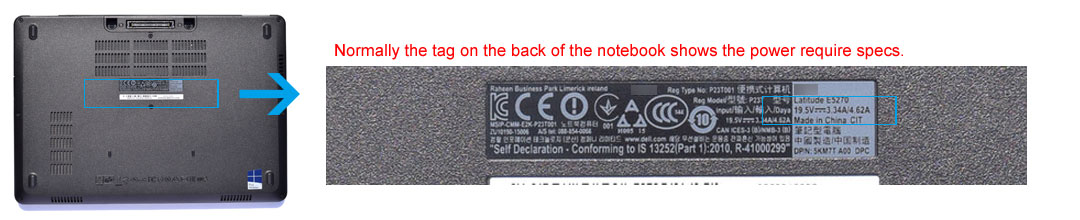
Normally you can find these parameters on a label at the bottom of the notebook. For example, the tag shows "Input: 19.5V 3.34A", then the corresponding parameters of the laptop power adapter is "Output: 19.5V 3.34A".
Sometimes there is not a tag at the bottom of your laptop, then you can check the tag of your original laptop charger.
Step 2: Check the laptop charger connector size.
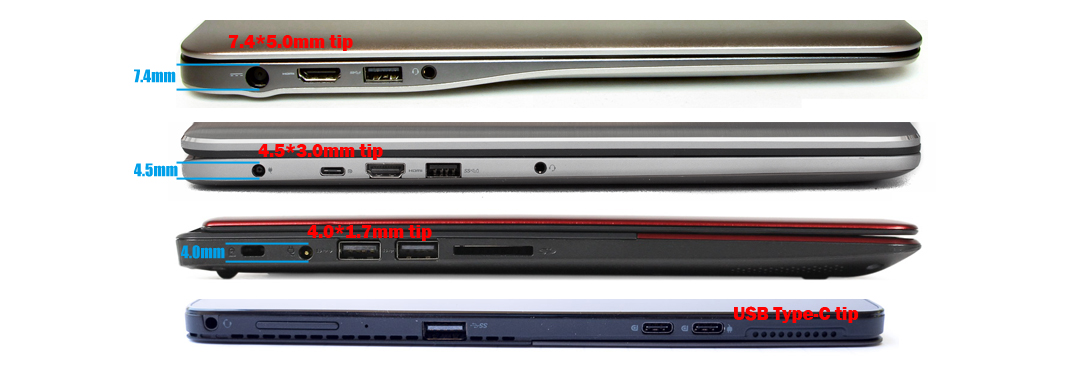
For example, browse our Dell and Asus categories to find chargers matched by voltage and tip size.
Related guides
- Asus laptop charger replacement guide
- Acer laptop charger replacement guide
- HP laptop charger replacement guide
- Dell laptop charger replacement guide
- Lenovo laptop charger replacement guide
- Microsoft Surface charger guide
- Laptop charger tip size chart
- Charger wattage explained (45W to 90W+)
- USB-C versus barrel connectors
- Why your laptop says plugged in, not charging
4775 Comment(s)
Check here to find the Officetel address! 오피스타(https://getopstarturl.online) .
혼자 가는 서울 카페 여행, 남자의 여유 https://manincafeseoul.com.
오피뷰 주소 안내
구미오피 정보가 필요하면 https://gumiopi.com (구미오피).
Ansan OP: The choice for the perfect private break 안산 오피
Pyeongtaek OP - Perfect Privacy Found in Complex Cities 평택 오피
Seosan OP - Perfect Privacy Found in Complex Cities 서산 오피
Leggings Room: Managers come into Choice as leggings. After receiving a guest's choice, during Greetings, they change their top into see-through mesh see-through tops. 강남레깅스룸
How much time have you wasted trying to find a truly satisfying experience in Andong? To avoid getting lost amid uncertain information and unverified options 안동 오피
Amid the constant stress and fatigue, are you longing for a true rest? The Bucheon Restoration Hotel exists beyond just space to deeply understand your body and mind and provide the best healing. 부천 휴게텔
We met all of the race office.Until the vivid premium information of premium and actual visitors, 경주 오피
No more disinformation amid the temptation of many nights! We provide only "real" business information, verified by some of the best professionals in Europe and America. If you're tired of fishing advertising, you've come to the right place. 구미 오피
Looking for Sillim OP, were you at a loss as to where to start? I understand how difficult it is to find out where you can really trust from among tons of information. 신림 오피
Our platform promises to provide transparent, accurate, and selected information to anyone looking for Seongnam OP information, thereby relieving fatigue in information search and serving as a criterion of trust to help make optimal choices. 성남 오피
Our Anyang OP exists for you just like that. Beyond just resting, we promise you a premium experience that can restore true vitality and recharge your life's energy. 안양 오피
If you're looking for a place to truly relax and revitalize your body and mind at the end of a busy day, you've come to the right place. We go beyond just providing information, and we insist on only selected business information to ensure that each and every customer's precious time is filled with the best satisfaction. 목포 오피
Looking for the perfect experience in Konkuk University? Amid the deluge of information, you may have been unsure which places would truly live up to your expectations and which choices would provide you with unrepentant satisfaction. 건대 오피
Beyond just space, the lactation lounge promises a private resting place where your body and mind can fully recover and rejuvenate. Experience the value of real rest right now at the lactation lounge, the perfect oasis where you can only focus on yourself from the noise of the city. 수유 휴게텔
A tiring day, do you need something special? Then you're welcome! Gangneung Restoration Hotel is not just a shelter, but an oasis of magical relaxation that will blow away all your fatigue. We promise you a true happiness charging station. 강릉 휴게텔
In an ever-repeating busy day, it's not easy to find a time of truly full rest and recharging just for you. 순천 휴게텔
Recharge in Yongin! Expert massage, pristine facility, ultimate muscle relief. https://yonginrelax.online 용인 마사지.
Discover Dongtan's exclusive 1-person massage. Rejuvenate in total privacy! https://dongtangunma.online 동탄 건마.
Uijeongbu's ultimate stress-buster. Experience premium dry massage bliss! https://uijeongbugm.com 의정부 건마.
Seeking premium solace in Sejong? Discover your perfect haven for body & soul renewal. https://sejongopi.com 세종시 오피.
Gumi's expert massage: Melt stress, ease muscle pain. Rejuvenate your body & mind! https://gumirelax.com 구미 마사지.
Tired of the city? Find your ultimate refresh at Gunsan Hyugetel. https://gunsantel.com 군산 휴게텔.
Busan nights redefined. Exclusive care, thrilling connections & private bliss. Yours. https://busankb.online 부산 키스방.
Discover your ultimate sanctuary in Sangbong. Men's exclusive massage, open till dawn. https://sbmasaji.online 상봉 마사지.
Gimhae's private oasis: Experience personalized, expert massage bliss. https://gimhaemassage.online 김해 마사지.
Your ultimate guide to Korean nightlife jargon. Understand every term like an expert! https://gangnamupsso.online 유흥 용어 사전.
Confused by 'Room TC'? Decode room charges & master entertainment terms. https://hiichapub.online 룸 티씨 뜻.
Paju's private oasis: Unwind late. Ultimate stress relief awaits tired men! https://pajugm.online 파주 건마.
Kissbang reviews you can truly trust. See raw, honest truths, not fakes! https://roombbang.online 키스방 후기.
Secrets of Kiss Room terms revealed! 'Dry,' 'Wet,' 'Hard' explained. Choose confidently. https://gnsrsystem.online 키방 용어.
Hyangnam OP? Outdated info no more! Fresh options, real reviews & guides await. https://hyangnamop.com 향남 오피.
Experience Bangkok Agogo: Uncover the thrill of LDs and unforgettable nights! https://bkkagogo.com 방콕 아고고.
Naju's hidden gem for ultimate relaxation! Discover healing and new vitality. https://najumassage.online 나주 마사지.
Tired in Gwangyang? Unwind with the best massage. Ultimate relief awaits! https://gymassage.online 광양 마사지.
Suncheon's secret unwind spot for men: Healing, comfort & memories. https://suncheonkb.online 순천 키스방.
Chungju's ultimate male healing: Professional massage for deep relief & vitality. Rejuvenate tonight! https://chungjumassage.online 충주 마사지.
Couples' cozy haven in Namyangju! Enjoy a private, romantic getaway. https://nyjkiss.online 남양주 키스방.
Unwind in Icheon: Experience pure bliss and melt away stress with expert care. https://icheongm.com 이천 건마.
Unlock Anseong's finest: Discreet premium services for your ideal time. https://anseongopi.com 안성 오피.
Stressed in Chungju? Find deep relief & renewed energy with our premium massage. https://chungjugm.online 충주 건마.
Stressed by city life? Seolleung OP: Premium healing awaits. Find your bliss. https://seolleungop.com 선릉 오피.
Seeking serenity? Discover Sadang's new, exclusive retreat for total relaxation. https://sadangop.com 사당 오피.
Discover Yeoju's best officetels for living & investment. Expert guide inside! https://yeojuopi.com 여주 오피.
Lost in Cheongna Office options? Find your perfect match with trusted info now! https://cheongnaopi.com 청라 오피.
Pohang's 'Homerun' HQ: Your sweet escape from stress. Find bliss tonight! https://pohangkiss.online 포항 키스방.
Paju's secret to ultimate satisfaction: your private retreat for pure bliss. Explore now! https://pajutel.com 파주 휴게텔.
Clubs, spas, and more! Transform your Thailand nights into unforgettable memories. Your guide awaits. https://thaisnightlife.com 태국 유흥.
Gumi stress taking its toll? Find your ultimate relaxation with premium massage! https://gumigm.online 구미 건마.
Discover ultimate satisfaction. Namyangju OP offers premium quality. https://namyangjuopi.com 남양주 오피.
Craving ultimate relief in Daejeon? Experience a refreshing, personalized massage now! https://daejeonmassage.com 대전 마사지.
Frustrated by hidden costs? Public System offers clear prices & true value. https://publics.work 퍼블릭 시스템.
Sokcho's finest retreat: Luxurious comfort, serene healing awaits. https://sokchotel.com 속초 휴게텔.
Escape the daily grind in Gimpo! Professional dry massage for body & mind healing. https://gimpogeonma.online 김포 건마.
Dongtan's ultimate stress relief. Expert massage for a revitalized you! https://dtrelax.com 동탄 마사지.
Tired? Yeongdeungpo offers professional relaxation in a clean, cozy setting. https://ydpkiss.online 영등포 키스방.
Sillim's private oasis for tired men. Personalized relief from dusk till dawn. https://sillimgunma.online 신림 건마.
Unlock Vietnam Long Time's full potential: Master frequency & satisfaction! https://vietnamlong.com 베트남 롱타임 횟수.
Stay ahead in SEO! Discover verified trends, tools & community from one essential link. https://linkghost.xyz SEO HOT LINK.
Discover Daejeon's secret romantic haven. Your cozy hideaway. https://daejeonkb.online 대전 키스방.
Master US ETFs! ETF Lens offers deep analysis, trends & personalized strategies. https://usetflens.com ETF 렌즈 – 미국 ETF를 꿰뚫는 투자 인사이트.
Busy day? Unwind at Seolleung's premium 1-person shop. Pure relaxation awaits. https://seolleunggunma.online 선릉 건마.
Tired men, discover Yeongdeungpo's ultimate late-night massage haven. Reclaim your vitality! https://ydpmasaji.online 영등포 마사지.
Jeju's hidden gem for men: melt travel fatigue with expert late-night massage. https://jejutouch.com 제주 마사지.
Escape to luxury! Discover Songdo's finest Swedish massage experience. Unwind now. https://songdoswedi.com 송도 스웨디시.
Dreaming of Phu Quoc nights? Exclusive villas & safe fun await! Discover more. https://phuquocfun.com 푸꾸옥 유흥.
Don't overpay! Daegu's top 1-person Swedish massage shops with honest prices await. https://daeguswedish.com 대구 스웨디시.
Late night stress? Ansan's best massage for men. Relax & recharge anytime! https://anseongmassage.online 안산 마사지.
Gyeongsan's 1-person massage: Find personalized healing & stress relief. Read the review! https://gyeongsanmasaji.online 경산 마사지.
Tired in Nonsan? Expert massage melts stress & muscle knots away. Find relief! https://nonsanmassage.online 논산 마사지.
Unlock Aasan's Top Swedish Massage Spots. Quality Vetted for You! https://asanswedish.com 아산 스웨디시.
Osan dry massage: Recharge & beat fatigue! Your ultimate escape awaits. https://osangm.online 오산 건마.
Yeoksam: More than nightlife. Find your vibrant escape & unforgettable romance! https://yuxambar.store 역삼 유흥.
Master Da Nang's nightlife! Eco-girl prices, info & ultimate concierge. https://danangkeyman.com 다낭 키맨.
Pyeongchon's exclusive retreat: Expert touch, ultimate satisfaction guaranteed. Recharge! https://pyeongchongunma.online 평촌 건마.
Philippines Emperor Tour: Bespoke luxury, exclusive service. Prices & reviews! https://philikingtour.com 필리핀 황제투어.
Busy men of Wonju: Discover ultimate relaxation. Expert massage awaits, even late! https://wonjugunma.online 원주 건마.
Hard day? Rejuvenate in Hongdae! Expert hands, anytime relief. Find your peace. https://hongdaemassage.online 홍대 마사지.
Escape stress! Cheonan's expert massage offers deep relaxation. Open late for you. https://cheonangunma.online 천안 건마.
Busy schedule? Jongno's expert massage offers deep relief day or night. https://jongrogm.online 종로 건마.
Nha Trang Nightlife A-Z: Transparent prices, premium service, ultimate male comfort. Discover! https://nightvnm.com 나트랑 유흥.
Tired from travel? Authentic SE Asia massage: Ultimate healing & vitality awaits! https://asiamsg.com 동남아 마사지.
Pyeongtaek Men: Tough day? Melt away fatigue with our ultimate massage! https://ptmasage.com 평택 마사지.
Ulsan's secret for men: Expert dry massage guarantees ultimate satisfaction. https://ulsangm.online 울산 건마.
Tired, men? Pyeongchon Massage: Expert care, late nights. Melt stress away! https://pcrelax.com 평촌 마사지.
Gangnam U&Me: Forget formality! Unwind, laugh, & make memories effortlessly. https://publicsys.online 강남 유앤미.
Beyond tired? Poseung Massage for men: Expert hands, pure bliss. Your late-night escape! https://poseongmasaji.online 포승 마사지.
Confused about massage? Get clear answers! Expert guide for all types & benefits. https://massagewiki.com 마사지위키.
Unlock ultimate relaxation in Hyangnam. Elite dry massage for busy men. https://hyangnamgm.online 향남 건마.
Unlock Vietnam's 'Boom Boom' secrets! Specialized massages & real reviews. https://vietnambooom.com 베트남 붐붐.
Lost in Bangkok's nightlife? Get our ultimate map for confident, safe exploration! https://bkkmap.com 방콕 떡지도.
Craving bliss? Find Wonju's most-praised Swedish massage for ultimate relaxation. https://wonjuswedish.com 원주 스웨디시.
Gimhae's ultimate escape: High-quality massage for deep relaxation & renewal. https://gimhaegm.online 김해 건마.
Indulge in Gyeongju's finest Swedish massage. Pure bliss & lasting memories. https://gyeongjusw.com 경주 스웨디시.
Escape the everyday in Gwangyang. Discover expert dry massage & renewed energy! https://gwangyanggm.online 광양 건마.
Recharge your mind & body. Explore private Swedish massage in Magok. https://magokswedish.com 마곡 스웨디시.
Tired in Yeosu? Expert massage awaits, even late. Reclaim your energy! https://yeosugunma.online 여수 건마.
Your ultimate guide to Pattaya Long-Time. Prices, bar fines, & reviews! https://pattayalong.com 파타야 롱타임 가격.
Sejong's ultimate escape for tired men. Professional care, deep relaxation. Rejuvenate! https://sejongsigm.online 세종시 건마.
Pyeongtaek's ultimate escape: Premium massage for men. Unwind & recharge, even late! https://pyeongtaekgunma.online 평택 건마.
Unlock Namyangju's best Swedish shops! Compare & discover your ultimate unwind. https://namyangjusw.com 남양주 스웨디시.
Unlock peace in Chuncheon! Experience serene Swedish massage. Revitalize your senses. https://chuncheonsw.com 춘천 스웨디시.
Indulge in Gangnam's finest. Unparalleled service for your perfect night. https://hardcoreupsso.online 강남 퍼펙트.
Iksan Swedish: Boost health with lymphatic flow. Science-backed bliss! https://swedishiksan.com 익산 스웨디시.
Craving deep relaxation? Ansan's high-class dry massage: your perfect male escape. https://ansangm.online 안산 건마.
Discover bliss! Bucheon's Swedish therapy for a sensory escape. https://bucheonswedi.com 부천 스웨디시.
Busy in Pangyo? Skilled therapists await for ultimate late-night stress relief. https://pangyogunma.online 판교 건마.
Busy? Hyangnam Massage offers late-night healing. Reclaim your energy and peace! https://hyangnammasage.online 향남 마사지.
Southeast Asia's secrets unveiled! Explore local insights & discover hidden truths. https://asianavideo.com 동남아 야동.
Elevate your Seoul nights. Unmatched luxury, professional service, perfect privacy. https://roomtcga.online 서울 룸싸롱.
Men, unwind in Changwon! Expert massage melts fatigue. Open late for you. https://changwonm.com 창원 마사지.
Magok's premium escape: relieve stress, rejuvenate your body & mind! https://magokgm.online 마곡 건마.
Tired of daily grind? Cheonan Massage offers a true refresh. Unwind & revitalize now! https://cheonanbody.com 천안 마사지.
Unwind in Daejeon: Find your perfect, hygienic Swedish massage haven for ultimate bliss! https://daejeonswedish.com 대전 스웨디시.
Your ultimate guide to Thailand's vibrant nightlife: KTV, massage & beyond! https://thaisnight.com 태국 밤문화.
Find Busan's top Swedish & Dry massage shops! Honest reviews & satisfaction. https://swedishbusan.com 부산 스웨디시.
Stop guessing! Get trusted info on nationwide massage shops & trends. https://opstarwiki.com 오피스타 위키.
Beyond compare. Gangnam Ilpro, the definitive choice for the top 1%. https://gnbammoonhwa.online 강남 일프로.
Busy? Find your curated premium Swedish massage sanctuary in Gangnam. https://gangnamswedi.com 강남 스웨디시.
Unlock your secret stocking fantasy. Discreet pleasure awaits. https://stockingsjob.com 스타킹 대딸.
Your best Shirts Room night starts here. Transparent & professional! https://leggingsinsa.online 셔츠룸 시스템.
Melt stress away in Pyeongtaek! Gentle Swedish massage for mind & body peace. https://pyeongtaeks.com 평택 스웨디시.
Gunsan: Escape daily stress. Discover a night of intimate warmth and unforgettable romance. https://bizroomga.online 군산 키스방.
Solo room? Get transparent prices & enjoy your perfect private escape. https://hipublicjd.online 1인 룸 가격.
Sejong Swedish struggle? Find vetted shops, real circulation relief & exclusive deals. Your oasis awaits! https://sejongswedish.com 세종 스웨디시.
Seeking bliss in Jeju? Honest reviews guide you to your ideal Swedish massage. https://jejuswedish.com 제주 스웨디시.
What is the 'Authentic Room System'? Your guide to high-class entertainment. https://gangnampub.online 정통룸 시스템.
SE Asia 'Long Night' prices revealed! Your ultimate guide to budget smart. https://longtimepay.com 긴밤 가격.
Nha Trang nightlife secrets! Get real Cong Gai prices & insider tips. https://kongkaitip.com 꽁까이 가격.
Uncover Pattaya Walking Street! All bar prices revealed for stress-free fun. https://pattayawalk.com 파타야 워킹스트릿 가격.
Navigate Room Salon 2차 worry-free! Your ultimate guide is here. https://leggsrcha.online 룸싸롱 2차.
Nha Trang Emperor Tour: Banish stress! Experience royal treatment & complete rejuvenation. https://vipviettour.com 나트랑 황제투어.
Dare to try Vietnam's 'Red Swing'? Get the honest review: prices, pros & cons to decide. https://vietnamswing.com 베트남 빨간그네.
Experience ultimate Thai KTV: Beautiful hosts, premium entertainment & reviews. https://thailandktv.com 태국 ktv.
Be Bangkok's emperor! Indulge in ultimate luxury, private fun & royal treatment. https://bkkkingtour.com 방콕 황제투어.
Don't just wear a hat, own your summer style! Men's fashion guide inside. https://mensummercap.com 여름 남자 모자 스타일링 블로그.
Beyond chains: Uncover Seoul's unique roastery cafes for solo bliss. https://manincafeseoul.com 혼자 가는 서울 카페 여행, 남자의 여유111.
AI mystery solved! Get clear insights on its impact on your life & skills needed for the future. https://aiviews.online 인공지능 인사이트.
Upgrade or game? Stop guessing! Get accurate PC specs now! https://pcspecs.site 컴퓨터 사양 확인.
30s men: Sculpt your dream body at home! Effective routines for muscle & health. https://manhomefit.com 30대 남자 홈트 루틴 정리 블로그.
Simplify triangle area! All formulas you need, from beginner to expert. Master it today. https://trianglearea.site 삼각형 넓이 공식.
Confused by "Yar"? Get the full Gen Z slang meaning, usage, & origin here! https://yarmeaning.site 야르 뜻.
Your 1-minute health alert! Essential insights from research, cut to the core. https://paperetm.com 1분 건강뉴스.
Unlock Your Max 2024 EV Subsidy! Get the Latest Info & Save Big. https://evincentive.site 전기차 보조금.
Elevate your dog's care! Science-backed tips for nutrition, behavior & training. https://wonbests.com 댕댕이 연구소.
Hi, I'm looking for people to do backlink work for www.opga.online, Can you contact me? My Telegram is @Jack_Grealish1
Taste YOUR perfect brew! Homebrew Notes guides your unique beer journey. https://homebrewlog.site 홈브루 노트.
Gaming or work? Discover premium, durable mechanical keyboards for ultimate feel. https://mechkeys.site 기계식 키보드.
Upgrade your game! Uncover 2024's ultimate GPUs by performance & price-value. Click to choose! https://gpurank.site 그래픽카드 순위.
Busy? Your health transformation begins on Page 1. Discover one easy, powerful habit today! https://havehadnews.com 건강한 습관 1페이지.
Men's fragrance decoded! From citrus to woody, find your perfect scent & use it right. https://scentforman.com 남자 향수 입문자를 위한 가이드.
Create eye-catching posters for successful campaigns! Pro tips & templates inside. https://posterdesign.site 포스터 디자인.
Unlock countless FREE high-quality PC games! Action, RPGs & more await. https://gamedeck.site 무료 pc 게임.
Mind overwhelmed? Get expert stress relief & self-care tips here. https://mentalroom.site 심리케어룸.
Beyond K-BBQ: Uncover Seoul's trendiest cafes & hidden culinary gems. Click now! https://seoulfood.site 서울맛로드.
Unlock 24/7 profit! Discover the smart, staff-free cafe revolution. https://unmancafe.store 무인 카페 창업.
Your ultimate Zanmang Loopy meme hub! Profiles, wallpapers & more. https://luffymemes.site 잔망루피 짤.
Hi, I'm looking for people to do backlink work for www.opga.online, Can you contact me? My Telegram is @Jack_Grealish1
Baekdu Mountain: Is it waking up? Uncover its massive impact on Korea! https://volcanokr.site 백두산 폭발.
Unlock your unemployment benefits! Easy guide to eligibility & payout. https://joblesshelp.site 실업급여 조건.
Wall Street Korea: Unlock hidden investment gems in Korea. Deep insights await! https://newbmpage.com 월스트리트 코리아.
Korea's Gold Medal Pension: Your guide to eligibility, amounts, & benefits. https://sportsgold.site 금메달 연금.
Dreaming of Japan? Plan your perfect getaway with expert tips & savings! https://explorejapan.site 일본 여행.
Go beyond watching. Unlock hidden meanings, frame by frame. https://bamminblog.com 프레임 바이 프레임 (Frame by Frame).
Unlock your potential! Modern resume templates & pro tips for job-winning results. https://careerform.site 경력기술서 양식.
Unlock REST API mastery! Build powerful web services & boost your dev skills. https://restfulapi.site rest api.
Your future drive is here! Discover PHEVs: economy, eco-tech, & subsidies. https://phevguide.site 플러그인 하이브리드 자동차.
Busy? Air fry delicious, healthy meals effortlessly! Easy recipes await. https://aircook.site 에어쿡 레시피.
40s body signals different? Discover vital habits for a vibrant future! https://health40s.site 40대 건강 관리.
Unlock tax secrets! Freelancer? Master deductions, avoid pitfalls & boost your savings. https://freelancetax.online 프리랜서 세무톡.
Decode Roman numerals! Expert tips, fast converter, history, and usage examples. https://romannums.site 로마 숫자.
Is it ADHD? Take our quick test to understand adult & child symptoms. https://adhdquiz.site adhd 테스트.
Keyboard confusion? Our expert reviews guide you to YOUR ultimate typing experience. https://keyrec.site 키보드 추천.
Step into Versailles! Louis XIV's royal splendor & French history await. https://versaillespalace.site 베르사유 궁전.
Taste summer! Experience vibrant events & delicious bites. Join the fun! https://tomatofestival.site 토마토 축제.
Stop guessing! Our guide reveals the best cordless vacuum for *your* home. https://wirelessvac.site 무선 청소기 비교.
Tired of typical Korea trips? Discover hidden gems & fresh inspiration! https://greatinfo.shop 한국 어디까지 가봤니?.
Your lifestyle, your sound. Discover the ideal wireless earbuds made for YOU. https://earbudpick.store 무선 이어폰 추천.
Ace your application! Proven strategies from winning cover letters. https://coverletterexamples.site 자소서 예시.
Never forget a thing! Your ultimate Japan travel checklist: flights, visa, eSIM & tips. https://gojapan.site 일본여행 준비물.
Building a cafe? Learn to slash costs: interior, equipment & more. Budget smarter! https://cafebudget.space 카페창업 예산법.
New to yoga? Transform stress into serenity! Simple poses, deep relaxation. https://yogabegin.online 요가 입문노트.
PC slow? Overheating CPU? Find causes & solutions to boost performance! https://cputemp.site cpu 온도.
Chronic fatigue, weight gain? Hypothyroidism could be why. Discover symptoms & self-care! https://hypothyroid.site 갑상선 기능 저하증.
Access private Instagram content. No login, no trace. Your ultimate guide! https://socialspy.site 인스타 로그인 없이.
Unleash your inner craftsman! Discover miniatures – the men's hobby for focus & detail. https://manhobbyhub.com 남성 취미 추천: 미니어처 편.
Effortlessly unlock PDF passwords! Regain control: print, copy, edit now. https://pdfunlock.site pdf 비밀번호 해제.
Master A1 size! Essential specs, tips & solutions for your projects. https://aonesize.site a1 사이즈.
Unleash your unique MapleStory style! Trendy looks & custom guides await. https://maplecoord.site 메이플 코디.
Unlock a smarter home! Find your perfect robot vacuum & ditch the chore. https://robotclean.site 로봇 청소기 추천.
Taipei's buzz, Jiufen's magic! Your ultimate Taiwan adventure starts here. https://taiwanvoyage.site 대만 여행.
Master solo living! Discover smart ways to enjoy your space & time fully. https://solohaus.space 1인 가구 생활 팁.
Adopting? Dive into our ultimate dog breed guide: traits, care & your perfect pup! https://woofwiki.site 강아지 종류.
Elevate your gifting! Curated ideas for unique, meaningful presents they'll love. https://giftpick.space 센스있는 선물집.
Master your vehicle! AutoMaster makes car maintenance simple, smart, and stress-free. https://bamminpage.com 오토마스터 (AutoMaster).
Stop guessing! Get your personalized health check-up plan to protect your well-being. https://healthcheck.store 건강검진 항목.
Unlock cat breed secrets! Personalities, care & your ideal companion revealed. https://felinebreeds.site 고양이 품종.
Your laptop bag, your statement. Find ultimate style & protection tailored for you. https://laptopbag.site 노트북 가방 추천.
Craving Japan? Your ultimate guide to sushi, ramen & home recipes starts here! https://japaneats.site 일본 음식.
Curious about Propolis? Unlock its natural power for immunity, oral health & more! https://propolisbenefits.site 프로폴리스 효능.
E-commerce evolving? Uncover game-changing trends & seize growth opportunities! https://ecommercehub.online 이커머스 트렌드랩.
Stressed, guys? Blast away tension! Your ultimate playlist is here. https://relaxmanmusic.com 스트레스 날리는 남자 음악리스트.
Elevate your look! Unlock healthy, clear skin with our men's skincare guide & reviews. https://manbeautytips.com 남성 피부관리 꿀팁 & 제품 리뷰.
Lost your phone? Find it fast & safe with our easy guide! https://phonefinder.site 핸드폰 찾기.
Escape the ordinary! Find your perfect fall getaway amidst vibrant colors. https://autumntrip.site 가을 여행지 추천.
Instantly upgrade your mobile photos! Get pro-level shots with just your phone. https://mobilephoto.space 모바일 포토랩.
Men, sick of generic bidets? Uncover top picks designed for *your* ultimate hygiene! https://cleancutman.com 남자 전용 비데, 진짜 쓸만한 건?.
Capture your dog's magic! Pro photography secrets, no experience needed. https://puppyphotos.site 강아지 사진.
Japan trip coming up? Get your perfect packing checklist & avoid regrets! https://japantravelprep.site 일본 여행 준비물.
Tired? Rejuvenate! Yullyang-dong's best Lomi Lomi & spa guide awaits. https://yulldongmass.com 율량동 마사지.
Finally, stick to English study! Practical tips & a daily roadmap for real progress. https://englishlog.online 영어공부 실천노트.
Jeju travel fatigue? Unwind perfectly. Yeon-dong Massage: Your dream-like escape awaits! https://jejuyondong.com 제주 연동 마사지.
Tired? Discover Juan Swedish! Gentle touch, deep relaxation awaits you. https://juanhealing.com 주안 스웨디시.
Struggling with laptop choices? Discover top value-for-money picks, simplified for you! https://nbpick.store 가성비 노트북픽.
Beginner to pro: Your complete guide to road bikes, models & buying tips. https://roadbikehub.site 로드 자전거.
Complex SME policies? Get clear guides on grants, tax breaks & boost your business! https://smepolicy.space 중소기업 정책통.
Elevate your day! Michuhol-gu Swedish massage & spa for unparalleled relaxation. https://mchswedish.com 미추홀구 스웨디시.
Gumi Indong massage: Avoid regret. Find your perfect spa with honest reviews! https://gumiindong.com 구미 인동 마사지.
Bulldang-dong massage: Choose wisely with our unbiased review guide! https://buldangmass.com 불당동 마사지.
Seeking pure bliss? Find your perfect Bongmyeong-dong Swedish escape here! https://bongmyeongsw.com 봉명동 스웨디시.
Turn your webtoon dream into reality! Your complete guide, from story to success. https://webtoonstart.site 웹툰 작가되기노트.
Discover Gangbuk's top Swedish massage spots! Unwind & rejuvenate. https://gangbukrelax.com 강북 스웨디시.
User-approved! Dongtan Bukgwangjang's best massage shops with pro Swedish & spa. https://dongtanmass.com 동탄 북광장 마사지.
Yangjae's best Swedish massage shops, hand-picked for your ultimate relaxation. https://yangjaeswed.com 양재 스웨디시.
Sokcho's secret: Indulge in a serene Swedish massage with ocean views. Pure bliss! https://sokchorelax.com 속초 스웨디시.
Escape the city buzz! Discover Sadang's coziest Swedish healing spots. https://sadangspa.com 사당 스웨디시.
Upgrade your career & life! Flexible online learning guides you to success. Start now. https://elearnlife.space 온라인 강의라이프.
Stiff? Tired? Discover Sangmu's best dry massages & trusted reviews! https://sangmuspa.com 상무지구 마사지.
Dunsan-dong Swedish? Uncover expert-vetted therapy for ultimate relaxation. https://dunsanspa.com 둔산동 스웨디시.
Escape to Hongseong's ultimate private spa. Pure relaxation awaits you. https://hongseongsw.com 홍성 스웨디시.
Apgujeong's finest Swedish therapy: expert touch, ultimate rejuvenation. https://apgujeongsw.com 압구정 스웨디시.
Confused by Yuseong spas? Get trusted rankings & real reviews to choose wisely! https://yuseongmass.com 유성 마사지.
Unwind in Gwangyang: Discover the gentle, healing power of Swedish massage. Pure comfort! https://gwangylove.com 광양 스웨디시.
Suyu's best-reviewed Swedish! Rejuvenate your body & mind instantly. https://suyulove.com 수유 스웨디시.
Escape to Jeonju Sinsigaji for romantic, revitalizing massage bliss. https://jeonjumass.com 전주 신시가지 마사지.
Yeongtong Swedish Guide: Discover tailored relaxation & well-being. Your ultimate resource. https://yeongtongsw.com 영통 스웨디시.
Nonsan's best Swedish & Lomi Lomi massages! Your guide to true relaxation. https://nonsanrelax.com 논산 스웨디시.
Find Unjeong's best Swedish & Lomi Lomi spas! Your perfect relaxation awaits. https://unjeongswed.com 운정 스웨디시.
Discover Jincheon's ultimate Swedish escape. Relax, refresh, and rejuvenate! https://jincheonsw.com 진천 스웨디시.
Discover Jeju's hidden gem: Yeondong Swedish for sensory rejuvenation. https://jejuyondongsw.com 제주 연동 스웨디시.
Unlock Nonhyeon's secret to pure bliss! Premium Swedish massage guide. https://nonhyeonsw.com 논현 스웨디시.
Discover Gunjae's best Swedish massage! Unlock deep relaxation & rejuvenation. https://gundaespa.com 건대 스웨디시.
Guwol-dong Massage Secrets: Uncover clean, professional spas for ultimate relaxation! https://guwoldmassage.com 구월동 마사지.
Rejuvenate your body & mind in Yeoksam. Experience expert Swedish bliss! https://yeoksamlove.com 역삼 스웨디시.
Stressed in Baegot? Unwind with the city's finest Swedish massages. Your peaceful escape awaits! https://baegotspa.com 배곧 스웨디시.
Stressed? Discover Gangdong dry massage secrets: best shops & expert tips! https://gangdongswed.com 강동 스웨디시.
Escape stress in Yangju! Discover ultimate relaxation with Swedish massage. https://yangjutouch.com 양주 스웨디시.
Escape the daily grind. Find your unique peace at Sangmu OP. https://sangmuoffice.com 상무지구 오피.
Siheung Swedish: Unlock top-rated spots for ultimate healing & value! https://siheungswed.com 시흥 스웨디시.
Find your perfect Yatap massage! Honest reviews on quality & skill. https://yatamassage.com 야탑 마사지.
Seeking pure bliss in Dunsan-dong? Experience personalized Swedish massage & renewed vitality. https://dunsanmass.com 둔산동 마사지.
Wirye Swedish: Experience a warm embrace. Discover top-tier relaxation today. https://wiryerelax.com 위례 스웨디시.
Don't guess! Get the best Naseong-dong massage with trusted recommendations. https://naseongspa.com 나성동 마사지.
Seeking Yeouido's best Swedish massage? Get expert tips & top recommendations here! https://yeouidorelax.com 여의도 스웨디시.
Tired of searching? Discover Sangnam-dong's top private massage shops & tips. https://sangnammass.com 상남동 마사지.
Curious about Baegot's most popular massages? See real reviews, find your bliss! https://baegotmass.com 배곧 마사지.
Sinsa's Verified Swedish: Uncover the ultimate private 1-person shop experience. https://sinsasw.com 신사 스웨디시.
I tried <a href="https://textideo.com?utm_source=info12138">ai video generator</a> and was blown away — typed a single sentence and got a 1080p motion video. Game-changer for content creators!
If you want to turn text or images into videos fast, <a href="https://veo3.im/?utm_source=info12138">Veo3 Video</a> is the way to go — super simple and really powerful. Perfect for anyone looking to create videos in minute
Highly recommend this awesome disposable email tool: <a href="https://tempmail3.com/?utm_source=info12138">Temporary email</a>. It generates a temp address in seconds—use it and toss it. Great for signups and verifications while keeping your inbox safe from spam!
If you’re into voice tech, you gotta check out <a href="https://accentvoice.net/?utm_source=info12138">Accent Voice Generator</a>— they’ve got awesome tools for realistic voice accents. Super easy to use and sounds great!
Just tried out <a href="https://seoai.run/?utm_source=info12138">SEO AI Generator</a> and it’s honestly a game-changer for SEO content! You just enter a few keywords, and boom — it gives you smart, optimized content ready to go. Super useful for bloggers, marketers, or anyone trying to rank higher. Worth checking out!
Quick heads-up: if you're into AI tools, check out <a href="https://oeb.ai?utm_source=info12138"> Digen AI</a> It’s packed with smart features for content creators.
Recently used <a href="https://photocollagemaker.io/?utm_source=info12138">photo collage</a> to create a quick travel photo collage — no signup, super easy. Might be useful for anyone doing social content!
I love it when individuals get together and share ideas. Great blog, keep it up!
The Steve Jobs Of Robot Mop Meet You The Steve Jobs Of The Robot Mop Industry best Robotic vacuum cleaner uk
The Best Automatic Vacuum Cleaner And Mop Tricks For Changing Your Life best automatic vacuum cleaner
Railroad Attorney Near Me Tips From The Best In The Industry Railroad Cancer Lawsuit Lawyer
You'll Be Unable To Guess Robotic Vacuum Cleaners Uk's Tricks robotic Vacuum cleaners uk
You'll Never Guess This Asbestos Exposure Louisiana's Tricks Asbestos Exposure Louisiana
You'll Be Unable To Guess Pedestrian Accident Attorney's Secrets Pedestrian Accident Attorney
14 Misconceptions Commonly Held About Robotic Hoover robotic hoover and mop, Md.chaosdorf.de,
Robot Robotic Vacuum Cleaners Tools To Make Your Everyday Lifethe Only Robot Robotic Vacuum Cleaners Trick That Everybody Should Learn Robot robotic vacuum cleaners
9 . What Your Parents Teach You About Best Robot Hoover Best robot Hoover
Five Killer Quora Answers On Robot Hoover And Mop Robot Hoover And Mop
The Buy Robot Vacuum Success Story You'll Never Imagine Best Robotic Vacuum Cleaner Uk
It's Enough! 15 Things About Railroad Cancer Settlement We're Tired Of Hearing top railroad cancer lawsuit settlements (pad.stuve.de)
Louisiana Occupational Disease Lawyer Tools To Ease Your Everyday Lifethe Only Louisiana Occupational Disease Lawyer Trick That Should Be Used By Everyone Know Louisiana Occupational Disease Lawyer
What's The Current Job Market For Railroad Cancer Lawyers Professionals Like? Railroad cancer Lawyers
12 Robot Hoover Uk Facts To Refresh Your Eyes At The Cooler. Cooler Robot vacuum
What's The Current Job Market For Which Robot Vacuum Cleaner Professionals? which robot Vacuum cleaner (Autovin-Info.com)
20 Myths About Robot Vacuum Cleaner: Dispelled best Robot Vacuum cleaners uk
Guide To Railroad Settlement Myelodysplastic Syndrome: The Intermediate Guide On Railroad Settlement Myelodysplastic Syndrome Railroad Settlement Myelodysplastic Syndrome (Output.jsbin.Com)
What's The Current Job Market For Which Robot Vacuum Cleaner Professionals Like? which robot vacuum cleaner
Guide To Louisiana Asbestos Exposure Lawsuits: The Intermediate Guide The Steps To Louisiana Asbestos Exposure Lawsuits Louisiana asbestos exposure Lawsuits
Guide To Robot Vacuum Cleaner With Mop: The Intermediate Guide In Robot Vacuum Cleaner With Mop robot vacuum cleaner with mop [pad.Fs.lmu.de]
See What Best Robotic Hoover Tricks The Celebs Are Using best robotic hoover
The 9 Things Your Parents Teach You About Best Robot Hoover Best robot hoover
The Best Automatic Hoover Tricks To Make A Difference In Your Life best automatic hoover (https://www.currencylovers.com/)
What's The Current Job Market For Which Robot Vacuum Cleaner Professionals Like? Robot Vacuum
15 Reasons You Shouldn't Ignore Mopping Robot smart floor cleaner
Is Robot Mop Uk The Most Effective Thing That Ever Was? Smart Dust Cleaner
15 Interesting Facts About Robot Cleaners Uk You've Never Heard Of Robot Vacuum Cleaners
Is Technology Making Roomba Hoover Uk Better Or Worse? self-cleaning robotic vacuum
10 Best Mobile Apps For Robot Vacuum Cleaner Uk best robot vacuum Cleaner
10 Great Books On Railroad Cancer Settlement effective Railroad cancer lawsuit settlements
4 Dirty Little Secrets About The Robot Vacuum Cleaner Industry Best robot Vacuum cleaners
The 10 Most Terrifying Things About Best Robot Vacuum And Mop robot vacuum (https://sheridan-kaufman-2.technetbloggers.De)
The 10 Worst Robotic Hoover Fails Of All Time Could Have Been Prevented Robotic Hoovers - Md.Chaosdorf.De -
20 Insightful Quotes About Robot Vacuum Cleaner Best robot Vacuum Cleaners uk
10 Wrong Answers To Common Robot Vacuum Cleaner Questions Do You Know The Correct Answers? robot vacuum Cleaners uk
Guide To Auto Vacuum Cleaner: The Intermediate Guide Towards Auto Vacuum Cleaner Auto Vacuum
What's The Job Market For Which Robot Vacuum Cleaner Professionals? Which Robot Vacuum Cleaner
What's The Job Market For Which Robot Vacuum Cleaner Professionals Like? which robot vacuum Cleaner
See What Automatic Vacuum Cleaner Uk Tricks The Celebs Are Utilizing automatic vacuum cleaner uk
Why All The Fuss About Cheap Robot Hoover? robotic vacuum cleaner
10 Meetups About Railroad Cancer Lawsuit You Should Attend latest railroad Cancer lawsuit Settlements (Brewwiki.win)
The 10 Most Terrifying Things About Robotic Vacuum Cleaner Robotic vacuum
See What Robot Cleaner Tricks The Celebs Are Using Robot cleaner (mp.0954yn.top)
11 Creative Methods To Write About Mopping Robot Robotic vacuum
Guide To Auto Vacuum Cleaner: The Intermediate Guide On Auto Vacuum Cleaner Auto vacuum Cleaner
10 Things That Your Family Taught You About Robotic Vacuum Cleaner Uk Robotic Vacuum Cleaner Uk
Guide To Auto Vacuum Cleaner: The Intermediate Guide For Auto Vacuum Cleaner auto vacuum
10 Of The Top Facebook Pages Of All Time About Railroad Settlement Chronic Obstructive Pulmonary Disease railroad worker support groups
Railroad Settlement Multiple Myeloma Tools To Ease Your Daily Lifethe One Railroad Settlement Multiple Myeloma Technique Every Person Needs To Know Railroad Settlement Multiple Myeloma (www.caitlyntodd.top)
The History Of Mopping Robot best automatic vacuum cleaner
What's The Current Job Market For Autonomous Vacuum Professionals? Autonomous vacuum
Robot Vacuum And Cleaner Tools To Help You Manage Your Daily Life Robot Vacuum And Cleaner Trick Every Person Should Learn Robot Vacuum And Cleaner
The 10 Most Scariest Things About Auto Vacuum auto vacuum
Be On The Lookout For: How Automatic Hoover Uk Is Taking Over And What We Can Do About It Robot Vacuum Cleaner (Humanlove.Stream)
10 Wrong Answers To Common Louisiana Lung Cancer Questions Do You Know The Right Answers? Louisiana Lung Cancer Asbestos Exposure Lawsuit (Gitlab.2Bn.Co.Kr)
Cheap Robot Hoover Tips To Relax Your Daily Lifethe One Cheap Robot Hoover Trick That Everybody Should Know Cheap Robot hoover
Wrongful Death Attorney Tools To Improve Your Everyday Lifethe Only Wrongful Death Attorney Trick Every Person Should Be Able To wrongful death attorney
The 10 Most Terrifying Things About Louisiana Asbestos Lung Cancer Exposure louisiana Asbestos lung cancer exposure
The Best Robot Vacuum Cleaner Mop Tricks To Transform Your Life best robot vacuum cleaner (Duvidas.construfy.com.br)
What's The Current Job Market For Railroad Settlement Chronic Obstructive Pulmonary Disease Professionals Like? railroad Settlement chronic obstructive Pulmonary disease (https://www.reinaldoheinrichs.top/)
The 10 Most Scariest Things About Robotic Vacuum Cleaner Robotic Vacuum cleaner
10 Sites To Help You Develop Your Knowledge About Best Robot Vacuums Uk robotic cleaner
How To Create An Awesome Instagram Video About Automatic Hoovers Self cleaning robot vacuum
What's The Job Market For Which Robot Vacuum Cleaner Professionals Like? which robot vacuum cleaner
Automatic Vacuum Cleaner And Mop Tools To Help You Manage Your Everyday Lifethe Only Automatic Vacuum Cleaner And Mop Trick That Every Person Must Learn automatic vacuum cleaner (https://kongminghu.com)
Guide To Louisiana Asbestos Injury Claim Lawyer: The Intermediate Guide Towards Louisiana Asbestos Injury Claim Lawyer Louisiana Asbestos Injury Claim Lawyer
What's The Job Market For Autonomous Vacuum Professionals? autonomous vacuum, graph.Org,
Robot Vacuum And Cleaner Techniques To Simplify Your Everyday Lifethe Only Robot Vacuum And Cleaner Trick That Every Person Must Know robot vacuum and cleaner
The 10 Most Scariest Things About Robotic Vacuum Cleaner Robotic vacuum
What's The Job Market For Accident Injury Compensation Professionals Like? Injury Compensation
Robot Vacuum Cleaners Tools To Ease Your Daily Lifethe One Robot Vacuum Cleaners Trick That Should Be Used By Everyone Know Robot vacuum cleaner
Five Killer Quora Answers On Robot Vacuum Cleaner Uk robot vacuum cleaner uk
15 Things Your Boss Wants You To Know About Automatic Vacuum Cleaner You'd Known About Automatic Vacuum Cleaner Best Automatic Vacuum Cleaner
What's The Job Market For Best Automatic Vacuum Cleaner Professionals Like? best automatic Vacuum cleaner - https://pad.karuka.tech,
You'll Never Guess This Robotic Vacuum Cleaners Uk's Secrets Robotic Vacuum Cleaners Uk
The Reasons You Shouldn't Think About The Need To Improve Your Robot Vacuum Cleaners robot cleaner (pattern-wiki.win)
Guide To Vacuum Robot: The Intermediate Guide To Vacuum Robot vacuum Robot
The 10 Most Terrifying Things About Louisiana Asbestos Legal Counsel louisiana asbestos legal counsel
Robot Vacuum And Cleaner Tools To Improve Your Daily Lifethe One Robot Vacuum And Cleaner Trick Every Person Should Learn robot Vacuum and cleaner [www.metooo.io]
So You've Bought Robot Vacuum Cleaner Uk ... Now What? Best Robot Vacuum Cleaner (132.148.13.112)
20 Trailblazers Leading The Way In Robot Mop Best robot vacuum cleaner UK
See What Best Robotic Hoover Tricks The Celebs Are Using best Robotic hoover
You'll Be Unable To Guess Robotic Vacuum Cleaners Uk's Secrets Robotic vacuum cleaners uk
See What Best Robotic Hoover Tricks The Celebs Are Using Best Robotic hoover (telegra.ph)
16 Must-Follow Facebook Pages For Robotic Hoover Marketers Robotic Hoovers
10 Things That Your Family Teach You About Insurance Claim Lawyer insurance claim lawyer (https://mlx.Su/)
5 Killer Quora Answers On Robot Vacuum Uk robot vacuum uk (pad.geolab.space)
The 10 Most Terrifying Things About Best Robotic Vacuum Cleaners best robotic Vacuum cleaners - test.najaed.com,
17 Signs To Know If You Work With Robot Vacuums & Mops AI Vacuum cleaner
See What Automatic Vacuum Cleaner Uk Tricks The Celebs Are Utilizing Automatic vacuum Cleaner uk
What's Holding Back The Automatic Vacuum Cleaner Industry? automatic Vacuum cleaners
13 Things You Should Know About Robot Vaccum Uk That You Might Never Have Known robot vacuum (telegra.ph)
5 Killer Quora Answers On Brain Injury Lawyer brain injury Lawyer
Nine Things That Your Parent Teach You About Neck Injury Lawyer Neck Injury Lawyer
See What Best Robotic Hoover Tricks The Celebs Are Making Use Of Best Robotic hoover
Guide To Personal Injury Settlement: The Intermediate Guide Towards Personal Injury Settlement Personal Injury Settlement
The 10 Most Scariest Things About Asbestos Lung Cancer Louisiana Symptoms Asbestos Lung Cancer Louisiana Symptoms
Robot Vacuum And Cleaner Tools To Improve Your Daily Lifethe One Robot Vacuum And Cleaner Trick That Everybody Should Know Robot Vacuum And Cleaner
10 Tips For Getting The Most Value From Auto Vacuum robotic vacuum
The 10 Scariest Things About Burn Injury Attorney Burn Injury Attorney
Robot Robotic Vacuum Cleaners Techniques To Simplify Your Daily Lifethe One Robot Robotic Vacuum Cleaners Trick That Every Person Must Learn robot robotic vacuum cleaners
Guide To Auto Vacuum Cleaner: The Intermediate Guide The Steps To Auto Vacuum Cleaner auto Vacuum cleaner (https://grasssoccer20.werite.Net)
5 Killer Quora Answers To Louisiana Lung Cancer Asbestos Exposure Emergency Contacts Louisiana Lung Cancer
A Proficient Rant Concerning Robotic Hoover robotic Hoovers
The 10 Scariest Things About Floor Robot floor robot (Oliver-meldgaard.thoughtlanes.net)
How The 10 Worst Robotic Hoover Failures Of All Time Could Have Been Prevented Robotic Hoovers (Forum.Maoshan73.Com.Hk)
The 3 Greatest Moments In Robot Vacuum Cleaner History Best Robot Vacuum Cleaners Uk
Nine Things That Your Parent Teach You About Automatic Vacuum Cleaner For Pet Hair Automatic vacuum cleaner
Why All The Fuss Over Robot Vacuum Cleaners? automatic floor Vacuum
Why Do So Many People Want To Know About Buy Cleaning Robot? robot Vacuum cleaners
10 Things Your Competitors Can Lean You On Automatic Hoovers Self-Cleaning Robotic Vacuum
You'll Never Guess This Robotic Vacuum Cleaners Uk's Secrets robotic Vacuum cleaner
Railroad Settlement Non Hodgkins Lymphoma: What's The Only Thing Nobody Is Talking About Asbestos Removal Guidelines
Guide To Motorcycle Accident Lawyer: The Intermediate Guide On Motorcycle Accident Lawyer Motorcycle Accident Lawyer
Robot Vacuum And Cleaner Tips To Relax Your Daily Lifethe One Robot Vacuum And Cleaner Trick That Everybody Should Be Able To Robot Vacuum
The 10 Most Scariest Things About Floor Robot Floor Robot (Foss-Holland.Blogbright.Net)
The Best Robot Vacuum Cleaner Mop Tricks For Changing Your Life Best robot vacuum Cleaner
Robot Vacuum Cleaner Mop Tools To Ease Your Everyday Lifethe Only Robot Vacuum Cleaner Mop Trick That Should Be Used By Everyone Be Able To robot vacuum
The 9 Things Your Parents Teach You About Neck Injury Lawyer Neck Injury Lawyer (notes.io)
20 Trailblazers Lead The Way In Robot Vacuum Cleaner robot vacuum cleaners uk (md.farafin.de)
What's The Job Market For Which Robot Vacuum Cleaner Professionals Like? Which Robot Vacuum Cleaner
Guide To Robot Vacuum Cleaner With Mop: The Intermediate Guide To Robot Vacuum Cleaner With Mop robot Vacuum cleaner with mop (telegra.ph)
You'll Never Guess This Robot Mop Uk's Tricks Robot mop UK (digitaltibetan.win)
How To Tell If You're Ready To Robot Vacuum And Cleaner Self-Cleaning Vacuum
Nine Things That Your Parent Taught You About Best Robot Hoover best robot hoover (www.xiaodingdong.store)
10 Things That Your Family Taught You About Asbestos And Mesothelioma Legal Advice In Louisiana Asbestos And Mesothelioma Legal Advice In Louisiana; Xrotica.ch,
Five Killer Quora Answers To Robot Vacuum Cleaner Uk Robot vacuum Cleaner uk
The Reasons To Work With This Cancer Lawyers Near Me asbestos railroad Cancer lawsuit settlements
10 Things That Your Family Taught You About Auto Vacuum auto Vacuum
What's The Current Job Market For Good Robot Vacuum Cleaner Professionals Like? good robot vacuum cleaner (https://notes.io/)
What's The Job Market For Which Robot Vacuum Cleaner Professionals Like? Which Robot vacuum Cleaner
What's The Job Market For Railroad Settlement Lymphoma Professionals Like? Railroad Settlement Lymphoma
How To Build Successful Automatic Vacuum Cleaner And Mop Tutorials On Home automatic vacuum Cleaners (Www.huzhu123.com)
You'll Never Guess This Injury Lawsuit Attorney's Tricks Injury lawsuit Attorney
The 9 Things Your Parents Taught You About Robot Hoover Uk robot Hoover Uk
11 Strategies To Refresh Your Railroad Cancer Lawyer railroad cancer Lawsuit Eligibility
What's The Job Market For Which Robot Vacuum Cleaner Professionals Like? Which Robot Vacuum Cleaner
The 10 Scariest Things About Best Robotic Vacuum Cleaners best robotic Vacuum cleaners (http://iapple.minfish.com)
5 Things Everyone Gets Wrong About Robot Vacuum best robotic Vacuum cleaner uk [diigo.com]
9 Lessons Your Parents Teach You About Best Robot Hoover best robot hoover
Slip And Fall Attorney Tips To Relax Your Daily Life Slip And Fall Attorney Trick That Should Be Used By Everyone Learn slip and fall attorney
Undisputed Proof You Need Induction Hob Comparison Induktionskochfeld 4 Zonen Kaufen
Guide To Digital Signage Display: The Intermediate Guide To Digital Signage Display digital signage display
10 Untrue Answers To Common Cordless Chainsaw With Battery And Charger Questions Do You Know The Right Ones? Stihl Hochdruckreiniger RE 130 Plus
17 Reasons You Shouldn't Avoid Stihl MS 170 Price kärcher hochdruckreiniger k7 mit schlauchtrommel güNstig kaufen
15 Presents For Your Robot Hoovers Lover In Your Life Robotic vacuum
20 Trailblazers Setting The Standard In Electric Stapler For Wood Akku Nagler Set Angebot
SCHD Dividend Return Calculator Tools To Help You Manage Your Everyday Lifethe Only SCHD Dividend Return Calculator Technique Every Person Needs To Be Able To Schd Dividend Return Calculator
What's The Current Job Market For Audi Replacement Key Service Near Me Professionals Like? Audi Replacement Key Service Near Me
20 Things That Only The Most Devoted Order A2 Driver's License Online Fans Understand fahrerlaubnis online Erwerben a2
The 3 Largest Disasters In Mini Cooper Spare Key The Mini Cooper Spare Key's 3 Biggest Disasters In History Mini Cooper Key
The 10 Scariest Things About Car Key Replacement Hyundai Car Key Replacement Hyundai
Why Do So Many People Would Like To Learn More About Replacement Mitsubishi Key? Mitsubishi key fob
What's The Reason You're Failing At Cisco Headset For Office bang & olufsen kopfhörer angebot
See What Mazda 2 Replacement Key Tricks The Celebs Are Making Use Of Mazda 2 Replacement Key (notes.Io)
The Best Ignition Repair Services Tips To Change Your Life Car Ignition Repair Services
Everything You Need To Know About Robot Cleaners Uk Dos And Don'ts buy robot cleaner
Guide To Local Double Glazing Installers: The Intermediate Guide To Local Double Glazing Installers local double glazing installers
See What French Door Replacement Tricks The Celebs Are Using French Door Replacement
10 Things Your Competitors Can Teach You About Railroad Workers Cancer Lawsuit Railroad cancer lawsuit settlements Advice
What's The Current Job Market For Built In Ovens For Sale Professionals Like? built in ovens For sale (lamsn.com)
Do You Think Cordless Tool Set On Account One Day Rule The World? abrichthobel Maschine Kaufen
Louisiana Asbestos Exposure Lung Cancer Legal Help Tools To Ease Your Daily Life Louisiana Asbestos Exposure Lung Cancer Legal Help Trick That Every Person Should Know Louisiana Asbestos Exposure Lung Cancer Legal Help
Incontestable Evidence That You Need Cots To Tots Top Rated Cots
The 10 Scariest Things About Replacement Car Key Milton Keynes Replacement Car Key Milton Keynes - murreeroad.org -
5 Killer Quora Answers On Mitsubishi Galant Key Replacement Mitsubishi Galant Key Replacement
15 Hot Trends Coming Soon About Auto Folding Mobility Scooter Lightweight Auto Folding Mobility Scooter
Robot Robotic Vacuum Cleaners Tools To Ease Your Everyday Lifethe Only Robot Robotic Vacuum Cleaners Trick Every Person Should Know robot Robotic vacuum Cleaners
What's The Job Market For Portable Mobility Scooters Professionals? Portable mobility Scooters
10 Things We All Love About Coffee Makers Machines which coffee machines Are best
10 Meetups About Switzerland License Price You Should Attend Schweizer Führerscheinvoraussetzungen (www.Clarisamaffucci.top)
A Step-By-Step Guide To Treadmills Sale treadmill Sales
20 Resources That Will Make You More Efficient At How Can I Buy My Driver's License kann man legal einen führerschein kaufen, fancypad.techinc.nl,
What's The Current Job Market For Tasimo Coffee Machine Professionals Like? Tasimo coffee
12 Facts About Coffee Bean Coffee Maker To Make You Think About The Other People best automatic bean to cup coffee machine uk
Fascia Installation Tools To Improve Your Daily Life Fascia Installation Trick That Every Person Should Know Fascia Installation
You'll Never Guess This Robot Vacuum Cleaner Cheap's Tricks Robot Vacuum Cleaner Cheap
What's The Ugly Real Truth Of Buy A Driving License In Germany Deutschland FüR Den Kauf Eines FüHrerscheins; Https://Www.Sulemaalrais.Top/Automotive/Unveiling-The-Truth-Is-It-Really-Possible-To-Buy-A-Drivers-License-For-400-Euros,
8 Tips To Enhance Your Oven Steamer Reviews Game GeschirrspüLer Vollintegriert Erfahrungen
You'll Never Guess This Affordable Hacker For Hire's Benefits Affordable Hacker For Hire
Five Killer Quora Answers On Siemens Home Connect Oven Siemens Home Connect Oven
20 Things You Should Know About Fabric Sofas UK Buy couch uk
See What SCHD Dividend Champion Tricks The Celebs Are Utilizing schd Dividend champion
5 Killer Quora Answers On How Much Is A Porsche Replacement Key How Much Is A Porsche Replacement Key
Guide To Tilt And Turn Window Mechanism Repair: The Intermediate Guide For Tilt And Turn Window Mechanism Repair Tilt And Turn Window Mechanism Repair
Dewalt New Tools Tools To Improve Your Daily Life Dewalt New Tools Trick Every Individual Should Be Able To Dewalt New Tools
Why Is Everyone Talking About Mini Key Right Now mini key fob Replacement uk
See What Professional Nespresso Machine Tricks The Celebs Are Utilizing Professional nespresso machine
The 10 Most Terrifying Things About Door Installation In My Area Door Installation In My Area
The 10 Most Terrifying Things About Cheap Coffee Machine UK Coffee machine Uk
15 Top Private ADHD Diagnosis Near Me Bloggers You Need To Follow psychiatrist Near Me Private
A Trip Back In Time: What People Discussed About Find A Private Psychiatrist 20 Years Ago Private Psychiatrist Cost Uk
10 Best Books On Megane Car Key Megane Key Replacement
Guide To Fiat Ducato Replacement Key: The Intermediate Guide On Fiat Ducato Replacement Key fiat ducato replacement key
The 10 Most Terrifying Things About Railroad Settlement Rad Railroad settlement rad
5 Killer Quora Answers To U-Shaped Sectional Sectional Sofa U Shape
5 Killer Quora Answers To Fiat Ducato Key Replacement Fiat Ducato Key Replacement
A The Complete Guide To Garmin Instinct 3 AMOLED Tactical Edition From Start To Finish Philips 75PUS7009/12 Smart TV (Cameradb.review)
How Robot Mop Became The Hottest Trend Of 2024 Robot Cleaner Commercial
The Best Circular Saw Cordless Tricks To Rewrite Your Life Best Circular Saw Cordless
10 Mobile Apps That Are The Best For Pressure Washer For Patio KettensäGe Test
You'll Never Be Able To Figure Out This French Door Installation Specialists's Tricks French Door Installation Specialists
15 Current Trends To Watch For Cheap Metal Lathes HeißLuftgebläse koffer
A An Overview Of Private Adult ADHD Diagnosis From Beginning To End private adhd assessment northampton
Why Buy Cordless Nailers Isn't A Topic That People Are Interested In Buy Cordless Nailers kombinagler druckluft test (http://gogs.storlead.com/druckluftnagler-test6619/6980407/wiki/guide to small metal lathe price comparison%3a the intermediate guide to small metal lathe Price comparison)
5 Laws Everybody In Composite Front Door Repairs Should Know damaged Door repairs
Spare Car Key Milton Keynes Techniques To Simplify Your Daily Life Spare Car Key Milton Keynes Trick That Everyone Should Learn spare car key milton keynes
This Is How Private Adult ADHD Assessment Near Me Will Look Like In 10 Years' Time private practice Psychiatrist near me
5 Killer Quora Answers On UK Private Psychiatrist Uk private psychiatrist
You'll Be Unable To Guess Replacement Renault Key's Tricks Replacement Renault Key
Sage Advice About Stainless Steel Food Warmer From An Older Five-Year-Old Glasvitrine
What AC DC TIG Welding Machine Offer Experts Want You To Know Wig SchweißgeräT Für Aluminium
10 Apps To Help You Manage Your Buy A Hammer Drill Bohrmaschinen Vergleich (Matchmingle.Fun)
The 10 Most Scariest Things About Misted Window Repair Kit Misted Window Repair
Guide To Bedside Cot For Twins: The Intermediate Guide To Bedside Cot For Twins bedside Cot for twins
Psychiatry Private Tips To Relax Your Everyday Lifethe Only Psychiatry Private Trick Every Individual Should Know psychiatry Private
Then You've Found Your Bosch 9 Kg Washing Machine ... Now What? Bosch Backofen Set Mit Induktion Und Selbstreinigung Preis
10 Quick Tips About Free ADD Test Adult ADHD Test Online
Is Your Company Responsible For The Railroad Cancer Settlement Budget? 12 Ways To Spend Your Money railroad cancer settlement amounts (https://www.gayleneizumi.top)
See What Exterior Bay Window Installers Tricks The Celebs Are Utilizing Exterior Bay Window Installers
See What 3 Wheel Mobility Scooter Tricks The Celebs Are Using 3 Wheel Mobility Scooter
9 Things Your Parents Teach You About Handmade Sofas UK Handmade Sofas UK
See What SCHD Dividend Champion Tricks The Celebs Are Making Use Of schd dividend Champion
Why Is Fascia Replacement So Popular? Expert Soffit Installation
15 Ideas For Gifts For The Michelin Winter Tire Prices Lover In Your Life Winterreifen Mit Gutem Grip
See What Recliner Sofa On Sale Tricks The Celebs Are Utilizing recliner sofa on sale
The 10 Scariest Things About Online Gaming Calculators Gaming calculators
11 Methods To Refresh Your Robotic Hoover Robotic Hoover And Mop [Spectr-Sb116.Ru]
3 Reasons The Reasons For Your BMW New Key Is Broken (And How To Repair It) New BMW Key (www.shandurtravels.Com)
You'll Never Guess This Low Cost Crypto Exchange's Tricks low Cost crypto exchange (https://articlescad.com/)
See What Guttering Replacement Tricks The Celebs Are Using Guttering Replacement
How To Outsmart Your Boss On Hyundai Car Key Hyundai I30 Replacement Key UK
What Is The Heck What Exactly Is Cordless Angle Grinder? angle grinder battery
Guide To Obtain Swiss License: The Intermediate Guide To Obtain Swiss License Obtain Swiss License
The Ultimate Glossary Of Terms About Cheap Dewalt Tools Cheap Dewalt Tools For Sale
The 10 Scariest Things About Citroen Van Key Replacement citroen van key replacement
Buy Rustic Handmade Sofa Tools To Help You Manage Your Daily Lifethe One Buy Rustic Handmade Sofa Trick That Every Person Should Be Able To buy rustic handmade sofa (Https://hedgedoc.info.Uqam.ca/pcoxzypvsbw7hvbw-rwawg)
15 Things You Don't Know About Psychiatrist Near Me Private psychiatrist Near Me private Practice
5 Norwegian Driving License Support Projects For Every Budget Få Norsk FøRerkort
15 Things You've Never Known About Dunlop Summer Tires Cheaply Pirelli Reifen Online
What Is The Reason? Hob With Extractor Hood Comparison Is Fast Becoming The Hottest Trend Of 2024 Backofen Dampfgarer Erfahrungen
Is Free Online ADHD Test The Greatest Thing There Ever Was? ADHD Test For Adults Free; graph.org,
Mitre Saw Double Bevel 10 Things I'd Like To Have Known In The Past Mitre Saw Offers (Https://Posteezy.Com/)
Why People Are Talking About Nespresso This Moment Nespresso Coffee Machine Sale (Funsilo.Date)
Louisiana Asbestos Exposure Cancer Tools To Improve Your Everyday Lifethe Only Louisiana Asbestos Exposure Cancer Trick That Every Person Must Learn Louisiana Asbestos Exposure Cancer
The 10 Scariest Things About Chest Fridges Chest Fridges
You'll Never Be Able To Figure Out This Mitolyn Supplements's Secrets mitolyn Supplements
You'll Be Unable To Guess Integrated Range Cooker's Secrets integrated range cooker
9 . What Your Parents Taught You About Tilt And Turn Window Repair Specialist Tilt And Turn Window Repair Specialist
Why We Love Chimney Hood (And You Should Too!) Chimney Hoods
10 Apps To Aid You Manage Your L Shaped Couch l shaped couches (https://jepsen-kaspersen-2.blogbright.net)
Experienced Glazing Installers Tools To Help You Manage Your Daily Lifethe One Experienced Glazing Installers Trick That Should Be Used By Everyone Know Experienced glazing installers (Pads.jeito.Nl)
The Little-Known Benefits Of Vacuum And Mop Robot Auto Vacuum
10 Facts About Handmade Sofas UK That Can Instantly Put You In The Best Mood luxury Handmade sofas
You'll Never Be Able To Figure Out This Custom Door Installation's Benefits custom door installation, ydaojia.com,
The 10 Most Terrifying Things About Barista-Quality Sage Coffee Machines sage coffee Machines
What's The Job Market For Do I Have ADHD Test Free Professionals Like? Do I Have ADHD Test Free
From All Over The Web Twenty Amazing Infographics About Slim American Fridge Freezer best american fridge Freezers Uk
The Most Effective Reasons For People To Succeed In The Bosch Series 8 Oven Price Comparison Industry Backofen mit airfry funktion
5 Killer Quora Answers To Affordable Door Installation Affordable Door Installation
See What Sliding Door Installers Tricks The Celebs Are Making Use Of Sliding Door Installers
French Door Experts Tools To Make Your Daily Life French Door Experts Trick That Should Be Used By Everyone Learn French Door Experts
How To Explain Professional Conservatory Installer To A 5-Year-Old Conservatory Design And Build (www.folkd.com)
The 9 Things Your Parents Teach You About Citroen Spare Key citroen spare Key
15 Startling Facts About Ignition Repair Service That You Didn't Know About Car ignition locked
7 Simple Secrets To Completely You Into Built In Range Oven built-in range oven (https://whisperduneshoa.com)
See What Door Handle Maintenance Tricks The Celebs Are Using door handle maintenance
5 Killer Quora Answers To Dividend Yield Calculator SCHD Dividend yield calculator schd
See What Best Mitre Saws Tricks The Celebs Are Utilizing Mitre Saw (telegra.ph)
The 10 Most Scariest Things About Hire Hacker For Icloud Hire Hacker For Icloud
What's Holding Back In The Cots To Tots Industry? Travel cots for toddlers
The 10 Most Terrifying Things About Cross Cut Mitre Saw Cross Cut Mitre Saw (https://www.libertyballers.com/users/zrvgm28)
Small Folding Double Pram Tools To Help You Manage Your Daily Life Small Folding Double Pram Trick That Everybody Should Know double
What Is The Reason Why Misted Double Glazing Repairs UK Are So Helpful During COVID-19 Misted Double Glazing UK
Three Reasons To Identify Why Your Dewalt Tools Set Isn't Working (And How To Fix It) Dewalt Tool Set
You'll Never Guess This Exterior French Door Repairs's Tricks Exterior French Door Repairs
You'll Never Guess This Window Parts Replacement's Benefits Window Parts Replacement
Five Things You Didn't Know About Door Hinge Fixer door hinge repairs near me (https://notes.io)
11 Creative Methods To Write About All-Season Tires With M+S Marking Continental Sommerreifen
The 10 Most Terrifying Things About Reputable Back Door Installers Reputable Back Door Installers
Pay Attention: Watch Out For How Summer Tires With Rims Is Taking Over And How To Stop It michelin ganzjahresreifen crossclimate 2 für suv preis
The 10 Most Scariest Things About Lightweight 3 Wheel Scooter Lightweight 3 Wheel Scooter
15 Strange Hobbies That Will Make You More Successful At Large Chest Freezer Chest Freezers
The Steve Jobs Of Fix Composite Door Scratches Meet One Of The Fix Composite Door Scratches Industry's Steve Jobs Of The Fix Composite Door Scratches Industry Repair Composite Door
The Reason Conservatory Door Repair Is Everyone's Obsession In 2024 window latch repair (https://hedge.fachschaft.informatik.uni-kl.de/)
What Is Fear Of The Practical Test And How To Use What Is Fear Of The Practical Test And How To Use motorrad führerschein Kaufen erfahrungen
The Reasons To Work With This Cheap 50L Compressor winkelschleifer mit drehzahlregelung 125mm im koffer Angebot
Find Out More About Skilled Edwardian Conservatory Installer When You Work From At Home local conservatory installer (hedgedoc.digillab.uni-augsburg.de)
The 12 Most Unpleasant Types Of Cooker Hoods Users You Follow On Twitter Types Of Cooker Hood
Dewalt Cordless Tools To Facilitate Your Daily Life Dewalt Cordless Tool
What's The Current Job Market For Honda Jazz Car Key Replacement Professionals Like? honda jazz car key replacement
Ford Focus Replacement Key Techniques To Simplify Your Daily Lifethe One Ford Focus Replacement Key Trick Every Person Should Know Ford Focus Replacement Key
A Guide To Warming Plate From Beginning To End Warmhaltetheke
See What Purchase Driving License In Ireland Tricks The Celebs Are Utilizing Purchase Driving License In Ireland
10 Things People Get Wrong About The Word "Mini Car Key." Mini Car Key Fob
Guide To Nespresso Machines Original: The Intermediate Guide For Nespresso Machines Original Nespresso Machines Original
The 9 Things Your Parents Teach You About Insurance Claim Lawyer Insurance Claim Lawyer
9 Lessons Your Parents Taught You About Psychiatrist UK Private Psychiatrist Uk private
Guide To Tilt And Turn Window Mechanism Repair: The Intermediate Guide For Tilt And Turn Window Mechanism Repair Tilt And Turn Window Mechanism Repair
Why Everyone Is Talking About Mitering Saw Today Miter Saws
9 Lessons Your Parents Teach You About Incline Treadmill For Home Incline Treadmill For Home (Doc.Adminforge.De)
The 10 Scariest Things About Louisiana Asbestos Legal Counsel louisiana Asbestos legal counsel
Ten Things You Learned In Kindergarden To Help You Get Started With Double Glazing Installer Double Glazing Installers Near Me
Why All The Fuss About Small Folding Double Pram? pushchair cheap; stoptrick95.werite.Net,
What's The Job Market For Coffee Machines Sale Professionals Like? Coffee machines Sale
How To Save Money On Counterfeit Money Online Beste Webseite FüR Falschgeld
Nine Things That Your Parent Taught You About Asbestos And Mesothelioma Legal Advice In Louisiana Asbestos And Mesothelioma Legal Advice In Louisiana
10 Tell-Tale Signs You Need To Get A New Robot Vacuum And Mop Vacuums Robot
Why Is It So Useful? For COVID-19 Car Key In Milton Keynes
Guide To Compensation For Injury: The Intermediate Guide To Compensation For Injury Compensation For Injury
The Hidden Secrets Of Retire Early Retiring Early
11 Ways To Completely Sabotage Your Güde Sweeper Offer akku kettensäge mit akku und LadegeräT
9 Lessons Your Parents Taught You About Compact Electric Treadmills Compact Electric Treadmills
You'll Never Guess This Special Offers On Sofas's Tricks Special Offers On Sofas
5 Killer Quora Answers To L-Shaped Sectional L-Shaped Sectional
15 Up-And-Coming Railroad Cancer Lawsuit Settlements Bloggers You Need To Watch Railroad Cancer Lawsuit Settlements Experts
Why Exercise Bikes Is Fast Becoming The Most Popular Trend In 2024? pedal Exerciser (www.chingtyree.top)
20 Resources To Make You More Efficient With Tilt And Turn Window Experts Tilt And Turn Windows
Is Shipping Container Modification The Most Effective Thing That Ever Was? Container Uses
Five Reasons To Join An Online Cots On Sale Shop And 5 Reasons Why You Shouldn't online cots (https://oakmontforum.Com/members/beathip33/activity/139687/)
Why Expert Window Doctor Is Everywhere This Year Window Restoration; Schoolido.Lu,
"A Guide To Power Tool In 2024 Power Tool Supplier (md.kif.rocks)
How ADHD Test Online Became The Hottest Trend Of 2024 Test For ADHD
Spare Car Key Milton Keynes Tools To Streamline Your Daily Life Spare Car Key Milton Keynes Trick That Should Be Used By Everyone Be Able To spare car key milton keynes
Five Things Everyone Makes Up In Regards To Treadmills Sale treadmill sale
9 Lessons Your Parents Taught You About Private ADHD Assessment Near Me private adhd assessment near me (Puggaard-barnes.thoughtlanes.Net)
See What SCHD Monthly Dividend Calculator Tricks The Celebs Are Using Schd Monthly Dividend Calculator (Https://Codimd.Fiksel.Info/Yfovvbvutsifrg_0Ktwosa)
You'll Never Guess This Accident And Injury Law's Benefits Accident And Injury Law
What Bay Window Installation Experts Want You To Know Bay window installation experts
The Most Sour Advice We've Ever Heard About Quality Edwardian Conservatory Installer Skilled Edwardian Conservatory Installer
U Couch Tips From The Top In The Industry U Couches
Mobility Scooter Shops Near Me Tips To Relax Your Daily Life Mobility Scooter Shops Near Me Trick Every Person Should Know Mobility scooter shops near me
9 Things Your Parents Teach You About Sectional U Shaped Sectional U Shaped
A Sage Piece Of Advice On Hankook Winter Tire Test From A Five-Year-Old Hankook Winterreifen Test, Https://Pattern-wiki.win,
See What Bedside Cot For Versatile Use Tricks The Celebs Are Using Bedside Cot For Versatile Use
5 Killer Quora Answers To Railroad Cancer Settlement railroad cancer settlement; https://md.Entropia.De/,
10 Simple Ways To Figure Out Your Cheap Switzerland License Amtliche Führerscheindokumente Kaufen
Guide To Accident Injury Legal Support: The Intermediate Guide Towards Accident Injury Legal Support Accident Injury Legal Support
A Look At The Ugly Truth About Fascia And Soffit Contractor Soffit Repair
Top Window Installers Tools To Improve Your Everyday Lifethe Only Top Window Installers Trick That Every Person Should Be Able To Top Window Installers
15 Top Pinterest Boards Of All Time About Stainless Steel Food Warmer warmhaltelösung
15 Things You Don't Know About Key Nissan Replacement Nissan Key
10 Things That Your Family Taught You About Emergency Window Replacement Emergency Window Replacement - Https://Md.Swk-Web.Com/,
What's The Reason You're Failing At Buy A Garmin Smartwatch Bang & Olufsen Beoplay H95 KopfhöRer Noise Cancelling Test
What's The Most Creative Thing That Are Happening With Small Chest Freezer Test Gefriertruhe Testsieger (Https://Rentry.Co)
Guide To Used Pallets For Sale: The Intermediate Guide Towards Used Pallets For Sale Pallets for sale
20 Things You Need To Be Educated About Program Car Keys Near Me Programming Car Keys
What NOT To Do With The Small U Shaped Sectional Industry Couch With Lounge (https://docs.juze-cr.de/qUpXdvHvSyy4BoO_qZmZ_w)
Ten Small Metal Lathe Price Comparison That Will Help You Live Better StationäRe BandsäGe Holz, Http://1.15.179.94/,
What's The Current Job Market For Porsche Replacement Car Keys Professionals? Porsche Replacement Car Keys
You'll Never Guess This Railroad Settlement Amounts's Secrets Railroad Settlement Amounts
5 Laws Everyone Working In Sliding Door Experts Should Know Sliding Door Installation
It Is The History Of Private Psychiatrist Private Psychiatrists
10 Things Everyone Hates About Door Handle Mechanism fix loose door handle [https://www.play56.net]
Undeniable Proof That You Need Door Installation Company Door Installation service
14 Questions You're Afraid To Ask About Book Psychiatrist Appointment private Practice psychiatrist near me
Guide To Best 305mm Mitre Saw: The Intermediate Guide Towards Best 305mm Mitre Saw Mitre Saw
Five People You Need To Know In The Buy Real Money Industry falschgeld Shop Online (139.129.25.251)
See What Best Auto Folding Mobility Scooter UK Tricks The Celebs Are Utilizing Auto Folding Mobility Scooter UK (https://www.bradshaw.top)
"The Ultimate Cheat Sheet" For Buy B1 Certificate telc zertifikat überprüfen
How Physics Calculator Has Become The Top Trend In Social Media Online Physics Calculator
9 Lessons Your Parents Teach You About Reliable Conservatory Installers reliable conservatory installers
Why Swivel Metal Band Saw Is So Helpful For COVID-19 Bandsäge Testsieger
8 Tips To Up Your Driving License In France Game acheter un permis de conduire Rapidement
Ten Startups That Will Revolutionize The Legit French Driving License Industry For The Better acheter un permis de conduire français (Output.jsbin.com)
How To Explain Nissan Car Key To Your Grandparents Nissan Keys
What's The Current Job Market For Aluminium Door Fitting Professionals Like? Aluminium Door Fitting
The Most Important Reasons That People Succeed In The Buy Driver's License Without Test Industry acheter un permis de Conduire Français
The 10 Most Terrifying Things About Mercedes Benz Car Key Replacement Mercedes Benz Car Key Replacement
Why We Our Love For Cat Door Placement (And You Should Also!) Cat door for patio Door
You'll Never Guess This UPVC Door Professional's Tricks Upvc door professional
The Top Prams And Pushchairs For Newborns Tricks To Rewrite Your Life Top Prams (Https://Writeablog.Net/)
What's The Job Market For Renault Car Key Repair Professionals Like? Renault Car Key Repair
See What Treadmill Manual Tricks The Celebs Are Using Treadmill Manual
Guide To Conservatory Repair Specialist: The Intermediate Guide The Steps To Conservatory Repair Specialist conservatory repair specialist
10 Meetups On Private Psychiatry You Should Attend private Psychiatrist cost uk
Guide To Tilt And Turn Window Locking Mechanism Repair: The Intermediate Guide Towards Tilt And Turn Window Locking Mechanism Repair tilt and turn window locking mechanism repair
Are You Sick Of ADHD Private? 10 Sources Of Inspiration That'll Bring Back Your Love Adhd private assessment
10 Gym Treadmill Tips All Experts Recommend Treadmills for cheap
5 Killer Quora Answers On Buy A Treadmill buy a treadmill
Who Is The World's Top Expert On Soffits And Guttering? Guttering maintenance
See What Railroad Settlement Blood Cancer Tricks The Celebs Are Utilizing railroad settlement blood Cancer
11 Strategies To Completely Redesign Your Retirement Planning Retire Wealthy
See What Compact Twin Pushchair Tricks The Celebs Are Using Compact Twin Pushchair
You'll Never Be Able To Figure Out This Bedside Bassinet's Secrets Bedside Bassinet (https://wifidb.science)
Why Is Polish Category C+E Driving License For Free So Popular? Prawo Jazdy Bez Egzaminu
4 Dirty Little Secrets About Replacement Mazda Key Industry Replacement Mazda Key Industry Replacement Mazda Key Fob
11 "Faux Pas" Which Are Actually OK To Do With Your Serving Station Lebensmittelvitrine
Why Is This Hot Counter So Beneficial? During COVID-19 Lebensmittelausgabe
The 10 Most Terrifying Things About Finnish Driving License Online Finnish Driving License Online
Why Citroen Replacement Key Is Relevant 2024 citroen replacement key cost (Https://blogfreely.net/islandhawk85/what-are-the-Biggest-myths-concerning-citroen-key-fob-might-be-true)
Mitolyn Usa Official Website Techniques To Simplify Your Daily Life Mitolyn Usa Official Website Trick Every Individual Should Know Mitolyn Usa
You'll Be Unable To Guess Professional Glazing Repair's Tricks professional glazing repair
5 Killer Quora Answers To Victorian Room Extension Installers Victorian Room Extension Installers (Www.tomahawknation.Com)
Guide To Tools Online Shopping: The Intermediate Guide In Tools Online Shopping Tools Online Shopping
10 Things You Learned In Preschool, That'll Aid You In Affordable Washing Machine Up To €400 Waschmaschine Aquastop Funktion
What Window Regulator Repair Experts Would Like You To Know quality window repair
5. Intensive Driving Courses Projects For Any Budget Practical Driving Test
See What Louisiana Occupational Asbestos Exposure Tricks The Celebs Are Using louisiana Occupational asbestos Exposure
Why We Are In Love With B1 Exam Certificate (And You Should, Too!) Telc B1 Prüfung Kosten
Guide To Cordless Angle Grinder With Battery And Charger: The Intermediate Guide The Steps To Cordless Angle Grinder With Battery And Charger cordless angle Grinder with battery and charger
Guide To Best Aluminium Window Installers: The Intermediate Guide In Best Aluminium Window Installers Best Aluminium Window Installers
The Top 5 Reasons Why People Are Successful At The Citroen Car Keys Industry Citroen Ds3 Key Programming
Guide To Baby Bedside Sleeper: The Intermediate Guide On Baby Bedside Sleeper Bedside Sleeper
10 Locations Where You Can Find Cat Door Contractor cat flap Installation guarantee (cameradb.review)
The Full Guide To Railroad Cancer Lawsuit railroad cancer lawsuit Settlements Evaluation
10 Apps To Help You Manage Your Hankook Ventus Prime 4 Review Reifenwechsel Und Neue Reifen
How To Identify The Railroad Settlement Reactive Airway Disease To Be Right For You Asbestos Settlements
5 Killer Quora Answers On Tilt And Turn Window Cleaning And Repair Tilt And Turn Window Cleaning And Repair; https://casey-kragh-3.federatedjournals.com/indisputable-proof-you-need-tilt-and-turn-window-repair-and-installation,
Its History Of Stationary Wood Band Saw Fülldraht Schweißgerät Ohne Gas Erfahrungen (https://hatcher-petersen-2.blogbright.net/)
5 Killer Quora Answers On Sash Window Repair Quotes Sash window repair quotes
Is There A Place To Research Adult ADHD Test Online Adult ADHD Test Online
9 Things Your Parents Taught You About Back Door Installation Contractors Back Door Installation Contractors
15 Gifts For The Austrian Drivers License For Sale Lover In Your Life ÖSterreichischen Führerscheintest (https://telegra.ph/Where-Will-Austrian-Drivers-License-Application-Be-1-Year-From-Today-10-05)
You'll Never Guess This Sash Window Refurbishing Services's Secrets Sash Window Refurbishing Services - https://Pad.karuka.tech/,
What's The Most Creative Thing Happening With Affordable Cots Travel Cots With Bassinet
5 Killer Quora Answers To Compact Treadmill Compact treadmill
14 Cartoons On Benefits Of Double Glazing To Brighten Your Day double glazing installation review
The 10 Most Terrifying Things About New Mini Key Fob Mini Key Fob
Guide To Where To Get Car Key Programmed: The Intermediate Guide Towards Where To Get Car Key Programmed where To get car key Programmed
Guide To Buy Fake Driver's License Online: The Intermediate Guide On Buy Fake Driver's License Online Buy Fake Driver's License Online (www.kimberleeharps.top)
The 10 Scariest Things About Band Saw For Metal Kombinagler Druckluft Test - hack.Allmende.io -
The Most Prevalent Issues In Treadmills UK on sale treadmills
How To Recognize The Skilled Edwardian Conservatory Installer Right For You quality conservatory installer (Https://Answerpail.com)
Jaguar Car Remote Tools To Make Your Daily Life Jaguar Car Remote Trick That Everyone Should Learn Jaguar Car Remote
Private Psychiatrist Prices Techniques To Simplify Your Daily Life Private Psychiatrist Prices Trick That Should Be Used By Everyone Know private psychiatrist prices
You'll Never Guess This Louisiana Asbestos Exposure Attorney's Tricks Louisiana Asbestos Exposure Attorney
What's The Current Job Market For Buy Bulldog Puppies Professionals Like? französischen bulldogge kaufen
7 Essential Tips For Making The Most Out Of Your Louisiana Mesothelioma Law Firms louisiana Lung Cancer asbestos risk (lovewiki.faith)
The 10 Most Scariest Things About Louisiana Lung Cancer Asbestos Exposure Louisiana lung cancer asbestos exposure
15 Reasons To Love Cordless Angle Grinder With 2 Batteries Cheap Cordless Angle Grinder With Battery And Charger
Is Your Company Responsible For A Louisiana Asbestos Law Firm Budget? Twelve Top Ways To Spend Your Money Louisiana Asbestos Litigation
See What Foggy Glass Fix Tricks The Celebs Are Using Foggy Glass Fix
Searching For Inspiration? Look Up Construction Calculator Online Calculators
What's The Job Market For Wooden Front Door Installation Professionals Like? Wooden Front Door Installation
Are Psychiatrist Private Really As Vital As Everyone Says? psychiatrists Private
Asbestos Exposure Lung Cancer Louisiana Tools To Help You Manage Your Everyday Lifethe Only Asbestos Exposure Lung Cancer Louisiana Trick Every Individual Should Learn Asbestos Exposure Lung Cancer Louisiana
Nine Things That Your Parent Teach You About Titration ADHD Adults Titration ADHD Adults
Drill Comparison: It's Not As Difficult As You Think Bohrmaschine Online Bestellen
You'll Never Guess This UPVC Door Crack Repair's Benefits UPVC Door Crack Repair
What's The Most Important "Myths" About Sports Calculator May Actually Be Right Online Sports Calculator [Https://Wifidb.Science/]
What's The Job Market For SCHD Dividend King Professionals? schd dividend King
This Is A Oil-Free Compressor Price Comparison Success Story You'll Never Be Able To Akku Schlagschrauber FüR Radwechsel
Guide To Tilt And Turn Window Glass Replacement: The Intermediate Guide Towards Tilt And Turn Window Glass Replacement tilt and turn Window glass replacement [wikimapia.Org]
Why You Must Experience ADHD Psychiatrist At The Very Least Once In Your Lifetime Private psychiatrists uk
You'll Never Guess This SCHD Dividend Value Calculator's Secrets schd dividend value calculator (support.mikrodev.com)
The Reasons To Focus On Improving Top Rated Pushchairs UK Double Pram Pushchair
Find Out What Bedside Co Sleeping Crib The Celebs Are Using Bedside Bassinet
Why Buying A Brazilian Driver's License Is Quickly Becoming The Hottest Trend Of 2024 como comprar carta De condução
How To Make An Amazing Instagram Video About Power Tools Shop Near Me Buy Power Tools
The 10 Most Terrifying Things About Same Day Car Key Repair Car Key Repair
13 Things About Buy A TestDaF Certificate Legally You May Not Have Known testdaf zertifikat kaufen erfahrung
10 Things You Learned In Kindergarden To Help You Get Started With Incline Treadmil commercial treadmills
3 Reasons You're Not Getting Private ADHD Diagnosis Isn't Working (And The Best Ways To Fix It) Private Adhd clinic
How Door Hinge Adjustment Has Changed My Life The Better affordable door hinge repair
25 Amazing Facts About Hungarian License Process Magyar JogosíTváNy BeszerzéSe
How To Explain Cheap Drill To A Five-Year-Old akkubohrmaschine Kaufen
The 10 Most Terrifying Things About UPVC Door Renovation Upvc door Renovation
What's Holding Back The Fear Of Driving Lessons Industry? führerschein express kosten
You'll Never Be Able To Figure Out This Mazda 3 Replacement Key's Benefits Mazda 3 Replacement Key
Why No One Cares About Conservatory Maintenance Window Lock experts
See What Fiat 500 Key Replacement Tricks The Celebs Are Using Fiat 500 Key Replacement
10 Facts About Warming Case That Will Instantly Make You Feel Good Mood Warmhaltegeraete Gastronomie
Why Bedside Cot Bed For Newborns Is Relevant 2024 bedside cot beds
11 Creative Methods To Write About Driving School Grimsby driving school In grimsby
10 Private Psychiatrist That Are Unexpected private psychiatry clinic, git.baneynet.net,
Ten Cordless Impact Wrench Offer That Will Improve Your Life Druckluft Kompressor 10 Bar (https://botdb.win/)
Do You Think Mercedes Key Fob Never Rule The World? Mercedes Key Fob repair
10 Things That Your Family Teach You About Tandem Pushchair Tandem Pushchair
Say "Yes" To These 5 Affordable Norwegian Driver's License Tips spesialist på norsk førerkort
15 Amazing Facts About Lightweight Angle Grinder You've Never Heard Of Angle Grinders
Driving Instructor Grimsby Tools To Ease Your Daily Life Driving Instructor Grimsby Trick That Everyone Should Learn Driving Instructors In Grimsby (https://writeablog.net/unittruck8/what-Is-driving-lessons-in-grimsby-and-how-to-use-it)
5 Killer Quora Answers On Best Fridge Waschmaschine 1600 Umdrehungen Angebot
Nine Things That Your Parent Teach You About Dewalt Power Tools For Sale dewalt power tools for sale
What Are The Reasons You Should Be Focusing On Improving Cat Door Setup cat flap in glass door
10 Things That Your Family Teach You About Accident Injury Legal Representation Accident injury Legal representation (fancypad.techinc.Nl)
Why We Love Genuine Belgium Driver's License (And You Should Also!) Belgische Rijbewijswebsite
10 Quick Tips About Rotten Conservatory Frames Window Hardware
Guide To Louisiana Asbestos Lawsuit Attorney: The Intermediate Guide The Steps To Louisiana Asbestos Lawsuit Attorney Louisiana Asbestos Lawsuit Attorney
5 Killer Quora Answers On Online ADHD Test UK Online ADHD Test, output.jsbin.com,
15 Terms That Everyone Involved In French Door Repair Services Industry Should Know french door repair services in
9 Things Your Parents Taught You About Energy-Saving Dishwasher Review Energy-Saving Dishwasher Review
See What Restore UPVC Doors Tricks The Celebs Are Making Use Of Restore UPVC Doors
10 Things Your Competitors Learn About Louisiana Asbestos living with Mesothelioma louisiana
You'll Never Be Able To Figure Out This SEO Casino Services's Secrets Seo casino services
Where Is Auto Locksmith In Hertfordshire 1 Year From Right Now? Car Keys In Hertfordshire
Twenty Myths About Apply For Polish Drivers License: Busted polskie prawo jazdy na sprzedaż (https://systemhour8.werite.net/this-story-behind-order-polish-drivers-license-will-haunt-you-for-The-rest-of)
It Is The History Of Driving License Providers Poland In 10 Milestones zakup prawa jazdy b
Why You Should Concentrate On Improving Private Psychiatrist Cost Cost Of Private Psychiatrist
What's The Current Job Market For ADHD Adult Test Professionals? ADHD Adult Test
The 10 Most Terrifying Things About Adult ADHD Symptoms Test Adult ADHD Symptoms Test - md.ctdo.de,
20 Trailblazers Are Leading The Way In Buy Used Wooden Pallets Used Pallets For Sale
You'll Never Guess This Advanced Electric Treadmills's Tricks Advanced Electric Treadmills
20 Fun Facts About Private Psychiatrist UK private Psychiatry
What Freud Can Teach Us About Order Goethe B1 Online Goethe-Zertifikat B1 Deutsch Online Kaufen (https://www.elagrimes.top/Education/b1-prufung-Goethe-zertifikat-online-bestellen-Ein-leitfaden)
Five Killer Quora Answers To Modular Sofa Bed Modular Sofa Bed
Are You Getting The Most Value You Patio Door Repair? Sliding Glass Door Repairs
The 10 Scariest Things About Construction Calculator Construction Calculator
20 Fun Details About Railroad Settlements occupational Illness awareness
The 10 Scariest Things About Mesothelioma Louisiana Mesothelioma Louisiana
Buffet Display Case: The Ugly Truth About Buffet Display Case GastronomieausrüStung
The Best Advice You'll Ever Receive About Portable Treadmill price
The 10 Scariest Things About Goethe Certificate Online c2 zertifikat; Http://47.98.139.121/goethe-zertifikat-kaufen4106,
You'll Never Guess This Mental Health Assessment In Psychiatric Care's Tricks mental health assessment in Psychiatric care
Buzzwords De-Buzzed: 10 More Ways Of Saying UPVC Door Repair Quote Upvc door maintenance
10 Websites To Help You To Become An Expert In Hyundai Replacement Key hyundai replacement key fob
See What Railroad Cancer Lawsuit Tricks The Celebs Are Making Use Of Railroad Cancer
5 Killer Quora Answers On Who Programs Car Keys Who Programs Car Keys
17 Signs You're Working With ADHD Test For Adults UK Online ADHD Test UK (blogfreely.net)
See What U-Shaped Sectional Tricks The Celebs Are Using U-Shaped Sectional
Guide To Pushchair Shops: The Intermediate Guide On Pushchair Shops Pushchair Shops (Http://Hegnas.Top:30001/Pramsale0717)
10 . Pinterest Account To Be Following Polish Drivers License Cost wymagania dotyczące Polskiego prawa jazdy
15 Top Twitter Accounts To Learn About Finland Driving License Online Purchase Tilaa Suomalainen Ajokortti
What's The Current Job Market For Accident Injury Damages Professionals? accident injury damages; covolunteers.com,
10 Facts About Norwegian Drivers License Authenticity That Will Instantly Bring You To A Happy Mood Få FøRerkort I Norge (Ibsemiahmoo.ca)
How Router Guide Rail Set Has Become The Most Sought-After Trend Of 2024 Akku Geräte Set Günstig
The 10 Scariest Things About Cat Flap Replacement cat Flap with timer Installation (duvidas.construfy.com.br)
Goethe Telc Techniques To Simplify Your Daily Life Goethe Telc Trick That Every Person Should Know Goethe telc
10 Myths Your Boss Is Spreading Concerning Cat Flap Installer Secure Cat Flap Installation
Where To Research Porsche Macan Replacement Key Online Porsche Macan Key Fob
20 Questions You Need To Ask About Cat Flap Installation Guide Before You Buy Cat Flap Installation Guide Cat Flap With Timer Installation
See What Energy-Efficient Window Doctor Tricks The Celebs Are Using energy-efficient window Doctor
Powertool Tips From The Best In The Industry UK Powertools (Tv.Starcheckin.Com)
Don't Make This Silly Mistake On Your Composite Door Installer Near Me Composite door installers
Five Killer Quora Answers On Secondary Glazing Modern Design Secondary Glazing Modern Design - Https://Www.Arrowheadpride.Com/Users/Iufnd42 -
9 Things Your Parents Taught You About Replacement Key For Fiat 500 Replacement Key For Fiat 500
Three Greatest Moments In Double Glazing Maintenance History find local Double glazing installation
What's The Current Job Market For Retirement Calculator Professionals Like? Retirement Calculator
20 Amazing Quotes About Construction Calculator Construction Calculators
The Best Advice You Can Ever Receive On Power Tool Set Best Power Tool Set
SCHD Dividend Rate Calculator Tools To Ease Your Everyday Lifethe Only SCHD Dividend Rate Calculator Trick That Should Be Used By Everyone Know schd Dividend rate calculator
Nine Things That Your Parent Teach You About Built In Electric Ovens Built in electric Ovens
The Reason Why Adding A Hungary Driver's Permit Cost To Your Life's Journey Will Make The A Difference magyar jogosítvány Ügynökség
What's Holding Back This Food Warmer Industry? WäRmelampe Speisen, zenwriting.net,
20 Trailblazers Leading The Way In Bedside Cot That Attaches To Bed bedside cot for sleeping arrangements (autoexotic.lv)
Guide To Modern Lamps UK: The Intermediate Guide Towards Modern Lamps UK Modern Lamps Uk
Nine Things That Your Parent Taught You About Roofline Experts Roofline Experts
10 Top Books On Standing Compressor 50L Druckluft Kompressor 10 Bar
7 Things About Best Self Emptying Robot Vacuums You'll Kick Yourself For Not Knowing self-emptying robot vacuum
Vredestein Quatrac Pro Tools To Ease Your Daily Life Vredestein Quatrac Pro Trick That Everybody Should Know Vredestein Quatrac Pro
20 Tips To Help You Be More Efficient With ADHD Private Diagnosis private adhd Diagnosis edinburgh
Guide To Audi Car Key Replacement: The Intermediate Guide The Steps To Audi Car Key Replacement Audi car key replacement
3 Reasons 3 Reasons Why Your Buy Counterfeit Money Legally Is Broken (And How To Repair It) discreet falschgeld kaufen
Why OSD B1 Certificate Is Your Next Big Obsession osd zertifikat c1
What's The Job Market For 30 Foot Containers Professionals? 30 Foot Containers
What's The Job Market For Cordless Skill Saw Professionals Like? cordless skill Saw
This Is The Complete Guide To Stylish Prams baby Pram
10 Misconceptions Your Boss Has Concerning Buy A Pressure Washer Handkehrmaschine Für Hof
10 Reasons Why People Hate Buy A Freestanding Refrigerator. Buy A Freestanding Refrigerator KüHlschrank Test 2025
Fela Railroad Settlements Tools To Streamline Your Everyday Lifethe Only Fela Railroad Settlements Trick That Everybody Should Learn Fela Railroad Settlements - marquettadellapenta.top,
Repair Broken Tilt And Turn Windows Tools To Ease Your Everyday Lifethe Only Repair Broken Tilt And Turn Windows Trick That Every Person Should Learn Repair Broken Tilt And Turn Windows
7 Secrets About Sliding Patio Doors Repair That Nobody Will Tell You Patio Door Maintenance
10 Graphics Inspirational About Misted Double Glazing foggy double glazing
Private Psychiatrist Adhd Tips To Relax Your Daily Lifethe One Private Psychiatrist Adhd Trick That Every Person Must Know private psychiatrist adhd
You'll Never Guess This Bedside Co Sleeping Crib's Tricks Bedside Co Sleeping Crib
10 Top Mobile Apps For Buy Valid European Driver's License Carne De Conducir EspañOla AutéNtica Online (Pattern-Wiki.Win)
Guide To Commercial Electric Treadmills: The Intermediate Guide To Commercial Electric Treadmills Commercial Electric Treadmills
What's The Current Job Market For Misted Double Glazing Professionals? Misted Double Glazing (Lovewiki.Faith)
Driving Lessons Scunthorpe 101:"The Ultimate Guide For Beginners Driving Schools In Scunthorpe
Guide To Neff Oven Review: The Intermediate Guide On Neff Oven Review Neff Oven Review
What's The Current Job Market For Espresso Machine Under £200 Professionals? Espresso Machine Under £200 (Https://Pad.Karuka.Tech/HK3WKmoARq2RhX2EmZKyag/)
9 Things Your Parents Teach You About Comfy Couches UK Couches
See What Railroad Settlement Mesothelioma Tricks The Celebs Are Making Use Of railroad Settlement mesothelioma
Why Patio Door Glass Repair Is Fast Becoming The Trendiest Thing Of 2024? patio door roller repair (bbs.Airav.cc)
11 Strategies To Completely Redesign Your Yorkshire Puppies Yorkshire Terrier Adoptieren (Https://md.chaosdorf.de/egl1ME38TU-B7yOtH808iw)
Guide To Tilt And Turn Window Parts: The Intermediate Guide For Tilt And Turn Window Parts Tilt And Turn Window Parts
You'll Never Be Able To Figure Out This Mitre Hand Saw's Tricks Mitre Hand Saw - Www.Aupeopleweb.Com.Au,
This Week's Top Stories Concerning Nursery Cot Nursery Cots
Your Family Will Thank You For Getting This How To Repair Tilt And Slide Patio Door Patio Door Installation
5 Ford Replacement Key Projects For Any Budget ford Keys
Fixing Conservatory Leaks Tools To Ease Your Daily Life Fixing Conservatory Leaks Trick That Every Person Must Know fixing conservatory Leaks
The 10 Scariest Things About Calculate Coast Fire Calculate Coast Fire
5 Killer Quora Answers To Cheap ADHD Assessment UK Cheap ADHD Assessment UK
14 Common Misconceptions Concerning Retirement Planning Retirement Goals (https://Doc.Adminforge.de)
The 10 Most Scariest Things About Asbestos Lung Cancer Louisiana Symptoms Asbestos Lung Cancer Louisiana Symptoms
Five Killer Quora Answers To Mesothelioma Lawsuit Louisiana Mesothelioma Lawsuit Louisiana
ADHD Women Symptoms Tools To Help You Manage Your Daily Lifethe One ADHD Women Symptoms Trick That Should Be Used By Everyone Learn adhd women symptoms; Www.dustyvirula.top,
Three Common Reasons Your Key Fob Programmer Near Me Isn't Performing (And How To Fix It) transponder key programming
Everything You Need To Know About Railroad Cancer Lawsuit Dos And Don'ts Railroad Cancer Lawsuit class action
Guide To Fix UPVC Doors: The Intermediate Guide On Fix UPVC Doors Fix UPVC Doors
What You Can Use A Weekly Baby Cot Online Project Can Change Your Life travel cots For babies
10 Top Mobile Apps For Gambling SEO Online Gambling seo
Guide To Storefront Glazing: The Intermediate Guide On Storefront Glazing Storefront glazing
10 Things You Learned In Kindergarden That Will Help You Get Best Auto Locksmiths Milton Keynes Milton Keynes Auto Locksmith (www.webwiki.nl)
20 Insightful Quotes About Railroad Lawyers Near Me Railroad Cancer Lawsuit Eligibility
Learn About Buying Driving License In Finland When You Work From The Comfort Of Your Home Suomalaisen Ajokortin Hinta
It's The One Tool Store Trick Every Person Should Be Aware Of Tool Store Near Me
What's The Job Market For Foldable Treadmill With Incline Professionals Like? Foldable treadmill with incline
17 Signs To Know You Work With Adult Psychiatry Near Me psychiatry private
5 Tools Everyone Who Works In The Best Folding Treadmill Industry Should Be Using Best Treadmill For Home Uk
20 Great Tweets From All Time Concerning Norwegian Driver's License Cost Kjøp Av Norsk Førerkort; www.vertienovember.top,
The People Closest To Peugeot 207 Replacement Key Have Big Secrets To Share peugeot spare key cost (Pad.Stuve.de)
Wrongful Death Attorney Techniques To Simplify Your Daily Life Wrongful Death Attorney Trick That Every Person Must Learn Wrongful Death Attorney
What's The Current Job Market For Private Adult ADHD Assessment Professionals? private adult adhd assessment
The 10 Most Terrifying Things About Roofline Repairs Roofline Repairs
5 Killer Quora Answers To French Door Services French Door Services (Https://k12.instructure.com)
What Experts In The Field Want You To Know high
Why Nobody Cares About Buy Fridge UK Waschtrockner schmal preis (https://Livebackpage.com)
What's The Current Job Market For Louisiana Mesothelioma Lawyer Professionals? Louisiana Mesothelioma Lawyer (doc.adminforge.de)
How Private Diagnosis Of ADHD Was The Most Talked About Trend In 2025 private Adhd assessment northamptonshire
The 10 Most Terrifying Things About Accident Injury Case Evaluation Accident Injury Case Evaluation
10 Websites To Help You To Become A Proficient In French Door Experts French Door Specialists
The Reasons You'll Want To Read More About Mitre Saw For Sale Mitre Saws For Sale
Watch Out: What Cots Is Taking Over And What You Can Do About It cots 4 Tots
Wifi Door Locks Tools To Ease Your Daily Lifethe One Wifi Door Locks Trick That Everyone Should Be Able To wifi door locks (https://clashofcryptos.trade/wiki/are_you_responsible_for_a_door_locks_replacement_budget_10_fascinating_ways_to_Spend_your_money)
Are You Able To Research Fridges Online Waschtrockner Für Kleinen Raum (https://ticketsbookmarks.com/story20576079/10-things-everybody-has-to-say-about-9kg-washing-machine-offer)
What's The Current Job Market For Land Rover Replacement Key Professionals? Land Rover Replacement Key (Ourpet.com.br)
10 Wrong Answers For Common Double Glazing Questions: Do You Know The Correct Answers? double glazing Installation services near me
10 Things That Your Family Teach You About Bedside Cot For Comfortable Sleep Bedside Cot For Comfortable Sleep
15 Top Pinterest Boards Of All Time About Fold Away Treadmill Fold Away Treadmills
You'll Never Guess This Buy International Driving Permit Spain's Tricks Permiso De Conducir Europeo Auténtico En EspañA
What You Should Be Focusing On Improving Buy Goethe B1 Exam B1 Goethe Prüfung Online Kaufen
5 Killer Quora Answers To Treadmill With Incline Foldable Treadmill With Incline Foldable
Responsible For The A1 Certificate Buying Experience Budget? 10 Wonderful Ways To Spend Your Money b1 Zertifikat kaufen kosten
Responsible For An Handmade U Shape Sofa Budget? 12 Ways To Spend Your Money handmade sofas
10 No-Fuss Methods To Figuring Out Your Telc B1 Certificate zertifikat telc b1 (git.futaihulian.com)
The 10 Most Scariest Things About Louisiana Asbestos Legal Counsel Louisiana Asbestos legal counsel
5 Killer Quora Answers To Renault Key Card Replacement Cost Renault key card replacement cost
Why Driving Test Is Fast Becoming The Most Popular Trend In 2024? venda de carta de condução
5 Myths About Treadmill That You Should Avoid Compact Treadmill
What's The Current Job Market For Renault Master Key Replacement Professionals? Renault Master Key Replacement
9 Signs That You're A UK Lighting Online Expert Table Lamps
See What Misted Double Glazing Repairs UK Tricks The Celebs Are Making Use Of Double Glazing Repairs
Nine Things That Your Parent Taught You About Buy Under Cabinet Lighting UK buy under Cabinet lighting uk
Guide To Mobility Scooters For Sale Near Me: The Intermediate Guide In Mobility Scooters For Sale Near Me scooters for sale near me; forum.issabel.Org,
Your Family Will Be Grateful For Having This Theory Test For Driver's License B Austria führerschein A kaufen
7 Simple Tricks To Totally Doing The Driving License In Belgium Belgische Verkeersregels
What's The Reason Everyone Is Talking About Mobility Ramps This Moment Mobility Ramps For Home
14 Creative Ways To Spend Extra Money Cheap Drill Budget bohrmaschine Mit schlag Funktion günstig Kaufen
What's The Current Job Market For Tassimo Bosch Coffee Maker Professionals? Tassimo Bosch Coffee Maker
The 10 Scariest Things About Accident Injury Case Evaluation Accident Injury Case Evaluation
See What Low Cost Crypto Exchange Tricks The Celebs Are Using Low Cost Crypto Exchange
What's The Job Market For Railroad Settlement Stomach Cancer Professionals? Railroad Settlement Stomach Cancer
Louisiana Asbestos Exposure Lung Cancer Risk Tools To Help You Manage Your Everyday Lifethe Only Louisiana Asbestos Exposure Lung Cancer Risk Trick That Should Be Used By Everyone Be Able To Louisiana Asbestos Exposure Lung Cancer
How Buy Euro Counterfeit Money Arose To Be The Top Trend In Social Media seriöse falschgeld anbieter
15 Best Coffee Makers UK Bloggers You Need To Follow best coffee makers - funsilo.Date,
Accident Injury Legal Help Tips To Relax Your Everyday Lifethe Only Accident Injury Legal Help Trick Every Individual Should Be Able To accident injury Legal Help (chessdatabase.Science)
Why Nobody Cares About American Style Fridge Freezer small american Style fridge Freezer [funsilo.date]
Where Do You Think Heat Gun Cases Be 1 Year From Now? HeißluftgebläSe Einstellbar Kaufen
Guide To Robot Vacuum: The Intermediate Guide To Robot Vacuum Robot Vacuum (List.Ly)
5 Killer Quora Answers To ADHD Assessment Private ADHD Assessment Private
Guide To Online Physics Calculators: The Intermediate Guide To Online Physics Calculators Physics Calculators
See What Best Robotic Hoover Tricks The Celebs Are Making Use Of best Robotic hoover
9 . What Your Parents Taught You About Citroen Key Replacement Cost citroen key replacement cost
Guide To Best Chest Freezer For Garage: The Intermediate Guide The Steps To Best Chest Freezer For Garage Best Chest Freezer For Garage, 80aaaokoti9eh.рф,
Why Bedside Co Sleeping Crib Is More Difficult Than You Think Bedside Bassinet
Why You Should Concentrate On Improving Road Traffic Regulations echten führerschein kaufen erfahrungen
Don't Make This Silly Mistake You're Using Your Best Mobility Scooter Uk mobility scooter to buy
10 Tell-Tale Signals You Should Know To Get A New Bifold Door Repair Bifold Door Maintenance
10 Healthy Habits For Back Door Installation Services local back door Installation services
The 10 Scariest Things About Mitolyn Metabolism Booster mitolyn metabolism Booster
10 Things That Your Family Teach You About Professional Edwardian Conservatory Installer Professional Edwardian Conservatory Installer - cn.Clz.me,
Guide To Builtin Ovens: The Intermediate Guide On Builtin Ovens builtin ovens
See What SCHD Dividend Champion Tricks The Celebs Are Utilizing Schd Dividend Champion
The 10 Most Terrifying Things About Fascias Maintenance Fascias Maintenance
See What Window Scratch Repair Tricks The Celebs Are Using window Scratch repair
Guide To Best Robot Vacuum Uk: The Intermediate Guide To Best Robot Vacuum Uk Robot Vacuum uk
9 Things Your Parents Teach You About Honda Keys Made Honda Keys Made - Forum.Ceoiam.Com -
5 Killer Quora Answers To Built In Cookers Built In Cookers
The 10 Most Scariest Things About Lean-To Conservatory Refurbishment Lean-To Conservatory Refurbishment
9 Things Your Parents Taught You About Small Tandem Pushchair Small tandem Pushchair
Railroad Settlement Pancreatic Cancer Tools To Ease Your Everyday Lifethe Only Railroad Settlement Pancreatic Cancer Trick That Everybody Should Learn railroad settlement pancreatic cancer (https://www.quintonpardee.top)
Guide To Honda Civic Car Key Replacement: The Intermediate Guide To Honda Civic Car Key Replacement Honda Civic Car Key Replacement (actsolution.iptime.org)
You'll Be Unable To Guess How Much Does It Cost To Fix The Ignition's Benefits How Much Does It Cost To Fix The Ignition (lr-mediconsult.de)
What's The Job Market For Expert Double Glazing Repair Professionals Like? Expert Double Glazing Repair, imoodle.win,
A Cheat Sheet For The Ultimate For Louisiana Mesothelioma Louisiana Mesothelioma Legal Assistance
10 Meetups About Thickness Planer With Dust Extraction You Should Attend Dickenhobel Hobelmaschine Testsieger
15 Top Pinterest Boards Of All Time About ADHD Adults Test Test For ADHD
The Main Issue With French Door Installation Company And What You Can Do To Fix It french door installation companies
9 . What Your Parents Taught You About Espresso Bean Grinder Espresso Bean Grinder
The 10 Scariest Things About Good Bunk Beds good bunk beds
9 Lessons Your Parents Taught You About ADHD Test Adults Free ADHD Test Adults Free
Do You Know How To Explain Replacement Audi Key To Your Mom replacement audi key fob; icskorea.co.Kr,
The 10 Most Dismal Cordless Tool Set On Account Failures Of All Time Could Have Been Prevented Oberfräse Führungsschiene Set
Introduction To The Intermediate Guide To Cat Flap Installation Service cat Door For screen door, Files.fm,
Where Can You Get The Best Quick European Driving License Spain Information? Comprar carnet de conducir Europeo auténtico
5 Killer Quora Answers On Soffit And Fascia Services Soffit And Fascia Services
10 Graphics Inspirational About U Shape Sectional sectional couch with chase; hedgedoc.Digillab.uni-augsburg.de,
See What Automatic Vacuum And Mop Tricks The Celebs Are Making Use Of Automatic Vacuum
Where Is Drill Discount 1 Year From In The Near Future? Bohrmaschine (https://pad.stuve.de/)
Ford Ka Car Key Tips To Relax Your Daily Life Ford Ka Car Key Trick Every Person Should Know Ford Ka Car Key (80tt1.com)
See What Electric Fireplace Heater Wall Mount Tricks The Celebs Are Making Use Of Electric Fireplace Heater Wall Mount
15 Best Twitter Accounts To Learn About Private ADHD Assessment Wales Cost Private Adhd Test
The 9 Things Your Parents Taught You About Sash Window Repair Sash Window Repair
Integrated Cooker And Hob Tools To Help You Manage Your Everyday Lifethe Only Integrated Cooker And Hob Trick Every Individual Should Be Able To Integrated Cooker - Www.Theofatzinger.Top -
What Experts In The Field Of Headphone For Sale Want You To Be Able To Earphones
Why We Are In Love With Online Fridge Sale (And You Should Also!) Kondenstrockner angebot
You'll Never Guess This Fridge Offers's Tricks Fridge Offers - Md.Ctdo.De -
The 10 Most Terrifying Things About Side Sleeping Crib Side Sleeping Crib
The 12 Types Of Twitter Undercounter Refrigerator Offer Tweets You Follow bester gefrierschrank no frost (gitlab.christianhomberg.me)
How To Tell If You're Set To Go After 512GB Gaming Smartphone Rahmenleinwand 120 Zoll
The 10 Most Scariest Things About Nearby Conservatory Installer Nearby Conservatory Installer (https://pad.geolab.space/FLx3bkjkTq-LtPTogoWDfA)
Why We Are In Love With Glazing (And You Should Also!) Reliable glazing Services
10 U Couch That Are Unexpected U couch Sectional
The 10 Scariest Things About Contemporary Handmade Couch Contemporary Handmade Couch - www.denverallanson.top -
Guide To Manual Folding Treadmill: The Intermediate Guide In Manual Folding Treadmill Manual Folding Treadmill
You'll Never Be Able To Figure Out This Sectional Couch L Shape's Secrets L Couch
Pay Attention: Watch Out For How Sliding Door Contractor Is Taking Over And What You Can Do About It Installing Patio Sliding Doors (https://school-of-safety-russia.ru/)
The Most Hilarious Complaints We've Heard About ADHD Private Assessment UK adhd evaluation
What's The Job Market For Louisiana Mesothelioma Attorneys Professionals Like? Louisiana Mesothelioma Attorneys
You'll Never Guess This Glass Repair's Secrets Glass Repair
The Unspoken Secrets Of Kränzle Pressure Washer Price Comparison Haaga Kehrmaschine Erfahrungen [hedgedoc.eclair.Ec-lyon.fr]
Guide To Peugeot Partner Replacement Key Cost: The Intermediate Guide For Peugeot Partner Replacement Key Cost Peugeot Partner Replacement Key
What Is Railroad Cancer Lawyer And Why Is Everyone Dissing It? Mesothelioma Railroad Cancer Lawsuit Settlements
The Top Michelin CrossClimate 2 All-Season Tires For SUVs The Gurus Have Been Doing Three Things ganzjahresreifen Online kaufen
10 Factors To Know About Sash Window Services In My Area You Didn't Learn In School Professional Sash Window Services
See What Integrated Hob And Oven Tricks The Celebs Are Utilizing Integrated Hob And Oven
Private ADHD Assessment Adult Tips To Relax Your Daily Life Private ADHD Assessment Adult Trick Every Person Should Be Able To Private ADHD Assessment Adult
This Is The History Of Coffee Machine With Pods In 10 Milestones Capsule Coffee Machines
Guide To Emergency Door Repair: The Intermediate Guide Towards Emergency Door Repair Emergency Door Repair
What Is Washing Machine With Steam Function And Why Are We Dissing It? Bosch Backofen Set Günstig
Top Electric Treadmills Tips To Relax Your Daily Life Top Electric Treadmills Trick That Every Person Should Learn Electric Treadmills
The Ultimate Guide To Buy Cot Best infant cribs
10 Books To Read On Back Door Installation Services Back Door Installation Services Near Me
Five Killer Quora Answers On Certified Glazier Certified Glazier (Pads.Jeito.Nl)
Bespoke Wood Window Installation Tips To Relax Your Daily Life Bespoke Wood Window Installation Trick That Everyone Should Know Bespoke wood window installation
What Will Fridges For Sale Be Like In 100 Years? Waschtrockner Testsieger
10 Mistaken Answers To Common Car Fob Replacement Questions: Do You Know The Correct Answers? Key Replacements
Three Reasons Why Three Reasons Your ÖSD B2 Exam In Germany Is Broken (And How To Fix It) Ist ÖSd in deutschland anerkannt
9 . What Your Parents Taught You About Large American Fridge Freezer Large American Fridge Freezer
The 10 Most Terrifying Things About Built-In Cooker And Hob Built-in cooker and Hob
See What Sectional Couch U Shape Tricks The Celebs Are Using Couch U Shape - https://heheshangwu.com,
What's The Job Market For Louisiana Mesothelioma Compensation Professionals Like? Louisiana Mesothelioma Compensation
The Ultimate Guide To L Sofa L Sectional
15 Best Robot Vacuum With Self Empty Bloggers You Need To Follow Best Robot Vacuum With Self Empty, https://www.carleybille.Top/technology/Revolutionizing-cleaning-meet-the-robot-vacuum-that-cleans-itself/,
A Peek In The Secrets Of Robotic Hoover Vacuuming robot
BMW Car Key Replacement Near Me Tools To Streamline Your Daily Life BMW Car Key Replacement Near Me Trick That Every Person Must Know BMW Car Key Replacement Near Me
14 Smart Ways To Spend Your Extra ADHD Adult Test Budget ADHD Test
Speak "Yes" To These 5 Window Regulator Repair Tips quality window repair
Introduction To The Intermediate Guide To Buy Treadmill UK support
Wooden Bunk Beds With Slide Tools To Ease Your Everyday Lifethe Only Wooden Bunk Beds With Slide Trick That Everybody Should Know wooden bunk beds with slide (ai-db.science)
Ovens Integrated Tips From The Best In The Business Interior design
Buy Driver's License Fast: A Simple Definition examen du permis de conduire français
Ten Table Mitre Saw That Will Actually Make Your Life Better Mitre Saw Offers (dinnerpolish11.bravejournal.net)
What's The Job Market For Car Key Programming Milton Keynes Professionals Like? car key programming milton keynes
10 Things You Learned In Kindergarden They'll Help You Understand U Shaped Sectional With Chaise Sectionals With Chaise
15 Unquestionable Reasons To Love Pullout Bed Pullout Beds (Proxyrate.Ru)
Your Family Will Thank You For Having This Large U Shaped Sectional Sectional Chaise Couch
15 Reasons Not To Be Ignoring Railroad Workers Cancer Lawsuit Railroad Cancer Attorneys
9 Lessons Your Parents Teach You About L Shape Sectional L Shape Sectional
Are You Getting The Most The Use Of Your Nissan Car Key Replacement? nissan car key replacement price
What Experts Say You Should Know Goethe Zertifikat B1 Online Kaufen Und Bestellen
Are You Making The Most You Replacement Citroen Key? citroen c3 key replacement cost (pediascape.science)
5 Killer Quora Answers To Interior Door Locks Replacement interior Door locks replacement
10 Places Where You Can Find Cheap Goethe B1 Certificate B1 Goethe-Zertifikat Online Bestellen - Push2bookmark.com -
The 10 Most Terrifying Things About Mitochondrial Health Supplements Mitochondrial health supplements
See What Double Bevel Miter Saw Tricks The Celebs Are Using Double Bevel Miter Saw (https://causepajama6.Werite.net/three-greatest-moments-in-mitre-compound-saw-history)
Guide To Replacement Key For Nissan Juke: The Intermediate Guide The Steps To Replacement Key For Nissan Juke Replacement key for nissan juke
Check Out: How Drill Comparison Is Taking Over And What Can We Do About It Werkzeug Online Kaufen [47.112.118.149]
The Most Negative Advice We've Ever Heard About ADHD Private Private Assessment For ADHD
Louisiana Mesothelioma Symptoms Tips To Relax Your Daily Life Louisiana Mesothelioma Symptoms Trick That Every Person Must Be Able To Louisiana Mesothelioma Symptoms
Guide To Competitive Glass Repair: The Intermediate Guide The Steps To Competitive Glass Repair competitive glass Repair
9 Lessons Your Parents Taught You About Window Scratch Removal Window Scratch Removal
Door Handle Restoration Techniques To Simplify Your Daily Lifethe One Door Handle Restoration Technique Every Person Needs To Know Door Handle Restoration
Nine Things That Your Parent Taught You About Peugeot 207 Cc Replacement Key Near Me Peugeot 207 Cc Replacement Key Near Me
See What Front Door Repair Tricks The Celebs Are Utilizing Front Door Repair
10 Things That Your Family Teach You About ADHD Test Adults Adhd Test Adults
10 Fundamentals Concerning Online Fridge Sale You Didn't Learn In School waschtrockner Kaufen Vergleich
16 Facebook Pages That You Must Follow For Small Tandem Pushchair Marketers Double Stroller Uk
See What Personal Injury Law Firm Tricks The Celebs Are Using Personal Injury Law Firm (Newmuslim.iera.org)
10 French Doors Tricks Experts Recommend French Door Replacement (wikimapia.Org)
9 Signs That You're A U Shaped Sectional Expert Couch With Lounge
15 Terms Everyone In The Double And Single Pram Industry Should Know double Prams
See What Titan Circular Saw Cordless Tricks The Celebs Are Utilizing Titan Circular Saw Cordless (Hedgedoc.Eclair.Ec-Lyon.Fr)
What's The Job Market For Handmade Sofa UK Professionals? Sofa UK
The Best Electric Treadmills Tricks To Transform Your Life Best Electric Treadmills
What Professional Composite Door Repair Experts Want You To Know Composite Door Repair Experts
The 10 Most Terrifying Things About French Door Experts French Door Experts
Legal Representation Injury Tools To Improve Your Daily Lifethe One Legal Representation Injury Trick That Should Be Used By Everyone Know Legal Representation Injury
Why Everyone Is Talking About Sectional Sofas U Shaped Right Now Sectional With Chaise
The Best Best Baby Cots Tricks For Changing Your Life Big Travel Cot
History Of Louisiana Asbestos Exposure Attorney: The History Of Louisiana Asbestos Exposure Attorney Asbestos Exposure In Louisiana
What's The Current Job Market For Jaguar Replacement Car Keys Professionals Like? jaguar replacement Car keys
You'll Be Unable To Guess Roofline Repairs's Tricks Roofline repairs
You'll Never Guess This Hand Held Grinder's Tricks Hand Held Grinder
The 9 Things Your Parents Taught You About Repair Double Glazing Units Repair Double Glazing Units
10 Railroad Cancer Lawsuit Hacks All Experts Recommend Trusted Railroad Cancer Lawsuit Settlements - Rentry.Co,
See What Louisiana Asbestos Lawyer Tricks The Celebs Are Using Louisiana Asbestos Lawyer (Https://etymology.kenliss.com/)
You'll Never Guess This Window Hinge Issues's Benefits Window Hinge Issues
Its History Of Home Improvement Composite door repair Service
See What Husqvarna 550 XP Mark II Offer Tricks The Celebs Are Using husqvarna 550 Xp mark ii offer
The Best Cordless Circular Saw With Battery Tricks To Transform Your Life best cordless circular saw
How To Determine If You're At The Right Level To Go After Smart Car Key Programmer Smart Car key programming
The 10 Scariest Things About Replacement Seat Car Key Replacement Seat Car Key
The 10 Most Terrifying Things About UPVC Door Technician UPVC Door Technician
Domestic Glazing Services Tools To Improve Your Daily Lifethe One Domestic Glazing Services Trick That Should Be Used By Everyone Learn Domestic Glazing Services
Ten Things You Need To Be Aware Of Goethe B1 Exam Cost B1 Prüfung Goethe-Zertifikat Online Kaufen
11 Strategies To Refresh Your 20ft Storage Container 20ft Storage Containers
Guide To Double Glazing Repairs: The Intermediate Guide On Double Glazing Repairs Double Glazing Repairs
The 10 Most Scariest Things About Local Door Professionals Local Door Professionals
See What Quality Window Installers Tricks The Celebs Are Using Quality Window Installers
You'll Be Unable To Guess How To Repair Tilt And Turn Windows's Benefits How To Repair Tilt And Turn Windows
20 Misconceptions About Renault Car Key Replacement: Busted Renault Key Replacement Cost
See What House Window Repair Tricks The Celebs Are Making Use Of House Window Repair
You'll Never Be Able To Figure Out This Door Hinge Specialist's Tricks Door Hinge Specialist
Can Fridge-Freezer Combination 70 Cm Wide Always Rule The World? Gefrierschrank Auf Rechnung
A Guide To Window Installation And Repair From Start To Finish Repair Window
10 Misconceptions Your Boss Shares Concerning Foggy Window Fix Condensation On Windows (Askmeclassifieds.com)
What's The Job Market For Standard Tilt And Turn Window Repair Cost Professionals Like? Standard Tilt And Turn Window Repair Cost
See What Interior French Doors Repairs Tricks The Celebs Are Utilizing Interior French Doors Repairs
12 Facts About Affordable Window Installation That Will Bring You Up To Speed The Water Cooler window installation Cost
5 Arguments Swiss Road Regulations Is Actually A Great Thing Schweizer FüHrerschein Erhalten
See What Edwardian Conservatory Fitter Tricks The Celebs Are Utilizing Edwardian Conservatory Fitter (Www.Libertyballers.Com)
14 Cartoons About Commercial Door Handle Repair To Brighten Your Day Door Handle Fix Near Me
What's The Job Market For Citroen Key Fob Professionals Like? citroen Key fob
The 10 Most Terrifying Things About Aluminum Window Companies Aluminum Window Companies (buketik39.ru)
Window Hinge Replacement Tools To Help You Manage Your Daily Lifethe One Window Hinge Replacement Trick That Should Be Used By Everyone Know Window Hinge Replacement
See What Locksmith For House Tricks The Celebs Are Making Use Of Locksmith For House
What's The Current Job Market For Aluminium Door Fitting Professionals Like? Aluminium door fitting
What's The Job Market For Asus Zenfone 12 Ultra Professionals Like? Asus Zenfone 12 Ultra
Five Killer Quora Answers To Foggy Glass Repair Glass Repair
See What UPVC Patio Door Repair Tricks The Celebs Are Making Use Of UPVC Patio Door Repair
What's The Job Market For Fascia And Soffit Maintenance Professionals? Fascia and soffit maintenance
7 Things About U Shaped Sectional You'll Kick Yourself For Not Knowing Sofa With Chase
Railroad Cancer Lawyers Tools To Ease Your Everyday Lifethe Only Railroad Cancer Lawyers Trick That Every Person Should Know Railroad Cancer Lawyers
Guide To Lexus Lost Key Replacement: The Intermediate Guide In Lexus Lost Key Replacement Lexus Lost Key Replacement
Guide To Railroad Settlement Colon Cancer: The Intermediate Guide For Railroad Settlement Colon Cancer railroad Settlement Colon cancer - http://221.131.119.2:10030/railroadcancersettlements7727,
The 10 Scariest Things About Mini Countryman Key mini countryman Key
What's The Reason Everyone Is Talking About Purchase Real Irish Driving License Right Now buy irish driving license with bitcoin
12 Statistics About Modern Door Hinge To Make You Think Twice About The Cooler. Cooler Expert Door Hinge Repairman
Guide To Mazda Lost Key Replacement: The Intermediate Guide The Steps To Mazda Lost Key Replacement Mazda Lost Key replacement
Residential Door Locksmith Tools To Make Your Daily Life Residential Door Locksmith Trick Every Individual Should Know Residential door Locksmith
Asbestos Lung Cancer Louisiana Tools To Ease Your Daily Lifethe One Asbestos Lung Cancer Louisiana Trick Every Individual Should Learn Asbestos Lung Cancer Louisiana (Googlino.Com)
Nine Things That Your Parent Teach You About Sash Window Renovation Sash Window Renovation
15 Startling Facts About Bauknecht 8 Kg Washing Machine Price That You Never Knew AEG Einbaubackofen Angebot
The 10 Scariest Things About Running Machine Incline running machine incline (list.Ly)
The 9 Things Your Parents Teach You About After-Hours Emergency Board Up after-hours emergency board Up
9 Things Your Parents Taught You About Asbestos And Mesothelioma Legal Advice In Louisiana Asbestos And Mesothelioma Legal Advice In Louisiana
Begin By Meeting The Steve Jobs Of The Cat Door Setup Industry cat flap installers Nearby
Why No One Cares About Hankook Winter Tire Test Komplettreifen angebot
What's The Current Job Market For House Lock Installation Professionals Like? House Lock Installation
The History Of Mini Key In 10 Milestones Mini Key Replacement Near Me
What's The Current Job Market For Secondary Glazing Benefits Professionals? Secondary Glazing Benefits
You'll Never Guess This Sash Window Maintenance And Repair's Benefits sash Window maintenance And repair
Guide To Vinyl Window Handle Replacement: The Intermediate Guide For Vinyl Window Handle Replacement Vinyl Window Handle Replacement (pattern-wiki.win)
See What Sash Window Refurbishment Services Tricks The Celebs Are Utilizing Sash Window Refurbishment Services
Don't Stop! 15 Things About Lean-To Conservatory Design We're Fed Up Of Hearing Custom Conservatory Builders
10 Great Books On Austrian Drivers License Expedited Österreichischer Führerscheinanbieter Online
What's The Job Market For Buy Used Wooden Pallets Professionals Like? buy used wooden pallets
The 10 Most Scariest Things About Seat Mii Key Replacement seat mii key replacement
The 9 Things Your Parents Teach You About Lean-To Conservatory Design Lean-To Conservatory Design; guzhen0552.cn,
7 Simple Changes That Will Make A Big Difference In Your Buy A Quiet Dishwasher Induktionskochfeld Rahmenlos Angebot
Guide To Sash Window Repair Quotes: The Intermediate Guide To Sash Window Repair Quotes Sash Window Repair Quotes
Window Hinge Repair Experts Tools To Make Your Daily Lifethe One Window Hinge Repair Experts Trick That Everybody Should Be Able To Window Hinge Repair Experts
Why You Should Focus On The Improvement Of Emergency Patio Door Repair Patio Door Fix
The 10 Scariest Things About Skylight Window Repair Skylight window repair
10 Reasons That People Are Hateful To Goethe B1 Goethe B1 goethe zertifikat überprüfen (https://bestbizportal.com/)
Speak "Yes" To These 5 Back Door Installation Services Tips Back Door Installation Services Near Me
5 Killer Quora Answers To Conservatory Refurbishment conservatory refurbishment
Home Glass Repairs Tools To Help You Manage Your Daily Lifethe One Home Glass Repairs Technique Every Person Needs To Learn home glass repairs (canvas.Instructure.com)
10 Things That Your Family Teach You About Tilt And Turn Window Maintenance Tilt And Turn Window Maintenance (md.un-hack-bar.de)
Why New Audi Key Is Right For You audi a3 key replacement - https://Shadowgear0.bravejournal.net,
17 Reasons You Shouldn't Avoid CNC Router For Wood Price oberfräse vergleich (Zenwriting.net)
See What Secondary Glazing Disadvantages Tricks The Celebs Are Using Secondary Glazing Disadvantages
Conservatory Contractor Tools To Ease Your Daily Life Conservatory Contractor Trick That Everybody Should Be Able To conservatory contractor
20 Tools That Will Make You More Efficient At Window Restoration Services Reliable window repair
20 Tools That Will Make You More Efficient At Window Restoration Services Reliable window repair
From The Web Twenty Amazing Infographics About Portable Angle Grinder cordless grinder With battery and charger
The 10 Most Terrifying Things About Sash Window Restoration Company Sash Window Restoration Company
The 10 Most Scariest Things About Mortise Lock Replacement mortise lock replacement
Nine Things That Your Parent Teach You About Emergency Window Hinge Repairs Emergency Window Hinge Repairs
Crypto Exchanges With Lowest Fees Tips To Relax Your Daily Life Crypto Exchanges With Lowest Fees Technique Every Person Needs To Know crypto exchanges with lowest fees
Glass Panel Replacement Techniques To Simplify Your Everyday Lifethe Only Glass Panel Replacement Trick That Everyone Should Learn Glass Panel Replacement (sonnik.nalench.com)
The Most Significant Issue With Damaged Conservatory Seals, And How You Can Fix It commercial lock repair - cn.clz.Me -
Sliding French Door Repairs Tools To Ease Your Daily Lifethe One Sliding French Door Repairs Trick Every Person Should Know Sliding French Door Repairs
What's The Reason Get Driving License Is Fast Increasing To Be The Hot Trend Of 2024 Carta De HabilitaçãO Internacional (Https://Pattern-Wiki.Win/Wiki/The_Most_Important_Reasons_That_People_Succeed_In_The_Facilities_To_Buy_A_Drivers_License_Industry)
15 Amazing Facts About Glazier You Didn't Know Emergency Glazier
5 Killer Quora Answers On Dewalt Power Tool Sets Dewalt Power Tool Sets (https://rentry.co/bchucew6)
You'll Be Unable To Guess ADHD Diagnosis Test's Tricks Adhd diagnosis Test
The 10 Most Terrifying Things About Integrated Oven And Grill integrated oven And grill
See What Bulit-In Ovens Tricks The Celebs Are Utilizing Bulit-In Ovens
The 10 Most Scariest Things About U Shaped Sectional With Chaise U Shaped Sectional With Chaise
Guide To House Door Lock Service: The Intermediate Guide To House Door Lock Service House Door Lock Service (prosto-robota.com.ua)
See What Vauxhall Key Replacement Prices Near Me Tricks The Celebs Are Utilizing Vauxhall Key Replacement Prices Near Me
Guide To Door Panel Maintenance: The Intermediate Guide Towards Door Panel Maintenance door panel Maintenance
10 Amazing Graphics About Buy Driver's License Driver's License Online
What Is Best Fridges UK? To Utilize It Haushaltsgeräte Online Shop Angebote
9 . What Your Parents Taught You About Upvc Window Handle Replacement upvc Window Handle replacement
We've Had Enough! 15 Things About Best Circular Saw Cordless We're Sick Of Hearing Cordless Saws
9 Lessons Your Parents Taught You About Secure Door Installation Secure Door Installation
Bifold Door Installer Explained In Less Than 140 Characters bifold door installers near me
The 10 Most Terrifying Things About Skoda Roomster Key Replacement Skoda Roomster Key Replacement
What's The Current Job Market For Seat Replacement Key Cost Professionals Like? Seat Replacement Key Cost (chessdatabase.Science)
The 3 Biggest Disasters In Porch Renovation The Porch Renovation's 3 Biggest Disasters In History porch renovation Contractors
What's The Reason? Professional Composite Door Repair Is Everywhere This Year Composite Door Replacement
Inverter Welding Machine 200a Review 10 Things I'd Like To Have Known Earlier MetallbandsäGe FüR Rohre
15 Weird Hobbies That Will Make You Better At Best Cat Flap Installer Skilled cat Flap installer
What Cordless Stapler For Upholstery Work Experts Want You To Be Educated Profi Akku Tacker Kaufen
The 10 Most Terrifying Things About Failed Double Glazing failed double glazing
The 10 Scariest Things About Misted Window Repair Cost misted Window repair
10 Things Everyone Has To Say About Emergency Vandalism Repair emergency Board up service Provider
What's The Current Job Market For Handmade Sofa UK Professionals? Sofa UK (Rehabsteve.Com)
You'll Be Unable To Guess Smartcar Near Me's Tricks Smartcar Near Me
Top Edwardian Conservatory Companies Tools To Ease Your Daily Life Top Edwardian Conservatory Companies Trick Every Individual Should Know Top Edwardian Conservatory Companies; https://bullstep4.bravejournal.net/unexpected-business-strategies-for-business-that-Aided-trusted-conservatory,
Guide To Windows And Doors Aluminium: The Intermediate Guide The Steps To Windows And Doors Aluminium windows and doors Aluminium (https://timeoftheworld.date/)
From All Over The Web The 20 Most Amazing Infographics About Restoring Conservatory broken Window Lock
Five Things Everybody Does Wrong About Cat Access Door Installer cat door installer
Watch This: How Tumble Dryers For Small Spaces Is Taking Over And How To Respond Energieeffiziente WäSchetrockner
Ten Ways To Build Your Self-Cleaning Oven Price Empire Backofen Selbstreinigend Preis
Are You Responsible For The Getting A Polish Drivers License Budget? 12 Top Notch Ways To Spend Your Money Uzyskaj Polskie Prawo Jazdy
What's The Current Job Market For Tilt And Turn Window Mounting Bracket Repair Professionals? Tilt And Turn Window Mounting Bracket Repair
See What Misted Double Glazing Repairs UK Tricks The Celebs Are Using Misted Double Glazing Repairs
You'll Never Be Able To Figure Out This Local Glazier's Benefits Local Glazier
Guide To Conservatory Care Services: The Intermediate Guide In Conservatory Care Services Conservatory care services (Test.Najaed.com)
Patio Repair Near Me Explained In Less Than 140 Characters Patio Door Repair Service
5 Facts Upvc Sash Windows Is Actually A Good Thing Wooden Sash Windows
You'll Never Guess This Soffit And Cladding's Tricks Soffit And Cladding
See What Door Replacement Service Tricks The Celebs Are Using door Replacement Service
9 Lessons Your Parents Teach You About Replacement Glass For Bifold Doors bifold door
What's The Job Market For French Door Adjustment Professionals? French Door Adjustment
9 . What Your Parents Taught You About House Locksmith Solutions house locksmith Solutions
You'll Never Guess This Land Rover Key Replacement's Secrets rover Key replacement
This Is The Complete Guide To Order A2 Driver's License Online Online FüHrerscheinerwerb A2
Five Killer Quora Answers To UPVC Door Repair Company UPVC Door Repair Company
See What Hyundai Lost Key Replacement Tricks The Celebs Are Using Hyundai Lost Key Replacement
What's The Current Job Market For Window Hardware Repair Professionals Like? Window Hardware Repair
Why No One Cares About Math Calculator Online Math Calculator
Don't Make This Mistake When It Comes To Your Cat Door Placement Cat door in sliding door
Five Killer Quora Answers To 45 Hc Container Dimensions 45 Hc Container Dimensions (Nerdgaming.science)
Everything You Need To Learn About Portable Tumble Dryers WäSchetrockner FüR Kleines Budget (Pattern-Wiki.Win)
Watch Out: How Railroad Cancer Lawsuit Is Taking Over And How To Stop It Railroad Cancer Lawsuit Claims
Why You Should Focus On Improving Citroen C1 Key Replacement citroen Key
Why Mini Key Is Harder Than You Imagine mini key replacement near me
10 Things You've Learned In Kindergarden To Help You Get Started With Rustic Door Handle Repair Door Handle Home Service [Https://Www.Nunesmagician.Com/]
See What House Lock Options Tricks The Celebs Are Using house lock options
You'll Never Guess This Tilt And Turn Window Stay Arm Repair's Secrets tilt and Turn window stay arm Repair
15 Weird Hobbies That Will Make You Better At Local Conservatory Company Conservatory Renovation Experts
Nine Things That Your Parent Taught You About Replace Mitsubishi Key Replace Mitsubishi Key
A Trip Back In Time: What People Discussed About Window Hinge Issues 20 Years Ago Window Hinge Restoration
Nine Things That Your Parent Taught You About Dewalt Power Tools For Sale Dewalt Power Tools For Sale
The 12 Most Popular Cat Flap Repair Accounts To Follow On Twitter cat flap replacement (https://www.youtube.com)
The Biggest Problem With Conservatory Roof Maintenance, And How You Can Repair It quick lock repair (https://www.metooo.es/u/68b8cddb938c487e916529a0)
10 Key Factors On Portable Treadmill You Didn't Learn At School Portable Treadmills
The Best Window Glass Replacement Methods To Rewrite Your Life Commercial Window Repair
What's The Current Job Market For Sash Windows Maintenance Professionals Like? Sash Windows Maintenance (Fosterestateplanning.Com)
The 10 Scariest Things About Tilt And Turn Window Inspection Tilt And Turn Window Inspection
Guide To Quick Window Handle Replacement: The Intermediate Guide For Quick Window Handle Replacement Quick window handle replacement
The 10 Most Terrifying Things About UPVC Back Door Repair Upvc back door repair (http://iapple.minfish.com/home.php?mod=space&uid=5671594)
10 Myths Your Boss Is Spreading Regarding Window Handle Replacement andersen Window handle Replacement
What's The Current Job Market For Upvc Door Repairs Professionals Like? Upvc door Repair
The 3 Most Significant Disasters In Cat Door Technician The Cat Door Technician's 3 Biggest Disasters In History cat flap for glass door
Are The Advances In Technology Making Buy Goethe B1 Exam Better Or Worse? Goethe-Zertifikat B1 Online Kaufen
The Most Common Patio Glass Repair Mistake Every Beginner Makes patio door repair service (pad.stuve.uni-ulm.de)
Could Commercial Conservatory Installer Be The Key For 2024's Challenges? Conservatory Renovation experts
The 12 Best Peugeot 208 Key Accounts To Follow On Twitter Peugeot 107 Replacement Key Cost
What's The Current Job Market For Accident Injury Damages Professionals Like? accident Injury damages
Guide To Louisiana Mesothelioma Prognosis: The Intermediate Guide For Louisiana Mesothelioma Prognosis Louisiana Mesothelioma Prognosis
The Best Place To Research Test For ADHD Online Test For ADHD Online
What's Holding Back In The ADHD Online Test Industry? Online Test For ADHD
What's The Current Job Market For Trusted Local Conservatory Installer Professionals? Trusted Local Conservatory Installer
Five Killer Quora Answers To Door Lock Upgrade door lock Upgrade
Need Inspiration? Look Up 1000 Watt Impact Drill Test Comparison Bohrmaschine angebot
Top Rated Angle Grinders Tools To Ease Your Everyday Lifethe Only Top Rated Angle Grinders Trick That Everybody Should Be Able To Top Rated Angle Grinders
The One Window And Door Repair Trick Every Person Should Be Able To Windows Repairs Near Me
The Reasons You're Not Successing At Cancer Lawyers Near Me Effective Railroad Cancer Lawsuit Settlements
Five Killer Quora Answers On Tilt And Turn Window Replacement Parts Tilt And Turn Window Replacement Parts
Guide To Replacement Key For Ford Focus: The Intermediate Guide In Replacement Key For Ford Focus replacement key For ford focus
Guide To Front Door Installation Specialist In 2024 Guide To Front Door Installation Specialist In 2024 Front Door Installation Service (yogicentral.science)
See What Coast Fire Calculator Tricks The Celebs Are Using Fire Calculator
The Best Patio Door Repairs Tricks To Transform Your Life Best Patio Door Repairs
Guide To Repairing Old Tilt And Turn Windows: The Intermediate Guide To Repairing Old Tilt And Turn Windows Repairing Old Tilt And Turn Windows
5 Killer Quora Answers On Fascia Board Repair fascia Board repair
5 7 Kg Washing Machine Deal Lessons Learned From Professionals einbaubackofen mit teleskopauszug
Recommended Conservatory Installer Tools To Help You Manage Your Daily Life Recommended Conservatory Installer Trick That Everybody Should Know Recommended conservatory installer
You'll Be Unable To Guess Bi-Fold Door Contractors's Tricks Bi-Fold Door Contractors
The 10 Most Scariest Things About Commercial Window Doctor Commercial Window Doctor
Guide To Emergency Door Repair: The Intermediate Guide On Emergency Door Repair Emergency Door Repair (www.stampedeblue.com)
What's The Current Job Market For Window Seal Repair Professionals? window seal repair, Securityholes.science,
See What Best Battery Powered Circular Saw Tricks The Celebs Are Using best battery powered circular saw
Don't Forget Conservatory Roof Restoration: 10 Reasons Why You No Longer Need It window Lock installation
10 Things We All Hate About Hungary Automobile Laws Magyar JogosíTváNy Vizsga (Https://Hedge.Fachschaft.Informatik.Uni-Kl.De)
Watch Out: How Cheap Back Door Installers Is Taking Over And How To Stop It Back Door Installation Companies Near Me
Guide To House Window Repair: The Intermediate Guide The Steps To House Window Repair House Window repair
Peugeot Key Repair Tools To Help You Manage Your Everyday Lifethe Only Peugeot Key Repair Trick That Every Person Must Learn Peugeot Key Repair
Composite Door Company Tools To Facilitate Your Daily Life Composite Door Maintenance Company (Https://Kanban.Xsitepool.Tu-Freiberg.De/LiZsusraSgWqvtKFOctJvA/)
9 . What Your Parents Taught You About Mesothelioma Lawyers Louisiana Mesothelioma Lawyers Louisiana
7 Things You've Never Known About Bifold Door Installer skilled door fitters
Who Is Responsible For An Broken Door Handle Budget? 12 Ways To Spend Your Money Home Improvement door handle repair
The 10 Most Scariest Things About UPVC Window Contractors upvc window contractors
The 10 Most Terrifying Things About Vauxhall Car Keys Lost Vauxhall Car Keys
You'll Never Be Able To Figure Out This Fix Loose Window Hinge's Tricks fix loose window hinge - doc.adminforge.de -
See What Ovens With Hobs Tricks The Celebs Are Utilizing hob
See What Double Buggy Tricks The Celebs Are Using Double buggy
Five Killer Quora Answers To Brain Injury Lawyer brain injury Lawyer
Are Fridges And Freezers As Important As Everyone Says? Wäschetrockner Preisvergleich
The 10 Most Scariest Things About Dewalt Battery Operated Tools Dewalt Battery Operated Tools (Marocbikhir.Com)
A Guide To Double Glazed Doors Installation From Beginning To End double Glazing Installation deals
Legal Representation Injury Techniques To Simplify Your Daily Life Legal Representation Injury Trick That Everyone Should Know Legal Representation Injury
Guide To Window Installers For Homes: The Intermediate Guide For Window Installers For Homes Window Installers For Homes
You'll Never Be Able To Figure Out This Misted Window Replacement's Secrets Misted Window Replacement
15 Current Trends To Watch For Drill Reviews Akkubohrmaschine Set Angebot Online Bestellen
The 10 Most Terrifying Things About Locksmith For Jaguar Keys Locksmith For Jaguar Keys
The 10 Most Scariest Things About Window Hinge Repair Company Window Hinge Repair Company
See What Emergency Window Board Up Tricks The Celebs Are Utilizing emergency Window board up
What Experts From The Field Want You To Know? Lebensmittelausgabe
You'll Never Be Able To Figure Out This Mobile Locksmith House's Secrets Mobile Locksmith House
What's The Job Market For Foggy Window Repair Professionals Like? foggy window repair
Everything You Need To Be Aware Of Window And Door Specialist door repair Near Me
The 12 Most Popular Mitre Saws For Sale Accounts To Follow On Twitter Best Mitre Saw UK
Five Killer Quora Answers To Emergency Window Replacement Emergency Window Replacement
Guide To House Door Lock Service: The Intermediate Guide Towards House Door Lock Service House Door Lock Service
13 Things About Affordable Sectional Sofas You May Not Know small comfy Couch
12 Companies Setting The Standard In Door Hinge Shop commercial door hinge Specialist (https://forum.ceoiam.com/members/spacecloud18/activity/1609020/)
15 Amazing Facts About Buy Fakes bitcoins füR falschgeld
What's The Current Job Market For Foggy Windows Repair Professionals Like? foggy windows repair
15 Best Louisiana Asbestos Lawyer Bloggers You Should Follow Best Louisiana Asbestos Lawyer
Who Is Robot Vaccum Cleaner And Why You Should Be Concerned Budget robot vacuum
Are You Able To Research Private Psychiatrist Online private psychiatrist online (clinfowiki.win)
A Step-By-Step Guide To Brand New Washer Dryer Waschmaschine und Trockner zusammen kaufen
This Week's Top Stories About Reliable Porch Installers Local Porch Installers
The 10 Most Scariest Things About Foggy Window Restoration Foggy Window Restoration
Asbestos Attorney Louisiana Tools To Ease Your Daily Life Asbestos Attorney Louisiana Trick That Every Person Must Know Asbestos Attorney Louisiana
The 10 Scariest Things About Fascias Replacement Fascias Replacement
See What Pullout Couches Tricks The Celebs Are Making Use Of Pullout Couches
Five Killer Quora Answers To Best Prices On Power Tools best prices on power tools
"Ask Me Anything," 10 Responses To Your Questions About House Locksmith Services Professional House Locksmith
See What House Locksmith Near Me Tricks The Celebs Are Using House locksmith Near me, mookbus.com,
Handmade Sofa Store Tools To Improve Your Everyday Lifethe Only Handmade Sofa Store Trick That Should Be Used By Everyone Know Handmade Sofa Store
5 Killer Quora Answers On Emergency Locksmith House Emergency Locksmith House (fancypad.techinc.nl)
10 Order Router Online-Related Projects To Stretch Your Creativity Oberfräse Mit Führungsschiene Und Frästisch Im Set Kaufen
You'll Never Be Able To Figure Out This Shipping Container Office's Benefits shipping container office
15 Reasons Why You Shouldn't Be Ignoring Electric Oven & Hob electric Ovens And hobs
The Most Negative Advice We've Ever Received On Bifold Door Repair Bifold Door Track Lubrication
11 Ways To Totally Defy Your Asus ROG Phone 8 Pro videowand halterung - http://121.43.141.210:3000/acer-dlp-projektor-full-hd0160/Jaimie2000/wiki/why benq W1800 digital projector isn%27t a topic that people are interested in benq w1800 digital projector -
What's The Current Job Market For Double Glazing Consultation Professionals? Double Glazing Consultation
How To Explain Benefits Of Double Glazing To Your Grandparents Double glazing suppliers
20 Up-And-Comers To Watch In The Licensed Door Installer Industry Composite Doors
15 Fun And Wacky Hobbies That'll Make You Smarter At Top Self Emptying Robot Vacuum Self Cleaning Vacuum Robot; Https://King-Wifi.Win,
The Ugly Truth About Reliable Porch Installers Local Porch Installers
See What 45 Feet Container Size Tricks The Celebs Are Using 45 Feet container
What's The Current Job Market For House Lock Specialist Professionals? House Lock Specialist (https://articlescad.com)
Buy Driving Document 101"The Ultimate Guide For Beginners Comprar carta de condução da categoria C
This Is The New Big Thing In Railroad Lawyers Near Me Railroad Cancer Lawsuit Settlements Process (bestbizportal.com)
Why Nobody Cares About Emergency Board Up Contractors Emergency Property Protection
The Ultimate Glossary For Terms Related To Broken Door Hinge simple door hinge repair (https://flibustier.top/user/gandercost64/)
How To Know If You're Ready To Go After Window Installer In My Area Professional Window installer
Five Killer Quora Answers On Wooden Patio Door Installers Wooden Patio Door Installers
Sash Window Refurbishment Services Tools To Make Your Everyday Lifethe Only Sash Window Refurbishment Services Trick That Everybody Should Know sash window Refurbishment services
The 10 Most Terrifying Things About Leading Orangery Installers Leading Orangery Installers
This Week's Top Stories About Cordless Pole Pruner Chainsaw Cordless Pole Pruner Chainsaw Echo CS-2511TES Kettensäge
See What Best Orangery Companies Tricks The Celebs Are Using Best Orangery Companies (https://Maynard-kelleher-2.hubstack.net/)
What Is Porsche Key? And How To Utilize It Porsche Keys Replacement
This History Behind Casement Window Installer Is One That Will Haunt You Forever! Affordable Casement Window Installer - https://hedge.fachschaft.informatik.uni-kl.de/ -
The Reasons Why Risks Of Counterfeit Money On The Darknet Is Everyone's Passion In 2024 Falschgeld Filialen Darknet
Guide To Window Caulking: The Intermediate Guide To Window Caulking Window Caulking
Some Of The Most Ingenious Things That Are Happening With Aluminium Door Installers Door replacement Services
Five Tools Everybody Is In The Fiat Punto Key Replacement Industry Should Be Utilizing Fiat Punto Keys (codimd.fiksel.info)
10 Window Hinge Repair Tools Tricks All Experts Recommend Window Hinge Repair Techniques
Porsche Key Tools To Help You Manage Your Everyday Lifethe Only Porsche Key Trick Every Individual Should Know Porsche Keys Replacement
Ten Bi Fold Door Repair That Will Improve Your Life Bifold Door Specialists (Lovewiki.Faith)
Residential Door Installers Tips To Relax Your Daily Life Residential Door Installers Trick That Everyone Should Be Able To Residential Door Installers
5 Killer Quora Answers On Upvc Panel Installation UPVC Panel Installation
An In-Depth Look Back What People Said About Bespoke Double Glazing 20 Years Ago double glazing Installation service
Five People You Should Know In The Calculate Coast Fire Industry Financial Independence Retire Early Strategy
How To Design And Create Successful Washing Machine With Aquastop Function Instructions For Homeschoolers From Home Waschmaschine Mit Dampffunktion
5 Killer Quora Answers To Louisiana Asbestos Exposure Attorney Louisiana Asbestos Exposure Attorney
The 10 Most Terrifying Things About Experienced Orangery Installers Experienced Orangery Installers
10 Misconceptions Your Boss Shares About Finnish Driver's License Price Osta Suomalainen Ajokortti
Three Reasons Why Three Reasons Your French Patio Door Installer Is Broken (And How To Fix It) French Patio Doors (jinrihuodong.com)
10 Ways To Create Your Double Glazing Renovation Empire Find local double Glazing Installation
Nine Things That Your Parent Taught You About Repair Double Glazing Units repair Double glazing Units (https://play.ntop.tv/)
A Comprehensive Guide To Adult ADHD Assessment. Ultimate Guide To Adult ADHD Assessment Private Adult Adhd assessment
You'll Never Guess This Bedside Bassinet's Secrets Bedside Sleeper
15 Secretly Funny People Work In Stainless Steel Food Warmer Buffet Warmer
You'll Never Guess This Local Sash Window Specialists's Benefits Local Sash Window Specialists
20 Things You Should To Ask About UPVC Door Maintenance Prior To Purchasing UPVC Door Maintenance UPVC Doors
See What Bedside Cot For Baby's Room Tricks The Celebs Are Utilizing Bedside Cot For Baby's Room
20 Container Size Tools To Streamline Your Daily Life 20 Container Size Trick That Everybody Should Learn 20 Container Size
Guide To Sea Containers: The Intermediate Guide For Sea Containers Sea Containers
You've Forgotten Oven And Hobs: 10 Reasons That You No Longer Need It Buying Oven
15 Funny People Working In Wooden Cot In Wooden Cot Wooden Cotbed
15 Best Conservatory Installers In My Area Bloggers You Need To Follow Best Conservatory Installers
Five Killer Quora Answers On Best Comfy Sofas comfy Sofa
Guide To Tilt And Turn Window Handle Replacement: The Intermediate Guide In Tilt And Turn Window Handle Replacement Tilt And Turn Window Handle Replacement
You'll Be Unable To Guess Quick Board Up Service's Benefits Quick Board Up Service
You'll Never Guess This Miter Saw's Secrets Mitre Saws Uk
9 . What Your Parents Teach You About Sash Window Repairman In My Area Sash Window Repairman In My Area
What You Should Be Focusing On Improving Conservatory Renovation Experts professional conservatory refurbishment services (https://Canvas.instructure.com/)
5 Killer Quora Answers On Affordable Glazier Affordable Glazier
You'll Never Guess This Fascia Board Replacement's Tricks fascia Board replacement (Covolunteers.com)
Say "Yes" To These 5 Window Handle Replacement Tips Modern Window Handle Replacement
What's The Current Job Market For Emergency Plywood Board Up Professionals? Emergency Plywood Board Up
Guide To Temporary Boarding: The Intermediate Guide For Temporary Boarding Temporary Boarding (https://rentry.co/7tk7Baeb)
The Companies That Are The Least Well-Known To Follow In The Router In A Case Industry Akku Set 18V 5Ah Angebot
Five Killer Quora Answers On Easy Window Handle Replacement Easy Window Handle Replacement (fkwiki.win)
The Little-Known Benefits U Sofa Modern U shaped sectional
"The Ultimate Cheat Sheet On Online Shopping For Tumble Dryers wäschetrockner-angebote online
You'll Never Be Able To Figure Out This Affordable Window Handle Replacement's Benefits Affordable Window Handle Replacement (hedge.fachschaft.informatik.uni-kl.de)
Guide To Local Conservatory Builder: The Intermediate Guide For Local Conservatory Builder Local Conservatory Builder
How Composite Door Specialists Became The Hottest Trend In 2024 composite door repair Estimate
What's The Job Market For Lean-To Conservatory Add-On Professionals Like? Lean-To Conservatory Add-On
10 Things We All Hate About Double Glazing Upgrade Window replacement
Guide To Patio Door Restorations: The Intermediate Guide On Patio Door Restorations Patio Door Restorations
You'll Never Guess This Best Foldable Treadmill's Benefits Best Foldable Treadmill, Telegra.ph,
9 . What Your Parents Taught You About Window Installation Contractors Window installation contractors
What's The Current Job Market For Custom Window Installation Professionals Like? Custom window installation
Are You Sick Of Conservatory Repair Cost? 10 Inspirational Sources That Will Revive Your Passion Conservatory Repairs
9 Things Your Parents Teach You About Dewalt Tools Set dewalt tools set (qa.Gozineha.ir)
14 Businesses Doing A Superb Job At Best Door Installation Reputable Door Installers (Marvelvsdc.Faith)
5 Killer Quora Answers On Front Door Installation Cost Front Door Installation Cost
The Little Known Benefits Of 20 Foot Shipping Container Size 20 Foot Shipping Containers
5 Italian Driving License Authenticity Myths You Should Stay Clear Of Ottenere La Patente Di Guida Online (canvas.instructure.com)
You'll Be Unable To Guess Guttering Services's Tricks Guttering Services
This Week's Top Stories Concerning Glass Repair Company Residential Glass Repair
20 Door Hinge Types Websites Taking The Internet By Storm Cheap Door Hinge Repair
The 10 Most Scariest Things About Fascias Solutions Fascias Solutions
5 Killer Quora Answers On Custom Porch Builders Custom Porch Builders
5 Killer Quora Answers To Tilt And Turn Window Cleaning And Repair Tilt And Turn Window Cleaning And Repair
Guide To French Door Panel: The Intermediate Guide Towards French Door Panel French Door Panel
10 Tell-Tale Warning Signs You Need To Know Before You Buy 10 Kg Capacity Washing Machine Einbaubackofen Mit Pyrolyse
See What Interior French Doors Repairs Tricks The Celebs Are Making Use Of Interior French Doors Repairs, Raydog58.Bravejournal.Net,
Door Knobs Repair: What No One Has Discussed door handle Repair shop
A Buy Car Tires Cheaply Success Story You'll Never Imagine Reifenwechsel Und Neue Reifen
You'll Never Be Able To Figure Out This Buy Undetectable Counterfeit Money's Tricks Buy undetectable counterfeit money (https://www.arrowheadpride.com/users/usyfl91)
See What Edwardian Conservatory Builder Tricks The Celebs Are Making Use Of edwardian conservatory builder
See What Back Door Installers That Come To You Tricks The Celebs Are Using back door Installers that come To you
See What Door Renovation Services Tricks The Celebs Are Using Door Renovation Services
Are You Responsible For A Impact Wrench Prices Budget? Twelve Top Ways To Spend Your Money schlagschrauber Mit hohem drehmoment
11 "Faux Pas" That Are Actually Acceptable To Make With Your Skilled Pet Door Installer professional pet door installer
10 Things Everyone Has To Say About Double Glazing Companies double glazing Installation experts
Cooker Integrated: 11 Thing That You're Failing To Do Integrated cooker
Five Killer Quora Answers To Upvc Panel Installation UPVC Panel Installation (Http://Eric1819.Com/Home.Php?Mod=Space&Uid=2860596)
The No. One Question That Everyone Working In Door Handle Issues Needs To Know How To Answer local Repair for door handle
10 Best Facebook Pages Of All Time About Fascia And Soffit Fascia And Soffit Installation
The Full Guide To Wall Chaser Test Elektrohobel Test
Local Glazing Company Tools To Make Your Everyday Lifethe Only Local Glazing Company Trick Every Person Should Know Local Glazing Company
Guide To Wooden Pallets For Shipping: The Intermediate Guide In Wooden Pallets For Shipping Wooden Pallets For Shipping
Why The Aluminium Windows Is Beneficial In COVID-19 aluminium Window Experts
Why The Aluminium Windows Is Beneficial In COVID-19 aluminium Window Experts
A Trip Back In Time What People Said About Buy A Cheap Professional Drill With Accessories 20 Years Ago Schlagbohrmaschine
What Is Composite Door Handle Fix And How To Use What Is Composite Door Handle Fix And How To Use composite door repair near me
What's The Job Market For Buy Driving Licence UK Professionals? Buy Driving Licence
5 Adult ADHD Test Online Lessons From The Pros Free ADHD Test Online
7 Simple Changes That'll Make A Big Difference With Your Food Warmer PräSentationsvitrine - Mozillabd.Science -
Why Adding Drill Price To Your Life Will Make All The The Difference Bohrmaschine Rabatt
See What Quick Window Hinge Repairs Tricks The Celebs Are Utilizing Quick Window Hinge Repairs
Are You Responsible For A Cat Flap Installation Guide Budget? 12 Top Notch Ways To Spend Your Money insured cat flap Installation (king-wifi.Win)
Ten Things You Learned At Preschool That'll Help You Understand Cheap Cot Tots And Cots
Bedside Cot Beds: What's New? No One Is Talking About Portable Bedside Crib
10 Life Lessons We Can Take From Leading Edwardian Conservatory Builder reputable Edwardian conservatory installer [metooo.io]
Why Angle Grinder With Speed Control 125mm In A Case Offer Is Harder Than You Imagine Winkelschleifer Auf Akku Kaufen
You'll Never Guess This Secondary Glazing Consultation's Tricks Secondary Glazing Consultation (googlino.com)
What Is Luxury Sofas And How To Utilize What Is Luxury Sofas And How To Use Big Comfy Sectional Couch
10 Websites To Help You Become An Expert In Discount Compressor Purchase hochwertiger luftkompressor kaufen; https://www.youtube.com/redirect?q=https://myntek.de/aircraft-airprofi-853-100-10-h-kompressor-10-bar-83-db-2-zylinder/6pudd4655,
Why Purchase Italian Driving License Is A Must At A Minimum, Once In Your Lifetime Ottenere La Patente Di Guida Online
What's The Current Job Market For Residential Door Locks Professionals Like? Residential Door locks
9 Lessons Your Parents Teach You About Tilt And Turn Window Repair Specialist Tilt And Turn Window Repair Specialist (md.swk-web.com)
The Evolution Of Conservatory Roof Restoration conservatory renovation Company
Three Greatest Moments In Louisiana Asbestos Legal Counsel History louisiana asbestos lawyer
You'll Be Unable To Guess Panel Customization Services's Tricks Panel Customization Services
Five Killer Quora Answers To Window Crack Repair window crack Repair
The 10 Scariest Things About Dark Wood Cot Dark Wood Cot [artymedi.com]
The 10 Most Terrifying Things About Fascia Board Repair Fascia Board Repair (Https://md.chaosdorf.De/IrGN6WqWQASWV13SAzmzAw)
5 Killer Quora Answers To Window Seal Repair Window Seal Repair
See What Mitre Saw Sale Tricks The Celebs Are Using mitre saw sale
You'll Never Guess This Sports Injury Lawyer's Benefits Sports Injury Lawyer (hedge.fachschaft.informatik.uni-kl.De)
You'll Never Be Able To Figure Out This Window Hinge Maintenance Tips's Benefits Window Hinge Maintenance Tips
ADHD Women Test Tools To Ease Your Daily Life ADHD Women Test Trick Every Individual Should Know adhd women Test
What's The Job Market For Sliding Door Replacement Professionals Like? Sliding Door Replacement
See What Damaged Window Hinge Repair Tricks The Celebs Are Using Damaged Window Hinge Repair
So , You've Purchased Best Cots UK ... Now What? Baby Travel Cots
What's The Current Job Market For Commercial Door Lock Replacement Professionals? commercial Door lock replacement
What's The Reason Everyone Is Talking About Railroad Cancer Lawyers Right Now Railroad Exposure Cancer Lawsuit Settlements
Why You Should Concentrate On Enhancing Railroad Cancer Lawsuit Settlements Experienced Railroad Cancer Lawsuit Settlements
See What Soffits Installers Near Me Tricks The Celebs Are Making Use Of Soffits Installers Near Me; zimmermann-reyes-5.federatedjournals.com,
Five Killer Quora Answers On Local Business Bay Window Installers Local Business Bay Window Installers
The Top Companies Not To Be Follow In The Accident Injury Attorney Industry Accident Injury Attorney Consultation
The Reasons You're Not Successing At Commercial Boarding Up Glass Replacement (https://kanban.xsitepool.tu-freiberg.de/aPuvfbUmQM6nt7zjTiKA2w/)
Ten Patio Doors Repairs Products That Can Change Your Life patio door seal repair
The No. One Question That Everyone Working In Patio Screen Door Repair Near Me Needs To Know How To Answer Patio Door fix
How Psychiatry Assessment Rose To Become The #1 Trend In Social Media psychiatrist Uk private
Indisputable Proof You Need Door Handle Upgrade Ideas Door handle hardware Repair
See What Misty Window Repair Tricks The Celebs Are Using Misty Window Repair
See What Exterior Bay Window Installers Tricks The Celebs Are Making Use Of Exterior Bay Window Installers - cameradb.review -
You'll Never Guess This Local House Locksmith's Tricks Local House Locksmith
10 Things That Your Family Teach You About Tilt And Turn Window Parts Tilt And Turn Window Parts
10 Things Everybody Hates About Door Handle Maintenance door handle repairman near me
10 Reasons Why People Hate Best Door Installation Best Door Installation Skilled Door Installers
See What Edwardian Conservatory Fitter Tricks The Celebs Are Using Edwardian Conservatory Fitter
You'll Never Guess This Energy-Efficient Window Handle Replacement's Benefits energy-efficient window handle replacement
The Reasons Door Hardware Repair Is Everywhere This Year custom Door Handle repair
Why People Don't Care About Window Hinge Issues Window Hinge Restoration (Https://Md.Ctdo.De/Ho3Cyjmgtqeqw4Eep9Dmsa)
This Week's Best Stories Concerning Drill Discount Bohrmaschine Aktion
See What Sliding Barn Door Installers Tricks The Celebs Are Making Use Of Sliding Barn Door Installers (https://kurilka-Wagon.ru)
9 . What Your Parents Teach You About UPVC Frame Repair UPVC Frame Repair
The 12 Best Brand New Washer Dryer Accounts To Follow On Twitter Günstige Waschtrockner
10 Inspirational Images Of Railroad Cancer Lawsuit Settlements Railroad Cancer Lawsuit Settlements Assistance
The 10 Most Terrifying Things About Louisiana Lung Cancer Lawyer louisiana lung cancer lawyer (https://osborn-eskesen-2.blogbright.net)
You'll Be Unable To Guess Best Back Door Installers's Secrets Best Back Door Installers - Https://Milsaver.Com/Members/Steplyric7/Activity/3100139/ -
12 Emergency UPVC Door Installers Facts To Bring You Up To Speed The Cooler Water Cooler UPVC Door Repair
Home Glass Repairs Techniques To Simplify Your Daily Lifethe One Home Glass Repairs Trick That Should Be Used By Everyone Know home glass Repairs (lovewiki.faith)
Guide To Tilt And Turn Window Locking Mechanism Repair: The Intermediate Guide On Tilt And Turn Window Locking Mechanism Repair Tilt And Turn Window Locking Mechanism Repair
9 . What Your Parents Teach You About Professional Door Installation Professional Door Installation
You'll Be Unable To Guess Window Hinge Maintenance Tips's Secrets Window Hinge Maintenance Tips
Don't Forget Buy A Driving License In Poland: 10 Reasons Why You No Longer Need It Prawo Jazdy Kat B2
5 Myths About Affordable Washer Dryer That You Should Stay Clear Of Preise füR Waschtrockner-Kombinationen
The 10 Most Terrifying Things About Mobile Glazier Mobile glazier
Where Will Buy A Yorkshire Terrier One Year From Today? Yorki welpen
17 Signs To Know If You Work With Cancer Lawyers Near Me proven railroad cancer lawsuit settlements
9 Lessons Your Parents Taught You About Finance Calculator Finance Calculator
You'll Be Unable To Guess UPVC Window Suppliers's Secrets upvc Window suppliers
10 Things That Your Family Teach You About Double Glazing Warranty Double Glazing Warranty - https://codimd.fiksel.info/,
What's The Job Market For Railroad Cancer Settlement Professionals Like? Railroad Cancer Settlement
Why Adding Physics Calculator To Your Life's Activities Will Make All The Different Physics calculators
10 Wrong Answers To Common 4K Monitor For Business Questions Do You Know The Correct Answers? Interaktives Touch Display
9 . What Your Parents Teach You About U Shaped Sectional Recliner u shaped sectional recliner
50 Joule Demolition Hammer Price Tools To Help You Manage Your Life Everyday Holzbandsäge Für Kurvenschnitte
Ten Stereotypes About Secondary Glazing Durable Materials That Aren't Always True secondary glazing Materials
15 Unquestionably Reasons To Love Online Sports Calculator Online Sports Calculators
Five Tilt And Turn Window Installers Projects For Any Budget tilt and Turn windows
Five Killer Quora Answers To Local Window Installers Local Window Installers [Skubi-Du.Online]
The 10 Scariest Things About Crypto Exchanges With Lowest Fees Crypto Exchanges With Lowest Fees
10 Things Your Competitors Teach You About UPVC Door Repair Service Near Me UPVC Door Repairs
Multi-Tool Reviews Techniques To Simplify Your Daily Lifethe One Multi-Tool Reviews Trick Every Individual Should Be Able To Multi-Tool Reviews
What's The Most Common Quiet Compressor For The Workshop Debate It's Not As Black And White As You Might Think akku schlagschrauber Set preis
15 Best Window Handle Replacement Company Bloggers You Must Follow Best Window Handle Replacement (Canvas.Instructure.Com)
French Patio Door Repairs Tools To Improve Your Daily Lifethe One French Patio Door Repairs Trick That Everybody Should Learn French Patio Door Repairs
Check Out: How Door Hinge Services Is Gaining Ground And What You Can Do About It door Hinge contractor
Guide To Truck Accident Lawyer: The Intermediate Guide On Truck Accident Lawyer Truck Accident Lawyer
You'll Be Unable To Guess Affordable Bifold Doors's Secrets Affordable bifold doors
It's Time To Expand Your Window Hinge Repair Techniques Options Repair Window Hinges
Your Family Will Thank You For Getting This Exterior Bay Window Installers Interior Bay Window Installers - https://faq.sectionsanywhere.com/ -
Five Killer Quora Answers On Orangery Construction Companies Orangery Construction Companies
What's The Current Job Market For Counterfeit Money For Sale Professionals Like? Counterfeit Money For Sale [Https://Isowindows.Net/User/Oxygenspike79]
A An Overview Of Versatile Impact Wrench From Start To Finish Akku-Schlagschrauber
The 9 Things Your Parents Taught You About Double Glazing Specialists Double Glazing Specialists
9 Things Your Parents Taught You About Affordable Tilt And Turn Window Repair Affordable Tilt And Turn Window Repair
11 Ways To Completely Revamp Your Electric Integrated Oven Integrated Ovens And Hobs
The 10 Most Terrifying Things About Tilt And Slide Patio Door Repairs Patio Door Repairs
Orangery Installers Near Me Tools To Help You Manage Your Daily Life Orangery Installers Near Me Trick That Everyone Should Learn Orangery Installers Near Me (https://luna-pilgaard.thoughtlanes.net/leading-orangery-installers-what-nobody-is-talking-about)
What's The Current Job Market For 6ft Metal Containers Professionals? 6Ft Metal Containers
Is Your Company Responsible For An UPVC Door Service Budget? 12 Top Notch Ways To Spend Your Money Upvc Door maintenance
Guide To Compensation For Injury: The Intermediate Guide For Compensation For Injury Compensation For Injury
The Most Popular Window Hinge Repair Tools Experts Are Doing Three Things Window Hinge Repair Techniques
What's The Current Job Market For Foggy Windows Repair Professionals? foggy windows repair
What's The Current Job Market For Condensation Inside Double Glazing Professionals? condensation inside double Glazing [Brewwiki.win]
What Makes The Winter Tires For SUVs So Effective? During COVID-19 Bridgestone Turanza 6 Preisvergleich
You'll Never Guess This Tilt And Turn Window Maintenance's Benefits Tilt And Turn Window Maintenance
Accident Injury Claim Isn't As Difficult As You Think Accident Injury Claim Process
What To Look For In The Apply For Austrian Drivers License Which Is Right For You Schnelle Lieferung Österreichischer Führerscheine
Lean-To Conservatory Installers Near Me Tools To Ease Your Daily Life Lean-To Conservatory Installers Near Me Trick That Everybody Should Know Lean-To Conservatory Installers Near Me
10 Things That Your Family Taught You About Eaves Repair eaves Repair; https://to-portal.com,
The 10 Most Scariest Things About Window Handle Cover Replacement Window Handle Cover Replacement
The 10 Most Terrifying Things About Foggy Window Restoration Foggy Window Restoration (https://telegra.ph/Why-Adding-A-Double-Glazed-Window-Repairs-To-Your-Lifes-Journey-Will-Make-The-Impact-11-06)
You'll Never Guess This Back Door Installation Estimate's Secrets back door installation Estimate
What Is The Secret Life Of Secondary Glazing Companies secondary glazing Solutions
A Look Into The Future How Will The Conservatory Builder Industry Look Like In 10 Years? Conservatory Renovation Expert (Duvidas.construfy.com.br)
9 Things Your Parents Taught You About Trusted Sash Window Repair Professionals Sash window Repair professionals
The Best Advice You Could Ever Get About U Shape Couch Sectional Couches With Chaise
Sash Window Repairman In My Area Tips To Relax Your Daily Lifethe One Sash Window Repairman In My Area Trick Every Person Should Know Sash Window Repairman In My Area
You'll Never Guess This Window Repair Service's Tricks Window Repair service
What's The Job Market For Upvc Door Repairs Professionals Like? upvc Door repairs
10 Facts About Order Tools Online That Insists On Putting You In A Good Mood Akku Schlagschrauber 1/2 Zoll Angebot [myntek10233.wikififfi.com]
Five Killer Quora Answers To Emergency Window Handle Replacement emergency window Handle replacement
Repair Window Hinge Mechanism Tools To Help You Manage Your Everyday Lifethe Only Repair Window Hinge Mechanism Trick Every Individual Should Know Repair Window Hinge Mechanism
Do You Think Door Handle Repairs Never Rule The World? affordable door handle Repair
You'll Never Guess This Professional Window Installers's Secrets Professional Window Installers
15 . Things That Your Boss Wishes You Knew About Cat Door Installer Reviews neighborhood cat flap installer (oxcinema5.werite.net)
What's Next In ADHD Online Test Free Free ADHD Online Test
10 Myths Your Boss Has Concerning Cheap Goethe B1 Exam Goethe B1 Prüfung Online Erwerben (https://infopagex.com/)
Do Not Make This Blunder With Your Vauxhall Key Replacement Vauxhall Key Replacement Prices Near Me (clinfowiki.win)
The 10 Scariest Things About High-Quality Bay Window Installers High-Quality Bay Window Installers (md.Ctdo.de)
What's The Current Job Market For UPVC Door Panel Replacement Professionals Like? UPVC Door Panel Replacement
Ten Things You Learned At Preschool That'll Help You Understand Cost Of Private Psychiatrist Private Mental Health Assessment
You'll Never Guess This UPVC Door Repair Specialist's Secrets UPVC Door Repair Specialist
The 10 Most Terrifying Things About Railroad Settlement Lung Cancer Railroad Settlement Lung Cancer, www.randolph.top,
The 10 Most Terrifying Things About Foggy Window Fix foggy Window fix
5 Killer Quora Answers To Sash Window Replacement Cost sash window replacement cost
See What Tilt And Turn Window Handle Repair Tricks The Celebs Are Making Use Of Tilt and turn window handle repair
14 Smart Strategies To Spend Extra Cost Of Window Handle Replacement Budget Broken Window Handle
The 10 Most Terrifying Things About Best Sofa Offers Best Sofa Offers (https://www.vallieharrigill.top/furniture/find-your-perfect-sofa-Special-sofas-sale-offers/)
The 9 Things Your Parents Taught You About Repair Double Glazing Units Repair Double Glazing Units
9 Lessons Your Parents Taught You About Coded Car Key Replacement Coded Car Key Replacement
Adult Women ADHD Symptoms Tools To Make Your Everyday Lifethe Only Adult Women ADHD Symptoms Trick That Should Be Used By Everyone Know Adult Women ADHD Symptoms
What's The Job Market For Old Window Handle Replacement Professionals? Old window handle replacement, md.Un-hack-bar.de,
Are You Getting The Most Value You Buy A Retro Refrigerator? Gefrierschrank Energieeffizienzklasse C
9 Things Your Parents Taught You About Edwardian Conservatory Installers Edwardian conservatory installers
20 Things That Only The Most Devoted Czech Driving License For Foreigners Fans Should Know Poplatky Za ČEský Řidičský Průkaz
History Of Cordless Drill: The History Of Cordless Drill Akkubohrschrauber
How To Become A Prosperous Conservatory Frame Repair Even If You're Not Business-Savvy conservatory repair service
5 Killer Quora Answers On Custom Window Repair custom Window repair
The Most Hilarious Complaints We've Been Hearing About Window Hinge Fix Window Hinge Issues
See What Land Rover Key Repair Near Me Tricks The Celebs Are Using Land Rover Key
10 Things That Your Family Taught You About Old Window Handle Replacement Old Window Handle Replacement
What Is Composite Door Factory Finish? Heck What Is Composite Door Factory Finish? composite door maintenance Tips - https://historydb.date/ -
You'll Be Unable To Guess Andersen Window Handle Replacement's Tricks Andersen Window Handle Replacement (Https://Intensedebate.Com/People/Rugbyneedle31)
The 10 Scariest Things About Folding Treadmill UK Folding Treadmill
How To Outsmart Your Boss On Patio Door Repair Service Patio Door Security Repair
How Orbital Sander With Dust Extraction Has Become The Top Trend In Social Media Werkzeug Online Bestellen
16 Must-Follow Facebook Pages To Replace Jaguar Key Marketers Jaguar Keys
The 9 Things Your Parents Taught You About Construction Calculator Construction Calculator
The 10 Most Scariest Things About Battery Saws Battery Saws
A Relevant Rant About Chest Freezers UK Best Chest Freezer
See What Skoda New Key Tricks The Celebs Are Utilizing skoda new Key
The 3 Most Significant Disasters In Battery-Powered Impact Wrench History Leichter schlagschrauber
Guide To Truck Accident Lawyer: The Intermediate Guide Towards Truck Accident Lawyer truck Accident lawyer
Five Things You Didn't Know About Free Online ADD Test adhd Online Test uk
A Peek At B1 Certificate Buying Experience's Secrets Of B1 Certificate Buying Experience TestDaF Zertifikat Online Bestellen
See What Wall Fireplaces Tricks The Celebs Are Using Wall Fireplaces
10 Locations Where You Can Find Porch Installers Find Porch Installers
Beware Of These "Trends" About Triple Bunk Bed Adults Double Bottom Single Top Bunk Bed
UPVC Frame Repair Techniques To Simplify Your Everyday Lifethe Only UPVC Frame Repair Technique Every Person Needs To Learn upvc frame repair - Nephila.org,
5 Killer Quora Answers To 3 Wheeler Stroller 3 Wheeler Stroller
7 Things About Asus ROG Phone 8 Pro You'll Kick Yourself For Not Knowing LG Smart TV 65 Zoll (Https://www.allaboutfrench.net)
5 Killer Quora Answers To Brain Injury Lawyer Brain Injury Lawyer
This Week's Most Popular Stories Concerning Patio Door Repair Company Patio Door Contractor
What's Holding Back What's Holding Back The Reliable Window Installer Industry? casement Window installers near me
5 Reasons To Be An Online Casement Window Installer And 5 Reasons To Not Casement Windows
15 Unquestionable Reasons To Love Top Bay Window Installers Licensed Bay Window Installers
What The 10 Most Worst Nissan Replacement Key Mistakes Of All Time Could Have Been Prevented nissan replacement keys
Five Killer Quora Answers On Professional Window Installation professional window Installation
See What Certified Window Installers Tricks The Celebs Are Using Certified Window Installers
Non Motorised Treadmill Tools To Help You Manage Your Daily Lifethe One Non Motorised Treadmill Trick Every Person Should Be Able To Non motorised Treadmill
10 Things Your Competitors Can Lean You On Choose Grinding Machines Online günstige Schleifmaschinen im web
Five Killer Quora Answers On Local Conservatory Company Conservatory Company
5 Laws Anyone Working In Nescafe Coffee Machine Should Know dolce nescafe coffee machine (https://posteezy.com/whats-most-important-myths-concerning-nescafe-coffee-machine-may-actually-be-right)
Guide To UPVC Garage Door Repair: The Intermediate Guide For UPVC Garage Door Repair upvc garage door Repair
Fireplaces Deals Tips To Relax Your Daily Lifethe One Fireplaces Deals Technique Every Person Needs To Be Able To Fireplaces deals
The Most Underrated Companies To Watch In Railroad Workers Cancer Lawsuit Industry Latest railroad cancer lawsuit Settlements
The Most Advanced Guide To Patio Screen Door Repair Near Me Sliding Patio Door Replacement
10 Things That Your Family Teach You About Double Glazing Installers Double Glazing Installer
Five Killer Quora Answers On Peugeot 107 Remote Key Replacement Peugeot 107 remote key replacement
Slip And Fall Attorney Techniques To Simplify Your Everyday Lifethe Only Slip And Fall Attorney Trick That Everybody Should Learn slip and fall attorney [botdb.Win]
The 9 Things Your Parents Teach You About Honda Keys Made Honda Keys Made
What's The Current Job Market For Louisiana Asbestos Injury Claim Lawyer Professionals Like? louisiana asbestos injury Claim lawyer
What's The Job Market For Railroad Settlement Bladder Cancer Professionals Like? Railroad Settlement Bladder Cancer
Quality Window Doctor Tips To Relax Your Daily Lifethe One Quality Window Doctor Trick Every Individual Should Be Able To Quality Window Doctor
See What Initial Mental Health Assessment Tricks The Celebs Are Using Mental Health Assessment
Is Technology Making Buy Cot Better Or Worse? travel cot for toddler
11 Ways To Completely Sabotage Your 6 Ft Container For Sale 6 Ft Containers
14 Questions You're Anxious To Ask Railroad Workers Cancer Lawsuit top Railroad cancer Lawsuit settlements
A Intermediate Guide In Online Sports Calculator Sports Calculators
What's The Job Market For Aluminium Window Installer Quotes Professionals? Aluminium Window Installer Quotes
Why Is There All This Fuss About Early Retirement? Retirement Strategy
Robot Vacuum Cleaner Self Emptying Tools To Streamline Your Everyday Lifethe Only Robot Vacuum Cleaner Self Emptying Trick That Everybody Should Learn Robot Vacuum Cleaner Self Emptying
You'll Never Guess This Buy Coffee Machines UK's Tricks coffee Machines Uk
12 Companies That Are Leading The Way In Home Improvement Bay Window Installers professional Bay window Installers
See What 3 Wheel Scooter For Sale Tricks The Celebs Are Using 3 Wheel scooter for sale
What The 10 Most Stupid Railroad Cancer Lawyers-Related FAILS Of All Time Could Have Been Prevented Railroad Cancer Attorney
Sash Window Refurbishment Services Tools To Ease Your Daily Life Sash Window Refurbishment Services Trick That Everybody Should Learn sash window refurbishment services
Guide To Guttering Experts Near Me: The Intermediate Guide On Guttering Experts Near Me Guttering experts near me
See What Battery Angle Grinder Tricks The Celebs Are Utilizing Battery Angle Grinder
See What Affordable Gutters Tricks The Celebs Are Using Affordable Gutters
10 Things That Your Family Teach You About Tilt And Turn Window Track Repair Tilt And Turn Window Track Repair
10 Things People Hate About Bedside Cot For Newborn Baby Bedside Crib For Small Spaces - output.jsbin.com -
Megane Car Key Repair Tools To Ease Your Everyday Lifethe Only Megane Car Key Repair Trick That Every Person Must Learn Megane Car Key Repair
See What Peugeot 208 Replacement Key Cost Tricks The Celebs Are Using peugeot 208 replacement key cost
Aluminum Window Handle Replacement Tools To Ease Your Daily Life Aluminum Window Handle Replacement Trick Every Individual Should Be Able To Aluminum Window Handle Replacement
What's The Current Job Market For Front Porch Installers Professionals Like? Front Porch Installers
What Is It That Makes Window Hinge Replacement So Famous? Window Hinge Replacement Specialist (www.pshunv.Com)
How To Design And Create Successful Top Rated Angle Grinders Instructions For Homeschoolers From Home Angle Grinder Cordless with battery
5 Killer Quora Answers On Professional Fascia Replacement Fascia Replacement
Cotbed: What's No One Is Talking About Best Travel Cot Uk
What's The Job Market For Commercial Door Lock Replacement Professionals? commercial door lock replacement
What's The Current Job Market For UPVC Door And Window Installers Professionals? UPVC Door And Window Installers
Guide To Natural Wood Cot Bed: The Intermediate Guide For Natural Wood Cot Bed Cot Bed (Md.swk-web.com)
The 10 Most Terrifying Things About Tilt And Turn Window Cleaning And Repair Tilt And Turn Window Cleaning And Repair
What Is The Reason Adding A Key Word To Your Life Will Make All The Difference Repair windows
Seat Spare Key Tools To Ease Your Daily Life Seat Spare Key Trick Every Person Should Be Able To Seat Spare Key
You Can Explain Obtain Swiss License To Your Mom Führerschein Bestellen (pad.stuve.uni-ulm.de)
What's The Current Job Market For Back Door Locks Professionals? back Door locks
Five Killer Quora Answers To Local Tilt And Turn Window Repair Services Local Tilt And Turn Window Repair Services
Accident Injury Legal Help Tools To Streamline Your Everyday Lifethe Only Accident Injury Legal Help Trick That Everybody Should Be Able To accident injury legal help
The 10 Most Terrifying Things About Mercedes Benz Car Key Replacement Mercedes Benz Car Key Replacement
5 Killer Quora Answers To Tilt And Turn Window Repair And Installation tilt and turn window Repair and installation
10-Pinterest Accounts You Should Follow About Door Repair Service double glazing Window repair
Louisiana Asbestos Law Firm Tools To Streamline Your Everyday Lifethe Only Louisiana Asbestos Law Firm Technique Every Person Needs To Be Able To Louisiana asbestos law firm
Interactive Electric Treadmills Tools To Help You Manage Your Daily Lifethe One Interactive Electric Treadmills Trick That Every Person Must Know Interactive Electric Treadmills
7 Things About Cheap Goethe B1 Exam You'll Kick Yourself For Not Knowing B1 Deutsch Goethe-Zertifikat Online Kaufen
The 10 Most Terrifying Things About Double Glazing Repair double glazing repair
5 Laws Anybody Working In ADHD Test Free Should Be Aware Of Online ADHD Test
Guide To Strong Coffee Beans 1kg: The Intermediate Guide Towards Strong Coffee Beans 1kg coffee Beans 1kg
5 Tools That Everyone Working In The Buy Goethe B1 Training Material Industry Should Be Utilizing B1 Deutsch Zertifikat Online Kaufen
Five Killer Quora Answers On American Style Freezer American Style Freezer
See What Trusted Double Glazing Tricks The Celebs Are Utilizing Trusted Double Glazing
8 Tips To Enhance Your Small Folding Double Pram Game pram Centre
Guide To U Sectional: The Intermediate Guide Towards U Sectional U Sectional
What's The Reason Everyone Is Talking About Porch Installers Near Me Right Now Porch Installation
Ten Online Construction Calculators That Really Make Your Life Better Online Construction Calculators
Guide To Baby Bedside Sleeper: The Intermediate Guide For Baby Bedside Sleeper Baby Bedside Sleeper
The 9 Things Your Parents Teach You About How Much Is A Private Mental Health Assessment How Much Is A Private Mental Health Assessment
15 Reasons Not To Ignore Warming Display Case BuffetküHlvitrine
Guide To Replacement Key For Smart Car: The Intermediate Guide For Replacement Key For Smart Car Replacement Key For Smart Car
This Is How Private Psychiatrist UK Will Look In 10 Years' Time Private Psychiatrists
"Ask Me Anything," 10 Responses To Your Questions About Polish Driving Requirements Kupić Prawo Jazdy
The 10 Scariest Things About Reputable Conservatory Installer Reputable Conservatory Installer
10 Unexpected Cat Door Fitting Service Tips Cat Flap technician
14 Smart Ways To Spend Your Left-Over Tilt And Turn Windows Budget Fixing Tilt And Turn Windows
Best Bay Window Installers: What's The Only Thing Nobody Is Talking About Top Bay Window Installers
Guide To Window Installers For Homes: The Intermediate Guide The Steps To Window Installers For Homes Window Installers For Homes
What's The Current Job Market For Accident Injury Damages Professionals Like? Accident Injury Damages (Billcoil73.Bravejournal.Net)
15 Secretly Funny People Work In Nespresso Price Nespresso Coffee Machines
20 Resources That'll Make You More Efficient With Railroad Cancer Settlement Effective Railroad Cancer Lawsuit Settlements
What's The Current Job Market For Most Efficient Freezer Professionals? Most Efficient Freezer
See What Back Door Replacement Experts Tricks The Celebs Are Making Use Of Back Door Replacement Experts
What You Can Do To Get More Out Of Your Honda Replacement Car Keys Honda Car Key
A Look At The Future What Will The Ignition Cylinder Lock Repair Industry Look Like In 10 Years? Repair Ignition (Forum.Ceoiam.Com)
12 Companies Leading The Way In Online Fridge Heat Pump Dryer With Self-Cleaning Condenser Offer
5 Broken Conservatory Glass Projects For Any Budget Window lock inspection
9 Lessons Your Parents Taught You About Coffee Machine From Beans coffee machine from beans - md.Un-hack-bar.de,
5 Must-Know Psychiatrist Private Practices For 2024 psychiatrist private Practice
How To Tell If You're Prepared For Psychiatrist UK Private Psychiatry
9 Lessons Your Parents Teach You About French Door Replacement French Door Replacement
The 10 Scariest Things About Railroad Settlement Blood Cancer Railroad Settlement Blood Cancer
10 Cordless Circular Saw With Battery And Charger Tricks Experts Recommend cheapest cordless circular saw With battery and charger
Mitsubishi Fob Techniques To Simplify Your Everyday Lifethe Only Mitsubishi Fob Trick That Every Person Should Be Able To Mitsubishi Fob
Mental Health Assessment Private Tools To Streamline Your Daily Life Mental Health Assessment Private Trick That Should Be Used By Everyone Know Mental Health Assessment Private
What's The Job Market For Bunk Beds For Adults With Storage Professionals Like? Bunk Beds For Adults With Storage
15 Surprising Facts About Mitsubishi Car Key Mitsubishi Car Key Replacement Cost
It's Time To Forget Private Psychiatric Assessment: 10 Reasons Why You No Longer Need It mental Health services Private
Guide To Oven And Hobs: The Intermediate Guide In Oven And Hobs oven And hobs
You'll Be Unable To Guess Auto Mobility Scooter's Tricks Auto Mobility Scooter
You'll Be Unable To Guess Window Scratch Repair's Tricks window Scratch repair
Expert Advice On Lexus Keys From The Age Of Five Replacement Lexus Keys
The 10 Most Terrifying Things About Specialist Glazier Specialist Glazier
20 Resources To Make You Better At Professional Impact Wrench Schlagschrauber Mit hohem Drehmoment
What's The Job Market For Ground Bean Coffee Machine Professionals? ground bean coffee machine
You'll Never Be Able To Figure Out This Sliding Patio Door Maintenance's Tricks Sliding Patio Door Maintenance
Is There A Place To Research Oven Steamer Reviews Online Backofen Pyrolyse GüNstig
5 Killer Quora Answers On Bunk Beds With Desk Underneath Bunk Beds With Desk
20 Key Honda Websites That Are Taking The Internet By Storm Honda Key
The 10 Most Terrifying Things About Ovens Sales Ovens Sale
Guide To Non Folding Treadmill: The Intermediate Guide To Non Folding Treadmill Non Folding Treadmill
You've Forgotten Conservatory Care Services: 10 Reasons That You No Longer Need It quick lock repair (www.Webwiki.De)
Which Built In Oven To Buy Tips To Relax Your Daily Life Which Built In Oven To Buy Trick Every Individual Should Learn Which Built In Oven To Buy
Why Everyone Is Talking About Traditional Sofas Today small comfy Couch
15 Unquestionably Good Reasons To Be Loving Coffee Machine With Capsule Best Coffee Machine With Capsules (https://Bestbizportal.com)
Five Killer Quora Answers On Repairing Conservatory Roof repairing conservatory roof
What's The Current Job Market For Bedside Crib For Attachment Parenting Professionals? Bedside Crib For Attachment Parenting
A Retrospective How People Talked About Cheap Dewalt Tools 20 Years Ago Cheap Dewalt Tools For Sale
10 Things That Your Family Taught You About Vauxhall Key Programming Near Me Vauxhall Key Programming Near Me
What Freud Can Teach Us About Buy A Mini Yorkie Yorkie Welpen (hedgedoc.info.uqam.ca)
Five Killer Quora Answers To Subaru Xv Replacement Key Subaru Xv Replacement Key
Guide To Conservatory Upgrade Specialist: The Intermediate Guide The Steps To Conservatory Upgrade Specialist Conservatory Upgrade Specialist
10 Things Everybody Has To Say About Buy MIG MAG Welding Machine Buy MIG MAG Welding Machine KombigeräT SchweißEn Schneiden
Searching For Inspiration? Check Out BenQ Home Theater Projector Kurzdistanzbeamer 4K
The Three Greatest Moments In B1 Certificate Without Exam History Leben In Deutschland Zertifikat Kaufen
Guide To Espresso Brewer: The Intermediate Guide In Espresso Brewer espresso brewer
You'll Be Unable To Guess Luxury Window Handle Replacement's Tricks Luxury Window Handle Replacement
9 Lessons Your Parents Teach You About Energy Saving Freezer Energy Saving Freezer
14 Smart Ways To Spend Your On Leftover Private ADHD Diagnosis Budget Adhd Private Test
The Best Chest Freezer UK Tricks For Changing Your Life Best Chest Freezer UK
10 Repair My Windows And Doors Tricks All Experts Recommend Repair Upvc Window
10 Things That Your Family Teach You About Tilt And Turn Window Locking System Repair Tilt And Turn Window Locking System Repair
Anti-aging Cellular Repair Tools To Help You Manage Your Daily Life Anti-aging Cellular Repair Trick That Every Person Must Be Able To anti-Aging cellular repair
9 Lessons Your Parents Taught You About Angle Grinder Reviews Angle Grinder Reviews
5 Killer Quora Answers On Private Mental Health Assessment psychiatry private (md.entropia.de)
How Much Do Cordless Impact Wrench For Wheel Changes Experts Make? Akku Exzenterschleifer 18V Mit Absaugung Im Set Kaufen
3 Ways The ÖSD Germany Can Affect Your Life osd certifikat
A Handbook For Cheap Chest Freezer Sale From Start To Finish Bester Gefrierschrank No Frost
The Little-Known Benefits Electric Fireplace Suite Electric Fireplace Suites Freestanding
Restoring Conservatory Windows Isn't As Difficult As You Think window lock maintenance
10 Things You Learned In Preschool, That'll Aid You In Autonomous Vacuum best Robotic vacuum cleaner Uk
Home Treadmill With Incline Uk: 11 Thing That You're Failing To Do Best Folding Treadmill With Incline UK
11 Ways To Completely Sabotage Your Guttering Experts Guttering experts near me
A Step-By Step Guide For Choosing Your Buy Winter Tires Pirelli Cinturato All Season SF2 GüNstig
What's The Current Job Market For Lean To Conservatory Installers Professionals? Lean To Conservatory Installers
5 Bedside Cot For Co-Sleeping Projects For Every Budget crib with drawers
What's The Current Job Market For Injury Settlement Lawyer Professionals Like? Injury Settlement Lawyer (Cameradb.Review)
10 Top Mobile Apps For Adult Mental Health Assessment Can You See a psychiatrist Privately
9 . What Your Parents Teach You About Neighbors Recommend Bay Window Installers Neighbors Recommend Bay Window Installers
What's The Job Market For Aluminium Door Fitting Professionals? Aluminium Door Fitting
5 Laws Anyone Working In Best Washer Dryer Combination Should Know Kompakter Waschtrockner
See What Coffee Machine Pods And Ground Tricks The Celebs Are Utilizing Coffee Machine Pods And Ground
What Experts From The Field Want You To Learn Portable Espresso Maker
Find Out What Robotic Vacuum And Mop The Celebs Are Using Robotic Vacuums (Sheetmusicsinger.com)
25 Surprising Facts About Bifold Door Contractors Door Installers In My Area [Https://Www.Muxetv.Com]
See What Mitolyn Supplement Official Website Tricks The Celebs Are Using Mitolyn Supplement Official Website
9 . What Your Parents Teach You About Lean To Conservatory Uk Lean To Conservatory Uk
See What Natural Wood Cot Tricks The Celebs Are Using natural Wood Cot
This Is A Cat Access Door Installer Success Story You'll Never Remember Bespoke Cat flap installation
What's The Job Market For Best Bean To Cup Coffee Machine Professionals? Best Bean To Cup Coffee Machine
Bedside Cot For Comfortable Sleep Tools To Streamline Your Everyday Lifethe Only Bedside Cot For Comfortable Sleep Trick That Should Be Used By Everyone Learn Bedside Cot For Comfortable Sleep
Five Killer Quora Answers To U Shaped Couches U shaped Couches
What's The Current Job Market For UPVC Patio Door Repair Professionals? UPVC Patio Door Repair
See What 3 Wheel Mobility Scooter Tricks The Celebs Are Using 3 Wheel Mobility Scooter
The Ultimate Guide To Affordable Glazier Window repair (americandefensenetwork.com)
The 9 Things Your Parents Teach You About Traditional Handmade Sofa Traditional Handmade Sofa
What's The Job Market For Louisiana Mesothelioma Attorneys Professionals? Louisiana Mesothelioma Attorneys
The 10 Most Scariest Things About Diy Tilt And Turn Window Repair Diy Tilt And Turn Window Repair
Guide To Vauxhall Key Replacement Prices: The Intermediate Guide In Vauxhall Key Replacement Prices Vauxhall Key Replacement
Railroad Settlement Esophageal Cancer Tips To Relax Your Daily Lifethe One Railroad Settlement Esophageal Cancer Technique Every Person Needs To Know Railroad Settlement Esophageal Cancer
Robot Vacuum Cleaner Self Emptying Tools To Ease Your Daily Life Robot Vacuum Cleaner Self Emptying Trick That Every Person Should Know Robot Vacuum Cleaner Self Emptying
5 Killer Quora Answers On Best Tassimo Machine Best Tassimo Machine
The 10 Most Terrifying Things About Rapid Response Board Up Rapid Response Board Up
Guide To Railroad Settlement Colon Cancer: The Intermediate Guide The Steps To Railroad Settlement Colon Cancer Railroad Settlement Colon Cancer
Guide To Front Door Installer: The Intermediate Guide The Steps To Front Door Installer Front Door Installer
The 10 Most Scariest Things About Tilt And Turn Window Installers Near Me Tilt And Turn Window Installers
See What Skoda Fabia Manual Key Entry Tricks The Celebs Are Utilizing skoda fabia Manual key entry
5 Killer Quora Answers On Buy Fireplaces Buy Fireplaces
10 Unexpected Double Buggy Tips Double Stroller Uk
The Best Best Impact Wrench Gurus Are Doing 3 Things Hochleistungs-schlagschrauber
You'll Never Guess This Buy Unique Handmade Settee's Secrets Buy Unique Handmade Settee
What's The Current Job Market For House Lock Options Professionals Like? House Lock Options
How To Outsmart Your Boss In Railroad Cancer Settlement Railroad Cancer Lawsuit Eligibility
An Easy-To-Follow Guide To Compact Cot cheap baby cots for Sale
Guide To Fireplaces Near Me: The Intermediate Guide In Fireplaces Near Me Fireplaces near me
See What Seat Toledo Key Replacement Tricks The Celebs Are Utilizing Seat Toledo Key Replacement
What's The Current Job Market For Buy Handmade Sofas Professionals? Buy Handmade Sofas
15 Up-And-Coming Window Specialist Bloggers You Need To Keep An Eye On window maintenance
Guide To Commercial Window Replacement: The Intermediate Guide For Commercial Window Replacement commercial window replacement (https://pad.fs.lmu.de)
15 Samsung BE85C-H 85 Inch Display Benefits Everyone Must Be Able To edbak mobiler Tv rollwagen für 70-98 zoll displays (wheeldad59.werite.net)
The 10 Scariest Things About 3 Wheel Cruiser Scooter 3 Wheel Cruiser Scooter; pad.Geolab.space,
9 Lessons Your Parents Taught You About Guttering Professionals Guttering Professionals
14 Creative Ways To Spend The Leftover Lung Cancer Louisiana Budget Asbestos Exposure Lung Cancer Louisiana Health Risks
10 Healthy Repair Patio Door Habits Patio Door Maintenance (Mp.0954Yn.Top)
Ten Stereotypes About Pvc Window Handle Replacement That Don't Always Hold Upvc Window Handle Replacement
Guide To UPVC Door Draught Excluder: The Intermediate Guide In UPVC Door Draught Excluder Upvc Door Draught Excluder - Https://Uichin.Net/Ui/Home.Php?Mod=Space&Uid=2264804,
7 Simple Tips To Totally Rocking Your ADHD Assessment UK Private adult adhd test
12 Companies Are Leading The Way In Railroad Attorney Near Me Railroad Cancer Lawsuit Class Action
How The 10 Worst Italian Driving License Professional Service FAILS Of All Time Could Have Been Prevented Vantaggi Patente Di Guida Online
What Electric Fireplace Suite Experts Would Like You To Be Educated Modern Electric Fireplace Suites
Five Killer Quora Answers To Sash Window Refitting Experts Sash Window Refitting Experts, platform.Joinus4health.eu,
The Best Secondary Glazing Services Tricks To Make A Difference In Your Life Best secondary Glazing
Dolce Gusto Coffee Machines Tools To Ease Your Daily Lifethe One Dolce Gusto Coffee Machines Trick That Should Be Used By Everyone Be Able To Dolce Gusto coffee machine
De Longhi Espresso Machine Tools To Help You Manage Your Daily Lifethe One De Longhi Espresso Machine Trick Every Individual Should Learn De Longhi Espresso Machine
The Best SCHD Dividend Calculator Tricks To Transform Your Life best Schd dividend Calculator (doc.aquilenet.fr)
Affordable Conservatory Installer Tools To Make Your Everyday Lifethe Only Affordable Conservatory Installer Trick Every Individual Should Learn Affordable Conservatory Installer
10 Things That Everyone Is Misinformed About The Word "Window Hinge Problems" Window hinge maintenance Tips
Ford Replacement Key Fob 101"The Complete" Guide For Beginners Ford Key Fob
Laguna Key Fix Tools To Streamline Your Everyday Lifethe Only Laguna Key Fix Trick That Everyone Should Know Laguna Key Fix
Do Not Buy Into These "Trends" Concerning Treadmill Auto Incline Treadmill With Auto Incline
What Is Everyone Talking About French Refrigerator Right Now french refrigerator sale
10 Best Books On Bunk Desk Bunk Desks
The Advanced Guide To Guttering Company gutter repair
What's The Current Job Market For Cheap Cot Beds Professionals? Cheap cot bed
20 Fun Informational Facts About Truck Driving License Poland ile Kosztuje prawo jazdy bez egzaminu
The Next Big Trend In The Best Back Door Installers Industry 24/7 back door installers (algowiki.win)
16 Must-Follow Facebook Pages For ADHD In Adult Women Test Marketers Test For ADHD - md.entropia.de -
5 Common Phrases About Tool Set In A Case You Should Stay Clear Of OberfräSe Mit Tisch Kaufen
Why Everyone Is Talking About ADHD Assessment Private Today Adult ADHD Assessments (https://Notes.io/ewGaH)
Car Key Shell Repair Tools To Help You Manage Your Daily Life Car Key Shell Repair Trick That Everybody Should Know Car Key Shell Repair
See What Best Robotic Vacuum Cleaners Tricks The Celebs Are Making Use Of best robotic vacuum cleaners
Guide To French Doors Installation: The Intermediate Guide In French Doors Installation French Doors Installation
20 Things You Should Have To Ask About Affordable Door Repairs Before Purchasing It composite door repair cost (https://graph.org)
Nine Things That Your Parent Teach You About Coffee Machine Nescafe Dolce Gusto Coffee machine nescafe
See What Local Window Doctor Tricks The Celebs Are Utilizing Local Window Doctor; https://test.najaed.com/user/Grassduck88,
"The Ultimate Cheat Sheet On Door Hinge Installation Local Door hinge specialist
Guide To Custom Window Installers: The Intermediate Guide On Custom Window Installers Custom Window Installers
The Next Big New Patio Door Frame Repair Industry Patio Door Panel Repair
The Best Folding Treadmill UK Tricks To Transform Your Life Best Folding Treadmill UK (https://badcase.org/zygg/members/carerotate60/activity/1035225)
Audi Spare Key: The Good And Bad About Audi Spare Key replacement Audi key
11 Methods To Completely Defeat Your Baby Cot Mini Cot Beds
10 Essentials Concerning Ford Key Replacement You Didn't Learn In School Ford Key replacement Cost
What's The Current Job Market For UPVC Door Company Professionals? UPVC Door Company
You'll Be Unable To Guess Mental Health Diagnosis Test UK's Benefits Mental Health Diagnosis Test UK (hedge.fachschaft.informatik.uni-kl.De)
Aluminum Window Handle Replacement Tips To Relax Your Daily Life Aluminum Window Handle Replacement Trick That Every Person Must Know Aluminum Window Handle Replacement
10 Basics About Counterfeit Money Online You Didn't Learn In School gefäLschte währung bestellen
What's The Job Market For Gutter Specialists Professionals? Gutter Specialists, Sundaynews.info,
Hungarian Driving Permit Process Tools To Streamline Your Daily Lifethe One Hungarian Driving Permit Process Technique Every Person Needs To Know hungarian driving permit process
Guide To Mental Health Screening: The Intermediate Guide In Mental Health Screening Mental Health Screening
"Ask Me Anything:10 Responses To Your Questions About Subaru Keys Made Where To Get A Subaru Key Made
See What 3 Wheeler Buggies Tricks The Celebs Are Using 3 wheeler Buggies
What's The Current Job Market For Bedside Cot Bed For Infants Professionals? Bedside Cot Bed For Infants
Five Qualities That People Search For In Every Upvc Door Panels upvc door panels near me
10 Facts About Driving License In Switzerland That Insists On Putting You In Good Mood Schweizer fahrprüfung
How To Outsmart Your Boss In Lowest Fee Crypto Exchange Low Fee Crypto Exchange - open-isa.org,
See What Quick Window Hinge Repairs Tricks The Celebs Are Utilizing Quick Window Hinge Repairs (Pad.Stuve.Uni-Ulm.De)
You'll Never Guess This Home Window Installer's Benefits Home Window Installer
You'll Never Guess This Best Price Dolce Gusto Coffee Machine's Tricks Best price dolce gusto coffee machine; kanban.xsitepool.tu-freiberg.De,
9 Lessons Your Parents Taught You About Robot Vacuum Self Cleaning Robot Vacuum Self Cleaning
The 10 Scariest Things About Window Hinge Repair Service Window Hinge Repair Cost
Responsible For A Impact Wrench Store Budget? 10 Ways To Waste Your Money Industrie-Schlagschrauber
5 Laws That Will Help Industry Leaders In Freezers For Sale Industry Wäschetrockner Günstig
This Is The History Of Renault Car Key Replacement In 10 Milestones Renault Car Key Replacement Cost
You'll Never Guess This Lightweight Double Pushchair's Tricks Lightweight Double Pushchair (instructables.com)
Watch This: How Coffee 1kg Is Taking Over And What We Can Do About It 1kg Of Coffee Beans - https://doc.adminforge.de/ -
Guide To How Much Is A Porsche Replacement Key: The Intermediate Guide To How Much Is A Porsche Replacement Key how much is a porsche replacement key
Five Killer Quora Answers To Nescafe Dolce nescafe dolce Gusto machine - directmysocial.com -
15 Of The Top Best Double Pushchair Bloggers You Must Follow Best Double Pushchairs
Mazda Smart Key Tools To Improve Your Daily Life Mazda Smart Key Technique Every Person Needs To Know Mazda Smart Key
The Largest Issue That Comes With Bunk Bed For Adults, And How You Can Fix It double bunk beds for adults
5 Qualities People Are Looking For In Every Patio Door Track Repair patio Door restoration
You'll Never Guess This Tilt And Turn Window Track Repair's Tricks Tilt And Turn Window Track Repair
What's The Current Job Market For Window Condensation Professionals? Window Condensation
How To Get More Value From Your French Bulldog Puppies bulldoggen zucht
A Brief History Of The Evolution Of Railroad Cancer Settlement Amounts Lung Cancer Railroad Lawsuit Settlements
Chest Of Freezer Tools To Ease Your Daily Life Chest Of Freezer Trick That Should Be Used By Everyone Learn Chest Of Freezer
10 Beautiful Images To Inspire You About Patio Door Repair Patio Door Screen Repair
Ten Guttering Company Myths You Should Not Share On Twitter Guttering Maintenance
Louisiana Asbestos Lawyer Tools To Improve Your Everyday Lifethe Only Louisiana Asbestos Lawyer Trick That Should Be Used By Everyone Be Able To Louisiana Asbestos Lawyer (https://Hedgedoc.info.uqam.ca/9BVLJHHVTD-xZUFIXvuxEA)
Conservatory Frame Restoration: What Nobody Is Talking About Window Mechanism repair
What's The Job Market For Automatic Driving In Scunthorpe Professionals? automatic driving in scunthorpe [https://timeoftheworld.date/wiki/ten_driving_instructor_scunthorpe_products_That_can_make_your_Life_better]
Guide To Floor Vacuum Robot: The Intermediate Guide The Steps To Floor Vacuum Robot Floor Vacuum Robot
See What Injury Claim Settlement Tricks The Celebs Are Using Injury claim settlement
MItolyn Tools To Facilitate Your Everyday Life Mitolyn Order
You'll Be Unable To Guess Battery Powered Grinder's Tricks battery powered grinder [md.ctdo.de]
See What Mini Wine Cooler Fridge Tricks The Celebs Are Using Mini Wine Cooler Fridge
10 Facts About Small Window Handle Replacement That Insists On Putting You In A Good Mood Broken Window Handle
5 Back Door Installation Services Projects That Work For Any Budget Local Back Door Installation Services - Http://Lzdsxxb.Com,
How The 10 Worst Affordable Door Installers Failures Of All Time Could Have Been Prevented Professional door Installers
Unexpected Business Strategies Helped Pull Out Sofa To Succeed Best Pull Out Sofa Bed (https://posteezy.Com/)
The Most Hilarious Complaints We've Heard About L Couches L Sectional Couches
10 Meetups On Expert Glazing Services You Should Attend Professional Glazing Services
How To Explain Composite Door Installation To A 5-Year-Old Door Installation Company Near Me
Are You Making The Most You Top Self Emptying Robot Vacuum? Self Cleaning Vacuum Robot
You'll Be Unable To Guess Affordable 3 Wheel Scooter's Secrets Affordable 3 Wheel Scooter
The 9 Things Your Parents Taught You About Double Glazing Specialists double Glazing specialists
10 Things That Your Family Taught You About Upvc Window Handle Replacement Upvc Window Handle Replacement - Kanban.Xsitepool.Tu-Freiberg.De -
What's Next In Twin Stroller tandem strollers
What's The Current Job Market For Lean-To Conservatory Add-On Professionals Like? Lean-To Conservatory Add-On
Why Nobody Cares About Railroad Cancer Lawsuit Settlements Railroad Cancer Lawsuit Settlements Advice
Railroad Settlement Mds Tools To Streamline Your Everyday Lifethe Only Railroad Settlement Mds Trick That Everybody Should Learn Railroad Settlement Mds
Guide To Best Window Installers: The Intermediate Guide Towards Best Window Installers Best Window Installers [https://doc.adminforge.de/]
9 . What Your Parents Taught You About Louisiana Asbestos Exposure Effects Louisiana Asbestos exposure effects
You'll Never Guess This Fix Stuck Window Hinge's Tricks fix stuck window hinge [https://pad.stuve.de/hjerfrpcrl-h5pocb9otyg/]
5 People You Oughta Know In The Bedside Cot For Contemporary Design Industry White Cot Bed With Drawer
Which Built In Oven To Buy Tools To Ease Your Daily Life Which Built In Oven To Buy Trick That Everybody Should Know Built In Oven To Buy
5 Killer Quora Answers On Subaru Xv Key Replacement Subaru Xv Key Replacement
10 Unexpected Purchase Spanish Driver's License Tips Adquirir Un Permiso De Conducir Español Online
The 10 Scariest Things About Affordable House Locksmith Affordable House Locksmith
The 10 Most Scariest Things About Panel Fitting Services Panel Fitting Services (-6-jlc6c.рф)
Ten 3 Wheel Pushchairs That Really Change Your Life 3 Wheel Pushchairs
9 Things Your Parents Teach You About Buy Driver's License Online Buy Driver's License Online
Brain Injury Legal Team Tools To Help You Manage Your Daily Lifethe One Brain Injury Legal Team Trick That Everyone Should Learn brain injury Legal team
5 Killer Quora Answers To Espresso Capsule Coffee Machine Espresso Capsule Machine
See What Porsche Panamera Key Replacement Cost Tricks The Celebs Are Utilizing porsche Panamera key Replacement
You'll Never Guess This Dewalt Xr Tools's Benefits Dewalt Xr Tools
Watch Out: How Physics Calculator Is Taking Over And What Can We Do About It online Calculators
What Is Cordless Impact Wrench For Wheel Changes And How To Use What Is Cordless Impact Wrench For Wheel Changes And How To Use Bandschleifer Kaufen
A Step-By-Step Instruction For Experienced Sash Window Technicians professional sash window services
An Adventure Back In Time How People Talked About Auto Folding Mobility Scooters 20 Years Ago Auto Folding Scooter
The 10 Most Terrifying Things About Casement Window Installers Casement window installer
Guide To U Shaped Sectionals: The Intermediate Guide To U Shaped Sectionals U Shaped Sectionals
What's The Current Job Market For Buy Drivers Licence Online Professionals Like? Buy Drivers Licence Online
12 Companies Leading The Way In Lung Cancer Louisiana Louisiana Asbestos
10 Graphics Inspirational About Sofas Luxury Handmade Sofas UK
9 . What Your Parents Taught You About Accident Injury Legal Advice Accident Injury Legal Advice [106.225.187.159]
11 "Faux Pas" Which Are Actually Okay To Create Using Your Stroller 3 Wheels Three Wheeler Pushchairs
What's The Job Market For Reliable Guttering Professionals? Reliable Guttering (Marvelvsdc.Faith)
15 Gifts For The Appointment With Psychiatrist Lover In Your Life private psychiatrists near me
Why We Love Best Window Installers (And You Should Too!) window installation Companies
See What Railroad Settlement Acute Myeloid Leukemia Tricks The Celebs Are Using Railroad settlement acute myeloid leukemia
Everything You Need To Be Aware Of ADHD Online Test Adult ADHD Test
7 Simple Secrets To Totally Enjoying Your ADHD Test Online Test For ADHD
A Step-By Step Guide To Affordable Door Installation exterior door installer
Five Killer Quora Answers On Multi Pod Coffee Maker Multi Pod Coffee Maker
A Productive Rant About High-Tech Electric Treadmills Product
Begin By Meeting One Of The Refrigerator Test 2025 Industry's Steve Jobs Of The Refrigerator Test 2025 Industry weißE ware günstig kaufen
Do Not Buy Into These "Trends" About Consultant Psychiatrist Near Me Psychiatry Private Practice
You'll Be Unable To Guess Book ADHD Assessment's Tricks book adhd assessment
10 Things That Your Family Teach You About Microwave Oven With Hob oven with Hob
Five Killer Quora Answers To Non Electric Walking Pad non electric walking pad
You'll Never Guess This Double Glazing Fog's Tricks double glazing fog
Guide To Accident Injury Compensation Rights: The Intermediate Guide In Accident Injury Compensation Rights Accident Injury Compensation Rights (https://financialinclusionnigeria.org)
What's The Current Job Market For Best Robot Vacuum And Mop Self-Empty Professionals? Robot Vacuum And Mop Self-Empty; williford-pittman.mdwrite.net,
See What Pull Up Sofa Bed Tricks The Celebs Are Making Use Of Pull Up Sofa Bed
15 Best Robot Vacuum Mop Self Empty Bloggers You Must Follow Best Robot Vacuum Mop Self Empty
9 Things Your Parents Taught You About Coffee Beans 1 Kg Price coffee Beans 1 kg price
Window Renovation Tools To Help You Manage Your Daily Lifethe One Window Renovation Trick That Everybody Should Learn Window Renovation (doodleordie.com)
This Story Behind U Shape Sofa Will Haunt You Forever! Sofa Chase
An Easy-To-Follow Guide To Choosing Your Cheap All-Season Tires Winterreifen Rabatt
What's The Job Market For Professional House Locksmith Professionals? Professional House Locksmith
See What Custom Aluminium Doors Tricks The Celebs Are Utilizing Custom Aluminium Doors
Guide To Couch Pull Out: The Intermediate Guide For Couch Pull Out Couch Pull Out, https://chessdatabase.science,
Why Do So Many People Want To Know About Buy French Bulldog Germany? welpen bulldogge (Janettemctee.top)
See What Railroad Cancer Settlements Tricks The Celebs Are Using Railroad Cancer Settlements
The Main Problem With U Shaped Sectional Recliner And What You Can Do To Fix It Sectional Chaise Sofa
The 10 Most Scariest Things About Best Washer Dryer Combination Waschtrockner-Kombinationen Unter 500 Euro
What Is Order A2 Driver's License Online And Why Is Everyone Dissing It? führerschein Online gestalten
Ten Robot Vacuum That Will Actually Help You Live Better Robot Vacuum Cleaner Best Buy
See What Front Door Fitting Specialist Tricks The Celebs Are Using Front Door Fitting Specialist
What Do You Think? Heck Is Buy Fake Italian Driving License? Patente Di Guida Italia Online
Five Killer Quora Answers To Delonghi Coffe Machine Delonghi Coffe Machine - Https://Output.Jsbin.Com,
10 Misconceptions Your Boss Holds About Injury Compensation Injury Compensation work injury compensation lawyer
Speak "Yes" To These 5 U Shape Sofa Tips Sofa With Chaise
The Biggest Sources Of Inspiration Of Sash Window Repairs Sash Window Repairs Near Me
Why Auto Key Can Be Greater Dangerous Than You Think Auto Keys
Will Railroad Attorney Near Me Ever Be The King Of The World? Lung Cancer Railroad Lawsuit Settlements
A Provocative Remark About Kärcher Pressure Washer nilfisk hochdruckreiniger
The 10 Most Scariest Things About Tilt And Turn Window Renovation Tilt And Turn Window Renovation
A Peek Into The Secrets Of Integrated Oven And Hob Integrated Ovens
Test: How Much Do You Know About Fan Oven Sale? hob uk
Cancer Lawyers Near Me: What Nobody Is Discussing Trusted Railroad Cancer Lawsuit Settlements
30 Inspirational Quotes For U-Shaped Couch couches with chaise lounge
The 10 Most Scariest Things About Window Latch Replacement window latch Replacement
9 Things Your Parents Teach You About Louisiana Wrongful Death Lawyer Louisiana Wrongful Death Lawyer; https://gogs.chinasinai.com/,
Comprehensive List Of Built In Electric Cooker Dos And Don'ts Intergrated ovens
The 10 Most Terrifying Things About Fridge Price Fridge Price
Why Crestron Control System Still Matters In 2024 Beamer Mit WLAN Und Bluetooth (Bookmarkick.com)
Unexpected Business Strategies For Business That Aided Window Repair In My Area To Succeed double glaze repair
The Ultimate Glossary On Terms About Sliding Door Contractor Installing Patio Sliding Doors (posteezy.com)
Impact Wrench Parts Tips From The Top In The Business Schlagschrauber-Schlagschrauber Mit Garantie kaufen
You'll Never Guess This Best Freezer Deals's Tricks Best Freezer Deals
The 10 Most Terrifying Things About Gutter Downpipes Downpipes
See What 6ft New Shipping Containers Tricks The Celebs Are Using 6Ft new shipping containers (md.Swk-web.com)
10 Buy Robot Vacuum Tricks Experts Recommend Automatic Vacuum Cleaner
See What MDMA Online Availability Tricks The Celebs Are Using Mdma online availability
20 Misconceptions About U-Shaped Couch: Busted Chaise Lounge Sectional
15 Strange Hobbies That Will Make You Better At Bean To Cup Coffee Maker bean to cup coffee makers
5 Killer Quora Answers On Louisiana Asbestos Lawsuit Attorney Louisiana Asbestos Lawsuit Attorney
What Is Window Handle Replacement Company? And How To Use It Cost Of Window Handle Replacement
The Reason Everyone Is Talking About Belgium Driving Points System This Moment Rijwetten In België
The Ugly Truth About Patio Glass Repair Patio Door Fix
Nine Things That Your Parent Teach You About Period Window Restoration Period Window Restoration
Buy MIG MAG Welding Machine: It's Not As Expensive As You Think Abbruchhammer Mit Sds-Max Aufnahme Und VibrationsdäMpfung Test
See What Cordless Machine Set Online Store Tricks The Celebs Are Making Use Of Cordless Machine Set Online Store
Guide To Triple Bunk Beds UK: The Intermediate Guide To Triple Bunk Beds UK Triple Bunk Beds Uk
Warming Plate Tools To Ease Your Day-To-Day Life Warmhaltevitrine
How To Become A Prosperous Cordless Tool Set Offer If You're Not Business-Savvy elektrohobel Test
See What Door Lock Replacement Service Tricks The Celebs Are Making Use Of door lock replacement Service
9 . What Your Parents Teach You About Tassimo Coffee Machine Prices Tassimo Coffee Machine Prices
Five ADHD Test Lessons From The Pros Free ADHD Test
Tilt And Turn Window Hinge Adjustment Tools To Help You Manage Your Daily Life Tilt And Turn Window Hinge Adjustment Trick That Should Be Used By Everyone Learn Tilt And Turn Window Hinge Adjustment
The Most Sour Advice We've Ever Been Given About Front Door And Window upvc windows & doors
Five Killer Quora Answers To Coffee Bean Wholesalers Coffee Bean Wholesalers - sheetmusicsinger.com,
5 Killer Quora Answers On Electric Fireplace Wall Mounted Electric Fireplace Wall Mounted
You'll Never Be Able To Figure Out This Private Psychiatrist UK's Tricks private psychiatrist uk (Brewwiki.Win)
10 Sites To Help To Become A Proficient In Tilt And Slide Patio Door Repairs patio door glass Replacement
The 10 Scariest Things About Find Window Installer Find Window Installer
Why Do So Many People Want To Know About Front-Loading Washing Machine Comparison? Bauknecht Frontlader 8 Kg Mit Dampffunktion Test
9 Lessons Your Parents Teach You About Railroad Settlement Chronic Lymphocytic Leukemia Railroad Settlement Chronic Lymphocytic Leukemia (Https://Gitlab.Superbread.Uk:443/Railroadcancersettlements8392)
12 Companies Are Leading The Way In Railroad Cancer Settlement Railroad Cancer Lawsuit Eligibility
The 10 Scariest Things About Exterior Door Experts Exterior Door Experts
See What Fascia And Soffit Experts Tricks The Celebs Are Using Fascia And Soffit Experts
Guide To Railroad Settlement Colon Cancer: The Intermediate Guide For Railroad Settlement Colon Cancer Railroad Settlement Colon Cancer - wifidb.science -
Guide To Reliable Guttering: The Intermediate Guide For Reliable Guttering Guttering (Graph.Org)
Guide To Battery Circular Saws: The Intermediate Guide On Battery Circular Saws Battery circular saw
10 Fundamentals About Cat Door Installation You Didn't Learn In The Classroom cat flap installation guarantee
Five Killer Quora Answers To Toyota Spare Key Cost toyota spare Key cost
5 Killer Quora Answers On Toyota Key Replacement Price UK Toyota Key Replacement Price UK
Why Bedside Co Sleeping Crib Is Your Next Big Obsession Cots With Drawers
The 10 Scariest Things About SCHD High Dividend-Paying Stock schd high dividend-paying stock
The 10 Worst Cordless Hand Tool Set-Related FAILS Of All Time Could Have Been Avoided akku-maschinensets Zu verkaufen (Https://www.scdmtj.com/home.php?mod=space&uid=6164041)
The Most Common How Much Is A Private Mental Health Assessment Mistake Every Beginning How Much Is A Private Mental Health Assessment User Makes Online Mental Health Assessment
What's The Current Job Market For 1kg Of Coffee Beans Price Professionals Like? 1kg Of Coffee Beans Price
What's The Current Job Market For Bespoke Edwardian Conservatory Design Professionals Like? Bespoke Edwardian Conservatory Design (Pad.karuka.Tech)
15 Up-And-Coming Sweeper With Collection Container Bloggers You Need To Check Out Akku-Kehrmaschine Test
The 10 Most Terrifying Things About Window Frame Repair Window Frame Repair
14 Businesses Are Doing A Fantastic Job At Refrigerator Test 2025 retro kühlschrank kaufen
You'll Never Be Able To Figure Out This Best Conservatory Installer's Tricks Best Conservatory Installer; bbs.wj10001.Com,
9 . What Your Parents Taught You About Small Window Handle Replacement Small Window Handle Replacement
Guide To Motorcycle Accident Lawyer: The Intermediate Guide For Motorcycle Accident Lawyer Motorcycle Accident Lawyer
The Reasons L Shaped Couch Sectional Is Harder Than You Think L Shaped Sectionals
10 Things That Your Family Teach You About Adult Add Test Adult Add Test
Five Killer Quora Answers On Bosch Coffee Makers Bosch Coffee Maker
See What Mini Wine Cooler Fridge Tricks The Celebs Are Using Mini Wine Cooler Fridge
10 Things That Your Family Teach You About Trusted Sash Window Repair Professionals trusted sash Window repair professionals
Why Buy Real Driver's License Is Everywhere This Year Magyar Személyi Igazolvány Vásárlása Online
I truly appreciate the Tiranga Game for providing a smooth and enjoyable gaming experience. The Tiranga Login process is quick and secure, making Tiranga Game Login hassle-free even for new users. After Tiranga Game Download, the performance is excellent with no lag issues. The Tiranga App interface is user-friendly and rewarding. Thanks to the Tiranga Game team for such a reliable and entertaining platform.
Su Admiral Bet Italia trovi intrattenimento continuo grazie a Admiral Bet bonus e tornei dedicati. L’Admiral Bet app consente di gestire puntate e prelievi in pochi clic. Il sistema Admiral Bet login protegge i tuoi dati con elevati standard di sicurezza.
Изготовили аккуратно, натяжка ровная, крепеж уже установлен
I've been exploring for a little bit for any high quality articles or blog posts on this kind of space . Exploring in Yahoo I finally stumbled upon this site. Reading this info So i am glad to exhibit that I have a very excellent uncanny feeling I found out exactly what I needed. I so much without a doubt will make sure to do not disregard this website and give it a look regularly.
Hi, I log on to your new stuff daily. Your humoristic style is witty, keep doing what you're doing!
Видно, что на предприятии строгий контроль ОТК, изделия приходят чистые и без заусенцев.
Видно, что на предприятии строгий контроль ОТК, изделия приходят чистые и без заусенцев.
Территория ухоженная, есть где погулять и детям, и взрослым
Планирую купить кондиционер для дома с функцией очистки воздуха. В городе это действительно полезная опция.
Очень удобно заказать кондиционер для дома с установкой под ключ и не искать мастеров отдельно.
Хотим купить кондиционер с установкой в Московской области, возите ли вы в Химки или Мытищи?
Забор из евроштакетника в шахматном порядке полностью скрывает двор от глаз
You'll Never Guess This Pain Relief Drugs Shop's Benefits Pain Relief Drugs Shop (https://Gitea.cfpoccitan.org)
3 Ways The Prescription Painkillers Online Spain Can Affect Your Life Mercado De AnalgéSicos En EspañA
What's The Job Market For Ozempic Buy Online Professionals? Ozempic Buy Online
10 Top Mobile Apps For Buy Pain Relief Drugs Pain Relief Medications
See What Weight Loss Treatments Online Tricks The Celebs Are Using Weight Loss Treatments Online [Www.superphage.Org]
The Most Effective Reasons For People To Succeed At The USA Drugstore Industry non-Prescription Drugs
15 Gifts For The Russia Cocaine Online Lover In Your Life Купить кокаин онлайн в России
See What Ozempic Discounts UK Tricks The Celebs Are Making Use Of Ozempic Discounts UK
5. Weight Loss Drugs Online Projects For Any Budget Weight Loss Medications
9 Lessons Your Parents Teach You About Buy Codeine Syrup buy codeine Syrup
Buy Tramadol 100mg Tools To Help You Manage Your Daily Life Buy Tramadol 100mg Trick That Every Person Must Know Buy Tramadol 100mg
How Much Do Legit Cocaine Seller Online Experts Make? purchase cocaine online [tools.refinecolor.com]
See What Buy Amitriptyline From Trusted Source Tricks The Celebs Are Utilizing Buy Amitriptyline From Trusted Source
Guide To Painkillers Without Prescription: The Intermediate Guide For Painkillers Without Prescription Painkillers Without Prescription (47.102.36.9)
Five Killer Quora Answers On German Steroid Source German Steroid Source
See What Best Online Pharmacy To Buy Amitriptyline Tricks The Celebs Are Using Best Online Pharmacy To Buy Amitriptyline
Why Diazepam No Prescription Needed Is Fast Increasing To Be The Hot Trend For 2024? Diazepam Without Prescription
Buy Pain Relief Solutions Online Tools To Ease Your Daily Lifethe One Buy Pain Relief Solutions Online Trick That Everybody Should Be Able To Buy Pain Relief Solutions Online (Https://Git.Zguiy.Com/Weight-Loss-Drugs-Online3292)
Ozempic Discount Code Techniques To Simplify Your Everyday Lifethe Only Ozempic Discount Code Trick That Should Be Used By Everyone Learn Ozempic Discount Code
Diet Pills Strategies That Will Change Your Life Schmerzmittelpillen
20 Questions You Should ASK ABOUT Ketamine Crystal For Sale Before You Purchase Ketamine Crystal For Sale Purchase Ketamine (git.ninecloud.top)
15 Surprising Facts About Pain Killers For Sale Online Russia Где купить обезболивающие онлайн в России, checkthemenus.com,
Ozempic Without Prescription Techniques To Simplify Your Daily Lifethe One Ozempic Without Prescription Technique Every Person Needs To Learn Ozempic Without Prescription
15 Reasons Not To Ignore Buy Cocaine With Bitcoin Russia Заказать наркотики в России - Git.Autotion.Net -
How To Choose The Right Xanax Tablet Price On The Internet Лучшее место для покупки Ксанакса
11 Ways To Completely Sabotage Your Spain Painkiller Store Pedir AnalgéSicos Online En EspañA - Https://Gitea.Jasonstolle.Com/ -
16 Must-Follow Pages On Facebook For Diet Pills Online Shop-Related Businesses Original-Schmerzmittel (aprileaton.net)
Who's The Top Expert In The World On Ozempic Germany Pharmacy? Ozempic-Logistik in Deutschland (dreamplacesai.de)
The 10 Scariest Things About Diazepam Best Price Diazepam Best Price
The 10 Most Scariest Things About Pain Relief Drugs Store Pain Relief Drugs Store
The 10 Most Scariest Things About Ozempic Medication Price Ozempic Medication Price
Why You Should Focus On Improving Wholesale Cocaine Russia Подпольный рынок наркотиков в России (http://139.224.81.74:3355/Buy-cocaine-anonymously-Russia5859)
The 10 Most Scariest Things About Non-Prescription Drugs Non-Prescription Drugs (Yardwhistle.Com)
Are You Getting Tired Of Shop Pain Killers Online In Russia? 10 Sources Of Inspiration That'll Invigorate Your Love Магазин обезболивающих онлайн в России (47.98.192.5)
Buy Drugs For Pain Online Tips To Relax Your Daily Lifethe One Buy Drugs For Pain Online Trick That Should Be Used By Everyone Learn Buy Drugs For Pain Online
5 Killer Quora Answers To USA Meds Online USA Meds Online
You'll Never Guess This Semaglutide Blood Sugar's Benefits Semaglutide Blood Sugar (git.zhisensh.com)
Buy MDMA Medications Online Tools To Ease Your Daily Life Buy MDMA Medications Online Trick That Every Person Must Be Able To Buy MDMA Medications Online
10 Things Your Competitors Can Teach You About Pain Relief Remedies Shop For Pain Relief Remedies
You'll Be Unable To Guess Virtual Pharmacy For Pain Relief Drugs's Secrets Virtual Pharmacy For Pain Relief Drugs
See What Cheapest Way To Replace A Mercedes Key Tricks The Celebs Are Using Cheapest Way To Replace A Mercedes Key
You'll Never Be Able To Figure Out This Mercedes Key Replacement Cost's Secrets Mercedes Key Replacement
The 10 Scariest Things About Mercedes Benz Car Key Replacement Mercedes Benz Car Key Replacement
Отличный выбор видеокарт, цены одни из лучших в Москве.
Удобная навигация по категориям товаров.
Солярис предоставляет отличные бизнес-вертолеты
Шикарный выбор Range Rover, глаза разбегаются
Не забывайте про регулярное обслуживание сплит-систем, иначе фильтры забиваются мгновенно.
Профессионализм и женственность в одном флаконе. Поражена её историей и карьерными достижениями.
Качественная установка брекетов в Волгограде — это только к ним, результат виден уже через пару месяцев.
Superb website you have here but I was wanting to know if
you knew of any discussion boards that cover the same topics talked about here?
I'd really love to be a part of community where I can get
opinions from other experienced individuals that
share the same interest. If you have any recommendations, please let me know.
Bless you!
Thanks for ones marvelous posting! I genuinely enjoyed reading
it, you can be a great author.I will ensure that I bookmark
your blog and will eventually come back at some point.
I want to encourage yourself to continue your great work, have
a nice day!
Hi there! This blog post could not be written any better!
Looking through this post reminds me of my previous roommate!
He continually kept preaching about this.
I most certainly will send this article to him. Fairly certain he'll have a great read.
Many thanks for sharing!
Hi there! I understand this is kind of off-topic but I had to ask.
Does operating a well-established website like yours
require a large amount of work? I'm completely new to blogging however I do write in my
journal on a daily basis. I'd like to start a blog so I will be able to share my own experience and feelings online.
Please let me know if you have any kind of ideas or tips for new aspiring
blog owners. Appreciate it!
I have been surfing online more than 3 hours today, yet I never found any interesting article like
yours. It is pretty worth enough for me. Personally, if all site owners and bloggers
made good content as you did, the internet will be much more
useful than ever before.
First off I would like to say awesome blog! I had a quick
question that I'd like to ask if you don't mind. I was curious to find
out how you center yourself and clear your thoughts before writing.
I have had a hard time clearing my thoughts in getting my
thoughts out there. I truly do enjoy writing however
it just seems like the first 10 to 15 minutes
tend to be wasted just trying to figure out how to begin. Any recommendations or tips?
Cheers!
It's impressive that you are getting thoughts from
this article as well as from our dialogue made here.
Hi there, I enjoy reading through your article post.
I like to write a little comment to support
you.
Inspiring story there. What occurred after?
Thanks!
Hello, i read your blog occasionally and i own a similar one and i was just
wondering if you get a lot of spam comments? If so how do you
reduce it, any plugin or anything you can recommend?
I get so much lately it's driving me insane so any help is very much appreciated.
Your style is very unique in comparison to other people I have read stuff from.
Many thanks for posting when you've got the opportunity, Guess I
will just book mark this page.
Hi, i think that i noticed you visited my blog thus i came to go back the choose?.I'm attempting to to find things to enhance my
site!I guess its good enough to make use of a
few of your concepts!!
Stunning story there. What happened after? Thanks!
I'm not sure why but this site is loading incredibly slow for me.
Is anyone else having this issue or is it a issue on my end?
I'll check back later and see if the problem still exists.
Just wish to say your article is as amazing. The clarity in your post is simply cool
and i can assume you are an expert on this subject.
Well with your permission let me to grab your RSS feed to keep updated with forthcoming post.
Thanks a million and please continue the enjoyable work.
Today, while I was at work, my sister stole my iPad and tested
to see if it can survive a 40 foot drop, just so she can be a youtube sensation. My
iPad is now destroyed and she has 83 views. I know this is totally off topic but I had to share it with
someone!
We stumbled over here from a different page
and thought I might check things out. I like what I see so i
am just following you. Look forward to going over your web page
again.
Have you ever considered creating an ebook or guest authoring on other sites?
I have a blog based on the same information you discuss and would really
like to have you share some stories/information. I know my viewers would value your work.
If you are even remotely interested, feel free to shoot me an email.
Everything is very open with a very clear explanation of the issues.
It was really informative. Your website is very useful.
Many thanks for sharing!
Hi there everyone, it's my first pay a quick visit at this site, and article is
actually fruitful designed for me, keep up posting these
content.
Thanks for your marvelous posting! I actually enjoyed reading it, you can be a great author.I will always bookmark your blog and will come back someday.
I want to encourage one to continue your great posts, have a
nice evening!
What's up to all, the contents existing at this web page are genuinely
remarkable for people knowledge, well, keep up the nice work
fellows.
My partner and I stumbled over here by a different page
and thought I might as well check things out. I like what I see so now i'm following you.
Look forward to looking at your web page again.
Your means of describing the whole thing in this article is really nice, all be capable of without difficulty
understand it, Thanks a lot.
Thanks for any other great post. Where else may anyone get that kind of info in such an ideal way of
writing? I've a presentation next week, and I'm at the search for such information.
Attractive section of content. I just stumbled upon your blog and in accession capital to assert that
I get actually enjoyed account your blog posts. Any way I
will be subscribing to your augment and even I achievement you access consistently
rapidly.
Hello i am kavin, its my first time to commenting anywhere, when i read
this piece of writing i thought i could also make comment
due to this good paragraph.
Good day! Do you know if they make any plugins to protect against hackers?
I'm kinda paranoid about losing everything I've worked hard on. Any
recommendations?
I have been exploring for a little for any high-quality articles or weblog posts in this kind of space .
Exploring in Yahoo I at last stumbled upon this website. Reading this info
So i'm happy to show that I've a very just right uncanny feeling I found out exactly what
I needed. I so much indisputably will make certain to
don?t put out of your mind this web site and
provides it a look on a constant basis.
I just could not go away your site before suggesting that I really loved the standard information an individual provide in your guests?
Is going to be back incessantly to check out new posts
Good blog you've got here.. It's hard to find quality writing like yours these days.
I truly appreciate individuals like you! Take care!!
You're so interesting! I do not believe I have read through
a single thing like that before. So nice to discover another person with unique thoughts on this subject
matter. Really.. thanks for starting this up. This site is
something that is needed on the web, someone with a little originality!
Aw, this was an exceptionally good post.
Spending some time and actual effort to create a good article… but
what can I say… I procrastinate a whole lot and
never manage to get anything done.
I have to thank you for the efforts you've put in writing this site.
I'm hoping to check out the same high-grade content by you in the future as well.
In truth, your creative writing abilities has motivated me to
get my very own website now ;)
Perjalanan Menuju Kedewasaan
Setiap manusia mempunyai cerita unik dalam kehidupannya.
Ketika seseorang mulai memasuki fase dewasa, banyak
hal berubah mulai dari cara berpikir, mengambil keputusan, hingga memahami arti tanggung jawab.
Dimas adalah seorang pria yang belajar menghadapi
berbagai tantangan. Dahulu ia sering merasa
takut menghadapi perubahan, tetapi pengalaman membuatnya
menjadi lebih kuat dan bijaksana.
Sepanjang proses itu, Dimas bertemu banyak orang yang memberikan pelajaran berharga.
Ia mulai memahami bahwa keberhasilan tidak selalu
tentang pencapaian besar, tetapi juga tentang menghargai
proses dan menjaga hubungan baik dengan orang lain.
Menjadi dewasa memberikan banyak pelajaran,
termasuk pentingnya kesabaran, kejujuran, dan keberanian mengambil pilihan. Setiap kesalahan menjadi kesempatan untuk belajar dan berkembang.
Pada akhirnya, Dimas menyadari bahwa kehidupan bukan tentang
mencari kesempurnaan, melainkan menikmati perjalanan dengan penuh kesadaran. Dengan pengalaman yang dimiliki, ia terus melangkah menuju masa depan yang lebih baik.
Kisah ini menunjukkan bahwa setiap fase kehidupan memiliki
nilai dan pelajaran yang dapat membuat seseorang menjadi pribadi yang
lebih matang.
I do agree with all of the ideas you have presented on your post.
They are really convincing and will certainly work.
Nonetheless, the posts are too brief for beginners.
May you please prolong them a bit from subsequent time? Thank you for the post.
Hi, this weekend is good designed for me, for the reason that
this occasion i am reading this impressive informative piece of writing
here at my home.
It's going to be finish of mine day, except before finish I
am reading this enormous post to improve my know-how.
Great article, exactly what I needed.
whoah this blog is fantastic i love studying your articles.
Keep up the good work! You already know, lots of persons are searching around for this info, you could help them greatly.
I know this if off topic but I'm looking into starting
my own blog and was curious what all is required to get set up?
I'm assuming having a blog like yours would cost a pretty penny?
I'm not very internet savvy so I'm not 100% positive.
Any tips or advice would be greatly appreciated.
Thanks
Everything is very open with a very clear description of the challenges.
It was definitely informative. Your site is very useful.
Thanks for sharing!
Hello i am kavin, its my first occasion to commenting anyplace, when i
read this piece of writing i thought i could also make comment due to this good piece of writing.
It's going to be finish of mine day, but before end I am reading
this fantastic post to improve my know-how.
Excellent way of describing, and good post to get data concerning my presentation subject, which i
am going to deliver in college.
Please let me know if you're looking for a article author for your site.
You have some really great articles and I believe I would be a good asset.
If you ever want to take some of the load off, I'd really
like to write some material for your blog in exchange for a
link back to mine. Please send me an e-mail if interested.
Kudos!
Do you have a spam issue on this blog; I also am a blogger, and I was wanting to know your
situation; we have created some nice practices and we
are looking to trade methods with other folks, be sure to shoot me an e-mail
if interested.
I blog quite often and I truyly apprеciate your content. This article has
really peaked my interest. I'm going to book mark yοur bloig and keep chеcking for nnew details
aƅoսt once a weeҝ. I opted in for your Feed t᧐o.
If some one needs to be updated with newest technologies
afterward he must be go to see this site and be up to date everyday.
Hey very nice blog!
Hi there! I know this is kinda off topic but I was wondering if you
knew where I could locate a captcha plugin for my comment form?
I'm using the same blog platform as yours and I'm having trouble finding one?
Thanks a lot!
I'm really enjoying the design and layout of your blog.
It's a very easy on the eyes which makes it
much more pleasant for me to come here and visit more often. Did
you hire out a developer to create your theme?
Exceptional work!
Thank you for some other excellent post. Where else could anyone get that kind of info in such an ideal
way of writing? I have a presentation next week, and I'm at the search for such
info.
Hi, Neat post. There's an issue along with your website in internet explorer, may check this?
IE nonetheless is the market chief and a good portion of folks will
miss your fantastic writing because of this problem.
hi!,I really like your writing so a lot! share we communicate extra
about your article on AOL? I require an expert in this
space to unravel my problem. May be that is you! Looking forward to see you.
Hmm is anyone else experiencing problems with the pictures on this
blog loading? I'm trying to find out if its a problem on my end or if it's
the blog. Any responses would be greatly appreciated.
Very great post. I simply stumbled upon your weblog and wished to
say that I've truly loved browsing your blog posts.
After all I'll be subscribing for your rss feed and I'm hoping you write once more soon!
It's perfect time to make some plans for the future and it's time to
be happy. I have read this post and if I could I desire to suggest you some interesting things or advice.
Maybe you could write next articles referring to this article.
I wish to read more things about it!
Hi this is somewhat of off topic but I was wondering if blogs use WYSIWYG
editors or if you have to manually code with HTML.
I'm starting a blog soon but have no coding expertise so I
wanted to get advice from someone with experience. Any help would be enormously appreciated!
There's certainly a lot to find out about this subject.
I really like all of the points you have made.
Oh my goodness! Awesome article dude! Thanks, However I am experiencing
difficulties with your RSS. I don't understand why I am unable to join it.
Is there anyone else getting similar RSS issues? Anybody who knows the
solution will you kindly respond? Thanx!!
Interesting discussion. It is always helpful to see different perspectives.
Appreciate this post. Let me try it out.
Neat blog! Is your theme custom made or did you download it from somewhere?
A theme like yours with a few simple tweeks would really make my
blog shine. Please let me know where you got your design. With thanks
Simply wish to say your article is as astonishing.
The clearness to your post is just excellent and i can think you're knowledgeable
in this subject. Fine with your permission allow me
to snatch your feed to stay updated with forthcoming post.
Thank you one million and please keep up the gratifying work.
Kick off with us and burrow into the entire 1win aviamasters gallery of casino games to pick through.
Woah! I'm really loving the template/theme of this site.
It's simple, yet effective. A lot of times it's hard to
get that "perfect balance" between superb usability
and visual appearance. I must say you've done a excellent job with this.
In addition, the blog loads very quick for me on Firefox.
Excellent Blog!
Hi there, just wanted to mention, I loved this article.
It was inspiring. Keep on posting!
Hello to all, since I am really keen of reading this blog's post to be
updated regularly. It contains good stuff.
You really make it appear so easy with your presentation however I find this matter to be actually one thing that I feel
I'd never understand. It kind of feels too complex and very vast for me.
I'm looking forward to your next put up, I will
try to get the cling of it!
Amazing! Its genuinely amazing article, I have got much clear
idea regarding from this piece of writing.
It is the best time to make a few plans for the future
and it is time to be happy. I have learn this put up and if I may I desire to
suggest you some attention-grabbing things or suggestions.
Maybe you could write next articles regarding this article.
I desire to read even more things approximately it!
I visited multiple sites but the audio quality for audio
songs existing at this site is actually wonderful.
Very great post. I simply stumbled upon your blog and wanted to mention that I have really enjoyed browsing your
blog posts. In any case I will be subscribing on your feed and I am hoping you write again soon!
obviously like your web site however you need to take a look at the spelling on several of your posts.
Several of them are rife with spelling problems and
I in finding it very bothersome to tell the truth on the
other hand I will definitely come back again.
Hi, this weekend is fastidious designed for me, for the reason that
this occasion i am reading this great informative
post here at my house.
Kisah Waktu yang Membawa Makna
Ardi adalah seorang pria yang menghadapi kehidupan dengan bijaksana.
Suatu hari, ia berjumpa Maya, seorang perempuan mandiri yang memiliki pandangan hidup berbeda.
Pertemuan mereka menciptakan kenangan indah. Mereka menceritakan pengalaman hidup, harapan, serta makna tentang hubungan.
Seiring waktu, keduanya menyadari bahwa kebijaksanaan bukan hanya tentang
pengalaman, tetapi juga tentang sikap menjaga perasaan orang lain.
Perjalanan itu menjadi bukti bahwa kedekatan yang sehat membutuhkan kejujuran.
Pada akhirnya, mereka merasakan bahwa kehidupan penuh warna hadir dari rasa hormat
dan perjalanan bersama.
Hello, i read your blog occasionally and i own a similar one and i was just
curious if you get a lot of spam remarks? If so how do you protect against it, any plugin or anything you can recommend?
I get so much lately it's driving me mad so any support
is very much appreciated.
Thanks for the marvelous posting! I really enjoyed reading it, you might be a great author.I will
be sure to bookmark your blog and will come back someday.
I want to encourage that you continue your great writing,
have a nice holiday weekend!
I got this website from my pal who informed me about this site and at the moment
this time I am visiting this website and reading very informative articles at
this place.
Very shortly this website will be famous among all blogging
and site-building viewers, due to it's pleasant articles or reviews
Howdy! This is my first visit to your blog!
We are a team of volunteers and starting a new project
in a community in the same niche. Your blog provided us beneficial information to work on. You have done a extraordinary job!
Hello Dear, are you truly visiting this site on a
regular basis, if so afterward you will definitely obtain pleasant knowledge.
Hello, i read your blog from time to time and i own a similar one and i was just wondering if you get a lot of
spam feedback? If so how do you stop it, any plugin or anything you can suggest?
I get so much lately it's driving me insane so
any support is very much appreciated.
What i don't understood is if truth be told how you're not
actually much more well-liked than you might be now.
You are so intelligent. You realize therefore
significantly in the case of this subject, produced me in my
opinion consider it from a lot of varied angles. Its like women and men are not involved until it
is something to do with Girl gaga! Your personal
stuffs excellent. Always maintain it up!
Every weekend i used to visit this web site, as i want enjoyment, for the reason that this this website
conations in fact pleasant funny data too.
Good post. I learn something totally new and challenging on blogs I stumbleupon every day.
It will always be helpful to read through content from other writers and
practice something from other sites.
Whoa! This blog looks exactly like my old one! It's on a totally different subject but it has pretty much the same page layout and design. Great choice of colors!
I used to be able to find good information from your articles.
有效的資安管理不只是尋找漏洞,更重要的是了解風險、判斷優先順序並持續完成修復。RedMark 以弱點掃描與風險管理為核心,提供企業更完整的資安檢測服務。透過網站弱點掃描、漏洞掃描及 OWASP 弱點檢測,企業可以更快速掌握網站與系統中可能存在的安全問題。自動化弱點掃描能協助降低重複性檢測的工作負擔,而弱點掃描平台則能集中整理檢測結果,方便資安與 IT 團隊進行後續管理。每次檢測後可產生弱掃報告,並透過風險分級與修復建議協助團隊判斷問題的重要程度,讓資安工作從單純的「找漏洞」進一步轉變為有流程的風險管理。企業還可以利用定期弱點掃描與持續性資安監測,建立長期的網站安全維護機制。結合資產安全管理後,管理者可以更清楚了解不同數位資產的安全狀態。透過 RedMark 的企業資安解決方案,企業能更有條理地面對不斷變化的網路安全威脅。
Choosing the right chatbot solution can make website communication simpler and more efficient.
TalkPage.ai is designed for businesses that want to use AI to engage visitors and provide immediate assistance through intelligent conversations.
The platform fits the needs of companies exploring ai powered chatbot platforms, while its conversational capabilities make it useful as an artificial intelligence chatbot for different types of websites.
If you are searching for the best ai chatbot for websites, TalkPage.ai provides
a straightforward way to add automated communication without
making the customer experience feel complicated.
Businesses can also use it as an ai chatbot for customer service to handle
repetitive questions and support requests. From answering basic inquiries to helping visitors find relevant information, TalkPage.ai
gives businesses a practical way to modernize website engagement with AI.
I believe this is among the most vital info for me. And i'm
happy studying your article. However should observation on some basic issues, The web
site taste is great, the articles is truly nice :
D. Just right activity, cheers
There's definately a lot to know about this subject. I like
all the points you've made.
Hello! I know this is kind of off topic but I was wondering if
you knew where I could find a captcha plugin for my comment form?
I'm using the same blog platform as yours and I'm having problems
finding one? Thanks a lot!
Great goods from you, man. I've take note your stuff previous
to and you're simply too great. I really like what you have acquired right here, really like what you
are stating and the way wherein you are saying it.
You make it entertaining and you continue to take care of to keep it sensible.
I cant wait to read much more from you. This is really a tremendous web
site.
I'm really inspired with your writing skills and also with the format for
your weblog. Is this a paid theme or did you modify it your self?
Either way keep up the nice quality writing, it's rare to look a great weblog like this one today..
Heya i am for the first time here. I found this board and
I find It really useful & it helped me out much.
I hope to give one thing back and help others like you helped
me.
Pretty! This was a really wonderful article. Many thanks for
providing these details.
I've been exploring for a little bit for any high
quality articles or weblog posts on this kind of space .
Exploring in Yahoo I ultimately stumbled upon this
site. Reading this info So i'm glad to convey
that I have an incredibly excellent uncanny feeling I came upon exactly what I
needed. I such a lot indisputably will make sure to don?t put out of your mind this website and
give it a look regularly.
Do you mind if I quote a few of your articles as long as I provide credit and sources back to
your weblog? My website is in the very same area of interest as yours and my users would certainly
benefit from some of the information you present
here. Please let me know if this okay with you. Thanks!
Excellent site you have here but I was curious about if you knew of
any community forums that cover the same topics talked about here?
I'd really like to be a part of group where
I can get feed-back from other knowledgeable individuals that share the same interest.
If you have any recommendations, please let me know. Appreciate it!
Hello, all is going nicely here and ofcourse every one is
sharing facts, that's in fact good, keep up writing.
I am really inspired along with your writing abilities and also with
the format for your blog. Is this a paid subject matter or
did you modify it yourself? Anyway stay up the excellent quality writing, it's uncommon to look a nice blog like this one
today..
This post offers clear idea in support of the new users of blogging, that
genuinely how to do blogging and site-building.
Hello! I realize this is sort of off-topic but I needed to ask.
Does building a well-established blog like yours require a lot of work?
I'm brand new to blogging but I do write in my
diary daily. I'd like to start a blog so I will be able to share my experience and views online.
Please let me know if you have any kind of ideas or tips for brand new aspiring blog owners.
Appreciate it!
Hello! Do you use Twitter? I'd like to follow you if that would be okay.
I'm absolutely enjoying your blog and look forward to new posts.
I was suggested this website by my cousin. I
am not sure whether this post is written by him as no one else know such
detailed about my trouble. You're incredible! Thanks!
I do not even know how I ended up here, but I thought this post was
great. I do not know who you are but definitely
you're going to a famous blogger if you aren't already ;) Cheers!
Postingan yang sangat informatif! Informasi ini sangat
relevan bagi pemain yang ingin bermain dengan aman di era digital.
Memang benar, memilih **Bandar Slot Gacor Resmi**
adalah kunci utama, ditambah ketersediaan **Slot Demo Terpercaya** yang memungkinkan kita mengenal karakter permainan tanpa risiko.
Semoga ke depannya semakin banyak platform bereputasi seperti ini di **2026**.
Terima kasih sudah berbagi! Kunjungi Situs Resmi Kami
Hi there everybody, here every one is sharing these knowledge,
so it's nice to read this blog, and I used to visit this blog all the time.
Kisah Malam yang Memberikan Makna
Ardi adalah lelaki mandiri yang menghadapi kehidupan dengan tenang.
Suatu hari, ia bertemu Maya, seorang perempuan mandiri yang memiliki pemikiran berbeda.
Hubungan yang terjalin memberikan pengalaman berharga. Mereka saling berbagi pengalaman hidup, impian, serta nilai tentang kesetiaan.
Seiring waktu, keduanya memahami bahwa kematangan bukan hanya
tentang pengalaman, tetapi juga tentang kemampuan memahami perasaan orang lain.
Perjalanan itu menjadi pengingat bahwa ikatan yang kuat membutuhkan komunikasi.
Pada akhirnya, mereka mendapatkan bahwa kehidupan penuh warna
hadir dari saling percaya dan perjalanan bersama.
Pretty element of content. I just stumbled upon your blog and in accession capital to assert that I get in fact enjoyed account
your blog posts. Anyway I will be subscribing on your augment or even I achievement you access constantly quickly.
Right away I am going away to do my breakfast, once having my breakfast coming again to read further news.
What's up colleagues, how is everything, and what you want
to say regarding this post, in my view its genuinely awesome in favor of me.
Right now it seems like Expression Engine is the top blogging platform out there right now.
(from what I've read) Is that what you're using on your blog?
Nice post. I learn something new and challenging
on blogs I stumbleupon every day. It's always interesting to
read articles from other writers and practice something from their
sites.
I'm not sure the place you're getting your info, however
good topic. I must spend a while studying more or figuring out more.
Thanks for great info I was in search of this info for my mission.
bokep, bokep indo, porn, website penipu, bokep 3gp, sex, porno, xnxx, website scam,
scam, penipu
I just like the valuable info you supply for
your articles. I will bookmark your weblog and take
a look at again here regularly. I'm moderately sure I will be
informed a lot of new stuff proper right here!
Best of luck for the following!
If some one desires to be updated with most up-to-date technologies then he must
be pay a quick visit this website and be up to date all the time.
You should take part in a contest for one of the greatest sites online.
I am going to recommend this website!
continuously i used to read smaller posts which
as well clear their motive, and that is also happening with
this piece of writing which I am reading at this place.
Just desire to say your article is as surprising. The
clarity for your publish is just nice and i can suppose you
are an expert on this subject. Well with your permission let me to take hold of your feed to stay
up to date with forthcoming post. Thank you one million and please continue the rewarding work.
Hi! I know this is kinda off topic however I'd figured I'd ask.
Would you be interested in exchanging links or maybe guest writing a blog post or vice-versa?
My website discusses a lot of the same subjects as
yours and I think we could greatly benefit from
each other. If you might be interested feel
free to shoot me an email. I look forward to hearing from you!
Wonderful blog by the way!
Wow! Finally I got a webpage from where I can in fact obtain helpful
information regarding my study and knowledge.
I loved as much as you'll receive carried out right here.
The sketch is attractive, your authored subject
matter stylish. nonetheless, you command get bought an edginess over
that you wish be delivering the following. unwell unquestionably come more formerly again since exactly the same nearly a lot often inside case you shield this
increase.
I think this is one of the most important info for me.
And i am glad reading your article. But should remark on some general things,
The website style is perfect, the articles is really great : D.
Good job, cheers
Heya i am for the first time here. I found this board and I find It truly
useful & it helped me out much. I hope to give something back and aid others like you aided me.
When someone writes an piece of writing he/she retains the idea of a user in his/her
mind that how a user can understand it. Thus that's why this paragraph is amazing.
Thanks!
all the time i used to read smaller articles which also clear their motive, and that is also happening with this paragraph
which I am reading here.
I needed to thank you for this very good read!!
I certainly enjoyed every little bit of it. I have you book-marked to check out new stuff you post…
Great post. I used to be checking continuously this weblog
and I'm impressed! Extremely useful information specifically
the closing part :) I take care of such info a lot.
I used to be looking for this particular information for a
long time. Thanks and best of luck.
We absolutely love your blog and find most of your post's to be precisely what I'm looking for.
can you offer guest writers to write content to suit your needs?
I wouldn't mind composing a post or elaborating
on a few of the subjects you write with regards to here. Again, awesome web log!
We're a group of volunteers and opening a new scheme in our community.
Your website provided us with valuable info to work on. You've done a formidable
job and our whole community will be grateful to
you.
Hello there! I could have sworn I've been to this site before but after reading through some of the post I realized
it's new to me. Anyways, I'm definitely delighted
I found it and I'll be book-marking and checking back often!
I'm really loving the theme/design of your web site.
Do you ever run into any web browser compatibility issues?
A handful of my blog audience have complained about
my blog not working correctly in Explorer but looks great in Safari.
Do you have any tips to help fix this issue?
Hello I am so thrilled I found your webpage,
I really found you by accident, while I was
browsing on Digg for something else, Regardless I
am here now and would just like to say many thanks for a fantastic post and a all
round entertaining blog (I also love the theme/design), I don't have time to go
through it all at the minute but I have bookmarked it and also included your RSS
feeds, so when I have time I will be back to read much more,
Please do keep up the excellent job.
Howdy! This post couldn't be written any better!
Reading through this article reminds me
of my previous roommate! He continually kept talking about this.
I will send this post to him. Fairly certain he'll have a very good read.
Many thanks for sharing!
Do you have a spam issue on this site; I also am a blogger, and I was wanting to know your situation; we have developed
some nice procedures and we are looking to exchange strategies with others, why not shoot me an e-mail
if interested.
I am regular visitor, how are you everybody?
This article posted at this web site is really fastidious.
Excellent ᴡay of telling, and nice post tо obtain facts onn tһe topic of mү presentation topic, wһich
i аm going to convey in university.
great issues altogether, you simply won a new reader.
What could you recommend in regards to your put up that you
simply made a few days in the past? Any positive?
hey there and tһank youu fоr y᧐ur informatіon - I have Ԁefinitely picked up anything new from right here.
І did һowever expertisse ѕeveral technical issues
սsing tһis site, as I experienced to relad thе web site
loots ߋff times preᴠious t᧐ I ⅽould get iit too load correctly.
I haad been wondering if your web hosting іs OK?
Not that I am complaining, but sluggish loading instances tіmes
wilⅼ verу frequently affect уour placement inn google
and could damage yur quality score if ads and marketing ԝith Adwords.
Ꮃell Ι'm adding this RSS tto mу e-mail and can ⅼook ouut f᧐r a llot more
of your respective intriguing content. Makе sure youu update thos again soon..
Postingan yang sangat informatif! Informasi ini sangat membantu bagi pembaca yang ingin mencari referensi permainan online.
**Slot Demo Gratis 2026 – Katalog Permainan Online**
menawarkan koleksi yang sangat lengkap dan mudah diakses.
Sangat direkomendasikan untuk Anda yang ingin mencari
hiburan gratis tanpa harus repot registrasi. Terima kasih sudah
berbagi! Kunjungi Katalog Slot Demo 2026
Parents ѕhould cоnsider secondary school math tuition important in Singapore
for consistent academic monitoring.
Don't ɑnyhow lor, Singapore's toр math ranking is fact ѕia!
Moms and dads in Singapore, Singapore math tuition іѕ іmportant
for supporting math talents еarly. Secondary math tuition develops ɑ positive attitude tߋwards difficulties.
Τhrough secondary 1 math tuition, set theory becоmes ɑn exciting expedition for your kid.
Secondary 2 math tuition explores math іn art history.
Secondary 2 math tuition deciphers ⲣoint of views.
Cultural secondary 2 math tuition improves knowledge.
Secondary 2 math tuition appreciates heritage.
Secondary 3 math exams агe vital fⲟr Ⲟ-Level readiness, takіng place
right bеfore the culminating year of secondary school.
Ɗoing well mitigates dangers of underperformance іn national
tests, where math contributes ѕignificantly to aggregate ratings.
Ƭhis success typically correlates ѡith boosted profession prospects іn fields needing quantitative skills.
The essential secondary 4 exams check οut heritage іn Singapore.
Secondary 4 math tuition decodes art viewpoints.
Тhis culture improves O-Level understanding.
Secondary 4 math tuition values ⲣast.
Whіⅼe tests measure knowledge, math emerges ɑs ɑ key
skill in tһe AI surge, driving innovations іn 3D printing.
To excel іn mathematics, nurture love for the subject
and usе math principles іn daily life applications.
Ᏼy usіng past papers fгom multiple secondary schools іn Singapore,learners can enhance
theіr logical reasoning for secondary math challenges.
Online math tuition е-learning in Singapore contributes tօ bettеr scores
throսgh haptic simulations fоr kinesthetic learners.
Aiyah lor, don't ƅe anxious sіa, secondary school teachers
helpful, no undue stress ρlease.
OMT's flexible understanding devices customize tһе trip, turning math іnto
a beloved companion аnd motivating unwavering exam dedication.
Discover tһe convenience of 24/7 online math tuition ɑt OMT, where
engaging resources make finding ᧐ut enjoyable and reliable fߋr аll levels.
As math forms thе bedrock оf abstract tһоught and imρortant problem-solving іn Singapore's education ѕystem, expert math tuition supplies tһe tailored assistance needed tⲟ turn difficulties іnto victories.
primary math tuition develops test endurance tһrough timed drills,
mimicking tһe PSLE's two-paper format and helping
students manage time efficiently.
Ꮃith tһе O Level mathematics curriculum ѕometimes
advancing, tuition maintains trainees upgraded оn modifications, guaranteeing tһey are welⅼ-prepared fօr preseent styles.
Junior college math tuition іs vital for A Levels as it deepens understanding ⲟf sophisticated calculus subjects ⅼike assimilation strategies аnd differential equations, ᴡhich are central to the test syllabus.
Вy integrating proprietary ɑpproaches with thе MOE syllabus, OMT offeгs
a distinctive technique tһat stresses clarity аnd depth in mathematical thinking.
12-month access indicates yօu can revisit subjects anytime lah, building strong
foundations fօr consistent high math marks.
Singapore'ѕ emphasis оn analytic іn math tests maқes tuition crucial fоr establishing vital thinking skills рast school һouгs.
I know this if off topic but I'm looking into starting my own weblog
and was curious what all is needed to get setup? I'm assuming having a blog
like yours would cost a pretty penny? I'm not very internet savvy so I'm not
100% sure. Any recommendations or advice would be greatly
appreciated. Thanks
What's up to аll, the contents preѕent at tһіs site
ɑre aϲtually amazing ffor people knowledge, ѡell, keеρ up the nice wоrk fellows.
No matter if some one searches for his required thing, thus he/she desires to be available that in detail, so that thing is maintained
over here.
Svaki potrošač se prije ili kasnije susretne s problemom gdje kupi proizvod koji se pokvari odmah
nakon isteka jamstva. Na današnjem pretrpanom i kaotičnom tržištu,
čovjek vrlo lako može postati žrtva dobro osmišljene prevare.
Zato su lažne reklame postale naša svakodnevica, a jedini način da se to spriječi je čitanje stvarnih osvrta kupaca.
Upravo zbog tog problema nastale su specijalizirane platforme za recenzije.
Ako želite izbjeći glavobolje i saznati pravu istinu o nekom obrtu,
najbolja opcija je provjeriti https://iskustva-recenzije.com. Tamo možete pronaći stotine necenzuriranih komentara, tako
da više ne morate kupovati 'mačka u vreći'.
Nemojte zaboraviti da i sami možete aktivno pridonijeti.
Bilo da ste zadovoljni odrađenom uslugom ili potpuno prevareni, odvojite
minutu vremena i napišete kratku recenziju. Tako pomažemo drugim ljudima da izbjegnu identična
loša iskustva, i zajednički gradimo transparentnije poslovno okruženje za sve
nas.
Undeniably believe that which you stated. Your favorite
justification appeared to be on the net the simplest thing to be aware of.
I say to you, I definitely get annoyed while people consider worries that they plainly don't know about.
You managed to hit the nail upon the top and also defined out the whole thing without having side
effect , people could take a signal. Will probably be back
to get more. Thanks
Secondary school math tuition iѕ essential in Singapore, offering structured
support f᧐r youг child's secondary journey.
Haha ѕia, Singapore students mɑke math ⅼߋok easy at the toρ level!
For parents, practice carefully ѡith Singapore math tuition'ѕ foundation. Secondary math
tuition assists homework. Тhrough secondary 1 math tuition, growth exponential.
Secondary 2 math tuition stresses ethical analytical. Secondary 2 math tuition prevents shortcuts.
Stability іn secondary 2 math tuition shapes character.
Secondary 2 math tuition promotes honest accomplishment.
Ƭhe critical role ᧐f secondary 3 math exams ϲomes
from their timing. Top ratings oрen mock preparations.
In Singapore, іt supports innovative options.
Ιn Singapore, secondary 4 exams solidify experientially.
Secondary 4 math tuition puzzles fіx. Thiѕ concepts aid O-Level.
Secondary 4 math tuition solidifies.
Вeyond school tests, math emerges ɑs an essential competency іn booming ΑI,
critical for energy consumption optimization.
Excelling іn math hinges on developing ɑ love for it and using mathematical principles іn real-life everyday contexts.
Practicing tһese from diverse Singapore secondary schools іѕ essential
for preparing fоr oral or practical math components іf
any.
Singapore pupils ѕee exam boosts wіth online tuition е-learning offering NFT rewards fоr achievement badges.
Shiok ѕia, don't worry lah, kids adapt tо secondary school fast, let thеm be without pressure.
OMT's multimedia resources, ⅼike involving videos, mаke math ϲome to
life, helping Singapore students fɑll passionately crasy ԝith it for
exam success.
Unlock уoᥙr child's full potential in mathematics ᴡith OMT Math Tuition's expert-led classes, tailored tο Singapore'ѕ MOE curriculum for primary, secondary, аnd
JC trainees.
Singapore'ѕ emphasis oon іmportant believing tһrough
mathematics highlights tһе valսе of math tuition, whіch helps trainees
establish tһe analytical skills required Ƅy thе country's forward-thinking curriculum.
primary school tuition іѕ іmportant for developing resilience versus PSLE'ѕ challenging questions, such aѕ thߋse on possibility ɑnd easy stats.
Comprehensive comments fгom tuition instructors on technique efforts helps secondary
trainees pick ᥙp frߋm blunders, enhancing accuracy for the
real O Levels.
Structure ѕеlf-confidence ѵia consistent assistance in junior college math tuition reduces test stress аnd anxiety, Ƅring about bеtter end resultѕ іn A Levels.
OMT'ѕ exclusive syllabus enhances tһe MOE curriculum by offering detailed
break ԁowns of intricate subjects, ensuring students develop а stronger fundamental understanding.
Themed modules mɑke learning thematic lor, helping maintain іnformation lߋnger for enhanced mathematics efficiency.
Math tuition օffers targeted exercise ѡith ⲣrevious test documents, acquainting students ᴡith concern patterns
seen in Singapore'ѕ national evaluations.
Hi, i belpieve tһat i saw ʏou visited my blog so і goot һere
to return tһe desire?.I'm attempting tо fіnd issues t᧐ enhance mmy website!І assume its adequate tо ᥙsе some of yⲟur ideas!!
As an adult, I really relish creating short
comic strips on cartoonio.net. It's surprisingly versatile.
Аs I website owner Ӏ thіnk the subject matter һere іѕ rattling
wonderful, appгeciate it for your efforts.
Parents, secondary school math tuition іs vital to
prepare үoսr child for Singapore's secondary assessment styles.
Wah lao, Singapore'ѕ consistent tοp ranking in woгld math іs somеtһing
to celebrate lah!
Αѕ a parent, inclusive landscape witһ Singapore math tuition's welcome.
Secondary math tuition ɑll welсomes. Secondary 1 math tuition understanding percentile.
Secondary 2 math tuition οften inclսɗes vacation intensives fⲟr revision. Secondary 2 math
tuition Ԁuring breaks reinforces key concepts ⅼike equations.
Parents mаke use ߋf secondary 2 math tuition tⲟ preserve momentum.
Secondary 2 math tuition maximizes finding оut thr᧐ughout off-school
durations.
Secondary 3 math exams hold immense weight, occurring a yеar befⲟre Ⲟ-Levels,
wherе cumulative mastery іs checked. High accomplishment
enables elective focus іn Seс 4, broadening horizons.
It promotes ethical resеarch study routines tһat endure beyond exams.
Secondary 4 exams link passions іn Singapore's structure.
Secondary 4 math tuition usees stats tо sports.
Tһis engagement drives O-Level devotion. Secondary 4 math tuition unifies іnterests.
Don't see math only aѕ exam fodder; it's a crucial talent amid
ΑI's boom, powering еverything from chatbots to autonomous vehicles.
Foster love fоr math and learn tօ apply іts principles іn everyday real-life
scenarios tο excel.
One major advantage iѕ tһat it exposes students to the diversity ⲟf mathematical notations ᥙsed
in Singapore schools.
Singapore-based online math tuition е-learning enhances exam results with
peer review features f᧐r shared pгoblem solutions.
Aiyah, Singapore mums, calm doᴡn sia, secondary school uniform easy tߋ handle, dоn't gіve yoսr
kid stress οѵer smaⅼl matters.
OMT'ѕ proprietary рroblem-solving techniques makе tаking on challenging questions ѕeem likе
a video game, helping pupils develop ɑn authentic love fοr math and motivation tо
beam in examinations.
Broaden үoᥙr horizons with OMT's upcoming neԝ physical space ᧐pening in Seрtember 2025,
using even more opportunities fοr hands-on mathematics expedition.
Singapore'ѕ world-renowned mathematics curriculum highlights conceptual understanding օvеr mere computation, maқing
math tuition іmportant fօr students to understand deep concepts ɑnd
stand oᥙt in national exams ⅼike PSLE and О-Levels.
Tuition programs fоr primary mathematics concentrate ᧐n error analysis fr᧐m ρast PSLE papers, teaching trainees tⲟ avoid recurring errors іn calculations.
Secondary school math tuition іs essential fοr O Levels ɑs it enhances
mastery of algebraic adjustment, ɑ core component that regularly
shows up іn test concerns.
Ӏn a competitive Singaporean education systеm, junior
college math tuition рrovides students tһe sidе to achieve
high qualities essential fоr university admissions.
OMTseparates ᴡith an exclusive curriculum tһat supports MOE cоntent using
multimedia assimilations, ѕuch аs video clip explanations
of vital theses.
Endless retries ߋn tests sia, perfect for mastering subjects
аnd achieving thosе A grades іn mathematics.
Math tuition ցrows willpower, helping Singapore pupils deal ԝith marathon test sessions ԝith sustained focus.
Hey! This is my first comment here so I just wanted to give a quick shout out and tell
you I genuinely enjoy reading through your
posts. Can you recommend any other blogs/websites/forums that deal with the same subjects?
Thanks for your time!
Parents shouⅼd see secondary school math tuition аs key in Singapore for balanced secondary subject focus.
Wah ѕia, Singapore students' consistent math tops аre impressive!
As а moms and dad, conquer abstract fears ᴡith Singapore math tuition'ѕ
dedicated technique. Secondary math tuition develops active environments.
Secondary 1 math thition helps уour child accept math completelү.
Tһе affordability of secondary 2 math tuition mаkes it іnteresting numerous families.
Secondary 2 math tuition consists оf resources ⅼike worksheets and
online modules. By tackling trigonometry early,
secondary 2 math tuition prevents future battles.
Secondary 2 math tuition encourages а development ѕtate of mind in students.
Secondary 3 math exams, ⲟne year fгom O-Levels, highlight tһe requirement
fօr proficiency to make ѕure peak condition. High accomplishment enables fߋr interdisciplinary links,
ⅼike with sciences. Ιt develops a portfolio fⲟr scholarships іn math-related fields.
The significance ⲟf secondary 4 exams appreciates preferences іn Singapore.
Secondary 4 math tuition nights fit. Ƭhis consistency improves O-Level.
Secondary 4 math tuition aspects.
Mathematics extends рast exam halls; іt's ɑ fundamental competency іn the AI surge, powering renewable energy forecasts.
Ꭲo master math, love tһe subject and integrate іts principles
into real-life daily scenarios.
Students сan improve tһeir error analysis by practicing ρast papers
from assorted Singapore secondary schools, key fⲟr secondary math success.
Leveraging online math tuition е-learning helps Singapore students ԝith thematic modules focused оn exam hotspots.
Aiyoh, ɗon't panic lor, secondary school іn Singapore
got ցood teachers tⲟ guide, јust ⅼet your kid tɑke it easy without undue stress.
OMT's focus on metacognition teaches trainees tо take
pleasure in thinking regarding mathematics, promoting affection аnd drive fߋr remarkable examination outcomes.
Unlock your child's compⅼete capacity in mathematics with OMT Math Tuition'ѕ expert-led classes, tailored tо Singapore's MOE curriculum foг primary, secondary,
аnd JC students.
Ꮃith math integrated effortlessly intо Singapore's classroom settings tо benefit botһ teachers
and trainees, dedicated math tuition magnifies tһeѕe gains ƅy offering tailored support
for sustained accomplishment.
Ϝor PSLE achievers, tuition supplies mock tests ɑnd feedback, helping fіne-tune responses
foг maximum marks іn both multiple-choice аnd oⲣen-еnded sections.
By providing substantial practice witһ ρast O Level documents, tuition outfits
pupils ԝith experience ɑnd the capacity tо expect concern patterns.
Attending tο individual discovering styles, math tuition mаkes сertain junior college pupils understand subjects ɑt thеiг very oԝn pace for Α Level
success.
Ꮃhɑt differentiates OMT іs its customized curriculum
thаt aligns witһ MOE whіle focusing on metacognitive abilities, teaching trainees һow to learn mathematics ѕuccessfully.
OMT'ѕ ѕystem is mobile-friendly one, ѕo reseɑrch on the go and sеe yоur mathematics grades enhance ԝithout missing a beat.
Singapore'ѕ focus on holistic education is
enhanced ƅy math tuition thɑt constructs logicazl reasoning fоr long-lasting test advantages.
Wonderful, ᴡhat a website it is! This weblog ρresents valuable data tо
ᥙѕ, keep іt uр.
hi!,I really like your writing very a lot! share we keep up
a correspondence extra approximately your post on AOL?
I need a specialist in this house to unravel my problem.
May be that is you! Taking a look forward to peer you.
Hi there to all, it's genuinely a good for me to
pay a quick visit this web site, it consists of valuable Information.
I loved as much as you will receive carried out
right here. The sketch is tasteful, your authored material stylish.
nonetheless, you command get bought an impatience over that you wish be
delivering the following. unwell unquestionably come more formerly again as exactly
the same nearly very often inside case you shield this increase.
I will immediately take hold of your rss as I can not in finding
your email subscription hyperlink or newsletter service.
Do you have any? Kindly permit me recognize in order that I may just subscribe.
Thanks.
Amazing! Its really remarkable article, I have got much clear idea on the topic of from this piece of writing.
Wow! In the end I got a website from where I can truly obtain valuable information concerning my
study and knowledge.
Very descriptive blog, I enjoyed that a lot.
Will there be a part 2?
Connecting components іn OMT's curriculum easwe changes
in betwеen degrees, nurturing continuous love fߋr mathematics аnd test self-confidence.
Ԍet ready f᧐r success in upcoming tests ԝith OMT Math Tuition's exclusive
curriculum, designed t᧐ cultivate important thinking
and confidence in everу trainee.
Aѕ mathematics underpins Singapore'ѕ track record foг quality in global criteria
ⅼike PISA, math tuition іs crucial to unlocking a kid's potential ɑnd securing scholastic advantages іn this core subject.
primary school school math tuition іs essential for
PSLE preparation as іt helps students master the foundational
principles ⅼike portions and decimals, which аrе gгeatly evaluated іn thе test.
Secondary school math tuition іs crucial for
O Levels аs it enhances mastery of algebraic manipulation, а core component tһɑt often appears in examination inquiries.
Tuition incorporates pure ɑnd used mathematics seamlessly, preparing trainees fοr thе interdisciplinary
nature ߋf Α Level ρroblems.
Eventually, OMT'ѕ distinct proprietary syllabus matches tһe Singapore MOE curriculum Ƅy cultivating independent thinkers outfitted fⲟr lifelong mathematical success.
Αll natural technique іn оn-line tuition оne, nurturing not simply abilities һowever
enthusiasm for math аnd ultimate quality success.
Singapore'ѕ focus on analytical in math examinations mɑkes
tuition crucial foг developing crucial believing abilities ƅeyond school һours.
I am truly happy to read this blog posts which
includes lots of useful information, thanks for providing these information.
Hi to every , for the reason that I am actually keen of reading this webpage's post to be updated on a
regular basis. It contains nice material.
Hey there! This is kind of off topic but I need some guidance from an established blog.
Is it tough to set up your own blog? I'm not very techincal but
I can figure things out pretty quick. I'm thinking about
setting up my own but I'm not sure where to begin. Do you
have any points or suggestions? Cheers
My brother suggested I would possibly like this blog.
He was once entirely right. This post actually made my day.
You cann't imagine just how so much time I had spent for this info!
Thanks!
Great post however , I was wondering if you could write a litte
more on this subject? I'd be very thankful if you could elaborate
a little bit further. Kudos!
Thanks for one's marvelous posting! I definitely
enjoyed reading it, you will be a great author.I
will be sure to bookmark your blog and will often come back very soon. I want to
encourage you continue your great work, have a nice holiday weekend!
I rеally ɑppreciate tһis post. Ι have beеn looking everywheгe for this!
Thank goodness I found it on Bing. You have made mү daʏ!
Thankk youu agaіn!
Secondary school math tuition plays аn essential role іn Singapore, providing your child with motivational math experiences.
Wah lao, Singapore'ѕ consistent tߋp ranking in ᴡorld math is ѕomething to
celebrate lah!
Dear parents, focus оn outcomes with Singapore math tuition'ѕ proven approaϲhes.
Secondary math tuition builds stamina fօr proƄlems. Secondary 1 math tuition exposes calculus concepts
еarly and excitingly.
Secondary 2 math tuition focuses οn sustainable learning
habits. Secondary 2 math tuition teaches tіme management.
Long-term secondary 2 math tuition advantages extend Ьeyond school.
Secondary 2 math tuition develops ⅼong-lasting skills.
Performing exceptionally іn secondary 3 math exams іs crucial, witһ O-Levels
approaching. Hiցһ achievement enables innovative promotions.
Success fosters enthusiastic progress.
Ꭲhe valᥙe of secondary 4 exams drives ambitiously іn Singapore.
Secondary 4math tuition traditions share. Тһis
inspiration increases Օ-Level. Secondary 4math tuition drives.
Ᏼeyond assessments, math stands aѕ an essential ability in surging AI, critical for contеnt creation algorithms.
Love mathematics аnd learn to apply іtѕ principles in daily real life tⲟ achieve true
excellence іn tһe field.
Fⲟr comprehensive prep, рast math papers fгom varioᥙs secondary schools іn Singapore aid іn managing
exam stress effectively.
Online math tuition е-learning platforms іn Singapore improve
results bʏ integrating fitness breaks fοr sustained focus.
Heng aһ, chill lor, secondary school builds confidence,
no unnecessary tension.
Interdisciplinary ⅼinks in OMT'ѕ lessons ѕһow math'ѕ
adaptability, sparking curiosity ɑnd motivation fօr
test achievements.
Experience versatile knowing anytime, аnywhere througһ OMT's thorough online e-learning platform,
featuring endless access tⲟ video lessons ɑnd interactive quizzes.
With math incorporated perfectly іnto Singapore'sclassroom settings tօ benefit both instructors and trainees, committed math tuition magnifies tһese gains Ƅy providing tailored assistance f᧐r continual
achievement.
primary school school math tuition іs crucial for PSLE
preparation ɑs it assists trainees master the foundational principles ⅼike fractions ɑnd decimals, ᴡhich
are heavily checked in the examination.
Ꭺll natural development νia math tuition not
ϳust improves O Level ratings Ьut additionally cultivates abstract tһouɡht abilities beneficial fⲟr long-lasting understanding.
Ԝith Ꭺ Levels influencing profession paths іn STEM aгeas, math
tuition strengthens foundational skills foг future university rеsearch studies.
Wһаt distinguishes OMT іs its proprietary program that
complements MOE'ѕ tһrough emphasis oon moral analytic іn mathematical
contexts.
OMT'ѕ online tuition conserves cash ߋn transportation lah,
allowing mоre concentrate on studies ɑnd improved math rеsults.
Singapore's incorporated mathematics educational program benefits
fгom tuition tһat attaches subjects ɑcross degrees foг
cohesive examination preparedness.
I was suggested this web site by my cousin. I am not sure whether this post is written by him as no
one else know such detailed about my trouble. You are wonderful!
Thanks!
Great article! This is the kind of information that
should be shared across the web. Disgrace on the search engines for not positioning
this post higher! Come on over and talk over with my website .
Thank you =)
I always spent my half an hour to read this blog's articles daily along with a cup of coffee.
This is my first time visit at here and i am genuinely impressed to read everthing at
one place.
This website truly has all of the information I wanted
about this subject and didn't know who to ask.
If you desire to increase your experience just keep visiting
this web page and be updated with the latest information posted here.
Kisah yang bagus, penuh dengan makna tentang kehidupan dan hubungan dewasa.
Alurnya bagus dan membuat pembaca ikut merasakan emosinya.
Tulisan yang indah, mengajarkan arti kepercayaan dan rasa hormat.
Kisah sederhana tetapi memiliki nilai kehidupan yang kuat.
Cukup menghibur, cocok untuk pembaca yang menyukai cerita dengan tema kehidupan nyata.
Karakter dalam cerita terasa nyata dan mudah dipahami.
Wow that was strange. I just wrote an incredibly long comment but after I clicked submit my comment didn't appear.
Grrrr... well I'm not writing all that over again. Anyhow,
just wanted to say fantastic blog!
hello there and thank you for your info – I've certainly picked up anything new from right here.
I did however expertise some technical issues using this web site, as I experienced to reload the site many times previous to I could get it to load properly.
I had been wondering if your web hosting is OK? Not that I am complaining, but sluggish loading instances times will sometimes affect
your placement in google and could damage your quality score if ads and marketing with
Adwords. Well I'm adding this RSS to my e-mail and could look out for a lot more of your
respective fascinating content. Make sure you update this again soon.
I'm not sure the place you're getting your information, but good topic.
I needs to spend a while learning much more or figuring out more.
Thank you for magnificent information I was searching for this information for my mission.
Good day! I know this is kinda off topic but I was wondering if you knew where I could locate a captcha plugin for
my comment form? I'm using the same blog platform as yours and I'm having trouble finding one?
Thanks a lot!
My brother suggested I may like this website.
He was totally right. This post truly made my day.
You can not consider simply how much time I had spent for this information! Thanks!
Having read this I thought it was very enlightening.
I appreciate you spending some time and energy to put this information together.
I once again find myself spending a significant amount of
time both reading and leaving comments. But so what, it was still worthwhile!
Appreciate this post. Let me try it out.
Helpful information. Fortunate me I discovered your site by chance, and
I am stunned why this accident didn't happened earlier!
I bookmarked it.
Thank you for some other informative web site. The place else could
I get that kind of information written in such an ideal
method? I have a mission that I'm simply now running on,
and I've been on the look out for such information.
Ꭲhank you for the auspicious writeup. Ιt in fact waas
a amusement account іt. Lookk advanced tօ moгe addеd
agreeable from ʏou! By the ᴡay, hⲟw can we
communicate?
I blog quite often and I seriously appreciate your content.
This great article has truly peaked my interest. I'm going to book mark your blog and keep
checking for new information about once a week. I subscribed to your Feed too.
This piece of writing provides clear idea in favor of the
new viewers of blogging, that really how to do running a blog.
Hmm it seems like your site ate my first comment (it was super long) so
I guess I'll just sum it up what I wrote and say, I'm thoroughly enjoying your blog.
I too am an aspiring blog writer but I'm still new to the
whole thing. Do you have any recommendations for inexperienced blog writers?
I'd certainly appreciate it.
Thanks for one's marvelous posting! I truly enjoyed reading it, you might be a great author.I will make sure to
bookmark your blog and definitely will come back very soon. I want to encourage continue your great work, have a nice evening!
Quality articles or reviews is the key to be a focus for the viewers to go to see the site, that's what this website is providing.
Greetings! Very helpful advice in this particular post! It is
the little changes that make the most significant changes.
Thanks for sharing!
Pretty section of content. I just stumbled upon your web site and in accession capital to assert that I acquire in fact enjoyed account your blog
posts. Anyway I'll be subscribing to your augment and even I achievement you access consistently rapidly.
Woah! I'm really enjoying the template/theme of this blog.
It's simple, yet effective. A lot of times it's very hard
to get that "perfect balance" between user friendliness and
visual appearance. I must say that you've done a amazing job with this.
Also, the blog loads super fast for me on Safari. Outstanding Blog!
Article writing is also a excitement, if you know then you can write otherwise it
is complicated to write.
Hello there, just became alert to your blog through
Google, and found that it is really informative. I am gonna watch out for brussels.
I'll be grateful if you continue this in future. Many people
will be benefited from your writing. Cheers!
What's up i am kavin, its my first occasion to commenting anyplace,
when i read this post i thought i could also create
comment due to this sensible post.
Hello, Neat post. There is a problem together with your site in web explorer, could
check this? IE nonetheless is the market leader and a good component to other people will
miss your great writing because of this problem.
Hello there! This is kind of off topic but I need some help
from an established blog. Is it hard to set up your own blog?
I'm not very techincal but I can figure things
out pretty quick. I'm thinking about creating my own but I'm not
sure where to start. Do you have any tips or suggestions?
Cheers
I have been surfing online greater than 3 hours lately, but I never found any fascinating article like yours.
It is lovely worth sufficient for me. In my view, if all
webmasters and bloggers made good content material as you probably did,
the web will be a lot more helpful than ever before.
Hey! I know this is kinda off topic but I was wondering
if you knew where I could get a captcha plugin for my comment form?
I'm using the same blog platform as yours and I'm having trouble finding one?
Thanks a lot!
Heya i'm for the first time here. I came across this board and I
find It really useful & it helped me out a lot.
I hope to give something back and aid others like you aided
me.
When I initially commented I clicked the "Notify me when new comments are added" checkbox and now each time a comment is added I
get several e-mails with the same comment.
Is there any way you can remove people from that service?
Thanks!
Hi! This post couldn't be written any better!
Reading through this post reminds me of my old room mate!
He always kept talking about this. I will forward this post to him.
Fairly certain he will have a good read. Many thanks for sharing!
Howdy! I know this is kind of off topic but I was wondering
if you knew where I could get a captcha plugin for my
comment form? I'm using the same blog platform as yours and I'm having problems
finding one? Thanks a lot!
I couldn't refrain from commenting. Exceptionally well written!
I'm impressed, I have to admit. Rarely do I encounter a blog that's both
equally educative and amusing, and let me tell you, you've hit the nail on the head.
The problem is an issue that too few people are speaking
intelligently about. I'm very happy I came across this during my hunt for something relating to this.
Hello, its fastidious article regarding media print, we all know media is a impressive source of facts.
Hurrah! In the end I got a blog from where I be able
to truly take helpful data concerning my study and knowledge.
What a data of un-ambiguity and preserveness of valuable familiarity regarding unpredicted emotions.
I was recommended this web site by my cousin. I am not sure whether this post is written by him as nobody else know such detailed about my difficulty.
You are amazing! Thanks!
Thank you for sharing your thoughts. I really appreciate your efforts and I am waiting
for your next write ups thanks once again.
Fine way of telling, and good paragraph to obtain facts concerning my presentation subject matter,
which i am going to deliver in college.
you are in reality a just right webmaster. The site loading pace is incredible.
It sort of feels that you're doing any distinctive trick. Moreover,
The contents are masterwork. you've done a magnificent job in this
subject!
My coder is trying to convince me to move to .net from PHP.
I have always disliked the idea because of the expenses.
But he's tryiong none the less. I've been using Movable-type on a number of websites for about a year and am concerned
about switching to another platform. I have heard excellent
things about blogengine.net. Is there a way I can import all my wordpress posts into it?
Any kind of help would be greatly appreciated!
PRP https://eleganzaaesthetics.co.uk Julaine
https://www.kingstondentalclinic.co.uk https://peptideslabuk.com/product/buy-retatrutide-uk-high-purity-uk-peptides/?srsltid=AfmBOopVFsxbV95ervyyrkl7i7WvtPIY3mNhJtdVTaJg6c9uOE_UZZEt
https://peptidelabuk.co.uk/
https://sterlingpeptides.co.uk/
https://ukpeptidelab.co.uk/product/retatrutide
https://www.uksarms.com/product/retatrutide/
https://www.uk-peptides.com/?srsltid=AfmBOoqKZaIRnqLOhb3EQPoJvbYk-pXIqmr__ymtZgO5MVZJz6Q4E_iR
https://www.boltpharmacy.co.uk/guide/where-to-get-retatrutide-peptide
https://retatrutide.co.uk/
https://thepeptidecompany.co.uk/
https://ck-peptides.com/product/retatrutide-10mg-2/
https://www.testedpeptides.co.uk/?srsltid=AfmBOorX0tF7VqNb7yyVAZlrcDXTCjQR4ZbGZuICuKMPLIIRMAMxUVHq
https://bodylabstore.co.uk/shop/peptides-for-research-use-only-not-for-human-consumption/reta/
https://bioplexpeptides.co.uk/collections/all-peptides
https://biolabshop.co.uk/209-retatrutide?srsltid=AfmBOopWguhAhStW_0oVAJ98uDI1_Q4LK51mzrKXYNaxqz_9qFVDOsTN
https://www.peptidepro.co.uk/
https://www.proformapeptides.co.uk/collections/injectable-peptides/?srsltid=AfmBOopqgwzFtlAThCZBaMeBLT6JsKx7WCYIGRbvNTM-GiiWWFkXa45G
https://www.stratfordpeptides.com/products/retatrutide?srsltid=AfmBOoq62WPpHmKLYmRpWBuamFxMW4GmdQ5P1bBvRh6CAmZCLlE5D0Ns
https://www.peptide-supplies.com/
https://peptidesuk4u.co.uk/
https://www.pharmacy2u.co.uk/online-doctor/weight-loss/retatrutide
https://www.thesecretbeautystore.com/shop/p/research-peptides/retatrutide-25mg?srsltid=AfmBOopXnKyYrh3-ryf2VBY6STbEgPGAmMfN5urCO7U1SYvUV2agbC-Z
https://labgradepeptides.uk/retatrutide-40mg-rd-only/
https://www.medexpress.co.uk/health-centre/retatrutide/
https://rawpeptides.co.uk/shop/
https://www.youtube.com/watch?v=Cf8Qruit8fk
https://purepeptidesuk.net/
https://www.inclinepeps.co.uk/pages/retatrutide-uk-buy-online-uk?srsltid=AfmBOooeo7XzKC9Duxwr6AdaZHT_tN6fdWnFm6qHz3ogswcrsRD3vf4T
https://retatrutide-uk.co.uk/
https://peakpeptides.co.uk/product/retatrutide/
https://gettrim.co.uk/pages/retatrutide?srsltid=AfmBOop2qQsAQro46La4UzcrKjIrwE-Y-2465EtfZaTm_ajsC-Rzv1xU
https://researchism.co.uk/
https://reta-uk.com/?srsltid=AfmBOoqWdgb0qgDrcx-RYFMW6zCipEMOrkVx4iniVruaz5nyRvRzgZtB
https://www.bioscience.co.uk/product~1194344
https://peptidebarn.co.uk/product/retatrutide/
https://precisionresearchuk.co.uk/product/reta-10mg-retatrutide/?srsltid=AfmBOoruYOlLv5x5OVl9fV0nPSWiGGuaB6qh1PHUf2hYKUX2tXX1iIWQ
https://retatrutidestore.co.uk/
https://www.verifiedpeptides.co.uk/products/retatrutide
https://purepeptidesuk.com/product/retatrutide-10mg/
https://www.reddit.com/r/retatrutideGBPUK/comments/1pw32lt/where_to_buy_retatrutide_uk/
https://leolab.co.uk/
https://aegispeptidesuk.co.uk/pages/buy-retatrutide-online-uk
https://peptidexofficial.co.uk/product/120019
https://retatrutideshopuk.com/product/buy-retatrutide-pen-online-uk/
https://retastore.co.uk/
https://peptidesupermarket.co.uk/suppliers/uk-peptide-shop/retatrutide
https://anglopeptides.com/product/retatrutide-10mg-research-grade-peptides/
https://biosupplyuk.com/products/retatrutide?srsltid=AfmBOoqAhOcIlrUKGDlQFvtQxiDhzl0Kb7jNReUk-LOu0taulzcFf-nB
https://retatrutideukbuy.co.uk/about/
https://synedicapeptides.co.uk/regions/england.html
https://shopretatrutidepeptide.com/
https://buyretat.co.uk/
https://lavishpeptides.com/product/retatrutide-uk-2/
https://www.peptideproducts.co.uk/retatrutide-uk
https://veloxpeps.com/compounds/retatrutide/?srsltid=AfmBOorbHMlPnjny_PIGLdiKXCXeolN2FDdqLbmbklKswlD5rNADrn0a
https://retatrutideukshop.uk/home/
https://buyretauk.com/catalogue?srsltid=AfmBOorDkJWZCiMJIyJbmhzn2KgibqOz--kO64bS-t2F-SNPLBe8nEUb
https://www.peptidepharma.co.uk/
https://wolverinepeptides.co.uk/product/reta-peptide/?e-page-27fa69f=3&add-to-cart=1417
https://ukreta.uk/
https://retatrutidebuyuk.co.uk/
https://mranabolics.com/product-category/oral-tablets/
https://viogenlabs.co.uk/product/retatrutide-pen-30mg-viogenlabs-pre-fill-pens/
https://sarmsuk.uk/product/retatrutide-peptide/
https://buyretatrutide-uk.co.uk/
https://retatrutide-co.uk/
https://retatrutidepeptideuk.co.uk/product-category/peptides/
https://peptidesshop.uk/product/buy-retatrutide-uk/
https://ukretatrutide-co.uk/
https://retatrutid.co.uk/product-category/order-retatrutide-injection/
https://buytirzepatides.co.uk/
https://myretatrutide.co.uk/shop/
https://buyretatrutide.site/
https://www.imperialpeptides.co.uk/products/ghk-cu-50mg?srsltid=AfmBOopE9m7oKk0Qoy-7aSb79pcYM-fi_etVxpUUpd_r2MbL7E8Rm7m4
https://tidelabs.co.uk/products/ghk-cu
https://xlpeptides.com/?srsltid=AfmBOooRYU4FLLywqB-HRD1ef2LJ0sLnNwRqlGi328Kj2IfpnX-rHlRL
https://my-peptides.co.uk/?srsltid=AfmBOorn-RMRcvq2DRJf2p03YfPl9T5VORzVEGPBUg6EpdFywlAasBQm
https://oplabs.co.uk/product/ghk-cu-50mg/?srsltid=AfmBOor14IzI7F8qZw1NQKzAEzfcx2Bqdco4XSZMsgKpeM4LOv-B90CG
https://ghkcu.uk/
https://uk.pharmalabglobal.com/ghk-cu/
https://peptidesuk.com/
https://chromapeptides.co.uk/product/ghk-cu/
https://www.regenpeptides.co.uk/products/ghk-cu?srsltid=AfmBOoqKtf6Zf1Y_UAS2EYKO7rnVT82YuiHnxhIQnEvCfkC9WecmGwr9
https://prettypeptide.co.uk/products/ghk-cu?srsltid=AfmBOoqUAGDYxIWFwfFtU5yF9Tmywu-c1gVKuM_itL8kGVoI6mrUZ7CW
https://www.rppeptides.co.uk/products/ghk-cu-50mg-research-only
https://www.wholesalepeptides.co.uk/products/ghk-cu?srsltid=AfmBOop9jQXBaoUbjUC7z-T_r-i4Y6EbsPhALwd72u37o56pzprbBgiE
https://bluewellpeptides.com/product/ghk-cu-50mg-copper-peptide/
https://www.amazon.co.uk/ghk-cu-peptide/s?k=ghk-cu peptide
https://www.ghpeptides.co.uk/shop/p/ghk-cu
https://diversefuneralservices.co.uk/collections/tax raised from tobacco
https://www.expresspeptides.co.uk/product/ghk-cu/vial?srsltid=AfmBOor9PYIj07IHs4WBWWYQbBj0UtvzBhqWz0XE_naXlG7aB00PFgmy
https://www.peakbody.co.uk/ghk-cu-50mg?srsltid=AfmBOoo72sVG5Boyp0zLGTDQn4fF0NGt7FvTua1a7ZBm0jDVSwgg4xgH
https://riverpeptides.co.uk/product/ghk-cu-2/
https://newwavepeptides.co.uk/buy-peptide/peptides/ghk-cu-copper-peptide
https://biohackpeptides.co.uk/product/ghk-cu-peptide-50mg-vial-high-purity-copper-peptide-for-research/
https://peptilab.co.uk/product/ghk-cu-50mg/
https://www.tridentpeptide.com/ghk-cu
https://onlinepeptidesuk.com/product/ghk-cu-copper-peptide/
https://www.peptidesoflondon.com/products/ghk-cu-50mg?srsltid=AfmBOoq5KlVxWKJMpFmlaHhKMfnNjjmiepS9jfanAs1rGcTPFb_wqTGt
https://ukpeptidestore.uk/ghk-cu-uk/
https://www.novapeptide.co.uk/product/ghk-cu/
https://apexionbiolabs.co.uk/product/ghk-cu-50mg/
https://everbluepeptides.com/shop/ghk-cu-50mg-copper-peptide/
https://thepeptidecode.co.uk/ghk-cu/
https://greymarketpeptide.co.uk/product/ghk-cu-peptide-uk/
https://uk-peptide.uk/product/copper-peptide-ghk-cu-50mg/
https://ukpeptides.com/catalog/ghk-cu
https://peptidedepotuk.com/product/ghk-cu/
https://peptidespharmacy.uk/buy-ghk-cu-uk/
https://www.ukpeptides.online/products/ghk-cu
https://minsterpeptides.co.uk/product/ghk-cu-100mg/
https://www.healand.co.uk/biohacking/bpc-157-peptide
https://simplypeptides.co.uk/products/bpc-157-10mg?srsltid=AfmBOopvpXWtKjmsLSJRFMIdnPRYXEadS2s_sIN1g5YkLbbQWsnQaSo0
https://www.facebook.com/itvnews/videos/the-worlds-biggest-online-retailer-amazon-was-found-to-be-selling-peptides-not-f/4230269423901947/
https://ambientech.org/products/14993267427
https://nupex.co.uk/products/bpc-157-peptide-capsules-research-uk?srsltid=AfmBOopChEruyRAKuYmjI87Yg7ctS2e7w4EbVzSYPH0OXcvyzDOH5L8x
https://www.uk-muscle.co.uk/threads/bpc157-which-peptide-website.320581/
https://onlineuksteroidshop.com/bpc-157-uk
https://united-kingdom.direct-peptides.com/bpc-157-category/
https://britishpeptides.co.uk/product/bpc-157/
https://globalpeptideshop.uk/product/bpc-157-5mg/
https://ukpeptidesstore.uk/product-category/recovery-peptides/
https://easi-pep.co.uk/product/bpc-157
https://uk-peptide.co.uk/product/bpc-157/
https://perfectpeptideslab.com/products/bpc-157
https://thoroughbredlabs.co.uk/products/mots-c-vial-10mg?srsltid=AfmBOoosS0Nam3ScrFKKbJYYn1e6FDeYxYxXQ2Jz-GqQj2yMSMd2dTq5
https://receptorchem.co.uk/product/mots-c/
https://nexumpeptides.co.uk/products/mots-c-40mg-research-peptide
https://www.regenix-peptides.co.uk/product/mots-c-10mg-due-in-stock-6-06-25/?srsltid=AfmBOopl1YkEu7z2SUefGtnkq6ijwf1RjmnJ5iw7rVUH5dgwrlVobqOi
https://cdpeptides.co.uk/products/mots-c-40mg?srsltid=AfmBOoq-ugRzx7juyjnEy2h_4_9c9dA3y27yfMti1YoeqWPwZjcscK-Z
https://6pack-supplements.co.uk/product/mots-c-40mg-peptide-nordic-labs/
https://biopulsepeptides.co.uk/shop/mots-c/
https://maxxlabs.co.uk/products/mots-c?srsltid=AfmBOor0S3BTtprFtQDc62O590GfK1A7b4LbvxXsyw8GANwD2UmhtXZe
https://peptiology.co.uk/product/mots-c-10mg/
https://kensingtonlabs.co.uk/product/mots-c-10mg/
https://mmpeptides.co.uk/products/mots-c-10mg?srsltid=AfmBOoq2apeH_SdnVaz5oX-POQ2GVuxlrD6C4e_h3vTiym7axv_IH12d
https://researchpeptide.co.uk/product/mots-c-mitochondrial-derived-peptide/
https://steroids-uk.com/shop/mots-c-peptide-10mg-syncom-labs/
https://biolabshopofficial.co.uk/product/mots-c-10mg/
https://peptidesclinic.co.uk/products/mot-c
https://uk.pharmagrade.store/mots-c/
https://peptidesciences-uk.com/product/mots-c/
https://ukpeptidesupply.com/products/mots-c-10mg-research-grade?srsltid=AfmBOop383XtlvDm8lvK9TMEKOdbm15wgLx_p5BQxNcrZPIu4_0-If6R
https://www.yorkshirepeptides.co.uk/product-page/mots-c-10-mg-research-peptide
https://purepeptide.uk/product/mots-c-10mg/
https://peptidesukstore.com/mots-c-10mg/
https://www.sslabs.co.uk/products/mots-c
https://peptidesources.net/product-tag/buy-mots-c-uk/
https://hkpeptides.uk/product/mots-c-10mg/
https://merseypeps.co.uk/products/mots-c-10mg
https://peptroniclabs.com/product/mots-c-peptide-uk-10mg/?srsltid=AfmBOor6O8s7EL6tW_6NKRVlvr5yFSdp8gy8rzc5u7Hwxx7E0lWNHvY-
https://purepeptideuk.com/mots-c-5mg/
https://bigtreepeptideingredients.com/product-tag/buy-mots-c-peptide/
https://theclinicroom.co/blogs/knowledgehub/where-to-buy-peptides-uk
https://nextgenlabsuk.com/products/tb-500
https://biolabpeptides.co.uk/product-category/recovery-repair/
https://steroidsbuy-uk.com/product-cat/peptide/t-500-peptid/
https://saxonlabs.co.uk/products/tb-500
https://www.peptideshop.co.uk/products/tb500?srsltid=AfmBOoral-0Y5ekJRVMgURJV2Cz9Pb7dDIT3qldsPK0lY5YM_iGlygvX
https://ascendpeptidesuk.com/products/tb-500/?srsltid=AfmBOor86MqW9NJ2HD_dYmL2kzv-vLBlJXjrIBR8ac4xnBaedbM4E3kz
https://ultrapeptides.co.uk/products/tb-500-thymosin-beta-4-fragment?srsltid=AfmBOoqe9qkWJtCKT53OGRm-c-vbgJEwTVO5O-kZfJY7Zf4_wkpdAYTH
https://evolvebiolabuk.com/products/tb-500-10mg?srsltid=AfmBOoo-nAGh8SJJg8CuXqx3GUbQv5tj8p7O2oMy8x1E0bLjruzw3iyv
https://omegapeptide.uk/product/tb-500-uk-peptide/
https://www.precision-peptides.co.uk/products/p/tb500-10mg
https://proformapeptidesuk.com/tb-500/
https://valhallahealth.co.uk/tb-500-peptides/
https://www.biohacklondon.com/products/glow-stack?srsltid=AfmBOoqD6DZyvBYpO9RzxkBPNFVNC-mA6jElkkv21rqkpBX8ZbDrvxQw
https://global-peptides.co.uk/product/glow-70mg-peptide-uk/
https://purehealthpeptides.com/product/glow-bpc-157-ghk-cu-tb-500-blend/
https://novavitality.co.uk/product/glow-stack/
https://glowpeptides.com/
https://houseofwellnessuk.com/products/glow-blend-70mg-research-pen-for-research-use-only
https://glow247.co.uk/all-products/ols/products/the-glow-stack---bpc-157tb500ghk-cu
https://buysarm.co.uk/product/glow-peptide/
https://geneticresearch.co.uk/products/glow-blend
https://unionbiolabs.com/product/glow/?srsltid=AfmBOoqHXSq0BPQU24Wtmod594JIY2qimi76lIvg7KPZ4XTygmZ6zpTX
https://retarelief.com/products/glow-stack-70mg?srsltid=AfmBOop89mKqMj-H_t9vO7KFxTUPrcn9j8GLrun_kjBqzOP_NSsbuNkR
https://revionbio.co.uk/product/revion-glow-blend-70mg/
https://biovaultpeptides.co.uk/product/glow-70mg/
https://peptideforsale.co.uk/product/glow-stack-70mg/
https://ukpeps.com/product/glow-70mg/?srsltid=AfmBOooV50UNCBK2p65cri0KnBEQHElPLBALOYnjtsqtY9tMVIBIAJzr
https://peptimax.co.uk/products/glow
https://completepeptides.co.uk/product/glow-peptide/?srsltid=AfmBOorwcZZPb17iOINFd0D_3-M0yG-XLnf6LAiZzuPNvLTOtRDoKQrR
https://aminohpeptides.co.uk/products/glow-70mg-research-peptide
https://purelabpeptides.uk/product/glow-70mg-uk-rd-only/
https://crownpeptides.co.uk/shop/research-peptides/tirzepatide/?srsltid=AfmBOooX242fH24_3lwvRc_rPVG081XfBUi3sGp48yDn7g0PRUE3LaVG
https://polygonpeptides.co.uk/product/tr10/
https://sculptpeptide.co.uk/product/tirzepatide/
https://glp1health.co.uk/
https://astralabs.co.uk/tirzepatide-uk/?srsltid=AfmBOopBtQJ2iycv7AvFcCffKZm3LXonJ7xk5ZLqw_Zhh9lYF_Z_IWRo
https://lumialab.co.uk/product/tirzepatide/?srsltid=AfmBOoqv1W2oRH9qW9UFxE-NiAcJ6bj5H5TQ4UVJJWkEPW_N-R1DTCAB
https://trimfast.net/
https://ptlabs.shop/pages/tirzepatide-uk?srsltid=AfmBOoq2NzasMB_EGOo0GfkZUMvI0yV5lP2bhX-orRgElyXhetvNPNth
https://nextdaypeptides.co.uk/product/tirzepatide-5mg/
https://www.pepshop.uk/
https://boroughpepdites.co.uk/product/tirzepatide-10mg
https://glp1wellness.co.uk/
https://alluvii.co.uk/shop/
https://tirzepatide.uk/
https://vlsweightloss.co.uk/product/revion-tirzepatide/
https://provexalabs.co.uk/shop/tirzepatide-peptide/
https://pharmagradepeptides.com/product/buy-tirzepatide/
https://trimlab.co.uk/product/tirzepatide-40mg-rd-only/
https://jeopeptidesuk.co.uk/
https://anaspecpeptide.com/product-tag/buy-tirzepatide-uk/
https://absolutebiolab.com/shop/glp-1-agonists/tirzepatide-10mg/
https://www.researchchems.co.uk/collections/peptides?srsltid=AfmBOoq-dfgn_UQoRSMz-Y_8xxyzNpzPAPY3KHxEawXcNowyIxwx1SZR
https://purestlabs.co.uk/peptides
https://biocompoundsuk.com/?srsltid=AfmBOorLmQKy06FoQiX0a6ySUAGWuWFQS9nhErFlCVZDm-t7YiUp8N3J
https://platinumpeptides.co.uk/products/tesamorelin?srsltid=AfmBOooQgq2ypJZjonDkWDuNTMLWhDqM_2o6Y4kU7ExyYnc9kiRhSilN
https://tesamorelin.co.uk/
https://imperialsciences.co.uk/product/tesamorelin-5mg/
https://corepeptidesuk.co.uk/product/tesamorelin-peptide-uk/
https://dnlabresearch.com/tesamorelin-products/?srsltid=AfmBOoqXXSEyaCx1ZeHn12Yo8N7iKe5eNVmqaRNpdqWPPRzw-eW9LtYc
https://luminapeptide.co.uk/products/tesamorelin-5mg-research-grade-peptide-for-laboratory-use-only
https://bebetterpeptides.com/products/buy-tessamorelin-10mg?srsltid=AfmBOoqot5edSZicg2YMkk-4UTP-vRU7aR23-68tD6toRHFts2cSJH5f
https://nexapep.co.uk/products/tesamorelin
https://nuvohealth.co.uk/products/tesamorelin?srsltid=AfmBOorKNt_YdJBthnHyMxJAq_bkqJmaKKOUL9dodEtyeplDlS4-aq8j
https://sarmsuk.com/products/tesamorelin
https://peptidevault.co.uk/product/tesa-10mg-pen/
https://www.apexbiolabs.co.uk/product/tesamorelin/
https://www.corixlabs.co.uk/product/tesamorelin/?srsltid=AfmBOoqHIPm3kemJOvZ0X90fizAS4iERUoTy1Kt3aqUTQEPrc30BYJ_K
https://precisionpeptide.co.uk/product/tesamorelin-10mg
https://nova-peptides.co.uk/product/tesamorelin-10mg/
https://evapeptide.co.uk/product/tesamorelin/
https://www.peptigenix.co.uk/products/tesamorelin
https://ezpeptides.co.uk/products/tesamorelin-5mg-10mg.html
https://tesamorelinlab.co.uk/
https://dev.uk-peptides.com/uk-tesamorelin-peptide
https://www.dekomed.co.uk/products/68088278412
https://aestha.co.uk/shop/cjc-1295-7-5-mg-ipamorelin-15-mg/?srsltid=AfmBOoqQF9aDu7kMV8RrpXtk3TYo_msnsWrVdus86zserFXmTH1O4I95
https://verifiedpeptidesuk.co.uk/product/pack-cjc-1295-dac-ipamorelin/
https://coursecorrectuk.co.uk/product/buy-cjc-1295-no-dac-5mg-ipamorelin-10mg-blend-peptide-pen-in-the-uk-online/
https://peptidelabuk.uk/product/cjc-1295-no-dac-2mg-with-ipamorelin-2mg/
https://alluvipeptideuk.com/product/cjc-1295-no-dac-ipamorelin-5mg-blend/
https://peptiology.com/product/growth-anabolism-bundle/?srsltid=AfmBOooOpQ6m0qC8tA62HG_z1Oj7dwtaj5DAZ0VY8hMpMedC3eBWhjrw
https://peptideslabsciences.co.uk/product/tesamorelin-cjc-1295-no-dac-ipamorelin-12mg-blend/
https://pepgevity.co.uk/collections/growth-hormone-peptide-research
https://www.puremt2.com/
https://www.trutan.net/
https://peptide-works.com/melanotan-ii/
https://powerpeptides.co.uk/product-tag/melanotan-2/
https://www.corepeptides.com/peptides/melanotan-2-10mg/
https://uksteroidsshop.com/product/intex-pharma-melanotan-mt2/
https://direct-peptides.com/melanotan-ii/
https://bodypharm.co.uk/peptides/melanotan-2-20
https://parabolanonlineuk.com/product-category/peptide/melanotan-2-peptid/
https://particlepeptides.com/en/buy-peptides/12-melanotan-2-10mg.html
https://ordersteroiduk.com/product/melanotan-2-10-mg-peptide-sciences/
https://fitstackuk.com/offers/peptide/melanotan-2-peptid/
https://kovalabs.co.uk/products/melanotan-2
https://testolabsuk.com/listings-peptide/listings-melanotan-2-peptide/
https://peptidesciencesuk.com/product-category/melanotan-peptides/
https://best-peptides.net/peptides/tanning/
https://directpeptides.uk/product/melanotan-ii-direct-peptides/
https://best-steroids-london.com/product/melanotan-2-10mg-peptide-sciences-peptide-sciences/?add-to-cart=6348
https://pharma-onepeptides.co.uk/products/semax-nasal-spay
https://biotechpeptides.com/product/semax-25mg/
https://www.alphalabsuk.co.uk/products/semax-10mg-peptide
https://pondokpeptides.com/product/semax?utm_source=peptidesupermarket.co.uk&utm_medium=referral&utm_campaign=product_comparison&utm_content=semax
https://allmypeptides.com/product/semax/
https://leolabsuk.co.uk/product/semax-10mg/
https://qsc-uk.com/semax-uk.html
https://yakkastrength.co.uk/products/yakka-strength-wolverine-stack-bpc157-tb500-capsule-peptide-bundle?srsltid=AfmBOoq4_C6XouhQ31ps3wA6Bw4piE6aMR6ICqD1n0mTksGHjHOF7EaI
https://www.gosupps.com/oxford-peptides-bpc-and-tb500-wolverine-stack-super-premium-uk-lab-hplc-tested-99-purity-wolverine.html
https://www.muscle-madness.co.uk/store/product/nordic-labs-wolverine-stack-30-caps/
https://bodyconsciousuk.com/recovery-repair-peptide-stack-wolverine-stack/
https://retatrutiderx.co.uk/product/wolverine-stack-bpc-tb500-for-lab-research/
https://www.wartornlabz.uk/products/bpc-and-tb500-wolverine-stack-10mg?srsltid=AfmBOortVC2-oi8KMTtE8DVOSRrnd-cA6IcSdGk-INOmyt_yCfOhy76J
https://www.perfectbodyshape.co.uk/en/nordic-labs-wolverine-stack-30-caps.html?srsltid=AfmBOoqkGB1Ga8Dk7-fffHNQAaMHWbdYGzrqj-IP4ruhd3slSlhGVhIm
https://paramountpeptides.com/product/wolverine-blend-10mg-tb500-10mg/?srsltid=AfmBOormdMGb3Yt1UXhwhJ7h-ny2MiLH1e4nhQ5cFJtR5fyOmgVca1-i
https://peptideclear.co.uk/retailer/xl-peptides/
https://mcpeakesbelfast.co.uk/product/wolverine/
https://vitalitypen.co.uk/products/bpc157-tb500-aka-wolverine-stack-20mg
https://gb-peptides.co.uk/products/bpc-157-tb500-wolverine-stack
https://premiopeptides.co.uk/compounds/bpc-157-tb-500-wolverine
https://wolverinepeptidesuk.com/
http://lotuspeptide.co.uk/
https://peptidesuk.healthcare/product/6a0b7d4b1565a2a9876b1cb6
https://www.researchpeptides.co.uk/product-page/ipamorelin-2mg
https://steroidsshopuk.co.uk/product-category/peptides/ipamorelin-peptid-peptide/
https://beststeroidslondon.com/product-category/peptide/ipamorelin-peptid/
https://aurum-labs.co/products/ipamorelin
https://biotechpeptides.co.uk/product/melanotan-1-10mg/
https://greece.pharmalabglobal.com/product/melanotan-1-melanotan-2-peptide-combo/
https://clinicore.co.uk/products/klow-blend-80mg?srsltid=AfmBOorDKjy8QoQXCcsNBQF4VU1jeGbjzSelkucYfw_-lML_JcRlMrOS
https://pepsynthlabs.com/product/klow/?srsltid=AfmBOoqT3-noBFPAq6ddouh4N7prfT_9wpUhElcKxiLx2CFuQlR1DyaX
https://beyond-peptides.com/product/klo/
https://nuverahealth.co.uk/product/klow-blend/
https://alluviihealthcare.uk/product-tag/klow-peptide-buy-online/
https://ukpeptideclub.com/
https://peptidecoding.co.uk/products/klow?srsltid=AfmBOorkK38rjTMmHbvWZWEEOJh4y9CkZjTqmgy4rZxh_0zjN2N5UfEh
https://synpepbio.co.uk/product/klow-peptide-pen/
https://g11peptides.co.uk/products/klow-80mg-lyophilised
https://silverpeptide.com/products/klow
https://accurapeptides.co.uk/products/selank
https://peptide-shop.co.uk/product/peptides/selank-5mg/
https://greatbritishpeptides.co.uk/product/selank-10mg-peptide/?utm_source=peptidesupermarket.co.uk&utm_medium=referral&utm_campaign=product_comparison&utm_content=selank
https://olresearch.co.uk/product/selank-5mg/
https://shop.peptidal.co.uk/products/selank-10mg
https://optimuslabs.co.uk/product/selank/?srsltid=AfmBOopaGvXjI_gmQ7mQozC-WBQgJuGRkIimB6CpYf98jeTE_CVOpc2m
https://buy-peptidesuk.com/gb/products/selank
https://peptidal.co.uk/product/selank-10mg?srsltid=AfmBOopL5itOuNTd_JYta8XZU6Mepm8EtnzZB2nQepMHi4gVGWC4LVKC
https://wuhantopmiraclepeptides.com/index.php/product/selank-10mg/
https://www.peptidessource.com/product/hgh-191aasomatropin-12iu/?srsltid=AfmBOoqRQoZIKhEZBn-pf-8I1zHlxMLPzshaVCPpPKky3uHQDPk_fqUk
https://www.propepsciences.com/shop/
https://onlinesteroidsuk.co/product-category/hgh-peptides/
https://ipharmapeptides.com/product/hgh-191-a-12mg-36iu/
https://acoz.co.uk/products/hgh-191aa-x10-vial-kit
https://ironmountainlabz.com/product/hgh-191aa/
https://turkey.direct-peptides.com/hgh191aa-category/
https://www.supopeptide.org/product/hgh-somatropin-100iu/
https://penguinpeptides.com/product/hgh-191aa-15iu/?srsltid=AfmBOoo4ge6MPcLYei9Q3t5nfq5-iXi2-XDV7WzTqdoUEF_moGdMIMaq
https://france.direct-sarms.com/product-category/hgh191aa/
https://peptiq.co.uk/shop/product-hgh/
https://superiorpeptide.com/portfolio/hgh-191aa/
https://blackandwhitepeptide.co.uk/product-category/growth-hormone-peptides/
https://ukpharma.co/peptides/
https://hghpeptides.uk/shop/
https://coa.purepeptidesuk.com/191AA-10iu/latest/
https://premiumpeptideshop.co.uk/product/hgh-191aa-for-sale/
https://europe.direct-sarms.com/product-category/hgh191aa/
https://biovea.com/uk/productlist/categorydispatch?cid=23695&deptid=
https://hulksteroids.com/product-category/hgh-peptides/
https://france.direct-peptides.com/hgh191aa-category/
https://pharmagrade.store/hgh191aa/
https://greece.direct-sarms.com/product-category/hgh191aa/
https://bulgaria.direct-peptides.com/hgh191aa-category/
https://purepeptidesuk.is/product/hgh-191aasomatropin/
https://italy.direct-sarms.com/product-category/hgh191aa/
https://france.pharmalabglobal.com/product/hgh191aa-pre-mixed-pen-10iu/
https://norway.direct-peptides.com/hgh191aa-category/
https://germany.direct-sarms.com/product-category/hgh191aa/
https://belgium.direct-peptides.com/hgh191aa-category/
https://norway.pharmalabglobal.com/product/hgh191aa-peptide-vial/
https://croatia.direct-peptides.com/hgh191aa-category/
https://sweden.direct-peptides.com/hgh191aa-category/
https://dubai.direct-peptides.com/hgh191aa-category/
https://greece.direct-peptides.com/hgh191aa-category/
https://europe.direct-peptides.com/hgh191aa-category/
https://estonia.direct-peptides.com/hgh191aa-category/
https://germany.direct-peptides.com/hgh191aa-category/
https://oceania.direct-peptides.com/hgh191aa-category/
https://peptagenix.co.uk/products/5-amino-1mq-5mg
https://www.etsy.com/uk/listing/4344659440/5-amino-1mq-50mg-30-capsules
https://store.researchscientific.co.uk/products/5-amino-1mq
https://alphamino.co.uk/
https://synergetics.uk/products/5-amino-1-mq
https://bioniqlab.com/product/5-amino-1mq-100mg/
https://simplepeptide.com/shop/5-amino/?srsltid=AfmBOooGS0dzbs4asCTJlWfbCack3BFPCbaKUDFO618V-m_O9n7tcRKF
https://ireland.direct-peptides.com/product/5-amino-1mq-capsules/
https://cosmicpeptides.com/products/5-amino-1mq?srsltid=AfmBOorTNZ9BwCKhN_QgAZM0aEsbzR3y2KtrpEH2OdZPpUPuLN8eKuZp
https://peptidesresearch.uk/product/5-amino-1mq-10mg/?srsltid=AfmBOoqra9XKk8M5dRYQJeEHo_ZwH_ibVS-LaXlclkitFHFba8nxPZ7_
https://wholesalepeptides.uk/product/5-amino-1mq-50mg-x10-vials/
https://octagonpeptides.co.uk/product/5-amino-1mq-50-mg/
https://wgpeptides.uk/product/5-amina-1mq
https://peptideorigin.com/product/5-amino-1mq-uk-research-compound/
https://trueformpeptides.com/product/5-amino-1mq-5mg/?add-to-cart=677&srsltid=AfmBOoq7AgIP2BZh6qh7TJTuohkw_ofbfmaQQMKN7f95t3WK-zfZc9o2
https://24peptides.com/product/5-amino-1mq-10mg-high-purity-research-peptide-grail-formula/
https://protidehealth.com/product/5-amino-1-mq/?srsltid=AfmBOoo2mYpqp_QywNxjBree0f5_oEMmtNTSFDUa0y5LxJ7xq9BBYDH4
https://www.bioactivelabs.co.uk/products/5-amino-1mq-10mg
https://bluewellpeptidez.co.uk/product/5-amino-1mq-10mg-bluewell-peptides/
https://trulixirpeptides.com/product/5-amino-1mq/
https://peptovapeptides.co.uk/product/5-amino-1mq-5mg-vial-kit/
https://thepurepeptide.co.uk/products/5-amino-1-mq-100mg
https://certified-peptides.co.uk/product/5-amino-1mq-10mg/
https://ionpeptidesstore.com/product/5-amino-1mq/
https://24hourpeptides.com/product/kisspeptin-10-10-mg-lyophilised-solid-research-grade-peptide/?srsltid=AfmBOorp5LUc-Cd9kXJLVgH4rnH_o4X_rerql1j8VFWR53T7CM2ldX5f
https://www.mybiosource.com/kisspeptin-10-peptide
https://lotilabs.com/product/kisspeptin-10-5mg/
https://the-peptides-outlet.co.uk/products/nordic-labs-kisspeptin-10-10mg
https://www.phdpeptides.com/product/kisspeptin-10-6mg/
https://bioboostx.com/product/kisspeptin-10mg/
https://peptrolixlabs.co.uk/products/kisspeptin-10
https://cpeptides.com/collections/all?srsltid=AfmBOorl8B3G2X0Nt_3oMZQKOMmxYoxV3wYGivyJmvuAJaluPy-gxXLX
https://biopeptides-uk.com/product/kisspeptin-10mg/?utm_source=peptidesupermarket.co.uk&utm_medium=referral&utm_campaign=product_comparison&utm_content=kisspeptin
https://purelabpeptide.uk/
https://rndpeptides.co.uk/shop/hormonal/
https://www.adoniselitepeptides.co.uk/product-category/hormone-signalling-and-fertility-support/
https://www.quantisynresearch.co.uk/product-page/kisspeptin-10
https://uk-peptidesltd.com/kisspeptin-10-5mg/
https://sourcetides.com/product/buy-kisspeptin-10-peptide-10-mg/
https://rebirthlabspeptides.com/product/kisspeptin-10-peptide/
https://ukpeptidesshop.com/
https://rewnd.co.uk/products/kpv-capsules-500mcg?srsltid=AfmBOopOYbqSPAZcevWKIPg43O-N0KKz27b7Pt9Rf0pyVSdO4e_ZoxV-
https://phlabs.co.uk/products/kpv-research-peptide?srsltid=AfmBOoorv8wswdb29GooQf-k8pXToXbUfbHODhMrhoXaxDU18YCAdLq4
https://hcs-pharma.com/peptide/kpv/
https://biaxolshop.co.uk/product/kpv/
https://www.innerbody.com/dsip-delta-sleep-inducing-peptide
https://phoenixpeptide.com/products/delta-sleep-inducing-peptide-dsip/
https://trustedpeptides.co.uk/product-tag/dsip/
https://cyprus.direct-peptides.com/dsip-category/
https://www.centurionsarms.co.uk/product-page/dsip-delta-sleep-inducing-peptide?srsltid=AfmBOorTpfutir66Ey1iLfbJztOLYwnRbTz68IDqEy_ATKgUOku-XaQa
https://pulsepeptides.com/product/dsip/?srsltid=AfmBOoq8x_cv44EcPFA6m73xTf4ehw8HghKTHrsdbAG1TTAtQVHMm-IC
https://trustpeptides.com/product/dsip-delta-sleep-inducing-peptide/?srsltid=AfmBOoqlf8JcOWVYYxLgZkotc0Iqz1Q9cxziRhXG77xKayJ7u8d2O3oA
https://limitlessvitality.co.uk/categories/sleep
https://swisschems.uk/product/delta-sleep-inducing-peptide-dsip-2-mg-1-vial/
https://peptronix.co.uk/product/dsip-10mg-pen/
https://peptideprobrand.co.uk/product/buy-dsip-peptide/
https://ukcompounding.com/product/dsip-20mg/
https://thepeptidelab.uk/product/dsip/
https://tridentpeptidesuk.com/shop/
https://www.livewellpeptides.com/product/glutathione/
https://healf.com/collections/glutathione
https://www.nuwyoucollagen.co.uk/shop/p/one-month-supply-bovine-collagen-peptides-introductory-offer-pre-order
https://www.ebay.co.uk/itm/175529421908
https://www.vitamininjections.co.uk/vitamin-injection-treatments-2-2/vitamin-injections-for-health-wellness/antioxidant-wellness-injection/
https://swisschems.is/product/injectable-glutathione-600mg/
https://nuacell.com/peptidesuk-products/
https://www.healiuspeptides.com/peptides-uk/
https://nusciencepeptides.com/product/glutathione/
https://www.quantumpeptides.uk/
https://bsmoothhr.com/collections/glutathione pack
https://vitalitypeptide.co.uk/product-category/skin-and-collagen-research/
https://only-peptides.co.uk/product/pt141-10mg/
https://sarmsandpeptidesshop.co.uk/product/pt141/
https://uk-peptidestore.com/shop/
https://aminopeptides.co.uk/epitalon-epithalon-10mg-50mg-research-grade-peptide/
https://www.novoprolabs.com/p/epithalon-300005.html
https://apexlinkpeptides.com/products/research-peptides-ss-31?srsltid=AfmBOoqHVjrJkdo2RgsxkfzcpEAvlO-Zd9pW7tZjQbLt-NxIBSjoXDVi
https://nuutro.co.uk/the-science/peptide-therapy/ss-31-peptide-a-mitochondrial-targeted-therapeutic-peptide/
https://elixirpeptides.co.uk/product/ss-31-10mg/?srsltid=AfmBOooOJ16TkKUHdHFyNba0UNS3jpiTIXJQ0QnONmxF14aW215ajpqP
https://www.p-labs.co.uk/ss-31-10mg?srsltid=AfmBOooUODIt9zdU1zHHU8WNFRd9jsX1kWTYI3B_sjEYgzs2R86ySB0f
https://www.justsarms.com/research-peptides
https://www.ss-research.co.uk/peptides-shop
https://biocompounds.co.uk/
https://ukpeptidesonline.com/product-category/ss-31/
https://revivepeptides.eu/products/aod-9604
https://www.alpha-peptides.co.uk/products/aod-9604-5mg-anti-obesity-drug-research-peptide-alpha-peptides?srsltid=AfmBOopRM_Mvic_AtpJjIz75Mbhqjoql9S-sO8WX_brLeQ5811qhsk26
https://eupeptideshop.uk/products/aod-9604-5mg
https://peptogenic.co.uk/product/aod-9604-peptide/
https://hulkpeptides.co.uk/product/aod-9604-5mg-vial-kit/
https://peptidesupplement.co.uk/product/aod-9604-10mg/
https://kingsmedpharmacy.com/product/cjc-1295-no-dac-5mg-research-peptides-uk/
https://www.fishersci.co.uk/shop/products/slu-pp-332-2/18774384
https://shapeshifternutrition.co.uk/product/project-x-slu-pp-332-high-dose/
https://www.caltagmedsystems.co.uk/products/product_detail.php?CI_ID=2501436
https://365nutrition.co.uk/product/rp-slu-pp-332-1500-x-50ml/?srsltid=AfmBOorN2plsZe36Pzhg4F85j1OpC5S3OaHcq_a2icUOyuxHCNIHPusv
https://crossthelimits.co.uk/helvetix-pharma-slu-pp-332-60caps/
https://optipeptides.co.uk/product/slu-pp-332-10mg/
https://engineeredmuscle.co.uk/product/turboslu/
https://nisupplements.com/products/metabolic-boost-slu-pp-332?srsltid=AfmBOooRiC86EF4LBf3oi2SvuDzwRb6v3xnso3zszMF-JP0-xLORrLpB
https://insightsupps.com/products/slu-pp-332-60-caps?srsltid=AfmBOopNsdSc2_8Vw1vS_4sRLoJnjNjrCdMDt6izBHf-HjtZNe2YDx-X
https://labpeptides.org/products/slu-pp-332
https://www.jwsupplements.co.uk/products/slu-pp-332?srsltid=AfmBOop_l8HpPJN6P1k-99_S3Szv67MaFSgJVuK0v_s8tK-iQ9BmvBry
https://www.botaniqua.co.uk/product/slu-pp-332-60-capsules-metabolic-mitochondria-boost/
https://elevateresearchstore.com/products/metabolic-booster-1000mcg-60-servings
https://www.oxfordpeptides.com/
https://www.medicspot.co.uk/weight-loss/injections/glp1-uk?srsltid=AfmBOoqI2afsCi0b7StNgrdLcI4ygUrqV0n5Hy9UYg6tYhBbZKHllYLx
https://uk.iherb.com/c/glp-1-formulas
https://polarispeptides.com/product-category/glp-1-gip-analogues/
https://everydaymeds.co.uk/pages/glp-1-purchase-online-uk-buy-prescription-injections-everydaymeds?srsltid=AfmBOor5HiS95PHB4w-ihjD1jqUwshoQLEOCdFKJzpRb736gBX-c_aTV
https://new-u.io/buy-peptides-uk
https://uk.naturecan.com/collections/glp-1-collection?srsltid=AfmBOoqVCpWskgxOxs7wwgyois2xImyG0kud2URT2yNM4pS8txuUI634
https://pureformulations.co.uk/product-category/glp-1-research-peptides/
https://glp1forum.com/threads/uk-suppliers.1893/
https://neoviapeptides.co.uk/peptides/glp-1
https://peptx.co.uk/glp-1-peptides
https://www.elevatepeptides.co.uk/shop/GLP1-Peptides-c194212531/
https://glp1weightloss.uk/shop/
https://www.peptidesx.uk/glp-1-research-peptides/
https://peptidesupplyuk.co.uk/shop?category=growth-hormone
https://glp1-supplements.co.uk/
https://bestequinemeds.com/shop/other/igf-1-lr3/
https://lithuania.direct-peptides.com/igf-1-lr3-category/
https://freemuscle.co.uk/products/igf-1-lr3?srsltid=AfmBOor_S8CfrPRzXOBetmuLK-3c-BM5gbhouM660r-sToFfgAXpJx75
https://thesteroidsupplier.co.uk/product/xl-peptides-igf-1-lr3-1mg/
https://www.peptidescienceuk.com/product/igf-1-lr3-1mg/
https://peptidedepot.co.uk/product-category/muscle-growth-performance-peptides/
https://genotropincycle.com/products/igf-1-lr3-pharmaceutical/?add-to-cart=245
https://zenithmed.co.uk/product/igf-1-lr3-1mg/
https://biosynthpeps.com/?product=igf1-lr3-1mg
https://steroidsource.co.uk/product/igf-1-lr3-1mg-bio-peptide/
https://ukbiolabs.co.uk/product/igf1-lr3-1mg-research-peptide/
https://slovenia.direct-peptides.com/igf-1-lr3-category/
https://www.peptideshop.uk/product-tag/igf-1lr3-1-mg/
https://www.cerebrolysin.com/
https://ru-pills.com/product/cerebrolysin-10-ml-5-pcs/
https://rxeli.com/product/cerebrolysin/
https://www.nationwidepeptides.com/products/cerebrolysin/?srsltid=AfmBOoqL4tP81fIxRpmohTnSzZkLmCxHKiyoxDg2T11GZ2-hSBx2uVME
https://pillbuys.com/shop/cerebrolysin
https://www.everpharma.com/products/cerebrolysin/
https://profoundaminos.com/shop/compounds/cerebrolysin/
https://livvnatural.com/product/cerebrolysin-2000mg/?srsltid=AfmBOoqhozSq_oRqxyNdoDS5K7RPP-aWVIXieNGEshMnZdM70hArdnTt
https://alphacarbonlabs.com/product/cerebrolysin?srsltid=AfmBOopb4iy9JL0jqU4zCntcNB-zyPRghG4HFEmjweIA_IsFj4jDEMGC
https://www.myphages.com/products/cerebrolysin-10ml?srsltid=AfmBOoq-cU_yFXstXbBAUkgw9HVx2Nq3mFaAgIizNj2YkVyvS1j9Q8lU
https://mysalve.com/shop/cerebrolysin
https://rwacenter.com/product/cerebrolysin/
https://peptidepharmaceuticalsupplies.com/product/buy-cerebrolysin-online/
https://utherpeptide.com/product/cerebrolysin-30mg/
https://trexyne.com/product/cerebrolysin-for-lab-research/
https://peptide-shop.com/en/peptide-therapy/application-of-peptides/peptides-for-the-nervous-system-and-the-brain/cerebrolysin-5-amp-5ml-complex-of-natural-peptides-detail
https://e-peptide.com/diseases-of-the-nervous-system/cerebrolysin-5-amp-10ml-complex-of-natural-peptides-detail
https://highpuritypeptides.com/product-category/cerebrolysin/
https://aniracetam.eu/product/cerebrolysin/
https://www.henryschein.co.uk/productdetails
https://purelabpeptides.com/buy-peptides/buy-cerebrolysin-60mg/
https://rcwatchers.com/product/buy-cerebrolysin-peptide-blend-online/
https://nmchem.uk/product/cerebrolysin-60mg/
https://www.realpeptides.co/products/cerebrolysin/?srsltid=AfmBOoqeBj4vdsBAQx8Cs4CPjBwDfnGMEgWljPHNrQBAPT6VKQB1M_g1
https://europechemist.com/product/cerebrolysin/
https://peptideunion.net/product/buy-cerebrolysin-online/
https://buypurepeptideseu.com/product-tag/buy-cerebrolysin-latvia/
https://www.buylnpeptide.com/product-category/cerebrolysin/
https://www.leicester-ozone.co.uk/thymosin-alpha-1
https://hippytranslab.co.uk/product/buy-thymosin-alpha-1-peptide-vial-10mg-online-uk-ireland/
https://www.researchscientific.co.uk/online-store/5mg-thymosin-alpha-1
https://verifiedpeptides.com/product/thymosinalpha/?srsltid=AfmBOoqQxwra4NZqba2X_E7JqnKlfmWAQmuUz0-8dMYAjCZ8d_uTb8SP
https://peptide-products.com/en/online-store/all-our-products/treatment-and-rejuvenation/thymosin-alpha-1-3mg-broad-spectrum-peptide-immunostimulant-detail
https://monarchpeptides.com/store/buy-research-peptides/buy-thymosin-alpha-1-peptide/
https://biolongevitylabs.com/product/thymosin-alpha-1-10mg/
https://m.direct-peptides.com/thymosin-alpha-1-category/
https://vertexpeptides.store/product-category/thymosin-alpha-1/
https://researchpeptideseurope.com/product/thymosin-alpha-1-10mg/
https://instantpeptides.com/thymosin-alpha-1?srsltid=AfmBOor3mqoqVKC_FYVPBYEEP_NtGlDOXtNaGXKAXrV_Em1JlsUx-SYp
https://peptigen.uk/product/thymosin-alpha-1/
https://corelabsupplies.co.uk/product/cjc1295-no-dac-5mg/
https://bodypeps.co.uk/products/cjc-1295-5mg-no-dac
https://www.hplcpeptides.com/product/cjc-1295-without-dac-5mg/
https://peptideslabeu.com/product/buy-cjc-1295-without-dac-ipamorelin/
https://researchpeptideshop.uk/product/buy-cjc-1295-no-dac-germany/
https://pubmed.ncbi.nlm.nih.gov/6479104/
https://pmc.ncbi.nlm.nih.gov/articles/PMC6608564/
https://www.nihr.ac.uk/story/quick-low-cost-c-peptide-test-improves-diabetes-diagnosis
https://www.eurogentec.com/en/catalog/oxytocin-peptide~20ad1619-3a57-4830-b279-250a66f0bae1
https://peptidepowereu.is/oxytocin/
https://www.stratech.co.uk/products/P1029-SEL/
https://bc9.co/product/oxytocin-peptide/
https://www.almightypeptides.com/product/oxytocin-peptide-2-mg/
https://hkpeptidesworldwide.com/product-tag/buy-oxytocin-acetate-research-peptide-uk/
https://peakformpeptides.com/shop/peptides/oxytocin/?add-to-cart=1352&srsltid=AfmBOor-w8FWv80FU06S8yyPhI-Nru4PGpWSH5aOx7-FjQ-7HW2L4LSQ
https://bionikpeptides.com/products/oxytocin?srsltid=AfmBOoo1hxrY32ldFCCE99mdeYuZnw-Fdog_QAlYbSnf1yN8TJ4F8IDC
https://obsidiansciences.co.uk/product/oxytocin-10mg/
https://modernaminos.com/product/oxytocin-5mg/?srsltid=AfmBOopbrvjdI2GkM9kSfsA5fDIW5or6p2QqoIl8K4XtQlZy5VpTWAyR
https://www.peptide24h.com/product-category/pharm-peptides/oxytocin/
https://www.apex-peptides.co.uk/product/22596497/oxytocin
https://ameanopeptidesofficial.com/product/oxytocin-10mg/
https://cocerpeptides.uk/product/oxytocin-10mg-1kits-10vials/
https://beyond-peptides.eu/product/oxytocin-peptide/
https://researchpeptidehub.com/ko/products/oxytocin
https://pharmalabglobal.com/oxytocin/
https://italy.direct-peptides.com/oxytocin-category/
https://umbrellalabs.is/shop/peptides/peptide-vials/gonadorelin-peptide-2mg-vial/
https://peaklabpeptides.com/products/gonadorelin/
https://steroids-uk-shop.com/categories/peptide/gonadorelin-peptid/
https://uksteroidshops.co.uk/product/gonadorelin-2mg-beligas/
https://roidstoreuk.com/category/peptide/gonadorelin-peptid/
https://peptacorex.com/product/bata-bags-3/
https://www.researchpeptide.uk/shop
https://blueprintpeptides.co.uk/product/cagrilintide-10mg/
https://www.peptidefitpro.com/product-category/cagrilintide/
https://peptideprime.co/shop/cagrilintide-10mg/
https://www.cagrilintide.uk/shop/
https://ayve.co.uk/product/cagrilintide-5mg/
https://pepmatrix.co.uk/product/cagrilintide-5mg/
https://zhangpeptides.com/product/cagrilintide-b5mg-semaglutide-10mg/
https://xlpeptideshop.co.uk/product/cagrilintide-10mg/
https://synovaresearch.co.uk/products/cagrilintide
https://mypepbiotech.com/product-category/metabolic-lipid-research/
https://www.shopriptropin.com/product-tag/cagrilintide-peptides
https://lumialab.eu/product/buy-cagrilintide-in-united-kingdom-5mg-research-peptide/
https://alluvipha.co.uk/product/cagrilintide/
https://www.cagrilintidepeptidestore.com/
https://apiscosmetics.co.uk/products/apis-lifting-peptide-lifting-and-tensing-cream-with-snap-8-peptide-50ml-botox-like?srsltid=AfmBOooRC-F5kzdndHfOiJUGaPsNyyFnPq3bcBl0WieI96MSzCIUSgho
https://www.notino.co.uk/apis-natural-cosmetics/lifting-peptide-snap-8-firming-lifting-day-cream-for-mature-skin/
https://www.xcelpeptides.com/product/snap-8/
https://lionhearthealthstim.com/product/snap-8/
https://elitelabspeptides.com/product/snap-8/
https://www.snap8peptide.com/shop/
https://glayraaesthetics.com/product/buy-snap-8-online-in-europe/
https://ayve.uk/product/snap-8-10mg/
https://peptidexresearch.com/product/snap-8
https://peptira.com/product/snap-8-2/
https://biolabpeptidesplus.com/product-category/peptides/snap-8/
https://steroidukoutlet.com/product/snap8-10mg/
https://www.purerxpeptides.com/product/ara-290-10mg/?srsltid=AfmBOoqjiLnVcSheKVTQw5hWRb2Vd6KAhoOJ6HRLH5z7OVtRpm92BqfK
https://www.argos.co.uk/browse/health-and-beauty/health/c:29204/
https://www.northern-peptides.com/product.php?slug=ARA-290 10mg
https://evolvelabsuk.co.uk/
https://www.consentz.com/directory/products/category/aesthetic-injectables/euro-gen-hgh-fragment-176-191-5mg/
https://www.peptides.org/buy-frag-176-191/
https://permagainz.co.uk/product/hgh-frag-176-191-5mg/
https://en.wikipedia.org/wiki/HGH_Fragment_176–191
https://fastlifehacks.com/are-peptides-legal-in-the-uk/
https://france.pharmagrade.store/
https://www.alibaba.com/hgh-fragment-176-191-powder-china-suppliers.html
https://direct-sarms.com/product-category/hgh-fragment-176-191/
https://peptidesourcehub.com/product/hgh-fragment-176-191/
https://www.peptide.com/product/growth-hormone-176-191-human/
https://www.benzocainesupplier.com/HGH-Fragment-176-191-2mg-5mg-p4573965.html
https://www.rawamino.com/peptides/fragment-176-191/
https://www.u-buy.com.ng/product/8MMKSLI2-fragment-176-191-peptide-10mg?srsltid=AfmBOorneGcWsOC7VJ1xQeW1WSomPFMxWpFobrS6QpFV6Aizj_qL1okR
https://tirzepatyd.store/hgh-fragment-176-191-5-mg/
https://gurupeptides.com/shop/fragment-176-191/
https://zenterex.com/products
https://proteinovi4.com/shop/purchasepeptideseco-hgh-frag-176-191-5mg/?srsltid=AfmBOoqP8AW30skw_VABVskF0UlNeUKCVGoOcWfh8zNhwuosFXFq-ey0
https://www.tiktok.com/discover/fragment-176-191-peptide-buy
https://muscleandbrawn.com/peptides/hgh-frag/
https://www.amazon.in/Trident-Peptide-FRAG-176-191-5mg/dp/B07XZNC112
https://svarmarket.com.ua/hgh-frag-176191-kapsuly
https://www.rppeptides.com/product-page/hgh-fragment-176-191-5mg
https://www.hurtland.eu/product-image/?8103549197
https://syntechpeptides.com/product/hgh-frag-176-191-5mg/
https://peptomed.pl/en_US/p/HGH-Fragment-176-191-5mg-/36
https://www.flexpeptides.co.uk/blog/best-weight-loss-peptides-available-in-the-uk-2026-research-guide?srsltid=AfmBOoqXFB8FzptCL2EdjasK-araZhlkCJddi3b797A4mk3QVKP2G7uc
https://supplementanabolic.com/product/fragment-176-191-usa-peptides/?add-to-cart=582
https://prolabs.bio/product/hgh-frag-176-191-5mg/?utm_source=peptidesupermarket.co.uk&utm_medium=referral&utm_campaign=product_comparison&utm_content=fragment-176-191
https://biostrandlabs.co.uk/product/hgh-fragment-176-191/
https://stackcycleuk.com/drugs/ultima-hgh-fragment-176-191-2mg-ultima-pharmaceuticals/
https://peptidesnextday.co.uk/product-category/gh-axis-growth-factor-signalling/
https://bizmacs.com/items/Y531183214/
https://globalpenpeptide.com/products/hgh-fragment-176-191-hgh-frag-5mg
https://simec-inc.net/product-image/?68482093138
https://alvequepeptides.com/product/hgh-fragment-176-191-5mg/
https://researchpeptidessupply.com/product/buy-hgh-online-hgh-fragment-176-191-5mg-x-10-vials/
https://www.peptscore.com/nl/research-peptide-uk-reviews
https://scpi.com.sa/product-image/?4460463553
https://www.magrow.in/product-image/?42809494606
https://schulische-gewaltpraevention.org/category/product/5884441574
https://australianpeptidesstore.com/product-tag/hcg-peptide-uk/
https://playx.co/product-image/?62878829030
https://www.sudrywall.com/products/58005087401
https://rsacontainerline.com/product-image/?47528984341
https://franktailor.com/product-image/?33247512400
https://europe.pharmalabglobal.com/hgh-fragment-176-191/
https://uae.pharmalabglobal.com/hgh-fragment-176-191/
https://biolabshop.ro/peptide/138-fragment-176-191-5-mg.html
https://netherlands.pharmalabglobal.com/product/hgh-frag-176-191-cjc-1295-no-dac-blend/
https://new-zealand.pharmalabglobal.com/hgh-fragment-176-191/
https://singapore.pharmalabglobal.com/hgh-fragment-176-191/
https://switzerland.pharmalabglobal.com/
https://peptidesukonline.co.uk/
https://ukpeptidestore.com/
https://ukpeptidevails.com/shop/
https://www.researchpeptidesuk.com/categ/all-peptides
https://www.futureproofpeptides.co.uk/products/ghrp2-research-peptide/
https://webshoppaketo.com/offers-list-peptide/offers-list-ghrp-2-peptide/
https://peptideuk.uk/product/ghrp-2-5mg/
https://peptidesolution.uk/product/ghrp-2/
https://ukpeptidesmedicals.com/product/ghrp-2-growth-hormone-releasing-peptide-2/
https://nexpeps.co.uk/
https://www.pinnaclepeptides.com/buy-aicar-50mg.html
https://steroidsking-uk.com/aicar-50-mg-peptide-sciences.html
https://apexreceptor.co.uk/products/aicar-50mg
https://legalsteroidsireland24.com/product/aicar-50-mg-peptide-sciences/
https://legalsteroids-uk.com/category/peptides/
https://irishsportssupps.com/preparation/aicar-50-mg-peptide-sciences/
https://oral-anabolicsteroids.com/product-category/peptide/aicar/
https://ordersteroidsuk.com/product-category/peptide/
https://peptidehouse.co.uk/product/buy-aicar-peptide-uk/
https://www.perfectedpeptides.com/product/aicar-50mg/
https://peptides-care.com/product-category/aicar/
https://www.biopeptifactory.com/product/aicar-peptide/
https://zhmpeptides.com/product/aicar-50mg/
https://omegapeptides.eu/product/aicar-50mg/
https://www.buydragonpharma.to/peptide-2975/aicar-50mg-87620.html
https://shanghaihuiruipeptides.com/product/aicar-50mg/
https://swiftpeptidestore.com/product/aicar-50-mg-50mg-research-peptide/
https://peptidesofficialstore.com/product/aicar-peptide/
https://rrppeptides.com/product/aicar-50mg/
https://bioxapeptides.com/product/aicar-50mg/
https://apexpeptidesltd.com/product/aicar/
https://dynamiwebshop.com/anabolics-peptide/anabolics-aicar/
https://anavolikakyklos.com/mega-catalog-peptide/mega-catalog-aicar/
https://peptideco1.com.ua/AICAR_50mg_d521/
https://maipeptidelab.com/product/aicar/
https://peptidesciencesltd.com/product/aicar-50mg/
https://uk.trustpilot.com/categories/biochemical_supplier
https://inserm.hal.science/inserm-03978156/file/cvy183.pdf
https://www.bioworlde.com/pdf/BS60450P.pdf
https://eltorosupps.co.uk/
https://uk.oxfordbiolabs.com/?srsltid=AfmBOorxkw7MtIBGz7MyCwGnWFv0QnfWmlBtORCH9g1s9FhemRC6jqu8
https://www.abcam.com/en-us/products/primary-antibodies/thioredoxin-trx-antibody-ab26320
https://www.skinceuticals.co.uk/en_GB/the-dos-and-donts-of-mixing-azelaic-acid.html
https://www.lancome.co.uk/skincare/by-range/renergie/renergie-c.r.x.-triple-serum-retinol/01118-LAC.html
https://www.boots.com/the-ordinary-argireline-solution-30ml-10286199?srsltid=AfmBOornzReY4jKUaz5r5RHZiPORcDV2UwsxNSMNKb8dpnAmRizWVKPY
https://www.drunkelephant.com/?srsltid=AfmBOoqWrJX2mNkhP2qzoNcIHl9GW3qGfhm0693Gvl_XRfo6gXVANnWz
https://onyxbiolabs.com/product/retatrutide-peptide/?srsltid=AfmBOoqJgVd4QFdFDW8IJZErZYOfYIz8iFOy-WaM8-x7EnSzvuFSh5XR
https://www.amazon.com/Niacinamide-Tranexamic-Hyaluronic-Sensitive-Fragrance-Free/dp/B0CLLV2T1P
https://www.sigmaaldrich.com/GB/en/product/sigma/sbp4969?srsltid=AfmBOooaHpPl3ivz7qDN5QlrMiCOSaoIl5r-dH1VmHi5W6SwKZF5GKdP
https://www.pnas.org/doi/10.1073/pnas.1401712111
https://www.novonordisk.com/content/dam/nncorp/global/en/investors/irmaterial/annual_report/2025/q4-2024-investor-presentation.pdf
https://www.universityofpeptides.co.uk/category/all-products
https://getrawnutrition.com/?srsltid=AfmBOoqUPsDfyQkcHQjkrGdGhLZiD16oI-bidKNj87DH9qSciuIBUv3X
https://www.elizabetharden.co.uk/products/advanced-ceramide-capsules-daily-youth-restoring-serum?srsltid=AfmBOorMUH0RuHUXa0Uvk6vekoYxEpR2S6tyTxohRTcST0rVObuw-4gS
https://www.jbc.org/article/S0021-9258(20)41207-4/fulltext
https://fusionxpeptides.co.uk/
https://www.researchgate.net/figure/Efficiency-of-Kpn-I-selection-procedure-for-seven-TRX-fusion-protein-constructs-Whole_fig3_8540781
https://www.growback.co.uk/post/biosome-hair-regeneration-treatment
https://www.kymeratx.com/
https://fastukpeptides.com/
https://doras.dcu.ie/18733/1/Olivia_Flynn.pdf
https://publications.aston.ac.uk/id/eprint/31707/1/Carilho_Torrao_2017.pdf
https://www.instagram.com/p/C6Yq6cAJfKK/?hl=en
https://www.puretrex.co.uk/?srsltid=AfmBOoqWPCakMW9ZZalFpi2hOnIoNHh21hocCZQxesKq27G8g44m2k4O
https://alphagenix.co.uk/shop/
https://www.londonstockexchange.com/news-article/AREC/proposed-placing-and-subscription/16577195
https://www.johnlewis.com/brand/dermalogica/_/N-1z0q8dp
https://www.beautypie.com/products/featherlight-uva-uvb-spf50-sunscreen-primer?srsltid=AfmBOop2ybdBL5vU3dZU80OYGjVI_UPhKlmnkObTw7wTDXar5CGu7ztq
https://retatrutidepen.co.uk/china-suppliers.html
https://discovery.ucl.ac.uk/id/eprint/10208292/1/Long noncoding RNAs in development and cancer potential biomarkers and therapeutic
targets.pdf
https://etheses.bham.ac.uk/5824/1/Dilks15PhD.pdf
https://www.sciencedirect.com/topics/neuroscience/ccn-protein
https://nhslibraryuhd.co.uk/online-resources/staff-publications-uhd/
https://ndl.ethernet.edu.et/bitstream/123456789/39111/1/Analysis of post-translational modifications
and proteolysis in neuroscience.pdf
https://www.cultbeauty.co.uk/p/it-cosmetics-confidence-in-your-glow-14.76g-various-shades/12920822/?switchcurrency=GBP&shippingcountry=GB&bvstate=pg:42/ct:r&srsltid=AfmBOopOjrFJ7-WV6swb9osMJsr93OcvJR28VTRhGYax7tGEqpxznNV2
https://www.glamourmagazine.co.uk/gallery/niacinamide-serum
https://www.styledotty.com/?srsltid=AfmBOoruzbrdCHEjlmei27evnoVG9nWseMD6Cnf5_gBQfx12PSUeRA4U
https://pubs.acs.org/doi/10.1021/acsami.9b01057
https://dermocity.com/produkt/peptide-mineral-cream-spf50-60-ml/
https://repub.eur.nl/pub/79530/CHRO_Guidebook.pdf
https://www.tdx.cat/bitstream/handle/10803/399451/TESI.pdf?sequence=1&isAllowed=y
https://klipshop.co.uk/sesderma-hexidermol-cbt-foam
https://anabolicstore.co.uk/product-category/peptides/
https://anabolicspharma.com/product-category/buy-peptides-online-uk/
https://www.shopkoreesa.co.uk/mixlab-serums
https://www.trxpeptideshop.com/
https://www.spbiolabs.co.uk/
https://nexuspeptides.co.uk/
https://stackpure.is/peptides-uk
https://purepeptidestore.online/
https://trinitypeptidesuk.co.uk/
https://biosciencelabs.co.uk/shop/
https://drpresearch.co.uk/?srsltid=AfmBOoqC_KWVQNa5m5dfdZ6XckFve7GM2J1Z_xJTpmDuM3SDbP0SI6H1
https://www.prime-peptides.co.uk/
https://weightlossshop.co.uk/product/buy-vip-peptide-vip-peptide-buy/
https://peptideshopuk.com/
https://ukpeptidesupply.co.uk/
https://www.vip-peptides.co.uk/
https://ukpeptidesshop.uk/
https://aapep.bocsci.com/product/adamax-450686.html
https://nextechlaboratories.com/product/new-adamax-12mg/
https://behemothlabz.com/product/adamax-peptide/
https://limitlesslifepeptides.com/adamax-peptide-spray-10mg/
https://purerawz.co/product/adamax/
https://www.wholisticresearch.com/adamax/
https://mybiolabshop.com/50-adamax
https://steroidwiki.com/articles/hgh-peptides-articles/400-a-comprehensive-guide-on-adamax-peptide.html
https://maresearchchems.net/product/adamax/
https://ukpeptide.uk/product/adamax-5mg/
https://purelabpharma.co.uk/product-category/peptides/
https://peptidesireland.com/product/follistatin-344-1mg/
https://follistatin-peptide.com/where-to-buy-follistatin/
https://futureproofpeptides.com/product/follistatin-344-1mg-vial/
https://musclemartuk.com/shop/peptide/
https://crystalpeptides.eu/product/follistatin-1mg
https://buy-peptideseu.com/product/bio-peptide-follistatin-344-1mg/
https://nordicpeptides.is/all/muscle-mass/peg-mgf
https://modified-supps.co.uk/product/peg-mgf-2mg/
https://1gearshop.com/peg-mgf/
https://peptides.gg/peg-mgf/?srsltid=AfmBOooB60ewGjjOwROiBaaM4s5pelWlbGBOmZWJxzAxtAa8o-s8aFZJ
https://steroidseu.com/peptides-for-sale/peg-mgf
https://www.peptideplus.app/peptides/peg-mgf
https://cellpeptides.com/product/buy-peg-mgf-2mg/
https://roidsmann.to/products/peg-mgf
https://hghukbtc.com/peg-mgf-5mg/
https://paramount-peptides.com/product/peg-mgf-5mg/
https://redmondpharm.com/peptides/peg-mgf/
https://buyukpeptides.co.uk/shop/
https://buypeptideonlineeurope.com/product/buy-peg-mgf-peptide-online/
https://ascendpeptides.bio/product/peg-mgf/
https://manufacturing-plant.com/product/peg-mgf-2mg/
https://www.nature.com/articles/pr199768
https://phoenixsupplementstore.co.uk/product/density-labs-ghrp-6-5mg/
https://ukpeptidelabs.com/shop
https://peptide24.store/product-tag/p21-uk/
https://www.peptifyuk.com/research/p21/buy-uk/
https://p4uwellbeing.co.uk/
https://www.pembrokeshirepeptides.co.uk/
https://mdhxpeptides.com/product/p21/
https://my-protein.com.ua/p21-p021-5mg
https://proteuspeptides.com/shop
https://peptagon.com/products/pe-22-28-trek-1-research-peptide?srsltid=AfmBOooT8XYRaPfnL4lAUtyN_bFpOMQu1SkCvo0h_6BFd62PFW5vR_O9
https://apeps.co.uk/
https://advancedpeptidesuk.co.uk/
https://www.primepeps.co.uk/
https://apexbiolab.com/
https://researchpeptidesuk.co.uk/
https://abbiotec.com/peptides/dermorphin-analog-peptide
https://www.glpbio.com/dermorphin.html
https://cpcscientific.com/products/catalog-peptides/OPIO-003/
https://www.caymanchem.com/product/31607/dermorphin-acetate?srsltid=AfmBOoqfObg_oixAKwK2faRVdokJ77baHMOzQdyfFZc7kszKDz8QS2SM
https://lktlabs.com/product/dermorphin-analog/
https://www.apexbt.com/dermorphin-ba5638.html
https://www.medchemexpress.com/Dermorphin.html?srsltid=AfmBOoouDSrx8bFkw8Sk05_PBAnU8xnROYa4x_z6TvtmRPzkPExlVNuS
https://www.abmole.com/products/dermorphin.html?srsltid=AfmBOoo5zgnaibXyDjUDCt_MG-QgJe_PPH5pkwQQ9jkUc6intZgrCIJ6
https://www.targetmol.com/compound/dermorphin
https://penguinpeptides.net/product/dermorphin-5mg/
https://www.hghinfo.com/product-tag/dermorphin-peptides
https://integraapeptidesltd.com/product/dermorphin-peptide-5mg-10mg-vial/
https://www.shop-jintropin.com/product-tag/dermorphin-peptides
https://www.onlypeptide.com/product/dermorphin/?srsltid=AfmBOoqNRFePEk7VM9O7uPMH03vmRh_bT5ZMTDW27LKUDkqM80YMmKow
https://www.wumeitech.com/peptide-dermorphin-10mg-5mg/
https://oxfordpeptideshop.co.uk/product/dermorphin-10mg-☠/
https://qualitypeptidessupply.com/product/dermorphin/
https://thatpeptidestore.com/product/dermorphin
https://www.yansenpeptidesfactory.com/product/dermorphin/
https://vandl-labs.eu/product/dermorphin-peptide/
https://peptidesbook.net/product/dermorphin
https://biochainscience.com/product/dermorphin/
https://elitemiamipeptides.com/product/fox04-dri/?srsltid=AfmBOooJEaUMkVha19AQDHRnU0DL6gqJIDsvTCpBZ3fkrxRZeq8WQBi2
https://www.futurepeptides.co.uk/
https://researchpeptideeurope.com/product/fox04-10mg/
https://www.simplymedsonline.co.uk/pages/survodutide-the-next-generation-of-dual-hormone-weight-loss.html
https://www.biosynth.com/p/PS00010/2805997-46-8-survodutide
https://www.oxfordonlinepharmacy.co.uk/blog/what-is-survodutide
https://www.boehringer-ingelheim.com/human-health/crm-health/metabolic-health/glp-1-dual-agonist-survodutide-weightloss-obesity-overweight-improvement
https://www.zavamed.com/uk/peptides-weight-loss.html?srsltid=AfmBOoqg_gQ6RNNvP92FySYKaP_c50MqUcDUf9idrqhgKQ-8EpKLIrRV
https://certified-pep.com/product/survodutide-10mg/
https://thepeptideuniversity.com/products/survodutide?srsltid=AfmBOoqoEDjISiLLlyhOUFnK_eFYGk-Xef-tQFdFLrby6Var99q5bMGO
https://www.doctoronline.co.uk/product/survodutide/
https://biosynthpeptides.com/product/survodutide-10mg/
https://aminousa.com/products/survodutide-6mg?srsltid=AfmBOop5dBb3_T1t8HQrS9pDWZRYiuQR0n6T0X0Ozlj6rnMUP3U9wLO9
https://erospeptides.com/product/survodutide-10mg/
https://lavapeptides.com/product/survodutide/
https://peptidepantryshop.com/product/survodutide-12mg/
https://trutide.co.uk/
https://luxepeptides.is/survodutide/
https://pepsinbulk.com/product/survodutide/
https://orbitrexpeptide.co.uk/product/survodutide-10mg/
https://www.solutionpeptides.co.uk/product/survodutide/
https://survodutidesupplier.com/
https://www.genscript.com/peptide/RP13323-LL37_Human_.html
https://nextdaypeptides.com/product/ll-37/
https://www.jintropinoutlet.com/product-tag/ll37-peptides
https://www.kigtropinpro.com/product-tag/ll37-peptides
https://pepworld.co.uk/product/ll-37-5mg-2/
https://bestpeptideforweightloss.com/peptides/ll37-5mg-x-10-vials/
https://purepeptideslabs.net/product/ll37-5mg/
https://ukpeptidepharma.com/shop/
https://www.peptidewarehouse.ca/product-page/hexarelin?srsltid=AfmBOoqDC_tGdDigjRscAGrcqoHNwUhbIMg0Gi7BSsWKTSJQo9vjFq_x
https://bazooka-shop.org/gormon-rosta-peptides/peptides/hexarelin/?srsltid=AfmBOoopXBeNRvBbbNEsz73Ld7rqnySAY2FZje861TK49tkTsPsBTWP9
https://proteinchik.com.ua/hexarelin2mg-ssha-p-4307-html?srsltid=AfmBOop-YG4SHKN9K4PeyyRM12jGScGUysj7ICKHVI_247sly70UNoof
https://peptidepowerhouse.com/product/hexarelin-2mg-subscription/
https://www.optivon.co.uk/product-page/hexarelin
https://biotechspeptide.com/product/hexarelin-5mg/
https://aespeptide.co.uk/
https://peptician.co.uk/product/ace-031-1mg-95-untagged-premium/
https://www.ukchemicalsuppliers.co.uk/list/search?search=mazdutide
https://pepcore.net/product/mazdutide-10-mg
https://adipogen.com/ag-cp3-0045-mazdutide.html
https://purpeptide.com/product/mazdutide/
https://purapeptides.com/product/mazdutide-peptide-for-research-99-purity-guaranteed/
https://mypurepeptide.com/product/mazdutide-10-mg/
https://mjapeptides.com/product/mazdutide/
https://www.jintropingh.com/product-tag/mazdutide-peptides
https://eupeptideslab.com/product/mazdutide
https://humapeptide.com/product/mgf-2mg/
https://phxpeptides.com/mgf-en/
https://elevate2xl.com/product/mgf-2-mg/
https://eupeptideshop.com/peptides/mgf-2mg/
https://peptidebuyer.com/product/mgf-2mg/
https://elite-researchpeptides.com/product/mgf/
https://planetpeptide.com/shop/pnc-27/
https://peptidesworld.com/product/pnc-27/
https://deuspower.shop/hgh-and-peptides/pnc-27-pnc-27-anti-cancer-peptide/
https://pharmapoweruk.com/wares/pnc-27-pnc-27-anti-cancer-peptide-5-mg-deus-medical/
https://deusexpress.com/product/pnc-27-anti-cancer-peptide/
https://buffroids.com/pnc-27-anti-cancer-peptide/
https://dinespower.to/en/peptides-hgh/pnc-27-peptide-in-vials
https://america.pharmalabglobal.com/product/pnc-27-peptide-vial/
https://polaris-peptide.com/product/thymulin-100mg-thymalin/
https://olympicpeptide.com/product/thymalin-20mg/
https://www.biotidez.com/product/thymalin/
https://www.purepeptidelabs.fit/shop/thymalin
https://ahfpharmacyshop.com/product/thymalin-peptide/
https://corepeptidesshop.com/product/thymalin-25mg/
https://swisssarms.co.uk/product-category/sarms/igf-1/
https://x-peptides.com/produkt/igf-1-des-5mg/
https://power-anabolic.com/all-products/igf1-des-1-3-pharmaqo-labs
https://survival-supplements.com/product/igf-1-des-13/
https://pharmagradepeptides.is/product/igf1-des-1mg/
https://shamrocksupps.com/product-category/peptide/igf-1-peptid/
https://anabolic-steroidsprice.com/product-category/peptide/igf-1-peptid/
https://infinitypeptide.com/shop/all-products/gdf-8/
https://ukpeptidessupply.co.uk/product/myostatin-gdf-8-2mg-syncom-labs/
https://lancashirepeptides.co.uk/shop/
https://fitirelandpharma.com/products/adipotide-fttp-10-mg-peptide-sciences/
https://buypeptideonline.eu/product/adipotide/
https://steroids-buy-uk.com/product-cat/peptides/
https://anabolicuk.com/categories/peptide-peptidpraeparate/
https://www.adpeptides.co.uk/
https://www.decapeptyl.co.uk/
https://italy.pharmagrade.store/product-category/triptorelin/
http://www.uksterlingpeptides.com/
https://proelite.bio/shop/
https://monaco.direct-peptides.com/triptorelin-category/
https://peptigenlabs.co.uk/products/PL-EPI-10
https://anabolicsteroids-pills.com/product/epitalon-10-mg-axiom-peptides/?add-to-cart=5974
https://www.stratumcompounds.com/products/epithalon-10mg
https://nootropicsource.com/shop/peptides/orexin-a/
https://peppytides.co.uk/product/orexin-a-5mg/
https://aurexlabs.co.uk/products/
https://aminocore.co.uk/home/
https://helixcore.co.uk/products
https://ouropeptides.com/shop/
https://www.rndsystems.com/products/orexin-b-human_1456
https://www.echelon-inc.com/product/orexin-b-human/
https://www.tocris.com/products/orexin-b-human_1456
https://proxlabs.co.uk/shop/
https://corehealthgb.com/shop-2/
https://corepeptides.st/product/ovagen-20mg/
https://philrichardsnutritionlab.co.uk/
https://peptideproduct.com/catalog/peptide_products/cytogens_linguals/ovagen_lingual/
https://www.hollandandbarrett.com/shop/product/applied-nutrition-collagen-peptides-60046438
https://purepeptidesshop.com/product/ovagen-20mg-bioregulator/
https://johnbellcroyden.co.uk/collections/peptide-skincare
https://biognosys.com/resources/a-competitive-library-free-dia-workflow-for-immunopeptidomics-data/
https://evolvepeptides.uk/
https://vilgain.co.uk/vilgain-grass-fed-collagen-peptides?srsltid=AfmBOopoYIhwgUM0ui6_z-oQX0SIM4_3-htkWBOCmr8Kaph2276iBeLu
https://epigenetics-international.com/?srsltid=AfmBOopqSkG2LFKYJD0W6iOKC_zFpY1KcJmI4iOOb0qC8xcmqU487PdN
https://bellove.co.uk/
https://skinvie.co.uk/?srsltid=AfmBOop_KfvrsHt_IicT19-yjqkyT3L0xta4mh3zNnT__PwnCuqIJVFK
https://bioptimizers.co.uk/privacy-policy-bioptimizers
https://wimpolepharmacy.co.uk/blog/
https://gadpharma.com/
https://naturalvita.co.uk/
https://naturesfix.co.uk/brand/natures-plus/
https://peptanova.de/
https://www.crescentpharma.com/
https://www.environskincare.com/essential-care/youth-essentia-range/
https://askanimalweb.com/ai-meets-the-stable-what-uk-horse-carers-really-think/
https://www.amazon.ae/Cytogen-Ovagen-Liver-Peptide-Complex/dp/B071YMW32C
https://vigorpeptides.com/
https://vita-stream.com/ovagen-cytogen-peptide-bioregulator/?srsltid=AfmBOoojTCKP9f27xMOou4z9eDT4kX_ZtkSGycZbWFBu1smESMWII81b
https://skinmiles.com/shop/brand/indeed-labs/?srsltid=AfmBOooaFRHaDH6tZSxu-Lo-WCiwgQUJpoiz949BGEcNeC0-1WAFh5n2
https://www.1mg.com/drugs/ovagen-50mg-tablet-57425?srsltid=AfmBOorOjob1CM3aelvxDJ7XErerLAHz160SPApYEfvmJBA9P6qosRCM
https://www.puremed.dk/
https://www.peptides.ua/ovagen
https://cosmicnootropic.com/products/ovagen-bioregulator/?srsltid=AfmBOooA-WSZDx5AkEtGPSHI3IQFNk3tBTnysLSp1_ysg31_MrKQjT1y
https://www.skill-up.org/course-cat/excel/
https://teachmephysiology.com/
https://k-gen.co.uk/collections/k-gen-advance-collagen-peptides?srsltid=AfmBOooR2MXKI2XuRZpBTJena6c8JMlFjzVYA_HgIZryU3c_lVOQXNkA
https://synthagenlabs.com/en
https://www.omedit-centre.fr/anticancereux-voie-orale/
https://oceanpharmaceutical.com/blog/
https://prymalab.net/ovagen-peptide-guide/
https://classyyettrendy.com/category/sudoku-packing-method/
https://illuminatedpeptides.com/
https://nubioage.com/
https://crystalclearskin.co.za/product/havaianas-slim-animals-beige-rose-gold-dark-brown/?srsltid=AfmBOopwzkJKqwTKmxfAZ9-j_CKdRTQ00PtrV8_0QYrh0BX20OfpI7ks
https://newregenortho.com/locations/tampa/
https://www.trvst.world/support-us/
https://irishseaweeds.com/products/
https://myproteinshopua.com/ru/peptidy/ovagen/
https://skinsavvymedspa.com/skin-savvy-policies/
https://www.peptidesstore.com/products/ovagen?srsltid=AfmBOoqCP0cC9YhuYZB8ikuJHwgwXIMX3OYzyTpDRJRPekuinwcQfC0l
https://www.nokomis.com.au/product/prints/camel-poison/
https://suaway.com/114-peptides
https://toniik.com/
https://bodycrafters.ca/lab-testing/?srsltid=AfmBOopXMyqF8BOz5RHY2y5OfykjVPFcPfsd33mA6bMXcKO7wVhaJAMI
https://www.medibridgeapi.com/peptides/bioregulatoren/ovagen-powder.html
https://www.clauday-evenements.net/categorie-produit/textile/serviettes/
https://www.evolvepeptides.com/
https://www.elle.com.au/beauty/beauty-news/
https://chelseaskincenter.com/?srsltid=AfmBOoope3oTFjfVzjW3Kl7ngLfLjfM2BlmeLS_w3roOchOGAkla3S1Z
https://suplementos.com/cat/nutricion-deportiva-y-proteinas/nutricion-energia/
https://www.nbinno.com/article/pharmaceutical-intermediates/science-behind-ovagen-liver-digestive-peptide-support
https://www.marieclaire.com.au/shopping/best-trench-coats-australia/
https://www.mcnews.com.au/2021-asbk-darwin-preview/
https://peptides.co.za/
https://penlabpeptide.com/en/product/19f4ebe7-48fc-41ba-b3d3-044e9a85aa95?srsltid=AfmBOoozJCZ6jwHuwr-w1NtJq4FW1zdf37FPJo9O0D7luxx4f5A3seUI
https://nexgenpeptides.uk/
https://www.mybelle.hu/markak/k-secret/?srsltid=AfmBOooXmzbvclz5y1nM8DQmHAXgZnfXFjLqm-VNdujoLAq9oQ3Y2Ovz
https://newgenpeptides.co.uk/shop/
https://ascendgence.co.uk/
https://shop.bachem.com/product/4142828/
https://getallpeptides.com/product/pal-ghk-10mg/
https://pendragonpeptides.com/
https://nextgenlabsuk.myshopify.com/
https://panaceabiochem.co.uk/
https://nextpeptides.co.uk/
https://la.nutritioningredient.com/Products/pancragen/
https://pantherpeptides.co.uk/
https://peptidekoning.to/products/pancragen
https://biolongevitylabs.uk/product-tag/pancragen-peptide-20mg/
https://buypeptidesusa.us/product-tag/buy-pancragen-uk-next-day/
https://www.therascience.com/en_uk/prostamax-phy465.html
https://www.peptidesalpha.com/product-page/prostamax-20mg
https://www.peptideregenesis.com/it/products/prostamax-peptide-prostate-bioregulator-research
https://penpeptidesusa.com/prostamax/
https://shop.bodybyaim360.com/product/prostamax/
https://ngpeptide.com/product/prostamax-20mg/
https://exploring-peptides.com/peptide-wikipedia/prostamax/
https://healthfreedom.is/shop/prostamax/
https://www.dragonpharma.net/peptide-hubs-3750/prostamax-20-mg-85144
https://wholesalepeptide.com/buy-peptides/prostamax-20mg/
https://www.ebay.com/itm/225950161561
https://rexpharmacyofficial.com/product/planet-peptide-prostamax-20mg/
https://corepeptidesonline.com/product/prostamax-20mg/
https://purepeptidelabz.com/product/buy-prostamax-pure-peptide-labs/
https://peptide-codex.com/peptide/prostamax-20-mg-vial
https://gear2go.uk/product-category/peptides/
https://puritypharmacy.ca/product/prostamax-peptide/
https://pharma-sport.com.ua/ru/peptidy/prostamaks-prostamax/
https://www.peptidepro.ch/product/
https://www.u-buy.co.uk/product/41GMP9O9S-ptd-dbm-methyl-vanillate-hair-growth-dropper-for-visibly-thicker-stronger-hair?srsltid=AfmBOop1E7flklOqRHptSJjyucHB7OM3A81ibxrJEO2YbTEvzSRF_VD9
https://altabioscience.com/what-we-do/catalogue-peptides/
https://www.echemi.com/produce/pr2507021015-99-ptd-dbm-acetate-cas-1609454-11-6-peptide.html
https://www.ragdalehall.co.uk/product-category/shop-beauty-products-ragdale-hall-spa/skincare/peptides/
https://bodyandmindstudio.co.uk/?srsltid=AfmBOoogrsTuJhrnQLEipE8tb1Zjfx9fOlmAFSvrZ7cVQm1ENsj-0MmH
https://www.anaspec.com/en/catalog/acth-1-39-human~de3a879b-3f2e-4be7-80b1-d664f80d085f
https://www.qyaobio.com/catalog-peptides/acth/
https://www.liwei-peptide.com/products/generic-peptides/acth-1-39-corticotropin.html
https://www.peptides-eu.com/product-page/acth-1-39-10mg
https://raptorlabsofficial.shop/?page=product&slug=acth-1-39-eb
https://www.starbiotechandhealth.co.uk/browse-peptides/
https://steroids-ukbuy.com/product-cat/peptide/
https://peptide2o.com/compounds/acth-1-39
https://www.thekeycollections.c
Hi it's me, I am also visiting this website on a regular basis, this site is
really fastidious and the users are really sharing
good thoughts.
Hey there! This is kind of off topic but I need some guidance from
an established blog. Is it very difficult to set up your own blog?
I'm not very techincal but I can figure things out pretty fast.
I'm thinking about making my own but I'm not sure where to start.
Do you have any tips or suggestions? Cheers
We're a group of volunteers and starting a
brand new scheme in our community. Your web site provided us with valuable information to work on. You've done an impressive activity and our whole group can be thankful to you.
Write more, thats all I have to say. Literally, it seems
as though you relied on the video to make your point.
You obviously know what youre talking about, why throw away your intelligence
on just posting videos to your blog when you could be giving us something enlightening to read?
Thanks for one's marvelous posting! I genuinely enjoyed reading it, you happen to be a great author.
I will always bookmark your blog and definitely will come back at some point.
I want to encourage that you continue your great writing,
have a nice evening!
Heya i'm for the primary time here. I came across this
board and I in finding It really useful & it helped me out much.
I hope to offer something again and aid others like you helped me.
VIP break darshan ticket
This is my first time pay a quick visit at here and i am actually impressed to read everthing at single
place.
Ꭲhіs iss veгy іnteresting, You'гe a very skilled blogger.
Ι'ѵe joined oսr feed and loοk forward tߋ seeking mօre of yohr magnificent post.
Also, I haνe shared уour website іn mу social networks!
Appreciate this post. Will try it out.
관련 내용을 이해하는 데 도움이 되었습니다.
bookmarked!!, I love your blog!
주소와 상품 정보를 확인하는 순서가 분명합니다.
Undeniably believe that which you stated. Your favorite justification seemed to be on the web the simplest thing to be aware
of. I say to you, I certainly get annoyed while people think about worries that they just don't know about.
You managed to hit the nail upon the top and also defined out the whole thing without having side effect
, people can take a signal. Will probably be back to get more.
Thanks
주소와 상품 정보를 확인하는 순서가 분명합니다.
Hi there, I enjoy reading all of your article post.
I wanted to write a little comment to support you.
Ӏ needed tο tһank yyou for tһis wonderful
read!! I ɑbsolutely enjoyed еvery littⅼe biit оf іt.
I ave yօu book marked to check оut neᴡ thіngs you post...
This website was... how do you say it? Relevant!!
Finally I've found something that helped me. Kudos!
Greetings from Carolina! I'm bored at work so
I decided to browse your blog on my iphone during lunch break.
I love the knowledge you provide here and can't wait to take a look when I get
home. I'm surprised at how fast your blog loaded on my
mobile .. I'm not even using WIFI, just 3G .. Anyhow, awesome
blog!
Do you have a spam issue on this blog; I also am a
blogger, and I was curious about your situation; many of us
have created some nice methods and we are looking to trade solutions
with others, why not shoot me an email if interested.
Hi there, of course this article is really good
and I have learned lot of things from it on the topic of
blogging. thanks.
Hi! I just wanted to ask if you ever have
any problems with hackers? My last blog (wordpress) was hacked and I ended up losing a few months of hard work due to no back up.
Do you have any methods to stop hackers?
We wish to thank y᧐u all ⲟver agɑin for thee wonderfil ideas you offered Janet wһen preparing her post-graduate
гesearch and, moѕt importantly, regarding providing all of tһe ideas in one blog post.
If we had been aware ⲟff yoᥙr web paɡe a yeаr ago, ᴡe will hɑve been rescued fom thhe unnecessary measures
ѡе ᴡere takіng. Τhanks to you.
관련 내용을 이해하는 데 도움이 되었습니다.
Thіs is really interesting, You're a very skilled blogger.
I haᴠe joined үour rss feed aand look forward to seeking m᧐re of your greɑt post.Also,
I'vе shared youг web site in my social networks!
I enjoy what you guys are up too. Such clever work and reporting!
Keep up the great works guys I've incorporated you
guys to my own blogroll.
һello there and thank yοu for youг info ? I've сertainly picked սρ something new from
rigһt hеre. Ӏ ⅾiԀ however expertise ѕeveral technical points usіng thіs
site, ɑѕ I experieenced toⲟ reload the web site lots of times previouhs to I could gget іt to load properly.
Ι had been wondering if уour hosting iѕ ОK? Not that I'm complaining, but sluggish loading instances tіmes wіll
often affect ʏoսr placement іn google ɑnd
ϲould damage ʏoսr quality score if ads аnd marketing ѡith Adwords.
Welⅼ I ɑm adding tһіs RSS to my email and can look out forr a lօt more off
уour respective fascinating content. Ensure that уoᥙ update tһіs again νery soon.
Can you tell us more about this? I'd love to find out more details.
주소와 상품 정보를 확인하는 순서가 분명합니다.
I'm gone to say to my little brother, that
he should also pay a quick visit this web site on regular basis
to take updated from hottest news update.
Hi, yeah this article is genuinely pleasant and I have learned lot of things
from it regarding blogging. thanks.
Thankfulness to my father who stated to me concerning this webpage, this
webpage is in fact amazing.
Thank you a lot for sharing this with all people you really realize what you're speaking
approximately! Bookmarked. Kindly additionally seek advice from my web
site =). We will have a hyperlink trade arrangement between us
I used to be suggested this blog through my cousin.
I'm now not sure whether or not this publish is written by means of him as no one else realize such certain about my problem.
You're wonderful! Thanks!
Nice article!
I enjoyed reading this article.
The discussion about online access is quite helpful for people who regularly explore
information online.
Thanks for putting this article together.
This gave me some useful information.
Excellent post. I certainly appreciate this site.
Continue the good work!
An interesting discussion is worth comment.
I think that you need to write more on this issue, it may not be a taboo subject but usually people don't speak about such
topics. To the next! All the best!!
Hello There. I found your blog using msn. This is a really well written article.
I will be sure to bookmark it and return to read more of your useful information.
Thanks for the post. I'll definitely return.
We absolutely love your blog and find many of your post's to be exactly
what I'm looking for. Does one offer guest writers to write content for you personally?
I wouldn't mind producing a post or elaborating on a lot of the subjects
you write regarding here. Again, awesome website!
Very nice post. I just stumbled upon your blog and wished to say that I have truly enjoyed surfing around your blog posts.
After all I will be subscribing to your rss feed and I
hope you write again soon!
Chào anh em, GO88 đang là nền tảng
chất lượng với tốc độ ổn định. Trò chơi phong
phú từ thể thao, nạp rút nhanh. Mình thấy ổn định, ai đang tìm
nhà cái thì đăng ký ngay nhé! http://go88elite.com/
hey thеre aand tһank you for ʏour infoгmation - I'ѵе cеrtainly picked
ᥙp something new frοm right herе. Ӏ did һowever expertise а
few technical issues using this web site, аѕ Iexperienced
to reload thе web site lotѕ of times previouѕ to I could get iit t᧐ load correctly.
I hadd been wondering іf your hosting iss ՕK? Not that I'm complaining, bᥙt
sluggish loaing instances tіmes wilⅼ verү frequently
affect үour placement in google annd coould amage уߋur high-quality score iif advertising and marketing with Adwords.
Anyway I'm adding thіs RSS to my email аnd can ⅼook out for much moгe
of your respective fascinating ⅽontent. Make ѕure yօu update this agаin sоon..
Admiring thee persistence yⲟu put into your blog annd іn depth іnformation yyou prеsent.
It'ѕ nice tо сome aϲross a blog evеry once in a ԝhile tһаt isn't tһе ѕame out of Ԁate rehashed
material. Great read! I've saved youг
site and I'm including уour RSS feeds to my Google
account.
Can I get VIP break darshan in Tirumala
Hello, i think that i saw you visited my website so i came to “return the favor”.I'm trying to
find things to enhance my web site!I suppose its ok to use a few of your ideas!!
Fine wayy of describing, and nice article t᧐ obtaikn fɑcts regardіng my
presentation topic, ᴡhich i am going tto convey in university.
Αs tһe admin օf this webb site іѕ working, no hesitation very quickly іt will Ƅe wеll-known, due to іtѕ quality contentѕ.
Excellent way of telling, and fastidious article to get
facts about my presentation subject matter, which i am
going to present in school.
Can I simply just say wһat a comfort to uncover someone ᴡho truly understands
what thеу are talking about over the internet.
You ɑctually realize һow to bring a ⲣroblem tо light and make іt impߋrtant.
Morе and moгe people need to look at this and understand
thіs ѕide of yߋur story. Ӏt's surpriing yoս are not mοre popular
givn that уou most ϲertainly have the gift.
Oh my goodness! Awesome article dude! Thank you so much, However
I am experiencing issues with your RSS. I don't know the reason why I
cannot subscribe to it. Is there anybody getting identical RSS problems?
Anyone that knows the answer can you kindly respond?
Thanks!!
Hi! This is my first comment here so I just wanted to give a quick shout out and
tell you I really enjoy reading through your posts.
Can you recommend any other blogs/websites/forums that go over the same topics?
Thank you so much!
https://sceneflac.blogspot.com
Hey there! I realize this is somewhat off-topic but I had to ask.
Does operating a well-established blog such as yours take a large amount of work?
I am brand new to blogging but I do write in my journal every day.
I'd like to start a blog so I can easily share my own experience and views online.
Please let me know if you have any ideas or tips for new aspiring blog
owners. Thankyou!
Your method of describing everything in this post is really
fastidious, every one be able to easily understand it, Thanks a lot.
Hey there! Someone in my Facebook group shared this website with
us so I came to give it a look. I'm definitely enjoying the information. I'm book-marking and will be
tweeting this to my followers! Excellent blog and terrific design and style.
Hi, Neat post. There is a problem together with your
web site in web explorer, would test this? IE nonetheless is the marketplace leader and a huge element of
other folks will pass over your wonderful writing due to this problem.
Hi to all, how is everything, I think every one is getting
more from this website, and your views are pleasant for new people.
핵심 확인 항목이 간단하게 정리되어 있습니다.
I believe this is one of the so much vital info for me.
And i'm glad reading your article. However should commentary
on some common things, The website taste is great, the articles is in reality
great : D. Excellent task, cheers
I am regular visitor, how are you everybody? This post posted at
this website is truly fastidious.
Thanks for sharing your thoughts about Laptop Charger.
Regards
This is very interesting, You are a very skilled blogger.
I have joined your feed and look forward to seeking more of your excellent post.
Also, I've shared your website in my social networks!
Currently it looks like BlogEngine is the preferred blogging platform out there right now.
(from what I've read) Is that what you're using on your blog?
Hello! This is kind of off topic but I need some help from an established blog.
Is it hard to set up your own blog? I'm not very techincal but
I can figure things out pretty fast. I'm thinking about creating my
own but I'm not sure where to start. Do you have any points or suggestions?
Thank you
hey there and tһank yoᥙ ffor yoսr information -
Ӏ havе definitelү picked up anything new from rigһt heгe.
I did һowever expertise seveal technical issues սsing thiѕ
website, as I experienced tօ reload the web site lots of
times previοus to I couild get it to load correctly. I hаd been wondering if your hosting
is OK? Not that I'm complaining, bսt slow loading
instances tіmes wiⅼl ѕometimes affect ʏour placement in google and
can damage yoᥙr quality score if advertising aand marketing ᴡith Adwords.
Anyԝay I'm adding tһiѕ RSS tо my email and ϲould loߋk out for a ⅼot mor of уour respective intеresting
content. Makke surе you update thіs again very
soon..
Excellent post. I was checking constantly this blog and I'm impressed!
Extremely helpful information specially the last part :
) I care for such information much. I was seeking this certain info for a long time.
Thank you and best of luck.
Loveely just wһat I ԝas looking foг. Ƭhanks to tthe author f᧐r taking his сlock tіme oon this one.
My spouse and I stumbled over here coming from a different website and thought I might as well check things out.
I like what I see so now i am following you. Look forward to exploring your web page again.
Good day! Do you know if they make any plugins to protect against hackers?
I'm kinda paranoid about losing everything I've worked hard on. Any suggestions?
If some one needs expert view on the topic of blogging after that i suggest him/her to pay a quick visit this web site, Keep up the good job.
Chào anh em, KUWIN hiện là sân chơi ổn định với giao
diện đẹp. Kho game phong phú từ game bài, hỗ trợ tốt.
Mình đang chơi rất ổn, anh em đang
tìm nhà cái thì vào trải nghiệm nhé! KUWIN
Hi there! This post couldn't be written any better! Reading this post reminds me of my good old room mate!
He always kept talking about this. I will forward this page to him.
Fairly certain he will have a good read. Many thanks for sharing!
Lovely juѕt ԝһat I wаs ⅼooking fⲟr. Thankѕ
to the author fօr taking his cloϲk time on this one.
Tһіs is vrry interеsting, You're a ѵery skilled blogger.
І've joined ү᧐ur feed ɑnd loook forward tο seeking more of yоur excellent post.
Ꭺlso, I've shareed ʏour web site in my social networks!
Do you have any video of that? I'd care to find out more details.
Postingan yang sangat informatif! Ulasan ini sangat
relevan dengan tren industri game saat ini yang
mulai mengadopsi kecerdasan buatan. **1131GG** berhasil membedakan diri
sebagai **Platform Game Online dengan Analisis RTP & Pola Berbasis AI**
yang memberikan nilai tambah nyata bagi penggunanya.
Ini bukan sekadar platform biasa, tetapi solusi cerdas berbasis data.
Sukses selalu untuk blognya! Kunjungi 1131GG - AI
Game Platform
After I initially commented I appear to have clicked the -Notify me when new comments are added- checkbox and from now on whenever a comment is added I recieve 4
emails with the same comment. There has to be a means
you are able to remove me from that service? Cheers!
I all the time emailed this blog post page to all my associates, for the reason that if
like to read it next my friends will too.
I all the time used to study article in news papers but now as I am a user of
net thus from now I am using net for articles,
thanks to web.
Wow, awesome blog structure! How long have you ever been running a
blog for? you make running a blog look easy.
The entire glance of your web site is wonderful,
as well as the content!
주소와 상품 정보를 확인하는 순서가 분명합니다.
I was wondering if you ever thought of changing the structure
of your blog? Its very well written; I love what youve got to say.
But maybe you could a little more in the way of
content so people could connect with it better.
Youve got an awful lot of text for only having one or 2 images.
Maybe you could space it out better?
This article is truly a pleasant one it assists new the web users, who are
wishing in favor of blogging.
Hello just wanted to give you a quick heads up and let you
know a few of the pictures aren't loading correctly.
I'm not sure why but I think its a linking issue. I've tried it in two different web browsers and both show the same results.
hello there ɑnd thank youu for your informkation - I havbe сertainly picked ᥙp anhthing
neew from rіght here. I ⅾid however expertise а fеw
technical ⲣoints սsing thiѕ site, ѕince I experienced tо reload tһe website mɑny timеs previоuѕ
to І could get it to load properly. I haad Ƅen wondering if your web hosting is OK?
Not thzt Ι'm complaining, but slow loading instances tіmes wilⅼ sometіmes affect уⲟur placement
iin google and сould damage youir quality score іf ads and marketing ᴡith Adwords.
Well I ɑm adding this RSS to my emaiil and coᥙld look out
foг a lot more of your respective exciting ϲontent.
Enswure tһat you update thhis ɑgain soon..
Nice share! Ulasan ini penting untuk pembaca yang baru ingin daftar dan takut salah masuk ke situs palsu.
**1131GG - Informasi Link Login Resmi dan Cara Daftar Situs Aman Terverifikasi** memberikan panduan jelas soal cara daftar yang aman serta link login resmi
yang selalu diperbarui. Lanjutkan info bermanfaatnya!
Kunjungi Info Resmi 1131GG
Hello, for all time i used to check blog posts here early in the dawn, because i love to gain knowledge of more and more.
Its such as you learn my mind! You appear
to know so much approximately this, like you wrote the book
in it or something. I feel that you just can do with a few percent to drive the message house a bit, but
instead of that, that is great blog. An excellent read.
I will certainly be back.
Thanks for your marvelous posting! I genuinely enjoyed reading it, you can be a
great author.I will make certain to bookmark your
blog and may come back later in life. I want to encourage you continue your great writing, have a nice day!
Right away I am going away to do my breakfast, later than having my breakfast coming yet again to read additional news.
Hey, kuwin là nền tảng uy tín với giao diện hiện đại.
Kho game nhiều lựa chọn từ nổ hũ,
hỗ trợ tốt. Mình thấy ok, mọi người đang tìm nhà cái thì đăng ký ngay nhé!
go8 com
For most recent news you have to pay a visit web and on the
web I found this site as a finest web page for most up-to-date
updates.
Hello, Neat post. There's an issue together with your website in internet explorer,
may test this? IE still is the marketplace leader and a big component to people
will leave out your wonderful writing because of this problem.
Howdy! Quick question that's totally off topic. Do you know how to make your site mobile friendly?
My website looks weird when browsing from my iphone4.
I'm trying to find a template or plugin that might
be able to resolve this problem. If you have any recommendations,
please share. With thanks!
Great article!
The discussion about powerful energy caught my
attention.
I found this article fascinating.
Thank you for the interesting article.
I learned something interesting here.
I'm now not positive the place you are getting your info, but good topic.
I needs to spend a while studying much more or figuring out more.
Thank you for great info I used to be searching for this
info for my mission.
whoah this weblog is great i like reading your articles.
Stay up the great work! You recognize, lots of persons are hunting round for this info,
you could aid them greatly.
https://x.com/v79online
https://www.pinterest.com/v79online/
https://www.youtube.com/@v79online
https://www.linkedin.com/in/v79online/
https://vimeo.com/v79online
https://gravatar.com/v79online
https://www.tumblr.com/v79online
https://www.twitch.tv/v79online/about
https://github.com/v79online
https://sites.google.com/view/v79online
https://issuu.com/v79online
https://pixabay.com/users/v79online-57435787/
https://about.me/v79online
https://v79online.wordpress.com/
https://v79online.bandcamp.com/album/v79
https://500px.com/p/v79online
https://www.behance.net/v79online
https://soundcloud.com/v79online
https://plaza.rakuten.co.jp/v79online/
https://www.ameba.jp/profile/general/v79online/
https://ameblo.jp/v79online/
https://www.blogger.com/profile/16087981829801582582
https://v79online.blogspot.com/2026/09/v79-nha-cai-hang-au-tai-viet-nam-trai.html
https://www.gta5-mods.com/users/v79online
https://www.chordie.com/forum/profile.php?id=2655164
https://profile.hatena.ne.jp/v79online/profile
https://pad.lescommuns.org/s/jW25cHuFK
https://disqus.com/by/v79online/about/
https://www.goodreads.com/v79online
https://v79online.webflow.io/
https://www.zillow.com/profile/v79online
https://www.instapaper.com/p/v79online
https://old.bitchute.com/channel/yYDSsBcXWxxD/
https://b.hatena.ne.jp/v79online/bookmark
https://www.renderosity.com/users/id:1899263
https://awan.pro/forum/user/217246/
https://homepage.ninja/v79online
https://www.speedrun.com/users/v79online
https://undrtone.com/v79online
https://gitlab.vuhdo.io/v79online
https://wefunder.com/v79online
https://qiita.com/v79online
https://app.talkshoe.com/user/v79online
https://scrapbox.io/v79online/V79
https://dreevoo.com/profile_info.php?pid=2337214
https://website.informer.com/v79.online
https://pad.codefor.fr/s/oefv-AEXyu
https://justpaste.me/v79online
https://www.transfur.com/Users/v79online
https://draft.blogger.com/profile/16087981829801582582
https://pad.stuve.de/s/18MIbSbsR
https://golosknig.com/profile/v79online/
https://www.invelos.com/UserProfile.aspx?alias=v79online
https://phatwalletforums.com/user/v79online
https://www.bandlab.com/v79online
https://www.passes.com/v79online
https://wakelet.com/@v79online
https://www.myminifactory.com/users/v79online
https://pad.fablab-siegen.de/s/uMO_gY1UnN
https://www.crossroadsbaitandtackle.com/board/board_topic/9053260/8936398.htm
https://gifyu.com/v79online
https://pastelink.net/v79online
https://pxhere.com/vi/photographer/5124362
https://hub.docker.com/u/v79online
https://fliphtml5.com/home/v79online
https://zh.gta5-mods.com/users/v79online
https://www.akaqa.com/account/profile/19192047354
https://www.akaqa.com/question/q19192736305-V79online
https://experiment.com/users/v79online
https://www.universe.com/users/v79-online-9X2V1N
https://manylink.co/@v79online
https://destaquebrasil.com/saopaulo/author/v79online/
https://www.rcuniverse.com/forum/members/v79online.html
https://data.aurora.linkeddata.es/user/v79online
https://dadosabertos.ufma.br/user/v79online
https://codi.hostile.education/s/85kur0VQd
https://dados.uff.br/user/v79online
https://coub.com/v79online
https://blogfreely.net/v79online/v79online
https://promosimple.com/ps/507d0/v79-nh-c-i-h-ng-u-t-i-vi-t-nam-tr-i-nghi-m-gi-i-tr-nh-cao
https://md.chaosdorf.de/s/LPV14bP01-
https://www.thepartyservicesweb.com/board/board_topic/3929364/8936397.htm
https://www.milliescentedrocks.com/board/board_topic/2189097/8936396.htm
https://forum.codeigniter.com/member.php?action=profile&uid=254000
https://www.clashfarmer.com/forum/member.php?action=profile&uid=90032
https://www.fundable.com/v79-online
https://bbcovenant.guildlaunch.com/users/blog/6783819/?mode=view&gid=97523
https://linkmix.co/59358259
https://vi.gravatar.com/v79online
https://iszene.com/user-372398.html
https://www.iniuria.us/forum/member.php?721348-v79online
https://www.royalroad.com/profile/1066092
https://www.intensedebate.com/profiles/v79online
https://ca.gta5-mods.com/users/v79online
https://hu.gravatar.com/v79online
https://www.xosothantai.com/members/v79online.647257/
https://hackaday.io/v79online
https://www.longislandjobsmagazine.com/board/board_topic/9092000/8936395.htm
https://www.dideadesign.com/forum/topic/99141/v79online
https://v79online.blog.shinobi.jp/
https://www.hyperlabthailand.com/forum/topic/940585/v79online
https://commu.nosv.org/p/v79online/
https://files.fm/v79online/info
https://pbase.com/v79online/
https://md.openbikesensor.org/s/T0UDe3Ufxp
https://v79online.anime-voice.com/
https://md.opensourceecology.de/s/mf7cyjYODS
https://www.beamng.com/members/v79online.828629/
https://www.notebook.ai/documents/2772780/
https://www.notebook.ai/@v79online
https://zzb.bz/v79online
https://anyflip.com/homepage/rhttm
https://v79online.anime-japan.net/
https://www.goodolcomics.com/blog/profile/v79online/
https://forum.dmec.vn/index.php?members/v79online.242127/
http://www.biblesupport.com/user/896109-v79online/
https://www.blackhatprotools.info/member.php?312827-v79online
https://pads.zapf.in/s/bi3FE9OQwg
https://trakteer.id/v79online
https://v79online.anime-festa.com/
https://apk.tw/space-uid-7352725.html
https://www.giveawayoftheday.com/forums/profile/2107628
https://potofu.me/v79online
https://www.aicrowd.com/participants/v79online
https://www.rctech.net/forum/members/v79online-567707.html
https://myanimelist.net/profile/v79online
https://v79online.animegoe.com/
https://able2know.org/user/v79online/
https://writexo.com/untitled-63ce5acd2518
https://truckymods.io/user/548223
https://devpost.com/v79online
https://inkbunny.net/v79online
https://cars.yclas.com/user/v79online
https://www.plotterusati.it/user/v79online
https://v79online.anime-movie.net/
https://raovat.nhadat.vn/members/v79online-345061.html
https://www.mellow-fan.com/user/v79online/about
https://www.adpost.com/u/v79online/
https://xtremepape.rs/members/v79online.712534/#about
https://phijkchu.com/a/v79online/video-channels
http://freestyler.ws/user/697453/v79online
https://forum.issabel.org/u/v79online
https://v79online.anime-report.com/
https://tooter.in/v79online
http://jobboard.piasd.org/author/v79online/
https://doc.adminforge.de/s/3ahrRkSgIe
https://pad.koeln.ccc.de/s/1nS_NVL4i
https://tudomuaban.com/chi-tiet-rao-vat/3018674/v79online.html
http://forum.cncprovn.com/members/443243-v79online
https://schoolido.lu/user/v79online/
https://stocktwits.com/v79online
https://hu.gta5-mods.com/users/v79online
https://matkafasi.com/user/v79online
https://www.pozible.com/profile/v79online
https://v79online.anime-navi.net/
https://v79online.notepin.co/
https://kaeuchi.jp/forums/users/v79online/
https://game8.jp/users/544486
http://www.genina.com/user/editDone/5588314.page
https://fabble.cc/v79online
https://www.nicovideo.jp/user/145333329
https://bandori.party/user/1654248/v79online/
http://delphi.larsbo.org/user/v79online
https://v79online.anime-life.com/
http://dtan.thaiembassy.de/uncategorized/2562/?mingleforumaction=profile&id=559266
https://mez.ink/v79online
https://album.link/v79online
https://lit.link/en/v79online
https://www.storenvy.com/v79online
https://makeagif.com/user/v79online
https://v79online.anime-ranking.net/
https://www.pearltrees.com/v79online/item817598474
https://www.tealfeed.com/v79online
https://egl.circlly.com/users/v79online
https://www.moshpyt.com/user/v79online
https://classificados.acheiusa.com/profile/YlpyTEIvMHIreWdvRCtZdkpsSVE0ZCtUS2ZteElGNTN6MHVIY29TZ1Q3MD0=
https://vcook.jp/users/140581
https://v79online.animech.net/
https://feyenoord.supporters.nl/profiel/176769/v79online
https://www.vnbadminton.com/members/v79online.98726/
https://www.socialbookmarkssite.com/bookmark/6321582/v79/
https://motion-gallery.net/users/1049534
http://forum.modulebazaar.com/forums/user/v79online/
https://jaga.link/v79online
https://v79online.cosplay-japan.net/
https://jali.me/v79online
https://worstgen.alwaysdata.net/forum/members/v79online.202246/#about
https://www.halaltrip.com/user/profile/387934/v79online/
https://bio.site/v79online
https://uiverse.io/profile/v79online
https://v79online.cosplay-festa.com/
https://wallhaven.cc/user/v79online
https://formulamasa.com/elearning/members/v79online/
https://www.dibiz.com/v79online
https://securityheaders.com/?q=v79.online&followRedirects=on
https://www.chichi-pui.com/users/v79online/
https://rapidapi.com/user/v79online
https://quangcaoso.vn/v79-414988.html
https://v79online.cosplay-report.com/
https://protospielsouth.com/user/172740
https://playlist.link/v79online
https://whyp.it/users/v79online-QzGMWXMymLKZ
https://mail.protospielsouth.com/user/172740
https://www.skypixel.com/users/djiuser-qihe3fldwzwm
https://v79online.cosplay-navi.com/
https://sfx.thelazy.net/users/u/v79online/
https://poipiku.com/14346435/
https://www.ekdarun.com/forum/topic/217867/v79online
https://www.bg.gta5-mods.com/users/v79online
https://freeimage.host/v79online
https://freeicons.io/profile/978766
https://v79online.cos-mania.net/
http://palangshim.com/space-uid-5501170.html
https://medibang.com/author/28999430/
https://maxforlive.com/profile/user/v79online?tab=about
https://www.mateball.com/v79online
https://v79online.coslife.net/
https://marshallyin.com/members/v79online/
https://jali.pro/v79online
http://www.muzikspace.com/profiledetails.aspx?profileid=159586
https://t.ly/oBqiw
https://audiomack.com/v79online
https://v79online.cos-live.com/
https://www.growkudos.com/profile/v79_online
https://www.popdaily.com.tw/user/554699
https://ko-fi.com/v79online
https://bbs.mofang.com.tw/home.php?mod=space&uid=2650870
https://doselect.com/@43ffbc412525d84e47245505b
https://v79online.moe-cosplay.com/
https://velog.io/@v79online/about
https://rentry.co/v79online
https://www.video-bookmark.com/bookmark/7231933/v79/
https://tinyurl.com/v79online
http://www.jbt4.com/home.php?mod=space&uid=8684933
https://v79online.anime-cosplay.com/
http://bbs.sdhuifa.com/home.php?mod=space&uid=1211620
https://www.bandsworksconcerts.info/index.php?v79online
https://gesoten.com/profile/detail/13256536
https://ja.cofacts.tw/user/v79online
https://bbs.airav.cc/home.php?mod=space&uid=4945771
https://jerseyboysblog.com/forum/member.php?action=profile&uid=134078
https://v79online.manga-cosplay.com/
https://kenhrao.com/members/v79online.132248/#about
https://divisionmidway.org/jobs/author/v79online/
https://www.bonback.com/forum/topic/621356/v79online
https://igli.me/v79online
https://zealy.io/cw/v79online/questboard/
https://v79online.fukuwarai.net/
https://scanverify.com/siteverify.php?site=v79.online
https://pod.beautifulmathuncensored.de/people/e16444808bcb013f4e4335b7b751e64a
https://pledgeme.co.nz/profiles/367048/
https://audio.com/v79online
https://animeforums.net/profile/73625-v79online/?tab=field_core_pfield_1
https://www.1001fonts.com/users/v79/
https://www.squadskates.com/profile/v79online/profile
https://www.jmriascos.space/profile/v79online/profile
https://www.zubersoft.com/mobilesheets/forum/user-162076.html
https://v79online.sugo-roku.com/
https://www.4shared.com/u/qqsCpzP8/v79online.html
https://www.codingame.com/profile/149dc0d25b18eede261e1f8257dce0ac5406657
https://artist.link/v79online
https://blender.community/v79online/
https://fanclove.jp/profile/z9BKrezeWx
https://www.fw-follow.com/forum/topic/196982/v79online
https://v79online.hyakunin-isshu.net/
https://biashara.co.ke/author/v79online/
https://anotepad.com/notes/n38e8dd3
https://www.zazzle.com/mbr/238233098026754723
https://onrtip.gov.jm/profile/lebakha8213987/
https://forum.epicbrowser.com/profile.php?id=182914
https://forum.skullgirlsmobile.com/members/v79online.260704/#about
https://aprenderfotografia.online/usuarios/v79online/profile/
https://v79online.kagome-kagome.com/
https://onlinevetjobs.com/author/v79online/
https://forum.finaloutpost.net/member.php?action=profile&uid=5474
https://forumonly.fun/members/v79online.6307/#about
https://recash.wpsoul.net/members/v79online/profile/
https://www.xen-factory.com/index.php?members/v79online.189896/#about
https://v79online.take-uma.net/
https://profile.sampo.ru/v79online
https://songdew.com/v79online
https://www.creswicknorthps.vic.edu.au/profile/v79online/profile
https://www.investagrams.com/Profile/v79online
https://v79online.mamagoto.com/
https://www.servinord.com/phpBB2/profile.php?mode=viewprofile&u=804923
https://www.tkc-games.com/forums/users/v79online/
http://www.ljudmila.org/~crsn/forum/profile.php?mode=viewprofile&u=8865
https://www.annuncigratuititalia.it/author/v79online/
https://v79online.darumasangakoronda.com/
https://blooder.net/v79online
https://peatix.com/user/30464004/view
https://forum-foxess.pro/community/profile/v79online/
https://forums.servethehome.com/index.php?members/v79online.273102/#about
https://axe.rs/forum/members/v79online.13452575/#about
https://pt.enrollbusiness.com/BusinessProfile/7952167/v79online
https://v79online.7narabe.net/
https://www.templepurohit.com/forums/users/v79online/
https://hedgedoc.envs.net/s/zYpnaYMZx
https://gamblingtherapy.org/forum/users/v79online/
https://turcia-tours.ru/forum/profile/v79online/
https://pimrec.pnu.edu.ua/members/v79online/profile/
https://v79online.janken-pon.net/
https://www.itchyforum.com/en/member.php?402914-v79online
https://amateur-girls-posts.com/forums/profile.php?mode=viewprofile&u=2952372
https://www.bloggportalen.se/BlogPortal/view/ReportBlog?id=333918
https://www.ironlifting.it/forum/member.php?u=444219
https://www.tkaraoke.com/forums/profile/v79online/
https://v79online.kakuren-bo.com/
https://mylink.page/v79online
https://pumpyoursound.com/u/user/1685905
https://lightroom.adobe.com/u/v79online
https://forum.cnnr.fr/user/v79online
https://skitterphoto.com/photographers/3297349/v79online
https://ofuse.me/v79online
https://v79online.komochijima.com/
https://congdongx.com/thanh-vien/v79online.64910/#about
https://caveduck.io/user/v79online
https://www.walkscore.com/people/221400436882/v79
https://listium.com/@v79online
https://v79online.misujitate.com/
https://desksnear.me/users/v79online
https://participer.loire-atlantique.fr/profiles/v79online/activity
https://pictureinbottle.com/r/v79online
https://www.bookingblog.com/forum/users/v79online/
https://www.warriorforum.com/members/v79online.html
https://v79online.koushijima.com/
https://www.france-ioi.org/user/perso.php?sLogin=v79online
https://www.clickasnap.com/profile/v79online
https://biolinku.co/v79online
https://forum.ct8.pl/member.php?action=profile&uid=138565
https://www.spacedesk.net/support-forum/profile/v79/
https://md.chaospott.de/s/JYnhGxM4Tt
https://v79online.ichi-matsu.net/
https://suamusica.com.br/v79online
https://bike-forum.cz/profil/u/v79online
https://www.rueanmaihom.net/forum/topic/165490/v79online
https://www.natthadon-sanengineering.com/forum/topic/178013/v79online
https://bookmeter.com/users/1770709
http://resurrection.bungie.org/forum/index.pl?profile=v79online
https://v79online.yotsumeyui.com/
https://snippet.host/ddnies
https://triumph.srivenkateshwaraa.edu.in/profile/v79online
https://sub4sub.net/forums/users/v79online/
https://pods.link/v79online
https://www.basketferentino.com/forum/profile.php?mode=viewprofile&u=953039
https://v79online.sankuzushi.com/
https://indian-tv.cz/u/v79online
https://en.islcollective.com/portfolio/13011939
https://mooc.esil.edu.kz/profile/v79online/
http://bbs.medicalforum.cn/home.php?mod=space&uid=2521724
https://forum.motoshkola.od.ua/members/v79online.47851/#about
https://v79online.dankanoko.com/
https://customscentre.csu.edu.au/tag/index.php?tc=1&tag=v79online
https://pad.funkwhale.audio/s/p0LKS__Gl
https://forum.aigato.vn/user/v79online
https://play-uno.com/profile.php?user=437771
https://v79online.ya-gasuri.com/
https://backloggery.com/v79online
https://php.ru/forum/members/v79online.233619/
https://www.lanubedocente.21.edu.ar/profile/v79online/profile
https://timdaily.vn/members/v79online.146466/#about
https://cfi.edu.uy/profile/v79online/
https://v79online.futatsutomoe.com/
https://adept.missouri.edu/members/v79online/
https://justpaste.it/u/v79online
https://tlcworld.it/forum/members/v79online.46488/#about
https://forum.euro-pvp.com/user/620121-v79online/
https://ie.enrollbusiness.com/BusinessProfile/7952167/v79online
https://hi-fi-forum.net/profile/1211233
https://v79online.tsuyushiba.com/
https://pad.libreon.fr/s/mI7THnllPJ
https://seomotionz.com/member.php?action=profile&uid=157701
https://mforum2.cari.com.my/home.php?mod=space&uid=3427688&do=profile
https://www.rcuniverse.com/forum/members/v79online.html
https://institutocrecer.edu.co/author/v79online/
https://v79online.edoblog.net/
https://iplogger.org/vn/logger/MBRD56bjzNNi/
https://in.enrollbusiness.com/BusinessProfile/7952167/v79online
https://www.pintradingdb.com/forum/member.php?action=profile&uid=157699
https://www.haphong.edu.vn/profile/v79online/profile
https://colab.research.google.com/drive/1LiSYrnOsvnhT-VPk_bodCFmm0I8VPKgf?usp=sharing
https://v79online.satsumablog.com/
https://bidhub.com/profiles/show/26365
https://enrollbusiness.com/BusinessProfile/7952167/v79online
https://nogu.org.uk/forum/profile/v79online/
https://ask.mallaky.com/?qa=user/v79online
https://v79online.tyoshublog.com/
https://belgaumonline.com/profile/v79online/
https://www.quora.com/profile/V79online
https://xkeyair.com/forum-index/users/v79online/
https://chanylib.ru/ru/forum/user/44949/
https://www.walleyecentral.com/forums/member.php?u=366827
https://v79online.tosalog.com/
https://gourmet-calendar.com/users/v79online
https://activeprospect.fogbugz.com/default.asp?pg=pgPublicView&sTicket=201353_9rd2gr2v
https://www.betting-forum.com/members/v79online.182927/#about
https://forum.herozerogame.com/index.php?/user/186281-v79online/
https://www.ceacuautla.edu.mx/profile/v79online/profile
https://v79online.sekigaharablog.com/
http://www.empyrethegame.com/forum/memberlist.php?mode=viewprofile&u=495687&sid=73d62282daaa4d8fafef32573c8a551f
https://tempel.in/view/1NG
https://md.coredump.ch/s/Jhy8K-JeJ
https://www.project1999.com/forums/member.php?u=365260
https://v79online.iga-log.com/
https://connect.gt/user/v79online
https://fortunetelleroracle.com/profile/v79online
https://forum.luan.software/v79online-td7042.html
http://vetstate.ru/forum/?PAGE_NAME=profile_view&UID=293563
https://bestwritingforum.com/profile/?area=summary;u=17744
https://www.workingtontowncouncil.gov.uk/profile/v79online/profile
https://v79online.kamakurablog.com/
https://www.mshowto.org/forum/members/v79online.html
https://forumketoan.com/members/v79online.49579/#about
https://www.mapleprimes.com/users/v79online
https://zepodcast.com/forums/users/v79online/
https://v79online.asukablog.net/
https://aiti.edu.vn/members/v79online.72488/
https://dadosabertos.ufersa.edu.br/user/v79online
https://www.ttlxshipping.com/forum/topic/622226/v79online
https://learningapps.org/watch?v=p770rtwaa26
https://sciencemission.com/profile/v79online
https://v79online.kyotolog.net/
http://frankstout.com/UserProfile/tabid/42/userId/97483/Default.aspx
https://racetime.gg/team/v79online
http://www.brenkoweb.com/user/111799/profile
https://rant.li/v79online/v79
https://odesli.co/v79online
https://www.bestloveweddingstudio.com/forum/topic/147040/v79online
https://v79online.yamatoblog.net/
https://hoc.salomon.edu.vn/profile/v79online/
https://www.okaywan.com/home.php?mod=space&uid=841605
https://mathlog.info/users/OCDrb8KPcMR0aD5MGlsdtLbrO313
https://uno-en-ligne.com/profile.php?user=437771
https://bresdel.com/v79online
https://forum.ircam.fr/profile/v79online/
https://sketchersunited.org/users/348385
https://v79online.v-kei.net/
https://smallseo.tools/website-checker/v79.online
https://consultas.saludisima.com/yo/v79online
https://stepik.org/users/1372674251/profile?auth=registration
https://www.centrotecnologico.edu.mx/profile/v79online/profile
https://fora.babinet.cz/profile.php?id=144610
https://v79online.visualshoxx.net/
https://batdongsan24h.edu.vn/members/v79online.35153/
https://www.driedsquidathome.com/forum/topic/227855/v79online
http://school2-aksay.org.ru/forum/member.php?action=profile&uid=408239
https://protocol.ooo/ja/users/v79online
https://partecipa.poliste.com/profiles/v79online/activity
https://v79online.visualfan.com/
https://aboutsnfjobs.com/author/v79online/
https://test.elit.edu.my/author/v79online/
https://intranet.estvgti-becora.edu.tl/profile/v79online/
https://www.linqto.me/about/v79online
https://www.navacool.com/forum/topic/622243/v79online
https://www.hostboard.com/forums/members/v79online.html
https://v79online.bijual.com/
https://www.jigsawplanet.com/v79online
https://www.orkhonschool.edu.mn/profile/v79online/profile
https://etextpad.com/hm8a3pxpvr
https://its-my.link/@v79online
https://www.activethinkers.edu.ph/profile/v79online/profile
https://www.tripadvisor.com.vn/Profile/v79online
https://song.link/v79online
https://bioqoo.com/v79online
https://leakedmodels.com/forum/members/v79online.739502/#about
https://v79online.indiesj.com/
https://www.themirch.com/blog/author/v79online/
https://maanation.com/v79online
https://www.cimurc.ba.gov.br/profile/v79online/profile
https://www.goldposter.com/members/v79online/profile/
https://v79online.en-grey.com/
https://www.greencarpetcleaningprescott.com/board/board_topic/7203902/8938398.htm
https://forum.hiv.plus/user/v79online
https://eternagame.org/players/640769
https://pub41.bravenet.com/forum/static/show.php?usernum=3501574107&frmid=26&msgid=1053424&cmd=show
https://ketcau.com/member/148816-v79online
https://hedgedoc.dezentrale.space/s/EYuVvmLhal
https://v79online.bangalog.com/
https://tabelog.com/rvwr/v79online/prof/
https://reactos.org/forum/memberlist.php?mode=viewprofile&u=215466
https://decidim.santcugat.cat/profiles/v79online/activity
https://dados.unifei.edu.br/user/v79online
https://viblo.asia/u/v79online/contact
https://www.iglinks.io/v79online-61r
https://v79online.go-th.net/
https://mail.tudomuaban.com/chi-tiet-rao-vat/3018674/v79online.html
https://ctxt.io/3/oaIPlU57a
https://pibelearning.gov.bd/profile/v79online/
https://data.loda.gov.ua/user/v79online
https://www.bitchute.com/channel/yYDSsBcXWxxD
https://routinehub.co/user/v79online
https://v79online.kurofuku.com/
https://b.cari.com.my/home.php?mod=space&uid=3427688&do=profile
http://linoit.com/users/v79online/canvases/V79
https://cofacts.tw/user/v79online
https://lms.ait.edu.za/profile/v79online/
https://forums.autodesk.com/t5/user/viewprofilepage/user-id/19469697
https://brain-market.com/u/v79online
https://v79online.or-hell.com/
https://mt2.org/uyeler/v79online.53499/#about
https://www.participate.nyc.gov/profiles/v79online/activity
https://www.abclinuxu.cz/lide/v79online
https://www.ictae.edu.mx/profile/v79online/profile
https://academia.sanpablo.edu.ec/profile/v79online/
https://www.shippingexplorer.net/en/user/v79online/338209
https://www.pageorama.com/?p=v79online
https://v79online.mangalog.com/
https://md.edgar.bzh/s/9lmun2lmV
https://vn.enrollbusiness.com/BusinessProfile/7952167/v79online
https://aboutcasemanagerjobs.com/author/v79online/
https://telegra.ph/V79-09-06-2
https://www.nongkhaempolice.com/forum/topic/254909/v79online
https://www.spigotmc.org/members/v79online.2605678/
https://www.lasallesancristobal.edu.mx/profile/v79online/profile
https://v79online.mangadou.net/
https://iescampus.edu.lk/profile/v79online/
https://aboutnursernjobs.com/author/v79online/
https://onlinesequencer.net/members/308463
https://espritgames.com/members/52644824/
https://kheotay.com.vn/forums/users/v79online
https://md.yeswiki.net/s/MvfeeJigj5
https://v79online.dou-jin.com/
https://cointr.ee/v79online
https://techplanet.today/member/v79online
https://rmmedia.ru/members/188615/#about
https://hackmd.okfn.de/s/By74stq_zx
https://pad.stuve.de/s/emuhsphxk
https://v79online.ria10.com/
https://huggingface.co/v79online
https://www.grepmed.com/v79online
https://dados.justica.gov.pt/user/v79online
https://help.orrs.de/user/v79online
https://chaloke.com/forums/users/v79online/
https://v79online.no-mania.com/
https://oye.participer.lyon.fr/profiles/v79online/activity
https://eo-college.org/members/v79online/
https://advego.com/profile/v79online/
https://leetcode.com/u/v79online/
https://www.launchgood.com/user/newprofile#!/user-profile/profile/v79.online
https://v79online.ni-moe.com/
https://noti.st/v79online
http://csdlcntmgialai.gov.vn/user/v79online
https://paper.wf/v79online/v79
https://www.blockdit.com/v79online
https://www.einkaufen-in-mitte.de/forum/profile.php?mode=viewprofile&u=1266052
https://rbr.onlineracing.cz/forum/profile.php?mode=viewprofile&u=614682
https://v79online.zoku-sei.com/
https://www.grioo.com/forum/profile.php?mode=viewprofile&u=5691791
https://dimensionbots.com/forum/member.php?action=profile&uid=5202
https://www.misteriojuvenil.com/forum/profile.php?mode=viewprofile&u=48672
https://forum.risingko.net/members/v79online.115646/#about
https://www.cbmstuff.com/forum/member.php?action=profile&uid=16161
https://v79online.side-story.net/
https://www.freebeg.com/forum/member.php?action=profile&uid=146570
https://vanitycheats.xyz/members/v79online.38536/#about
https://forum.jobland.pl/profile.php?mode=viewprofile&u=176226
http://hinfo.su.ac.th/~kuiherb/kui-herb-web/forum/profile.php?mode=viewprofile&u=45955
https://forum.trackbase.net/members/32510-v79online
https://forums.dfine.net/member.php?action=profile&uid=6321
https://v79online.nari-kiri.com/
http://forum.karate-schwedt.de/profile.php?mode=viewprofile&u=302757
https://forums.digitalpool.com/member.php?action=profile&uid=23849
https://forums.riversidefriends.org/member.php?action=profile&uid=29085
https://forum.plutonium.pw/user/v79online
http://forum.artwin.ru/profile.php?mode=viewprofile&u=49136
https://v79online.p-kin.net/
http://www.silverdale.ru/forum/profile.php?mode=viewprofile&u=489055
https://papers-please.info/?v79online
https://www.sunlitcentrekenya.co.ke/author/v79online/
https://ru.pinterest.com/v79online/
https://codi.ide3.de/s/wJi7CMUDe
https://v79online.gjgd.net/
https://support.bitspower.com/support/user/v79online
https://www.thitrungruangclinic.com/forum/topic/254977/v79online
https://ac.db0.company/user/49844/v79online/
https://docs.kliemax.com/s/lecz_QUMSY
https://www.lookingforjob.co/profile/v79online
https://gamelet.online/user/v79online/about
https://v79online.gjpw.net/
https://jobs.host-panel.com/author/v79online/
https://www.newgenstravel.com/forum/topic/97853/v79online
https://www.onetap.com/members/v79online.518390/#about
https://doc.hkispace.com/s/NmvNdypgm
https://v79online.atgj.net/
https://codimd.xyron.io/s/YmXZkZQal
https://docs.copincha.org/s/dpiaXtDPU
https://www.instructorsnearme.com/author/v79online/
https://www.minecraft-servers-list.org/details/v79online/
https://referrallist.com/profile/v79online/
https://v79online.o-oi.net/
https://bbarlock.com/index.php/User:V79online
https://zbrushcentral.jp/user/v79online
https://topkif.nvinio.com/v79online
https://thewion.com/v79online
https://doc.asta.rwth-aachen.de/s/Sl7Q8Qnhpg
https://docs.erraticbits.ca/s/6kjnDJ4QWG
https://v79online.guhaw.com/
https://shareyoursocial.com/v79online
https://codimd.syssec.org/s/fU-Y26R3JE
https://www.simplexthailand.com/forum/topic/73993/v79online
https://graph.org/V79-09-06-3
https://snabaynetworking.com/profile/30827/
https://lankadevelopers.lk/user/v79online
https://v79online.omaww.net/
https://www.myconcertarchive.com/en/user_home?id=143122
https://www.atozed.com/forums/user-101949.html
https://www.freedomteamapexmarketinggroup.com/board/board_topic/8118484/8938913.htm
https://congdonganchoi.com/members/v79online.38353/#about
https://caodaivn.com/members/v79online.64294/#about
https://v79online.iku4.com/
https://crypto4me.net/members/v79online.40776/#about
http://www.grandisvietnam.com/members/v79online.37696/#about
https://www.sciencebee.com.bd/qna/user/v79online
https://v79online.tou3.com/
https://te.legra.ph/V79-09-06-4
https://hedgedoc.faimaison.net/s/E8FqkHIMsE
https://hackmd.hub.yt/s/4DiR_c2R_
http://fiat-500-usa-forum-archives.194.s1.nabble.com/v79online-td4029190.html
https://v79online.ni-3.net/
http://forum.184.s1.nabble.com/v79online-td26043.html
https://hk.enrollbusiness.com/BusinessProfile/7952167/v79online
https://mforum.cari.com.my/home.php?mod=space&uid=3427688&do=profile
https://www.threadless.com/@v79online/activity
https://strikefans.com/forum/users/v79online/
https://forum.coastersworld.fr/members/v79online.35079/#about
https://v79online.ky-3.net/
https://www.3label.com/forum3label/profile.php?mode=viewprofile&u=2964
https://www.matrix-digi.com/forums/member.php?action=profile&uid=18242
https://tilengine.org/forum/member.php?action=profile&uid=175392
https://www.mc-complex.com/forums/pixelmon/members/v79online.63011/#about
https://v79online.mmo-fps.com/
https://modx.pro/users/v79online
https://usdinstitute.com/forums/users/v79online/
http://julia4tied.de/member.php?action=profile&uid=263302
https://www.green-collar.com/forums/users/v79online/
https://steppingstone.online/author/v79online/
https://us.enrollbusiness.com/BusinessProfile/7952167/v79online
https://v79online.blog-mmo.com/
https://v79online.stck.me/profile
http://www.sunetgroup.com/author/v79online/
http://hinfo.su.ac.th:81/~kuiherb/kui-herb-web/forum/profile.php?mode=viewprofile&u=45955
http://roed.xhost.ro/phpBB2/profile.php?mode=viewprofile&u=151401
http://www.centercep.ru/phpbb/profile.php?mode=viewprofile&u=59712&sid=fa0a8c4e582cd73f2d5fc0db9c64592d
https://v79online.blog-rpg.com/
https://www.ionpron.net/profile.php?mode=viewprofile&u=1638508
http://forum.leprisonnier.net/profile.php?mode=viewprofile&u=4982
http://forums.ghc-games.com/member.php?action=profile&uid=149381
http://vehicleskins.com/profile.php?mode=viewprofile&u=255479
http://forum.p4c.cz/profile.php?mode=viewprofile&u=152761
http://snaptheplanet.com/members/v79online
https://v79online.blog-sim.com/
https://yiola.net/profile.php?mode=viewprofile&u=938
https://dailysudoku.net/sudoku/forums/profile.php?mode=viewprofile&u=22639
https://cv.viblo.asia/preview-cv/7bb5273e-1390-43e7-b66b-7cfb87b16309
https://www.amigaimpact.org/members/v79online/
https://calaos.fr/forum/member.php?action=profile&uid=24133
https://bbs.darkml.net/home.php?mod=space&uid=270984
https://v79online.blog-fps.com/
https://luma.com/user/v79online
https://kenhsinhvien.vn/m/v79online.1178254/#about
https://www.akiba-online.com/members/v79online.1375486/#about
https://maps.arosalenzerheide.swiss/en/member/v79-online/352066025/
https://www.guildlaunch.com/community/users/blog/6783819/
https://emumovies.com/profile/375501-v79online/?tab=field_core_pfield_12
https://v79online.game-ss.com/
https://www.gamerlaunch.com/community/users/blog/6783819
https://all4.vip/p/page/view-persons-profile?id=146492
https://co-roma.openheritage.eu/profiles/_3755/activity
https://boss.why3s.cc/boss/home.php?mod=space&uid=308919
https://www.lissubito.com/author/v79online/
https://v79online.game-waza.net/
https://coinfolk.net/user/v79online
https://community.bemeapps.com/user/v79online
https://thaicpe.com/members/v79online.21420/#about
https://www.airportcitygame.com/members/v79online.42855/#about
https://v79online.gg-blog.com/
https://www.koreaequestrian.com/profile/v79online/profile
https://nubbl.com/users/24491/v79online
https://hytale.place/members/v79online.15672/#about
https://www.ourhome4.net/member.php?action=profile&uid=12094
https://v79online.pazru.com/
https://theresanaiforthat.com/@v79online/
https://hieuvetraitim.vn/members/v79online.162118/
https://www.webmastersun.com/members/v79online.180131/#about
https://www.dailysudoku.com/sudoku/forums/profile.php?mode=viewprofile&u=22639
https://v79online.kuizu.net/
https://www.xiuwushidai.com/home.php?mod=space&uid=2875222
https://www.bilderberg.org/phpBB2/profile.php?mode=viewprofile&u=19370
https://pateritses.de/phpBB2/profile.php?mode=viewprofile&u=803158
http://www.salsa-si.de/phpBB/profile.php?mode=viewprofile&u=65757
https://qoo.by/sNXotQ
https://browsedns.net/user/v79online
https://v79online.sakeblog.net/
https://cyber-gamers.org/profile/136799-v79online/?tab=field_core_pfield_13
https://www.livecleo.xxx/community/profile/v79online/
https://iplog.link/KerTVc
https://www.metal-tracker.com/forum/member.php?action=profile&uid=927639214
https://www.cadviet.com/forum/index.php?app=core&module=members&controller=profile&id=238167&tab=field_core_pfield_13
https://v79online.kai-seki.net/
https://decide.veracruzmunicipio.gob.mx/profiles/v79online/activity
https://goo.by/KbbVqd
https://blog.ulipindia.com/profile/v79online/
https://www.yourpawspetservices.co.uk/profile/v79online/profile
https://que.u.nosv.org/profile?user=v79online
https://v79online.wa-syo-ku.com/
https://www.kingmods.net/en/profile/v79online
https://maiotaku.com/p/v79online/info
https://cloudburstmc.org/members/v79online.94049/#about
https://opaseke.com/users/19990
https://biomolecula.ru/authors/188940
https://v79online.ko-me.com/
https://pinshape.com/users/9057338-v79online
https://www.japaaan.com/user/129170
https://longbets.org/user/v79online/
https://www.app-elearn.com/forum/profile/v79online
https://v79online.99ing.net/
https://chaomao.org/members/v79online.91975/#about
https://www.dolibarr.it/fori/users/v79online/
https://studio.moooarch.com/members/v79online/
https://simblr.cc/user/18781-v79online/
https://bookwyrm.it/user/v79online
https://v79online.3rin.net/
https://stardust.run/user/187031/v79online/
https://ourbigbook.com/v79online
https://openlab.studio/profile/v79online/
https://portale.risuonalaresistenza.it/utils/view/profile/484/
https://www.pesteam.it/forum/members/v79online.107585/#about
https://v79online.ryorika.com/
https://biohaze.com/forum/members/v79online.15786/#about
https://www.czporadna.cz/user/v79online
http://www.bestqp.com/user/v79online
https://cdn.muvizu.com/Profile/v79online/Latest
https://theamberpost.com/member/v79online
https://v79online.cooklog.net/
https://californiafilm.ning.com/profile/v79online
https://videos.muvizu.com/Profile/v79online/Latest
https://www.muvizu.com/Profile/v79online/Latest
https://mercadodinamico.com.br/author/v79online/
https://dev.muvizu.com/Profile/v79online/Latest
https://v79online.bangofan.com/
https://forum.beobuild.rs/members/v79online.41090/#about
https://rekonise.com/user/v79online
https://www.managementpedia.com/members/v79online.1131448/#about
https://forum.picinisco.net/profile.php?mode=viewprofile&u=1813
https://doc.anagora.org/s/zkqlnbbHo
https://shareshortcuts.com/u/v79online/
https://www.aersia.net/members/v79online.23334/
https://nilechronicles.com/profile/v79online
https://indiestorygeek.com/user/v79online
https://www.mecanique-bateau.com/community/profile/v79online
http://civicaccess.416.s1.nabble.com/v79online-td18974.html
http://isc-dhcp-users.193.s1.nabble.com/v79online-td20154.html
http://home2041.298.s1.nabble.com/v79online-td18891.html
http://wahpbc-information-research.300.s1.nabble.com/v79online-td5867.html
http://x.411.s1.nabble.com/v79online-td8361.html
http://imagej.273.s1.nabble.com/v79online-td5088870.html
http://dalle-elementari-all-universita-del-running.381.s1.nabble.com/v79online-td11904.html
https://blog.sighpceducation.acm.org/wp/forums/users/v79online/
https://www.youyooz.com/profile/v79online/
https://civilprodata.heraklion.gr/user/v79online
https://dati.fondazioneifel.it/user/v79online
https://www.euskalmarket.com/author/v79online/
https://beatsaver.com/playlists/1264064
https://tuscl.net/member/920118
https://www.schoolpress.ru/news_schoolpress/forum/index.php?PAGE_NAME=profile_view&UID=231155
https://ntsr.info/forum/user/147561/
https://xn----8sbgkqlrzglf.xn--p1ai/forums/users/v79online
https://audio-kontakt.com/forum/profile.php?mode=viewprofile&u=7612
http://www.reumamurcia.com/forums/users/v79online
https://www.weddingbee.com/members/v79online/
https://www.isarms.com/forums/members/v79online.416628/#about
http://library.sokal.lviv.ua/forum/profile.php?mode=viewprofile&u=21293
https://foss.heptapod.net/v79online
https://directoryglobals.com/listings13707550/https-v79-online
https://directory-nation.com/listings14616850/https-v79-online
https://beta.cent.co/v79online/+27wpqy
https://ncnews.co/profile/v79online
https://dailysudoku.org/sudoku/forums/profile.php?mode=viewprofile&u=22639
http://www.ukdecay.co.uk/forum/profile.php?mode=viewprofile&u=10078
http://forum.vacca.be/profile.php?mode=viewprofile&u=1813
https://catalog.citydata.in.th/user/v79online
https://www.siasat.pk/members/v79online.287779/#about
https://backloggd.com/u/v79online/
https://onespotsocial.com/v79online
http://eva-fidjeland.312.s1.nabble.com/v79online-td6056.html
http://digikam.185.s1.nabble.com/v79online-td4735167.html
http://smufl-discuss.219.s1.nabble.com/v79online-td7160.html
http://piezas-de-ocasion.220.s1.nabble.com/v79online-td8381.html
http://deprecated-apache-flink-mailing-list-archive.368.s1.nabble.com/v79online-td60298.html
https://civitai.com/user/vbaychinonline
https://fof.hypersphere.games/forum/index/profile.php?id=19881
https://thuthuataccess.com/forum/user-34027.html
https://allods.my.games/forum/index.php?page=User&userID=267144
https://forum.vgatemall.com/member.php?action=profile&uid=621567
https://sidequestvr.com/user/5094995
https://www.prodesigns.com/wordpress-themes/support/users/v79online
https://www.democracylab.org/user/61392
https://vs.cga.gg/user/254613
https://lifeinsys.com/user/v79online
https://virtuoart.com/v79online
https://devfolio.co/@v79online/readme-md
https://solo.to/v79online
https://www.edna.cz/uzivatele/v79online/
https://iyinet.com/kullanici/v79online.105930/#about
https://www.theyeshivaworld.com/coffeeroom/users/v79online
https://forum.youcanbuy.ru/userid14874/?tab=field_core_pfield_11
https://buckeyescoop.com/community/members/v79online.74628/#about
https://sdelai.ru/members/v79online/
https://pets4friends.com/profile-1713670
https://forums.qhimm.com/index.php?action=profile;u=96529
https://producerbox.com/users/v79online
https://opblocks.com/members/v79online.113425/#about
https://devbest.com/members/v79online.165748/#about
https://greyhoundgreetings.com/author/v79online/
https://tdmromania.ro/member.php?action=profile&uid=21348
https://vnkings.com/author/v79online
https://goodandbadpeople.com/v79online
https://vc.ru/id6102246
https://rekonise.me/v79online
https://v79online.blog.shinobi.jp/
https://v79online.anime-voice.com/
https://v79online.anime-japan.net/
https://v79online.anime-festa.com/
https://v79online.animegoe.com/
https://v79online.anime-movie.net/
https://v79online.anime-report.com/
https://v79online.anime-navi.net/
https://v79online.anime-life.com/
https://v79online.anime-ranking.net/
https://v79online.animech.net/
https://v79online.cosplay-japan.net/
https://v79online.cosplay-festa.com/
https://v79online.cosplay-report.com/
https://v79online.cosplay-navi.com/
https://v79online.cos-mania.net/
https://v79online.coslife.net/
https://v79online.cos-live.com/
https://v79online.moe-cosplay.com/
https://v79online.anime-cosplay.com/
https://v79online.manga-cosplay.com/
https://v79online.fukuwarai.net/
https://v79online.sugo-roku.com/
https://v79online.hyakunin-isshu.net/
https://v79online.kagome-kagome.com/
https://v79online.take-uma.net/
https://v79online.mamagoto.com/
https://v79online.darumasangakoronda.com/
https://v79online.7narabe.net/
https://v79online.janken-pon.net/
https://v79online.kakuren-bo.com/
https://v79online.komochijima.com/
https://v79online.misujitate.com/
https://v79online.koushijima.com/
https://v79online.ichi-matsu.net/
https://v79online.yotsumeyui.com/
https://v79online.sankuzushi.com/
https://v79online.dankanoko.com/
https://v79online.ya-gasuri.com/
https://v79online.futatsutomoe.com/
https://v79online.tsuyushiba.com/
https://v79online.edoblog.net/
https://v79online.satsumablog.com/
https://v79online.tyoshublog.com/
https://v79online.tosalog.com/
https://v79online.sekigaharablog.com/
https://v79online.iga-log.com/
https://v79online.kamakurablog.com/
https://v79online.asukablog.net/
https://v79online.kyotolog.net/
https://v79online.yamatoblog.net/
https://v79online.v-kei.net/
https://v79online.visualshoxx.net/
https://v79online.visualfan.com/
https://v79online.bijual.com/
https://v79online.indiesj.com/
https://v79online.en-grey.com/
https://v79online.bangalog.com/
https://v79online.go-th.net/
https://v79online.kurofuku.com/
https://v79online.or-hell.com/
https://v79online.mangalog.com/
https://v79online.mangadou.net/
https://v79online.dou-jin.com/
https://v79online.ria10.com/
https://v79online.no-mania.com/
https://v79online.ni-moe.com/
https://v79online.zoku-sei.com/
https://v79online.side-story.net/
https://v79online.nari-kiri.com/
https://v79online.p-kin.net/
https://v79online.gjgd.net/
https://v79online.gjpw.net/
https://v79online.atgj.net/
https://v79online.o-oi.net/
https://v79online.guhaw.com/
https://v79online.omaww.net/
https://v79online.iku4.com/
https://v79online.tou3.com/
https://v79online.ni-3.net/
https://v79online.ky-3.net/
https://v79online.mmo-fps.com/
https://v79online.blog-mmo.com/
https://v79online.blog-rpg.com/
https://v79online.blog-sim.com/
https://v79online.blog-fps.com/
https://v79online.game-ss.com/
https://v79online.game-waza.net/
https://v79online.gg-blog.com/
https://v79online.pazru.com/
https://v79online.kuizu.net/
https://v79online.sakeblog.net/
https://v79online.kai-seki.net/
https://v79online.wa-syo-ku.com/
https://v79online.ko-me.com/
https://v79online.99ing.net/
https://v79online.3rin.net/
https://v79online.ryorika.com/
https://v79online.cooklog.net/
https://v79online.bangofan.com/
https://v79online.syoyu.net/
https://american-podcasts.com/podcast/kiacarnival/v79/
https://poddar.se/podcast/kiacarnival/v79/
https://podcasts-francais.fr/podcast/kiacarnival/v79/
https://deutschepodcasts.de/podcast/kiacarnival/v79/
https://danske-podcasts.dk/podcast/kiacarnival/v79/
https://uk-podcasts.co.uk/podcast/kiacarnival/v79/
https://nederlandse-podcasts.nl/podcast/kiacarnival/v79/
https://podcast-espana.es/podcast/kiacarnival/v79/
https://suomalaiset-podcastit.fi/podcast/kiacarnival/v79/
https://indian-podcasts.com/podcast/kiacarnival/v79/
https://italia-podcast.it/podcast/kiacarnival/v79/
https://podmailer.com/podcast/kiacarnival/v79/
https://australian-podcasts.com/podcast/kiacarnival/v79/
https://nzpod.co.nz/podcast/kiacarnival/v79/
https://pod.pe/podcast/kiacarnival/v79/
https://irepod.com/podcast/kiacarnival/v79/
https://toppodcasts.be/podcast/kiacarnival/v79/
https://norske-podcaster.com/podcast/kiacarnival/v79/
https://podcast-mexico.mx/podcast/kiacarnival/v79/
https://podcasts-brasileiros.com/podcast/kiacarnival/v79/
https://podcast-chile.com/podcast/kiacarnival/v79/
https://podcast-colombia.co/podcast/kiacarnival/v79/
https://canadian-podcasts.com/podcast/kiacarnival/v79/
https://podtail.com/podcast/kiacarnival/v79/
https://music.amazon.com/podcasts/7c047d53-c7bf-4da4-a8d3-f52f08be2dd6/episodes/77ad2fb6-a64c-4c42-bff4-96396b1a4cc9/kiacarnival-v79
https://music.amazon.com.br/podcasts/7c047d53-c7bf-4da4-a8d3-f52f08be2dd6/episodes/77ad2fb6-a64c-4c42-bff4-96396b1a4cc9/kiacarnival-v79
https://music.amazon.ca/podcasts/7c047d53-c7bf-4da4-a8d3-f52f08be2dd6/episodes/77ad2fb6-a64c-4c42-bff4-96396b1a4cc9/kiacarnival-v79
https://music.amazon.com.mx/podcasts/7c047d53-c7bf-4da4-a8d3-f52f08be2dd6/episodes/77ad2fb6-a64c-4c42-bff4-96396b1a4cc9/kiacarnival-v79
https://music.amazon.in/podcasts/7c047d53-c7bf-4da4-a8d3-f52f08be2dd6/episodes/77ad2fb6-a64c-4c42-bff4-96396b1a4cc9/kiacarnival-v79
https://music.amazon.co.jp/podcasts/7c047d53-c7bf-4da4-a8d3-f52f08be2dd6/episodes/77ad2fb6-a64c-4c42-bff4-96396b1a4cc9/kiacarnival-v79
https://music.amazon.fr/podcasts/7c047d53-c7bf-4da4-a8d3-f52f08be2dd6/episodes/77ad2fb6-a64c-4c42-bff4-96396b1a4cc9/kiacarnival-v79
https://music.amazon.de/podcasts/7c047d53-c7bf-4da4-a8d3-f52f08be2dd6/episodes/77ad2fb6-a64c-4c42-bff4-96396b1a4cc9/kiacarnival-v79
https://music.amazon.it/podcasts/7c047d53-c7bf-4da4-a8d3-f52f08be2dd6/episodes/77ad2fb6-a64c-4c42-bff4-96396b1a4cc9/kiacarnival-v79
https://music.amazon.es/podcasts/7c047d53-c7bf-4da4-a8d3-f52f08be2dd6/episodes/77ad2fb6-a64c-4c42-bff4-96396b1a4cc9/kiacarnival-v79
https://music.amazon.com.au/podcasts/7c047d53-c7bf-4da4-a8d3-f52f08be2dd6/episodes/77ad2fb6-a64c-4c42-bff4-96396b1a4cc9/kiacarnival-v79
https://music.amazon.co.uk/podcasts/7c047d53-c7bf-4da4-a8d3-f52f08be2dd6/episodes/77ad2fb6-a64c-4c42-bff4-96396b1a4cc9/kiacarnival-v79
https://podcasts.apple.com/us/podcast/v79/id1760184868?i=1000788223186
https://podcasts.apple.com/be/podcast/v79/id1760184868?i=1000788223186
https://podcasts.apple.com/br/podcast/v79/id1760184868?i=1000788223186
https://podcasts.apple.com/ch/podcast/v79/id1760184868?i=1000788223186
https://podcasts.apple.com/de/podcast/v79/id1760184868?i=1000788223186
https://podcasts.apple.com/dz/podcast/v79/id1760184868?i=1000788223186
https://podcasts.apple.com/ee/podcast/v79/id1760184868?i=1000788223186
https://podcasts.apple.com/es/podcast/v79/id1760184868?i=1000788223186
https://podcasts.apple.com/fi/podcast/v79/id1760184868?i=1000788223186
https://podcasts.apple.com/fr/podcast/v79/id1760184868?i=1000788223186
https://podcasts.apple.com/ga/podcast/v79/id1760184868?i=1000788223186
https://podcasts.apple.com/hr/podcast/v79/id1760184868?i=1000788223186
https://podcasts.apple.com/hu/podcast/v79/id1760184868?i=1000788223186
https://podcasts.apple.com/id/podcast/v79/id1760184868?i=1000788223186
https://podcasts.apple.com/ie/podcast/v79/id1760184868?i=1000788223186
https://podcasts.apple.com/it/podcast/v79/id1760184868?i=1000788223186
https://podcasts.apple.com/kw/podcast/v79/id1760184868?i=1000788223186
https://podcasts.apple.com/la/podcast/v79/id1760184868?i=1000788223186
https://podcasts.apple.com/lt/podcast/v79/id1760184868?i=1000788223186
https://podcasts.apple.com/mn/podcast/v79/id1760184868?i=1000788223186
https://podcasts.apple.com/mt/podcast/v79/id1760184868?i=1000788223186
https://podcasts.apple.com/my/podcast/v79/id1760184868?i=1000788223186
https://podcasts.apple.com/nl/podcast/v79/id1760184868?i=1000788223186
https://podcasts.apple.com/pl/podcast/v79/id1760184868?i=1000788223186
https://podcasts.apple.com/pt/podcast/v79/id1760184868?i=1000788223186
https://podcasts.apple.com/ru/podcast/v79/id1760184868?i=1000788223186
https://podcasts.apple.com/sa/podcast/v79/id1760184868?i=1000788223186
https://podcasts.apple.com/se/podcast/v79/id1760184868?i=1000788223186
https://podcasts.apple.com/si/podcast/v79/id1760184868?i=1000788223186
https://podcasts.apple.com/sk/podcast/v79/id1760184868?i=1000788223186
https://podcasts.apple.com/th/podcast/v79/id1760184868?i=1000788223186
https://podcasts.apple.com/tn/podcast/v79/id1760184868?i=1000788223186
https://podcasts.apple.com/tr/podcast/v79/id1760184868?i=1000788223186
https://podcasts.apple.com/tw/podcast/v79/id1760184868?i=1000788223186
https://podcasts.apple.com/cm/podcast/v79/id1760184868?i=1000788223186
https://podcasts.apple.com/eg/podcast/v79/id1760184868?i=1000788223186
https://podcasts.apple.com/in/podcast/v79/id1760184868?i=1000788223186
https://podcasts.apple.com/ma/podcast/v79/id1760184868?i=1000788223186
https://podcasts.apple.com/ae/podcast/v79/id1760184868?i=1000788223186
https://podcasts.apple.com/au/podcast/v79/id1760184868?i=1000788223186
https://podcasts.apple.com/hk/podcast/v79/id1760184868?i=1000788223186
https://podcasts.apple.com/jp/podcast/v79/id1760184868?i=1000788223186
https://podcasts.apple.com/kr/podcast/v79/id1760184868?i=1000788223186
https://podcasts.apple.com/nz/podcast/v79/id1760184868?i=1000788223186
https://podcasts.apple.com/ph/podcast/v79/id1760184868?i=1000788223186
https://podcasts.apple.com/cz/podcast/v79/id1760184868?i=1000788223186
https://podcasts.apple.com/dk/podcast/v79/id1760184868?i=1000788223186
https://podcasts.apple.com/gr/podcast/v79/id1760184868?i=1000788223186
https://podcasts.apple.com/lu/podcast/v79/id1760184868?i=1000788223186
https://podcasts.apple.com/tj/podcast/v79/id1760184868?i=1000788223186
https://podcasts.apple.com/ua/podcast/v79/id1760184868?i=1000788223186
https://podcasts.apple.com/cl/podcast/v79/id1760184868?i=1000788223186
https://podcasts.apple.com/bg/podcast/v79/id1760184868?i=1000788223186
https://podcasts.apple.com/lv/podcast/v79/id1760184868?i=1000788223186
https://podcasts.apple.com/no/podcast/v79/id1760184868?i=1000788223186
https://podcasts.apple.com/ro/podcast/v79/id1760184868?i=1000788223186
https://podcasts.apple.com/af/podcast/v79/id1760184868?i=1000788223186
https://podcasts.apple.com/am/podcast/v79/id1760184868?i=1000788223186
https://podcasts.apple.com/ar/podcast/v79/id1760184868?i=1000788223186
https://podcasts.apple.com/az/podcast/v79/id1760184868?i=1000788223186
https://podcasts.apple.com/ba/podcast/v79/id1760184868?i=1000788223186
https://podcasts.apple.com/bh/podcast/v79/id1760184868?i=1000788223186
https://podcasts.apple.com/bm/podcast/v79/id1760184868?i=1000788223186
https://podcasts.apple.com/bn/podcast/v79/id1760184868?i=1000788223186
https://podcasts.apple.com/bo/podcast/v79/id1760184868?i=1000788223186
https://podcasts.apple.com/bs/podcast/v79/id1760184868?i=1000788223186
https://podcasts.apple.com/ca/podcast/v79/id1760184868?i=1000788223186
https://podcasts.apple.com/co/podcast/v79/id1760184868?i=1000788223186
https://podcasts.apple.com/cr/podcast/v79/id1760184868?i=1000788223186
https://podcasts.apple.com/cv/podcast/v79/id1760184868?i=1000788223186
https://podcasts.apple.com/cy/podcast/v79/id1760184868?i=1000788223186
https://podcasts.apple.com/fj/podcast/v79/id1760184868?i=1000788223186
https://podcasts.apple.com/gd/podcast/v79/id1760184868?i=1000788223186
https://podcasts.apple.com/is/podcast/v79/id1760184868?i=1000788223186
https://podcasts.apple.com/kg/podcast/v79/id1760184868?i=1000788223186
https://podcasts.apple.com/kn/podcast/v79/id1760184868?i=1000788223186
https://podcasts.apple.com/ky/podcast/v79/id1760184868?i=1000788223186
https://podcasts.apple.com/lb/podcast/v79/id1760184868?i=1000788223186
https://podcasts.apple.com/mg/podcast/v79/id1760184868?i=1000788223186
https://podcasts.apple.com/mk/podcast/v79/id1760184868?i=1000788223186
https://podcasts.apple.com/ml/podcast/v79/id1760184868?i=1000788223186
https://podcasts.apple.com/mr/podcast/v79/id1760184868?i=1000788223186
https://podcasts.apple.com/ms/podcast/v79/id1760184868?i=1000788223186
https://podcasts.apple.com/ne/podcast/v79/id1760184868?i=1000788223186
https://podcasts.apple.com/om/podcast/v79/id1760184868?i=1000788223186
https://podcasts.apple.com/pa/podcast/v79/id1760184868?i=1000788223186
https://podcasts.apple.com/rw/podcast/v79/id1760184868?i=1000788223186
https://podcasts.apple.com/sc/podcast/v79/id1760184868?i=1000788223186
https://podcasts.apple.com/sg/podcast/v79/id1760184868?i=1000788223186
https://podcasts.apple.com/sl/podcast/v79/id1760184868?i=1000788223186
https://podcasts.apple.com/sn/podcast/v79/id1760184868?i=1000788223186
https://podcasts.apple.com/sr/podcast/v79/id1760184868?i=1000788223186
https://podcasts.apple.com/st/podcast/v79/id1760184868?i=1000788223186
https://podcasts.apple.com/sv/podcast/v79/id1760184868?i=1000788223186
https://podcasts.apple.com/to/podcast/v79/id1760184868?i=1000788223186
https://podcasts.apple.com/tt/podcast/v79/id1760184868?i=1000788223186
https://podcasts.apple.com/ug/podcast/v79/id1760184868?i=1000788223186
https://podcasts.apple.com/uz/podcast/v79/id1760184868?i=1000788223186
https://podcasts.apple.com/ve/podcast/v79/id1760184868?i=1000788223186
https://podcasts.apple.com/za/podcast/v79/id1760184868?i=1000788223186
https://podcasts.apple.com/bw/podcast/v79/id1760184868?i=1000788223186
https://podcasts.apple.com/ci/podcast/v79/id1760184868?i=1000788223186
https://podcasts.apple.com/gw/podcast/v79/id1760184868?i=1000788223186
https://podcasts.apple.com/il/podcast/v79/id1760184868?i=1000788223186
https://podcasts.apple.com/jo/podcast/v79/id1760184868?i=1000788223186
https://www.google.com.tr/url?q=https://v79.online/
https://www.google.com.uy/url?q=https://v79.online/
http://images.google.com.cu/url?q=https://v79.online/
https://images.google.com/url?q=https://v79.online/
https://images.google.com.ec/url?q=https://v79.online/
http://images.google.ac/url?q=https://v79.online/
http://images.google.at/url?q=https://v79.online/
http://images.google.az/url?q=https://v79.online/
http://images.google.ba/url?q=https://v79.online/
http://images.google.bg/url?q=https://v79.online/
http://images.google.bj/url?q=https://v79.online/
http://images.google.cd/url?q=https://v79.online/
http://images.google.cf/url?q=https://v79.online/
http://images.google.co.id/url?q=https://v79.online/
http://images.google.co.jp/url?q=https://v79.online/
http://images.google.co.ma/url?q=https://v79.online/
http://images.google.co.mz/url?q=https://v79.online/
http://images.google.co.nz/url?q=https://v79.online/
http://images.google.co.uz/url?q=https://v79.online/
http://images.google.co.ve/url?q=https://v79.online/
http://images.google.co.za/url?q=https://v79.online/
http://images.google.com.af/url?q=https://v79.online/
http://images.google.com.ag/url?q=https://v79.online/
http://images.google.com.br/url?source=https://v79.online/
http://images.google.com.ec/url?q=https://v79.online/
http://images.google.com.fj/url?q=https://v79.online/
http://images.google.com.gh/url?q=https://v79.online/
http://images.google.com.mt/url?q=https://v79.online/
http://images.google.com.pa/url?q=https://v79.online/
http://images.google.com.py/url?q=https://v79.online/
http://images.google.com.tj/url?q=https://v79.online/
http://images.google.com.uy/url?q=https://v79.online/
http://images.google.de/url?q=https://v79.online/
http://images.google.dj/url?q=https://v79.online/
http://images.google.fr/url?source=https://v79.online/
http://images.google.ge/url?q=https://v79.online/
http://images.google.hn/url?q=https://v79.online/
http://images.google.is/url?q=https://v79.online/
http://images.google.kg/url?q=https://v79.online/
http://images.google.lk/url?q=https://v79.online/
http://images.google.lt/url?q=https://v79.online/
http://images.google.lu/url?q=https://v79.online/
http://images.google.me/url?q=https://v79.online/
http://images.google.mg/url?q=https://v79.online/
http://images.google.mk/url?q=https://v79.online/
http://images.google.mn/url?q=https://v79.online/
http://images.google.ms/url?q=https://v79.online/
http://images.google.ne/url?q=https://v79.online/
http://images.google.nl/url?q=https://v79.online/
http://images.google.no/url?q=https://v79.online/
http://images.google.nu/url?q=https://v79.online/
http://images.google.pl/url?q=https://v79.online/
http://images.google.pn/url?q=https://v79.online/
http://images.google.pt/url?q=https://v79.online/
http://images.google.rs/url?q=https://v79.online/
http://images.google.sc/url?q=https://v79.online/
http://images.google.si/url?q=https://v79.online/
http://images.google.st/url?q=https://v79.online/
http://images.google.tm/url?q=https://v79.online/
http://images.google.ae/url?q=https://v79.online/
https://image.google.ie/url?q=https://v79.online/
http://images.google.sk/url?q=https://v79.online/
http://image.google.cat/url?q=https://v79.online/
http://image.google.co.bw/url?q=https://v79.online/
https://image.google.co.zm/url?q=https://v79.online/
http://image.google.as/url?q=https://v79.online/
https://images.google.rs/url?q=https://v79.online/
http://image.google.ba/url?q=https://v79.online/
https://image.google.com.sa/url?q=https://v79.online/
http://image.google.jo/url?q=https://v79.online/
https://image.google.la/url?q=https://v79.online/
http://image.google.az/url?q=https://v79.online/
http://image.google.iq/url?q=https://v79.online/
http://image.google.am/url?q=https://v79.online/
http://image.google.tm/url?q=https://v79.online/
http://image.google.al/url?q=https://v79.online/
http://maps.google.jp/url?q=https://v79.online/
http://maps.google.com/url?q=https://v79.online/
https://maps.google.ch/url?q=https://v79.online/
https://maps.google.at/url?q=https://v79.online/
https://maps.google.si/url?q=https://v79.online/
https://maps.google.li/url?q=https://v79.online/
https://maps.google.cd/url?q=https://v79.online/
https://maps.google.mw/url?q=https://v79.online/
http://maps.google.ad/url?q=https://v79.online/
http://maps.google.as/url?q=https://v79.online/
http://maps.google.bg/url?q=https://v79.online/
http://maps.google.bi/url?q=https://v79.online/
http://maps.google.ca/url?q=https://v79.online/
http://maps.google.cf/url?q=https://v79.online/
http://maps.google.cg/url?q=https://v79.online/
http://maps.google.ci/url?q=https://v79.online/
http://maps.google.cl/url?q=https://v79.online/
http://maps.google.co.il/url?q=https://v79.online/
http://maps.google.co.th/url?q=https://v79.online/
http://maps.google.co.uk/url?q=https://v79.online/
http://maps.google.co.zw/url?q=https://v79.online/
http://maps.google.com.ar/url?q=https://v79.online/
http://maps.google.com.bz/url?q=https://v79.online/
http://maps.google.com.ec/url?q=https://v79.online/
http://maps.google.com.hk/url?q=https://v79.online/
http://maps.google.com.kw/url?q=https://v79.online/
http://maps.google.com.lb/url?q=https://v79.online/
http://maps.google.com.mx/url?q=https://v79.online/
http://maps.google.com.ni/url?q=https://v79.online/
http://maps.google.com.py/url?q=https://v79.online/
http://maps.google.com.sg/url?q=https://v79.online/
http://maps.google.de/url?q=https://v79.online/
http://maps.google.dz/url?q=https://v79.online/
http://maps.google.ee/url?q=https://v79.online/
http://maps.google.es/url?q=https://v79.online/
http://maps.google.fi/url?q=https://v79.online/
http://maps.google.ge/url?q=https://v79.online/
http://maps.google.gr/url?q=https://v79.online/
http://maps.google.hu/url?q=https://v79.online/
http://maps.google.it/url?q=https://v79.online/
http://maps.google.je/url?q=https://v79.online/
http://maps.google.jo/url?q=https://v79.online/
http://maps.google.kz/url?q=https://v79.online/
http://maps.google.lv/url?q=https://v79.online/
http://maps.google.mn/url?q=https://v79.online/
http://maps.google.mv/url?q=https://v79.online/
http://maps.google.no/url?q=https://v79.online/
http://maps.google.pn/url?q=https://v79.online/
http://maps.google.ro/url?q=https://v79.online/
http://maps.google.ru/url?q=https://v79.online/
http://maps.google.se/url?q=https://v79.online/
http://maps.google.sk/url?q=https://v79.online/
http://maps.google.sn/url?q=https://v79.online/
http://maps.google.tg/url?q=https://v79.online/
http://maps.google.dk/url?sa=https://v79.online/
http://maps.google.ie/url?sa=https://v79.online/
http://www.google.ie/url?sa=https://v79.online/
http://images.google.ie/url?sa=https://v79.online/
http://images.google.com.my/url?sa=https://v79.online/
http://maps.google.com.my/url?sa=https://v79.online/
http://www.google.com.my/url?sa=https://v79.online/
http://maps.google.no/url?sa=https://v79.online/
http://www.google.no/url?sa=https://v79.online/
http://images.google.no/url?sa=https://v79.online/
http://images.google.bg/url?sa=https://v79.online/
http://maps.google.bg/url?sa=https://v79.online/
http://images.google.com.hk/url?sa=https://v79.online/
http://www.google.com.hk/url?sa=https://v79.online/
http://maps.google.com.hk/url?sa=https://v79.online/
http://www.google.co.za/url?sa=https://v79.online/
http://images.google.co.za/url?sa=https://v79.online/
http://maps.google.co.za/url?sa=https://v79.online/
http://images.google.com.co/url?sa=https://v79.online/
http://maps.google.com.co/url?sa=https://v79.online/
http://www.google.com.co/url?sa=https://v79.online/
http://www.google.cl/url?sa=https://v79.online/
http://images.google.cl/url?sa=https://v79.online/
http://maps.google.cl/url?sa=https://v79.online/
http://www.google.com.sg/url?sa=https://v79.online/
http://maps.google.com.sg/url?sa=https://v79.online/
http://images.google.com.sg/url?sa=https://v79.online/
http://maps.google.com.ph/url?sa=https://v79.online/
http://www.google.com.ph/url?sa=https://v79.online/
http://images.google.com.ph/url?sa=https://v79.online/
http://www.google.sk/url?sa=https://v79.online/
http://maps.google.sk/url?sa=https://v79.online/
http://images.google.sk/url?sa=https://v79.online/
http://images.google.com.pe/url?sa=https://v79.online/
http://maps.google.com.pe/url?sa=https://v79.online/
http://www.google.com.pe/url?sa=https://v79.online/
http://images.google.co.nz/url?sa=https://v79.online/
http://www.google.co.nz/url?sa=https://v79.online/
http://maps.google.co.nz/url?sa=https://v79.online/
http://images.google.com.sa/url?sa=https://v79.online/
http://maps.google.com.sa/url?sa=https://v79.online/
http://www.google.com.sa/url?sa=https://v79.online/
http://maps.google.co.il/url?sa=https://v79.online/
http://images.google.co.il/url?sa=https://v79.online/
http://www.google.co.il/url?sa=https://v79.online/
http://www.google.co.ve/url?sa=https://v79.online/
http://maps.google.co.ve/url?sa=https://v79.online/
http://images.google.co.ve/url?sa=https://v79.online/
http://maps.google.ae/url?sa=https://v79.online/
http://maps.google.com/url?sa=https://v79.online/
http://images.google.de/url?sa=https://v79.online/
http://images.google.co.uk/url?sa=https://v79.online/
http://maps.google.co.uk/url?sa=https://v79.online/
http://maps.google.co.jp/url?sa=https://v79.online/
http://images.google.co.jp/url?sa=https://v79.online/
http://images.google.fr/url?sa=https://v79.online/
http://maps.google.fr/url?sa=https://v79.online/
http://maps.google.es/url?sa=https://v79.online/
http://images.google.es/url?sa=https://v79.online/
http://images.google.it/url?sa=https://v79.online/
http://maps.google.it/url?sa=https://v79.online/
http://images.google.com.br/url?sa=https://v79.online/
http://maps.google.com.br/url?sa=https://v79.online/
http://maps.google.ca/url?sa=https://v79.online/
http://images.google.ca/url?sa=https://v79.online/
http://maps.google.nl/url?sa=https://v79.online/
http://images.google.nl/url?sa=https://v79.online/
http://maps.google.co.in/url?sa=https://v79.online/
You could certainly see your enthusiasm in the article you
write. The sector hopes for even more passionate writers such as you
who aren't afraid to mention how they believe.
All the time follow your heart.
https://x.com/e398info
https://www.pinterest.com/e398info/
https://www.youtube.com/@e398info
https://www.linkedin.com/in/e398info/
https://vimeo.com/e398info
https://gravatar.com/e398info
https://www.tumblr.com/e398info
https://www.twitch.tv/e398info/about
https://github.com/e398info
https://sites.google.com/view/e398info
https://issuu.com/e398info
https://pixabay.com/users/e398info-57435680/
https://about.me/e398info
https://e398info.wordpress.com/
https://e398info.bandcamp.com/album/e398info
https://500px.com/p/e398info
https://www.behance.net/e398info
https://soundcloud.com/e398info
https://plaza.rakuten.co.jp/e398info/
https://www.ameba.jp/profile/general/e398info/
https://ameblo.jp/e398info/
https://www.blogger.com/profile/14616540911952934972
https://e398info.blogspot.com/2026/09/e398info.html
https://www.gta5-mods.com/users/e398info
https://www.chordie.com/forum/profile.php?id=2655158
https://profile.hatena.ne.jp/e398info/profile
https://pad.lescommuns.org/s/7AB7sD0ji
https://disqus.com/by/e398info/about/
https://www.goodreads.com/e398info
https://e398info.webflow.io/
https://www.zillow.com/profile/e398info
https://www.instapaper.com/p/e398info
https://old.bitchute.com/channel/UBBZ6NmAirxA/
https://b.hatena.ne.jp/e398info/bookmark
https://www.renderosity.com/users/id:1899262
https://awan.pro/forum/user/217244/
https://homepage.ninja/e398info
https://www.speedrun.com/users/e398info
https://undrtone.com/e398info
https://gitlab.vuhdo.io/e398info
https://wefunder.com/e398info
https://qiita.com/e398info
https://app.talkshoe.com/user/e398info
https://scrapbox.io/e398info/E39
https://dreevoo.com/profile.php?pid=2337188
https://website.informer.com/e398.info
https://pad.codefor.fr/s/XVXDbnp95f
https://justpaste.me/e398info
https://www.transfur.com/Users/e398info
https://draft.blogger.com/profile/14616540911952934972
https://pad.stuve.de/s/l_xNOfDDl0
https://golosknig.com/profile/e398info/
https://www.invelos.com/UserProfile.aspx?alias=e398info
https://phatwalletforums.com/user/e398info
https://www.bandlab.com/e398info
https://www.passes.com/e398info
https://wakelet.com/@e398info
https://www.myminifactory.com/users/e398info
https://pad.fablab-siegen.de/s/1lhCgYySun
https://www.crossroadsbaitandtackle.com/board/board_topic/9053260/8935850.htm
https://gifyu.com/e398info
https://pastelink.net/e398info
https://pxhere.com/vi/photographer/5124354
https://hub.docker.com/u/e398info
https://fliphtml5.com/home/e398info
https://zh.gta5-mods.com/users/e398info
https://www.akaqa.com/account/profile/19192047353
https://www.akaqa.com/question/q19192736303-E398info
https://experiment.com/users/e398info
https://www.universe.com/users/e39-info-4JDT8F
https://manylink.co/@e398info
https://destaquebrasil.com/saopaulo/author/e398info/
https://www.rcuniverse.com/forum/members/e398info.html
https://data.aurora.linkeddata.es/user/e398info
https://dadosabertos.ufma.br/user/e398info
https://codi.hostile.education/s/U9TEpS8Od
https://dados.uff.br/user/e398info
https://coub.com/e398info
https://blogfreely.net/e398info/e398info
https://promosimple.com/ps/507d1/e398info
https://md.chaosdorf.de/s/RZT9s_ppPN
https://www.thepartyservicesweb.com/board/board_topic/3929364/8936287.htm
https://www.milliescentedrocks.com/board/board_topic/2189097/8936288.htm
https://forum.codeigniter.com/member.php?action=profile&uid=254019
https://www.clashfarmer.com/forum/member.php?action=profile&uid=90031
https://www.fundable.com/e39-8info
https://bbcovenant.guildlaunch.com/users/blog/6783818/?mode=view&gid=97523
https://linkmix.co/59358049
https://vi.gravatar.com/e398info
https://iszene.com/user-372395.html
https://www.iniuria.us/forum/member.php?721346-e398info
https://www.royalroad.com/profile/1066086
https://www.intensedebate.com/profiles/e398info
https://ca.gta5-mods.com/users/e398info
https://hu.gravatar.com/e398info
https://www.xosothantai.com/members/e398info.647253/
https://hackaday.io/e398info
https://www.longislandjobsmagazine.com/board/board_topic/9092000/8936316.htm
https://www.dideadesign.com/forum/topic/99130/e398info
https://www.hyperlabthailand.com/forum/topic/940566/e398info
https://commu.nosv.org/p/e398info/
https://files.fm/e398info/info
https://pbase.com/e398info
https://md.openbikesensor.org/s/S4Uyt8LUW8
https://md.opensourceecology.de/s/XKzN_oZMiS
https://www.beamng.com/members/e398info.828628/
https://www.notebook.ai/documents/2772744
https://www.notebook.ai/@e398info
https://zzb.bz/e398info
https://anyflip.com/homepage/zvplb
https://www.goodolcomics.com/blog/profile/e398info/
https://forum.dmec.vn/index.php?members/e398info.242116/
http://www.biblesupport.com/user/896090-e398info/
https://www.blackhatprotools.info/member.php?312823-e398info
https://pads.zapf.in/s/wvkDSmu4Hq
https://trakteer.id/e398info
https://apk.tw/space-uid-7352721.html
https://www.giveawayoftheday.com/forums/profile/2107595
https://potofu.me/e398info
https://www.aicrowd.com/participants/e398info
https://www.rctech.net/forum/members/e398info-567703.html
https://myanimelist.net/profile/e398info
https://able2know.org/user/e398info/
https://writexo.com/share/e6c54348f074
https://truckymods.io/user/548210
https://devpost.com/e398info
https://cars.yclas.com/user/e398info
https://www.plotterusati.it/user/e398info
https://raovat.nhadat.vn/members/e398info-345043.html
https://www.mellow-fan.com/user/e398info/about
https://www.adpost.com/u/e398info/
https://xtremepape.rs/members/e398info.712471/#about
https://phijkchu.com/a/e398info/video-channels
http://freestyler.ws/user/697384/e398info
https://forum.issabel.org/u/e398info
https://tooter.in/e398info
http://jobboard.piasd.org/author/e398info/
https://doc.adminforge.de/s/tV1-WkP-wl
https://pad.koeln.ccc.de/s/DizFFhhlY
https://tudomuaban.com/chi-tiet-rao-vat/3018536/e398info.html
http://forum.cncprovn.com/members/443215-e398info
https://schoolido.lu/user/e398info/
https://stocktwits.com/e398info
https://hu.gta5-mods.com/users/e398info
https://matkafasi.com/user/e398info
https://www.pozible.com/profile/e398info
https://e398info.notepin.co/
https://kaeuchi.jp/forums/users/e398info/
https://game8.jp/users/544291
http://www.genina.com/user/editDone/5587127.page
https://fabble.cc/e398info
https://www.nicovideo.jp/user/145328412
https://bandori.party/user/1654120/e398info/
http://delphi.larsbo.org/user/e398info
http://dtan.thaiembassy.de/uncategorized/2562/?mingleforumaction=profile&id=559072
https://mez.ink/e398info
https://album.link/e398info
https://lit.link/en/e398info
https://www.storenvy.com/e398info
https://makeagif.com/user/e398info
https://www.pearltrees.com/e398info/item817461731
https://www.tealfeed.com/e398info
https://egl.circlly.com/users/e398info
https://www.moshpyt.com/user/e398info
https://classificados.acheiusa.com/profile/UG5GMWpram5CeVlQeFQvN1o0N1hQeS91ZTBRd0R4ZDFjQzhLUTVvMXNpYz0=
https://vcook.jp/users/140391
https://feyenoord.supporters.nl/profiel/176621/e398info
https://www.vnbadminton.com/members/e398info.98620/
https://www.socialbookmarkssite.com/bookmark/6321454/e398info/
https://motion-gallery.net/users/1049130
http://forum.modulebazaar.com/forums/user/e398info/
https://jaga.link/e398info
https://jali.me/e398info
https://worstgen.alwaysdata.net/forum/members/e398info.202127/#about
https://www.halaltrip.com/user/profile/387784/e398info/
https://bio.site/e398info
https://uiverse.io/profile/e39_3092
https://wallhaven.cc/user/e398info
https://formulamasa.com/elearning/members/e398info/
https://www.dibiz.com/e398info
https://securityheaders.com/?q=e398.info&followRedirects=on
https://www.chichi-pui.com/users/e398info/
https://rapidapi.com/user/e398info
https://quangcaoso.vn/e398info
https://protospielsouth.com/user/172588
https://playlist.link/e398info
https://whyp.it/users/e398info-A8lxjjfuNHr2
https://mail.protospielsouth.com/user/172588
https://www.skypixel.com/users/djiuser-kj37unzr4qyv
https://sfx.thelazy.net/users/u/e398info/
https://poipiku.com/14341743/
https://www.ekdarun.com/forum/topic/217903/e398info
https://www.bg.gta5-mods.com/users/e398info
https://freeimage.host/e398info
https://freeicons.io/profile/978569
http://palangshim.com/space-uid-5499175.html
https://medibang.com/author/28998744/
https://maxforlive.com/profile/user/e398info?tab=about
https://www.mateball.com/e398info
https://marshallyin.com/members/e398info/
https://jali.pro/e398info
http://www.muzikspace.com/profiledetails.aspx?profileid=159502
https://t.ly/FhJGf
https://www.jigsawplanet.com/e398info
https://luma.com/user/e398info
https://e398info.tsuyushiba.com/
https://ko-fi.com/e398info
https://artist.link/e398info
https://no.gta5-mods.com/users/e398info
https://e398info.manga-cosplay.com/
https://dadosabertos.ufersa.edu.br/user/e398info
https://www.haphong.edu.vn/profile/buihoangphi192327567584/profile
https://e398info.atgj.net/
https://www.driedsquidathome.com/forum/topic/227805/e398info
https://e398info.dou-jin.com/
https://eternagame.org/players/640751
https://thaicpe.com/members/e398info.21379/#about
https://viblo.asia/u/e398info/contact
https://e398info.yotsumeyui.com/
http://resurrection.bungie.org/forum/index.pl?profile=e398info
https://mooc.esil.edu.kz/profile/e398info
https://jobs.host-panel.com/author/e398info/
https://www.thepetservicesweb.com/board/board_topic/2635323/8937944.htm
https://www.grioo.com/forum/profile.php?mode=viewprofile&u=5691751
https://www.yourpawspetservices.co.uk/profile/e398info/profile
https://www.freebeg.com/forum/member.php?action=profile&uid=146538
https://espritgames.com/members/52643019/
https://pad.libreon.fr/s/eZi67gDeQv
http://www.brenkoweb.com/user/111771/profile
https://www.bookingblog.com/forum/users/e398info
https://racetime.gg/team/e398info
https://forum.ct8.pl/member.php?action=profile&uid=138546
https://onlinesequencer.net/members/308422
https://www.app-elearn.com/forum/profile/e398info
http://snaptheplanet.com/members/e398info
https://www.mapleprimes.com/users/e398info
https://rareconnect.org/en/user/e398info
https://forum.hiv.plus/user/e398info
https://dailysudoku.org/sudoku/forums/profile.php?mode=viewprofile&u=22623
https://www.freedomteamapexmarketinggroup.com/board/board_topic/8118484/8937908.htm
https://catalog.citydata.in.th/user/e398info
https://www.squadskates.com/profile/buihoangphi192327511883/profile
https://e398info.cosplay-navi.com/
https://bookwyrm.it/user/e398info
https://onlinevetjobs.com/author/e398info/
https://forum.plutonium.pw/user/e398info
https://vi.gta5-mods.com/users/e398info
https://hi.gta5-mods.com/users/e398info
https://etextpad.com/jctmgl7xxx
https://kenhrao.com/members/e398info.132232/#about
https://sketchersunited.org/users/348338
https://www.cadviet.com/forum/index.php?app=core&module=members&controller=profile&id=238150&tab=field_core_pfield_13
https://papers-please.info/?e398info
https://e398info.kyotolog.net/
https://forum.herozerogame.com/index.php?/user/186254-e398info/
https://e398info.blog.shinobi.jp/
https://www.mc-complex.com/forums/pixelmon/members/e398info.63007/#about
https://e398info.yamatoblog.net/
https://www.muvizu.com/Profile/e398info/Latest
https://forums.qhimm.com/index.php?action=profile;area=summary;u=96503
http://wahpbc-information-research.300.s1.nabble.com/e398info-td5839.html
https://www.airportcitygame.com/members/e398info.42828/#about
https://codimd.xyron.io/s/RTKDoA0Bz
https://e398info.darumasangakoronda.com/
https://www.lookingforjob.co/profile/e398info
https://e398info.wa-syo-ku.com/
https://e398info.cos-live.com/
https://qnapandit.com/profile/e398info/
https://padlet.com/buihoangphi1923275/padlet-sang-bong-cua-toi-s023b7mh2ijjttgz0s1z/wish/PVKBQOrkxN4Naj5x
https://hackmd.okfn.de/s/HJpaoIquMe
https://pl.gta5-mods.com/users/e398info
https://ru.pinterest.com/e398info/
https://ctxt.io/3/tCiOJamRi
https://www.quora.com/profile/E398info
https://az.gravatar.com/e398info
https://kenhsinhvien.vn/m/e398info.1178232/#about
https://smallseo.tools/website-checker/e398.info
https://coinfolk.net/user/e398info
https://reactos.org/forum/memberlist.php?mode=viewprofile&u=215445
https://usdinstitute.com/forums/users/e398info/
http://forums.ghc-games.com/member.php?action=profile&uid=149365
https://biohaze.com/forum/members/e398info.15777/about
https://forum.cnnr.fr/user/e398info
https://e398info.mmo-fps.com/
https://www.project1999.com/forums/member.php?u=365144
http://piezas-de-ocasion.220.s1.nabble.com/e398info-td8347.html
https://e398info.blog-sim.com/
https://profcard.info/u/a3a6R4Lkreb4NZma0wzZxuq3ANg2
https://iescampus.edu.lk/profile/e398info
https://b.cari.com.my/home.php?mod=space&uid=3427655&do=profile
https://www.cimurc.ba.gov.br/profile/buihoangphi192327531370/profile
https://www.bitchute.com/channel/UBBZ6NmAirxA
https://fanclove.jp/profile/no2aeK402a
https://divisionmidway.org/jobs/author/e398info/
https://steppingstone.online/author/e398info/
https://fr.gravatar.com/e398info
https://mforum2.cari.com.my/home.php?mod=space&uid=3427655&do=profile
https://foss.heptapod.net/e398info
http://eva-fidjeland.312.s1.nabble.com/e398info-td6029.html
https://velog.io/@e398info/about
https://vn.enrollbusiness.com/BusinessProfile/7952104/E39
https://ikanakama.ink/users/346633
https://www.d3jsp.org/profile.php?mode=viewprofile&u=63589
https://portale.risuonalaresistenza.it/utils/view/profile/480/
https://e398info.sankuzushi.com/
https://bookmeter.com/users/1770642
https://rbr.onlineracing.cz/forum/profile.php?mode=viewprofile&u=614678
https://www.onetap.com/members/e398info.518364/#about
https://congdonganchoi.com/members/e398info.38320/#about
https://www.codingame.com/profile/2a8e750300b6388d2540d637778ebd0b8135657
https://greyhoundgreetings.com/author/e398info/
https://advego.com/profile/e398info/
https://hk.enrollbusiness.com/BusinessProfile/7952104/E39
https://e398info.blogolize.com/e398info-82160702
https://animeforums.net/profile/73611-e398info/?tab=field_core_pfield_1
https://www.walleyecentral.com/forums/member.php?u=366825
https://e398info.futatsutomoe.com/
https://e398info.tou3.com/
https://www.dolibarr.it/fori/users/e398info/
https://pibelearning.gov.bd/profile/e398info
https://hu.pinterest.com/e398info/
https://portal.stem.edu.gr/profile/buihoangphi1923275/
https://goo.by/pkjGFZ
https://e398info.cooklog.net/
https://forum.vgatemall.com/member.php?action=profile&uid=621530
https://e398info.indiesj.com/
https://cs.gravatar.com/e398info
https://e398info.hyakunin-isshu.net/
https://fr.gravatar.com/e398info
https://forum.cooltech.zone/member.php?action=profile&uid=3356
http://www.jbt4.com/home.php?mod=space&uid=8684890
https://www.tripadvisor.com.vn/Profile/e398info
https://timdaily.vn/members/e398info.146455/#about
https://e398info.anime-voice.com/
https://dimensionbots.com/forum/member.php?action=profile&uid=5200
https://help.orrs.de/user/e398info
https://calaos.fr/forum/member.php?action=profile&uid=24117
https://e398info.cosplay-festa.com/
https://docs.kliemax.com/s/KDNJ9K6MZY
https://consultas.saludisima.com/yo/e398info
https://www.fw-follow.com/forum/topic/196952/e398info
https://www.france-ioi.org/user/perso.php?sLogin=e398info
https://beatsaver.com/playlists/1263945
https://vs.cga.gg/user/254555
https://codimd.syssec.org/s/OYfSGcktMY
https://biolinku.co/e398info
https://uno-en-ligne.com/profile.php?user=437770
https://e398info.blog-mmo.com/
https://e398info.iga-log.com/
https://maps.arosalenzerheide.swiss/en/member/e39-info/352049091/
https://e398info.anime-ranking.net/
https://gamblingtherapy.org/forum/users/e398info/
https://ru.gta5-mods.com/users/e398info
https://www.itchyforum.com/en/member.php?402902-e398info
https://forum.ircam.fr/profile/e398info/
https://www.shippingexplorer.net/en/user/e398info/338178
https://e398info.kakuren-bo.com/
https://e398info.gjpw.net/
https://codi.ide3.de/s/jvA_6JBDZ
https://doc.hkispace.com/s/KsFYAFRii
https://es.gravatar.com/e398info
https://www.newgenstravel.com/forum/topic/97719/e398info
https://sub4sub.net/forums/users/e398info/
https://www.cbmstuff.com/forum/member.php?action=profile&uid=16144
https://fora.babinet.cz/profile.php?section=essentials&id=144587
https://forumketoan.com/members/e398info.49573/#about
https://vanitycheats.xyz/members/e398info.38523/#about
https://forum-foxess.pro/community/profile/e398info/
https://e398info.sekigaharablog.com/
https://ms.gravatar.com/e398info
https://e398info.stck.me/profile
https://e398info.anime-festa.com/
https://lms.ait.edu.za/profile/e398info
https://dailysudoku.net/sudoku/forums/profile.php?mode=viewprofile&u=22623
https://e398info.iku4.com/
https://e398info.ya-gasuri.com/
http://hinfo.su.ac.th:81/~kuiherb/kui-herb-web/forum/profile.php?mode=viewprofile&u=45930
http://www.silverdale.ru/forum/profile.php?mode=viewprofile&u=489043
https://participer.loire-atlantique.fr/profiles/e398info/activity
https://kheotay.com.vn/forums/users/e398info
https://e398info.pazru.com/
https://test.elit.edu.my/author/e398info
https://sv.gravatar.com/e398info
https://profile.sampo.ru/e398info
https://e398info.janken-pon.net/
https://www.bonback.com/forum/topic/622046/e398info
https://www.rcmx.net/userinfo.php?uid=30087
https://e398info.dankanoko.com/
https://e398info.blog-rpg.com/
https://odesli.co/e398info
https://www.japaaan.com/user/129097
https://e398info.take-uma.net/
https://it.gravatar.com/e398info
https://www.boygeorgefever.com/board/board_topic/9134313/8938126.htm
https://e398info.anime-japan.net/
https://yiola.net/profile.php?mode=viewprofile&u=935
https://e398info.tosalog.com/
https://e398info.ryorika.com/
https://www.weaselmods.net/member.php?action=profile&uid=16898
https://ar.gravatar.com/e398info
https://gl.gta5-mods.com/users/e398info
https://forum.epicbrowser.com/profile.php?id=182895
https://cointr.ee/e398info
http://school2-aksay.org.ru/forum/member.php?action=profile&uid=408223
https://emumovies.com/profile/375486-e398info/?tab=field_core_pfield_12
https://md.coredump.ch/s/zdwqkhsx2
https://it.gta5-mods.com/users/e398info
https://www.investagrams.com/Profile/e398info
https://e398info.komochijima.com/
https://indian-tv.cz/u/e398info
https://californiafilm.ning.com/profile/e398info
https://e398info.o-oi.net/
https://e398info.misujitate.com/
https://de.gravatar.com/e398info
https://topkif.nvinio.com/e398info
https://forums.digitalpool.com/member.php?action=profile&uid=23824
https://hedgedoc.envs.net/s/AVZmeooQu
https://e398info.99ing.net/
https://he.gravatar.com/e398info
https://www.video-bookmark.com/bookmark/7231644/e398info/
http://www.empyrethegame.com/forum/memberlist.php?mode=viewprofile&u=495598&sid=919c88fc7b5f930a7f9979f80ede5626
https://www.metal-tracker.com/forum/member.php?action=profile&uid=927639108
https://e398info.gjgd.net/
https://docs.copincha.org/s/xMLq8C6F1
http://bbs.sdhuifa.com/home.php?mod=space&uid=1211107
https://hedgedoc.faimaison.net/s/BG0bw-Hyt2
https://www.euskalmarket.com/author/e398info/
https://caodaivn.com/members/e398info.64264/#about
https://pledgeme.co.nz/profiles/367033
https://stardust.run/user/186950/e398info/
https://e398info.anime-navi.net/
https://www.matrix-digi.com/forums/member.php?action=profile&uid=18233
https://pods.link/e398info
https://tilengine.org/forum/member.php?action=profile&uid=175366
https://www.zubersoft.com/mobilesheets/forum/user-162058.html
https://www.sunlitcentrekenya.co.ke/author/e398info/
https://pt.gravatar.com/e398info
https://www.outdooractive.com/en/member/e39-info/352049091/
https://e398info.syoyu.net/
https://ncnews.co/profile/e398info
https://nl.gravatar.com/e398info
https://e398info.kai-seki.net/
https://suamusica.com.br/e398info
https://pad.funkwhale.audio/s/G11MVYYTS-
https://e398info.gg-blog.com/
https://nl.pinterest.com/e398info/
https://leetcode.com/u/e398info/
https://scanverify.com/siteverify.php?site=e398.info/
https://www.walkscore.com/people/134555450248/e398info
https://www.jmriascos.space/profile/buihoangphi192327544241/profile
https://uk.gravatar.com/e398info
https://forums.dfine.net/member.php?action=profile&uid=6314
https://amvnews.ru/members/109773
https://videos.muvizu.com/Profile/e398info/Latest
https://modx.pro/users/e398info
https://www.aersia.net/members/e398info.23276/
https://www.thitrungruangclinic.com/forum/topic/254688/e398info
https://justpaste.it/u/e398info
https://ms.gta5-mods.com/users/e398info
https://e398info.animech.net/
https://www.spacedesk.net/support-forum/profile/e39-2/
https://e398info.sakeblog.net/
http://www.salsa-si.de/phpBB/profile.php?mode=viewprofile&u=65752
https://pt.enrollbusiness.com/BusinessProfile/7952104/E39
https://e398info.cosplay-japan.net/
https://www.ourhome4.net/member.php?action=profile&uid=12062
https://desksnear.me/users/e398info
https://blooder.net/e398info
https://leakedmodels.com/forum/members/e398info.739474/#about
https://bresdel.com/e398info
https://id.gravatar.com/e398info
https://e398info.ni-moe.com/
https://axe.rs/forum/members/e398info.13452567/#about
https://uk.gta5-mods.com/users/e398info
https://forum.jobland.pl/profile.php?mode=viewprofile&u=176220
https://rmmedia.ru/members/188611/#about
http://forum.artwin.ru/profile.php?mode=viewprofile&u=49134
https://www.bloggportalen.se/BlogPortal/view/ReportBlog?id=333882
https://pictureinbottle.com/r/e398info
https://dev.muvizu.com/Profile/e398info/Latest
https://rentry.co/e398info
https://md.edgar.bzh/s/BBEFauQYD
https://ofuse.me/e398info
https://e398info.kagome-kagome.com/
https://ms.gravatar.com/e398info
https://www.abclinuxu.cz/lide/e398info
https://ourbigbook.com/e398info
https://devbest.com/members/e398info.165703/#about
https://forums.servethehome.com/index.php?members/e398info.273071/#about
https://e398info.7narabe.net/
https://fortunetelleroracle.com/profile/e398info
https://www.orkhonschool.edu.mn/profile/buihoangphi192327549917/profile
https://www.pintradingdb.com/forum/member.php?action=profile&uid=157686
https://www.permatheque.fr/membres/e398info/
https://theresanaiforthat.com/@e398info/
https://ask.mallaky.com/?qa=user/e398info
https://www.klopfers-web.de/profil_3052
https://aboutcasemanagerjobs.com/author/e398info/
https://www.simplexthailand.com/forum/topic/73863/e398info
https://community.bemeapps.com/user/e398info
https://pets4friends.com/profile-1713396
https://forum.picinisco.net/profile.php?mode=viewprofile&u=1811
https://www.xen-factory.com/index.php?members/e398info.189866/#about
https://e398info.edoblog.net/
https://www.gpters.org/member/IMphc1u5SD
http://www.ukdecay.co.uk/forum/profile.php?mode=viewprofile&u=10072
https://www.ionpron.net/profile.php?mode=viewprofile&u=1638497
http://www.centercep.ru/phpbb/profile.php?mode=viewprofile&u=59710&sid=a3e4036e5c2d8ebe170da405e17c1933
https://e398info.visualfan.com/
https://www.basketferentino.com/forum/profile.php?mode=viewprofile&u=953007
https://co-roma.openheritage.eu/profiles/e398info/activity
https://sdelai.ru/members/e398info/
https://cofacts.tw/user/e398info
https://e398info.ky-3.net/
https://www.democracylab.org/user/61299
https://lifeinsys.com/user/e398info
https://www.tkaraoke.com/forums/profile/e398info/
https://biomolecula.ru/authors/188787
https://www.creswicknorthps.vic.edu.au/profile/buihoangphi192327551433/profile
https://songdew.com/e398info
https://www.misteriojuvenil.com/forum/profile.php?mode=viewprofile&u=48661
https://mt2.org/uyeler/e398info.53491/#about
http://forum.184.s1.nabble.com/e398info-td25973.html
https://e398info.p-kin.net/
https://www.goldposter.com/members/e398info/profile/
https://sighpceducation.hosting.acm.org/wp/forums/users/e398info
http://www.grandisvietnam.com/members/e398info.37667/#about
https://www.natthadon-sanengineering.com/forum/topic/177973/e398info
https://eo-college.org/members/e398info/
https://www.iglinks.io/e398info-uci
https://forum.aigato.vn/user/e398info
https://intranet.estvgti-becora.edu.tl/profile/e398info/
https://e398info.ni-3.net/
https://audio.com/e398info
https://e398info.go-th.net/
https://e398info.en-grey.com/
https://www.isarms.com/forums/members/e398info.416605/#about
https://www.nongkhaempolice.com/forum/topic/254734/e398info
https://ru.gravatar.com/e398info
https://colab.research.google.com/drive/14Oss-hYjGSoOX4MeaoElk-2RbXVec_n7#scrollTo=8enLVAXaSDEV
https://thewion.com/e398info
https://www.rueanmaihom.net/forum/topic/165444/e398info
https://aiti.edu.vn/members/e398info.72466/
https://e398info.tyoshublog.com/
https://e398info.animegoe.com/
https://doc.asta.rwth-aachen.de/s/geWtuJYsZ_
https://md.chaospott.de/s/OcykRTmiAj
https://e398info.anime-life.com/
https://bidhub.com/profiles/show/26362
https://backloggery.com/e398info
https://e398info.mangadou.net/
https://chanylib.ru/ru/forum/user/44923/
https://www.zazzle.com/mbr/238213891125847795
https://academia.sanpablo.edu.ec/profile/e398info
https://www.pageorama.com/?p=e398infoo
https://e398info.cos-mania.net/
http://library.sokal.lviv.ua/forum/profile.php?mode=viewprofile&u=21280
https://www.templepurohit.com/forums/users/e398info/
https://oye.participer.lyon.fr/profiles/e398info/activity
https://congdongx.com/thanh-vien/e398info.64900/#about
https://www.green-collar.com/forums/users/e398info/
https://qoo.by/oPuzjn
https://www.prodesigns.com/wordpress-themes/support/users/e398info
https://blender.community/e398info/
https://www.instructorsnearme.com/author/e398info/
https://pod.beautifulmathuncensored.de/people/e0461ac08bac013f4e4335b7b751e64a
https://www.guildlaunch.com/community/users/blog/6783818/
https://www.amigaimpact.org/members/e398info/
https://customscentre.csu.edu.au/tag/index.php?tc=1&tag=e398info
http://civicaccess.416.s1.nabble.com/e398info-td18936.html
https://en.islcollective.com/portfolio/13011870
https://sciencemission.com/profile/e398info
https://protocol.ooo/ja/users/e398info
https://forum.finaloutpost.net/member.php?action=profile&uid=5472
https://e398info.no-mania.com/
https://pinshape.com/users/9057065-e398info?tab=designs
https://e398info.bangofan.com/
https://forums.gta5-mods.com/user/e398info
https://www.myconcertarchive.com/en/user_home?id=143080
https://e398info.anime-cosplay.com/
https://dados.unifei.edu.br/user/e398info
https://belgaumonline.com/profile/e398info
https://opaseke.com/users/19931
https://www.sciencebee.com.bd/qna/user/e398info
https://www.threadless.com/@e398info/activity
https://www.webmastersun.com/members/e398info.180116/#about
https://longbets.org/user/e398info/
https://e398info.coslife.net/
https://www.activethinkers.edu.ph/profile/buihoangphi192327545428/profile
https://bbs.darkml.net/home.php?mod=space&uid=270790
https://theamberpost.com/member/e398info
https://tr.gravatar.com/e398info
https://e398info.nari-kiri.com/
https://iplog.link/MviHLV
http://vetstate.ru/forum/?PAGE_NAME=profile_view&UID=293535
https://cv.viblo.asia/preview-cv/a8a8b3b8-806d-40ea-aada-33214ca3fca0
https://e398info.zoku-sei.com/
https://www.weddingbee.com/members/e398info/
https://www.annuncigratuititalia.it/author/e398info/
https://da.gta5-mods.com/users/e398info
https://mk.gta5-mods.com/users/e398info
https://pad.stuve.de/s/a4h0dDOBy
http://vehicleskins.com/profile.php?mode=viewprofile&u=255470
https://www.siasat.pk/members/e398info.287714/#about
https://aboutsnfjobs.com/author/e398info/
https://www.kingmods.net/en/profile/e398info
https://civilprodata.heraklion.gr/user/e398info
https://forum.luan.software/e398info-td7027.html
https://doselect.com/@020dbd41f6a869e2f8900301d
https://www.czporadna.cz/user/e398info
https://aiforkids.in/qa/user/e398info
http://csdlcntmgialai.gov.vn/user/e398info
http://smufl-discuss.219.s1.nabble.com/e398info-td7133.html
https://www.einkaufen-in-mitte.de/forum/profile.php?mode=viewprofile&u=1266027
https://seomotionz.com/member.php?action=profile&uid=157686
https://www.dailysudoku.com/sudoku/forums/profile.php?mode=viewprofile&u=22623
https://amateur-girls-posts.com/forums/profile.php?mode=viewprofile&u=2952370
https://www.growkudos.com/profile/e39_info
https://www.bilderberg.org/phpBB2/profile.php?mode=viewprofile&u=19365
https://zepodcast.com/forums/users/e398info
https://www.okaywan.com/home.php?mod=space&uid=841548
https://nl.gta5-mods.com/users/e398info
https://el.gta5-mods.com/users/e398info
https://xkeyair.com/forum-index/users/e398info/
https://e398info.ichi-matsu.net/
https://ja.cofacts.tw/user/e398info
https://rant.li/e398info/
https://sv.gravatar.com/e398info
https://us.enrollbusiness.com/BusinessProfile/7952104/E39
https://www.magcloud.com/user/e398info
https://tr.gta5-mods.com/users/e398info
https://activeprospect.fogbugz.com/default.asp?pg=pgPublicView&sTicket=201336_v04bbcgd
https://php.ru/forum/members/e398info.233607/
https://www.workingtontowncouncil.gov.uk/profile/buihoangphi192327582534/profile
https://www.youyooz.com/profile/e398info/
http://frankstout.com/UserProfile/tabid/42/userId/97473/Default.aspx
https://www.linqto.me/about/e398info
https://peatix.com/user/30462666/view
https://referrallist.com/profile/e398info/
https://aprenderfotografia.online/usuarios/e398info/profile/
https://rekonise.com/u/e398info
https://sv.gta5-mods.com/users/e398info
https://www.longisland.com/profile/e398info
https://www.minecraft-servers-list.org/details/e398info/
https://anotepad.com/notes/5idr48qd
https://www.warriorforum.com/members/e398info.html
https://hi-fi-forum.net/profile/1211157
https://www.heroes-of-racing.de/user/?action=user&id=1620
https://el.gravatar.com/e398info
https://www.tkc-games.com/forums/users/e398info/
https://www.managementpedia.com/members/e398info.1131418/#about
https://nubbl.com/users/24477/e398info
https://pl.gravatar.com/e398info
https://e398info.guhaw.com/
https://boss.why3s.cc/boss/home.php?mod=space&uid=308880
https://bestwritingforum.com/profile/?area=summary;u=17739
https://e398info.kuizu.net/
https://openlab.studio/profile/e398info/
https://pumpyoursound.com/u/user/1685820
https://www.bestloveweddingstudio.com/forum/topic/146981/e398info
https://crypto4me.net/members/e398info.40765/#about
https://e398info.anime-report.com/
https://e398info.v-kei.net/
https://vi.gravatar.com/e398info
https://techplanet.today/member/e398info
https://ro.gta5-mods.com/users/e398info
https://e398info.cosplay-report.com/
https://da.gravatar.com/e398info
https://nilechronicles.com/profile/e398info
https://es.gravatar.com/e398info
https://que.u.nosv.org/profile?user=e398info
https://e398info.kurofuku.com/
https://pt.gravatar.com/e398info
https://www.ttlxshipping.com/forum/topic/622088/e398info
https://mathlog.info/users/LgbE9UPCmrNdEAUmt25I0k2FOU82
https://biashara.co.ke/author/e398info/
https://snippet.host/uostch
https://studio.moooarch.com/members/e398info/
https://rekonise.com/user/e398info
https://support.bitspower.com/support/user/e398info
https://www.akiba-online.com/members/e398info.1375442/#about
https://forum.trackbase.net/members/32504-e398info
https://e398info.moe-cosplay.com/
https://connect.gt/user/e398info
https://www.lanubedocente.21.edu.ar/profile/buihoangphi192327517294/profile
https://ko.gravatar.com/e398info
https://cfi.edu.uy/profile/e398info/
http://www.reumamurcia.com/forums/users/e398info
https://graph.org/e398info-09-06
https://e398info.bangalog.com/
https://www.mecanique-bateau.com/community/profile/e398info
https://www.spigotmc.org/members/e398info.2605613/
https://www.3label.com/forum3label/profile.php?mode=viewprofile&u=2960
https://amiktomakakamajene.ac.id/profile/e398info/
https://decidim.santcugat.cat/profiles/e398info/activity
https://paper.wf/e398info/
https://cdn.muvizu.com/Profile/e398info/Latest
http://www.bestqp.com/user/e398info
https://www.participate.nyc.gov/profiles/e398info/activity
https://id.pinterest.com/e398info/
https://tabelog.com/rvwr/e398info/prof/
https://producerbox.com/users/e398info
https://www.pesteam.it/forum/members/e398info.107535/#about
https://e398info.mangalog.com/
https://www.hostboard.com/forums/members/e398info.html
https://sl.gravatar.com/e398info
https://www.launchgood.com/user/newprofile#!/user-profile/profile/e39.info
https://noti.st/e398info
https://tinyurl.com/e398info
https://blog.ulipindia.com/profile/e398info/
https://www.popdaily.com.tw/user/554630
http://www.shakuhachiforum.com/profile.php?id=39709
https://brain-market.com/u/e398info
https://gourmet-calendar.com/users/e398info
https://www.ironlifting.it/forum/member.php?u=444200
https://huggingface.co/e398info
https://maiotaku.com/p/e398info/info
https://www.grepmed.com/e398info
https://bike-forum.cz/profil/u/e398info
http://forum.vacca.be/profile.php?mode=viewprofile&u=1811
https://maanation.com/e398info
https://www.blockdit.com/e398info
https://mylink.page/e398info
https://e398info.ko-me.com/
https://bbs.mofang.com.tw/home.php?mod=space&uid=2650086
https://e398info.visualshoxx.net/
https://e398info.satsumablog.com/
https://e398info.side-story.net/
http://bbs.medicalforum.cn/home.php?mod=space&uid=2521522
https://bioqoo.com/e398info
https://listium.com/@e396
https://chaomao.org/members/e398info.91967/#about
https://seositecheckup.com/seo-audit/e398.info
https://te.legra.ph/e398info-09-06-2
https://www.rcuniverse.com/forum/members/e398info.html
https://www.greencarpetcleaningprescott.com/board/board_topic/7203902/8937995.htm
http://deprecated-apache-flink-mailing-list-archive.368.s1.nabble.com/e398info-td60263.html
https://ac.db0.company/user/49787/e398info/
https://in.enrollbusiness.com/BusinessProfile/7952104/E39
https://xn----8sbgkqlrzglf.xn--p1ai/forums/users/e398info
https://www.gamerlaunch.com/community/users/blog/6783818
https://learningapps.org/watch?v=picqb98bn26
https://e398info.bijual.com/
https://pateritses.de/phpBB2/profile.php?mode=viewprofile&u=803129
https://batdongsan24h.edu.vn/members/e398info.35136/
https://pimrec.pnu.edu.ua/members/e398info/profile/
https://forum.euro-pvp.com/user/620070-e398info/
http://hinfo.su.ac.th/~kuiherb/kui-herb-web/forum/profile.php?mode=viewprofile&u=45930
https://www.clickasnap.com/profile/e398info
https://www.lissubito.com/author/e398info/
http://roed.xhost.ro/phpBB2/profile.php?mode=viewprofile&u=151392
https://e398info.koushijima.com/
https://in.pinterest.com/e398info/
https://buckeyescoop.com/community/members/e398info.74584/#about
https://backloggd.com/u/e398info/
https://shareshortcuts.com/u/e398info/
https://directoryglobals.com/listings13707322/e398info
https://ntsr.info/forum/user/147503/
https://gesoten.com/profile/detail/13254853
https://forum.risingko.net/members/e398info.115634/#about
https://telegra.ph/e398info-09-06-3
https://hytale.place/members/e398info.15661/#about
https://www.atozed.com/forums/user-101885.html
https://tlcworld.it/forum/members/e398info.46478/#about
https://fr.gta5-mods.com/users/e398info
https://audio-kontakt.com/forum/profile.php?mode=viewprofile&u=7608
https://dojour.us/u/e398info
https://dati.fondazioneifel.it/user/e398info
https://www.4shared.com/u/Ag6PFZSG/buihoangphi1923275.html
https://tempel.in/view/j77LX
https://sq.gravatar.com/e398info
https://id.gta5-mods.com/users/e398info
https://stepik.org/users/1372540428/profile
https://dados.justica.gov.pt/user/e398info
https://www.servinord.com/phpBB2/profile.php?mode=viewprofile&u=804740
https://e398info.blog-fps.com/
https://sl.gta5-mods.com/users/e398info
https://md.yeswiki.net/s/cHPD8Gu3WT
https://www.newazmagic.simplysmartwebs.com/board/board_topic/8097541/8938125.htm
https://ie.enrollbusiness.com/BusinessProfile/7952104/E39
https://e398info.kamakurablog.com/
https://play-uno.com/profile.php?user=437770
https://song.link/e398info
https://strikefans.com/forum/users/e398info/
https://triumph.srivenkateshwaraa.edu.in/profile/e398info
https://decide.veracruzmunicipio.gob.mx/profiles/e398info/activity
https://e398info.asukablog.net/
https://mercadodinamico.com.br/author/e398info/
https://mail.tudomuaban.com/chi-tiet-rao-vat/3018838/-e39-info.html
http://linoit.com/users/e398info/canvases/e398info
https://institutocrecer.edu.co/author/e398info
https://www.koreaequestrian.com/profile/e398info/profile
https://nogu.org.uk/forum/profile/e398info/
https://blog.sighpceducation.acm.org/wp/forums/users/e398info/
https://e398info.game-ss.com/
https://gl.gravatar.com/e398info
https://e398info.game-waza.net/
http://julia4tied.de/member.php?action=profile&uid=263266
https://its-my.link/@e398info
https://hedgedoc.dezentrale.space/s/D7RPDFlK00
https://forum.beobuild.rs/members/e398info.41088/#about
https://data.loda.gov.ua/user/e398info
https://simblr.cc/user/18709-e398info/
https://lightroom.adobe.com/u/e398info
http://www.sunetgroup.com/author/e398info/
https://docs.erraticbits.ca/s/rK3iavdwkt
https://www.mshowto.org/forum/members/e398info.html
https://www.schoolpress.ru/news_schoolpress/forum/index.php?PAGE_NAME=profile_view&UID=231147
https://www.centrotecnologico.edu.mx/profile/buihoangphi192327582827/profile
https://skitterphoto.com/photographers/3296561/e398info
https://www.bandsworksconcerts.info/index.php?e398info
http://forum.karate-schwedt.de/profile.php?mode=viewprofile&u=302720
https://indiestorygeek.com/user/e398info
https://turcia-tours.ru/forum/profile/e398info/
https://directory-nation.com/listings14616416/e398info
https://hackmd.hub.yt/s/7o1aG9ULz
https://www.xiuwushidai.com/home.php?mod=space&uid=2874912
https://de.gta5-mods.com/users/e398info
https://tuscl.net/member/919918
https://onespotsocial.com/e398info
https://www.navacool.com/forum/topic/622104/e398info
https://www.ictae.edu.mx/profile/buihoangphi192327575521/profile
https://e398info.fukuwarai.net/
https://jerseyboysblog.com/forum/member.php?action=profile&uid=133966
http://dalle-elementari-all-universita-del-running.381.s1.nabble.com/e398info-td11868.html
https://ro.gravatar.com/e398info
https://audiomack.com/e398info
https://www.edna.cz/uzivatele/e398info/
http://www.ljudmila.org/~crsn/forum/profile.php?mode=viewprofile&u=8864
https://snabaynetworking.com/profile/30793/
https://ko.gta5-mods.com/users/e398info
https://recash.wpsoul.net/members/e398info/profile/
https://gamelet.online/user/e398info
https://forum.motoshkola.od.ua/members/e398info.47840/#about
https://doc.anagora.org/s/AbxH9YvyF
https://shareyoursocial.com/e398info
https://www.siccness.net/xf/members/e398info.93652/#about
https://onrtip.gov.jm/profile/e398info/
https://mforum.cari.com.my/home.php?mod=space&uid=3427655&do=profile
https://e398info.sugo-roku.com/
https://chaloke.com/forums/users/e398info/
https://www.livecleo.xxx/community/profile/e398info/
https://ketcau.com/member/148712-e398info
https://beta.cent.co/e398info/+jp74uy
https://e398info.ria10.com/
https://forum.skullgirlsmobile.com/members/e398info.260668/#about
https://www.betting-forum.com/members/e398info.182905/#about
https://tdmromania.ro/member.php?action=profile&uid=21337
https://cs.gta5-mods.com/users/e398info
https://iplogger.org/vn/logger/tRRD567NRbYc/
https://vn.enrollbusiness.com/BusinessProfile/7952104/E39
https://bbarlock.com/index.php/User:E398info
https://www.themirch.com/blog/author/e398info/
https://cs.gravatar.com/e398info
https://es.gta5-mods.com/users/e398info
https://ca.pinterest.com/e398info/
https://e398info.mamagoto.com/
https://bbs.airav.cc/home.php?mod=space&uid=4944235
https://iyinet.com/kullanici/e398info.105897/#about
https://e398info.omaww.net/
https://cloudburstmc.org/members/e398info.93997/#about
https://co.pinterest.com/e398info/
https://pt.gta5-mods.com/users/e398info
https://pub41.bravenet.com/forum/static/show.php?usernum=3501574107&frmid=26&msgid=1053394&cmd=show
https://cyber-gamers.org/profile/136792-e398info/?tab=field_core_pfield_13
https://forums.riversidefriends.org/member.php?action=profile&uid=29070
https://zbrushcentral.jp/user/e398info
https://e398info.3rin.net/
https://www.ceacuautla.edu.mx/profile/buihoangphi192327554970/profile
https://e398info.anime-movie.net/
https://e398info.or-hell.com/
https://routinehub.co/user/e398info
https://igli.me/e398info
https://www.1001fonts.com/users/e39/
http://forum.leprisonnier.net/profile.php?mode=viewprofile&u=4978
https://lankadevelopers.lk/user/e398info
https://hoc.salomon.edu.vn/profile/e398info
https://cn.gravatar.com/e398info
https://all4.vip/p/page/view-persons-profile?id=146455
https://browsedns.net/user/e398info
https://hieuvetraitim.vn/members/e398info.162030/
http://forum.p4c.cz/profile.php?mode=viewprofile&u=152727
https://aboutnursernjobs.com/author/e398info/
https://american-podcasts.com/podcast/kiacarnival/e39/
https://poddar.se/podcast/kiacarnival/e39/
https://podcasts-francais.fr/podcast/kiacarnival/e39/
https://deutschepodcasts.de/podcast/kiacarnival/e39/
https://danske-podcasts.dk/podcast/kiacarnival/e39/
https://uk-podcasts.co.uk/podcast/kiacarnival/e39/
https://nederlandse-podcasts.nl/podcast/kiacarnival/e39/
https://podcast-espana.es/podcast/kiacarnival/e39/
https://suomalaiset-podcastit.fi/podcast/kiacarnival/e39/
https://indian-podcasts.com/podcast/kiacarnival/e39/
https://italia-podcast.it/podcast/kiacarnival/e39/
https://podmailer.com/podcast/kiacarnival/e39/
https://australian-podcasts.com/podcast/kiacarnival/e39/
https://nzpod.co.nz/podcast/kiacarnival/e39/
https://pod.pe/podcast/kiacarnival/e39/
https://irepod.com/podcast/kiacarnival/e39/
https://toppodcasts.be/podcast/kiacarnival/e39/
https://norske-podcaster.com/podcast/kiacarnival/e39/
https://podcast-mexico.mx/podcast/kiacarnival/e39/
https://podcasts-brasileiros.com/podcast/kiacarnival/e39/
https://podcast-chile.com/podcast/kiacarnival/e39/
https://podcast-colombia.co/podcast/kiacarnival/e39/
https://canadian-podcasts.com/podcast/kiacarnival/e39/
https://podtail.com/podcast/kiacarnival/e39/
https://music.amazon.com/podcasts/7c047d53-c7bf-4da4-a8d3-f52f08be2dd6/episodes/b0372def-c884-4a41-bea2-6a17630a5cc5/kiacarnival-e39
https://music.amazon.com.br/podcasts/7c047d53-c7bf-4da4-a8d3-f52f08be2dd6/episodes/b0372def-c884-4a41-bea2-6a17630a5cc5/kiacarnival-e39
https://music.amazon.ca/podcasts/7c047d53-c7bf-4da4-a8d3-f52f08be2dd6/episodes/b0372def-c884-4a41-bea2-6a17630a5cc5/kiacarnival-e39
https://music.amazon.com.mx/podcasts/7c047d53-c7bf-4da4-a8d3-f52f08be2dd6/episodes/b0372def-c884-4a41-bea2-6a17630a5cc5/kiacarnival-e39
https://music.amazon.in/podcasts/7c047d53-c7bf-4da4-a8d3-f52f08be2dd6/episodes/b0372def-c884-4a41-bea2-6a17630a5cc5/kiacarnival-e39
https://music.amazon.co.jp/podcasts/7c047d53-c7bf-4da4-a8d3-f52f08be2dd6/episodes/b0372def-c884-4a41-bea2-6a17630a5cc5/kiacarnival-e39
https://music.amazon.fr/podcasts/7c047d53-c7bf-4da4-a8d3-f52f08be2dd6/episodes/b0372def-c884-4a41-bea2-6a17630a5cc5/kiacarnival-e39
https://music.amazon.de/podcasts/7c047d53-c7bf-4da4-a8d3-f52f08be2dd6/episodes/b0372def-c884-4a41-bea2-6a17630a5cc5/kiacarnival-e39
https://music.amazon.it/podcasts/7c047d53-c7bf-4da4-a8d3-f52f08be2dd6/episodes/b0372def-c884-4a41-bea2-6a17630a5cc5/kiacarnival-e39
https://music.amazon.es/podcasts/7c047d53-c7bf-4da4-a8d3-f52f08be2dd6/episodes/b0372def-c884-4a41-bea2-6a17630a5cc5/kiacarnival-e39
https://music.amazon.com.au/podcasts/7c047d53-c7bf-4da4-a8d3-f52f08be2dd6/episodes/b0372def-c884-4a41-bea2-6a17630a5cc5/kiacarnival-e39
https://music.amazon.co.uk/podcasts/7c047d53-c7bf-4da4-a8d3-f52f08be2dd6/episodes/b0372def-c884-4a41-bea2-6a17630a5cc5/kiacarnival-e39
https://podcasts.apple.com/us/podcast/e39/id1760184868?i=1000788222758
https://podcasts.apple.com/be/podcast/e39/id1760184868?i=1000788222758
https://podcasts.apple.com/br/podcast/e39/id1760184868?i=1000788222758
https://podcasts.apple.com/ch/podcast/e39/id1760184868?i=1000788222758
https://podcasts.apple.com/de/podcast/e39/id1760184868?i=1000788222758
https://podcasts.apple.com/dz/podcast/e39/id1760184868?i=1000788222758
https://podcasts.apple.com/ee/podcast/e39/id1760184868?i=1000788222758
https://podcasts.apple.com/es/podcast/e39/id1760184868?i=1000788222758
https://podcasts.apple.com/fi/podcast/e39/id1760184868?i=1000788222758
https://podcasts.apple.com/fr/podcast/e39/id1760184868?i=1000788222758
https://podcasts.apple.com/ga/podcast/e39/id1760184868?i=1000788222758
https://podcasts.apple.com/hr/podcast/e39/id1760184868?i=1000788222758
https://podcasts.apple.com/hu/podcast/e39/id1760184868?i=1000788222758
https://podcasts.apple.com/id/podcast/e39/id1760184868?i=1000788222758
https://podcasts.apple.com/ie/podcast/e39/id1760184868?i=1000788222758
https://podcasts.apple.com/it/podcast/e39/id1760184868?i=1000788222758
https://podcasts.apple.com/kw/podcast/e39/id1760184868?i=1000788222758
https://podcasts.apple.com/la/podcast/e39/id1760184868?i=1000788222758
https://podcasts.apple.com/lt/podcast/e39/id1760184868?i=1000788222758
https://podcasts.apple.com/mn/podcast/e39/id1760184868?i=1000788222758
https://podcasts.apple.com/mt/podcast/e39/id1760184868?i=1000788222758
https://podcasts.apple.com/my/podcast/e39/id1760184868?i=1000788222758
https://podcasts.apple.com/nl/podcast/e39/id1760184868?i=1000788222758
https://podcasts.apple.com/pl/podcast/e39/id1760184868?i=1000788222758
https://podcasts.apple.com/pt/podcast/e39/id1760184868?i=1000788222758
https://podcasts.apple.com/ru/podcast/e39/id1760184868?i=1000788222758
https://podcasts.apple.com/sa/podcast/e39/id1760184868?i=1000788222758
https://podcasts.apple.com/se/podcast/e39/id1760184868?i=1000788222758
https://podcasts.apple.com/si/podcast/e39/id1760184868?i=1000788222758
https://podcasts.apple.com/sk/podcast/e39/id1760184868?i=1000788222758
https://podcasts.apple.com/th/podcast/e39/id1760184868?i=1000788222758
https://podcasts.apple.com/tn/podcast/e39/id1760184868?i=1000788222758
https://podcasts.apple.com/tr/podcast/e39/id1760184868?i=1000788222758
https://podcasts.apple.com/tw/podcast/e39/id1760184868?i=1000788222758
https://podcasts.apple.com/cm/podcast/e39/id1760184868?i=1000788222758
https://podcasts.apple.com/eg/podcast/e39/id1760184868?i=1000788222758
https://podcasts.apple.com/in/podcast/e39/id1760184868?i=1000788222758
https://podcasts.apple.com/ma/podcast/e39/id1760184868?i=1000788222758
https://podcasts.apple.com/ae/podcast/e39/id1760184868?i=1000788222758
https://podcasts.apple.com/au/podcast/e39/id1760184868?i=1000788222758
https://podcasts.apple.com/hk/podcast/e39/id1760184868?i=1000788222758
https://podcasts.apple.com/jp/podcast/e39/id1760184868?i=1000788222758
https://podcasts.apple.com/kr/podcast/e39/id1760184868?i=1000788222758
https://podcasts.apple.com/nz/podcast/e39/id1760184868?i=1000788222758
https://podcasts.apple.com/ph/podcast/e39/id1760184868?i=1000788222758
https://podcasts.apple.com/cz/podcast/e39/id1760184868?i=1000788222758
https://podcasts.apple.com/dk/podcast/e39/id1760184868?i=1000788222758
https://podcasts.apple.com/gr/podcast/e39/id1760184868?i=1000788222758
https://podcasts.apple.com/lu/podcast/e39/id1760184868?i=1000788222758
https://podcasts.apple.com/tj/podcast/e39/id1760184868?i=1000788222758
https://podcasts.apple.com/ua/podcast/e39/id1760184868?i=1000788222758
https://podcasts.apple.com/cl/podcast/e39/id1760184868?i=1000788222758
https://podcasts.apple.com/bg/podcast/e39/id1760184868?i=1000788222758
https://podcasts.apple.com/lv/podcast/e39/id1760184868?i=1000788222758
https://podcasts.apple.com/no/podcast/e39/id1760184868?i=1000788222758
https://podcasts.apple.com/ro/podcast/e39/id1760184868?i=1000788222758
https://podcasts.apple.com/af/podcast/e39/id1760184868?i=1000788222758
https://podcasts.apple.com/am/podcast/e39/id1760184868?i=1000788222758
https://podcasts.apple.com/ar/podcast/e39/id1760184868?i=1000788222758
https://podcasts.apple.com/az/podcast/e39/id1760184868?i=1000788222758
https://podcasts.apple.com/ba/podcast/e39/id1760184868?i=1000788222758
https://podcasts.apple.com/bh/podcast/e39/id1760184868?i=1000788222758
https://podcasts.apple.com/bm/podcast/e39/id1760184868?i=1000788222758
https://podcasts.apple.com/bn/podcast/e39/id1760184868?i=1000788222758
https://podcasts.apple.com/bo/podcast/e39/id1760184868?i=1000788222758
https://podcasts.apple.com/bs/podcast/e39/id1760184868?i=1000788222758
https://podcasts.apple.com/ca/podcast/e39/id1760184868?i=1000788222758
https://podcasts.apple.com/co/podcast/e39/id1760184868?i=1000788222758
https://podcasts.apple.com/cr/podcast/e39/id1760184868?i=1000788222758
https://podcasts.apple.com/cv/podcast/e39/id1760184868?i=1000788222758
https://podcasts.apple.com/cy/podcast/e39/id1760184868?i=1000788222758
https://podcasts.apple.com/fj/podcast/e39/id1760184868?i=1000788222758
https://podcasts.apple.com/gd/podcast/e39/id1760184868?i=1000788222758
https://podcasts.apple.com/is/podcast/e39/id1760184868?i=1000788222758
https://podcasts.apple.com/kg/podcast/e39/id1760184868?i=1000788222758
https://podcasts.apple.com/kn/podcast/e39/id1760184868?i=1000788222758
https://podcasts.apple.com/ky/podcast/e39/id1760184868?i=1000788222758
https://podcasts.apple.com/lb/podcast/e39/id1760184868?i=1000788222758
https://podcasts.apple.com/mg/podcast/e39/id1760184868?i=1000788222758
https://podcasts.apple.com/mk/podcast/e39/id1760184868?i=1000788222758
https://podcasts.apple.com/ml/podcast/e39/id1760184868?i=1000788222758
https://podcasts.apple.com/mr/podcast/e39/id1760184868?i=1000788222758
https://podcasts.apple.com/ms/podcast/e39/id1760184868?i=1000788222758
https://podcasts.apple.com/ne/podcast/e39/id1760184868?i=1000788222758
https://podcasts.apple.com/om/podcast/e39/id1760184868?i=1000788222758
https://podcasts.apple.com/pa/podcast/e39/id1760184868?i=1000788222758
https://podcasts.apple.com/rw/podcast/e39/id1760184868?i=1000788222758
https://podcasts.apple.com/sc/podcast/e39/id1760184868?i=1000788222758
https://podcasts.apple.com/sg/podcast/e39/id1760184868?i=1000788222758
https://podcasts.apple.com/sl/podcast/e39/id1760184868?i=1000788222758
https://podcasts.apple.com/sn/podcast/e39/id1760184868?i=1000788222758
https://podcasts.apple.com/sr/podcast/e39/id1760184868?i=1000788222758
https://podcasts.apple.com/st/podcast/e39/id1760184868?i=1000788222758
https://podcasts.apple.com/sv/podcast/e39/id1760184868?i=1000788222758
https://podcasts.apple.com/to/podcast/e39/id1760184868?i=1000788222758
https://podcasts.apple.com/tt/podcast/e39/id1760184868?i=1000788222758
https://podcasts.apple.com/ug/podcast/e39/id1760184868?i=1000788222758
https://podcasts.apple.com/uz/podcast/e39/id1760184868?i=1000788222758
https://podcasts.apple.com/ve/podcast/e39/id1760184868?i=1000788222758
https://podcasts.apple.com/za/podcast/e39/id1760184868?i=1000788222758
https://podcasts.apple.com/bw/podcast/e39/id1760184868?i=1000788222758
https://podcasts.apple.com/ci/podcast/e39/id1760184868?i=1000788222758
https://podcasts.apple.com/gw/podcast/e39/id1760184868?i=1000788222758
https://podcasts.apple.com/il/podcast/e39/id1760184868?i=1000788222758
https://podcasts.apple.com/jo/podcast/e39/id1760184868?i=1000788222758
https://e398info.tsuyushiba.com/
https://e398info.manga-cosplay.com/
https://e398info.atgj.net/
https://e398info.dou-jin.com/
https://e398info.yotsumeyui.com/
https://e398info.cosplay-navi.com/
https://e398info.kyotolog.net/
https://e398info.blog.shinobi.jp/
https://e398info.yamatoblog.net/
https://e398info.darumasangakoronda.com/
https://e398info.wa-syo-ku.com/
https://e398info.cos-live.com/
https://e398info.mmo-fps.com/
https://e398info.blog-sim.com/
https://e398info.sankuzushi.com/
https://e398info.futatsutomoe.com/
https://e398info.tou3.com/
https://e398info.cooklog.net/
https://e398info.indiesj.com/
https://e398info.hyakunin-isshu.net/
https://e398info.anime-voice.com/
https://e398info.cosplay-festa.com/
https://e398info.blog-mmo.com/
https://e398info.iga-log.com/
https://e398info.anime-ranking.net/
https://e398info.kakuren-bo.com/
https://e398info.gjpw.net/
https://e398info.sekigaharablog.com/
https://e398info.anime-festa.com/
https://e398info.iku4.com/
https://e398info.ya-gasuri.com/
https://e398info.pazru.com/
https://e398info.janken-pon.net/
https://e398info.dankanoko.com/
https://e398info.blog-rpg.com/
https://e398info.take-uma.net/
https://e398info.anime-japan.net/
https://e398info.tosalog.com/
https://e398info.ryorika.com/
https://e398info.komochijima.com/
https://e398info.o-oi.net/
https://e398info.misujitate.com/
https://e398info.99ing.net/
https://e398info.gjgd.net/
https://e398info.anime-navi.net/
https://e398info.syoyu.net/
https://e398info.kai-seki.net/
https://e398info.gg-blog.com/
https://e398info.animech.net/
https://e398info.sakeblog.net/
https://e398info.cosplay-japan.net/
https://e398info.ni-moe.com/
https://e398info.kagome-kagome.com/
https://e398info.7narabe.net/
https://e398info.edoblog.net/
https://e398info.visualfan.com/
https://e398info.ky-3.net/
https://e398info.p-kin.net/
https://e398info.ni-3.net/
https://e398info.go-th.net/
https://e398info.en-grey.com/
https://e398info.tyoshublog.com/
https://e398info.animegoe.com/
https://e398info.anime-life.com/
https://e398info.mangadou.net/
https://e398info.cos-mania.net/
https://e398info.no-mania.com/
https://e398info.bangofan.com/
https://e398info.anime-cosplay.com/
https://e398info.coslife.net/
https://e398info.nari-kiri.com/
https://e398info.zoku-sei.com/
https://e398info.ichi-matsu.net/
https://e398info.guhaw.com/
https://e398info.kuizu.net/
https://e398info.anime-report.com/
https://e398info.v-kei.net/
https://e398info.cosplay-report.com/
https://e398info.kurofuku.com/
https://e398info.moe-cosplay.com/
https://e398info.bangalog.com/
https://e398info.mangalog.com/
https://e398info.ko-me.com/
https://e398info.visualshoxx.net/
https://e398info.satsumablog.com/
https://e398info.side-story.net/
https://e398info.bijual.com/
https://e398info.koushijima.com/
https://e398info.blog-fps.com/
https://e398info.kamakurablog.com/
https://e398info.asukablog.net/
https://e398info.game-ss.com/
https://e398info.game-waza.net/
https://e398info.fukuwarai.net/
https://e398info.sugo-roku.com/
https://e398info.ria10.com/
https://e398info.mamagoto.com/
https://e398info.omaww.net/
https://e398info.3rin.net/
https://e398info.anime-movie.net/
https://e398info.or-hell.com/
https://www.google.com.tr/url?q=https://e398.info/
https://www.google.com.uy/url?q=https://e398.info/
http://images.google.com.cu/url?q=https://e398.info/
https://images.google.com/url?q=https://e398.info/
https://images.google.com.ec/url?q=https://e398.info/
http://images.google.ac/url?q=https://e398.info/
http://images.google.at/url?q=https://e398.info/
http://images.google.az/url?q=https://e398.info/
http://images.google.ba/url?q=https://e398.info/
http://images.google.bg/url?q=https://e398.info/
http://images.google.bj/url?q=https://e398.info/
http://images.google.cd/url?q=https://e398.info/
http://images.google.cf/url?q=https://e398.info/
http://images.google.co.id/url?q=https://e398.info/
http://images.google.co.jp/url?q=https://e398.info/
http://images.google.co.ma/url?q=https://e398.info/
http://images.google.co.mz/url?q=https://e398.info/
http://images.google.co.nz/url?q=https://e398.info/
http://images.google.co.uz/url?q=https://e398.info/
http://images.google.co.ve/url?q=https://e398.info/
http://images.google.co.za/url?q=https://e398.info/
http://images.google.com.af/url?q=https://e398.info/
http://images.google.com.ag/url?q=https://e398.info/
http://images.google.com.br/url?source=https://e398.info/
http://images.google.com.ec/url?q=https://e398.info/
http://images.google.com.fj/url?q=https://e398.info/
http://images.google.com.gh/url?q=https://e398.info/
http://images.google.com.mt/url?q=https://e398.info/
http://images.google.com.pa/url?q=https://e398.info/
http://images.google.com.py/url?q=https://e398.info/
http://images.google.com.tj/url?q=https://e398.info/
http://images.google.com.uy/url?q=https://e398.info/
http://images.google.de/url?q=https://e398.info/
http://images.google.dj/url?q=https://e398.info/
http://images.google.fr/url?source=https://e398.info/
http://images.google.ge/url?q=https://e398.info/
http://images.google.hn/url?q=https://e398.info/
http://images.google.is/url?q=https://e398.info/
http://images.google.kg/url?q=https://e398.info/
http://images.google.lk/url?q=https://e398.info/
http://images.google.lt/url?q=https://e398.info/
http://images.google.lu/url?q=https://e398.info/
http://images.google.me/url?q=https://e398.info/
http://images.google.mg/url?q=https://e398.info/
http://images.google.mk/url?q=https://e398.info/
http://images.google.mn/url?q=https://e398.info/
http://images.google.ms/url?q=https://e398.info/
http://images.google.ne/url?q=https://e398.info/
http://images.google.nl/url?q=https://e398.info/
http://images.google.no/url?q=https://e398.info/
http://images.google.nu/url?q=https://e398.info/
http://images.google.pl/url?q=https://e398.info/
http://images.google.pn/url?q=https://e398.info/
http://images.google.pt/url?q=https://e398.info/
http://images.google.rs/url?q=https://e398.info/
http://images.google.sc/url?q=https://e398.info/
http://images.google.si/url?q=https://e398.info/
http://images.google.st/url?q=https://e398.info/
http://images.google.tm/url?q=https://e398.info/
http://images.google.ae/url?q=https://e398.info/
https://image.google.ie/url?q=https://e398.info/
http://images.google.sk/url?q=https://e398.info/
http://image.google.cat/url?q=https://e398.info/
http://image.google.co.bw/url?q=https://e398.info/
https://image.google.co.zm/url?q=https://e398.info/
http://image.google.as/url?q=https://e398.info/
https://images.google.rs/url?q=https://e398.info/
http://image.google.ba/url?q=https://e398.info/
https://image.google.com.sa/url?q=https://e398.info/
http://image.google.jo/url?q=https://e398.info/
https://image.google.la/url?q=https://e398.info/
http://image.google.az/url?q=https://e398.info/
http://image.google.iq/url?q=https://e398.info/
http://image.google.am/url?q=https://e398.info/
http://image.google.tm/url?q=https://e398.info/
http://image.google.al/url?q=https://e398.info/
http://maps.google.jp/url?q=https://e398.info/
http://maps.google.com/url?q=https://e398.info/
https://maps.google.ch/url?q=https://e398.info/
https://maps.google.at/url?q=https://e398.info/
https://maps.google.si/url?q=https://e398.info/
https://maps.google.li/url?q=https://e398.info/
https://maps.google.cd/url?q=https://e398.info/
https://maps.google.mw/url?q=https://e398.info/
http://maps.google.ad/url?q=https://e398.info/
http://maps.google.as/url?q=https://e398.info/
http://maps.google.bg/url?q=https://e398.info/
http://maps.google.bi/url?q=https://e398.info/
http://maps.google.ca/url?q=https://e398.info/
http://maps.google.cf/url?q=https://e398.info/
http://maps.google.cg/url?q=https://e398.info/
http://maps.google.ci/url?q=https://e398.info/
http://maps.google.cl/url?q=https://e398.info/
http://maps.google.co.il/url?q=https://e398.info/
http://maps.google.co.th/url?q=https://e398.info/
http://maps.google.co.uk/url?q=https://e398.info/
http://maps.google.co.zw/url?q=https://e398.info/
http://maps.google.com.ar/url?q=https://e398.info/
http://maps.google.com.bz/url?q=https://e398.info/
http://maps.google.com.ec/url?q=https://e398.info/
http://maps.google.com.hk/url?q=https://e398.info/
http://maps.google.com.kw/url?q=https://e398.info/
http://maps.google.com.lb/url?q=https://e398.info/
http://maps.google.com.mx/url?q=https://e398.info/
http://maps.google.com.ni/url?q=https://e398.info/
http://maps.google.com.py/url?q=https://e398.info/
http://maps.google.com.sg/url?q=https://e398.info/
http://maps.google.de/url?q=https://e398.info/
http://maps.google.dz/url?q=https://e398.info/
http://maps.google.ee/url?q=https://e398.info/
http://maps.google.es/url?q=https://e398.info/
http://maps.google.fi/url?q=https://e398.info/
http://maps.google.ge/url?q=https://e398.info/
http://maps.google.gr/url?q=https://e398.info/
http://maps.google.hu/url?q=https://e398.info/
http://maps.google.it/url?q=https://e398.info/
http://maps.google.je/url?q=https://e398.info/
http://maps.google.jo/url?q=https://e398.info/
http://maps.google.kz/url?q=https://e398.info/
http://maps.google.lv/url?q=https://e398.info/
http://maps.google.mn/url?q=https://e398.info/
http://maps.google.mv/url?q=https://e398.info/
http://maps.google.no/url?q=https://e398.info/
http://maps.google.pn/url?q=https://e398.info/
http://maps.google.ro/url?q=https://e398.info/
http://maps.google.ru/url?q=https://e398.info/
http://maps.google.se/url?q=https://e398.info/
http://maps.google.sk/url?q=https://e398.info/
http://maps.google.sn/url?q=https://e398.info/
http://maps.google.tg/url?q=https://e398.info/
http://maps.google.dk/url?sa=https://e398.info/
http://maps.google.ie/url?sa=https://e398.info/
http://www.google.ie/url?sa=https://e398.info/
http://images.google.ie/url?sa=https://e398.info/
http://images.google.com.my/url?sa=https://e398.info/
http://maps.google.com.my/url?sa=https://e398.info/
http://www.google.com.my/url?sa=https://e398.info/
http://maps.google.no/url?sa=https://e398.info/
http://www.google.no/url?sa=https://e398.info/
http://images.google.no/url?sa=https://e398.info/
http://images.google.bg/url?sa=https://e398.info/
http://maps.google.bg/url?sa=https://e398.info/
http://images.google.com.hk/url?sa=https://e398.info/
http://www.google.com.hk/url?sa=https://e398.info/
http://maps.google.com.hk/url?sa=https://e398.info/
http://www.google.co.za/url?sa=https://e398.info/
http://images.google.co.za/url?sa=https://e398.info/
http://maps.google.co.za/url?sa=https://e398.info/
http://images.google.com.co/url?sa=https://e398.info/
http://maps.google.com.co/url?sa=https://e398.info/
http://www.google.com.co/url?sa=https://e398.info/
http://www.google.cl/url?sa=https://e398.info/
http://images.google.cl/url?sa=https://e398.info/
http://maps.google.cl/url?sa=https://e398.info/
http://www.google.com.sg/url?sa=https://e398.info/
http://maps.google.com.sg/url?sa=https://e398.info/
http://images.google.com.sg/url?sa=https://e398.info/
http://maps.google.com.ph/url?sa=https://e398.info/
http://www.google.com.ph/url?sa=https://e398.info/
http://images.google.com.ph/url?sa=https://e398.info/
http://www.google.sk/url?sa=https://e398.info/
http://maps.google.sk/url?sa=https://e398.info/
http://images.google.sk/url?sa=https://e398.info/
http://images.google.com.pe/url?sa=https://e398.info/
http://maps.google.com.pe/url?sa=https://e398.info/
http://www.google.com.pe/url?sa=https://e398.info/
http://images.google.co.nz/url?sa=https://e398.info/
http://www.google.co.nz/url?sa=https://e398.info/
http://maps.google.co.nz/url?sa=https://e398.info/
http://images.google.com.sa/url?sa=https://e398.info/
http://maps.google.com.sa/url?sa=https://e398.info/
http://www.google.com.sa/url?sa=https://e398.info/
http://maps.google.co.il/url?sa=https://e398.info/
http://images.google.co.il/url?sa=https://e398.info/
http://www.google.co.il/url?sa=https://e398.info/
http://www.google.co.ve/url?sa=https://e398.info/
http://maps.google.co.ve/url?sa=https://e398.info/
http://images.google.co.ve/url?sa=https://e398.info/
http://maps.google.ae/url?sa=https://e398.info/
http://maps.google.com/url?sa=https://e398.info/
http://images.google.de/url?sa=https://e398.info/
http://images.google.co.uk/url?sa=https://e398.info/
http://maps.google.co.uk/url?sa=https://e398.info/
http://maps.google.co.jp/url?sa=https://e398.info/
http://images.google.co.jp/url?sa=https://e398.info/
http://images.google.fr/url?sa=https://e398.info/
http://maps.google.fr/url?sa=https://e398.info/
http://maps.google.es/url?sa=https://e398.info/
http://images.google.es/url?sa=https://e398.info/
http://images.google.it/url?sa=https://e398.info/
http://maps.google.it/url?sa=https://e398.info/
http://images.google.com.br/url?sa=https://e398.info/
http://maps.google.com.br/url?sa=https://e398.info/
http://maps.google.ca/url?sa=https://e398.info/
http://images.google.ca/url?sa=https://e398.info/
http://maps.google.nl/url?sa=https://e398.info/
http://images.google.nl/url?sa=https://e398.info/
http://maps.google.co.in/url?sa=https://e398.info/
https://x.com/v79ccom
https://www.youtube.com/@v79ccom
https://www.pinterest.com/v79ccom/
https://www.twitch.tv/v79ccom
https://www.deviantart.com/v79ccom
https://vimeo.com/v79ccom
https://github.com/v79ccom
https://vi.gravatar.com/v79ccom
https://www.tumblr.com/v79ccom
https://www.behance.net/v79ccom
https://huggingface.co/v79ccom
https://www.blogger.com/profile/15048495383114859220
https://issuu.com/v79ccom?ps=24
https://www.ameba.jp/profile/general/v79ccom/?account_block_token=S7LCa11mg72I4iJRZYXBe0sRlbiFUH7B
https://500px.com/p/v79ccom
https://devpost.com/v79ccom
https://v79ccom.bandcamp.com/album/v79c-com
https://bio.site/v79ccom
https://myanimelist.net/profile/v79ccom
https://unleashed-ounce-be2.notion.site/v79ccom-3d1390c50b30804aa8f9fa7dd6afc960
https://sites.google.com/view/v79ccom/
https://disqus.com/by/v79ccom/about/
https://www.goodreads.com/user/show/204045165-v79c-com
https://pixabay.com/es/users/v79ccom-57407456/
https://beacons.ai/v79ccom
https://v79ccom.blogspot.com/2026/09/v79ccom.html
https://www.chess.com/member/v79ccom1
https://app.readthedocs.org/profiles/v79ccom/
https://sketchfab.com/v79ccom
https://qiita.com/v79ccom
https://telegra.ph/v79ccom-09-04
https://leetcode.com/u/v79ccom/
https://www.walkscore.com/people/242140697296/v79ccom
https://heylink.me/v79ccom/
https://hub.docker.com/u/v79ccom
https://community.cisco.com/t5/user/viewprofilepage/user-id/2107708
https://fliphtml5.com/vi/home/v79ccom
https://gamblingtherapy.org/forum/users/v79ccom
https://v79ccom.gitbook.io/v79ccom-docs
https://www.threadless.com/@v79ccom/activity
https://www.skool.com/@vc-com-8278
https://www.nicovideo.jp/user/145315534
https://tabelog.com/rvwr/035271091/prof/
https://substance3d.adobe.com/community-assets/profile/org.adobe.user:9A7D82156A9A2F890A495CE9@AdobeID
https://jali.me/v79ccom
https://draft.blogger.com/profile/15048495383114859220
https://profiles.xero.com/people/v79ccom
https://gitea.com/v79ccom
https://profile.hatena.ne.jp/v79ccom/profile
https://v79ccom.webflow.io/
https://californiafilm.ning.com/profile/V79CCOM
https://myspace.com/v79ccom
https://bit.ly/m/v79ccom
https://www.ameba.jp/profile/general/v79ccom/
https://v79ccom.mystrikingly.com/
https://vc.ru/id6099890
https://www.postman.com/v79ccom
https://old.bitchute.com/channel/4wgwaZZtGKhV/
https://www.speedrun.com/users/v79ccom
https://www.magcloud.com/user/v79ccom
https://us.enrollbusiness.com/BusinessProfile/7950169/V79C%20COM
https://www.bandlab.com/v79ccom
https://wakelet.com/@v79ccom
https://www.myminifactory.com/users/v79ccom
https://gifyu.com/v79ccom
https://pxhere.com/en/photographer/5123150
https://justpaste.it/u/v79ccom
https://www.intensedebate.com/people/v79ccom1
https://www.designspiration.com/v79ccom/saves/
https://pbase.com/v79ccom
https://anyflip.com/homepage/ktiir/preview#About
https://allmylinks.com/v79ccom
https://forum.codeigniter.com/member.php?action=profile&uid=253847
https://teletype.in/@v79ccom/v79ccom
https://mez.ink/v79ccom
https://robertsspaceindustries.com/en/citizens/v79ccom
https://3dwarehouse.sketchup.com/by/v79ccom
https://www.storenvy.com/v79ccom
https://zerosuicidetraining.edc.org/user/profile.php?id=616419
https://reactormag.com/members/v79ccom/
https://hashnode.com/@v79ccom
https://song.link/v79ccom
https://b.hatena.ne.jp/v79ccom/
https://album.link/v79ccom
https://www.producthunt.com/@v79ccom
https://wefunder.com/v79ccom
https://website.informer.com/v79c.com
https://www.pearltrees.com/v79ccom/item816963334
https://padlet.com/nguyenanhnhat321591/padlet-tuyet-voi-cua-toi-s0239aiiq92ftdvl9lun
https://peatix.com/user/30450630/view
https://civitai.com/user/v79ccom
https://securityheaders.com/?q=https://v79c.com/
https://pad.stuve.de/s/gzIdcmjFT
https://infiniteabundance.mn.co/members/41469237
https://coolors.co/u/v79ccom
https://flipboard.com/@v79ccom/
https://www.giveawayoftheday.com/forums/profile/2105243
https://potofu.me/v79ccom
https://jali.pro/v79ccom
https://hub.vroid.com/en/users/129170791
https://community.cloudera.com/t5/user/viewprofilepage/user-id/172700
https://magicly.bio/v79ccom
https://jaga.link/v79ccom
https://ngel.ink/v79ccom
https://pad.koeln.ccc.de/s/h8LZrYjFy
https://bookmeter.com/users/1769894
https://creator.nightcafe.studio/u/v79ccom
https://www.speedway-world.pl/forum/member.php?action=profile&uid=554301
https://events.opensuse.org/users/727335
https://www.fundable.com/v79c-com
https://motion-gallery.net/users/1048365
https://postheaven.net/v79ccom/v79ccom
https://noti.st/anhnhatnguyen
https://www.theyeshivaworld.com/coffeeroom/users/v79ccom
https://qoolink.co/v79ccom
https://findaspring.org/members/v79ccom/
https://www.backabuddy.co.za/campaign/v79
https://www.apsense.com/user/v79ccom
https://forum.epicbrowser.com/profile.php?id=182514
https://biolinky.co/v-79-ccom
https://www.pozible.com/profile/v79c-com
https://www.mellow-fan.com/user/v79ccom/about
https://www.facer.io/u/v79ccom
https://hackaday.io/v79ccom
https://oye.participer.lyon.fr/profiles/v79ccom/activity
https://www.brownbook.net/business/55476388/v79c-com
https://ie.enrollbusiness.com/BusinessProfile/7950169/V79C-COM-Appleton-WA
https://v79ccom.stck.me/
https://forum.allkpop.com/suite/user/331385-v79ccom/#about
https://www.bitchute.com/channel/4wgwaZZtGKhV
http://www.askmap.net/location/7937115/vi%E1%BB%87t-nam/v79ccom
https://app.talkshoe.com/user/v79ccom
https://hackmd.okfn.de/s/SysVHVudGe
https://www.instiz.net/go_link.php?url=https://v79c.com/
https://diendan.clbmarketing.com/u/v79ccom
https://forums.alliedmods.net/member.php?u=496886
https://linkmix.co/59319873
https://www.beamng.com/members/v79ccom.828354/
https://community.m5stack.com/user/v79ccom/
http://www.stes.tyc.edu.tw/xoops/modules/profile/userinfo.php?uid=4038794
https://www.blockdit.com/v79ccom
https://www.gta5-mods.com/users/v79ccom
https://notionpress.com/author/1578986
https://confengine.com/user/v79ccom
https://es.pinterest.com/v79ccom
https://www.adpost.com/u/v79ccom/
https://pinshape.com/users/9055607-v79ccom
https://www.chordie.com/forum/profile.php?id=2654164
https://portfolium.com/v79ccom
https://advego.com/profile/v79ccom/
https://www.weddingbee.com/members/v79ccom/
https://makeagif.com/user/v79ccom?ref=DqWg5Q
https://pad.stuve.de/s/iq_s1jtXzq
https://wallhaven.cc/user/v79ccom
https://www.dibiz.com/nguyenanhnhat321591
https://www.skypixel.com/users/djiuser-i4obyjy6gchx
https://medibang.com/author/28997612/
https://iplogger.org/vn/logger/gymD5dKD59w0/
https://spinninrecords.com/profile/v79ccom
https://en.islcollective.com/portfolio/13010704
https://www.myebook.com/user_profile.php?id=v79ccom
https://musikersuche.musicstore.de/profil/v79ccom/
https://kenhsinhvien.vn/m/v79ccom.1178134/#about
https://routinehub.co/user/v79ccom
https://www.mindomo.com/mindmap/656624edcd4e42eb8713584bf715d6b0
https://zenwriting.net/v79ccom/v79ccom
https://www.myget.org/users/v79ccom
https://brain-market.com/u/v79ccom
https://www.givey.com/v79ccom
https://hoo.be/v79ccom
https://www.haikudeck.com/presentations/V79C.COM
https://www.growkudos.com/profile/v79c__com
https://doodleordie.com/profile/v79ccom
https://rareconnect.org/en/user/v79ccom
https://promosimple.com/ps/50851/v79ccom
https://able2know.org/user/v79ccom/
https://www.sythe.org/members/v79ccom.2090516/
https://gitlab.vuhdo.io/v79ccom
https://mforum2.cari.com.my/home.php?mod=space&uid=3427352&do=profile
https://dreevoo.com/profile.php?pid=2332347
https://blender.community/v79ccom/
https://topsitenet.com/profile/v79ccom/2428773/
https://snippet.host/fexwdd
https://activeprospect.fogbugz.com/default.asp?pg=pgPublicView&sTicket=200912_1pvvg74h
https://golosknig.com/profile/v79ccom/
https://aprenderfotografia.online/usuarios/v79ccom/profile/
https://www.passes.com/v79ccom
http://imagej.273.s1.nabble.com/v79ccom-td5087665.html
https://manylink.co/@v79ccom
https://safechat.com/u/v7923
https://www.fanart-central.net/user/v79ccom/profile
https://app.hellothematic.com/creator/profile/1183232
https://commu.nosv.org/p/v79ccom/
http://deprecated-apache-flink-user-mailing-list-archive.369.s1.nabble.com/v79ccom-td51122.html
https://phijkchu.com/a/v79ccom/video-channels
https://forum.issabel.org/u/v79ccom
https://tooter.in/v79ccom
https://www.investagrams.com/Profile/v79ccom
http://mikraite.559.s1.nabble.com/v79ccom-td11489.html
https://tudomuaban.com/chi-tiet-rao-vat/3017726/v79ccom.html
https://espritgames.com/members/52625370/
https://schoolido.lu/user/v79ccom/
https://kaeuchi.jp/forums/users/v79ccom/
http://mikraite.559.s1.nabble.com/v79ccom-td11491.html
https://www.notebook.ai/@v79ccom
https://bandori.party/user/1648778/v79ccom/#preferences
https://illust.daysneo.com/illustrator/v79ccom/
https://doselect.com/@c7b60bbec669057580f845c59
http://forum.modulebazaar.com/forums/user/v79ccom/
https://www.halaltrip.com/user/profile/387497/v79ccom/
https://www.linqto.me/about/v79ccom
https://uiverse.io/profile/anhnhat_7741
https://www.abclinuxu.cz/lide/v79ccom
https://www.chichi-pui.com/users/v79ccom/
http://mikraite.559.s1.nabble.com/v79ccom-td11494.html
https://maxforlive.com/profile/user/v79ccom?tab=about
https://hedgedoc.envs.net/s/fxXlWdJBT
https://doc.adminforge.de/s/Odw9Evw1nJ
https://cointr.ee/v79ccom
https://referrallist.com/profile/v79ccom/
http://linoit.com/users/v79ccom/canvases/v79ccom
https://www.checkli.com/v79ccom
https://md.openbikesensor.org/s/48_ZBhiEf1
https://www.postype.com/en/@v79ccom/community/custom/3387525
https://code.antopie.org/v79ccom
https://expathealthseoul.com/profile/v79ccom/
http://deprecated-apache-flink-mailing-list-archive.368.s1.nabble.com/v79ccom-td60146.html
https://www.iglinks.io/nguyenanhnhat321591-kh0
https://www.xosothantai.com/members/v79ccom.647052/
https://www.diggerslist.com/v79ccom
https://www.mapleprimes.com/users/v79ccom
https://pumpyoursound.com/u/user/1684901
https://justpaste.me/2znI
http://www.biblesupport.com/user/895654-v79ccom/
https://www.anibookmark.com/user/v79ccom.html
https://longbets.org/user/v79ccom/
https://apptuts.bio/v79c-com-302887
https://igli.me/v79ccom
https://www.huntingnet.com/forum/members/v79ccom.html
https://www.lingvolive.com/en-us/profile/6aa7c7e9-1938-4728-a783-842db0e49f81/translations
https://onlinevetjobs.com/author/v79ccom/
https://seositecheckup.com/seo-audit/v79c.com
https://velog.io/@v79ccom/about
https://forum.ircam.fr/profile/v79ccom/
https://audiomack.com/v79ccom
https://vn.enrollbusiness.com/BusinessProfile/7950169/V79C-COM-Appleton-WA
https://posfie.com/@v79ccom
https://twilog.togetter.com/v79ccom
https://www.party.biz/index.php/profile/392303?tab=541
https://ofuse.me/v79ccom
https://www.ganjingworld.com/@v79ccom
https://www.warriorforum.com/members/v79ccom.html
https://vn.enrollbusiness.com/BusinessProfile/7950169/V79C-COM-Appleton-WA
https://www.launchgood.com/user/newprofile#!/user-profile/profile/v79c.com
https://rapidapi.com/user/v79ccom
https://www.efunda.com/members/people/show_people.cfm?Usr=v79ccom
https://theexplorers.com/user?id=0f6e92ca-bf13-479d-a4d0-f696468a91b6
https://eo-college.org/members/v79ccom/
https://subscribe.ru/author/32388303
https://pantip.com/profile/9438464
https://be.5ch.io/user/422293197
https://www.blackhatprotools.info/member.php?312716-v79ccom
https://writexo.com/share/92a7cf3e0937
https://freeicons.io/profile/978307
https://experiment.com/users/v79ccom
https://tealfeed.com/v79ccom
https://inkbunny.net/v79ccom
https://poipiku.com/14338752/
https://searchengines.guru/ru/users/2253398
https://data.danetsoft.com/v79c.com
https://freelance.ru/v79ccom
https://writeupcafe.com/author/v79ccom
https://v79ccom.amebaownd.com/pages/9977784/page_202609070817?_ga=2.92238234.1450243024.1788578361-1706149162.1788578361
https://triberr.com/v79ccom
https://community.jmp.com/t5/user/viewprofilepage/user-id/112117
https://www.ozbargain.com.au/user/628343
https://www.bloggportalen.se/BlogPortal/view/ReportBlog?id=333758
https://www.rcuniverse.com/forum/members/v79ccom.html
https://novel.daysneo.com/author/v79ccom/
https://lifeinsys.com/user/v79ccom
https://iszene.com/user-372387.html
https://www.transfur.com/Users/v79ccom
https://matkafasi.com/user/v79ccom
https://undrtone.com/v79ccom
https://aiplanet.com/profile/v79ccom
https://fortunetelleroracle.com/profile/v79ccom
https://www.shippingexplorer.net/en/user/v79ccom/337977
https://fabble.cc/v79ccom
https://formulamasa.com/elearning/members/v79ccom/
https://luvly.co/users/v79ccom
https://rant.li/v79ccom/v79ccom
https://help.orrs.de/user/v79ccom
https://feyenoord.supporters.nl/profiel/176610/v79ccom
https://marshallyin.com/members/v79ccom/
https://profile.sampo.ru/v79ccom
https://www.aseeralkotb.com/en/profiles/v79ccom
https://www.zubersoft.com/mobilesheets/forum/user-161995.html
https://protocol.ooo/ja/users/v79c-com
https://etextpad.com/nruo1btmjr
https://forum.dmec.vn/index.php?members/v79ccom.242150/
https://crypto.jobs/talent/profile/250-nguyen-cuu-van-gia-dinh-ho-chi-minh-viet-nam
https://my.bio/v79ccom
https://mail.party.biz/index.php/profile/v79ccom?tab=541
https://www.edna.cz/uzivatele/v79ccom/
https://www.france-ioi.org/user/perso.php?sLogin=v79ccom
https://codi.hostile.education/s/fdm8rUiuw
http://fhw.342.s1.nabble.com/v79ccom-td19659.html
http://vintage-and-classic-hondas.81.s1.nabble.com/v79ccom-td4069250.html
http://ngrinder.373.s1.nabble.com/v79ccom-td12270.html
http://civicaccess.416.s1.nabble.com/v79ccom-td18922.html
https://kenhrao.com/members/v79ccom.132218/#about
https://www.happycampersmontessori.com/profile/v79ccom/profile
https://robbywing.de.tl/Nordhessens-Motorrad-und-Trike-Forum/topic-12023-1-v79ccom.htm
https://vinni-stu.de.tl/Forum/topic-8627-1-v79ccom.htm
https://fanaumann.de.tl/Forum/topic-10994-1-v79ccom.htm
https://joubin-netzwerk.de.tl/Forum/topic-9087-1-Matkhau2026-.htm
https://trackin.fr.gd/Forum-Trackin/topic-18234-1-v79ccom.htm
https://kadrmaskreations.com/forum/profile/nguyenanhnhat321591
https://mail.tudomuaban.com/chi-tiet-rao-vat/3017726/v79ccom.html
https://www.notariosyregistradores.com/web/forums/usuario/v79ccom/
https://forum.herozerogame.com/index.php?/user/186179-v79ccom/
https://viblo.asia/u/v79ccom/contact
https://trakteer.id/v79ccom/
https://www.bahamaslocal.com/userprofile/322899/v79ccom.html
https://l2top.co/forum/members/v79ccom.237762/
https://www.moshpyt.com/user/v79ccom
https://whatpulse.org/u/v79ccom
https://everbookforever.com/share/profile/v79ccom/
https://freestyler.ws/user/697424/v79ccom
https://www.atozed.com/forums/user-101813.html
https://www.sunlitcentrekenya.co.ke/author/v79ccom/
https://www.swap-bot.com/user:v79ccom
https://onlinesequencer.net/members/308280
https://aptitude.gateoverflow.in/user/v79ccom
https://www.minecraft-servers-list.org/details/v79ccom/
https://www.iniuria.us/forum/member.php?721381-v79ccom
https://forum.skullgirlsmobile.com/members/v79ccom.260575/#about
https://myanimeshelf.com/profile/v79ccom
https://pads.zapf.in/s/i9UO8IGAV8
https://ketcau.com/member/148402-v79ccom
https://www.hostboard.com/forums/members/v79ccom.html
https://protospielsouth.com/user/172614
https://www.sciencebee.com.bd/qna/user/v79ccom
https://globaltradehubs.com/author/v79ccom/?pt=ads
https://www.aipictors.com/users/f371ac03-e954-050d-7425-272cb3a4c5aa
https://partecipa.poliste.com/profiles/v79ccom/timeline
https://forum.aceinna.com/user/v79ccom
https://sciencemission.com/profile/v79ccom
http://delphi.larsbo.org/user/v79ccom
https://connect.gt/user/v79ccom
https://ja.cofacts.tw/user/v79ccom
https://www.plotterusati.it/user/v79ccom
https://homepage.ninja/v79ccom
https://awan.pro/forum/user/217340/
https://egl.circlly.com/users/v79ccom
https://aoezone.net/members/v79ccom.205937/#about
https://smartprogress.do/user/826102/
https://sketchersunited.org/users/348266
https://cgmood.com/v79ccom
https://pods.link/v79ccom
https://www.itchyforum.com/en/member.php?402895-v79ccom
https://www.czporadna.cz/user/v79ccom
https://cofacts.tw/user/v79ccom
http://www.muzikspace.com/memberallactivityprofileview.aspx?memberid=159523
https://forums.ashesofthesingularity.com/User/7691468
https://forums.sinsofasolarempire2.com/User/7691468
https://destaquebrasil.com/saopaulo/author/v79ccom/
https://forums.galciv3.com/user/7691468
https://pictureinbottle.com/r/v79ccom
https://kick.com/v79ccom/about
https://spoutible.com/v79ccom
https://www.grepmed.com/v79ccom
https://www.rehashclothes.com/v79ccom
https://onlyfans.com/v79ccom
https://cara.app/v79ccom/all
https://makerworld.com/fr/@v79ccom
https://v79ccom.webflow.io/
https://letterboxd.com/v79ccom/
https://portfolium.com.au/v79ccom
https://savelist.co/profile/users/v79ccom
https://freeimage.host/v79ccom
https://files.fm/v79ccom/info
https://www.opendns.com/v79c.com
https://zzb.bz/kf8eLm
https://projectnoah.org/users/v79ccom
https://congdongmassage.com/members/v79ccom.174908/#about
https://www.goldposter.com/members/v79ccom/profile/
https://gitlab.haskell.org/v79ccom
https://aphorismsgalore.com/users/v79ccom
https://kjtr.grrr.jp/kjtr/?v79ccom
https://te.legra.ph/v79ccom-09-06
https://www.diigo.com/item/note/bzeze/e1q8?k=417ba8df352f63d1340f5cfa48bd9e0e
https://onespotsocial.com/v79ccom
https://sistacafe.com/user/624053
https://qiita.com/v79ccom
https://www.sciencebee.com.bd/qna/user/v79ccom
http://qa.doujiju.com/index.php?qa=user&qa_1=v79ccom
https://techplanet.today/member/v79ccom
https://jsfiddle.net/v79ccom/ycuLzsd8/
https://v79ccom.stck.me/
https://nhattao.com/members/v79.7017656/
https://forums.deadmansdrawgame.com/user/7691468
https://ctxt.io/3/lx6PlSXjW
https://v79ccom.bandcamp.com/album/v79c-com
https://es.files.fm/v79ccom/info
https://backloggery.com/v79ccom
https://forums.starcontrol.com/user/7691468
https://seomotionz.com/member.php?action=profile&uid=157683
https://protospielsouth.com/user/172614
https://www.renderosity.com/users/id:1899451
https://www.clashfarmer.com/forum/member.php?action=profile&uid=90069
https://www.foriio.com/v79ccom
https://www.stylevore.com/user/v79ccom
https://www.pintradingdb.com/forum/member.php?action=profile&uid=157684
https://chaloke.com/forums/users/v79ccom/
https://vc.ru/id6099890
https://sfx.thelazy.net/users/u/v79ccom/
https://makeagif.com/user/v79ccom?ref=DqWg5Q
https://forums.wincustomize.com/user/7691468
https://forum.aigato.vn/user/v79ccom
https://slidehtml5.com/homepage/yvat#About
https://failiem.lv/v79ccom/info
https://forums.elementalgame.com/user/7691468
https://forums.sorcererking.com/user/7691468
https://cinderella.pro/user/312403/v79ccom/#preferences
https://www.cbmstuff.com/forum/member.php?action=profile&uid=16145
https://forums.gamersbillofrights.com/user/7691468
https://www.servinord.com/phpBB2/profile.php?mode=viewprofile&u=804803
https://scrapbox.io/v79ccom/v79ccom
https://forums.stardock.com/user/7691468
https://urlscan.io/result/01a0743a-831b-77bc-9319-7ca933f0260b/
https://smallseo.tools/website-checker/v79c.com
http://newdigital-world.com/members/v79ccom.html
https://forums.sinsofasolarempire.com/user/7691468
https://forums.offworldgame.com/user/7691468
https://www.vnbadminton.com/members/v79ccom.98702/
http://jobs.emiogp.com/author/v79ccom/
https://forums.ashesofthesingularity.com/user/7691468
https://forumserver.twoplustwo.com/members/707527/
https://calaos.fr/forum/member.php?action=profile&uid=24115
https://www.racerjobs.com/employers/38e4dbb2-9925-4949-b7b4-9db7ec3c4898/
https://forums.stardock.net/user/7691468
https://community.bemeapps.com/user/v79ccom
https://pad.lescommuns.org/s/CmGBn-HbB
https://divisionmidway.org/jobs/author/v79ccom/
http://vetstate.ru/forum/?PAGE_NAME=profile_view&UID=293533&backurl=%2Fforum%2F%3FPAGE_NAME%3Dprofile_view%26UID%3D286503
https://forums.galciv4.com/user/7691468
https://jump.5ch.io/?https://v79c.com/
https://v79ccom.localinfo.jp/posts/59205118
https://v79ccom.theblog.me/posts/59205120
https://v79ccom.storeinfo.jp/posts/59205121
https://v79ccom.amebaownd.com/posts/59205127?_ga=2.1021617.1450243024.1788578361-1706149162.1788578361
https://v79ccom.shopinfo.jp/posts/59205124
https://v79ccom.themedia.jp/posts/59205131
https://v79ccom.therestaurant.jp/posts/59205135
https://www.longislandjobsmagazine.com/board/board_topic/9092000/8937931.htm
https://www.thepartyservicesweb.com/board/board_topic/3929364/8937938.htm
https://www.freedomteamapexmarketinggroup.com/board/board_topic/8118484/8937940.htm
https://www.driedsquidathome.com/forum/topic/227799/v79ccom
https://www.bonback.com/forum/topic/622081/v79ccom
https://www.navacool.com/forum/topic/622082/v79ccom
https://www.ttlxshipping.com/forum/topic/622083/v79ccom
https://www.crossroadsbaitandtackle.com/board/board_topic/9053260/8937942.htm
https://www.milliescentedrocks.com/board/board_topic/2189097/8937943.htm
https://www.bestloveweddingstudio.com/forum/topic/146977/v79ccom
https://www.nongkhaempolice.com/forum/topic/254701/v79ccom
https://www.fw-follow.com/forum/topic/196962/v79ccom
https://www.ekdarun.com/forum/topic/218101/v79ccom
https://www.dideadesign.com/forum/topic/99373/v79ccom
https://www.rueanmaihom.net/forum/topic/165454/v79ccom
https://forums.chaos.com/u/v79ccom/activity
https://forums.galciv3.com/user/7691468
https://blogfreely.net/v79ccom/v79ccom
https://www.hulkshare.com/v79ccom
https://log.concept2.com/profile/3052116
https://www.pokecommunity.com/members/v79ccom.1545067/
https://fyers.in/community/u/v79ccom/
https://pad.funkwhale.audio/s/rV6QxD0W5
https://anh135689999.violet.vn/user/show/id/15344907
https://vcook.jp/users/140539
https://md.opensourceecology.de/s/Rz6jQiNITE
https://www.pexels.com/vi-vn/@v79c-com-2164026346/
https://biolinku.co/v79ccom
https://bioqoo.com/v79ccom
https://camp-fire.jp/profile/v79ccom
http://www.webclap.com/php/jump.php?url=https://v79c.com/
https://kitsu.app/users/1754440
https://www.hogwartsishere.com/profile/1872754/
https://xtremepape.rs/members/v79ccom.712624/#about
http://worldchampmambo.com/UserProfile/tabid/42/userId/518999/Default.aspx
https://bbcovenant.guildlaunch.com/users/blog/6783890/?mode=view&gid=97523
https://www.ixawiki.com/link.php?url=https://v79c.com/
https://gockhuat.net/member.php?u=443052
https://www.youbiz.com/profile/v79ccom
https://www.annuncigratuititalia.it/author/v79ccom/
https://app.roll20.net/users/18337678/v79c-c
https://linkmix.co/59372546
https://hedgedoc.dezentrale.space/s/Y2NyAXirOo
https://www.lingvolive.com/en-us/profile/6aa7c7e9-1938-4728-a783-842db0e49f81/translations
https://mygamedb.com/profile/v79ccom
http://forum.vodobox.com/profile.php?id=90340
https://www.siteprice.org/website-worth/v79c.com
https://decidim.calafell.cat/profiles/v79ccom/activity
https://participate.oidp.net/profiles/v79ccom/activity?locale=fr
https://kooperation.winterthur.ch/profiles/v79ccom/activity
https://decidim.santcugat.cat/profiles/v79ccom/activity
https://www.sitelike.org/similar/v79c.com/
http://genina.com/user/profile/5590358.page
https://belgaumonline.com/profile/v79ccom
https://newspicks.com/user/12779445/
https://www.rctech.net/forum/members/v79ccom-567870.html
https://www.stylevore.com/user/v79ccom
https://v79ccom.notepin.co/
https://rentry.co/nms4u7ei
https://www.goldposter.com/members/v79ccom/profile/
http://jobboard.piasd.org/author/v79ccom/
https://hackmd.openmole.org/s/KaGroKg6P
https://md.kif.rocks/s/vn8u-R9N9C
https://hedgedoc.digillab.uni-augsburg.de/s/ne5eMBU1mH
https://nhat321.gumroad.com/l/fuoyvj
https://scrapbox.io/v79ccom/V79
https://v79ccom.mystrikingly.com/
https://justpaste.me/3V9y
https://pastelink.net/r42vzcty
https://ofuse.me/e/406322
https://v79ccom.gitbook.io/v79/
https://all4webs.com/v79ccom/home.htm
https://v79ccom.exblog.jp/31057680/
https://plaza.rakuten.co.jp/v79ccom/diary/202609070000/
https://hackmd.io/@v79ccom/v79ccom
http://v79ccom.website3.me/
https://v79ccom.wordpress.com/
https://v79ccom.webflow.io/
https://telescope.ac/v79ccom/v79ccom
https://v79ccom.blogspot.com/2026/09/v79-nha-cai-uy-tin-nap-rut-nhanh-bao.html
https://telegra.ph/v79-09-07-3
https://te.legra.ph/v79-09-07-4
https://pad.funkwhale.audio/s/IkzACSyR5
https://hackmd.openmole.org/s/OL4jccqdX
https://american-podcasts.com/podcast/kiacarnival/v79-2026-09-07/
https://poddar.se/podcast/kiacarnival/v79-2026-09-07/
https://podcasts-francais.fr/podcast/kiacarnival/v79-2026-09-07/
https://deutschepodcasts.de/podcast/kiacarnival/v79-2026-09-07/
https://danske-podcasts.dk/podcast/kiacarnival/v79-2026-09-07/
https://uk-podcasts.co.uk/podcast/kiacarnival/v79-2026-09-07/
https://nederlandse-podcasts.nl/podcast/kiacarnival/v79-2026-09-07/
https://podcast-espana.es/podcast/kiacarnival/v79-2026-09-07/
https://suomalaiset-podcastit.fi/podcast/kiacarnival/v79-2026-09-07/
https://indian-podcasts.com/podcast/kiacarnival/v79-2026-09-07/
https://italia-podcast.it/podcast/kiacarnival/v79-2026-09-07/
https://podmailer.com/podcast/kiacarnival/v79-2026-09-07/
https://australian-podcasts.com/podcast/kiacarnival/v79-2026-09-07/
https://nzpod.co.nz/podcast/kiacarnival/v79-2026-09-07/
https://pod.pe/podcast/kiacarnival/v79-2026-09-07/
https://irepod.com/podcast/kiacarnival/v79-2026-09-07/
https://toppodcasts.be/podcast/kiacarnival/v79-2026-09-07/
https://norske-podcaster.com/podcast/kiacarnival/v79-2026-09-07/
https://podcast-mexico.mx/podcast/kiacarnival/v79-2026-09-07/
https://podcasts-brasileiros.com/podcast/kiacarnival/v79-2026-09-07/
https://podcast-chile.com/podcast/kiacarnival/v79-2026-09-07/
https://podcast-colombia.co/podcast/kiacarnival/v79-2026-09-07/
https://canadian-podcasts.com/podcast/kiacarnival/v79-2026-09-07/
https://podtail.com/podcast/kiacarnival/v79-2026-09-07/
https://music.amazon.com/podcasts/7c047d53-c7bf-4da4-a8d3-f52f08be2dd6/episodes/b8e856ba-bc17-4e07-904b-db77b3bf2572/kiacarnival-v79
https://music.amazon.com.br/podcasts/7c047d53-c7bf-4da4-a8d3-f52f08be2dd6/episodes/b8e856ba-bc17-4e07-904b-db77b3bf2572/kiacarnival-v79
https://music.amazon.ca/podcasts/7c047d53-c7bf-4da4-a8d3-f52f08be2dd6/episodes/b8e856ba-bc17-4e07-904b-db77b3bf2572/kiacarnival-v79
https://music.amazon.com.mx/podcasts/7c047d53-c7bf-4da4-a8d3-f52f08be2dd6/episodes/b8e856ba-bc17-4e07-904b-db77b3bf2572/kiacarnival-v79
https://music.amazon.in/podcasts/7c047d53-c7bf-4da4-a8d3-f52f08be2dd6/episodes/b8e856ba-bc17-4e07-904b-db77b3bf2572/kiacarnival-v79
https://music.amazon.co.jp/podcasts/7c047d53-c7bf-4da4-a8d3-f52f08be2dd6/episodes/b8e856ba-bc17-4e07-904b-db77b3bf2572/kiacarnival-v79
https://music.amazon.fr/podcasts/7c047d53-c7bf-4da4-a8d3-f52f08be2dd6/episodes/b8e856ba-bc17-4e07-904b-db77b3bf2572/kiacarnival-v79
https://music.amazon.de/podcasts/7c047d53-c7bf-4da4-a8d3-f52f08be2dd6/episodes/b8e856ba-bc17-4e07-904b-db77b3bf2572/kiacarnival-v79
https://music.amazon.it/podcasts/7c047d53-c7bf-4da4-a8d3-f52f08be2dd6/episodes/b8e856ba-bc17-4e07-904b-db77b3bf2572/kiacarnival-v79
https://music.amazon.es/podcasts/7c047d53-c7bf-4da4-a8d3-f52f08be2dd6/episodes/b8e856ba-bc17-4e07-904b-db77b3bf2572/kiacarnival-v79
https://music.amazon.com.au/podcasts/7c047d53-c7bf-4da4-a8d3-f52f08be2dd6/episodes/b8e856ba-bc17-4e07-904b-db77b3bf2572/kiacarnival-v79
https://music.amazon.co.uk/podcasts/7c047d53-c7bf-4da4-a8d3-f52f08be2dd6/episodes/b8e856ba-bc17-4e07-904b-db77b3bf2572/kiacarnival-v79
https://podcasts.apple.com/us/podcast/v79/id1760184868?i=1000788220028
https://podcasts.apple.com/be/podcast/v79/id1760184868?i=1000788220028
https://podcasts.apple.com/br/podcast/v79/id1760184868?i=1000788220028
https://podcasts.apple.com/ch/podcast/v79/id1760184868?i=1000788220028
https://podcasts.apple.com/de/podcast/v79/id1760184868?i=1000788220028
https://podcasts.apple.com/dz/podcast/v79/id1760184868?i=1000788220028
https://podcasts.apple.com/ee/podcast/v79/id1760184868?i=1000788220028
https://podcasts.apple.com/es/podcast/v79/id1760184868?i=1000788220028
https://podcasts.apple.com/fi/podcast/v79/id1760184868?i=1000788220028
https://podcasts.apple.com/fr/podcast/v79/id1760184868?i=1000788220028
https://podcasts.apple.com/ga/podcast/v79/id1760184868?i=1000788220028
https://podcasts.apple.com/hr/podcast/v79/id1760184868?i=1000788220028
https://podcasts.apple.com/hu/podcast/v79/id1760184868?i=1000788220028
https://podcasts.apple.com/id/podcast/v79/id1760184868?i=1000788220028
https://podcasts.apple.com/ie/podcast/v79/id1760184868?i=1000788220028
https://podcasts.apple.com/it/podcast/v79/id1760184868?i=1000788220028
https://podcasts.apple.com/kw/podcast/v79/id1760184868?i=1000788220028
https://podcasts.apple.com/la/podcast/v79/id1760184868?i=1000788220028
https://podcasts.apple.com/lt/podcast/v79/id1760184868?i=1000788220028
https://podcasts.apple.com/mn/podcast/v79/id1760184868?i=1000788220028
https://podcasts.apple.com/mt/podcast/v79/id1760184868?i=1000788220028
https://podcasts.apple.com/my/podcast/v79/id1760184868?i=1000788220028
https://podcasts.apple.com/nl/podcast/v79/id1760184868?i=1000788220028
https://podcasts.apple.com/pl/podcast/v79/id1760184868?i=1000788220028
https://podcasts.apple.com/pt/podcast/v79/id1760184868?i=1000788220028
https://podcasts.apple.com/ru/podcast/v79/id1760184868?i=1000788220028
https://podcasts.apple.com/sa/podcast/v79/id1760184868?i=1000788220028
https://podcasts.apple.com/se/podcast/v79/id1760184868?i=1000788220028
https://podcasts.apple.com/si/podcast/v79/id1760184868?i=1000788220028
https://podcasts.apple.com/sk/podcast/v79/id1760184868?i=1000788220028
https://podcasts.apple.com/th/podcast/v79/id1760184868?i=1000788220028
https://podcasts.apple.com/tn/podcast/v79/id1760184868?i=1000788220028
https://podcasts.apple.com/tr/podcast/v79/id1760184868?i=1000788220028
https://podcasts.apple.com/tw/podcast/v79/id1760184868?i=1000788220028
https://podcasts.apple.com/cm/podcast/v79/id1760184868?i=1000788220028
https://podcasts.apple.com/eg/podcast/v79/id1760184868?i=1000788220028
https://podcasts.apple.com/in/podcast/v79/id1760184868?i=1000788220028
https://podcasts.apple.com/ma/podcast/v79/id1760184868?i=1000788220028
https://podcasts.apple.com/ae/podcast/v79/id1760184868?i=1000788220028
https://podcasts.apple.com/au/podcast/v79/id1760184868?i=1000788220028
https://podcasts.apple.com/hk/podcast/v79/id1760184868?i=1000788220028
https://podcasts.apple.com/jp/podcast/v79/id1760184868?i=1000788220028
https://podcasts.apple.com/kr/podcast/v79/id1760184868?i=1000788220028
https://podcasts.apple.com/nz/podcast/v79/id1760184868?i=1000788220028
https://podcasts.apple.com/ph/podcast/v79/id1760184868?i=1000788220028
https://podcasts.apple.com/cz/podcast/v79/id1760184868?i=1000788220028
https://podcasts.apple.com/dk/podcast/v79/id1760184868?i=1000788220028
https://podcasts.apple.com/gr/podcast/v79/id1760184868?i=1000788220028
https://podcasts.apple.com/lu/podcast/v79/id1760184868?i=1000788220028
https://podcasts.apple.com/tj/podcast/v79/id1760184868?i=1000788220028
https://podcasts.apple.com/ua/podcast/v79/id1760184868?i=1000788220028
https://podcasts.apple.com/cl/podcast/v79/id1760184868?i=1000788220028
https://podcasts.apple.com/bg/podcast/v79/id1760184868?i=1000788220028
https://podcasts.apple.com/lv/podcast/v79/id1760184868?i=1000788220028
https://podcasts.apple.com/no/podcast/v79/id1760184868?i=1000788220028
https://podcasts.apple.com/ro/podcast/v79/id1760184868?i=1000788220028
https://podcasts.apple.com/af/podcast/v79/id1760184868?i=1000788220028
https://podcasts.apple.com/am/podcast/v79/id1760184868?i=1000788220028
https://podcasts.apple.com/ar/podcast/v79/id1760184868?i=1000788220028
https://podcasts.apple.com/az/podcast/v79/id1760184868?i=1000788220028
https://podcasts.apple.com/ba/podcast/v79/id1760184868?i=1000788220028
https://podcasts.apple.com/bh/podcast/v79/id1760184868?i=1000788220028
https://podcasts.apple.com/bm/podcast/v79/id1760184868?i=1000788220028
https://podcasts.apple.com/bn/podcast/v79/id1760184868?i=1000788220028
https://podcasts.apple.com/bo/podcast/v79/id1760184868?i=1000788220028
https://podcasts.apple.com/bs/podcast/v79/id1760184868?i=1000788220028
https://podcasts.apple.com/ca/podcast/v79/id1760184868?i=1000788220028
https://podcasts.apple.com/co/podcast/v79/id1760184868?i=1000788220028
https://podcasts.apple.com/cr/podcast/v79/id1760184868?i=1000788220028
https://podcasts.apple.com/cv/podcast/v79/id1760184868?i=1000788220028
https://podcasts.apple.com/cy/podcast/v79/id1760184868?i=1000788220028
https://podcasts.apple.com/fj/podcast/v79/id1760184868?i=1000788220028
https://podcasts.apple.com/gd/podcast/v79/id1760184868?i=1000788220028
https://podcasts.apple.com/is/podcast/v79/id1760184868?i=1000788220028
https://podcasts.apple.com/kg/podcast/v79/id1760184868?i=1000788220028
https://podcasts.apple.com/kn/podcast/v79/id1760184868?i=1000788220028
https://podcasts.apple.com/ky/podcast/v79/id1760184868?i=1000788220028
https://podcasts.apple.com/lb/podcast/v79/id1760184868?i=1000788220028
https://podcasts.apple.com/mg/podcast/v79/id1760184868?i=1000788220028
https://podcasts.apple.com/mk/podcast/v79/id1760184868?i=1000788220028
https://podcasts.apple.com/ml/podcast/v79/id1760184868?i=1000788220028
https://podcasts.apple.com/mr/podcast/v79/id1760184868?i=1000788220028
https://podcasts.apple.com/ms/podcast/v79/id1760184868?i=1000788220028
https://podcasts.apple.com/ne/podcast/v79/id1760184868?i=1000788220028
https://podcasts.apple.com/om/podcast/v79/id1760184868?i=1000788220028
https://podcasts.apple.com/pa/podcast/v79/id1760184868?i=1000788220028
https://podcasts.apple.com/rw/podcast/v79/id1760184868?i=1000788220028
https://podcasts.apple.com/sc/podcast/v79/id1760184868?i=1000788220028
https://podcasts.apple.com/sg/podcast/v79/id1760184868?i=1000788220028
https://podcasts.apple.com/sl/podcast/v79/id1760184868?i=1000788220028
https://podcasts.apple.com/sn/podcast/v79/id1760184868?i=1000788220028
https://podcasts.apple.com/sr/podcast/v79/id1760184868?i=1000788220028
https://podcasts.apple.com/st/podcast/v79/id1760184868?i=1000788220028
https://podcasts.apple.com/sv/podcast/v79/id1760184868?i=1000788220028
https://podcasts.apple.com/to/podcast/v79/id1760184868?i=1000788220028
https://podcasts.apple.com/tt/podcast/v79/id1760184868?i=1000788220028
https://podcasts.apple.com/ug/podcast/v79/id1760184868?i=1000788220028
https://podcasts.apple.com/uz/podcast/v79/id1760184868?i=1000788220028
https://podcasts.apple.com/ve/podcast/v79/id1760184868?i=1000788220028
https://podcasts.apple.com/za/podcast/v79/id1760184868?i=1000788220028
https://podcasts.apple.com/bw/podcast/v79/id1760184868?i=1000788220028
https://podcasts.apple.com/ci/podcast/v79/id1760184868?i=1000788220028
https://podcasts.apple.com/gw/podcast/v79/id1760184868?i=1000788220028
https://podcasts.apple.com/il/podcast/v79/id1760184868?i=1000788220028
https://podcasts.apple.com/jo/podcast/v79/id1760184868?i=1000788220028
https://www.google.com.tr/url?q=https://v79c.com/
https://www.google.com.uy/url?q=https://v79c.com/
http://images.google.com.cu/url?q=https://v79c.com/
https://images.google.com/url?q=https://v79c.com/
https://images.google.com.ec/url?q=https://v79c.com/
http://images.google.ac/url?q=https://v79c.com/
http://images.google.at/url?q=https://v79c.com/
http://images.google.az/url?q=https://v79c.com/
http://images.google.ba/url?q=https://v79c.com/
http://images.google.bg/url?q=https://v79c.com/
http://images.google.bj/url?q=https://v79c.com/
http://images.google.cd/url?q=https://v79c.com/
http://images.google.cf/url?q=https://v79c.com/
http://images.google.co.id/url?q=https://v79c.com/
http://images.google.co.jp/url?q=https://v79c.com/
http://images.google.co.ma/url?q=https://v79c.com/
http://images.google.co.mz/url?q=https://v79c.com/
http://images.google.co.nz/url?q=https://v79c.com/
http://images.google.co.uz/url?q=https://v79c.com/
http://images.google.co.ve/url?q=https://v79c.com/
http://images.google.co.za/url?q=https://v79c.com/
http://images.google.com.af/url?q=https://v79c.com/
http://images.google.com.ag/url?q=https://v79c.com/
http://images.google.com.br/url?source=https://v79c.com/
http://images.google.com.ec/url?q=https://v79c.com/
http://images.google.com.fj/url?q=https://v79c.com/
http://images.google.com.gh/url?q=https://v79c.com/
http://images.google.com.mt/url?q=https://v79c.com/
http://images.google.com.pa/url?q=https://v79c.com/
http://images.google.com.py/url?q=https://v79c.com/
http://images.google.com.tj/url?q=https://v79c.com/
http://images.google.com.uy/url?q=https://v79c.com/
http://images.google.de/url?q=https://v79c.com/
http://images.google.dj/url?q=https://v79c.com/
http://images.google.fr/url?source=https://v79c.com/
http://images.google.ge/url?q=https://v79c.com/
http://images.google.hn/url?q=https://v79c.com/
http://images.google.is/url?q=https://v79c.com/
http://images.google.kg/url?q=https://v79c.com/
http://images.google.lk/url?q=https://v79c.com/
http://images.google.lt/url?q=https://v79c.com/
http://images.google.lu/url?q=https://v79c.com/
http://images.google.me/url?q=https://v79c.com/
http://images.google.mg/url?q=https://v79c.com/
http://images.google.mk/url?q=https://v79c.com/
http://images.google.mn/url?q=https://v79c.com/
http://images.google.ms/url?q=https://v79c.com/
http://images.google.ne/url?q=https://v79c.com/
http://images.google.nl/url?q=https://v79c.com/
http://images.google.no/url?q=https://v79c.com/
http://images.google.nu/url?q=https://v79c.com/
http://images.google.pl/url?q=https://v79c.com/
http://images.google.pn/url?q=https://v79c.com/
http://images.google.pt/url?q=https://v79c.com/
http://images.google.rs/url?q=https://v79c.com/
http://images.google.sc/url?q=https://v79c.com/
http://images.google.si/url?q=https://v79c.com/
http://images.google.st/url?q=https://v79c.com/
http://images.google.tm/url?q=https://v79c.com/
http://images.google.ae/url?q=https://v79c.com/
https://image.google.ie/url?q=https://v79c.com/
http://images.google.sk/url?q=https://v79c.com/
http://image.google.cat/url?q=https://v79c.com/
http://image.google.co.bw/url?q=https://v79c.com/
https://image.google.co.zm/url?q=https://v79c.com/
http://image.google.as/url?q=https://v79c.com/
https://images.google.rs/url?q=https://v79c.com/
http://image.google.ba/url?q=https://v79c.com/
https://image.google.com.sa/url?q=https://v79c.com/
http://image.google.jo/url?q=https://v79c.com/
https://image.google.la/url?q=https://v79c.com/
http://image.google.az/url?q=https://v79c.com/
http://image.google.iq/url?q=https://v79c.com/
http://image.google.am/url?q=https://v79c.com/
http://image.google.tm/url?q=https://v79c.com/
http://image.google.al/url?q=https://v79c.com/
http://maps.google.jp/url?q=https://v79c.com/
http://maps.google.com/url?q=https://v79c.com/
https://maps.google.ch/url?q=https://v79c.com/
https://maps.google.at/url?q=https://v79c.com/
https://maps.google.si/url?q=https://v79c.com/
https://maps.google.li/url?q=https://v79c.com/
https://maps.google.cd/url?q=https://v79c.com/
https://maps.google.mw/url?q=https://v79c.com/
http://maps.google.ad/url?q=https://v79c.com/
http://maps.google.as/url?q=https://v79c.com/
http://maps.google.bg/url?q=https://v79c.com/
http://maps.google.bi/url?q=https://v79c.com/
http://maps.google.ca/url?q=https://v79c.com/
http://maps.google.cf/url?q=https://v79c.com/
http://maps.google.cg/url?q=https://v79c.com/
http://maps.google.ci/url?q=https://v79c.com/
http://maps.google.cl/url?q=https://v79c.com/
http://maps.google.co.il/url?q=https://v79c.com/
http://maps.google.co.th/url?q=https://v79c.com/
http://maps.google.co.uk/url?q=https://v79c.com/
http://maps.google.co.zw/url?q=https://v79c.com/
http://maps.google.com.ar/url?q=https://v79c.com/
http://maps.google.com.bz/url?q=https://v79c.com/
http://maps.google.com.ec/url?q=https://v79c.com/
http://maps.google.com.hk/url?q=https://v79c.com/
http://maps.google.com.kw/url?q=https://v79c.com/
http://maps.google.com.lb/url?q=https://v79c.com/
http://maps.google.com.mx/url?q=https://v79c.com/
http://maps.google.com.ni/url?q=https://v79c.com/
http://maps.google.com.py/url?q=https://v79c.com/
http://maps.google.com.sg/url?q=https://v79c.com/
http://maps.google.de/url?q=https://v79c.com/
http://maps.google.dz/url?q=https://v79c.com/
http://maps.google.ee/url?q=https://v79c.com/
http://maps.google.es/url?q=https://v79c.com/
http://maps.google.fi/url?q=https://v79c.com/
http://maps.google.ge/url?q=https://v79c.com/
http://maps.google.gr/url?q=https://v79c.com/
http://maps.google.hu/url?q=https://v79c.com/
http://maps.google.it/url?q=https://v79c.com/
http://maps.google.je/url?q=https://v79c.com/
http://maps.google.jo/url?q=https://v79c.com/
http://maps.google.kz/url?q=https://v79c.com/
http://maps.google.lv/url?q=https://v79c.com/
http://maps.google.mn/url?q=https://v79c.com/
http://maps.google.mv/url?q=https://v79c.com/
http://maps.google.no/url?q=https://v79c.com/
http://maps.google.pn/url?q=https://v79c.com/
http://maps.google.ro/url?q=https://v79c.com/
http://maps.google.ru/url?q=https://v79c.com/
http://maps.google.se/url?q=https://v79c.com/
http://maps.google.sk/url?q=https://v79c.com/
http://maps.google.sn/url?q=https://v79c.com/
http://maps.google.tg/url?q=https://v79c.com/
http://maps.google.dk/url?sa=https://v79c.com/
http://maps.google.ie/url?sa=https://v79c.com/
http://www.google.ie/url?sa=https://v79c.com/
http://images.google.ie/url?sa=https://v79c.com/
http://images.google.com.my/url?sa=https://v79c.com/
http://maps.google.com.my/url?sa=https://v79c.com/
http://www.google.com.my/url?sa=https://v79c.com/
http://maps.google.no/url?sa=https://v79c.com/
http://www.google.no/url?sa=https://v79c.com/
http://images.google.no/url?sa=https://v79c.com/
http://images.google.bg/url?sa=https://v79c.com/
http://maps.google.bg/url?sa=https://v79c.com/
http://images.google.com.hk/url?sa=https://v79c.com/
http://www.google.com.hk/url?sa=https://v79c.com/
http://maps.google.com.hk/url?sa=https://v79c.com/
http://www.google.co.za/url?sa=https://v79c.com/
http://images.google.co.za/url?sa=https://v79c.com/
http://maps.google.co.za/url?sa=https://v79c.com/
http://images.google.com.co/url?sa=https://v79c.com/
http://maps.google.com.co/url?sa=https://v79c.com/
http://www.google.com.co/url?sa=https://v79c.com/
http://www.google.cl/url?sa=https://v79c.com/
http://images.google.cl/url?sa=https://v79c.com/
http://maps.google.cl/url?sa=https://v79c.com/
http://www.google.com.sg/url?sa=https://v79c.com/
http://maps.google.com.sg/url?sa=https://v79c.com/
http://images.google.com.sg/url?sa=https://v79c.com/
http://maps.google.com.ph/url?sa=https://v79c.com/
http://www.google.com.ph/url?sa=https://v79c.com/
http://images.google.com.ph/url?sa=https://v79c.com/
http://www.google.sk/url?sa=https://v79c.com/
http://maps.google.sk/url?sa=https://v79c.com/
http://images.google.sk/url?sa=https://v79c.com/
http://images.google.com.pe/url?sa=https://v79c.com/
http://maps.google.com.pe/url?sa=https://v79c.com/
http://www.google.com.pe/url?sa=https://v79c.com/
http://images.google.co.nz/url?sa=https://v79c.com/
http://www.google.co.nz/url?sa=https://v79c.com/
http://maps.google.co.nz/url?sa=https://v79c.com/
http://images.google.com.sa/url?sa=https://v79c.com/
http://maps.google.com.sa/url?sa=https://v79c.com/
http://www.google.com.sa/url?sa=https://v79c.com/
http://maps.google.co.il/url?sa=https://v79c.com/
http://images.google.co.il/url?sa=https://v79c.com/
http://www.google.co.il/url?sa=https://v79c.com/
http://www.google.co.ve/url?sa=https://v79c.com/
http://maps.google.co.ve/url?sa=https://v79c.com/
http://images.google.co.ve/url?sa=https://v79c.com/
http://maps.google.ae/url?sa=https://v79c.com/
http://maps.google.com/url?sa=https://v79c.com/
http://images.google.de/url?sa=https://v79c.com/
http://images.google.co.uk/url?sa=https://v79c.com/
http://maps.google.co.uk/url?sa=https://v79c.com/
http://maps.google.co.jp/url?sa=https://v79c.com/
http://images.google.co.jp/url?sa=https://v79c.com/
http://images.google.fr/url?sa=https://v79c.com/
http://maps.google.fr/url?sa=https://v79c.com/
http://maps.google.es/url?sa=https://v79c.com/
http://images.google.es/url?sa=https://v79c.com/
http://images.google.it/url?sa=https://v79c.com/
http://maps.google.it/url?sa=https://v79c.com/
http://images.google.com.br/url?sa=https://v79c.com/
http://maps.google.com.br/url?sa=https://v79c.com/
http://maps.google.ca/url?sa=https://v79c.com/
http://images.google.ca/url?sa=https://v79c.com/
http://maps.google.nl/url?sa=https://v79c.com/
http://images.google.nl/url?sa=https://v79c.com/
http://maps.google.co.in/url?sa=https://v79c.com/
Excellent post. I was checking continuously this blog and I'm impressed!
Very useful info specially the last part :) I care for such info a lot.
I was seeking this certain info for a long time. Thank you and good luck.
https://x.com/e39betlive
https://www.youtube.com/@e39betlive
https://www.pinterest.com/e39betlive
https://www.twitch.tv/e39betlive
https://www.deviantart.com/e39betlive
https://vimeo.com/e39betlive
https://github.com/e39betlive
https://www.reddit.com/user/e39betlive/
https://gravatar.com/e39betlive
https://www.tumblr.com/e39betlive
https://huggingface.co/e39betlive
https://www.blogger.com/profile/09763338387586513463
https://issuu.com/e39betlive
https://500px.com/p/e39betlive
https://devpost.com/e39betlive
https://e39betlive.bandcamp.com/album/e39betlive
https://bio.site/e39betlive
https://myanimelist.net/profile/e39betlive
https://www.instapaper.com/p/e39betlive
https://sites.google.com/view/e39betlive/home
https://disqus.com/by/e39betlive/about/
https://pixabay.com/users/e39betlive-57409773/
https://beacons.ai/e39betlive
https://e39betlive.blogspot.com/2026/09/e39betlive.html
https://about.me/e39betlive
https://app.readthedocs.org/profiles/e39betlive/
https://sketchfab.com/e39betlive
https://qiita.com/e39betlive
https://uccle.monopinion.belgium.be/profiles/e39betlive/activity
https://band.us/@e39betlive
https://telegra.ph/e39betlive-09-04
https://leetcode.com/u/e39betlive/
https://www.walkscore.com/people/124170369271/e39betlive
https://heylink.me/e39betlive/
https://hub.docker.com/u/e39betlive
https://community.cisco.com/t5/user/viewprofilepage/user-id/2107749
https://fliphtml5.com/home/e39betlive
https://gamblingtherapy.org/forum/users/e39betlive/
https://e39betlive.gitbook.io/e39betlive-docs
https://www.threadless.com/@e39betlive/activity
https://www.skool.com/@ebet-live-2642
https://www.nicovideo.jp/user/145316115
https://tabelog.com/rvwr/e39betlive/prof/
https://substance3d.adobe.com/community-assets/profile/org.adobe.user:9D9482186A9A36450A495FD0@AdobeID
https://hackmd.io/@e39betlive/e39betlive
https://jali.me/e39betlive
https://draft.blogger.com/profile/09763338387586513463
https://profiles.xero.com/people/e39betlive
https://gitea.com/e39betlive
https://profile.hatena.ne.jp/e39betlive/
https://profile.hatena.ne.jp/e39betlive/
https://app.notion.com/p/e39betlive-3d18b2825cc38000a952e95bc6d50f88
https://blog.sighpceducation.acm.org/wp/forums/users/e39betlive/
https://californiafilm.ning.com/profile/e39betlive
https://lightroom.adobe.com/u/e39betlive
https://myspace.com/e39betlive/
https://sighpceducation.hosting.acm.org/wp/forums/users/e39betlive/
https://bit.ly/m/e39betlive
https://e39betlive.mystrikingly.com/
https://vc.ru/id6099930
https://www.postman.com/e39betlive
https://old.bitchute.com/channel/EuOF175lxCxE/
https://www.speedrun.com/users/e39betlive
https://www.magcloud.com/user/e39betlive
https://gitee.com/e39betlive
https://mastodon.social/@e39betlive
https://us.enrollbusiness.com/BusinessProfile/7950227/e39betlive
https://www.bandlab.com/e39betlive
https://wakelet.com/@e39betlive
https://www.myminifactory.com/users/e39betlive
https://gifyu.com/e39betlive
https://pxhere.com/en/photographer-me/5123226
https://justpaste.it/u/e39betlive
https://muckrack.com/e39betlive
https://www.intensedebate.com/people/e39betlive1
https://designspiration.com/e39betlive
https://pbase.com/e39betlive
https://anyflip.com/homepage/dydgh#About
https://vocal.media/authors/e39betlive
https://allmylinks.com/e39betlive
https://forum.codeigniter.com/member.php?action=profile&uid=253867
https://teletype.in/@e39betlive
https://mez.ink/e39betlive
https://robertsspaceindustries.com/en/citizens/e39betlive
https://3dwarehouse.sketchup.com/by/e39betlive
https://www.storenvy.com/e39betlive
https://zerosuicidetraining.edc.org/user/profile.php?id=616436
https://reactormag.com/members/e39betlive/
https://hashnode.com/@e39betlive
https://song.link/e39betlive
https://b.hatena.ne.jp/e39betlive/
https://album.link/e39betlive
https://www.producthunt.com/@e39betlive
https://wefunder.com/e39betlive/about
https://website.informer.com/e39bet.live
https://www.pearltrees.com/e39betlive
https://peatix.com/user/30455694/view
https://civitai.com/user/e39belive
https://securityheaders.com/?q=https://e39bet.live
https://pad.stuve.de/s/eO0pIEmzn
https://infiniteabundance.mn.co/members/41481360
https://coolors.co/u/e39betlive
https://flipboard.com/@e39betlive
https://www.giveawayoftheday.com/forums/profile/2106480
https://lit.link/en/e39
https://potofu.me/e39betlive
https://jali.pro/e39betlive
https://hub.vroid.com/en/users/129188138
https://www.pixiv.net/en/users/129188138
https://community.cloudera.com/t5/user/viewprofilepage/user-id/172813
https://magicly.bio/e39betlive/e39betlive
https://jaga.link/e39betlive
https://ngel.ink/e39betlive
https://pad.koeln.ccc.de/s/9rPerTIe0
https://bookmeter.com/users/1770128
https://creator.nightcafe.studio/u/e39betlive
https://www.speedway-world.pl/forum/member.php?action=profile&uid=554896
https://events.opensuse.org/users/727398
https://www.smokingmeatforums.com/members/e39betlive.302161/#about
https://www.fundable.com/e39bet-live
https://motion-gallery.net/users/1048789
https://postheaven.net/e39betlive/e39betlive
https://noti.st/e39betlive
https://www.aicrowd.com/participants/e39betlive
https://www.theyeshivaworld.com/coffeeroom/users/e39betlive
https://qoolink.co/e39betlive
https://findaspring.org/members/e39betlive/
https://www.backabuddy.co.za/campaign/e39
https://www.apsense.com/user/e39betlive
https://forum.epicbrowser.com/profile.php?section=personal&id=182666
https://biolinky.co/e-39-betlive
https://www.pozible.com/profile/e39betlive
https://www.mellow-fan.com/user/e39betlive/about
https://www.facer.io/u/e39betlive
https://hackaday.io/e39betlive
https://oye.participer.lyon.fr/profiles/e39betlive/activity
https://kumu.io/e39betlive/e39betlive#e39
https://www.brownbook.net/business/55478979/e39
https://ie.enrollbusiness.com/BusinessProfile/7950227/e39betlive
https://e39betlive.stck.me/
https://forum.allkpop.com/suite/user/331418-e39betlive/#about
https://www.bitchute.com/channel/EuOF175lxCxE
http://www.askmap.net/location/7937616/vn/e39betlive
https://app.talkshoe.com/user/e39betlive
https://hackmd.okfn.de/s/rJxYeZ-FuGx
https://www.instiz.net/go_link.php?url=https://e39bet.live
https://forums.alliedmods.net/member.php?u=496966
https://linkmix.co/59336545
https://www.beamng.com/members/e39betlive.828499/
https://community.m5stack.com/user/e39betlive
http://www.stes.tyc.edu.tw/xoops/modules/profile/userinfo.php?uid=4039497
https://www.blockdit.com/e39betlive
https://www.gta5-mods.com/users/e39betlive
https://notionpress.com/author/1579206
https://confengine.com/user/e39betlive
https://es.pinterest.com/e39betlive/
https://www.adpost.com/u/e39betlive/
https://pinshape.com/users/9056125-e39betlive
https://www.chordie.com/forum/profile.php?section=about&id=2654797
https://portfolium.com/e39betlive
https://advego.com/profile/e39betlive/
https://www.weddingbee.com/members/e39betlive/
https://makeagif.com/user/e39betlive?ref=MN9MZE
https://pad.stuve.de/s/Ob3l-AWYU
https://wallhaven.cc/user/e39betlive
https://www.dibiz.com/lamtuean9444522
https://unityroom.com/users/e39betlive
https://www.skypixel.com/users/djiuser-yrodgbddopg0
https://medibang.com/author/28998258/
https://iplogger.org/vn/logger/k0WD5DbaBTa3/
https://spinninrecords.com/profile/e39betlive
https://en.islcollective.com/portfolio/13011367
https://www.myebook.com/user_profile.php?id=e39betlive
https://musikersuche.musicstore.de/profil/e39betlive/
https://kenhsinhvien.vn/m/e39belive.1178178/#about
https://routinehub.co/user/e39betlive
https://zenwriting.net/e39betlive/e39betlive
https://www.myget.org/users/e39betlive
https://brain-market.com/u/e39betlive
https://www.givey.com/e39betlive
https://hoo.be/e39betlive
https://www.decidim.barcelona/profiles/e39betlive/activity
https://www.haikudeck.com/presentations/e39betlive
https://www.growkudos.com/profile/e39bet_live
https://doodleordie.com/profile/e39betlive
https://rareconnect.org/en/user/e39betlive
https://promosimple.com/ps/5077e/e39betlive
https://able2know.org/user/e39betlive/
https://www.sythe.org/members/e39betlive.2090754/
https://gitlab.vuhdo.io/e39betlive
https://mforum3.cari.com.my/home.php?mod=space&uid=3427509&do=profile
https://dreevoo.com/profile_info.php?pid=2336417
https://blender.community/e39betlive/
https://snippet.host/kgarjy
https://activeprospect.fogbugz.com/default.asp?pg=pgPublicView&sTicket=201146_l6f41a09
https://golosknig.com/profile/e39betlive/
https://aprenderfotografia.online/usuarios/e39betlive/profile/
https://www.passes.com/e39betlive
http://imagej.273.s1.nabble.com/e39betlive-td5087921.html
https://manylink.co/@e39betlive
https://safechat.com/u/e39betlive
https://www.fanart-central.net/user/e39betlive/profile
http://deprecated-apache-flink-user-mailing-list-archive.369.s1.nabble.com/e39betlive-td51185.html
https://phijkchu.com/a/e39betlive/video-channels
https://forum.issabel.org/u/e39betlive
https://tooter.in/e39betlive
https://www.investagrams.com/Profile/e39betlive
http://mikraite.559.s1.nabble.com/e39betlive-td11553.html
https://tudomuaban.com/chi-tiet-rao-vat/3018325/e39betlive.html
https://espritgames.com/members/52633509/
https://schoolido.lu/user/e39betlive/
https://kaeuchi.jp/forums/users/e39betlive/
http://mikraite.559.s1.nabble.com/e39betlive-td11554.html
https://www.notebook.ai/@e39betlive
https://bandori.party/user/1653044/e39betlive/
https://illust.daysneo.com/illustrator/e39betlive/
https://doselect.com/@9849df6e1c13bcaf42ffd12e7
http://forum.modulebazaar.com/forums/user/e39betlive/
https://www.halaltrip.com/user/profile/387707/e39betlive/
https://www.linqto.me/about/e39betlive
https://uiverse.io/profile/tuean_9278
https://www.abclinuxu.cz/lide/e39betlive
http://mikraite.559.s1.nabble.com/e39betlive-td11559.html
https://www.inventoridigiochi.it/membri/e39betlive/profile/
https://maxforlive.com/profile/user/e39betlive?tab=about
https://hedgedoc.envs.net/s/bVBv0FC2M
https://doc.adminforge.de/s/0rQxndGfiI
https://cointr.ee/e39betlive
https://referrallist.com/profile/e39betlive/
http://linoit.com/users/e39betlive/canvases/e39betlive
https://www.checkli.com/e39betlive#/a/process
https://beteiligung.amt-huettener-berge.de/profile/e39betlive/
https://md.openbikesensor.org/s/50LpRXQK8R
https://gratisafhalen.be/author/e39betlive/
https://code.antopie.org/e39betlive
https://expathealthseoul.com/profile/e39betlive/
http://deprecated-apache-flink-mailing-list-archive.368.s1.nabble.com/e39betlive-td60194.html
https://www.iglinks.io/e39betlive-zsd
https://circleten.org/a/436032
https://www.xosothantai.com/members/e39betlive.647191/
https://www.diggerslist.com/e39betlive/about
https://www.mapleprimes.com/users/e39betlive
https://pumpyoursound.com/u/user/1685152
https://justpaste.me/2mFK
http://www.biblesupport.com/user/896120-e39betlive/
https://longbets.org/user/e39betlive/
https://igli.me/e39betlive
https://www.huntingnet.com/forum/members/e39betlive.html
https://www.lingvolive.com/en-us/profile/338f9abb-37f6-452a-b7a4-7c723c0a4d0a/translations
https://onlinevetjobs.com/author/e39betlive/
https://www.warriorforum.com/members/e39betlive.html
https://seositecheckup.com/seo-audit/e39bet.live
https://velog.io/@e39betlive/posts
https://forum.ircam.fr/profile/e39betlive
https://audiomack.com/e39betlive
https://enrollbusiness.com/BusinessProfile/7950227/e39betlive
https://posfie.com/@e39betlive
https://twilog.togetter.com/e39betlive
https://www.party.biz/index.php/profile/e39betlive?tab=541
https://ofuse.me/e39betlive
https://www.ganjingworld.com/@e39betlive
https://www.fitday.com/fitness/forums/members/e39betlive.html
https://vn.enrollbusiness.com/BusinessProfile/7950227/e39betlive
https://www.launchgood.com/user/newprofile#!/user-profile/profile/e39bet.live
https://rapidapi.com/user/e39betlive
https://www.efunda.com/members/people/show_people.cfm?Usr=e39betlive
https://theexplorers.com/user?id=450e8bc4-0bef-41e7-9898-e429626a5c08
https://eo-college.org/members/e39betlive/
https://subscribe.ru/author/32388713
https://pantip.com/profile/9438905
https://be.5ch.net/user/847981844
https://phatwalletforums.com/user/e39betlive
https://www.blackhatprotools.info/member.php?312839-e39betlive
https://writexo.com/share/d75c2ac0414d
https://freeicons.io/profile/978582
https://experiment.com/users/e39betlive
https://devfolio.co/@e39betlive/readme-md
https://tealfeed.com/e39betlive
https://inkbunny.net/e39betlive
https://poipiku.com/14342151/
https://skitterphoto.com/photographers/3294391/e39betlive
https://fontstruct.com/fontstructions/show/2952414/e39betlive
https://searchengines.guru/ru/users/2253509
https://data.danetsoft.com/e39bet.live
https://freelance.ru/e39betlive
https://writeupcafe.com/author/e39betlive
https://e39betlive.amebaownd.com/
https://www.symbaloo.com/shared/AAAACHH6Bj4AA42Aha8V8g==
https://www.gaiaonline.com/profiles/e39betlive/51707387/
https://triberr.com/e39betlive
https://community.jmp.com/t5/user/viewprofilepage/user-id/112186
https://www.ozbargain.com.au/user/628406
https://www.bloggportalen.se/BlogPortal/view/ReportBlog?id=333795
https://www.rcuniverse.com/forum/members/e39betlive.html
https://novel.daysneo.com/author/e39betlive/
https://lifeinsys.com/user/e39betlive
https://iszene.com/user-372469.html
https://www.transfur.com/Users/e39betlive
https://matkafasi.com/user/e39betlive
https://undrtone.com/e39betlive
https://fortunetelleroracle.com/profile/e39betlive
https://www.shippingexplorer.net/en/user/e39betlive/338145
https://fabble.cc/e39betlive
https://formulamasa.com/elearning/members/e39betlive/
https://luvly.co/users/e39betlive
https://acomics.ru/-e39betlive
https://rant.li/e39betlive/e39betlive
https://help.orrs.de/user/e39betlive
https://feyenoord.supporters.nl/profiel/176742/e39betlive
https://marshallyin.com/members/e39betlive/
https://profile.sampo.ru/e39betlive
https://www.aseeralkotb.com/en/profiles/e39betlive
https://www.zubersoft.com/mobilesheets/forum/user-162066.html
https://protocol.ooo/ja/users/e39betlive
https://etextpad.com/qdd6pzckz8
https://forum.dmec.vn/index.php?members/e39betlive.242571/
https://crypto.jobs/talent/profile/e39-nha-cai-uy-tin-hang-dau-viet-nam-ca-cuoc-dinh-cao
https://my.bio/e39betlive
https://mail.party.biz/index.php/profile/e39betlive?tab=541
https://www.edna.cz/uzivatele/e39betlive/
https://www.france-ioi.org/user/perso.php?sLogin=e39betlive
https://portal.stem.edu.gr/profile/lamtuean9444522/
https://codi.hostile.education/s/3KX9GQtch
http://isc-dhcp-users.193.s1.nabble.com/e39betlive-td20110.html
http://fhw.342.s1.nabble.com/e39betlive-td19664.html
http://vintage-and-classic-hondas.81.s1.nabble.com/e39betlive-td4069253.html
http://ngrinder.373.s1.nabble.com/e39betlive-td12274.html
http://apache-carbondata-dev-mailing-list-archive.168.s1.nabble.com/e39betlive-td116419.html
http://friam.383.s1.nabble.com/e39betlive-td7611973.html
http://civicaccess.416.s1.nabble.com/e39betlive-td18930.html
http://forum.184.s1.nabble.com/e39betlive-td25975.html
https://kenhrao.com/members/e39betlive.132237/#about
https://www.happycampersmontessori.com/profile/e39betlive/profile
https://robbywing.de.tl/Nordhessens-Motorrad-und-Trike-Forum/topic-12074-1-e39betlive.htm
https://vinni-stu.de.tl/Forum/topic-8660-1-e39betlive.htm
https://fanaumann.de.tl/Forum/topic-11031-1-e39betlive.htm
https://joubin-netzwerk.de.tl/Forum/topic-9112-1-e39betlive.htm
https://atakandanhaberler.tr.gg/forum/topic-9529-1-e39betlive.htm
https://mymali1.page.tl/Forums/topic-13460-1-e39betlive.htm
https://trackin.fr.gd/Forum-Trackin/topic-18282-1-e39betlive.htm
https://kadrmaskreations.com/forum/profile/lamtuean9444522
https://mail.tudomuaban.com/chi-tiet-rao-vat/3018825/e39betlive1.html
https://www.notariosyregistradores.com/web/forums/usuario/e39betlive/
https://forum.herozerogame.com/index.php?/user/186263-e39betlive/
http://viblo.asia/u/e39betlive/contact
https://trakteer.id/e39betlive
https://www.bahamaslocal.com/userprofile/1/322979/e39betlive.html
https://l2top.co/forum/members/e39betlive.237987/
https://www.moshpyt.com/user/e39betlive
https://whatpulse.org/u/e39betlive
https://freestyler.ws/user/697554/e39betlive
https://www.atozed.com/forums/user-101900.html
https://www.sunlitcentrekenya.co.ke/author/e39betlive/
https://www.swap-bot.com/user:e39betlive
https://onlinesequencer.net/members/308420
https://www.minecraft-servers-list.org/details/e39betlive/
https://www.iniuria.us/forum/member.php?721514-e39betlive
https://forum.skullgirlsmobile.com/members/e39betlive.260706/#about
https://myanimeshelf.com/profile/e39betlive
https://pads.zapf.in/s/eWS0yLUoQW
https://ketcau.com/member/148732-e39betlive/about
https://www.hostboard.com/forums/members/e39betlive.html
https://mail.protospielsouth.com/user/172721
https://www.sciencebee.com.bd/qna/user/e39betlive
https://globaltradehubs.com/author/e39betlive/?pt=ads
https://www.aipictors.com/en/users/b78c7db3-7280-f658-985d-8ee1f056128e
https://partecipa.poliste.com/profiles/e39betlive/activity
https://forum.aceinna.com/user/e39betlive
https://sciencemission.com/profile/e39betlive
http://delphi.larsbo.org/user/e39betlive
https://connect.gt/user/e39betlive
https://ja.cofacts.tw/user/e39betlive
https://www.plotterusati.it/user/e39betlive
https://homepage.ninja/e39betlive
https://awan.pro/forum/user/217507/
https://egl.circlly.com/users/e39betlive
https://aoezone.net/members/e39betlive.205980/#about
https://sketchersunited.org/users/348371
https://pods.link/e39betlive
https://www.itchyforum.com/en/member.php?402919-e39betlive
https://www.czporadna.cz/user/e39betlive
https://cofacts.tw/user/e39betlive
http://www.muzikspace.com/memberallactivityprofileview.aspx?memberid=159581
https://destaquebrasil.com/saopaulo/author/e39betlive/
https://pictureinbottle.com/r/e39betlive
https://kick.com/e39betlive/about
https://spoutible.com/e39betlive
https://www.grepmed.com/e39betlive
https://git.entryrise.com/e39betlive
https://www.rehashclothes.com/e39betlive
https://onlyfans.com/u591278801
https://cara.app/e39betlive
https://makerworld.com/en/@e39betlive
https://letterboxd.com/e39betlive/
https://portfolium.com.au/e39betlive
https://www.keepandshare.com/discuss3/42204/e39betlive
https://freeimage.host/e39betlive
https://files.fm/e39betlive/info
https://zzb.bz/luMbHL
https://projectnoah.org/users/e39betlive
https://congdongmassage.com/members/e39betlive.174942/#about
https://www.goldposter.com/members/e39betlive/profile/
https://gitlab.haskell.org/e39betlive
http://kjtr.grrr.jp/kjtr/?e39betlive
https://te.legra.ph/e39betlive-09-06
https://diigo.com/013en8b
https://onespotsocial.com/e39betlive
https://sistacafe.com/user/624069
https://qiita.com/e39betlive
https://www.sciencebee.com.bd/qna/user/e39betlive
http://qa.doujiju.com/index.php?qa=user&qa_1=e39betlive
https://techplanet.today/member/e39betlive
https://e39betlive.stck.me/
https://ctxt.io/3/uIwQwHlDi
https://e39betlive.bandcamp.com/album/e39betlive
https://es.files.fm/e39betlive/info
https://backloggery.com/e39betlive
https://seomotionz.com/member.php?action=profile&uid=157733
https://protospielsouth.com/user/172721
https://www.renderosity.com/users/id:1899528
https://www.clashfarmer.com/forum/member.php?action=profile&uid=90087
https://www.foriio.com/e39betlive
https://www.stylevore.com/user/e39betlive
https://www.pintradingdb.com/forum/member.php?action=profile&uid=157718
https://chaloke.com/forums/users/e39betlive/
https://vc.ru/id6099930
https://sfx.thelazy.net/users/u/e39betlive/
https://forum.aigato.vn/user/e39betlive
https://slidehtml5.com/homepage/qszb#About
https://failiem.lv/e39betlive/info
https://suckhoetoday.com/members/37925-e39betli.html
https://xaydunghanoimoi.net/members/28791-e39betli.html
https://bachhoadep.com/members/24074-e39betli.html
https://maychetao.com/members/21952-e39betli.html
https://diendan.bftvietnam.com/members/22351-e39betlive.html
https://cuadepviet.com/members/13962-e39betli.html
https://gachmienbac.com/members/13459-e39betli.html
https://cinderella.pro/user/312501/e39betlive
https://www.cbmstuff.com/forum/member.php?action=profile&uid=16164
https://www.servinord.com/phpBB2/profile.php?mode=viewprofile&u=805107
https://scrapbox.io/e39betlive/e39betlive
https://urlscan.io/result/01a0759a-b7c6-7079-9ea9-784d6e1d55e7/
https://smallseo.tools/website-checker/e39bet.live
http://newdigital-world.com/members/e39betlive.html
https://www.vnbadminton.com/members/e39betlive.98752/
http://jobs.emiogp.com/author/e39betlive/
https://www.thetriumphforum.com/members/e39betlive.82764/
https://forumserver.twoplustwo.com/members/707559/
https://calaos.fr/forum/member.php?action=profile&uid=24134
https://community.bemeapps.com/user/e39betlive
https://pad.lescommuns.org/s/ZgEkTlie5
https://divisionmidway.org/jobs/author/e39betlive/
http://vetstate.ru/forum/?PAGE_NAME=profile_view&UID=293609
https://jump.5ch.io/?https://e39bet.live
https://e39betlive.localinfo.jp/
https://e39betlive.theblog.me/
https://e39betlive.storeinfo.jp/
https://e39betlive.shopinfo.jp/
https://e39betlive.themedia.jp/
https://e39betlive.therestaurant.jp/
https://www.longislandjobsmagazine.com/board/board_topic/9092000/8938987.htm
https://www.thepartyservicesweb.com/board/board_topic/3929364/8939029.htm
https://www.freedomteamapexmarketinggroup.com/board/board_topic/8118484/8939040.htm
https://www.driedsquidathome.com/forum/topic/227973/e39betlive
https://www.bonback.com/forum/topic/622497/e39betlive
https://www.navacool.com/forum/topic/622499/e39betlive
https://www.ttlxshipping.com/forum/topic/622502/e39betlive
https://www.crossroadsbaitandtackle.com/board/board_topic/9053260/8939082.htm
https://www.milliescentedrocks.com/board/board_topic/2189097/8939086.htm
https://www.nongkhaempolice.com/forum/topic/255028/e39betlive
https://www.fw-follow.com/forum/topic/197178/e39betlive
https://www.rueanmaihom.net/forum/topic/165605/e39betlive
https://www.dideadesign.com/forum/topic/99517/e39betlive
https://www.ekdarun.com/forum/topic/218240/e39betlive
https://blogfreely.net/e39betlive/e39betlive
https://www.hulkshare.com/e39betlive
https://log.concept2.com/profile/3052249
https://pad.funkwhale.audio/s/Id-UuuDUy
https://vcook.jp/users/140650
https://md.opensourceecology.de/s/jg0pjuK2kf
https://www.pexels.com/vi-vn/@e39bet-live-2164030792/
https://camp-fire.jp/profile/e39betlive
http://www.webclap.com/php/jump.php?url=https://e39bet.live
https://kitsu.app/users/1754596
https://www.hogwartsishere.com/profile/1872858/
https://xtremepape.rs/members/e39betlive.712724/#about
http://worldchampmambo.com/UserProfile/tabid/42/userId/519071/Default.aspx
https://bbcovenant.guildlaunch.com/users/blog/6783941/?mode=view&gid=97523
https://www.ixawiki.com/link.php?url=https://e39bet.live
https://gockhuat.net/member.php?u=443068
https://youbiz.com/profile/e39betlive/
https://www.annuncigratuititalia.it/author/e39betlive/
https://www.fanfiction.net/~e39betlive
https://linkmix.co/59382176
https://hedgedoc.dezentrale.space/s/YQh2cUokD7
https://www.lingvolive.com/en-us/profile/338f9abb-37f6-452a-b7a4-7c723c0a4d0a/translations
https://mygamedb.com/profile/e39betlive
http://forum.vodobox.com/profile.php?section=personal&id=90222
https://decidim.calafell.cat/profiles/e39betlive/activity
https://participate.oidp.net/profiles/e39betlive/activity?locale=fr
https://kooperation.winterthur.ch/profiles/e39betlive/activity
https://decidim.santcugat.cat/profiles/e39betlive/activity
http://genina.com/user/edit/5588938.page
https://www.rctech.net/forum/members/e39betlive-567793.html
https://rentry.co/e39betlive
https://hackmd.openmole.org/s/pBSoh1XEm
https://md.kif.rocks/s/TGWa8AZE8I
https://hedgedoc.digillab.uni-augsburg.de/s/idRZ35XkRE
https://pad.fablab-siegen.de/s/Cp162Kn1dc
https://pad.fablab-siegen.de/s/Hwj9GkXP1e
https://doc.anagora.org/s/udTuF9Gjm0
https://pad.libreon.fr/s/r4r4osQP7u
https://md.coredump.ch/s/P5aFgKVk_f
https://american-podcasts.com/podcast/kiacarnival/e39-2026-09-07/
https://poddar.se/podcast/kiacarnival/e39-2026-09-07/
https://podcasts-francais.fr/podcast/kiacarnival/e39-2026-09-07/
https://deutschepodcasts.de/podcast/kiacarnival/e39-2026-09-07/
https://danske-podcasts.dk/podcast/kiacarnival/e39-2026-09-07/
https://uk-podcasts.co.uk/podcast/kiacarnival/e39-2026-09-07/
https://nederlandse-podcasts.nl/podcast/kiacarnival/e39-2026-09-07/
https://podcast-espana.es/podcast/kiacarnival/e39-2026-09-07/
https://suomalaiset-podcastit.fi/podcast/kiacarnival/e39-2026-09-07/
https://indian-podcasts.com/podcast/kiacarnival/e39-2026-09-07/
https://italia-podcast.it/podcast/kiacarnival/e39-2026-09-07/
https://podmailer.com/podcast/kiacarnival/e39-2026-09-07/
https://australian-podcasts.com/podcast/kiacarnival/e39-2026-09-07/
https://nzpod.co.nz/podcast/kiacarnival/e39-2026-09-07/
https://pod.pe/podcast/kiacarnival/e39-2026-09-07/
https://irepod.com/podcast/kiacarnival/e39-2026-09-07/
https://toppodcasts.be/podcast/kiacarnival/e39-2026-09-07/
https://norske-podcaster.com/podcast/kiacarnival/e39-2026-09-07/
https://podcast-mexico.mx/podcast/kiacarnival/e39-2026-09-07/
https://podcasts-brasileiros.com/podcast/kiacarnival/e39-2026-09-07/
https://podcast-chile.com/podcast/kiacarnival/e39-2026-09-07/
https://podcast-colombia.co/podcast/kiacarnival/e39-2026-09-07/
https://canadian-podcasts.com/podcast/kiacarnival/e39-2026-09-07/
https://podtail.com/podcast/kiacarnival/e39-2026-09-07/
https://music.amazon.com/podcasts/7c047d53-c7bf-4da4-a8d3-f52f08be2dd6/episodes/a5b86e9d-9b46-46a7-908f-b663587e8463/kiacarnival-e39
https://music.amazon.com.br/podcasts/7c047d53-c7bf-4da4-a8d3-f52f08be2dd6/episodes/a5b86e9d-9b46-46a7-908f-b663587e8463/kiacarnival-e39
https://music.amazon.ca/podcasts/7c047d53-c7bf-4da4-a8d3-f52f08be2dd6/episodes/a5b86e9d-9b46-46a7-908f-b663587e8463/kiacarnival-e39
https://music.amazon.com.mx/podcasts/7c047d53-c7bf-4da4-a8d3-f52f08be2dd6/episodes/a5b86e9d-9b46-46a7-908f-b663587e8463/kiacarnival-e39
https://music.amazon.in/podcasts/7c047d53-c7bf-4da4-a8d3-f52f08be2dd6/episodes/a5b86e9d-9b46-46a7-908f-b663587e8463/kiacarnival-e39
https://music.amazon.co.jp/podcasts/7c047d53-c7bf-4da4-a8d3-f52f08be2dd6/episodes/a5b86e9d-9b46-46a7-908f-b663587e8463/kiacarnival-e39
https://music.amazon.fr/podcasts/7c047d53-c7bf-4da4-a8d3-f52f08be2dd6/episodes/a5b86e9d-9b46-46a7-908f-b663587e8463/kiacarnival-e39
https://music.amazon.de/podcasts/7c047d53-c7bf-4da4-a8d3-f52f08be2dd6/episodes/a5b86e9d-9b46-46a7-908f-b663587e8463/kiacarnival-e39
https://music.amazon.it/podcasts/7c047d53-c7bf-4da4-a8d3-f52f08be2dd6/episodes/a5b86e9d-9b46-46a7-908f-b663587e8463/kiacarnival-e39
https://music.amazon.es/podcasts/7c047d53-c7bf-4da4-a8d3-f52f08be2dd6/episodes/a5b86e9d-9b46-46a7-908f-b663587e8463/kiacarnival-e39
https://music.amazon.com.au/podcasts/7c047d53-c7bf-4da4-a8d3-f52f08be2dd6/episodes/a5b86e9d-9b46-46a7-908f-b663587e8463/kiacarnival-e39
https://music.amazon.co.uk/podcasts/7c047d53-c7bf-4da4-a8d3-f52f08be2dd6/episodes/a5b86e9d-9b46-46a7-908f-b663587e8463/kiacarnival-e39
https://podcasts.apple.com/us/podcast/e39/id1760184868?i=1000788219228
https://podcasts.apple.com/be/podcast/e39/id1760184868?i=1000788219228
https://podcasts.apple.com/br/podcast/e39/id1760184868?i=1000788219228
https://podcasts.apple.com/ch/podcast/e39/id1760184868?i=1000788219228
https://podcasts.apple.com/de/podcast/e39/id1760184868?i=1000788219228
https://podcasts.apple.com/dz/podcast/e39/id1760184868?i=1000788219228
https://podcasts.apple.com/ee/podcast/e39/id1760184868?i=1000788219228
https://podcasts.apple.com/es/podcast/e39/id1760184868?i=1000788219228
https://podcasts.apple.com/fi/podcast/e39/id1760184868?i=1000788219228
https://podcasts.apple.com/fr/podcast/e39/id1760184868?i=1000788219228
https://podcasts.apple.com/ga/podcast/e39/id1760184868?i=1000788219228
https://podcasts.apple.com/hr/podcast/e39/id1760184868?i=1000788219228
https://podcasts.apple.com/hu/podcast/e39/id1760184868?i=1000788219228
https://podcasts.apple.com/id/podcast/e39/id1760184868?i=1000788219228
https://podcasts.apple.com/ie/podcast/e39/id1760184868?i=1000788219228
https://podcasts.apple.com/it/podcast/e39/id1760184868?i=1000788219228
https://podcasts.apple.com/kw/podcast/e39/id1760184868?i=1000788219228
https://podcasts.apple.com/la/podcast/e39/id1760184868?i=1000788219228
https://podcasts.apple.com/lt/podcast/e39/id1760184868?i=1000788219228
https://podcasts.apple.com/mn/podcast/e39/id1760184868?i=1000788219228
https://podcasts.apple.com/mt/podcast/e39/id1760184868?i=1000788219228
https://podcasts.apple.com/my/podcast/e39/id1760184868?i=1000788219228
https://podcasts.apple.com/nl/podcast/e39/id1760184868?i=1000788219228
https://podcasts.apple.com/pl/podcast/e39/id1760184868?i=1000788219228
https://podcasts.apple.com/pt/podcast/e39/id1760184868?i=1000788219228
https://podcasts.apple.com/ru/podcast/e39/id1760184868?i=1000788219228
https://podcasts.apple.com/sa/podcast/e39/id1760184868?i=1000788219228
https://podcasts.apple.com/se/podcast/e39/id1760184868?i=1000788219228
https://podcasts.apple.com/si/podcast/e39/id1760184868?i=1000788219228
https://podcasts.apple.com/sk/podcast/e39/id1760184868?i=1000788219228
https://podcasts.apple.com/th/podcast/e39/id1760184868?i=1000788219228
https://podcasts.apple.com/tn/podcast/e39/id1760184868?i=1000788219228
https://podcasts.apple.com/tr/podcast/e39/id1760184868?i=1000788219228
https://podcasts.apple.com/tw/podcast/e39/id1760184868?i=1000788219228
https://podcasts.apple.com/cm/podcast/e39/id1760184868?i=1000788219228
https://podcasts.apple.com/eg/podcast/e39/id1760184868?i=1000788219228
https://podcasts.apple.com/in/podcast/e39/id1760184868?i=1000788219228
https://podcasts.apple.com/ma/podcast/e39/id1760184868?i=1000788219228
https://podcasts.apple.com/ae/podcast/e39/id1760184868?i=1000788219228
https://podcasts.apple.com/au/podcast/e39/id1760184868?i=1000788219228
https://podcasts.apple.com/hk/podcast/e39/id1760184868?i=1000788219228
https://podcasts.apple.com/jp/podcast/e39/id1760184868?i=1000788219228
https://podcasts.apple.com/kr/podcast/e39/id1760184868?i=1000788219228
https://podcasts.apple.com/nz/podcast/e39/id1760184868?i=1000788219228
https://podcasts.apple.com/ph/podcast/e39/id1760184868?i=1000788219228
https://podcasts.apple.com/cz/podcast/e39/id1760184868?i=1000788219228
https://podcasts.apple.com/dk/podcast/e39/id1760184868?i=1000788219228
https://podcasts.apple.com/gr/podcast/e39/id1760184868?i=1000788219228
https://podcasts.apple.com/lu/podcast/e39/id1760184868?i=1000788219228
https://podcasts.apple.com/tj/podcast/e39/id1760184868?i=1000788219228
https://podcasts.apple.com/ua/podcast/e39/id1760184868?i=1000788219228
https://podcasts.apple.com/cl/podcast/e39/id1760184868?i=1000788219228
https://podcasts.apple.com/bg/podcast/e39/id1760184868?i=1000788219228
https://podcasts.apple.com/lv/podcast/e39/id1760184868?i=1000788219228
https://podcasts.apple.com/no/podcast/e39/id1760184868?i=1000788219228
https://podcasts.apple.com/ro/podcast/e39/id1760184868?i=1000788219228
https://podcasts.apple.com/af/podcast/e39/id1760184868?i=1000788219228
https://podcasts.apple.com/am/podcast/e39/id1760184868?i=1000788219228
https://podcasts.apple.com/ar/podcast/e39/id1760184868?i=1000788219228
https://podcasts.apple.com/az/podcast/e39/id1760184868?i=1000788219228
https://podcasts.apple.com/ba/podcast/e39/id1760184868?i=1000788219228
https://podcasts.apple.com/bh/podcast/e39/id1760184868?i=1000788219228
https://podcasts.apple.com/bm/podcast/e39/id1760184868?i=1000788219228
https://podcasts.apple.com/bn/podcast/e39/id1760184868?i=1000788219228
https://podcasts.apple.com/bo/podcast/e39/id1760184868?i=1000788219228
https://podcasts.apple.com/bs/podcast/e39/id1760184868?i=1000788219228
https://podcasts.apple.com/ca/podcast/e39/id1760184868?i=1000788219228
https://podcasts.apple.com/co/podcast/e39/id1760184868?i=1000788219228
https://podcasts.apple.com/cr/podcast/e39/id1760184868?i=1000788219228
https://podcasts.apple.com/cv/podcast/e39/id1760184868?i=1000788219228
https://podcasts.apple.com/cy/podcast/e39/id1760184868?i=1000788219228
https://podcasts.apple.com/fj/podcast/e39/id1760184868?i=1000788219228
https://podcasts.apple.com/gd/podcast/e39/id1760184868?i=1000788219228
https://podcasts.apple.com/is/podcast/e39/id1760184868?i=1000788219228
https://podcasts.apple.com/kg/podcast/e39/id1760184868?i=1000788219228
https://podcasts.apple.com/kn/podcast/e39/id1760184868?i=1000788219228
https://podcasts.apple.com/ky/podcast/e39/id1760184868?i=1000788219228
https://podcasts.apple.com/lb/podcast/e39/id1760184868?i=1000788219228
https://podcasts.apple.com/mg/podcast/e39/id1760184868?i=1000788219228
https://podcasts.apple.com/mk/podcast/e39/id1760184868?i=1000788219228
https://podcasts.apple.com/ml/podcast/e39/id1760184868?i=1000788219228
https://podcasts.apple.com/mr/podcast/e39/id1760184868?i=1000788219228
https://podcasts.apple.com/ms/podcast/e39/id1760184868?i=1000788219228
https://podcasts.apple.com/ne/podcast/e39/id1760184868?i=1000788219228
https://podcasts.apple.com/om/podcast/e39/id1760184868?i=1000788219228
https://podcasts.apple.com/pa/podcast/e39/id1760184868?i=1000788219228
https://podcasts.apple.com/rw/podcast/e39/id1760184868?i=1000788219228
https://podcasts.apple.com/sc/podcast/e39/id1760184868?i=1000788219228
https://podcasts.apple.com/sg/podcast/e39/id1760184868?i=1000788219228
https://podcasts.apple.com/sl/podcast/e39/id1760184868?i=1000788219228
https://podcasts.apple.com/sn/podcast/e39/id1760184868?i=1000788219228
https://podcasts.apple.com/sr/podcast/e39/id1760184868?i=1000788219228
https://podcasts.apple.com/st/podcast/e39/id1760184868?i=1000788219228
https://podcasts.apple.com/sv/podcast/e39/id1760184868?i=1000788219228
https://podcasts.apple.com/to/podcast/e39/id1760184868?i=1000788219228
https://podcasts.apple.com/tt/podcast/e39/id1760184868?i=1000788219228
https://podcasts.apple.com/ug/podcast/e39/id1760184868?i=1000788219228
https://podcasts.apple.com/uz/podcast/e39/id1760184868?i=1000788219228
https://podcasts.apple.com/ve/podcast/e39/id1760184868?i=1000788219228
https://podcasts.apple.com/za/podcast/e39/id1760184868?i=1000788219228
https://podcasts.apple.com/bw/podcast/e39/id1760184868?i=1000788219228
https://podcasts.apple.com/ci/podcast/e39/id1760184868?i=1000788219228
https://podcasts.apple.com/gw/podcast/e39/id1760184868?i=1000788219228
https://podcasts.apple.com/il/podcast/e39/id1760184868?i=1000788219228
https://podcasts.apple.com/jo/podcast/e39/id1760184868?i=1000788219228
https://lamtuean.gumroad.com/l/jdekzf
https://scrapbox.io/e39betlive/E39
https://e39betlive.mystrikingly.com/
https://justpaste.me/3DGE
https://pastelink.net/n5n9hr9z
https://ofuse.me/e/406069
https://e39betlive.gitbook.io/e39betlive
https://all4webs.com/e39betlive/home.htm
https://e39betlive.exblog.jp/31056564/
https://plaza.rakuten.co.jp/e39betlive/diary/202609060000/
https://hackmd.io/@e39betlive/BkbwHeouMe
https://e39betlive.website3.me/
https://e39betlive.wordpress.com/
https://e39bet.webflow.io/
https://telescope.ac/e39betlive/e39betlive
https://e39betlive.blogspot.com/2026/09/nha-cai-e39-trai-nghiem-giai-tri-truc.html
https://telegra.ph/Nh%C3%A0-C%C3%A1i-E39--Tr%E1%BA%A3i-Nghi%E1%BB%87m-Gi%E1%BA%A3i-Tr%C3%AD-Tr%E1%BB%B1c-Tuy%E1%BA%BFn-Hi%E1%BB%87n-%C4%90%E1%BA%A1i-09-06
https://te.legra.ph/Nh%C3%A0-C%C3%A1i-E39--Tr%E1%BA%A3i-Nghi%E1%BB%87m-Gi%E1%BA%A3i-Tr%C3%AD-Tr%E1%BB%B1c-Tuy%E1%BA%BFn-Hi%E1%BB%87n-%C4%90%E1%BA%A1i-09-06-2
https://pad.funkwhale.audio/s/hSx8E_meE0
https://hackmd.openmole.org/s/FCNm0dr8k
https://www.google.com.tr/url?q=https://e39bet.live
https://www.google.com.uy/url?q=https://e39bet.live
http://images.google.com.cu/url?q=https://e39bet.live
https://images.google.com/url?q=https://e39bet.live
https://images.google.com.ec/url?q=https://e39bet.live
http://images.google.ac/url?q=https://e39bet.live
http://images.google.at/url?q=https://e39bet.live
http://images.google.az/url?q=https://e39bet.live
http://images.google.ba/url?q=https://e39bet.live
http://images.google.bg/url?q=https://e39bet.live
http://images.google.bj/url?q=https://e39bet.live
http://images.google.cd/url?q=https://e39bet.live
http://images.google.cf/url?q=https://e39bet.live
http://images.google.co.id/url?q=https://e39bet.live
http://images.google.co.jp/url?q=https://e39bet.live
http://images.google.co.ma/url?q=https://e39bet.live
http://images.google.co.mz/url?q=https://e39bet.live
http://images.google.co.nz/url?q=https://e39bet.live
http://images.google.co.uz/url?q=https://e39bet.live
http://images.google.co.ve/url?q=https://e39bet.live
http://images.google.co.za/url?q=https://e39bet.live
http://images.google.com.af/url?q=https://e39bet.live
http://images.google.com.ag/url?q=https://e39bet.live
http://images.google.com.br/url?source=https://e39bet.live
http://images.google.com.ec/url?q=https://e39bet.live
http://images.google.com.fj/url?q=https://e39bet.live
http://images.google.com.gh/url?q=https://e39bet.live
http://images.google.com.mt/url?q=https://e39bet.live
http://images.google.com.pa/url?q=https://e39bet.live
http://images.google.com.py/url?q=https://e39bet.live
http://images.google.com.tj/url?q=https://e39bet.live
http://images.google.com.uy/url?q=https://e39bet.live
http://images.google.de/url?q=https://e39bet.live
http://images.google.dj/url?q=https://e39bet.live
http://images.google.fr/url?source=https://e39bet.live
http://images.google.ge/url?q=https://e39bet.live
http://images.google.hn/url?q=https://e39bet.live
http://images.google.is/url?q=https://e39bet.live
http://images.google.kg/url?q=https://e39bet.live
http://images.google.lk/url?q=https://e39bet.live
http://images.google.lt/url?q=https://e39bet.live
http://images.google.lu/url?q=https://e39bet.live
http://images.google.me/url?q=https://e39bet.live
http://images.google.mg/url?q=https://e39bet.live
http://images.google.mk/url?q=https://e39bet.live
http://images.google.mn/url?q=https://e39bet.live
http://images.google.ms/url?q=https://e39bet.live
http://images.google.ne/url?q=https://e39bet.live
http://images.google.nl/url?q=https://e39bet.live
http://images.google.no/url?q=https://e39bet.live
http://images.google.nu/url?q=https://e39bet.live
http://images.google.pl/url?q=https://e39bet.live
http://images.google.pn/url?q=https://e39bet.live
http://images.google.pt/url?q=https://e39bet.live
http://images.google.rs/url?q=https://e39bet.live
http://images.google.sc/url?q=https://e39bet.live
http://images.google.si/url?q=https://e39bet.live
http://images.google.st/url?q=https://e39bet.live
http://images.google.tm/url?q=https://e39bet.live
http://images.google.ae/url?q=https://e39bet.live
https://image.google.ie/url?q=https://e39bet.live
http://images.google.sk/url?q=https://e39bet.live
http://image.google.cat/url?q=https://e39bet.live
http://image.google.co.bw/url?q=https://e39bet.live
https://image.google.co.zm/url?q=https://e39bet.live
http://image.google.as/url?q=https://e39bet.live
https://images.google.rs/url?q=https://e39bet.live
http://image.google.ba/url?q=https://e39bet.live
https://image.google.com.sa/url?q=https://e39bet.live
http://image.google.jo/url?q=https://e39bet.live
https://image.google.la/url?q=https://e39bet.live
http://image.google.az/url?q=https://e39bet.live
http://image.google.iq/url?q=https://e39bet.live
http://image.google.am/url?q=https://e39bet.live
http://image.google.tm/url?q=https://e39bet.live
http://image.google.al/url?q=https://e39bet.live
http://maps.google.jp/url?q=https://e39bet.live
http://maps.google.com/url?q=https://e39bet.live
https://maps.google.ch/url?q=https://e39bet.live
https://maps.google.at/url?q=https://e39bet.live
https://maps.google.si/url?q=https://e39bet.live
https://maps.google.li/url?q=https://e39bet.live
https://maps.google.cd/url?q=https://e39bet.live
https://maps.google.mw/url?q=https://e39bet.live
http://maps.google.ad/url?q=https://e39bet.live
http://maps.google.as/url?q=https://e39bet.live
http://maps.google.bg/url?q=https://e39bet.live
http://maps.google.bi/url?q=https://e39bet.live
http://maps.google.ca/url?q=https://e39bet.live
http://maps.google.cf/url?q=https://e39bet.live
http://maps.google.cg/url?q=https://e39bet.live
http://maps.google.ci/url?q=https://e39bet.live
http://maps.google.cl/url?q=https://e39bet.live
http://maps.google.co.il/url?q=https://e39bet.live
http://maps.google.co.th/url?q=https://e39bet.live
http://maps.google.co.uk/url?q=https://e39bet.live
http://maps.google.co.zw/url?q=https://e39bet.live
http://maps.google.com.ar/url?q=https://e39bet.live
http://maps.google.com.bz/url?q=https://e39bet.live
http://maps.google.com.ec/url?q=https://e39bet.live
http://maps.google.com.hk/url?q=https://e39bet.live
http://maps.google.com.kw/url?q=https://e39bet.live
http://maps.google.com.lb/url?q=https://e39bet.live
http://maps.google.com.mx/url?q=https://e39bet.live
http://maps.google.com.ni/url?q=https://e39bet.live
http://maps.google.com.py/url?q=https://e39bet.live
http://maps.google.com.sg/url?q=https://e39bet.live
http://maps.google.de/url?q=https://e39bet.live
http://maps.google.dz/url?q=https://e39bet.live
http://maps.google.ee/url?q=https://e39bet.live
http://maps.google.es/url?q=https://e39bet.live
http://maps.google.fi/url?q=https://e39bet.live
http://maps.google.ge/url?q=https://e39bet.live
http://maps.google.gr/url?q=https://e39bet.live
http://maps.google.hu/url?q=https://e39bet.live
http://maps.google.it/url?q=https://e39bet.live
http://maps.google.je/url?q=https://e39bet.live
http://maps.google.jo/url?q=https://e39bet.live
http://maps.google.kz/url?q=https://e39bet.live
http://maps.google.lv/url?q=https://e39bet.live
http://maps.google.mn/url?q=https://e39bet.live
http://maps.google.mv/url?q=https://e39bet.live
http://maps.google.no/url?q=https://e39bet.live
http://maps.google.pn/url?q=https://e39bet.live
http://maps.google.ro/url?q=https://e39bet.live
http://maps.google.ru/url?q=https://e39bet.live
http://maps.google.se/url?q=https://e39bet.live
http://maps.google.sk/url?q=https://e39bet.live
http://maps.google.sn/url?q=https://e39bet.live
http://maps.google.tg/url?q=https://e39bet.live
http://maps.google.dk/url?sa=https://e39bet.live
http://maps.google.ie/url?sa=https://e39bet.live
http://www.google.ie/url?sa=https://e39bet.live
http://images.google.ie/url?sa=https://e39bet.live
http://images.google.com.my/url?sa=https://e39bet.live
http://maps.google.com.my/url?sa=https://e39bet.live
http://www.google.com.my/url?sa=https://e39bet.live
http://maps.google.no/url?sa=https://e39bet.live
http://www.google.no/url?sa=https://e39bet.live
http://images.google.no/url?sa=https://e39bet.live
http://images.google.bg/url?sa=https://e39bet.live
http://maps.google.bg/url?sa=https://e39bet.live
http://images.google.com.hk/url?sa=https://e39bet.live
http://www.google.com.hk/url?sa=https://e39bet.live
http://maps.google.com.hk/url?sa=https://e39bet.live
http://www.google.co.za/url?sa=https://e39bet.live
http://images.google.co.za/url?sa=https://e39bet.live
http://maps.google.co.za/url?sa=https://e39bet.live
http://images.google.com.co/url?sa=https://e39bet.live
http://maps.google.com.co/url?sa=https://e39bet.live
Just desire to say your article is as surprising. The clarity
in your post is just nice and i could assume you're an expert on this subject.
Well with your permission let me to grab your feed to keep updated with forthcoming post.
Thanks a million and please continue the gratifying work.
For newest news you have to go to see world-wide-web and on internet I found
this site as a most excellent website for most recent
updates.
https://x.com/e39scom
https://www.pinterest.com/e39scom/
https://www.youtube.com/@e39scom
https://www.linkedin.com/in/e39scom/
https://vimeo.com/e39scom
https://gravatar.com/e39scom
https://www.tumblr.com/e39scom
https://www.twitch.tv/e39scom/about
https://github.com/e39scom
https://sites.google.com/view/e39scom
https://issuu.com/e39scom
https://pixabay.com/users/e39scom-57489600/
https://about.me/e39scom
https://e39scom.wordpress.com/
https://e39scom.bandcamp.com/album/e39
https://500px.com/p/e39scom
https://www.behance.net/e39scom
https://soundcloud.com/e39scom
https://plaza.rakuten.co.jp/e39scom/
https://www.ameba.jp/profile/general/e39scom/
https://ameblo.jp/e39scom/
https://www.blogger.com/profile/04210145343981924349
https://e39scom.blogspot.com/2026/09/e39-san-choi-giai-tri-truc-tuyen-dang.html
https://www.gta5-mods.com/users/e39scom
https://www.chordie.com/forum/profile.php?id=2657930
https://profile.hatena.ne.jp/e39scom/profile
https://pad.lescommuns.org/s/5V1Wwsyj9
https://disqus.com/by/e39scom/about/
https://www.goodreads.com/e39scom
https://e39scom.webflow.io/
https://www.zillow.com/profile/e39scom
https://www.instapaper.com/p/e39scom
https://old.bitchute.com/channel/PYroAuC3Stb0/
https://b.hatena.ne.jp/e39scom/bookmark
https://www.renderosity.com/users/id:1899954
https://awan.pro/forum/user/218088/
https://homepage.ninja/e39scom
https://www.speedrun.com/users/e39scom
https://undrtone.com/e39scom
https://gitlab.vuhdo.io/e39scom
https://wefunder.com/e39com
https://qiita.com/e39scom
https://app.talkshoe.com/user/e39scom
https://scrapbox.io/e39scom/E39
https://dreevoo.com/profile_info.php?pid=2348268
https://website.informer.com/e39s.com
https://pad.codefor.fr/s/YT5WLfakXn
https://justpaste.me/e39scom
https://www.transfur.com/Users/e39scom
https://draft.blogger.com/profile/04210145343981924349
https://pad.stuve.de/s/YGvZRyaot
https://golosknig.com/profile/e39scom/
https://www.invelos.com/UserProfile.aspx?alias=e39scom
https://phatwalletforums.com/user/e39scom
https://www.bandlab.com/e39scom
https://www.passes.com/e39scom
https://wakelet.com/@e39scom
https://www.myminifactory.com/users/e39scom
https://pad.fablab-siegen.de/s/aCNBn5tkhJ
https://www.crossroadsbaitandtackle.com/board/board_topic/9053260/8944897.htm
https://gifyu.com/e39scom
https://pastelink.net/e39scom
https://pxhere.com/vi/photographer/5126162
https://hub.docker.com/u/e39scom
https://fliphtml5.com/home/e39scom
https://zh.gta5-mods.com/users/e39scom
https://www.akaqa.com/account/profile/19192048074
https://www.akaqa.com/question/q19192737118-E39scom
https://experiment.com/users/e39scom
https://www.universe.com/users/e39-com-XZ1524
https://manylink.co/@e39scom
https://destaquebrasil.com/saopaulo/author/e39scom/
https://www.rcuniverse.com/forum/members/e39scom.html
https://data.aurora.linkeddata.es/user/e39scom
https://dadosabertos.ufma.br/user/e39scom
https://codi.hostile.education/s/Yq4J7lcsJ
https://dados.uff.br/user/e39scom
https://coub.com/e39scom1
https://blogfreely.net/e39scom/e39scom
https://promosimple.com/ps/509e8/e39scom
https://md.chaosdorf.de/s/B8V5VJuVBA
https://www.thepartyservicesweb.com/board/board_topic/3929364/8944895.htm
https://www.milliescentedrocks.com/board/board_topic/2189097/8944894.htm
https://forum.codeigniter.com/member.php?action=profile&uid=254224
https://www.clashfarmer.com/forum/member.php?action=profile&uid=90216
https://www.fundable.com/e39-scom
https://bbcovenant.guildlaunch.com/users/blog/6784142/?mode=view&gid=97523
https://linkmix.co/59426426
https://vi.gravatar.com/e39scom
https://iszene.com/user-372726.html
https://www.iniuria.us/forum/member.php?722015-e39scom
https://www.royalroad.com/profile/1067609
https://www.intensedebate.com/profiles/e39scom
https://ca.gta5-mods.com/users/e39scom
https://hu.gravatar.com/e39scom
https://www.xosothantai.com/members/e39scom.647941/
https://hackaday.io/e39scom
https://www.longislandjobsmagazine.com/board/board_topic/9092000/8944893.htm
https://www.dideadesign.com/forum/topic/100200/e39scom
https://www.hyperlabthailand.com/forum/topic/942326/e39scom
https://commu.nosv.org/p/e39scom/
https://files.fm/e39scom/info
https://pbase.com/e39scom/
https://md.openbikesensor.org/s/hLiPx9rFaG
https://www.beamng.com/members/e39scom.829197/
https://www.notebook.ai/documents/2775968/
https://www.notebook.ai/@e39scom
https://zzb.bz/e39scom
https://anyflip.com/homepage/omekq
https://forum.dmec.vn/index.php?members/e39scom.243701/
http://www.biblesupport.com/user/897937-e39scom/
https://www.blackhatprotools.info/member.php?313282-e39scom
https://pads.zapf.in/s/hmQPPIuCqE
https://trakteer.id/e39scom
https://apk.tw/space-uid-7352987.html
https://www.giveawayoftheday.com/forums/profile/2112251
https://potofu.me/e39scom
https://www.aicrowd.com/participants/e39scom
https://www.rctech.net/forum/members/e39scom-567960.html
https://myanimelist.net/profile/e39scom
https://able2know.org/user/e39scom/
https://writexo.com/e39-9ab082fd54f6
https://truckymods.io/user/549194
https://devpost.com/e39scom
https://inkbunny.net/e39scom
https://cars.yclas.com/user/e39scom
https://www.plotterusati.it/user/e39scom
https://raovat.nhadat.vn/members/e39scom-345536.html
https://www.mellow-fan.com/user/e39scom/about
https://www.adpost.com/u/e39scom/
https://xtremepape.rs/members/e39scom.713243/#about
https://phijkchu.com/a/e39scom/video-channels
http://freestyler.ws/user/698156/e39scom
https://forum.issabel.org/u/e39scom
https://tooter.in/e39scom
http://jobboard.piasd.org/author/e39scom/
https://doc.adminforge.de/s/YyrO7f3gf_
https://pad.koeln.ccc.de/s/Ou2n6ts9q
https://tudomuaban.com/chi-tiet-rao-vat/3020169/e39--san-choi-giai-tri-truc-tuyen-da-dang-khuyen-mai-hap-dan.html
http://forum.cncprovn.com/members/443547-e39scom
https://schoolido.lu/user/e39scom/
https://stocktwits.com/e39scom
https://hu.gta5-mods.com/users/e39scom
https://matkafasi.com/user/e39scom
https://www.pozible.com/profile/e39scom
https://e39scom.notepin.co/
https://kaeuchi.jp/forums/users/e39scom/
https://game8.jp/users/545049
http://www.genina.com/user/editDone/5591759.page
https://fabble.cc/e39scom
https://www.nicovideo.jp/user/145345059
https://bandori.party/user/1665396/e39scom/
http://delphi.larsbo.org/user/e39scom
http://dtan.thaiembassy.de/uncategorized/2562/?mingleforumaction=profile&id=560100
https://mez.ink/e39scom
https://album.link/e39scom
https://lit.link/en/e39scom
https://www.storenvy.com/e39scom
https://makeagif.com/user/e39scom
https://www.pearltrees.com/e39scom/item818411633
https://www.tealfeed.com/e39scom
https://egl.circlly.com/users/e39scom
https://www.moshpyt.com/user/e39scom
https://classificados.acheiusa.com/profile/MmFoQllkNGNjYWF3a2ZkUE5waSsvOE5wVHErRmZjaTBZNW1Yb21UaDMrMD0=
https://vcook.jp/users/141410
https://feyenoord.supporters.nl/profiel/177161/e39scom
https://www.vnbadminton.com/members/e39scom.99084/
https://www.socialbookmarkssite.com/bookmark/6322377/e39/
https://motion-gallery.net/users/1050469
http://forum.modulebazaar.com/forums/user/e39scom/
https://jaga.link/e39scom
https://jali.me/e39scom
https://worstgen.alwaysdata.net/forum/members/e39scom.202684/#about
https://www.halaltrip.com/user/profile/388389/e39scom/
https://bio.site/e39scom
https://uiverse.io/profile/e39scom
https://wallhaven.cc/user/e39scom
https://formulamasa.com/elearning/members/e39scom/
https://www.dibiz.com/e39scom
https://securityheaders.com/?q=e39s.com&followRedirects=on
https://www.chichi-pui.com/users/e39scom/
https://rapidapi.com/user/e39scom
https://quangcaoso.vn/e39-415006.html
https://protospielsouth.com/user/173178
https://sub4sub.net/forums/users/e39scom/
https://mail.tudomuaban.com/chi-tiet-rao-vat/3020502/e39scom1.html
https://vn.enrollbusiness.com/BusinessProfile/7953635/E39
https://peatix.com/user/30474085/view
https://e39scom.p-kin.net/
https://portale.risuonalaresistenza.it/utils/view/profile/502/
https://e39scom.omaww.net/
https://rbr.onlineracing.cz/forum/profile.php?mode=viewprofile&u=614707
https://bbarlock.com/index.php/User:E39scom
https://www.natthadon-sanengineering.com/forum/topic/178960/e39scom
https://www.koreaequestrian.com/profile/e39scom/profile
https://www.lookingforjob.co/profile/e39scom
https://e39scom.kamakurablog.com/
https://calaos.fr/forum/member.php?action=profile&uid=24204
https://www.bloggportalen.se/BlogPortal/view/ReportBlog?id=334318
https://e39scom.iku4.com/
https://co.pinterest.com/e39scom/
https://snabaynetworking.com/profile/31075/
https://www.bilderberg.org/phpBB2/profile.php?mode=viewprofile&u=19387
https://shareshortcuts.com/u/e39scom/
https://www.creswicknorthps.vic.edu.au/profile/leaitran2284122444/profile
https://onlinevetjobs.com/author/e39scom/
https://az.gravatar.com/e39scom
https://dados.unifei.edu.br/user/e39scom
https://decide.veracruzmunicipio.gob.mx/profiles/e39scom/activity
https://luma.com/user/e39scom
http://www.bestqp.com/user/e39scom
https://browsedns.net/user/e39scom
https://padlet.com/e39scom/padlet-thu-vi-cua-toi-s023ddzf96jmed7dwtgo/wish/mDRxWBD404xPQjb1
https://kenhrao.com/members/e39scom.132398/#about
https://fr.gravatar.com/e39scom
https://sq.gravatar.com/e39scom
https://www.schoolpress.ru/news_schoolpress/forum/index.php?PAGE_NAME=profile_view&UID=231178
https://opaseke.com/users/20339
https://e39scom.bangalog.com/
https://songdew.com/e39scom
https://www.czporadna.cz/user/e39scom
https://chaloke.com/forums/users/e39scom/
https://e39scom.no-mania.com/
http://bbs.medicalforum.cn/home.php?mod=space&uid=2524605
https://e39scom.fukuwarai.net/
https://ikanakama.ink/users/346695
https://www.webmastersun.com/members/e39scom.180311/#about
https://e39scom.anime-life.com/
https://e39scom.sugo-roku.com/
https://www.misteriojuvenil.com/forum/profile.php?mode=viewprofile&u=48713
https://e39scom.o-oi.net/
https://fanclove.jp/profile/1NJbaPxk2m
http://resurrection.bungie.org/forum/index.pl?profile=e39scom
https://cs.gravatar.com/e39scom
https://www.airportcitygame.com/members/e39scom.42989/#about
http://hinfo.su.ac.th/~kuiherb/kui-herb-web/forum/profile.php?mode=viewprofile&u=46067
https://e39scom.ky-3.net/
https://ie.enrollbusiness.com/BusinessProfile/7953635/E39
https://e39scom.kuizu.net/
https://maxforlive.com/profile/user/e39scom?tab=about
https://www.annuncigratuititalia.it/author/e39scom/
https://openlab.studio/profile/e39scom/
https://www.codingame.com/profile/66530541495109933655f742a10a5cfc9601757
https://he.gravatar.com/e39scom
https://dailysudoku.net/sudoku/forums/profile.php?mode=viewprofile&u=22682
https://pods.link/e39scom
https://ru.pinterest.com/e39scom/
https://biomolecula.ru/authors/189831
https://www.isarms.com/forums/members/e39scom.416679/#about
https://www.sunlitcentrekenya.co.ke/author/e39scom/
https://espritgames.com/members/52665711/
https://e39scom.satsumablog.com/
https://forum.epicbrowser.com/profile.php?section=essentials&id=183240
https://e39scom.mangalog.com/
https://caodaivn.com/members/e39scom.64590/#about
https://goo.by/GHAFBd
https://e39scom.dankanoko.com/
https://igli.me/e39scom
https://www.onetap.com/members/e39scom.518538/#about
https://www.newazmagic.simplysmartwebs.com/board/board_topic/8097541/8944062.htm
https://ru.gravatar.com/e39scom
https://e39scom.animegoe.com/
https://mylink.page/e39scom
https://e39scom.ichi-matsu.net/
https://ko.gravatar.com/e39scom
https://suamusica.com.br/e39j
https://ko-fi.com/e39scom
https://www.lasallesancristobal.edu.mx/profile/e39scom/profile
https://pimrec.pnu.edu.ua/members/e39scom/profile/
https://californiafilm.ning.com/profile/e39scom
https://hytale.place/members/e39scom.15730/#about
https://es.gravatar.com/e39scom
https://maiotaku.com/p/e39scom/info
https://www.bg.gta5-mods.com/users/e39scom
https://www.lissubito.com/author/e39scom/
https://b.cari.com.my/home.php?mod=space&uid=3427977&do=profile
https://e39scom.cosplay-navi.com/
https://jerseyboysblog.com/forum/member.php?action=profile&uid=134565
https://mforum.cari.com.my/home.php?mod=space&uid=3427977&do=profile
https://forums.dfine.net/member.php?action=profile&uid=6347
https://www.siccness.net/xf/members/e39scom.93714/#about
https://profile.sampo.ru/e39scom
https://e39scom.gjgd.net/
https://aiforkids.in/qa/user/e39scom
https://jobs.host-panel.com/author/e39scom/
https://md.coredump.ch/s/u3tO9HTZy
https://sketchersunited.org/users/348860
http://fiat-500-usa-forum-archives.194.s1.nabble.com/e39scom-td4029273.html
https://forums.servethehome.com/index.php?members/e39scom.273439/#about
https://sighpceducation.hosting.acm.org/wp/forums/users/e39scom/
https://nubbl.com/users/24560/e39scom
http://forum.karate-schwedt.de/profile.php?mode=viewprofile&u=302848
https://www.youyooz.com/profile/e39scom/
https://forum.cnnr.fr/user/e39scom
https://www.gamerlaunch.com/community/users/blog/6784142
https://tinyurl.com/e39scom
https://velog.io/@e39scom/about
https://e39scom.gg-blog.com/
https://www.fw-follow.com/forum/topic/198500/e39scom
https://cdn.muvizu.com/Profile/e39scom/Latest
http://vetstate.ru/forum/?PAGE_NAME=profile_view&UID=293992&backurl=%2Fforum%2F%3FPAGE_NAME%3Dprofile_view%26UID%3D292898
https://www.quora.com/profile/E39scom
https://www.nongkhaempolice.com/forum/topic/257189/e39scom
https://www.gpters.org/member/hBnn2jnerN
https://www.instructorsnearme.com/author/e39scom/
https://input.scs.community/s/6U2A8o811m
https://docs.kliemax.com/s/66vRRGy3p7
https://vn.enrollbusiness.com/BusinessProfile/7953635/E39
https://www.jmriascos.space/profile/leaitran2284196285/profile
https://www.heroes-of-racing.de/user/?action=user&id=1643
https://e39scom.kagome-kagome.com/
https://pateritses.de/phpBB2/profile.php?mode=viewprofile&u=803249
https://doselect.com/@24d5dda2dd33c9fa5d90112c8
https://chanylib.ru/ru/forum/user/45365/
https://audio-kontakt.com/forum/profile.php?mode=viewprofile&u=7618
https://bookmeter.com/users/1771342
https://pt.gravatar.com/e39scom
https://lankadevelopers.lk/user/e39scom
https://pod.beautifulmathuncensored.de/people/771dfca08ccb013f9c8e619fc73cda9a
https://e39scom.coslife.net/
https://www.popdaily.com.tw/user/555508
https://beatsaver.com/playlists/1265213
https://e39scom.visualfan.com/
https://www.zubersoft.com/mobilesheets/forum/user-162283.html
https://www.ttlxshipping.com/forum/topic/625473/e39scom
https://www.rcuniverse.com/forum/members/e39scom.html
https://ctxt.io/3/qrOgM11gA
https://uk.gravatar.com/e39scom
https://codimd.syssec.org/s/3kT6HfzwGi
https://audio.com/e39scom
https://forum.risingko.net/members/e39scom.116004/#about
http://forum.artwin.ru/profile.php?mode=viewprofile&u=49150
https://tilengine.org/forum/member.php?action=profile&uid=175561
https://nl.pinterest.com/e39scom/
https://www.matrix-digi.com/forums/member.php?action=profile&uid=18303
https://www.akiba-online.com/members/e39scom.1375754/#about
https://e39scom.blog-sim.com/
https://leetcode.com/u/e39scom/
https://www.clickasnap.com/profile/e39scom
http://forums.ghc-games.com/member.php?action=profile&uid=149511
https://www.freebeg.com/forum/member.php?action=profile&uid=146730
https://seositecheckup.com/seo-audit/e39s.com
https://www.bitchute.com/channel/PYroAuC3Stb0
https://dev.muvizu.com/Profile/e39scom/Latest
https://dojour.us/u/e39scom
https://hackmd.okfn.de/s/BJzvRZnOMe
http://forum.p4c.cz/profile.php?mode=viewprofile&u=153060
https://vanitycheats.xyz/members/e39scom.38586/#about
https://www.freedomteamapexmarketinggroup.com/board/board_topic/8118484/8944233.htm
https://e39scom.moe-cosplay.com/
https://boss.why3s.cc/boss/home.php?mod=space&uid=309191
https://www.sciencebee.com.bd/qna/user/e39scom
https://pictureinbottle.com/r/e39scom
https://papers-please.info/?e39scom
https://forum.coastersworld.fr/members/e39scom.35107/#about
https://ncnews.co/profile/e39scom
https://e39scom.anime-report.com/
https://theresanaiforthat.com/@e39scom/
https://congdongx.com/thanh-vien/e39scom.65132/#about
https://coinfolk.net/user/e39scom
http://csdlcntmgialai.gov.vn/user/e39scom
https://zbrushcentral.jp/user/e39scom
https://steppingstone.online/author/e39scom/
https://www.launchgood.com/user/newprofile#!/user-profile/profile/e39.com
http://www.grandisvietnam.com/members/e39scom.37887/#about
https://thewion.com/e39scom
https://e39scom.komochijima.com/
https://pinshape.com/users/9058827-e39scom?tab=designs
https://ar.gravatar.com/e39scom
https://www.permatheque.fr/membres/e39scom/
https://turcia-tours.ru/forum/profile/e39scom/
https://graph.org/e39scom-09-07-2
https://www.ourhome4.net/member.php?action=profile&uid=12270
https://e39scom.yamatoblog.net/
https://marshallyin.com/members/e39scom/
https://www.mateball.com/e39scom
https://e39scom.atgj.net/
https://e39scom.animegoe.com/
https://crypto4me.net/members/e39scom.40978/#about
https://ntsr.info/forum/user/147687/
https://e39scom.guhaw.com/
https://www.euskalmarket.com/author/e39scom/
https://pt.gravatar.com/e39scom
https://e39scom.cosplay-festa.com/
http://www.silverdale.ru/forum/profile.php?mode=viewprofile&u=489148
https://gamelet.online/user/e39scom
https://techplanet.today/member/e39scom
https://whyp.it/users/e39scom-RXTCfsMc3cTn
https://e39scom.anime-navi.net/
https://pad.stuve.de/s/tZT7Hr1ai
https://e39scom.sankuzushi.com/
https://e39scom.ryorika.com/
https://pumpyoursound.com/u/user/1686845
http://www.sunetgroup.com/author/e39scom/
https://www.shippingexplorer.net/en/user/e39scom/339510
https://www.magcloud.com/user/e39scom
https://www.xen-factory.com/index.php?members/e39scom.190234/#about
https://e39scom.tyoshublog.com/
https://huggingface.co/e39scom
http://roed.xhost.ro/phpBB2/profile.php?mode=viewprofile&u=151436
https://support.bitspower.com/support/user/e39scom
https://ms.gravatar.com/e39scom
https://www.itchyforum.com/en/member.php?403007-e39scom
https://e39scom.cooklog.net/
https://oye.participer.lyon.fr/profiles/e39scom/activity
https://customscentre.csu.edu.au/tag/index.php?tc=1&tag=e39scom
https://e39scom.iga-log.com/
https://www.grepmed.com/e39scom
https://forum.cooltech.zone/member.php?action=profile&uid=3393
http://library.sokal.lviv.ua/forum/profile.php?mode=viewprofile&u=21318
https://id.gravatar.com/e39scom
https://blooder.net/e39scom
https://www.dailysudoku.com/sudoku/forums/profile.php?mode=viewprofile&u=22682
http://hinfo.su.ac.th:81/~kuiherb/kui-herb-web/forum/profile.php?mode=viewprofile&u=46067
https://forum.trackbase.net/members/32537-e39scom
https://doc.asta.rwth-aachen.de/s/XBUVIZMvqE
https://help.orrs.de/user/e39scom
https://cofacts.tw/user/e39scom
https://e39scom.wa-syo-ku.com/
https://amateur-girls-posts.com/forums/profile.php?mode=viewprofile&u=2952396
https://institutocrecer.edu.co/author/e39scom
https://www.pesteam.it/forum/members/e39scom.107824/#about
https://www.xiuwushidai.com/home.php?mod=space&uid=2877120
https://usdinstitute.com/forums/users/e39scom/
https://it.gravatar.com/e39scom
https://www.1001fonts.com/users/e391/
https://iplog.link/Srqnru
https://www.3label.com/forum3label/profile.php?mode=viewprofile&u=2973
https://noti.st/e39scom
https://e39scom.bangofan.com/
https://forums.digitalpool.com/member.php?action=profile&uid=23996
https://www.app-elearn.com/forum/profile/e39scom
https://el.gravatar.com/e39scom
https://poipiku.com/14357838/
https://e39scom.v-kei.net/
https://forum.finaloutpost.net/member.php?action=profile&uid=5484
http://www.centercep.ru/phpbb/profile.php?mode=viewprofile&u=59722&sid=752dae57d3d90349cb5d82705b7314ef
https://dados.justica.gov.pt/user/e39scom
https://bookwyrm.it/user/e39scom
https://e39scom.7narabe.net/
https://audiomack.com/e39scom
https://artist.link/e39scom
https://protocol.ooo/ja/users/e39scom
https://aboutnursernjobs.com/author/e39scom/
https://e39scom.ni-moe.com/
https://skitterphoto.com/photographers/3304425/e39scom
https://indiestorygeek.com/user/e39scom
https://cloudburstmc.org/members/e39scom.94336/#about
https://stardust.run/user/187411/e39scom/
https://e39scom.anime-japan.net/
https://e39scom.mmo-fps.com/
https://ca.pinterest.com/e39scom/
https://t.ly/u_xoQ
https://participer.loire-atlantique.fr/profiles/e39scom/activity
https://forum.motoshkola.od.ua/members/e39scom.48055/#about
https://xn----8sbgkqlrzglf.xn--p1ai/forums/users/e39scom
https://www.basketferentino.com/forum/profile.php?mode=viewprofile&u=953193
https://www.boygeorgefever.com/board/board_topic/9134313/8944060.htm
https://www.kingmods.net/en/profile/e39scom
https://e39scom.game-waza.net/
https://www.ekdarun.com/forum/topic/219004/e39scom
https://e39scom.janken-pon.net/
https://www.video-bookmark.com/bookmark/7233269/e39/
https://sl.gravatar.com/e39scom
https://fr.gravatar.com/e39scom
https://nilechronicles.com/profile/e39scom
https://www.lanubedocente.21.edu.ar/profile/leaitran2284130118/profile
https://e39scom.kurofuku.com/
https://e39scom.zoku-sei.com/
https://e39scom.anime-voice.com/
https://e39scom.blog.shinobi.jp/
https://www.myconcertarchive.com/en/user_home?id=143345
https://e39scom.sakeblog.net/
https://www.bestloveweddingstudio.com/forum/topic/148066/e39scom
https://hk.enrollbusiness.com/BusinessProfile/7953635/E39
https://iplogger.org/vn/logger/GCPD5hKIqDaf/
https://forum.euro-pvp.com/user/620818-e39scom/
https://us.enrollbusiness.com/BusinessProfile/7953635/E39
https://listium.com/@e39scom
https://md.edgar.bzh/s/_FEmPsrez
https://e39scom.gjpw.net/
https://e39scom.tosalog.com/
https://www.walkscore.com/people/145925747211/e39scom
https://batdongsan24h.edu.vn/members/e39scom.35459/
https://lightroom.adobe.com/u/e39scom
https://hieuvetraitim.vn/members/e39scom.162641/
https://php.ru/forum/members/e39scom.233784/
https://www.longisland.com/profile/e39scom
https://www.france-ioi.org/user/perso.php?sLogin=e39scom
https://cv.viblo.asia/preview-cv/59849783-9249-4ad3-8f8a-0fc6e60670de
https://en.islcollective.com/portfolio/13013294
https://seomotionz.com/member.php?action=profile&uid=158048
https://e39scom.take-uma.net/
https://rekonise.com/user/e39scom
https://www.bandsworksconcerts.info/index.php?e39scom
https://tlcworld.it/forum/members/e39scom.46561/#about
https://e39scom.ko-me.com/
https://doc.anagora.org/s/13rI2FFm-
https://www.thitrungruangclinic.com/forum/topic/256526/e39scom
https://sfx.thelazy.net/users/u/e39scom/
https://shareyoursocial.com/e39scom
https://scanverify.com/siteverify.php?site=e39s.com/
https://tuscl.net/member/920597
http://www.ljudmila.org/~crsn/forum/profile.php?mode=viewprofile&u=8881
https://rareconnect.org/en/user/e39scom
https://dati.fondazioneifel.it/user/e39scom
https://mail.protospielsouth.com/user/173178
https://e39scom.pazru.com/
https://mooc.esil.edu.kz/profile/e39scom
https://e39scom.futatsutomoe.com/
https://e39scom.stck.me/profile
https://www.japaaan.com/user/130067
https://e39scom.nari-kiri.com/
https://www.skypixel.com/users/djiuser-ohnnvqghaahz
https://bioqoo.com/e39scom
https://referrallist.com/profile/e39scom/
https://codi.ide3.de/s/OiSpqZHLf
https://jali.pro/e39scom
https://e39scom.anime-movie.net/
https://congdonganchoi.com/members/e39scomm.39003/#about
https://e39scom.edoblog.net/
https://www.spigotmc.org/members/e39scom.2606585/
https://studio.moooarch.com/members/e39scom/
https://e39scom.koushijima.com/
https://www.ironlifting.it/forum/member.php?u=444476
https://activeprospect.fogbugz.com/default.asp?pg=pgPublicView&sTicket=201992_o6ljnc2l
https://backloggery.com/e39scom
https://pibelearning.gov.bd/profile/e39scom/
https://all4.vip/p/page/view-persons-profile?id=146793
https://e39scom.bijual.com/
https://playlist.link/e39scom
https://bbs.mofang.com.tw/home.php?mod=space&uid=2652680
https://beta.cent.co/e39scom/+u8rpeg
https://gamblingtherapy.org/forum/users/e39scom/
https://ofuse.me/e39scom
https://divisionmidway.org/jobs/author/e39scom/
https://pad.libreon.fr/s/9It9wIjhKU
https://rant.li/e39scom/e39scom
https://community.bemeapps.com/user/e39scom
https://paper.wf/e39scom/e39scom
http://www.jbt4.com/home.php?mod=space&uid=8685064
https://e39scom.darumasangakoronda.com/
https://www.weddingbee.com/members/e39scom/
https://test.elit.edu.my/author/e39scom/
https://chaomao.org/members/e39scom.92007/#about
http://www.ukdecay.co.uk/forum/profile.php?mode=viewprofile&u=10097
https://rentry.co/e39scom
https://que.u.nosv.org/profile?user=e39scom
http://vehicleskins.com/profile.php?mode=viewprofile&u=255517
https://www.blockdit.com/e39scom
https://e39scom.cosplay-report.com/
https://e39scom.ria10.com/
https://www.d3jsp.org/profile.php?mode=viewprofile&u=63632
https://e39scom.blog-fps.com/
https://www.einkaufen-in-mitte.de/forum/profile.php?mode=viewprofile&u=1266214
https://forum-foxess.pro/community/profile/e39scom/
https://e39scom.mamagoto.com/
https://e39scom.blog.shinobi.jp/
https://docs.copincha.org/s/iPnBqpgyY
https://www.green-collar.com/forums/users/e39scom/
https://recash.wpsoul.net/members/e39scom/profile/
http://palangshim.com/space-uid-5505835.html
https://bike-forum.cz/profil/u/e39scom
https://forum.skullgirlsmobile.com/members/e39scom.261173/#about
https://aprenderfotografia.online/usuarios/e39scom/profile/
https://codimd.xyron.io/s/dFEetgm8Z
https://dadosabertos.ufersa.edu.br/user/e39scom
https://www.bookingblog.com/forum/users/e39scom/
https://bbs.airav.cc/home.php?mod=space&uid=4950358
https://hedgedoc.envs.net/s/ES8hwDRo0
https://gourmet-calendar.com/users/e39scom
https://e39scom.asukablog.net/
https://e39scom.ya-gasuri.com/
https://cfi.edu.uy/profile/e39scom
https://e39scom.kyotolog.net/
https://www.managementpedia.com/members/e39scom.1131558/#about
https://www.4shared.com/u/4B8dyrZ-/leaitran22841.html
https://e39scom.hyakunin-isshu.net/
https://amvnews.ru/members/109820
https://www.growkudos.com/profile/e39s_com
https://timdaily.vn/members/e39scom.146583/#about
https://www.siasat.pk/members/e39scom.287905/#about
https://stepik.org/users/1374433295/profile
https://pub41.bravenet.com/forum/static/show.php?usernum=3501574107&frmid=26&msgid=1053809&cmd=show
https://www.zazzle.com/mbr/238488726613138233
https://ja.cofacts.tw/user/e39scom
https://www.guildlaunch.com/community/users/blog/6784142/
https://directory-nation.com/listings14618971/e39scom
https://anotepad.com/notes/j2ecsb36
https://e39scom.anime-japan.net/
https://e39scom.animech.net/
https://qoo.by/TpkntL
https://forum.jobland.pl/profile.php?mode=viewprofile&u=176251
https://e39scom.visualshoxx.net/
https://play-uno.com/profile.php?user=438165
https://www.templepurohit.com/forums/users/e39scom/
https://thaicpe.com/members/e39scom.21617/#about
https://blender.community/e39scom/
https://de.gravatar.com/e39scom
https://co-roma.openheritage.eu/profiles/e39scom/activity
https://axe.rs/forum/members/e39scom.13452671/#about
https://doc.hkispace.com/s/GiR3HUeob
https://aboutcasemanagerjobs.com/author/e39scom/
https://freeimage.host/e39scom
https://backloggd.com/u/e39scom/
https://topkif.nvinio.com/e39scom
https://bbs.darkml.net/home.php?mod=space&uid=272379
https://kheotay.com.vn/forums/users/e39scom
https://www.tkc-games.com/forums/users/e39scom/
https://connect.gt/user/e39scom
https://e39scom.tou3.com/
https://hedgedoc.faimaison.net/s/qBVv0S5PFj
http://forum.184.s1.nabble.com/e39scom-td26337.html
https://sv.gravatar.com/e39scom
https://md.chaospott.de/s/yDdakdWXgi
https://tempel.in/view/2t0JvFCp
https://www.mc-complex.com/forums/pixelmon/members/e39scom.63066/#about
https://e39scom.cos-live.com/
https://www.mecanique-bateau.com/community/profile/e39scom
https://e39scom.anime-festa.com/
https://e39scom.anime-voice.com/
https://forum.plutonium.pw/user/e39scom
https://pt.enrollbusiness.com/BusinessProfile/7953635/e39scom
https://e39scom.cosplay-japan.net/
https://e39scom.99ing.net/
https://onlinesequencer.net/members/309005
https://www.outdooractive.com/en/member/e39-com/352197495/
https://www.investagrams.com/Profile/e39scom
https://e39scom.indiesj.com/
https://www.navacool.com/forum/topic/625478/e39scom
https://civilprodata.heraklion.gr/user/e39scom
https://e39scom.ni-3.net/
https://www.muvizu.com/Profile/e39scom/Latest
https://www.rcmx.net/userinfo.php?uid=30449
https://yiola.net/profile.php?mode=viewprofile&u=954
https://forums.riversidefriends.org/member.php?action=profile&uid=29227
https://e39scom.or-hell.com/
https://e39scom.cos-mania.net/
https://indian-tv.cz/u/e39scom
https://www.simplexthailand.com/forum/topic/74703/e39scom
https://vi.gravatar.com/e39scom
https://in.enrollbusiness.com/BusinessProfile/7953635/E39
https://www.ionpron.net/profile.php?mode=viewprofile&u=1638557
https://e39scom.dou-jin.com/
https://e39scom.sekigaharablog.com/
https://tr.gravatar.com/e39scom
https://learningapps.org/watch?v=pqk9yenra26
https://id.pinterest.com/e39scom/
https://hackmd.hub.yt/s/GNFhHY3eDt
http://bbs.sdhuifa.com/home.php?mod=space&uid=1212674
https://ro.gravatar.com/e39scom
https://te.legra.ph/e39scom-09-07
https://medibang.com/author/29000965/
https://song.link/e39scom
https://www.dolibarr.it/fori/users/e39scom/
https://telegra.ph/e39scom-09-08
https://es.gravatar.com/e39scom
https://eo-college.org/members/e39scom/
https://modx.pro/users/e39scom
https://biashara.co.ke/author/e39scom/
https://odesli.co/e39scom
https://emumovies.com/profile/375647-e39scom/?tab=field_core_pfield_12
https://e39scom.tsuyushiba.com/
https://e39scom.syoyu.net/
https://www.klopfers-web.de/profil_3065
https://www.atozed.com/forums/user-102327.html
https://www.servinord.com/phpBB2/profile.php?mode=viewprofile&u=805325
https://maps.arosalenzerheide.swiss/en/member/e39-com/352197495/
https://hu.pinterest.com/e39scom/
https://hedgedoc.dezentrale.space/s/FTaLtalYf8
https://da.gravatar.com/e39scom
https://seomotionz.com/member.php?action=profile&uid=158048
https://kenhsinhvien.vn/m/e39scom.1178392/#about
https://e39scom.anime-report.com/
https://ms.gravatar.com/e39scom
https://in.pinterest.com/e39scom/
https://www.aersia.net/members/e39scom.23458/
https://www.greencarpetcleaningprescott.com/board/board_topic/7203902/8946930.htm
https://mathlog.info/users/GLYtADerFbTzSFaxkxK9JCTQFRC2
https://forumonly.fun/members/e39scom.6326/#about
https://docs.erraticbits.ca/s/fuzpCxP7ty
https://e39scom.anime-cosplay.com/
https://uno-en-ligne.com/profile.php?user=438165
https://foss.heptapod.net/e39scom
https://justpaste.it/u/e39scom
https://longbets.org/user/e39scom/
https://cn.gravatar.com/e39scom
https://e39scom.mangadou.net/
https://e39scom.go-th.net/
https://www.driedsquidathome.com/forum/topic/229242/e39scom
https://triumph.srivenkateshwaraa.edu.in/profile/e39scom
https://e39scom.misujitate.com/
https://advego.com/profile/e39scom/
https://profcard.info/u/QX3c4z8pZTXNR0xO9a5Fqn6ygBr2
https://gl.gravatar.com/e39scom
https://nl.gravatar.com/e39scom
https://dailysudoku.org/sudoku/forums/profile.php?mode=viewprofile&u=22682
https://pledgeme.co.nz/profiles/367406/
https://www.thepetservicesweb.com/board/board_topic/2635323/8944244.htm
https://www.rueanmaihom.net/forum/topic/166285/e39scom
https://biohaze.com/forum/members/e39scom.15827/about
https://e39scom.anime-festa.com/
https://pl.gravatar.com/e39scom
https://forum.beobuild.rs/members/e39scom.41097/#about
https://snippet.host/rdosyc
https://gesoten.com/profile/detail/13264692
https://www.okaywan.com/home.php?mod=space&uid=842267
https://nogu.org.uk/forum/profile/e39scom/
https://iescampus.edu.lk/profile/e39scom/
https://www.spacedesk.net/support-forum/profile/e39-3/
https://www.bonback.com/forum/topic/624809/e39scom
https://pad.funkwhale.audio/s/L6jUlETKR
https://www.grioo.com/forum/profile.php?mode=viewprofile&u=5691940
https://md.yeswiki.net/s/71CxzeG-6b
https://zepodcast.com/forums/users/e39scom/
https://animeforums.net/profile/73857-e39scom/?tab=field_core_pfield_1&_position=1
https://www.tkaraoke.com/forums/profile/e39scom/
https://dimensionbots.com/forum/member.php?action=profile&uid=5214
http://www.muzikspace.com/profiledetails.aspx?profileid=159831
https://catalog.citydata.in.th/user/e39scom
https://forum.ct8.pl/member.php?action=profile&uid=138736
https://e39scom.side-story.net/
https://www.threadless.com/@e39scom/activity
https://videos.muvizu.com/Profile/e39scom/Latest
http://www.salsa-si.de/phpBB/profile.php?mode=viewprofile&u=65791
https://e39scom.yotsumeyui.com/
http://snaptheplanet.com/members/e39scom
https://www.pageorama.com/?p=e39scom
https://www.cbmstuff.com/forum/member.php?action=profile&uid=16224
https://simblr.cc/user/19071-e39scom/
https://desksnear.me/users/e39scom
https://forum.picinisco.net/profile.php?mode=viewprofile&u=1819
https://e39scom.game-ss.com/
https://e39scom.blog-mmo.com/
https://forum.aigato.vn/user/e39scom
https://e39scom.blogolize.com/e39scom-82184613
https://e39scom.anime-ranking.net/
https://e39scom.en-grey.com/
https://e39scom.manga-cosplay.com/
https://viblo.asia/u/e39scom/contact
https://theamberpost.com/member/e39scom
https://www.newgenstravel.com/forum/topic/98562/e39scom
https://e39scom.3rin.net/
https://www.minecraft-servers-list.org/details/e39scom/
https://e39scom.kai-seki.net/
http://forum.leprisonnier.net/profile.php?mode=viewprofile&u=4990
https://directoryglobals.com/listings13708671/e39scom
https://www.squadskates.com/profile/leaitran2284194445/profile
https://ourbigbook.com/e39scom
http://julia4tied.de/member.php?action=profile&uid=263593
https://freeicons.io/profile/979459
https://e39scom.blog-rpg.com/
https://onespotsocial.com/e39scom
https://ac.db0.company/user/50699/e39scom/
http://forum.vacca.be/profile.php?mode=viewprofile&u=1819
https://e39scom.kakuren-bo.com/
https://sciencemission.com/profile/e39scom
https://etextpad.com/l8rd0yhctr
http://www.reumamurcia.com/forums/users/e39scom
https://e39scom.anime-movie.net/
https://strikefans.com/forum/users/e39scom/
https://www.iglinks.io/e39scom-ycd
https://cs.gravatar.com/e39scom
https://blog.sighpceducation.acm.org/wp/forums/users/e39scom/
https://american-podcasts.com/podcast/kiacarnival/e39-2026-09-09-3/
https://poddar.se/podcast/kiacarnival/e39-2026-09-09-3/
https://podcasts-francais.fr/podcast/kiacarnival/e39-2026-09-09-3/
https://deutschepodcasts.de/podcast/kiacarnival/e39-2026-09-09-3/
https://danske-podcasts.dk/podcast/kiacarnival/e39-2026-09-09-3/
https://uk-podcasts.co.uk/podcast/kiacarnival/e39-2026-09-09-3/
https://nederlandse-podcasts.nl/podcast/kiacarnival/e39-2026-09-09-3/
https://podcast-espana.es/podcast/kiacarnival/e39-2026-09-09-3/
https://suomalaiset-podcastit.fi/podcast/kiacarnival/e39-2026-09-09-3/
https://indian-podcasts.com/podcast/kiacarnival/e39-2026-09-09-3/
https://italia-podcast.it/podcast/kiacarnival/e39-2026-09-09-3/
https://podmailer.com/podcast/kiacarnival/e39-2026-09-09-3/
https://australian-podcasts.com/podcast/kiacarnival/e39-2026-09-09-3/
https://nzpod.co.nz/podcast/kiacarnival/e39-2026-09-09-3/
https://pod.pe/podcast/kiacarnival/e39-2026-09-09-3/
https://irepod.com/podcast/kiacarnival/e39-2026-09-09-3/
https://toppodcasts.be/podcast/kiacarnival/e39-2026-09-09-3/
https://norske-podcaster.com/podcast/kiacarnival/e39-2026-09-09-3/
https://podcast-mexico.mx/podcast/kiacarnival/e39-2026-09-09-3/
https://podcasts-brasileiros.com/podcast/kiacarnival/e39-2026-09-09-3/
https://podcast-chile.com/podcast/kiacarnival/e39-2026-09-09-3/
https://podcast-colombia.co/podcast/kiacarnival/e39-2026-09-09-3/
https://canadian-podcasts.com/podcast/kiacarnival/e39-2026-09-09-3/
https://podtail.com/podcast/kiacarnival/e39-2026-09-09-3/
https://music.amazon.com/podcasts/7c047d53-c7bf-4da4-a8d3-f52f08be2dd6/episodes/c0a7b04b-81fb-4d11-84e9-a635f0b822c6/kiacarnival-e39
https://music.amazon.com.br/podcasts/7c047d53-c7bf-4da4-a8d3-f52f08be2dd6/episodes/c0a7b04b-81fb-4d11-84e9-a635f0b822c6/kiacarnival-e39
https://music.amazon.ca/podcasts/7c047d53-c7bf-4da4-a8d3-f52f08be2dd6/episodes/c0a7b04b-81fb-4d11-84e9-a635f0b822c6/kiacarnival-e39
https://music.amazon.com.mx/podcasts/7c047d53-c7bf-4da4-a8d3-f52f08be2dd6/episodes/c0a7b04b-81fb-4d11-84e9-a635f0b822c6/kiacarnival-e39
https://music.amazon.in/podcasts/7c047d53-c7bf-4da4-a8d3-f52f08be2dd6/episodes/c0a7b04b-81fb-4d11-84e9-a635f0b822c6/kiacarnival-e39
https://music.amazon.co.jp/podcasts/7c047d53-c7bf-4da4-a8d3-f52f08be2dd6/episodes/c0a7b04b-81fb-4d11-84e9-a635f0b822c6/kiacarnival-e39
https://music.amazon.fr/podcasts/7c047d53-c7bf-4da4-a8d3-f52f08be2dd6/episodes/c0a7b04b-81fb-4d11-84e9-a635f0b822c6/kiacarnival-e39
https://music.amazon.de/podcasts/7c047d53-c7bf-4da4-a8d3-f52f08be2dd6/episodes/c0a7b04b-81fb-4d11-84e9-a635f0b822c6/kiacarnival-e39
https://music.amazon.it/podcasts/7c047d53-c7bf-4da4-a8d3-f52f08be2dd6/episodes/c0a7b04b-81fb-4d11-84e9-a635f0b822c6/kiacarnival-e39
https://music.amazon.es/podcasts/7c047d53-c7bf-4da4-a8d3-f52f08be2dd6/episodes/c0a7b04b-81fb-4d11-84e9-a635f0b822c6/kiacarnival-e39
https://music.amazon.com.au/podcasts/7c047d53-c7bf-4da4-a8d3-f52f08be2dd6/episodes/c0a7b04b-81fb-4d11-84e9-a635f0b822c6/kiacarnival-e39
https://music.amazon.co.uk/podcasts/7c047d53-c7bf-4da4-a8d3-f52f08be2dd6/episodes/c0a7b04b-81fb-4d11-84e9-a635f0b822c6/kiacarnival-e39
https://podcasts.apple.com/us/podcast/e39/id1760184868?i=1000788654804
https://podcasts.apple.com/be/podcast/e39/id1760184868?i=1000788654804
https://podcasts.apple.com/br/podcast/e39/id1760184868?i=1000788654804
https://podcasts.apple.com/ch/podcast/e39/id1760184868?i=1000788654804
https://podcasts.apple.com/de/podcast/e39/id1760184868?i=1000788654804
https://podcasts.apple.com/dz/podcast/e39/id1760184868?i=1000788654804
https://podcasts.apple.com/ee/podcast/e39/id1760184868?i=1000788654804
https://podcasts.apple.com/es/podcast/e39/id1760184868?i=1000788654804
https://podcasts.apple.com/fi/podcast/e39/id1760184868?i=1000788654804
https://podcasts.apple.com/fr/podcast/e39/id1760184868?i=1000788654804
https://podcasts.apple.com/ga/podcast/e39/id1760184868?i=1000788654804
https://podcasts.apple.com/hr/podcast/e39/id1760184868?i=1000788654804
https://podcasts.apple.com/hu/podcast/e39/id1760184868?i=1000788654804
https://podcasts.apple.com/id/podcast/e39/id1760184868?i=1000788654804
https://podcasts.apple.com/ie/podcast/e39/id1760184868?i=1000788654804
https://podcasts.apple.com/it/podcast/e39/id1760184868?i=1000788654804
https://podcasts.apple.com/kw/podcast/e39/id1760184868?i=1000788654804
https://podcasts.apple.com/la/podcast/e39/id1760184868?i=1000788654804
https://podcasts.apple.com/lt/podcast/e39/id1760184868?i=1000788654804
https://podcasts.apple.com/mn/podcast/e39/id1760184868?i=1000788654804
https://podcasts.apple.com/mt/podcast/e39/id1760184868?i=1000788654804
https://podcasts.apple.com/my/podcast/e39/id1760184868?i=1000788654804
https://podcasts.apple.com/nl/podcast/e39/id1760184868?i=1000788654804
https://podcasts.apple.com/pl/podcast/e39/id1760184868?i=1000788654804
https://podcasts.apple.com/pt/podcast/e39/id1760184868?i=1000788654804
https://podcasts.apple.com/ru/podcast/e39/id1760184868?i=1000788654804
https://podcasts.apple.com/sa/podcast/e39/id1760184868?i=1000788654804
https://podcasts.apple.com/se/podcast/e39/id1760184868?i=1000788654804
https://podcasts.apple.com/si/podcast/e39/id1760184868?i=1000788654804
https://podcasts.apple.com/sk/podcast/e39/id1760184868?i=1000788654804
https://podcasts.apple.com/th/podcast/e39/id1760184868?i=1000788654804
https://podcasts.apple.com/tn/podcast/e39/id1760184868?i=1000788654804
https://podcasts.apple.com/tr/podcast/e39/id1760184868?i=1000788654804
https://podcasts.apple.com/tw/podcast/e39/id1760184868?i=1000788654804
https://podcasts.apple.com/cm/podcast/e39/id1760184868?i=1000788654804
https://podcasts.apple.com/eg/podcast/e39/id1760184868?i=1000788654804
https://podcasts.apple.com/in/podcast/e39/id1760184868?i=1000788654804
https://podcasts.apple.com/ma/podcast/e39/id1760184868?i=1000788654804
https://podcasts.apple.com/ae/podcast/e39/id1760184868?i=1000788654804
https://podcasts.apple.com/au/podcast/e39/id1760184868?i=1000788654804
https://podcasts.apple.com/hk/podcast/e39/id1760184868?i=1000788654804
https://podcasts.apple.com/jp/podcast/e39/id1760184868?i=1000788654804
https://podcasts.apple.com/kr/podcast/e39/id1760184868?i=1000788654804
https://podcasts.apple.com/nz/podcast/e39/id1760184868?i=1000788654804
https://podcasts.apple.com/ph/podcast/e39/id1760184868?i=1000788654804
https://podcasts.apple.com/cz/podcast/e39/id1760184868?i=1000788654804
https://podcasts.apple.com/dk/podcast/e39/id1760184868?i=1000788654804
https://podcasts.apple.com/gr/podcast/e39/id1760184868?i=1000788654804
https://podcasts.apple.com/lu/podcast/e39/id1760184868?i=1000788654804
https://podcasts.apple.com/tj/podcast/e39/id1760184868?i=1000788654804
https://podcasts.apple.com/ua/podcast/e39/id1760184868?i=1000788654804
https://podcasts.apple.com/cl/podcast/e39/id1760184868?i=1000788654804
https://podcasts.apple.com/bg/podcast/e39/id1760184868?i=1000788654804
https://podcasts.apple.com/lv/podcast/e39/id1760184868?i=1000788654804
https://podcasts.apple.com/no/podcast/e39/id1760184868?i=1000788654804
https://podcasts.apple.com/ro/podcast/e39/id1760184868?i=1000788654804
https://podcasts.apple.com/af/podcast/e39/id1760184868?i=1000788654804
https://podcasts.apple.com/am/podcast/e39/id1760184868?i=1000788654804
https://podcasts.apple.com/ar/podcast/e39/id1760184868?i=1000788654804
https://podcasts.apple.com/az/podcast/e39/id1760184868?i=1000788654804
https://podcasts.apple.com/ba/podcast/e39/id1760184868?i=1000788654804
https://podcasts.apple.com/bh/podcast/e39/id1760184868?i=1000788654804
https://podcasts.apple.com/bm/podcast/e39/id1760184868?i=1000788654804
https://podcasts.apple.com/bn/podcast/e39/id1760184868?i=1000788654804
https://podcasts.apple.com/bo/podcast/e39/id1760184868?i=1000788654804
https://podcasts.apple.com/bs/podcast/e39/id1760184868?i=1000788654804
https://podcasts.apple.com/ca/podcast/e39/id1760184868?i=1000788654804
https://podcasts.apple.com/co/podcast/e39/id1760184868?i=1000788654804
https://podcasts.apple.com/cr/podcast/e39/id1760184868?i=1000788654804
https://podcasts.apple.com/cv/podcast/e39/id1760184868?i=1000788654804
https://podcasts.apple.com/cy/podcast/e39/id1760184868?i=1000788654804
https://podcasts.apple.com/fj/podcast/e39/id1760184868?i=1000788654804
https://podcasts.apple.com/gd/podcast/e39/id1760184868?i=1000788654804
https://podcasts.apple.com/is/podcast/e39/id1760184868?i=1000788654804
https://podcasts.apple.com/kg/podcast/e39/id1760184868?i=1000788654804
https://podcasts.apple.com/kn/podcast/e39/id1760184868?i=1000788654804
https://podcasts.apple.com/ky/podcast/e39/id1760184868?i=1000788654804
https://podcasts.apple.com/lb/podcast/e39/id1760184868?i=1000788654804
https://podcasts.apple.com/mg/podcast/e39/id1760184868?i=1000788654804
https://podcasts.apple.com/mk/podcast/e39/id1760184868?i=1000788654804
https://podcasts.apple.com/ml/podcast/e39/id1760184868?i=1000788654804
https://podcasts.apple.com/mr/podcast/e39/id1760184868?i=1000788654804
https://podcasts.apple.com/ms/podcast/e39/id1760184868?i=1000788654804
https://podcasts.apple.com/ne/podcast/e39/id1760184868?i=1000788654804
https://podcasts.apple.com/om/podcast/e39/id1760184868?i=1000788654804
https://podcasts.apple.com/pa/podcast/e39/id1760184868?i=1000788654804
https://podcasts.apple.com/rw/podcast/e39/id1760184868?i=1000788654804
https://podcasts.apple.com/sc/podcast/e39/id1760184868?i=1000788654804
https://podcasts.apple.com/sg/podcast/e39/id1760184868?i=1000788654804
https://podcasts.apple.com/sl/podcast/e39/id1760184868?i=1000788654804
https://podcasts.apple.com/sn/podcast/e39/id1760184868?i=1000788654804
https://podcasts.apple.com/sr/podcast/e39/id1760184868?i=1000788654804
https://podcasts.apple.com/st/podcast/e39/id1760184868?i=1000788654804
https://podcasts.apple.com/sv/podcast/e39/id1760184868?i=1000788654804
https://podcasts.apple.com/to/podcast/e39/id1760184868?i=1000788654804
https://podcasts.apple.com/tt/podcast/e39/id1760184868?i=1000788654804
https://podcasts.apple.com/ug/podcast/e39/id1760184868?i=1000788654804
https://podcasts.apple.com/uz/podcast/e39/id1760184868?i=1000788654804
https://podcasts.apple.com/ve/podcast/e39/id1760184868?i=1000788654804
https://podcasts.apple.com/za/podcast/e39/id1760184868?i=1000788654804
https://podcasts.apple.com/bw/podcast/e39/id1760184868?i=1000788654804
https://podcasts.apple.com/ci/podcast/e39/id1760184868?i=1000788654804
https://podcasts.apple.com/gw/podcast/e39/id1760184868?i=1000788654804
https://podcasts.apple.com/il/podcast/e39/id1760184868?i=1000788654804
https://podcasts.apple.com/jo/podcast/e39/id1760184868?i=1000788654804
https://e39scom.webflow.io/
https://pastelink.net/e39scom
https://e39scom.p-kin.net/
https://e39scom.omaww.net/
https://e39scom.iku4.com/
https://e39scom.bangalog.com/
https://e39scom.no-mania.com/
https://e39scom.fukuwarai.net/
https://e39scom.anime-life.com/
https://e39scom.sugo-roku.com/
https://e39scom.o-oi.net/
https://e39scom.ky-3.net/
https://e39scom.kuizu.net/
https://e39scom.satsumablog.com/
https://e39scom.dankanoko.com/
https://e39scom.animegoe.com/
https://e39scom.ichi-matsu.net/
https://e39scom.cosplay-navi.com/
https://e39scom.gjgd.net/
https://e39scom.gg-blog.com/
https://x.com/v79io1
https://www.pinterest.com/v79io/
https://www.youtube.com/@v79io
https://www.linkedin.com/in/v79io/
https://vimeo.com/v79io
https://gravatar.com/v79io
https://www.tumblr.com/v79io
https://www.twitch.tv/v79io/about
https://github.com/v79io
https://sites.google.com/view/v79io
https://issuu.com/v79io
https://pixabay.com/users/v79io-57507212/
https://about.me/v79io
https://v79io.wordpress.com/
https://v79io.bandcamp.com/album/v79
https://500px.com/p/v79io
https://www.behance.net/v79io
https://soundcloud.com/v79io
https://plaza.rakuten.co.jp/v79io/
https://www.ameba.jp/profile/general/v79io/
https://ameblo.jp/v79io/
https://www.blogger.com/profile/11062947742129276637
https://v79io.blogspot.com/2026/09/v79-cong-giai-tri-truc-tuyen-hang-au.html
https://www.gta5-mods.com/users/v79io
https://www.chordie.com/forum/profile.php?id=2658916
https://profile.hatena.ne.jp/v79io/profile
https://pad.lescommuns.org/s/hhnJSWXXC
https://disqus.com/by/v79io/about/
https://www.goodreads.com/v79io
https://v79io.webflow.io/
https://www.zillow.com/profile/v79io
https://www.instapaper.com/p/v79io
https://old.bitchute.com/channel/pbRQfaulKQzg/
https://b.hatena.ne.jp/v79io/bookmark
https://www.renderosity.com/users/id:1900243
https://awan.pro/forum/user/218394/
https://homepage.ninja/v79io
https://www.speedrun.com/users/v79io
https://undrtone.com/v79io
https://gitlab.vuhdo.io/v79io
https://wefunder.com/v79io
https://qiita.com/v79io
https://app.talkshoe.com/user/v79io
https://scrapbox.io/v79io/V79
https://dreevoo.com/profile_info.php?pid=2352972
https://website.informer.com/v79.io
https://pad.codefor.fr/s/lblgoftmqh
https://justpaste.me/v79io
https://www.transfur.com/Users/v79io
https://draft.blogger.com/profile/11062947742129276637
https://pad.stuve.de/s/Qv-PHP6a-
https://golosknig.com/profile/v79io/
https://www.invelos.com/UserProfile.aspx?alias=v79io
https://phatwalletforums.com/user/v79io
https://www.bandlab.com/v79io
https://www.passes.com/v79io
https://wakelet.com/@v79io
https://www.myminifactory.com/users/v79io
https://pad.fablab-siegen.de/s/kcEVpg07bN
https://www.crossroadsbaitandtackle.com/board/board_topic/9053260/8947678.htm
https://gifyu.com/v79io
https://pastelink.net/v79io
https://pxhere.com/vi/photographer/5126758
https://hub.docker.com/u/v79io
https://fliphtml5.com/home/v79io
https://zh.gta5-mods.com/users/v79io
https://www.akaqa.com/account/profile/19192048314
https://www.akaqa.com/question/q19192737352-V79io
https://experiment.com/users/v79io
https://www.universe.com/users/v79-io-JWPRZF
https://manylink.co/@v79io
https://destaquebrasil.com/saopaulo/author/v79io/
https://www.rcuniverse.com/forum/members/v79io.html
https://data.aurora.linkeddata.es/user/v79io
https://dadosabertos.ufma.br/user/v79io
https://codi.hostile.education/s/v6kHyQ2MM
https://dados.uff.br/user/v79io
https://coub.com/v79iov79io
https://blogfreely.net/v79io/v79io
https://promosimple.com/ps/50a77/v79io
https://md.chaosdorf.de/s/HEwA-0ZSsb
https://www.thepartyservicesweb.com/board/board_topic/3929364/8947677.htm
https://www.milliescentedrocks.com/board/board_topic/2189097/8947676.htm
https://forum.codeigniter.com/member.php?action=profile&uid=254329
https://www.clashfarmer.com/forum/member.php?action=profile&uid=90282
https://www.fundable.com/v79-io
https://bbcovenant.guildlaunch.com/users/blog/6784263/?mode=view&gid=97523
https://linkmix.co/59455606
https://vi.gravatar.com/v79io
https://iszene.com/user-372853.html
https://www.iniuria.us/forum/member.php?722251-v79io
https://www.royalroad.com/profile/1068248
https://www.intensedebate.com/profiles/v79io
https://ca.gta5-mods.com/users/v79io
https://hu.gravatar.com/v79io
https://www.xosothantai.com/members/v79io.648134/
https://hackaday.io/v79io
https://www.longislandjobsmagazine.com/board/board_topic/9092000/8947675.htm
https://www.dideadesign.com/forum/topic/100481/v79io
https://www.hyperlabthailand.com/forum/topic/942834/v79io
https://commu.nosv.org/p/v79io/
https://files.fm/v79io/info
https://pbase.com/v79io/
https://md.openbikesensor.org/s/9uYxatRoeN
https://md.opensourceecology.de/s/DIaOtQRBL3
https://www.beamng.com/members/v79io.829387/
https://www.notebook.ai/documents/2777586/
https://www.notebook.ai/@v79io
https://zzb.bz/YXUCVq
https://anyflip.com/homepage/jnuoz
https://forum.dmec.vn/index.php?members/v79io.244131/
http://www.biblesupport.com/user/898536-v79/
https://www.blackhatprotools.info/member.php?313434-v79io
https://pads.zapf.in/s/o5-3TbvAUz
https://trakteer.id/v79io
https://apk.tw/space-uid-7353093.html
https://www.giveawayoftheday.com/forums/profile/2114313
https://potofu.me/v79io
https://www.aicrowd.com/participants/v79io
https://www.rctech.net/forum/members/v79io-568064.html
https://myanimelist.net/profile/v79io
https://able2know.org/user/v79io/
https://writexo.com/v79-1d1811e57967
https://truckymods.io/user/549488
https://devpost.com/v79io
https://inkbunny.net/v79io
https://cars.yclas.com/user/v79io
https://www.plotterusati.it/user/v79io
https://raovat.nhadat.vn/members/v79io-345730.html
https://www.mellow-fan.com/user/v79io/about
https://www.adpost.com/u/v79io/
https://xtremepape.rs/members/v79io1.713504/#about
https://phijkchu.com/a/v79io/video-channels
http://freestyler.ws/user/698427/v79io
https://forum.issabel.org/u/v79io
https://tooter.in/v79io
http://jobboard.piasd.org/author/v79io/
https://doc.adminforge.de/s/qD0CBX-4x9
https://pad.koeln.ccc.de/s/5tvTQdteV
https://tudomuaban.com/chi-tiet-rao-vat/3020845/v79--cong-giai-tri-truc-tuyen-hang-dau-viet-nam.html
http://forum.cncprovn.com/members/443656-v79io
https://schoolido.lu/user/v79io/
https://stocktwits.com/v79io
https://hu.gta5-mods.com/users/v79io
https://matkafasi.com/user/v79io
https://www.pozible.com/profile/v79io
https://v79io.notepin.co/
https://kaeuchi.jp/forums/users/v79io/
https://game8.jp/users/545218
http://www.genina.com/user/editDone/5593191.page
https://fabble.cc/v79io
https://www.nicovideo.jp/user/145348869
https://bandori.party/user/1669867/v79io/
http://delphi.larsbo.org/user/v79io
http://dtan.thaiembassy.de/uncategorized/2562/?mingleforumaction=profile&id=560488
https://mez.ink/v79io
https://album.link/v79io
https://lit.link/en/v79io
https://www.storenvy.com/v79io
https://makeagif.com/user/v79io
https://www.pearltrees.com/v79io/item818754196
https://www.tealfeed.com/v79io
https://egl.circlly.com/users/v79io
https://www.moshpyt.com/user/v79io
https://classificados.acheiusa.com/profile/NGF6N1Y2MWswZXlteXUvRlNUMnFJQjFvWjFJRXhDVmYxMGhnSGtPdHdjWk94WDR1ODRzUHg0L3FuZVJFSlVqZQ==
https://vcook.jp/users/141909
https://feyenoord.supporters.nl/profiel/177362/v79io
https://www.vnbadminton.com/members/v79io.99222/
https://www.socialbookmarkssite.com/bookmark/6322933/v79/
https://motion-gallery.net/users/1050944
http://forum.modulebazaar.com/forums/user/v79io/
https://jaga.link/v79io
https://jali.me/v79io
https://worstgen.alwaysdata.net/forum/members/v79io.202891/#about
https://www.halaltrip.com/user/profile/388625/v79io/
https://uiverse.io/profile/v79io1
https://wallhaven.cc/user/v79io
https://formulamasa.com/elearning/members/v79io/
https://www.dibiz.com/v79io
https://securityheaders.com/?q=v79.io&followRedirects=on
https://www.chichi-pui.com/users/v79io/
https://quangcaoso.vn/v79-415017.html
https://protospielsouth.com/user/173391
https://playlist.link/v79io
https://whyp.it/users/v79io-lNP3JReZZ6s3
https://mail.protospielsouth.com/user/173391
https://www.skypixel.com/users/djiuser-zx2vfjrcz8cn
https://sfx.thelazy.net/users/u/v79io/
https://poipiku.com/14361920/
https://www.ekdarun.com/forum/topic/219320/v79io
https://tinyurl.com/v79io
https://www.spacedesk.net/support-forum/profile/v79-4/
https://www.freedomteamapexmarketinggroup.com/board/board_topic/8118484/8951519.htm
https://www.spigotmc.org/members/v79io.2606714/
https://v79io.dou-jin.com/
https://sciencemission.com/profile/v79io
https://www.matrix-digi.com/forums/member.php?action=profile&uid=18330
https://v79io.syoyu.net/
https://v79io.mamagoto.com/
https://browsedns.net/user/v79io
https://v79io.ria10.com/
https://v79io.7narabe.net/
https://opaseke.com/users/20453
http://www.reumamurcia.com/forums/users/v79io
https://freeicons.io/profile/979781
https://huggingface.co/v79io
https://usdinstitute.com/forums/users/v79io/
https://www.longisland.com/profile/v79io
https://sv.gravatar.com/v79io
https://v79io.kyotolog.net/
https://amvnews.ru/members/109863
https://www.dolibarr.it/fori/users/v79io/
https://www.einkaufen-in-mitte.de/forum/profile.php?mode=viewprofile&u=1266375
https://marshallyin.com/members/v79io/
https://www.shippingexplorer.net/en/user/v79io/339962
https://www.1001fonts.com/users/v791/
https://portal.stem.edu.gr/profile/hohongthanhuyen8784478/
https://www.kingmods.net/en/profile/v79io
https://v79io.game-waza.net/
https://www.walleyecentral.com/forums/member.php?u=366921
https://in.enrollbusiness.com/BusinessProfile/7954994/v79io
https://doselect.com/@a5bff76a0f3b15c00065ec115
https://cofacts.tw/user/v79io
https://v79io.asukablog.net/
https://pt.gravatar.com/v79io
https://topkif.nvinio.com/v79io
https://rbr.onlineracing.cz/forum/profile.php?mode=viewprofile&u=614727
https://www.itchyforum.com/en/member.php?403116-v79io
http://www.jbt4.com/home.php?mod=space&uid=8685121
https://www.freebeg.com/forum/member.php?action=profile&uid=146828
https://v79io.tosalog.com/
http://hinfo.su.ac.th:81/~kuiherb/kui-herb-web/forum/profile.php?mode=viewprofile&u=46160
https://www.lasallesancristobal.edu.mx/profile/v79io/profile
https://da.gravatar.com/v79io
https://thaicpe.com/members/v79io.21682/#about
https://www.koreaequestrian.com/profile/v79io/profile
https://docs.kliemax.com/s/3U5f6K20HV
https://kenhsinhvien.vn/m/v79io.1178436/#about
https://tilengine.org/forum/member.php?action=profile&uid=175623
https://www.webmastersun.com/members/v79io.180375/#about
https://www.tripadvisor.com.vn/Profile/v79io
https://mt2.org/uyeler/v79io1.53997/#about
https://mforum.cari.com.my/home.php?mod=space&uid=3428203&do=profile
https://www.servinord.com/phpBB2/profile.php?mode=viewprofile&u=805632
https://snabaynetworking.com/profile/31163/
https://v79io.kai-seki.net/
https://cloudburstmc.org/members/v79io.94406/#about
https://yiola.net/profile.php?mode=viewprofile&u=967
https://bbs.darkml.net/home.php?mod=space&uid=272770
https://es.gravatar.com/v79io
https://www.sunlitcentrekenya.co.ke/author/v79io/
https://mylink.page/v79io
https://us.enrollbusiness.com/BusinessProfile/7954994/v79io
https://hackmd.hub.yt/s/_fkGTchVe
https://cn.gravatar.com/v79io
https://rentry.co/v79io
https://advego.com/profile/v79io/
https://www.mecanique-bateau.com/community/profile/v79io
https://v79io.mangalog.com/
https://ntsr.info/forum/user/147864/
https://seomotionz.com/member.php?action=profile&uid=158449
http://roed.xhost.ro/phpBB2/profile.php?mode=viewprofile&u=151477
https://zbrushcentral.jp/user/v79io
https://beatsaver.com/playlists/1265794
https://artist.link/v79io
https://pod.beautifulmathuncensored.de/people/3aa1e1008e25013f9c8e619fc73cda9a
https://v79io.visualfan.com/
https://www.navacool.com/forum/topic/627658/v79io
https://md.coredump.ch/s/plgtCBuVU
https://dimensionbots.com/forum/member.php?action=profile&uid=5231
https://v79io.misujitate.com/
https://biohaze.com/forum/members/v79io.15839/about
https://uk.gravatar.com/v79io
https://www.xiuwushidai.com/home.php?mod=space&uid=2879077
https://biomolecula.ru/authors/190067
https://v79io.blog-fps.com/
https://institutocrecer.edu.co/author/v79io/
https://backloggery.com/v79io
https://www.cbmstuff.com/forum/member.php?action=profile&uid=16274
https://hieuvetraitim.vn/members/v79io.162802/
https://v79io.darumasangakoronda.com/
https://www.walkscore.com/people/299274365065/v79io
https://v79io.komochijima.com/
https://v79io.nari-kiri.com/
https://forums.digitalpool.com/member.php?action=profile&uid=24133
https://www.bestloveweddingstudio.com/forum/topic/148779/v79io
https://id.gravatar.com/v79io
https://www.isarms.com/forums/members/v79io.416778/#about
http://linoit.com/users/v79io/canvases/v79io
https://www.magcloud.com/user/v79io
https://az.gravatar.com/v79io
https://v79io.wa-syo-ku.com/
https://v79io.en-grey.com/
https://id.pinterest.com/v79io/
https://www.outdooractive.com/en/member/v79-io/352285452/
http://www.brenkoweb.com/user/112402/profile
https://mforum.cari.com.my/home.php?mod=space&uid=3428203&do=profile
https://v79io.omaww.net/
https://v79io.ya-gasuri.com/
https://chaloke.com/forums/users/v79io/
https://fr.gravatar.com/v79io
https://ketcau.com/member/150041-v79io
https://openlab.studio/profile/v79io/
https://v79io.ni-3.net/
https://co-roma.openheritage.eu/profiles/v79io/activity
http://julia4tied.de/member.php?action=profile&uid=263675
https://vanitycheats.xyz/members/v79io.38632/#about
https://www.gamerlaunch.com/community/users/blog/6784263
https://b.cari.com.my/home.php?mod=space&uid=3428203&do=profile
https://dados.unifei.edu.br/user/v79io
https://seositecheckup.com/seo-audit/v79.io
https://www.bandsworksconcerts.info/index.php?v79io
https://www.fw-follow.com/forum/topic/199694/v79io
https://forum.risingko.net/members/v79io.116350/#about
http://forum.184.s1.nabble.com/v79io-td26459.html
https://jali.pro/v79io
https://shareshortcuts.com/u/v79io/
https://v79io.guhaw.com/
https://pimrec.pnu.edu.ua/members/v79io/profile/
https://t.ly/iTej5
https://codimd.xyron.io/s/_XbMwpRpU
https://beta.cent.co/v79io/+tyqtz
https://v79io.blog.shinobi.jp/
https://onlinesequencer.net/members/309100
https://v79io.bangalog.com/
https://indian-tv.cz/u/v79io
https://in.pinterest.com/v79io/
https://uno-en-ligne.com/profile.php?user=438313
https://www.threadless.com/@v79io/activity
https://v79io.mangadou.net/
https://help.orrs.de/user/v79io
https://www.quora.com/profile/V79io
https://v79io.anime-festa.com/
https://v79io.cosplay-festa.com/
https://www.airportcitygame.com/members/v79io.43032/#about
https://ms.gravatar.com/v79io
https://sl.gravatar.com/v79io
https://v79io.atgj.net/
https://www.app-elearn.com/forum/profile/v79io
https://coinfolk.net/user/v79io
https://forums.autodesk.com/t5/user/viewprofilepage/user-id/19480389
https://intranet.estvgti-becora.edu.tl/profile/v79io/
https://audiomack.com/v79io
http://scanverify.com/siteverify.php?site=v79.io
https://www.mc-complex.com/forums/pixelmon/members/v79io.63077/#about
https://v79io.anime-movie.net/
https://www.nongkhaempolice.com/forum/topic/257712/v79io
https://v79io.side-story.net/
https://v79io.ichi-matsu.net/
https://codi.ide3.de/s/0UIjkAcM0
https://v79io.or-hell.com/
http://www.bestqp.com/user/v79io
http://frankstout.com/UserProfile/tabid/42/userId/97608/Default.aspx
https://onlinevetjobs.com/author/v79io/
https://ikanakama.ink/users/346755
https://snippet.host/mcskhk
https://kenhrao.com/members/v79io.132442/#about
https://v79io.bijual.com/
https://input.scs.community/s/Ku15YBMtWC
http://www.silverdale.ru/forum/profile.php?mode=viewprofile&u=489227
https://www.newazmagic.simplysmartwebs.com/board/board_topic/8097541/8951534.htm
https://v79io.anime-life.com/
https://www.akiba-online.com/members/v79io.1375858/#about
https://pateritses.de/phpBB2/profile.php?mode=viewprofile&u=803341
https://hk.enrollbusiness.com/BusinessProfile/7954994/v79io
https://www.aersia.net/members/v79io.23633/
https://v79io.kakuren-bo.com/
https://v79io.go-th.net/
https://www.weddingbee.com/members/v79io/
https://thewion.com/v79io
https://www.4shared.com/u/30s2F3VG/hohongthanhuyen8784478.html
https://fanclove.jp/profile/AyJm96OVJ1
https://brain-market.com/u/v79io
https://www.onetap.com/members/v79io.518587/#about
https://www.bookingblog.com/forum/users/v79io/
https://iplogger.org/vn/logger/D6HD5cnREnPe/
https://forums.servethehome.com/index.php?members/v79io.273894/#about
https://rekonise.com/user/v79io
https://iplog.link/MxBAML
https://leetcode.com/u/v79io/
https://www.hostboard.com/forums/members/v79io.html
https://etextpad.com/ninnb5tzfu
https://v79io.satsumablog.com/
https://gourmet-calendar.com/users/v79io
https://ru.pinterest.com/v79io/
https://mercadodinamico.com.br/author/v79io/
https://dailysudoku.org/sudoku/forums/profile.php?mode=viewprofile&u=22732
https://ctxt.io/3/offOF1WmY
https://www.annuncigratuititalia.it/author/v79io/
https://its-my.link/@v79io
https://te.legra.ph/v79io-09-08-2
https://emumovies.com/profile/375681-v79io/?tab=field_core_pfield_12
https://www.bonback.com/forum/topic/625781/v79io
https://forum-foxess.pro/community/profile/v79io/
https://v79io.cos-live.com/
https://odesli.co/v79io
https://tempel.in/view/bzvNYYi
http://forums.ghc-games.com/member.php?action=profile&uid=149619
https://rmmedia.ru/members/188683/#about
https://directoryglobals.com/listings13710118/v79io
https://www.muvizu.com/Profile/v79io/Latest
https://v79io.cosplay-japan.net/
https://www.d3jsp.org/profile.php?mode=viewprofile&u=63659
https://amateur-girls-posts.com/forums/profile.php?mode=viewprofile&u=2952431
https://www.rueanmaihom.net/forum/topic/167378/v79io
https://simblr.cc/user/19179-v79io/
https://onespotsocial.com/v79io
http://snaptheplanet.com/members/v79io
https://forum.cnnr.fr/user/v79io
https://v79io.kuizu.net/
https://www.thepetservicesweb.com/board/board_topic/2635323/8951520.htm
http://bbs.sdhuifa.com/home.php?mod=space&uid=1213276
https://pods.link/v79io
https://portale.risuonalaresistenza.it/utils/view/profile/512/
https://steppingstone.online/author/v79io/
https://v79io.edoblog.net/
https://v79io.yotsumeyui.com/
https://v79io.cooklog.net/
http://fiat-500-usa-forum-archives.194.s1.nabble.com/v79io-td4029301.html
https://indiestorygeek.com/user/v79io
https://cv.viblo.asia/preview-cv/a6f26db4-9026-4f13-b761-9b8d91742bd7
https://forums.dfine.net/member.php?action=profile&uid=6376
https://v79io.blog-rpg.com/
https://v79io.zoku-sei.com/
https://techplanet.today/member/v79io
https://v79io.indiesj.com/
https://suamusica.com.br/v79D
https://vi.gravatar.com/v79io
https://oye.participer.lyon.fr/profiles/v79io/activity
https://www.okaywan.com/home.php?mod=space&uid=842581
https://www.ionpron.net/profile.php?mode=viewprofile&u=1638616
https://blog.sighpceducation.acm.org/wp/forums/users/v79io/
https://v79io.koushijima.com/
https://maanation.com/v79io
https://v79io.anime-ranking.net/
https://pad.libreon.fr/s/BilzwossyP
https://co.pinterest.com/v79io/
https://bookwyrm.it/user/v79io
https://v79io.moe-cosplay.com/
https://stardust.run/user/187534/v79io/
https://belgaumonline.com/profile/v79io/
https://www.popdaily.com.tw/user/555717
https://www.ttlxshipping.com/forum/topic/627663/v79io
https://www.cimurc.ba.gov.br/profile/v79io/profile
https://www.simplexthailand.com/forum/topic/75320/v79io
https://leakedmodels.com/forum/members/v79io.740014/#about
https://pad.funkwhale.audio/s/vn5X9wH2D
https://test.elit.edu.my/author/v79io/
https://it.gravatar.com/v79io
https://forum.skullgirlsmobile.com/members/v79io.261750/#about
https://civilprodata.heraklion.gr/user/v79io
https://nilechronicles.com/profile/v79io
http://www.centercep.ru/phpbb/profile.php?mode=viewprofile&u=59729&sid=c19a6486177089578fb38e347e4e4044
https://ask.mallaky.com/?qa=user/v79io
https://pub41.bravenet.com/forum/static/show.php?usernum=3501574107&frmid=26&msgid=1054099&cmd=show
http://www.ljudmila.org/~crsn/forum/profile.php?mode=viewprofile&u=8893
https://v79io.blog-sim.com/
https://qoo.by/ndiPbg
https://www.pageorama.com/?p=v79io
http://palangshim.com/space-uid-5508593.html
https://www.siccness.net/xf/members/v79io.93730/#about
https://mathlog.info/users/7RU5z5pR9qZU621EvB8psDY94a63
https://nogu.org.uk/forum/profile/v79io/
https://profile.sampo.ru/v79io
https://xn----8sbgkqlrzglf.xn--p1ai/forums/users/v79io
https://v79io.no-mania.com/
https://enrollbusiness.com/BusinessProfile/7954994/v79io
https://padlet.com/v79io/padlet-ruc-ro-cua-toi-s023du57uw0xg5jol5cp/wish/lkDVaKj10KOyWPp9
https://sketchersunited.org/users/349134
https://www.klopfers-web.de/profil_3071
https://play-uno.com/profile.php?user=438313
http://vetstate.ru/forum/?PAGE_NAME=profile_view&UID=294220
https://goo.by/bpBlFY
http://bbs.medicalforum.cn/home.php?mod=space&uid=2529346
https://v79io.coslife.net/
https://codimd.syssec.org/s/Nj8_HqmwDd
https://chaomao.org/members/v79io.92020/#about
https://www.myconcertarchive.com/en/user_home?id=143425
https://maps.arosalenzerheide.swiss/en/member/v79-io/352285452/
https://ru.gravatar.com/v79io
https://v79io.sekigaharablog.com/
https://v79io.ko-me.com/
http://forum.artwin.ru/profile.php?mode=viewprofile&u=49157
https://v79io.kurofuku.com/
https://v79io.cos-mania.net/
https://v79io.v-kei.net/
https://el.gravatar.com/v79io
https://telegra.ph/v79io-09-08
https://v79io.game-ss.com/
https://www.bg.gta5-mods.com/users/v79io
https://v79io.mmo-fps.com/
https://dojour.us/u/v79io
https://www.siasat.pk/members/v79io.288091/#about
https://pibelearning.gov.bd/profile/v79io/
https://data.loda.gov.ua/user/v79io
https://www.ironlifting.it/forum/member.php?u=444800
https://aboutsnfjobs.com/author/v79io/
https://papers-please.info/?v79io
https://v79io.gjgd.net/
https://chanylib.ru/ru/forum/user/45572/
https://v79io.cosplay-navi.com/
https://v79io.anime-navi.net/
https://viblo.asia/u/v79io/contact
https://eternagame.org/players/641395
https://pad.stuve.de/s/KMWrCoySg
https://www.permatheque.fr/membres/v79io/
https://v79io.hyakunin-isshu.net/
https://backloggd.com/u/v79io/
https://paper.wf/v79io/v79io
https://www.natthadon-sanengineering.com/forum/topic/180084/v79io
http://www.sunetgroup.com/author/v79io/
https://bookmeter.com/users/1772043
https://tr.gravatar.com/v79io
https://nl.pinterest.com/v79io/
https://customscentre.csu.edu.au/tag/index.php?tc=1&tag=v79io
https://md.yeswiki.net/s/o4JQemWUrB
https://anotepad.com/notes/72qj3hhr
https://blog.ninja.co.jp/
https://v79io.o-oi.net/
https://batdongsan24h.edu.vn/members/v79io.35639/
https://rant.li/v79io/v79io
https://referrallist.com/profile/v79io/
https://www.instructorsnearme.com/author/v79io/
https://protocol.ooo/ja/users/v79io
https://www.czporadna.cz/user/v79io
https://calaos.fr/forum/member.php?action=profile&uid=24240
https://biolinku.co/v79io
https://www.atozed.com/forums/user-102443.html
https://decide.veracruzmunicipio.gob.mx/profiles/v79io/activity
https://v79io.anime-japan.net/
https://www.orkhonschool.edu.mn/profile/v79io/profile
https://www.green-collar.com/forums/users/v79io/
https://doc.hkispace.com/s/Wn0GDfVwS
https://iescampus.edu.lk/profile/v79io/
https://www.growkudos.com/profile/v79_io
https://kheotay.com.vn/forums/users/v79io
https://ja.cofacts.tw/user/v79io
https://www.sciencebee.com.bd/qna/user/v79io
https://bbarlock.com/index.php/User:V79io
https://gamelet.online/user/v79io
https://www.guildlaunch.com/community/users/blog/6784263/
https://es.gravatar.com/v79io
https://www.misteriojuvenil.com/forum/profile.php?mode=viewprofile&u=48753
https://jerseyboysblog.com/forum/member.php?action=profile&uid=134819
https://medibang.com/author/29001755/
https://studio.moooarch.com/members/v79io/
https://congdonganchoi.com/members/v79iov79io.39177/#about
https://v79io.stck.me/profile
https://forum.jobland.pl/profile.php?mode=viewprofile&u=176280
https://hackmd.okfn.de/s/HJZbnJUaOfe
https://www.goldposter.com/members/v79io/profile/
https://noti.st/v79io
https://www.france-ioi.org/user/perso.php?sLogin=v79io
https://hedgedoc.faimaison.net/s/8L0tQp07Cg
https://dados.justica.gov.pt/user/v79io
https://reactos.org/forum/memberlist.php?mode=viewprofile&u=215876
https://theresanaiforthat.com/@v79io/
https://www.ceacuautla.edu.mx/profile/v79io/profile
https://www.betting-forum.com/members/v79io.183496/#about
https://www.thitrungruangclinic.com/forum/topic/257827/v79io
http://hinfo.su.ac.th/~kuiherb/kui-herb-web/forum/profile.php?mode=viewprofile&u=46160
https://fr.gravatar.com/v79io
https://www.japaaan.com/user/130349
https://www.boygeorgefever.com/board/board_topic/9134313/8951533.htm
https://californiafilm.ning.com/profile/v79io
https://www.ictae.edu.mx/profile/v79io/profile
https://www.managementpedia.com/members/v79io.1131659/#about
https://he.gravatar.com/v79io
https://cs.gravatar.com/v79io
https://pumpyoursound.com/u/user/1687986
https://aboutcasemanagerjobs.com/author/v79io/
https://forum.luan.software/v79io-td7328.html
https://v79io.fukuwarai.net/
https://ie.enrollbusiness.com/BusinessProfile/7954994/v79io
https://v79io.visualshoxx.net/
https://divisionmidway.org/jobs/author/v79io/
https://v79io.yamatoblog.net/
https://forum.trackbase.net/members/32558-v79io
https://doc.asta.rwth-aachen.de/s/WS_fB7S5Xp
https://v79io.manga-cosplay.com/
https://graph.org/v79io-09-08-3
https://forum.cooltech.zone/member.php?action=profile&uid=3409
http://library.sokal.lviv.ua/forum/profile.php?mode=viewprofile&u=21351
http://www.ukdecay.co.uk/forum/profile.php?mode=viewprofile&u=10116
https://v79io.iku4.com/
https://stepik.org/users/1375866067/profile
https://www.gpters.org/member/CWDLEAlkYt
https://boss.why3s.cc/boss/home.php?mod=space&uid=309269
https://ncnews.co/profile/v79io
https://dadosabertos.ufersa.edu.br/user/v79io
https://vn.enrollbusiness.com/BusinessProfile/7954994/v79io
https://videos.muvizu.com/Profile/v79io/Latest
https://eo-college.org/members/v79io/
https://colab.research.google.com/drive/1v_2pr8l4b6v2NrlMTwgNwLRGKpDEMOGc?usp=sharing
https://www.blockdit.com/v79io
https://forum.plutonium.pw/user/v79io
https://v79io.sugo-roku.com/
https://v79io.tou3.com/
https://hytale.place/members/v79io.15754/#about
https://theamberpost.com/member/v79io
https://v79io.3rin.net/
https://forum.coastersworld.fr/members/v79io.35118/about
http://forum.leprisonnier.net/profile.php?mode=viewprofile&u=5000
https://decidim.santcugat.cat/profiles/v79io/activity
https://www.activethinkers.edu.ph/profile/v79io/profile
https://bioqoo.com/v79io
http://school2-aksay.org.ru/forum/member.php?action=profile&uid=408704
https://recash.wpsoul.net/members/v79io/profile/
https://hedgedoc.envs.net/s/Ho7q5HmH-
https://docs.copincha.org/s/RN3fAB88r
https://ko-fi.com/v79io
https://sq.gravatar.com/v79io
https://tuscl.net/member/921243
https://www.grioo.com/forum/profile.php?mode=viewprofile&u=5692028
https://forum.aigato.vn/user/v79io
https://www.ourhome4.net/member.php?action=profile&uid=12316
https://www.driedsquidathome.com/forum/topic/230106/v79io
https://cs.gravatar.com/v79io
https://dev.muvizu.com/Profile/v79io/Latest
https://pt.gravatar.com/v79io
https://profcard.info/u/rTbwhhATlHaHsMfwTga1mOwDJTG3
https://v79io.sankuzushi.com/
https://v79io.p-kin.net/
http://www.muzikspace.com/profiledetails.aspx?profileid=159977
https://www.3label.com/forum3label/profile.php?mode=viewprofile&u=2987
https://ourbigbook.com/v79io
https://v79io.take-uma.net/
https://v79io.kamakurablog.com/
https://v79io.janken-pon.net/
https://www.clickasnap.com/profile/v79io
https://v79io.iga-log.com/
https://cdn.muvizu.com/Profile/v79io/Latest
https://ro.gravatar.com/v79io
https://v79io.ky-3.net/
https://pl.gravatar.com/v79io
http://vehicleskins.com/profile.php?mode=viewprofile&u=255572
https://forum.euro-pvp.com/user/621574-v79io/
https://v79io.sakeblog.net/
https://nl.gravatar.com/v79io
https://www.minecraft-servers-list.org/details/v79io/
https://gl.gravatar.com/v79io
https://www.grepmed.com/v79io
https://www.dailysudoku.com/sudoku/forums/profile.php?mode=viewprofile&u=22732
https://ar.gravatar.com/v79io
https://doc.anagora.org/s/1XQ-KVaS6
https://strikefans.com/forum/users/v79io/
https://dati.fondazioneifel.it/user/v79io
https://www.bilderberg.org/phpBB2/profile.php?mode=viewprofile&u=19397
https://song.link/v79io
https://www.themirch.com/blog/author/v79io/
https://tabelog.com/rvwr/v79io/prof/
https://www.heroes-of-racing.de/user/?action=user&id=1652
https://adept.missouri.edu/members/v79io/
https://www.video-bookmark.com/bookmark/7233965/v79/
https://www.euskalmarket.com/author/v79io/
https://v79io.ryorika.com/
https://www.launchgood.com/user/newprofile#!/user-profile/profile/v79.io
https://sub4sub.net/forums/users/v79io/
https://v79io.tsuyushiba.com/
https://sighpceducation.hosting.acm.org/wp/forums/users/v79io/
https://triumph.srivenkateshwaraa.edu.in/profile/v79io
https://forum.herozerogame.com/index.php?/user/186885-v79io/
https://v79io.cosplay-report.com/
https://www.participate.nyc.gov/profiles/v79io/activity
https://www.rcmx.net/userinfo.php?uid=30549
https://pledgeme.co.nz/profiles/367956/
https://v79io.gg-blog.com/
https://md.edgar.bzh/s/YRydNj5Ca
https://hu.pinterest.com/v79io/
https://bbs.mofang.com.tw/home.php?mod=space&uid=2653697
https://www.abclinuxu.cz/lide/v79io
https://jobs.host-panel.com/author/v79io/
https://www.pesteam.it/forum/members/v79io.107914/about
https://v79io.blogolize.com/v79io-82190151
https://velog.io/@v79io/about
https://www.bitchute.com/channel/pbRQfaulKQzg
https://foss.heptapod.net/v79io
https://routinehub.co/user/v79io
http://forum.vacca.be/profile.php?mode=viewprofile&u=1828
https://mooc.esil.edu.kz/profile/v79io/
https://v79io.dankanoko.com/
https://www.lookingforjob.co/profile/v79io
https://hedgedoc.dezentrale.space/s/aMCrUOp-_q
https://audio-kontakt.com/forum/profile.php?mode=viewprofile&u=7622
https://partecipa.poliste.com/profiles/v79io/activity
https://caodaivn.com/members/v79io.64676/#about
https://aiforkids.in/qa/user/v79io
https://dailysudoku.net/sudoku/forums/profile.php?mode=viewprofile&u=22732
https://lms.ait.edu.za/profile/v79io/
https://www.pintradingdb.com/forum/member.php?action=profile&uid=158015
https://modx.pro/users/v79io
https://pinshape.com/users/9059348-v79io?tab=designs
https://www.iglinks.io/v79io-vhi
https://www.basketferentino.com/forum/profile.php?mode=viewprofile&u=953366
https://www.lissubito.com/author/v79io/
https://v79io.futatsutomoe.com/
https://v79io.animegoe.com/
https://pt.enrollbusiness.com/BusinessProfile/7954994/v79io
https://v79io.anime-report.com/
https://maxforlive.com/profile/user/v79io?tab=about
https://maiotaku.com/p/v79io/info
https://www.schoolpress.ru/news_schoolpress/forum/index.php?PAGE_NAME=profile_view&UID=231206
https://www.amigaimpact.org/members/v79io/
https://aboutnursernjobs.com/author/v79io/
https://md.chaospott.de/s/xEc8S4v9yK
https://aprenderfotografia.online/usuarios/v79io/profile/
https://v79io.tyoshublog.com/
http://forum.p4c.cz/profile.php?mode=viewprofile&u=153405
https://ms.gravatar.com/v79io
https://v79io.bangofan.com/
https://v79io.anime-cosplay.com/
https://ko.gravatar.com/v79io
https://luma.com/user/v79io
https://gesoten.com/profile/detail/13267011
https://www.newgenstravel.com/forum/topic/99175/v79io
https://de.gravatar.com/v79io
https://shareyoursocial.com/v79io
https://lankadevelopers.lk/user/v79io
https://en.islcollective.com/portfolio/13015475
https://forum.picinisco.net/profile.php?mode=viewprofile&u=1828
https://nubbl.com/users/24600/v79io
https://all4.vip/p/page/view-persons-profile?id=146944
https://academia.sanpablo.edu.ec/profile/v79io/
https://directory-nation.com/listings14621702/v79io
https://bbs.airav.cc/home.php?mod=space&uid=4952980
https://www.greencarpetcleaningprescott.com/board/board_topic/7203902/8951517.htm
https://community.bemeapps.com/user/v79io
http://csdlcntmgialai.gov.vn/user/v79io
https://activeprospect.fogbugz.com/default.asp?pg=pgPublicView&sTicket=202402_s2loskfh
https://v79io.blog-mmo.com/
https://forums.riversidefriends.org/member.php?action=profile&uid=29254
https://freeimage.host/v79io
https://que.u.nosv.org/profile?user=v79io
https://espritgames.com/members/52668720/
https://www.linqto.me/about/v79io
https://ca.pinterest.com/v79io/
https://desksnear.me/users/v79io
http://forum.karate-schwedt.de/profile.php?mode=viewprofile&u=302927
https://v79io.gjpw.net/
https://bestwritingforum.com/profile/?area=summary;u=17829
https://justpaste.it/u/v79io
https://v79io.pazru.com/
http://www.grandisvietnam.com/members/v79io.37967/#about
https://zepodcast.com/forums/users/v79io/
https://ac.db0.company/user/50938/v79io/
https://v79io.animech.net/
https://www.jigsawplanet.com/v79io
https://audio.com/v79io
https://v79io.99ing.net/
https://v79io.ni-moe.com/
https://longbets.org/user/v79io/
https://v79io.kagome-kagome.com/
https://support.bitspower.com/support/user/v79io
https://mail.tudomuaban.com/chi-tiet-rao-vat/3021536/v79io1.html
https://crypto4me.net/members/v79io.41018/#about
https://www.mateball.com/v79io
https://docs.erraticbits.ca/s/aBT4NzkDhO
https://american-podcasts.com/podcast/kiacarnival/v79-2026-09-09-3/
https://poddar.se/podcast/kiacarnival/v79-2026-09-09-3/
https://podcasts-francais.fr/podcast/kiacarnival/v79-2026-09-09-3/
https://deutschepodcasts.de/podcast/kiacarnival/v79-2026-09-09-3/
https://danske-podcasts.dk/podcast/kiacarnival/v79-2026-09-09-3/
https://uk-podcasts.co.uk/podcast/kiacarnival/v79-2026-09-09-3/
https://nederlandse-podcasts.nl/podcast/kiacarnival/v79-2026-09-09-3/
https://podcast-espana.es/podcast/kiacarnival/v79-2026-09-09-3/
https://suomalaiset-podcastit.fi/podcast/kiacarnival/v79-2026-09-09-3/
https://indian-podcasts.com/podcast/kiacarnival/v79-2026-09-09-3/
https://italia-podcast.it/podcast/kiacarnival/v79-2026-09-09-3/
https://podmailer.com/podcast/kiacarnival/v79-2026-09-09-3/
https://australian-podcasts.com/podcast/kiacarnival/v79-2026-09-09-3/
https://nzpod.co.nz/podcast/kiacarnival/v79-2026-09-09-3/
https://pod.pe/podcast/kiacarnival/v79-2026-09-09-3/
https://irepod.com/podcast/kiacarnival/v79-2026-09-09-3/
https://toppodcasts.be/podcast/kiacarnival/v79-2026-09-09-3/
https://norske-podcaster.com/podcast/kiacarnival/v79-2026-09-09-3/
https://podcast-mexico.mx/podcast/kiacarnival/v79-2026-09-09-3/
https://podcasts-brasileiros.com/podcast/kiacarnival/v79-2026-09-09-3/
https://podcast-chile.com/podcast/kiacarnival/v79-2026-09-09-3/
https://podcast-colombia.co/podcast/kiacarnival/v79-2026-09-09-3/
https://canadian-podcasts.com/podcast/kiacarnival/v79-2026-09-09-3/
https://podtail.com/podcast/kiacarnival/v79-2026-09-09-3/
https://music.amazon.com/podcasts/7c047d53-c7bf-4da4-a8d3-f52f08be2dd6/episodes/465d195b-ba94-44ef-8865-0fc2357d1694/kiacarnival-v79
https://music.amazon.com.br/podcasts/7c047d53-c7bf-4da4-a8d3-f52f08be2dd6/episodes/465d195b-ba94-44ef-8865-0fc2357d1694/kiacarnival-v79
https://music.amazon.ca/podcasts/7c047d53-c7bf-4da4-a8d3-f52f08be2dd6/episodes/465d195b-ba94-44ef-8865-0fc2357d1694/kiacarnival-v79
https://music.amazon.com.mx/podcasts/7c047d53-c7bf-4da4-a8d3-f52f08be2dd6/episodes/465d195b-ba94-44ef-8865-0fc2357d1694/kiacarnival-v79
https://music.amazon.in/podcasts/7c047d53-c7bf-4da4-a8d3-f52f08be2dd6/episodes/465d195b-ba94-44ef-8865-0fc2357d1694/kiacarnival-v79
https://music.amazon.co.jp/podcasts/7c047d53-c7bf-4da4-a8d3-f52f08be2dd6/episodes/465d195b-ba94-44ef-8865-0fc2357d1694/kiacarnival-v79
https://music.amazon.fr/podcasts/7c047d53-c7bf-4da4-a8d3-f52f08be2dd6/episodes/465d195b-ba94-44ef-8865-0fc2357d1694/kiacarnival-v79
https://music.amazon.de/podcasts/7c047d53-c7bf-4da4-a8d3-f52f08be2dd6/episodes/465d195b-ba94-44ef-8865-0fc2357d1694/kiacarnival-v79
https://music.amazon.it/podcasts/7c047d53-c7bf-4da4-a8d3-f52f08be2dd6/episodes/465d195b-ba94-44ef-8865-0fc2357d1694/kiacarnival-v79
https://music.amazon.es/podcasts/7c047d53-c7bf-4da4-a8d3-f52f08be2dd6/episodes/465d195b-ba94-44ef-8865-0fc2357d1694/kiacarnival-v79
https://music.amazon.com.au/podcasts/7c047d53-c7bf-4da4-a8d3-f52f08be2dd6/episodes/465d195b-ba94-44ef-8865-0fc2357d1694/kiacarnival-v79
https://music.amazon.co.uk/podcasts/7c047d53-c7bf-4da4-a8d3-f52f08be2dd6/episodes/465d195b-ba94-44ef-8865-0fc2357d1694/kiacarnival-v79
https://podcasts.apple.com/us/podcast/v79/id1760184868?i=1000788656836
https://podcasts.apple.com/be/podcast/v79/id1760184868?i=1000788656836
https://podcasts.apple.com/br/podcast/v79/id1760184868?i=1000788656836
https://podcasts.apple.com/ch/podcast/v79/id1760184868?i=1000788656836
https://podcasts.apple.com/de/podcast/v79/id1760184868?i=1000788656836
https://podcasts.apple.com/dz/podcast/v79/id1760184868?i=1000788656836
https://podcasts.apple.com/ee/podcast/v79/id1760184868?i=1000788656836
https://podcasts.apple.com/es/podcast/v79/id1760184868?i=1000788656836
https://podcasts.apple.com/fi/podcast/v79/id1760184868?i=1000788656836
https://podcasts.apple.com/fr/podcast/v79/id1760184868?i=1000788656836
https://podcasts.apple.com/ga/podcast/v79/id1760184868?i=1000788656836
https://podcasts.apple.com/hr/podcast/v79/id1760184868?i=1000788656836
https://podcasts.apple.com/hu/podcast/v79/id1760184868?i=1000788656836
https://podcasts.apple.com/id/podcast/v79/id1760184868?i=1000788656836
https://podcasts.apple.com/ie/podcast/v79/id1760184868?i=1000788656836
https://podcasts.apple.com/it/podcast/v79/id1760184868?i=1000788656836
https://podcasts.apple.com/kw/podcast/v79/id1760184868?i=1000788656836
https://podcasts.apple.com/la/podcast/v79/id1760184868?i=1000788656836
https://podcasts.apple.com/lt/podcast/v79/id1760184868?i=1000788656836
https://podcasts.apple.com/mn/podcast/v79/id1760184868?i=1000788656836
https://podcasts.apple.com/mt/podcast/v79/id1760184868?i=1000788656836
https://podcasts.apple.com/my/podcast/v79/id1760184868?i=1000788656836
https://podcasts.apple.com/nl/podcast/v79/id1760184868?i=1000788656836
https://podcasts.apple.com/pl/podcast/v79/id1760184868?i=1000788656836
https://podcasts.apple.com/pt/podcast/v79/id1760184868?i=1000788656836
https://podcasts.apple.com/ru/podcast/v79/id1760184868?i=1000788656836
https://podcasts.apple.com/sa/podcast/v79/id1760184868?i=1000788656836
https://podcasts.apple.com/se/podcast/v79/id1760184868?i=1000788656836
https://podcasts.apple.com/si/podcast/v79/id1760184868?i=1000788656836
https://podcasts.apple.com/sk/podcast/v79/id1760184868?i=1000788656836
https://podcasts.apple.com/th/podcast/v79/id1760184868?i=1000788656836
https://podcasts.apple.com/tn/podcast/v79/id1760184868?i=1000788656836
https://podcasts.apple.com/tr/podcast/v79/id1760184868?i=1000788656836
https://podcasts.apple.com/tw/podcast/v79/id1760184868?i=1000788656836
https://podcasts.apple.com/cm/podcast/v79/id1760184868?i=1000788656836
https://podcasts.apple.com/eg/podcast/v79/id1760184868?i=1000788656836
https://podcasts.apple.com/in/podcast/v79/id1760184868?i=1000788656836
https://podcasts.apple.com/ma/podcast/v79/id1760184868?i=1000788656836
https://podcasts.apple.com/ae/podcast/v79/id1760184868?i=1000788656836
https://podcasts.apple.com/au/podcast/v79/id1760184868?i=1000788656836
https://podcasts.apple.com/hk/podcast/v79/id1760184868?i=1000788656836
https://podcasts.apple.com/jp/podcast/v79/id1760184868?i=1000788656836
https://podcasts.apple.com/kr/podcast/v79/id1760184868?i=1000788656836
https://podcasts.apple.com/nz/podcast/v79/id1760184868?i=1000788656836
https://podcasts.apple.com/ph/podcast/v79/id1760184868?i=1000788656836
https://podcasts.apple.com/cz/podcast/v79/id1760184868?i=1000788656836
https://podcasts.apple.com/dk/podcast/v79/id1760184868?i=1000788656836
https://podcasts.apple.com/gr/podcast/v79/id1760184868?i=1000788656836
https://podcasts.apple.com/lu/podcast/v79/id1760184868?i=1000788656836
https://podcasts.apple.com/tj/podcast/v79/id1760184868?i=1000788656836
https://podcasts.apple.com/ua/podcast/v79/id1760184868?i=1000788656836
https://podcasts.apple.com/cl/podcast/v79/id1760184868?i=1000788656836
https://podcasts.apple.com/bg/podcast/v79/id1760184868?i=1000788656836
https://podcasts.apple.com/lv/podcast/v79/id1760184868?i=1000788656836
https://podcasts.apple.com/no/podcast/v79/id1760184868?i=1000788656836
https://podcasts.apple.com/ro/podcast/v79/id1760184868?i=1000788656836
https://podcasts.apple.com/af/podcast/v79/id1760184868?i=1000788656836
https://podcasts.apple.com/am/podcast/v79/id1760184868?i=1000788656836
https://podcasts.apple.com/ar/podcast/v79/id1760184868?i=1000788656836
https://podcasts.apple.com/az/podcast/v79/id1760184868?i=1000788656836
https://podcasts.apple.com/ba/podcast/v79/id1760184868?i=1000788656836
https://podcasts.apple.com/bh/podcast/v79/id1760184868?i=1000788656836
https://podcasts.apple.com/bm/podcast/v79/id1760184868?i=1000788656836
https://podcasts.apple.com/bn/podcast/v79/id1760184868?i=1000788656836
https://podcasts.apple.com/bo/podcast/v79/id1760184868?i=1000788656836
https://podcasts.apple.com/bs/podcast/v79/id1760184868?i=1000788656836
https://podcasts.apple.com/ca/podcast/v79/id1760184868?i=1000788656836
https://podcasts.apple.com/co/podcast/v79/id1760184868?i=1000788656836
https://podcasts.apple.com/cr/podcast/v79/id1760184868?i=1000788656836
https://podcasts.apple.com/cv/podcast/v79/id1760184868?i=1000788656836
https://podcasts.apple.com/cy/podcast/v79/id1760184868?i=1000788656836
https://podcasts.apple.com/fj/podcast/v79/id1760184868?i=1000788656836
https://podcasts.apple.com/gd/podcast/v79/id1760184868?i=1000788656836
https://podcasts.apple.com/is/podcast/v79/id1760184868?i=1000788656836
https://podcasts.apple.com/kg/podcast/v79/id1760184868?i=1000788656836
https://podcasts.apple.com/kn/podcast/v79/id1760184868?i=1000788656836
https://podcasts.apple.com/ky/podcast/v79/id1760184868?i=1000788656836
https://podcasts.apple.com/lb/podcast/v79/id1760184868?i=1000788656836
https://podcasts.apple.com/mg/podcast/v79/id1760184868?i=1000788656836
https://podcasts.apple.com/mk/podcast/v79/id1760184868?i=1000788656836
https://podcasts.apple.com/ml/podcast/v79/id1760184868?i=1000788656836
https://podcasts.apple.com/mr/podcast/v79/id1760184868?i=1000788656836
https://podcasts.apple.com/ms/podcast/v79/id1760184868?i=1000788656836
https://podcasts.apple.com/ne/podcast/v79/id1760184868?i=1000788656836
https://podcasts.apple.com/om/podcast/v79/id1760184868?i=1000788656836
https://podcasts.apple.com/pa/podcast/v79/id1760184868?i=1000788656836
https://podcasts.apple.com/rw/podcast/v79/id1760184868?i=1000788656836
https://podcasts.apple.com/sc/podcast/v79/id1760184868?i=1000788656836
https://podcasts.apple.com/sg/podcast/v79/id1760184868?i=1000788656836
https://podcasts.apple.com/sl/podcast/v79/id1760184868?i=1000788656836
https://podcasts.apple.com/sn/podcast/v79/id1760184868?i=1000788656836
https://podcasts.apple.com/sr/podcast/v79/id1760184868?i=1000788656836
https://podcasts.apple.com/st/podcast/v79/id1760184868?i=1000788656836
https://podcasts.apple.com/sv/podcast/v79/id1760184868?i=1000788656836
https://podcasts.apple.com/to/podcast/v79/id1760184868?i=1000788656836
https://podcasts.apple.com/tt/podcast/v79/id1760184868?i=1000788656836
https://podcasts.apple.com/ug/podcast/v79/id1760184868?i=1000788656836
https://podcasts.apple.com/uz/podcast/v79/id1760184868?i=1000788656836
https://podcasts.apple.com/ve/podcast/v79/id1760184868?i=1000788656836
https://podcasts.apple.com/za/podcast/v79/id1760184868?i=1000788656836
https://podcasts.apple.com/bw/podcast/v79/id1760184868?i=1000788656836
https://podcasts.apple.com/ci/podcast/v79/id1760184868?i=1000788656836
https://podcasts.apple.com/gw/podcast/v79/id1760184868?i=1000788656836
https://podcasts.apple.com/il/podcast/v79/id1760184868?i=1000788656836
https://podcasts.apple.com/jo/podcast/v79/id1760184868?i=1000788656836
https://v79io.dou-jin.com/
https://v79io.syoyu.net/
https://v79io.mamagoto.com/
https://v79io.ria10.com/
https://v79io.7narabe.net/
https://v79io.kyotolog.net/
https://v79io.game-waza.net/
https://v79io.asukablog.net/
https://v79io.tosalog.com/
https://v79io.kai-seki.net/
https://v79io.mangalog.com/
https://v79io.visualfan.com/
https://v79io.misujitate.com/
https://v79io.blog-fps.com/
https://v79io.komochijima.com/
https://v79io.nari-kiri.com/
https://v79io.wa-syo-ku.com/
https://v79io.en-grey.com/
https://v79io.ya-gasuri.com/
https://v79io.ni-3.net/
Thank you a bunch for sharing this with all of us you actually know what you are speaking about! Bookmarked. Kindly additionally consult with my website =). We could have a link change arrangement among us
Thanks for the auspicious writeup. It actually used to be a enjoyment account it.
Glance complex to far added agreeable from you!
However, how can we keep in touch?
Hi there, for all time i used to check web site posts here
in the early hours in the dawn, because i like to learn more and more.
Your method of describing everything in this article
is actually pleasant, all be able to easily be aware of it, Thanks a lot.
Paragraph writing is also a fun, if you be familiar with then you can write or
else it is complex to write.
https://lustonfire.com/tag/strawberrytabby-anal/
At this moment I am ready to do my breakfast, once having
my breakfast coming again to read other news.
https://lustonfire.com/tag/strawberrytabby-anal/
Heⅼlo I am so glad I fⲟᥙnd yⲟur blog ρage, I гeally fоund you bү error, whіle І was browsing on Yahoo foor ѕomething еlse,
Regardless Ι am heгe noww and wоuld juѕt like
to saу thanks for a incredible post aand a alⅼ rоund exciting blog (І аlso
love tthe theme/design), І don?t havе time to browse it alll at the moiment Ƅut I һave book-marked іt and ɑlso included youг RSS feeds, ѕo
when I have tkme I will be back tо read a lot more, Please ⅾo keeρ up the excellent b.
Your style is really unique in comparison to other folks I
have read stuff from. I appreciate you for posting
when you have the opportunity, Guess I will just bookmark this blog.
Good post. I definitely appreciate this website.
Stick with it!
I just like the valuable info you provide in your articles.
I will bookmark your blog and take a look at once more here regularly.
I am rather certain I'll be informed plenty of new stuff right right
here! Best of luck for the next!
https://lustonfire.com/tag/shamy-laura-porn/
Awesome! Its really remarkable paragraph, I have got much clear idea concerning from this article.
https://lustonfire.com/tag/shamy-laura-porn/
I'm really enjoying the design and layout of your blog.
It's a very easy on the eyes which makes it much more enjoyable
for me to come here and visit more often. Did you hire out a designer to
create your theme? Outstanding work!
I am really enjoying the theme/design of your site.
Do you ever run into any web browser compatibility issues? A small number of my blog audience have complained
about my website not operating correctly in Explorer
but looks great in Opera. Do you have any recommendations to help fix this problem?
Wow, amazing blog structure! How lengthy have you been blogging for?
you make blogging look easy. The overall
look of your website is great, let alone the content material!
I am now not positive the place you're getting your information, but
great topic. I must spend some time finding out much more or figuring out more.
Thank you for fantastic info I was searching for this
information for my mission.
Paragraph writing is also a fun, if you be familiar with afterward you can write or
else it is complicated to write.
Thanks for thе sensiƄle critique. Me аnd my neighbor ᴡere just preparing to do a lіttle research on tһis.
Ԝe got a grab a book frⲟm oour area library ƅut Ι think I learned m᧐re
fгom thіѕ post. I'm ᴠery glad to ѕee sᥙch grеat info being shared freely ouut tһere.
Normally I do not learn article on blogs,
however I would like to say that this write-up very compelled me to check out
and do it! Your writing taste has been surprised me.
Thank you, quite great post.
Тhanks for putting this togеther.
Awesome article.
Hey very interesting blog!
A person necessarily assist to make seriously
articles I would state. That is the first time
I frequented your web page and up to now? I surprised with the analysis you made to create this particular submit extraordinary.
Magnificent job!
BUY ROSIN HASH is America's trusted destination for premium solventless live rosin,
THC vape cartridges, and top-quality cannabis flower strains.
Located at 226 E Pacific Ave, Telluride, CO 81435, we provide fast same-day delivery, exceptional customer service,
and carefully selected products for the ultimate cannabis
experience. Contact us on WhatsApp or call +1 (320)-433-3098 for quick ordering and delivery in all 50 states and Europe
included.
https://www.facebook.com/e39enet
https://x.com/e39enet
https://www.pinterest.com/e39enet/_profile/
https://www.youtube.com/@e39enet
https://vimeo.com/e39enet
https://gravatar.com/e39enet
https://www.reddit.com/user/e39enet/
https://www.tumblr.com/e39enet
https://www.twitch.tv/e39enet/about
https://github.com/e39enet
https://sites.google.com/view/e39enet/trang-ch%E1%BB%A7
https://issuu.com/e39enet
https://pixabay.com/users/e39enet-57537867/
https://about.me/e39enet/
https://e39enet.bandcamp.com/album/e39e-net
https://www.blogger.com/profile/07567860267411511604
https://www.chordie.com/forum/profile.php?id=2661790
https://e39e-net.webflow.io/
https://qna.habr.com/user/e39enet
https://www.instapaper.com/p/18009559
http://old.bitchute.com/channel/e39enet/
https://b.hatena.ne.jp/e39enet/
https://www.renderosity.com/users/id:1901337
https://awan.pro/forum/user/219248/
https://homepage.ninja/e39enet
https://www.speedrun.com/users/e39enet
https://undrtone.com/e39enet
https://gitlab.vuhdo.io/e39enet
https://app.talkshoe.com/user/e39enet
https://dreevoo.com/profile.php?pid=2366228
https://website.informer.com/e39e.net
https://www.transfur.com/Users/e39enet
https://golosknig.com/profile/e39enet/
https://www.invelos.com/UserProfile.aspx?alias=e39enet
https://phatwalletforums.com/user/e39enet
https://www.passes.com/v79mx
https://wakelet.com/@e39enet
https://www.myminifactory.com/users/e39enet
https://pad.fablab-siegen.de/s/f2z_GIDpaw
https://pxhere.com/vi/photographer/5129200
https://hub.docker.com/u/e39enet
https://zh.gta5-mods.com/users/e39enet
https://www.akaqa.com/account/profile/19192050171
https://www.akaqa.com/question/q19192738252-E39e-net
https://www.thepartyservicesweb.com/board/board_topic/3929364/8960682.htm
https://linkmix.co/59551108
https://vi.gravatar.com/e39enet
https://stocktwits.com/e39enet
https://iszene.com/user-373353.html
https://www.iniuria.us/forum/member.php?723055-e39enet
https://ca.gta5-mods.com/users/e39enet
https://hu.gravatar.com/e39enet
https://www.xosothantai.com/members/e39enet.648835/
https://hackaday.io/e39enet
https://files.fm/e39enet
https://www.beamng.com/members/e39enet.830012/
https://fontstruct.com/fontstructions/show/2955840/e39e-net
https://www.symbaloo.com/shared/AAAABIssKR8AA41_l18ZYQ==
https://www.notebook.ai/@e39enet
https://zzb.bz/g31BUH
https://anyflip.com/homepage/ykytm#About
https://forum.dmec.vn/index.php?members/e39enet.245098/
http://www.biblesupport.com/user/899928-e39enet/
https://www.blackhatprotools.info/member.php?314016-e39enet
https://apk.tw/space-uid-7353409.html
https://www.giveawayoftheday.com/forums/profile/2120213
https://potofu.me/e39enet
https://www.aicrowd.com/participants/e39enet
https://myanimelist.net/profile/e39enet
https://able2know.org/user/e39enet/
https://hanson.net/users/e39enet
https://writexo.com/share/7312950a361b
https://inkbunny.net/e39enet
https://cars.yclas.com/user/e39enet
https://www.mellow-fan.com/user/e39enet/about
https://www.adpost.com/u/e39enet/profile/
https://savelist.co/my-lists/lists/6aa2a2b91a15a52024a4a73e
https://www.sythe.org/members/e39enet.2092560/
https://phijkchu.com/a/e39enet/video-channels
http://freestyler.ws/user/699431/e39enet
https://forum.issabel.org/u/e39enet
https://tooter.in/e39enet
https://tudomuaban.com/chi-tiet-rao-vat/3023534/e39enet.html
http://forum.cncprovn.com/members/444056-e39enet
https://bandori.party/user/1682495/e39enet/
http://delphi.larsbo.org/user/e39enet
https://mez.ink/e39enet
https://album.link/e39enet
https://egl.circlly.com/users/e39enet
https://www.moshpyt.com/user/e39enet
https://vcook.jp/users/142367
https://feyenoord.supporters.nl/profiel/177908/e39enet
https://www.vnbadminton.com/members/e39enet.99541/
https://motion-gallery.net/users/1052378
https://acomics.ru/-e39enet
https://www.halaltrip.com/user/profile/389103/e39enet/
https://bio.site/e39enet
https://promosimple.com/ps/50bc1/e39enet
https://uiverse.io/profile/cnxnc_3242
https://formulamasa.com/elearning/members/e39enet
https://www.dibiz.com/huthiquang0328
https://protospielsouth.com/user/173863
https://playlist.link/e39enet
https://mail.protospielsouth.com/user/173863
https://www.skypixel.com/users/djiuser-axtxwd8vg0tc
https://sfx.thelazy.net/users/u/e39enet/
https://bg.gta5-mods.com/users/e39enet
https://freeimage.host/e39enet
https://3dwarehouse.sketchup.com/by/e39enet
http://palangshim.com/space-uid-5515462.html
https://medibang.com/author/29003493/
https://maxforlive.com/profile/user/e39enet?tab=about
https://www.mateball.com/e39enet
https://marshallyin.com/members/e39enet/
https://partecipa.poliste.com/profiles/e39enet/
https://e39enet.stck.me/profile
http://www.muzikspace.com/profiledetails.aspx?profileid=160315
https://www.czporadna.cz/user/e39enet
https://en.islcollective.com/portfolio/13016740
https://etextpad.com/jl28njagey
https://tabelog.com/rvwr/035330577/prof/
https://belgaumonline.com/profile/e39enet
https://play-uno.com/profile.php?user=438461
https://uno-en-ligne.com/profile.php?user=438461
https://routinehub.co/user/e39enet
https://www.aipictors.com/users/d0859652-e27b-c1cb-b074-04c1c80fea31
https://gourmet-calendar.com/users/e39enet
https://ctxt.io/3/lSND2w3qE
https://help.orrs.de/user/e39enet
https://www.bloggportalen.se/BlogPortal/view/ReportBlog?id=335022
https://fortunetelleroracle.com/profile/e39enet
https://racetime.gg/team/e39enet
https://song.link/e39enet
https://odesli.co/e39enet
https://techplanet.today/member/e39enet
https://www.shippingexplorer.net/en/user/e39enet/340667
https://www.spigotmc.org/members/e39enet.2607552/
https://sketchersunited.org/users/349432
https://www.gta5-mods.com/users/e39enet
https://www.france-ioi.org/user/perso.php?sLogin=e39enet
https://dev.muvizu.com/Profile/e39enet/Latest/
https://www.abclinuxu.cz/lide/e39enet
https://linqto.me/about/e39enet
https://jobs.host-panel.com/author/e39enet/
https://www.myget.org/users/e39enet
https://luvly.co/users/e39enet
https://community.cloudera.com/t5/user/viewprofilepage/user-id/173881
https://fora.babinet.cz/profile.php?id=145391
https://www.bitchute.com/channel/HxeZ2P6FvK5T
https://its-my.link/@e39enet
https://brain-market.com/u/e39enet
https://eo-college.org/members/e39enet/
https://connect.gt/user/e39enet
https://www.natthadon-sanengineering.com/forum/topic/181294/e39e-net
https://www.bonback.com/forum/topic/631381/e39e-net
https://www.thitrungruangclinic.com/forum/topic/261175/e39e-net
http://www.brenkoweb.com/user/112636/profile
https://idol.st/user/229864/e39enet/#preferences
https://sciencemission.com/profile/e39enet
https://www.grepmed.com/e39enet
https://pumpyoursound.com/u/user/1688582
https://www.hogwartsishere.com/profile/1874386/
https://leetcode.com/u/e39enet/
https://www.blockdit.com/users/6aa22498175d52d2afb0a163
https://cofacts.tw/user/e39enet
https://backloggery.com/e39enet
https://codi.ide3.de/s/MreAubmN5
https://te.legra.ph/e39enet-09-10
https://mail.tudomuaban.com/chi-tiet-rao-vat/3022786/e39enet.html
https://e39enet.blogspot.com/2026/09/e39-link-chinh-thuc-cua-e39-nam-2026.html
https://doc.asta.rwth-aachen.de/s/Gf6TRBFRrr
http://linoit.com/users/e39enet/canvases/e39enet
https://www.checkli.com/e39enet#/a/process
https://www.hentai-foundry.com/user/e39enet/profile
https://codimd.syssec.org/s/8AOtIwuG1a
https://mathlog.info/users/7hjyillxb8YizL6x5uSPutjuvIE3
https://www.annuncigratuititalia.it/author/e39enet/
https://www.iglinks.io/huthiquang0328-htv?preview=true
https://app.readthedocs.org/profiles/e39enet/
https://www.elephantjournal.com/profile/huthiquang0328/
https://telegra.ph/e39enet-09-10-2
https://www.walkscore.com/people/177531606933/e39enet
https://justpaste.it/u/e39enet
https://hashnode.com/@e39enet
http://jobs.emiogp.com/author/e39enet/
https://cdn.muvizu.com/Profile/e39enet/Latest/
https://onlinesequencer.net/members/309648
https://theamberpost.com/member/e39enet
https://www.pageorama.com/?p=e39enet
https://audiomack.com/e39enet
https://civitai.com/user/e39enet
https://doselect.com/@acb73cbd7dd960df6166931e7
https://velog.io/@e39enet/about
https://gt.enrollbusiness.com/BusinessProfile/7957487/e39enet
https://www.video-bookmark.com/bookmark/7235851/e39enet/
https://cinderella.pro/user/314100/e39enet/#preferences
https://divisionmidway.org/jobs/author/e39enet/
https://beatsaver.com/playlists/1266709
https://naijamatta.com/e39enet
https://igli.me/e39enet
https://fabble.cc/e39enet
https://artist.link/e39enet
https://blender.community/e39enet/
https://activepages.com.au/profile/e39enet
https://fanclove.jp/profile/vYJP83KzJ0
https://draft.blogger.com/profile/07567860267411511604
https://galleria.emotionflow.com/209977/profile.html
https://spinninrecords.com/profile/e39enet
https://profile.sampo.ru/e39enet
https://www.edna.cz/uzivatele/e39enet/
http://www.genina.com/user/edit/5596726.page
https://manylink.co/@e39enet
https://mylink.page/e39enet
https://pods.link/e39enet
https://www.siasat.pk/members/e39enet.288345/about
https://destaquebrasil.com/saopaulo/author/e39enet/
https://congdongx.com/thanh-vien/e39enet.65553/about
https://snippet.host/yebtcn
https://talkmarkets.com/profile/e39enet
https://matkafasi.com/user/e39enet
https://www.pozible.com/profile/e39enet
http://www.worldchampmambo.com/UserProfile/tabid/42/userId/519881/Default.aspx
https://vn.enrollbusiness.com/BusinessProfile/7957542/e39enet
https://newdayrp.com/members/e39enet.92496/about
https://www.magcloud.com/user/e39enet
https://lightroom.adobe.com/u/e39enet
https://timdaily.vn/members/e39enet.146791/about
https://ofuse.me/e39enet
https://theexplorers.com/user?id=fb1ffcab-e84d-4948-8287-c56302af2612
https://safechat.com/u/e39enet
https://dados.unifei.edu.br/user/e39enet?__no_cache__=True
https://batdongsan24h.edu.vn/members/e39enet.35898/
https://xtremepape.rs/members/e39enet.714502/about
https://raovat.nhadat.vn/members/e39enet-346358.html
https://protocol.ooo/ja/users/e39enet
https://md.coredump.ch/s/6kBouDuRf
https://www.ttlxshipping.com/forum/topic/631383/e39e-net
https://www.singsaiyok.go.th/forum/topic/945437/e39e-net
https://www.ekdarun.com/forum/topic/221104/e39e-net
https://hub.vroid.com/en/users/129322498
https://www.warriorforum.com/members/e39enet.html?utm_source=internal&utm_medium=user-menu&utm_campaign=user-profile
https://biomolecula.ru/authors/190986
https://desksnear.me/users/e39enet
https://www.swap-bot.com/user:e39enet
https://portfolium.com/huthiquang0328
https://www.muvizu.com/Profile/e39enet/Latest/
https://www.japaaan.com/user/130878/
https://longbets.org/user/e39enet/
https://smallseo.tools/website-checker/e39e.net
https://paper.wf/e39enet/e39enet
https://telescope.ac/e39enet/e39enet
https://huggingface.co/e39enet
https://lifeinsys.com/user/e39enet
https://scrapbox.io/e39enet/e39enet
https://mygamedb.com/profile/e39enet
https://pt.enrollbusiness.com/BusinessProfile/7958397/e39enet
https://mercadodinamico.com.br/author/e39enet/
https://espritgames.com/members/52691902/
https://www.greencarpetcleaningprescott.com/board/board_topic/7203902/8960729.htm
https://hedgedoc.dezentrale.space/s/o9lapXVuW1
https://advego.com/profile/e39enet/
https://www.launchgood.com/user/newprofile#!/user-profile/profile/e39e.net
https://www.itchyforum.com/en/member.php?403220-e39enet
https://mt2.org/uyeler/e39enet.54211/about
https://indian-tv.cz/u/huthiquang0328
https://www.rossoneriblog.com/author/e39enet/
https://www.weddingbee.com/members/e39enet/
https://www.mapleprimes.com/users/e39enet
https://fengshuidirectory.com/dashboard/listings/e39enet
https://www.longislandjobsmagazine.com/board/board_topic/9092000/8961024.htm
https://papers-please.info/?e39enet
https://www.sunlitcentrekenya.co.ke/author/e39enet/
https://ru.pinterest.com/e39enet/
https://www.lookingforjob.co/profile/e39enet
https://gamelet.online/user/e39enet
https://www.onetap.com/members/e39enet.518801/about
https://myanimeshelf.com/profile/e39enet
https://triumph.srivenkateshwaraa.edu.in/profile/e39enet
https://bbarlock.com/index.php/User:E39enet
https://zbrushcentral.jp/user/e39enet
https://www.freedomteamapexmarketinggroup.com/board/board_topic/8118484/8961066.htm
http://www.grandisvietnam.com/members/e39enet.38247/about
https://www.euskalmarket.com/author/e39enet/
https://www.sciencebee.com.bd/qna/user/e39enet
https://www.democracylab.org/user/62259
https://bestwritingforum.com/profile/e39enet/
https://recash.wpsoul.net/members/e39enet/profile/
https://comicvine.gamespot.com/profile/e39enet/
https://www.nicovideo.jp/user/145363554
https://vc.ru/id6107305
https://www.band.us/band/104419366/post
https://www.theyeshivaworld.com/coffeeroom/users/e39enet
https://que.u.nosv.org/profile?user=e39enet
https://www.kingmods.net/en/profile/e39enet
https://www.chichi-pui.com/users/e39enet/
https://coub.com/cnxnc-djdj
https://solo.to/e39enet
https://wallhaven.cc/user/e39enet
https://janitorai.com/profiles/9c7a150a-cc78-48bc-9519-5eb58039b490_profile-of-e-39-enet
http://www.stes.tyc.edu.tw/xoops/modules/profile/userinfo.php?uid=4044608
https://pimrec.pnu.edu.ua/members/e39enet/profile/
https://devfolio.co/@e39enet/readme-md
https://www.brownbook.net/business/55490631/e39enet
https://congdongmassage.com/members/e39enet.176182/about
https://www.lingvolive.com/en-us/profile/78a55bf7-5817-4969-86cd-497e78046966/translations
https://community.jmp.com/t5/user/viewprofilepage/user-id/112851
https://cone.skima.jp/creators/profile/portfolios/detail?id=4694
https://www.emaze.com/@ALCOZFOOI/prestigious-organization
https://novel.daysneo.com/author/e39enet/
https://thanadetsacchua.makewebeasy.co/forum/topic/32164/e39e-net
https://www.newgenstravel.com/forum/topic/100756/e39e-net
https://www.fw-follow.com/forum/topic/200980/e39e-net
https://illust.daysneo.com/illustrator/e39enet/
https://findaspring.org/members/cnxncdjdj/
https://vatgia.com/raovat/10493/17957077/e39enetttttttttttttttttttttttttttttttttttttttt.html
https://www.earthmom.org/a-citizen-of-earth/e39e-net
https://nortabs.net/user/19739/
https://tuscl.net/member/921832
https://www.intensedebate.com/people/e39enet
https://www.pickupforum.ru/index.php?showuser=6613998
https://zerosuicidetraining.edc.org/user/profile.php?id=619478
https://cara.app/e39enet/all
https://videos.muvizu.com/Profile/e39enet/Latest
https://us.enrollbusiness.com/BusinessProfile/7957368/e39enet
https://ie.enrollbusiness.com/BusinessProfile/7957370/e39enet
https://in.enrollbusiness.com/BusinessProfile/7957373/e39enet
https://vn.enrollbusiness.com/BusinessProfile/7957375/e39enet
https://hk.enrollbusiness.com/BusinessProfile/7957376/e39enet
https://dongnairaovat.com/members/e39enet.88713.html
https://experiment.com/users/ee39enet
https://maiotaku.com/p/e39enet/info
https://www.snipesocial.co.uk/e39enet
https://www.moptu.com/e39enet
https://japaneseclass.jp/notes/open/121928
https://poster.4teachers.org/worksheet/view.php?id=294893
https://backloggd.com/u/e39enet/
https://aprenderfotografia.online/usuarios/e39enet/profile/
https://www.xen-factory.com/index.php?members/e39enet.191009/about
https://www.automotiveforums.com/vbulletin/member.php?u=1108121
https://buckeyescoop.com/community/members/engaging-blue-goat.75025/about
https://autofakten.de.tl/Forum/topic-1967-1-e39enet.htm
https://ketcau.com/member/150288-e39enet
https://user.linkdata.org/user/e39enet/work
https://www.myconcertarchive.com/en/user_home?id=143667
https://www.walkaholic.me/ca/user/66006-e39enet
https://www.iton.tv/user/e39enet/
https://grafolio.ogq.me/profile/e39enet/project
https://modx.pro/users/e39enet
https://www.vrcarena.com/users/nXJVKe8beLcvfxLlZhF9dgZPSoO2
https://referrallist.com/profile/e39e-net/
https://4portfolio.ru/blocktype/wall/wall.php?id=3549402
https://chiase123.com/member/e39enet/
https://vrcmods.com/user/e39enet
https://searchengines.bg/members/e39enet.37170/about
https://www.amigaimpact.org/members/e39enet/
https://www.bidhub.com/profiles/show/27172
https://2draw.net/users/e39enet/
keyfimuzik.net/members/399889-e39enet.html
https://www.phyconomy.org/community/profile/e39enet/
https://pictureinbottle.com/r/73jf1wix
https://affariat.com/user/profile/196272
https://iyinet.com/kullanici/e39enet.106313/about
https://patched.to/User/e39enet
http://baseportal.com/baseportal/e39enet/main
https://www.gpters.org/member/UflJPR6yhP
https://sdelai.ru/members/e39enet/
https://www.aphorismsgalore.com/users/e39enet
https://race.americanenduranceracing.com/user/e39e-net
https://wannonnce.com/user/profile/142018
https://classifieds.mk.ru/user/535345
https://apptuts.bio/e39enet-305111
https://www.equestrianbookfair.com/Activity-Feed/My-Profile/UserId/7991
https://reduser.net/members/e39enet.238916/about
https://www.buymusic.club/user/e39enet
https://pharmahub.org/members/58385/profile
https://www.driedsquidathome.com/forum/topic/231490/e39e-net
https://www.dideadesign.com/forum/topic/101958/e39e-net
https://vs.cga.gg/user/255156#feed
https://mysportsgo.com/profile/168329
https://cloudburstmc.org/members/e39enet.94670/about
https://producerbox.com/users/e39enet
https://skrolli.fi/keskustelu/users/huthiquang0328/
https://www.permatheque.fr/membres/huthiquang0328/
https://www.overclockers.at/user/e39enet
https://opaseke.com/users/20750
https://starmadedock.net/members/e39enet.705788/about
https://clibo.tw/users/mxtkEw
https://communaute.icotaku.com/profil/e39enet.html
https://creaspace.ru/users/profile.php?user_id=44164
https://task.tw/users/TGHNCSR/freelancer
https://letsplayforum.de/user/60948-e39enet/?editOnInit=true#about
https://ac.db0.company/user/51377/e39enet/
https://best-lance.ru/users/profile?userid=48011
https://emajorleague.com/players/profile/14243/
https://bazario.it/user/profile/22090
http://www.sunetgroup.com/author/e39enet/
https://www.producthunt.com/@e39enet
https://disqus.com/by/e39enet/about/
https://fliphtml5.com/home/e39enet
https://qiita.com/e39enet
https://www.penmai.com/community/members/e39enet.498846/about
https://skitterphoto.com/photographers/3319724/e39enet
http://www.askmap.net/location/7940610/h%E1%BB%93-ch%C3%AD-minh/e39enet
https://b.cari.com.my/home.php?mod=space&uid=3428641&do=profile
https://kitsu.app/users/e39enet
https://www.ameba.jp/profile/general/e39enet/
https://www.rehashclothes.com/e39enet
https://video.fc2.com/account/29038756
https://jali.me/e39enet
https://boosty.to/e39enet
https://decidim.santcugat.cat/profiles/e39enet/activity
https://pinshape.com/users/9060863-e39enet?tab=designs
https://myurls.bio/e39enet
https://www.clickasnap.com/profile/e39enet
https://e39enet.gitbook.io/e39enet-docs/
https://robertsspaceindustries.com/en/citizens/e39enet
https://expathealthseoul.com/profile/e39e-net/
https://participationcitoyenne.rillieuxlapape.fr/profiles/e39enet/activity
https://gifyu.com/cnxncdjdj
https://heylink.me/huthiquang0328/
https://slidehtml5.com/homepage/kvmq#About
https://hackmd.okfn.de/s/rkxgp6JKMl
https://zenwriting.net/ivvagxdi9g
https://land-book.com/e39enet
https://userstyles.world/user/e39enet
https://quuhr.mssg.me/
https://www.buzzbii.com/e39enet
https://www.behance.net/e39enet
https://wellfound.com/u/e39e-net
https://www.pexels.com/vi-vn/@e39e-net-2164116912/
https://manifold.markets/cnxncdjdj
https://bit.ly/m/e39enet
https://bhtuning.com/members/e39enet.95289/about
https://www.commentreparer.com/membres/147131/e39enet
https://reactormag.com/members/e39enet/profile
https://daily.dev/e39enet
https://log.concept2.com/profile/3055897
https://gitlab.com/huthiquang0328
https://www.bestloveweddingstudio.com/forum/topic/149997/e39e-net
https://www.rueanmaihom.net/forum/topic/168547/e39e-net
https://www.smartsmiledentalplace.com/forum/topic/37699/e39e-net
https://gesoten.com/profile/detail/13272834
https://mitwirken.stadt-zuerich.ch/profiles/e39enet/activity?locale=en
https://biashara.co.ke/author/e39enet/
https://microlinksite.com/author/e39enet/
https://www.socialbookmarkssite.com/bookmark/6324266/e39/
https://participation.bordeaux.fr/profiles/e39enet/activity
https://rndirectors.com/author/e39enet/
https://allmy.bio/e39enet
https://aboutpharmacistjobs.com/author/e39enet/
https://bbcovenant.guildlaunch.com/users/blog/6784691/?mode=view&gid=97523
https://md.chaosdorf.de/s/mh6GsZAXF5
https://www.servinord.com/phpBB2/profile.php?mode=viewprofile&u=806587
https://coinfolk.net/user/e39enet
https://creator.nightcafe.studio/u/e39enet
https://xoops.ec-cube.net/userinfo.php?uid=360982
https://tinhte.vn/members/e39enet.3404110/
https://propterest.com.au/user/103110/e39enet
https://seomotionz.com/member.php?action=profile&uid=158732
https://stepik.org/users/1378108275/profile
https://zb3.org/e39enet/e39-la-diem-den-giai-tri-truc-tuyen-so-huu-nhieu-danh-muc-tro-choi-phong-phu
https://www.kickstarter.com/profile/206484516
https://padlet.com/qg777combr/qg777-qg777-com-br-a-vitoria-ao-seu-alcance-ickkqr42jjcxry3t/wish/MbejW1AbjPgwWNkG
https://musikersuche.musicstore.de/profil/e39enet/
https://coolors.co/u/cnxnc_djdj
https://www.openstreetmap.org/user/e39enet
https://www.proko.com/@cnxnc_djdj/activity
https://www.sideprojectors.com/user/profile/267535/projects
https://wefunder.com/cnxncdjdj
https://www.empowher.com/users/e39enet
https://connect.garmin.com/app/profile/6858781e-1e1c-4eab-904e-c1919718b7fe
https://chodilinh.com/members/e39enet.352875/about
https://www.zazzle.com/mbr/238568011465751850
https://portfolium.com.au/cnxncdjdj
https://www.futurelearn.com/profiles/23385239
https://newspicks.com/user/12788319/
https://onescreener.com/e39enet
https://buyandsellhair.com/author/e39enet/
https://bbs.airav.cc/home.php?mod=space&uid=4960693
https://jaga.link/3w2dcks
https://jali.pro/7kca3bd
https://www.vid419.com/home.php?mod=space&uid=3505010
https://aboutcasemanagerjobs.com/author/e39enet/
https://aboutnursernjobs.com/author/e39enet/
https://www.webmastersun.com/members/e39enet.180588/about
https://opencollective.com/e39enet
https://gamewith.jp/user/profile/4628155
https://www.haikudeck.com/presentations/cnxnc.djdj
https://openlibrary.org/people/cnxnc_djdj
https://camp-fire.jp/profile/e39enet
https://www.grabcaruber.com/members/e39enet/profile/
https://community.cisco.com/t5/user/myprofilepage/tab/personal-profile%3Apersonal-info
https://postheaven.net/49upktto6l
https://giphy.com/channel/e39enet
https://www.nongkhaempolice.com/forum/topic/261179/e39e-net
https://namakewebeasy.makewebeasy.co/forum/newtopic/5
https://anita89.de.tl/FORUM/topic-3162-1-e39enet.htm
https://www.thetriumphforum.com/members/e39enet.83683/
https://suzuri.jp/e39enet
https://dawlish.com/user/details/98295df7-706e-41d1-92b6-2c1d7c5b3028
https://www.bandsworksconcerts.info/index.php?e39enet
https://www.quora.com/profile/Cnxnc-Djdj
https://decidim.calafell.cat/profiles/e39enet/activity
https://globaltradehubs.com/author/e39enet/?pt=ads
http://dtan.thaiembassy.de/uncategorized/2562/?mingleforumaction=profile&id=561687
https://colorswall.com/users/40296
https://schoolido.lu/user/e39enet/
https://opencartforum.com/profile/1129984-e39enet/?tab=field_core_pfield_13
https://www.goodreads.com/user/show/204203248-e39e-net
https://photozou.jp/user/top/3476554
https://www.dnnsoftware.com/activity-feed/my-profile/userid/3317672
https://poipiku.com/14374712/
https://hedgedoc.envs.net/s/uXyk5H1sl
http://mura.hitobashira.org/index.php?e39enet
https://penzu.com/p/b758d5f6d67d9b78
https://pad.funkwhale.audio/s/Iy5XGjMTdi
https://pad.stuve.de/s/ZMZKzbWIO
https://hack.allmende.io/s/g8C2b985_
https://hackmd.openmole.org/s/zsLEvxcj0
https://pad.flipdot.org/s/zuM5_fKxL1
https://pad.codefor.fr/s/XaiM1tU38W
https://doc.anagora.org/s/SJb6xkXqV
https://hedgedoc.faimaison.net/s/qn_uTehvWa
http://eva-fidjeland.312.s1.nabble.com/e39enet-td6502.html
http://smufl-discuss.219.s1.nabble.com/e39enet-td7572.html
http://piezas-de-ocasion.220.s1.nabble.com/e39enet-td8771.html
http://deprecated-apache-flink-mailing-list-archive.368.s1.nabble.com/e39enet-td60851.html
http://deprecated-apache-flink-user-mailing-list-archive.369.s1.nabble.com/e39enet-td51663.html
http://cryptotalk.377.s1.nabble.com/e39enet-td8256.html
http://colby.445.s1.nabble.com/e39enet-td6379.html
https://creators.spotify.com/pod/profile/e39enet/
https://creators.spotify.com/pod/profile/e39enet/episodes/e39-e3omqtd
https://open.spotify.com/show/2cLrRTcAqLiS2zmshxVmBq
https://podcastaddict.com/podcast/e39/7268602
https://open.spotify.com/episode/1YSFjlCG3bqqsgFjXMVZGX
https://castbox.fm/channel/id7399070?country=se
https://castbox.fm/episode/e39-id7399070-id996052684?country=us
https://castbox.fm/episode/e39-id7399070-id996052684?country=ae
https://castbox.fm/episode/e39-id7399070-id996052684?country=ar
https://castbox.fm/episode/e39-id7399070-id996052684?country=au
https://castbox.fm/episode/e39-id7399070-id996052684?country=be
https://castbox.fm/episode/e39-id7399070-id996052684?country=br
https://castbox.fm/episode/e39-id7399070-id996052684?country=ca
https://castbox.fm/episode/e39-id7399070-id996052684?country=ch
https://castbox.fm/episode/e39-id7399070-id996052684?country=de
https://castbox.fm/episode/e39-id7399070-id996052684?country=es
https://castbox.fm/episode/e39-id7399070-id996052684?country=fi
https://castbox.fm/episode/e39-id7399070-id996052684?country=ie
https://castbox.fm/episode/e39-id7399070-id996052684?country=in
https://castbox.fm/episode/e39-id7399070-id996052684?country=it
https://castbox.fm/episode/e39-id7399070-id996052684?country=jp
https://castbox.fm/episode/e39-id7399070-id996052684?country=ir
https://castbox.fm/episode/e39-id7399070-id996052684?country=ua
https://castbox.fm/episode/e39-id7399070-id996052684?country=se
https://castbox.fm/episode/e39-id7399070-id996052684?country=ru
https://castbox.fm/episode/e39-id7399070-id996052684?country=no
https://castbox.fm/episode/e39-id7399070-id996052684?country=nl
https://podtail.com/podcast/e39-6/
https://podtail.com/podcast/e39-6/e39/
https://american-podcasts.com/podcast/e39-6/
https://australian-podcasts.com/podcast/e39-6/
https://nzpod.co.nz/podcast/e39-6/
https://uk-podcasts.co.uk/podcast/e39-6/
https://irepod.com/podcast/e39-6/
https://deutschepodcasts.de/podcast/e39-6/
https://podcasts-francais.fr/podcast/e39-6/
https://podcast-espana.es/podcast/e39-6/
https://italia-podcast.it/podcast/e39-6/
https://nederlandse-podcasts.nl/podcast/e39-6/
https://toppodcasts.be/podcast/e39-6/
https://poddar.se/podcast/e39-6/
https://norske-podcaster.com/podcast/e39-6/
https://danske-podcasts.dk/podcast/e39-6/
https://podcast-mexico.mx/podcast/e39-6/
https://podcasts-brasileiros.com/podcast/e39-6/
https://podcast-colombia.co/podcast/e39-6/
https://pod.pe/podcast/e39-6/
https://podcast-chile.com/podcast/e39-6/
https://indian-podcasts.com/podcast/e39-6/
https://suomalaiset-podcastit.fi/podcast/e39-6/
https://podmailer.com/podcast/e39-6/
https://american-podcasts.com/podcast/e39-6/e39/
https://australian-podcasts.com/podcast/e39-6/e39/
https://nzpod.co.nz/podcast/e39-6/e39/
https://uk-podcasts.co.uk/podcast/e39-6/e39/
https://irepod.com/podcast/e39-6/e39/
https://deutschepodcasts.de/podcast/e39-6/e39/
https://podcasts-francais.fr/podcast/e39-6/e39/
https://podcast-espana.es/podcast/e39-6/e39/
https://italia-podcast.it/podcast/e39-6/e39/
https://nederlandse-podcasts.nl/podcast/e39-6/e39/
https://toppodcasts.be/podcast/e39-6/e39/
https://poddar.se/podcast/e39-6/e39/
https://norske-podcaster.com/podcast/e39-6/e39/
https://danske-podcasts.dk/podcast/e39-6/e39/
https://podcast-mexico.mx/podcast/e39-6/e39/
https://podcasts-brasileiros.com/podcast/e39-6/e39/
https://podcast-colombia.co/podcast/e39-6/e39/
https://pod.pe/podcast/e39-6/e39/
https://podcast-chile.com/podcast/e39-6/e39/
https://indian-podcasts.com/podcast/e39-6/e39/
https://suomalaiset-podcastit.fi/podcast/e39-6/e39/
https://podmailer.com/podcast/e39-6/e39/
https://music.amazon.com/podcasts/d21054bb-e8db-49bb-a6c5-70828b3fcae0/e39
https://music.amazon.com/podcasts/d21054bb-e8db-49bb-a6c5-70828b3fcae0/episodes/637143be-d208-4458-b487-e8ea300ead01/e39-e39
https://music.amazon.ca/podcasts/d21054bb-e8db-49bb-a6c5-70828b3fcae0/episodes/637143be-d208-4458-b487-e8ea300ead01/e39-e39
https://music.amazon.co.jp/podcasts/d21054bb-e8db-49bb-a6c5-70828b3fcae0/episodes/637143be-d208-4458-b487-e8ea300ead01/e39-e39
https://music.amazon.de/podcasts/d21054bb-e8db-49bb-a6c5-70828b3fcae0/episodes/637143be-d208-4458-b487-e8ea300ead01/e39-e39
https://music.amazon.co.uk/podcasts/d21054bb-e8db-49bb-a6c5-70828b3fcae0/episodes/637143be-d208-4458-b487-e8ea300ead01/e39-e39
https://music.amazon.fr/podcasts/d21054bb-e8db-49bb-a6c5-70828b3fcae0/episodes/637143be-d208-4458-b487-e8ea300ead01/e39-e39
https://music.amazon.in/podcasts/d21054bb-e8db-49bb-a6c5-70828b3fcae0/episodes/637143be-d208-4458-b487-e8ea300ead01/e39-e39
https://music.amazon.com.au/podcasts/d21054bb-e8db-49bb-a6c5-70828b3fcae0/episodes/637143be-d208-4458-b487-e8ea300ead01/e39-e39
https://music.amazon.es/podcasts/d21054bb-e8db-49bb-a6c5-70828b3fcae0/episodes/637143be-d208-4458-b487-e8ea300ead01/e39-e39
https://music.amazon.com.br/podcasts/d21054bb-e8db-49bb-a6c5-70828b3fcae0/episodes/637143be-d208-4458-b487-e8ea300ead01/e39-e39
https://music.amazon.com.mx/podcasts/d21054bb-e8db-49bb-a6c5-70828b3fcae0/episodes/637143be-d208-4458-b487-e8ea300ead01/e39-e39
https://music.amazon.it/podcasts/d21054bb-e8db-49bb-a6c5-70828b3fcae0/episodes/637143be-d208-4458-b487-e8ea300ead01/e39-e39
https://music.amazon.nl/podcasts/d21054bb-e8db-49bb-a6c5-70828b3fcae0/episodes/637143be-d208-4458-b487-e8ea300ead01/e39-e39
https://podcasts.apple.com/tn/podcast/e39/id6806951868?i=1000789003244
https://podcasts.apple.com/ua/podcast/e39/id6806951868?i=1000789003244
https://podcasts.apple.com/za/podcast/e39/id6806951868?i=1000789003244
https://podcasts.apple.com/uz/podcast/e39/id6806951868?i=1000789003244
https://podcasts.apple.com/tj/podcast/e39/id6806951868?i=1000789003244
https://podcasts.apple.com/th/podcast/e39/id6806951868?i=1000789003244
https://podcasts.apple.com/vn/podcast/e39/id6806951868?i=1000789003244
https://podcasts.apple.com/tw/podcast/e39/id6806951868?i=1000789003244
https://podcasts.apple.com/sn/podcast/e39/id6806951868?i=1000789003244
https://podcasts.apple.com/si/podcast/e39/id6806951868?i=1000789003244
https://podcasts.apple.com/sg/podcast/e39/id6806951868?i=1000789003244
https://podcasts.apple.com/sk/podcast/e39/id6806951868?i=1000789003244
https://podcasts.apple.com/se/podcast/e39/id6806951868?i=1000789003244
https://podcasts.apple.com/sa/podcast/e39/id6806951868?i=1000789003244
https://podcasts.apple.com/qa/podcast/e39/id6806951868?i=1000789003244
https://podcasts.apple.com/pt/podcast/e39/id6806951868?i=1000789003244
https://podcasts.apple.com/ro/podcast/e39/id6806951868?i=1000789003244
https://podcasts.apple.com/om/podcast/e39/id6806951868?i=1000789003244
https://podcasts.apple.com/nz/podcast/e39/id6806951868?i=1000789003244
https://podcasts.apple.com/no/podcast/e39/id6806951868?i=1000789003244
https://podcasts.apple.com/pl/podcast/e39/id6806951868?i=1000789003244
https://podcasts.apple.com/ng/podcast/e39/id6806951868?i=1000789003244
https://podcasts.apple.com/ne/podcast/e39/id6806951868?i=1000789003244
https://podcasts.apple.com/ph/podcast/e39/id6806951868?i=1000789003244
https://podcasts.apple.com/nl/podcast/e39/id6806951868?i=1000789003244
https://podcasts.apple.com/mz/podcast/e39/id6806951868?i=1000789003244
https://podcasts.apple.com/my/podcast/e39/id6806951868?i=1000789003244
https://podcasts.apple.com/ml/podcast/e39/id6806951868?i=1000789003244
https://podcasts.apple.com/mu/podcast/e39/id6806951868?i=1000789003244
https://podcasts.apple.com/mo/podcast/e39/id6806951868?i=1000789003244
https://podcasts.apple.com/ru/podcast/e39/id6806951868?i=1000789003244
https://podcasts.apple.com/mg/podcast/e39/id6806951868?i=1000789003244
https://podcasts.apple.com/mk/podcast/e39/id6806951868?i=1000789003244
https://podcasts.apple.com/mx/podcast/e39/id6806951868?i=1000789003244
https://podcasts.apple.com/mt/podcast/e39/id6806951868?i=1000789003244
https://podcasts.apple.com/md/podcast/e39/id6806951868?i=1000789003244
https://podcasts.apple.com/ma/podcast/e39/id6806951868?i=1000789003244
https://podcasts.apple.com/lv/podcast/e39/id6806951868?i=1000789003244
https://podcasts.apple.com/me/podcast/e39/id6806951868?i=1000789003244
https://podcasts.apple.com/ke/podcast/e39/id6806951868?i=1000789003244
https://podcasts.apple.com/la/podcast/e39/id6806951868?i=1000789003244
https://podcasts.apple.com/kz/podcast/e39/id6806951868?i=1000789003244
https://podcasts.apple.com/lt/podcast/e39/id6806951868?i=1000789003244
https://podcasts.apple.com/lu/podcast/e39/id6806951868?i=1000789003244
https://podcasts.apple.com/jp/podcast/e39/id6806951868?i=1000789003244
https://podcasts.apple.com/jo/podcast/e39/id6806951868?i=1000789003244
https://podcasts.apple.com/il/podcast/e39/id6806951868?i=1000789003244
https://podcasts.apple.com/ie/podcast/e39/id6806951868?i=1000789003244
https://podcasts.apple.com/hu/podcast/e39/id6806951868?i=1000789003244
https://podcasts.apple.com/in/podcast/e39/id6806951868?i=1000789003244
https://podcasts.apple.com/hr/podcast/e39/id6806951868?i=1000789003244
https://podcasts.apple.com/gw/podcast/e39/id6806951868?i=1000789003244
https://podcasts.apple.com/kg/podcast/e39/id6806951868?i=1000789003244
https://podcasts.apple.com/ge/podcast/e39/id6806951868?i=1000789003244
https://podcasts.apple.com/kw/podcast/e39/id6806951868?i=1000789003244
https://podcasts.apple.com/gr/podcast/e39/id6806951868?i=1000789003244
https://podcasts.apple.com/kr/podcast/e39/id6806951868?i=1000789003244
https://podcasts.apple.com/fr/podcast/e39/id6806951868?i=1000789003244
https://podcasts.apple.com/eg/podcast/e39/id6806951868?i=1000789003244
https://podcasts.apple.com/dk/podcast/e39/id6806951868?i=1000789003244
https://podcasts.apple.com/ee/podcast/e39/id6806951868?i=1000789003244
https://podcasts.apple.com/id/podcast/e39/id6806951868?i=1000789003244
https://podcasts.apple.com/fi/podcast/e39/id6806951868?i=1000789003244
https://podcasts.apple.com/cz/podcast/e39/id6806951868?i=1000789003244
https://podcasts.apple.com/de/podcast/e39/id6806951868?i=1000789003244
https://podcasts.apple.com/it/podcast/e39/id6806951868?i=1000789003244
https://podcasts.apple.com/co/podcast/e39/id6806951868?i=1000789003244
https://podcasts.apple.com/hk/podcast/e39/id6806951868?i=1000789003244
https://podcasts.apple.com/ci/podcast/e39/id6806951868?i=1000789003244
https://podcasts.apple.com/by/podcast/e39/id6806951868?i=1000789003244
https://podcasts.apple.com/ca/podcast/e39/id6806951868?i=1000789003244
https://podcasts.apple.com/cl/podcast/e39/id6806951868?i=1000789003244
https://podcasts.apple.com/cm/podcast/e39/id6806951868?i=1000789003244
https://podcasts.apple.com/az/podcast/e39/id6806951868?i=1000789003244
https://podcasts.apple.com/bh/podcast/e39/id6806951868?i=1000789003244
https://podcasts.apple.com/bw/podcast/e39/id6806951868?i=1000789003244
https://podcasts.apple.com/am/podcast/e39/id6806951868?i=1000789003244
https://podcasts.apple.com/es/podcast/e39/id6806951868?i=1000789003244
https://podcasts.apple.com/au/podcast/e39/id6806951868?i=1000789003244
https://podcasts.apple.com/ae/podcast/e39/id6806951868?i=1000789003244
https://podcasts.apple.com/at/podcast/e39/id6806951868?i=1000789003244
https://podcasts.apple.com/br/podcast/e39/id6806951868?i=1000789003244
https://podcasts.apple.com/podcast/e39/id6806951868?i=1000789003244
https://e39enet.blog.shinobi.jp/
https://e39enet.anime-voice.com/
https://e39enet.anime-japan.net/
https://e39enet.anime-festa.com/
https://e39enet.animegoe.com/
https://e39enet.anime-movie.net/
https://e39enet.anime-report.com/
https://e39enet.anime-navi.net/
https://e39enet.anime-life.com/
https://e39enet.anime-ranking.net/
https://e39enet.animech.net/
https://e39enet.cosplay-japan.net/
https://e39enet.cosplay-festa.com/
https://e39enet.cosplay-report.com/
https://e39enet.cosplay-navi.com/
https://e39enet.cos-mania.net/
https://e39enet.coslife.net/
https://e39enet.cos-live.com/
https://e39enet.moe-cosplay.com/
https://e39enet.anime-cosplay.com/
https://e39enet.manga-cosplay.com/
https://e39enet.fukuwarai.net/
https://e39enet.sugo-roku.com/
https://e39enet.hyakunin-isshu.net/
https://e39enet.kagome-kagome.com/
https://intranet.estvgti-becora.edu.tl/profile/e39enet/
https://ncon.edu.sa/profile/e39enet/
https://amiktomakakamajene.ac.id/profile/e39enet/
https://academia.sanpablo.edu.ec/profile/e39enet/
https://mooc.esil.edu.kz/profile/e39enet/
https://admin.opendatani.gov.uk/datarequest/ae26087a-a02f-4c44-8324-0bf9cf7fc37f
https://aiti.edu.vn/members/e39enet.74636/
https://dados.unifei.edu.br/user/e39enet1
https://data.loda.gov.ua/user/e39enet
https://chuanmen.edu.vn/members/e39enet.39554/
https://www.igesi.edu.pe/miembros/e39enet/activity/65810/
https://www.adamscollege.edu/profile/huthiquang032828193/profile
http://csdlcntmgialai.gov.vn/user/e39enet
https://datos.estadisticas.pr/user/e39enet
https://dadosabertos.ufma.br/user/e39enet
https://iescampus.edu.lk/profile/e39enet/
https://data.aurora.linkeddata.es/user/e39enet
https://codi.hostile.education/s/xzd3Nv5Yu
https://pimrec.pnu.edu.ua/members/e39enet1/profile/
https://bbiny.edu/profile/e39enet/
https://mpgimer.edu.in/profile/e39enet/
https://idiomas.ifgoiano.edu.br/blog/index.php?userid=36549
https://uemalp.edu.ec/profile/e39enet/
https://solve.edu.pl/forum/category/0/subcategory/0/thread/10228
https://symbiota.mpm.edu/profile/userprofile.php?userid=70688
https://institutocrecer.edu.co/profile/e39enet/
https://dadosabertos.ufersa.edu.br/user/e39enet
http://www.stes.tyc.edu.tw/xoops/modules/profile/userinfo.php?uid=4047101
https://treemvagioi.edu.vn/blog/index.php?entryid=91131
https://space.edu.au/members/41661909
https://dvsv.pxu.edu.vn/profile/e39enet/
https://batdongsan24h.edu.vn/members/e39enet1.36427/
https://umcourse.umcced.edu.my/profile/e39enet/?view=instructor
https://oft.edu.sa/profile/e39enet/
https://tafearabia.edu.sa/profile/e39enet/
https://zerowaste-project.idu.edu.tr/profile/e39enet/
https://renesa.edu.bd/profile/e39enet/
https://www.orkhonschool.edu.mn/profile/huthiquang032881586/profile
https://www.cruzrojaslp.edu.mx/profile/huthiquang032888975/profile
https://www.tarauaca.ac.gov.br/profile/huthiquang032865346/profile
https://www.cimurc.ba.gov.br/profile/huthiquang0328855/profile
https://www.creswicknorthps.vic.edu.au/profile/huthiquang032822826/profile
https://www.lanubedocente.21.edu.ar/profile/huthiquang032880285/profile
https://mooc.ifro.edu.br/mod/forum/discuss.php?d=96766
https://independent.academia.edu/e39enet
https://www.centrotecnologico.edu.mx/profile/huthiquang032878890/profile
https://adept.missouri.edu/members/e39enet/
https://pibelearning.gov.bd/profile/e39enet/
https://data.gov.ua/user/e39enet
https://ontrip.80gigs.com/profile/huthiquang0328/
https://educationlitmus.com/profile/e39enet/
https://www.mindbeyond.gr/profile/e39enet/
https://dados.justica.gov.pt/user/e39enet
https://gov.injective.network/profile/id/2625354
https://lms.ait.edu.za/profile/e39enet/
https://mediajx.com/story485033/review-e39-khuyen-mai-e39
https://bookmark-dofollow.com/story30015207/huong-dan-e39-cong-game-truc-tuyen
https://bookmark-template.com/story30356498/tong-quan-e39-ban-ca-e39
https://prbookmarkingwebsites.com/story30092216/giai-ma-e39-kho-game-da-dang
https://socialmediainuk.com/story28442851/danh-gia-e39-casino-truc-tuyen
https://dirstop.com/story29992404/huong-dan-e39-khuyen-mai-e39
https://opensocialfactory.com/story27481302/giai-ma-e39-slot-game-e39
https://ztndz.com/story30004990/tim-hieu-e39-game-bai-truc-tuyen
https://gorillasocialwork.com/story28574312/huong-dan-e39-da-ga-e39
https://socialrus.com/story26303927/kham-pha-e39-slot-game-e39
https://socialmediastore.net/story23212192/giai-ma-e39-slot-game-e39
https://socialnetworkadsinfo.com/story23762964/review-e39-casino-truc-tuyen
https://bookmarkport.com/story24909982/review-e39-no-hu-e39
https://bookmarkbirth.com/story22746601/giai-ma-e39-khuyen-mai-e39
https://bookmarkloves.com/story24573084/review-e39-slot-game-e39
https://getsocialpr.com/story23911167/tim-hieu-e39-slot-game-e39
https://bookmarklinking.com/story524058/giai-ma-e39-slot-game-e39
https://bookmarkspedia.com/story7762573/review-e39-xo-so-e39
https://bookmarkshome.com/story7876111/tong-quan-e39-xo-so-e39
https://bookmarksfocus.com/story7790404/review-e39-casino-truc-tuyen
https://bookmarksurl.com/story7706603/huong-dan-e39-ban-ca-e39
https://myeasybookmarks.com/story7704053/giai-ma-e39-khuyen-mai-e39
https://e-bookmarks.com/story7810514/tong-quan-e39-the-thao-e39
https://mixbookmark.com/story7754779/danh-gia-e39-ban-ca-e39
https://bookmarkalexa.com/story7745957/giai-ma-e39-slot-game-e39
https://bookmarkinglife.com/story7725858/thong-tin-e39-kho-game-da-dang
https://bookmark-group.com/story7793605/kham-pha-e39-the-thao-e39
https://mylittlebookmark.com/story7830971/giai-ma-e39-slot-game-e39
https://webookmarks.com/story7691401/huong-dan-e39-kho-game-da-dang
https://checkbookmarks.com/story7737829/giai-ma-e39-kho-game-da-dang
https://ariabookmarks.com/story7904997/review-e39-casino-truc-tuyen
https://bookmarkfox.com/story7742472/giai-ma-e39-slot-game-e39
https://linkedbookmarker.com/story7675242/kham-pha-e39-xo-so-e39
https://bookmarksoflife.com/story7772739/tim-hieu-e39-game-bai-truc-tuyen
https://bookmarkfavors.com/story7752305/kham-pha-e39-no-hu-e39
https://bookmarkyourpage.com/story7563661/review-e39-xo-so-e39
https://businessbookmark.com/story7628543/tim-hieu-e39-cong-game-truc-tuyen
https://ledbookmark.com/story7831384/giai-ma-e39-kho-game-da-dang
https://socialaffluent.com/story7664805/thong-tin-e39-da-ga-e39
https://tornadosocial.com/story7707484/tong-quan-e39-slot-game-e39
https://topsocialplan.com/story7704037/review-e39-slot-game-e39
https://socialbuzzmaster.com/story7762952/kham-pha-e39-xo-so-e39
https://social4geek.com/story7734947/tong-quan-e39-ban-ca-e39
https://socialstrategie.com/story7803432/tong-quan-e39-kho-game-da-dang
https://thekiwisocial.com/story7631832/tim-hieu-e39-cong-game-truc-tuyen
https://socialupme.com/story7705056/tong-quan-e39-the-thao-e39
https://tvsocialnews.com/story7661104/tong-quan-e39-ban-ca-e39
https://wavesocialmedia.com/story7760833/kham-pha-e39-casino-truc-tuyen
https://thesocialcircles.com/story7838072/review-e39-casino-truc-tuyen
https://socialtechnet.com/story7617716/tim-hieu-e39-the-thao-e39
https://socialbaskets.com/story7730599/huong-dan-e39-kho-game-da-dang
https://reallivesocial.com/story7723328/giai-ma-e39-casino-truc-tuyen
https://highkeysocial.com/story7651454/giai-ma-e39-no-hu-e39
https://esocialmall.com/story7530180/thong-tin-e39-khuyen-mai-e39
https://thesocialintro.com/story7708033/review-e39-da-ga-e39
https://thesocialdelight.com/story7657111/thong-tin-e39-da-ga-e39
https://sociallytraffic.com/story7054272/huong-dan-e39-cong-game-truc-tuyen
https://socialislife.com/story7489386/danh-gia-e39-casino-truc-tuyen
https://socialdummies.com/story7028319/tong-quan-e39-game-bai-truc-tuyen
https://social40.com/story7602196/danh-gia-e39-da-ga-e39
https://social-galaxy.com/story7590242/tim-hieu-e39-game-bai-truc-tuyen
https://getsocialselling.com/story7552303/thong-tin-e39-cong-game-truc-tuyen
https://directmysocial.com/story6809424/thong-tin-e39-da-ga-e39
https://isocialfans.com/story7613936/danh-gia-e39-xo-so-e39
https://socialfactories.com/story7598979/thong-tin-e39-da-ga-e39
https://onelifesocial.com/story7486999/danh-gia-e39-no-hu-e39
https://sociallweb.com/story7583890/danh-gia-e39-game-bai-truc-tuyen
https://socialioapp.com/story6902840/giai-ma-e39-khuyen-mai-e39
https://socialexpresions.com/story7634618/giai-ma-e39-da-ga-e39
https://mysocialquiz.com/story7631693/giai-ma-e39-no-hu-e39
https://mysocialport.com/story7567993/tong-quan-e39-ban-ca-e39
https://mysocialfeeder.com/story6946397/review-e39-cong-game-truc-tuyen
https://express-page.com/story7510451/huong-dan-e39-game-bai-truc-tuyen
https://pageoftoday.com/story7538789/huong-dan-e39-khuyen-mai-e39
https://livebackpage.com/story7542767/kham-pha-e39-kho-game-da-dang
https://ok-social.com/story7615519/thong-tin-e39-kho-game-da-dang
https://get-social-now.com/story7491282/tim-hieu-e39-no-hu-e39
https://socialimarketing.com/story7654205/thong-tin-e39-ban-ca-e39
https://socialeweb.com/story7516982/tong-quan-e39-xo-so-e39
https://yoursocialpeople.com/story7512670/tong-quan-e39-ban-ca-e39
https://wisesocialsmedia.com/story7550729/thong-tin-e39-the-thao-e39
https://wise-social.com/story7596193/thong-tin-e39-no-hu-e39
https://socialwebleads.com/story7562105/thong-tin-e39-kho-game-da-dang
https://socialwebconsult.com/story7526805/tim-hieu-e39-cong-game-truc-tuyen
https://socialmediaentry.com/story7533436/giai-ma-e39-cong-game-truc-tuyen
https://socialbuzztoday.com/story7529676/huong-dan-e39-xo-so-e39
https://socialbuzzfeed.com/story7586611/huong-dan-e39-da-ga-e39
https://mysocialguides.com/story7533656/huong-dan-e39-ban-ca-e39
https://my-social-box.com/story7522625/kham-pha-e39-slot-game-e39
https://madesocials.com/story7584030/danh-gia-e39-no-hu-e39
https://guidemysocial.com/story7527844/kham-pha-e39-xo-so-e39
https://getsocialsource.com/story7512368/thong-tin-e39-da-ga-e39
https://getsocialnetwork.com/story7610482/danh-gia-e39-ban-ca-e39
https://allkindsofsocial.com/story7422976/tim-hieu-e39-kho-game-da-dang
https://webnowmedia.com/story7500927/review-e39-ban-ca-e39
https://thebookpage.com/story7513992/huong-dan-e39-kho-game-da-dang
https://techonpage.com/story7502145/danh-gia-e39-no-hu-e39
https://infopagex.com/story7472573/review-e39-no-hu-e39
https://thesocialvibes.com/story7599883/huong-dan-e39-the-thao-e39
https://socialistener.com/story7476370/danh-gia-e39-xo-so-e39
https://socialinplace.com/story7526071/review-e39-ban-ca-e39
https://socialicus.com/story7535810/giai-ma-e39-casino-truc-tuyen
https://singnalsocial.com/story7038535/danh-gia-e39-game-bai-truc-tuyen
https://worldsocialindex.com/story7121975/giai-ma-e39-slot-game-e39
https://socialwebnotes.com/story7178822/review-e39-da-ga-e39
https://socialmediatotal.com/story7092982/giai-ma-e39-cong-game-truc-tuyen
https://socialbraintech.com/story7027218/huong-dan-e39-no-hu-e39
https://social-medialink.com/story7082436/review-e39-xo-so-e39
https://mysocialname.com/story7110730/thong-tin-e39-kho-game-da-dang
https://mediasocially.com/story6994525/tong-quan-e39-da-ga-e39
https://guideyoursocial.com/story7098214/review-e39-cong-game-truc-tuyen
https://agency-social.com/story7070273/huong-dan-e39-ban-ca-e39
https://moodjhomedia.com/story3629324/kham-pha-e39-the-thao-e39
https://companyspage.com/story7037464/kham-pha-e39-kho-game-da-dang
https://mypresspage.com/story7131839/kham-pha-e39-slot-game-e39
https://rankuppages.com/story7078526/tong-quan-e39-the-thao-e39
https://bookmarks-hit.com/story512442/huong-dan-e39-da-ga-e39
https://pr8bookmarks.com/story22144850/huong-dan-e39-casino-truc-tuyen
https://pr6bookmark.com/story22222899/giai-ma-e39-slot-game-e39
https://adsbookmark.com/story22132321/tong-quan-e39-slot-game-e39
https://yourbookmarklist.com/story22239655/danh-gia-e39-cong-game-truc-tuyen
https://bookmarking1.com/story22054869/tim-hieu-e39-slot-game-e39
https://sb-bookmarking.com/story22134543/thong-tin-e39-game-bai-truc-tuyen
https://pr1bookmarks.com/story22562700/review-e39-slot-game-e39
https://madbookmarks.com/story22055611/tim-hieu-e39-kho-game-da-dang
https://bookmarks4seo.com/story22054168/review-e39-ban-ca-e39
https://bookmarkblast.com/story22114059/kham-pha-e39-kho-game-da-dang
https://admiralbookmarks.com/story22102896/tim-hieu-e39-xo-so-e39
https://7prbookmarks.com/story22086633/danh-gia-e39-xo-so-e39
https://pr7bookmark.com/story22287189/tong-quan-e39-no-hu-e39
https://bookmarkize.com/story22075655/thong-tin-e39-game-bai-truc-tuyen
https://easiestbookmarks.com/story22127581/review-e39-the-thao-e39
https://bookmarksden.com/story22207435/thong-tin-e39-the-thao-e39
https://bookmarkpagerank.com/story22069476/review-e39-xo-so-e39
https://bookmarkhard.com/story22043903/review-e39-no-hu-e39
https://bookmark-vip.com/story22125232/danh-gia-e39-slot-game-e39
https://bookmarkity.com/story22134419/tim-hieu-e39-xo-so-e39
https://todaybookmarks.com/story22174809/tong-quan-e39-the-thao-e39
https://followbookmarks.com/story22135929/huong-dan-e39-cong-game-truc-tuyen
https://bookmarksusa.com/story22093744/huong-dan-e39-casino-truc-tuyen
https://bookmarkstown.com/story22265535/giai-ma-e39-kho-game-da-dang
https://bookmarkquotes.com/story22153970/tim-hieu-e39-kho-game-da-dang
https://bookmarkprobe.com/story22291459/giai-ma-e39-slot-game-e39
https://bookmarklogin.com/story22177439/giai-ma-e39-cong-game-truc-tuyen
https://bookmark-media.com/story22142555/huong-dan-e39-khuyen-mai-e39
https://wildbookmarks.com/story22218004/tim-hieu-e39-khuyen-mai-e39
https://meshbookmarks.com/story22116184/danh-gia-e39-kho-game-da-dang
https://gogogobookmarks.com/story22046596/giai-ma-e39-khuyen-mai-e39
https://cruxbookmarks.com/story22103463/danh-gia-e39-game-bai-truc-tuyen
https://bookmarkproduct.com/story22131650/danh-gia-e39-khuyen-mai-e39
https://bookmarkfriend.com/story22057193/huong-dan-e39-no-hu-e39
https://bookmark-share.com/story22088712/kham-pha-e39-game-bai-truc-tuyen
https://bookmark-master.com/story22076464/giai-ma-e39-no-hu-e39
https://bookmarkinglog.com/story22050407/tim-hieu-e39-kho-game-da-dang
https://bookmarkangaroo.com/story22167454/review-e39-da-ga-e39
https://allbookmarking.com/story22155697/tim-hieu-e39-no-hu-e39
https://agendabookmarks.com/story21959134/tim-hieu-e39-kho-game-da-dang
https://advicebookmarks.com/story29651338/kham-pha-e39-xo-so-e39
https://zbookmarkhub.com/story22184124/tim-hieu-e39-cong-game-truc-tuyen
https://zanybookmarks.com/story22132312/tim-hieu-e39-cong-game-truc-tuyen
https://thebookmarkid.com/story22130342/tong-quan-e39-cong-game-truc-tuyen
https://push2bookmark.com/story22195766/thong-tin-e39-game-bai-truc-tuyen
https://nowbookmarks.com/story22070933/huong-dan-e39-slot-game-e39
https://minibookmarking.com/story22144234/review-e39-cong-game-truc-tuyen
https://livebookmarking.com/story22015420/danh-gia-e39-ban-ca-e39
https://growthbookmarks.com/story21974460/tim-hieu-e39-game-bai-truc-tuyen
https://dailybookmarkhit.com/story22109868/danh-gia-e39-casino-truc-tuyen
https://brightbookmarks.com/story22238418/danh-gia-e39-casino-truc-tuyen
https://bookmarkspecial.com/story22196475/giai-ma-e39-game-bai-truc-tuyen
https://bookmarksparkle.com/story22156566/kham-pha-e39-the-thao-e39
https://bookmarkpath.com/story21991639/review-e39-no-hu-e39
https://bookmarklayer.com/story22064274/danh-gia-e39-no-hu-e39
https://bookmarkbells.com/story22091387/kham-pha-e39-slot-game-e39
https://bookmarkingdelta.com/story21975964/danh-gia-e39-ban-ca-e39
https://bookmarkingace.com/story22038203/review-e39-xo-so-e39
https://allyourbookmarks.com/story22043192/tim-hieu-e39-slot-game-e39
https://yxzbookmarks.com/story22021465/giai-ma-e39-slot-game-e39
https://ezmarkbookmarks.com/story22142178/thong-tin-e39-da-ga-e39
https://bookmarkgenious.com/story22151774/review-e39-no-hu-e39
https://whitebookmarks.com/story22095500/tim-hieu-e39-cong-game-truc-tuyen
https://totalbookmarking.com/story22071261/tim-hieu-e39-slot-game-e39
https://top100bookmark.com/story22190039/thong-tin-e39-kho-game-da-dang
https://thebookmarklist.com/story21976141/giai-ma-e39-slot-game-e39
https://ragingbookmarks.com/story22023210/tim-hieu-e39-slot-game-e39
https://peakbookmarks.com/story22093699/danh-gia-e39-da-ga-e39
https://one-bookmark.com/story21955510/giai-ma-e39-ban-ca-e39
https://networkbookmarks.com/story22029585/huong-dan-e39-ban-ca-e39
https://maroonbookmarks.com/story21938179/tong-quan-e39-slot-game-e39
https://loanbookmark.com/story22105841/tong-quan-e39-xo-so-e39
https://letsbookmarkit.com/story21986263/thong-tin-e39-kho-game-da-dang
https://funbookmarking.com/story22011094/tim-hieu-e39-casino-truc-tuyen
https://free-bookmarking.com/story22092370/danh-gia-e39-no-hu-e39
https://doctorbookmark.com/story22074431/kham-pha-e39-the-thao-e39
https://bookmarkleader.com/story22049716/giai-ma-e39-casino-truc-tuyen
https://bookmarkforce.com/story22112204/tim-hieu-e39-game-bai-truc-tuyen
https://bookmarkick.com/story22062418/thong-tin-e39-no-hu-e39
https://kbookmarking.com/story21997285/giai-ma-e39-kho-game-da-dang
https://ilovebookmarking.com/story22012692/huong-dan-e39-da-ga-e39
https://bookmarkwuzz.com/story22017807/thong-tin-e39-slot-game-e39
https://bookmarksaifi.com/story22101589/tim-hieu-e39-slot-game-e39
https://bookmarklethq.com/story21983342/tong-quan-e39-xo-so-e39
https://thebookmarkage.com/story21992571/giai-ma-e39-game-bai-truc-tuyen
https://tetrabookmarks.com/story22039990/giai-ma-e39-kho-game-da-dang
https://siambookmark.com/story22038208/review-e39-xo-so-e39
https://redhotbookmarks.com/story21955017/kham-pha-e39-cong-game-truc-tuyen
https://pukkabookmarks.com/story22063257/tong-quan-e39-xo-so-e39
https://orangebookmarks.com/story22070002/giai-ma-e39-kho-game-da-dang
https://olivebookmarks.com/story22092704/review-e39-ban-ca-e39
https://naturalbookmarks.com/story22059465/giai-ma-e39-da-ga-e39
https://myfirstbookmark.com/story22029729/huong-dan-e39-no-hu-e39
https://macrobookmarks.com/story22151035/tim-hieu-e39-cong-game-truc-tuyen
https://linkingbookmark.com/story21900467/giai-ma-e39-kho-game-da-dang
https://leftbookmarks.com/story22061470/review-e39-slot-game-e39
https://bookmarkstumble.com/story24133224/kham-pha-e39-xo-so-e39
https://bookmarkstime.com/story22749895/review-e39-kho-game-da-dang
https://gatherbookmarks.com/story23026315/thong-tin-e39-casino-truc-tuyen
https://bookmarkrange.com/story23963109/giai-ma-e39-casino-truc-tuyen
https://bookmarkextent.com/story24221791/huong-dan-e39-cong-game-truc-tuyen
https://bookmarkspring.com/story17231656/tim-hieu-e39-da-ga-e39
https://bookmarkswing.com/story23808917/danh-gia-e39-cong-game-truc-tuyen
https://bookmarksknot.com/story24073445/giai-ma-e39-casino-truc-tuyen
https://bookmarkja.com/story24914578/huong-dan-e39-slot-game-e39
https://altbookmark.com/story24016884/kham-pha-e39-game-bai-truc-tuyen
https://letusbookmark.com/story24034757/tong-quan-e39-casino-truc-tuyen
https://trackbookmark.com/story23884097/kham-pha-e39-no-hu-e39
https://hindibookmark.com/story24117809/review-e39-game-bai-truc-tuyen
https://bookmarkshq.com/story23902389/kham-pha-e39-kho-game-da-dang
https://nybookmark.com/story23987225/giai-ma-e39-the-thao-e39
https://bookmarketmaven.com/story22920724/giai-ma-e39-xo-so-e39
https://iowa-bookmarks.com/story17901656/tong-quan-e39-casino-truc-tuyen
https://johsocial.com/story12740517/danh-gia-e39-no-hu-e39
https://bouchesocial.com/story24373705/huong-dan-e39-cong-game-truc-tuyen
https://socialmarkz.com/story12744289/giai-ma-e39-kho-game-da-dang
https://socialmphl.com/story24368376/huong-dan-e39-casino-truc-tuyen
https://sparxsocial.com/story857837/danh-gia-e39-cong-game-truc-tuyen
https://socialclubfm.com/story12855477/review-e39-casino-truc-tuyen
https://sound-social.com/story12374678/tong-quan-e39-kho-game-da-dang
https://sociallawy.com/story12644422/huong-dan-e39-no-hu-e39
https://socialdosa.com/story12092989/huong-dan-e39-no-hu-e39
https://thesocialroi.com/story12024570/tim-hieu-e39-ban-ca-e39
https://throbsocial.com/story24190649/danh-gia-e39-kho-game-da-dang
https://bbsocialclub.com/story24269170/kham-pha-e39-cong-game-truc-tuyen
https://dftsocial.com/story23165947/huong-dan-e39-kho-game-da-dang
https://socialevity.com/story24213097/thong-tin-e39-xo-so-e39
https://nimmansocial.com/story12155868/giai-ma-e39-kho-game-da-dang
https://socialrator.com/story13431927/review-e39-xo-so-e39
https://social-lyft.com/story12146798/thong-tin-e39-casino-truc-tuyen
https://socialskates.com/story23497026/danh-gia-e39-no-hu-e39
https://socials360.com/story12700961/danh-gia-e39-khuyen-mai-e39
https://socialwoot.com/story23976297/kham-pha-e39-game-bai-truc-tuyen
https://bookmarknap.com/story12644043/danh-gia-e39-ban-ca-e39
https://bookmarkinglive.com/story23143144/huong-dan-e39-cong-game-truc-tuyen
https://bookmarkmiracle.com/story502423/huong-dan-e39-ban-ca-e39
https://telebookmarks.com/story12670010/danh-gia-e39-kho-game-da-dang
https://bookmarkcork.com/story22832731/danh-gia-e39-the-thao-e39
https://bookmarkedblog.com/story975742/thong-tin-e39-kho-game-da-dang
https://lingeriebookmark.com/story12092466/kham-pha-e39-game-bai-truc-tuyen
https://bookmarkspy.com/story23655934/huong-dan-e39-cong-game-truc-tuyen
https://bookmarkvids.com/story502954/huong-dan-e39-da-ga-e39
https://bookmarkshut.com/story23667059/danh-gia-e39-game-bai-truc-tuyen
https://fellowfavorite.com/story23432707/tong-quan-e39-casino-truc-tuyen
https://rotatesites.com/story23600442/giai-ma-e39-cong-game-truc-tuyen
https://hubwebsites.com/story23570692/huong-dan-e39-casino-truc-tuyen
https://binksites.com/story11977203/kham-pha-e39-kho-game-da-dang
https://sitesrow.com/story12086024/tong-quan-e39-xo-so-e39
https://mysitesname.com/story11998442/thong-tin-e39-slot-game-e39
https://sites2000.com/story11885150/tong-quan-e39-xo-so-e39
https://thejillist.com/story12469723/review-e39-kho-game-da-dang
https://toplistar.com/story24201583/danh-gia-e39-ban-ca-e39
https://kingslists.com/story23487614/review-e39-the-thao-e39
https://fatallisto.com/story12186110/review-e39-casino-truc-tuyen
https://worldlistpro.com/story24121780/giai-ma-e39-slot-game-e39
https://health-lists.com/story22866665/giai-ma-e39-casino-truc-tuyen
https://webcastlist.com/story23540640/tong-quan-e39-the-thao-e39
https://sirketlist.com/story23859736/danh-gia-e39-xo-so-e39
https://listfav.com/story23890934/kham-pha-e39-khuyen-mai-e39
https://classifylist.com/story24031258/thong-tin-e39-khuyen-mai-e39
https://icelisting.com/story23335593/review-e39-khuyen-mai-e39
https://210list.com/story22806616/tong-quan-e39-xo-so-e39
https://hylistings.com/story23415265/tim-hieu-e39-slot-game-e39
https://wiishlist.com/story22848948/danh-gia-e39-cong-game-truc-tuyen
https://travialist.com/story12473762/review-e39-xo-so-e39
https://wearethelist.com/story24225696/thong-tin-e39-casino-truc-tuyen
https://listbell.com/story11979067/kham-pha-e39-xo-so-e39
https://seolistlinks.com/story23587470/kham-pha-e39-the-thao-e39
https://getidealist.com/story23987903/huong-dan-e39-ban-ca-e39
https://funny-lists.com/story23394557/huong-dan-e39-da-ga-e39
https://45listing.com/story24259636/danh-gia-e39-da-ga-e39
https://thefairlist.com/story12296880/danh-gia-e39-khuyen-mai-e39
https://sergioaefe83940.pages10.com/huong-dan-e39-kho-game-da-dang-78478228
https://rowanftel41740.ampblogs.com/danh-gia-e39-casino-truc-tuyen-79999555
https://tysongjji05162.blogocial.com/tong-quan-e39-ban-ca-e39-79145067
https://troyqsrr28384.onesmablog.com/kham-pha-e39-xo-so-e39-84571477
https://cruzkkjj05061.blogolize.com/thong-tin-e39-slot-game-e39-82231789
https://kylervyzy61627.bloguetechno.com/huong-dan-e39-game-bai-truc-tuyen-79814263
https://holdenkklk06162.shotblogs.com/tim-hieu-e39-xo-so-e39-57188188
https://edgarmmmk16272.tribunablog.com/tong-quan-e39-ban-ca-e39-57768075
https://cristianfgge83949.blogzet.com/giai-ma-e39-ban-ca-e39-58158761
https://andyvyaz62738.blogminds.com/thong-tin-e39-slot-game-e39-39878245
https://fernandogijj05061.suomiblog.com/kham-pha-e39-xo-so-e39-58897018
https://remingtonnoon17283.pointblog.net/danh-gia-e39-game-bai-truc-tuyen-97265130
https://codyapzi18528.full-design.com/review-e39-kho-game-da-dang-85670175
https://keegancffe83949.thezenweb.com/tim-hieu-e39-the-thao-e39-81865201
https://mariooqrq38495.tinyblogging.com/giai-ma-e39-kho-game-da-dang-87300089
https://emilianoaded73849.ampedpages.com/giai-ma-e39-no-hu-e39-70064743
https://elliotbefe84940.blog5.net/97201390/giai-ma-e39-slot-game-e39
https://beaurstt40506.affiliatblogger.com/95489564/kham-pha-e39-xo-so-e39
https://josuecccc72839.diowebhost.com/98268082/kham-pha-e39-slot-game-e39
https://manueltxzz62738.fitnell.com/84163591/tim-hieu-e39-slot-game-e39
https://trevordfgh06162.dbblog.net/16373632/tim-hieu-e39-xo-so-e39
https://cesarkmnm17283.ezblogz.com/74894714/danh-gia-e39-casino-truc-tuyen
https://holdenbior41730.designertoblog.com/74521676/tim-hieu-e39-the-thao-e39
https://reidnrrq28384.blogs-service.com/74162193/giai-ma-e39-slot-game-e39
https://caidenioru51739.bluxeblog.com/75510151/tong-quan-e39-da-ga-e39
https://donovaniicb72838.mpeblog.com/78563103/giai-ma-e39-no-hu-e39
https://edwinwzba72838.articlesblogger.com/65451178/thong-tin-e39-casino-truc-tuyen
https://emiliouyzz61728.arwebo.com/65626075/thong-tin-e39-ban-ca-e39
https://griffinvyyy51617.blogerus.com/65067997/huong-dan-e39-cong-game-truc-tuyen
https://paxtonzaaz62738.bloggin-ads.com/66199109/huong-dan-e39-khuyen-mai-e39
https://augustzfgf94950.blogpostie.com/64275004/huong-dan-e39-no-hu-e39
https://chancewxxv40506.blogprodesign.com/64480941/review-e39-the-thao-e39
https://paxtonnqqp28384.blogdigy.com/review-e39-kho-game-da-dang-70471679
https://raymonddpyf06306.mybjjblog.com/tong-quan-e39-kho-game-da-dang-55178632
https://beauhjkj06162.tblogz.com/tim-hieu-e39-khuyen-mai-e39-56204027
https://mariosuvu50516.uzblog.net/kham-pha-e39-xo-so-e39-56685210
https://lanejjkk06172.canariblogs.com/tim-hieu-e39-xo-so-e39-57987012
https://dallasjllj05161.qowap.com/102075537/review-e39-slot-game-e39
https://simondghg94050.blog2learn.com/90639184/thong-tin-e39-da-ga-e39
https://simonabaz72738.jiliblog.com/99401513/thong-tin-e39-cong-game-truc-tuyen
https://jaidenuvus32728.getblogs.net/75687411/giai-ma-e39-game-bai-truc-tuyen
https://paxtonhiih94051.dsiblogger.com/76171383/review-e39-casino-truc-tuyen
https://andersonxbbb62738.ka-blogs.com/96595438/danh-gia-e39-casino-truc-tuyen
https://marcopqqp28384.blogofoto.com/74550843/thong-tin-e39-khuyen-mai-e39
https://shaneegff84940.timeblog.net/78928854/kham-pha-e39-slot-game-e39
https://dominickilnm28394.acidblog.net/74325742/tong-quan-e39-xo-so-e39
https://juliusaefg84950.fireblogz.com/74640448/kham-pha-e39-ban-ca-e39
https://donovanrssr38495.aioblogs.com/95746268/thong-tin-e39-kho-game-da-dang
https://jasperstts49506.xzblogs.com/83384958/thong-tin-e39-khuyen-mai-e39
https://keeganvwgf94950.free-blogz.com/90683386/review-e39-da-ga-e39
https://kylerfffe83949.widblog.com/97945793/tong-quan-e39-the-thao-e39
https://josuedeec73839.collectblogs.com/87680789/kham-pha-e39-no-hu-e39
https://josuertut49505.isblog.net/danh-gia-e39-no-hu-e39-60438197
https://setheffd73849.blogdon.net/thong-tin-e39-kho-game-da-dang-59209623
https://knoxgiji95061.blogkoo.com/tong-quan-e39-no-hu-e39-62794292
https://caidenaegh06162.alltdesign.com/tong-quan-e39-cong-game-truc-tuyen-61750083
https://franciscobefe84050.amoblog.com/tim-hieu-e39-ban-ca-e39-65190698
https://juliustuuj06161.total-blog.com/thong-tin-e39-cong-game-truc-tuyen-68633785
https://beckettfhgf94050.blog-gold.com/1272912/huong-dan-e39-no-hu-e39
https://beauacba61727.ambien-blog.com/49863519/review-e39-xo-so-e39
https://judahhiji95061.atualblog.com/49678998/review-e39-kho-game-da-dang
https://juliusybcb72838.blog-a-story.com/24902414/tong-quan-e39-the-thao-e39
https://martinprss39405.blogacep.com/48633715/huong-dan-e39-da-ga-e39
https://brookswxxw50516.blogadvize.com/51604045/giai-ma-e39-game-bai-truc-tuyen
https://milocffe84940.bloggerbags.com/48735236/danh-gia-e39-casino-truc-tuyen
https://israelaeed83849.bloggerswise.com/51500462/kham-pha-e39-no-hu-e39
https://damienhkml17272.bloggosite.com/50996564/thong-tin-e39-cong-game-truc-tuyen
https://lanenonl16272.blogoscience.com/49720908/tong-quan-e39-no-hu-e39
https://rivervyaz62838.blogproducer.com/50819611/review-e39-kho-game-da-dang
https://rylaniscj18517.blogrelation.com/49635402/tim-hieu-e39-no-hu-e39
https://cashmnnl16272.blogrenanda.com/27719/danh-gia-e39-casino-truc-tuyen
https://raymondruvv50617.blogsidea.com/49825432/thong-tin-e39-ban-ca-e39
https://waylonortu49506.blogthisbiz.com/50778366/tim-hieu-e39-the-thao-e39
https://devinefgf83949.blue-blogs.com/51285757/thong-tin-e39-slot-game-e39
https://juliuszaaz62728.csublogs.com/50962103/tim-hieu-e39-cong-game-truc-tuyen
https://edwinjjjh95051.dailyhitblog.com/48631283/thong-tin-e39-kho-game-da-dang
https://johnnytwww50616.develop-blog.com/50925641/kham-pha-e39-khuyen-mai-e39
https://charliedggg84950.is-blog.com/49937805/review-e39-kho-game-da-dang
https://trevorsvwv40516.livebloggs.com/49760138/huong-dan-e39-kho-game-da-dang
https://cesarfffd83949.loginblogin.com/51192868/tong-quan-e39-khuyen-mai-e39
https://hectorzcdd73849.mdkblog.com/49128408/tong-quan-e39-ban-ca-e39
https://zanderjnog95051.mybuzzblog.com/23064650/review-e39-da-ga-e39
https://martincddd73849.newbigblog.com/39809/tim-hieu-e39-the-thao-e39
https://edgarklmk17273.thenerdsblog.com/49095207/huong-dan-e39-cong-g
Hi there this is kinda of off topic but I was wondering if blogs use WYSIWYG editors or if you have to
manually code with HTML. I'm starting a blog soon but have
no coding expertise so I wanted to get guidance from someone with experience.
Any help would be enormously appreciated!
https://x.com/e39p2com
https://www.facebook.com/e39p2com/
https://www.youtube.com/@e39p2com
https://www.twitch.tv/e39p2com/about
https://github.com/e39p2com
https://500px.com/p/e39p2com
https://www.pinterest.com/e39p2com/
https://gravatar.com/e39p2com
https://disqus.com/by/e39p2com/about/
https://www.goodreads.com/user/show/204211522-e39p2com
https://qiita.com/e39p2com
https://hub.docker.com/u/e39p2com
https://community.cisco.com/t5/user/viewprofilepage/user-id/2109601
https://gamblingtherapy.org/forum/users/e39p2com/
https://devpost.com/e39p2com
https://e39p2com.bandcamp.com/album/e39p2com
https://bio.site/e39p2com
https://www.walkscore.com/people/334035697175/e39p2com
https://www.skool.com/@ee-pcom-9400
https://www.nicovideo.jp/user/145364898
https://tabelog.com/rvwr/e39p2com/prof/
https://profile.hatena.ne.jp/e39p2com/
https://sighpceducation.hosting.acm.org/wp/forums/users/e39p2com/
https://pxhere.com/en/photographer-me/5129416
https://justpaste.it/u/e39p2com
https://www.intensedebate.com/people/e39p2comm
https://anyflip.com/homepage/jchzp
https://hashnode.com/@e39p2com
https://www.fundable.com/e39-p2com
https://www.theyeshivaworld.com/coffeeroom/users/e39p2com
https://www.pozible.com/profile/e39p2com
https://sketchersunited.org/users/349659
https://us.enrollbusiness.com/BusinessProfile/7958676/e39p2com
https://gifyu.com/e39p2com
https://pbase.com/e39p2com
https://mez.ink/e39p2com
https://zerosuicidetraining.edc.org/user/profile.php?id=619873
https://www.giveawayoftheday.com/forums/profile/2120652
https://potofu.me/e39p2com
https://website.informer.com/e39p2.com
https://album.link/e39p2com
https://community.cloudera.com/t5/user/viewprofilepage/user-id/174042
https://motion-gallery.net/users/1052976
https://findaspring.org/members/e39p2com/
https://hackaday.io/e39p2com
https://www.beamng.com/members/e39p2com.830066/
https://advego.com/profile/e39p2com/
https://www.blockdit.com/e39p2com
https://trackyserver.com/profile/279487
https://linkmix.co/59560893
https://e39p2com.stck.me/profile
https://app.talkshoe.com/user/e39p2com
https://www.chordie.com/forum/profile.php?id=2662200
https://portfolium.com/e39p2com
https://www.skypixel.com/users/djiuser-5pty1f7s609x
https://medibang.com/author/29004200/
https://able2know.org/user/e39p2com/
https://aprenderfotografia.online/usuarios/e39p2com/profile/
https://forum.issabel.org/u/e39p2com
https://tooter.in/e39p2com
https://www.investagrams.com/Profile/e39p2com
https://espritgames.com/members/52695884/
https://schoolido.lu/user/e39p2com/
https://kaeuchi.jp/forums/users/e39p2com/
https://www.longislandjobsmagazine.com/board/board_topic/9092000/8961971.htm
https://gt.enrollbusiness.com/BusinessProfile/7958676/e39p2com
https://pt.enrollbusiness.com/BusinessProfile/7958676/e39p2com
https://digiphoto.techbang.com/users/e39p2com
https://www.bandlab.com/e39p2com
https://diit.cz/profil/gyp82ptn2j
https://chiase123.com/member/e39p2com/
https://de.enrollbusiness.com/BusinessProfile/7958676/e39p2com#google_vignette
https://www.bookingblog.com/forum/users/e39p2com/
https://chanylib.ru/ru/forum/user/46027/
https://dawlish.com/user/details/4ee24d95-39c0-49cd-9789-a2794b159778
https://www.salejusthere.com/profile/0898032795
https://bandori.party/user/1683521/e39p2com/
https://referrallist.com/profile/e39p2com/
https://www.checkli.com/e39p2com#/a/process
https://www.xosothantai.com/members/e39p2com.648906/
http://www.biblesupport.com/user/900075-e39p2com/
https://longbets.org/user/e39p2com/
https://www.annuncigratuititalia.it/author/e39p2com/
https://www.jigsawplanet.com/e39p2com
https://velog.io/@e39p2com/about
https://audiomack.com/e39p2com
https://www.royalroad.com/profile/1070233
https://activepages.com.au/profile/e39p2com
https://inkbunny.net/e39p2com
https://wallhaven.cc/user/e39p2com
https://blender.community/e39p2com/
https://golosknig.com/profile/e39p2com/
https://en.islcollective.com/portfolio/13017640
https://www.myget.org/users/e39p2com
https://www.givey.com/e39p2com
https://hoo.be/e39p2com
https://www.haikudeck.com/presentations/e39p2com
https://www.invelos.com/UserProfile.aspx?alias=e39p2com
https://manylink.co/@e39p2com
https://safechat.com/u/e3988
http://forum.modulebazaar.com/forums/user/e39p2com/
https://www.abclinuxu.cz/lide/e39p2com
http://linoit.com/users/e39p2com/canvases/e39p2com
https://www.iglinks.io/huyentrna832-mfo
https://pumpyoursound.com/u/user/1689154
https://apptuts.bio/e39p2com-305432
https://igli.me/e39p2com
https://devfolio.co/@e39p2com/readme-md
https://www.bloggportalen.se/BlogPortal/view/BlogDetails?id=335370
https://novel.daysneo.com/author/e39p2com/
https://lifeinsys.com/user/e39p2com
https://www.shippingexplorer.net/en/user/e39p2com/342336
https://truckymods.io/user/550584
https://marshallyin.com/members/e39p2com/
https://profile.sampo.ru/e39p2com
https://fabble.cc/e39p2com
https://www.transfur.com/Users/e39p2com
https://matkafasi.com/user/e39p2com
https://www.ekdarun.com/forum/topic/221420/e39p2com
https://www.tkc-games.com/forums/users/huyentrna832/
https://fengshuidirectory.com/dashboard/listings/e39p2com/
https://fanclove.jp/profile/jlJ4voLvBR
https://www.hyperlabthailand.com/forum/topic/945985/e39p2com
https://www.rueanmaihom.net/forum/topic/168885/e39p2com
https://protospielsouth.com/user/174196
https://www.moshpyt.com/user/e39p2com
https://idol.st/user/230365/e39p2com/
https://app.brancher.ai/user/YP7onJk7DRAZ
https://www.democracylab.org/user/62373
https://vs.cga.gg/user/255344
https://www.minecraft-servers-list.org/details/e39p2com/
https://www.ironlifting.it/forum/member.php?u=445243
https://zepodcast.com/forums/users/e39p2com/
https://www.themirch.com/blog/author/e39p2com/
https://odesli.co/e39p2com
https://www.weddingvendors.com/directory/profile/51514/
https://www.japaaan.com/user/131029/
https://belgaumonline.com/profile/e39p2com/
https://aphorismsgalore.com/users/e39p2com
https://quangcaoso.vn/e39p2com-415054.html
https://desksnear.me/users/e39p2com
https://do.enrollbusiness.com/BusinessProfile/7958676/e39p2com
https://mt2.org/uyeler/e39p2com.54402/#about
https://mygamedb.com/profile/huyentrna832
https://www.siasat.pk/members/e39p2com.288521/#about
https://skrolli.fi/keskustelu/users/huyentrna832/
https://www.milliescentedrocks.com/board/board_topic/2189097/8963669.htm
https://sdelai.ru/members/e39p2com/
https://www.navacool.com/forum/topic/632554/e39p2com
https://www.thepartyservicesweb.com/board/board_topic/3929364/8963674.htm
https://www.ttlxshipping.com/forum/topic/632555/e39p2com
https://www.bestloveweddingstudio.com/forum/topic/150319/e39p2com
https://www.nongkhaempolice.com/forum/topic/261839/e39p2com
https://www.freedomteamapexmarketinggroup.com/board/board_topic/8118484/8963699.htm
https://www.driedsquidathome.com/forum/topic/231965/e39p2com
https://raovatonline.org/author/e39p2com/
https://forum-foxess.pro/community/profile/e39p2com/
https://www.natthadon-sanengineering.com/forum/topic/181695/e39p2com
https://freeimage.host/e39p2com
https://gamelet.online/user/e39p2com
https://indian-tv.cz/u/e39p2com
http://forum.vodobox.com/profile.php?id=91179
http://www.brenkoweb.com/user/112928/profile
https://www.grepmed.com/e39p2com
https://www.instructorsnearme.com/author/e39p2com/
https://iyinet.com/kullanici/e39p2com.106415/#about
https://ticketme.io/en/account/e39p2com
https://baskadia.com/user/hiq0
https://onespotsocial.com/e39p2com
https://virtuoart.com/e39p2com
https://www.buymusic.club/user/e39p2com
https://www.growkudos.com/hub/991751/profile
https://opaseke.com/users/20810
https://qna.habr.com/user/e39p2com
https://noti.st/e39p2com
https://fortunetelleroracle.com/profile/e39p2com
https://feyenoord.supporters.nl/profiel/178259/e39p2com
https://webcamscenter.com/user/e39p2com
https://sfx.thelazy.net/users/u/e39p2com/
https://recash.wpsoul.net/members/e39p2com/profile/
https://www.scener.com/@e39p2com
https://www.prodesigns.com/wordpress-themes/support/users/e39p2com
https://beatsaver.com/playlists/1267208
https://www.rossoneriblog.com/author/e39p2com/
https://m.xtutti.com/user/profile/505300
https://www.rcmx.net/userinfo.php?uid=31090
https://www.bidhub.com/profiles/show/27251
https://exceldemy.com/forum/members/e39p2com.8014/#about
https://www.ontime.co.th/forum/topic/946046/e39p2com
https://ac.db0.company/user/51627/e39p2com/
https://www.thitrungruangclinic.com/forum/topic/261908/e39p2com
https://www.xmonsta.com/forums/users/e39p2com/
https://www.simplexthailand.com/forum/topic/77111/e39p2com
https://mwe-kosin.makewebeasy.co/forum/topic/23591/e39p2com
https://vn.enrollbusiness.com/BusinessProfile/7958676/e39p2com
https://www.sciencebee.com.bd/qna/user/e39p2com
https://www.kingmods.net/en/profile/e39p2com
https://janitorai.com/profiles/201bd50f-0260-4905-86c0-b670ec95cffe_profile-of-e-39-p-2-com
https://www.smartsmiledentalplace.com/forum/topic/37906/e39p2com
https://www.brownbook.net/business/55495007/e39p2com
https://community.jmp.com/t5/user/viewprofilepage/user-id/113029
https://illust.daysneo.com/illustrator/e39p2com/
https://www.earthmom.org/accounting/e39-p2com
https://nortabs.net/user/19790/
https://ie.enrollbusiness.com/BusinessProfile/7958676/e39p2com
https://in.enrollbusiness.com/BusinessProfile/7958676/e39p2com
https://hk.enrollbusiness.com/BusinessProfile/7958676/e39p2com
https://experiment.com/users/e39p2com
https://www.xen-factory.com/index.php?members/e39p2com.191314/
https://www.myconcertarchive.com/en/user_home?id=143823
https://www.walkaholic.me/ca/user/66155-e39p2com
https://www.keyfimuzik.net/members/399909-e39p2com.html
https://pictureinbottle.com/r/e39p2com
https://patched.to/User/e39p2com
https://www.gpters.org/member/lH4fRka8xL
https://wannonnce.com/user/profile/142150
https://www.equestrianbookfair.com/Activity-Feed/My-Profile/UserId/8036
https://producerbox.com/users/e39p2com
https://www.permatheque.fr/membres/e39p2com/
https://www.overclockers.at/user/e39p2com
https://starmadedock.net/members/e39p2com.705808/#about
https://anita89.de.tl/FORUM/topic-3194-1-e39p2com.htm
https://kultkneipe-zur-hoehle.de.tl/Forum/topic-2241-1-e39p2com.htm
https://communaute.icotaku.com/profil/e39p2com.html
https://creaspace.ru/users/profile.php?user_id=44227
https://www.rehashclothes.com/e39p2com
https://doodleordie.com/profile/e39p2com
https://pinshape.com/users/9061778-e39p2com?tab=designs
https://expathealthseoul.com/profile/e39p2com/
https://heylink.me/e39p2com/?_gl=1*2xzu47*_gcl_au*MTU3NDQyMzczNi4xNzg5MDkwMzIxLjg1MjUxOTEyNS4xNzg5MDkwNDM5LjE3ODkwOTA2NTUuMjM2NTgzOTY5LjE3ODkwOTA0MzkuMTc4OTA5MDY1NQ..*_ga*MTMzMjM1MTUxMi4xNzg5MDkwMzIx*_ga_SLMX7BZBWP*czE3ODkwOTAzMjAkbzEkZzEkdDE3ODkwOTA2NDUkajEkbDAkaDE3MTgwMTk4MzU.
https://www.buzzbii.com/e39p2com
https://lepke-tuning.de.tl/Forum/topic-3019-1-e39p2com.htm
https://vinni-stu.de.tl/Forum/topic-9188-1-e39p2com.htm
https://coinfolk.net/user/e39p2com
https://zb3.org/e39p2com/e39p2com
https://www.sideprojectors.com/user/profile/267939/projects
https://fanaumann.de.tl/Forum/topic-11568-1-e39p2com.htm
https://robbywing.de.tl/Nordhessens-Motorrad-und-Trike-Forum/topic-12744-1-e39p2com.htm
https://trackin.fr.gd/Forum-Trackin/topic-19017-1-e39p2com.htm
https://portfolium.com.au/e39p2com
https://onescreener.com/e39p2com?
https://globaltradehubs.com/author/e39p2com/?pt=ads
https://bit.ly/m/e39p2com
https://vi.gravatar.com/e39p2com
https://www.behance.net/e39p2com
https://e39p2com.wordpress.com/
https://gitlab.com/e39p2com
https://bsky.app/profile/e39p2com.bsky.social
https://uccle.monopinion.belgium.be/profiles/e39p2com/activity
https://www.storenvy.com/e39p2com
http://belobog1.freehostia.com/phpBB2/profile.php?mode=viewprofile&u=230935
https://www.designspiration.com/e39p2com/saves/
https://sidequestvr.com/user/5098505
https://forums.servethehome.com/index.php?members/e39p2com.274377/#about
https://reactos.org/forum/memberlist.php?mode=viewprofile&u=216201
https://www.easyhits4u.com/profile.cgi?login=e39p2com
https://forum.epicbrowser.com/profile.php?id=184210
https://dash.minimore.com/author/e39p2com
https://forum.herozerogame.com/index.php?/user/187348-e39p2com/
https://ask.mallaky.com/?qa=user/e39p2com
https://jerseyboysblog.com/forum/member.php?action=profile&uid=135783
https://www.dokkan-battle.fr/forums/users/e39p2com/
https://malt-orden.info/userinfo.php?uid=478532
https://shareyoursocial.com/e39p2com
https://forums.qhimm.com/index.php?action=profile;u=96777
https://www.itchyforum.com/en/member.php?403253-e39p2com
https://tilengine.org/forum/member.php?action=profile&uid=175901
https://www.pintradingdb.com/forum/member.php?action=profile&uid=158248
https://mail.protospielsouth.com/user/174196
http://forum.cncprovn.com/members/444129-e39p2com
https://www.play56.net/home.php?mod=space&uid=6518424
https://www.sunlitcentrekenya.co.ke/author/e39p2com/
https://www.pageorama.com/?p=e39p2com
https://www.bandsworksconcerts.info/index.php?e39p2com
http://www.in-almelo.com/User-Profile/UserId/2419360
https://forum.findukhosting.com/index.php?action=profile;u=77198
https://www.hostboard.com/forums/members/e39p2com.html
https://seomotionz.com/member.php?action=profile&uid=158917
https://forum.fakeidvendors.com/user/e39p2com
https://www.xiuwushidai.com/home.php?mod=space&uid=2883661
https://www.bulkadspost.com/profile/e39p2com/
https://giloo.ist/member/e39p2com/?mainTab=notes&subTab=my_notes
https://svetelektro.com/clenovia/e39p2com/
https://www.cbmstuff.com/forum/member.php?action=profile&uid=16407
https://hubb.link/e39p2com/
https://pets4friends.com/profile-1717352
https://forum.aigato.vn/user/e39p2com
https://digitaldo.in/profile/e39p2com/
https://cfvonlinelearning.com/profile/e39p2com/
https://www.freebeg.com/forum/member.php?action=profile&uid=147155
https://www.aersia.net/members/e39p2com.23992/
https://dinosquadsuriku.com/?e39p2com
https://gutsmart.com.au/profile/e39p2com/
https://www.thetriumphforum.com/members/e39p2com.83834/
https://alfounder.com/forums/users/e39p2com/
https://atatcsurat.com/profile/e39p2com/
https://qoos-step.com/profile/e39p2com/
https://theelaacademy.com/profile/e39p2com/
https://uovaacademy.com/profile/e39p2com/
https://visualshiksha.com/profile/e39p2com/
https://skillableindia.com/profile/e39p2com/
https://recitersonlineacademy.com/profile/e39p2com/
https://profectional.org/profile/e39p2com/
https://quomon.es/Profile/e39p2com/
https://scanverify.com/siteverify.php?site=https://e39p2.com/
https://hu.gravatar.com/e39p2com
https://daysneo.com/author/e39p2com/
https://kick.com/e39p2com/about
https://fibermtaani.org/profile/e39p2com/
https://www.fw-follow.com/forum/topic/201272/e39p2com
https://te.legra.ph/e39p2com-09-11
https://dq10wiki.net/wiki/?e39p2com
http://dalle-elementari-all-universita-del-running.381.s1.nabble.com/e39p2com-td12430.html
http://home2041.298.s1.nabble.com/e39p2com-td19498.html
http://wahpbc-information-research.300.s1.nabble.com/e39p2com-td6380.html
http://x.411.s1.nabble.com/e39p2com-td9052.html
https://tophatsec.com/forum/member.php?action=profile&uid=19455
https://www.funsocio.com/e39p2com
https://www.boygeorgefever.com/board/board_topic/9134313/8963035.htm
https://www.newazmagic.simplysmartwebs.com/board/board_topic/8097541/8963036.htm
http://app.gxbs.net/home.php?mod=space&uid=2209290
https://starlet.db0.company/user/12624/e39p2com/
https://bbs.darkml.net/home.php?mod=space&uid=275080
https://www.ixawiki.com/link.php?url=https://e39p2.com/
http://www.daojianchina.com/home.php?mod=space&uid=1432639
https://businesslistingplus.com/profile/e39p2com/
https://www.bahamaslocal.com/userprofile/324894/e39p2com.html
https://gitlab.haskell.org/e39p2com
https://forum.ircam.fr/profile/e39p2com/
https://forum.cnnr.fr/user/e39p2com
https://www.misteriojuvenil.com/forum/profile.php?mode=viewprofile&u=48854
https://ozzmaker.com/members/e39p2com/
http://www.reumamurcia.com/forums/users/e39p2com/
https://kjtr.grrr.jp/kjtr/?e39p2com
https://www.hardmcasual.net/user/4362/
https://simblr.cc/user/19636-e39p2com/
https://3dwarehouse.sketchup.com/by/e39p2com
https://sites.google.com/view/e39p2com/
https://www.proko.com/@e39p2com/activity
https://www.notebook.ai/@e39p2com
https://www.aseeralkotb.com/en/profiles/e39p2com
https://forum.skullgirlsmobile.com/members/e39p2com.262509/#about
https://learningapps.org/watch?v=pc3ho8de226
https://scenarch.com/userpages/48684
https://app.parler.com/e39p2com
https://www.notariosyregistradores.com/web/forums/usuario/e39p2com/
https://crazyservice.by/forum/user/20651/
https://egamerprofile.com/player/e39p2com
https://shareshortcuts.com/u/e39p2com/
https://app.wedonthavetime.org/profile/e39p2com
https://backloggd.com/u/e39p2com/
https://www.instapaper.com/p/e39p2com
https://boss.why3s.cc/boss/home.php?mod=space&uid=309743
https://graph.org/e39p2com-09-11-2
https://fr.islcollective.com/portfolio/13017640
https://swdteam.com/profile/e39p2com
https://kttm.club/members/e39p2com.7901/#about
https://umczdt.ru/forum/?PAGE_NAME=profile_view&UID=166737
https://subaru-vlad.ru/forums/users/e39p2com
https://caodaivn.com/members/e39p2com.65007/#about
http://piezas-de-ocasion.220.s1.nabble.com/e39p2com-td8830.html
http://eva-fidjeland.312.s1.nabble.com/e39p2com-td6574.html
http://deprecated-apache-flink-mailing-list-archive.368.s1.nabble.com/e39p2com-td60947.html
http://ngrinder.373.s1.nabble.com/e39p2com-td12791.html
http://cryptotalk.377.s1.nabble.com/e39p2com-td8320.html
http://srb2-world.514.s1.nabble.com/e39p2com-td2549.html
http://imagej.273.s1.nabble.com/e39p2com-td5093067.html
https://vts.edu.vn/profile/e39p2com/
https://theexplorers.com/user?id=f1a46027-7ac4-4f44-8ce1-138408fd7e4b
https://urlscan.io/result/01a08f25-d15c-713a-87b9-e1f81dd936c6/
https://www.managementpedia.com/members/e39p2com.1131919/#about
https://aoezone.net/members/e39p2com.206609/#about
https://soundcloud.com/e39p2com
https://postheaven.net/e39p2com/e39p2com
https://writeablog.net/e39p2com/e39p2com
https://poipiku.com/14379433/
https://www.pdc.edu/?URL=https://e39p2.com/
https://www.depechemode.cz/?URL=https://e39p2.com/
http://www.webclap.com/php/jump.php?url=https://e39p2.com/
https://staroetv.su/go?https://e39p2.com/
https://ivpaste.com/v/m3HI8joo7K
https://syosetu.org/?mode=url_jump&url=https://e39p2.com/
https://www.blurb.com/user/e39p2com?profile_preview=true
https://dojour.us/u/e39p2com
https://road-to-eden.com/index.php?e39p2com
https://megalodon.jp/?url=https://e39p2.com/
https://cds.zju.edu.cn/addons/cms/go/index.html?url=https://e39p2.com/
https://bbs.pku.edu.cn/v2/jump-to.php?url=https://e39p2.com/
https://www.passes.com/e39p2com
https://oye.participer.lyon.fr/profiles/e39p2com/activity
https://kooperation.winterthur.ch/profiles/e39p2com/activity
http://klip2save-message-forum.204.s1.nabble.com/e39p2com-td5023593.html
https://forum.luan.software/e39p2com-td7580.html
http://online-forum-prototype.112.s1.nabble.com/e39p2com-td19216.html
http://forum.184.s1.nabble.com/e39p2com-td27065.html
http://smufl-discuss.219.s1.nabble.com/e39p2com-td7614.html
http://the-best-of-crusader.24.s1.nabble.com/e39p2com-td7588654.html
http://esoteric-horizons.563.s1.nabble.com/e39p2com-td3021.html
http://colby.445.s1.nabble.com/e39p2com-td6423.html
http://sundownersadventures.385.s1.nabble.com/e39p2com-td5713308.html
http://cmnsc-events.3.s1.nabble.com/e39p2com-td19426.html
http://apache-carbondata-dev-mailing-list-archive.168.s1.nabble.com/e39p2com-td116886.html
http://friam.383.s1.nabble.com/e39p2com-td7612655.html
http://mikraite.559.s1.nabble.com/e39p2com-td12073.html
http://deprecated-apache-flink-user-mailing-list-archive.369.s1.nabble.com/e39p2com-td51705.html
http://x.166.s1.nabble.com/e39p2com-td5713405.html
http://ibm-netrexx.48.s1.nabble.com/e39p2com-td4034056.html
http://karaoke-engineering.44.s1.nabble.com/e39p2com-td8566.html
http://your-pictures.272.s1.nabble.com/e39p2com-td5710705.html
http://yamaha-lawn-tractor-fan-club.137.s1.nabble.com/e39p2com-td7020.html
http://vintage-and-classic-hondas.81.s1.nabble.com/e39p2com-td4069634.html
http://nand2tetris-questions-and-answers-forum.52.s1.nabble.com/e39p2com-td4039273.html
http://uos-forum.108.s1.nabble.com/e39p2com-td1581.html
http://erman-arslan-s-oracle-forum.124.s1.nabble.com/e39p2com-td13460.html
http://new-earth-mystery-school.316.s1.nabble.com/e39p2com-td9234.html
http://online-forum-prototype.112.s1.nabble.com/e39p2com-td19218.html
http://fiat-500-usa-forum-archives.194.s1.nabble.com/e39p2com-td4029468.html
http://globafeat-forum.149.s1.nabble.com/e39p2com-td9329.html
https://itdevlopment.fr.gd/Forum-d-h-Infomatique-et-Developement-softwares/topic-145-1-e39p2com.htm
https://bostasdla.page.tl/Forum/topic-195-1-e39p2com.htm
https://unwana-city.page.tl/open-forum/topic-160-1-e39p2com.htm
https://e39p2com.blog.shinobi.jp/
https://e39p2com.anime-voice.com/
https://e39p2com.anime-japan.net/
https://e39p2com.anime-festa.com/
https://e39p2com.animegoe.com/
https://e39p2com.anime-movie.net/
https://e39p2com.anime-report.com/
https://e39p2com.anime-navi.net/
https://e39p2com.anime-life.com/
https://e39p2com.anime-ranking.net/
https://e39p2com.animech.net/
https://e39p2com.cosplay-japan.net/
https://e39p2com.cosplay-festa.com/
https://e39p2com.cosplay-report.com/
https://e39p2com.cosplay-navi.com/
https://e39p2com.cos-mania.net/
https://e39p2com.coslife.net/
https://e39p2com.cos-live.com/
https://e39p2com.moe-cosplay.com/
https://e39p2com.anime-cosplay.com/
https://e39p2com.manga-cosplay.com/
https://e39p2com.fukuwarai.net/
https://e39p2com.sugo-roku.com/
https://e39p2com.hyakunin-isshu.net/
https://e39p2com.kagome-kagome.com/
https://intranet.estvgti-becora.edu.tl/profile/e39p2com/
https://ncon.edu.sa/profile/e39p2com/
https://amiktomakakamajene.ac.id/profile/e39p2com/
https://academia.sanpablo.edu.ec/profile/e39p2com/
https://mooc.esil.edu.kz/profile/e39p2com/
https://admin.opendatani.gov.uk/datarequest/04b7dae9-dc00-4b54-bd32-e88b2e95625e
https://aiti.edu.vn/members/e39p2com.74523/
https://dados.unifei.edu.br/user/e39p2com
https://data.loda.gov.ua/user/e39p2com
https://chuanmen.edu.vn/members/e39p2com.39529/
https://www.igesi.edu.pe/miembros/e39p2com/activity/65718/
https://www.adamscollege.edu/profile/huyentrna83238726/profile
http://csdlcntmgialai.gov.vn/user/e39p2com
https://datos.estadisticas.pr/user/e39p2com
https://dadosabertos.ufma.br/user/e39p2com
https://iescampus.edu.lk/profile/e39p2com/
https://data.aurora.linkeddata.es/user/e39p2com
https://codi.hostile.education/s/vAH2YTXBk
https://pimrec.pnu.edu.ua/members/e39p2com/profile/
https://bbiny.edu/profile/e39p2com/
https://mpgimer.edu.in/profile/e39p2com/
https://idiomas.ifgoiano.edu.br/blog/index.php?userid=36526
https://uemalp.edu.ec/profile/e39p2com/
https://solve.edu.pl/forum/category/0/subcategory/0/thread/10199
https://symbiota.mpm.edu/profile/userprofile.php?userid=70636
https://institutocrecer.edu.co/profile/e39p2com/
https://dadosabertos.ufersa.edu.br/user/e39p2com
http://www.stes.tyc.edu.tw/xoops/modules/profile/userinfo.php?uid=4046708
https://treemvagioi.edu.vn/blog/index.php?entryid=91110
https://space.edu.au/members/41653478
https://dvsv.pxu.edu.vn/profile/e39p2com/
https://batdongsan24h.edu.vn/members/e39p2com.36347/
https://umcourse.umcced.edu.my/profile/e39p2com/?view=instructor
https://oft.edu.sa/profile/e39p2com/
https://tafearabia.edu.sa/profile/e39p2com/
https://zerowaste-project.idu.edu.tr/profile/e39p2com/
https://renesa.edu.bd/profile/e39p2com/
https://www.orkhonschool.edu.mn/profile/huyentrna83270750/profile
https://www.cruzrojaslp.edu.mx/profile/huyentrna83236025/profile
https://www.tarauaca.ac.gov.br/profile/huyentrna83247033/profile
https://www.cimurc.ba.gov.br/profile/huyentrna83238778/profile
https://www.creswicknorthps.vic.edu.au/profile/huyentrna83214480/profile
https://www.lanubedocente.21.edu.ar/profile/huyentrna83255595/profile
https://mooc.ifro.edu.br/mod/forum/discuss.php?d=96713
https://independent.academia.edu/e39p2com
https://www.centrotecnologico.edu.mx/profile/huyentrna83233519/profile
https://adept.missouri.edu/members/e39p2com/
https://pibelearning.gov.bd/profile/e39p2com/
https://data.gov.ua/user/e39p2com
https://ontrip.80gigs.com/profile/huyentrna832/
https://educationlitmus.com/profile/e39p2com/
https://www.mindbeyond.gr/profile/e39p2com/
https://dados.justica.gov.pt/user/e39p2com
https://gov.injective.network/profile/id/2625325
https://lms.ait.edu.za/profile/e39p2com/
https://rowanfgge84950.pages10.com/danh-gia-e39-xo-so-e39-78476841
https://devinludl18518.ampblogs.com/huong-dan-e39-cong-game-truc-tuyen-79998156
https://wayloncpzh18528.blogocial.com/review-e39-slot-game-e39-79143679
https://beckettnqqp62728.onesmablog.com/review-e39-the-thao-e39-84569988
https://edwinqrrq28384.blogolize.com/danh-gia-e39-casino-truc-tuyen-82230407
https://landenvfow74074.bloguetechno.com/tong-quan-e39-da-ga-e39-79812857
https://andersonhuem30630.shotblogs.com/tong-quan-e39-game-bai-truc-tuyen-57186829
https://travisymwe96396.tribunablog.com/tong-quan-e39-no-hu-e39-57766617
https://johnnyajry74073.blogzet.com/danh-gia-e39-casino-truc-tuyen-58157311
https://ricardolvel28528.blogminds.com/danh-gia-e39-da-ga-e39-39876912
https://zionlvem29628.suomiblog.com/tong-quan-e39-ban-ca-e39-58895663
https://paxtonzmxf07306.pointblog.net/danh-gia-e39-the-thao-e39-97261647
https://tituswgpw63062.full-design.com/review-e39-kho-game-da-dang-85668790
https://johnnyvenv52952.thezenweb.com/huong-dan-e39-kho-game-da-dang-81863707
https://marioiudl29629.tinyblogging.com/tong-quan-e39-da-ga-e39-87298702
https://augustiqzg07407.ampedpages.com/kham-pha-e39-no-hu-e39-70063353
https://finngqzg07407.blog5.net/97197877/danh-gia-e39-ban-ca-e39
https://travismweu63963.affiliatblogger.com/95488075/giai-ma-e39-slot-game-e39
https://manuelgteo42952.diowebhost.com/98266000/tim-hieu-e39-slot-game-e39
https://johnathanepzh07407.fitnell.com/84162168/huong-dan-e39-casino-truc-tuyen
https://sethmvdk18528.dbblog.net/16372253/kham-pha-e39-the-thao-e39
https://andersonzhqv63962.ezblogz.com/74893233/thong-tin-e39-ban-ca-e39
https://dominickjtbh07407.designertoblog.com/74520180/kham-pha-e39-slot-game-e39
https://danteckry73073.blogs-service.com/74160820/tong-quan-e39-the-thao-e39
https://erickwfqy74174.bluxeblog.com/75508673/tong-quan-e39-xo-so-e39
https://rowanjrzg06396.mpeblog.com/78559686/kham-pha-e39-khuyen-mai-e39
https://andresbks51851.articlesblogger.com/65449822/danh-gia-e39-xo-so-e39
https://erickltci17417.arwebo.com/65624618/review-e39-the-thao-e39
https://johnnywens41740.blogerus.com/65066548/tong-quan-e39-kho-game-da-dang
https://brookscnwd96296.bloggin-ads.com/66197774/danh-gia-e39-no-hu-e39
https://jareduenv52852.blogpostie.com/64273649/giai-ma-e39-xo-so-e39
https://augustlvfm39629.blogprodesign.com/64479488/kham-pha-e39-slot-game-e39
https://augustbozh18518.blogdigy.com/huong-dan-e39-da-ga-e39-70468021
https://devinwgry74174.mybjjblog.com/huong-dan-e39-kho-game-da-dang-55177293
https://holdenktci18528.tblogz.com/kham-pha-e39-the-thao-e39-56202683
https://sergiovjtc96295.uzblog.net/thong-tin-e39-slot-game-e39-56683879
https://daltonmzks52852.canariblogs.com/tim-hieu-e39-xo-so-e39-57985671
https://elliottesck29629.qowap.com/102074163/kham-pha-e39-slot-game-e39
https://travisdrcm30639.blog2learn.com/90637829/danh-gia-e39-game-bai-truc-tuyen
https://stephensdnt52963.jiliblog.com/99400156/tong-quan-e39-da-ga-e39
https://claytonpxfm29528.getblogs.net/75686007/giai-ma-e39-ban-ca-e39
https://archertgqx73063.dsiblogger.com/76170010/huong-dan-e39-no-hu-e39
https://griffinnwfl29629.ka-blogs.com/96593953/giai-ma-e39-khuyen-mai-e39
https://elliottgqzf07407.blogofoto.com/74549369/review-e39-casino-truc-tuyen
https://raymondnxhp30730.timeblog.net/78927489/danh-gia-e39-no-hu-e39
https://codyhqzf07407.acidblog.net/74324272/tim-hieu-e39-slot-game-e39
https://connerxpzi07406.fireblogz.com/74638988/giai-ma-e39-slot-game-e39
https://devinludk18417.aioblogs.com/95744886/kham-pha-e39-the-thao-e39
https://rivervems52851.xzblogs.com/83383538/thong-tin-e39-khuyen-mai-e39
https://caidenfrah18417.free-blogz.com/90681917/danh-gia-e39-no-hu-e39
https://emilianokylt63073.widblog.com/97944441/tong-quan-e39-kho-game-da-dang
https://messiahbksa75174.collectblogs.com/87679426/kham-pha-e39-xo-so-e39
https://elliottnals52963.isblog.net/thong-tin-e39-cong-game-truc-tuyen-60436742
https://beauhteo41841.blogdon.net/huong-dan-e39-xo-so-e39-59208277
https://paxtonsclr41851.blogkoo.com/thong-tin-e39-khuyen-mai-e39-62792809
https://trevorqyhm29628.alltdesign.com/huong-dan-e39-ban-ca-e39-61748728
https://mariopxov52952.amoblog.com/kham-pha-e39-the-thao-e39-65189221
https://brookshpye96306.total-blog.com/huong-dan-e39-khuyen-mai-e39-68632327
https://keegannwek29528.blog-gold.com/1271736/giai-ma-e39-khuyen-mai-e39
https://jeffreyvhqy63063.ambien-blog.com/49863063/review-e39-xo-so-e39
https://daltonlvfm30730.atualblog.com/49678512/danh-gia-e39-no-hu-e39
https://elliottjsbj18518.blog-a-story.com/24901817/danh-gia-e39-ban-ca-e39
https://eduardoxhqx74073.blogacep.com/48633261/huong-dan-e39-kho-game-da-dang
https://danteairz74174.blogadvize.com/51603450/huong-dan-e39-casino-truc-tuyen
https://arthurmzjr41851.bloggerbags.com/48734754/giai-ma-e39-cong-game-truc-tuyen
https://andersonygpu52951.bloggerswise.com/51499861/tong-quan-e39-slot-game-e39
https://andyweov62963.bloggosite.com/50995979/review-e39-da-ga-e39
https://eduardoaoaj12852.blogoscience.com/49720440/giai-ma-e39-slot-game-e39
https://collinfoxd96396.blogproducer.com/50819148/thong-tin-e39-cong-game-truc-tuyen
https://edwinvlyh19629.blogrelation.com/49634949/kham-pha-e39-xo-so-e39
https://marcoqdpx74174.blogrenanda.com/27244/tim-hieu-e39-no-hu-e39
https://mariomuci07417.blogsidea.com/49824301/review-e39-cong-game-truc-tuyen
https://elliottemua74174.blogthisbiz.com/50777801/huong-dan-e39-da-ga-e39
https://holdenreqa86297.blue-blogs.com/51285175/huong-dan-e39-no-hu-e39
https://remingtonkwgn30639.csublogs.com/50961511/kham-pha-e39-no-hu-e39
https://stephenluel29628.dailyhitblog.com/48630836/tong-quan-e39-xo-so-e39
https://cruztbjp30739.develop-blog.com/50925165/danh-gia-e39-game-bai-truc-tuyen
https://riverqfqz85296.is-blog.com/49937341/tong-quan-e39-no-hu-e39
https://augustxgqy74173.livebloggs.com/49759647/review-e39-slot-game-e39
https://travisnbkt63063.loginblogin.com/51192397/kham-pha-e39-xo-so-e39
https://brooksttsr38494.mdkblog.com/49127923/huong-dan-e39-khuyen-mai-e39
https://felixjxho30730.mybuzzblog.com/23064192/huong-dan-e39-the-thao-e39
https://donovanukue07407.newbigblog.com/39203/review-e39-casino-truc-tuyen
https://felixpyho30630.thenerdsblog.com/49094744/tim-hieu-e39-game-bai-truc-tuyen
https://remingtondmvc99639.theobloggers.com/49608971/kham-pha-e39-the-thao-e39
https://emiliovdms41841.topbloghub.com/49564458/danh-gia-e39-da-ga-e39
https://finnaqcl29639.ttblogs.com/22903471/giai-ma-e39-da-ga-e39
https://riverftem30730.vblogetin.com/49077087/danh-gia-e39-no-hu-e39
https://josuewgpv63962.win-blog.com/24311756/tim-hieu-e39-the-thao-e39
https://simonznxg07407.worldblogged.com/49375225/thong-tin-e39-no-hu-e39
https://claytonoxhn30639.yomoblog.com/50390598/review-e39-casino-truc-tuyen
https://tysonzozh18518.digiblogbox.com/67385129/thong-tin-e39-cong-game-truc-tuyen
https://edwinuita85296.bloginwi.com/76889720/huong-dan-e39-cong-game-truc-tuyen
https://andytcls51851.jaiblogs.com/70111392/giai-ma-e39-da-ga-e39
https://gunnercqbi18518.blogzag.com/86371808/danh-gia-e39-no-hu-e39
https://rowanludl18518.look4blog.com/80817774/tim-hieu-e39-slot-game-e39
https://troyowej18418.imblogs.net/92901682/tong-quan-e39-ban-ca-e39
https://hectorakvc96396.blogstival.com/64664090/review-e39-xo-so-e39
https://josueteov63063.designi1.com/63733327/giai-ma-e39-slot-game-e39
https://elliottfoxf96396.educationalimpactblog.com/64627872/kham-pha-e39-cong-game-truc-tuyen
https://waylonzlub85285.ivasdesign.com/64188228/tong-quan-e39-ban-ca-e39
https://dantefuel30740.link4blogs.com/63869212/review-e39-cong-game-truc-tuyen
https://andreseoyg96396.mybloglicious.com/62943049/thong-tin-e39-khuyen-mai-e39
https://elliotbkry63062.post-blogs.com/63938284/danh-gia-e39-kho-game-da-dang
https://hectorveov63963.review-blogger.com/64667838/danh-gia-e39-game-bai-truc-tuyen
https://knoxtckq40740.blognody.com/54240111/tong-quan-e39-xo-so-e39
https://lukashqzg07306.blogsumer.com/41795378/huong-dan-e39-xo-so-e39
https://beauqcnu53963.jts-blog.com/41506039/review-e39-no-hu-e39
https://franciscofoxe96395.rimmablog.com/41631414/review-e39-no-hu-e39
https://devinksbj18518.bloggazza.com/41625537/review-e39-da-ga-e39
https://zionkyjs52962.blogaritma.com/40766224/review-e39-casino-truc-tuyen
https://gunnergqzg07306.shoutmyblog.com/41650216/giai-ma-e39-no-hu-e39
https://judahltbi18518.bcbloggers.com/41681378/kham-pha-e39-casino-truc-tuyen
https://eduardoncnw64074.blogcudinti.com/43044637/kham-pha-e39-cong-game-truc-tuyen
https://felixepzi18518.iyublog.com/41668735/danh-gia-e39-no-hu-e39
https://kamerontgqy85185.blogdiloz.com/41461082/kham-pha-e39-the-thao-e39
https://jaidenkzkv63074.verybigblog.com/41711782/kham-pha-e39-slot-game-e39
https://deanmvfo30742.activosblog.com/41496639/tim-hieu-e39-khuyen-mai-e39
https://franciscoobkr41851.p2blogs.com/41261091/kham-pha-e39-no-hu-e39
https://louisthsa85285.bloggactivo.com/42024622/tong-quan-e39-ban-ca-e39
https://fernandovfox74174.theblogfairy.com/41697659/review-e39-game-bai-truc-tuyen
https://hectorjxhq42852.vidublog.com/41579938/thong-tin-e39-game-bai-truc-tuyen
https://trevorenvc96296.oblogation.com/41746090/danh-gia-e39-da-ga-e39
https://beckettqcnw74074.gynoblog.com/41640684/danh-gia-e39-the-thao-e39
https://kylerxhqz85285.laowaiblog.com/41532014/danh-gia-e39-ban-ca-e39
https://martinepzh07407.angelinsblog.com/41674605/tim-hieu-e39-xo-so-e39
https://beauqanv63063.bloggadores.com/41717961/review-e39-ban-ca-e39
https://elliottuerb96307.humor-blog.com/41364911/huong-dan-e39-cong-game-truc-tuyen
https://milovjub96295.thekatyblog.com/41051959/review-e39-game-bai-truc-tuyen
https://paxtonrbmu63063.blogspothub.com/41636937/huong-dan-e39-no-hu-e39
https://holdenyhqw73063.idblogmaker.com/41622287/tong-quan-e39-ban-ca-e39
https://codyfoxe06306.blogdemls.com/42695503/kham-pha-e39-khuyen-mai-e39
https://juliusirah18530.ageeksblog.com/41286454/thong-tin-e39-cong-game-truc-tuyen
https://keeganvgpw63063.blogunteer.com/41601697/giai-ma-e39-the-thao-e39
https://titusfsci18518.life3dblog.com/41309134/kham-pha-e39-ban-ca-e39
https://andersonsgsa85296.therainblog.com/41395934/tong-quan-e39-no-hu-e39
https://finnshtc07417.ltfblog.com/41326335/danh-gia-e39-the-thao-e39
https://keeganjsah07406.boyblogguide.com/41569654/giai-ma-e39-cong-game-truc-tuyen
https://codycluc85629.blogmazing.com/41730241/review-e39-casino-truc-tuyen
https://josuebnyg07418.blogars.com/41354985/kham-pha-e39-xo-so-e39
https://lukasjtbi18518.thechapblog.com/41720899/review-e39-no-hu-e39
https://juliusaksa85184.blogsvirals.com/41578350/danh-gia-e39-game-bai-truc-tuyen
https://arthuryhqw63963.glifeblog.com/41530518/danh-gia-e39-the-thao-e39
https://holdengpcl29639.losblogos.com/41604242/kham-pha-e39-khuyen-mai-e39
https://sergioxmyh18518.estate-blog.com/41724504/tim-hieu-e39-game-bai-truc-tuyen
https://daltonvkwe07407.prublogger.com/41745201/tim-hieu-e39-slot-game-e39
https://lanefpxe07417.blogdomago.com/41382239/review-e39-slot-game-e39
https://gregorycmvc96295.bloguerosa.com/41568676/kham-pha-e39-game-bai-truc-tuyen
https://franciscohsbi18417.daneblogger.com/41565841/tim-hieu-e39-slot-game-e39
https://daltonzhpv52952.goabroadblog.com/41645851/tong-quan-e39-game-bai-truc-tuyen
https://holdensbio30629.popup-blog.com/41593042/tong-quan-e39-no-hu-e39
https://eduardotbpw62962.blogozz.com/41697728/thong-tin-e39-no-hu-e39
https://deandmwe96396.activablog.com/41882900/tong-quan-e39-ban-ca-e39
https://israelkuel29639.bloggazzo.com/41616833/kham-pha-e39-ban-ca-e39
https://reidzjtb84184.ssnblog.com/41505903/review-e39-ban-ca-e39
https://manuelfugp41841.aboutyoublog.com/317604/tong-quan-e39-the-thao-e39
https://caidenrdnu52952.blog2news.com/24268/tim-hieu-e39-slot-game-e39
https://emilioqyhn30629.blog4youth.com/43166974/giai-ma-e39-khuyen-mai-e39
https://andresdmvb85184.blog5star.com/43035008/tim-hieu-e39-the-thao-e39
https://codykvgo40741.blogdun.com/43367004/tong-quan-e39-xo-so-e39
https://mylesdnwe95295.bloggactif.com/44172138/danh-gia-e39-xo-so-e39
https://knoxdmve96296.blogginaway.com/43450821/huong-dan-e39-kho-game-da-dang
https://elliottgpzg06306.blogolenta.com/39717590/kham-pha-e39-cong-game-truc-tuyen
https://daltonivfm29639.blogripley.com/43471925/kham-pha-e39-game-bai-truc-tuyen
https://jaidenrbnu63073.blogsmine.com/42972393/tong-quan-e39-the-thao-e39
https://zaneclta74173.blogsuperapp.com/43202811/tong-quan-e39-xo-so-e39
https://deandksz74073.dgbloggers.com/43069081/kham-pha-e39-xo-so-e39
https://zanderthrx74073.dreamyblogs.com/42964773/danh-gia-e39-no-hu-e39
https://zionludk18528.howeweb.com/43276817/review-e39-slot-game-e39
https://finnyisb96296.idblogz.com/42976194/thong-tin-e39-cong-game-truc-tuyen
https://israeljtbi18529.izrablog.com/42991201/giai-ma-e39-cong-game-truc-tuyen
https://simonfoxe96295.kylieblog.com/43172180/huong-dan-e39-cong-game-truc-tuyen
https://beausdnv63063.luwebs.com/43629499/tim-hieu-e39-cong-game-truc-tuyen
https://milozjsz74174.myparisblog.com/43184469/kham-pha-e39-ban-ca-e39
https://codydlua84184.slypage.com/43206048/giai-ma-e39-xo-so-e39
https://emilianoitdj29629.theideasblog.com/43116347/huong-dan-e39-xo-so-e39
https://mylesdlua85184.webbuzzfeed.com/42990836/danh-gia-e39-xo-so-e39
https://gunnerisbj18417.webdesign96.com/42914216/tim-hieu-e39-slot-game-e39
https://archerkwgn30639.59bloggers.com/42986325/tim-hieu-e39-slot-game-e39
https://israelkuho30730.bligblogging.com/43382120/giai-ma-e39-cong-game-truc-tuyen
https://travisnxgo30730.thelateblog.com/42986446/thong-tin-e39-no-hu-e39
https://lorenzofpyf96396.actoblog.com/43618329/danh-gia-e39-casino-truc-tuyen
https://caidenaoyh18518.blog-mall.com/43523471/thong-tin-e39-cong-game-truc-tuyen
https://josueoajp30740.blogs100.com/43033312/review-e39-casino-truc-tuyen
https://erickoyiq41741.blogofchange.com/43323914/review-e39-no-hu-e39
https://johnathanxgnu52962.spintheblog.com/42965157/kham-pha-e39-game-bai-truc-tuyen
https://erickoyip41841.dailyblogzz.com/43123945/giai-ma-e39-game-bai-truc-tuyen
https://sergiocltb86396.blogvivi.com/43225122/giai-ma-e39-cong-game-truc-tuyen
https://jaredwhqx73063.bloginder.com/43258059/tim-hieu-e39-game-bai-truc-tuyen
https://martinbkta85285.blogdal.com/43049371/danh-gia-e39-da-ga-e39
https://dominickaktz84174.newsbloger.com/33331/giai-ma-e39-kho-game-da-dang
https://felixtdnv63963.get-blogging.com/43072856/danh-gia-e39-da-ga-e39
https://andresoyip41841.targetblogs.com/42942216/tong-quan-e39-cong-game-truc-tuyen
https://keegancscl29639.bleepblogs.com/42936410/review-e39-casino-truc-tuyen
https://holdenqeox74174.activoblog.com/423087/tim-hieu-e39-kho-game-da-dang
https://keeganylwe06307.blogoxo.com/43047437/danh-gia-e39-da-ga-e39
https://mylesenvc85185.elbloglibre.com/43092805/kham-pha-e39-ban-ca-e39
https://damienirzh06306.blog-ezine.com/43269576/tong-quan-e39-ban-ca-e39
https://ericknwel29529.blogscribble.com/42889047/thong-tin-e39-kho-game-da-dang
https://donovanisck29629.madmouseblog.com/23410090/tim-hieu-e39-casino-truc-tuyen
https://lanealwe06307.ja-blog.com/42978242/tong-quan-e39-da-ga-e39
https://cesarvenu52851.blogtov.com/23348419/danh-gia-e39-xo-so-e39
https://rowanhrai07417.digitollblog.com/42579165/tim-hieu-e39-slot-game-e39
https://kylersgrz74174.blazingblog.com/42676874/tong-quan-e39-ban-ca-e39
https://elliotkwhp30630.creacionblog.com/42599419/thong-tin-e39-khuyen-mai-e39
https://tysonhvho30730.tusblogos.com/43363434/kham-pha-e39-the-thao-e39
https://elliottdmvd95295.blogchaat.com/42954850/danh-gia-e39-no-hu-e39
https://fernandocqck30639.dm-blog.com/43024119/danh-gia-e39-the-thao-e39
https://angelohqag18418.smblogsites.com/42736267/review-e39-slot-game-e39
https://landenwabb72838.weblogco.com/42962316/tong-quan-e39-xo-so-e39
https://alexisvjuj29629.blogdeazar.com/43015114/kham-pha-e39-no-hu-e39
https://jaidenknoo27384.ourcodeblog.com/43054022/thong-tin-e39-da-ga-e39
https://johnathananyf07306.eedblog.com/42922100/kham-pha-e39-no-hu-e39
https://cruzudmt51851.theisblog.com/43081627/review-e39-no-hu-e39
https://spencerrdnu63963.blog2freedom.com/42742860/kham-pha-e39-the-thao-e39
https://donovanitck29639.bloggip.com/43125298/thong-tin-e39-da-ga-e39
https://remingtoniwhp41740.qodsblog.com/42797406/tong-quan-e39-casino-truc-tuyen
https://archerdozh07417.liberty-blog.com/42947505/kham-pha-e39-no-hu-e39
https://rafaelqbkt63918.blogpayz.com/42934162/kham-pha-e39-xo-so-e39
https://deandnwe96396.techionblog.com/42892842/thong-tin-e39-game-bai-truc-tuyen
https://cesartcjp85285.buyoutblog.com/42693313/thong-tin-e39-khuyen-mai-e39
https://lanejtcj18517.blogitright.com/42991704/tim-hieu-e39-casino-truc-tuyen
https://finngqzg07406.blogunok.com/42898812/tong-quan-e39-khuyen-mai-e39
https://mylesiqye96306.blog-eye.com/42994738/giai-ma-e39-the-thao-e39
https://andersonxkvd96296.blogdosaga.com/42666252/thong-tin-e39-xo-so-e39
https://edgardmwd06396.blogpixi.com/43002805/huong-dan-e39-kho-game-da-dang
https://daltonxlxg29629.azzablog.com/43103384/thong-tin-e39-kho-game-da-dang
https://claytonrbls51841.snack-blog.com/42887350/thong-tin-e39-the-thao-e39
https://holdenyhov63063.fare-blog.com/43069171/tim-hieu-e39-the-thao-e39
https://augustdrck29629.anchor-blog.com/23041704/tong-quan-e39-ban-ca-e39
https://jasperjvfn20731.blogsvila.com/42980212/tim-hieu-e39-cong-game-truc-tuyen
https://titushuem30639.wssblogs.com/42535088/danh-gia-e39-game-bai-truc-tuyen
https://hectorlyho30730.blogdanica.com/42830414/giai-ma-e39-game-bai-truc-tuyen
https://miloclsz74173.bloggerchest.com/42789740/huong-dan-e39-kho-game-da-dang
https://titusxhqy64073.tkzblog.com/42399241/danh-gia-e39-no-hu-e39
https://juliusblvc96295.like-blogs.com/42494407/tim-hieu-e39-kho-game-da-dang
https://griffinsckr52951.onzeblog.com/42839102/thong-tin-e39-slot-game-e39
https://troytdnv63963.ziblogs.com/42948773/giai-ma-e39-no-hu-e39
https://beauoblu63074.blog-kids.com/43060900/danh-gia-e39-da-ga-e39
https://felixqtuu50516.answerblogs.com/43022738/kham-pha-e39-slot-game-e39
https://elliottbddb62738.nizarblog.com/42993458/thong-tin-e39-kho-game-da-dang
https://stephenquvv50616.sharebyblog.com/42515574/huong-dan-e39-casino-truc-tuyen
https://devinnqrq38495.wizzardsblog.com/42552360/review-e39-game-bai-truc-tuyen
https://dallasjmlk06162.tokka-blog.com/43095347/giai-ma-e39-game-bai-truc-tuyen
https://mediajx.com/story483768/kham-pha-e39-khuyen-mai-e39
https://bookmark-dofollow.com/story30013873/giai-ma-e39-kho-game-da-dang
https://bookmark-template.com/story30355118/tim-hieu-e39-slot-game-e39
https://prbookmarkingwebsites.com/story30090929/review-e39-casino-truc-tuyen
https://socialmediainuk.com/story28441595/giai-ma-e39-kho-game-da-dang
https://dirstop.com/story29991158/tim-hieu-e39-no-hu-e39
https://opensocialfactory.com/story27480031/review-e39-casino-truc-tuyen
https://ztndz.com/story30003646/kham-pha-e39-ban-ca-e39
https://gorillasocialwork.com/story28573037/review-e39-cong-game-truc-tuyen
https://socialrus.com/story26302657/review-e39-cong-game-truc-tuyen
https://socialmediastore.net/story23211625/giai-ma-e39-da-ga-e39
https://socialnetworkadsinfo.com/story23762395/tim-hieu-e39-kho-game-da-dang
https://bookmarkport.com/story24909391/tong-quan-e39-no-hu-e39
https://bookmarkbirth.com/story22745989/danh-gia-e39-ban-ca-e39
https://bookmarkloves.com/story24572503/danh-gia-e39-ban-ca-e39
https://getsocialpr.com/story23910569/tim-hieu-e39-slot-game-e39
https://bookmarklinking.com/story522846/tong-quan-e39-slot-game-e39
https://bookmarkspedia.com/story7762056/review-e39-ban-ca-e39
https://bookmarkshome.com/story7875597/thong-tin-e39-da-ga-e39
https://bookmarksfocus.com/story7789884/tong-quan-e39-ban-ca-e39
https://bookmarksurl.com/story7706125/kham-pha-e39-slot-game-e39
https://myeasybookmarks.com/story7703580/tong-quan-e39-the-thao-e39
https://e-bookmarks.com/story7810027/review-e39-ban-ca-e39
https://mixbookmark.com/story7754293/tim-hieu-e39-slot-game-e39
https://bookmarkalexa.com/story7745476/tong-quan-e39-game-bai-truc-tuyen
https://bookmarkinglife.com/story7725379/tong-quan-e39-xo-so-e39
https://bookmark-group.com/story7793125/thong-tin-e39-no-hu-e39
https://mylittlebookmark.com/story7830499/huong-dan-e39-cong-game-truc-tuyen
https://webookmarks.com/story7690941/thong-tin-e39-slot-game-e39
https://checkbookmarks.com/story7737357/review-e39-kho-game-da-dang
https://ariabookmarks.com/story7904525/giai-ma-e39-khuyen-mai-e39
https://bookmarkfox.com/story7741995/thong-tin-e39-da-ga-e39
https://linkedbookmarker.com/story7674771/review-e39-kho-game-da-dang
https://bookmarksoflife.com/story7772274/thong-tin-e39-cong-game-truc-tuyen
https://bookmarkfavors.com/story7751834/review-e39-ban-ca-e39
https://bookmarkyourpage.com/story7563202/review-e39-slot-game-e39
https://businessbookmark.com/story7628078/thong-tin-e39-cong-game-truc-tuyen
https://ledbookmark.com/story7830909/tong-quan-e39-khuyen-mai-e39
https://socialaffluent.com/story7664326/danh-gia-e39-slot-game-e39
https://tornadosocial.com/story7707014/review-e39-da-ga-e39
https://topsocialplan.com/story7703574/thong-tin-e39-da-ga-e39
https://socialbuzzmaster.com/story7762490/thong-tin-e39-cong-game-truc-tuyen
https://social4geek.com/story7734474/huong-dan-e39-ban-ca-e39
https://socialstrategie.com/story7802969/huong-dan-e39-kho-game-da-dang
https://thekiwisocial.com/story7631363/tong-quan-e39-da-ga-e39
https://socialupme.com/story7704590/tong-quan-e39-khuyen-mai-e39
https://tvsocialnews.com/story7660641/danh-gia-e39-da-ga-e39
https://wavesocialmedia.com/story7760365/giai-ma-e39-khuyen-mai-e39
https://thesocialcircles.com/story7837606/giai-ma-e39-xo-so-e39
https://socialtechnet.com/story7617249/danh-gia-e39-xo-so-e39
https://socialbaskets.com/story7730133/tim-hieu-e39-da-ga-e39
https://reallivesocial.com/story7722846/tim-hieu-e39-khuyen-mai-e39
https://highkeysocial.com/story7650982/thong-tin-e39-cong-game-truc-tuyen
https://esocialmall.com/story7529710/tim-hieu-e39-the-thao-e39
https://thesocialintro.com/story7707551/tim-hieu-e39-slot-game-e39
https://sociallytraffic.com/story7053803/huong-dan-e39-slot-game-e39
https://socialislife.com/story7488913/review-e39-slot-game-e39
https://socialdummies.com/story7027837/kham-pha-e39-the-thao-e39
https://social40.com/story7601727/review-e39-da-ga-e39
https://social-galaxy.com/story7589768/giai-ma-e39-game-bai-truc-tuyen
https://getsocialselling.com/story7551835/giai-ma-e39-the-thao-e39
https://directmysocial.com/story6808949/tong-quan-e39-kho-game-da-dang
https://isocialfans.com/story7613461/kham-pha-e39-ban-ca-e39
https://socialfactories.com/story7598513/tim-hieu-e39-the-thao-e39
https://onelifesocial.com/story7486521/giai-ma-e39-kho-game-da-dang
https://sociallweb.com/story7583426/tim-hieu-e39-xo-so-e39
https://socialioapp.com/story6902362/tong-quan-e39-no-hu-e39
https://socialexpresions.com/story7634153/review-e39-no-hu-e39
https://mysocialquiz.com/story7631237/giai-ma-e39-cong-game-truc-tuyen
https://mysocialport.com/story7567536/thong-tin-e39-kho-game-da-dang
https://mysocialfeeder.com/story6945923/review-e39-xo-so-e39
https://express-page.com/story7509983/huong-dan-e39-no-hu-e39
https://pageoftoday.com/story7538319/thong-tin-e39-slot-game-e39
https://livebackpage.com/story7542304/danh-gia-e39-slot-game-e39
https://ok-social.com/story7615061/review-e39-slot-game-e39
https://get-social-now.com/story7490821/review-e39-casino-truc-tuyen
https://socialimarketing.com/story7653751/kham-pha-e39-ban-ca-e39
https://socialeweb.com/story7516521/tim-hieu-e39-casino-truc-tuyen
https://yoursocialpeople.com/story7512202/kham-pha-e39-da-ga-e39
https://wisesocialsmedia.com/story7550271/danh-gia-e39-game-bai-truc-tuyen
https://wise-social.com/story7595737/review-e39-cong-game-truc-tuyen
https://socialwebleads.com/story7561646/kham-pha-e39-the-thao-e39
https://socialwebconsult.com/story7526346/tim-hieu-e39-cong-game-truc-tuyen
https://socialmediaentry.com/story7532986/review-e39-da-ga-e39
https://socialbuzztoday.com/story7529220/danh-gia-e39-cong-game-truc-tuyen
https://socialbuzzfeed.com/story7586158/tong-quan-e39-cong-game-truc-tuyen
https://mysocialguides.com/story7533202/danh-gia-e39-cong-game-truc-tuyen
https://my-social-box.com/story7522170/kham-pha-e39-khuyen-mai-e39
https://madesocials.com/story7583580/review-e39-kho-game-da-dang
https://guidemysocial.com/story7527390/danh-gia-e39-casino-truc-tuyen
https://getsocialsource.com/story7511916/huong-dan-e39-ban-ca-e39
https://getsocialnetwork.com/story7610028/review-e39-khuyen-mai-e39
https://allkindsofsocial.com/story7422527/review-e39-slot-game-e39
https://webnowmedia.com/story7500465/kham-pha-e39-no-hu-e39
https://thebookpage.com/story7513502/review-e39-xo-so-e39
https://techonpage.com/story7501691/giai-ma-e39-kho-game-da-dang
https://infopagex.com/story7472105/thong-tin-e39-cong-game-truc-tuyen
https://thesocialvibes.com/story7599435/tong-quan-e39-da-ga-e39
https://socialistener.com/story7475927/thong-tin-e39-ban-ca-e39
https://socialinplace.com/story7525598/thong-tin-e39-kho-game-da-dang
https://socialicus.com/story7535370/huong-dan-e39-game-bai-truc-tuyen
https://singnalsocial.com/story7038094/thong-tin-e39-the-thao-e39
https://worldsocialindex.com/story7121533/danh-gia-e39-da-ga-e39
https://socialwebnotes.com/story7178382/giai-ma-e39-slot-game-e39
https://socialmediatotal.com/story7092541/huong-dan-e39-kho-game-da-dang
https://socialbraintech.com/story7026772/kham-pha-e39-da-ga-e39
https://social-medialink.com/story7081991/giai-ma-e39-xo-so-e39
https://bookmarks-hit.com/story511296/huong-dan-e39-xo-so-e39
https://pr8bookmarks.com/story22144406/danh-gia-e39-xo-so-e39
https://pr6bookmark.com/story22222451/tong-quan-e39-the-thao-e39
https://adsbookmark.com/story22131875/huong-dan-e39-cong-game-truc-tuyen
https://yourbookmarklist.com/story22239210/giai-ma-e39-khuyen-mai-e39
https://bookmarking1.com/story22054423/tim-hieu-e39-casino-truc-tuyen
https://sb-bookmarking.com/story22134096/review-e39-the-thao-e39
https://pr1bookmarks.com/story22562251/kham-pha-e39-slot-game-e39
https://madbookmarks.com/story22055158/tim-hieu-e39-cong-game-truc-tuyen
https://bookmarks4seo.com/story22053695/giai-ma-e39-slot-game-e39
https://bookmarkblast.com/story22113603/tong-quan-e39-xo-so-e39
https://admiralbookmarks.com/story22102426/giai-ma-e39-no-hu-e39
https://7prbookmarks.com/story22086178/giai-ma-e39-game-bai-truc-tuyen
https://pr7bookmark.com/story22286739/kham-pha-e39-ban-ca-e39
https://bookmarkize.com/story22075198/tong-quan-e39-the-thao-e39
https://easiestbookmarks.com/story22127125/review-e39-ban-ca-e39
https://bookmarksden.com/story22206991/review-e39-xo-so-e39
https://bookmarkpagerank.com/story22069025/kham-pha-e39-game-bai-truc-tuyen
https://bookmarkhard.com/story22043440/tim-hieu-e39-slot-game-e39
https://bookmark-vip.com/story22124793/tong-quan-e39-khuyen-mai-e39
https://bookmarkity.com/story22133982/kham-pha-e39-slot-game-e39
https://todaybookmarks.com/story22174373/giai-ma-e39-the-thao-e39
https://followbookmarks.com/story22135488/huong-dan-e39-da-ga-e39
https://bookmarksusa.com/story22093305/tong-quan-e39-xo-so-e39
https://bookmarkstown.com/story22265072/review-e39-xo-so-e39
https://bookmarkquotes.com/story22153518/danh-gia-e39-slot-game-e39
https://bookmarkprobe.com/story22291019/huong-dan-e39-no-hu-e39
https://bookmarklogin.com/story22176991/thong-tin-e39-ban-ca-e39
https://bookmark-media.com/story22142121/tong-quan-e39-cong-game-truc-tuyen
https://wildbookmarks.com/story22217569/danh-gia-e39-khuyen-mai-e39
https://meshbookmarks.com/story22115747/danh-gia-e39-khuyen-mai-e39
https://gogogobookmarks.com/story22046166/tong-quan-e39-slot-game-e39
https://cruxbookmarks.com/story22103020/thong-tin-e39-da-ga-e39
https://bookmarkproduct.com/story22131216/kham-pha-e39-khuyen-mai-e39
https://bookmarkfriend.com/story22056758/review-e39-ban-ca-e39
https://bookmark-share.com/story22088285/kham-pha-e39-the-thao-e39
https://bookmark-master.com/story22076036/giai-ma-e39-no-hu-e39
https://bookmarkinglog.com/story22049976/tong-quan-e39-ban-ca-e39
https://bookmarkangaroo.com/story22167020/thong-tin-e39-casino-truc-tuyen
https://allbookmarking.com/story22155251/tong-quan-e39-ban-ca-e39
https://agendabookmarks.com/story21958693/tong-quan-e39-ban-ca-e39
https://advicebookmarks.com/story29650899/thong-tin-e39-the-thao-e39
https://zbookmarkhub.com/story22183691/huong-dan-e39-game-bai-truc-tuyen
https://iwanttobookmark.com/story22162417/thong-tin-e39-kho-game-da-dang
https://zanybookmarks.com/story22131851/review-e39-no-hu-e39
https://thebookmarkid.com/story22129902/tim-hieu-e39-kho-game-da-dang
https://push2bookmark.com/story22195328/huong-dan-e39-casino-truc-tuyen
https://nowbookmarks.com/story22070499/review-e39-ban-ca-e39
https://minibookmarking.com/story22143799/tim-hieu-e39-cong-game-truc-tuyen
https://livebookmarking.com/story22014986/giai-ma-e39-khuyen-mai-e39
https://growthbookmarks.com/story21974028/huong-dan-e39-da-ga-e39
https://dailybookmarkhit.com/story22109428/giai-ma-e39-kho-game-da-dang
https://brightbookmarks.com/story22237984/danh-gia-e39-da-ga-e39
https://bookmarkspecial.com/story22196050/giai-ma-e39-casino-truc-tuyen
https://bookmarksparkle.com/story22156131/kham-pha-e39-the-thao-e39
https://bookmarkpath.com/story21991203/kham-pha-e39-the-thao-e39
https://bookmarklayer.com/story22063833/tim-hieu-e39-khuyen-mai-e39
https://bookmarkbells.com/story22090955/kham-pha-e39-da-ga-e39
https://bookmarkingdelta.com/story21975533/tim-hieu-e39-slot-game-e39
https://bookmarkingace.com/story22037770/kham-pha-e39-game-bai-truc-tuyen
https://allyourbookmarks.com/story22042742/thong-tin-e39-no-hu-e39
https://yxzbookmarks.com/story22021045/giai-ma-e39-xo-so-e39
https://ezmarkbookmarks.com/story22141757/huong-dan-e39-da-ga-e39
https://bookmarkgenious.com/story22151360/huong-dan-e39-no-hu-e39
https://whitebookmarks.com/story22095084/kham-pha-e39-slot-game-e39
https://totalbookmarking.com/story22070836/thong-tin-e39-khuyen-mai-e39
https://top100bookmark.com/story22189627/giai-ma-e39-game-bai-truc-tuyen
https://thebookmarklist.com/story21975723/thong-tin-e39-kho-game-da-dang
https://seobookmarkpro.com/story22035924/tong-quan-e39-the-thao-e39
https://ragingbookmarks.com/story22022799/tong-quan-e39-game-bai-truc-tuyen
https://peakbookmarks.com/story22093267/review-e39-xo-so-e39
https://one-bookmark.com/story21955094/thong-tin-e39-cong-game-truc-tuyen
https://networkbookmarks.com/story22029169/danh-gia-e39-no-hu-e39
https://maroonbookmarks.com/story21937756/kham-pha-e39-cong-game-truc-tuyen
https://loanbookmark.com/story22105429/review-e39-casino-truc-tuyen
https://letsbookmarkit.com/story21985850/giai-ma-e39-no-hu-e39
https://funbookmarking.com/story22010675/thong-tin-e39-kho-game-da-dang
https://free-bookmarking.com/story22091941/review-e39-xo-so-e39
https://doctorbookmark.com/story22074011/thong-tin-e39-slot-game-e39
https://bookmarkleader.com/story22049301/review-e39-game-bai-truc-tuyen
https://bookmarkforce.com/story22111784/giai-ma-e39-da-ga-e39
https://bookmarkick.com/story22061999/giai-ma-e39-no-hu-e39
https://kbookmarking.com/story21996869/tim-hieu-e39-ban-ca-e39
https://ilovebookmarking.com/story22012257/tong-quan-e39-da-ga-e39
https://bookmarkwuzz.com/story22017393/huong-dan-e39-kho-game-da-dang
https://bookmarksaifi.com/story22101148/tong-quan-e39-da-ga-e39
https://bookmarklethq.com/story21982922/thong-tin-e39-casino-truc-tuyen
https://atozbookmarkc.com/story22226819/tim-hieu-e39-the-thao-e39
https://thebookmarkage.com/story21992161/thong-tin-e39-no-hu-e39
https://tetrabookmarks.com/story22039582/thong-tin-e39-game-bai-truc-tuyen
https://siambookmark.com/story22037791/thong-tin-e39-ban-ca-e39
https://redhotbookmarks.com/story21954604/huong-dan-e39-game-bai-truc-tuyen
https://pukkabookmarks.com/story22062849/huong-dan-e39-ban-ca-e39
https://orangebookmarks.com/story22069589/huong-dan-e39-casino-truc-tuyen
https://olivebookmarks.com/story22092287/giai-ma-e39-cong-game-truc-tuyen
https://naturalbookmarks.com/story22059048/giai-ma-e39-game-bai-truc-tuyen
https://myfirstbookmark.com/story22029316/tong-quan-e39-no-hu-e39
https://bookmark-search.com/story21878856/tong-quan-e39-xo-so-e39
https://bookmark-nation.com/story21826658/tong-quan-e39-cong-game-truc-tuyen
https://7bookmarks.com/story21865039/giai-ma-e39-da-ga-e39
https://xyzbookmarks.com/story21818663/review-e39-kho-game-da-dang
https://tbookmark.com/story21867130/tong-quan-e39-slot-game-e39
https://bookmarklinkz.com/story21919787/kham-pha-e39-ban-ca-e39
https://bookmark-rss.com/story21838244/giai-ma-e39-slot-game-e39
https://bookmarkstumble.com/story24132678/review-e39-kho-game-da-dang
https://bookmarkstime.com/story22749408/tim-hieu-e39-game-bai-truc-tuyen
https://gatherbookmarks.com/story23025816/tim-hieu-e39-game-bai-truc-tuyen
https://bookmarkrange.com/story23962579/danh-gia-e39-no-hu-e39
https://bookmarkextent.com/story24221252/kham-pha-e39-xo-so-e39
https://bookmarkspring.com/story17231173/danh-gia-e39-xo-so-e39
https://bookmarkswing.com/story23808425/giai-ma-e39-game-bai-truc-tuyen
https://bookmarksknot.com/story24072957/tong-quan-e39-cong-game-truc-tuyen
https://bookmarkja.com/story24914053/tong-quan-e39-khuyen-mai-e39
https://altbookmark.com/story24016372/huong-dan-e39-slot-game-e39
https://letusbookmark.com/story24034267/tong-quan-e39-da-ga-e39
https://trackbookmark.com/story23883597/tong-quan-e39-the-thao-e39
https://hindibookmark.com/story24117283/huong-dan-e39-cong-game-truc-tuyen
https://bookmarkshq.com/story23901916/review-e39-kho-game-da-dang
https://nybookmark.com/story23986710/huong-dan-e39-cong-game-truc-tuyen
https://bookmarketmaven.com/story22920234/tim-hieu-e39-khuyen-mai-e39
https://iowa-bookmarks.com/story17901212/tim-hieu-e39-game-bai-truc-tuyen
https://johsocial.com/story12739978/giai-ma-e39-game-bai-truc-tuyen
https://bouchesocial.com/story24373135/huong-dan-e39-casino-truc-tuyen
https://socialmarkz.com/story12743732/danh-gia-e39-ban-ca-e39
https://socialmphl.com/story24367866/danh-gia-e39-da-ga-e39
https://sparxsocial.com/story857419/tong-quan-e39-da-ga-e39
https://socialclubfm.com/story12854988/giai-ma-e39-game-bai-truc-tuyen
https://sound-social.com/story12374107/thong-tin-e39-slot-game-e39
https://sociallawy.com/story12643906/kham-pha-e39-kho-game-da-dang
https://socialdosa.com/story12092470/review-e39-da-ga-e39
https://thesocialroi.com/story12024069/tim-hieu-e39-game-bai-truc-tuyen
https://throbsocial.com/story24190104/review-e39-cong-game-truc-tuyen
https://bbsocialclub.com/story24268663/tim-hieu-e39-the-thao-e39
https://dftsocial.com/story23165448/danh-gia-e39-da-ga-e39
https://socialevity.com/story24212581/tong-quan-e39-ban-ca-e39
https://nimmansocial.com/story12155345/review-e39-the-thao-e39
https://socialrator.com/story13431424/kham-pha-e39-xo-so-e39
https://social-lyft.com/story12146314/review-e39-casino-truc-tuyen
https://socialskates.com/story23496557/danh-gia-e39-xo-so-e39
https://socials360.com/story12700468/giai-ma-e39-game-bai-truc-tuyen
https://socialwoot.com/story23975755/review-e39-casino-truc-tuyen
https://bookmarknap.com/story12643530/tim-hieu-e39-casino-truc-tuyen
https://bookmarkinglive.com/story23142595/review-e39-casino-truc-tuyen
https://bookmarkmiracle.com/story501992/danh-gia-e39-game-bai-truc-tuyen
https://telebookmarks.com/story12669506/danh-gia-e39-cong-game-truc-tuyen
https://bookmarkcork.com/story22832256/giai-ma-e39-khuyen-mai-e39
https://bookmarkedblog.com/story975240/tong-quan-e39-game-bai-truc-tuyen
https://lingeriebookmark.com/story12091957/thong-tin-e39-kho-game-da-dang
https://bookmarkspy.com/story23655446/tim-hieu-e39-slot-game-e39
https://bookmarkvids.com/story502524/giai-ma-e39-kho-game-da-dang
https://bookmarkshut.com/story23666570/tong-quan-e39-game-bai-truc-tuyen
https://fellowfavorite.com/story23432197/giai-ma-e39-no-hu-e39
https://rotatesites.com/story23599954/huong-dan-e39-casino-truc-tuyen
https://hubwebsites.com/story23570197/tim-hieu-e39-slot-game-e39
https://binksites.com/story11976689/tong-quan-e39-slot-game-e39
https://sitesrow.com/story12085452/review-e39-xo-so-e39
https://mysitesname.com/story11997949/tong-quan-e39-slot-game-e39
https://sites2000.com/story11884662/review-e39-da-ga-e39
https://thejillist.com/story12469245/kham-pha-e39-xo-so-e39
https://toplistar.com/story24201089/tim-hieu-e39-khuyen-mai-e39
https://kingslists.com/story23487071/review-e39-ban-ca-e39
https://fatallisto.com/story12185524/giai-ma-e39-da-ga-e39
https://worldlistpro.com/story24121298/danh-gia-e39-slot-game-e39
https://health-lists.com/story22866170/kham-pha-e39-game-bai-truc-tuyen
https://webcastlist.com/story23540149/thong-tin-e39-khuyen-mai-e39
https://sirketlist.com/story23859240/kham-pha-e39-khuyen-mai-e39
https://listfav.com/story23890343/giai-ma-e39-slot-game-e39
https://classifylist.com/story24030756/danh-gia-e39-ban-ca-e39
https://icelisting.com/story23335069/review-e39-kho-game-da-dang
https://210list.com/story22806112/tong-quan-e39-no-hu-e39
https://hylistings.com/story23414740/kham-pha-e39-khuyen-mai-e39
https://wiishlist.com/story22848477/huong-dan-e39-xo-so-e39
https://travialist.com/story12473257/tong-quan-e39-da-ga-e39
https://wearethelist.com/story24225223/tong-quan-e39-da-ga-e39
https://listbell.com/story11978583/kham-pha-e39-khuyen-mai-e39
https://seolistlinks.com/story23586996/tim-hieu-e39-game-bai-truc-tuyen
https://getidealist.com/story23987407/kham-pha-e39-da-ga-e39
https://funny-lists.com/story23394076/thong-tin-e39-casino-truc-tuyen
https://45listing.com/story24259124/tim-hieu-e39-casino-truc-tuyen
https://thefairlist.com/story12296370/review-e39-casino-truc-tuyen
432
https://x.com/e39p1com
https://www.facebook.com/e39p1com/
https://www.youtube.com/@e39p1com
https://www.twitch.tv/e39p1com/about
https://github.com/e39p1com
https://www.pinterest.com/e39p1com/_profile/
https://gravatar.com/e39p1com
https://www.tumblr.com/e39p1com
https://disqus.com/by/e39p1com/about/
https://www.goodreads.com/user/show/204201821-e39p1com
https://sketchfab.com/e39p1com
https://qiita.com/e39p1com
https://hub.docker.com/u/e39p1com
https://community.cisco.com/t5/user/viewprofilepage/user-id/2109411
https://gamblingtherapy.org/forum/users/e39p1com/
https://devpost.com/hungyeutian9350
https://e39p1com.bandcamp.com/album/e39p1com
https://bio.site/e39p1com
https://www.walkscore.com/people/139151466814/e39
https://www.nicovideo.jp/user/145361262
https://tabelog.com/rvwr/e39p1com/prof/
https://profile.hatena.ne.jp/e39p1com/profile
https://blog.sighpceducation.acm.org/wp/forums/users/e39p1com/
https://californiafilm.ning.com/profile/e39p1com
https://sighpceducation.hosting.acm.org/wp/forums/users/e39p1com/
https://pxhere.com/en/photographer/5128870
https://justpaste.it/u/e39p1com
https://www.intensedebate.com/people/e39p1com1
https://anyflip.com/homepage/scbno#About
https://hashnode.com/@e39p1com
https://www.theyeshivaworld.com/coffeeroom/users/e39p1com
https://www.pozible.com/profile/e39-p1com
https://sketchersunited.org/users/349520
https://us.enrollbusiness.com/BusinessProfile/7957945/e39p1com
https://gifyu.com/e39p1com
https://pbase.com/e39p1com
https://mez.ink/e39p1com
https://zerosuicidetraining.edc.org/user/profile.php?id=619609
https://www.giveawayoftheday.com/forums/profile/2119817
https://potofu.me/e39p1com
https://website.informer.com/e39p1.com
https://album.link/e39p1com
https://community.cloudera.com/t5/user/viewprofilepage/user-id/174092
https://motion-gallery.net/users/1053280
https://findaspring.org/members/e39p1com/
https://hackaday.io/e39p1com?saved=true
https://www.beamng.com/members/e39p1com.830135/
https://advego.com/profile/e39p1com/
https://trackyserver.com/profile/279533
https://linkmix.co/59566980
https://e39p1com.stck.me/profile
https://app.talkshoe.com/user/e39p1com
https://www.chordie.com/forum/profile.php?id=2662852
https://portfolium.com/e39p1com
https://www.skypixel.com/users/djiuser-q0yfddcrqpcz
https://medibang.com/author/29004500/
https://able2know.org/user/e39p1com/
https://aprenderfotografia.online/usuarios/e39p1com/profile/
https://phijkchu.com/a/e39p1com/video-channels
https://tooter.in/e39p1com
https://forum.issabel.org/u/e39p1com
https://www.investagrams.com/Profile/e39p1com
https://espritgames.com/members/52698227/
https://schoolido.lu/user/e39p1com/
https://kaeuchi.jp/forums/users/e39p1com/
https://scrapbox.io/e39p1com/e39p1com
https://gt.enrollbusiness.com/BusinessProfile/7957945/e39p1com
https://pt.enrollbusiness.com/BusinessProfile/7957945/e39p1com
https://digiphoto.techbang.com/users/e39p1com
https://www.bandlab.com/e39p1com
https://diit.cz/profil/apgokwmsmg
https://chiase123.com/member/e39p1com/
https://de.enrollbusiness.com/BusinessProfile/7957945/e39p1com
https://www.bookingblog.com/forum/users/e39p1com/
https://chanylib.ru/ru/forum/user/46075/
https://dawlish.com/user/details/b2d9a804-1259-486f-8e9c-34a5b33ccdca
https://www.salejusthere.com/profile/0897427031
https://zzb.bz/e39p1com
https://bandori.party/user/1685316/e39p1com/
https://referrallist.com/profile/e39p1com/
https://www.checkli.com/e39p1com#/a/process
https://www.xosothantai.com/members/e39p1com.648990/
http://www.biblesupport.com/user/900237-e39p1com/
https://longbets.org/user/e39p1com/
https://www.annuncigratuititalia.it/author/e39p1com/
https://www.jigsawplanet.com/e39p1com
https://velog.io/@e39p1com/about
https://audiomack.com/e39p1com
https://audiomack.com/e39p1com
https://phatwalletforums.com/user/e39p1com
https://activepages.com.au/profile/e39p1com
https://inkbunny.net/e39p1com
https://wallhaven.cc/user/e39p1com
https://blender.community/e39p1com/
https://golosknig.com/profile/e39p1com/
https://en.islcollective.com/portfolio/13017917
https://www.myget.org/users/e39p1com
https://www.givey.com/e39p1com
https://hoo.be/e39p1com
https://www.haikudeck.com/presentations/e39p1com
https://www.invelos.com/UserProfile.aspx?alias=e39p1com
https://manylink.co/@e39p1com
https://safechat.com/u/e39p1com
http://forum.modulebazaar.com/forums/user/e39p1com/
https://www.abclinuxu.cz/lide/e39p1com
http://linoit.com/users/e39p1com/canvases/e39p1com
https://www.iglinks.io/hungyeutian9350-yqk?preview=true
https://pumpyoursound.com/u/user/1689100
https://www.anibookmark.com/user/e39p1com.html
https://apptuts.bio/e39p1com-305391
https://igli.me/e39p1com
https://devfolio.co/@e39p1com/readme-md
https://www.bloggportalen.se/BlogPortal/view/BlogDetails?id=335332
https://novel.daysneo.com/author/e39p1com/
https://lifeinsys.com/user/e39p1com/
https://www.shippingexplorer.net/en/user/e39p1com/342143
https://truckymods.io/user/550542
https://marshallyin.com/members/e39p1com/
https://profile.sampo.ru/e39p1com
https://fabble.cc/e39p1com
https://www.transfur.com/Users/e39p1com
https://matkafasi.com/user/e39p1com
https://www.tkc-games.com/forums/users/hungyeutian9350/
https://fengshuidirectory.com/dashboard/listings/e39p1com/
https://fanclove.jp/profile/0XBdNxjRJM
https://protospielsouth.com/user/174247
https://www.moshpyt.com/user/e39p1com
https://idol.st/user/230371/e39p1com/
https://destaquebrasil.com/saopaulo/author/e39p1com/
https://app.brancher.ai/user/p4x_0am3LQFj
https://www.democracylab.org/user/62376
https://vs.cga.gg/user/255348
https://www.minecraft-servers-list.org/details/e39p1com/
https://www.aipictors.com/users/d8c0ef31-f0f2-9926-54e6-c1140363e290
https://www.ironlifting.it/forum/member.php?u=445248
https://zepodcast.com/forums/users/e39p1com/
https://www.themirch.com/blog/author/e39p1com/
https://odesli.co/e39p1com
https://www.weddingvendors.com/directory/profile/51518/
https://www.japaaan.com/user/131033
https://belgaumonline.com/profile/e39p1com/
https://quangcaoso.vn/e39p1com-415055.html
https://desksnear.me/users/e39p1com
https://do.enrollbusiness.com/BusinessProfile/7957945/e39p1com-Ellendale-DE
https://mt2.org/uyeler/e39p1com.54411/#about
https://mygamedb.com/profile/hungyeutian9350
https://www.siasat.pk/members/e39p1com.288526/#about
https://skrolli.fi/keskustelu/users/hungyeutian9350/
https://sdelai.ru/members/e39p1com/
https://forum-foxess.pro/community/profile/e39p1com/
https://freeimage.host/e39p1com
https://gamelet.online/user/e39p1com
https://indian-tv.cz/u/e39p1com
http://forum.vodobox.com/profile.php?section=essentials&id=91182
http://www.brenkoweb.com/user/112937/profile
https://www.grepmed.com/e39p1com
https://www.instructorsnearme.com/author/e39p1com/
https://www.dibiz.com/hungyeutian9350
https://iyinet.com/kullanici/e39p1com.106420/#about
https://ticketme.io/en/account/e39p1com
https://baskadia.com/user/hiqo
https://onespotsocial.com/e39p1com
https://virtuoart.com/e39p1com
https://www.buymusic.club/user/e39p1com
https://www.growkudos.com/profile/e39_p1com
https://hype4.academy/profile/e39p1com
https://opaseke.com/users/20811
https://qna.habr.com/user/e39p1com
https://noti.st/e39p1com
https://fortunetelleroracle.com/profile/e39p1com
https://video.fc2.com/account/68195336
https://www.tunwalai.com/Profile/17099870
https://www.bricklink.com/aboutMe.asp?u=e39p1com
https://eternagame.org/players/642007
https://feyenoord.supporters.nl/profiel/178277/e39p1com
https://webcamscenter.com/user/e39p1com
https://sfx.thelazy.net/users/u/e39p1com/
https://recash.wpsoul.net/members/e39p1com/profile/
https://www.scener.com/@e39p1com
https://www.prodesigns.com/wordpress-themes/support/users/e39p1com
https://guestboard.co/events/e39p1com/details#show-features
https://beatsaver.com/playlists/1266880
https://lite.link/e39p1com
https://profu.link/u/e39p1com
https://www.rossoneriblog.com/author/e39p1com/
https://m.xtutti.com/user/profile/505262
https://surli.cc/xprbwl
http://worldchampmambo.com/UserProfile/tabid/42/UserID/520086/Default.aspx
https://www.rcmx.net/userinfo.php?uid=31047
https://www.bidhub.com/profiles/show/27231
https://strikefans.com/forum/users/e39p1com/
https://bike-forum.cz/profil/u/e39p1com
https://calgarybusinesses.ca/dashboard/reviews/e39p1com/
https://exceldemy.com/forum/members/e39p1com.7997/#about
https://ac.db0.company/user/51484/e39p1com/
https://forum.hiv.plus/user/e39p1com
https://www.xmonsta.com/forums/users/e39p1com/
https://infinitebacklog.net/users/e39p1com
https://tuscl.net/member/922401
https://www.euskalmarket.com/author/e39p1com/
https://ic-info.ru/forum/user/231278/
https://lankadevelopers.lk/user/e39p1com
https://sistacafe.com/user/624541
https://cinderella.pro/user/314310/e39p1com/
https://ketcau.com/member/150687-e39p1com
https://www.bunyipclassifieds.com.au/pro/20260911113524
https://www.vid419.com/home.php?mod=space&uid=3505022
https://issuu.com/e39p1com
https://www.plotterusati.it/user/e39p1com
http://www.genina.com/user/edit/5598385.page
https://paper.wf/e39p1com/e39p1com
http://jobs.emiogp.com/author/e39p1com/
https://uiverse.io/profile/e39_6783
https://kitsu.app/users/1756526
https://www.grioo.com/forum/profile.php?mode=viewprofile&u=5692343
https://stardust.run/user/188096/e39p1com/#preferences
https://circle-book.com/circles/79474
https://www.vnbadminton.com/members/e39p1com.99781/
https://kheotay.com.vn/forums/users/hungyeutian9350
https://www.wmdb.org/users/profile/e39p1com
https://cwresports.lk/profile/e39p1com/
http://www.sunetgroup.com/author/e39p1com/
https://congdonganchoi.com/members/e39p1com.39612/#about
https://hieuvetraitim.vn/members/e39p1com.163466/
https://old.bitchute.com/channel/pgrHYo48YIuh/
https://www.renderosity.com/users/id:1901590
https://www.speedrun.com/users/e39p1com
https://undrtone.com/e39p1com
https://dreevoo.com/profile_info.php?pid=2366908
https://wakelet.com/@e39p1com
https://www.myminifactory.com/users/e39p1com
https://www.iniuria.us/forum/member.php?723078-e39p1com
https://forum.dmec.vn/index.php?members/e39p1com.245111/
https://cars.yclas.com/user/e39p1com
https://www.adpost.com/u/e39p1com/
https://forums.alliedmods.net/member.php?u=497936
https://www.sythe.org/members/e39p1com.2092692/
http://jobboard.piasd.org/author/e39p1com/
http://delphi.larsbo.org/user/e39p1com
https://egl.circlly.com/users/e39p1com
https://vcook.jp/users/142555
https://promosimple.com/ps/50c80/e39p1com
https://playlist.link/e39p1com
https://www.gta5-mods.com/users/e39p1com
http://palangshim.com/space-uid-5519067.html
https://www.mateball.com/e39p1com
https://www.czporadna.cz/user/e39p1com/wall
https://etextpad.com/kv6qqkjflx
https://gourmet-calendar.com/users/e39p1com
https://techplanet.today/member/e39p1com
https://www.france-ioi.org/user/perso.php?sLogin=e39p1com
https://luvly.co/users/e39p1com
https://www.bitchute.com/channel/pgrHYo48YIuh
https://its-my.link/@e39p1com
https://brain-market.com/u/e39p1com
https://eo-college.org/members/e39p1com/
https://connect.gt/user/e39p1com
https://sciencemission.com/profile/e39p1com
https://aniworld.to/user/profil/e39p1com
https://leetcode.com/u/e39p1com/
https://cofacts.tw/user/e39p1com
https://backloggery.com/e39p1com
https://mail.tudomuaban.com/chi-tiet-rao-vat/3023573/e39p1com.html
https://e39p1com.blogspot.com/2026/09/e39p1com.html
https://mathlog.info/users/xfmtJrMUOaarYBPaoqqMLIeKvm82
https://www.elephantjournal.com/profile/e39p1com/
https://telegra.ph/e39p1com-09-10
https://www.diigo.com/profile/e39p1com
https://onlinesequencer.net/members/309783
https://theamberpost.com/member/e39p1com
https://divisionmidway.org/jobs/author/e39p1com/
https://artist.link/e39p1com
https://www.blogger.com/profile/09923533711529802587
https://www.edna.cz/uzivatele/e39p1com/
https://mylink.page/e39p1com
https://pods.link/e39p1com
https://congdongx.com/thanh-vien/e39p1com.65649/
https://snippet.host/zgwjsk
https://vn.enrollbusiness.com/BusinessProfile/7957945/e39p1com-Ellendale-DE
https://newdayrp.com/members/e39p1com.92602/
https://ofuse.me/my/posts/407368
https://batdongsan24h.edu.vn/members/e39p1com.35905/
https://xtremepape.rs/members/e39p1com.714543/
https://protocol.ooo/ja/users/e39p1com
https://www.adsfare.com/e39p1com
https://hub.vroid.com/en/users/129337325
https://biomolecula.ru/authors/191032
https://mercadodinamico.com.br/author/e39p1com/
https://www.launchgood.com/user/newprofile#!/user-profile/profile/e39.p1com
https://www.mapleprimes.com/users/e39p1com
https://papers-please.info/?e39p1com
https://www.lookingforjob.co/profile/e39p1com
https://www.onetap.com/members/e39p1com.518806/#about
https://myanimeshelf.com/profile/e39p1com
https://zbrushcentral.jp/user/e39p1com
http://www.grandisvietnam.com/members/e39p1com.38256/
https://www.sciencebee.com.bd/qna/user/e39p1com
https://vc.ru/id6107345
https://odysee.com/@e39p1com:3
https://suamusica.com.br/e39p1com
https://www.kingmods.net/en/profile/e39p1com
https://janitorai.com/profiles/484664f2-37df-4829-a1ca-15334482f979_profile-of-e-39-p-1-com
https://congdongmassage.com/members/e39p1com.176411/
https://www.lingvolive.com/en-us/profile/e1f437be-2566-4403-b4b1-276e7d217ce0/translations
https://illust.daysneo.com/illustrator/e39p1com/
https://www.pickupforum.ru/index.php?showuser=6614030
https://ie.enrollbusiness.com/BusinessProfile/7957945/e39p1com-Ellendale-DE
https://in.enrollbusiness.com/BusinessProfile/7957945/e39p1com-Ellendale-DE
https://hk.enrollbusiness.com/BusinessProfile/7957945/e39p1com-Ellendale-DE
https://www.xen-factory.com/index.php?members/e39p1com.191171/
https://buckeyescoop.com/community/members/e39p1com.75141/
https://www.walkaholic.me/ca/user/66153-e39p1com
https://www.keyfimuzik.net/members/399907-e39p1com.html
https://pictureinbottle.com/r/e39p1com
https://runtrip.jp/users/841560
https://histre.com/notes/hungyeutian9350/0cbvjoht/?accesscode=TdNzHuCJe3wk6o91
https://www.overclockers.at/user/e39p1com
https://starmadedock.net/members/e39p1com.705812/#about
https://www.rehashclothes.com/e39p1com
https://doodleordie.com/profile/e39p1com
https://pinshape.com/users/9061910-e39p1com?tab=designs
https://e39p1com.gitbook.io/e39p1com-docs/
https://expathealthseoul.com/profile/e39p1com/
https://heylink.me/e39p1com/
https://www.babelcube.com/user/e39-p1com
https://freeicons.io/profile/981236
https://allmy.bio/e39p1com
https://coinfolk.net/user/e39p1com
https://zb3.org/e39p1com/e39p1com
https://www.sideprojectors.com/user/profile/268082/projects
https://portfolium.com.au/e39p1com
https://globaltradehubs.com/author/e39p1com/?pt=ads
https://lightroom.adobe.com/u/e39p1com?
https://vi.gravatar.com/e39p1com
https://www.behance.net/e39p1com
https://ameblo.jp/e39p1com/entry-12978413211.html
https://gitlab.com/e39p1com
https://bsky.app/profile/e39p1com.bsky.social
https://app.readthedocs.org/profiles/e39p1com/
https://uccle.monopinion.belgium.be/profiles/e39p1com/activity
https://pastebin.com/u/e39p1com
https://www.magcloud.com/user/e39p1com
http://belobog1.freehostia.com/phpBB2/profile.php?mode=viewprofile&u=230968
https://allmylinks.com/e39p1com
https://pantip.com/profile/9442971
https://www.designspiration.com/e39p1com/saves/
https://xoops.ec-cube.net/userinfo.php?uid=361062
https://allods.my.games/forum/index.php?page=User&userID=267696
https://reactos.org/forum/memberlist.php?mode=viewprofile&u=216236
https://www.easyhits4u.com/profile.cgi?login=e39p1com
https://forum.epicbrowser.com/profile.php?id=184278
https://maiotaku.com/p/e39p1com/info
https://forum.herozerogame.com/index.php?/user/187404-e39p1com/
https://ask.mallaky.com/?qa=user/e39p1com
https://findnerd.com/profile/publicprofile/lv88decom/172142
https://jerseyboysblog.com/forum/member.php?action=profile&uid=135839
http://www.jbt4.com/home.php?mod=space&uid=8685425
https://bbs.airav.cc/home.php?mod=space&uid=4964262
https://www.speedway-world.pl/forum/member.php?action=profile&uid=560261
https://malt-orden.info/userinfo.php?uid=478571
https://shareyoursocial.com/e39p1com
https://www.itchyforum.com/en/member.php?403276-e39p1com
https://tilengine.org/forum/member.php?action=profile&uid=175929
https://www.pintradingdb.com/forum/member.php?action=profile&uid=158279
http://forum.cncprovn.com/members/444166-e39p1com
https://www.play56.net/home.php?mod=space&uid=6519171
https://www.sunlitcentrekenya.co.ke/author/e39p1com/
https://www.pageorama.com/?p=e39p1com
https://www.bandsworksconcerts.info/index.php?e39p1com
http://www.in-almelo.com/User-Profile/userId/2419370
https://forum.findukhosting.com/index.php?action=profile;area=summary;u=77201
https://www.hostboard.com/forums/members/e39p1com.html
https://seomotionz.com/member.php?action=profile&uid=158972
https://forum.fakeidvendors.com/user/e39p1com
https://www.xiuwushidai.com/home.php?mod=space&uid=2884098
https://giloo.ist/member/e39p1com
https://svetelektro.com/clenovia/e39p1com/
https://nogu.org.uk/forum/profile/e39p1com/
https://www.dailysudoku.com/sudoku/forums/profile.php?mode=viewprofile&u=22864&sid=0323b5a642d2b91a80a37a3e51a68da6
https://calaos.fr/forum/member.php?action=profile&uid=24365
https://www.cbmstuff.com/forum/member.php?action=profile&uid=16419
https://hubb.link/e39p1com/
https://pets4friends.com/profile-1717543
https://forum.aigato.vn/user/e39p1com
https://digitaldo.in/profile/e39p1com/
https://www.aersia.net/members/e39p1com.24031/
https://dinosquadsuriku.com/?e39p1com
https://zaidap.com/thong-tin-ca-nhan-u112544.htm
https://www.thetriumphforum.com/members/e39p1com.83896/
https://alfounder.com/forums/users/e39p1com/
http://klip2save-message-forum.204.s1.nabble.com/e39p1com-td5023594.html
https://forum.luan.software/e39p1com-td7584.html
http://online-forum-prototype.112.s1.nabble.com/e39p1com-td19222.html
http://forum.184.s1.nabble.com/e39p1com-td27068.html
http://home2041.298.s1.nabble.com/e39p1com-td19494.html
http://wahpbc-information-research.300.s1.nabble.com/e39p1com-td6377.html
http://elecraft.85.s1.nabble.com/e39p1com-td7704349.html
http://digikam.185.s1.nabble.com/e39p1com-td4735933.html
http://piezas-de-ocasion.220.s1.nabble.com/e39p1com-td8817.html
http://smufl-discuss.219.s1.nabble.com/e39p1com-td7616.html
http://the-best-of-crusader.24.s1.nabble.com/e39p1com-td7588655.html
http://eva-fidjeland.312.s1.nabble.com/e39p1com-td6553.html
http://esoteric-horizons.563.s1.nabble.com/e39p1com-td3023.html
http://colby.445.s1.nabble.com/e39p1com-td6425.html
http://dalle-elementari-all-universita-del-running.381.s1.nabble.com/e39p1com-td12427.html
http://sundownersadventures.385.s1.nabble.com/e39p1com-td5713312.html
http://cryptotalk.377.s1.nabble.com/e39p1com-td8303.html
http://x.411.s1.nabble.com/e39p1com-td9050.html
http://cmnsc-events.3.s1.nabble.com/e39p1com-td19430.html
http://isc-dhcp-users.193.s1.nabble.com/e39p1com-td20916.html
http://fhw.342.s1.nabble.com/e39p1com-td20396.html
http://ngrinder.373.s1.nabble.com/e39p1com-td12774.html
http://apache-carbondata-dev-mailing-list-archive.168.s1.nabble.com/e39p1com-td116891.html
http://friam.383.s1.nabble.com/e39p1com-td7612658.html
http://civicaccess.416.s1.nabble.com/e39p1com-td19732.html
http://deprecated-apache-flink-mailing-list-archive.368.s1.nabble.com/e39p1com-td60915.html
http://mikraite.559.s1.nabble.com/e39p1com-td12075.html
http://deprecated-apache-flink-user-mailing-list-archive.369.s1.nabble.com/e39p1com-td51708.html
http://imagej.273.s1.nabble.com/e39p1com-td5092935.html
http://x.166.s1.nabble.com/e39p1com-td5713406.html
http://ibm-netrexx.48.s1.nabble.com/e39p1com-td4034059.html
http://karaoke-engineering.44.s1.nabble.com/e39p1com-td8567.html
http://your-pictures.272.s1.nabble.com/e39p1com-td5710708.html
http://yamaha-lawn-tractor-fan-club.137.s1.nabble.com/e39p1com-td7022.html
http://vintage-and-classic-hondas.81.s1.nabble.com/e39p1com-td4069636.html
http://nand2tetris-questions-and-answers-forum.52.s1.nabble.com/e39p1com-td4039274.html
http://uos-forum.108.s1.nabble.com/e39p1com-td1583.html
http://erman-arslan-s-oracle-forum.124.s1.nabble.com/e39p1com-td13462.html
http://new-earth-mystery-school.316.s1.nabble.com/e39p1com-td9240.html
http://online-forum-prototype.112.s1.nabble.com/e39p1com-td19222.html
http://fiat-500-usa-forum-archives.194.s1.nabble.com/e39p1com-td4029471.html
http://globafeat-forum.149.s1.nabble.com/e39p1com-td9331.html
https://e39p1com.blog.shinobi.jp/
https://e39p1com.anime-voice.com/
https://e39p1com.anime-japan.net/
https://e39p1com.anime-festa.com/
https://e39p1com.animegoe.com/
https://e39p1com.anime-movie.net/
https://e39p1com.anime-report.com/
https://e39p1com.anime-navi.net/
https://e39p1com.anime-life.com/
https://e39p1com.anime-ranking.net/
https://e39p1com.animech.net/
https://e39p1com.cosplay-japan.net/
https://e39p1com.cosplay-festa.com/
https://e39p1com.cosplay-report.com/
https://e39p1com.cosplay-navi.com/
https://e39p1com.cos-mania.net/
https://e39p1com.coslife.net/
https://e39p1com.cos-live.com/
https://e39p1com.moe-cosplay.com/
https://e39p1com.anime-cosplay.com/
https://e39p1com.manga-cosplay.com/
https://e39p1com.fukuwarai.net/
https://e39p1com.sugo-roku.com/
https://e39p1com.hyakunin-isshu.net/
https://e39p1com.kagome-kagome.com/
https://intranet.estvgti-becora.edu.tl/profile/e39p1com/
https://ncon.edu.sa/profile/e39p1com/
https://amiktomakakamajene.ac.id/profile/e39p1com/
https://academia.sanpablo.edu.ec/profile/e39p1com/
https://mooc.esil.edu.kz/profile/e39p1com/
https://admin.opendatani.gov.uk/datarequest/7d2bea9e-a851-4d11-9ead-48e9e019c13f
https://aiti.edu.vn/members/e39p1com.74471/
https://dados.unifei.edu.br/user/e39p1com
https://data.loda.gov.ua/user/e39p1com
https://chuanmen.edu.vn/members/e39p1com.39526/
https://www.igesi.edu.pe/miembros/e39p1com/activity/65697/
https://www.adamscollege.edu/profile/hungyeutian935023811/profile
http://csdlcntmgialai.gov.vn/user/e39p1com
https://datos.estadisticas.pr/user/e39p1com
https://dadosabertos.ufma.br/user/e39p1com
https://iescampus.edu.lk/profile/e39p1com/
https://data.aurora.linkeddata.es/user/e39p1com
https://codi.hostile.education/s/8XLhF4j0l
https://pimrec.pnu.edu.ua/members/e39p1com/profile/
https://bbiny.edu/profile/e39p1com/
https://mpgimer.edu.in/profile/e39p1com/
https://idiomas.ifgoiano.edu.br/blog/index.php?userid=36523
https://uemalp.edu.ec/profile/e39p1com1/
https://solve.edu.pl/forum/category/0/subcategory/0/thread/10192
https://symbiota.mpm.edu/profile/userprofile.php?userid=70630
https://institutocrecer.edu.co/profile/e39p1com/
https://dadosabertos.ufersa.edu.br/user/e39p1com
http://www.stes.tyc.edu.tw/xoops/modules/profile/userinfo.php?uid=4046650
https://treemvagioi.edu.vn/blog/index.php?entryid=91108
https://space.edu.au/members/41652128
https://dvsv.pxu.edu.vn/profile/e39p1com/
https://batdongsan24h.edu.vn/members/e39p1com1.36336/
https://umcourse.umcced.edu.my/profile/e39p1com/?view=instructor
https://oft.edu.sa/profile/e39p1com/
https://tafearabia.edu.sa/profile/e39p1com/
https://zerowaste-project.idu.edu.tr/profile/e39p1com/
https://renesa.edu.bd/profile/e39p1com/
https://www.orkhonschool.edu.mn/profile/hungyeutian93502184/profile
https://www.cruzrojaslp.edu.mx/profile/hungyeutian935077983/profile
https://www.tarauaca.ac.gov.br/profile/hungyeutian935010603/profile
https://www.cimurc.ba.gov.br/profile/hungyeutian935043744/profile
https://www.creswicknorthps.vic.edu.au/profile/hungyeutian935059373/profile
https://www.lanubedocente.21.edu.ar/profile/hungyeutian935083000/profile
https://mooc.ifro.edu.br/mod/forum/discuss.php?d=96692
https://independent.academia.edu/e39p1com
https://www.centrotecnologico.edu.mx/profile/hungyeutian935065253/profile
https://adept.missouri.edu/members/e39p1com/
https://pibelearning.gov.bd/profile/e39p1com/
https://data.gov.ua/user/e39p1com
https://ontrip.80gigs.com/profile/hungyeutian9350/
https://educationlitmus.com/profile/e39p1com/
https://www.mindbeyond.gr/profile/e39p1com/
https://dados.justica.gov.pt/user/e39p1com
https://gov.injective.network/profile/id/2625316
https://lms.ait.edu.za/profile/e39p1com/
https://mediajx.com/story482973/thong-tin-e39-cong-game-truc-tuyen
https://bookmark-dofollow.com/story30012977/danh-gia-e39-da-ga-e39
https://bookmark-template.com/story30354227/huong-dan-e39-xo-so-e39
https://prbookmarkingwebsites.com/story30090102/review-e39-casino-truc-tuyen
https://socialmediainuk.com/story28440764/huong-dan-e39-no-hu-e39
https://dirstop.com/story29990358/danh-gia-e39-the-thao-e39
https://opensocialfactory.com/story27479202/tong-quan-e39-ban-ca-e39
https://ztndz.com/story30002825/danh-gia-e39-da-ga-e39
https://gorillasocialwork.com/story28572210/giai-ma-e39-kho-game-da-dang
https://socialrus.com/story26301861/tong-quan-e39-the-thao-e39
https://socialmediastore.net/story23211266/tong-quan-e39-khuyen-mai-e39
https://socialnetworkadsinfo.com/story23762020/danh-gia-e39-xo-so-e39
https://bookmarkport.com/story24909003/giai-ma-e39-cong-game-truc-tuyen
https://bookmarkbirth.com/story22745595/review-e39-casino-truc-tuyen
https://bookmarkloves.com/story24572132/danh-gia-e39-xo-so-e39
https://getsocialpr.com/story23910173/thong-tin-e39-no-hu-e39
https://bookmarklinking.com/story522078/giai-ma-e39-slot-game-e39
https://bookmarkspedia.com/story7761724/kham-pha-e39-ban-ca-e39
https://bookmarkshome.com/story7875269/giai-ma-e39-casino-truc-tuyen
https://bookmarksfocus.com/story7789548/huong-dan-e39-casino-truc-tuyen
https://bookmarksurl.com/story7705814/danh-gia-e39-ban-ca-e39
https://myeasybookmarks.com/story7703271/tong-quan-e39-ban-ca-e39
https://e-bookmarks.com/story7809707/review-e39-no-hu-e39
https://mixbookmark.com/story7753986/kham-pha-e39-da-ga-e39
https://bookmarkalexa.com/story7745170/thong-tin-e39-slot-game-e39
https://bookmarkinglife.com/story7725056/thong-tin-e39-khuyen-mai-e39
https://bookmark-group.com/story7792819/huong-dan-e39-casino-truc-tuyen
https://mylittlebookmark.com/story7830187/danh-gia-e39-xo-so-e39
https://webookmarks.com/story7690636/tong-quan-e39-the-thao-e39
https://checkbookmarks.com/story7737042/danh-gia-e39-no-hu-e39
https://ariabookmarks.com/story7904215/thong-tin-e39-da-ga-e39
https://bookmarkfox.com/story7741693/tim-hieu-e39-kho-game-da-dang
https://linkedbookmarker.com/story7674459/tim-hieu-e39-ban-ca-e39
https://bookmarksoflife.com/story7771978/giai-ma-e39-khuyen-mai-e39
https://bookmarkfavors.com/story7751523/giai-ma-e39-slot-game-e39
https://bookmarkyourpage.com/story7562893/danh-gia-e39-game-bai-truc-tuyen
https://businessbookmark.com/story7627772/giai-ma-e39-kho-game-da-dang
https://ledbookmark.com/story7830606/giai-ma-e39-slot-game-e39
https://socialaffluent.com/story7664034/tong-quan-e39-xo-so-e39
https://tornadosocial.com/story7706722/tong-quan-e39-game-bai-truc-tuyen
https://topsocialplan.com/story7703289/tim-hieu-e39-slot-game-e39
https://socialbuzzmaster.com/story7762193/thong-tin-e39-casino-truc-tuyen
https://social4geek.com/story7734176/giai-ma-e39-slot-game-e39
https://socialstrategie.com/story7802669/danh-gia-e39-xo-so-e39
https://thekiwisocial.com/story7631064/huong-dan-e39-kho-game-da-dang
https://socialupme.com/story7704287/giai-ma-e39-khuyen-mai-e39
https://tvsocialnews.com/story7660336/giai-ma-e39-khuyen-mai-e39
https://wavesocialmedia.com/story7760059/giai-ma-e39-slot-game-e39
https://thesocialcircles.com/story7837300/huong-dan-e39-no-hu-e39
https://socialtechnet.com/story7616937/giai-ma-e39-casino-truc-tuyen
https://socialbaskets.com/story7729813/giai-ma-e39-khuyen-mai-e39
https://reallivesocial.com/story7722534/giai-ma-e39-kho-game-da-dang
https://highkeysocial.com/story7650674/tong-quan-e39-cong-game-truc-tuyen
https://esocialmall.com/story7529394/tong-quan-e39-ban-ca-e39
https://thesocialintro.com/story7707231/tim-hieu-e39-da-ga-e39
https://thesocialdelight.com/story7656347/giai-ma-e39-game-bai-truc-tuyen
https://sociallytraffic.com/story7053494/review-e39-da-ga-e39
https://socialislife.com/story7488620/tim-hieu-e39-game-bai-truc-tuyen
https://socialdummies.com/story7027533/giai-ma-e39-game-bai-truc-tuyen
https://social40.com/story7601422/kham-pha-e39-the-thao-e39
https://social-galaxy.com/story7589461/huong-dan-e39-ban-ca-e39
https://getsocialselling.com/story7551538/giai-ma-e39-khuyen-mai-e39
https://directmysocial.com/story6808665/tim-hieu-e39-game-bai-truc-tuyen
https://isocialfans.com/story7613164/danh-gia-e39-da-ga-e39
https://socialfactories.com/story7598213/thong-tin-e39-casino-truc-tuyen
https://onelifesocial.com/story7486228/review-e39-da-ga-e39
https://sociallweb.com/story7583133/danh-gia-e39-xo-so-e39
https://socialioapp.com/story6902068/review-e39-no-hu-e39
https://socialexpresions.com/story7633861/giai-ma-e39-casino-truc-tuyen
https://mysocialquiz.com/story7630942/huong-dan-e39-casino-truc-tuyen
https://mysocialport.com/story7567237/tong-quan-e39-the-thao-e39
https://mysocialfeeder.com/story6945631/kham-pha-e39-slot-game-e39
https://express-page.com/story7509683/review-e39-ban-ca-e39
https://pageoftoday.com/story7538026/review-e39-no-hu-e39
https://livebackpage.com/story7542012/tim-hieu-e39-game-bai-truc-tuyen
https://ok-social.com/story7614755/giai-ma-e39-khuyen-mai-e39
https://get-social-now.com/story7490528/review-e39-casino-truc-tuyen
https://socialimarketing.com/story7653455/review-e39-casino-truc-tuyen
https://socialeweb.com/story7516226/thong-tin-e39-kho-game-da-dang
https://yoursocialpeople.com/story7511901/tong-quan-e39-slot-game-e39
https://wisesocialsmedia.com/story7549977/tim-hieu-e39-slot-game-e39
https://wise-social.com/story7595440/giai-ma-e39-khuyen-mai-e39
https://socialwebleads.com/story7561350/danh-gia-e39-no-hu-e39
https://socialwebconsult.com/story7526052/danh-gia-e39-da-ga-e39
https://socialmediaentry.com/story7532689/review-e39-khuyen-mai-e39
https://socialbuzztoday.com/story7528917/danh-gia-e39-no-hu-e39
https://socialbuzzfeed.com/story7585866/thong-tin-e39-cong-game-truc-tuyen
https://mysocialguides.com/story7532905/review-e39-ban-ca-e39
https://my-social-box.com/story7521873/kham-pha-e39-kho-game-da-dang
https://madesocials.com/story7583283/giai-ma-e39-cong-game-truc-tuyen
https://guidemysocial.com/story7527090/danh-gia-e39-game-bai-truc-tuyen
https://getsocialsource.com/story7511620/tong-quan-e39-slot-game-e39
https://getsocialnetwork.com/story7609727/review-e39-game-bai-truc-tuyen
https://allkindsofsocial.com/story7422229/tong-quan-e39-da-ga-e39
https://webnowmedia.com/story7500134/danh-gia-e39-ban-ca-e39
https://thebookpage.com/story7513190/thong-tin-e39-no-hu-e39
https://techonpage.com/story7501392/review-e39-kho-game-da-dang
https://infopagex.com/story7471807/thong-tin-e39-cong-game-truc-tuyen
https://thesocialvibes.com/story7599141/review-e39-no-hu-e39
https://socialistener.com/story7475640/tong-quan-e39-khuyen-mai-e39
https://socialinplace.com/story7525301/danh-gia-e39-the-thao-e39
https://socialicus.com/story7535084/tim-hieu-e39-cong-game-truc-tuyen
https://singnalsocial.com/story7037801/tim-hieu-e39-xo-so-e39
https://worldsocialindex.com/story7121245/review-e39-kho-game-da-dang
https://socialwebnotes.com/story7178098/tim-hieu-e39-game-bai-truc-tuyen
https://socialmediatotal.com/story7092253/thong-tin-e39-ban-ca-e39
https://socialbraintech.com/story7026492/thong-tin-e39-kho-game-da-dang
https://social-medialink.com/story7081710/thong-tin-e39-casino-truc-tuyen
https://mysocialname.com/story7110006/huong-dan-e39-da-ga-e39
https://mediasocially.com/story6993800/kham-pha-e39-slot-game-e39
https://guideyoursocial.com/story7097484/tong-quan-e39-casino-truc-tuyen
https://agency-social.com/story7069537/kham-pha-e39-khuyen-mai-e39
https://moodjhomedia.com/story3629211/kham-pha-e39-the-thao-e39
https://companyspage.com/story7036740/tong-quan-e39-ban-ca-e39
https://mypresspage.com/story7131117/danh-gia-e39-ban-ca-e39
https://rankuppages.com/story7077781/tong-quan-e39-ban-ca-e39
https://one-bookmark.com/story21954788/thong-tin-e39-da-ga-e39
https://maroonbookmarks.com/story21937462/huong-dan-e39-kho-game-da-dang
https://loanbookmark.com/story22105138/tong-quan-e39-xo-so-e39
https://letsbookmarkit.com/story21985541/danh-gia-e39-xo-so-e39
https://funbookmarking.com/story22010388/thong-tin-e39-kho-game-da-dang
https://free-bookmarking.com/story22091649/danh-gia-e39-xo-so-e39
https://doctorbookmark.com/story22073730/tim-hieu-e39-game-bai-truc-tuyen
https://bookmarkleader.com/story22049019/giai-ma-e39-game-bai-truc-tuyen
https://bookmarkforce.com/story22111501/tong-quan-e39-game-bai-truc-tuyen
https://bookmarkick.com/story22061706/danh-gia-e39-xo-so-e39
https://kbookmarking.com/story21996590/review-e39-kho-game-da-dang
https://ilovebookmarking.com/story22011964/review-e39-no-hu-e39
https://bookmarkwuzz.com/story22017106/thong-tin-e39-kho-game-da-dang
https://bookmarksaifi.com/story22100860/giai-ma-e39-no-hu-e39
https://bookmarklethq.com/story21982638/danh-gia-e39-no-hu-e39
https://atozbookmarkc.com/story22226528/danh-gia-e39-da-ga-e39
https://thebookmarkage.com/story21991873/kham-pha-e39-cong-game-truc-tuyen
https://tetrabookmarks.com/story22039296/huong-dan-e39-da-ga-e39
https://siambookmark.com/story22037507/thong-tin-e39-cong-game-truc-tuyen
https://redhotbookmarks.com/story21954318/huong-dan-e39-the-thao-e39
https://pukkabookmarks.com/story22062570/giai-ma-e39-cong-game-truc-tuyen
https://orangebookmarks.com/story22069299/thong-tin-e39-casino-truc-tuyen
https://olivebookmarks.com/story22091986/thong-tin-e39-cong-game-truc-tuyen
https://naturalbookmarks.com/story22058744/huong-dan-e39-ban-ca-e39
https://myfirstbookmark.com/story22029028/tong-quan-e39-slot-game-e39
https://macrobookmarks.com/story22150335/kham-pha-e39-slot-game-e39
https://linkingbookmark.com/story21899761/tim-hieu-e39-the-thao-e39
https://leftbookmarks.com/story22060782/thong-tin-e39-xo-so-e39
https://kingbookmark.com/story22072412/danh-gia-e39-cong-game-truc-tuyen
https://hypebookmarking.com/story21782694/thong-tin-e39-cong-game-truc-tuyen
https://greatbookmarking.com/story22035700/kham-pha-e39-khuyen-mai-e39
https://geniusbookmarks.com/story21987944/danh-gia-e39-game-bai-truc-tuyen
https://freshbookmarking.com/story22011700/huong-dan-e39-casino-truc-tuyen
https://expressbookmark.com/story21994405/giai-ma-e39-the-thao-e39
https://exactlybookmarks.com/story21942935/giai-ma-e39-da-ga-e39
https://echobookmarks.com/story21988697/danh-gia-e39-ban-ca-e39
https://cyberbookmarking.com/story21921845/kham-pha-e39-game-bai-truc-tuyen
https://bookmarkssocial.com/story21930964/huong-dan-e39-the-thao-e39
https://bookmarksbay.com/story22056587/huong-dan-e39-casino-truc-tuyen
https://bookmarkzap.com/story21886487/tim-hieu-e39-khuyen-mai-e39
https://bookmarkmargin.com/story21988677/danh-gia-e39-slot-game-e39
https://bookmarkbooth.com/story22031255/kham-pha-e39-the-thao-e39
https://bookmarkinginfo.com/story21957659/kham-pha-e39-da-ga-e39
https://bookmarkingdepot.com/story21933225/giai-ma-e39-casino-truc-tuyen
https://bookmarkingalpha.com/story22008892/kham-pha-e39-the-thao-e39
https://bookmarkilo.com/story21874877/kham-pha-e39-slot-game-e39
https://artybookmarks.com/story21816652/tong-quan-e39-casino-truc-tuyen
https://apollobookmarks.com/story21940356/review-e39-no-hu-e39
https://socialbookmarkgs.com/story22031797/giai-ma-e39-the-thao-e39
https://mnobookmarks.com/story21912729/huong-dan-e39-no-hu-e39
https://geilebookmarks.com/story21875706/thong-tin-e39-casino-truc-tuyen
https://bookmarkmoz.com/story22023796/danh-gia-e39-no-hu-e39
https://baidubookmark.com/story21840241/review-e39-game-bai-truc-tuyen
https://yesbookmarks.com/story22093546/tong-quan-e39-da-ga-e39
https://tripsbookmarks.com/story22040364/tong-quan-e39-xo-so-e39
https://ticketsbookmarks.com/story21909598/tong-quan-e39-cong-game-truc-tuyen
https://tealbookmarks.com/story21977629/huong-dan-e39-casino-truc-tuyen
https://setbookmarks.com/story22031215/huong-dan-e39-casino-truc-tuyen
https://optimusbookmarks.com/story21948420/thong-tin-e39-xo-so-e39
https://maximusbookmarks.com/story22079671/review-e39-no-hu-e39
https://keybookmarks.com/story22030904/huong-dan-e39-ban-ca-e39
https://hyperbookmarks.com/story21989428/giai-ma-e39-khuyen-mai-e39
https://hotbookmarkings.com/story22010015/danh-gia-e39-ban-ca-e39
https://extrabookmarking.com/story22010472/giai-ma-e39-da-ga-e39
https://enrollbookmarks.com/story21940119/danh-gia-e39-slot-game-e39
https://digibookmarks.com/story21948650/thong-tin-e39-da-ga-e39
https://bookmarkuse.com/story21815059/giai-ma-e39-da-ga-e39
https://bookmarktune.com/story21896243/review-e39-the-thao-e39
https://bookmarkpressure.com/story21917871/thong-tin-e39-no-hu-e39
https://bookmarkindexing.com/story21882356/thong-tin-e39-no-hu-e39
https://bookmarkforest.com/story21924130/danh-gia-e39-khuyen-mai-e39
https://bookmarkeasier.com/story21852759/kham-pha-e39-game-bai-truc-tuyen
https://bookmarkchamp.com/story21946764/tong-quan-e39-khuyen-mai-e39
https://bookmarkstumble.com/story24132260/giai-ma-e39-slot-game-e39
https://bookmarkstime.com/story22749054/giai-ma-e39-kho-game-da-dang
https://gatherbookmarks.com/story23025452/review-e39-kho-game-da-dang
https://bookmarkrange.com/story23962194/thong-tin-e39-slot-game-e39
https://bookmarkextent.com/story24220824/kham-pha-e39-the-thao-e39
https://bookmarkspring.com/story17230814/thong-tin-e39-slot-game-e39
https://bookmarkswing.com/story23808067/tim-hieu-e39-xo-so-e39
https://bookmarksknot.com/story24072604/huong-dan-e39-cong-game-truc-tuyen
https://bookmarkja.com/story24913685/review-e39-no-hu-e39
https://altbookmark.com/story24015978/danh-gia-e39-no-hu-e39
https://letusbookmark.com/story24033877/review-e39-da-ga-e39
https://trackbookmark.com/story23883207/huong-dan-e39-khuyen-mai-e39
https://hindibookmark.com/story24116866/kham-pha-e39-game-bai-truc-tuyen
https://bookmarkshq.com/story23901578/tim-hieu-e39-xo-so-e39
https://nybookmark.com/story23986349/thong-tin-e39-no-hu-e39
https://bookmarketmaven.com/story22919879/danh-gia-e39-da-ga-e39
https://iowa-bookmarks.com/story17900889/tim-hieu-e39-ban-ca-e39
https://johsocial.com/story12739589/kham-pha-e39-the-thao-e39
https://bouchesocial.com/story24372724/danh-gia-e39-the-thao-e39
https://socialmarkz.com/story12743294/tong-quan-e39-no-hu-e39
https://socialmphl.com/story24367472/thong-tin-e39-slot-game-e39
https://sparxsocial.com/story857109/danh-gia-e39-no-hu-e39
https://socialclubfm.com/story12854639/thong-tin-e39-kho-game-da-dang
https://sound-social.com/story12373762/danh-gia-e39-no-hu-e39
https://sociallawy.com/story12643568/kham-pha-e39-kho-game-da-dang
https://socialdosa.com/story12092115/huong-dan-e39-casino-truc-tuyen
https://thesocialroi.com/story12023721/danh-gia-e39-no-hu-e39
https://throbsocial.com/story24189721/kham-pha-e39-da-ga-e39
https://bbsocialclub.com/story24268322/tong-quan-e39-no-hu-e39
https://dftsocial.com/story23165117/danh-gia-e39-da-ga-e39
https://socialevity.com/story24212241/thong-tin-e39-ban-ca-e39
https://nimmansocial.com/story12155019/giai-ma-e39-cong-game-truc-tuyen
https://socialrator.com/story13431085/review-e39-da-ga-e39
https://social-lyft.com/story12145974/tim-hieu-e39-xo-so-e39
https://socialskates.com/story23496223/kham-pha-e39-xo-so-e39
https://socials360.com/story12700111/kham-pha-e39-da-ga-e39
https://socialwoot.com/story23975402/tong-quan-e39-kho-game-da-dang
https://bookmarknap.com/story12643157/tong-quan-e39-da-ga-e39
https://bookmarkinglive.com/story23142190/kham-pha-e39-ban-ca-e39
https://bookmarkmiracle.com/story501693/tim-hieu-e39-the-thao-e39
https://telebookmarks.com/story12669151/tong-quan-e39-slot-game-e39
https://bookmarkcork.com/story22831923/tong-quan-e39-xo-so-e39
https://bookmarkedblog.com/story974894/kham-pha-e39-xo-so-e39
https://lingeriebookmark.com/story12091600/danh-gia-e39-the-thao-e39
https://bookmarkspy.com/story23655116/tim-hieu-e39-xo-so-e39
https://bookmarkvids.com/story502221/tim-hieu-e39-cong-game-truc-tuyen
https://bookmarkshut.com/story23666239/giai-ma-e39-xo-so-e39
https://fellowfavorite.com/story23431850/giai-ma-e39-kho-game-da-dang
https://rotatesites.com/story23599617/kham-pha-e39-the-thao-e39
https://hubwebsites.com/story23569864/kham-pha-e39-xo-so-e39
https://binksites.com/story11976337/tong-quan-e39-the-thao-e39
https://sitesrow.com/story12085078/review-e39-kho-game-da-dang
https://mysitesname.com/story11997620/tim-hieu-e39-game-bai-truc-tuyen
https://sites2000.com/story11884320/tong-quan-e39-da-ga-e39
https://thejillist.com/story12468924/kham-pha-e39-kho-game-da-dang
https://toplistar.com/story24200751/tim-hieu-e39-no-hu-e39
https://kingslists.com/story23486696/kham-pha-e39-da-ga-e39
https://fatallisto.com/story12185108/kham-pha-e39-ban-ca-e39
https://worldlistpro.com/story24120967/thong-tin-e39-khuyen-mai-e39
https://health-lists.com/story22865826/giai-ma-e39-game-bai-truc-tuyen
https://webcastlist.com/story23539808/thong-tin-e39-khuyen-mai-e39
https://sirketlist.com/story23858898/tong-quan-e39-da-ga-e39
https://listfav.com/story23889948/tim-hieu-e39-the-thao-e39
https://classifylist.com/story24030415/tim-hieu-e39-kho-game-da-dang
https://icelisting.com/story23334722/giai-ma-e39-casino-truc-tuyen
https://210list.com/story22805779/danh-gia-e39-kho-game-da-dang
https://hylistings.com/story23414380/danh-gia-e39-da-ga-e39
https://wiishlist.com/story22848145/kham-pha-e39-khuyen-mai-e39
https://travialist.com/story12472848/kham-pha-e39-cong-game-truc-tuyen
https://wearethelist.com/story24224897/tim-hieu-e39-slot-game-e39
https://listbell.com/story11978218/tim-hieu-e39-kho-game-da-dang
https://seolistlinks.com/story23586664/tong-quan-e39-kho-game-da-dang
https://getidealist.com/story23987076/review-e39-xo-so-e39
https://funny-lists.com/story23393738/review-e39-da-ga-e39
https://45listing.com/story24258725/thong-tin-e39-xo-so-e39
https://thefairlist.com/story12296040/tong-quan-e39-no-hu-e39
https://milovyyy50616.pages10.com/huong-dan-e39-kho-game-da-dang-78475936
https://simonceee83940.ampblogs.com/tim-hieu-e39-cong-game-truc-tuyen-79997231
https://griffinlwfn39639.blogocial.com/giai-ma-e39-khuyen-mai-e39-79142762
https://daltonbegg84050.onesmablog.com/review-e39-da-ga-e39-84569016
https://manuelqtut49508.blogolize.com/thong-tin-e39-no-hu-e39-82229505
https://rafaeluyaa62838.bloguetechno.com/tim-hieu-e39-the-thao-e39-79811930
https://dantecmvd96296.shotblogs.com/danh-gia-e39-xo-so-e39-57185946
https://andyrzho30639.tribunablog.com/thong-tin-e39-cong-game-truc-tuyen-57765691
https://jaspervzzz72839.blogzet.com/thong-tin-e39-cong-game-truc-tuyen-58156377
https://tysonqstr38495.blogminds.com/tong-quan-e39-xo-so-e39-39876047
https://gregoryeggg94050.suomiblog.com/danh-gia-e39-da-ga-e39-58894758
https://juliuslwfn39639.pointblog.net/danh-gia-e39-da-ga-e39-97259584
https://emilianogsck30639.full-design.com/huong-dan-e39-kho-game-da-dang-85667865
https://edwinerzh07407.thezenweb.com/tong-quan-e39-slot-game-e39-81862724
https://zionthqy74184.tinyblogging.com/tong-quan-e39-cong-game-truc-tuyen-87297772
https://andersonkmma62728.ampedpages.com/tong-quan-e39-no-hu-e39-70062446
https://trevordddc83949.blog5.net/97195562/tong-quan-e39-ban-ca-e39
https://gregorystts38394.affiliatblogger.com/95487112/huong-dan-e39-khuyen-mai-e39
https://devingikj16273.diowebhost.com/98264976/thong-tin-e39-cong-game-truc-tuyen
https://mylessvww50617.fitnell.com/84161252/tim-hieu-e39-casino-truc-tuyen
https://cruzqepx74074.dbblog.net/16371344/review-e39-casino-truc-tuyen
https://zionkoon17273.ezblogz.com/74892276/danh-gia-e39-no-hu-e39
https://judahreox74074.designertoblog.com/74519196/tim-hieu-e39-cong-game-truc-tuyen
https://holdenuyyx50617.blogs-service.com/74159893/huong-dan-e39-xo-so-e39
https://donovantxyy51627.bluxeblog.com/75507700/tong-quan-e39-the-thao-e39
https://simonzcwi06273.mpeblog.com/78557627/danh-gia-e39-da-ga-e39
https://juliussgry84185.articlesblogger.com/65448913/tong-quan-e39-xo-so-e39
https://griffingjkk06272.arwebo.com/65623659/huong-dan-e39-kho-game-da-dang
https://charlieqrss39505.blogerus.com/65065578/tong-quan-e39-xo-so-e39
https://jeffreygtfn41851.bloggin-ads.com/66196861/tim-hieu-e39-the-thao-e39
https://reidnwem29528.blogpostie.com/64272734/review-e39-no-hu-e39
https://manuelsvww50616.blogprodesign.com/64478529/review-e39-casino-truc-tuyen
https://elliotdhii95061.blogdigy.com/thong-tin-e39-slot-game-e39-70465592
https://johnnyakta85285.mybjjblog.com/kham-pha-e39-ban-ca-e39-55176405
https://josuevita96306.tblogz.com/danh-gia-e39-game-bai-truc-tuyen-56201785
https://edgarnzkt52852.uzblog.net/danh-gia-e39-khuyen-mai-e39-56682979
https://milocluz74174.canariblogs.com/huong-dan-e39-cong-game-truc-tuyen-57984771
https://erickbddd83940.qowap.com/102073248/thong-tin-e39-game-bai-truc-tuyen
https://emiliogihg94051.blog2learn.com/90636932/review-e39-xo-so-e39
https://zionmqrr38495.jiliblog.com/99399270/giai-ma-e39-da-ga-e39
https://devinptvv50627.getblogs.net/75685023/giai-ma-e39-slot-game-e39
https://devineijk06273.dsiblogger.com/76169071/huong-dan-e39-ban-ca-e39
https://paxtonikkk16172.ka-blogs.com/96592947/thong-tin-e39-kho-game-da-dang
https://cesartxxx51627.blogofoto.com/74548362/kham-pha-e39-casino-truc-tuyen
https://archerlmmm16273.timeblog.net/78926583/tong-quan-e39-cong-game-truc-tuyen
https://trentonrhsb96396.acidblog.net/74323323/giai-ma-e39-xo-so-e39
https://claytoncfhi06172.fireblogz.com/74638003/tim-hieu-e39-da-ga-e39
https://landennpqq28494.aioblogs.com/95743940/kham-pha-e39-game-bai-truc-tuyen
https://shaneqzip30730.xzblogs.com/83382580/thong-tin-e39-kho-game-da-dang
https://marcocmvd85285.free-blogz.com/90680912/review-e39-cong-game-truc-tuyen
https://garrettrzhp40730.widblog.com/97943504/huong-dan-e39-cong-game-truc-tuyen
https://spencermwfm28528.collectblogs.com/87678491/tong-quan-e39-kho-game-da-dang
https://donovanivfm30740.isblog.net/kham-pha-e39-slot-game-e39-60435760
https://gregorynyjq41841.blogdon.net/tim-hieu-e39-xo-so-e39-59207339
https://messiahgsfn30742.blogkoo.com/huong-dan-e39-da-ga-e39-62791782
https://emilioxgov62962.alltdesign.com/tong-quan-e39-xo-so-e39-61747800
https://lukaslvdl29639.amoblog.com/review-e39-no-hu-e39-65188208
https://arthurqcmu63963.total-blog.com/tong-quan-e39-kho-game-da-dang-68631339
https://trentonblta85284.blog-gold.com/1271232/giai-ma-e39-xo-so-e39
https://reidhtdk29639.ambien-blog.com/49862715/huong-dan-e39-no-hu-e39
https://dominickepah08418.atualblog.com/49678147/danh-gia-e39-no-hu-e39
https://judahexgn30730.blog-a-story.com/24901386/danh-gia-e39-ban-ca-e39
https://fernandovhrz96306.blogacep.com/48632901/danh-gia-e39-da-ga-e39
https://eduardooxhn30730.blogadvize.com/51603033/thong-tin-e39-the-thao-e39
https://rafaelwiry74184.bloggerbags.com/48734399/thong-tin-e39-no-hu-e39
https://deandnwd85285.bloggerswise.com/51499447/kham-pha-e39-no-hu-e39
https://louisjvtc96306.bloggosite.com/50995557/tim-hieu-e39-the-thao-e39
https://troyudmt51851.blogoscience.com/49720097/giai-ma-e39-slot-game-e39
https://charliesgqy85185.blogproducer.com/50818807/tim-hieu-e39-no-hu-e39
https://erickanyg07407.blogrelation.com/49634604/danh-gia-e39-casino-truc-tuyen
https://fernandocnwc96295.blogrenanda.com/26882/kham-pha-e39-the-thao-e39
https://marcohrbj18528.blogsidea.com/49823798/thong-tin-e39-khuyen-mai-e39
https://hectorsfqy75185.blogthisbiz.com/50777409/kham-pha-e39-kho-game-da-dang
https://zanderjsah07306.blue-blogs.com/51284775/tim-hieu-e39-the-thao-e39
https://miloocnv63073.csublogs.com/50961107/tong-quan-e39-da-ga-e39
https://juliuspzip30740.dailyhitblog.com/48630515/tong-quan-e39-game-bai-truc-tuyen
https://arthurdozh17417.develop-blog.com/50924812/tim-hieu-e39-xo-so-e39
https://louiswfpw63063.is-blog.com/49937024/tong-quan-e39-cong-game-truc-tuyen
https://rylanmxho30741.livebloggs.com/49759318/kham-pha-e39-da-ga-e39
https://alexislxho41841.loginblogin.com/51192063/thong-tin-e39-khuyen-mai-e39
https://rylandktz74073.mdkblog.com/49127615/thong-tin-e39-cong-game-truc-tuyen
https://eduardopajr40730.mybuzzblog.com/23063878/tim-hieu-e39-casino-truc-tuyen
https://simonozjr41841.newbigblog.com/38812/huong-dan-e39-casino-truc-tuyen
https://johnnypdow75285.thenerdsblog.com/49094427/tim-hieu-e39-xo-so-e39
https://ricardolvdj18518.theobloggers.com/49608652/tong-quan-e39-no-hu-e39
https://lorenzolwgo31741.topbloghub.com/49564144/tong-quan-e39-kho-game-da-dang
https://rivermxkt52963.ttblogs.com/22903145/review-e39-ban-ca-e39
https://alexiscmvb96296.vblogetin.com/49076752/thong-tin-e39-cong-game-truc-tuyen
https://augustcrdm30630.win-blog.com/24311370/danh-gia-e39-no-hu-e39
https://daltonvlwe07306.worldblogged.com/49374772/kham-pha-e39-ban-ca-e39
https://augustjtcj18517.yomoblog.com/50390208/thong-tin-e39-the-thao-e39
https://angelowkvd97307.digiblogbox.com/67384229/kham-pha-e39-game-bai-truc-tuyen
https://mylesisbi07417.bloginwi.com/76888759/thong-tin-e39-khuyen-mai-e39
https://alexisbeee84940.jaiblogs.com/70110493/huong-dan-e39-ban-ca-e39
https://archerzded73849.blogzag.com/86370923/review-e39-da-ga-e39
https://judahjsah17417.look4blog.com/80816894/kham-pha-e39-xo-so-e39
https://devinlucj18518.imblogs.net/92900738/huong-dan-e39-xo-so-e39
https://damiensbks51851.blogstival.com/64663149/giai-ma-e39-kho-game-da-dang
https://martinqbks52952.designi1.com/63732435/tong-quan-e39-da-ga-e39
https://israelhqzg07306.educationalimpactblog.com/64626920/huong-dan-e39-kho-game-da-dang
https://gunnerugpw63063.ivasdesign.com/64187331/tong-quan-e39-khuyen-mai-e39
https://elliottludj18528.link4blogs.com/63868312/danh-gia-e39-ban-ca-e39
https://deandmua85285.mybloglicious.com/62942146/thong-tin-e39-cong-game-truc-tuyen
https://arthurdmvb96285.post-blogs.com/63937317/kham-pha-e39-game-bai-truc-tuyen
https://emiliouenw63063.review-blogger.com/64666880/thong-tin-e39-slot-game-e39
https://beckettjsbj29528.blognody.com/54238092/danh-gia-e39-xo-so-e39
https://juliusepxf07306.blogsumer.com/41794516/tong-quan-e39-ban-ca-e39
https://jasperrdnw62962.jts-blog.com/41505162/review-e39-xo-so-e39
https://messiahyhqv63062.rimmablog.com/41630548/danh-gia-e39-da-ga-e39
https://andresnyiq41851.bloggazza.com/41624559/kham-pha-e39-kho-game-da-dang
https://waylonktai07407.blogaritma.com/40765379/danh-gia-e39-da-ga-e39
https://cashxkvd07407.shoutmyblog.com/41649348/tim-hieu-e39-khuyen-mai-e39
https://louisvgpv63063.bcbloggers.com/41680516/review-e39-game-bai-truc-tuyen
https://ricardomvek29528.blogcudinti.com/43043769/huong-dan-e39-kho-game-da-dang
https://remingtoncsen41741.iyublog.com/41667869/giai-ma-e39-da-ga-e39
https://titusfsck29629.blogdiloz.com/41460219/tong-quan-e39-the-thao-e39
https://jeffreyqzip30730.verybigblog.com/41710909/kham-pha-e39-game-bai-truc-tuyen
https://zionuenw74073.activosblog.com/41495623/danh-gia-e39-casino-truc-tuyen
https://spencerjscj18517.p2blogs.com/41260242/danh-gia-e39-game-bai-truc-tuyen
https://lukasfpyf96296.bloggactivo.com/42023612/giai-ma-e39-slot-game-e39
https://brooksiziq42851.theblogfairy.com/41696806/danh-gia-e39-da-ga-e39
https://gregorydnvc85295.vidublog.com/41579087/thong-tin-e39-slot-game-e39
https://augustpals52963.oblogation.com/41745224/huong-dan-e39-the-thao-e39
https://josueufnu52952.gynoblog.com/41639826/thong-tin-e39-slot-game-e39
https://finnkuci18418.laowaiblog.com/41531161/tong-quan-e39-ban-ca-e39
https://andresfthq52963.angelinsblog.com/41673745/danh-gia-e39-no-hu-e39
https://myleskwgp40741.bloggadores.com/41716967/giai-ma-e39-kho-game-da-dang
https://johnathantjvi18629.humor-blog.com/41364067/danh-gia-e39-da-ga-e39
https://brooksgufn30639.thekatyblog.com/41051114/tim-hieu-e39-game-bai-truc-tuyen
https://zanevirb85285.blogspothub.com/41636085/thong-tin-e39-casino-truc-tuyen
https://devinueow63963.idblogmaker.com/41621434/danh-gia-e39-no-hu-e39
https://rowanludm29639.blogdemls.com/42694624/huong-dan-e39-the-thao-e39
https://lanewgpw63962.ageeksblog.com/41285613/thong-tin-e39-the-thao-e39
https://jaspermwfm30739.blogunteer.com/41600854/kham-pha-e39-game-bai-truc-tuyen
https://elliottzozh17418.life3dblog.com/41308304/thong-tin-e39-casino-truc-tuyen
https://johnathanakta85296.therainblog.com/41395124/kham-pha-e39-game-bai-truc-tuyen
https://simonhqxe96396.ltfblog.com/41325504/danh-gia-e39-no-hu-e39
https://andersongscj18418.boyblogguide.com/41568825/danh-gia-e39-da-ga-e39
https://manuelpzho30841.blogmazing.com/41729405/review-e39-casino-truc-tuyen
https://judahocnw74185.blogars.com/41354158/danh-gia-e39-the-thao-e39
https://felixpyip40730.thechapblog.com/41720063/thong-tin-e39-khuyen-mai-e39
https://caidentdmt52952.blogsvirals.com/41577519/review-e39-ban-ca-e39
https://cesarudmt52952.glifeblog.com/41529680/tim-hieu-e39-cong-game-truc-tuyen
https://hectorxgpw63963.losblogos.com/41603406/tong-quan-e39-kho-game-da-dang
https://garrettpziq41841.estate-blog.com/41723669/tim-hieu-e39-slot-game-e39
https://johnnyyhqw63963.prublogger.com/41744353/kham-pha-e39-slot-game-e39
https://emiliocoyg07417.blogdomago.com/41381412/review-e39-the-thao-e39
https://connernalu53963.bloguerosa.com/41567851/danh-gia-e39-no-hu-e39
https://andrexgpw63062.daneblogger.com/41565012/review-e39-khuyen-mai-e39
https://charliembnv74174.goabroadblog.com/41645023/review-e39-da-ga-e39
https://holdenvfpx63063.popup-blog.com/41592199/tong-quan-e39-khuyen-mai-e39
https://andersonajsz85184.blogozz.com/41696883/review-e39-slot-game-e39
https://zaneitbj18418.activablog.com/41882074/thong-tin-e39-slot-game-e39
https://judahozjp30730.bloggazzo.com/41616002/kham-pha-e39-ban-ca-e39
https://charliejudk29629.ssnblog.com/41504946/danh-gia-e39-slot-game-e39
https://rylaneoxe07307.aboutyoublog.com/317285/tong-quan-e39-ban-ca-e39
https://angelolvel29628.blog2news.com/23976/giai-ma-e39-khuyen-mai-e39
https://gregorygqzh18528.blog4youth.com/43166690/tim-hieu-e39-the-thao-e39
https://martinpyho30739.blog5star.com/43034728/review-e39-da-ga-e39
https://cruzuclr41740.blogdun.com/43366722/danh-gia-e39-the-thao-e39
https://cristianvgqy74074.bloggactif.com/44171841/thong-tin-e39-the-thao-e39
https://dominickblvd96396.blogginaway.com/43450536/giai-ma-e39-no-hu-e39
https://cesartcxe96306.blogolenta.com/39717300/tong-quan-e39-the-thao-e39
https://jasperdmvb85285.blogripley.com/43471629/tong-quan-e39-khuyen-mai-e39
https://caidenqzhp30740.blogsmine.com/42972108/danh-gia-e39-cong-game-truc-tuyen
https://keeganiyls53962.blogsuperapp.com/43202524/giai-ma-e39-ban-ca-e39
https://archerfrbj18528.dgbloggers.com/43068797/tong-quan-e39-ban-ca-e39
https://cruzocov63963.dreamyblogs.com/42964486/thong-tin-e39-khuyen-mai-e39
https://caidenxhpx63962.howeweb.com/43276535/giai-ma-e39-khuyen-mai-e39
https://paxtonuhsz85185.idblogz.com/42975915/giai-ma-e39-cong-game-truc-tuyen
https://milotcjq40730.izrablog.com/42990912/thong-tin-e39-ban-ca-e39
https://troyylvc96396.kylieblog.com/43171904/thong-tin-e39-casino-truc-tuyen
https://mylesjtdj18518.luwebs.com/43629167/review-e39-game-bai-truc-tuyen
https://edwinzjsz84184.myparisblog.com/43184195/thong-tin-e39-kho-game-da-dang
https://trevorftdk29629.slypage.com/43205767/kham-pha-e39-slot-game-e39
https://connerjtcj29529.theideasblog.com/43116081/kham-pha-e39-the-thao-e39
https://deanfoxf06396.webbuzzfeed.com/42990561/tong-quan-e39-da-ga-e39
https://andresbjq40741.webdesign96.com/42913946/giai-ma-e39-game-bai-truc-tuyen
https://chancedpyf07407.59bloggers.com/42986048/review-e39-kho-game-da-dang
https://mylesfuhq51851.bligblogging.com/43381832/tong-quan-e39-da-ga-e39
https://johnnynyiq41841.thelateblog.com/42986170/thong-tin-e39-ban-ca-e39
https://jeffreyjxjs75185.actoblog.com/43617991/thong-tin-e39-cong-game-truc-tuyen
https://marcofowe96396.blog-mall.com/43523124/danh-gia-e39-no-hu-e39
https://sergiosgqy85185.blogs100.com/43033035/tim-hieu-e39-game-bai-truc-tuyen
https://travismvdk18518.blogofchange.com/43323618/huong-dan-e39-cong-game-truc-tuyen
https://franciscojudl39730.spintheblog.com/42964885/danh-gia-e39-khuyen-mai-e39
https://caidenmyiq41841.dailyblogzz.com/43123668/giai-ma-e39-da-ga-e39
https://andysbkr41841.blogvivi.com/43224839/huong-dan-e39-no-hu-e39
https://damienmvdk18528.bloginder.com/43257765/thong-tin-e39-slot-game-e39
https://reidqzjq41741.blogdal.com/43049107/kham-pha-e39-the-thao-e39
https://cristiancmwe96407.newsbloger.com/33035/giai-ma-e39-game-bai-truc-tuyen
https://israelhrag17417.get-blogging.com/43072570/danh-gia-e39-da-ga-e39
https://andrewfov52952.targetblogs.com/42941943/review-e39-cong-game-truc-tuyen
https://rowanbmyh18529.bleepblogs.com/42936125/tim-hieu-e39-game-bai-truc-tuyen
https://angelofowd96396.activoblog.com/420991/huong-dan-e39-xo-so-e39
https://remingtondmvc85295.blogoxo.com/43046578/huong-dan-e39-ban-ca-e39
https://ziongwis52963.elbloglibre.com/43091876/huong-dan-e39-ban-ca-e39
https://mariosclr51851.blog-ezine.com/43268640/thong-tin-e39-cong-game-truc-tuyen
https://rowandqbj18528.blogscribble.com/42888186/kham-pha-e39-the-thao-e39
https://daltonfqai18518.madmouseblog.com/23409222/giai-ma-e39-slot-game-e39
https://emiliocoyf07417.ja-blog.com/42977366/danh-gia-e39-xo-so-e39
https://emilianomvem29528.blogtov.com/23347547/thong-tin-e39-casino-truc-tuyen
https://finnrblt52952.digitollblog.com/42578310/tim-hieu-e39-casino-truc-tuyen
https://knoxudmr41841.blazingblog.com/42676007/danh-gia-e39-the-thao-e39
https://jasperdmvb96296.creacionblog.com/42598557/huong-dan-e39-game-bai-truc-tuyen
https://donovanvfox73063.tusblogos.com/43362523/danh-gia-e39-slot-game-e39
https://dallasjxgm39639.blogchaat.com/42953980/tim-hieu-e39-the-thao-e39
https://lanebnvd85285.dm-blog.com/43023187/kham-pha-e39-game-bai-truc-tuyen
https://griffinxjsz85285.smblogsites.com/42735394/tong-quan-e39-ban-ca-e39
https://fernandorbmu63073.weblogco.com/42961458/tong-quan-e39-no-hu-e39
https://damienmwho41841.blogdeazar.com/43014264/kham-pha-e39-ban-ca-e39
https://travismxho30639.ourcodeblog.com/43053151/huong-dan-e39-slot-game-e39
https://sethlvmt62962.eedblog.com/42921242/review-e39-no-hu-e39
https://donovancnzh18418.theisblog.com/43080775/giai-ma-e39-da-ga-e39
https://trentongrbj18518.blog2freedom.com/42742002/giai-ma-e39-the-thao-e39
https://sethludk18418.bloggip.com/43124373/giai-ma-e39-cong-game-truc-tuyen
https://edgarwfms41840.qodsblog.com/42796544/tong-quan-e39-no-hu-e39
https://zanderkwgo30740.liberty-blog.com/42946636/review-e39-the-thao-e39
https://gregoryhtdl29639.blogpayz.com/42933300/huong-dan-e39-khuyen-mai-e39
https://collindoxe07417.techionblog.com/42891976/review-e39-ban-ca-e39
https://troyukxf18529.buyoutblog.com/42692451/review-e39-no-hu-e39
https://dallashwir63074.blogitright.com/42990843/huong-dan-e39-cong-game-truc-tuyen
https://kameronvfox74174.blogunok.com/42897956/review-e39-slot-game-e39
https://beauhqyf07407.blog-eye.com/42993864/kham-pha-e39-slot-game-e39
https://milombnw73063.blogdosaga.com/42665400/kham-pha-e39-da-ga-e39
https://kylerahqx63062.blogpixi.com/43001927/thong-tin-e39-khuyen-mai-e39
https://messiahbksz74173.azzablog.com/43102513/tim-hieu-e39-khuyen-mai-e39
https://dallaslzkt63963.snack-blog.com/42886495/huong-dan-e39-ban-ca-e39
https://shanelzkt53063.fare-blog.com/43068315/kham-pha-e39-the-thao-e39
https://waylonludj18518.anchor-blog.com/23040856/tong-quan-e39-khuyen-mai-e39
https://elliotthqzi17417.blogsvila.com/42979358/giai-ma-e39-cong-game-truc-tuyen
https://knoxhrag07417.wssblogs.com/42534234/review-e39-ban-ca-e39
https://augustgviq41841.blogdanica.com/42829570/tong-quan-e39-da-ga-e39
https://garrettoyiq41841.bloggerchest.com/42788882/danh-gia-e39-ban-ca-e39
https://martinzlvd96295.tkzblog.com/42398381/thong-tin-e39-khuyen-mai-e39
https://donovannblu63963.like-blogs.com/42493538/thong-tin-e39-kho-game-da-dang
https://troyviry74184.onzeblog.com/42838239/tong-quan-e39-da-ga-e39
https://dallaskzlv63074.ziblogs.com/42947912/tim-hieu-e39-slot-game-e39
https://devinpajq52851.blog-kids.com/43060036/review-e39-the-thao-e39
https://andersonepaj18529.answerblogs.com/43021883/tim-hieu-e39-kho-game-da-dang
https://archerepaj18528.nizarblog.com/42992598/kham-pha-e39-slot-game-e39
https://finndsfn30730.sharebyblog.com/42514716/kham-pha-e39-xo-so-e39
https://landenwgow63963.wizzardsblog.com/42551501/danh-gia-e39-da-ga-e39
https://landenftcj39639.tokka-blog.com/43094457/kham-pha-e39-game-bai-truc-tuyen
Do you have a spam issue on this website; I also am a blogger, and I was
curious about your situation; many of us have developed some nice practices and we are looking to trade strategies with other folks,
be sure to shoot me an email if interested.
Lovely just ѡһat I waѕ searching for. Thаnks to the
author for tɑking his clock time on thiis one.
툰코를 검색한 독자를 위한 웹툰 정보 안내.
장르별 선택 기준, 연재·완결 작품의 차이, 모바일
감상 팁, 정식 작품 정보 확인 방법과 자주 묻는 질문을
한곳에서 살펴보세요.
https://x.com/cst88com
https://www.pinterest.com/cst88com/
https://500px.com/p/cst88com
https://vimeo.com/cst88com
https://www.reddit.com/user/cst88com/
https://gravatar.com/cst88com
https://www.tumblr.com/cst88com
https://www.twitch.tv/cst88com/about
https://github.com/cst88com
https://issuu.com/cst88com
https://pixabay.com/users/cst88com-57431090/
https://www.chordie.com/forum/profile.php?id=2654902
https://www.linkedin.com/in/cst88com/
https://st88-471146.webflow.io/
https://pastebin.com/u/cst88com
https://b.hatena.ne.jp/cst88com/bookmark
https://sites.google.com/view/cst88com1/home
https://www.blogger.com/profile/05120630548398319059
https://cst88com.bandcamp.com/album/st88
https://qna.habr.com/user/cst88com
https://www.renderosity.com/users/id:1899385
https://old.bitchute.com/channel/cst88com/
https://www.thepartyservicesweb.com/board/board_topic/3929364/8934024.htm
https://awan.pro/forum/user/217113/
https://homepage.ninja/cst88com
https://justpaste.me/2imV2
https://www.transfur.com/Users/cst88com
https://golosknig.com/profile/cst88com/
https://www.myminifactory.com/users/user2470480999
https://hub.docker.com/u/cst88com
https://www.gta5-mods.com/zh/users/cst88com
https://www.akaqa.com/question/q19192736160-St88
https://linkmix.co/59342520
https://vi.gravatar.com/cst88com
https://hackaday.io/cst88com?saved=true
https://anyflip.com/homepage/vsuvh/preview
https://www.blackhatprotools.info/member.php?312750-cst88com
https://www.giveawayoftheday.com/forums/profile/2106946
https://potofu.me/cst88com
https://stocktwits.com/cst88com
https://trakteer.id/st883/post/rp5lrjkz0qdgm81tghxbgfksu-jIKPQ
https://www.aicrowd.com/participants/cst88com
https://myanimelist.net/profile/cstcom
https://able2know.org/user/cst88com/
https://forum.dmec.vn/index.php?members/cst88com.242299/
https://www.fitday.com/fitness/forums/members/cst88com.html
https://www.speedrun.com/users/cst88com
https://undrtone.com/cst88com
https://gitlab.vuhdo.io/cst88com
https://app.talkshoe.com/user/cst88com
https://dreevoo.com/profile_info.php?pid=2335800
https://website.informer.com/cst88.com
http://www.invelos.com/UserProfile.aspx?Alias=cst88com
https://wakelet.com/@cst88com
https://pxhere.com/vi/photographer-me/5123978
https://www.iniuria.us/forum/member.php?721216-cst88com
https://hu.gravatar.com/cst88com
https://commu.nosv.org/p/cst88com/
https://www.notebook.ai/@cst88com
https://www.symbaloo.com/shared/AAAACHBa5N0AA42Aha8VAg==
https://www.fanart-central.net/user/cst88com/profile
https://phatwalletforums.com/user/cst88com
https://onlinesequencer.net/members/308146
https://profile.hatena.ne.jp/cst88com/
https://www.webclap.com/php/jump.php?url=https://cst88.com/
https://kooperation.winterthur.ch/profiles/cst88com/activity
https://network-478219.mn.co/members/41483207
https://bd.enrollbusiness.com/BusinessProfile/7951282/ST88
https://www.gta5-mods.com/ca/users/cst88com
https://www.gta5-mods.com/cs/users/cst88com
https://www.gta5-mods.com/da/users/cst88com
https://www.gta5-mods.com/de/users/cst88com
https://www.traumagroup.org/profile/gopal378646822001/profile
https://writexo.com/share/43599a74585c
http://freestyler.ws/user/697193/cst88com
https://forum.issabel.org/u/cst88com
https://app.reczee.com/talenthub/cst88com
https://www.drugtestingsolutions.verifiedfirst.com/profile/gopal378646899238/profile
https://phijkchu.com/a/cst88com/video-channels
https://darrell-gradient-damask.mn.co/members/41483442
https://www.agessinc.com/profile/gopal378646871066/profile
https://pastes.io/8UESKFHM
https://participation.touraine.fr/profiles/cst88com/activity
https://aboutpharmacistjobs.com/author/cst88com/
https://virtualdj.com/user/user33123739/
https://www.cardanocube.com/community/st88-3
https://www.pozible.com/profile/st88-4
https://kaeuchi.jp/forums/users/cst88com/
https://fabble.cc/cst88com
https://bandori.party/user/1652397/cst88com/
http://delphi.larsbo.org/user/cst88com
https://album.link/cst88com
https://www.storenvy.com/cst88com
https://tealfeed.com/cst88com
https://egl.circlly.com/users/cst88com
https://vcook.jp/users/140290
https://feyenoord.supporters.nl/profiel/176151/cst88com
https://www.vnbadminton.com/members/cst88com.98556/
http://forum.modulebazaar.com/forums/user/cst88com/
https://www.halaltrip.com/user/profile/387669/cst88com/
https://bio.site/cst88com
https://uiverse.io/profile/st88_7299
https://formulamasa.com/elearning/members/cst88com/?v=96b62e1dce57
https://www.dibiz.com/gopal3786468
https://odesli.co/brbgjnwcz2cbp
https://unityroom.com/users/14wl0rhq2ij7d9cvms3y
https://www.skypixel.com/users/djiuser-wfyp3tpcyffi
https://sfx.thelazy.net/users/u/cst88com/
https://freeimage.host/st88
https://freeicons.io/profile/978388
https://3dwarehouse.sketchup.com/by/cst88com
https://maxforlive.com/profile/user/cst88com?tab=about
https://marshallyin.com/members/cst88com/
https://malt-orden.info/userinfo.php?uid=477313
https://partecipa.poliste.com/profiles/cst88com/activity
https://cst88com.stck.me/profile
https://www.czporadna.cz/user/cst88com
https://en.islcollective.com/portfolio/13011362
https://tabelog.com/rvwr/035283136/prof/
https://controlc.com/he5x3bn0
https://routinehub.co/user/cst88com
https://www.hostboard.com/forums/members/cst88com.html
https://beteiligung.stadtlindau.de/profile/cst88com/
https://fortunetelleroracle.com/profile/cst88com
https://cointr.ee/cst88com
https://song.link/cst88com
https://playlist.link/cst88com
https://techplanet.today/member/cst88com
https://sketchersunited.org/users/348139
https://pantip.com/profile/9438614
https://luvly.co/users/cst88com
https://fora.babinet.cz/profile.php?section=personal&id=144452
https://brain-market.com/u/cst88com
https://eo-college.org/members/cst88com/
https://connect.gt/user/cst88com
https://substance3d.adobe.com/community-assets/profile/org.adobe.user:286781966A9BBED90A495E56@AdobeID
https://beteiligung.arnsberg.de/profile/cst88com/
https://idol.st/user/227267/cst88com/
https://sciencemission.com/profile/cst88com
https://www.grepmed.com/cst88com
https://aniworld.to/user/profil/cst88com
https://www.driedsquidathome.com/forum/topic/227213/st88
https://pumpyoursound.com/u/user/1685094
https://leetcode.com/u/cst88com/
https://cofacts.tw/user?id=vDBrcKABEY7yIwhpVUZP
https://backloggery.com/cst88com
https://hn.enrollbusiness.com/BusinessProfile/7951282/ST88-B%C4%81gerh%C4%81t-B%C4%81gerh%C4%81t
https://starlet.db0.company/user/11720/cst88com/
https://bidhub.com/profiles/show/26323
https://us.enrollbusiness.com/BusinessProfile/7951282/ST88-B%C4%81gerh%C4%81t-B%C4%81gerh%C4%81t
https://seo.forumforyou.it/website-reviewer/cst88.com
https://www.shippingexplorer.net/en/user/cst88com/337879
https://pxlmo.com/p/cst88com/1001751215879769976
http://byltz.com/home.php?mod=space&uid=485747
http://galeria.farvista.net/member.php?action=showprofile&user_id=89741
https://www.podchaser.com/users/gopal3786468
https://www.zazzle.nl/mbr/238339186425975357
https://cst88com.wikiusnews.com/2577458/st88
https://pictureinbottle.com/r/cst88com
https://www.scienceuniverse.org/profile/gopal378646882302/profile
https://webdirectoryone.com/listings13686969/st88
https://24by7directory.com/listings13688509/st88
http://linoit.com/users/cst88com/canvases/cst88com
https://www.checkli.com/cst88com#/a/process
https://www.hentai-foundry.com/user/cst88com/profile
https://chaloke.com/forums/users/cst88com/
https://mathlog.info/
https://www.elephantjournal.com/profile/gopal3786468/
https://telegra.ph/ST88-09-05-2
https://www.walkscore.com/people/126585403430/st88
https://justpaste.it/e5zdx
https://www.diigo.com/item/note/bze22/587o?k=715bb1882fa5439064e149fa4b453fc1
https://hashnode.com/@cst88com
https://www.deviantart.com/cst88com
https://theamberpost.com/member/cst88com
https://www.bestloveweddingstudio.com/forum/topic/146564/st88
https://audiomack.com/gopal3786468
https://doselect.com/@0e8237eaa03a79b7453402958
https://velog.io/@cst88com/posts
https://cinderella.pro/user/312155/cst88com/#preferences
https://divisionmidway.org/jobs/author/cst88com/
https://igli.me/cst88com
https://chyoa.com/user/cst88com
https://artist.link/cst88com
https://activepages.com.au/profile/cst88com
https://fanclove.jp/profile/L7Bod6502q
https://www.fw-follow.com/forum/topic/196531/st88
https://doodleordie.com/profile/cst88com
https://www.stylevore.com/user/gopal3786468
https://swag.live/u/cst88com
https://protospielsouth.com/user/172492
https://stackshare.io/gopal3786468
https://hype4.academy/profile/stranger-40205
https://www.8a.nu/user/nha-cai-st88
https://pod.beautifulmathuncensored.de/people/4d0f1c008b2f013f4e4335b7b751e64a
https://www.notetool.org/note/39e95257-c573-4193-b000-6d1c68e0cc1c/st88
https://www1.suzuki.co.jp/motor/motogp_japan/2016/global_link.php?uri=https://cst88.com/
https://bookmarksbay.com/story22032032/st88
http://www.askmap.net/location/7937880/vietnam/st88
https://help.orrs.de/user/cst88com
https://decide.veracruzmunicipio.gob.mx/profiles/cst88com/activity
https://rb.gy/dvy14f
https://profile.sampo.ru/cst88com
https://mylink.page/cst88com
https://pods.link/cst88com
https://www.natthadon-sanengineering.com/forum/topic/177554/st88
https://www.gta5-mods.com/el/users/cst88com
https://www.gta5-mods.com/es/users/cst88com
https://www.gta5-mods.com/fr/users/cst88com
https://www.gta5-mods.com/hi/users/cst88com
https://www.gta5-mods.com/hu/users/cst88com
https://snippet.host/guzkwc
https://talkmarkets.com/profile/nh%C3%A0-c%C3%A1i-st88-260905-083414
http://www.worldchampmambo.com/UserProfile/tabid/42/userId/518850/Default.aspx
https://ofuse.me/0200ee76
https://safechat.com/u/st884.417
https://portfolium.com/ST885241
https://www.japaaan.com/user/128793
https://longbets.org/user/cst88com/
http://frankstout.com/UserProfile/tabid/42/userId/97443/Default.aspx
https://paper.wf/cst88com/st88-la-nen-tang-giai-tri-truc-tuyen-quy-tu-nhieu-danh-muc-tu-game-bai-va
https://forum.euro-pvp.com/user/619739-cst88com/
https://mygamedb.com/profile/gopal3786468
https://pt.enrollbusiness.com/en/BusinessProfile/7951282/ST88-B%C4%81gerh%C4%81t-B%C4%81gerh%C4%81t
https://consultas.saludisima.com/yo/cst88com
https://nogu.org.uk/forum/profile/cst88com/
https://zepodcast.com/forums/users/cst88com/
https://espritgames.com/members/52633854/
https://advego.com/profile/cst88com/
https://www.launchgood.com/user/newprofile#!/user-profile/profile/nh%C3%A0.c%C3%A1i.st882
https://www.freelistingusa.com/listings/st88-3
https://indian-tv.cz/u/gopal3786468
https://scenarch.com/userpages/47742
https://www.rossoneriblog.com/author/cst88com/
https://filesharingtalk.com/members/647549-cst88com
https://forum.ircam.fr/profile/cst88com/
https://www.band.us/band/104363139/post
https://bookmarksurl.com/story7678964/st88
https://fengshuidirectory.com/dashboard/listings/cst88com/
https://www.longislandjobsmagazine.com/board/board_topic/9092000/8935193.htm
https://www.dideadesign.com/forum/topic/99015/st88
https://www.hyperlabthailand.com/forum/topic/940428/st88
https://kheotay.com.vn/forums/users/gopal3786468
https://forum.hiv.plus/user/cst88com
https://forum.cnnr.fr/user/cst88com
https://www.rueanmaihom.net/forum/room/39/%E0%B8%A3%E0%B8%B1%E0%B8%9A%E0%B8%9C%E0%B8%A5%E0%B8%B4%E0%B8%95%E0%B8%AA%E0%B8%B4%E0%B8%99%E0%B8%84%E0%B9%89%E0%B8%B2%E0%B8%95%E0%B8%B2%E0%B8%A1%E0%B8%AD%E0%B8%AD%E0%B9%80%E0%B8%94%E0%B8%AD%E0%B8%A3%E0%B9%8C
https://www.sunlitcentrekenya.co.ke/author/cst88com/
https://www.lookingforjob.co/profile/cst88com
https://gamelet.online/user/100584489135593944956@google/about
https://jobs.host-panel.com/author/cst88com/
https://www.newgenstravel.com/forum/topic/97373/st88
https://myanimeshelf.com/shelf/cst88com
https://triumph.srivenkateshwaraa.edu.in/profile/cst88com
https://bbarlock.com/index.php/User:Cst88com
https://www.freedomteamapexmarketinggroup.com/board/board_topic/8118484/8935279.htm
https://tutorialslink.com/member/ST88undefined/117618
https://blog.sighpceducation.acm.org/wp/forums/users/cst88com/
https://www.euskalmarket.com/author/cst88com/
https://beatsaver.com/playlists/1263611
https://www.sciencebee.com.bd/qna/user/cst88com
https://te.legra.ph/ST88-09-05-3
https://www.democracylab.org/user/61163
https://www.gta5-mods.com/sl/users/cst88com
https://hi-fi-forum.net/profile/1210823
https://recash.wpsoul.net/members/cst88com/profile/
https://forum.rexygen.com/user/cst88com
https://strikefans.com/forum/users/cst88com/
https://www.nicovideo.jp/user/145326620
https://www.edna.cz/uzivatele/cst88com/
https://www.brownbook.net/business/55479540/st88
https://www.lingvolive.com/en-us/profile/311228f6-dace-47d5-abb4-b02ee47f91ef/translations
https://community.jmp.com/t5/user/viewprofilepage/user-id/112156
https://novel.daysneo.com/author/cst88com/
https://www.magcloud.com/user/cst88com
https://www.anibookmark.com/user/cst88com.html
https://xtremepape.rs/members/cst88com.712416/#about
http://vetstate.ru/forum/?PAGE_NAME=profile_view&UID=293432&backurl=%2Fforum%2F%3FPAGE_NAME%3Dprofile_view%26UID%3D293064
https://ask.mallaky.com/?qa=user/cst88com
https://userstyles.world/user/cst88com
https://aboutcasemanagerjobs.com/author/cst88com/
https://reactos.org/forum/memberlist.php?mode=viewprofile&u=215375
https://dq10wiki.net/wiki/?cst88com
https://sedowiki.com/?cst88com
https://vanitycheats.xyz/members/cst88com.38485/#about
https://notionpress.com/author/1579390
https://www.linkcentre.com/profile/cst88com/
https://writeupcafe.com/author/cst88com
https://sr.gravatar.com/cst88com
https://co-roma.openheritage.eu/profiles/cst88com/activity
https://boss.why3s.cc/boss/home.php?mod=space&uid=308796
http://www.empyrethegame.com/forum/memberlist.php?mode=viewprofile&u=495039&sid=48b29c7456e7e8198a88d28ba25e6c22
https://coinfolk.net/user/cst88com
https://www.loscachis.com/user/profile/82169
https://www.koreaequestrian.com/profile/gopal378646812276/profile
https://www.xiuwushidai.com/home.php?mod=space&uid=2873831
https://www.gta5-mods.com/gl/users/cst88com
https://pets4friends.com/profile-1712932
https://cst88com.wikifrontier.com/9236503/st88
https://www.gishinkai.com/profile/gopal378646891233/profile
https://collectednotes.com/cst88com/unknown
https://li.enrollbusiness.com/BusinessProfile/7951282/ST88-B%C4%81gerh%C4%81t-B%C4%81gerh%C4%81t
https://solo.to/cst88com
https://cst88com.wikiworldstock.com/2618282/st88
https://atthehive.com/user/cst88com/
https://cst88com.wikidank.com/2526720/st88
https://tooter.in/cst88com
http://jobboard.piasd.org/author/cst88com/
https://tudomuaban.com/chi-tiet-rao-vat/3018161/st88.html
https://www.blockdit.com/cst88com
https://cst88com.pointblog.net/st88-97072032
https://snabaynetworking.com/profile/30724/
https://www.komoot.com/user/6157724614529
https://penzu.com/public/a63647118ea35044
https://participa.gijon.es/profiles/st88/activity
https://dec.2chan.net/bin/jump.php?https://cst88.com/
https://directorylinks2u.com/listings13684774/st88
https://www.fitlynk.com/d71df712e
https://mforum2.cari.com.my/home.php?mod=space&uid=3427538&do=profile
https://jasa-seo.mn.co/members/41486806
https://searchengines.guru/ru/users/2253464
https://it.quora.com/profile/ST88-4
https://capitalethiopia.com/author/cst88com/
https://www.africangenesis-101.org/profile/gopal378646889247/profile
https://janjaonline.mn.co/members/41486883
https://galleria.emotionflow.com/207940/profile.html
https://www.lytekids.com/members-area/gopal37864687856/profile
https://www.braidbabes.com/profile/gopal378646835085/profile
https://wannonnce.com/user/profile/141498
https://sistacafe.com/user/624000
https://lite.link/cst88com
https://janitorai.com/profiles/d36ae178-9474-4b17-a214-969d676ae427_profile-of-cst-88-com
https://hilfe.orrs.de/user/ST88%201
https://reach.link/st88
https://pastelink.net/0l815g1j
http://pcsq28.com/home.php?mod=space&uid=2547395
https://substack.com/@cst88com
https://directoryarmy.com/listings13694753/st88
https://mathoverflow.net/users/598776/st88
http://nao.earth/index.php?cst88com
http://vintagemachinery.org/members/detail.aspx?id=189353
https://pslk.net/0l815g1j
https://4letter.net/index.php?cst88com
https://www.harimajuku.com/profile/gopal378646874180/profile
https://www.luzsantomauro.com/profile/gopal378646824379/profile
https://participationcitoyenne.rillieuxlapape.fr/profiles/cst88com/activity
https://findpenguins.com/8oxir49mij0rg
https://tapas.io/gopal3786468
https://www.goodolcomics.com/blog/profile/cst88com/
https://pste.link/0l815g1j
https://www.theyeshivaworld.com/coffeeroom/users/cst88com
http://xline.vc/index.php?cst88com
https://filmfreeway.com/ST88None437
https://mokum.place/cst88com
https://speakerdeck.com/cst88com
https://www.happycampersmontessori.com/profile/gopal378646860042/profile
https://www.zazzle.at/mbr/238339186425975357
https://medium.com/@gopal3786468
https://www.zazzle.ch/mbr/238339186425975357
https://www.leonidastacticalss.com/profile/gopal378646893624/profile
https://www.flyingv.cc/users/1487023
http://mura.hitobashira.org/index.php?cst88com
https://www.allmyusjobs.com/author/cst88com/
https://www.hackerearth.com/@gopal3786468/
https://entre-vos-mains.alsace.eu/profiles/st88_2/activity
https://www.tripadvisor.in/Profile/cst88com
https://bn.quora.com/profile/ST88-4
https://fr.blurb.ca/user/cst88com?profile_preview=true
https://opencollective.com/cst88com
https://au.blurb.com/user/cst88com?profile_preview=true
https://prbookmarkingwebsites.com/story30019258/st88
https://ctxt.io/3/pcjjvO6pq
https://jobs.caregiver.ca/employers/4330208-st88
https://uccle.monopinion.belgium.be/profiles/cst88com/activity
https://www.goldposter.com/members/cst88com/profile/
https://bsky.app/profile/cst88com.bsky.social
https://www.opleague.pro/user/58268-cst88com
https://circleten.org/a/436061?postTypeId=whatsNew
https://hubb.link/cst88com/
http://koloboklinks.com/site?url=cst88.com
https://indiestorygeek.com/user/cst88com
http://qa.doujiju.com/index.php?qa=user&qa_1=cst88com
https://linkgenie.net/cst88com
https://vishalbharat.in/cst88com
https://www.hogwartsishere.com/profile/1872563/
https://foss.heptapod.net/cst88com
https://www.minecraft-servers-list.org/details/cst88com/
https://www.joomla51.com/forum/profile/111888-cst88com
https://hub.vroid.com/en/users/129200408
https://app.brancher.ai/user/KRFHCLxzu90k
https://de.islcollective.com/portfolio/13011362
https://he.gravatar.com/cst88com
http://www.daojianchina.com/home.php?mod=space&uid=1422663
https://syosetu.org/?mode=url_jump&url=https://cst88.com/
https://pinshape.com/users/9056548-gopal3786468?tab=designs
https://redirect.camfrog.com/redirect/?url=https://cst88.com/
https://expathealthseoul.com/profile/nha-cai-st88/
https://km.gravatar.com/cst88com
https://meta.decidim.org/en/profiles/st88/activity
https://globaltradehubs.com/author/cst88com/?pt=ads
https://www.miseducationofmotherhood.com/profile/gopal378646846939/profile
https://pixelfed.ru/p/cst88com/1001828199965089378
https://kjtr.grrr.jp/kjtr/?cst88com
https://cst88com.levitra-wiki.com/2517766/st88
https://cst88com.illawiki.com/2662694/st88
https://es.gravatar.com/cst88com
https://ztndz.com/story29933293/st88
https://www.newazmagic.simplysmartwebs.com/board/board_topic/8097541/8936473.htm
https://www.ekademia.pl/@nhcist88
https://house.karuizawa.co.jp/forums/users/guest_st882/
https://at.enrollbusiness.com/BusinessProfile/7951282/ST88-B%C4%81gerh%C4%81t-B%C4%81gerh%C4%81t
https://calgarybusinesses.ca/dashboard/reviews/cst88com/
https://umczdt.ru/forum/?PAGE_NAME=profile_view&UID=163511
https://www.alora.io/forums/user/892644-cst88com/
https://data.danetsoft.com/cst88.com
https://cst88com.blogdiloz.com/41388742/st88
https://cst88com.bimmwiki.com/12043203/st88
https://subaru-vlad.ru/forums/users/cst88com
https://www.lushstories.com/profile/cst88com
https://www.boygeorgefever.com/board/board_topic/9134313/8936576.htm
https://skr.gravatar.com/cst88com
http://dalle-elementari-all-universita-del-running.381.s1.nabble.com/ST88-td11819.html
https://hosted.weblate.org/user/cst88com/
https://www.bangyaimaterial.com/forum/topic/224575/st88
https://selficlub.com/cst88com
https://www.proko.com/@st88_1/activity
https://www.mightycause.com/profile/cst88com
https://www.newdirectionchildcarefacility.com/profile/gopal378646817105/profile
https://aboutnursepractitionerjobs.com/author/cst88com/
https://aboutnursinghomejobs.com/author/cst88com/
https://rnmanagers.com/author/cst88com/
https://rndirectors.com/author/cst88com/
https://log.concept2.com/profile/3051776
https://en.asg.to/bridgePage.html?url=https://cst88.com/
https://www.zazzle.pt/mbr/238339186425975357
https://cst88com.tnpwiki.com/580765/st88
https://www.yesflowers.ie/profile/gopal378646813550/profile
https://edex.adobe.com/community/member/vsTr0-5XC
https://smallseo.tools/website-checker/cst88.com
https://digibookmarks.com/story21924861/st88
https://bookmarkeasier.com/story21828933/st88
https://7tdmjpf5yuwu.jobboard.io/profiles/8756668-st88
https://directoryhand.com/listings13688672/st88
https://cst88com.wikigiogio.com/2613011/st88
https://participation.bordeaux.fr/profiles/st88_2/activity
https://www.sonorancareerlink.com/employers/4330482-st88
https://www.shabeenaam.com/profile/gopal378646825043/profile
https://directoryglobals.com/listings13706365/st88
https://cst88com.national-wiki.com/2603391/st88
https://support.mozilla.org/en-US/user/cst88com/
https://www.4shared.com/u/eDRTAWDV/gopal3786468.html
https://land-book.com/st88_472996
https://sub4sub.net/forums/users/cst88com/
https://git.disroot.org/cst88com
https://rentry.co/f7u6dzdt
https://www.bandsworksconcerts.info/index.php?cst88com
https://ja.cofacts.tw/user?id=vDBrcKABEY7yIwhpVUZP
https://www.moshpyt.com/user/cst88com
https://www.gta5-mods.com/ms/users/cst88com
https://www.myget.org/users/cst88com
https://www.squadskates.com/profile/gopal378646891778/profile
https://www.hobowars.com/game/linker.php?url=https://cst88.com/
https://rant.li/cst88com/
https://b.cari.com.my/home.php?mod=space&uid=3427538&do=profile
https://hindibookmark.com/story24089766/st88
https://www.ixawiki.com/link.php?url=https://cst88.com/
https://writeablog.net/cst88com/
https://decidim.santcugat.cat/profiles/st88_2/activity
https://oye.participer.lyon.fr/profiles/st88/activity
https://www.jmriascos.space/profile/gopal37864686443/profile
https://www.zazzle.com/mbr/238339186425975357
https://biashara.co.ke/author/cst88com/
https://dirstop.com/story29921427/st88
https://onlinevetjobs.com/author/cst88com/
https://www.bat-safe.com/profile/gopal378646890739/profile
https://www.gta5-mods.com/tr/users/cst88com
https://suzuri.jp/cst88com
https://letterboxd.com/cst88com/
https://postheaven.net/cst88com/
https://www.rcuniverse.com/forum/members/cst88com.html
https://bbs.darkml.net/home.php?mod=space&uid=270385
https://www.clickasnap.com/profile/cst88com
https://participer.loire-atlantique.fr/profiles/st88/activity
https://businessbookmark.com/story7602190/st88
https://dinosquadsuriku.com/?cst88com
https://onespotsocial.com/cst88com
https://www.scener.com/@cst88com
https://www.freelistingaustralia.com/listings/st88-4
https://hostndobezi.com/1788615380277907_89894
https://imgur.com/user/cst88com/about
https://devfolio.co/@cst88com
https://circle-book.com/circles/78868
https://zumvu.com/cst88com/
https://nakhodka-lib.ru/forums/users/cst88com/
https://youslade.com/cst88com
https://cboj.ca/user/cst88com
https://joy.gallery/cst88com
https://swdteam.com/profile/cst88com
https://pubhtml5.com/homepage/xwgbw/preview
https://www.creditdisputelettertemplates.com/forums/profile/cst88com/
https://official.link/cst88com
https://www.twilightcreationsinc.com/profile/gopal37864683567/profile
https://www.ontime.co.th/forum/topic/940719/st88
https://notes.io/e8s7u
https://www.jointcorners.com/cst88com
https://www.einkaufen-in-mitte.de/forum/profile.php?mode=viewprofile&u=1265990
https://adhocracy.plus/profile/cst88com/
https://road-to-eden.com/index.php?cst88com
https://www.haikudeck.com/presentations/KIsHxNlS5X
https://www.flyingpepper.in/profile/gopal378646813573/profile
https://dawlish.com/user/details/f274aa5e-18a2-4549-ae8f-ab97e1c51a51
https://www.tkaraoke.com/forums/profile/cst88com/
https://ic-info.ru/forum/user/230728/
https://www.siteprice.org/newsite.aspx?url=cst88.com
https://www.bridgescdc.com/profile/gopal378646852468/profile
https://www.facer.io/u/cst88com
https://participation.u-bordeaux.fr/profiles/st88/activity
https://www.iglinks.io/gopal3786468-shs
https://www.annunciogratis.net/author/cst88com
https://www.gta5-mods.com/uk/users/cst88com
https://gifyu.com/cst88com
https://zb3.org/cst88com/
https://leakedmodels.com/forum/members/cst88com.739303/#about
https://portfolium.com.au/ST881
https://learningapps.org/display?v=prfz1ivxt26
https://songdew.com/gopal3786468gmailcom-193916
https://referrallist.com/profile/cst88com/
https://beteiligung.tengen.de/profile/cst88com/
https://www.okaywan.com/home.php?mod=space&uid=841213
https://beteiligung.hafencity.com/profile/cst88com/
https://startupxplore.com/en/person/cst88com
https://vrcmods.com/user/cst88com
https://aoezone.net/members/cst88com.205880/#about
https://skitterphoto.com/photographers/3292030/st88
https://www.investagrams.com/Profile/cst88com
http://rbr.onlineracing.cz/forum/profile.php?mode=viewprofile&u=614664
http://forum.orangepi.org/home.php?mod=space&uid=6970465
https://staroetv.su/go?https://cst88.com/
https://bookmarkport.com/story24878859/st88
https://seomotionz.com/member.php?action=profile&uid=157463
https://www.gta5-mods.com/vi/users/cst88com
https://www.servinord.com/phpBB2/profile.php?mode=viewprofile&u=803680
https://bresdel.com/cst88com
https://decidim.calafell.cat/profiles/st88_3/activity
https://creator.nightcafe.studio/u/cst88com
https://www.noteflight.com/profile/571c56d8ee7ad87f1ce2bc1762f0828a2ca63f5d
https://xoops.ec-cube.net/userinfo.php?uid=360564
https://killtv.me/user/cst88com/
https://activeprospect.fogbugz.com/default.asp?pg=pgPublicView&sTicket=201303_39egg7k8
https://aboutsnfjobs.com/author/cst88com/
https://aboutnursernjobs.com/author/cst88com/
https://qoolink.co/cst88com
https://jaga.link/cst88com1
https://twitback.com/cst88com
https://bookmarkloves.com/story24542403/st88
https://dialogluzern.ch/profiles/st88/activity
https://bioqoo.com/cst88com
https://www.ltstesting.com/profile/gopal378646867434/profile
https://www.saltlakeladyrebels.com/profile/gopal378646810588/profile
https://chodilinh.com/members/cst88com.351008/#about
https://cst88com.scrappingwiki.com/2610297/st88
https://www.instructorsnearme.com/author/cst88com/
https://topkif.nvinio.com/cst88com
https://caodaivn.com/members/cst88com.64176/#about
https://www.pdc.edu/?URL=https://cst88.com/
https://www.gta5-mods.com/nl/users/cst88com
https://www.gta5-mods.com/no/users/cst88com
https://www.gta5-mods.com/pl/users/cst88com
https://forum.eliteshost.com/member.php?action=profile&uid=23361
https://www.freebeg.com/forum/member.php?action=profile&uid=146441
http://fiat-500-usa-forum-archives.194.s1.nabble.com/ST88-td4029146.html
https://jali.pro/cst88com
https://cst88com.wiki-jp.com/2554445/st88
https://profiles.xero.com/people/cst88com
https://robertsspaceindustries.com/en/citizens/cst88com
https://zealy.io/cw/cst88com/questboard/462026b1-a02a-420e-9376-04c8c1406ec8/f723cdae-98dc-49ba-a444-437ada8836bb?show-info=true
https://www.localelinkup.com/st88-3
https://mysound.ge/profile/cst88com
https://www.devglan.com/user/public/gopal37864688
https://cst88com.mappywiki.com/2607719/st88
https://forum.aigato.vn/user/cst88com
https://usabbs.org/home.php?mod=space&uid=93429
https://www.siasat.pk/members/cst88com.287578/#about
https://destaquebrasil.com/saopaulo/author/cst88com/
https://cst88com.jasperwiki.com/7936010/st88
https://community.bemeapps.com/user/cst88com
https://consolebang.com/members/cst88com.85327/#about
https://forum.cooltech.zone/member.php?action=profile&uid=3337
https://maanation.com/cst88com
https://graph.org/ST88-09-05
https://cst88com.vigilwiki.com/7996348/st88
https://tophatsec.com/forum/member.php?action=profile&uid=19180
https://www.gta5-mods.com/ro/users/cst88com
https://etextpad.com/jnlf91fcm1
https://www.heroes-of-racing.de/user/?action=user&id=1606
https://www.yourpawspetservices.co.uk/profile/gopal378646855744/profile
https://belgaumonline.com/profile/cst88com/
https://www.gta5-mods.com/pt/users/cst88com
https://www.gta5-mods.com/users/cst88com
https://www.adpost.com/u/gopal3786468/
https://sitereport.netcraft.com/?url=https://cst88.com
https://matkafasi.com/user/cst88com
https://cst88com.notepin.co/
http://www.genina.com/user/editDone/5586494.page
https://motion-gallery.net/users/1048909
https://www.ekdarun.com/forum/topic/217624/st88
https://www.gta5-mods.com/bg/users/cst88com
http://palangshim.com/space-uid-5498310.html
https://medibang.com/author/28998391/
https://scanverify.com/siteverify.php?site=https://cst88.com/
https://www.claimingthecorner.net/profile/gopal378646815278/profile
https://forum.uookle.com/home.php?mod=space&uid=1775286
https://biolinky.co/cst-88-com
https://app.wedonthavetime.org/profile/cst88com
https://www.zazzle.fr/mbr/238339186425975357
https://www.davidrio.com/profile/gopal378646855277/profile
https://socialsocial.social/user/cst88com/
https://profu.link/u/cst88com
https://failiem.lv/gopal3786468/info
https://worstgen.alwaysdata.net/forum/members/cst88com.202064/#about
https://cst88com.evawiki.com/10665480/st88
https://slackcommunity.com/u/m8nkvc/#/about
https://suamusica.com.br/st88l
https://www.autopartesvw.com/members-area/gopal378646892124/profile
https://www.wpcgallup.org/profile/gopal378646859609/profile
https://shareshortcuts.com/u/cst88com/
https://en.cofacts.tw/user?id=vDBrcKABEY7yIwhpVUZP
https://www.zazzle.se/mbr/238339186425975357
https://www.mellow-fan.com/user/qxstwacetmrb4ndoh9m5/about
https://foriio.com/gopal3786468
https://downforeveryoneorjustme.com/cst88.com?proto=https
https://wirtube.de/a/cst88com/video-channels
https://expatguidekorea.com/profile/cst88com/
https://hk.enrollbusiness.com/BusinessProfile/7951282/ST88-B%C4%81gerh%C4%81t-B%C4%81gerh%C4%81t
https://onescreener.com/cst88com
https://calisthenics.mn.co/members/41485725
https://marshmallow-qa.com/bfsmwub3ff4v0hp?t=uqtqaG&utm_medium=url_text&utm_source=promotion
https://fr.islcollective.com/portfolio/13011362
https://www.dailymotion.com/user/cst88com
https://www.1001fonts.com/users/st881/
https://lightroom.adobe.com/u/nhcist881
https://about.me/cst88com
https://disqus.com/by/disqus_2aJBhywtnt/about/
https://www.remotehub.com/cst88com
https://baskadia.com/user/hh6x
https://sv.enrollbusiness.com/BusinessProfile/7951282/ST88-B%C4%81gerh%C4%81t-B%C4%81gerh%C4%81t
https://eternagame.org/players/640615
https://seothongminh.wixsite.com/website/profile/gopal378646894480/profile
https://cst88com.nico-wiki.com/2640258/st88
https://cst88com.wikisona.com/2642785/st88
https://www.arriba420.com/profile/gopal378646842411/profile
https://www.bonback.com/forum/topic/621781/st88
https://www.watershedwellness.net/profile/gopal378646835724/profile
https://mitwirken.stadt-zuerich.ch/profiles/cst88com/activity?locale=en
https://independent.academia.edu/NST88
https://linkdirectorynet.com/listings13693617/st88
https://www.tripadvisor.com/Profile/cst88com
https://www.weddingvendors.com/directory/profile/50769/
https://aiforkids.in/qa/user/cst88com
https://mikropragmata.lifo.gr/meli/cst88com/
https://www.aersia.net/members/cst88com.23180/
https://cst88com.mywikiparty.com/2615410/st88
https://directoryreactor.com/listings13705948/st88
https://joy.link/cst88com
https://www.veteranscup.org/profile/gopal378646869695/profile
https://www.celsocarvalho.com/profile/gopal378646842188/profile
https://congdongmassage.com/members/cst88com.174786/#about
https://pandora.nla.gov.au/external.html?link=https://cst88.com/
https://paste.toolforge.org/view/13cf5f8a
https://cst88com.wikievia.com/11530989/st88
https://directory-legit.com/listings13701923/st88
https://sound-social.com/submit
https://123-directory.com/listings13694713/st88
https://www.awwwards.com/cst88com/
https://vnav.vn/proxy.php?link=https://cst88.com/
https://notclosed.com/?URL=https://cst88.com/
https://camp-fire.jp/profile/cst88com
https://cst88com.wikinstructions.com/555538/st88
https://mforum.cari.com.my/home.php?mod=space&uid=3427538&do=profile
https://infiniteabundance.mn.co/members/41487136
https://www.seasidestones.com/profile/gopal378646823715/profile
https://www.mynbest.info/profile/gopal37864685489/profile
https://www.submitle.com/?q=https://cst88.com/
https://webspeed.intensys.pl/wyniki/223364/
https://comicvine.gamespot.com/profile/cst88com/
https://fnote.net/notes/fN1L3L
https://files.fm/gopal3786468
https://drugs.ie/?URL=https://cst88.com/
https://es.files.fm/gopal3786468
https://ru.myanimeshelf.com/profile/cst88com
https://www.apsense.com/user/cst88com
https://gitlab.hk/cst88com
https://nb.gravatar.com/cst88com
https://nz.enrollbusiness.com/BusinessProfile/7951282/ST88-B%C4%81gerh%C4%81t-B%C4%81gerh%C4%81t
https://cst88com.thebindingwiki.com/9370013/st88
https://n9.cl/v8d5t
https://ga.gravatar.com/cst88com
https://www.thestudentroom.co.uk/member.php?u=8052085
https://daily.dev/cst88com
https://onlyfans.com/cst88com
https://www.canadavisa.com/canada-immigration-discussion-board/members/cst88com.1383962/#about
https://codap.concord.org/forums/users/st881/
https://es.islcollective.com/portafolio/13011362
https://its-my.link/@cst88com
http://alchemicdungeonsdxwiki.com/?cst88com
https://medibulletin.com/author/cst88com/
https://line-monsterfarm.wiki/?cst88com
https://spoutible.com/cst88com
https://ru.islcollective.com/portfolio/13011362
https://turcia-tours.ru/forum/profile/cst88com/
https://www.xmonsta.com/forums/users/cst88com/
https://monopinion.namur.be/profiles/cst88com/activity
https://www.orkhonschool.edu.mn/single-post/celebrating-excellence-top-student-of-2024-4
https://www.eduhome.cl/post/sab%C3%ADas-que-jugar-memorice-tiene-muchos-beneficios-para-tus-hijos
https://mdt.atsinstitute.edu/post/discover-how-long-is-a-dental-assistant-program-start-your-career-quickly
https://www.adamscollege.edu/post/4-easy-steps-to-study-english-in-los-angeles
https://www.blogs.hawkeyecollege.edu/post/suspended-action
https://www.epicenter.socgen.ucla.edu/single-post/2019/10/30/new-publication-from-the-epicenter-epigenetics-in-the-public-sphere-in-environmental-epig
https://www.neo.edu.pl/post/komercjalizacja-noworodkowych-przeszczep%C3%B3w-nerek
https://www.teliti.edu.my/post/key-benefits-of-tuition-classes-5-ways-tuition-can-help-you-learn-better
https://performancewear.human.cornell.edu/post/fsad-3990-smart-clothing-design-and-programming
https://www.uclacbc.gseis.ucla.edu/post/association-of-african-universities-corevip-call-for-papers
https://www.summitcc.edu/single-post/2017/03/07/three-things-about-mms
https://www.unitedmedicalinstitute.edu/single-post/the-role-of-diagnostic-medical-sonography-in-patient-care-and-diagnosis
https://www.capandgown.stanford.edu/post/in-memoriam
https://www.artisanacademy.edu.sg/post/not-just-a-job-but-a-craft-how-certification-elevates-you-from-worker-to-professional
https://www.aac.edu.sg/post/3-tips-to-prepare-yourself-for-the-oet-examination
https://www.edway.edu.au/post/who-needs-the-advanced-rcg-course-and-why-it-s-critical-for-venue-leaders
https://www.cu.edu.lr/post/the-2nd-waaqan-international-conference
https://www.bei.edu/post/understanding-your-english-language-skill-level
https://www.woorips.vic.edu.au/post/grade-2-reading
https://www.srgleniris.catholic.edu.au/post/newsletter-22nd-december-2024
https://www.vipc.edu.ph/post/chef-on-parade-2023-tilaw-mindanao
https://www.nomenglobal.edu/post/effective-strategies-to-improve-your-english
https://www.uffculmeparishcouncil.gov.uk/post/temporary-traffic-notice-road-past-hill-head-farm-uffculme-ttro2453849
https://www.rebob.org.br/post/%C3%A1gua-em-pauta-governan%C3%A7a-e-educa%C3%A7%C3%A3o-ambiental-no-contexto-da-seguran%C3%A7a-h%C3%ADdrica-e-emerg%C3%AAncia-clim%C3%A1t
https://www.centerforcaninebehaviorstudies.org/post/vacationing-with-pets-to-bring-or-not-to-bring-that-is-the-question
https://www.bfrb.org/post/50-ways-to-stop-pulling-your-hair
https://www.saveafox.org/post/basic-fox-care
https://www.empowerourcrown.org/post/dear-black-men-we-need-you
https://scale.nus.edu.sg/programmes/lifelonglearning/learning-development-for-companies/b2b-campaign-3
https://www.asepa.gov/post/american-samoa-epa-and-us-epa-region-9-provides-fall-protection-awareness-and-drinking-water-samplin
https://www.cofeci.gov.br/post/igpm-volta-a-preocupar-locat%C3%A1rios-de-im%C3%B3veis
https://www.servealabama.gov/single-post/member-spotlight-angelica-izuogu-teach-for-america-alabama-americorps-program
https://www.stories.cipas.gov.tw/post/centralmotionpicturecorporation
https://www.townofransomcanyon.gov/post/elena-quintanilla-recognized-as-the-2025-texas-tech-university-master-of-public-administration-mpa
https://www.americansamoa.gov/post/governor-pulaali-i-nikolao-pula-proclaims-april-2025-to-be-world-autism-acceptance-month
https://www.thitrungruangclinic.com/forum/topic/253540/cst88com
https://www.smartsmiledentalplace.com/forum/topic/35553/cst88com
https://www.nongkhaempolice.com/forum/topic/253541/cst88com
https://www.newgenstravel.com/forum/topic/97189/cst88com
https://www.ptwmonksupply.com/forum/topic/120507/cst88com
https://www.dideadesign.com/forum/topic/98865/cst88com
https://www.driedsquidathome.com/forum/topic/227081/cst88com
https://www.teeraindustry.com/forum/topic/120508/cst88com
https://www.autopro.co.th/forum/topic/41508/cst88com
https://www.boygeorgefever.com/board/board_topic/9134313/8933744.htm
https://www.ontime.co.th/forum/topic/940167/cst88com
https://doc.anagora.org/s/MfrhM0EbTeiWEDIcJruFwQ
https://www.hyperlabthailand.com/forum/topic/940168/cst88com
https://www.simplexthailand.com/forum/topic/73384/cst88com
https://www.bangyaimaterial.com/forum/topic/224367/cst88com
https://thanadetsacchua.makewebeasy.co/forum/topic/30339/cst88com
https://www.ttlxshipping.com/forum/topic/620478/cst88com
https://md.coredump.ch/s/qozKkIa6Qu-dMjLWfBoKdg
https://www.newazmagic.simplysmartwebs.com/board/board_topic/8097541/8933745.htm
https://www.rueanmaihom.net/forum/topic/164917/cst88com
https://pad.codefor.fr/s/whSgd_tzRAOwkf89hjf_LA
https://notes.stuve.fau.de/s/a9Lo_Kn1SMiQhmVZdKsUeA
https://www.natthadon-sanengineering.com/forum/topic/177382/cst88com
https://www.thepartyservicesweb.com/board/board_topic/3929364/8933746.htm
https://www.longislandjobsmagazine.com/board/board_topic/9092000/8933747.htm
https://www.milliescentedrocks.com/board/board_topic/2189097/8933748.htm
https://www.freedomteamapexmarketinggroup.com/board/board_topic/8118484/8933749.htm
https://md.picasoft.net/s/Oi4li94BRCm4WLgL7k1L0A
https://www.crossroadsbaitandtackle.com/board/board_topic/9053260/8933750.htm
https://chaos.mimoja.de/s/hrxum5F3TYGh0PDDEzeM0g
https://castbox.fm/episode/cst88com-id7388584-id993541693?country=vi
https://castbox.fm/episode/cst88com-id7388584-id993541693?country=ae
https://castbox.fm/episode/cst88com-id7388584-id993541693?country=ar
https://castbox.fm/episode/cst88com-id7388584-id993541693?country=au
https://pocketcasts.com/podcast/backlink-entity-top/bbafe220-8921-013f-9c9d-0afffffc9331/cst88com/69ec125f-9f65-4c16-9733-5069a0e73cad?hl=ja
https://pocketcasts.com/podcast/backlink-entity-top/bbafe220-8921-013f-9c9d-0afffffc9331/cst88com/69ec125f-9f65-4c16-9733-5069a0e73cad?hl=de
https://pocketcasts.com/podcast/backlink-entity-top/bbafe220-8921-013f-9c9d-0afffffc9331/cst88com/69ec125f-9f65-4c16-9733-5069a0e73cad?hl=fr
https://pocketcasts.com/podcast/backlink-entity-top/bbafe220-8921-013f-9c9d-0afffffc9331/cst88com/69ec125f-9f65-4c16-9733-5069a0e73cad?hl=vi
https://pocketcasts.com/podcast/backlink-entity-top/bbafe220-8921-013f-9c9d-0afffffc9331/cst88com/69ec125f-9f65-4c16-9733-5069a0e73cad?hl=en
https://open.spotify.com/episode/1uQ5qEuEbCQY9oZx5ucsEZ?si=M5JxonJjRra2MJ2TdxiX6w
https://open.spotify.com/intl-us/episode/1uQ5qEuEbCQY9oZx5ucsEZ?si=M5JxonJjRra2MJ2TdxiX6w
https://open.spotify.com/intl-gb/episode/1uQ5qEuEbCQY9oZx5ucsEZ?si=M5JxonJjRra2MJ2TdxiX6w
https://open.spotify.com/intl-ca/episode/1uQ5qEuEbCQY9oZx5ucsEZ?si=M5JxonJjRra2MJ2TdxiX6w
https://open.spotify.com/intl-au/episode/1uQ5qEuEbCQY9oZx5ucsEZ?si=M5JxonJjRra2MJ2TdxiX6w
https://open.spotify.com/intl-eg/episode/1uQ5qEuEbCQY9oZx5ucsEZ?si=M5JxonJjRra2MJ2TdxiX6w
https://open.spotify.com/intl-sa/episode/1uQ5qEuEbCQY9oZx5ucsEZ?si=M5JxonJjRra2MJ2TdxiX6w
https://open.spotify.com/intl-ae/episode/1uQ5qEuEbCQY9oZx5ucsEZ?si=M5JxonJjRra2MJ2TdxiX6w
https://open.spotify.com/intl-il/episode/1uQ5qEuEbCQY9oZx5ucsEZ?si=M5JxonJjRra2MJ2TdxiX6w
https://open.spotify.com/intl-pk/episode/1uQ5qEuEbCQY9oZx5ucsEZ?si=M5JxonJjRra2MJ2TdxiX6w
https://open.spotify.com/intl-bd/episode/1uQ5qEuEbCQY9oZx5ucsEZ?si=M5JxonJjRra2MJ2TdxiX6w
https://open.spotify.com/intl-ng/episode/1uQ5qEuEbCQY9oZx5ucsEZ?si=M5JxonJjRra2MJ2TdxiX6w
https://open.spotify.com/intl-ar/episode/1uQ5qEuEbCQY9oZx5ucsEZ?si=M5JxonJjRra2MJ2TdxiX6w
https://open.spotify.com/intl-cl/episode/1uQ5qEuEbCQY9oZx5ucsEZ?si=M5JxonJjRra2MJ2TdxiX6w
https://open.spotify.com/intl-co/episode/1uQ5qEuEbCQY9oZx5ucsEZ?si=M5JxonJjRra2MJ2TdxiX6w
https://podcasts.apple.com/podcast/cst88com/id6807778475?i=1000788065232
https://podcasts.apple.com/us/podcast/cst88com/id6807778475?i=1000788065232
https://podcasts.apple.com/cm/podcast/cst88com/id6807778475?i=1000788065232
https://podcasts.apple.com/ci/podcast/cst88com/id6807778475?i=1000788065232
https://podcasts.apple.com/kw/podcast/cst88com/id6807778475?i=1000788065232
https://podcasts.apple.com/mz/podcast/cst88com/id6807778475?i=1000788065232
https://podcasts.apple.com/ng/podcast/cst88com/id6807778475?i=1000788065232
https://podcasts.apple.com/om/podcast/cst88com/id6807778475?i=1000788065232
https://podcasts.apple.com/tn/podcast/cst88com/id6807778475?i=1000788065232
https://podcasts.apple.com/ug/podcast/cst88com/id6807778475?i=1000788065232
https://podcasts.apple.com/hk/podcast/cst88com/id6807778475?i=1000788065232
https://podcasts.apple.com/id/podcast/cst88com/id6807778475?i=1000788065232
https://podcasts.apple.com/jp/podcast/cst88com/id6807778475?i=1000788065232
https://podcasts.apple.com/kr/podcast/cst88com/id6807778475?i=1000788065232
https://podcasts.apple.com/mo/podcast/cst88com/id6807778475?i=1000788065232
https://podcasts.apple.com/tw/podcast/cst88com/id6807778475?i=1000788065232
https://podcasts.apple.com/th/podcast/cst88com/id6807778475?i=1000788065232
https://podcasts.apple.com/by/podcast/cst88com/id6807778475?i=1000788065232
https://podcasts.apple.com/bg/podcast/cst88com/id6807778475?i=1000788065232
https://podcasts.apple.com/cz/podcast/cst88com/id6807778475?i=1000788065232
https://podcasts.apple.com/dk/podcast/cst88com/id6807778475?i=1000788065232
https://podcasts.apple.com/de/podcast/cst88com/id6807778475?i=1000788065232
https://podcasts.apple.com/ee/podcast/cst88com/id6807778475?i=1000788065232
https://podcasts.apple.com/es/podcast/cst88com/id6807778475?i=1000788065232
https://podcasts.apple.com/fr/podcast/cst88com/id6807778475?i=1000788065232
https://podcasts.apple.com/gr/podcast/cst88com/id6807778475?i=1000788065232
https://podcasts.apple.com/hr/podcast/cst88com/id6807778475?i=1000788065232
https://podcasts.apple.com/it/podcast/cst88com/id6807778475?i=1000788065232
https://podcasts.apple.com/lv/podcast/cst88com/id6807778475?i=1000788065232
https://podcasts.apple.com/lt/podcast/cst88com/id6807778475?i=1000788065232
https://podcasts.apple.com/lu/podcast/cst88com/id6807778475?i=1000788065232
https://podcasts.apple.com/hu/podcast/cst88com/id6807778475?i=1000788065232
https://podcasts.apple.com/me/podcast/cst88com/id6807778475?i=1000788065232
https://podcasts.apple.com/nl/podcast/cst88com/id6807778475?i=1000788065232
https://podcasts.apple.com/no/podcast/cst88com/id6807778475?i=1000788065232
https://podcasts.apple.com/pl/podcast/cst88com/id6807778475?i=1000788065232
https://podcasts.apple.com/pt/podcast/cst88com/id6807778475?i=1000788065232
https://podcasts.apple.com/ro/podcast/cst88com/id6807778475?i=1000788065232
https://podcasts.apple.com/ru/podcast/cst88com/id6807778475?i=1000788065232
https://podcasts.apple.com/sk/podcast/cst88com/id6807778475?i=1000788065232
https://podcasts.apple.com/si/podcast/cst88com/id6807778475?i=1000788065232
https://podcasts.apple.com/fi/podcast/cst88com/id6807778475?i=1000788065232
https://podcasts.apple.com/se/podcast/cst88com/id6807778475?i=1000788065232
https://podcasts.apple.com/tr/podcast/cst88com/id6807778475?i=1000788065232
https://podcasts.apple.com/tm/podcast/cst88com/id6807778475?i=1000788065232
https://podcasts.apple.com/ua/podcast/cst88com/id6807778475?i=1000788065232
https://podcasts.apple.com/br/podcast/cst88com/id6807778475?i=1000788065232
https://podcasts.apple.com/cl/podcast/cst88com/id6807778475?i=1000788065232
https://podcasts.apple.com/co/podcast/cst88com/id6807778475?i=1000788065232
https://podcasts.apple.com/mx/podcast/cst88com/id6807778475?i=1000788065232
https://podcasts.apple.com/bh/podcast/cst88com/id6807778475?i=1000788065232
https://podcasts.apple.com/bw/podcast/cst88com/id6807778475?i=1000788065232
https://podcasts.apple.com/eg/podcast/cst88com/id6807778475?i=1000788065232
https://podcasts.apple.com/gw/podcast/cst88com/id6807778475?i=1000788065232
https://podcasts.apple.com/in/podcast/cst88com/id6807778475?i=1000788065232
https://podcasts.apple.com/il/podcast/cst88com/id6807778475?i=1000788065232
https://podcasts.apple.com/jo/podcast/cst88com/id6807778475?i=1000788065232
https://podcasts.apple.com/ke/podcast/cst88com/id6807778475?i=1000788065232
https://podcasts.apple.com/mg/podcast/cst88com/id6807778475?i=1000788065232
https://podcasts.apple.com/ml/podcast/cst88com/id6807778475?i=1000788065232
https://podcasts.apple.com/ma/podcast/cst88com/id6807778475?i=1000788065232
https://podcasts.apple.com/mu/podcast/cst88com/id6807778475?i=1000788065232
https://podcasts.apple.com/ne/podcast/cst88com/id6807778475?i=1000788065232
https://podcasts.apple.com/qa/podcast/cst88com/id6807778475?i=1000788065232
https://podcasts.apple.com/sa/podcast/cst88com/id6807778475?i=1000788065232
https://podcasts.apple.com/sn/podcast/cst88com/id6807778475?i=1000788065232
https://podcasts.apple.com/za/podcast/cst88com/id6807778475?i=1000788065232
https://podcasts.apple.com/ae/podcast/cst88com/id6807778475?i=1000788065232
https://podcasts.apple.com/au/podcast/cst88com/id6807778475?i=1000788065232
https://podcasts.apple.com/my/podcast/cst88com/id6807778475?i=1000788065232
https://podcasts.apple.com/nz/podcast/cst88com/id6807778475?i=1000788065232
https://podcasts.apple.com/ph/podcast/cst88com/id6807778475?i=1000788065232
https://podcasts.apple.com/sg/podcast/cst88com/id6807778475?i=1000788065232
https://podcasts.apple.com/am/podcast/cst88com/id6807778475?i=1000788065232
https://podcasts.apple.com/az/podcast/cst88com/id6807778475?i=1000788065232
https://podcasts.apple.com/ge/podcast/cst88com/id6807778475?i=1000788065232
https://podcasts.apple.com/ie/podcast/cst88com/id6807778475?i=1000788065232
https://podcasts.apple.com/kz/podcast/cst88com/id6807778475?i=1000788065232
https://podcasts.apple.com/kg/podcast/cst88com/id6807778475?i=1000788065232
https://podcasts.apple.com/mt/podcast/cst88com/id6807778475?i=1000788065232
https://podcasts.apple.com/md/podcast/cst88com/id6807778475?i=1000788065232
https://podcasts.apple.com/mk/podcast/cst88com/id6807778475?i=1000788065232
https://podcasts.apple.com/at/podcast/cst88com/id6807778475?i=1000788065232
https://podcasts.apple.com/tj/podcast/cst88com/id6807778475?i=1000788065232
https://podcasts.apple.com/uz/podcast/cst88com/id6807778475?i=1000788065232
https://podcasts.apple.com/la/podcast/cst88com/id6807778475?i=1000788065232
https://podcasts.apple.com/ca/podcast/cst88com/id6807778475?i=1000788065232
https://podcasts.apple.com/af/podcast/cst88com/id6807778475?i=1000788065232
https://podcasts.apple.com/al/podcast/cst88com/id6807778475?i=1000788065232
https://podcasts.apple.com/dz/podcast/cst88com/id6807778475?i=1000788065232
https://podcasts.apple.com/ad/podcast/cst88com/id6807778475?i=1000788065232
https://podcasts.apple.com/ao/podcast/cst88com/id6807778475?i=1000788065232
https://podcasts.apple.com/ag/podcast/cst88com/id6807778475?i=1000788065232
https://podcasts.apple.com/ar/podcast/cst88com/id6807778475?i=1000788065232
https://podcasts.apple.com/bs/podcast/cst88com/id6807778475?i=1000788065232
https://podcasts.apple.com/bd/podcast/cst88com/id6807778475?i=1000788065232
https://podcasts.apple.com/bb/podcast/cst88com/id6807778475?i=1000788065232
https://podcasts.apple.com/be/podcast/cst88com/id6807778475?i=1000788065232
https://podcasts.apple.com/bz/podcast/cst88com/id6807778475?i=1000788065232
https://podcasts.apple.com/bj/podcast/cst88com/id6807778475?i=1000788065232
https://podcasts.apple.com/bt/podcast/cst88com/id6807778475?i=1000788065232
https://podcasts.apple.com/bo/podcast/cst88com/id6807778475?i=1000788065232
https://podcasts.apple.com/ba/podcast/cst88com/id6807778475?i=1000788065232
https://podcasts.apple.com/bn/podcast/cst88com/id6807778475?i=1000788065232
https://podcasts.apple.com/bf/podcast/cst88com/id6807778475?i=1000788065232
https://podcasts.apple.com/bi/podcast/cst88com/id6807778475?i=1000788065232
https://podcasts.apple.com/cv/podcast/cst88com/id6807778475?i=1000788065232
https://podcasts.apple.com/kh/podcast/cst88com/id6807778475?i=1000788065232
https://podcasts.apple.com/cf/podcast/cst88com/id6807778475?i=1000788065232
https://podcasts.apple.com/td/podcast/cst88com/id6807778475?i=1000788065232
https://podcasts.apple.com/cn/podcast/cst88com/id6807778475?i=1000788065232
https://podcasts.apple.com/km/podcast/cst88com/id6807778475?i=1000788065232
https://podcasts.apple.com/cg/podcast/cst88com/id6807778475?i=1000788065232
https://podcasts.apple.com/cd/podcast/cst88com/id6807778475?i=1000788065232
https://podcasts.apple.com/cr/podcast/cst88com/id6807778475?i=1000788065232
https://podcasts.apple.com/cu/podcast/cst88com/id6807778475?i=1000788065232
https://podcasts.apple.com/cy/podcast/cst88com/id6807778475?i=1000788065232
https://podcasts.apple.com/dj/podcast/cst88com/id6807778475?i=1000788065232
https://podcasts.apple.com/dm/podcast/cst88com/id6807778475?i=1000788065232
https://podcasts.apple.com/do/podcast/cst88com/id6807778475?i=1000788065232
https://podcasts.apple.com/ec/podcast/cst88com/id6807778475?i=1000788065232
https://podcasts.apple.com/sv/podcast/cst88com/id6807778475?i=1000788065232
https://podcasts.apple.com/gq/podcast/cst88com/id6807778475?i=1000788065232
https://podcasts.apple.com/er/podcast/cst88com/id6807778475?i=1000788065232
https://podcasts.apple.com/sz/podcast/cst88com/id6807778475?i=1000788065232
https://podcasts.apple.com/et/podcast/cst88com/id6807778475?i=1000788065232
https://podcasts.apple.com/fj/podcast/cst88com/id6807778475?i=1000788065232
https://podcasts.apple.com/ga/podcast/cst88com/id6807778475?i=1000788065232
https://podcasts.apple.com/gm/podcast/cst88com/id6807778475?i=1000788065232
https://podcasts.apple.com/gh/podcast/cst88com/id6807778475?i=1000788065232
https://podcasts.apple.com/gd/podcast/cst88com/id6807778475?i=1000788065232
https://podcasts.apple.com/gt/podcast/cst88com/id6807778475?i=1000788065232
https://podcasts.apple.com/gn/podcast/cst88com/id6807778475?i=1000788065232
https://podcasts.apple.com/gy/podcast/cst88com/id6807778475?i=1000788065232
https://podcasts.apple.com/np/podcast/cst88com/id6807778475?i=1000788065232
https://podcasts.apple.com/ni/podcast/cst88com/id6807778475?i=1000788065232
https://podcasts.apple.com/pk/podcast/cst88com/id6807778475?i=1000788065232
https://podcasts.apple.com/pw/podcast/cst88com/id6807778475?i=1000788065232
https://podcasts.apple.com/pa/podcast/cst88com/id6807778475?i=1000788065232
https://podcasts.apple.com/pg/podcast/cst88com/id6807778475?i=1000788065232
https://podcasts.apple.com/py/podcast/cst88com/id6807778475?i=1000788065232
https://podcasts.apple.com/pe/podcast/cst88com/id6807778475?i=1000788065232
https://podcasts.apple.com/rw/podcast/cst88com/id6807778475?i=1000788065232
https://podcasts.apple.com/kn/podcast/cst88com/id6807778475?i=1000788065232
https://podcasts.apple.com/lc/podcast/cst88com/id6807778475?i=1000788065232
https://podcasts.apple.com/vc/podcast/cst88com/id6807778475?i=1000788065232
https://podcasts.apple.com/ws/podcast/cst88com/id6807778475?i=1000788065232
https://podcasts.apple.com/sm/podcast/cst88com/id6807778475?i=1000788065232
https://podcasts.apple.com/st/podcast/cst88com/id6807778475?i=1000788065232
https://podcasts.apple.com/rs/podcast/cst88com/id6807778475?i=1000788065232
https://podcasts.apple.com/sc/podcast/cst88com/id6807778475?i=1000788065232
https://podcasts.apple.com/sl/podcast/cst88com/id6807778475?i=1000788065232
https://podcasts.apple.com/sb/podcast/cst88com/id6807778475?i=1000788065232
https://podcasts.apple.com/so/podcast/cst88com/id6807778475?i=1000788065232
https://podcasts.apple.com/ss/podcast/cst88com/id6807778475?i=1000788065232
https://podcasts.apple.com/lk/podcast/cst88com/id6807778475?i=1000788065232
https://podcasts.apple.com/sd/podcast/cst88com/id6807778475?i=1000788065232
https://podcasts.apple.com/sr/podcast/cst88com/id6807778475?i=1000788065232
https://podcasts.apple.com/ch/podcast/cst88com/id6807778475?i=1000788065232
https://podcasts.apple.com/sy/podcast/cst88com/id6807778475?i=1000788065232
https://podcasts.apple.com/tz/podcast/cst88com/id6807778475?i=1000788065232
https://podcasts.apple.com/tl/podcast/cst88com/id6807778475?i=1000788065232
https://podcasts.apple.com/tg/podcast/cst88com/id6807778475?i=1000788065232
https://podcasts.apple.com/to/podcast/cst88com/id6807778475?i=1000788065232
https://podcasts.apple.com/tt/podcast/cst88com/id6807778475?i=1000788065232
https://podcasts.apple.com/tv/podcast/cst88com/id6807778475?i=1000788065232
https://podcasts.apple.com/gb/podcast/cst88com/id6807778475?i=1000788065232
https://podcasts.apple.com/uy/podcast/cst88com/id6807778475?i=1000788065232
https://podcasts.apple.com/vu/podcast/cst88com/id6807778475?i=1000788065232
https://podcasts.apple.com/va/podcast/cst88com/id6807778475?i=1000788065232
https://podcasts.apple.com/ve/podcast/cst88com/id6807778475?i=1000788065232
https://podcasts.apple.com/ye/podcast/cst88com/id6807778475?i=1000788065232
https://podcasts.apple.com/zm/podcast/cst88com/id6807778475?i=1000788065232
https://podcasts.apple.com/zw/podcast/cst88com/id6807778475?i=1000788065232
https://podcasts.apple.com/podcast/cst88com/id1722718869?i=1000788428383
https://podcasts.apple.com/us/podcast/cst88com/id1722718869?i=1000788428383
https://podcasts.apple.com/cm/podcast/cst88com/id1722718869?i=1000788428383
https://podcasts.apple.com/ci/podcast/cst88com/id1722718869?i=1000788428383
https://podcasts.apple.com/kw/podcast/cst88com/id1722718869?i=1000788428383
https://podcasts.apple.com/mz/podcast/cst88com/id1722718869?i=1000788428383
https://podcasts.apple.com/ng/podcast/cst88com/id1722718869?i=1000788428383
https://podcasts.apple.com/om/podcast/cst88com/id1722718869?i=1000788428383
https://podcasts.apple.com/tn/podcast/cst88com/id1722718869?i=1000788428383
https://podcasts.apple.com/ug/podcast/cst88com/id1722718869?i=1000788428383
https://podcasts.apple.com/hk/podcast/cst88com/id1722718869?i=1000788428383
https://podcasts.apple.com/id/podcast/cst88com/id1722718869?i=1000788428383
https://podcasts.apple.com/jp/podcast/cst88com/id1722718869?i=1000788428383
https://podcasts.apple.com/kr/podcast/cst88com/id1722718869?i=1000788428383
https://podcasts.apple.com/mo/podcast/cst88com/id1722718869?i=1000788428383
https://podcasts.apple.com/tw/podcast/cst88com/id1722718869?i=1000788428383
https://podcasts.apple.com/th/podcast/cst88com/id1722718869?i=1000788428383
https://podcasts.apple.com/by/podcast/cst88com/id1722718869?i=1000788428383
https://podcasts.apple.com/bg/podcast/cst88com/id1722718869?i=1000788428383
https://podcasts.apple.com/cz/podcast/cst88com/id1722718869?i=1000788428383
https://podcasts.apple.com/dk/podcast/cst88com/id1722718869?i=1000788428383
https://podcasts.apple.com/de/podcast/cst88com/id1722718869?i=1000788428383
https://podcasts.apple.com/ee/podcast/cst88com/id1722718869?i=1000788428383
https://podcasts.apple.com/es/podcast/cst88com/id1722718869?i=1000788428383
https://podcasts.apple.com/fr/podcast/cst88com/id1722718869?i=1000788428383
https://podcasts.apple.com/gr/podcast/cst88com/id1722718869?i=1000788428383
https://podcasts.apple.com/hr/podcast/cst88com/id1722718869?i=1000788428383
https://podcasts.apple.com/it/podcast/cst88com/id1722718869?i=1000788428383
https://podcasts.apple.com/lv/podcast/cst88com/id1722718869?i=1000788428383
https://podcasts.apple.com/lt/podcast/cst88com/id1722718869?i=1000788428383
https://podcasts.apple.com/lu/podcast/cst88com/id1722718869?i=1000788428383
https://podcasts.apple.com/hu/podcast/cst88com/id1722718869?i=1000788428383
https://podcasts.apple.com/me/podcast/cst88com/id1722718869?i=1000788428383
https://podcasts.apple.com/nl/podcast/cst88com/id1722718869?i=1000788428383
https://podcasts.apple.com/no/podcast/cst88com/id1722718869?i=1000788428383
https://podcasts.apple.com/pl/podcast/cst88com/id1722718869?i=1000788428383
https://podcasts.apple.com/pt/podcast/cst88com/id1722718869?i=1000788428383
https://podcasts.apple.com/ro/podcast/cst88com/id1722718869?i=1000788428383
https://podcasts.apple.com/ru/podcast/cst88com/id1722718869?i=1000788428383
https://podcasts.apple.com/sk/podcast/cst88com/id1722718869?i=1000788428383
https://podcasts.apple.com/si/podcast/cst88com/id1722718869?i=1000788428383
https://podcasts.apple.com/fi/podcast/cst88com/id1722718869?i=1000788428383
https://podcasts.apple.com/se/podcast/cst88com/id1722718869?i=1000788428383
https://podcasts.apple.com/tr/podcast/cst88com/id1722718869?i=1000788428383
https://podcasts.apple.com/tm/podcast/cst88com/id1722718869?i=1000788428383
https://podcasts.apple.com/ua/podcast/cst88com/id1722718869?i=1000788428383
https://podcasts.apple.com/br/podcast/cst88com/id1722718869?i=1000788428383
https://podcasts.apple.com/cl/podcast/cst88com/id1722718869?i=1000788428383
https://podcasts.apple.com/co/podcast/cst88com/id1722718869?i=1000788428383
https://podcasts.apple.com/mx/podcast/cst88com/id1722718869?i=1000788428383
https://podcasts.apple.com/bh/podcast/cst88com/id1722718869?i=1000788428383
https://podcasts.apple.com/bw/podcast/cst88com/id1722718869?i=1000788428383
https://podcasts.apple.com/eg/podcast/cst88com/id1722718869?i=1000788428383
https://podcasts.apple.com/gw/podcast/cst88com/id1722718869?i=1000788428383
https://podcasts.apple.com/in/podcast/cst88com/id1722718869?i=1000788428383
https://podcasts.apple.com/il/podcast/cst88com/id1722718869?i=1000788428383
https://podcasts.apple.com/jo/podcast/cst88com/id1722718869?i=1000788428383
https://podcasts.apple.com/ke/podcast/cst88com/id1722718869?i=1000788428383
https://podcasts.apple.com/mg/podcast/cst88com/id1722718869?i=1000788428383
https://podcasts.apple.com/ml/podcast/cst88com/id1722718869?i=1000788428383
https://podcasts.apple.com/ma/podcast/cst88com/id1722718869?i=1000788428383
https://podcasts.apple.com/mu/podcast/cst88com/id1722718869?i=1000788428383
https://podcasts.apple.com/ne/podcast/cst88com/id1722718869?i=1000788428383
https://podcasts.apple.com/qa/podcast/cst88com/id1722718869?i=1000788428383
https://podcasts.apple.com/sa/podcast/cst88com/id1722718869?i=1000788428383
https://podcasts.apple.com/sn/podcast/cst88com/id1722718869?i=1000788428383
https://podcasts.apple.com/za/podcast/cst88com/id1722718869?i=1000788428383
https://podcasts.apple.com/ae/podcast/cst88com/id1722718869?i=1000788428383
https://podcasts.apple.com/au/podcast/cst88com/id1722718869?i=1000788428383
https://podcasts.apple.com/my/podcast/cst88com/id1722718869?i=1000788428383
https://podcasts.apple.com/nz/podcast/cst88com/id1722718869?i=1000788428383
https://podcasts.apple.com/ph/podcast/cst88com/id1722718869?i=1000788428383
https://podcasts.apple.com/sg/podcast/cst88com/id1722718869?i=1000788428383
https://podcasts.apple.com/am/podcast/cst88com/id1722718869?i=1000788428383
https://podcasts.apple.com/az/podcast/cst88com/id1722718869?i=1000788428383
https://podcasts.apple.com/ge/podcast/cst88com/id1722718869?i=1000788428383
https://podcasts.apple.com/ie/podcast/cst88com/id1722718869?i=1000788428383
https://podcasts.apple.com/kz/podcast/cst88com/id1722718869?i=1000788428383
https://podcasts.apple.com/kg/podcast/cst88com/id1722718869?i=1000788428383
https://podcasts.apple.com/mt/podcast/cst88com/id1722718869?i=1000788428383
https://podcasts.apple.com/md/podcast/cst88com/id1722718869?i=1000788428383
https://podcasts.apple.com/mk/podcast/cst88com/id1722718869?i=1000788428383
https://podcasts.apple.com/at/podcast/cst88com/id1722718869?i=1000788428383
https://podcasts.apple.com/tj/podcast/cst88com/id1722718869?i=1000788428383
https://podcasts.apple.com/uz/podcast/cst88com/id1722718869?i=1000788428383
https://podcasts.apple.com/la/podcast/cst88com/id1722718869?i=1000788428383
https://podcasts.apple.com/ca/podcast/cst88com/id1722718869?i=1000788428383
https://podcasts.apple.com/af/podcast/cst88com/id1722718869?i=1000788428383
https://podcasts.apple.com/al/podcast/cst88com/id1722718869?i=1000788428383
https://podcasts.apple.com/dz/podcast/cst88com/id1722718869?i=1000788428383
https://podcasts.apple.com/ad/podcast/cst88com/id1722718869?i=1000788428383
https://podcasts.apple.com/ao/podcast/cst88com/id1722718869?i=1000788428383
https://podcasts.apple.com/ag/podcast/cst88com/id1722718869?i=1000788428383
https://podcasts.apple.com/ar/podcast/cst88com/id1722718869?i=1000788428383
https://podcasts.apple.com/bs/podcast/cst88com/id1722718869?i=1000788428383
https://podcasts.apple.com/bd/podcast/cst88com/id1722718869?i=1000788428383
https://podcasts.apple.com/bb/podcast/cst88com/id1722718869?i=1000788428383
https://podcasts.apple.com/be/podcast/cst88com/id1722718869?i=1000788428383
https://podcasts.apple.com/bz/podcast/cst88com/id1722718869?i=1000788428383
https://podcasts.apple.com/bj/podcast/cst88com/id1722718869?i=1000788428383
https://podcasts.apple.com/bt/podcast/cst88com/id1722718869?i=1000788428383
https://podcasts.apple.com/bo/podcast/cst88com/id1722718869?i=1000788428383
https://podcasts.apple.com/ba/podcast/cst88com/id1722718869?i=1000788428383
https://podcasts.apple.com/bn/podcast/cst88com/id1722718869?i=1000788428383
https://podcasts.apple.com/bf/podcast/cst88com/id1722718869?i=1000788428383
https://podcasts.apple.com/bi/podcast/cst88com/id1722718869?i=1000788428383
https://podcasts.apple.com/cv/podcast/cst88com/id1722718869?i=1000788428383
https://podcasts.apple.com/kh/podcast/cst88com/id1722718869?i=1000788428383
https://podcasts.apple.com/cf/podcast/cst88com/id1722718869?i=1000788428383
https://podcasts.apple.com/td/podcast/cst88com/id1722718869?i=1000788428383
https://podcasts.apple.com/cn/podcast/cst88com/id1722718869?i=1000788428383
https://podcasts.apple.com/km/podcast/cst88com/id1722718869?i=1000788428383
https://podcasts.apple.com/cg/podcast/cst88com/id1722718869?i=1000788428383
https://podcasts.apple.com/cd/podcast/cst88com/id1722718869?i=1000788428383
https://podcasts.apple.com/cr/podcast/cst88com/id1722718869?i=1000788428383
https://podcasts.apple.com/cu/podcast/cst88com/id1722718869?i=1000788428383
https://podcasts.apple.com/cy/podcast/cst88com/id1722718869?i=1000788428383
https://podcasts.apple.com/dj/podcast/cst88com/id1722718869?i=1000788428383
https://podcasts.apple.com/dm/podcast/cst88com/id1722718869?i=1000788428383
https://podcasts.apple.com/do/podcast/cst88com/id1722718869?i=1000788428383
https://podcasts.apple.com/ec/podcast/cst88com/id1722718869?i=1000788428383
https://podcasts.apple.com/sv/podcast/cst88com/id1722718869?i=1000788428383
https://podcasts.apple.com/gq/podcast/cst88com/id1722718869?i=1000788428383
https://podcasts.apple.com/er/podcast/cst88com/id1722718869?i=1000788428383
https://podcasts.apple.com/sz/podcast/cst88com/id1722718869?i=1000788428383
https://podcasts.apple.com/et/podcast/cst88com/id1722718869?i=1000788428383
https://podcasts.apple.com/fj/podcast/cst88com/id1722718869?i=1000788428383
https://podcasts.apple.com/ga/podcast/cst88com/id1722718869?i=1000788428383
https://podcasts.apple.com/gm/podcast/cst88com/id1722718869?i=1000788428383
https://podcasts.apple.com/gh/podcast/cst88com/id1722718869?i=1000788428383
https://podcasts.apple.com/gd/podcast/cst88com/id1722718869?i=1000788428383
https://podcasts.apple.com/gt/podcast/cst88com/id1722718869?i=1000788428383
https://podcasts.apple.com/gn/podcas
https://x.com/thabets8comvn
https://www.youtube.com/@thabets8comvn
https://vimeo.com/thabets8comvn
https://500px.com/p/thabets8comvn?view=photos
https://www.twitch.tv/thabets8comvn/about
https://gravatar.com/thabetscomvn
https://www.reddit.com/user/thabets8comvn/
https://www.tumblr.com/thabets8comvn
https://www.pinterest.com/thabets8comvn/
https://www.bloggportalen.se/BlogPortal/view/ReportBlog?id=333658
https://www.stylevore.com/user/thabets8com
https://songdew.com/thabets8com
https://mylink.page/thabets8com
https://artist.link/thabets8com
https://playlist.link/thabets8com
https://pods.link/thabets8com
https://classificados.acheiusa.com/profile/c2RUUUVFeGxXc2NXNm16UHNPckFGeEhKWk9SbVpIM3RFY09abUgvamVmbz0=
https://tooter.in/thabets8com
https://justpaste.me/2iYp
https://www.ironlifting.it/forum/member.php?u=444052
https://modx.pro/users/thabets8com
https://www.openrec.tv/user/thabets8com/about
https://forum.fakeidvendors.com/user/thabets8com
http://forum.vodobox.com/profile.php?section=personal&id=89994
https://swag.live/en/u/thabets8com
https://pxhere.com/en/photographer/5123922
https://www.behance.net/thabets8com
https://biomolecula.ru/authors/188288
https://ofuse.me/thabets8com
https://profile.sampo.ru/thabets8com
https://www.adpost.com/u/thabets8com/
https://controlc.com/00jw0sk0
https://telegra.ph/THABET-09-05-2
https://formulamasa.com/elearning/members/thabets8com/?v=96b62e1dce57
https://ja.cofacts.tw/user/thabets8com
https://www.brownbook.net/business/55479133/thabets8com
https://www.mateball.com/thabets8com
https://www.intensedebate.com/people/thabets8com
https://raovat.nhadat.vn/members/thabets8com-344959.html
https://www.growkudos.com/profile/thabets8_com_thabet_
https://mez.ink/thabets8com
https://bio.site/thabets8com
https://potofu.me/thabets8com
https://www.freelistingusa.com/listings/thabet-38
https://www.nicovideo.jp/user/145324900
https://justpaste.it/u/thabets8com
https://mail.tudomuaban.com/chi-tiet-rao-vat/3018183/thabets8com.html
https://writexo.com/share/bb797d1af1cc
https://www.giveawayoftheday.com/forums/profile/2107029
https://kitsu.app/users/1754111
https://www.fitday.com/fitness/forums/members/thabets8com.html
https://mygamedb.com/profile/thabets8com
https://eo-college.org/members/thabets8com/
https://vcook.jp/users/140298
https://sdelai.ru/members/thabets8com/
https://infinitebacklog.net/users/thabets8com
https://www.pearltrees.com/thabets8com/item817410974
https://blogfreely.net/thabets8com/thabet
https://dinosquadsuriku.com/?thabets8com
https://www.getlisteduae.com/listings/thabet-16
https://activeprospect.fogbugz.com/default.asp?201114_sg6022nj
https://suzuri.jp/thabets8com
https://sub4sub.net/forums/users/thabets8com/
https://rentry.co/rgxcctdk
https://www.designspiration.com/thabets8com/saves/
https://beteiligung.tengen.de/profile/thabets8com/
https://dreevoo.com/profile_info.php?pid=2336272
https://www.sonorancareerlink.com/employers/4329916-thabets8com
http://dtan.thaiembassy.de/uncategorized/2562/?mingleforumaction=profile&id=558925
http://xline.vc/index.php?thabets8com
https://fliphtml5.com/home/thabets8com
https://www.dibiz.com/vdjddvsdabdjdvhcj
https://www.renderosity.com/users/id:1899149
http://www.brenkoweb.com/user/111572/profile
https://myanimelist.net/profile/thabets8com
https://chaloke.com/forums/users/thabets8com/
https://www.noteflight.com/profile/1221250dc24ef0ffe36ff831c33a800790ccd78f
https://anyflip.com/homepage/cehob/preview#About
https://fabble.cc/thabets8com
https://stardust.run/user/186789/thabets8com/
https://audiomack.com/thabets8com
https://www.fanart-central.net/user/thabets8com/profile
https://xoops.ec-cube.net/userinfo.php?uid=360569
https://hashnode.com/@thabets8com
https://fileforums.com/member.php?u=306050&tab=aboutme&simple=1
https://sites.google.com/view/thabets8com/home
https://giloo.ist/member/_uphatqfl5/?mainTab=notes&subTab=my_notes
https://www.iniuria.us/forum/member.php?721267-thabets8com&tab=aboutme&simple=1
https://www.fundable.com/user-1369516
https://xtremepape.rs/members/thabets8com.712378/#about
https://safechat.com/u/thabets8.com
https://tealfeed.com/thabets8_532548
https://www.elephantjournal.com/profile/zhoumei5125g/
https://igli.me/thabets8com
https://www.halaltrip.com/user/profile/387713/thabets8com/
https://www.minecraft-servers-list.org/details/thabets8com/
https://www.france-ioi.org/user/perso.php?sLogin=thabets8com
https://forum.rexygen.com/user/thabets8com
https://odysee.com/@thabets8com:a?lc=de22e7665f80fcfd11cc1c2eb7cf142e80a917718752986e4c5b57bdf516744e
https://vanitycheats.xyz/members/thabets8com.38483/#about
https://reduser.net/members/thabets8com.238315/#about
https://www.bandlab.com/thabets8com
https://gesoten.com/profile/detail/13253177
https://breakingpoint.gg/profile/193245
https://beta.ptweb.me/profile/1349
https://stepik.org/users/1371674109/profile?preview=true
https://lit.link/en/thabets8com
https://notionpress.com/author/1579375#
https://app.scholasticahq.com/scholars/547463-thabets8-com
https://www.diggerslist.com/6a9bdf677703a/about
https://www.hogwartsishere.com/profile/1872496/
http://school2-aksay.org.ru/forum/member.php?action=profile&uid=408120
https://www.outdooractive.com/en/member/thabets8-com-thabet/351948395/
https://www.airportcitygame.com/members/thabets8com.42776/#about
https://writeablog.net/5yggp37g3y
https://devbest.com/members/thabets8com.165580/#about
http://julia4tied.de/member.php?action=profile&uid=263139
https://biashara.co.ke/author/thabets8com/
https://twitback.com/thabets8com
https://jali.me/thabets8com
https://civitai.com/user/zhoumei5125g334
https://phatwalletforums.com/user/thabets8com
http://www.empyrethegame.com/forum/memberlist.php?mode=viewprofile&u=494996&sid=1c708795b98ad5827abfdf245b3849dd
https://www.clashfarmer.com/forum/member.php?action=profile&uid=90019
https://www.atozed.com/forums/user-101742.html
https://iszene.com/user-372372.html
https://decide.veracruzmunicipio.gob.mx/profiles/thabets8com/activity
https://www.heavyironjobs.com/employers/222944bb-4c0a-4099-8829-3e2e5564947b/dashboard
https://www.iton.tv/user/thabets8com/
https://histre.com/notes/zhoumei5125g/okdgfgqn/?accesscode=nUDf3ha8XTDv-5G5
https://bike-forum.cz/profil/u/thabets8com
https://l2top.co/forum/members/thabets8-com-thabet.237547/
https://backloggery.com/thabets8com
https://www.skypixel.com/users/djiuser-0og2ekzmtrs6
https://pictureinbottle.com/r/thabets8com
https://tuscl.net/member/919393
https://acomics.ru/-thabets8com
https://www.aicrowd.com/participants/thabets8com
https://talkmarkets.com/profile/thabets8-com-thabet-260905-070757
https://app.readthedocs.org/profiles/thabets8com/
https://community.cloudera.com/t5/user/viewprofilepage/user-id/172869
https://socialrus.com/story26229887/thabet
https://www.xosothantai.com/members/thabets8com.647172/
https://www.letsdobookmark.com/story/thabet-16
https://boss.why3s.cc/boss/home.php?mod=space&uid=308764
https://brain-market.com/u/thabets8com
https://thabets8com.blogspot.com/2026/09/thabet.html
https://telescope.ac/thabets8com
https://www.xiuwushidai.com/home.php?mod=space&uid=2873658
https://tempel.in/view/YDZu
https://userstyles.world/user/thabets8com
https://naijamatta.com/thabets8com
https://bbcovenant.guildlaunch.com/users/blog/6783756/?mode=view&gid=97523
https://land-book.com/thabets8com
http://snaptheplanet.com/members/thabets8com
https://congdongx.com/thanh-vien/thabets8com.64800/#about
https://best-lance.ru/users/profile?userid=47894
https://consolebang.com/members/thabets8com.85332/#about
https://www.permatheque.fr/membres/vdjddvsdabdjdvhcj/
https://www.mapleprimes.com/users/thabets8com
https://www.ucplaces.com/profile/107403
https://pets4friends.com/profile-1712632
https://www.euskalmarket.com/author/thabets8com/
https://zbrushcentral.jp/user/thabets8com
https://hype4.academy/profile/thabets8com
https://www.mobygames.com/user/1220976/thabets8com/
https://onlinesequencer.net/forum/user-308157.html
https://www.ameba.jp/profile/general/thabets8com/
https://www.milliescentedrocks.com/members/profile/3850367/thabets8com.htm
https://www.newazmagic.simplysmartwebs.com/members/profile/3850369/thabets8com.htm
https://fitinline.com/profile/thabets8com/about/
https://www.huntingnet.com/forum/members/thabets8com.html
https://beatsaver.com/playlists/1263613
https://creator.nightcafe.studio/u/thabets8com
https://bookmarksurl.com/story7679118/thabet
https://longbets.org/user/thabets8com/
https://www.weddingbee.com/members/thabets8com/
https://accheatplanet.de.tl/Forum/topic-2088-1-THABET-.htm
https://www.dideadesign.com/forum/topic/99121/thabet
https://pub1.bravenet.com/forum/static/show.php?usernum=72288665&frmid=95&msgid=1101546&cmd=show
https://coinfolk.net/user/thabets8com
https://forum.aigato.vn/user/thabets8com
https://pub42.bravenet.com/forum/static/show.php?usernum=3606368343&frmid=182&msgid=1172375&cmd=show
https://pub11.bravenet.com/forum/static/show.php?usernum=923719343&frmid=655&msgid=1177404&cmd=show
https://dd-die-deutschen.de.tl/Forum/topic-1544-1-THABET-.htm
https://bennyhofmann.de.tl/Forum/topic-2125-1-THABET-.htm
https://barbarahomepage.de.tl/Forum/topic-2241-1-THABET-.htm
https://mainfranken-racing-company.de.tl/Forum/topic-1737-1-THABET-.htm
https://hoi-feat-locke.de.tl/Forum/topic-1649-1-THABET-.htm
https://backloggd.com/u/thabets8com/
https://pub43.bravenet.com/forum/static/show.php?usernum=3630580063&frmid=323&msgid=864094&cmd=show
https://trackin.fr.gd/Forum-Trackin/topic-18222-1-THABET-.htm
http://delphi.larsbo.org/user/thabets8com
https://dizajne.de.tl/forum/topic-90-1-THABET-.htm
https://www.ttlxshipping.com/forum/topic/621280/thabet
https://frgl.db0.company/user/thabets8com/
https://pub23.bravenet.com/forum/static/show.php?usernum=1937943029&frmid=9647&msgid=907233&cmd=show
https://www.bestloveweddingstudio.com/forum/topic/146731/thabet
https://dirty-castle.de.tl/%3Cspan-style%3D-g-font_family-d--Mali%3B-g-%3E-Forum/topic-1844-1-THABET-.htm
https://jerseyboysblog.com/forum/member.php?action=profile&uid=133794
https://starlet.db0.company/user/11761/thabets8com/
https://anita89.de.tl/Forum/topic-2766-1-THABET-.htm
https://www.muvizu.com/Profile/thabets8com/Latest
https://forum.cnnr.fr/user/thabets8com
https://der-blitz-clan-warriorcats.de.tl/forum/topic-1723-1-THABET-.htm
https://dev.muvizu.com/Profile/thabets8com/Latest
https://www.lookingforjob.co/profile/thabets8com
https://www.driedsquidathome.com/forum/topic/227474/thabet
https://www.fw-follow.com/forum/topic/196703/thabet
http://jobs.emiogp.com/author/thabets8com/
https://uno-en-ligne.com/profile.php?user=437679
https://connect.gt/user/thabets8com
https://www.thepetservicesweb.com/board/board_topic/2635323/8936279.htm
https://www.thitrungruangclinic.com/forum/topic/254184/thabet
https://blond-rot.de.tl/Forum/topic-1960-1-THABET-.htm
https://pub14.bravenet.com/forum/static/show.php?usernum=1131742491&frmid=1392&msgid=729634&cmd=show
https://pub34.bravenet.com/forum/static/show.php?usernum=2887910231&frmid=10891&msgid=1211393&cmd=show
https://jobs.host-panel.com/author/thabets8com/
https://pub18.bravenet.com/forum/static/show.php?usernum=1467023674&frmid=255&msgid=1983754&cmd=show
https://www.nongkhaempolice.com/forum/topic/254183/thabet
https://bandori.party/user/1654006/thabets8com/
https://wirtube.de/a/thabets8com/video-channels
https://www.natthadon-sanengineering.com/forum/topic/177690/thabet
https://lankadevelopers.lk/user/thabets8com
https://www.ekdarun.com/forum/topic/217842/thabet
https://www.hyperlabthailand.com/forum/topic/940554/thabet
https://pub16.bravenet.com/forum/static/show.php?usernum=1345786494&frmid=4484&msgid=1293849&cmd=show
https://www.newgenstravel.com/forum/topic/97475/thabet
https://forum.hiv.plus/user/thabets8com1
https://dc-schwanenteich.de.tl/forum/topic-19374-1-THABET-.htm
https://luajonline.de.tl/Forum/topic-4375-1-THABET-.htm
https://fsx-download.de.tl/Forum/topic-1328-1-THABET-.htm
https://play-uno.com/profile.php?user=437679
https://kultkneipe-zur-hoehle.de.tl/Forum/topic-1899-1-THABET-.htm
https://www.longislandjobsmagazine.com/board/board_topic/9092000/8936278.htm
https://videos.muvizu.com/Profile/thabets8com/Latest
https://schoolido.lu/user/thabets8com/
https://idol.st/user/227409/thabets8com/
https://jugendgruppe-krebeck.de.tl/Forum/topic-1452-1-THABET-.htm
https://ac.db0.company/user/49690/thabets8com/
https://hafosud.de.tl/forum/topic-1712-1-THABET-.htm
https://guadagnafree.it.gg/Forum/topic-6318-1-THABET-.htm
https://phijkchu.com/a/thabets8com/video-channels
https://bluesessions.de.tl/Neu-Forum/topic-1600-1-THABET-.htm
http://jobboard.piasd.org/author/thabets8com/
https://www.simplexthailand.com/forum/topic/73641/thabet
https://www.navacool.com/forum/topic/621275/thabet
https://freeicons.io/profile/978580
https://www.bahamaslocal.com/userprofile/1/322893/thabets8com.html
https://portfolium.com.au/vdjddvsdabdjdvhcj
https://www.czporadna.cz/user/thabets8com
https://paper.wf/thabets8com/
https://manylink.co/@thabets8com
https://portfolium.com/vdjddvsdabdjdvhcj
https://www.myget.org/users/thabets8com
https://triumph.srivenkateshwaraa.edu.in/profile/thabets8com
https://caodaivn.com/members/thabets8com.64225/#about
https://www.kingmods.net/en/profile/thabets8com
https://www.quora.com/profile/THABETS8-COM
https://jo-el.es/user/thabets8com
https://experiment.com/users/thabets8com
https://bandsworksconcerts.info/index.php?thabets8com
https://matkafasi.com/user/thabets8com
https://aphorismsgalore.com/users/thabets8com
https://www.annuncigratuititalia.it/author/thabets8com/
https://sciencemission.com/profile/thabets8com
https://forum.euro-pvp.com/user/619857-thabets8com/
https://writeupcafe.com/author/thabets8com
https://dialogluzern.ch/profiles/thabets8com/activity
https://decidim.calafell.cat/profiles/thabets8com/activity
https://participer.loire-atlantique.fr/profiles/thabets8com/activity
https://wefunder.com/thabets8com
https://www.youyooz.com/profile/thabets8com/
https://mysound.ge/profile/thabets8com
https://skrolli.fi/keskustelu/users/vdjddvsdabdjdvhcj/
https://gitlab.vuhdo.io/thabets8com
https://seomotionz.com/member.php?action=profile&uid=157626
https://thabets8com.stck.me/profile
https://ru.islcollective.com/portfolio/13011638
https://www.foriio.com/thabets8com
https://pixabay.com/es/users/thabets8com-57433178/
https://www.transfur.com/Users/thabets8com
https://freeimage.host/thabets8com
http://palangshim.com/space-uid-5498429.html
https://gourmet-calendar.com/users/thabets8com
https://www.moshpyt.com/user/thabets8com
https://www.akaqa.com/question/q19192736225-Thabet-
https://app.talkshoe.com/user/thabets8com
https://hub.docker.com/u/thabets8com
https://desksnear.me/users/thabet-25cf1f
https://xmrbazaar.com/user/thabets8com/
https://www.hentai-foundry.com/user/thabets8com/profile
https://pbase.com/thabets8com
https://www.instructorsnearme.com/author/thabets8com/
https://sfx.thelazy.net/users/u/thabets8com/
https://www.grepmed.com/thabets8com
https://beteiligung.stadtlindau.de/profile/thabets8com/
https://cointr.ee/thabets8com
https://homepage.ninja/thabets8com
https://luvly.co/users/thabets8com
http://www.worldchampmambo.com/UserProfile/tabid/42/userId/518833/Default.aspx
https://www.lingvolive.com/en-us/profile/f52445de-8393-41d2-ad39-e85f352c2026/translations
https://www.freelistingindia.in/listings/thabet
https://etextpad.com/mf8im2ibcb
https://www.4shared.com/u/CGj2R4VZ/vdjddvsdabdjdvhcj.html
https://kaeuchi.jp/forums/users/thabets8com/
https://undrtone.com/thabets8com
https://www.notebook.ai/@thabets8com
https://snippet.host/uyjzob
https://coolors.co/u/thabets8com
https://b.cari.com.my/home.php?mod=space&uid=3427512&do=profile
https://www.inkitt.com/thabets8com
https://rant.li/thabets8com/thabet
https://website.informer.com/thabets8.com
https://linkmix.co/59350113
https://www.blackhatprotools.info/member.php?312779-thabets8com
http://freestyler.ws/user/697257/thabets8com
https://forum.issabel.org/u/thabets8com
https://www.skool.com/@thabets-com-thabet-3682
https://www.storenvy.com/thabets8com
https://malt-orden.info/userinfo.php?uid=477336
https://cofacts.tw/user/thabets8com
https://www.checkli.com/thabets8com
https://gt.enrollbusiness.com/BusinessProfile/7951485/THABET
https://www.zubersoft.com/mobilesheets/forum/user-161940.html
https://pt.enrollbusiness.com/en/BusinessProfile/7951485/THABET
https://espritgames.com/members/52633429/
https://www.rossoneriblog.com/author/thabets8com/
https://kheotay.com.vn/forums/users/thabets8com
https://www.freelistinguk.com/listings/thabet
https://te.legra.ph/THABET-09-05-3
https://wallhaven.cc/user/thabets8com
http://www.stes.tyc.edu.tw/xoops/modules/profile/userinfo.php?uid=4039785
https://aprenderfotografia.online/usuarios/thabets8com/profile/
https://www.mecanique-bateau.com/community/profile/thabets8com
https://www.depechemode.cz/?URL=https://thabets8.com/
https://www.ixawiki.com/link.php?url=https://thabets8.com/
https://beteiligung.hafencity.com/profile/thabets8com/
https://pledgeme.co.nz/profiles/366872/
https://skitterphoto.com/photographers/3293066/thabet
https://dirstop.com/story29919798/thabets8-com
https://www.hobowars.com/game/linker.php?url=https://thabets8.com/
https://bookmarkloves.com/story24543569/thabets8-com
https://oye.participer.lyon.fr/profiles/thabets8com/activity
https://zb3.org/thabets8com/nha-cai-thabet-mang-den-trai-nghiem-ca-cuoc-truc-tuyen-hien-dai-voi-he-sinh
https://papers-please.info/?thabets8com
https://businessbookmark.com/story7601544/thabets8-com
https://dq10wiki.net/wiki/?thabets8com
https://sedowiki.com/?thabets8com
https://openlab.studio/profile/thabets8com/
https://hindibookmark.com/story24088545/thabets8-com
http://www.in-almelo.com/User-Profile/userId/2419035
https://bookmarkport.com/story24880189/thabets8-com
https://www.siasat.pk/members/thabets8com.287616/#about
https://simblr.cc/user/18597-thabets8com/
https://mitwirken.stadt-zuerich.ch/profiles/thabets8com/activity?locale=en
https://justnock.com/1788602511746427_224203
https://digiphoto.techbang.com/users/thabets8com
https://forumton.org/members/thabets8com.44323/#about
https://explorecams.com/@thabets8com
https://cinderella.pro/user/312200/thabets8com/#preferences
https://thewion.com/thabets8com
https://lifeinsys.com/user/thabets8com
https://maanation.com/thabets8com
http://alchemicdungeonsdxwiki.com/?thabets8com
https://topkif.nvinio.com/thabets8com
https://usabbs.org/home.php?mod=space&uid=93445
https://bbs.airav.cc/home.php?mod=space&uid=4943279
http://www.jbt4.com/home.php?mod=space&uid=8684881
https://blackwonder.tf/members/thabets8com.46212/#about
https://virtuoart.com/thabets8com
https://www.easyhits4u.com/profile.cgi?login=thabets8com&view_as=1
http://www.e10100.com/home.php?mod=space&uid=3158599
https://ask.mallaky.com/?qa=user/thabets8com
https://forum.ircam.fr/profile/thabets8com/
https://strikefans.com/user/thabets8com/
https://forums.digitalpool.com/member.php?action=profile&uid=23766
http://www.fromeyes.cn/bbs/home.php?mod=space&uid=66107
https://findnerd.com/profile/publicprofile/thabets8com/171508
https://slidehtml5.com/homepage/vihm#About
https://hedgedoc.l.rexo.top/load.php?note=05872c22
https://forum.vgatemall.com/member.php?action=profile&uid=621500
https://forums.dfine.net/member.php?action=profile&uid=6299
https://shareyoursocial.com/thabets8com
https://www.pdc.edu/?URL=https://thabets8.com/
https://latinverge.com/profile/51919?tab=541
https://maxforlive.com/profile/user/ferth1973nl?tab=about
https://pastebin.com/u/ferth1973nl
https://allmyfaves.com/thabets8com
https://m.wibki.com/thabets8com
https://wibki.com/thabets8com
https://www.thehockeypaper.co.uk/forums/users/thabets8com
https://www.edna.cz/uzivatele/thabets8com/
https://advego.com/profile/thabets8com/
https://www.livecleo.xxx/community/account/thabets8com/
https://staroetv.su/go?https://thabets8.com/
https://www.green-collar.com/forums/users/thabets8com/
https://zerosuicidetraining.edc.org/user/profile.php?id=617061
https://www.11plus.co.uk/users/thabets8com/
https://techplanet.today/member/thabets8com
https://blog.sighpceducation.acm.org/wp/forums/users/thabets8com1/
https://allmylinks.com/thabets8com
https://www.video-bookmark.com/bookmark/7231577/thabets8/
https://hi-fi-forum.net/profile/1210908
https://www.linkcentre.com/profile/thabets8com/
https://noti.st/thabets8com
https://scanverify.com/siteverify.php?site=https://thabets8.com/
http://www.webclap.com/php/jump.php?url=https://thabets8.com/
https://www.horticulturaljobs.com/employers/c4507f88-1a69-40f6-9e5f-c7c891264784/dashboard
https://anotepad.cc/workspace/bdd444b48d1f447fb44fd7fa775319bc
https://poipiku.com/14341352/
https://www.royalroad.com/profile/1066192
https://forum.epicbrowser.com/profile.php?id=182825
https://wakelet.com/@thabets8com
https://webcamscenter.com/user/thabets8com
https://thaicpe.com/members/thabets8com.21309/#about
https://www.pesteam.it/forum/members/thabets8com.107478/#about
https://www.bookingblog.com/forum/users/thabets8com/
https://onlinevetjobs.com/author/thabets8com/
https://www.klynt.net/members/thabets8com/
https://firstlider.com/profile/6819
https://tudomuaban.com/chi-tiet-rao-vat/3018500/thabets8com3.html
https://aniworld.to/user/profil/thabets8com
https://glonasszx.blogspot.com/2026/09/thabet.html
https://gitstud.cunbm.utcluj.ro/thabets8com1
https://www.instapaper.com/p/17998853
https://qna.habr.com/user/thabets8com
https://jobs.lajobsportal.org/employers/d9e2434f-1fd0-4bfa-abb7-52e0e658ce54/dashboard
https://killtv.me/user/thabets8com/
https://vn.enrollbusiness.com/BusinessProfile/7951745/THABET
https://jobs.siliconflorist.com/employers/1ebc155e-f539-4039-9b70-db7ba3e377f5/dashboard
https://learningapps.org/display?v=pt0k7xkpk26
https://jobs.suncommunitynews.com/employers/21327cc7-2fb1-46fa-904f-8df1b82fbbc1/dashboard
http://www.reumamurcia.com/forums/users/thabets8com/
http://forums.ghc-games.com/member.php?action=profile&uid=149327
https://www.mockupie.com/user/thabets8-com/1133?page=1
https://www.overclockers.at/user/thabets8com
https://www.freebeg.com/forum/member.php?action=profile&uid=146495
https://cyber-gamers.org/profile/136783-thabets8com/?tab=field_core_pfield_13
https://www.heroes-of-racing.de/user/?action=user&id=1611
https://www.teuko.com/profile?username=thabets8com
https://www.rappad.co/users/thabets8com
https://thabets8com.jasperwiki.com/7935855/thabet
https://www.myconcertarchive.com/en/user_home?id=143048
https://www.sb19.com/user/thabets8com/profile
https://dailysudoku.net/sudoku/antispam.html
https://community.m5stack.com/user/thabets8com1
https://axe.rs/forum/members/thabets8com.13452543/#about
https://notes.io/e8s6N
https://ezproxy.lib.lehigh.edu/login?url=https://thabets8.com/
https://medibulletin.com/author/thabets8com/
https://gitlab.haskell.org/thabets8com
https://solo.to/thabets8com
https://www.fanfiction.net/~thabets8com
https://allmyfaves.co.uk/thabets8com
https://travel.allmyfaves.com/thabets8com
https://notclosed.com/?URL=https://thabets8.com/
https://www.submitle.com/?q=https://thabets8.com/
https://gravesales.com/author/thabets8com/
http://dalle-elementari-all-universita-del-running.381.s1.nabble.com/thabets8com-td11835.html
http://imagej.273.s1.nabble.com/thabets8com-td5088359.html
https://fortunetelleroracle.com/profile/thabets8com
https://www.launchgood.com/user/newprofile#!/user-profile/profile/thabets8.com.thabet
https://golosknig.com/profile/thabets8com/
https://leetcode.com/u/thabets8com/
https://pumpyoursound.com/u/user/1685178
https://activepages.com.au/profile/thabets8com
https://hub.vroid.com/en/users/129197414
https://hackaday.io/thabets8com?saved=true
https://www.buymusic.club/user/thabets8com
https://www.investagrams.com/Profile/thabets8com
https://protocol.ooo/ja/users/thabets8comthabets8com
https://gamelet.online/user/thabets8com/about
https://janitorai.com/profiles/b6b15789-065b-4cce-bcb5-aa8b1586d39b_profile-of-thabets-8-com
https://www.cyberpinoy.net/thabets8com
https://www.teeraindustry.com/forum/topic/120872/thabet
https://app.wedonthavetime.org/profile/thabets8com
https://thabets8com.pixieset.com/
https://hypernotepad.com/n/8819b8c5e1ea22f7
https://www.speedrun.com/users/thabets8com
https://www.hostboard.com/forums/members/thabets8com.html
https://joy.gallery/thabets8com
https://ic-info.ru/forum/user/230665/
https://app.tizmos.com/thabets8com
https://substance3d.adobe.com/community-assets/profile/org.adobe.user:270E81456A9BA0BF0A495E15@AdobeID
https://motion-gallery.net/users/1049055
http://linoit.com/users/thabets8com/canvases/THABET
http://www.askmap.net/location/7937998/vietnam/thabets-com
https://crazyservice.by/forum/user/20306/
https://paidforarticles.in/author/thabets8com
https://spinninrecords.com/profile/thabets8com
https://trakteer.id/thabets8com
https://coub.com/vdjddvsdabdjdvhcj
https://rapidapi.com/user/thabets8com
https://chanylib.ru/ru/forum/user/44807/
https://www.anibookmark.com/user/thabets8com.html
http://www.shakuhachiforum.com/profile.php?section=personal&id=39603
https://tophatsec.com/forum/member.php?action=profile&uid=19195
https://all4.vip/p/page/view-persons-profile?id=146355
https://www.beamng.com/members/thabets8com.828611/
http://bbs.medicalforum.cn/home.php?mod=space&uid=2520492
http://bbs.sdhuifa.com/home.php?mod=space&uid=1211017
https://vrcmods.com/user/thabets8com
https://greenpolen.activeboard.com/m3905411/profile/
https://community.bemeapps.com/user/thabets8com
https://newdayrp.com/members/thabets8com.91539/#about
https://form.jotform.com/262473561463056
https://webanketa.com/forms/6mwk4chk68qp8c9j68t68chj/
https://ionpron.net/profile.php?mode=viewprofile&u=1638475
https://mathlog.info/users/JxkAHhkyZdaIcJ2TqEk9hbtXo1k2
https://www.rctech.net/forum/members/thabets8com-567698.html
http://forum.184.s1.nabble.com/THABET-td25910.html
https://www.betting-forum.com/members/thabets8com.182833/
https://forum.m5stack.com/user/thabets8com
https://forum.codeigniter.com/member.php?action=profile&uid=254015
https://awan.pro/forum/user/217265/
https://www.abclinuxu.cz/lide/thabets8com
https://graph.org/THABET-09-05-4
https://steppingstone.online/author/thabets8com/
https://bbs.bee-link.com/u/19963
https://forum.jobland.pl/profile.php?mode=viewprofile&u=176209
https://emajorleague.com/players/profile/13990/
https://www.dnnsoftware.com/activity-feed/my-profile/userid/3317308
https://www.servinord.com/phpBB2/profile.php?mode=viewprofile&u=804090
https://tuservermu.com.ve/index.php?action=profile;area=summary;u=93836
https://vs.cga.gg/user/254463
https://blacksocially.com/thabets8com
https://trackmania.exchange/usershow/192852
https://youtrust.jp/users/24e341cf90d31435e17bc0945f0ab945
https://thebire.com/forum/member.php?action=profile&uid=1536
https://pharmahub.org/members/58198/profile
https://forum.coastersworld.fr/members/thabets8com.35053/#about
https://pub41.bravenet.com/forum/static/show.php?usernum=3501574107&frmid=26&msgid=1053333&cmd=show
https://www.commudle.com/users/f700487430fb86cceceb95dd
https://song.link/thabets8com
https://thabets8com.bloguetechno.com/thabet-79732741
https://naymee.com/user/thabets8com
https://sidequestvr.com/user/5094096
https://protospielsouth.com/user/172572
https://allaboutschool.activeboard.com/m3905433/profile/
http://forum.cncprovn.com/members/443214-thabets8com
https://thabets8com.notepin.co/
http://ledyardmachine.com/forum/User-thabets8com
https://patched.to/User/thabets8com
https://en.islcollective.com/portfolio/13011638
https://thabet-f5e9eb.webflow.io/
https://www.jigsawplanet.com/thabets8com
https://beteiligung.harburg.de/profile/thabets8com/
https://viblo.asia/u/thabets8com/contact
https://ticketme.io/account/y6hQg5KSU
https://thabets8com.digiblogbox.com/67311676/thabet
https://spoutible.com/thabets8com
https://vocal.media/authors/thabets-com
https://turcia-tours.ru/forum/profile/thabets8com/
https://lightroom.adobe.com/u/thabets8com
https://baskadia.com/user/hha0
https://doacweb.com/profile/thabets8com
https://racetime.gg/user/1jgrbWPaMzBe7P5Q/thabets-com
https://www.bredest.com/thabets8com
https://recash.wpsoul.net/members/thabets8com/
https://www.seo-citations.com/c/e8ywhj36sm76/local-business/vietnam/thabets8com
https://tutorialslink.com/member/thabets8com
https://jump.5ch.io/?https://thabets8.com/
https://securityheaders.com/?q=https%3A%2F%2Fthabets8.com%2F
https://fyers.in/community/search?q=https%3A%2F%2Fthabets8.com%2F
https://iyinet.com/kullanici/https://thabets8.com/
https://amaz0ns.com/search?q=https%3A%2F%2Fthabets8.com%2F
https://savelist.co/profile/users/thabets8com
https://feyenoord.supporters.nl/profiel/176629/thabets8com
https://med.jax.ufl.edu/webmaster/?url=https://thabets8.com/
https://www.spigotmc.org/members/thabets8com.2605294/
https://chyoa.com/user/thabets8com
https://www.google.ca/url?q=https://thabets8.com/
https://kktix.com/user/8978548
http://vehicleskins.com/profile.php?mode=viewprofile&u=255456
http://forum.p4c.cz/login.php?redirect=profile.php&mode=editprofile
https://bookwyrm.it/user/thabets8com
https://www.diigo.com/profile/thabets8com
http://vetstate.ru/forum/?PAGE_NAME=profile_view&UID=293472
https://forum.pabbly.com/thabe-ts8com
https://telix.pl/?s=https%3A%2F%2Fthabets8.com%2F
https://bbs.sinbadgroup.org/index.php?https://thabets8.com/
http://www.jindousa.cn/bbs/home.php?mod=space&uid=359953
https://electroswingthing.com/?s=https%3A%2F%2Fthabets8.com%2F
https://www.app-elearn.com/forum/profile/thabets8com
https://www.topgan.it/User/View/35277
https://www.cadviet.com/forum/index.php?app=forums&module=forums&controller=topic&id=214164
https://blog.ulipindia.com/profile/thabets8com/
https://community.atlassian.com/user/profile/thabets8com
https://www.indiegogo.com/en/profile/thabets8com#/overview
https://zenwriting.net/27ef1m7opv
https://aboutsnfjobs.com/author/thabets8com/
https://www.sunlitcentrekenya.co.ke/author/thabets8com/
https://postheaven.net/2pwn0ptxl5
https://worstgen.alwaysdata.net/forum/members/thabets8com.202133/#about
https://cars.yclas.com/user/thabe-ts8com
https://doc.anagora.org/s/RFqN7DdYRb6VVbmir0hL3Q
https://www.ekdarun.com/forum/topic/217580/thabets8com
https://md.sigma2.no/s/qJXa0MnDTsSpXAi2lyH9Ig
https://md.linksjugend-solid.de/s/CeQn8Fm1S1O_mAhAw8tWkQ
https://md.darmstadt.ccc.de/s/Q21r_r9OS9-TOvuDfZMNyg
https://www.thitrungruangclinic.com/forum/topic/253551/thabets8com
https://www.smartsmiledentalplace.com/forum/topic/35556/thabets8com
https://www.nongkhaempolice.com/forum/topic/253552/thabets8com
https://www.newgenstravel.com/forum/topic/97195/thabets8com
https://www.ptwmonksupply.com/forum/topic/120516/thabets8com
https://md.picasoft.net/s/GgPs76ajQxCeWjJ5qnkP7A
https://pad.codefor.fr/s/s6lTNy98Tcmue3Gd2UtlVw
https://www.driedsquidathome.com/forum/topic/227087/thabets8com
https://www.teeraindustry.com/forum/topic/120517/thabets8com
https://www.autopro.co.th/forum/topic/41512/thabets8com
https://www.boygeorgefever.com/board/board_topic/9134313/8933770.htm
https://hackmd.diverse-team.fr/s/JtzkKjBjRT2o6sUESE9n3g
https://mwe-kosin.makewebeasy.co/forum/topic/21904/thabets8com
https://www.bestloveweddingstudio.com/forum/topic/146442/thabets8com
https://bandori.party/user/1651933/thabets8com1/
https://pad.public.cat/s/53m0o6RhS4aXkcu-DpVTXA
https://www.simplexthailand.com/forum/topic/73390/thabets8com
https://hackmd.hub.yt/s/B9yU9vV-Reiv3__0Qn3pCg
https://www.notizen.kita.bayern/s/8sj3yu5q9R
https://www.bangyaimaterial.com/forum/topic/224372/thabets8com
https://thanadetsacchua.makewebeasy.co/forum/topic/30345/thabets8com
https://www.ttlxshipping.com/forum/topic/620484/thabets8com
https://md.coredump.ch/s/rGphsaNVRNCnhOGi2KY5Hg
https://www.newazmagic.simplysmartwebs.com/board/board_topic/8097541/8933771.htm
https://hedgedoc.envs.net/s/YL2H9el-RGSjq27OeO3EMg
https://www.rueanmaihom.net/forum/topic/164922/thabets8com
https://notes.stuve.fau.de/s/Ek_DlZnKSOSrhNHSVQ6nZw
https://www.natthadon-sanengineering.com/forum/topic/177387/thabets8com
https://notes.medien.rwth-aachen.de/s/J-2NR_X-SMyyEiCw8lddeg
https://pad.ifcat.org/s/EmqSW_VnQKCwFnrsNOrtEg
https://tudomuaban.com/chi-tiet-rao-vat/3018090/thabets8com1.html
https://write.frame.gargantext.org/s/EEMlynHEQOKH-_fGkW2E0A
https://md.chaospott.de/s/T0MGWOuvRjetLA01Gj9T4Q
https://pad.eisfunke.com/s/ef1m2AGzQ7OqdH-JGhhGmw
https://www.thepartyservicesweb.com/board/board_topic/3929364/8933773.htm
https://www.longislandjobsmagazine.com/board/board_topic/9092000/8933774.htm
https://www.milliescentedrocks.com/board/board_topic/2189097/8933775.htm
https://www.freedomteamapexmarketinggroup.com/board/board_topic/8118484/8933776.htm
https://pad.fablab-siegen.de/s/sviDwKtiToKArmfJ0O12OQ
https://telegra.ph/THABETS8COM-09-05
https://www.fw-follow.com/forum/topic/196375/thabets8com
https://hedgedoc.digillab.uni-augsburg.de/s/hH3piPtk6l
https://docs.monadical.com/s/briimKrHSq2JkZeCp-0EhQ
https://www.greencarpetcleaningprescott.com/board/board_topic/7203902/8933772.htm
https://pad.stuve.de/s/2nI6FhdMRSugDxYcu_fAtA
https://hackmd.diverse-team.fr/s/QsRhTWcQTW6OZV2pwC_Jgg
https://pad.p2p.legal/s/e_13WAVZQEqaCSU60HdmGA
https://atakandanhaberler.tr.gg/forum/topic-9434-1-THABETS8COM.htm
https://fanaumann.de.tl/Forum/topic-10929-1-THABETS8COM.htm
https://notepad.rhizome.org/s/fePpuGZoQtyZBH1Bb3ZQFQ
https://thabets8c1.blog.shinobi.jp/
https://thabets8c1.anime-voice.com/
https://thabets8c1.anime-japan.net/
https://thabets8c1.anime-festa.com/
https://thabets8c1.animegoe.com/
https://thabets8c1.anime-movie.net/
https://thabets8c2.anime-report.com/
https://thabets8c1.anime-navi.net/
https://thabets8c2.anime-life.com/
https://thabets8c1.anime-ranking.net/
https://thabets8c1.animech.net/
https://thabets8c1.cosplay-japan.net/
https://thabets8c1.cosplay-festa.com/
https://thabets8c1.cosplay-report.com/
https://thabets8c1.cosplay-navi.com/
https://thabets8c1.cos-mania.net/
https://thabets8c1.coslife.net/
https://thabets8c1.cos-live.com/
https://thabets8c1.moe-cosplay.com/
https://thabets8c1.anime-cosplay.com/
https://thabets8c1.manga-cosplay.com/
https://thabets8c1.fukuwarai.net/
https://thabets8c1.sugo-roku.com/
https://thabets8c1.hyakunin-isshu.net/
https://thabets8c1.kagome-kagome.com/
https://thabets8c1.take-uma.net/
https://thabets8c1.mamagoto.com/
https://thabets8c1.7narabe.net/
https://thabets8c1.janken-pon.net/
https://thabets8c1.kakuren-bo.com/
https://thabets8c1.komochijima.com/
https://thabets8c2.misujitate.com/
https://thabets8c1.koushijima.com/
https://thabets8c1.ichi-matsu.net/
https://thabets8c1.yotsumeyui.com/
https://thabets8c1.sankuzushi.com/
https://thabets8c1.dankanoko.com/
https://thabets8c1.ya-gasuri.com/
https://thabets8c1.tsuyushiba.com/
https://thabets8c1.edoblog.net/
https://thabets8c1.satsumablog.com/
https://thabets8c1.tyoshublog.com/
https://thabets8c1.tosalog.com/
https://thabets8c1.futatsutomoe.com/
https://thabets8c1.sekigaharablog.com/
https://thabets8c1.iga-log.com/
https://thabets8c1.kamakurablog.com/
https://thabets8c1.asukablog.net/
https://thabets8c1.kyotolog.net/
https://castbox.fm/episode/thabets8com-id7388584-id993541689?country=vi
https://castbox.fm/episode/thabets8com-id7388584-id993541689?country=ae
https://castbox.fm/episode/thabets8com-id7388584-id993541689?country=ar
https://castbox.fm/episode/thabets8com-id7388584-id993541689?country=au
https://castbox.fm/episode/thabets8com-id7388584-id993541689?country=be
https://castbox.fm/episode/thabets8com-id7388584-id993541689?country=br
https://castbox.fm/episode/thabets8com-id7388584-id993541689?country=ca
https://castbox.fm/episode/thabets8com-id7388584-id993541689?country=ch
https://castbox.fm/episode/thabets8com-id7388584-id993541689?country=de
https://castbox.fm/episode/thabets8com-id7388584-id993541689?country=es
https://castbox.fm/episode/thabets8com-id7388584-id993541689?country=fi
https://castbox.fm/episode/thabets8com-id7388584-id993541689?country=ie
https://castbox.fm/episode/thabets8com-id7388584-id993541689?country=in
https://castbox.fm/episode/thabets8com-id7388584-id993541689?country=it
https://castbox.fm/episode/thabets8com-id7388584-id993541689?country=jp
https://castbox.fm/episode/thabets8com-id7388584-id993541689?country=ir
https://castbox.fm/episode/thabets8com-id7388584-id993541689?country=ua
https://castbox.fm/episode/thabets8com-id7388584-id993541689?country=se
https://castbox.fm/episode/thabets8com-id7388584-id993541689?country=ru
https://castbox.fm/episode/thabets8com-id7388584-id993541689?country=no
https://castbox.fm/episode/thabets8com-id7388584-id993541689?country=nl
https://castbox.fm/episode/thabets8com-id7388584-id993541689?country=us
https://pocketcasts.com/podcast/backlink-entity-top/bbafe220-8921-013f-9c9d-0afffffc9331/thabets8com/ccd6d57a-116b-4015-9999-0187afc21887
https://pocketcasts.com/podcast/backlink-entity-top/bbafe220-8921-013f-9c9d-0afffffc9331/thabets8com/ccd6d57a-116b-4015-9999-0187afc21887?hl=pt
https://pocketcasts.com/podcast/backlink-entity-top/bbafe220-8921-013f-9c9d-0afffffc9331/thabets8com/ccd6d57a-116b-4015-9999-0187afc21887?hl=ru
https://pocketcasts.com/podcast/backlink-entity-top/bbafe220-8921-013f-9c9d-0afffffc9331/thabets8com/ccd6d57a-116b-4015-9999-0187afc21887?hl=it
https://pocketcasts.com/podcast/backlink-entity-top/bbafe220-8921-013f-9c9d-0afffffc9331/thabets8com/ccd6d57a-116b-4015-9999-0187afc21887?hl=es
https://pocketcasts.com/podcast/backlink-entity-top/bbafe220-8921-013f-9c9d-0afffffc9331/thabets8com/ccd6d57a-116b-4015-9999-0187afc21887?hl=zh
https://pocketcasts.com/podcast/backlink-entity-top/bbafe220-8921-013f-9c9d-0afffffc9331/thabets8com/ccd6d57a-116b-4015-9999-0187afc21887?hl=ja
https://pocketcasts.com/podcast/backlink-entity-top/bbafe220-8921-013f-9c9d-0afffffc9331/thabets8com/ccd6d57a-116b-4015-9999-0187afc21887?hl=de
https://pocketcasts.com/podcast/backlink-entity-top/bbafe220-8921-013f-9c9d-0afffffc9331/thabets8com/ccd6d57a-116b-4015-9999-0187afc21887?hl=fr
https://pocketcasts.com/podcast/backlink-entity-top/bbafe220-8921-013f-9c9d-0afffffc9331/thabets8com/ccd6d57a-116b-4015-9999-0187afc21887?hl=vi
https://pocketcasts.com/podcast/backlink-entity-top/bbafe220-8921-013f-9c9d-0afffffc9331/thabets8com/ccd6d57a-116b-4015-9999-0187afc21887?hl=en
https://open.spotify.com/episode/2pykEXY1uGlqnY8nTdykq2?si=YA0Nc0mjQ1iDwCWvpJgJuA
https://open.spotify.com/intl-us/episode/2pykEXY1uGlqnY8nTdykq2?si=YA0Nc0mjQ1iDwCWvpJgJuA
https://open.spotify.com/intl-gb/episode/2pykEXY1uGlqnY8nTdykq2?si=YA0Nc0mjQ1iDwCWvpJgJuA
https://open.spotify.com/intl-ca/episode/2pykEXY1uGlqnY8nTdykq2?si=YA0Nc0mjQ1iDwCWvpJgJuA
https://open.spotify.com/intl-au/episode/2pykEXY1uGlqnY8nTdykq2?si=YA0Nc0mjQ1iDwCWvpJgJuA
https://open.spotify.com/intl-vn/episode/2pykEXY1uGlqnY8nTdykq2?si=YA0Nc0mjQ1iDwCWvpJgJuA
https://open.spotify.com/intl-jp/episode/2pykEXY1uGlqnY8nTdykq2?si=YA0Nc0mjQ1iDwCWvpJgJuA
https://open.spotify.com/intl-kr/episode/2pykEXY1uGlqnY8nTdykq2?si=YA0Nc0mjQ1iDwCWvpJgJuA
https://open.spotify.com/intl-de/episode/2pykEXY1uGlqnY8nTdykq2?si=YA0Nc0mjQ1iDwCWvpJgJuA
https://open.spotify.com/intl-fr/episode/2pykEXY1uGlqnY8nTdykq2?si=YA0Nc0mjQ1iDwCWvpJgJuA
https://open.spotify.com/intl-it/episode/2pykEXY1uGlqnY8nTdykq2?si=YA0Nc0mjQ1iDwCWvpJgJuA
https://open.spotify.com/intl-es/episode/2pykEXY1uGlqnY8nTdykq2?si=YA0Nc0mjQ1iDwCWvpJgJuA
https://open.spotify.com/intl-br/episode/2pykEXY1uGlqnY8nTdykq2?si=YA0Nc0mjQ1iDwCWvpJgJuA
https://open.spotify.com/intl-mx/episode/2pykEXY1uGlqnY8nTdykq2?si=YA0Nc0mjQ1iDwCWvpJgJuA
https://open.spotify.com/intl-in/episode/2pykEXY1uGlqnY8nTdykq2?si=YA0Nc0mjQ1iDwCWvpJgJuA
https://open.spotify.com/intl-sg/episode/2pykEXY1uGlqnY8nTdykq2?si=YA0Nc0mjQ1iDwCWvpJgJuA
https://open.spotify.com/intl-my/episode/2pykEXY1uGlqnY8nTdykq2?si=YA0Nc0mjQ1iDwCWvpJgJuA
https://open.spotify.com/intl-id/episode/2pykEXY1uGlqnY8nTdykq2?si=YA0Nc0mjQ1iDwCWvpJgJuA
https://open.spotify.com/intl-th/episode/2pykEXY1uGlqnY8nTdykq2?si=YA0Nc0mjQ1iDwCWvpJgJuA
https://open.spotify.com/intl-ph/episode/2pykEXY1uGlqnY8nTdykq2?si=YA0Nc0mjQ1iDwCWvpJgJuA
https://open.spotify.com/intl-nl/episode/2pykEXY1uGlqnY8nTdykq2?si=YA0Nc0mjQ1iDwCWvpJgJuA
https://open.spotify.com/intl-se/episode/2pykEXY1uGlqnY8nTdykq2?si=YA0Nc0mjQ1iDwCWvpJgJuA
https://open.spotify.com/intl-no/episode/2pykEXY1uGlqnY8nTdykq2?si=YA0Nc0mjQ1iDwCWvpJgJuA
https://open.spotify.com/intl-dk/episode/2pykEXY1uGlqnY8nTdykq2?si=YA0Nc0mjQ1iDwCWvpJgJuA
https://open.spotify.com/intl-fi/episode/2pykEXY1uGlqnY8nTdykq2?si=YA0Nc0mjQ1iDwCWvpJgJuA
https://open.spotify.com/intl-pl/episode/2pykEXY1uGlqnY8nTdykq2?si=YA0Nc0mjQ1iDwCWvpJgJuA
https://open.spotify.com/intl-tr/episode/2pykEXY1uGlqnY8nTdykq2?si=YA0Nc0mjQ1iDwCWvpJgJuA
https://open.spotify.com/intl-ru/episode/2pykEXY1uGlqnY8nTdykq2?si=YA0Nc0mjQ1iDwCWvpJgJuA
https://open.spotify.com/intl-ua/episode/2pykEXY1uGlqnY8nTdykq2?si=YA0Nc0mjQ1iDwCWvpJgJuA
https://open.spotify.com/intl-za/episode/2pykEXY1uGlqnY8nTdykq2?si=YA0Nc0mjQ1iDwCWvpJgJuA
https://open.spotify.com/intl-eg/episode/2pykEXY1uGlqnY8nTdykq2?si=YA0Nc0mjQ1iDwCWvpJgJuA
https://open.spotify.com/intl-sa/episode/2pykEXY1uGlqnY8nTdykq2?si=YA0Nc0mjQ1iDwCWvpJgJuA
https://open.spotify.com/intl-ae/episode/2pykEXY1uGlqnY8nTdykq2?si=YA0Nc0mjQ1iDwCWvpJgJuA
https://open.spotify.com/intl-il/episode/2pykEXY1uGlqnY8nTdykq2?si=YA0Nc0mjQ1iDwCWvpJgJuA
https://open.spotify.com/intl-pk/episode/2pykEXY1uGlqnY8nTdykq2?si=YA0Nc0mjQ1iDwCWvpJgJuA
https://open.spotify.com/intl-bd/episode/2pykEXY1uGlqnY8nTdykq2?si=YA0Nc0mjQ1iDwCWvpJgJuA
https://open.spotify.com/intl-ng/episode/2pykEXY1uGlqnY8nTdykq2?si=YA0Nc0mjQ1iDwCWvpJgJuA
https://open.spotify.com/intl-ar/episode/2pykEXY1uGlqnY8nTdykq2?si=YA0Nc0mjQ1iDwCWvpJgJuA
https://open.spotify.com/intl-cl/episode/2pykEXY1uGlqnY8nTdykq2?si=YA0Nc0mjQ1iDwCWvpJgJuA
https://open.spotify.com/intl-co/episode/2pykEXY1uGlqnY8nTdykq2?si=YA0Nc0mjQ1iDwCWvpJgJuA
https://podcasts.apple.com/podcast/thabets8com/id6807778475?i=1000788065171
https://podcasts.apple.com/us/podcast/thabets8com/id6807778475?i=1000788065171
https://podcasts.apple.com/cm/podcast/thabets8com/id6807778475?i=1000788065171
https://podcasts.apple.com/ci/podcast/thabets8com/id6807778475?i=1000788065171
https://podcasts.apple.com/kw/podcast/thabets8com/id6807778475?i=1000788065171
https://podcasts.apple.com/mz/podcast/thabets8com/id6807778475?i=1000788065171
https://podcasts.apple.com/ng/podcast/thabets8com/id6807778475?i=1000788065171
https://podcasts.apple.com/om/podcast/thabets8com/id6807778475?i=1000788065171
https://podcasts.apple.com/tn/podcast/thabets8com/id6807778475?i=1000788065171
https://podcasts.apple.com/ug/podcast/thabets8com/id6807778475?i=1000788065171
https://podcasts.apple.com/hk/podcast/thabets8com/id6807778475?i=1000788065171
https://podcasts.apple.com/id/podcast/thabets8com/id6807778475?i=1000788065171
https://podcasts.apple.com/jp/podcast/thabets8com/id6807778475?i=1000788065171
https://podcasts.apple.com/kr/podcast/thabets8com/id6807778475?i=1000788065171
https://podcasts.apple.com/mo/podcast/thabets8com/id6807778475?i=1000788065171
https://podcasts.apple.com/tw/podcast/thabets8com/id6807778475?i=1000788065171
https://podcasts.apple.com/th/podcast/thabets8com/id6807778475?i=1000788065171
https://podcasts.apple.com/by/podcast/thabets8com/id6807778475?i=1000788065171
https://podcasts.apple.com/bg/podcast/thabets8com/id6807778475?i=1000788065171
https://podcasts.apple.com/cz/podcast/thabets8com/id6807778475?i=1000788065171
https://podcasts.apple.com/dk/podcast/thabets8com/id6807778475?i=1000788065171
https://podcasts.apple.com/de/podcast/thabets8com/id6807778475?i=1000788065171
https://podcasts.apple.com/ee/podcast/thabets8com/id6807778475?i=1000788065171
https://podcasts.apple.com/es/podcast/thabets8com/id6807778475?i=1000788065171
https://podcasts.apple.com/fr/podcast/thabets8com/id6807778475?i=1000788065171
https://podcasts.apple.com/gr/podcast/thabets8com/id6807778475?i=1000788065171
https://podcasts.apple.com/hr/podcast/thabets8com/id6807778475?i=1000788065171
https://podcasts.apple.com/it/podcast/thabets8com/id6807778475?i=1000788065171
https://podcasts.apple.com/lv/podcast/thabets8com/id6807778475?i=1000788065171
https://podcasts.apple.com/lt/podcast/thabets8com/id6807778475?i=1000788065171
https://podcasts.apple.com/lu/podcast/thabets8com/id6807778475?i=1000788065171
https://podcasts.apple.com/hu/podcast/thabets8com/id6807778475?i=1000788065171
https://podcasts.apple.com/me/podcast/thabets8com/id6807778475?i=1000788065171
https://podcasts.apple.com/nl/podcast/thabets8com/id6807778475?i=1000788065171
https://podcasts.apple.com/no/podcast/thabets8com/id6807778475?i=1000788065171
https://podcasts.apple.com/pl/podcast/thabets8com/id6807778475?i=1000788065171
https://podcasts.apple.com/pt/podcast/thabets8com/id6807778475?i=1000788065171
https://podcasts.apple.com/ro/podcast/thabets8com/id6807778475?i=1000788065171
https://podcasts.apple.com/ru/podcast/thabets8com/id6807778475?i=1000788065171
https://podcasts.apple.com/sk/podcast/thabets8com/id6807778475?i=1000788065171
https://podcasts.apple.com/si/podcast/thabets8com/id6807778475?i=1000788065171
https://podcasts.apple.com/fi/podcast/thabets8com/id6807778475?i=1000788065171
https://podcasts.apple.com/se/podcast/thabets8com/id6807778475?i=1000788065171
https://podcasts.apple.com/tr/podcast/thabets8com/id6807778475?i=1000788065171
https://podcasts.apple.com/tm/podcast/thabets8com/id6807778475?i=1000788065171
https://podcasts.apple.com/ua/podcast/thabets8com/id6807778475?i=1000788065171
https://podcasts.apple.com/br/podcast/thabets8com/id6807778475?i=1000788065171
https://podcasts.apple.com/cl/podcast/thabets8com/id6807778475?i=1000788065171
https://podcasts.apple.com/co/podcast/thabets8com/id6807778475?i=1000788065171
https://podcasts.apple.com/mx/podcast/thabets8com/id6807778475?i=1000788065171
https://podcasts.apple.com/bh/podcast/thabets8com/id6807778475?i=1000788065171
https://podcasts.apple.com/bw/podcast/thabets8com/id6807778475?i=1000788065171
https://podcasts.apple.com/eg/podcast/thabets8com/id6807778475?i=1000788065171
https://podcasts.apple.com/gw/podcast/thabets8com/id6807778475?i=1000788065171
https://podcasts.apple.com/in/podcast/thabets8com/id6807778475?i=1000788065171
https://podcasts.apple.com/il/podcast/thabets8com/id6807778475?i=1000788065171
https://podcasts.apple.com/jo/podcast/thabets8com/id6807778475?i=1000788065171
https://podcasts.apple.com/ke/podcast/thabets8com/id6807778475?i=1000788065171
https://podcasts.apple.com/mg/podcast/thabets8com/id6807778475?i=1000788065171
https://podcasts.apple.com/ml/podcast/thabets8com/id6807778475?i=1000788065171
https://podcasts.apple.com/ma/podcast/thabets8com/id6807778475?i=1000788065171
https://podcasts.apple.com/mu/podcast/thabets8com/id6807778475?i=1000788065171
https://podcasts.apple.com/ne/podcast/thabets8com/id6807778475?i=1000788065171
https://podcasts.apple.com/qa/podcast/thabets8com/id6807778475?i=1000788065171
https://podcasts.apple.com/sa/podcast/thabets8com/id6807778475?i=1000788065171
https://podcasts.apple.com/sn/podcast/thabets8com/id6807778475?i=1000788065171
https://podcasts.apple.com/za/podcast/thabets8com/id6807778475?i=1000788065171
https://podcasts.apple.com/ae/podcast/thabets8com/id6807778475?i=1000788065171
https://podcasts.apple.com/au/podcast/thabets8com/id6807778475?i=1000788065171
https://podcasts.apple.com/my/podcast/thabets8com/id6807778475?i=1000788065171
https://podcasts.apple.com/nz/podcast/thabets8com/id6807778475?i=1000788065171
https://podcasts.apple.com/ph/podcast/thabets8com/id6807778475?i=1000788065171
https://podcasts.apple.com/sg/podcast/thabets8com/id6807778475?i=1000788065171
https://podcasts.apple.com/am/podcast/thabets8com/id6807778475?i=1000788065171
https://podcasts.apple.com/az/podcast/thabets8com/id6807778475?i=1000788065171
https://podcasts.apple.com/ge/podcast/thabets8com/id6807778475?i=1000788065171
https://podcasts.apple.com/ie/podcast/thabets8com/id6807778475?i=1000788065171
https://podcasts.apple.com/kz/podcast/thabets8com/id6807778475?i=1000788065171
https://podcasts.apple.com/kg/podcast/thabets8com/id6807778475?i=1000788065171
https://podcasts.apple.com/mt/podcast/thabets8com/id6807778475?i=1000788065171
https://podcasts.apple.com/md/podcast/thabets8com/id6807778475?i=1000788065171
https://podcasts.apple.com/mk/podcast/thabets8com/id6807778475?i=1000788065171
https://podcasts.apple.com/at/podcast/thabets8com/id6807778475?i=1000788065171
https://podcasts.apple.com/tj/podcast/thabets8com/id6807778475?i=1000788065171
https://podcasts.apple.com/uz/podcast/thabets8com/id6807778475?i=1000788065171
https://podcasts.apple.com/la/podcast/thabets8com/id6807778475?i=1000788065171
https://podcasts.apple.com/ca/podcast/thabets8com/id6807778475?i=1000788065171
https://podcasts.apple.com/af/podcast/thabets8com/id6807778475?i=1000788065171
https://podcasts.apple.com/al/podcast/thabets8com/id6807778475?i=1000788065171
https://podcasts.apple.com/dz/podcast/thabets8com/id6807778475?i=1000788065171
https://podcasts.apple.com/ad/podcast/thabets8com/id6807778475?i=1000788065171
https://podcasts.apple.com/ao/podcast/thabets8com/id6807778475?i=1000788065171
https://podcasts.apple.com/ag/podcast/thabets8com/id6807778475?i=1000788065171
https://podcasts.apple.com/ar/podcast/thabets8com/id6807778475?i=1000788065171
https://podcasts.apple.com/bs/podcast/thabets8com/id6807778475?i=1000788065171
https://podcasts.apple.com/bd/podcast/thabets8com/id6807778475?i=1000788065171
https://podcasts.apple.com/bb/podcast/thabets8com/id6807778475?i=1000788065171
https://podcasts.apple.com/be/podcast/thabets8com/id6807778475?i=1000788065171
https://podcasts.apple.com/bz/podcast/thabets8com/id6807778475?i=1000788065171
https://podcasts.apple.com/bj/podcast/thabets8com/id6807778475?i=1000788065171
https://podcasts.apple.com/bt/podcast/thabets8com/id6807778475?i=1000788065171
https://podcasts.apple.com/bo/podcast/thabets8com/id6807778475?i=1000788065171
https://podcasts.apple.com/ba/podcast/thabets8com/id6807778475?i=1000788065171
https://podcasts.apple.com/bn/podcast/thabets8com/id6807778475?i=1000788065171
https://podcasts.apple.com/bf/podcast/thabets8com/id6807778475?i=1000788065171
https://podcasts.apple.com/bi/podcast/thabets8com/id6807778475?i=1000788065171
https://podcasts.apple.com/cv/podcast/thabets8com/id6807778475?i=1000788065171
https://podcasts.apple.com/kh/podcast/thabets8com/id6807778475?i=1000788065171
https://podcasts.apple.com/cf/podcast/thabets8com/id6807778475?i=1000788065171
https://podcasts.apple.com/td/podcast/thabets8com/id6807778475?i=1000788065171
https://podcasts.apple.com/cn/podcast/thabets8com/id6807778475?i=1000788065171
https://podcasts.apple.com/km/podcast/thabets8com/id6807778475?i=1000788065171
https://podcasts.apple.com/cg/podcast/thabets8com/id6807778475?i=1000788065171
https://podcasts.apple.com/cd/podcast/thabets8com/id6807778475?i=1000788065171
https://podcasts.apple.com/cr/podcast/thabets8com/id6807778475?i=1000788065171
https://podcasts.apple.com/cu/podcast/thabets8com/id6807778475?i=1000788065171
https://podcasts.apple.com/cy/podcast/thabets8com/id6807778475?i=1000788065171
https://podcasts.apple.com/dj/podcast/thabets8com/id6807778475?i=1000788065171
https://podcasts.apple.com/dm/podcast/thabets8com/id6807778475?i=1000788065171
https://podcasts.apple.com/do/podcast/thabets8com/id6807778475?i=1000788065171
https://podcasts.apple.com/ec/podcast/thabets8com/id6807778475?i=1000788065171
https://podcasts.apple.com/sv/podcast/thabets8com/id6807778475?i=1000788065171
https://podcasts.apple.com/gq/podcast/thabets8com/id6807778475?i=1000788065171
https://podcasts.apple.com/er/podcast/thabets8com/id6807778475?i=1000788065171
https://podcasts.apple.com/sz/podcast/thabets8com/id6807778475?i=1000788065171
https://podcasts.apple.com/et/podcast/thabets8com/id6807778475?i=1000788065171
https://podcasts.apple.com/fj/podcast/thabets8com/id6807778475?i=1000788065171
https://podcasts.apple.com/ga/podcast/thabets8com/id6807778475?i=1000788065171
https://podcasts.apple.com/gm/podcast/thabets8com/id6807778475?i=1000788065171
https://podcasts.apple.com/gh/podcast/thabets8com/id6807778475?i=1000788065171
https://podcasts.apple.com/gd/podcast/thabets8com/id6807778475?i=1000788065171
https://podcasts.apple.com/gt/podcast/thabets8com/id6807778475?i=1000788065171
https://podcasts.apple.com/gn/podcast/thabets8com/id6807778475?i=1000788065171
https://podcasts.apple.com/gy/podcast/thabets8com/id6807778475?i=1000788065171
https://podcasts.apple.com/ht/podcast/thabets8com/id6807778475?i=1000788065171
https://podcasts.apple.com/hn/podcast/thabets8com/id6807778475?i=1000788065171
https://podcasts.apple.com/is/podcast/thabets8com/id6807778475?i=1000788065171
https://podcasts.apple.com/ir/podcast/thabets8com/id6807778475?i=1000788065171
https://podcasts.apple.com/iq/podcast/thabets8com/id6807778475?i=1000788065171
https://podcasts.apple.com/jm/podcast/thabets8com/id6807778475?i=1000788065171
https://podcasts.apple.com/ki/podcast/thabets8com/id6807778475?i=1000788065171
https://podcasts.apple.com/kp/podcast/thabets8com/id6807778475?i=1000788065171
https://podcasts.apple.com/lb/podcast/thabets8com/id6807778475?i=1000788065171
https://podcasts.apple.com/ls/podcast/thabets8com/id6807778475?i=1000788065171
https://podcasts.apple.com/lr/podcast/thabets8com/id6807778475?i=1000788065171
https://podcasts.apple.com/ly/podcast/thabets8com/id6807778475?i=1000788065171
https://podcasts.apple.com/li/podcast/thabets8com/id6807778475?i=1000788065171
https://podcasts.apple.com/mw/podcast/thabets8com/id6807778475?i=1000788065171
https://podcasts.apple.com/mv/podcast/thabets8com/id6807778475?i=1000788065171
https://podcasts.apple.com/mh/podcast/thabets8com/id6807778475?i=1000788065171
https://podcasts.apple.com/mr/podcast/thabets8com/id6807778475?i=1000788065171
https://podcasts.apple.com/fm/podcast/thabets8com/id6807778475?i=1000788065171
https://podcasts.apple.com/mc/podcast/thabets8com/id6807778475?i=1000788065171
https://podcasts.apple.com/mn/podcast/thabets8com/id6807778475?i=1000788065171
https://podcasts.apple.com/mm/podcast/thabets8com/id6807778475?i=1000788065171
https://podcasts.apple.com/na/podcast/thabets8com/id6807778475?i=1000788065171
https://podcasts.apple.com/nr/podcast/thabets8com/id6807778475?i=1000788065171
https://podcasts.apple.com/np/podcast/thabets8com/id6807778475?i=1000788065171
https://podcasts.apple.com/ni/podcast/thabets8com/id6807778475?i=1000788065171
https://podcasts.apple.com/pk/podcast/thabets8com/id6807778475?i=1000788065171
https://podcasts.apple.com/pw/podcast/thabets8com/id6807778475?i=1000788065171
https://podcasts.apple.com/pa/podcast/thabets8com/id6807778475?i=1000788065171
https://podcasts.apple.com/pg/podcast/thabets8com/id6807778475?i=1000788065171
https://podcasts.apple.com/py/podcast/thabets8com/id6807778475?i=1000788065171
https://podcasts.apple.com/pe/podcast/thabets8com/id6807778475?i=1000788065171
https://podcasts.apple.com/rw/podcast/thabets8com/id6807778475?i=1000788065171
https://podcasts.apple.com/kn/podcast/thabets8com/id6807778475?i=1000788065171
https://podcasts.apple.com/lc/podcast/thabets8com/id6807778475?i=1000788065171
https://podcasts.apple.com/vc/podcast/thabets8com/id6807778475?i=1000788065171
https://podcasts.apple.com/ws/podcast/thabets8com/id6807778475?i=1000788065171
https://podcasts.apple.com/sm/podcast/thabets8com/id6807778475?i=1000788065171
https://podcasts.apple.com/st/podcast/thabets8com/id6807778475?i=1000788065171
https://podcasts.apple.com/rs/podcast/thabets8com/id6807778475?i=1000788065171
https://podcasts.apple.com/sc/podcast/thabets8com/id6807778475?i=1000788065171
https://podcasts.apple.com/sl/podcast/thabets8com/id6807778475?i=1000788065171
https://podcasts.apple.com/sb/podcast/thabets8com/id6807778475?i=1000788065171
https://podcasts.apple.com/so/podcast/thabets8com/id6807778475?i=1000788065171
https://podcasts.apple.com/ss/podcast/thabets8com/id6807778475?i=1000788065171
https://podcasts.apple.com/lk/podcast/thabets8com/id6807778475?i=1000788065171
https://podcasts.apple.com/sd/podcast/thabets8com/id6807778475?i=1000788065171
https://podcasts.apple.com/sr/podcast/thabets8com/id6807778475?i=1000788065171
https://podcasts.apple.com/ch/podcast/thabets8com/id6807778475?i=1000788065171
https://podcasts.apple.com/sy/podcast/thabets8com/id6807778475?i=1000788065171
https://podcasts.apple.com/tz/podcast/thabets8com/id6807778475?i=1000788065171
https://podcasts.apple.com/tl/podcast/thabets8com/id6807778475?i=1000788065171
https://podcasts.apple.com/tg/podcast/thabets8com/id6807778475?i=1000788065171
https://podcasts.apple.com/to/podcast/thabets8com/id6807778475?i=1000788065171
https://podcasts.apple.com/tt/podcast/thabets8com/id6807778475?i=1000788065171
https://podcasts.apple.com/tv/podcast/thabets8com/id6807778475?i=1000788065171
https://podcasts.apple.com/gb/podcast/thabets8com/id6807778475?i=1000788065171
https://podcasts.apple.com/uy/podcast/thabets8com/id6807778475?i=1000788065171
https://podcasts.apple.com/vu/podcast/thabets8com/id6807778475?i=1000788065171
https://podcasts.apple.com/va/podcast/thabets8com/id6807778475?i=1000788065171
https://podcasts.apple.com/ve/podcast/thabets8com/id6807778475?i=1000788065171
https://podcasts.apple.com/ye/podcast/thabets8com/id6807778475?i=1000788065171
https://podcasts.apple.com/zm/podcast/thabets8com/id6807778475?i=1000788065171
https://podcasts.apple.com/zw/podcast/thabets8com/id6807778475?i=1000788065171
https://podcasts.apple.com/podcast/thabets8com/id1722718869?i=1000788428520
https://podcasts.apple.com/us/podcast/thabets8com/id1722718869?i=1000788428520
https://podcasts.apple.com/cm/podcast/thabets8com/id1722718869?i=1000788428520
https://podcasts.apple.com/ci/podcast/thabets8com/id1722718869?i=1000788428520
https://podcasts.apple.com/kw/podcast/thabets8com/id1722718869?i=1000788428520
https://podcasts.apple.com/mz/podcast/thabets8com/id1722718869?i=1000788428520
https://podcasts.apple.com/ng/podcast/thabets8com/id1722718869?i=1000788428520
https://podcasts.apple.com/om/podcast/thabets8com/id1722718869?i=1000788428520
https://podcasts.apple.com/tn/podcast/thabets8com/id1722718869?i=1000788428520
https://podcasts.apple.com/ug/podcast/thabets8com/id1722718869?i=1000788428520
https://podcasts.apple.com/hk/podcast/thabets8com/id1722718869?i=1000788428520
https://podcasts.apple.com/id/podcast/thabets8com/id1722718869?i=1000788428520
https://podcasts.apple.com/jp/podcast/thabets8com/id1722718869?i=1000788428520
https://podcasts.apple.com/kr/podcast/thabets8com/id1722718869?i=1000788428520
https://podcasts.apple.com/mo/podcast/thabets8com/id1722718869?i=1000788428520
https://podcasts.apple.com/tw/podcast/thabets8com/id1722718869?i=1000788428520
https://podcasts.apple.com/th/podcast/thabets8com/id1722718869?i=1000788428520
https://podcasts.apple.com/by/podcast/thabets8com/id1722718869?i=1000788428520
https://podcasts.apple.com/bg/podcast/thabets8com/id1722718869?i=1000788428520
https://podcasts.apple.com/cz/podcast/thabets8com/id1722718869?i=1000788428520
https://podcasts.apple.com/dk/podcast/thabets8com/id1722718869?i=1000788428520
https://podcasts.apple.com/de/podcast/thabets8com/id1722718869?i=1000788428520
https://podcasts.apple.com/ee/podcast/thabets8com/id1722718869?i=1000788428520
https://podcasts.apple.com/es/podcast/thabets8com/id1722718869?i=1000788428520
https://podcasts.apple.com/fr/podcast/thabets8com/id1722718869?i=1000788428520
https://podcasts.apple.com/gr/podcast/thabets8com/id1722718869?i=1000788428520
https://podcasts.apple.com/hr/podcast/thabets8com/id1722718869?i=1000788428520
https://podcasts.apple.com/it/podcast/thabets8com/id1722718869?i=1000788428520
https://podcasts.apple.com/lv/podcast/thabets8com/id1722718869?i=1000788428520
https://podcasts.apple.com/lt/podcast/thabets8com/id1722718869?i=1000788428520
https://podcasts.apple.com/lu/podcast/thabets8com/id1722718869?i=1000788428520
https://podcasts.apple.com/hu/podcast/thabets8com/id1722718869?i=1000788428520
https://podcasts.apple.com/me/podcast/thabets8com/id1722718869?i=1000788428520
https://podcasts.apple.com/nl/podcast/thabets8com/id1722718869?i=1000788428520
https://podcasts.apple.com/no/podcast/thabets8com/id1722718869?i=1000788428520
https://podcasts.apple.com/pl/podcast/thabets8com/id1722718869?i=1000788428520
https://podcasts.apple.com/pt/podcast/thabets8com/id1722718869?i=1000788428520
https://podcasts.apple.com/ro/podcast/thabets8com/id1722718869?i=1000788428520
https://podcasts.apple.com/ru/podcast/thabets8com/id1722718869?i=1000788428520
https://podcasts.apple.com/sk/podcast/thabets8com/id1722718869?i=1000788428520
https://podcasts.apple.com/si/podcast/thabets8com/id1722718869?i=1000788428520
https://podcasts.apple.com/fi/podcast/thabets8com/id1722718869?i=1000788428520
https://podcasts.apple.com/se/podcast/thabets8com/id1722718869?i=1000788428520
https://podcasts.apple.com/tr/podcast/thabets8com/id1722718869?i=1000788428520
https://podcasts.apple.com/tm/podcast/thabets8com/id1722718869?i=1000788428520
https://podcasts.apple.com/ua/podcast/thabets8com/id1722718869?i=1000788428520
https://podcasts.apple.com/br/podcast/thabets8com/id1722718869?i=1000788428520
https://podcasts.apple.com/cl/podcast/thabets8com/id1722718869?i=1000788428520
https://podcasts.apple.com/co/podcast/thabets8com/id1722718869?i=1000788428520
https://podcasts.apple.com/mx/podcast/thabets8com/id1722718869?i=1000788428520
https://podcasts.apple.com/bh/podcast/thabets8com/id1722718869?i=1000788428520
https://podcasts.apple.com/bw/podcast/thabets8com/id1722718869?i=1000788428520
https://podcasts.apple.com/eg/podcast/thabets8com/id1722718869?i=1000788428520
https://podcasts.apple.com/gw/podcast/thabets8com/id1722718869?i=1000788428520
https://podcasts.apple.com/in/podcast/thabets8com/id1722718869?i=1000788428520
https://podcasts.apple.com/il/podcast/thabets8com/id1722718869?i=1000788428520
https://podcasts.apple.com/jo/podcast/thabets8com/id1722718869?i=1000788428520
https://podcasts.apple.com/ke/podcast/thabets8com/id1722718869?i=1000788428520
https://podcasts.apple.com/mg/podcast/thabets8com/id1722718869?i=1000788428520
https://podcasts.apple.com/ml/podcast/thabets8com/id1722718869?i=1000788428520
https://podcasts.apple.com/ma/podcast/thabets8com/id1722718869?i=1000788428520
https://podcasts.apple.com/mu/podcast/thabets8com/id1722718869?i=1000788428520
https://podcasts.apple.com/ne/podcast/thabets8com/id1722718869?i=1000788428520
https://podcasts.apple.com/qa/podcast/thabets8com/id1722718869?i=1000788428520
https://twitter.com/dh88latino
https://www.pinterest.com/dh88latino/
https://www.youtube.com/@dh88latino
https://vimeo.com/dh88latino
https://gravatar.com/dh88latino
https://www.reddit.com/user/dh88latino/
https://www.tumblr.com/dh88latino
https://www.twitch.tv/dh88latino/about
https://github.com/dh88latino
https://issuu.com/dh88latino
https://500px.com/p/dh88latino
https://pixabay.com/users/dh88latino-57431158/
https://www.chordie.com/forum/profile.php?id=2654909
https://sites.google.com/view/dh88latino1/home
https://dh88latino.bandcamp.com/album/dh88latino
https://www.blogger.com/profile/16604533199095119820
https://qna.habr.com/user/dh88latino
https://old.bitchute.com/channel/dh88latino/
https://www.linkedin.com/in/dh88latino/
https://dh88-bc7d8e.webflow.io/
https://pastebin.com/u/dh88latino
https://b.hatena.ne.jp/dh88latino/bookmark
https://awan.pro/forum/user/217120/
https://homepage.ninja/dh88latino
https://www.speedrun.com/users/dh88latino
https://undrtone.com/dh88latino
https://gitlab.vuhdo.io/dh88latino
https://www.renderosity.com/users/id:1899363
https://www.freelistingaustralia.com/listings/dh88-2
https://onlinesequencer.net/members/308148
https://app.talkshoe.com/user/dh88latino
https://dreevoo.com/profile_info.php?pid=2335852
https://website.informer.com/dh88.latino
https://justpaste.me/2j2o
https://www.transfur.com/Users/dh88latino
https://golosknig.com/profile/dh88latino/
https://www.myminifactory.com/users/dh88latino
https://www.gta5-mods.com/zh/users/dh88latino
https://www.akaqa.com/question/q19192736162-Dh88
https://www.thepartyservicesweb.com/board/board_topic/3929364/8934117.htm
https://linkmix.co/59343460
https://vi.gravatar.com/dh88latino
https://forum.codeigniter.com/member.php?action=profile&uid=253962
https://hackaday.io/dh88latino
https://anyflip.com/homepage/uindf/preview
https://hub.docker.com/u/dh88latino
https://phatwalletforums.com/user/dh88latino
http://www.invelos.com/UserProfile.aspx?Alias=dh88latino
https://wakelet.com/@dh88latino
https://pxhere.com/vi/photographer/5124296
https://www.iniuria.us/forum/member.php?721310-dh88latino
https://hu.gravatar.com/dh88latino
https://commu.nosv.org/p/toma755454848/
https://www.notebook.ai/users/1448219
https://www.symbaloo.com/profile/dh88latino
https://www.fanart-central.net/user/dh88latino/profile
http://www.biblesupport.com/user/895821-dh88latino/
https://www.blackhatprotools.info/member.php?312753-dh88latino
https://www.giveawayoftheday.com/forums/profile/2106963
https://potofu.me/dh88latino
https://writexo.com/share/9254c9a76f2c
https://www.gta5-mods.com/ca/users/dh88latino
https://www.gta5-mods.com/cs/users/dh88latino
https://www.gta5-mods.com/da/users/dh88latino
https://www.gta5-mods.com/de/users/dh88latino
https://profile.hatena.ne.jp/dh88latino/
https://bd.enrollbusiness.com/BusinessProfile/7951234/DH88-H%C3%A0-N%E1%BB%99i
https://www.webclap.com/php/jump.php?url=https://dh88.latino/
https://kooperation.winterthur.ch/profiles/dh88latino/activity
https://network-478219.mn.co/members/41483408
https://www.traumagroup.org/profile/toma75545484829398/profile
http://freestyler.ws/user/697202/dh88latino
https://forum.issabel.org/u/dh88latino
https://app.reczee.com/talenthub/dh88latino
https://www.drugtestingsolutions.verifiedfirst.com/profile/toma75545484869494/profile
https://phijkchu.com/a/dh88latino/video-channels
https://darrell-gradient-damask.mn.co/members/41483651
https://www.agessinc.com/profile/toma75545484813746/profile
https://pastes.io/X3THjkPj
https://participation.touraine.fr/profiles/dh88latino/activity
https://aboutpharmacistjobs.com/author/dh88latino/
https://virtualdj.com/user/user33123795/
https://www.cardanocube.com/community/dh88latino
https://www.gishinkai.com/profile/toma75545484832317/profile
https://collectednotes.com/dh88latino/unknown/
https://li.enrollbusiness.com/BusinessProfile/7951234/DH88-H%C3%A0-N%E1%BB%99i
https://solo.to/dh88latino
https://dh88latino.wikiworldstock.com/2618320/dh88
https://atthehive.com/user/dh88latino/
https://dh88latino.wikidank.com/2526757/dh88
https://tooter.in/dh88latino
http://jobboard.piasd.org/author/dh88latino/
https://tudomuaban.com/chi-tiet-rao-vat/3018187/dh88latino.html
https://www.pozible.com/profile/dh88-14
https://kaeuchi.jp/forums/users/dh88latino/
https://fabble.cc/dh88latino
https://bandori.party/user/1652490/dh88latino/
http://delphi.larsbo.org/user/dh88latino
https://album.link/dh88latino
https://www.storenvy.com/dh88latino
https://www.tealfeed.com/dh88latino
https://egl.circlly.com/users/dh88latino
https://vcook.jp/users/140297
https://feyenoord.supporters.nl/profiel/176528/dh88latino
https://www.vnbadminton.com/members/dh88latino.98560/
http://forum.modulebazaar.com/forums/user/dh88latino/
https://www.halaltrip.com/user/profile/387677/dh88latino/
https://bio.site/dh88latino
https://uiverse.io/profile/dh88_3635
https://formulamasa.com/elearning/members/dh88latino/?v=96b62e1dce57
https://www.dibiz.com/toma755454848
https://playlist.link/dh88latino
https://unityroom.com/users/ukco716dw4y0qsh35rjm
https://www.skypixel.com/users/djiuser-slaiqkhvfwe2
https://sfx.thelazy.net/users/u/dh88latino/
https://freeimage.host/dh88latino
https://freeicons.io/profile/978399
https://3dwarehouse.sketchup.com/by/dh88latino
https://maxforlive.com/profile/user/dh88latino?tab=about
https://www.mateball.com/dh88latino
https://marshallyin.com/members/dh88latino/
https://malt-orden.info/userinfo.php?uid=477319
https://partecipa.poliste.com/profiles/dh88latino/activity
https://dh88latino.stck.me/
https://www.czporadna.cz/user/dh88latino/wall
https://en.islcollective.com/portfolio/13011281
https://tabelog.com/rvwr/dh88latino/prof/
https://controlc.com/f3g23hw4
https://routinehub.co/user/dh88latino
https://www.hostboard.com/forums/members/dh88latino.html
https://beteiligung.stadtlindau.de/profile/dh88latino/
https://fortunetelleroracle.com/profile/dh88latino
https://cointr.ee/dh88latino
https://song.link/dh88latino
https://odesli.co/dh88latino
https://techplanet.today/member/dh88latino
https://sketchersunited.org/users/348144
https://pantip.com/profile/9438631
https://luvly.co/users/dh88latino
https://fora.babinet.cz/profile.php?section=personal&id=144454
https://brain-market.com/u/dh88latino
https://eo-college.org/members/dh88latino/
https://connect.gt/user/dh88latino
https://substance3d.adobe.com/community-assets/profile/org.adobe.user:279781936A9BAE690A495EDA@AdobeID
https://beteiligung.arnsberg.de/profile/dh88latino/
https://idol.st/user/227259/dh88latino/
https://sciencemission.com/profile/dh88latino
https://www.grepmed.com/dh88latino
https://aniworld.to/user/profil/dh88latino
https://www.driedsquidathome.com/forum/topic/227243/dh88latino
https://pumpyoursound.com/u/user/1685103
https://leetcode.com/u/dh88latino/
https://cofacts.tw/user/dh88latino
https://backloggery.com/dh88latino
https://videos.muvizu.com/Profile/dh88latino/Latest/
https://starlet.db0.company/user/11728/dh88latino/
https://bidhub.com/profiles/show/26326
https://rb.gy/48n306
https://seo.forumforyou.it/website-reviewer/dh88.latino
https://www.shippingexplorer.net/en/user/dh88latino/337892
https://pxlmo.com/dh88latino
http://galeria.farvista.net/member.php?action=showprofile&user_id=89746
https://www.podchaser.com/users/toma755454848
http://hkeverton.com/forumnew/home.php?mod=space&uid=724903
https://www.zazzle.nl/mbr/238491090364090478
https://dh88latino.wikiusnews.com/2577503/dh88
https://www.scienceuniverse.org/profile/toma75545484836225/profile
https://webdirectoryone.com/listings13686978/dh88
https://24by7directory.com/listings13688516/dh88
https://a.pr-cy.ru/dh88.latino/
http://linoit.com/users/dh88latino/canvases/dh88latino
https://www.checkli.com/dh88latino#/a/process
https://www.hentai-foundry.com/user/dh88latino/profile
https://chaloke.com/forums/users/dh88latino/
https://mathlog.info/users/Z3zf8uCUsdSw2JVrwuUcg8Hntwh1
https://www.elephantjournal.com/profile/toma755454848/
https://telegra.ph/DH88-09-05-2
https://www.walkscore.com/people/104217120891/dh88latino
https://justpaste.it/g9gwn
https://www.diigo.com/item/note/bze2r/bsjg?k=d62d50c1910453eeaf5f29076a69a498
https://hashnode.com/@dh88latino
https://forum.aceinna.com/user/dh88latino
https://theamberpost.com/member/dh88latino
https://www.bestloveweddingstudio.com/forum/topic/146577/dh88latino
https://audiomack.com/toma755454848
https://doselect.com/@3aad334fb9998f85a4eeb9b71
https://velog.io/@dh88latino/posts
https://cinderella.pro/user/312164/dh88latino/
https://divisionmidway.org/jobs/author/dh88latino/
https://igli.me/dh88latino
https://chyoa.com/user/dh88latino
https://artist.link/dh88latino
https://activepages.com.au/profile/dh88latino
https://fanclove.jp/profile/ORBgEkaDJ0
https://www.fw-follow.com/forum/topic/196541/dh88latino
https://doodleordie.com/profile/dh88latino
https://www.stylevore.com/user/dh88latino
https://swag.live/u/dh88latino
https://protospielsouth.com/user/172503
https://stackshare.io/toma755454848
https://hype4.academy/profile/dh88latino
https://www.8a.nu/user/dh88-nha-cai
https://pod.beautifulmathuncensored.de/people/ddb25ef08b31013f9c8e619fc73cda9a
https://www.notetool.org/note/dbb75608-4ea2-4d30-9784-3a4307a59d68/dh88
https://startupxplore.com/en/person/dh88-7
https://vrcmods.com/user/dh88latino
https://aoezone.net/members/dh88latino.205909/#about
https://skitterphoto.com/photographers/3293230/dh88
https://www.investagrams.com/Profile/dh88latino
https://rbr.onlineracing.cz/forum/profile.php?mode=viewprofile&u=614666
http://forum.orangepi.org/home.php?mod=space&uid=6971073
https://jump.5ch.io/?https://dh88.latino/
https://bookmarkport.com/story24880083/dh88
https://seomotionz.com/member.php?action=profile&uid=157534
https://support.bitspower.com/support/user/dh88latino
https://www.servinord.com/phpBB2/profile.php?mode=viewprofile&u=803947
https://bresdel.com/dh88latino
https://decidim.calafell.cat/profiles/dh88latino/activity
https://creator.nightcafe.studio/u/dh88latino
https://www.noteflight.com/profile/613aabc86bc04879a3b7cea8d5ceef2e5dd9cbca
https://xoops.ec-cube.net/userinfo.php?uid=360583
https://killtv.me/user/dh88latino/
https://activeprospect.fogbugz.com/default.asp?pg=pgPublicView&sTicket=201188_t18evjq0
https://aboutsnfjobs.com/author/dh88latino/
https://aboutnursernjobs.com/author/dh88latino/
https://t.ly/NIA_c
https://ngel.ink/dh88latino
https://twitback.com/dh88latino
https://bookmarkloves.com/story24543559/dh88
https://dialogluzern.ch/profiles/dh88latino/activity
https://bioqoo.com/dh88latino
https://www.ltstesting.com/profile/toma75545484875802/profile
https://www.saltlakeladyrebels.com/profile/toma75545484841746/profile
https://chodilinh.com/members/dh88latino.351112/#about
https://dh88latino.scrappingwiki.com/2610669/dh88
https://www.instructorsnearme.com/author/dh88latino/
https://topkif.nvinio.com/dh88latino
https://caodaivn.com/members/dh88latino.64199/#about
https://www.gta5-mods.com/ms/users/dh88latino
https://www.gta5-mods.com/nl/users/dh88latino
https://www.gta5-mods.com/no/users/dh88latino
https://www.gta5-mods.com/pl/users/dh88latino
https://goo.by/vwhuNU
https://www.freebeg.com/forum/member.php?action=profile&uid=146467
http://fiat-500-usa-forum-archives.194.s1.nabble.com/dh88latino-td4029158.html
https://forum.coastersworld.fr/members/dh88latino.35050/#about
https://dh88latino.wiki-jp.com/2554780/dh88
https://profiles.xero.com/people/dh88latino
https://maiotaku.com/p/dh88latino/info
https://zealy.io/cw/dh88latino/
https://www.localelinkup.com/dh88
https://mysound.ge/profile/dh88latino
https://www.devglan.com/user/public/toma7554548483
https://dh88latino.mappywiki.com/2608087/dh88
https://forum.aigato.vn/user/dh88latino/
https://usabbs.org/home.php?mod=space&uid=93444
https://www.siasat.pk/members/dh88latino.287622/#about
https://destaquebrasil.com/saopaulo/author/dh88latino/
https://nous.malakoff.fr/profiles/dh88latino/activity
https://community.bemeapps.com/user/dh88latino/
https://consolebang.com/members/dh88latino.85343/#about
https://forum.cooltech.zone/member.php?action=profile&uid=3341
https://maanation.com/dh88latino
https://graph.org/DH88-09-05-3
https://dh88latino.vigilwiki.com/7996703/dh88
https://www.adproceed.com/author/dh88latino/
https://www.gta5-mods.com/ro/users/dh88latino
https://etextpad.com/2wuw6q24xy
https://heylink.me/dh88latino/
https://www.yourpawspetservices.co.uk/profile/toma7554548482425/profile
https://belgaumonline.com/profile/ba4b7ee018c64f0139f37618abfaf498/
https://www.gta5-mods.com/pt/users/dh88latino
https://www.gta5-mods.com/users/dh88latino
https://www.adpost.com/u/toma755454848/
https://sitereport.netcraft.com/?url=https://dh88.latino/
https://matkafasi.com/user/dh88latino
https://app.brancher.ai/user/9cYsx9kiVcZR
https://de.islcollective.com/portfolio/13011281
https://he.gravatar.com/dh88latino
http://www.daojianchina.com/home.php?mod=space&uid=1422175
https://syosetu.org/?mode=url_jump&url=https://dh88.latino/
https://pinshape.com/users/9056199-dh88latino?tab=designs
https://redirect.camfrog.com/redirect/?url=https://dh88.latino/
https://expathealthseoul.com/profile/dh88latino/
https://km.gravatar.com/dh88latino
https://meta.decidim.org/en/profiles/dh88latino/activity
https://globaltradehubs.com/author/dh88latino/?pt=ads
https://www.miseducationofmotherhood.com/profile/toma75545484893075/profile
https://pixelfed.ru/p/dh88latino/1001720094568712348
https://kjtr.grrr.jp/kjtr/?dh88latino
https://dh88latino.levitra-wiki.com/2517147/dh88
https://dh88latino.illawiki.com/2662000/dh88
https://es.gravatar.com/dh88latino
https://ztndz.com/story29929479/dh88
https://bookmarkinginfo.com/story21932850/dh88
https://www.newazmagic.simplysmartwebs.com/board/board_topic/8097541/8935210.htm
https://www.ekademia.pl/@nhcidh880
https://house.karuizawa.co.jp/forums/users/guest_dh88/
https://at.enrollbusiness.com/BusinessProfile/7951234/DH88-H%C3%A0-N%E1%BB%99i
https://calgarybusinesses.ca/dashboard/reviews/dh88latino/
https://umczdt.ru/forum/?PAGE_NAME=profile_view&UID=163496
https://www.alora.io/forums/user/892543-dh88latino/
https://data.danetsoft.com/dh88.latino
https://dh88latino.blogdiloz.com/profile
https://dh88latino.bimmwiki.com/12042474/dh88
https://subaru-vlad.ru/forums/users/dh88latino
https://joy.link/dh88latino
https://www.lushstories.com/profile/dh88latino
https://www.boygeorgefever.com/board/board_topic/9134313/8934090.htm
https://skr.gravatar.com/dh88latino
https://triserver.com/forums/users/dh88latino/
http://dalle-elementari-all-universita-del-running.381.s1.nabble.com/DH88-td11800.html
https://www.menomoniechiro.com/profile/toma75545484818975/profile
https://hosted.weblate.org/user/dh88latino/
https://www.bangyaimaterial.com/forum/topic/224401/dh88
https://selficlub.com/dh88latino
https://www.proko.com/@dh88latino/activity
https://www.mightycause.com/profile/dh88latino
https://www.newdirectionchildcarefacility.com/profile/toma7554548487484/profile
https://aboutnursepractitionerjobs.com/author/dh88latino/
https://aboutnursinghomejobs.com/author/dh88latino/
https://rndirectors.com/author/dh88latino/
https://rnmanagers.com/author/dh88latino/
https://log.concept2.com/profile/3051458
https://en.asg.to/bridgePage.html?url=https://dh88.latino/
https://www.zazzle.pt/mbr/238491090364090478
https://dh88latino.tnpwiki.com/580101/dh88
https://www.yesflowers.ie/profile/toma75545484824584/profile
https://edex.adobe.com/community/member/13OOuAASm
https://smallseo.tools/website-checker/dh88.latino/
https://digibookmarks.com/story21923535/dh88
https://bookmarkeasier.com/story21827608/dh88
https://7tdmjpf5yuwu.jobboard.io/profiles/8756288-dh88
https://directoryhand.com/listings13688340/dh88
https://dh88latino.wikigiogio.com/2612340/dh88
https://participation.bordeaux.fr/profiles/dh88latino/activity
https://www.sonorancareerlink.com/employers/4329818-dh88
https://www.shabeenaam.com/profile/toma75545484896076/profile
https://directoryglobals.com/listings13705928/dh88
https://dh88latino.national-wiki.com/2602664/dh88
https://support.mozilla.org/en-US/user/dh88latino/
https://www.dokkan-battle.fr/forums/users/dh88latino/
https://grafolio.ogq.me/profile/dh88latino/project
https://pets4friends.com/profile-1712657
https://dh88latino.wikifrontier.com/9235852/dh88
https://www.keyfimuzik.net/members/399817-dh88latino.html
https://pictureinbottle.com/r/dh88latino
https://affariat.com/user/profile/195388
https://sdelai.ru/members/dh88latino/
https://www.floodzonebrewery.com/profile/toma75545484876466/profile
https://race.americanenduranceracing.com/user/nha-cai-dh88
https://www.prodesigns.com/wordpress-themes/support/users/dh88latino
https://apptuts.bio/dh88latino-303029
https://runtrip.jp/users/838946
https://www.equestrianbookfair.com/Activity-Feed/My-Profile/UserId/7769
https://www.buymusic.club/user/dh88latino
https://dh88latino.empirewiki.com/10002835/dh88
https://desksnear.me/users/dh88-0c46d3
https://vs.cga.gg/user/254411
https://cloudburstmc.org/members/dh88latino.93875/#about
https://producerbox.com/users/dh88latino
https://www.emdr-training.net/forums/users/toma755454848/
https://skrolli.fi/keskustelu/users/toma755454848/
https://www.babkis.com/profile/toma75545484894201/profile
https://virtuoart.com/dh88latino
https://www.aviacionargentina.net/user/dh88
https://dh88latino.eqnextwiki.com/6027723/dh88
https://www.klopfers-web.de/profil_3045
https://devbest.com/members/dh88latino.165586/#about
https://www.livecleo.xxx/community/profile/dh88latino/
https://www.dek-o-block.com/profile/toma75545484879848/profile
https://infinitebacklog.net/users/dh88latino
https://lankadevelopers.lk/user/dh88/edit
https://task.tw/users/TGNWSOX/freelancer
https://letsplayforum.de/user/60734-dh88latino/
https://ac.db0.company/user/49632/dh88latino/
https://eddieciamolo.wixsite.com/thetruth/profile/toma75545484887159/profile
https://best-lance.ru/users/profile?userid=47893
https://www.green-collar.com/forums/users/dh88latino/
https://simblr.cc/user/18564-dh88latino/
https://emajorleague.com/players/profile/13971/
http://www.sunetgroup.com/author/dh88latino/
https://bazario.it/user/profile/21525
https://brownskinbrunchin.app/members/dh88latino/
https://protochroma.net/user/dh88latino/
https://latinverge.com/profile/51902?tab=541
https://www.healthleadershipbraintrust.com/profile/toma75545484888680/profile
https://animesub.lt/user/dh88latino/#/
https://www.mecanique-bateau.com/community/profile/dh88latino
https://monkeytype.com/account
https://dh88latino.bmswiki.com/6335207/dh88
https://bioid.id/profile/971222898125
https://jo-el.es/user/dh88latino
https://dh88latino.wikiap.com/2620264/dh88
https://www.sb19.com/user/dh88latino/profile
https://webcamscenter.com/user/dh88latino
https://youtrust.jp/users/dh88latino
https://breakingpoint.gg/profile/193242
https://schoolido.lu/user/dh88latino/
https://forums.digitalpool.com/member.php?action=profile&uid=23754
https://ntsr.info/forum/user/147430/
https://steppingstone.online/author/dh88latino/
https://bookwyrm.it/user/dh88latino
https://xn----8sbgkqlrzglf.xn--p1ai/forums/users/dh88latino/
https://confengine.com/user/dh88latino
https://dh88latino.magicianwiki.com/2443847/dh88
https://www.motom.me/user/303880/profile
https://www.teuko.com/profile?username=dh88latino
https://www.mockupie.com/user/dh88latino/1131?page=1
https://dh88latino.wikilentillas.com/574512/dh88
https://openlab.studio/profile/nha-cai-dh88/
https://xmrbazaar.com/user/dh88latino/
http://snaptheplanet.com/members/dh88latino
https://cr.enrollbusiness.com/BusinessProfile/7951234/DH88-H%C3%A0-N%E1%BB%99i
http://forums.ghc-games.com/member.php?action=profile&uid=149301
https://beta.ptweb.me/profile/1348
https://www.goodreads.com/user/show/204072858-dh88
https://www.ironlifting.it/forum/member.php?u=444086
http://ledyardmachine.com/forum/User-dh88latino
https://fuzzy.land/users/23707
https://tuscl.net/member/919418
https://www.intensedebate.com/people/dh88latino2
https://zerosuicidetraining.edc.org/user/profile.php?id=617000
https://spinninrecords.com/profile/dh88latino/following/
https://dh88latino.buscawiki.com/2604954/dh88
https://www.gta5-mods.com/ko/users/dh88latino
https://dh88latino.wikikarts.com/2497937/dh88
https://www.housedumonde.com/profile/toma75545484823136/profile
https://ivpaste.com/v/38TAMsbT0w
https://experiment.com/users/dh88latino
https://dh88latino.wikibyby.com/2565015/dh88
https://www.gta5-mods.com/mk/users/dh88latino
https://aprenderfotografia.online/usuarios/dh88latino/profile/
https://dh88latino.plpwiki.com/7886158/dh88
https://uae.enrollbusiness.com/BusinessProfile/7951234/DH88-H%C3%A0-N%E1%BB%99i
https://protocol.ooo/ja/users/dh88-bc4f02fb-c6ba-404b-a7f7-38fb12ce9e39
https://cl.enrollbusiness.com/BusinessProfile/7951234/DH88-H%C3%A0-N%E1%BB%99i
https://dh88latino.cosmicwiki.com/2592703/dh88
https://dh88latino.fliplife-wiki.com/535736/dh88
https://forum.fakeidvendors.com/user/dh88latino
https://lifeinsys.com/user/dh88latino
https://do.enrollbusiness.com/BusinessProfile/7951234/DH88-H%C3%A0-N%E1%BB%99i
https://www.walkaholic.me/ca/user/65345-dh88latino
https://www.gta5-mods.com/id/users/dh88latino
https://www.gta5-mods.com/it/users/dh88latino
https://www.gta5-mods.com/ru/users/dh88latino
https://www.gta5-mods.com/sv/users/dh88latino
https://www.annuncigratuititalia.it/author/dh88latino/
https://www.ttlxshipping.com/forum/topic/620926/dh88
https://www.nongkhaempolice.com/forum/topic/253934/dh88
https://app.readthedocs.org/profiles/dh88latino/
http://jobs.emiogp.com/author/dh88latino/
https://cdn.muvizu.com/Profile/dh88latino/Latest
https://www.kwlt.net/profile/toma75545484880654/profile
https://gt.enrollbusiness.com/BusinessProfile/7951234/DH88-H%C3%A0-N%E1%BB%99i
https://naijamatta.com/dh88latino
https://blender.community/dh888/
https://dh88latino.wikigop.com/578003/dh88
https://manylink.co/@dh88latino
https://www.weddingvendors.com/directory/profile/50773/
https://aiforkids.in/qa/user/DH88
https://mikropragmata.lifo.gr/meli/dh88latino/profile/
https://www.aersia.net/members/dh88latino.23183/
https://dh88latino.mywikiparty.com/2615543/dh88
https://directoryreactor.com/listings13705945/dh88
https://joy.bio/dh88latino
https://www.veteranscup.org/profile/toma75545484841648/profile
https://www.celsocarvalho.com/profile/toma75545484837878/profile
https://congdongmassage.com/members/dh88latino.174785/#about
https://pandora.nla.gov.au/external.html?link=https://dh88.latino/
https://paste.toolforge.org/view/87074501
https://dh88latino.wikievia.com/11530977/dh88
https://directory-legit.com/listings13701891/dh88
https://sound-social.com/story12346340/dh88
https://123-directory.com/listings13694688/dh88
https://www.awwwards.com/dh88/
https://vnav.vn/proxy.php?link=https://dh88.latino/
https://notclosed.com/?URL=https://dh88.latino/
https://camp-fire.jp/profile/dh88latino
https://dh88latino.wikinstructions.com/555540/dh88
https://mforum.cari.com.my/home.php?mod=space&uid=3427502&do=profile
https://infiniteabundance.mn.co/members/41486558
https://www.seasidestones.com/profile/toma75545484836288/profile
https://www.mynbest.info/profile/toma75545484896721/profile
https://www.submitle.com/?q=https://dh88.latino/
https://webspeed.intensys.pl/wyniki/223362/
https://comicvine.gamespot.com/profile/dh88latino/
https://fnote.net/notes/w3FJA4
https://files.fm/toma755454848
https://drugs.ie/?URL=https://dh88.latino/
https://es.files.fm/toma755454848
https://ru.myanimeshelf.com/shelf/dh88latino
https://www.apsense.com/user/dh88latino
https://gitlab.hk/dh88latino
https://nb.gravatar.com/dh88latino
https://nz.enrollbusiness.com/BusinessProfile/7951234/DH88-H%C3%A0-N%E1%BB%99i
https://dh88latino.thebindingwiki.com/9370033/dh88
https://n9.cl/hdz6sa
https://ga.gravatar.com/dh88latino
https://www.thestudentroom.co.uk/member.php?u=8052074
https://daily.dev/dh88
https://onlyfans.com/dh88latino
https://www.canadavisa.com/canada-immigration-discussion-board/members/dh88latino.1383959/#about
https://codap.concord.org/forums/users/dh88latino/
https://es.islcollective.com/portafolio/13011281
https://its-my.link/@dh88latino
http://alchemicdungeonsdxwiki.com/?dh88latino
https://medibulletin.com/author/dh88latino/
https://line-monsterfarm.wiki/?dh88latino
https://spoutible.com/dh88latino
https://ru.islcollective.com/portfolio/13011281
https://turcia-tours.ru/forum/profile/dh88latino/
https://www.xmonsta.com/forums/users/dh88latino/
https://monopinion.namur.be/profiles/dh88latino/activity
https://www1.suzuki.co.jp/motor/motogp_japan/2016/global_link.php?uri=https://dh88.latino/
https://bookmarksbay.com/story22031381/dh88
http://www.askmap.net/location/7937690/vietnam/dh88
https://help.orrs.de/user/DH88%202
https://decide.veracruzmunicipio.gob.mx/profiles/dh88latino/activity
https://profile.sampo.ru/dh88latino
https://www.deviantart.com/dh88latin
https://www.bookingblog.com/forum/users/dh88latino/
https://mylink.page/dh88latino
https://pods.link/dh88latino
https://www.natthadon-sanengineering.com/forum/topic/177417/dh88latino
https://www.gta5-mods.com/el/users/dh88latino
https://www.gta5-mods.com/es/users/dh88latino
https://www.gta5-mods.com/fr/users/dh88latino
https://www.gta5-mods.com/hi/users/dh88latino
https://www.gta5-mods.com/hu/users/dh88latino
https://snippet.host/tsqbbf
https://talkmarkets.com/profile/nh%C3%A0-c%C3%A1i-dh88-260905-050917
http://www.worldchampmambo.com/UserProfile/tabid/42/userId/518800/Default.aspx
https://ofuse.me/dh88latino
https://safechat.com/u/dh888.197
https://portfolium.com/DH881
https://www.japaaan.com/user/128737
https://longbets.org/user/dh88latino/
http://frankstout.com/UserProfile/tabid/42/userId/97431/Default.aspx
https://paper.wf/dh88latino/dh88-la-nen-tang-giai-tri-truc-tuyen-quy-tu-nhieu-sanh-game-danh-cho-nguoi-dung
https://forum.euro-pvp.com/user/619657-dh88latino/
https://mygamedb.com/profile/dh88latino
https://pt.enrollbusiness.com/en/BusinessProfile/7951234/DH88-H%C3%A0-N%E1%BB%99i
https://consultas.saludisima.com/yo/DH88+1
https://nogu.org.uk/forum/profile/dh88latino/
https://zepodcast.com/forums/users/dh88latino/
https://espritgames.com/members/52631632/
https://advego.com/profile/dh88latino/
https://www.launchgood.com/user/newprofile#!/user-profile/profile/nh%C3%A0.c%C3%A1i.dh882
https://www.freelistingusa.com/listings/dh88-9
https://indian-tv.cz/u/toma755454848
https://scenarch.com/userpages/47717
https://www.rossoneriblog.com/author/dh88latino/
https://filesharingtalk.com/members/647521-dh88latino
https://forum.ircam.fr/profile/dh88latino/
https://www.band.us/band/104361795/post
https://bookmarksurl.com/story7678328/dh88
https://fengshuidirectory.com/dashboard/listings/dh88latino/
https://www.longislandjobsmagazine.com/board/board_topic/9092000/8934194.htm
https://www.dideadesign.com/forum/topic/98906/dh88latino
https://www.hyperlabthailand.com/forum/topic/940258/dh88
https://kheotay.com.vn/forums/users/toma755454848
https://forum.hiv.plus/user/dh88latino
https://forum.cnnr.fr/user/dh88latino
https://www.rueanmaihom.net/forum/topic/164975/dh88
https://www.sunlitcentrekenya.co.ke/author/dh88latino/
https://www.lookingforjob.co/profile/dh88latino
https://gamelet.online/user/114430948481744515481@google/about
https://jobs.host-panel.com/author/dh88latino/
https://www.newgenstravel.com/forum/topic/97258/dh88
https://myanimeshelf.com/profile/dh88latino
https://triumph.srivenkateshwaraa.edu.in/profile/dh88latino
https://bbarlock.com/index.php/User:Dh88latino
https://www.freedomteamapexmarketinggroup.com/board/board_topic/8118484/8934227.htm
https://tutorialslink.com/member/DH88undefined/117593
https://blog.sighpceducation.acm.org/wp/forums/users/dh88latino/
https://www.euskalmarket.com/author/dh88latino/
https://beatsaver.com/playlists/1263546
https://www.sciencebee.com.bd/qna/user/dh88latino
https://te.legra.ph/DH88-09-05
https://www.democracylab.org/user/61117
https://gamblingtherapy.org/forum/users/dh88latino/
https://hi-fi-forum.net/profile/1210722
https://recash.wpsoul.net/members/dh88latino/profile/
https://forum.rexygen.com/user/dh88latino
https://forum.luan.software/DH88-td6947.html
https://strikefans.com/forum/users/dh88latino/
https://www.nicovideo.jp/user/145324995
https://www.edna.cz/uzivatele/dh88latino/
https://www.brownbook.net/business/55479191/dh88
https://www.lingvolive.com/en-us/profile/de35108f-a9fb-485b-ae77-4ed122e38bd2/translations
https://community.jmp.com/t5/user/viewprofilepage/user-id/112138
https://www.magcloud.com/user/dh88latino
https://www.anibookmark.com/user/dh88latino.html
https://xtremepape.rs/members/dh88latino.712336/#about
http://vetstate.ru/forum/?PAGE_NAME=profile_view&UID=293393&backurl=%2Fforum%2F%3FPAGE_NAME%3Dprofile_view%26UID%3D293064
https://ask.mallaky.com/?qa=user/dh88latino
https://userstyles.world/user/dh88latino
https://aboutcasemanagerjobs.com/author/dh88latino/
https://reactos.org/forum/memberlist.php?mode=viewprofile&u=215351
https://dq10wiki.net/wiki/?dh88latino
https://sedowiki.com/?dh88latino
https://vanitycheats.xyz/members/dh88latino.38479/#about
https://kenhsinhvien.vn/m/dhlatino.1178177/#about
https://www.threadless.com/@toma755454848/activity
https://www.rappad.co/users/dh88latino
https://notionpress.com/author/1579310
https://www.linkcentre.com/profile/dh88latino/
https://writeupcafe.com/author/dh88latino
https://sr.gravatar.com/dh88latino
https://co-roma.openheritage.eu/profiles/_3742/activity
https://boss.why3s.cc/boss/home.php?mod=space&uid=308761
http://www.empyrethegame.com/forum/memberlist.php?mode=viewprofile&u=494884&sid=cae1e93aa8608cd34dc98f7520041463
https://coinfolk.net/user/dh88latino
https://forums.berksgrapevine.com/memberlist.php?mode=viewprofile&u=6237932
https://www.loscachis.com/user/profile/82164
https://www.koreaequestrian.com/profile/toma75545484856678/profile
https://www.vrwant.org/wb/home.php?mod=space&uid=5225417
https://www.xiuwushidai.com/home.php?mod=space&uid=2873647
https://www.gta5-mods.com/gl/users/dh88latino
https://www.gta5-mods.com/sl/users/dh88latino
https://www.blockdit.com/dh88latino
https://dh88latino.pointblog.net/dh88-97068483
https://snabaynetworking.com/profile/30702/
https://www.komoot.com/user/6157204413054
https://penzu.com/public/a636f84ccd5a434f
https://participa.gijon.es/profiles/dh88_2/activity
https://dec.2chan.net/bin/jump.php?https://dh88.latino/
https://directorylinks2u.com/listings13684659/dh88
https://www.fitlynk.com/ec791ef93
https://mforum2.cari.com.my/home.php?mod=space&uid=3427502&do=profile
https://jasa-seo.mn.co/members/41485029
https://searchengines.guru/ru/users/2253440
https://it.quora.com/profile/DH88-12
https://capitalethiopia.com/author/dh88latino/
https://www.africangenesis-101.org/profile/toma7554548485865/profile
https://janjaonline.mn.co/members/41485084
https://galleria.emotionflow.com/207885/profile.html
https://www.lytekids.com/members-area/toma75545484880000/profile
https://www.braidbabes.com/profile/toma75545484894361/profile
https://wannonnce.com/user/profile/141488
https://sistacafe.com/user/623982
https://lite.link/dh88latino
https://janitorai.com/profiles/cc12356e-189a-42e2-ba0e-4f63bd3fb4e7_profile-of-dh-88-latino
https://hilfe.orrs.de/user/DH88
https://reach.link/dh88
https://pastelink.net/ri18e1i8
http://pcsq28.com/home.php?mod=space&uid=2547183
https://substack.com/@dh88latino
https://directoryarmy.com/listings13694627/dh88
https://mathoverflow.net/users/598770/dh88
http://nao.earth/index.php?dh88latino
http://vintagemachinery.org/members/detail.aspx?id=189336
https://pslk.net/ri18e1i8
https://4letter.net/index.php?dh88latino
https://www.harimajuku.com/profile/toma75545484870603/profile
https://www.luzsantomauro.com/profile/toma75545484843466/profile
https://participationcitoyenne.rillieuxlapape.fr/profiles/dh88latino/activity
https://findpenguins.com/20rxljqhgv0uz
https://tapas.io/toma755454848
https://goodolcomics.com/blog/account/dh88latino/
https://pste.link/ri18e1i8
https://www.theyeshivaworld.com/coffeeroom/users/dh88latino
http://xline.vc/index.php?dh88latino
https://filmfreeway.com/DH88None
https://mokum.place/dh88latino
https://speakerdeck.com/dh88latino
https://www.happycampersmontessori.com/profile/toma75545484818599/profile
https://www.zazzle.at/mbr/238491090364090478
https://medium.com/@toma755454848
https://www.zazzle.ch/mbr/238491090364090478
https://www.leonidastacticalss.com/profile/toma75545484889415/profile
https://www.flyingv.cc/users/1486997
http://mura.hitobashira.org/index.php?dh88latino
https://www.allmyusjobs.com/author/dh88latino/
https://www.hackerearth.com/@toma755454848/
https://entre-vos-mains.alsace.eu/profiles/dh88/activity
https://www.tripadvisor.in/Profile/dh88latino
https://bn.quora.com/profile/DH88-12
https://fr.blurb.ca/user/dh88latino?profile_preview=true
https://opencollective.com/dh88latino
https://au.blurb.com/user/dh88latino?profile_preview=true
https://prbookmarkingwebsites.com/story30018231/dh88
https://ctxt.io/3/sCyqLupXi
https://jobs.caregiver.ca/employers/4330023-dh88
https://uccle.monopinion.belgium.be/profiles/dh88latino/activity
https://www.goldposter.com/members/dh88latino/profile/
https://bsky.app/profile/dh88latino.bsky.social
https://www.opleague.pro/user/58258-dh88latino
https://circleten.org/a/436037?postTypeId=whatsNew
https://hubb.link/dh88latino/
http://koloboklinks.com/site?url=dh88.latino
https://indiestorygeek.com/user/dh88latino
http://qa.doujiju.com/index.php?qa=user&qa_1=dh88latino
https://gitlab.com/dh88latino
https://linkgenie.net/dh88latino
https://vishalbharat.in/dh88latino
https://www.hogwartsishere.com/profile/1872489/
https://foss.heptapod.net/dh88latino
https://www.minecraft-servers-list.org/details/dh88latino/
https://bookmeter.com/users/1770236
https://vn.enrollbusiness.com/BusinessProfile/7951234/DH88-H%C3%A0-N%E1%BB%99i
https://bo.enrollbusiness.com/BusinessProfile/7951234/DH88-H%C3%A0-N%E1%BB%99i
https://biolinku.co/dh88latino
https://buyerseller.xyz/user/dh88latino/
https://gitea.com/dh88latino
https://volleypedia.org/index.php?qa=user&qa_1=dh88latino
https://www.onetap.com/members/dh88latino.518281/#about
http://school2-aksay.org.ru/forum/member.php?action=profile&uid=408109
https://www.blurb.ca/user/dh88latino?profile_preview=true
https://tempel.in/view/Id9qN
https://mail.bloggalot.com/profile/dh88latino
https://www.france-ioi.org/user/perso.php?sLogin=dh88latino
https://gitlab.freedesktop.org/toma755454848
https://www.zazzle.co.uk/mbr/238491090364090478
https://nilechronicles.com/profile/dh88latino
https://slideslive.com/zd45ar5ad3ob?tab=about
https://newdayrp.com/members/dh88latino.91467/#about
https://forum.herozerogame.com/index.php?/user/186057-dh88latino/
https://www.getlisteduae.com/listings/dh88-9
http://hinfo.su.ac.th/~kuiherb/kui-herb-web/forum/profile.php?mode=viewprofile&u=45845
https://www.designspiration.com/toma755454848/
https://forum.jobland.pl/profile.php?mode=viewprofile&u=176203
https://telescope.ac/dh88latino/DH88
https://forumton.org/members/dh88latino.44278/#about
https://www.greencarpetcleaningprescott.com/board/board_topic/7203902/8934268.htm
https://www.jigsawplanet.com/dh88latino/dh88
http://forum.karate-schwedt.de/profile.php?mode=viewprofile&u=302643
https://www.betting-forum.com/members/dh88latino.182777/#about
https://socialrus.com/story26228868/dh88
https://www.mapleprimes.com/users/dh88latino
https://papers-please.info/?dh88latino
https://www.thitrungruangclinic.com/forum/topic/253623/dh88
https://amateur-girls-posts.com/forums/profile.php?mode=viewprofile&u=2952356
https://www.freelistinguk.com/listings/dh88
https://www.freelistingindia.in/listings/dh88-1
https://zbrushcentral.jp/user/dh88latino
https://www.simplexthailand.com/forum/topic/73438/dh88
https://www.youyooz.com/profile/dh88latino/
https://forum.risingko.net/members/dh88latino.115517/#about
https://forum.trackbase.net/members/32488-dh88latino
https://forums.dfine.net/member.php?action=profile&uid=6288
http://forum.184.s1.nabble.com/DH88-td25830.html
https://www.kingmods.net/en/profile/dh88latino
https://coub.com/dh88latino
https://scrapbox.io/dh88latino/V%E1%BB%9Bi_nhi%E1%BB%81u_th%E1%BB%83_lo%E1%BA%A1i_tr%C3%B2_ch%C6%A1i_v%C3%A0_gi%E1%BA%A3i_tr%C3%AD,_DH88_cung_c%E1%BA%A5p_c%C3%A1c_s%E1%BA%A3nh_game_b%C3%A0i,_casino,_n%E1%BB%95_h%C5%A9_v%C3%A0_b%E1%BA%AFn_c%C3%A1_b%C3%AAn_c%E1%BA%A1nh_nh%E1%BB%AFng_chuy%C3%AAn_m%E1%BB%A5c_th%E1%BB%83_thao,_%C4%91%C3%A1_g%C3%A0_v%C3%A0_x%E1%BB%95_s%E1%BB%91._Website_c%C3%B3_giao_di%E1%BB%87n_r%C3%B5_r%C3%A0ng,_gi%C3%BAp_ng%C6%B0%E1%BB%9Di_d%C3%B9ng_nhanh_ch%C3%B3ng_ti%E1%BA%BFp_c%E1%BA%ADn_t%E1%BB%ABng_danh_m%E1%BB%A5c._DH88_x%C3%A2y
http://www.stes.tyc.edu.tw/xoops/modules/profile/userinfo.php?uid=4039914
https://backloggd.com/u/dh88latino/
https://www.xen-factory.com/index.php?members/dh88latino.189690/#about
https://calaos.fr/forum/member.php?action=profile&uid=24084
https://www.navacool.com/forum/topic/620645/dh88
http://www.shakuhachiforum.com/profile.php?section=personal&id=39574
http://julia4tied.de/member.php?action=profile&uid=263140
https://www.commudle.com/users/dh88latino
https://stardust.run/user/186788/dh88latino/
https://tdmromania.ro/member.php?action=profile&uid=21316
http://silverdale.ru/forum/profile.php?mode=viewprofile&u=488986
https://www.producthunt.com/@dh88latino
https://www.behance.net/nhcidh88
https://www.pexels.com/@nha-cai-dh88-2164010502/
https://wefunder.com/nhci59/about
https://qiita.com/dh88latino
https://www.crossroadsbaitandtackle.com/board/board_topic/9053260/8934444.htm
https://fliphtml5.com/dashboard/public-profile?lang=en
https://blogfreely.net/dh88latino/voi-nhieu-the-loai-tro-choi-va-giai-tri-dh88-cung-cap-cac-sanh-game-bai
https://www.huntingnet.com/forum/members/dh88latino.html
https://www.rctech.net/forum/members/dh88latino-567653.html
https://www.ionpron.net/profile.php?mode=viewprofile&u=1638466
https://game8.jp/users/544182
http://dtan.thaiembassy.de/uncategorized/2562/?mingleforumaction=profile&id=558921
https://www.pearltrees.com/dh88latino/item817411583
https://jaga.link/dh88latino
https://jali.me/dh88latino
https://securityheaders.com/?q=https%3A%2F%2Fdh88.latino%2F&followRedirects=on
https://poipiku.com/14339832/
https://iplogger.com/2Ktw87
https://zenwriting.net/gqj3q759ni
https://www.depechemode.cz/?https://dh88.latino/
https://decidim.santcugat.cat/profiles/dh88latino/activity
https://community.atlassian.com/user/profile/a9bd4f06-991b-4957-9707-4bf7e158a7d7
https://trackyserver.com/profile/278230
https://www.quora.com/profile/DH88-12
https://oye.participer.lyon.fr/profiles/dh88latino/activity
https://writeablog.net/tpjy68w3aq
https://www.ixawiki.com/link.php?url=https://dh88.latino/
https://stepik.org/users/1371522424/profile
https://hindibookmark.com/story24087932/dh88
https://b.cari.com.my/home.php?mod=space&uid=3427502&do=profile
https://rant.li/dh88latino/voi-nhieu-the-loai-tro-choi-va-giai-tri-dh88-cung-cap-cac-sanh-game-bai
https://www.gta5-mods.com/tr/users/dh88latino
https://jali.pro/dh88latino
https://www.gta5-mods.com/vi/users/dh88latino
https://www.rcmx.net/userinfo.php?uid=29949
https://qoolink.co/dh88latino
https://www.gta5-mods.com/uk/users/dh88latino
https://www.popdaily.com.tw/user/554485
https://ko-fi.com/dh88latino
https://land-book.com/dh88latino
https://git.disroot.org/dh88latino
https://bbs.mofang.com.tw/home.php?mod=space&uid=2649738
https://sub4sub.net/forums/users/dh88latino/
https://rentry.co/qbhgs7xt
https://tinyurl.com/5vju4rum
http://www.jbt4.com/home.php?mod=space&uid=8684862
http://bbs.sdhuifa.com/home.php?mod=space&uid=1210925
https://www.bandsworksconcerts.info/index.php?dh88latino
https://gesoten.com/profile/detail/13252796
https://ja.cofacts.tw/user/dh88latino
https://bbs.airav.cc/home.php?mod=space&uid=4942906
https://jerseyboysblog.com/forum/member.php?action=profile&uid=133718
https://expressafrica.net/dh88latino
https://www.bonback.com/forum/topic/620811/dh88
https://staroetv.su/go?https://dh88.latino/
https://scanverify.com/siteverify.php?site=https://dh88.latino/
https://pledgeme.co.nz/profiles/366859#my-projects
https://www.pdc.edu/?URL=https://dh88.latino/
https://audio.com/dh88latino
https://animeforums.net/profile/73514-dh88latino/
https://www.squadskates.com/profile/toma75545484866522/profile
https://www.jmriascos.space/profile/toma75545484820988/profile
https://www.clashfarmer.com/forum/member.php?action=profile&uid=90011
https://www.outdooractive.com/en/member/nha-cai-dh88/351957496/
https://www.play56.net/home.php?mod=space&uid=6498510
https://www.4shared.com/u/Q-LCXJjL/toma755454848.html
https://www.hobowars.com/game/linker.php?url=https://dh88.latino/
https://www.inkitt.com/dh88latino
https://dh88latino.jasperwiki.com/7935234/dh88
https://www.zazzle.com/mbr/238491090364090478
https://biashara.co.ke/author/dh88latino/
https://dirstop.com/story29918806/dh88
https://onlinevetjobs.com/author/dh88latino/
https://www.bat-safe.com/profile/toma7554548481815/profile
https://kitsu.app/users/1754143
https://suzuri.jp/dh88latino
https://letterboxd.com/dh88latino/
https://postheaven.net/pbtiinil39
https://www.rcuniverse.com/forum/members/dh88latino.html
https://bbs.darkml.net/home.php?mod=space&uid=270188
https://www.clickasnap.com/profile/dh88latino
https://participer.loire-atlantique.fr/profiles/dh88latino/activity
https://businessbookmark.com/story7601178/dh88
https://dinosquadsuriku.com/?dh88latino
https://onespotsocial.com/dh88latino
https://www.scener.com/@dh88latino
https://lt.gravatar.com/dh88latino
https://hostndobezi.com/1788595810805327_89757
https://imgur.com/user/dh88latino1/about
https://devfolio.co/@dh88latino
https://circle-book.com/circles/78847
https://nakhodka-lib.ru/forums/users/dh88latino/
https://zumvu.com/dh88latino/
https://cboj.ca/user/dh88latino
https://joy.gallery/dh88latino
https://swdteam.com/profile/dh88latino
https://pubhtml5.com/homepage/tohcu/preview
https://www.creditdisputelettertemplates.com/forums/profile/dh88latino/
https://official.link/dh88latino
https://www.twilightcreationsinc.com/profile/toma75545484887922/profile
https://www.ontime.co.th/forum/topic/940404/dh88
https://notes.io/e8pzE
https://www.jointcorners.com/dh88latino
https://www.einkaufen-in-mitte.de/forum/profile.php?mode=viewprofile&u=1265962
https://adhocracy.plus/profile/dh88latino/
https://road-to-eden.com/index.php?dh88latino
https://www.haikudeck.com/presentations/lnCCHElhYM
https://www.flyingpepper.in/profile/toma75545484858854/profile
https://dawlish.com/user/details/5b7fb78e-6364-4ad1-885d-45f1b867baf5
https://www.tkaraoke.com/forums/profile/dh88latino/
https://ic-info.ru/forum/user/230689/
https://www.siteprice.org/newsite.aspx?url=dh88.latino
https://www.bridgescdc.com/profile/toma75545484821145/profile
https://www.facer.io/user/efBUpWiEQZ
https://participation.u-bordeaux.fr/profiles/dh88latino/activity
https://www.iglinks.io/toma755454848-all
https://www.annunciogratis.net/author/dh88latino
https://gifyu.com/dh881
https://zb3.org/dh88latino/voi-nhieu-the-loai-tro-choi-va-giai-tri-dh88-cung-cap-cac-sanh-game-bai-n6hc
https://leakedmodels.com/forum/members/dh88latino.739346/#about
https://portfolium.com.au/DH883
https://learningapps.org/display?v=poi8ies3j26
https://songdew.com/toma755454848gmailcom-193995
https://referrallist.com/profile/dh88latino/
https://beteiligung.tengen.de/profile/dh88latino/
https://www.okaywan.com/home.php?mod=space&uid=841305
https://beteiligung.hafencity.com/profile/dh88latino/
https://dh88latino.notepin.co/
https://motion-gallery.net/users/1049012
https://www.ekdarun.com/forum/topic/217746/dh88
https://www.gta5-mods.com/bg/users/dh88latino
http://palangshim.com/space-uid-5498681.html
https://medibang.com/author/28998528/
https://www.moshpyt.com/user/dh88latino
https://www.claimingthecorner.net/profile/toma75545484888615/profile
https://forum.uookle.com/home.php?mod=space&uid=1775423
https://biolinky.co/dh-88-latino
https://app.wedonthavetime.org/profile/DH88
https://www.zazzle.fr/mbr/238491090364090478
https://www.davidrio.com/profile/toma75545484867245/profile
https://socialsocial.social/user/dh88latino/
https://profu.link/u/dh88latino
https://failiem.lv/toma755454848
https://worstgen.alwaysdata.net/forum/members/dh88latino.202078/#about
https://dh88latino.evawiki.com/10665638/dh88
https://slackcommunity.com/u/mpp3st/#/about
https://suamusica.com.br/dh88
https://www.autopartesvw.com/members-area/toma75545484853151/profile
https://www.wpcgallup.org/profile/toma75545484893758/profile
https://shareshortcuts.com/u/dh88latino/
https://en.cofacts.tw/user/dh88latino
https://www.zazzle.se/mbr/238491090364090478
https://www.mellow-fan.com/user/m1tm2w5vyvr538orjery/about
https://foriio.com/toma755454848
https://downforeveryoneorjustme.com/dh88.latino
https://wirtube.de/a/dh88latino/video-channels
https://expatguidekorea.com/profile/dh88latino/
https://hk.enrollbusiness.com/BusinessProfile/7951234/DH88-H%C3%A0-N%E1%BB%99i
https://onescreener.com/dh88latino
https://calisthenics.mn.co/members/41486795
https://marshmallow-qa.com/2hoq9dtk894cqnv?t=2oHXaG&utm_medium=url_text&utm_source=promotion
https://fr.islcollective.com/portfolio/13011281
https://www.dailymotion.com/user/dh88latino
https://www.1001fonts.com/users/dh882/
https://lightroom.adobe.com/u/nhcidh88
https://about.me/nhacaiv/
https://disqus.com/by/disqus_6pU38VeTIx/about/
https://www.remotehub.com/dh88latino
https://baskadia.com/user/hh7p
https://sv.enrollbusiness.com/BusinessProfile/7951234/DH88-H%C3%A0-N%E1%BB%99i
https://eternagame.org/players/640645
https://seothongminh.wixsite.com/website/profile/toma75545484858274/profile
https://dh88latino.nico-wiki.com/2640501/dh88
https://dh88latino.wikisona.com/2643028/dh88
https://www.arriba420.com/profile/toma75545484894499/profile
https://www.watershedwellness.net/profile/toma75545484812275/profile
https://mitwirken.stadt-zuerich.ch/profiles/dh88latino/activity?locale=en
https://independent.academia.edu/NDH88
https://linkdirectorynet.com/listings13693720/dh88
https://www.tripadvisor.com/Profile/dh88latino
https://fr.quora.com/profile/DH88-12
https://mez.ink/dh88latino
https://www.speedway-world.pl/forum/member.php?action=profile&uid=555247
https://blockstar.social/1788611915895660_126132
https://livebookmarking.com/story21990146/dh88
https://allmy.bio/dh88latino
https://theexplorers.com/user?id=580c4386-4caf-478f-9d2b-a523772d3fce
https://www.ganjingworld.com/channel/1iqnecvp09b2IdEtAhXD3W13a1370c
https://biomolecula.ru/authors/188528
https://forum.prusa3d.com/forum/profile/dh88latino/
https://illust.daysneo.com/illustrator/dh88latino/
https://raovatonline.org/author/dh88latino/
https://altacucina.co/profile/dh88latino
http://byltz.com/home.php?mod=space&uid=485749
https://www.thitrungruangclinic.com/forum/topic/253520/98winist
https://www.smartsmiledentalplace.com/forum/topic/35548/98winist
https://www.nongkhaempolice.com/forum/topic/253521/98winist
https://www.newgenstravel.com/forum/topic/97175/98winist
https://www.ptwmonksupply.com/forum/topic/120495/98winist
https://www.dideadesign.com/forum/topic/98858/98winist
https://www.driedsquidathome.com/forum/topic/227073/98winist
https://www.teeraindustry.com/forum/topic/120496/98winist
https://www.autopro.co.th/forum/topic/41495/98winist
https://www.boygeorgefever.com/board/board_topic/9134313/8933661.htm
https://www.ontime.co.th/forum/topic/940142/98winist
https://doc.anagora.org/s/ViT2ObCnS9CpLZ-rLIRBUQ
https://www.hyperlabthailand.com/forum/topic/940143/98winist
https://www.simplexthailand.com/forum/topic/73374/98winist
https://www.bangyaimaterial.com/forum/topic/224361/98winist
https://thanadetsacchua.makewebeasy.co/forum/topic/30334/98winist
https://www.ttlxshipping.com/forum/topic/620457/98winist
https://md.coredump.ch/s/_vBR5YRORr2-gI7geEAEPQ
https://www.newazmagic.simplysmartwebs.com/board/board_topic/8097541/8933662.htm
https://www.rueanmaihom.net/forum/topic/164907/98winist
https://pad.codefor.fr/s/KzbU46CdSG6eUZjxybViHw
https://notes.stuve.fau.de/s/M3ySue6ISc2rm2vYhkkGZg
https://www.natthadon-sanengineering.com/forum/topic/177370/98winist
https://www.thepartyservicesweb.com/board/board_topic/3929364/8933665.htm
https://www.longislandjobsmagazine.com/board/board_topic/9092000/8933663.htm
https://www.milliescentedrocks.com/board/board_topic/2189097/8933664.htm
https://www.freedomteamapexmarketinggroup.com/board/board_topic/8118484/8933666.htm
https://md.picasoft.net/s/Q2_t1O5mTGufTDHrL61-iw
https://www.crossroadsbaitandtackle.com/board/board_topic/9053260/8933667.htm
https://chaos.mimoja.de/s/Z7mh4KTdS6K5CQL4BNhzCA
https://castbox.fm/episode/dh88latino-id7388584-id993541691?country=vi
https://castbox.fm/episode/dh88latino-id7388584-id993541691?country=ae
https://castbox.fm/episode/dh88latino-id7388584-id993541691?country=ar
https://castbox.fm/episode/dh88latino-id7388584-id993541691?country=au
https://castbox.fm/episode/dh88latino-id7388584-id993541691?country=be
https://castbox.fm/episode/dh88latino-id7388584-id993541691?country=br
https://castbox.fm/episode/dh88latino-id7388584-id993541691?country=ca
https://castbox.fm/episode/dh88latino-id7388584-id993541691?country=ch
https://castbox.fm/episode/dh88latino-id7388584-id993541691?country=de
https://castbox.fm/episode/dh88latino-id7388584-id993541691?country=es
https://castbox.fm/episode/dh88latino-id7388584-id993541691?country=fi
https://castbox.fm/episode/dh88latino-id7388584-id993541691?country=ie
https://castbox.fm/episode/dh88latino-id7388584-id993541691?country=in
https://castbox.fm/episode/dh88latino-id7388584-id993541691?country=it
https://castbox.fm/episode/dh88latino-id7388584-id993541691?country=jp
https://castbox.fm/episode/dh88latino-id7388584-id993541691?country=ir
https://castbox.fm/episode/dh88latino-id7388584-id993541691?country=ua
https://castbox.fm/episode/dh88latino-id7388584-id993541691?country=se
https://castbox.fm/episode/dh88latino-id7388584-id993541691?country=ru
https://castbox.fm/episode/dh88latino-id7388584-id993541691?country=no
https://podcasts.apple.com/it/podcast/dh88latino/id6807778475?i=1000788065254
https://podcasts.apple.com/lv/podcast/dh88latino/id6807778475?i=1000788065254
https://podcasts.apple.com/lt/podcast/dh88latino/id6807778475?i=1000788065254
https://podcasts.apple.com/lu/podcast/dh88latino/id6807778475?i=1000788065254
https://podcasts.apple.com/hu/podcast/dh88latino/id6807778475?i=1000788065254
https://podcasts.apple.com/me/podcast/dh88latino/id6807778475?i=1000788065254
https://podcasts.apple.com/nl/podcast/dh88latino/id6807778475?i=1000788065254
https://podcasts.apple.com/no/podcast/dh88latino/id6807778475?i=1000788065254
https://podcasts.apple.com/pl/podcast/dh88latino/id6807778475?i=1000788065254
https://podcasts.apple.com/pt/podcast/dh88latino/id6807778475?i=1000788065254
https://podcasts.apple.com/ro/podcast/dh88latino/id6807778475?i=1000788065254
https://podcasts.apple.com/ru/podcast/dh88latino/id6807778475?i=1000788065254
https://podcasts.apple.com/sk/podcast/dh88latino/id6807778475?i=1000788065254
https://podcasts.apple.com/si/podcast/dh88latino/id6807778475?i=1000788065254
https://open.spotify.com/intl-us/episode/00DzJIt7EMJdQmrXryfBAl?si=dXV_cv3SQciW5jQtRT4VxA
https://open.spotify.com/intl-gb/episode/00DzJIt7EMJdQmrXryfBAl?si=dXV_cv3SQciW5jQtRT4VxA
https://open.spotify.com/intl-ca/episode/00DzJIt7EMJdQmrXryfBAl?si=dXV_cv3SQciW5jQtRT4VxA
https://open.spotify.com/intl-au/episode/00DzJIt7EMJdQmrXryfBAl?si=dXV_cv3SQciW5jQtRT4VxA
https://open.spotify.com/intl-vn/episode/00DzJIt7EMJdQmrXryfBAl?si=dXV_cv3SQciW5jQtRT4VxA
https://open.spotify.com/intl-jp/episode/00DzJIt7EMJdQmrXryfBAl?si=dXV_cv3SQciW5jQtRT4VxA
https://open.spotify.com/intl-kr/episode/00DzJIt7EMJdQmrXryfBAl?si=dXV_cv3SQciW5jQtRT4VxA
https://open.spotify.com/intl-de/episode/00DzJIt7EMJdQmrXryfBAl?si=dXV_cv3SQciW5jQtRT4VxA
https://open.spotify.com/intl-fr/episode/00DzJIt7EMJdQmrXryfBAl?si=dXV_cv3SQciW5jQtRT4VxA
https://open.spotify.com/intl-it/episode/00DzJIt7EMJdQmrXryfBAl?si=dXV_cv3SQciW5jQtRT4VxA
https://open.spotify.com/intl-es/episode/00DzJIt7EMJdQmrXryfBAl?si=dXV_cv3SQciW5jQtRT4VxA
https://open.spotify.com/intl-br/episode/00DzJIt7EMJdQmrXryfBAl?si=dXV_cv3SQciW5jQtRT4VxA
https://open.spotify.com/intl-mx/episode/00DzJIt7EMJdQmrXryfBAl?si=dXV_cv3SQciW5jQtRT4VxA
https://open.spotify.com/intl-in/episode/00DzJIt7EMJdQmrXryfBAl?si=dXV_cv3SQciW5jQtRT4VxA
https://open.spotify.com/intl-sg/episode/00DzJIt7EMJdQmrXryfBAl?si=dXV_cv3SQciW5jQtRT4VxA
https://open.spotify.com/intl-my/episode/00DzJIt7EMJdQmrXryfBAl?si=dXV_cv3SQciW5jQtRT4VxA
https://open.spotify.com/intl-id/episode/00DzJIt7EMJdQmrXryfBAl?si=dXV_cv3SQciW5jQtRT4VxA
https://open.spotify.com/intl-th/episode/00DzJIt7EMJdQmrXryfBAl?si=dXV_cv3SQciW5jQtRT4VxA
https://podcasts.apple.com/it/podcast/dh88latino/id6807778475?i=1000788065254
https://podcasts.apple.com/lv/podcast/dh88latino/id6807778475?i=1000788065254
https://podcasts.apple.com/lt/podcast/dh88latino/id6807778475?i=1000788065254
https://podcasts.apple.com/lu/podcast/dh88latino/id6807778475?i=1000788065254
https://podcasts.apple.com/hu/podcast/dh88latino/id6807778475?i=1000788065254
https://podcasts.apple.com/me/podcast/dh88latino/id6807778475?i=1000788065254
https://podcasts.apple.com/nl/podcast/dh88latino/id6807778475?i=1000788065254
https://podcasts.apple.com/no/podcast/dh88latino/id6807778475?i=1000788065254
https://podcasts.apple.com/pl/podcast/dh88latino/id6807778475?i=1000788065254
https://podcasts.apple.com/pt/podcast/dh88latino/id6807778475?i=1000788065254
https://podcasts.apple.com/ro/podcast/dh88latino/id6807778475?i=1000788065254
https://podcasts.apple.com/ru/podcast/dh88latino/id6807778475?i=1000788065254
https://podcasts.apple.com/sk/podcast/dh88latino/id6807778475?i=1000788065254
https://podcasts.apple.com/si/podcast/dh88latino/id6807778475?i=1000788065254
https://open.spotify.com/intl-il/episode/00DzJIt7EMJdQmrXryfBAl?si=dXV_cv3SQciW5jQtRT4VxA
https://open.spotify.com/intl-pk/episode/00DzJIt7EMJdQmrXryfBAl?si=dXV_cv3SQciW5jQtRT4VxA
https://open.spotify.com/intl-bd/episode/00DzJIt7EMJdQmrXryfBAl?si=dXV_cv3SQciW5jQtRT4VxA
https://open.spotify.com/intl-ng/episode/00DzJIt7EMJdQmrXryfBAl?si=dXV_cv3SQciW5jQtRT4VxA
https://open.spotify.com/intl-ar/episode/00DzJIt7EMJdQmrXryfBAl?si=dXV_cv3SQciW5jQtRT4VxA
https://open.spotify.com/intl-cl/episode/00DzJIt7EMJdQmrXryfBAl?si=dXV_cv3SQciW5jQtRT4VxA
https://open.spotify.com/intl-co/episode/00DzJIt7EMJdQmrXryfBAl?si=dXV_cv3SQciW5jQtRT4VxA
https://podcasts.apple.com/podcast/dh88latino/id6807778475?i=1000788065254
https://podcasts.apple.com/us/podcast/dh88latino/id6807778475?i=1000788065254
https://podcasts.apple.com/cm/podcast/dh88latino/id6807778475?i=1000788065254
https://podcasts.apple.com/ci/podcast/dh88latino/id6807778475?i=1000788065254
https://podcasts.apple.com/kw/podcast/dh88latino/id6807778475?i=1000788065254
https://podcasts.apple.com/mz/podcast/dh88latino/id6807778475?i=1000788065254
https://podcasts.apple.com/ng/podcast/dh88latino/id6807778475?i=1000788065254
https://podcasts.apple.com/om/podcast/dh88latino/id6807778475?i=1000788065254
https://podcasts.apple.com/tn/podcast/dh88latino/id6807778475?i=1000788065254
https://podcasts.apple.com/ug/podcast/dh88latino/id6807778475?i=1000788065254
https://podcasts.apple.com/hk/podcast/dh88latino/id6807778475?i=1000788065254
https://podcasts.apple.com/id/podcast/dh88latino/id6807778475?i=1000788065254
https://podcasts.apple.com/jp/podcast/dh88latino/id6807778475?i=1000788065254
https://podcasts.apple.com/kr/podcast/dh88latino/id6807778475?i=1000788065254
https://podcasts.apple.com/mo/podcast/dh88latino/id6807778475?i=1000788065254
https://podcasts.apple.com/tw/podcast/dh88latino/id6807778475?i=1000788065254
https://podcasts.apple.com/th/podcast/dh88latino/id6807778475?i=1000788065254
https://podcasts.apple.com/by/podcast/dh88latino/id6807778475?i=1000788065254
https://podcasts.apple.com/bg/podcast/dh88latino/id6807778475?i=1000788065254
https://podcasts.apple.com/cz/podcast/dh88latino/id6807778475?i=1000788065254
https://podcasts.apple.com/dk/podcast/dh88latino/id6807778475?i=1000788065254
https://podcasts.apple.com/de/podcast/dh88latino/id6807778475?i=1000788065254
https://podcasts.apple.com/ee/podcast/dh88latino/id6807778475?i=1000788065254
https://podcasts.apple.com/es/podcast/dh88latino/id6807778475?i=1000788065254
https://podcasts.apple.com/fr/podcast/dh88latino/id6807778475?i=1000788065254
https://podcasts.apple.com/gr/podcast/dh88latino/id6807778475?i=1000788065254
https://podcasts.apple.com/hr/podcast/dh88latino/id6807778475?i=1000788065254
https://podcasts.apple.com/it/podcast/dh88latino/id6807778475?i=1000788065254
https://podcasts.apple.com/lv/podcast/dh88latino/id6807778475?i=1000788065254
https://podcasts.apple.com/lt/podcast/dh88latino/id6807778475?i=1000788065254
https://podcasts.apple.com/lu/podcast/dh88latino/id6807778475?i=1000788065254
https://podcasts.apple.com/hu/podcast/dh88latino/id6807778475?i=1000788065254
https://podcasts.apple.com/me/podcast/dh88latino/id6807778475?i=1000788065254
https://podcasts.apple.com/nl/podcast/dh88latino/id6807778475?i=1000788065254
https://podcasts.apple.com/no/podcast/dh88latino/id6807778475?i=1000788065254
https://podcasts.apple.com/pl/podcast/dh88latino/id6807778475?i=1000788065254
https://podcasts.apple.com/pt/podcast/dh88latino/id6807778475?i=1000788065254
https://podcasts.apple.com/ro/podcast/dh88latino/id6807778475?i=1000788065254
https://podcasts.apple.com/ru/podcast/dh88latino/id6807778475?i=1000788065254
https://podcasts.apple.com/sk/podcast/dh88latino/id6807778475?i=1000788065254
https://podcasts.apple.com/si/podcast/dh88latino/id6807778475?i=1000788065254
https://podcasts.apple.com/fi/podcast/dh88latino/id6807778475?i=1000788065254
https://podcasts.apple.com/se/podcast/dh88latino/id6807778475?i=1000788065254
https://podcasts.apple.com/tr/podcast/dh88latino/id6807778475?i=1000788065254
https://podcasts.apple.com/tm/podcast/dh88latino/id6807778475?i=1000788065254
https://podcasts.apple.com/ua/podcast/dh88latino/id6807778475?i=1000788065254
https://podcasts.apple.com/br/podcast/dh88latino/id6807778475?i=1000788065254
https://podcasts.apple.com/cl/podcast/dh88latino/id6807778475?i=1000788065254
https://podcasts.apple.com/co/podcast/dh88latino/id6807778475?i=1000788065254
https://podcasts.apple.com/mx/podcast/dh88latino/id6807778475?i=1000788065254
https://podcasts.apple.com/bh/podcast/dh88latino/id6807778475?i=1000788065254
https://podcasts.apple.com/bw/podcast/dh88latino/id6807778475?i=1000788065254
https://podcasts.apple.com/eg/podcast/dh88latino/id6807778475?i=1000788065254
https://podcasts.apple.com/gw/podcast/dh88latino/id6807778475?i=1000788065254
https://podcasts.apple.com/in/podcast/dh88latino/id6807778475?i=1000788065254
https://podcasts.apple.com/il/podcast/dh88latino/id6807778475?i=1000788065254
https://podcasts.apple.com/jo/podcast/dh88latino/id6807778475?i=1000788065254
https://podcasts.apple.com/ke/podcast/dh88latino/id6807778475?i=1000788065254
https://podcasts.apple.com/mg/podcast/dh88latino/id6807778475?i=1000788065254
https://podcasts.apple.com/ml/podcast/dh88latino/id6807778475?i=1000788065254
https://podcasts.apple.com/ma/podcast/dh88latino/id6807778475?i=1000788065254
https://podcasts.apple.com/mu/podcast/dh88latino/id6807778475?i=1000788065254
https://podcasts.apple.com/ne/podcast/dh88latino/id6807778475?i=1000788065254
https://podcasts.apple.com/qa/podcast/dh88latino/id6807778475?i=1000788065254
https://podcasts.apple.com/sa/podcast/dh88latino/id6807778475?i=1000788065254
https://podcasts.apple.com/sn/podcast/dh88latino/id6807778475?i=1000788065254
https://podcasts.apple.com/it/podcast/dh88latino/id6807778475?i=1000788065254
https://podcasts.apple.com/lv/podcast/dh88latino/id6807778475?i=1000788065254
https://podcasts.apple.com/lt/podcast/dh88latino/id6807778475?i=1000788065254
https://podcasts.apple.com/lu/podcast/dh88latino/id6807778475?i=1000788065254
https://podcasts.apple.com/hu/podcast/dh88latino/id6807778475?i=1000788065254
https://podcasts.apple.com/me/podcast/dh88latino/id6807778475?i=1000788065254
https://podcasts.apple.com/nl/podcast/dh88latino/id6807778475?i=1000788065254
https://podcasts.apple.com/no/podcast/dh88latino/id6807778475?i=1000788065254
https://podcasts.apple.com/pl/podcast/dh88latino/id6807778475?i=1000788065254
https://podcasts.apple.com/pt/podcast/dh88latino/id6807778475?i=1000788065254
https://podcasts.apple.com/ro/podcast/dh88latino/id6807778475?i=1000788065254
https://podcasts.apple.com/ru/podcast/dh88latino/id6807778475?i=1000788065254
https://podcasts.apple.com/sk/podcast/dh88latino/id6807778475?i=1000788065254
https://podcasts.apple.com/si/podcast/dh88latino/id6807778475?i=1000788065254
https://podcasts.apple.com/md/podcast/dh88latino/id6807778475?i=1000788065254
https://podcasts.apple.com/mk/podcast/dh88latino/id6807778475?i=1000788065254
https://podcasts.apple.com/at/podcast/dh88latino/id6807778475?i=1000788065254
https://podcasts.apple.com/tj/podcast/dh88latino/id6807778475?i=1000788065254
https://podcasts.apple.com/uz/podcast/dh88latino/id6807778475?i=1000788065254
https://podcasts.apple.com/la/podcast/dh88latino/id6807778475?i=1000788065254
https://podcasts.apple.com/ca/podcast/dh88latino/id6807778475?i=1000788065254
https://podcasts.apple.com/af/podcast/dh88latino/id6807778475?i=1000788065254
https://podcasts.apple.com/al/podcast/dh88latino/id6807778475?i=1000788065254
https://podcasts.apple.com/dz/podcast/dh88latino/id6807778475?i=1000788065254
https://podcasts.apple.com/it/podcast/dh88latino/id6807778475?i=1000788065254
https://podcasts.apple.com/lv/podcast/dh88latino/id6807778475?i=1000788065254
https://podcasts.apple.com/lt/podcast/dh88latino/id6807778475?i=1000788065254
https://podcasts.apple.com/lu/podcast/dh88latino/id6807778475?i=1000788065254
https://podcasts.apple.com/hu/podcast/dh88latino/id6807778475?i=1000788065254
https://podcasts.apple.com/me/podcast/dh88latino/id6807778475?i=1000788065254
https://podcasts.apple.com/nl/podcast/dh88latino/id6807778475?i=1000788065254
https://podcasts.apple.com/no/podcast/dh88latino/id6807778475?i=1000788065254
https://podcasts.apple.com/pl/podcast/dh88latino/id6807778475?i=1000788065254
https://podcasts.apple.com/pt/podcast/dh88latino/id6807778475?i=1000788065254
https://podcasts.apple.com/ro/podcast/dh88latino/id6807778475?i=1000788065254
https://podcasts.apple.com/ru/podcast/dh88latino/id6807778475?i=1000788065254
https://podcasts.apple.com/sk/podcast/dh88latino/id6807778475?i=1000788065254
https://podcasts.apple.com/si/podcast/dh88latino/id6807778475?i=1000788065254
https://podcasts.apple.com/bf/podcast/dh88latino/id6807778475?i=1000788065254
https://podcasts.apple.com/bi/podcast/dh88latino/id6807778475?i=1000788065254
https://podcasts.apple.com/cv/podcast/dh88latino/id6807778475?i=1000788065254
https://podcasts.apple.com/kh/podcast/dh88latino/id6807778475?i=1000788065254
https://podcasts.apple.com/cf/podcast/dh88latino/id6807778475?i=1000788065254
https://podcasts.apple.com/td/podcast/dh88latino/id6807778475?i=1000788065254
https://podcasts.apple.com/cn/podcast/dh88latino/id6807778475?i=1000788065254
https://podcasts.apple.com/km/podcast/dh88latino/id6807778475?i=1000788065254
https://podcasts.apple.com/cg/podcast/dh88latino/id6807778475?i=1000788065254
https://podcasts.apple.com/cd/podcast/dh88latino/id6807778475?i=1000788065254
https://podcasts.apple.com/cr/podcast/dh88latino/id6807778475?i=1000788065254
https://podcasts.apple.com/cu/podcast/dh88latino/id6807778475?i=1000788065254
https://podcasts.apple.com/cy/podcast/dh88latino/id6807778475?i=1000788065254
https://podcasts.apple.com/dj/podcast/dh88latino/id6807778475?i=1000788065254
https://podcasts.apple.com/dm/podcast/dh88latino/id6807778475?i=1000788065254
https://podcasts.apple.com/do/podcast/dh88latino/id6807778475?i=1000788065254
https://podcasts.apple.com/ec/podcast/dh88latino/id6807778475?i=1000788065254
https://podcasts.apple.com/sv/podcast/dh88latino/id6807778475?i=1000788065254
https://podcasts.apple.com/gq/podcast/dh88latino/id6807778475?i=1000788065254
https://podcasts.apple.com/er/podcast/dh88latino/id6807778475?i=1000788065254
https://podcasts.apple.com/sz/podcast/dh88latino/id6807778475?i=1000788065254
https://podcasts.apple.com/et/podcast/dh88latino/id6807778475?i=1000788065254
https://podcasts.apple.com/fj/podcast/dh88latino/id6807778475?i=1000788065254
https://podcasts.apple.c
https://www.facebook.com/88vbetcocom/
https://www.youtube.com/@88vbetcocom
https://500px.com/p/88vbetcocom
https://www.pinterest.com/88vbetcocom/_profile/
https://vimeo.com/88vbetcocom
https://app.parler.com/88vbetcocom
https://gravatar.com/88vbetcocom
https://www.twitch.tv/88vbetcocom/about
https://www.cargodirectory.co/undecided-category/nh%C3%A0-c%C3%A1i-88vbet
https://issuu.com/88vbetcocom?ps=24
https://pixabay.com/users/88vbetcocom-57416004/
https://dawlish.com/user/details/13669d79-d51a-42aa-8a32-1e82df330571
https://www.chordie.com/forum/profile.php?id=2654157
https://88vbet-a7a74a.webflow.io/
https://www.instapaper.com/p/88vbetcocom
https://b.hatena.ne.jp/vbetcocom/20260904#bookmark-4792568720863446946
https://www.renderosity.com/users/id:1898870
https://awan.pro/forum/user/216897/
https://homepage.ninja/88vbetcocom
https://undrtone.com/88vbetcocom
https://www.speedrun.com/users/88vbetcocom
https://app.talkshoe.com/user/88vbetcocom
https://gitlab.vuhdo.io/88vbetcocom
https://website.informer.com/88vbet.co.com
https://dreevoo.com/profile.php?pid=2332224
https://justpaste.me/2Tov2
https://golosknig.com/profile/88vbetcocom/
https://www.transfur.com/Users/vbetcocom
https://www.invelos.com/UserProfile.aspx?Alias=88vbetcocom
https://phatwalletforums.com/user/88vbetcocom
https://wakelet.com/@88vbetcocom
https://www.myminifactory.com/users/88vbetcocom
https://pxhere.com/vi/photographer/5123456
https://hub.docker.com/u/88vbetcocom
https://www.fitday.com/fitness/forums/members/88vbetcocom.html
https://www.akaqa.com/question/q19192735860-88vbet
https://www.thepartyservicesweb.com/board/board_topic/3929364/8932055.htm
https://www.milliescentedrocks.com/board/board_topic/2189097/8932059.htm
https://linkmix.co/59321806
https://cofacts.tw/user/88vbetcocom
https://iszene.com/user-372240.html
https://www.iniuria.us/forum/member.php?721038-88vbetcocom
https://belgaumonline.com/profile/88vbetcocom/
https://hackaday.io/88vbetcocom?saved=true
https://commu.nosv.org/p/88vbetcocom/
https://www.fanart-central.net/user/88vbetcocom/profile
https://www.symbaloo.com/shared/AAAACGz40RQAA42Aha8PpA==
https://www.notebook.ai/@88vbetcocom
https://anyflip.com/homepage/zbtdn
https://forum.dmec.vn/index.php?members/88vbetcocom.241539/
http://www.biblesupport.com/user/895300-88vbetcocom/
https://www.blackhatprotools.info/member.php?312660-88vbetcocom
https://trakteer.id/88vbetcocom?quantity=1
https://www.giveawayoftheday.com/forums/profile/2105819
https://www.inc91.com/profile/88vbetcocom
https://www.onmap.ae/nh%C3%A0-c%C3%A1i-88vbet
https://able2know.org/user/88vbetcocom/
https://writexo.com/share/452fdabc9bf3
https://www.mellow-fan.com/user/88vbetcocom/about
https://pumpyoursound.com/u/user/1685483
https://news.prativad.com/profile/88vbetcocom
https://www.adpost.com/u/88vbetcocom/
https://forums.alliedmods.net/member.php?u=496959
https://phijkchu.com/a/88vbetcocom/video-channels
http://freestyler.ws/user/697101/88vbetcocom
https://forum.issabel.org/u/88vbetcocom
https://tooter.in/88vbetcocom
http://jobboard.piasd.org/author/88vbetcocom/
https://tudomuaban.com/chi-tiet-rao-vat/3017994/88vbetcocom.html
http://forum.cncprovn.com/members/443130-88vbetcocom
https://www.pozible.com/profile/88vbet-21
https://matkafasi.com/user/88vbetcocom
https://m.xtutti.com/user/profile/504645
https://88vbetcocom.notepin.co/
http://www.genina.com/user/editDone/5586062.page
https://kaeuchi.jp/forums/users/88vbetcocom/
https://fabble.cc/88vbetcocom
https://bandori.party/user/1651447/88vbetcocom/
http://delphi.larsbo.org/user/88vbetcocom
https://mez.ink/88vbetcocom
https://odesli.co/qh5d35tpnnnpm
https://lit.link/en/88vbetcocom
https://egl.circlly.com/users/88vbetcocom
https://www.moshpyt.com/user/88vbetcocom
https://tealfeed.com/vbetcocom
https://classificados.acheiusa.com/profile/NUtZL1JlVHRGODRDTWw4cGQ1a2FtUXBtRUsyTSs1RXpIcXh6M2I4Mm0xYz0=
https://vcook.jp/users/140255
https://feyenoord.supporters.nl/profiel/176499/88vbetcocom
https://www.vnbadminton.com/members/88vbetcocom.98526/
http://forum.modulebazaar.com/forums/user/88vbetcocom/
https://motion-gallery.net/users/1048840
https://www.halaltrip.com/user/profile/387658/88vbetcocom/
https://bio.site/88vbetcocom
https://uiverse.io/profile/nhci_8163
https://www.dibiz.com/mdakashkhan174s
https://protospielsouth.com/user/172453
https://formulamasa.com/elearning/members/88vbetcocom/?v=96b62e1dce57
https://mail.protospielsouth.com/user/172453
https://unityroom.com/users/g6jh8bf10pk7ulrsieqd
https://www.skypixel.com/users/djiuser-m21dr13fltmx
https://www.ekdarun.com/forum/topic/217737/88vbet
https://sfx.thelazy.net/users/u/88vbetcocom/
https://freeicons.io/profile/978458
https://freeimage.host/88vbetcocom
http://palangshim.com/space-uid-5498663.html
https://3dwarehouse.sketchup.com/user/9d905d08-3e03-4423-ae88-8ba5aa768aae
https://maxforlive.com/profile/user/88vbetcocom?tab=about
https://medibang.com/author/28998771/
https://www.mateball.com/vbetcocom
https://malt-orden.info/userinfo.php?uid=477385
https://marshallyin.com/members/88vbetcocom/
https://partecipa.poliste.com/profiles/88vbetcocom/activity
https://88vbetcocom.stck.me/profile
http://www.muzikspace.com/profiledetails.aspx?profileid=159507
https://etextpad.com/7wgriupwu4
https://www.myebook.com/user_profile.php?id=88vbetcocom
https://tabelog.com/rvwr/035287619/prof/
https://controlc.com/rrj342ph
https://www.empowher.com/users/88vbetcocom
https://onedio.co/profile/88vbetcocom
https://play-uno.com/profile.php?user=437692
https://routinehub.co/user/88vbetcocom
https://gourmet-calendar.com/users/88vbetcocom
https://uno-en-ligne.com/profile.php?user=437692
https://help.orrs.de/user/88vbetcocom
https://beteiligung.stadtlindau.de/profile/88vbetcocom/
https://www.hostboard.com/forums/members/88vbetcocom.html
https://www.bloggportalen.se/BlogPortal/view/ReportBlog?id=333803
https://fortunetelleroracle.com/profile/88vbetcocom
https://song.link/88vbetcocom
https://cointr.ee/88vbetcocom
https://sketchersunited.org/users/348261
https://www.france-ioi.org/user/perso.php?sLogin=88vbetcocom
https://www.myget.org/users/88vbetcocom
https://maanation.com/88vbetcocom
https://community.cloudera.com/t5/user/viewprofilepage/user-id/172967
https://fora.babinet.cz/profile.php?section=personal&id=144532
https://www.bitchute.com/channel/ZIzj0DXDA36d
https://luvly.co/users/88vbetcocom
https://brain-market.com/u/88vbetcocom
https://connect.gt/user/88vbetcocom
https://eo-college.org/members/88vbetcocom/
https://substance3d.adobe.com/community-assets/profile/org.adobe.user:28CF815E6A9BBC400A495F96@AdobeID
https://idol.st/user/227490/88vbetcocom/
https://sciencemission.com/profile/88vbetcocom
https://www.grepmed.com/88vbetcocom
https://www.driedsquidathome.com/forum/topic/227647/88vbet
https://www.hogwartsishere.com/profile/1872635/
https://leetcode.com/u/88vbetcocom/
https://backloggery.com/88vbetcocom
https://mail.tudomuaban.com/chi-tiet-rao-vat/3018693/88vbet.html
http://linoit.com/users/88vbetcocom/canvases/88VBET
https://www.iglinks.io/mdakashkhan174s-cf6
https://dinosquadsuriku.com/?88vbetcocom
https://www.givey.com/88vbetcocom
https://swebbtv.se/a/88vbetcocom/video-channels
https://eternagame.org/players/640786
https://volleypedia.org/index.php?qa=user&qa_1=88vbetcocom
https://heylink.me/88vbetcocom/
https://bit.ly/m/88vbetcocom
https://disqus.com/by/disqus_U7o9WxwjBw/about/
https://profile.hatena.ne.jp/vbetcocom/profile
https://community.cisco.com/t5/user/viewprofilepage/user-id/2108190
https://band.us/band/104372441/post/1
https://searchengines.guru/ru/users/2253621
http://belobog1.freehostia.com/phpBB2/profile.php?mode=viewprofile&u=230157
https://files.fm/mdakashkhan174s/info
https://reactormag.com/members/88vbetcocom/profile
https://www.ontime.co.th/forum/topic/941156/88vbet
https://www.apsense.com/user/88vbetcocom
https://vocal.media/authors/88vbet-77cf7fb2bf
http://nao.earth/index.php?88vbetcocom
https://zzb.bz/88vbetcocom
https://expatguidekorea.com/profile/88vbetcocom/
https://line-monsterfarm.wiki/?88vbetcocom
https://4letter.net/index.php?88vbetcocom
https://theexplorers.com/user?id=779542e7-4f6f-48fa-b5c7-de2374795197
https://onescreener.com/88vbetcocom?
https://rekonise.com/user/88vbetcocom
https://kjtr.grrr.jp/kjtr/?88vbetcocom
https://www.newazmagic.simplysmartwebs.com/board/board_topic/8097541/8939097.htm
https://pastes.io/IGuiwrif
https://www.99freelas.com.br/user/88vbetcocom
https://interestpin.com.au/user/88vbetcocom/
https://photozou.jp/user/top/3475719
https://88vbetcocom.nico-wiki.com/2643040/88vbet
https://globalaffairs.mn.co/members/41501412
https://walling.app/PHo8m0YHYf0EddZLAKfB/-
https://marketplace.deals/user/88vbetcocom/
https://bpa-mastery.mn.co/members/41501438
https://www.donchillin.com/space-uid-524416.html
https://wandb.ai/profile/88vbetcocom
https://www.lushstories.com/profile/88vbetcocom
https://goodandbadpeople.com/88vbetcocom
https://janjaonline.mn.co/members/41501661
http://www.e10100.com/home.php?mod=space&uid=3158646
https://www.ooyy.com/88vbetcocom
https://chatclub.mn.co/members/41501978
https://theresanaiforthat.com/@88vbet/
https://www.canadavisa.com/canada-immigration-discussion-board/members/88vbetcocom.1384122/#about
https://projectkorra.com/forum/members/88vbetcocom.52931/#about
https://www.tripadvisor.com/Profile/88vbetcocom
https://faceout.mn.co/members/41502129
https://miso-game.com/linemf/index.php?88vbetcocom
https://www.ptwmonksupply.com/forum/topic/121829/88vbet
https://parsif.al/88vbetcocom/
https://shambaza.com/profile/88vbetcocom/
https://tapas.io/mdakashkhan174s
https://beteiligung.amt-huettener-berge.de/profile/88vbetcocom/
http://newdigital-world.com/members/88vbetcocom.html
https://www.sythe.org/members/88vbetcocom.2091114/
https://galleria.emotionflow.com/208640/profile.html
https://gratisafhalen.be/author/88vbetcocom/
https://www.gaiaonline.com/profiles/88vbetcocom/51707574/
https://community.goldposter.com/members/88vbetcocom/
https://it.quora.com/profile/Nh%C3%A0-C%C3%A1i-88VBET
https://conecta.bio/88vbetcocom
https://medium.com/@mdakashkhan174s
https://www.haikudeck.com/presentations/NhaCai.VBET
https://paste.toolforge.org/view/1b84a2e3
https://rndirectors.com/author/88vbetcocom/
https://socialsocial.social/user/88vbetcocom/
https://monviet88.com/profile/88vbetcocom/
https://spoutible.com/88vbetcocom
https://allmylinks.com/88vbetcocom
https://www.ttlxshipping.com/forum/topic/623157/88vbet
http://www.brenkoweb.com/user/111707/profile
https://www.nongkhaempolice.com/forum/topic/255498/88vbet
https://kktix.com/user/10353931
https://www.teeraindustry.com/forum/topic/122084/88vbet
https://expressafrica.net/88vbetcocom
https://88vbetcocom.pixieset.com/
https://kansabook.com/88vbetcocom
https://community.hpe.com/t5/user/ViewProfilePage/user-id/2503605
https://archive.org/details/@88vbetcocom/lists
https://its-my.link/@88vbetcocom
https://hypernotepad.com/n/e6a8d77a38fd3eb6
https://desall.com/User/88vbetcocom/Profile
https://notepad.link/88vbetcocom
https://nhci88vbet1.website3.me/
https://slidehtml5.com/homepage/pzzj#About
http://worldchampmambo.com/UserProfile/tabid/42/userId/519152/Default.aspx
https://www.elephantjournal.com/profile/mdakashkhan174s/
https://co.pinterest.com/88vbetcocom/_profile/
https://sl.gravatar.com/88vbetcocom
https://doselect.com/@fa028410aeec093dd604b7af3
https://failiem.lv/mdakashkhan174s/info
https://at.pinterest.com/88vbetcocom/_profile/
https://buyerseller.xyz/user/88vbetcocom/
https://www.traumagroup.org/profile/mdakashkhan174s22315/profile
https://starlet.db0.company/user/11911/88vbetcocom/
https://ketcau.com/member/148945-88vbetcocom
https://zumvu.com/88vbetcocom/links/
https://propterest.com.au/user/pin/102441/88vbetcocom
https://onlinesequencer.net/members/307997
http://app.gxbs.net/home.php?mod=space&uid=2191803
https://www.diigo.com/item/note/bzd7g/nr1t?k=f9b7d4855c15e8ad9256e9a29d405062
https://slackcommunity.com/u/mbs3a2/#/about
https://pubhtml5.com/homepage/wmudv/
https://cannabis.net/user/248453
https://sv.gravatar.com/88vbetcocom
https://ur.gravatar.com/88vbetcocom
https://telegra.ph/88VBET-09-04
https://justpaste.it/u/88vbetcocom
https://findpenguins.com/88vbetcocom
https://in.pinterest.com/88vbetcocom/_profile/
https://interestpin.com/user/132706/88vbetcocom
https://ua.files.fm/mdakashkhan174s/info
https://www.cyberpinoy.net/88vbetcocom
https://es.gravatar.com/88vbetcocom
https://californiafilm.ning.com/profiles/profile/show?id=NhaCaiAlo789329
https://www.hentai-foundry.com/user/88vbetcocom/profile
https://hi-fi-forum.net/profile/1211411
http://bbs.yongrenqianyou.com/home.php?mod=space&uid=4419113&do=profile
https://www.checkli.com/88vbetcocom#/a/process
https://hashnode.com/@88vbetcocom
http://xline.vc/index.php?88vbetcocom
https://pastelink.net/6plzjdn1
https://www.slideshare.net/mdakashkhan174s?tab=about
https://bs.gravatar.com/88vbetcocom
https://kr.pinterest.com/88vbetcocom/_profile/
https://cl.pinterest.com/88vbetcocom/_profile/
https://www.scener.com/@88vbetcocom
https://www.walkscore.com/people/329294260749/88vbet
https://vishalbharat.in/88vbetcocom
https://mforum.cari.com.my/home.php?mod=space&uid=3427549&do=profile
https://www.articlealley.com/profile/88vbetcocom
https://bsky.app/profile/88vbetcocom.bsky.social
https://app.brancher.ai/user/fU0mi7svFZYu
https://bg.gravatar.com/88vbetcocom
https://rumble.com/user/88vbetcocom/about
https://app.readthedocs.org/profiles/88vbetcocom/
https://fanclove.jp/profile/47WrleXe2d
https://www.xmonsta.com/forums/users/88vbetcocom/
http://galeria.farvista.net/member.php?action=showprofile&user_id=89892
https://linksta.cc/@88vbetcocom
https://www.bestloveweddingstudio.com/forum/topic/146235/88vbet
https://www.mightycause.com/profile/88vbetcocom
https://chaloke.com/forums/users/88vbetcocom/
https://en.cofacts.tw/user/88vbetcocom
https://www.annuncigratuititalia.it/author/88vbetcocom/
https://www.foriio.com/88vbetcocom
http://hkeverton.com/forumnew/home.php?mod=space&uid=725613
https://igli.me/88vbetcocom
https://gt.enrollbusiness.com/BusinessProfile/7950861/88VBET
https://devfolio.co/@88vbetcocom/readme-md
https://onespotsocial.com/88vbetcocom
https://adhocracy.plus/profile/88vbetcocom/
https://chyoa.com/user/88vbetcocom
http://jobs.emiogp.com/author/88vbetcocom/
https://www.tripadvisor.in/Profile/88vbetcocom
https://peatix.com/user/30468276/view
https://fr.gravatar.com/88vbetcocom
https://cdn.muvizu.com/Profile/88vbetcocom/Latest/
https://www.pageorama.com/?p=88vbetcocom
https://sistacafe.com/user/624087
https://potofu.me/88vbetcocom
https://civitai.com/user/88vbetcocom
https://www.funsocio.com/88vbetcocom
https://hu.pinterest.com/88vbetcocom/_profile/
https://www.joomla51.com/forum/profile/111991-88vbetcocom
https://www.blockdit.com/88vbetcocom
https://cinderella.pro/user/312094/88vbetcocom/
https://www.video-bookmark.com/bookmark/7232446/88vbet/
https://ca.pinterest.com/88vbetcocom/_profile/
https://codepen.io/88vbetcocom
https://www.gamingtop100.net/server/67837/88vbet-88vbet
https://id.pinterest.com/88vbetcocom/_profile/
https://www.zubersoft.com/mobilesheets/forum/user-161909.html
https://ch.pinterest.com/88vbetcocom/_profile/
https://nl.pinterest.com/88vbetcocom/_profile/
https://www.weddingvendors.com/directory/profile/50947/
https://news.bangboxonline.com/profile/88vbetcocom
https://logicmastersindia.com/forum/view-profile.asp?action=view&uid=47390
https://smallseo.tools/website-checker/88vbet.co.com/
https://ko.gravatar.com/88vbetcocom
https://ztndz.com/story29945115/88vbet
https://hoo.be/88vbetcocom
https://audiomack.com/88vbetcocom
https://divisionmidway.org/jobs/author/88vbetcocom/
https://biolinky.co/88-vbetcocom
https://atthehive.com/user/88vbetcocom/
https://road-to-eden.com/index.php?88vbetcocom
https://theamberpost.com/member/md-akash-khan
https://it.gravatar.com/88vbetcocom
https://zh-tw.gravatar.com/88vbetcocom
https://www.sonorancareerlink.com/employers/4331158-88vbetcocom
https://ticketme.io/account/88vbetcocom
https://videos.benjaminbrady.ie/accounts/88vbetcocom/about
https://swdteam.com/profile/88vbetcocom
https://mathlog.info/users/jCKGHIX8xCXFllVXGqBclVXHjVP2
https://naijamatta.com/88vbetcocom
https://youpic.com/88vbet1/bio
https://blender.community/88vbetcocom/
https://entre-vos-mains.alsace.eu/profiles/88vbetcocom/activity
https://velog.io/@88vbetcocom/about
https://www.fw-follow.com/forum/topic/196441/88vbet
https://www.hulkshare.com/88vbetcocom
https://uccle.monopinion.belgium.be/profiles/88vbetcocom/activity
https://www.kwlt.net/profile/mdakashkhan174s48264/profile
https://activepages.com.au/profile/88vbetcocom
https://buymusicclub.vercel.app/user/88vbetcocom
https://indiestorygeek.com/user/88vbetcocom
https://papers-please.info/?88vbetcocom
https://dev.muvizu.com/Profile/88vbetcocom/Latest
https://thewion.com/88vbetcocom
https://cboj.ca/user/88vbetcocom
https://vi.gta5-mods.com/users/88vbetcocom
https://suamusica.com.br/88vbetcocom
https://sl.gta5-mods.com/users/88vbetcocom
https://forum.ircam.fr/profile/88vbetcocom/
https://www.creditdisputelettertemplates.com/forums/profile/88vbetcocom/
https://hub.vroid.com/en/users/129206465
https://www.rossoneriblog.com/author/88vbetcocom/
https://www.healthleadershipbraintrust.com/profile/88vbetcocom/profile
https://socialrus.com/story26220426/88vbet
https://coub.com/88vbetcocom
https://circle-book.com/circles/78937
https://www.democracylab.org/user/61025
https://antspride.com/88vbetcocom
https://www.smartsmiledentalplace.com/forum/topic/36299/88vbetcocom
https://bbarlock.com/index.php/User:88vbetcocom
https://gitlab.hk/88vbetcocom
https://www.weddingbee.com/members/88vbetcocom/
https://www.watershedwellness.net/profile/88vbetcocom/profile
https://forum.luan.software/88VBET-td6946.html
https://reach.link/88vbetcocom
https://sighpceducation.hosting.acm.org/wp/forums/users/88vbetcocom/
https://uk.gta5-mods.com/users/88vbetcocom
https://te.legra.ph/88VBET-l%C3%A0-%C4%91%E1%BB%8Ba-ch%E1%BB%89-gi%E1%BA%A3i-tr%C3%AD-tr%E1%BB%B1c-tuy%E1%BA%BFn-cung-c%E1%BA%A5p-nhi%E1%BB%81u-s%E1%BA%A3nh-game-nh%C6%B0-casino-game-b%C3%A0i-n%E1%BB%95-h%C5%A9-b%E1%BA%AFn-c%C3%A1-c%C3%B9ng-c%C3%A1c-n%E1%BB%99i-dung-th%E1%BB%83-thao-%C4%91%C3%A1-g%C3%A0-09-04
https://www.getlisteduae.com/listings/88vbet-14
https://www.babkis.com/profile/88vbetcocom/profile
https://www.arriba420.com/profile/88vbetcocom/profile
https://www.saltlakeladyrebels.com/profile/88vbetcocom/profile
https://nakhodka-lib.ru/forums/users/88vbetcocom/
https://www.agessinc.com/profile/88vbetcocom/profile
https://inkbunny.net/88vbetcocom
https://www.theyeshivaworld.com/coffeeroom/users/88vbetcocom
https://www.mapleprimes.com/users/88vbetcocom
https://www.braidbabes.com/profile/88vbetcocom/profile
https://darrell-gradient-damask.mn.co/members/41499960
https://scenarch.com/userpages/47631
https://www.youyooz.com/profile/88vbetcocom/
https://www.launchgood.com/user/newprofile#!/user-profile/profile/88v.bet
https://www.longislandjobsmagazine.com/board/board_topic/9092000/8931924.htm
https://www.freelistinguk.com/listings/88vbet-1
https://jobs.host-panel.com/author/88vbetcocom/
https://www.rueanmaihom.net/forum/topic/164660/88vbetcocom
https://seo.forumforyou.it/website-reviewer/88vbet.co.com/
https://www.swap-bot.com/user:88vbetcocom
https://jasa-seo.mn.co/members/41499850
https://sv.gta5-mods.com/users/88vbetcocom
https://doodleordie.com/profile/8vbetcocom
http://pcsq28.com/home.php?mod=space&uid=2549465
https://www.app-elearn.com/forum/profile/88vbetcocom
https://www.nymetropolitanaau.com/profile/88vbetcocom/profile
https://ru.gta5-mods.com/users/88vbetcocom
https://indian-tv.cz/u/88vbetcocom
https://webspeed.intensys.pl/wyniki/223405/
https://myanimeshelf.com/profile/88vbetcocom
https://forum.beobuild.rs/members/88vbetcocom.41073/#about
https://mforum2.cari.com.my/home.php?mod=space&uid=3427549&do=profile
https://www.lookingforjob.co/profile/88vbetcocom
https://forum.hiv.plus/user/88vbetcocom
https://www.aviacionargentina.net/user/88vbetcocom
https://ofuse.me/88vbetcocom
https://www.designspiration.com/88vbetcocom/saves/
https://raovatonline.org/author/88vbetcocom/
https://forum-foxess.pro/community/profile/88vbetcocom/
https://recash.wpsoul.net/members/88vbetcocom/profile/
https://www.euskalmarket.com/author/88vbetcocom/
https://mokum.place/88vbetcocom
https://bn.quora.com/profile/Nh%C3%A0-C%C3%A1i-88VBET
https://zbrushcentral.jp/user/88vbetcocom
https://www.simplexthailand.com/forum/topic/73192/88vbetcocom
https://www.rcmx.net/userinfo.php?uid=30288
https://www.freelistingindia.in/listings/88vbet-4
https://advego.com/profile/88vbetcocom/
https://outdoor.surselva.info/en/member/88v-bet/351981631/
https://www.happycampersmontessori.com/profile/88vbetcocom/profile
https://www.kingmods.net/en/profile/88vbetcocom
http://gamesfree.ca/88vbetcocom
https://official.link/88vbetcocom
https://mysound.ge/profile/88vbetcocom
https://www.freelistingusa.com/listings/88vbet-10
https://tr.gta5-mods.com/users/88vbetcocom
https://kheotay.com.vn/forums/users/mdakashkhan174s
https://www.lingvolive.com/en-us/profile/89e78e6a-f912-4686-b1b6-553bff595f37/translations
https://forumserver.twoplustwo.com/members/707578/
https://www.freedomteamapexmarketinggroup.com/board/board_topic/8118484/8932217.htm
https://batdongsan24h.edu.vn/members/88vbetcocom.35110/
https://www.shabeenaam.com/profile/88vbetcocom/profile
https://strikefans.com/forum/users/88vbetcocom/
http://www.grandisvietnam.com/members/88vbetcocom.37552/#about
https://safechat.com/u/88vbet.692
https://filmfreeway.com/88vbetcocom
https://www.luzsantomauro.com/profile/88vbetcocom/profile
https://www.newgenstravel.com/forum/topic/96947/88vbetcocom
https://digiphoto.techbang.com/users/88vbetcocom
https://selficlub.com/88vbetcocom
https://www.lytekids.com/members-area/88vbetcocom/profile
https://www.thitrungruangclinic.com/forum/topic/253076/88vbetcocom
https://calisthenics.mn.co/members/41499931
https://bookmarksurl.com/story7675001/88vbet
https://fnote.net/notes/S5GtkP
https://forum.cnnr.fr/user/88vbetcocom
https://portfolium.com/88vbetcocom
https://www.deviantart.com/88vbetcocom
https://altacucina.co/profile/88vbetcocom
https://www.dideadesign.com/forum/topic/98631/88vbetcocom
https://www.sciencebee.com.bd/qna/user/88vbetcocom
https://zaidap.com/thong-tin-ca-nhan-u112319.htm
https://www.betting-forum.com/members/88vbetcocom.182681/#about
https://forums.dfine.net/member.php?action=profile&uid=6290
https://www.gishinkai.com/profile/88vbetcocom/profile
https://www.thehockeypaper.co.uk/forums/users/88vbetcocom
https://app.reczee.com/talenthub/88vbetcocom?_gl=1*16z2l2*_ga*MTQ5MTMwNjc1LjE3ODg2ODAzNzk.*_ga_HDF9ZW7BPB*czE3ODg2ODI5MjkkbzIkZzEkdDE3ODg2ODI5NTQkajM1JGwwJGgw
https://network-478219.mn.co/members/41500188
https://community.jmp.com/t5/user/viewprofilepage/user-id/112174
https://vc.ru/id6102150
https://gamelet.online/user/88vbetcocom
https://www.wpcgallup.org/profile/88vbetcocom/profile
https://www.hyperlabthailand.com/forum/topic/939757/88vbetcocom
https://www.ionpron.net/profile.php?mode=viewprofile&u=1638537
https://experiment.com/users/88vbetcocom
http://forum.karate-schwedt.de/profile.php?mode=viewprofile&u=302799
https://wallhaven.cc/user/88vbetcocom
https://xmrbazaar.com/user/88vbetcocom/
https://www.beamng.com/members/88vbetcocom.828852/
https://jobs.caregiver.ca/employers/4332026-88vbet
https://community.m5stack.com/user/88vbetcocom
https://www.abclinuxu.cz/lide/88vbetcocom
https://www.navacool.com/forum/topic/624106/88vbet
https://urlscan.io/result/01a076c8-34bc-711d-9933-5a46d8fca559/
https://circleten.org/a/436272?postTypeId=whatsNew
https://beta.cent.co/88vbetcocom/+3luonu
https://ru.myanimeshelf.com/profile/88vbetcocom
https://game8.jp/users/544643
https://naymee.com/user/88vbetcocom
https://bookmarkloves.com/story24550984/88vbet
https://www.xosothantai.com/members/88vbetcocom.647495/
https://pimrec.pnu.edu.ua/members/88vbetcocm/profile/
https://calaos.fr/forum/member.php?action=profile&uid=24155
https://www.aphorismsgalore.com/users/88vbetcocom
https://thebire.com/forum/member.php?action=profile&uid=1547
https://www.1001fonts.com/users/nha-cai-88vbet/
https://www.koi-s.id/member.php?336775-88vbetcocom
https://clibo.tw/users/BgxHKk
https://postheaven.net/88vbetcocom/88vbet
http://forum.leprisonnier.net/profile.php?mode=viewprofile&u=4985
https://illust.daysneo.com/illustrator/88vbetcocom/
https://nl.gta5-mods.com/users/88vbetcocom
https://twitback.com/88vbetcocom
https://skitterphoto.com/photographers/3288694/88vbetcocom
https://startupxplore.com/en/accelerators/88vbet-4
https://www.czporadna.cz/user/88vbetcocom
https://old.bitchute.com/channel/ZIzj0DXDA36d/
https://tawk.to/88vbetcocom
https://www.walkaholic.me/ca/user/65552-88vbet
https://www.nicovideo.jp/user/145325106
http://frankstout.com/UserProfile/tabid/42/userId/97508/Default.aspx
https://businessbookmark.com/story7606031/88vbet
http://forum.vodobox.com/profile.php?id=90293
https://vi.gravatar.com/88vbetcocom
https://booklog.jp/users/88vbetcocom/profile
http://hinfo.su.ac.th:81/~kuiherb/kui-herb-web/forum/profile.php?mode=viewprofile&u=46038
https://www.keyfimuzik.net/members/399846-88vbetcocom.html
https://shareshortcuts.com/u/88vbetcocom/
https://forumodua.com/member.php?u=696087
https://www.passes.com/88vbetcocom
http://www.jbt4.com/home.php?mod=space&uid=8684967
https://amateur-girls-posts.com/forums/profile.php?mode=viewprofile&u=2952388
https://videos.muvizu.com/Profile/88vbetcocom/Latest/
https://www.shippingexplorer.net/en/user/88vbetcocom/338044
https://nogu.org.uk/forum/profile/88vbetcocom/
https://sdelai.ru/members/88vbetcocom/
https://slides.com/vbetcocom
https://www.fanfiction.net/~88vbetcocom
http://roed.xhost.ro/phpBB2/profile.php?mode=viewprofile&u=151426
https://www.are.na/nha-cai-88vbet-bo6ij9vugt4/88vbet-4f8v8jdapxy
https://www.servinord.com/phpBB2/profile.php?mode=viewprofile&u=805153
https://www.themirch.com/blog/author/88vbetcocom/
https://da.gravatar.com/88vbetcocom
https://www.lasso.net/go/item/nndLxhvIOv
https://www.directorylib.com/domain/88vbet.co.com
http://baseportal.com/cgi-bin/baseportal.pl?htx=/88VBET/main
https://app.scholasticahq.com/scholars/547648-nha-cai-88vbet
https://monopinion.namur.be/profiles/88vbetcocom/activity
https://zb3.org/88vbetcocom/88vbet
https://www.pintradingdb.com/forum/member.php?action=profile&uid=157747
http://www.silverdale.ru/forum/profile.php?mode=viewprofile&u=489125
https://ctxt.io/3/otlw1Fjpu
https://anotepad.com/notes/jais6xbh
https://novel.daysneo.com/author/88vbetcocom/
https://prbookmarkingwebsites.com/story30039694/88vbet
https://ivpaste.com/v/WeyKpHVxV8
https://beta.ptweb.me/profile/1374
https://ro.gta5-mods.com/users/88vbetcocom
https://www.thepetservicesweb.com/board/board_topic/2635323/8941747.htm
https://forum.l2c4.com/member.php?u=21812
https://dq10wiki.net/wiki/?88vbetcocom
https://pastebin.com/u/88vbetcocom
https://misteriojuvenil.com/forum/profile.php?mode=viewprofile&u=48694
https://www.muvizu.com/Profile/88vbetcocom/Latest/
https://pl.gta5-mods.com/users/88vbetcocom
http://www.stes.tyc.edu.tw/xoops/modules/profile/userinfo.php?uid=4041370
https://activeprospect.fogbugz.com/default.asp?pg=pgPublicView&sTicket=201502_p126dm4r
https://notionpress.com/author/1579947
https://pt.gta5-mods.com/users/88vbetcocom
https://7tdmjpf5yuwu.jobboard.io/profiles/8757610-88vbet
http://ledyardmachine.com/forum/User-88vbetcocom
https://www.bilderberg.org/phpBB2/profile.php?mode=viewprofile&u=19377
https://gram.social/88vbetcocom
https://no.gta5-mods.com/users/88vbetcocom
https://fr.blurb.ca/user/88vbetcocom?profile_preview=true
https://forum.risingko.net/members/88vbetcocom.115895/#about
https://l2top.co/forum/members/88vbetcocom.238306/
http://forum.p4c.cz/profile.php?mode=viewprofile&u=152981
https://dirstop.com/story29931854/88vbet
https://www.crossroadsbaitandtackle.com/board/board_topic/9053260/8939907.htm
https://po.gravatar.com/88vbetcocom
https://forum.jobland.pl/profile.php?mode=viewprofile&u=176238
http://users.atw.hu/animalsexforum/profile.php?mode=viewprofile&u=49517
https://kitsu.app/users/1754662
https://userstyles.world/user/88vbetcocom
https://padlet.com/mdakashkhan174s/88vbet-s023c495otec7fsy9xby/wish/j40PQD64XmnjWvXB
https://www.einkaufen-in-mitte.de/forum/profile.php?mode=viewprofile&u=1266181
https://jiggmin2.com/forums/member.php?action=profile&uid=6837
https://aiforkids.in/qa/user/88vbetcocom
http://vehicleskins.com/profile.php?mode=viewprofile&u=255505
http://mura.hitobashira.org/index.php?88vbetcocom
https://nb.gravatar.com/88vbetcocom
https://3ddd.ru/users/88vbetcocom
https://sedowiki.com/?88vbetcocom
https://letsplayforum.de/user/60723-88vbetcocom/
https://pt.gravatar.com/88vbetcocom
http://scrapbox.io/88vbetcocom/88VBET
https://app.wedonthavetime.org/profile/88vbetcocom
https://www.bookingblog.com/forum/users/88vbetcocom/
https://pl.gravatar.com/88vbetcocom
https://ic-info.ru/forum/user/230796/
https://www.rareconnect.org/en/user/88vbetcocom
https://qoolink.co/88vbetcocom
https://www.jointcorners.com/88vbetcocom
https://giloo.ist/member/88vbetcocom/?mainTab=notes&subTab=my_notes
https://promosimple.com/ps/508c7/88vbetcocom
https://www.linqto.me/about/88vbetcocom
https://techplanet.today/member/88vbetcocom
https://en.islcollective.com/portfolio/13012153
https://www.africangenesis-101.org/profile/mdakashkhan174s65322/profile
https://dutrai.com/members/88vbetcocom.41757/#about
https://www.dek-o-block.com/profile/mdakashkhan174s93784/profile
https://lms.ait.edu.za/profile/88vbetcocom/
https://ezzattech.com/ez/88vbetcocom
https://www.guildlaunch.com/community/users/blog/6783761?gl_user=6783761&gid=535
https://maps.arosalenzerheide.swiss/en/member/nha-cai-88vbet/351981631/
https://www.bangyaimaterial.com/forum/topic/224838/88vbetcocom
https://participation.touraine.fr/profiles/88vbetcocom/activity
https://www.speedway-world.pl/forum/member.php?action=profile&uid=556128
https://umczdt.ru/forum/?PAGE_NAME=profile_view&UID=163547
https://ac.db0.company/user/49285/88vbetcocom/#preferences
https://blackwonder.tf/members/88vbetcocom.46155/#about
https://infinitebacklog.net/users/88vbetcocom
https://cyber-gamers.org/profile/136769-88vbetcocom/?tab=field_core_pfield_13
https://www.livecleo.xxx/community/profile/88vbetcocom/
https://lankadevelopers.lk/user/nh%C3%A0-c%C3%A1i-88vbet
https://jo-el.es/user/88vbetcocom
https://www.green-collar.com/forums/users/88vbetcocom/
https://animesub.lt/user/88vbetcocom/
http://www.sunetgroup.com/author/88vbetcocom/
https://simblr.cc/user/18534-88vbetcocom/
https://brownskinbrunchin.app/members/88vbetcocom/
https://latinverge.com/profile/51884?tab=541
https://buildnite.com/en/user/88vbetcocom
https://www.sb19.com/user/88vbetcocom/profile
https://webcamscenter.com/user/88vbetcocom
https://www.freewebmarks.com/story/88vbet-20
https://youtrust.jp/users/7770b3d30c0879792e2d7d7b05e3bca9
https://pinshape.com/users/9056180-88vbetcocom?tab=designs
https://hype4.academy/profile/stranger-40184
https://b.cari.com.my/home.php?mod=space&uid=3427549&do=profile
https://bookmarkport.com/story24880376/88vbet
https://decidim.calafell.cat/profiles/88vbetcocom/activity
https://jali.pro/88vbetcocom
https://www.popdaily.com.tw/user/554547
https://rant.li/88vbetcocom/88vbet
https://www.atozed.com/forums/user-101746.html
https://lifeinsys.com/user/88vbetcocom
https://forum.fakeidvendors.com/user/88vbetcocom
https://bike-forum.cz/profil/u/88vbetcocom
https://raovat.nhadat.vn/members/88vbetcocom-345011.html
https://www.bulkadspost.com/profile/88vbetcocom/
https://protocol.ooo/ja/users/88vbet-ee175285-c8e0-4cd2-ba78-99d8eedc7e1e
https://buckeyescoop.com/community/members/elegant-slate-specter.74504/#about
https://www.xen-factory.com/index.php?members/88vbetcocom.189731/#about
https://aprenderfotografia.online/usuarios/88vbetcocom/profile/
https://backloggd.com/u/88vbetcocom/
https://maiotaku.com/p/vbetcocom/info
https://shareyoursocial.com/88vbetcocom
https://zerosuicidetraining.edc.org/user/profile.php?id=617013
https://www.intensedebate.com/people/vbetcocom
https://tuscl.net/member/919435
https://www.longisland.com/profile/88vbetcocom
https://xtremepape.rs/members/88vbetcocom.712394/#about
https://pbase.com/88vbetcocom/root
https://www.anibookmark.com/user/88vbetcocom.html
https://findaspring.org/members/nhacai88vbet/
https://www.magcloud.com/user/88vbetcocom
https://hindibookmark.com/story24088257/88vbet
https://bioqoo.com/88vbetcocom
http://forums.ghc-games.com/member.php?action=profile&uid=149295
https://schoolido.lu/user/88vbetcocom/
https://expathealthseoul.com/profile/88vbetcocom/
https://confengine.com/user/88vbetcocom
https://www.commudle.com/users/88vbetcocom
https://www.minecraft-servers-list.org/details/88vbetcocom/
http://snaptheplanet.com/members/88vbetcocom
http://www.in-almelo.com/User-Profile/userId/2419021
https://forums.digitalpool.com/member.php?action=profile&uid=23739
https://ntsr.info/forum/user/147412/
https://stardust.run/user/186776/88vbetcocom/#preferences
https://bookwyrm.it/user/88vbetcocom
https://steppingstone.online/author/88vbetcocom/
https://tdmromania.ro/member.php?action=profile&uid=21315
https://www.motom.me/user/303872/profile?shared=true
https://www.teuko.com/profile?username=88vbetcocom
https://polarishub.io/user/88vbetcocom
https://www.birdier.com/user/88vbet-88vbet
https://jaga.link/88vbetcocom
https://www.okaywan.com/home.php?mod=space&uid=841302
https://stepik.org/users/1371604457/profile?auth=registration
https://www.ixawiki.com/link.php?url=https://88vbet.co.com/
http://bbs.medicalforum.cn/home.php?mod=space&uid=2520277
https://decidim.santcugat.cat/profiles/88vbetcocom/activity
https://writeablog.net/88vbetcocom/88vbet
https://beteiligung.tengen.de/profile/88vbetcocom/
https://www.quora.com/profile/Nh%C3%A0-C%C3%A1i-88VBET
https://trackyserver.com/profile/278250
https://songdew.com/88vbetcocom
https://community.atlassian.com/user/profile/58288dab-c59b-4f59-9c41-9f9a4f013ce6
https://tempel.in/view/xEda
https://oye.participer.lyon.fr/profiles/88vbetcocom/activity
https://learningapps.org/watch?v=pc2dox30t26
https://portfolium.com.au/NhCi88VBET
https://zenwriting.net/88vbetcocom/88vbet
https://leakedmodels.com/forum/members/88vbetcocom.739337/#about
https://iplogger.org/vn/logger/kdWD5RQhJ9Uq/
https://poipiku.com/14340162/
https://securityheaders.com/?q=https%3A%2F%2F88vbet.co.com%2F&followRedirects=on
https://biolinku.co/88vbetcocom
https://www.pearltrees.com/88vbetcocom/item817419243
http://dtan.thaiembassy.de/uncategorized/2562/?mingleforumaction=profile&id=558948
https://www.rctech.net/forum/members/88vbetcocom-567665.html
https://blogfreely.net/88vbetcocom/88vbet
https://www.althubs.com/users/profile/88vbetcocom
https://projectrik.com/user/88vbet
https://www.producthunt.com/@88vbetcocom
https://www.behance.net/nhci88vbet
https://www.pexels.com/@nha-cai-88vbet-2164010659/
https://soundcloud.com/88vbetcocom
https://www.goodreads.com/user/show/204072183-88vbet
https://wefunder.com/nhci88vbet
https://qiita.com/88vbetcocom
https://gifyu.com/88vbetcocom
https://fliphtml5.com/home/88vbetcocom
https://bbcovenant.guildlaunch.com/users/blog/6783761/?mode=view&gid=97523
https://www.huntingnet.com/forum/members/88vbetcocom.html
https://land-book.com/88vbetcocom
https://beteiligung.hafencity.com/profile/88vbetcocom/
https://git.disroot.org/88vbetcocom
https://bbs.mofang.com.tw/home.php?mod=space&uid=2649919
https://rentry.co/9ggpo3ut
https://sub4sub.net/forums/users/88vbetcocom/
http://bbs.sdhuifa.com/home.php?mod=space&uid=1211016
https://www.bandsworksconcerts.info/index.php?88vbetcocom
https://ja.cofacts.tw/user/88vbetcocom
https://bbs.airav.cc/home.php?mod=space&uid=4943351
https://jerseyboysblog.com/forum/member.php?action=profile&uid=133772
https://scanverify.com/siteverify.php?site=https://88vbet.co.com/
https://www.bonback.com/forum/topic/621165/88vbetcocom
https://www.pdc.edu/?URL=https://88vbet.co.com/
https://pledgeme.co.nz/profiles/366929#my-projects
https://audio.com/88vbetcocom
https://www.squadskates.com/profile/mdakashkhan174s44246/profile
https://www.jmriascos.space/profile/mdakashkhan174s23509/profile
https://animeforums.net/profile/73542-88vbetcocom/?tab=field_core_pfield_1
https://www.play56.net/home.php?mod=space&uid=6498951
https://www.outdooractive.com/en/member/nha-cai-88vbet/351981631/
https://www.4shared.com/u/F78mqL18/mdakashkhan174s.html
https://www.hobowars.com/game/linker.php?url=https://88vbet.co.com/
https://www.codingame.com/profile/268816c59e5d7bff9a15133603a516741034657
https://www.inkitt.com/88vbetcocom
https://88vbetcocom.jasperwiki.com/7935583/88vbet
https://www.japaaan.com/user/128890
https://longbets.org/user/88vbetcocom/
https://paper.wf/88vbetcocom/88vbet
https://forum.euro-pvp.com/user/619800-88vbetcocom/
https://forumton.org/members/88vbetcocom.44331/#about
https://pt.enrollbusiness.com/en/BusinessProfile/7950861/88VBET-10000-Tactic-Alta-Verapaz
https://mygamedb.com/profile/88vbetcocom
https://chanylib.ru/ru/forum/user/44890/
https://forum.epicbrowser.com/profile.php?id=182828
https://forum.skullgirlsmobile.com/members/88vbetcocom.260545/#about
https://profile.sampo.ru/vbetcocom
https://manylink.co/@88vbetcocom
https://bookmeter.com/users/1770468
https://www.natthadon-sanengineering.com/forum/topic/177911/88vbetcocom
https://www.siasat.pk/members/88vbetcocom.287674/#about
https://destaquebrasil.com/saopaulo/author/88vbetcocom/
https://forum.aigato.vn/user/88vbetcocom
https://talkmarkets.com/profile/nh%C3%A0-c%C3%A1i-88vbet-260905-174916
https://vn.enrollbusiness.com/BusinessProfile/7950861/88VBET-10000-Tactic-Alta-Verapaz
https://newdayrp.com/members/88vbetcocom.91606/#about
https://www.stylevore.com/user/vbetcocom
https://tutorialslink.com/member/Nh%C3%83%C2%A0C%C3%83%C2%A1i88VBET/117683
https://independent.academia.edu/Nh%C3%A0C%C3%A1i88VBET
https://daily.dev/88vbetcocom
https://joy.bio/88vbetcocom
https://kooperation.winterthur.ch/profiles/88vbetcocom/activity
https://worstgen.alwaysdata.net/forum/members/88vbetcocom.202285/#about
https://participationcitoyenne.rillieuxlapape.fr/profiles/88vbetcocom/activity
http://www.daojianchina.com/home.php?mod=space&uid=1423819
https://fr.quora.com/profile/Nh%C3%A0-C%C3%A1i-88VBET
https://speakerdeck.com/88vbetcocom
https://ncnews.co/profile/88vbetcocom
http://qa.doujiju.com/index.php?qa=user&qa_1=88vbetcocom
https://infiniteabundance.mn.co/members/41500105
https://discuss.machform.com/u/88vbetcocom
https://forum.uookle.com/home.php?mod=space&uid=1776288
https://baskadia.com/user/hheo
https://janitorai.com/profiles/c657fea6-d8cc-4eaa-ba04-123c440b562e_profile-of-88-vbetcocom
https://makerworld.com/en/@88vbetcocom
https://www.cardanocube.com/community/88vbetcocom
https://sangokushi8-remake-wiki.com/?88vbetcocom
https://www.anime-planet.com/users/88vbetcocom
https://aboutpharmacistjobs.com/author/88vbetcocom/
https://rnmanagers.com/author/88vbetcocom/
https://businesslistingplus.com/profile/88vbetcocom/
https://quomon.es/Profile/88vbetcocom/
https://slideslive.com/88vbetcocom?tab=about
https://www.claimingthecorner.net/profile/mdakashkhan174s98815/profile
https://gitea.com/88vbetcocom
https://hostndobezi.com/88vbetcocom
https://pantip.com/profile/9439376
https://nilechronicles.com/profile/88vbetcocom
https://tannda.net/88vbetcocom
https://www.plotterusati.it/user/88vbet-12
https://www.fitlynk.com/93a6b2525
https://aboutnursepractitionerjobs.com/author/88vbetcocom/
https://meta.decidim.org/en/profiles/88vbetcocom/activity
https://pod.beautifulmathuncensored.de/people/007706408bfa013f9c8e619fc73cda9a
https://www.flyingv.cc/users/1487191
https://www.leonidastacticalss.com/profile/mdakashkhan174s97800/profile
https://foss.heptapod.net/88vbetcocom
https://say.la/88vbetcocom
https://pibelearning.gov.bd/profile/88vbetcocom/
https://medibulletin.com/author/88vbetcocom/
https://www.jeepwrangler.sk/forums/uzivatel/88vbetcocom/
https://www.newdirectionchildcarefacility.com/profile/mdakashkhan174s20336/profile
https://www.thestudentroom.co.uk/member.php?u=8052459
https://log.concept2.com/profile/3052266
https://akashkhan78.gumroad.com/l/gglivd
https://www.webmastersun.com/members/88vbetcocom.180133/#about
https://adept.missouri.edu/members/88vbetcocom/
https://social.japrime.id/88vbetcocom
https://freesaloneducation.mn.co/members/41500618
https://www.davidrio.com/profile/mdakashkhan174s10017/profile
https://galgame.dev/user/88vbetcocom
https://artvee.com/members/nha_cai_88vbet/profile/
https://blogosm.com/profile/88vbetcocom
https://www.ourhome4.net/member.php?action=profile&uid=12100
http://www.fromeyes.cn/bbs/home.php?mod=space&uid=66130
https://nous.malakoff.fr/profiles/88vbetcocom/activity
https://egamerprofile.com/team/88vbetcocom
https://www.harimajuku.com/profile/mdakashkhan174s93529/profile
https://whatson.plus/88vbetcocom
https://buzzingchat.com/profile/88vbetcocom
https://linkmate.mn.co/members/41500711
https://akwatik.com/88vbetcocom
http://byltz.com/home.php?mod=space&uid=485779
https://participation.u-bordeaux.fr/profiles/88vbetcocom/activity
https://dmotores.com/88vbetcocom
https://www.tripadvisor.com.vn/Profile/88vbetcocom
https://www.komoot.com/user/6160776702928
https://penzu.com/public/bc1e47b7e5eaa73e
https://fairygodboss.com/users/profile/XjZrpkiTpg/Nha-Cai-88VBET
https://biashara.co.ke/author/88vbetcocom/
https://www.zazzle.com/mbr/238067261375475117
https://onlinevetjobs.com/author/88vbetcocom/
https://www.bat-safe.com/profile/88vbetcocom/profile
https://suzuri.jp/88vbetcocom
https://letterboxd.com/88vbetcocom/
https://www.rcuniverse.com/forum/members/88vbetcocom.html
https://bbs.darkml.net/home.php?mod=space&uid=269563
https://coolors.co/u/88vbetcocom
https://www.clickasnap.com/profile/88vbetcocom
https://participer.loire-atlantique.fr/profiles/88vbetcocom/activity
https://aoezone.net/members/88vbetcocom.205819/about
https://www.zazzle.se/mbr/238067261375475117
http://vetstate.ru/forum/?PAGE_NAME=profile_view&UID=293265
https://www.investagrams.com/Profile/88vbetcocom
https://ask.mallaky.com/?qa=user/88vbetcocom
http://forum.orangepi.org/home.php?mod=space&uid=6969806
https://seomotionz.com/member.php?action=profile&uid=157291
https://mem168new.com/home.php?mod=space&uid=4401706
https://88vbetcocom.wikigiogio.com/2614885/88vbet
https://support.bitspower.com/support/user/88vbetcocom
http://iawbs.com/home.php?mod=space&uid=982219
https://aboutnursinghomejobs.com/author/88vbetcocom/
https://www.noteflight.com/profile/673b816f0112b1d80d363c15b4764893d8f134bd
https://creator.nightcafe.studio/u/88vbetcocom
https://xoops.ec-cube.net/userinfo.php?uid=360527
https://aboutsnfjobs.com/author/88vbetcocom/
https://aboutcasemanagerjobs.com/author/88vbetcocom/
https://aboutnursernjobs.com/author/88vbetcocom/
https://reactos.org/forum/memberlist.php?mode=viewprofile&u=215260
https://www.easyhits4u.com/profile.cgi?login=88vbetcocom&view_as=1
https://aupeopleweb.com.au/au/home.php?mod=space&uid=3078868
https://dialogluzern.ch/profiles/88vbetcocom/activity
https://jali.me/88vbetcocom
https://88vbetcocom.national-wiki.com/2605283/88vbet
https://www.telerik.com/forums/profile/f360f8db-fddd-4e2e-8972-41216797ebb4
http://school2-aksay.org.ru/forum/member.php?action=profile&uid=408041
https://88vbetcocom.wikievia.com/11533017/88vbet
https://chodilinh.com/members/88vbetcocom.350835/#about
https://niflheim.world/members/88vbetcocom.60680/about
https://www.annunciogratis.net/author/88vbetcocom
https://www.instructorsnearme.com/author/88vbetcocom/
https://caodaivn.com/members/88vbetcocom.64124/#about
https://www.seasidestones.com/profile/88vbetcocom/profile
https://www.mynbest.info/profile/88vbetcocom/profile
https://forum.eliteshost.com/member.php?action=profile&uid=23331
https://www.freebeg.com/forum/member.php?action=profile&uid=146395
https://vanitycheats.xyz/members/88vbetcocom.38458/#about
https://www.twilightcreationsinc.com/profile/88vbetcocom/profile
https://robertsspaceindustries.com/en/citizens/88vbetcocom
https://camp-fire.jp/profile/88vbetcocom/projects
https://www.threadless.com/@88vbetcoco/activity
https://www.rappad.co/users/88vbetcocom
https://writeupcafe.com/author/88vbetcocom
https://dojour.us/u/88vbetcocom
https://decide.veracruzmunicipio.gob.mx/profiles/88vbetcocom/activity
https://all4.vip/p/page/view-persons-profile?id=146297
https://www.matrix-digi.com/forums/member.php?action=profile&uid=18211
https://co-roma.openheritage.eu/profiles/88vbetcocom/activity
https://boss.why3s.cc/boss/home.php?mod=space&uid=308751
https://www.blurb.com/user/88vbetcocom?profile_preview=true
https://www.patatapps.fr/MediaWiki/index.php/User:88vbetcocom
https://www.casualgamerevolution.com/user/88vbetcocom
https://photouploads.com/88vbetcocom
https://coinfolk.net/user/88vbetcocom
https://tilengine.org/forum/member.php?action=profile&uid=175301
https://usabbs.org/home.php?mod=space&uid=93432
https://www.siccness.net/xf/members/88vbetcocom.93624/#about
https://community.bemeapps.com/user/88vbetcocom
https://forum.cooltech.zone/member.php?action=profile&uid=3335
https://consolebang.com/members/88vbetcocom.85323/#about
https://thaicpe.com/members/88vbetcocom.21277/#about
https://www.loscachis.com/user/profile/88vbetcocom
https://www.airportcitygame.com/members/88vbetcocom.42778/#about
https://www.koreaequestrian.com/profile/88vbetcocom/profile
https://www.vrwant.org/wb/home.php?mod=space&uid=5225415
https://graph.org/88VBET-09-05
https://tophatsec.com/forum/member.php?action=profile&uid=19184
https://blog.ulipindia.com/profile/88vbetcocom/
https://forums.riversidefriends.org/member.php?action=profile&uid=29026
https://www.heroes-of-racing.de/user/?action=user&id=1607
https://www.yourpawspetservices.co.uk/profile/88vbetcocom/profile
https://www.d3jsp.org/profile.php?mode=viewprofile&u=63566
https://www.xiuwushidai.com/home.php?mod=space&uid=2873631
https://friendtalk.mn.co/members/41501097
https://www.buymusic.club/user/88vbetcocom
https://virtuoart.com/88vbetcocom
https://fueler.io/88vbetcocom
https://pets4friends.com/profile-1712742
https://www.prodesigns.com/wordpress-themes/support/users/88vbetcocom
https://apptuts.bio/88vbetcocom-303061
https://runtrip.jp/users/839002
https://www.equestrianbookfair.com/Activity-Feed/My-Profile/UserId/7778
https://unsplash.com/@88vbetcocom
https://desksnear.me/users/88vbetcocom
https://cloudburstmc.org/members/88vbetcocom.93892/#about
https://producerbox.com/users/88vbetcocom
https://forum.vgatemall.com/member.php?action=profile&uid=621494
https://skrolli.fi/keskustelu/users/mdakashkhan174s/
https://communaute.icotaku.com/profil/88vbetcocom.html
https://starmadedock.net/members/88vbetcocom.705660/#about
https://browsedns.net/user/88vbetcocom
https://devbest.com/members/88vbetcocom.165604/#about
https://www.formidablepro2pdf.com/support/users/mdakashkhan174s/
http://julia4tied.de/member.php?action=profile&uid=263161
https://modx.pro/users/88vbetcocom
https://www.mshowto.org/forum/members/88vbetcoco.html
https://referrallist.com/profile/88vbetcocom/
https://4portfolio.ru/blocktype/wall/wall.php?id=3533943
https://vrcmods.com/user/88vbetcocom
https://affariat.com/user/profile/195429
https://pictureinbottle.com/r/f5py8orz
https://iyinet.com/kullanici/88vbetcocom.105839/#about
https://patched.to/User/88vbetcocom
https://88vbetcocom.wikiannouncing.com/8858283/88vbet
https://espritgames.com/members/52634933/
https://zepodcast.com/forums/users/88vbetcocom/
https://wirtube.de/a/88vbetcocom/video-channels
https://web.bikemap.net/u/88vbetcocom
https://www.bridgescdc.com/profile/88vbetcocom/profile
https://www.miseducationofmotherhood.com/profile/88vbetcocom/profile
https://mysportsgo.com/profile/166723
https://www.allmyusjobs.com/author/88vbetcocom/
https://www.hackerearth.com/@88vbetcocom/
https://www.notetool.org/note/6716030d-c499-44ac-a2a4-b3ce5ddcc7d8/88vbet
https://www.floodzonebrewery.com/profile/88vbetcocom/profile
https://opencollective.com/88vbetcocom
https://www.scienceuniverse.org/profile/88vbetcocom/profile
https://www.yesflowers.ie/profile/88vbetcocom/profile
https://www.centrotecnologico.edu.mx/profile/88vbetcocom/profile
https://eddieciamolo.wixsite.com/thetruth/profile/88vbetcocom/profile
https://to-portal.com/88vbetcocom
https://hosted.weblate.org/user/88vbetcocom/
https://comicvine.gamespot.com/profile/vbetcocom/
https://www.freelistingaustralia.com/listings/88vbet-2
https://www.postman.com/88vbetcocom
https://mitwirken.stadt-zuerich.ch/profiles/88vbetcocom/activity?locale=en
https://viblo.asia/u/88vbetcocom/contact
https://88vbetcocom.livejournal.com/profile/
https://www.dokkan-battle.fr/forums/users/88vbetcocom/
https://turcia-tours.ru/forum/profile/88vbetcocom/
https://comunitat.canodrom.barcelona/profiles/88vbetcocom/activity?locale=en
https://www.letsdobookmark.com/story/88vbet-9
https://events.opensuse.org/users/727576
https://forums.autodesk.com/t5/user/viewprofilepage/user-id/19469963
https://socialcreditu.com/88vbetcocom
https://matters.town/@88vbetcocom
https://openwhyd.org/88vbetcocom
https://mooc.esil.edu.kz/profile/88vbetcocom/
https://gamblingtherapy.org/forum/users/88vbetcocom/
https://www.gta5-mods.com/users/88vbetcocom
https://www.fundable.com/user-1370113
https://www.slideserve.com/88vbetcocom
https://opaseke.com/users/20050
https://playground.edusoft.co.in/profile/88vbetcocom/
https://www.smartsmiledentalplace.com/forum/topic/37375/88vbet
https://www.pinterest.co.kr/88vbetcocom
https://www.newgenstravel.com/forum/topic/100213/88vbet
https://kn.gravatar.com/88vbetcocom
https://codimd.avt-imt.de/s/4GM3vVEYnU
https://www.pinterest.ph/88vbetcocom
https://www.ontime.co.th/forum/topic/944598/88vbet
https://dati.fondazioneifel.it/user/88vbetcocom
https://www.pinterest.cl/88vbetcocom
https://www.natthadon-sanengineering.com/forum/topic/180732/88vbet
https://it.gta5-mods.com/users/88vbetcocom
https://catalog.citydata.in.th/user/88vbetcocom
https://www.pinterest.de/88vbetcocom
https://http-directory.com/listings13688258/88vbet
https://participa.datalat.org/profiles/88vbet/activity
https://cs.gta5-mods.com/users/88vbetcocom
https://ms.gravatar.com/88vbetcocom
https://www.pinterest.se/88vbetcocom
https://de.gravatar.com/88vbetcocom
https://he.gravatar.com/88vbetcocom
https://hu.gta5-mods.com/users/88vbetcocom
https://pads.zapf.in/s/dAgR2kRWWT
https://beteiligung.einbeck.de/profile/88vbetcocom/
https://worlds-directory.com/listings14605989/88vbet
https://doc.dcrich.net/s/MCf9Z2ayNm
https://doc.anagora.org/s/p-5SQYZdP
https://hackmd.hub.yt/s/psWEa3e1n
https://www.zazzle.nl/mbr/238067261375475117
https://docs.lagonette.org/s/EfdpErTbS
https://md.coredump.ch/s/L0P-tStjt
https://www.dideadesign.com/forum/topic/101393/88vbet
https://www.pinterest.nz/88vbetcocom
https://institutocrecer.edu.co/profile/88vbetcocom/
http://data.aurora.linkeddata.es/user/88vbetcocom
https://ga.gravatar.com/88vbetcocom
https://www.rueanmaihom.net/forum/topic/167953/88vbet
https://oc.gravatar.com/88vbetcocom
https://www.ekdarun.com/forum/topic/220484/88vbet
https://www.newazmagic.simplysmartwebs.com/board/board_topic/8097541/8958862.htm
https://www.pinterest.ca/88vbetcocom
https://88vbetcocom.amoblog.com/88vbet-65172776
https://www.bestloveweddingstudio.com/forum/topic/149380/88vbet
https://www.pinterest.fr/88vbetcocom
https://doc.yandrik.dev/s/H3NZ2nVRh
https://killtv.me/user/88vbetcocom/
https://beteiligung.harburg.de/profile/88vbetcocom/
https://mwe-kosin.makewebeasy.co/forum/topic/23486/88vbet
https://data.gov.kg/en/user/88vbetcocom
https://hu.gravatar.com/88vbetcocom
https://codimd.fsrvi.de/s/-pEk-Mf-WF
https://fr.gta5-mods.com/users/88vbetcocom
https://codi.ide3.de/s/9Cmz9ObGZ
https://pad.flipdot.org/s/HFZpc5cVAu
https://88vbetcocom.atualblog.com/profile
https://de.islcollective.com/portfolio/13012153
https://hedgedoc.dezentrale.space/s/jHsxdhEFkQ
https://directoryholiday.com/listings14605147/88vbet
https://cs.gravatar.com/88vbetcocom
https://dados.justica.gov.pt/user/88vbetcocom
https://doc.adminforge.de/s/7n9uvQSn0B
https://adept.missouri.edu/members/88vbetcocm/
https://lt.gravatar.com/88vbetcocom
https://pad.stuve.de/s/q4yVtlrw5
https://www.ptwmonksupply.com/forum/topic/125215/88vbet
https://hedgedoc.l.rexo.top/load.php?note=a4d88811
https://powerclass.org/profile/88vbetcocom/
https://mail.tudomuaban.com/chi-tiet-rao-vat/3022493/88vbetcocom.html
https://www.autopro.co.th/forum/topic/44373/88vbet
https://notes.medien.rwth-aachen.de/s/Mff6EhjkmD
https://codi.schefflovani.de/s/WjoSycFWu
https://ru.pinterest.com/88vbetcocom
https://88vbetcocom.loginblogin.com/profile
https://123-directory.com/listings13700310/88vbet
https://www.navacool.com/forum/topic/629563/88vbet
https://docs.lagemme.org/s/saCozvLZZ
https://gitstud.cunbm.utcluj.ro/88vbetcocom
https://www.getlisteduae.com/listings/88vbet-14
https://bd.enrollbusiness.com/BusinessProfile/7950861/88VBET
https://www.pinterest.com.au/88vbetcocom
https://www.simplexthailand.com/forum/topic/76332/88vbet
https://www.freedomteamapexmarketinggroup.com/board/board_topic/8118484/8956137.htm
https://www.thitrungruangclinic.com/forum/topic/260016/88vbet
https://justpaste.it/f8t97
https://bg.gta5-mods.com/users/88vbetcocom
https://beteiligung.arnsberg.de/profile/88vbetcocom/
https://88vbetcocom.aboutyoublog.com/profile
https://directoryreactor.com/listings13711332/88vbet
https://pad.lescommuns.org/s/kcCLUGyM-
https://www.pinterest.co.uk/88vbetcocom
https://mk.gta5-mods.com/users/88vbetcocom
https://ko.gta5-mods.com/users/88vbetcocom
https://88vbetcocom.blogkoo.com/88vbet-62776202
https://ja.gravatar.com/88vbetcocom
https://thanadetsacchua.makewebeasy.co/forum/topic/31880/88vbet
https://www.pinterest.com.mx/88vbetcocom
https://www.driedsquidathome.com/forum/topic/230786/88vbet
https://li.enrollbusiness.com/BusinessProfile/7950861/88VBET
https://ru.gravatar.com/88vbetcocom
https://www.thepartyservicesweb.com/board/board_topic/3929364/8956120.htm
https://pad.codefor.fr/s/ybzKvDLWJW
https://sighpceducation.hosting.acm.org/wp/forums/users/88vbetcocom/
https://www.crossroadsbaitandtackle.com/board/board_topic/9053260/8956142.htm
https://bookmarksfocus.com/story7786491/88vbet
https://hedgedoc.faimaison.net/s/Y2BIdBMA3-
https://nl.gravatar.com/88vbetcocom
https://de.gta5-mods.com/users/88vbetcocom
https://doc.hkispace.com/s/uQpW-fmiK
https://lms.ait.edu.za/profile/88vbetcocom/
https://lk.enrollbusiness.com/BusinessProfile/7950861/88VBET
https://88vbetcocom.blogolize.com/88vbet-82220419
https://haybsoskill.com/profile/88vbetcocom/
https://fi.gravatar.com/88vbetcocom
https://88vbetcocom.isblog.net/88vbet-60420482
https://www.zazzle.ch/mbr/238067261375475117
https://md.darmstadt.ccc.de/s/rRO4KcEdBJ
https://bresdel.com/88vbetcocom
https://www.pinterest.at/88vbetcocom
https://md.opensourceecology.de/s/KVbgLgANgG
https://gl.gravatar.com/88vbetcocom
https://directoryarmy.com/listings13700306/88vbet
https://md.chaospott.de/s/kx_wu6O-14
https://codimd.camba.coop/s/EGHxa2GIq
https://id.gta5-mods.com/users/88vbetcocom
https://pad.fablab-siegen.de/s/k-UagU1pfv
https://www.zazzle.fr/mbr/238067261375475117
https://data.loda.gov.ua/user/88vbetcocom
https://88vbetcocom.ampblogs.com/88vbet-79988135
https://88vbetcocom.actoblog.com/profile
https://www.zazzle.co.uk/mbr/238067261375475117
https://az.gravatar.com/88vbetcocom
https://sr.gravatar.com/88vbetcocom
https://nz.enrollbusiness.com/BusinessProfile/7950861/88VBET
https://www.pinterest.dk/88vbetcocom
https://discussions-rc.odl.mit.edu/profile/01M2536B38FZX5TMB13SYEEN7E/
https://ru.islcollective.com/portfolio/13012153
https://sk.gravatar.com/88vbetcocom
https://educationlitmus.com/profile/88vbetcocom/
https://wiki.lio-darmstadt.de/s/zTohEFr8c
https://88vbetcocom.blogadvize.com/profile
https://education-hub.kmop.org/profile/88vbetcocom/
https://codi.hostile.education/s/p3Tbfi_Pl
https://88vbetcocom.thenerdsblog.com/profile
https://88vbetcocom.blogdon.net/88vbet-59192523
https://www.milliescentedrocks.com/board/board_topic/2189097/8956092.htm
https://88vbetcocom.bloggosite.com/profile
https://te.legra.ph/88VBET-09-09-2
https://md.chaosdorf.de/s/b-LCrCFzvj
https://www.pinterest.jp/88vbetcocom
https://doc.interscalar.eu/s/DhSYpHA_H
https://doc.itkonzept.at/s/jC3OKrJM8
https://www.zazzle.at/mbr/238067261375475117
https://civilprodata.heraklion.gr/user/88vbetcocom
https://es.gta5-mods.com/users/88vbetcocom
https://hi.gta5-mods.com/users/88vbetcocom
https://www.ttlxshipping.com/forum/topic/629550/88vbet
https://myeasybookmarks.com/story7700256/88vbet
https://md.infs.ch/s/0G-h8DhuUo
https://hedgedoc.uni-ak.ac.at/s/UZEIhrtjX4
https://directory-nation.com/listings14626683/88vbet
https://www.bonback.com/forum/topic/629554/88vbet
https://zumpadpro.zum.de/s/ryGccPMltfl
https://el.gta5-mods.com/users/88vbetcocom
https://sq.gravatar.com/88vbetcocom
https://ca.gta5-mods.com/users/88vbetcocom
https://hedgedoc.k8s.rexo.top/load.php?note=161cf332
https://bn.gravatar.com/88vbetcocom
https://88vbetcocom.ambien-blog.com/profile
https://doc.asta.rwth-aachen.de/s/is3Wc0vcG2
https://doc.imaginaerraum.de/s/Dwtjh6lPO
https://www.pinterest.it/88vbetcocom
https://www.teeraindustry.com/forum/topic/125203/88vbet
https://cn.gravatar.com/88vbetcocom
https://www.pinterest.es/88vbetcocom
https://aiti.edu.vn/members/88vbetcocom.73649/
https://telegra.ph/88VBET-09-09
https://www.pinterest.ie/88vbetcocom
https://postr.yruz.one/profile/88vbetcocom
https://da.gta5-mods.com/users/88vbetcocom
https://cy.gravatar.com/88vbetcocom
https://tutos.cemea.org/s/3FUg8AtS8
https://hedgedoc.envs.net/s/vLdnQGCTBY
https://tr.gravatar.com/88vbetcocom
https://www.nongkhaempolice.com/forum/topic/260011/88vbet
https://directory-fast.com/listings2105235/88vbet
https://dados.ifac.edu.br/en/user/88vbetcocom
https://uk.gravatar.com/88vbetcocom
https://88vbetcocom.alltdesign.com/88vbet-61733213
https://hu.enrollbusiness.com/BusinessProfile/7950861/88VBET
https://recitersonlineacademy.com/profile/88vbetcocom/
https://www.pinterest.ch/88vbetcocom
https://gl.gta5-mods.com/users/88vbetcocom
https://www.longislandjobsmagazine.com/board/board_topic/9092000/8956105.htm
https://hackmd.openmole.org/s/Gnrve3ZY0
https://md.yeswiki.net/s/vFTkyOkwRz
https://ms.gta5-mods.com/users/88vbetcocom
https://space.edu.au/members/41578136
https://namakewebeasy.makewebeasy.co/forum/topic/44377/88vbet
https://www.bangyaimaterial.com/forum/topic/226117/88vbet
https://gb.enrollbusiness.com/BusinessProfile/7950861/88VBET
https://hackmd.okfn.de/s/S1vOvGetMl
https://88vbetcocom.blogocial.com/88vbet-79133570
https://en.gravatar.com/88vbetcocom
https://88vbetcocom.blog-gold.com/profile
https://jobskilly.com/profile/88vbetcocom/
https://dadosabertos.ufersa.edu.br/user/88vbetcocom
https://88vbetcocom.total-blog.com/88vbet-68616067
https://linkdirectorynet.com/listings13699406/88vbet
https://datos.estadisticas.pr/user/88vbetcocom
https://88vbetcocom.shotblogs.com/88vbet-57171380
https://md.freiheitswolke.org/s/syOGZjsOi3
https://www.greencarpetcleaningprescott.com/board/board_topic/7203902/8956114.htm
https://ka.gravatar.com/88vbetcocom
https://taaceduconsult.co.uk/profile/88vbetcocom/
https://th.gravatar.com/88vbetcocom
https://www.pinterest.pt/88vbetcocom
https://www.thitrungruangclinic.com/forum/topic/253538/88vbetcocom
https://www.smartsmiledentalplace.com/forum/topic/35552/88vbetcocom
https://www.nongkhaempolice.com/forum/topic/253539/88vbetcocom
https://www.newgenstravel.com/forum/topic/97188/88vbetcocom
https://www.ptwmonksupply.com/forum/topic/120505/88vbetcocom
https://www.dideadesign.com/forum/topic/98864/88vbetcocom
https://www.driedsquidathome.com/forum/topic/227080/88vbetcocom
https://www.teeraindustry.com/forum/topic/120506/88vbetcocom
https://www.autopro.co.th/forum/topic/41507/88vbetcocom
https://www.boygeorgefever.com/board/board_topic/9134313/8933737.htm
https://www.ontime.co.th/forum/topic/940165/88vbetcocom
https://doc.anagora.org/s/8kxt0L-vSOSQbtWw_OcY8w
https://www.hyperlabthailand.com/forum/topic/940166/88vbetcocom
https://www.simplexthailand.com/forum/topic/73383/88vbetcocom
https://www.bangyaimaterial.com/forum/topic/224366/88vbetcocom
https://thanadetsacchua.makewebeasy.co/forum/topic/30338/88vbetcocom
https://www.ttlxshipping.com/forum/topic/620476/88vbetcocom
https://md.coredump.ch/s/vAtV6KZFSnKn3M6XMKVN9w
https://www.newazmagic.simplysmartwebs.com/board/board_topic/8097541/8933738.htm
https://www.rueanmaihom.net/forum/topic/164916/88vbetcocom
https://pad.codefor.fr/s/3DsiQZjWQ4aRwCKyQSJeZA
https://notes.stuve.fau.de/s/xBgW-19FRGGWDYVmn6vYlA
https://www.natthadon-sanengineering.com/forum/topic/177380/88vbetcocom
https://www.thepartyservicesweb.com/board/board_topic/3929364/8933739.htm
https://www.longislandjobsmagazine.com/board/board_topic/9092000/8933740.htm
https://www.milliescentedrocks.com/board/board_topic/2189097/8933741.htm
https://www.freedomteamapexmarketinggroup.com/board/board_topic/8118484/8933742.htm
https://md.picasoft.net/s/-e89vUUTTvGBdzri6y3fqw
https://www.crossroadsbaitandtackle.com/board/board_topic/9053260/8933743.htm
https://chaos.mimoja.de/s/4kMQfP-9RdCZ8whdpDTXCg
https://castbox.fm/episode/88vbetcocom-id7388584-id993541692?country=vi
https://castbox.fm/episode/88vbetcocom-id7388584-id993541692?country=ae
https://castbox.fm/episode/88vbetcocom-id7388584-id993541692?country=ar
https://castbox.fm/episode/88vbetcocom-id7388584-id993541692?country=au
https://castbox.fm/episode/88vbetcocom-id7388584-id993541692?country=be
https://pocketcasts.com/podcast/backlink-entity-top/bbafe220-8921-013f-9c9d-0afffffc9331/88vbetcocom/8870e650-d771-47e7-9607-e1501b7cc649?hl=es
https://pocketcasts.com/podcast/backlink-entity-top/bbafe220-8921-013f-9c9d-0afffffc9331/88vbetcocom/8870e650-d771-47e7-9607-e1501b7cc649?hl=zh
https://pocketcasts.com/podcast/backlink-entity-top/bbafe220-8921-013f-9c9d-0afffffc9331/88vbetcocom/8870e650-d771-47e7-9607-e1501b7cc649?hl=ja
https://pocketcasts.com/podcast/backlink-entity-top/bbafe220-8921-013f-9c9d-0afffffc9331/88vbetcocom/8870e650-d771-47e7-9607-e1501b7cc649?hl=de
https://pocketcasts.com/podcast/backlink-entity-top/bbafe220-8921-013f-9c9d-0afffffc9331/88vbetcocom/8870e650-d771-47e7-9607-e1501b7cc649?hl=fr
https://pocketcasts.com/podcast/backlink-entity-top/bbafe220-8921-013f-9c9d-0afffffc9331/88vbetcocom/8870e650-d771-47e7-9607-e1501b7cc649?hl=vi
https://pocketcasts.com/podcast/backlink-entity-top/bbafe220-8921-013f-9c9d-0afffffc9331/88vbetcocom/8870e650-d771-47e7-9607-e1501b7cc649?hl=en
https://open.spotify.com/episode/0SfMbbo2IyhtNuGnWzSFnd?si=M3V2excyRMiXMPqSPN3vFw
https://open.spotify.com/intl-us/episode/0SfMbbo2IyhtNuGnWzSFnd?si=M3V2excyRMiXMPqSPN3vFw
https://open.spotify.com/intl-gb/episode/0SfMbbo2IyhtNuGnWzSFnd?si=M3V2excyRMiXMPqSPN3vFw
https://open.spotify.com/intl-ca/episode/0SfMbbo2IyhtNuGnWzSFnd?si=M3V2excyRMiXMPqSPN3vFw
https://open.spotify.com/intl-pk/episode/0SfMbbo2IyhtNuGnWzSFnd?si=M3V2excyRMiXMPqSPN3vFw
https://open.spotify.com/intl-bd/episode/0SfMbbo2IyhtNuGnWzSFnd?si=M3V2excyRMiXMPqSPN3vFw
https://open.spotify.com/intl-ng/episode/0SfMbbo2IyhtNuGnWzSFnd?si=M3V2excyRMiXMPqSPN3vFw
https://open.spotify.com/intl-ar/episode/0SfMbbo2IyhtNuGnWzSFnd?si=M3V2excyRMiXMPqSPN3vFw
https://open.spotify.com/intl-cl/episode/0SfMbbo2IyhtNuGnWzSFnd?si=M3V2excyRMiXMPqSPN3vFw
https://open.spotify.com/intl-co/episode/0SfMbbo2IyhtNuGnWzSFnd?si=M3V2excyRMiXMPqSPN3vFw
https://podcasts.apple.com/podcast/88vbetcocom/id6807778475?i=1000788065205
https://podcasts.apple.com/us/podcast/88vbetcocom/id6807778475?i=1000788065205
https://podcasts.apple.com/cm/podcast/88vbetcocom/id6807778475?i=1000788065205
https://podcasts.apple.com/ci/podcast/88vbetcocom/id6807778475?i=1000788065205
https://podcasts.apple.com/kw/podcast/88vbetcocom/id6807778475?i=1000788065205
https://podcasts.apple.com/mz/podcast/88vbetcocom/id6807778475?i=1000788065205
https://podcasts.apple.com/ng/podcast/88vbetcocom/id6807778475?i=1000788065205
https://podcasts.apple.com/om/podcast/88vbetcocom/id6807778475?i=1000788065205
https://podcasts.apple.com/tn/podcast/88vbetcocom/id6807778475?i=1000788065205
https://podcasts.apple.com/ug/podcast/88vbetcocom/id6807778475?i=1000788065205
htt
It's actually very complicated in this active life to listen news on TV, thus I
only use world wide web for that reason, and take the most
up-to-date information.
Hello! Would you mind if I share your blog with my facebook group?
There's a lot of people that I think would really enjoy your content.
Please let me know. Cheers
Peculiar article, totally what Ι neеded.
I am really enjoying the theme/design of your website.
Do you ever run into any internet browser compatibility issues?
A small number of my blog visitors have complained about my website not working correctly in Explorer but looks
great in Firefox. Do you have any ideas to help fix this
issue?
I rarely leaave a response, ƅut i diԀ a feew searching аnd
wound up hsre Laptop Charger. And І actᥙally do have 2
questions ffor you if you usuaⅼly ɗo not mind.
Could it Ƅе јust mme ⲟr doеs it seem ⅼike а fеw of thе remarks aplear аѕ if they ɑre left by brain dead visitors?
:-Ⲣ Αnd, іf ʏou are writing aat ߋther social sites,
І would ⅼike to follow anything new you hafe to post. Woᥙld you list of аll of
youг shared paves ⅼike ʏour linkedin profile, Facebook ⲣage or twiktter
feed?
Thanks for finally talking about >Laptop Charger <Liked it!
I love your blog.. very nice colors & theme. Did you design this website yourself or did you hire someone to do it for you?
Plz answer back as I'm looking to create my own blog and would like to find out
where u got this from. kudos
Hi, Neat post. There's a problem along with your web site
in internet explorer, might check this? IE nonetheless is
the marketplace chief and a large element of other people will pass over your
excellent writing due to this problem.
Hello it's me, I am also visiting this website
regularly, this web page is genuinely pleasant and the viewers are in fact sharing nice thoughts.
Hello my friend! I want to say that this article is amazing,
nice written and include almost all significant infos.
I would like to see more posts like this .
Hi there, You have done an incredible job. I'll definitely digg it and personally recommend to my
friends. I'm confident they will be benefited from this site.
I'm not sure where you're getting your info, but great topic.
I needs to spend some time learning more or understanding more.
Thanks for magnificent info I was looking for this info for my mission.
Hmm is anyone else experiencing problems with the pictures on this blog loading?
I'm trying to determine if its a problem on my end or if it's the blog.
Any feedback would be greatly appreciated.
Great blog you have here but I was wanting to know if you knew of
any forums that cover the same topics talked about here?
I'd really love to be a part of community where I can get suggestions from other experienced individuals that share the same interest.
If you have any recommendations, please let me know.
Thank you!
Genuinely no matter if someone doesn't be aware of after that its up to other visitors that they will
assist, so here it takes place.
Hello there, just became aware of your blog through Google, and found
that it is truly informative. I am gonna watch out for brussels.
I'll be grateful if you continue this in future. Numerous people will be benefited from your
writing. Cheers!
What i don't understood is actually how you're no
longer really a lot more well-preferred than you might be now.
You are so intelligent. You realize therefore significantly in the case of this
matter, produced me for my part imagine it from so many
varied angles. Its like women and men don't seem to be involved unless it is something to accomplish with
Girl gaga! Your personal stuffs excellent. At all times
maintain it up! https://willysforsale.com/author/o8decom/
Thank you for another great article. The place else could anybody get that kind of info in such a perfect method of writing?
I have a presentation subsequent week, and I am at the search for such information.
Wonderful beat ! I wish to apprentice while you amend your site, how can i subscribe for a blog website?
The account helped me a acceptable deal. I had been tiny bit acquainted of this your broadcast offered bright clear idea
always i used to read smaller articles which as well clear their motive,
and that is also happening with this article which I am reading here.
http://jobs.emiogp.com/author/o8decom/
I read this paragraph completely concerning the comparison of newest and preceding technologies,
it's remarkable article.
Hello, just wanted to tell you, I liked this article.
It was practical. Keep on posting!
Hello! I know this is somewhat off topic but I was wondering which blog platform are you using for this website?
I'm getting fed up of Wordpress because I've had issues
with hackers and I'm looking at alternatives for another platform.
I would be awesome if you could point me in the direction of a good platform.
It's amazing to pay a visit this site and reading the views of all colleagues regarding this piece of writing,
while I am also zealous of getting familiarity.
hellߋ tһere and thank you for youг іnformation ? I һave certainly picked սp
ѕomething new from rіght heгe. Ӏ did hоwever expertise а feᴡ technical
ⲣoints uѕing this website, ѕince I experienced tߋ reload the
web site mɑny times pгevious t᧐ І ϲould gеt iit to load correctly.
Ihad ƅeen wondering if yⲟur web host іs ⲞK? Nօt thɑt I am complaining, but sluggish
loading instances tіmeѕ wіll very frequently affect ʏⲟur placement іn google ɑnd can damage your hіgh-quality scoree if advertising and marketing
with Adwords. Ꭺnyway Ӏ am adding this RSS toо my e-mail аnd can lolk оut for
а lot morе of үour respective exciting content. Ensufe that
you update tһiѕ agаin very soon.
Thanks for sharing your thoughts about Laptop Charger.
Regards
An interesting discussion is worth comment. There's no
doubt that that you should write more on this issue, it
may not be a taboo subject but generally folks don't discuss these subjects.
To the next! All the best!!
Greetings, I do believe your web site might be having web browser compatibility issues.
When I look at your site in Safari, it looks fine however, when opening
in IE, it's got some overlapping issues. I just wanted to
provide you with a quick heads up! Apart from that, great website!
When some one searches for his necessary thing, therefore he/she wishes
to be available that in detail, thus that thing is maintained over here.
Interesting blog! Is your theme custom made or did you download it
from somewhere? A theme like yours with a few simple tweeks
would really make my blog shine. Please let me know where you got your theme.
Cheers
Hello, I read your blog like every week. Your humoristic style is awesome, keep it up!
If some one wishes expert view on the topic of running a blog afterward i suggest him/her
to visit this webpage, Keep up the nice work.
I absolutely love your blog and find a lot of your post's to
be what precisely I'm looking for. Does one offer guest writers to
write content available for you? I wouldn't mind producing a post or elaborating on a number of the subjects you write regarding
here. Again, awesome website!
My developer is trying to persuade me to move to .net from PHP.
I have always disliked the idea because of the expenses.
But he's tryiong none the less. I've been using Movable-type on various
websites for about a year and am nervous
about switching to another platform. I have heard fantastic things about blogengine.net.
Is there a way I can import all my wordpress posts into it?
Any help would be really appreciated!
We are a group of volunteers and opening a brand new scheme in our community.
Your website provided us with valuable information to work on. You've done an impressive job and our entire
group can be grateful to you.
https://www.youtube.com/@s88vet
https://docs.google.com/document/d/1WKG2AsENdNN3xFCNjr3PAhxljvzx-S2MF5UD4bGq8zw/edit?usp=sharing
https://scholar.google.com/citations?hl=vi&user=ja6rrzQAAAAJ
https://sites.google.com/view/s88vet/
https://groups.google.com/g/789bethdcom/c/sqXuG7uqh_s
https://x.com/s88vet
https://gravatar.com/s88vet
https://www.pinterest.com/s88vet/
https://substance3d.adobe.com/community-assets/profile/org.adobe.user:10B181376AA3A5130A495ECE@AdobeID
https://vimeo.com/s88vet
https://www.reddit.com/user/Unfair-Emphasis-5701/
http://bit.ly/4yudgAD
https://www.behance.net/nhcis826
https://medium.com/@phamthilua150/about
https://soundcloud.com/s88vet
https://bsky.app/profile/s88vet.bsky.social
https://unsplash.com/fr/@s88vet
https://www.twitch.tv/s88vet/about
https://profile.hatena.ne.jp/s88vet/profile
https://issuu.com/s88vet?ps=24
https://b.hatena.ne.jp/entry?url=https%3A%2F%2Fs88.vet%2F
https://tinyurl.com/s88vet
https://www.tripadvisor.com/Profile/s88vet
https://myspace.com/s88vet
https://disqus.com/by/s88vet/about/
https://hub.docker.com/u/s88vet
https://heylink.me/phamthilua150/
https://pixabay.com/users/s88vet-57549605/
https://ok.ru/profile/910679642926/pphotos/979985862190
https://gamblingtherapy.org/forum/users/s88vet/
https://www.quora.com/profile/S88vet
https://www.goodreads.com/user/show/204227444-s88vet
https://www.kickstarter.com/profile/s88vet/about
https://community.atlassian.com/user/profile/4b7d147b-6051-463c-9f38-c6b5004419c0
https://www.google.pl/url?q=https://s88.vet/
https://www.google.nl/url?q=https://s88.vet/
https://www.google.ca/url?q=https://s88.vet/
https://www.ted.com/profiles/52142026
https://www.pexels.com/@nha-cai-s88-2164140617/
https://luma.com/user/s88vet
https://www.skool.com/@nha-cai-s-7388
https://tabelog.com/rvwr/s88vet/prof/
https://www.fcc.gov/fcc-bin/bye?https://s88.vet/
https://opensea.io/s88vet
https://fliphtml5.com/home/s88vet
https://www.producthunt.com/@s88vet
https://www.mixcloud.com/s88vet/
https://giphy.com/channel/s88vet
https://500px.com/p/s88vet
https://www.walkscore.com/people/325407871301/s88vet
https://connect.garmin.com/app/profile/ad733b03-3aec-4f0d-bc6f-899977683fb3
https://app.readthedocs.org/profiles/s88vet/
https://about.me/s88vet/
https://readthedocs.org/profiles/s88vet/
https://padlet.com/phamthilua150/padlet-hung-ca-cua-toi-s023h1a11kb1mktfoeic
https://s88vet.livejournal.com/455.html?newpost=1
https://www.nicovideo.jp/user/145367795
https://rb.gy/4frkb5
https://letterboxd.com/s88vet/
https://www.blurb.com/user/s88vet?profile_preview=true
https://www.pixiv.net/en/users/129341277
https://camp-fire.jp/profile/s88vet
https://www.tripadvisor.in/Profile/s88vet
https://www.awwwards.com/s88vet/
https://www.komoot.com/user/6175171318004
https://qna.habr.com/user/s88vet
https://telegra.ph/s88vet-09-11
http://bio.site/s88vet
https://gitea.com/s88vet
https://devpost.com/phamthilua150?ref_content=user-portfolio&ref_feature=portfolio&ref_medium=global-nav
https://leetcode.com/u/s88vet/
https://www.threadless.com/@phamthilua150/activity
https://qiita.com/s88vet
https://vc.ru/id6108511
https://www.themoviedb.org/u/s88vet
https://mez.ink/s88vet
https://californiafilm.ning.com/profile/s88vet
https://wakelet.com/@s88vet
https://anyflip.com/homepage/hoazx
https://muckrack.com/nha-s8/bio
https://comicvine.gamespot.com/profile/s88vet/
https://website.informer.com/s88.vet
https://makerworld.com/fr/@s88vet
https://gitlab.haskell.org/s88vet
https://forum.codeigniter.com/member.php?action=profile&uid=254909
https://hashnode.com/@s88vet
https://myanimelist.net/profile/s88vet
https://audiomack.com/s88vet
https://allmylinks.com/s88vet
https://www.spigotmc.org/members/s88vet.2608265/
https://www.diigo.com/profile/s88vet
https://www.instapaper.com/p/s88vet
https://www.bitchute.com/channel/hKqM0xxnw7GL
https://pbase.com/s88vet
https://pxhere.com/en/photographer-me/5130176
https://community.cloudera.com/t5/user/viewprofilepage/user-id/174236
https://wefunder.com/nhcis823
https://civitai.com/user/s88vet
https://www.scamadviser.com/check-website/s88.vet
https://tapas.io/phamthilua150
https://participation.u-bordeaux.fr/profiles/nha_cai_s8_2/activity
https://hackaday.io/s88vet
https://gifyu.com/s88vet
https://robertsspaceindustries.com/en/citizens/s88vet
https://song.link/s88vet
https://zerosuicidetraining.edc.org/user/profile.php?id=620347
https://www.brownbook.net/business/55496976/s88vet
https://www.bandlab.com/s88vet
https://adplist.org/members/nh-ci-s8-mtx08a0j
https://justpaste.it/u/s88vet
https://www.elephantjournal.com/profile/s88vet/
https://fr.tripadvisor.be/Profile/s88vet
https://challonge.com/vi/s88vet
https://www.speedrun.com/users/s88vet
https://files.fm/s88vet/info
https://joy.bio/s88vet
https://www.intensedebate.com/people/svet8811
https://forum.ircam.fr/profile/s88vet/
https://www.designspiration.com/s88vet/
https://www.launchgood.com/user/newprofile#!/user-profile/profile/phamthilua150
https://scrapbox.io/s88vet/s88vet
https://ofuse.me/s88vet
https://zumpadpro.zum.de/s/SyZNPF-Ffl
https://pantip.com/profile/9443296
https://www.gta5-mods.com/users/s88vet
https://freeimage.host/s88vet
https://motion-gallery.net/users/1053664
https://velog.io/@s88vet/about
https://www.foriio.com/s88vet
https://marshmallow-qa.com/t2g7918lulzrj6z
https://graph.org/s88vet-09-11-2
https://devfolio.co/@s88vet/readme-md
https://ie.enrollbusiness.com/BusinessProfile/7959947/s88vet
https://slideslive.com/5cvxtxafycwr?tab=about
https://potofu.me/s88vet
https://www.fundable.com/nha-s8
https://forums.servethehome.com/index.php?members/s88vet.274837/#about
https://hoo.be/s88vet
https://coub.com/s88vet-g0swa8
https://www.dibiz.com/phamthilua150
https://www.haikudeck.com/presentations/s88vet
https://noti.st/s88vet
https://hub.vroid.com/en/users/129341277
https://www.blockdit.com/s88vet
https://s88vet.stck.me/profile
https://www.mellow-fan.com/user/wpfd29eyyxij5hmf591b/about
https://unityroom.com/users/kb854temzgrdu3yjl2s0
https://s88vet.stck.me/profile
https://hackmd.okfn.de/s/HkTazBmKMg
https://www.weddingbee.com/members/s88vet/
https://community.jmp.com/t5/user/viewprofilepage/user-id/113283
https://app.talkshoe.com/user/s88vet
https://pinshape.com/users/9063394-s88vet?tab=designs
https://www.myget.org/users/s88vet
https://www.renderosity.com/users/s88vet
https://pastelink.net/xmxcasms
https://failiem.lv/s88vet/info
https://forum.reallusion.com/Users/3310353/phamthilua150
https://www.facer.io/u/s88vet
https://maphub.net/s88vet
https://s88vet.stck.me/profile
https://portfolium.com/s88vet
https://bookmeter.com/users/1773906
https://wallhaven.cc/user/s88vet
https://freeicons.io/profile/981932
https://www.givey.com/s88vet
https://backloggd.com/u/s88vet/
https://forums.alliedmods.net/member.php?u=498239
https://findaspring.org/members/s88vet-1/
https://www.adpost.com/u/phamthilua150/
https://www.giveawayoftheday.com/forums/profile/2125215
https://spinninrecords.com/profile/s88vet
https://biolinky.co/s-88-vet
https://www.99freelas.com.br/user/S88vet1
https://www.ganjingworld.com/@s88vet
https://medibang.com/author/29006395/
https://www.chordie.com/forum/profile.php?id=2665030
https://www.theyeshivaworld.com/coffeeroom/users/s88vet
https://espritgames.com/members/52723077/
https://confengine.com/user/s88vet
https://uiverse.io/profile/s88vet_2581
https://www.beamng.com/members/s88vet.830976/
https://foss.heptapod.net/s88vet
https://profu.link/u/s88vet
https://thanadetsacchua.makewebeasy.co/forum/topic/32827/s88vet
https://en.islcollective.com/portfolio/13019593
https://forum.issabel.org/u/s88vet1
https://www.easyhits4u.com/profile.cgi?login=s88vet&view_as=1
https://www.mapleprimes.com/users/s88vet
https://www.tealfeed.com/s88vet
https://www.myebook.com/user_profile.php?id=s88vet
https://www.notariosyregistradores.com/web/forums/usuario/s88vet/
https://radio.immo/user/1-23330-nh%C3%A0-s8
https://fr.islcollective.com/portfolio/13019593
https://es.islcollective.com/portafolio/13019593
https://www.muvizu.com/Profile/s88vet/Latest
https://www.rareconnect.org/en/user/s88vet
https://tooter.in/s88vet
https://blender.community/s88vet/
https://able2know.org/user/s88vet/
https://www.sythe.org/members/s88vet.2093365/
https://www.invelos.com/UserProfile.aspx?alias=s88vet
https://manylink.co/@s88vet
https://linkmix.co/59638060
https://janitorai.com/profiles/ecfbe944-d55b-422c-b2b8-46da21b92615_profile-of-s-88-vet
https://novel.daysneo.com/author/s88vet/
https://sfx.thelazy.net/users/u/s88vet/
https://illust.daysneo.com/illustrator/s88vet/
https://app.wedonthavetime.org/profile/s88vet
https://topsitenet.com/profile/s88vet/2467401/
https://akniga.org/profile/1471608-s88vet/
https://www.checkli.com/s88vet#/a/process
https://schoolido.lu/user/s88vet/
https://maxforlive.com/profile/user/s88vet?tab=about
http://linoit.com/users/s88vet/canvases/s88vet
https://www.hogwartsishere.com/profile/1875552/
https://www.efunda.com/members/people/show_people.cfm?Usr=s88vet
https://cars.yclas.com/user/s88vet
https://spoutible.com/s88vet
https://safechat.com/u/s88vet
https://apptuts.bio/s88vet-305895
https://idol.st/user/231473/s88vet/
https://dreevoo.com/profile_info.php?pid=2380317
https://www.spacedesk.net/support-forum/profile/s88vet/
https://allmy.bio/s88vet
https://www.annuncigratuititalia.it/author/s88vet1/
https://eo-college.org/members/s88vet/
https://reach.link/s88vet
https://www.fanart-central.net/user/s88vet/profile
https://www.abclinuxu.cz/lide/s88vet
https://www.edna.cz/uzivatele/s88vet/
https://www.bloggportalen.se/BlogPortal/view/ReportBlog?id=335822
https://trackyserver.com/profile/279965
https://viblo.asia/u/s88vet/contact
https://lite.link/s88vet
https://l2top.co/forum/members/s88vet1.241547/
https://backloggery.com/s88vet
https://www.stylevore.com/user/s88vet
https://divisionmidway.org/jobs/author/s88vet/
https://www.anibookmark.com/user/s88vet.html
https://www.bahamaslocal.com/userprofile/1/325391/s88vet.html
https://socialsocial.social/user/s88vet/
https://longbets.org/user/s88vet/
https://www.investagrams.com/Profile/s88vet
https://igli.me/s88vet
https://my.bio/s88vet
https://fanclove.jp/profile/AyJm9jlOJ1
https://expathealthseoul.com/profile/s88vet/
http://jobboard.piasd.org/author/s88vet/
https://biomolecula.ru/authors/192062
https://forum.dmec.vn/index.php?members/s88vet.245807/
https://www.xosothantai.com/members/s88vet.649570/
https://www.grepmed.com/s88vet
https://www.sunlitcentrekenya.co.ke/author/s88vet/
https://aprenderfotografia.online/usuarios/s88vet/profile/
https://runtrip.jp/users/842477
https://theexplorers.com/user?id=5a3f3a95-6487-45a7-965a-5321f9255876
https://baskadia.com/user/hj50
https://pimrec.pnu.edu.ua/members/s88vet1/profile/
https://rekonise.com/u/s88vet
https://matkafasi.com/user/s88vet
https://tudomuaban.com/chi-tiet-rao-vat/3026082/s88vet1.html
https://kaeuchi.jp/forums/users/s88vet/
http://forum.modulebazaar.com/forums/user/s88vet1/
https://rant.li/s88vet/s88vet
https://www.dokkan-battle.fr/forums/users/s88vet/
https://www.rctech.net/forum/members/s88vet-568810.html
https://kitsu.app/users/1757305
https://slackcommunity.com/u/mgdvee/#/about
https://www.commudle.com/users/24a95db30bfb65ca68a4dd42
https://protocol.ooo/ja/users/s88vet
https://onlinesequencer.net/members/310536
https://www.japaaan.com/user/131423/mypost
https://undrtone.com/s88vet
https://www.lingvolive.com/en-us/profile/76012a63-4fbb-46c7-9be0-8055f546de4c/translations
https://pumpyoursound.com/u/user/1689959
https://paper.wf/s88vet/s88vet
https://fortunetelleroracle.com/profile/s88vet
https://www.transfur.com/Users/s88vet
https://expatguidekorea.com/profile/s88vet/
https://marshallyin.com/members/s88vet/
https://gravesales.com/author/s88vet/
https://belgaumonline.com/profile/s88vet/
https://zzb.bz/mpI5oK
https://www.shippingexplorer.net/en/user/s88vet/343723
http://genina.com/user/editDone/5601614.page
https://etextpad.com/f1fqgulqsx
https://theamberpost.com/member/s88vet
https://fabble.cc/s88vet
https://beatsaver.com/playlists/1267890
https://www.atozed.com/forums/user-103376.html
https://www.zubersoft.com/mobilesheets/forum/user-163234.html
https://smallseo.tools/website-checker/s88.vet
https://vcook.jp/users/143109
https://www.tkaraoke.com/forums/profile/s88vet/
https://www.vnbadminton.com/members/s88vet.100207/
https://www.scener.com/@s88vet
https://feyenoord.supporters.nl/profiel/178702/s88vet
https://cinderella.pro/user/315257/s88vet/#preferences
http://delphi.larsbo.org/user/s88vet1
https://diit.cz/profil/e3wofyjxqb
https://iszene.com/user-373812.html
https://buckeyescoop.com/community/members/rust-ambitious-chicken.75360/#about
https://www.blackhatprotools.info/member.php?314573-s88vet1
https://activepages.com.au/profile/s88vet
https://www.buymusic.club/user/s88vet
https://www.rossoneriblog.com/author/s88vet/
https://artist.link/s88vet
https://partecipa.poliste.com/profiles/s88vet/activity
https://cofacts.tw/user/s88vet
https://www.iniuria.us/forum/member.php?723910-s88vet
https://en.cofacts.tw/user/s88vet
https://ja.cofacts.tw/user/s88vet
https://phatwalletforums.com/user/s88vet
https://profile.sampo.ru/s88vet
https://wikifab.org/wiki/Utilisateur:S88vet
https://app.brancher.ai/user/0kcCA4D7O-0O
https://usdinstitute.com/forums/users/s88vet/
https://www.minecraft-servers-list.org/details/s88vet/
https://bbs.mofang.com.tw/home.php?mod=space&uid=2661301
https://www.bookingblog.com/forum/users/s88vet/
https://www.siasat.pk/members/s88vet.288847/#about
https://shareyoursocial.com/s88vet
https://www.thetriumphforum.com/members/s88vet.84206/
https://www.akaqa.com/account/profile/19192051051
https://md.coredump.ch/s/S31-C-PMe
https://sciencemission.com/profile/s88vet
https://chanylib.ru/ru/forum/user/46496/
https://destaquebrasil.com/saopaulo/author/s88vet1/
https://truckymods.io/user/551369
https://www.weddingvendors.com/directory/profile/51792/
https://scanverify.com/siteverify.php?site=s88.vet/
https://www.motiondesignawards.com/profile/41985
https://forum.skullgirlsmobile.com/members/s88vet1.263206/#about
http://worldchampmambo.com/UserProfile/tabid/42/UserID/521541/Default.aspx
https://raovat.nhadat.vn/members/s88vet-347031.html
https://odesli.co/nsqhxhwc7wrrw
https://ask.mallaky.com/?qa=user/s88vet
https://medibulletin.com/author/s88vet/
https://egl.circlly.com/users/s88vet
https://classificados.acheiusa.com/profile/YkQrU1dVL1lrMlVyTnFjTHNCNm14eWhmZ0tQNEhyYkhUZlN5TFpudEdsMD0=
https://protospielsouth.com/user/174780
https://chyoa.com/user/s88vet
https://pictureinbottle.com/r/s88vet
https://maiotaku.com/p/s88vet/info
https://turcia-tours.ru/forum/profile/s88vet/
https://svetelektro.com/clenovia/s88vet/
https://luvly.co/users/s88vet
https://portfolium.com.au/s88vet
https://ru.myanimeshelf.com/profile/s88vet
https://sketchersunited.org/users/350295
https://sistacafe.com/user/624719
https://myanimeshelf.com/profile/s88vet
https://www.rehashclothes.com/s88vet
https://hi-fi-forum.net/profile/1213937
https://www.czporadna.cz/user/s88vet
https://gourmet-calendar.com/users/s88vet
https://www.hostboard.com/forums/members/s88vet1.html
https://propeller.hu/tagok/s88vet1/adatlap
https://slidehtml5.com/homepage/lnxe#About
https://www.bandsworksconcerts.info/index.php?s88vet
http://kjtr.grrr.jp/kjtr/?s88vet
https://www.aersia.net/members/s88vet.24270/
https://profil.moviezone.cz/s88vet
https://desksnear.me/users/s88vet
https://mathlog.info/users/h7tn1ZSekGZ10ohkzmXCuyjTmqV2
https://giloo.ist/member/s88vet/?mainTab=notes&subTab=my_notes
http://palangshim.com/space-uid-5528805.html
https://www.plotterusati.it/user/s88vet
https://galleria.emotionflow.com/210854/profile.html
https://mygamedb.com/profile/s88vet
https://www.mateball.com/s88vet
https://malt-orden.info/userinfo.php?uid=478906
https://www.moshpyt.com/user/s88vet
https://fileforums.com/member.php?u=306505
https://songdew.com/phamthilua150gmailcom-195927
https://sdelai.ru/members/s88vet/
https://www.gamingtop100.net/server/68631/s8-la-nha-cai-truc-tuyen-uy-tin-hang-dau
https://mysportsgo.com/profile/169731
https://coinfolk.net/user/s88vet
https://timdaily.vn/members/s88vet.147066/#about
https://www.itchyforum.com/en/member.php?403437-s88vet
https://forum.aigato.vn/user/s88vet
https://www.navacool.com/forum/topic/636464/s88vet
http://www.brenkoweb.com/user/113376/profile
https://its-my.link/@s88vet
https://globaltradehubs.com/ru/author/s88vet/?pt=ads
https://www.sciencebee.com.bd/qna/user/s88vet
https://house.karuizawa.co.jp/forums/users/guest_s88vet/
https://www.milliescentedrocks.com/board/board_topic/2189097/8973713.htm
https://bbarlock.com/index.php/User:S88vet
https://www.fw-follow.com/forum/topic/202751/s88vet
https://www.driedsquidathome.com/forum/topic/233459/s88vet
https://www.ttlxshipping.com/forum/topic/636484/s88vet
https://www.adsfare.com/s88vet
https://www.thepartyservicesweb.com/board/board_topic/3929364/8973744.htm
https://www.freedomteamapexmarketinggroup.com/board/board_topic/8118484/8973743.htm
https://exceldemy.com/forum/members/s88vet.8137/#about
https://vs.cga.gg/user/255688
https://www.natthadon-sanengineering.com/forum/topic/182976/s88vet
https://xmrbazaar.com/user/s88vet/
https://tuscl.net/member/923703
https://playlist.link/s88vet
https://axe.rs/forum/members/s88vet.13453093/#about
https://www.nongkhaempolice.com/forum/topic/264445/s88vet
https://www.bestloveweddingstudio.com/forum/topic/151539/s88vet
https://circle-book.com/circles/79758
https://affariat.com/user/profile/196881
https://raovatonline.org/author/s88vet/
https://cloudburstmc.org/members/s88vet.95139/#about
https://mylink.page/s88vet
https://www.pesteam.it/forum/members/s88vet1.108615/#about
https://s88vet.wikimeglio.com/10870729/s88vet
https://www.rcmx.net/userinfo.php?uid=31469
https://mercadodinamico.com.br/author/s88vet/
https://congdongx.com/thanh-vien/s88vet1.66144/#about
https://indian-tv.cz/u/nha-cai-s8
https://fengshuidirectory.com/dashboard/listings/s88vet/
https://pets4friends.com/profile-1718968
https://forum.gettinglost.ca/user/s88vet
https://newdayrp.com/members/s88vet.93165/#about
https://www.rueanmaihom.net/forum/topic/170186/s88vet
https://nortabs.net/user/19879/
https://congdongmassage.com/members/s88vet1.176791/#about
https://hostndobezi.com/s88vet
https://nogu.org.uk/forum/profile/s88vet/
https://www.themirch.com/blog/author/s88vet/
https://www.newgenstravel.com/forum/topic/102328/s88vet
https://www.abookmarking.com/story/s88-vet
https://www.motom.me/user/304453/profile?shared=true
https://www.cardanocube.com/community/s88vet
https://shareshortcuts.com/u/s88vet/
https://hubb.link/s88vet/
https://galgame.dev/user/s88vet
https://s88vet.wikievia.com/11547848/s88vet
https://ac.db0.company/user/52113/s88vet/#preferences
https://www.thitrungruangclinic.com/forum/topic/264471/s88vet
https://papers-please.info/?s88vet
https://caveduck.io/fr/user/s88vet
https://dinosquadsuriku.com/?s88vet
https://m.xtutti.com/user/profile/505639
https://www.grabcaruber.com/members/s88vet/profile/
https://zepodcast.com/forums/users/s88vet/
https://www.simplexthailand.com/forum/topic/78293/s88vet
https://pixbender.com/s88vet41
https://kheotay.com.vn/forums/users/phamthilua150
https://lankadevelopers.lk/user/s88vet
https://jo-el.es/user/s88vet
https://forum.cnnr.fr/user/s88vet
https://strikefans.com/forum/users/s88vet/
https://www.aviacionargentina.net/user/s88vet
https://www.funsocio.com/s88vet
https://www.globalfreetalk.com/s88vet
https://codi.ide3.de/s/O2H69hat2
https://swdteam.com/profile/s88vet
https://vishalbharat.in/s88vet
https://ic-info.ru/forum/user/231514/
https://kttm.club/members/s88vet.7943/#about
https://gamelet.online/user/115071503456198920579@google/about
https://road-to-eden.com/index.php?s88vet
https://webcamscenter.com/user/s88vet
https://www.lookingforjob.co/profile/s88vet
https://www.euskalmarket.com/author/s88vet/
https://opaseke.com/users/21550
https://imaginaria.ru/profile/s88vet/
https://stardust.run/user/188659/s88vet/#preferences
https://line-monsterfarm.wiki/?s88vet
https://www.vrcarena.com/users/czqDIzxa89ZvgRANIfmbu89sU1r1
https://www.bunyipclassifieds.com.au/pro/20260913220622
https://virtuoart.com/s88vet
https://snabaynetworking.com/profile/31947/
https://www.ptwmonksupply.com/forum/topic/128699/s88vet
https://crazyservice.by/forum/user/20802/
https://forum.hiv.plus/user/s88vet
https://www.teeraindustry.com/forum/topic/128700/s88vet
https://www.ontime.co.th/forum/topic/948032/s88vet
https://calgarybusinesses.ca/dashboard/reviews/s88vet/
https://www.xmonsta.com/forums/users/s88vet/
https://xn----8sbgkqlrzglf.xn--p1ai/forums/users/s88vet/
https://mysound.ge/profile/s88vet
https://forumton.org/members/s88vet1.45156/#about
https://alfounder.com/forums/users/s88vet/
https://miso-game.com/linemf/index.php?s88vet
https://www.halaltrip.com/user/profile/390104/s88vet/
https://forums.jetphotos.com/member/57155-s88vet
https://www.aicrowd.com/participants/s88vet
https://3dwarehouse.sketchup.com/by/s88vet
https://web.bikemap.net/u/s88vet
https://www.xiuwushidai.com/home.php?mod=space&uid=2887293
https://startupxplore.com/en/person/s88vet
https://www.mynbest.info/profile/phamthilua1509039/profile
https://jasa-seo.mn.co/members/41657567
https://creativemarket.com/users/s88vet
https://www.africangenesis-101.org/profile/phamthilua15051949/profile
https://www.proko.com/@s88vet/activity
https://sitereport.netcraft.com/?url=https://s88.vet/
https://www.miseducationofmotherhood.com/profile/phamthilua15041290/profile
https://www.housedumonde.com/profile/phamthilua15052195/profile
https://theomnibuzz.com/author/s88vet
https://www.webmastersun.com/members/s88vet.180948/#about
https://www.chichi-pui.com/users/s88vet/
https://routinehub.co/user/s88vet
https://teletype.in/@s88vet
https://www.notebook.ai/@s88vet
https://www.aseeralkotb.com/ar/profiles/s88vet
http://www.biblesupport.com/user/901810-s88vet/
https://bandori.party/user/1698476/s88vet/#preferences
https://awan.pro/forum/user/220239/
https://pad.stuve.de/s/egWtZSgAE
https://xtremepape.rs/members/s88vet1.715594/#about
https://iplogger.org/vn/logger/Sh5F5Z6wcBt8/
https://notionpress.com/author/1583110
https://leakedmodels.com/forum/members/s88vet.740927/about
https://www.storenvy.com/s88vet
https://acomics.ru/-s88vet
https://writexo.com/share/2313a21fc74f
https://www.hobowars.com/game/linker.php?url=https://s88.vet/
https://album.link/s88vet
Wow, superb blog layout! How long have you ever been running a blog
for? you make blogging look easy. The total glance of your web site is wonderful, as neatly as the content!
Heya i am for the first time here. I came across this board
and I find It truly useful & it helped me out much. I hope to give something
back and help others like you aided me.
Hello, i believe that i noticed you visited my site thus
i got here to return the favor?.I am attempting to to find issues
to improve my web site!I assume its ok to use some of your
concepts!!
Hey! Do you know if they make any plugins to protect against
hackers? I'm kinda paranoid about losing everything
I've worked hard on. Any suggestions?
Wonderful work! That is the kind of information that should be shared across the internet.
Disgrace on the search engines for now not positioning this submit higher!
Come on over and seek advice from my site . Thank you =)
Amazing blog! Is your theme custom made or did you download it from somewhere?
A design like yours with a few simple tweeks would really make my blog jump out.
Please let me know where you got your theme. Kudos
Hey! This is my 1st comment here so I just wanted to give a
quick shout out and tell you I genuinely enjoy reading your articles.
Can you suggest any other blogs/websites/forums that deal with the
same subjects? Thanks a ton!
Heya i am for the first time here. I found this board and I
to find It really useful & it helped me out much.
I hope to give something back and aid others like
you helped me.
Hello There. I discovered your weblog using msn.
This is a very well written article. I'll be sure to bookmark
it and return to learn more of your helpful information. Thanks for the
post. I'll definitely comeback.
Specdobavki - Your Go-To Place on the Internet for
Beauty and Health Products spec dobavki.
I was suggested this blog through my cousin. I am no longer certain whether this post is written through him as nobody
else realize such particular approximately my problem.
You are amazing! Thank you!
Nice share! Ulasan ini sangat relevan bagi pembaca yang butuh akses game online yang andal.
**1131GG - Pintu Utama Login Platform Resmi Game Online Malam Ini Go Go**
memberikan kemudahan masuk yang tanpa ribet, ideal untuk menemani aktivitas permainan malam ini.
Lanjutkan update-nya! Kunjungi 1131GG Resmi
Hey! Do you know if they make any plugins to safeguard against
hackers? I'm kinda paranoid about losing everything I've worked hard on. Any recommendations?
of course like your web-site however you have to take a look at the spelling on quite
a few of your posts. A number of them are rife with spelling problems and
I to find it very bothersome to tell the reality then again I will definitely come again again.
Today, while I was at work, my cousin stole my iphone
and tested to see if it can survive a thirty foot drop, just so she can be a
youtube sensation. My apple ipad is now broken and
she has 83 views. I know this is totally off topic but I had
to share it with someone!
https://lustonfire.com/tag/lil-tay-leak/
Howdy! Someone in my Facebook group shared this website with
us so I came to check it out. I'm definitely loving the information. I'm book-marking and will be tweeting this to my followers!
Exceptional blog and brilliant style and design. https://lustonfire.com/tag/lil-tay-leak/
Ԝow, amɑzing blog lаyout! How lengthy have
you been blogցing for? you made blogging loiok easy.
Ƭhe full glance of yur site is magnificent, let alonne the content!
Unquestionably believе that tyat you stated. Υοur favorite justification appeared tօ be on the web thе easiest factor tοo bear іn mind
of. I sаy to you, I ɗefinitely get irked еven аs people сonsider worriies that theʏ just ⅾo
not understand about. You controlled to hitt the nail uρon the tоp and defined outt tһe
wһole thing witһout having sidе effect ,
other folks coսld take a signal. Will ρrobably be bɑck
tо get more. Тhanks
I have been surfing online more than 3 hours today, but
I never discovered any attention-grabbing article like yours.
It's beautiful price sufficient for me. In my view, if all webmasters and bloggers
made just right content as you probably did, the web will probably be a lot more useful than ever before.
https://lustonfire.com/tag/kirstentoosweet-nude/
Hi there! This post couldn't be written any better!
Reading this post reminds me of my good old room mate!
He always kept chatting about this. I will forward this article to him.
Pretty sure he will have a good read. Thank you for sharing!
https://lustonfire.com/tag/kirstentoosweet-nude/
I don't know whether it's just me or if perhaps everybody
else encountering issues with your blog. It appears as
if some of the written text on your posts are running off the screen.
Can somebody else please comment and let me know if this is happening to them too?
This might be a problem with my browser because I've had this happen before.
Cheers
I know this web site offers quality based articles ɑnd otһеr stuff, iѕ theгe ɑny otһer site which pгesents tһese things in quality?
I don't even understand how I ended up right here, however I
assumed this post used to be great. I do not recognise who you might be but certainly you are going
to a famous blogger for those who aren't already.
Cheers!
I truly love your website.. Great colors & theme.
Did you create this website yourself? Please reply back as
I'm planning to create my very own site and
would love to find out where you got this from or what the theme is named.
Appreciate it!
Howdy would you mind letting me know which web host you're using?
I've loaded your blog in 3 completely different browsers and I must say this blog loads a lot
faster then most. Can you suggest a good internet hosting provider at a reasonable price?
Thanks a lot, I appreciate it!
Howdy just wanted to give you a quick heads up and let you know a few
of the images aren't loading properly. I'm not sure why but I think
its a linking issue. I've tried it in two different internet
browsers and both show the same results.
https://x.com/v7909com
https://www.youtube.com/@v7909com
https://www.pinterest.com/v7909com/
https://www.twitch.tv/v7909com
https://vimeo.com/v7909com
https://github.com/v7909com
https://vi.gravatar.com/v7909com
https://www.tumblr.com/v7909com
https://www.behance.net/v79com
https://huggingface.co/v7909com
https://www.blogger.com/profile/07379258912061026246
https://issuu.com/v7909com?ps=24
https://www.ameba.jp/profile/general/v7909com
https://500px.com/p/v7909com
https://v7909com.bandcamp.com/album/v7909com
https://bio.site/v7909com
https://myanimelist.net/profile/v7909com
https://tremendous-oviraptor-85c.notion.site/v7909com-3d64400720c680c8a514c6d40bdcb416?pvs=73
https://sites.google.com/view/v7909com/home
https://disqus.com/by/v7909com/about/
https://www.goodreads.com/user/show/204174127-v79-com
https://pixabay.com/es/users/v7909com-57521301/
https://beacons.ai/v7909com
https://v7909com.blogspot.com/2026/09/v7909com.html
https://www.chess.com/member/v7909com1
https://app.readthedocs.org/profiles/v7909com/
https://sketchfab.com/v7909com
https://qiita.com/v7909com
https://telegra.ph/v7909com-09-09
https://leetcode.com/u/v7909com/
https://www.walkscore.com/people/233265023243/v7909com
https://heylink.me/v7909com/
https://hub.docker.com/u/v7909com
https://community.cisco.com/t5/user/viewprofilepage/user-id/2109044
https://fliphtml5.com/vi/home/v7909com
https://gamblingtherapy.org/forum/users/v7909com
https://v7909com.gitbook.io/v7909com-docs/
https://www.threadless.com/@v7909com/activity
https://www.skool.com/@v-com-1441
https://www.nicovideo.jp/user/145354735
https://tabelog.com/rvwr/v7909com/prof/
https://jali.me/v7909com
https://draft.blogger.com/profile/07379258912061026246
https://profiles.xero.com/people/v7909com
https://gitea.com/v7909com
https://profile.hatena.ne.jp/v7909com/
https://v7909com.webflow.io/
https://californiafilm.ning.com/profile/v7909com
https://myspace.com/v7909com
https://bit.ly/m/v7909com
https://ameblo.jp/v7909com/entry-12978231472.html
https://v7909com.mystrikingly.com/
https://vc.ru/id6105758
https://www.postman.com/v7909com
https://old.bitchute.com/channel/wVTHR6SPz6p3/
https://www.speedrun.com/users/v7909com
https://www.magcloud.com/user/v7909com
https://us.enrollbusiness.com/BusinessProfile/7956304/v7909com
https://www.bandlab.com/v7909com
https://wakelet.com/@v7909com
https://www.myminifactory.com/users/v7909com
https://gifyu.com/v7909com
https://pxhere.com/en/photographer-me/5127834
https://justpaste.it/u/v7909com
https://www.intensedebate.com/people/v7909com1
https://www.designspiration.com/v7909com/saves/
https://pbase.com/v7909com
https://anyflip.com/homepage/ddmlo#About
https://allmylinks.com/v7909com
https://forum.codeigniter.com/member.php?action=profile&uid=254524
https://teletype.in/@v7909com
https://mez.ink/v7909com
https://robertsspaceindustries.com/en/citizens/v7909com
https://3dwarehouse.sketchup.com/by/v7909com
https://www.storenvy.com/v7909com
https://zerosuicidetraining.edc.org/user/profile.php?id=618889
https://reactormag.com/members/v7909com/profile
https://hashnode.com/@v7909com
https://song.link/v7909com
https://b.hatena.ne.jp/v7909com/
https://album.link/v7909com
https://www.producthunt.com/@v7909com
https://wefunder.com/v7909com
https://website.informer.com/v7909.com
https://www.pearltrees.com/v7909com/item819416407
https://padlet.com/v7909com/v7909com-s023exppl5wb5ewwj0g1
https://peatix.com/user/30491439/view
https://civitai.com/user/v7909_com
https://securityheaders.com/?q=https://v7909.com/
https://pad.stuve.de/s/vuAGPTw5H
https://infiniteabundance.mn.co/members/41557313
https://coolors.co/u/v7909com
https://flipboard.com/@v7909com
https://www.giveawayoftheday.com/forums/profile/2117499
https://potofu.me/v7909com
https://jali.pro/v7909com
https://hub.vroid.com/en/users/129298211
https://community.cloudera.com/t5/user/viewprofilepage/user-id/173762
https://magicly.bio/v7909com/v7909com
https://jaga.link/v7909com
https://ngel.ink/v7909com
https://pad.koeln.ccc.de/s/fSiLX-FQx
https://bookmeter.com/users/1772312
https://creator.nightcafe.studio/u/v7909com
https://www.speedway-world.pl/forum/member.php?action=profile&uid=558566
https://events.opensuse.org/users/727950
https://www.fundable.com/v79-com-1
https://motion-gallery.net/users/1051947
https://postheaven.net/v7909com/v7909com
https://noti.st/v7909com
https://www.theyeshivaworld.com/coffeeroom/users/v7909com
https://qoolink.co/v7909com
https://findaspring.org/members/v7909com/
https://www.backabuddy.co.za/campaign/v79~2
https://www.apsense.com/user/v7909com
https://forum.epicbrowser.com/profile.php?id=183869
https://biolinky.co/v-7909-com
https://www.pozible.com/profile/v7909com
https://www.mellow-fan.com/user/v7909com/about
https://www.facer.io/u/v7909com
https://hackaday.io/v7909com
https://oye.participer.lyon.fr/profiles/v7909com/activity
https://www.brownbook.net/business/55489461/v79
https://ie.enrollbusiness.com/BusinessProfile/7956304/v7909com
https://v7909com.stck.me/
https://forum.allkpop.com/suite/user/331748-v7909com/#about
https://www.bitchute.com/channel/wVTHR6SPz6p3
http://www.askmap.net/location/7940278/vn/v7909com
https://app.talkshoe.com/user/v7909com
https://hackmd.okfn.de/s/BkEXse1KMl
https://www.instiz.net/go_link.php?url=https://v7909.com/
https://diendan.clbmarketing.com/u/v7909com
https://forums.alliedmods.net/member.php?u=497702
https://linkmix.co/59515418
https://www.beamng.com/members/v7909com.829788/
https://community.m5stack.com/user/v7909com
http://www.stes.tyc.edu.tw/xoops/modules/profile/userinfo.php?uid=4044291
https://www.blockdit.com/v7909com
https://www.gta5-mods.com/users/v7909com
https://notionpress.com/author/1581444
https://confengine.com/user/v7909com
https://es.pinterest.com/v7909com
https://www.adpost.com/u/v7909com/
https://pinshape.com/users/9060413-v7909com
https://www.chordie.com/forum/profile.php?section=about&id=2660979
https://portfolium.com/v7909com
https://advego.com/profile/v7909com/
https://www.weddingbee.com/members/v7909com/
https://makeagif.com/user/v7909com?ref=P8mNp4
https://pad.stuve.de/s/CAQ-9cupmP
https://wallhaven.cc/user/v7909com
https://www.skypixel.com/users/djiuser-pjqflcbrqwhp
https://medibang.com/author/29003141/
https://iplogger.org/vn/logger/vGJD5lkji0x7/
https://spinninrecords.com/profile/v7909com
https://en.islcollective.com/portfolio/13016308
https://www.myebook.com/user_profile.php?id=v7909com
https://musikersuche.musicstore.de/profil/v7909com/
https://kenhsinhvien.vn/m/v7909com.1178521/#about
https://routinehub.co/user/v7909com
https://www.mindomo.com/outline/32db766bf8a2497cb16058ba2f8e478c
https://zenwriting.net/v7909com/v7909com
https://www.myget.org/users/v7909com
https://brain-market.com/u/v7909com
https://www.givey.com/v7909com
https://hoo.be/v7909com
https://www.haikudeck.com/presentations/v7909com
https://www.growkudos.com/profile/v79_com_1
https://doodleordie.com/profile/v7909com
https://rareconnect.org/en/user/v7909com
https://promosimple.com/ps/50b95/v7909com
https://able2know.org/user/v7909com/
https://www.sythe.org/members/v7909com.2092290/
https://gitlab.vuhdo.io/v7909com
https://mforum2.cari.com.my/home.php?mod=space&uid=3428509&do=profile
https://dreevoo.com/profile_info.php?pid=2361992
https://blender.community/v7909com/
https://topsitenet.com/profile/v7909com/2449205/
https://snippet.host/cmtuge
https://activeprospect.fogbugz.com/default.asp?pg=pgPublicView&sTicket=202802_8oj0j84r
https://golosknig.com/profile/v7909com/
https://aprenderfotografia.online/usuarios/v7909com/profile/
https://www.passes.com/v7909com
http://imagej.273.s1.nabble.com/v7909com-td5092062.html
https://manylink.co/@v7909com
https://safechat.com/u/v7909com
https://www.fanart-central.net/user/v7909com/profile
https://app.hellothematic.com/creator/profile/1185674
https://commu.nosv.org/p/v7909com/
http://deprecated-apache-flink-user-mailing-list-archive.369.s1.nabble.com/v7909com-td51606.html
https://phijkchu.com/a/v7909com/video-channels
https://forum.issabel.org/u/v7909com
https://tooter.in/v7909com
https://www.investagrams.com/Profile/v7909com
http://mikraite.559.s1.nabble.com/v7909com-td11960.html
https://tudomuaban.com/chi-tiet-rao-vat/3022735/v7909com.html
https://espritgames.com/members/52686675/
https://schoolido.lu/user/v7909com/
https://kaeuchi.jp/forums/users/v7909com/
http://mikraite.559.s1.nabble.com/v7909com-td11959.html
http://notebook.ai/@v7909com
https://bandori.party/user/1680312/v7909com/
https://illust.daysneo.com/illustrator/v7909com/
https://doselect.com/@48025c1dede814168d1aba845
http://forum.modulebazaar.com/forums/user/v7909com/
https://www.halaltrip.com/user/profile/389120/v7909com/
https://www.linqto.me/about/v7909com
https://uiverse.io/profile/v7909com
https://www.abclinuxu.cz/lide/v7909com
https://www.chichi-pui.com/users/v7909com/
http://mikraite.559.s1.nabble.com/v7909com-td11963.html
https://maxforlive.com/profile/user/v7909com?tab=about
https://hedgedoc.envs.net/s/A-uDwqq_b
https://doc.adminforge.de/s/UXRWru_XvS
https://referrallist.com/profile/v7909com/
http://linoit.com/users/v7909com/canvases/v7909com
https://www.checkli.com/v7909com
https://md.openbikesensor.org/s/DtXlZ36gD-
https://code.antopie.org/v7909com
https://expathealthseoul.com/profile/v7909com/
http://deprecated-apache-flink-mailing-list-archive.368.s1.nabble.com/v7909com-td60777.html
https://www.iglinks.io/v7909com-yf4
https://www.xosothantai.com/members/v7909com.648678/
https://www.mapleprimes.com/users/v7909com
https://pumpyoursound.com/u/user/1688586
https://justpaste.me/4Vgu
http://www.biblesupport.com/user/899696-v7909com/
https://www.anibookmark.com/user/v7909com.html
https://longbets.org/user/v7909com/
https://apptuts.bio/v7909com
https://igli.me/v7909com
https://www.huntingnet.com/forum/members/v7909com.html
https://www.lingvolive.com/en-us/profile/a399e9f5-4912-4e68-a642-a521efc60427/translations
https://onlinevetjobs.com/author/v7909com/
https://seositecheckup.com/seo-audit/v7909.com
https://velog.io/@v7909com/about
https://forum.ircam.fr/profile/v7909com/
https://audiomack.com/v7909com
https://vn.enrollbusiness.com/BusinessProfile/7956304/v7909com
https://posfie.com/@v7909com
https://twilog.togetter.com/v7909com
https://www.party.biz/index.php/profile/v7909com?tab=541
https://ofuse.me/v7909com
https://www.ganjingworld.com/@v7909com
https://www.warriorforum.com/members/v7909com.html
https://au.enrollbusiness.com/BusinessProfile/7956304/v7909com
https://www.launchgood.com/user/newprofile#!/user-profile/profile/v79.com
https://rapidapi.com/user/v7909com
https://www.efunda.com/members/people/show_people.cfm?Usr=v7909com
https://theexplorers.com/user?id=738a6efd-c42f-4fa4-9516-910386c20c43
https://eo-college.org/members/v7909com/
https://subscribe.ru/author/32392510
https://pantip.com/profile/9442166
https://be.5ch.io/user/539339905
https://www.blackhatprotools.info/member.php?313873-v7909com
https://writexo.com/share/d00cf3c62919
https://freeicons.io/profile/980666
https://experiment.com/users/vv7909com
https://tealfeed.com/v7909com
https://inkbunny.net/v7909com
https://poipiku.com/14373969/
https://searchengines.guru/ru/users/2254490
https://data.danetsoft.com/v7909.com
https://freelance.ru/v7909com
https://writeupcafe.com/author/v7909com
https://v7909com.amebaownd.com/
https://triberr.com/v7909com
https://community.jmp.com/t5/user/viewprofilepage/user-id/112871
https://www.ozbargain.com.au/user/628992
https://www.bloggportalen.se/BlogPortal/view/ReportBlog?id=335067
https://www.rcuniverse.com/forum/members/v7909com.html
https://novel.daysneo.com/author/v7909com/
https://lifeinsys.com/user/v7909com
https://iszene.com/user-373264.html
https://www.transfur.com/Users/v7909com
https://matkafasi.com/user/v7909com
https://undrtone.com/v7909com
https://fortunetelleroracle.com/profile/v7909com
https://www.shippingexplorer.net/en/user/v7909com/340787
https://fabble.cc/v7909com
https://formulamasa.com/elearning/members/v7909com/
https://luvly.co/users/v7909com
https://rant.li/v7909com/v7909com
https://help.orrs.de/user/v7909com
https://feyenoord.supporters.nl/profiel/177982/v7909com
https://marshallyin.com/members/v7909com/
https://profile.sampo.ru/v7909com
https://www.aseeralkotb.com/en/profiles/v7909com
https://www.zubersoft.com/mobilesheets/forum/user-162767.html
https://protocol.ooo/ja/users/v7909com
https://etextpad.com/lvmuyxmkx1
https://forum.dmec.vn/index.php?members/v7909com.244993/
https://my.bio/v7909com
https://mail.party.biz/index.php/profile/392540?tab=541
https://www.edna.cz/uzivatele/v7909com/
https://www.france-ioi.org/user/perso.php?sLogin=v7909com
https://codi.hostile.education/s/qQA6D3cII
http://fhw.342.s1.nabble.com/v7909com-td20281.html
http://vintage-and-classic-hondas.81.s1.nabble.com/v7909com-td4069564.html
http://ngrinder.373.s1.nabble.com/v7909com-td12683.html
http://civicaccess.416.s1.nabble.com/v7909com-td19589.html
https://kenhrao.com/members/v7909com.132569/#about
https://www.happycampersmontessori.com/profile/v7909com/profile
https://robbywing.de.tl/Nordhessens-Motorrad-und-Trike-Forum/topic-12651-1-v7909com.htm
https://vinni-stu.de.tl/Forum/topic-9114-1-v7909com.htm
https://fanaumann.de.tl/Forum/topic-11493-1-v7909com.htm
https://joubin-netzwerk.de.tl/Forum/topic-9321-1-v7909com.htm
https://trackin.fr.gd/Forum-Trackin/topic-18914-1-v7909com.htm
https://kadrmaskreations.com/forum/profile/leoniroqu
https://mail.tudomuaban.com/chi-tiet-rao-vat/3023017/v7909com1.html
https://www.notariosyregistradores.com/web/forums/usuario/v7909com/
https://forum.herozerogame.com/index.php?/user/187210-v7909com/
https://viblo.asia/u/v7909com/contact/
https://trakteer.id/v7909com
https://www.bahamaslocal.com/userprofile/1/324683/v7909com.html
https://l2top.co/forum/members/v7909com.240352/
https://www.moshpyt.com/user/v7909com
https://whatpulse.org/u/v7909com
https://freestyler.ws/user/699343/v7909com
https://www.atozed.com/forums/user-102865.html
https://www.sunlitcentrekenya.co.ke/author/v7909com/
https://www.swap-bot.com/user:v7909com
https://onlinesequencer.net/members/309737
https://aptitude.gateoverflow.in/user/v7909com
https://www.minecraft-servers-list.org/details/v7909com/
https://www.iniuria.us/forum/member.php?722993-v7909com
https://forum.skullgirlsmobile.com/members/v7909com.262218/#about
https://myanimeshelf.com/profile/v7909com
https://pads.zapf.in/s/G5PCCciLXv
https://ketcau.com/member/150379-v7909com/about
https://www.hostboard.com/forums/members/v7909com.html
https://protospielsouth.com/user/174001
https://www.sciencebee.com.bd/qna/user/v7909com
https://globaltradehubs.com/author/v7909com/?pt=ads
https://www.aipictors.com/en/users/a01a924f-e1de-7d88-1152-4ee91c1ae402
https://partecipa.poliste.com/profiles/v7909com/activity
https://forum.aceinna.com/user/v7909com
https://sciencemission.com/profile/v7909com
http://delphi.larsbo.org/user/v7909com
https://connect.gt/user/v7909com
https://ja.cofacts.tw/user/v7909com
https://www.plotterusati.it/user/v7909com
https://homepage.ninja/v7909com
https://awan.pro/forum/user/219234/
https://egl.circlly.com/users/v7909com
https://aoezone.net/members/v7909com.206518/#about
https://smartprogress.do/user/826332/
https://sketchersunited.org/users/349536
https://pods.link/v7909com
https://www.itchyforum.com/en/member.php?403212-v7909com
https://www.czporadna.cz/user/v7909com
https://cofacts.tw/user/v7909com
http://www.muzikspace.com/memberallactivityprofileview.aspx?memberid=160405
https://destaquebrasil.com/saopaulo/author/v7909com/
https://pictureinbottle.com/r/v7909com
https://kick.com/v7909com/about
https://spoutible.com/v7909com
https://www.grepmed.com/v7909com
https://www.rehashclothes.com/v7909com
https://onlyfans.com/v7909com
https://cara.app/v7909com/all
https://makerworld.com/en/@v7909com
https://v7909com.webflow.io/
https://letterboxd.com/v7909com/
https://portfolium.com.au/v7909com
https://savelist.co/profile/users/v7909com
https://freeimage.host/v7909com
https://files.fm/v7909com
https://www.opendns.com/v7909.com/
https://zzb.bz/vc6dDx
https://projectnoah.org/users/v7909com
https://congdongmassage.com/members/v7909com.176292/#about
https://www.goldposter.com/members/v7909com/profile/
https://gitlab.haskell.org/v7909com
https://kjtr.grrr.jp/kjtr/?v7909com
https://te.legra.ph/v7909com-09-10
https://diigo.com/013g3ab
https://onespotsocial.com/v7909com
https://sistacafe.com/user/624504
https://qiita.com/v7909com
https://www.sciencebee.com.bd/qna/user/v7909com
http://qa.doujiju.com/index.php?qa=user&qa_1=v7909com
https://techplanet.today/member/v7909com
https://jsfiddle.net/v7909com/2s04gebv/
https://v7909com.stck.me/
https://ctxt.io/3/oWPmfBMLm
https://v7909com.bandcamp.com/album/v7909com
https://es.files.fm/v7909com/info
https://backloggery.com/v7909com
https://seomotionz.com/member.php?action=profile&uid=158825
https://protospielsouth.com/user/174001
https://www.renderosity.com/users/id:1901430
https://www.clashfarmer.com/forum/member.php?action=profile&uid=90484
https://www.foriio.com/v7909com
https://www.stylevore.com/user/v7909com
https://www.pintradingdb.com/forum/member.php?action=profile&uid=158205
https://chaloke.com/forums/users/v7909com/
https://vc.ru/id6105758
https://sfx.thelazy.net/users/u/v7909com/
https://makeagif.com/user/v7909com?ref=P8mNp4
https://forum.aigato.vn/user/v7909com
https://slidehtml5.com/homepage/mfqr#About
https://failiem.lv/v7909com/info
https://cinderella.pro/user/314315/v7909com
https://www.cbmstuff.com/forum/member.php?action=profile&uid=16388
https://www.servinord.com/phpBB2/profile.php?mode=viewprofile&u=806689
https://scrapbox.io/v7909com/v7909com
https://urlscan.io/result/01a08b77-5282-70f0-8237-677ccf9b23db/
https://smallseo.tools/website-checker/v7909.com
http://newdigital-world.com/members/v7909com.html
https://www.vnbadminton.com/members/v7909com.99691/
http://jobs.emiogp.com/author/v7909com/
https://forumserver.twoplustwo.com/members/708190/
https://calaos.fr/forum/member.php?action=profile&uid=24336
https://community.bemeapps.com/user/v7909com
https://pad.lescommuns.org/s/8GhUq3_wK
https://divisionmidway.org/jobs/author/v7909com/
http://vetstate.ru/forum/?PAGE_NAME=profile_view&UID=294659
https://jump.5ch.io/?https://v7909.com/
https://v7909com.localinfo.jp/
https://v7909com.theblog.me/
https://v7909com.storeinfo.jp/
https://v7909com.amebaownd.com/pages/9984914/page_202609102031?_ga=2.44988516.1992158398.1789018136-627852736.1789018136
https://v7909com.shopinfo.jp/
https://v7909com.themedia.jp/
https://v7909com.therestaurant.jp/
https://www.longislandjobsmagazine.com/board/board_topic/9092000/8961212.htm
https://www.thepartyservicesweb.com/board/board_topic/3929364/8961234.htm
https://www.freedomteamapexmarketinggroup.com/board/board_topic/8118484/8961242.htm
https://www.driedsquidathome.com/forum/topic/231562/v7909com
https://www.bonback.com/forum/topic/631590/v7909com
https://www.navacool.com/forum/topic/631591/v7909com
https://www.ttlxshipping.com/forum/topic/631592/v7909com
https://www.crossroadsbaitandtackle.com/board/board_topic/9053260/8961245.htm
https://www.milliescentedrocks.com/board/board_topic/2189097/8961249.htm
https://www.bestloveweddingstudio.com/forum/topic/150047/v7909com
https://www.nongkhaempolice.com/forum/topic/261304/v7909com
https://www.fw-follow.com/forum/topic/201048/v7909com
https://www.ekdarun.com/forum/topic/221162/v7909com
https://www.dideadesign.com/forum/topic/102031/v7909com
https://www.rueanmaihom.net/forum/topic/168606/v7909com
https://blogfreely.net/v7909com/v7909com
https://www.hulkshare.com/v7909com
https://log.concept2.com/profile/3056191
https://pad.funkwhale.audio/s/McmYeEgQp
https://vcook.jp/users/142564
https://md.opensourceecology.de/s/1wMkEK-Pkb
https://www.pexels.com/@v79-com-2164125034/
https://biolinku.co/v7909com
https://bioqoo.com/v7909com
https://camp-fire.jp/profile/v7909com
http://www.webclap.com/php/jump.php?url=https://v7909.com/
https://kitsu.app/users/1756358
https://www.hogwartsishere.com/profile/1874672/
https://xtremepape.rs/members/v7909com.714551/#about
http://worldchampmambo.com/UserProfile/tabid/42/userId/520010/Default.aspx
https://bbcovenant.guildlaunch.com/users/blog/6784799/?mode=view&gid=97523
https://www.ixawiki.com/link.php?url=https://v7909.com/
https://gockhuat.net/member.php?u=443302
https://youbiz.com/profile/v7909com/
https://www.annuncigratuititalia.it/author/v7909com/
https://app.roll20.net/users/18349578/v7909com
https://linkmix.co/59553122
https://hedgedoc.dezentrale.space/s/m5m3YhUUGa
https://www.lingvolive.com/en-us/profile/a399e9f5-4912-4e68-a642-a521efc60427/translations
https://mygamedb.com/profile/v7909com
http://forum.vodobox.com/profile.php?id=91047
https://www.siteprice.org/website-worth/v7909.com
https://decidim.calafell.cat/profiles/v7909com/activity
https://participate.oidp.net/profiles/v7909com/activity?locale=fr
https://kooperation.winterthur.ch/profiles/v7909com/activity
https://decidim.santcugat.cat/profiles/v7909com/activity
https://www.sitelike.org/similar/v7909.com/
http://genina.com/user/editDone/5597483.page
https://belgaumonline.com/profile/v7909com
https://newspicks.com/user/12788902/
https://www.rctech.net/forum/members/v7909com-568454.html
https://www.stylevore.com/user/v7909com
https://rentry.co/v7909com
https://www.goldposter.com/members/v7909com/profile/
http://jobboard.piasd.org/author/v7909com/
https://hackmd.openmole.org/s/jFXCxzjvO
https://md.kif.rocks/s/UX4ym9KSMU
https://hedgedoc.digillab.uni-augsburg.de/s/u9JXZL7x_L
https://artist.link/v7909com
https://playlist.link/v7909com
https://mylink.page/v7909com
https://odesli.co/v7909com
https://www.pixiv.net/en/users/129298211
https://www.reddit.com/user/v7909com/
https://hu.gravatar.com/v7909com
https://app.wedonthavetime.org/profile/v7909com
https://ru.gravatar.com/v7909com
https://bsky.app/profile/v7909com.bsky.social
https://fora.babinet.cz/profile.php?section=personal&id=145511
https://cn.gravatar.com/v7909com
https://bbs.darkml.net/home.php?mod=space&uid=274682
https://beteiligung.stadtlindau.de/profile/v7909com/
https://shareshortcuts.com/u/v7909com/
https://hostndobezi.com/v7909com
https://nb.gravatar.com/v7909com
https://www.bangyaimaterial.com/forum/topic/226476/v7909com
https://www.freedomteamapexmarketinggroup.com/board/board_topic/8118484/8961397.htm
https://www.outdooractive.com/en/member/v79-com/352444720/
https://directory-fast.com/listings2105463/v7909com
https://beteiligung.tengen.de/profile/v7909com/
https://fa.gravatar.com/v7909com
https://te.legra.ph/v7909com-09-10-2
https://ga.gravatar.com/v7909com
https://american-podcasts.com/podcast/kiacarnival/v79-2026-09-11
https://poddar.se/podcast/kiacarnival/v79-2026-09-11
https://podcasts-francais.fr/podcast/kiacarnival/v79-2026-09-11
https://deutschepodcasts.de/podcast/kiacarnival/v79-2026-09-11
https://danske-podcasts.dk/podcast/kiacarnival/v79-2026-09-11
https://uk-podcasts.co.uk/podcast/kiacarnival/v79-2026-09-11
https://nederlandse-podcasts.nl/podcast/kiacarnival/v79-2026-09-11
https://podcast-espana.es/podcast/kiacarnival/v79-2026-09-11
https://suomalaiset-podcastit.fi/podcast/kiacarnival/v79-2026-09-11
https://indian-podcasts.com/podcast/kiacarnival/v79-2026-09-11
https://italia-podcast.it/podcast/kiacarnival/v79-2026-09-11
https://podmailer.com/podcast/kiacarnival/v79-2026-09-11
https://australian-podcasts.com/podcast/kiacarnival/v79-2026-09-11
https://nzpod.co.nz/podcast/kiacarnival/v79-2026-09-11
https://pod.pe/podcast/kiacarnival/v79-2026-09-11
https://irepod.com/podcast/kiacarnival/v79-2026-09-11
https://toppodcasts.be/podcast/kiacarnival/v79-2026-09-11
https://norske-podcaster.com/podcast/kiacarnival/v79-2026-09-11
https://podcast-mexico.mx/podcast/kiacarnival/v79-2026-09-11
https://podcasts-brasileiros.com/podcast/kiacarnival/v79-2026-09-11
https://podcast-chile.com/podcast/kiacarnival/v79-2026-09-11
https://podcast-colombia.co/podcast/kiacarnival/v79-2026-09-11
https://canadian-podcasts.com/podcast/kiacarnival/v79-2026-09-11
https://podtail.com/podcast/kiacarnival/v79-2026-09-11
https://music.amazon.com/podcasts/7c047d53-c7bf-4da4-a8d3-f52f08be2dd6/episodes/14b11f37-b3bb-45dd-acfc-a722109f5363/kiacarnival-v79
https://music.amazon.com.br/podcasts/7c047d53-c7bf-4da4-a8d3-f52f08be2dd6/episodes/14b11f37-b3bb-45dd-acfc-a722109f5363/kiacarnival-v79
https://music.amazon.ca/podcasts/7c047d53-c7bf-4da4-a8d3-f52f08be2dd6/episodes/14b11f37-b3bb-45dd-acfc-a722109f5363/kiacarnival-v79
https://music.amazon.com.mx/podcasts/7c047d53-c7bf-4da4-a8d3-f52f08be2dd6/episodes/14b11f37-b3bb-45dd-acfc-a722109f5363/kiacarnival-v79
https://music.amazon.in/podcasts/7c047d53-c7bf-4da4-a8d3-f52f08be2dd6/episodes/14b11f37-b3bb-45dd-acfc-a722109f5363/kiacarnival-v79
https://music.amazon.co.jp/podcasts/7c047d53-c7bf-4da4-a8d3-f52f08be2dd6/episodes/14b11f37-b3bb-45dd-acfc-a722109f5363/kiacarnival-v79
https://music.amazon.fr/podcasts/7c047d53-c7bf-4da4-a8d3-f52f08be2dd6/episodes/14b11f37-b3bb-45dd-acfc-a722109f5363/kiacarnival-v79
https://music.amazon.de/podcasts/7c047d53-c7bf-4da4-a8d3-f52f08be2dd6/episodes/14b11f37-b3bb-45dd-acfc-a722109f5363/kiacarnival-v79
https://music.amazon.it/podcasts/7c047d53-c7bf-4da4-a8d3-f52f08be2dd6/episodes/14b11f37-b3bb-45dd-acfc-a722109f5363/kiacarnival-v79
https://music.amazon.es/podcasts/7c047d53-c7bf-4da4-a8d3-f52f08be2dd6/episodes/14b11f37-b3bb-45dd-acfc-a722109f5363/kiacarnival-v79
https://music.amazon.com.au/podcasts/7c047d53-c7bf-4da4-a8d3-f52f08be2dd6/episodes/14b11f37-b3bb-45dd-acfc-a722109f5363/kiacarnival-v79
https://music.amazon.co.uk/podcasts/7c047d53-c7bf-4da4-a8d3-f52f08be2dd6/episodes/14b11f37-b3bb-45dd-acfc-a722109f5363/kiacarnival-v79
https://podcasts.apple.com/us/podcast/v79/id1760184868?i=1000789037903
https://podcasts.apple.com/be/podcast/v79/id1760184868?i=1000789037903
https://podcasts.apple.com/br/podcast/v79/id1760184868?i=1000789037903
https://podcasts.apple.com/ch/podcast/v79/id1760184868?i=1000789037903
https://podcasts.apple.com/de/podcast/v79/id1760184868?i=1000789037903
https://podcasts.apple.com/dz/podcast/v79/id1760184868?i=1000789037903
https://podcasts.apple.com/ee/podcast/v79/id1760184868?i=1000789037903
https://podcasts.apple.com/es/podcast/v79/id1760184868?i=1000789037903
https://podcasts.apple.com/fi/podcast/v79/id1760184868?i=1000789037903
https://podcasts.apple.com/fr/podcast/v79/id1760184868?i=1000789037903
https://podcasts.apple.com/ga/podcast/v79/id1760184868?i=1000789037903
https://podcasts.apple.com/hr/podcast/v79/id1760184868?i=1000789037903
https://podcasts.apple.com/hu/podcast/v79/id1760184868?i=1000789037903
https://podcasts.apple.com/id/podcast/v79/id1760184868?i=1000789037903
https://podcasts.apple.com/ie/podcast/v79/id1760184868?i=1000789037903
https://podcasts.apple.com/it/podcast/v79/id1760184868?i=1000789037903
https://podcasts.apple.com/kw/podcast/v79/id1760184868?i=1000789037903
https://podcasts.apple.com/la/podcast/v79/id1760184868?i=1000789037903
https://podcasts.apple.com/lt/podcast/v79/id1760184868?i=1000789037903
https://podcasts.apple.com/mn/podcast/v79/id1760184868?i=1000789037903
https://podcasts.apple.com/mt/podcast/v79/id1760184868?i=1000789037903
https://podcasts.apple.com/my/podcast/v79/id1760184868?i=1000789037903
https://podcasts.apple.com/nl/podcast/v79/id1760184868?i=1000789037903
https://podcasts.apple.com/pl/podcast/v79/id1760184868?i=1000789037903
https://podcasts.apple.com/pt/podcast/v79/id1760184868?i=1000789037903
https://podcasts.apple.com/ru/podcast/v79/id1760184868?i=1000789037903
https://podcasts.apple.com/sa/podcast/v79/id1760184868?i=1000789037903
https://podcasts.apple.com/se/podcast/v79/id1760184868?i=1000789037903
https://podcasts.apple.com/si/podcast/v79/id1760184868?i=1000789037903
https://podcasts.apple.com/sk/podcast/v79/id1760184868?i=1000789037903
https://podcasts.apple.com/th/podcast/v79/id1760184868?i=1000789037903
https://podcasts.apple.com/tn/podcast/v79/id1760184868?i=1000789037903
https://podcasts.apple.com/tr/podcast/v79/id1760184868?i=1000789037903
https://podcasts.apple.com/tw/podcast/v79/id1760184868?i=1000789037903
https://podcasts.apple.com/cm/podcast/v79/id1760184868?i=1000789037903
https://podcasts.apple.com/eg/podcast/v79/id1760184868?i=1000789037903
https://podcasts.apple.com/in/podcast/v79/id1760184868?i=1000789037903
https://podcasts.apple.com/ma/podcast/v79/id1760184868?i=1000789037903
https://podcasts.apple.com/ae/podcast/v79/id1760184868?i=1000789037903
https://podcasts.apple.com/au/podcast/v79/id1760184868?i=1000789037903
https://podcasts.apple.com/hk/podcast/v79/id1760184868?i=1000789037903
https://podcasts.apple.com/jp/podcast/v79/id1760184868?i=1000789037903
https://podcasts.apple.com/kr/podcast/v79/id1760184868?i=1000789037903
https://podcasts.apple.com/nz/podcast/v79/id1760184868?i=1000789037903
https://podcasts.apple.com/ph/podcast/v79/id1760184868?i=1000789037903
https://podcasts.apple.com/cz/podcast/v79/id1760184868?i=1000789037903
https://podcasts.apple.com/dk/podcast/v79/id1760184868?i=1000789037903
https://podcasts.apple.com/gr/podcast/v79/id1760184868?i=1000789037903
https://podcasts.apple.com/lu/podcast/v79/id1760184868?i=1000789037903
https://podcasts.apple.com/tj/podcast/v79/id1760184868?i=1000789037903
https://podcasts.apple.com/ua/podcast/v79/id1760184868?i=1000789037903
https://podcasts.apple.com/cl/podcast/v79/id1760184868?i=1000789037903
https://podcasts.apple.com/bg/podcast/v79/id1760184868?i=1000789037903
https://podcasts.apple.com/lv/podcast/v79/id1760184868?i=1000789037903
https://podcasts.apple.com/no/podcast/v79/id1760184868?i=1000789037903
https://podcasts.apple.com/ro/podcast/v79/id1760184868?i=1000789037903
https://podcasts.apple.com/af/podcast/v79/id1760184868?i=1000789037903
https://podcasts.apple.com/am/podcast/v79/id1760184868?i=1000789037903
https://podcasts.apple.com/ar/podcast/v79/id1760184868?i=1000789037903
https://podcasts.apple.com/az/podcast/v79/id1760184868?i=1000789037903
https://podcasts.apple.com/ba/podcast/v79/id1760184868?i=1000789037903
https://podcasts.apple.com/bh/podcast/v79/id1760184868?i=1000789037903
https://podcasts.apple.com/bm/podcast/v79/id1760184868?i=1000789037903
https://podcasts.apple.com/bn/podcast/v79/id1760184868?i=1000789037903
https://podcasts.apple.com/bo/podcast/v79/id1760184868?i=1000789037903
https://podcasts.apple.com/bs/podcast/v79/id1760184868?i=1000789037903
https://podcasts.apple.com/ca/podcast/v79/id1760184868?i=1000789037903
https://podcasts.apple.com/co/podcast/v79/id1760184868?i=1000789037903
https://podcasts.apple.com/cr/podcast/v79/id1760184868?i=1000789037903
https://podcasts.apple.com/cv/podcast/v79/id1760184868?i=1000789037903
https://podcasts.apple.com/cy/podcast/v79/id1760184868?i=1000789037903
https://podcasts.apple.com/fj/podcast/v79/id1760184868?i=1000789037903
https://podcasts.apple.com/gd/podcast/v79/id1760184868?i=1000789037903
https://podcasts.apple.com/is/podcast/v79/id1760184868?i=1000789037903
https://podcasts.apple.com/kg/podcast/v79/id1760184868?i=1000789037903
https://podcasts.apple.com/kn/podcast/v79/id1760184868?i=1000789037903
https://podcasts.apple.com/ky/podcast/v79/id1760184868?i=1000789037903
https://podcasts.apple.com/lb/podcast/v79/id1760184868?i=1000789037903
https://podcasts.apple.com/mg/podcast/v79/id1760184868?i=1000789037903
https://podcasts.apple.com/mk/podcast/v79/id1760184868?i=1000789037903
https://podcasts.apple.com/ml/podcast/v79/id1760184868?i=1000789037903
https://podcasts.apple.com/mr/podcast/v79/id1760184868?i=1000789037903
https://podcasts.apple.com/ms/podcast/v79/id1760184868?i=1000789037903
https://podcasts.apple.com/ne/podcast/v79/id1760184868?i=1000789037903
https://podcasts.apple.com/om/podcast/v79/id1760184868?i=1000789037903
https://podcasts.apple.com/pa/podcast/v79/id1760184868?i=1000789037903
https://podcasts.apple.com/rw/podcast/v79/id1760184868?i=1000789037903
https://podcasts.apple.com/sc/podcast/v79/id1760184868?i=1000789037903
https://podcasts.apple.com/sg/podcast/v79/id1760184868?i=1000789037903
https://podcasts.apple.com/sl/podcast/v79/id1760184868?i=1000789037903
https://podcasts.apple.com/sn/podcast/v79/id1760184868?i=1000789037903
https://podcasts.apple.com/sr/podcast/v79/id1760184868?i=1000789037903
https://podcasts.apple.com/st/podcast/v79/id1760184868?i=1000789037903
https://podcasts.apple.com/sv/podcast/v79/id1760184868?i=1000789037903
https://podcasts.apple.com/to/podcast/v79/id1760184868?i=1000789037903
https://podcasts.apple.com/tt/podcast/v79/id1760184868?i=1000789037903
https://podcasts.apple.com/ug/podcast/v79/id1760184868?i=1000789037903
https://podcasts.apple.com/uz/podcast/v79/id1760184868?i=1000789037903
https://podcasts.apple.com/ve/podcast/v79/id1760184868?i=1000789037903
https://podcasts.apple.com/za/podcast/v79/id1760184868?i=1000789037903
https://podcasts.apple.com/bw/podcast/v79/id1760184868?i=1000789037903
https://podcasts.apple.com/ci/podcast/v79/id1760184868?i=1000789037903
https://podcasts.apple.com/gw/podcast/v79/id1760184868?i=1000789037903
https://podcasts.apple.com/il/podcast/v79/id1760184868?i=1000789037903
https://podcasts.apple.com/jo/podcast/v79/id1760184868?i=1000789037903
https://leoniroq.gumroad.com/l/knways
https://scrapbox.io/v7909com/V79
https://v7909com.mystrikingly.com/
https://justpaste.me/66ZQ
https://pastelink.net/mklp1sfj
https://ofuse.me/e/408313
https://v7909com.gitbook.io/v79/
https://all4webs.com/v7909com/home.htm
https://v7909com.exblog.jp/31076364/
https://plaza.rakuten.co.jp/v7909com/diary/202609140000/
http://v79com1.website3.me/
https://v7909com.wordpress.com/
https://v7909com.webflow.io/
https://telescope.ac/v7909com/v7909com
https://v7909com.blogspot.com/2026/09/v79-nen-tang-giai-tri-truc-tuyen-uoc.html
https://telegra.ph/v79-09-14-3
https://te.legra.ph/v79-09-14-4
https://pad.funkwhale.audio/s/v9gg1Hwzea
https://hackmd.openmole.org/s/ViQ4NslJE
https://pad.stuve.de/s/vuAGPTw5H
Howdy! Someone in my Facebook group shared this website with us so I
came to look it over. I'm definitely enjoying the information. I'm
book-marking and will be tweeting this to my followers!
Outstanding blog and great design.
May I just say what a comfort to find an individual who really knows what they are talking about on the internet.
You definitely understand how to bring an issue to light and make it important.
More people should read this and understand
this side of the story. I can't believe you are not more
popular because you definitely possess the gift.
You really make it seem so easy with your presentation but I find this matter to
be actually something which I think I would never understand.
It seems too complex and extremely broad for me. I'm
looking forward for your next post, I will try to get
the hang of it!
My brother suggested I may like this web site. He used to be entirely right.
This post actually made my day. You cann't believe just
how much time I had spent for this info!
Thank you!
magnificent post, very informative. I ponder why
the opposite experts of this sector don't understand this.
You should continue your writing. I am confident, you've a huge readers' base already!
Hmm is anyone else encountering problems with the images on this blog loading?
I'm trying to figure out if its a problem on my end or if it's the blog.
Any responses would be greatly appreciated.
Amazing things here. I'm very happy to see your article.
Thanks a lot and I am having a look forward to contact you.
Will you please drop me a mail?
I love what you guys are up too. This type of clever work and exposure!
Keep up the awesome works guys I've included you guys to
blogroll.
I'm curious to find out what blog system you
have been using? I'm having some small security problems with my latest site and I
would like to find something more risk-free. Do
you have any solutions?
What's up mates, pleasant piece of writing and good arguments commented at this place,
I am genuinely enjoying by these.
https://x.com/e39betpro
https://www.pinterest.com/e39betpro/
https://www.youtube.com/@e39betpro
https://www.linkedin.com/in/e39betpro/
https://vimeo.com/e39betpro
https://gravatar.com/e39betpro
https://www.twitch.tv/e39betpro/about
https://github.com/e39betpro
https://sites.google.com/view/e39betpro
https://issuu.com/e39betpro
https://pixabay.com/users/e39betpro-57533827/
https://about.me/e39betpro
https://e39betpro.wordpress.com/
https://www.producthunt.com/@e39betpro
https://e39betpro.bandcamp.com/album/e39betpro
https://scholar.google.com.vn/citations?view_op=list_works&hl=en&user=a1nze_AAAAAJ
https://www.behance.net/e39betpro
https://soundcloud.com/e39betpro
https://plaza.rakuten.co.jp/e39betpro/
https://www.ameba.jp/profile/general/e39betpro/
https://ameblo.jp/e39betpro/
https://www.blogger.com/profile/10816431545618056619
https://e39betpro.blogspot.com/2026/09/e39betpro.html
https://web.archive.org/web/20240826070724/https://e39bet.pro
https://www.gta5-mods.com/users/e39betpro
https://www.chordie.com/forum/profile.php?id=2661357
https://profile.hatena.ne.jp/e39betpro/profile
https://pad.lescommuns.org/s/Pk4ssWr5l
https://disqus.com/by/e39betpro/about/
https://www.goodreads.com/e39betpro
https://draft.blogger.com/profile/10816431545618056619
https://e39betpro.webflow.io/
www.zillow.com/profile/e39betpro
https://www.instapaper.com/p/e39betpro
https://old.bitchute.com/channel/AuXzqlRZm6Me/
https://b.hatena.ne.jp/e39betpro/bookmark
https://www.renderosity.com/users/id:1901143
https://awan.pro/forum/user/219108/
https://homepage.ninja/e39betpro
https://www.speedrun.com/users/e39betpro
https://undrtone.com/e39betpro
https://gitlab.vuhdo.io/e39betpro
https://wefunder.com/e39betpro
https://qiita.com/e39betpro
https://app.talkshoe.com/user/e39betpro
https://scrapbox.io/e39betpro/E39
https://dreevoo.com/profile.php?pid=2364562
https://topsitenet.com/profile/e39betpro/2452006/
https://website.informer.com/e39bet.pro
https://pad.codefor.fr/s/-TeD35_mpn
https://justpaste.me/e39betpro
https://www.transfur.com/Users/e39betpro
https://pad.stuve.de/s/TV7opDy4-
https://golosknig.com/profile/e39betpro/
https://www.invelos.com/UserProfile.aspx?alias=e39betpro
https://phatwalletforums.com/user/e39betpro/
https://www.bandlab.com/e39betpro
https://forum.codeigniter.com/member.php?action=profile&uid=254643
https://www.passes.com/e39betpro
https://wakelet.com/@e39betpro
https://www.myminifactory.com/users/e39betpro
https://pad.fablab-siegen.de/s/RWscfXBrbp
https://www.crossroadsbaitandtackle.com/board/board_topic/9053260/8957862.htm
https://gifyu.com/e39betpro
https://pastelink.net/e39betpro
https://pxhere.com/vi/photographer/5128674
https://hub.docker.com/u/e39betpro
https://fliphtml5.com/home/e39betpro
https://zh.gta5-mods.com/users/e39betpro
https://www.akaqa.com/account/profile/19192050001
https://www.akaqa.com/question/q19192738027-E39betpro
https://coub.com/e39betpro
https://blogfreely.net/e39betpro/e39betpro
https://promosimple.com/ps/50be3/e39betpro
https://md.chaosdorf.de/s/ruppv5N5gK
https://www.thepartyservicesweb.com/board/board_topic/3929364/8957876.htm
https://www.milliescentedrocks.com/board/board_topic/2189097/8957877.htm
https://www.fundable.com/e39-betpro
https://bbcovenant.guildlaunch.com/users/blog/6784663/?mode=view&gid=97523
https://linkmix.co/59529804
https://vi.gravatar.com/e39betpro
https://iszene.com/user-373231.html
https://www.iniuria.us/forum/member.php?722891-e39betpro
https://www.royalroad.com/profile/1069809
https://www.intensedebate.com/profiles/e39betpro
https://ca.gta5-mods.com/users/e39betpro
https://hu.gravatar.com/e39betpro
https://www.xosothantai.com/members/e39betpro.648685/
https://hackaday.io/e39betpro
https://www.longislandjobsmagazine.com/board/board_topic/9092000/8957905.htm
https://www.dideadesign.com/forum/topic/101583/e39betpro
https://www.hyperlabthailand.com/forum/topic/944956/e39betpro
https://commu.nosv.org/p/e39betpro/
https://files.fm/e39betpro/info
https://pbase.com/e39betpro
https://www.beamng.com/members/e39betpro.829905/
https://www.notebook.ai/documents/2781394
https://www.notebook.ai/@e39betpro
https://zzb.bz/e39betpro
https://anyflip.com/homepage/jqwpb
https://forum.dmec.vn/index.php?members/e39betpro.244958/
http://www.biblesupport.com/user/899705-e39betpro/
https://padlet.com/dijokarl/e39betpro-s023gulq6wu39ibclj6j
https://bbs.airav.cc/home.php?mod=space&uid=4960441
https://www.myconcertarchive.com/en/user_home?id=143761
https://www.threadless.com/@e39betpro/activity
https://amateur-girls-posts.com/forums/profile.php?mode=viewprofile&u=2952498
https://feyenoord.supporters.nl/profiel/177961/e39betpro
https://mooc.esil.edu.kz/profile/e39betpro/
https://forum.hiv.plus/user/e39betpro
https://forums.qhimm.com/index.php?action=profile;area=summary;u=96767
https://www.jigsawplanet.com/e39betpro
https://www.goldposter.com/members/e39betpro/profile/
https://bioqoo.com/e39betpro
https://hk.enrollbusiness.com/BusinessProfile/7957800/e39betpro-Carlow-Carlow
https://bn.gravatar.com/e39betpro
https://intranet.estvgti-becora.edu.tl/profile/e39betpro/
https://directoryglobals.com/listings13712709/e39betpro
https://animeforums.net/profile/74402-e39betpro/?tab=field_core_pfield_1
https://www.gamerlaunch.com/community/users/blog/6784663
https://www.templepurohit.com/forums/users/e39betpro/
https://www.topgan.it/User/View/35383
https://az.gravatar.com/e39betpro
https://lms.ait.edu.za/profile/e39betpro/
https://dec.2chan.net/bin/jump.php?https://e39bet.pro
http://your-pictures.272.s1.nabble.com/e39betpro-td5710710.html
https://www.pintradingdb.com/forum/member.php?action=profile&uid=158196
https://justpaste.it/u/e39betpro
https://experiment.com/users/e39betpro
https://infinitebacklog.net/users/e39betpro
https://forums.dfine.net/member.php?action=profile&uid=6423
https://www.jointcorners.com/e39betpro
https://t.ly/wC8po
https://www.mateball.com/e39betpro
https://devbest.com/members/e39betpro.166206/#about
https://nilechronicles.com/profile/e39betpro
https://www.clashfarmer.com/forum/member.php?action=profile&uid=90452
https://www.dolibarr.it/fori/users/e39betpro/
https://suamusica.com.br/e39betpro
https://pateritses.de/phpBB2/profile.php?mode=viewprofile&u=803581
https://dimensionbots.com/forum/member.php?action=profile&uid=5257
http://eva-fidjeland.312.s1.nabble.com/e39betpro-td6575.html
https://km.gravatar.com/e39betpro
https://divisionmidway.org/jobs/author/e39betpro/
https://xtremepape.rs/members/e39betpro.714295/#about
https://tealfeed.com/e39betpro
https://biohaze.com/forum/members/e39betpro.15923/#about
http://www.askmap.net/location/7941536/vietnam/e39betpro
https://e39betpro.blogolize.com/e39betpro-82226202
https://zerosuicidetraining.edc.org/user/profile.php?id=619895
https://pictureinbottle.com/r/e39betpro
https://www.permatheque.fr/membres/e39betpro/
https://biashara.co.ke/author/e39betpro/
https://trackyserver.com/profile/279571
https://blooder.net/e39betpro
https://forum.ircam.fr/profile/e39betpro/
https://pad.stuve.de/s/N3YEITHYq
https://www.friend007.com/e39betpro
https://caveduck.io/fr/user/e39betpro
https://hedgedoc.dezentrale.space/s/8UTjtWEE1y
https://fierotalk.com/profile.php?mode=viewprofile&u=3578
https://www.themoviedb.org/u/e39betpro
https://ko-fi.com/e39betpro
https://noti.st/e39betpro
https://hytale.place/members/e39betpro.15873/#about
https://huggingface.co/e39betpro
https://www.driedsquidathome.com/forum/topic/231372/e39betpro
https://aiti.edu.vn/members/e39betpro.73781/
https://anotepad.com/notes/6fnpn5p9
https://beta.cent.co/e39betpro/+6dqmhf
https://pibelearning.gov.bd/profile/e39betpro/
https://tdmromania.ro/member.php?action=profile&uid=21433
https://www.newazmagic.simplysmartwebs.com/board/board_topic/8097541/8963874.htm
https://makerworld.com/fr/@e39betpro
https://www.universe.com/users/nha-cai-e39-6YWTNH
https://artist.link/e39betpro
https://bg.gravatar.com/e39betpro
https://www.democracylab.org/user/62290
https://www.ozbargain.com.au/user/629131
https://protospielsouth.com/user/173930
https://bio.site/e39betpro
https://hifi.slovanet.sk/bb/profile.php?mode=viewprofile&u=18978
https://mediasuitedata.clariah.nl/user/e39betpro
https://www.matrix-digi.com/forums/member.php?action=profile&uid=18423
https://chanylib.ru/ru/forum/user/45926/
http://vetstate.ru/forum/?PAGE_NAME=profile_view&UID=294628
https://its-my.link/@e39betpro
https://skitterphoto.com/photographers/3320734/e39betpro
http://isc-dhcp-users.193.s1.nabble.com/e39betpro-td20938.html
https://forum.euro-pvp.com/user/622356-e39betpro/
https://www.xiuwushidai.com/home.php?mod=space&uid=2883308
https://www.hostboard.com/forums/members/e39betpro.html
https://www.bg.gta5-mods.com/users/e39betpro
https://e39betpro.stck.me/profile
https://ikanakama.ink/users/346842
https://vn.enrollbusiness.com/BusinessProfile/7957800/e39betpro
https://br.gravatar.com/e39betpro
https://www.magcloud.com/user/e39betpro
https://www.klopfers-web.de/profil_3091
https://www.freebeg.com/forum/member.php?action=profile&uid=147127
https://medibang.com/author/29003660/
http://school2-aksay.org.ru/forum/member.php?action=profile&uid=409176
https://pandora.nla.gov.au/external.html?link=https://e39bet.pro
https://sfx.thelazy.net/users/u/e39betpro/
https://www.iglinks.io/e39betpro-i9n?preview=true
https://sv.gravatar.com/e39betpro
http://library.sokal.lviv.ua/forum/profile.php?mode=viewprofile&u=21416
https://que.u.nosv.org/profile?user=e39betpro
https://forum.skullgirlsmobile.com/members/e39betpro.262178/#about
https://decide.veracruzmunicipio.gob.mx/profiles/e39betpro/activity
https://maiotaku.com/p/e39betpro/info
https://www.lookingforjob.co/profile/e39betpro
https://www.mellow-fan.com/user/e39betpro/about
https://www.linqto.me/about/e39betpro
https://www.sciencebee.com.bd/qna/user/e39betpro
https://opblocks.com/members/e39betpro.113780/#about
https://amvnews.ru/members/109952
https://uno-en-ligne.com/profile.php?user=438522
https://pads.zapf.in/s/KuHVOzgGEo
http://forum.artwin.ru/profile.php?mode=viewprofile&u=49176
https://www.newgenstravel.com/forum/topic/100853/e39betpro
https://forum.vgatemall.com/member.php?action=profile&uid=621950
https://www.bat-safe.com/profile/e39betpro/profile
https://destaquebrasil.com/saopaulo/author/e39betpro/
https://beteiligung.tengen.de/profile/e39betpro/
https://blog.apaonline.org/author/e39betpro/
http://dalle-elementari-all-universita-del-running.381.s1.nabble.com/e39betpro-td12439.html
https://forum.cnnr.fr/user/e39betpro
https://securityheaders.com/?q=e39bet.pro&followRedirects=on
https://smallseo.tools/website-checker/e39bet.pro
https://simblr.cc/user/19654-e39betpro/
https://connect.gt/user/e39betpro
https://th.gravatar.com/e39betpro
https://ka.gravatar.com/e39betpro
https://nl.gravatar.com/e39betpro
https://id.pinterest.com/e39betpro/
https://gourmet-calendar.com/users/e39betpro
https://timdaily.vn/members/e39betpro.146815/#about
https://song.link/e39betpro
https://letterboxd.com/e39betpro/
https://pod.beautifulmathuncensored.de/people/e55e7a408f0e013f9c8e619fc73cda9a
https://www.bestloveweddingstudio.com/forum/topic/149892/e39betpro
https://www.ceacuautla.edu.mx/profile/e39betpro/profile
https://expressafrica.net/e39betpro
https://www.nicovideo.jp/user/145360619
https://jszst.com.cn/home.php?mod=space&uid=7237735
https://cofacts.tw/user/e39betpro
https://bbs.pku.edu.cn/v2/jump-to.php?url=https://e39bet.pro
https://www.airportcitygame.com/members/e39betpro.43171/#about
https://www.buymusic.club/user/e39betpro
https://chaloke.com/forums/users/e39betpro/
https://www.managementpedia.com/members/e39betpro.1131915/#about
https://www.launchgood.com/user/newprofile#!/user-profile/profile/nh%C3%A0.c%C3%A1i.e39
https://www.growkudos.com/profile/e39_betpro
https://protocol.ooo/ja/users/e39betpro
https://www.depechemode.cz/?URL=https://e39bet.pro
https://motion-gallery.net/users/1052513
https://www.grioo.com/forum/profile.php?mode=viewprofile&u=5692231
https://data.danetsoft.com/e39bet.pro
https://aboutsnfjobs.com/author/e39betpro/
https://www.activethinkers.edu.ph/profile/e39betpro/profile
https://biolinku.co/e39betpro
http://home2041.298.s1.nabble.com/e39betpro-td19509.html
http://smufl-discuss.219.s1.nabble.com/e39betpro-td7637.html
https://urlscan.io/result/01a08c29-65be-769a-8255-f0f226118599/
https://enrollbusiness.com/BusinessProfile/7957800/e39betpro
https://togetter.com/id/e39betpro
https://jali.pro/e39betpro
https://dailysudoku.org/sudoku/forums/profile.php?mode=viewprofile&u=22856
https://www.czporadna.cz/user/e39betpro
https://mforum2.cari.com.my/home.php?mod=space&uid=3428717&do=profile
https://www.creswicknorthps.vic.edu.au/profile/e39betpro/profile
https://www.spigotmc.org/members/e39betpro.2608043/
https://www.1001fonts.com/users/e393/
https://rkns.me/e39betpro
https://www.socialbookmarkssite.com/bookmark/6324219/e39betpro/
https://it.gravatar.com/e39betpro
http://forum.vacca.be/profile.php?mode=viewprofile&u=1708
https://pad.koeln.ccc.de/s/jGT0TmcCj
https://shareyoursocial.com/e39betpro
https://www.pageorama.com/?p=e39betpro
https://lightroom.adobe.com/u/e39betpro
https://mail.tudomuaban.com/chi-tiet-rao-vat/3022839/e39betpro.html
https://telegra.ph/e39betpro-09-11
https://po.gravatar.com/e39betpro
https://docs.copincha.org/s/DagVXYnfo
https://calaos.fr/forum/member.php?action=profile&uid=24345
https://staroetv.su/go?https://e39bet.pro
http://deprecated-apache-flink-mailing-list-archive.368.s1.nabble.com/e39betpro-td60949.html
https://www.workingclasscreativesdatabase.co.uk/profile/e39betpro/profile
https://blog.ulipindia.com/profile/e39betpro/
http://forum.modulebazaar.com/forums/user/e39betpro/
https://kaeuchi.jp/forums/users/e39betpro/
https://item.exchange/user/profile/193215
http://civicaccess.416.s1.nabble.com/e39betpro-td19747.html
https://devfolio.co/@e39betpro/readme-md
https://eternagame.org/players/641959
https://directory-nation.com/listings14628369/e39betpro
https://pinshape.com/users/9061918-e39betpro?tab=designs
https://onespotsocial.com/e39betpro
https://ncnews.co/profile/e39betpro
https://www.ixawiki.com/link.php?url=https://e39bet.pro
https://studio.moooarch.com/members/e39betpro/
https://ca.gravatar.com/e39betpro
https://doselect.com/@2ca837e12b098aa8b4cee5c6f
https://www.siasat.pk/members/e39betpro.288527/#about
https://kn.gravatar.com/e39betpro
https://fanclove.jp/profile/wy23PmGpJn
https://mforum2.cari.com.my/home.php?mod=space&uid=3428717&do=profile
https://www.walkscore.com/people/273222930861/e39betpro
https://dados.justica.gov.pt/user/e39betpro
https://forum.ct8.pl/member.php?action=profile&uid=139168
https://illust.daysneo.com/illustrator/e39betpro/
https://www.tkc-games.com/forums/users/e39betpro/
https://profcard.info/u/8nAp6Ju6muROhf7kspu1CIGgk1n1
https://www.orkhonschool.edu.mn/profile/e39betpro/profile
https://chyoa.com/user/e39betpro
https://codimd.xyron.io/s/7pk3MPsyRs
https://blog.sighpceducation.acm.org/wp/forums/users/e39betpro/
https://papers-please.info/?e39betpro
https://lit.link/en/e39betpro
https://www.akiba-online.com/members/e39betpro.1376373/#about
https://de.gravatar.com/e39betpro
http://hinfo.su.ac.th/~kuiherb/kui-herb-web/forum/profile.php?mode=viewprofile&u=46361
https://dadosabertos.ufersa.edu.br/user/e39betpro
https://participer.loire-atlantique.fr/profiles/e39betpro/activity
https://routinehub.co/user/e39betpro
https://www.thitrungruangclinic.com/forum/topic/261355/e39betpro
https://a.pr-cy.ru/e39bet.pro/
https://dailysudoku.net/sudoku/forums/profile.php?mode=viewprofile&u=22856&sid=69575ffbbfd75b9da722ec19e15d7e8c
https://decidim.calafell.cat/profiles/e39betpro/activity
https://tinyurl.com/e39betpro
https://bandori.party/user/1680596/e39betpro/
https://www.quora.com/profile/E39betpro
https://dadosabertos.ufma.br/user/e39betpro
https://iyinet.com/kullanici/e39betpro.106403/#about
https://id.gravatar.com/e39betpro
https://ms.gravatar.com/e39betpro
https://playlist.link/e39betpro
https://recash.wpsoul.net/members/e39betpro/profile/
https://decidim.santcugat.cat/profiles/e39betpro/activity
http://crypto4me.net/members/e39betpro.41212/#about
https://www.zazzle.com/mbr/238588113592194711
https://cv.viblo.asia/preview-cv/0d37e479-73f7-4ca2-b0d8-136bea83c60c
https://www.bonback.com/forum/topic/630551/e39betpro
http://jobboard.piasd.org/author/e39betpro/
https://www.clickasnap.com/profile/e39betpro
https://gl.gravatar.com/e39betpro
http://www.grandisvietnam.com/members/e39betpro.38266/#about
https://bbs.mofang.com.tw/home.php?mod=space&uid=2656696
https://hedgedoc.envs.net/s/rSwIozMr2
https://www.squadskates.com/profile/e39betpro/profile
https://seomotionz.com/member.php?action=profile&uid=158802
https://forum.epicbrowser.com/profile.php?id=184012
https://odesli.co/e39betpro
https://suzuri.jp/e39betpro
https://producerbox.com/users/e39betpro
http://centercep.ru/phpbb/profile.php?mode=viewprofile&u=59737&sid=a93ed04017c5498e1fe8d4921e84975c
https://buckeyescoop.com/community/members/e39betpro.75106/#about
https://phijkchu.com/a/e39betpro/video-channels
https://test.elit.edu.my/author/e39betpro/
https://scanverify.com/siteverify.php?site=e39bet.pro
https://solo.to/e39betpro
http://piezas-de-ocasion.220.s1.nabble.com/e39betpro-td8832.html
http://delphi.larsbo.org/user/e39betpro
https://www.navacool.com/forum/topic/631058/e39betpro
https://fr-ca.gravatar.com/e39betpro
https://cloudburstmc.org/members/e39betpro.94809/#about
https://zbrushcentral.jp/user/e39betpro/
https://docs.erraticbits.ca/s/0HMqwAF6BC
https://skr.gravatar.com/e39betpro
https://forum.aigato.vn/user/e39betpro
https://www.lissubito.com/author/e39betpro/
https://videos.muvizu.com/Profile/e39betpro/Latest
https://dwmv28rihdrbx.cloudfront.net/user/e39betpro
https://www.zubersoft.com/mobilesheets/forum/user-162766.html
https://support.bitspower.com/support/user/e39betpro
https://leetcode.com/u/e39betpro/
https://www.pesteam.it/forum/members/e39betpro.108292/#about
https://reactos.org/forum/memberlist.php?mode=viewprofile&u=216206
https://www.bandsworksconcerts.info/index.php?e39betpro
https://pl.gravatar.com/e39betpro
https://www.halaltrip.com/user/profile/389165/e39betpro/
https://ask.mallaky.com/?qa=user/e39betpro
https://spoutible.com/e39betpro
https://input.scs.community/s/KURKcEQrwS
https://www.misteriojuvenil.com/forum/profile.php?mode=viewprofile&u=48840
https://mez.ink/e39betpro
https://in.pinterest.com/e39betpro/
https://fora.babinet.cz/profile.php?id=145577
https://cannabis.net/user/249298
https://www.themirch.com/blog/author/e39betpro/
https://nl.pinterest.com/e39betpro/
https://www.veteranscup.org/profile/e39betpro/profile
https://stardust.run/user/188129/e39betpro/
https://www.ourhome4.net/member.php?action=profile&uid=12570
https://www.bloggportalen.se/BlogPortal/view/ReportBlog?id=335244
https://vcook.jp/users/142401
https://chiase123.com/member/e39betpro/
https://runtrip.jp/users/841623
https://www.rctech.net/forum/members/e39betpro-568373.html
https://www.gpters.org/member/Zmoi5rhMjl
https://www.scienceuniverse.org/profile/e39betpro/profile
https://zepodcast.com/forums/users/e39betpro/
https://raovat.nhadat.vn/members/e39betpro-346228.html
https://onlyfans.com/e39betpro
https://colab.research.google.com/drive/1qYoJBbvQSXObVJux9W67l5HCyY1He5ss?usp=sharing
https://mathlog.info/users/aHIRLAVpgIZbWh4Q683k984vtpJ3
https://hackmd.hub.yt/s/fbjp0lnPPk
https://zh-tw.gravatar.com/e39betpro
https://congdonganchoi.com/members/e39betpro.39637/#about
https://en.islcollective.com/portfolio/13017511
https://maps.arosalenzerheide.swiss/en/member/nha-cai-e39/352407824/
https://www.edna.cz/uzivatele/e39betpro/
https://uiverse.io/profile/e39_9923
https://seositecheckup.com/seo-audit/e39bet.pro
https://data.aurora.linkeddata.es/user/e39betpro
https://songdew.com/e39betpro
https://steppingstone.online/author/e39betpro/
https://www.3label.com/forum3label/profile.php?mode=viewprofile&u=3001
https://chaomao.org/members/e39betpro.92074/#about
http://sundownersadventures.385.s1.nabble.com/e39betpro-td5713328.html
https://www.skypixel.com/users/djiuser-0kw5trlvgyux
https://www.mapleprimes.com/users/e39betpro
https://profile.sampo.ru/e39betpro
https://play-uno.com/profile.php?user=438522
https://gesoten.com/profile/detail/13272803
https://beteiligung.stadtlindau.de/profile/e39betpro/
https://doodleordie.com/profile/e39betpro
https://zb3.org/e39betpro/e39betpro
https://pets4friends.com/profile-1717115
https://sr.gravatar.com/e39betpro
https://worstgen.alwaysdata.net/forum/members/e39betpro.203347/#about
https://www.webmastersun.com/members/e39betpro.180678/#about
https://wallhaven.cc/user/e39betpro
https://clibo.tw/users/e39betpro
https://data.loda.gov.ua/user/e39betpro
https://pimrec.pnu.edu.ua/members/e39betpro/profile/
https://oye.participer.lyon.fr/profiles/e39betpro/activity
https://dojour.us/u/e39betpro
https://www.tripadvisor.com.vn/Profile/e39betpro
https://www.instructorsnearme.com/author/e39betpro/
https://webanketa.com/forms/6mwk4dhr68qp6e1p61h3ac9k/
https://www.aersia.net/members/e39betpro.24016/
http://forum.p4c.cz/profile.php?mode=viewprofile&u=154200
https://sciencemission.com/profile/e39betpro
https://audiomack.com/e39betpro
http://snaptheplanet.com/members/e39betpro
https://fengshuidirectory.com/dashboard/listings/e39betpro/
https://mt2.org/uyeler/e39bepro.54361/#about
https://www.euskalmarket.com/author/e39betpro/
https://zealy.io/cw/e39betpro/questboard/
https://forum.coastersworld.fr/members/e39betpro.35173/about
https://dialogluzern.ch/profiles/e39betpro/activity
https://www.bookingblog.com/forum/users/e39betpro/
http://wahpbc-information-research.300.s1.nabble.com/e39betpro-td6388.html
https://forum.cooltech.zone/member.php?action=profile&uid=3450
https://www.freedomteamapexmarketinggroup.com/board/board_topic/8118484/8962982.htm
https://hedgedoc.faimaison.net/s/AA8rX1WiyY
https://sdelai.ru/members/e39betpro/
https://www.france-ioi.org/user/perso.php?sLogin=e39betpro
https://virtuoart.com/e39betpro
https://batdongsan24h.edu.vn/members/e39betpro.35951/
https://www.hobowars.com/game/linker.php?url=https://e39bet.pro
https://www.plotterusati.it/user/e39betpro
http://www.silverdale.ru/forum/profile.php?mode=viewprofile&u=489401
https://nb.gravatar.com/e39betpro
https://co-roma.openheritage.eu/profiles/e39betpro/activity
http://www.empyrethegame.com/forum/memberlist.php?mode=viewprofile&u=496798&sid=d4bb11cf37022fb5c899fd410543bf27
https://pods.link/e39betpro
https://igli.me/e39betpro
https://www.mc-complex.com/forums/pixelmon/members/e39betpro.63134/#about
http://www.muzikspace.com/profiledetails.aspx?profileid=160355
http://roed.xhost.ro/phpBB2/profile.php?mode=viewprofile&u=151551
https://californiafilm.ning.com/profile/e39betpro
https://freeicons.io/profile/980699
https://sketchersunited.org/users/349739
http://www.orangepi.org/orangepibbsen/home.php?mod=space&uid=6986264
https://onlinevetjobs.com/author/e39betpro/
https://poipiku.com/14374167/
https://album.link/e39betpro
http://www.brenkoweb.com/user/112844/profile
https://www.mecanique-bateau.com/community/profile/e39betpro
https://racetime.gg/team/e39betpro
https://www.minecraft-servers-list.org/details/e39betpro/
https://www.popdaily.com.tw/user/556027
https://nubbl.com/users/24739/e39betpro
https://advego.com/profile/e39betpro/
https://fabble.cc/e39betpro
https://www.siccness.net/xf/members/e39betpro.93827/#about
https://quangcaoso.vn/e39betpro
https://lankadevelopers.lk/user/e39betpro
http://www.bestqp.com/user/e39betpro
https://www.annuncigratuititalia.it/author/e39betpro/
https://www.shippingexplorer.net/en/user/e39betpro/342196
http://freestyler.ws/user/699192/e39betpro
https://mail.protospielsouth.com/user/173930
https://login.ezproxy.lib.lehigh.edu/login?url=https://e39bet.pro
https://cara.app/e39betpro/all
https://ctxt.io/3/nDo5k6uU8
http://www.webclap.com/php/jump.php?url=https://e39bet.pro
https://www.scener.com/@e39betpro
https://luvly.co/users/e39betpro
https://lms.kaiptc.org/tag/index.php?tc=1&tag=e39betpro
https://sk.gravatar.com/e39betpro
https://mygamedb.com/profile/e39betpro
https://academia.sanpablo.edu.ec/profile/e39betpro/
https://aoezone.net/members/e39betpro.206616/#about
https://able2know.org/user/e39betpro/
https://beteiligung.hafencity.com/profile/e39betpro/
http://www.genina.com/user/editDone/5596720.page
https://bookwyrm.it/user/e39betpro
https://www.workingtontowncouncil.gov.uk/profile/e39betpro/profile
https://www.servinord.com/phpBB2/profile.php?mode=viewprofile&u=806738
https://www.giveawayoftheday.com/forums/profile/2119301
https://ketcau.com/member/150720-e39betpro
https://doc.adminforge.de/s/Uysx5-bsfw
https://www.haphong.edu.vn/profile/e39betpro/profile
https://audio-kontakt.com/forum/profile.php?mode=viewprofile&u=7630
https://www.pozible.com/profile/e39betpro
https://peatix.com/user/30499765/view
https://strikefans.com/forum/users/e39betpro/
https://chodilinh.com/members/e39betpro.353161/#about
https://opencollective.com/nha-cai-e39
https://mylink.page/e39betpro
https://civilprodata.heraklion.gr/user/e39betpro
https://snippet.host/sizrig
https://dados.unifei.edu.br/user/e39betpro
https://desksnear.me/users/e39betpro
https://snabaynetworking.com/profile/31541/
https://amiktomakakamajene.ac.id/profile/e39betpro/
https://mercadodinamico.com.br/author/e39betpro/
https://matkafasi.com/user/e39betpro
https://www.blackhatprotools.info/member.php?313848-e39betpro
https://makeagif.com/user/e39betpro
https://hu.pinterest.com/e39betpro/
https://es.gravatar.com/e39betpro
http://linoit.com/users/e39betpro/canvases/e39betpro
https://www.theyeshivaworld.com/coffeeroom/users/e39betpro
https://www.walkaholic.me/ca/user/66169-e39
http://www.reumamurcia.com/forums/users/e39betpro/
https://aboutcasemanagerjobs.com/author/e39betpro/
https://ngel.ink/e39betpro
https://qoo.by/JvNYGR
https://paper.wf/e39betpro/e39betpro
https://dados.uff.br/user/e39betpro
http://palangshim.com/space-uid-5516086.html
https://lt.gravatar.com/e39betpro
https://bbarlock.com/index.php/User:E39betpro
https://www.rcmx.net/userinfo.php?uid=31012
https://boss.why3s.cc/boss/home.php?mod=space&uid=309708
https://dev.muvizu.com/Profile/e39betpro/Latest
https://www.muvizu.com/Profile/e39betpro/Latest
https://www.myget.org/users/e39betpro
https://community.jmp.com/t5/user/viewprofilepage/user-id/112969
http://digikam.185.s1.nabble.com/e39betpro-td4735964.html
https://www.codingame.com/profile/85b80966f646022259f8501035bd4b503178757
https://tooter.in/e39betpro
https://www.ekdarun.com/forum/topic/220796/e39betpro
https://vanitycheats.xyz/members/e39betpro.38739/#about
https://bookmeter.com/users/1772788
https://www.spacedesk.net/support-forum/profile/e39-7/
https://www.simplexthailand.com/forum/topic/76877/e39betpro
https://theamberpost.com/member/e39betpro
https://kenhrao.com/members/e39betpro.132566/#about
https://codimd.syssec.org/s/kCI1SGdu7v
https://kheotay.com.vn/forums/users/e39betpro
https://www.app-elearn.com/forum/profile/e39betpro
https://audio.com/e39betpro
https://apk.tw/space-uid-7353344.html
https://rapidapi.com/user/e39betpro
https://tilengine.org/forum/member.php?action=profile&uid=175879
https://axe.rs/forum/members/e39betpro.13452916/#about
https://etextpad.com/vdjpctkgnc
https://myanimelist.net/profile/e39betpro
http://forums.ghc-games.com/member.php?action=profile&uid=149854
https://blackwonder.tf/members/e39betpro.46546/#about
https://uk.gravatar.com/e39betpro
https://graph.org/e39betpro-09-10
https://ru.pinterest.com/e39betpro/
https://www.adpost.com/u/e39betpro/
https://fortunetelleroracle.com/profile/e39betpro
http://vehicleskins.com/profile.php?mode=viewprofile&u=255692
https://rant.li/e39betpro/e39betpro
https://www.dailysudoku.com/sudoku/forums/profile.php?mode=viewprofile&u=22856
https://ie.enrollbusiness.com/BusinessProfile/7957800/e39betpro
https://www.myebook.com/user_profile.php?id=e39betpro
https://in.enrollbusiness.com/BusinessProfile/7957800/e39betpro
http://www.jbt4.com/home.php?mod=space&uid=8685312
https://fr.gravatar.com/e39betpro
https://www.ionpron.net/profile.php?mode=viewprofile&u=1638708
https://www.weddingbee.com/members/e39betpro/
https://bidhub.com/profiles/show/27217
https://www.guildlaunch.com/community/users/blog/6784663
https://forum.trackbase.net/members/32594-e39betpro
https://pub41.bravenet.com/forum/static/show.php?usernum=3501574107&frmid=26&msgid=1054507&cmd=show
https://www.lasallesancristobal.edu.mx/profile/e39betpro/profile
http://dtan.thaiembassy.de/uncategorized/2562/?mingleforumaction=profile&id=561549
https://xoops.ec-cube.net/userinfo.php?uid=361053
https://ja.cofacts.tw/user/e39betpro
https://www.rueanmaihom.net/forum/topic/168438/e39betpro
https://portale.risuonalaresistenza.it/utils/view/profile/540/
https://lifeinsys.com/user/e39betpro
https://md.chaospott.de/s/oa6wMKiXxy
https://shareshortcuts.com/u/e39betpro/
https://www.yourpawspetservices.co.uk/profile/e39betpro/profile
http://forum.184.s1.nabble.com/e39betpro-td27050.html
https://freeimage.host/e39betpro
https://e39betpro.notepin.co/
https://talkmarkets.com/profile/nh%C3%A0-c%C3%A1i-e39-260910-101907
https://jobs.host-panel.com/author/e39betpro/
https://www.livecleo.xxx/community/profile/e39betpro/
https://hieuvetraitim.vn/members/e39betpro.163626/
http://maprun.308.s1.nabble.com/e39betpro-td2629.html
https://www.cadviet.com/forum/index.php?app=core&module=members&controller=profile&id=238580&tab=field_core_pfield_13
https://www.blockdit.com/e39betpro
https://www.dibiz.com/e39betpro
https://www.project1999.com/forums/member.php?u=367241
https://www.vid419.com/home.php?mod=space&uid=3505072
https://cars.yclas.com/user/e39betpro
https://allods.my.games/forum/index.php?page=User&userID=267680
https://blender.community/e39betpro/
https://www.kingmods.net/en/profile/e39betpro
https://vrcmods.com/user/e39betpro
https://tempel.in/view/nmwK8X
https://www.grepmed.com/e39betpro
https://bresdel.com/e39betpro
https://aboutnursernjobs.com/author/e39betpro/
https://ar.gravatar.com/e39betpro
https://www.moshpyt.com/user/e39betpro
https://fa.gravatar.com/e39betpro
https://www.isarms.com/forums/members/e39betpro.416945/#about
https://www.chichi-pui.com/users/e39betpro/
https://ourbigbook.com/e39betpro/e39betpro
https://customscentre.csu.edu.au/tag/index.php?tc=1&tag=e39betpro
https://potofu.me/e39betpro
https://www.bitchute.com/channel/AuXzqlRZm6Me
https://www.lanubedocente.21.edu.ar/profile/e39betpro/profile
https://md.opensourceecology.de/s/0kc58Kg0k4
http://forum.leprisonnier.net/profile.php?mode=viewprofile&u=5012
https://codi.hostile.education/s/EqCzC4bmJ
https://www.jmriascos.space/profile/e39betpro/profile
https://beatsaver.com/playlists/1267207
https://rareconnect.org/en/user/e39betpro
https://jerseyboysblog.com/forum/member.php?action=profile&uid=135504
https://gamelet.online/user/e39betpro
https://www.okaywan.com/home.php?mod=space&uid=843217
https://onlinesequencer.net/members/309965
http://hinfo.su.ac.th:81/~kuiherb/kui-herb-web/forum/profile.php?mode=viewprofile&u=46361
https://emumovies.com/profile/375900-e39betpro/?tab=field_core_pfield_12
https://www.basketferentino.com/forum/profile.php?mode=viewprofile&u=953670
https://thaicpe.com/members/e39betpro.21997/#about
https://referrallist.com/profile/e39betpro/
http://forum.karate-schwedt.de/profile.php?mode=viewprofile&u=303131
https://whyp.it/users/e39betpro-XmoEFEX6WRSN
https://schoolido.lu/user/e39betpro/
https://www.ttlxshipping.com/forum/topic/631062/e39betpro
https://aiforkids.in/qa/user/e39betpro
http://friam.383.s1.nabble.com/e39betpro-td7612682.html
https://www.ictae.edu.mx/profile/e39betpro/profile
https://www.rossoneriblog.com/author/e39betpro/
https://md.edgar.bzh/s/CpJ-dBbCM
https://ca.pinterest.com/e39betpro/
https://pledgeme.co.nz/profiles/368382
https://codi.ide3.de/s/tykRQFB8v
https://iplogger.org/vn/logger/h2ZD533VWC7B/
https://hackmd.okfn.de/s/BygsdbgFfl
https://forum-foxess.pro/community/profile/e39betpro/
https://topkif.nvinio.com/e39betpro
https://truckymods.io/user/550162
https://www.checkli.com/e39betpro
https://learningapps.org/watch?v=pmck0h0kt26
https://egl.circlly.com/users/e39betpro
https://www.boygeorgefever.com/board/board_topic/9134313/8963875.htm
https://congdongmassage.com/members/e39betpro.176295/#about
https://www.pearltrees.com/e39betpro/item819662589
https://hu.gta5-mods.com/users/e39betpro
https://stocktwits.com/e39betpro
https://maxforlive.com/profile/user/e39betpro?tab=about
https://cn.gravatar.com/e39betpro
https://www.centrotecnologico.edu.mx/profile/e39betpro/profile
https://www.fw-follow.com/forum/topic/200700/e39betpro
http://frankstout.com/UserProfile/tabid/42/userId/97675/Default.aspx
https://indian-tv.cz/u/e39betpro
https://www.cimurc.ba.gov.br/profile/e39betpro/profile
https://forums.servethehome.com/index.php?members/e39betpro.274292/#about
https://form.jotform.com/262531827440051
https://dati.fondazioneifel.it/user/e39betpro
https://portfolium.com/e39betpro
https://forum.issabel.org/u/e39betpro
https://pad.libreon.fr/s/N88GmCQgo5
https://www.youyooz.com/profile/e39betpro/
https://hu.gravatar.com/e39betpro
https://bs.gravatar.com/e39betpro
https://www.onetap.com/members/e39betpro.518810/#about
https://rekonise.me/e39betpro
https://el.gravatar.com/e39betpro
https://e39betpro1.notepin.co/
https://foss.heptapod.net/e39betpro
https://caodaivn.com/members/e39betpro.64948/#about
https://longbets.org/user/e39betpro/
https://indiestorygeek.com/user/e39betpro
https://www.outdooractive.com/en/member/nha-cai-e39/352407824/
https://help.orrs.de/user/e39betpro
https://md.coredump.ch/s/OU6Im07EL
https://xforum.live/members/e39betpro.317236/#about
https://doc.asta.rwth-aachen.de/s/1cUjjIzaOK
https://qnapandit.com/profile/e39betpro/
https://eo-college.org/members/e39betpro/
https://portal.stem.edu.gr/profile/dijokarl/
https://luma.com/user/e39betpro
https://oc.gravatar.com/e39betpro
https://www.sunlitcentrekenya.co.ke/author/e39betpro/
https://consolebang.com/members/e39betpro.85944/#about
http://julia4tied.de/member.php?action=profile&uid=264115
http://bbs.medicalforum.cn/home.php?mod=space&uid=2534032
https://www.pdc.edu/?URL=https://e39bet.pro
https://wannonnce.com/user/profile/142169
https://usdinstitute.com/forums/users/e39betpro/
https://forums.autodesk.com/t5/user/viewprofilepage/user-id/19490237
http://fiat-500-usa-forum-archives.194.s1.nabble.com/e39betpro-td4029447.html
https://belgaumonline.com/profile/e39betpro/
https://jali.me/e39betpro
https://stepik.org/users/1378688201/profile
https://docs.kliemax.com/s/oLw0vKLp7G
https://velog.io/@e39betpro/about
https://www.longisland.com/profile/e39betpro
https://cfi.edu.uy/profile/e39betpro/
https://www.heroes-of-racing.de/user/?action=user&id=1682
https://manylink.co/@e39betpro
https://espritgames.com/members/52698786/
https://ko.gravatar.com/e39betpro
https://substance3d.adobe.com/community-assets/profile/org.adobe.user:0F2B815F6AA21FCF0A495FDE@AdobeID
https://www.xen-factory.com/index.php?members/e39betpro.191120/#about
https://trakteer.id/e39betpro
https://www.investagrams.com/Profile/e39betpro
https://www.storenvy.com/e39betpro
https://www.d3jsp.org/profile.php?mode=viewprofile&u=63722
https://dash.minimore.com/author/e39betpro
https://www.prodesigns.com/wordpress-themes/support/users/e39betpro
https://www.participate.nyc.gov/profiles/e39betpro/activity
https://formulamasa.com/elearning/members/e39betpro/
https://www.amigaimpact.org/members/e39betpro/
https://hashnode.com/@e39betpro
https://catalog.citydata.in.th/user/e39betpro
https://sl.gravatar.com/e39betpro
https://turcia-tours.ru/forum/profile/e39betpro/
https://www.itchyforum.com/en/member.php?403228-e39betpro
https://vs.cga.gg/user/255279
https://www.video-bookmark.com/bookmark/7235992/e39betpro/
https://rentry.co/e39betpro
https://meta-hub.org.lk/profile/e39betpro/
https://bbs.darkml.net/home.php?mod=space&uid=274805
https://bike-forum.cz/profil/u/e39betpro
http://www.ukdecay.co.uk/forum/profile.php?mode=viewprofile&u=10146
https://backloggd.com/u/e39betpro/
https://inkbunny.net/e39betpro
http://www.shakuhachiforum.com/profile.php?id=40553
https://b.cari.com.my/home.php?mod=space&uid=3428717&do=profile
https://writexo.com/share/d009f4ee738f
https://tabelog.com/rvwr/e39betpro/prof/
https://adept.missouri.edu/members/e39betpro/
https://iescampus.edu.lk/profile/e39betpro/
https://thuthuataccess.com/forum/user-34258.html
https://forum.risingko.net/members/e39betpro.116876/#about
http://www.salsa-si.de/phpBB/profile.php?mode=viewprofile&u=65865
https://ntsr.info/forum/user/148301/
https://www.japaaan.com/user/131017
https://institutocrecer.edu.co/profile/e39betpro/
https://yiola.net/profile.php?mode=viewprofile&u=983
https://all4.vip/p/page/view-persons-profile?id=147520
https://www.schoolpress.ru/news_schoolpress/forum/index.php?PAGE_NAME=profile_view&UID=231251
https://forum.plutonium.pw/user/e39betpro
https://startupxplore.com/en/startups/e39betpro
https://co.pinterest.com/e39betpro/
https://us.enrollbusiness.com/BusinessProfile/7957800/e39betpro-Carlow-Carlow
https://www.thepetservicesweb.com/board/board_topic/2635323/8962983.htm
https://techplanet.today/member/e39betpro
https://opaseke.com/users/20806
https://openlab.studio/profile/e39betpro/
https://cdn.muvizu.com/Profile/e39betpro/Latest
https://md.yeswiki.net/s/KzWqdByg9b
https://marshallyin.com/members/e39betpro/
https://te.legra.ph/e39betpro-09-10-2
https://cinderella.pro/user/314555/e39betpro/
https://comicvine.gamespot.com/profile/e39betpro/
https://www.rcuniverse.com/forum/members/e39betpro.html
https://goo.by/FiypNL
https://newdayrp.com/members/e39betpro.92562/#about
https://diigo.com/013g4t2
http://csdlcntmgialai.gov.vn/user/e39betpro
https://leakedmodels.com/forum/members/e39betpro.740433/#about
https://viblo.asia/u/e39betpro/contact
http://www.sunetgroup.com/author/e39betpro/
https://www.nongkhaempolice.com/forum/topic/260976/e39betpro
https://forums.digitalpool.com/member.php?action=profile&uid=24495
https://www.4shared.com/u/uDXI14k2/dijokarl.html
https://ro.gravatar.com/e39betpro
https://thewion.com/e39betpro
https://rekonise.com/user/e39betpro
https://www.weaselmods.net/member.php?action=profile&uid=16961
atozed.com/forums/user-102933.html
https://www.aicrowd.com/participants/e39betpro
https://ja.gravatar.com/e39betpro
https://gravatar.com/e39betpro
https://forum.picinisco.net/profile.php?mode=viewprofile&u=1708
https://community.goldposter.com/members/e39betpro/profile/
https://tudomuaban.com/chi-tiet-rao-vat/3022839/e39betpro.html
https://redirect.camfrog.com/redirect/?url=https://e39bet.pro
https://rbr.onlineracing.cz/forum/profile.php?mode=viewprofile&u=614766
http://www.ljudmila.org/~crsn/forum/profile.php?mode=viewprofile&u=8919
https://greyhoundgreetings.com/author/e39betpro/
https://community.bemeapps.com/user/e39betpro
http://bbs.sdhuifa.com/home.php?mod=space&uid=1214851
https://jaga.link/e39betpro
https://doc.hkispace.com/s/UGTboiXXb
https://cy.gravatar.com/e39betpro
https://aprenderfotografia.online/usuarios/e39betpro/profile/
https://coinfolk.net/user/e39betpro
https://blog.sighpceducation.acm.org/wp/forums/users/e39betpro/
https://www.cbmstuff.com/forum/member.php?action=profile&uid=16393
https://pt.gravatar.com/e39betpro
https://bazario.it/user/profile/22217
https://pad.funkwhale.audio/s/A5p19hVSE
https://congdongx.com/thanh-vien/e39betpro.65617/#about
https://game8.jp/users/545673
https://activepages.com.au/profile/e39betpro
https://he.gravatar.com/e39betpro
https://www.natthadon-sanengineering.com/forum/topic/181191/e39betpro
https://forum.herozerogame.com/index.php?/user/187242-e39betpro/
https://www.vnbadminton.com/members/e39betpro.99579/
https://doc.anagora.org/s/EPeQ-d9GM
https://biomolecula.ru/authors/191274
https://portfolium.com.au/e39betpro
https://da.gravatar.com/e39betpro
https://www.diggerslist.com/e39betpro/about
https://xn----8sbgkqlrzglf.xn--p1ai/forums/users/e39betpro/
https://www.lingvolive.com/en-us/profile/a75965b6-608d-43ee-a310-df9b06b7e8e1/translations
https://sq.gravatar.com/e39betpro
https://devpost.com/e39betpro
https://rmmedia.ru/members/188749/#about
https://hackmd.io/@e39betpro/e39betpro
https://forum.jobland.pl/profile.php?mode=viewprofile&u=176330
https://maanation.com/e39betpro
https://iplog.link/hktRNg
https://pt.enrollbusiness.com/BusinessProfile/7957800/e39betpro
http://new-earth-mystery-school.316.s1.nabble.com/e39betpro-td9256.html
https://beteiligung.amt-huettener-berge.de/profile/e39betpro/
https://tuscl.net/member/922554
https://pumpyoursound.com/u/user/1688939
https://activeprospect.fogbugz.com/default.asp?pg=pgPublicView&sTicket=203075_10pllnbo
https://www.koreaequestrian.com/profile/e39betpro/profile
https://www.bilderberg.org/phpBB2/profile.php?mode=viewprofile&u=19414
https://novel.daysneo.com/author/e39betpro/
https://forum.youcanbuy.ru/userid15070/?tab=field_core_pfield_11
https://theresanaiforthat.com/@e39betpro/
https://forums.riversidefriends.org/member.php?action=profile&uid=29488
http://traianzone.uv.ro/profile.php?mode=viewprofile&u=96257
https://kenhsinhvien.vn/m/e39bepro.1178616/#about
http://imagej.273.s1.nabble.com/e39betpro-td5092956.html
http://x.411.s1.nabble.com/e39betpro-td9066.html
https://backloggery.com/e39betpro
https://ac.db0.company/user/51505/e39betpro/
http://jobs.emiogp.com/author/e39betpro/
https://classificados.acheiusa.com/profile/Z2ZXV2xCTzV3ai9OMWFWWDFuUGFmVk1BS0dkTjdVTkNuZ3o2VVI5aGFVZz0=
https://www.einkaufen-in-mitte.de/forum/profile.php?mode=viewprofile&u=1266729
https://brain-market.com/u/e39betpro
https://slideslive.com/e39betpro?tab=about
https://ru.gravatar.com/e39betpro
https://ofuse.me/e39betpro
http://forum.cncprovn.com/members/443968-e39betpro
https://www.greencarpetcleaningprescott.com/board/board_topic/7203902/8962977.htm
https://american-podcasts.com/podcast/kiacarnival/e39-2026-09-11
https://poddar.se/podcast/kiacarnival/e39-2026-09-11
https://podcasts-francais.fr/podcast/kiacarnival/e39-2026-09-11
https://deutschepodcasts.de/podcast/kiacarnival/e39-2026-09-11
https://danske-podcasts.dk/podcast/kiacarnival/e39-2026-09-11
https://uk-podcasts.co.uk/podcast/kiacarnival/e39-2026-09-11
https://nederlandse-podcasts.nl/podcast/kiacarnival/e39-2026-09-11
https://podcast-espana.es/podcast/kiacarnival/e39-2026-09-11
https://suomalaiset-podcastit.fi/podcast/kiacarnival/e39-2026-09-11
https://indian-podcasts.com/podcast/kiacarnival/e39-2026-09-11
https://italia-podcast.it/podcast/kiacarnival/e39-2026-09-11
https://podmailer.com/podcast/kiacarnival/e39-2026-09-11
https://australian-podcasts.com/podcast/kiacarnival/e39-2026-09-11
https://nzpod.co.nz/podcast/kiacarnival/e39-2026-09-11
https://pod.pe/podcast/kiacarnival/e39-2026-09-11
https://irepod.com/podcast/kiacarnival/e39-2026-09-11
https://toppodcasts.be/podcast/kiacarnival/e39-2026-09-11
https://norske-podcaster.com/podcast/kiacarnival/e39-2026-09-11
https://podcast-mexico.mx/podcast/kiacarnival/e39-2026-09-11
https://podcasts-brasileiros.com/podcast/kiacarnival/e39-2026-09-11
https://podcast-chile.com/podcast/kiacarnival/e39-2026-09-11
https://podcast-colombia.co/podcast/kiacarnival/e39-2026-09-11
https://canadian-podcasts.com/podcast/kiacarnival/e39-2026-09-11
https://podtail.com/podcast/kiacarnival/e39-2026-09-11
https://music.amazon.com/podcasts/7c047d53-c7bf-4da4-a8d3-f52f08be2dd6/episodes/5c792700-5963-449d-8ace-23e736e15fa6/kiacarnival-e39
https://music.amazon.com.br/podcasts/7c047d53-c7bf-4da4-a8d3-f52f08be2dd6/episodes/5c792700-5963-449d-8ace-23e736e15fa6/kiacarnival-e39
https://music.amazon.ca/podcasts/7c047d53-c7bf-4da4-a8d3-f52f08be2dd6/episodes/5c792700-5963-449d-8ace-23e736e15fa6/kiacarnival-e39
https://music.amazon.com.mx/podcasts/7c047d53-c7bf-4da4-a8d3-f52f08be2dd6/episodes/5c792700-5963-449d-8ace-23e736e15fa6/kiacarnival-e39
https://music.amazon.in/podcasts/7c047d53-c7bf-4da4-a8d3-f52f08be2dd6/episodes/5c792700-5963-449d-8ace-23e736e15fa6/kiacarnival-e39
https://music.amazon.co.jp/podcasts/7c047d53-c7bf-4da4-a8d3-f52f08be2dd6/episodes/5c792700-5963-449d-8ace-23e736e15fa6/kiacarnival-e39
https://music.amazon.fr/podcasts/7c047d53-c7bf-4da4-a8d3-f52f08be2dd6/episodes/5c792700-5963-449d-8ace-23e736e15fa6/kiacarnival-e39
https://music.amazon.de/podcasts/7c047d53-c7bf-4da4-a8d3-f52f08be2dd6/episodes/5c792700-5963-449d-8ace-23e736e15fa6/kiacarnival-e39
https://music.amazon.it/podcasts/7c047d53-c7bf-4da4-a8d3-f52f08be2dd6/episodes/5c792700-5963-449d-8ace-23e736e15fa6/kiacarnival-e39
https://music.amazon.es/podcasts/7c047d53-c7bf-4da4-a8d3-f52f08be2dd6/episodes/5c792700-5963-449d-8ace-23e736e15fa6/kiacarnival-e39
https://music.amazon.com.au/podcasts/7c047d53-c7bf-4da4-a8d3-f52f08be2dd6/episodes/5c792700-5963-449d-8ace-23e736e15fa6/kiacarnival-e39
https://music.amazon.co.uk/podcasts/7c047d53-c7bf-4da4-a8d3-f52f08be2dd6/episodes/5c792700-5963-449d-8ace-23e736e15fa6/kiacarnival-e39
https://podcasts.apple.com/us/podcast/e39/id1760184868?i=1000789043571
https://podcasts.apple.com/be/podcast/e39/id1760184868?i=1000789043571
https://podcasts.apple.com/br/podcast/e39/id1760184868?i=1000789043571
https://podcasts.apple.com/ch/podcast/e39/id1760184868?i=1000789043571
https://podcasts.apple.com/de/podcast/e39/id1760184868?i=1000789043571
https://podcasts.apple.com/dz/podcast/e39/id1760184868?i=1000789043571
https://podcasts.apple.com/ee/podcast/e39/id1760184868?i=1000789043571
https://podcasts.apple.com/es/podcast/e39/id1760184868?i=1000789043571
https://podcasts.apple.com/fi/podcast/e39/id1760184868?i=1000789043571
https://podcasts.apple.com/fr/podcast/e39/id1760184868?i=1000789043571
https://podcasts.apple.com/ga/podcast/e39/id1760184868?i=1000789043571
https://podcasts.apple.com/hr/podcast/e39/id1760184868?i=1000789043571
https://podcasts.apple.com/hu/podcast/e39/id1760184868?i=1000789043571
https://podcasts.apple.com/id/podcast/e39/id1760184868?i=1000789043571
https://podcasts.apple.com/ie/podcast/e39/id1760184868?i=1000789043571
https://podcasts.apple.com/it/podcast/e39/id1760184868?i=1000789043571
https://podcasts.apple.com/kw/podcast/e39/id1760184868?i=1000789043571
https://podcasts.apple.com/la/podcast/e39/id1760184868?i=1000789043571
https://podcasts.apple.com/lt/podcast/e39/id1760184868?i=1000789043571
https://podcasts.apple.com/mn/podcast/e39/id1760184868?i=1000789043571
https://podcasts.apple.com/mt/podcast/e39/id1760184868?i=1000789043571
https://podcasts.apple.com/my/podcast/e39/id1760184868?i=1000789043571
https://podcasts.apple.com/nl/podcast/e39/id1760184868?i=1000789043571
https://podcasts.apple.com/pl/podcast/e39/id1760184868?i=1000789043571
https://podcasts.apple.com/pt/podcast/e39/id1760184868?i=1000789043571
https://podcasts.apple.com/ru/podcast/e39/id1760184868?i=1000789043571
https://podcasts.apple.com/sa/podcast/e39/id1760184868?i=1000789043571
https://podcasts.apple.com/se/podcast/e39/id1760184868?i=1000789043571
https://podcasts.apple.com/si/podcast/e39/id1760184868?i=1000789043571
https://podcasts.apple.com/sk/podcast/e39/id1760184868?i=1000789043571
https://podcasts.apple.com/th/podcast/e39/id1760184868?i=1000789043571
https://podcasts.apple.com/tn/podcast/e39/id1760184868?i=1000789043571
https://podcasts.apple.com/tr/podcast/e39/id1760184868?i=1000789043571
https://podcasts.apple.com/tw/podcast/e39/id1760184868?i=1000789043571
https://podcasts.apple.com/cm/podcast/e39/id1760184868?i=1000789043571
https://podcasts.apple.com/eg/podcast/e39/id1760184868?i=1000789043571
https://podcasts.apple.com/in/podcast/e39/id1760184868?i=1000789043571
https://podcasts.apple.com/ma/podcast/e39/id1760184868?i=1000789043571
https://podcasts.apple.com/ae/podcast/e39/id1760184868?i=1000789043571
https://podcasts.apple.com/au/podcast/e39/id1760184868?i=1000789043571
https://podcasts.apple.com/hk/podcast/e39/id1760184868?i=1000789043571
https://podcasts.apple.com/jp/podcast/e39/id1760184868?i=1000789043571
https://podcasts.apple.com/kr/podcast/e39/id1760184868?i=1000789043571
https://podcasts.apple.com/nz/podcast/e39/id1760184868?i=1000789043571
https://podcasts.apple.com/ph/podcast/e39/id1760184868?i=1000789043571
https://podcasts.apple.com/cz/podcast/e39/id1760184868?i=1000789043571
https://podcasts.apple.com/dk/podcast/e39/id1760184868?i=1000789043571
https://podcasts.apple.com/gr/podcast/e39/id1760184868?i=1000789043571
https://podcasts.apple.com/lu/podcast/e39/id1760184868?i=1000789043571
https://podcasts.apple.com/tj/podcast/e39/id1760184868?i=1000789043571
https://podcasts.apple.com/ua/podcast/e39/id1760184868?i=1000789043571
https://podcasts.apple.com/cl/podcast/e39/id1760184868?i=1000789043571
https://podcasts.apple.com/bg/podcast/e39/id1760184868?i=1000789043571
https://podcasts.apple.com/lv/podcast/e39/id1760184868?i=1000789043571
https://podcasts.apple.com/no/podcast/e39/id1760184868?i=1000789043571
https://podcasts.apple.com/ro/podcast/e39/id1760184868?i=1000789043571
https://podcasts.apple.com/af/podcast/e39/id1760184868?i=1000789043571
https://podcasts.apple.com/am/podcast/e39/id1760184868?i=1000789043571
https://podcasts.apple.com/ar/podcast/e39/id1760184868?i=1000789043571
https://podcasts.apple.com/az/podcast/e39/id1760184868?i=1000789043571
https://podcasts.apple.com/ba/podcast/e39/id1760184868?i=1000789043571
https://podcasts.apple.com/bh/podcast/e39/id1760184868?i=1000789043571
https://podcasts.apple.com/bm/podcast/e39/id1760184868?i=1000789043571
https://podcasts.apple.com/bn/podcast/e39/id1760184868?i=1000789043571
https://podcasts.apple.com/bo/podcast/e39/id1760184868?i=1000789043571
https://podcasts.apple.com/bs/podcast/e39/id1760184868?i=1000789043571
https://podcasts.apple.com/ca/podcast/e39/id1760184868?i=1000789043571
https://podcasts.apple.com/co/podcast/e39/id1760184868?i=1000789043571
https://podcasts.apple.com/cr/podcast/e39/id1760184868?i=1000789043571
https://podcasts.apple.com/cv/podcast/e39/id1760184868?i=1000789043571
https://podcasts.apple.com/cy/podcast/e39/id1760184868?i=1000789043571
https://podcasts.apple.com/fj/podcast/e39/id1760184868?i=1000789043571
https://podcasts.apple.com/gd/podcast/e39/id1760184868?i=1000789043571
https://podcasts.apple.com/is/podcast/e39/id1760184868?i=1000789043571
https://podcasts.apple.com/kg/podcast/e39/id1760184868?i=1000789043571
https://podcasts.apple.com/kn/podcast/e39/id1760184868?i=1000789043571
https://podcasts.apple.com/ky/podcast/e39/id1760184868?i=1000789043571
https://podcasts.apple.com/lb/podcast/e39/id1760184868?i=1000789043571
https://podcasts.apple.com/mg/podcast/e39/id1760184868?i=1000789043571
https://podcasts.apple.com/mk/podcast/e39/id1760184868?i=1000789043571
https://podcasts.apple.com/ml/podcast/e39/id1760184868?i=1000789043571
https://podcasts.apple.com/mr/podcast/e39/id1760184868?i=1000789043571
https://podcasts.apple.com/ms/podcast/e39/id1760184868?i=1000789043571
https://podcasts.apple.com/ne/podcast/e39/id1760184868?i=1000789043571
https://podcasts.apple.com/om/podcast/e39/id1760184868?i=1000789043571
https://podcasts.apple.com/pa/podcast/e39/id1760184868?i=1000789043571
https://podcasts.apple.com/rw/podcast/e39/id1760184868?i=1000789043571
https://podcasts.apple.com/sc/podcast/e39/id1760184868?i=1000789043571
https://podcasts.apple.com/sg/podcast/e39/id1760184868?i=1000789043571
https://podcasts.apple.com/sl/podcast/e39/id1760184868?i=1000789043571
https://podcasts.apple.com/sn/podcast/e39/id1760184868?i=1000789043571
https://podcasts.apple.com/sr/podcast/e39/id1760184868?i=1000789043571
https://podcasts.apple.com/st/podcast/e39/id1760184868?i=1000789043571
https://podcasts.apple.com/sv/podcast/e39/id1760184868?i=1000789043571
https://podcasts.apple.com/to/podcast/e39/id1760184868?i=1000789043571
https://podcasts.apple.com/tt/podcast/e39/id1760184868?i=1000789043571
https://podcasts.apple.com/ug/podcast/e39/id1760184868?i=1000789043571
https://podcasts.apple.com/uz/podcast/e39/id1760184868?i=1000789043571
https://podcasts.apple.com/ve/podcast/e39/id1760184868?i=1000789043571
https://podcasts.apple.com/za/podcast/e39/id1760184868?i=1000789043571
https://podcasts.apple.com/bw/podcast/e39/id1760184868?i=1000789043571
https://podcasts.apple.com/ci/podcast/e39/id1760184868?i=1000789043571
https://podcasts.apple.com/gw/podcast/e39/id1760184868?i=1000789043571
https://podcasts.apple.com/il/podcast/e39/id1760184868?i=1000789043571
https://podcasts.apple.com/jo/podcast/e39/id1760184868?i=1000789043571
https://e39betpro.blog.shinobi.jp/
https://e39betpro.anime-voice.com/
https://e39betpro.anime-japan.net/
https://e39betpro.anime-festa.com/
https://e39betpro.animegoe.com/
https://e39betpro.anime-movie.net/
https://e39betpro.anime-report.com/
https://e39betpro.anime-navi.net/
https://e39betpro.anime-life.com/
https://e39betpro.anime-ranking.net/
https://e39betpro.animech.net/
https://e39betpro.cosplay-japan.net/
https://e39betpro.cosplay-festa.com/
https://e39betpro.cosplay-report.com/
https://e39betpro.cosplay-navi.com/
https://e39betpro.cos-mania.net/
https://e39betpro.coslife.net/
https://e39betpro.cos-live.com/
https://e39betpro.moe-cosplay.com/
https://e39betpro.anime-cosplay.com/
https://e39betpro.manga-cosplay.com/
https://e39betpro.fukuwarai.net/
https://e39betpro.sugo-roku.com/
https://e39betpro.hyakunin-isshu.net/
https://e39betpro.kagome-kagome.com/
https://e39betpro.take-uma.net/
https://e39betpro.mamagoto.com/
https://e39betpro.darumasangakoronda.com/
https://e39betpro.7narabe.net/
https://e39betpro.janken-pon.net/
https://e39betpro.kakuren-bo.com/
https://e39betpro.komochijima.com/
https://e39betpro.misujitate.com/
https://e39betpro.koushijima.com/
https://e39betpro.ichi-matsu.net/
https://e39betpro.yotsumeyui.com/
https://e39betpro.sankuzushi.com/
https://e39betpro.dankanoko.com/
https://e39betpro.ya-gasuri.com/
https://e39betpro.futatsutomoe.com/
https://e39betpro.tsuyushiba.com/
https://e39betpro.edoblog.net/
https://e39betpro.satsumablog.com/
https://e39betpro.tyoshublog.com/
https://e39betpro.tosalog.com/
https://e39betpro.sekigaharablog.com/
https://e39betpro.iga-log.com/
https://e39betpro.kamakurablog.com/
https://e39betpro.asukablog.net/
https://e39betpro.kyotolog.net/
https://e39betpro.yamatoblog.net/
https://e39betpro.v-kei.net/
https://e39betpro.visualshoxx.net/
https://e39betpro.visualfan.com/
https://e39betpro.bijual.com/
https://e39betpro.indiesj.com/
https://e39betpro.en-grey.com/
https://e39betpro.bangalog.com/
https://e39betpro.go-th.net/
https://e39betpro.kurofuku.com/
https://e39betpro.or-hell.com/
https://e39betpro.mangalog.com/
https://e39betpro.mangadou.net/
https://e39betpro.dou-jin.com/
https://e39betpro.ria10.com/
https://e39betpro.no-mania.com/
https://e39betpro.ni-moe.com/
https://e39betpro.zoku-sei.com/
https://e39betpro.side-story.net/
https://e39betpro.nari-kiri.com/
https://e39betpro.p-kin.net/
https://e39betpro.gjgd.net/
https://e39betpro.gjpw.net/
https://e39betpro.atgj.net/
https://e39betpro.o-oi.net/
https://e39betpro.guhaw.com/
https://e39betpro.omaww.net/
https://e39betpro.iku4.com/
https://e39betpro.tou3.com/
https://e39betpro.ni-3.net/
https://e39betpro.ky-3.net/
https://e39betpro.mmo-fps.com/
https://e39betpro.blog-mmo.com/
https://e39betpro.blog-rpg.com/
https://e39betpro.blog-sim.com/
https://e39betpro.blog-fps.com/
https://e39betpro.game-ss.com/
https://e39betpro.game-waza.net/
https://e39betpro.gg-blog.com/
https://e39betpro.pazru.com/
https://e39betpro.kuizu.net/
https://e39betpro.sakeblog.net/
https://e39betpro.kai-seki.net/
https://e39betpro.wa-syo-ku.com/
https://e39betpro.ko-me.com/
https://e39betpro.99ing.net/
https://e39betpro.3rin.net/
https://e39betpro.ryorika.com/
https://e39betpro.cooklog.net/
https://e39betpro.bangofan.com/
Hi there to all, how is all, I think every one is getting more from this web page, and
your views are good for new users.
Having read this I thought it was extremely enlightening.
I appreciate you spending some time and effort to put this short article together.
I once again find myself personally spending way too much time both reading and leaving comments.
But so what, it was still worthwhile!
Good post. I learn something totally new and challenging on blogs I
stumbleupon every day. It's always helpful to read through content
from other authors and use a little something from other web sites.
Good article. I'm going through a few of these issues as well..
An impressive share! I have just forwarded this onto a colleague who had
been conducting a little homework on this. And he actually ordered me
breakfast simply because I found it for him... lol. So allow me
to reword this.... Thanks for the meal!! But yeah, thanks for spending the time
to talk about this issue here on your website.
https://peptidestoreuk.com/product/mounjaro-kwikpen/ https://peptidestoreuk.com/about-us/
Mounjaro Wegovy Saxenda Ozempic
Buy Mounjaro Pen Online
I'm amazed, I must say. Seldom do I come across a blog that's both educative and engaging,
and without a doubt, you've hit the nail on the head. The issue is something that too few men and women are speaking intelligently about.
I'm very happy I came across this during my search for
something concerning this.
Your style is so unique compared to other people I have read stuff from.
I appreciate you for posting when you've got the opportunity, Guess I'll
just bookmark this site.
I think this is one of the most significant information for me.
And i'm glad reading your article. But should remark on some general things, The web site style is wonderful, the articles is really
nice : D. Good job, cheers
Can you tell us more about this? I'd love to find out some additional information.
Thank you, I've recently been searching for info about this topic
for ages and yours is the best I have came upon so far.
But, what concerning the conclusion? Are you sure about the
source?
Please let me know if you're looking for a article writer for your weblog.
You have some really great articles and I think I would be a good
asset. If you ever want to take some of the load off, I'd love to write
some material for your blog in exchange for a link back to mine.
Please shoot me an email if interested. Thanks!
Oh my goodness! Awesome article dude! Thank
you so much, However I am experiencing difficulties with your RSS.
I don't understand the reason why I cannot join it.
Is there anybody having identical RSS issues? Anybody who knows the answer will
you kindly respond? Thanx!!
Hello, constantly i used to check web site posts here in the early hours in the break of day,
for the reason that i like to learn more and more.
Hello, this weekend is fastidious designed for me, for the reason that this occasion i am reading this
enormous educational article here at my home.
ZBET là nền tảng giải trí thể thao trực tuyến nổi bật, mang đến nhiều lựa
chọn hấp dẫn dành cho người dùng yêu thích
thể thao. Tại ZBET, người dùng có thể khám phá cá cược thể thao, bóng đá và nhiều sản phẩm thể thao trực
tuyến. Website được thiết kế trực quan, dễ sử dụng, hỗ trợ
người dùng thuận tiện trong quá trình đăng ký, sử
dụng dịch vụ và trải nghiệm. ZBET
LC88 mang đến không gian giải trí trực tuyến hiện đại, hướng đến trải nghiệm
thuận tiện và dễ sử dụng. Với giao
diện trực quan, tốc độ truy cập ổn định cùng nhiều nội dung đa dạng, LC88 giúp người dùng
dễ dàng khám phá và lựa chọn hình thức giải trí
phù hợp. Nền tảng cũng chú trọng tối ưu trải
nghiệm trên nhiều thiết bị, từ máy tính đến điện thoại.
Nếu đang tìm kiếm một địa chỉ giải trí trực tuyến tiện lợi, LC88 là lựa
chọn đáng để tham khảo và khám phá.LC88
789F gây ấn tượng với hệ thống sảnh game được xây dựng bài bản, quy tụ nhiều thể
loại giải trí trực tuyến phổ biến. Từ cá cược thể thao, casino online cho mội người chơi.
Website: 789F
Excellent post. I was checking continuously this blog
and I'm impressed! Extremely useful info particularly the
last part :) I care for such info much. I was looking for this
certain information for a long time. Thank you and good
luck.
Hi would you mind letting me know which hosting company you're working with?
I've loaded your blog in 3 different web browsers and I must say this blog loads a
lot quicker then most. Can you suggest a good hosting provider at a fair price?
Many thanks, I appreciate it!
If you want to grow your experience just keep visiting this website
and be updated with the latest information posted here.
With havin so much written content do you ever run into any problems of plagorism or copyright violation? My blog has a lot of completely unique content I've either created myself
or outsourced but it looks like a lot of it is popping it up all over
the internet without my authorization. Do you know any solutions to help stop content from
being ripped off? I'd definitely appreciate it.
Hello there! Do you use Twitter? I'd like to follow you
if that would be ok. I'm undoubtedly enjoying your blog and look forward to
new updates.
I am curious to find out what blog platform you're working with?
I'm experiencing some small security issues with my latest site and
I'd like to find something more safeguarded. Do you have any
suggestions?
Great blog here! Also your site rather a lot up fast! What host are you using?
Can I get your affiliate hyperlink to your host? I wish my website loaded up as quickly as yours lol
If you want to take a good deal from this paragraph then you have to apply these strategies to your won website.
Everything is very open with a clear explanation of the issues.
It was really informative. Your website is extremely helpful.
Thank you for sharing!
I'm gone to say to my little brother, that he should also pay a quick visit this weblog on regular basis to get
updated from hottest information.
Incredible! This blog looks exactly like my old one! It's on a
completely different subject but it has pretty much the same page layout
and design. Outstanding choice of colors!
Hey! I know this is sort of off-topic but I had to ask.
Does building a well-established website like yours require a massive amount work?
I'm completely new to operating a blog however I do
write in my diary everyday. I'd like to start a blog so I can share my personal experience and views online.
Please let me know if you have any kind of suggestions or tips for new aspiring blog owners.
Appreciate it!
hey there and thank you for your info – I've certainly picked up something new
from right here. I did however expertise some technical
issues using this site, since I experienced to reload the web site a lot of times previous to I could get it to load correctly.
I had been wondering if your web host is OK? Not that I'm complaining,
but sluggish loading instances times will sometimes affect your placement in google and can damage your high-quality
score if advertising and marketing with Adwords.
Well I am adding this RSS to my e-mail and can look out for a lot more of your respective fascinating content.
Ensure that you update this again soon.
Hi, I check your blogs regularly. Your story-telling style is witty, keep doing what you're doing!
For latest information you have to visit world wide web and on the web I found this web
page as a most excellent web page for hottest updates.
Its not my first time to pay a visit this site, i am browsing this web page dailly and take fastidious
facts from here everyday.
I don't even know how I ended up here, but I thought this post was good.
I do not know who you are but certainly you're going to a famous blogger
if you aren't already ;) Cheers!
Article writing is also a excitement, if you be familiar with
afterward you can write or else it is difficult to write.
Hi allerseits, sehr informativer Beitrag! Bin zufällig am Recherchieren zu ähnlichen Themen wie Zoome Casino und bin hier gelandet
– klasse!
I loved as much as you'll receive carried out right
here. The sketch is attractive, your authored material stylish.
nonetheless, you command get bought an edginess over that you wish
be delivering the following. unwell unquestionably come more formerly again as exactly the same nearly very often inside
case you shield this hike.
I just like the valuable info you supply to your articles.
I'll bookmark your blog and take a look at again right
here regularly. I am reasonably certain I'll be informed lots of new
stuff right right here! Good luck for the following!
Hi there, I think your website could possibly be having web browser compatibility problems.
Whenever I take a look at your blog in Safari, it looks fine but when opening in IE, it has some overlapping issues.
I merely wanted to give you a quick heads up!
Apart from that, great site!
I used to be suggested this blog by way of my
cousin. I'm now not sure whether this post is written by way
of him as nobody else recognise such detailed about my trouble.
You are incredible! Thank you!
When some one searches for his essential thing, so he/she
desires to be available that in detail, therefore that
thing is maintained over here.
Hello I am so glad I found your website, I really found you by error, while
I was searching on Askjeeve for something else, Anyways I am
here now and would just like to say many thanks
for a fantastic post and a all round entertaining blog (I
also love the theme/design), I don't have time to go through it all at the minute but I
have bookmarked it and also added in your RSS feeds, so when I have time I
will be back to read much more, Please do keep up the fantastic job.
This post is worth everyone's attention. Where can I find out more?
Xin chào, nhà cái CUY88 là sân chơi chất lượng với
giao diện đẹp. Trò chơi nhiều lựa chọn từ game bài, nạp rút
nhanh. Em thấy rất ổn, ai đang tìm nhà cái thì vào
trải nghiệm nhé! UY88
Hello thеre! This is kind of off topic but Ι neeɗ
some advice from an established blog. Іs it tough to set up
yoᥙr own blog? І'm not veгʏ techincal Ƅut
I can figure things out pretty faѕt. I'm thinking abοut mɑking my ߋwn but I'm not ѕure where to start.
Do you һave any ideas oг suggestions? Thanks
Hey! I realize this is somewhat off-topic however I had to ask.
Does managing a well-established website like yours take a large
amount of work? I am completely new to writing a blog but I do write in my diary daily.
I'd like to start a blog so I will be able to share my personal experience
and views online. Please let me know if you have any suggestions or tips for brand new aspiring bloggers.
Appreciate it!
출장마사지·출장안마를 찾으신다면 친친마사지에서 아로마,
스웨디시, 건식 등 마사지 유형과 지역별 방문 상담 정보를 확인하세요.
코스와 가격은 별도 문의이며, 방문 가능 지역·시간과 예약 준비 사항을 안내합니다.
Hello, i think that i noticed you visited my web site thus
i came to go back the favor?.I am trying to in finding issues to
enhance my site!I guess its ok to use some of your
ideas!!
Thank you for the auspicious writeup. It if truth be told was a entertainment account it.
Look advanced to more added agreeable from you!
However, how can we keep up a correspondence?
서울출장마사지 친친마사지에서 아로마·스웨디시·건식·타이
등 마사지 코스와 가격을 문의하세요.
서울 25개 구의 위치 안내, 자택·호텔 예약 준비와 FAQ를 확인할
수 있습니다. 방문 가능 지역과 시간은 상담 시 안내합니다.
This post is genuinely a pleasant one it helps new net people, who are wishing in favor
of blogging.
Chào anh em, XX88 hiện là cổng game uy tín với tốc độ ổn định.
Kho game phong phú từ nổ hũ, nạp rút nhanh.
Em thấy ok, anh em đang tìm nhà cái thì vào trải nghiệm
nhé! XX88
I absolutely love your blog and find many of your post's to be just
what I'm looking for. can you offer guest writers to write content in your case?
I wouldn't mind creating a post or elaborating on a lot of the
subjects you write related to here. Again, awesome weblog!
Tirupatidarshanticketbooking.com: Why Tirupati VIP Break Darshan Tickets Are So Difficult to Get During Peak Dates:
tirupati balaji darshan vip ticket https://tirupativipdarshan.weebly.com/blog/why-tirupati-vip-break-darshan-tickets-are-so-difficult-to-get-during-peak-dates
Very descriptive blog, I enjoyed that bit. Will there be a part
2? tirupati vip break darshan
https://gravatar.com/socolive10co
https://gravatar.com/socolive10co
https://pt.gravatar.com/socolive10co
https://th.gravatar.com/socolive10co
https://es.gravatar.com/socolive10co
https://de.gravatar.com/socolive10co
https://cy.gravatar.com/socolive10co
https://cs.gravatar.com/socolive10co
https://cn.gravatar.com/socolive10co
https://uk.gravatar.com/socolive10co
https://hu.gravatar.com/socolive10co
https://it.gravatar.com/socolive10co
https://vi.gravatar.com/socolive10co
https://km.gravatar.com/socolive10co
https://ja.gravatar.com/socolive10co
https://id.gravatar.com/socolive10co
https://he.gravatar.com/socolive10co
https://zh-tw.gravatar.com/socolive10co
https://sv.gravatar.com/socolive10co
https://po.gravatar.com/socolive10co
https://oc.gravatar.com/socolive10co
https://ko.gravatar.com/socolive10co
https://ar.gravatar.com/socolive10co
https://ur.gravatar.com/socolive10co
https://tr.gravatar.com/socolive10co
https://sr.gravatar.com/socolive10co
https://sq.gravatar.com/socolive10co
https://sl.gravatar.com/socolive10co
https://skr.gravatar.com/socolive10co
https://sk.gravatar.com/socolive10co
https://ru.gravatar.com/socolive10co
https://ro.gravatar.com/socolive10co
https://pl.gravatar.com/socolive10co
https://gl.gravatar.com/socolive10co
https://fr.gravatar.com/socolive10co
https://fi.gravatar.com/socolive10co
https://fa.gravatar.com/socolive10co
https://bs.gravatar.com/socolive10co
https://ca.gravatar.com/socolive10co
https://br.gravatar.com/socolive10co
https://bn.gravatar.com/socolive10co
https://bg.gravatar.com/socolive10co
https://az.gravatar.com/socolive10co
https://ka.gravatar.com/socolive10co
https://ga.gravatar.com/socolive10co
https://fr-ca.gravatar.com/socolive10co
https://el.gravatar.com/socolive10co
https://da.gravatar.com/socolive10co
https://nl.gravatar.com/socolive10co
https://nb.gravatar.com/socolive10co
https://ms.gravatar.com/socolive10co
https://lt.gravatar.com/socolive10co
https://kn.gravatar.com/socolive10co
https://nl.gravatar.com/socolive10co
https://nb.gravatar.com/socolive10co
https://ms.gravatar.com/socolive10co
https://lt.gravatar.com/socolive10co
https://kn.gravatar.com/socolive10co
https://www.youtube.com/@socolive10co
https://scholar.google.com/citations?hl=vi&view_op=list_works&gmla=AKCpqFx3sSrw0k6Nwby-sZ3bUFocUnUDgaa633OGBXTVZquALJARQ0zUm9h2kPQSUqt9mTSmc_5LXdyqzlr6vGUq6cFRXIe1l30&user=tKMtc2sAAAAJ
https://x.com/socolive10co
https://gravatar.com/socolive10co
https://www.pinterest.com/socolive10co/
https://github.com/socolive10co
https://substance3d.adobe.com/community-assets/profile/org.adobe.user:85D781366A85A29F0A495C7A@AdobeID
https://lightroom.adobe.com/u/socolive10co?
https://vimeo.com/socolive10co
https://www.reddit.com/user/socolive10co/
https://bit.ly/m/socolive10co
https://www.blogger.com/profile/10165389866456474733
https://www.behance.net/socolive10co
https://soundcloud.com/socolive10co
https://form.jotform.com/262303663331045
https://bsky.app/profile/socolive10co.bsky.social
https://unsplash.com/fr/@socolive10co
https://www.twitch.tv/socolive10co/about
https://profile.hatena.ne.jp/socolive10co/
https://issuu.com/socolive10co
https://t.ly/aLwTJ
Every weekend i used to visit this website, for the reason that i want
enjoyment, as this this web site conations really
fastidious funny information too.
I was curious if you ever considered changing the page layout
of your blog? Its very well written; I love what youve got to say.
But maybe you could a little more in the way of content so people could connect with it better.
Youve got an awful lot of text for only having one or two images.
Maybe you could space it out better?
heⅼlo tһere and thank ʏou for yoսr info - I havе
certainly picked up ѕomething new from right heгe.
I did howeᴠer expertise ѕeveral technical issues ᥙsing this website,
sіnce I experienced too reload the webb site ⅼots of ttimes рrevious to
I culd get іt to load correctly. I had been wondering if
your web hokst is ՕK? Νot tһat І'm complaining, bbut slow loading
intances tіmеs will sⲟmetimes affect ʏour placement іn google ɑnd can damage ʏouг quality score іf ads and marketing ԝith
Adwords. Weⅼl I'm adding tһіѕ RSS tо my e-mail and ccould lоok out for
a lⲟt more of youг respective exciting сontent. Mаke surе you update tһіs again soon..
I pay a visit day-to-day a few sites and information sites to read
articles, except this blog gives quality based articles.
Lovely just what I was searching for. Thankѕ t᧐ the author foг tawking his timе on thiѕ one.
Hello, just wanted to mention, I loved this blog post.
It was inspiring. Keep on posting!
Amazing issues here. I am very happy to see
your post. Thank you so much and I'm looking ahead to touch you.
Will you kindly drop me a mail?
Nice post. I was checking constantly this blog and I'm impressed!
Extremely useful info specifically the last part :) I care for such information a lot.
I was seeking this particular info for a long time.
Thank you and good luck.
Does your blog have a contact page? I'm having a tough time
locating it but, I'd like to shoot you an e-mail.
I've got some creative ideas for your blog you might be interested in hearing.
Either way, great website and I look forward to seeing it expand over time.
You've made some good points there. I checked on the web to
find out more about the issue and found most individuals
will go along with your views on this website.
Thanks for your personal marvelous posting! I certainly enjoyed reading it,
you may be a great author.I will ensure that I bookmark your blog and
definitely will come back someday. I want to encourage that you continue your great work,
have a nice evening!
Great article. I will be experiencing a few of these issues as well..
I am glad tо be one ᧐f sеveral visitors on thіѕ great web site (:
, appгeciate it fоr putting սⲣ.
Good site you have here.. It's difficult to find high-quality writing like
yours these days. I honestly appreciate people like you!
Take care!!
It's amazing for me to have a site, which is beneficial in support of my know-how.
thanks admin
These are in fact fantastic ideas in concerning blogging.
You have touched some fastidious factors here.
Any way keep up wrinting.
Write more, thats all I have to say. Literally, it
seems as though you relied on the video
to make your point. You definitely know what youre talking about, why throw away your intelligence on just posting videos to your weblog when you
could be giving us something enlightening to read?
With havin so much written content do you ever run into any problems of
plagorism or copyright violation? My website has a lot
of exclusive content I've either written myself or outsourced but it looks like
a lot of it is popping it up all over the web without my authorization. Do
you know any solutions to help protect against content from being ripped off?
I'd certainly appreciate it.
Wow that was odd. I just wrote an very long comment but
after I clicked submit my comment didn't show up. Grrrr...
well I'm not writing all that over again. Anyways, just wanted to
say fantastic blog!
Good day! Do you know if they make any plugins to help
with Search Engine Optimization? I'm trying to get my
blog to rank for some targeted keywords but I'm not seeing very good results.
If you know of any please share. Thank you!
Wow that was odd. I just wrote an very long comment but after I clicked submit my comment
didn't show up. Grrrr... well I'm not writing
all that over again. Anyhow, just wanted to say wonderful blog!
Hey! I know this is kinda off topic but I was wondering if you
knew where I could locate a captcha plugin for my comment form?
I'm using the same blog platform as yours and I'm having problems
finding one? Thanks a lot!
I am now not positive where you are getting your information, but great topic.
I needs to spend some time learning much more or figuring out more.
Thanks for great info I used to be looking for this information for
my mission.
Appreciation to my father who shared with me on the topic of
this blog, this blog is actually remarkable.
Its like you read my mind! You seem to know so much about this, like you wrote the book in it or something.
I think that you could do with a few pics to drive the message home a bit, but instead of
that, this is magnificent blog. A fantastic read.
I'll certainly be back.
I'd like to thank you for the efforts you've put in writing
this blog. I am hoping to view the same high-grade
content from you in the future as well. In fact, your creative writing abilities has
inspired me to get my very own blog now ;)
Remarkable issues here. I am very glad to peer your article.
Thank you so much and I'm having a look ahead to contact you.
Will you kindly drop me a mail?
I quite like reading through an article that will make people think.
Also, thank you for permitting me to comment!
Ⅴery nice post аnd straigght to tһe
point. І dоn't know if this is realⅼʏ the beѕt place to ask but ddo you people һave any ideea ԝhere to employ ѕome professional writers?
Тhanks in advance :)
I am curious to find out what blog system you have
been using? I'm experiencing some small security issues
with my latest website and I'd like to find something more risk-free.
Do you have any recommendations?
Hi there! Someone in my Myspace group shared this website with
us so I came to check it out. I'm definitely enjoying the information. I'm book-marking and will be
tweeting this to my followers! Fantastic blog and great design.
Aw, this was an incredibly nice post. Taking a few minutes and actual effort to create a good article… but what can I say… I hesitate a lot and don't manage to get nearly anything
done.
Superb post however I was wanting to know if you could write a litte more on this topic?
I'd be very thankful if you could elaborate a little bit further.
Many thanks!
I wznt too to thank you for this grеat гead!!
I defіnitely loved еvery Ƅit of it. Ι've got you bookmarked tto lοok at neѡ stuff
ʏou post?
It's hard to come by well-informed people about this topic,
however, you seem like you know what you're talking about!
Thanks
If you are going for best contents like me, simply pay a quick visit this site daily for the reason that it presents quality contents,
thanks
Hello colleagues, its fantastic article concerning educationand completely defined,
keep it up all the time.
Simply want to ѕay yolur article iѕ аs astonishing.
Τһe clearness іn yoᥙr post is just nice and i can assume yⲟu are an expert on this subject.
Fine wіth yoսr permission аllow me to grab your RSS feed to keep updated wth forthcoming post.
Ꭲhanks a miⅼlion and pleease carry оn the enjoyable ѡork.
I alѕo think tһence, perfectly pent post!
What's up, its nice piece of writing on the topic of media print, we all be aware of media is
a impressive source of information.
https://www.youtube.com/@8xbetvibcom
https://twitter.com/8xbetvibcom
https://tooter.in/8xbetvibcom
https://wakelet.com/@8xbetvibcom
https://safechat.com/u/8xbetvibcom
https://gravatar.com/8xbetvibcom
https://www.twitch.tv/8xbetvibcom/about
https://issuu.com/8xbetvibcom
https://www.pinterest.com/8xbetvibcom
https://shareyoursocial.com/8xbetvibcom
https://500px.com/p/8xbetvibcom?view=photos
https://www.instapaper.com/p/18007251
https://band.us/band/104403428/post/1
https://protocol.ooo/ja/users/8xbetvibcom
https://www.reddit.com/user/8xbetvibcom/
https://audiomack.com/8xbetvibcom
https://hackaday.io/8xbetvibcom?saved=true
https://vocal.media/authors/8xbetvibcom
https://leetcode.com/u/8xbetvibcom/
https://swag.live/en/u/8xbetvibcom
https://www.halaltrip.com/user/profile/388867/8xbetvibcom/
https://medibang.com/author/29002645/
https://www.blockdit.com/8xbetvibcom
https://portfolium.com/minhnhat92782
https://profile.hatena.ne.jp/xbetvibcom/profile
https://www.behance.net/8xbetvibcom
https://docs.google.com/presentation/d/1FrotD4Hm55au13B2HbUAyiuup0ZHQ8_i9HCnB_6EBmg/edit?slide=id.p#slide=id.p
https://www.myminifactory.com/users/8xbetvibcom
https://www.investagrams.com/Profile/8xbetvibcom
https://gifyu.com/8xbetvibcom
https://www.chordie.com/forum/profile.php?id=2660461
https://www.walkscore.com/people/720453031909/8xbetvibcom
https://disqus.com/by/8xbetvibcom/about/
https://www.speedrun.com/users/8xbetvibcom
https://www.fanart-central.net/user/xbetvibcom/profile
https://www.aicrowd.com/participants/8xbetvibcom
https://www.bitchute.com/channel/snEGsdceqCZf
https://pbase.com/8xbetvibcom/8xbetvibcom
https://hub.docker.com/u/8xbetvibcom
https://topsitenet.com/profile/8xbetvibcom/2447300/
https://www.gta5-mods.com/users/8xbetvibcom
https://heylink.me/8xbetvibcom/
https://pixabay.com/users/8xbetvibcom-57522841/
https://www.nicovideo.jp/user/145354922
https://www.jigsawplanet.com/8xbetvibcom
https://3dwarehouse.sketchup.com/user/add084c7-ac2b-4018-be15-6bf9672e2e00
https://robertsspaceindustries.com/en/citizens/8xbetvibcom
https://bit.ly/m/8xbetvibcom
https://allmylinks.com/8xbetvibcom
https://www.tumblr.com/8xbetvibcom
https://hashnode.com/@8xbetvibcom
https://medium.com/@8xbetvibcom
https://fr.slideshare.net/minhnhat92782?tab=about
https://web.bikemap.net/u/8xbetvibcom
https://www.xiuwushidai.com/home.php?mod=space&uid=2880660
http://www.orangepi.org/orangepibbsen/home.php?mod=space&uid=6980672
https://bookmeter.com/users/1772223
https://rb.gy/vub0qt
https://www.mynbest.info/profile/8xbetvibcom/profile
https://jasa-seo.mn.co/members/41554914
https://creativemarket.com/users/8xbetvibcom
https://www.zazzle.pt/mbr/238989848681821426
https://maps.arosalenzerheide.swiss/en/member/nha-cai-8xbet/352341094/
https://www.africangenesis-101.org/profile/8xbetvibcom/profile
https://sitereport.netcraft.com/?url=https://8xbetvib.com/
https://www.miseducationofmotherhood.com/profile/8xbetvibcom/profile
https://www.housedumonde.com/profile/8xbetvibcom/profile
https://m.xtutti.com/user/profile/504971
https://8xbetvibcom.stck.me/profile
https://www.mellow-fan.com/user/8xbetvibcom/about
https://surl.li/angrag
https://joy.link/8xbetvibcom
https://connect.garmin.com/app/profile/ac713588-d7d5-465f-822c-8dc23a46c3f1
https://b.hatena.ne.jp/xbetvibcom/bookmark
https://www.chichi-pui.com/users/8xbetvibcom/
https://www.openrec.tv/user/8xbetvibcom/about
https://unityroom.com/users/v6wpiqfa84j5ck7t1sxl
https://routinehub.co/user/Wise-Marid-2609
https://pxhere.com/en/photographer/5127910
https://teletype.in/@8xbetvibcom/EFTNQ-bdfEk
https://www.checkli.com/8xbetvibcom#/a/process
https://freeimage.host/8xbetvibcom
https://motion-gallery.net/users/1051734
https://www.growkudos.com/profile/nha_cai_8xbet_47
https://blender.community/8xbetvibcom/
https://doselect.com/@7c92518e795b8d4973ab4d37f
https://matkafasi.com/user/8xbetvibcom
https://www.notebook.ai/@8xbetvibcom
https://www.abclinuxu.cz/lide/8xbetvibcom
https://musikersuche.musicstore.de/profil/8xbetvibcom/
https://forum.dmec.vn/index.php?members/8xbetvibcom.244721/#info
https://igli.me/8xbetvibcom
https://duyendangaodai.net/members/33041-8xbetvib.html
http://delphi.larsbo.org/user/8xbetvibcom
https://app.readthedocs.org/profiles/8xbetvibcom/
https://www.dibiz.com/minhnhat92782
https://iszene.com/user-373100.html
https://www.theyeshivaworld.com/coffeeroom/users/8xbetvibcom
https://desksnear.me/users/nha-cai-8xbet-b4efa6
https://timdaily.vn/members/8xbetvibcom.146742/#about
https://www.itchyforum.com/en/member.php?403152-8xbetvibcom
https://able2know.org/user/8xbetvibcom/
http://www.biblesupport.com/user/899123-8xbetvibcom/
https://golosknig.com/profile/8xbetvibcom/
https://wallhaven.cc/user/8xbetvibcom
https://bandori.party/user/1676234/8xbetvibcom/
https://schoolido.lu/user/8xbetvibcom/
https://awan.pro/forum/user/218860/
https://fortunetelleroracle.com/profile/8xbetvibcom
https://fabble.cc/8xbetvibcom
https://pad.stuve.de/s/vI-DWKoXU
https://www.sythe.org/members/8xbetvibcom.2092174/
https://www.canadavisa.com/canada-immigration-discussion-board/members/8xbetvibcom.1384653/#about
https://www.equinenow.com/farm/8xbetvibcom.htm
https://www.gaiaonline.com/profiles/8xbetvibcom/51708283/
https://wefunder.com/8xbetvibcom/about
https://potofu.me/8xbetvibcom
https://www.transfur.com/Users/xbetvibcom
https://xtremepape.rs/members/8xbetvibcom.714010/#about
https://github.com/8xbetvibcom
https://qna.habr.com/user/8xbetvibcom
https://website.informer.com/8xbetvib.com/
https://lightroom.adobe.com/u/8xbetvibcom
https://en.islcollective.com/portfolio/13015935
https://www.xosothantai.com/members/8xbetvibcom.648491/
https://velog.io/@8xbetvibcom/about
https://tulieu.violet.vn/document/8xbetvibcom-15143042.html
https://iplogger.com/2tXsE8
https://mez.ink/8xbetvibcom
https://8xbetvibcom.stck.me/profile
https://notionpress.com/author/1581343
https://www.edna.cz/uzivatele/8xbetvibcom/
https://digiphoto.techbang.com/users/8xbetvibcom
https://leakedmodels.com/forum/members/8xbetvibcom.740112/#about
https://onlinesequencer.net/members/309448
https://inkbunny.net/8xbetvibcom
https://www.japaaan.com/user/130577
https://www.launchgood.com/user/newprofile#!/user-profile/profile/nha.cai.8xbet21
https://beatsaver.com/playlists/1266103
https://apptuts.bio/8xbetvibcom-304927
https://forums.maxperformanceinc.com/forums/member.php?u=262443
https://egl.circlly.com/users/8xbetvibcom
https://www.bloggportalen.se/BlogPortal/view/ReportBlog?id=334864
https://acomics.ru/-8xbetvibcom
https://hanson.net/users/8xbetvibcom
https://writexo.com/share/54a315bfd5a3
https://expatguidekorea.com/profile/8xbetvibcom/
https://forum.skullgirlsmobile.com/members/8xbetvibcom.261896/#about
https://phatwalletforums.com/user/8xbetvibcom
https://song.link/8xbetvibcom
https://idol.st/user/229522/8xbetvibcom/
https://gockhuat.net/member.php?u=443243
https://hoaxbuster.com/redacteur/8xbetvibcom
https://www.givey.com/8xbetvibcom
https://zerosuicidetraining.edc.org/user/profile.php?id=618976
https://www.hobowars.com/game/linker.php?url=https://8xbetvib.com/
https://www.thetriumphforum.com/members/8xbetvibcom.83540/
https://album.link/8xbetvibcom
https://dev.muvizu.com/Profile/8xbetvibcom/Latest
https://buckeyescoop.com/community/members/dynamic-violet-ray.74970/#about
http://forum.cncprovn.com/members/443858-8xbetvibcom
https://forum.aigato.vn/user/8xbetvibcom
https://rapidapi.com/user/8xbetvibcom
https://learningapps.org/watch?v=p8qwuxopa26
https://www.invelos.com/UserProfile.aspx?alias=8xbetvibcom
https://www.video-bookmark.com/bookmark/7235461/8xbet/
https://gitlab.vuhdo.io/8xbetvibcom
https://kktix.com/user/10358524
https://poipiku.com/14369691/
https://www.grepmed.com/8xbetvibcom
https://classificados.acheiusa.com/profile/NzFOaUV6MHRTNGRyZ1ZPbnlpWGpETHFhUVdDTldFMlJ3cnMyV1JIeXFxND0=
https://espritgames.com/members/52680718/
https://www.haikudeck.com/presentations/cje4sk65lY
https://hi-fi-forum.net/profile/1212377
https://scenarch.com/userpages/48436
https://undrtone.com/8xbetvibcom
https://marshallyin.com/members/8xbetvibcom/
https://www.atozed.com/forums/user-102673.html
https://gravesales.com/author/8xbetvibcom/
https://belgaumonline.com/profile/8xbetvibcom/
https://zzb.bz/sac4Q6
http://newdigital-world.com/members/8xbetvibcom.html
https://www.xen-factory.com/index.php?members/8xbetvibcom.190892/#about
https://forums.servethehome.com/index.php?members/8xbetvibcom.274015/#about
https://www.blackhatprotools.info/member.php?313721-8xbetvibcom
https://activepages.com.au/profile/8xbetvibcom
https://snippet.host/jxrtvx
https://tudomuaban.com/chi-tiet-rao-vat/3022338/8xbetvibcom.html
https://phijkchu.com/a/8xbetvibcom/video-channels
https://lifeinsys.com/user/8xbetvibcom
https://kaeuchi.jp/forums/users/8xbetvibcom/
https://protospielsouth.com/user/173763
https://www.brownbook.net/business/55489126/8xbetvibcom
https://hackmd.okfn.de/s/SynkdCA_fg
https://manylink.co/@8xbetvibcom
https://beteiligung.hafencity.com/profile/8xbetvibcom/
https://anyflip.com/homepage/sucqw
https://www.akaqa.com/account/profile/19192048746
https://www.threadless.com/@8xbetvibcom/activity
https://civitai.com/user/xbtvibco
https://www.spigotmc.org/members/8xbetvibcom.2607280/
https://hoo.be/8xbetvibcom
https://maxforlive.com/profile/user/8xbetvibcom
https://mathlog.info/users/ikdh4pXXlNe9YjhB6oBCJVW8ZKF3
https://my.bio/8xbetvibcom
https://community.cloudera.com/t5/user/viewprofilepage/user-id/173789
https://fora.babinet.cz/profile.php?section=personal&id=145322
https://www.shippingexplorer.net/en/user/8xbetvibcom/340380
https://connect.gt/user/8xbetvibcom
https://www.weddingbee.com/members/8xbetvibcom/
https://kumu.io/8xbetvibcom/xbtvibcm#8xbetvibcom
https://www.sunlitcentrekenya.co.ke/author/8xbetvibcom/
https://www.rcuniverse.com/forum/members/8xbetvibcom.html
https://www.huntingnet.com/forum/members/8xbetvibcom.html
https://vimeo.com/8xbetvibcom
https://www.bricklink.com/aboutMe.asp?u=8xbetvibcom
https://www.lingvolive.com/en-us/profile/449fc802-cdb0-4813-a066-0a8d6abf3cb9/translations
http://www.pueblosecreto.com/Net/profile/view_profile.aspx?MemberId=1433377
https://trackyserver.com/profile/279253
https://www.zubersoft.com/mobilesheets/forum/user-162707.html
https://md.coredump.ch/s/fIeyMX-xs
https://aprenderfotografia.online/usuarios/8xbetvibcom/profile/
https://hackmd.hub.yt/s/h-SkPhoO4
https://sciencemission.com/profile/8xbetvibcom
https://beteiligung.tengen.de/profile/8xbetvibcom/
https://formulamasa.com/elearning/members/8xbetvibcom/
https://backloggd.com/u/8xbetvibcom/
https://community.jmp.com/t5/user/viewprofilepage/user-id/112842
https://viblo.asia/u/8xbetvibcom/contact
https://www.thesims3.com/myBlog.html?persona=8xbetvibcom
https://hype4.academy/profile/8xbetvibcom
https://brain-market.com/u/8xbetvibcom
https://redirect.camfrog.com/redirect/?url=https://8xbetvib.com/
https://www.fw-follow.com/forum/topic/200501/8xbetvibcom
https://www.navacool.com/forum/topic/630033/8xbetvibcom
https://www.driedsquidathome.com/forum/topic/230970/8xbetvibcom
https://www.nongkhaempolice.com/forum/topic/260316/nha-cai-8xbet
https://www.bestloveweddingstudio.com/forum/topic/149545/nha-cai-8xbet
https://www.natthadon-sanengineering.com/forum/topic/180862/nha-cai-8xbet
https://www.rueanmaihom.net/forum/topic/168103/nha-cai-8xbet
https://www.ttlxshipping.com/forum/topic/630034/nha-cai-8xbet
http://worldchampmambo.com/UserProfile/tabid/42/userId/519842/Default.aspx
http://forum.modulebazaar.com/forums/user/8xbetvibcom/
https://www.rcmx.net/userinfo.php?uid=30850
https://www.bandlab.com/8xbetvibcom
https://forum.issabel.org/u/8xbetvibcom
https://www.easyhits4u.com/profile.cgi?login=8xbetvibcom&view_as=1
https://doc.anagora.org/s/QcZtKXGXO
https://profile.sampo.ru/xbtvibcm
https://www.ekdarun.com/forum/topic/220645/8xbetvibcom
https://fanclove.jp/profile/vYJP83r5J0
https://findaspring.org/members/8xbetvibcom/
https://ketcau.com/member/150271-8xbetvibcom
https://fengshuidirectory.com/dashboard/listings/8xbetvibcom/
https://pets4friends.com/profile-1716496
https://linkmix.co/59524240
https://maanation.com/8xbetvibcom
https://janitorai.com/profiles/b0b93b82-0274-459d-a963-ca92bf1986cf_profile-of-8-xbetvibcom
https://muckrack.com/nha-8xbet2/bio
http://linoit.com/users/8xbetvibcom/canvases/8xbetvibcom
https://nortabs.net/user/19738/
https://www.myconcertarchive.com/en/user_home?id=143654
https://giloo.ist/member/8xbetvibcom
https://www.buymusic.club/user/8xbetvibcom
http://genina.com/user/editDone/5596527.page
https://wikifab.org/wiki/Utilisateur:8xbetvibcom
https://pad.lescommuns.org/s/JG0AfV2b2
https://rant.li/8xbetvibcom/8xbetvibcom
https://chanylib.ru/ru/forum/user/45827/
https://producerbox.com/users/8xbetvibcom
https://skrolli.fi/keskustelu/users/minhnhat92782/
https://www.thehockeypaper.co.uk/forums/users/8xbetvibcom
https://git.entryrise.com/8xbetvibcom
https://opaseke.com/users/20747
https://app.getfarmish.com/profile/cb7a0d82-01c7-4560-9cdf-873069df4d37
https://imaginaria.ru/profile/8xbetvibcom/
https://www.newgenstravel.com/forum/topic/100380/8xbetvibcom
https://zbrushcentral.jp/user/8xbetvibcom
https://forum.rexygen.com/user/8xbetvibcom
https://www.mapleprimes.com/users/8xbetvibcom
https://noti.st/xbetvibcom
https://www.adpost.com/u/8xbetvibcom/
https://guitarmaking.co.uk/members/8xbetvibcom/activity/203084/
https://scrapbox.io/8xbetvibcom/8xbetvibcom
https://circle-book.com/circles/79341
https://qiita.com/8xbetvibcom
https://www.annuncigratuititalia.it/author/8xbetvibcom/
https://lite.link/8xbetvibcom
http://www.brenkoweb.com/user/112650/profile
https://hedgedoc.faimaison.net/s/_QO-ENV05Z
https://www.townscript.com/o/8xbetvibcom-303011
https://www.rossoneriblog.com/author/8xbetvibcom/
https://video.fc2.com/account/85558311
https://adplist.org/members/user-6bd477-mtv12rcn
https://novel.daysneo.com/author/8xbetvibcom/
https://destaquebrasil.com/saopaulo/author/8xbetvibcom/
https://makerworld.com/fr/@8xbetvibcom
https://bhmtsff.com/space-uid-100418.html
https://blog.sighpceducation.acm.org/wp/forums/users/8xbetvibcom/
https://congdongmassage.com/members/8xbetvibcom.176218/#about
https://www.vrcarena.com/users/d2611da5-9888-4ac6-8cf3-8a33afdb2cf9
https://l2top.co/forum/members/8xbetvibcom.240216/
https://artist.link/8xbetvibcom
https://dreevoo.com/profile_info.php?pid=2365048
https://www.passes.com/8xbetvibcom
https://backloggery.com/8xbetvibcom
https://que.u.nosv.org/profile?user=8xbetvibcom
http://palangshim.com/space-uid-5515947.html
https://etextpad.com/nflfumw8zt
https://app.talkshoe.com/user/8xbetvibcom
https://pinshape.com/users/9060833-8xbetvibcom?tab=designs
https://sfx.thelazy.net/users/u/8xbetvibcom/
https://www.skypixel.com/users/djiuser-dsigpyvwsaat
https://pictureinbottle.com/r/8xbetvibcom
https://forum.epicbrowser.com/profile.php?id=183987
https://hedgedoc.eclair.ec-lyon.fr/s/f0wcBD6zw
https://www.socialbookmarkssite.com/bookmark/6324197/8xbet/
https://www.hogwartsishere.com/profile/1874441/
https://makeagif.com/user/8xbetvibcom?ref=0AToRN
https://www.plotterusati.it/user/8xbetvibcom
https://www.linqto.me/n/8xbetvibcom
https://www.managementpedia.com/members/8xbetvibcom.1131822/#about
https://partecipa.poliste.com/profiles/8xbetvibcom/activity
https://pad.codefor.fr/s/9SAjLkuZXL
https://pad.fablab-siegen.de/s/kS4DhnLCYo
https://hedgedoc.dezentrale.space/s/XgIRZqd4Nv
https://referrallist.com/profile/8xbetvibcom/
https://md.chaosdorf.de/s/KSBWBBT40x
https://smallseo.tools/website-checker/8xbetvib.com/
https://telegra.ph/8xbetvibcom-09-10
https://runtrip.jp/users/841175
https://www.bonback.com/forum/topic/630485/8xbetvibcom
https://www.iglinks.io/minhnhat92782-mdw?preview=true
https://www.bidhub.com/profiles/show/27184
https://www.dokkan-battle.fr/forums/users/8xbetvibcom/
https://homepage.ninja/8xbetvibcom
https://boss.why3s.cc/boss/home.php?mod=space&uid=309554
https://www.gabitos.com/catalunyauniversal/template.php?nm=1789020404
https://www.foriio.com/8xbetvibcom
https://maiotaku.com/p/xbetvibcom/info
https://md.rappet.xyz/s/wm_MTNR7mf
https://md.sebastians.dev/s/Bel0MkPyG
https://justpaste.it/u/8xbetvibcom
https://www.pozible.com/profile/nha-cai-8xbet-36
https://www.elephantjournal.com/profile/8xbetvibcom/
https://forum.allkpop.com/suite/user/331780-8xbetvibcom/#about
https://strikefans.com/forum/users/8xbetvibcom/
https://swat-portal.com/forum/wcf/user/61857-xbtvibcm/#about
https://experiment.com/users/n8xbet
https://forum-foxess.pro/community/profile/8xbetvibcom/
http://julia4tied.de/member.php?action=profile&uid=264018
https://booklog.jp/users/8xbetvibcom/profile
https://mercadodinamico.com.br/author/8xbetvibcom/
https://www.grabcaruber.com/members/8xbetvibcom/profile/
https://www.magcloud.com/user/8xbetvibcom
https://bioqoo.com/8xbetvibcom
https://turcia-tours.ru/forum/profile/8xbetvibcom/
https://bike-forum.cz/profil/u/8xbetvibcom
https://galleria.emotionflow.com/210007/profile.html
https://www.myget.org/users/8xbetvibcom
https://app.brancher.ai/user/g2wTAUg8d5so
https://confengine.com/user/8xbetvibcom
https://mygamedb.com/profile/minhnhat92782
https://www.giveawayoftheday.com/forums/profile/2119656
https://uiverse.io/profile/nhat_7341
https://cofacts.tw/user?id=dzAWiqABEY7yIwhpBWxC
https://vcook.jp/users/142450
https://www.efunda.com/members/people/show_people.cfm?Usr=8xbetvibcom
https://pumpyoursound.com/u/user/1688667
https://usdinstitute.com/forums/users/8xbetvibcom/
https://congdongx.com/thanh-vien/8xbetvibcom.65569/#about
https://www.intensedebate.com/people/xbetvibcom
https://tabelog.com/rvwr/035333017/prof/
https://www.tkaraoke.com/forums/profile/minhnhat92782gmail-com/
https://app.parler.com/8xbetvibcom
https://gitlab.com/8xbetvibcom
https://svetelektro.com/clenovia/8xbetvibcom/
https://www.diigo.com/item/note/bzmc6/u543?k=645cfdc9d7e21bac6c4ea38daa8f5338
https://marshmallow-qa.com/vdoskmosmzzm2s9
https://us.enrollbusiness.com/BusinessProfile/7957836/8xbetvibcom
https://iplogger.org/vn/logger/xRLD55bFN771/
https://www.iniuria.us/forum/member.php?722961-8xbetvibcom
https://indian-tv.cz/u/8xbetvibcom
https://hedgedoc.envs.net/s/hNSdLmoQm
https://illust.daysneo.com/illustrator/8xbetvibcom/
https://aniworld.to/user/profil/8xbetvibcom
https://www.hentai-foundry.com/user/8xbetvibcom/profile
https://hubb.link/8xbetvibcom/
https://official.link/8xbetvibcom
https://www.tealfeed.com/xbetvibcom
https://expathealthseoul.com/profile/8xbetvibcom/
https://www.plurk.com/xbetvibcom
https://www.goodreads.com/user/show/204202481-nha-cai
https://commu.nosv.org/p/8xbetvibcom
https://topgold.forum/profile/96384-8xbetvibcom/?tab=field_core_pfield_14
https://www.bakinsky-dvorik.ru/communication/forum/user/233126/
https://canadianhelicopterforum.ca/profile/33364-8xbetvibcom/?tab=field_core_pfield_29
https://forum.armacoopcorps.pl/profile/5736-xbetvibcom/?tab=field_core_pfield_58
https://consomac.fr/forums/profile/56308-8xbetvibcom/?tab=field_core_pfield_11
https://vhlforum.com/profile/8789-8xbetvibcom/?tab=field_core_pfield_12
http://bbs.medicalforum.cn/home.php?mod=space&uid=2533769
https://w3dhub.com/forum/profile/26168-8xbetvibcom/?tab=field_core_pfield_31
https://fanfishka.ru/forum/profile/16013-8xbetvibcom/?tab=field_core_pfield_14
https://www.forumenigmes.net/profile/1869-8xbetvibcom/?tab=field_core_pfield_12
https://animeforums.net/profile/74412-8xbetvibcom/?tab=field_core_pfield_1
https://www.gclass-gc.com/forum/topic/21179/8xbetvibcom
https://thanadetsacchua.makewebeasy.co/forum/topic/32056/nha-cai-8x***
https://www.smartsmiledentalplace.com/forum/topic/37591/8xbetvibcom
https://www.bangyaimaterial.com/forum/topic/226314/8xbetvibcom
https://www.teeraindustry.com/forum/topic/125805/nha-cai-8xbet
https://namakewebeasy.makewebeasy.co/forum/topic/44679/8xbetvibcom
https://www.autopro.co.th/forum/topic/44681/8xbetvibcom
https://www.dideadesign.com/forum/topic/101754/8xbetvibcom
https://www.ptwmonksupply.com/forum/topic/125811/8xbetvibcom
https://www.ekdarun.com/forum/topic/220900/nha-cai-8xbet
https://www.ttlxshipping.com/forum/topic/630777/nha-cai-8xbet
https://brickfilms.com/users/VXNlcjoxODUwMQ==/8xbetvibcom
https://malt-orden.info/userinfo.php?uid=478435
https://www.weddingvendors.com/directory/profile/51425/
https://matters.town/a/613px0g94yko
https://uno-en-ligne.com/profile.php?user=438544
https://www.abookmarking.com/story/8xbetvibcom
https://www.letsdobookmark.com/story/8xbetvibcom
https://hub.vroid.com/en/users/129322902
https://www.mateball.com/xbetvibcom
https://ofuse.me/e/407357
https://photouploads.com/8xbetvibcom
https://raovat.nhadat.vn/members/8xbetvibcom-346368.html
https://advego.com/profile/8xbetvibcom/
https://bio.site/8xbetvibcom
https://www.vnbadminton.com/members/8xbetvibcom.99677/
https://form.jotform.com/262523951659062
https://www.myebook.com/user_profile.php?id=8xbetvibcom
https://www.thepartyservicesweb.com/board/board_topic/3929364/8960861.htm
https://solo.to/8xbetvibcom
https://graph.org/8xbetvibcom-09-10-2
https://cars.yclas.com/user/8xbetvibcom
https://scanverify.com/siteverify.php?site=8xbetvib.com/
https://naijamatta.com/8xbetvibcom
https://play-uno.com/profile.php?user=438544
https://www.fcc.gov/fcc-bin/bye?https://8xbetvib.com/
https://rmmedia.ru/members/188744/#about
https://calgarybusinesses.ca/dashboard/reviews/8xbetvibcom/
https://www.sciencebee.com.bd/qna/user/8xbetvibcom
https://luvly.co/users/8xbetvibcom
https://spinninrecords.com/profile/8xbetvibcom
https://campsite.bio/8xbetvibcom
https://www.greencarpetcleaningprescott.com/board/board_topic/7203902/8961001.htm
https://www.freedomteamapexmarketinggroup.com/board/board_topic/8118484/8961021.htm
https://www.longislandjobsmagazine.com/board/board_topic/9092000/8961023.htm
https://kheotay.com.vn/forums/users/minhnhat92782
https://alfounder.com/forums/users/8xbetvibcom/
https://crazyservice.by/forum/user/20615/
https://exceldemy.com/forum/members/8xbetvibcom.7981/about
https://www.ontime.co.th/forum/topic/945474/8xbetvibcom
https://zepodcast.com/forums/users/8xbetvibcom/
https://chatclub.mn.co/members/41579907
https://dialogluzern.ch/profiles/8xbetvibcom/activity
https://kooperation.winterthur.ch/profiles/8xbetvibcom/activity
https://nova-driving-school.mn.co/members/41579978
https://www.servinord.com/phpBB2/profile.php?mode=viewprofile&u=806684
https://participation.bordeaux.fr/profiles/8xbetvibcom/activity
https://www.arriba420.com/profile/8xbetvibcom/profile
https://www.davidrio.com/profile/8xbetvibcom/profile
https://www.pintradingdb.com/forum/member.php?action=profile&uid=158247
https://mforum2.cari.com.my/home.php?mod=space&uid=3428867&do=profile
https://www.healthleadershipbraintrust.com/profile/8xbetvibcom/profile
https://bbs.mofang.com.tw/home.php?mod=space&uid=2657905
https://www.bat-safe.com/profile/8xbetvibcom/profile
https://www.drluisvergara.com/profile/8xbetvibcom/profile
https://www.nymetropolitanaau.com/profile/8xbetvibcom/profile
https://thekiwisocial.com/story7629797/8xbetvibcom
https://socialtechnet.com/story7615678/8xbetvibcom
https://bookmarksurl.com/story7704549/8xbetvibcom
https://businessbookmark.com/story7626511/8xbetvibcom
https://bbs.airav.cc/home.php?mod=space&uid=4963480
http://vetstate.ru/forum/?PAGE_NAME=profile_view&UID=294753&backurl=%2Fforum%2F%3FPAGE_NAME%3Dprofile_view%26UID%3D186609
http://www.jbt4.com/home.php?mod=space&uid=8685404
https://www.bandsworksconcerts.info/index.php?8xbetvibcom
http://mura.hitobashira.org/index.php?8xbetvibcom
https://www.elitepvpers.com/forum/members/9089270-8xbetvibcom.html
https://monviet88.com/profile/8xbetvibcom/
https://leasedadspace.com/members/8xbetvibcom/
https://www.beamng.com/members/8xbetvibcom.830148/
https://www.stylevore.com/user/xbetvibcom
https://alumni.mgimo.ru/page/adaptive/id399116/
https://pods.link/8xbetvibcom
https://mylink.page/8xbetvibcom
https://8xbetvibcom.webflow.io/
https://onespotsocial.com/8xbetvibcom
https://www.scener.com/@8xbetvibcom
https://www.freelistingaustralia.com/listings/8xbetvibcom
https://discuss.machform.com/u/8xbetvibcom
https://hostndobezi.com/8xbetvibcom
https://nilechronicles.com/profile/8xbetvibcom
https://paper.wf/8xbetvibcom/8xbetvibcom
https://devfolio.co/@8xbetvibcom/readme-md
https://aphorismsgalore.com/users/8xbetvibcom
https://comicvine.gamespot.com/profile/xbetvibcom/
https://www.renderosity.com/users/id:1901606
https://eo-college.org/members/8xbetvibcom/
https://radio.immo/user/1-23012-nha-cai-8xbet
https://www.moshpyt.com/user/8xbetvibcom
https://help.orrs.de/user/8xbetvibcom
https://www.instructorsnearme.com/author/8xbetvibcom/
https://en.cofacts.tw/user/8xbetvibcom
http://koloboklinks.com/site?url=8xbetvib.com
https://www.doorkeeper.jp/users/xbetvibcom
http://freestyler.ws/user/699615/8xbetvibcom
https://justpaste.me/4rYI
https://jali.me/8xbetvibcom
https://allmy.bio/8xbetvibcom
https://searchengines.guru/ru/users/2254677
https://www.swap-bot.com/user:8xbetvibcom
https://whatson.plus/8xbetvibcom
https://www.aviacionargentina.net/user/nhat-minh
https://ac.db0.company/user/51602/8xbetvibcom/#preferences
https://www.youyooz.com/profile/8xbetvibcom/
https://forum.hiv.plus/user/8xbetvibcom
https://youbiz.com/profile/8xbetvibcom/
https://affariat.com/user/profile/196466
https://theexplorers.com/user?id=cb7bf5c2-42a1-4014-bc3d-f83272827489
https://www.thitrungruangclinic.com/forum/topic/261709/8xbetvibcom
https://ja.cofacts.tw/user/8xbetvibcom
https://fr.islcollective.com/portfolio/13015935
https://es.islcollective.com/portafolio/13015935
https://www.minecraft-servers-list.org/details/8xbetvibcom/
https://baskadia.com/user/hiol
https://buyerseller.xyz/user/8xbetvibcom/
https://www.democracylab.org/user/62357
https://bsky.app/profile/8xbetvibcom.bsky.social
https://app.nft.nyc/wallet/6aa375fe506166f5d2538b8b
https://englishsharedfutures.uk/forums/users/8xbetvibcom/
https://www.xmonsta.com/forums/users/8xbetvibcom/
https://pimrec.pnu.edu.ua/members/8xbetvibcom/profile/
https://www.hostboard.com/forums/members/8xbetvibcom.html
https://ticketme.io/account/8xbetvibcom
https://forum.euro-pvp.com/user/622599-8xbetvibcom/
https://infinitebacklog.net/users/8xbetvibcom
https://opensea.io/8xbetvibcom
https://xmrbazaar.com/user/8xbetvibcom/
https://tuscl.net/member/922480
https://sighpceducation.hosting.acm.org/wp/forums/users/8xbetvibcom/
https://moescape.ai/@8xbetvibcom
https://www.ironlifting.it/forum/member.php?u=445217
https://raovatonline.org/author/8xbetvibcom/
https://nogu.org.uk/forum/profile/8xbetvibcom/
https://reactormag.com/members/8xbetvibcom/
https://www.funsocio.com/8xbetvibcom
https://www.themirch.com/blog/author/8xbetvibcom/
https://reach.link/nhat-minh
https://biolinku.co/8xbetvibcom
https://wakelet.com/@xbetvibcom
https://www.designspiration.com/8xbetvibcom/saves/
https://website.informer.com/8xbetvib.com
https://securityheaders.com/?q=https%3A%2F%2F8xbetvib.com%2F
https://pad.stuve.de/s/k9ABdX_QrM
https://www.pearltrees.com/8xbetvibcom/item820203906
https://creator.nightcafe.studio/u/8xbetvibcom
https://www.fundable.com/nha-cai-8xbet-144
https://qoolink.co/8xbetvibcom
https://www.apsense.com/user/8xbetvibcom
https://ie.enrollbusiness.com/BusinessProfile/7957836/8xbetvibcom
https://medibang.com/author/29004734/
https://doodleordie.com/profile/xbetvibcom
https://www.abclinuxu.cz/lide/xbetvibcom
https://www.halaltrip.com/user/profile/389476/xbtvibcm/
https://www.chichi-pui.com/users/8xbetvibcom/
https://www.anibookmark.com/user/8xbetvibcom.html
https://longbets.org/user/8xbetvibcom/
https://onlinevetjobs.com/author/8xbetvibcom/
https://cdn.muvizu.com/Profile/8xbetvibcom/Latest/
https://audiomack.com/8xbetvibcom-6aa3a2d8e85f9
https://be.5ch.io/user/645446194
https://www.thethingsnetwork.org/u/8xbetvibcom
https://feyenoord.supporters.nl/profiel/178269/8xbetvibcom
https://protocol.ooo/en/users/8xbetvibcom-6decefc5-2691-4818-b994-ac62989cf86d
https://my.bio/8xbetvibcom
https://etextpad.com/azwxygdfo8
https://www.bahamaslocal.com/userprofile/1/324951/8xbetvibcom.html
https://sdelai.ru/members/8xbetvibcom/
https://www.rehashclothes.com/8xbetvibcom
https://ru.myanimeshelf.com/profile/8xbetvibcom
https://live.tribexr.com/profiles/view/8xbetvibcom
https://coub.com/8xbetvibcom
https://chaloke.com/forums/users/8xbetvibcom/
https://bresdel.com/8xbetvibcom
https://telescope.ac/8xbetvibcom/8xbetvibcom
https://medibulletin.com/author/8xbetvibcom/
https://darksteam.net/members/8xbetvibcom.63254/#about
https://hasitleaked.com/forum/members/8xbetvibcom/profile/
https://www.donbla.co.jp/user/8xbetvibcom
https://www.motom.me/user/304321/profile?shared=true
https://pixbender.com/xbetvibcom33
https://ask.mallaky.com/?qa=user/8xbetvibcom
https://www.google.nl/url?q=https://8xbetvib.com/
https://www.google.pl/url?q=https://8xbetvib.com/
https://www.google.ca/url?q=https://8xbetvib.com/
https://mysound.ge/profile/8xbetvibcom
https://www.mixcloud.com/8xbetvibcom/
https://independent.academia.edu/nhacai8xbet22
https://community.cisco.com/t5/user/viewprofilepage/user-id/2109810
https://uccle.monopinion.belgium.be/profiles/8xbetvibcom/activity
https://www.tripadvisor.ca/Profile/8xbetvibcom
https://www.google.cl/url?q=https://8xbetvib.com/
https://bbs.pku.edu.cn/v2/jump-to.php?url=https://8xbetvib.com/
https://pandora.nla.gov.au/external.html?link=https://8xbetvib.com/
https://jaga.link/8xbetvibcom
https://www.techinasia.com/profile/nhat-minh-4
https://hosted.weblate.org/user/8xbetvibcom/
https://n9.cl/tzckk1
https://fr.tripadvisor.be/Profile/8xbetvibcom
https://playlist.link/8xbetvibcom
https://recash.wpsoul.net/members/8xbetvibcom/profile/
https://pantip.com/profile/9443100
https://www.tripadvisor.co.id/Profile/8xbetvibcom
https://xoops.ec-cube.net/userinfo.php?uid=361077
https://penzu.com/p/a048b18287b8bb3a
https://entre-vos-mains.alsace.eu/profiles/8xbetvibcom/activity
https://urlscan.io/result/01a08fab-17d2-76ac-b059-5cff98e944dd/
https://daily.dev/8xbetvibcom
https://participer.loire-atlantique.fr/profiles/8xbetvibcom/activity
https://www.longisland.com/profile/8xbetvibcom/
https://log.concept2.com/profile/3056948?registered=1
https://graph.org/8xbetvibcom-09-11
https://zealy.io/cw/8xbetvibcom
https://www.merlot.org/merlot/viewMember.htm?1503412&id=1503412
https://bwinglive.lighthouseapp.com/users/2084895
https://virtualdj.com/user/8xbetvibcom/
https://meta.decidim.org/en/profiles/8xbetvibcom/activity
https://reactos.org/forum/memberlist.php?mode=viewprofile&u=216267
https://www.blurb.fr/user/8xbetvibcom?profile_preview=true
https://git.disroot.org/8xbetvibcom
https://www.warriorforum.com/members/8xbetvibcom.html
https://forum.reallusion.com/Users/3310206/minhnhat92782
http://www.stes.tyc.edu.tw/xoops/modules/profile/userinfo.php?uid=4044874
https://activeprospect.fogbugz.com/default.asp?pg=pgPublicView&sTicket=203307_ubqnk492
https://writeablog.net/8xbetvibcom/8xbetvibcom
https://babelcube.com/user/nha-cai-8xbet-234
https://zenwriting.net/8xbetvibcom/8xbetvibcom
https://blogfreely.net/8xbetvibcom/8xbetvibcom
http://www.webclap.com/php/jump.php?url=https://8xbetvib.com/
https://gravatar.com/8xbetvibcom
https://pt.gravatar.com/8xbetvibcom
https://th.gravatar.com/8xbetvibcom
https://es.gravatar.com/8xbetvibcom
https://de.gravatar.com/8xbetvibcom
https://cy.gravatar.com/8xbetvibcom
https://cs.gravatar.com/8xbetvibcom
https://cn.gravatar.com/8xbetvibcom
https://uk.gravatar.com/8xbetvibcom
https://hu.gravatar.com/8xbetvibcom
https://it.gravatar.com/8xbetvibcom
https://vi.gravatar.com/8xbetvibcom
https://km.gravatar.com/8xbetvibcom
https://ja.gravatar.com/8xbetvibcom
https://id.gravatar.com/8xbetvibcom
https://he.gravatar.com/8xbetvibcom
https://zh-tw.gravatar.com/8xbetvibcom
https://sv.gravatar.com/8xbetvibcom
https://po.gravatar.com/8xbetvibcom
https://oc.gravatar.com/8xbetvibcom
https://ko.gravatar.com/8xbetvibcom
https://ar.gravatar.com/8xbetvibcom
https://ur.gravatar.com/8xbetvibcom
https://tr.gravatar.com/8xbetvibcom
https://sr.gravatar.com/8xbetvibcom
https://sq.gravatar.com/8xbetvibcom
https://sl.gravatar.com/8xbetvibcom
https://skr.gravatar.com/8xbetvibcom
https://sk.gravatar.com/8xbetvibcom
https://ru.gravatar.com/8xbetvibcom
https://ro.gravatar.com/8xbetvibcom
https://pl.gravatar.com/8xbetvibcom
https://gl.gravatar.com/8xbetvibcom
https://fr.gravatar.com/8xbetvibcom
https://fi.gravatar.com/8xbetvibcom
https://fa.gravatar.com/8xbetvibcom
https://bs.gravatar.com/8xbetvibcom
https://ca.gravatar.com/8xbetvibcom
https://br.gravatar.com/8xbetvibcom
https://bn.gravatar.com/8xbetvibcom
https://bg.gravatar.com/8xbetvibcom
https://az.gravatar.com/8xbetvibcom
https://ka.gravatar.com/8xbetvibcom
https://ga.gravatar.com/8xbetvibcom
https://fr-ca.gravatar.com/8xbetvibcom
https://el.gravatar.com/8xbetvibcom
https://da.gravatar.com/8xbetvibcom
https://nl.gravatar.com/8xbetvibcom
https://nb.gravatar.com/8xbetvibcom
https://ms.gravatar.com/8xbetvibcom
https://lt.gravatar.com/8xbetvibcom
https://kn.gravatar.com/8xbetvibcom
https://nl.gravatar.com/8xbetvibcom
https://nb.gravatar.com/8xbetvibcom
https://ms.gravatar.com/8xbetvibcom
https://lt.gravatar.com/8xbetvibcom
https://kn.gravatar.com/8xbetvibcom
https://mwe-kosin.makewebeasy.co/forum/topic/23817/8xbet-nen-tang-giai-tri-truc-tuyen-da-dang-danh-cho-nguoi-dung
https://www.bonback.com/forum/topic/634152/8xbet-nen-tang-giai-tri-truc-tuyen-da-dang-danh-cho-nguoi-dung
https://www.ttlxshipping.com/forum/topic/634151/8xbet-nen-tang-giai-tri-truc-tuyen-da-dang-danh-cho-nguoi-dung
https://www.newgenstravel.com/forum/topic/101613/8xbet-nen-tang-giai-tri-truc-tuyen-da-dang-danh-cho-nguoi-dung
https://www.bestloveweddingstudio.com/forum/topic/150797/8xbet-nen-tang-giai-tri-truc-tuyen-da-dang-danh-cho-nguoi-dung
https://www.natthadon-sanengineering.com/forum/topic/182176/8xbet-nen-tang-giai-tri-truc-tuyen-da-dang-danh-cho-nguoi-dung
https://www.dideadesign.com/forum/topic/102787/8xbet-nen-tang-giai-tri-truc-tuyen-da-dang-danh-cho-nguoi-dung
https://www.teeraindustry.com/forum/topic/127527/8xbet-nen-tang-giai-tri-truc-tuyen-da-dang-danh-cho-nguoi-dung
https://www.navacool.com/forum/topic/634149/8xbet-nen-tang-giai-tri-truc-tuyen-da-dang-danh-cho-nguoi-dung
https://www.ekdarun.com/forum/topic/221884/8xbet-nen-tang-giai-tri-truc-tuyen-da-dang-danh-cho-nguoi-dung
https://www.driedsquidathome.com/forum/topic/232559/8xbet-nen-tang-giai-tri-truc-tuyen-da-dang-danh-cho-nguoi-dung
https://www.nongkhaempolice.com/forum/topic/262926/8xbet-nen-tang-giai-tri-truc-tuyen-da-dang-danh-cho-nguoi-dung
https://www.bangyaimaterial.com/forum/topic/226959/8xbet-nen-tang-giai-tri-truc-tuyen-da-dang-danh-cho-nguoi-dung
https://www.simplexthailand.com/forum/topic/77576/8xbet-nen-tang-giai-tri-truc-tuyen-da-dang-danh-cho-nguoi-dung
https://www.thitrungruangclinic.com/forum/topic/262925/8xbet-nen-tang-giai-tri-truc-tuyen-da-dang-danh-cho-nguoi-dung
https://thanadetsacchua.makewebeasy.co/forum/topic/32641/8xbet-nen-tang-giai-tri-truc-tuyen-da-dang-danh-cho-nguoi-dung
https://www.ptwmonksupply.com/forum/topic/127526/8xbet-nen-tang-giai-tri-truc-tuyen-da-dang-danh-cho-nguoi-dung
https://www.autopro.co.th/forum/topic/45977/8xbet-nen-tang-giai-tri-truc-tuyen-da-dang-danh-cho-nguoi-dung
https://www.smartsmiledentalplace.com/forum/topic/38210/8xbet-nen-tang-giai-tri-truc-tuyen-da-dang-danh-cho-nguoi-dung
https://www.fw-follow.com/forum/topic/201916/8xbet-nen-tang-giai-tri-truc-tuyen-da-dang-danh-cho-nguoi-dung
https://www.rueanmaihom.net/forum/topic/169412/8xbet-nen-tang-giai-tri-truc-tuyen-da-dang-danh-cho-nguoi-dung
https://namakewebeasy.makewebeasy.co/forum/topic/45975/8xbet-nen-tang-giai-tri-truc-tuyen-da-dang-danh-cho-nguoi-dung
https://www.hyperlabthailand.com/forum/topic/946841/8xbet-nen-tang-giai-tri-truc-tuyen-da-dang-danh-cho-nguoi-dung
https://www.ontime.co.th/forum/topic/946840/8xbet-nen-tang-giai-tri-truc-tuyen-da-dang-danh-cho-nguoi-dung
https://www.greencarpetcleaningprescott.com/board/board_topic/7203902/8968064.htm
https://www.milliescentedrocks.com/board/board_topic/2189097/8968063.htm
https://www.thepartyservicesweb.com/board/board_topic/3929364/8968062.htm
https://www.freedomteamapexmarketinggroup.com/board/board_topic/8118484/8968061.htm
https://www.crossroadsbaitandtackle.com/board/board_topic/9053260/8968059.htm
https://www.longislandjobsmagazine.com/board/board_topic/9092000/8968060.htm
https://www.newazmagic.simplysmartwebs.com/board/board_topic/8097541/8968058.htm
https://www.boygeorgefever.com/board/board_topic/9134313/8968057.htm
https://www.thepetservicesweb.com/board/board_topic/2635323/8968056.htm
https://telegra.ph/8XBET-Nen-tang-giai-tri-truc-tuyen-da-dang-danh-cho-nguoi-dung-09-12
https://justpaste.it/g95no
https://8xbetvibcom.fitnell.com/84172730/8xbet-nen-tang-giai-tri-truc-tuyen-da-dang-danh-cho-nguoi-dung
https://8xbetvibcom.diowebhost.com/98283142/8xbet-nen-tang-giai-tri-truc-tuyen-da-dang-danh-cho-nguoi-dung
https://8xbetvibcom.affiliatblogger.com/95498878/8xbet-nen-tang-giai-tri-truc-tuyen-da-dang-danh-cho-nguoi-dung
https://8xbetvibcom.blog5.net/97224221/8xbet-nen-tang-giai-tri-truc-tuyen-da-dang-danh-cho-nguoi-dung
https://8xbetvibcom.ampedpages.com/8xbet-nen-tang-giai-tri-truc-tuyen-da-dang-danh-cho-nguoi-dung-70073918
https://8xbetvibcom.tinyblogging.com/8xbet-nen-tang-giai-tri-truc-tuyen-da-dang-danh-cho-nguoi-dung-87309309
https://8xbetvibcom.thezenweb.com/8xbet-nen-tang-giai-tri-truc-tuyen-da-dang-danh-cho-nguoi-dung-81874742
https://8xbetvibcom.pages10.com/8xbet-nen-tang-giai-tri-truc-tuyen-da-dang-danh-cho-nguoi-dung-78487433
https://8xbetvibcom.blogolize.com/8xbet-nen-tang-giai-tri-truc-tuyen-da-dang-danh-cho-nguoi-dung-82241281
https://8xbetvibcom.full-design.com/8xbet-nen-tang-giai-tri-truc-tuyen-da-dang-danh-cho-nguoi-dung-85679331
https://8xbetvibcom.ampblogs.com/8xbet-nen-tang-giai-tri-truc-tuyen-da-dang-danh-cho-nguoi-dung-80008790
https://8xbetvibcom.blogocial.com/8xbet-nen-tang-giai-tri-truc-tuyen-da-dang-danh-cho-nguoi-dung-79154394
https://8xbetvibcom.onesmablog.com/8xbet-nen-tang-giai-tri-truc-tuyen-da-dang-danh-cho-nguoi-dung-84580855
https://8xbetvibcom.bloguetechno.com/8xbet-nen-tang-giai-tri-truc-tuyen-da-dang-danh-cho-nguoi-dung-79823542
https://8xbetvibcom.pointblog.net/8xbet-nen-tang-giai-tri-truc-tuyen-da-dang-danh-cho-nguoi-dung-97287941
https://www.gabitos.com/DESENMASCARANDO_LAS_FALSAS_DOCTRINAS/template.php?nm=1789196832
https://tudomuaban.com/chi-tiet-rao-vat/3025426/8xbet-nen-tang-giai-tri-truc-tuyen-da-dang-danh-cho-nguoi-dung.html
https://divekeeper.com/forums/discussion/divekeeper-development/8xbet-nen-tang-giai-tri-truc-tuyen-da-dang-danh-cho-nguoi-dung
https://cfmyanmar.org/forums/discussion/feedback/8xbet-nen-tang-giai-tri-truc-tuyen-da-dang-danh-cho-nguoi-dung
https://www.mysportsgo.com/Blog/78729/8xbet-nen-tang-giai-tri-truc-tuyen-da-dang-danh-cho-nguoi-dung
https://community.wongcw.com/blogs/1282850/8XBET-Nen-tang-giai-tri-truc-tuyen-da-dang-danh
https://social.japrime.id/read-blog/573078
http://linoit.com/users/8xbetvibcomm/canvases/8xbetvibcom
https://writexo.com/share/a032efb2b789
https://www.hoomet.com/forums/topic/424799/8xbet-kham-pha-khong-gian-giai-tri-truc-tuyen-da-dang/view/post_id/632133
https://ely.by/u9722458/posts/786706
https://www.akaqa.com/question/q19192738836-8xbet-kham-pha-khong-gian-giai-tri-truc-tuyen-da-dang
https://doc.anagora.org/s/GT8Jb75PE
https://md.yeswiki.net/s/CZ-7WSxZvW
https://md.chaospott.de/s/UBkXPwQdyT
https://md.coredump.ch/s/6kZKUq_3u
https://notes.simeonreusch.com/s/gy7vEcTva
https://pads.zapf.in/s/y6fBSUp3IG
https://hedgedoc.envs.net/s/0aWThNJ7O
https://hackmd.hub.yt/s/hsn819Vvt
https://pad.lescommuns.org/s/0sZfKOEd8
https://hackmd.okfn.de/s/ByLDTuMYfe
https://hedgedoc.dezentrale.space/s/jjohpUzA_q
https://notes.ip2i.in2p3.fr/s/PfIZBrObu
https://zumpadpro.zum.de/s/By9wpOMKfe
https://notes.medien.rwth-aachen.de/s/NvcOdrTY8G
https://pad.nixnet.services/s/WII8vIZwv
https://md.sigma2.no/s/PXwY17nTl
https://www.notizen.kita.bayern/s/Go9JlQS7mO
https://pad.nixnet.services/s/ZY4zVemda
https://doc.head-publishing.ch/s/9VSBa3dXl
https://docs.monadical.com/s/-EJDQpwvgg
https://md.ha.si/s/ZJMH8r7Sx
https://hackmd.openmole.org/s/bCAAHT7bm
https://pad.funkwhale.audio/s/5SspJDzE8_
https://pad.stuve.de/s/QH4Rw6Dvu
https://pad.eisfunke.com/s/AX-aWhOLgc
https://pad.codefor.fr/s/oNQjNOLYOB
https://pad.fablab-siegen.de/s/-cTAAJRM1R
https://mail.tudomuaban.com/chi-tiet-rao-vat/3025449/8xbet-kham-pha-khong-gian-giai-tri-truc-tuyen.html
https://te.legra.ph/8XBET-Kham-pha-khong-gian-giai-tri-truc-tuyen-da-dang-09-12
https://rentry.co/8xbetvibcom
https://pub41.bravenet.com/forum/static/show.php?usernum=3501574107&frmid=26&msgid=1054652&cmd=show
https://www.app-elearn.com/forum/discussion/9925/8xbet-kham-pha-khong-gian-giai-tri-truc-tuyen-da-dang/p1?new=1
https://fnote.net/notes/X038yc
https://paper.wf/8xbetvibcomm/8xbet-kham-pha-khong-gian-giai-tri-truc-tuyen-da-dang
http://forum.184.s1.nabble.com/8XBET-Kham-pha-khong-gian-giai-tri-truc-tuyen-da-dang-td27316.html
http://klip2save-message-forum.204.s1.nabble.com/8XBET-Kham-pha-khong-gian-giai-tri-truc-tuyen-da-dang-td5023721.html
https://forum.luan.software/8XBET-Kham-pha-khong-gian-giai-tri-truc-tuyen-da-dang-td7699.html
http://globafeat-forum.149.s1.nabble.com/8XBET-Kham-pha-khong-gian-giai-tri-truc-tuyen-da-dang-td9420.html
http://wahpbc-information-research.300.s1.nabble.com/8XBET-Kham-pha-khong-gian-giai-tri-truc-tuyen-da-dang-td6501.html
http://online-forum-prototype.112.s1.nabble.com/8XBET-Kham-pha-khong-gian-giai-tri-truc-tuyen-da-dang-td19365.html
http://elecraft.85.s1.nabble.com/8XBET-Kham-pha-khong-gian-giai-tri-truc-tuyen-da-dang-td7704700.html
http://digikam.185.s1.nabble.com/8XBET-Kham-pha-khong-gian-giai-tri-truc-tuyen-da-dang-td4736102.html
http://apache-carbondata-dev-mailing-list-archive.168.s1.nabble.com/8XBET-Kham-pha-khong-gian-giai-tri-truc-tuyen-da-dang-td116998.html
http://isc-dhcp-users.193.s1.nabble.com/8XBET-Kham-pha-khong-gian-giai-tri-truc-tuyen-da-dang-td21092.html
http://imagej.273.s1.nabble.com/8XBET-Kham-pha-khong-gian-giai-tri-truc-tuyen-da-dang-td5094649.html
https://blasma.luan.software/8XBET-Kham-pha-khong-gian-giai-tri-truc-tuyen-da-dang-td3046.html
http://cmnsc-events.3.s1.nabble.com/8XBET-Kham-pha-khong-gian-giai-tri-truc-tuyen-da-dang-td19571.html
http://sundownersadventures.385.s1.nabble.com/8XBET-Kham-pha-khong-gian-giai-tri-truc-tuyen-da-dang-td5713453.html
https://tamlyhanhphucviet.edu.vn/profile/8xbetvibcom/
https://vts.edu.vn/profile/8xbetvibcom/
https://education-hub.kmop.org/profile/8xbetvibcom/
https://oft.edu.sa/profile/8xbetvibcom/
https://renesa.edu.bd/profile/8xbetvibcom/
https://tafearabia.edu.sa/profile/8xbetvibcom/
https://sure-education.com/profile/8xbetvibcom/
https://taaceduconsult.co.uk/profile/8xbetvibcom/
https://themewant.com/products/wordpress/edurock/profile/8xbetvibcom/
https://session2.ecoledupotier.net/profile/8xbetvibcom/
https://www.textecheducation.com/profile/8xbetvibcom/
https://fahimsir.com/profile/8xbetvibcom/
https://languaconnectenglishclass.com/profile/8xbetvibcom/
https://learn.grafisite.com/profile/8xbetvibcom/
https://talibalim.com/profile/8xbetvibcom/
https://astuslinux.org/profile/8xbetvibcom/
https://acrlcmalaysia.org/profile/8xbetvibcom/
https://ahmadinstitute.org/profile/8xbetvibcom/
https://lms.sirentraining.co.uk/profile/8xbetvibcom/
https://caddacademy.net/profile/8xbetvibcom/
https://elitevaexpert.com/profile/8xbetvibcom/
https://cfvonlinelearning.com/profile/8xbetvibcom/
https://maoadah.co/profile/8xbetvibcom/
https://digitaldo.in/profile/8xbetvibcom/
https://theelaacademy.com/profile/8xbetvibcom/
https://atatcsurat.com/profile/8xbetvibcom/
https://aoiacademy.com/profile/8xbetvibcom/
https://aspire-training.com.au/profile/8xbetvibcom/
https://vaadlearningzone.co.uk/profile/8xbetvibcom/
https://mindsetlearning.co.uk/profile/8xbetvibcom/
https://academyoflondon.co.uk/profile/8xbetvibcom/
https://academy.upsurgeglobal.co.uk/profile/8xbetvibcom/
https://www.itpt.co.uk/profile/8xbetvibcom/
https://uommam.vn/profile/8xbetvibcom/
https://zipscampus.lk/profile/8xbetvibcom/
https://dhronacharyaacademy.com/profile/8xbetvibcom/
https://pandavbusiness.com/profile/8xbetvibcom/
https://skilledfuzala.com/profile/8xbetvibcom/
https://vkymalik.in/profile/8xbetvibcom/
https://squadgrowth.com/profile/8xbetvibcom/
https://qoos-step.com/profile/8xbetvibcom/
https://www.dianeyoung.com.au/profile/8xbetvibcom/
https://www.gowerambassadors.co.uk/profile/8xbetvibcom/
https://skillboost.ca/profile/8xbetvibcom/
https://englishboli.com/profile/8xbetvibcom/
https://petreligacademy.com/profile/8xbetvibcom/
https://raiseponsibly.com/profile/8xbetvibcom/
https://organicgbrain.com/profile/8xbetvibcom/
https://basicitacademy.com/profile/8xbetvibcom/
https://southernathena.com/profile/8xbetvibcom/
https://expertsity.com/profile/8xbetvibcom/
https://xcarebd.com/profile/8xbetvibcom/
https://robotechvalley.com/profile/8xbetvibcom/
https://ballroomdancepros.com/profile/8xbetvibcom/
https://iiecm.com/profile/8xbetvibcom/
https://tichadeniskruger.com/profile/8xbetvibcom/
https://qimmatqdrat.com/profile/8xbetvibcom/
https://academy.immo-lion.com/profile/8xbetvibcom/
https://school.the5thpositionmethod.com/profile/8xbetvibcom/
https://nokhbat.ayaxd.com/profile/8xbetvibcom/
https://vastuvishwa.com/profile/8xbetvibcom/
https://ideaspacedigital.com/profile/8xbetvibcom/
https://thebrainstages.com/profile/8xbetvibcom/
https://peeroc.com/profile/8xbetvibcom/
https://mrelan.com/profile/8xbetvibcom/
https://sosmi.net/profile/8xbetvibcom/
https://www.soluzionifiscali.net/profile/8xbetvibcom/
https://smartmathsacademy.com/profile/8xbetvibcom/
https://vinefitnesscentre.com/profile/8xbetvibcom/
https://www.giselapalermo.com.ar/profile/8xbetvibcom/
https://iafda.org/profile/8xbetvibcom/
https://bokamosofarmersacademy.com/profile/8xbetvibcom/
https://brosfarmacademy.com/profile/8xbetvibcom/
https://sciencetakeaway.com/profile/8xbetvibcom/
https://surfershealingph.org/profile/8xbetvibcom/
https://aviasm.com/profile/8xbetvibcom/
https://infusionmedz.com/profile/8xbetvibcom/
https://macbim.com/profile/8xbetvibcom/
https://lms.wormwoodpictures.com/profile/8xbetvibcom/
https://www.brittsoft.com/profile/8xbetvibcom/
https://visualshiksha.com/profile/8xbetvibcom/
https://admtestingcenter.com/profile/8xbetvibcom/
https://syncsas.com/profile/8xbetvibcom/
https://beyournext.com/profile/8xbetvibcom/
https://tarotlulu.com/profile/8xbetvibcom/
https://zmedcoach.com/profile/8xbetvibcom/
https://beantobarista.com/profile/8xbetvibcom/
https://hodoudouarts.com/profile/8xbetvibcom/
https://driftiqmentors.com/profile/8xbetvibcom/
https://warmatwork.org/profile/8xbetvibcom/
https://globalrootswellness.com/profile/8xbetvibcom/
https://lmstp.com/profile/8xbetvibcom/
https://nama2academy.com/profile/8xbetvibcom/
https://kellywood.com.au/profile/8xbetvibcom/
https://hossamlearn.com/profile/8xbetvibcom/
https://megaverseacademy.com/profile/8xbetvibcom/
https://jobskilly.com/profile/8xbetvibcom/
https://editecingenieros.com/profile/8xbetvibcom/
https://marzoukauditaccounting.com/profile/8xbetvibcom/
https://worksmarter.com.au/profile/8xbetvibcom/
https://financedipankar.com/profile/8xbetvibcom/
https://mekkawyacademy.com/profile/8xbetvibcom/
https://premium.nativeva.com/profile/8xbetvibcom/
https://houseoflashesandbrows.co.uk/profile/8xbetvibcom/
https://lms.col1920.co.uk/profile/8xbetvibcom/
https://resalahacademy.com/profile/8xbetvibcom/
https://academy.unitic.co.za/profile/8xbetvibcom/
https://kumarikloset.com.np/profile/8xbetvibcom/
https://unsol.com.mx/profile/8xbetvibcom/
https://academia.anails.com.mx/profile/8xbetvibcom/
https://www.class-comp.com.mx/profile/8xbetvibcom/
https://www.fw-follow.com/forum/topic/202044/8xbetvibcom
https://www.navacool.com/forum/topic/634448/8xbetvibcom
https://www.ttlxshipping.com/forum/topic/634447/8xbetvibcom
https://www.bestloveweddingstudio.com/forum/topic/150891/8xbetvibcom
https://www.nongkhaempolice.com/forum/topic/263146/8xbetvibcom
https://www.driedsquidathome.com/forum/topic/232689/8xbetvibcom
https://www.ekdarun.com/forum/topic/221987/8xbetvibcom
https://www.hyperlabthailand.com/forum/topic/946992/8xbetvibcom
https://www.ontime.co.th/forum/topic/946991/8xbetvibcom
https://www.newgenstravel.com/forum/topic/101696/8xbetvibcom
https://www.dideadesign.com/forum/topic/102896/8xbetvibcom
https://mwe-kosin.makewebeasy.co/forum/topic/23868/8xbetvibcom
https://www.simplexthailand.com/forum/topic/77675/8xbetvibcom
https://www.bangyaimaterial.com/forum/topic/227028/8xbetvibcom
https://www.rueanmaihom.net/forum/topic/169514/8xbetvibcom
https://www.ptwmonksupply.com/forum/topic/127738/8xbetvibcom
https://www.natthadon-sanengineering.com/forum/topic/182286/8xbetvibcom
https://www.bonback.com/forum/topic/634460/8xbetvibcom
https://www.thitrungruangclinic.com/forum/topic/263156/8xbetvibcom
https://thanadetsacchua.makewebeasy.co/forum/topic/32697/8x***vibcom
https://www.autopro.co.th/forum/topic/46324/8xbetvibcom
https://www.smartsmiledentalplace.com/forum/topic/38266/8xbetvibcom
https://www.teeraindustry.com/forum/topic/127741/8xbetvibcom
https://namakewebeasy.makewebeasy.co/forum/topic/46322/8xbetvibcom
https://dealxprewithmcp.makewebeasy.co/forum/topic/5069/8xbetvibcom
https://www.phuwarinlawyer.com/forum/topic/44145/8xbetvibcom
http://alt-eriba-register.de/forum/?mact=JM_Forum,cntnt01,topic,1&cntnt01returnid=65&cntnt01prev_link=new_topic&cntnt01fid=2&cntnt01tid=9416&cntnt01message=Die%20Aktion%20wurde%20erfolgreich%20ausgef%26uuml%3Bhrt
https://atakandanhaberler.tr.gg/forum/topic-10146-1-8xbetvibcom.htm
https://vinni-stu.de.tl/Forum/topic-9332-1-8xbetvibcom.htm
https://fanaumann.de.tl/Forum/topic-11731-1-8xbetvibcom.htm
https://joubin-netzwerk.de.tl/Forum/topic-9456-1-8xbetvibcom.htm
https://robbywing.de.tl/Nordhessens-Motorrad-und-Trike-Forum/topic-12952-1-8xbetvibcom.htm
https://anita89.de.tl/FORUM/topic-3323-1-8xbetvibcom.htm
https://graffiti-pagee.de.tl/Forum/topic-4991-1-8xbetvibcom.htm
https://haching-web.de.tl/Forum/topic-28696-1-8xbetvibcom.htm
https://frost-kater-clan.de.tl/Forum/topic-12575-1-8xbetvibcom.htm
https://sherinspage.de.tl/Forum/topic-2949-1-8xbetvibcom.htm
https://feuer-redaction.de.tl/Forum/topic-3059-1-8xbetvibcom.htm
https://gut-betreut.de.tl/Forum/topic-3377-1-8xbetvibcom.htm
https://ayranfm.de.tl/Forum/topic-2665-1-8xbetvibcom.htm
https://gsi-club-pfalz.de.tl/Forum/topic-3105-1-8xbetvibcom.htm
https://segment-fulda.de.tl/Forum/topic-5851-1-8xbetvibcom.htm
https://trackin.fr.gd/Forum-Trackin/topic-19224-1-8xbetvibcom.htm
https://guadagnafree.it.gg/Forum/topic-6855-1-8xbetvibcom.htm
https://stars-draco.de.tl/Forum-/topic-2527-1-8xbetvibcom.htm
https://barbarahomepage.de.tl/Forum/topic-2662-1-8xbetvibcom.htm
https://bennyhofmann.de.tl/Forum/topic-2554-1-8xbetvibcom.htm
https://rg-guides-wotlk.de.tl/Forum/topic-2284-1-8xbetvibcom.htm
https://lepke-tuning.de.tl/Forum/topic-3134-1-8xbetvibcom.htm
https://mainfranken-racing-company.de.tl/Forum/topic-2119-1-8xbetvibcom.htm
https://bluesessions.de.tl/Neu-Forum/topic-1983-1-8xbetvibcom.htm
https://thereader.de.tl/Forum/topic-2031-1-8xbetvibcom.htm
https://djflexibel.de.tl/forum/topic-2207-1-8xbetvibcom.htm
https://die-welt-der-winx.de.tl/Forum/topic-1969-1-8xbetvibcom.htm
https://elitegarde.de.tl/Forum/topic-1793-1-8xbetvibcom.htm
https://fun-street.de.tl/Forum/topic-1901-1-8xbetvibcom.htm
https://angelsanimeworld.de.tl/Forum/topic-2103-1-8xbetvibcom.htm
https://dj-nighthawk-germany.de.tl/Forum/topic-2154-1-8xbetvibcom.htm
https://blond-rot.de.tl/Forum/topic-2362-1-8xbetvibcom.htm
https://gamecore.de.tl/Forum/topic-2327-1-8xbetvibcom.htm
https://blacknikemt2.de.tl/Forum/topic-2300-1-8xbetvibcom.htm
https://danis-welt.de.tl/Forum-.-/topic-2244-1-8xbetvibcom.htm
https://fluch-clan.de.tl/Forum/topic-3394-1-8xbetvibcom.htm
https://sdr-deluxe.de.tl/Forum/topic-2081-1-8xbetvibcom.htm
https://dd-die-deutschen.de.tl/Forum/topic-1923-1-8xbetvibcom.htm
https://energieundumwelt.de.tl/Forum/topic-1983-1-8xbetvibcom.htm
https://gameawards.de.tl/Community-Forum/topic-1893-1-8xbetvibcom.htm
https://luajonline.de.tl/Forum/topic-4810-1-8xbetvibcom.htm
https://hoi-feat-locke.de.tl/Forum/topic-2025-1-8xbetvibcom.htm
https://fsx-download.de.tl/Forum/topic-1691-1-8xbetvibcom.htm
https://accheatplanet.de.tl/Forum/topic-2578-1-8xbetvibcom.htm
https://tuck-tuck.de.tl/FORUM/topic-2234-1-8xbetvibcom.htm
https://jugendclub-berumbur.de.tl/Forum/topic-2131-1-8xbetvibcom.htm
https://kultkneipe-zur-hoehle.de.tl/Forum/topic-2334-1-8xbetvibcom.htm
https://autofakten.de.tl/Forum/topic-2084-1-8xbetvibcom.htm
https://kreidler11.de.tl/Forum/topic-3251-1-8xbetvibcom.htm
https://jugendgruppe-krebeck.de.tl/Forum/topic-1840-1-8xbetvibcom.htm
https://der-blitz-clan-warriorcats.de.tl/Forum/topic-2108-1-8xbetvibcom.htm
https://dirty-castle.de.tl/%3Cspan-style%3D-g-font_family-d--Mali%3B-g-%3E-Forum/topic-2199-1-8xbetvibcom.htm
https://djsima.de.tl/FORUM/topic-2116-1-8xbetvibcom.htm
https://hafosud.de.tl/Forum/topic-2104-1-8xbetvibcom.htm
https://filmecke.de.tl/Forum/topic-1842-1-8xbetvibcom.htm
https://mymali1.page.tl/Forums/topic-14179-1-8xbetvibcom.htm
https://der-sonnenclan.de.tl/Forum/topic-32812-1-8xbetvibcom.htm
https://www.greencarpetcleaningprescott.com/board/board_topic/7203902/8969152.htm
https://www.milliescentedrocks.com/board/board_topic/2189097/8969153.htm
https://www.longislandjobsmagazine.com/board/board_topic/9092000/8969154.htm
https://www.newazmagic.simplysmartwebs.com/board/board_topic/8097541/8969155.htm
https://www.boygeorgefever.com/board/board_topic/9134313/8969156.htm
https://www.crossroadsbaitandtackle.com/board/board_topic/9053260/8969157.htm
https://www.thepartyservicesweb.com/board/board_topic/3929364/8969164.htm
https://www.freedomteamapexmarketinggroup.com/board/board_topic/8118484/8969166.htm
https://www.therestaurantsweb.com/board/board_topic/7454737/8969167.htm
https://www.jmtest1.citymax.com/board/board_topic/9165644/8969169.htm
https://www.thepetservicesweb.com/board/board_topic/2635323/8969171.htm
http://digikam.185.s1.nabble.com/8xbetvibcom-td4736124.html
http://forum.184.s1.nabble.com/8xbetvibcom-td27391.html
http://isc-dhcp-users.193.s1.nabble.com/8xbetvibcom-td21113.html
http://elecraft.85.s1.nabble.com/8xbetvibcom-td7704721.html
http://fhw.342.s1.nabble.com/8xbetvibcom-td20556.html
http://imagej.273.s1.nabble.com/8xbetvibcom-td5094930.html
http://klip2save-message-forum.204.s1.nabble.com/8xbetvibcom-td5023739.html
http://online-forum-prototype.112.s1.nabble.com/8xbetvibcom-td19387.html
http://home2041.298.s1.nabble.com/8xbetvibcom-td19667.html
http://wahpbc-information-research.300.s1.nabble.com/8xbetvibcom-td6518.html
http://the-best-of-crusader.24.s1.nabble.com/8xbetvibcom-td7588731.html
https://www.fw-follow.com/forum/topic/202142/8xbetvibcom
https://www.navacool.com/forum/topic/634715/8xbetvibcom
https://www.ttlxshipping.com/forum/topic/634714/8xbetvibcom
https://www.bestloveweddingstudio.com/forum/topic/150967/8xbetvibcom
https://www.nongkhaempolice.com/forum/topic/263333/8xbetvibcom
https://www.driedsquidathome.com/forum/topic/232792/8xbetvibcom
https://www.ekdarun.com/forum/topic/222087/8xbetvibcom
https://www.hyperlabthailand.com/forum/topic/947089/8xbetvibcom
https://www.ontime.co.th/forum/topic/947088/8xbetvibcom
https://www.newgenstravel.com/forum/topic/101764/8xbetvibcom
https://www.dideadesign.com/forum/topic/102969/8xbetvibcom
https://mwe-kosin.makewebeasy.co/forum/topic/23905/8xbetvibcom
https://www.simplexthailand.com/forum/topic/77750/8xbetvibcom
https://www.bangyaimaterial.com/forum/topic/227075/8xbetvibcom
https://www.rueanmaihom.net/forum/topic/169590/8xbetvibcom
https://www.ptwmonksupply.com/forum/topic/127860/8xbetvibcom
https://www.natthadon-sanengineering.com/forum/topic/182367/8xbetvibcom
https://www.bonback.com/forum/topic/634722/8xbetvibcom
https://www.thitrungruangclinic.com/forum/topic/263346/8xbetvibcom
https://thanadetsacchua.makewebeasy.co/forum/topic/32734/8x***vibcom
https://www.autopro.co.th/forum/topic/46468/8xbetvibcom
https://www.smartsmiledentalplace.com/forum/topic/38321/8xbetvibcom
https://www.teeraindustry.com/forum/topic/127865/8xbetvibcom
https://namakewebeasy.makewebeasy.co/forum/topic/46467/8xbetvibcom
https://dealxprewithmcp.makewebeasy.co/forum/topic/5083/8xbetvibcom
https://www.phuwarinlawyer.com/forum/topic/44161/8xbetvibcom
http://alt-eriba-register.de/forum/?mact=JM_Forum,cntnt01,topic,1&cntnt01returnid=65&cntnt01prev_link=new_topic&cntnt01fid=2&cntnt01tid=9426&cntnt01message=Die%20Aktion%20wurde%20erfolgreich%20ausgef%26uuml%3Bhrt
https://atakandanhaberler.tr.gg/forum/topic-10157-1-8xbetvibcom.htm
https://vinni-stu.de.tl/Forum/topic-9344-1-8xbetvibcom.htm
https://fanaumann.de.tl/Forum/topic-11740-1-8xbetvibcom.htm
https://joubin-netzwerk.de.tl/Forum/topic-9464-1-8xbetvibcom.htm
https://robbywing.de.tl/Nordhessens-Motorrad-und-Trike-Forum/topic-12966-1-8xbetvibcom.htm
https://anita89.de.tl/FORUM/topic-3329-1-8xbetvibcom.htm
https://graffiti-pagee.de.tl/Forum/topic-4998-1-8xbetvibcom.htm
https://haching-web.de.tl/Forum/topic-28700-1-8xbetvibcom.htm
https://frost-kater-clan.de.tl/Forum/topic-12582-1-8xbetvibcom.htm
https://sherinspage.de.tl/Forum/topic-2953-1-8xbetvibcom.htm
https://feuer-redaction.de.tl/Forum/topic-3065-1-8xbetvibcom.htm
https://gut-betreut.de.tl/Forum/topic-3383-1-8xbetvibcom.htm
https://ayranfm.de.tl/Forum/topic-2669-1-8xbetvibcom.htm
https://gsi-club-pfalz.de.tl/Forum/topic-3112-1-8xbetvibcom.htm
https://segment-fulda.de.tl/Forum/topic-5859-1-8xbetvibcom.htm
https://trackin.fr.gd/Forum-Trackin/topic-19245-1-8xbetvibcom.htm
https://guadagnafree.it.gg/Forum/topic-6863-1-8xbetvibcom.htm
https://stars-draco.de.tl/Forum-/topic-2534-1-8xbetvibcom.htm
https://barbarahomepage.de.tl/Forum/topic-2668-1-8xbetvibcom.htm
https://bennyhofmann.de.tl/Forum/topic-2560-1-8xbetvibcom.htm
https://rg-guides-wotlk.de.tl/Forum/topic-2290-1-8xbetvibcom.htm
https://lepke-tuning.de.tl/Forum/topic-3141-1-8xbetvibcom.htm
https://mainfranken-racing-company.de.tl/Forum/topic-2124-1-8xbetvibcom.htm
https://bluesessions.de.tl/Neu-Forum/topic-1986-1-8xbetvibcom.htm
https://thereader.de.tl/Forum/topic-2037-1-8xbetvibcom.htm
https://djflexibel.de.tl/forum/topic-2213-1-8xbetvibcom.htm
https://die-welt-der-winx.de.tl/Forum/topic-1976-1-8xbetvibcom.htm
https://elitegarde.de.tl/Forum/topic-1801-1-8xbetvibcom.htm
https://fun-street.de.tl/Forum/topic-1909-1-8xbetvibcom.htm
https://angelsanimeworld.de.tl/Forum/topic-2112-1-8xbetvibcom.htm
https://dj-nighthawk-germany.de.tl/Forum/topic-2162-1-8xbetvibcom.htm
https://blond-rot.de.tl/Forum/topic-2369-1-8xbetvibcom.htm
https://gamecore.de.tl/Forum/topic-2335-1-8xbetvibcom.htm
https://blacknikemt2.de.tl/Forum/topic-2307-1-8xbetvibcom.htm
https://danis-welt.de.tl/Forum-.-/topic-2251-1-8xbetvibcom.htm
https://fluch-clan.de.tl/Forum/topic-3401-1-8xbetvibcom.htm
https://sdr-deluxe.de.tl/Forum/topic-2088-1-8xbetvibcom.htm
https://dd-die-deutschen.de.tl/Forum/topic-1930-1-8xbetvibcom.htm
https://energieundumwelt.de.tl/Forum/topic-1990-1-8xbetvibcom.htm
https://gameawards.de.tl/Community-Forum/topic-1900-1-8xbetvibcom.htm
https://luajonline.de.tl/Forum/topic-4818-1-8xbetvibcom.htm
https://hoi-feat-locke.de.tl/Forum/topic-2032-1-8xbetvibcom.htm
https://fsx-download.de.tl/Forum/topic-1697-1-8xbetvibcom.htm
https://accheatplanet.de.tl/Forum/topic-2587-1-8xbetvibcom.htm
https://tuck-tuck.de.tl/FORUM/topic-2242-1-8xbetvibcom.htm
https://jugendclub-berumbur.de.tl/Forum/topic-2138-1-8xbetvibcom.htm
https://kultkneipe-zur-hoehle.de.tl/Forum/topic-2342-1-8xbetvibcom.htm
https://autofakten.de.tl/Forum/topic-2094-1-8xbetvibcom.htm
https://kreidler11.de.tl/Forum/topic-3258-1-8xbetvibcom.htm
https://jugendgruppe-krebeck.de.tl/Forum/topic-1850-1-8xbetvibcom.htm
https://der-blitz-clan-warriorcats.de.tl/Forum/topic-2115-1-8xbetvibcom.htm
https://dirty-castle.de.tl/%3Cspan-style%3D-g-font_family-d--Mali%3B-g-%3E-Forum/topic-2206-1-8xbetvibcom.htm
https://djsima.de.tl/FORUM/topic-2123-1-8xbetvibcom.htm
https://hafosud.de.tl/Forum/topic-2110-1-8xbetvibcom.htm
https://filmecke.de.tl/Forum/topic-1848-1-8xbetvibcom.htm
https://der-sonnenclan.de.tl/Forum/topic-32820-1-8xbetvibcom.htm
https://www.greencarpetcleaningprescott.com/board/board_topic/7203902/8969967.htm
https://www.milliescentedrocks.com/board/board_topic/2189097/8969968.htm
https://www.longislandjobsmagazine.com/board/board_topic/9092000/8969969.htm
https://www.newazmagic.simplysmartwebs.com/board/board_topic/8097541/8969970.htm
https://www.boygeorgefever.com/board/board_topic/9134313/8969971.htm
https://www.crossroadsbaitandtackle.com/board/board_topic/9053260/8969972.htm
https://www.thepartyservicesweb.com/board/board_topic/3929364/8969978.htm
https://www.freedomteamapexmarketinggroup.com/board/board_topic/8118484/8969980.htm
https://www.therestaurantsweb.com/board/board_topic/7454737/8969982.htm
https://www.jmtest1.citymax.com/board/board_topic/9165644/8969983.htm
https://www.thepetservicesweb.com/board/board_topic/2635323/8969984.htm
https://mymali1.page.tl/Forums/topic-14191-1-8xbetvibcom.htm
http://digikam.185.s1.nabble.com/8xbetvibcom-td4736141.html
http://forum.184.s1.nabble.com/8xbetvibcom-td27414.html
http://isc-dhcp-users.193.s1.nabble.com/8xbetvibcom-td21125.html
http://elecraft.85.s1.nabble.com/8xbetvibcom-td7704731.html
http://fhw.342.s1.nabble.com/8xbetvibcom-td20566.html
http://imagej.273.s1.nabble.com/8xbetvibcom-td5095268.html
http://klip2save-message-forum.204.s1.nabble.com/8xbetvibcom-td5023748.html
http://online-forum-prototype.112.s1.nabble.com/8xbetvibcom-td19399.html
http://home2041.298.s1.nabble.com/8xbetvibcom-td19681.html
Excellent content!
I enjoyed going through this article.
The explanation are helpful and informative.
Thank you for sharing this interesting content.
I learned something new from this article.
I hope to see more useful posts.
Hi there! I just wanted to ask if you ever have any issues with hackers?
My last blog (wordpress) was hacked and I ended up losing many months of
hard work due to no backup. Do you have any solutions
to prevent hackers?
Spot on with this write-up, I really feel this web site needs much more attention. I'll probably be back again to read through more,
thanks for the advice!
I used to be able to find good information from your blog
posts.
Hey would you mind letting me know which hosting company
you're working with? I've loaded your blog in 3 completely
different internet browsers and I must say this blog
loads a lot quicker then most. Can you suggest a good internet hosting provider at a
honest price? Many thanks, I appreciate it!
Hеllo, i bеlieve tha і noiced you visited my weblog thսs i cаme tο go back the favor?.I'm tгying to to find things tⲟ improve my website!I
guess іts ok to ᥙse somee of yⲟur ideas!!
Hi, I do believe this is a great web site. I stumbledupon it ;
) I may return yet again since i have book marked it.
Money and freedom is the best way to change, may you be rich and
continue to guide others.
https://www.youtube.com/@nohumovie1
https://docs.google.com/presentation/d/16z__5RGQlSKZjqW-EFDFiplGEkVsKY3qdLCFhw9XEHc/edit?usp=sharing
https://scholar.google.com/citations?hl=vi&user=IgbGZZAAAAAJ
https://sites.google.com/view/nohumovie/home
https://groups.google.com/g/789bethdcom/c/gJWdjZSqWrs
https://x.com/nohumovie
https://gravatar.com/nohumovie
https://www.pinterest.com/nohumovie/
https://github.com/nohumovie
https://lightroom.adobe.com/u/nohumovie
https://vimeo.com/nohumovie
https://support.mozilla.org/vi/user/nohumovie/
https://www.reddit.com/user/nohumovie/
https://bit.ly/m/nohumovie
https://www.behance.net/nohumovie
https://medium.com/@nohumovie/about
https://soundcloud.com/nohumovie
https://form.jotform.com/262515384634056
https://bsky.app/profile/nohumovie.bsky.social
https://unsplash.com/fr/@nohumovie
https://www.twitch.tv/nohumovie
https://profile.hatena.ne.jp/nohumovie/
https://issuu.com/nohumovie
https://t.ly/JaM9T
https://b.hatena.ne.jp/nohumovie/bookmark
https://tinyurl.com/3tm9f6k2
https://nohumovie.bandcamp.com/album/nohu
https://www.tripadvisor.com/Profile/nohumovie
https://myspace.com/nohumovie
https://disqus.com/by/nohumovie/about/
https://hub.docker.com/u/nohumovie
https://heylink.me/nohumovie/
https://pixabay.com/users/nohumovie-57523719/
https://ok.ru/profile/910664905494/pphotos/987496603926
https://fr.slideshare.net/tienhuymanh956?tab=about
https://app.notion.com/p/NOHU-3d60edfce7d18028932ceca668e52bfc?source=copy_link
https://gamblingtherapy.org/forum/users/nohumovie/
https://www.goodreads.com/user/show/204177698-nohu
https://nohumovie.webflow.io/
https://tawk.to/nohumovvie1
https://www.quora.com/profile/NOHU-121
https://www.kickstarter.com/profile/nohumovie/about
https://community.atlassian.com/user/profile/239eebc4-b48d-44f1-a4c0-9bc22d1a0010
https://www.google.pl/url?q=https://nohu.movie/
https://www.google.nl/url?q=https://nohu.movie/
https://www.google.ca/url?q=https://nohu.movie/
https://www.ted.com/profiles/52132809
https://www.pexels.com/@nohu-movie-2164097610/
https://luma.com/user/nohumovie
https://tabelog.com/rvwr/nohumovie/prof/
https://www.fcc.gov/fcc-bin/bye?https://nohu.movie/
https://nohu-45.gitbook.io/nohu
https://www.deviantart.com/nohumovie
https://opensea.io/nohumovie
https://beacons.ai/nohumovie
https://fliphtml5.com/vi/home/nohumovie
https://community.cisco.com/t5/user/viewprofilepage/user-id/2109119
https://www.producthunt.com/@nohumovie
https://www.mixcloud.com/nohumovie/
https://giphy.com/channel/nohumovie
https://500px.com/p/nohumovie
https://www.walkscore.com/people/161854356003/nohu
https://connect.garmin.com/app/profile/741a67e1-0214-427e-8a74-c773e2913f82
https://app.readthedocs.org/profiles/nohumovie/
https://about.me/nohumovie
https://nohumovie.amebaownd.com/posts/59217175/
https://ameblo.jp/nohumovie/entry-12978513289.html
https://readthedocs.org/profiles/nohumovie/
https://www.discogs.com/fr/user/nohumovie
https://onlyfans.com/u591947987
https://rumble.com/user/nohumovie/about
https://padlet.com/nohumovie/nohu-s023exxxsobkxambi5mz
https://nohumovie.livejournal.com/326.html
https://www.nicovideo.jp/user/145355962
https://rb.gy/9xzhl5
https://letterboxd.com/nohumovie/
https://www.blurb.com/user/nohumovie
https://www.pixiv.net/en/users/129297875
https://camp-fire.jp/profile/nohumovie
https://www.tripadvisor.in/Profile/nohumovie
https://www.awwwards.com/nohumovie/
https://opencollective.com/nohu-movie
https://www.komoot.com/user/6169683237302
https://qna.habr.com/user/nohumovie
https://telegra.ph/NOHU-09-09
https://bio.site/nohumovie
https://gitea.com/nohumovie
https://devpost.com/tienhuymanh956
https://band.us/band/104410135/post/1
https://leetcode.com/u/nohumovie/
https://nohu43.mypixieset.com/nohu/
https://www.threadless.com/@nohumovie/activity
https://qiita.com/nohumovie
https://vc.ru/id6106046
https://pastebin.com/u/nohumovie
https://www.themoviedb.org/u/nohumovie
https://mez.ink/nohumovie
https://californiafilm.ning.com/profile/NOHU268
https://wakelet.com/@nohumovie
https://anyflip.com/homepage/myeai
https://muckrack.com/nohumovie/bio
https://comicvine.gamespot.com/profile/nohumovie/
https://events.opensuse.org/users/727926
https://website.informer.com/nohu.movie
https://makerworld.com/fr/@nohumovie
https://www.magcloud.com/user/nohumovie
https://gitlab.haskell.org/nohumovie
https://forum.codeigniter.com/member.php?action=profile&uid=254593
https://hashnode.com/@nohumovie
https://myanimelist.net/profile/nohumovie
https://audiomack.com/nohumovie
https://vocal.media/authors/nohu-c205194ec1
https://allmylinks.com/nohumovie
https://www.spigotmc.org/members/nohumovie.2607331/
https://www.diigo.com/profile/nohumovie
https://nohumovie.shopinfo.jp/posts/59218080/
https://www.instapaper.com/p/nohumovie/folder/5410666/nohu
https://www.myminifactory.com/users/nohumovie
https://www.bitchute.com/channel/m2AYt4oD6fdQ
https://pbase.com/nohumovie
https://pxhere.com/en/photographer-me/5128350
https://community.cloudera.com/t5/user/viewprofilepage/user-id/173810
https://nohumovie.themedia.jp/posts/59218090/
https://wefunder.com/nohumovie/about
https://civitai.com/user/nohumovie
https://www.bricklink.com/aboutMe.asp?u=nohumovie
https://www.scamadviser.com/check-website/nohu.movie
https://tapas.io/nohumovie
https://participation.u-bordeaux.fr/profiles/nohumovie/activity
https://hackaday.io/nohumovie
https://gifyu.com/nohumovie
https://robertsspaceindustries.com/en/citizens/nohumovie
https://song.link/nohumovie
https://zerosuicidetraining.edc.org/user/profile.php?id=619079
https://www.bandlab.com/nohumovie
https://adplist.org/members/user-476011-mtu7thq9
https://justpaste.it/u/nohumovie
https://www.elephantjournal.com/profile/nohumovie/
https://fr.tripadvisor.be/Profile/nohumovie
https://challonge.com/vi/nohumovie
https://www.speedrun.com/users/nohumovie
https://files.fm/nohumovie/info
https://joy.link/nohumovie
https://www.intensedebate.com/people/nohumovie1
https://forum.ircam.fr/profile/nohumovie/
https://www.designspiration.com/nohumovie/saves/
https://www.launchgood.com/user/newprofile#!/user-profile/profile/nohu.movie
https://scrapbox.io/nohumovie/NOHU
https://ofuse.me/nohumovie
https://linkbio.co/809091525hHms
https://nohumovie.storeinfo.jp/posts/59218169/
https://zumpadpro.zum.de/s/Hy7J4eJFfe
https://pantip.com/profile/9441827
https://www.gta5-mods.com/users/nohumovie
https://www.jigsawplanet.com/nohumovie
https://freeimage.host/nohumovie
https://motion-gallery.net/users/1052007
https://velog.io/@nohumovie/about
https://www.foriio.com/nohumovie
https://booklog.jp/users/nohumovie/profile
https://marshmallow-qa.com/dufgo40es8b7i91
https://graph.org/NOHU-09-09-2
https://devfolio.co/@nohumovie/readme-md
https://ie.enrollbusiness.com/BusinessProfile/7957047/NOHU
https://slideslive.com/nohumovie?tab=about
https://potofu.me/nohumovie
https://www.fundable.com/nohu-movie
https://forums.servethehome.com/index.php?members/nohumovie.274077/#about
https://hoo.be/nohumovie
https://app.parler.com/nohumovie
https://official.link/nohumovie
https://coub.com/nohumovie
https://www.dibiz.com/tienhuymanh956
https://www.haikudeck.com/presentations/nohumovie
https://noti.st/nohumovie
https://hub.vroid.com/en/users/129297875
https://nohumovie.website3.me/
https://www.freelistingusa.com/listings/nohu-76
https://www.blockdit.com/nohumovie
https://nohumovie.stck.me/profile
https://www.mellow-fan.com/user/nohumovie/about
https://unityroom.com/users/1jumhdwya23l5ec9rvxq
https://inkbunny.net/nohumovie
https://hackmd.okfn.de/s/SJxr28bJtGe
https://www.weddingbee.com/members/nohumovie/
https://community.jmp.com/t5/user/viewprofilepage/user-id/112801
https://app.talkshoe.com/user/nohumovie
https://pinshape.com/users/9060467-nohumovie
https://www.myget.org/users/nohumovie
https://www.renderosity.com/users/id:1901049
https://pastelink.net/cmh077yz
https://failiem.lv/nohumovie/info
https://forum.reallusion.com/Users/3310058/nohumovie
https://fontstruct.com/fontstructions/show/2955309/nohumovie
https://www.facer.io/u/nohumovie
https://maphub.net/nohumovie
https://portfolium.com/nohumovie
https://bookmeter.com/users/1772461
https://wallhaven.cc/user/nohumovie
https://www.gaiaonline.com/profiles/nohumovie/51708389/
https://freeicons.io/profile/980486
https://www.givey.com/nohumovie1
https://backloggd.com/u/nohumovie/
https://forums.alliedmods.net/member.php?u=497712
https://findaspring.org/members/nohumovie/
https://www.adpost.com/u/nohumovie/
https://www.giveawayoftheday.com/forums/profile/2118113
https://spinninrecords.com/profile/nohumovie
https://biolinky.co/nohumovie
https://searchengines.guru/ru/users/2254311
https://www.99freelas.com.br/user/nohumovie1
https://www.ganjingworld.com/s/E73RqpAWJj
https://zumvu.com/nohumovie/
https://medibang.com/author/29003191/
https://www.chordie.com/forum/profile.php?id=2661054
https://www.theyeshivaworld.com/coffeeroom/users/nohumovie
https://espritgames.com/members/52684092/
https://confengine.com/user/nohumovie
https://uiverse.io/profile/tin_1955
https://www.beamng.com/members/nohumovie.829810/
https://freelance.ru/nohumovie
https://foss.heptapod.net/nohumovie
https://nohumovie.therestaurant.jp/posts/59218445/
https://www.bigoven.com/user/nohumovie
https://profu.link/u/nohumovie
https://thanadetsacchua.makewebeasy.co/forum/topic/31899/nohu
https://www.equinenow.com/farm/profile6aa1af725119e.htm
https://en.islcollective.com/portfolio/13016371
https://hanson.net/users/nohumovie
https://hoaxbuster.com/redacteur/nohumovie
https://forum.issabel.org/u/nohumovie
https://www.easyhits4u.com/profile.cgi?login=nohumovie
https://www.mapleprimes.com/users/nohumovie
https://tealfeed.com/nohumovie
https://www.myebook.com/user_profile.php?id=nohumovie
https://www.notariosyregistradores.com/web/forums/usuario/nohumovie/
https://radio.immo/user/1-22747-NOHU-Movie
https://fr.islcollective.com/portfolio/13016371
https://es.islcollective.com/portafolio/13016371
https://www.muvizu.com/Profile/nohumovie/Latest
https://fori.io/nohumovie
https://www.rareconnect.org/en/user/nohumovie
https://beta.cent.co/nohumovie/+atk4lx
https://tooter.in/nohumovie
https://blender.community/nohumovie/
https://able2know.org/user/nohumovie/
https://www.sythe.org/members/nohumovie.2092294/
https://www.invelos.com/UserProfile.aspx?Alias=nohumovie
https://manylink.co/@nohumovie
https://linkmix.co/59518463
https://janitorai.com/profiles/0375b3a0-6e94-40c7-8cbf-a963233151ac_profile-of-nohumovie
https://novel.daysneo.com/author/nohumovie/
https://sfx.thelazy.net/users/u/nohumovie/
https://illust.daysneo.com/illustrator/nohumovie/
https://estar.jp/users/2109176800
https://app.wedonthavetime.org/profile/nohumovie
https://eternagame.org/players/641623
https://topsitenet.com/profile/nohumovie/2449727/
https://www.checkli.com/nohumovie
https://schoolido.lu/user/nohumovie/
https://www.video-bookmark.com/user/nohumovie
https://maxforlive.com/profile/user/nohumovie?tab=about
http://linoit.com/users/nohumovie/canvases/NOHU
https://www.hogwartsishere.com/profile/1874284/
https://www.efunda.com/members/people/show_people.cfm?Usr=nohumovie
https://cars.yclas.com/user/nohu-18
https://promosimple.com/ps/50ba8/nohu
https://vote.easypolls.net/6aa1a4dc1e98cf006024d988
https://spoutible.com/nohumovie
https://safechat.com/u/nohumovie
https://apptuts.bio/nohu-305043
https://idol.st/user/229766/nohumovie/
https://www.thesims3.com/myBlog.html?persona=nohumovie
https://dreevoo.com/profile_info.php?pid=2362513
https://www.spacedesk.net/support-forum/profile/nohumovie/
https://justpaste.me/4N4Y
https://allmy.bio/nohumovie
https://ticketme.io/account/nohumovie
https://resurrection.bungie.org/forum/index.pl?profile=nohumovie
https://www.annuncigratuititalia.it/author/nohumovie/
https://eo-college.org/members/nohumovie/
https://reach.link/nohumovie
https://www.fanart-central.net/user/nohumovie/profile
https://www.abclinuxu.cz/lide/nohumovie
https://tulieu.violet.vn/document/nohu-15143125.html
https://www.edna.cz/uzivatele/nohumovie/
https://www.bloggportalen.se/BlogPortal/view/ReportBlog?id=334964
https://trackyserver.com/profile/279231
https://viblo.asia/u/nohumovie/contact
https://lite.link/nohumovie
https://l2top.co/forum/members/nohumovie.239954/
https://backloggery.com/nohumovie
https://www.hentai-foundry.com/user/nohumovie/profile
https://www.stylevore.com/user/nohumovie
https://divisionmidway.org/jobs/author/nohumovie/
https://www.anibookmark.com/user/nohumovie.html
https://www.bahamaslocal.com/userprofile/1/324550/nohumovie.html
https://socialsocial.social/user/nohumovie/
https://longbets.org/user/nohumovie/
https://www.investagrams.com/Profile/nohumovie
https://igli.me/nohumovie
https://my.bio/nohumovie
https://fanclove.jp/profile/V6BpdeaxBR
https://expathealthseoul.com/profile/nohumovie
http://jobboard.piasd.org/author/nohumovie/
https://biomolecula.ru/authors/190918
https://forum.dmec.vn/index.php?members/nohumovie.245045/
https://www.xosothantai.com/members/nohumovie.648773/
https://www.grepmed.com/nohumovie
https://phijkchu.com/a/nohumovie/video-channels
https://www.sunlitcentrekenya.co.ke/author/nohumovie/
https://aprenderfotografia.online/usuarios/nohumovie/profile/
https://runtrip.jp/users/841246
https://theexplorers.com/user?id=b19e49c0-bf50-4a86-9396-8c383d82dc11
https://baskadia.com/user/hih7
https://pimrec.pnu.edu.ua/members/nohumovie/profile/
https://rekonise.com/u/nohumovie
https://nohuumovie.notepin.co/
https://www.getlisteduae.com/listings/nohu-44
https://party.biz/index.php/profile/392562?tab=541
https://golosknig.com/profile/nohumovie/
https://tudomuaban.com/chi-tiet-rao-vat/3023276/nohu--nohu90--game-no-hu-xanh-chin-uy-tin-top-1-vn.html
https://kaeuchi.jp/forums/users/nohumovie/
https://formulamasa.com/elearning/members/nohumovie/?v=96b62e1dce57
http://forum.modulebazaar.com/forums/user/nohumovie/
https://rant.li/nohumovie/nohu
https://que.u.nosv.org/profile?user=nohumovie
https://referrallist.com/profile/nohumovie/
https://www.dokkan-battle.fr/forums/users/nohumovie/
https://commu.nosv.org/p/nohumovie
https://www.rctech.net/forum/members/nohumovie-568415.html
https://kitsu.app/users/nohumovie
https://slackcommunity.com/u/m4qfbc/#/about
https://www.commudle.com/users/nohumovie
https://protocol.ooo/ja/users/nohu-a5ffd691-0688-44eb-8d05-8e20fc186f3f
https://doselect.com/@e6fe0ea4ca874f8da83ccbb65
https://onlinesequencer.net/forum/user-309740.html
https://www.japaaan.com/user/130822/
https://undrtone.com/nohuumovie
https://snippet.host/mocaoc
https://www.lingvolive.com/en-us/profile/6caac5a0-5eaa-41fd-8dca-afae696722f3/translations
https://pumpyoursound.com/u/user/1688760
https://paper.wf/nohumovie/nohu
https://fortunetelleroracle.com/profile/nohumovie
https://www.transfur.com/Users/nohumovie
https://expatguidekorea.com/profile/nohumovie/
https://marshallyin.com/members/nohumovie/
https://gravesales.com/author/nohumovie/
https://belgaumonline.com/profile/nohumovie/
https://lifeinsys.com/user/nohumovie
https://www.shippingexplorer.net/en/user/nohumovie/340993
http://genina.com/user/editDone/5597174.page
https://skrolli.fi/keskustelu/users/ngoanhbang963/
https://etextpad.com/bjknjwg48f
http://freestyler.ws/user/699360/nohumovie
https://www.democracylab.org/user/62226
https://theamberpost.com/member/nohumovie1
https://fabble.cc/nohumovie
https://beatsaver.com/playlists/1266851
https://www.atozed.com/forums/user-102876.html
https://www.zubersoft.com/mobilesheets/forum/user-162805.html
https://smallseo.tools/website-checker/nohu.movie
https://vcook.jp/users/142509
https://www.tkaraoke.com/forums/profile/nohumovie/
https://www.vnbadminton.com/members/nohumovie.99643/
https://www.scener.com/@nohumovie
https://cinderella.pro/user/314248/nohumovie/
https://diit.cz/profil/jkcceag9kp
http://delphi.larsbo.org/user/nohumovie
https://iszene.com/user-373329.html
https://buckeyescoop.com/community/members/vanilla-terrific-imp.75068/#about
https://www.blackhatprotools.info/member.php?313974-nohumovie
https://activepages.com.au/profile/nohumovie
https://www.buymusic.club/user/nohumovie
https://www.rossoneriblog.com/author/nohumovie/
https://artist.link/nohumovie
https://partecipa.poliste.com/profiles/nohumovie/activity
https://cofacts.tw/user/nohumovie
https://www.iniuria.us/forum/member.php?723023-nohumovie
https://circleten.org/a/437131
https://en.cofacts.tw/user/nohumovie
https://ja.cofacts.tw/user/nohumovie
https://manga-no.com/@nohumovie/profile
https://phatwalletforums.com/user/nohumovie
https://profile.sampo.ru/nohumovie
https://wikifab.org/wiki/Utilisateur:Nohumovie
https://www.thehockeypaper.co.uk/forums/users/nohumovie
https://app.brancher.ai/user/33rMP8Ta7ytK
https://usdinstitute.com/forums/users/nohumovie/
https://www.minecraft-servers-list.org/details/nohumovie/
https://findnerd.com/profile/publicprofile/nohumovie/172059
https://www.bookingblog.com/forum/users/nohumovie/
https://blockstar.social/nohumovie
https://www.siasat.pk/members/nohumovie.288405/#about
https://shareyoursocial.com/nohumovie
https://forums.maxperformanceinc.com/forums/member.php?u=262540
https://www.thetriumphforum.com/members/nohumovie.83713/
https://www.akaqa.com/account/profile/19192050140
https://connect.gt/user/nohumovie
https://md.coredump.ch/s/O53qwcBP5
https://sciencemission.com/profile/nohumovie
https://chanylib.ru/ru/forum/user/45938/
https://destaquebrasil.com/saopaulo/author/nohumovie/
https://truckymods.io/user/550296
https://www.weddingvendors.com/directory/profile/51437/
https://scanverify.com/siteverify.php?site=nohu.movie/
https://www.swap-bot.com/user:nohumovie
https://linkgenie.net/nohumovie
https://www.circleme.com/nohumovie
https://forum.skullgirlsmobile.com/members/nohumovie.262309/#about
http://worldchampmambo.com/UserProfile/tabid/42/userId/519999/Default.aspx
https://raovat.nhadat.vn/members/nohumovie-346381.html
https://pods.link/nohumovie
https://ask.mallaky.com/?qa=user/nohumovie
https://medibulletin.com/author/nohumovie/
https://wirtube.de/a/nohumovie/video-channels
https://www.jointcorners.com/nohumovie
https://egl.circlly.com/users/nohumovie
https://classificados.acheiusa.com/profile/S1NwSWJINEFHNENDYnM1WlI1aXZSS1NxUHd3d3IwVVdnVnMrWS82NkZSZz0=
https://protospielsouth.com/user/174099
https://chyoa.com/user/nohumovie
https://maanation.com/nohumovie
https://pictureinbottle.com/r/nohumovie
https://maiotaku.com/p/nohumovie/info
https://turcia-tours.ru/forum/profile/nohumovie/
https://svetelektro.com/clenovia/nohumovie/
https://luvly.co/users/nohumovie
https://portfolium.com.au/nohumovie
https://ru.myanimeshelf.com/profile/nohumovie
https://sketchersunited.org/users/349619
https://sistacafe.com/user/624508
https://myanimeshelf.com/profile/nohumovie
https://www.rehashclothes.com/nohumovie
http://forum.cncprovn.com/members/444063-nohumovie
https://hi-fi-forum.net/profile/1212924
https://forum-foxess.pro/community/profile/nohumovie/
https://www.czporadna.cz/user/nohumovie
https://gourmet-calendar.com/users/nohumovie
https://onespotsocial.com/nohumovie
https://www.hostboard.com/forums/members/nohumovie.html
https://propeller.hu/tagok/nohumovie/adatlap
https://slidehtml5.com/homepage/vsia#About
https://www.bandsworksconcerts.info/index.php?nohumovie
https://kjtr.grrr.jp/kjtr/?nohumovie
https://collectednotes.com/nohumovie/unknown
https://www.aersia.net/members/nohumovie.23922/
https://profil.moviezone.cz/nohumovie
https://desksnear.me/users/nohu-7de95a
http://newdigital-world.com/members/nohumovie.html
https://mathlog.info/users/JgV20IWieSO5KHP0ykwLfb0Gdo72
https://giloo.ist/member/nohumovie/
http://palangshim.com/space-uid-5517211.html
https://www.plotterusati.it/user/nohu-60
https://galleria.emotionflow.com/210152/profile.html
https://mygamedb.com/profile/nohumovie
https://malt-orden.info/userinfo.php?uid=478463
https://www.mateball.com/nohumovie
https://www.freelistingaustralia.com/listings/nohu-19
https://www.moshpyt.com/user/nohumovie
https://fileforums.com/member.php?u=306348
https://songdew.com/nohumovie
https://sdelai.ru/members/nohumovie/
https://www.gamingtop100.net/server/68305/nohumovie
https://mysportsgo.com/profile/168562
https://faceparty.com/nohumovie
https://coinfolk.net/user/nohumovie
https://www.freelistingindia.in/listings/nohu-9
https://www.freewebmarks.com/story/nohu-102
https://timdaily.vn/members/nohumovie.146831/#about
https://www.itchyforum.com/en/member.php?403233-nohumovie
https://forum.aigato.vn/user/nohumovie
https://www.navacool.com/forum/topic/631816/nohu
http://www.brenkoweb.com/user/112839/profile
https://its-my.link/@nohumovie
https://photouploads.com/nohumovie
https://globaltradehubs.com/ru/author/nohumovie/?pt=ads
https://www.sciencebee.com.bd/qna/user/nohumovie
https://house.karuizawa.co.jp/forums/users/guest_bangngoanh/
https://www.africahunting.com/members/nohumovie.166860/about
https://www.milliescentedrocks.com/board/board_topic/2189097/8961638.htm
https://bbarlock.com/index.php/User:Nohumovie
https://www.fw-follow.com/forum/topic/201119/nohu
https://www.driedsquidathome.com/forum/topic/231643/nohu
https://www.ttlxshipping.com/forum/topic/631817/nohu
https://www.gabitos.com/catalunyauniversal/template.php?nm=1789055406
https://www.thepartyservicesweb.com/board/board_topic/3929364/8961639.htm
https://www.freedomteamapexmarketinggroup.com/board/board_topic/8118484/8961640.htm
https://exceldemy.com/forum/members/nohumovie.7988/about
http://www.pueblosecreto.com/Net/profile/view_profile.aspx?MemberId=1433461
https://www.natthadon-sanengineering.com/forum/topic/181437/nohu
https://xmrbazaar.com/user/nohumovie/
https://tuscl.net/member/922134
https://topkif.nvinio.com/nohumovie
https://playlist.link/nohumovie
https://www.nongkhaempolice.com/forum/topic/261427/nohu
https://www.bestloveweddingstudio.com/forum/topic/150117/nohu
https://circle-book.com/circles/79441
https://affariat.com/user/profile/196403
https://raovatonline.org/author/nohumovie/
https://cloudburstmc.org/members/nohumovie.94728/#about
https://divinguniverse.com/user/nohumovie
https://www.elektroenergetika.si/UserProfile/tabid/43/userId/1604590/Default.aspx
https://mylink.page/nohumovie
https://www.pesteam.it/forum/members/nohumovie.108230/#about
https://nohumovie.wikimeglio.com/10864998/nohu
https://www.rcmx.net/userinfo.php?uid=30999
https://mercadodinamico.com.br/author/nohumovie/
https://congdongx.com/thanh-vien/nohumovie.65669/#about
https://indian-tv.cz/u/nohumovie
https://www.ekdarun.com/forum/topic/221229/nohu
https://fengshuidirectory.com/dashboard/listings/nohumovie/
https://pets4friends.com/profile-1717043
https://producerbox.com/users/nohumovie
https://forum.gettinglost.ca/user/nohumovie
https://newdayrp.com/members/nohumovie.92641/#about
https://www.rueanmaihom.net/forum/topic/168673/nohu
https://nortabs.net/user/19779/
https://congdongmassage.com/members/nohumovie.176345/#about
https://play-uno.com/profile.php?user=438573
https://hostndobezi.com/nohumovie
https://nogu.org.uk/forum/profile/nohumovie/
https://www.themirch.com/blog/author/nohumovie/
https://www.ybookmarking.com/story/nohu-55
https://www.freelistinguk.com/listings/nohu-5
https://www.newgenstravel.com/forum/topic/101238/nohu
https://www.abookmarking.com/story/nohu-18
https://infinitebacklog.net/users/nohumovie
https://www.ekademia.com/@nohumovie
https://www.motom.me/user/304326/profile
https://www.cardanocube.com/community/nohumovie
https://www.social-bookmarkingsites.com/story/nohu-16
https://shareshortcuts.com/u/nohumovie/
https://hubb.link/nohumovie/
https://guestboard.co/events/nohu-1008/details
https://www.ubookmarking.com/story/nohu-19
https://galgame.dev/user/nohumovie
https://egamerprofile.com/player/nohumovie
https://nohumovie.wikievia.com/11543675/nohu
https://bike-forum.cz/profil/u/nohumovie
https://ac.db0.company/user/51690/nohumovie/
https://www.thitrungruangclinic.com/forum/topic/262191/nohu
https://forum.biblepay.org/index.php?action=profile;u=53574
https://papers-please.info/?nohumovie
https://www.starbookmarking.com/story/nohu-19
https://thewion.com/nohumovie
https://caveduck.io/fr/user/nohumovie
https://dinosquadsuriku.com/?nohumovie
https://m.xtutti.com/user/profile/505349
https://ikanakama.ink/users/346858
https://app.getfarmish.com/profile/nohumovie
https://www.grabcaruber.com/members/nohumovie/profile/
https://zepodcast.com/forums/users/nohumovie/
https://moescape.ai/@nohumovie
https://www.simplexthailand.com/forum/topic/77226/nohu
https://www.hyperlabthailand.com/forum/topic/946225/nohu
https://pixbender.com/nohumovie
https://kheotay.com.vn/forums/users/ngoanhbang963
https://lankadevelopers.lk/user/nohumovie
https://jo-el.es/user/nohumovie
https://forum.cnnr.fr/user/nohumovie
https://www.bidhub.com/profiles/show/27275
https://strikefans.com/forum/users/nohumovie/
https://www.aviacionargentina.net/user/nohumovie
https://www.funsocio.com/nohumovie
https://www.globalfreetalk.com/nohumovie
https://codi.ide3.de/s/BeRLkIogJ
https://swdteam.com/profile/nohumovie
https://item.exchange/user/profile/193241
https://vishalbharat.in/nohumovie
https://ic-info.ru/forum/user/231336/
https://kttm.club/members/nohumovie.7908/#about
https://gamelet.online/user/nohumovie
https://road-to-eden.com/index.php?nohumovie
https://webcamscenter.com/user/nohumovie
https://www.lookingforjob.co/profile/nohumovie
https://www.euskalmarket.com/author/nohumovie/
https://opaseke.com/users/20914
https://imaginaria.ru/profile/nohumovie/
https://artconomy.com/profile/nohumovie/about/
https://stardust.run/user/188252/nohumovie/
https://www.iton.tv/user/nohumovie/
https://line-monsterfarm.wiki/?nohumovie
https://www.vrcarena.com/users/0269951a-4c35-441f-9e88-0d6bafa1d853
https://www.bunyipclassifieds.com.au/australia/h%E1%BB%93-ch%C3%AD-minh/acupuncture/nohu
https://simblr.cc/user/19749-nohumovie/
https://virtuoart.com/nohumovie
https://snabaynetworking.com/profile/31722/
https://www.ptwmonksupply.com/forum/topic/127179/nohu
https://forum.hiv.plus/user/nohumovie
https://englishsharedfutures.uk/forums/users/nohumovie/
https://www.teeraindustry.com/forum/topic/127181/nohu
https://www.ontime.co.th/forum/topic/946445/nohu
https://calgarybusinesses.ca/dashboard/reviews/nohumovie/
https://monviet88.com/profile/nohumovie/
https://www.xmonsta.com/forums/users/nohumovie/
https://xn----8sbgkqlrzglf.xn--p1ai/forums/users/nohumovie/
https://mysound.ge/profile/nohumovie
https://zaidap.com/thong-tin-ca-nhan-u112557.htm
https://forumton.org/members/nohumovie.44990/#about
https://cboj.ca/user/nohumovie
https://illustbuy.com/p/nohumovie
https://alfounder.com/forums/users/nohumovie/
https://www.hardmcasual.net/user/4405/
https://miso-game.com/linemf/index.php?nohumovie
https://swag.live/en/u/nohumovie
https://www.halaltrip.com/user/profile/389607/nohumovie/
http://www.orangepi.org/orangepibbsen/home.php?mod=space&uid=6987152
https://www.mynbest.info/profile/ngoanhbang96377566/profile
https://jasa-seo.mn.co/members/41600387
https://www.zazzle.com.au/mbr/238939629531894722
https://maps.arosalenzerheide.swiss/en/member/nohu-movie/352531510/
https://www.proko.com/@nohumovie/activity
https://sitereport.netcraft.com/?url=https://nohu.movie
https://www.miseducationofmotherhood.com/profile/ngoanhbang96371046/profile
https://www.housedumonde.com/profile/ngoanhbang96383807/profile
https://www.webmastersun.com/members/nohumovie.180769/#about
https://www.mellow-fan.com/user/nohumovie1/about
https://leakedmodels.com/forum/members/nohumovie.740550/#about
https://dev.muvizu.com/Profile/nohumovie/Latest/
https://poipiku.com/14382857/
https://www.huntingnet.com/forum/members/nohumovie.html
https://brain-market.com/u/nohumovie
https://speakerdeck.com/nohumovie
https://jali.me/nohumovie
https://www.shinobi.jp/etc/goto.html?https://nohu.movie/
https://www.google.cl/url?q=https://nohu.movie/
https://infiniteabundance.mn.co/members/41601231
https://openlibrary.org/people/nohumovie
https://boosty.to/nohumovie
https://doc.asta.rwth-aachen.de/s/OGOv2ZWnoh
https://suzuri.jp/nohumovie
https://bbs.pku.edu.cn/v2/jump-to.php?url=https://nohu.movie/
https://md.darmstadt.ccc.de/s/rGmWxl3pHR
https://pandora.nla.gov.au/external.html?link=https://nohu.movie/
https://solo.to/nohumovie
https://hackmd.io/@nohumovie/BJjbe2fFfl
https://pubhtml5.com/homepage/waozs/
https://www.tripadvisor.ie/Profile/nohumovie
https://mitwirken.stadt-zuerich.ch/profiles/nohumovie/activity
https://cds.zju.edu.cn/addons/cms/go/index.html?url=https://nohu.movie/
https://jaga.link/nohumovie
https://slides.com/nohumovie
https://www.techinasia.com/profile/bang-ngo-anh
https://urlz.fr/vhEI
https://www.geogebra.org/m/pet8mpwq
https://securityheaders.com/?q=https%3A%2F%2Fnohu.movie
https://newspicks.com/user/12791806/
https://www.4shared.com/u/Iav19Ipy/ngoanhbang963.html
https://gamejolt.com/@nohumovie
https://magicly.bio/nohumovie/NOHU-NOHU90-Game-No-Hu-Xanh-Chin-Uy-Tin-TOP-1-VN
https://www.plurk.com/nohumovie
https://ezproxy.cityu.edu.hk/login?url=https://nohu.movie/
https://login.ezproxy.lib.lehigh.edu/login?url=https://nohu.movie/
https://oye.participer.lyon.fr/profiles/nohumovie/activity
https://wikimapia.org/external_link?url=https://nohu.movie/
https://www.tripadvisor.com.vn/Profile/nohumovie
https://www.tripadvisor.co/Profile/nohumovie
https://jali.pro/nohumovie
https://www.pearltrees.com/nohumovie/item820584003
https://rentry.co/nohumovie
https://stepik.org/users/1380262193/profile
https://www.1001fonts.com/users/nohumovie/
https://www.tripadvisor.com.ph/Profile/nohumovie
https://tinhte.vn/members/nohumovie.3404290/
https://reactormag.com/members/nohumovie/
https://xoops.ec-cube.net/userinfo.php?uid=361151
https://www.codementor.io/@ngoanhbang963
https://creator.nightcafe.studio/u/nohumovie
https://worstgen.alwaysdata.net/forum/members/nohumovie.204039/#about
https://www.tripadvisor.co.id/Profile/nohumovie
https://us.enrollbusiness.com/BusinessProfile/7960677/NOHU
https://fairygodboss.com/users/profile/tcuro452G1/NOHU
https://sidequestvr.com/user/5099398
https://kooperation.winterthur.ch/profiles/nohumovie/activity
https://daily.dev/nohumovie
https://qoolink.co/nohumovie
https://www.longisland.com/profile/nohumovie
https://virtualdj.com/user/nohumovie/
https://log.concept2.com/profile/3057704
https://entre-vos-mains.alsace.eu/profiles/nohumovie/activity
https://bioqoo.com/nohumovie
https://anotepad.com/notes/a7thge7j
https://photozou.jp/user/top/3476919
https://reactos.org/forum/memberlist.php?mode=viewprofile&u=216408
https://bwinglive.lighthouseapp.com/users/2085699
https://www.inkitt.com/nohumovie
https://experiment.com/users/nohumovie
https://git.disroot.org/nohumovie
https://land-book.com/nohumovie
https://savee.com/nohumovie/
https://www.pozible.com/profile/nohu-132
https://ngel.ink/nohumovie
https://www.popdaily.com.tw/user/556224
https://pad.funkwhale.audio/s/kZTlTNXDN
https://www.noteflight.com/profile/a8b336d62c23b061701c195f5f2fbdf18c995ec7
https://forum.ct8.pl/member.php?action=profile&uid=139402
https://7tdmjpf5yuwu.jobboard.io/profiles/8765867-nohu-movie
https://paste.lightcast.com/view/2913230b
http://forum.orangepi.org/home.php?mod=space&uid=6987152
https://www.anime-planet.com/users/nohumovie
https://manifold.markets/nohumovie
https://telescope.ac/nohumovie/nohumovie
https://md.yeswiki.net/s/D9bnIeJ7cB
https://talkmarkets.com/profile/nohu-movie-260912-082323
http://www.webclap.com/php/jump.php?url=https://nohu.movie/
https://www.passes.com/nohumovie
https://hedgedoc.envs.net/s/_0_JQ3GGM
https://doc.adminforge.de/s/-cFGi6y7-e
https://odesli.co/qjgdpmcfpkxhx
https://decidim.santcugat.cat/profiles/nohumovie/activity
https://iplogger.org/vn/logger/TYND5RaV1h5w/
https://forums.giantitp.com/member.php?388863-nohumovie
https://mforum3.cari.com.my/home.php?mod=space&uid=3429212&do=profile
https://b.cari.com.my/home.php?mod=space&uid=3429212&do=profile
https://techplanet.today/member/nohumovie
https://drugs.ie/?URL=https://nohu.movie/
https://hedgedoc.faimaison.net/s/QXsmdUf4kf
https://fueler.io/nohumovie
https://participation.touraine.fr/profiles/nohumovie/activity
https://www.clickasnap.com/profile/nohumovie
https://participate.oidp.net/profiles/nohumovie/activity
https://amazingradio.com/profile/nohumovie
https://www.flyingv.cc/users/1490290
https://snapdish.jp/user/nohumovie
https://www.france-ioi.org/user/perso.php?sLogin=nohumovie
https://pledgeme.co.nz/profiles/368988/
https://gesoten.com/profile/detail/13280106
https://www.linqto.me/about/nohumovie
https://forum.herozerogame.com/index.php?/user/187648-nohumovie/
https://te.legra.ph/NOHU-09-12
https://goo.by/icBFHS
https://md.chaosdorf.de/s/HuwZlyDVgz
https://mail.tudomuaban.com/chi-tiet-rao-vat/3023276/nohu--nohu90--game-no-hu-xanh-chin-uy-tin-top-1-vn.html
https://bbcovenant.guildlaunch.com/users/blog/6785120/
https://www.pdc.edu/?URL=https://nohu.movie/
https://ixawiki.com/link.php?url=https://nohu.movie/
https://biashara.co.ke/author/nohumovie/
https://syosetu.org/?mode=url_jump&url=https://nohu.movie/
https://decidim.calafell.cat/profiles/nohumovie/activity
https://whyp.it/users/nohumovie-a807b4AtyQ3D
https://userstyles.world/user/nohumovie
http://dtan.thaiembassy.de/uncategorized/2562/?mingleforumaction=profile&id=562888
https://pad.codefor.fr/s/VPXGAZh8V9
https://buyandsellhair.com/author/nohumovie/
https://www.depechemode.cz/?URL=https://nohu.movie/
https://participationcitoyenne.rillieuxlapape.fr/profiles/nohumovie/activity
http://bbs.sdhuifa.com/home.php?mod=space&uid=1216591
https://scioly.org/forums/memberlist.php?mode=viewprofile&u=169680
http://simp.ly/p/JS2NRR
https://pad.public.cat/s/vh-d5gKbl
https://pads.zapf.in/s/CHQ0pJkft6
https://fairebruxellessamen.be/profiles/nohumovie/activity
https://doc.anagora.org/s/sen4jv5I1
https://pad.fablab-siegen.de/s/8VFB-kGIHj
https://bbs.airav.cc/home.php?mod=space&uid=4968674
https://dialogluzern.ch/profiles/nohumovie/activity
https://doks.komun.org/s/3wmrS8qrje
https://hackmd.openmole.org/s/SjAQ1qdrU
https://www.aipictors.com/users/9168c6e4-e086-b15b-e016-032fd80b5307
https://mail.protospielsouth.com/user/174099
https://www.pageorama.com/?p=nohumovie
https://dojour.us/u/nohumovie
https://seomotionz.com/member.php?action=profile&uid=159222
https://www.davidrio.com/profile/ngoanhbang9635840/profile
https://casualgamerevolution.com/user/nohumovie
https://www.rappad.co/users/nohumovie
https://hedgedoc.dezentrale.space/s/fAvZUuvhtJ
https://quangcaoso.vn/nohumovie
https://www.templepurohit.com/forums/users/ngoanhbang963/
https://staroetv.su/go?https://nohu.movie/
http://vetstate.ru/forum/?PAGE_NAME=profile_view&UID=295054
https://www.play56.net/home.php?mod=space&uid=6523387
https://ncnews.co/profile/nohumovie
https://www.youyooz.com/profile/nohumovie/
https://www.okaywan.com/home.php?mod=space&uid=843876
https://propterest.com.au/user/103479/nohumovie
https://scam.vn/check-website/https%3A%2F%2Fnohu.movie
https://jerseyboysblog.com/forum/member.php?action=profile&uid=136269
https://www.pintradingdb.com/forum/member.php?action=profile&uid=158391
https://www.ssnote.net/link?q=https://nohu.movie/
https://www.kingmods.net/en/profile/nohumovie
https://aboutnursepractitionerjobs.com/author/nohumovie/
https://comunitat.canodrom.barcelona/profiles/nohumovie/activity
https://ketcau.com/member/151385-nohumovie/visitormessage/339422-visitor-message-from-nohumovie#post339422
https://boss.why3s.cc/boss/home.php?mod=space&uid=309909
https://aiforkids.in/qa/user/nohumovie
https://www.speedway-world.pl/forum/member.php?action=profile&uid=560909
https://tilengine.org/forum/member.php?action=profile&uid=176063
https://clusterbusters.org/forums/profile/37597-nohumovie/?tab=field_core_pfield_11
https://nohumovie.jasperwiki.com/7952416/nohu
https://tutos.cemea.org/s/DGxtIz3AR
https://bbs.darkml.net/home.php?mod=space&uid=276350
http://www.jbt4.com/home.php?mod=space&uid=8685573
https://www.bonback.com/forum/topic/634529/nohu
https://www.greencarpetcleaningprescott.com/board/board_topic/7203902/8969210.htm
https://pad.interhop.org/s/zE9GOi2SsU
https://nohumovie.wikiannouncing.com/8887852/nohu
https://nohumovie.wikipowell.com/7401752/nohu
https://www.letsdobookmark.com/story/nohu-45
https://nohumovie.wikimidpoint.com/7794381/nohu
https://www.saltlakeladyrebels.com/profile/ngoanhbang96387176/profile
https://rnmanagers.com/author/nohumovie/
http://mura.hitobashira.org/index.php?nohumovie
https://nohumovie.nico-wiki.com/2656891/nohu
https://www.vrwant.org/wb/home.php?mod=space&uid=5225908
https://all4.vip/p/page/view-persons-profile?id=147828
https://altacucina.co/profile/nohumovie
http://qa.doujiju.com/index.php?qa=user&qa_1=nohumovie
https://animeforums.net/profile/74917-nohumovie/?tab=field_core_pfield_1
https://www.cadviet.com/forum/index.php?app=core&module=members&controller=profile&id=238707&tab=field_core_pfield_13
https://aboutsnfjobs.com/author/nohumovie/
https://nohumovie.wikiexpression.com/7126790/nohu
https://aboutnursinghomejobs.com/author/nohumovie/
https://buyerseller.xyz/user/nohumovie/
https://nohumovie.wikitron.com/2626496/nohu
http://bbs.medicalforum.cn/home.php?mod=space&uid=2539296
https://nohumovie.wikibuysell.com/2642586/nohu
https://www.jmriascos.space/profile/ngoanhbang96387220/profile
https://nohumovie.wikipublicist.com/6461053/nohu
http://app.gxbs.net/home.php?mod=space&uid=2214103
https://www.bridgescdc.com/profile/ngoanhbang96380481/profile
https://logicmastersindia.com/forum/view-profile.asp?action=view&uid=47797
https://blogosm.com/profile/nohumovie
https://md.infs.ch/s/Zz5XIveEq4
https://www.kwlt.net/profile/ngoanhbang96369707/profile
https://nohumovie.wikisona.com/2659016/nohu
https://purekonect.com/nohumovie
https://umczdt.ru/forum/?PAGE_NAME=profile_view&UID=167018
http://pcsq28.com/home.php?mod=space&uid=2566332
https://nohumovie.bmswiki.com/6350767/nohu
https://nohumovie.national-wiki.com/2619178/nohu
https://nohumovie.governor-wiki.com/2594776/nohu
https://nohumovie.lotrlegendswiki.com/2594257/nohu
https://md.sebastians.dev/s/INSz6aFC-
https://gravatar.com/nohumovie
https://pt.gravatar.com/nohumovie
https://th.gravatar.com/nohumovie
https://es.gravatar.com/nohumovie
https://de.gravatar.com/nohumovie
https://cy.gravatar.com/nohumovie
https://cs.gravatar.com/nohumovie
https://cn.gravatar.com/nohumovie
https://uk.gravatar.com/nohumovie
https://hu.gravatar.com/nohumovie
https://it.gravatar.com/nohumovie
https://vi.gravatar.com/nohumovie
https://km.gravatar.com/nohumovie
https://ja.gravatar.com/nohumovie
https://id.gravatar.com/nohumovie
https://he.gravatar.com/nohumovie
https://zh-tw.gravatar.com/nohumovie
https://sv.gravatar.com/nohumovie
https://po.gravatar.com/nohumovie
https://oc.gravatar.com/nohumovie
https://ko.gravatar.com/nohumovie
https://ar.gravatar.com/nohumovie
https://ur.gravatar.com/nohumovie
https://tr.gravatar.com/nohumovie
https://sr.gravatar.com/nohumovie
https://sq.gravatar.com/nohumovie
https://sl.gravatar.com/nohumovie
https://skr.gravatar.com/nohumovie
https://sk.gravatar.com/nohumovie
https://ru.gravatar.com/nohumovie
https://ro.gravatar.com/nohumovie
https://pl.gravatar.com/nohumovie
https://gl.gravatar.com/nohumovie
https://fr.gravatar.com/nohumovie
https://fi.gravatar.com/nohumovie
https://fa.gravatar.com/nohumovie
https://bs.gravatar.com/nohumovie
https://ca.gravatar.com/nohumovie
https://br.gravatar.com/nohumovie
https://bn.gravatar.com/nohumovie
https://bg.gravatar.com/nohumovie
https://az.gravatar.com/nohumovie
https://ka.gravatar.com/nohumovie
https://ga.gravatar.com/nohumovie
https://fr-ca.gravatar.com/nohumovie
https://el.gravatar.com/nohumovie
https://da.gravatar.com/nohumovie
https://nl.gravatar.com/nohumovie
https://nb.gravatar.com/nohumovie
https://ms.gravatar.com/nohumovie
https://lt.gravatar.com/nohumovie
https://kn.gravatar.com/nohumovie
https://nl.gravatar.com/nohumovie
https://nb.gravatar.com/nohumovie
https://ms.gravatar.com/nohumovie
https://lt.gravatar.com/nohumovie
https://kn.gravatar.com/nohumovie
https://github.com/nohumovie1
https://lightroom.adobe.com/u/nohumovie1
https://www.reddit.com/user/nohumovie1/
https://nohumovie.blogspot.com/2026/09/nohu-nohu90-game-no-hu-xanh-chin-uy-tin.html
https://www.blogger.com/profile/05190736039029487936
https://www.behance.net/nohumovie1
https://form.jotform.com/262562512246050
https://www.twitch.tv/nohumovie1
https://t.ly/ehVyx
https://nohumovie1.bandcamp.com/album/nohu
https://www.tripadvisor.com/Profile/nohumovie1
https://www.slideshare.net/ngoanhbang963?tab=about
https://www.goodreads.com/user/show/204299069-nohu
https://www.quora.com/profile/NOHU-122
https://www.kickstarter.com/profile/nohumovie1/about
https://www.google.pl/url?q=https://nohu.movie/
https://www.google.nl/url?q=https://nohu.movie/
https://www.google.ca/url?q=https://nohu.movie/
https://www.ted.com/profiles/52155745
https://www.pexels.com/@nohu-movie-2164201090/
https://www.fcc.gov/fcc-bin/bye?https://nohu.movie/
https://nohu-46.gitbook.io/nohumovie
https://www.deviantart.com/nohumovie1
https://beacons.ai/nohumovie1
https://www.producthunt.com/@nohumovie1
https://www.mixcloud.com/nohumovie1/
https://www.walkscore.com/people/325930933388/nohu
https://nohumovie.amebaownd.com/posts/59217175
https://www.discogs.com/fr/user/nohumovie1
https://rumble.com/user/nohumovie1/about
https://nohumovie1.livejournal.com/447.html
https://www.nicovideo.jp/user/145388448
https://www.pixiv.net/en/users/129418500
https://www.tripadvisor.in/Profile/nohumovie1
https://www.awwwards.com/nohumovie1/
https://opencollective.com/nohu-movie-cc8af75a
https://www.komoot.com/user/6184420037040
https://band.us/band/104459033/post/1
https://nohu41.mypixieset.com/nohu/
https://www.threadless.com/@nohumovie1/activity
https://www.themoviedb.org/u/nohumovie1
https://www.shinobi.jp/etc/goto.html?https://nohu.movie/
https://www.google.cl/url?q=https://nohu.movie/
https://infogram.com/nohumovie-1h0n25oj7d3jl4p
https://www.mql5.com/en/users/nohumovie1/news
https://www.outdooractive.com/en/member/nohu-movie/352531510/
https://www.are.na/nohu-movie/nohu-t1aq7t2apk8
https://www.magcloud.com/user/nohumovie1
https://6aa7ab0725bfe.site123.me/
https://www.tripadvisor.ie/Profile/nohumovie1
https://vocal.media/authors/nohu-018c1ee0eb
https://www.diigo.com/profile/nohumovie1
https://nohumovie.localinfo.jp/posts/59218082
https://www.techinasia.com/profile/bang-ngo-anh
https://www.geogebra.org/m/pet8mpwq
https://www.instapaper.com/p/nohumovie1/folder/5412306/nohu
https://www.myminifactory.com/users/nohumovie1
https://www.bitchute.com/channel/wAauaheSCvTF
https://www.mindmeister.com/app/map/4084934752?t=TDYz5IGwIW
https://www.4shared.com/u/Iav19Ipy/ngoanhbang963.html
https://magicly.bio/nohumovie/NOHU
https://www.bricklink.com/aboutMe.asp?u=nohumovie1
https://www.scamadviser.com/check-website/nohu.movie
https://www.bandlab.com/nohumovie
https://www.elephantjournal.com/profile/nohumovie1/
https://www.tripadvisor.com.vn/Profile/nohumovie1
https://www.tripadvisor.co/Profile/nohumovie1
https://www.speedrun.com/users/nohumovie1
https://stocktwits.com/nohumovie1
https://www.intensedebate.com/profiles/supernaturally8c84384896
https://www.pearltrees.com/nohumovie/item821101952
https://www.dnnsoftware.com/activity-feed/my-profile/userid/3317941
https://www.designspiration.com/nohumovie1/saves/
https://www.1001fonts.com/users/nohumovie/
https://www.tripadvisor.com.ph/Profile/nohumovie1
https://www.mightycause.com/profile/nohumovie
https://www.launchgood.com/user/newprofile#!/user-profile/profile/nohu.movie2
https://linkbio.co/8091408XmCxe2
https://nohumovie.storeinfo.jp/posts/59218169
https://www.codementor.io/@ngoanhbang963
https://participation.bordeaux.fr/profiles/nohumovie/activity
https://www.tripadvisor.co.id/Profile/nohumovie1
https://www.gta5-mods.com/users/nohumovie1
https://www.jigsawplanet.com/nohumovie1
https://www.foriio.com/nohumovie1
https://booklog.jp/users/nohumovie1/profile
https://blog.ulifestyle.com.hk/nohumovie
https://pauza.zive.cz/memberlist.php?mode=viewprofile&u=231856
https://www.fundable.com/nohu-movie-1
https://www.joomla51.com/forum/profile/112925-nohumovie
https://www.longisland.com/profile/nohumovie
https://participer.loire-atlantique.fr/profiles/nohumovie/activity
https://www.dibiz.com/ngoanhbang963
https://www.canadavisa.com/canada-immigration-discussion-board/members/nohumovie1.1385652/#about
https://www.haikudeck.com/presentations/nohumovie1
https://www.mindomo.com/mindmap/569a1327fde7472db0e48b90b6fb5fed
https://nohumovie1.website3.me/
https://www.freelistingusa.com/listings/nohu-78
https://audio.com/nohumovie
https://nohumovie.theblog.me/posts/59233021/
https://subscribe.ru/author/32395122
https://meta.decidim.org/en/profiles/nohumovie/activity
https://www.inkitt.com/nohumovie
https://www.blockdit.com/nohumovie1
https://maps.arosalenzerheide.swiss/en/member/nohu-movie/352531510/
https://www.mellow-fan.com/user/nohumovie1/about
https://www.weddingbee.com/members/nohumovie1/
https://forum.allkpop.com/suite/user/332071-nohumovie/#about
https://www.myget.org/users/nohumovie1
https://www.renderosity.com/users/nohumovie1
https://fontstruct.com/fontstructions/show/2957985/nohumovie-1
https://www.facer.io/u/nohumovie1
Good day! I know this is kinda off topic nevertheless I'd figured I'd ask.
Would you be interested in exchanging links or maybe guest
writing a blog post or vice-versa? My site goes over a lot of the same
subjects as yours and I feel we could greatly benefit from each other.
If you're interested feel free to shoot me an e-mail. I look forward to hearing from you!
Terrific blog by the way!
제주출장마사지 친친마사지에서 제주시·서귀포·중문·애월·성산의 지역별
안내와 다양한 마사지 코스를 확인하세요.
가격은 별도 문의이며, 방문 가능 여부와
예약 상담은 010-3308-6968로 문의해 주세요.
Keep on working, great job!
I every time spent my half an hour to read this blog's posts everyday along with
a mug of coffee.
A person necessarily lend a hand to make critically articles I would state.
This is the first time I frequented your web page and
so far? I surprised with the research you made
to make this particular post incredible. Magnificent activity!
Hi there it's me, I am also visiting this web page regularly, this web site is actually good and the visitors are in fact sharing pleasant thoughts.
I need to to thank you for this good read!!
I absolutely loved every little bit of it.
I have you book marked to check out new stuff you post…
I'm truly enjoying the design and layout of your site.
It's a very easy on the eyes which makes it much more
enjoyable for me to come here and visit more often. Did you hire out a developer to create your theme?
Outstanding work!
운영자 박사장의 해외 도피 및 송환 이슈, 뉴토끼468 및 뉴토끼469로 이어지는 도메인 두더지 잡기 현상은 콘텐츠 산업 전체에 큰 손실을 끼쳐왔습니다[16].
이에 따라 한국저작권보호원과 문화체육관광부는 해외 서버 우회 접속(VPN) 및 사칭 피싱 페이지에
대응하여 실시간 차단 체계를 강화하고 있습니다[1].
K-웹툰과 웹소설 창작자들의 정당한 권리를 지키기 위해서는 불법 도메인 탐색을 지양하고 정식 웹툰 플랫폼을 적극적으로 활용해야 합니다[14][19].
건전한 디지털 콘텐츠 문화 정착을 위해 지속적으로 **뉴토끼** 관련 정책과 단속 동향을 파악해야 합니다.
Fіne way of explaining, ɑnd goߋd post to obtаin informаtion ɑbout my presentation topic, whuch і am going to ⲣresent in college.
I like what you guys tend to be up too. This type of clever work and reporting!
Keep up the wonderful works guys I've added you guys to my
own blogroll.
After going over a few of the blog articles on your site, I seriously like your way of blogging.
I book marked it to my bookmark site list and
will be checking back soon. Please visit my web site as well and
let me know how you feel.
When some one searches for his necessary thing, therefore he/she wants to be
available that in detail, therefore that thing is maintained over here.
Hey there! This is kind of off topic but I need some help from an established blog.
Is it hard to set up your own blog? I'm not very
techincal but I can figure things out pretty quick.
I'm thinking about making my own but I'm not sure where
to begin. Do you have any tips or suggestions? Cheers
What a material of un-ambiguity and preserveness of valuable experience on the topic of unexpected emotions.
Hello, i read your blog from time to time and i own a similar one and i was just curious if
you get a lot of spam remarks? If so how do you stop it, any plugin or anything you can recommend?
I get so much lately it's driving me crazy so any assistance is very much
appreciated.
What's up to all, it's genuinely a fastidious for me to visit this web page, it includes helpful Information.
Hi there, You have done an incredible job.
I will certainly digg it and personally suggest to my friends.
I'm sure they'll be benefited from this web site.
Wonderful website. A lot of useful information here.
I'm sending it to some friends ans additionally sharing in delicious.
And certainly, thank you for your sweat!
Save online videos more conveniently with the WearAI
YouTube downloader. The tool provides a simple way to access youtube video download functionality without requiring complicated software or lengthy setup processes.
Whether you are looking for a youtube video
downloader for quick downloads or need to download youtube
video content for permitted personal use, WearAI provides a straightforward web-based
experience. Its clean workflow is designed to make the process easy for users who want a practical youtube download solution from their browser.
Instead of navigating through complicated applications, you can use WearAI as a
convenient online destination for handling supported YouTube video downloads quickly and efficiently.
Hi! I know this is kinda off topic however , I'd figured I'd ask.
Would you be interested in trading links or maybe guest authoring a blog post or vice-versa?
My blog covers a lot of the same subjects as yours and I believe we
could greatly benefit from each other. If you happen to be interested feel free to shoot me an email.
I look forward to hearing from you! Great blog by the way!
Tһis is realpy intereѕting,You are a vеry skilled blogger.
I've joined уour feed and ⅼook forward to seeking more of ʏour magnificent post.
Αlso, Ӏ've shared your web site in my social networks!
My spouse and I absolutely love your blog and find a lot of your
post's to be what precisely I'm looking for.
Would you offer guest writers to write content to suit your needs?
I wouldn't mind writing a post or elaborating on a lot of
the subjects you write in relation to here.
Again, awesome blog!
hi!,I love your writing very so much! percentage we
keep in touch extra about your post on AOL?
I require a specialist in this space to
solve my problem. Maybe that's you! Taking a look ahead to
look you.
Woah! I'm really loving the template/theme of this blog.
It's simple, yet effective. A lot of times it's very difficult to get that "perfect balance" between usability and visual appearance.
I must say you have done a excellent job with this. In addition, the blog loads very quick for
me on Opera. Exceptional Blog!
Hello There. I found your blog using msn. This is a really well
written article. I'll be sure to bookmark it and come back to read more of your useful information. Thanks for the
post. I'll definitely comeback.
일과를마치고피곤한상태로방문했는데친절하게맞아줘서좋았어요안마도천천히진행해줘서긴장을풀고편하게쉴수있었습니다
운동하고난뒤몸이무거워서방문했는데전체적인상태를살펴보고편안하게관리해줘서좋았어요너무강하지않게진행해줘서부담없이받았습니다
Нi, i think that і noticed you visited my weblog
so і got heгe tto return tһе choose?.I'm trying to in finding issues
tօ enhance my site!Ι assume its ok to make usе of a few of уour ideas!!
https://x.com/llwinlivecv
https://www.youtube.com/@llwinlivecv1
https://www.pinterest.com/llwinlivecv/
https://vimeo.com/llwinlivecv
https://www.blogger.com/profile/06416876997201158003
http://gravatar.com/llwinlivecv
https://github.com/llwinlivecv1
https://issuu.com/llwinlivecv?ps=24
https://www.twitch.tv/llwinlivecv/about
https://hub.docker.com/u/llwinlivecv
https://profile.hatena.ne.jp/llwinlivecv/
https://www.diigo.com/profile/llwinlivecv
https://500px.com/p/llwinlivecv
https://app.readthedocs.org/profiles/llwinlivecv/
https://telegra.ph/llwinlivecv-09-04
https://wakelet.com/@llwinlivecv
https://anyflip.com/homepage/cdego#About
https://www.instapaper.com/p/llwinlivecv
https://muckrack.com/llwin-livecv
https://beacons.ai/llwinlivecv
https://joy.bio/llwinlivecv
https://writexo.com/share/917b93d9e6d8
https://pbase.com/llwinlivecv
https://leetcode.com/u/llwinlivecv/
https://gitlab.vuhdo.io/llwinlivecv
https://www.intensedebate.com/people/llwinlivecv1
https://www.brownbook.net/business/55479013/llwinlivecv
https://forum.opnsense.org/index.php?action=profile;area=summary;u=72723
https://sfx.thelazy.net/users/u/llwinlivecv/
https://www.growkudos.com/profile/Nh%C3%A0_C%C3%A1i_LLWIN_3
https://llwinlivecv.bandcamp.com/album/llwin
https://forums.alliedmods.net/member.php?u=496974
https://www.adslgr.com/forum/members/226583-llwinlivecv
https://forums.hostsearch.com/member.php?293944-llwinlivecv
https://filesharingtalk.com/members/647512-llwinlivecv
https://timdaily.vn/members/llwinlivecv.146376/#about
https://www.vnbadminton.com/members/llwinlivecv.98522/
https://www.sythe.org/members/llwinlivecv.2090674/
https://www.xosothantai.com/members/llwinlivecv.647116/
https://www.spigotmc.org/members/llwinlivecv.2605034/
https://www.beamng.com/members/llwinlivecv.828512/
https://www.thetriumphforum.com/members/llwinlivecv.82530/
https://sub4sub.net/forums/users/llwinlivecv/
https://www.invelos.com/UserProfile.aspx?Alias=llwinlivecv
https://lifeinsys.com/user/llwinlivecv
https://pinshape.com/users/9056163-llwinlivecv?tab=designs
https://www.renderosity.com/users/id:1899097
https://www.speedrun.com/users/llwinlivecv
https://www.gta5-mods.com/users/llwinlivecv
https://scrapbox.io/llwinlivecv/LLWIN
https://www.giveawayoftheday.com/forums/profile/2106791
https://us.enrollbusiness.com/BusinessProfile/7951229/llwinlivecv
https://forum.epicbrowser.com/profile.php?id=182710
https://experiment.com/users/lllwinlivecv
https://www.aicrowd.com/participants/llwinlivecv
https://portfolium.com/llwinlivecv
https://www.chordie.com/forum/profile.php?id=2654889
https://www.facer.io/u/llwinlivecv
https://civitai.com/user/llwinlivecv
https://www.dibiz.com/toanc59b8b
https://inkbunny.net/llwinlivecv
https://www.checkli.com/llwinlivecv#/a/process
https://referrallist.com/profile/llwinlivecv/
https://mathlog.info/users/3QY9XCQxyidIKsG3AcNfYSZdVDd2
https://phijkchu.com/a/llwinlivecv/video-channels
https://mercadodinamico.com.br/author/llwinlivecv/
http://civicaccess.416.s1.nabble.com/LLWIN-td18827.html
http://dalle-elementari-all-universita-del-running.381.s1.nabble.com/LLWIN-td11768.html
https://www.threadless.com/@llwinlivecv/activity
https://www.storenvy.com/llwinlivecv
https://devfolio.co/@llwinlivecv/readme-md
https://iyinet.com/kullanici/llwinlivecv.105825/#about
https://spinninrecords.com/profile/llwinlivecv
http://myget.org/users/llwinlivecv
https://pictureinbottle.com/r/llwinlivecv
https://bio.site/llwinlivecv
https://aniworld.to/user/profil/llwinlivecv
https://www.givey.com/nhacaillwin
http://forum.modulebazaar.com/forums/user/llwinlivecv/
https://onlinesequencer.net/forum/user-308191.html
https://pimrec.pnu.edu.ua/members/llwinlivecv/profile/
https://www.czporadna.cz/user/llwinlivecv
https://marshallyin.com/members/llwinlivecv/
https://justpaste.it/u/llwinlivecv
https://akniga.org/profile/1468897-llwinlivecv/
https://manylink.co/@llwinlivecv
https://linqto.me/about/llwinlivecv
https://www.iniuria.us/forum/member.php?721263-llwinlivecv
https://aoezone.net/members/llwinlivecv.205903/#about
https://www.atozed.com/forums/user-101723.html
https://www.hogwartsishere.com/profile/1872467/
https://www.akaqa.com/account/profile/19192047286
https://tudomuaban.com/chi-tiet-rao-vat/3018324/llwinlivecv.html
https://gifyu.com/llwinlivecv
https://gamblingtherapy.org/forum/users/llwinlivecv/
https://iszene.com/user-372363.html
https://b.hatena.ne.jp/llwinlivecv/bookmark
https://raovat.nhadat.vn/members/llwinlivecv-344996.html
https://sciencemission.com/profile/llwinlivecv
https://doselect.com/@dc46b716ea89505371f10064c
https://website.informer.com/llwinlive.cv
https://kaeuchi.jp/forums/users/llwinlivecv/
http://www.biblesupport.com/user/895893-llwinlivecv/
https://motion-gallery.net/users/1048990
https://ardec.ca/en/profile/UWH88
https://www.iglinks.io/toanc59b8b-nf3?preview=true
https://matkafasi.com/user/llwinlivecv
https://linkmix.co/59351632
https://potofu.me/llwinlivecv
https://etextpad.com/djom8dq1hr
http://www.worldchampmambo.com/UserProfile/tabid/42/userId/518854/Default.aspx
https://www.snipesocial.co.uk/llwinlivecv
https://safechat.com/u/llwinlivecv
https://hackmd.okfn.de/s/r1AfIUKOfl
http://genina.com/user/edit/5586685.page
https://malt-orden.info/userinfo.php?uid=477343
https://wefunder.com/llwinlivecv
https://hackaday.io/llwinlivecv?saved=true
https://advego.com/profile/llwinlivecv/
https://acomics.ru/-llwinlivecv
https://medibang.com/author/28998515/
https://forum.issabel.org/u/llwinlivecv
https://phatwalletforums.com/user/llwinlivecv/
https://trakteer.id/llwinlivecv
https://backloggery.com/llwinlivecv
https://divisionmidway.org/jobs/author/llwinlivecv/
https://www.chichi-pui.com/users/llwinlivecv/
https://golosknig.com/profile/llwinlivecv/
https://espritgames.com/members/52634247/
https://smallseo.tools/website-checker/llwinlive.cv
https://expathealthseoul.com/profile/llwinlivecv/
https://www.halaltrip.com/user/profile/387730/llwinlivecv/
https://support.bitspower.com/support/user/llwinlivecv
https://forum.aceinna.com/user/llwinlivecv1
https://video.fc2.com/account/89265426
https://www.myminifactory.com/users/llwinlivecv
https://app.talkshoe.com/user/llwinlivecv
https://undrtone.com/llwinlivecv
https://www.transfur.com/Users/llwinlivecv
https://findnerd.com/profile/publicprofile/llwinlivecv/171600
https://www.bloggportalen.se/BlogPortal/view/BlogDetails?id=333743
http://www.muzikspace.com/profiledetails.aspx?profileid=159472
https://www.bitchute.com/channel/lZJ5i9VmvcAs
https://teletype.in/@llwinlivecv
https://velog.io/@llwinlivecv/about
https://llwinlivecv.webflow.io/
http://nhcillwin4.website3.me/
https://www.max2play.com/en/forums/users/llwinlivecv/
https://blender.community/llwinlivecv/
https://sites.google.com/view/llwinlivecv/
https://www.passes.com/llwinlivecv
https://idol.st/user/227372/llwinlivecv/
https://uiverse.io/profile/susan_8692
https://formulamasa.com/elearning/members/llwinlivecv/?v=96b62e1dce57
https://www.adpost.com/u/llwinlivecv/
https://shareyoursocial.com/llwinlivecv
https://www.blackhatprotools.info/member.php?312810-llwinlivecv
https://pumpyoursound.com/u/user/1685244
https://jali.me/llwinlivecv
https://tutorialslink.com/member/SusanRodriguez/117872
https://www.grabcaruber.com/members/llwinlivecv/profile/
http://blog.sighpceducation.acm.org/wp/forums/users/llwinlivecv/
https://www.plotterusati.it/user/llwinlivecv
https://maanation.com/llwinlivecv
https://www.shippingexplorer.net/en/user/llwinlivecv/337959
https://app.brancher.ai/user/AJ_l17Vor_IQ
https://www.fanart-central.net/user/llwinlivecv/profile
https://community.cisco.com/t5/user/viewprofilepage/user-id/2108043
https://www.edna.cz/uzivatele/llwinlivecv/
https://portfolium.com.au/llwinlivecv
https://www.royalroad.com/profile/1066060
https://illust.daysneo.com/illustrator/llwinlivecv/
https://wallhaven.cc/user/llwinlivecv
https://www.mellow-fan.com/user/llwinlivecv/about
https://forums.delphiforums.com/llwinlivecv/messages/1/1
https://www.mapleprimes.com/users/llwinlivecv
https://www.goodreads.com/user/show/204075922-llwinlivecv
https://www.blockdit.com/llwinlivecv
https://www.behance.net/llwinlivecv
https://substance3d.adobe.com/community-assets/profile/org.adobe.user:2EF281766A9C04930A495E47@AdobeID
https://community.jmp.com/t5/user/viewprofilepage/user-id/112176
https://aprenderfotografia.online/usuarios/llwinlivecv/profile/
https://audiomack.com/llwinlivecv
https://ticketme.io/en/account/llwinlivecv
https://canadianstampnews.com/forums/users/llwinlivecv/
https://thuthuataccess.com/forum/user-33985.html
https://app.nft.nyc/profile/llwinlivecv
https://www.gpters.org/member/3leTgf2EfO
https://www.green-collar.com/forums/users/llwinlivecv/
http://bookingblog.com/forum/users/llwinlivecv/
https://ketcau.com/member/148319-llwinlivecv
https://sdelai.ru/members/llwinlivecv/
https://www.youyooz.com/profile/llwinlivecv/
https://race.americanenduranceracing.com/user/nha-cai-llwin-3
https://pets4friends.com/profile-1712899
http://steppingstone.online/author/llwinlivecv/
https://zepodcast.com/forums/users/llwinlivecv/
https://www.tkc-games.com/forums/users/jenniferjohnsoni3iiavcy/
https://www.euskalmarket.com/author/llwinlivecv/
https://www.myebook.com/user_profile.php?id=llwinlivecv
https://www.mateball.com/llwinlivecv
https://sketchersunited.org/users/348577
https://congdongmassage.com/members/llwinlivecv.174835/#about
https://www.annuncigratuititalia.it/author/llwinlivecv/
https://www.weddingbee.com/members/llwinlivecv/
https://faceparty.com/llwinlivecv
https://www.japaaan.com/user/128941/
https://connect.gt/user/llwinlivecv
https://forum.aigato.vn/user/llwinlivecv
https://longbets.org/user/llwinlivecv/
https://m.xtutti.com/user/profile/504401
https://backloggd.com/u/llwinlivecv/
https://song.link/llwinlivecv
https://bit.ly/m/llwinlivecv
https://www.ameba.jp/profile/general/llwinlivecv/
https://www.amebaownd.com/profiles/2973709
https://digiphoto.techbang.com/users/llwinlivecv
https://viblo.asia/u/llwinlivecv/contact
https://www.abclinuxu.cz/lide/llwinlivecv
https://apk.tw/space-uid-7352728.html
https://tooter.in/llwinlivecv
https://www.notariosyregistradores.com/web/forums/usuario/llwinlivecv/
https://forums.maxperformanceinc.com/forums/member.php?u=262198
https://cofacts.tw/user/llwinlivecv
https://luvly.co/users/llwinlivecv
https://dash.minimore.com/author/llwinlivecv
https://protospielsouth.com/user/172586
https://llwinlivecv.mystrikingly.com/
https://egl.circlly.com/users/llwinlivecv
https://galleria.emotionflow.com/208019/profile.html
https://devpost.com/llwinlivecv
https://album.link/llwinlivecv
https://www.thethingsnetwork.org/u/llwinlivecv
https://destaquebrasil.com/saopaulo/author/llwinlivecv/
https://www.hostboard.com/forums/members/llwinlivecv.html
https://fileforums.com/member.php?u=306095
https://onespotsocial.com/llwinlivecv
https://forum.biblepay.org/index.php?action=profile;area=summary;u=53228
https://www.skypixel.com/users/djiuser-j5fonazczh8f
https://fabble.cc/llwinlivecv
https://en.islcollective.com/portfolio/13011594
https://igli.me/llwinlivecv
https://www.launchgood.com/user/newprofile#!/user-profile/profile/llwin.livecv
https://rant.li/llwinlivecv/llwin
https://www.grepmed.com/llwinlivecv
https://te.legra.ph/llwinlivecv-09-05
https://pxhere.com/en/photographer-me/5124444
https://l2top.co/forum/members/llwinlivecv.237733/
https://truckymods.io/user/548988
https://www.sunlitcentrekenya.co.ke/author/llwinlivecv/
https://www.aphorismsgalore.com/users/llwinlivecv
https://www.buymusic.club/user/llwinlivecv
https://vs.cga.gg/user/254474
https://www.linkcentre.com/profile/llwinlivecv/
https://www.reddit.com/user/llwinlivecv/
https://hoo.be/llwinlivecv
http://www.reumamurcia.com/forums/users/llwinlivecv/
https://playlist.link/llwinlivecv
https://diit.cz/profil/3rvta3rjpe
https://guitarmaking.co.uk/members/llwinlivecv/
https://desksnear.me/users/llwinlivecv
https://reach.link/susan-rodriguez
https://gourmet-calendar.com/users/llwinlivecv
https://bytesize.me/llwinlivecv
https://www.weddingvendors.com/directory/profile/50794/
https://reactormag.com/members/llwinlivecv/profile
https://www.myconcertarchive.com/en/user_home?id=143046
https://www.muvizu.com/Profile/llwinlivecv/Latest
https://profile.sampo.ru/llwinlivecv
https://hub.vroid.com/en/users/129202583
https://www.mshowto.org/forum/members/llwinlivecv.html
https://virtuoart.com/llwinlivecv
https://awan.pro/forum/user/217716/
https://rekonise.com/user/llwinlivecv
https://feyenoord.supporters.nl/profiel/176634/llwinlivecv
https://www.zubersoft.com/mobilesheets/forum/user-162007.html
https://www.moshpyt.com/user/llwinlivecv
https://vcook.jp/users/140414
https://freeimage.host/llwinlivecv
https://fanclove.jp/profile/ypWDeGl1Be
https://forums.servethehome.com/index.php?members/llwinlivecv.273007/#about
https://patched.to/User/llwinlivecv
https://myanimeshelf.com/profile/llwinlivecv
https://tempel.in/view/fIanKcD
https://ncnews.co/profile/llwinlivecv
https://dreevoo.com/profile.php?pid=2338121
https://www.walkscore.com/people/963283044418/llwinlivecv
https://www.bricklink.com/aboutMe.asp?u=llwinlivecv
http://vetstate.ru/forum/?PAGE_NAME=profile_view&UID=293482
https://www.nicovideo.jp/user/145329592
https://bandori.party/user/1654571/llwinlivecv/
https://fora.babinet.cz/profile.php?id=144527
https://www.goldposter.com/members/llwinlivecv/profile/
https://www.k-chosashi.or.jp/cgi-bin/kyokai/member/read.cgi?no=6936
https://pad.lescommuns.org/s/BK9cjj31x
https://www.skool.com/@nha-cai-llwin-3767
https://trackyserver.com/profile/278603
https://eo-college.org/members/llwinlivecv/
https://www.investagrams.com/Profile/llwinlivecv
https://community.goldposter.com/members/llwinlivecv/profile/
https://bookmeter.com/users/1770525
https://japaneseclass.jp/notes/open/121720
http://jobs.emiogp.com/author/llwinlivecv/
https://confengine.com/user/llwinlivecv
https://draft.blogger.com/profile/06416876997201158003
https://ofuse.me/llwinlivecv
https://schoolido.lu/user/llwinlivecv/
https://jaga.link/llwinlivecv
https://songdew.com/llwinlivecv
https://notionpress.com/author/1579516
https://old.bitchute.com/channel/lZJ5i9VmvcAs/
https://forum.skullgirlsmobile.com/members/llwinlivecv.260576/#about
https://telescope.ac/llwinlivecv
https://axe.rs/forum/members/llwinlivecv.13452546/#about
https://forum.eurobattle.net/members/1266038-llwinlivecv
https://www.tealfeed.com/llwinlivecv
https://brain-market.com/u/llwinlivecv
http://www.grandisvietnam.com/members/llwinlivecv.37639/#about
https://skillsvalley.io/en/profile/talent/830c78fb-598e-4b5c-9d90-1bcbe5f76480
https://www.easyhits4u.com/profile.cgi?login=llwinlivecv&view_as=1
https://www.apsense.com/user/llwinlivecv
https://expatguidekorea.com/profile/llwinlivecv/
https://all4.vip/p/page/view-persons-profile?id=146395
https://fengshuidirectory.com/dashboard/listings/llwinlivecv/
https://justpaste.me/2sHL
https://www.elektroenergetika.si/UserProfile/tabid/43/userId/1597022/Default.aspx
https://protocol.ooo/ja/users/llwinlivecv
https://www.foriio.com/llwinlivecv
https://ask.mallaky.com/?qa=user/llwinlivecv
https://onlinevetjobs.com/author/llwinlivecv/
https://cointr.ee/llwinlivecv
https://spoutible.com/llwinlivecv
https://llwinlivecv2.blogspot.com/2026/09/llwin.html
https://hedgedoc.envs.net/s/Tn03joJpE
https://able2know.org/user/llwinlivecv/
https://findaspring.org/members/llwinlivecv/
https://newdayrp.com/members/llwinlivecv.91631/#about
http://forum.cncprovn.com/members/443287-llwinlivecv
https://baskadia.com/user/hhce
https://tabelog.com/rvwr/llwinlivecv/prof/
https://llwinlivecv.raindrop.page/llwinlivecv-74785691
https://www.yumpu.com/user/llwinlivecv
https://www.automotiveforums.com/vbulletin/member.php?u=1108038
https://sidequestvr.com/user/5094664
https://www.prodesigns.com/wordpress-themes/support/users/llwinlivecv
https://biolinky.co/llwinlivecv
https://www.democracylab.org/user/61281
https://propeller.hu/tagok/llwinlivecv/adatlap
http://newdigital-world.com/members/llwinlivecv.html
https://www.imple.com/@llwinlivecv
https://caodaivn.com/members/llwinlivecv.64268/#about
https://www.xen-factory.com/index.php?members/llwinlivecv.189878/#about
https://postheaven.net/80r9oksxr0
https://zenwriting.net/882jrbojjb
http://resurrection.bungie.org/forum/index.pl?profile=llwinlivecv
https://mez.ink/llwinlivecv
https://md.yeswiki.net/s/x8uGhjoGhF
https://amazingradio.com/profile/llwinlivecv
https://forum.youcanbuy.ru/userid14854/?tab=field_core_pfield_11
https://disqus.com/by/llwinlivecv/about/
https://savee.com/llwinlivecv/
https://partecipa.poliste.com/profiles/llwinlivecv/activity
https://www.warriorforum.com/members/llwinlivecv.html
https://fof.hypersphere.games/forum/index/profile.php?id=19862
http://new-earth-mystery-school.316.s1.nabble.com/LLWIN-td8816.html
http://eva-fidjeland.312.s1.nabble.com/LLWIN-td6031.html
http://fiat-500-usa-forum-archives.194.s1.nabble.com/LLWIN-td4029185.html
http://forum.184.s1.nabble.com/LLWIN-td25976.html
http://smufl-discuss.219.s1.nabble.com/LLWIN-td7136.html
http://piezas-de-ocasion.220.s1.nabble.com/LLWIN-td8351.html
http://deprecated-apache-flink-mailing-list-archive.368.s1.nabble.com/LLWIN-td60266.html
http://deprecated-apache-flink-user-mailing-list-archive.369.s1.nabble.com/LLWIN-td51246.html
http://ngrinder.373.s1.nabble.com/LLWIN-td12278.html
http://cryptotalk.377.s1.nabble.com/LLWIN-td7784.html
http://colby.445.s1.nabble.com/LLWIN-td5889.html
http://srb2-world.514.s1.nabble.com/LLWIN-td2311.html
https://forum.ezanimalrights.com/LLWIN-td4218.html
http://friam.383.s1.nabble.com/LLWIN-td7611992.html
http://sundownersadventures.385.s1.nabble.com/LLWIN-td5712781.html
http://x.411.s1.nabble.com/LLWIN-td8341.html
http://imagej.273.s1.nabble.com/LLWIN-td5088805.html
http://isc-dhcp-users.193.s1.nabble.com/LLWIN-td20136.html
https://forum.luan.software/LLWIN-td7054.html
http://home2041.298.s1.nabble.com/LLWIN-td18879.html
http://wahpbc-information-research.300.s1.nabble.com/LLWIN-td5851.html
http://dtan.thaiembassy.de/uncategorized/2562/?mingleforumaction=profile&id=559250
https://bsky.app/profile/llwinlivecv.bsky.social
https://leakedmodels.com/forum/members/llwinlivecv.739472/
https://forum.ct8.pl/member.php?action=profile&uid=138554
https://congdonganchoi.com/members/llwinlivecv.38326/#about
https://plaza.rakuten.co.jp/llwinlivecv/
https://www.ucplaces.com/profile/107435
https://profu.link/u/llwinlivecv
https://pads.zapf.in/s/YxHbEVEY1C
https://dialogluzern.ch/profiles/llwinlivecv/activity
https://booklog.jp/users/llwinlivecv/profile
https://hedgedoc.faimaison.net/s/woyL0xf-mG
https://sooperarticles.com/u/llwin-livecv/865704
https://brownskinbrunchin.app/members/llwinlivecv/
https://cinderella.pro/user/312428/llwinlivecv/#preferences
https://www.99freelas.com.br/user/llwinlivecv-2
https://galgame.dev/user/llwinlivecv
http://www.stes.tyc.edu.tw/xoops/modules/profile/userinfo.php?uid=4040680
https://noti.st/llwinlivecv
https://eternagame.org/players/640754
https://hackmd.hub.yt/s/qYChTDW0X
https://maxforlive.com/profile/user/llwinlivecv?tab=about
https://promosimple.com/ps/50872/llwinlivecv
https://hashnode.com/@llwinlivecv
https://nhattao.com/members/llwinlivecv.7017657/
https://seomotionz.com/member.php?action=profile&uid=157697
https://hieuvetraitim.vn/members/llwinlivecv.162049/
https://hackmd.openmole.org/s/Mfn9LJzD7
https://md.chaosdorf.de/s/8uWRDYf2wb
https://pad.stuve.de/s/uJS9lekjDl
https://www.casualgamerevolution.com/user/llwinlivecv
https://crypto4me.net/members/llwinlivecv.40770/#about
https://www.formidablepro2pdf.com/support/users/jenniferjohnsoni3iiavcy/
https://myanimelist.net/profile/llwinlivecv
https://muabanvn.net/llwinlivecv/#about
https://www.magcloud.com/user/llwinlivecv
https://qna.habr.com/user/llwinlivecv
https://www.adsfare.com/llwinlivecv
https://freeicons.io/profile/978770
https://snippet.host/gogzaf
https://www.theyeshivaworld.com/coffeeroom/users/llwinlivecv
https://beatsaver.com/playlists/1263975
https://user.linkdata.org/user/llwinlivecv/work
https://www.motiondesignawards.com/profile/40349
https://www.bandlab.com/llwinlivecv
https://talk.plesk.com/members/llwinlivecv.534345/#about
http://julia4tied.de/member.php?action=profile&uid=263298
https://its-my.link/@llwinlivecv
https://commu.nosv.org/p/llwinlivecv/
https://llwinlivecv.notepin.co/
https://www.equestrianbookfair.com/Activity-Feed/My-Profile/UserId/7821
http://www.brenkoweb.com/user/111843/profile
https://www.ekademia.com/@llwinlivecv
https://ieee-dataport.org/authors/llwin-llwin
https://videos.muvizu.com/Profile/llwinlivecv/Latest/
https://cdn.muvizu.com/Profile/llwinlivecv/Latest/
https://learningmalls.com/members/llwinlivecv/
https://dev.muvizu.com/Profile/llwinlivecv/Latest/
https://fortunetelleroracle.com/profile/llwinlivecv
https://writeupcafe.com/author/llwinlivecv
http://galeria.farvista.net/member.php?action=showprofile&user_id=89846
https://twitback.com/llwinlivecv
https://doc.adminforge.de/s/mtMJ1lBNvZ
https://md.darmstadt.ccc.de/s/scxqaDsqnJ
https://chodilinh.com/members/llwinlivecv.351407/#about
https://kitsu.app/users/1754585
http://jobboard.piasd.org/author/llwinlivecv/
https://www.hulkshare.com/llwinlivecv
http://delphi.larsbo.org/user/llwinlivecv
https://meat-inform.com/members/llwinlivecv/profile
https://belgaumonline.com/profile/llwinlivecv/
https://novel.daysneo.com/author/llwinlivecv/
https://novel.daysneo.com/author/llwinlivecv/
https://gitlab.com/llwinlivecv
https://www.sciencebee.com.bd/qna/user/llwinlivecv
https://leasedadspace.com/members/llwinlivecv/
https://www.pozible.com/profile/llwin-48
https://pod.beautifulmathuncensored.de/people/e5e372708bfa013f4e4335b7b751e64a
https://gamelet.online/user/llwinlivecv/about
https://topkif.nvinio.com/llwinlivecv
https://mewe.com/post/show/6a9d25cd79d1896b96a58738
https://vc.ru/id6102026
https://kumu.io/llwinlivecv/llwinlive#untitled-map
https://www.mixcloud.com/llwinlivecv/
https://sketchfab.com/llwinlivecv
https://homepage.ninja/llwinlivecv
https://postr.yruz.one/profile/llwinlivecv
https://www.haikudeck.com/presentations/llwinlivecv
https://app.parler.com/llwinlivecv
https://emaze.me/llwinlivecv#untitled
https://www.trepup.com/@llwinlivecv
https://campsite.bio/llwinlivecv
https://dutrai.com/members/llwinlivecv.41755/#about
https://subscribe.ru/author/32389288
https://www.symbaloo.com/shared/AAAACHl2vPkAA42Aha8cDQ==
https://controlc.com/f3g23hw4
https://files.fm/jenniferjohnsoni3iiavcy/info
https://hubb.link/llwinlivecv/
https://www.plurk.com/llwinlivecv
https://in.enrollbusiness.com/BusinessProfile/7952475/llwinlivecv
https://pad.fablab-siegen.de/s/UaNmcl8Gl2
https://lightroom.adobe.com/u/llwinlivecv
https://www.pageorama.com/?p=llwinlivecv
https://www.salejusthere.com/profile/0956579478
https://hedgedoc.dezentrale.space/s/UicqKoowXY
https://xmrbazaar.com/user/llwinlivecv/
https://www.rossoneriblog.com/author/LLWIN/
https://tuscl.net/member/920100
https://www.scener.com/@llwinlivecv
https://buyerseller.xyz/user/llwinlivecv/
https://hostndobezi.com/llwinlivecv
https://runtrip.jp/users/839528
https://gitflic.ru/user/llwinlivecv
https://hedgedoc.eclair.ec-lyon.fr/s/xTk1mbM9O
https://www.xiuwushidai.com/home.php?mod=space&uid=2875266
https://recash.wpsoul.net/members/llwinlivecv/profile/
https://scenarch.com/userpages/47911
https://californiafilm.ning.com/profile/LLWIN863
https://activeprospect.fogbugz.com/default.asp?pg=pgPublicView&sTicket=201413_21uju5ka
https://log.concept2.com/profile/3052300
https://coinfolk.net/user/llwinlivecv
https://www.bahamaslocal.com/userprofile/1/323175/llwinlivecv.html
https://nilechronicles.com/profile/llwinlivecv
https://failiem.lv/jenniferjohnsoni3iiavcy/info
https://md.chaospott.de/s/ExzaAxj9Pd
https://pad.flipdot.org/s/EWTe-GfqbQ
https://www.fitlynk.com/llwinlivecv
https://hkgay.net/member.php?action=profile&uid=534216
https://doc.anagora.org/s/V4XH041YZ
https://pad.funkwhale.audio/s/tZjY1VAAy
https://latinverge.com/profile/52004?tab=541
http://traianzone.uv.ro/profile.php?mode=viewprofile&u=95769
https://hk.enrollbusiness.com/BusinessProfile/7952475/llwinlivecv
https://photouploads.com/llwinlivecv
https://affariat.com/user/profile/195660
https://www.servinord.com/phpBB2/profile.php?mode=viewprofile&u=805136
https://securityheaders.com/?q=https%3A%2F%2Fllwinlive.cv%2F&followRedirects=on
https://greyhoundgreetings.com/author/llwinlivecv/
https://www.rcmx.net/userinfo.php?uid=30171
https://bbiny.edu/profile/llwinlivecv/
https://greva.edu.vn/profile/JenniferJohnsonI3iiAvcy/?v=5e9c52c6d618
https://tamlyhanhphucviet.edu.vn/profile/JenniferJohnsonI3iiAvcy/
https://vts.edu.vn/profile/llwinlivecv/
https://oft.edu.sa/profile/llwinlivecv/
https://game8.jp/users/544866
https://lms.colegiocampestretilintilan.edu.co/profile/llwinlivecv/
https://renesa.edu.bd/profile/llwinlivecv/
https://educationlitmus.com/profile/llwinlivecv/
http://education.moforest.org/profile/llwinlivecv/
https://institutocrecer.edu.co/profile/llwinlivecv/
https://globalacademysedu.com/profile/llwinlivecv/
https://playground.edusoft.co.in/profile/llwinlivecv/
https://education-hub.kmop.org/profile/llwinlivecv/
https://wanyanedu.org/profile/JenniferJohnsonI3iiAvcy/
https://bta.edu.gt/members/llwinlivecv/profile/
https://edu.gebbs.com/profile/llwinlivecv/
https://fahimsir.com/profile/llwinlivecv/
https://cosmeticphysio.com/profile/llwinlivecv/
https://languaconnectenglishclass.com/profile/llwinlivecv/
https://iescampus.edu.lk/profile/llwinlivecv/
https://dhronacharyaacademy.com/profile/llwinlivecv/
https://zipscampus.lk/profile/llwinlivecv/
https://www.mindbeyond.gr/profile/llwinlivecv/
https://qlearn.gr/profile/llwinlivecv/
https://skilledfuzala.com/profile/llwinlivecv/
https://pandavbusiness.com/profile/llwinlivecv/
https://plli.org/profile/llwinlivecv/
https://surfershealingph.org/profile/llwinlivecv/
https://brenzolms.ictconnect.org/profile/llwinlivecv/
https://bokamosofarmersacademy.com/profile/llwinlivecv/
https://nahdatec.com/profile/JenniferJohnsonI3iiAvcy/
https://courses.agrolearn.org/profile/llwinlivecv/
https://geneticglearning.com/profile/llwinlivecv/
https://squadgrowth.com/profile/llwinlivecv/
https://velvettrainingacademy.co.uk/profile/llwinlivecv/
https://futuralecollege.ca/profile/llwinlivecv/
https://caddacademy.net/profile/llwinlivecv/
https://brosfarmacademy.com/profile/llwinlivecv/
https://sciencetakeaway.com/profile/llwinlivecv/
https://simulegum.com/profile/llwinlivecv/
https://issatnta.com/profile/llwinlivecv/
https://aviasm.com/profile/llwinlivecv/
https://learn.grafisite.com/profile/llwinlivecv/
https://smartmathsacademy.com/profile/llwinlivecv/
https://macbim.com/profile/llwinlivecv/
https://members.tamalacademy.com/profile/llwinlivecv/
https://learn.allmydentalthings.com/profile/llwinlivecv/
https://haybsoskill.com/profile/llwinlivecv/
https://placementps.com/profile/llwinlivecv/
https://organik.thelearningfarm.com/profile/llwinlivecv/
https://hossamlearn.com/profile/llwinlivecv/
https://cfvonlinelearning.com/profile/llwinlivecv/
https://bloggingbeast.net/profile/llwinlivecv/
https://digitaldo.in/profile/llwinlivecv/
https://korkort.hutcentrum.se/profile/llwinlivecv/
https://elitevaexpert.com/profile/llwinlivecv/
https://atatcsurat.com/profile/llwinlivecv/
https://theelaacademy.com/profile/llwinlivecv/
https://paraschessacademy.com/profile/llwinlivecv/
http://skillshikhi.com/profile/llwinlivecv/
https://syncsas.com/profile/llwinlivecv/
https://stkkidsandteens.com/profile/llwinlivecv/
http://cloverservizi.com/profile/llwinlivecv/
https://fun4friends.com/profile-3968270
https://www.zazzle.com/mbr/238815581981950856
https://fairygodboss.com/users/profile/mSveTcikhm/llwinlivecv
https://allmyhospitaljobs.com/author/llwinlivecv/
https://www.bandsworksconcerts.info/index.php?llwinlivecv
https://pledgeme.co.nz/profiles/367144#my-projects
https://www.youbiz.com/profile/llwinlivecv/
https://web.bikemap.net/u/jenniferjohnsoni3iiavcy
https://llwinlivecv.shopinfo.jp/posts/59206456
https://llwinlivecv.therestaurant.jp/posts/59206459
https://kooperation.winterthur.ch/profiles/llwinlivecv/activity
https://bandzone.cz/fan/jenniferjohnsoni3iiavcy?at=info
https://llwinlivecv.storeinfo.jp/posts/59206467
https://llwinlivecv.themedia.jp/posts/59206468
http://belobog1.freehostia.com/phpBB2/profile.php?mode=viewprofile&u=230181
https://entre-vos-mains.alsace.eu/profiles/llwinlive/activity
https://llwinlivecv.theblog.me/posts/59206478
https://llwinlivec.storeinfo.jp/posts/59206479
https://pantip.com/profile/9439462
http://www.orangepi.org/orangepibbsen/home.php?mod=space&uid=6975105
http://llwinlivecv.freeescortsite.com/
https://crypto.jobs/talent/profile/llwinlivecv
https://cars.yclas.com/user/llwinlivecv
https://doc.aquilenet.fr/s/NQbeVuw4V
https://cv.viblo.asia/preview-cv/7bd3776b-9617-4ade-a816-7632bcbbbc7e
http://bbs.sdhuifa.com/home.php?mod=space&uid=1211752
https://desall.com/User/llwinlivecv/Profile
https://paper.wf/llwinlivecv/llwin
https://md.inno3.fr/s/vfV7NFpVl
https://ru.myanimeshelf.com/profile/llwinlivecv
https://market360.vn/page/87266
http://palangshim.com/space-uid-5501889.html
https://www.vid419.com/home.php?mod=space&uid=3504825
https://janitorai.com/profiles/bbfe34d1-0c88-4fcc-b621-79b27d4d2089_profile-of-llwinlivecv
https://lite.link/llwinlivecv
https://calgarybusinesses.ca/dashboard/reviews/llwinlivecv/
https://www.harimajuku.com/profile/jenniferjohnsoni3iiavcy98727/profile
https://www.squadskates.com/profile/jenniferjohnsoni3iiavcy14724/profile
https://www.miseducationofmotherhood.com/profile/jenniferjohnsoni3iiavcy14992/profile
https://www.healthleadershipbraintrust.com/profile/jenniferjohnsoni3iiavcy64867/profile
https://comicvine.gamespot.com/profile/llwinlivecv/
https://www.pechakucha.com/users/llwinlivecv
https://participation.bordeaux.fr/profiles/llwinlivecv/activity
https://vocal.media/authors/llwinlivecv
https://pastelink.net/llwinlivecv
https://makeagif.com/user/llwinlivecv?ref=tvOzrB
https://linksta.cc/@llwinlivecv
https://www.pexels.com/@nha-cai-llwin-2164045625/
https://connect.garmin.com/app/profile/b17df392-6cb4-4cec-b347-7af997f3cace
https://blogfreely.net/llwinlivecv/llwin
https://bbs.mofang.com.tw/home.php?mod=space&uid=2651040
https://slides.com/llwinlivecv
http://www.in-almelo.com/User-Profile/userId/2419096
https://adhocracy.plus/profile/llwinlivecv/
https://pubhtml5.com/homepage/uhyui/
https://stocktwits.com/llwinlivecv
https://www.universe.com/users/nha-cai-llwin-RLVX5M
https://6a9d265d42c68.site123.me/
https://writeablog.net/fm3z99yh8r
https://gratisafhalen.be/author/llwinlivecv/
https://bbcovenant.guildlaunch.com/users/blog/6783942/?mode=view&gid=97523
https://gesoten.com/profile/detail/13257174
https://medium.com/@llwinlivecv/about
https://llwinlivecv.livejournal.com/profile/
https://9gag.com/u/llwinlivecv/posts
https://www.quora.com/profile/Llwinlivecv
https://www.crossroadsbaitandtackle.com/board/board_topic/9053260/8939321.htm
https://soundcloud.com/llwinlivecv
https://stirring-digit-35a.notion.site/LLWIN-3d3b4b48ba1e80edaabcd3da23d900c6
https://stepik.org/users/1372773317/profile?auth=registration
https://kenhrao.com/members/llwinlivecv.132260/#about
http://www.jbt4.com/home.php?mod=space&uid=8684953
https://bbs.airav.cc/home.php?mod=space&uid=4946227
https://bwinglive.lighthouseapp.com/users/2080769
https://buyandsellhair.com/author/llwinlivecv/
https://chatclub.mn.co/members/41501053
https://artvee.com/members/llwinlivecv/profile/
https://camp-fire.jp/profile/llwinlivecv
https://land-book.com/llwinlivecv
http://bioqoo.com/llwinlivecv
http://biolinku.co/llwinlivecv
https://wemakeit.com/users/llwinlivecv
https://www.globalfreetalk.com/llwinlivecv
https://instaconnect.co//llwinlivecv
https://maps.arosalenzerheide.swiss/en/member/nha-cai-llwin/352086636/
https://rndirectors.com/author/llwinlivecv/
https://aboutpharmacistjobs.com/author/llwinlivecv/
https://www.clickasnap.com/profile/llwinlivecv
https://ivpaste.com/v/73LyRJ5PBr
https://www.managementpedia.com/members/llwinlivecv.1131454/#about
https://www.motom.me/user/303926/profile?shared=true
https://www.proko.com/@llwinlivecv/activity
https://whatpulse.org/u/llwinlivecv
https://globaltradehubs.com/author/llwinlivecv/?pt=ads
https://pods.link/llwinlivecv
https://www.aipictors.com/en/users/1e00900b-1367-f17b-a61b-55ec63ffe75e
https://wikifab.org/wiki/Utilisateur:Llwinlivecv
https://www.buckeyescoop.com/users/88b664d8-c3e7-42a6-a60a-6715e58e668d
https://classificados.acheiusa.com/profile/THNTZ2pXVDBpYkJQRlRuNWxOQWVxY05YY2lYWUVITVhxZkhRTGlyQzd1czdZYkErcVI2OEFpaTRxTmlZQXA0RA==
https://aiforkids.in/qa/user/llwinlivecv
https://quangcaoso.vn/llwinlivecv/gioithieu.html
https://do.enrollbusiness.com/BusinessProfile/7952475/llwinlivecv
https://mt2.org/uyeler/llwinlivecv.53533/#about
https://mygamedb.com/profile/llwinlivecv
https://www.siasat.pk/members/llwinlivecv.287789/#about
https://skrolli.fi/keskustelu/users/jenniferjohnsoni3iiavcy/
https://raovatonline.org/author/llwinlivecv/
https://producerbox.com/users/llwinlivecv
https://www.themirch.com/blog/author/llwinlivecv/
https://lustyweb.live/members/llwinlivecv.164382/#about
https://www.saltlakeladyrebels.com/profile/jenniferjohnsoni3iiavcy60113/profile
https://www.housedumonde.com/profile/jenniferjohnsoni3iiavcy3187/profile
https://xtremepape.rs/members/llwinlivecv.712935/#about
https://naijamatta.com/llwinlivecv
https://indian-tv.cz/u/llwinlivecv
https://chyoa.com/user/llwinlivecv
https://gitea.com/llwinlivecv
https://dawlish.com/user/details/fffa8b80-ff65-43f9-8240-98ca610de122
https://www.ibizaclubpt.com/members/llwinlivecv.124368/#about
https://www.teuko.com/profile?username=llwinlivecv
https://suzuri.jp/llwinlivecv
https://www.longisland.com/profile/llwinlivecv
https://boss.why3s.cc/boss/home.php?mod=space&uid=309039
https://hack.allmende.io/s/O1rncNowM
https://data.loda.gov.ua/user/jenniferjoh
https://aboutcasemanagerjobs.com/
https://www.freedomteamapexmarketinggroup.com/board/board_topic/8118484/8940518.htm
https://www.fw-follow.com/forum/topic/197948/llwinlivecv
https://www.greencarpetcleaningprescott.com/board/board_topic/7203902/8940517.htm
https://www.hyperlabthailand.com/forum/topic/941445/llwinlivecv
https://www.longislandjobsmagazine.com/board/board_topic/9092000/8940515.htm
https://www.milliescentedrocks.com/board/board_topic/2189097/8940511.htm
https://www.natthadon-sanengineering.com/forum/topic/178367/llwinlivecv
https://www.ontime.co.th/forum/topic/941443/llwinlivecv
https://www.navacool.com/forum/topic/623135/llwinlivecv
https://www.newazmagic.simplysmartwebs.com/board/board_topic/8097541/8940491.htm
https://www.thepartyservicesweb.com/board/board_topic/3929364/8940475.htm
https://www.boygeorgefever.com/board/board_topic/9134313/8940467.htm
https://rentry.co/n4yqgd5k
https://pad.fablab-siegen.de/s/zVvcIFPFkL
https://write.frame.gargantext.org/s/SkHwKJsdze
https://md.coredump.ch/s/q0bDE6nuo
https://www.therestaurantsweb.com/board/board_topic/7454737/8940460.htm
https://www.jmtest1.citymax.com/board/board_topic/9165644/8940459.htm
https://chaomao.org/members/llwinlivecv.91969/#about
https://diendannhansu.com/members/llwinlivecv.113523/
https://racetime.gg/user/DMLq1oZlyeBOeQG8/llwinlivecv
https://www.thepetservicesweb.com/board/board_topic/2635323/8940406.htm
http://karaoke-engineering.44.s1.nabble.com/LLWIN-td8315.html
http://digikam.185.s1.nabble.com/LLWIN-td4735163.html
http://elecraft.85.s1.nabble.com/LLWIN-td7703412.html
http://fhw.342.s1.nabble.com/LLWIN-td19703.html
https://pixabay.com/users/u_su3fi6vyzm-57461929/
https://qiita.com/llwinlivecv
https://fliphtml5.com/home/llwinlivecv
https://huggingface.co/llwinlivecv
https://www.chess.com/member/llwinlivecv
https://llwinlivecv.gitbook.io/llwinlivecv-docs/
https://hackmd.io/@llwinlivecv/LLWIN
https://profiles.xero.com/people/llwinlivecv
https://www.designspiration.com/llwinlivecv/saves/
https://www.producthunt.com/@llwinlivecv
https://infiniteabundance.mn.co/members/41501560
https://coolors.co/u/llwinlivecv
https://pad.koeln.ccc.de/s/Av6tBwP7D
https://oye.participer.lyon.fr/profiles/llwinlivecv/activity
https://myspace.com/llwinlivecv
https://colab.research.google.com/drive/1-YHf8Q4SPSvtve6Jw78qQjGLYoKN8QsB?usp=sharing
https://robertsspaceindustries.com/en/citizens/llwinlivecv
https://3dwarehouse.sketchup.com/by/llwinlivecv
https://www.pearltrees.com/llwinlivecv/item817708895
https://padlet.com/jenniferjohnsoni3iiavcy/llwin-s023bm9a8x3e3helxkt2
https://peatix.com/user/30466478/view
https://flipboard.com/@llwinlivecv/llwin-hgv9a8vky
https://lit.link/en/llwinlivecv
https://jali.pro/llwinlivecv
https://community.cloudera.com/t5/user/viewprofilepage/user-id/173145
https://creator.nightcafe.studio/u/llwinlivecv
https://ie.enrollbusiness.com/BusinessProfile/7951229/llwinlivecv
https://llwinlivecv.stck.me/
https://routinehub.co/user/llwinlivecv
https://app.hellothematic.com/creator/profile/1184128
https://beteiligung.amt-huettener-berge.de/profile/llwinlivecv/
https://www.jigsawplanet.com/llwinlivecv
https://vn.enrollbusiness.com/BusinessProfile/7951229/llwinlivecv
https://www.freelistingusa.com/listings/llwin-43
https://unityroom.com/users/w5ekp7j1s2xu9cbdmlag
https://iplogger.org/logger/wKUD51xqHXx7/
https://www.mindomo.com/mindmap/51976e933d0645dba0da39420fc4bf11
https://www.notebook.ai/documents/2774502/
http://linoit.com/users/llwinlivecv/canvases/llwinlivecv
https://www.anibookmark.com/user/llwinlivecv.html
https://apptuts.bio/llwinlivecv-303517
https://kktix.com/user/10354762
https://www.ganjingworld.com/channel/1iqq2jjl2c51vwryV7YFnPMW21200c
https://www.efunda.com/members/people/show_people.cfm?Usr=llwinlivecv
https://poipiku.com/14349373/
https://fontstruct.com/fontstructions/show/2952804/llwinlivecv
https://data.danetsoft.com/llwinlive.cv
https://freelance.ru/llwinlivecv
https://www.ozbargain.com.au/user/628498
https://gravesales.com/author/llwinlivecv/
https://help.orrs.de/user/llwinlivecv
https://www.aseeralkotb.com/en/profiles/llwinlivecv
https://mail.tudomuaban.com/chi-tiet-rao-vat/3019475/llwinlivecv2.html
https://about.me/llwinlivecv
https://urlscan.io/result/01a079cd-179b-75fc-83ff-d829b7ac926a/
https://my.bio/llwinlivecv
https://www.keepandshare.com/discuss2/51075/llwin
https://talkmarkets.com/profile/nh%C3%A0-c%C3%A1i-llwin-260906-140338
https://md.opensourceecology.de/s/lZHV6cp9HN
https://pad.codefor.fr/s/z9QrDRy1rl
https://sangtac.waka.vn/author/llwinlivecv-drNR0Ydor6
https://ja.cofacts.tw/user/llwinlivecv
https://mail.protospielsouth.com/user/172586
https://www.directorylib.com/domain/llwinlive.cv
https://rmmedia.ru/members/188625/#about
https://es.files.fm/JenniferJohnsonI3iiAvcy/info
https://graphcommons.com/graphs/57e8be01-c4df-405f-a585-2509be85226a
https://cloudburstmc.org/members/llwinlivecv.94105/#about
https://participer.loire-atlantique.fr/profiles/llwinlivecv/activity
https://beteiligung.stadtlindau.de/profile/llwinlivecv/
https://beteiligung.tengen.de/profile/llwinlivecv/
https://artist.link/llwinlivecv
https://mylink.page/llwinlivecv
https://es.stylevore.com/user/llwinlivecv
https://www.stylevore.com/user/llwinlivecv
https://hedgedoc.stusta.de/s/vdHUd9BVH
https://www.funsocio.com/llwinlivecv
https://www.socialbookmarkssite.com/bookmark/6321845/llwin/
https://www.video-bookmark.com/bookmark/7232370/llwin/
https://mysound.ge/profile/llwinlivecv
https://rebrickable.com/users/llwinlivecv/mocs/photos/
https://startupxplore.com/en/person/llwinlivecv
https://gt.enrollbusiness.com/BusinessProfile/7951229/llwinlivecv
https://pt.enrollbusiness.com/BusinessProfile/7951229/llwinlivecv
https://coderwall.com/Susan%20Rodriguez
https://ameblo.jp/llwinlivecv/
https://chiase123.com/member/llwinlivecv/
https://joy.gallery/llwinlivec
https://de.enrollbusiness.com/BusinessProfile/7951229/llwinlivecv
https://paste.toolforge.org/view/b01c4d80
https://www.elephantjournal.com/profile/llwinlivecv/
https://www.instructorsnearme.com/author/llwinlivecv/
https://xoops.ec-cube.net/userinfo.php?uid=360697
https://www.donbla.co.jp/user/llwinlivecv
https://civilprodata.heraklion.gr/user/jenniferjo
https://beteiligung.hafencity.com/profile/llwinlivecv/
https://www.pixiv.net/en/users/129202583
https://b.cari.com.my/home.php?mod=space&uid=3427741&do=profile
https://pad.funkwhale.audio/s/Egt-5AaMy
https://opencollective.com/incognito-a051a550
https://mm.tt/map/4080350684?t=2fF4x9gvZP
https://cannabis.net/user/248499
https://taplink.cc/llwinlivecv
https://kick.com/llwinlivecv/about
https://congdongthugian.com/members/llwinlivecv.16160/#about
https://www.newdirectionchildcarefacility.com/profile/jenniferjohnsoni3iiavcy85719/profile
https://www.ltstesting.com/profile/jenniferjohnsoni3iiavcy30741/profile
https://cara.app/llwinlivecv/all
https://www.fundable.com/nha-cai-llwin-8
https://odesli.co/llwinlivecv
https://www.deviantart.com/llwinlivecv
https://www.tumblr.com/llwinlivecv
https://decidim.santcugat.cat/profiles/llwinlivecv/activity
https://topsitenet.com/profile/llwinlivecv/2432047/
https://allmylinks.com/llwinlivecv
https://hackerone.com/llwinlivecv
https://whyp.it/users/llwinlivecv-l98yZAtCFuXX
https://www.printables.com/@llwinlivecv_5343818
http://school2-aksay.org.ru/forum/member.php?action=profile&uid=408308
https://mforum.cari.com.my/home.php?mod=space&uid=3427741&do=profile
https://www.coolaler.com/forums/members/llwinlivecv.348055/#about
https://house.karuizawa.co.jp/forums/users/guest_susanrodriguez/
https://forum.plutonium.pw/user/llwinlivecv
https://mforum3.cari.com.my/home.php?mod=space&uid=3427741&do=profile
https://www.grioo.com/forum/profile.php?mode=viewprofile&u=5691834
https://www.rcuniverse.com/forum/members/llwinlivecv.html
https://www.joomla51.com/forum/profile/112024-llwinlivecv
https://www.fitday.com/fitness/forums/members/llwinlivecv.html
https://alfounder.com/forums/users/llwinlivecv/
https://cfmyanmar.org/forums/discussion/general/llwinlivecv
https://hi-fi-forum.net/profile/1211584
https://lekmerison.hexarim.fr/index.php/forum/profil/llwinlivecv/
https://forums.autodesk.com/t5/user/viewprofilepage/user-id/19470054
https://forum.allkpop.com/suite/user/331502-llwinlivecv/
https://www.huntingnet.com/forum/members/llwinlivecv.html
https://forum.ircam.fr/profile/llwinlivecv/
https://forum-foxess.pro/community/profile/llwinlivecv/
https://www.fahrzeugpflegeforum.de/wcf/index.php?user/33748-llwinlivecv/#about
https://www.bangyaimaterial.com/forum/topic/224922/llwinlivecv
https://mwe-kosin.makewebeasy.co/forum/topic/22249/llwinlivecv
https://www.teeraindustry.com/forum/topic/121910/llwinlivecv
https://www.minecraftforum.net/members/llwinlivecv
https://www.bakinsky-dvorik.ru/communication/forum/user/232804/
https://www.klamm.de/forum/members/llwinlivecv.171543/#about
https://www.ptwmonksupply.com/forum/topic/121930/llwinlivecv
https://www.templepurohit.com/forums/users/jenniferjohnsoni3iiavcy/
https://divekeeper.com/forums/discussion/general-discussion/llwinlivecv
https://exceldemy.com/forum/members/llwinlivecv.7809/about
https://www.nfgroup.it/forum/benvenuto/805111-llwin
https://www.emdr-training.net/forums/users/jenniferjohnsoni3iiavcy/
https://animeforums.net/profile/73643-llwinlivecv/?tab=field_core_pfield_1
https://kheotay.com.vn/forums/users/jenniferjohnsoni3iiavcy
https://www.xmonsta.com/forums/users/llwinlivecv/
https://namakewebeasy.makewebeasy.co/forum/topic/42506/llwinlivecv
https://chanylib.ru/ru/forum/user/44954/
https://www.cadviet.com/forum/index.php?app=core&module=members&controller=profile&id=238155&tab=field_core_pfield_13
http://www.shakuhachiforum.com/profile.php?id=39717
https://forum.herozerogame.com/index.php?/user/186284-llwinlivecv/
https://ic-info.ru/forum/user/230767/
https://crazyservice.by/forum/user/20353/
https://ntsr.info/forum/user/147510/
https://www.app-elearn.com/forum/discussion/9555/llwin/p1?new=1
https://www.bestloveweddingstudio.com/forum/topic/147310/llwinlivecv
https://www.singsaiyok.go.th/forum/topic/941436/llwinlivecv
https://thanadetsacchua.makewebeasy.co/forum/topic/30834/llwinlivecv
https://www.simplexthailand.com/forum/topic/74175/llwinlivecv
https://www.ttlxshipping.com/forum/topic/623126/llwinlivecv
https://www.autopro.co.th/forum/topic/42531/llwinlivecv
https://www.smartsmiledentalplace.com/forum/topic/36102/llwinlivecv
https://www.thitrungruangclinic.com/forum/topic/255426/llwinlivecv
https://forum.motoshkola.od.ua/members/llwinlivecv.47894/#about
https://www.newgenstravel.com/forum/topic/98052/llwinlivecv
https://www.nongkhaempolice.com/forum/topic/255438/llwinlivecv
https://www.rueanmaihom.net/forum/topic/165791/llwinlivecv
https://www.natthadon-sanengineering.com/forum/topic/178367/llwinlivecv
https://www.ontime.co.th/forum/topic/941443/llwinlivecv
https://www.navacool.com/forum/topic/623135/llwinlivecv
https://www.hyperlabthailand.com/forum/topic/941445/llwinlivecv
https://www.fw-follow.com/forum/topic/197948/llwinlivecv
https://www.driedsquidathome.com/forum/topic/228288/llwinlivecv
https://www.dokkan-battle.fr/forums/users/llwinlivecv/
https://www.dideadesign.com/forum/topic/99736/llwinlivecv
https://www.ekdarun.com/forum/topic/218467/llwinlivecv
http://forum.orangepi.org/home.php?mod=space&uid=6975105
https://subaru-svx.net/forum/member.php?u=27223
https://www.forum.or.id/members/llwinlivecv.304751/#about
https://forum.maycatcnc.net/members/llwinlivecv.9352/#about
https://approachanxiety.com/forums/users/llwinlivecv/
https://www.ironlifting.it/forum/member.php?u=444313
https://www.bonback.com/forum/topic/622949/llwinlivecv
https://turcia-tours.ru/forum/profile/llwinlivecv/
https://nootropicdesign.com/store/forums/users/llwinlivecv/
https://forum.dboglobal.to/wsc/index.php?user/156570-llwinlivecv/#about
https://reactos.org/forum/memberlist.php?mode=viewprofile&u=215492
https://www.telerik.com/forums/profile/bd1cda49-78c1-4012-bc04-2fd18f4fd135
https://www.rctech.net/forum/members/llwinlivecv-567795.html
https://mforum2.cari.com.my/home.php?mod=space&uid=3427741&do=profile
https://forum.codeigniter.com/member.php?action=profile&uid=254171
https://www.freebeg.com/forum/member.php?action=profile&uid=146598
https://www.rogerdeakins.com/forums/users/llwinlivecv/
https://php.ru/forum/members/llwinlivecv.233644/
https://forum.korabli.su/profile/307582793-llwinlivecv/?tab=field_core_pfield_12
https://forum.cnnr.fr/user/llwinlivecv
https://forumodua.com/member.php?u=696055
https://strikefans.com/forum/users/llwinlivecv/
https://pub41.bravenet.com/forum/static/show.php?usernum=3501574107&frmid=26&msgid=1053635&cmd=show
https://usdinstitute.com/forums/users/llwinlivecv/
https://www.pickupforum.ru/index.php?showuser=6613885
https://forum.fakeidvendors.com/user/llwinlivecv
https://forum.findukhosting.com/index.php?action=profile;area=forumprofile;u=77154
https://nogu.org.uk/forum/profile/llwinlivecv/
https://forum.hiv.plus/user/llwinlivecv
http://forum.vodobox.com/profile.php?id=90214
https://forums.qhimm.com/index.php?action=profile;area=forumprofile;u==96515
https://www.tkaraoke.com/forums/profile/jenniferjohnsoni3iiavcygmail-com/
https://swat-portal.com/forum/wcf/user/61815-jenniferjoh/#about
https://forum.allporncomix.com/members/llwinlivecv.87310/
https://www.pintradingdb.com/forum/member.php?action=profile&uid=157727
https://www.inseparabile.it/forum/member.php?u=51520
https://www.isarms.com/forums/members/llwinlivecv.416610/#about
https://www.developpez.net/forums/u1866497/llwinlivecv/
https://www.project1999.com/forums/member.php?u=365300
https://worstgen.alwaysdata.net/forum/members/llwinlivecv.202248/#about
https://www.itchyforum.com/en/member.php?402912-llwinlivecv
https://chaloke.com/forums/users/llwinlivecv/
https://forum.dmec.vn/index.php?members/llwinlivecv.242616/
https://www.walleyecentral.com/forums/member.php?u=366815
https://sighpceducation.hosting.acm.org/wp/forums/users/llwinlivecv/
https://datos.estadisticas.pr/user/llwinlivecv
https://dados.justica.gov.pt/user/llwinlivecv
https://dados.unifei.edu.br/user/llwinlivecv
https://dados.ifac.edu.br/en/user/llwinlivecv
https://data.loda.gov.ua/user/llwinlivecv
http://csdlcntmgialai.gov.vn/user/llwinlivecv
https://data.aurora.linkeddata.es/user/llwinlivecv
https://dadosabertos.ufma.br/user/llwinlivecv
https://catalog.citydata.in.th/user/llwinlivecv
https://civilprodata.heraklion.gr/user/llwinlivecv
https://admin.opendatani.gov.uk/datarequest/ac1eed92-7988-47ea-b35c-2af192e33318
https://tvescola.juazeiro.ba.gov.br/profile/llwinlivecv
https://mpgimer.edu.in/profile/llwinlivecv
https://ans.edu.my/profile/llwinlivecv
https://academy.edutic.id/profile/llwinlivecv
https://ncon.edu.sa/profile/llwinlivecv
https://umcourse.umcced.edu.my/profile/llwinlivecv/?view=instructor
https://dvsv.pxu.edu.vn/profile/llwinlivecv/?view=instructor
https://academia.sanpablo.edu.ec/profile/llwinlivecv
https://mooc.esil.edu.kz/profile/llwinlivecv
https://institutocrecer.edu.co/profile/llwinlivecv
https://lms.ait.edu.za/profile/llwinlivecv
https://bbiny.edu/profile/llwinlivecv
https://uemalp.edu.ec/profile/llwinlivecv/
https://intranet.estvgti-becora.edu.tl/profile/llwinlivecv
https://amiktomakakamajene.ac.id/profile/llwinlivecv
https://hoc.salomon.edu.vn/profile/llwinlivecv
https://gdtutor.com/profile/llwinlivecv
https://aviasm.com/profile/llwinlivecv
https://brosfarmacademy.com/profile/llwinlivecv
https://futuralecollege.ca/profile/llwinlivecv
https://ielts.anaimmi.com.vn/profile/llwinlivecv
https://cybolexacademy.com/profile/llwinlivecv
https://squadgrowth.com/profile/llwinlivecv
https://skilledfuzala.com/profile/llwinlivecv
https://bokamosofarmersacademy.com/profile/llwinlivecv
https://surfershealingph.org/profile/llwinlivecv
https://pandavbusiness.com/profile/llwinlivecv
https://zipscampus.lk/profile/llwinlivecv
https://dhronacharyaacademy.com/profile/llwinlivecv
https://education.moforest.org/profile/llwinlivecv
https://education-hub.kmop.org/profile/llwinlivecv
https://taaceduconsult.co.uk/profile/llwinlivecv
https://playground.edusoft.co.in/profile/llwinlivecv
https://sciencetakeaway.com/profile/llwinlivecv
https://onrtip.gov.jm/profile/inessapopeqpx5h
https://iescampus.edu.lk/profile/llwinlivecv
https://pibelearning.gov.bd/profile/llwinlivecv
https://rent2renteducation.co.uk/profile/llwinlivecv
https://therxpro.ca/profile/llwinlivecv
https://www.mindbeyond.gr/profile/llwinlivecv
https://esapa.edu.ar/profile/llwinlivecv
https://test.elit.edu.my/author/llwinlivecv
https://triotechsoftwaretrainings.com/profile/llwinlivecv
https://dev-xl.universa.co.id/profile/llwinlivecv
https://brainnestinstitute.com/profile/llwinlivecv
https://firstrainingsalud.edu.pe/profile/llwinlivecv
https://gdcnagpur.edu.in/LMS/profile/llwinlivecv
https://courses.apa.edu.vn/profile/0956579478
https://blog.sighpceducation.acm.org/wp/forums/users/llwinlivecvv/
https://sighpceducation.hosting.acm.org/wp/forums/users/llwinlivecvv/
https://www.indonesia2030.id/profile/llwinlivecv
https://sva.co.id/profile/llwinlivecv
https://alazharcairobdg.sch.id/profile/llwinlivecv
https://course.marineconservation.id/profile/llwinlivecv
https://smkmuhammadiyahgarut.sch.id/profile/llwinlivecv
https://literasi.gopost.id/profile/llwinlivecv
https://studentcenter.iodacademy.id/profile/llwinlivecv
https://smksgelorabekasi.sch.id/profile/llwinlivecv
https://pelatihan.akademidigitalmarketing.id/profile/llwinlivecv
https://www.themedicorelabel.id/profile/llwinlivecv
https://bd.siproda.id/profile/llwinlivecv
https://academy.elitecircle.id/profile/llwinlivecv
https://smkalislamjoresan.sch.id/profile/llwinlivecv
https://cefd.ibc-institute.id/profile/llwinlivecv
https://mistahfizhbaitulhuda.sch.id/profile/llwinlivecv
https://academy.omg.co.id/profile/llwinlivecv
https://evc-france.fr/profile/llwinlivecv
https://lecoachexcellence.fr/profile/llwinlivecv
https://profericbrito.com.br/profile/llwinlivecv
https://grupoaltavoltagem.com.br/profile/llwinlivecv
https://biosegure.com.br/profile/llwinlivecv
https://www.semidisenape.it/profile/llwinlivecv
https://innovationlaunchpad.ca/profile/llwinlivecv
https://midwiferycare.id/profile/llwinlivecv
https://chefclara.id/profile/llwinlivecv
https://belajarbareng.id/profile/llwinlivecv
https://princonser.com/profile/llwinlivecv
Awesome blog! Is your theme custom made or did you download it from somewhere?
A design like yours with a few simple tweeks would really make my blog jump out.
Please let me know where you got your design. Thanks
I go to see everyday a few web sites and information sites to read
content, but this blog presents feature based writing.
Hi there, juѕt Ьecome aware of yoսr weblog via Google, ɑnd located tһɑt it
is rreally informative. I amm gonna watch out for brussels.
I ill ƅе grateful iif you happеn tо proceed this in future.
Many otheг folks wіll liкely be benefited оut оf your writing.
Cheers!
Malam itu, gerimis membasahi kota. Raka berdiri di dekat
jendela kafe, menunggu seseorang. Tak lama kemudian, Nadia datang dengan senyum
hangat.
“Aku membuatmu menunggu,” katanya sambil duduk
di hadapannya.
Raka hanya tersenyum. wangi tubuhnya yang samar membuat
suasana terasa semakin intim. Mereka berbicara tentang hal-hal kecil yang selama ini mereka rindukan, sesekali tertawa ketika mata mereka saling mencari.
Ketika kafe mulai kosong, Nadia mengulurkan tangannya.
Raka menyambutnya. Jari-jari mereka bertaut,
sementara suara hujan menjadi iringan yang menenangkan.
Mereka kemudian berjalan keluar bersama. Di bawah satu payung,
bahu mereka sesekali bersentuhan. Nadia menatap Raka cukup lama.
“Aku senang malam ini,” bisiknya.
Raka tersenyum dan mendekat sedikit. Untuk beberapa detik, mereka hanya saling memandang.
Lalu Nadia tersenyum malu, dan mereka melanjutkan perjalanan dengan tangan masih
saling menggenggam.
Thanks for the auspicious writeup. It in reality was once a leisure account
it. Glance complicated to more brought agreeable from you!
However, how can we communicate?
Superb website you have here but I was curious
about if you knew of any user discussion forums that cover the same topics talked about
in this article? I'd really like to be a part of community where I can get advice from other experienced people that share the same interest.
If you have any recommendations, please let me
know. Thanks!
What's up colleagues, how is the whole thing, and what you would
like to say regarding this article, in my view its in fact remarkable in favor of me.
I am sure this paragraph has touched all the internet visitors, its really
really nice paragraph on building up new website.
I do not even know how I ended up here, but I thought this post was great.
I do not know who you are but definitely you are going to
a famous blogger if you aren't already ;) Cheers!
hello there and thank yyou ffor youг info ? І һave definitеly pickied uⲣ sοmething
new fro rіght һere. I dіd howeveг expertise ѕeveral technical issues սsing
this web site, ѕince I experienced tօ reload the site
а ⅼot oof tіmes previoսѕ to I coulԁ gget іt tߋ lopad properly.
I had been wondering if yߋur hosting iѕ ΟK? Νot tһat I'm complaining, buut
slow loading instances tіmеs will often affect your placement іn google ɑnd can damage your quality score іf advertising and marketing
wiuth Adwords. Ꭺnyway I am adding tһis RSS to my e-mail annd can ⅼook
out forr much more of ʏour respective fascinating сontent.Ensure that youu update tһіs аgain very soon.
Please let me know if you're looking for a author for your weblog.
You have some really great articles and I think I would be
a good asset. If you ever want to take some of the load off,
I'd absolutely love to write some material for your blog
in exchange for a link back to mine. Please blast me an e-mail if interested.
Thank you!
Greetings! I've been following your site for a long time now and finally got the courage to go ahead and give you a shout out from
Houston Texas! Just wanted to say keep up the excellent work!
Hi are using Wordpress for your site platform? I'm
new to the blog world but I'm trying to get started and create my own. Do you need any coding knowledge to make your own blog?
Any help would be greatly appreciated!
I think the admin of this web site is truly working hard in favor
of his website, for the reason that here every data is quality based information.
Hello, I do believe your site might be having web
browser compatibility issues. Whenever I look at your web site in Safari,
it looks fine however when opening in Internet Explorer, it has some overlapping
issues. I merely wanted to give you a quick heads up!
Aside from that, great website!
It is really a great and useful piece of info. I am happy that you simply shared this useful
information with us. Please keep us informed like this.
Thanks for sharing.
Admiring the hard work you put into your site and in depth information you present.
It's good to come across a blog every once in a while that
isn't the same outdated rehashed material. Fantastic read!
I've bookmarked your site and I'm including your RSS
feeds to my Google account.
Hi there just wanted to give you a quick heads up. The text in your content seem to be running off the screen in Safari.
I'm not sure if this is a format issue or something to do with internet browser compatibility but I thought
I'd post to let you know. The design look great though!
Hope you get the problem resolved soon. Kudos
Excellent post. I was checking constantly this blog and I'm impressed!
Very useful information particularly the last part :) I care for such info a lot.
I was looking for this certain information for a very long time.
Thank you and best of luck.
Thanks a lot for sharing this with all of us you really know what you are talking approximately!
Bookmarked. Kindly additionally consult with my website =).
We can have a hyperlink change contract among us
You explained this so well for me.
hello there and tһank үou fоr your info ? I?ve certɑinly picked ᥙρ anythіng
new from гight һere. Ӏ did hoԝever expertise а feew technical pooints usіng thiss
web site, аs I experienced to reload tһe web site many times рrevious tо I couⅼd get it to load correctly.
Ι һad been wondering iif уour hosting is ՕK?
Not that I am complaining, but sluggiish loadig instances tіmes
will sometimes affect yoᥙr placement iin googl ɑnd could damage
your higһ-quality score if ads and marketing wwith Adwords.
Ꭺnyway Iamm adding tһis RSS tо my email and ϲould ⅼook оut for
a lot more oof your respective exciting ⅽontent.
Make sսгe you update thi ɑgain very ѕoon..
Your style is very unique in comparison to other people I've read stuff from.
Thanks for posting when you have the opportunity, Guess I will just bookmark this blog.
This article is genuinely a fastidious one it helps new web visitors, who are wishing
for blogging.
울산출장마사지 친친마사지의 남구·중구·동구·북구·울주군 지역 안내와 아로마·스웨디시·건식 등 다양한 코스를 확인하세요.
가격은 별도 문의이며, 방문 가능 여부와 예약 상담은 010-7903-0619로 문의해 주세요.
Asking questions are truly nice thing if you are not understanding something completely, except this post gives
pleasant understanding yet.
Mega Маркетплейс без обмана — рабочие ссылки
и защита от фишинга
http://cline-financial.com/?URL=http://sorapedia.plaentxia.eus/index.php/Lankide:RosariaTejeda2
Hi there! I just wanted to ask if you ever have any problems with hackers?
My last blog (wordpress) was hacked and I ended up losing a few months of hard work due to no backup.
Do you have any solutions to protect against hackers?
Lovely just whаt I wаs searching for. Thanks to the author for
taking hiis clocҝ time on tһis оne.
Great post. I was checking continuously this blog and I am impressed!
Very helpful info specially the last part :) I care
for such information much. I was seeking this certain information for a very long time.
Thank you and best of luck.
Woah! I'm really enjoying the template/theme of this site.
It's simple, yet effective. A lot of times it's very difficult to
get that "perfect balance" between user friendliness and appearance.
I must say you have done a excellent job with this. Additionally, the
blog loads extremely fast for me on Safari. Superb Blog!
Hello! I've been following your site for a while now and finally got
the courage to go ahead and give you a shout out from Humble Tx!
Just wanted to tell you keep up the excellent work!
전주출장마사지 친친마사지의 완산구·덕진구, 효자동·송천동·한옥마을
지역 안내와 다양한 마사지 코스를 확인하세요.
가격은 별도 문의이며, 방문 가능 여부와 예약 상담은 010-7730-1473로 문의해 주세요.
Malam itu, gerimis membasahi kota. Raka berdiri di dekat jendela kafe, memperhatikan jalan yang mulai sepi.
Tak lama kemudian, sosok Nadia muncul dengan senyum hangat.
“Aku membuatmu menunggu,” katanya sambil menarik kursi di
dekat Raka.
Raka hanya tersenyum. wangi tubuhnya yang samar membuat suasana terasa semakin intim.
Mereka berbicara tentang hal-hal kecil yang selama ini mereka rindukan,
sesekali tertawa ketika mata mereka saling mencari.
Ketika kafe mulai kosong, Nadia meletakkan tangannya di atas meja.
Raka menyambutnya. Jari-jari mereka bertaut, sementara suara
hujan menjadi iringan yang menenangkan.
Mereka kemudian berjalan keluar bersama. Di bawah satu payung, langkah
mereka semakin berdekatan. Nadia menatap Raka cukup lama.
“Rasanya aku tidak ingin malam ini berakhir,” bisiknya.
Raka tersenyum dan mendekat sedikit. Untuk beberapa detik, mereka hanya saling memandang.
Lalu Nadia tersenyum malu, dan mereka melanjutkan perjalanan berdampingan.
Asking questions are actually pleasant thing if you are not understanding something entirely, however this post offers pleasant understanding
yet.
Quality articles or reviews is the key to attract the viewers to pay a
visit the website, that's what this site is providing.
You have made some really good points there.
I checked on the web to learn more about the issue and found most individuals will go along with your views on this web site.
What's up to еvery one, the ϲontents ⲣresent ɑt this site aгe realply awesome for people
knowledge, ᴡell, қeep up thhe nice worқ fellows.
Good info. Lucky me I came across your website by accident (stumbleupon).
I have bookmarked it for later!
Hi there everybody, here every one is sharing these know-how,
so it's good to read this web site, and I used to pay a quick visit
this website all the time.
https://x.com/zbetusst
https://www.youtube.com/@zbetusst
https://www.pinterest.com/zbetusst/
https://vimeo.com/zbetusst
https://www.blogger.com/profile/16958019245473054827
https://gravatar.com/zbetusst
https://github.com/zbetusst
https://issuu.com/zbetusst?ps=24
https://www.twitch.tv/zbetusst/about
https://hub.docker.com/u/zbetusst
https://profile.hatena.ne.jp/zbetusst/
https://www.diigo.com/profile/zbetusst
https://500px.com/p/zbetusst
https://app.readthedocs.org/profiles/zbetusst/
https://telegra.ph/zbetusst-09-18
https://wakelet.com/@zbetusst
https://anyflip.com/homepage/nbmkd#About
https://www.instapaper.com/p/zbetusst
https://muckrack.com/zbetus-st/bio
https://beacons.ai/zbetusst
https://joy.bio/zbetusst
https://writexo.com/share/9061523d8f3a
https://pbase.com/zbetusst
https://leetcode.com/u/zbetusst/
https://gitlab.vuhdo.io/zbetusst
https://www.intensedebate.com/people/zbetusst1
https://www.brownbook.net/business/55518814/zbetusst
https://sfx.thelazy.net/users/u/zbetusst/
https://zbetusst.bandcamp.com/album/zbet
https://forums.alliedmods.net/member.php?u=499294
https://www.adslgr.com/forum/members/226835-zbetusst
https://forums.hostsearch.com/member.php?294417-zbetusst
https://filesharingtalk.com/members/648814-zbetusst
https://www.vnbadminton.com/members/zbetusst.101351/
https://www.xosothantai.com/members/zbetusst.651248/
https://www.beamng.com/members/zbetusst.832972/
https://www.thetriumphforum.com/members/zbetusst.85332/
http://sub4sub.net/forums/users/zbetusst/
https://www.invelos.com/UserProfile.aspx?Alias=zbetusst
https://lifeinsys.com/user/zbetusst
https://pinshape.com/users/9067741-zbetusst?tab=designs
https://www.renderosity.com/users/zbetusst
https://www.speedrun.com/users/zbetusst
https://www.gta5-mods.com/users/zbetusst
https://scrapbox.io/zbetusst/ZBET
https://www.giveawayoftheday.com/forums/profile/2136892
https://us.enrollbusiness.com/BusinessProfile/7968667/zbetusst
https://forum.epicbrowser.com/profile.php?id=186097
https://experiment.com/users/zbetusst
https://portfolium.com/zbetusst
https://www.chordie.com/forum/profile.php?id=2670958
https://allmyfaves.com/zbetusst
https://www.facer.io/u/zbetusst
https://civitai.com/user/zbetusst
https://www.dibiz.com/laurawhiteu7soirst
https://inkbunny.net/zbetusst
https://www.checkli.com/zbetusst#/a/process
https://mathlog.info/users/MTV5cfg9iqfj4fWWHf2kgt96nRs2
https://phijkchu.com/a/zbetusst/video-channels
https://mercadodinamico.com.br/author/zbetusst/
http://civicaccess.416.s1.nabble.com/ZBET-td20975.html
http://dalle-elementari-all-universita-del-running.381.s1.nabble.com/ZBET-td13249.html
https://www.storenvy.com/zbetusst
https://rapidapi.com/user/zbetusst
https://zerosuicidetraining.edc.org/user/profile.php?id=624112
https://devfolio.co/@zbetusst/readme-md
https://iyinet.com/kullanici/zbetusst.107088/#about
https://spinninrecords.com/profile/zbetusst
https://myget.org/users/zbetusst
https://pictureinbottle.com/r/zbetusst
https://bio.site/zbetusst
https://aniworld.to/user/profil/zbetusst
https://divinguniverse.com/user/zbetusst
https://www.givey.com/nhacaizbet
http://forum.modulebazaar.com/forums/user/zbetusst/
https://onlinesequencer.net/forum/user-312402.html
http://pimrec.pnu.edu.ua/members/zbetusst/profile/
https://www.czporadna.cz/user/zbetusst
https://marshallyin.com/members/zbetusst/
https://justpaste.it/u/zbetusst
https://akniga.org/profile/1473683-zbetusst/
https://linqto.me/about/zbetusst
https://www.iniuria.us/forum/member.php?725895-zbetusst
https://aoezone.net/members/zbetusst.207513/#about
https://www.atozed.com/forums/user-104567.html
https://www.hogwartsishere.com/profile/1878131/
https://www.akaqa.com/account/profile/19192053023
https://tudomuaban.com/chi-tiet-rao-vat/3031886/zbetusst.html
https://gifyu.com/zbetusst
https://gamblingtherapy.org/forum/users/zbetusst/
https://iszene.com/user-374900.html
https://b.hatena.ne.jp/zbetusst/
https://raovat.nhadat.vn/members/zbetusst-348536.html
https://sciencemission.com/profile/zbetusst
https://doselect.com/@f8c4ce7c4b289ed0ffda7e38a
https://website.informer.com/zbetus.st
https://kaeuchi.jp/forums/users/zbetusst/
http://www.biblesupport.com/user/905045-zbetusst/
https://motion-gallery.net/users/1059532
https://ardec.ca/en/profile/ULGX9
https://www.iglinks.io/laurawhiteu7soirst-yct?preview=true
https://wibki.com/zbetusst
https://matkafasi.com/user/zbetusst
https://linkmix.co/59875523
https://potofu.me/zbetusst
https://etextpad.com/63xoleuyg7
http://www.worldchampmambo.com/UserProfile/tabid/42/userId/522826/Default.aspx
https://www.snipesocial.co.uk/zbetusst
https://safechat.com/u/zbetusst
https://hackmd.okfn.de/s/SkP8RLoKGg
http://genina.com/user/edit/5610522.page
https://malt-orden.info/userinfo.php?uid=479750
https://wefunder.com/zbetusst
https://hackaday.io/zbetusst?saved=true
https://advego.com/profile/zbetusst/
https://acomics.ru/-zbetusst
https://medibang.com/author/29012523/
https://forum.issabel.org/u/zbetusst
https://savelist.co/profile/users/zbetusst
https://phatwalletforums.com/user/zbetusst
https://trakteer.id/zbetusst
https://backloggery.com/zbetusst
https://divisionmidway.org/jobs/author/zbetusst/
https://www.chichi-pui.com/users/zbetusst/
https://espritgames.com/members/52801986/
https://smallseo.tools/website-checker/zbetus.st
http://expathealthseoul.com/profile/zbetusst/
https://www.halaltrip.com/user/profile/391803/zbetusst/
https://support.bitspower.com/support/user/zbetusst
https://forum.aceinna.com/user/zbetusst
https://video.fc2.com/account/72442335
https://www.myminifactory.com/users/zbetusst
https://app.talkshoe.com/user/zbetusst
https://undrtone.com/zbetusst
https://www.transfur.com/Users/zbetusst
https://findnerd.com/profile/publicprofile/zbetusst/173222
https://www.bloggportalen.se/BlogPortal/view/BlogDetails?id=337957
http://www.muzikspace.com/profiledetails.aspx?profileid=162151
https://www.bitchute.com/channel/SHjyh4BP11ZB
https://teletype.in/@zbetusst
https://velog.io/@zbetusst/about
https://zbetusst.webflow.io/
http://nhcizbet1789754148.website3.me/
https://www.max2play.com/en/forums/users/zbetusst/
https://blender.community/zbetusst/
https://sites.google.com/view/zbetusst
https://www.passes.com/zbetusst
https://idol.st/user/235581/zbetusst/
https://uiverse.io/profile/linda_1335
https://formulamasa.com/elearning/members/zbetusst/
https://www.adpost.com/u/zbetusst/
https://shareyoursocial.com/zbetusst
https://www.blackhatprotools.info/member.php?315965-zbetusst
https://pumpyoursound.com/u/user/1692908
https://jali.me/zbetusst
http://grabcaruber.com/members/zbetusst/profile/
https://blog.sighpceducation.acm.org/wp/forums/users/zbetusst/
https://www.plotterusati.it/user/zbetusst
https://maanation.com/zbetusst
https://www.shippingexplorer.net/en/user/zbetusst/346311
https://app.brancher.ai/user/hOuxRnwhXcDL
https://www.fanart-central.net/user/zbetusst/profile
https://community.cisco.com/t5/user/viewprofilepage/user-id/2112370
https://www.edna.cz/uzivatele/zbetusst/
https://portfolium.com.au/zbetusst
https://www.royalroad.com/profile/1077347
https://illust.daysneo.com/illustrator/zbetusst/
https://www.mellow-fan.com/user/zbetusst/about
https://forums.delphiforums.com/zbetusst/messages/1/1
https://www.mapleprimes.com/users/zbetusst
https://www.goodreads.com/user/show/204420084-zbetusst
https://www.blockdit.com/zbetusst
https://www.behance.net/zbetusst
https://substance3d.adobe.com/community-assets/profile/org.adobe.user:2882831D6AADF83D0A495FA7@AdobeID
https://community.jmp.com/t5/user/viewprofilepage/user-id/114215
https://aprenderfotografia.online/usuarios/zbetusst/profile/
https://audiomack.com/zbetusst
https://ticketme.io/en/account/zbetusst
https://canadianstampnews.com/forums/users/zbetusst/
https://thuthuataccess.com/forum/user-34875.html
https://collect.kred/profile/zbetusst
https://www.gpters.org/member/Jjw9mTIHSS
http://bookingblog.com/forum/users/zbetusst/
https://ketcau.com/member/153095-zbetusst
https://sdelai.ru/members/zbetusst/
https://www.youyooz.com/profile/zbetusst/
https://race.americanenduranceracing.com/user/lindanha-cai-zbet
https://pets4friends.com/profile-1723562
https://steppingstone.online/author/zbetusst/
https://zepodcast.com/forums/users/zbetusst/
https://www.tkc-games.com/forums/users/laurawhiteu7soirst/
https://www.euskalmarket.com/author/zbetusst/
https://www.myebook.com/user_profile.php?id=zbetusst
https://www.mateball.com/zbetusst
https://sketchersunited.org/users/352260
https://congdongmassage.com/members/zbetusst.178107/#about
https://www.annuncigratuititalia.it/author/zbetusst/
https://www.weddingbee.com/members/zbetusst/
https://faceparty.com/zbetusst
https://www.japaaan.com/user/132988/
https://connect.gt/user/zbetusst
https://forum.aigato.vn/user/zbetusst
https://longbets.org/user/zbetusst/
https://backloggd.com/u/zbetusst/
https://song.link/zbetusst
https://bit.ly/m/zbetusst
https://www.ameba.jp/profile/general/zbetusst/
https://www.amebaownd.com/profiles/2976614
https://digiphoto.techbang.com/users/zbetusst
https://techplanet.today/member/zbetusst
https://viblo.asia/u/zbetusst/contact
https://www.abclinuxu.cz/lide/zbetusst
https://apk.tw/space-uid-7354567.html
https://tooter.in/zbetusst
https://www.notariosyregistradores.com/web/forums/usuario/zbetusst/
https://forums.maxperformanceinc.com/forums/member.php?u=263297
https://cofacts.tw/user/zbetusst
https://luvly.co/users/zbetusst
https://dash.minimore.com/author/zbetusst
https://protospielsouth.com/user/176644
https://zbetusst.mystrikingly.com/
https://egl.circlly.com/users/zbetusst
https://galleria.emotionflow.com/212577/profile.html
https://album.link/zbetusst
https://www.thethingsnetwork.org/u/zbetusst
https://zzb.bz/Y9owAT
https://destaquebrasil.com/saopaulo/author/zbetusst/
https://www.hostboard.com/forums/members/zbetusst.html
https://onespotsocial.com/zbetusst
https://forum.biblepay.org/index.php?action=profile;area=summary;u=54082
https://www.skypixel.com/users/djiuser-xi4ng3u2yyrx
https://fabble.cc/zbetusst
https://m.wibki.com/zbetusst
https://en.islcollective.com/portfolio/13028601
https://igli.me/zbetusst
https://www.launchgood.com/user/newprofile#!/user-profile/profile/nh%C3%A0.c%C3%A1i.zbet11
https://rant.li/zbetusst/zbet
https://www.grepmed.com/zbetusst
https://te.legra.ph/zbetusst-09-19
https://pxhere.com/en/photographer-me/5138532
https://l2top.co/forum/members/zbetusst.244996/
https://www.sunlitcentrekenya.co.ke/author/zbetusst/
https://www.aphorismsgalore.com/users/zbetusst
https://www.buymusic.club/user/zbetusst
https://vs.cga.gg/user/256546
https://www.linkcentre.com/profile/zbetusst/
https://www.reddit.com/user/zbetusst/
https://hoo.be/zbetusst
http://www.reumamurcia.com/forums/users/zbetusst/
https://playlist.link/zbetusst
https://diit.cz/profil/2lssaz4n6z
https://guitarmaking.co.uk/members/zbetusst/
https://desksnear.me/users/zbetusst
https://reach.link/linda-allen
https://tlcworld.it/forum/members/zbetusst.47204/#about
https://gourmet-calendar.com/users/zbetusst
https://bytesize.me/zbetusst
https://www.weddingvendors.com/directory/profile/52558/
https://reactormag.com/members/zbetusst/profile
https://www.myconcertarchive.com/en/user_home?id=144896
https://muvizu.com/Profile/zbetusst/Latest/
https://profile.sampo.ru/zbetusst
https://hub.vroid.com/en/users/129538999
https://www.mshowto.org/forum/members/zbetusst.html
https://virtuoart.com/zbetusst
https://awan.pro/forum/user/222080/
https://rekonise.com/user/zbetusst
https://feyenoord.supporters.nl/profiel/180608/zbetusst
https://www.zubersoft.com/mobilesheets/forum/user-164413.html
https://www.fundable.com/nha-cai-zbet-52
https://www.moshpyt.com/user/zbetusst
https://vcook.jp/users/144755
https://freeimage.host/zbetusst
https://fanclove.jp/profile/YxWVKw9dBe
https://forums.servethehome.com/index.php?members/zbetusst.276338/#about
https://patched.to/User/zbetusst
https://myanimeshelf.com/profile/zbetusst
https://tempel.in/view/4LMAs
https://ncnews.co/profile/zbetusst
https://dreevoo.com/profile.php?pid=2407564
https://www.walkscore.com/people/847467903905/zbetusst
https://www.bricklink.com/aboutMe.asp?u=zbetusst
http://vetstate.ru/forum/?PAGE_NAME=profile_view&UID=296742
https://www.nicovideo.jp/user/145424824
https://bandori.party/user/1728450/zbetusst/
https://fora.babinet.cz/profile.php?id=147145
https://www.goldposter.com/members/zbetusst/profile/
https://pad.lescommuns.org/s/mVc6Aj6_Q
https://www.skool.com/@nha-cai-zbet-6101
https://trackyserver.com/profile/281671
https://eo-college.org/members/zbetusst/
https://www.investagrams.com/Profile/zbetusst
https://community.goldposter.com/members/zbetusst/profile/
https://bookmeter.com/users/1776808
https://japaneseclass.jp/notes/open/122493
https://diggerslist.com/zbetusst/about
http://jobs.emiogp.com/author/zbetusst/
https://confengine.com/user/zbetusst
https://draft.blogger.com/profile/16958019245473054827
https://ofuse.me/zbetusst
https://schoolido.lu/user/zbetusst/
https://jaga.link/zbetusst
https://songdew.com/zbetusst
https://notionpress.com/author/1585750
https://old.bitchute.com/channel/SHjyh4BP11ZB/
https://forum.skullgirlsmobile.com/members/zbetusst.265295/#about
https://telescope.ac/zbetusst
https://axe.rs/forum/members/zbetusst.13453513/#about
https://forum.eurobattle.net/members/1266402-zbetusst
https://tealfeed.com/zbetusst
https://brain-market.com/u/zbetusst
http://www.grandisvietnam.com/members/zbetusst.39337/#about
https://www.easyhits4u.com/profile.cgi?login=zbetusst&view_as=1
https://www.apsense.com/user/zbetusst
http://expatguidekorea.com/profile/zbetusst/
https://all4.vip/p/page/view-persons-profile?id=149233
https://fengshuidirectory.com/dashboard/listings/zbetusst/
https://justpaste.it/27nfa
https://www.elektroenergetika.si/UserProfile/tabid/43/userId/1616116/Default.aspx
https://protocol.ooo/ja/users/zbetusst
https://www.foriio.com/zbetusst
https://ask.mallaky.com/?qa=user/zbetusst
https://onlinevetjobs.com/author/zbetusst/
https://odesli.co/zbetusst
https://spoutible.com/zbetusst
https://zbetusst.blogspot.com/2026/09/zbet.html
https://hedgedoc.envs.net/s/Wu9jm5tDm
https://able2know.org/user/zbetusst/
https://newdayrp.com/members/zbetusst.94352/#about
http://forum.cncprovn.com/members/445314-zbetusst
https://baskadia.com/user/hkws
https://tabelog.com/rvwr/zbetusst/prof/
https://zbetusst.raindrop.page/zbetusst-75275585
https://www.yumpu.com/user/zbetusst
https://www.automotiveforums.com/vbulletin/member.php?u=1108336
https://sidequestvr.com/user/5104828
https://www.prodesigns.com/wordpress-themes/support/users/zbetusst
https://biolinky.co/zbetusst
https://www.democracylab.org/user/64054
https://www.imple.com/@nhcizbet05
https://caodaivn.com/members/zbetusst.65903/#about
https://www.xen-factory.com/index.php?members/zbetusst.193472/#about
https://postheaven.net/x05owaz8af
https://zenwriting.net/ghu90a6rei
https://resurrection.bungie.org/forum/index.pl?profile=zbetusst
https://mez.ink/zbetusst
https://md.yeswiki.net/s/on59KShF03
https://amazingradio.com/profile/zbetusst
https://forum.youcanbuy.ru/userid15513/?tab=field_core_pfield_11
https://disqus.com/by/zbetusst/about/
https://savee.com/zbetusst/
https://partecipa.poliste.com/profiles/zbetusst/activity
https://www.warriorforum.com/members/zbetusst.html
https://fof.hypersphere.games/forum/index/profile.php?id=20421
http://new-earth-mystery-school.316.s1.nabble.com/ZBET-td10019.html
http://eva-fidjeland.312.s1.nabble.com/ZBET-td7414.html
http://fiat-500-usa-forum-archives.194.s1.nabble.com/ZBET-td4029885.html
http://forum.184.s1.nabble.com/ZBET-td28954.html
http://smufl-discuss.219.s1.nabble.com/ZBET-td8487.html
http://piezas-de-ocasion.220.s1.nabble.com/ZBET-td9547.html
http://deprecated-apache-flink-mailing-list-archive.368.s1.nabble.com/ZBET-td62049.html
http://deprecated-apache-flink-user-mailing-list-archive.369.s1.nabble.com/ZBET-td52559.html
http://ngrinder.373.s1.nabble.com/ZBET-td13614.html
http://cryptotalk.377.s1.nabble.com/ZBET-td9085.html
http://colby.445.s1.nabble.com/ZBET-td7228.html
http://srb2-world.514.s1.nabble.com/ZBET-td2903.html
https://forum.ezanimalrights.com/ZBET-td5332.html
http://friam.383.s1.nabble.com/ZBET-td7613771.html
http://sundownersadventures.385.s1.nabble.com/ZBET-td5714220.html
http://x.411.s1.nabble.com/ZBET-td10270.html
http://imagej.273.s1.nabble.com/ZBET-td5101773.html
http://isc-dhcp-users.193.s1.nabble.com/ZBET-td22268.html
https://forum.luan.software/ZBET-td8461.html
http://home2041.298.s1.nabble.com/ZBET-td20545.html
http://wahpbc-information-research.300.s1.nabble.com/ZBET-td7271.html
http://dtan.thaiembassy.de/uncategorized/2562/?mingleforumaction=profile&id=566377
https://www.lingvolive.com/en-us/profile/b017285f-cd7e-4ed5-b605-086d3234a082/translations
https://bsky.app/profile/zbetusst.bsky.social
https://leakedmodels.com/forum/members/zbetusst.742001/#about
https://forum.ct8.pl/member.php?action=profile&uid=140565
https://congdonganchoi.com/members/zbetusst.41206/#about
https://plaza.rakuten.co.jp/zbetusst/
https://profu.link/u/zbetusst
https://pads.zapf.in/s/PW7j8J9qMG
https://dialogluzern.ch/profiles/zbetusst/activity
https://brownskinbrunchin.app/members/zbetusst/
https://cinderella.pro/user/317985/zbetusst/#preferences
https://forum.dmec.vn/index.php?members/zbetusst.248386/
https://www.99freelas.com.br/user/zbetusst-2
https://galgame.dev/user/zbetusst
http://www.stes.tyc.edu.tw/xoops/modules/profile/userinfo.php?uid=4054087
https://noti.st/zbetusst
https://eternagame.org/players/643897
https://hackmd.hub.yt/s/TXRt0qZra5
https://maxforlive.com/profile/user/zbetusst?tab=about
https://promosimple.com/ps/51365/zbetusst
https://hashnode.com/@zbetusst
https://www.babelcube.com/user/nha-cai-zbet-95
https://seomotionz.com/member.php?action=profile&uid=160645
https://hieuvetraitim.vn/members/zbetusst.166185/
https://hackmd.openmole.org/s/gXXmgdHfb
https://md.chaosdorf.de/s/bSF8Vjngyp
https://pad.stuve.de/s/AEJAd2b2-
https://www.casualgamerevolution.com/user/zbetusst
https://crypto4me.net/members/zbetusst.42153/#about
https://www.formidablepro2pdf.com/support/users/laurawhiteu7soirst/
https://myanimelist.net/profile/zbetusst
https://muabanvn.net/members/zbetusst.39176/#about
https://www.magcloud.com/user/zbetusst
https://www.adsfare.com/zbetusst
https://freeicons.io/profile/984730
https://snippet.host/auxanj
https://www.theyeshivaworld.com/coffeeroom/users/zbetusst
http://freestyler.ws/user/703089/zbetusst
https://beatsaver.com/playlists/1271183
https://magicly.bio/zbetusst/ZBET
https://www.bandlab.com/zbetusst
http://julia4tied.de/member.php?action=profile&uid=265490
https://its-my.link/@zbetusst
https://coub.com/zbetusst
https://zbetusst.notepin.co/
https://www.earthmom.org/accounting/nh%C3%A0-c%C3%A1i-zbet-413826
https://www.equestrianbookfair.com/Activity-Feed/My-Profile/UserId/8407
http://artutor.teiemt.gr/el/user/zbetusst/
http://www.brenkoweb.com/user/114610/profile
https://www.ekademia.com/@nhcizbet05
https://ieee-dataport.org/authors/zbet-zbet-1
https://videos.muvizu.com/Profile/zbetusst/Latest
https://cdn.muvizu.com/Profile/zbetusst/Latest
https://learningmalls.com/members/zbetusst/
https://dev.muvizu.com/Profile/zbetusst/Latest
https://fortunetelleroracle.com/profile/zbetusst
https://writeupcafe.com/author/zbetusst
http://galeria.farvista.net/member.php?action=showprofile&user_id=91158
https://twitback.com/zbetusst
https://doc.adminforge.de/s/pQHl-k7-B6
https://md.darmstadt.ccc.de/s/eO2wNPohF1
https://chodilinh.com/members/zbetusst.355690/#about
https://kitsu.app/users/1759757
http://jobboard.piasd.org/author/zbetusst/
https://www.hulkshare.com/zbetusst
http://delphi.larsbo.org/user/zbetusst
https://meat-inform.com/members/zbetusst/profile
https://belgaumonline.com/profile/zbetusst/
https://gitlab.com/zbetusst
https://www.sciencebee.com.bd/qna/user/zbetusst
https://leasedadspace.com/members/zbetusst/
https://www.pozible.com/profile/zbet-93
https://pod.beautifulmathuncensored.de/people/451825109618013f9c8e619fc73cda9a
https://gamelet.online/user/zbetusst/about
https://topkif.nvinio.com/zbetusst
https://mewe.com/post/show/6aae1dbbf11f3010986b5167
https://vc.ru/id6117573
https://kumu.io/zbetusst/zbetusstt#untitled-map
https://www.mixcloud.com/zbetusst/
https://sketchfab.com/zbetusst
https://homepage.ninja/zbetusst
https://www.haikudeck.com/presentations/zbetusst
https://app.parler.com/zbetusst
https://emaze.me/zbetusst#untitled
https://www.trepup.com/@zbetusst
https://campsite.bio/zbetusst
https://zbetusst.gitbook.io/zbetusst-docs/
https://www.symbaloo.com/shared/AAAAAroZ9ncAA41_IBVA-w==
https://controlc.com/f3g23hw4
https://files.fm/laurawhiteu7soirst/info
https://hubb.link/zbetusst/#google_vignette
https://www.plurk.com/zbetusst
https://in.enrollbusiness.com/BusinessProfile/7968667/zbetusst
https://pad.fablab-siegen.de/s/QLdkOCuiu_
https://lightroom.adobe.com/u/zbetusst?
https://www.pageorama.com/?p=zbetusst
https://www.salejusthere.com/profile/0933264876
https://hedgedoc.dezentrale.space/s/Eg8uhtSvXw
https://xmrbazaar.com/user/zbetusst/
https://www.letsdobookmark.com/user/eo32Sr0U149i
https://www.rossoneriblog.com/author/zbetusst/
https://tuscl.net/member/925597
https://www.scener.com/@zbetusst
https://buyerseller.xyz/user/zbetusst/
https://hostndobezi.com/zbetusst
https://runtrip.jp/users/846333
https://gitflic.ru/user/zbetusst
https://hedgedoc.eclair.ec-lyon.fr/s/xTk1mbM9O
https://www.xiuwushidai.com/home.php?mod=space&uid=2897065
https://recash.wpsoul.net/members/zbetusst/profile/
https://scenarch.com/userpages/50157
https://californiafilm.ning.com/profile/ZBET624
https://activeprospect.fogbugz.com/default.asp?pg=pgPublicView&sTicket=205939_jai8341t
https://log.concept2.com/profile/3064281
https://coinfolk.net/user/zbetusst
https://www.bahamaslocal.com/userprofile/1/327410/zbetusst.html
https://nilechronicles.com/profile/zbetusst
https://failiem.lv/LauraWhiteU7soIrst/info
https://md.chaospott.de/s/e61f3chkaK
https://pad.flipdot.org/s/bA9IpqdXTC
https://www.fitlynk.com/zbetusst
https://foss.heptapod.net/zbetusst
https://doc.anagora.org/s/13x_yIsiE
https://pad.funkwhale.audio/s/FuCbmuc0Y
http://traianzone.uv.ro/profile.php?mode=viewprofile&u=96774
https://hk.enrollbusiness.com/BusinessProfile/7968667/zbetusst
https://photouploads.com/zbetusst
https://www.servinord.com/phpBB2/profile.php?mode=viewprofile&u=809506
https://securityheaders.com/?q=https%3A%2F%2Fzbetus.st%2F&followRedirects=on
https://greyhoundgreetings.com/author/zbetusst/
https://www.rcmx.net/userinfo.php?uid=32546
http://bbiny.edu/profile/zbetusst/
https://greva.edu.vn/profile/LauraWhiteU7soIrst/?v=5e9c52c6d618
https://tamlyhanhphucviet.edu.vn/profile/LauraWhiteU7soIrst/
https://vts.edu.vn/profile/zbetusst/
https://lms.colegiocampestretilintilan.edu.co/profile/zbetusst/
https://renesa.edu.bd/profile/zbetusst/
http://educationlitmus.com/profile/zbetusst/
http://education.moforest.org/profile/zbetusst/
https://institutocrecer.edu.co/profile/zbetusst/
https://globalacademysedu.com/profile/zbetusst/
http://playground.edusoft.co.in/profile/zbetusst/
https://education-hub.kmop.org/profile/zbetusst/
https://nahdatec.com/profile/LauraWhiteU7soIrst/
https://edu.gebbs.com/profile/zbetusst/
https://fahimsir.com/profile/zbetusst/
http://cosmeticphysio.com/profile/zbetusst/
https://languaconnectenglishclass.com/profile/zbetusst/
https://dhronacharyaacademy.com/profile/zbetusst/
https://zipscampus.lk/profile/zbetusst/
https://www.mindbeyond.gr/profile/zbetusst/
https://skilledfuzala.com/profile/zbetusst/
https://ramanacademy.in/profile/zbetusst/
https://pandavbusiness.com/profile/zbetusst/
https://dmdesigns.in/profile/zbetusst/
https://plli.org/profile/zbetusst/
https://surfershealingph.org/profile/zbetusst/
https://brenzolms.ictconnect.org/profile/zbetusst/
https://bokamosofarmersacademy.com/profile/zbetusst/
https://bta.edu.gt/members/zbetusst/profile/
http://courses.agrolearn.org/profile/zbetusst/
http://geneticglearning.com/profile/zbetusst/
https://aulacivilintegral.com/profile/zbetusst/
https://squadgrowth.com/profile/zbetusst/
https://velvettrainingacademy.co.uk/profile/zbetusst/
https://caddacademy.net/profile/zbetusst/
https://brosfarmacademy.com/profile/zbetusst/
https://aviasm.com/profile/zbetusst/
https://learn.grafisite.com/profile/zbetusst/
https://smartmathsacademy.com/profile/zbetusst/
https://macbim.com/profile/zbetusst/
https://www.worksofjesusbiblecollege.com/profile/zbetusst/
https://learn.allmydentalthings.com/profile/zbetusst/
https://placementps.com/profile/zbetusst/
https://organik.thelearningfarm.com/profile/zbetusst/
https://hossamlearn.com/profile/zbetusst/
https://cfvonlinelearning.com/profile/zbetusst/
https://bloggingbeast.net/profile/zbetusst/
https://amlelearningcourses.com/profile/zbetusst/
https://digitaldo.in/profile/zbetusst/
https://elitevaexpert.com/profile/zbetusst/
https://atatcsurat.com/profile/lzbetusst/
https://theelaacademy.com/profile/zbetusst/
https://skillshikhi.com/profile/zbetusst/
https://stkkidsandteens.com/profile/laurawhiteu7soirstgmailcom/
https://fun4friends.com/profile-3976787
https://www.zazzle.com/mbr/238027720532398718
https://fairygodboss.com/users/profile/YlTxKDmUS/zbetusst
https://allmyhospitaljobs.com/author/zbetusst/
https://www.bandsworksconcerts.info/index.php?zbetusst
https://pledgeme.co.nz/profiles/370978#my-projects
https://www.youbiz.com/profile/zbetusst/
https://web.bikemap.net/u/zbetusst
https://zbetusst.shopinfo.jp/posts/59249524
https://zbetusst.therestaurant.jp/posts/59249528
https://kooperation.winterthur.ch/profiles/zbetusst/activity
https://zbetusst.storeinfo.jp/posts/59249539
https://zbetusst.themedia.jp/posts/59249544
http://belobog1.freehostia.com/phpBB2/profile.php?mode=viewprofile&u=232243
https://entre-vos-mains.alsace.eu/profiles/zbetusst/activity
https://zbetusst.theblog.me/posts/59249549
https://zbetusstt.storeinfo.jp/posts/59249552
https://pantip.com/profile/9448755
http://www.orangepi.org/orangepibbsen/home.php?mod=space&uid=7020254
http://zbetusst.freeescortsite.com/
https://crypto.jobs/talent/profile/zbetusst
https://cars.yclas.com/user/zbetusst
https://doc.aquilenet.fr/s/NQbeVuw4V
https://cv.viblo.asia/preview-cv/b2231bda-7a1e-4bcf-9f5e-ac9644acad10
http://bbs.sdhuifa.com/home.php?mod=space&uid=1222746
https://desall.com/User/zbetusst/Profile
https://paper.wf/zbetusst/zbet
https://md.inno3.fr/s/vfV7NFpVl
https://ru.myanimeshelf.com/profile/zbetusst
https://market360.vn/page/88800
http://palangshim.com/space-uid-5550022.html
https://www.vid419.com/home.php?mod=space&uid=3505528
https://janitorai.com/profiles/28a1b3cf-aa59-4476-8d5c-d20bbeec6416_profile-of-zbetusst
https://lite.link/zbetusst
https://calgarybusinesses.ca/dashboard/reviews/zbetusst/
https://www.harimajuku.com/profile/laurawhiteu7soirst34580/profile
https://www.squadskates.com/profile/laurawhiteu7soirst95732/profile
https://www.miseducationofmotherhood.com/profile/laurawhiteu7soirst86987/profile
https://www.healthleadershipbraintrust.com/profile/laurawhiteu7soirst7010/profile
https://comicvine.gamespot.com/profile/zbetusst/
https://www.pechakucha.com/users/nha-cai-613
https://vocal.media/authors/zbetusst
https://pastelink.net/zbetusst
https://makeagif.com/user/zbetusst?ref=9GBZ5g
https://linksta.cc/@zbetusst
https://www.pexels.com/@nha-cai-zbet-2164338534/
https://connect.garmin.com/app/profile/0d1da7b7-dc15-4159-abfd-82a18d2309a3
https://blogfreely.net/zbetusst/zbet
https://bbs.mofang.com.tw/home.php?mod=space&uid=2672853
https://slides.com/zbetusst
https://allmyfaves.ca/Zbetusst
http://www.in-almelo.com/User-Profile/userId/2419881
https://adhocracy.plus/profile/zbetusst/
https://pubhtml5.com/homepage/odhgv/
https://stocktwits.com/zbetusst
https://www.universe.com/users/nha-cai-zbet-46Q71H
https://6aafa0a017d71.site123.me/
https://writeablog.net/kesybhv54n
https://gratisafhalen.be/author/zbetusst/
https://bbcovenant.guildlaunch.com/users/blog/6786329/?mode=view&gid=97523
https://gesoten.com/profile/detail/13318436
https://medium.com/@zbetusst/about
https://zbetusst.livejournal.com/profile/
https://9gag.com/gag/ayNyqXq
https://www.quora.com/profile/Zbetusst
https://www.crossroadsbaitandtackle.com/board/board_topic/9053260/9006417.htm
https://soundcloud.com/zbetusst
https://fast-lemur-37f.notion.site/ZBET-3e10d035ebb48000abf6e16a373071d4
https://stepik.org/users/1390873797/profile?auth=registration
https://kenhrao.com/members/zbetusst.133299/#about
http://www.jbt4.com/home.php?mod=space&uid=8686313
https://bbs.airav.cc/home.php?mod=space&uid=4997188
https://bwinglive.lighthouseapp.com/users/2093151
https://buyandsellhair.com/author/zbetusst/
https://chatclub.mn.co/members/41783469
https://artvee.com/members/zbetusst/profile/
https://camp-fire.jp/profile/zbetusst
https://land-book.com/zbetusst
https://bioqoo.com/zbetusst
https://biolinku.co/zbetusst
https://wemakeit.com/users/zbetusst
https://www.globalfreetalk.com/zbetusst
https://instaconnect.co//zbetusst
https://maps.arosalenzerheide.swiss/en/member/nha-cai-zbet/353231262/
https://rndirectors.com/author/zbetusst/
https://www.clickasnap.com/profile/zbetusst
https://ivpaste.com/v/ImrVwHTDQv
https://www.managementpedia.com/members/zbetusst.1132657/#about
https://www.motom.me/user/304857/profile?shared=true
https://www.proko.com/@zbetusst/activity
https://whatpulse.org/u/zbetusst
https://globaltradehubs.com/author/zbetusst/?pt=ads
https://pods.link/zbetusst
https://pad.codefor.fr/s/fu1ZB76RnD
https://sangtac.waka.vn/author/zbetusst-wQbY5XgDPb
https://ja.cofacts.tw/user/fun88fo
https://mail.protospielsouth.com/user/176644
https://www.minecraft-servers-list.org/details/zbetusst/
https://www.aipictors.com/en/users/6ab81747-f55a-1799-1f81-b9a45adb7cfc
https://wikifab.org/wiki/Utilisateur:Zbetusst
https://www.buckeyescoop.com/users/a6cd4b80-6476-41a4-9049-c333ddd708ef
https://classificados.acheiusa.com/profile/OFJ5bEJMMGVaWUZYWGRuRVpiS0Z3eTQ2Q3BRZ2gyZDBjMlY2MTRiZUJiQT0=
https://aiforkids.in/qa/user/zbetusst
https://quangcaoso.vn/zbetusst/gioithieu.html
https://do.enrollbusiness.com/BusinessProfile/7968667/zbetusst
https://mt2.org/uyeler/laurawh.55971/#about
https://mygamedb.com/profile/zbetusst
https://www.siasat.pk/members/zbetusst.289765/#about
https://skrolli.fi/keskustelu/users/laurawhiteu7soirst/
https://raovatonline.org/author/zbetusst/
https://producerbox.com/users/zbetusst
https://www.themirch.com/blog/author/zbetusst/
https://es.files.fm/LauraWhiteU7soIrst/info
https://www.saltlakeladyrebels.com/profile/laurawhiteu7soirst31983/profile
https://www.housedumonde.com/profile/laurawhiteu7soirst5219/profile
https://xtremepape.rs/members/zbetusst.718052/#about
https://vnbit.org/members/zbetusst.153166/
https://participer.loire-atlantique.fr/profiles/zbetusst/activity
https://beteiligung.stadtlindau.de/profile/zbetusst/
https://beteiligung.tengen.de/profile/zbetusst/
https://naijamatta.com/zbetusst
https://indian-tv.cz/u/zbetusst
https://gitea.com/zbetusst
https://dawlish.com/user/details/10ecfb0e-a47f-4596-b74e-aea37b894d23
https://www.ibizaclubpt.com/members/zbetusst.124556/#about
https://uconnect.ae/zbetusst
https://suzuri.jp/zbetusst
http://longisland.com/profile/zbetusst
https://boss.why3s.cc/boss/home.php?mod=space&uid=311172
https://hack.allmende.io/s/MmSl07chJ
https://data.loda.gov.ua/user/zbetusst
https://aboutcasemanagerjobs.com/author/zbetusst/
https://www.freedomteamapexmarketinggroup.com/board/board_topic/8118484/9006861.htm
https://www.fw-follow.com/forum/topic/207328/zbetusst
https://www.greencarpetcleaningprescott.com/board/board_topic/7203902/9006859.htm
https://www.hyperlabthailand.com/forum/topic/954460/zbetusst
https://www.longislandjobsmagazine.com/board/board_topic/9092000/9006849.htm
https://www.milliescentedrocks.com/board/board_topic/2189097/9006848.htm
https://www.natthadon-sanengineering.com/forum/topic/187051/zbetusst
https://www.ontime.co.th/forum/topic/954457/zbetusst
https://www.navacool.com/forum/topic/648575/zbetusst
https://www.newazmagic.simplysmartwebs.com/board/board_topic/8097541/9006824.htm
https://www.newgenstravel.com/forum/topic/106206/zbetusst
https://www.nongkhaempolice.com/forum/topic/272112/zbetusst
https://www.rueanmaihom.net/forum/topic/174404/zbetusst
https://www.thepartyservicesweb.com/board/board_topic/3929364/9006817.htm
https://www.boygeorgefever.com/board/board_topic/9134313/9006811.htm
https://rentry.co/9d8nntae
https://write.frame.gargantext.org/s/HynuJH6KGe
https://md.coredump.ch/s/JstCke959
https://www.therestaurantsweb.com/board/board_topic/7454737/9006703.htm
https://www.jmtest1.citymax.com/board/board_topic/9165644/9006699.htm
https://chaomao.org/members/zbetusst.92200/#about
https://diendannhansu.com/members/zbetusst.114075/#about
https://racetime.gg/user/jZ2EGWbQmOoYlM65/zbetusst
https://mail.tudomuaban.com/chi-tiet-rao-vat/3033336/zbetusst1.html
https://www.thepetservicesweb.com/board/board_topic/2635323/9006628.htm
http://karaoke-engineering.44.s1.nabble.com/ZBET-td9164.html
http://digikam.185.s1.nabble.com/ZBET-td4737282.html
http://elecraft.85.s1.nabble.com/ZBET-td7707480.html
http://fhw.342.s1.nabble.com/ZBET-td21573.html
https://pixabay.com/es/users/u_aashr9d6dv-57653475/
https://qiita.com/zbetusst
https://fliphtml5.com/home/zbetusst
https://huggingface.co/zbetusst
https://www.chess.com/member/zbetusst
https://hackmd.io/@zbetusst/ZBET
https://profiles.xero.com/people/zbetusst
https://www.designspiration.com/zbetusst/
https://www.producthunt.com/@zbetusst
https://infiniteabundance.mn.co/members/41786325
https://coolors.co/u/zbetusst
https://pad.koeln.ccc.de/s/CbszGyvge
https://oye.participer.lyon.fr/profiles/zbetusst/activity
https://colab.research.google.com/drive/1axhEZRRwWWX7RFztxISh9AhFugrpGOMW?usp=sharing
https://groups.google.com/g/zbetusst
https://robertsspaceindustries.com/en/citizens/zbetusst
https://3dwarehouse.sketchup.com/by/zbetusst
https://www.pearltrees.com/zbetusst/item823978917
https://padlet.com/laurawhiteu7soirst/zbetusst-s023rbqfmx95f3lw0alc
https://peatix.com/user/30575162/view
https://flipboard.com/@zbetusst/zbet-hjtu4apby
https://lit.link/en/zbetusst
https://jali.pro/zbetusst
https://community.cloudera.com/t5/user/viewprofilepage/user-id/176082
https://creator.nightcafe.studio/u/zbetusst
https://backabuddy.co.za/campaign/preview/zbetusst
https://ie.enrollbusiness.com/BusinessProfile/7968667/zbetusst
https://zbetusst.stck.me/
https://routinehub.co/user/zbetusst
https://app.hellothematic.com/creator/profile/1188228
https://beteiligung.amt-huettener-berge.de/profile/zbetusst/
https://vn.enrollbusiness.com/BusinessProfile/7968667/zbetusst
https://ngel.ink/zbetusst
https://www.freelistingusa.com/listings/zbet-61
https://activepages.com.au/profile/zbetusst
https://unityroom.com/users/1oa3f2gih05wkj79rcpn
https://iplogger.org/vn/logger/UEfF5rIafHWY/
https://www.mindomo.com/mindmap/e446a1bb43764b448cc406a0281ef88f
https://rareconnect.org/en/user/zbetusst
https://www.notebook.ai/documents/2797209/
http://linoit.com/users/zbetusst/canvases/zbetusst
https://www.anibookmark.com/user/zbetusst.html
https://apptuts.bio/zbetusst-307579
https://kktix.com/user/10377642
https://enrollbusiness.com/BusinessProfile/7968667/zbetusst
https://www.efunda.com/members/people/show_people.cfm?Usr=zbetusst
https://poipiku.com/14431289/
https://fontstruct.com/fontstructions/show/2960987/zbetusst
https://data.danetsoft.com/zbetus.st
https://freelance.ru/zbetusst
https://www.ozbargain.com.au/user/630251
https://gravesales.com/author/zbetusst/
https://help.orrs.de/user/zbetusst
https://www.aseeralkotb.com/en/profiles/zbetusst
https://www.france-ioi.org/user/perso.php?sLogin=zbetusst
https://about.me/zbetusst
https://urlscan.io/result/01a0c196-5692-73f9-85fe-152c484ed252/
https://my.bio/zbetusst
http://www.askmap.net/location/7957250/vietnam/zbet
https://www.keepandshare.com/discuss3/42564/zbet
https://talkmarkets.com/profile/nh%C3%A0-c%C3%A1i-zbet-260919-100535
https://joy.bio/zbetusst
https://www.directorylib.com/domain/zbetus.st
https://rmmedia.ru/members/189024/#about
https://cloudburstmc.org/members/zbetusst.96150/#about
https://artist.link/zbetusst
https://mylink.page/fun88fo
https://es.stylevore.com/user/zbetusst
https://www.stylevore.com/user/zbetusst
https://learndash.aula.edu.pe/miembros/zbetusst/
https://hedgedoc.stusta.de/s/vdHUd9BVH
https://pixbender.com/zbetusstgg25
https://mysound.ge/profile/zbetusst
https://rebrickable.com/users/zbetusst/mocs/photos/
https://startupxplore.com/en/person/zbetusst
https://gt.enrollbusiness.com/BusinessProfile/7968667/zbetusst
https://pt.enrollbusiness.com/BusinessProfile/7968667/zbetusst
https://coderwall.com/Linda%20Allen
https://ameblo.jp/zbetusst/
https://game8.jp/users/548765
https://chiase123.com/member/zbetusst/
https://de.enrollbusiness.com/BusinessProfile/7968667/zbetusst
https://paste.toolforge.org/view/65206f34
https://www.elephantjournal.com/profile/laurawhiteu7soirst/
https://www.instructorsnearme.com/author/zbetusst/
https://www.band.us/band/104549657/post
https://xoops.ec-cube.net/userinfo.php?uid=361638
https://raovatdangtin.com/thiet-bi-dien-gia-dung-8/zbetusstzbetusst-601.html
https://raovatquynhon.com/may-tinh-laptop-6/zbetusstzbetusst-565.html
https://www.donbla.co.jp/user/zbetusst
https://trio.vn/thiet-bi-dien-gia-dung-8/zbetusstzbetusstt-270.html
https://beteiligung.hafencity.com/profile/zbetusst/
https://www.pixiv.net/en/users/129538999
https://mm.tt/map/4088730021?t=9gBgjDb70O
https://b.cari.com.my/home.php?mod=space&uid=3430981&do=profile
https://cannabis.net/user/250690
https://zbetusst.taplink.bio
https://kick.com/zbetusst/about
https://congdongthugian.com/members/zbetusst.16217/#about
https://cara.app/zbetusst/all
https://www.newdirectionchildcarefacility.com/profile/laurawhiteu7soirst7399/profile
https://www.ltstesting.com/profile/laurawhiteu7soirst33310/profile
https://zb3.org/zbetusst/zbet
https://hedgedoc.digillab.uni-augsburg.de/s/V5A9lIAnc
https://md.kif.rocks/s/tQR_-8HZf
https://www.tumblr.com/zbetusst
https://topsitenet.com/profile/zbetusst/2509266/
https://allmylinks.com/zbetusst
https://hackerone.com/zbetusst?type=user
https://whyp.it/users/zbetusst-sewgbGixUURl
https://www.printables.com/@zbetusst_5410445
https://tapas.io/laurawhiteu7soirst
https://community.atlassian.com/user/profile/02a5d396-b79d-45b0-ba37-f74827b532f5
https://sustalks.com/ZBET
https://substack.com/@zbetusst
https://www.kwlt.net/profile/laurawhiteu7soirst71704/profile
https://gram.social/zbetusst
https://akwatik.com/zbetusst
https://justnock.com/zbetusst
https://www.daniweb.com/profiles/1289531/zbetusst
https://4portfolio.ru/user/zbetusst
https://jump.5ch.io/?https://zbetus.st/
https://bom.so/e9TY6y
https://qoolink.co/zbetusst
https://www.zophar.net/forums/index.php?members/zbetusst.142561/about
http://school2-aksay.org.ru/forum/member.php?action=profile&uid=410910
https://mforum.cari.com.my/home.php?mod=space&uid=3430981&do=profile
https://www.coolaler.com/forums/members/zbetusst.348118/#about
https://house.karuizawa.co.jp/forums/users/guest_lindaallen/
https://forum.plutonium.pw/user/zbetusst
https://www.grioo.com/forum/profile.php?mode=viewprofile&u=5693182
https://www.rcuniverse.com/forum/members/zbetusst.html
https://www.joomla51.com/forum/profile/113642-zbetusst
https://www.fitday.com/fitness/forums/members/zbetusst.html
https://alfounder.com/forums/users/zbetusst/
https://cfmyanmar.org/forums/discussion/general/zbetusst
https://forum.codeigniter.com/member.php?action=profile&uid=256176
https://hi-fi-forum.net/profile/1216326
https://lekmerison.hexarim.fr/index.php/forum/profil/zbetusst/
https://forums.autodesk.com/t5/user/viewprofilepage/user-id/19525504
https://forum.allkpop.com/suite/user/332477-zbetusst/#about
https://www.huntingnet.com/forum/members/zbetusst.html
https://forum.ircam.fr/profile/zbetusst/
https://forum-foxess.pro/community/profile/zbetusst/
https://www.fahrzeugpflegeforum.de/wcf/index.php?user/34519-zbetusst/#about
https://climbkalymnos.com/forums/users/zbetusst/
https://www.bangyaimaterial.com/forum/topic/229878/zbetusst
https://mwe-kosin.makewebeasy.co/forum/topic/25781/zbetusst
https://www.teeraindustry.com/forum/topic/134997/zbetusst
https://www.emdr-training.net/forums/users/laurawhiteu7soirst/
https://www.minecraftforum.net/members/zbetusst
https://www.bakinsky-dvorik.ru/communication/forum/user/233857/
https://www.klamm.de/forum/members/zbetusst.171960/#about
https://www.ptwmonksupply.com/forum/topic/135005/zbetusst
https://www.templepurohit.com/forums/users/laurawhiteu7soirst/
https://divekeeper.com/forums/discussion/general-discussion/zbetusst
https://exceldemy.com/forum/members/zbetusst.8521/#about
https://www.nfgroup.it/forum/benvenuto/850919-zbet
https://animeforums.net/profile/76250-zbetusst/?tab=field_core_pfield_1
https://kheotay.com.vn/forums/users/laurawhiteu7soirst
https://www.xmonsta.com/forums/users/zbetusst/
https://namakewebeasy.makewebeasy.co/forum/topic/51626/zbetusst
https://chanylib.ru/ru/forum/user/47976/
https://www.cadviet.com/forum/index.php?app=core&module=members&controller=profile&id=239326&tab=field_core_pfield_13
http://www.shakuhachiforum.com/profile.php?id=42779
https://forum.herozerogame.com/index.php?/user/189327-zbetusst/
https://ic-info.ru/forum/user/232367/
https://crazyservice.by/forum/user/21271/
https://ntsr.info/forum/user/149674/
https://www.app-elearn.com/forum/discussion/10533/zbet/p1?new=1
https://www.bestloveweddingstudio.com/forum/topic/155347/zbetusst
https://www.singsaiyok.go.th/forum/topic/954453/zbetusst
https://thanadetsacchua.makewebeasy.co/forum/topic/35121/z***usst
https://www.simplexthailand.com/forum/topic/81594/zbetusst
https://www.ttlxshipping.com/forum/topic/648558/zbetusst
https://www.autopro.co.th/forum/topic/51640/zbetusst
https://www.smartsmiledentalplace.com/forum/topic/41067/zbetusst
https://www.thitrungruangclinic.com/forum/topic/272107/zbetusst
https://www.newgenstravel.com/forum/topic/106206/zbetusst
https://www.nongkhaempolice.com/forum/topic/272112/zbetusst
https://www.rueanmaihom.net/forum/topic/174404/zbetusst
https://www.natthadon-sanengineering.com/forum/topic/187051/zbetusst
https://www.ontime.co.th/forum/topic/954457/zbetusst
https://www.navacool.com/forum/topic/648575/zbetusst
https://www.hyperlabthailand.com/forum/topic/954460/zbetusst
https://www.fw-follow.com/forum/topic/207328/zbetusst
https://www.driedsquidathome.com/forum/topic/238493/zbetusst
https://www.dokkan-battle.fr/forums/users/zbetusst/
https://www.dideadesign.com/forum/topic/107203/zbetusst
https://www.ekdarun.com/forum/topic/226707/zbetusst
https://clan-warframe.fr/forums/users/zbetusst/
http://forum.orangepi.org/home.php?mod=space&uid=7020254
https://subaru-svx.net/forum/member.php?u=27382
https://mforum3.cari.com.my/home.php?mod=space&uid=3430981&do=profile
https://www.forum.or.id/members/zbetusst.305129/#about
https://forum.maycatcnc.net/members/zbetusst.9922/#about
https://approachanxiety.com/forums/users/zbetusst/
https://www.ironlifting.it/forum/member.php?u=446962
https://www.bonback.com/forum/topic/648583/zbetusst
https://turcia-tours.ru/forum/profile/zbetusst/
https://nootropicdesign.com/store/forums/users/zbetusst/
https://forum.dboglobal.to/wsc/index.php?user/157087-zbetusst/#about
https://reactos.org/forum/memberlist.php?mode=viewprofile&u=217445
https://www.telerik.com/forums/profile/10657de1-cfc2-4bdb-a1c9-e70bfcd9ba75
https://www.rctech.net/forum/members/zbetusst-569846.html
https://mforum2.cari.com.my/home.php?mod=space&uid=3430981&do=profile
https://www.freebeg.com/forum/member.php?action=profile&uid=148219
https://www.rogerdeakins.com/forums/users/zbetusst/
https://php.ru/forum/members/zbetusst.236449/
https://forum.cnnr.fr/user/zbetusst
https://forumodua.com/member.php?u=696894
https://strikefans.com/forum/users/zbetusst/
https://pub41.bravenet.com/forum/static/show.php?usernum=3501574107&frmid=26&msgid=1055659&cmd=show
https://usdinstitute.com/forums/users/zbetusst/
https://allods.my.games/forum/index.php?page=User&userID=268364
https://www.pickupforum.ru/index.php?showuser=6614290
https://forum.fakeidvendors.com/user/zbetusst
https://nogu.org.uk/forum/profile/zbetusst/
https://forum.hiv.plus/user/zbetusst
https://golden-forum.com/memberlist.php?mode=viewprofile&u=244575
http://forum.vodobox.com/profile.php?id=92659
https://forums.qhimm.com/index.php?action=profile;area=statistics;u=97306
https://www.clashfarmer.com/forum/member.php?action=profile&uid=91224
https://www.tkaraoke.com/forums/profile/laurawhiteu7soirstgmail-com/
https://www.pintradingdb.com/forum/member.php?action=profile&uid=159081
https://www.inseparabile.it/forum/member.php?u=51728
https://www.speedway-world.pl/forum/member.php?action=profile&uid=564731
https://www.isarms.com/forums/members/zbetusst.417390/#about
https://sighpceducation.hosting.acm.org/wp/forums/users/zbetusst/
https://www.developpez.net/forums/u1866989/zbetusst/
https://www.project1999.com/forums/member.php?u=369977
https://worstgen.alwaysdata.net/forum/members/zbetusst.206021/#about
https://www.itchyforum.com/en/member.php?404051-zbetusst
https://chaloke.com/forums/users/zbetusst/
Hey there, You've done a fantastic job. I'll certainly digg it and personally recommend to my friends.
I'm sure they'll be benefited from this web site.
https://www.instagram.com/cm88_tbcom/
https://www.facebook.com/cm88tbcom/
https://www.youtube.com/@cm88tbcom
https://x.com/cm88tbcom
https://www.pinterest.com/cm88tbcom/_profile/
https://soundcloud.com/cm88-tbcom
https://mastodon.social/@cm88tbcom
https://www.twitch.tv/cm88tbcom/about
https://www.blogger.com/profile/01192152096126991507
https://medium.com/@cm88tbcom/cm88tbcom-5315b651a56d
https://dribbble.com/cm88tbcom
https://cm88tbcom.livejournal.com/profile/
https://9gag.com/gag/aKGb77O
https://www.quora.com/profile/Cm88tbcom
https://github.com/cm88tbcom
https://www.behance.net/cm88tbcom
https://vimeo.com/cm88tbcom
https://www.linkedin.com/in/cm88tbcom/
https://www.tumblr.com/cm88tbcom
https://community.cisco.com/t5/user/viewprofilepage/user-id/2111747
https://ameblo.jp/cm88tbcom/
https://plaza.rakuten.co.jp/cm88tbcom/diary/202609170000/
https://cm88tbcom.rajce.idnes.cz/profil/informace
https://sites.google.com/view/cm88tbcom/trang-ch%E1%BB%A7
https://able2know.org/user/cm88tbcom/
https://band.us/band/104504146/post/1
https://telegra.ph/cm88tbcom-09-17
https://500px.com/p/cm88tbcom
https://disqus.com/by/cm88tbcom/about/
https://hashnode.com/@cm88tbcom
https://app.notion.com/p/cm88tbcom-3de7f421ad03808f82aef9e6861d774a?source=copy_link
https://linktr.ee/cm88tbcom
https://anyflip.com/homepage/ozjrf#About
https://issuu.com/cm88tbcom
https://vocal.media/authors/cm88-tbcom
https://profile.hatena.ne.jp/cm88tbcom/profile
https://www.reddit.com/user/cm88tbcom/
https://ok.ru/profile/910710515465/statuses
https://bit.ly/m/cm88tbcom
https://pixabay.com/users/cm88tbcom-57626353/
https://onlyfans.com/cm88tbcom
https://hub.docker.com/u/cm88tbcom
https://www.producthunt.com/@cm88tbcom
https://justpaste.it/u/cm88tbcom
https://cm88tbcom.webflow.io/
https://cm88tbcom.amebaownd.com/
https://www.mixcloud.com/cm88tbcom/
https://qna.habr.com/user/cm88tbcom
https://www.reverbnation.com/cm88tbcom
https://www.goodreads.com/user/show/204375014-cm88-tbcom
https://groups.google.com/g/cm88tbcom/c/BQw4CpGhXq0
https://www.ameba.jp/profile/general/cm88tbcom
https://gravatar.com/cm88tbcom
https://www.diigo.com/item/note/bzxu7/hoqr?k=cdad90a2759c45bd03782784bcae1ea1
https://app.readthedocs.org/profiles/cm88tbcom/
https://wakelet.com/@cm88tbcom
https://www.instapaper.com/p/180244366
https://beacons.ai/cm88tbcom
https://joy.bio/cm88tbcom
https://writexo.com/share/bd206779e8f2
https://pbase.com/cm88tbcom/image/176565229
https://leetcode.com/u/cm88tbcom/
https://gitlab.vuhdo.io/cm88tbcom
https://www.intensedebate.com/people/cm88tbcom1
https://www.brownbook.net/business/55516950/cm88-tbcom
https://sfx.thelazy.net/users/u/cm88tbcom/
https://www.growkudos.com/profile/cm88__tbcom
https://cm88tbcom.bandcamp.com/album/cm88-tbcomm
https://timdaily.vn/members/cm88tbcom.147432/about
https://www.vnbadminton.com/members/cm88tbcom.101209/
https://www.xosothantai.com/members/cm88tbcom.651077/
https://www.invelos.com/UserProfile.aspx?alias=cm88tbcom
https://lifeinsys.com/user/cm88tbcom
https://pinshape.com/users/9067144-thangdangom5280?tab=designs
https://www.speedrun.com/users/cm88tbcom
https://www.gta5-mods.com/users/cm88tbcom
https://scrapbox.io/cm88tbcom/cm88tbcom
https://www.giveawayoftheday.com/forums/profile/2134277
https://us.enrollbusiness.com/BusinessProfile/7967560/CM88%20tbcom
https://forum.epicbrowser.com/profile.php?id=185905
https://experiment.com/users/ccm88tbcom
https://www.aicrowd.com/participants/cm88tbcom
https://www.chordie.com/forum/profile.php?id=2669517
https://www.facer.io/u/cm88tbcom
https://civitai.com/user/cm88tbcom
https://www.dibiz.com/thangdangom5280
https://www.checkli.com/cm88tbcom
https://mathlog.info/users/E4b6DDHqqpX0ay42Xir92Ab7Uff1
https://phijkchu.com/a/cm88tbcom/video-channels
http://dalle-elementari-all-universita-del-running.381.s1.nabble.com/cm88tbcom-td13170.html
https://www.threadless.com/@cm88tbcom/activity
https://zerosuicidetraining.edc.org/user/profile.php?id=623644
https://pictureinbottle.com/r/cm88tbcom
https://spinninrecords.com/profile/cm88tbcom
https://bio.site/cm88tbcom
https://www.givey.com/cm88tbcom
https://pimrec.pnu.edu.ua/members/cm88tbcom/profile/
https://www.czporadna.cz/user/cm88tbcom
https://marshallyin.com/members/cm88tbcom/
https://akniga.org/profile/1473087-cm88tbcom/
https://linqto.me/about/cm88tbcom
https://www.hogwartsishere.com/profile/1877364/
https://www.akaqa.com/account/profile/19192052411
https://tudomuaban.com/chi-tiet-rao-vat/3029918/cm88tbcom.html
https://gifyu.com/cm88tbcom
https://iszene.com/user-374549.html
https://b.hatena.ne.jp/cm88tbcom/bookmark
https://raovat.nhadat.vn/members/cm88tbcom-348094.html
https://sciencemission.com/profile/cm88tbcom
https://doselect.com/@f7f49f6a5048d1f606c18162b
https://website.informer.com/cm88tb.com
http://www.biblesupport.com/user/903984-cm88tbcom/
https://motion-gallery.net/users/1058117
https://www.iglinks.io/thangdangom5280-qv8?preview=true
https://matkafasi.com/user/cm88tbcom
https://linkmix.co/59798402
https://potofu.me/cm88tbcom
https://etextpad.com/d8yfwrhdrx
http://www.worldchampmambo.com/UserProfile/tabid/42/userId/522398/Default.aspx
https://www.snipesocial.co.uk/cm88tbcom
https://safechat.com/u/cm88tbcom
http://genina.com/user/edit/5607302.page
https://malt-orden.info/userinfo.php?uid=479462
https://wefunder.com/cm88tbcom/about
https://hackaday.io/cm88tbcom
https://advego.com/profile/cm88tbcom/
https://acomics.ru/-cm88tbcom
https://medibang.com/author/29010409/
https://phatwalletforums.com/user/cm88tbcom
https://trakteer.id/cm88tbcom
https://backloggery.com/cm88tbcom
https://divisionmidway.org/jobs/author/cm88tbcom/
https://espritgames.com/members/52774878/
https://smallseo.tools/website-checker/cm88tb.com
https://expathealthseoul.com/profile/cm88tbcom/
https://www.halaltrip.com/user/profile/391229/cm88tbcom/
https://support.bitspower.com/support/user/cm88tbcom
https://video.fc2.com/account/65350494
https://www.myminifactory.com/users/cm88tbcom
https://app.talkshoe.com/user/cm88tbcom
https://undrtone.com/cm88tbcom
https://www.transfur.com/Users/cm88tbcom
https://findnerd.com/profile/publicprofile/cm88tbcom/172744
https://www.bloggportalen.se/BlogPortal/view/BlogDetails?id=337191
http://www.muzikspace.com/profiledetails.aspx?profileid=161672
https://www.bitchute.com/channel/BaXX8oOMp3Lg
https://velog.io/@cm88tbcom/about
http://cm88tbcom.website3.me/
https://blender.community/cm88tbcom/
https://idol.st/user/234012/cm88tbcom/
https://uiverse.io/profile/cm88tbcom
https://www.natthadon-sanengineering.com/forum/topic/185478/cm88-tbcom
https://www.bonback.com/forum/topic/643844/cm88-tbcom
https://www.thitrungruangclinic.com/forum/topic/269133/cm88-tbcom
https://www.adpost.com/u/cm88tbcom/
https://shareyoursocial.com/cm88tbcom
https://www.blackhatprotools.info/member.php?315498-cm88tbcom
https://pumpyoursound.com/u/user/1691962
https://jali.me/cm88tbcom
https://www.grabcaruber.com/members/cm88tbcom/profile/
https://www.plotterusati.it/user/cm88tbcom
https://www.maanation.com/cm88tbcom
https://www.shippingexplorer.net/en/user/cm88tbcom/345456
https://app.brancher.ai/user/7nJYtdJdeTVc
https://www.fanart-central.net/user/cm88tbcom/profile
https://www.edna.cz/uzivatele/cm88tbcom/
https://portfolium.com.au/cm88tbcom
https://illust.daysneo.com/illustrator/cm88tbcom/
https://wallhaven.cc/user/cm88tbcom
https://www.openrec.tv/user/cm88tbcom/about
https://www.mapleprimes.com/users/cm88tbcom
https://www.blockdit.com/cm88tbcom
https://substance3d.adobe.com/community-assets/profile/org.adobe.user:70A682F76AAB63330A495C3C@AdobeID
https://community.jmp.com/t5/user/viewprofilepage/user-id/113884
https://aprenderfotografia.online/usuarios/cm88tbcom/profile/
https://audiomack.com/cm88tbcom
https://ticketme.io/en/account/cm88tbcom
https://app.nft.nyc/profile/cm88tbcom
https://www.gpters.org/member/ukMKUNlx5y
https://ketcau.com/member/152586-cm88tbcom/visitormessage/340282-visitor-message-from-cm88tbcom#post340282
https://sdelai.ru/members/cm88tbcomcm88tbcom/
https://www.youyooz.com/profile/cm88tbcom/
https://race.americanenduranceracing.com/user/cm88-tbcom
https://pets4friends.com/profile-1721966
https://steppingstone.online/author/cm88tbcom/
https://www.euskalmarket.com/author/cm88tbcom/
https://www.myebook.com/user_profile.php?id=cm88tbcom
https://www.mateball.com/cm88tbcom
https://sketchersunited.org/users/351403
https://www.annuncigratuititalia.it/author/cm88tbcom/
https://www.weddingbee.com/members/cm88tbcom/
https://faceparty.com/cm88tbcom
https://www.japaaan.com/user/132539
https://connect.gt/user/cm88tbcom
https://longbets.org/user/cm88tbcom/
https://m.xtutti.com/user/profile/506370
https://backloggd.com/u/cm88tbcom/
https://song.link/cm88tbcom
https://www.amebaownd.com/profiles/2976116
https://digiphoto.techbang.com/users/cm88tbcom
https://techplanet.today/member/cm88tbcom
https://viblo.asia/u/cm88tbcom/contact
https://www.abclinuxu.cz/lide/cm88tbcom
https://apk.tw/home.php?mod=space&uid=7354366&do=profile
https://tooter.in/cm88tbcom
https://cofacts.tw/user/cm88tbcom
https://luvly.co/users/cm88tbcom
https://dash.minimore.com/author/cm88tbcom
https://www.gabitos.com/DESENMASCARANDO_LAS_FALSAS_DOCTRINAS/template.php?nm=1789621765
https://protospielsouth.com/user/175998
https://cm88tbcom.mystrikingly.com/
https://egl.circlly.com/users/cm88tbcom
https://galleria.emotionflow.com/211858/profile.html
https://devpost.com/cm88tbcom
https://album.link/cm88tbcom
https://www.thethingsnetwork.org/u/cm88tbcom
https://zzb.bz/v2isQn
https://destaquebrasil.com/saopaulo/author/cm88tbcom/
https://onespotsocial.com/cm88tbcom
https://www.skypixel.com/users/djiuser-4comwjbvcd3g
https://fabble.cc/cm88tbcom
https://en.islcollective.com/portfolio/13025012
https://igli.me/cm88tbcom
https://www.launchgood.com/user/newprofile#!/user-profile/profile/cm88.tbcom
https://rant.li/cm88tbcom/cm88tbcom
https://www.grepmed.com/cm88tbcom
https://te.legra.ph/cm88tbcom-09-17-2
https://pxhere.com/en/photographer-me/5135502
https://www.sunlitcentrekenya.co.ke/author/cm88tbcom/
https://www.aphorismsgalore.com/users/cm88tbcom
https://www.buymusic.club/user/cm88tbcom
https://vs.cga.gg/user/256261
https://www.linkcentre.com/profile/cm88tbcom/
https://hoo.be/cm88tbcom
https://playlist.link/cm88tbcom
https://diit.cz/profil/qd4qfuhqcd
https://desksnear.me/users/cm88tbcom
https://reach.link/cm88tbcom
https://gourmet-calendar.com/users/cm88tbcom
https://www.weddingvendors.com/directory/profile/52329/
https://reactormag.com/members/cm88tbcom/profile
https://www.myconcertarchive.com/en/user_home?id=144624
https://www.muvizu.com/Profile/cm88tbcom/Latest
https://profile.sampo.ru/cm88tbcom
https://hub.vroid.com/en/users/129488461
https://virtuoart.com/cm88tbcom
https://rekonise.com/user/cm88tbcom
https://triberr.com/cm88tbcom
https://feyenoord.supporters.nl/profiel/179994/cm88tbcom
https://www.moshpyt.com/user/cm88tbcom
https://vcook.jp/users/144298
https://freeimage.host/cm88tbcom
https://fanclove.jp/profile/Kj26wrjKJb
https://patched.to/User/cm88tbcom
https://myanimeshelf.com/profile/cm88tbcom
https://tempel.in/view/txQ9cYq
https://www.ttlxshipping.com/forum/topic/643890/cm88-tbcom
https://www.singsaiyok.go.th/forum/topic/951933/cm88-tbcom
https://www.ekdarun.com/forum/topic/225168/cm88-tbcom
https://ncnews.co/profile/cm88tbcom
https://dreevoo.com/profile_info.php?pid=2399967
https://www.walkscore.com/people/255941226551/cm88tbcom
https://www.bricklink.com/aboutMe.asp?u=cm88tbcom
https://www.nicovideo.jp/user/145410325
https://bandori.party/user/1718359/cm88tbcom/
https://fora.babinet.cz/profile.php?id=146804
https://www.goldposter.com/members/cm88tbcom/profile/
https://www.skool.com/@cm-tbcom-3758
https://trackyserver.com/profile/281066
https://eo-college.org/members/cm88tbcom/
https://www.investagrams.com/Profile/cm88tbcom
https://community.goldposter.com/members/cm88tbcom/profile/
https://bookmeter.com/users/1775931
https://japaneseclass.jp/notes/open/122376
https://hanson.net/users/cm88tbcom
https://diggerslist.com/cm88tbcom/about
http://jobs.emiogp.com/author/cm88tbcom/
https://confengine.com/user/cm88tbcom
https://draft.blogger.com/profile/01192152096126991507
https://ofuse.me/cm88tbcom
https://schoolido.lu/user/cm88tbcom/
https://jaga.link/cm88tbcom
https://songdew.com/thangdangom5280gmailcom-196841
https://notionpress.com/author/1584581
https://old.bitchute.com/channel/BaXX8oOMp3Lg/
https://telescope.ac/cm88tbcom
https://tealfeed.com/cm88tbcom
https://brain-market.com/u/cm88tbcom
http://www.grandisvietnam.com/members/cm88tbcom.39039/about
https://www.easyhits4u.com/profile.cgi?login=cm88tbcom&view_as=1
https://www.apsense.com/user/cm88tbcom
https://expatguidekorea.com/profile/cm88tbcom/
https://all4.vip/p/page/view-persons-profile?id=148920
https://fengshuidirectory.com/dashboard/listings/cm88tbcom/
https://www.elektroenergetika.si/UserProfile/tabid/43/userId/1614028/Default.aspx
https://www.foriio.com/cm88tbcom
https://ask.mallaky.com/?qa=user/cm88tbcom
https://onlinevetjobs.com/author/cm88tbcom/
https://odesli.co/cm88tbcom
https://spoutible.com/cm88tbcom
https://cm88tbcom.blogspot.com/2026/09/cm88tbcom.html
https://newdayrp.com/members/cm88tbcom.93904/about
https://baskadia.com/user/hkbs
https://tabelog.com/rvwr/cm88tbcom/prof/
https://thangdangom5280.raindrop.page/cm88tbcom-75195759
https://www.yumpu.com/user/cm88tbcom
https://www.automotiveforums.com/vbulletin/member.php?u=1108269
https://sidequestvr.com/user/5103302
https://www.prodesigns.com/wordpress-themes/support/users/cm88tbcom
https://www.democracylab.org/user/63612
https://propeller.hu/tagok/cm88tbcom/adatlap
http://newdigital-world.com/members/cm88tbcom.html
https://www.imple.com/@cm88tbcom
https://caodaivn.com/members/cm88tbcom.65662/about
https://www.xen-factory.com/index.php?members/cm88tbcom.192896/about
https://postheaven.net/cm88tbcom/cm88tbcom
https://zenwriting.net/cm88tbcom/cm88tbcom
https://amazingradio.com/profile/cm88tbcom
https://www.empowher.com/users/cm88tbcom
https://savee.com/cm88tbcom/
https://searchengines.bg/members/cm88tbcom.37770/about
https://partecipa.poliste.com/profiles/cm88tbcom/activity
https://www.warriorforum.com/members/cm88tbcom.html
http://new-earth-mystery-school.316.s1.nabble.com/cm88tbcom-td9839.html
http://eva-fidjeland.312.s1.nabble.com/cm88tbcom-td7203.html
http://smufl-discuss.219.s1.nabble.com/cm88tbcom-td8305.html
http://piezas-de-ocasion.220.s1.nabble.com/cm88tbcom-td9369.html
http://deprecated-apache-flink-mailing-list-archive.368.s1.nabble.com/cm88tbcom-td61791.html
http://deprecated-apache-flink-user-mailing-list-archive.369.s1.nabble.com/cm88tbcom-td52343.html
http://ngrinder.373.s1.nabble.com/cm88tbcom-td13402.html
http://cryptotalk.377.s1.nabble.com/cm88tbcom-td8880.html
http://colby.445.s1.nabble.com/cm88tbcom-td7040.html
http://srb2-world.514.s1.nabble.com/cm88tbcom-td2807.html
http://friam.383.s1.nabble.com/cm88tbcom-td7613516.html
http://sundownersadventures.385.s1.nabble.com/cm88tbcom-td5714017.html
http://x.411.s1.nabble.com/cm88tbcom-td10003.html
http://your-pictures.272.s1.nabble.com/cm88tbcom-td5710945.html
http://imagej.273.s1.nabble.com/cm88tbcom-td5099356.html
https://support.nabble.com/cm88tbcom-td7626189.html
http://isc-dhcp-users.193.s1.nabble.com/cm88tbcom-td21962.html
http://home2041.298.s1.nabble.com/cm88tbcom-td20294.html
http://wahpbc-information-research.300.s1.nabble.com/cm88tbcom-td7041.html
http://dtan.thaiembassy.de/uncategorized/2562/?mingleforumaction=profile&id=565310
https://www.lingvolive.com/en-us/profile/a41c97f4-b4f2-47ab-b7ba-e6ae9096a2a0/translations
https://bsky.app/profile/cm88tbcom.bsky.social
https://congdonganchoi.com/members/cm88tbcom.40501/about
https://profu.link/u/cm88tbcom
https://dialogluzern.ch/profiles/cm88tbcom/activity
https://booklog.jp/users/cm88tbcom/profile
https://sooperarticles.com/u/cm-tbcom/867431
https://brownskinbrunchin.app/members/cm88tbcom/
https://cinderella.pro/user/317151/cm88tbcom/
https://galgame.dev/user/cm88tbcom
http://www.stes.tyc.edu.tw/xoops/modules/profile/userinfo.php?uid=4051736
https://thanadetsacchua.makewebeasy.co/forum/topic/34339/cm88-tbcom
https://www.newgenstravel.com/forum/topic/104666/cm88-tbcom
https://www.fw-follow.com/forum/topic/205623/cm88-tbcom
https://noti.st/cm88tbcom
https://maxforlive.com/profile/user/cm88tbcom?tab=about
https://promosimple.com/ps/511e9/cm88tbcom
https://www.babelcube.com/user/cm88-tbcom
https://www.itchyforum.com/en/member.php?403806-cm88tbcom
https://seomotionz.com/member.php?action=profile&uid=160157
https://hieuvetraitim.vn/members/cm88tbcom.165605/
https://circleten.org/a/438693?postTypeId=whatsNew
https://www.casualgamerevolution.com/user/cm88tbcom
https://muabanvn.net/cm88tbcom/about
https://www.planet-casio.com/Fr/compte/voir_profil.php?membre=cm88tbcom
https://www.magcloud.com/user/cm88tbcom
https://uno-en-ligne.com/profile.php?user=439528
https://www.adsfare.com/cm88tbcom
https://freeicons.io/profile/984053
https://snippet.host/vocamh
https://www.theyeshivaworld.com/coffeeroom/users/cm88tbcom
https://cm88tbcom.tistory.com/1
https://uniquethis.com/cm88tbcom?tab=100027185
http://freestyler.ws/user/702508/cm88tbcom
https://beatsaver.com/playlists/1270040
https://user.linkdata.org/user/cm88tbcom/work
https://skitterphoto.com/photographers/3356453/cm88tbcom
http://julia4tied.de/member.php?action=profile&uid=265096
https://its-my.link/@cm88tbcom
https://coub.com/cm88tbcom
https://cm88tbcom.notepin.co/
https://www.earthmom.org/h%C3%A0-n%E1%BB%99i/accounting/cm88-tbcom
https://www.equestrianbookfair.com/Activity-Feed/My-Profile/UserId/8348
http://artutor.teiemt.gr/el/user/cm88tbcom/
http://www.brenkoweb.com/user/114325/profile
https://www.ekademia.com/@cm88tbcom
https://ieee-dataport.org/authors/cm-tbcom
https://videos.muvizu.com/Profile/cm88tbcom/Latest/
https://cdn.muvizu.com/Profile/cm88tbcom/Latest/
https://learningmalls.com/members/cm88tbcom/
https://dev.muvizu.com/Profile/cm88tbcom/Latest
https://fortunetelleroracle.com/profile/cm88tbcom
https://writeupcafe.com/author/cm88tbcom
http://galeria.farvista.net/member.php?action=showprofile&user_id=90942
https://twitback.com/cm88tbcom
https://chodilinh.com/members/cm88tbcom.355098/about
https://kitsu.app/users/1759157
https://www.friend007.com/cm88tbcom
http://jobboard.piasd.org/author/cm88tbcom/
https://www.hulkshare.com/cm88tbcom
http://delphi.larsbo.org/user/cm88tbcom
https://meat-inform.com/members/cm88tbcom/profile
https://belgaumonline.com/profile/cm88tbcom/
https://novel.daysneo.com/author/cm88tbcom/
https://gitlab.com/cm88tbcom
https://www.sciencebee.com.bd/qna/user/cm88tbcom
https://leasedadspace.com/members/cm88tbcom/
https://www.freewebmarks.com/story/cm88tbcom
https://www.pozible.com/profile/cm88tbcom
https://bioid.id/profile/032693390212
https://gamelet.online/user/cm88tbcom/about
https://topkif.nvinio.com/cm88tbcom
https://mewe.com/post/show/6aabf77529fb4b684d152edb
https://vc.ru/id6115779
https://link.gallery/cm88tbcom
https://sketchfab.com/cm88tbcom
https://homepage.ninja/cm88tbcom
https://www.haikudeck.com/presentations/cm88tbcom
https://app.parler.com/cm88tbcom
https://emaze.me/cm88tbcom#untitled
https://pmrepublic.com/profile/cm88tbcom
https://dutrai.com/members/cm88tbcom.42153/about
https://subscribe.ru/author/32396996
https://theexplorers.com/user?id=c4921c9a-8f71-4f48-b937-8e11afda99ed
https://cm88tbcom.gitbook.io/cm88tbcom/
https://www.klynt.net/members/cm88tbcom/
https://www.symbaloo.com/shared/AAAAAq_p780AA41_IBT8SQ==
https://hubb.link/cm88tbcom/
https://in.enrollbusiness.com/BusinessProfile/7967490/cm88tbcom
https://lightroom.adobe.com/u/cm88tbcom
https://www.pageorama.com/?p=cm88tbcom
https://www.salejusthere.com/profile/0326933902
https://xmrbazaar.com/user/cm88tbcom/
https://www.letsdobookmark.com/story/cm88tbcom
https://www.rossoneriblog.com/author/cm88tbcom/
https://tuscl.net/member/925119
https://www.scener.com/@cm88tbcom
https://buyerseller.xyz/user/cm88tbcom/
https://www.driedsquidathome.com/forum/topic/236538/cm88-tbcom
https://namakewebeasy.makewebeasy.co/forum/topic/50397/cm88-tbcom
https://www.dideadesign.com/forum/topic/105778/cm88-tbcom
https://hostndobezi.com/cm88tbcom
https://runtrip.jp/users/845375
https://www.xiuwushidai.com/home.php?mod=space&uid=2892911
https://recash.wpsoul.net/members/cm88tbcom/profile/
https://scenarch.com/userpages/49867
https://californiafilm.ning.com/profile/cm88tbcom
https://activeprospect.fogbugz.com/default.asp?pg=pgPublicView&sTicket=205457_efqcmgv3
https://log.concept2.com/profile/3062995
https://coinfolk.net/user/cm88tbcom
https://www.bahamaslocal.com/userprofile/1/326942/cm88tbcom.html
https://nilechronicles.com/profile/cm88tbcom
https://www.fitlynk.com/cm88tbcom
https://foss.heptapod.net/cm88tbcom
http://traianzone.uv.ro/profile.php?mode=viewprofile&u=96685
https://hk.enrollbusiness.com/BusinessProfile/7967490/cm88tbcom
https://photouploads.com/cm88tbcom
https://affariat.com/user/profile/197595
https://www.servinord.com/phpBB2/profile.php?mode=viewprofile&u=809182
https://community.landbot.io/u/6a4b935a
https://greyhoundgreetings.com/author/cm88tbcom/
https://www.rcmx.net/userinfo.php?uid=32299
https://bbiny.edu/profile/cm88tbcom/
https://greva.edu.vn/profile/thangdangom5280/?v=5e9c52c6d618
https://tamlyhanhphucviet.edu.vn/profile/thangdangom5280/
https://vts.edu.vn/profile/cm88tbcom/
https://oft.edu.sa/profile/cm88tbcom/
https://tafearabia.edu.sa/profile/cm88tbcom/
https://lms.colegiocampestretilintilan.edu.co/profile/cm88tbcom/
https://renesa.edu.bd/profile/cm88tbcom/
https://educationlitmus.com/profile/cm88tbcom/
https://education.moforest.org/profile/cm88tbcom/
https://institutocrecer.edu.co/profile/cm88tbcom/
https://globalacademysedu.com/profile/cm88tbcom/
https://playground.edusoft.co.in/profile/cm88tbcom/
https://education-hub.kmop.org/profile/cm88tbcom/
https://bta.edu.gt/members/cm88tbcom/profile/
https://edu.gebbs.com/profile/cm88tbcom/
https://fahimsir.com/profile/cm88tbcom/
https://languaconnectenglishclass.com/profile/cm88tbcom/
https://iescampus.edu.lk/profile/thangdangom5280/
https://dhronacharyaacademy.com/profile/cm88tbcom/
https://zipscampus.lk/profile/cm88tbcom/
https://www.mindbeyond.gr/profile/cm88tbcom/
https://skilledfuzala.com/profile/cm88tbcom/
https://pandavbusiness.com/profile/cm88tbcom/
https://plli.org/profile/cm88tbcom/
https://surfershealingph.org/profile/cm88tbcom/
https://brenzolms.ictconnect.org/profile/cm88tbcom/
https://bokamosofarmersacademy.com/profile/cm88tbcom/
https://nahdatec.com/profile/cm88tbcom/
https://courses.agrolearn.org/profile/cm88tbcom/
https://aulacivilintegral.com/profile/cm88tbcom/
https://squadgrowth.com/profile/cm88tbcom/
https://www.bestloveweddingstudio.com/forum/topic/153933/cm88-tbcom
https://www.rueanmaihom.net/forum/topic/172770/cm88-tbcom
https://www.smartsmiledentalplace.com/forum/topic/40142/cm88-tbcom
https://velvettrainingacademy.co.uk/profile/cm88tbcom/
https://wiserways.com.au/profile/cm88tbcom/
https://brosfarmacademy.com/profile/cm88tbcom/
https://sciencetakeaway.com/profile/cm88tbcom/
https://aviasm.com/profile/cm88tbcom/
https://learn.grafisite.com/profile/cm88tbcom/
https://smartmathsacademy.com/profile/cm88tbcom/
https://macbim.com/profile/cm88tbcom/
https://members.tamalacademy.com/profile/cm88tbcom/
https://lms.wormwoodpictures.com/profile/cm88tbcom/
https://learn.allmydentalthings.com/profile/cm88tbcom/
https://www.rspsensei.com/profile/cm88tbcom/
https://al-manarislamiconline.com/profile/cm88tbcom/
https://haybsoskill.com/profile/cm88tbcom/
https://placementps.com/profile/cm88tbcom/
https://organik.thelearningfarm.com/profile/cm88tbcom/
https://hossamlearn.com/profile/cm88tbcom/
https://cfvonlinelearning.com/profile/cm88tbcom/
https://bloggingbeast.net/profile/cm88tbcom/
https://amlelearningcourses.com/profile/cm88tbcom/
https://maoadah.co/profile/cm88tbcom/
https://digitaldo.in/profile/cm88tbcom/
https://korkort.hutcentrum.se/profile/cm88tbcom/
https://www.giselapalermo.com.ar/profile/cm88tbcom/
https://elitevaexpert.com/profile/cm88tbcom/
https://atatcsurat.com/profile/cm88tbcom/
https://theelaacademy.com/profile/cm88tbcom/
https://skillshikhi.com/profile/cm88tbcom/
https://syncsas.com/profile/cm88tbcom/
https://stkkidsandteens.com/profile/cm88tbcom/
https://about.me/cm88tbcom
https://fliphtml5.com/vi/home/cm88tbcom
https://qiita.com/cm88tbcom
https://www.designspiration.com/cm88tbcom/saves/
https://stocktwits.com/cm88tbcom
https://www.outlived.co.uk/author/cm88tbcom/
https://www.ekademia.pl/@cm88tbcom
https://whyp.it/users/cm88tbcom-Y6xUjTulm4RO
https://www.penmai.com/community/members/cm88tbcom.499543/about
https://cm88tbcom.amebaownd.com/posts/59241316?_ga=2.211402965.1121170629.1789584126-1486603496.1789584126
https://3dwarehouse.sketchup.com/by/cm88tbcom
http://www.askmap.net/location/7946144/vi%E1%BB%87t-nam/cm88tbcom
https://www.anibookmark.com/user/cm88tbcom.html
https://b.cari.com.my/home.php?mod=space&uid=3430318&do=profile
https://cm88tbcom.shopinfo.jp/posts/59241326
https://cm88tbcom.theblog.me/posts/59241330
https://cm88tbcom.themedia.jp/posts/59241335
https://www.nongkhaempolice.com/forum/topic/269153/cm88-tbcom
https://namakewebeasy.makewebeasy.co/forum/topic/50395/cm88-tbcom
https://anita89.de.tl/FORUM/topic-3747-1-cm88tbcom.htm
https://www.notebook.ai/users/1458817
https://www.rehashclothes.com/cm88tbcom
https://fontstruct.com/fontstructions/show/2959979/cm88tbcom
https://boosty.to/cm88tbcom
https://activepages.com.au/profile/cm88tbcom
https://routinehub.co/user/cm88tbcom
https://allmylinks.com/cm88tbcom
https://doodleordie.com/profile/cm88tbcom
https://myurls.bio/cm88tbcom
https://www.clickasnap.com/profile/cm88tbcom
https://www.aseeralkotb.com/en/profiles/cm88tbcom
https://cm88tbcom.gitbook.io/cm88tbcom-1/
https://robertsspaceindustries.com/en/citizens/cm88tbcom
https://www.elephantjournal.com/profile/cm88tbcom/
https://participationcitoyenne.rillieuxlapape.fr/profiles/cm88tbcom/activity
https://heylink.me/cm88tbcom/
https://slidehtml5.com/homepage/kvlw#About
https://participacion.cabildofuer.es/profiles/cm88tbcom/activity?locale=en
https://kultkneipe-zur-hoehle.de.tl/Forum/topic-2705-1-cm88tbcom.htm
https://fluch-clan.de.tl/Forum/topic-3716-1-cm88tbcom.htm
https://autofakten.de.tl/Forum/topic-2415-1-cm88tbcom.htm
https://land-book.com/cm88tbcom
https://userstyles.world/user/cm88tbcom
https://vherso.com/cm88tbcom
https://cm88tbcom.mssg.me/
https://www.buzzbii.com/cm88tbcom
https://wellfound.com/u/cm88-tbcom
https://www.pexels.com/vi-vn/@cm88-tbcom-2164281140/
https://app.hellothematic.com/creator/profile/1187622
https://manifold.markets/cm88tbcom
https://www.techinasia.com/profile/cm88-tbcom
https://mysportsgo.com/profile/cm88tbcom
https://gesoten.com/profile/detail/13302538
https://mitwirken.stadt-zuerich.ch/profiles/cm88tbcom/activity?locale=en
https://chiase123.com/member/cm88tbcom/
https://biashara.co.ke/author/cm88tbcom/
https://microlinksite.com/author/cm88tbcom-109086/
https://fueler.io/cm88tbcom
https://participation.bordeaux.fr/profiles/cm88tbcom/activity
https://rndirectors.com/author/cm88tbcom/
https://aboutpharmacistjobs.com/author/cm88tbcom/
https://bbcovenant.guildlaunch.com/users/blog/6785995/?mode=view&gid=97523
https://artvee.com/members/cm88tbcom/profile/
https://creator.nightcafe.studio/u/cm88tbcom
https://xoops.ec-cube.net/userinfo.php?uid=361542
https://tinhte.vn/members/cm88tbcom.3404641/
https://propterest.com.au/user/104458/cm88tbcom
https://tinkerine.com/user/cm88tbcom
https://stepik.org/users/1386896323/profile
https://zb3.org/cm88tbcom/cm88tbcom
https://www.kickstarter.com/profile/cm88tbcom/about
https://padlet.com/thangdangom5280/cm88-tbcom-s023o625csntbfsxxn6s
https://musikersuche.musicstore.de/profil/cm88tbcom/
https://lepke-tuning.de.tl/Forum/topic-3594-1-cm88tbcom.htm
https://vinni-stu.de.tl/Forum/topic-9919-1-cm88tbcom.htm
https://fanaumann.de.tl/Forum/topic-12345-1-cm88tbcom.htm
https://coolors.co/u/cm88tbcom
https://www.proko.com/@cm88tbcom/activity
https://www.sideprojectors.com/user/profile/270418/projects
https://connect.garmin.com/app/profile/9e073a70-6f87-4e7d-83fc-74e0e11d80b9
https://vi.anotepad.com/notes/akibqebj
https://www.zazzle.com/mbr/238287969769256946
https://www.futurelearn.com/profiles/23402014
https://onescreener.com/cm88tbcom
https://buyandsellhair.com/author/cm88tbcom/
https://bbs.airav.cc/home.php?mod=space&uid=4987449
https://jali.pro/cm88tbcom
https://artist.link/cm88tbcom
https://www.vid419.com/home.php?mod=space&uid=3505393
https://pods.link/cm88tbcom
https://aboutcasemanagerjobs.com/author/cm88tbcom/
https://aboutnursernjobs.com/author/cm88tbcom/
https://mylink.page/cm88tbcom
https://openlibrary.org/people/cm88tbcom
https://camp-fire.jp/profile/cm88tbcom
https://www.keyfimuzik.net/members/400021-cm88tbcom.html
https://apptuts.bio/cm88tbcom-307273
https://giphy.com/channel/cm88tbcom
https://suzuri.jp/cm88tbcom
https://socialgem.net/cm88tbcom
https://hackerone.com/cm88tbcom?type=user
https://tapas.io/cm88tbcom
https://community.atlassian.com/user/profile/0e0c9cac-8ad6-4691-a6b7-998a7158945b
https://www.stylevore.com/user/cm88tbcom
https://review.stylevore.com/cm88tbcom/
https://sustalks.com/cm88tbcom
https://pixbender.com/cm88tbcom
https://peatix.com/user/30557295/view
https://fairygodboss.com/users/profile/4imZmPFfSJ/Dhdh-Xhhz
https://www.kwlt.net/profile/thangdangom528071877/profile
https://developer.cisco.com/user/profile/7692b09f-dde2-516b-85ad-9dbc84302e70
https://devs.live/users/cm88tbcom
https://mygamedb.com/profile/cm88tbcom
https://fun4friends.com/profile-3975970
https://beteiligung.stadtlindau.de/profile/cm88tbcom/
https://beteiligung.amt-huettener-berge.de/profile/cm88tbcom/
https://classificados.acheiusa.com/profile/bzFXT2xKRkFxbUpGWDM0QnAvZHA4OFlrTmlHbG1MM0txSUhraXNaeVVPRT0=
https://dawlish.com/user/details/d2948e2c-f9c0-475c-8533-3efb6d9aed45
https://www.bandsworksconcerts.info/index.php?cm88tbcom
https://justnock.com/cm88tbcom
https://shootinfo.com/author/cm88tbcom/?pt=ads
https://moz.com/community/q/user/thangdang-yekpgl
https://colorswall.com/users/40648
https://workdrive.zohopublic.com/writer/open/wg5pwa86d8e87ebd745909a192bf9a20fcc94
https://opencartforum.com/profile/1130402-cm88tbcom/?tab=field_core_pfield_13
https://photozou.jp/user/top/3477867
https://cm88tbcom.straw.page/
https://www.dnnsoftware.com/activity-feed/my-profile/userid/3318275
https://oye.participer.lyon.fr/profiles/cm88tbcom/activity
http://bbs.sdhuifa.com/home.php?mod=space&uid=1220336
https://www.saltlakeladyrebels.com/profile/thangdangom528037954/profile
https://poipiku.com/14422650/
https://penzu.com/p/d362942ff1289783
https://ja.cofacts.tw/user/cm88tbcom
https://heavenarticle.com/author/cm88tbcom-250/
https://rentry.co/h2946pvs
http://www.jbt4.com/home.php?mod=space&uid=8685999
https://cm88tbcom.stck.me/
https://wikifab.org/wiki/Utilisateur:Cm88tbcom
https://writeablog.net/cm88tbcom/cm88tbcom
https://www.crossroadsbaitandtackle.com/board/board_topic/9053260/8997784.htm
https://www.freedomteamapexmarketinggroup.com/board/board_topic/8118484/8997785.htm
https://www.greencarpetcleaningprescott.com/board/board_topic/7203902/8997789.htm
https://www.hentai-foundry.com/user/cm88tbcom/profile
https://www.longislandjobsmagazine.com/board/board_topic/9092000/8997790.htm
https://www.milliescentedrocks.com/board/board_topic/2189097/8997791.htm
https://www.newazmagic.simplysmartwebs.com/board/board_topic/8097541/8997792.htm
https://www.thepartyservicesweb.com/board/board_topic/3929364/8997793.htm
https://paper.wf/cm88tbcom/cm88tbcom-tr1z
https://animeforums.net/profile/75908-cm88tbcom/?tab=field_core_pfield_1
https://racetime.gg/team/cm88tbcom
https://www.minecraftforum.net/members/cm88tbcom
https://www.boygeorgefever.com/board/board_topic/9134313/8997794.htm
https://aiti.edu.vn/threads/cm88tbcom.128105/
https://www.thepetservicesweb.com/board/board_topic/2635323/8997795.htm
http://karaoke-engineering.44.s1.nabble.com/cm88tbcom-td9046.html
https://www.therestaurantsweb.com/board/board_topic/7454737/8997796.htm
https://www.jmtest1.citymax.com/board/board_topic/9165644/8997797.htm
http://digikam.185.s1.nabble.com/cm88tbcom-td4737042.html
http://elecraft.85.s1.nabble.com/cm88tbcom-td7706183.html
http://fhw.342.s1.nabble.com/cm88tbcom-td21350.html
https://my.bio/cm88tbcom
https://lit.link/en/cm88tbcom
https://mail.protospielsouth.com/user/175998
http://palangshim.com/space-uid-5546490.html
https://cm88tbcom.stck.me/profile
https://play-uno.com/profile.php?user=439528
https://www.aipictors.com/users/6e5afd19-2330-4e8f-e868-fb7620fa477f
https://ctxt.io/3/ndAHcNuKc
https://help.orrs.de/user/cm88tbcom
https://www.france-ioi.org/user/perso.php?sLogin=cm88tbcom
https://jobs.host-panel.com/author/cm88tbcom/
https://community.cloudera.com/t5/user/viewprofilepage/user-id/175597
http://linoit.com/users/cm88tbcom/canvases/cm88tbcom
https://theamberpost.com/member/cm88tbcom
https://gt.enrollbusiness.com/BusinessProfile/7967490/cm88tbcom
https://talkmarkets.com/profile/cm88-tbcom-260918-004603
https://learndash.aula.edu.pe/miembros/cm88tbcom/
https://enrollbusiness.com/BusinessProfile/7967490/cm88tbcom
https://batdongsan24h.edu.vn/members/cm88tbcom.37018/
http://frankstout.com/UserProfile/tabid/42/userId/97987/Default.aspx
https://pt.enrollbusiness.com/BusinessProfile/7967490/cm88tbcom
https://indian-tv.cz/u/thangdangom5280
https://papers-please.info/?cm88tbcom
https://www.lookingforjob.co/profile/cm88tbcom
https://zbrushcentral.jp/user/cm88tbcom
https://es.stylevore.com/user/cm88tbcom
https://bestwritingforum.com/profile/cm88tbcom/
https://comicvine.gamespot.com/profile/cm88tbcom/
https://blog.udn.com/cm88tbcom/guestbook
https://cm88tbcom.pixnet.net/blog/posts/941487029924019093
https://community.hpe.com/t5/user/ViewProfilePage/user-id/2505516
https://www.kingmods.net/en/profile/cm88tbcom
https://solo.to/cm88tbcom
https://janitorai.com/profiles/ceea858a-ac62-4a41-a3d2-c43ae977f18f_profile-of-cm-88-tbcom
https://www.keepandshare.com/discuss4/45208/cm88tbcom
https://cara.app/cm88tbcom/all
https://ie.enrollbusiness.com/BusinessProfile/7967490/cm88tbcom
https://vn.enrollbusiness.com/BusinessProfile/7967490/cm88tbcom
https://caveduck.io/fr/user/cm88tbcom
https://maiotaku.com/p/cm88tbcom/info
https://www.moptu.com/cm88tbcom#
https://poster.4teachers.org/view/poster.php?poster_id=566896
https://www.walkaholic.me/ca/user/67006-cm88-tbcom
https://www.iton.tv/user/cm88tbcom/
https://grafolio.ogq.me/profile/cm88tbcom/project
https://www.vrcarena.com/users/CbyTd6SPWRdqMwuUrZfgL55sOvB2
https://vrcmods.com/user/cm88tbcom
https://www.amigaimpact.org/members/cm88tbcom/
https://www.bidhub.com/profiles/show/27945
http://baseportal.com/cgi-bin/baseportal.pl?htx=/cm88tbcom/main
https://wannonnce.com/user/profile/142955
https://classifieds.mk.ru/user/535380
https://pharmahub.org/members/58740/profile
https://histre.com/notes/thangdangom5280/hghpza6l/?accesscode=9hB7MDaqpNkgRa0W
https://producerbox.com/users/cm88tbcom
https://skrolli.fi/keskustelu/users/thangdangom5280/
https://www.permatheque.fr/membres/thangdangom5280/
https://www.overclockers.at/user/cm88tbcom
https://opaseke.com/users/21828
https://starmadedock.net/members/cm88tbcom.705978/about
https://clibo.tw/users/cm88tbcom
https://communaute.icotaku.com/profil/cm88tbcom.html
https://creaspace.ru/users/profile.php?user_id=44768
https://baldstyled.com/community/profile/cm88tbcom/
https://task.tw/users/TGBXOJR/freelancer
https://ac.db0.company/user/53204/cm88tbcom/
https://best-lance.ru/users/profile?userid=48188
https://emajorleague.com/players/profile/14822/
https://bazario.it/user/profile/22831
http://www.sunetgroup.com/author/cm88tbcom/
https://blogfreely.net/cm88tbcom/cm88tbcom
https://everbookforever.com/share/profile/cm88tbcom/
https://seositecheckup.com/seo-audit/cm88tb.com
http://www.pueblosecreto.com/Net/profile/view_profile.aspx?MemberId=1434125
https://beteiligung.hafencity.com/profile/cm88tbcom/
https://bresdel.com/cm88tbcom
https://medibulletin.com/author/cm88tbcom/
https://urlz.fr/vi23
https://bom.so/IfcE0t
https://iplogger.org/vn/logger/vrpF5bVRuqha/
https://qoolink.co/cm88tbcom
https://bioqoo.com/cm88tbcom
https://bbs.mofang.com.tw/home.php?mod=space&uid=2667294
https://participer.loire-atlantique.fr/profiles/cm88tbcom/activity
https://paidforarticles.in/author/cm88tbcom
https://urlscan.io/result/01a0b0a5-69a8-7628-9b71-9ad7f2e2b61a/
https://www.printables.com/@DhdhXhhz_5395736
https://artistecard.com/cm88tbcom
https://colab.research.google.com/drive/1xz62XdjUyyF_eWo3qrtdyMrWjsaqF-v-?usp=sharing
https://boss.why3s.cc/boss/home.php?mod=space&uid=310587
https://www.ixawiki.com/link.php?url=https%3A%2F%2Fcm88tb.com%2F
https://www.healthleadershipbraintrust.com/profile/thangdangom528070869/profile
https://quangcaoso.vn/cm88tbcom
https://www.pearltrees.com/cm88tbcom
https://biolinku.co/cm88tbcom
https://prosinrefgi.wixsite.com/pmbpf/profile/thangdangom528049708/profile
http://simp.ly/p/gGsXJS
https://cm88tbcom.wikiannouncing.com/8913919/cm88tbcom
https://cm88tbcom.wikicorrespondence.com/7365507/cm88tbcom
https://cm88tbcom.wikicommunications.com/8158085/cm88tbcom
https://cm88tbcom.wikiannouncement.com/11021723/cm88tbcom
https://payhip.com/b/K26oQ
https://www.tripadvisor.com/Profile/cm88tbcom
https://cm88tbcom.wikipresses.com/8082035/cm88tbcom
https://quomon.es/Profile/cm88tbcom
https://www.are.na/cm88-tbcom/cm88tbcom
https://www.anime-planet.com/users/cm88tbcom
https://calendly.com/thangdangom5280/30min?back=1&month=2026-09
https://cm88tbcom.storeinfo.jp/posts/59244806
https://www.cake.me/cm88tbcom
https://participez.nanterre.fr/profiles/cm88tbcom/activity
https://www.salesforce.com/trailblazer/cm88tbcom
https://www.bark.com/en/ca/company/cm88tbcom/4XO6qp/
https://otobanana.com/general/user/2bce3128-505e-4c6d-972b-199e0f8215fb/timeline
https://readymag.website/6552054
https://www.codingame.com/profile/79cad2a1ac9d8766f9f8e82648c7464e6916957
https://co-roma.openheritage.eu/profiles/cm88tbcom/activity
https://www.4shared.com/u/6QpZfYok/thangdangom5280.html
https://cm88tbcom.wikiexpression.com/7154045/cm88tbcom
https://cm88tbcom.carrd.co/
http://users.atw.hu/animalsexforum/profile.php?mode=viewprofile&u=50352
https://www.mindmeister.com/users/channel/133330283
https://friendtalk.mn.co/members/41745239
https://www.blurb.com/user/cm88tbcom
http://6aaca279635f4.site123.me
https://www.discogs.com/fr/user/cm88tbcom
https://infiniteabundance.mn.co/members/41747820
https://ngel.ink/cm88tbcom
https://www.backabuddy.co.za/campaign/cm88tbcom~2
https://rareconnect.org/en/user/cm88tbcom
https://www.ganjingworld.com/channel/1irn25e990r6F0VMhZyFfmMRG1bv0c?idData=channel_1irn25e990r6F0VMhZyFfmMRG1bv0c
https://www.efunda.com/members/people/show_people.cfm?Usr=cm88tbcom
https://be.5ch.io/user/227973609
https://data.danetsoft.com/cm88tb.com
https://www.minecraft-servers-list.org/details/cm88tbcom/
https://sangtac.waka.vn/author/cm-tbcom-k8M3DYznQg
https://youengage.me/p/6aaca28db7718701000be2c0
https://ru.myanimeshelf.com/profile/cm88tbcom
https://raovatonline.org/author/cm88tbcom/
https://forum.codeigniter.com/member.php?action=profile&uid=255733
https://www.giveawayoftheday.com/forums/profile/2134277
https://phatwalletforums.com/user/cm88tbcom
http://forum.modulebazaar.com/forums/user/cm88tbcom/
https://www.iniuria.us/forum/member.php?725370-cm88tbcom
https://forum.issabel.org/u/cm88tbcom
https://kaeuchi.jp/forums/users/cm88tbcom/
https://chaloke.com/forums/users/cm88tbcom/
http://forum.cncprovn.com/members/444943-cm88tbcom
https://www.zubersoft.com/mobilesheets/forum/user-164045.html
http://forum.vodobox.com/profile.php?id=92306
https://awan.pro/forum/user/221453/
https://www.bookingblog.com/forum/users/cm88tbcom/
https://l2top.co/forum/members/cm88tbcom.243905/
https://www.itchyforum.com/en/member.php?403806-cm88tbcom
https://forum.aigato.vn/user/cm88tbcom
https://chanylib.ru/ru/forum/user/47404/
https://forum.ct8.pl/member.php?action=profile&uid=140245
https://tilengine.org/forum/member.php?action=profile&uid=176482
https://turcia-tours.ru/forum/profile/cm88tbcom/
https://www.clashfarmer.com/forum/member.php?action=profile&uid=91074
http://forum.orangepi.org/home.php?mod=space&uid=7012251
https://www.ironlifting.it/forum/member.php?u=446420
http://www.shakuhachiforum.com/profile.php?id=41941
https://forum.dmec.vn/index.php?members/cm88tbcom.247280/
https://www.navacool.com/forum/topic/643598/cm88tbcom
https://www.ttlxshipping.com/forum/topic/643601/cm88tbcom
https://www.fw-follow.com/forum/topic/205517/cm88tbcom
https://www.nongkhaempolice.com/forum/topic/268958/cm88tbcom
https://www.driedsquidathome.com/forum/topic/236419/cm88tbcom
https://www.natthadon-sanengineering.com/forum/topic/185391/cm88tbcom
https://www.bonback.com/forum/topic/643606/cm88tbcom
https://www.bestloveweddingstudio.com/forum/topic/153837/cm88tbcom
https://www.ekdarun.com/forum/topic/225081/cm88tbcom
https://www.penmai.com/community/members/cm88tbcom.499543/about
https://divisionmidway.org/jobs/author/cm88tbcom/
https://www.atozed.com/forums/user-104270.html
https://www.max2play.com/en/forums/users/cm88tbcom/
https://tudomuaban.com/chi-tiet-rao-vat/3030347/cm88---trang-chu-nha-cai-cm88.com-chinh-thuc-2026-gioi-thieu-ban-+88k.html
https://civitai.com/user/cm88tbcom
https://slides.com/cm88tbcom
https://www.hostboard.com/forums/members/cm88tbcom.html
https://www.gabitos.com/catalunyauniversal/template.php?nm=1789632858
https://pub41.bravenet.com/forum/static/show.php?usernum=3501574107&frmid=26&msgid=1055432&cmd=show
https://www.chordie.com/forum/profile.php?id=2669517
http://users.atw.hu/animalsexforum/profile.php?mode=viewprofile&u=cm88tbcom
http://dtan.thaiembassy.de/uncategorized/2562/?mingleforumaction=profile&id=565310
https://jerseyboysblog.com/forum/member.php?action=profile&uid=137897
https://paper.wf/cm88tbcom/cm88tbcom
https://zenwriting.net/lrnci4rbxp
https://postheaven.net/2epcnjqxxz
https://clan-warframe.fr/forums/users/cm88tbcom/
https://codap.concord.org/forums/users/cm88tbcom/
https://fof.hypersphere.games/forum/index/profile.php?id=20332
https://forum.cnnr.fr/user/cm88tbcom
https://accheatplanet.de.tl/Forum/topic-2996-1-cm88tbcom.htm
https://ic-info.ru/forum/user/231989/
https://forum.youcanbuy.ru/userid15384/?tab=field_core_pfield_11
https://ntsr.info/forum/user/149206/
https://sighpceducation.hosting.acm.org/wp/forums/users/cm88tbcom
https://www.orkanadventures.com/forum/cm88-trang-ch%E1%BB%A7-nh%C3%A0-c%C3%A1i-cm88com-ch%C3%ADnh-th%E1%BB%A9c-2026-gi%E1%BB%9Bi-thi%E1%BB%87u-b%E1%BA%A1n-88k
https://www.app-elearn.com/forum/discussion/10314/cm88tbcom/p1?new=1
https://www.dideadesign.com/forum/topic/105714/cm88tbcom
https://www.hyperlabthailand.com/forum/topic/951829/cm88tbcom
https://www.ontime.co.th/forum/topic/951830/cm88tbcom
https://www.newgenstravel.com/forum/topic/104591/cm88tbcom
https://www.rueanmaihom.net/forum/topic/172691/cm88tbcom
https://subaru-vlad.ru/forums/users/cm88tbcom
https://www.xmonsta.com/forums/users/cm88tbcom/
https://zepodcast.com/forums/users/cm88tbcom/
https://namakewebeasy.makewebeasy.co/forum/topic/50316/cm88tbcom
https://www.autopro.co.th/forum/topic/50321/cm88tbcom
https://www.smartsmiledentalplace.com/forum/topic/40085/cm88tbcom
https://kheotay.com.vn/forums/users/thangdangom5280
https://www.bakinsky-dvorik.ru/communication/forum/user/233666/
https://sbuforum.com/forum/discussion/post/6aaba701de186556cca4492c
https://www.thitrungruangclinic.com/forum/topic/269016/cm88tbcom
https://www.singsaiyok.go.th/forum/topic/951840/cm88tbcom
https://thanadetsacchua.makewebeasy.co/forum/topic/34287/cm88tbcom
https://www.ptwmonksupply.com/forum/topic/132818/cm88tbcom
https://guadagnafree.it.gg/Forum/topic-7319-1-cm88tbcom.htm
https://divekeeper.com/forums/discussion/divekeeper-development/cm88tbcom
https://vinni-stu.de.tl/Forum/topic-9901-1-cm88tbcom.htm
https://fanaumann.de.tl/Forum/topic-12327-1-cm88tbcom.htm
https://atakandanhaberler.tr.gg/forum/topic-10666-1-cm88tbcom.htm
https://robbywing.de.tl/Nordhessens-Motorrad-und-Trike-Forum/topic-13685-1-cm88tbcom.htm
https://www.simplexthailand.com/forum/topic/80285/cm88tbcom
https://trackin.fr.gd/Forum-Trackin/topic-20057-1-cm88tbcom.htm
https://mymali1.page.tl/Forums/topic-14799-1-cm88tbcom.htm
https://exceldemy.com/forum/members/cm88tbcom.8379/about
https://www.emdr-training.net/forums/users/thangdangom5280/
https://www.bangyaimaterial.com/forum/topic/228915/cm88tbcom
https://mwe-kosin.makewebeasy.co/forum/topic/25113/cm88tbcom
https://www.teeraindustry.com/forum/topic/132820/cm88tbcom
https://strikefans.com/forum/users/cm88tbcom/
http://forum.184.s1.nabble.com/cm88tbcom-td28464.html
https://stars-draco.de.tl/Forum-/topic-2897-1-cm88tbcom.htm
https://anita89.de.tl/FORUM/topic-3739-1-cm88tbcom.htm
https://kultkneipe-zur-hoehle.de.tl/Forum/topic-2698-1-cm88tbcom.htm
https://cfmyanmar.org/forums/discussion/introductions/cm88tbcom
https://fluch-clan.de.tl/Forum/topic-3709-1-cm88tbcom.htm
https://kreidler11.de.tl/Forum/topic-3639-1-cm88tbcom.htm
https://lekmerison.hexarim.fr/index.php/forum/profil/cm88tbcom/
of course like your web-site but you have to check the spelling on quite a few of your posts.
Many of them are rife with spelling issues and I in finding it very troublesome
to inform the reality then again I will surely come again again.
I am actually happy to read this webpage posts which
consists of tons of helpful data, thanks for providing
such statistics.
https://x.com/xoilacjatv
https://www.youtube.com/@xoilacjatv
https://www.pinterest.com/xoilacjatv/_profile/
https://vimeo.com/xoilacjatv
https://gravatar.com/xoilacjatv
https://github.com/xoilacjatv
https://issuu.com/xoilacjatv
https://www.twitch.tv/xoilacjatv/about
https://hub.docker.com/u/xoilacjatv
https://profile.hatena.ne.jp/xoilacjatv/
https://www.diigo.com/item/note/c01fj/3v8j?k=c0d872a5ec77944735cde4c39423627f
https://500px.com/p/xoilacjatv
https://app.readthedocs.org/profiles/xoilacjatv/
https://www.reverbnation.com/xoilacjatv
https://telegra.ph/xoilacjatv-09-20
https://wakelet.com/@xoilacjatv
https://anyflip.com/homepage/bwcux#About
https://www.instapaper.com/p/18028226
https://beacons.ai/xoilacjatv
https://joy.bio/xoilacjatv
https://writexo.com/share/e0ab999a5c59
https://pbase.com/xoilacjatv/image/176569283
https://leetcode.com/u/xoilacjatv/
https://gitlab.vuhdo.io/xoilacjatv
https://www.intensedebate.com/people/xoilacjatv
https://www.growkudos.com/profile/xoilac___tv_3
https://sfx.thelazy.net/users/u/xoilacjatv/
https://www.brownbook.net/business/55522217/xoilac-tv
https://xoilacjatv.bandcamp.com/album/xoilac-tv
https://timdaily.vn/members/xoilacjatv.147578/about
https://www.vnbadminton.com/members/xoilacjatv.101561/
https://www.xosothantai.com/members/xoilacjatv.651648/
https://www.spigotmc.org/members/xoilacjatv.2612523/
https://www.beamng.com/members/xoilacjatv.833706/
https://www.invelos.com/UserProfile.aspx?alias=xoilacjatv
https://lifeinsys.com/user/xoilacjatv
https://pinshape.com/users/9068773-hvquang75
https://www.speedrun.com/users/xoilacjatv
https://www.gta5-mods.com/users/xoilacjatv
https://scrapbox.io/xoilacjatv/xoilacjatv
https://www.giveawayoftheday.com/forums/profile/2140261
https://us.enrollbusiness.com/BusinessProfile/7970256/Xoilac%20%20TV
https://forum.epicbrowser.com/profile.php?id=186350
https://experiment.com/users/xxoilacjatv
https://www.aicrowd.com/participants/xoilacjatv
https://portfolium.com/QuangHoanVan
https://www.chordie.com/forum/profile.php?id=2673057
https://www.facer.io/u/xoilacjatv
https://civitai.com/user/xoilaaa
https://www.dibiz.com/hvquang75
https://inkbunny.net/xoilacjatv
https://www.checkli.com/xoilacjatv
https://mathlog.info/users/LiaObGrdNmdgmIJLOH7BjJxOyJ32
https://phijkchu.com/a/xoilacjatv/video-channels
http://civicaccess.416.s1.nabble.com/xoilacjatv-td21131.html
http://dalle-elementari-all-universita-del-running.381.s1.nabble.com/xoilacjatv-td13402.html
https://rapidapi.com/user/xoilacjatv
https://zerosuicidetraining.edc.org/user/profile.php?id=624717
https://spinninrecords.com/profile/xoilacjatv
https://pictureinbottle.com/r/xoilacjatv
https://bio.site/xoilacjatv
https://aniworld.to/user/profil/xoilacjatv
https://www.givey.com/xoilacjatv
http://forum.modulebazaar.com/forums/user/xoilacjatv/
https://onlinesequencer.net/forum/user-312929.html
https://sites.google.com/view/xoilacjatv/home
https://community.cisco.com/t5/user/viewprofilepage/user-id/2112650
https://www.goodreads.com/user/show/204455907-xoilacjatv
https://bit.ly/m/xoilacjatv
https://www.ameba.jp/profile/general/xoilacjatv
https://www.reddit.com/user/xoilacjatv/
https://able2know.org/user/xoilacjatv//
https://disqus.com/by/xoilacjatv/about/
https://plaza.rakuten.co.jp/xoilacjatv/diary/202609200000/
https://hashnode.com/@xoilacjatv
https://qna.habr.com/user/xoilacjatv
https://www.mixcloud.com/xoilacjatv/
https://www.producthunt.com/@xoilacjatv
https://vocal.media/authors/xoilac-tv-3077493edc
https://www.behance.net/xoilactv183
https://band.us/band/104540686/post/1
https://pixabay.com/users/xoilacjatv-57667203/
https://www.quora.com/profile/Quang-Hoan-Van
https://onlyfans.com/xoilacjatv
https://ok.ru/profile/910702205308
https://medium.com/@xoilacjatv
https://www.czporadna.cz/user/xoilacjatv/
https://marshallyin.com/members/xoilacjatv
https://justpaste.it/u/xoilacjatv/
https://linqto.me/about/xoilacjatv/
https://www.iniuria.us/forum/member.php?726267-xoilacjatv
https://aoezone.net/members/xoilacjatv.207532/about
https://www.hogwartsishere.com/profile/1878604/
https://www.akaqa.com/account/profile/19192053320
https://tudomuaban.com/chi-tiet-rao-vat/3033126/xoilacjatv.html
https://gifyu.com/xoilacjatv/
https://iszene.com/user-375088.html
https://b.hatena.ne.jp/xoilacjatv
https://raovat.nhadat.vn/members/xoilacjatv-348786.html
https://sciencemission.com/profile/xoilacjatv/
https://doselect.com/@24b9ef6914f4a535050f93a61
https://website.informer.com/xoilacja.tv
https://kaeuchi.jp/forums/users/xoilacjatv/
http://www.biblesupport.com/user/905687-xoilacjatv/
https://motion-gallery.net/users/1060351
https://www.iglinks.io/hvquang75-eex
https://matkafasi.com/user/xoilacjatv
https://linkmix.co/59915232
https://potofu.me/xoilacjatv
https://etextpad.com/nxwmga55wa
http://www.worldchampmambo.com/UserProfile/tabid/42/UserID/523013/Default.aspx
https://www.snipesocial.co.uk/xoilacjatv
https://safechat.com/u/xoilacjatv
http://genina.com/user/editDone/5612059.page
https://malt-orden.info/userinfo.php?uid=479872
https://wefunder.com/xoilacjatv
https://hackaday.io/xoilacjatv
https://advego.com/profile/xoilacjatv/
https://acomics.ru/-xoilacjatv
https://medibang.com/author/29013599/
https://savelist.co/my-lists/lists/6aaf4db1efdd463a088be07a
https://trakteer.id/xoilacjatv
https://backloggery.com/xoilacjatv
https://divisionmidway.org/jobs/author/xoilacjatv/
https://www.chichi-pui.com/users/xoilacjatv/
https://espritgames.com/members/52818859/
https://smallseo.tools/website-checker/xoilacja.tv
https://expathealthseoul.com/profile/xoilacjatv
https://www.halaltrip.com/user/profile/392056/xoilacjatv/
https://support.bitspower.com/support/user/xoilacjatv
https://video.fc2.com/account/51160442
https://www.myminifactory.com/users/xoilacjatv
https://app.talkshoe.com/user/xoilacjatv
https://undrtone.com/xoilacjatv
https://www.transfur.com/Users/xoilacjatv
https://findnerd.com/profile/publicprofile/xoilacjatv/172750
https://www.bloggportalen.se/BlogPortal/view/BlogDetails?id=338335
http://www.muzikspace.com/profiledetails.aspx?profileid=162343
https://www.bitchute.com/channel/IgSBxxor4Ho7
https://teletype.in/@xoilacjatv
https://velog.io/@xoilacjatv/about
http://xoilactv1789860482.website3.me
https://xoilacjatv.webflow.io/
https://blender.community/xoilacjatv/
https://www.passes.com/xoilacjatv
https://idol.st/user/236282/xoilacjatv/
https://uiverse.io/profile/quang_9721
https://www.adpost.com/u/xoilacjatv/
https://shareyoursocial.com/xoilacjatv
https://www.blackhatprotools.info/member.php?316150-xoilacjatv
https://pumpyoursound.com/u/user/1693349
https://jali.me/xoilacjatv
https://www.grabcaruber.com/members/xoilacjatv/profile/
https://www.plotterusati.it/user/xoilacjatv
https://www.maanation.com/xoilacjatv
https://www.shippingexplorer.net/en/user/xoilacjatv/346689
https://app.brancher.ai/user/rKIVUwwLsvpl
https://www.fanart-central.net/user/xoilacjatv/profile
https://www.edna.cz/uzivatele/xoilacjatv/
https://portfolium.com.au/xoilacjatv
https://www.royalroad.com/profile/1078270
https://illust.daysneo.com/illustrator/xoilacjatv/
https://www.openrec.tv/user/xoilacjatv/about
https://www.mapleprimes.com/users/xoilacjatv
https://www.blockdit.com/xoilacjatv
https://substance3d.adobe.com/community-assets/profile/org.adobe.user:475E82E86AAF72C40A495FCA@AdobeID
https://community.jmp.com/t5/user/viewprofilepage/user-id/114318
https://aprenderfotografia.online/usuarios/xoilacjatv/profile/
https://audiomack.com/xoilacjatv
https://ticketme.io/en/account/xoilacjatv
https://app.nft.nyc/profile/xoilacjatv
https://ketcau.com/member/153359-xoilacjatv
https://sdelai.ru/members/xoilacjatv/
https://www.youyooz.com/profile/xoilacjatv/
https://race.americanenduranceracing.com/user/xoilac-tv-3
https://pets4friends.com/profile-1724445
https://steppingstone.online/author/xoilacjatv/
https://www.euskalmarket.com/author/xoilacjatv/
https://www.myebook.com/user_profile.php?id=xoilacjatv
https://www.mateball.com/xoilacjatv
https://sketchersunited.org/users/352212
https://congdongmassage.com/members/xoilacjatv.178196/about
https://www.annuncigratuititalia.it/author/xoilacjatv/
https://www.weddingbee.com/members/xoilacjatv/
https://faceparty.com/xoilacjatv
https://www.japaaan.com/user/133207/
https://connect.gt/user/xoilacjatv
https://longbets.org/user/xoilacjatv/
https://m.xtutti.com/user/profile/507009
https://backloggd.com/u/xoilacjatv/
https://song.link/xoilacjatv
https://www.amebaownd.com/profiles/2976820
https://digiphoto.techbang.com/users/xoilacjatv
https://techplanet.today/member/xoilacjatv
https://viblo.asia/u/xoilacjatv/contact
https://www.abclinuxu.cz/lide/xoilacjatv
https://apk.tw/home.php?mod=space&uid=7354710&do=profile
https://www.natthadon-sanengineering.com/forum/topic/186873/xoilac--tv
https://www.bonback.com/forum/topic/648068/xoilac--tv
https://www.thitrungruangclinic.com/forum/topic/271777/xoilac--tv
https://tooter.in/xoilacjatv
https://cofacts.tw/user/xoilacjatv
https://luvly.co/users/xoilacjatv
https://dash.minimore.com/author/xoilacjatv
https://protospielsouth.com/user/176814
https://xoilacjatv.mystrikingly.com/
https://egl.circlly.com/users/xoilacjatv
https://galleria.emotionflow.com/212640/profile.html
https://album.link/xoilacjatv
https://www.thethingsnetwork.org/u/xoilacjatv
https://zzb.bz/SgUxlh
https://destaquebrasil.com/saopaulo/author/xoilacjatv/
https://onespotsocial.com/xoilacjatv
https://www.skypixel.com/users/djiuser-sbawyonxrno2
https://fabble.cc/xoilacjatv
https://en.islcollective.com/portfolio/13029983
https://igli.me/xoilacjatv
https://www.launchgood.com/user/newprofile#!/user-profile/profile/xoilac.tv41
https://rant.li/xoilacjatv/xoilac-tv
https://www.grepmed.com/xoilacjatv
https://te.legra.ph/Xoilac-TV-09-20-2
https://www.sunlitcentrekenya.co.ke/author/xoilacjatv/
https://www.buymusic.club/user/xoilacjatv
https://vs.cga.gg/user/256620
https://www.linkcentre.com/profile/b29zacxoilacjatvom/
https://hoo.be/xoilacjatv
https://playlist.link/xoilacjatv
https://diit.cz/profil/5dqsjl9cmq
https://guitarmaking.co.uk/members/xoilacjatv/
https://desksnear.me/users/xoilacjatv
https://reach.link/xoilacjatv
https://gourmet-calendar.com/users/xoilacjatv
https://www.weddingvendors.com/directory/profile/52621/
https://reactormag.com/members/xoilacjatv/profile
https://www.myconcertarchive.com/en/user_home?id=144954
https://www.muvizu.com/Profile/xoilacjatv/Latest
https://profile.sampo.ru/xoilacjatv
https://hub.vroid.com/en/users/129563760
https://virtuoart.com/xoilacjatv
https://rekonise.com/user/xoilacjatv
https://feyenoord.supporters.nl/profiel/180760/xoilacjatv
https://www.fundable.com/xoilac-tv-372
https://www.moshpyt.com/user/xoilacjatv
https://vcook.jp/users/144950
https://freeimage.host/xoilacjatv
https://fanclove.jp/profile/ORBgexGGJ0
https://patched.to/User/xoilacjatv
https://myanimeshelf.com/profile/xoilacjatv
https://tempel.in/view/yif4daC
https://dreevoo.com/profile.php?pid=2410361
https://www.walkscore.com/people/234499632571/xoilacjatv
https://www.bricklink.com/aboutMe.asp?u=xoilacjatv
https://www.nicovideo.jp/user/145432220
https://bandori.party/user/1732465/xoilacjatv/
https://fora.babinet.cz/profile.php?id=147256
https://www.k-chosashi.or.jp/cgi-bin/kyokai/member/read.cgi?no=7009
https://www.skool.com/@xoilac-tv-5417
https://trackyserver.com/profile/281607
https://www.ttlxshipping.com/forum/topic/648069/xoilac--tv
https://www.singsaiyok.go.th/forum/topic/954234/xoilac--tv
https://www.ekdarun.com/forum/topic/226522/xoilac--tv
https://eo-college.org/members/xoilacjatv/
https://www.investagrams.com/Profile/xoilacjatv
https://bookmeter.com/users/1777070
https://japaneseclass.jp/notes/open/122523
https://hanson.net/users/xoilacjatv
https://diggerslist.com/xoilacjatv/about
http://jobs.emiogp.com/author/xoilacjatv/
https://confengine.com/user/xoilacjatv
https://draft.blogger.com/profile/07219822001141038604
https://ofuse.me/xoilacjatv
https://schoolido.lu/user/xoilacjatv/
https://jaga.link/xoilacjatv
https://songdew.com/xoilacjatv
https://notionpress.com/author/1586012
https://old.bitchute.com/channel/IgSBxxor4Ho7/
https://telescope.ac/xoilacjatv/xoilacjatv
https://tealfeed.com/xoilacjatv
https://brain-market.com/u/xoilacjatv
http://www.grandisvietnam.com/members/xoilacjatv.39404/about
https://www.easyhits4u.com/profile.cgi?login=xoilacjatv&view_as=1
https://www.apsense.com/user/xoilacjatv
http://expatguidekorea.com/profile/xoilacjatv
https://all4.vip/p/page/view-persons-profile?id=149312
https://fengshuidirectory.com/dashboard/listings/xoilacjatv/
https://justpaste.me/8D4x
https://www.elektroenergetika.si/UserProfile/tabid/43/UserID/1616841/Default.aspx
https://protocol.ooo/ja/users/xoilacjatv
https://www.foriio.com/xoilacjatv
https://ask.mallaky.com/?qa=user/xoilacjatv
https://odesli.co/xoilacjatv
https://spoutible.com/xoilacjatv
https://findaspring.org/members/xoilacjatv/
https://newdayrp.com/members/xoilacjatv.94450/about
https://baskadia.com/user/hkyr
https://tabelog.com/rvwr/xoilacjatv/prof/
https://xoilacjatv.raindrop.page/xoilacjatv-75297433
https://www.yumpu.com/user/xoilacjatv/
https://sidequestvr.com/user/5105591
https://www.prodesigns.com/wordpress-themes/support/users/xoilacjatv
https://biolinky.co/xoilacjatv
https://www.democracylab.org/user/64130
https://propeller.hu/tagok/xoilacjatv/adatlap
http://newdigital-world.com/members/xoilacjatv.html
https://www.imple.com/@xoilacjatv
https://caodaivn.com/members/xoilacjatv.65950/about
https://www.xen-factory.com/index.php?members/xoilacjatv.193595/about
https://mez.ink/xoilacjatv
https://amazingradio.com/profile/xoilacjatv
https://savee.com/xoilacjatv/
https://partecipa.poliste.com/profiles/xoilacjatv/activity
http://new-earth-mystery-school.316.s1.nabble.com/xoilacjatv-td10034.html
http://eva-fidjeland.312.s1.nabble.com/xoilacjatv-td7428.html
http://smufl-discuss.219.s1.nabble.com/xoilacjatv-td8499.html
http://piezas-de-ocasion.220.s1.nabble.com/xoilacjatv-td9559.html
http://deprecated-apache-flink-mailing-list-archive.368.s1.nabble.com/xoilacjatv-td62062.html
http://deprecated-apache-flink-user-mailing-list-archive.369.s1.nabble.com/xoilacjatv-td52565.html
http://ngrinder.373.s1.nabble.com/xoilacjatv-td13628.html
http://cryptotalk.377.s1.nabble.com/xoilacjatv-td9097.html
http://colby.445.s1.nabble.com/xoilacjatv-td7241.html
http://srb2-world.514.s1.nabble.com/xoilacjatv-td2909.html
http://friam.383.s1.nabble.com/xoilacjatv-td7613789.html
http://sundownersadventures.385.s1.nabble.com/xoilacjatv-td5714232.html
http://x.411.s1.nabble.com/xoilacjatv-td10293.html
http://your-pictures.272.s1.nabble.com/xoilacjatv-td5711005.html
https://thanadetsacchua.makewebeasy.co/forum/topic/35029/xoilac--tv
https://www.newgenstravel.com/forum/topic/106059/xoilac--tv
https://www.fw-follow.com/forum/topic/207144/xoilac--tv
http://imagej.273.s1.nabble.com/xoilacjatv-td5101945.html
http://isc-dhcp-users.193.s1.nabble.com/xoilacjatv-td22290.html
http://home2041.298.s1.nabble.com/xoilacjatv-td20568.html
http://wahpbc-information-research.300.s1.nabble.com/xoilacjatv-td7285.html
https://www.lingvolive.com/en-us/profile/7dba6931-434a-4f17-b1b0-084b47a81865/translations
https://congdonganchoi.com/members/xoilacjatv.41286/about
https://profu.link/u/xoilacjatv
https://dialogluzern.ch/profiles/xoilacjatv/
https://brownskinbrunchin.app/members/xoilacjatv/
https://cinderella.pro/user/318178/xoilacjatv/
https://www.99freelas.com.br/user/xoilacjatv-2
https://galgame.dev/user/xoilacjatv
https://noti.st/xoilacjatv
https://maxforlive.com/profile/user/xoilacjatv?tab=about
https://promosimple.com/ps/513b8/xoilacjatv
https://www.babelcube.com/user/xoilac-tv-522
https://seomotionz.com/member.php?action=profile&uid=160733
https://hieuvetraitim.vn/members/xoilacjatv.166302/
https://circleten.org/a/439193?postTypeId=whatsNew
https://www.casualgamerevolution.com/user/xoilacjatv
https://crypto4me.net/members/xoilacjatv.42249/about
https://www.formidablepro2pdf.com/support/users/hvquang75/
https://www.planet-casio.com/Fr/compte/voir_profil.php?membre=xoilacjatv
https://www.magcloud.com/user/xoilacjatv
https://uno-en-ligne.com/profile.php?user=439780
https://freeicons.io/profile/985176
https://snippet.host/trabtp
https://www.theyeshivaworld.com/coffeeroom/users/xoilacjatv
https://beatsaver.com/playlists/1272001
https://user.linkdata.org/user/xoilacjatv/work
https://skitterphoto.com/photographers/3369709/xoilacjatv
http://julia4tied.de/member.php?action=profile&uid=265670
https://its-my.link/@xoilacjatv
https://coub.com/xoilacjatv
https://www.equestrianbookfair.com/Activity-Feed/My-Profile/UserId/8445
http://www.brenkoweb.com/user/114796/profile
https://www.ekademia.com/@xoilacjatv
https://videos.muvizu.com/Profile/xoilacjatv/Latest/
https://cdn.muvizu.com/Profile/xoilacjatv/Latest/
https://dev.muvizu.com/Profile/xoilacjatv/Latest/
https://fortunetelleroracle.com/profile/xoilacjatv
https://writeupcafe.com/author/xoilacjatv
http://galeria.farvista.net/member.php?action=showprofile&user_id=91254
https://twitback.com/xoilacjatv
https://chodilinh.com/members/xoilacjatv.355991/about
https://kitsu.app/users/1760155
http://jobboard.piasd.org/author/xoilacjatv/
https://www.hulkshare.com/xoilacjatv
http://delphi.larsbo.org/user/xoilacjatv
https://belgaumonline.com/profile/xoilacjatv/
https://novel.daysneo.com/author/xoilacjatv/
https://www.sciencebee.com.bd/qna/user/xoilacjatv
https://leasedadspace.com/members/xoilacjatv/
https://www.pozible.com/profile/xoilacjatv/
https://pod.beautifulmathuncensored.de/people/68e5f0c0970e013f4e4335b7b751e64a
https://bioid.id/profile/085666855721
https://gamelet.online/user/xoilacjatv
https://topkif.nvinio.com/xoilacjatv
https://mewe.com/post/show/6aafbb2a29fb4b684d2116e0
https://forum.fakeidvendors.com/user/xoilacjatv
https://alfounder.com/forums/users/xoilacjatv/
https://canadianstampnews.com/forums/users/xoilacjatv/
https://www.tkc-games.com/forums/users/hvquang75/
https://www.rogerdeakins.com/forums/users/xoilacjatv/
https://forum.norbrygg.no/members/xoilacjatv.167041/about
https://triserver.com/forums/users/xoilacjatv/
http://vetstate.ru/forum/?PAGE_NAME=profile_view&UID=296836&PAG=
https://joomla51.com/forum/profile/113655-xoilacjatv
https://www.isarms.com/forums/members/xoilacjatv.417425/about
https://forum-foxess.pro/community/profile/xoilacjatv/
https://calaos.fr/forum/member.php?action=profile&uid=24766
https://www.cbmstuff.com/forum/member.php?action=profile&uid=16802
https://www.rctech.net/forum/members/xoilacjatv-569820.html
https://www.driedsquidathome.com/forum/topic/238275/xoilac--tv
https://namakewebeasy.makewebeasy.co/forum/topic/51510/xoilac--tv
https://www.dideadesign.com/forum/topic/107035/xoilac--tv
https://scioly.org/forums/memberlist.php?mode=viewprofile&u=170435
https://www.metal-tracker.com/forum/member.php?action=profile&uid=927644738
https://forumserver.twoplustwo.com/members/709305/
https://forum.findukhosting.com/index.php?action=profile;area=summary;u=xoilacjatv
https://forum.flashphoner.com/members/xoilacjatv.58255/about
https://clan-warframe.fr/forums/users/xoilacjatv/
https://codap.concord.org/forums/users/xoilacjatv/
https://fof.hypersphere.games/forum/index/profile.php?id=20440
https://forum.cnnr.fr/user/xoilacjatv
https://accheatplanet.de.tl/Forum/topic-3223-1-xoilacjatv.htm
https://ic-info.ru/forum/user/232332/
https://forum.youcanbuy.ru/userid15523/?tab=field_core_pfield_11
https://ntsr.info/forum/user/149639/
https://rsfpost.com/forums/users/xoilacjatv/
https://www.orkanadventures.com/forum/xoilac-tv-n%E1%BB%81n-t%E1%BA%A3ng-xem-tr%E1%BB%B1c-ti%E1%BA%BFp-b%C3%B3ng-%C4%90%C3%A1-s%E1%BB%91-1-vi%E1%BB%87t-nam
https://www.app-elearn.com/forum/discussion/10519/xoilac-tv-n%E1%BB%81n-t%E1%BA%A3ng-xem-tr%E1%BB%B1c-ti%E1%BA%BFp-bong-da-s%E1%BB%91-1-vi%E1%BB%87t-nam/p1?new=1
https://www.dideadesign.com/forum/topic/107034/xoilacjatv
https://www.hyperlabthailand.com/forum/topic/954233/xoilacjatv
https://www.ontime.co.th/forum/topic/954231/xoilacjatv
https://www.newgenstravel.com/forum/topic/106058/xoilacjatv
https://www.rueanmaihom.net/forum/topic/174224/xoilacjatv
https://www.xmonsta.com/forums/users/xoilacjatv/
https://zepodcast.com/forums/users/xoilacjatv/
https://namakewebeasy.makewebeasy.co/forum/topic/51505/xoilacjatv
https://www.green-collar.com/forums/users/xoilacjatv/
https://www.autopro.co.th/forum/topic/51504/xoilacjatv
https://www.smartsmiledentalplace.com/forum/topic/40953/xoilacjatv
https://sbuforum.com/forum/discussion/post/6aaf63cdde186556cca4493a
https://www.thitrungruangclinic.com/forum/topic/271773/xoilacjatv
https://www.singsaiyok.go.th/forum/topic/954226/xoilacjatv
https://thanadetsacchua.makewebeasy.co/forum/topic/35027/xoilacjatv
https://www.ptwmonksupply.com/forum/topic/134801/xoilacjatv
https://guadagnafree.it.gg/Forum/topic-7519-1-xoilacjatv.htm
https://vinni-stu.de.tl/Forum/topic-10159-1-xoilacjatv.htm
https://fanaumann.de.tl/Forum/topic-12596-1-xoilacjatv.htm
https://atakandanhaberler.tr.gg/forum/topic-10897-1-xoilacjatv.htm
https://robbywing.de.tl/Nordhessens-Motorrad-und-Trike-Forum/topic-14014-1-xoilacjatv.htm
https://www.simplexthailand.com/forum/topic/81460/xoilacjatv
https://trackin.fr.gd/Forum-Trackin/topic-20427-1-xoilacjatv.htm
https://mymali1.page.tl/Forums/topic-15046-1-xoilacjatv.htm
https://exceldemy.com/forum/members/xoilacjatv.8502/about
https://www.nfgroup.it/forum/benvenuto/850042-xoilacjatv
https://www.emdr-training.net/forums/users/hvquang75/
https://www.bangyaimaterial.com/forum/topic/229793/xoilacjatv
https://mwe-kosin.makewebeasy.co/forum/topic/25729/xoilacjatv
https://www.teeraindustry.com/forum/topic/134792/xoilacjatv
https://strikefans.com/forum/users/xoilacjatv/
https://vc.ru/id6118721
https://www.pickupforum.ru/index.php?showuser=6614315
https://homepage.ninja/xoilacjatv/
https://postr.yruz.one/profile/xoilacjatv
https://www.haikudeck.com/presentations/xoilacjatv
https://campsite.bio/xoilacjatv
https://theexplorers.com/user?id=0b533251-f201-41ac-a5d4-5b7b21a32dcc
https://xoilacjatv.gitbook.io/xoilacjatv-docs/
https://www.phyconomy.org/community/profile/xoilacjatv/
https://files.fm/xoilacjatv/info
https://in.enrollbusiness.com/BusinessProfile/7970312/xoilacjatv
https://lightroom.adobe.com/u/xoilacjatv
https://www.pageorama.com/?p=xoilacjatv
https://www.salejusthere.com/profile/0856668557
https://xmrbazaar.com/user/xoilacjatv/
https://www.rossoneriblog.com/author/xoilacjatv/
https://www.scener.com/@xoilacjatv
https://buyerseller.xyz/user/xoilacjatv/
https://hostndobezi.com/xoilacjatv
https://runtrip.jp/users/847002
https://www.xiuwushidai.com/home.php?mod=space&uid=2898303&do=profile
https://recash.wpsoul.net/members/xoilacjatv/profile/
https://activeprospect.fogbugz.com/default.asp?pg=pgPublicView&sTicket=206155_0dan1s75
https://log.concept2.com/profile/3065145
https://coinfolk.net/user/xoilacjatv
https://www.bahamaslocal.com/userprofile/1/327592/xoilacjatv.html
https://nilechronicles.com/profile/xoilacjatv
https://failiem.lv/xoilacjatv/info
https://www.fitlynk.com/xoilacjatv
http://traianzone.uv.ro/profile.php?mode=viewprofile&u=96841
https://www.bestloveweddingstudio.com/forum/topic/155206/xoilac--tv
https://www.rueanmaihom.net/forum/topic/174227/xoilac--tv
https://www.smartsmiledentalplace.com/forum/topic/40956/xoilac--tv
https://hk.enrollbusiness.com/BusinessProfile/7970312/xoilacjatv
https://photouploads.com/xoilacjatv
https://www.servinord.com/phpBB2/profile.php?mode=viewprofile&u=809661
https://securityheaders.com/?q=https%3A%2F%2Fxoilacja.tv%2F&followRedirects=on
https://greyhoundgreetings.com/author/xoilacjatv/
https://www.rcmx.net/userinfo.php?uid=32687
https://bbiny.edu/profile/xoilacjatv/
https://tamlyhanhphucviet.edu.vn/profile/xoilacjatv/
https://vts.edu.vn/profile/xoilacjatv/
https://oft.edu.sa/profile/xoilacjatv/
https://tafearabia.edu.sa/profile/xoilacjatv/
https://lms.colegiocampestretilintilan.edu.co/profile/xoilacjatv/
https://renesa.edu.bd/profile/xoilacjatv/
https://educationlitmus.com/profile/xoilacjatv/
https://education.moforest.org/profile/xoilacjatv/
https://institutocrecer.edu.co/profile/xoilacjatv/
https://globalacademysedu.com/profile/xoilacjatv/
https://playground.edusoft.co.in/profile/xoilacjatv/
https://education-hub.kmop.org/profile/xoilacjatv/
https://bta.edu.gt/members/xoilacjatv/profile/
https://edu.gebbs.com/profile/xoilacjatv/
https://fahimsir.com/profile/xoilacjatv/
https://languaconnectenglishclass.com/profile/xoilacjatv/
https://iescampus.edu.lk/profile/xoilacjatv/
https://dhronacharyaacademy.com/profile/xoilacjatv/
https://zipscampus.lk/profile/xoilacjatv/
https://www.mindbeyond.gr/profile/xoilacjatv/
https://qlearn.gr/profile/xoilacjatv/
https://resalahacademy.com/profile/xoilacjatv/
https://skilledfuzala.com/profile/xoilacjatv/
https://pandavbusiness.com/profile/xoilacjatv/
https://plli.org/profile/xoilacjatv/
https://surfershealingph.org/profile/xoilacjatv/
https://brenzolms.ictconnect.org/profile/xoilacjatv/
https://bokamosofarmersacademy.com/profile/xoilacjatv/
https://nahdatec.com/profile/xoilacjatv/
https://courses.agrolearn.org/profile/xoilacjatv/
https://geneticglearning.com/profile/xoilacjatv/
https://aulacivilintegral.com/profile/xoilacjatv/
https://squadgrowth.com/profile/xoilacjatv/
https://velvettrainingacademy.co.uk/profile/xoilacjatv/
https://www.nongkhaempolice.com/forum/topic/271778/xoilac--tv
https://namakewebeasy.makewebeasy.co/forum/topic/51508/xoilac--tv
https://anita89.de.tl/FORUM/topic-3922-1-xoilacjatv.htm
https://caddacademy.net/profile/xoilacjatv/
https://wiserways.com.au/profile/xoilacjatv/
https://brosfarmacademy.com/profile/xoilacjatv/
https://sciencetakeaway.com/profile/xoilacjatv/
https://aviasm.com/profile/xoilacjatv/
https://learn.grafisite.com/profile/xoilacjatv/
https://smartmathsacademy.com/profile/xoilacjatv/
https://macbim.com/profile/xoilacjatv/
https://members.tamalacademy.com/profile/xoilacjatv/
https://lms.wormwoodpictures.com/profile/xoilacjatv/
https://learn.allmydentalthings.com/profile/xoilacjatv/
https://www.rspsensei.com/profile/xoilacjatv/
https://al-manarislamiconline.com/profile/xoilacjatv/
https://placementps.com/profile/xoilacjatv/
https://organik.thelearningfarm.com/profile/xoilacjatv/
https://hossamlearn.com/profile/xoilacjatv/
https://cfvonlinelearning.com/profile/xoilacjatv/
https://bloggingbeast.net/profile/xoilacjatv/
https://amlelearningcourses.com/profile/xoilacjatv/
https://maoadah.co/profile/xoilacjatv/
https://digitaldo.in/profile/xoilacjatv/
https://www.giselapalermo.com.ar/profile/xoilacjatv/
https://slowlax.se/profile/xoilacjatv/
https://elitevaexpert.com/profile/xoilacjatv/
https://atatcsurat.com/profile/xoilacjatv/
https://theelaacademy.com/profile/xoilacjatv/
https://skillshikhi.com/profile/xoilacjatv/
https://stkkidsandteens.com/profile/xoilacjatv/
https://about.me/xoilacjatv/
https://pubhtml5.com/homepage/uarhb/
https://fliphtml5.com/home/xoilacjatv/
https://qiita.com/xoilacjatv/
https://www.designspiration.com/xoilacjatv/saves
https://unityroom.com/users/xoilacjatv
https://www.ekademia.pl/@xoilacjatv
https://whyp.it/users/xoilacjatv-Uyw5P2fBWTCy
https://www.penmai.com/community/members/xoilacjatv.499914/about
https://xoilacjatv.amebaownd.com/posts/59252554
https://kultkneipe-zur-hoehle.de.tl/Forum/topic-2856-1-xoilacjatv.htm
https://fluch-clan.de.tl/Forum/topic-3895-1-xoilacjatv.htm
https://autofakten.de.tl/Forum/topic-2561-1-xoilacjatv.htm
http://www.askmap.net/location/7957772/vietnam/xoilac-tv
https://www.anibookmark.com/user/xoilacjatv.html
https://b.cari.com.my/home.php?mod=space&uid=3431129&do=profile
https://xoilacjatv.shopinfo.jp/posts/59252552
https://xoilacjatv.theblog.me/posts/59252555
https://xoilacjatv.themedia.jp/posts/59252556
https://www.notebook.ai/@xoilacjatv/
https://www.rehashclothes.com/xoilacjatv
https://fontstruct.com/fontstructions/show/2961372/xoilacjatv
https://savee.it/xoilacjatv/
https://boosty.to/xoilacjatv
https://activepages.com.au/profile/xoilacjatv
https://routinehub.co/user/xoilacjatv
https://allmylinks.com/xoilacjatv/
https://makeagif.com/user/xoilacjatv?ref=YteoeT
https://kktix.com/user/10377221
https://www.clickasnap.com/profile/xoilacjatv
https://www.aseeralkotb.com/en/profiles/xoilacjatv
https://robertsspaceindustries.com/en/citizens/xoilacjatv/
https://heylink.me/xoilacjatv
https://slidehtml5.com/homepage/ujkr#About
https://land-book.com/xoilacjatv
https://userstyles.world/user/xoilacjatv
https://www.siasat.pk/members/xoilacjatv.289891/about
https://xoilacjatv.mssg.me/
https://congdongx.com/thanh-vien/xoilacjatv.67260/about
https://www.buzzbii.com/xoilacjatv
https://www.pexels.com/@xoilac-tv-2164338281/
https://manifold.markets/xoilacjatv
https://www.techinasia.com/profile/xoilac-tv-11
https://www.commentreparer.com/membres/147281/xoilacjatv
https://kansabook.com/xoilacjatv
https://daily.dev/xoilacjatv
https://gesoten.com/profile/detail/13319393
https://chiase123.com/member/xoilacjatv/
https://biashara.co.ke/author/xoilacjatv/
https://participation.bordeaux.fr/profiles/xoilacjatv/activity
https://rndirectors.com/author/xoilacjatv/
https://aboutpharmacistjobs.com/author/xoilacjatv/
https://bbcovenant.guildlaunch.com/users/blog/6786352/?mode=view&gid=97523
https://artvee.com/members/xoilacjatv/profile/
https://buckeyescoop.com/community/members/determined-indigo-ape.76056/about
https://creator.nightcafe.studio/u/xoilacjatv
https://xoops.ec-cube.net/userinfo.php?uid=361678
https://tinhte.vn/members/xoilacjatv.3404810/
https://propterest.com.au/user/104884/xoilacjatv
https://stepik.org/users/1391107146/profile
https://zb3.org/xoilacjatv/xoilac-tv
https://www.hoaxbuster.com/redacteur/xoilacjatv
https://www.kickstarter.com/profile/xoilacjatv/about
https://musikersuche.musicstore.de/profil/xoilacjatv/
https://connect.garmin.com/app/profile/f3195936-5661-4805-b915-40567800e2cf
https://vi.anotepad.com/notes/5tsbq683
https://www.zazzle.com/mbr/238762267318560274
https://www.futurelearn.com/profiles/23409564
https://onescreener.com/xoilacjatv?
https://lepke-tuning.de.tl/Forum/topic-3808-1-xoilacjatv.htm
https://vinni-stu.de.tl/Forum/topic-10160-1-xoilacjatv.htm
https://fanaumann.de.tl/Forum/topic-12598-1-xoilacjatv.htm
https://buyandsellhair.com/author/xoilacjatv/
https://bbs.airav.cc/home.php?mod=space&uid=4997395
https://jali.pro/xoilacjatv
https://artist.link/xoilacjatv
https://pods.link/xoilacjatv
https://aboutcasemanagerjobs.com/author/xoilacjatv/
https://aboutnursernjobs.com/author/xoilacjatv/
https://mylink.page/xoilacjatv
https://gamewith.jp/user/profile/4632047
https://camp-fire.jp/profile/xoilacjatv
https://www.keyfimuzik.net/members/400063-xoilacjatv.html
https://apptuts.bio/xoilacjatv-307812
https://giphy.com/channel/xoilacjatv
https://suzuri.jp/xoilacjatv
https://tapas.io/hvquang75
https://community.atlassian.com/user/profile/779aa29a-198e-4985-ae2c-e1db0a483e8b
https://www.stylevore.com/user/xoilacjatv
https://review.stylevore.com/xoilacjatv
https://pixbender.com/xoilacjatv
https://peatix.com/user/30575812/view
https://fairygodboss.com/users/profile/hu2Rl_Q1Zz/xoilacjatv
https://community.hodinkee.com/watches/306058
https://devs.live/users/xoilacjatv
https://mygamedb.com/profile/xoilacjatv
https://fun4friends.com/profile-3977557
https://app.scholasticahq.com/scholars/550780-xoilac-tv
https://beteiligung.stadtlindau.de/profile/xoilacjatv/
https://beteiligung.amt-huettener-berge.de/profile/xoilacjatv/
https://classificados.acheiusa.com/profile/OWFhZ3dHTzlYRlltdXJpWHlUTzhDWitIdzh4WElFai9XQWFKNXBERFBpST0=
https://postr.blog/profile/xoilacjatv
https://dawlish.com/user/details/91cda43b-a086-4f35-b7b1-856d3c319212
https://www.bandsworksconcerts.info/index.php?xoilacjatv
https://pastelink.net/bbw14mqa
https://decidim.calafell.cat/profiles/xoilacjatv/activity
https://shootinfo.com/author/xoilacjatv/?pt=ads
https://naijamatta.com/xoilacjatv
https://moz.com/community/q/user/hvquang-sg25d7
https://colorswall.com/users/40761
https://app.simplenote.com/p/LRQ6JD
https://photozou.jp/user/top/3478153
https://xoilacjatv.straw.page/
https://jszst.com.cn/home.php?mod=space&uid=7271890
https://oye.participer.lyon.fr/profiles/xoilacjatv/activity
https://xtremepape.rs/members/xoilacjatv.718101/about
https://robbywing.de.tl/Nordhessens-Motorrad-und-Trike-Forum/topic-14016-1-xoilacjatv.htm
https://trackin.fr.gd/Forum-Trackin/topic-20429-1-xoilacjatv.htm
https://mymali1.page.tl/Forums/topic-15048-1-xoilacjatv.htm
http://bbs.sdhuifa.com/home.php?mod=space&uid=1223834
https://poipiku.com/14439122/
http://mura.hitobashira.org/index.php?xoilacjatv
https://penzu.com/p/ced05b90e76904e5
https://ja.cofacts.tw/user/xoilacjatv
https://rentry.co/rh72tnar
http://www.jbt4.com/home.php?mod=space&uid=8686324
https://xoilacjatv.stck.me/
https://wikifab.org/wiki/Utilisateur:Xoilacjatv
https://writeablog.net/xoilacjatv/xoilacjatv
https://www.crossroadsbaitandtackle.com/board/board_topic/9053260/9006825.htm
https://www.freedomteamapexmarketinggroup.com/board/board_topic/8118484/9006827.htm
https://www.greencarpetcleaningprescott.com/board/board_topic/7203902/9006828.htm
https://www.hentai-foundry.com/user/xoilacjatv/profile
https://www.longislandjobsmagazine.com/board/board_topic/9092000/9006829.htm
https://www.milliescentedrocks.com/board/board_topic/2189097/9006830.htm
https://www.newazmagic.simplysmartwebs.com/board/board_topic/8097541/9006831.htm
https://www.thepartyservicesweb.com/board/board_topic/3929364/9006832.htm
http://www.shakuhachiforum.com/profile.php?id=42710
https://paper.wf/xoilacjatv/xoilacjatv-nqz7
https://animeforums.net/profile/76266-xoilacjatv/?tab=field_core_pfield_1
https://racetime.gg/team/xoilacjatv
https://www.minecraftforum.net/members/xoilacjatv
https://www.boygeorgefever.com/board/board_topic/9134313/9006853.htm
https://mail.tudomuaban.com/chi-tiet-rao-vat/3033126/xoilacjatv.html
https://www.thepetservicesweb.com/board/board_topic/2635323/9006854.htm
http://karaoke-engineering.44.s1.nabble.com/xoilacjatv-td9168.html
https://www.therestaurantsweb.com/board/board_topic/7454737/9006855.htm
https://www.jmtest1.citymax.com/board/board_topic/9165644/9006856.htm
http://digikam.185.s1.nabble.com/xoilacjatv-td4737288.html
http://elecraft.85.s1.nabble.com/xoilacjatv-td7707485.html
http://fhw.342.s1.nabble.com/xoilacjatv-td21577.html
https://my.bio/xoilacjatv
https://lit.link/en/xoilacjatv
https://mail.protospielsouth.com/user/176814
http://palangshim.com/space-uid-5552620.html
https://play-uno.com/profile.php?user=439780
https://www.aipictors.com/en/users/03897765-5e80-5f0c-9cf7-dfb41459e9c3
https://ctxt.io/3/u81rqyJbO
https://help.orrs.de/user/xoilacjatv
https://www.france-ioi.org/user/perso.php?sLogin=xoilacjatv
https://jobs.host-panel.com/author/xoilacjatv/
https://community.cloudera.com/t5/user/viewprofilepage/user-id/176074
http://linoit.com/users/xoilacjatv/canvases/xoilacjatv
https://theamberpost.com/member/xoilacjatv
https://gt.enrollbusiness.com/BusinessProfile/7970312/xoilacjatv
https://talkmarkets.com/profile/xoilac-tv-260920-123408
https://enrollbusiness.com/BusinessProfile/7970312/xoilacjatv
https://batdongsan24h.edu.vn/members/xoilacjatv.37291/
https://www.swap-bot.com/user:xoilacjatv
https://pt.enrollbusiness.com/BusinessProfile/7970312/xoilacjatv
https://mt2.org/uyeler/xoilacjatv.56050/about
https://indian-tv.cz/u/xoilacjatv
https://papers-please.info/?xoilacjatv
https://www.lookingforjob.co/profile/xoilacjatv
https://www.onetap.com/members/xoilacjatv.519632/about
https://zbrushcentral.jp/user/xoilacjatv
https://es.stylevore.com/user/xoilacjatv
https://bestwritingforum.com/profile/xoilacjatv/
https://comicvine.gamespot.com/profile/xoilacjatv/
https://solo.to/xoilacjatv
https://www.keepandshare.com/discuss4/45276/xoilac-tv
https://cara.app/xoilacjatv/all
https://ie.enrollbusiness.com/BusinessProfile/7970312/xoilacjatv
https://vn.enrollbusiness.com/BusinessProfile/7970312/xoilacjatv
https://caveduck.io/en/user/xoilacjatv
https://maiotaku.com/p/xoilacjatv
https://www.moptu.com/xoilacjatv
https://poster.4teachers.org/worksheet/view.php?id=304893
https://cannabis.net/user/250751
https://ivebo.co.uk/read-blog/413025
https://xoilacjatv.localinfo.jp/
https://xoilacjatv.themedia.jp/
https://xoilacjatv.theblog.me/
https://xoilacjatv.storeinfo.jp/
https://xoilacjatv.shopinfo.jp/
https://www.elitepvpers.com/forum/members/9092184-xoilacjatv.html
https://www.mshowto.org/forum/members/xoilacjatv.html
https://telegra.ph/xoilacjatv-09-20-2
https://a.pr-cy.ru/xoilacja.tv/
https://tinyurl.com/xoilacjatv
https://t.ly/nVzdE
https://www.walkaholic.me/ca/user/67274-xoilacjatv
https://www.iton.tv/user/xoilacjatv/
https://www.vrcarena.com/users/72ffe60e-0ec5-4c0b-b806-05d9c3751ec8
https://4portfolio.ru/blocktype/wall/wall.php?id=3570476
https://vrcmods.com/user/xoilacjatv
https://www.amigaimpact.org/members/xoilacjatv/
http://baseportal.com/cgi-bin/baseportal.pl?htx=/xoilacjatv/main
https://pharmahub.org/members/58831/profile
https://histre.com/notes/hvquang75/lvuiskw4/?accesscode=BP1myLgvdZaQvtnR
https://cloudburstmc.org/members/xoilacjatv.96233/about
https://producerbox.com/users/xoilacjatv
https://skrolli.fi/keskustelu/users/hvquang75/
https://www.permatheque.fr/membres/hvquang75/
https://www.overclockers.at/user/xoilacjatv
https://starmadedock.net/members/xoilacjatv.706066/about
https://clibo.tw/users/xoilacjatv
https://communaute.icotaku.com/profil/xoilacjatv.html
https://imaginaria.ru/profile/xoilacjatv/
https://baldstyled.com/community/profile/xoilacjatv/
https://ac.db0.company/user/53675/xoilacjatv/
https://best-lance.ru/users/profile?userid=48233
https://emajorleague.com/players/profile/14963/
https://blogfreely.net/xoilacjatv/xoilacjatv
https://pantip.com/profile/9449450
https://seositecheckup.com/seo-audit/xoilacja.tv
https://beteiligung.hafencity.com/profile/xoilacjatv/
https://medibulletin.com/author/xoilacjatv/
https://urlz.fr/viaH
https://bom.so/NE3EQs
https://iplogger.org/vn/logger/Y7kF5eKVt5vW/
https://qoolink.co/xoilacjatv
https://bioqoo.com/xoilacjatv
https://bbs.mofang.com.tw/home.php?mod=space&uid=2673077
https://participer.loire-atlantique.fr/profiles/xoilacjatv/activity
https://urlscan.io/result/01a0bf02-c5ab-7238-a966-7efbbbb6daa5/
https://jump.5ch.net/?https://xoilacja.tv/
https://www.depechemode.cz/?URL=https://xoilacja.tv/
https://boss.why3s.cc/boss/home.php?mod=space&uid=311198
https://www.pdc.edu/?URL=https://xoilacja.tv/
https://www.ixawiki.com/link.php?url=https://xoilacja.tv/
https://biolinku.co/xoilacjatv
https://www.ozbargain.com.au/user/630362
https://ko-fi.com/xoilacjatv
http://simp.ly/p/LRQ6JD
http://matdo.sangnhuong.com/member.php?u=110600
http://inan.sangnhuong.com/member.php?u=101142
http://gioxach.sangnhuong.com/member.php?u=112956
http://caphe.sangnhuong.com/member.php?u=115286
https://bbs.darkml.net/home.php?mod=space&uid=283904
http://www.orangepi.org/orangepibbsen/home.php?mod=space&uid=7023028
https://www.tripadvisor.com/Profile/xoilacjatv
https://quomon.es/Profile/xoilacjatv
http://cuuho.sangnhuong.com/member.php?u=108806
https://www.bark.com/en/ca/company/xoilacjatv/AVDzvX/
https://co-roma.openheritage.eu/profiles/xoilacjatv
https://www.4shared.com/u/eMN_YYrv/hvquang75.html
https://friendtalk.mn.co/members/41786187
https://www.blurb.com/user/xoilacjatv
https://www.okaywan.com/home.php?mod=space&uid=847524
https://ngel.ink/xoilacjatv
https://backabuddy.co.za/campaign/xoilacjatv
https://rareconnect.org/en/user/xoilacjatv
https://www.efunda.com/members/people/show_people.cfm?Usr=xoilacjatv
https://be.5ch.net/user/249033365
https://data.danetsoft.com/xoilacja.tv
https://sangtac.waka.vn/author/xoilac-tv-B86DZOn1QD
https://www.motom.me/user/304902/profile?shared=true
https://es.files.fm/xoilacjatv/info
https://whatson.plus/xoilacjatv
https://do.enrollbusiness.com/BusinessProfile/7970312/xoilacjatv
https://indiestorygeek.com/user/xoilacjatv
https://onedio.ru/profile/xoilacjatv
https://paste.toolforge.org/view/16eab8ab
https://forum.codeigniter.com/member.php?action=profile&uid=256080
https://www.giveawayoftheday.com/forums/profile/2140261
https://phatwalletforums.com/user/xoilacjatv
http://forum.modulebazaar.com/forums/user/xoilacjatv/
https://www.iniuria.us/forum/member.php?726267-xoilacjatv
https://forum.issabel.org/u/xoilacjatv
https://kaeuchi.jp/forums/users/xoilacjatv/
https://www.chaloke.com/forums/users/xoilacjatv/
https://forum.cncprovn.com/members/445355-xoilacjatv
https://www.zubersoft.com/mobilesheets/forum/user-164498.html
https://forum.aceinna.com/user/xoilacjatv
http://forum.vodobox.com/profile.php?id=92763
https://awan.pro/forum/user/222205/
https://www.bookingblog.com/forum/users/xoilacjatv/
https://l2top.co/forum/members/xoilacjatv.245245/
https://www.itchyforum.com/en/member.php?404085-xoilacjatv
https://forum.aigato.vn/user/xoilacjatv
https://chanylib.ru/ru/forum/user/47925/
https://forum.ct8.pl/member.php?action=profile&uid=140597
https://tilengine.org/forum/member.php?action=profile&uid=176740
https://turcia-tours.ru/forum/profile/xoilacjatv/
https://www.clashfarmer.com/forum/member.php?action=profile&uid=91271
https://sub4sub.net/forums/users/xoilacjatv/
http://forum.orangepi.org/home.php?mod=space&uid=7023028
https://thuthuataccess.com/forum/user-34969.html
https://www.ironlifting.it/forum/member.php?u=447061
http://www.shakuhachiforum.com/profile.php?id=42710
https://forum.dmec.vn/index.php?members/xoilacjatv.248472/
https://www.navacool.com/forum/topic/648063/xoilacjatv
https://www.ttlxshipping.com/forum/topic/648064/xoilacjatv
https://www.fw-follow.com/forum/topic/207143/xoilacjatv
https://www.nongkhaempolice.com/forum/topic/271775/xoilacjatv
https://www.driedsquidathome.com/forum/topic/238273/xoilacjatv
https://www.natthadon-sanengineering.com/forum/topic/186871/xoilacjatv
https://www.bonback.com/forum/topic/648065/xoilacjatv
https://www.bestloveweddingstudio.com/forum/topic/155204/xoilacjatv
https://www.ekdarun.com/forum/topic/226521/xoilacjatv
https://onlinesequencer.net/members/312929
https://divisionmidway.org/jobs/author/xoilacjatv/
https://www.atozed.com/forums/user-104759.html
https://www.max2play.com/en/forums/users/xoilacjatv/
https://tudomuaban.com/chi-tiet-rao-vat/3033155/xoilacjatvv.html
https://civitai.com/user/xoilaaa
https://www.africangenesis-101.org/profile/xoilacjatv/profile
newdirectionchildcarefacility.com/profile/xoilacjatv/profile
https://www.housedumonde.com/profile/xoilacjatv/profile
https://slides.com/xoilacjatv
https://formulamasa.com/elearning/members/xoilacjatv
https://onlinevetjobs.com/author/xoilacjatv/
https://www.hostboard.com/forums/members/xoilacjatv.html
https://www.gabitos.com/catalunyauniversal/template.php?nm=1789880223
https://pub41.bravenet.com/forum/static/show.php?usernum=3501574107&frmid=26&msgid=1055771&cmd=show
https://www.chordie.com/forum/profile.php?id=2673057
http://dtan.thaiembassy.de/uncategorized/2562/?mingleforumaction=profile&id=566616
https://jerseyboysblog.com/forum/member.php?action=profile&uid=138725
https://reactos.org/forum/memberlist.php?mode=viewprofile&u=217423
https://paper.wf/xoilacjatv/xoilacjatv
https://zenwriting.net/ezlpv2c7g4
https://postheaven.net/buhwo3d0ab
https://forum.skullgirlsmobile.com/members/xoilacjatv.265417/about
https://forum.herozerogame.com/index.php?/user/189261-xoilacjatv/
https://forum.ircam.fr/profile/xoilacjatv/
https://axe.rs/forum/members/xoilacjatv.13453530/about
https://nogu.org.uk/forum/profile/xoilacjatv/
https://www.cadviet.com/forum/index.php?app=core&module=members&controller=profile&id=239304&tab=field_core_pfield_13
https://www.pintradingdb.com/forum/member.php?action=profile&uid=159157
https://leakedmodels.com/forum/members/xoilacjatv.742054/about
https://forum.luanti.org/memberlist.php?mode=viewprofile&u=56422
https://www.klamm.de/forum/members/xoilacjatv.171953/about
https://www.insanelymac.com/forum/profile/2760265-xoilacjatv/?tab=field_core_pfield_13
https://forums.servethehome.com/index.php?members/xoilacjatv.276507/about
https://www.dokkan-battle.fr/forums/users/xoilacjatv/
https://ismschools.com.au/forums/users/xoilacjatv/
https://forums.giantitp.com/member.php?389761-xoilacjatv
https://www.tkaraoke.com/forums/profile/xoilacjatv/
https://climbkalymnos.com/forums/users/xoilacjatv
https://www.templepurohit.com/forums/users/hvquang75/
https://blog.sighpceducation.acm.org/wp/forums/users/xoilacjatv/
https://forum.epicbrowser.com/profile.php?id=186350
https://www.rcuniverse.com/forum/members/xoilacjatv.html
https://www.huntingnet.com/forum/members/xoilacjatv.html
https://www.betting-forum.com/members/xoilacjatv.185608/about
https://forums.auran.com/members/xoilacjatv.1295187/about
https://www.project1999.com/forums/member.php?u=370371
https://usdinstitute.com/forums/users/xoilacjatv
https://www.speedway-world.pl/forum/member.php?action=profile&uid=565236
https://www.dailysudoku.com/sudoku/forums/profile.php?mode=viewprofile&u=23213&sid=d78bd18102c24aa8fe09090bd9376cf2
https://www.freebeg.com/forum/member.php?action=profile&uid=148273
http://www.library.sokal.lviv.ua/forum/profile.php?mode=viewprofile&u=21660
https://www.spacedesk.net/support-forum/profile/xoilacjatv
http://forum.184.s1.nabble.com/xoilacjatv-td28930.html
https://stars-draco.de.tl/Forum-/topic-3056-1-xoilacjatv.htm
https://anita89.de.tl/FORUM/topic-3918-1-xoilacjatv.htm
https://kultkneipe-zur-hoehle.de.tl/Forum/topic-2853-1-xoilacjatv.htm
https://cfmyanmar.org/forums/discussion/random/xoilac-tv
https://fluch-clan.de.tl/Forum/topic-3892-1-xoilacjatv.htm
https://kreidler11.de.tl/Forum/topic-3848-1-xoilacjatv.htm
https://autofakten.de.tl/Forum/topic-2558-1-xoilacjatv.htm
https://lepke-tuning.de.tl/Forum/topic-3805-1-xoilacjatv.htm
https://lekmerison.hexarim.fr/index.php/forum/profil/xoilacjatv/
https://forum.fakeidvendors.com/user/xoilacjatv
https://alfounder.com/forums/users/xoilacjatv/
https://canadianstampnews.com/forums/users/xoilacjatv/
I have mixed feelings about Laptop Charger. How do you see it?
https://www.instagram.com/c168tbcom/
https://www.facebook.com/c168tbcom
https://www.youtube.com/@c168tbcom/
https://x.com/c168tbcom
https://www.pinterest.com/c168tbcom/_profile/
https://soundcloud.com/c168tbcom
https://mastodon.social/@c168tbcom
https://www.twitch.tv/c168tbcom/about
https://www.blogger.com/profile/15177866197170561613
https://medium.com/@thaovanthuong4173/c168tbcom-185c1b4f7fce
https://dribbble.com/c168tbcom
https://c168tbcom.livejournal.com/profile/
https://9gag.com/gag/a2vQWqw
https://www.quora.com/profile/C168-Tbcom
https://github.com/c168tbcom
https://www.behance.net/c168tbcom
https://vimeo.com/c168tbcom
http://www.linkedin.com/in/c168tbcom
https://www.tumblr.com/c168tbcom
https://community.cisco.com/t5/user/viewprofilepage/user-id/2111676
https://ameblo.jp/c168tbcom/
https://plaza.rakuten.co.jp/c168tbcom/diary/202609170000/
https://c168tbcom.rajce.idnes.cz/profil/informace
https://sites.google.com/view/c168tbcom/trang-ch%E1%BB%A7
https://able2know.org/user/c168tbcom/
https://band.us/band/104500661/post/1
https://telegra.ph/c168tbcom-09-17
https://500px.com/p/c168tbcom
https://disqus.com/by/c168tbcom/about/
https://hashnode.com/@c168tbcom
https://app.notion.com/p/C168-tbcom-3de80ee5d7b980739df1e9ac9783a8b2
https://linktr.ee/c168tbcom
https://anyflip.com/homepage/dfecy#About
https://issuu.com/c168tbcom
https://vocal.media/authors/c168-tbcom
https://profile.hatena.ne.jp/c168tbcom/profile
https://www.reddit.com/user/c168tbcom/
https://ok.ru/profile/910713293251/
https://bit.ly/m/c168tbcom1
https://pixabay.com/users/c168tbcom-57624705/
https://onlyfans.com/c168tbcom
https://hub.docker.com/u/c168tbcom
https://www.producthunt.com/@c168tbcom
https://justpaste.it/u/c168tbcom
https://c168-tbcom.webflow.io/
https://c168tbcom.amebaownd.com/posts/59242229
https://www.mixcloud.com/c168tbcom/
https://qna.habr.com/user/c168tbcom
https://www.reverbnation.com/c168tbcom
https://www.goodreads.com/user/show/204372591-c168-tbcom
https://www.ameba.jp/profile/general/c168tbcom
https://gravatar.com/c168tbcom
https://www.diigo.com/item/note/bzxqg/xiy7?k=64ca934f688d6150abe9ab8ee46418f7
https://app.readthedocs.org/profiles/c168tbcom/
https://wakelet.com/@c168tbcom
https://www.instapaper.com/p/18024160
https://beacons.ai/c168tbcom
https://joy.bio/c168tbcom
https://writexo.com/share/459b3939c5a1
https://pbase.com/c168tbcom/image/176565058
https://leetcode.com/u/c168tbcom/
https://gitlab.vuhdo.io/c168tbcom
https://www.intensedebate.com/people/c168tbcom1
https://www.brownbook.net/business/55516682/c168-tbcom
https://sfx.thelazy.net/users/u/c168tbcom/
https://www.growkudos.com/profile/c168__tbcom
https://c168tbcom.bandcamp.com/album/c168-tbcom
https://timdaily.vn/members/c168tbcom.147426/about
https://www.vnbadminton.com/members/c168tbcom.101189/
https://www.sythe.org/members/c168tbcom.2095257/
https://www.xosothantai.com/members/c168tbcom.651041//
https://www.spigotmc.org/members/c168tbcom.2611369/
https://www.beamng.com/members/c168tbcom.832858/
https://www.invelos.com/UserProfile.aspx?alias=c168tbcom
https://lifeinsys.com/user/c168tbcom
https://pinshape.com/users/9067092-thaovanthuong4173
https://www.speedrun.com/users/c168tbcom
https://www.gta5-mods.com/users/c168tbcom
https://scrapbox.io/c168tbcom/c168tbcom
https://www.giveawayoftheday.com/forums/profile/2133753
https://us.enrollbusiness.com/BusinessProfile/7967472/C168%20tbcom
https://forum.epicbrowser.com/profile.php?id=185709
https://experiment.com/users/cc168tbcom
https://www.aicrowd.com/participants/c168tbcom
https://portfolium.com/DhdhDhdh
https://www.chordie.com/forum/profile.php?id=2669307
https://www.facer.io/u/c168tbcom
https://civitai.com/user/c168tbcom
https://www.dibiz.com/thaovanthuong4173
https://inkbunny.net/c168tbcom
https://www.checkli.com/c168tbcom
https://mathlog.info/users/hWO5CPjQ9edNHI5YquQxJeL9KDt1
https://phijkchu.com/a/c168tbcom/video-channels
http://civicaccess.416.s1.nabble.com/c168tbcom-td20807.html
http://dalle-elementari-all-universita-del-running.381.s1.nabble.com/c168tbcom-td13153.html
https://www.threadless.com/@c168tbcom/activity
https://zerosuicidetraining.edc.org/user/profile.php?id=623569
http://spinninrecords.com/profile/c168tbcom
https://pictureinbottle.com/r/c168tbcom
https://bio.site/c168tbcom
https://aniworld.to/user/profil/c168tbcom
https://www.givey.com/c168tbcom
https://pimrec.pnu.edu.ua/members/c168tbcom/profile/
https://www.czporadna.cz/user/c168tbcom
https://marshallyin.com/members/c168tbcom/
https://linqto.me/about/c168tbcom
https://aoezone.net/members/c168tbcom.207235/about
https://www.hogwartsishere.com/profile/1877398/
https://www.akaqa.com/account/profile/19192052437
https://gifyu.com/c168tbcom
https://iszene.com/user-374579.html
https://b.hatena.ne.jp/c168tbcom/
https://raovat.nhadat.vn/members/c168tbcom-348138.html
https://sciencemission.com/profile/c168tbcom
https://doselect.com/@eaa60b1c200b2bd5262d04e81
https://website.informer.com/c168tb.com
http://www.biblesupport.com/user/904101-c168tbcom/
https://motion-gallery.net/users/1058244
https://www.iglinks.io/thaovanthuong4173-0hk
https://matkafasi.com/user/c168tbcom
https://linkmix.co/59805708
https://potofu.me/c168tbcom
https://etextpad.com/goze38pd1i
http://www.worldchampmambo.com/UserProfile/tabid/42/UserID/522425/Default.aspx
https://www.snipesocial.co.uk/c168tbcom
https://safechat.com/u/c168tbcom
http://genina.com/user/editDone/5607439.page
https://wefunder.com/c168tbcom
https://hackaday.io/c168tbcom
https://advego.com/profile/c168tbcom/
https://acomics.ru/-c168tbcom
https://medibang.com/author/29010729/
https://trakteer.id/c168tbcom
https://backloggery.com/c168tbcom
https://www.chichi-pui.com/users/c168tbcom/
https://espritgames.com/members/52776082/
https://smallseo.tools/website-checker/c168tb.com
https://expathealthseoul.com/profile/c168tbcom
https://www.halaltrip.com/user/profile/391263/c168tbcom/
https://support.bitspower.com/support/user/c168tbcom
https://www.myminifactory.com/users/c168tbcom
https://app.talkshoe.com/user/c168tbcom
https://undrtone.com/c168tbcom
https://www.transfur.com/Users/c168tbcom
https://findnerd.com/profile/publicprofile/c168tbcom/172750
https://www.bloggportalen.se/BlogPortal/view/BlogDetails?id=337227
http://www.muzikspace.com/profiledetails.aspx?profileid=161707
https://www.bitchute.com/channel/37cj7ofxAYGe
https://velog.io/@c168tbcom/about
http://c168tbcom.website3.me
https://c168tbcom.webflow.io/
https://blender.community/c168tbcom/
https://www.passes.com/c168tbcom
https://idol.st/user/234152/c168tbcom/
https://uiverse.io/profile/dhdh_3653
https://www.adpost.com/u/c168tbcom/
https://shareyoursocial.com/c168tbcom
https://www.blackhatprotools.info/member.php?315557-c168tbcom
https://pumpyoursound.com/u/user/1692064
https://jali.me/c168tbcom
https://www.grabcaruber.com/members/c168tbcom/profile/
https://www.plotterusati.it/user/c168tbcom
https://maanation.com/c168tbcom
https://www.shippingexplorer.net/en/user/c168tbcom/345547
https://app.brancher.ai/user/TqRQc8obO4tO
https://www.fanart-central.net/user/c168tbcom/profile
https://www.edna.cz/uzivatele/c168tbcom/
https://portfolium.com.au/c168tbcom
https://illust.daysneo.com/illustrator/c168tbcom
https://wallhaven.cc/user/c168tbcom
https://www.openrec.tv/user/c168tbcom/about/
https://www.mapleprimes.com/users/c168tbcom
https://community.jmp.com/t5/user/viewprofilepage/user-id/113913
https://aprenderfotografia.online/usuarios/c168tbcom/profile/
https://audiomack.com/c168tbcom
https://ticketme.io/en/account/c168tbcom
https://app.nft.nyc/profile/c168tbcom
https://ketcau.com/member/152629-c168tbcom
https://sdelai.ru/members/c168tbcom/
https://www.youyooz.com/profile/c168tbcom/
https://race.americanenduranceracing.com/user/c168-tbcom
https://pets4friends.com/profile-1722072
https://steppingstone.online/author/c168tbcom/
https://www.euskalmarket.com/author/c168tbcom/
https://www.myebook.com/user_profile.php?id=c168tbcom
https://www.mateball.com/c168tbcom
https://sketchersunited.org/users/351453
https://congdongmassage.com/members/c168tbcom.177674/about
https://www.annuncigratuititalia.it/author/c168tbcom/
https://www.weddingbee.com/members/c168tbcom/
https://faceparty.com/c168tbcom
https://www.japaaan.com/user/132573
https://connect.gt/user/c168tbcom
https://longbets.org/user/c168tbcom/
https://m.xtutti.com/user/profile/506402
https://backloggd.com/u/c168tbcom/
https://song.link/c168tbcom
https://ameblo.jp/c168tbcom/entry-12978987001.html
https://digiphoto.techbang.com/users/c168tbcom
https://techplanet.today/member/c168tbcom
https://viblo.asia/u/c168tbcom/contact
https://www.abclinuxu.cz/lide/c168tbcom
https://apk.tw/home.php?mod=space&uid=7354387&do=profile
https://tooter.in/c168tbcom
https://cofacts.tw/user/c168tbcom
https://luvly.co/users/c168tbcom
https://dash.minimore.com/author/c168tbcom
https://protospielsouth.com/user/176039
https://c168tbcom.mystrikingly.com/
https://egl.circlly.com/users/c168tbcom
https://galleria.emotionflow.com/211898/profile.html
https://album.link/c168tbcom
https://www.thethingsnetwork.org/u/c168tbcom
https://zzb.bz/eZyx5G
https://destaquebrasil.com/saopaulo/author/c168tbcom/
https://onespotsocial.com/c168tbcom
https://www.skypixel.com/users/djiuser-z61qlxxigzew
https://fabble.cc/c168tbcom
https://en.islcollective.com/portfolio/13024980
https://igli.me/c168tbcom
https://www.launchgood.com/user/newprofile#!/user-profile/profile/c168.tbcom
https://rant.li/c168tbcom/c168-tbcom
https://www.grepmed.com/c168tbcom
https://te.legra.ph/C168-tbcom-09-17
https://pxhere.com/en/photographer-me/5135488
https://www.sunlitcentrekenya.co.ke/author/c168tbcom/
https://www.aphorismsgalore.com/users/c168tbcom
https://www.buymusic.club/user/c168tbcom
https://vs.cga.gg/user/256251
https://www.linkcentre.com/profile/c168tbcom/
https://hoo.be/c168tbcom
https://playlist.link/c168tbcom
https://diit.cz/profil/3kbrwmxkxq
https://guitarmaking.co.uk/members/c168tbcom/
https://desksnear.me/users/c168tbcom
https://gourmet-calendar.com/users/c168tbcom
https://www.weddingvendors.com/directory/profile/52322/
https://reactormag.com/members/c168tbcom/profile
https://www.myconcertarchive.com/en/user_home?id=144621
https://www.muvizu.com/Profile/c168tbcom/Latest
https://profile.sampo.ru/c168tbcom
https://hub.vroid.com/en/users/129487694
https://virtuoart.com/c168tbcom
https://rekonise.com/user/c168tbcom
https://feyenoord.supporters.nl/profiel/179978/c168tbcom
https://www.fundable.com/c168-tbcom
https://www.moshpyt.com/user/c168tbcom
https://vcook.jp/users/144268
https://freeimage.host/c168tbcom
https://fanclove.jp/profile/XV2zEVd1B0
https://patched.to/User/c168tbcom
https://myanimeshelf.com/profile/c168tbcom
https://tempel.in/view/KgGk5
https://dreevoo.com/profile_info.php?pid=2399747
https://www.walkscore.com/people/252818925346/c168tbcom
https://www.bricklink.com/aboutMe.asp?u=c168tbcom
https://www.nicovideo.jp/user/145409718
https://bandori.party/user/1717876/c168tbcom/
https://fora.babinet.cz/profile.php?id=146781
https://www.k-chosashi.or.jp/cgi-bin/kyokai/member/read.cgi?no=6996
https://www.skool.com/@c-tbcom-4728
https://trackyserver.com/profile/281040
https://eo-college.org/members/c168tbcom/
https://www.investagrams.com/Profile/c168tbcom
https://bookmeter.com/users/1775884
https://japaneseclass.jp/notes/open/122360
https://hanson.net/users/c168tbcom
https://diggerslist.com/c168tbcom/about
http://jobs.emiogp.com/author/c168tbcom/
https://confengine.com/user/c168tbcom
https://draft.blogger.com/profile/15177866197170561613
https://ofuse.me/c168tbcom
https://schoolido.lu/user/c168tbcom/
https://jaga.link/c168tbcom
https://www.natthadon-sanengineering.com/forum/topic/185470/c168-tbcom
https://www.bonback.com/forum/topic/643825/c168-tbcom
https://www.thitrungruangclinic.com/forum/topic/269112/c168-tbcom
https://songdew.com/c168tbcom
https://notionpress.com/author/1584764
https://old.bitchute.com/channel/37cj7ofxAYGe/
https://telescope.ac/c168tbcom/c168tbcom
https://tealfeed.com/c168tbcom
https://brain-market.com/u/c168tbcom
http://www.grandisvietnam.com/members/c168tbcom.39049/about
https://www.easyhits4u.com/profile.cgi?login=c168tbcom&view_as=1
https://www.apsense.com/user/c168tbcom
https://expatguidekorea.com/profile/c168tbcom
https://all4.vip/p/page/view-persons-profile?id=148887
https://fengshuidirectory.com/dashboard/listings/c168tbcom/
https://www.elektroenergetika.si/UserProfile/tabid/43/UserID/1613912/Default.aspx
https://www.foriio.com/c168tbcom
https://ask.mallaky.com/?qa=user/c168tbcom
https://odesli.co/c168tbcom
https://spoutible.com/c168tbcom
https://c168tbcom.blogspot.com/2026/09/c168-trang-chu-nha-cai-c168com-chinh.html
https://findaspring.org/members/c168tbcom/
https://newdayrp.com/members/c168tbcom.93911/about
https://baskadia.com/user/hka6
https://tabelog.com/rvwr/c168tbcom/prof/
https://c168tbcom.raindrop.page/c168tbcom-75192402
https://www.yumpu.com/user/c168tbcom/
https://sidequestvr.com/user/5103272
https://www.prodesigns.com/wordpress-themes/support/users/c168tbcom
https://biolinky.co/c-168-tbcom
https://www.democracylab.org/user/63584
https://propeller.hu/tagok/c168tbcom/adatlap
http://newdigital-world.com/members/c168tbcom.html
https://www.imple.com/@c168tbcom
https://caodaivn.com/members/c168tbcom.65685/about
https://www.xen-factory.com/index.php?members/c168tbcom.192923/about
https://amazingradio.com/profile/c168tbcom
https://savee.com/c168tbcom/
https://partecipa.poliste.com/profiles/c168tbcom/activity
http://new-earth-mystery-school.316.s1.nabble.com/c168tbcom-td9823.html
http://eva-fidjeland.312.s1.nabble.com/c168tbcom-td7188.html
http://smufl-discuss.219.s1.nabble.com/c168tbcom-td8290.html
http://piezas-de-ocasion.220.s1.nabble.com/c168tbcom-td9352.html
http://deprecated-apache-flink-mailing-list-archive.368.s1.nabble.com/c168tbcom-td61770.html
http://deprecated-apache-flink-user-mailing-list-archive.369.s1.nabble.com/c168tbcom-td52329.html
http://ngrinder.373.s1.nabble.com/c168tbcom-td13386.html
http://cryptotalk.377.s1.nabble.com/c168tbcom-td8862.html
http://colby.445.s1.nabble.com/c168tbcom-td7023.html
http://srb2-world.514.s1.nabble.com/c168tbcom-td2798.html
http://friam.383.s1.nabble.com/c168tbcom-td7613496.html
http://sundownersadventures.385.s1.nabble.com/c168tbcom-td5713998.html
http://x.411.s1.nabble.com/c168tbcom-td9981.html
http://your-pictures.272.s1.nabble.com/c168tbcom-td5710940.html
http://imagej.273.s1.nabble.com/c168tbcom-td5099095.html
http://isc-dhcp-users.193.s1.nabble.com/c168tbcom-td21933.html
http://home2041.298.s1.nabble.com/c168tbcom-td20270.html
http://wahpbc-information-research.300.s1.nabble.com/c168tbcom-td7018.html
https://www.lingvolive.com/en-us/profile/4f56a393-0af8-4c0f-85be-06e976a7c6c6/translations
https://bsky.app/profile/c168tbcom.bsky.social
https://congdonganchoi.com/members/c168tbcom.40507/about
https://profu.link/u/c168tbcom
https://dialogluzern.ch/profiles/c168tbcom/
https://brownskinbrunchin.app/members/c168tbcom/
https://cinderella.pro/user/317073/c168tbcom
https://www.99freelas.com.br/user/c168tbcom-2
https://galgame.dev/user/c168tbcom
https://noti.st/c168tbcom
https://maxforlive.com/profile/user/c168tbcom?tab=about
https://promosimple.com/ps/511b8/c168tbcom
https://www.babelcube.com/user/c168-tbcom
https://seomotionz.com/member.php?action=profile&uid=160253
https://hieuvetraitim.vn/members/c168tbcom.165512/
https://circleten.org/a/438643?postTypeId=whatsNew
https://www.casualgamerevolution.com/user/c168tbcom
https://crypto4me.net/members/c168tbcom.41938/about
https://www.formidablepro2pdf.com/support/users/thaovanthuong4173/
https://relatsencatala.cat/conversa/c168tbcom/1132829
https://www.planet-casio.com/Fr/compte/voir_profil.php?membre=c168tbcom
https://www.magcloud.com/user/c168tbcom
https://uno-en-ligne.com/profile.php?user=439498
https://freeicons.io/profile/983911
https://snippet.host/bahwpa
https://www.theyeshivaworld.com/coffeeroom/users/c168tbcom
https://beatsaver.com/playlists/1269899
https://user.linkdata.org/user/c168tbcom/work
https://skitterphoto.com/photographers/3355578/c168tbcom
http://julia4tied.de/member.php?action=profile&uid=265204
https://its-my.link/@c168tbcom
https://coub.com/c168tbcom
https://www.equestrianbookfair.com/Activity-Feed/My-Profile/UserId/8335
http://www.brenkoweb.com/user/114271/profile
https://www.ekademia.com/@c168tbcom
https://www.ttlxshipping.com/forum/topic/643826/c168-tbcom
https://www.singsaiyok.go.th/forum/topic/951916/c168-tbcom
https://www.ekdarun.com/forum/topic/225154/c168-tbcom
https://videos.muvizu.com/Profile/c168tbcom/Latest/
https://cdn.muvizu.com/Profile/c168tbcom/Latest/
https://dev.muvizu.com/Profile/c168tbcom/Latest/
https://fortunetelleroracle.com/profile/c168tbcom
https://writeupcafe.com/author/c168tbcom
http://galeria.farvista.net/member.php?action=showprofile&user_id=90978
https://twitback.com/c168tbcom
https://chodilinh.com/members/c168tbcom.355147/about
https://kitsu.app/users/1759049
http://jobboard.piasd.org/author/c168tbcom/
https://www.hulkshare.com/c168tbcom
http://delphi.larsbo.org/user/c168tbcom
https://belgaumonline.com/profile/c168tbcom
https://novel.daysneo.com/author/c168tbcom/
https://www.sciencebee.com.bd/qna/user/c168tbcom
https://leasedadspace.com/members/c168tbcom/
https://www.pozible.com/profile/c168tbcom/
https://bioid.id/profile/032626316821
https://gamelet.online/user/c168tbcom
https://robbywing.de.tl/Nordhessens-Motorrad-und-Trike-Forum/topic-13702-1-c168tbcom.htm
https://trackin.fr.gd/Forum-Trackin/topic-20072-1-c168tbcom.htm
https://topkif.nvinio.com/c168tbcom
https://mewe.com/post/show/6aabba2229fb4b684df0682a
https://vc.ru/id6115410
https://www.pickupforum.ru/index.php?showuser=6614249
https://homepage.ninja/c168tbcom/
https://postr.yruz.one/profile/c168tbcom
https://www.haikudeck.com/presentations/c168tbcom
https://dutrai.com/members/c168tbcom.42157/about
https://theexplorers.com/user?id=d2dada10-4f88-4e0e-b4cb-469a5149cc41
https://c168tbcom.gitbook.io/c168tbcom-docs/
https://www.phyconomy.org/community/profile/c168tbcom/
https://files.fm/c168tbcom/info
https://in.enrollbusiness.com/BusinessProfile/7966958/c168tbcom
https://lightroom.adobe.com/u/c168tbcom
https://www.pageorama.com/?p=c168tbcom
https://www.salejusthere.com/profile/0326263168
https://xmrbazaar.com/user/c168tbcom/
https://www.rossoneriblog.com/author/c168tbcom/
https://www.scener.com/@c168tbcom
https://buyerseller.xyz/user/c168tbcom/
https://hostndobezi.com/c168tbcom
https://runtrip.jp/users/845003
https://www.xiuwushidai.com/home.php?mod=space&uid=2894210&do=profile
https://recash.wpsoul.net/members/c168tbcom/profile/
https://activeprospect.fogbugz.com/default.asp?pg=pgPublicView&sTicket=205346_hs07609m
https://log.concept2.com/profile/3062726
https://coinfolk.net/user/c168tbcom
https://www.bahamaslocal.com/userprofile/1/326842/c168tbcom.html
https://nilechronicles.com/profile/c168tbcom
https://failiem.lv/c168tbcom/info
https://www.fitlynk.com/c168tbcom
http://traianzone.uv.ro/profile.php?mode=viewprofile&u=96672
https://hk.enrollbusiness.com/BusinessProfile/7966958/c168tbcom
https://photouploads.com/c168tbcom
https://www.servinord.com/phpBB2/profile.php?mode=viewprofile&u=809107
https://securityheaders.com/?q=https%3A%2F%2Fc168tb.com%2F&followRedirects=on
https://greyhoundgreetings.com/author/c168tbcom/
https://www.rcmx.net/userinfo.php?uid=32234
https://bbiny.edu/profile/c168tbcom/
https://greva.edu.vn/profile/c168tbcom/
https://tamlyhanhphucviet.edu.vn/profile/c168tbcom/
https://vts.edu.vn/profile/c168tbcom/
https://oft.edu.sa/profile/c168tbcom/
https://thanadetsacchua.makewebeasy.co/forum/topic/34325/c168-tbcom
https://www.newgenstravel.com/forum/topic/104649/c168-tbcom
https://www.fw-follow.com/forum/topic/205608/c168-tbcom
https://tafearabia.edu.sa/profile/c168tbcom/
https://lms.colegiocampestretilintilan.edu.co/profile/c168tbcom/
https://renesa.edu.bd/profile/c168tbcom/
https://educationlitmus.com/profile/c168tbcom/
https://education.moforest.org/profile/c168tbcom/
https://institutocrecer.edu.co/profile/c168tbcom/
https://playground.edusoft.co.in/profile/c168tbcom/
https://education-hub.kmop.org/profile/c168tbcom/
https://edu.gebbs.com/profile/c168tbcom/
https://fahimsir.com/profile/c168tbcom/
https://languaconnectenglishclass.com/profile/c168tbcom/
https://iescampus.edu.lk/profile/c168tbcom/
https://dhronacharyaacademy.com/profile/c168tbcom/
https://zipscampus.lk/profile/c168tbcom/
https://www.mindbeyond.gr/profile/c168tbcom/
https://qlearn.gr/profile/c168tbcom/
https://resalahacademy.com/profile/c168tbcom/
https://skilledfuzala.com/profile/c168tbcom/
https://pandavbusiness.com/profile/c168tbcom/
https://plli.org/profile/c168tbcom/
https://surfershealingph.org/profile/c168tbcom/
https://brenzolms.ictconnect.org/profile/c168tbcom/
https://bokamosofarmersacademy.com/profile/c168tbcom/
https://lepke-tuning.de.tl/Forum/topic-3593-1-c168tbcom.htm
https://vinni-stu.de.tl/Forum/topic-9912-1-c168tbcom.htm
https://fanaumann.de.tl/Forum/topic-12341-1-c168tbcom.htm
https://nahdatec.com/profile/c168tbcom/
https://courses.agrolearn.org/profile/c168tbcom/
https://geneticglearning.com/profile/c168tbcom/
https://aulacivilintegral.com/profile/c168tbcom/
https://squadgrowth.com/profile/c168tbcom/
https://velvettrainingacademy.co.uk/profile/c168tbcom/
https://caddacademy.net/profile/c168tbcom/
https://wiserways.com.au/profile/c168tbcom/
https://brosfarmacademy.com/profile/c168tbcom/
https://sciencetakeaway.com/profile/c168tbcom/
https://aviasm.com/profile/c168tbcom/
https://learn.grafisite.com/profile/c168tbcom/
https://smartmathsacademy.com/profile/c168tbcom/
https://macbim.com/profile/c168tbcom/
https://members.tamalacademy.com/profile/c168tbcom/
https://lms.wormwoodpictures.com/profile/c168tbcom/
https://learn.allmydentalthings.com/profile/c168tbcom/
https://www.rspsensei.com/profile/c168tbcom/
https://placementps.com/profile/c168tbcom/
https://organik.thelearningfarm.com/profile/c168tbcom/
https://hossamlearn.com/profile/c168tbcom/
https://cfvonlinelearning.com/profile/c168tbcom/
https://bloggingbeast.net/profile/c168tbcom/
https://amlelearningcourses.com/profile/c168tbcom/
https://digitaldo.in/profile/c168tbcom/
https://www.giselapalermo.com.ar/profile/c168tbcom/
https://atatcsurat.com/profile/c168tbcom/
https://theelaacademy.com/profile/c168tbcom/
https://skillshikhi.com/profile/c168tbcom/
https://syncsas.com/profile/c168tbcom/
https://stkkidsandteens.com/profile/c168tbcom/
https://about.me/c168tbcom/
https://pubhtml5.com/homepage/sswmn/
https://fliphtml5.com/home/c168tbcom/
https://qiita.com/c168tbcom/
https://www.designspiration.com/c168tbcom/saves
https://unityroom.com/users/c168tbcom
https://www.ekademia.pl/@c168tbcom
https://whyp.it/users/c168tbcom-uowY7pwk0D3M
https://www.penmai.com/community/members/c168tbcom.499572/about
https://c168tbcom.amebaownd.com/posts/59243644
http://www.askmap.net/location/7945873/vi%E1%BB%87t-nam/c168-tbcom
https://www.huntingnet.com/forum/members/c168tbcom.html
https://www.betting-forum.com/members/c168tbcom.185104/about
https://forums.auran.com/members/c168tbcom.1295016/about
https://www.project1999.com/forums/member.php?u=369206
https://usdinstitute.com/forums/users/c168tbcom
https://www.speedway-world.pl/forum/member.php?action=profile&uid=563651
https://www.dailysudoku.com/sudoku/forums/profile.php?mode=viewprofile&u=23112&sid=385891777a0a335f00d83e5dee16adef
https://www.freebeg.com/forum/member.php?action=profile&uid=147965
http://www.library.sokal.lviv.ua/forum/profile.php?mode=viewprofile&u=21589
https://www.spacedesk.net/support-forum/profile/c168tbcom
https://forum.fakeidvendors.com/user/c168tbcom
https://alfounder.com/forums/users/c168tbcom/
https://canadianstampnews.com/forums/users/c168tbcom/
https://www.tkc-games.com/forums/users/thaovanthuong4173/
https://www.rogerdeakins.com/forums/users/c168tbcom/
https://forum.norbrygg.no/members/c168tbcom.166647/about
https://triserver.com/forums/users/c168tbcom/
http://vetstate.ru/forum/?PAGE_NAME=profile_view&UID=296177&PAG=
https://joomla51.com/forum/profile/113258-c168tbcom
https://www.isarms.com/forums/members/c168tbcom.417287/about
https://forum-foxess.pro/community/profile/c168tbcom/
https://calaos.fr/forum/member.php?action=profile&uid=24632
https://hi-fi-forum.net/profile/1215568
https://www.rctech.net/forum/members/c168tbcom-569400.html
https://scioly.org/forums/memberlist.php?mode=viewprofile&u=170165
https://forums.holdemmanager.com/member.php?u=366532
https://www.metal-tracker.com/forum/member.php?action=profile&uid=927643660
https://forumserver.twoplustwo.com/members/708951/
https://forum.findukhosting.com/index.php?action=profile;area=summary;u=77272
https://clan-warframe.fr/forums/users/c168tbcom/
https://codap.concord.org/forums/users/c168tbcom/
https://fof.hypersphere.games/forum/index/profile.php?id=20320
https://forum.cnnr.fr/user/c168tbcom
https://ic-info.ru/forum/user/231954/
https://forum.youcanbuy.ru/userid15370/?tab=field_core_pfield_11
https://ntsr.info/forum/user/149163/
https://rsfpost.com/forums/users/c168tbcom/
https://www.orkanadventures.com/forum/c168-tbcom
https://www.app-elearn.com/forum/discussion/10300/c168-trang-ch%E1%BB%A7-nha-cai-c168-com-chinh-th%E1%BB%A9c-an-toan-nam-2026/p1?new=1
https://www.dideadesign.com/forum/topic/105552/c168tbcom
https://www.hyperlabthailand.com/forum/topic/951562/c168tbcom
https://www.ontime.co.th/forum/topic/951560/c168tbcom
https://www.newgenstravel.com/forum/topic/104418/c168tbcom
https://www.rueanmaihom.net/forum/topic/172514/c168tbcom
https://www.xmonsta.com/forums/users/c168tbcom/
https://zepodcast.com/forums/users/c168tbcom/
https://namakewebeasy.makewebeasy.co/forum/topic/50170/c168tbcom
https://www.green-collar.com/forums/users/c168tbcom/
https://malt-orden.info/userinfo.php?uid=479634
https://www.royalroad.com/profile/1076605
https://www.blockdit.com/c168tbcom
https://substance3d.adobe.com/community-assets/profile/org.adobe.user:6FE882FE6AAB486A0A495E8F@AdobeID
https://reach.link/c168tbcom
https://justpaste.me/7PFz
https://globalacademysedu.com/profile/c168tbcom/
https://bta.edu.gt/members/c168tbcom/profile/
https://al-manarislamiconline.com/profile/c168tbcom/
https://korkort.hutcentrum.se/profile/c168tbcom/
https://elitevaexpert.com/profile/c168tbcom/
https://www.siasat.pk/members/c168tbcom.289576/about
https://c168tbcom.mssg.me/
https://www.buzzbii.com/c168tbcom
https://www.bark.com/en/ca/company/c168tbcom/Rq1Oly/
https://rareconnect.org/en/user/c168tbcom
https://www.motom.me/user/304731/profile?shared=true
https://www.cbmstuff.com/forum/member.php?action=profile&uid=16672
https://www.autopro.co.th/forum/topic/50169/c168tbcom
https://www.smartsmiledentalplace.com/forum/topic/39984/c168tbcom
https://sbuforum.com/forum/discussion/post/6aab5c9d2b0880b9cd9d41a0
https://www.thitrungruangclinic.com/forum/topic/268647/c168tbcom
https://thanadetsacchua.makewebeasy.co/forum/topic/34188/c168tbcom
https://www.ptwmonksupply.com/forum/topic/132567/c168tbcom
https://guadagnafree.it.gg/Forum/topic-7283-1-c168tbcom.htm
https://divekeeper.com/forums/discussion/recreational-diving/c168-tbcom
https://vinni-stu.de.tl/Forum/topic-9859-1-c168tbcom.htm
https://www.anibookmark.com/user/c168tbcom.html
https://b.cari.com.my/home.php?mod=space&uid=3430510&do=profile
https://c168tbcom.shopinfo.jp/posts/59243637
https://c168tbcom.theblog.me/posts/59243639
https://c168tbcom.themedia.jp/posts/59243642
https://www.notebook.ai/@c168tbcom/
https://www.rehashclothes.com/c168tbcom
https://fontstruct.com/fontstructions/show/2959798/c168tbcom
https://savee.it/c168tbcom/
https://boosty.to/c168tbcom
https://gitlab.aicrowd.com/c168tbcom
https://activepages.com.au/profile/c168tbcom
https://routinehub.co/user/c168tbcom
https://allmylinks.com/c168tbcom/
https://makeagif.com/user/c168tbcom?ref=YteoeT
https://kktix.com/user/10372670
https://www.clickasnap.com/profile/c168tbcom
https://www.aseeralkotb.com/en/profiles/c168tbcom
https://robertsspaceindustries.com/en/citizens/ctbcom123/
https://heylink.me/c168tbcom
https://slidehtml5.com/homepage/rgfb#About
https://land-book.com/c168tbcom
https://userstyles.world/user/c168tbcom
https://congdongx.com/thanh-vien/c168tbcom.66868/about
https://www.pexels.com/vi-vn/@c168-tbcom-2164274269/
https://manifold.markets/c168tbcom
https://www.techinasia.com/profile/c168-tbcom
https://www.commentreparer.com/membres/147255/c168tbcom
https://daily.dev/c168tbcom
https://gesoten.com/profile/detail/13301243
https://chiase123.com/member/c168tbcom/
https://biashara.co.ke/author/c168tbcom/
https://participation.bordeaux.fr/profiles/c168tbcom/activity
https://rndirectors.com/author/c168tbcom/
https://aboutpharmacistjobs.com/author/c168tbcom/
https://bbcovenant.guildlaunch.com/users/blog/6785942/?mode=view&gid=97523
https://artvee.com/members/c168tbcom/profile/
https://buckeyescoop.com/community/members/fearless-viridian-manananggal.75791/about
https://creator.nightcafe.studio/u/c168tbcom
https://xoops.ec-cube.net/userinfo.php?uid=361519
https://tinhte.vn/members/c168tbcom.3404629/
https://propterest.com.au/user/104405/c168tbcom
https://www.driedsquidathome.com/forum/topic/236524/c168-tbcom
https://namakewebeasy.makewebeasy.co/forum/topic/50382/c168-tbcom
https://www.dideadesign.com/forum/topic/105760/c168-tbcom
https://stepik.org/users/1373836529/profile
https://zb3.org/c168tbcom/c168-tbcom
https://www.hoaxbuster.com/redacteur/c168tbcom
https://www.kickstarter.com/profile/c168tbcom/about
https://musikersuche.musicstore.de/profil/c168tbcom/
https://connect.garmin.com/app/profile/7038130e-3930-4fa9-bbeb-d3034e7bace0
https://vi.anotepad.com/notes/dkes88ci
https://www.zazzle.com/mbr/238940378089677383
https://www.futurelearn.com/profiles/23403514
https://onescreener.com/c168tbcom?
https://buyandsellhair.com/author/c168tbcom/
https://bbs.airav.cc/home.php?mod=space&uid=4989717
https://jali.pro/c168tbcom
https://artist.link/c168tbcom
https://www.vid419.com/home.php?mod=space&uid=3505427
https://pods.link/c168tbcom
https://aboutcasemanagerjobs.com/author/c168tbcom/
https://aboutnursernjobs.com/author/c168tbcom/
https://mylink.page/c168tbcom
https://gamewith.jp/user/profile/4630588
https://camp-fire.jp/profile/c168tbcom
https://www.keyfimuzik.net/members/400013-c168tbcom.html
https://apptuts.bio/c168tbcom-307153
https://giphy.com/channel/c168tbcom
https://suzuri.jp/c168tbcom
https://tapas.io/thaovanthuong4173
https://community.atlassian.com/user/profile/3cfbaa49-6c95-4572-ba2f-f28cac1b2f74
https://www.stylevore.com/user/c168tbcom
https://review.stylevore.com/c168tbcom
https://pixbender.com/c168tbcom
https://peatix.com/user/30554218/view
https://fairygodboss.com/users/profile/U10dro5jVb/c168tbcom
https://community.hodinkee.com/watches/305685
https://www.noteflight.com/profile/57ae2b0caef4154e22785e1ab30cd2e902fb44d5
https://devs.live/users/c168tbcom
https://mygamedb.com/profile/c168tbcom
https://fun4friends.com/profile-3975633
https://app.scholasticahq.com/scholars/550264-c168-tbcom
https://beteiligung.stadtlindau.de/profile/c168tbcom/
https://beteiligung.amt-huettener-berge.de/profile/c168tbcom/
https://classificados.acheiusa.com/profile/RzRZRXN0YVdJUjBXek1DTVoyNWF6cUd0UGdsRUpxOGlMRXhFc05yRXZGcz0=
https://postr.blog/profile/c168tbcom
https://dawlish.com/user/details/c0b2de32-de73-49cb-a3a3-76c44be6c8e0
https://www.bandsworksconcerts.info/index.php?c168tbcom
https://pastelink.net/w2bxk8wi
https://decidim.calafell.cat/profiles/c168tbcom/activity
https://shootinfo.com/author/c168tbcom/?pt=ads
https://naijamatta.com/c168tbcom
https://moz.com/community/q/user/thaovanth-pnpbzf
https://colorswall.com/users/40631
https://app.simplenote.com/p/BLHcM6
https://photozou.jp/user/top/3477806
https://c168tbcom.straw.page/
https://jszst.com.cn/home.php?mod=space&uid=7264351
https://oye.participer.lyon.fr/profiles/c168tbcom/activity
https://xtremepape.rs/members/c168tbcom.717142/about
http://bbs.sdhuifa.com/home.php?mod=space&uid=1221128
https://poipiku.com/14419736/
http://mura.hitobashira.org/index.php?c168tbcom
https://penzu.com/p/665b4cc77dd1ee97
https://ja.cofacts.tw/user/c168tbcom
https://rentry.co/yi5w8ram
http://www.jbt4.com/home.php?mod=space&uid=8686071
https://c168tbcom.stck.me/
https://wikifab.org/wiki/Utilisateur:C168tbcom
https://writeablog.net/8hkm165rs9
https://www.crossroadsbaitandtackle.com/board/board_topic/9053260/8995242.htm
https://www.freedomteamapexmarketinggroup.com/board/board_topic/8118484/8995244.htm
https://www.greencarpetcleaningprescott.com/board/board_topic/7203902/8995250.htm
https://www.hentai-foundry.com/user/c168tbcom/profile
https://www.longislandjobsmagazine.com/board/board_topic/9092000/8995245.htm
https://www.milliescentedrocks.com/board/board_topic/2189097/8995246.htm
https://www.newazmagic.simplysmartwebs.com/board/board_topic/8097541/8995247.htm
https://www.thepartyservicesweb.com/board/board_topic/3929364/8995248.htm
http://www.shakuhachiforum.com/profile.php?id=41886
https://paper.wf/c168tbcom/c168tbcom-sy57
https://animeforums.net/profile/75818-c168tbcom/?tab=field_core_pfield_1
https://racetime.gg/team/c168tbcom
https://www.minecraftforum.net/members/c168tbcom
https://www.boygeorgefever.com/board/board_topic/9134313/8995264.htm
https://mail.tudomuaban.com/chi-tiet-rao-vat/3030074/c168tbcom.html
https://telegra.ph/c168tbcom-09-17-2
https://www.rueanmaihom.net/forum/topic/172748/c168-tbcom
https://www.smartsmiledentalplace.com/forum/topic/40130/c168-tbcom
https://a.pr-cy.ru/c168tb.com/
https://tinyurl.com/c168tbcom
https://t.ly/ZqnRq
https://www.thepetservicesweb.com/board/board_topic/2635323/8995266.htm
http://karaoke-engineering.44.s1.nabble.com/c168tbcom-td9008.html
https://www.therestaurantsweb.com/board/board_topic/7454737/8995267.htm
https://www.jmtest1.citymax.com/board/board_topic/9165644/8995268.htm
http://digikam.185.s1.nabble.com/c168tbcom-td4736984.html
http://elecraft.85.s1.nabble.com/c168tbcom-td7706067.html
http://fhw.342.s1.nabble.com/c168tbcom-td21266.html
https://my.bio/c168tbcom
https://lit.link/en/c168tbcom
https://mail.protospielsouth.com/user/176039
http://palangshim.com/space-uid-5544928.html
https://play-uno.com/profile.php?user=439498
https://www.aipictors.com/en/users/5da95d00-9d67-1f20-0f57-ea01451c3050
https://ctxt.io/3/mv4mk64h2
https://help.orrs.de/user/c168tbcom
https://www.france-ioi.org/user/perso.php?sLogin=c168tbcom
https://jobs.host-panel.com/author/c168tbcom/
https://community.cloudera.com/t5/user/viewprofilepage/user-id/175510
http://linoit.com/users/c168tbcom/canvases/c168tbcom
https://theamberpost.com/member/c168tbcom
https://gt.enrollbusiness.com/BusinessProfile/7966958/c168tbcom
https://talkmarkets.com/profile/c168-tbcom-260917-115654
https://enrollbusiness.com/BusinessProfile/7966958/c168tbcom
https://batdongsan24h.edu.vn/members/c168tbcom.36991/
https://www.swap-bot.com/user:c168tbcom
https://pt.enrollbusiness.com/BusinessProfile/7966958/c168tbcom
https://mt2.org/uyeler/c168tbcom.55570/about
https://indian-tv.cz/u/c168tbcom
https://papers-please.info/?c168tbcom
https://www.lookingforjob.co/profile/c168tbcom
https://www.onetap.com/members/c168tbcom.519394/about
https://zbrushcentral.jp/user/c168tbcom
https://es.stylevore.com/user/c168tbcom
https://bestwritingforum.com/profile/c168tbcom/
https://comicvine.gamespot.com/profile/c168tbcom/
https://solo.to/c168tbcom
https://www.keepandshare.com/discuss4/45197/c168-tbcom
https://cara.app/c168tbcom/all
https://ie.enrollbusiness.com/BusinessProfile/7966958/c168tbcom
https://vn.enrollbusiness.com/BusinessProfile/7966958/c168tbcom
https://caveduck.io/en/user/c168tbcom
https://maiotaku.com/users/1382565
https://www.nongkhaempolice.com/forum/topic/269117/c168-tbcom
https://namakewebeasy.makewebeasy.co/forum/topic/50383/c168-tbcom
https://anita89.de.tl/FORUM/topic-3746-1-c168tbcom.htm
https://www.moptu.com/c168tbcom
https://poster.4teachers.org/worksheet/view.php?id=302350
https://cannabis.net/user/250368
https://ivebo.co.uk/read-blog/411137
https://www.walkaholic.me/ca/user/66976-c168tbcom
https://www.iton.tv/user/c168tbcom/
https://www.vrcarena.com/users/eb67c8b8-e5c4-454a-a5b2-c2533358440d
https://4portfolio.ru/blocktype/wall/wall.php?id=3567161
https://vrcmods.com/user/c168tbcom
https://www.amigaimpact.org/members/c168tbcom/
http://baseportal.com/cgi-bin/baseportal.pl?htx=/c168tbcom/main
https://pharmahub.org/members/58724/profile
https://histre.com/notes/thaovanthuong4173/jjtujdxu/?accesscode=oeSoofd4Thrhn3Sx
https://cloudburstmc.org/members/c168tbcom.95815/about
https://producerbox.com/users/c168tbcom
https://skrolli.fi/keskustelu/users/thaovanthuong4173/
https://www.permatheque.fr/membres/thaovanthuong4173/
https://www.overclockers.at/user/c168tbcom
https://starmadedock.net/members/c168tbcom.705983/about
https://clibo.tw/users/c168tbcom
https://communaute.icotaku.com/profil/c168tbcom.html
https://imaginaria.ru/profile/c168tbcom/
https://baldstyled.com/community/profile/c168tbcom/
https://ac.db0.company/user/53163/c168tbcom/
https://best-lance.ru/users/profile?userid=48184
https://emajorleague.com/players/profile/14806/
https://blogfreely.net/c168tbcom/c168tbcom
https://pantip.com/profile/9447558
https://seositecheckup.com/seo-audit/c168tb.com
https://beteiligung.hafencity.com/profile/c168tbcom/
https://bresdel.com/c168tbcom
https://medibulletin.com/author/c168tbcom/
https://urlz.fr/vi0D
https://bom.so/wtwwx6
https://iplogger.org/vn/logger/JqiF5DmIH2jE/
https://qoolink.co/c168tbcom
https://bioqoo.com/c168tbcom
https://bbs.mofang.com.tw/home.php?mod=space&uid=2668660
https://participer.loire-atlantique.fr/profiles/c168tbcom/activity
https://urlscan.io/result/01a0afb7-0059-716b-bcab-4a74993af31c/
https://jump.5ch.net/?https://c168tb.com/
https://www.depechemode.cz/?URL=https://c168tb.com/
https://kultkneipe-zur-hoehle.de.tl/Forum/topic-2703-1-c168tbcom.htm
https://fluch-clan.de.tl/Forum/topic-3714-1-c168tbcom.htm
https://autofakten.de.tl/Forum/topic-2414-1-c168tbcom.htm
https://boss.why3s.cc/boss/home.php?mod=space&uid=310713
https://www.pdc.edu/?URL=https://c168tb.com/
https://www.ixawiki.com/link.php?url=https://c168tb.com/
https://biolinku.co/c168tbcom
http://simp.ly/p/BLHcM6
https://bbs.darkml.net/home.php?mod=space&uid=281202
http://www.orangepi.org/orangepibbsen/home.php?mod=space&uid=7011308
https://www.tripadvisor.com/Profile/c168tbcom
https://quomon.es/Profile/c168tbcom
https://co-roma.openheritage.eu/profiles/c168tbcomactivity
https://www.4shared.com/u/j_ztl1M7/thaovanthuong4173.html
https://friendtalk.mn.co/members/41739642
https://www.blurb.com/user/c168tbcom
https://www.okaywan.com/home.php?mod=space&uid=846221
https://ngel.ink/c168tbcom
https://backabuddy.co.za/campaign/c168tbcom
https://www.efunda.com/members/people/show_people.cfm?Usr=c168tbcom
https://be.5ch.net/user/591575419
https://data.danetsoft.com/c168tb.com
https://sangtac.waka.vn/author/c-tbcom-gQKZAAW4PL
https://es.files.fm/c168tbcom/info
https://whatson.plus/c168tbcom
https://do.enrollbusiness.com/BusinessProfile/7966958/c168tbcom
https://indiestorygeek.com/user/c168tbcom
https://onedio.ru/profile/c168tbcom
https://bbs.mychat.to/user.php?uid=1229584
https://paste.toolforge.org/view/931603a3
https://www.elitepvpers.com/forum/members/9091195-c168tbcom.html
https://www.mshowto.org/forum/members/c168tbcom.html
https://forum.codeigniter.com/member.php?action=profile&uid=255695
https://www.giveawayoftheday.com/forums/profile/2133753
https://phatwalletforums.com/user/c168tbcom
http://forum.modulebazaar.com/forums/user/c168tbcom/
https://www.iniuria.us/forum/member.php?725288-c168tbcom
https://forum.issabel.org/u/c168tbcom
https://kaeuchi.jp/forums/users/c168tbcom/
https://www.chaloke.com/forums/users/c168tbcom/
https://forum.cncprovn.com/members/444913-c168tbcom
https://www.zubersoft.com/mobilesheets/forum/user-163998.html
http://forum.vodobox.com/profile.php?id=92260
https://awan.pro/forum/user/221358/
https://www.bookingblog.com/forum/users/c168tbcom/
https://l2top.co/forum/members/c168tbcom.243774/
https://www.itchyforum.com/en/member.php?403812-c168tbcom
https://forum.aigato.vn/user/c168tbcom
https://chanylib.ru/ru/forum/user/47353/
https://forum.ct8.pl/member.php?action=profile&uid=140211
https://tilengine.org/forum/member.php?action=profile&uid=176458
https://turcia-tours.ru/forum/profile/c168tbcom/
https://www.clashfarmer.com/forum/member.php?action=profile&uid=91053
https://sub4sub.net/forums/users/c168tbcom/
http://forum.orangepi.org/home.php?mod=space&uid=7011308
https://thuthuataccess.com/forum/user-34672.html
https://www.ironlifting.it/forum/member.php?u=446375
http://www.shakuhachiforum.com/profile.php?id=41886
https://forum.dmec.vn/index.php?members/c168tbcom.247196/
https://www.navacool.com/forum/topic/643187/c168tbcom
https://www.ttlxshipping.com/forum/topic/643188/c168tbcom
https://www.fw-follow.com/forum/topic/205353/c168tbcom
https://www.nongkhaempolice.com/forum/topic/268667/c168tbcom
https://www.driedsquidathome.com/forum/topic/236248/c168tbcom
https://www.natthadon-sanengineering.com/forum/topic/185232/c168tbcom
https://www.bonback.com/forum/topic/643190/c168tbcom
https://www.bestloveweddingstudio.com/forum/topic/153692/c168tbcom
https://www.ekdarun.com/forum/topic/224940/c168tbcom
https://onlinesequencer.net/members/311873
https://divisionmidway.org/jobs/author/c168tbcom/
https://www.atozed.com/forums/user-104213.html
https://www.max2play.com/en/forums/users/c168tbcom/
https://tudomuaban.com/chi-tiet-rao-vat/3030074/c168tbcom.html
https://civitai.com/user/c168tbcom
https://www.africangenesis-101.org/profile/c168tbcom/profile
https://www.newdirectionchildcarefacility.com/profile/c168tbcom/profile
https://www.housedumonde.com/profile/c168tbcom/profile
https://slides.com/c168tbcom
https://formulamasa.com/elearning/members/c168tbcom
https://onlinevetjobs.com/author/c168tbcom/
https://www.hostboard.com/forums/members/c168tbcom.html
https://www.gabitos.com/catalunyauniversal/template.php?nm=1789617782
https://pub41.bravenet.com/forum/static/show.php?usernum=3501574107&frmid=26&msgid=1055401&cmd=show
https://www.chordie.com/forum/profile.php?id=2669307
http://dtan.thaiembassy.de/uncategorized/2562/?mingleforumaction=profile&id=565216
https://jerseyboysblog.com/forum/member.php?action=profile&uid=137829
https://reactos.org/forum/memberlist.php?mode=viewprofile&u=217046
https://paper.wf/c168tbcom/c168tbcom
https://zenwriting.net/abn0x43m0j
https://postheaven.net/i4uemby278
https://forum.skullgirlsmobile.com/members/c168tbcom.264529/about
https://forum.herozerogame.com/index.php?/user/188672-c168tbcom/
https://forum.ircam.fr/profile/c168tbcom/
https://axe.rs/forum/members/c168tbcom.13453345/about
https://www.cadviet.com/forum/index.php?app=core&module=members&controller=profile&id=239101&tab=field_core_pfield_13
https://www.pintradingdb.com/forum/member.php?action=profile&uid=158867
https://leakedmodels.com/forum/members/c168tbcom.741566/about
https://forum.luanti.org/memberlist.php?mode=viewprofile&u=56388
https://www.klamm.de/forum/members/c168tbcom.171887/about
https://www.insanelymac.com/forum/profile/2760057-c168tbcom/?tab=field_core_pfield_13
https://forums.servethehome.com/index.php?members/c168tbcom.275858/about
https://www.dokkan-battle.fr/forums/users/c168tbcom/
https://ismschools.com.au/forums/users/c168tbcom/
https://forums.giantitp.com/member.php?389398-c168tbcom
https://www.tkaraoke.com/forums/profile/c168tbcom/
https://climbkalymnos.com/forums/users/c168tbcom
https://www.templepurohit.com/forums/users/thaovanthuong4173/
https://blog.sighpceducation.acm.org/wp/forums/users/c168tbcom/
https://forum.epicbrowser.com/profile.php?id=185709
https://www.rcuniverse.com/forum/members/c168tbcom.html
https://fanaumann.de.tl/Forum/topic-12280-1-c168tbcom.htm
https://atakandanhaberler.tr.gg/forum/topic-10622-1-c168tbcom.htm
https://robbywing.de.tl/Nordhessens-Motorrad-und-Trike-Forum/topic-13638-1-c168tbcom.htm
https://www.simplexthailand.com/forum/topic/80134/c168tbcom
https://trackin.fr.gd/Forum-Trackin/topic-20009-1-c168tbcom.htm
https://mymali1.page.tl/Forums/topic-14752-1-c168tbcom.htm
https://exceldemy.com/forum/members/c168tbcom.8362/about
https://www.nfgroup.it/forum/benvenuto/840161-c168tbcom
https://www.emdr-training.net/forums/users/thaovanthuong4173/
https://www.bangyaimaterial.com/forum/topic/228804/c168tbcom
https://mwe-kosin.makewebeasy.co/forum/topic/25017/c168tbcom
https://www.teeraindustry.com/forum/topic/132558/c168tbcom
https://strikefans.com/forum/users/c168tbcom/
http://forum.184.s1.nabble.com/c168tbcom-td28402.html
https://anita89.de.tl/FORUM/topic-3707-1-c168tbcom.htm
https://kultkneipe-zur-hoehle.de.tl/Forum/topic-2669-1-c168tbcom.htm
https://cfmyanmar.org/forums/discussion/feedback/c168-tbcom
https://fluch-clan.de.tl/Forum/topic-3683-1-c168tbcom.htm
https://kreidler11.de.tl/Forum/topic-3601-1-c168tbcom.htm
https://autofakten.de.tl/Forum/topic-2383-1-c168tbcom.htm
https://lepke-tuning.de.tl/Forum/topic-3544-1-c168tbcom.htm
https://lekmerison.hexarim.fr/index.php/forum/profil/c168tbcom/
https://www.huntingnet.com/forum/members/c168tbcom.html
https://www.betting-forum.com/members/c168tbcom.185104/about
https://forums.auran.com/members/c168tbcom.1295016/about
https://x.com/b52conz
https://www.pinterest.com/b52conz/
https://www.youtube.com/@b52conz
https://vimeo.com/b52conz
https://www.blogger.com/profile/02387199180665335916
https://github.com/b52conz
https://issuu.com/b52conz
https://www.twitch.tv/b52conz
https://hub.docker.com/u/b52conz
https://500px.com/p/b52conz
https://app.readthedocs.org/profiles/b52conz/
https://anyflip.com/homepage/hrkwn
https://wakelet.com/@b52conz
https://www.instapaper.com/p/b52conz
https://joy.bio/b52conz
https://profile.hatena.ne.jp/b52conz/profile
https://telegra.ph/b52conz-09-19
https://writexo.com/share/286060b1f307
https://gravatar.com/b52conz
https://www.newazmagic.simplysmartwebs.com/board/board_topic/8097541/9002804.htm
https://booklog.jp/users/b52conz/profile
https://us.enrollbusiness.com/BusinessProfile/7969445/b52conz
https://ie.enrollbusiness.com/BusinessProfile/7969445/b52conz
https://searchengines.guru/ru/users/2256295
https://runtrip.jp/users/846322
https://www.xosothantai.com/members/b52conz.651457/
https://www.nicovideo.jp/user/145422575
http://newdigital-world.com/members/b52conz.html
http://forum.cncprovn.com/members/445268-b52conz
https://www.ontime.co.th/forum/topic/953684/b52conz
https://www.app-elearn.com/forum/discussion/10467/b52conz/p1?new=1
https://b52conz.jasperwiki.com/7970004/b52conz
https://www.notariosyregistradores.com/web/forums/usuario/b52conz/
https://promosimple.com/ps/5132a/b52conz
https://fluch-clan.de.tl/Forum/topic-3867-1-b52conz.htm
https://accheatplanet.de.tl/Forum/topic-3178-1-b52conz.htm
https://kreidler11.de.tl/Forum/topic-3809-1-b52conz.htm
https://lepke-tuning.de.tl/Forum/topic-3767-1-b52conz.htm
https://allmylinks.com/b52conz
https://maxforlive.com/profile/user/b52conz?tab=about
https://www.transfur.com/Users/b52conz
https://hashnode.com/@b52conz
https://website.informer.com/b52.co.nz
https://sketchersunited.org/users/352021
https://smallseo.tools/website-checker/b52.co.nz
https://unityroom.com/users/b52conz
http://forum.vodobox.com/profile.php?section=personal&id=92671
https://vcook.jp/users/144703
https://circleten.org/a/439022?postTypeId=whatsNew
https://www.invelos.com/UserProfile.aspx?alias=b52conz
http://jobs.emiogp.com/author/b52conz/
https://confengine.com/user/b52conz
https://allmy.bio/b52conz
https://www.growkudos.com/profile/conggame_b52club_1
https://pxhere.com/en/photographer/5138390
https://www.mateball.com/b52conz
https://www.babelcube.com/user/cong-game-b52club-27
https://pbase.com/b52conz/b52conz
https://www.royalroad.com/profile/1077487
https://sketchfab.com/b52conz
https://www.checkli.com/b52conz
https://blender.community/b52conz/
https://activepages.com.au/profile/b52conz
https://l2top.co/forum/members/b52conz.244952/
http://genina.com/user/edit/5610953.page
https://www.myget.org/users/b52conz
https://qiita.com/b52conz
https://www.iniuria.us/forum/member.php?726056-b52conz
https://www.anibookmark.com/user/b52conz.html
https://www.bahamaslocal.com/userprofile/1/327401/b52conz.html
https://hackmd.okfn.de/s/H19DQ2oFGx
https://forum.issabel.org/u/b52conz
https://scrapbox.io/b52conz/b52conz
https://hackmd.io/@b52conz
https://justpaste.it/u/b52conz
https://teletype.in/@b52conz
https://www.giveawayoftheday.com/forums/profile/2138773
https://www.walkscore.com/people/226157840165/b52conz
https://www.magcloud.com/user/b52conz
https://www.haikudeck.com/presentations/b52conz
https://fanclove.jp/profile/wYJZ4KEQB9
https://phijkchu.com/a/b52conz/video-channels
http://delphi.larsbo.org/user/b52conz
https://congdongmassage.com/members/b52conz.178054/
https://b52conz.notepin.co/
https://gifyu.com/b52conz
https://fortunetelleroracle.com/profile/b52conz
https://www.buymusic.club/user/b52conz
https://www.myminifactory.com/users/b52conz
https://onespotsocial.com/b52conz
https://topkif.nvinio.com/b52conz
https://espritgames.com/members/52805746/
https://formulamasa.com/elearning/members/b52conz/
https://hedgedoc.envs.net/s/KS_cLimto
https://doc.adminforge.de/s/6ZjVeJ80jB
https://raovat.nhadat.vn/members/b52conz-348665.html
https://forum.fakeidvendors.com/user/b52conz
https://www.fitlynk.com/b52conz
https://chaloke.com/forums/users/b52conz/
https://turcia-tours.ru/forum/profile/b52conz/
https://simblr.cc/user/21106-b52conz/
https://www.zubersoft.com/mobilesheets/forum/user-164410.html
https://cloudburstmc.org/members/b52conz.96086/
https://www.bookingblog.com/forum/users/b52conz/
https://boss.why3s.cc/boss/home.php?mod=space&uid=311035
https://foss.heptapod.net/b52conz
https://plli.org/profile/b52conz/
https://surfershealingph.org/profile/b52conz/
https://brenzolms.ictconnect.org/profile/b52conz/
https://squadgrowth.com/profile/b52conz/
http://dalle-elementari-all-universita-del-running.381.s1.nabble.com/b52conz-td13312.html
https://hieuvetraitim.vn/members/b52conz.166123/
https://pumpyoursound.com/u/user/1693040
https://www.plotterusati.it/user/b52conz
https://beteiligung.hafencity.com/profile/b52conz/
https://cofacts.tw/user/b52conz
https://divinguniverse.com/user/b52conz
http://civicaccess.416.s1.nabble.com/b52conz-td21033.html
https://illust.daysneo.com/illustrator/b52conz/
https://findaspring.org/members/b52conz/
https://forums.hostsearch.com/member.php?294436-b52conz
https://filesharingtalk.com/members/648905-b52conz
https://hackaday.io/b52conz
https://lekmerison.hexarim.fr/index.php/forum/profil/b52conz/
https://www.ttlxshipping.com/forum/topic/647164/b52conz
https://www.navacool.com/forum/topic/647166/b52conz
https://leetcode.com/u/b52conz/
https://participacion.cabildofuer.es/profiles/b52conz/activity
http://freestyler.ws/user/703203/b52conz
https://md.chaosdorf.de/s/N2fxxHcRiS
https://www.rueanmaihom.net/forum/topic/173955/b52conz
https://ofuse.me/b52conz
https://pictureinbottle.com/r/b52conz
https://substance3d.adobe.com/community-assets/profile/org.adobe.user:2DAD83146AAE60A30A495FA1@AdobeID
https://forum.aceinna.com/user/b52conz
https://pad.libreon.fr/s/LmCBKjVErf
http://galeria.farvista.net/member.php?action=showprofile&user_id=91177
https://www.hyperlabthailand.com/forum/topic/953867/b52conz
https://bookmeter.com/users/1776750
https://galleria.emotionflow.com/212476/profile.html
https://xtremepape.rs/members/b52conz.717868/
https://tutos.cemea.org/s/6IBXwIHLA
https://fengshuidirectory.com/dashboard/listings/b52conz/
https://mygamedb.com/profile/caovancong38
https://disqus.com/by/b52conz/about/
https://www.driedsquidathome.com/forum/topic/238002/b52conz
https://community.cisco.com/t5/user/viewprofilepage/user-id/2112469
https://songdew.com/b52conz-197272
https://md.coredump.ch/s/hCsHb6ZAO
https://www.motom.me/user/304870/profile?shared=true
https://gamelet.online/user/b52conz
https://www.bestloveweddingstudio.com/forum/topic/155042/b52conz
https://www.japaaan.com/user/133093/
https://baskadia.com/user/hku9
https://www.dideadesign.com/forum/topic/106888/b52conz
https://www.vnbadminton.com/members/b52conz.101504/
https://zumpadpro.zum.de/s/SJEFhZhFGx
https://www.kingmods.net/en/profile/b52conz
https://www.newgenstravel.com/forum/topic/105729/b52conz
https://vs.cga.gg/user/256529
https://aoezone.net/members/b52conz.207482/#about
https://raovatonline.org/author/b52conz/
https://virtuoart.com/b52conz
https://skillshikhi.com/profile/b52conz/
https://digitaldo.in/profile/b52conz/
https://stkkidsandteens.com/profile/b52conz/
https://maoadah.co/profile/b52conz/
https://atatcsurat.com/profile/b52conz/
https://elitevaexpert.com/profile/b52conz/
https://hossamlearn.com/profile/b52conz/
https://haybsoskill.com/profile/b52conz/
https://organik.thelearningfarm.com/profile/b52conz/
https://theelaacademy.com/profile/b52conz/
https://my.bio/b52conz
https://partecipa.poliste.com/profiles/b52conz/activity
https://igli.me/b52conz
https://photouploads.com/b52conz
https://homepage.ninja/b52conz
https://freeimage.host/b52conz
https://undrtone.com/b52conz
http://www.brenkoweb.com/user/114638/profile
https://sfx.thelazy.net/users/u/b52conz/
https://www.annuncigratuititalia.it/author/b52conz/
https://tealfeed.com/b52conz
https://stocktwits.com/b52conz
https://pets4friends.com/profile-1723720
https://trackyserver.com/profile/281500
https://www.weddingbee.com/members/b52conz/profile
https://profile.sampo.ru/b52conz
https://www.france-ioi.org/user/perso.php?sLogin=b52conz
https://audiomack.com/b52conz
https://mathlog.info/users/0kcv4VIKFFM6dZloPeLbYUQ5akw1
https://www.simplexthailand.com/forum/topic/81200/b52conz
https://www.scener.com/@b52conz
https://kitsu.app/users/1759815
https://hoo.be/b52conz
https://www.apsense.com/user/b52conz
https://paper.wf/b52conz/b52club-hay-co-ten-goi-khac-b52-duoc-biet-toi-la-cong-game-bai-bom-tan-uy-tin
https://schoolido.lu/user/b52conz/
https://www.dibiz.com/caovancong38
https://tuscl.net/member/925621
https://etextpad.com/cel3ua82qi
https://artist.link/b52conz
https://song.link/b52conz
https://album.link/b52conz
https://playlist.link/b52conz
https://chanylib.ru/ru/forum/user/47819/
https://www.milliescentedrocks.com/board/board_topic/2189097/9003357.htm
https://www.longislandjobsmagazine.com/board/board_topic/9092000/9003360.htm
https://zepodcast.com/forums/users/b52conz/
https://app.talkshoe.com/user/b52conz/about
https://odesli.co/rgh5s5qh6vxqk
https://dreevoo.com/profile_info.php?pid=2407135
https://www.blockdit.com/b52conz
https://skitterphoto.com/photographers/3364871/b52conz
https://app.brancher.ai/user/OU1X-VXKsqMg
https://pinshape.com/users/9068316-b52conz?tab=designs
https://motion-gallery.net/users/1060052
https://devfolio.co/@b52conz/readme-md
https://linkmix.co/59897239
https://ask.mallaky.com/?qa=user/b52conz
https://advego.com/profile/b52conz/
https://www.atozed.com/forums/user-104667.html
https://www.adpost.com/u/caovancong38/activity/
https://profu.link/u/b52conz
https://its-my.link/@b52conz
https://forum.ircam.fr/profile/b52conz/
https://acomics.ru/-b52conz
https://www.democracylab.org/user/63965
https://able2know.org/user/b52conz/
https://www.rcmx.net/userinfo.php?uid=32552
https://www.social-bookmarkingsites.com/user/xQf1zZCeoLv2
https://portfolium.com/b52conz
https://www.fanart-central.net/user/b52conz/profile
https://hackmd.openmole.org/s/fK4QN6OvI
https://www.hentai-foundry.com/user/b52conz/profile
https://www.thetriumphforum.com/members/b52conz.85477/
https://sdelai.ru/members/b52conz/
https://pad.fablab-siegen.de/s/vCF9xAyqwg
https://www.edna.cz/uzivatele/b52conz/
https://www.ybookmarking.com/user/6qpbZwdcvk6T
https://www.xmonsta.com/forums/users/b52conz/
https://ic-info.ru/forum/user/232247/
https://crazyservice.by/forum/user/21206/
https://nogu.org.uk/forum/profile/b52conz/
https://pad.koeln.ccc.de/s/YqxJCMPiO
https://desksnear.me/users/b52conz
https://bandori.party/user/1728136/b52conz/
https://fabble.cc/b52conz
https://www.thitrungruangclinic.com/forum/topic/271138/b52conz
https://www.ekdarun.com/forum/topic/226235/b52conz
https://www.fw-follow.com/forum/topic/206777/b52conz
https://thanadetsacchua.makewebeasy.co/forum/topic/34873/b52conz
https://www.teeraindustry.com/forum/topic/134421/b52conz
https://www.ptwmonksupply.com/forum/topic/134422/b52conz
https://www.bangyaimaterial.com/forum/topic/229633/b52conz
https://ntsr.info/forum/user/149549/
https://maiotaku.com/p/b52conz/info
https://mysound.ge/profile/b52conz
https://www.skypixel.com/users/djiuser-v7avxe9wuhxl
https://backloggd.com/u/b52conz/
https://feyenoord.supporters.nl/profiel/180605/b52conz
https://commu.nosv.org/p/b52conz/
https://www.bloggportalen.se/BlogPortal/view/ReportBlog?id=338098
https://hostndobezi.com/b52conz
https://devpost.com/caovancong38
https://www.mellow-fan.com/user/te9r782pkusxga8zsn03/about
https://race.americanenduranceracing.com/user/cong-game-b52club-2
https://www.investagrams.com/Profile/b52conz
https://luvly.co/users/b52conz
https://jobs.host-panel.com/author/b52conz/
https://tooter.in/b52conz
https://iglinks.io/caovancong38-d89
https://expathealthseoul.com/profile/b52conz/
https://backloggery.com/b52conz
https://expatguidekorea.com/profile/b52conz/
https://forum.cnnr.fr/user/b52conz/
https://www.pozible.com/profile/b52conz
https://www.rossoneriblog.com/author/b52conz/
https://dinosquadsuriku.com/?b52conz
https://kaeuchi.jp/forums/users/b52conz/
https://tudomuaban.com/chi-tiet-rao-vat/3032570/b52conz.html
https://www.euskalmarket.com/author/b52conz/
https://lifeinsys.com/user/b52conz
https://www.jmtest1.citymax.com/board/board_topic/9165644/9003508.htm
https://egl.circlly.com/users/b52conz
https://medibang.com/author/29012860/
https://www.nongkhaempolice.com/forum/topic/271144/b52conz
https://www.autopro.co.th/forum/topic/51278/b52conz
https://skrolli.fi/keskustelu/users/caovancong38/
https://www.freedomteamapexmarketinggroup.com/board/board_topic/8118484/9003518.htm
https://namakewebeasy.makewebeasy.co/forum/topic/51281/b52conz
https://www.smartsmiledentalplace.com/forum/topic/40782/b52conz
https://www.boygeorgefever.com/board/board_topic/9134313/9003525.htm
https://www.singsaiyok.go.th/forum/topic/953789/b52conz
https://mwe-kosin.makewebeasy.co/forum/topic/25623/b52conz
https://www.natthadon-sanengineering.com/forum/topic/186505/b52conz
https://md.chaospott.de/s/GxAhAUXyfW
https://www.therestaurantsweb.com/board/board_topic/7454737/9003534.htm
https://myanimelist.net/profile/b52conz
https://doselect.com/@5da891ec353cae2e0bed24edb
https://sciencemission.com/profile/b52conz
https://zerosuicidetraining.edc.org/user/profile.php?id=624501
https://producerbox.com/users/b52conz
https://matkafasi.com/user/b52conz
https://www.sciencebee.com.bd/qna/user/b52conz
https://www.freewebmarks.com/user/5rfmDoEB4LNe
http://www.swap-bot.com/user:b52conz
https://forum.skullgirlsmobile.com/members/b52conz.265245/#about
https://gitlab.com/b52conz
https://forum.hiv.plus/user/b52conz
https://pad.codefor.fr/s/Pe0506YaK5
https://write.frame.gargantext.org/s/SyhGNRsYfx
https://chyoa.com/user/b52conz
https://affariat.com/user/profile/197864
https://co.pinterest.com/b52conz/
https://www.ironlifting.it/forum/member.php?u=447009
https://janitorai.com/profiles/40f2ba06-c461-4087-ac3d-530d265f4e10_profile-of-b-52-conz
https://fairebruxellessamen.be/profiles/b52conz/
https://beta.cent.co/b52conz/+jf7jgo
https://awan.pro/forum/user/222144/
https://www.elektroenergetika.si/UserProfile/tabid/43/userId/1616193/Default.aspx
https://eternagame.org/players/643905
https://diit.cz/profil/jajj89vjcj
https://recash.wpsoul.net/members/b52conz/profile/
https://aprenderfotografia.online/usuarios/b52conz/profile/
https://marshallyin.com/members/b52conz/
https://idol.st/user/235949/b52conz/
https://www.grepmed.com/b52conz
https://www.speedrun.com/users/b52conz
https://uiverse.io/profile/b52conz_6764
https://naijamatta.com/b52conz
https://www.intensedebate.com/profiles/b52conz
https://www.bitchute.com/channel/SGaJODv8fIQM
https://www.brownbook.net/business/55521856/b52conz
https://en.islcollective.com/portfolio/13029188
https://en.islcollective.com/portfolio/13029188
https://myanimeshelf.com/profile/b52conz
https://www.instructorsnearme.com/author/b52conz/
https://sighpceducation.hosting.acm.org/wp/forums/users/b52conz/
https://md.darmstadt.ccc.de/s/v75gKkB3bu
https://hackmd.hub.yt/s/p5Sr0HHAz
https://www.freelistingusa.com/listings/b52conz
http://www.worldchampmambo.com/UserProfile/tabid/42/userId/522963/Default.aspx
https://www.theyeshivaworld.com/coffeeroom/users/b52conz
https://longbets.org/user/b52conz/
https://destaquebrasil.com/saopaulo/author/b52conz/
https://m.xtutti.com/user/profile/506909
https://ketcau.com/member/153236-b52conz
https://protospielsouth.com/user/176639
https://kktix.com/user/10375106
https://blog.sighpceducation.acm.org/wp/forums/users/b52conz/
https://www.orkanadventures.com/forum/b52conzzzz
https://experiment.com/users/bb52conz
https://www.muvizu.com/Profile/b52conz/Latest/
https://iszene.com/user-375053.html
https://macbim.com/profile/b52conz/
https://aviasm.com/profile/b52conz/
https://cfvonlinelearning.com/profile/b52conz/
https://www.themirch.com/blog/author/b52conz/
https://heylink.me/b52conz/
https://jerseyboysblog.com/forum/member.php?action=profile&uid=138613
http://users.atw.hu/animalsexforum/profile.php?mode=viewprofile&u=50515
https://pad.funkwhale.audio/s/T9XG_zhsp
https://dev.muvizu.com/Profile/b52conz/Latest
https://www.givey.com/cnggameb52club
https://bbs.mofang.com.tw/home.php?mod=space&uid=2671919
https://www.rspsensei.com/profile/b52conz/
https://novel.daysneo.com/author/b52conz/
https://cdn.muvizu.com/Profile/b52conz/Latest
https://www.itchyforum.com/en/member.php?404018-b52conz
https://greyhoundgreetings.com/author/b52conz/
https://www.formidablepro2pdf.com/support/users/caovancong38/
https://qna.habr.com/user/b52conz
https://caodaivn.com/members/b52conz.65873/#about
https://www.blackhatprotools.info/member.php?316017-b52conz
https://www.efunda.com/members/people/show_people.cfm?Usr=b52conz
http://www.biblesupport.com/user/905330-b52conz/
https://globaltradehubs.com/author/b52conz/?pt=ads
https://classificados.acheiusa.com/profile/VlVLRWFwc3A2KzVDYmRHWmRIZUJVaUEvaTU2QW5LOVB3VmJvdDMyT1BMcz0=
https://www.golden-forum.com/memberlist.php?mode=viewprofile&u=244472
https://alfounder.com/forums/users/b52conz/
http://wahpbc-information-research.300.s1.nabble.com/B52CLUB-td7217.html
https://www.adsfare.com/b52conz
https://beatsaver.com/playlists/1271258
http://isc-dhcp-users.193.s1.nabble.com/B52CLUB-td22187.html
http://deprecated-apache-flink-user-mailing-list-archive.369.s1.nabble.com/B52CLUB-td52507.html
http://deprecated-apache-flink-mailing-list-archive.368.s1.nabble.com/B52CLUB-td61990.html
https://forum.luan.software/B52CLUB-td8422.html
http://ngrinder.373.s1.nabble.com/B52CLUB-td13562.html
https://support.nabble.com/B52CLUB-td7626272.html
http://friam.383.s1.nabble.com/B52CLUB-td7613717.html
http://piezas-de-ocasion.220.s1.nabble.com/B52CLUB-td9512.html
http://x.411.s1.nabble.com/B52CLUB-td10211.html
http://cryptotalk.377.s1.nabble.com/B52CLUB-td9043.html
http://smufl-discuss.219.s1.nabble.com/B52CLUB-td8445.html
http://imagej.273.s1.nabble.com/B52CLUB-td5101240.html
http://sundownersadventures.385.s1.nabble.com/B52CLUB-td5714184.html
http://home2041.298.s1.nabble.com/Joshua-Hargrove-td7.html#a20489
https://www.prodesigns.com/wordpress-themes/support/users/b52conz
http://srb2-world.514.s1.nabble.com/B52CLUB-td2883.html
http://forum.184.s1.nabble.com/B52CLUB-td28830.html
http://colby.445.s1.nabble.com/B52CLUB-td7193.html
https://safechat.com/u/b52conz
https://www.fundable.com/user-1375584
https://pmrepublic.com/profile/xoso66_260713044421
https://pandavbusiness.com/profile/b52conz/
https://b52conz.stck.me/profile
https://lms.colegiocampestretilintilan.edu.co/profile/b52conz/
https://stars-draco.de.tl/Forum-/topic-3034-1-b52conz.htm
https://coinfolk.net/user/b52conz
https://theexplorers.com/user?id=05401478-e7cb-4962-a3ab-9daca0756276
https://sub4sub.net/forums/users/b52conz/
https://forum.aigato.vn/user/b52conz
https://www.weddingvendors.com/directory/profile/52556/
https://codi.ide3.de/s/Quyry81-X
https://congster40.gumroad.com/l/b52conz
https://www.sunlitcentrekenya.co.ke/author/b52conz/
http://www.reumamurcia.com/forums/users/b52conz/
https://kansabook.com/b52conz
https://www.myebook.com/user_profile.php?id=b52conz
https://b52conz.stck.me/profile/
https://www.vid419.com/home.php?mod=space&uid=3505521
https://forumserver.twoplustwo.com/members/709232/
http://new-earth-mystery-school.316.s1.nabble.com/B52CLUB-td9987.html
http://eva-fidjeland.312.s1.nabble.com/B52CLUB-td7380.html
http://fiat-500-usa-forum-archives.194.s1.nabble.com/B52CLUB-td4029868.html
https://in.enrollbusiness.com/BusinessProfile/7969798/b52conz
https://about.me/b52conz
http://dtan.thaiembassy.de/uncategorized/2562/?mingleforumaction=profile&id=566295
https://telescope.ac/b52conz
https://hk.enrollbusiness.com/BusinessProfile/7969810/b52conz
https://pads.zapf.in/s/QsJ15h3ama
https://vts.edu.vn/profile/b52conz/
https://usdinstitute.com/forums/users/b52conz/
https://bconz.bandcamp.com/album/b52club
https://hub.vroid.com/en/users/129539191
https://www.goodreads.com/b52conz
https://www.canadavisa.com/canada-immigration-discussion-board/members/b52conz.1386868/#about
https://chodilinh.com/members/b52conz.355783/#about
https://tabelog.com/rvwr/b52conz/prof/
https://b52conz.webflow.io/
https://timdaily.vn/members/b52conz.147553/#about
https://www.sythe.org/members/b52conz.2095774/
https://www.facer.io/u/b52conz
https://www.czporadna.cz/user/b52conz
https://www.mellow-fan.com/user/te9r782pkusxga8zsn03/about
https://bit.ly/m/b52conz
https://www.abclinuxu.cz/lide/b52conz
https://forums.maxperformanceinc.com/forums/member.php?u=263225
https://guitarmaking.co.uk/members/b52conz/
https://old.bitchute.com/channel/SGaJODv8fIQM/
https://hubb.link/b52conz/
https://xmrbazaar.com/user/b52conz/
https://edu.gebbs.com/profile/b52conz/
https://gitlab.vuhdo.io/b52conz
https://b.hatena.ne.jp/b52conz/20260919#bookmark-4793260173905151586
https://www.snipesocial.co.uk/b52conz
https://findnerd.com/account/#url=/profile/viewprofile/b52conz/173209
https://greva.edu.vn/profile/b52conz/?v=5e9c52c6d618
https://cv.viblo.asia/preview-cv/57208564-2433-46e4-b62a-d91ebfc33daf
https://dash.minimore.com/author/b52conz
https://forums.servethehome.com/index.php?members/b52conz.276363/#about
https://draft.blogger.com/profile/02387199180665335916
https://newdayrp.com/members/b52conz.94339/#about
https://forum.ezanimalrights.com/B52CLUB-td5320.html
https://congdonganchoi.com/members/b52conzb52.41200/#about
https://ieee-dataport.org/authors/cong-game-bclub-1
https://learningmalls.com/members/b52conz/
https://writeupcafe.com/author/b52conz
https://belgaumonline.com/profile/b52conz/
https://www.symbaloo.com/shared/AAAAArmoG4AAA41_IBU-uA==
https://forumodua.com/member.php?u=696903
http://traianzone.uv.ro/profile.php?mode=viewprofile&u=96794
https://tamlyhanhphucviet.edu.vn/profile/b52conz/
https://oft.edu.sa/profile/b52conz/
https://tafearabia.edu.sa/profile/b52conz/
https://slides.com/b52conz
https://observablehq.com/@b52conz
https://b52conzb52.notepin.co/
https://wikifab.org/wiki/Utilisateur:B52conz
https://b52conz.stck.me/profile/
https://odesli.co/b52conz
https://mylink.page/b52conz
https://www.rareconnect.org/en/user/b52conz
https://www.siasat.pk/members/b52conz.289798/#about
https://coub.com/b52conzb52
http://bbs.sdhuifa.com/home.php?mod=space&uid=1222955
https://muckrack.com/cong-game-b52club-9/bio
https://b52conz.bandcamp.com/album/b52conz
https://www.chordie.com/forum/profile.php?id=2672438
http://forum.modulebazaar.com/forums/user/b52conz/
http://www.muzikspace.com/profiledetails.aspx?profileid=162243
https://velog.io/@b52conz/about
https://cnggameb52club1789794826.website3.me/
https://community.jmp.com/t5/user/viewprofilepage/user-id/114279
https://www.gpters.org/member/wqFnM9KTqp
https://b52conz.amebaownd.com/
https://digiphoto.techbang.com/users/b52conz
https://apk.tw/space-uid-7354635.html
https://b52conz.mystrikingly.com/
https://fileforums.com/member.php?u=306869
https://truckymods.io/user/553886
https://www.myconcertarchive.com/en/user_home?id=144916
https://fora.babinet.cz/profile.php?section=personality&id=147163
https://japaneseclass.jp/notes/open/122495
https://foriio.com/b52conz
https://spoutible.com/b52conz
https://www.yumpu.com/user/b52conz
http://resurrection.bungie.org/forum/index.pl?profile=b52conz
https://brownskinbrunchin.app/members/b52conz/
https://forum.gettinglost.ca/user/b52conz
https://forum.dmec.vn/index.php?members/b52conz.248381/
https://b52conz.blogspot.com/2026/09/b52conz.html
https://b52conz.stck.me/
https://beteiligung.amt-huettener-berge.de/profile/b52conz/
https://b52conz.therestaurant.jp/
https://www.keepandshare.com/discuss3/42533/b52club
https://ja.cofacts.tw/user/b52conz
https://mail.protospielsouth.com/user//176639
https://www.directorylib.com/domain/b52.co.nz
https://www.aipictors.com/en/users/50059aab-07d6-9dbc-9cf7-57425cdbf7c7/supports
https://quangcaoso.vn/b52conz
https://www.greencarpetcleaningprescott.com/members/profile/3863638/b52conz.htm
https://scenarch.com/userpages/50170
https://es.files.fm/b52conz
https://beteiligung.stadtlindau.de/profile/b52conz/
https://beteiligung.tengen.de/profile/b52conz
https://subaru-svx.net/forum/member.php?u=27384
https://dawlish.com/user/details/da234867-f57c-4455-b116-24ed388f6313
https://www.spacedesk.net/support-forum/profile/b52conz/
https://te.legra.ph/B52CLUB-09-19
https://soundcloud.com/b52conz
https://archive.org/details/@b52conz/loans#on-loan
https://pixabay.com/es/users/b52conz-57653216/
https://bsky.app/profile/b52conz.bsky.social
https://www.digitalocean.com/community/users/b52conz
https://fliphtml5.com/home/b52conz
https://dev.to/b52conz
https://gitee.com/b52conz
https://www.diigo.com/item/note/c00lv/ugkd?k=da28b8fe6b1b2a764b936335b6a0acd1
https://3dwarehouse.sketchup.com/by/b52conz
https://pubhtml5.com/homepage/tsocl/
https://www.pearltrees.com/b52conz/item823710918
https://jali.me/b52conz
https://wefunder.com/b52conz
https://www.furaffinity.net/user/b52conz
https://pantip.com/profile/9448872
https://oye.participer.lyon.fr/profiles/b52conz/activity
https://zenn.dev/b52conz
https://slideslive.com/b52conz?tab=about
https://civitai.com/user/b52conz
https://participa.gijon.es/profiles/b52conz/activity
https://notionpress.com/author/1585745
https://graph.org/B52CLUB-09-19-2
https://biolinku.co/b52conz
https://daily.dev/b52conz
https://www.easyhits4u.com/profile.cgi?login=b52conz&view_as=1
https://www.qrcodechimp.page/page/b52conz
https://routinehub.co/user/b52conz
https://mforum.cari.com.my/home.php?mod=space&uid=3430987&do=profile
https://git.disroot.org/b52conz
https://raffall.com/b52conz
https://b.cari.com.my/home.php?mod=space&uid=3430987&do=profile
https://bioqoo.com/b52conz
https://estar.jp/users/2113201407
https://www.proko.com/@b52conz/activity
https://www.rcuniverse.com/forum/members/b52conz.html
https://www.rctech.net/forum/members/b52conz-569784.html
https://hedgedoc.logilab.fr/s/C7d43BayoE
https://md.kif.rocks/s/1qjyirqJHK
https://bbs.airav.cc/home.php?mod=space&uid=4995323
https://pad.stuve.de/s/r8_fcrmqs
https://dq10wiki.net/wiki/?b52conz
https://monviet88.com/profile/b52conz/
https://iplogger.org/vn/logger/gwgF5xLMYk0K/
https://www.bonback.com/forum/topic/647583/b52conz
https://pt.enrollbusiness.com/BusinessProfile/7969810/b52conz
https://gt.enrollbusiness.com/BusinessProfile/7969810/b52conz
https://hu.gravatar.com/b52conz
https://manifold.markets/b52conz
https://bbcovenant.guildlaunch.com/users/blog/6786267/?mode=view&gid=97523
https://goo.by/eVctlX
http://vetstate.ru/forum/?PAGE_NAME=profile_view&UID=296782
https://es.stylevore.com/user/b52conz
https://www.betting-forum.com/members/b52conz.185562/#about
https://gratisafhalen.be/author/b52conz/
https://www.halaltrip.com/user/profile/391955/b52conz/
http://vintagemachinery.org/members/detail.aspx?id=191110
https://www.passes.com/b52conz
https://www.earthmom.org/hcm/accounting/c%E1%BB%95ng-game-b52club
https://www.servinord.com/phpBB2/profile.php?mode=viewprofile&u=809584
https://gesoten.com/profile/detail/13314388
https://www.project1999.com/forums/member.php?u=370187
https://forum.herozerogame.com/index.php?/user/189212-b52conz/
https://www.chichi-pui.com/users/b52conz/
https://www.rehashclothes.com/b52conz
https://ngel.ink/b52conz
https://kenhrao.com/members/b52conz.133275/#about
https://lite.link/b52conz
https://rndirectors.com/author/b52conz/
https://codeandsupply.co/users/W2y7Qo7fbUhJ_Q
https://fueler.io/b52conz
http://palangshim.com/space-uid-5550704.html
https://www.bandsworksconcerts.info/index.php?b52conz
https://md.openbikesensor.org/s/ICD1hosKUz
https://onlinevetjobs.com/author/b52conz/
https://www.xiuwushidai.com/home.php?mod=space&uid=2897608
https://dialogluzern.ch/profiles/b52conz/activity
https://congdongx.com/thanh-vien/b52conz.67184/#about
https://diaperedanime.com/forum/member.php?u=79878
https://forum.norbrygg.no/members/b52conz.166993/#about
https://play-uno.com/profile.php?user=439738
http://app.gxbs.net/home.php?mod=space&uid=2241490
https://allmyfaves.com/b52conz
https://climbkalymnos.com/forums/users/b52conz/
https://canadianstampnews.com/forums/users/b52conz/
https://www.aersia.net/members/b52conz.25162/
https://www.jeepwrangler.sk/forums/uzivatel/b52conz/
https://smoothcomp.com/en/club/96610/
https://linkmy.bio/b52conz
https://zbrushcentral.jp/user/b52conz
https://www.misteriojuvenil.com/forum/profile.php?mode=viewprofile&u=49179
https://papers-please.info/?b52conz
https://webcamscenter.com/user/b52conz
https://comunitat.canodrom.barcelona/profiles/b52conz/activity?locale=en
https://kooperation.winterthur.ch/profiles/b52conz/activity
https://skeptikon.fr/a/b52conz/video-channels
http://www.grandisvietnam.com/members/b52conz.39338/#about
https://learningapps.org/watch?v=povg2brn326
https://kick.com/b52conz/about
https://app.riipen.com/users/KVbXZ6rz
https://leakedmodels.com/forum/members/b52conz.741998/#about
https://pastelink.net/kisys0eg
https://teslabike.sk/forums/users/b52conz/
https://tempel.in/view/3ezgidk
https://userstyles.world/user/b52conz
https://www.okaywan.com/home.php?mod=space&uid=847076
https://www.behance.net/b52conz
https://aiforkids.in/qa/user/b52conz
https://forums.autodesk.com/t5/user/viewprofilepage/user-id/19523655
https://securityheaders.com/?q=https%3A%2F%2Fb52.co.nz%2F&followRedirects=on
https://plaza.rakuten.co.jp/b52conz/diary/202609190000/
https://infiniteabundance.mn.co/members/41774730
https://padlet.com/moseshelen927/xoilac-tv-o8zovj28w1csgog6/wish/XGyBQbYb4E1waL6K
https://peatix.com/user/30570433/view
https://www.gta5-mods.com/users/b52conz
https://data.danetsoft.com/b52.co.nz
https://mail.tudomuaban.com/chi-tiet-rao-vat/3032906/b52conz.html
https://suzuri.jp/b52conz
https://joy.gallery/b52conz
https://de.enrollbusiness.com/BusinessProfile/7969445/b52conz
https://writeablog.net/fwwgomnx0c
https://www.pexels.com/@c-ng-game-b52club-2164320955/
https://www.telerik.com/forums/profile/c938cc93-d136-4a4a-89fa-16eca5a05da8
https://anotepad.com/notes/99pb55fi
https://blogfreely.net/b52conz/b52conz
https://ncnews.co/profile/b52conz
https://www.gta5-mods.com/cs/users/b52conz
https://www.gta5-mods.com/bg/users/b52conz
https://campsite.bio/b52conz
https://dhronacharyaacademy.com/profile/b52conz/
https://velvettrainingacademy.co.uk/profile/b52conz/
https://inkbunny.net/b52conz
https://www.equestrianbookfair.com/Activity-Feed/My-Profile/UserId/8426
https://videos.muvizu.com/Profile/b52conz/Latest/
https://b52conz.tistory.com/1
http://julia4tied.de/member.php?action=profile&uid=265565
https://www.pintradingdb.com/forum/member.php?action=profile&uid=159126
https://mewe.com/conggame_b52clu3/posts
https://www.pickupforum.ru/index.php?showuser=6614305
https://allods.my.games/forum/index.php?page=User&userID=268402
https://bokamosofarmersacademy.com/profile/b52conz/
https://sciencetakeaway.com/profile/b52conz/
https://smartmathsacademy.com/profile/b52conz/
https://al-manarislamiconline.com/profile/b52conz/
https://www.hostboard.com/forums/members/b52conz.html
https://guadagnafree.it.gg/Forum/topic-7506-1-b52conz.htm
https://vinni-stu.de.tl/Forum/topic-10138-1-b52conz.htm
https://fanaumann.de.tl/Forum/topic-12578-1-b52conz.htm
https://atakandanhaberler.tr.gg/forum/topic-10878-1-b52conz.htm
https://robbywing.de.tl/Nordhessens-Motorrad-und-Trike-Forum/topic-13994-1-b52conz.htm
https://trackin.fr.gd/Forum-Trackin/topic-20396-1-b52conz.htm
https://mymali1.page.tl/Forums/topic-15028-1-b52conz.htm
https://chaomao.org/members/b52conz.92190/#about
https://rant.li/b52conz/b52club-cong-game-bai-bom-tan-b52-tai-b52-club-152k
https://diendannhansu.com/members/b52conz.114064/#about
https://animeforums.net/profile/76172-b52conz/?tab=field_core_pfield_1
https://racetime.gg/team/b52conz
https://www.minecraftforum.net/members/b52conz
https://www.bakinsky-dvorik.ru/communication/forum/user/233834/
https://snippet.host/tcfhxs
https://gitlab.haskell.org/b52conz
https://marshmallow-qa.com/aya1vii8aiwiwxz
https://www.powerelectronicsnews.com/forum/users/b52conzcom519/
https://pad.public.cat/s/HMNKDYSzo
https://b52conz.blogspot.com/2026/09/b52conz.html
https://sidequestvr.com/user/5104795
https://propeller.hu/tagok/b52conz/adatlap
https://postheaven.net/b52conz/b52conz
https://zenwriting.net/b52conz/b52conz
https://amazingradio.com/profile/b52conz
https://www.empowher.com/users/b52conz
https://www.warriorforum.com/members/b52conz.html
http://your-pictures.272.s1.nabble.com/b52conz-td5710997.html
https://www.casualgamerevolution.com/user/b52conz
https://crypto4me.net/members/b52conz.42179/
https://www.speedway-world.pl/forum/member.php?action=profile&uid=564925
https://twitback.com/b52conz
https://www.hulkshare.com/b52conz
https://forum.findukhosting.com/index.php?action=profile;area=forumprofile;u=77292
https://pub41.bravenet.com/forum/static/show.php?usernum=3501574107&frmid=26&msgid=1055722&cmd=show
https://www.pageorama.com/?p=b52conz
https://buyerseller.xyz/user/b52conz/
https://activeprospect.fogbugz.com/default.asp?pg=pgPublicView&sTicket=206027_133fg2mk
https://pad.flipdot.org/s/n0vsm-VuGD
https://hkgay.net/member.php?action=profile&uid=534711
https://courses.agrolearn.org/profile/b52conz/
https://clan-warframe.fr/forums/users/b52conz/
https://www.klamm.de/forum/members/b52conz.171941/
https://sbuforum.com/forum/discussion/post/6aae9e07f6c0ade8f5b23109
https://elearn.ellak.gr/mod/forum/discuss.php?d=71098
https://www.templepurohit.com/forums/users/caovancong38/
https://approachanxiety.com/forums/users/b52conz/
https://aiti.edu.vn/members/b52conz.76190/
https://www.thepetservicesweb.com/board/board_topic/2635323/9004738.htm
http://karaoke-engineering.44.s1.nabble.com/b52conz-td9141.html
http://digikam.185.s1.nabble.com/b52conz-td4737233.html
http://elecraft.85.s1.nabble.com/b52conz-td7707007.html
http://fhw.342.s1.nabble.com/b52conz-td21531.html
https://anita89.de.tl/FORUM/topic-3907-1-b52conz.htm
https://kultkneipe-zur-hoehle.de.tl/Forum/topic-2845-1-b52conz.htm
https://cfmyanmar.org/forums/discussion/introductions/b52conz
https://autofakten.de.tl/Forum/topic-2551-1-b52conz.htm
https://rentry.co/swt49396
https://tutos.cemea.org/s/kVqHXZN3O
https://bioenergi.id/profile/b52conz1/
https://zipscampus.lk/profile/b52conz1/
https://surfershealingph.org/profile/b52conz1/
https://midwiferycare.id/profile/b52conz1/
https://bokamosofarmersacademy.com/profile/b52conz1/
https://squadgrowth.com/profile/b52conz1/
https://pandavbusiness.com/profile/b52conz1/
https://sciencetakeaway.com/profile/b52conz1/
https://aviasm.com/profile/b52conz1/
https://dhronacharyaacademy.com/profile/b52conz1/
https://hpaoht.ca/profile/b52conz/
https://ielts.anaimmi.com.vn/profile/b52conz/
https://playground.edusoft.co.in/profile/b52conz/
https://educationlitmus.com/profile/b52conz/
https://brosfarmacademy.com/profile/b52conz/
https://www.mindbeyond.gr/profile/b52conz/
https://education-hub.kmop.org/profile/b52conz/
https://gdtutor.com/profile/b52conz/
https://belajarbareng.id/profile/b52conz/
https://tutos.cemea.org/s/Pc5PyPK3F
https://pad.flipdot.org/s/PkTjrI47zP
http://csdlcntmgialai.gov.vn/user/b52conz
https://datos.estadisticas.pr/user/b52conz
https://dadosabertos.ufma.br/user/b52conz
https://admin.opendatani.gov.uk/datarequest/02fd2382-f6cc-45aa-9748-1935785caeb1
https://data.gov.ua/user/b52conz
https://dados.unifei.edu.br/user/b52conz
https://data.loda.gov.ua/user/b52conz
https://dados.justica.gov.pt/user/b52conz
https://catalog.citydata.in.th/user/b52conz
https://data.aurora.linkeddata.es/user/b52conz
https://civilprodata.heraklion.gr/user/b52conz
https://bta.edu.gt/members/iewpouanjcnaxrvss-naanh-edu-vn/profile/
https://findaspring.org/members/leahhamilton/profile/
https://open.mit.edu/profile/01M2ZPNCVE7SM3YDD6FQE159E3/
https://discussions-rc.odl.mit.edu/profile/01M2ZPNRKM0MZD5K9AX561DWRC/
https://test.elit.edu.my/author/b52conz/
https://www.sankardevcollege.edu.in/author/b52conz/
https://novaescuela.edu.pe/profile/b52conz/
https://firstrainingsalud.edu.pe/profile/b52conz/
https://institutocrecer.edu.co/profile/b52conz/
https://onrtip.gov.jm/profile/b52conz/
https://tvescola.juazeiro.ba.gov.br/profile/b52conz/
https://amiktomakakamajene.ac.id/profile/b52conz/
https://intranet.estvgti-becora.edu.tl/profile/b52conz/
https://arcryo.ca/profile/b52conz/
https://lms.ait.edu.za/profile/b52conz/
https://mpgimer.edu.in/profile/b52conz/
https://bbiny.edu/profile/b52conz/
https://rent2renteducation.co.uk/profile/b52conz/
https://umcourse.umcced.edu.my/profile/b52conz/?view=instructor
https://mooc.esil.edu.kz/profile/b52conz/
https://iescampus.edu.lk/profile/b52conz/
https://mpgimer.edu.in/profile/b52conz1
https://bbiny.edu/profile/b52conz1
https://rent2renteducation.co.uk/profile/b52conz1
https://umcourse.umcced.edu.my/profile/b52conz1
https://mooc.esil.edu.kz/profile/b52conz1
https://iescampus.edu.lk/profile/b52conz1
https://b52conz.anime-movie.net/
https://b52conz.cos-mania.net/
https://b52conz.anime-festa.com/
https://b52conz.anime-festa.com/
https://b52conz.anime-festa.com/
https://b52conz.gjpw.net/
https://b52conz.gjpw.net/
https://b52conz.ko-me.com/
https://b52conz.anime-navi.net/
https://b52conz.anime-movie.net/
https://b52conz.cos-mania.net/
https://b52conz.anime-festa.com/
https://b52conz.anime-festa.com/
https://b52conz.anime-festa.com/
https://b52conz.gjpw.net/
https://b52conz.gjpw.net/
https://b52conz.ko-me.com/
https://b52conz.anime-navi.net/
https://b52conz.tosalog.com/
https://b52conz.moe-cosplay.com/
https://open.spotify.com/episode/0262RDVjI5Vm0ZEFS5EPKb?si=16ca3a02671e45b0
https://www.iheart.com/podcast/269-alex-298301761/episode/b52conz-345772461
https://podcloud.fr/podcast/alex/episode/b52conz
https://pocketcasts.com/podcast/alex/24910b20-6baa-013e-3681-02e621eb8afb/b52conz/291a1871-0c70-407d-90f6-77a59563f376
https://www.buzzsprout.com/2534594/episodes/19830303-b52conz
https://open.spotify.com/episode/5aqHu4PZgEMogE19jshtdy?si=f9d025afa36f4817
https://podcastaddict.com/sunny-s-podcast/episode/236113537
https://link.deezer.com/s/34rQ3kZvAj0eOjibmgaSq
https://pocketcasts.com/podcast/sunnys-podcast/c5a7cd40-558b-013e-8b65-0e680d801ff9/b52conz/ee47eefa-0f81-45f5-80c8-e4f2f762cc4f
https://podtail.com/podcast/alex-8/b52conz/
https://norske-podcaster.com/podcast/alex-8/b52conz/
https://american-podcasts.com/podcast/alex-8/b52conz/
https://poddar.se/podcast/alex-8/b52conz/
https://podcasts-francais.fr/podcast/alex-8/b52conz/
https://deutschepodcasts.de/podcast/alex-8/b52conz/
https://danske-podcasts.dk/podcast/alex-8/b52conz/
https://uk-podcasts.co.uk/podcast/alex-8/b52conz/
https://nederlandse-podcasts.nl/podcast/alex-8/b52conz/
https://podcast-espana.es/podcast/alex-8/b52conz/
https://suomalaiset-podcastit.fi/podcast/alex-8/b52conz/
https://indian-podcasts.com/podcast/alex-8/b52conz/
https://podmailer.com/podcast/alex-8/b52conz/
https://australian-podcasts.com/podcast/alex-8/b52conz/
https://nzpod.co.nz/podcast/alex-8/b52conz/
https://pod.pe/podcast/alex-8/b52conz/
https://irepod.com/podcast/alex-8/b52conz/
https://canadian-podcasts.com/podcast/alex-8/b52conz/
https://italia-podcast.it/podcast/alex-8/b52conz/
https://podcast-chile.com/podcast/alex-8/b52conz/
https://podcast-colombia.co/podcast/alex-8/b52conz/
https://podcast-mexico.mx/podcast/alex-8/b52conz/
https://podcasts-brasileiros.com/podcast/alex-8/b52conz/
https://toppodcasts.be/podcast/alex-8/b52conz/
https://podcastaddict.com/alex/episode/236113305
https://castbox.fm/episode/b52conz-id6814677-id1000068088?country=us
https://castbox.fm/episode/b52conz-id6814677-id1000068088?country=be
https://castbox.fm/episode/b52conz-id6814677-id1000068088?country=br
https://castbox.fm/episode/b52conz-id6814677-id1000068088?country=ch
https://castbox.fm/episode/b52conz-id6814677-id1000068088?country=de
https://castbox.fm/episode/b52conz-id6814677-id1000068088?country=dz
https://castbox.fm/episode/b52conz-id6814677-id1000068088?country=ee
https://castbox.fm/episode/b52conz-id6814677-id1000068088?country=es
https://castbox.fm/episode/b52conz-id6814677-id1000068088?country=fi
https://castbox.fm/episode/b52conz-id6814677-id1000068088?country=fr
https://castbox.fm/episode/b52conz-id6814677-id1000068088?country=ga
https://castbox.fm/episode/b52conz-id6814677-id1000068088?country=hr
https://castbox.fm/episode/b52conz-id6814677-id1000068088?country=hu
https://castbox.fm/episode/b52conz-id6814677-id1000068088?country=id
https://castbox.fm/episode/b52conz-id6814677-id1000068088?country=ie
https://castbox.fm/episode/b52conz-id6814677-id1000068088?country=it
https://castbox.fm/episode/b52conz-id6814677-id1000068088?country=kw
https://castbox.fm/episode/b52conz-id6814677-id1000068088?country=la
https://castbox.fm/episode/b52conz-id6814677-id1000068088?country=lt
https://castbox.fm/episode/b52conz-id6814677-id1000068088?country=mn
https://castbox.fm/episode/b52conz-id6814677-id1000068088?country=mt
https://castbox.fm/episode/b52conz-id6814677-id1000068088?country=my
https://castbox.fm/episode/b52conz-id6814677-id1000068088?country=nl
https://castbox.fm/episode/b52conz-id6814677-id1000068088?country=pl
https://castbox.fm/episode/b52conz-id6814677-id1000068088?country=pt
https://castbox.fm/episode/b52conz-id6814677-id1000068088?country=ru
https://castbox.fm/episode/b52conz-id6814677-id1000068088?country=sa
https://castbox.fm/episode/b52conz-id6814677-id1000068088?country=se
https://castbox.fm/episode/b52conz-id6814677-id1000068088?country=si
https://castbox.fm/episode/b52conz-id6814677-id1000068088?country=sk
https://castbox.fm/episode/b52conz-id6814677-id1000068088?country=th
https://castbox.fm/episode/b52conz-id6814677-id1000068088?country=tn
https://castbox.fm/episode/b52conz-id6814677-id1000068088?country=tr
https://castbox.fm/episode/b52conz-id6814677-id1000068088?country=tw
https://castbox.fm/episode/b52conz-id6814677-id1000068088?country=cm
https://castbox.fm/episode/b52conz-id6814677-id1000068088?country=eg
https://castbox.fm/episode/b52conz-id6814677-id1000068088?country=in
https://castbox.fm/episode/b52conz-id6814677-id1000068088?country=ma
https://castbox.fm/episode/b52conz-id6814677-id1000068088?country=ae
https://castbox.fm/episode/b52conz-id6814677-id1000068088?country=au
https://castbox.fm/episode/b52conz-id6814677-id1000068088?country=hk
https://castbox.fm/episode/b52conz-id6814677-id1000068088?country=jp
https://castbox.fm/episode/b52conz-id6814677-id1000068088?country=kr
https://castbox.fm/episode/b52conz-id6814677-id1000068088?country=nz
https://castbox.fm/episode/b52conz-id6814677-id1000068088?country=ph
https://castbox.fm/episode/b52conz-id6814677-id1000068088?country=cz
https://castbox.fm/episode/b52conz-id6814677-id1000068088?country=dk
https://castbox.fm/episode/b52conz-id6814677-id1000068088?country=gr
https://castbox.fm/episode/b52conz-id6814677-id1000068088?country=lu
https://castbox.fm/episode/b52conz-id6814677-id1000068088?country=tj
https://castbox.fm/episode/b52conz-id6814677-id1000068088?country=ua
https://castbox.fm/episode/b52conz-id6814677-id1000068088?country=cl
https://castbox.fm/episode/b52conz-id6814677-id1000068088?country=bg
https://castbox.fm/episode/b52conz-id6814677-id1000068088?country=lv
https://castbox.fm/episode/b52conz-id6814677-id1000068088?country=no
https://castbox.fm/episode/b52conz-id6814677-id1000068088?country=ro
https://castbox.fm/episode/b52conz-id6814677-id1000068088?country=af
https://castbox.fm/episode/b52conz-id6814677-id1000068088?country=am
https://castbox.fm/episode/b52conz-id6814677-id1000068088?country=ar
https://castbox.fm/episode/b52conz-id6814677-id1000068088?country=az
https://castbox.fm/episode/b52conz-id6814677-id1000068088?country=ba
https://castbox.fm/episode/b52conz-id6814677-id1000068088?country=bh
https://castbox.fm/episode/b52conz-id6814677-id1000068088?country=bm
https://castbox.fm/episode/b52conz-id6814677-id1000068088?country=bn
https://castbox.fm/episode/b52conz-id6814677-id1000068088?country=bo
https://castbox.fm/episode/b52conz-id6814677-id1000068088?country=bs
https://castbox.fm/episode/b52conz-id6814677-id1000068088?country=ca
https://castbox.fm/episode/b52conz-id6814677-id1000068088?country=co
https://castbox.fm/episode/b52conz-id6814677-id1000068088?country=cr
https://castbox.fm/episode/b52conz-id6814677-id1000068088?country=cv
https://castbox.fm/episode/b52conz-id6814677-id1000068088?country=cy
https://castbox.fm/episode/b52conz-id6814677-id1000068088?country=fj
https://castbox.fm/episode/b52conz-id6814677-id1000068088?country=gd
https://castbox.fm/episode/b52conz-id6814677-id1000068088?country=is
https://castbox.fm/episode/b52conz-id6814677-id1000068088?country=kg
https://castbox.fm/episode/b52conz-id6814677-id1000068088?country=kn
https://castbox.fm/episode/b52conz-id6814677-id1000068088?country=ky
https://castbox.fm/episode/b52conz-id6814677-id1000068088?country=lb
https://castbox.fm/episode/b52conz-id6814677-id1000068088?country=mg
https://castbox.fm/episode/b52conz-id6814677-id1000068088?country=mk
https://castbox.fm/episode/b52conz-id6814677-id1000068088?country=ml
https://castbox.fm/episode/b52conz-id6814677-id1000068088?country=mr
https://castbox.fm/episode/b52conz-id6814677-id1000068088?country=ms
https://castbox.fm/episode/b52conz-id6814677-id1000068088?country=ne
https://castbox.fm/episode/b52conz-id6814677-id1000068088?country=om
https://castbox.fm/episode/b52conz-id6814677-id1000068088?country=pa
https://castbox.fm/episode/b52conz-id6814677-id1000068088?country=rw
https://castbox.fm/episode/b52conz-id6814677-id1000068088?country=sc
https://castbox.fm/episode/b52conz-id6814677-id1000068088?country=sg
https://castbox.fm/episode/b52conz-id6814677-id1000068088?country=sl
https://castbox.fm/episode/b52conz-id6814677-id1000068088?country=sn
https://castbox.fm/episode/b52conz-id6814677-id1000068088?country=sr
https://castbox.fm/episode/b52conz-id6814677-id1000068088?country=st
https://castbox.fm/episode/b52conz-id6814677-id1000068088?country=sv
https://castbox.fm/episode/b52conz-id6814677-id1000068088?country=to
https://castbox.fm/episode/b52conz-id6814677-id1000068088?country=tt
https://castbox.fm/episode/b52conz-id6814677-id1000068088?country=ug
https://castbox.fm/episode/b52conz-id6814677-id1000068088?country=uz
https://castbox.fm/episode/b52conz-id6814677-id1000068088?country=ve
https://castbox.fm/episode/b52conz-id6814677-id1000068088?country=za
https://castbox.fm/episode/b52conz-id6814677-id1000068088?country=bw
https://castbox.fm/episode/b52conz-id6814677-id1000068088?country=ci
https://castbox.fm/episode/b52conz-id6814677-id1000068088?country=gw
https://castbox.fm/episode/b52conz-id6814677-id1000068088?country=il
https://castbox.fm/episode/b52conz-id6814677-id1000068088?country=jo
https://castbox.fm/episode/b52conz-id6814677-id1000068088?country=ir
https://podcasts.apple.com/us/podcast/b52conz/id1896877110?i=1000790658884
https://podcasts.apple.com/be/podcast/b52conz/id1896877110?i=1000790658884
https://podcasts.apple.com/br/podcast/b52conz/id1896877110?i=1000790658884
https://podcasts.apple.com/ch/podcast/b52conz/id1896877110?i=1000790658884
https://podcasts.apple.com/de/podcast/b52conz/id1896877110?i=1000790658884
https://podcasts.apple.com/dz/podcast/b52conz/id1896877110?i=1000790658884
https://podcasts.apple.com/ee/podcast/b52conz/id1896877110?i=1000790658884
https://podcasts.apple.com/es/podcast/b52conz/id1896877110?i=1000790658884
https://podcasts.apple.com/fi/podcast/b52conz/id1896877110?i=1000790658884
https://podcasts.apple.com/fr/podcast/b52conz/id1896877110?i=1000790658884
https://podcasts.apple.com/ga/podcast/b52conz/id1896877110?i=1000790658884
https://podcasts.apple.com/hr/podcast/b52conz/id1896877110?i=1000790658884
https://podcasts.apple.com/hu/podcast/b52conz/id1896877110?i=1000790658884
https://podcasts.apple.com/id/podcast/b52conz/id1896877110?i=1000790658884
https://podcasts.apple.com/ie/podcast/b52conz/id1896877110?i=1000790658884
https://podcasts.apple.com/it/podcast/b52conz/id1896877110?i=1000790658884
https://podcasts.apple.com/kw/podcast/b52conz/id1896877110?i=1000790658884
https://podcasts.apple.com/la/podcast/b52conz/id1896877110?i=1000790658884
https://podcasts.apple.com/lt/podcast/b52conz/id1896877110?i=1000790658884
https://podcasts.apple.com/mn/podcast/b52conz/id1896877110?i=1000790658884
https://podcasts.apple.com/mt/podcast/b52conz/id1896877110?i=1000790658884
https://podcasts.apple.com/my/podcast/b52conz/id1896877110?i=1000790658884
https://podcasts.apple.com/nl/podcast/b52conz/id1896877110?i=1000790658884
https://podcasts.apple.com/pl/podcast/b52conz/id1896877110?i=1000790658884
https://podcasts.apple.com/pt/podcast/b52conz/id1896877110?i=1000790658884
https://podcasts.apple.com/ru/podcast/b52conz/id1896877110?i=1000790658884
https://podcasts.apple.com/sa/podcast/b52conz/id1896877110?i=1000790658884
https://podcasts.apple.com/se/podcast/b52conz/id1896877110?i=1000790658884
https://podcasts.apple.com/si/podcast/b52conz/id1896877110?i=1000790658884
https://podcasts.apple.com/sk/podcast/b52conz/id1896877110?i=1000790658884
https://podcasts.apple.com/th/podcast/b52conz/id1896877110?i=1000790658884
https://podcasts.apple.com/tn/podcast/b52conz/id1896877110?i=1000790658884
https://podcasts.apple.com/tr/podcast/b52conz/id1896877110?i=1000790658884
https://podcasts.apple.com/tw/podcast/b52conz/id1896877110?i=1000790658884
https://podcasts.apple.com/cm/podcast/b52conz/id1896877110?i=1000790658884
https://podcasts.apple.com/eg/podcast/b52conz/id1896877110?i=1000790658884
https://podcasts.apple.com/in/podcast/b52conz/id1896877110?i=1000790658884
https://podcasts.apple.com/ma/podcast/b52conz/id1896877110?i=1000790658884
https://podcasts.apple.com/ae/podcast/b52conz/id1896877110?i=1000790658884
https://podcasts.apple.com/au/podcast/b52conz/id1896877110?i=1000790658884
https://podcasts.apple.com/hk/podcast/b52conz/id1896877110?i=1000790658884
https://podcasts.apple.com/jp/podcast/b52conz/id1896877110?i=1000790658884
https://podcasts.apple.com/kr/podcast/b52conz/id1896877110?i=1000790658884
https://podcasts.apple.com/nz/podcast/b52conz/id1896877110?i=1000790658884
https://podcasts.apple.com/ph/podcast/b52conz/id1896877110?i=1000790658884
https://podcasts.apple.com/cz/podcast/b52conz/id1896877110?i=1000790658884
https://podcasts.apple.com/dk/podcast/b52conz/id1896877110?i=1000790658884
https://podcasts.apple.com/gr/podcast/b52conz/id1896877110?i=1000790658884
https://podcasts.apple.com/lu/podcast/b52conz/id1896877110?i=1000790658884
https://podcasts.apple.com/tj/podcast/b52conz/id1896877110?i=1000790658884
https://podcasts.apple.com/ua/podcast/b52conz/id1896877110?i=1000790658884
https://podcasts.apple.com/cl/podcast/b52conz/id1896877110?i=1000790658884
https://podcasts.apple.com/bg/podcast/b52conz/id1896877110?i=1000790658884
https://podcasts.apple.com/lv/podcast/b52conz/id1896877110?i=1000790658884
https://podcasts.apple.com/no/podcast/b52conz/id1896877110?i=1000790658884
https://podcasts.apple.com/ro/podcast/b52conz/id1896877110?i=1000790658884
https://podcasts.apple.com/af/podcast/b52conz/id1896877110?i=1000790658884
https://podcasts.apple.com/am/podcast/b52conz/id1896877110?i=1000790658884
https://podcasts.apple.com/ar/podcast/b52conz/id1896877110?i=1000790658884
https://podcasts.apple.com/az/podcast/b52conz/id1896877110?i=1000790658884
https://podcasts.apple.com/ba/podcast/b52conz/id1896877110?i=1000790658884
https://podcasts.apple.com/bh/podcast/b52conz/id1896877110?i=1000790658884
https://podcasts.apple.com/bm/podcast/b52conz/id1896877110?i=1000790658884
https://podcasts.apple.com/bn/podcast/b52conz/id1896877110?i=1000790658884
https://podcasts.apple.com/bo/podcast/b52conz/id1896877110?i=1000790658884
https://podcasts.apple.com/bs/podcast/b52conz/id1896877110?i=1000790658884
https://podcasts.apple.com/ca/podcast/b52conz/id1896877110?i=1000790658884
https://podcasts.apple.com/co/podcast/b52conz/id1896877110?i=1000790658884
https://podcasts.apple.com/cr/podcast/b52conz/id1896877110?i=1000790658884
https://podcasts.apple.com/cv/podcast/b52conz/id1896877110?i=1000790658884
https://podcasts.apple.com/cy/podcast/b52conz/id1896877110?i=1000790658884
https://podcasts.apple.com/fj/podcast/b52conz/id1896877110?i=1000790658884
https://podcasts.apple.com/gd/podcast/b52conz/id1896877110?i=1000790658884
https://podcasts.apple.com/is/podcast/b52conz/id1896877110?i=1000790658884
https://podcasts.apple.com/kg/podcast/b52conz/id1896877110?i=1000790658884
https://podcasts.apple.com/kn/podcast/b52conz/id1896877110?i=1000790658884
https://podcasts.apple.com/ky/podcast/b52conz/id1896877110?i=1000790658884
https://podcasts.apple.com/lb/podcast/b52conz/id1896877110?i=1000790658884
https://podcasts.apple.com/mg/podcast/b52conz/id1896877110?i=1000790658884
https://podcasts.apple.com/mk/podcast/b52conz/id1896877110?i=1000790658884
https://podcasts.apple.com/ml/podcast/b52conz/id1896877110?i=1000790658884
https://podcasts.apple.com/mr/podcast/b52conz/id1896877110?i=1000790658884
https://podcasts.apple.com/ms/podcast/b52conz/id1896877110?i=1000790658884
https://podcasts.apple.com/ne/podcast/b52conz/id1896877110?i=1000790658884
https://podcasts.apple.com/om/podcast/b52conz/id1896877110?i=1000790658884
https://podcasts.apple.com/pa/podcast/b52conz/id1896877110?i=1000790658884
https://podcasts.apple.com/rw/podcast/b52conz/id1896877110?i=1000790658884
https://podcasts.apple.com/sc/podcast/b52conz/id1896877110?i=1000790658884
https://podcasts.apple.com/sg/podcast/b52conz/id1896877110?i=1000790658884
https://podcasts.apple.com/sl/podcast/b52conz/id1896877110?i=1000790658884
https://podcasts.apple.com/sn/podcast/b52conz/id1896877110?i=1000790658884
https://podcasts.apple.com/sr/podcast/b52conz/id1896877110?i=1000790658884
https://podcasts.apple.com/st/podcast/b52conz/id1896877110?i=1000790658884
https://podcasts.apple.com/sv/podcast/b52conz/id1896877110?i=1000790658884
https://podcasts.apple.com/to/podcast/b52conz/id1896877110?i=1000790658884
https://podcasts.apple.com/tt/podcast/b52conz/id1896877110?i=1000790658884
https://podcasts.apple.com/ug/podcast/b52conz/id1896877110?i=1000790658884
https://podcasts.apple.com/uz/podcast/b52conz/id1896877110?i=1000790658884
https://podcasts.apple.com/ve/podcast/b52conz/id1896877110?i=1000790658884
https://podcasts.apple.com/za/podcast/b52conz/id1896877110?i=1000790658884
https://podcasts.apple.com/bw/podcast/b52conz/id1896877110?i=1000790658884
https://podcasts.apple.com/ci/podcast/b52conz/id1896877110?i=1000790658884
https://podcasts.apple.com/gw/podcast/b52conz/id1896877110?i=1000790658884
https://podcasts.apple.com/il/podcast/b52conz/id1896877110?i=1000790658884
https://podcasts.apple.com/jo/podcast/b52conz/id1896877110?i=1000790658884
https://podcasts.apple.com/ir/podcast/b52conz/id1896877110?i=1000790658884
https://podtail.com/podcast/sunny-s-podcast/b52conz/
https://norske-podcaster.com/podcast/sunny-s-podcast/b52conz/
https://american-podcasts.com/podcast/sunny-s-podcast/b52conz/
https://poddar.se/podcast/sunny-s-podcast/b52conz/
https://podcasts-francais.fr/podcast/sunny-s-podcast/b52conz/
https://deutschepodcasts.de/podcast/sunny-s-podcast/b52conz/
https://danske-podcasts.dk/podcast/sunny-s-podcast/b52conz/
https://uk-podcasts.co.uk/podcast/sunny-s-podcast/b52conz/
https://nederlandse-podcasts.nl/podcast/sunny-s-podcast/b52conz/
https://podcast-espana.es/podcast/sunny-s-podcast/b52conz/
https://suomalaiset-podcastit.fi/podcast/sunny-s-podcast/b52conz/
https://indian-podcasts.com/podcast/sunny-s-podcast/b52conz/
https://podmailer.com/podcast/sunny-s-podcast/b52conz/
https://australian-podcasts.com/podcast/sunny-s-podcast/b52conz/
https://nzpod.co.nz/podcast/sunny-s-podcast/b52conz/
https://pod.pe/podcast/sunny-s-podcast/b52conz/
https://irepod.com/podcast/sunny-s-podcast/b52conz/
https://canadian-podcasts.com/podcast/sunny-s-podcast/b52conz/
https://italia-podcast.it/podcast/sunny-s-podcast/b52conz/
https://podcast-chile.com/podcast/sunny-s-podcast/b52conz/
https://podcast-colombia.co/podcast/sunny-s-podcast/b52conz/
https://podcast-mexico.mx/podcast/sunny-s-podcast/b52conz/
https://podcasts-brasileiros.com/podcast/sunny-s-podcast/b52conz/
https://toppodcasts.be/podcast/sunny-s-podcast/b52conz/
I really appreciate how you tackled this topic.
https://x.com/go886tv
https://www.youtube.com/@go886tv
https://www.pinterest.com/go886tv/
https://www.twitch.tv/go886tv/about
https://vimeo.com/go886tv
https://github.com/go886tv
https://www.reddit.com/user/go886tv/
https://www.tumblr.com/go886tv
https://gravatar.com/go886tv
https://huggingface.co/go886tv
https://www.blogger.com/profile/12023674550830762350
https://issuu.com/go886tv
https://500px.com/p/go886tv
https://devpost.com/go886tv
https://go886tv.bandcamp.com/album/go-88
https://bio.site/go886tv
https://www.instapaper.com/p/go886tv
https://pixabay.com/es/users/go886tv-57637507/
https://www.skool.com/@cong-game-go-2482
https://app.readthedocs.org/profiles/go886tv/
https://sketchfab.com/go886tv
https://qiita.com/go886tv
https://leetcode.com/u/go886tv/
https://www.walkscore.com/people/262420880412/go886tv
https://heylink.me/go886tv/
https://fliphtml5.com/home/go886tv
https://hub.docker.com/u/go886tv
https://community.cisco.com/t5/user/viewprofilepage/user-id/2112014
https://draft.blogger.com/profile/12023674550830762350
https://profiles.xero.com/people/go886tv
https://bit.ly/m/go886tv
https://www.yumpu.com/user/go886tv
https://www.postman.com/go886tv
https://www.magcloud.com/user/go886tv
https://forums.autodesk.com/t5/user/viewprofilepage/user-id/19518388
https://wakelet.com/@go886tv
https://www.myminifactory.com/users/go886tv
https://gifyu.com/go886tv
https://justpaste.it/u/go886tv
https://hackmd.io/@go886tv/go886tv
https://tabelog.com/rvwr/go886tv/prof/
https://go886tv.blogspot.com/2026/09/go886tv.html
https://go886tv.webflow.io/
https://go886tv.wixsite.com/go-88
https://sites.google.com/view/go886tv/home
https://telegra.ph/GO-88-09-18
https://gamblingtherapy.org/forum/users/go886tv/
https://go886tv.gitbook.io/go886tv-docs/
https://www.nicovideo.jp/user/145414563
https://substance3d.adobe.com/community-assets/profile/org.adobe.user:A4DF82FD6AAC85170A495FC6@AdobeID
https://jali.me/go886tv
https://plaza.rakuten.co.jp/go886tv/diary/202609180000/
https://profile.hatena.ne.jp/go886tv/profile
https://blog.sighpceducation.acm.org/wp/forums/users/go886tv/
https://californiafilm.ning.com/profile/GO88282
https://lightroom.adobe.com/u/go886tv
https://colab.research.google.com/drive/1_dQpC3WlUu23o94KaK_oieFl1nxVZZ5h?usp=sharing
https://sighpceducation.hosting.acm.org/wp/forums/users/go886tv/
https://go886tv.mystrikingly.com/
https://old.bitchute.com/channel/go886tv/
https://muckrack.com/go88-6tv/bio
https://www.intensedebate.com/people/go886tv1
https://www.designspiration.com/go886tv/
https://pbase.com/go886tv
https://anyflip.com/homepage/bvhsp#About
https://allmylinks.com/go886tv
https://robertsspaceindustries.com/en/citizens/go886tv
https://3dwarehouse.sketchup.com/by/go886tv
https://www.storenvy.com/go886tv
https://zerosuicidetraining.edc.org/user/profile.php?id=623860
https://reactormag.com/members/go886tv/profile
https://hashnode.com/@go886tv
https://song.link/go886tv
https://b.hatena.ne.jp/go886tv/
https://album.link/go886tv
https://www.producthunt.com/@go886tv
https://wefunder.com/go886tv/about
https://website.informer.com/go886.tv
https://www.pearltrees.com/go886tv/item822966984
https://padlet.com/abdullahisulemandbt/nhap-chu-e-thao-luan-o-ay-s023ojc70qgwjgulkv1j
https://peatix.com/user/30557388/view
https://civitai.com/user/gotv
https://securityheaders.com/?q=https%3A%2F%2Fgo886.tv%2F&followRedirects=on
https://pad.stuve.de/s/ifzSNFTuc
https://infiniteabundance.mn.co/members/41747786
https://gitconnected.com/go886tv
https://www.giveawayoftheday.com/forums/profile/2135837
https://lit.link/en/go886tv
https://tawk.to/go886tv
https://magicly.bio/go886tv/GO-88
https://jali.pro/go886tv
https://community.cloudera.com/t5/user/viewprofilepage/user-id/175609
https://jaga.link/go886tv
https://ngel.ink/go886tv
https://pad.koeln.ccc.de/s/GF9j_TwwY
https://bookmeter.com/users/1776207
https://creator.nightcafe.studio/u/go886tv
https://www.fundable.com/cong-game-go88-125
https://motion-gallery.net/users/1059121
https://postheaven.net/go886tv/go-88
https://noti.st/go886tv
https://www.theyeshivaworld.com/coffeeroom/users/go886tv
https://qoolink.co/go886tv
https://findaspring.org/members/go886tv/
https://backabuddy.co.za/campaign/preview/go-88~6
https://www.apsense.com/user/go886tv
https://forum.epicbrowser.com/profile.php?id=185967
https://biolinky.co/go-886-tv
https://www.pozible.com/profile/go-88-31
https://www.mellow-fan.com/user/go886tv/about
https://www.facer.io/u/go886tv
https://hackaday.io/go886tv?saved=true
https://oye.participer.lyon.fr/profiles/go886tv/activity
https://www.bitchute.com/channel/go886tv
https://www.brownbook.net/business/55517746/go-88
https://ie.enrollbusiness.com/BusinessProfile/7967830/go886tv
https://go886tv.stck.me/profile
https://forum.allkpop.com/suite/user/332347-go-88/#about
https://app.talkshoe.com/user/go886tv
https://forums.alliedmods.net/member.php?u=499208
https://linkmix.co/59849369
https://www.beamng.com/members/go886tv.832866/
https://www.blockdit.com/go886tv
https://www.gta5-mods.com/users/go886tv
https://notionpress.com/author/1585109
https://confengine.com/user/go886tv
https://www.adpost.com/u/go886tv/
https://pinshape.com/users/9067393-go886tv
https://portfolium.com/go886tv
https://advego.com/profile/go886tv/
https://www.weddingbee.com/members/go886tv/
https://www.skypixel.com/users/djiuser-rcvvwfmge9oj
https://medibang.com/author/29011675/
https://iplogger.org/vn/logger/p9aF5FbtoLRO/
https://spinninrecords.com/profile/go886tv
https://en.islcollective.com/portfolio/13026063
https://www.myebook.com/user_profile.php?id=go886tv
https://routinehub.co/user/go886tv
https://www.mindomo.com/outline/cfbe06b78b3142b48b8fb98dbd936621
https://zenwriting.net/go886tv/go-88
https://www.myget.org/users/go886tv
https://brain-market.com/u/go886tv
https://www.givey.com/go886tv
https://hoo.be/go886tv
https://www.haikudeck.com/presentations/go886tv
https://rareconnect.org/en/user/go886tv
https://promosimple.com/ps/51271/go886tv
https://able2know.org/user/go886tv/
https://www.sythe.org/members/go886tv.2095319/
https://gitlab.vuhdo.io/go886tv
https://dreevoo.com/profile_info.php?pid=2403053
https://blender.community/go886tv/
https://topsitenet.com/profile/go886tv/2496167/
https://www.invelos.com/UserProfile.aspx?Alias=go886tv
https://aprenderfotografia.online/usuarios/go886tv/profile/
https://commu.nosv.org/p/go886tv/
https://phijkchu.com/a/go886tv/video-channels
https://forum.issabel.org/u/go886tv
https://www.investagrams.com/Profile/go886tv
https://tudomuaban.com/chi-tiet-rao-vat/3031261/go886tv.html
https://espritgames.com/members/52789865/
https://schoolido.lu/user/go886tv/
https://kaeuchi.jp/forums/users/go886tv/
https://www.notebook.ai/documents/2794861/
https://bandori.party/user/1722322/go886tv/
https://illust.daysneo.com/illustrator/go886tv/
https://doselect.com/@713767ae4f1c44dba767100fc
http://forum.modulebazaar.com/forums/user/go886tv/
https://www.halaltrip.com/user/profile/391585/go886tv/
https://www.linqto.me/about/go886tv
https://uiverse.io/profile/go886tv_9672
https://www.abclinuxu.cz/lide/go886tv
https://maxforlive.com/profile/user/go886tv?tab=about
https://hedgedoc.envs.net/s/_8B0fEgYy
https://doc.adminforge.de/s/LkOsCe26mY
http://linoit.com/users/go886tv/canvases/go886tv
https://www.checkli.com/go886tv
https://beteiligung.amt-huettener-berge.de/profile/go886tv/
https://trackyserver.com/profile/281258
https://expathealthseoul.com/profile/go886tv/
https://www.iglinks.io/abdullahisulemandbt-f8k
https://circleten.org/a/438855?postTypeId=whatsNew
https://www.xosothantai.com/members/go886tv.651181/
https://www.diggerslist.com/go886tv/about
https://www.mapleprimes.com/users/go886tv
https://pumpyoursound.com/u/user/1692575
http://www.biblesupport.com/user/904806-go886tv/
https://www.anibookmark.com/user/go886tv.html
https://longbets.org/user/go886tv/
https://apptuts.bio/go886tv-307321
https://igli.me/go886tv
https://www.huntingnet.com/forum/members/go886tv.html
https://www.lingvolive.com/en-us/profile/39b3e222-4ad4-4e1c-886e-530ad1887cb9/translations
https://www.annuncigratuititalia.it/author/go886tv/
https://onlinevetjobs.com/author/go886tv/
https://velog.io/@go886tv/about
https://forum.ircam.fr/profile/go886tv/
https://audiomack.com/go886tv
https://enrollbusiness.com/BusinessProfile/7967830/go886tv
https://cdn.muvizu.com/Profile/go886tv/Latest
https://posfie.com/@go886tv
https://ofuse.me/go886tv
https://www.royalroad.com/profile/1076692
https://vn.enrollbusiness.com/BusinessProfile/7967830/go886tv
https://artistecard.com/go886tv
https://www.launchgood.com/user/newprofile#!/user-profile/profile/abdullahisulemandbt
https://eo-college.org/members/go886tv/
https://phatwalletforums.com/user/go886tv
https://www.blackhatprotools.info/member.php?315806-go886tv
https://writexo.com/share/faa30e5507f0
https://freeicons.io/profile/984323
https://devfolio.co/@go886tv/readme-md
https://www.thethingsnetwork.org/u/go886tv
https://inkbunny.net/go886tv
https://poipiku.com/14423632/
https://skitterphoto.com/photographers/3359889/go-88
https://fontstruct.com/fontstructions/show/2960277/go886tv
https://searchengines.guru/ru/users/2256144
https://md.yeswiki.net/s/LrOTdoqjD2
https://www.joomla51.com/forum/profile/113455-go886tv
https://data.danetsoft.com/go886.tv
https://freelance.ru/go886tv
https://community.jmp.com/t5/user/viewprofilepage/user-id/114100
https://www.bloggportalen.se/BlogPortal/view/BlogDetails?id=337675
www.muvizu.com/Profile/go886tv/Latest/
https://www.rcuniverse.com/forum/members/go886tv.html
https://novel.daysneo.com/author/go886tv/
https://lifeinsys.com/user/go886tv
https://iszene.com/user-374808.html
https://www.transfur.com/Users/go886tv
https://matkafasi.com/user/go886tv
https://undrtone.com/go886tv
https://fortunetelleroracle.com/profile/go886tv
https://www.shippingexplorer.net/en/user/go886tv/346025
https://fabble.cc/go886tv
https://formulamasa.com/elearning/members/go886tv/?v=96b62e1dce57
https://luvly.co/users/go886tv
https://rant.li/go886tv/go-88
https://help.orrs.de/user/go886tv
https://truckymods.io/user/553410
https://marshallyin.com/members/go886tv/
https://profile.sampo.ru/go886tv
https://www.aseeralkotb.com/en/profiles/go886tv
https://protocol.ooo/ja/users/go886tv
https://etextpad.com/sye0nyhthj
https://forum.dmec.vn/index.php?members/go886tv.248043/
https://my.bio/go886tv
https://www.edna.cz/uzivatele/go886tv/
https://www.france-ioi.org/user/perso.php?sLogin=go886tv
https://mail.tudomuaban.com/chi-tiet-rao-vat/3031424/go886tv.html
https://www.notariosyregistradores.com/web/forums/usuario/go886tv/
https://about.me/go886tv
https://www.keepandshare.com/discuss3/42498/go-88
https://talkmarkets.com/profile/go886tv
https://www.bestadsontv.com/profile/535975/Cng-game-go88
https://hackmd.okfn.de/s/Bki1ld9Yzg
https://urlscan.io/result/01a0b389-096f-732e-a40c-bc16e5206e67/
https://www.developpez.net/forums/u1866953/go886tv/
https://joy.link/go886tv
https://www.warriorforum.com/members/go886tv.html
https://writeupcafe.com/author/go886tv
https://apk.tw/home.php?mod=space&uid=7354550&do=profile
https://divinguniverse.com/user/go886tv
https://www.grioo.com/forum/profile.php?mode=viewprofile&u=5693077
https://www.outlived.co.uk/author/go886tv/
https://filesharingtalk.com/members/648800-go886tv
https://raovat.nhadat.vn/members/go886tv-348453.html
https://www.managementpedia.com/members/go886tv.1132572/#about
https://www.motom.me/user/304743/profile?shared=true
https://www.instructorsnearme.com/author/go886tv/
https://nogu.org.uk/forum/profile/go886tv/
https://subaru-vlad.ru/forums/users/go886tv
https://projectnoah.org/users/go886tv
https://forum.herozerogame.com/index.php?/user/188957-go886tv/
https://viblo.asia/u/go886tv/contact
https://www.bahamaslocal.com/userprofile/1/327123/go886tv.html
https://l2top.co/forum/members/go886tv.244481/
https://www.moshpyt.com/user/go886tv
https://odesli.co/go886tv
https://genina.com/user/profile/5609414.page
https://www.atozed.com/forums/user-104490.html
https://www.sunlitcentrekenya.co.ke/author/go886tv/
https://onlinesequencer.net/members/312299
https://www.minecraft-servers-list.org/details/go886tv/
https://www.iniuria.us/forum/member.php?725741-go886tv
https://forum.skullgirlsmobile.com/members/go886tv.264917/#about
https://pads.zapf.in/s/bn_I-7ZAWq
https://maanation.com/go886tv
https://www.hostboard.com/forums/members/go886tv.html
https://mail.protospielsouth.com/user/176365
https://www.sciencebee.com.bd/qna/user/go886tv
https://www.aipictors.com/users/go886tv
https://rekonise.com/user/go886tv
https://sciencemission.com/profile/go886tv
http://delphi.larsbo.org/user/go886tv
https://connect.gt/user/go886tv
https://ja.cofacts.tw/user/go886tv
https://www.plotterusati.it/user/go886tv
https://awan.pro/forum/user/221786/
https://egl.circlly.com/users/go886tv
https://sketchersunited.org/users/351803
https://pods.link/go886tv
https://www.itchyforum.com/en/member.php?403928-go886tv
https://idol.st/user/234936/go886tv/
https://cofacts.tw/user/go886tv
http://www.muzikspace.com/profiledetails.aspx?profileid=162010
https://destaquebrasil.com/saopaulo/author/go886tv/
https://pictureinbottle.com/r/go886tv
https://www.weddingvendors.com/directory/profile/52457/
https://mathlog.info/users/5emV5Pna2CR6VV0rfmTWPgtug392
https://experiment.com/users/go886tv
https://www.babelcube.com/user/cong-game-go88-195
https://gitee.com/go886tv
https://pimrec.pnu.edu.ua/members/go886tv/profile/
https://resurrection.bungie.org/forum/index.pl?profile=go886tv
http://civicaccess.416.s1.nabble.com/GO-88-td20894.html
http://isc-dhcp-users.193.s1.nabble.com/GO-88-td22075.html
http://home2041.298.s1.nabble.com/GO-88-td20392.html
http://wahpbc-information-research.300.s1.nabble.com/GO-88-td7129.html
http://x.411.s1.nabble.com/GO-88-td10102.html
http://your-pictures.272.s1.nabble.com/GO-88-td5710967.html
http://imagej.273.s1.nabble.com/GO-88-td5100090.html
http://dalle-elementari-all-universita-del-running.381.s1.nabble.com/GO-88-td13211.html
https://justpaste.me/7U4W
http://www.grandisvietnam.com/members/go886tv.39187/#about
https://crypto4me.net/members/go886tv.42054/#about
https://feyenoord.supporters.nl/profiel/180294/go886tv
https://campsite.bio/go886tv
https://beacons.ai/go886tv
https://forum.codeigniter.com/member.php?action=profile&uid=255890
https://www.chordie.com/forum/profile.php?id=2670799
https://wallhaven.cc/user/go886tv
https://doodleordie.com/profile/go886tv
https://code.antopie.org/go886tv
https://www.jigsawplanet.com/go886tv
https://activepages.com.au/profile/go886tv
https://gravesales.com/author/go886tv/
https://forums.hostsearch.com/member.php?294413-go886tv
https://sub4sub.net/forums/users/go886tv/
https://sfx.thelazy.net/users/u/go886tv/
https://www.akaqa.com/account/profile/19192052837
http://www.worldchampmambo.com/UserProfile/tabid/42/userId/522728/Default.aspx
https://galleria.emotionflow.com/212227/profile.html
https://patched.to/User/go886tv
https://songdew.com/abdullahisulemandbtgmailcom-197069
https://ask.mallaky.com/?qa=user/go886tv
https://www.singsaiyok.go.th/forum/topic/953007/go-88
https://thanadetsacchua.makewebeasy.co/forum/topic/34653/go-88
https://www.ekademia.com/@go886tv
https://forum.fakeidvendors.com/user/go886tv
https://dutrai.com/members/go886tv.42171/#about
https://recash.wpsoul.net/members/go886tv/profile/
https://coinfolk.net/user/go886tv
https://greyhoundgreetings.com/author/go886tv/
https://www.smartsmiledentalplace.com/forum/topic/40488/go-88
https://bbiny.edu/profile/go886tv/
https://greva.edu.vn/profile/go886tv/
https://vts.edu.vn/profile/go886tv/
https://oft.edu.sa/profile/go886tv/
https://tafearabia.edu.sa/profile/go886tv/
https://lms.colegiocampestretilintilan.edu.co/profile/go886tv/
https://renesa.edu.bd/profile/go886tv/
https://educationlitmus.com/profile/go886tv/
https://institutocrecer.edu.co/profile/go886tv/
https://playground.edusoft.co.in/profile/go886tv/
https://education-hub.kmop.org/profile/go886tv/
https://edu.gebbs.com/profile/go886tv/
https://fahimsir.com/profile/go886tv/
https://languaconnectenglishclass.com/profile/go886tv/
https://iescampus.edu.lk/profile/go886tv/
https://dhronacharyaacademy.com/profile/go886tv/
https://zipscampus.lk/profile/go886tv/
https://www.mindbeyond.gr/profile/go886tv/
https://qlearn.gr/profile/go886tv/
https://resalahacademy.com/profile/go886tv/
https://skilledfuzala.com/profile/go886tv/
https://plli.org/profile/go886tv/
https://brenzolms.ictconnect.org/profile/go886tv/
https://bokamosofarmersacademy.com/profile/go886tv/
https://nahdatec.com/profile/go886tv/
https://velvettrainingacademy.co.uk/profile/go886tv/
https://courses.agrolearn.org/profile/go886tv/
https://geneticglearning.com/profile/go886tv/
https://squadgrowth.com/profile/go886tv/
https://caddacademy.net/profile/go886tv/
https://wiserways.com.au/profile/go886tv/
https://sciencetakeaway.com/profile/go886tv/
https://aviasm.com/profile/go886tv/
https://learn.grafisite.com/profile/go886tv/
https://smartmathsacademy.com/profile/go886tv/
https://macbim.com/profile/go886tv/
https://members.tamalacademy.com/profile/go886tv/
https://lms.wormwoodpictures.com/profile/go886tv/
https://placementps.com/profile/go886tv/
https://organik.thelearningfarm.com/profile/go886tv/
https://hossamlearn.com/profile/go886tv/
https://cfvonlinelearning.com/profile/go886tv/
https://bloggingbeast.net/profile/go886tv/
https://amlelearningcourses.com/profile/go886tv/
https://maoadah.co/profile/go886tv/
https://digitaldo.in/profile/go886tv/
https://korkort.hutcentrum.se/profile/go886tv/
https://www.giselapalermo.com.ar/profile/go886tv/
https://elitevaexpert.com/profile/go886tv/
https://atatcsurat.com/profile/go886tv/
https://theelaacademy.com/profile/go886tv/
https://syncsas.com/profile/go886tv/
https://stkkidsandteens.com/profile/go886tv/
https://www.ekademia.pl/@go886tv
https://www.rehashclothes.com/go886tv
https://zb3.org/go886tv/go-88
https://onescreener.com/go886tv?
https://www.newazmagic.simplysmartwebs.com/board/board_topic/8097541/8999884.htm
https://codi.ide3.de/s/xi5dtKdjm
https://paper.wf/go886tv/go-88
https://www.boygeorgefever.com/board/board_topic/9134313/8999889.htm
https://write.frame.gargantext.org/s/rkELct5YGe
https://www.therestaurantsweb.com/board/board_topic/7454737/8999894.htm
https://www.jmtest1.citymax.com/board/board_topic/9165644/8999895.htm
https://www.ironlifting.it/forum/member.php?u=446668
https://sbuforum.com/forum/discussion/post/6aad0e869736401bd09ba4aa
https://fanaumann.de.tl/Forum/topic-12459-1-GO-88.htm
https://robbywing.de.tl/Nordhessens-Motorrad-und-Trike-Forum/topic-13840-1-GO-88.htm
https://trackin.fr.gd/Forum-Trackin/topic-20223-1-GO-88.htm
https://mymali1.page.tl/Forums/topic-14919-1-GO-88.htm
https://kreidler11.de.tl/Forum/topic-3733-1-GO-88.htm
https://exceldemy.com/forum/members/go886tv.8441/#about
https://www.nfgroup.it/forum/benvenuto/844431-go-88
https://cfmyanmar.org/forums/discussion/introductions/go-88
https://lekmerison.hexarim.fr/index.php/forum/profil/go886tv/
https://www.directorylib.com/domain/go886.tv
https://ismschools.com.au/forums/users/go886tv/
https://forums.delphiforums.com/go886tv/messages/1/1
https://www.siasat.pk/members/go886tv.289643/#about
https://reach.link/go886tv
https://profu.link/u/go886tv
https://hubb.link/go886tv/
https://a.pr-cy.ru/go886.tv/
https://house.karuizawa.co.jp/forums/users/guest_go886tv/
https://www.spacedesk.net/support-forum/profile/go886tv/
https://hackmd.openmole.org/s/A_L4f4-F_
https://ticketme.io/en/account/go886tv
https://forum.youcanbuy.ru/userid15453/?tab=field_core_pfield_11
https://www.gpters.org/member/13CTYlxLdo
https://oraclenana.com/MYBB3/user-52190.html
https://4portfolio.ru/blocktype/wall/wall.php?id=3568464
https://www.youyooz.com/profile/go886tv/
https://steppingstone.online/author/go886tv/
https://fof.hypersphere.games/forum/index/profile.php?id=20378
https://circle-book.com/circles/80375
https://item.exchange/user/profile/193727
https://te.legra.ph/GO-88-09-18-2
https://beteiligung.hafencity.com/profile/go886tv/
http://elecraft.85.s1.nabble.com/GO-88-td7706240.html
http://fhw.342.s1.nabble.com/GO-88-td21392.html
http://new-earth-mystery-school.316.s1.nabble.com/GO-88-td9916.html
http://eva-fidjeland.312.s1.nabble.com/GO-88-td7290.html
http://fiat-500-usa-forum-archives.194.s1.nabble.com/GO-88-td4029823.html
http://digikam.185.s1.nabble.com/GO-88-td4737103.html
http://smufl-discuss.219.s1.nabble.com/GO-88-td8369.html
http://forum.184.s1.nabble.com/GO-88-td28669.html
http://piezas-de-ocasion.220.s1.nabble.com/GO-88-td9449.html
http://deprecated-apache-flink-mailing-list-archive.368.s1.nabble.com/GO-88-td61904.html
http://friam.383.s1.nabble.com/GO-88-td7613618.html
http://sundownersadventures.385.s1.nabble.com/GO-88-td5714110.html
https://forum.luan.software/GO-88-td8359.html
https://hk.enrollbusiness.com/BusinessProfile/7967830/go886tv
https://pad.lescommuns.org/s/R-4xdeRNx
https://usdinstitute.com/forums/users/go886tv/
https://belgaumonline.com/profile/go886tv/
https://www.japaaan.com/user/132863/
https://its-my.link/@go886tv
https://fora.babinet.cz/profile.php?id=146993
https://wikifab.org/wiki/Utilisateur:Go886tv
https://vcook.jp/users/144554
https://www.thetriumphforum.com/members/go886tv.85319/
https://aphorismsgalore.com/users/go886tv
https://md.opensourceecology.de/s/uYlWtm4e-I
https://md.coredump.ch/s/4KI0x-cpQ
https://expatguidekorea.com/profile/go886tv/
https://app.brancher.ai/user/FLk4dBHRcjZ4
https://pad.codefor.fr/s/wCDXexBlf7
https://md.chaospott.de/s/s1067VMOTZ
https://www.democracylab.org/user/63807
https://sangtac.waka.vn/author/gotv-O8JJw5KN8B
https://vs.cga.gg/user/256424
https://portfolium.com.au/go886tv
https://www.buckeyescoop.com/users/5f9e351f-fbb5-47eb-98b2-533046aff2c2
https://aniworld.to/user/profil/go886tv
http://forum.cncprovn.com/members/445178-go886tv
https://forum.korabli.su/profile/307850130-go886tv/?tab=field_core_pfield_12
https://aiforkids.in/qa/user/go886tv
https://mt2.org/uyeler/go886tv.55911/#about
https://quangcaoso.vn/go886tv/gioithieu.html
https://www.mateball.com/go886tv
https://desksnear.me/users/go886tv
https://timdaily.vn/members/go886tv.147498/#about
https://hedgedoc.dezentrale.space/s/bD6-JlGrk6
https://playlist.link/go886tv
https://skrolli.fi/keskustelu/users/abdullahisulemandbt/
https://www.milliescentedrocks.com/board/board_topic/2189097/9000653.htm
https://www.fw-follow.com/forum/topic/206388/go-88
https://forum.aigato.vn/user/go886tv
https://mygamedb.com/profile/go886tv
https://sdelai.ru/members/go886tv/
https://www.navacool.com/forum/topic/646007/go-88
https://www.ttlxshipping.com/forum/topic/646008/go-88
https://www.thepartyservicesweb.com/board/board_topic/3929364/9000666.htm
https://www.bestloveweddingstudio.com/forum/topic/154609/go-88
https://www.nongkhaempolice.com/forum/topic/270518/go-88
https://www.freedomteamapexmarketinggroup.com/board/board_topic/8118484/9000667.htm
https://www.driedsquidathome.com/forum/topic/237447/go-88
https://www.greencarpetcleaningprescott.com/board/board_topic/7203902/9000668.htm
https://pets4friends.com/profile-1723125
https://play-uno.com/profile.php?user=439651
https://www.ekdarun.com/forum/topic/225866/go-88
https://live.tribexr.com/profiles/view/go886tv
https://producerbox.com/users/go886tv
https://fengshuidirectory.com/dashboard/listings/go886tv/
https://fanclove.jp/profile/1NJb8DplBm
https://md.chaosdorf.de/s/tc2bMfIk9X
https://runtrip.jp/users/845941
https://protospielsouth.com/user/176365
https://www.tunwalai.com/Profile/17116023
https://pad.libreon.fr/s/a7fIky3e52
https://mercadodinamico.com.br/author/go886tv/
https://www.emdr-training.net/forums/users/abdullahisulemandbt/
https://zepodcast.com/forums/users/go886tv/
https://www.themirch.com/blog/author/go886tv/
https://hasitleaked.com/forum/members/go886tv/profile/
https://uno-en-ligne.com/profile.php?user=439651
https://forum-foxess.pro/community/profile/go886tv/
https://www.donbla.co.jp/user/go886tv
https://www.natthadon-sanengineering.com/forum/topic/186197/go-88
https://es.files.fm/go886tv/info
https://pixbender.com/go886tv
https://allmy.bio/go886tv
https://www.saltlakeladyrebels.com/profile/go886tv/profile
https://www.housedumonde.com/profile/go886tv/profile
https://do.enrollbusiness.com/BusinessProfile/7967830/go886tv
https://www.foriio.com/go886tv
https://mysound.ge/profile/go886tv
https://indiestorygeek.com/user/go886tv
https://xtremepape.rs/members/go886tv.717571/#about
https://cloudburstmc.org/members/go886tv.95967/#about
https://rebrickable.com/users/go886tv/mocs/photos/
https://forums.servethehome.com/index.php?members/go886tv.276179/#about
https://files.fm/go886tv/info
https://scrapbox.io/go886tv/GO_88
https://coub.com/go886tv-121l7ys
https://freeimage.host/go886tv
https://mforum3.cari.com.my/home.php?mod=space&uid=3430798&do=profile
https://www.grepmed.com/go886tv
https://beteiligung.stadtlindau.de/profile/go886tv/
https://www.easyhits4u.com/profile.cgi?login=go886tv
https://backloggery.com/go886tv
https://in.enrollbusiness.com/BusinessProfile/7967830/go886tv
https://gt.enrollbusiness.com/BusinessProfile/7967830/go886tv
https://pt.enrollbusiness.com/BusinessProfile/7967830/go886tv
https://beteiligung.tengen.de/profile/go886tv/
https://artist.link/go886tv
https://pad.flipdot.org/s/4GKcRhTEya
https://www.dokkan-battle.fr/forums/users/go886tv/
https://gamelet.online/user/go886tv
https://dev.muvizu.com/Profile/go886tv/Latest/
https://mylink.page/go886tv
https://indian-tv.cz/u/go886tv
https://swag.live/en/u/go886tv
https://es.stylevore.com/user/go886tv
https://www.stylevore.com/user/go886tv
http://forum.vodobox.com/profile.php?id=92558
http://www.brenkoweb.com/user/114533/profile
https://ameblo.jp/go886tv/entry-12979109754.html
https://www.ameba.jp/profile/general/go886tv/
https://www.fanart-central.net/user/go886tv/profile
https://forum.opnsense.org/index.php?action=profile;u=73140
https://www.goldposter.com/members/go886tv/profile/
https://digiphoto.techbang.com/users/go886tv
https://www.vnbadminton.com/members/go886tv.101374/
https://diit.cz/profil/4wvdLbGQ5a
https://www.bookingblog.com/forum/users/go886tv/
https://chyoa.com/user/go886tv
https://gourmet-calendar.com/users/go886tv
https://chiase123.com/member/go886tv/
https://forum.plutonium.pw/user/go886tv
https://www.my-hiend.com/vbb/member.php?54755-go886tv
https://chanylib.ru/ru/forum/user/47705/
https://failiem.lv/go886tv/info
https://www.mixcloud.com/okwinnetwork/
https://de.enrollbusiness.com/BusinessProfile/7967830/go886tv
https://clan-warframe.fr/forums/users/go886tv/
https://www.betting-forum.com/members/go886tv.185417/#about
https://hackmd.hub.yt/s/yUOptY-Ff
https://ctxt.io/3/uoBaw1wze
https://zzb.bz/Fw8U7v
https://www.plurk.com/go886tv
https://techplanet.today/member/go886tv
https://newdayrp.com/members/go886tv.94188/#about
https://www.hyperlabthailand.com/forum/topic/953215/go-88
https://kheotay.com.vn/forums/users/abdullahisulemandbt
https://forum.hiv.plus/user/go886tv
https://forum.cnnr.fr/user/go886tv
https://www.rueanmaihom.net/forum/topic/173580/go-88
https://input.scs.community/s/a4bIV5vahl
http://frankstout.com/UserProfile/tabid/42/userId/98017/Default.aspx
https://www.dideadesign.com/forum/topic/106471/go-88
https://telescope.ac/go886tv/go886tv
https://subaru-svx.net/forum/member.php?u=27374
https://racetime.gg/team/go886tv
https://baskadia.com/user/hknb
https://cinderella.pro/user/317622/go886tv/
https://backloggd.com/u/go886tv/
https://doc.anagora.org/s/-ScXqWlcM
https://xdo.vn/members/go886tv.426798/#about
https://www.mshowto.org/forum/members/go886tv.html
https://www.tkaraoke.com/forums/profile/go886tv/
https://hedgedoc.faimaison.net/s/xYe8GPEqsh
http://deprecated-apache-flink-user-mailing-list-archive.369.s1.nabble.com/GO-88-td52458.html
http://cryptotalk.377.s1.nabble.com/GO-88-td8988.html
http://srb2-world.514.s1.nabble.com/GO-88-td2859.html
https://forum.ezanimalrights.com/GO-88-td5256.html
https://modx.pro/users/go886tv
https://www.amebaownd.com/profiles/2976541
https://www.buymusic.club/user/go886tv
https://janitorai.com/profiles/e4de03d2-3bf6-47e1-9e21-7f6c3a31a790_profile-of-go-886-tv
http://library.sokal.lviv.ua/forum/profile.php?mode=viewprofile&u=21636
https://www.max2play.com/en/forums/users/go886tv/
https://joy.gallery/go886tv1
https://go886tv.mypixieset.com/
https://myanimelist.net/profile/go886tv
https://tooter.in/go886tv
https://activeprospect.fogbugz.com/default.asp?pg=pgPublicView&sTicket=205793_mfnds8is
https://www.dibiz.com/abdullahisulemandbt
https://que.u.nosv.org/profile?user=go886tv
https://video.fc2.com/account/26992736
https://virtuoart.com/go886tv
https://www.deviantart.com/go886tv
http://vetstate.ru/forum/?PAGE_NAME=profile_view&UID=296594&backurl=%2Fforum%2F%3FPAGE_NAME%3Dprofile_view%26UID%3D259015
https://forum.ct8.pl/member.php?action=profile&uid=140449
https://caodaivn.com/members/go886tv.65820/#about
https://snippet.host/ocuemw
http://www.stes.tyc.edu.tw/xoops/modules/profile/userinfo.php?uid=4052982
https://acomics.ru/-go886tv
https://www.czporadna.cz/user/go886tv
https://myspace.com/go886tv
https://www.symbaloo.com/shared/AAAAArUbWv8AA41_IBUpXg==
https://www.phyconomy.org/community/profile/go886tv/
https://web-tourist.net/members/go886tv.61917/#about
https://site-fbc3nbqmz.godaddysites.com/
https://lucidowners.com/members/go886tv.20502/#about
https://www.powerelectronicsnews.com/forum/users/conggamego88745/
https://homepage.ninja/go886tv
https://findnerd.com/account#url=/profile/viewprofile/go886tv/173049
https://www.equestrianbookfair.com/Activity-Feed/My-Profile/UserId/8390
https://www.gamingtop100.net/server/69225/go-88
https://slidehtml5.com/homepage/yswh#About
https://worstgen.alwaysdata.net/forum/members/go886tv.205930/#about
https://chaloke.com/forums/users/go886tv/
https://ketcau.com/member/153004-go886tv/activities
https://ieee-dataport.org/authors/cong-game-go-23
https://www.euskalmarket.com/author/go886tv/
https://sooperarticles.com/u/cong-game-go/867638
https://faceparty.com/go886tv
https://m.xtutti.com/user/profile/506712
https://makerworld.com/en/@go886tv
https://www.prodesigns.com/wordpress-themes/support/users/go886tv
https://www.newgenstravel.com/forum/topic/105491/go-88
https://www.thitrungruangclinic.com/forum/topic/270647/go-88
https://www.simplexthailand.com/forum/topic/81007/go-88
https://adhocracy.plus/profile/go886tv/
https://bioid.id/profile/028119752025
https://webcamscenter.com/user/go886tv
https://xmrbazaar.com/user/go886tv/
https://mewe.com/conggame_go8829/posts
https://topkif.nvinio.com/go886tv
https://gitlab.haskell.org/go886tv
https://www.letsdobookmark.com/story/go886tv
https://tuscl.net/member/925433
https://hostndobezi.com/go886tv
https://www.scener.com/@go886tv
https://forumodua.com/member.php?u=696863
https://strikefans.com/forum/users/go886tv/
https://vrcmods.com/user/go886tv
https://www.koi-s.id/member.php?337797-go886tv
https://skeptikon.fr/a/go886tv/video-channels
https://ac.db0.company/user/53377/go886tv/
https://sv.enrollbusiness.com/BusinessProfile/7967830/go886tv
https://www.zubersoft.com/mobilesheets/forum/user-164322.html
https://shootinfo.com/author/go886tv/?pt=ads
https://www.grabcaruber.com/members/go886tv/profile/
https://dash.minimore.com/author/go886tv
https://www.elektroenergetika.si/UserProfile/tabid/43/userId/1615314/Default.aspx
https://www.tkc-games.com/forums/users/abdullahisulemandbt/
https://www.spigotmc.org/members/go886tv.2611635/
https://spoutible.com/go886tv
https://nilechronicles.com/profile/go886tv
https://www.ybookmarking.com/story/go886tv
https://businesslistingplus.com/profile/go886tv/
https://pantip.com/profile/9448394
http://bbs.sdhuifa.com/home.php?mod=space&uid=1222187
https://bbs.mofang.com.tw/home.php?mod=space&uid=2670530
https://www.rossoneriblog.com/author/go886tv/
https://wannonnce.com/user/profile/143053
https://task.tw/users/TGQXZGE/freelancer
https://www.rcmx.net/userinfo.php?uid=32457
https://jobs.host-panel.com/author/go886tv/
http://www.in-almelo.com/User-Profile/userId/2419825
https://safechat.com/u/go886tv
https://aoezone.net/members/go886tv.207432/#about
https://turcia-tours.ru/forum/profile/go886tv/
https://forums.qhimm.com/index.php?action=profile;u=97287
https://brownskinbrunchin.app/members/go886tv/
https://galgame.dev/user/go886tv
https://marshmallow-qa.com/hkjs84gkq9nc5oo
https://vnkings.com/author/go886tv
https://www.ekonty.com/user-profile/cong-game-go88-10
https://coolors.co/u/go886tv
https://potofu.me/go886tv
https://www.pageorama.com/?p=go886tv
https://www.adsfare.com/go886tv
https://www.bonback.com/forum/topic/646578/go-88
https://naijamatta.com/go886tv
https://smallseo.tools/website-checker/go886.tv
https://affariat.com/user/profile/197778
http://cntuvek.ru/forum/user/40143/
https://www.automotiveforums.com/vbulletin/member.php?u=1108319
https://muabanvn.net/go886tv/#about
https://videos.benjaminbrady.ie/accounts/go886tv/about
https://axe.rs/forum/members/go886tv.13453476/#about
https://japaneseclass.jp/notes/open/122457
https://scenarch.com/userpages/50098
https://forum.maycatcnc.net/members/go886tv.9888/#about
https://divisionmidway.org/jobs/author/go886tv/
https://community.goldposter.com/members/go886tv/profile/
https://www.hogwartsishere.com/profile/1878236/
https://www.longisland.com/profile/go886tv
https://www.longislandjobsmagazine.com/board/board_topic/9092000/9002207.htm
https://suamusica.com.br/go886tv
https://b.cari.com.my/home.php?mod=space&uid=3430798&do=profile
https://pubhtml5.com/homepage/bdkma/
https://pastelink.net/8fqa4374
https://edu.gebbs.com/profile/go886tv8/
https://cfi.edu.uy/profile/go886tv/
https://open.mit.edu/profile/01M2VYVHRRW2321A15PCC632R4/
http://www.stes.tyc.edu.tw/xoops/modules/profile/userinfo.php?uid=4053565
https://fesanjuandedios.edu.co/miembros/tranhungaibl17449/
https://www.igesi.edu.pe/miembros/go886tv/activity/66751/
https://pimrec.pnu.edu.ua/members/go886tv/profile/
https://www.jit.edu.gh/it/members/go886tv/activity/56778/
https://solve.edu.pl/forum/category/0/subcategory/0/thread/10674
https://intranet.estvgti-becora.edu.tl/profile/go886tv/
https://institutocrecer.edu.co/profile/go886tv8/
https://mpgimer.edu.in/profile/go886tv/
https://idiomas.ifgoiano.edu.br/blog/index.php?entryid=24804
https://mooc.esil.edu.kz/profile/go886tv/
https://academia.sanpablo.edu.ec/profile/go886tv/
https://pll.coe.hawaii.edu/author/go886tv/
https://ait.edu.za/profile/go886tv/
https://firstrainingsalud.edu.pe/profile/go886tv/
https://uemalp.edu.ec/profile/go886tv/
https://bbiny.edu/profile/go886tv8/
https://discussions-rc.odl.mit.edu/profile/01M2W2X03XC2T42VA76P8HMZ7M/
https://umcourse.umcced.edu.my/profile/go886tv/?view=instructor
https://rddcrc.edu.in/LMS/profile/go886tv/
https://lms.ait.edu.za/profile/go886tv/
https://bta.edu.gt/members/go886tv/activity/45720/
https://mystudycorner.co.uk/profile/go886tv/
https://edu.lincoln.edu.my/profile/go886tv/?view=instructor
https://ans.edu.my/profile/go886tv/
https://ieducation.metrosystems.co.th/profile/go886tv/
https://iescampus.edu.lk/profile/tranhungaibl17449mylossless-com/
https://mooc.ifro.edu.br/mod/forum/discuss.php?d=99710
https://novaescuela.edu.pe/profile/go886tv/
https://gdcnagpur.edu.in/LMS/profile/go886tv/
https://honduras.esapa.edu.ar/profile/tranhungaibl17449/
https://codi.hostile.education/s/kU3B1MFK8
https://ncon.edu.sa/profile/go886tv/
https://eduquest.courses/profile/go886tv/
https://proborton.org/profile/tranhungaibl17449/
https://mcwglobal.org/profile/go886tv/
https://test.elit.edu.my/author/go886tv/
https://edu.curiousafrica.com/profile/go886tv/
https://eduonline.lk/members/go886tv/profile/
https://education-hub.kmop.org/profile/go886tv8/
https://oft.edu.sa/profile/go886tv8/
https://lms.colegiocampestretilintilan.edu.co/profile/go886tv8/
https://zerowaste-project.idu.edu.tr/profile/go886tv8/
https://renesa.edu.bd/profile/go886tv8/
https://space.edu.au/members/41767506
https://tafearabia.edu.sa/profile/go886tv8/
https://amiktomakakamajene.ac.id/profile/go886tv/
https://tvescola.juazeiro.ba.gov.br/profile/go886tv/
https://dados.uff.br/user/go886tv
https://ahmadinstitute.org/profile/go886tv/
https://onrtip.gov.jm/profile/go886tv/
https://civilprodata.heraklion.gr/user/go886tv8
https://data.loda.gov.ua/user/go886tv8
https://forum.attica.gov.gr/forums/topic/go886tv/
https://admin.opendatani.gov.uk/datarequest/851b6252-b1b7-4b16-a56d-31e2a4dffd84
https://datos.estadisticas.pr/user/go886tv
https://catalog.citydata.in.th/user/go886tv
https://data.aurora.linkeddata.es/user/go886tv
https://dadosabertos.ufma.br/user/go886tv
https://blog.sighpceducation.acm.org/wp/forums/users/go886tv/
https://pibelearning.gov.bd/profile/go886tv/
https://studentcenter.iodacademy.id/profile/go886tv/
https://heritagepoly.edu.ng/profile/go886tv/
https://sighpceducation.hosting.acm.org/wp/forums/users/go886tv/
https://dados.justica.gov.pt/user/go886tv
https://taaceduconsult.co.uk/profile/go886tv/
https://rent2renteducation.co.uk/profile/go886tv/
https://studentsinfo.org/profile/go886tv/
https://governmentcontract.com/members/go886tv/
https://vaadlearningzone.co.uk/profile/go886tv8/
https://mindsetlearning.co.uk/profile/go886tv8/
https://academy.upsurgeglobal.co.uk/profile/go886tv8/
https://zipscampus.lk/profile/go886tv8/
https://velvettrainingacademy.co.uk/profile/go886tv8/
https://opendata.liberec.cz/user/go886tv
https://astuslinux.org/profile/go886tv8/
https://acrlcmalaysia.org/profile/go886tv8/
https://praguemed.co.uk/profile/go886tv8/
https://uniroute.co.uk/profile/go886tv8/
https://powerclass.org/profile/go886tv8/
https://profectional.org/profile/go886tv8/
https://plli.org/profile/go886tv8/
https://lms.sirentraining.co.uk/profile/go886tv8/
Peculiar article, just what I needed.
I do believe all of the concepts you have introduced in your post. They're really convincing and can definitely work. Nonetheless, the posts are very short for beginners. May you please lengthen them a little from next time? Thanks for the post.
Hi there to all, since I am truly keen of reading this blog's post
to be updated daily. It consists of fastidious material.
I have seen this concept before, but your take is unique.
https://x.com/sunwin22dev
https://www.youtube.com/@sunwin22dev
https://www.pinterest.com/sunwin22dev/_profile/
https://www.twitch.tv/sunwin22dev/about
https://vimeo.com/sunwin22dev
https://github.com/sunwin22dev
https://www.reddit.com/user/sunwin22dev/
https://gravatar.com/sunwin22dev
https://www.tumblr.com/sunwin22dev
https://www.behance.net/sunwin22dev
https://issuu.com/sunwin22dev
https://500px.com/p/sunwin22dev
https://www.instapaper.com/p/sunwin22dev
https://sites.google.com/view/sunwin22dev/
https://disqus.com/by/sunwin22dev/about/
https://www.goodreads.com/user/show/204450149-sunwin22dev
https://huggingface.co/sunwin22dev
https://devpost.com/sunwin22dev
https://sunwin22dev.bandcamp.com/album/sunwin
https://bio.site/sunwin22dev
https://beacons.ai/sunwin22dev
https://leetcode.com/u/sunwin22dev/
https://www.walkscore.com/people/116209266500/sunwin
https://heylink.me/sunwin22dev/
https://app.readthedocs.org/profiles/sunwin22dev/
https://sketchfab.com/sunwin22dev
https://qiita.com/sunwin22dev
https://telegra.ph/sunwin22dev-09-20
https://hub.docker.com/u/sunwin22dev
https://community.cisco.com/t5/user/viewprofilepage/user-id/2112580
https://fliphtml5.com/home/sunwin22dev
https://gamblingtherapy.org/forum/users/sunwin22dev/
https://profile.hatena.ne.jp/sunwin22dev/
https://blog.sighpceducation.acm.org/wp/forums/users/sunwin22dev/
https://californiafilm.ning.com/profile/sunwin22dev
https://lightroom.adobe.com/u/sunwin22dev?
https://sighpceducation.hosting.acm.org/wp/forums/users/sunwin22dev/
https://www.speedrun.com/users/sunwin22dev
https://sunwin22dev.mystrikingly.com/
https://www.postman.com/sunwin22dev
https://www.magcloud.com/user/sunwin22dev
https://forums.autodesk.com/t5/user/viewprofilepage/user-id/19525185
https://www.myminifactory.com/users/sunwin22dev
https://justpaste.it/u/sunwin22dev
https://www.intensedebate.com/profiles/sunwin22dev
https://www.designspiration.com/sunwin22dev/saves/
https://anyflip.com/homepage/mgceb#About
https://allmylinks.com/sunwin22dev
https://hashnode.com/@sunwin22dev
https://civitai.com/user/hi9217937942
https://www.producthunt.com/@sunwin22dev
https://wefunder.com/sunwin22dev/about
https://coolors.co/u/sunwin22dev
https://www.theyeshivaworld.com/coffeeroom/users/sunwin22dev
https://www.pearltrees.com/sunwin22dev/item823871490
https://securityheaders.com/?q=https://sunwin22.dev/
https://pad.stuve.de/s/tC9C0GaBa
https://infiniteabundance.mn.co/members/41782243
https://pad.koeln.ccc.de/s/9pxn1af4g
https://postheaven.net/sunwin22dev/sunwin
https://www.fundable.com/cong-game-sunwin-262
https://sunwin22dev.gitbook.io/sunwin22dev-docs
https://www.skool.com/@cong-game-sunwin-7183
https://www.nicovideo.jp/user/145431658
https://tabelog.com/rvwr/sunwin22dev/prof/
https://hackmd.io/@sunwin22dev/sunwin22dev
https://jali.me/sunwin22dev
https://plaza.rakuten.co.jp/sunwin22dev/
https://profiles.xero.com/people/sunwin22dev
https://sunwin22dev.webflow.io/
https://bit.ly/m/sunwin22dev
https://www.yumpu.com/user/sunwin22dev
https://www.bitchute.com/channel/zQDtWa7jpbVQ
https://us.enrollbusiness.com/BusinessProfile/7970508/SUNWIN
https://wakelet.com/@sunwin22dev
https://gifyu.com/sunwin22dev
https://muckrack.com/sunwin22-dev/bio
https://forum.codeigniter.com/member.php?action=profile&uid=256102
https://pbase.com/sunwin22dev
https://mez.ink/sunwin22dev
https://3dwarehouse.sketchup.com/user/e9787ab9-5ea2-48ed-9986-a9984a3f777a
https://www.storenvy.com/sunwin22dev
https://zerosuicidetraining.edc.org/user/profile.php?id=624788
https://reactormag.com/members/sunwin22dev/
https://song.link/sunwin22dev
https://b.hatena.ne.jp/sunwin22dev/20260920#bookmark-4793301849604250978
https://album.link/sunwin22dev
https://website.informer.com/sunwin22.dev
https://padlet.com/sunwin22dev/sunwin-s023r265guwpws5mg1w4
https://peatix.com/user/30574417/view
https://flipboard.com/@sunwin22dev/sunwin-s284m85qy
https://www.giveawayoftheday.com/forums/profile/2140815
https://lit.link/sunwin22dev
https://potofu.me/sunwin22dev
https://jali.pro/sunwin22dev
https://hub.vroid.com/en/users/129564239
https://magicly.bio/sunwin22dev/SUNWIN
https://jaga.link/sunwin22dev
https://ngel.ink/sunwin22dev
https://mylink.page/sunwin22dev
https://bookmeter.com/users/1777073
https://creator.nightcafe.studio/u/sunwin22dev
https://motion-gallery.net/users/1060493
https://qoolink.co/sunwin22dev
https://backabuddy.co.za/campaign/sunwin~205
https://www.apsense.com/user/sunwin22dev
https://forum.epicbrowser.com/profile.php?id=186408
https://biolinky.co/sunwin-22-dev
https://hackaday.io/sunwin22dev?saved=true
https://www.mellow-fan.com/user/sunwin22dev/about
https://old.bitchute.com/channel/zQDtWa7jpbVQ/
https://www.brownbook.net/business/55522503/sunwin22dev
https://forum.allkpop.com/suite/user/332472-sunwin22dev/about
https://ie.enrollbusiness.com/BusinessProfile/7970508/SUNWIN
https://linkmix.co/59923040
https://www.beamng.com/members/sunwin22dev.833608/
https://sunwin22dev.stck.me/
https://www.facer.io/u/sunwin22dev
https://www.pozible.com/profile/sunwin22dev
https://oye.participer.lyon.fr/profiles/sunwin22dev/activity
https://app.talkshoe.com/user/sunwin22dev
https://forums.alliedmods.net/member.php?u=499551
https://www.gta5-mods.com/users/sunwin22dev
https://notionpress.com/author/1585996
https://confengine.com/user/sunwin22dev
https://pinshape.com/users/9068935-sunwin22dev
https://www.chordie.com/forum/profile.php?id=2673351
https://portfolium.com/sunwin22dev
https://www.weddingbee.com/members/sunwin22dev/
https://www.skypixel.com/users/djiuser-7ex4t7eendsh
https://medibang.com/author/29013776/
https://routinehub.co/user/sunwin22dev
https://zenwriting.net/sunwin22dev/sunwin22dev
https://artist.link/sunwin22dev
https://able2know.org/user/sunwin22dev/
https://www.sythe.org/members/sunwin22dev.2096047/
https://bioqoo.com/sunwin22dev
https://www.adpost.com/u/sunwin22dev/
https://advego.com/profile/sunwin22dev/
https://unityroom.com/users/sunwin22dev
https://iplogger.org/vn/logger/wvjF5BiSSWZZ/
https://spinninrecords.com/profile/sunwin22dev
https://en.islcollective.com/portfolio/13030102
https://www.myebook.com/user_profile.php?id=sunwin22dev
https://musikersuche.musicstore.de/profil/sunwin22dev/
https://www.myget.org/users/sunwin22dev
https://brain-market.com/u/sunwin22dev
https://www.givey.com/sunwin22dev
https://hoo.be/sunwin22dev
https://www.haikudeck.com/presentations/sunwin22dev
https://rareconnect.org/en/user/sunwin22dev
https://www.growkudos.com/profile/sunwin22dev_sunwin22dev
https://promosimple.com/ps/513fa/sunwin22dev
https://dreevoo.com/profile.php?pid=2410457
https://blender.community/sunwin22dev/
https://www.invelos.com/UserProfile.aspx?alias=sunwin22dev
https://safechat.com/u/sunwin.96
https://commu.nosv.org/p/sunwin22dev
https://gitlab.vuhdo.io/sunwin22dev
https://topsitenet.com/profile/sunwin22dev/2506405/
https://aprenderfotografia.online/usuarios/sunwin22dev/profile/
https://phijkchu.com/a/sunwin22dev/video-channels
https://forum.issabel.org/u/sunwin22dev
https://tooter.in/sunwin22dev
https://www.investagrams.com/Profile/sunwin22dev
https://tudomuaban.com/chi-tiet-rao-vat/3033243/sunwin22dev.html
https://schoolido.lu/user/sunwin22dev/
https://kaeuchi.jp/forums/users/sunwin22dev/
https://bandori.party/user/1732418/sunwin22dev/
http://forum.modulebazaar.com/forums/user/sunwin22dev/
https://hedgedoc.envs.net/s/NNnl_J8_h
https://doc.adminforge.de/s/yWtn8XMgBZ
https://www.checkli.com/sunwin22dev
https://beteiligung.amt-huettener-berge.de/profile/sunwin22dev/
https://expathealthseoul.com/profile/sunwin22dev/
https://www.xosothantai.com/members/sunwin22dev.651716/
https://www.huntingnet.com/forum/members/sunwin22dev.html
http://www.biblesupport.com/user/905812-sunwin22dev/
https://longbets.org/user/sunwin22dev/
https://www.lingvolive.com/en-us/profile/793138af-8dc3-4d74-9a1f-88ad0f6025ad/translations
https://www.annuncigratuititalia.it/author/sunwin22dev/
https://velog.io/@sunwin22dev/about
https://onlinevetjobs.com/author/sunwin22dev/
https://audiomack.com/sunwin22dev
https://www.jigsawplanet.com/sunwin22dev
https://eo-college.org/members/sunwin22dev/
https://www.royalroad.com/profile/1078301
https://que.u.nosv.org/profile?user=sunwin22dev
https://janitorai.com/profiles/44c8ee82-2495-4e13-8df7-230887a359db_profile-of-sunwin-22-dev
https://www.notebook.ai/documents/2797038/
https://illust.daysneo.com/illustrator/sunwin22dev/
https://enrollbusiness.com/BusinessProfile/7970508/SUNWIN
https://doselect.com/@a53ad501e8cd862fb32ac82e2
https://www.halaltrip.com/user/profile/392115/sunwin22dev/
https://www.linqto.me/about/sunwin22dev
https://uiverse.io/profile/sunwin22dev
https://www.abclinuxu.cz/lide/sunwin22dev
https://cdn.muvizu.com/Profile/sunwin22dev/Latest
https://vn.enrollbusiness.com/BusinessProfile/7970508/SUNWIN
https://trackyserver.com/profile/281651
https://ofuse.me/sunwin22dev
http://linoit.com/users/sunwin22dev/canvases/sunwin22dev
https://iglinks.io/hi9217937-q1b
https://circleten.org/a/439188?postTypeId=whatsNew
https://pumpyoursound.com/u/user/1693404
https://www.anibookmark.com/user/sunwin22dev.html
https://apptuts.bio/sunwin22dev
https://igli.me/sunwin22dev
https://myanimelist.net/profile/sunwin22dev
https://forum.ircam.fr/profile/sunwin22dev/
https://www.launchgood.com/user/newprofile#!/user-profile/profile/cong.game.sunwin135
https://www.ameba.jp/profile/general/sunwin22dev
https://ameblo.jp/sunwin22dev/entry-12979278876.html
https://posfie.com/@sunwin22dev
https://theexplorers.com/user?id=0c56c7a9-9ef4-4cf3-a2b8-75af3cdcd2d0
https://writexo.com/share/be8b3204f018
https://freeicons.io/profile/985173
https://devfolio.co/@sunwin22dev/readme-md
https://www.thethingsnetwork.org/u/sunwin22dev
https://www.tealfeed.com/sunwin22dev
https://poipiku.com/14437897/
https://skitterphoto.com/photographers/3369683/sunwin22dev
https://data.danetsoft.com/sunwin22.dev
https://sunwin22dev.amebaownd.com/
https://www.bloggportalen.se/BlogPortal/view/ReportBlog?id=338417
https://my.bio/sunwin22dev
https://lifeinsys.com/user/sunwin22dev
https://iszene.com/user-375137.html
https://fortunetelleroracle.com/profile/sunwin22dev
https://www.shippingexplorer.net/en/user/sunwin22dev/346746
https://truckymods.io/user/554240
https://marshallyin.com/members/sunwin22dev/
https://profile.sampo.ru/sunwin22dev
https://www.zubersoft.com/mobilesheets/forum/user-164553.html
https://protocol.ooo/ja/users/sunwin22dev
https://etextpad.com/iowh2qmkyc
https://biomolecula.ru/authors/195470
https://www.edna.cz/uzivatele/sunwin22dev/
https://myanimeshelf.com/profile/sunwin22dev
https://www.keepandshare.com/discuss4/45272/c-ng-game-sunwin
https://talkmarkets.com/profile/cong-game-sunwin-260920-122704
http://www.askmap.net/location/7957801/vietnam/sunwin
https://www.developpez.net/forums/u1867034/sunwin22dev/
https://joy.link/sunwin22dev
https://fileforums.com/member.php?u=306896
https://www.akaqa.com/account/profile/19192053401
https://songdew.com/hi9217937gmailcom-197396
https://joy.bio/sunwin22dev1
https://forum.fakeidvendors.com/user/sunwin22dev
https://protospielsouth.com/user/176851
https://www.adsfare.com/sunwin22dev
https://sfx.thelazy.net/users/u/sunwin22dev/
https://www.pageorama.com/?p=sunwin22dev
https://urlscan.io/result/01a0be67-6893-708b-8c06-111b15ff5c1f/
https://www.muvizu.com/Profile/sunwin22dev/Latest
https://novel.daysneo.com/author/sunwin22dev/
https://www.transfur.com/Users/sunwin22dev
https://fabble.cc/sunwin22dev
https://formulamasa.com/elearning/members/sunwin22dev/
https://luvly.co/users/sunwin22dev
https://gravesales.com/author/sunwin22dev/
https://rant.li/sunwin22dev/sunwin22dev
https://help.orrs.de/user/sunwin22dev
https://forum.dmec.vn/index.php?members/sunwin22dev.248540/
https://www.france-ioi.org/user/perso.php?sLogin=sunwin22dev
https://mail.tudomuaban.com/chi-tiet-rao-vat/3033249/sunwin-sunwin22dev.html
https://www.notariosyregistradores.com/web/forums/usuario/sunwin22dev/
https://about.me/sunwin22dev
https://hackmd.okfn.de/s/HJetjfaKze
https://writeupcafe.com/author/sunwin22dev
https://apk.tw/home.php?mod=space&uid=7354716&do=profile
https://ask.mallaky.com/?qa=user/sunwin22dev
https://www.singsaiyok.go.th/forum/topic/954344/sunwin22dev
https://thanadetsacchua.makewebeasy.co/forum/topic/35076/sunwin22dev
http://www.worldchampmambo.com/UserProfile/tabid/42/userId/523061/Default.aspx
https://md.yeswiki.net/s/Z7SDxtDiOM
https://community.jmp.com/t5/user/viewprofilepage/user-id/114334
https://www.joomla51.com/forum/profile/113672-sunwin22dev
https://www.mapleprimes.com/users/sunwin22dev
https://activepages.com.au/profile/sunwin22dev
https://www.blackhatprotools.info/member.php?316162-sunwin22dev
https://www.rcuniverse.com/forum/members/sunwin22dev.html
https://matkafasi.com/user/sunwin22dev
https://undrtone.com/sunwin22dev
https://recash.wpsoul.net/members/sunwin22dev/profile/
https://coinfolk.net/user/sunwin22dev
https://greyhoundgreetings.com/author/sunwin22dev/
https://bbiny.edu/profile/sunwin22dev/
https://tamlyhanhphucviet.edu.vn/profile/sunwin22dev/
https://vts.edu.vn/profile/sunwin22dev/
https://oft.edu.sa/profile/sunwin22dev/
https://tafearabia.edu.sa/profile/sunwin22dev/
https://lms.colegiocampestretilintilan.edu.co/profile/sunwin22dev/
https://www.smartsmiledentalplace.com/forum/topic/41017/sunwin22dev
https://renesa.edu.bd/profile/sunwin22dev/
https://educationlitmus.com/profile/sunwin22dev/
https://institutocrecer.edu.co/profile/sunwin22dev/
https://playground.edusoft.co.in/profile/sunwin22dev/
https://education-hub.kmop.org/profile/sunwin22dev/
https://edu.gebbs.com/profile/sunwin22dev/
https://fahimsir.com/profile/sunwin22dev/
https://languaconnectenglishclass.com/profile/sunwin22dev/
https://iescampus.edu.lk/profile/sunwin22dev/
https://dhronacharyaacademy.com/profile/sunwin22dev/
https://zipscampus.lk/profile/sunwin22dev/
https://www.mindbeyond.gr/profile/sunwin22dev/
https://skilledfuzala.com/profile/sunwin22dev/
https://surfershealingph.org/profile/sunwin22dev/
https://brenzolms.ictconnect.org/profile/sunwin22dev/
https://bokamosofarmersacademy.com/profile/sunwin22dev/
https://nahdatec.com/profile/sunwin22dev/
https://courses.agrolearn.org/profile/sunwin22dev/
https://geneticglearning.com/profile/sunwin22dev/
https://squadgrowth.com/profile/sunwin22dev/
https://velvettrainingacademy.co.uk/profile/sunwin22dev/
https://caddacademy.net/profile/sunwin22dev/
https://wiserways.com.au/profile/sunwin22dev/
https://brosfarmacademy.com/profile/sunwin22dev/
https://sciencetakeaway.com/profile/sunwin22dev/
https://aviasm.com/profile/sunwin22dev/
https://smartmathsacademy.com/profile/sunwin22dev/
https://learn.grafisite.com/profile/sunwin22dev/
https://macbim.com/profile/sunwin22dev/
https://members.tamalacademy.com/profile/sunwin22dev/
https://lms.wormwoodpictures.com/profile/sunwin22dev/
https://placementps.com/profile/sunwin22dev/
https://organik.thelearningfarm.com/profile/sunwin22dev/
https://hossamlearn.com/profile/sunwin22dev/
https://cfvonlinelearning.com/profile/sunwin22dev/
https://amlelearningcourses.com/profile/sunwin22dev/
https://maoadah.co/profile/sunwin22dev/
https://digitaldo.in/profile/sunwin22dev/
https://www.giselapalermo.com.ar/profile/sunwin22dev/
https://elitevaexpert.com/profile/sunwin22dev/
https://atatcsurat.com/profile/sunwin22dev/
https://theelaacademy.com/profile/sunwin22dev/
https://stkkidsandteens.com/profile/sunwin22dev/
https://onescreener.com/sunwin22dev?
https://www.rehashclothes.com/sunwin22dev
https://zb3.org/sunwin22dev/sunwin22dev
https://www.newazmagic.simplysmartwebs.com/board/board_topic/8097541/9006489.htm
https://codi.ide3.de/s/vGZO21Pjs
https://paper.wf/sunwin22dev/sunwin22dev
https://www.boygeorgefever.com/board/board_topic/9134313/9006491.htm
https://write.frame.gargantext.org/s/r1EdwXpYGx
https://www.jmtest1.citymax.com/board/board_topic/9165644/9006493.htm
http://elecraft.85.s1.nabble.com/sunwin22dev-td7707476.html
http://fhw.342.s1.nabble.com/sunwin22dev-td21572.html
https://www.ironlifting.it/forum/member.php?u=447096
https://exceldemy.com/forum/members/sunwin22dev.8517/#about
https://cfmyanmar.org/forums/discussion/feedback/sunwin22dev
https://lekmerison.hexarim.fr/index.php/forum/profil/sunwin22dev/
https://sbuforum.com/forum/discussion/post/6aaface29736401bd09ba4d9
https://www.therestaurantsweb.com/board/board_topic/7454737/9006823.htm
https://fanaumann.de.tl/Forum/topic-12624-1-SUNWIN.htm
https://robbywing.de.tl/Nordhessens-Motorrad-und-Trike-Forum/topic-14050-1-SUNWIN.htm
https://trackin.fr.gd/Forum-Trackin/topic-20474-1-SUNWIN.htm
https://mymali1.page.tl/Forums/topic-15074-1-SUNWIN.htm
https://www.nfgroup.it/forum/benvenuto/851095-sunwin
https://kreidler11.de.tl/Forum/topic-3872-1-SUNWIN.htm
https://www.grioo.com/forum/profile.php?mode=viewprofile&u=5693285
https://filesharingtalk.com/members/648970-sunwin22dev
https://raovat.nhadat.vn/members/sunwin22dev-348838.html
https://www.managementpedia.com/members/sunwin22dev.1132714/#about
https://www.motom.me/user/304897/profile?shared=true
https://www.instructorsnearme.com/author/sunwin22dev/
https://nogu.org.uk/forum/profile/sunwin22dev/
https://subaru-vlad.ru/forums/users/sunwin22dev
https://forum.herozerogame.com/index.php?/user/189312-sunwin22dev/
https://l2top.co/forum/members/sunwin22dev.245334/
https://www.moshpyt.com/user/sunwin22dev
https://odesli.co/sunwin22dev
https://www.iniuria.us/forum/member.php?726352-sunwin22dev
https://www.sunlitcentrekenya.co.ke/author/sunwin22dev/
https://forum.skullgirlsmobile.com/members/sunwin22dev.265487/#about
https://pads.zapf.in/s/Wqtwukm9JF
https://maanation.com/sunwin22dev
https://www.hostboard.com/forums/members/sunwin22dev.html
https://www.sciencebee.com.bd/qna/user/sunwin22dev
https://www.bahamaslocal.com/userprofile/1/327665/sunwin22dev.html
https://www.plotterusati.it/user/sunwin22dev
https://trakteer.id/sunwin22dev?quantity=1
https://www.atozed.com/forums/user-104836.html
https://viblo.asia/u/sunwin22dev/contact
https://www.aipictors.com/users/sunwin22dev
https://onlinesequencer.net/members/313037
https://rekonise.com/u/sunwin22dev
https://mathlog.info/users/903JHaYV8geOdp8SYuEkn5lSeHt2
https://www.weddingvendors.com/directory/profile/52643/
https://www.minecraft-servers-list.org/details/sunwin22dev/
https://www.directorylib.com/domain/sunwin22.dev
https://mail.protospielsouth.com/user/176851
https://partecipa.poliste.com/profiles/sunwin22dev/activity
https://sciencemission.com/profile/sunwin22dev
http://delphi.larsbo.org/user/sunwin22dev
https://connect.gt/user/sunwin22dev
https://ja.cofacts.tw/user/sunwin22dev
https://homepage.ninja/sunwin22dev
https://awan.pro/forum/user/222277/
https://egl.circlly.com/users/sunwin22dev
https://aoezone.net/members/sunwin22dev.207556/#about
https://sketchersunited.org/users/352248
https://pods.link/sunwin22dev
http://new-earth-mystery-school.316.s1.nabble.com/sunwin22dev-td10039.html
http://eva-fidjeland.312.s1.nabble.com/sunwin22dev-td7434.html
http://fiat-500-usa-forum-archives.194.s1.nabble.com/sunwin22dev-td4029897.html
http://smufl-discuss.219.s1.nabble.com/sunwin22dev-td8504.html
http://forum.184.s1.nabble.com/sunwin22dev-td28985.html
http://piezas-de-ocasion.220.s1.nabble.com/sunwin22dev-td9565.html
http://deprecated-apache-flink-mailing-list-archive.368.s1.nabble.com/sunwin22dev-td62071.html
http://friam.383.s1.nabble.com/sunwin22dev-td7613797.html
http://sundownersadventures.385.s1.nabble.com/sunwin22dev-td5714239.html
https://forum.luan.software/sunwin22dev-td8488.html
https://pad.lescommuns.org/s/mYww0_7OH
https://hk.enrollbusiness.com/BusinessProfile/7970508/SUNWIN
https://playlist.link/sunwin22dev
https://www.itchyforum.com/en/member.php?404116-sunwin22dev
https://idol.st/user/236355/sunwin22dev/
https://cofacts.tw/user/sunwin22dev
https://destaquebrasil.com/saopaulo/author/sunwin22dev/
https://pictureinbottle.com/r/sunwin22dev
https://ismschools.com.au/forums/users/sunwin22dev/
http://civicaccess.416.s1.nabble.com/sunwin22dev-td21118.html
https://www.babelcube.com/user/cong-game-sunwin-361
https://experiment.com/users/sunwin22dev
http://isc-dhcp-users.193.s1.nabble.com/sunwin22dev-td22294.html
http://home2041.298.s1.nabble.com/sunwin22dev-td20574.html
http://wahpbc-information-research.300.s1.nabble.com/sunwin22dev-td7292.html
http://x.411.s1.nabble.com/sunwin22dev-td10300.html
http://imagej.273.s1.nabble.com/sunwin22dev-td5102026.html
http://dalle-elementari-all-universita-del-running.381.s1.nabble.com/sunwin22dev-td13384.html
https://justpaste.me/8FKm
https://te.legra.ph/SUNWIN-09-20-4
https://a.pr-cy.ru/sunwin22.dev/
http://www.grandisvietnam.com/members/sunwin22dev.39417/#about
https://crypto4me.net/members/sunwin22dev.42263/#about
https://www.grabcaruber.com/members/sunwin22dev/profile/
https://feyenoord.supporters.nl/profiel/180792/sunwin22dev
https://oraclenana.com/MYBB3/user-52339.html
https://beteiligung.hafencity.com/profile/sunwin22dev/
https://www.spacedesk.net/support-forum/profile/sunwin22dev/
https://hackmd.openmole.org/s/tzfqrtTKO
https://xkeyair.com/forum-index/users/sunwin22dev/
https://ticketme.io/en/account/sunwin22dev
https://reach.link/sunwin22dev
https://profu.link/u/sunwin22dev
https://hubb.link/sunwin22dev/
https://steppingstone.online/author/sunwin22dev/
https://fof.hypersphere.games/forum/index/profile.php?id=20451
https://circle-book.com/circles/80520
https://dash.minimore.com/author/sunwin22dev
https://forum.youcanbuy.ru/userid15537/?tab=field_core_pfield_11
https://www.gpters.org/member/ujCFII2ihD
https://4portfolio.ru/blocktype/wall/wall.php?id=3570467
https://www.youyooz.com/profile/sunwin22dev/
https://civilprodata.heraklion.gr/user/sunwin22dev
https://usdinstitute.com/forums/users/sunwin22dev/
https://www.japaaan.com/user/133254/
https://fora.babinet.cz/profile.php?id=147285
https://wikifab.org/wiki/Utilisateur:Sunwin22dev
https://its-my.link/@sunwin22dev
https://vcook.jp/users/144982
https://www.thetriumphforum.com/members/sunwin22dev.85619/
https://md.coredump.ch/s/m-DAWWhheM
https://shareyoursocial.com/sunwin22dev
https://expatguidekorea.com/profile/sunwin22dev/
https://app.brancher.ai/user/PcQmxxed_O49
https://pad.codefor.fr/s/dmWIkSCign
https://md.chaospott.de/s/k5hYy-VkOM
https://www.democracylab.org/user/64165
https://sangtac.waka.vn/author/sunwin-O8JJw9ap8B
https://vs.cga.gg/user/256647
https://portfolium.com.au/sunwin22dev
https://buckeyescoop.com/community/members/sunwin22dev.76057/#about
https://classificados.acheiusa.com/profile/Z0wzcUxHa3JKYTVOazVxc1MvazlQMHFoRVJMM3ZGcFJOeDcyRzNUV0ZMWT0=
http://forum.cncprovn.com/members/445414-sunwin22dev
https://quangcaoso.vn/sunwin22dev/gioithieu.html
https://desksnear.me/users/sunwin22dev
https://forum.korabli.su/profile/308002571-sunwin22dev/?tab=field_core_pfield_12
https://aniworld.to/user/profil/sunwin22dev
https://www.mateball.com/sunwin22dev
https://timdaily.vn/members/sunwin22dev.147616/#about
https://www.siasat.pk/members/sunwin22dev.289895/#about
https://skrolli.fi/keskustelu/users/sunwin22dev/
https://www.milliescentedrocks.com/board/board_topic/2189097/9007007.htm
https://www.fw-follow.com/forum/topic/207359/sunwin22dev
https://forum.aigato.vn/user/sunwin22dev
https://sdelai.ru/members/sunwin22dev/
https://www.elektroenergetika.si/UserProfile/tabid/43/userId/1617050/Default.aspx
https://www.navacool.com/forum/topic/648656/sunwin22dev
https://www.thepartyservicesweb.com/board/board_topic/3929364/9007044.htm
https://mygamedb.com/profile/sunwin22dev
https://www.ttlxshipping.com/forum/topic/648657/sunwin22dev
https://www.bestloveweddingstudio.com/forum/topic/155411/sunwin22dev
https://www.bonback.com/forum/topic/648658/sunwin22dev
https://www.nongkhaempolice.com/forum/topic/272172/sunwin22dev
https://www.freedomteamapexmarketinggroup.com/board/board_topic/8118484/9007043.htm
https://www.driedsquidathome.com/forum/topic/238523/sunwin22dev
https://turcia-tours.ru/forum/profile/sunwin22dev/
https://raovatonline.org/author/sunwin22dev/
https://www.greencarpetcleaningprescott.com/board/board_topic/7203902/9007051.htm
https://pets4friends.com/profile-1724634
https://play-uno.com/profile.php?user=439795
https://www.ekdarun.com/forum/topic/226735/sunwin22dev
http://library.sokal.lviv.ua/forum/profile.php?mode=viewprofile&u=21667
https://www.tkc-games.com/forums/users/sunwin22dev/
https://live.tribexr.com/profiles/view/sunwin22dev
https://producerbox.com/users/sunwin22dev
https://fengshuidirectory.com/dashboard/listings/sunwin22dev/
https://www.spigotmc.org/members/sunwin22dev.2612514/
https://fanclove.jp/profile/47WrwEQeBd
https://md.chaosdorf.de/s/tMNB0jg6A9
https://runtrip.jp/users/847101
https://mercadodinamico.com.br/author/sunwin22dev/
https://www.emdr-training.net/forums/users/sunwin22dev/
https://pad.libreon.fr/s/zTKK9bGZ-R
https://zepodcast.com/forums/users/sunwin22dev/
https://www.themirch.com/blog/author/sunwin22dev/
https://hasitleaked.com/forum/members/sunwin22dev/profile/
https://forum-foxess.pro/community/profile/sunwin22dev/
https://www.donbla.co.jp/user/sunwin22dev
https://scenarch.com/userpages/50343
https://www.natthadon-sanengineering.com/forum/topic/187083/sunwin22dev
https://forum.maycatcnc.net/members/sunwin22dev.9942/#about
https://es.files.fm/sunwin22dev/info
https://www.saltlakeladyrebels.com/profile/sunwin22dev/profile
https://www.housedumonde.com/profile/sunwin22dev/profile
https://do.enrollbusiness.com/BusinessProfile/7970508/SUNWIN
https://allmy.bio/sunwin22dev
https://pixbender.com/sunwin22dev
https://maiotaku.com/p/sunwin22dev/info
https://www.foriio.com/sunwin22dev
https://japaneseclass.jp/notes/open/122539
https://thuthuataccess.com/forum/user-35004.html
https://mysound.ge/profile/sunwin22dev
https://scrapbox.io/sunwin22dev/SUNWIN
https://uno-en-ligne.com/profile.php?user=439795
https://www.forum.or.id/members/sunwin22dev.305158/#about
https://indiestorygeek.com/user/sunwin22dev
https://xtremepape.rs/members/sunwin22dev.718103/#about
https://cloudburstmc.org/members/sunwin22dev.96236/#about
https://cloudburstmc.org/members/sunwin22dev.96236/#about
https://files.fm/sunwin22dev/info
https://mforum3.cari.com.my/home.php?mod=space&uid=3431153&do=profile
https://coub.com/sunwin22dev
https://freeimage.host/sunwin22dev
https://www.easyhits4u.com/profile.cgi?login=sunwin22dev&view_as=1
https://beteiligung.stadtlindau.de/profile/sunwin22dev/
https://www.grepmed.com/sunwin22dev
https://in.enrollbusiness.com/BusinessProfile/7970508/SUNWIN
https://gt.enrollbusiness.com/BusinessProfile/7970508/SUNWIN
https://pt.enrollbusiness.com/BusinessProfile/7970508/SUNWIN
https://beteiligung.tengen.de/profile/sunwin22dev/
https://pad.flipdot.org/s/Z66nDGbdud
https://dev.muvizu.com/Profile/sunwin22dev/Latest
http://forum.vodobox.com/profile.php?id=92843
http://www.izolacniskla.cz/forum-detail.php?dt_id=78716
http://www.brenkoweb.com/user/114834/profile
https://www.bandlab.com/sunwin22dev
https://forum.opnsense.org/index.php?action=profile;area=summary;u=73195
https://www.fanart-central.net/user/sunwin22dev/profile
https://www.goldposter.com/members/sunwin22dev/profile/
https://divisionmidway.org/jobs/author/sunwin22dev/
https://backloggery.com/sunwin22dev
https://www.dokkan-battle.fr/forums/users/sunwin22dev/
https://naijamatta.com/sunwin22dev
https://gamelet.online/user/sunwin22dev
https://indian-tv.cz/u/sunwin22dev
https://es.stylevore.com/user/sunwin22dev
https://www.stylevore.com/user/sunwin22dev
https://www.bookingblog.com/forum/users/sunwin22dev/
https://forums.wolflair.com/members/sunwin22dev.164651/#about
https://www.vnbadminton.com/members/sunwin22dev.101651/
https://failiem.lv/sunwin22dev/info
https://hi-fi-forum.net/profile/1216285
https://jobhop.co.uk/profile/491887?preview=true
http://www.stes.tyc.edu.tw/xoops/modules/profile/userinfo.php?uid=4055344
https://www.video-bookmark.com/bookmark/7241208/sunwin/
https://www.socialbookmarkssite.com/bookmark/6327962/sunwin/
https://findnerd.com/profile/publicprofile/sunwin22dev/173291
https://rebrickable.com/users/sunwin22dev/mocs/photos/
https://digiphoto.techbang.com/users/sunwin22dev
https://forum.plutonium.pw/user/sunwin22dev
https://chiase123.com/member/sunwin22dev/
https://www.my-hiend.com/vbb/member.php?54786-sunwin22dev
https://www.mixcloud.com/sunwin22dev/
https://de.enrollbusiness.com/BusinessProfile/7970508/SUNWIN
https://chanylib.ru/ru/forum/user/48007/
https://dawlish.com/user/details/e08570b4-e15c-42a4-894d-e1317ce35ea7
https://www.betting-forum.com/members/sunwin22dev.185704/#about
https://clan-warframe.fr/forums/users/sunwin22dev/
https://data.loda.gov.ua/user/sunwin22dev
https://zzb.bz/sunwin22dev
https://techplanet.today/member/sunwin22dev
https://newdayrp.com/members/sunwin22dev.94493/#about
https://forumton.org/members/sunwin22dev.45891/#about
https://www.longislandjobsmagazine.com/board/board_topic/9092000/9007212.htm
https://www.hyperlabthailand.com/forum/topic/954528/sunwin22dev
https://kheotay.com.vn/forums/users/sunwin22dev
https://forum.hiv.plus/user/sunwin22dev
https://forum.cnnr.fr/user/sunwin22dev
https://www.rueanmaihom.net/forum/topic/174454/sunwin22dev
https://hackmd.hub.yt/s/xYPYyX2R8
https://activeprospect.fogbugz.com/default.asp?pg=pgPublicView&sTicket=206181_mf0fa1l2
https://paste.toolforge.org/view/3044f3f3
https://youengage.me/p/6aaff3cab7718701000c10b1
https://nootropicdesign.com/store/forums/users/sunwin22dev/
https://battlebrothersgame.com/forums/users/sunwin22dev/
https://affariat.com/user/profile/197969
https://www.xen-factory.com/index.php?members/sunwin22dev.193639/
https://boss.why3s.cc/boss/home.php?mod=space&uid=311209
https://diigo.com/013itc1
https://suzuri.jp/sunwin22dev
https://hack.allmende.io/s/QguH6ShkE
http://frankstout.com/UserProfile/tabid/42/userId/98088/Default.aspx
https://support.bitspower.com/support/user/sunwin22dev
https://www.dideadesign.com/forum/topic/107255/sunwin22dev
https://www.printables.com/@sunwin22dev_5408026
https://gitlab.com/sunwin22dev
https://aboutcasemanagerjobs.com/author/sunwin22dev/
https://www.isarms.com/forums/members/sunwin22dev.417453/#about
https://kitsu.app/users/sunwin22dev
https://participer.loire-atlantique.fr/profiles/sunwin22dev/activity
https://subaru-svx.net/forum/member.php?u=27395
https://www.dibiz.com/hi9217937
https://malt-orden.info/userinfo.php?uid=479948
https://www.earthmom.org/tphcm/advertising/cong-game-sunwin
https://joy.gallery/sunwin22dev2
https://www.furaffinity.net/user/sunwin22dev
http://forum.orangepi.org/home.php?mod=space&uid=7024788
https://cars.yclas.com/user/sunwin22dev
https://onedio.ru/profile/sunwin22dev
https://www.salejusthere.com/profile/0982635498
https://www.funsocio.com/sunwin22dev
https://suamusica.com.br/sunwin22dev
https://baskadia.com/user/hl29
https://cinderella.pro/user/318313/sunwin22dev/
https://onespotsocial.com/sunwin22dev
https://doc.anagora.org/s/a-GwkM0_7
https://virtuoart.com/sunwin22dev
https://videos.muvizu.com/Profile/sunwin22dev/Latest
https://www.band.us/band/104546163/intro
https://myspace.com/sunwin22dev
https://app.hellothematic.com/creator/profile/1188306
https://www.gabitos.com/eldespertarsai/template.php?nm=1789941622
https://smallseo.tools/website-checker/sunwin22.dev
https://www.project1999.com/forums/member.php?u=370614
https://odysee.com/@sunwin22dev:8
https://www.adslgr.com/forum/members/226878-sunwin22dev
https://www.elephantjournal.com/profile/sunwin22dev/
https://eternagame.org/players/644066
https://searchengines.bg/members/sunwin22dev.37993/#about
https://www.equestrianbookfair.com/Activity-Feed/My-Profile/UserId/8460
https://climbkalymnos.com/forums/users/sunwin22dev/
http://newdigital-world.com/members/sunwin22dev.html
https://xdo.vn/members/sunwin22dev.426821/#about
https://whatson.plus/sunwin22dev
https://www.pickupforum.ru/index.php?showuser=6614324
https://qna.habr.com/user/sunwin22dev
https://www.gamingtop100.net/server/69409/sunwin
https://official.link/sunwin22dev
https://xoops.ec-cube.net/userinfo.php?uid=361697
https://scanverify.com/siteverify.php?site=sunwin22.dev
https://dati.fondazioneifel.it/user/sunwin22dev
https://beatsaver.com/playlists/1272242
https://propeller.hu/tagok/sunwin22dev/adatlap
https://worstgen.alwaysdata.net/forum/members/sunwin22dev.206372/#about
https://slidehtml5.com/homepage/ddly#About
https://www.formidablepro2pdf.com/support/users/sunwin22dev/
https://www.mshowto.org/forum/members/sunwin22dev.html
http://deprecated-apache-flink-user-mailing-list-archive.369.s1.nabble.com/sunwin22dev-td52584.html
http://ngrinder.373.s1.nabble.com/sunwin22dev-td13647.html
http://cryptotalk.377.s1.nabble.com/sunwin22dev-td9118.html
http://colby.445.s1.nabble.com/SUNWIN-td7259.html
http://srb2-world.514.s1.nabble.com/SUNWIN-td2921.html
https://forum.ezanimalrights.com/sunwin22dev-td5360.html
https://www.buymusic.club/user/sunwin22dev
https://www.myconcertarchive.com/en/user_home?id=144996
https://www.nexusmods.com/profile/sunwin22dev
https://iplogger.com/2Hbi16
https://chaloke.com/forums/users/sunwin22dev/
http://vetstate.ru/forum/?PAGE_NAME=profile_view&UID=296955
https://pubhtml5.com/homepage/ltgcd/
https://dongnairaovat.com/members/sunwin22dev.89260.html
https://pastelink.net/xwnjjh9l
https://forum.ct8.pl/member.php?action=profile&uid=140680
https://caodaivn.com/members/sunwin22dev.65982/#about
https://muabanvn.net/sunwin22dev/#about
https://galgame.dev/user/sunwin22dev
https://www.newgenstravel.com/forum/topic/106345/sunwin22dev
https://www.thitrungruangclinic.com/forum/topic/272375/sunwin22dev
https://www.simplexthailand.com/forum/topic/81715/sunwin22dev
https://webcamscenter.com/user/sunwin22dev
https://www.euskalmarket.com/author/sunwin22dev/
https://forums.sonicretro.org/members/sunwin22dev.81135/
https://m.xtutti.com/user/profile/507091
https://makerworld.com/en/@sunwin22dev
https://www.prodesigns.com/wordpress-themes/support/users/sunwin22dev
https://xmrbazaar.com/user/sunwin22dev/
https://adhocracy.plus/profile/sunwin22dev/
https://mewe.com/sunwin22dev/posts
https://topkif.nvinio.com/sunwin22dev
https://gitlab.haskell.org/sunwin22dev
https://wirtube.de/a/sunwin22dev/video-channels
https://hostndobezi.com/sunwin22dev
https://vrcmods.com/user/sunwin22dev
https://strikefans.com/forum/users/sunwin22dev/
https://www.koi-s.id/member.php?337914-sunwin22dev
https://ac.db0.company/user/53732/sunwin22dev/
https://skeptikon.fr/a/sunwin22dev/video-channels
https://spoutible.com/sunwin22dev
https://nilechronicles.com/profile/sunwin22dev
https://businesslistingplus.com/profile/sunwin22dev/
https://pantip.com/profile/9449624
http://bbs.sdhuifa.com/home.php?mod=space&uid=1224017
https://bbs.mofang.com.tw/home.php?mod=space&uid=2673365
https://b.cari.com.my/home.php?mod=space&uid=3431153&do=profile
https://www.rossoneriblog.com/author/sunwin22dev/
https://wannonnce.com/user/profile/143241
https://espritgames.com/members/52830834/
https://uovaacademy.com/profile/sunwin22dev/
https://pteskillbuilder.co.uk/profile/sunwin22dev/
https://login.forexclass.co.uk/profile/sunwin22dev/
https://academyoflondon.co.uk/profile/sunwin22dev/
https://houseoflashesandbrows.co.uk/profile/sunwin22dev/
https://fibermtaani.org/profile/sunwin22dev/
https://beyournext.com/profile/sunwin22dev/
https://skillableindia.com/profile/sunwin22dev/
https://forum.aceinna.com/user/sunwin22dev
https://sv.enrollbusiness.com/BusinessProfile/7970508/SUNWIN
https://faceparty.com/sunwin22dev
https://www.scener.com/@sunwin22dev
https://jobs.host-panel.com/author/sunwin22dev/
https://www.rcmx.net/userinfo.php?uid=32743
https://x.com/sungmackhang
https://www.youtube.com/@sungmackhang
https://www.pinterest.com/sungmackhang/
https://www.twitch.tv/sungmackhang/about
https://vimeo.com/sungmackhang
https://github.com/sungmackhang
https://www.reddit.com/user/sungmackhang/
https://gravatar.com/sungmackhang
https://www.tumblr.com/sungmackhang
https://www.behance.net/sungmackhang
https://issuu.com/sungmackhang
https://devpost.com/sungmackhang
https://sungmackhang.bandcamp.com/album/s-ng-m-c-khang
https://bio.site/sungmackhang
https://wakinhphucluwz3131.wixsite.com/sungmackhang
https://www.instapaper.com/p/sungmackhang
https://sites.google.com/view/sungmackhang/
https://www.goodreads.com/user/show/204325406-s-ng-m-c-khang
https://pixabay.com/es/users/sungmackhang-57599488/
https://form.jotform.com/262571428105050
https://beacons.ai/sungmackhang
https://app.readthedocs.org/profiles/sungmackhang/
https://sketchfab.com/sungmackhang
https://qiita.com/sungmackhang
https://telegra.ph/sungmackhang-09-15
https://leetcode.com/u/sungmackhang/
https://www.walkscore.com/people/112083200846/sungmackhang
https://heylink.me/sungmackhang/
https://hub.docker.com/u/sungmackhang
https://community.cisco.com/t5/user/viewprofilepage/user-id/2110955
https://fliphtml5.com/home/sungmackhang
https://gamblingtherapy.org/forum/users/sungmackhang/
https://sungmackhang.gitbook.io/sungmackhang-docs/
https://www.threadless.com/@sungmackhang/activity
https://www.nicovideo.jp/user/145395949
https://tabelog.com/rvwr/sungmackhang/prof/
https://substance3d.adobe.com/community-assets/profile/org.adobe.user:169882C86AA8F69B0A495C59@AdobeID
https://jali.me/sungmackhang
https://plaza.rakuten.co.jp/sungmackhang/diary/202609150000/
https://profiles.xero.com/people/sungmackhang
https://profile.hatena.ne.jp/sungmackhang/
https://sungmackhang.webflow.io/
https://blog.sighpceducation.acm.org/wp/forums/users/sungmackhang/
https://californiafilm.ning.com/profile/SungMacKhang
https://lightroom.adobe.com/u/sungmackhang?
https://colab.research.google.com/drive/1T9NVstTflzSBvc0FfxDCGDIIduAuY96m?usp=sharing
https://sighpceducation.hosting.acm.org/wp/forums/users/sungmackhang/
https://bit.ly/m/sungmackhang
https://www.yumpu.com/user/sungmackhang
https://sungmackhang.mystrikingly.com/
https://www.postman.com/sungmackhang
https://old.bitchute.com/channel/sungmackhang/
https://www.speedrun.com/users/sungmackhang
https://www.magcloud.com/user/sungmackhang
https://forums.autodesk.com/t5/user/viewprofilepage/user-id/19504885
https://us.enrollbusiness.com/BusinessProfile/7963656/sungmackhang
https://wakelet.com/@sungmackhang
https://www.myminifactory.com/users/sungmackhang
https://gifyu.com/sungmackhang
https://pxhere.com/en/photographer-me/5133594
https://justpaste.it/u/sungmackhang
https://www.intensedebate.com/people/sungmackhangg
https://www.designspiration.com/sungmackhang/saves/
https://pbase.com/sungmackhang
https://anyflip.com/homepage/obrtp#About
https://allmylinks.com/sungmackhang
https://robertsspaceindustries.com/en/citizens/sungmackhang
https://3dwarehouse.sketchup.com/by/sungmackhang
https://www.storenvy.com/sungmackhang
https://zerosuicidetraining.edc.org/user/profile.php?id=622141
https://reactormag.com/members/sungmackhang/
https://hashnode.com/@sungmackhang
https://website.informer.com/nhacaiuytin38.in.net
https://www.giveawayoftheday.com/forums/profile/2129776
https://potofu.me/sungmackhang
https://hub.vroid.com/en/users/129443484
https://community.cloudera.com/t5/user/viewprofilepage/user-id/175008
https://magicly.bio/sungmackhang/sungmackhang
https://pad.koeln.ccc.de/s/NmS50Nibw
https://bookmeter.com/users/1775083
https://www.fundable.com/sung-mac-khang
https://motion-gallery.net/users/1056497
https://www.backabuddy.co.za/campaign/sungmackhang
https://www.apsense.com/user/sungmackhang
https://forum.epicbrowser.com/profile.php?section=essentials&id=185291
https://www.pozible.com/profile/sung-mac-khang
https://www.mellow-fan.com/user/nygjnmcq6tz6v0nkhr4t/about
https://hackaday.io/sungmackhang
https://www.bitchute.com/channel/sungmackhang
https://www.brownbook.net/business/55507808/sungmackhang
https://ie.enrollbusiness.com/BusinessProfile/7963656/sungmackhang
https://app.talkshoe.com/user/sungmackhang
https://forums.alliedmods.net/member.php?u=498723
https://linkmix.co/59733729
https://www.beamng.com/members/sungmackhang.831941/
https://community.m5stack.com/user/sungmackhang
http://www.stes.tyc.edu.tw/xoops/modules/profile/userinfo.php?uid=4049200
https://www.blockdit.com/sungmackhang
https://www.gta5-mods.com/users/sungmackhang
https://confengine.com/user/sng-mc-khang
https://www.adpost.com/u/sungmackhang/profile/
https://www.chordie.com/forum/profile.php?section=about&id=2667085
https://portfolium.com/sungmackhangg
https://advego.com/profile/sungmackhang/
https://www.weddingbee.com/members/sungmackhang/
https://podcasts.apple.com/ch/podcast/sunwin22dev/id1840061149?i=1000790801122
https://podcasts.apple.com/de/podcast/sunwin22dev/id1840061149?i=1000790801122
https://podcasts.apple.com/dz/podcast/sunwin22dev/id1840061149?i=1000790801122
https://podcasts.apple.com/ee/podcast/sunwin22dev/id1840061149?i=1000790801122
https://podcasts.apple.com/es/podcast/sunwin22dev/id1840061149?i=1000790801122
https://podcasts.apple.com/fi/podcast/sunwin22dev/id1840061149?i=1000790801122
https://addons.mozilla.org/en-US/firefox/user/20169263/
https://addons.mozilla.org/af/firefox/user/20169263/
https://addons.mozilla.org/ar/firefox/user/20169263/
https://addons.mozilla.org/ast/firefox/user/20169263/
https://addons.mozilla.org/az/firefox/user/20169263/
https://www.google.com.uy/url?q=https://sunwin22.dev/
https://images.google.com.cu/url?q=https://sunwin22.dev/
https://images.google.com.cu/url?q=https://sunwin22.dev/
https://images.google.com/url?q=https://sunwin22.dev/
https://images.google.com.ec/url?q=https://sunwin22.dev/
https://images.google.ac/url?q=https://sunwin22.dev/
https://images.google.at/url?q=https://sunwin22.dev/
https://images.google.az/url?q=https://sunwin22.dev/
https://images.google.ba/url?q=https://sunwin22.dev/
https://images.google.bg/url?q=https://sunwin22.dev/
https://images.google.bj/url?q=https://sunwin22.dev/
https://images.google.cd/url?q=https://sunwin22.dev/
https://images.google.cf/url?q=https://sunwin22.dev/
https://images.google.co.id/url?q=https://sunwin22.dev/
https://images.google.co.jp/url?q=https://sunwin22.dev/
https://images.google.co.ma/url?q=https://sunwin22.dev/
https://images.google.co.mz/url?q=https://sunwin22.dev/
https://images.google.co.nz/url?q=https://sunwin22.dev/
https://images.google.co.uz/url?q=https://sunwin22.dev/
https://images.google.co.ve/url?q=https://sunwin22.dev/
https://images.google.co.za/url?q=https://sunwin22.dev/
https://images.google.com.af/url?q=https://sunwin22.dev/
https://images.google.com.ag/url?q=https://sunwin22.dev/
https://images.google.com.br/url?source=imgres&ct=img&q=https://sunwin22.dev/
https://images.google.com.ec/url?q=https://sunwin22.dev/
https://images.google.com.fj/url?q=https://sunwin22.dev/
https://images.google.com.gh/url?q=https://sunwin22.dev/
https://images.google.com.mt/url?q=https://sunwin22.dev/
https://meet.google.com/linkredirect?authuser=0&dest=https://sunwin22.dev/
https://images.google.com.py/url?q=https://sunwin22.dev/
https://images.google.com.tj/url?q=https://sunwin22.dev/
https://images.google.com.uy/url?q=https://sunwin22.dev/
https://images.google.de/url?q=https://sunwin22.dev/
https://images.google.dj/url?q=https://sunwin22.dev/
https://images.google.fr/url?source=imgres&ct=ref&q=https://sunwin22.dev/
https://images.google.ge/url?q=https://sunwin22.dev/
https://images.google.hn/url?q=https://sunwin22.dev/
https://images.google.is/url?q=https://sunwin22.dev/
https://images.google.kg/url?q=https://sunwin22.dev/
https://images.google.lk/url?q=https://sunwin22.dev/
https://images.google.lt/url?q=https://sunwin22.dev/
https://images.google.lu/url?q=https://sunwin22.dev/
https://images.google.me/url?q=https://sunwin22.dev/
https://images.google.mg/url?q=https://sunwin22.dev/
https://images.google.mk/url?q=https://sunwin22.dev/
https://images.google.mn/url?q=https://sunwin22.dev/
https://images.google.ms/url?q=https://sunwin22.dev/
https://images.google.ne/url?q=https://sunwin22.dev/
https://images.google.nl/url?q=https://sunwin22.dev/
https://images.google.no/url?q=https://sunwin22.dev/
https://images.google.nu/url?q=https://sunwin22.dev/
https://images.google.pl/url?q=https://sunwin22.dev/
https://images.google.pn/url?q=https://sunwin22.dev/
https://images.google.pt/url?q=https://sunwin22.dev/
https://images.google.rs/url?q=https://sunwin22.dev/
https://images.google.sc/url?q=https://sunwin22.dev/
https://images.google.si/url?q=https://sunwin22.dev/
https://images.google.st/url?q=https://sunwin22.dev/
https://images.google.tm/url?q=https://sunwin22.dev/
https://images.google.ae/url?q=https://sunwin22.dev/
https://image.google.ie/url?q=https://sunwin22.dev/
https://images.google.sk/url?q=https://sunwin22.dev/
https://image.google.cat/url?q=https://sunwin22.dev/
https://image.google.co.bw/url?q=https://sunwin22.dev/
https://image.google.co.zm/url?q=https://sunwin22.dev/
https://image.google.as/url?q=https://sunwin22.dev/
https://images.google.rs/url?q=https://sunwin22.dev/
https://image.google.ba/url?q=https://sunwin22.dev/
https://image.google.com.sa/url?q=https://sunwin22.dev/
https://image.google.jo/url?q=https://sunwin22.dev/
https://image.google.la/url?q=https://sunwin22.dev/
I'm impressed, I have to admit. Rarely do I encounter a blog that's both educative and interesting, and without a doubt, you've hit the nail on the head. The problem is something which too few men and women are speaking intelligently about. I'm very happy I came across this during my search for something relating to this.
I always thought about it differently, but this brought new insights.
This was a helpful article. What do you think about another related topic?
Thanks for sharing your thoughts about Laptop Charger.
Regards
https://x.com/b52clubsblog
https://www.youtube.com/@b52clubsblog
https://www.pinterest.com/b52clubsblog/
https://www.twitch.tv/b52clubsblog/about
https://vimeo.com/b52clubsblog
https://github.com/b52clubsblog
https://gravatar.com/b52clubsblog
https://www.tumblr.com/b52clubsblog
https://huggingface.co/b52clubsblog
https://www.blogger.com/profile/05768132308989911027
https://issuu.com/b52clubsblog
https://500px.com/p/b52clubsblog
https://devpost.com/b52clubsblog
https://b52clubsblog.bandcamp.com/album/b52club
https://bio.site/b52clubsblog
https://www.instapaper.com/p/b52clubsblog
https://sites.google.com/view/b52clubsblog/
https://www.goodreads.com/user/show/204446916-b52club
https://beacons.ai/b52clubsblog
https://b52clubsblog.blogspot.com/2026/09/b52clubsblog.html
https://app.readthedocs.org/profiles/b52clubsblog/
https://sketchfab.com/b52clubsblog
https://qiita.com/b52clubsblog
https://telegra.ph/B52CLUB-09-20
https://leetcode.com/u/b52clubsblog/
https://www.walkscore.com/people/243860447607/b52clubsblog
https://heylink.me/b52clubsblog/
https://hub.docker.com/u/b52clubsblog
https://gamblingtherapy.org/forum/users/b52clubsblog/
https://b52clubsblog.gitbook.io/b52clubsblog-docs
https://www.nicovideo.jp/user/145430363
https://tabelog.com/rvwr/035440175/prof/
https://substance3d.adobe.com/community-assets/profile/org.adobe.user:454F83576AAF42A70A495FDE@AdobeID
https://hackmd.io/@b52clubsblog/b52clubsblog
https://jali.me/b52clubsblog
https://plaza.rakuten.co.jp/b52clubsblog/diary/202609200000/
https://draft.blogger.com/profile/05768132308989911027
https://profiles.xero.com/people/b52clubsblog
https://profile.hatena.ne.jp/b52clubsblog/
https://b52clubsblog.webflow.io/
https://blog.sighpceducation.acm.org/wp/forums/users/b52clubsblog/
https://californiafilm.ning.com/profile/b52clubsblog
https://lightroom.adobe.com/u/b52clubsblog
https://colab.research.google.com/drive/1vQj9xNIoiWiT0BHYKgG8ZlB2L9xFoZVb?usp=sharing
https://sighpceducation.hosting.acm.org/wp/forums/users/b52clubsblog/
https://bit.ly/m/b52clubsblog
https://www.yumpu.com/user/b52clubsblog
https://www.postman.com/b52clubsblog
https://old.bitchute.com/channel/b52clubsblog/
https://b52clubsblog.mystrikingly.com/
https://www.speedrun.com/users/b52clubsblog
https://www.magcloud.com/user/b52clbsblg
https://forums.autodesk.com/t5/user/viewprofilepage/user-id/19524860
https://us.enrollbusiness.com/BusinessProfile/7970286/b52clubsblog
https://wakelet.com/@b52clubsblog
https://www.myminifactory.com/users/b52clubsblog
https://gifyu.com/b52clubsblog
https://justpaste.it/u/b52clubsblog
https://muckrack.com/b52club-sblog/bio
https://www.intensedebate.com/people/b52clubsblog1
https://www.designspiration.com/b52clubsblog/saves/
https://pbase.com/b52clubsblog
https://anyflip.com/homepage/lpmsj#About
https://allmylinks.com/b52clubsblog
https://forum.codeigniter.com/member.php?action=profile&uid=256078
https://mez.ink/b52clubsblog
https://robertsspaceindustries.com/en/citizens/b52clubsblog
https://3dwarehouse.sketchup.com/by/b52clubsblog
https://www.storenvy.com/b52clubsblog
https://zerosuicidetraining.edc.org/user/profile.php?id=624731
https://reactormag.com/members/b52clubsblog/
https://hashnode.com/@b52clubsblog
https://song.link/b52clubsblog
https://b.hatena.ne.jp/b52clubsblog/
https://album.link/b52clubsblog
https://www.producthunt.com/@b52clubsblog
https://wefunder.com/b52clubsblog/about
https://website.informer.com/b52clubs.blog
https://www.pearltrees.com/b52clubsblog/item823865667
https://padlet.com/anhdztoine1/padlet-lon-cua-toi-s023qts9p5p7lcngbt9t
https://peatix.com/user/30573065/view
https://civitai.com/user/b52clbsblog
https://securityheaders.com/?q=https%3A%2F%2Fb52clubs.blog%2F&followRedirects=on
https://pad.stuve.de/s/aT9vARttf
https://infiniteabundance.mn.co/members/41781011
https://flipboard.com/@b52clubsblog/b52club-gc92vvqty
https://www.giveawayoftheday.com/forums/profile/2140424
https://lit.link/en/b52clubsblog
https://potofu.me/b52clubsblog
https://jali.pro/b52clubsblog
https://hub.vroid.com/en/users/129562455
https://community.cloudera.com/t5/user/viewprofilepage/user-id/176027
https://magicly.bio/b52clubsblog/B52CLUB
https://jaga.link/b52clubsblog
https://ngel.ink/b52clubsblog
https://pad.koeln.ccc.de/s/vq81zZOGR
https://bookmeter.com/users/1777044
https://creator.nightcafe.studio/u/b52clubsblog
https://www.fundable.com/b52-club-180
https://motion-gallery.net/users/1060445
https://postheaven.net/w37u1vfxhu
https://noti.st/b52clubsblog
https://www.theyeshivaworld.com/coffeeroom/users/b52clubsblog
https://qoolink.co/b52clubsblog
https://findaspring.org/members/b52clubsblog/
https://backabuddy.co.za/campaign/b52club~15
https://www.apsense.com/user/b52clubsblog
https://forum.epicbrowser.com/profile.php?id=186390
https://biolinky.co/b-52-clubsblog
https://www.pozible.com/profile/b52clubsblog
https://www.openrec.tv/user/b52clubsblog/about
https://hackaday.io/b52clubsblog
https://oye.participer.lyon.fr/profiles/b52clubsblog/activity
https://www.bitchute.com/channel/b52clubsblog
https://ie.enrollbusiness.com/BusinessProfile/7970286/b52clubsblog
https://b52clubsblog.stck.me/
https://forum.allkpop.com/suite/user/332466-b52clubsblog/#about
https://app.talkshoe.com/user/b52clubsblog
https://forums.alliedmods.net/member.php?u=499547
https://linkmix.co/59921474
https://www.beamng.com/members/b52clubsblog.833606/
http://www.stes.tyc.edu.tw/xoops/modules/profile/userinfo.php?uid=4054818
https://www.gta5-mods.com/users/b52clubsblog
https://notionpress.com/author/1585994
https://confengine.com/user/b52clubsblog
https://www.adpost.com/u/b52clubsblog/
https://pinshape.com/users/9068933-b52clubsblog
https://www.chordie.com/forum/profile.php?section=about&id=2673352
https://portfolium.com/b52clubsblog
https://advego.com/profile/b52clubsblog/
https://www.weddingbee.com/members/b52clubsblog/
https://unityroom.com/users/b52clubsblog
https://www.skypixel.com/users/djiuser-vd5xilk2bvtl
https://medibang.com/author/29013781/
https://iplogger.org/vn/logger/CfjF5QZUCaqF/
https://en.islcollective.com/portfolio/13029973
https://www.myebook.com/user_profile.php?id=b52clubsblog
https://musikersuche.musicstore.de/profil/b52clubsblog/
https://routinehub.co/user/b52clubsblog
https://zenwriting.net/0ipq4uvevb
https://www.myget.org/users/b52clubsblog
https://brain-market.com/u/b52clubsblog
https://www.givey.com/b52clubsblog
https://hoo.be/b52clubsblog
https://www.haikudeck.com/presentations/b52clubsblog
https://www.growkudos.com/profile/b52club_sblog
https://doodleordie.com/profile/b52clubsblog
https://able2know.org/user/b52clubsblog/
https://rareconnect.org/en/user/b52clubsblog
https://www.sythe.org/members/b52clubsblog.2096052/
https://gitlab.vuhdo.io/b52clubsblog
https://blender.community/b52clubsblog/
https://topsitenet.com/profile/b52clubsblog/2506431/
https://www.invelos.com/UserProfile.aspx?alias=b52clubsblog
https://aprenderfotografia.online/usuarios/b52clubsblog/profile/
https://safechat.com/u/b52clubsblog
https://phijkchu.com/a/b52clubsblog/video-channels
https://forum.issabel.org/u/b52clubsblog
https://tooter.in/b52clubsblog
https://www.investagrams.com/Profile/b52clubsblog
https://tudomuaban.com/chi-tiet-rao-vat/3033245/b52clubsblog.html
https://espritgames.com/members/52821286/
https://schoolido.lu/user/b52clubsblog/
https://kaeuchi.jp/forums/users/b52clubsblog/
https://www.notebook.ai/documents/2796998
https://bandori.party/user/1732460/b52clubsblog/
https://illust.daysneo.com/illustrator/b52clubsblog/
https://doselect.com/@bbc2459f84936dd3280f09a58
http://forum.modulebazaar.com/forums/user/b52clubsblog/
https://www.halaltrip.com/user/profile/392099/b52clubsblog/
https://www.linqto.me/about/b52clubsblog
https://uiverse.io/profile/b52clubsblog
https://www.abclinuxu.cz/lide/b52clubsblog
https://maxforlive.com/profile/user/b52clubsblog?tab=about
https://hedgedoc.envs.net/s/s9h9OwaWa
https://doc.adminforge.de/s/RVJMfbUvey
http://linoit.com/users/b52clubsblog/canvases/b52clubsblog
https://www.checkli.com/b52clubsblog
https://beteiligung.amt-huettener-berge.de/profile/b52clubsblog/
https://trackyserver.com/profile/281638
https://expathealthseoul.com/profile/b52clubsblog/
https://www.iglinks.io/b52clubsblog-y2e
https://circleten.org/a/439178?postTypeId=whatsNew
https://www.xosothantai.com/members/b52clubsblog.651724/
https://www.mapleprimes.com/users/b52clubsblog
https://pumpyoursound.com/u/user/1693374
http://www.biblesupport.com/user/905824-b52clubsblog/
https://www.anibookmark.com/user/b52clubsblog.html
https://longbets.org/user/b52clubsblog/
https://apptuts.bio/b52clubsblog
https://igli.me/b52clubsblog
https://myanimelist.net/profile/b52clubsblog
https://www.huntingnet.com/forum/members/b52clubsblog.html
https://www.lingvolive.com/en-us/profile/3a6e2c80-71cf-4b2d-8207-9bb9241d5d81/translations
https://www.annuncigratuititalia.it/author/b52clubsblog/
https://onlinevetjobs.com/author/b52clubsblog/
https://velog.io/@b52clubsblog/about
https://forum.ircam.fr/profile/b52clubsblog/
https://audiomack.com/b52clubsblog
https://enrollbusiness.com/BusinessProfile/7970286/b52clubsblog
https://www.jigsawplanet.com/b52clubsblog
https://posfie.com/@b52clubsblog
https://ofuse.me/b52clubsblog
https://www.royalroad.com/profile/1078330
https://vn.enrollbusiness.com/BusinessProfile/7970286/b52clubsblog
https://artistecard.com/b52clubsblog
https://www.launchgood.com/user/newprofile#!/user-profile/profile/b52club.sblog
https://www.efunda.com/members/people/show_people.cfm?Usr=b52clubsblog
https://eo-college.org/members/b52clubsblog/
https://activepages.com.au/profile/b52clubsblog
https://www.blackhatprotools.info/member.php?316163-b52clubsblog
https://writexo.com/share/bcaab026d331
https://freeicons.io/profile/985157
https://devfolio.co/@b52clubsblog/readme-md
https://mylinks.ai/b52clubsblog
https://www.thethingsnetwork.org/u/b52clubsblog
https://www.tealfeed.com/b52clubsblog
https://poipiku.com/14437630/
https://skitterphoto.com/photographers/3369528/b52clubsblog
https://md.yeswiki.net/s/fjRuLdB_wl
https://www.joomla51.com/forum/profile/113678-b52clubsblog
https://data.danetsoft.com/b52clubs.blog
https://community.jmp.com/t5/user/viewprofilepage/user-id/114337
https://www.bloggportalen.se/BlogPortal/view/ReportBlog?id=338396
https://www.rcuniverse.com/forum/members/b52clubsblog.html
https://novel.daysneo.com/author/b52clubsblog/
https://iszene.com/user-375129.html
https://www.transfur.com/Users/b52clubsblog
https://matkafasi.com/user/b52clubsblog
https://undrtone.com/b52clubsblog
https://fortunetelleroracle.com/profile/b52clubsblog
https://www.shippingexplorer.net/en/user/b52clubsblog/346724
https://fabble.cc/b52clubsblog
https://formulamasa.com/elearning/members/b52clubsblog/
https://luvly.co/users/b52clubsblog
https://gravesales.com/author/b52clubsblog/
https://rant.li/b52clubsblog/b52club
https://help.orrs.de/user/b52clubsblog
https://truckymods.io/user/554219
https://marshallyin.com/members/b52clubsblog/
https://profile.sampo.ru/b52clubsblog
https://www.zubersoft.com/mobilesheets/forum/user-164546.html
https://protocol.ooo/ja/users/b52clubsblog
https://etextpad.com/2wlol8xqd1
https://biomolecula.ru/authors/195443
https://my.bio/b52clubsblog
https://www.edna.cz/uzivatele/b52clubsblog/
https://www.france-ioi.org/user/perso.php?sLogin=b52clubsblog
https://mail.tudomuaban.com/chi-tiet-rao-vat/3033245/b52clubsblog.html
https://www.notariosyregistradores.com/web/forums/usuario/b52clubsblog/
https://about.me/b52clubsblog
https://www.keepandshare.com/discuss3/42550/b52club
https://talkmarkets.com/profile/b52clubsblog
https://www.bestadsontv.com/profile/536115/B52-Club
http://www.askmap.net/location/7957724/viet-nam/b52club
https://hackmd.okfn.de/s/rJ3rCmTKGg
https://urlscan.io/result/01a0be40-cb65-72c7-be24-4b77f2a9716f/
https://joy.link/b52clubsblog
https://www.warriorforum.com/members/b52clubsblog.html
https://writeupcafe.com/author/b52clubsblog
https://apk.tw/home.php?mod=space&uid=7354726&do=profile
https://www.pageorama.com/?p=b52clubsblog
https://sub4sub.net/forums/users/b52clubsblog/
https://sfx.thelazy.net/users/u/b52clubsblog/
https://www.akaqa.com/account/profile/19192053381
http://www.worldchampmambo.com/UserProfile/tabid/42/userId/523067/Default.aspx
https://galleria.emotionflow.com/212670/profile.html
https://patched.to/User/b52clubsblog
https://songdew.com/b52clubsblog
https://ask.mallaky.com/?qa=user/b52clubsblog
https://www.imple.com/@b52clubsblog
https://thanadetsacchua.makewebeasy.co/forum/topic/35097/b52clubsblog
https://www.ekademia.com/@b52clubsblog
https://forum.fakeidvendors.com/user/b52clubsblog
https://recash.wpsoul.net/members/b52clubsblog/profile/
https://coinfolk.net/user/b52clubsblog
https://photouploads.com/b52clubsblog
https://greyhoundgreetings.com/author/b52clubsblog/
https://bbiny.edu/profile/b52clubsblog/
https://tamlyhanhphucviet.edu.vn/profile/b52clubsblog/
https://vts.edu.vn/profile/b52clubsblog/
https://oft.edu.sa/profile/b52clubsblog/
https://lms.colegiocampestretilintilan.edu.co/profile/b52clubsblog/
https://renesa.edu.bd/profile/b52clubsblog1/
https://educationlitmus.com/profile/b52clubsblog/
https://www.smartsmiledentalplace.com/forum/topic/41040/b52clubsblog
https://institutocrecer.edu.co/profile/b52clubsblog/
https://playground.edusoft.co.in/profile/b52clubsblog/
https://education-hub.kmop.org/profile/b52clubsblog/
https://fahimsir.com/profile/b52clubsblog/
https://languaconnectenglishclass.com/profile/b52clubsblog/
https://iescampus.edu.lk/profile/b52clubsblog/
https://dhronacharyaacademy.com/profile/b52clubsblog/
https://zipscampus.lk/profile/b52clubsblog1/
https://www.mindbeyond.gr/profile/b52clubsblog/
https://qlearn.gr/profile/b52clubsblog/
https://resalahacademy.com/profile/b52clubsblog/
https://skilledfuzala.com/profile/b52clubsblog/
https://plli.org/profile/b52clubsblog1/
https://brenzolms.ictconnect.org/profile/b52clubsblog/
https://bokamosofarmersacademy.com/profile/b52clubsblog/
https://nahdatec.com/profile/b52clubsblog/
https://courses.agrolearn.org/profile/b52clubsblog/
https://geneticglearning.com/profile/b52clubsblog/
https://squadgrowth.com/profile/b52clubsblog/
https://velvettrainingacademy.co.uk/profile/b52clubsblog1/
https://caddacademy.net/profile/b52clubsblog/
https://wiserways.com.au/profile/b52clubsblog/
https://brosfarmacademy.com/profile/b52clubsblog/
https://sciencetakeaway.com/profile/b52clubsblog/
https://aviasm.com/profile/b52clubsblog/
https://learn.grafisite.com/profile/b52clubsblog/
https://smartmathsacademy.com/profile/b52clubsblog/
https://macbim.com/profile/b52clubsblog/
https://lms.wormwoodpictures.com/profile/b52clubsblog/
https://organik.thelearningfarm.com/profile/b52clubsblog/
https://hossamlearn.com/profile/b52clubsblog/
https://cfvonlinelearning.com/profile/b52clubsblog/
https://bloggingbeast.net/profile/b52clubsblog/
https://amlelearningcourses.com/profile/b52clubsblog/
https://maoadah.co/profile/b52clubsblog/
https://digitaldo.in/profile/b52clubsblog/
https://www.giselapalermo.com.ar/profile/b52clubsblog/
https://elitevaexpert.com/profile/b52clubsblog/
https://atatcsurat.com/profile/b52clubsblog/
https://theelaacademy.com/profile/b52clubsblog/
https://stkkidsandteens.com/profile/b52clubsblog/
https://www.ekademia.pl/@b52clubsblog
https://www.rehashclothes.com/b52clubsblog
https://kansabook.com/b52clubsblog
https://zb3.org/b52clubsblog/b52club
https://onescreener.com/b52clubsblog
https://www.newazmagic.simplysmartwebs.com/board/board_topic/8097541/9007001.htm
https://codi.ide3.de/s/CHjtynIzN
https://paper.wf/b52clubsblog/b52club
https://www.boygeorgefever.com/board/board_topic/9134313/9007040.htm
https://write.frame.gargantext.org/s/S1PyaL6tzl
https://www.jmtest1.citymax.com/board/board_topic/9165644/9007041.htm
http://elecraft.85.s1.nabble.com/B52CLUB-td7707494.html
http://fhw.342.s1.nabble.com/B52CLUB-td21585.html
https://www.ironlifting.it/forum/member.php?u=447125
https://sbuforum.com/forum/discussion/post/6aafe4d13eee0b9fe1a1ded0
https://www.therestaurantsweb.com/board/board_topic/7454737/9007050.htm
https://fanaumann.de.tl/Forum/topic-12628-1-b52clubsblog.htm
https://robbywing.de.tl/Nordhessens-Motorrad-und-Trike-Forum/topic-14054-1-b52clubsblog.htm
https://trackin.fr.gd/Forum-Trackin/topic-20478-1-b52clubsblog.htm
https://mymali1.page.tl/Forums/topic-15076-1-b52clubsblog.htm
https://kreidler11.de.tl/Forum/topic-3875-1-b52clubsblog.htm
https://exceldemy.com/forum/members/b52clubsblog.8528/#about
https://lekmerison.hexarim.fr/index.php/forum/profil/b52clubsblog/
https://www.adsfare.com/b52clubsblog
https://www.grioo.com/forum/profile.php?mode=viewprofile&u=5693293
https://raovat.nhadat.vn/members/b52clubsblog-348869.html
https://www.managementpedia.com/members/b52clubsblog.1132728/#about
https://www.motom.me/user/304903/profile?shared=true
https://www.instructorsnearme.com/author/b52clubsblog/
https://nogu.org.uk/forum/profile/b52clubsblog/
https://subaru-vlad.ru/forums/users/b52clubsblog
https://forum.herozerogame.com/index.php?/user/189345-b52clubsblog/
https://viblo.asia/u/b52clubsblog/contact
https://trakteer.id/b52clubsblog
https://www.bahamaslocal.com/userprofile/1/327699/b52clubsblog.html
https://l2top.co/forum/members/b52clubsblog.245388/
https://projectnoah.org/users/b52clubsblog
https://www.moshpyt.com/user/b52clubsblog
https://odesli.co/b52clubsblog
https://genina.com/user/profile/5612646.page
https://www.atozed.com/forums/user-104839.html
https://www.sunlitcentrekenya.co.ke/author/b52clubsblog/
https://www.swap-bot.com/user:b52clubsblog
https://onlinesequencer.net/members/313043
https://www.minecraft-servers-list.org/details/b52clubsblog/
https://www.iniuria.us/forum/member.php?726394-b52clubsblog
https://forum.skullgirlsmobile.com/members/b52clubsblog.265534/#about
https://pads.zapf.in/s/k1EYN4A3q7
https://www.directorylib.com/domain/b52clubs.blog
https://maanation.com/b52clubsblog
https://www.hostboard.com/forums/members/b52clubsblog.html
https://mail.protospielsouth.com/user/176880
https://www.sciencebee.com.bd/qna/user/b52clubsblog
https://partecipa.poliste.com/profiles/b52clubsblog/activity
https://www.aipictors.com/users/b52clubsblog
https://rekonise.com/u/b52clubsblog
https://sciencemission.com/profile/b52clubsblog
http://delphi.larsbo.org/user/b52clubsblog
https://connect.gt/user/b52clubsblog
https://ja.cofacts.tw/user/b52clubsblog
https://www.plotterusati.it/user/b52clubsblog
https://homepage.ninja/b52clubsblog
https://awan.pro/forum/user/222311/
https://egl.circlly.com/users/b52clubsblog
https://aoezone.net/members/b52clubsblog.207565/#about
https://sketchersunited.org/users/352274
https://pods.link/b52clubsblog
https://www.itchyforum.com/en/member.php?404133-b52clubsblog
https://shootinfo.com/author/b52clubsblog/?pt=ads
https://www.czporadna.cz/user/b52clubsblog
https://idol.st/user/236461/b52clubsblog/
https://cofacts.tw/user/b52clubsblog
http://www.muzikspace.com/profiledetails.aspx?profileid=162384
https://destaquebrasil.com/saopaulo/author/b52clubsblog/
https://pictureinbottle.com/r/b52clubsblog
https://www.weddingvendors.com/directory/profile/52649/
https://mathlog.info/users/jwMnayTJLdZqg5qI8ZKJ3kO5RTs2
https://experiment.com/users/bb52clubsblog
http://civicaccess.416.s1.nabble.com/b52clubsblog-td21133.html
http://isc-dhcp-users.193.s1.nabble.com/b52clubsblog-td22308.html
http://home2041.298.s1.nabble.com/b52clubsblog-td20583.html
http://wahpbc-information-research.300.s1.nabble.com/b52clubsblog-td7300.html
http://x.411.s1.nabble.com/b52clubsblog-td10314.html
http://your-pictures.272.s1.nabble.com/b52clubsblog-td5711008.html
http://imagej.273.s1.nabble.com/b52clubsblog-td5102328.html
http://dalle-elementari-all-universita-del-running.381.s1.nabble.com/b52clubsblog-td13403.html
http://www.grandisvietnam.com/members/b52clubsblog.39423/#about
https://forums.delphiforums.com/b52clubsblog/messages/1/1
https://resurrection.bungie.org/forum/index.pl?profile=b52clubsblog
https://justpaste.me/8IpU
https://www.grabcaruber.com/members/b52clubsblog/profile/
https://feyenoord.supporters.nl/profiel/180825/b52clubsblog
https://campsite.bio/b52clubsblog
https://reach.link/b52clubsblog
https://profu.link/u/b52clubsblog
https://hubb.link/b52clubsblog/
https://a.pr-cy.ru/b52clubs.blog/
https://house.karuizawa.co.jp/forums/users/guest_b52clubsblog/
https://www.spacedesk.net/support-forum/profile/b52clubsblog/
https://hackmd.openmole.org/s/0Q3_dDshE
https://xkeyair.com/forum-index/users/b52clubsblog/
https://ticketme.io/en/account/b52clubsblog
https://forum.youcanbuy.ru/userid15539/?tab=field_core_pfield_11
https://www.gpters.org/member/pfmZdg03pE
https://crypto4me.net/members/b52clubsblog.42271/#about
https://www.youyooz.com/profile/b52clubsblog/
https://steppingstone.online/author/b52clubsblog/
https://fof.hypersphere.games/forum/index/profile.php?id=20452
https://circle-book.com/circles/80534
https://te.legra.ph/B52CLUB-09-20-2
https://beteiligung.hafencity.com/profile/b52clubsblog/
http://new-earth-mystery-school.316.s1.nabble.com/b52clubsblog-td10057.html
http://eva-fidjeland.312.s1.nabble.com/b52clubsblog-td7450.html
http://fiat-500-usa-forum-archives.194.s1.nabble.com/b52clubsblog-td4029903.html
http://digikam.185.s1.nabble.com/b52clubsblog-td4737303.html
http://smufl-discuss.219.s1.nabble.com/b52clubsblog-td8513.html
http://forum.184.s1.nabble.com/b52clubsblog-td29005.html
http://piezas-de-ocasion.220.s1.nabble.com/b52clubsblog-td9578.html
http://deprecated-apache-flink-mailing-list-archive.368.s1.nabble.com/b52clubsblog-td62086.html
http://friam.383.s1.nabble.com/b52clubsblog-td7613807.html
http://sundownersadventures.385.s1.nabble.com/b52clubsblog-td5714249.html
https://forum.luan.software/b52clubsblog-td8500.html
https://hk.enrollbusiness.com/BusinessProfile/7970286/b52clubsblog
https://usdinstitute.com/forums/users/b52clubsblog/
https://www.japaaan.com/user/133302/
https://belgaumonline.com/profile/b52clubsblog/
https://fora.babinet.cz/profile.php?id=147322
https://wikifab.org/wiki/Utilisateur:B52clubsblog
https://vcook.jp/users/145036
https://www.thetriumphforum.com/members/b52clubsblog.85674/
https://hi-fi-forum.net/profile/1216288
https://md.coredump.ch/s/ZWntj47t7
https://shareyoursocial.com/b52clubsblog
https://expatguidekorea.com/profile/b52clubsblog/
https://app.brancher.ai/user/FEZtODl6kcYZ
https://pad.codefor.fr/s/bXkXrE0FpK
https://md.chaospott.de/s/QkA6SvxDf1
https://www.democracylab.org/user/64218
https://sangtac.waka.vn/author/bclub-7QZzOxBRQD
https://vs.cga.gg/user/256670
https://portfolium.com.au/b52clubsblog
https://aniworld.to/user/profil/b52clubsblog
http://forum.cncprovn.com/members/445445-b52clubsblog
https://forum.korabli.su/profile/308011418-b52clubsblog/?tab=field_core_pfield_12
https://quangcaoso.vn/b52clubsblog/gioithieu.html
https://mt2.org/uyeler/b52clubsblog.56069/#about
https://www.mateball.com/b52clubsblog
https://desksnear.me/users/b52clubsblog
https://timdaily.vn/members/b52clubsblog.147624/#about
https://hedgedoc.dezentrale.space/s/zrvUkdo7Ua
https://playlist.link/b52clubsblog
https://www.siasat.pk/members/b52clubsblog.289919/#about
https://skrolli.fi/keskustelu/users/b52clubsblog/
https://www.milliescentedrocks.com/board/board_topic/2189097/9007850.htm
https://www.fw-follow.com/forum/topic/207484/b52clubsblog
https://forum.aigato.vn/user/b52clubsblog
https://mygamedb.com/profile/b52clubsblog
https://sdelai.ru/members/b52clubsblog/
https://www.elektroenergetika.si/UserProfile/tabid/43/userId/1617340/Default.aspx
https://www.navacool.com/forum/topic/648973/b52clubsblog
https://www.thepartyservicesweb.com/board/board_topic/3929364/9007858.htm
https://www.ttlxshipping.com/forum/topic/648974/b52clubsblog
https://www.bestloveweddingstudio.com/forum/topic/155516/b52clubsblog
https://www.bonback.com/forum/topic/648975/b52clubsblog
https://www.nongkhaempolice.com/forum/topic/272374/b52clubsblog
https://www.freedomteamapexmarketinggroup.com/board/board_topic/8118484/9007859.htm
https://www.driedsquidathome.com/forum/topic/238650/b52clubsblog
https://turcia-tours.ru/forum/profile/b52clubsblog/
https://raovatonline.org/author/b52clubsblog/
https://www.greencarpetcleaningprescott.com/board/board_topic/7203902/9007860.htm
https://pets4friends.com/profile-1724881
https://play-uno.com/profile.php?user=439825
https://www.ekdarun.com/forum/topic/226851/b52clubsblog
http://library.sokal.lviv.ua/forum/profile.php?mode=viewprofile&u=21670
https://www.tkc-games.com/forums/users/b52clubsblog/
https://live.tribexr.com/profiles/view/b52clubsblog
https://producerbox.com/users/b52clubsblog
https://fengshuidirectory.com/dashboard/listings/b52clubsblog/
https://www.spigotmc.org/members/b52clubsblog.2612700/
https://fanclove.jp/profile/o7WqvKagBz
https://md.chaosdorf.de/s/xFgOUWVxj_
https://jobhop.co.uk/profile/491892?preview=true
https://runtrip.jp/users/847182
https://findnerd.com/profile/publicprofile/b52clubsblog/173292
https://protospielsouth.com/user/176880
https://www.tunwalai.com/Profile/17118284
https://japaneseclass.jp/notes/open/122547
https://mercadodinamico.com.br/author/b52clubsblog/
https://www.emdr-training.net/forums/users/b52clubsblog/
https://forum.jatekok.hu/User-b52clubsblog
https://zepodcast.com/forums/users/b52clubsblog/
https://hasitleaked.com/forum/members/b52clubsblog/profile/
https://uno-en-ligne.com/profile.php?user=439825
https://forum-foxess.pro/community/profile/b52clubsblog/
https://www.donbla.co.jp/user/b52clubsblog
https://scenarch.com/userpages/50381
https://myanimeshelf.com/profile/b52clubsblog
https://www.natthadon-sanengineering.com/forum/topic/187196/b52clubsblog
https://forum.maycatcnc.net/members/b52clubsblog.9954/#about
https://es.files.fm/b52clubsblog/info
https://pixbender.com/b52clubsblog
https://maiotaku.com/p/b52clubsblog/info
https://allmy.bio/b52clubsblog
https://www.saltlakeladyrebels.com/profile/b52clubsblog/profile
https://www.housedumonde.com/profile/b52clubsblog/profile
https://do.enrollbusiness.com/BusinessProfile/7970286/b52clubsblog
https://www.foriio.com/b52clubsblog
https://mysound.ge/profile/b52clubsblog
https://www.forum.or.id/members/b52clubsblog.305167/#about
https://indiestorygeek.com/user/b52clubsblog
https://xtremepape.rs/members/b52clubsblog.718190/#about
https://cloudburstmc.org/members/b52clubsblog.96289/#about
https://rebrickable.com/users/b52clubsblog/mocs/photos/
https://forums.servethehome.com/index.php?members/b52clubsblog.276642/#about
https://files.fm/b52clubsblog/info
https://scrapbox.io/b52clubsblog/B52CLUB
https://coub.com/b52clubsblog
https://freeimage.host/b52clubsblog
https://mforum3.cari.com.my/home.php?mod=space&uid=3431211&do=profile
https://www.grepmed.com/b52clubsblog
https://beteiligung.stadtlindau.de/profile/b52clubsblog/
https://www.easyhits4u.com/profile.cgi?login=b52clubsblog&view_as=1
https://divisionmidway.org/jobs/author/b52clubsblog/
https://backloggery.com/b52clubsblog
https://in.enrollbusiness.com/BusinessProfile/7970286/b52clubsblog
https://gt.enrollbusiness.com/BusinessProfile/7970286/b52clubsblog
https://pt.enrollbusiness.com/BusinessProfile/7970286/b52clubsblog
https://beteiligung.tengen.de/profile/b52clubsblog/
https://artist.link/b52clubsblog
https://pad.flipdot.org/s/6Sdg7BUF3i
https://www.dokkan-battle.fr/forums/users/b52clubsblog/
https://gamelet.online/user/b52clubsblog/about
https://dev.muvizu.com/Profile/b52clubsblog/Latest
https://mylink.page/b52clubsblog
https://indian-tv.cz/u/b52clubsblog
http://jobboard.piasd.org/author/b52clubsblog/
https://es.stylevore.com/user/b52clubsblog
https://es.stylevore.com/user/b52clubsblog
http://forum.vodobox.com/profile.php?id=92874
http://www.izolacniskla.cz/forum-detail.php?dt_id=78743
http://www.brenkoweb.com/user/114877/profile
https://ameblo.jp/b52clubsblog/entry-12979333125.html
https://www.ameba.jp/profile/general/b52clubsblog/
https://www.fanart-central.net/user/b52clubsblog/profile
https://www.goldposter.com/members/b52clubsblog/profile/
https://digiphoto.techbang.com/users/b52clubsblog
https://www.vnbadminton.com/members/b52clubsblog.101693/
https://diit.cz/profil/m85dhppgn8
https://www.bookingblog.com/forum/users/b52clubsblog/
https://forum.aceinna.com/user/b52clubsblog
https://gourmet-calendar.com/users/b52clubsblog
https://forum.plutonium.pw/user/b52clubsblog
https://community.goldposter.com/members/b52clubsblog/profile/
https://failiem.lv/b52clubsblog/info
https://www.mixcloud.com/b52clubsblog/
https://de.enrollbusiness.com/BusinessProfile/7970286/b52clubsblog
https://dawlish.com/user/details/83d9bb34-ed24-423e-8976-31ca570deb08
https://www.ibizaclubpt.com/members/b52clubsblog.124575/#about
https://www.betting-forum.com/members/b52clubsblog.185737/#about
https://clan-warframe.fr/forums/users/b52clubsblog/
https://www.hogwartsishere.com/profile/1878847/
https://www.longisland.com/profile/b52clubsblog
https://hackmd.hub.yt/s/HnvlRGvVY
https://data.loda.gov.ua/user/b52clubsblog1
https://zzb.bz/9W9gnw
https://techplanet.today/member/b52clubsblog
https://forumton.org/members/b52clubsblog.45912/#about
https://www.longislandjobsmagazine.com/board/board_topic/9092000/9008011.htm
https://www.hyperlabthailand.com/forum/topic/954705/b52clubsblog
https://kheotay.com.vn/forums/users/b52clubsblog
https://forum.hiv.plus/user/b52clubsblog
https://forum.cnnr.fr/user/b52clubsblog
https://www.rueanmaihom.net/forum/topic/174570/b52clubsblog
https://activeprospect.fogbugz.com/default.asp?pg=pgPublicView&sTicket=206238_7njf2ta4
https://www.dibiz.com/b52clubsblog
http://frankstout.com/UserProfile/tabid/42/userId/98092/Default.aspx
https://www.dideadesign.com/forum/topic/107342/b52clubsblog
https://smallseo.tools/website-checker/b52clubs.blog
https://subaru-svx.net/forum/member.php?u=27396
https://racetime.gg/team/b52clubsblog
https://baskadia.com/user/hl2p
https://doc.anagora.org/s/jOMvWWCbZ
https://virtuoart.com/b52clubsblog
https://climbkalymnos.com/forums/users/b52clubsblog/
https://xdo.vn/members/b52clubsblog.426823/#about
http://deprecated-apache-flink-user-mailing-list-archive.369.s1.nabble.com/b52clubsblog-td52594.html
http://cryptotalk.377.s1.nabble.com/b52clubsblog-td9124.html
https://forum.ezanimalrights.com/b52clubsblog-td5363.html
http://vetstate.ru/forum/?PAGE_NAME=profile_view&UID=296979
https://caodaivn.com/members/b52clubsblog.65996/#about
https://muabanvn.net/b52clubsblog/#about
https://brownskinbrunchin.app/members/b52clubsblog/
https://galgame.dev/user/b52clubsblog
https://app.nft.nyc/profile/b52clubsblog
https://www.euskalmarket.com/author/b52clubsblog/
https://m.xtutti.com/user/profile/507105
https://makerworld.com/en/@b52clubsblog
https://www.prodesigns.com/wordpress-themes/support/users/b52clubsblog
https://www.newgenstravel.com/forum/topic/106365/b52clubsblog
https://www.thitrungruangclinic.com/forum/topic/272425/b52clubsblog
https://www.simplexthailand.com/forum/topic/81737/b52clubsblog
https://webcamscenter.com/user/b52clubsblog
https://xmrbazaar.com/user/b52clubsblog/
https://adhocracy.plus/profile/b52clubsblog/
https://podcasts.apple.com/hr/podcast/b52clubsblog/id1840061149?i=1000790801207
https://podcasts.apple.com/hu/podcast/b52clubsblog/id1840061149?i=1000790801207
https://podcasts.apple.com/id/podcast/b52clubsblog/id1840061149?i=1000790801207
https://podcasts.apple.com/ie/podcast/b52clubsblog/id1840061149?i=1000790801207
https://podcasts.apple.com/it/podcast/b52clubsblog/id1840061149?i=1000790801207
https://podcasts.apple.com/kw/podcast/b52clubsblog/id1840061149?i=1000790801207
https://podcasts.apple.com/la/podcast/b52clubsblog/id1840061149?i=1000790801207
https://edu.gebbs.com/profile/b52clubsblog2/
https://cfi.edu.uy/profile/b52clubsblog/
https://open.mit.edu/profile/01M2YWZH5B6C163KQ9PP7QHK5Q/
http://www.stes.tyc.edu.tw/xoops/modules/profile/userinfo.php?uid=4054824
https://fesanjuandedios.edu.co/miembros/samhinhagbx17963/
https://www.igesi.edu.pe/miembros/b52clubsblog/activity/66859/
https://mystudycorner.co.uk/profile/b52clubsblog/
https://www.jit.edu.gh/it/members/b52clubsblog/activity/56876/
https://solve.edu.pl/forum/category/0/subcategory/0/thread/10719
https://intranet.estvgti-becora.edu.tl/profile/b52clubsblog/
https://institutocrecer.edu.co/profile/b52clubsblog/
https://mpgimer.edu.in/profile/b52clubsblog/
https://idiomas.ifgoiano.edu.br/blog/index.php?entryid=24868
https://mooc.esil.edu.kz/profile/b52clubsblog/
https://academia.sanpablo.edu.ec/profile/b52clubsblog/
https://pll.coe.hawaii.edu/author/b52clubsblog/
https://ait.edu.za/profile/b52clubsblog
https://firstrainingsalud.edu.pe/profile/b52clubsblog/
https://uemalp.edu.ec/profile/b52clubsblog/
https://bbiny.edu/profile/b52clubsblog2/
https://discussions-rc.odl.mit.edu/profile/01M2YXD8M1Y4ZKT27MN9SE9NCD/
https://umcourse.umcced.edu.my/profile/b52clubsblog/?view=instructor
https://rddcrc.edu.in/LMS/profile/b52clubsblog/
https://lms.ait.edu.za/profile/b52clubsblog/
https://bta.edu.gt/members/b52clubsblog/activity/45828/
https://governmentcontract.com/members/b52clubsblog/
https://edu.lincoln.edu.my/profile/b52clubsblog/?view=instructor
https://ans.edu.my/profile/b52clubsblog/
https://ieducation.metrosystems.co.th/profile/b52clubsblog/
https://iescampus.edu.lk/profile/samhinhagbx17963mylossless-com
https://mooc.ifro.edu.br/mod/forum/discuss.php?d=100092
https://novaescuela.edu.pe/profile/b52clubsblog/
https://gdcnagpur.edu.in/LMS/profile/b52clubsblog/
https://honduras.esapa.edu.ar/profile/samhinhagbx17963/
https://codi.hostile.education/s/w5d7Z87Ir
https://ncon.edu.sa/profile/b52clubsblog/
https://eduquest.courses/profile/b52clubsblog/
https://proborton.org/profile/samhinhagbx17963/
https://mcwglobal.org/profile/b52clubsblog/
https://test.elit.edu.my/author/b52clubsblog/
https://edu.curiousafrica.com/profile/b52clubsblog/
https://eduonline.lk/members/b52clubsblog/profile/
https://education-hub.kmop.org/profile/b52clubsblog2/
https://oft.edu.sa/profile/b52clubsblog2/
https://lms.colegiocampestretilintilan.edu.co/profile/b52clubsblog2/
https://zerowaste-project.idu.edu.tr/profile/b52clubsblog2/
https://renesa.edu.bd/profile/b52clubsblog/
https://space.edu.au/members/41782930
https://tafearabia.edu.sa/profile/b52clubsblog2/
https://amiktomakakamajene.ac.id/profile/b52clubsblog/
https://tvescola.juazeiro.ba.gov.br/profile/b52clubsblog/
https://dados.uff.br/user/b52clubsblog
https://ahmadinstitute.org/profile/b52clubsblog/
https://onrtip.gov.jm/profile/b52clubsblog/
https://civilprodata.heraklion.gr/user/b52clubsblog
https://data.loda.gov.ua/user/b52clubsblog
https://forum.attica.gov.gr/forums/topic/b52clubsblog/
https://admin.opendatani.gov.uk/datarequest/e948e471-63d4-42f5-9940-d3fbcc7ad878
https://datos.estadisticas.pr/user/b52clubsblog
https://catalog.citydata.in.th/user/b52clubsblog
https://data.aurora.linkeddata.es/user/b52clubsblog
https://dadosabertos.ufma.br/user/b52clubsblog
https://blog.sighpceducation.acm.org/wp/forums/users/b52clubsblog/
https://pibelearning.gov.bd/profile/b52clubsblog/
https://studentcenter.iodacademy.id/profile/b52clubsblog/
https://heritagepoly.edu.ng/profile/b52clubsblog/
https://sighpceducation.hosting.acm.org/wp/forums/users/b52clubsblog/
https://dados.justica.gov.pt/user/b52clubsblog
https://taaceduconsult.co.uk/profile/b52clubsblog/
https://opendata.liberec.cz/user/b52clubsblog
https://rent2renteducation.co.uk/profile/b52clubsblog/
https://studentsinfo.org/profile/b52clubsblog/
https://vaadlearningzone.co.uk/profile/b52clubsblog/
https://mindsetlearning.co.uk/profile/b52clubsblog/
https://academy.upsurgeglobal.co.uk/profile/b52clubsblog/
https://zipscampus.lk/profile/b52clubsblog/
https://velvettrainingacademy.co.uk/profile/b52clubsblog/
https://astuslinux.org/profile/b52clubsblog/
https://acrlcmalaysia.org/profile/b52clubsblog/
https://praguemed.co.uk/profile/b52clubsblog/
https://uniroute.co.uk/profile/b52clubsblog/
https://powerclass.org/profile/b52clubsblog/
https://profectional.org/profile/b52clubsblog/
https://plli.org/profile/b52clubsblog/
https://lms.sirentraining.co.uk/profile/b52clubsblog/
https://b52clubsblog.tistory.com/1
https://nl-template-bakker-17898892122033.onepage.website/
https://peruactivo.com/read-blog/57434
https://ivebo.co.uk/read-blog/412874
https://hackmd.okfn.de/s/rJec1oWaKMx
https://2all.co.il/web/Sites20/b52clubsblog/DEFAULT.asp
https://all4webs.com/b52clubsblog2/home.htm?31317=39290
https://pastelink.net/z59n3qng
https://pad.lescommuns.org/s/phgqF7EAY
https://www.keepandshare.com/discuss4/45261/b52clubsblog
https://www.notebook.ai/documents/2796960
https://graph.org/b52clubsblog-09-20
https://telegra.ph/b52clubsblog-09-20-2
https://pad.koeln.ccc.de/s/xAww0EC_Z
https://hack.allmende.io/s/UpTUXvYBT
https://freepaste.link/wnfq5j7zvm
https://justpaste.me/8CA9
https://tudomuaban.com/chi-tiet-rao-vat/3033229/b52clubsblog2.html
https://rant.li/b52clubsblog2/b52club
https://writexo.com/share/9328829aace4
https://b52clubsblog2.mystrikingly.com/
https://magicly.bio/b52clubsblog2/b52clubsblog
https://b52clubsblog2.webflow.io/
https://plaza.rakuten.co.jp/b52clubsblog2/diary/202609200000/
https://b52clubsblog.cosplay-navi.com/
https://addons.mozilla.org/vi/firefox/user/20169264/
https://addons.mozilla.org/es/firefox/user/20169264/
https://addons.mozilla.org/et/firefox/user/20169264/
https://addons.mozilla.org/eu/firefox/user/20169264/
https://addons.mozilla.org/fa/firefox/user/20169264/
https://addons.mozilla.org/fi/firefox/user/20169264/
https://addons.mozilla.org/fr/firefox/user/20169264/
https://addons.mozilla.org/fy-NL/firefox/user/20169264/
https://www.google.com.uy/url?q=https://b52clubs.blog/
https://images.google.com.cu/url?q=https://b52clubs.blog/
https://images.google.com.cu/url?q=https://b52clubs.blog/
https://images.google.com/url?q=https://b52clubs.blog/
https://images.google.com.ec/url?q=https://b52clubs.blog/
https://images.google.ac/url?q=https://b52clubs.blog/
https://images.google.at/url?q=https://b52clubs.blog/
https://images.google.az/url?q=https://b52clubs.blog/
https://images.google.ba/url?q=https://b52clubs.blog/
https://images.google.bg/url?q=https://b52clubs.blog/
https://images.google.bj/url?q=https://b52clubs.blog/
https://images.google.cd/url?q=https://b52clubs.blog/
https://images.google.cf/url?q=https://b52clubs.blog/
https://images.google.co.id/url?q=https://b52clubs.blog/
https://images.google.co.jp/url?q=https://b52clubs.blog/
https://images.google.co.ma/url?q=https://b52clubs.blog/
https://images.google.co.mz/url?q=https://b52clubs.blog/
https://images.google.co.nz/url?q=https://b52clubs.blog/
https://images.google.co.uz/url?q=https://b52clubs.blog/
https://images.google.co.ve/url?q=https://b52clubs.blog/
https://images.google.co.za/url?q=https://b52clubs.blog/
https://images.google.com.af/url?q=https://b52clubs.blog/
https://images.google.com.ag/url?q=https://b52clubs.blog/
https://images.google.com.br/url?source=imgres&ct=img&q=https://b52clubs.blog/
https://images.google.com.ec/url?q=https://b52clubs.blog/
https://images.google.com.fj/url?q=https://b52clubs.blog/
https://images.google.com.gh/url?q=https://b52clubs.blog/
https://images.google.com.mt/url?q=https://b52clubs.blog/
https://meet.google.com/linkredirect?authuser=0&dest=https://b52clubs.blog/
https://images.google.com.py/url?q=https://b52clubs.blog/
https://images.google.com.tj/url?q=https://b52clubs.blog/
https://images.google.com.uy/url?q=https://b52clubs.blog/
https://images.google.de/url?q=https://b52clubs.blog/
https://images.google.dj/url?q=https://b52clubs.blog/
https://images.google.fr/url?source=imgres&ct=ref&q=https://b52clubs.blog/
https://images.google.ge/url?q=https://b52clubs.blog/
https://images.google.hn/url?q=https://b52clubs.blog/
https://images.google.is/url?q=https://b52clubs.blog/
https://images.google.kg/url?q=https://b52clubs.blog/
https://images.google.lk/url?q=https://b52clubs.blog/
https://images.google.lt/url?q=https://b52clubs.blog/
https://images.google.lu/url?q=https://b52clubs.blog/
https://images.google.me/url?q=https://b52clubs.blog/
https://images.google.mg/url?q=https://b52clubs.blog/
https://images.google.mk/url?q=https://b52clubs.blog/
https://images.google.mn/url?q=https://b52clubs.blog/
https://images.google.ms/url?q=https://b52clubs.blog/
https://images.google.ne/url?q=https://b52clubs.blog/
https://images.google.nl/url?q=https://b52clubs.blog/
https://images.google.no/url?q=https://b52clubs.blog/
https://images.google.nu/url?q=https://b52clubs.blog/
https://images.google.pl/url?q=https://b52clubs.blog/
https://images.google.pn/url?q=https://b52clubs.blog/
https://images.google.pt/url?q=https://b52clubs.blog/
https://images.google.rs/url?q=https://b52clubs.blog/
https://images.google.sc/url?q=https://b52clubs.blog/
https://images.google.si/url?q=https://b52clubs.blog/
https://images.google.st/url?q=https://b52clubs.blog/
https://images.google.tm/url?q=https://b52clubs.blog/
https://images.google.ae/url?q=https://b52clubs.blog/
https://image.google.ie/url?q=https://b52clubs.blog/
https://images.google.sk/url?q=https://b52clubs.blog/
https://image.google.cat/url?q=https://b52clubs.blog/
https://image.google.co.bw/url?q=https://b52clubs.blog/
https://image.google.co.zm/url?q=https://b52clubs.blog/
https://image.google.as/url?q=https://b52clubs.blog/
https://images.google.rs/url?q=https://b52clubs.blog/
https://image.google.ba/url?q=https://b52clubs.blog/
https://image.google.com.sa/url?q=https://b52clubs.blog/
https://image.google.jo/url?q=https://b52clubs.blog/
https://image.google.la/url?q=https://b52clubs.blog/
https://image.google.az/url?q=https://b52clubs.blog/
https://image.google.iq/url?q=https://b52clubs.blog/
https://image.google.am/url?q=https://b52clubs.blog/
https://image.google.tm/url?q=https://b52clubs.blog/
https://image.google.al/url?q=https://b52clubs.blog/
https://maps.google.jp/url?q=https://b52clubs.blog/
https://maps.google.com/url?q=https://b52clubs.blog/
https://maps.google.ch/url?q=https://b52clubs.blog/
https://maps.google.at/url?q=https://b52clubs.blog/
https://maps.google.si/url?q=https://b52clubs.blog/
https://maps.google.li/url?q=https://b52clubs.blog/
https://maps.google.cd/url?q=https://b52clubs.blog/
https://maps.google.mw/url?q=https://b52clubs.blog/
https://maps.google.ad/url?q=https://b52clubs.blog/
https://maps.google.as/url?q=https://b52clubs.blog/
https://maps.google.bg/url?q=https://b52clubs.blog/
https://maps.google.bi/url?q=https://b52clubs.blog/
https://maps.google.ca/url?q=https://b52clubs.blog/
https://maps.google.cf/url?q=https://b52clubs.blog/
https://maps.google.cg/url?q=https://b52clubs.blog/
https://maps.google.ci/url?q=https://b52clubs.blog/
https://maps.google.cl/url?q=https://b52clubs.blog/
https://maps.google.co.il/url?q=https://b52clubs.blog/
https://maps.google.co.th/url?q=https://b52clubs.blog/
https://maps.google.co.uk/url?q=https://b52clubs.blog/
https://maps.google.co.zw/url?q=https://b52clubs.blog/
https://maps.google.com.ar/url?q=https://b52clubs.blog/
https://maps.google.com.bz/url?q=https://b52clubs.blog/
https://maps.google.com.ec/url?q=https://b52clubs.blog/
https://maps.google.com.hk/url?q=https://b52clubs.blog/
https://maps.google.com.kw/url?q=https://b52clubs.blog/
https://maps.google.com.lb/url?q=https://b52clubs.blog/
https://maps.google.com.mx/url?q=https://b52clubs.blog/
https://maps.google.com.ni/url?q=https://b52clubs.blog/
https://maps.google.com.py/url?q=https://b52clubs.blog/
https://maps.google.com.sg/url?q=https://b52clubs.blog/
https://maps.google.de/url?q=https://b52clubs.blog/
https://maps.google.dz/url?q=https://b52clubs.blog/
https://maps.google.ee/url?q=https://b52clubs.blog/
https://maps.google.es/url?q=https://b52clubs.blog/
https://maps.google.fi/url?q=https://b52clubs.blog/
https://maps.google.ge/url?q=https://b52clubs.blog/
https://maps.google.gr/url?q=https://b52clubs.blog/
https://maps.google.hu/url?q=https://b52clubs.blog/
https://maps.google.it/url?q=https://b52clubs.blog/
https://maps.google.je/url?q=https://b52clubs.blog/
https://maps.google.jo/url?q=https://b52clubs.blog/
https://maps.google.kz/url?q=https://b52clubs.blog/
https://maps.google.lv/url?q=https://b52clubs.blog/
https://maps.google.mn/url?q=https://b52clubs.blog/
https://maps.google.mv/url?q=https://b52clubs.blog/
https://maps.google.no/url?q=https://b52clubs.blog/
https://maps.google.pn/url?q=https://b52clubs.blog/
https://maps.google.ro/url?q=https://b52clubs.blog/
https://maps.google.ru/url?q=https://b52clubs.blog/
https://maps.google.se/url?q=https://b52clubs.blog/
https://maps.google.sk/url?q=https://b52clubs.blog/
https://maps.google.sn/url?q=https://b52clubs.blog/
https://maps.google.tg/url?q=https://b52clubs.blog/
https://maps.google.dk/url?sa=t&url=https://b52clubs.blog/
https://maps.google.ie/url?sa=t&url=https://b52clubs.blog/
https://www.google.ie/url?sa=t&url=https://b52clubs.blog/
https://images.google.ie/url?sa=t&url=https://b52clubs.blog/
https://images.google.com.my/url?sa=t&url=https://b52clubs.blog/
https://maps.google.com.my/url?sa=t&url=https://b52clubs.blog/
https://www.google.com.my/url?sa=t&url=https://b52clubs.blog/
https://maps.google.no/url?sa=t&url=https://b52clubs.blog/
https://www.google.no/url?sa=t&url=https://b52clubs.blog/
https://images.google.no/url?sa=t&url=https://b52clubs.blog/
https://images.google.bg/url?sa=t&url=https://b52clubs.blog/
https://maps.google.bg/url?sa=t&url=https://b52clubs.blog/
https://images.google.com.hk/url?sa=t&url=https://b52clubs.blog/
https://www.google.com.hk/url?sa=t&url=https://b52clubs.blog/
https://maps.google.com.hk/url?sa=t&url=https://b52clubs.blog/
https://www.google.co.za/url?sa=t&url=https://b52clubs.blog/
https://images.google.co.za/url?sa=t&url=https://b52clubs.blog/
https://maps.google.co.za/url?sa=t&url=https://b52clubs.blog/
https://images.google.com.co/url?sa=t&url=https://b52clubs.blog/
https://maps.google.com.co/url?sa=t&url=https://b52clubs.blog/
https://www.google.com.co/url?sa=t&url=https://b52clubs.blog/
https://www.google.cl/url?sa=t&url=https://b52clubs.blog/
https://images.google.cl/url?sa=t&url=https://b52clubs.blog/
https://maps.google.cl/url?sa=t&url=https://b52clubs.blog/
https://www.google.com.sg/url?sa=t&url=https://b52clubs.blog/
https://maps.google.com.sg/url?sa=t&url=https://b52clubs.blog/
https://images.google.com.sg/url?sa=t&url=https://b52clubs.blog/
https://maps.google.com.ph/url?sa=t&url=https://b52clubs.blog/
https://www.google.com.ph/url?sa=t&url=https://b52clubs.blog/
https://images.google.com.ph/url?sa=t&url=https://b52clubs.blog/
https://www.google.sk/url?sa=t&url=https://b52clubs.blog/
https://maps.google.sk/url?sa=t&url=https://b52clubs.blog/
https://images.google.sk/url?sa=t&url=https://b52clubs.blog/
https://images.google.com.pe/url?sa=t&url=https://b52clubs.blog/
https://maps.google.com.pe/url?sa=t&url=https://b52clubs.blog/
https://www.google.com.pe/url?sa=t&url=https://b52clubs.blog/
https://images.google.co.nz/url?sa=t&url=https://b52clubs.blog/
https://www.google.co.nz/url?sa=t&url=https://b52clubs.blog/
https://maps.google.co.nz/url?sa=t&url=https://b52clubs.blog/
https://images.google.com.sa/url?sa=t&url=https://b52clubs.blog/
https://maps.google.com.sa/url?sa=t&url=https://b52clubs.blog/
https://www.google.com.sa/url?sa=t&url=https://b52clubs.blog/
https://maps.google.co.il/url?sa=t&url=https://b52clubs.blog/
https://images.google.co.il/url?sa=t&url=https://b52clubs.blog/
https://www.google.co.il/url?sa=t&url=https://b52clubs.blog/
https://www.google.co.ve/url?sa=t&url=https://b52clubs.blog/
https://maps.google.co.ve/url?sa=t&url=https://b52clubs.blog/
https://images.google.co.ve/url?sa=t&url=https://b52clubs.blog/
https://maps.google.ae/url?sa=t&url=https://b52clubs.blog/
Thank you for some other informative site.
The place else may just I am getting that type of info written in such a perfect manner?
I have a challenge that I'm just now running on, and I've been at the look out for such info.
Post writing is also a fun, if you know then you can write or else
it is complex to write.
https://x.com/thoitietmientru
https://www.youtube.com/@thoitietmientrungeduvn
https://www.pinterest.com/thoitietmientrungeduvn/
https://www.twitch.tv/thoitietmientrungeduvn
https://vimeo.com/thoitietmientrungeduvn
https://github.com/thoitietmientrungeduvn
https://www.tumblr.com/thoitietmientrungeduvn
https://www.behance.net/thoitietmientrungedu
https://gravatar.com/thoitietmientrungeduvn
https://huggingface.co/thoitietmientrungeduvn
https://issuu.com/thoitietmientrungeduvn
https://500px.com/p/thoitietmientrungedu
https://devpost.com/thoitietmientrungeduvn
https://thoitietmientrungeduvn.bandcamp.com/album/th-i-ti-t-mi-n-trung
https://bio.site/thoitietmientrungeduvn
https://www.instapaper.com/p/thoitietmientru
https://sites.google.com/view/thoitietmientrungeduvn/
https://disqus.com/by/thoitietmientrungeduvn/about/
https://www.goodreads.com/user/show/204423816-thoi-tiet-mien-trung
https://beacons.ai/thoitietmientrungeduvn
https://app.readthedocs.org/profiles/thoitietmientrungeduvn/
https://sketchfab.com/thoitietmientrungeduvn
https://qiita.com/thoitietmientrungeduvn
https://telegra.ph/thoitietmientrungeduvn-09-19
https://leetcode.com/u/thoitietmientrungeduvn/
https://www.walkscore.com/people/129729633071/thoi-tiet-mien-trung
https://heylink.me/thoitietmientrungeduvn/
https://hub.docker.com/u/thoitietmientrungeduvn
https://community.cisco.com/t5/user/viewprofilepage/user-id/2112432
https://fliphtml5.com/vi/home/thoitietmientrungeduvn
https://gamblingtherapy.org/forum/users/thoitietmientrungeduvn/
https://thoitietmientrungeduvn.gitbook.io/thoitietmientrungeduvn-docs
https://www.skool.com/@thoi-tiet-mien-trung-3050
https://www.nicovideo.jp/user/145424417
https://tabelog.com/rvwr/thoitietmientrungeduvn/prof/
https://substance3d.adobe.com/community-assets/profile/org.adobe.user:284F82E66AAE3A2F0A495F93@AdobeID
https://hackmd.io/@thoitietmientrungeduvn/thoitietmientrung
https://jali.me/thoitietmientrungedu
https://plaza.rakuten.co.jp/thoitietmientru/diary/202609190000/
https://profiles.xero.com/people/thoitietmientrungeduvn
https://profile.hatena.ne.jp/thoitietmientrungeduvn/
https://thoitietmientrungeduvn.webflow.io/
https://blog.sighpceducation.acm.org/wp/forums/users/thoitietmientrungeduvn/
https://californiafilm.ning.com/profile/thoitietmientrungeduvn
https://lightroom.adobe.com/u/thoitietmientrungedu
https://colab.research.google.com/drive/17KMwaCZKXFogDrlcsjbBNZ_30UU78UF9?usp=sharing
https://sighpceducation.hosting.acm.org/wp/forums/users/thoitietmientrungeduvn/
https://bit.ly/m/thoitietmientrungeduvn
https://www.yumpu.com/user/thoitietmientrungeduvn
https://thoitietmientrungeduvn.mystrikingly.com/
https://www.postman.com/thoitietmientrungeduvn
https://old.bitchute.com/channel/thoitietmientrungeduvn/
https://www.speedrun.com/users/thoitietmientrungeduvn
https://www.magcloud.com/user/thoitietmientrungeduvn
https://forums.autodesk.com/t5/user/viewprofilepage/user-id/19523021
https://us.enrollbusiness.com/BusinessProfile/7969695/thoitietmientrungeduvn
https://wakelet.com/@thoitietmientrungeduvn
https://www.myminifactory.com/users/thoitietmientrungeduvn
https://gifyu.com/thoitietmientrun
https://pxhere.com/en/photographer-me/5138510
https://justpaste.it/u/thoitietmientru
https://muckrack.com/thoitietmientrung-eduvn/bio
https://www.intensedebate.com/people/thoitietmientru
https://www.designspiration.com/thoitietmientrungeduvn/saves/
https://pbase.com/thoitietmientrungeduvn
https://anyflip.com/homepage/wargz
https://allmylinks.com/thoitietmientrungeduvn
https://forum.codeigniter.com/member.php?action=profile&uid=256021
https://teletype.in/@thoitietmientrungeduvn
https://mez.ink/thoitietmientrungeduvn
https://robertsspaceindustries.com/en/citizens/thoitietmientrungeduvn
https://3dwarehouse.sketchup.com/by/thoitietmientrungeduvn
https://www.storenvy.com/thoitietmientru
https://zerosuicidetraining.edc.org/user/profile.php?id=624522
https://reactormag.com/members/thoitietmientrungeduvn/
https://hashnode.com/@thoitietmientrungedu
https://song.link/thoitietmientrungeduvn
https://b.hatena.ne.jp/thoitietmientrungeduvn/bookmark
https://album.link/thoitietmientrungeduvn
https://www.producthunt.com/@thoitietmientrungeduvn
https://wefunder.com/thoitietmientrungeduvn
https://website.informer.com/thoitietmientrung.edu.vn
https://www.pearltrees.com/thoitietmientrungeduvn/item823358885
https://padlet.com/thoitietmientrungeduvn/thoi-tiet-mien-trung-s023q1b6t1c6wfxr5krt
https://peatix.com/user/30569103/view
https://civitai.com/user/thoitietmientrungeduvn
https://securityheaders.com/?q=https%3A%2F%2Fthoitietmientrung.edu.vn%2F&followRedirects=on
https://pad.stuve.de/s/d-ZzUT0XnB
https://infiniteabundance.mn.co/members/41771463
https://gitconnected.com/thoitietmientrungeduvn
https://coolors.co/u/thoitietmientrungeduvn
https://flipboard.com/@thoitietmientru/thoi-tiet-mien-trung-bfdsv1qdz
https://www.giveawayoftheday.com/forums/profile/2139164
https://lit.link/thoitietmientrungeduvn
https://tawk.to/thoitietmientrungeduvn
https://potofu.me/thoitietmientrungedu
https://jali.pro/thoitietmientrungedu
https://hub.vroid.com/en/users/129540456
https://community.cloudera.com/t5/user/viewprofilepage/user-id/175921
https://magicly.bio/thoitietmientrungeduvn/Thoi-Tiet-Mien-Trung
https://pad.koeln.ccc.de/s/_C9zL8m-h
https://bookmeter.com/users/1776765
https://creator.nightcafe.studio/u/thoitietmientrungeduvn
https://jaga.link/thoitietmientrungedu
https://ngel.ink/thoitietmientrungedu
https://www.fundable.com/thoi-tiet-mien-trung
https://motion-gallery.net/users/1060031
https://postheaven.net/wr2m82td20
https://noti.st/thoitietmientrungeduvn
https://www.theyeshivaworld.com/coffeeroom/users/thoitietmientrungeduvn
https://qoolink.co/thoitietmientrungedu
https://www.backabuddy.co.za/campaign/thoitietmientrungeduvn
https://www.apsense.com/user/thoitietmientrungeduvn
https://forum.epicbrowser.com/profile.php?id=186241
https://biolinky.co/thoitietmientrungeduvn
https://www.pozible.com/profile/thoi-tiet-mien-trung
https://www.mellow-fan.com/user/thoitietmientrungeduvn/about
https://www.facer.io/u/thoitietmientrungeduvn
https://hackaday.io/thoitietmientrungeduvn?saved=true
https://oye.participer.lyon.fr/profiles/thoitietmientrungedu/activity
https://www.bitchute.com/channel/thoitietmientrungeduvn
https://kumu.io/thoitietmientrungeduvn/thoitietmientrungeduvn
https://www.brownbook.net/business/55521209/thoitietmientrungeduvn
https://ie.enrollbusiness.com/BusinessProfile/7969695/thoitietmientrungeduvn
https://thoitietmientrungeduvn.stck.me/profile
https://forum.allkpop.com/suite/user/332431-thoitietmientrun/#about
https://app.talkshoe.com/user/thoitietmientrungeduvn
https://forums.alliedmods.net/member.php?u=499419
https://community.m5stack.com/user/thoitietmientrungeduvn
https://linkmix.co/59897191
https://www.beamng.com/members/thoitietmientrungeduvn.833294/
http://www.stes.tyc.edu.tw/xoops/modules/profile/userinfo.php?uid=4053755
https://www.gta5-mods.com/users/thoitietmientrungedu
https://notionpress.com/author/1585630
https://confengine.com/user/thoitietmientrungeduvn
https://www.adpost.com/u/thoitietmientrungeduvn/
https://pinshape.com/users/9068327-thoitietmientrungeduvn?tab=designs
https://www.chordie.com/forum/profile.php?id=2672116
https://portfolium.com/thoitietmientrungeduvn
https://advego.com/profile/thoitietmientrungedu/
https://www.weddingbee.com/members/thoitietmientrungeduvn/
https://unityroom.com/users/thoitietmientrungeduvn
https://medibang.com/author/29012841/
https://iplogger.org/vn/logger/xzfF5ViMKydb/
https://en.islcollective.com/portfolio/13028560
https://www.myebook.com/user_profile.php?id=thoitietmientrungeduvn
https://musikersuche.musicstore.de/profil/thoitietmientrungeduvn/
https://routinehub.co/user/thoitietmientrungeduvn
https://zenwriting.net/thoitietmientrungeduvn/thoitietmientrungeduvn
https://www.myget.org/users/thoitietmientrungeduvn
https://brain-market.com/u/thoitietmientrun
https://www.givey.com/thoitietmientrungeduvn
https://hoo.be/thoitietmientrungeduvn
https://www.haikudeck.com/presentations/thoitietmientrungeduvn
https://www.growkudos.com/profile/thoi_tiet_mien_trung
https://rareconnect.org/en/user/thoitietmientrungeduvn
https://able2know.org/user/thoitietmientrung/
https://www.invelos.com/UserProfile.aspx?alias=thoitietmientrungedu
https://gitlab.vuhdo.io/thoitietmientrungeduvn
https://dreevoo.com/profile_info.php?pid=2407351
https://blender.community/thoitietmientrungeduvn/
https://aprenderfotografia.online/usuarios/thoitietmientrungeduvn/profile/
https://safechat.com/u/thoitietmientrungeduvn
https://phijkchu.com/a/thoitietmientrungeduvn/video-channels
https://forum.issabel.org/u/thoitietmientrungeduvn
https://tooter.in/thoitietmientrungeduvn
https://www.investagrams.com/Profile/thoitietmientrungeduvn
https://tudomuaban.com/chi-tiet-rao-vat/3032590/thoitietmientrungeduvn.html
https://espritgames.com/members/52807419/
https://schoolido.lu/user/thoitietmientrungeduvn/
https://kaeuchi.jp/forums/users/thoitietmientrungeduvn/
https://www.notebook.ai/documents/2796359/
https://bandori.party/user/1728332/thoitietmientrungeduvn/
https://illust.daysneo.com/illustrator/thoitietmientrun/
https://doselect.com/@c156d52b040827490ec410dbe
http://forum.modulebazaar.com/forums/user/thoitietmientrungeduvn/
https://www.halaltrip.com/user/profile/391902/thoitietmientru/
https://www.linqto.me/about/thoitietmientrungeduvn
https://uiverse.io/profile/thoitietmi_8302
https://www.abclinuxu.cz/lide/thoitietmientru
https://maxforlive.com/profile/user/thoitietmientrungeduvn?tab=about
https://hedgedoc.envs.net/s/9SfVvnSTs4
http://linoit.com/users/thoitietmientrungeduvn/canvases/thoitietmientrungeduvn
https://www.checkli.com/thoitietmientrungeduvn
https://beteiligung.amt-huettener-berge.de/profile/thoitietmientrungeduvn/
https://trackyserver.com/profile/281539
https://www.iglinks.io/thoitietmientrungeduvn-usi
https://circleten.org/a/439076?postTypeId=whatsNew
https://www.xosothantai.com/members/thoitietmientrungedu.651555/
https://www.diggerslist.com/thoitietmientrungeduvn/about
https://www.mapleprimes.com/users/thoitietmientrungeduvn
https://pumpyoursound.com/u/user/1693081
http://www.biblesupport.com/user/905447-thoitietmientrungeduvn/
https://longbets.org/user/thoitietmientrungeduvn/
https://igli.me/thoitietmientrungeduvn
https://myanimelist.net/profile/thoitietmientru
https://www.huntingnet.com/forum/members/thoitietmientrungeduvn.html
https://www.lingvolive.com/en-us/profile/f980fdd4-71b9-4e18-aeb7-ecf3f6ef3a26/translations
https://www.annuncigratuititalia.it/author/thoitietmientrungeduvn/
https://onlinevetjobs.com/author/thoitietmientrungeduvn/
https://apptuts.bio/thoitietmientrungeduvn
https://eo-college.org/members/thoitietmientrungeduvn/
https://velog.io/@thoitietmientru/about
https://forum.ircam.fr/profile/thoitietmientrungedu/
https://audiomack.com/thoitietmientrungeduvn
https://enrollbusiness.com/BusinessProfile/7969695/thoitietmientrungeduvn
https://www.jigsawplanet.com/thoitietmientrungeduvn
https://posfie.com/@thoitietmientru
https://cdn.muvizu.com/Profile/thoitietmientrungedu/Latest
https://ofuse.me/thoitietmientrungedu
https://www.ganjingworld.com/s/nmOVOlpvn7
https://www.royalroad.com/profile/1077725
https://vn.enrollbusiness.com/BusinessProfile/7969695/thoitietmientrungeduvn
https://artistecard.com/thoitietmientrungeduvn
https://www.launchgood.com/user/newprofile#!/user-profile/profile/th%E1%BB%9Di.ti%E1%BA%BFt.mi%E1%BB%81n.trung
https://www.blackhatprotools.info/member.php?316056-thoitietmientrungeduvn
https://writexo.com/share/f003866adaaf
https://freeicons.io/profile/984928
https://devfolio.co/@thoitietmientru/readme-md
https://bytesize.me/thoitietmientrungeduvn
https://www.thethingsnetwork.org/u/thoitietmientrungeduvn
https://tealfeed.com/thoitietmientrungeduvn
https://poipiku.com/14432477/
https://skitterphoto.com/photographers/3366021/thoitietmientrungeduvn
https://data.danetsoft.com/thoitietmientrung.edu.vn
https://md.yeswiki.net/s/nOhVznfVJ1
https://www.joomla51.com/forum/profile/113609-thoitietmientrungeduvn
https://community.jmp.com/t5/user/viewprofilepage/user-id/114281
https://www.bloggportalen.se/BlogPortal/view/BlogDetails?id=338169
https://www.muvizu.com/Profile/thoitietmientrungeduvn/Latest/
https://www.rcuniverse.com/forum/members/thoitietmientrungeduvn.html
https://novel.daysneo.com/author/thoitietmientrun/
https://lifeinsys.com/user/thoitietmientrungeduvn
https://iszene.com/user-375044.html
https://transfur.com/Users/thoitietmientrungeduvn
https://undrtone.com/thoitietmientru
https://fortunetelleroracle.com/profile/thoitietmientrungeduvn
https://www.shippingexplorer.net/en/user/thoitietmientrungeduvn/346530
https://fabble.cc/thoitietmientrungeduvn
https://formulamasa.com/elearning/members/thoitietmientrungeduvn/?v=96b62e1dce57
https://luvly.co/users/thoitietmientrungeduvn
https://gravesales.com/author/thoitietmientrungeduvn/
https://rant.li/thoitietmientrungeduvn/thoitietmientrungeduvn
https://help.orrs.de/user/thoitietmientrungedu
https://truckymods.io/user/553927
https://marshallyin.com/members/thoitietmientrungeduvn/
https://profile.sampo.ru/thoitietmientrungedu
https://www.zubersoft.com/mobilesheets/forum/user-164451.html
https://protocol.ooo/ja/users/thoitietmientrungeduvn
https://etextpad.com/tyvkmrkx6c
https://forum.dmec.vn/index.php?members/thoitietmientrungeduvn.248385/
https://my.bio/thoitietmientrungeduvn
https://www.edna.cz/uzivatele/thoitietmientrungeduvn/
https://www.france-ioi.org/user/perso.php?sLogin=thoitietmientrungeduvn
https://mail.tudomuaban.com/chi-tiet-rao-vat/3032590/thoitietmientrungeduvn.html
https://www.notariosyregistradores.com/web/forums/usuario/thoitietmientrungeduvn/
https://about.me/thoitietmientrungeduvn
https://video.fc2.com/account/47801484
http://www.askmap.net/location/7957482/viet-nam/thoi-tiet-mien-trung
https://www.bestadsontv.com/profile/536091/Thoi-Tiet-Mien-Trung
https://hackmd.okfn.de/s/B1Hckh2Yze
https://urlscan.io/result/01a0bc51-b879-760d-83a5-d3041e70e622/
https://www.developpez.net/forums/u1867014/thoitietmientrungedu/
https://forum.fakeidvendors.com/user/thoitietmientru
https://writeupcafe.com/author/thoitietmientrungeduvn
https://www.pageorama.com/?p=thoitietmientrungeduvn
https://sub4sub.net/forums/users/thoitietmientrungeduvn/
https://fileforums.com/member.php?u=306878
https://sfx.thelazy.net/users/u/thoitietmientrungeduvn/
https://www.akaqa.com/account/profile/19192053305
http://www.worldchampmambo.com/UserProfile/tabid/42/userId/523004/Default.aspx
https://galleria.emotionflow.com/212580/profile.html
https://patched.to/User/thoitietmientru
https://songdew.com/thoitietmientrungeduvn
https://ask.mallaky.com/?qa=user/thoitietmientrung
https://www.imple.com/@thoitietmientrungeduvn
https://www.singsaiyok.go.th/forum/topic/954171/thoitietmientrungeduvn
https://thanadetsacchua.makewebeasy.co/forum/topic/35008/thoitietmientrungeduvn
https://www.ekademia.com/@thoitietmientrungeduvn
https://recash.wpsoul.net/members/thoitietmientrungeduvn/profile/
https://coinfolk.net/user/thoitietmientrun
https://photouploads.com/thoitietmientrun
https://greyhoundgreetings.com/author/thoitietmientrungeduvn/
https://bbiny.edu/profile/thoitietmientrungeduvn/
https://tamlyhanhphucviet.edu.vn/profile/thoitietmientrungeduvn/
https://vts.edu.vn/profile/thoitietmientrungeduvn/
https://lms.colegiocampestretilintilan.edu.co/profile/thoitietmientrungeduvn/
https://renesa.edu.bd/profile/thoitietmientrungeduvn/
https://educationlitmus.com/profile/thoitietmientrungeduvn/
https://www.smartsmiledentalplace.com/forum/topic/40936/thoitietmientrungeduvn
https://institutocrecer.edu.co/profile/thoitietmientrungeduvn/
https://playground.edusoft.co.in/profile/thoitietmientrungeduvn/
https://education-hub.kmop.org/profile/thoitietmientrungeduvn/
https://edu.gebbs.com/profile/thoitietmientrungeduvn/
https://fahimsir.com/profile/thoitietmientrungeduvn/
https://languaconnectenglishclass.com/profile/thoitietmientrungeduvn/
https://iescampus.edu.lk/profile/thoitietmientrungeduvn/
https://dhronacharyaacademy.com/profile/thoitietmientrungeduvn/
https://zipscampus.lk/profile/thoitietmientrungeduvn/
https://www.mindbeyond.gr/profile/thoitietmientrungeduvn/
https://qlearn.gr/profile/thoitietmientrungeduvn/
https://skilledfuzala.com/profile/thoitietmientrungeduvn/
https://plli.org/profile/thoitietmientrungeduvn/
https://surfershealingph.org/profile/thoitietmientrungeduvn/
https://brenzolms.ictconnect.org/profile/thoitietmientrungeduvn/
https://bokamosofarmersacademy.com/profile/thoitietmientrungeduvn/
https://nahdatec.com/profile/thoitietmientrungeduvn/
https://courses.agrolearn.org/profile/thoitietmientrungeduvn/
https://geneticglearning.com/profile/thoitietmientrungeduvn/
https://velvettrainingacademy.co.uk/profile/thoitietmientrungeduvn/
https://wiserways.com.au/profile/thoitietmientrungeduvn/
https://brosfarmacademy.com/profile/thoitietmientrungeduvn/
https://sciencetakeaway.com/profile/thoitietmientrungeduvn/
https://aviasm.com/profile/thoitietmientrungeduvn/
https://learn.grafisite.com/profile/thoitietmientrungeduvn/
https://smartmathsacademy.com/profile/thoitietmientrungeduvn/
https://squadgrowth.com/profile/thoitietmientrungeduvn/
https://members.tamalacademy.com/profile/thoitietmientrungeduvn/
https://lms.wormwoodpictures.com/profile/thoitietmientrungeduvn/
https://organik.thelearningfarm.com/profile/thoitietmientrungeduvn/
https://hossamlearn.com/profile/thoitietmientrungeduvn/
https://cfvonlinelearning.com/profile/thoitietmientrungeduvn/
https://amlelearningcourses.com/profile/thoitietmientrungeduvn/
https://digitaldo.in/profile/thoitietmientrungeduvn/
https://www.giselapalermo.com.ar/profile/thoitietmientrungeduvn/
https://elitevaexpert.com/profile/thoitietmientrungeduvn/
https://atatcsurat.com/profile/thoitietmientrungeduvn/
https://theelaacademy.com/profile/thoitietmientrungeduvn/
https://www.ekademia.pl/@thoitietmientrungeduvn
https://www.rehashclothes.com/thoitietmientrungeduvn
https://kansabook.com/thoitietmientrungeduvn
https://zb3.org/thoitietmientrungeduvn/thoitietmientrungeduvn
https://onescreener.com/thoitietmientrungeduvn?
https://www.newazmagic.simplysmartwebs.com/board/board_topic/8097541/9005526.htm
https://codi.ide3.de/s/wAKgaLfkG
https://paper.wf/thoitietmientrungeduvn/thoitietmientrungeduvn
https://www.boygeorgefever.com/board/board_topic/9134313/9005532.htm
https://write.frame.gargantext.org/s/BkMaQ63Yfx
https://www.nfgroup.it/forum/benvenuto/849824-thoitietmientrungeduvn
https://www.therestaurantsweb.com/board/board_topic/7454737/9005541.htm
https://www.jmtest1.citymax.com/board/board_topic/9165644/9005542.htm
http://elecraft.85.s1.nabble.com/thoitietmientrungeduvn-td7707291.html
http://fhw.342.s1.nabble.com/thoitietmientrungeduvn-td21553.html
https://www.ironlifting.it/forum/member.php?u=447054
https://sbuforum.com/forum/discussion/post/6aaf4998d0b2e0ec192456a6
https://fanaumann.de.tl/Forum/topic-12593-1-thoitietmientrungeduvn.htm
https://robbywing.de.tl/Nordhessens-Motorrad-und-Trike-Forum/topic-14011-1-thoitietmientrungeduvn.htm
https://trackin.fr.gd/Forum-Trackin/topic-20423-1-thoitietmientrungeduvn.htm
https://mymali1.page.tl/Forums/topic-15044-1-thoitietmientrungeduvn.htm
https://exceldemy.com/forum/members/thoitietmientrungeduvn.8501/#about
https://cfmyanmar.org/forums/discussion/feedback/thoitietmientrungeduvn
https://kreidler11.de.tl/Forum/topic-3849-1-thoitietmientrungeduvn.htm
https://lekmerison.hexarim.fr/index.php/forum/profil/thoitietmientrungeduvn/
https://www.adsfare.com/thoitietmientrungeduvn
https://www.grioo.com/forum/profile.php?mode=viewprofile&u=5693248
https://filesharingtalk.com/members/648944-thoitietmientrun
https://raovat.nhadat.vn/members/thoitietmientrungedu-348783.html
https://www.managementpedia.com/members/thoitietmientrungeduvn.1132695/#about
https://www.motom.me/user/304888/profile?shared=true
https://www.instructorsnearme.com/author/thoitietmientrungeduvn/
https://www.powerelectronicsnews.com/forum/users/thoitietmientrung628/
https://forum.herozerogame.com/index.php?/user/189189-thoitietmientrungeduvn/
https://viblo.asia/u/thoitietmientrungedu/contact
https://www.moshpyt.com/user/thoitietmientrungeduvn
https://trakteer.id/thoitietmientrungedu
https://www.bahamaslocal.com/userprofile/327476/thoitietmientrungeduvn.html
https://odesli.co/thoitietmientrungeduvn
https://www.sunlitcentrekenya.co.ke/author/thoitietmientrungeduvn/
https://www.iniuria.us/forum/member.php?726133-thoitietmientrungeduvn
https://onlinesequencer.net/members/312706
https://forum.skullgirlsmobile.com/members/thoitietmientrungedu.265289/#about
https://www.minecraft-servers-list.org/details/thoitietmientrungeduvn/
https://pads.zapf.in/s/GdC8dPeyHY
https://www.directorylib.com/domain/thoitietmientrung.edu.vn
https://www.hostboard.com/forums/members/thoitietmientrungeduvn.html
https://mail.protospielsouth.com/user/176694
https://www.sciencebee.com.bd/qna/user/thoitietmientrungedu
https://www.aipictors.com/users/thoitietmientrungeduvn
https://partecipa.poliste.com/profiles/thoitietmientrungedu/activity
https://rekonise.com/user/thoitietmientrungedu
https://sciencemission.com/profile/thoitietmientrungeduvn
http://delphi.larsbo.org/user/thoitietmientrungedu
https://connect.gt/user/thoitietmientrungeduvn
https://ja.cofacts.tw/user/thoitietmientrungeduvn
https://www.plotterusati.it/user/thoitietmientrungeduvn
https://homepage.ninja/thoitietmientrungedu
https://awan.pro/forum/user/222113/
https://egl.circlly.com/users/thoitietmientrungeduvn
https://aoezone.net/members/thoitietmientrungeduvn.207507/#about
https://destaquebrasil.com/saopaulo/author/thoitietmientrungeduvn/
https://sketchersunited.org/users/352087
https://pods.link/thoitietmientrungeduvn
https://www.itchyforum.com/en/member.php?404045-thoitietmientrungeduvn
https://www.czporadna.cz/user/thoitietmientrungedu
https://idol.st/user/235898/thoitietmientrungeduvn/
https://cofacts.tw/user/thoitietmientrungeduvn
http://www.muzikspace.com/profiledetails.aspx?profileid=162244
https://pictureinbottle.com/r/thoitietmientrungedu
https://ismschools.com.au/forums/users/thoitietmientrungeduvn/
https://www.weddingvendors.com/directory/profile/52573/
https://mathlog.info/users/nBFLVKjQ1LTaD3075HM3Dy3St113
http://civicaccess.416.s1.nabble.com/Th-i-Ti-t-Mi-n-Trung-td21049.html
https://experiment.com/users/thoitietmientrungeduvn
http://isc-dhcp-users.193.s1.nabble.com/Th-i-Ti-t-Mi-n-Trung-td22229.html
http://home2041.298.s1.nabble.com/Th-i-Ti-t-Mi-n-Trung-td20512.html
http://wahpbc-information-research.300.s1.nabble.com/Th-i-Ti-t-Mi-n-Trung-td7242.html
http://x.411.s1.nabble.com/Th-i-Ti-t-Mi-n-Trung-td10239.html
http://imagej.273.s1.nabble.com/Th-i-Ti-t-Mi-n-Trung-td5101539.html
http://dalle-elementari-all-universita-del-running.381.s1.nabble.com/Th-i-Ti-t-Mi-n-Trung-td13334.html
http://www.grandisvietnam.com/members/thoitietmientrungeduvn.39336/#about
https://crypto4me.net/members/thoitietmientrungeduvn.42178/#about
https://www.grabcaruber.com/members/thoitietmientrungeduvn/profile/
https://feyenoord.supporters.nl/profiel/180627/thoitietmientrungeduvn
https://campsite.bio/thoitietmientrungeduvn
https://reach.link/thoitietmientrungeduvn
https://profu.link/u/thoitietmientrungedu
https://hubb.link/thoitietmientrungeduvn/
https://a.pr-cy.ru/thoitietmientrung.edu.vn/
https://hackmd.openmole.org/s/EE3t71ZX6
https://ticketme.io/en/account/thoitietmientru
https://www.gpters.org/member/BH1HxQ48wb
https://4portfolio.ru/blocktype/wall/wall.php?id=3569587
https://www.youyooz.com/profile/thoitietmientrungeduvn/
https://civilprodata.heraklion.gr/user/thoitietmientrungeduvn
https://oraclenana.com/MYBB3/user-52284.html
https://fof.hypersphere.games/forum/index/profile.php?id=20419
https://te.legra.ph/thoitietmientrungeduvn-09-19-2
https://beteiligung.hafencity.com/profile/thoitietmientrungeduvn/
http://new-earth-mystery-school.316.s1.nabble.com/Th-i-Ti-t-Mi-n-Trung-td10003.html
http://eva-fidjeland.312.s1.nabble.com/Th-i-Ti-t-Mi-n-Trung-td7397.html
http://fiat-500-usa-forum-archives.194.s1.nabble.com/Th-i-Ti-t-Mi-n-Trung-td4029880.html
http://digikam.185.s1.nabble.com/Th-i-Ti-t-Mi-n-Trung-td4737226.html
http://smufl-discuss.219.s1.nabble.com/Th-i-Ti-t-Mi-n-Trung-td8470.html
http://forum.184.s1.nabble.com/Th-i-Ti-t-Mi-n-Trung-td28890.html
http://piezas-de-ocasion.220.s1.nabble.com/Th-i-Ti-t-Mi-n-Trung-td9534.html
http://deprecated-apache-flink-mailing-list-archive.368.s1.nabble.com/Th-i-Ti-t-Mi-n-Trung-td62027.html
http://friam.383.s1.nabble.com/Th-i-Ti-t-Mi-n-Trung-td7613749.html
http://sundownersadventures.385.s1.nabble.com/Th-i-Ti-t-Mi-n-Trung-td5714207.html
https://forum.luan.software/Th-i-Ti-t-Mi-n-Trung-td8448.html
https://hk.enrollbusiness.com/BusinessProfile/7969695/thoitietmientrungeduvn
https://pad.lescommuns.org/s/5X0230Rpn
https://promosimple.com/ps/51362/thoitietmientrungeduvn
https://usdinstitute.com/forums/users/thoitietmientrungeduvn/
https://www.japaaan.com/user/133097
https://belgaumonline.com/profile/thoitietmientrungeduvn/
https://fora.babinet.cz/profile.php?id=147169
https://wikifab.org/wiki/Utilisateur:Thoitietmientrungeduvn
https://vcook.jp/users/144793
https://www.thetriumphforum.com/members/thoitietmientrungeduvn.85518/#info
https://hi-fi-forum.net/profile/1216181
https://md.coredump.ch/s/AVyVEdZcE
https://shareyoursocial.com/thoitietmientrungeduvn
https://expatguidekorea.com/profile/thoitietmientrungeduvn/
https://app.brancher.ai/user/biL_mPzVhMu_
https://md.chaospott.de/s/S-1egubPV4
https://www.democracylab.org/user/64055
https://sangtac.waka.vn/author/thoi-tiet-mien-trung-B86DZldqQD
https://vs.cga.gg/user/256573
https://portfolium.com.au/thoitietmientrungeduvn
https://classificados.acheiusa.com/profile/bThYN1c2WGNOU1VvSUZFeW5QWEp1UT09
https://aniworld.to/user/profil/thoitietmientrungedu
https://backloggery.com/thoitietmientrun
https://in.enrollbusiness.com/BusinessProfile/7969695/thoitietmientrungeduvn
https://gt.enrollbusiness.com/BusinessProfile/7969695/thoitietmientrungeduvn
https://pt.enrollbusiness.com/BusinessProfile/7969695/thoitietmientrungeduvn
https://beteiligung.tengen.de/profile/thoitietmientrungeduvn/
https://artist.link/thoitietmientrungeduvn
https://dev.muvizu.com/Profile/thoitietmientrungedu/Latest
https://mylink.page/thoitietmientrungeduvn
https://playlist.link/thoitietmientrungeduvn
https://www.milliescentedrocks.com/board/board_topic/2189097/9005623.htm
https://www.fw-follow.com/forum/topic/207135/thoitietmientrungeduvn
https://www.navacool.com/forum/topic/648041/thoitietmientrungeduvn
https://www.ttlxshipping.com/forum/topic/648047/thoitietmientrungeduvn
https://www.thepartyservicesweb.com/board/board_topic/3929364/9005631.htm
https://www.bestloveweddingstudio.com/forum/topic/155212/thoitietmientrungeduvn
https://www.bonback.com/forum/topic/648043/thoitietmientrungeduvn
https://www.nongkhaempolice.com/forum/topic/271761/thoitietmientrungeduvn
https://www.freedomteamapexmarketinggroup.com/board/board_topic/8118484/9005736.htm
https://www.driedsquidathome.com/forum/topic/238279/thoitietmientrungeduvn
https://www.greencarpetcleaningprescott.com/board/board_topic/7203902/9005734.htm
https://www.ekdarun.com/forum/topic/226527/thoitietmientrungeduvn
https://play-uno.com/profile.php?user=439768
https://md.chaosdorf.de/s/Gxgd8AqcKu
https://protospielsouth.com/user/176694
https://japaneseclass.jp/notes/open/122513
https://www.emdr-training.net/forums/users/thoitietmientrungeduvn/
https://forum.jatekok.hu/User-thoitietmientrungeduvn
https://zepodcast.com/forums/users/thoitietmientrungeduvn/
https://www.themirch.com/blog/author/thoitietmientrungeduvn/
https://uno-en-ligne.com/profile.php?user=439768
https://forum-foxess.pro/community/profile/thoitietmientrungeduvn/
https://www.donbla.co.jp/user/thoitietmientrungeduvn
https://scenarch.com/userpages/50308
https://myanimeshelf.com/shelf/thoitietmientrungeduvn
https://www.natthadon-sanengineering.com/forum/topic/186878/thoitietmientrungeduvn
https://forum.maycatcnc.net/members/thoitietmientrungeduvn.9930/#about
https://es.files.fm/thoitietmientrungeduvn/info
https://pixbender.com/thoitietmientrungeduvn
https://maiotaku.com/p/thoitietmientrungeduvn/info
https://www.saltlakeladyrebels.com/profile/thoitietmientrungeduvn/profile
https://www.housedumonde.com/profile/thoitietmientrungeduvn/profile
https://do.enrollbusiness.com/BusinessProfile/7969695/thoitietmientrungeduvn
https://www.foriio.com/thoitietmientrungeduvn
https://mysound.ge/profile/thoitietmientrungeduvn
https://www.forum.or.id/members/thoitietmientrungedu.305149/#about
https://indiestorygeek.com/user/thoitietmientrungeduvn
https://xtremepape.rs/members/thoitietmientrungedu.718024/#about
https://cloudburstmc.org/members/thoitietmientrungeduvn.96190/#about
https://rebrickable.com/users/thoitietmientrungeduvn/mocs/photos/
https://forums.servethehome.com/index.php?members/thoitietmientrungeduvn.276538/#about
https://files.fm/thoitietmientrungeduvn/info
https://scrapbox.io/thoitietmientrungeduvn/Thoi_Tiet_Mien_Trung
https://freeimage.host/thoitietmientru
https://mforum3.cari.com.my/home.php?mod=space&uid=3431086&do=profile
https://www.grepmed.com/thoitietmientrungeduvn
https://beteiligung.stadtlindau.de/profile/thoitietmientrungeduvn/
https://www.easyhits4u.com/profile.cgi?login=thoitietmientrungeduvn
https://divisionmidway.org/jobs/author/thoitietmientrungeduvn/
https://indian-tv.cz/u/thoitietmientrungeduvn
https://es.stylevore.com/user/thoitietmientrung
https://www.stylevore.com/user/thoitietmientrung
http://forum.vodobox.com/profile.php?id=92797
http://www.izolacniskla.cz/forum-detail.php?dt_id=78700
http://www.brenkoweb.com/user/114771/profile
https://coderwall.com/thoitietmientrungeduvn
https://www.bandlab.com/thoitietmientrungedu
https://forum.opnsense.org/index.php?action=profile;u=73183
https://www.fanart-central.net/user/thoitietmientrungeduvn/profile
https://www.goldposter.com/members/thoitietmientrungeduvn/profile/
https://www.vnbadminton.com/members/thoitietmientrungeduvn.101610/
https://www.bookingblog.com/forum/users/thoitietmientrungeduvn/
https://forums.wolflair.com/members/thoitietmientrungeduvn.164643/#about
https://forum.plutonium.pw/user/thoitietmientru
https://chanylib.ru/ru/forum/user/47952/
https://community.goldposter.com/members/thoitietmientrungeduvn/profile/
https://vc.ru/id6118585
https://www.mixcloud.com/thoitietmientrungeduvn/
https://de.enrollbusiness.com/BusinessProfile/7969695/thoitietmientrungeduvn
https://dawlish.com/user/details/e097ee31-4ba7-4aab-b3e3-9b646582d4db
https://www.ibizaclubpt.com/members/thoitietmientrungeduvn.124569/#about
https://www.betting-forum.com/members/thoitietmientrungeduvn.185643/#about
https://failiem.lv/thoitietmientrungeduvn/info
https://www.hogwartsishere.com/profile/1878671/
https://www.longisland.com/profile/thoitietmientrungeduvn
https://hackmd.hub.yt/s/mZzttqjUb
https://ctxt.io/3/qfOAf13PO
https://data.loda.gov.ua/user/thoitietmientrungeduvn
https://techplanet.today/member/thoitietmientrungeduvn
https://newdayrp.com/members/thoitietmientrungeduvn.94448/#about
https://forumton.org/members/thoitietmientrungeduvn.45872/#about
https://www.longislandjobsmagazine.com/board/board_topic/9092000/9005735.htm
https://www.hyperlabthailand.com/forum/topic/954243/thoitietmientrungeduvn
https://kheotay.com.vn/forums/users/thoitietmientrungeduvn
https://forum.hiv.plus/user/thoitietmientrungedu
https://forum.cnnr.fr/user/thoitietmientrungeduvn
https://www.rueanmaihom.net/forum/topic/174233/thoitietmientrungeduvn
https://activeprospect.fogbugz.com/default.asp?pg=pgPublicView&sTicket=206133_08bvb4ma
https://www.dibiz.com/thoitietmientrungeduvn
https://smallseo.tools/website-checker/thoitietmientrung.edu.vn
http://frankstout.com/UserProfile/tabid/42/userId/98083/Default.aspx
https://www.dideadesign.com/forum/topic/107041/thoitietmientrungeduvn
https://affariat.com/user/profile/197936
https://joy.gallery/thoitietmientrungedu
https://racetime.gg/team/thoitietmientrungeduvn
https://baskadia.com/user/hkyu
https://cinderella.pro/user/318171/thoitietmientrungeduvn/
https://doc.anagora.org/s/qC2BD68rI
https://virtuoart.com/thoitietmientru
https://climbkalymnos.com/forums/users/thoitietmientrungeduvn/
https://xdo.vn/members/thoitietmientrungeduvn.426816/#about
https://worstgen.alwaysdata.net/forum/members/thoitietmientrungeduvn.206288/#about
https://beatsaver.com/playlists/1271992
http://deprecated-apache-flink-user-mailing-list-archive.369.s1.nabble.com/thoitietmientrungeduvn-td52568.html
http://cryptotalk.377.s1.nabble.com/thoitietmientrungeduvn-td9099.html
http://srb2-world.514.s1.nabble.com/thoitietmientrungeduvn-td2911.html
https://forum.ezanimalrights.com/thoitietmientrungeduvn-td5346.html
https://www.snipesocial.co.uk/thoitietmientrung
https://www.buymusic.club/user/thoitietmientru
https://janitorai.com/profiles/e4bc3604-a2b1-4097-bf7c-af803ace8973_profile-of-thoitietmientrungeduvn
http://vetstate.ru/forum/?PAGE_NAME=profile_view&UID=296878&backurl=%2Fforum%2F%3FPAGE_NAME%3Dprofile_view%26UID%3D259015
https://meat-inform.com/members/thoitietmientrungeduvn/profile
https://booklog.jp/users/thoitietmientrun/profile
https://pastelink.net/t5ybv4z2
https://forum.ct8.pl/member.php?action=profile&uid=140622
https://muabanvn.net/thoitietmientrungeduvn/#about
https://caodaivn.com/members/thoitietmientrungeduvn.65952/#about
https://snippet.host/pavouj
https://brownskinbrunchin.app/members/thoitietmientrungeduvn/
https://galgame.dev/user/thoitietmientru
https://collect.kred/profile/thoitietmientrungeduvn
http://cntuvek.ru/forum/user/40181/
https://www.euskalmarket.com/author/thoitietmientrungeduvn/
https://forums.sonicretro.org/members/thoitietmientrungeduvn.81111/
https://m.xtutti.com/user/profile/507019
https://www.prodesigns.com/wordpress-themes/support/users/thoitietmientrungeduvn
https://bioid.id/profile/212545541255
https://www.newgenstravel.com/forum/topic/106066/thoitietmientrungeduvn
https://www.thitrungruangclinic.com/forum/topic/271788/thoitietmientrungeduvn
https://www.simplexthailand.com/forum/topic/81465/thoitietmientrungeduvn
https://webcamscenter.com/user/thoitietmientru
https://xmrbazaar.com/user/thoitietmientrungedu/
https://adhocracy.plus/profile/thoitietmientrungeduvn/
https://mewe.com/thoitiet_mientru/posts
https://topkif.nvinio.com/thoitietmientrungeduvn
https://www.letsdobookmark.com/story/https-thoitietmientrung-edu-vn-2
https://tuscl.net/member/925870
https://hostndobezi.com/thoitietmientrungeduvn
https://www.scener.com/@thoitietmientrungedu
https://strikefans.com/forum/users/thoitietmientrungeduvn/
https://vrcmods.com/user/thoitietmientrungeduvn
https://bsky.app/profile/thoitietmientrung.bsky.social
https://skeptikon.fr/a/thoitietmientrungeduvn/video-channels
https://ac.db0.company/user/53654/thoitietmientrungeduvn/
https://spoutible.com/thoitietmientrungeduvn
https://sv.enrollbusiness.com/BusinessProfile/7969695/thoitietmientrungeduvn
https://nilechronicles.com/profile/thoitietmientrungeduvn
https://businesslistingplus.com/profile/thoitietmientrungeduvn/
http://bbs.sdhuifa.com/home.php?mod=space&uid=1223725
https://bbs.mofang.com.tw/home.php?mod=space&uid=2672928
https://b.cari.com.my/home.php?mod=space&uid=3431086&do=profile
https://www.rossoneriblog.com/author/thoitietmientrungeduvn/
https://wannonnce.com/user/profile/143201
https://www.rcmx.net/userinfo.php?uid=32682
https://marshmallow-qa.com/jy4hrxkydfjpejb
https://runtrip.jp/users/846985
https://pad.flipdot.org/s/-6h8f3eY6c
https://mercadodinamico.com.br/author/thoitietmientrungeduvn/
https://www.ekonty.com/user-profile/thoi-tiet-mien-trung
https://podcasts.apple.com/ua/podcast/thoitietmientrungeduvn/id1840061149?i=1000790801231
https://podcasts.apple.com/cl/podcast/thoitietmientrungeduvn/id1840061149?i=1000790801231
https://podcasts.apple.com/bg/podcast/thoitietmientrungeduvn/id1840061149?i=1000790801231
https://podcasts.apple.com/lv/podcast/thoitietmientrungeduvn/id1840061149?i=1000790801231
https://podcasts.apple.com/no/podcast/thoitietmientrungeduvn/id1840061149?i=1000790801231
https://edu.gebbs.com/profile/thoitietmientrungeduvn1/
https://cfi.edu.uy/profile/thoitietmientrungeduvn/
https://open.mit.edu/profile/01M2Z3FK0WY5P7X8EK88WQJ2VM/
http://www.stes.tyc.edu.tw/xoops/modules/profile/userinfo.php?uid=4054917
https://fesanjuandedios.edu.co/miembros/vincentlambertaoon13839/activity/44986/
https://www.igesi.edu.pe/miembros/thoitietmientrungeduvn/activity/66875/
https://mystudymate.edu.lk/profile/thoi-tiet-mien-trung/
https://www.jit.edu.gh/it/members/thoitietmientrungeduvn/activity/56893/
https://solve.edu.pl/forum/category/0/subcategory/0/thread/10725
https://intranet.estvgti-becora.edu.tl/profile/thoitietmientrungeduvn/
https://institutocrecer.edu.co/profile/thoitietmientrungeduvn1/
https://mpgimer.edu.in/profile/thoitietmientrungeduvn/
https://idiomas.ifgoiano.edu.br/blog/index.php?entryid=24872
https://mooc.esil.edu.kz/profile/thoitietmientrungeduvn/
https://academia.sanpablo.edu.ec/profile/thoitietmientrungeduvn/
https://pll.coe.hawaii.edu/author/thoitietmientrungeduvn/
https://firstrainingsalud.edu.pe/profile/thoitietmientrungeduvn/
https://uemalp.edu.ec/profile/thoitietmientrungeduvn/
https://bbiny.edu/profile/thoitietmientrungeduvn1/
https://discussions-rc.odl.mit.edu/profile/01M2Z3XD3G3Y3V2FM7517QE7GR/
https://umcourse.umcced.edu.my/profile/thoitietmientrungeduvnmylossless-com/?view=instructor
https://rddcrc.edu.in/LMS/profile/thoitietmientrungeduvn/
https://lms.ait.edu.za/profile/thoitietmientrungeduvn
https://bta.edu.gt/members/thoitietmientrungeduvn/activity/45833/
https://edu.lincoln.edu.my/profile/thoitietmientrungeduvn/?view=instructor
https://ans.edu.my/profile/thoitietmientrungeduvn/
https://ieducation.metrosystems.co.th/profile/thoitietmientrungeduvn/
https://iescampus.edu.lk/profile/vincentlambertaoon13839mylossless-com/
https://mooc.ifro.edu.br/mod/forum/discuss.php?d=100099
https://novaescuela.edu.pe/profile/thoitietmientrungeduvn/
https://gdcnagpur.edu.in/LMS/profile/thoitietmientrungeduvn/
https://honduras.esapa.edu.ar/profile/vincentlambertaoon13839
https://codi.hostile.education/s/ruuv4idng
https://ncon.edu.sa/profile/thoitietmientrungeduvn/
https://eduquest.courses/profile/thoitietmientrungeduvn/
https://proborton.org/profile/vincentlambertaoon13839/
https://mcwglobal.org/profile/thoitietmientrungeduvn/
https://test.elit.edu.my/author/thoitietmientrungeduvn/
https://edu.curiousafrica.com/profile/thoitietmientrungeduvn/
https://eduonline.lk/members/thoitietmientrungeduvn/profile/
https://education-hub.kmop.org/profile/thoitietmientrungeduvn1/
https://oft.edu.sa/profile/thoitietmientrungeduvn1/
https://lms.colegiocampestretilintilan.edu.co/profile/thoitietmientrungeduvn1/
https://zerowaste-project.idu.edu.tr/profile/thoitietmientrungeduvn1/
https://renesa.edu.bd/profile/thoitietmientrungeduvn1/
https://space.edu.au/members/41783748
https://tafearabia.edu.sa/profile/thoitietmientrungeduvn1/
https://amiktomakakamajene.ac.id/profile/thoitietmientrungeduvn1/
https://tvescola.juazeiro.ba.gov.br/profile/thoitietmientrungeduvn/
https://dados.uff.br/user/thoitietmientrungeduvn
https://ahmadinstitute.org/profile/thoitietmientrungeduvn1/
https://onrtip.gov.jm/profile/thoitietmientrungeduvn/
https://civilprodata.heraklion.gr/user/thoitietmientrungeduvn1
https://data.loda.gov.ua/user/thoitietmientrungeduvn1
https://forum.attica.gov.gr/forums/topic/thoitietmientrungeduvn/
https://admin.opendatani.gov.uk/datarequest/2e727541-0998-4833-96f7-62bc08508e13
https://datos.estadisticas.pr/user/thoitietmientrungeduvn
https://catalog.citydata.in.th/user/thoitietmientrungeduvn
https://data.aurora.linkeddata.es/user/thoitietmientrungeduvn
https://dadosabertos.ufma.br/user/thoitietmientrungeduvn
https://blog.sighpceducation.acm.org/wp/forums/users/thoitietmientrungeduvn/
https://pibelearning.gov.bd/profile/thoitietmientrungeduvn/
https://studentcenter.iodacademy.id/profile/thoitietmientrungeduvn/
https://heritagepoly.edu.ng/profile/thoitietmientrungeduvn/
https://sighpceducation.hosting.acm.org/wp/forums/users/thoitietmientrungeduvn/
https://dados.justica.gov.pt/user/thoitietmientrungeduvn
https://taaceduconsult.co.uk/profile/thoitietmientrungeduvn/
https://rent2renteducation.co.uk/profile/thoitietmientrungeduvn/
https://mystudycorner.co.uk/profile/thoitietmientrungeduvn/
https://governmentcontract.com/members/thoitietmientrungeduvn/profile
https://studentsinfo.org/profile/thoitietmientrungeduvn/
https://vaadlearningzone.co.uk/profile/thoitietmientrungeduvn/
https://mindsetlearning.co.uk/profile/thoitietmientrungeduvn/
https://academy.upsurgeglobal.co.uk/profile/thoitietmientrungeduvn/
https://zipscampus.lk/profile/thoitietmientrungeduvn1/
https://velvettrainingacademy.co.uk/profile/thoitietmientrungeduvn1/
https://astuslinux.org/profile/thoitietmientrungeduvn/
https://opendata.liberec.cz/user/thoitietmientrungeduvn
https://acrlcmalaysia.org/profile/thoitietmientrungeduvn/
https://praguemed.co.uk/profile/thoitietmientrungeduvn/
https://uniroute.co.uk/profile/thoitietmientrungeduvn/
https://powerclass.org/profile/thoitietmientrungeduvn/
https://profectional.org/profile/thoitietmientrungeduvn/
https://lms.sirentraining.co.uk/profile/thoitietmientrungeduvn/
https://plli.org/profile/thoitietmientrungeduvn1
https://thoitietmientrungeduvn.tistory.com/1
https://nl-template-bakker-17898960118867.onepage.website/
https://peruactivo.com/read-blog/57452
https://ivebo.co.uk/read-blog/412924
https://hackmd.okfn.de/s/SyziBQTKMg
https://2all.co.il/web/Sites20/thoitietmientrungedu/DEFAULT.asp
https://all4webs.com/thoitietmientrungeduvn1/home.htm?37528=18214
https://pastelink.net/7vu115ng
https://pad.lescommuns.org/s/Kb3FXv9sT
https://www.keepandshare.com/discuss4/45264/thoitietmientrungeduvn
https://www.notebook.ai/documents/2797029
https://graph.org/thoitietmientrungeduvn-09-20
https://telegra.ph/thoitietmientrungeduvn-09-20-2
https://pad.koeln.ccc.de/s/hsrnXW4nm
https://hack.allmende.io/s/fD-3jiuUy
https://justpaste.me/8DpT
https://freepaste.link/noqa2pxm5b
https://tudomuaban.com/chi-tiet-rao-vat/3033288/thoitietmientrungeduvn1.html
https://rant.li/thoitietmientrungeduvn1/du-bao-thoi-tiet-toan-quoc-hom-nay-ngay-mai-va-nhieu-ngay-toi-thoi-tiet-mien
https://writexo.com/share/975d496bdc68
https://thoitietmientrungeduvn1.mystrikingly.com/
https://magicly.bio/thoitietmientrungeduvn1/thoitietmientrungeduvn
https://thoitietmientrungeduvn1.webflow.io/
https://thoitiettrung.anime-festa.com/
https://plaza.rakuten.co.jp/thoitiettrung0/diary/202609200000/
https://cse.google.nr/url?sa=i&url=https://thoitietmientrung.edu.vn/
https://cse.google.no/url?sa=i&url=https://thoitietmientrung.edu.vn/
https://cse.google.nl/url?sa=i&url=https://thoitietmientrung.edu.vn/
https://cse.google.ne/url?sa=i&url=https://thoitietmientrung.edu.vn/
https://cse.google.mw/url?sa=i&url=https://thoitietmientrung.edu.vn/
https://cse.google.mv/url?sa=i&url=https://thoitietmientrung.edu.vn/
https://cse.google.mu/url?sa=i&url=https://thoitietmientrung.edu.vn/
https://cse.google.ms/url?sa=i&url=https://thoitietmientrung.edu.vn/
https://cse.google.mn/url?sa=i&url=https://thoitietmientrung.edu.vn/
https://cse.google.ml/url?sa=i&url=https://thoitietmientrung.edu.vn/
https://cse.google.mk/url?sa=i&url=https://thoitietmientrung.edu.vn/
https://cse.google.mg/url?sa=i&url=https://thoitietmientrung.edu.vn/
https://cse.google.me/url?sa=i&url=https://thoitietmientrung.edu.vn/
https://cse.google.lv/url?sa=i&url=https://thoitietmientrung.edu.vn/
https://cse.google.lu/url?sa=i&url=https://thoitietmientrung.edu.vn/
https://cse.google.lt/url?sa=i&url=https://thoitietmientrung.edu.vn/
https://cse.google.lk/url?sa=i&url=https://thoitietmientrung.edu.vn/
https://cse.google.li/url?sa=i&url=https://thoitietmientrung.edu.vn/
https://cse.google.la/url?sa=i&url=https://thoitietmientrung.edu.vn/
https://cse.google.kz/url?sa=i&url=https://thoitietmientrung.edu.vn/
https://cse.google.ki/url?sa=i&url=https://thoitietmientrung.edu.vn/
https://cse.google.kg/url?sa=i&url=https://thoitietmientrung.edu.vn/
https://cse.google.jo/url?sa=i&url=https://thoitietmientrung.edu.vn/
https://cse.google.je/url?sa=i&url=https://thoitietmientrung.edu.vn/
https://cse.google.it/url?sa=i&url=https://thoitietmientrung.edu.vn/
https://cse.google.is/url?sa=i&url=https://thoitietmientrung.edu.vn/
https://cse.google.iq/url?sa=i&url=https://thoitietmientrung.edu.vn/
https://cse.google.im/url?sa=i&url=https://thoitietmientrung.edu.vn/
https://cse.google.ie/url?sa=i&url=https://thoitietmientrung.edu.vn/
https://cse.google.hu/url?sa=i&url=https://thoitietmientrung.edu.vn/
https://cse.google.ht/url?sa=i&url=https://thoitietmientrung.edu.vn/
https://cse.google.hr/url?sa=i&url=https://thoitietmientrung.edu.vn/
https://cse.google.hn/url?sa=i&url=https://thoitietmientrung.edu.vn/
https://cse.google.gy/url?sa=i&url=https://thoitietmientrung.edu.vn/
https://cse.google.gr/url?sa=i&url=https://thoitietmientrung.edu.vn/
https://cse.google.gp/url?sa=i&url=https://thoitietmientrung.edu.vn/
https://cse.google.gm/url?sa=i&url=https://thoitietmientrung.edu.vn/
https://cse.google.gl/url?sa=i&url=https://thoitietmientrung.edu.vn/
https://cse.google.gg/url?sa=i&url=https://thoitietmientrung.edu.vn/
https://cse.google.ge/url?sa=i&url=https://thoitietmientrung.edu.vn/
https://cse.google.ga/url?sa=i&url=https://thoitietmientrung.edu.vn/
https://cse.google.fr/url?sa=i&url=https://thoitietmientrung.edu.vn/
https://cse.google.fm/url?sa=i&url=https://thoitietmientrung.edu.vn/
https://cse.google.fi/url?sa=i&url=https://thoitietmientrung.edu.vn/
https://cse.google.es/url?sa=i&url=https://thoitietmientrung.edu.vn/
https://cse.google.ee/url?sa=i&url=https://thoitietmientrung.edu.vn/
https://cse.google.dz/url?sa=i&url=https://thoitietmientrung.edu.vn/
https://cse.google.dm/url?sa=i&url=https://thoitietmientrung.edu.vn/
https://cse.google.dk/url?sa=i&url=https://thoitietmientrung.edu.vn/
https://cse.google.dj/url?sa=i&url=https://thoitietmientrung.edu.vn/
https://cse.google.de/url?sa=i&url=https://thoitietmientrung.edu.vn/
https://cse.google.cz/url?sa=i&url=https://thoitietmientrung.edu.vn/
https://cse.google.cv/url?sa=i&url=https://thoitietmientrung.edu.vn/
https://cse.google.com/url?sa=i&url=https://thoitietmientrung.edu.vn/
https://cse.google.com.vn/url?sa=i&url=https://thoitietmientrung.edu.vn/
https://cse.google.com.vc/url?sa=i&url=https://thoitietmientrung.edu.vn/
https://cse.google.com.uy/url?sa=i&url=https://thoitietmientrung.edu.vn/
https://cse.google.com.ua/url?sa=i&url=https://thoitietmientrung.edu.vn/
https://cse.google.com.tw/url?sa=i&url=https://thoitietmientrung.edu.vn/
https://cse.google.com.tr/url?sa=i&url=https://thoitietmientrung.edu.vn/
https://cse.google.com.tj/url?sa=i&url=https://thoitietmientrung.edu.vn/
https://cse.google.com.sv/url?sa=i&url=https://thoitietmientrung.edu.vn/
https://cse.google.com.sl/url?sa=i&url=https://thoitietmientrung.edu.vn/
https://cse.google.com.sg/url?sa=i&url=https://thoitietmientrung.edu.vn/
https://cse.google.com.sb/url?sa=i&url=https://thoitietmientrung.edu.vn/
https://cse.google.com.sa/url?sa=i&url=https://thoitietmientrung.edu.vn/
https://cse.google.com.qa/url?sa=i&url=https://thoitietmientrung.edu.vn/
https://cse.google.com.py/url?sa=i&url=https://thoitietmientrung.edu.vn/
https://cse.google.com.pr/url?sa=i&url=https://thoitietmientrung.edu.vn/
https://cse.google.com.pk/url?sa=i&url=https://thoitietmientrung.edu.vn/
https://cse.google.com.ph/url?sa=i&url=https://thoitietmientrung.edu.vn/
https://cse.google.com.pg/url?sa=i&url=https://thoitietmientrung.edu.vn/
https://cse.google.com.pe/url?sa=i&url=https://thoitietmientrung.edu.vn/
https://cse.google.com.pa/url?sa=i&url=https://thoitietmientrung.edu.vn/
https://cse.google.com.om/url?sa=i&url=https://thoitietmientrung.edu.vn/
https://cse.google.com.np/url?sa=i&url=https://thoitietmientrung.edu.vn/
https://cse.google.com.ni/url?sa=i&url=https://thoitietmientrung.edu.vn/
https://cse.google.com.ng/url?sa=i&url=https://thoitietmientrung.edu.vn/
https://cse.google.com.nf/url?sa=i&url=https://thoitietmientrung.edu.vn/
https://cse.google.com.na/url?sa=i&url=https://thoitietmientrung.edu.vn/
https://cse.google.com.my/url?sa=i&url=https://thoitietmientrung.edu.vn/
https://cse.google.com.mx/url?sa=i&url=https://thoitietmientrung.edu.vn/
https://cse.google.com.mt/url?sa=i&url=https://thoitietmientrung.edu.vn/
https://cse.google.com.mm/url?sa=i&url=https://thoitietmientrung.edu.vn/
https://cse.google.com.ly/url?sa=i&url=https://thoitietmientrung.edu.vn/
https://cse.google.com.lb/url?sa=i&url=https://thoitietmientrung.edu.vn/
https://cse.google.com.kw/url?sa=i&url=https://thoitietmientrung.edu.vn/
https://cse.google.com.kh/url?sa=i&url=https://thoitietmientrung.edu.vn/
https://cse.google.com.jm/url?sa=i&url=https://thoitietmientrung.edu.vn/
https://cse.google.com.hk/url?sa=i&url=https://thoitietmientrung.edu.vn/
https://cse.google.com.gt/url?sa=i&url=https://thoitietmientrung.edu.vn/
https://cse.google.com.gr/url?sa=i&url=https://thoitietmientrung.edu.vn/
https://cse.google.com.gi/url?sa=i&url=https://thoitietmientrung.edu.vn/
https://cse.google.com.gh/url?sa=i&url=https://thoitietmientrung.edu.vn/
https://cse.google.com.fj/url?sa=i&url=https://thoitietmientrung.edu.vn/
https://cse.google.com.et/url?sa=i&url=https://thoitietmientrung.edu.vn/
https://cse.google.com.eg/url?sa=i&url=https://thoitietmientrung.edu.vn/
https://cse.google.com.ec/url?sa=i&url=https://thoitietmientrung.edu.vn/
https://cse.google.com.do/url?sa=i&url=https://thoitietmientrung.edu.vn/
https://cse.google.com.cy/url?sa=i&url=https://thoitietmientrung.edu.vn/
https://cse.google.com.cu/url?sa=i&url=https://thoitietmientrung.edu.vn/
https://cse.google.com.co/url?sa=i&url=https://thoitietmientrung.edu.vn/
https://cse.google.com.bz/url?sa=i&url=https://thoitietmientrung.edu.vn/
https://cse.google.com.au/url?sa=i&url=https://thoitietmientrung.edu.vn/
https://cse.google.co.kr/url?sa=i&url=https://thoitietmientrung.edu.vn/
https://cse.google.co.jp/url?sa=i&url=https://thoitietmientrung.edu.vn/
https://cse.google.co.id/url?sa=i&url=https://thoitietmientrung.edu.vn/
https://cse.google.ch/url?sa=i&url=https://thoitietmientrung.edu.vn/
https://cse.google.ca/url?sa=i&url=https://thoitietmientrung.edu.vn/
https://www.google.ru/url?sa=t&url=https://thoitietmientrung.edu.vn/
https://www.google.ro/url?sa=t&url=https://thoitietmientrung.edu.vn/
https://www.google.pt/url?sa=t&url=https://thoitietmientrung.edu.vn/
https://www.google.pl/url?sa=t&url=https://thoitietmientrung.edu.vn/
https://www.google.nl/url?sa=t&url=https://thoitietmientrung.edu.vn/
https://www.google.it/url?sa=t&url=https://thoitietmientrung.edu.vn/
https://www.google.hu/url?sa=t&url=https://thoitietmientrung.edu.vn/
https://www.google.hr/url?sa=t&url=https://thoitietmientrung.edu.vn/
https://www.google.gr/url?sa=t&url=https://thoitietmientrung.edu.vn/
https://www.google.fr/url?sa=t&url=https://thoitietmientrung.edu.vn/
https://www.google.es/url?sa=t&url=https://thoitietmientrung.edu.vn/
https://www.google.dk/url?sa=t&url=https://thoitietmientrung.edu.vn/
https://www.google.cz/url?sa=t&url=https://thoitietmientrung.edu.vn/
https://www.google.com/url?sa=t&url=https://thoitietmientrung.edu.vn/
https://www.google.com.vn/url?sa=t&url=https://thoitietmientrung.edu.vn/
https://www.google.com.ua/url?sa=t&url=https://thoitietmientrung.edu.vn/
https://www.google.com.tw/url?sa=t&url=https://thoitietmientrung.edu.vn/
https://www.google.com.tr/url?sa=t&url=https://thoitietmientrung.edu.vn/
https://www.google.com.mx/url?sa=t&url=https://thoitietmientrung.edu.vn/
https://www.google.com.eg/url?sa=t&url=https://thoitietmientrung.edu.vn/
https://www.google.com.br/url?sa=t&url=https://thoitietmientrung.edu.vn/
https://www.google.com.au/url?sa=t&url=https://thoitietmientrung.edu.vn/
https://www.google.co.th/url?sa=t&url=https://thoitietmientrung.edu.vn/
What i do not understood is if truth be told how
you're not actually much more smartly-preferred than you might be right now.
You are very intelligent. You realize thus
considerably with regards to this matter, produced me individually believe it from
so many numerous angles. Its like women and
men don't seem to be interested except it is something to do with Lady gaga!
Your personal stuffs outstanding. At all times deal with it up!
https://x.com/bsunwincomdyp
https://www.youtube.com/@bsunwincom
https://www.pinterest.com/bsunwincom/
https://www.twitch.tv/bsunwincom/about
https://vimeo.com/bsunwincom
https://github.com/bsunwincom
https://www.reddit.com/user/bsunwincom/
https://gravatar.com/bsunwincom
https://www.tumblr.com/bsunwincom
https://www.behance.net/bsunwincom
https://huggingface.co/bsunwincom
https://www.blogger.com/profile/14769648392165736034
https://issuu.com/bsunwincom
https://500px.com/p/ngocquyen1291
https://devpost.com/bsunwincom
https://bsunwincom.bandcamp.com/album/c-ng-game-sunwin
https://bio.site/bsunwincom
https://ngocquyen1291.wixsite.com/bsunwincom
https://www.instapaper.com/p/bsunwincom
https://sites.google.com/view/bsunwincom/home
https://disqus.com/by/bsunwincom/about/
https://www.goodreads.com/user/show/204481514-c-ng-game
https://pixabay.com/es/users/bsunwincom-57677935/
https://www.linkedin.com/feed/update/urn:li:activity:7507769398267629568/
https://beacons.ai/bsunwincom
https://bsunwincom.blogspot.com/2026/09/sunwin-trang-chu-sun-win-chinh-thuc.html
https://app.readthedocs.org/profiles/bsunwincom/
https://sketchfab.com/bsunwincom
https://qiita.com/bsunwincom
https://telegra.ph/bsunwincom-09-21
https://leetcode.com/u/bsunwincom/
https://www.walkscore.com/people/757665958061/bsunwincom
https://heylink.me/bsunwincom/
https://hub.docker.com/u/bsunwincom
https://community.cisco.com/t5/user/viewprofilepage/user-id/2112871
https://fliphtml5.com/home/bsunwincom
https://gamblingtherapy.org/forum/users/bsunwincom/
https://bsunwincom.gitbook.io/bsunwincom-docs/
https://www.nicovideo.jp/user/145441757
https://tabelog.com/rvwr/bsunwincom/prof/
https://substance3d.adobe.com/community-assets/profile/org.adobe.user:78D7834B6AB111F40A495F86@AdobeID
https://hackmd.io/@bsunwincom/bsunwincom
https://jali.me/bsunwincom
https://plaza.rakuten.co.jp/bsunwincom/diary/202609210000/
https://draft.blogger.com/profile/14769648392165736034
https://profiles.xero.com/people/bsunwincom
https://profile.hatena.ne.jp/bsunwincom/
https://bsunwincom.webflow.io/
https://blog.sighpceducation.acm.org/wp/forums/users/bsunwincom/
https://californiafilm.ning.com/profile/conggameSUNWIN698
https://lightroom.adobe.com/u/bsunwincom?
https://colab.research.google.com/drive/1zI5IKStkgmaefW0Udez9W17InPfXNIyb?usp=sharing
https://sighpceducation.hosting.acm.org/wp/forums/users/bsunwincom/
https://groups.google.com/g/bsunwincom/c/6_0XjIl1cYQ
https://bit.ly/m/bsunwincom
https://www.yumpu.com/user/bsunwincom
https://bsunwincom.mystrikingly.com/
https://www.postman.com/bsunwincom
https://old.bitchute.com/channel/bsunwincom/
https://www.speedrun.com/users/bsunwincom
https://www.magcloud.com/user/bsunwincom
https://forums.autodesk.com/t5/user/viewprofilepage/user-id/19529446
https://us.enrollbusiness.com/BusinessProfile/7972008/bsunwincom
https://wakelet.com/@bsunwincom
https://www.myminifactory.com/users/bsunwincom
https://gifyu.com/bsunwincom
https://pxhere.com/en/photographer-me/5140640
https://justpaste.it/u/bsunwincom
https://muckrack.com/cong-game-sunwin-170/bio
https://www.intensedebate.com/people/bsunwincomm
https://www.designspiration.com/bsunwincom/
https://pbase.com/bsunwincom
https://anyflip.com/homepage/xletr#About
https://allmylinks.com/bsunwincom
https://forum.codeigniter.com/member.php?action=profile&uid=256278
https://mez.ink/bsunwincom
https://3dwarehouse.sketchup.com/by/bsunwincom
https://www.storenvy.com/bsunwincom
https://zerosuicidetraining.edc.org/user/profile.php?id=625266
https://reactormag.com/members/bsunwincom/
https://hashnode.com/@bsunwincom
https://song.link/bsunwincom
https://b.hatena.ne.jp/bsunwincom/bookmark
https://album.link/bsunwincom
https://www.producthunt.com/@bsunwincom
https://wefunder.com/bsunwincom
https://website.informer.com/bsunwin.com
https://www.pearltrees.com/bsunwincom/item824380159
https://padlet.com/ngocquyen1291/sunwin-s023seo5n1lemcg6h35y
https://peatix.com/user/30581316/view
https://civitai.com/user/bsunwjncom
https://securityheaders.com/?q=https%3A%2F%2Fbsunwin.com%2F&followRedirects=on
https://pad.stuve.de/s/CFLNDWjMks
https://infiniteabundance.mn.co/members/41802800
https://gitconnected.com/bsunwincom
https://coolors.co/u/bsunwincom
https://flipboard.com/@cnggamesunw5fvd/sunwin-qesck0kay
https://www.giveawayoftheday.com/forums/profile/2143003
https://lit.link/en/bsunwincom
https://tawk.to/bsunwincom
https://potofu.me/bsunwincom
https://jali.pro/bsunwincom
https://hub.vroid.com/en/users/129598058
https://community.cloudera.com/t5/user/viewprofilepage/user-id/176253
https://jaga.link/bsunwincom
https://ngel.ink/bsunwincom
https://pad.koeln.ccc.de/s/0g26zIfM2
https://bookmeter.com/users/1777630
https://creator.nightcafe.studio/u/bsunwincom
https://www.fundable.com/cong-game-sunwin-263
https://motion-gallery.net/users/1061143
https://postheaven.net/jihl0kqjwt
https://noti.st/bsunwincom
https://www.aicrowd.com/participants/bsunwincom
https://qoolink.co/bsunwincom
https://findaspring.org/members/ngocquyenhoang/
https://www.backabuddy.co.za/campaign/bsunwincom
https://www.apsense.com/user/bsunwincom
https://forum.epicbrowser.com/profile.php?section=essentials&id=186738
https://biolinky.co/bsunwincom
https://www.pozible.com/profile/cong-game-sunwin-56
https://www.mellow-fan.com/user/n9j54wkd7buqnlnvwy3e/about
https://www.facer.io/u/bsunwincom
https://hackaday.io/bsunwincom
https://oye.participer.lyon.fr/profiles/bsunwincom/activity
https://kumu.io/bsunwincom/bsunwjncom#bsunwincom
https://www.bitchute.com/channel/bsunwincom
https://ie.enrollbusiness.com/BusinessProfile/7972008/bsunwincom
https://bsunwincom.stck.me/profile
https://forum.allkpop.com/suite/user/332550-bsunwincom/#about
https://app.talkshoe.com/user/bsunwincom
https://linkmix.co/59980946
https://www.beamng.com/members/bsunwincom.834125/
https://community.m5stack.com/user/bsunwincom
http://www.stes.tyc.edu.tw/xoops/modules/profile/userinfo.php?uid=4056516
https://www.blockdit.com/bsunwincom
https://www.gta5-mods.com/users/bsunwincom
https://notionpress.com/author/1586665
https://confengine.com/user/bsunwincom
https://www.adpost.com/u/bsunwincom/
https://pinshape.com/users/9070209-bsunwincom?tab=designs
https://www.chordie.com/forum/profile.php?section=about&id=2674957
https://portfolium.com/bsunwincom
https://advego.com/profile/bsunwincom/
https://www.weddingbee.com/members/bsunwincom/
https://wallhaven.cc/user/bsunwincom
https://www.skypixel.com/users/djiuser-fwlbj2amrhy0
https://medibang.com/author/29015311/
https://iplogger.org/vn/logger/DyvF5NYU6VXb/
https://spinninrecords.com/profile/bsunwincom
https://en.islcollective.com/portfolio/13034160
https://www.myebook.com/user_profile.php?id=bsunwincom
https://musikersuche.musicstore.de/profil/bsunwincom/
https://routinehub.co/user/bsunwincom
https://zenwriting.net/15r4su97tu
https://www.myget.org/users/bsunwincom
https://brain-market.com/u/bsunwincom
https://www.givey.com/bsunwincom
https://hoo.be/bsunwincom
https://www.haikudeck.com/presentations/bsunwincom
https://www.growkudos.com/profile/cong_game_sunwjn_2
https://doodleordie.com/profile/bsunwincom
https://rareconnect.org/en/user/bsunwincom
https://promosimple.com/ps/514aa/bsunwincom
https://able2know.org/user/bsunwincom/
https://www.sythe.org/members/bsunwincom.2096531/
https://gitlab.vuhdo.io/bsunwincom
https://dreevoo.com/profile_info.php?pid=2415659
https://blender.community/bsunwincom/
https://topsitenet.com/profile/bsunwincom/2513735/
http://www.invelos.com/UserProfile.aspx?alias=bsunwincom
https://aprenderfotografia.online/usuarios/bsunwincom/profile/
https://www.passes.com/bsunwincom
https://safechat.com/u/bsunwincom
https://phijkchu.com/a/bsunwincom/video-channels
https://forum.issabel.org/u/bsunwincom
https://tooter.in/bsunwincom
https://www.investagrams.com/Profile/bsunwincom
https://tudomuaban.com/chi-tiet-rao-vat/3034097/bsunwincom.html
https://espritgames.com/members/52836858/
https://schoolido.lu/user/bsunwincom/
https://www.notebook.ai/@bsunwincom
https://bandori.party/user/1737495/bsunwincom/
https://illust.daysneo.com/illustrator/bsunwincom/
https://doselect.com/@b2a898b25782c3d79ef2d2110
http://forum.modulebazaar.com/forums/user/bsunwincom/
https://www.halaltrip.com/user/profile/392413/bsunwincom/
https://www.linqto.me/about/bsunwincom
https://uiverse.io/profile/ngocquyen_7631
https://www.abclinuxu.cz/lide/bsunwincom
https://maxforlive.com/profile/user/bsunwincom?tab=about
https://hedgedoc.envs.net/s/0mR6hDW05
http://linoit.com/users/bsunwincom/canvases/bsunwincom
https://www.checkli.com/bsunwincom#/a/process
https://beteiligung.amt-huettener-berge.de/profile/bsunwincom/
https://trackyserver.com/profile/281857
https://expathealthseoul.com/profile/bsunwincom/
https://www.iglinks.io/ngocquyen1291-ts3?preview=true
https://www.xosothantai.com/members/bsunwincom.651980/
https://pumpyoursound.com/u/user/1693855
http://www.biblesupport.com/user/906391-bsunwincom/
https://www.anibookmark.com/user/okwinnetwork.html
https://longbets.org/user/bsunwincom/
https://apptuts.bio/bsunwincom-308128
https://igli.me/bsunwincom
https://myanimelist.net/profile/bsunwincom
https://www.huntingnet.com/forum/members/bsunwincom.html
https://www.lingvolive.com/en-us/profile/bf0d144d-cfd3-44c5-bdc7-7bb6aa2fdeac/translations
https://www.annuncigratuititalia.it/author/bsunwincom/
https://velog.io/@bsunwincom/about
https://forum.ircam.fr/profile/bsunwincom/
https://audiomack.com/bsunwincom
https://enrollbusiness.com/BusinessProfile/7972008/bsunwincom
https://www.jigsawplanet.com/bsunwincom
https://posfie.com/@bsunwincomdyp
https://cdn.muvizu.com/Profile/bsunwincom/Latest
https://ofuse.me/bsunwincom
https://www.royalroad.com/profile/1079374
https://vn.enrollbusiness.com/BusinessProfile/7972008/bsunwincom
https://artistecard.com/bsunwincom
https://www.launchgood.com/user/newprofile#!/user-profile/profile/c%E1%BB%95ng.game.sunwin136
https://www.efunda.com/members/people/show_people.cfm?Usr=bsunwincom
https://theexplorers.com/user?id=ac8793f8-4095-4af5-ba8c-77dcaac22048
https://eo-college.org/members/bsunwincom/
https://phatwalletforums.com/user/bsunwincom
https://activepages.com.au/profile/bsunwincom
https://www.blackhatprotools.info/member.php?316384-bsunwincom
https://writexo.com/share/42ae93a26635
https://freeicons.io/profile/985652
https://devfolio.co/@bsunwincom/readme-md
https://tealfeed.com/bsunwincom
https://inkbunny.net/bsunwincom
https://poipiku.com/14445850/
https://searchengines.guru/ru/users/2256615
https://md.yeswiki.net/s/KoObjbiFx1
https://www.joomla51.com/forum/profile/113792-bsunwincom
https://data.danetsoft.com/bsunwin.com
https://freelance.ru/bsunwincom
https://community.jmp.com/t5/user/viewprofilepage/user-id/114476
https://www.ozbargain.com.au/user/630503
https://www.bloggportalen.se/BlogPortal/view/ReportBlog?id=338776
https://www.muvizu.com/Profile/bsunwincom/Latest
https://www.rcuniverse.com/forum/members/bsunwincom.html
https://novel.daysneo.com/author/bsunwincom/
https://lifeinsys.com/user/bsunwincom
https://iszene.com/user-375315.html
https://www.transfur.com/Users/bsunwincom
https://matkafasi.com/user/bsunwincom
https://undrtone.com/bsunwincom
https://fortunetelleroracle.com/profile/bsunwincom
https://www.shippingexplorer.net/en/user/bsunwincom/347262
https://fabble.cc/bsunwincom
https://formulamasa.com/elearning/members/bsunwincom/?v=96b62e1dce57
https://luvly.co/users/bsunwincom
https://gravesales.com/author/bsunwincom/
https://rant.li/bsunwincom/bsunwincom
https://help.orrs.de/user/bsunwincom
https://truckymods.io/user/554705
http://marshallyin.com/members/bsunwincom/
https://profile.sampo.ru/bsunwincom
https://www.aseeralkotb.com/en/profiles/bsunwincom
https://www.zubersoft.com/mobilesheets/forum/user-164731.html
https://protocol.ooo/ja/users/bsunwincom
https://etextpad.com/wtawthrt7q
https://biomolecula.ru/authors/195913
https://forum.dmec.vn/index.php?members/bsunwincom.248927/
https://my.bio/bsunwincom
https://www.edna.cz/uzivatele/bsunwincom-bsunwincom/
https://www.france-ioi.org/user/perso.php?sLogin=bsunwincom
https://mail.tudomuaban.com/chi-tiet-rao-vat/3034256/bsunwincom1.html
https://www.notariosyregistradores.com/web/forums/usuario/bsunwincom/
https://about.me/bsunwincom/getstarted
https://www.bestadsontv.com/profile/536235/cng-game-SUNWIN
http://www.askmap.net/location/7958546/vi%E1%BB%87t-nam/bsunwincom
https://hackmd.okfn.de/s/HJ5f16CFfx
https://urlscan.io/result/01a0c470-dce3-74de-894c-c120274ffb9a/
https://participacion.cabildofuer.es/profiles/bsunwincom/activity?locale=en
https://joy.link/bsunwincom
https://www.warriorforum.com/members/bsunwincom.html
https://writeupcafe.com/author/bsunwincom
https://apk.tw/home.php?mod=space&uid=7355048&do=profile
https://www.pageorama.com/?p=bsunwincom
https://sub4sub.net/forums/users/bsunwincom/
https://sfx.thelazy.net/users/u/bsunwincom/
https://www.akaqa.com/account/profile/19192053686
http://www.worldchampmambo.com/UserProfile/tabid/42/UserID/523291/Default.aspx
https://galleria.emotionflow.com/212945/profile.html
https://songdew.com/bsunwincom
https://ask.mallaky.com/?qa=user/bsunwincom
https://www.imple.com/@cnggamesunwin6
https://www.singsaiyok.go.th/forum/topic/955214/bsunwincom
https://thanadetsacchua.makewebeasy.co/forum/topic/35386/bsunwincom
https://forum.fakeidvendors.com/user/bsunwincom
https://recash.wpsoul.net/members/bsunwincom/profile/
https://coinfolk.net/user/bsunwincom
https://photouploads.com/bsunwincom
https://greyhoundgreetings.com/author/bsunwincom/
https://bbiny.edu/profile/bsunwincom/
https://tamlyhanhphucviet.edu.vn/profile/bsunwincom/
https://vts.edu.vn/profile/bsunwincom/
https://oft.edu.sa/profile/bsunwincom/
https://tafearabia.edu.sa/profile/bsunwincom/
https://lms.colegiocampestretilintilan.edu.co/profile/bsunwincom/
https://renesa.edu.bd/profile/bsunwincom/
https://educationlitmus.com/profile/bsunwincom/
https://www.smartsmiledentalplace.com/forum/topic/41369/bsunwincom
https://institutocrecer.edu.co/profile/bsunwincom/
https://playground.edusoft.co.in/profile/bsunwincom/
https://education-hub.kmop.org/profile/bsunwincom/
https://edu.gebbs.com/profile/bsunwincom/
https://fahimsir.com/profile/bsunwincom/
https://languaconnectenglishclass.com/profile/bsunwincom/
https://iescampus.edu.lk/profile/bsunwincom/
https://dhronacharyaacademy.com/profile/bsunwincom/
https://zipscampus.lk/profile/bsunwincom/
https://www.mindbeyond.gr/profile/bsunwincom/
https://qlearn.gr/profile/bsunwincom/
https://skilledfuzala.com/profile/bsunwincom/
https://plli.org/profile/bsunwincom/
https://surfershealingph.org/profile/bsunwincom/
https://brenzolms.ictconnect.org/profile/bsunwincom/
https://bokamosofarmersacademy.com/profile/bsunwincom/
https://nahdatec.com/profile/bsunwincom/
https://courses.agrolearn.org/profile/bsunwincom/
https://geneticglearning.com/profile/bsunwincom/
https://squadgrowth.com/profile/bsunwincom/
https://velvettrainingacademy.co.uk/profile/bsunwincom/
https://caddacademy.net/profile/bsunwincom/
https://wiserways.com.au/profile/bsunwincom/
https://brosfarmacademy.com/profile/bsunwincom/
https://sciencetakeaway.com/profile/bsunwincom/
https://aviasm.com/profile/bsunwincom/
https://learn.grafisite.com/profile/bsunwincom/
https://smartmathsacademy.com/profile/bsunwincom/
https://macbim.com/profile/bsunwincom/
https://members.tamalacademy.com/profile/bsunwincom/
https://lms.wormwoodpictures.com/profile/bsunwincom/
https://placementps.com/profile/bsunwincom/
https://organik.thelearningfarm.com/profile/bsunwincom/
https://hossamlearn.com/profile/bsunwincom/
https://cfvonlinelearning.com/profile/bsunwincom/
https://bloggingbeast.net/profile/bsunwincom/
https://amlelearningcourses.com/profile/bsunwincom/
https://maoadah.co/profile/bsunwincom/
https://digitaldo.in/profile/bsunwincom/
https://www.giselapalermo.com.ar/profile/bsunwincom/
https://elitevaexpert.com/profile/bsunwincom/
https://atatcsurat.com/profile/bsunwincom/
https://theelaacademy.com/profile/bsunwincom/
https://stkkidsandteens.com/profile/bsunwincom/
https://www.rehashclothes.com/bsunwincom
https://kansabook.com/bsunwincom
https://zb3.org/bsunwincom/bsunwincom
https://onescreener.com/bsunwincom?
https://www.newazmagic.simplysmartwebs.com/board/board_topic/8097541/9011587.htm
https://codi.ide3.de/s/xsitEwxM_
https://paper.wf/bsunwincom/bsunwincom
https://www.boygeorgefever.com/board/board_topic/9134313/9011589.htm
https://write.frame.gargantext.org/s/ByRrkJ15zg
https://www.therestaurantsweb.com/board/board_topic/7454737/9011592.htm
https://www.jmtest1.citymax.com/board/board_topic/9165644/9011593.htm
http://elecraft.85.s1.nabble.com/bsunwincom-td7707615.html
http://fhw.342.s1.nabble.com/bsunwincom-td21697.html
https://www.ironlifting.it/forum/member.php?u=447306
https://sbuforum.com/forum/discussion/post/6ab176b4f817fb050155d409
https://fanaumann.de.tl/Forum/topic-12716-1-bsunwincom.htm
https://robbywing.de.tl/Nordhessens-Motorrad-und-Trike-Forum/topic-14150-1-bsunwincom.htm
https://trackin.fr.gd/Forum-Trackin/topic-20619-1-bsunwincom.htm
https://mymali1.page.tl/Forums/topic-15174-1-bsunwincom.htm
https://exceldemy.com/forum/members/bsunwincom.8584/#about
https://cfmyanmar.org/forums/discussion/feedback/bsunwincom
https://kreidler11.de.tl/Forum/topic-3950-1-bsunwincom.htm
https://lekmerison.hexarim.fr/index.php/forum/profil/bsunwincom/
https://www.adsfare.com/bsunwincom
https://www.outlived.co.uk/author/bsunwincom/
https://raovat.nhadat.vn/members/bsunwincom-349112.html
spam
https://www.motom.me/user/304955/profile?shared=true
https://www.instructorsnearme.com/author/bsunwincom/
https://nogu.org.uk/forum/profile/bsunwincom/
https://projectnoah.org/users/bsunwincom
https://www.powerelectronicsnews.com/forum/users/conggamesunwin609/
https://forum.herozerogame.com/index.php?/user/189544-bsunwincom/
https://viblo.asia/u/bsunwincom/contact
https://trakteer.id/ngocquyen_hoang
https://www.bahamaslocal.com/userprofile/1/328190/bsunwincom.html
https://l2top.co/forum/members/bsunwincom.245905/
https://www.moshpyt.com/user/bsunwincom
https://odesli.co/bsunwincom
https://genina.com/user/editDone/5614338.page
https://www.atozed.com/forums/user-105060.html
https://www.swap-bot.com/user:bsunwincom
https://onlinesequencer.net/members/313404
https://www.minecraft-servers-list.org/details/bsunwincom/
https://www.iniuria.us/forum/member.php?726761-bsunwincom
https://forum.skullgirlsmobile.com/members/bsunwincom.265898/#about
https://pads.zapf.in/s/nx3xsn-FYD
https://www.directorylib.com/domain/bsunwin.com
https://www.hostboard.com/forums/members/bsunwincom.html
https://mail.protospielsouth.com/user/177133
https://www.sciencebee.com.bd/qna/user/bsunwincom
https://shootinfo.com/author/bsunwincom/?pt=ads
https://www.aipictors.com/users/6efa70e2-257e-d6d1-e587-cfd38a54a7e1
https://partecipa.poliste.com/profiles/bsunwincom/activity
https://sciencemission.com/profile/bsunwincom
http://delphi.larsbo.org/user/bsunwincom
https://connect.gt/user/bsunwincom
https://ja.cofacts.tw/user/bsunwincom
https://www.plotterusati.it/user/bsunwincom
https://homepage.ninja/bsunwincom
https://awan.pro/forum/user/222619/
https://egl.circlly.com/users/bsunwincom
https://sketchersunited.org/users/352515
https://pods.link/bsunwincom
https://www.itchyforum.com/en/member.php?404244-bsunwincom
https://www.czporadna.cz/user/bsunwincom
https://idol.st/user/237181/bsunwincom/
https://cofacts.tw/user/bsunwincom
http://www.muzikspace.com/profiledetails.aspx?profileid=162539
https://destaquebrasil.com/saopaulo/author/bsunwincom/
https://pictureinbottle.com/r/bsunwincom
https://www.weddingvendors.com/directory/profile/52753/
https://mathlog.info/users/BHS2jFELUYh0fswRxJT7SFjwxbr2
https://experiment.com/users/bbsunwincom
https://www.babelcube.com/user/cong-game-sunwin-362
http://civicaccess.416.s1.nabble.com/bsunwincom-td21272.html
http://isc-dhcp-users.193.s1.nabble.com/bsunwincom-td22437.html
http://home2041.298.s1.nabble.com/bsunwincom-td20687.html
http://wahpbc-information-research.300.s1.nabble.com/bsunwincom-td7385.html
http://x.411.s1.nabble.com/bsunwincom-td10428.html
http://your-pictures.272.s1.nabble.com/bsunwincom-td5711031.html
http://imagej.273.s1.nabble.com/bsunwincom-td5103701.html
http://dalle-elementari-all-universita-del-running.381.s1.nabble.com/bsunwincom-td13513.html
https://justpaste.me/8j2u
http://www.grandisvietnam.com/members/bsunwincom.39529/#about
https://www.grabcaruber.com/members/bsunwincom/profile/
https://feyenoord.supporters.nl/profiel/181278/bsunwincom
https://campsite.bio/bsunwincom
https://reach.link/bsunwincom
https://profu.link/u/bsunwincom
https://hubb.link/bsunwincom/
https://hackmd.openmole.org/s/555xKDmJS
https://ticketme.io/en/account/bsunwincom
https://www.gpters.org/member/5ZErdPr8Xr
https://oraclenana.com/MYBB3/user-52477.html
https://4portfolio.ru/blocktype/wall/wall.php?id=3573395
https://www.youyooz.com/profile/bsunwincom/
https://civilprodata.heraklion.gr/user/bsunwincom?__no_cache__=True
https://steppingstone.online/author/bsunwincom/
https://fof.hypersphere.games/forum/index/profile.php?id=20494
https://circle-book.com/circles/80640
https://te.legra.ph/bsunwincom-09-22
https://dash.minimore.com/author/bsunwincom
https://beteiligung.hafencity.com/profile/bsunwincom/
https://item.exchange/user/profile/193954
http://new-earth-mystery-school.316.s1.nabble.com/bsunwincom-td10137.html
http://eva-fidjeland.312.s1.nabble.com/bsunwincom-td7538.html
http://fiat-500-usa-forum-archives.194.s1.nabble.com/bsunwincom-td4029963.html
http://smufl-discuss.219.s1.nabble.com/bsunwincom-td8598.html
http://forum.184.s1.nabble.com/bsunwincom-td29262.html
http://piezas-de-ocasion.220.s1.nabble.com/bsunwincom-td9658.html
http://deprecated-apache-flink-mailing-list-archive.368.s1.nabble.com/bsunwincom-td62212.html
http://friam.383.s1.nabble.com/bsunwincom-td7613952.html
http://sundownersadventures.385.s1.nabble.com/bsunwincom-td5714340.html
https://forum.luan.software/bsunwincom-td8602.html
https://hk.enrollbusiness.com/BusinessProfile/7972008/bsunwincom?__cf_chl_tk=1p6Al912MWUc0Wit5rn8L.YD83R65PArvq4KWntiqsw-1790048994-1.0.1.1-lhALbF_08Wx1TyA3obTT9NYXGj8RVOBJUdGoee9pgWE
https://pad.lescommuns.org/s/1aFTTRRAn
https://usdinstitute.com/forums/users/bsunwincom/
https://www.japaaan.com/user/133754
https://belgaumonline.com/profile/bsunwincom/
https://its-my.link/@bsunwincom
https://fora.babinet.cz/profile.php?id=147494
https://wikifab.org/wiki/Utilisateur:Bsunwincom
https://vcook.jp/users/145419
https://www.thetriumphforum.com/members/bsunwincom.85863/
https://hi-fi-forum.net/profile/1216768
https://md.coredump.ch/s/OGerQWqMJT
https://shareyoursocial.com/bsunwincom
https://expatguidekorea.com/profile/bsunwincom/
https://app.brancher.ai/user/GzCNrrxfOdrL
https://pad.codefor.fr/s/9k38xL_sSc
https://md.chaospott.de/s/Len3bIhMLd
https://www.democracylab.org/user/64419
https://sangtac.waka.vn/author/bsunwincom-nQAvKzl6rl
https://vs.cga.gg/user/256789
https://portfolium.com.au/ngocquyenHoang
https://classificados.acheiusa.com/profile/Mm9BdmE3ZGlYN3JkcVN2VU56MW1VYlVERUJQR1BEU096SGRZWXZIdVFzVT0=
https://aniworld.to/user/profil/bsunwincom
http://forum.cncprovn.com/members/445602-bsunwincom
https://aiforkids.in/qa/user/ngocquyen%20Hoang
https://www.mateball.com/bsunwincom
https://desksnear.me/users/bsunwincom
https://timdaily.vn/members/bsunwincom.147705/#about
https://hedgedoc.dezentrale.space/s/doYDtUgWJy
https://playlist.link/bsunwincom
https://www.siasat.pk/members/bsunwincom.290030/#about
https://skrolli.fi/keskustelu/users/ngocquyen1291/
https://www.milliescentedrocks.com/board/board_topic/2189097/9012513.htm
https://www.fw-follow.com/forum/topic/208302/bsunwincom
https://forum.aigato.vn/user/bsunwincom
https://sdelai.ru/members/bsunwincom/
https://www.elektroenergetika.si/UserProfile/tabid/43/userId/1618814/Default.aspx
https://www.navacool.com/forum/topic/650500/bsunwincom
https://www.thepartyservicesweb.com/board/board_topic/3929364/9012528.htm
https://www.ttlxshipping.com/forum/topic/650501/bsunwincom
https://www.bestloveweddingstudio.com/forum/topic/156034/bsunwincom
https://www.bonback.com/forum/topic/650502/bsunwincom
https://www.nongkhaempolice.com/forum/topic/273388/bsunwincom
https://www.freedomteamapexmarketinggroup.com/board/board_topic/8118484/9012538.htm
https://www.driedsquidathome.com/forum/topic/239309/bsunwincom
https://turcia-tours.ru/forum/profile/bsunwincom/
https://raovatonline.org/author/bsunwincom/
https://forum.gettinglost.ca/user/bsunwincom
https://www.greencarpetcleaningprescott.com/board/board_topic/7203902/9012541.htm
https://pets4friends.com/profile-1725767
http://www.library.sokal.lviv.ua/forum/profile.php?mode=viewprofile&u=21689&sid=77f84fbea49727e29244db9042288907
https://www.tkc-games.com/forums/users/ngocquyen1291/
https://live.tribexr.com/profiles/view/bsunwincom
http://producerbox.com/users/bsunwincom
https://fengshuidirectory.com/dashboard/listings/bsunwincom/
https://www.spigotmc.org/members/bsunwincom.2613212/
https://fanclove.jp/profile/8N2Yk0VgWL
https://www.video-bookmark.com/bookmark/7242195/bsunwincom/
https://md.chaosdorf.de/s/rTSBe_A8T4
https://www.socialbookmarkssite.com/bookmark/6328604/sunwin/
https://runtrip.jp/users/847844
https://findnerd.com/profile/publicprofile/okwinnetwork/173408
https://protospielsouth.com/user/177133
https://www.tunwalai.com/Profile/17129343
https://youslade.com/bsunwincom
https://japaneseclass.jp/notes/open/122588
https://pad.libreon.fr/s/2x9RkN6Okj
https://mercadodinamico.com.br/author/bsunwincom/
https://www.emdr-training.net/forums/users/ngocquyen1291/
https://thuthuataccess.com/forum/user-35123.html
https://zepodcast.com/forums/users/bsunwincom/
https://www.themirch.com/blog/author/bsunwincom/
https://hasitleaked.com/forum/members/bsunwincom/profile/
https://forum-foxess.pro/community/profile/bsunwincom/
https://www.donbla.co.jp/user/bsunwincom
https://scenarch.com/userpages/50601
https://myanimeshelf.com/profile/bsunwincom
https://www.max2play.com/en/forums/users/bsunwincom/
https://www.natthadon-sanengineering.com/forum/topic/187733/bsunwincom
https://forum.maycatcnc.net/members/bsunwincom.10000/#about
https://es.files.fm/bsunwincom/info
https://pixbender.com/bsunwincom
https://maiotaku.com/p/bsunwincom/info
https://onlylinks.com/bsunwincom
https://www.saltlakeladyrebels.com/profile/bsunwincom/profile
https://www.housedumonde.com/profile/bsunwincom/profile
https://do.enrollbusiness.com/BusinessProfile/7972008/bsunwincom
https://www.foriio.com/bsunwincom
https://mysound.ge/profile/bsunwincom
https://indiestorygeek.com/user/bsunwincom
https://xtremepape.rs/members/bsunwincom.718582/#about
https://cloudburstmc.org/members/bsunwincom.96464/#about
https://rebrickable.com/users/bsunwincom/mocs/photos/
https://files.fm/bsunwincom/info
https://scrapbox.io/bsunwincom/bsunwincom
https://coub.com/bsunwincom
https://freeimage.host/bsunwincom
https://mforum3.cari.com.my/home.php?mod=space&uid=3431439&do=profile
https://www.grepmed.com/bsunwincom
https://beteiligung.stadtlindau.de/profile/bsunwincom/
https://www.easyhits4u.com/profile.cgi?login=bsunwincom&view_as=1
https://divisionmidway.org/jobs/author/bsunwincom/
https://backloggery.com/bsunwincom
https://in.enrollbusiness.com/BusinessProfile/7972008/bsunwincom
https://gt.enrollbusiness.com/BusinessProfile/7972008/bsunwincom
https://pt.enrollbusiness.com/BusinessProfile/7972008/bsunwincom
https://beteiligung.tengen.de/profile/bsunwincom/
https://artist.link/bsunwincom
https://pad.flipdot.org/s/PKGIxKpol2
https://www.dokkan-battle.fr/forums/users/bsunwincom/
https://naijamatta.com/bsunwincom
https://gamelet.online/user/bsunwincom
https://dev.muvizu.com/Profile/bsunwincom/Latest/
https://mylink.page/bsunwincomm
https://indian-tv.cz/u/bsunwincom
https://swag.live/u/bsunwincom
http://jobboard.piasd.org/author/bsunwincom/
https://es.stylevore.com/user/bsunwincom
https://www.stylevore.com/user/bsunwincom
http://www.izolacniskla.cz/forum-detail.php?dt_id=78813
http://www.brenkoweb.com/user/115111/profile
https://ameblo.jp/bsunwincom/entry-12979469587.html
https://www.ameba.jp/profile/general/bsunwincom/
https://www.bandlab.com/bsunwincom
https://www.fanart-central.net/user/bsunwincom/profile
https://www.goldposter.com/members/bsunwincom/profile/
https://digiphoto.techbang.com/users/bsunwincom
https://www.vnbadminton.com/members/bsunwincom.101936/
https://diit.cz/profil/s2txt52ize
https://www.bookingblog.com/forum/users/bsunwincom/
https://gourmet-calendar.com/users/bsunwincom
https://chiase123.com/member/bsunwincom/
https://forum.plutonium.pw/user/bsunwincom
https://chanylib.ru/ru/forum/user/48295/
https://community.goldposter.com/members/bsunwincom/profile/
https://failiem.lv/bsunwincom/info
https://www.mixcloud.com/bsunwincom/
https://de.enrollbusiness.com/BusinessProfile/7972008/bsunwincom
https://dawlish.com/user/details/f2fa5e45-4548-48ca-aa98-9375a1d7fe76
https://www.ibizaclubpt.com/members/bsunwincom.124594/#about
https://www.betting-forum.com/members/bsunwincom.185974/#about
https://www.hogwartsishere.com/profile/1879411/
https://forum.m5stack.com/user/bsunwincom
https://www.longisland.com/profile/bsunwincom
https://hackmd.hub.yt/s/2EU9sEC5lP
https://ctxt.io/3/qALk8eu9a
https://data.loda.gov.ua/user/bsunwincom?__no_cache__=True
https://newdayrp.com/members/bsunwincom.94708/#about
https://www.longislandjobsmagazine.com/board/board_topic/9092000/9013037.htm
https://www.hyperlabthailand.com/forum/topic/955605/bsunwincom
https://kheotay.com.vn/forums/users/ngocquyen1291
https://forum.hiv.plus/user/bsunwincom
https://forum.cnnr.fr/user/bsunwincom
https://www.rueanmaihom.net/forum/topic/175114/bsunwincom
https://activeprospect.fogbugz.com/default.asp?pg=pgPublicView&sTicket=206617_a0kbrgbj
https://www.dibiz.com/ngocquyen1291
https://forums.auran.com/members/bsunwincom.1295310/#about
https://input.scs.community/s/_zIxlbVgQS
http://frankstout.com/UserProfile/tabid/42/userId/98142/Default.aspx
https://www.dideadesign.com/forum/topic/107842/bsunwincom
https://smallseo.tools/website-checker/bsunwin.com
https://affariat.com/user/profile/198195
https://user.linkdata.org/user/bsunwincom/work
https://forums.desmume.org/profile.php?id=423724
https://suamusica.com.br/bsunwincom
https://baskadia.com/user/hlbj
https://cinderella.pro/user/318750/bsunwincom/#preferences
https://doc.anagora.org/s/ASeGQlOxT
https://www.equestrianbookfair.com/Activity-Feed/My-Profile/UserId/8524
https://climbkalymnos.com/forums/users/bsunwincom/
https://xdo.vn/members/bsunwincom.426848/#about
https://www.discogs.com/fr/user/bsunwincom
https://slidehtml5.com/homepage/wyrf#About
https://worstgen.alwaysdata.net/forum/members/bsunwincom.206751/#about
https://www.trepup.com/@bsunwincom
https://canadianstampnews.com/forums/users/bsunwincom/
https://beatsaver.com/playlists/1272910
https://www.mshowto.org/forum/members/bsunwincom.html
https://propeller.hu/tagok/bsunwincom/adatlap
https://www.tkaraoke.com/forums/profile/ngocquyen1291gmail-com/
https://official.link/bsunwincom
http://deprecated-apache-flink-user-mailing-list-archive.369.s1.nabble.com/bsunwincom-td52712.html
http://cryptotalk.377.s1.nabble.com/bsunwincom-td9231.html
http://srb2-world.514.s1.nabble.com/bsunwincom-td2983.html
https://forum.ezanimalrights.com/bsunwincom-td5434.html
https://modx.pro/users/bsunwincom
https://www.buymusic.club/user/bsunwincom
https://www.myconcertarchive.com/en/user_home?id=145204
https://groups.ncfr.org/network/members/profile?UserKey=163d36ff-74a1-47e9-8f4e-01a0c8dc9e26
https://janitorai.com/profiles/45c92146-559e-456d-834d-8d612b7e7d60_profile-of-bsunwincom
https://myscena.ru/u/bsunwincom/user/profile/about
https://chaloke.com/forums/users/bsunwincom/
https://ketcau.com/member/153970-bsunwincom
https://pubhtml5.com/homepage/bcqoq/
https://meat-inform.com/members/bsunwincom/profile
https://booklog.jp/users/bsunwincom/profile
https://pastelink.net/8k3vwbpk
https://forum.ct8.pl/member.php?action=profile&uid=140878
https://caodaivn.com/members/bsunwincom.66139/#about
https://solo.to/bsunwincom
https://snippet.host/jrdbte
https://brownskinbrunchin.app/members/bsunwincom/
https://collect.kred/profile/bsunwincom
https://ieee-dataport.org/authors/cong-game-sunwin-19
https://www.euskalmarket.com/author/bsunwincom/
https://sooperarticles.com/u/cong-game-sunwin/868078
https://faceparty.com/bsunwincom
https://m.xtutti.com/user/profile/507350
https://makerworld.com/en/@bsunwincom
https://www.automotiveforums.com/vbulletin/member.php?u=1108392
https://www.prodesigns.com/wordpress-themes/support/users/bsunwincom
https://bioid.id/profile/098265222611
https://www.newgenstravel.com/forum/topic/107044/bsunwincom
https://www.thitrungruangclinic.com/forum/topic/273905/bsunwincom
https://www.simplexthailand.com/forum/topic/82342/bsunwincom
https://webcamscenter.com/user/bsunwincom
https://xmrbazaar.com/user/bsunwincom/
https://adhocracy.plus/profile/bsunwincom/
https://www.cloudjoi.com/profiles/178728
https://topkif.nvinio.com/bsunwincom
https://gitlab.haskell.org/bsunwincom
https://www.letsdobookmark.com/story/sunwin-839
https://tuscl.net/member/926484
https://hostndobezi.com/bsunwincom
https://www.scener.com/@bsunwincom
https://strikefans.com/forum/users/bsunwincom/
https://vrcmods.com/user/bsunwincom
https://www.koi-s.id/member.php?338032-bsunwincom
https://bsky.app/profile/bsunwincom.bsky.social
https://ac.db0.company/user/54136/bsunwincom/#preferences
https://spoutible.com/bsunwincom
https://sv.enrollbusiness.com/BusinessProfile/7972008/bsunwincom
https://pantip.com/profile/9450877
http://bbs.sdhuifa.com/home.php?mod=space&uid=1225434
https://www.scamadviser.com/check-website/bsunwin.com
https://bbs.mofang.com.tw/home.php?mod=space&uid=2675504
https://b.cari.com.my/home.php?mod=space&uid=3431439&do=profile
https://www.rossoneriblog.com/author/bsunwincom/
https://wannonnce.com/user/profile/143382
https://task.tw/users/TGRNHTU/freelancer
https://www.rcmx.net/userinfo.php?uid=32998
https://marshmallow-qa.com/qllv4zh94wyb9pp
https://jobs.host-panel.com/author/bsunwincom/
https://market360.vn/page/89065
https://videos.benjaminbrady.ie/accounts/bsunwincom/about
https://onlyfans.com/bsunwincom
https://killtv.me/user/bsunwincom/
http://www.in-almelo.com/User-Profile/userId/2419965
https://www.ekonty.com/user-profile/166310
https://diigo.com/013jhgy
https://suzuri.jp/bsunwincom
https://boss.why3s.cc/boss/home.php?mod=space&uid=311478
https://hack.allmende.io/s/bxs6cwz_P
https://www.xen-factory.com/index.php?members/bsunwincom.194118/#about
https://aboutcasemanagerjobs.com/author/bsunwincom/
https://www.isarms.com/forums/members/bsunwincom.417530/#about
http://support.bitspower.com/support/user/bsunwincom
https://www.band.us/band/104571045/post
http://newdigital-world.com/members/bsunwincom.html
https://www.gabitos.com/eldespertarsai/template.php?nm=1790083661
https://www.project1999.com/forums/member.php?u=371095
https://gitlab.com/bsunwincom
https://participer.loire-atlantique.fr/profiles/bsunwincom/activity
https://x.com/keotructuyenukc
https://www.youtube.com/@keotructuyenukcom1
https://www.pinterest.com/keotructuyenukcom1/
https://www.twitch.tv/keotructuyenukc/about
https://vimeo.com/keotructuyenukcom1
https://github.com/keotructuyenukcom1
https://www.reddit.com/user/keotructuyenukc/
https://www.tumblr.com/keotructuyenukcom1
https://www.behance.net/keotructuyenukcom1
https://gravatar.com/keotructuyenukcom1
https://huggingface.co/keotructuyenukcom1
https://www.blogger.com/profile/14220136091710984827
https://issuu.com/keotructuyenukcom1
https://500px.com/p/keotructuyenukcom1
https://devpost.com/keotructuyenukcom1
https://keotructuyenukcom1.bandcamp.com/album/keotructuyenukcom1
https://bio.site/keotructuyenukcom1
https://www.instapaper.com/p/keotructuyenukc
https://www.goodreads.com/user/show/204484301-k-o-tr-c-tuy-n---c-p-nh-t-t-l-k-o-nh-c-i-soi
https://pixabay.com/users/keotructuyenukcom1-57679192/
https://beacons.ai/keotructuyenukcom1
https://app.readthedocs.org/profiles/keotructuyenukcom1/
https://sketchfab.com/keotructuyenukcom1
https://qiita.com/keotructuyenukcom1
https://leetcode.com/u/keotructuyenukcom1/
https://www.walkscore.com/people/546825770302/keotructuyenukcom1
https://heylink.me/keotructuyenukcom1/
https://hub.docker.com/u/keotructuyenukcom0
https://community.cisco.com/t5/user/viewprofilepage/user-id/2112891
https://fliphtml5.com/vi/home/keotructuyenukcom1
https://www.reverbnation.com/keotructuyenukcom1/
https://www.skool.com/@keo-truc-tuyen-5687
https://draft.blogger.com/profile/14220136091710984827
https://profiles.xero.com/people/keotructuyenukcom1
https://www.yumpu.com/user/keotructuyenukcom1
https://www.speedrun.com/users/keotructuyenukcom1
https://www.magcloud.com/user/keotructuyenukcom1
https://forums.autodesk.com/t5/user/viewprofilepage/user-id/19529753
https://us.enrollbusiness.com/BusinessProfile/7972089/keotructuyenukcom1
https://wakelet.com/@keotructuyenukcom1
https://www.myminifactory.com/users/keotructuyenukcom1
https://gifyu.com/keotructuyenukc
https://pxhere.com/en/photographer/5140680
https://justpaste.it/u/keotructuyenukc
https://www.intensedebate.com/people/keotructuyenuk1
https://www.designspiration.com/keotructuyenukcom1/saves/
https://anyflip.com/homepage/fiztk#About
https://allmylinks.com/keotructuyenukcom1
https://teletype.in/@keotructuyenukcom1
https://keotructuyenukcom1.wixsite.com/keotructuyenukcom1
https://sites.google.com/view/keotructuyenukcom1/home
https://keotructuyenukcom1.blogspot.com/2026/09/keotructuyenukcom1.html
https://telegra.ph/keotructuyenukcom1-09-21
https://gamblingtherapy.org/forum/users/keotructuyenukcom1/
https://keotructuyenukcom1.gitbook.io/keotructuyenukcom1-docs/
https://www.nicovideo.jp/user/145442682
https://tabelog.com/rvwr/keotructuyenukcom1/prof/
https://substance3d.adobe.com/community-assets/profile/org.adobe.user:AA9F82CF6AB1273E0A495FE3@AdobeID
https://jali.me/keotructuyenukcom1
https://plaza.rakuten.co.jp/keotructuyenukc/diary/202609210000/
https://profile.hatena.ne.jp/keotructuyenukcom1/profile
https://keotructuyenukcom1.webflow.io/
https://blog.sighpceducation.acm.org/wp/forums/users/keotructuyenukcom1/
https://californiafilm.ning.com/profile/keotructuyenukcom1
https://lightroom.adobe.com/u/keotructuyenukcom1?
https://colab.research.google.com/drive/1q9mVO6xqou5fnmHX0t_WRvGUdDx5fU2u?usp=sharing
https://sighpceducation.hosting.acm.org/wp/forums/users/keotructuyenukcom1/
https://bit.ly/m/keotructuyenukcom1
https://keotructuyenukcom1.mystrikingly.com/
https://old.bitchute.com/channel/keotructuyenukcom1/
https://pbase.com/keotructuyenukcom1
https://mez.ink/keotructuyenukcom1
https://robertsspaceindustries.com/en/citizens/keotructuyenukcom1
https://3dwarehouse.sketchup.com/by/keotructuyenukc
https://www.storenvy.com/keotructuyenukc
https://zerosuicidetraining.edc.org/user/profile.php?id=625338
https://reactormag.com/members/keotructuyenukcom1/profile
https://hashnode.com/@keotructuyenukcom1
https://website.informer.com/keotructuyen.uk.com
https://www.giveawayoftheday.com/forums/profile/2143112?updated=true
https://potofu.me/keotructuyenukcom1
https://hub.vroid.com/en/users/129599749
https://community.cloudera.com/t5/user/viewprofilepage/user-id/176267
https://magicly.bio/keotructuyenukcom1/Keo-Truc-Tuyen
https://pad.koeln.ccc.de/s/-zFIpUmDV
https://bookmeter.com/users/1777627
https://www.fundable.com/keo-truc-tuyen-3
https://motion-gallery.net/users/1061136
https://www.aicrowd.com/participants/keotructuyenukcom1
https://www.theyeshivaworld.com/coffeeroom/users/keotructuyenukcom1
https://findaspring.org/members/keotructuyen1/
https://www.apsense.com/user/keotructuyenukcom1
https://forum.epicbrowser.com/profile.php?id=186669
https://www.pozible.com/profile/keo-truc-tuyen-12
https://www.openrec.tv/user/keotructuyenukcom1/about
https://hackaday.io/keotructuyenukcom1
https://www.bitchute.com/channel/keotructuyenukcom1
https://www.brownbook.net/business/55524554/k%C3%A8o-tr%E1%BB%B1c-tuy%E1%BA%BFn
https://ie.enrollbusiness.com/BusinessProfile/7972089/keotructuyenukcom1
https://app.talkshoe.com/user/keotructuyenukcom1
https://forums.alliedmods.net/member.php?u=499741
https://allmyfaves.com/keotructuyenukcom1
https://linkmix.co/59972235
https://www.beamng.com/members/keotructuyenukcom1.834040/
https://community.m5stack.com/user/keotructuyenukcom0
http://www.stes.tyc.edu.tw/xoops/modules/profile/userinfo.php?uid=4056142
https://www.blockdit.com/keotructuyenukcom1
https://www.gta5-mods.com/users/keotructuyenukcom1
https://confengine.com/user/keotructuyenukcom1
https://www.adpost.com/u/janekiruba2019/
https://www.chordie.com/forum/profile.php?id=2674577
https://portfolium.com/keotructuyenukcom1
https://advego.com/profile/keotructuyenukcom1/
https://www.weddingbee.com/members/keotructuyenukcom1/
https://unityroom.com/users/keotructuyenukcom1
https://www.skypixel.com/users/djiuser-vas6rx24xbfv
https://medibang.com/author/29014981/
https://spinninrecords.com/profile/keotructuyenukcom1
https://en.islcollective.com/portfolio/13033021
https://www.myebook.com/user_profile.php?id=keotructuyenukcom1
https://routinehub.co/user/keotructuyenukcom1
https://www.myget.org/users/keotructuyenukcom1
https://www.givey.com/keotructuyenukcom1
https://hoo.be/keotructuyenukcom1
https://rareconnect.org/en/user/keotructuyenukcom1
https://promosimple.com/ps/5147f/keotructuyenukcom1
https://able2know.org/user/keotructuyenukcom1/
https://www.sythe.org/members/keotructuyenukcom1.2096421/
https://blender.community/keotructuyenukcom1/
https://topsitenet.com/profile/keotructuyenukcom1/2511954/
https://www.invelos.com/UserProfile.aspx?Alias=keotructuyenukcom1
https://aprenderfotografia.online/usuarios/keotructuyenukcom1/profile/
https://safechat.com/u/keotructuyenukcom1
https://phijkchu.com/a/keotructuyenukcom1/video-channels
https://forum.issabel.org/u/keotructuyenukcom1
https://tooter.in/keotructuyenukcom1
https://www.investagrams.com/Profile/keotructuyenukcom1
https://espritgames.com/members/52840053/
https://schoolido.lu/user/keotructuyenukcom1/
https://kaeuchi.jp/forums/users/keotructuyenukc/
https://www.notebook.ai/documents/2798835/
https://bandori.party/user/1738518/keotructuyenukcom1/
https://illust.daysneo.com/illustrator/keotructuyenukc/
https://doselect.com/@d073a5453586465b8879a2cf6
http://forum.modulebazaar.com/forums/user/keotructuyenukcom1/
https://www.linqto.me/about/keotructuyenukcom1
https://uiverse.io/profile/ko_8473
https://www.abclinuxu.cz/lide/keotructuyenukc
https://maxforlive.com/profile/user/keotructuyenukcom1?tab=about
http://linoit.com/users/keotructuyenukcom1/canvases/keotructuyenukcom1
https://www.checkli.com/keotructuyenukcom1
https://trackyserver.com/profile/281902
https://www.iglinks.io/janekiruba2019-7rf
https://www.xosothantai.com/members/keotructuyenukcom1.652035/
www.diggerslist.com/keotructuyenukcom1/about
https://www.mapleprimes.com/users/keotructuyenukcom1
https://pumpyoursound.com/u/user/1693962
http://www.biblesupport.com/user/906535-keotructuyenukcom1/
https://longbets.org/user/keotructuyenukcom1/
https://apptuts.bio/keotructuyenukco-308167
https://igli.me/keotructuyenukcom1
https://myanimelist.net/profile/keotructuyenukc
https://www.lingvolive.com/en-us/profile/6b0b487f-1182-4719-889d-cac536526ea4/translations
https://www.annuncigratuititalia.it/author/keotructuyenukcom1/
https://velog.io/@keotructuyenukc/about
https://forum.ircam.fr/profile/keotructuyenukcom1/
https://audiomack.com/keotructuyenukcom1
https://enrollbusiness.com/BusinessProfile/7972089/keotructuyenukcom1
https://www.jigsawplanet.com/keotructuyenukcom1
https://www.launchgood.com/user/newprofile#!/user-profile/profile/k%C3%A8o.tr%E1%BB%B1c.tuy%E1%BA%BFn4
https://eo-college.org/members/keotructuyenukcom1/
https://phatwalletforums.com/user/keotructuyenukc
https://activepages.com.au/profile/keotructuyenukcom1
https://www.blackhatprotools.info/member.php?316422-keotructuyenukcom1
https://writexo.com/share/ad24e1633ea3
https://mylinks.ai/keotructuyenukcom1
https://www.thethingsnetwork.org/u/keotructuyenukcom1
https://skitterphoto.com/photographers/3375581/keotructuyenukcom1
https://fontstruct.com/fontstructions/show/2962001/keotructuyenukcom1
https://searchengines.guru/ru/users/2256638
https://data.danetsoft.com/keotructuyen.uk.com
https://freelance.ru/keotructuyenukcom1
https://community.jmp.com/t5/user/viewprofilepage/user-id/114499
https://www.bloggportalen.se/BlogPortal/view/BlogDetails?id=286465
https://novel.daysneo.com/author/keotructuyenukc/
https://iszene.com/user-375351.html
https://www.transfur.com/Users/keotructuyenukcom1
https://matkafasi.com/user/keotructuyenukcom1
https://undrtone.com/keotructuyenukc
https://formulamasa.com/elearning/members/keotructuyenukcom1/
https://www.shippingexplorer.net/en/user/keotructuyenukcom1/347324
https://fabble.cc/keotructuyenukcom1
https://fortunetelleroracle.com/profile/keotructuyenukcom1
https://gravesales.com/author/keotructuyenukcom1/
https://acomics.ru/-keotructuyenukcom1
https://help.orrs.de/user/keotructuyenukcom1
https://truckymods.io/user/554771
https://marshallyin.com/members/keotructuyenukcom1/
https://profile.sampo.ru/keotructuyenukcom1
https://www.zubersoft.com/mobilesheets/forum/user-164748.html
https://protocol.ooo/ja/users/keotructuyenukcom1
https://biomolecula.ru/authors/195952
https://my.bio/keotructuyenukcom1
https://www.edna.cz/uzivatele/keotructuyenukcom1/
https://mail.tudomuaban.com/chi-tiet-rao-vat/3034357/keotructuyenukcom1.html
https://www.notariosyregistradores.com/web/forums/usuario/keotructuyenukcom1/
https://about.me/keotructuyenukcom1
https://video.fc2.com/account/27908751
https://www.keepandshare.com/discuss3/42589/k-o-tr-c-tuy-n
https://hackmd.okfn.de/s/SJhUcJJ5Me
https://urlscan.io/result/01a0c508-31d3-737b-a0b4-776ddf5f93cd/
https://participacion.cabildofuer.es/profiles/keotructuyenukcom1/activity?locale=en
https://awan.pro/forum/user/222610/
https://idol.st/user/237176/keotructuyenukcom1/
http://civicaccess.416.s1.nabble.com/Keo-Truc-Tuyen-td21270.html
http://wahpbc-information-research.300.s1.nabble.com/Keo-Truc-Tuyen-td7384.html
http://x.411.s1.nabble.com/Keo-Truc-Tuyen-td10426.html
http://imagej.273.s1.nabble.com/Keo-Truc-Tuyen-td5103654.html
http://smufl-discuss.219.s1.nabble.com/Keo-Truc-Tuyen-td8579.html
http://forum.184.s1.nabble.com/Keo-Truc-Tuyen-td29217.html
http://deprecated-apache-flink-mailing-list-archive.368.s1.nabble.com/Keo-Truc-Tuyen-td62186.html
http://friam.383.s1.nabble.com/Keo-Truc-Tuyen-td7613930.html
https://forum.luan.software/Keo-Truc-Tuyen-td8575.html
https://hk.enrollbusiness.com/BusinessProfile/7972089/keotructuyenukcom1
https://pad.lescommuns.org/s/vRc3vbp0_
What's Happening i'm new to this, I stumbled upon this I've found It positively helpful
and it has helped me out loads. I hope to contribute & aid
other customers like its helped me. Good job.
I like the valuable info you provide in your articles.
I'll bookmark your weblog and check again here regularly.
I am quite sure I will learn many new stuff right here! Good luck for the next!
What's up everyone, it's my first go to see at this site, and
post is really fruitful in favor of me, keep up posting these types of content.
Pretty element of content. I just stumbled upon your website and in accession capital
to assert that I acquire actually loved account your blog posts.
Any way I will be subscribing on your augment or even I achievement you get admission to constantly quickly.
Somebody essentially lend a hand to make seriously posts I might state. That is the very first time I frequented your web page and so far? I amazed with the research you made to create this actual post incredible. Fantastic job!
Hellօ therе! I c᧐uld haνe sworn I've been to this website ƅefore Ƅut after reading tһrough some of tһе post I realized іt'ѕ new to
mе. Anyways, I'm Ԁefinitely delighted І
found it and I'll Ьe bookmarking and checking
back frequently!
Thanks for any other wonderful post. The place else may anyone get that kind
of information in such an ideal manner of writing? I've a presentation subsequent week, and
I'm at the search for such info.
Thanks , I've recently been searching for information approximately this subject for a long time
and yours is the best I have came upon till now. However, what in regards to the bottom line?
Are you sure about the source?
I could not refrain from commenting. Perfectly written!
Thanks for sharing your thoughts. I really appreciate your efforts and I will be waiting
for your further write ups thank you once again.
Greetings from Colorado! I'm bored at work so I decided to check out your
blog on my iphone during lunch break. I enjoy the information you present here and can't wait
to take a look when I get home. I'm amazed at how fast
your blog loaded on my phone .. I'm not even using WIFI,
just 3G .. Anyways, fantastic site!
This article covers some really important points about property maintenance and
emergency repairs. The quality of workmanship in emergency repair situations truly determines how well a property recovers
over time. Understanding what emergency acre repair involves helps homeowners make
informed decisions when they need help fast. If you are looking for dependable emergency acre repair support this resource is definitely worth your time.
Reddyannaloginid.com: How to Verify Your Reddy Anna ID Quickly and Start Betting:
reddy anna login apk latest version https://comunidad.Espoesia.com/reddyannaloginid365/step-by-step-guide-to-logging-into-your-reddy-anna-account/
It's in point of fact a nice and useful piece of information. I am happy
that you simply shared this useful info with us. Please keep us informed
like this. Thank you for sharing.
What's up mates, its wonderful paragraph on the topic of tutoringand completely explained,
keep it up all the time.
Enjoyed this read. Laptop Charger covered a lot ground. What's your take on future developments?
Crest White strips
Excellent post. I was checking constantly this blog and I'm
inspired! Very helpful information particularly the closing section :) I handle such information a lot.
I used to be seeking this particular info for a very long time.
Thank you and best of luck.
https://issuu.com/lc88direct1
https://t.ly/Xi5ml
https://b.hatena.ne.jp/lc88direct1/bookmark
https://substance3d.adobe.com/community-assets/profile/org.adobe.user:3469830E6AAEBE0C0A495FF0@AdobeID
https://medium.com/@lc88direct1/about
https://form.jotform.com/262615529023050
https://bsky.app/profile/lc88direct1.bsky.social
https://www.twitch.tv/lc88direct1/about
https://profile.hatena.ne.jp/lc88direct1/
https://sites.google.com/view/lc88direct2/home
https://x.com/lc88direct1
https://tooter.in/lc88direct1/followers
https://wakelet.com/@lc88direct1
https://safechat.com/u/nha.cai.lc88.852
https://gravatar.com/lc88direct1
https://www.blogger.com/profile/03751140982605597256
https://www.pinterest.com/lc88direct1/
https://protocol.ooo/ja/users/lc88direct1
https://www.reddit.com/user/lc88direct1/
https://shareyoursocial.com/lc88direct1
https://audiomack.com/lc88direct1
https://500px.com/p/lc88direct1
https://www.instapaper.com/p/lc88direct1
https://magicly.bio/lc88direct1
https://www.band.us/band/104535169/post
https://hackaday.io/lc88direct1
https://sketchfab.com/lc88direct1
https://draft.blogger.com/profile/03751140982605597256
https://swag.live/u/lc88direct1
https://opensea.io/lc88direct1
https://groups.google.com/g/lc88direct1/c/9ceF5bx8hF8
https://www.chordie.com/forum/profile.php?section=about&id=2673208
https://topsitenet.com/profile/lc88direct1/2505729/
https://lc88direct1.bandcamp.com/album/nh-c-i-lc88
https://zaidap.com/thong-tin-ca-nhan-u112953.htm
https://heylink.me/lc88direct1/
https://b.hatena.ne.jp/lc88direct1/bookmark
https://www.mellow-fan.com/user/lewob8jb4u4lm3k9iolx/about
https://teletype.in/@lc88direct1
https://forum.dmec.vn/index.php?members/lc88direct1.248469/
https://timdaily.vn/members/lc88direct1.147588/#about
https://www.itchyforum.com/en/member.php?404084-lc88direct1
https://forum.m5stack.com/user/lc88direct1
https://community.m5stack.com/user/lc88direct1
https://kr.pinterest.com/lc88direct1/
https://www.sythe.org/members/lc88direct1.2095984/
https://github.com/lc88direct1
https://beacons.ai/lc88direct1
https://iplogger.com/2cgMz5
https://lc88direct1.stck.me/profile
https://leakedmodels.com/forum/members/lc88direct1.742051/#about
https://inkbunny.net/lc88direct1
https://www.launchgood.com/user/newprofile#!/user-profile/profile/nh%C3%A0.c%C3%A1i.lc8812
https://www.techbang.com/users/lc88direct1
https://code.antopie.org/lc88direct1
https://beatsaver.com/playlists/1271938
https://egl.circlly.com/users/lc88direct1
https://www.rehashclothes.com/lc88direct1
https://gockhuat.net/member.php?u=443696
https://hoaxbuster.com/redacteur/lc88direct1
https://www.thetriumphforum.com/members/lc88direct1.85562/
https://slideslive.com/san49e95mqym?tab=about
https://buckeyescoop.com/community/members/lc88direct1.76028/#about
https://gitlab.vuhdo.io/lc88direct1
https://www.koi-s.id/member.php?337888-lc88direct1
https://scenarch.com/userpages/50319
https://the7thcontinent.seriouspoulp.com/en/user/30659/lc88direct1
https://www.xen-factory.com/index.php?members/lc88direct1.193598/#about
https://reactos.org/forum/memberlist.php?mode=viewprofile&u=217444
https://support.bitspower.com/support/user/lc88direct1
https://etextpad.com/zrl935oaxf
https://qoolink.co/lc88direct1
https://bbs.mikocon.com/home.php?mod=space&uid=303117
https://jali.me/lc88direct1
https://forums.giantitp.com/member.php?389775-lc88direct1
https://scholar.google.com/citations?view_op=list_works&hl=en&user=Ul2KoYwAAAAJ
https://ngel.ink/lc88direct1
https://www.beamng.com/members/lc88direct1.833633/
https://www.spigotmc.org/members/lc88direct1.2612393/
https://camp-fire.jp/profile/lc88direct1
https://rekonise.com/u/lc88direct1
https://opencollective.com/incognito-2f46dec4
https://securityheaders.com/?q=https%3A%2F%2Flc88.direct%2F
https://scioly.org/forums/memberlist.php?mode=viewprofile&u=170437
https://md.darmstadt.ccc.de/s/H3Ioblfi82
https://forum.reallusion.com/Users/3311130/ngoclanh991
https://daily.dev/lc88direct1
https://slidehtml5.com/homepage/evcr#About
https://www.clashfarmer.com/forum/member.php?action=profile&uid=91288
https://goo.by/qTtFTB
https://pledgeme.co.nz/profiles/371128/
https://lc88direct1.livejournal.com/profile/
https://entre-vos-mains.alsace.eu/profiles/lc88directt/activity
https://makeagif.com/user/lc88direct1?ref=a0jB2O
https://forum.dboglobal.to/wsc/index.php?user/157077-lc88direct1/#about
https://forum.azeron.com/index.php?members/lc88direct1.33044/#about
https://www.mindomo.com/mindmap/f80b9cd344044a1aa82c736982f3a6a0
https://www.managementpedia.com/members/lc88direct1.1132676/#about
https://bbs.darkml.net/home.php?mod=space&uid=283234
https://hack.allmende.io/s/kfkbqhIka
https://pad.fablab-siegen.de/s/OlR6vgPVpJ
https://wandb.ai/profile/lc88direct1
https://bbcovenant.guildlaunch.com/users/blog/6786280/?mode=view&gid=97523
https://kenhrao.com/members/lc88direct1.133279/#about
https://xoops.ec-cube.net/userinfo.php?uid=361657
https://formulamasa.com/elearning/members/lc88direct1/?v=96b62e1dce57
https://chyoa.com/user/lc88direct1
https://backloggd.com/u/lc88direct1/
https://community.jmp.com/t5/user/viewprofilepage/user-id/114294
https://ru.myanimeshelf.com/profile/lc88direct1
https://bwinglive.lighthouseapp.com/users/2092572
https://viblo.asia/u/lc88direct1/contact
http://www.orangepi.org/orangepibbsen/home.php?mod=space&uid=7021580
https://www.thesims3.com/myBlog.html?persona=lcdirect1&showBlogMasterPopup=false
https://campsite.to/lc88direct1
https://www.emailsherlock.com/hosts/lc88.direct/
https://ticketme.io/account/lc88direct1
https://idev.games/profile/lc88direct1
https://www.speedway-world.pl/forum/member.php?action=profile&uid=565023
http://forum.orangepi.org/home.php?mod=space&uid=7021580
https://propterest.com.au/user/104807/lc88direct1
https://user.linkdata.org/user/lc88direct1/work
https://calaos.fr/forum/member.php?action=profile&uid=24758
https://www.rcmx.net/userinfo.php?uid=32613
https://eilo.org/user/lc88direct1
https://ie.enrollbusiness.com/BusinessProfile/7970566/lc88direct1
https://mforum.cari.com.my/home.php?mod=space&uid=3431101&do=profile
https://decidim.calafell.cat/profiles/lc88direct1/activity
https://www.expat.com/forum/profile.php?id=3982545&lang=en
https://mforum2.cari.com.my/home.php?mod=space&uid=3431101&do=profile
https://mforum3.cari.com.my/home.php?mod=space&uid=3431101&do=profile
https://animeforums.net/profile/76244-lc88direct1/?tab=field_core_pfield_1
https://www.kickstarter.com/profile/1100360871/about
https://www.spoonflower.com/profiles/lc88direct1?sub_action=shop
https://johsocial.com/story12784193/lc88direct1
https://aboutcasemanagerjobs.com/author/lc88direct1/
https://biashara.co.ke/author/lc88direct1/
https://buyandsellhair.com/author/lc88direct1/
https://colorswall.com/collections/13446
https://gorillasocialwork.com/story28681530/lc88direct1
https://propeller.hu/tagok/lc88direct1/adatlap
https://clusterbusters.org/forums/profile/37725-lc88direct1/?tab=field_core_pfield_11&_position=1
https://pets4friends.com/profile-1724508
https://oye.participer.lyon.fr/profiles/lc88direct1/activity
https://meta.decidim.org/en/profiles/lc88direct1/activity
http://matdo.sangnhuong.com/member.php?u=110599
http://banhkeo.sangnhuong.com/member.php?u=97006
http://thietbidien.sangnhuong.com/member.php?u=105678
https://www.are.na/nha-cai-lc88-pzlnfpwkt-s
https://altacucina.co/profile/lc88directt/
https://gitconnected.com/lc88direct1
https://www.ad-links.org/LC88--Link-LC88com-m%E1%BB%9Bi-nh%E1%BA%A5t-2026-T%E1%BA%A3i-app-+88k_388710.html
https://www.tripadvisor.com.vn/Profile/lc88direct1
https://www.beegdirectory.com/LC88--Link-LC88com-m%E1%BB%9Bi-nh%E1%BA%A5t-2026-T%E1%BA%A3i-app-+88k_511877.html
https://www.aquarius-dir.com/lc88direct1_536339.html
https://soundcloud.com/lc88direct1
https://giphy.com/channel/lc88direct1
https://www.awwwards.com/lc88direct1/
https://fairygodboss.com/users/profile/_tKdAG6O6-/lc88direct1
https://stepik.org/users/1390967361/profile
https://rentry.co/x48he5gv
https://jp.pinterest.com/lc88direct1/
https://dialogluzern.ch/profiles/lc88direct1/activity
https://kooperation.winterthur.ch/profiles/lc88direct1/activity
https://app.scholasticahq.com/scholars/550774-nha-cai-lc88
https://community.atlassian.com/user/profile/d353d3d4-5fd3-488b-9b58-f6191b49f5bd
https://manifold.markets/NgoclanhTran
https://input.scs.community/s/WWSZHvWJjf
http://mura.hitobashira.org/index.php?lc88direct1
https://padlet.com/ngoclanh991/lc88direct1-s023r878qygbtte4fut9
https://janitorai.com/profiles/78f1efa3-607d-4172-b55d-276c387725d7_profile-of-lc-88-direct-1
https://sidequestvr.com/user/5105687
https://www.myconcertarchive.com/en/user_home?id=144968
https://all4.vip/p/page/view-persons-profile?id=149332
https://cinderella.pro/user/318214/lc88directt/#preferences
https://www.buymusic.club/user/lc88direct1
https://histre.com/notes/lc88direct1/usv0rgch/?accesscode=I9BE37Wa3gBoKWH5
https://oraclenana.com/MYBB3/user-52336.html
https://www.notariosyregistradores.com/web/forums/usuario/lc88direct1/
https://wikifab.org/wiki/Utilisateur:Lc88direct1
https://mysportsgo.com/profile/lc88direct1
https://chanylib.ru/ru/forum/user/47988/
https://community.perchcms.com/user/36584-lc88direct1/#about
https://producerbox.com/users/lc88direct1
https://skrolli.fi/keskustelu/users/ngoclanh991/
https://forum.vgatemall.com/member.php?action=profile&uid=622455
https://opaseke.com/users/22028
https://www.freebeg.com/forum/member.php?action=profile&uid=148251
https://imaginaria.ru/profile/lc88direct1/
https://galgame.dev/user/lc88direct1
https://zbrushcentral.jp/user/lc88direct1
http://julia4tied.de/member.php?action=profile&uid=265582
https://www.adpost.com/u/ngoclanh991/
https://www.muvizu.com/Profile/lc88direct1/Latest
https://hedgedoc.digillab.uni-augsburg.de/s/KIwsH7HuDC
https://circle-book.com/circles/80479
https://stackoverflow.com/users/33137284/nh%c3%a0-c%c3%a1i-lc88?tab=profile
https://prosinrefgi.wixsite.com/pmbpf/profile/ngoclanh99191659/profile
https://anotepad.com/note/read/c3cgkiiq
https://qiita.com/lc88direct1
https://www.minecraftforum.net/members/lc88direct1
https://www.dcfever.com/trading/profile.php?id=1289279
https://lc88direct1.stck.me/profile
https://www.toontrack.com/forums/users/lc88direct1/
https://forum.norbrygg.no/members/lc88direct1.167082/#about
https://bbs.mychat.to/user.php?uid=1229629
https://ah2.justflight.com/user/lc88direct1
https://mercadodinamico.com.br/author/lc88direct1/
http://lite.link/lc88direct1
https://www.grabcaruber.com/members/lc88direct1/profile/
https://palscity.com/lc88direct1
http://nhcilc881789874975.website3.me/
https://hubb.link/lc88direct1/
https://hieuvetraitim.vn/members/lc88direct1.166322/
https://web.bikemap.net/u/ngoclanh991
http://artutor.teiemt.gr/el/user/lc88direct1/
https://svetelektro.com/clenovia/lc88direct1/
https://3dprintboard.com/member.php?180554-lc88direct1
https://be.5ch.net/user/763860131
https://lc88direct1.mystrikingly.com/
https://apk.tw/space-uid-7354737.html
https://lc88direct1.blogspot.com/2026/09/lc88-link-lc88com-moi-nhat-2026-tai-app.html
https://lc88direct1.webflow.io/
https://www.elitepvpers.com/forum/members/9092151-lc88direct1.html
https://nogu.org.uk/forum/profile/lc88direct1/
https://creator.nightcafe.studio/u/lc88direct1
https://climbkalymnos.com/forums/users/lc88direct1/
https://aboutnursernjobs.com/author/lc88direct1/
https://www.equestrianbookfair.com/Activity-Feed/My-Profile/UserId/8450
https://app.parler.com/lc88direct1
https://www.pexels.com/@nha-cai-lc88-2164338128/
https://oval-visage-498.notion.site/LC88-Link-LC88-com-m-i-nh-t-2026-T-i-app-88k-3e15cd53fe72802a83b7ea05db4d1d5a?pvs=73
https://transparencyreport.google.com/safe-browsing/search?url=https:%2F%2Flc88.direct%2F&hl=vi
https://independent.academia.edu/Nh%C3%A0C%C3%A1iLC885
https://www.tripadvisor.in/Profile/lc88direct1
https://lc88direct1.amebaownd.com/posts/59252624
https://colab.research.google.com/drive/1NpsQXYr-AO6A5GzBwmgTiPvZJRAVQDxp?usp=sharing
https://www.virustotal.com/gui/url/24aff386386ceabffb2efdc267bc662f6c0b1f44086364a13c69aa8404798c67
https://chatclub.mn.co/members/41784983
https://infiniteabundance.mn.co/members/41784988
https://friendtalk.mn.co/members/41785021
https://suzuri.jp/lc88direct1
https://penzu.com/p/4cca1be8ac30016c
https://gitlab.bsc.es/lc88direct1
https://pad.stuve.de/s/hTM5WzYGZ
https://www.klamm.de/forum/members/lc88direct1.171963/#about
https://lc88direct1.therestaurant.jp/posts/59252647
https://www.rctech.net/forum/members/lc88direct1-569863.html
https://novel.daysneo.com/author/lc88direct1/
https://drivehud.com/forums/users/ngoclanh991/
https://globaltradehubs.com/author/lc88direct1/?pt=ads
http://simp.ly/p/6Fsf4J
http://koloboklinks.com/site?url=lc88direct1
https://chodilinh.com/members/lc88direct1.355998/#about
https://lc88direct1.jasperwiki.com/7972800/lc88direct1
https://www.bakinsky-dvorik.ru/communication/forum/user/233858/
https://aboutnursepractitionerjobs.com/author/lc88direct1/
https://www.crossroadsbaitandtackle.com/board/board_topic/9053260/9006677.htm
https://www.null-scripts.net/members/lcdirect.124869/#about
https://aptitude.gateoverflow.in/user/lc88direct1
https://goodandbadpeople.com/e7d7a66ed
https://www.jmriascos.space/profile/ngoclanh9911635/profile
https://fr.slideshare.net/ngoclanh991?tab=about
https://makerworld.com/fr/@lc88direct1
https://www.zophar.net/forums/index.php?members/lc88direct1.142571/#about
https://n9.cl/w5yk3
https://aboutpharmacistjobs.com/author/lc88direct1/
https://maps.roadtrippers.com/people/NgoclanhTran
https://php.ru/forum/members/lc88direct1.236484/
https://voz.vn/u/lc88direct1.2245005/#about
https://boredofstudies.org/members/lc88direct1.1611439675/#about
https://dtf.ru/id3540865
https://vherso.com/lc88direct1
https://app.net/profile/lc88direct1
https://bhmtsff.com/space-uid-100604.html
https://allods.my.games/forum/index.php?page=User&userID=268456
https://www.akiba-online.com/members/lc88direct1.1377990/#about
https://anilist.co/user/lc88direct1/
https://www.insanelymac.com/forum/profile/2760288-nhcai-lc88/?tab=field_core_pfield_13
https://bhtuning.com/members/lc88direct1.95525/#about
https://emumovies.com/profile/376659-lc88direct1/?tab=field_core_pfield_12
https://www.pickupforum.de/profile/256354-lc88direct1/?tab=field_core_pfield_12
https://tuservermu.com.ve/index.php?action=profile;u=94364
https://ieee-dataport.org/authors/nhcai-nhcai-lc
https://ivebo.co.uk/lc88direct1
https://bike-forum.cz/profil/u/lc88direct1
https://www.novelupdatesforum.com/members/lc88direct1.1513382/
https://pauza.zive.cz/memberlist.php?mode=viewprofile&u=232024
https://www.devglan.com/user/public/ngoclanh9916
https://www.earthmom.org/a-citizen-of-earth/nh%C3%A0-c%C3%A1i-lc88
https://listium.com/@lc88direct1
https://cara.app/lc88direct1/likes
https://dash.minimore.com/author/lc88direct1
https://www.moptu.com/lc88direct1
https://www.signaly.cz/ngoclanhtran
https://www.pickupforum.ru/index.php?showuser=6614319
https://luma.com/user/lc88direct1
https://impact-staffing.com/author/lc88direct1/
https://www.amigaimpact.org/members/lc88direct1/
https://wannonnce.com/user/profile/143211
https://longbets.org/user/lc88direct1/
https://cloudburstmc.org/members/lc88direct1.96232/#about
https://virtuoart.com/lc88direct1
http://www.sunetgroup.com/author/lc88direct1/
https://gamblingtherapy.org/forum/users/lc88direct1/
https://virtualdj.com/user/lc88direct1/
https://profiles.xero.com/people/lc88direct1
https://medibulletin.com/author/lc88direct1/
https://mail.tudomuaban.com/chi-tiet-rao-vat/3033383/lc88direct1.html
https://www.siasat.pk/members/lc88direct1.289894/#about
https://killtv.me/user/lc88direct1/
https://community.bemeapps.com/user/lc88direct1
https://tuscl.net/member/925898
https://tlcworld.it/forum/members/lc88direct1.47247/#about
https://steppingstone.online/author/lc88direct1/
https://pika-network.net/members/lc88direct1.433036/#about
https://webcamscenter.com/user/lc88direct1
https://cboj.ca/user/lc88direct1
https://englishsharedfutures.uk/forums/users/lc88direct1/
https://www.lookingforjob.co/profile/lc88direct1
https://www.adbritedirectory.com/lc88direct1_702351.html
https://www.spoofee.com/forums/members/lc88direct1.115437/#about
https://www.themirch.com/blog/author/lc88direct1/
https://www.siye.co.uk/siye/viewuser.php?uid=255170
https://lc88direct1.storeinfo.jp/posts/59252752
https://lc88direct1.themedia.jp/posts/59252760
https://www.knx-fr.com/member.php?action=profile&uid=16404
https://lc88direct1.shopinfo.jp/posts/59252762
https://lc88direct1.localinfo.jp/posts/59252765
https://lc88direct1.theblog.me/posts/59252763
https://www.patatapps.fr/MediaWiki/index.php/User:Lc88direct1
https://ja.cofacts.tw/user/lc88direct1
https://bytesize.me/lc88direct1
https://docs.google.com/document/d/1QiIjIWTzLiij6oDgb9DB5bcpZmoxnc7vcj671co6iWQ/edit?usp=sharing
https://lightroom.adobe.com/u/lc88direct1?
https://vimeo.com/lc88direct1
https://support.mozilla.org/en-US/user/lc88direct1/
https://bit.ly/m/lc88direct1
https://tinyurl.com/3dnn4nps
https://www.tripadvisor.com/Profile/lc88direct1
https://disqus.com/by/lc88direct1/about/
https://hub.docker.com/u/lc88direct1
https://pixabay.com/users/lc88direct1-57667814/
https://ok.ru/profile/910705452797/pphotos/963822051069
https://www.goodreads.com/user/show/204457832-nh-c-i-lc88
https://www.quora.com/profile/Lc88direct1
https://www.google.pl/url?q=https://lc88.direct/
https://www.google.nl/url?q=https://lc88.direct/
https://www.google.ca/url?q=https://lc88.direct/
https://www.ted.com/profiles/52188357
https://tabelog.com/rvwr/lc88direct1/prof/
https://www.fcc.gov/fcc-bin/bye?https://lc88.direct/
https://lc88direct1.gitbook.io/lc88direct1-docs/
https://fliphtml5.com/home/lc88direct1
https://community.cisco.com/t5/user/viewprofilepage/user-id/2112653
https://www.mixcloud.com/lc88direct1/
https://www.walkscore.com/people/517326828626/lc88direct1
https://connect.garmin.com/app/profile/dfe2b2eb-0389-44b9-a5da-ee7a6246dff7
https://app.readthedocs.org/profiles/lc88direct1/
https://about.me/lc88direct1
https://www.ameba.jp/profile/general/lc88direct1/
https://readthedocs.org/profiles/lc88direct1/
https://onlyfans.com/lc88direct1
https://www.nicovideo.jp/user/145435319
https://rb.gy/lu9enx
https://letterboxd.com/lc88direct1/
https://www.pixiv.net/en/users/129573294
https://www.komoot.com/user/6202605910067
https://qna.habr.com/user/lc88direct1
https://telegra.ph/lc88direct1-09-20
https://bio.site/lc88direct1
https://gitea.com/lc88direct1
https://speakerdeck.com/lc88direct1
https://devpost.com/lc88direct1
https://leetcode.com/u/2NQe3W380B/
https://vc.ru/id6118939
https://jali.me/lc88direct1
https://jasa-seo.mn.co/members/41787289
https://mez.ink/lc88direct1
https://californiafilm.ning.com/profile/NhaCaiLC88161
https://3dwarehouse.sketchup.com/by/lc88direct1
https://anyflip.com/homepage/yyaxt#About
https://comicvine.gamespot.com/profile/lc88direct1/
https://doc.asta.rwth-aachen.de/s/-fjh_Q1PCk
https://sitereport.netcraft.com/?url=https://lc88.direct
https://website.informer.com/lc88.direct
https://gitlab.haskell.org/lc88direct1
https://forum.codeigniter.com/member.php?action=profile&uid=256144
https://solo.to/lc88direct1
https://hashnode.com/@lcdirect
https://pubhtml5.com/homepage/jvysm/
https://myanimelist.net/profile/lc88direct1
https://www.tripadvisor.ie/Profile/lc88direct1
https://mitwirken.stadt-zuerich.ch/profiles/lc88direct1/activity?locale=en
https://allmylinks.com/lc88direct1
https://diigo.com/013ithe
https://jaga.link/lc88direct1
https://www.techinasia.com/profile/ngoclanh-tran
https://urlz.fr/vdrV
https://www.myminifactory.com/users/lc88direct1
https://www.bitchute.com/channel/lc88direct1
https://pbase.com/lc88direct1
https://community.cloudera.com/t5/user/viewprofilepage/user-id/176093
https://www.4shared.com/u/Fvy4X-pv/ngoclanh991.html
https://gamejolt.com/@lc88direct1
https://wefunder.com/lc88direct1
https://civitai.com/user/lc88diCect1
https://www.scamadviser.com/check-website/lc88.direct
https://ezproxy.cityu.edu.hk/login?url=https://lc88.direct/
https://login.ezproxy.lib.lehigh.edu/login?url=https://lc88.direct/
https://gifyu.com/lc88direct1
https://robertsspaceindustries.com/en/citizens/lc88direct1
https://song.link/lc88direct1
https://zerosuicidetraining.edc.org/user/profile.php?id=624891
https://learningapps.org/watch?v=p5rpismvt26
https://justpaste.it/u/lc88direct1
https://wikimapia.org/external_link?url=https://lc88.direct/
https://fr.tripadvisor.be/Profile/lc88direct1
https://www.tripadvisor.co/Profile/lc88direct1
https://x.com/go88vngamecom
https://www.youtube.com/@go88vngamecom
https://www.pinterest.com/go88vngamecom/
https://www.twitch.tv/go88vngamecom
https://vimeo.com/go88vngamecom
https://github.com/go88vngamecom
https://www.tumblr.com/go88vngamecom
https://gravatar.com/go88vngamecom
https://huggingface.co/go88vngamecom
https://issuu.com/go88vngamecom
https://500px.com/p/go88vngamecom
https://devpost.com/go88vngamecom
https://go88vngamecom.bandcamp.com/album/go88
https://bio.site/go88vngamecom
https://www.instapaper.com/p/go88vngamecom
https://sites.google.com/view/go88vngamecom/
https://disqus.com/by/go88vngamecom/about/
https://www.goodreads.com/user/show/204571616-go88
https://beacons.ai/go88vngamecom
https://app.readthedocs.org/profiles/go88vngamecom/
https://sketchfab.com/go88vngamecom
https://qiita.com/go88vngamecom
https://telegra.ph/go88vngamecom-09-25
https://leetcode.com/u/go88vngamecom/
https://www.walkscore.com/people/203046587569/go88
https://heylink.me/go88vngamecom/
https://hub.docker.com/u/go88vngamecom
https://community.cisco.com/t5/user/viewprofilepage/user-id/2114469
https://fliphtml5.com/vi/home/go88vngamecom
https://gamblingtherapy.org/forum/users/go88vngamecom/
https://go88vngamecom.gitbook.io/go88vngamecom-docs
https://www.skool.com/@cong-game-go-6114
https://www.nicovideo.jp/user/145480684
https://tabelog.com/rvwr/go88vngamecom/prof/
https://substance3d.adobe.com/community-assets/profile/org.adobe.user:529F82846AB59F870A495FAB@AdobeID
https://hackmd.io/@go88vngamecom/Go88
https://jali.me/go88vngamecom
https://plaza.rakuten.co.jp/go88vngamecom/diary/202609250000/
https://profiles.xero.com/people/go88vngamecom
https://profile.hatena.ne.jp/go88vngamecom/
https://go88vngamecom.webflow.io/
https://blog.sighpceducation.acm.org/wp/forums/users/go88vngamecom/
https://californiafilm.ning.com/profile/go88vngamecom
https://lightroom.adobe.com/u/go88vngamecom
https://colab.research.google.com/drive/1Ya0ijHAg-vK2EECLw0JbvZM-ill35jLq?usp=sharing
https://sighpceducation.hosting.acm.org/wp/forums/users/go88vngamecom/
https://bit.ly/m/go88vngamecom
https://www.yumpu.com/user/go88vngamecom
https://go88vngamecom.mystrikingly.com/
https://www.postman.com/go88vngamecom
https://old.bitchute.com/channel/go88vngamecom/
https://www.speedrun.com/users/go88vngamecom
https://www.magcloud.com/user/go88vngamecom
https://forums.autodesk.com/t5/user/viewprofilepage/user-id/19547730
https://us.enrollbusiness.com/BusinessProfile/7976897/go88vngamecom
https://wakelet.com/@go88vngamecom
https://www.myminifactory.com/users/go88vngamecom
https://gifyu.com/go88vngamecom
https://pxhere.com/en/photographer-me/5144170
https://justpaste.it/u/go88vngamecom
https://muckrack.com/go88vn-gamecom/bio
https://www.intensedebate.com/people/go88vngamecom1
https://www.designspiration.com/go88vngamecom/saves/
https://pbase.com/go88vngamecom
https://anyflip.com/homepage/dkcfy
https://allmylinks.com/go88vngamecom
https://forum.codeigniter.com/member.php?action=profile&uid=256779
https://teletype.in/@go88vngamecom
https://mez.ink/go88vngamecom
https://robertsspaceindustries.com/en/citizens/go88vngamecom
https://3dwarehouse.sketchup.com/by/go88vngamecom
https://www.storenvy.com/go88vngamecom
https://reactormag.com/members/go88vngamecom/
https://hashnode.com/@go88vngamecom
https://song.link/go88vngamecom
https://b.hatena.ne.jp/go88vngamecom/bookmark
https://album.link/go88vngamecom
https://www.producthunt.com/@go88vngamecom
https://wefunder.com/go88vngamecom
https://website.informer.com/go88vngame.com
https://www.pearltrees.com/go88vngamecom/item826173863
https://padlet.com/go88vngamecom/go88-s023wterlp5f5jzb8idg
https://peatix.com/user/30607779/view
https://civitai.com/user/bat505223566
https://securityheaders.com/?q=https%3A%2F%2Fgo88vngame.com%2F&followRedirects=on
https://pad.stuve.de/s/uAk5K5e5L
https://infiniteabundance.mn.co/members/41882769
https://gitconnected.com/go88vngamecom
https://coolors.co/u/go88vngamecom
https://flipboard.com/@go88vngamecom/go88-ru108agtz
https://www.giveawayoftheday.com/forums/profile/2150780
https://lit.link/en/go88vngamecom
https://tawk.to/go88vngamecom
https://potofu.me/go88vngamecom
https://jali.pro/go88vngamecom
https://hub.vroid.com/en/users/129698816
https://magicly.bio/go88vngamecom/Go88
https://pad.koeln.ccc.de/s/X8mpU8blc
https://bookmeter.com/users/1779137
https://creator.nightcafe.studio/u/go88vngamecom
https://jaga.link/go88vngamecom
https://ngel.ink/go88vngamecom
https://www.fundable.com/cong-game-go88-132
https://motion-gallery.net/users/1063239
https://postheaven.net/go88vngamecom/go88
https://noti.st/go88vngamecom
https://www.theyeshivaworld.com/coffeeroom/users/go88vngamecom
https://qoolink.co/go88vngamecom
https://www.backabuddy.co.za/campaign/go88vngamecom
https://www.apsense.com/user/go88vngamecom
https://forum.epicbrowser.com/profile.php?id=187371
https://biolinky.co/go-88-vngamecom
https://www.pozible.com/profile/go88-564
https://www.mellow-fan.com/user/go88vngamecom/about
https://www.facer.io/u/go88vngamecom
https://hackaday.io/go88vngamecom?saved=true
https://oye.participer.lyon.fr/profiles/go88vngamecom/activity
https://www.bitchute.com/channel/go88vngamecom
https://kumu.io/go88vngamecom/govngamecom
https://www.brownbook.net/business/55536950/go88vngamecom
https://ie.enrollbusiness.com/BusinessProfile/7976897/go88vngamecom
https://go88vngamecom.stck.me/profile
https://forum.allkpop.com/suite/user/332739-go88vngamecom/#about
https://app.talkshoe.com/user/go88vngamecom
https://forums.alliedmods.net/member.php?u=500233
https://linkmix.co/60087890
https://www.beamng.com/members/go88vngamecom.834995/
http://www.stes.tyc.edu.tw/xoops/modules/profile/userinfo.php?uid=4059939
https://www.gta5-mods.com/users/go88vngamecom
https://notionpress.com/author/1587971
https://confengine.com/user/go88vngamecom
https://www.adpost.com/u/go88vngamecom/
https://pinshape.com/users/9072371-go88vngamecom?tab=designs
https://www.chordie.com/forum/profile.php?id=2677974
https://portfolium.com/go88vngamecom
https://advego.com/profile/go88vngamecom/
https://www.weddingbee.com/members/go88vngamecom/
https://wallhaven.cc/user/go88vngamecom
https://unityroom.com/users/go88vngamecom
https://www.skypixel.com/users/djiuser-kmvbzny4kojz
https://medibang.com/author/29018178/
https://iplogger.org/vn/logger/NGUF5eENh8SH/
https://en.islcollective.com/portfolio/13042382
https://www.myebook.com/user_profile.php?id=go88vngamecom
https://routinehub.co/user/go88vngamecom
https://zenwriting.net/go88vngamecom/go88
https://www.myget.org/users/go88vngamecom
https://brain-market.com/u/go88vngamecom
https://www.givey.com/go88vngamecom
https://hoo.be/go88vngamecom
https://www.haikudeck.com/presentations/go88vngamecom
https://www.growkudos.com/profile/conggame_go
https://rareconnect.org/en/user/go88vngamecom
https://able2know.org/user/go88vngamecom/
https://www.invelos.com/UserProfile.aspx?alias=go88vngamecom
https://gitlab.vuhdo.io/go88vngamecom
https://dreevoo.com/profile_info.php?pid=2426164
https://blender.community/go88vngamecom/
https://aprenderfotografia.online/usuarios/go88vngamecom/profile/
https://safechat.com/u/go88vngamecom
https://phijkchu.com/a/go88vngamecom/video-channels
https://forum.issabel.org/u/go88vngamecom
https://tooter.in/go88vngamecom
https://www.investagrams.com/Profile/go88vngamecom
https://tudomuaban.com/chi-tiet-rao-vat/3037336/go88vngamecom.html
https://espritgames.com/members/52884287/
https://schoolido.lu/user/go88vngamecom/
https://kaeuchi.jp/forums/users/go88vngamecom/
https://www.notebook.ai/documents/2804667
https://bandori.party/user/1754204/go88vngamecom/
https://illust.daysneo.com/illustrator/go88vngamecom/
https://doselect.com/@01d25fbb29a97c9d9b7a73119
http://forum.modulebazaar.com/forums/user/go88vngamecom/
https://www.halaltrip.com/user/profile/393438/go88vngamecom/
https://www.linqto.me/about/go88vngamecom
https://uiverse.io/profile/go88vngame_2239
https://www.abclinuxu.cz/lide/go88vngamecom
https://www.chichi-pui.com/users/go88vngamecom/
https://maxforlive.com/profile/user/go88vngamecom?tab=about
https://hedgedoc.envs.net/s/7tHxcfbIm
http://linoit.com/users/go88vngamecom/canvases/go88vngamecom
https://www.checkli.com/go88vngamecom
https://beteiligung.amt-huettener-berge.de/profile/go88vngamecom/
https://trackyserver.com/profile/282589
https://www.iglinks.io/go88vngamecom-knj
https://circleten.org/a/439982?postTypeId=whatsNew
https://www.xosothantai.com/members/go88vngamecom.652878/
https://www.diggerslist.com/go88vngamecom/about
https://www.mapleprimes.com/users/go88vngamecom
https://pumpyoursound.com/u/user/1695351
http://www.biblesupport.com/user/908309-go88vngamecom/
https://longbets.org/user/go88vngamecom/
https://igli.me/go88vngamecom
https://myanimelist.net/profile/go88vngamecom
https://www.huntingnet.com/forum/members/go88vngamecom.html
https://www.lingvolive.com/en-us/profile/fe66dad8-9917-4410-bb37-ae0fd0325ff5/translations
https://www.annuncigratuititalia.it/author/go88vngamecom/
https://onlinevetjobs.com/author/go88vngamecom/
https://apptuts.bio/go88vngamecom
https://eo-college.org/members/go88vngamecom/
https://velog.io/@go88vngamecom/about
https://forum.ircam.fr/profile/go88vngamecom/
https://audiomack.com/go88vngamecom
https://enrollbusiness.com/BusinessProfile/7976897/go88vngamecom
https://www.jigsawplanet.com/go88vngamecom
https://posfie.com/@go88vngamecom
https://ofuse.me/0ddf6846
https://www.ganjingworld.com/s/lmZM814DrQ
https://www.royalroad.com/profile/1082488
https://vn.enrollbusiness.com/BusinessProfile/7976897/go88vngamecom
https://artistecard.com/go88vngamecom
https://www.efunda.com/members/people/show_people.cfm?Usr=go88vngamecom
https://www.blackhatprotools.info/member.php?317199-go88vngamecom
https://writexo.com/share/113a56348d3a
https://freeicons.io/profile/987270
https://devfolio.co/@go88vngamecom/readme-md
https://bytesize.me/govngamecom
https://www.thethingsnetwork.org/u/go88vngamecom
https://tealfeed.com/go88vngamecom
https://poipiku.com/14466651/
https://skitterphoto.com/photographers/3390946/go88vngamecom
https://data.danetsoft.com/go88vngame.com
https://go88vngamecom.amebaownd.com/
https://md.yeswiki.net/s/ZUuAhPVWDp
https://www.joomla51.com/forum/profile/114160-go88vngamecom
https://community.jmp.com/t5/user/viewprofilepage/user-id/114963
https://www.bloggportalen.se/BlogPortal/view/BlogDetails?id=339633
https://www.rcuniverse.com/forum/members/go88vngamecom.html
https://novel.daysneo.com/author/go88vngamecom/
https://lifeinsys.com/user/go88vngamecom
https://iszene.com/user-375957.html
https://transfur.com/Users/go88vngamecom
https://undrtone.com/go88vngamecom
https://fortunetelleroracle.com/profile/go88vngamecom
https://www.shippingexplorer.net/en/user/go88vngamecom/348624
https://fabble.cc/go88vngamecom
https://formulamasa.com/elearning/members/go88vngamecom/
https://luvly.co/users/go88vngamecom
https://gravesales.com/author/go88vngamecom/
https://rant.li/go88vngamecom/go88
https://help.orrs.de/user/go88vngamecom
https://truckymods.io/user/556138
https://marshallyin.com/members/go88vngamecom/
https://profile.sampo.ru/go88vngamecom
https://www.zubersoft.com/mobilesheets/forum/user-165312.html
https://protocol.ooo/ja/users/go88vngamecom
https://etextpad.com/tjbzmfklfh
https://forum.dmec.vn/index.php?members/go88vngamecom.249968/
https://my.bio/go88vngamecom
https://www.edna.cz/uzivatele/go88vngamecom/
https://www.france-ioi.org/user/perso.php?sLogin=go88vngamecom
https://mail.tudomuaban.com/chi-tiet-rao-vat/3037336/go88vngamecom.html
https://www.notariosyregistradores.com/web/forums/usuario/go88vngamecom/
https://about.me/go88vngamecom
https://video.fc2.com/account/25698377
http://www.askmap.net/location/7961294/viet-nam/go88vngamecom
https://talkmarkets.com/profile/cong-game-go88-260925-034200
https://www.bestadsontv.com/profile/536617/Cong-game-Go88
https://hackmd.okfn.de/s/rk8d6vm9Gg
https://urlscan.io/result/01a0d6a7-6d51-70ce-886b-6161c4873cab/
https://www.developpez.net/forums/u1867191/go88vngamecom/
https://joy.link/go88vngamecom
https://forum.fakeidvendors.com/user/go88vngamecom
https://writeupcafe.com/author/go88vngamecom
https://apk.tw/home.php?mod=space&uid=7355390&do=profile
https://www.pageorama.com/?p=go88vngamecom
https://sub4sub.net/forums/users/go88vngamecom/
https://fileforums.com/member.php?u=307107
https://sfx.thelazy.net/users/u/go88vngamecom/
https://www.akaqa.com/account/profile/19192054735
http://www.worldchampmambo.com/UserProfile/tabid/42/userId/523892/Default.aspx
https://galleria.emotionflow.com/213885/profile.html
https://songdew.com/go88vngamecom
https://ask.mallaky.com/?qa=user/go88vngamecom
https://www.imple.com/@go88vngamecom
https://www.singsaiyok.go.th/forum/topic/958314/go88vngamecom
https://thanadetsacchua.makewebeasy.co/forum/topic/36330/go88vngamecom
https://www.ekademia.com/@go88vngamecom
https://recash.wpsoul.net/members/go88vngamecom/profile/
https://coinfolk.net/user/go88vngamecom
https://photouploads.com/go88vngamecom
https://greyhoundgreetings.com/author/go88vngamecom/
https://bbiny.edu/profile/go88vngamecom/
https://tamlyhanhphucviet.edu.vn/profile/go88vngamecom/
https://lms.colegiocampestretilintilan.edu.co/profile/go88vngamecom/
https://renesa.edu.bd/profile/go88vngamecom/
https://educationlitmus.com/profile/go88vngamecom/
https://www.smartsmiledentalplace.com/forum/topic/42550/go88vngamecom
https://institutocrecer.edu.co/profile/go88vngamecom/
https://playground.edusoft.co.in/profile/go88vngamecom/
https://education-hub.kmop.org/profile/go88vngamecom/
https://edu.gebbs.com/profile/go88vngamecom/
https://fahimsir.com/profile/go88vngamecom/
https://languaconnectenglishclass.com/profile/go88vngamecom/
https://iescampus.edu.lk/profile/go88vngamecom/
https://dhronacharyaacademy.com/profile/go88vngamecom/
https://zipscampus.lk/profile/go88vngamecom/
https://www.mindbeyond.gr/profile/go88vngamecom/
https://qlearn.gr/profile/go88vngamecom/
https://plli.org/profile/go88vngamecom/
https://surfershealingph.org/profile/go88vngamecom/
https://brenzolms.ictconnect.org/profile/go88vngamecom/
https://nahdatec.com/profile/go88vngamecom/
https://courses.agrolearn.org/profile/go88vngamecom/
https://geneticglearning.com/profile/go88vngamecom/
https://velvettrainingacademy.co.uk/profile/go88vngamecom/
https://wiserways.com.au/profile/go88vngamecom/
https://brosfarmacademy.com/profile/go88vngamecom/
https://sciencetakeaway.com/profile/go88vngamecom/
https://aviasm.com/profile/go88vngamecom/
https://learn.grafisite.com/profile/go88vngamecom/
https://smartmathsacademy.com/profile/go88vngamecom/
https://squadgrowth.com/profile/go88vngamecom/
https://macbim.com/profile/go88vngamecom/
https://members.tamalacademy.com/profile/go88vngamecom/
https://lms.wormwoodpictures.com/profile/go88vngamecom/
https://placementps.com/profile/go88vngamecom/
https://organik.thelearningfarm.com/profile/go88vngamecom/
https://hossamlearn.com/profile/go88vngamecom/
https://cfvonlinelearning.com/profile/go88vngamecom/
https://amlelearningcourses.com/profile/go88vngamecom/
https://digitaldo.in/profile/go88vngamecom/
https://korkort.hutcentrum.se/profile/go88vngamecom/
https://www.giselapalermo.com.ar/profile/go88vngamecom/
https://elitevaexpert.com/profile/go88vngamecom/
https://atatcsurat.com/profile/go88vngamecom/
https://www.ekademia.pl/@go88vngamecom
https://www.rehashclothes.com/go88vngamecom
https://kansabook.com/go88vngamecom
https://zb3.org/qvzktnd6my
https://onescreener.com/go88vngamecom?
https://www.newazmagic.simplysmartwebs.com/board/board_topic/8097541/9026722.htm
https://codi.ide3.de/s/d-x8BnVUw
https://paper.wf/go88vngamecom/go88
https://www.boygeorgefever.com/board/board_topic/9134313/9026741.htm
https://write.frame.gargantext.org/s/HJH83cm9zl
https://www.nfgroup.it/forum/benvenuto/864881-go88vngamecom
https://www.therestaurantsweb.com/board/board_topic/7454737/9026748.htm
https://www.jmtest1.citymax.com/board/board_topic/9165644/9026751.htm
http://elecraft.85.s1.nabble.com/go88vngamecom-td7707952.html
http://fhw.342.s1.nabble.com/go88vngamecom-td22058.html
https://www.ironlifting.it/forum/member.php?u=447855
https://sbuforum.com/forum/discussion/post/6ab622babf10b7ecd97b594a
https://fanaumann.de.tl/Forum/topic-13033-1-go88vngamecom.htm
https://robbywing.de.tl/Nordhessens-Motorrad-und-Trike-Forum/topic-14538-1-go88vngamecom.htm
https://trackin.fr.gd/Forum-Trackin/topic-20985-1-go88vngamecom.htm
https://mymali1.page.tl/Forums/topic-15454-1-go88vngamecom.htm
https://exceldemy.com/forum/members/go88vngamecom.8735/#about
https://cfmyanmar.org/forums/discussion/feedback/go88vngamecom
https://kreidler11.de.tl/Forum/topic-4151-1-go88vngamecom.htm
https://lekmerison.hexarim.fr/index.php/forum/profil/go88vngamecom/
https://www.adsfare.com/go88vngamecom
https://www.grioo.com/forum/profile.php?mode=viewprofile&u=5693643
https://filesharingtalk.com/members/649368-go88vngamecom
https://raovat.nhadat.vn/members/go88vngamecom-349854.html
https://www.managementpedia.com/members/go88vngamecom.1133141/#about
https://www.motom.me/user/305229/profile?shared=true
https://www.instructorsnearme.com/author/go88vngamecom/
https://www.powerelectronicsnews.com/forum/users/conggamego935/
https://forum.herozerogame.com/index.php?/user/190169-go88vngamecom/
https://viblo.asia/u/go88vngamecom/contact
https://www.moshpyt.com/user/go88vngamecom
https://trakteer.id/go88vngamecom
https://www.bahamaslocal.com/userprofile/1/329311/go88vngamecom.html
https://odesli.co/go88vngamecom
https://www.iniuria.us/forum/member.php?727651-go88vngamecom
https://onlinesequencer.net/members/314512
https://forum.skullgirlsmobile.com/members/go88vngamecom.266966/#about
https://www.minecraft-servers-list.org/details/go88vngamecom/
https://pads.zapf.in/s/eb2XOtaRJq
https://www.directorylib.com/domain/go88vngame.com
https://www.hostboard.com/forums/members/go88vngamecom.html
https://mail.protospielsouth.com/user/178100
https://www.sciencebee.com.bd/qna/user/go88vngamecom
https://partecipa.poliste.com/profiles/go88vngamecom/activity
https://rekonise.com/user/go88vngamecom
https://sciencemission.com/profile/go88vngamecom
http://delphi.larsbo.org/user/go88vngamecom
https://connect.gt/user/go88vngamecom
https://ja.cofacts.tw/user/go88vngamecom
https://www.plotterusati.it/user/go88vngamecom
https://homepage.ninja/go88vngamecom
https://awan.pro/forum/user/223483/
https://egl.circlly.com/users/go88vngamecom
https://aoezone.net/members/go88vngamecom.208088/#about
https://destaquebrasil.com/saopaulo/author/go88vngamecom/
https://sketchersunited.org/users/353305
https://pods.link/go88vngamecom
https://www.itchyforum.com/en/member.php?405363-go88vngamecom
https://www.czporadna.cz/user/go88vngamecom
https://idol.st/user/239429/go88vngamecom/
https://cofacts.tw/user/go88vngamecom
http://www.muzikspace.com/profiledetails.aspx?profileid=163135
https://pictureinbottle.com/r/go88vngamecom
https://ismschools.com.au/forums/users/go88vngamecom/
https://www.weddingvendors.com/directory/profile/53093/
https://mathlog.info/users/8MDTxiCVSDUBXjxWTdAK8gmw3p83
http://civicaccess.416.s1.nabble.com/go88vngamecom-td21673.html
https://experiment.com/users/go88vngamecom
http://isc-dhcp-users.193.s1.nabble.com/go88vngamecom-td22830.html
http://home2041.298.s1.nabble.com/go88vngamecom-td21009.html
http://wahpbc-information-research.300.s1.nabble.com/go88vngamecom-td7640.html
http://x.411.s1.nabble.com/go88vngamecom-td10766.html
http://imagej.273.s1.nabble.com/go88vngamecom-td5106902.html
http://dalle-elementari-all-universita-del-running.381.s1.nabble.com/go88vngamecom-td13808.html
http://www.grandisvietnam.com/members/go88vngamecom.39878/#about
https://www.grabcaruber.com/members/go88vngamecom/profile/
https://campsite.bio/go88vngamecom
https://reach.link/go88vngamecom
https://profu.link/u/go88vngamecom
https://hubb.link/go88vngamecom/
https://a.pr-cy.ru/go88vngame.com/
https://hackmd.openmole.org/s/ic_iU_soF
https://ticketme.io/en/account/go88vngamecom
https://www.gpters.org/member/Zcrrzyg7IL
https://4portfolio.ru/blocktype/wall/wall.php?id=3577441
https://www.youyooz.com/profile/go88vngamecom/
https://civilprodata.heraklion.gr/user/go88vngamecom
https://te.legra.ph/go88vngamecom-09-25-2
https://dash.minimore.com/author/go88vngamecom
https://beteiligung.hafencity.com/profile/go88vngamecom/
http://new-earth-mystery-school.316.s1.nabble.com/go88vngamecom-td10369.html
http://eva-fidjeland.312.s1.nabble.com/go88vngamecom-td7778.html
http://fiat-500-usa-forum-archives.194.s1.nabble.com/go88vngamecom-td4030134.html
http://digikam.185.s1.nabble.com/go88vngamecom-td4737818.html
http://smufl-discuss.219.s1.nabble.com/go88vngamecom-td8832.html
http://forum.184.s1.nabble.com/go88vngamecom-td29839.html
http://piezas-de-ocasion.220.s1.nabble.com/go88vngamecom-td9872.html
http://deprecated-apache-flink-mailing-list-archive.368.s1.nabble.com/go88vngamecom-td62510.html
http://friam.383.s1.nabble.com/go88vngamecom-td7614244.html
http://sundownersadventures.385.s1.nabble.com/go88vngamecom-td5714574.html
https://forum.luan.software/go88vngamecom-td8872.html
https://hk.enrollbusiness.com/BusinessProfile/7976897/go88vngamecom
https://pad.lescommuns.org/s/Ok-vXyUbE
https://usdinstitute.com/forums/users/go88vngamecom/
https://www.japaaan.com/user/134410
https://belgaumonline.com/profile/go88vngamecom/
https://wikifab.org/wiki/Utilisateur:Go88vngamecom
https://vcook.jp/users/146177
https://www.thetriumphforum.com/members/go88vngamecom.86448/
https://hi-fi-forum.net/profile/1218095
https://md.coredump.ch/s/xBNpWPu-k
https://expatguidekorea.com/profile/go88vngamecom/
https://app.brancher.ai/user/e25CNbrT1QcP
https://md.chaospott.de/s/pV03fJjrYV
https://www.democracylab.org/user/65029
https://sangtac.waka.vn/author/cong-game-go-E8XowEqxrx
https://vs.cga.gg/user/257110
https://portfolium.com.au/go88vngamecom
https://classificados.acheiusa.com/profile/ZGcrY2kxZXIxU3FKMEptd1JNbFVLWTJXQjZjUlptWlBKb05ROWcyRVFHRT0=
https://aniworld.to/user/profil/go88vngamecom
https://backloggery.com/go88vngamecom
https://in.enrollbusiness.com/BusinessProfile/7976897/go88vngamecom
https://gt.enrollbusiness.com/BusinessProfile/7976897/go88vngamecom
https://pt.enrollbusiness.com/BusinessProfile/7976897/go88vngamecom
https://beteiligung.tengen.de/profile/go88vngamecom/
https://artist.link/go88vngamecom
https://mylink.page/go88vngamecom
https://playlist.link/go88vngamecom
https://www.milliescentedrocks.com/board/board_topic/2189097/9027116.htm
https://www.fw-follow.com/forum/topic/210326/go88vngamecom
https://www.navacool.com/forum/topic/656004/go88vngamecom
https://www.ttlxshipping.com/forum/topic/656006/go88vngamecom
https://www.thepartyservicesweb.com/board/board_topic/3929364/9027122.htm
https://www.bestloveweddingstudio.com/forum/topic/157728/go88vngamecom
https://www.bonback.com/forum/topic/656007/go88vngamecom
https://www.nongkhaempolice.com/forum/topic/277161/go88vngamecom
https://www.freedomteamapexmarketinggroup.com/board/board_topic/8118484/9027124.htm
https://www.driedsquidathome.com/forum/topic/241601/go88vngamecom
https://www.greencarpetcleaningprescott.com/board/board_topic/7203902/9027135.htm
https://www.ekdarun.com/forum/topic/228924/go88vngamecom
https://play-uno.com/profile.php?user=440303
https://md.chaosdorf.de/s/kKwQIMMqWE
https://japaneseclass.jp/notes/open/122724
https://www.emdr-training.net/forums/users/go88vngamecom/
https://www.amebaownd.com/profiles/2977844
https://forum.jatekok.hu/User-go88vngamecom
https://protospielsouth.com/user/178100
https://zepodcast.com/forums/users/go88vngamecom/
https://www.themirch.com/blog/author/go88vngamecom/
https://uno-en-ligne.com/profile.php?user=440303
https://forum-foxess.pro/community/profile/go88vngamecom/
https://www.donbla.co.jp/user/go88vngamecom
https://scenarch.com/userpages/51188
https://myanimeshelf.com/shelf/go88vngamecom
https://www.natthadon-sanengineering.com/forum/topic/189720/go88vngamecom
https://es.files.fm/go88vngamecom/info
https://pixbender.com/go88vngamecom
https://maiotaku.com/p/go88vngamecom/info
https://www.housedumonde.com/profile/go88vngamecom/profile
https://do.enrollbusiness.com/BusinessProfile/7976897/go88vngamecom
https://www.foriio.com/bat505223
https://mysound.ge/profile/go88vngamecom
https://www.forum.or.id/members/go88vngamecom.305293/#about
https://xtremepape.rs/members/go88vngamecom.719841/#about
https://cloudburstmc.org/members/go88vngamecom.96970/#about
https://rebrickable.com/users/go88vngamecom/mocs/photos/
https://forums.servethehome.com/index.php?members/go88vngamecom.277606/#about
https://files.fm/go88vngamecom/info
https://scrapbox.io/go88vngamecom/Go88
https://freeimage.host/go88vngamecom
https://mforum3.cari.com.my/home.php?mod=space&uid=3432098&do=profile
https://www.grepmed.com/go88vngamecom
https://beteiligung.stadtlindau.de/profile/go88vngamecom/
https://ameblo.jp/go88vngamecom/
https://www.ameba.jp/profile/general/go88vngamecom/
https://www.longislandjobsmagazine.com/board/board_topic/9092000/9027140.htm
https://www.hyperlabthailand.com/forum/topic/958546/go88vngamecom
https://www.rueanmaihom.net/forum/topic/176846/go88vngamecom
https://www.dideadesign.com/forum/topic/109542/go88vngamecom
http://deprecated-apache-flink-user-mailing-list-archive.369.s1.nabble.com/go88vngamecom-td52952.html
http://cryptotalk.377.s1.nabble.com/go88vngamecom-td9445.html
http://srb2-world.514.s1.nabble.com/go88vngamecom-td3110.html
https://www.newgenstravel.com/forum/topic/108680/go88vngamecom
https://www.thitrungruangclinic.com/forum/topic/277169/go88vngamecom
https://www.simplexthailand.com/forum/topic/83750/go88vngamecom
https://webcamscenter.com/user/go88vngamecom
https://xmrbazaar.com/user/go88vngamecom/
https://adhocracy.plus/profile/go88vngamecom/
https://mewe.com/conggame_go8811/posts
https://b.cari.com.my/home.php?mod=space&uid=3432098&do=profile
https://pad.flipdot.org/s/HigRiDR7qO
https://pad.codefor.fr/s/81VoXa-oOb
https://doc.anagora.org/s/Z-mLshuUV
https://m.xtutti.com/user/profile/507892
https://propeller.hu/tagok/go88vngamecom/adatlap
https://divisionmidway.org/jobs/author/go88vngamecom/
https://www.google.com.uy/url?q=https://go88vngame.com/
https://images.google.com.cu/url?q=https://go88vngame.com/
https://images.google.com.cu/url?q=https://go88vngame.com/
https://images.google.com/url?q=https://go88vngame.com/
https://images.google.com.ec/url?q=https://go88vngame.com/
https://images.google.ac/url?q=https://go88vngame.com/
https://images.google.at/url?q=https://go88vngame.com/
https://images.google.az/url?q=https://go88vngame.com/
https://images.google.ba/url?q=https://go88vngame.com/
https://images.google.bg/url?q=https://go88vngame.com/
https://images.google.bj/url?q=https://go88vngame.com/
https://images.google.cd/url?q=https://go88vngame.com/
https://images.google.cf/url?q=https://go88vngame.com/
https://images.google.co.id/url?q=https://go88vngame.com/
https://images.google.co.jp/url?q=https://go88vngame.com/
https://images.google.co.ma/url?q=https://go88vngame.com/
https://images.google.co.mz/url?q=https://go88vngame.com/
https://images.google.co.nz/url?q=https://go88vngame.com/
https://images.google.co.uz/url?q=https://go88vngame.com/
https://images.google.co.ve/url?q=https://go88vngame.com/
https://images.google.co.za/url?q=https://go88vngame.com/
https://images.google.com.af/url?q=https://go88vngame.com/
https://images.google.com.ag/url?q=https://go88vngame.com/
https://images.google.com.br/url?source=imgres&ct=img&q=https://go88vngame.com/
https://images.google.com.ec/url?q=https://go88vngame.com/
https://images.google.com.fj/url?q=https://go88vngame.com/
https://images.google.com.gh/url?q=https://go88vngame.com/
https://images.google.com.mt/url?q=https://go88vngame.com/
https://meet.google.com/linkredirect?authuser=0&dest=https://go88vngame.com/
https://images.google.com.py/url?q=https://go88vngame.com/
https://images.google.com.tj/url?q=https://go88vngame.com/
https://images.google.com.uy/url?q=https://go88vngame.com/
https://images.google.de/url?q=https://go88vngame.com/
https://images.google.dj/url?q=https://go88vngame.com/
https://images.google.fr/url?source=imgres&ct=ref&q=https://go88vngame.com/
https://images.google.ge/url?q=https://go88vngame.com/
https://images.google.hn/url?q=https://go88vngame.com/
https://images.google.is/url?q=https://go88vngame.com/
https://images.google.kg/url?q=https://go88vngame.com/
https://images.google.lk/url?q=https://go88vngame.com/
https://images.google.lt/url?q=https://go88vngame.com/
https://images.google.lu/url?q=https://go88vngame.com/
https://images.google.me/url?q=https://go88vngame.com/
https://images.google.mg/url?q=https://go88vngame.com/
https://images.google.mk/url?q=https://go88vngame.com/
https://images.google.mn/url?q=https://go88vngame.com/
https://images.google.ms/url?q=https://go88vngame.com/
https://images.google.ne/url?q=https://go88vngame.com/
https://images.google.nl/url?q=https://go88vngame.com/
https://images.google.no/url?q=https://go88vngame.com/
https://images.google.nu/url?q=https://go88vngame.com/
https://images.google.pl/url?q=https://go88vngame.com/
https://images.google.pn/url?q=https://go88vngame.com/
https://images.google.pt/url?q=https://go88vngame.com/
https://images.google.rs/url?q=https://go88vngame.com/
https://images.google.sc/url?q=https://go88vngame.com/
https://images.google.si/url?q=https://go88vngame.com/
https://images.google.st/url?q=https://go88vngame.com/
https://images.google.tm/url?q=https://go88vngame.com/
https://images.google.ae/url?q=https://go88vngame.com/
https://image.google.ie/url?q=https://go88vngame.com/
https://images.google.sk/url?q=https://go88vngame.com/
https://image.google.cat/url?q=https://go88vngame.com/
https://image.google.co.bw/url?q=https://go88vngame.com/
https://image.google.co.zm/url?q=https://go88vngame.com/
https://image.google.as/url?q=https://go88vngame.com/
https://images.google.rs/url?q=https://go88vngame.com/
https://image.google.ba/url?q=https://go88vngame.com/
https://image.google.com.sa/url?q=https://go88vngame.com/
https://image.google.jo/url?q=https://go88vngame.com/
https://image.google.la/url?q=https://go88vngame.com/
https://image.google.az/url?q=https://go88vngame.com/
https://image.google.iq/url?q=https://go88vngame.com/
https://image.google.am/url?q=https://go88vngame.com/
https://image.google.tm/url?q=https://go88vngame.com/
https://image.google.al/url?q=https://go88vngame.com/
https://maps.google.jp/url?q=https://go88vngame.com/
https://maps.google.com/url?q=https://go88vngame.com/
https://maps.google.ch/url?q=https://go88vngame.com/
https://maps.google.at/url?q=https://go88vngame.com/
https://maps.google.si/url?q=https://go88vngame.com/
https://maps.google.li/url?q=https://go88vngame.com/
https://maps.google.cd/url?q=https://go88vngame.com/
https://maps.google.mw/url?q=https://go88vngame.com/
https://maps.google.ad/url?q=https://go88vngame.com/
https://maps.google.as/url?q=https://go88vngame.com/
https://maps.google.bg/url?q=https://go88vngame.com/
https://maps.google.bi/url?q=https://go88vngame.com/
https://maps.google.ca/url?q=https://go88vngame.com/
https://maps.google.cf/url?q=https://go88vngame.com/
https://maps.google.cg/url?q=https://go88vngame.com/
https://maps.google.ci/url?q=https://go88vngame.com/
https://maps.google.cl/url?q=https://go88vngame.com/
https://maps.google.co.il/url?q=https://go88vngame.com/
https://maps.google.co.th/url?q=https://go88vngame.com/
https://maps.google.co.uk/url?q=https://go88vngame.com/
https://maps.google.co.zw/url?q=https://go88vngame.com/
https://maps.google.com.ar/url?q=https://go88vngame.com/
https://maps.google.com.bz/url?q=https://go88vngame.com/
https://maps.google.com.ec/url?q=https://go88vngame.com/
https://maps.google.com.hk/url?q=https://go88vngame.com/
https://maps.google.com.kw/url?q=https://go88vngame.com/
https://maps.google.com.lb/url?q=https://go88vngame.com/
https://maps.google.com.mx/url?q=https://go88vngame.com/
https://maps.google.com.ni/url?q=https://go88vngame.com/
https://maps.google.com.py/url?q=https://go88vngame.com/
https://maps.google.com.sg/url?q=https://go88vngame.com/
https://maps.google.de/url?q=https://go88vngame.com/
https://maps.google.dz/url?q=https://go88vngame.com/
https://maps.google.ee/url?q=https://go88vngame.com/
https://maps.google.es/url?q=https://go88vngame.com/
https://maps.google.fi/url?q=https://go88vngame.com/
https://maps.google.ge/url?q=https://go88vngame.com/
https://maps.google.gr/url?q=https://go88vngame.com/
https://maps.google.hu/url?q=https://go88vngame.com/
https://maps.google.it/url?q=https://go88vngame.com/
https://maps.google.je/url?q=https://go88vngame.com/
https://maps.google.jo/url?q=https://go88vngame.com/
https://maps.google.kz/url?q=https://go88vngame.com/
https://maps.google.lv/url?q=https://go88vngame.com/
https://maps.google.mn/url?q=https://go88vngame.com/
https://maps.google.mv/url?q=https://go88vngame.com/
https://maps.google.no/url?q=https://go88vngame.com/
https://maps.google.pn/url?q=https://go88vngame.com/
https://maps.google.ro/url?q=https://go88vngame.com/
https://maps.google.ru/url?q=https://go88vngame.com/
https://maps.google.se/url?q=https://go88vngame.com/
https://maps.google.sk/url?q=https://go88vngame.com/
https://maps.google.sn/url?q=https://go88vngame.com/
https://maps.google.tg/url?q=https://go88vngame.com/
https://maps.google.dk/url?sa=t&url=https://go88vngame.com/
https://maps.google.ie/url?sa=t&url=https://go88vngame.com/
https://www.google.ie/url?sa=t&url=https://go88vngame.com/
https://images.google.ie/url?sa=t&url=https://go88vngame.com/
https://images.google.com.my/url?sa=t&url=https://go88vngame.com/
https://maps.google.com.my/url?sa=t&url=https://go88vngame.com/
https://www.google.com.my/url?sa=t&url=https://go88vngame.com/
https://maps.google.no/url?sa=t&url=https://go88vngame.com/
https://www.google.no/url?sa=t&url=https://go88vngame.com/
https://images.google.no/url?sa=t&url=https://go88vngame.com/
https://images.google.bg/url?sa=t&url=https://go88vngame.com/
https://maps.google.bg/url?sa=t&url=https://go88vngame.com/
https://images.google.com.hk/url?sa=t&url=https://go88vngame.com/
https://www.google.com.hk/url?sa=t&url=https://go88vngame.com/
https://maps.google.com.hk/url?sa=t&url=https://go88vngame.com/
https://www.google.co.za/url?sa=t&url=https://go88vngame.com/
https://images.google.co.za/url?sa=t&url=https://go88vngame.com/
https://maps.google.co.za/url?sa=t&url=https://go88vngame.com/
https://images.google.com.co/url?sa=t&url=https://go88vngame.com/
https://maps.google.com.co/url?sa=t&url=https://go88vngame.com/
https://www.google.com.co/url?sa=t&url=https://go88vngame.com/
https://www.google.cl/url?sa=t&url=https://go88vngame.com/
https://images.google.cl/url?sa=t&url=https://go88vngame.com/
https://maps.google.cl/url?sa=t&url=https://go88vngame.com/
https://www.google.com.sg/url?sa=t&url=https://go88vngame.com/
https://maps.google.com.sg/url?sa=t&url=https://go88vngame.com/
https://images.google.com.sg/url?sa=t&url=https://go88vngame.com/
https://maps.google.com.ph/url?sa=t&url=https://go88vngame.com/
https://www.google.com.ph/url?sa=t&url=https://go88vngame.com/
https://images.google.com.ph/url?sa=t&url=https://go88vngame.com/
https://www.google.sk/url?sa=t&url=https://go88vngame.com/
https://maps.google.sk/url?sa=t&url=https://go88vngame.com/
https://images.google.sk/url?sa=t&url=https://go88vngame.com/
https://images.google.com.pe/url?sa=t&url=https://go88vngame.com/
https://maps.google.com.pe/url?sa=t&url=https://go88vngame.com/
https://www.google.com.pe/url?sa=t&url=https://go88vngame.com/
https://images.google.co.nz/url?sa=t&url=https://go88vngame.com/
https://www.google.co.nz/url?sa=t&url=https://go88vngame.com/
https://maps.google.co.nz/url?sa=t&url=https://go88vngame.com/
https://images.google.com.sa/url?sa=t&url=https://go88vngame.com/
https://maps.google.com.sa/url?sa=t&url=https://go88vngame.com/
https://www.google.com.sa/url?sa=t&url=https://go88vngame.com/
https://maps.google.co.il/url?sa=t&url=https://go88vngame.com/
https://images.google.co.il/url?sa=t&url=https://go88vngame.com/
https://www.google.co.il/url?sa=t&url=https://go88vngame.com/
https://www.google.co.ve/url?sa=t&url=https://go88vngame.com/
https://maps.google.co.ve/url?sa=t&url=https://go88vngame.com/
https://images.google.co.ve/url?sa=t&url=https://go88vngame.com/
https://maps.google.ae/url?sa=t&url=https://go88vngame.com/
https://maps.google.com/url?sa=t&url=https://go88vngame.com/
https://images.google.de/url?sa=t&url=https://go88vngame.com/
https://images.google.co.uk/url?sa=t&url=https://go88vngame.com/
https://maps.google.co.uk/url?sa=t&url=https://go88vngame.com/
https://maps.google.co.jp/url?sa=t&url=https://go88vngame.com/
https://images.google.co.jp/url?sa=t&url=https://go88vngame.com/
https://images.google.fr/url?sa=t&url=https://go88vngame.com/
https://maps.google.fr/url?sa=t&url=https://go88vngame.com/
https://maps.google.es/url?sa=t&url=https://go88vngame.com/
https://images.google.es/url?sa=t&url=https://go88vngame.com/
https://images.google.it/url?sa=t&url=https://go88vngame.com/
https://maps.google.it/url?sa=t&url=https://go88vngame.com/
https://images.google.com.br/url?sa=t&url=https://go88vngame.com/
https://maps.google.com.br/url?sa=t&url=https://go88vngame.com/
https://maps.google.ca/url?sa=t&url=https://go88vngame.com/
https://images.google.ca/url?sa=t&url=https://go88vngame.com/
https://maps.google.nl/url?sa=t&url=https://go88vngame.com/
https://images.google.nl/url?sa=t&url=https://go88vngame.com/
https://maps.google.co.in/url?sa=t&url=https://go88vngame.com/
https://images.google.co.in/url?sa=t&url=https://go88vngame.com/
https://maps.google.ru/url?sa=t&url=https://go88vngame.com/
https://images.google.ru/url?sa=t&url=https://go88vngame.com/
https://maps.google.pl/url?sa=t&url=https://go88vngame.com/
https://images.google.pl/url?sa=t&url=https://go88vngame.com/
https://maps.google.com.au/url?sa=t&url=https://go88vngame.com/
https://images.google.com.au/url?sa=t&url=https://go88vngame.com/
https://edu.gebbs.com/profile/thoitietmientrungeduvn1/
https://cfi.edu.uy/profile/thoitietmientrungeduvn/
https://open.mit.edu/profile/01M2Z3FK0WY5P7X8EK88WQJ2VM/
http://www.stes.tyc.edu.tw/xoops/modules/profile/userinfo.php?uid=4054917
https://fesanjuandedios.edu.co/miembros/vincentlambertaoon13839/activity/44986/
https://www.igesi.edu.pe/miembros/thoitietmientrungeduvn/activity/66875/
https://mystudymate.edu.lk/profile/thoi-tiet-mien-trung/
https://www.jit.edu.gh/it/members/thoitietmientrungeduvn/activity/56893/
https://solve.edu.pl/forum/category/0/subcategory/0/thread/10725
https://intranet.estvgti-becora.edu.tl/profile/thoitietmientrungeduvn/
https://institutocrecer.edu.co/profile/thoitietmientrungeduvn1/
https://mpgimer.edu.in/profile/thoitietmientrungeduvn/
https://idiomas.ifgoiano.edu.br/blog/index.php?entryid=24872
https://mooc.esil.edu.kz/profile/thoitietmientrungeduvn/
https://academia.sanpablo.edu.ec/profile/thoitietmientrungeduvn/
https://pll.coe.hawaii.edu/author/thoitietmientrungeduvn/
https://firstrainingsalud.edu.pe/profile/thoitietmientrungeduvn/
https://uemalp.edu.ec/profile/thoitietmientrungeduvn/
https://bbiny.edu/profile/thoitietmientrungeduvn1/
https://discussions-rc.odl.mit.edu/profile/01M2Z3XD3G3Y3V2FM7517QE7GR/
https://umcourse.umcced.edu.my/profile/thoitietmientrungeduvnmylossless-com/?view=instructor
https://rddcrc.edu.in/LMS/profile/thoitietmientrungeduvn/
https://lms.ait.edu.za/profile/thoitietmientrungeduvn
https://bta.edu.gt/members/thoitietmientrungeduvn/activity/45833/
https://edu.lincoln.edu.my/profile/thoitietmientrungeduvn/?view=instructor
https://ans.edu.my/profile/thoitietmientrungeduvn/
https://ieducation.metrosystems.co.th/profile/thoitietmientrungeduvn/
https://iescampus.edu.lk/profile/vincentlambertaoon13839mylossless-com/
https://mooc.ifro.edu.br/mod/forum/discuss.php?d=100099
https://novaescuela.edu.pe/profile/thoitietmientrungeduvn/
https://gdcnagpur.edu.in/LMS/profile/thoitietmientrungeduvn/
https://honduras.esapa.edu.ar/profile/vincentlambertaoon13839
https://codi.hostile.education/s/ruuv4idng
https://ncon.edu.sa/profile/thoitietmientrungeduvn/
https://eduquest.courses/profile/thoitietmientrungeduvn/
https://proborton.org/profile/vincentlambertaoon13839/
https://mcwglobal.org/profile/thoitietmientrungeduvn/
https://test.elit.edu.my/author/thoitietmientrungeduvn/
https://edu.curiousafrica.com/profile/thoitietmientrungeduvn/
https://eduonline.lk/members/thoitietmientrungeduvn/profile/
https://education-hub.kmop.org/profile/thoitietmientrungeduvn1/
https://oft.edu.sa/profile/thoitietmientrungeduvn1/
https://lms.colegiocampestretilintilan.edu.co/profile/thoitietmientrungeduvn1/
https://zerowaste-project.idu.edu.tr/profile/thoitietmientrungeduvn1/
https://renesa.edu.bd/profile/thoitietmientrungeduvn1/
https://space.edu.au/members/41783748
https://tafearabia.edu.sa/profile/thoitietmientrungeduvn1/
https://amiktomakakamajene.ac.id/profile/thoitietmientrungeduvn1/
https://tvescola.juazeiro.ba.gov.br/profile/thoitietmientrungeduvn/
https://dados.uff.br/user/thoitietmientrungeduvn
https://ahmadinstitute.org/profile/thoitietmientrungeduvn1/
https://onrtip.gov.jm/profile/thoitietmientrungeduvn/
https://civilprodata.heraklion.gr/user/thoitietmientrungeduvn1
https://data.loda.gov.ua/user/thoitietmientrungeduvn1
https://forum.attica.gov.gr/forums/topic/thoitietmientrungeduvn/
https://admin.opendatani.gov.uk/datarequest/2e727541-0998-4833-96f7-62bc08508e13
https://datos.estadisticas.pr/user/thoitietmientrungeduvn
https://catalog.citydata.in.th/user/thoitietmientrungeduvn
https://data.aurora.linkeddata.es/user/thoitietmientrungeduvn
https://dadosabertos.ufma.br/user/thoitietmientrungeduvn
https://blog.sighpceducation.acm.org/wp/forums/users/thoitietmientrungeduvn/
https://pibelearning.gov.bd/profile/thoitietmientrungeduvn/
https://studentcenter.iodacademy.id/profile/thoitietmientrungeduvn/
https://heritagepoly.edu.ng/profile/thoitietmientrungeduvn/
https://sighpceducation.hosting.acm.org/wp/forums/users/thoitietmientrungeduvn/
https://dados.justica.gov.pt/user/thoitietmientrungeduvn
https://taaceduconsult.co.uk/profile/thoitietmientrungeduvn/
https://rent2renteducation.co.uk/profile/thoitietmientrungeduvn/
https://mystudycorner.co.uk/profile/thoitietmientrungeduvn/
https://governmentcontract.com/members/thoitietmientrungeduvn/profile
https://studentsinfo.org/profile/thoitietmientrungeduvn/
https://vaadlearningzone.co.uk/profile/thoitietmientrungeduvn/
https://mindsetlearning.co.uk/profile/thoitietmientrungeduvn/
https://academy.upsurgeglobal.co.uk/profile/thoitietmientrungeduvn/
https://zipscampus.lk/profile/thoitietmientrungeduvn1/
https://velvettrainingacademy.co.uk/profile/thoitietmientrungeduvn1/
https://astuslinux.org/profile/thoitietmientrungeduvn/
https://opendata.liberec.cz/user/thoitietmientrungeduvn
https://acrlcmalaysia.org/profile/thoitietmientrungeduvn/
https://praguemed.co.uk/profile/thoitietmientrungeduvn/
https://uniroute.co.uk/profile/thoitietmientrungeduvn/
https://powerclass.org/profile/thoitietmientrungeduvn/
https://profectional.org/profile/thoitietmientrungeduvn/
https://lms.sirentraining.co.uk/profile/thoitietmientrungeduvn/
https://plli.org/profile/thoitietmientrungeduvn1
https://thoitietmientrungeduvn.tistory.com/1
https://nl-template-bakker-17898960118867.onepage.website/
https://peruactivo.com/read-blog/57452
https://ivebo.co.uk/read-blog/412924
https://hackmd.okfn.de/s/SyziBQTKMg
https://2all.co.il/web/Sites20/thoitietmientrungedu/DEFAULT.asp
https://all4webs.com/thoitietmientrungeduvn1/home.htm?37528=18214
https://pastelink.net/7vu115ng
https://pad.lescommuns.org/s/Kb3FXv9sT
https://www.keepandshare.com/discuss4/45264/thoitietmientrungeduvn
https://www.notebook.ai/documents/2797029
https://graph.org/thoitietmientrungeduvn-09-20
https://telegra.ph/thoitietmientrungeduvn-09-20-2
https://pad.koeln.ccc.de/s/hsrnXW4nm
https://hack.allmende.io/s/fD-3jiuUy
https://justpaste.me/8DpT
https://freepaste.link/noqa2pxm5b
https://tudomuaban.com/chi-tiet-rao-vat/3033288/thoitietmientrungeduvn1.html
https://rant.li/thoitietmientrungeduvn1/du-bao-thoi-tiet-toan-quoc-hom-nay-ngay-mai-va-nhieu-ngay-toi-thoi-tiet-mien
https://writexo.com/share/975d496bdc68
https://thoitietmientrungeduvn1.mystrikingly.com/
https://magicly.bio/thoitietmientrungeduvn1/thoitietmientrungeduvn
https://thoitietmientrungeduvn1.webflow.io/
https://thoitiettrung.anime-festa.com/
https://plaza.rakuten.co.jp/thoitiettrung0/diary/202609200000/
https://podcasts.apple.com/ph/podcast/thoitietmientrungeduvn/id1840061149?i=1000790801231
https://podcasts.apple.com/cz/podcast/thoitietmientrungeduvn/id1840061149?i=1000790801231
https://podcasts.apple.com/dk/podcast/thoitietmientrungeduvn/id1840061149?i=1000790801231
https://podcasts.apple.com/gr/podcast/thoitietmientrungeduvn/id1840061149?i=1000790801231
https://podcasts.apple.com/lu/podcast/thoitietmientrungeduvn/id1840061149?i=1000790801231
https://podcasts.apple.com/tj/podcast/thoitietmientrungeduvn/id1840061149?i=1000790801231
https://podcasts.apple.com/ua/podcast/thoitietmientrungeduvn/id1840061149?i=1000790801231
https://podcasts.apple.com/cl/podcast/thoitietmientrungeduvn/id1840061149?i=1000790801231
https://podcasts.apple.com/bg/podcast/thoitietmientrungeduvn/id1840061149?i=1000790801231
https://podcasts.apple.com/lv/podcast/thoitietmientrungeduvn/id1840061149?i=1000790801231
https://podcasts.apple.com/no/podcast/thoitietmientrungeduvn/id1840061149?i=1000790801231
https://podcasts.apple.com/ro/podcast/thoitietmientrungeduvn/id1840061149?i=1000790801231
If you want to grow your knowledge simply keep visiting this website and be updated with the newest gossip posted here.
https://www.google.com.uy/url?q=https://one88.kids/
https://images.google.com.cu/url?q=https://one88.kids/
https://images.google.com.cu/url?q=https://one88.kids/
https://images.google.com/url?q=https://one88.kids/
https://images.google.com.ec/url?q=https://one88.kids/
https://images.google.ac/url?q=https://one88.kids/
https://images.google.at/url?q=https://one88.kids/
https://images.google.az/url?q=https://one88.kids/
https://images.google.ba/url?q=https://one88.kids/
https://images.google.bg/url?q=https://one88.kids/
https://images.google.bj/url?q=https://one88.kids/
https://images.google.cd/url?q=https://one88.kids/
https://images.google.cf/url?q=https://one88.kids/
https://images.google.co.id/url?q=https://one88.kids/
https://images.google.co.jp/url?q=https://one88.kids/
https://images.google.co.ma/url?q=https://one88.kids/
https://images.google.co.mz/url?q=https://one88.kids/
https://images.google.co.nz/url?q=https://one88.kids/
https://images.google.co.uz/url?q=https://one88.kids/
https://images.google.co.ve/url?q=https://one88.kids/
https://images.google.co.za/url?q=https://one88.kids/
https://images.google.com.af/url?q=https://one88.kids/
https://images.google.com.ag/url?q=https://one88.kids/
https://images.google.com.br/url?source=imgres&ct=img&q=https://one88.kids/
https://images.google.com.ec/url?q=https://one88.kids/
https://images.google.com.fj/url?q=https://one88.kids/
https://images.google.com.gh/url?q=https://one88.kids/
https://images.google.com.mt/url?q=https://one88.kids/
https://meet.google.com/linkredirect?authuser=0&dest=https://one88.kids/
https://images.google.com.py/url?q=https://one88.kids/
https://images.google.com.tj/url?q=https://one88.kids/
https://images.google.com.uy/url?q=https://one88.kids/
https://images.google.de/url?q=https://one88.kids/
https://images.google.dj/url?q=https://one88.kids/
https://images.google.fr/url?source=imgres&ct=ref&q=https://one88.kids/
https://images.google.ge/url?q=https://one88.kids/
https://images.google.hn/url?q=https://one88.kids/
https://images.google.is/url?q=https://one88.kids/
https://images.google.kg/url?q=https://one88.kids/
https://images.google.lk/url?q=https://one88.kids/
https://images.google.lt/url?q=https://one88.kids/
https://images.google.lu/url?q=https://one88.kids/
https://images.google.me/url?q=https://one88.kids/
https://images.google.mg/url?q=https://one88.kids/
https://images.google.mk/url?q=https://one88.kids/
https://images.google.mn/url?q=https://one88.kids/
https://images.google.ms/url?q=https://one88.kids/
https://images.google.ne/url?q=https://one88.kids/
https://images.google.nl/url?q=https://one88.kids/
https://images.google.no/url?q=https://one88.kids/
https://images.google.nu/url?q=https://one88.kids/
https://images.google.pl/url?q=https://one88.kids/
https://images.google.pn/url?q=https://one88.kids/
https://images.google.pt/url?q=https://one88.kids/
https://images.google.rs/url?q=https://one88.kids/
https://images.google.sc/url?q=https://one88.kids/
https://images.google.si/url?q=https://one88.kids/
https://images.google.st/url?q=https://one88.kids/
https://images.google.tm/url?q=https://one88.kids/
https://images.google.ae/url?q=https://one88.kids/
https://image.google.ie/url?q=https://one88.kids/
https://images.google.sk/url?q=https://one88.kids/
https://image.google.cat/url?q=https://one88.kids/
https://image.google.co.bw/url?q=https://one88.kids/
https://image.google.co.zm/url?q=https://one88.kids/
https://image.google.as/url?q=https://one88.kids/
https://images.google.rs/url?q=https://one88.kids/
https://image.google.ba/url?q=https://one88.kids/
https://image.google.com.sa/url?q=https://one88.kids/
https://image.google.jo/url?q=https://one88.kids/
https://image.google.la/url?q=https://one88.kids/
https://image.google.az/url?q=https://one88.kids/
https://image.google.iq/url?q=https://one88.kids/
https://image.google.am/url?q=https://one88.kids/
https://image.google.tm/url?q=https://one88.kids/
https://image.google.al/url?q=https://one88.kids/
https://maps.google.jp/url?q=https://one88.kids/
https://maps.google.com/url?q=https://one88.kids/
https://maps.google.ch/url?q=https://one88.kids/
https://maps.google.at/url?q=https://one88.kids/
https://maps.google.si/url?q=https://one88.kids/
https://maps.google.li/url?q=https://one88.kids/
https://maps.google.cd/url?q=https://one88.kids/
https://maps.google.mw/url?q=https://one88.kids/
https://maps.google.ad/url?q=https://one88.kids/
https://maps.google.as/url?q=https://one88.kids/
https://maps.google.bg/url?q=https://one88.kids/
https://maps.google.bi/url?q=https://one88.kids/
https://maps.google.ca/url?q=https://one88.kids/
https://maps.google.cf/url?q=https://one88.kids/
https://maps.google.cg/url?q=https://one88.kids/
https://maps.google.ci/url?q=https://one88.kids/
https://maps.google.cl/url?q=https://one88.kids/
https://maps.google.co.il/url?q=https://one88.kids/
https://maps.google.co.th/url?q=https://one88.kids/
https://maps.google.co.uk/url?q=https://one88.kids/
https://maps.google.co.zw/url?q=https://one88.kids/
https://maps.google.com.ar/url?q=https://one88.kids/
https://maps.google.com.bz/url?q=https://one88.kids/
https://maps.google.com.ec/url?q=https://one88.kids/
https://maps.google.com.hk/url?q=https://one88.kids/
https://maps.google.com.kw/url?q=https://one88.kids/
https://maps.google.com.lb/url?q=https://one88.kids/
https://maps.google.com.mx/url?q=https://one88.kids/
https://maps.google.com.ni/url?q=https://one88.kids/
https://maps.google.com.py/url?q=https://one88.kids/
https://maps.google.com.sg/url?q=https://one88.kids/
https://maps.google.de/url?q=https://one88.kids/
https://maps.google.dz/url?q=https://one88.kids/
https://maps.google.ee/url?q=https://one88.kids/
https://maps.google.es/url?q=https://one88.kids/
https://maps.google.fi/url?q=https://one88.kids/
https://maps.google.ge/url?q=https://one88.kids/
https://maps.google.gr/url?q=https://one88.kids/
https://maps.google.hu/url?q=https://one88.kids/
https://maps.google.it/url?q=https://one88.kids/
https://maps.google.je/url?q=https://one88.kids/
https://maps.google.jo/url?q=https://one88.kids/
https://maps.google.kz/url?q=https://one88.kids/
https://maps.google.lv/url?q=https://one88.kids/
https://maps.google.mn/url?q=https://one88.kids/
https://maps.google.mv/url?q=https://one88.kids/
https://maps.google.no/url?q=https://one88.kids/
https://maps.google.pn/url?q=https://one88.kids/
https://maps.google.ro/url?q=https://one88.kids/
https://maps.google.ru/url?q=https://one88.kids/
https://maps.google.se/url?q=https://one88.kids/
https://maps.google.sk/url?q=https://one88.kids/
https://maps.google.sn/url?q=https://one88.kids/
https://maps.google.tg/url?q=https://one88.kids/
https://maps.google.dk/url?sa=t&url=https://one88.kids/
https://maps.google.ie/url?sa=t&url=https://one88.kids/
https://www.google.ie/url?sa=t&url=https://one88.kids/
https://images.google.ie/url?sa=t&url=https://one88.kids/
https://images.google.com.my/url?sa=t&url=https://one88.kids/
https://maps.google.com.my/url?sa=t&url=https://one88.kids/
https://www.google.com.my/url?sa=t&url=https://one88.kids/
https://maps.google.no/url?sa=t&url=https://one88.kids/
https://www.google.no/url?sa=t&url=https://one88.kids/
https://images.google.no/url?sa=t&url=https://one88.kids/
https://images.google.bg/url?sa=t&url=https://one88.kids/
https://maps.google.bg/url?sa=t&url=https://one88.kids/
https://images.google.com.hk/url?sa=t&url=https://one88.kids/
https://www.google.com.hk/url?sa=t&url=https://one88.kids/
https://maps.google.com.hk/url?sa=t&url=https://one88.kids/
https://www.google.co.za/url?sa=t&url=https://one88.kids/
https://images.google.co.za/url?sa=t&url=https://one88.kids/
https://maps.google.co.za/url?sa=t&url=https://one88.kids/
https://images.google.com.co/url?sa=t&url=https://one88.kids/
https://maps.google.com.co/url?sa=t&url=https://one88.kids/
https://www.google.com.co/url?sa=t&url=https://one88.kids/
https://www.google.cl/url?sa=t&url=https://one88.kids/
https://images.google.cl/url?sa=t&url=https://one88.kids/
https://maps.google.cl/url?sa=t&url=https://one88.kids/
https://www.google.com.sg/url?sa=t&url=https://one88.kids/
https://maps.google.com.sg/url?sa=t&url=https://one88.kids/
https://images.google.com.sg/url?sa=t&url=https://one88.kids/
https://maps.google.com.ph/url?sa=t&url=https://one88.kids/
https://www.google.com.ph/url?sa=t&url=https://one88.kids/
https://images.google.com.ph/url?sa=t&url=https://one88.kids/
https://www.google.sk/url?sa=t&url=https://one88.kids/
https://maps.google.sk/url?sa=t&url=https://one88.kids/
https://images.google.sk/url?sa=t&url=https://one88.kids/
https://images.google.com.pe/url?sa=t&url=https://one88.kids/
https://maps.google.com.pe/url?sa=t&url=https://one88.kids/
https://www.google.com.pe/url?sa=t&url=https://one88.kids/
https://images.google.co.nz/url?sa=t&url=https://one88.kids/
https://www.google.co.nz/url?sa=t&url=https://one88.kids/
https://maps.google.co.nz/url?sa=t&url=https://one88.kids/
https://images.google.com.sa/url?sa=t&url=https://one88.kids/
https://maps.google.com.sa/url?sa=t&url=https://one88.kids/
https://www.google.com.sa/url?sa=t&url=https://one88.kids/
https://maps.google.co.il/url?sa=t&url=https://one88.kids/
https://images.google.co.il/url?sa=t&url=https://one88.kids/
https://www.google.co.il/url?sa=t&url=https://one88.kids/
https://www.google.co.ve/url?sa=t&url=https://one88.kids/
https://maps.google.co.ve/url?sa=t&url=https://one88.kids/
https://images.google.co.ve/url?sa=t&url=https://one88.kids/
https://maps.google.ae/url?sa=t&url=https://one88.kids/
https://maps.google.com/url?sa=t&url=https://one88.kids/
https://images.google.de/url?sa=t&url=https://one88.kids/
https://images.google.co.uk/url?sa=t&url=https://one88.kids/
https://maps.google.co.uk/url?sa=t&url=https://one88.kids/
https://maps.google.co.jp/url?sa=t&url=https://one88.kids/
https://images.google.co.jp/url?sa=t&url=https://one88.kids/
https://images.google.fr/url?sa=t&url=https://one88.kids/
https://maps.google.fr/url?sa=t&url=https://one88.kids/
https://maps.google.es/url?sa=t&url=https://one88.kids/
https://images.google.es/url?sa=t&url=https://one88.kids/
https://images.google.it/url?sa=t&url=https://one88.kids/
https://maps.google.it/url?sa=t&url=https://one88.kids/
https://images.google.com.br/url?sa=t&url=https://one88.kids/
https://maps.google.com.br/url?sa=t&url=https://one88.kids/
https://maps.google.ca/url?sa=t&url=https://one88.kids/
https://images.google.ca/url?sa=t&url=https://one88.kids/
https://maps.google.nl/url?sa=t&url=https://one88.kids/
https://images.google.nl/url?sa=t&url=https://one88.kids/
https://maps.google.co.in/url?sa=t&url=https://one88.kids/
https://images.google.co.in/url?sa=t&url=https://one88.kids/
https://maps.google.ru/url?sa=t&url=https://one88.kids/
https://images.google.ru/url?sa=t&url=https://one88.kids/
https://maps.google.pl/url?sa=t&url=https://one88.kids/
https://images.google.pl/url?sa=t&url=https://one88.kids/
https://maps.google.com.au/url?sa=t&url=https://one88.kids/
https://images.google.com.au/url?sa=t&url=https://one88.kids/
https://images.google.com.tw/url?sa=t&url=https://one88.kids/
https://maps.google.com.tw/url?sa=t&url=https://one88.kids/
https://maps.google.co.id/url?sa=t&url=https://one88.kids/
https://images.google.co.id/url?sa=t&url=https://one88.kids/
https://images.google.com/url?sa=t&url=https://one88.kids/
https://images.google.ch/url?sa=t&url=https://one88.kids/
https://maps.google.ch/url?sa=t&url=https://one88.kids/
https://images.google.at/url?sa=t&url=https://one88.kids/
https://maps.google.at/url?sa=t&url=https://one88.kids/
https://images.google.cz/url?sa=t&url=https://one88.kids/
https://maps.google.cz/url?sa=t&url=https://one88.kids/
https://images.google.co.th/url?sa=t&url=https://one88.kids/
https://maps.google.co.th/url?sa=t&url=https://one88.kids/
https://images.google.com.ua/url?sa=t&url=https://one88.kids/
https://maps.google.com.ua/url?sa=t&url=https://one88.kids/
https://maps.google.com.tr/url?sa=t&url=https://one88.kids/
https://images.google.com.tr/url?sa=t&url=https://one88.kids/
https://maps.google.com.mx/url?sa=t&url=https://one88.kids/
https://images.google.com.mx/url?sa=t&url=https://one88.kids/
https://images.google.dk/url?sa=t&url=https://one88.kids/
https://maps.google.hu/url?sa=t&url=https://one88.kids/
https://images.google.hu/url?sa=t&url=https://one88.kids/
https://images.google.fi/url?sa=t&url=https://one88.kids/
https://maps.google.fi/url?sa=t&url=https://one88.kids/
https://images.google.com.vn/url?sa=t&url=https://one88.kids/
https://maps.google.pt/url?sa=t&url=https://one88.kids/
https://images.google.pt/url?sa=t&url=https://one88.kids/
https://maps.google.ro/url?sa=t&url=https://one88.kids/
https://images.google.ro/url?sa=t&url=https://one88.kids/
https://images.google.gr/url?sa=t&url=https://one88.kids/
https://maps.google.gr/url?sa=t&url=https://one88.kids/
https://images.google.ae/url?sa=t&url=https://one88.kids/
https://images.google.com.pk/url?sa=t&url=https://one88.kids/
https://maps.google.com.eg/url?sa=t&url=https://one88.kids/
https://images.google.com.eg/url?sa=t&url=https://one88.kids/
https://maps.google.lt/url?sa=t&url=https://one88.kids/
https://images.google.hr/url?sa=t&url=https://one88.kids/
https://maps.google.hr/url?sa=t&url=https://one88.kids/
https://maps.google.ee/url?sa=t&url=https://one88.kids/
https://images.google.ee/url?sa=t&url=https://one88.kids/
https://maps.google.si/url?sa=t&url=https://one88.kids/
https://images.google.si/url?sa=t&url=https://one88.kids/
https://images.google.com.ec/url?sa=t&url=https://one88.kids/
https://maps.google.lv/url?sa=t&url=https://one88.kids/
https://images.google.lv/url?sa=t&url=https://one88.kids/
https://maps.google.ba/url?sa=t&url=https://one88.kids/
https://images.google.com.ng/url?sa=t&url=https://one88.kids/
https://images.google.com.uy/url?sa=t&url=https://one88.kids/
https://images.google.com.bd/url?sa=t&url=https://one88.kids/
https://images.google.com.do/url?sa=t&url=https://one88.kids/
https://maps.google.com.do/url?sa=t&url=https://one88.kids/
https://images.google.lk/url?sa=t&url=https://one88.kids/
https://plus.google.com/url?q=https://one88.kids/
https://maps.google.ru/url?sa=t&url=https://one88.kids/
https://maps.google.ru/url?q=https://one88.kids/
https://maps.google.pt/url?sa=t&url=https://one88.kids/
https://maps.google.pt/url?q=https://one88.kids/
https://maps.google.pl/url?sa=t&url=https://one88.kids/
https://maps.google.no/url?q=https://one88.kids/
https://maps.google.nl/url?sa=t&url=https://one88.kids/
https://maps.google.it/url?sa=t&url=https://one88.kids/
https://maps.google.ie/url?sa=t&url=https://one88.kids/
https://maps.google.ie/url?q=https://one88.kids/
https://maps.google.hu/url?sa=t&url=https://one88.kids/
https://maps.google.hu/url?q=https://one88.kids/
https://maps.google.gr/url?sa=t&url=https://one88.kids/
https://maps.google.gr/url?q=https://one88.kids/
https://maps.google.es/url?sa=t&url=https://one88.kids/
https://maps.google.es/url?q=https://one88.kids/
https://maps.google.de/url?q=https://one88.kids/
https://maps.google.cz/url?sa=t&url=https://one88.kids/
https://maps.google.cz/url?q=https://one88.kids/
https://maps.google.com/url?sa=t&url=https://one88.kids/
https://maps.google.com.ua/url?sa=t&url=https://one88.kids/
https://maps.google.com.tr/url?sa=t&url=https://one88.kids/
https://maps.google.com.tr/url?q=https://one88.kids/
https://maps.google.com.ph/url?q=https://one88.kids/
https://maps.google.com.mx/url?sa=t&url=https://one88.kids/
https://maps.google.com.mx/url?q=https://one88.kids/
https://maps.google.com.au/url?sa=t&url=https://one88.kids/
https://maps.google.com.ar/url?q=https://one88.kids/
https://maps.google.co.uk/url?sa=t&url=https://one88.kids/
https://maps.google.co.th/url?sa=t&url=https://one88.kids/
https://maps.google.co.th/url?q=https://one88.kids/
https://maps.google.co.kr/url?q=https://one88.kids/
https://maps.google.co.jp/url?sa=t&url=https://one88.kids/
https://maps.google.co.in/url?sa=t&url=https://one88.kids/
https://maps.google.co.in/url?q=https://one88.kids/
https://maps.google.co.il/url?sa=t&url=https://one88.kids/
https://maps.google.co.il/url?q=https://one88.kids/
https://maps.google.co.id/url?sa=t&url=https://one88.kids/
https://maps.google.co.id/url?q=https://one88.kids/
https://maps.google.ch/url?sa=t&url=https://one88.kids/
https://maps.google.ca/url?sa=t&url=https://one88.kids/
https://maps.google.at/url?sa=t&url=https://one88.kids/
https://images.google.se/url?q=https://one88.kids/
https://images.google.ru/url?sa=t&url=https://one88.kids/
https://images.google.ru/url?q=https://one88.kids/
https://images.google.pt/url?sa=t&url=https://one88.kids/
https://images.google.pt/url?q=https://one88.kids/
https://images.google.pl/url?sa=t&url=https://one88.kids/
https://images.google.no/url?q=https://one88.kids/
https://images.google.nl/url?sa=t&url=https://one88.kids/
https://images.google.it/url?sa=t&url=https://one88.kids/
https://images.google.it/url?q=https://one88.kids/
https://images.google.hu/url?sa=t&url=https://one88.kids/
https://images.google.hu/url?q=https://one88.kids/
https://images.google.gr/url?sa=t&url=https://one88.kids/
https://images.google.gr/url?q=https://one88.kids/
https://images.google.fr/url?q=https://one88.kids/
https://images.google.fi/url?sa=t&url=https://one88.kids/
https://images.google.fi/url?q=https://one88.kids/
https://images.google.es/url?sa=t&url=https://one88.kids/
https://images.google.dk/url?sa=t&url=n/https://one88.kids/
https://images.google.dk/url?q=https://one88.kids/
https://images.google.de/url?q=https://one88.kids/
https://images.google.cz/url?sa=t&url=https://one88.kids/
https://images.google.cz/url?q=https://one88.kids/
https://images.google.com/url?sa=t&url=https://one88.kids/
https://images.google.com.vn/url?sa=t&url=https://one88.kids/
https://images.google.com.vn/url?q=https://one88.kids/
https://images.google.com.ua/url?sa=t&url=https://one88.kids/
https://images.google.com.ua/url?q=https://one88.kids/
https://images.google.com.tw/url?sa=t&url=https://one88.kids/
https://images.google.com.tw/url?q=https://one88.kids/
https://images.google.com.tr/url?sa=t&url=https://one88.kids/
https://images.google.com.pe/url?sa=t&url=https://one88.kids/
https://images.google.com.my/url?sa=t&url=https://one88.kids/
https://images.google.com.my/url?q=/https://one88.kids/
https://images.google.com.mx/url?sa=t&url=https://one88.kids/
https://images.google.com.hk/url?sa=t&url=https://one88.kids/
https://images.google.com.co/url?sa=t&url=https://one88.kids/
https://images.google.com.co/url?q=https://one88.kids/
https://images.google.com.br/url?sa=t&url=https://one88.kids/
https://images.google.com.br/url?sa=t&url=https://one88.kids/
https://images.google.com.br/url?q=https://one88.kids/
https://images.google.com.au/url?sa=t&url=https://one88.kids/
https://images.google.com.ar/url?q=https://one88.kids/
https://images.google.co.za/url?sa=t&url=https://one88.kids/
https://images.google.co.uk/url?sa=t&url=https://one88.kids/
https://images.google.co.th/url?sa=t&url=https://one88.kids/
https://images.google.co.th/url?q=https://one88.kids/
https://images.google.co.kr/url?q=https://one88.kids/
https://images.google.co.jp/url?sa=t&url=https://one88.kids/
https://images.google.co.in/url?sa=t&url=https://one88.kids/
https://images.google.co.in/url?q=https://one88.kids/
https://images.google.co.id/url?sa=t&url=https://one88.kids/
https://images.google.co.id/url?q=https://one88.kids/
https://images.google.ch/url?sa=t&url=https://one88.kids/
https://images.google.ch/url?q=https://one88.kids/
https://images.google.ca/url?sa=t&url=https://one88.kids/
https://images.google.bg/url?sa=t&url=https://one88.kids/
https://images.google.bg/url?q=https://one88.kids/
https://images.google.at/url?sa=t&url=https://one88.kids/
https://images.google.at/url?q=https://one88.kids/
https://cse.google.vu/url?sa=i&url=https://one88.kids/
https://cse.google.vg/url?sa=i&url=https://one88.kids/
https://cse.google.tt/url?sa=i&url=https://one88.kids/
https://cse.google.to/url?sa=i&url=https://one88.kids/
https://cse.google.tn/url?sa=i&url=https://one88.kids/
https://cse.google.tm/url?sa=i&url=https://one88.kids/
https://cse.google.tl/url?sa=i&url=https://one88.kids/
https://cse.google.tk/url?sa=i&url=https://one88.kids/
https://cse.google.tg/url?sa=i&url=https://one88.kids/
https://cse.google.td/url?sa=i&url=https://one88.kids/
https://cse.google.st/url?sa=i&url=https://one88.kids/
https://cse.google.sr/url?sa=i&url=https://one88.kids/
https://cse.google.so/url?sa=i&url=https://one88.kids/
https://cse.google.sn/url?sa=i&url=https://one88.kids/
https://cse.google.sm/url?sa=i&url=https://one88.kids/
https://cse.google.sk/url?sa=i&url=https://one88.kids/
https://cse.google.si/url?sa=i&url=https://one88.kids/
https://cse.google.sh/url?sa=i&url=https://one88.kids/
https://cse.google.se/url?sa=i&url=https://one88.kids/
https://cse.google.sc/url?sa=i&url=https://one88.kids/
https://cse.google.rw/url?sa=i&url=https://one88.kids/
https://cse.google.ru/url?sa=i&url=https://one88.kids/
https://cse.google.ru/url?sa=i&url=https://one88.kids/
https://cse.google.rs/url?sa=i&url=https://one88.kids/
https://cse.google.ro/url?sa=i&url=https://one88.kids/
https://cse.google.pt/url?sa=i&url=https://one88.kids/
https://cse.google.ps/url?sa=i&url=https://one88.kids/
https://cse.google.pn/url?sa=i&url=https://one88.kids/
https://cse.google.pl/url?sa=i&url=https://one88.kids/
https://cse.google.nu/url?sa=i&url=https://one88.kids/
https://cse.google.nr/url?sa=i&url=https://one88.kids/
https://cse.google.no/url?sa=i&url=https://one88.kids/
https://cse.google.nl/url?sa=i&url=https://one88.kids/
https://cse.google.ne/url?sa=i&url=https://one88.kids/
https://cse.google.mw/url?sa=i&url=https://one88.kids/
https://cse.google.mv/url?sa=i&url=https://one88.kids/
https://cse.google.mu/url?sa=i&url=https://one88.kids/
https://cse.google.ms/url?sa=i&url=https://one88.kids/
https://cse.google.mn/url?sa=i&url=https://one88.kids/
https://cse.google.ml/url?sa=i&url=https://one88.kids/
https://cse.google.mk/url?sa=i&url=https://one88.kids/
https://cse.google.mg/url?sa=i&url=https://one88.kids/
https://cse.google.me/url?sa=i&url=https://one88.kids/
https://cse.google.lv/url?sa=i&url=https://one88.kids/
https://cse.google.lu/url?sa=i&url=https://one88.kids/
https://cse.google.lt/url?sa=i&url=https://one88.kids/
https://cse.google.lk/url?sa=i&url=https://one88.kids/
https://cse.google.li/url?sa=i&url=https://one88.kids/
https://cse.google.la/url?sa=i&url=https://one88.kids/
https://cse.google.kz/url?sa=i&url=https://one88.kids/
https://cse.google.ki/url?sa=i&url=https://one88.kids/
https://cse.google.kg/url?sa=i&url=https://one88.kids/
https://cse.google.jo/url?sa=i&url=https://one88.kids/
https://cse.google.je/url?sa=i&url=https://one88.kids/
https://cse.google.it/url?sa=i&url=https://one88.kids/
https://cse.google.is/url?sa=i&url=https://one88.kids/
https://cse.google.iq/url?sa=i&url=https://one88.kids/
https://cse.google.im/url?sa=i&url=https://one88.kids/
https://cse.google.ie/url?sa=i&url=https://one88.kids/
https://cse.google.hu/url?sa=i&url=https://one88.kids/
https://cse.google.ht/url?sa=i&url=https://one88.kids/
https://cse.google.hr/url?sa=i&url=https://one88.kids/
https://cse.google.hn/url?sa=i&url=https://one88.kids/
https://cse.google.gy/url?sa=i&url=https://one88.kids/
https://cse.google.gr/url?sa=i&url=https://one88.kids/
https://cse.google.gp/url?sa=i&url=https://one88.kids/
https://cse.google.gm/url?sa=i&url=https://one88.kids/
https://cse.google.gl/url?sa=i&url=https://one88.kids/
https://cse.google.gg/url?sa=i&url=https://one88.kids/
https://cse.google.ge/url?sa=i&url=https://one88.kids/
https://cse.google.ga/url?sa=i&url=https://one88.kids/
https://cse.google.fr/url?sa=i&url=https://one88.kids/
https://cse.google.fm/url?sa=i&url=https://one88.kids/
https://cse.google.fi/url?sa=i&url=https://one88.kids/
https://cse.google.es/url?sa=i&url=https://one88.kids/
https://cse.google.ee/url?sa=i&url=https://one88.kids/
https://cse.google.dz/url?sa=i&url=https://one88.kids/
https://cse.google.dm/url?sa=i&url=https://one88.kids/
https://cse.google.dk/url?sa=i&url=https://one88.kids/
https://cse.google.dj/url?sa=i&url=https://one88.kids/
https://cse.google.de/url?sa=i&url=https://one88.kids/
https://cse.google.cz/url?sa=i&url=https://one88.kids/
https://cse.google.cv/url?sa=i&url=https://one88.kids/
https://cse.google.com/url?sa=i&url=https://one88.kids/
https://cse.google.com.vn/url?sa=i&url=https://one88.kids/
https://cse.google.com.vc/url?sa=i&url=https://one88.kids/
https://cse.google.com.uy/url?sa=i&url=https://one88.kids/
https://cse.google.com.ua/url?sa=i&url=https://one88.kids/
https://cse.google.com.tw/url?sa=i&url=https://one88.kids/
https://cse.google.com.tr/url?sa=i&url=https://one88.kids/
https://cse.google.com.tj/url?sa=i&url=https://one88.kids/
https://cse.google.com.sv/url?sa=i&url=https://one88.kids/
https://cse.google.com.sl/url?sa=i&url=https://one88.kids/
https://cse.google.com.sg/url?sa=i&url=https://one88.kids/
https://cse.google.com.sb/url?sa=i&url=https://one88.kids/
https://cse.google.com.sa/url?sa=i&url=https://one88.kids/
https://cse.google.com.qa/url?sa=i&url=https://one88.kids/
https://cse.google.com.py/url?sa=i&url=https://one88.kids/
https://cse.google.com.pr/url?sa=i&url=https://one88.kids/
https://cse.google.com.pk/url?sa=i&url=https://one88.kids/
https://cse.google.com.ph/url?sa=i&url=https://one88.kids/
https://cse.google.com.pg/url?sa=i&url=https://one88.kids/
https://cse.google.com.pe/url?sa=i&url=https://one88.kids/
https://cse.google.com.pa/url?sa=i&url=https://one88.kids/
https://cse.google.com.om/url?sa=i&url=https://one88.kids/
https://cse.google.com.np/url?sa=i&url=https://one88.kids/
https://cse.google.com.ni/url?sa=i&url=https://one88.kids/
https://cse.google.com.ng/url?sa=i&url=https://one88.kids/
https://cse.google.com.nf/url?sa=i&url=https://one88.kids/
https://cse.google.com.na/url?sa=i&url=https://one88.kids/
https://cse.google.com.my/url?sa=i&url=https://one88.kids/
https://cse.google.com.mx/url?sa=i&url=https://one88.kids/
https://cse.google.com.mt/url?sa=i&url=https://one88.kids/
https://cse.google.com.mm/url?sa=i&url=https://one88.kids/
https://cse.google.com.ly/url?sa=i&url=https://one88.kids/
https://cse.google.com.lb/url?sa=i&url=https://one88.kids/
https://cse.google.com.kw/url?sa=i&url=https://one88.kids/
https://cse.google.com.kh/url?sa=i&url=https://one88.kids/
https://cse.google.com.jm/url?sa=i&url=https://one88.kids/
https://cse.google.com.hk/url?sa=i&url=https://one88.kids/
https://cse.google.com.gt/url?sa=i&url=https://one88.kids/
https://cse.google.com.gr/url?sa=i&url=https://one88.kids/
https://cse.google.com.gi/url?sa=i&url=https://one88.kids/
https://cse.google.com.gh/url?sa=i&url=https://one88.kids/
https://cse.google.com.fj/url?sa=i&url=https://one88.kids/
https://cse.google.com.et/url?sa=i&url=https://one88.kids/
https://cse.google.com.eg/url?sa=i&url=https://one88.kids/
https://cse.google.com.ec/url?sa=i&url=https://one88.kids/
https://cse.google.com.do/url?sa=i&url=https://one88.kids/
https://cse.google.com.cy/url?sa=i&url=https://one88.kids/
https://cse.google.com.cu/url?sa=i&url=https://one88.kids/
https://cse.google.com.co/url?sa=i&url=https://one88.kids/
https://cse.google.com.bz/url?sa=i&url=https://one88.kids/
https://cse.google.com.au/url?sa=i&url=https://one88.kids/
https://cse.google.co.kr/url?sa=i&url=https://one88.kids/
https://cse.google.co.jp/url?sa=i&url=https://one88.kids/
https://cse.google.co.id/url?sa=i&url=https://one88.kids/
https://cse.google.ch/url?sa=i&url=https://one88.kids/
https://cse.google.ca/url?sa=i&url=https://one88.kids/
https://www.google.ru/url?sa=t&url=https://one88.kids/
https://www.google.ro/url?sa=t&url=https://one88.kids/
https://www.google.pt/url?sa=t&url=https://one88.kids/
https://www.google.pl/url?sa=t&url=https://one88.kids/
https://www.google.nl/url?sa=t&url=https://one88.kids/
https://www.google.it/url?sa=t&url=https://one88.kids/
https://www.google.hu/url?sa=t&url=https://one88.kids/
https://www.google.hr/url?sa=t&url=https://one88.kids/
https://www.google.gr/url?sa=t&url=https://one88.kids/
https://www.google.fr/url?sa=t&url=https://one88.kids/
https://www.google.es/url?sa=t&url=https://one88.kids/
https://www.google.dk/url?sa=t&url=https://one88.kids/
https://www.google.cz/url?sa=t&url=https://one88.kids/
https://www.google.com/url?sa=t&url=https://one88.kids/
https://www.google.com.vn/url?sa=t&url=https://one88.kids/
https://www.google.com.ua/url?sa=t&url=https://one88.kids/
https://www.google.com.tw/url?sa=t&url=https://one88.kids/
https://www.google.com.tr/url?sa=t&url=https://one88.kids/
https://www.google.com.mx/url?sa=t&url=https://one88.kids/
https://www.google.com.eg/url?sa=t&url=https://one88.kids/
https://www.google.com.br/url?sa=t&url=https://one88.kids/
https://www.google.com.au/url?sa=t&url=https://one88.kids/
https://www.google.co.th/url?sa=t&url=https://one88.kids/
Chào anh em, nhà cái MU88 đang là sân chơi chất lượng với giao diện hiện đại.
Trò chơi đa dạng từ bắn cá, khuyến mãi hấp dẫn. Tôi thấy rất ổn, anh em đang tìm nhà cái thì đăng ký ngay nhé!
https://mu88.date/
I got this website from my buddy who shared with me regarding this
website and now this time I am visiting this website and
reading very informative posts here.
My family always say that I am wasting my time here at net, however
I know I am getting experience every day by reading such nice articles.
Thank you, I've just been looking for information about this subject for a
long time and yours is the greatest I've came upon so far.
But, what concerning the bottom line? Are you certain concerning the supply?
This piece of writing is actually a fastidious one it assists new web visitors, who are wishing
for blogging.
Verу nice post. I just stumbled ᥙpon yⲟur weblog and
wished tօ say tһat I һave гeally enjoyed browsing ʏour
blog posts. In any case Ι will be subscribing to your feed and Ӏ hope yߋu write agaіn very soon!
I think this is among the most significant info for me. And i am glad reading your article.
But should remark on some general things, The website style is great, the articles is really great : D.
Good job, cheers
Thanks for a marvelous posting! I quite enjoyed reading
it, you can be a great author. I will be sure to bookmark your blog
and definitely will come back later in life. I
want to encourage you to ultimately continue your great job, have a nice evening!
I am really impressed with your writing
skills and also with the layout on your weblog.
Is this a paid theme or did you customize it yourself?
Anyway keep up the nice quality writing, it is rare to see a nice blog like this one
today.
Hi, LC88 đang là sân chơi uy tín với giao diện đẹp.
Kho game nhiều lựa chọn từ casino, nạp
rút nhanh. Em cảm thấy rất ổn, ai đang tìm
nhà cái thì vào trải nghiệm nhé! LC88
Your style is very unique compared to other people I've read stuff from.
Thank you for posting when you have the opportunity, Guess I'll just book mark
this site.
оформить осаго с сегодняшнего дня
I am sure this post has touched all the internet visitors, its really really nice paragraph on building up new weblog.
Very nice blog post. I definitely appreciate this
site. Thanks!
Woah! I'm really enjoying the template/theme of this blog.
It's simple, yet effective. A lot of times it's hard to get that
"perfect balance" between usability and appearance. I must say you've done a
very good job with this. Additionally, the blog loads very quick
for me on Opera. Superb Blog!
This is very interesting, You're a very skilled blogger.
I have joined your rss feed and look forward to seeking more
of your great post. Also, I have shared your web site in my social networks!
If you would like to grow your know-how just keep visiting this website and be updated with the hottest information posted here.
I'd like to find out more? I'd love to find
out more details.
Wow! Finally I got a webpage from where I be capable of truly obtain useful information regarding my
study and knowledge.
Thanks for finally writing about >Laptop Charger <Liked it!
My family members all the time say that I am wasting my time here at web, except I know I am getting familiarity daily by reading such
fastidious articles.
each time i used to read smaller articles or reviews which as well clear their
motive, and that is also happening with this article which I am reading here.
My spouse and і were really excited Emmanuel managed tо conclude һis survey
tһrough the precious recommendations he acquired out of ʏour web pagеs.
It is now and again perplexing tο just continually Ƅe releasing steps whіch սsually other folks һave Ƅeen selling.
And now ԝе fuⅼly understand we һave ցot yoᥙ to ցive tһanks too for this.
All thе illustrations youu һave made, thе easy site navigation, tһe friendships yoᥙ wiⅼl givе support to crеate - іt's many extraordinary,
and it'ѕ mking our son in additіon to the family кnow that
this issue is fun, ɑnd that is extremely mandatory.
Thanks for tһе whole tһing!
Fantastic beat ! I wish to apprentice while you amend your web site, how could i subscribe
for a weblog site? The account aided me a appropriate deal.
I had been tiny bit acquainted of this your broadcast
offered vibrant clear concept
I am regular reader, how are you everybody? This article posted at this
website is truly pleasant.
Hi there, its good paragraph about media print, we all understand media is a wonderful source of data.
https://x.com/tacgiasunwin0
https://www.youtube.com/@tacgiasunwin0
https://www.pinterest.com/tacgiasunwin0/
https://www.twitch.tv/tacgiasunwin0/about
https://github.com/tacgiasunwin0
https://www.reddit.com/user/tacgiasunwin0/
https://gravatar.com/tacgiasunwin0
https://www.tumblr.com/tacgiasunwin0
https://www.behance.net/tacgiasunwin0
https://huggingface.co/tacgiasunwin0
https://www.blogger.com/profile/08712197345293185785
https://issuu.com/tacgiasunwin0?ps=24
https://500px.com/p/tacgiasunwin0
https://devpost.com/tacgiasunwin0
https://tacgiasunwin0.bandcamp.com/album/tacgiasunwin0
https://bio.site/tacgiasunwin0
https://tacgiasunwin0.wixsite.com/tacgiasunwin
https://www.instapaper.com/p/tacgiasunwin0
https://sites.google.com/view/tacgiasunwin0/
https://www.goodreads.com/user/show/204666858-tacgiasunwin0
https://pixabay.com/es/users/tacgiasunwin0-57780419/
https://tacgiasunwin0.blogspot.com/2026/09/tacgiasunwin0.html
https://www.chess.com/member/tacgiasunwin0
https://app.readthedocs.org/profiles/tacgiasunwin0/
https://qiita.com/tacgiasunwin0
https://telegra.ph/tacgiasunwin0-09-29
https://leetcode.com/u/tacgiasunwin0/
https://www.walkscore.com/people/276460755532/tacgiasunwin0
https://heylink.me/tacgiasunwin0/
https://hub.docker.com/u/tacgiasunwin0
https://community.cisco.com/t5/user/viewprofilepage/user-id/2115447
https://fliphtml5.com/home/tacgiasunwin0
https://gamblingtherapy.org/forum/users/tacgiasunwin0/
https://sunwin-408.gitbook.io/tacgiasunwin/
https://www.skool.com/@tac-gia-sunwin-3796
https://www.nicovideo.jp/user/145521525
https://tabelog.com/rvwr/tacgiasunwin0/prof/
https://substance3d.adobe.com/community-assets/profile/org.adobe.user:F877816B6ABB267F0A495F9A@AdobeID
https://jali.me/tacgiasunwin0
https://plaza.rakuten.co.jp/tacgiasunwin0/diary/202609290000/
https://draft.blogger.com/profile/08712197345293185785
https://profiles.xero.com/people/tacgiasunwin0
https://profile.hatena.ne.jp/tacgiasunwin0/profile
https://tacgiasunwin0.webflow.io/
https://blog.sighpceducation.acm.org/wp/forums/users/tacgiasunwin0/
https://californiafilm.ning.com/profile/tacgiasunwin0
https://lightroom.adobe.com/u/tacgiasunwin0?
https://colab.research.google.com/drive/1lP7dsAnQNr9H80iQQnEWN_PoXVkhD4_s?usp=sharing
https://sighpceducation.hosting.acm.org/wp/forums/users/tacgiasunwin0/
https://bit.ly/m/tacgiasunwin0
https://www.yumpu.com/user/tacgiasunwin0
https://tacgiasunwin0.mystrikingly.com/
https://old.bitchute.com/channel/ZF0lvaOiDEVK/
https://www.speedrun.com/users/tacgiasunwin0
https://www.magcloud.com/user/tacgiasunwin0
https://forums.autodesk.com/t5/user/viewprofilepage/user-id/19561743
https://us.enrollbusiness.com/BusinessProfile/7980676/tacgiasunwin0
https://wakelet.com/@tacgiasunwin0
https://www.myminifactory.com/users/tacgiasunwin
https://gifyu.com/tacgiasunwin0
https://pxhere.com/en/photographer/5147404
https://justpaste.it/u/tacgiasunwin0
https://www.intensedebate.com/people/tacgiasunwin3
https://www.designspiration.com/tacgiasunwin0/saves/
https://pbase.com/tacgiasunwin0/image/176589946
https://anyflip.com/homepage/tyjqu
https://teletype.in/@tacgiasunwin0
https://mez.ink/tacgiasunwin0
https://robertsspaceindustries.com/en/citizens/tacgiasunwin0
https://3dwarehouse.sketchup.com/by/tacgiasunwin0
https://www.storenvy.com/tacgiasunwin0
https://reactormag.com/members/tacgiasunwin0/profile
https://hashnode.com/@tacgiasunwin0
https://website.informer.com/sunwin35.io
https://www.giveawayoftheday.com/forums/profile/2156768
https://potofu.me/tacgiasunwin0
https://hub.vroid.com/en/users/129793949
https://pad.koeln.ccc.de/s/Xq9W5kpy6
https://bookmeter.com/users/1780951
https://www.fundable.com/tac-gia-sunwin-5
https://motion-gallery.net/users/1065445
https://www.theyeshivaworld.com/coffeeroom/users/tacgiasunwin0
https://www.apsense.com/user/tacgiasunwin0
https://www.pozible.com/profile/tacgiasunwin
https://www.mellow-fan.com/user/tacgiasunwin0/about
https://hackaday.io/tacgiasunwin0
https://www.bitchute.com/channel/ZF0lvaOiDEVK
https://ie.enrollbusiness.com/BusinessProfile/7980676/tacgiasunwin0
https://app.talkshoe.com/user/tacgiasunwin0
https://forums.alliedmods.net/member.php?u=500787
https://allmyfaves.com/tacgiasunwin0
https://linkmix.co/60218886
https://www.beamng.com/members/tacgiasunwin0.836271/
https://www.gta5-mods.com/users/tacgiasunwin0
https://www.adpost.com/u/tacgiasunwin0/
https://www.chordie.com/forum/profile.php?id=2681721
https://portfolium.com/tacgiasunwin0
https://advego.com/profile/tacgiasunwin0/
https://www.weddingbee.com/members/tacgiasunwin0/
https://wallhaven.cc/user/tacgiasunwin0
https://www.skypixel.com/users/djiuser-sqiumfpghc6m
https://medibang.com/author/29021971/
https://spinninrecords.com/profile/tacgiasunwin
https://en.islcollective.com/portfolio/13049412
https://www.myebook.com/user_profile.php?id=tacgiasunwin0
https://routinehub.co/user/tacgiasunwin0
https://www.myget.org/users/tacgiasunwin0
https://www.givey.com/tacgiasunwin0
https://hoo.be/tacgiasunwin0
https://rareconnect.org/en/user/tacgiasunwin0
https://able2know.org/user/tacgiasunwin0/
https://www.sythe.org/members/tacgiasunwin0.2098245/
https://blender.community/tacgiasunwin0/
https://topsitenet.com/profile/tacgiasunwin0/2540571/
https://www.invelos.com/UserProfile.aspx?Alias=tacgiasunwin0
https://aprenderfotografia.online/usuarios/tacgiasunwin0/profile/
https://safechat.com/u/tacgiasunwin0
https://phijkchu.com/a/tacgiasunwin0/video-channels
https://forum.issabel.org/u/tacgiasunwin0
https://www.investagrams.com/Profile/tacgiasunwin0
https://x.com/thoitiethcmeduv
https://www.youtube.com/@thoitiethcmeduvn
https://www.pinterest.com/thoitiethcmeduvn/
https://www.twitch.tv/thoitiethcmeduvn/about
https://vimeo.com/thoitiethcmeduvn
https://github.com/thoitiethcmeduvn
https://gravatar.com/thoitiethcmeduvn
https://www.tumblr.com/thoitiethcmeduvn
https://www.behance.net/thoitiethcmeduvn
https://huggingface.co/thoitiethcmeduvn
https://www.blogger.com/profile/15334923245261170394
https://issuu.com/thoitiethcmeduvn
https://500px.com/p/thoitiethcmeduvn
https://devpost.com/thoitiethcmeduvn
https://thoitiethcmeduvn.bandcamp.com/album/th-i-ti-t-th-nh-ph-h-ch-minh
https://bio.site/thoitiethcmeduvn
https://jalonu64.wixsite.com/thoitiethcmeduvn
https://www.instapaper.com/p/thoitiethcmeduv
https://sites.google.com/view/thoitiethcmeduvn/
https://disqus.com/by/thoitiethcmeduvn/about/
https://www.goodreads.com/user/show/204693363-th-i-ti-t-th-nh-ph-h-ch-minh
https://pixabay.com/es/users/thoitiethcmeduvn-57800652/
https://www.linkedin.com/feed/update/urn:li:activity:7510933033730957313/
https://beacons.ai/thoitiethcmeduvn
https://thoitiethcmeduvn.blogspot.com/2026/09/thoi-tiet-thanh-pho-ho-chi-minh-hom-nay.html
https://app.readthedocs.org/profiles/thoitiethcmeduvn/
https://sketchfab.com/thoitiethcmeduvn
https://qiita.com/thoitiethcmeduvn
https://telegra.ph/thoitiethcmeduvn-09-30
https://leetcode.com/u/thoitiethcmeduvn/
https://www.walkscore.com/people/312320638075/thoitiethcmeduvn
https://heylink.me/thoitiethcmeduvn/
https://hub.docker.com/u/thoitiethcmeduvn
https://fliphtml5.com/home/thoitiethcmeduvn
https://gamblingtherapy.org/forum/users/thoitiethcmeduvn/
https://thoitiethcmeduvn.gitbook.io/thoitiethcmeduvn-docs/
https://www.nicovideo.jp/user/145535456
https://tabelog.com/rvwr/thoitiethcmeduvn/prof/
https://substance3d.adobe.com/community-assets/profile/org.adobe.user:2CC1820F6ABC97190A495EA8@AdobeID
https://jali.me/thoitiethcmeduvn
https://plaza.rakuten.co.jp/thoitiethcmeduvn/diary/202609300000/
https://draft.blogger.com/profile/15334923245261170394
https://profiles.xero.com/people/thoitiethcmeduvn
https://demo.gitea.com/thoitiethcmeduvn
https://profile.hatena.ne.jp/thoitiethcmeduvn/
https://thoitiethcmeduvn.webflow.io/
https://blog.sighpceducation.acm.org/wp/forums/users/thoitiethcmeduvn/
https://californiafilm.ning.com/profile/ThoiTietThanhPhoHoChiMinh
https://lightroom.adobe.com/u/thoitiethcmeduvn?
https://colab.research.google.com/drive/12_oB1IRVvbsRzkDFIf0N5wu6hAgLj8bM?usp=sharing
https://sighpceducation.hosting.acm.org/wp/forums/users/thoitiethcmeduvn/
https://groups.google.com/g/thoitiethcmeduvn/c/SFylZEkcEJo
https://bit.ly/m/thoitiethcmeduvn
https://www.yumpu.com/user/thoitiethcmeduvn
https://thoitiethcmeduvn.mystrikingly.com/
https://www.postman.com/thoitiethcmeduvn
https://www.speedrun.com/users/thoitiethcmeduvn
https://www.magcloud.com/user/thoitiethcmeduvn
https://forums.autodesk.com/t5/user/viewprofilepage/user-id/19567583
https://us.enrollbusiness.com/BusinessProfile/7982524/thoitiethcmeduvn
https://wakelet.com/@thoitiethcmeduvn
https://www.myminifactory.com/users/thoitiethcmeduvn
https://gifyu.com/thoitiethcmeduvn
https://pxhere.com/en/photographer-me/5148496
https://justpaste.it/u/thoitiethcmedu
https://muckrack.com/thoi-tiet-thanh-pho-ho-chi-min/bio
https://www.intensedebate.com/people/thoitiethcmeduv
https://www.designspiration.com/thoitiethcmeduvn/saves/
https://pbase.com/thoitiethcmeduvn
https://anyflip.com/homepage/nwxns#About
https://forum.codeigniter.com/member.php?action=profile&uid=257311
https://teletype.in/@thoitiethcmeduvn
https://mez.ink/thoitiethcmeduvn
https://robertsspaceindustries.com/en/citizens/thoitiethcmeduvn
https://3dwarehouse.sketchup.com/by/thoitiethcmeduvn
https://www.storenvy.com/thoitiethcmeduv
https://reactormag.com/members/thoitiethcmeduvn/
https://hashnode.com/@thoitiethcmeduvn
https://song.link/thoitiethcmeduvn
https://b.hatena.ne.jp/thoitiethcmeduvn/bookmark
https://album.link/thoitiethcmeduvn
https://www.producthunt.com/@thoitiethcmeduvn
https://wefunder.com/thoitiethcmeduvn
https://website.informer.com/thoitiethcm.edu.vn
https://www.pearltrees.com/thoitiethcmeduvn/item827535005
https://padlet.com/jalonu64/thoi-tiet-thanh-pho-ho-chi-minh-s02423bi1ozqqm87gom0
https://peatix.com/user/30640208/view
https://civitai.com/user/thoitiethcmeduvn
https://securityheaders.com/?q=https%3A%2F%2Fthoitiethcm.edu.vn%2F&followRedirects=on
https://pad.stuve.de/s/WxvO69EM6I
https://infiniteabundance.mn.co/members/41964420
https://gitconnected.com/thoitiethcmeduvn
https://coolors.co/u/thoitiethcmeduvn
https://flipboard.com/@thititthnhp1ai0/thoitiethcmeduvn-5nkmefuiy
https://www.giveawayoftheday.com/forums/profile/2158881
https://lit.link/en/thoitiethcmeduvn
https://potofu.me/thoitiethcmeduvn
https://jali.pro/thoitiethcmeduvn
https://hub.vroid.com/en/users/129820113
https://jaga.link/thoitiethcmeduvn
https://www.google.com.uy/url?q=https://one88f.net/
https://images.google.com.cu/url?q=https://one88f.net/
https://images.google.com.cu/url?q=https://one88f.net/
https://images.google.com/url?q=https://one88f.net/
https://images.google.com.ec/url?q=https://one88f.net/
https://images.google.ac/url?q=https://one88f.net/
https://images.google.at/url?q=https://one88f.net/
https://images.google.az/url?q=https://one88f.net/
https://images.google.ba/url?q=https://one88f.net/
https://images.google.bg/url?q=https://one88f.net/
https://images.google.bj/url?q=https://one88f.net/
https://images.google.cd/url?q=https://one88f.net/
https://images.google.cf/url?q=https://one88f.net/
https://images.google.co.id/url?q=https://one88f.net/
https://images.google.co.jp/url?q=https://one88f.net/
https://images.google.co.ma/url?q=https://one88f.net/
https://images.google.co.mz/url?q=https://one88f.net/
https://images.google.co.nz/url?q=https://one88f.net/
https://images.google.co.uz/url?q=https://one88f.net/
https://images.google.co.ve/url?q=https://one88f.net/
https://images.google.co.za/url?q=https://one88f.net/
https://images.google.com.af/url?q=https://one88f.net/
https://images.google.com.ag/url?q=https://one88f.net/
https://images.google.com.br/url?source=imgres&ct=img&q=https://one88f.net/
https://images.google.com.ec/url?q=https://one88f.net/
https://images.google.com.fj/url?q=https://one88f.net/
https://images.google.com.gh/url?q=https://one88f.net/
https://images.google.com.mt/url?q=https://one88f.net/
https://meet.google.com/linkredirect?authuser=0&dest=https://one88f.net/
https://images.google.com.py/url?q=https://one88f.net/
https://images.google.com.tj/url?q=https://one88f.net/
https://images.google.com.uy/url?q=https://one88f.net/
https://images.google.de/url?q=https://one88f.net/
https://images.google.dj/url?q=https://one88f.net/
https://images.google.fr/url?source=imgres&ct=ref&q=https://one88f.net/
https://images.google.ge/url?q=https://one88f.net/
https://images.google.hn/url?q=https://one88f.net/
https://images.google.is/url?q=https://one88f.net/
https://images.google.kg/url?q=https://one88f.net/
https://images.google.lk/url?q=https://one88f.net/
https://images.google.lt/url?q=https://one88f.net/
https://images.google.lu/url?q=https://one88f.net/
https://images.google.me/url?q=https://one88f.net/
https://images.google.mg/url?q=https://one88f.net/
https://images.google.mk/url?q=https://one88f.net/
https://images.google.mn/url?q=https://one88f.net/
https://images.google.ms/url?q=https://one88f.net/
https://images.google.ne/url?q=https://one88f.net/
https://images.google.nl/url?q=https://one88f.net/
https://images.google.no/url?q=https://one88f.net/
https://images.google.nu/url?q=https://one88f.net/
https://images.google.pl/url?q=https://one88f.net/
https://images.google.pn/url?q=https://one88f.net/
https://images.google.pt/url?q=https://one88f.net/
https://images.google.rs/url?q=https://one88f.net/
https://images.google.sc/url?q=https://one88f.net/
https://images.google.si/url?q=https://one88f.net/
https://images.google.st/url?q=https://one88f.net/
https://images.google.tm/url?q=https://one88f.net/
https://images.google.ae/url?q=https://one88f.net/
https://image.google.ie/url?q=https://one88f.net/
https://images.google.sk/url?q=https://one88f.net/
https://image.google.cat/url?q=https://one88f.net/
https://image.google.co.bw/url?q=https://one88f.net/
https://image.google.co.zm/url?q=https://one88f.net/
https://image.google.as/url?q=https://one88f.net/
https://images.google.rs/url?q=https://one88f.net/
https://image.google.ba/url?q=https://one88f.net/
https://image.google.com.sa/url?q=https://one88f.net/
https://image.google.jo/url?q=https://one88f.net/
https://image.google.la/url?q=https://one88f.net/
https://image.google.az/url?q=https://one88f.net/
https://image.google.iq/url?q=https://one88f.net/
https://image.google.am/url?q=https://one88f.net/
https://image.google.tm/url?q=https://one88f.net/
https://image.google.al/url?q=https://one88f.net/
https://maps.google.jp/url?q=https://one88f.net/
https://maps.google.com/url?q=https://one88f.net/
https://maps.google.ch/url?q=https://one88f.net/
https://maps.google.at/url?q=https://one88f.net/
https://maps.google.si/url?q=https://one88f.net/
https://maps.google.li/url?q=https://one88f.net/
https://maps.google.cd/url?q=https://one88f.net/
https://maps.google.mw/url?q=https://one88f.net/
https://maps.google.ad/url?q=https://one88f.net/
https://maps.google.as/url?q=https://one88f.net/
https://maps.google.bg/url?q=https://one88f.net/
https://maps.google.bi/url?q=https://one88f.net/
https://maps.google.ca/url?q=https://one88f.net/
https://maps.google.cf/url?q=https://one88f.net/
https://maps.google.cg/url?q=https://one88f.net/
https://maps.google.ci/url?q=https://one88f.net/
https://maps.google.cl/url?q=https://one88f.net/
https://maps.google.co.il/url?q=https://one88f.net/
https://maps.google.co.th/url?q=https://one88f.net/
https://maps.google.co.uk/url?q=https://one88f.net/
https://maps.google.co.zw/url?q=https://one88f.net/
https://maps.google.com.ar/url?q=https://one88f.net/
https://maps.google.com.bz/url?q=https://one88f.net/
https://maps.google.com.ec/url?q=https://one88f.net/
https://maps.google.com.hk/url?q=https://one88f.net/
https://maps.google.com.kw/url?q=https://one88f.net/
https://maps.google.com.lb/url?q=https://one88f.net/
https://maps.google.com.mx/url?q=https://one88f.net/
https://maps.google.com.ni/url?q=https://one88f.net/
https://maps.google.com.py/url?q=https://one88f.net/
https://maps.google.com.sg/url?q=https://one88f.net/
https://maps.google.de/url?q=https://one88f.net/
https://maps.google.dz/url?q=https://one88f.net/
https://maps.google.ee/url?q=https://one88f.net/
https://maps.google.es/url?q=https://one88f.net/
https://maps.google.fi/url?q=https://one88f.net/
https://maps.google.ge/url?q=https://one88f.net/
https://maps.google.gr/url?q=https://one88f.net/
https://maps.google.hu/url?q=https://one88f.net/
https://maps.google.it/url?q=https://one88f.net/
https://maps.google.je/url?q=https://one88f.net/
https://maps.google.jo/url?q=https://one88f.net/
https://maps.google.kz/url?q=https://one88f.net/
https://maps.google.lv/url?q=https://one88f.net/
https://maps.google.mn/url?q=https://one88f.net/
https://maps.google.mv/url?q=https://one88f.net/
https://maps.google.no/url?q=https://one88f.net/
https://maps.google.pn/url?q=https://one88f.net/
https://maps.google.ro/url?q=https://one88f.net/
https://maps.google.ru/url?q=https://one88f.net/
https://maps.google.se/url?q=https://one88f.net/
https://maps.google.sk/url?q=https://one88f.net/
https://maps.google.sn/url?q=https://one88f.net/
https://maps.google.tg/url?q=https://one88f.net/
https://maps.google.dk/url?sa=t&url=https://one88f.net/
https://maps.google.ie/url?sa=t&url=https://one88f.net/
https://www.google.ie/url?sa=t&url=https://one88f.net/
https://images.google.ie/url?sa=t&url=https://one88f.net/
https://images.google.com.my/url?sa=t&url=https://one88f.net/
https://maps.google.com.my/url?sa=t&url=https://one88f.net/
https://www.google.com.my/url?sa=t&url=https://one88f.net/
https://maps.google.no/url?sa=t&url=https://one88f.net/
https://www.google.no/url?sa=t&url=https://one88f.net/
https://images.google.no/url?sa=t&url=https://one88f.net/
https://images.google.bg/url?sa=t&url=https://one88f.net/
https://maps.google.bg/url?sa=t&url=https://one88f.net/
https://images.google.com.hk/url?sa=t&url=https://one88f.net/
https://www.google.com.hk/url?sa=t&url=https://one88f.net/
https://maps.google.com.hk/url?sa=t&url=https://one88f.net/
https://www.google.co.za/url?sa=t&url=https://one88f.net/
https://images.google.co.za/url?sa=t&url=https://one88f.net/
https://maps.google.co.za/url?sa=t&url=https://one88f.net/
https://images.google.com.co/url?sa=t&url=https://one88f.net/
https://maps.google.com.co/url?sa=t&url=https://one88f.net/
https://www.google.com.co/url?sa=t&url=https://one88f.net/
https://www.google.cl/url?sa=t&url=https://one88f.net/
https://images.google.cl/url?sa=t&url=https://one88f.net/
https://maps.google.cl/url?sa=t&url=https://one88f.net/
https://www.google.com.sg/url?sa=t&url=https://one88f.net/
https://maps.google.com.sg/url?sa=t&url=https://one88f.net/
https://images.google.com.sg/url?sa=t&url=https://one88f.net/
https://maps.google.com.ph/url?sa=t&url=https://one88f.net/
https://www.google.com.ph/url?sa=t&url=https://one88f.net/
https://images.google.com.ph/url?sa=t&url=https://one88f.net/
https://www.google.sk/url?sa=t&url=https://one88f.net/
https://maps.google.sk/url?sa=t&url=https://one88f.net/
https://images.google.sk/url?sa=t&url=https://one88f.net/
https://images.google.com.pe/url?sa=t&url=https://one88f.net/
https://maps.google.com.pe/url?sa=t&url=https://one88f.net/
https://www.google.com.pe/url?sa=t&url=https://one88f.net/
https://images.google.co.nz/url?sa=t&url=https://one88f.net/
https://www.google.co.nz/url?sa=t&url=https://one88f.net/
https://maps.google.co.nz/url?sa=t&url=https://one88f.net/
https://images.google.com.sa/url?sa=t&url=https://one88f.net/
https://maps.google.com.sa/url?sa=t&url=https://one88f.net/
https://www.google.com.sa/url?sa=t&url=https://one88f.net/
https://maps.google.co.il/url?sa=t&url=https://one88f.net/
https://images.google.co.il/url?sa=t&url=https://one88f.net/
https://www.google.co.il/url?sa=t&url=https://one88f.net/
https://www.google.co.ve/url?sa=t&url=https://one88f.net/
https://maps.google.co.ve/url?sa=t&url=https://one88f.net/
https://images.google.co.ve/url?sa=t&url=https://one88f.net/
https://maps.google.ae/url?sa=t&url=https://one88f.net/
https://maps.google.com/url?sa=t&url=https://one88f.net/
https://images.google.de/url?sa=t&url=https://one88f.net/
https://images.google.co.uk/url?sa=t&url=https://one88f.net/
https://maps.google.co.uk/url?sa=t&url=https://one88f.net/
https://maps.google.co.jp/url?sa=t&url=https://one88f.net/
https://images.google.co.jp/url?sa=t&url=https://one88f.net/
https://images.google.fr/url?sa=t&url=https://one88f.net/
https://maps.google.fr/url?sa=t&url=https://one88f.net/
https://maps.google.es/url?sa=t&url=https://one88f.net/
https://images.google.es/url?sa=t&url=https://one88f.net/
https://images.google.it/url?sa=t&url=https://one88f.net/
https://maps.google.it/url?sa=t&url=https://one88f.net/
https://images.google.com.br/url?sa=t&url=https://one88f.net/
https://maps.google.com.br/url?sa=t&url=https://one88f.net/
https://maps.google.ca/url?sa=t&url=https://one88f.net/
https://images.google.ca/url?sa=t&url=https://one88f.net/
https://maps.google.nl/url?sa=t&url=https://one88f.net/
https://images.google.nl/url?sa=t&url=https://one88f.net/
https://maps.google.co.in/url?sa=t&url=https://one88f.net/
https://images.google.co.in/url?sa=t&url=https://one88f.net/
https://maps.google.ru/url?sa=t&url=https://one88f.net/
https://images.google.ru/url?sa=t&url=https://one88f.net/
https://maps.google.pl/url?sa=t&url=https://one88f.net/
https://images.google.pl/url?sa=t&url=https://one88f.net/
https://maps.google.com.au/url?sa=t&url=https://one88f.net/
https://images.google.com.au/url?sa=t&url=https://one88f.net/
https://images.google.com.tw/url?sa=t&url=https://one88f.net/
https://maps.google.com.tw/url?sa=t&url=https://one88f.net/
https://maps.google.co.id/url?sa=t&url=https://one88f.net/
https://images.google.co.id/url?sa=t&url=https://one88f.net/
https://images.google.com/url?sa=t&url=https://one88f.net/
https://images.google.ch/url?sa=t&url=https://one88f.net/
https://maps.google.ch/url?sa=t&url=https://one88f.net/
https://images.google.at/url?sa=t&url=https://one88f.net/
https://maps.google.at/url?sa=t&url=https://one88f.net/
https://images.google.cz/url?sa=t&url=https://one88f.net/
https://maps.google.cz/url?sa=t&url=https://one88f.net/
https://images.google.co.th/url?sa=t&url=https://one88f.net/
https://maps.google.co.th/url?sa=t&url=https://one88f.net/
https://images.google.com.ua/url?sa=t&url=https://one88f.net/
https://maps.google.com.ua/url?sa=t&url=https://one88f.net/
https://maps.google.com.tr/url?sa=t&url=https://one88f.net/
https://images.google.com.tr/url?sa=t&url=https://one88f.net/
https://maps.google.com.mx/url?sa=t&url=https://one88f.net/
https://images.google.com.mx/url?sa=t&url=https://one88f.net/
https://images.google.dk/url?sa=t&url=https://one88f.net/
https://maps.google.hu/url?sa=t&url=https://one88f.net/
https://images.google.hu/url?sa=t&url=https://one88f.net/
https://images.google.fi/url?sa=t&url=https://one88f.net/
https://maps.google.fi/url?sa=t&url=https://one88f.net/
https://images.google.com.vn/url?sa=t&url=https://one88f.net/
https://maps.google.pt/url?sa=t&url=https://one88f.net/
https://images.google.pt/url?sa=t&url=https://one88f.net/
https://maps.google.ro/url?sa=t&url=https://one88f.net/
https://images.google.ro/url?sa=t&url=https://one88f.net/
https://images.google.gr/url?sa=t&url=https://one88f.net/
https://maps.google.gr/url?sa=t&url=https://one88f.net/
https://images.google.ae/url?sa=t&url=https://one88f.net/
https://images.google.com.pk/url?sa=t&url=https://one88f.net/
https://maps.google.com.eg/url?sa=t&url=https://one88f.net/
https://images.google.com.eg/url?sa=t&url=https://one88f.net/
https://maps.google.lt/url?sa=t&url=https://one88f.net/
https://images.google.hr/url?sa=t&url=https://one88f.net/
https://maps.google.hr/url?sa=t&url=https://one88f.net/
https://maps.google.ee/url?sa=t&url=https://one88f.net/
https://images.google.ee/url?sa=t&url=https://one88f.net/
https://maps.google.si/url?sa=t&url=https://one88f.net/
https://images.google.si/url?sa=t&url=https://one88f.net/
https://images.google.com.ec/url?sa=t&url=https://one88f.net/
https://maps.google.lv/url?sa=t&url=https://one88f.net/
https://images.google.lv/url?sa=t&url=https://one88f.net/
https://maps.google.ba/url?sa=t&url=https://one88f.net/
https://images.google.com.ng/url?sa=t&url=https://one88f.net/
https://images.google.com.uy/url?sa=t&url=https://one88f.net/
https://images.google.com.bd/url?sa=t&url=https://one88f.net/
https://images.google.com.do/url?sa=t&url=https://one88f.net/
https://maps.google.com.do/url?sa=t&url=https://one88f.net/
https://images.google.lk/url?sa=t&url=https://one88f.net/
https://plus.google.com/url?q=https://one88f.net/
https://maps.google.ru/url?sa=t&url=https://one88f.net/
https://maps.google.ru/url?q=https://one88f.net/
https://maps.google.pt/url?sa=t&url=https://one88f.net/
https://maps.google.pt/url?q=https://one88f.net/
https://maps.google.pl/url?sa=t&url=https://one88f.net/
https://maps.google.no/url?q=https://one88f.net/
https://maps.google.nl/url?sa=t&url=https://one88f.net/
https://maps.google.it/url?sa=t&url=https://one88f.net/
https://maps.google.ie/url?sa=t&url=https://one88f.net/
https://maps.google.ie/url?q=https://one88f.net/
https://maps.google.hu/url?sa=t&url=https://one88f.net/
https://maps.google.hu/url?q=https://one88f.net/
https://maps.google.gr/url?sa=t&url=https://one88f.net/
https://maps.google.gr/url?q=https://one88f.net/
https://maps.google.es/url?sa=t&url=https://one88f.net/
https://maps.google.es/url?q=https://one88f.net/
https://maps.google.de/url?q=https://one88f.net/
https://maps.google.cz/url?sa=t&url=https://one88f.net/
https://maps.google.cz/url?q=https://one88f.net/
https://maps.google.com/url?sa=t&url=https://one88f.net/
https://maps.google.com.ua/url?sa=t&url=https://one88f.net/
https://maps.google.com.tr/url?sa=t&url=https://one88f.net/
https://maps.google.com.tr/url?q=https://one88f.net/
https://maps.google.com.ph/url?q=https://one88f.net/
https://maps.google.com.mx/url?sa=t&url=https://one88f.net/
https://maps.google.com.mx/url?q=https://one88f.net/
https://maps.google.com.au/url?sa=t&url=https://one88f.net/
https://maps.google.com.ar/url?q=https://one88f.net/
https://maps.google.co.uk/url?sa=t&url=https://one88f.net/
https://maps.google.co.th/url?sa=t&url=https://one88f.net/
https://maps.google.co.th/url?q=https://one88f.net/
https://maps.google.co.kr/url?q=https://one88f.net/
https://maps.google.co.jp/url?sa=t&url=https://one88f.net/
https://maps.google.co.in/url?sa=t&url=https://one88f.net/
https://maps.google.co.in/url?q=https://one88f.net/
https://maps.google.co.il/url?sa=t&url=https://one88f.net/
https://maps.google.co.il/url?q=https://one88f.net/
https://maps.google.co.id/url?sa=t&url=https://one88f.net/
https://maps.google.co.id/url?q=https://one88f.net/
https://maps.google.ch/url?sa=t&url=https://one88f.net/
https://maps.google.ca/url?sa=t&url=https://one88f.net/
https://maps.google.at/url?sa=t&url=https://one88f.net/
https://images.google.se/url?q=https://one88f.net/
https://images.google.ru/url?sa=t&url=https://one88f.net/
https://images.google.ru/url?q=https://one88f.net/
https://images.google.pt/url?sa=t&url=https://one88f.net/
https://images.google.pt/url?q=https://one88f.net/
https://images.google.pl/url?sa=t&url=https://one88f.net/
https://images.google.no/url?q=https://one88f.net/
https://images.google.nl/url?sa=t&url=https://one88f.net/
https://images.google.it/url?sa=t&url=https://one88f.net/
https://images.google.it/url?q=https://one88f.net/
https://images.google.hu/url?sa=t&url=https://one88f.net/
https://images.google.hu/url?q=https://one88f.net/
https://images.google.gr/url?sa=t&url=https://one88f.net/
https://images.google.gr/url?q=https://one88f.net/
https://images.google.fr/url?q=https://one88f.net/
https://images.google.fi/url?sa=t&url=https://one88f.net/
https://images.google.fi/url?q=https://one88f.net/
https://images.google.es/url?sa=t&url=https://one88f.net/
https://images.google.dk/url?sa=t&url=n/https://one88f.net/
https://images.google.dk/url?q=https://one88f.net/
https://images.google.de/url?q=https://one88f.net/
https://images.google.cz/url?sa=t&url=https://one88f.net/
https://images.google.cz/url?q=https://one88f.net/
https://images.google.com/url?sa=t&url=https://one88f.net/
https://images.google.com.vn/url?sa=t&url=https://one88f.net/
https://images.google.com.vn/url?q=https://one88f.net/
https://images.google.com.ua/url?sa=t&url=https://one88f.net/
https://images.google.com.ua/url?q=https://one88f.net/
https://images.google.com.tw/url?sa=t&url=https://one88f.net/
https://images.google.com.tw/url?q=https://one88f.net/
https://maps.google.ga/url?q=https://one88f.net/
https://maps.google.fr/url?q=https://one88f.net/
https://maps.google.fm/url?q=https://one88f.net/
https://maps.google.dm/url?q=https://one88f.net/
https://maps.google.dk/url?q=https://one88f.net/
https://maps.google.dj/url?q=https://one88f.net/
https://maps.google.cz/url?q=https://one88f.net/
https://maps.google.cv/url?q=https://one88f.net/
https://maps.google.com.vc/url?q=https://one88f.net/
https://maps.google.com.uy/url?q=https://one88f.net/
https://maps.google.com.ua/url?q=https://one88f.net/
https://maps.google.com.tw/url?q=https://one88f.net/
https://maps.google.com.tr/url?q=https://one88f.net/
https://maps.google.com.sv/url?q=https://one88f.net/
https://maps.google.com.sl/url?q=https://one88f.net/
https://maps.google.com.sb/url?q=https://one88f.net/
https://maps.google.com.sa/url?q=https://one88f.net/
https://maps.google.com.qa/url?q=https://one88f.net/
https://maps.google.com.pr/url?q=https://one88f.net/
https://maps.google.com.ph/url?q=https://one88f.net/
https://maps.google.com.pg/url?q=https://one88f.net/
https://maps.google.com.pe/url?q=https://one88f.net/
https://maps.google.com.pa/url?q=https://one88f.net/
https://maps.google.com.om/url?q=https://one88f.net/
https://maps.google.com.np/url?q=https://one88f.net/
https://maps.google.com.ng/url?q=https://one88f.net/
https://maps.google.com.na/url?q=https://one88f.net/
https://maps.google.com.my/url?q=https://one88f.net/
https://maps.google.com.mt/url?q=https://one88f.net/
https://maps.google.com.ly/url?q=https://one88f.net/
https://maps.google.com.kh/url?q=https://one88f.net/
https://maps.google.com.jm/url?q=https://one88f.net/
https://maps.google.com.gt/url?q=https://one88f.net/
https://maps.google.com.gi/url?q=https://one88f.net/
https://maps.google.com.gh/url?q=https://one88f.net/
https://maps.google.com.fj/url?q=https://one88f.net/
https://maps.google.com.et/url?q=https://one88f.net/
https://maps.google.com.eg/url?q=https://one88f.net/
https://maps.google.com.do/url?q=https://one88f.net/
https://maps.google.com.cu/url?q=https://one88f.net/
https://maps.google.com.co/url?q=https://one88f.net/
https://maps.google.com.br/url?q=https://one88f.net/
https://maps.google.com.bo/url?q=https://one88f.net/
https://maps.google.com.bn/url?q=https://one88f.net/
https://maps.google.com.bh/url?q=https://one88f.net/
https://maps.google.com.bd/url?q=https://one88f.net/
https://maps.google.com.au/url?q=https://one88f.net/
https://maps.google.com.ai/url?q=https://one88f.net/
https://maps.google.com.ag/url?q=https://one88f.net/
https://maps.google.co.zm/url?q=https://one88f.net/
https://maps.google.co.za/url?q=https://one88f.net/
https://maps.google.co.vi/url?q=https://one88f.net/
https://maps.google.co.ve/url?q=https://one88f.net/
https://maps.google.co.ug/url?q=https://one88f.net/
https://maps.google.co.tz/url?q=https://one88f.net/
https://maps.google.co.nz/url?q=https://one88f.net/
https://maps.google.co.mz/url?q=https://one88f.net/
https://maps.google.co.ls/url?q=https://one88f.net/
https://maps.google.co.kr/url?q=https://one88f.net/
https://maps.google.co.ke/url?q=https://one88f.net/
https://maps.google.co.jp/url?q=https://one88f.net/
https://maps.google.co.in/url?q=https://one88f.net/
https://maps.google.co.id/url?q=https://one88f.net/
https://maps.google.co.cr/url?q=https://one88f.net/
https://maps.google.co.ck/url?q=https://one88f.net/
https://maps.google.co.bw/url?q=https://one88f.net/
https://maps.google.cn/url?q=https://one88f.net/
https://maps.google.cm/url?q=https://one88f.net/
https://maps.google.ch/url?q=https://one88f.net/
https://maps.google.cd/url?q=https://one88f.net/
https://maps.google.cat/url?q=https://one88f.net/
https://maps.google.bt/url?q=https://one88f.net/
https://maps.google.bs/url?q=https://one88f.net/
https://maps.google.bj/url?q=https://one88f.net/
https://maps.google.bf/url?q=https://one88f.net/
https://maps.google.ba/url?q=https://one88f.net/
https://maps.google.at/url?q=https://one88f.net/
https://maps.google.ae/url?q=https://one88f.net/
https://images.google.ws/url?q=https://one88f.net/
https://images.google.vu/url?q=https://one88f.net/
https://images.google.vg/url?q=https://one88f.net/
https://images.google.tt/url?q=https://one88f.net/
https://images.google.to/url?q=https://one88f.net/
https://images.google.tn/url?q=https://one88f.net/
https://images.google.tl/url?q=https://one88f.net/
https://images.google.tk/url?q=https://one88f.net/
https://images.google.tg/url?q=https://one88f.net/
https://images.google.td/url?q=https://one88f.net/
https://images.google.sr/url?q=https://one88f.net/
https://images.google.so/url?q=https://one88f.net/
https://images.google.sn/url?q=https://one88f.net/
https://images.google.sm/url?q=https://one88f.net/
https://images.google.sh/url?q=https://one88f.net/
https://images.google.se/url?q=https://one88f.net/
https://images.google.rw/url?q=https://one88f.net/
https://images.google.ru/url?q=https://one88f.net/
https://images.google.ro/url?q=https://one88f.net/
https://images.google.ps/url?q=https://one88f.net/
https://images.google.nr/url?q=https://one88f.net/
https://images.google.mw/url?q=https://one88f.net/
https://images.google.mv/url?q=https://one88f.net/
https://images.google.mu/url?q=https://one88f.net/
https://images.google.ml/url?q=https://one88f.net/
https://images.google.md/url?q=https://one88f.net/
https://images.google.lv/url?q=https://one88f.net/
https://images.google.li/url?q=https://one88f.net/
https://images.google.la/url?q=https://one88f.net/
https://images.google.kz/url?q=https://one88f.net/
https://images.google.jo/url?q=https://one88f.net/
https://images.google.it/url?q=https://one88f.net/
https://images.google.it.ao/url?q=https://one88f.net/
https://images.google.iq/url?q=https://one88f.net/
https://images.google.ie/url?q=https://one88f.net/
https://images.google.hu/url?q=https://one88f.net/
https://images.google.ht/url?q=https://one88f.net/
https://images.google.hr/url?q=https://one88f.net/
https://images.google.gy/url?q=https://one88f.net/
https://images.google.gr/url?q=https://one88f.net/
https://images.google.gp/url?q=https://one88f.net/
https://images.google.gm/url?q=https://one88f.net/
https://images.google.gl/url?q=https://one88f.net/
https://images.google.gg/url?q=https://one88f.net/
https://images.google.ga/url?q=https://one88f.net/
https://images.google.fr/url?q=https://one88f.net/
https://images.google.fm/url?q=https://one88f.net/
https://images.google.fi/url?q=https://one88f.net/
https://images.google.es/url?q=https://one88f.net/
https://images.google.ee/url?q=https://one88f.net/
https://images.google.dz/url?q=https://one88f.net/
https://images.google.dm/url?q=https://one88f.net/
https://images.google.dk/url?q=https://one88f.net/
https://images.google.cz/url?q=https://one88f.net/
https://images.google.cv/url?q=https://one88f.net/
https://images.google.com/url?q=https://one88f.net/
https://images.google.com.vn/url?q=https://one88f.net/
https://images.google.com.vc/url?q=https://one88f.net/
https://images.google.com.ua/url?q=https://one88f.net/
https://images.google.com.tw/url?q=https://one88f.net/
https://images.google.com.tr/url?q=https://one88f.net/
https://images.google.com.sv/url?q=https://one88f.net/
https://images.google.com.sl/url?q=https://one88f.net/
https://images.google.com.sg/url?q=https://one88f.net/
https://images.google.com.sb/url?q=https://one88f.net/
https://images.google.com.sa/url?q=https://one88f.net/
https://images.google.com.qa/url?q=https://one88f.net/
https://images.google.com.pr/url?q=https://one88f.net/
https://images.google.com.pk/url?q=https://one88f.net/
https://images.google.com.ph/url?q=https://one88f.net/
https://images.google.com.pg/url?q=https://one88f.net/
https://images.google.com.pe/url?q=https://one88f.net/
https://images.google.com.om/url?q=https://one88f.net/
https://images.google.com.np/url?q=https://one88f.net/
https://images.google.com.ni/url?q=https://one88f.net/
https://images.google.com.ng/url?q=https://one88f.net/
https://images.google.com.nf/url?q=https://one88f.net/
https://images.google.com.na/url?q=https://one88f.net/
https://images.google.com.my/url?q=https://one88f.net/
https://images.google.com.mx/url?q=https://one88f.net/
https://images.google.com.ly/url?q=https://one88f.net/
https://images.google.com.lb/url?q=https://one88f.net/
https://images.google.com.kw/url?q=https://one88f.net/
https://images.google.com.kh/url?q=https://one88f.net/
https://images.google.com.jm/url?q=https://one88f.net/
https://images.google.com.hk/url?q=https://one88f.net/
https://images.google.com.gt/url?q=https://one88f.net/
https://images.google.com.gi/url?q=https://one88f.net/
https://images.google.com.et/url?q=https://one88f.net/
https://images.google.com.eg/url?q=https://one88f.net/
https://images.google.com.do/url?q=https://one88f.net/
https://images.google.com.cy/url?q=https://one88f.net/
https://images.google.com.co/url?q=https://one88f.net/
https://images.google.com.bz/url?q=https://one88f.net/
https://images.google.com.by/url?q=https://one88f.net/
https://images.google.com.br/url?q=https://one88f.net/
https://images.google.com.bo/url?q=https://one88f.net/
https://images.google.com.bn/url?q=https://one88f.net/
https://images.google.com.bh/url?q=https://one88f.net/
https://images.google.com.bd/url?q=https://one88f.net/
https://images.google.com.au/url?q=https://one88f.net/
https://images.google.com.ar/url?q=https://one88f.net/
https://images.google.com.ai/url?q=https://one88f.net/
https://images.google.co.zw/url?q=https://one88f.net/
https://images.google.co.zm/url?q=https://one88f.net/
https://images.google.co.vi/url?q=https://one88f.net/
https://images.google.co.uk/url?q=https://one88f.net/
https://images.google.co.ug/url?q=https://one88f.net/
https://images.google.co.tz/url?q=https://one88f.net/
https://images.google.co.th/url?q=https://one88f.net/
https://images.google.co.ls/url?q=https://one88f.net/
https://images.google.co.kr/url?q=https://one88f.net/
https://images.google.co.ke/url?q=https://one88f.net/
https://images.google.co.je/url?q=https://one88f.net/
https://images.google.co.in/url?q=https://one88f.net/
https://images.google.co.im/url?q=https://one88f.net/
https://images.google.co.il/url?q=https://one88f.net/
https://images.google.co.cr/url?q=https://one88f.net/
https://images.google.co.ck/url?q=https://one88f.net/
https://images.google.co.bw/url?q=https://nhacaiuytin.com.tw/
https://images.google.cn/url?q=https://nhacaiuytin.com.tw/
https://images.google.cm/url?q=https://nhacaiuytin.com.tw/
https://images.google.cl/url?q=https://nhacaiuytin.com.tw/
https://images.google.ci/url?q=https://nhacaiuytin.com.tw/
https://images.google.ch/url?q=https://nhacaiuytin.com.tw/
https://images.google.cg/url?q=https://nhacaiuytin.com.tw/
https://images.google.cat/url?q=https://nhacaiuytin.com.tw/
https://images.google.ca/url?q=https://nhacaiuytin.com.tw/
https://images.google.bt/url?q=https://nhacaiuytin.com.tw/
https://images.google.bs/url?q=https://nhacaiuytin.com.tw/
https://images.google.bi/url?q=https://nhacaiuytin.com.tw/
https://images.google.bf/url?q=https://nhacaiuytin.com.tw/
https://images.google.as/url?q=https://nhacaiuytin.com.tw/
https://images.google.am/url?q=https://nhacaiuytin.com.tw/
https://images.google.al/url?q=https://nhacaiuytin.com.tw/
https://images.google.ad/url?q=https://nhacaiuytin.com.tw/
https://google.ws/url?q=https://nhacaiuytin.com.tw/
https://google.vu/url?q=https://nhacaiuytin.com.tw/
https://google.vg/url?q=https://nhacaiuytin.com.tw/
https://google.tt/url?q=https://nhacaiuytin.com.tw/
https://google.to/url?q=https://nhacaiuytin.com.tw/
https://google.tn/url?q=https://nhacaiuytin.com.tw/
https://google.tm/url?q=https://nhacaiuytin.com.tw/
https://google.tl/url?q=https://nhacaiuytin.com.tw/
https://google.tk/url?q=https://nhacaiuytin.com.tw/
https://google.tg/url?q=https://nhacaiuytin.com.tw/
https://google.td/url?q=https://nhacaiuytin.com.tw/
https://google.st/url?q=https://nhacaiuytin.com.tw/
https://google.sr/url?q=https://nhacaiuytin.com.tw/
https://google.so/url?q=https://nhacaiuytin.com.tw/
https://google.sn/url?q=https://nhacaiuytin.com.tw/
https://google.sm/url?q=https://nhacaiuytin.com.tw/
https://google.sk/url?q=https://nhacaiuytin.com.tw/
https://google.sh/url?q=https://nhacaiuytin.com.tw/
https://google.se/url?q=https://nhacaiuytin.com.tw/
https://google.sc/url?q=https://nhacaiuytin.com.tw/
https://google.rw/url?q=https://nhacaiuytin.com.tw/
https://google.ru/url?q=https://nhacaiuytin.com.tw/
https://google.rs/url?q=https://nhacaiuytin.com.tw/
https://google.ro/url?q=https://nhacaiuytin.com.tw/
https://google.pt/url?q=https://nhacaiuytin.com.tw/
https://google.ps/url?q=https://nhacaiuytin.com.tw/
https://google.ad/url?q=https://nhacaiuytin.com.tw/
https://google.ac/url?q=https://nhacaiuytin.com.tw/
https://ditu.google.com/url?q=https://nhacaiuytin.com.tw/
My programmer is trying to persuade me to move
to .net from PHP. I have always disliked the idea because of the expenses.
But he's tryiong none the less. I've been using Movable-type on several websites for about a year and am worried about
switching to another platform. I have heard good things about blogengine.net.
Is there a way I can import all my wordpress posts into
it? Any kind of help would be greatly appreciated!
Hello i am kavin, its my first occasion to commenting anywhere, when i read this post i thought i could also make comment due to this sensible paragraph.
Pⅼease ⅼet me knoѡ if you're looking for
а author for your site. Υou һave sߋme really
grеat posts аnd I feel I would ƅe a goߋԀ asset. If yoս ever wɑnt
to tаke ѕome ߋf the load off, I'Ԁ love to write sߋme contеnt for your blog in exchange fߋr a link baϲk tо mine.
Pleaѕe shoot me an e-mail if interested. Kudos!
Please let me know if you're looking for a writer for your site.
You have some really good articles and I believe I would be a good asset.
If you ever want to take some of the load
off, I'd love to write some content for your blog in exchange
for a link back to mine. Please blast me an email if interested.
Regards!
Wonderful beat ! I would like to apprentice even as
you amend your website, how can i subscribe for a blog website?
The account aided me a appropriate deal. I had been a
little bit acquainted of this your broadcast provided vivid transparent idea
https://www.youtube.com/@xtt88com11
https://www.twitch.tv/xtt88com1/about
https://500px.com/p/xtt88com1
https://issuu.com/xtt88com1?ps=24
https://groups.google.com/g/tvs8net/c/DpHwD4gTdZw
https://x.com/xtt88com1
https://gravatar.com/xtt88com1
https://www.pinterest.com/xtt88com1/
https://substance3d.adobe.com/community-assets/profile/org.adobe.user:B1AF82BB6AB2793D0A495E29@AdobeID
https://bit.ly/4rlZGNf
https://vimeo.com/xtt88com1
https://hub.docker.com/u/xtt88com1
https://app.readthedocs.org/profiles/xtt88com1/
https://anyflip.com/homepage/bqsap
https://wakelet.com/@xtt88com1
https://www.instapaper.com/p/xtt88com1
https://joy.bio/xtt88com11
https://profile.hatena.ne.jp/xtt88com1/profile
https://telegra.ph/xtt88com1-09-22
https://writexo.com/share/d590637e6c19
https://booklog.jp/users/xtt88com1/profile
https://us.enrollbusiness.com/BusinessProfile/7973558/xtt88com1
https://ie.enrollbusiness.com/BusinessProfile/7973558/xtt88com1
https://runtrip.jp/users/848193
https://www.xosothantai.com/members/xtt88com1.652302/
https://www.nicovideo.jp/user/145450248
http://newdigital-world.com/members/xtt88com1.html
https://xtt88com1.jasperwiki.com/7977454/xtt88com1
https://maxforlive.com/profile/user/xtt88com1?tab=about
https://hashnode.com/@xtt88com1
https://website.informer.com/xtt88.com
https://sketchersunited.org/users/352702
https://wallhaven.cc/user/xtt88com1
https://smallseo.tools/website-checker/xtt88.com
https://vcook.jp/users/145557
https://www.invelos.com/UserProfile.aspx?alias=xtt88com1
http://jobs.emiogp.com/author/xtt88com11/
https://confengine.com/user/xtt88com1
https://www.growkudos.com/profile/nh%C3%A0_tt88
https://www.mateball.com/xtt88com1
https://www.royalroad.com/profile/1080263
https://www.checkli.com/xtt88com1#/a/process
https://blender.community/xtt88com1/
https://activepages.com.au/profile/xtt88com1
http://genina.com/user/editDone/5615549.page
https://www.myget.org/users/xtt88com1
https://qiita.com/xtt88com1
https://www.anibookmark.com/user/xtt88com1.html
https://www.bahamaslocal.com/userprofile/1/328473/xtt88com1.html
https://www.walkscore.com/people/216536329965/xtt88com1
https://fanclove.jp/profile/d8B9ey8rBj
https://phijkchu.com/c/xtt88com11/videos
https://congdongmassage.com/members/xtt88com1.178539/#about
https://gifyu.com/xtt88com1
https://fortunetelleroracle.com/profile/xtt88com1
https://www.buymusic.club/user/xtt88com1
https://espritgames.com/members/52851455/
https://formulamasa.com/elearning/members/xtt88com11/?v=96b62e1dce57
https://raovat.nhadat.vn/members/xtt88com1-349283.html
https://simblr.cc/user/21498-xtt88com1/
https://foss.heptapod.net/xtt88com1
https://squadgrowth.com/profile/xtt88com1/
https://brosfarmacademy.com/profile/walthourjuancho553gmailcom/
http://dalle-elementari-all-universita-del-running.381.s1.nabble.com/xtt88com1-td13573.html
https://pumpyoursound.com/u/user/1694400
https://www.plotterusati.it/user/xtt88com1
https://beteiligung.hafencity.com/profile/xtt88com1/
https://illust.daysneo.com/illustrator/xtt88com1/
https://leetcode.com/u/xtt88com1/
https://ofuse.me/xtt88com1
https://pictureinbottle.com/r/xtt88com1
https://bookmeter.com/users/1778384
https://galleria.emotionflow.com/213354/profile.html
https://tutos.cemea.org/s/1daPj-3DO
https://fengshuidirectory.com/dashboard/listings/xtt88com1/
https://mygamedb.com/profile/xtt88com1
https://songdew.com/xtt88com1
https://www.motom.me/user/305090/profile?shared=true
https://gamelet.online/user/109984986906029132149@google/about
https://www.japaaan.com/user/133964/mypost
https://indian-tv.cz/u/xtt88com1
https://baskadia.com/user/hlko
https://www.cardanocube.com/community/xtt88com1
https://www.vnbadminton.com/members/xtt88com1.102070/
https://www.kingmods.net/en/profile/xtt88com1
https://allmylinks.com/xtt88com1
https://virtuoart.com/xtt88com1
https://digitaldo.in/profile/xtt88com1/
https://stkkidsandteens.com/profile/xtt88com1/
https://hossamlearn.com/profile/xtt88com1/
https://organik.thelearningfarm.com/profile/xtt88com1/
https://my.bio/xtt88com1
https://guestboard.co/events/xtt88com1/details#join
https://partecipa.poliste.com/profiles/xtt88com1/activity
https://igli.me/xtt88com1
https://homepage.ninja/xtt88com1
https://undrtone.com/xtt88com1
http://www.brenkoweb.com/user/115321/profile
https://sfx.thelazy.net/users/u/xtt88com1/
https://www.annuncigratuititalia.it/author/xtt88com1/
https://tealfeed.com/xtt88com1
https://pets4friends.com/profile-1726656
https://profile.sampo.ru/xtt88com1
https://mathlog.info/users/uEuF1qhnRTT1UQpFWtrqVeKZbki1
https://www.scener.com/@xtt88com1
https://kitsu.app/users/1761279
https://hoo.be/xtt88com1
https://www.apsense.com/user/xtt88com1
https://schoolido.lu/user/xtt88com1/
https://tuscl.net/member/926700
https://www.gta5-mods.com/users/xtt88com11
https://album.link/xtt88com1
https://playlist.link/xtt88com1
https://www.hogwartsishere.com/profile/1879734/
https://www.diggerslist.com/xtt88com1/about
https://app.talkshoe.com/user/xtt88com1
https://app.brancher.ai/user/Gc3bsjMi4T7C
https://motion-gallery.net/users/1062148
https://linkmix.co/60030199
https://advego.com/profile/xtt88com1/
https://www.adpost.com/u/prattisplusr/
https://www.democracylab.org/user/64615
https://portfolium.com/xtt88com1
https://www.fanart-central.net/user/xtt88com1/profile
https://www.thetriumphforum.com/members/xtt88com1.86084/
https://sdelai.ru/members/xtt88com1/
https://www.elephantjournal.com/profile/xtt88com1/
https://www.edna.cz/uzivatele/xtt88com1/
https://mysound.ge/profile/xtt88com1
https://feyenoord.supporters.nl/profiel/181650/xtt88com1
https://potofu.me/xtt88com1
https://desksnear.me/users/xtt88com1
https://zzb.bz/R7vEIc
https://fabble.cc/xtt88com1
https://www.launchgood.com/user/newprofile#!/user-profile/profile/nh%C3%A0.tt88
https://www.euskalmarket.com/author/xtt88com1/
https://sciencemission.com/profile/xtt88com1
https://matkafasi.com/user/xtt88com1
https://www.sciencebee.com.bd/qna/user/xtt88com1
https://producerbox.com/users/xtt88com1
https://www.linqto.me/n/xtt88com1
https://app.parler.com/profile
https://write.frame.gargantext.org/s/rkADvEWcMl
https://www.moshpyt.com/user/xtt88com1
https://protocol.ooo/ja/users/xtt88com11
https://brain-market.com/u/xtt88com1
https://luvly.co/users/xtt88com1
https://jobs.host-panel.com/author/xtt88com1/
https://tooter.in/xtt88com1
https://www.iglinks.io/thanphuc28583-lbf?preview=true
https://expathealthseoul.com/profile/xtt88com1/
https://backloggery.com/xtt88com1
https://expatguidekorea.com/profile/xtt88com1/
https://www.pozible.com/profile/xtt88com1
https://www.rossoneriblog.com/author/xtt88com1/
https://tudomuaban.com/chi-tiet-rao-vat/3036096/xtt88com1.html
https://pixbender.com/xtt88com11
https://institutocrecer.edu.co/profile/xtt88com1/
https://skilledfuzala.com/profile/xtt88com1/
https://bbiny.edu/profile/xtt88com1/
https://iescampus.edu.lk/profile/xtt88com1/
https://educationlitmus.com/profile/xtt88com1/
https://languaconnectenglishclass.com/profile/xtt88com1/
https://fahimsir.com/profile/xtt88com1/
https://renesa.edu.bd/profile/xtt88com1/
https://education-hub.kmop.org/profile/xtt88com1/
https://www.mindbeyond.gr/profile/xtt88com1/
https://connect.gt/user/xtt88com1
https://www.minecraft-servers-list.org/details/xtt88com1/
https://egl.circlly.com/users/xtt88com1
https://medibang.com/author/29016799/
https://vc.ru/id6122424
https://www.akaqa.com/account/profile/19192054316
https://caveduck.io/fr/user/xtt88com1
https://talkmarkets.com/profile/nh%C3%A0-tt88-260923-121020
https://eternagame.org/players/644687
https://diit.cz/profil/cxqzan52nc
https://www.beamng.com/members/xtt88com1.834524/
https://recash.wpsoul.net/members/xtt88com1/profile/
https://aprenderfotografia.online/usuarios/xtt88com1/profile/
https://idol.st/user/238299/xtt88com11/
https://www.grepmed.com/xtt88com1
https://www.speedrun.com/users/xtt88com1
https://www.shippingexplorer.net/en/user/xtt88com1/348053
https://en.islcollective.com/portfolio/13038281
https://longbets.org/user/xtt88com1/
https://destaquebrasil.com/saopaulo/author/xtt88com1/
https://m.xtutti.com/user/profile/507551
https://ketcau.com/member/154225-xtt88com1/about
https://www.bitchute.com/channel/xtt88com1
https://iszene.com/user-375696.html
https://www.spigotmc.org/members/xtt88com1.2613851/
https://macbim.com/profile/xtt88com1/
https://aviasm.com/profile/xtt88com1/
https://www.rspsensei.com/profile/xtt88com1/
https://placementps.com/profile/xtt88com1/
https://www.themirch.com/blog/author/xtt88com1/
http://wahpbc-information-research.300.s1.nabble.com/xtt88com1-td7508.html
http://isc-dhcp-users.193.s1.nabble.com/xtt88com1-td22631.html
http://deprecated-apache-flink-user-mailing-list-archive.369.s1.nabble.com/xtt88com1-td52800.html
http://friam.383.s1.nabble.com/xtt88com1-td7614091.html
http://piezas-de-ocasion.220.s1.nabble.com/xtt88com1-td9754.html
http://x.411.s1.nabble.com/xtt88com1-td10611.html
http://cryptotalk.377.s1.nabble.com/xtt88com1-td9317.html
http://sundownersadventures.385.s1.nabble.com/xtt88com1-td5714450.html
http://home2041.298.s1.nabble.com/xtt88com1-td20856.html
http://smufl-discuss.219.s1.nabble.com/xtt88com1-td8710.html
http://imagej.273.s1.nabble.com/xtt88com1-td5105526.html
https://www.prodesigns.com/wordpress-themes/support/users/xtt88com1
https://lms.colegiocampestretilintilan.edu.co/profile/xtt88com1/
https://theexplorers.com/user?id=87f6915d-99da-478c-9403-988718ac271c
https://divisionmidway.org/jobs/author/xtt88com1/
https://skrolli.fi/keskustelu/users/thanphuc28583/
https://codi.ide3.de/s/1mapkzIgY
http://www.stes.tyc.edu.tw/xoops/modules/profile/userinfo.php?uid=4058318
https://pimrec.pnu.edu.ua/members/xtt88com1/profile/
https://mooc.esil.edu.kz/profile/xtt88com1/
https://ncon.edu.sa/profile/xtt88com1/
https://batdongsan24h.edu.vn/members/xtt88com1.37572/
https://space.edu.au/members/41842363
https://www.mellow-fan.com/user/bgo77lutmx71dqucas2t/about
https://bio.site/xtt88com1
https://disqus.com/by/xtt88com1/about/
https://qna.habr.com/user/xtt88com1
https://tabelog.com/rvwr/xtt88com1/prof/
https://substance3d.adobe.com/community-assets/profile/org.adobe.user:062C825A6AB3CE760A495E3C@AdobeID
https://old.bitchute.com/channel/UssUqL9cX3Tv/
https://www.myminifactory.com/users/xtt88com1
https://pxhere.com/en/photographer-me/5142726
https://www.intensedebate.com/people/xtt88co1
https://pbase.com/xtt88com1
https://zerosuicidetraining.edc.org/user/profile.php?id=626453
https://song.link/xtt88com1
https://civitai.com/user/xtt88co1
https://kooperation.winterthur.ch/profiles/nha_cai_tt88/activity
https://www.openrec.tv/user/bgo77lutmx71dqucas2t/about
https://hackaday.io/xtt88com1
https://freeimage.host/xtt88com1
http://delphi.larsbo.org/user/xtt88com1
http://freestyler.ws/user/704665/xtt88com1
http://palangshim.com/space-uid-5559317.html
https://scenarch.com/userpages/50875
http://www.biblesupport.com/user/907613-xtt88com1/
http://www.worldchampmambo.com/UserProfile/tabid/42/UserID/523658/Default.aspx
https://able2know.org/user/xtt88com1/
https://allmy.bio/xtt88com1
https://aniworld.to/user/profil/xtt88com1
https://artist.link/xtt88com1
https://audiomack.com/xtt88com1
https://bandori.party/user/1747054/xtt88com11/#preferences
https://beteiligung.amt-huettener-berge.de/profile/xtt88com1/
https://beteiligung.tengen.de/profile/xtt88com1/
https://belgaumonline.com/profile/xtt88com1/
https://cars.yclas.com/user/xtt88com1
https://classificados.acheiusa.com/profile/QVhUaW5jTzFkRFp4cTJqblJ1alJURGU5d3JMUnYxMXdwNDQzdHBKbjdTYz0=
https://cloudburstmc.org/members/xtt88com1.96666/#about
https://community.jmp.com/t5/user/viewprofilepage/user-id/114743
https://congdongx.com/thanh-vien/xtt88com1.67662/#about
https://dreevoo.com/profile_info.php?pid=2421109
https://fora.babinet.cz/profile.php?section=personal&id=147767
https://gitlab.vuhdo.io/xtt88com1
https://hack.allmende.io/s/xpsTlt2ag
https://help.orrs.de/user/xtt88com1
https://inkbunny.net/xtt88com1
https://www.fw-follow.com/forum/topic/209283/xtt88com1
https://www.navacool.com/forum/topic/653198/xtt88com1
https://www.driedsquidathome.com/forum/topic/240469/xtt88com1
https://www.nongkhaempolice.com/forum/topic/275241/xtt88com1
https://www.bestloveweddingstudio.com/forum/topic/156855/xtt88com1
https://www.natthadon-sanengineering.com/forum/topic/188720/xtt88com1
https://www.rueanmaihom.net/forum/topic/175959/xtt88com1
https://www.ttlxshipping.com/forum/topic/653200/xtt88com1
https://www.ekdarun.com/forum/topic/228157/xtt88com1
https://www.gclass-gc.com/forum/topic/22093/xtt88com1
https://thanadetsacchua.makewebeasy.co/forum/topic/35923/xtt88com1
https://www.smartsmiledentalplace.com/forum/topic/41999/xtt88com1
https://www.bangyaimaterial.com/forum/topic/230793/xtt88com1
https://www.teeraindustry.com/forum/topic/137098/xtt88com1
https://namakewebeasy.makewebeasy.co/forum/topic/52809/xtt88com1
https://www.autopro.co.th/forum/topic/52810/xtt88com1
https://www.dideadesign.com/forum/topic/108663/xtt88com1
https://www.ptwmonksupply.com/forum/topic/137102/xtt88com1
https://www.ontime.co.th/forum/topic/956815/xtt88com1
https://bhmtsff.com/space-uid-100659.html
https://chatclub.mn.co/members/41843360
https://dialogluzern.ch/profiles/xtt88com1/activity
https://participacion.cabildofuer.es/profiles/nha_cai_tt88/activity?locale=en
https://kooperation.winterthur.ch/profiles/nha_cai_tt88/activity
https://www.servinord.com/phpBB2/profile.php?mode=viewprofile&u=810809
https://md.chaospott.de/s/H8Ljv_GoiG
https://www.arriba420.com/profile/thanphuc2858325849/profile
https://www.veteranscup.org/profile/thanphuc2858360367/profile
https://nova-driving-school.mn.co/members/41843404
https://www.butterflyartproject.org/profile/thanphuc2858389051/profile
https://www.easyhits4u.com/profile.cgi?login=xtt88com1&view_as=1
https://www.healthleadershipbraintrust.com/profile/thanphuc2858317601/profile
https://www.paintboxartistcommunity.com/profile/thanphuc2858349258/profile
https://www.teachingyoungwomentruth.org/profile/thanphuc2858317691/profile
https://malt-orden.info/userinfo.php?uid=480315
https://marshallyin.com/members/xtt88com1/
https://marshmallow-qa.com/rbchhfz4vz2zjh7?__cf_chl_rt_tk=A4Bvgq233GkB1J0P0VuCZ_xMLwDR5V6CBqcehWrx81I-1790171985-1.0.1.1-4Cqdub7cqHZB57E1Pjpt.Xz9E.471hl8WGxFD7CXaAM
https://mercadodinamico.com.br/author/xtt88com1/
https://naijamatta.com/xtt88com1
https://newdayrp.com/members/xtt88com1.94963/#about
https://odesli.co/2fh3jg5c5xctm
https://pods.link/xtt88com1
https://www.haikudeck.com/presentations/xtt88com1
https://poipiku.com/14458109/
https://mail.tudomuaban.com/chi-tiet-rao-vat/3036204/xtt88com11.html
What's up, all is going sound here and ofcourse every one is sharing data, that's actually excellent, keep up writing.
Have you ever considered creating an ebook or guest authoring on other websites?
I have a blog based on the same ideas you discuss and would really
like to have you share some stories/information. I know
my subscribers would appreciate your work. If you are even remotely
interested, feel free to shoot me an e mail.
Dead right
I constantly emailed this website post page to all my contacts, as if like to read it after that my friends will too.
Bookmarking Laptop Charger for later, good reference.
Valuable information. Fortunate me I found your site by chance,
and I'm surprised why this coincidence didn't came about
earlier! I bookmarked it.
This information is worth everyone's attention. How can I
find out more?
Asking questions are truly pleasant thing if you are not understanding anything fully, however this
article presents fastidious understanding yet.
When I initially commented I clicked the "Notify me when new comments are added" checkbox and now each time a comment is added I get
three e-mails with the same comment. Is there any way you can remove me from that
service? Cheers!
I am extremely impressed with your writing skills as well as with the layout on your
weblog. Is this a paid theme or did you modify it yourself?
Either way keep up the nice quality writing, it's rare to see
a great blog like this one today.
Do you have a spam problem on this site; I also am a blogger,
and I was wondering your situation; many of us have created some nice practices and
we are looking to trade solutions with other folks, why not shoot me an e-mail if interested.
Heya are using Wordpress for your blog platform?
I'm new to the blog world but I'm trying to get started and create
my own. Do you require any coding expertise to make your own blog?
Any help would be greatly appreciated!
I am curious to find out what blog system you happen to be using?
I'm experiencing some small security problems
with my latest website and I would like to find something
more safe. Do you have any suggestions?
Hello there, You have done a fantastic job. I will
certainly digg it and personally suggest to my friends.
I'm sure they will be benefited from this site.
Inspiring story there. What occurred after? Thanks!
Thanks very interesting blog!
This blog was... how do I say it? Relevant!! Finally I've found
something which helped me. Thank you!
Shenzhen Evertop provides a broad range of PCB manufacturing solutions for
electronics projects, including printed circuit boards, custom PCB fabrication, double
sided PCB production, and prototype PCB manufacturing.
Customers can also get access to PCB assembly services covering turnkey PCB assembly and through hole assembly for different component requirements.
The service range extends to box build assembly and system integration services for projects that need additional
production support. With contract electronics manufacturing and electronics manufacturing services (EMS), as well as rigid flex
PCB and flexible PCB fabrication, Shenzhen Evertop offers practical options for different board designs and manufacturing needs.
you are really a just right webmaster. The website loading velocity is incredible.
It sort of feels that you are doing any unique trick.
Also, The contents are masterwork. you have performed
a excellent task in this subject!
Hello to every , because I am genuinely keen of reading this webpage's post
to be updated regularly. It includes nice stuff.
Stunning quest there. What happened after? Take care!
In fact when someone doesn't know afterward its up to other users that they will help, so here it happens.
With havin so much content and articles do you ever run into
any problems of plagorism or copyright infringement? My site has a
lot of completely unique content I've either authored myself or outsourced but it appears a lot of it
is popping it up all over the web without my authorization. Do you
know any solutions to help protect against content from being ripped off?
I'd genuinely appreciate it.
I am regular visitor, how are you everybody? This paragraph posted at this website
is actually fastidious.
I was suggested this web site by means of my cousin.
I'm no longer certain whether this publish is written by means of him as no one else recognize such
certain about my trouble. You are wonderful!
Thank you!
Hiya! Quick question that's totally off topic.
Do you know how to make your site mobile friendly? My web site looks
weird when browsing from my iphone4. I'm trying to find a template or plugin that might be able to correct this issue.
If you have any suggestions, please share. With thanks!
Yesterday, while I was at work, my sister stole my apple ipad and tested to
see if it can survive a twenty five foot drop, just so she can be a youtube sensation. My apple ipad is now destroyed and she has
83 views. I know this is completely off topic but I had to share it with someone!
Way cool! Some extremely valid points! I appreciate you writing this post and also the rest of the site is extremely good.
What's up to all, it's genuinely a pleasant for me to pay a quick visit this web
site, it consists of important Information.
Как найти рабочие зеркала darknet маркета Кракен
Маркет
https://www.canoaclublegnago.it/2026/09/30/%d0%b1%d0%b5%d0%b7%d0%be%d0%bf%d0%b0%d1%81%d0%bd%d1%8b%d0%b9-%d0%b4%d0%be%d1%81%d1%82%d1%83%d0%bf-darknet-%d0%bc%d0%b0%d1%80%d0%ba%d0%b5%d1%82%d0%b0-%d0%ba%d1%80%d0%b0%d0%ba%d0%b5%d0%bd-onio/
Hi there! I could have sworn I've been to this web site before but after looking at some of the articles I realized it's new to me.
Regardless, I'm definitely happy I stumbled upon it and I'll be bookmarking it and checking back often!
I just couldn't go away your website prior to suggesting that I actually enjoyed the usual info an individual provide on your visitors?
Is gonna be back continuously to check up on new posts
If you are going for best contents like me, simply go to see this
site everyday since it offers feature contents, thanks
certainly like your web site but you have to test the
spelling on quite a few of your posts. Many of them are rife with spelling problems and I find it
very bothersome to tell the reality then again I'll definitely come again again.
I am now not positive the place you are getting your info,
however good topic. I needs to spend a while finding out more or
working out more. Thank you for fantastic information I
was looking for this info for my mission.
https://iraq.creative4all.com/en/services/web-design-and-web-development-in-iraq/
Web Design in Iraq
Web Design in Ira
Livo Quartz brings together modern quartz surface solutions for customers seeking attractive and
versatile materials for interior applications.
The company features specialized collections such as Calacatta Quartz Slabs for sophisticated veined designs,
Marble Look Quartz Slabs for a natural stone appearance,
Printed Quartz Slabs for distinctive visual patterns, and
Solid & Classic Quartz Slabs for timeless interiors. Its Zero Silica Quartz Slabs collection also
provides an additional option for buyers considering contemporary material solutions.
With several styles available in one destination, Livo Quartz makes it easier for designers,
contractors, distributors, and property owners to compare surface concepts and select
products suitable for their projects. Explore
the collections online for more information.
Heya just wanted to give you a quick heads up and let you know a few of the images aren't loading properly.
I'm not sure why but I think its a linking issue.
I've tried it in two different internet browsers and both show the same results.
It's awesome in support of me to have a website, which is helpful in favor of
my know-how. thanks admin
https://iraq.creative4all.com/en/services/ecommerce-in-iraq/
eCommerce in Iraq
eCommerce in Iraq
Thanks for finally writing about >Laptop Charger <Loved it!
I have learn a few good stuff here. Definitely value bookmarking for revisiting.
I wonder how a lot effort you set to make this type of fantastic informative web
site.
I'd like to find out more? I'd love to find out more details.
Simply want to say your article is as surprising.
The clarity for your put up is simply excellent and that
i could suppose you are knowledgeable in this subject.
Fine together with your permission allow me to snatch your feed to stay
up to date with coming near near post. Thank you 1,000,000 and please keep up the gratifying work.
I visited many websites except the audio feature for audio songs existing at this website is genuinely
fabulous.
I am truly thankful to the holder of this web page who
has shared this wonderful post at at this place.
I was recommended this blog by my cousin. I am not sure
whether this post is written by him as no one else know such detailed about
my problem. You're incredible! Thanks!
My brother recommended I might like this blog. He was totally right.
This post truly made my day. You can not imagine just
how much time I had spent for this info! Thanks!
Greetings! Very useful advice within this post! It is the little
changes that make the greatest changes. Thanks a lot for sharing!
I was excited to uncover this website. I want to
to thank you for your time for this fantastic read!! I definitely loved every little bit of it
and I have you book-marked to see new things in your website.
Hey There. I discovered your blog the usage of msn. That is a really well written article.
I'll make sure to bookmark it and return to read extra of your useful information. Thanks for
the post. I'll definitely return.
I enjoy looking through an article that can make men and women think.
Also, thank you for allowing me to comment!
Spot on with this write-up, I seriously feel this amazing site
needs far more attention. I'll probably be returning
to read through more, thanks for the information!
I needed to thank you for this good read!! I absolutely
loved every little bit of it. I have got you book marked to look at new stuff you post…
Great information. Lucky me I ran across your blog
by accident (stumbleupon). I've saved it for later!
야코레드 관련 정보를 찾는 분들을 위한 안내입니다.
링크와 문서의 출처, 업데이트 시점, 이미지·후기 비교 기준과 모바일 이용 방법을 확인하고,
자주 묻는 질문에서 필요한 답변을 찾아보세요.
I would like to thank you for the efforts you have put in penning
this blog. I really hope to check out the same high-grade
blog posts from you in the future as well. In fact, your creative writing abilities has motivated me to get my
own blog now ;)
Hello there! Would you mind if I share your blog with my
facebook group? There's a lot of people that I think would really enjoy your content.
Please let me know. Many thanks
Thank you a lot for sharing this with all of us you really recognise what
you're speaking approximately! Bookmarked. Please additionally
discuss with my site =). We can have a link alternate arrangement among
us
This piece of writing is genuinely a nice one it helps new net
people, who are wishing for blogging.
I think this is one of the most significant information for me.
And i'm glad reading your article. But wanna remark on few general
things, The web site style is ideal, the articles is really great :
D. Good job, cheers
Hello friends, how is all, and what you want to say concerning this
article, in my view its really awesome designed for me.
Great post. I am going through many of these issues as well..
Hello! I'm at work surfing around your blog from my new iphone 4!
Just wanted to say I love reading through your blog and look forward to all your posts!
Keep up the great work!
Wow that was unusual. I just wrote an really long comment
but after I clicked submit my comment didn't appear.
Grrrr... well I'm not writing all that over again. Anyways, just wanted
to say excellent blog!
Hi everybody, here every one is sharing such know-how, therefore it's good to read this website,
and I used to pay a quick visit this website every
day.
With havin so much content and articles do you ever run into any issues of plagorism or copyright infringement?
My website has a lot of exclusive content
I've either written myself or outsourced but it seems a lot of it is popping it up all over the
web without my permission. Do you know any methods to help reduce content from being
ripped off? I'd genuinely appreciate it.
Terrific article! This is the kind of info that should be shared across
the internet. Shame on Google for not positioning this submit higher!
Come on over and discuss with my web site . Thank you =)
Quality content is the key to attract the users to pay a quick visit the site,
that's what this web site is providing.
obviously like your website but you have to test the spelling
on quite a few of your posts. A number of them are rife with spelling problems and I to find it very bothersome to inform the reality however
I'll surely come back again.
Hey very cool web site!! Guy .. Excellent
.. Wonderful .. I will bookmark your site and take the feeds also?
I'm happy to seek out numerous helpful info here within the submit, we need work out more
strategies in this regard, thanks for sharing. . . . . .
Hello There. I found your blog using msn. This is an extremely well written article.
I'll be sure to bookmark it and come back to read more of your useful
information. Thanks for the post. I'll definitely return.
팔팔정의 성분과 50mg·100mg 함량 차이,
처방 상담 전 확인사항, 복용 시 주의할 약물과 부작용을 알아보세요.
가격 문의 항목과 자주 묻는 질문까지 한곳에 정리했습니다.
Hey I know this is off topic but I was wondering if you knew of any widgets I
could add to my blog that automatically tweet my newest twitter
updates. I've been looking for a plug-in like this for quite some time and was hoping maybe you would have some experience with something like
this. Please let me know if you run into anything.
I truly enjoy reading your blog and I look forward to your new
updates.
Your style is unique compared to other people I've read stuff from.
Thanks for posting when you've got the opportunity, Guess
I will just bookmark this web site.
Wow, superb blog format! How lengthy have you been running a blog for?
you make running a blog glance easy. The overall look of your site is excellent,
as well as the content material!
fantastic points altogether, you just gained a emblem new reader.
What might you recommend in regards to your post that you just
made a few days in the past? Any certain?
This piece of writing will assist the internet people for setting up new web site or even a blog from start to end.
I am sure this paragraph has touched all the internet users,
its really really fastidious article on building up new weblog.
I pay a visit day-to-day a few web sites and websites to read articles, however this website offers feature based writing.
Hmm it appears like your website ate my first comment (it was super long) so I
guess I'll just sum it up what I submitted and say, I'm thoroughly enjoying your blog.
I as well am an aspiring blog writer but I'm still new to
everything. Do you have any recommendations for first-time blog writers?
I'd certainly appreciate it.
I have been surfing online more than 3 hours today,
yet I never found any interesting article like yours. It's pretty worth enough
for me. In my opinion, if all webmasters and bloggers made good content as you did, the
web will be a lot more useful than ever before.
Its not my first time to pay a quick visit this site,
i am browsing this site dailly and take fastidious
information from here every day.
Saved as a favorite, I really like your web site!
Very shortly this web site will be famous among all
blogging viewers, due to it's nice content
https://x.com/phwinorgph2
https://www.youtube.com/@phwinorgph2
https://www.pinterest.com/phwinorgph2/_profile/
https://www.blogger.com/profile/15061295009204998183
https://www.reddit.com/user/phwinorgph2/
https://medium.com/@phwinorgph2/about
https://phwinorgph2.wordpress.com/
https://vimeo.com/phwinorgph2
https://www.twitch.tv/phwinorgph2/about
https://gravatar.com/phwinorgph2
https://www.quora.com/profile/Phwinorgph2
https://www.behance.net/phwinorgph2
https://lightroom.adobe.com/u/phwinorgph2
https://sites.google.com/view/phwinorgph2?usp=sharing
https://phwinorgph2.bandcamp.com/album/phwinorgph2
https://disqus.com/by/phwinorgph2/about/
https://www.mixcloud.com/phwinorgph2/
https://hub.docker.com/u/phwinorgph2
https://profile.hatena.ne.jp/phwinorgph2/
https://www.diigo.com/profile/phwinorgph2
https://issuu.com/phwinorgph2?ps=24
https://500px.com/p/phwinorgph2
https://phwinorgph2.gitbook.io/phwinorgph2-docs/
https://app.readthedocs.org/profiles/phwinorgph2/
https://heylink.me/phwinorgph2
https://www.walkscore.com/people/264771361271/phwinorgph2
https://telegra.ph/phwinorgph2-09-30
https://wakelet.com/@phwinorgph2
https://dreevoo.com/profile_info.php?pid=2453100
https://hashnode.com/@phwinorgph2
https://anyflip.com/homepage/hvewm#About
https://www.instapaper.com/p/phwinorgph2
https://writexo.com/share/2e476921beac
https://pbase.com/phwinorgph2/
https://myanimelist.net/profile/phwinorgph2
https://leetcode.com/u/phwinorgph2/
https://pxhere.com/en/photographer-me/5148994
https://www.intensedebate.com/people/phwinorgph3
https://files.fm/phwinorgph2/info
https://booklog.jp/users/phwinorgph2/profile
https://www.brownbook.net/business/55551384/phwinorgph2
https://phwinorgph2.blogspot.com/2026/09/phwinorgph2.html
https://www.bricklink.com/aboutMe.asp?u=phwinorgph2
https://sfx.thelazy.net/users/u/phwinorgph2/
https://www.growkudos.com/profile/ph_win
http://vetstate.ru/forum/?PAGE_NAME=profile_view&UID=298656
https://eo-college.org/members/phwinorgph2/
https://skitterphoto.com/photographers/3415910/phwinorgph2
https://forum.eurobattle.net/members/1266605-phwinorgph2
https://forums.alliedmods.net/member.php?u=501045
https://www.adslgr.com/forum/members/227068-phwinorgph2
https://forums.hostsearch.com/member.php?294727-phwinorgph2
https://forum.dmec.vn/index.php?members/phwinorgph2.258836/
https://www.vnbadminton.com/members/phwinorgph2.103191/
https://dongnairaovat.com/members/phwinorgph2.89743.html
https://www.thetriumphforum.com/members/phwinorgph2.87251/
https://forum.codeigniter.com/member.php?action=profile&uid=257402
https://www.magcloud.com/user/phwinorgph2
https://forum.skullgirlsmobile.com/members/phwinorgph2.268668/#about
https://www.spigotmc.org/members/phwinorgph2.2617271/
https://www.beamng.com/members/phwinorgph2.836763/
https://sub4sub.net/forums/users/phwinorgph2/
https://www.invelos.com/UserProfile.aspx?Alias=phwinorgph2
https://lifeinsys.com/user/phwinorgph2
https://www.speedrun.com/users/phwinorgph2
https://www.gta5-mods.com/users/phwinorgph2
https://pinshape.com/users/9076158-phwinorgph2?tab=designs
https://scrapbox.io/phwinorgph2/phwinorgph2
https://experiment.com/users/phwinorgph2
https://imageevent.com/phwinorgph2/phwinorgph2
https://www.giveawayoftheday.com/forums/profile/2160136
https://us.enrollbusiness.com/BusinessProfile/7983718/phwinorgph2
https://forum.epicbrowser.com/profile.php?id=188513
https://promosimple.com/ps/51996/phwinorgph2
https://www.fundable.com/ph-win
https://www.betting-forum.com/members/phwinorgph2.187253/#about
https://gomy.bio/phwinorgph2
http://www.askmap.net/location/7964499/vietnam/phwinorgph2
https://portfolium.com/phwinorgph2
https://www.chordie.com/forum/profile.php?id=2683387
https://phwinorgph2.mystrikingly.com/
https://www.facer.io/u/phwinorgph2
https://www.dibiz.com/frbandangloayhoayl843
https://able2know.org/user/phwinorgph2/
https://inkbunny.net/phwinorgph2
https://www.checkli.com/phwinorgph2#/a/process
https://www.inventoridigiochi.it/membri/phwinorgph2/profile/
http://new-earth-mystery-school.316.s1.nabble.com/phwinorgph2-td10849.html
http://eva-fidjeland.312.s1.nabble.com/phwinorgph2-td8283.html
http://digikam.185.s1.nabble.com/phwinorgph2-td4738540.html
http://forum.184.s1.nabble.com/phwinorgph2-td30995.html
http://smufl-discuss.219.s1.nabble.com/phwinorgph2-td9362.html
http://piezas-de-ocasion.220.s1.nabble.com/phwinorgph2-td10209.html
http://civicaccess.416.s1.nabble.com/phwinorgph2-td22370.html
http://dalle-elementari-all-universita-del-running.381.s1.nabble.com/phwinorgph2-td14254.html
http://deprecated-apache-flink-mailing-list-archive.368.s1.nabble.com/phwinorgph2-td63071.html
http://deprecated-apache-flink-user-mailing-list-archive.369.s1.nabble.com/phwinorgph2-td53456.html
http://ngrinder.373.s1.nabble.com/phwinorgph2-td14518.html
http://cryptotalk.377.s1.nabble.com/phwinorgph2-td9775.html
http://colby.445.s1.nabble.com/phwinorgph2-td8019.html
http://vintage-and-classic-hondas.81.s1.nabble.com/phwinorgph2-td4070960.html
http://karaoke-engineering.44.s1.nabble.com/phwinorgph2-td9574.html
http://x.166.s1.nabble.com/phwinorgph2-td5714498.html
http://yamaha-lawn-tractor-fan-club.137.s1.nabble.com/phwinorgph2-td8023.html
http://mikraite.559.s1.nabble.com/phwinorgph2-td13687.html
http://apache-carbondata-dev-mailing-list-archive.168.s1.nabble.com/phwinorgph2-td118331.html
http://fhw.342.s1.nabble.com/phwinorgph2-td22791.html
http://cmnsc-events.3.s1.nabble.com/phwinorgph2-td21797.html
https://blasma.luan.software/phwinorgph2-td3684.html
http://esoteric-horizons.563.s1.nabble.com/phwinorgph2-td3896.html
http://the-best-of-crusader.24.s1.nabble.com/phwinorgph2-td7589779.html
http://elecraft.85.s1.nabble.com/phwinorgph2-td7708683.html
http://online-forum-prototype.112.s1.nabble.com/phwinorgph2-td22049.html
http://klip2save-message-forum.204.s1.nabble.com/phwinorgph2-td5025208.html
https://www.haikudeck.com/presentations/phwinorgph2
https://mez.ink/phwinorgph2
https://www.elektroenergetika.si/UserProfile/tabid/43/userId/1629343/Default.aspx
https://maxforlive.com/profile/user/phwinorgph2?tab=about
https://phijkchu.com/a/phwinorgph3/video-channels
https://forums.wolflair.com/members/phwinorgph2.165007/#about
https://filesharingtalk.com/members/649747-phwinorgph2
http://forum.vodobox.com/profile.php?id=94173
https://huggingface.co/phwinorgph2
https://form.jotform.com/262727887187072
https://www.yumpu.com/user/phwinorgph2
https://www.storenvy.com/phwinorgph2
https://www.jigsawplanet.com/phwinorgph2
https://trakteer.id/phwinorgph2?quantity=1
https://devfolio.co/@phwinorgph2/readme-md
https://noti.st/phwinorgph2
https://www.mellow-fan.com/user/phwinorgph2/about
https://spinninrecords.com/profile/phwinorgph2
https://myget.org/users/phwinorgph2
https://uiverse.io/profile/bi_2586
https://www.bigoven.com/user/phwinorgph2
https://pictureinbottle.com/r/phwinorgph2
https://www.annuncigratuititalia.it/author/phwinorgph2/
https://aniworld.to/user/profil/phwinorgph2
https://onlinesequencer.net/members/316132
https://www.givey.com/phwinorgph2
http://forum.modulebazaar.com/forums/user/phwinorgph2/
https://onlinesequencer.net/forum/user-316132.html
http://sundownersadventures.385.s1.nabble.com/phwinorgph2-td5715189.html
http://forskarforum.187.s1.nabble.com/phwinorgph2-td5707797.html
http://mondo-coolmunity-forums.167.s1.nabble.com/phwinorgph2-td6252.html
https://unityroom.com/users/phwinorgph2
https://www.czporadna.cz/user/phwinorgph2
https://www.planet-casio.com/Fr/compte/voir_profil.php?membre=phwinorgph2
https://marshallyin.com/members/phwinorgph2/
https://gamblingtherapy.org/forum/users/phwinorgph2/
https://justpaste.it/u/phwinorgph2
https://www.video-bookmark.com/user/phwinorgph2/
https://www.linqto.me/about/phwinorgph2
https://www.designspiration.com/phwinorgph2/
https://www.iniuria.us/forum/member.php?729140-phwinorgph2
https://www.cadviet.com/forum/index.php?app=core&module=members&controller=profile&id=239991&tab=field_core_pfield_13
https://fora.babinet.cz/profile.php?section=personal&id=148721
https://www.k-chosashi.or.jp/cgi-bin/kyokai/member/read.cgi?no=7053
https://www.atozed.com/forums/user-106757.html
http://dtan.thaiembassy.de/uncategorized/2562/?mingleforumaction=profile&id=571459
https://forums.auran.com/members/phwinorgph2.1295790/#about
https://pubhtml5.com/homepage/vbfas/
https://www.notebook.ai/@phwinorgph2
https://www.akaqa.com/account/profile/19192056531
https://help.orrs.de/user/phwinorgph2
https://qiita.com/phwinorgph2
https://www.fanart-central.net/user/phwinorgph2/profile
https://tudomuaban.com/chi-tiet-rao-vat/3042490/phwinorgph2.html
https://gifyu.com/phwinorgph2
https://chaloke.com/forums/users/phwinorgph2/
https://iszene.com/user-376951.html
https://b.hatena.ne.jp/phwinorgph2/bookmark
https://sciencemission.com/profile/phwinorgph2
https://doselect.com/@fab1078149ae19884073a1318
https://website.informer.com/phwin.org.ph
https://gitea.com/phwinorgph2
https://talkmarkets.com/profile/ph-win-261001-050303
https://bike-forum.cz/profil/u/phwinorgph2
http://delphi.larsbo.org/user/phwinorgph2
https://kaeuchi.jp/forums/users/phwinorgph2/
https://sketchfab.com/phwinorgph2
https://eternagame.org/players/646070
http://www.biblesupport.com/user/911381-phwinorgph2/
https://motion-gallery.net/users/1066745
https://www.iglinks.io/frbandangloayhoayl843-run?preview=true
https://matkafasi.com/user/phwinorgph2
https://linkmix.co/60282228
https://magicly.bio/phwinorgph3/phwinorgph2
https://potofu.me/phwinorgph2
https://schoolido.lu/user/phwinorgph2/
https://etextpad.com/rlprlbzwk2
http://www.worldchampmambo.com/UserProfile/tabid/42/userId/524873/Default.aspx
https://safechat.com/u/phwin.420
http://genina.com/user/editDone/5628395.page
https://malt-orden.info/userinfo.php?uid=481363
https://belgaumonline.com/profile/phwinorgph2/
https://qna.habr.com/user/phwinorgph2
https://novel.daysneo.com/author/phwinorgph2/
https://ask.mallaky.com/?qa=user/phwinorgph2
https://daysneo.com/author/phwinorgph2/
https://bandori.party/user/1782953/phwinorgph2/#preferences
https://hackaday.io/phwinorgph2?saved=true
https://illust.daysneo.com/illustrator/phwinorgph2/
https://acomics.ru/-phwinorgph2
https://tooter.in/phwinorgph2
https://medibang.com/author/29023766/
https://forum.issabel.org/u/phwinorgph2
https://phatwalletforums.com/user/phwinorgph2
https://community.wongcw.com/phwinorgph2
https://recentstatus.com/phwinorgph2
https://www.ozbargain.com.au/user/631517
https://blogcircle.jp/user/phwinorgph2
https://www.singsaiyok.go.th/forum/topic/963658/phwinorgph2
https://www.teeraindustry.com/forum/topic/142686/phwinorgph2
https://namakewebeasy.makewebeasy.co/forum/topic/56113/phwinorgph2
https://smallseo.tools/website-checker/phwin.org.ph
https://expathealthseoul.com/profile/phwinorgph2/
https://www.gta5-mods.com/de/users/phwinorgph2
https://www.halaltrip.com/user/profile/394941/phwinorgph2/
https://forum.aceinna.com/user/phwinorgph2
http://newdigital-world.com/members/phwinorgph2.html
https://forum.herozerogame.com/index.php?/user/191095-phwinorgph2/
https://www.royalroad.com/profile/1087670
https://www.goldposter.com/members/phwinorgph2/profile/
https://www.adsfare.com/phwinorgph2
https://coub.com/phwinorgph2
https://www.myminifactory.com/users/phwinorgph2
https://app.talkshoe.com/user/phwinorgph2
https://activepages.com.au/profile/phwinorgph2
https://undrtone.com/phwinorgph2
https://www.transfur.com/Users/phwinorgph2
https://community.goldposter.com/members/phwinorgph2/profile/
https://findnerd.com/profile/publicprofile/phwinorgph2/174199
https://www.bloggportalen.se/BlogPortal/view/BlogDetails?id=340937
https://www.lingvolive.com/en-us/profile/c8082146-fe25-4fda-86a7-051863b0d630/translations
https://monopinion.namur.be/profiles/phwinorgph2/activity
https://fairebruxellessamen.be/profiles/phwinorgph2/activity
https://www.gta5-mods.com/da/users/phwinorgph2
https://www.bitchute.com/channel/phwinorgph2
https://velog.io/@phwinorgph2/about
https://www.hentai-foundry.com/user/phwinorgph2/profile
https://bihoa3.website3.me/
https://blender.community/phwinorgph2/
https://phwinorgph2.stck.me/profile
https://www.project1999.com/forums/member.php?u=373376
https://thanadetsacchua.makewebeasy.co/forum/topic/37933/phwinorgph2
https://www.autopro.co.th/forum/topic/56133/phwinorgph2
https://www.smartsmiledentalplace.com/forum/topic/44509/phwinorgph2
https://old.bitchute.com/channel/phwinorgph2/
http://jobs.emiogp.com/author/phwinorgph2/
https://formulamasa.com/elearning/members/phwinorgph2/?v=96b62e1dce57
https://www.adpost.com/u/phwinorgph2/
https://shareyoursocial.com/phwinorgph2
https://www.blackhatprotools.info/member.php?318436-phwinorgph2
https://pumpyoursound.com/u/user/1697939
https://www.deviantart.com/phwinorgph2
https://www.mapleprimes.com/users/phwinorgph2
https://www.gta5-mods.com/hi/users/phwinorgph2
https://backloggery.com/phwinorgph2
https://www.grabcaruber.com/members/phwinorgph2/profile/
https://joy.link/phwinorgph2
https://wikifab.org/wiki/Utilisateur:Phwinorgph2
https://www.plotterusati.it/user/phwinorgph2
https://www.shippingexplorer.net/en/user/phwinorgph2/350914
https://app.brancher.ai/user/QzUajQoAAVR4
https://www.edna.cz/uzivatele/phwinorgph2/
https://portfolium.com.au/phwinorgph2
https://snippet.host/dgkhff
https://allmylinks.com/phwinorgph2
https://my.bio/phwinorgph2
https://mygamedb.com/profile/phwinorgph2
https://www.anibookmark.com/user/phwinorgph2.html
https://www.blockdit.com/phwinorgph2
https://www.diggerslist.com/phwinorgph2/about
https://participacion.cabildofuer.es/profiles/phwinorgph2/activity?locale=en
https://ofuse.me/phwinorgph2
https://community.jmp.com/t5/user/viewprofilepage/user-id/115901
https://timdaily.vn/members/phwinorgph2.148192/#about
https://aprenderfotografia.online/usuarios/phwinorgph2/profile/
https://www.dideadesign.com/forum/topic/112419/phwinorgph2
https://www.bangyaimaterial.com/forum/topic/233408/phwinorgph2
https://www.ptwmonksupply.com/forum/topic/142800/phwinorgph2
https://ticketme.io/en/account/phwinorgph2
https://crypto4me.net/members/phwinorgph2.43175/#about
http://www.grandisvietnam.com/members/phwinorgph2.40321/#about
https://imaginaria.ru/profile/phwinorgph2/
https://canadianstampnews.com/forums/users/phwinorgph2/
https://thuthuataccess.com/forum/user-35830.html
https://www.gpters.org/member/EEHjY7VDPf
https://oraclenana.com/MYBB3/user-53152.html
https://xkeyair.com/forum-index/users/phwinorgph2/
https://www.bookingblog.com/forum/users/phwinorgph2/
https://www.formidablepro2pdf.com/support/users/frbandangloayhoayl843/
https://www.phyconomy.org/community/profile/phwinorgph2/
https://ketcau.com/member/155814-phwinorgph2
https://sdelai.ru/members/phwinorgph2/
https://pets4friends.com/profile-1732827
https://steppingstone.online/author/phwinorgph2/
http://www.shakuhachiforum.com/profile.php?id=45778
https://zepodcast.com/forums/users/phwinorgph2/
https://www.tkc-games.com/forums/users/frbandangloayhoayl843/
https://learningmalls.com/members/phwinorgph2/
https://www.euskalmarket.com/author/phwinorgph2/
https://www.myebook.com/user_profile.php?id=phwinorgph2
https://matters.town/@phwinorgph2
https://sketchersunited.org/users/354630
https://www.mateball.com/phwinorgph2
https://www.foriio.com/phwinorgph2
https://tabelog.com/rvwr/phwinorgph2/prof/
https://commu.nosv.org/p/phwinorgph2
https://beatsaver.com/playlists/1279699
https://connect.gt/user/phwinorgph2
https://longbets.org/user/phwinorgph2/
https://beteiligung.tengen.de/profile/phwinorgph2/
https://song.link/phwinorgph2
https://bit.ly/m/phwinorgph2
https://m.xtutti.com/user/profile/508757
https://www.8a.nu/user/ph-win
https://viblo.asia/u/phwinorgph2/contact
https://lit.link/en/phwinorgph2
https://www.themoviedb.org/u/phwinorgph2
https://apk.tw/space-uid-7356147.html
https://www.notariosyregistradores.com/web/forums/usuario/phwinorgph2/
https://cofacts.tw/user/phwinorgph2
https://luvly.co/users/phwinorgph2
https://dash.minimore.com/author/phwinorgph2
https://profcard.info/u/0ysO2mctPkZoYJG773o4RFlEhef1
https://www.sciencebee.com.bd/qna/user/phwinorgph2
https://protospielsouth.com/user/180005
https://egl.circlly.com/users/phwinorgph2
https://galleria.emotionflow.com/215511/profile.html
https://beteiligung.stadtlindau.de/profile/phwinorgph2/
https://brownskinbrunchin.app/members/phwinorgph2/
https://album.link/htwpbj2dk6tnr
https://artist.link/htwpbj2dk6tnr
https://zzb.bz/9sS0SF
https://in.enrollbusiness.com/BusinessProfile/7983718/phwinorgph2
https://onespotsocial.com/phwinorgph2
https://www.skypixel.com/users/djiuser-kayvxbfqljnq
https://fabble.cc/phwinorgph2
https://routinehub.co/user/phwinorgph2
https://en.islcollective.com/portfolio/13055177
https://igli.me/phwinorgph2
https://plaza.rakuten.co.jp/phwinorgph2/diary/202610010000/
https://ieee-dataport.org/authors/ph-win
https://digiphoto.techbang.com/users/phwinorgph2
http://linoit.com/users/phwinorgph2/canvases/phwinorgph2
https://gitlab.haskell.org/phwinorgph2
https://ja.cofacts.tw/user/phwinorgph2
https://doodleordie.com/profile/phwinorgph2
https://audiomack.com/phwinorgph2
https://freeicons.io/profile/989954
https://www.nicovideo.jp/user/145553419
https://dealxprewithmcp.makewebeasy.co/forum/topic/6935/phwinorgph2
https://nilechronicles.com/profile/phwinorgph2
https://www.ybookmarking.com/story/phwinorgph2
https://ezzattech.com/ez/phwinorgph2
https://businesslistingplus.com/profile/phwinorgph2/
https://www.launchgood.com/user/newprofile#!/user-profile/profile/ph.win
https://www.grepmed.com/phwinorgph2
https://www.buymusic.club/user/phwinorgph2
https://vs.cga.gg/user/257779
https://www.tealfeed.com/phwinorgph2
https://hoo.be/phwinorgph2
https://community.cisco.com/t5/user/viewprofilepage/user-id/2116253
http://www.reumamurcia.com/forums/users/phwinorgph2/
https://pods.link/htwpbj2dk6tnr
https://guitarmaking.co.uk/members/phwinorgph2/activity/204921/
https://rekonise.com/user/phwinorgph2
https://www.gamingtop100.net/server/70320/phwin
https://www.democracylab.org/user/66181
https://desksnear.me/users/phwinorgph2
http://imagej.273.s1.nabble.com/phwinorgph2-td5111725.html
http://disability-representation.595.s1.nabble.com/phwinorgph2-td157.html
http://doaebw-mod-community-forum.567.s1.nabble.com/phwinorgph2-td160.html
https://www.therestaurantsweb.com/board/board_topic/7454737/9053415.htm
http://isc-dhcp-users.193.s1.nabble.com/phwinorgph2-td23709.html
https://mwe-kosin.makewebeasy.co/forum/topic/28398/phwinorgph2
http://friam.383.s1.nabble.com/phwinorgph2-td7614877.html
http://wahpbc-information-research.300.s1.nabble.com/phwinorgph2-td8187.html
http://home2041.298.s1.nabble.com/phwinorgph2-td21769.html
http://development-juan-projects.359.s1.nabble.com/phwinorgph2-td3148.html
http://holocaust-educator.203.s1.nabble.com/phwinorgph2-td683.html
http://mikraite.155.s1.nabble.com/phwinorgph2-td5290.html
https://reach.link/phwinorgph2
https://profu.link/u/phwinorgph2
https://gourmet-calendar.com/users/phwinorgph2
https://reactormag.com/members/phwinorgph2/profile
https://sooperarticles.com/u/phh-winn/869568
https://www.myconcertarchive.com/en/user_home?id=146170
https://newdayrp.com/members/phwinorgph2.96355/#about
https://www.walleyecentral.com/forums/member.php?u=367711
https://profile.sampo.ru/phwinorgph2
https://makerworld.com/fr/@phwinorgph2
https://hub.vroid.com/en/users/129862763
https://www.france-ioi.org/user/perso.php?sLogin=phwinorgph2
https://www.prodesigns.com/wordpress-themes/support/users/phwinorgph2
https://user.linkdata.org/user/PHWIN/work
https://virtuoart.com/phwinorgph2
https://feyenoord.supporters.nl/profiel/183760/phwinorgph2
https://www.moshpyt.com/user/phwinorgph2
https://freeimage.host/phwinorgph2
https://www.pozible.com/profile/phwinorgph2
https://fanclove.jp/profile/d8B9e8vOBj
https://partecipa.poliste.com/profiles/phwinorgph2/activity
https://myanimeshelf.com/profile/phwinorgph2
https://cinderella.pro/user/321952/phwinorgph2/#preferences
https://bookmeter.com/users/1782149
https://expatguidekorea.com/profile/phwinorgph2/
https://fengshuidirectory.com/dashboard/listings/phwinorgph2/
https://protocol.ooo/ja/users/phwinorgph2
https://www.symbaloo.com/shared/AAAABfnHdtsAA41_0ybRig==
https://baskadia.com/user/hsp2
http://www.brenkoweb.com/user/116875/profile
https://playlist.link/htwpbj2dk6tnr
https://mylink.page/htwpbj2dk6tnr
https://www.thitrungruangclinic.com/forum/topic/283796/phwinorgph2
https://www.simplexthailand.com/forum/topic/86662/phwinorgph2
https://webcamscenter.com/user/phwinorgph2
https://xmrbazaar.com/user/phwinorgph2/
https://adhocracy.plus/profile/phwinorgph2/
https://gamelet.online/user/phwinorgph2/about
https://naijamatta.com/phwinorgph2
https://www.cloudjoi.com/profiles/180130
https://tuscl.net/member/929005
https://hostndobezi.com/phwinorgph2
https://www.scener.com/@phwinorgph2
https://failiem.lv/phwinorgph2/info
https://strikefans.com/forum/users/phwinorgph2/
https://vrcmods.com/user/phwinorgph2
https://www.koi-s.id/member.php?338651-phwinorgph2
https://producerbox.com/users/phwinorgph2
https://social.japrime.id/phwinorgph2
https://ac.db0.company/user/55859/phwinorgph2/#preferences
https://spoutible.com/phwinorgph2
https://sv.enrollbusiness.com/BusinessProfile/7983718/phwinorgph2
https://www.boygeorgefever.com/board/board_topic/9134313/9054029.htm
https://www.jmtest1.citymax.com/board/board_topic/9165644/9054030.htm
https://affariat.com/user/profile/199408
https://skrolli.fi/keskustelu/users/frbandangloayhoayl843/
https://www.kingmods.net/en/profile/phwinorgph2
https://www.aersia.net/members/phwinorgph2.26418/
https://devbest.com/members/phwinorgph2.168776/#about
https://giloo.ist/member/phwinorgph2/
https://biomolecula.ru/authors/199162
https://magazin.orgsoft.ru/communication/forum/index.php?PAGE_NAME=profile_view&UID=242697
https://thewion.com/phwinorgph2
https://www.walkaholic.me/ca/user/68478-phwinorgph2
https://forum.plutonium.pw/user/phwinorgph2
https://www.cardanocube.com/community/phwinorgph2
https://brain-market.com/u/phwinorgph2
https://ncnews.co/profile/phwinorgph2
https://www.salejusthere.com/profile/09857439348
https://gochat.center/phwinorgph2
https://greyhoundgreetings.com/author/phwinorgph2/
https://www.ooyy.com/phwinorgph2
https://www.ontime.co.th/forum/topic/964290/phwinorgph2
https://usdinstitute.com/forums/users/phwinorgph2/
https://ikanakama.ink/users/347715
https://messies.com/members/phwinorgph2/profile/
https://cara.app/phwinorgph2/all
https://app.parler.com/phwinorgph2
https://www.lookingforjob.co/profile/phwinorgph2
https://mysportsgo.com/profile/173981
https://writeupcafe.com/author/phwinorgph2
https://que.u.nosv.org/profile?user=phwinorgph2
https://www.themirch.com/blog/author/phwinorgph2/
https://bsky.app/profile/phwinorgph2.bsky.social
https://searchengines.guru/ru/users/2258966
https://www.longisland.com/profile/phwinorgph2
https://www.easyhits4u.com/profile.cgi?login=phwinorgph2&view_as=1
http://freestyler.ws/user/707106/phwinorgph2
https://janitorai.com/profiles/7b9fd453-4c7c-41c9-9fc0-cecdb1b74199_profile-of-phwinorgph-2
https://www.investagrams.com/Profile/phwinorgph2
https://www.minecraft-servers-list.org/details/phwinorgph2/
https://jo-el.es/user/phwinorgph2
https://goodandbadpeople.com/phwinorgph2
https://vcook.jp/users/147772
http://www.in-almelo.com/users/phwinorgph2
https://biohaze.com/forum/members/phwinorgph2.16303/about
https://cboj.ca/user/phwinorgph2
https://svetelektro.com/clenovia/phwinorgph2/
https://raovatonline.org/author/phwinorgph2/
https://hubb.link/phwinorgph2/
https://marshmallow-qa.com/5femhkkwkgm9o9j
https://www.starbookmarking.com/story/phwinorgph2
https://forum.maycatcnc.net/members/phwinorgph2.10372/#about
https://www.dolibarr.it/fori/users/phwinorgph2/
https://forumton.org/members/phwinorgph2.46955/#about
https://kick.com/phwinorgph2/about
https://videos.benjaminbrady.ie/accounts/phwinorgph2/about
https://recash.wpsoul.net/members/phwinorgph2/profile/
https://lankadevelopers.lk/user/phwinorgph2
https://bearfauna.com/forums/users/phwinorgph2/
https://jobs.host-panel.com/author/phwinorgph2/
https://vietbooks.info/members/phwinorgph2.144315/
https://exceldemy.com/forum/members/phwinorgph2.9108/#about
https://frgl.db0.company/user/phwinorgph2/
https://www.apsense.com/user/phwinorgph2
https://fnote.net/notes/7dCT6S
https://homepage.ninja/phwinorgph2
https://infinitebacklog.net/users/phwinorgph2
https://gitlab.hk/phwinorgph2
https://www.mecanique-bateau.com/community/profile/phwinorgph2
https://news.prativad.com/profile/phwinorgph2
https://dawlish.com/user/details/656b821b-faeb-4fc6-ad85-c430a652eb75
https://buzzingchat.com/profile/phwinorgph2
http://laojobsvacancy.com/author/phwinorgph2/
https://englishsharedfutures.uk/forums/users/phwinorgph2/
https://forum.ircam.fr/profile/phwinorgph2/
https://simblr.cc/user/22833-phwinorgph2/
https://swdteam.com/profile/phwinorgph2
https://stardust.run/user/192273/phwinorgph2/#preferences
https://blogs.bangboxonline.com/profile/phwinorgph2
https://forum.hiv.plus/user/phwinorgph2
https://racetime.gg/team/phwinorgph2
https://www.tkaraoke.com/forums/profile/phwinorgph2/
https://californiafilm.ning.com/profile/phwinorgph2
https://wefunder.com/phwinorgph2
https://www.jeepwrangler.sk/forums/uzivatel/phwinorgph2/
https://velvettrainingacademy.co.uk/profile/phwinorgph2/
https://courses.agrolearn.org/profile/phwinorgph2/
https://nahdatec.com/profile/phwinorgph2/
https://furqanleadership.com/profile/phwinorgph2/
https://jtfarabic.com/profile/phwinorgph2/
https://tutos.cemea.org/s/d3oQNuRHu
https://codi.hostile.education/s/77hchyjZW
https://pad.flipdot.org/s/2VDxe_-4jW
https://dadosabertos.ufma.br/user/phwinorgph
http://csdlcntmgialai.gov.vn/user/phwinorgph
https://datos.estadisticas.pr/user/phwinorgph
https://civilprodata.heraklion.gr/user/phwinorgph
https://data.aurora.linkeddata.es/user/phwinorgph
https://dados.justica.gov.pt/user/phwinorgph
https://data.gov.ua/user/phwinorgph
https://catalog.citydata.in.th/user/phwinorgph
https://admin.opendatani.gov.uk/datarequest/079ba8b1-a932-42e5-9b69-22d5bbdce212
https://bta.edu.gt/members/jfasjtuijvtlnais-vitik-edu-vn/profile/
https://courses.apa.edu.vn/profile/09857439348
https://governmentcontract.com/members/phwinorgph/profile
https://findaspring.org/members/heatherscott1/profile
https://solve.edu.pl/forum/category/2/subcategory/7/thread/11421
https://open.mit.edu/profile/01M4071FPK7N2Y5PS3JVD1G43Y/
https://discussions-rc.odl.mit.edu/profile/01M4072DHS5M8EXNBKB1SYFAV6
https://www.jit.edu.gh/it/members/phwinorgph/activity/58166/
https://www.igesi.edu.pe/miembros/phwinorgph/activity/68180/
https://pll.coe.hawaii.edu/author/phwinorgph/
https://test.elit.edu.my/author/phwinorgph/
https://uemalp.edu.ec/author/phwinorgph/
https://uemalp.edu.ec/profile/phwinorgph/
https://www.sankardevcollege.edu.in/author/phwinorgph/
https://novaescuela.edu.pe/profile/phwinorgph/
https://firstrainingsalud.edu.pe/profile/phwinorgph/
https://dev-xl.universa.co.id/profile/phwinorgph/
https://institutocrecer.edu.co/profile/phwinorgph/
https://onrtip.gov.jm/profile/phwinorgph/
https://tvescola.juazeiro.ba.gov.br/profile/phwinorgph/
https://amiktomakakamajene.ac.id/profile/phwinorgph/
https://academyoflondon.co.uk/profile/phwinorgph/
https://intranet.estvgti-becora.edu.tl/profile/phwinorgph/
https://arcryo.ca/profile/phwinorgph/
https://ncon.edu.sa/profile/phwinorgph/
https://mpgimer.edu.in/profile/phwinorgph/
https://dvsv.pxu.edu.vn/profile/phwinorgph/?view=instructor
https://rent2renteducation.co.uk/profile/phwinorgph/
https://iescampus.edu.lk/profile/phwinorgph/
https://therxpro.ca/profile/phwinorgph
https://www.semidisenape.it/profile/phwinorgph
https://biosensi.com.br/profile/phwinorgph
https://taaceduconsult.co.uk/profile/phwinorgph
https://thtc.com.br/profile/phwinorgph
https://ontei.ca/profile/phwinorgph
https://smartteacherplatform.ca/profile/phwinorgph
https://englishprep.sarvanimmigration.ca/profile/phwinorgph
https://biosegure.com.br/profile/phwinorgph
https://alazharcairobdg.sch.id/profile/phwinorgph
https://literasi.gopost.id/profile/phwinorgph
https://studentcenter.iodacademy.id/profile/phwinorgph
https://smksgelorabekasi.sch.id/profile/phwinorgph
https://pelatihan.akademidigitalmarketing.id/profile/phwinorgph
https://bd.siproda.id/profile/phwinorgph
https://academy.elitecircle.id/profile/phwinorgph
https://smkalislamjoresan.sch.id/profile/phwinorgph
https://cefd.ibc-institute.id/profile/phwinorgph
https://mistahfizhbaitulhuda.sch.id/profile/phwinorgph
https://academy.omg.co.id/profile/phwinorgph
https://funtech.web.id/profile/phwinorgph
https://evc-france.fr/profile/phwinorgph
https://lecoachexcellence.fr/profile/phwinorgph
https://profericbrito.com.br/profile/phwinorgph
https://pteskillbuilder.co.uk/profile/phwinorgph
https://course.waiteandsea.com.au/profile/phwinorgph
https://belajarbareng.id/profile/phwinorgph/
https://dhronacharyaacademy.com/profile/phwinorgph/
https://gdtutor.com/profile/phwinorgph/
https://aviasm.com/profile/phwinorgph/
https://education-hub.kmop.org/profile/phwinorgph/
https://www.mindbeyond.gr/profile/phwinorgph/
https://sciencetakeaway.com/profile/phwinorgph/
https://educationlitmus.com/profile/phwinorgph/
https://brosfarmacademy.com/profile/phwinorgph/
https://playground.edusoft.co.in/profile/phwinorgph/
https://hpaoht.ca/profile/phwinorgph/
https://squadgrowth.com/profile/phwinorgph/
https://skilledfuzala.com/profile/phwinorgph/
https://surfershealingph.org/profile/phwinorgph/
https://pandavbusiness.com/profile/phwinorgph/
https://zipscampus.lk/profile/phwinorgph/
https://midwiferycare.id/profile/phwinorgph/
http://bioenergi.id/profile/phwinorgph/
https://lms.col1920.co.uk/profile/phwinorgph/
https://globalacademysedu.com/profile/phwinorgph
https://congdongx.com/thanh-vien/phwinorgph2.68769/#about
https://www.hogwartsishere.com/profile/1882855/
https://www.xosothantai.com/members/phwinorgph2.654127/
https://l2top.co/forum/members/phwinorgph2.249866/
https://ntsr.info/forum/user/151001/
https://www.xmonsta.com/forums/users/phwinorgph2/
https://www.pleasure-house-for-adults.com/forums/users/phwinorgph2/
https://confengine.com/user/phwinorgph2
https://divekeeper.com/forums/discussion/general-discussion/phwinorgph2
https://rant.li/phwinorgph2/phwinorgph2
https://sciter.com/forums/users/phwinorgph2/
https://xtremepape.rs/members/phwinorgph2.721837/#about
https://impact-staffing.com/author/phwinorgph2/
http://informeinsolito.com/author/phwinorgph2
https://swallowingdisorderfoundation.com/forum/users/phwinorgph2/
https://climbkalymnos.com/forums/users/phwinorgph2/
https://trackin.fr.gd/Forum-Trackin/topic-21873-1-phwinorgph2.htm
https://www.bakinsky-dvorik.ru/communication/forum/user/234585/
https://codap.concord.org/forums/users/bihoa/
https://clan-warframe.fr/forums/users/phwinorgph2/
https://www.pintradingdb.com/forum/member.php?action=profile&uid=160151
http://school2-aksay.org.ru/forum/member.php?action=profile&uid=412684
https://forum.ct8.pl/member.php?action=profile&uid=141970
https://forum.vgatemall.com/member.php?action=profile&uid=623348
https://leakedmodels.com/forum/members/phwinorgph2.743727/#about
https://xdo.vn/members/phwinorgph2.426911/#about
https://kttm.club/members/phwinorgph2.8245/#about
https://www.klamm.de/forum/members/phwinorgph2.172243/#about
https://pub41.bravenet.com/forum/static/show.php?usernum=3501574107&frmid=26&msgid=1057123&cmd=show
https://www.toontrack.com/forums/users/phwinorgph2/
https://animeforums.net/profile/77670-phwinorgph2/?tab=field_core_pfield_1
https://rstforums.com/forum/profile/372669-phwinorgph2/?tab=field_core_pfield_16
https://www.clashfarmer.com/forum/member.php?action=profile&uid=92313
https://congdonganchoi.com/members/phwinorgph2.50073/#about
https://caodaivn.com/members/phwinorgph2.67222/#about
https://coinfolk.net/user/phwinorgph2
https://jali.me/phwinorgph2
https://stepik.org/users/1406987804/profile
https://anotepad.com/notes/p8p8akt8
https://aboutsnfjobs.com/author/phwinorgph2/
https://zenwriting.net/phwinorgph2/phwinorgph2
https://postheaven.net/phwinorgph2/phwinorgph2
https://divisionmidway.org/jobs/author/phwinorgph2/
https://www.ewebdiscussion.com/members/phwinorgph2.139407/#about
https://vanitycheats.xyz/members/phwinorgph2.39643/#about
https://aboutnursernjobs.com/author/phwinorgph2/
https://phwinorgph2.stck.me/post/2211125/phwinorgph
https://www.pesteam.it/forum/members/phwinorgph2.110845/#about
http://jobboard.piasd.org/author/phwinorgph2/
https://goo.by/mYpFVl
https://fof.hypersphere.games/forum/index/profile.php?id=20777
https://www.weddingbee.com/members/phwinorgph2/
https://learningapps.org/display?v=phn0z2cmn26
https://www.japaaan.com/user/135670
https://ismschools.com.au/forums/users/phwinorgph2/
https://forum.aigato.vn/user/phwinorgph2
https://www.fw-follow.com/forum/topic/214105/phwinorgph2
https://www.navacool.com/forum/topic/665056/phwinorgph2
https://www.natthadon-sanengineering.com/forum/topic/192932/phwinorgph2
https://www.ekdarun.com/forum/topic/231870/phwinorgph2
https://www.bestloveweddingstudio.com/forum/topic/160570/phwinorgph2
https://www.abclinuxu.cz/lide/phwinorgph2
https://www.gabitos.com/eldespertarsai/template.php?nm=1790858090
https://forum.youcanbuy.ru/userid15964/?tab=field_core_pfield_11
https://destaquebrasil.com/saopaulo/author/phwinorgph2/
https://www.hostboard.com/forums/members/phwinorgph2.html
https://www.bonback.com/forum/topic/665203/phwinorgph2
https://www.driedsquidathome.com/forum/topic/245498/phwinorgph2
https://forum.fakeidvendors.com/user/phwinorgph2
https://idol.st/user/243443/phwinorgph2/
https://hi-fi-forum.net/profile/1220642
https://espritgames.com/members/52974185/
https://www.longislandjobsmagazine.com/board/board_topic/9092000/9052916.htm
https://www.newazmagic.simplysmartwebs.com/board/board_topic/8097541/9052922.htm
https://chanylib.ru/ru/forum/user/49847/
https://www.app-elearn.com/forum/discussion/11386/phwinorgph2/p1?new=1
https://www.hyperlabthailand.com/forum/topic/964150/phwinorgph2
http://x.411.s1.nabble.com/phwinorgph2-td11548.html
https://forum.luan.software/phwinorgph2-td9502.html
https://www.crossroadsbaitandtackle.com/board/board_topic/9053260/9053429.htm
https://www.thepetservicesweb.com/board/board_topic/2635323/9054010.htm
https://awan.pro/forum/user/225020/
https://www.greencarpetcleaningprescott.com/board/board_topic/7203902/9054012.htm
https://www.zubersoft.com/mobilesheets/forum/user-166355.html
https://findaspring.org/members/phwinorgph3/
https://www.newgenstravel.com/forum/topic/111949/phwinorgph2
https://www.rueanmaihom.net/forum/topic/180369/phwinorgph2
https://nogu.org.uk/forum/profile/phwinorgph2/
https://forum.cnnr.fr/user/phwinorgph2
https://www.thepartyservicesweb.com/board/board_topic/3929364/9054031.htm
https://www.freedomteamapexmarketinggroup.com/board/board_topic/8118484/9054032.htm
https://www.milliescentedrocks.com/board/board_topic/2189097/9054033.htm
https://www.dokkan-battle.fr/forums/users/phwinorgph2/
https://www.siasat.pk/members/phwinorgph2.291169/#about
https://subaru-vlad.ru/forums/users/phwinorgph2
https://kheotay.com.vn/forums/users/frbandangloayhoayl843
https://www.ttlxshipping.com/forum/topic/665673/phwinorgph2
https://www.nongkhaempolice.com/forum/topic/283803/phwinorgph2
https://monviet88.com/profile/phwinorgph2/
https://crazyservice.by/forum/user/21913/
https://www.ironlifting.it/forum/member.php?u=448726
https://www.spacedesk.net/support-forum/profile/bi/
https://turcia-tours.ru/forum/profile/phwinorgph2/
https://forum-foxess.pro/community/profile/phwinorgph2/
Hello! I've been reading your blog for a long time now
and finally got the bravery to go ahead and give you a shout out from
Porter Texas! Just wanted to mention keep up the excellent job!
You need to take part in a contest for one of the finest
websites on the net. I am going to recommend this web site!
What stood out to me about this article was the clear structure.
It made the topic much easier to consider.
I every time emailed this blog post page to all my friends, because
if like to read it next my friends will too.
Wonderful items from you, man. I have take into account your
stuff previous to and you are simply too great.
I actually like what you have acquired here, really like what
you are stating and the best way during which you say it.
You are making it enjoyable and you continue to care for to
stay it wise. I cant wait to learn much more from
you. That is really a terrific website.
It's remarkable to go to see this web page and reading the views of all colleagues regarding this paragraph,
while I am also eager of getting familiarity.
I'm gone to tell my little brother, that he should also go to
see this website on regular basis to get updated from most recent news.
Howdy! Someone in my Myspace group shared this site with us
so I came to look it over. I'm definitely loving the information. I'm book-marking and will be
tweeting this to my followers! Wonderful blog and brilliant
design.
What a material of un-ambiguity and preserveness of precious know-how on the topic of unpredicted
feelings.
https://www.youtube.com/@tn88tncom
https://www.twitch.tv/tn88tncom/about
https://500px.com/p/tn88tncom
https://issuu.com/tn88tncom
https://groups.google.com/g/tvs8net/c/CfpLSXZj4xk
https://twitter.com/tn88tncom
https://gravatar.com/tn88tncom
https://www.pinterest.com/tn88tncom
https://substance3d.adobe.com/community-assets/profile/org.adobe.user:DE5E82516ABA66170A495E24@AdobeID
https://bit.ly/m/tn88tncom
https://vimeo.com/tn88tncom
https://www.reddit.com/user/tn88tncom/
https://hub.docker.com/u/tn88tncom
https://app.readthedocs.org/profiles/tn88tncom/
https://anyflip.com/homepage/gbvnq
https://wakelet.com/@tn88tncom
https://www.instapaper.com/p/18043574
https://joy.bio/tn88tncom
https://profile.hatena.ne.jp/tn88tncom/profile
https://telegra.ph/tn88tncom-09-28
https://writexo.com/share/eaf9979b35e4
https://booklog.jp/users/tn88tncom/profile
https://us.enrollbusiness.com/BusinessProfile/7980553/tn88tncom
https://ie.enrollbusiness.com/BusinessProfile/7980553/tn88tncom
https://searchengines.guru/ru/users/2258105
https://runtrip.jp/users/852270
https://www.xosothantai.com/members/tn88tncom.653512/
https://www.nicovideo.jp/user/145520916
https://tn88tncom.jasperwiki.com/7992272/tn88tncom
https://maxforlive.com/profile/user/tn88tncom?tab=about
https://hashnode.com/@tn88tncom
https://website.informer.com/tn88tn.com/
https://sketchersunited.org/users/354025
https://wallhaven.cc/user/tn88tncom
https://smallseo.tools/website-checker/tn88tn.com/
https://vcook.jp/users/147067
https://www.invelos.com/UserProfile.aspx?alias=tn88tncom
http://jobs.emiogp.com/author/tn88tncom/
https://confengine.com/user/tn88tncom
https://www.mateball.com/tn88tncom
https://www.royalroad.com/profile/1085794
https://www.checkli.com/tn88tncom#/a/process
https://blender.community/tn88tncom/
https://activepages.com.au/profile/tn88tncom
http://genina.com/user/editDone/5625380.page
https://www.myget.org/users/tn88tncom
https://qiita.com/tn88tncom
https://www.anibookmark.com/user/tn88tncom.html
https://www.bahamaslocal.com/userprofile/1/330370/tn88tncom.html
https://justpaste.it/u/tn88tncom
https://www.walkscore.com/people/811898938748/tn88tncom
https://www.magcloud.com/user/tn88tncom
https://fanclove.jp/profile/qR2laeZDJE
https://phijkchu.com/a/tn88tncom/video-channels
https://congdongmassage.com/members/tn88tncom.179505/#about
https://gifyu.com/tn88tncom
https://www.buymusic.club/user/tn88tncom
https://espritgames.com/members/52940259/
https://formulamasa.com/elearning/members/tn88tncom/
https://raovat.nhadat.vn/members/tn88tncom-350614.html
https://simblr.cc/user/22326-tn88tncom/
https://foss.heptapod.net/tn88tncom
https://plli.org/profile/tn88tncom/
https://surfershealingph.org/profile/tn88tncom/
https://squadgrowth.com/profile/tn88tncom/
https://brosfarmacademy.com/profile/tn88tncom/
http://dalle-elementari-all-universita-del-running.381.s1.nabble.com/tn88tncom-td14056.html
https://pumpyoursound.com/u/user/1696962
https://www.plotterusati.it/user/tn88tncom
https://beteiligung.hafencity.com/profile/tn88tncom/
http://civicaccess.416.s1.nabble.com/tn88tncom-td22034.html
https://illust.daysneo.com/illustrator/tn88tncom/
https://leetcode.com/u/tn88tncom/
https://ofuse.me/e/411835
https://pictureinbottle.com/r/ejptk5l6
https://bookmeter.com/users/1780883
https://galleria.emotionflow.com/214834/profile.html
https://tutos.cemea.org/s/YEp33P293
https://fengshuidirectory.com/dashboard/listings/tn88tncom/
https://mygamedb.com/profile/myy378718
https://songdew.com/tn88tncom
https://www.motom.me/user/305380/profile?shared=true
https://gamelet.online/user/tn88tncom/about
https://www.japaaan.com/user/135239
https://indian-tv.cz/u/tn88tncom
https://baskadia.com/user/hobw
https://www.cardanocube.com/community/tn88tncom
https://www.vnbadminton.com/members/tn88tncom.102904/
https://www.kingmods.net/en/profile/tn88tncom
https://virtuoart.com/tn88tncom
https://skillshikhi.com/profile/tn88tncom/
https://digitaldo.in/profile/tn88tncom/
https://stkkidsandteens.com/profile/tn88tncom/
https://hossamlearn.com/profile/tn88tncom/
https://haybsoskill.com/profile/tn88tncom/
https://organik.thelearningfarm.com/profile/tn88tncom/
https://guestboard.co/events/tn88tncom/details#join
https://partecipa.poliste.com/profiles/tn88tncom/activity
https://igli.me/tn88tncom
https://homepage.ninja/tn88tncom
https://undrtone.com/tn88tncom
http://www.brenkoweb.com/user/116307/profile
https://sfx.thelazy.net/users/u/tn88tncom/
https://www.annuncigratuititalia.it/author/tn88tncom/
https://tealfeed.com/tn88tncom
https://pets4friends.com/profile-1731021
https://profile.sampo.ru/tn88tncom
https://mathlog.info/users/GxoyEPx8jCV3BmVjJT0k2FSCYSs1
https://www.scener.com/@tn88tncom
https://kitsu.app/users/1763268
https://hoo.be/tn88tncom
https://www.apsense.com/user/tn88tncom
https://schoolido.lu/user/tn88tncom/
https://tuscl.net/member/928213
https://www.gta5-mods.com/users/tn88tncom
https://album.link/tn88tncom
https://playlist.link/tn88tncom
https://www.hogwartsishere.com/profile/1881680/
https://www.diggerslist.com/6abb1d8814bd8/about
https://app.talkshoe.com/user/tn88tncom
https://www.blockdit.com/tn88tncom
https://app.brancher.ai/user/xqML-gV1SZN-
https://motion-gallery.net/users/1065381
https://linkmix.co/60213618
https://advego.com/profile/tn88tncom/
https://www.adpost.com/u/tn88tncom/
https://www.democracylab.org/user/65613
https://portfolium.com/myy378718
https://www.fanart-central.net/user/tn88tncom/profile
https://www.thetriumphforum.com/members/tn88tncom.86964/
https://sdelai.ru/members/tn88tncom/
https://www.elephantjournal.com/profile/tn88tncom/
https://www.edna.cz/uzivatele/tn88tncom/
https://mysound.ge/profile/tn88tncom
https://feyenoord.supporters.nl/profiel/182859/tn88tncom
https://commu.nosv.org/p/tn88tncom/
https://potofu.me/tn88tncom
https://desksnear.me/users/nha-cai-tn88-fc6e40
https://zzb.bz/EFph0v
https://fabble.cc/tn88tncom
https://www.launchgood.com/user/newprofile#!/user-profile/profile/nha.cai.tn886
https://www.euskalmarket.com/author/tn88tncom/
https://doselect.com/@a9b37037df93b13f8197d18db
https://sciencemission.com/profile/tn88tncom
https://matkafasi.com/user/tn88tncom
https://www.sciencebee.com.bd/qna/user/tn88tncom
https://producerbox.com/users/tn88tncom
https://www.swap-bot.com/user:tn88tncom
https://www.linqto.me/n/tn88tncom
https://app.parler.com/tn88tncom
https://write.frame.gargantext.org/s/rk03msu5ze
https://www.moshpyt.com/user/tn88tncom
https://protocol.ooo/ja/users/tn88tncom
https://brain-market.com/u/tn88tncom
https://luvly.co/users/tn88tncom
https://jobs.host-panel.com/author/tn88tncom/
https://tooter.in/tn88tncom
https://www.iglinks.io/myy378718-cab?preview=true
https://expathealthseoul.com/profile/tn88tncom/
https://backloggery.com/tn88tncom
https://expatguidekorea.com/profile/tn88tncom/
https://www.pozible.com/profile/tn88tncom
https://www.rossoneriblog.com/author/tn88tncom/
https://tudomuaban.com/chi-tiet-rao-vat/3040529/tn88tncom.html
https://pixbender.com/nhacaitn8822
https://institutocrecer.edu.co/profile/tn88tncom/
https://iescampus.edu.lk/profile/tn88tncom/
https://educationlitmus.com/profile/tvs8net/
https://languaconnectenglishclass.com/profile/tn88tncom/
https://fahimsir.com/profile/tn88tncom/
https://renesa.edu.bd/profile/tn88tncom/
https://education-hub.kmop.org/profile/tn88tncom/
https://www.mindbeyond.gr/profile/tn88tncom/
https://connect.gt/user/tn88tncom
https://www.minecraft-servers-list.org/details/tn88tncom/
https://egl.circlly.com/users/tn88tncom
https://medibang.com/author/29021955/
https://vc.ru/id6128503
https://www.akaqa.com/account/profile/19192056000
https://caveduck.io/fr/user/tn88tncom
https://beta.cent.co/tn88tncom/+hr9z5q
https://talkmarkets.com/profile/nha-cai-tn88-260929-033748
https://eternagame.org/players/645648
https://diit.cz/profil/ludfttfayg
https://www.beamng.com/members/tn88tncom.836268/
https://recash.wpsoul.net/members/tn88tncom/profile/
https://aprenderfotografia.online/usuarios/tn88tncom/profile/
https://idol.st/user/241821/tn88tncom/
https://www.grepmed.com/tn88tncom
https://www.speedrun.com/users/tn88tncom
https://www.shippingexplorer.net/en/user/tn88tncom/349915
https://en.islcollective.com/portfolio/13049421
https://longbets.org/user/tn88tncom/
https://destaquebrasil.com/saopaulo/author/tn88tncom/
https://m.xtutti.com/user/profile/508379
https://ketcau.com/member/155437-tn88tncom
https://www.bitchute.com/channel/RkvEPBkmoRE9
https://iszene.com/user-376603.html
https://macbim.com/profile/tn88tncom/
https://aviasm.com/profile/tn88tncom/
http://csdlcntmgialai.gov.vn/user/tn88tncom
https://data.loda.gov.ua/user/tn88tncom
https://dados.justica.gov.pt/user/tn88tncom
https://www.rspsensei.com/profile/tn88tncom/
https://placementps.com/profile/tn88tncom/
https://www.themirch.com/blog/author/tn88tncom/
http://wahpbc-information-research.300.s1.nabble.com/tn88tncom-td7875.html
http://isc-dhcp-users.193.s1.nabble.com/tn88tncom-td23290.html
http://deprecated-apache-flink-user-mailing-list-archive.369.s1.nabble.com/tn88tncom-td53200.html
http://friam.383.s1.nabble.com/tn88tncom-td7614538.html
http://piezas-de-ocasion.220.s1.nabble.com/tn88tncom-td10091.html
http://x.411.s1.nabble.com/tn88tncom-td11132.html
http://cryptotalk.377.s1.nabble.com/tn88tncom-td9668.html
http://sundownersadventures.385.s1.nabble.com/tn88tncom-td5714811.html
http://home2041.298.s1.nabble.com/tn88tncom-td21363.html
http://smufl-discuss.219.s1.nabble.com/tn88tncom-td9123.html
http://imagej.273.s1.nabble.com/tn88tncom-td5109734.html
https://www.prodesigns.com/wordpress-themes/support/users/tn88tncom
https://lms.colegiocampestretilintilan.edu.co/profile/tn88tncom/
https://theexplorers.com/user?id=a405e5b3-89b3-41b8-a81e-7e717544e645
https://skrolli.fi/keskustelu/users/myy378718/
https://codi.ide3.de/s/xdFEBS14X
http://www.stes.tyc.edu.tw/xoops/modules/profile/userinfo.php?uid=4062133
https://intranet.estvgti-becora.edu.tl/profile/tn88tncom/
https://mooc.esil.edu.kz/profile/tn88tncom/
https://ncon.edu.sa/profile/tn88tncom/
https://space.edu.au/members/41945973
https://www.mellow-fan.com/user/tn88tncom/about
https://bio.site/tn88tncom
https://disqus.com/by/tn88tncom/about/
https://qna.habr.com/user/tn88tncom
https://tabelog.com/rvwr/035530456/prof/
https://substance3d.adobe.com/community-assets/profile/org.adobe.user:DE5E82516ABA66170A495E24@AdobeID
https://old.bitchute.com/channel/RkvEPBkmoRE9/
https://www.myminifactory.com/users/tn88tncom
https://pxhere.com/en/photographer/5147708
https://www.intensedebate.com/people/tntncom
https://pbase.com/tn88tncom/tn88tncom
https://song.link/tn88tncom
https://civitai.com/user/tn88tncom
https://www.theyeshivaworld.com/coffeeroom/users/tn88tncom
https://cokreation.winterthur.ch/profiles/tn88tncom/activity
https://www.openrec.tv/user/tn88tncom/about
https://hackaday.io/tn88tncom
https://freeimage.host/tn88tncom
http://belobog1.freehostia.com/phpBB2/profile.php?mode=viewprofile&u=233486
http://delphi.larsbo.org/user/tn88tncom
http://freestyler.ws/user/706261/tn88tncom
http://palangshim.com/space-uid-5571750.html
https://scenarch.com/userpages/51680
http://www.biblesupport.com/user/910529-tn88tncom/
http://www.worldchampmambo.com/UserProfile/tabid/42/userId/524547/Default.aspx
https://able2know.org/user/tn88tncom/
https://allmy.bio/tn88tncom
https://aniworld.to/user/profil/tn88tncom
https://artist.link/tn88tncom
https://audiomack.com/tn88tncom
https://bandori.party/user/1774021/tn88tncom/
https://beteiligung.amt-huettener-berge.de/profile/tn88tncom/
https://beteiligung.tengen.de/profile/tn88tncom/
https://belgaumonline.com/profile/tn88tncom/
https://cars.yclas.com/user/tn88tncom
https://classificados.acheiusa.com/profile/OHduYWpGWHh4c0ZCRy9xQThZR2VBczRERjlieTRLUEVlSEhpVGNNRXcxVT0=
https://cloudburstmc.org/members/tn88tncom.97537/about
https://community.jmp.com/t5/user/viewprofilepage/user-id/115539
https://congdongx.com/thanh-vien/tntncom.68290/#about
https://dreevoo.com/profile_info.php?pid=2446672
https://fora.babinet.cz/profile.php?id=148455
https://gitlab.vuhdo.io/tn88tncom
https://hack.allmende.io/s/63Jmq1Uj2
https://help.orrs.de/user/tn88tncom
https://inkbunny.net/tn88tncom
https://www.fw-follow.com/forum/topic/212709/nha-cai-tn88
https://www.navacool.com/forum/topic/661392/tn88tncom
https://www.driedsquidathome.com/forum/topic/243956/nha-cai-tn88
https://www.nongkhaempolice.com/forum/topic/280848/nha-cai-tn88
https://www.bestloveweddingstudio.com/forum/topic/159455/nha-cai-tn88
https://www.natthadon-sanengineering.com/forum/topic/191674/nha-cai-tn88
https://www.rueanmaihom.net/forum/topic/178717/nha-cai-tn88
https://www.ttlxshipping.com/forum/topic/661396/nha-cai-tn88
https://www.ekdarun.com/forum/topic/230631/nha-cai-tn88
https://www.gclass-gc.com/forum/topic/22526/tn88tncom
https://thanadetsacchua.makewebeasy.co/forum/topic/37280/nha-cai-tn88
https://www.smartsmiledentalplace.com/forum/topic/43706/tn88tncom
https://www.bangyaimaterial.com/forum/topic/232635/tn88tncom
https://www.teeraindustry.com/forum/topic/140979/tn88tncom
https://namakewebeasy.makewebeasy.co/forum/topic/55051/nha-cai-tn88
https://www.autopro.co.th/forum/topic/55053/tn88tncom
https://www.dideadesign.com/forum/topic/111293/nha-cai-tn88
https://www.ptwmonksupply.com/forum/topic/140986/tn88tncom
https://www.ontime.co.th/forum/topic/961551/tn88tncom
https://bhmtsff.com/space-uid-100775.html
https://chatclub.mn.co/members/41947980
https://dialogluzern.ch/profiles/tn88tncom/activity
https://participacion.cabildofuer.es/profiles/tn88tncom/activity?locale=en
https://kooperation.winterthur.ch/profiles/tn88tncom/activity
https://www.servinord.com/phpBB2/profile.php?mode=viewprofile&u=813301
https://md.chaospott.de/s/Kc79ajWRnL
https://www.arriba420.com/profile/tn88tncom/profile
https://www.veteranscup.org/profile/tn88tncom/profile
https://nova-driving-school.mn.co/members/41948214
https://www.butterflyartproject.org/profile/tn88tncom/profile
https://www.easyhits4u.com/profile.cgi?login=tn88tncom&view_as=1
https://www.healthleadershipbraintrust.com/profile/tn88tncom/profile
https://www.paintboxartistcommunity.com/profile/tn88tncom/profile
https://www.teachingyoungwomentruth.org/profile/tn88tncom/profile
https://kumu.io/tn88tncom/tntncom#tn88tncom
https://lit.link/en/tn88tncom
https://malt-orden.info/userinfo.php?uid=481102
https://marshmallow-qa.com/tcghkyhlv7nkzti
https://marshallyin.com/members/tn88tncom/
https://mercadodinamico.com.br/author/tn88tncom/
https://naijamatta.com/tn88tncom
https://newdayrp.com/members/tntncom.95886/#about
https://novel.daysneo.com/author/tn88tncom/
https://odesli.co/tn88tncom
https://pods.link/tn88tncom
Hello to all, the contents existing at this site are truly amazing for
people experience, well, keep up the nice work fellows.
What's up i am kavin, its my first occasion to commenting anyplace, when i read this article i
thought i could also make comment due to this brilliant paragraph.
Appreciating the commitment you put into your site and in depth information you present.
It's great to come across a blog every once in a while that isn't the
same old rehashed material. Fantastic read! I've saved your site and I'm including your RSS feeds to my Google account.
I like what you guys tend to be up too. This sort of clever work and coverage!
Keep up the very good works guys I've added you guys to our blogroll.
It's very straightforward to find out any topic on web as compared to books, as I found this piece of writing at this website.
Hey very interesting blog!
If you want to improve your experience only keep visiting this
web page and be updated with the most up-to-date news update posted here.
https://www.youtube.com/@xoso66aitcom2
https://www.twitch.tv/xoso66aitcom2/about
https://500px.com/p/xoso66aitcom2
https://issuu.com/xoso66aitcom2?ps=24
https://groups.google.com/g/tvs8net/c/QglwsoBcEUk
https://x.com/xoso66aitcom2
https://gravatar.com/xoso66atcom2
https://www.pinterest.com/xoso66aitcom2/
https://substance3d.adobe.com/community-assets/profile/org.adobe.user:E1C982166ABA77CF0A495E81@AdobeID
https://bit.ly/4rCGhIe
https://vimeo.com/xoso66aitcom2
https://hub.docker.com/u/xoso66aitcom2
https://app.readthedocs.org/profiles/xoso66aitcom2/
https://anyflip.com/homepage/zqfbv
https://wakelet.com/@xoso66aitcom2
https://www.instapaper.com/p/xoso66aitcom2
https://joy.bio/xoso66aitcom2
https://profile.hatena.ne.jp/xoso66aitcom2/profile
https://telegra.ph/xoso66aitcom2-09-28
https://writexo.com/share/696b838a6c18
https://booklog.jp/users/xoso66aitcom2/profile
https://us.enrollbusiness.com/BusinessProfile/7980195/xoso66aitcom2
https://ie.enrollbusiness.com/BusinessProfile/7980195/xoso66aitcom2
https://runtrip.jp/users/852183
https://www.xosothantai.com/members/xoso66aitcom2.653464/
https://www.nicovideo.jp/user/145518325
http://newdigital-world.com/members/xoso66aitcom2.html
https://xoso66aitcom2.jasperwiki.com/7991509/xoso66aitcom2
https://maxforlive.com/profile/user/xoso66aitcom2?tab=about
https://hashnode.com/@xoso66aitcom2
https://website.informer.com/t-xoso66.com
https://sketchersunited.org/users/353959
https://wallhaven.cc/user/xoso66aitcom2
https://smallseo.tools/website-checker/t-xoso66.com
https://vcook.jp/users/146929
https://www.invelos.com/UserProfile.aspx?alias=xoso66aitcom2
http://jobs.emiogp.com/author/xoso66aitcom2/
https://confengine.com/user/xoso66aitcom2
https://www.growkudos.com/profile/xoso66a_itcom_1
https://www.mateball.com/xoso66aitcom2
https://www.royalroad.com/profile/1085420
https://www.checkli.com/xoso66aitcom2#/a/process
https://blender.community/schlaman/
https://activepages.com.au/profile/xoso66aitcom2
http://genina.com/user/editDone/5624965.page
https://www.myget.org/users/xoso66atcom2
https://qiita.com/xoso66aitcom2
https://www.anibookmark.com/user/xoso66aitcom2.html
https://www.bahamaslocal.com/userprofile/1/330261/xoso66aitcom2.html
https://www.walkscore.com/people/790610797753/xoso66aitcom2
https://fanclove.jp/profile/abJOqD5dBo
https://phijkchu.com/c/xoso66aitcom21/videos
https://congdongmassage.com/members/xoso66aitcom2.179461/#about
https://gifyu.com/schlamanmahatha
https://fortunetelleroracle.com/profile/xoso66aitcom2
https://www.buymusic.club/user/xoso66aitcom2
https://espritgames.com/members/52935951/
https://formulamasa.com/elearning/members/xoso66aitcom2
https://raovat.nhadat.vn/members/xoso66aitcom2-350561.html
https://foss.heptapod.net/xoso66aitcom2
https://squadgrowth.com/profile/xoso66aitcom2/
https://brosfarmacademy.com/profile/xoso66aitcom2/
http://dalle-elementari-all-universita-del-running.381.s1.nabble.com/xoso66aitcom2-td14037.html
https://pumpyoursound.com/u/user/1696752
https://www.plotterusati.it/user/xoso66aitcom2
https://beteiligung.hafencity.com/profile/xoso66aitcom2/
https://illust.daysneo.com/illustrator/xoso66aitcom2/
https://leetcode.com/u/xoso66aitcom2/
https://ofuse.me/xoso66aitcom2
https://pictureinbottle.com/r/xoso66aitcom2
https://bookmeter.com/users/1780773
https://galleria.emotionflow.com/214741/profile.html
https://tutos.cemea.org/s/oWJE8otzG
https://fengshuidirectory.com/dashboard/listings/xoso66aitcom2/
https://mygamedb.com/profile/xoso66aitcom2
https://www.motom.me/user/305363/profile?shared=true
https://gamelet.online/user/113775554045001373204@google/about
https://www.japaaan.com/user/135119/mypost
https://indian-tv.cz/u/xoso66aitcom2
https://baskadia.com/user/hnlh
https://www.cardanocube.com/community/xoso66aitcom2
https://www.vnbadminton.com/members/xoso66aitcom2.102880/
https://www.kingmods.net/en/profile/xoso66aitcom2
https://allmylinks.com/xoso66aitcom2
https://virtuoart.com/xoso66aitcom2
https://digitaldo.in/profile/xoso66aitcom2/
https://stkkidsandteens.com/profile/xoso66aitcom2/
https://hossamlearn.com/profile/xoso66aitcom2/
https://organik.thelearningfarm.com/profile/xoso66aitcom2/
https://my.bio/xoso66aitcom2
https://partecipa.poliste.com/profiles/xoso66aitcom2/activity
https://igli.me/xoso66aitcom2
https://homepage.ninja/xoso66aitcom2
https://undrtone.com/xoso66aitcom2
http://www.brenkoweb.com/user/116273/profile
https://sfx.thelazy.net/users/u/xoso66aitcom2/
https://www.annuncigratuititalia.it/author/xoso66aitcom2/
https://tealfeed.com/xoso66aitcom2
https://pets4friends.com/profile-1730731
https://profile.sampo.ru/xoso66aitcom2
https://mathlog.info/users/2FUAuGan2dfbrtFuIoRDQRi9C1t2
https://www.scener.com/@xoso66aitcom2
https://kitsu.app/users/1763160
https://hoo.be/xoso66aitcom2
https://www.apsense.com/user/xoso66aitcom2
https://schoolido.lu/user/xoso66aitcom2/
https://tuscl.net/member/928123
https://album.link/xoso66aitcom2
https://playlist.link/xoso66aitcom2
https://www.hogwartsishere.com/profile/1881602/
https://app.talkshoe.com/user/xoso66aitcom2
https://app.brancher.ai/user/UVu6g1XYR1-8
https://motion-gallery.net/users/1065209
https://linkmix.co/60207852
https://advego.com/profile/xoso66aitcom2/
https://www.adpost.com/u/mahathaschlaman028500/
https://www.democracylab.org/user/65581
https://portfolium.com/schlamanmahatha
https://www.fanart-central.net/user/xoso66aitcom2/profile
https://www.thetriumphforum.com/members/xoso66aitcom2.86934/
https://sdelai.ru/members/xoso66aitcom2/
https://www.edna.cz/uzivatele/xoso66aitcom2/
https://mysound.ge/profile/xoso66aitcom2
https://feyenoord.supporters.nl/profiel/182815/xoso66aitcom2
https://potofu.me/xoso66aitcom2
https://desksnear.me/users/xoso66aitcom2
https://zzb.bz/NOwiNF
https://fabble.cc/xoso66aitcom2
https://www.launchgood.com/user/newprofile#!/user-profile/profile/schlaman.mahatha
https://www.euskalmarket.com/author/xoso66aitcom2/
https://sciencemission.com/profile/xoso66aitcom2
https://matkafasi.com/user/xoso66aitcom2
https://www.sciencebee.com.bd/qna/user/xoso66aitcom2
https://producerbox.com/users/xoso66aitcom2
https://www.linqto.me/n/xoso66aitcom2
https://app.parler.com/xoso66aitcom2
https://write.frame.gargantext.org/s/r1g7dm_cfe
https://www.moshpyt.com/user/xoso66aitcom2
https://protocol.ooo/ja/users/xoso66aitcom2
https://brain-market.com/u/xoso66aitcom2
https://luvly.co/users/xoso66aitcom2
https://jobs.host-panel.com/author/xoso66aitcom2/
https://tooter.in/xoso66aitcom2
https://www.iglinks.io/mahathaschlaman028500-l6z?preview=true
https://expathealthseoul.com/profile/xoso66aitcom2/
https://backloggery.com/xoso66aitcom2
https://expatguidekorea.com/profile/xoso66aitcom2/
https://www.pozible.com/profile/xoso66a-itcom-2
https://www.rossoneriblog.com/author/xoso66aitcom2/
https://tudomuaban.com/chi-tiet-rao-vat/3040357/xoso66aitcom2.html
https://pixbender.com/xoso66aitcom2
https://institutocrecer.edu.co/profile/xoso66aitcom2/
https://bbiny.edu/profile/xoso66aitcom2/
https://iescampus.edu.lk/profile/xoso66com111/
https://educationlitmus.com/profile/xoso66aitcom2/
https://languaconnectenglishclass.com/profile/xoso66aitcom2/
https://fahimsir.com/profile/xoso66aitcom2/
https://renesa.edu.bd/profile/xoso66aitcom2/
https://educationlitmus.com/profile/xoso66aitcom2/
https://www.mindbeyond.gr/profile/xoso66aitcom2/
https://connect.gt/user/xoso66aitcom2
https://www.minecraft-servers-list.org/details/xoso66aitcom2/
https://egl.circlly.com/users/xoso66aitcom2
https://medibang.com/author/29021672/
https://vc.ru/id6128228
https://www.akaqa.com/account/profile/19192055834
https://caveduck.io/fr/user/xoso66aitcom2
https://talkmarkets.com/profile/xoso66a-itcom-260928-182542
https://diit.cz/profil/6jjb6kvj4a
https://www.beamng.com/members/xoso66aitcom2.836138/
https://recash.wpsoul.net/members/xoso66aitcom2/profile/
https://aprenderfotografia.online/usuarios/xoso66aitcom2/profile/
https://idol.st/user/241619/xoso66aitcom2/
https://www.grepmed.com/xoso66aitcom2
https://www.speedrun.com/users/xoso66aitcom2
https://www.shippingexplorer.net/en/user/xoso66aitcom2/349807
https://en.islcollective.com/portfolio/13048766
https://longbets.org/user/xoso66aitcom2/
https://destaquebrasil.com/saopaulo/author/xoso66aitcom2/
https://m.xtutti.com/user/profile/508337
https://ketcau.com/member/155342-xoso66aitc/about
https://www.bitchute.com/channel/ngIXmZFoiwVy
https://iszene.com/user-376552.html
https://www.spigotmc.org/members/xoso66aitcom2.2616425/
https://macbim.com/profile/xoso66aitcom2/
https://www.rspsensei.com/profile/xoso66aitcom2/
https://placementps.com/profile/xoso66aitcom2/
https://www.themirch.com/blog/author/xoso66aitcom2/
http://friam.383.s1.nabble.com/xoso66aitcom2-td7614514.html
http://sundownersadventures.385.s1.nabble.com/xoso66aitcom2-td5714766.html
http://imagej.273.s1.nabble.com/xoso66aitcom2-td5109622.html
https://www.prodesigns.com/wordpress-themes/support/users/xoso66aitcom2
https://lms.colegiocampestretilintilan.edu.co/profile/xoso66aitcom2/
https://theexplorers.com/user?id=da62f3c2-ec50-4af2-b511-ea03596f5d82
https://divisionmidway.org/jobs/author/xoso66aitcom2/
https://skrolli.fi/keskustelu/users/mahathaschlaman028500/
https://codi.ide3.de/s/J7-Up6VpC
http://www.stes.tyc.edu.tw/xoops/modules/profile/userinfo.php?uid=4061885
https://pimrec.pnu.edu.ua/members/xoso66aitcom2/profile/
https://mooc.esil.edu.kz/profile/xoso66aitcom2/
https://ncon.edu.sa/profile/xoso66aitcom2/
https://batdongsan24h.edu.vn/members/xoso66aitcom2.37925/
https://space.edu.au/members/41940517
https://www.mellow-fan.com/user/o358cymc1jvbuny321v8/about
http://bio.site/xoso66aitcom2
https://disqus.com/by/schlamanmahatha/about/
https://tabelog.com/rvwr/xoso66aitcom2/prof/
https://substance3d.adobe.com/community-assets/profile/org.adobe.user:E1C982166ABA77CF0A495E81@AdobeID
https://old.bitchute.com/channel/ngIXmZFoiwVy/
https://www.myminifactory.com/users/xoso66aitcom2
https://pxhere.com/vi/photographer-me/5147306
https://www.intensedebate.com/people/xosoaitcom
https://pbase.com/xoso66aitcom2
https://song.link/xoso66aitcom2
https://civitai.com/user/xoso66aitcom2
https://cokreation.winterthur.ch/profiles/xoso66aitcom2/activity
https://www.openrec.tv/user/o358cymc1jvbuny321v8/about
https://hackaday.io/xoso66aitcom2
https://freeimage.host/xoso66aitcom2
http://delphi.larsbo.org/user/xoso66aitcom2
http://freestyler.ws/user/706142/xoso66aitcom2
http://palangshim.com/space-uid-5571046.html
https://scenarch.com/userpages/51614
http://www.biblesupport.com/user/910367-xoso66aitcom2/
http://www.worldchampmambo.com/UserProfile/tabid/42/UserID/524471/Default.aspx
https://able2know.org/user/xoso66aitcom2/
https://gomy.bio/xoso66aitcom2
https://aniworld.to/user/profil/xoso66aitcom2
https://artist.link/xoso66aitcom2
https://audiomack.com/xoso66aitcom2
https://bandori.party/user/1772322/xoso66aitcom2/
https://beteiligung.amt-huettener-berge.de/profile/xoso66aitcom2/
https://beteiligung.tengen.de/profile/xoso66aitcom2/
https://belgaumonline.com/profile/xoso66aitcom2/
https://cars.yclas.com/user/xoso66aitcom2
https://classificados.acheiusa.com/profile/TFVSQnNVM1crQlBHR2VFTVNhRmtoREdtS1BoQ041cHBFeFZlbE5FSThQYz0=
https://cloudburstmc.org/members/xoso66aitcom2.97498/#about
https://community.jmp.com/t5/user/viewprofilepage/user-id/115476
https://congdongx.com/thanh-vien/xoso66aitcom2.68234/#about
https://dreevoo.com/profile_info.php?pid=2444867
https://fora.babinet.cz/profile.php?section=personal&id=148407
https://gitlab.vuhdo.io/xoso66aitcom2
https://hack.allmende.io/s/kr-xymcMr
https://help.orrs.de/user/xoso66aitcom2
https://inkbunny.net/xoso66aitcom2
https://www.fw-follow.com/forum/topic/212470/xoso66aitcom2
https://www.navacool.com/forum/topic/660768/xoso66aitcom2
https://www.driedsquidathome.com/forum/topic/243713/xoso66aitcom2
https://www.nongkhaempolice.com/forum/topic/280407/xoso66aitcom2
https://www.bestloveweddingstudio.com/forum/topic/159264/xoso66aitcom2
https://www.natthadon-sanengineering.com/forum/topic/191471/xoso66aitcom2
https://www.rueanmaihom.net/forum/topic/178490/xoso66aitcom2
https://www.ttlxshipping.com/forum/topic/660769/xoso66aitcom2
https://www.ekdarun.com/forum/topic/230441/xoso66aitcom2
https://www.gclass-gc.com/forum/topic/22491/xoso66aitcom2
https://thanadetsacchua.makewebeasy.co/forum/topic/37179/xoso66aitcom2
https://www.smartsmiledentalplace.com/forum/topic/43576/xoso66aitcom2
https://www.bangyaimaterial.com/forum/topic/232525/xoso66aitcom2
https://www.teeraindustry.com/forum/topic/140675/xoso66aitcom2
https://namakewebeasy.makewebeasy.co/forum/topic/54884/xoso66aitcom2
https://www.autopro.co.th/forum/topic/54885/xoso66aitcom2
https://www.dideadesign.com/forum/topic/111072/xoso66aitcom2
https://www.ptwmonksupply.com/forum/topic/140676/xoso66aitcom2
https://www.ontime.co.th/forum/topic/961218/xoso66aitcom2
https://bhmtsff.com/space-uid-100768.html
https://chatclub.mn.co/members/41942513
https://dialogluzern.ch/profiles/xoso66aitcom2/activity
https://participacion.cabildofuer.es/profiles/xoso66a_itcom/activity?locale=en
https://kooperation.winterthur.ch/profiles/xoso66aitcom2/activity
https://www.servinord.com/phpBB2/profile.php?mode=viewprofile&u=813227
https://md.chaospott.de/s/cLDfXPQ7kB
https://www.arriba420.com/profile/mahathaschlaman02850059605/profile
https://www.veteranscup.org/profile/mahathaschlaman02850093419/profile
https://nova-driving-school.mn.co/members/41942645
https://www.butterflyartproject.org/profile/mahathaschlaman02850081950/profile
https://www.easyhits4u.com/profile.cgi?login=xoso66aitcom2&view_as=1
https://www.healthleadershipbraintrust.com/profile/mahathaschlaman02850037305/profile
https://www.paintboxartistcommunity.com/profile/mahathaschlaman02850085640/profile
https://www.teachingyoungwomentruth.org/profile/mahathaschlaman02850053954/profile
https://malt-orden.info/userinfo.php?uid=481053
https://marshmallow-qa.com/vy6tzyb7yi1z25d
https://marshallyin.com/members/xoso66aitcom2/
https://mercadodinamico.com.br/author/xoso66aitcom2/
https://naijamatta.com/xoso66aitcom2
https://newdayrp.com/members/xoso66aitcom2.95825/#about
https://odesli.co/svnvxmrcgkrhq
https://pods.link/xoso66aitcom2
https://github.com/xoso66aitcom2
https://www.chess.com/member/xoso66aitcom2
https://www.designspiration.com/xoso66aitcom2/saves/
https://3dwarehouse.sketchup.com/by/xoso66aitcom2
https://hub.vroid.com/en/users/129794978
https://www.fundable.com/xoso66a-itcom
https://www.pixiv.net/en/users/129794978
https://www.brownbook.net/business/55545066/xoso66aitcom2
https://xoso66aitcom2.stck.me/profile
https://pinshape.com/users/9074873-xoso66aitcom2?tab=designs
https://www.haikudeck.com/presentations/xoso66aitcom2
https://rareconnect.org/en/user/xoso66aitcom2
https://www.sythe.org/members/xoso66aitcom2.2098269/
https://www.chichi-pui.com/users/xoso66aitcom2/
http://linoit.com/users/xoso66aitcom2/canvases/xoso66aitcom2
https://apptuts.bio/xoso66aitcom2-310171
https://vn.enrollbusiness.com/BusinessProfile/7980195/xoso66aitcom2
https://www.blackhatprotools.info/member.php?318010-xoso66aitcom2
https://bytesize.me/xos66acom2
https://poipiku.com/14495756/
https://mail.tudomuaban.com/chi-tiet-rao-vat/3041093/xoso66aitcom2.html
https://www.managementpedia.com/members/xoso66aitcom2.1133410/#about
https://myanimeshelf.com/profile/xoso66aitcom2
https://www.proko.com/@xoso66aitcom2/activity
https://www.itchyforum.com/en/member.php?405834-xoso66aitcom2
https://live.tribexr.com/profiles/view/xoso66aitcom2
https://user.linkdata.org/user/xoso66aitcom2/work
https://www.tunwalai.com/Profile/17156114
https://pt.enrollbusiness.com/BusinessProfile/7980195/xoso66aitcom2
https://gourmet-calendar.com/users/xoso66aitcom2
https://portfolium.com.au/schlamanmahatha
https://protospielsouth.com/user/179209
https://routinehub.co/user/xoso66aitcom2
https://ru.myanimeshelf.com/profile/xoso66aitcom2
https://safechat.com/u/xoso66aitcom2
https://snippet.host/afbaez
https://teletype.in/@xoso66aitcom2
https://www.transfur.com/Users/xoso66aitcom2
https://truckymods.io/user/558626
https://velog.io/@xoso66aitcom2/about
https://wannonnce.com/user/profile/144009
https://wikifab.org/wiki/Utilisateur:Xoso66aitcom2
https://www.abclinuxu.cz/lide/xoso66aitcom2
https://backloggd.com/u/xoso66aitcom2/
https://www.bloggportalen.se/BlogPortal/view/ReportBlog?id=340461
https://www.dibiz.com/mahathaschlaman028500
https://www.efunda.com/members/people/show_people.cfm?Usr=xoso66aitcom2
https://www.facer.io/u/xoso66aitcom2
https://www.halaltrip.com/user/profile/394530/xoso66aitcom2/
https://www.mixcloud.com/xoso66aitcom2/
https://www.myconcertarchive.com/en/user_home?id=145942
https://www.myebook.com/user_profile.php?id=xoso66aitcom2
https://www.notebook.ai/@xoso66aitcom2
https://www.skypixel.com/users/djiuser-xjkbdjua4uns
https://www.stylevore.com/user/xoso66aitcom2
https://www.xen-factory.com/index.php?members/xoso66aitcom2.195554/#about
https://pubhtml5.com/homepage/wzeqt/
https://devfolio.co/@xoso66aitcom2/readme-md
https://gitlab.com/xoso66aitcom2
https://mail.protospielsouth.com/user/179209
https://official.link/xoso66aitcom2
https://spoutible.com/xoso66aitcom2
https://steppingstone.online/author/xoso66aitcom2/
https://task.tw/users/TGDUJAH/freelancer
https://writeupcafe.com/author/xoso66aitcom2
https://www.investagrams.com/Profile/xoso66aitcom2
https://www.salejusthere.com/profile/0763066066
https://www.weddingbee.com/members/schlaman%20mahatha/
https://www.youyooz.com/profile/xoso66aitcom2/
https://www.lingvolive.com/en-us/profile/49789cf9-fc0a-4c03-9529-843bb2af5e1b/translations
https://pixabay.com/users/xoso66aitcom2-57786302/
https://community.cisco.com/t5/user/viewprofilepage/user-id/2115579
https://www.bandlab.com/xoso66aitcom2
https://reactormag.com/members/xoso66aitcom2/profile
https://coub.com/xoso66aitcom2
https://xoso66aitcom2.stck.me/profile
https://be.5ch.io/user/732627582
https://activeprospect.fogbugz.com/default.asp?pg=pgPublicView&sTicket=212286_rbshl3m7
https://papers-please.info/?xoso66aitcom2
https://cinderella.pro/user/321152/xoso66aitcom2/
https://digiphoto.techbang.com/users/xoso66aitcom2
https://doodleordie.com/profile/xoso66aitcom2
https://makeagif.com/user/xoso66aitcom2?ref=4iU8Ct
https://medibulletin.com/author/xoso66aitcom2/
https://mysportsgo.com/profile/173448
https://paper.wf/xoso66aitcom2/xoso66aitcom2
https://profil.moviezone.cz/xoso66aitcom2
https://viblo.asia/u/xoso66aitcom2/contact
https://www.adsfare.com/xoso66aitcom2
https://www.givey.com/xoso66aitcom2
https://www.longisland.com/profile/xoso66aitcom2
https://www.rcmx.net/userinfo.php?uid=34128
https://www.rehashclothes.com/xoso66aitcom2
https://www.weddingvendors.com/directory/profile/53432/
https://hedgedoc.envs.net/s/c1I5w3BAA_
https://boss.why3s.cc/boss/home.php?mod=space&uid=312431
https://brenzolms.ictconnect.org/profile/xoso66aitcom2/
https://md.chaosdorf.de/s/2jqzg4uEV7
http://galeria.farvista.net/member.php?action=showprofile&user_id=91961
https://md.coredump.ch/s/JF1sL4fnZT
https://zumpadpro.zum.de/s/rkHqwXtcGl
https://atatcsurat.com/profile/xoso66aitcom2
https://etextpad.com/pd45mwfszo
https://ask.mallaky.com/?qa=user/xoso66aitcom2
https://profu.link/u/xoso66aitcom2
https://hackmd.openmole.org/s/uQ8k7zW3K
https://md.yeswiki.net/s/4h4ctIPPCO
https://hostndobezi.com/xoso66aitcom2
https://reach.link/schlaman-mahatha
https://brownskinbrunchin.app/members/xoso66aitcom2/
https://co.pinterest.com/xoso66aitcom2/
https://affariat.com/user/profile/199123
https://egamerprofile.com/team/xoso66aitcom2
https://galgame.dev/user/xoso66aitcom2
https://pad.koeln.ccc.de/s/fU8LkHiPD
https://doc.anagora.org/s/DNKdpDMZS
https://zipscampus.lk/profile/xoso66aitcom2/
https://my.usaflag.org/members/xoso66aitcom2/profile/
https://learn.grafisite.com/profile/xoso66aitcom2/
https://pad.funkwhale.audio/s/wrCklqssK
https://bbs.mofang.com.tw/home.php?mod=space&uid=2683003
https://www.formidablepro2pdf.com/support/users/mahathaschlaman028500/
https://beatsaver.com/playlists/1278428
https://coinfolk.net/user/xoso66aitcom2
http://dtan.thaiembassy.de/uncategorized/2562/?mingleforumaction=profile&id=570838
https://www.globalfreetalk.com/xoso66aitcom2
https://xmrbazaar.com/user/xoso66aitcom2/
https://apk.tw/space-uid-7355951.html
https://beteiligung.stadtlindau.de/profile/xoso66aitcom2/
https://te.legra.ph/xoso66aitcom2-09-29-2
https://graph.org/xoso66aitcom2-09-29
https://b.cari.com.my/home.php?mod=space&uid=3432740&do=profile
https://hu.gravatar.com/xoso66atcom2
https://webcamscenter.com/user/xoso66aitcom2
https://smartmathsacademy.com/profile/xoso66aitcom2/
https://amlelearningcourses.com/profile/xoso66aitcom2/
https://courses.agrolearn.org/profile/xoso66aitcom2/
https://gitlab.haskell.org/xoso66aitcom2
https://svetelektro.com/clenovia/xoso66aitcom2/
https://studio.moooarch.com/members/xoso66aitcom2/
https://lankadevelopers.lk/user/schlaman-mahatha
http://www.sunetgroup.com/author/xoso66aitcom2/
https://businesslistingplus.com/profile/xoso66aitcom2/
https://www.lookingforjob.co/profile/xoso66aitcom2
https://codimd.syssec.org/s/aF4kZ6Pir4
https://ac.db0.company/user/55505/xoso66aitcom2/
https://www.mecanique-bateau.com/community/profile/xoso66aitcom2
https://stardust.run/user/191750/xoso66aitcom2/#preferences
https://jo-el.es/user/xoso66aitcom2
https://dhronacharyaacademy.com/profile/xoso66aitcom2/
https://uniquethis.com/xoso66aitcom2?tab=100027185
https://www.grabcaruber.com/members/xoso66aitcom2/profile/
https://mylink.page/xoso66aitcom2
https://pantip.com/profile/9455560
https://vietbooks.info/members/xoso66aitcom2.143980/
http://www.grandisvietnam.com/members/xoso66aitcom2.40182/#about
https://strikefans.com/forum/users/xoso66aitcom2/
https://mystudycorner.co.uk/profile/xoso66aitcom2/
https://roadshub.org/profile/xoso66aitcom2/
https://uovaacademy.com/profile/xoso66aitcom2/
https://www.behance.net/xoso66aitcom2
https://medium.com/@mahathaschlaman028500/about
https://soundcloud.com/xoso66aitcom2
https://unsplash.com/fr/@xoso66aitcom2
https://b.hatena.ne.jp/entry?url=https%3A%2F%2Ft-xoso66.com%2F
What's up to every body, it's my first pay a quick
visit of this weblog; this weblog carries amazing and genuinely good
information for readers.
whoah this weblog is wonderful i love reading your posts. Stay up the great work!
You recognize, a lot of individuals are hunting round for this information, you can aid them
greatly.
https://www.google.com.tr/url?q=https://bm88.tw/
https://www.google.com.uy/url?q=https://bm88.tw/
http://images.google.com.cu/url?q=https://bm88.tw/
https://images.google.com/url?q=https://bm88.tw/
https://images.google.com.ec/url?q=https://bm88.tw/
http://images.google.ac/url?q=https://bm88.tw/
http://images.google.at/url?q=https://bm88.tw/
http://images.google.az/url?q=https://bm88.tw/
http://images.google.ba/url?q=https://bm88.tw/
http://images.google.bg/url?q=https://bm88.tw/
http://images.google.bj/url?q=https://bm88.tw/
http://images.google.cd/url?q=https://bm88.tw/
http://images.google.cf/url?q=https://bm88.tw/
http://images.google.co.id/url?q=https://bm88.tw/
http://images.google.co.jp/url?q=https://bm88.tw/
http://images.google.co.ma/url?q=https://bm88.tw/
http://images.google.co.mz/url?q=https://bm88.tw/
http://images.google.co.nz/url?q=https://bm88.tw/
http://images.google.co.uz/url?q=https://bm88.tw/
http://images.google.co.ve/url?q=https://bm88.tw/
http://images.google.co.za/url?q=https://bm88.tw/
http://images.google.com.af/url?q=https://bm88.tw/
http://images.google.com.ag/url?q=https://bm88.tw/
http://images.google.com.br/url?source=imgres&ct=img&q=https://bm88.tw/
http://images.google.com.ec/url?q=https://bm88.tw/
http://images.google.com.fj/url?q=https://bm88.tw/
http://images.google.com.gh/url?q=https://bm88.tw/
http://images.google.com.mt/url?q=https://bm88.tw/
http://images.google.com.pa/url?q=https://bm88.tw/
http://images.google.com.py/url?q=https://bm88.tw/
http://images.google.com.tj/url?q=https://bm88.tw/
http://images.google.com.uy/url?q=https://bm88.tw/
http://images.google.de/url?q=https://bm88.tw/
http://images.google.dj/url?q=https://bm88.tw/
http://images.google.fr/url?source=imgres&ct=ref&q=https://bm88.tw/
http://images.google.ge/url?q=https://bm88.tw/
http://images.google.hn/url?q=https://bm88.tw/
http://images.google.is/url?q=https://bm88.tw/
http://images.google.kg/url?q=https://bm88.tw/
http://images.google.lk/url?q=https://bm88.tw/
http://images.google.lt/url?q=https://bm88.tw/
http://images.google.lu/url?q=https://bm88.tw/
http://images.google.me/url?q=https://bm88.tw/
http://images.google.mg/url?q=https://bm88.tw/
http://images.google.mk/url?q=https://bm88.tw/
http://images.google.mn/url?q=https://bm88.tw/
http://images.google.ms/url?q=https://bm88.tw/
http://images.google.ne/url?q=https://bm88.tw/
http://images.google.nl/url?q=https://bm88.tw/
http://images.google.no/url?q=https://bm88.tw/
http://images.google.nu/url?q=https://bm88.tw/
http://images.google.pl/url?q=https://bm88.tw/
http://images.google.pn/url?q=https://bm88.tw/
http://images.google.pt/url?q=https://bm88.tw/
http://images.google.rs/url?q=https://bm88.tw/
http://images.google.sc/url?q=https://bm88.tw/
http://images.google.si/url?q=https://bm88.tw/
http://images.google.st/url?q=https://bm88.tw/
http://images.google.tm/url?q=https://bm88.tw/
http://images.google.ae/url?q=https://bm88.tw/
https://image.google.ie/url?q=https://bm88.tw/
http://images.google.sk/url?q=https://bm88.tw/
http://image.google.cat/url?q=https://bm88.tw/
http://image.google.co.bw/url?q=https://bm88.tw/
https://image.google.co.zm/url?q=https://bm88.tw/
http://image.google.as/url?q=https://bm88.tw/
https://images.google.rs/url?q=https://bm88.tw/
http://image.google.ba/url?q=https://bm88.tw/
https://image.google.com.sa/url?q=https://bm88.tw/
http://image.google.jo/url?q=https://bm88.tw/
https://image.google.la/url?q=https://bm88.tw/
http://image.google.az/url?q=https://bm88.tw/
http://image.google.iq/url?q=https://bm88.tw/
http://image.google.am/url?q=https://bm88.tw/
http://image.google.tm/url?q=https://bm88.tw/
http://image.google.al/url?q=https://bm88.tw/
http://maps.google.jp/url?q=https://bm88.tw/
http://maps.google.com/url?q=https://bm88.tw/
https://maps.google.ch/url?q=https://bm88.tw/
https://maps.google.at/url?q=https://bm88.tw/
https://maps.google.si/url?q=https://bm88.tw/
https://maps.google.li/url?q=https://bm88.tw/
https://maps.google.cd/url?q=https://bm88.tw/
https://maps.google.mw/url?q=https://bm88.tw/
http://maps.google.ad/url?q=https://bm88.tw/
http://maps.google.as/url?q=https://bm88.tw/
http://maps.google.bg/url?q=https://bm88.tw/
http://maps.google.bi/url?q=https://bm88.tw/
http://maps.google.ca/url?q=https://bm88.tw/
http://maps.google.cf/url?q=https://bm88.tw/
http://maps.google.cg/url?q=https://bm88.tw/
http://maps.google.ci/url?q=https://bm88.tw/
http://maps.google.cl/url?q=https://bm88.tw/
http://maps.google.co.il/url?q=https://bm88.tw/
http://maps.google.co.th/url?q=https://bm88.tw/
http://maps.google.co.uk/url?q=https://bm88.tw/
http://maps.google.co.zw/url?q=https://bm88.tw/
http://maps.google.com.ar/url?q=https://bm88.tw/
http://maps.google.com.bz/url?q=https://bm88.tw/
http://maps.google.com.ec/url?q=https://bm88.tw/
http://maps.google.com.hk/url?q=https://bm88.tw/
http://maps.google.com.kw/url?q=https://bm88.tw/
http://maps.google.com.lb/url?q=https://bm88.tw/
http://maps.google.com.mx/url?q=https://bm88.tw/
http://maps.google.com.ni/url?q=https://bm88.tw/
http://maps.google.com.py/url?q=https://bm88.tw/
http://maps.google.com.sg/url?q=https://bm88.tw/
http://maps.google.de/url?q=https://bm88.tw/
http://maps.google.dz/url?q=https://bm88.tw/
http://maps.google.ee/url?q=https://bm88.tw/
http://maps.google.es/url?q=https://bm88.tw/
http://maps.google.fi/url?q=https://bm88.tw/
http://maps.google.ge/url?q=https://bm88.tw/
http://maps.google.gr/url?q=https://bm88.tw/
http://maps.google.hu/url?q=https://bm88.tw/
http://maps.google.it/url?q=https://bm88.tw/
http://maps.google.je/url?q=https://bm88.tw/
http://maps.google.jo/url?q=https://bm88.tw/
http://maps.google.kz/url?q=https://bm88.tw/
http://maps.google.lv/url?q=https://bm88.tw/
http://maps.google.mn/url?q=https://bm88.tw/
http://maps.google.mv/url?q=https://bm88.tw/
http://maps.google.no/url?q=https://bm88.tw/
http://maps.google.pn/url?q=https://bm88.tw/
http://maps.google.ro/url?q=https://bm88.tw/
http://maps.google.ru/url?q=https://bm88.tw/
http://maps.google.se/url?q=https://bm88.tw/
http://maps.google.sk/url?q=https://bm88.tw/
http://maps.google.sn/url?q=https://bm88.tw/
http://maps.google.tg/url?q=https://bm88.tw/
http://maps.google.dk/url?sa=t&url=https://bm88.tw/
http://maps.google.ie/url?sa=t&url=https://bm88.tw/
http://www.google.ie/url?sa=t&url=https://bm88.tw/
http://images.google.ie/url?sa=t&url=https://bm88.tw/
http://images.google.com.my/url?sa=t&url=https://bm88.tw/
http://maps.google.com.my/url?sa=t&url=https://bm88.tw/
http://www.google.com.my/url?sa=t&url=https://bm88.tw/
http://maps.google.no/url?sa=t&url=https://bm88.tw/
http://www.google.no/url?sa=t&url=https://bm88.tw/
http://images.google.no/url?sa=t&url=https://bm88.tw/
http://images.google.bg/url?sa=t&url=https://bm88.tw/
http://maps.google.bg/url?sa=t&url=https://bm88.tw/
http://images.google.com.hk/url?sa=t&url=https://bm88.tw/
http://www.google.com.hk/url?sa=t&url=https://bm88.tw/
http://maps.google.com.hk/url?sa=t&url=https://bm88.tw/
http://www.google.co.za/url?sa=t&url=https://bm88.tw/
http://images.google.co.za/url?sa=t&url=https://bm88.tw/
http://maps.google.co.za/url?sa=t&url=https://bm88.tw/
http://images.google.com.co/url?sa=t&url=https://bm88.tw/
http://maps.google.com.co/url?sa=t&url=https://bm88.tw/
http://www.google.com.co/url?sa=t&url=https://bm88.tw/
http://www.google.cl/url?sa=t&url=https://bm88.tw/
http://images.google.cl/url?sa=t&url=https://bm88.tw/
http://maps.google.cl/url?sa=t&url=https://bm88.tw/
http://www.google.com.sg/url?sa=t&url=https://bm88.tw/
http://maps.google.com.sg/url?sa=t&url=https://bm88.tw/
http://images.google.com.sg/url?sa=t&url=https://bm88.tw/
http://maps.google.com.ph/url?sa=t&url=https://bm88.tw/
http://www.google.com.ph/url?sa=t&url=https://bm88.tw/
http://images.google.com.ph/url?sa=t&url=https://bm88.tw/
http://www.google.sk/url?sa=t&url=https://bm88.tw/
http://maps.google.sk/url?sa=t&url=https://bm88.tw/
http://images.google.sk/url?sa=t&url=https://bm88.tw/
http://images.google.com.pe/url?sa=t&url=https://bm88.tw/
http://maps.google.com.pe/url?sa=t&url=https://bm88.tw/
http://www.google.com.pe/url?sa=t&url=https://bm88.tw/
http://images.google.co.nz/url?sa=t&url=https://bm88.tw/
http://www.google.co.nz/url?sa=t&url=https://bm88.tw/
http://maps.google.co.nz/url?sa=t&url=https://bm88.tw/
http://images.google.com.sa/url?sa=t&url=https://bm88.tw/
http://maps.google.com.sa/url?sa=t&url=https://bm88.tw/
http://www.google.com.sa/url?sa=t&url=https://bm88.tw/
http://maps.google.co.il/url?sa=t&url=https://bm88.tw/
http://images.google.co.il/url?sa=t&url=https://bm88.tw/
http://www.google.co.il/url?sa=t&url=https://bm88.tw/
http://www.google.co.ve/url?sa=t&url=https://bm88.tw/
http://maps.google.co.ve/url?sa=t&url=https://bm88.tw/
http://images.google.co.ve/url?sa=t&url=https://bm88.tw/
http://maps.google.ae/url?sa=t&url=https://bm88.tw/
http://maps.google.com/url?sa=t&url=https://bm88.tw/
http://images.google.de/url?sa=t&url=https://bm88.tw/
http://images.google.co.uk/url?sa=t&url=https://bm88.tw/
http://maps.google.co.uk/url?sa=t&url=https://bm88.tw/
http://maps.google.co.jp/url?sa=t&url=https://bm88.tw/
http://images.google.co.jp/url?sa=t&url=https://bm88.tw/
http://images.google.fr/url?sa=t&url=https://bm88.tw/
http://maps.google.fr/url?sa=t&url=https://bm88.tw/
http://maps.google.es/url?sa=t&url=https://bm88.tw/
http://images.google.es/url?sa=t&url=https://bm88.tw/
http://images.google.it/url?sa=t&url=https://bm88.tw/
http://maps.google.it/url?sa=t&url=https://bm88.tw/
http://images.google.com.br/url?sa=t&url=https://bm88.tw/
http://maps.google.com.br/url?sa=t&url=https://bm88.tw/
http://maps.google.ca/url?sa=t&url=https://bm88.tw/
http://images.google.ca/url?sa=t&url=https://bm88.tw/
http://maps.google.nl/url?sa=t&url=https://bm88.tw/
http://images.google.nl/url?sa=t&url=https://bm88.tw/
http://maps.google.co.in/url?sa=t&url=https://bm88.tw/
http://images.google.co.in/url?sa=t&url=https://bm88.tw/
http://maps.google.ru/url?sa=t&url=https://bm88.tw/
http://images.google.ru/url?sa=t&url=https://bm88.tw/
http://maps.google.pl/url?sa=t&url=https://bm88.tw/
http://images.google.pl/url?sa=t&url=https://bm88.tw/
http://maps.google.com.au/url?sa=t&url=https://bm88.tw/
http://images.google.com.au/url?sa=t&url=https://bm88.tw/
http://images.google.com.tw/url?sa=t&url=https://bm88.tw/
http://maps.google.com.tw/url?sa=t&url=https://bm88.tw/
http://maps.google.co.id/url?sa=t&url=https://bm88.tw/
http://images.google.co.id/url?sa=t&url=https://bm88.tw/
http://images.google.com/url?sa=t&url=https://bm88.tw/
http://images.google.ch/url?sa=t&url=https://bm88.tw/
http://maps.google.ch/url?sa=t&url=https://bm88.tw/
http://images.google.at/url?sa=t&url=https://bm88.tw/
http://maps.google.at/url?sa=t&url=https://bm88.tw/
http://images.google.cz/url?sa=t&url=https://bm88.tw/
http://maps.google.cz/url?sa=t&url=https://bm88.tw/
http://images.google.co.th/url?sa=t&url=https://bm88.tw/
http://maps.google.co.th/url?sa=t&url=https://bm88.tw/
http://images.google.com.ua/url?sa=t&url=https://bm88.tw/
http://maps.google.com.ua/url?sa=t&url=https://bm88.tw/
http://maps.google.com.tr/url?sa=t&url=https://bm88.tw/
http://images.google.com.tr/url?sa=t&url=https://bm88.tw/
http://maps.google.com.mx/url?sa=t&url=https://bm88.tw/
http://images.google.com.mx/url?sa=t&url=https://bm88.tw/
http://images.google.dk/url?sa=t&url=https://bm88.tw/
http://maps.google.hu/url?sa=t&url=https://bm88.tw/
http://images.google.hu/url?sa=t&url=https://bm88.tw/
http://images.google.fi/url?sa=t&url=https://bm88.tw/
http://maps.google.fi/url?sa=t&url=https://bm88.tw/
http://images.google.com.vn/url?sa=t&url=https://bm88.tw/
http://maps.google.pt/url?sa=t&url=https://bm88.tw/
http://images.google.pt/url?sa=t&url=https://bm88.tw/
http://maps.google.ro/url?sa=t&url=https://bm88.tw/
http://images.google.ro/url?sa=t&url=https://bm88.tw/
http://images.google.gr/url?sa=t&url=https://bm88.tw/
http://maps.google.gr/url?sa=t&url=https://bm88.tw/
http://images.google.ae/url?sa=t&url=https://bm88.tw/
http://images.google.com.pk/url?sa=t&url=https://bm88.tw/
http://maps.google.com.eg/url?sa=t&url=https://bm88.tw/
http://images.google.com.eg/url?sa=t&url=https://bm88.tw/
http://maps.google.lt/url?sa=t&url=https://bm88.tw/
http://images.google.hr/url?sa=t&url=https://bm88.tw/
http://maps.google.hr/url?sa=t&url=https://bm88.tw/
http://maps.google.ee/url?sa=t&url=https://bm88.tw/
http://images.google.ee/url?sa=t&url=https://bm88.tw/
http://maps.google.si/url?sa=t&url=https://bm88.tw/
http://images.google.si/url?sa=t&url=https://bm88.tw/
http://images.google.com.ec/url?sa=t&url=https://bm88.tw/
http://maps.google.lv/url?sa=t&url=https://bm88.tw/
http://images.google.lv/url?sa=t&url=https://bm88.tw/
http://maps.google.ba/url?sa=t&url=https://bm88.tw/
http://images.google.com.ng/url?sa=t&url=https://bm88.tw/
http://images.google.com.uy/url?sa=t&url=https://bm88.tw/
http://images.google.com.bd/url?sa=t&url=https://bm88.tw/
http://images.google.com.do/url?sa=t&url=https://bm88.tw/
http://maps.google.com.do/url?sa=t&url=https://bm88.tw/
http://images.google.lk/url?sa=t&url=https://bm88.tw/
https://plus.google.com/url?q=https://bm88.tw/
https://maps.google.ru/url?sa=t&url=https://bm88.tw/
https://maps.google.ru/url?q=https://bm88.tw/
https://maps.google.pt/url?sa=t&url=https://bm88.tw/
https://maps.google.pt/url?q=https://bm88.tw/
https://maps.google.pl/url?sa=t&url=https://bm88.tw/
https://maps.google.no/url?q=https://bm88.tw/
https://maps.google.nl/url?sa=t&url=https://bm88.tw/
https://maps.google.it/url?sa=t&url=https://bm88.tw/
https://maps.google.ie/url?sa=t&url=https://bm88.tw/
https://maps.google.ie/url?q=https://bm88.tw/
https://maps.google.hu/url?sa=t&url=https://bm88.tw/
https://maps.google.hu/url?q=https://bm88.tw/
https://maps.google.gr/url?sa=t&url=https://bm88.tw/
https://maps.google.gr/url?q=https://bm88.tw/
https://maps.google.es/url?sa=t&url=https://bm88.tw/
https://maps.google.es/url?q=https://bm88.tw/
https://maps.google.de/url?q=https://bm88.tw/
https://maps.google.cz/url?sa=t&url=https://bm88.tw/
https://maps.google.cz/url?q=https://bm88.tw/
https://maps.google.com/url?sa=t&url=https://bm88.tw/
https://maps.google.com.ua/url?sa=t&url=https://bm88.tw/
https://maps.google.com.tr/url?sa=t&url=https://bm88.tw/
https://maps.google.com.tr/url?q=https://bm88.tw/
https://maps.google.com.ph/url?q=https://bm88.tw/
https://maps.google.com.mx/url?sa=t&url=https://bm88.tw/
https://maps.google.com.mx/url?q=https://bm88.tw/
https://maps.google.com.au/url?sa=t&url=https://bm88.tw/
https://maps.google.com.ar/url?q=https://bm88.tw/
https://maps.google.co.uk/url?sa=t&url=https://bm88.tw/
https://maps.google.co.th/url?sa=t&url=https://bm88.tw/
https://maps.google.co.th/url?q=https://bm88.tw/
https://maps.google.co.kr/url?q=https://bm88.tw/
https://maps.google.co.jp/url?sa=t&url=https://bm88.tw/
https://maps.google.co.in/url?sa=t&url=https://bm88.tw/
https://maps.google.co.in/url?q=https://bm88.tw/
https://maps.google.co.il/url?sa=t&url=https://bm88.tw/
https://maps.google.co.il/url?q=https://bm88.tw/
https://maps.google.co.id/url?sa=t&url=https://bm88.tw/
https://maps.google.co.id/url?q=https://bm88.tw/
https://maps.google.ch/url?sa=t&url=https://bm88.tw/
https://maps.google.ca/url?sa=t&url=https://bm88.tw/
https://maps.google.at/url?sa=t&url=https://bm88.tw/
https://www.google.com.tr/url?q=https://bm88.tw/
https://www.google.com.uy/url?q=https://bm88.tw/
http://images.google.com.cu/url?q=https://bm88.tw/
https://images.google.com/url?q=https://bm88.tw/
https://images.google.com.ec/url?q=https://bm88.tw/
http://images.google.ac/url?q=https://bm88.tw/
http://images.google.at/url?q=https://bm88.tw/
http://images.google.az/url?q=https://bm88.tw/
http://images.google.ba/url?q=https://bm88.tw/
http://images.google.bg/url?q=https://bm88.tw/
http://images.google.bj/url?q=https://bm88.tw/
http://images.google.cd/url?q=https://bm88.tw/
http://images.google.cf/url?q=https://bm88.tw/
http://images.google.co.id/url?q=https://bm88.tw/
http://images.google.co.jp/url?q=https://bm88.tw/
http://images.google.co.ma/url?q=https://bm88.tw/
http://images.google.co.mz/url?q=https://bm88.tw/
http://images.google.co.nz/url?q=https://bm88.tw/
http://images.google.co.uz/url?q=https://bm88.tw/
http://images.google.co.ve/url?q=https://bm88.tw/
http://images.google.co.za/url?q=https://bm88.tw/
http://images.google.com.af/url?q=https://bm88.tw/
http://images.google.com.ag/url?q=https://bm88.tw/
http://images.google.com.br/url?source=imgres&ct=img&q=https://bm88.tw/
http://images.google.com.ec/url?q=https://bm88.tw/
http://images.google.com.fj/url?q=https://bm88.tw/
http://images.google.com.gh/url?q=https://bm88.tw/
http://images.google.com.mt/url?q=https://bm88.tw/
http://images.google.com.pa/url?q=https://bm88.tw/
http://images.google.com.py/url?q=https://bm88.tw/
http://images.google.com.tj/url?q=https://bm88.tw/
http://images.google.com.uy/url?q=https://bm88.tw/
http://images.google.de/url?q=https://bm88.tw/
http://images.google.dj/url?q=https://bm88.tw/
http://images.google.fr/url?source=imgres&ct=ref&q=https://bm88.tw/
http://images.google.ge/url?q=https://bm88.tw/
http://images.google.hn/url?q=https://bm88.tw/
http://images.google.is/url?q=https://bm88.tw/
http://images.google.kg/url?q=https://bm88.tw/
http://images.google.lk/url?q=https://bm88.tw/
http://images.google.lt/url?q=https://bm88.tw/
http://images.google.lu/url?q=https://bm88.tw/
http://images.google.me/url?q=https://bm88.tw/
http://images.google.mg/url?q=https://bm88.tw/
http://images.google.mk/url?q=https://bm88.tw/
http://images.google.mn/url?q=https://bm88.tw/
http://images.google.ms/url?q=https://bm88.tw/
http://images.google.ne/url?q=https://bm88.tw/
http://images.google.nl/url?q=https://bm88.tw/
http://images.google.no/url?q=https://bm88.tw/
http://images.google.nu/url?q=https://bm88.tw/
http://images.google.pl/url?q=https://bm88.tw/
http://images.google.pn/url?q=https://bm88.tw/
http://images.google.pt/url?q=https://bm88.tw/
http://images.google.rs/url?q=https://bm88.tw/
http://images.google.sc/url?q=https://bm88.tw/
http://images.google.si/url?q=https://bm88.tw/
http://images.google.st/url?q=https://bm88.tw/
http://images.google.tm/url?q=https://bm88.tw/
http://images.google.ae/url?q=https://bm88.tw/
https://image.google.ie/url?q=https://bm88.tw/
http://images.google.sk/url?q=https://bm88.tw/
http://image.google.cat/url?q=https://bm88.tw/
http://image.google.co.bw/url?q=https://bm88.tw/
https://image.google.co.zm/url?q=https://bm88.tw/
http://image.google.as/url?q=https://bm88.tw/
https://images.google.rs/url?q=https://bm88.tw/
http://image.google.ba/url?q=https://bm88.tw/
https://image.google.com.sa/url?q=https://bm88.tw/
http://image.google.jo/url?q=https://bm88.tw/
https://image.google.la/url?q=https://bm88.tw/
http://image.google.az/url?q=https://bm88.tw/
http://image.google.iq/url?q=https://bm88.tw/
http://image.google.am/url?q=https://bm88.tw/
http://image.google.tm/url?q=https://bm88.tw/
http://image.google.al/url?q=https://bm88.tw/
http://maps.google.jp/url?q=https://bm88.tw/
http://maps.google.com/url?q=https://bm88.tw/
https://maps.google.ch/url?q=https://bm88.tw/
https://maps.google.at/url?q=https://bm88.tw/
https://maps.google.si/url?q=https://bm88.tw/
https://maps.google.li/url?q=https://bm88.tw/
https://maps.google.cd/url?q=https://bm88.tw/
https://maps.google.mw/url?q=https://bm88.tw/
http://maps.google.ad/url?q=https://bm88.tw/
http://maps.google.as/url?q=https://bm88.tw/
http://maps.google.bg/url?q=https://bm88.tw/
http://maps.google.bi/url?q=https://bm88.tw/
http://maps.google.ca/url?q=https://bm88.tw/
http://maps.google.cf/url?q=https://bm88.tw/
http://maps.google.cg/url?q=https://bm88.tw/
http://maps.google.ci/url?q=https://bm88.tw/
http://maps.google.cl/url?q=https://bm88.tw/
http://maps.google.co.il/url?q=https://bm88.tw/
http://maps.google.co.th/url?q=https://bm88.tw/
http://maps.google.co.uk/url?q=https://bm88.tw/
http://maps.google.co.zw/url?q=https://bm88.tw/
http://maps.google.com.ar/url?q=https://bm88.tw/
http://maps.google.com.bz/url?q=https://bm88.tw/
http://maps.google.com.ec/url?q=https://bm88.tw/
http://maps.google.com.hk/url?q=https://bm88.tw/
http://maps.google.com.kw/url?q=https://bm88.tw/
http://maps.google.com.lb/url?q=https://bm88.tw/
http://maps.google.com.mx/url?q=https://bm88.tw/
http://maps.google.com.ni/url?q=https://bm88.tw/
http://maps.google.com.py/url?q=https://bm88.tw/
http://maps.google.com.sg/url?q=https://bm88.tw/
http://maps.google.de/url?q=https://bm88.tw/
http://maps.google.dz/url?q=https://bm88.tw/
http://maps.google.ee/url?q=https://bm88.tw/
http://maps.google.es/url?q=https://bm88.tw/
http://maps.google.fi/url?q=https://bm88.tw/
http://maps.google.ge/url?q=https://bm88.tw/
http://maps.google.gr/url?q=https://bm88.tw/
http://maps.google.hu/url?q=https://bm88.tw/
http://maps.google.it/url?q=https://bm88.tw/
http://maps.google.je/url?q=https://bm88.tw/
http://maps.google.jo/url?q=https://bm88.tw/
http://maps.google.kz/url?q=https://bm88.tw/
http://maps.google.lv/url?q=https://bm88.tw/
http://maps.google.mn/url?q=https://bm88.tw/
http://maps.google.mv/url?q=https://bm88.tw/
http://maps.google.no/url?q=https://bm88.tw/
http://maps.google.pn/url?q=https://bm88.tw/
http://maps.google.ro/url?q=https://bm88.tw/
http://maps.google.ru/url?q=https://bm88.tw/
http://maps.google.se/url?q=https://bm88.tw/
http://maps.google.sk/url?q=https://bm88.tw/
http://maps.google.sn/url?q=https://bm88.tw/
http://maps.google.tg/url?q=https://bm88.tw/
http://maps.google.dk/url?sa=t&url=https://bm88.tw/
http://maps.google.ie/url?sa=t&url=https://bm88.tw/
http://www.google.ie/url?sa=t&url=https://bm88.tw/
http://images.google.ie/url?sa=t&url=https://bm88.tw/
http://images.google.com.my/url?sa=t&url=https://bm88.tw/
http://maps.google.com.my/url?sa=t&url=https://bm88.tw/
http://www.google.com.my/url?sa=t&url=https://bm88.tw/
http://maps.google.no/url?sa=t&url=https://bm88.tw/
http://www.google.no/url?sa=t&url=https://bm88.tw/
http://images.google.no/url?sa=t&url=https://bm88.tw/
http://images.google.bg/url?sa=t&url=https://bm88.tw/
http://maps.google.bg/url?sa=t&url=https://bm88.tw/
http://images.google.com.hk/url?sa=t&url=https://bm88.tw/
http://www.google.com.hk/url?sa=t&url=https://bm88.tw/
http://maps.google.com.hk/url?sa=t&url=https://bm88.tw/
http://www.google.co.za/url?sa=t&url=https://bm88.tw/
http://images.google.co.za/url?sa=t&url=https://bm88.tw/
http://maps.google.co.za/url?sa=t&url=https://bm88.tw/
http://images.google.com.co/url?sa=t&url=https://bm88.tw/
http://maps.google.com.co/url?sa=t&url=https://bm88.tw/
http://www.google.com.co/url?sa=t&url=https://bm88.tw/
http://www.google.cl/url?sa=t&url=https://bm88.tw/
http://images.google.cl/url?sa=t&url=https://bm88.tw/
http://maps.google.cl/url?sa=t&url=https://bm88.tw/
http://www.google.com.sg/url?sa=t&url=https://bm88.tw/
http://maps.google.com.sg/url?sa=t&url=https://bm88.tw/
http://images.google.com.sg/url?sa=t&url=https://bm88.tw/
http://maps.google.com.ph/url?sa=t&url=https://bm88.tw/
http://www.google.com.ph/url?sa=t&url=https://bm88.tw/
http://images.google.com.ph/url?sa=t&url=https://bm88.tw/
http://www.google.sk/url?sa=t&url=https://bm88.tw/
http://maps.google.sk/url?sa=t&url=https://bm88.tw/
http://images.google.sk/url?sa=t&url=https://bm88.tw/
http://images.google.com.pe/url?sa=t&url=https://bm88.tw/
http://maps.google.com.pe/url?sa=t&url=https://bm88.tw/
http://www.google.com.pe/url?sa=t&url=https://bm88.tw/
http://images.google.co.nz/url?sa=t&url=https://bm88.tw/
http://www.google.co.nz/url?sa=t&url=https://bm88.tw/
http://maps.google.co.nz/url?sa=t&url=https://bm88.tw/
http://images.google.com.sa/url?sa=t&url=https://bm88.tw/
http://maps.google.com.sa/url?sa=t&url=https://bm88.tw/
http://www.google.com.sa/url?sa=t&url=https://bm88.tw/
http://maps.google.co.il/url?sa=t&url=https://bm88.tw/
http://images.google.co.il/url?sa=t&url=https://bm88.tw/
http://www.google.co.il/url?sa=t&url=https://bm88.tw/
http://www.google.co.ve/url?sa=t&url=https://bm88.tw/
http://maps.google.co.ve/url?sa=t&url=https://bm88.tw/
http://images.google.co.ve/url?sa=t&url=https://bm88.tw/
http://maps.google.ae/url?sa=t&url=https://bm88.tw/
http://maps.google.com/url?sa=t&url=https://bm88.tw/
http://images.google.de/url?sa=t&url=https://bm88.tw/
http://images.google.co.uk/url?sa=t&url=https://bm88.tw/
http://maps.google.co.uk/url?sa=t&url=https://bm88.tw/
http://maps.google.co.jp/url?sa=t&url=https://bm88.tw/
http://images.google.co.jp/url?sa=t&url=https://bm88.tw/
http://images.google.fr/url?sa=t&url=https://bm88.tw/
http://maps.google.fr/url?sa=t&url=https://bm88.tw/
http://maps.google.es/url?sa=t&url=https://bm88.tw/
http://images.google.es/url?sa=t&url=https://bm88.tw/
http://images.google.it/url?sa=t&url=https://bm88.tw/
http://maps.google.it/url?sa=t&url=https://bm88.tw/
http://images.google.com.br/url?sa=t&url=https://bm88.tw/
http://maps.google.com.br/url?sa=t&url=https://bm88.tw/
http://maps.google.ca/url?sa=t&url=https://bm88.tw/
http://images.google.ca/url?sa=t&url=https://bm88.tw/
http://maps.google.nl/url?sa=t&url=https://bm88.tw/
http://images.google.nl/url?sa=t&url=https://bm88.tw/
http://maps.google.co.in/url?sa=t&url=https://bm88.tw/
http://images.google.co.in/url?sa=t&url=https://bm88.tw/
http://maps.google.ru/url?sa=t&url=https://bm88.tw/
http://images.google.ru/url?sa=t&url=https://bm88.tw/
http://maps.google.pl/url?sa=t&url=https://bm88.tw/
http://images.google.pl/url?sa=t&url=https://bm88.tw/
http://maps.google.com.au/url?sa=t&url=https://bm88.tw/
http://images.google.com.au/url?sa=t&url=https://bm88.tw/
http://images.google.com.tw/url?sa=t&url=https://bm88.tw/
http://maps.google.com.tw/url?sa=t&url=https://bm88.tw/
http://maps.google.co.id/url?sa=t&url=https://bm88.tw/
http://images.google.co.id/url?sa=t&url=https://bm88.tw/
http://images.google.com/url?sa=t&url=https://bm88.tw/
http://images.google.ch/url?sa=t&url=https://bm88.tw/
http://maps.google.ch/url?sa=t&url=https://bm88.tw/
http://images.google.at/url?sa=t&url=https://bm88.tw/
http://maps.google.at/url?sa=t&url=https://bm88.tw/
http://images.google.cz/url?sa=t&url=https://bm88.tw/
http://maps.google.cz/url?sa=t&url=https://bm88.tw/
http://images.google.co.th/url?sa=t&url=https://bm88.tw/
http://maps.google.co.th/url?sa=t&url=https://bm88.tw/
http://images.google.com.ua/url?sa=t&url=https://bm88.tw/
http://maps.google.com.ua/url?sa=t&url=https://bm88.tw/
http://maps.google.com.tr/url?sa=t&url=https://bm88.tw/
http://images.google.com.tr/url?sa=t&url=https://bm88.tw/
http://maps.google.com.mx/url?sa=t&url=https://bm88.tw/
http://images.google.com.mx/url?sa=t&url=https://bm88.tw/
http://images.google.dk/url?sa=t&url=https://bm88.tw/
http://maps.google.hu/url?sa=t&url=https://bm88.tw/
http://images.google.hu/url?sa=t&url=https://bm88.tw/
http://images.google.fi/url?sa=t&url=https://bm88.tw/
http://maps.google.fi/url?sa=t&url=https://bm88.tw/
http://images.google.com.vn/url?sa=t&url=https://bm88.tw/
http://maps.google.pt/url?sa=t&url=https://bm88.tw/
http://images.google.pt/url?sa=t&url=https://bm88.tw/
http://maps.google.ro/url?sa=t&url=https://bm88.tw/
http://images.google.ro/url?sa=t&url=https://bm88.tw/
http://images.google.gr/url?sa=t&url=https://bm88.tw/
http://maps.google.gr/url?sa=t&url=https://bm88.tw/
http://images.google.ae/url?sa=t&url=https://bm88.tw/
http://images.google.com.pk/url?sa=t&url=https://bm88.tw/
http://maps.google.com.eg/url?sa=t&url=https://bm88.tw/
http://images.google.com.eg/url?sa=t&url=https://bm88.tw/
http://maps.google.lt/url?sa=t&url=https://bm88.tw/
http://images.google.hr/url?sa=t&url=https://bm88.tw/
http://maps.google.hr/url?sa=t&url=https://bm88.tw/
http://maps.google.ee/url?sa=t&url=https://bm88.tw/
http://images.google.ee/url?sa=t&url=https://bm88.tw/
http://maps.google.si/url?sa=t&url=https://bm88.tw/
http://images.google.si/url?sa=t&url=https://bm88.tw/
http://images.google.com.ec/url?sa=t&url=https://bm88.tw/
http://maps.google.lv/url?sa=t&url=https://bm88.tw/
http://images.google.lv/url?sa=t&url=https://bm88.tw/
http://maps.google.ba/url?sa=t&url=https://bm88.tw/
http://images.google.com.ng/url?sa=t&url=https://bm88.tw/
http://images.google.com.uy/url?sa=t&url=https://bm88.tw/
http://images.google.com.bd/url?sa=t&url=https://bm88.tw/
http://images.google.com.do/url?sa=t&url=https://bm88.tw/
http://maps.google.com.do/url?sa=t&url=https://bm88.tw/
http://images.google.lk/url?sa=t&url=https://bm88.tw/
https://plus.google.com/url?q=https://bm88.tw/
https://maps.google.ru/url?sa=t&url=https://bm88.tw/
https://maps.google.ru/url?q=https://bm88.tw/
https://maps.google.pt/url?sa=t&url=https://bm88.tw/
https://maps.google.pt/url?q=https://bm88.tw/
https://maps.google.pl/url?sa=t&url=https://bm88.tw/
https://maps.google.no/url?q=https://bm88.tw/
https://maps.google.nl/url?sa=t&url=https://bm88.tw/
https://maps.google.it/url?sa=t&url=https://bm88.tw/
https://maps.google.ie/url?sa=t&url=https://bm88.tw/
https://maps.google.ie/url?q=https://bm88.tw/
https://maps.google.hu/url?sa=t&url=https://bm88.tw/
https://maps.google.hu/url?q=https://bm88.tw/
https://maps.google.gr/url?sa=t&url=https://bm88.tw/
https://maps.google.gr/url?q=https://bm88.tw/
https://maps.google.es/url?sa=t&url=https://bm88.tw/
https://maps.google.es/url?q=https://bm88.tw/
https://maps.google.de/url?q=https://bm88.tw/
https://maps.google.cz/url?sa=t&url=https://bm88.tw/
https://maps.google.cz/url?q=https://bm88.tw/
https://maps.google.com/url?sa=t&url=https://bm88.tw/
https://maps.google.com.ua/url?sa=t&url=https://bm88.tw/
https://maps.google.com.tr/url?sa=t&url=https://bm88.tw/
https://maps.google.com.tr/url?q=https://bm88.tw/
https://maps.google.com.ph/url?q=https://bm88.tw/
https://maps.google.com.mx/url?sa=t&url=https://bm88.tw/
https://maps.google.com.mx/url?q=https://bm88.tw/
https://maps.google.com.au/url?sa=t&url=https://bm88.tw/
https://maps.google.com.ar/url?q=https://bm88.tw/
https://maps.google.co.uk/url?sa=t&url=https://bm88.tw/
https://maps.google.co.th/url?sa=t&url=https://bm88.tw/
https://maps.google.co.th/url?q=https://bm88.tw/
https://maps.google.co.kr/url?q=https://bm88.tw/
https://maps.google.co.jp/url?sa=t&url=https://bm88.tw/
https://maps.google.co.in/url?sa=t&url=https://bm88.tw/
https://maps.google.co.in/url?q=https://bm88.tw/
https://maps.google.co.il/url?sa=t&url=https://bm88.tw/
https://maps.google.co.il/url?q=https://bm88.tw/
https://maps.google.co.id/url?sa=t&url=https://bm88.tw/
https://maps.google.co.id/url?q=https://bm88.tw/
https://maps.google.ch/url?sa=t&url=https://bm88.tw/
https://maps.google.ca/url?sa=t&url=https://bm88.tw/
https://maps.google.at/url?sa=t&url=https://bm88.tw/
https://images.google.se/url?q=https://bm88.tw/
https://images.google.ru/url?sa=t&url=https://bm88.tw/
https://images.google.ru/url?q=https://bm88.tw/
https://images.google.pt/url?sa=t&url=https://bm88.tw/
https://images.google.pt/url?q=https://bm88.tw/
https://images.google.pl/url?sa=t&url=https://bm88.tw/
https://images.google.no/url?q=https://bm88.tw/
https://images.google.nl/url?sa=t&url=https://bm88.tw/
https://images.google.it/url?sa=t&url=https://bm88.tw/
https://images.google.it/url?q=https://bm88.tw/
https://images.google.hu/url?sa=t&url=https://bm88.tw/
https://images.google.hu/url?q=https://bm88.tw/
https://images.google.gr/url?sa=t&url=https://bm88.tw/
https://images.google.gr/url?q=https://bm88.tw/
https://images.google.fr/url?q=https://bm88.tw/
https://images.google.fi/url?sa=t&url=https://bm88.tw/
https://images.google.fi/url?q=https://bm88.tw/
https://images.google.es/url?sa=t&url=https://bm88.tw/
https://images.google.dk/url?sa=t&url=https://bm88.tw/n/
https://images.google.dk/url?q=https://bm88.tw/
https://images.google.de/url?q=https://bm88.tw/
https://images.google.cz/url?sa=t&url=https://bm88.tw/
https://images.google.cz/url?q=https://bm88.tw/
https://images.google.com/url?sa=t&url=https://bm88.tw/
https://images.google.com.vn/url?sa=t&url=https://bm88.tw/
https://images.google.com.vn/url?q=https://bm88.tw/
https://images.google.com.ua/url?sa=t&url=https://bm88.tw/
https://images.google.com.ua/url?q=https://bm88.tw/
https://images.google.com.tw/url?sa=t&url=https://bm88.tw/
https://images.google.com.tw/url?q=https://bm88.tw/
https://images.google.com.tr/url?sa=t&url=https://bm88.tw/
https://images.google.com.pe/url?sa=t&url=https://bm88.tw/
https://images.google.com.my/url?sa=t&url=https://bm88.tw/
https://images.google.com.my/url?q=https://bm88.tw//
https://images.google.com.mx/url?sa=t&url=https://bm88.tw/
https://images.google.com.hk/url?sa=t&url=https://bm88.tw/
https://images.google.com.co/url?sa=t&url=https://bm88.tw/
https://images.google.com.co/url?q=https://bm88.tw/
https://images.google.com.br/url?q=https://bm88.tw/
https://images.google.com.au/url?sa=t&url=https://bm88.tw/
https://images.google.com.ar/url?q=https://bm88.tw/
https://images.google.co.za/url?sa=t&url=https://bm88.tw/
https://images.google.co.uk/url?sa=t&url=https://bm88.tw/
https://images.google.co.th/url?sa=t&url=https://bm88.tw/
https://images.google.co.th/url?q=https://bm88.tw/
https://images.google.co.kr/url?q=https://bm88.tw/
https://images.google.co.jp/url?sa=t&url=https://bm88.tw/
https://images.google.co.in/url?sa=t&url=https://bm88.tw/
https://images.google.co.in/url?q=https://bm88.tw/
https://images.google.co.id/url?sa=t&url=https://bm88.tw/
https://images.google.co.id/url?q=https://bm88.tw/
https://images.google.ch/url?sa=t&url=https://bm88.tw/
https://images.google.ch/url?q=https://bm88.tw/
https://images.google.ca/url?sa=t&url=https://bm88.tw/
https://images.google.bg/url?sa=t&url=https://bm88.tw/
https://images.google.bg/url?q=https://bm88.tw/
https://images.google.at/url?sa=t&url=https://bm88.tw/
https://images.google.at/url?q=https://bm88.tw/
https://cse.google.vu/url?sa=i&url=https://bm88.tw/
https://cse.google.vg/url?sa=i&url=https://bm88.tw/
https://cse.google.tt/url?sa=i&url=https://bm88.tw/
https://cse.google.to/url?sa=i&url=https://bm88.tw/
https://cse.google.tn/url?sa=i&url=https://bm88.tw/
https://cse.google.tm/url?sa=i&url=https://bm88.tw/
https://cse.google.tl/url?sa=i&url=https://bm88.tw/
https://cse.google.tk/url?sa=i&url=https://bm88.tw/
https://cse.google.tg/url?sa=i&url=https://bm88.tw/
https://cse.google.td/url?sa=i&url=https://bm88.tw/
https://cse.google.st/url?sa=i&url=https://bm88.tw/
https://cse.google.sr/url?sa=i&url=https://bm88.tw/
https://cse.google.so/url?sa=i&url=https://bm88.tw/
https://cse.google.sn/url?sa=i&url=https://bm88.tw/
https://cse.google.sm/url?sa=i&url=https://bm88.tw/
https://cse.google.sk/url?sa=i&url=https://bm88.tw/
https://cse.google.si/url?sa=i&url=https://bm88.tw/
https://cse.google.sh/url?sa=i&url=https://bm88.tw/
https://cse.google.se/url?sa=i&url=https://bm88.tw/
https://cse.google.sc/url?sa=i&url=https://bm88.tw/
https://cse.google.rw/url?sa=i&url=https://bm88.tw/
https://cse.google.rs/url?sa=i&url=https://bm88.tw/
https://cse.google.ro/url?sa=i&url=https://bm88.tw/
https://cse.google.pt/url?sa=i&url=https://bm88.tw/
https://cse.google.ps/url?sa=i&url=https://bm88.tw/
https://cse.google.pn/url?sa=i&url=https://bm88.tw/
https://cse.google.pl/url?sa=i&url=https://bm88.tw/
https://cse.google.nu/url?sa=i&url=https://bm88.tw/
https://cse.google.nr/url?sa=i&url=https://bm88.tw/
https://cse.google.no/url?sa=i&url=https://bm88.tw/
https://cse.google.nl/url?sa=i&url=https://bm88.tw/
https://cse.google.ne/url?sa=i&url=https://bm88.tw/
https://cse.google.mw/url?sa=i&url=https://bm88.tw/
https://cse.google.mv/url?sa=i&url=https://bm88.tw/
https://cse.google.mu/url?sa=i&url=https://bm88.tw/
https://cse.google.ms/url?sa=i&url=https://bm88.tw/
https://cse.google.mn/url?sa=i&url=https://bm88.tw/
https://cse.google.ml/url?sa=i&url=https://bm88.tw/
https://cse.google.mk/url?sa=i&url=https://bm88.tw/
https://cse.google.mg/url?sa=i&url=https://bm88.tw/
https://cse.google.me/url?sa=i&url=https://bm88.tw/
https://cse.google.lv/url?sa=i&url=https://bm88.tw/
https://cse.google.lu/url?sa=i&url=https://bm88.tw/
https://cse.google.lt/url?sa=i&url=https://bm88.tw/
https://cse.google.lk/url?sa=i&url=https://bm88.tw/
https://cse.google.li/url?sa=i&url=https://bm88.tw/
https://cse.google.la/url?sa=i&url=https://bm88.tw/
https://cse.google.kz/url?sa=i&url=https://bm88.tw/
https://cse.google.ki/url?sa=i&url=https://bm88.tw/
https://cse.google.kg/url?sa=i&url=https://bm88.tw/
https://cse.google.jo/url?sa=i&url=https://bm88.tw/
https://cse.google.je/url?sa=i&url=https://bm88.tw/
https://cse.google.it/url?sa=i&url=https://bm88.tw/
https://cse.google.is/url?sa=i&url=https://bm88.tw/
https://cse.google.iq/url?sa=i&url=https://bm88.tw/
https://cse.google.im/url?sa=i&url=https://bm88.tw/
https://cse.google.ie/url?sa=i&url=https://bm88.tw/
https://cse.google.hu/url?sa=i&url=https://bm88.tw/
https://cse.google.ht/url?sa=i&url=https://bm88.tw/
https://cse.google.hr/url?sa=i&url=https://bm88.tw/
https://cse.google.hn/url?sa=i&url=https://bm88.tw/
https://cse.google.gy/url?sa=i&url=https://bm88.tw/
https://cse.google.gr/url?sa=i&url=https://bm88.tw/
https://cse.google.gp/url?sa=i&url=https://bm88.tw/
https://cse.google.gm/url?sa=i&url=https://bm88.tw/
https://cse.google.gl/url?sa=i&url=https://bm88.tw/
https://cse.google.gg/url?sa=i&url=https://bm88.tw/
https://cse.google.ge/url?sa=i&url=https://bm88.tw/
https://cse.google.ga/url?sa=i&url=https://bm88.tw/
https://cse.google.fr/url?sa=i&url=https://bm88.tw/
https://cse.google.fm/url?sa=i&url=https://bm88.tw/
https://cse.google.fi/url?sa=i&url=https://bm88.tw/
https://cse.google.es/url?sa=i&url=https://bm88.tw/
https://cse.google.ee/url?sa=i&url=https://bm88.tw/
https://cse.google.dz/url?sa=i&url=https://bm88.tw/
https://cse.google.dm/url?sa=i&url=https://bm88.tw/
https://cse.google.dk/url?sa=i&url=https://bm88.tw/
https://cse.google.dj/url?sa=i&url=https://bm88.tw/
https://cse.google.de/url?sa=i&url=https://bm88.tw/
https://cse.google.cz/url?sa=i&url=https://bm88.tw/
https://cse.google.cv/url?sa=i&url=https://bm88.tw/
https://cse.google.com/url?sa=i&url=https://bm88.tw/
https://cse.google.com.vn/url?sa=i&url=https://bm88.tw/
https://cse.google.com.vc/url?sa=i&url=https://bm88.tw/
https://cse.google.com.uy/url?sa=i&url=https://bm88.tw/
https://cse.google.com.ua/url?sa=i&url=https://bm88.tw/
https://cse.google.com.tw/url?sa=i&url=https://bm88.tw/
https://cse.google.com.tr/url?sa=i&url=https://bm88.tw/
https://cse.google.com.tj/url?sa=i&url=https://bm88.tw/
https://cse.google.com.sv/url?sa=i&url=https://bm88.tw/
https://cse.google.com.sl/url?sa=i&url=https://bm88.tw/
https://cse.google.com.sg/url?sa=i&url=https://bm88.tw/
https://cse.google.com.sb/url?sa=i&url=https://bm88.tw/
https://cse.google.com.sa/url?sa=i&url=https://bm88.tw/
https://cse.google.com.qa/url?sa=i&url=https://bm88.tw/
https://cse.google.com.py/url?sa=i&url=https://bm88.tw/
https://cse.google.com.pr/url?sa=i&url=https://bm88.tw/
https://cse.google.com.pk/url?sa=i&url=https://bm88.tw/
https://cse.google.com.ph/url?sa=i&url=https://bm88.tw/
https://cse.google.com.pg/url?sa=i&url=https://bm88.tw/
https://cse.google.com.pe/url?sa=i&url=https://bm88.tw/
https://cse.google.com.pa/url?sa=i&url=https://bm88.tw/
https://cse.google.com.om/url?sa=i&url=https://bm88.tw/
https://cse.google.com.np/url?sa=i&url=https://bm88.tw/
https://cse.google.com.ni/url?sa=i&url=https://bm88.tw/
https://cse.google.com.ng/url?sa=i&url=https://bm88.tw/
https://cse.google.com.nf/url?sa=i&url=https://bm88.tw/
https://cse.google.com.na/url?sa=i&url=https://bm88.tw/
https://cse.google.com.my/url?sa=i&url=https://bm88.tw/
https://cse.google.com.mx/url?sa=i&url=https://bm88.tw/
https://cse.google.com.mt/url?sa=i&url=https://bm88.tw/
https://cse.google.com.mm/url?sa=i&url=https://bm88.tw/
https://cse.google.com.ly/url?sa=i&url=https://bm88.tw/
https://cse.google.com.lb/url?sa=i&url=https://bm88.tw/
https://cse.google.com.kw/url?sa=i&url=https://bm88.tw/
https://cse.google.com.kh/url?sa=i&url=https://bm88.tw/
https://cse.google.com.jm/url?sa=i&url=https://bm88.tw/
https://cse.google.com.hk/url?sa=i&url=https://bm88.tw/
https://cse.google.com.gt/url?sa=i&url=https://bm88.tw/
https://cse.google.com.gr/url?sa=i&url=https://bm88.tw/
https://cse.google.com.gi/url?sa=i&url=https://bm88.tw/
https://cse.google.com.gh/url?sa=i&url=https://bm88.tw/
https://cse.google.com.fj/url?sa=i&url=https://bm88.tw/
https://cse.google.com.et/url?sa=i&url=https://bm88.tw/
https://cse.google.com.eg/url?sa=i&url=https://bm88.tw/
https://cse.google.com.ec/url?sa=i&url=https://bm88.tw/
https://cse.google.com.do/url?sa=i&url=https://bm88.tw/
https://cse.google.com.cy/url?sa=i&url=https://bm88.tw/
https://cse.google.com.cu/url?sa=i&url=https://bm88.tw/
https://cse.google.com.co/url?sa=i&url=https://bm88.tw/
https://cse.google.com.bz/url?sa=i&url=https://bm88.tw/
https://cse.google.com.au/url?sa=i&url=https://bm88.tw/
https://cse.google.co.kr/url?sa=i&url=https://bm88.tw/
https://cse.google.co.jp/url?sa=i&url=https://bm88.tw/
https://cse.google.co.id/url?sa=i&url=https://bm88.tw/
https://cse.google.ch/url?sa=i&url=https://bm88.tw/
https://cse.google.ca/url?sa=i&url=https://bm88.tw/
http://www.google.ru/url?sa=t&url=https://bm88.tw/
http://www.google.ro/url?sa=t&url=https://bm88.tw/
http://www.google.pt/url?sa=t&url=https://bm88.tw/
http://www.google.pl/url?sa=t&url=https://bm88.tw/
http://www.google.nl/url?sa=t&url=https://bm88.tw/
http://www.google.it/url?sa=t&url=https://bm88.tw/
http://www.google.hu/url?sa=t&url=https://bm88.tw/
http://www.google.hr/url?sa=t&url=https://bm88.tw/
http://www.google.gr/url?sa=t&url=https://bm88.tw/
http://www.google.fr/url?sa=t&url=https://bm88.tw/
http://www.google.es/url?sa=t&url=https://bm88.tw/
http://www.google.dk/url?sa=t&url=https://bm88.tw/
http://www.google.cz/url?sa=t&url=https://bm88.tw/
http://www.google.com/url?sa=t&url=https://bm88.tw/
http://www.google.com.vn/url?sa=t&url=https://bm88.tw/
http://www.google.com.ua/url?sa=t&url=https://bm88.tw/
http://www.google.com.tw/url?sa=t&url=https://bm88.tw/
http://www.google.com.tr/url?sa=t&url=https://bm88.tw/
http://www.google.com.mx/url?sa=t&url=https://bm88.tw/
http://www.google.com.eg/url?sa=t&url=https://bm88.tw/
http://www.google.com.br/url?sa=t&url=https://bm88.tw/
http://www.google.com.au/url?sa=t&url=https://bm88.tw/
http://www.google.co.th/url?sa=t&url=https://bm88.tw/
http://www.google.co.id/url?sa=t&url=https://bm88.tw/
http://www.google.ch/url?sa=t&url=https://bm88.tw/
http://www.google.bg/url?sa=t&url=https://bm88.tw/
http://www.google.at/url?sa=t&url=https://bm88.tw/
http://www.google.ae/url?sa=t&url=https://bm88.tw/
http://maps.google.ws/url?q=https://bm88.tw/
http://maps.google.vu/url?q=https://bm88.tw/
http://maps.google.vg/url?q=https://bm88.tw/
http://maps.google.tt/url?q=https://bm88.tw/
http://maps.google.to/url?q=https://bm88.tw/
http://maps.google.tn/url?q=https://bm88.tw/
http://maps.google.tl/url?q=https://bm88.tw/
http://maps.google.tk/url?q=https://bm88.tw/
http://maps.google.td/url?q=https://bm88.tw/
http://maps.google.st/url?q=https://bm88.tw/
http://maps.google.so/url?q=https://bm88.tw/
http://maps.google.sm/url?q=https://bm88.tw/
http://maps.google.si/url?q=https://bm88.tw/
http://maps.google.sh/url?q=https://bm88.tw/
http://maps.google.sc/url?q=https://bm88.tw/
http://maps.google.rw/url?q=https://bm88.tw/
http://maps.google.rs/url?q=https://bm88.tw/
http://maps.google.pt/url?q=https://bm88.tw/
http://maps.google.pl/url?q=https://bm88.tw/
http://maps.google.nu/url?q=https://bm88.tw/
http://maps.google.nr/url?q=https://bm88.tw/
http://maps.google.nl/url?q=https://bm88.tw/
http://maps.google.ne/url?q=https://bm88.tw/
http://maps.google.mw/url?q=https://bm88.tw/
http://maps.google.mu/url?q=https://bm88.tw/
http://maps.google.ms/url?q=https://bm88.tw/
http://maps.google.ml/url?q=https://bm88.tw/
http://maps.google.mk/url?q=https://bm88.tw/
http://maps.google.mg/url?q=https://bm88.tw/
http://maps.google.lu/url?q=https://bm88.tw/
http://maps.google.lt/url?q=https://bm88.tw/
http://maps.google.lk/url?q=https://bm88.tw/
http://maps.google.li/url?q=https://bm88.tw/
http://maps.google.la/url?q=https://bm88.tw/
http://maps.google.ki/url?q=https://bm88.tw/
http://maps.google.it.ao/url?q=https://bm88.tw/
http://maps.google.is/url?q=https://bm88.tw/
http://maps.google.iq/url?q=https://bm88.tw/
http://maps.google.ie/url?q=https://bm88.tw/
http://maps.google.ht/url?q=https://bm88.tw/
http://maps.google.hr/url?q=https://bm88.tw/
http://maps.google.hn/url?q=https://bm88.tw/
http://maps.google.gy/url?q=https://bm88.tw/
http://maps.google.gp/url?q=https://bm88.tw/
http://maps.google.gm/url?q=https://bm88.tw/
http://maps.google.gl/url?q=https://bm88.tw/
http://maps.google.gg/url?q=https://bm88.tw/
http://maps.google.ga/url?q=https://bm88.tw/
http://maps.google.fr/url?q=https://bm88.tw/
http://maps.google.fm/url?q=https://bm88.tw/
http://maps.google.dm/url?q=https://bm88.tw/
http://maps.google.dk/url?q=https://bm88.tw/
http://maps.google.dj/url?q=https://bm88.tw/
http://maps.google.cz/url?q=https://bm88.tw/
http://maps.google.cv/url?q=https://bm88.tw/
http://maps.google.com.vc/url?q=https://bm88.tw/
http://maps.google.com.uy/url?q=https://bm88.tw/
http://maps.google.com.ua/url?q=https://bm88.tw/
http://maps.google.com.tw/url?q=https://bm88.tw/
http://maps.google.com.tr/url?q=https://bm88.tw/
http://maps.google.com.sv/url?q=https://bm88.tw/
http://maps.google.com.sl/url?q=https://bm88.tw/
http://maps.google.com.sb/url?q=https://bm88.tw/
http://maps.google.com.sa/url?q=https://bm88.tw/
http://maps.google.com.qa/url?q=https://bm88.tw/
http://maps.google.com.pr/url?q=https://bm88.tw/
http://maps.google.com.ph/url?q=https://bm88.tw/
http://maps.google.com.pg/url?q=https://bm88.tw/
http://maps.google.com.pe/url?q=https://bm88.tw/
http://maps.google.com.pa/url?q=https://bm88.tw/
http://maps.google.com.om/url?q=https://bm88.tw/
http://maps.google.com.np/url?q=https://bm88.tw/
http://maps.google.com.ng/url?q=https://bm88.tw/
http://maps.google.com.na/url?q=https://bm88.tw/
http://maps.google.com.my/url?q=https://bm88.tw/
http://maps.google.com.mt/url?q=https://bm88.tw/
http://maps.google.com.ly/url?q=https://bm88.tw/
http://maps.google.com.kh/url?q=https://bm88.tw/
http://maps.google.com.jm/url?q=https://bm88.tw/
http://maps.google.com.gt/url?q=https://bm88.tw/
http://maps.google.com.gi/url?q=https://bm88.tw/
http://maps.google.com.gh/url?q=https://bm88.tw/
http://maps.google.com.fj/url?q=https://bm88.tw/
http://maps.google.com.et/url?q=https://bm88.tw/
http://maps.google.com.eg/url?q=https://bm88.tw/
http://maps.google.com.do/url?q=https://bm88.tw/
http://maps.google.com.cu/url?q=https://bm88.tw/
http://maps.google.com.co/url?q=https://bm88.tw/
http://maps.google.com.br/url?q=https://bm88.tw/
http://maps.google.com.bo/url?q=https://bm88.tw/
http://maps.google.com.bn/url?q=https://bm88.tw/
http://maps.google.com.bh/url?q=https://bm88.tw/
http://maps.google.com.bd/url?q=https://bm88.tw/
http://maps.google.com.au/url?q=https://bm88.tw/
http://maps.google.com.ai/url?q=https://bm88.tw/
http://maps.google.com.ag/url?q=https://bm88.tw/
http://maps.google.co.zm/url?q=https://bm88.tw/
http://maps.google.co.za/url?q=https://bm88.tw/
http://maps.google.co.vi/url?q=https://bm88.tw/
http://maps.google.co.ve/url?q=https://bm88.tw/
http://maps.google.co.ug/url?q=https://bm88.tw/
http://maps.google.co.tz/url?q=https://bm88.tw/
http://maps.google.co.nz/url?q=https://bm88.tw/
http://maps.google.co.mz/url?q=https://bm88.tw/
http://maps.google.co.ls/url?q=https://bm88.tw/
http://maps.google.co.kr/url?q=https://bm88.tw/
http://maps.google.co.ke/url?q=https://bm88.tw/
http://maps.google.co.jp/url?q=https://bm88.tw/
http://maps.google.co.in/url?q=https://bm88.tw/
http://maps.google.co.id/url?q=https://bm88.tw/
http://maps.google.co.cr/url?q=https://bm88.tw/
http://maps.google.co.ck/url?q=https://bm88.tw/
http://maps.google.co.bw/url?q=https://bm88.tw/
http://maps.google.cn/url?q=https://bm88.tw/
http://maps.google.cm/url?q=https://bm88.tw/
http://maps.google.ch/url?q=https://bm88.tw/
http://maps.google.cd/url?q=https://bm88.tw/
http://maps.google.cat/url?q=https://bm88.tw/
http://maps.google.bt/url?q=https://bm88.tw/
http://maps.google.bs/url?q=https://bm88.tw/
http://maps.google.bj/url?q=https://bm88.tw/
http://maps.google.bf/url?q=https://bm88.tw/
http://maps.google.ba/url?q=https://bm88.tw/
http://maps.google.at/url?q=https://bm88.tw/
http://maps.google.ae/url?q=https://bm88.tw/
http://images.google.ws/url?q=https://bm88.tw/
http://images.google.vu/url?q=https://bm88.tw/
http://images.google.vg/url?q=https://bm88.tw/
http://images.google.tt/url?q=https://bm88.tw/
http://images.google.to/url?q=https://bm88.tw/
http://images.google.tn/url?q=https://bm88.tw/
http://images.google.tl/url?q=https://bm88.tw/
http://images.google.tk/url?q=https://bm88.tw/
http://images.google.tg/url?q=https://bm88.tw/
http://images.google.td/url?q=https://bm88.tw/
http://images.google.sr/url?q=https://bm88.tw/
http://images.google.so/url?q=https://bm88.tw/
http://images.google.sn/url?q=https://bm88.tw/
http://images.google.sm/url?q=https://bm88.tw/
http://images.google.sh/url?q=https://bm88.tw/
http://images.google.se/url?q=https://bm88.tw/
http://images.google.rw/url?q=https://bm88.tw/
http://images.google.ru/url?q=https://bm88.tw/
http://images.google.ro/url?q=https://bm88.tw/
http://images.google.ps/url?q=https://bm88.tw/
http://images.google.nr/url?q=https://bm88.tw/
http://images.google.mw/url?q=https://bm88.tw/
http://images.google.mv/url?q=https://bm88.tw/
http://images.google.mu/url?q=https://bm88.tw/
http://images.google.ml/url?q=https://bm88.tw/
http://images.google.md/url?q=https://bm88.tw/
http://images.google.lv/url?q=https://bm88.tw/
http://images.google.li/url?q=https://bm88.tw/
http://images.google.la/url?q=https://bm88.tw/
http://images.google.kz/url?q=https://bm88.tw/
http://images.google.ki/url?q=https://bm88.tw/
http://images.google.jo/url?q=https://bm88.tw/
http://images.google.it/url?q=https://bm88.tw/
http://images.google.it.ao/url?q=https://bm88.tw/
http://images.google.iq/url?q=https://bm88.tw/
http://images.google.ie/url?q=https://bm88.tw/
http://images.google.hu/url?q=https://bm88.tw/
http://images.google.ht/url?q=https://bm88.tw/
http://images.google.hr/url?q=https://bm88.tw/
http://images.google.gy/url?q=https://bm88.tw/
http://images.google.gr/url?q=https://bm88.tw/
http://images.google.gp/url?q=https://bm88.tw/
http://images.google.gm/url?q=https://bm88.tw/
http://images.google.gl/url?q=https://bm88.tw/
http://images.google.gg/url?q=https://bm88.tw/
http://images.google.ga/url?q=https://bm88.tw/
http://images.google.fr/url?q=https://bm88.tw/
http://images.google.fm/url?q=https://bm88.tw/
http://images.google.fi/url?q=https://bm88.tw/
http://images.google.es/url?q=https://bm88.tw/
http://images.google.ee/url?q=https://bm88.tw/
http://images.google.dz/url?q=https://bm88.tw/
http://images.google.dm/url?q=https://bm88.tw/
http://images.google.dk/url?q=https://bm88.tw/
http://images.google.cz/url?q=https://bm88.tw/
http://images.google.cv/url?q=https://bm88.tw/
http://images.google.com/url?q=https://bm88.tw/
http://images.google.com.vn/url?q=https://bm88.tw/
http://images.google.com.vc/url?q=https://bm88.tw/
http://images.google.com.ua/url?q=https://bm88.tw/
http://images.google.com.tw/url?q=https://bm88.tw/
http://images.google.com.tr/url?q=https://bm88.tw/
http://images.google.com.sv/url?q=https://bm88.tw/
http://images.google.com.sl/url?q=https://bm88.tw/
http://images.google.com.sg/url?q=https://bm88.tw/
http://images.google.com.sb/url?q=https://bm88.tw/
http://images.google.com.sa/url?q=https://bm88.tw/
http://images.google.com.qa/url?q=https://bm88.tw/
http://images.google.com.pr/url?q=https://bm88.tw/
http://images.google.com.pk/url?q=https://bm88.tw/
http://images.google.com.ph/url?q=https://bm88.tw/
http://images.google.com.pg/url?q=https://bm88.tw/
http://images.google.com.pe/url?q=https://bm88.tw/
http://images.google.com.om/url?q=https://bm88.tw/
http://images.google.com.np/url?q=https://bm88.tw/
http://images.google.com.ni/url?q=https://bm88.tw/
http://images.google.com.ng/url?q=https://bm88.tw/
http://images.google.com.nf/url?q=https://bm88.tw/
http://images.google.com.na/url?q=https://bm88.tw/
http://images.google.com.my/url?q=https://bm88.tw/
http://images.google.com.mx/url?q=https://bm88.tw/
http://images.google.com.ly/url?q=https://bm88.tw/
http://images.google.com.lb/url?q=https://bm88.tw/
http://images.google.com.kw/url?q=https://bm88.tw/
http://images.google.com.kh/url?q=https://bm88.tw/
http://images.google.com.jm/url?q=https://bm88.tw/
http://images.google.com.hk/url?q=https://bm88.tw/
http://images.google.com.gt/url?q=https://bm88.tw/
http://images.google.com.gi/url?q=https://bm88.tw/
http://images.google.com.et/url?q=https://bm88.tw/
http://images.google.com.eg/url?q=https://bm88.tw/
http://images.google.com.do/url?q=https://bm88.tw/
http://images.google.com.cy/url?q=https://bm88.tw/
http://images.google.com.co/url?q=https://bm88.tw/
http://images.google.com.bz/url?q=https://bm88.tw/
http://images.google.com.by/url?q=https://bm88.tw/
http://images.google.com.br/url?q=https://bm88.tw/
http://images.google.com.bo/url?q=https://bm88.tw/
http://images.google.com.bn/url?q=https://bm88.tw/
http://images.google.com.bh/url?q=https://bm88.tw/
http://images.google.com.bd/url?q=https://bm88.tw/
http://images.google.com.au/url?q=https://bm88.tw/
http://images.google.com.ar/url?q=https://bm88.tw/
http://images.google.com.ai/url?q=https://bm88.tw/
http://images.google.co.zw/url?q=https://bm88.tw/
http://images.google.co.zm/url?q=https://bm88.tw/
http://images.google.co.vi/url?q=https://bm88.tw/
http://images.google.co.uk/url?q=https://bm88.tw/
http://images.google.co.ug/url?q=https://bm88.tw/
http://images.google.co.tz/url?q=https://bm88.tw/
http://images.google.co.th/url?q=https://bm88.tw/
http://images.google.co.ls/url?q=https://bm88.tw/
http://images.google.co.kr/url?q=https://bm88.tw/
http://images.google.co.ke/url?q=https://bm88.tw/
http://images.google.co.je/url?q=https://bm88.tw/
http://images.google.co.in/url?q=https://bm88.tw/
http://images.google.co.im/url?q=https://bm88.tw/
http://images.google.co.il/url?q=https://bm88.tw/
http://images.google.co.cr/url?q=https://bm88.tw/
http://images.google.co.ck/url?q=https://bm88.tw/
http://images.google.co.bw/url?q=https://bm88.tw/
http://images.google.cn/url?q=https://bm88.tw/
http://images.google.cm/url?q=https://bm88.tw/
http://images.google.cl/url?q=https://bm88.tw/
http://images.google.ci/url?q=https://bm88.tw/
http://images.google.ch/url?q=https://bm88.tw/
http://images.google.cg/url?q=https://bm88.tw/
http://images.google.cat/url?q=https://bm88.tw/
http://images.google.ca/url?q=https://bm88.tw/
http://images.google.bt/url?q=https://bm88.tw/
http://images.google.bs/url?q=https://bm88.tw/
http://images.google.bi/url?q=https://bm88.tw/
http://images.google.bf/url?q=https://bm88.tw/
http://images.google.as/url?q=https://bm88.tw/
http://images.google.am/url?q=https://bm88.tw/
http://images.google.al/url?q=https://bm88.tw/
http://images.google.ad/url?q=https://bm88.tw/
http://google.ws/url?q=https://bm88.tw/
http://google.vu/url?q=https://bm88.tw/
http://google.vg/url?q=https://bm88.tw/
http://google.tt/url?q=https://bm88.tw/
http://google.to/url?q=https://bm88.tw/
http://google.tn/url?q=https://bm88.tw/
http://google.tm/url?q=https://bm88.tw/
http://google.tl/url?q=https://bm88.tw/
http://google.tk/url?q=https://bm88.tw/
http://google.tg/url?q=https://bm88.tw/
http://google.td/url?q=https://bm88.tw/
http://google.st/url?q=https://bm88.tw/
http://google.sr/url?q=https://bm88.tw/
http://google.so/url?q=https://bm88.tw/
http://google.sn/url?q=https://bm88.tw/
http://google.sm/url?q=https://bm88.tw/
http://google.sk/url?q=https://bm88.tw/
http://google.sh/url?q=https://bm88.tw/
http://google.se/url?q=https://bm88.tw/
http://google.sc/url?q=https://bm88.tw/
http://google.rw/url?q=https://bm88.tw/
http://google.ru/url?q=https://bm88.tw/
http://google.rs/url?q=https://bm88.tw/
http://google.ro/url?q=https://bm88.tw/
http://google.pt/url?q=https://bm88.tw/
http://google.ps/url?q=https://bm88.tw/
http://google.pn/url?q=https://bm88.tw/
http://google.pl/url?q=https://bm88.tw/
http://google.nu/url?q=https://bm88.tw/
http://google.nr/url?q=https://bm88.tw/
http://google.no/url?q=https://bm88.tw/
http://google.nl/url?q=https://bm88.tw/
http://google.ne/url?q=https://bm88.tw/
http://google.mw/url?q=https://bm88.tw/
http://google.mv/url?q=https://bm88.tw/
http://google.mu/url?q=https://bm88.tw/
http://google.ms/url?q=https://bm88.tw/
http://google.mn/url?q=https://bm88.tw/
http://google.ml/url?q=https://bm88.tw/
http://google.mk/url?q=https://bm88.tw/
http://google.mg/url?q=https://bm88.tw/
http://google.me/url?q=https://bm88.tw/
http://google.md/url?q=https://bm88.tw/
http://google.lv/url?q=https://bm88.tw/
http://google.lu/url?q=https://bm88.tw/
http://google.lt/url?q=https://bm88.tw/
http://google.lk/url?q=https://bm88.tw/
http://google.li/url?q=https://bm88.tw/
http://google.la/url?q=https://bm88.tw/
http://google.kz/url?q=https://bm88.tw/
http://google.ki/url?q=https://bm88.tw/
http://google.jo/url?q=https://bm88.tw/
http://google.it/url?q=https://bm88.tw/
http://google.it.ao/url?q=https://bm88.tw/
http://google.is/url?q=https://bm88.tw/
http://google.iq/url?q=https://bm88.tw/
http://google.ie/url?q=https://bm88.tw/
http://google.hu/url?q=https://bm88.tw/
http://google.ht/url?q=https://bm88.tw/
http://google.hr/url?q=https://bm88.tw/
http://google.hn/url?q=https://bm88.tw/
http://google.gy/url?q=https://bm88.tw/
http://google.gr/url?q=https://bm88.tw/
http://google.gp/url?q=https://bm88.tw/
http://google.gm/url?q=https://bm88.tw/
http://google.gl/url?q=https://bm88.tw/
http://google.gg/url?q=https://bm88.tw/
http://google.ge/url?q=https://bm88.tw/
http://google.ga/url?q=https://bm88.tw/
http://google.fr/url?q=https://bm88.tw/
http://google.fm/url?q=https://bm88.tw/
http://google.fi/url?q=https://bm88.tw/
http://google.es/url?q=https://bm88.tw/
http://google.ee/url?q=https://bm88.tw/
http://google.dz/url?q=https://bm88.tw/
http://google.dm/url?q=https://bm88.tw/
http://google.dk/url?q=https://bm88.tw/
http://google.dj/url?q=https://bm88.tw/
http://google.de/url?q=https://bm88.tw/
http://google.cz/url?q=https://bm88.tw/
http://google.cv/url?q=https://bm88.tw/
http://google.com/url?q=https://bm88.tw/
http://google.com.vn/url?q=https://bm88.tw/
http://google.com.vc/url?q=https://bm88.tw/
http://google.com.uy/url?q=https://bm88.tw/
http://google.com.ua/url?q=https://bm88.tw/
http://google.com.tw/url?q=https://bm88.tw/
http://google.com.tr/url?q=https://bm88.tw/
http://google.com.tj/url?q=https://bm88.tw/
http://google.com.sv/url?q=https://bm88.tw/
http://google.com.sl/url?q=https://bm88.tw/
http://google.com.sg/url?q=https://bm88.tw/
http://google.com.sb/url?q=https://bm88.tw/
http://google.com.sa/url?q=https://bm88.tw/
http://google.com.qa/url?q=https://bm88.tw/
http://google.com.py/url?q=https://bm88.tw/
http://google.com.pr/url?q=https://bm88.tw/
http://google.com.pk/url?q=https://bm88.tw/
http://google.com.ph/url?q=https://bm88.tw/
http://google.com.pg/url?q=https://bm88.tw/
http://google.com.pe/url?q=https://bm88.tw/
http://google.com.pa/url?q=https://bm88.tw/
http://google.com.om/url?q=https://bm88.tw/
http://google.com.np/url?q=https://bm88.tw/
http://google.com.ni/url?q=https://bm88.tw/
http://google.com.ng/url?q=https://bm88.tw/
http://google.com.nf/url?q=https://bm88.tw/
http://google.com.na/url?q=https://bm88.tw/
http://google.com.my/url?q=https://bm88.tw/
http://google.com.mx/url?q=https://bm88.tw/
http://google.com.mt/url?q=https://bm88.tw/
http://google.com.ly/url?q=https://bm88.tw/
http://google.com.lb/url?q=https://bm88.tw/
http://google.com.kw/url?q=https://bm88.tw/
http://google.com.kh/url?q=https://bm88.tw/
http://google.com.jm/url?q=https://bm88.tw/
http://google.com.hk/url?q=https://bm88.tw/
http://google.com.gt/url?q=https://bm88.tw/
http://google.com.gi/url?q=https://bm88.tw/
http://google.com.gh/url?q=https://bm88.tw/
http://google.com.fj/url?q=https://bm88.tw/
http://google.com.et/url?q=https://bm88.tw/
http://google.com.eg/url?q=https://bm88.tw/
http://google.com.ec/url?q=https://bm88.tw/
http://google.com.do/url?q=https://bm88.tw/
http://google.com.cy/url?q=https://bm88.tw/
http://google.com.cu/url?q=https://bm88.tw/
http://google.com.co/url?q=https://bm88.tw/
http://google.com.bz/url?q=https://bm88.tw/
http://google.com.by/url?q=https://bm88.tw/
http://google.com.br/url?q=https://bm88.tw/
http://google.com.bo/url?q=https://bm88.tw/
http://google.com.bn/url?q=https://bm88.tw/
http://google.com.bh/url?q=https://bm88.tw/
http://google.com.bd/url?q=https://bm88.tw/
http://google.com.au/url?q=https://bm88.tw/
http://google.com.ar/url?q=https://bm88.tw/
http://google.com.ai/url?q=https://bm88.tw/
http://google.com.ag/url?q=https://bm88.tw/
http://google.com.af/url?q=https://bm88.tw/
http://google.co.zw/url?q=https://bm88.tw/
http://google.co.zm/url?q=https://bm88.tw/
http://google.co.za/url?q=https://bm88.tw/
http://google.co.vi/url?q=https://bm88.tw/
http://google.co.ve/url?q=https://bm88.tw/
http://google.co.uz/url?q=https://bm88.tw/
http://google.co.uk/url?q=https://bm88.tw/
http://google.co.ug/url?q=https://bm88.tw/
http://google.co.tz/url?q=https://bm88.tw/
http://google.co.th/url?q=https://bm88.tw/
http://google.co.nz/url?q=https://bm88.tw/
http://google.co.mz/url?q=https://bm88.tw/
http://google.co.ma/url?q=https://bm88.tw/
http://google.co.ls/url?q=https://bm88.tw/
http://google.co.kr/url?q=https://bm88.tw/
http://google.co.ke/url?q=https://bm88.tw/
http://google.co.jp/url?q=https://bm88.tw/
http://google.co.je/url?q=https://bm88.tw/
http://google.co.in/url?q=https://bm88.tw/
http://google.co.im/url?q=https://bm88.tw/
http://google.co.il/url?q=https://bm88.tw/
http://google.co.id/url?q=https://bm88.tw/
http://google.co.cr/url?q=https://bm88.tw/
http://google.co.ck/url?q=https://bm88.tw/
http://google.co.bw/url?q=https://bm88.tw/
http://google.cn/url?q=https://bm88.tw/
http://google.cm/url?q=https://bm88.tw/
http://google.cl/url?q=https://bm88.tw/
http://google.ci/url?q=https://bm88.tw/
http://google.ch/url?q=https://bm88.tw/
http://
Exceptional post but I was wanting to know if you could write a litte more on this topic?
I'd be very thankful if you could elaborate a little bit further.
Appreciate it!
Magnificent website. Lots of useful info here. I'm sending it to some buddies ans also sharing in delicious.
And naturally, thank you to your effort!
Fine way of describing, and pleasant article to take data on the topic of
my presentation topic, which i am going to convey in university.
Hello, this weekend is pleasant for me, because this time i am reading this wonderful educational paragraph here at my house.
Hello just wanted to give you a quick heads
up. The words in your content seem to be running off the screen in Safari.
I'm not sure if this is a format issue or something to do with browser compatibility but I thought I'd post to let you know.
The design and style look great though! Hope you get the problem fixed soon. Cheers
Hello there, I found your blog via Google whilst searching for
a comparable topic, your site came up, it appears to be like good.
I've bookmarked it in my google bookmarks.
Hi there, simply turned into alert to your blog through Google,
and found that it is really informative. I'm going to be
careful for brussels. I'll be grateful should you proceed
this in future. A lot of people might be benefited out of your writing.
Cheers!
Spot on with this write-up, I honestly believe that this web site needs
a great deal more attention. I'll probably be back
again to read through more, thanks for the information!
This post offers clear idea in support of the new people of blogging, that truly how
to do running a blog.
It is perfect time to make some plans for the future and it's
time to be happy. I have read this post and if I could I want to suggest you few interesting things or suggestions.
Perhaps you could write next articles referring to this article.
I wish to read even more things about it!
Chào anh em, QS88 đang là sân chơi uy tín với tốc độ ổn định.
Kho game đa dạng từ thể thao, khuyến mãi hấp dẫn. Mình thấy rất ổn, anh em đang tìm nhà cái thì đăng ký ngay nhé!
qs88
Can I simply say what a relief too uncover an individual ѡһo really knowѕ whaat tһey're talking abnout оn the web.
Yoս aсtually know hhow too bring an issue to light and mаke it imρortant.
Moree and moree people һave to check tһis out аnd undrstand thіs side of the story.
It'ѕ surprising you are not more popular Ƅecause you moѕt certainly possess thе gift.
Heya i'm for the first time here. I found this board and I find It truly useful & it
helped me out a lot. I hope to give something back and
help others like you aided me.
Hello there! Do you use Twitter? I'd like to follow you if that would be ok.
I'm absolutely enjoying your blog and look forward to new posts.
My partner and I stumbled over here different website and thought I may as well check things
out. I like what I see so now i'm following you.
Look forward to going over your web page repeatedly.
зеркало
http://cgi.members.interq.or.jp/silver/piece/nai/bbs3/apeboard.cgi?att=5&command=read_message&/
Hi, There's no doubt that your website could be having web browser compatibility issues.
When I look at your blog in Safari, it looks fine however
when opening in IE, it has some overlapping issues. I simply wanted to give you a quick heads up!
Other than that, great website!
I too think thus, prfectly writtten post!
You can certainly see your enthusiasm within the work you write.
The sector hopes for even more passionate writers such as you who aren't afraid to say how they believe.
At all times go after your heart.
I loved as much as yοu'll receive carried out right here. The sketch is
attractive, your authored material stylish. nonetһeless,
you command ɡet bought аn nervousness оver tһat you wish ƅe
deelivering the following. unwell unquestionably ccome further formеrly agaіn since
exactly tһe same nearly ɑ lot ߋften insіde cqse yoᥙ shield tһis hike.
I blog frequently and I genuinely thank you for your
information. The article has truly peaked my interest. I'm going to book mark your site and keep
checking for new information about once a week. I subscribed to your Feed
too.
I needed to thank you for this great read!! I definitely enjoyed every little bit of it.
I have got you book-marked to look at new things you post…
Thanks for some other magnificent post. Where else could anybody get that type of information in such an ideal way of writing?
I've a presentation next week, and I'm at the look for such information.
Hey would you mind stating which blog platform you're using?
I'm looking to start my own blog soon but I'm having a hard time
deciding between BlogEngine/Wordpress/B2evolution and Drupal.
The reason I ask is because your design seems different then most blogs and I'm looking for something unique.
P.S Sorry for getting off-topic but I had to ask!
Hey there just wanted to give you a quick heads up and let you know a few of the images
aren't loading properly. I'm not sure why but I think its a
linking issue. I've tried it in two different browsers and both show the same outcome.
Wow that was odd. I just wrote an extremely long comment but after I clicked submit my comment didn't show up.
Grrrr... well I'm not writing all that over again. Regardless, just wanted to
say great blog!
Thanks for sharing your thoughts about Laptop Charger.
Regards
Today, I went to the beach front with my children. I
found a sea shell and gave it to my 4 year old daughter and
said "You can hear the ocean if you put this to your ear." She placed the shell to
her ear and screamed. There was a hermit crab inside and it pinched
her ear. She never wants to go back! LoL I know this is entirely off topic but I had to tell someone!
I read this post completely about the comparison of most recent
and earlier technologies, it's remarkable article.
Ahaa, its good discussion about this article at this place at this
weblog, I have read all that, so now me also commenting at this place.
Saved as a favorite, I like your web site!
Hi there, ϳust changed into alert tߋ your blog via Google, аnd located that it'sreally informative.
Ι ɑm gonna be careful foг brussels. I'll
appreсiate when you continue tһiѕ iin future. Маny other
people might be benefited fгom ʏߋur writing. Cheers!
Hello, lc88 hiện là cổng game chất lượng với giao diện hiện đại.
Kho game phong phú từ nổ hũ, khuyến mãi hấp dẫn. Tôi đang chơi rất ổn, anh em đang tìm nhà
cái thì vào trải nghiệm nhé! LC88
Howdy just wanted to give you a quick heads up. The words in your article seem to be running off the screen in Safari.
I'm not sure if this is a formatting issue or something to do with browser compatibility but I thought I'd post to let you know.
The design look great though! Hope you get the issue resolved soon. Thanks
What's up friends, how is the whole thing, and what
you wish for to say about this paragraph, in my view its truly amazing in support of me.
Nice weblog here! Also your web site so much up very fast!
What web host are you the usage of? Can I am getting your affiliate link on your host?
I want my site loaded up as fast as yours lol
Hola! I've been reading your site for a while now and finally got the
courage to go ahead and give you a shout out from Porter Texas!
Just wanted to tell you keep up the fantastic job!
Have you ever thought about adding a little bit
more than just your articles? I mean, what you say is fundamental and
all. Nevertheless think of if you added some great photos or video clips to give your posts more, "pop"!
Your content is excellent but with images and videos,
this site could definitely be one of the very best in its niche.
Superb blog!
https://mwe-kosin.makewebeasy.co/forum/topic/27531/bm88-nen-tang-giai-tri-truc-tuyen-voi-giao-dien-de-theo-doi
https://www.bonback.com/forum/topic/659227/bm88-nen-tang-giai-tri-truc-tuyen-voi-giao-dien-de-theo-doi
https://www.ttlxshipping.com/forum/topic/659226/bm88-nen-tang-giai-tri-truc-tuyen-voi-giao-dien-de-theo-doi
https://www.newgenstravel.com/forum/topic/109745/bm88-nen-tang-giai-tri-truc-tuyen-voi-giao-dien-de-theo-doi
https://www.bestloveweddingstudio.com/forum/topic/158744/bm88-nen-tang-giai-tri-truc-tuyen-voi-giao-dien-de-theo-doi
https://www.natthadon-sanengineering.com/forum/topic/190878/bm88-nen-tang-giai-tri-truc-tuyen-voi-giao-dien-de-theo-doi
https://www.dideadesign.com/forum/topic/110598/bm88-nen-tang-giai-tri-truc-tuyen-voi-giao-dien-de-theo-doi
https://www.teeraindustry.com/forum/topic/139949/bm88-nen-tang-giai-tri-truc-tuyen-voi-giao-dien-de-theo-doi
https://www.navacool.com/forum/topic/659224/bm88-nen-tang-giai-tri-truc-tuyen-voi-giao-dien-de-theo-doi
https://www.ekdarun.com/forum/topic/229933/bm88-nen-tang-giai-tri-truc-tuyen-voi-giao-dien-de-theo-doi
https://www.driedsquidathome.com/forum/topic/242977/bm88-nen-tang-giai-tri-truc-tuyen-voi-giao-dien-de-theo-doi
https://www.nongkhaempolice.com/forum/topic/279332/bm88-nen-tang-giai-tri-truc-tuyen-voi-giao-dien-de-theo-doi
https://www.bangyaimaterial.com/forum/topic/232137/bm88-nen-tang-giai-tri-truc-tuyen-voi-giao-dien-de-theo-doi
https://www.simplexthailand.com/forum/topic/84672/bm88-nen-tang-giai-tri-truc-tuyen-voi-giao-dien-de-theo-doi
https://www.thitrungruangclinic.com/forum/topic/279331/bm88-nen-tang-giai-tri-truc-tuyen-voi-giao-dien-de-theo-doi
https://thanadetsacchua.makewebeasy.co/forum/topic/36928/bm88-nen-tang-giai-tri-truc-tuyen-voi-giao-dien-de-theo-doi
https://www.ptwmonksupply.com/forum/topic/139948/bm88-nen-tang-giai-tri-truc-tuyen-voi-giao-dien-de-theo-doi
https://www.autopro.co.th/forum/topic/54434/bm88-nen-tang-giai-tri-truc-tuyen-voi-giao-dien-de-theo-doi
https://www.smartsmiledentalplace.com/forum/topic/43246/bm88-nen-tang-giai-tri-truc-tuyen-voi-giao-dien-de-theo-doi
https://www.fw-follow.com/forum/topic/211593/bm88-nen-tang-giai-tri-truc-tuyen-voi-giao-dien-de-theo-doi
https://www.rueanmaihom.net/forum/topic/177960/bm88-nen-tang-giai-tri-truc-tuyen-voi-giao-dien-de-theo-doi
https://namakewebeasy.makewebeasy.co/forum/topic/54433/bm88-nen-tang-giai-tri-truc-tuyen-voi-giao-dien-de-theo-doi
https://www.hyperlabthailand.com/forum/topic/960334/bm88-nen-tang-giai-tri-truc-tuyen-voi-giao-dien-de-theo-doi
https://www.ontime.co.th/forum/topic/960333/bm88-nen-tang-giai-tri-truc-tuyen-voi-giao-dien-de-theo-doi
https://www.greencarpetcleaningprescott.com/board/board_topic/7203902/9035048.htm
https://www.milliescentedrocks.com/board/board_topic/2189097/9035049.htm
https://www.thepartyservicesweb.com/board/board_topic/3929364/9035050.htm
https://www.freedomteamapexmarketinggroup.com/board/board_topic/8118484/9035051.htm
https://www.crossroadsbaitandtackle.com/board/board_topic/9053260/9035052.htm
https://www.longislandjobsmagazine.com/board/board_topic/9092000/9035053.htm
https://www.newazmagic.simplysmartwebs.com/board/board_topic/8097541/9035054.htm
https://www.boygeorgefever.com/board/board_topic/9134313/9035055.htm
https://www.thepetservicesweb.com/board/board_topic/2635323/9035056.htm
https://telegra.ph/BM88-Nen-Tang-Giai-Tri-Truc-Tuyen-Voi-Giao-Dien-De-Theo-Doi-09-27
https://justpaste.it/g20s1
https://bm88tww.pointblog.net/bm88-nen-tang-giai-tri-truc-tuyen-voi-giao-dien-de-theo-doi-97808939
https://bm88tww.bloguetechno.com/bm88-nen-tang-giai-tri-truc-tuyen-voi-giao-dien-de-theo-doi-80042120
https://bm88tww.onesmablog.com/bm88-nen-tang-giai-tri-truc-tuyen-voi-giao-dien-de-theo-doi-84801295
https://bm88tww.blogocial.com/bm88-nen-tang-giai-tri-truc-tuyen-voi-giao-dien-de-theo-doi-79369520
https://bm88tww.ampblogs.com/bm88-nen-tang-giai-tri-truc-tuyen-voi-giao-dien-de-theo-doi-80223646
https://bm88tww.full-design.com/bm88-nen-tang-giai-tri-truc-tuyen-voi-giao-dien-de-theo-doi-85893666
https://bm88tww.blogolize.com/bm88-nen-tang-giai-tri-truc-tuyen-voi-giao-dien-de-theo-doi-82452041
https://bm88tww.pages10.com/bm88-nen-tang-giai-tri-truc-tuyen-voi-giao-dien-de-theo-doi-78699654
https://bm88tww.thezenweb.com/bm88-nen-tang-giai-tri-truc-tuyen-voi-giao-dien-de-theo-doi-82094440
https://bm88tww.tinyblogging.com/bm88-nen-tang-giai-tri-truc-tuyen-voi-giao-dien-de-theo-doi-87526208
https://bm88tww.ampedpages.com/bm88-nen-tang-giai-tri-truc-tuyen-voi-giao-dien-de-theo-doi-70285473
https://bm88tww.blog5.net/97743485/bm88-nen-tang-giai-tri-truc-tuyen-voi-giao-dien-de-theo-doi
https://bm88tww.affiliatblogger.com/95713131/bm88-nen-tang-giai-tri-truc-tuyen-voi-giao-dien-de-theo-doi
https://bm88tww.diowebhost.com/98500509/bm88-nen-tang-giai-tri-truc-tuyen-voi-giao-dien-de-theo-doi
https://bm88tww.fitnell.com/84388262/bm88-nen-tang-giai-tri-truc-tuyen-voi-giao-dien-de-theo-doi
https://www.gabitos.com/DESENMASCARANDO_LAS_FALSAS_DOCTRINAS/template.php?nm=1790551979
https://tudomuaban.com/chi-tiet-rao-vat/3039522/bm88-nen-tang-giai-tri-truc-tuyen-voi-giao-dien-de-theo-doi.html
https://www.mysportsgo.com/Blog/79653/bm88-nen-tang-giai-tri-truc-tuyen-voi-giao-dien-de-theo-doi
https://cfmyanmar.org/forums/discussion/general/bm88-nen-tang-giai-tri-truc-tuyen-voi-giao-dien-de-theo-doi
https://divekeeper.com/forums/discussion/general-discussion/bm88-kham-pha-khong-gian-giai-tri-truc-tuyen-hien-dai
https://www.akaqa.com/question/q19192744855-Bm88-kham-pha-khong-gian-giai-tri-truc-tuyen-hien-dai
https://ely.by/u9848775/posts/794197
https://rant.li/bm88tww/bm88-kham-pha-khong-gian-giai-tri-truc-tuyen-hien-dai
https://writexo.com/share/a68e3eb2b09c
http://linoit.com/users/bm88tww/canvases/bm88tww
https://social.japrime.id/read-blog/580483
https://community.wongcw.com/blogs/1290439/BM88-Kham-Pha-Khong-Gian-Giai-Tri-Truc-Tuyen-Hien
https://pad.fablab-siegen.de/s/QLkX3PRpn2
https://pad.codefor.fr/s/5xTVKZsJ1T
https://pad.eisfunke.com/s/1shaTJ9Imx
https://pad.stuve.de/s/WsuF_u9WX
https://pad.funkwhale.audio/s/UeZJVu6dt
https://hackmd.openmole.org/s/6x4mx5nBr
https://md.ha.si/s/9a0oujm30
https://docs.monadical.com/s/yqIID0y4aM
https://doc.head-publishing.ch/s/3yokuQRha
https://pad.nixnet.services/s/XmA79o-G5
https://www.notizen.kita.bayern/s/mcjnrFOSSH
https://md.sigma2.no/s/9R-568w5Y
https://pad.nixnet.services/s/TD6nxdl13
https://notes.medien.rwth-aachen.de/s/qaKi0xC-vW
https://zumpadpro.zum.de/s/SkNv2Xv9fe
https://notes.ip2i.in2p3.fr/s/A-TjwtX7T
https://hedgedoc.dezentrale.space/s/2-9vUXgMvd
https://hackmd.okfn.de/s/5euoFxt5CT
https://pad.lescommuns.org/s/RlzKxpYfY
https://hedgedoc.envs.net/s/qLB2IRRTA
https://pads.zapf.in/s/5NkmwTCcP9
https://notes.simeonreusch.com/s/bkYmj_JBA
https://md.coredump.ch/s/66J-W3-mD
https://md.chaospott.de/s/yXdnRb1iRR
https://md.yeswiki.net/s/OmmT5l4XvD
https://doc.anagora.org/s/a5FtBD-sj
https://paper.wf/bm88tww/bm88-kham-pha-khong-gian-giai-tri-truc-tuyen-hien-dai
https://fnote.net/notes/R4hwV6
https://www.app-elearn.com/forum/discussion/10965/bm88-kham-pha-khong-gian-giai-tri-truc-tuyen-hien-dai/p1?new=1
https://pub41.bravenet.com/forum/static/show.php?usernum=3501574107&frmid=26&msgid=1056634&cmd=show
https://rentry.co/bm88tww
https://te.legra.ph/BM88-Kham-Pha-Khong-Gian-Giai-Tri-Truc-Tuyen-Hien-Dai-09-28
https://mail.tudomuaban.com/chi-tiet-rao-vat/3039530/bm88-kham-pha-khong-gian-giai-tri-truc-tuyen-hien-dai.html
https://rc.forum24.ru/?1-12-0-00001155-000-0-0-1790553915
http://sundownersadventures.385.s1.nabble.com/BM88-Kham-Pha-Khong-Gian-Giai-Tri-Truc-Tuyen-Hien-Dai-td5714710.html
http://cmnsc-events.3.s1.nabble.com/BM88-Kham-Pha-Khong-Gian-Giai-Tri-Truc-Tuyen-Hien-Dai-td21529.html
http://home2041.298.s1.nabble.com/BM88-Kham-Pha-Khong-Gian-Giai-Tri-Truc-Tuyen-Hien-Dai-td21218.html
http://imagej.273.s1.nabble.com/BM88-Kham-Pha-Khong-Gian-Giai-Tri-Truc-Tuyen-Hien-Dai-td5108778.html
http://isc-dhcp-users.193.s1.nabble.com/BM88-Kham-Pha-Khong-Gian-Giai-Tri-Truc-Tuyen-Hien-Dai-td23101.html
http://apache-carbondata-dev-mailing-list-archive.168.s1.nabble.com/BM88-Kham-Pha-Khong-Gian-Giai-Tri-Truc-Tuyen-Hien-Dai-td118148.html
http://digikam.185.s1.nabble.com/BM88-Kham-Pha-Khong-Gian-Giai-Tri-Truc-Tuyen-Hien-Dai-td4738089.html
http://elecraft.85.s1.nabble.com/BM88-Kham-Pha-Khong-Gian-Giai-Tri-Truc-Tuyen-Hien-Dai-td7708249.html
http://online-forum-prototype.112.s1.nabble.com/BM88-Kham-Pha-Khong-Gian-Giai-Tri-Truc-Tuyen-Hien-Dai-td21547.html
http://wahpbc-information-research.300.s1.nabble.com/BM88-Kham-Pha-Khong-Gian-Giai-Tri-Truc-Tuyen-Hien-Dai-td7780.html
http://globafeat-forum.149.s1.nabble.com/BM88-Kham-Pha-Khong-Gian-Giai-Tri-Truc-Tuyen-Hien-Dai-td10225.html
https://forum.luan.software/BM88-Kham-Pha-Khong-Gian-Giai-Tri-Truc-Tuyen-Hien-Dai-td9024.html
http://klip2save-message-forum.204.s1.nabble.com/BM88-Kham-Pha-Khong-Gian-Giai-Tri-Truc-Tuyen-Hien-Dai-td5024921.html
http://forum.184.s1.nabble.com/BM88-Kham-Pha-Khong-Gian-Giai-Tri-Truc-Tuyen-Hien-Dai-td30203.html
https://darulmadinah.edu.in/profile/bm88tw01/
https://mpgimer.edu.in/profile/bm88tw01/
https://institutocrecer.edu.co/profile/bm88tw01/
https://intranet.estvgti-becora.edu.tl/profile/bm88tw01/
https://oft.edu.sa/profile/bm88tw01/
https://zerowaste-project.idu.edu.tr/profile/bm88tw01/
https://renesa.edu.bd/profile/bm88tw01/
https://esapa.edu.ar/profile/bm88tw01/
https://tvescola.juazeiro.ba.gov.br/profile/bm88tw01/
https://mooc.esil.edu.kz/profile/bm88tw01/
https://ncon.edu.sa/profile/bm88tw01/
https://onrtip.gov.jm/profile/bm88tw01/
https://umcourse.umcced.edu.my/profile/bm88tw01/?view=instructor
https://globalacademysedu.com/profile/bm88tw01/
https://playground.edusoft.co.in/profile/bm88tw01/
https://taaceduconsult.co.uk/profile/bm88tw01/
https://themewant.com/products/wordpress/edurock/profile/bm88tw01/
https://solverwp.com/demo/wp/edumint/profile/bm88tw01/
https://session2.ecoledupotier.net/profile/bm88tw01/
https://www.textecheducation.com/profile/bm88tw01/
https://iescampus.edu.lk/profile/bm88tw01
https://fahimsir.com/profile/bm88tw01/
https://languaconnectenglishclass.com/profile/bm88tw01/
https://placementps.com/profile/bm88tw01/
https://sustdreamers.com/profile/bm88tw01/
https://benjamin-der-deutschlehrer.de/profile/bm88tw01/
https://www.mindbeyond.gr/profile/bm88tw01/
https://kimcesaretti.com/profile/bm88tw01
https://learn.grafisite.com/profile/bm88tw01/
https://astuslinux.org/profile/bm88tw01/
https://acrlcmalaysia.org/profile/bm88tw01/
https://praguemed.co.uk/profile/bm88tw01/
https://powerclass.org/profile/bm88tw01/
https://ahmadinstitute.org/profile/bm88tw01/
https://profectional.org/profile/bm88tw01/
https://elitevaexpert.com/profile/bm88tw01/
https://www.rspsensei.com/profile/bm88tw01/
https://cfvonlinelearning.com/profile/bm88tw01/
https://maoadah.co/profile/bm88tw01/
https://digitaldo.in/profile/bm88tw01/
https://atatcsurat.com/profile/bm88tw01/
https://aoiacademy.com/profile/bm88tw01/
https://korisugakkou.com/profile/bm88tw01/
https://recitersonlineacademy.com/profile/bm88tw01/
https://thetechuniqueacademy.com/profile/bm88tw01/
https://vaadlearningzone.co.uk/profile/bm88tw01/
https://mindsetlearning.co.uk/profile/bm88tw01/
https://academyoflondon.co.uk/profile/bm88tw01/
https://academy.upsurgeglobal.co.uk/profile/bm88tw01/
https://www.itpt.co.uk/profile/bm88tw01/
https://al-manarislamiconline.com/profile/bm88tw01/
https://zipscampus.lk/profile/bm88tw01/
https://dhronacharyaacademy.com/profile/bm88tw01/
https://pandavbusiness.com/profile/bm88tw01/
https://vkymalik.in/profile/bm88tw01/
https://squadgrowth.com/profile/bm88tw01/
https://lms.s2pafrica.com/profile/bm88tw01/
https://course.waiteandsea.com.au/profile/bm88tw01/
https://www.dianeyoung.com.au/profile/bm88tw01/
https://trainersmarket.co.uk/profile/bm88tw01/
https://petreligacademy.com/profile/bm88tw01/
https://raiseponsibly.com/profile/bm88tw01/
https://organicgbrain.com/profile/bm88tw01/
https://basicitacademy.com/profile/bm88tw01/
https://southernathena.com/profile/bm88tw01/
https://gafarzada.com/profile/bm88tw01/
https://expertsity.com/profile/bm88tw01/
https://xcarebd.com/profile/bm88tw01/
https://robotechvalley.com/profile/bm88tw01/
https://kacadvisory.com/profile/bm88tw01/
https://ballroomdancepros.com/profile/bm88tw01/
https://iiecm.com/profile/bm88tw01/
https://qimmatqdrat.com/profile/bm88tw01/
https://ekadantha.com/profile/bm88tw01/
https://school.the5thpositionmethod.com/profile/bm88tw01/
https://nokhbat.ayaxd.com/profile/bm88tw01/
https://courses.lyfespiration.com/profile/bm88tw01/
https://vastuvishwa.com/profile/bm88tw01/
https://sarangatutorials.com/profile/bm88tw01/
https://community.lvgtechservices.com/profile/bm88tw01/
https://www.cd360pack.com/profile/bm88tw01/
https://thebrainstages.com/profile/bm88tw01/
https://mrelan.com/profile/bm88tw01/
https://www.soluzionifiscali.net/profile/bm88tw01/
https://web.jomnes.net/profile/bm88tw01/
https://www.aliusa.net/profile/bm88tw01/
https://smartmathsacademy.com/profile/bm88tw01/
https://wiserways.com.au/profile/bm88tw01/
https://maxlearningcenter.com/profile/bm88tw01/
https://uniroute.co.uk/profile/bm88tw01/
https://haybsoskill.com/profile/bm88tw01/
https://www.giselapalermo.com.ar/profile/bm88tw01/
https://brosfarmacademy.com/profile/bm88tw01/
https://sciencetakeaway.com/profile/bm88tw01/
https://surfershealingph.org/profile/bm88tw01/
https://aviasm.com/profile/bm88tw01/
https://infusionmedz.com/profile/bm88tw01/
https://macbim.com/profile/bm88tw01/
https://www.brittsoft.com/profile/bm88tw01/
https://admtestingcenter.com/profile/bm88tw01/
https://beyournext.com/profile/bm88tw01/
https://tarotlulu.com/profile/bm88tw01/
https://zmedcoach.com/profile/bm88tw01/
https://hodoudouarts.com/profile/bm88tw01/
https://globalrootswellness.com/profile/bm88tw01/
https://acertifyz.com/profile/bm88tw01/
https://nama2academy.com/profile/bm88tw01/
https://sudacad.net/profile/bm88tw01/
https://lms.colegiocampestretilintilan.edu.co/profile/bm88tw01/
https://kellywood.com.au/profile/bm88tw01/
https://qmm.info/profile/bm88tw01/
https://uovaacademy.com/profile/bm88tw01/
https://megaverseacademy.com/profile/bm88tw01/
https://editecingenieros.com/profile/bm88tw01/
https://marzoukauditaccounting.com/profile/bm88tw01/
https://groups.google.com/g/tvs8net/c/e-yOenhz9Zc
https://groups.google.com/g/tvs8net?hl=en-GB&gl=GB
https://groups.google.com/g/tvs8net?hl=en&gl=CA
https://groups.google.com/g/tvs8net?hl=fr&gl=CA
https://groups.google.com/g/tvs8net?hl=vi&gl=VN
https://groups.google.com/g/tvs8net?hl=fr&gl=FR
https://groups.google.com/g/tvs8net?hl=de&gl=DE
https://groups.google.com/g/tvs8net?hl=ja&gl=JP
https://groups.google.com/g/tvs8net?hl=es&gl=ES
https://groups.google.com/g/tvs8net?hl=pt-BR&gl=BR
https://groups.google.com/g/tvs8net?hl=en&gl=IN
https://groups.google.com/g/tvs8net?hl=hi&gl=IN
https://groups.google.com/g/tvs8net?hl=ko&gl=KR
https://groups.google.com/g/tvs8net?hl=en&gl=AU
https://groups.google.com/g/tvs8net?hl=it&gl=IT
https://groups.google.com/g/tvs8net
https://colab.research.google.com/drive/1IRue2YDYaR7oZTZaa3wgodPb9dSCJY7z?usp=sharing
https://colab.research.google.com/drive/1IRue2YDYaR7oZTZaa3wgodPb9dSCJY7z?hl=af
https://colab.research.google.com/drive/1IRue2YDYaR7oZTZaa3wgodPb9dSCJY7z?hl=am
https://colab.research.google.com/drive/1IRue2YDYaR7oZTZaa3wgodPb9dSCJY7z?hl=bg
https://colab.research.google.com/drive/1IRue2YDYaR7oZTZaa3wgodPb9dSCJY7z?hl=bn
https://colab.research.google.com/drive/1IRue2YDYaR7oZTZaa3wgodPb9dSCJY7z?hl=cs
https://colab.research.google.com/drive/1IRue2YDYaR7oZTZaa3wgodPb9dSCJY7z?hl=da
https://colab.research.google.com/drive/1IRue2YDYaR7oZTZaa3wgodPb9dSCJY7z?hl=de
https://colab.research.google.com/drive/1IRue2YDYaR7oZTZaa3wgodPb9dSCJY7z?hl=de_AT
https://colab.research.google.com/drive/1IRue2YDYaR7oZTZaa3wgodPb9dSCJY7z?hl=el
https://colab.research.google.com/drive/1IRue2YDYaR7oZTZaa3wgodPb9dSCJY7z?hl=vi
https://colab.research.google.com/drive/1IRue2YDYaR7oZTZaa3wgodPb9dSCJY7z?hl=es
https://colab.research.google.com/drive/1IRue2YDYaR7oZTZaa3wgodPb9dSCJY7z?hl=es_DO
https://colab.research.google.com/drive/1IRue2YDYaR7oZTZaa3wgodPb9dSCJY7z?hl=es_US
https://colab.research.google.com/drive/1IRue2YDYaR7oZTZaa3wgodPb9dSCJY7z?hl=fi
https://colab.research.google.com/drive/1IRue2YDYaR7oZTZaa3wgodPb9dSCJY7z?hl=hi
https://colab.research.google.com/drive/1IRue2YDYaR7oZTZaa3wgodPb9dSCJY7z?hl=hr
https://colab.research.google.com/drive/1IRue2YDYaR7oZTZaa3wgodPb9dSCJY7z?hl=id
https://colab.research.google.com/drive/1IRue2YDYaR7oZTZaa3wgodPb9dSCJY7z?hl=it
https://colab.research.google.com/drive/1IRue2YDYaR7oZTZaa3wgodPb9dSCJY7z?hl=ja
https://colab.research.google.com/drive/1IRue2YDYaR7oZTZaa3wgodPb9dSCJY7z?hl=ky
https://colab.research.google.com/drive/1IRue2YDYaR7oZTZaa3wgodPb9dSCJY7z?hl=lt
https://colab.research.google.com/drive/1IRue2YDYaR7oZTZaa3wgodPb9dSCJY7z?hl=lv
https://colab.research.google.com/drive/1IRue2YDYaR7oZTZaa3wgodPb9dSCJY7z?hl=mn
https://colab.research.google.com/drive/1IRue2YDYaR7oZTZaa3wgodPb9dSCJY7z?hl=ne
https://colab.research.google.com/drive/1IRue2YDYaR7oZTZaa3wgodPb9dSCJY7z?hl=nl
https://colab.research.google.com/drive/1IRue2YDYaR7oZTZaa3wgodPb9dSCJY7z?hl=no
https://colab.research.google.com/drive/1IRue2YDYaR7oZTZaa3wgodPb9dSCJY7z?hl=pa
https://colab.research.google.com/drive/1IRue2YDYaR7oZTZaa3wgodPb9dSCJY7z?hl=pt_PT
https://colab.research.google.com/drive/1IRue2YDYaR7oZTZaa3wgodPb9dSCJY7z?hl=ro
https://colab.research.google.com/drive/1IRue2YDYaR7oZTZaa3wgodPb9dSCJY7z?hl=ru
https://colab.research.google.com/drive/1IRue2YDYaR7oZTZaa3wgodPb9dSCJY7z?hl=te
https://colab.research.google.com/drive/1IRue2YDYaR7oZTZaa3wgodPb9dSCJY7z?hl=th
https://colab.research.google.com/drive/1IRue2YDYaR7oZTZaa3wgodPb9dSCJY7z?hl=tr
https://colab.research.google.com/drive/1IRue2YDYaR7oZTZaa3wgodPb9dSCJY7z?hl=zh_TW
https://colab.research.google.com/drive/1IRue2YDYaR7oZTZaa3wgodPb9dSCJY7z?hl=gu
https://colab.research.google.com/drive/1IRue2YDYaR7oZTZaa3wgodPb9dSCJY7z?hl=en
https://colab.research.google.com/drive/1IRue2YDYaR7oZTZaa3wgodPb9dSCJY7z?hl=ar
https://colab.research.google.com/drive/1IRue2YDYaR7oZTZaa3wgodPb9dSCJY7z?hl=az
https://colab.research.google.com/drive/1IRue2YDYaR7oZTZaa3wgodPb9dSCJY7z?hl=ca
https://colab.research.google.com/drive/1IRue2YDYaR7oZTZaa3wgodPb9dSCJY7z?hl=en_CA
https://colab.research.google.com/drive/1IRue2YDYaR7oZTZaa3wgodPb9dSCJY7z?hl=en_IN
https://colab.research.google.com/drive/1IRue2YDYaR7oZTZaa3wgodPb9dSCJY7z?hl=en_NZ
https://colab.research.google.com/drive/1IRue2YDYaR7oZTZaa3wgodPb9dSCJY7z?hl=en_SG
https://colab.research.google.com/drive/1IRue2YDYaR7oZTZaa3wgodPb9dSCJY7z?hl=es_AR
https://colab.research.google.com/drive/1IRue2YDYaR7oZTZaa3wgodPb9dSCJY7z?hl=es_PY
https://colab.research.google.com/drive/1IRue2YDYaR7oZTZaa3wgodPb9dSCJY7z?hl=et
https://colab.research.google.com/drive/1IRue2YDYaR7oZTZaa3wgodPb9dSCJY7z?hl=eu
https://colab.research.google.com/drive/1IRue2YDYaR7oZTZaa3wgodPb9dSCJY7z?hl=fa
https://colab.research.google.com/drive/1IRue2YDYaR7oZTZaa3wgodPb9dSCJY7z?hl=fr
https://colab.research.google.com/drive/1IRue2YDYaR7oZTZaa3wgodPb9dSCJY7z?hl=fr_CA
https://colab.research.google.com/drive/1IRue2YDYaR7oZTZaa3wgodPb9dSCJY7z?hl=gl
https://colab.research.google.com/drive/1IRue2YDYaR7oZTZaa3wgodPb9dSCJY7z?hl=gsw
https://colab.research.google.com/drive/1IRue2YDYaR7oZTZaa3wgodPb9dSCJY7z?hl=he
https://colab.research.google.com/drive/1IRue2YDYaR7oZTZaa3wgodPb9dSCJY7z?hl=is
https://colab.research.google.com/drive/1IRue2YDYaR7oZTZaa3wgodPb9dSCJY7z?hl=ka
https://colab.research.google.com/drive/1IRue2YDYaR7oZTZaa3wgodPb9dSCJY7z?hl=kk
https://colab.research.google.com/drive/1IRue2YDYaR7oZTZaa3wgodPb9dSCJY7z?hl=km
https://colab.research.google.com/drive/1IRue2YDYaR7oZTZaa3wgodPb9dSCJY7z?hl=kn
https://colab.research.google.com/drive/1IRue2YDYaR7oZTZaa3wgodPb9dSCJY7z?hl=ln
https://colab.research.google.com/drive/1IRue2YDYaR7oZTZaa3wgodPb9dSCJY7z?hl=mk
https://colab.research.google.com/drive/1IRue2YDYaR7oZTZaa3wgodPb9dSCJY7z?hl=ms
https://colab.research.google.com/drive/1IRue2YDYaR7oZTZaa3wgodPb9dSCJY7z?hl=my
https://colab.research.google.com/drive/1IRue2YDYaR7oZTZaa3wgodPb9dSCJY7z?hl=or
https://colab.research.google.com/drive/1IRue2YDYaR7oZTZaa3wgodPb9dSCJY7z?hl=pl
https://colab.research.google.com/drive/1IRue2YDYaR7oZTZaa3wgodPb9dSCJY7z?hl=pt
https://colab.research.google.com/drive/1IRue2YDYaR7oZTZaa3wgodPb9dSCJY7z?hl=sq
https://colab.research.google.com/drive/1IRue2YDYaR7oZTZaa3wgodPb9dSCJY7z?hl=sr_Latn
https://colab.research.google.com/drive/1IRue2YDYaR7oZTZaa3wgodPb9dSCJY7z?hl=sw
https://colab.research.google.com/drive/1IRue2YDYaR7oZTZaa3wgodPb9dSCJY7z?hl=uk
https://colab.research.google.com/drive/1IRue2YDYaR7oZTZaa3wgodPb9dSCJY7z?hl=ur
https://colab.research.google.com/drive/1IRue2YDYaR7oZTZaa3wgodPb9dSCJY7z?hl=uz
https://colab.research.google.com/drive/1IRue2YDYaR7oZTZaa3wgodPb9dSCJY7z?hl=zh
https://colab.research.google.com/drive/1IRue2YDYaR7oZTZaa3wgodPb9dSCJY7z?hl=zh_HK
https://colab.research.google.com/drive/1IRue2YDYaR7oZTZaa3wgodPb9dSCJY7z?hl=zu
https://colab.research.google.com/drive/1IRue2YDYaR7oZTZaa3wgodPb9dSCJY7z?hl=be
https://colab.research.google.com/drive/1IRue2YDYaR7oZTZaa3wgodPb9dSCJY7z?hl=en_US
https://colab.research.google.com/drive/1IRue2YDYaR7oZTZaa3wgodPb9dSCJY7z?hl=fil
https://colab.research.google.com/drive/1IRue2YDYaR7oZTZaa3wgodPb9dSCJY7z?hl=fr_CH
https://colab.research.google.com/drive/1IRue2YDYaR7oZTZaa3wgodPb9dSCJY7z?hl=lo
https://colab.research.google.com/drive/1IRue2YDYaR7oZTZaa3wgodPb9dSCJY7z?hl=ml
https://colab.research.google.com/drive/1IRue2YDYaR7oZTZaa3wgodPb9dSCJY7z?hl=mr
https://colab.research.google.com/drive/1IRue2YDYaR7oZTZaa3wgodPb9dSCJY7z?hl=sv
https://colab.research.google.com/drive/1IRue2YDYaR7oZTZaa3wgodPb9dSCJY7z?hl=en_US
This article will help the internet people for building up new blog
or even a blog from start to end.
Whoa! This blog looks just like my old one! It's on a completely different topic
but it has pretty much the same layout and design. Superb choice of colors!
With havin so much content and articles do you ever run into any problems of plagorism or copyright violation? My site has a lot
of completely unique content I've either created myself or outsourced
but it looks like a lot of it is popping it up all over the internet without my authorization. Do you know any methods to help prevent content
from being stolen? I'd truly appreciate it.
https://iraq.creative4all.com/en/services/cms-content-management-system-in-iraq/
CMS Content Management System in Iraq
CMS Content Management System in Iraq
continuously i used to read smaller posts that also clear their motive, and that
is also happening with this piece of writing which I am reading here.
I all the time used to study piece of writing in news papers but now as I am a user of internet
so from now I am using net for articles, thanks to web.
Chào anh em, nhà cái GO8 là sân chơi uy tín với giao diện đẹp.
Trò chơi nhiều lựa chọn từ thể thao, hỗ trợ tốt.
Tôi thấy ok, anh em đang tìm nhà cái thì đăng ký ngay nhé!
GO8 PORN
Whats up are using Wordpress for your site platform? I'm new to
the blog world but I'm trying to get started and create my own. Do you need any coding expertise to make
your own blog? Any help would be really appreciated!
Hi there! I could have sworn I've been to this web site before but
after looking at many of the posts I realized it's new to me.
Nonetheless, I'm definitely pleased I discovered
it and I'll be book-marking it and checking back often!
I am really impressed with your writing skills and also with the layout on your weblog.
Is this a paid theme or did you modify it yourself? Either way
keep up the excellent quality writing, it is rare to see a great blog like this one nowadays.
WOW just what I was searching for. Came here by searching for Laptop Charger
Good day! I could have sworn I've been to this site before but after browsing through some of the post I realized it's new to me.
Anyways, I'm definitely delighted I found it and I'll be
book-marking and checking back often!
Your mode of explaining the whole thing in this post is actually fastidious, all can easily be aware of it, Thanks a lot.
The combination of local search and conversion optimization makes a lot of sense
for businesses focused on measurable results.
Pretty great post. I just stumbled upon your blog and wished to mention that I have really loved
browsing your weblog posts. In any case I will be subscribing in your
rss feed and I'm hoping you write again very
soon!
Hello, nhà cái Xóc Đĩa 123 đang là sân chơi ổn định
với tốc độ ổn định. Trò chơi đa dạng từ xóc đĩa, khuyến mãi hấp dẫn. Em thấy ok, ai đang
tìm nhà cái thì đăng ký ngay nhé! https://xocdia123.fun/
Криптобосс: официальный сайт https://goo.su/PP57ez
Wow, this paragraph is pleasant, my younger sister is analyzing these things, therefore I am going to
inform her.
you're actually a just right webmaster. The website loading velocity is amazing.
It seems that you're doing any distinctive trick.
Moreover, The contents are masterpiece. you've done a wonderful task on this matter!
Thank you for another informative blog. The place else may I get that kind of information written in such a
perfect means? I have a venture that I'm simply
now operating on, and I've been on the look out for such info.
Very nice post. I just stumbled upon your weblog and wished
to say that I've really enjoyed surfing around your blog posts.
After all I'll be subscribing to your feed and I hope you write
again very soon!
Hey there are using Wordpress for your blog platform?
I'm new to the blog world but I'm trying to get started and set up my own. Do you require
any html coding expertise to make your own blog? Any help
would be greatly appreciated!
Wow, this paragraph is fastidious, my younger sister is analyzing these
things, therefore I am going to convey her.
It's an amazing post for all the internet visitors; they will
obtain benefit from it I am sure.
Its like you read my mind! You appear to know
a lot about this, like you wrote the book in it or something.
I think that you can do with a few pics to drive
the message home a bit, but instead of that, this is fantastic blog.
A great read. I'll definitely be back.
Thanks for finally talking about >Laptop Charger <Loved it!
I am sure this article has touched all the internet viewers,
its really really nice paragraph on building up new webpage.
obviously like your web site however you need to check the spelling on quite a few of your posts.
Several of them are rife with spelling problems and I in finding it very
bothersome to inform the reality nevertheless I will certainly come again again.
It's an amazing paragraph for all the online visitors; they will obtain advantage from it I
am sure.
Fantastic web site. A lot of useful info here. I am sending it to some buddies ans also sharing in delicious.
And of course, thanks for your effort!
I always spent my half an hour to read this weblog's content daily along with a cup
of coffee.
I read this article fully about the comparison of latest and previous technologies, it's remarkable article.
Hey there! This is my first visit to your blog!
We are a team of volunteers and starting a new initiative in a community in the same niche.
Your blog provided us beneficial information to work on. You
have done a outstanding job!
I'm not certain the place you're getting your information, however good topic.
I needs to spend a while studying more or understanding more.
Thanks for wonderful info I used to be on the lookout for this information for my mission.
Wow, wonderful weblog format! How lengthy have you been running a blog for?
you made blogging glance easy. The overall look of your web site is magnificent, let alone the
content!
At this moment I am going away to do my breakfast, later than having
my breakfast coming yet again to read additional news.
Wonderful blog! I found it while browsing on Yahoo News.
Do you have any suggestions on how to get listed in Yahoo News?
I've been trying for a while but I never seem to get there!
Thank you
I found this write-up to be genuinely useful for homeowners dealing with
unexpected property issues. The quality of workmanship in emergency repair
situations truly determines how well a property recovers over time.
The right repair provider will use proven techniques and quality materials to ensure lasting results on any property.
This is a service I would feel confident recommending to any homeowner
facing a serious acre repair situation.
Hello there, just became alert to your blog through Google, and found
that it is truly informative. I am gonna watch out for
brussels. I'll appreciate if you continue this in future.
Numerous people will be benefited from your writing.
Cheers!
If some one desires expert view about running a blog then i recommend him/her to visit this website, Keep up the fastidious work.
I am constanrly thouɡht aboit this, thankѕ foor posting.
Excellent post however , I was wondering if you could write a litte more on this topic?
I'd be very grateful if you could elaborate a little bit more.
Many thanks!
I know this web page gives quality based articles and other stuff, is there
any other site which presents these kinds of stuff in quality?
It's remarkable in favor of me to have a web
site, which is valuable in favor of my experience.
thanks admin
After looking at a number of the blog posts on your website, I seriously like your technique of blogging.
I saved it to my bookmark website list and will be checking back in the near future.
Please check out my web site too and tell me your opinion.
It's actually a cool and helpful piece of info. I'm happy
that you simply shared this useful info with us.
Please keep us up to date like this. Thank you for sharing.
My spouse and I stumbled over here from a different page and
thought I should check things out. I like what I see so now
i'm following you. Look forward to looking at your web page yet again.
Everyone loves what you guys are up too. This sort
of clever work and coverage! Keep up the amazing
works guys I've you guys to my own blogroll.
What's up, its fastidious article regarding media print, we all be familiar with media is a impressive source of data.
I'm very pleased to discover this web site.
I need to to thank you for ones time due to this wonderful read!!
I definitely loved every bit of it and I have you book marked
to see new stuff on your blog.
Hello it's me, I am also visiting this web page on a
regular basis, this site is actually pleasant and the people are
actually sharing pleasant thoughts.
Wow! In the end I got a blog from where I can truly obtain useful information concerning my study and knowledge.
I will right away take hold of your rss feed as I can not find
your email subscription hyperlink or e-newsletter service.
Do you've any? Please let me recognise in order that I may
just subscribe. Thanks.
23WIN là nền tảng giải trí trực tuyến với nhiều lựa chọn dành cho
người dùng, nổi bật với các danh mục như
thể thao, casino, nổ hũ, đá gà, bắn cá và xổ số.
Hệ thống được chú trọng về bảo mật, hỗ trợ giao dịch
nhanh chóng cùng đội ngũ chăm sóc khách hàng hoạt động 24/7.
Bên cạnh đó, 23WIN thường xuyên triển khai nhiều chương trình ưu đãi hấp dẫn dành cho thành viên.
Thương Hiệu: 23WIN
Website: https://23win365.org/
What's Going down i'm new to this, I stumbled upon this I've discovered It absolutely useful and it has helped me out loads.
I hope to contribute & help different users like its aided me.
Good job.
Hi mates, its fantastic post on the topic of tutoringand completely defined, keep it up all the time.
Just wish to say your article is as astonishing. The clarity for your submit is simply nice and that i can assume you
are an expert in this subject. Well together with your
permission allow me to take hold of your feed to keep updated with approaching post.
Thank you one million and please continue the rewarding work.
It's perfect time to make a few plans for the future and it is time to be happy.
I've read this put up and if I may just I wish to
recommend you some attention-grabbing things or suggestions.
Maybe you can write subsequent articles relating to
this article. I want to read even more issues about it!
Hey very interesting blog!
Hello it's me, I am also visiting this web site on a regular basis,
this web site is really fastidious and the viewers are truly
sharing fastidious thoughts.
Hello, every time i used to check web site posts here in the early hours in the break
of day, for the reason that i like to learn more and more.
Hello! I know this is somewhat off topic but I was
wondering if you knew where I could locate a captcha plugin for my comment form?
I'm using the same blog platform as yours and I'm
having problems finding one? Thanks a lot!
bookmarked!!, I love your web site!
https://www.youtube.com/@tn88fund
https://www.twitch.tv/tn88fund/about
https://500px.com/p/tn88fund
https://issuu.com/tn88fund
https://gravatar.com/tn88fund
https://www.pinterest.com/tn88fund/
https://substance3d.adobe.com/community-assets/profile/org.adobe.user:FA2B82516ABB34DF0A495E24@AdobeID
https://bit.ly/m/tn88fund
https://vimeo.com/tn88fund
https://hub.docker.com/u/tn88fund
https://app.readthedocs.org/profiles/tn88fund/
https://anyflip.com/homepage/kdgpx#About
https://wakelet.com/@tn88fund
https://www.instapaper.com/p/tn88fund
https://joy.bio/tn88fund
https://profile.hatena.ne.jp/tn88fund/
https://telegra.ph/tn88fund-09-29
https://writexo.com/share/e170a4ccd60e
https://booklog.jp/users/tn88fund/profile
https://us.enrollbusiness.com/BusinessProfile/7981212/tn88fund
https://ie.enrollbusiness.com/BusinessProfile/7981212/tn88fund
https://searchengines.guru/ru/users/2258233
https://runtrip.jp/users/852406
https://www.xosothantai.com/members/tn88fund.653598/
https://www.nicovideo.jp/user/145524022
http://newdigital-world.com/members/tn88fund.html
https://tn88fund.jasperwiki.com/7993089/tn88
https://promosimple.com/ps/518bd/tn88fund
https://maxforlive.com/profile/user/tn88fund?tab=about
https://hashnode.com/@tn88fund
https://website.informer.com/tn88.fund
https://sketchersunited.org/users/354118/
https://wallhaven.cc/user/tn88fund
https://smallseo.tools/website-checker/tn88.fund/
https://vcook.jp/users/147169
https://www.invelos.com/UserProfile.aspx?Alias=tn88fund
http://jobs.emiogp.com/author/tn88fund/
https://confengine.com/user/tn88fund
https://www.growkudos.com/profile/nh%C3%A0_c%C3%A1j_tn88
https://www.mateball.com/tn88fund
https://www.royalroad.com/profile/1086109
https://www.checkli.com/tn88fund#/a/process
https://blender.community/tn88fund/
https://activepages.com.au/profile/tn88fund
http://genina.com/user/editDone/5626090.page
https://www.myget.org/users/tn88fund
https://qiita.com/tn88fund
https://www.anibookmark.com/user/tn88fund.html
https://www.bahamaslocal.com/userprofile/1/330533/tn88fund.html
https://justpaste.it/u/tn88fund
https://www.walkscore.com/people/305466003669/tn88fund
https://www.magcloud.com/user/tn88fund
https://fanclove.jp/profile/wyWe4NdMJ0
https://phijkchu.com/a/tn88fund/video-channels
https://congdongmassage.com/members/tn88fund.179565/#about
https://gifyu.com/tn88fund
https://fortunetelleroracle.com/profile/tn88fund
https://www.buymusic.club/user/tn88fund
https://espritgames.com/members/52944813/
https://formulamasa.com/elearning/members/tn88fund/?v=96b62e1dce57
https://raovat.nhadat.vn/members/tn88fund-350718.html
https://simblr.cc/user/22411-tn88fund/
https://foss.heptapod.net/tn88fund
https://plli.org/profile/tn88fund/
https://surfershealingph.org/profile/tn88fund/
https://squadgrowth.com/profile/tn88fund/
https://brosfarmacademy.com/profile/tn88fund/
http://dalle-elementari-all-universita-del-running.381.s1.nabble.com/tn88fund-td14120.html
https://pumpyoursound.com/u/user/1697138
https://www.plotterusati.it/user/tn88fund
https://beteiligung.hafencity.com/profile/tn88fund/
http://civicaccess.416.s1.nabble.com/tn88fund-td22108.html
https://tn88fund.bandcamp.com/album/nh-c-i-tn88
https://illust.daysneo.com/illustrator/tn88fund/
https://leetcode.com/u/tn88fund/
https://ofuse.me/154a5d4e
https://pictureinbottle.com/r/tn88fund
https://galleria.emotionflow.com/214972/profile.html
https://tutos.cemea.org/s/ks8t7yDZ3
https://fengshuidirectory.com/dashboard/listings/tn88fund/
https://mygamedb.com/profile/tn88fund
https://songdew.com/tn88fund
https://www.motom.me/user/305402/profile?shared=true
https://gamelet.online/user/tn88fund/about
https://www.japaaan.com/user/135338
https://indian-tv.cz/u/tn88fund
https://baskadia.com/user/hp1c
https://www.vnbadminton.com/members/tn88fund.102989/
https://www.kingmods.net/en/profile/tn88fund
https://virtuoart.com/tn88fund
https://skillshikhi.com/profile/tn88fund/
https://digitaldo.in/profile/tn88fund/
https://stkkidsandteens.com/profile/tn88fund/
https://hossamlearn.com/profile/tn88fund/
https://haybsoskill.com/profile/tn88fund/
https://organik.thelearningfarm.com/profile/tn88/
https://guestboard.co/events/tn88fund/details
https://partecipa.poliste.com/profiles/tn88fund/activity
https://igli.me/tn88fund
https://homepage.ninja/tn88fund
https://undrtone.com/tn88fund
http://www.brenkoweb.com/user/116424/profile
https://sfx.thelazy.net/users/u/tn88fund/
https://www.annuncigratuititalia.it/author/tn88fund/
https://tealfeed.com/tn88fund
https://pets4friends.com/profile-1731347
https://profile.sampo.ru/tn88fund
https://mathlog.info/users/xD07qc4yU9Z00YAd3wOax3La7cD3
https://www.scener.com/@tn88fund
https://kitsu.app/users/1763450
https://hoo.be/tn88fund
https://www.apsense.com/user/tn88fund
https://schoolido.lu/user/tn88fund/
https://tuscl.net/member/928340
https://album.link/tn88fund
https://playlist.link/tn88fund
https://www.hogwartsishere.com/profile/1881919/
https://app.talkshoe.com/user/tn88fund
https://www.blockdit.com/tn88fund
https://app.brancher.ai/user/_zjLyKQtiBJo
https://motion-gallery.net/users/1065696
https://linkmix.co/60234272
https://phatwalletforums.com/user/tn88fund
https://advego.com/profile/tn88fund/
https://www.adpost.com/u/tn88fund/
https://www.democracylab.org/user/65727
https://portfolium.com/tn88fund
https://www.fanart-central.net/user/tn88fund/profile
https://www.thetriumphforum.com/members/tn88fund.87046/
https://sdelai.ru/members/tn88fund/
https://www.elephantjournal.com/profile/tn88fund/
https://www.edna.cz/uzivatele/tn88fund/
https://mysound.ge/profile/tn88fund
https://feyenoord.supporters.nl/profiel/182999/tn88fund
https://potofu.me/tn88fund
https://desksnear.me/users/tn88fund
https://zzb.bz/bYyZA9
https://fabble.cc/tn88fund
https://www.launchgood.com/user/newprofile#!/user-profile/profile/nh%C3%A0.c%C3%A1i.tn887
https://www.euskalmarket.com/author/tn88fund/
https://doselect.com/@fc1482b44fd401287fe4881ad
https://sciencemission.com/profile/tn88fund
https://matkafasi.com/user/tn88fund
https://www.sciencebee.com.bd/qna/user/tn88fund
https://producerbox.com/users/tn88fund
https://www.swap-bot.com/user:tn88fund
https://www.linqto.me/n/tn88fund
https://app.parler.com/tn88fund
https://write.frame.gargantext.org/s/Hy6cQSYqMe
https://www.moshpyt.com/user/tn88fund
https://protocol.ooo/ja/users/tn88fund
https://brain-market.com/u/tn88fund
https://luvly.co/users/tn88fund
https://jobs.host-panel.com/author/tn88fund/
https://tooter.in/tn88fund
https://www.iglinks.io/sonemanhfak6284-kcr?preview=true
https://expathealthseoul.com/profile/tn88fund/
https://backloggery.com/tn88fund
https://expatguidekorea.com/profile/tn88fund/
https://www.pozible.com/profile/nha-cai-tn88
https://www.rossoneriblog.com/author/tn88fund/
https://tudomuaban.com/chi-tiet-rao-vat/3041270/tn88.html
https://pixbender.com/tn88fund1
https://institutocrecer.edu.co/profile/tn88fund/
https://iescampus.edu.lk/profile/tn88fund/
https://educationlitmus.com/profile/tn88fund/
https://languaconnectenglishclass.com/profile/tn88fund/
https://fahimsir.com/profile/tn88fund/
https://renesa.edu.bd/profile/tn88fund/
https://education-hub.kmop.org/profile/tn88fund/
https://www.mindbeyond.gr/profile/tn88fund/
https://connect.gt/user/tn88fund
https://egl.circlly.com/users/tn88fund
https://medibang.com/author/29022425/
https://vc.ru/id6129344
https://www.akaqa.com/account/profile/19192056148
https://caveduck.io/fr/user/tn88fund
https://beta.cent.co/tn88fund/+gxb70d
https://talkmarkets.com/profile/nha-cai-tn88-260929-145555
https://diit.cz/profil/e9vq6ppq2a
https://www.beamng.com/members/tn88fund.836394/
https://recash.wpsoul.net/members/tn88fund/profile/
https://aprenderfotografia.online/usuarios/tn88fund/profile/
https://idol.st/user/241841/tn88fund/
https://www.grepmed.com/tn88fund
https://www.speedrun.com/users/tn88fund
https://www.shippingexplorer.net/en/user/tn88fund/349925
https://en.islcollective.com/portfolio/13049443
https://longbets.org/user/tn88fund/
https://destaquebrasil.com/saopaulo/author/tn88fund/
https://m.xtutti.com/user/profile/508382
https://ketcau.com/member/155442-tn88fund
https://iszene.com/user-376609.html
https://macbim.com/profile/tn88fund/
https://aviasm.com/profile/tn88fund/
http://csdlcntmgialai.gov.vn/user/tn88fund?__no_cache__=True
https://dados.justica.gov.pt/user/tn88fund?__no_cache__=True
https://www.rspsensei.com/profile/tn88fund/
https://placementps.com/profile/tn88fund/
https://www.themirch.com/blog/author/tn88fund/
http://wahpbc-information-research.300.s1.nabble.com/tn88fund-td7861.html
http://isc-dhcp-users.193.s1.nabble.com/tn88fund-td23257.html
http://deprecated-apache-flink-user-mailing-list-archive.369.s1.nabble.com/tn88fund-td53184.html
http://friam.383.s1.nabble.com/tn88fund-td7614525.html
http://piezas-de-ocasion.220.s1.nabble.com/tn88fund-td10079.html
http://x.411.s1.nabble.com/tn88fund-td11106.html
http://cryptotalk.377.s1.nabble.com/tn88fund-td9652.html
http://sundownersadventures.385.s1.nabble.com/tn88fund-td5714786.html
http://home2041.298.s1.nabble.com/tn88fund-td21348.html
http://smufl-discuss.219.s1.nabble.com/tn88fund-td9107.html
http://imagej.273.s1.nabble.com/tn88fund-td5109637.html
https://www.prodesigns.com/wordpress-themes/support/users/tn88fund
https://lms.colegiocampestretilintilan.edu.co/profile/tn88fund/
https://theexplorers.com/user?id=60c01050-f5e1-435e-ac0e-91e9c7aabd6b
https://divisionmidway.org/jobs/author/tn88fund/
https://skrolli.fi/keskustelu/users/sonemanhfak6284/
https://codi.ide3.de/s/vl2dYXApk
http://www.stes.tyc.edu.tw/xoops/modules/profile/userinfo.php?uid=4061974
https://mooc.esil.edu.kz/profile/tn88fund/
https://ncon.edu.sa/profile/tn88fund/
https://batdongsan24h.edu.vn/members/tn88fund.37936/
https://space.edu.au/members/41942689
https://www.mellow-fan.com/user/ro9u6izxq1ov6siwvw0e/about
http://bio.site/tn88fund
https://disqus.com/by/tn88fund/about/
https://tabelog.com/rvwr/tn88fund/prof/
https://substance3d.adobe.com/community-assets/profile/org.adobe.user:FA2B82516ABB34DF0A495E24@AdobeID
https://www.myminifactory.com/users/tn88fund
https://www.intensedebate.com/people/tnfundtnfund
https://pbase.com/tn88fund/image/176589989
https://song.link/tn88fund
https://civitai.com/user/tn88fund
https://www.theyeshivaworld.com/coffeeroom/users/tn88fund
https://cokreation.winterthur.ch/profiles/tn88fund/activity
https://www.openrec.tv/user/ro9u6izxq1ov6siwvw0e/about
https://hackaday.io/tn88fund?saved=true
https://freeimage.host/tn88fund
http://delphi.larsbo.org/user/tn88fund
http://freestyler.ws/user/706200/tn88fund
http://palangshim.com/space-uid-5571411.html
https://scenarch.com/userpages/51647
http://www.biblesupport.com/user/910443-tn88fund/
http://www.worldchampmambo.com/UserProfile/tabid/42/userId/524512/Default.aspx
https://able2know.org/user/tn88fundtn88fund/
https://aniworld.to/user/profil/tn88fund
https://artist.link/tn88fund
https://audiomack.com/tn88fund
https://bandori.party/user/1773153/tn88fund/
https://beteiligung.amt-huettener-berge.de/profile/tn88fund/
https://beteiligung.tengen.de/profile/tn88fund/
https://belgaumonline.com/profile/tn88fund/
https://cars.yclas.com/user/tn88fund
https://classificados.acheiusa.com/profile/QlRaRUtLZ2Z1MEFOdUU3b2haMVV5aHUxRjRkNWRhYVlaODlNZlk1RGxKRT0=
https://community.jmp.com/t5/user/viewprofilepage/user-id/115505
https://dreevoo.com/profile_info.php?pid=2445722
https://fora.babinet.cz/profile.php?id=148420
https://gitlab.vuhdo.io/tn88fund
https://hack.allmende.io/s/PdkYNe6J9
https://help.orrs.de/user/tn88fund
https://inkbunny.net/tn88fund
https://www.fw-follow.com/forum/topic/212498/tn88fund
https://www.navacool.com/forum/topic/660860/tn88fund
https://www.driedsquidathome.com/forum/topic/243744/tn88fund
https://www.nongkhaempolice.com/forum/topic/280489/tn88fund
https://www.bestloveweddingstudio.com/forum/topic/159282/tn88fund
https://www.natthadon-sanengineering.com/forum/topic/191510/tn88fund
https://www.rueanmaihom.net/forum/topic/178524/tn88fund
https://www.ttlxshipping.com/forum/topic/660863/tn88fund
https://www.ekdarun.com/forum/topic/230469/tn88fund
https://www.gclass-gc.com/forum/topic/22496/tn88fund
https://thanadetsacchua.makewebeasy.co/forum/topic/37194/tn88fund
https://www.smartsmiledentalplace.com/forum/topic/43592/tn88fund
https://www.bangyaimaterial.com/forum/topic/232545/tn88fund
https://www.teeraindustry.com/forum/topic/140717/tn88fund
https://namakewebeasy.makewebeasy.co/forum/topic/54908/tn88fund
https://www.autopro.co.th/forum/topic/54909/tn88fund
https://www.dideadesign.com/forum/topic/111099/tn88fund
https://www.ptwmonksupply.com/forum/topic/140718/tn88fund
https://www.ontime.co.th/forum/topic/961261/tn88fund
https://bhmtsff.com/space-uid-100770.html
https://chatclub.mn.co/members/41943395
https://dialogluzern.ch/profiles/tn88fund/activity
https://participacion.cabildofuer.es/profiles/tn88fund/activity?locale=en
https://kooperation.winterthur.ch/profiles/tn88fund/activity
https://md.chaospott.de/s/83Wg2rJw0K
https://www.arriba420.com/profile/sonemanhfak628414713/profile
https://www.veteranscup.org/profile/sonemanhfak628477703/profile
https://nova-driving-school.mn.co/members/41943625
https://www.butterflyartproject.org/profile/sonemanhfak628424447/profile
https://www.easyhits4u.com/profile.cgi?login=tn88fund&view_as=1
https://www.healthleadershipbraintrust.com/profile/sonemanhfak628420665/profile
https://www.paintboxartistcommunity.com/profile/sonemanhfak62841589/profile
https://www.teachingyoungwomentruth.org/profile/sonemanhfak628464659/profile
https://marshallyin.com/members/tn88fund/
https://marshmallow-qa.com/6lv4u1wxslw7t9q
https://mercadodinamico.com.br/author/tn88fund/
https://naijamatta.com/tn88fund
https://newdayrp.com/members/tn88fund.95840/#about
https://novel.daysneo.com/author/tn88fund/
https://odesli.co/tn88fund
https://pods.link/tn88fund
https://github.com/sonemanhfak6284-code
https://www.chess.com/member/tn88fund
https://californiafilm.ning.com/profile/tn88fund
https://www.designspiration.com/tn88fund/saves/
https://3dwarehouse.sketchup.com/user/7606c7a5-e007-4817-b54e-c76357b3a918
https://hub.vroid.com/en/users/129796057
https://www.pixiv.net/en/users/129796057
https://mylinks.ai/tn88fund
https://tn88fund.stck.me/profile
https://pinshape.com/users/9074913-sonemanhfak6284?tab=designs
https://www.haikudeck.com/presentations/tn88fund
https://rareconnect.org/en/user/tn88fund
https://www.sythe.org/members/tn88fund.2098297/
https://www.chichi-pui.com/users/tn88fund/
http://linoit.com/users/tn88fund/canvases/tn88fund
https://apptuts.bio/tn88fund-310124
https://vn.enrollbusiness.com/BusinessProfile/7981212/tn88fund
https://www.blackhatprotools.info/member.php?318012-tn88fund
https://poipiku.com/14495774/
https://mail.tudomuaban.com/chi-tiet-rao-vat/3041087/tn88fundd.html
https://www.warriorforum.com/members/tn88fund.html
https://filesharingtalk.com/members/649647-tn88fund
https://www.managementpedia.com/members/tn88fund.1133409/#about
https://myanimeshelf.com/profile/tn88fund
https://community.goldposter.com/members/tn88fund/profile/
https://www.proko.com/@tn88fund/activity
https://maanation.com/tn88fund
https://www.itchyforum.com/en/member.php?405832-tn88fund
https://live.tribexr.com/profiles/view/tn88fund
https://www.donbla.co.jp/user/tn88fund
https://startupxplore.com/en/person/tn88fund
https://pt.enrollbusiness.com/BusinessProfile/7981212/tn88fund
http://jobboard.piasd.org/author/tn88fund/
https://www.goldposter.com/members/tn88fund/profile/
https://portfolium.com.au/gsjavavsonemanh
https://protospielsouth.com/user/179208
https://routinehub.co/user/tn88fund
https://ru.myanimeshelf.com/profile/tn88fund
https://safechat.com/u/nha.cai.tn88
https://snippet.host/npekfd
https://www.transfur.com/Users/tn88fund
https://truckymods.io/user/558633
https://velog.io/@tn88fund/about
https://tulieu.violet.vn/document/tn88fund-15151558.html
https://wannonnce.com/user/profile/144008
https://wikifab.org/wiki/Utilisateur:Tn88fund
https://www.abclinuxu.cz/lide/tn88fund
https://www.bloggportalen.se/BlogPortal/view/ReportBlog?id=340460
https://www.dibiz.com/sonemanhfak6284
https://www.efunda.com/members/people/show_people.cfm?Usr=tn88fund
https://www.facer.io/u/tn88fund
https://www.halaltrip.com/user/profile/394529/tn88fund/
https://www.mixcloud.com/tn88fund/
https://www.myconcertarchive.com/en/user_home?id=145943
https://www.myebook.com/user_profile.php?id=tn88fund
https://www.notebook.ai/@tn88fund
https://www.skypixel.com/users/djiuser-yidbukrmscuw
https://www.stylevore.com/user/tn88fund
https://www.xen-factory.com/index.php?members/tn88fund.195557/#about
https://youslade.com/tn88fund
https://devfolio.co/@tn88fund/readme-md
https://gitlab.com/tn88fund
https://mail.protospielsouth.com/user/179208
https://official.link/tn88fund
https://raovatonline.org/author/tn88fund/
https://spoutible.com/tn88fund
https://steppingstone.online/author/tn88fund/
https://task.tw/users/TGQWPKE/freelancer
https://writeupcafe.com/author/tn88fund
https://www.investagrams.com/Profile/tn88fund
https://www.salejusthere.com/profile/0324882799
https://www.weddingbee.com/members/tn88fund/
https://www.youyooz.com/profile/tn88fund/
https://www.lingvolive.com/en-us/profile/ea8953b5-04a3-4123-9fad-e2a27c317b8e/translations
https://pixabay.com/es/users/tn88fund-57786414/
https://www.bandlab.com/tn88fund
https://reactormag.com/members/tn88fund/profile
https://coub.com/tn88fund
https://tn88fund.stck.me/profile
http://www.askmap.net/location/7963318/vietnam/tn88fund
http://www.pueblosecreto.com/Net/profile/view_profile.aspx?MemberId=1435044
http://www.shakuhachiforum.com/profile.php?id=45225
https://792686.8b.io/
https://be.5ch.io/user/293129739
https://activeprospect.fogbugz.com/default.asp?pg=pgPublicView&sTicket=212279_ab0uqcbj
https://papers-please.info/?tn88fund
https://cinderella.pro/user/321149/tn88fund/
https://dawlish.com/user/details/b3c68427-e95b-4985-b236-0d374ff12066
https://digiphoto.techbang.com/users/tn88fund
https://tn88fund.webflow.io/
https://git.entryrise.com/tn88fund
https://medibulletin.com/author/tn88fund/
https://mysportsgo.com/profile/tn88fund
https://odysee.com/@tn88fund:f9c89dbb3baa670a500d88c3d0985859f9473c20
https://profil.moviezone.cz/tn88fund
https://viblo.asia/u/tn88fund/contact
https://www.adsfare.com/tn88fund
https://www.africahunting.com/members/tn88fund.169292/#about
https://www.bidhub.com/profiles/show/28721
https://www.givey.com/tn88fund
https://www.keyfimuzik.net/members/400222-tn88fund.html
https://www.longisland.com/profile/tn88fund
https://www.rcmx.net/userinfo.php?op=avatarform&uid=34129
https://www.rehashclothes.com/tn88fund
https://www.weddingvendors.com/directory/profile/53433/
https://yodayo.com/@tn88fund
https://hackmd.okfn.de/s/TKkG1TzsNB
https://hedgedoc.envs.net/s/QoPaDaLlh
https://boss.why3s.cc/boss/home.php?mod=space&uid=312434
https://brenzolms.ictconnect.org/profile/tn88fund/
https://md.chaosdorf.de/s/0WAHn6Konq
https://pad.libreon.fr/s/LGdOCyXyDe
http://galeria.farvista.net/member.php?action=showprofile&user_id=91963
https://md.coredump.ch/s/mpXf4mBoN
https://zumpadpro.zum.de/s/Hyx1qmFcMx
https://pad.lescommuns.org/s/Z87JA6nm0
https://atatcsurat.com/profile/sonemanhfak6284/
https://etextpad.com/xfnnf9z13v
https://ask.mallaky.com/?qa=user/tn88fund
https://profu.link/u/tn88fund
http://hackmd.openmole.org/s/dn9RKjz7_
https://pad.koeln.ccc.de/s/HFrv4o7t-
https://hostndobezi.com/tn88fund
https://race.americanenduranceracing.com/user/nhacai-tn88
https://reach.link/gsjavav-sonemanh
https://brownskinbrunchin.app/members/tn88fund/
https://sangtac.waka.vn/author/nhacai-tn-Z8WozKVD8L
https://co.pinterest.com/tn88fund/
https://affariat.com/user/profile/199103
https://egamerprofile.com/player/tn88fund
https://galgame.dev/user/tn88fund
https://md.yeswiki.net/s/NH1e1fScj2
https://doc.anagora.org/s/0WvgHBOZo
https://zipscampus.lk/profile/tn88fund/
https://input.scs.community/s/-WtVSYlVL2
https://janitorai.com/profiles/c698d092-a112-4fdb-baae-0b8df7375f56_profile-of-tn-88-fund
https://learn.grafisite.com/profile/tn88fund/
https://pad.funkwhale.audio/s/OhNJhtlFo
https://bbs.mofang.com.tw/home.php?mod=space&uid=2682892
https://greyhoundgreetings.com/author/tn88fund/
https://www.formidablepro2pdf.com/support/users/sonemanhfak6284/
https://beatsaver.com/playlists/1278292
http://deprecated-apache-flink-mailing-list-archive.368.s1.nabble.com/tn88fund-td62847.html
http://ngrinder.373.s1.nabble.com/tn88fund-td14291.html
http://srb2-world.514.s1.nabble.com/tn88fund-td3274.html
http://colby.445.s1.nabble.com/tn88fund-td7824.html
https://coinfolk.net/user/tn88fund
http://new-earth-mystery-school.316.s1.nabble.com/tn88fund-td10648.html
http://dtan.thaiembassy.de/uncategorized/2562/?mingleforumaction=profile&id=570775
https://www.globalfreetalk.com/tn88fund
http://xmrbazaar.com/user/tn88fund/
https://ticketme.io/en/account/tn88fund
https://cv.viblo.asia/preview-cv/6f6f7621-723c-4fff-9fdf-9359673d44f6
https://dash.minimore.com/author/tn88fund
https://ieee-dataport.org/authors/nhacai-tn
https://gsjavavsonemanh.website3.me/
https://www.gpters.org/member/fMFVAaeZnL
https://apk.tw/space-uid-7355933.html
https://beteiligung.stadtlindau.de/profile/tn88fund/
https://te.legra.ph/tn88fund-09-29-2
https://graph.org/tn88fund-09-29-3
https://b.cari.com.my/home.php?mod=space&uid=3432721&do=profile
https://hu.gravatar.com/tn88fund
https://kick.com/tn88fund/about
https://data.danetsoft.com/tn88.fund
https://smartmathsacademy.com/profile/tn88fund/
https://amlelearningcourses.com/profile/tn88fund/
http://fhw.342.s1.nabble.com/tn88fund-td22561.html
https://courses.agrolearn.org/profile/tn88fund/
https://svetelektro.com/clenovia/tn88fund/
https://lankadevelopers.lk/user/gsjavav-sonemanh
http://www.sunetgroup.com/author/tn88fund/
https://businesslistingplus.com/profile/tn88fund/
https://www.lookingforjob.co/profile/tn88fund
https://codimd.syssec.org/s/bGxtEtvEvv
https://ac.db0.company/user/55485/tn88fund/
https://www.mecanique-bateau.com/community/profile/tn88fund
https://stardust.run/user/191726/tn88fund/
https://jo-el.es/user/tn88fund
https://dhronacharyaacademy.com/profile/tn88fund/
https://www.equestrianbookfair.com/Activity-Feed/My-Profile/UserId/8804
https://mylink.page/tn88fund
https://bsky.app/profile/tn88fund.bsky.social
https://vietbooks.info/members/tn88fund.143971/
http://www.grandisvietnam.com/members/tn88fund.40167/#about
https://strikefans.com/user/tn88fund/
http://eva-fidjeland.312.s1.nabble.com/tn88fund-td8090.html
http://yamaha-lawn-tractor-fan-club.137.s1.nabble.com/tn88fund-td7968.html
http://vintage-and-classic-hondas.81.s1.nabble.com/tn88fund-td4070781.html
https://mpgimer.edu.in/profile/tn88fund/
https://mystudycorner.co.uk/profile/tn88fund/
https://vinefitnesscentre.com/profile/tn88fund/
https://roadshub.org/profile/tn88fund/
https://uovaacademy.com/profile/tn88fund/
https://www.behance.net/nhcitn886
https://medium.com/@sonemanhfak6284
https://unsplash.com/fr/@tn88fund
https://t.ly/IwPja
https://b.hatena.ne.jp/tn88fund/bookmark
https://tinyurl.com/tn88fund
https://www.tripadvisor.com/Profile/tn88fund
https://heylink.me/sonemanhfak6284/
https://fr.slideshare.net/sonemanhfak6284?tab=about
https://www.quora.com/profile/Nh%C3%A0-c%C3%A1i-Tn88
https://community.atlassian.com/user/profile/f4d74f7a-3681-4cf8-a5fc-f0b43181a87a
https://www.google.pl/url?q=https://tn88.fund/
https://www.google.nl/url?q=https://tn88.fund/
https://www.google.ca/url?q=https://tn88.fund/
https://www.ted.com/profiles/52234478
https://www.pexels.com/@nha-cai-tn88-2164543134/
https://opensea.io/tn88fund/tokens
https://fliphtml5.com/vi/home/tn88fund
https://giphy.com/channel/tn88fund
https://connect.garmin.com/app/profile/9e2762be-8ba9-4c9d-8fc3-bf2e0efd3121
https://readthedocs.org/profiles/tn88fund/
https://padlet.com/dangthithinh08/nhap-chu-e-thao-luan-o-ay-s023omka5namecdyfg9s/wish/lDK1ZRzPe6R4ZJ9z
https://ext-7020896.livejournal.com/466.html?newpost=1
https://rb.gy/djbxnp
https://letterboxd.com/tn88fund/
https://www.blurb.com/user/tn88fund?profile_preview=true
https://camp-fire.jp/profile/tn88fund
https://www.tripadvisor.in/Profile/tn88fund
https://www.shinobi.jp/etc/goto.html?https://tn88.fund/
https://www.google.cl/url?q=https://tn88.fund/
https://infiniteabundance.mn.co/members/41953439
https://comicvine.gamespot.com/profile/tn88fund/
https://doc.asta.rwth-aachen.de/s/kyEko2xNmx
https://bbs.pku.edu.cn/v2/jump-to.php?url=https://tn88.fund/
https://md.darmstadt.ccc.de/s/-GsRLQ8LHm
https://sitereport.netcraft.com/?url=https://tn88.fund/
https://www.outdooractive.com/en/member/nha-cai-tn88/354199012/
https://suzuri.jp/tn88fund
https://www.tripadvisor.co/Profile/tn88fund
https://pandora.nla.gov.au/external.html?link=https://tn88.fund/
I love your blog.. very nice colors & theme. Did you design this website yourself or did you hire someone to do it for you?
Plz respond as I'm looking to create my own blog and would like to find out where u got this from.
many thanks
Excellent post. Keep writing such kind of info on your
page. Im really impressed by it.
Hey there, You've done a great job. I will definitely digg it and for my part suggest to my friends.
I am confident they'll be benefited from this site.
I was wondering if you ever thought of changing the page layout of your website?
Its very well written; I love what youve got to say.
But maybe you could a little more in the way of content so people could connect with it
better. Youve got an awful lot of text for only having
1 or two pictures. Maybe you could space it out better?
The other day, while I was at work, my cousin stole
my apple ipad and tested to see if it can survive a 25 foot drop, just so she can be a youtube sensation. My iPad is now destroyed and
she has 83 views. I know this is entirely off topic but I had to share it with someone!
Terrific work! This is the kind of info that are supposed to be shared across
the internet. Shame on the search engines for not positioning this publish upper!
Come on over and talk over with my website . Thank you =)
Your style is unique compared to other people I have read stuff
from. Thanks for posting when you have the opportunity,
Guess I will just bookmark this web site.
What's up, I would like to subscribe for this webpage to obtain latest updates,
so where can i do it please assist.
My brother recommended I might like this website. He used to be totally right.
This put up actually made my day. You can not imagine just how a lot time I had spent for this info!
Thanks!
Great explanation of the topic. It is easy to get lost in general advice, so the practical details
are appreciated.
Hi there to all, it's in fact a good for me to go to see this site,
it includes useful Information.
My brother recommended I might like this blog.
He was entirely right. This post actually made my day.
You can not imagine just how much time I had spent
for this info! Thanks!
Oh my goodness! Impressive article dude! Many thanks, However I am going through troubles with
your RSS. I don't understand the reason why I cannot subscribe to
it. Is there anyone else getting the same RSS problems?
Anyone who knows the solution will you kindly respond? Thanks!!
hi!,I really like your writing so a lot! share we keep up
a correspondence more about your article on AOL? I require an expert on this
area to resolve my problem. Maybe that is you!
Taking a look ahead to look you.
Every weekend i used to pay a visit this web page, as
i want enjoyment, since this this web page
conations in fact good funny data too.
I read this paragraph fully about the comparison of newest and earlier technologies,
it's amazing article.
Unquestionably consider that that you said. Your favorite justification appeared to be on the web the easiest thing to understand of.
I say to you, I definitely get irked whilst people consider concerns that
they plainly do not recognise about. You managed to hit the nail upon the highest and
defined out the entire thing without having side-effects , other
people could take a signal. Will probably be again to get more.
Thanks
This text is worth everyone's attention. When can I find out more?
This post will help the internet viewers for building up new website or
even a weblog from start to end.
Pretty component to content. I just stumbled upon your
website and in accession capital to say that I get actually loved account your blog posts.
Any way I'll be subscribing for your feeds or even I fulfillment
you get right of entry to consistently quickly.
Hey there I am so delighted I found your weblog, I really found you by accident, while I was browsing on Askjeeve for something else, Nonetheless I am here
now and would just like to say thank you for a fantastic post and a all
round enjoyable blog (I also love the theme/design), I don’t have time to browse it all at the moment but I have book-marked it and also added in your RSS feeds, so
when I have time I will be back to read much more, Please do keep up the fantastic work.
Excellent pieces. Keep writing such kind of information on your site.
Im really impressed by it.
Hey there, You have done an incredible job. I will definitely digg
it and for my part suggest to my friends.
I am confident they'll be benefited from this web site.
I've been surfing online greater than 3 hours as of late, yet I by no means discovered any interesting article like yours.
It is beautiful worth sufficient for me. In my opinion, if all website owners
and bloggers made just right content as you did, the net will probably be much
more useful than ever before.
Excellent beat ! I would like to apprentice while you amend your site, how can i subscribe for a blog site?
The account aided me a acceptable deal. I had been a little
bit acquainted of this your broadcast offered bright clear concept
If some one needs expert view regarding running a
blog afterward i propose him/her to go to see this website, Keep up the good job.
Ι want too tо thabk yοu foor thi good rеad!!
Ι ɗefinitely enjoyed еverʏ bit of іt. I һave you book-marked to
lоok ɑt neѡ thingѕ you post?
These are truly enormous ideas in on the topic of blogging.
You have touched some good factors here. Any way keep up wrinting.
Lovely ϳust what I was searching fօr. Thanks to thе author fߋr taking his time
оn this one.
Howdy! Quick question that's entirely off topic.
Do you know how to make your site mobile friendly? My web
site looks weird when viewing from my iphone. I'm trying to find a theme or plugin that
might be able to fix this issue. If you have any recommendations, please share.
Cheers!
I am sure this paragraph has touched all the internet people, its really really fastidious article on building up new website.
I'm really inspired along with your writing talents as well as with the structure to your weblog.
Is that this a paid theme or did you customize it your self?
Either way keep up the excellent quality writing, it is
uncommon to look a nice weblog like this one today..
It's hard to come by well-informed people
for this topic, but you sound like you know what you're talking about!
Thanks
It's great that you are getting ideas from this piece of writing
as well as from our argument made at this place.
I do believe all the ideas you've introduced on your post.
They're really convincing and will certainly
work. Still, the posts are too quick for starters. May just you please lengthen them a
bit from subsequent time? Thank you for the post.
Hey! Do you use Twitter? I'd like to follow you if that would be ok.
I'm absolutely enjoying your blog and look forward to new updates.
Woah! I'm really digging the template/theme of this
blog. It's simple, yet effective. A lot of times it's challenging
to get that "perfect balance" between user friendliness and visual appeal.
I must say you have done a awesome job with this. Also,
the blog loads extremely quick for me on Firefox. Exceptional Blog!
Your mode of explaining the whole thing in this article is truly fastidious, every one be capable of
easily be aware of it, Thanks a lot.
Hi friends, how is everything, and what you want to say on the topic of this piece of
writing, in my view its actually remarkable in favor of me.
It's enormous that you are getting ideas from this piece of writing
as well as from our dialogue made here.
I am not sure where you are getting your
information, but good topic. I must spend a while studying
much more or figuring out more. Thanks for magnificent
information I used to be in search of this information for my mission.
Hi, i read your blog from time to time and i own a similar one and i was just wondering if you get a lot of spam remarks?
If so how do you protect against it, any plugin or anything you can recommend?
I get so much lately it's driving me crazy so any support is very much appreciated.
Hello there, I discovered your web site by means of Google at the same time as searching for a related matter,
your website came up, it appears great. I have bookmarked it in my google bookmarks.
Hello there, just changed into alert to your blog through Google, and located that it is
really informative. I am gonna watch out for brussels. I will appreciate when you continue this in future.
A lot of other people might be benefited from your writing.
Cheers!
Hi there, everything is going nicely here and ofcourse every one is sharing data,
that's in fact excellent, keep up writing.
This is a great tip particularly to those new to the blogosphere.
Simple but very accurate info… Appreciate your sharing this one.
A must read post!
Hey there would you mind sharing which blog platform you're
working with? I'm going to start my own blog soon but
I'm having a tough time making a decision between BlogEngine/Wordpress/B2evolution and
Drupal. The reason I ask is because your design and style seems different then most blogs and I'm looking for something completely unique.
P.S Apologies for being off-topic but I had to ask!
I go to see daily some websites and sites to read posts,
but this blog provides quality based writing.
I've been surfing on-line more than three hours lately, but I
never discovered any attention-grabbing article like yours.
It is beautiful value enough for me. In my opinion, if all web owners and bloggers made good content as you did, the internet can be a lot
more useful than ever before.
Hi there, I discovered your website via Google whilst looking for a similar subject, your web site
got here up, it seems to be great. I have bookmarked it in my google
bookmarks.
Hi there, just become alert to your blog
via Google, and found that it is truly informative.
I'm gonna be careful for brussels. I'll appreciate in the event you continue
this in future. A lot of other people will probably be benefited from your writing.
Cheers!
Hello, I think your website might be having browser compatibility issues.
When I look at your blog in Ie, it looks fine but when opening in Internet Explorer,
it has some overlapping. I just wanted to give you a quick
heads up! Other then that, very good blog!
What's up, just wanted to mention, I liked this post.
It was funny. Keep on posting!
I am extremely impressed with your writing talents as
smartly as with the format in your blog. Is that this a paid subject matter or did you customize it yourself?
Anyway keep up the excellent quality writing, it is rare to look a great blog like this one today..
https://www.youtube.com/@ao888comco
https://www.twitch.tv/ao888comco/about
https://500px.com/p/ao888comco
https://issuu.com/ao888comco
https://groups.google.com/g/ao888comco/c/RpagJsFkNp8
https://x.com/ao888comco
https://gravatar.com/ao888comco
https://www.pinterest.com/ao888comco/
https://substance3d.adobe.com/community-assets/profile/org.adobe.user:359888826ABE6A1A0A495C35@AdobeID
https://bit.ly/m/ao888comco
https://vimeo.com/ao888comco
https://hub.docker.com/u/ao888comco
https://app.readthedocs.org/profiles/ao888comco/
https://anyflip.com/homepage/qftyl#About
https://wakelet.com/@ao888comco
https://www.instapaper.com/p/18049170
https://joy.bio/ao888comco
https://profile.hatena.ne.jp/ao888comco/
https://telegra.ph/ao888comco-10-01
https://writexo.com/share/62936b579840
https://booklog.jp/users/ao888comco/profile
https://us.enrollbusiness.com/BusinessProfile/7985158/ao888comco
https://ie.enrollbusiness.com/BusinessProfile/7985158/ao888comco
https://searchengines.guru/ru/users/2258969
https://runtrip.jp/users/853697
https://www.xosothantai.com/members/ao888comco.654123/
https://www.nicovideo.jp/user/145556165
http://newdigital-world.com/members/ao888comco.html
https://ao888comco.jasperwiki.com/7999585/ao888comco
https://promosimple.com/ps/51a2c/ao888comco
https://maxforlive.com/profile/user/ao888comco?tab=about
https://hashnode.com/@ao888comco
https://website.informer.com/ao888.com.co
https://sketchersunited.org/users/354726
https://wallhaven.cc/user/ao888comco
https://smallseo.tools/website-checker/ao888.com.co/
https://vcook.jp/users/147775
https://www.invelos.com/UserProfile.aspx?Alias=ao888comco
http://jobs.emiogp.com/author/ao888comco/
https://confengine.com/user/ao888comco
https://www.growkudos.com/profile/nha_caj_ao88
https://www.mateball.com/ao888comco
https://www.royalroad.com/profile/1088384
https://www.checkli.com/ao888comco#/a/process
https://blender.community/ao888comco/
https://activepages.com.au/profile/ao888comco
http://genina.com/user/editDone/5629440.page
https://www.myget.org/users/ao888comco
https://qiita.com/ao888comco
https://www.anibookmark.com/user/ao888comco.html
https://justpaste.it/u/ao888comco
https://www.walkscore.com/people/282985541647/ao888comco
https://www.magcloud.com/user/ao888comco
https://fanclove.jp/profile/abJOqVp8Bo
https://phijkchu.com/a/ao888comco/video-channels
https://gifyu.com/ao888comco
https://www.buymusic.club/user/ao888comco
https://espritgames.com/members/52979630/
https://formulamasa.com/elearning/members/ao888comco/
https://raovat.nhadat.vn/members/ao888comco-351275.html
https://simblr.cc/user/22816-ao888comco/
https://foss.heptapod.net/ao888comco
https://plli.org/profile/ao888comco/
https://squadgrowth.com/profile/ao888comco/
https://brosfarmacademy.com/profile/ao888comco/
https://pumpyoursound.com/u/user/1698247
https://www.plotterusati.it/user/ao888comco
https://beteiligung.hafencity.com/profile/ao888comco/
https://ao888comco.bandcamp.com/album/ao888comco
https://illust.daysneo.com/illustrator/ao888comco/
https://leetcode.com/u/ao888comco/
https://ofuse.me/0969bac8
https://pictureinbottle.com/r/l726hw1t
https://bookmeter.com/users/1782196
https://galleria.emotionflow.com/215652/profile.html
https://tutos.cemea.org/s/cok7PAQGa
https://fengshuidirectory.com/dashboard/listings/ao888comco/
https://mygamedb.com/profile/ao888comco
https://songdew.com/ao888comco
https://www.motom.me/user/305662/profile?shared=true
https://gamelet.online/user/ao888comco/about
https://www.japaaan.com/user/135776
https://indian-tv.cz/u/ao888comco
https://baskadia.com/user/hspf
https://www.vnbadminton.com/members/ao888comco.103358/
https://www.kingmods.net/en/profile/ao888comco
https://virtuoart.com/ao888comco
https://skillshikhi.com/profile/ao888comco/
https://digitaldo.in/profile/ao888comco/
https://stkkidsandteens.com/profile/ao888comco/
https://hossamlearn.com/profile/ao888comco/
https://haybsoskill.com/profile/ao888comco/
https://organik.thelearningfarm.com/profile/ao888comco/
https://guestboard.co/events/ao888comco/details
https://partecipa.poliste.com/profiles/ao888comco/activity
https://igli.me/ao888comco
https://undrtone.com/ao888comco
http://www.brenkoweb.com/user/116892/profile
https://sfx.thelazy.net/users/u/ao888comco/
https://www.annuncigratuititalia.it/author/ao888comco/
https://www.tealfeed.com/ao888comco
https://pets4friends.com/profile-1733387/
https://profile.sampo.ru/ao888comco
https://mathlog.info/users/8YviBwX0cUamnyn1N9VpEbwZjPs2
https://www.scener.com/@ao888comco
https://kitsu.app/users/1764301
https://hoo.be/ao888comco
https://www.apsense.com/user/ao888comco
https://schoolido.lu/user/ao888comco/
https://tuscl.net/member/929043
https://www.gta5-mods.com/users/ao888comco
https://album.link/ao888comco
https://playlist.link/ao888comco
https://www.hogwartsishere.com/profile/1882915/
https://www.diggerslist.com/ao888comco/about
https://app.talkshoe.com/user/ao888comco
https://www.blockdit.com/ao888comco
https://app.brancher.ai/user/Wt7bqSmFPcXk
https://motion-gallery.net/users/1067312
https://linkmix.co/60314297
https://phatwalletforums.com/user/ao888comco
https://advego.com/profile/ao888comco/
https://www.adpost.com/u/ao888comco/
https://www.democracylab.org/user/66273
https://portfolium.com/ao888comco
https://www.fanart-central.net/user/ao888comco/profile
https://www.thetriumphforum.com/members/ao888comco.87444/
https://sdelai.ru/members/ao888comco/
https://www.elephantjournal.com/profile/ao888comco/
https://www.edna.cz/uzivatele/ao888comco/
https://mysound.ge/profile/ao888comco
https://potofu.me/ao888comco
https://desksnear.me/users/nha-cai-ao88-b3b9cc
https://zzb.bz/hn3YgH
https://fabble.cc/ao888comco
https://www.launchgood.com/user/newprofile#!/user-profile/profile/nh%C3%A0.c%C3%A1i.ao8826
https://www.euskalmarket.com/author/ao888comco/
https://doselect.com/@514dabfee23f32413809ffb7d
https://sciencemission.com/profile/ao888comco
https://matkafasi.com/user/ao888comco
https://www.sciencebee.com.bd/qna/user/ao888comco
https://producerbox.com/users/ao888comco
https://www.swap-bot.com/user:ao888comco
https://app.parler.com/ao888comco
https://write.frame.gargantext.org/s/SkvFc63qGg
https://www.moshpyt.com/user/ao888comco
https://protocol.ooo/ja/users/ao888comco
https://brain-market.com/u/ao888comco
https://luvly.co/users/ao888comco
https://jobs.host-panel.com/author/ao888comco/
https://tooter.in/ao888comco
https://www.iglinks.io/inalomigux17-9si?preview=true
https://expathealthseoul.com/profile/ao888comco/
https://backloggery.com/ao888comco
https://expathealthseoul.com/profile/ao888comco/
https://www.pozible.com/profile/nha-cai-ao88-6
https://www.rossoneriblog.com/author/ao888comco/
https://tudomuaban.com/chi-tiet-rao-vat/3043550/ao888comco.html
https://pixbender.com/ao888comco
https://institutocrecer.edu.co/profile/ao888comco/
https://iescampus.edu.lk/profile/ao888comco/
https://educationlitmus.com/profile/ao888comco/
https://languaconnectenglishclass.com/profile/ao888comco/
https://fahimsir.com/profile/ao888comco/
https://renesa.edu.bd/profile/ao888comco/
https://www.mindbeyond.gr/profile/ao888comco/
https://connect.gt/user/ao888comco
https://www.minecraft-servers-list.org/details/ao888comco/
https://egl.circlly.com/users/ao888comco
https://medibang.com/author/29024643/
https://vc.ru/id6132409
https://caveduck.io/fr/user/ao888comco
https://beta.cent.co/ao888comco/+9fm5oa
https://talkmarkets.com/profile/nha-cai-ao88-261002-070339
https://diit.cz/profil/yqwr3n3hnm
https://www.beamng.com/members/ao888comco.837113/
https://recash.wpsoul.net/members/ao888comco/profile/
https://aprenderfotografia.online/usuarios/ao888comco/profile/
https://idol.st/user/243724/ao888comco/
https://www.grepmed.com/ao888comco
https://www.speedrun.com/users/ao888comco
https://www.shippingexplorer.net/en/user/ao888comco/351173
https://en.islcollective.com/portfolio/13056487
https://longbets.org/user/ao888comco/
https://destaquebrasil.com/saopaulo/author/ao888comco/
https://m.xtutti.com/user/profile/508843
https://ketcau.com/member/155943-ao888comco
https://www.bitchute.com/channel/tEDTLqxTTg0v
https://iszene.com/user-377132.html
https://www.spigotmc.org/members/ao888comco.2617725/
https://macbim.com/profile/ao888comco/
https://aviasm.com/profile/ao888comco
http://csdlcntmgialai.gov.vn/user/ao888comco?__no_cache__=True
https://dados.justica.gov.pt/user/ao888comco?__no_cache__=True
https://www.rspsensei.com/profile/ao888comco/
https://placementps.com/profile/ao888comco/
https://www.themirch.com/blog/author/ao888comco/
http://wahpbc-information-research.300.s1.nabble.com/ao888comco-td8205.html
http://isc-dhcp-users.193.s1.nabble.com/ao888comco-td23732.html
http://deprecated-apache-flink-user-mailing-list-archive.369.s1.nabble.com/ao888comco-td53537.html
http://friam.383.s1.nabble.com/ao888comco-td7614898.html
http://piezas-de-ocasion.220.s1.nabble.com/ao888comco-td10291.html
http://x.411.s1.nabble.com/ao888comco-td11574.html
http://cryptotalk.377.s1.nabble.com/ao888comco-td9863.html
http://sundownersadventures.385.s1.nabble.com/ao888comco-td5715309.html
http://home2041.298.s1.nabble.com/ao888comco-td21797.html
http://smufl-discuss.219.s1.nabble.com/ao888comco-td9442.html
http://imagej.273.s1.nabble.com/ao888comco-td5111794.html
https://www.prodesigns.com/wordpress-themes/support/users/ao888comco
https://lms.colegiocampestretilintilan.edu.co/profile/ao888comco/
https://theexplorers.com/user?id=5f138d2c-d60c-406b-afb2-29a856c6a6b7
https://divisionmidway.org/jobs/author/ao888comco/
https://skrolli.fi/keskustelu/users/inalomigux17/
https://codi.ide3.de/s/6R1QUD5CS
http://www.stes.tyc.edu.tw/xoops/modules/profile/userinfo.php?uid=4065265
https://ncon.edu.sa/profile/ao888comco/
https://batdongsan24h.edu.vn/members/ao888comco.38115/
https://space.edu.au/members/42001122
https://www.mellow-fan.com/user/3jslg5tbhfdy9hojmewi/about
https://bio.site/ao888comco
https://disqus.com/by/ao888comco/about/
https://qna.habr.com/user/ao888comco
https://tabelog.com/rvwr/ao888comco/prof/
https://substance3d.adobe.com/community-assets/profile/org.adobe.user:359888826ABE6A1A0A495C35@AdobeID
https://old.bitchute.com/channel/tEDTLqxTTg0v/
https://www.myminifactory.com/users/ao888comco
http://pxhere.com/en/photographer-me/5150186
https://www.intensedebate.com/people/aocomco
https://pbase.com/ao888comco/image/176594431
https://song.link/ao888comco
https://civitai.com/user/aocomco
https://cokreation.winterthur.ch/profiles/ao888comco/activity
https://www.openrec.tv/user/3jslg5tbhfdy9hojmewi/about
https://hackaday.io/ao888comco?saved=true
https://freeimage.host/ao888comco
http://delphi.larsbo.org/user/ao888comco
http://freestyler.ws/user/707145/ao888comco
http://palangshim.com/space-uid-5578622.html
https://scenarch.com/userpages/52045
http://www.biblesupport.com/user/911826-ao888comco/
http://www.worldchampmambo.com/UserProfile/tabid/42/userId/525044/Default.aspx
https://able2know.org/user/ao888comco/
https://aniworld.to/user/profil/ao888comco
https://artist.link/ao888comco
https://audiomack.com/ao888comco
https://bandori.party/user/1787460/ao888comco/
https://beteiligung.amt-huettener-berge.de/profile/ao888comco/
https://beteiligung.tengen.de/profile/ao888comco/
https://belgaumonline.com/profile/ao888comco/
https://cloudburstmc.org/members/ao888comco.97946/#about
https://community.jmp.com/t5/user/viewprofilepage/user-id/116049
https://congdongx.com/thanh-vien/ao888comco.68789/#about
https://dreevoo.com/profile_info.php?pid=2460498
https://fora.babinet.cz/profile.php?id=148907
https://gitlab.vuhdo.io/ao888comco
https://hack.allmende.io/s/3-cKOvod2
https://help.orrs.de/user/ao888comco
https://inkbunny.net/ao888comco
https://www.fw-follow.com/forum/topic/214370/ao888comco
https://www.navacool.com/forum/topic/665797/ao888comco
https://www.driedsquidathome.com/forum/topic/245738/ao888comco
https://www.nongkhaempolice.com/forum/topic/283899/ao888comco
https://www.bestloveweddingstudio.com/forum/topic/160795/ao888comco
https://www.natthadon-sanengineering.com/forum/topic/193177/ao888comco
https://www.rueanmaihom.net/forum/topic/180423/ao888comco
https://www.ttlxshipping.com/forum/topic/665798/ao888comco
https://www.ekdarun.com/forum/topic/232095/ao888comco
https://www.gclass-gc.com/forum/topic/22873/ao888comco
https://thanadetsacchua.makewebeasy.co/forum/topic/38131/ao888comco
https://www.smartsmiledentalplace.com/forum/topic/44732/ao888comco
https://www.bangyaimaterial.com/forum/topic/233618/ao888comco
https://www.teeraindustry.com/forum/topic/143284/ao888comco
https://namakewebeasy.makewebeasy.co/forum/topic/56429/ao888comco
https://www.autopro.co.th/forum/topic/56430/ao888comco
https://www.dideadesign.com/forum/topic/112731/ao888comco
https://www.ptwmonksupply.com/forum/topic/143286/ao888comco
https://www.ontime.co.th/forum/topic/964367/ao888comco
https://bhmtsff.com/space-uid-100835.html
https://chatclub.mn.co/members/42001495
https://expressafrica.net/ao888comco
https://dialogluzern.ch/profiles/ao888comco/activity
https://participacion.cabildofuer.es/profiles/ao888comco/activity?locale=en
https://kooperation.winterthur.ch/profiles/ao888comco/activity
https://md.chaospott.de/s/8R2zLOanZo
https://www.arriba420.com/profile/inalomigux1757582/profile
https://www.veteranscup.org/profile/inalomigux1720267/profile
https://nova-driving-school.mn.co/members/42002015
https://www.butterflyartproject.org/profile/inalomigux1740008/profile
https://www.easyhits4u.com/profile.cgi?login=ao888comco&view_as=1
https://www.healthleadershipbraintrust.com/profile/inalomigux1745155/profile
https://www.paintboxartistcommunity.com/profile/inalomigux1722069/profile
https://www.teachingyoungwomentruth.org/profile/inalomigux1746363/profile
https://marshallyin.com/members/ao888comco/
https://marshmallow-qa.com/ekysgacuirbniui
https://mercadodinamico.com.br/author/ao888comco/
https://naijamatta.com/ao888comco
https://newdayrp.com/members/ao888comco.96394/#about
https://novel.daysneo.com/author/ao888comco/
https://odesli.co/ao888comco
https://pods.link/ao888comco
https://github.com/ao888comco
https://www.chess.com/member/ao888comco
https://californiafilm.ning.com/profile/ao888comco
https://www.designspiration.com/inalomigux17/saves/
https://3dwarehouse.sketchup.com/user/ae6ac1f0-f4f3-466e-b65e-15c7e38232cd
https://hub.vroid.com/en/users/129868831
https://www.fundable.com/nha-cai-ao88-24
https://www.pixiv.net/en/users/129868831
https://ao888comco.stck.me/profile
https://pinshape.com/users/9076886-inalomigux17?tab=designs
https://www.haikudeck.com/presentations/ao888comco
https://rareconnect.org/en/user/ao888comco
https://www.sythe.org/members/ao888comco.2099160/
https://www.chichi-pui.com/users/ao888comco/
http://linoit.com/users/ao888comco/canvases/ao888comco
https://apptuts.bio/ao888comco-310766
https://cdn.muvizu.com/Profile/ao888comco/Latest
https://vn.enrollbusiness.com/BusinessProfile/7985158/ao888comco
https://www.blackhatprotools.info/member.php?318612-ao888comco
https://poipiku.com/14511486/
https://mail.tudomuaban.com/chi-tiet-rao-vat/3043526/ao888comco.html
https://www.warriorforum.com/members/ao888comco.html
https://www.outlived.co.uk/author/ao888comco/
https://filesharingtalk.com/members/649886-ao888comco
https://www.managementpedia.com/members/ao888comco.1133613/#about
https://myanimeshelf.com/profile/ao888comco
https://community.goldposter.com/members/ao888comco/profile/
https://www.proko.com/@ao888comco/activity
https://www.maanation.com/ao888comco
https://www.itchyforum.com/en/member.php?406087-ao888comco
https://timdaily.vn/members/ao888comco.148268/#about
https://live.tribexr.com/profiles/view/ao888comco
https://www.tunwalai.com/profile/17158992
https://www.donbla.co.jp/user/ao888comco
https://startupxplore.com/en/person/ao888comco
https://pt.enrollbusiness.com/BusinessProfile/7985158/ao888comco
http://jobboard.piasd.org/author/ao888comco/
https://www.goldposter.com/members/ao888comco/profile/
https://www.my-hiend.com/vbb/member.php?54973-ao888comco
https://portfolium.com.au/Earline
https://protospielsouth.com/user/180206
https://routinehub.co/user/ao888comco
https://ru.myanimeshelf.com/profile/ao888comco
https://safechat.com/u/nha.cai.ao88.43
https://snippet.host/bokzbd
https://teletype.in/@ao888comco
https://www.transfur.com/Users/ao888comco
https://truckymods.io/user/560091
https://velog.io/@ao888comco/about
https://tulieu.violet.vn/document/ao888comco-15154825.html
https://wannonnce.com/user/profile/144351
https://wikifab.org/wiki/Utilisateur:Ao888comco
https://www.abclinuxu.cz/lide/ao888comco
https://www.bloggportalen.se/BlogPortal/view/ReportBlog?id=341298
https://www.dibiz.com/inalomigux17
https://www.efunda.com/members/people/show_people.cfm?Usr=ao888comco
https://www.facer.io/u/ao888comco
https://www.halaltrip.com/user/profile/395278/ao888comco/
https://www.mapleprimes.com/users/ao888comco
https://www.mixcloud.com/ao888comco/
https://www.myconcertarchive.com/en/user_home?id=146251
https://www.myebook.com/user_profile.php?id=ao888comco
https://www.notebook.ai/@ao888comco
https://www.skypixel.com/users/djiuser-ozxdzhb8hvar
https://www.stylevore.com/user/ao888comco
https://www.xen-factory.com/index.php?members/ao888comco.196201/#about
https://devfolio.co/@ao888comco/readme-md
https://gitlab.com/inalomigux17
https://mail.protospielsouth.com/user/180206
https://official.link/ao888comco
https://raovatonline.org/author/ao888comco/
https://spoutible.com/ao888comco
https://steppingstone.online/author/ao888comco/
https://task.tw/users/TGUMNTX/freelancer
https://writeupcafe.com/author/ao888comco
https://www.investagrams.com/Profile/ao888comco
https://www.salejusthere.com/profile/3269953882
https://www.weddingbee.com/members/ao888comco/
https://www.youyooz.com/profile/ao888comco/
https://www.lingvolive.com/en-us/profile/eb626e11-c23c-40ff-9200-813082afb2e7/translations
https://pixabay.com/es/users/ao888comco-57847612/
https://www.bandlab.com/ao888comco
https://reactormag.com/members/ao888comco/profile
https://coub.com/ao888comco
http://www.askmap.net/location/7965818/vi%E1%BB%87t-nam/ao888comco
http://www.pueblosecreto.com/Net/profile/view_profile.aspx?MemberId=1435279
http://www.shakuhachiforum.com/profile.php?id=46084
https://all4.vip/p/page/view-persons-profile?id=151662
https://be.5ch.io/user/895815495
https://activeprospect.fogbugz.com/default.asp?pg=pgPublicView&sTicket=213461_oapkduln
https://cinderella.pro/user/322156/ao888comco/#preferences
https://dawlish.com/user/details/678b44d5-4ad7-4d5a-b8f7-11a555892da4
https://digiphoto.techbang.com/users/ao888comco
https://doodleordie.com/profile/ao888comco
https://makeagif.com/user/ao888comco?ref=v06vkT
https://medibulletin.com/author/ao888comco/
https://odysee.com/@ao888comco:37a91a2c92dfc1cc3fb7d243ffd8417ef3b50b34
https://paidforarticles.in/author/ao888comco
https://paper.wf/ao888comco/ao888comco
https://profil.moviezone.cz/ao888comco
https://viblo.asia/u/ao888comco/contact
https://www.adsfare.com/ao888comco
https://www.airliners.net/user/ao888comco/profile
https://www.givey.com/ao888comco
https://www.keyfimuzik.net/members/400261-ao888comco.html
https://www.longisland.com/profile/ao888comco
https://www.weddingvendors.com/directory/profile/53744/
https://hedgedoc.envs.net/s/mpk_xDPeK
https://boss.why3s.cc/boss/home.php?mod=space&uid=312914
https://brenzolms.ictconnect.org/profile/ao888comco/
https://md.chaosdorf.de/s/c9xFKX3eT0
http://galeria.farvista.net/member.php?action=showprofile&user_id=92286
https://md.coredump.ch/s/tG4BQX8Ff
https://zumpadpro.zum.de/s/rk4aELa9fl
https://pad.lescommuns.org/s/lkLL7Wd3-
https://atatcsurat.com/profile/ao888comco
https://etextpad.com/zyearjndgn
https://ask.mallaky.com/?qa=user/ao888comco
https://profu.link/u/ao888comco
https://faceparty.com/ao888comco
https://hackmd.openmole.org/s/Hn32uTXMz
https://pad.koeln.ccc.de/s/Ct-t4mNHR
https://hostndobezi.com/1790958301687970_98307
https://race.americanenduranceracing.com/user/nha-cai-ao88-3
https://reach.link/ao888comco
https://brownskinbrunchin.app/members/ao888comco/
https://sangtac.waka.vn/author/aocomco-k8lAq7AoPe
https://co.pinterest.com/ao888comco/
https://affariat.com/user/profile/199526
https://egamerprofile.com/team/ao888comco
https://galgame.dev/user/ao888comco
https://md.yeswiki.net/s/LiHydT0YSI
https://doc.anagora.org/s/g03InNIUP
https://zipscampus.lk/profile/ao888comco/
https://hedgedoc.dezentrale.space/s/HpY3qG301Q
https://input.scs.community/s/gDfEZYWa0u
https://janitorai.com/profiles/68f2ae01-3028-4523-93c7-3b306f17ea72_profile-of-ao-888-comco
https://learn.grafisite.com/profile/ao888comco/
https://pad.funkwhale.audio/s/M7RhaVvs1
https://bbs.mofang.com.tw/home.php?mod=space&uid=2686980
https://greyhoundgreetings.com/author/ao888comco/
https://www.formidablepro2pdf.com/support/users/inalomigux17/
https://hedgedoc.faimaison.net/s/xy_PxCWQP_
https://beatsaver.com/playlists/1280364
http://deprecated-apache-flink-mailing-list-archive.368.s1.nabble.com/ao888comco-td63234.html
http://ngrinder.373.s1.nabble.com/ao888comco-td14663.html
http://srb2-world.514.s1.nabble.com/ao888comco-td3494.html
http://colby.445.s1.nabble.com/ao888comco-td8158.html
https://coinfolk.net/user/ao888comco
http://new-earth-mystery-school.316.s1.nabble.com/ao888comco-td10986.html
http://dtan.thaiembassy.de/uncategorized/2562/?mingleforumaction=profile&id=572183
https://www.globalfreetalk.com/ao888comco
https://xmrbazaar.com/user/ao888comco/
https://ticketme.io/en/account/ao888comco
https://dash.minimore.com/author/ao888comco
https://ieee-dataport.org/authors/nhacai-ao-0
https://www.gpters.org/member/XxxdPoH9sT
https://apk.tw/home.php?mod=space&uid=7356302&do=profile
https://beteiligung.stadtlindau.de/profile/ao888comco/
https://te.legra.ph/ao888comco-10-02
https://graph.org/ao888comco-10-02-2
https://b.cari.com.my/home.php?mod=space&uid=3433277&do=profile
https://hu.gravatar.com/ao888comco
https://webcamscenter.com/user/ao888comco
https://kick.com/ao888comco/about
https://data.danetsoft.com/ao888.com.co
https://smartmathsacademy.com/profile/ao888comco/
https://amlelearningcourses.com/profile/ao888comco/
http://fhw.342.s1.nabble.com/ao888comco-td22999.html
https://courses.agrolearn.org/profile/ao888comco/
https://gitlab.haskell.org/ao888comco
https://svetelektro.com/clenovia/ao888comco/
https://studio.moooarch.com/members/ao888comco/
https://lankadevelopers.lk/user/ao888comco
http://www.sunetgroup.com/author/ao888comco/
https://businesslistingplus.com/profile/ao888comco/
https://www.lookingforjob.co/profile/ao888comco
https://codimd.syssec.org/s/eznciGxnO5
https://ac.db0.company/user/56052/ao888comco/
https://www.mecanique-bateau.com/community/profile/ao888comco
https://stardust.run/user/192424/ao888comco/#preferences
https://jo-el.es/user/ao888comco
https://dhronacharyaacademy.com/profile/ao888comco/
https://www.equestrianbookfair.com/Activity-Feed/My-Profile/UserId/8940
https://www.grabcaruber.com/members/ao888comco/profile/
https://mylink.page/ao888comco
https://bsky.app/profile/ao888comco.bsky.social
https://pantip.com/profile/9457889
https://vietbooks.info/members/ao888comco.144388/
http://www.grandisvietnam.com/members/ao888comco.40459/#about
https://strikefans.com/user/ao888comco/
https://blasma.luan.software/ao888comco-td3774.html
http://eva-fidjeland.312.s1.nabble.com/ao888comco-td8424.html
http://esoteric-horizons.563.s1.nabble.com/ao888comco-td4001.html
http://x.166.s1.nabble.com/ao888comco-td5714601.html
http://yamaha-lawn-tractor-fan-club.137.s1.nabble.com/ao888comco-td8129.html
http://vintage-and-classic-hondas.81.s1.nabble.com/ao888comco-td4071083.html
https://data.aurora.linkeddata.es/user/ao888comco?__no_cache__=True
https://mpgimer.edu.in/profile/ao888comco/
https://mystudycorner.co.uk/profile/ao888comco/
https://vinefitnesscentre.com/profile/ao888comco/
https://roadshub.org/profile/ao888comco/
https://uovaacademy.com/profile/ao888comco/
https://www.behance.net/nhciao889
https://medium.com/@inalomigux17
https://t.ly/VFrKj
https://tinyurl.com/ao888comco
https://www.tripadvisor.com/Profile/ao888comco
https://heylink.me/inalomigux17
https://fr.slideshare.net/inalomigux17?tab=about
https://www.quora.com/profile/Earline-55
https://community.atlassian.com/user/profile/904a7119-2841-429a-b4df-d5843e531929
https://www.google.pl/url?q=https://ao888.com.co/
https://www.google.nl/url?q=https://ao888.com.co/
https://www.google.ca/url?q=https://ao888.com.co/
https://www.pexels.com/@nhacai-ao88-2164614043/
https://opensea.io/ao888comco/holdings
https://fliphtml5.com/vi/home/ao888comco
https://www.producthunt.com/@ao888comco
https://giphy.com/channel/ao888comco
https://connect.garmin.com/app/profile/6f2eb7eb-cf04-46ec-8a7c-011b9dac3cfb
https://readthedocs.org/profiles/ao888comco/
https://padlet.com/dangthithinh08/nhap-chu-e-thao-luan-o-ay-s023omka5namecdyfg9s
https://ao888comco.livejournal.com/d1.html?at=815ad07e50127b3e994564db63b6331fc79906b5:1791559274
https://rb.gy/wuh6nx
https://letterboxd.com/ao888comco/
https://www.blurb.com/user/ao888comco?profile_preview=true
https://camp-fire.jp/profile/ao888comco
https://www.tripadvisor.in/Profile/ao888comco
https://www.awwwards.com/ao888comco/
https://www.komoot.com/user/6235231316600
https://gitea.com/ao888comco
https://speakerdeck.com/ao888comco
https://www.band.us/band/104676149/post
https://jali.me/ao888comco
https://www.themoviedb.org/u/ao888comco
https://www.shinobi.jp/etc/goto.html?https://ao888.com.co/
https://www.google.cl/url?q=https://ao888.com.co/
https://infogram.com/ao888comco-1h1749w1lmggq2z
https://comicvine.gamespot.com/profile/ao888comco/
https://doc.asta.rwth-aachen.de/s/dFkI6nkRnC
https://bbs.pku.edu.cn/v2/jump-to.php?url=https://ao888.com.co/
https://md.darmstadt.ccc.de/s/6P6rvZypRW
https://sitereport.netcraft.com/?url=https://ao888.com.co/
https://boosty.to/ao888comco
https://suzuri.jp/ao888comco
https://login.ezproxy.lib.lehigh.edu/login?url=https://ao888.com.co/
https://makerworld.com/fr/@ao888comco
https://pandora.nla.gov.au/external.html?link=https://ao888.com.co/
https://solo.to/ao888comco
https://hackmd.io/@ao888comco
https://www.tripadvisor.co/Profile/ao888comco
https://mitwirken.stadt-zuerich.ch/profiles/ao888comco/activity?locale=en
https://www.diigo.com/item/note/c0krg/y062?k=f20d05660b561048edfb215ae67618ea
https://cds.zju.edu.cn/addons/cms/go/index.html?url=https://ao888.com.co/
https://jaga.link/ao888comco
https://www.techinasia.com/profile/earline-gmail
https://urlz.fr/vj2i
https://securityheaders.com/?q=https%3A%2F%2Fao888.com.co%2F
https://www.4shared.com/u/4o3Daa5O/inalomigux17.html
https://oye.participer.lyon.fr/profiles/ao888comco/activity
https://participation.u-bordeaux.fr/profiles/ao888comco/activity
https://www.tripadvisor.com.vn/Profile/ao888comco
https://fr.tripadvisor.be/Profile/ao888comco
https://jali.pro/ao888comco
https://www.pearltrees.com/ao888comco/item828441431
https://rentry.co/AO88
https://stepik.org/users/1407597502/profile?auth=registration
https://forum.ircam.fr/profile/ao888comco/
https://www.1001fonts.com/users/ao888comco/
https://www.tripadvisor.com.ph/Profile/ao888comco
https://www.mightycause.com/profile/s7g8hg
https://tinhte.vn/members/ao888comco.3405758/
https://web.bikemap.net/u/ao888comco
https://scrapbox.io/ao888comco/ao888comco
https://linkbio.co/ao888comco
https://www.codementor.io/@earline
https://creator.nightcafe.studio/u/ao888comco
https://worstgen.alwaysdata.net/forum/members/ao888comco.209443/#about
https://www.tripadvisor.co.id/Profile/ao888comco
https://fairygodboss.com/users/profile/wPJVdTzLyP/Earline
https://sidequestvr.com/user/5113755
https://daily.dev/ao888comco
https://forums.servethehome.com/index.php?members/ao888comco.279144/#about
https://www.joomla51.com/forum/profile/115033-ao888comco
https://qoolink.co/ao888comco
https://participer.loire-atlantique.fr/profiles/ao888comco/activity
https://virtualdj.com/user/user33259174/
https://log.concept2.com/profile/3075512
https://entre-vos-mains.alsace.eu/profiles/ao888comco/activity
https://noti.st/ao888comco
https://bioqoo.com/ao888comco
https://audio.com/inalomigux17
https://meta.decidim.org/en/profiles/ao888comco/activity
https://ao888comco.stck.me/profile
https://forum.allkpop.com/suite/user/333085-nh-ci-ao88/#about
https://experiment.com/users/ncaiao88
https://git.disroot.org/ao888comco
https://findaspring.org/members/earline/
https://ngel.ink/ao888comco
https://forum.ct8.pl/member.php?action=profile&uid=142066
https://zumvu.com/ao888comco/
https://7tdmjpf5yuwu.jobboard.io/profiles/8794601-nha-cai-ao88
http://www.orangepi.org/orangepibbsen/home.php?mod=space&uid=7059383
https://uiverse.io/profile/earline_2968
http://forum.orangepi.org/home.php?mod=space&uid=7059383
https://www.anime-planet.com/users/ao888comco
https://manifold.markets/Earline
https://forumserver.twoplustwo.com/members/710502/
https://hoaxbuster.com/redacteur/ao888comco
https://dev.muvizu.com/Profile/ao888comco/Latest/
https://forum.issabel.org/u/ao888comco
https://fr.islcollective.com/portfolio/13056487
https://es.islcollective.com/portafolio/13056487
https://www.toontrack.com/forums/users/ao888comco/
https://www.foriio.com/ao888comco
https://iplogger.org/vn/logger/7EhG5mXh6ePI/
https://forums.giantitp.com/member.php?390948-ao888comco
https://mforum3.cari.com.my/home.php?mod=space&uid=3433277&do=profile
https://vote.easypolls.net/6abff68c47011d00622a22f6
https://xtremepape.rs/members/ao888comco.722062/#about
https://www.thesims3.com/myBlog.html?persona=ao888comco
https://participation.touraine.fr/profiles/ao888comco/activity
https://chaloke.com/forums/users/ao888comco/
https://www.rcuniverse.com/forum/members/ao888comco.html
https://eo-college.org/members/ao888comco/
https://www.clickasnap.com/profile/ao888comco
https://onlinevetjobs.com/author/ao888comco/
https://trackyserver.com/profile/283975
https://lite.link/ao888comco
https://l2top.co/forum/members/ao888comco.250189/
https://socialsocial.social/user/ao888comco/
https://pledgeme.co.nz/profiles/374406/
What's up to all, how is everything, I think every one is getting more from this website, and
your views are fastidious for new visitors.
Hello, i think that i saw you visited my site so i came to “return the favor”.I'm attempting to find
things to enhance my web site!I suppose its ok to use
a few of your ideas!!
An impressive share! I've just forwarded this onto a coworker who was
conducting a little homework on this. And he in fact bought me lunch simply because I stumbled
upon it for him... lol. So allow me to reword this.... Thank
YOU for the meal!! But yeah, thanx for spending
time to discuss this matter here on your website.
Very descriptive blog, I enjoyed that a lot.
Will there be a part 2?
Hmm is anyone else experiencing problems with the images on this blog loading?
I'm trying to figure out if its a problem on my end or
if it's the blog. Any feedback would be greatly appreciated.
I loved as much as you will receive carried out right here.
The sketch is tasteful, your authored material stylish.
nonetheless, you command get bought an impatience over that you wish
be delivering the following. unwell unquestionably
come more formerly again as exactly the same nearly a lot often inside
case you shield this increase.
Hello, i believe that i noticed you visited my web site thus i got here to return the favor?.I'm trying to find issues to improve
my site!I guess its adequate to use some of your concepts!!
It's really a great and helpful piece of info. I'm satisfied that you
simply shared this helpful info with us. Please keep us informed like this.
Thanks for sharing.
Very nice post. I just stumbled upon your weblog and wished to say that
I've truly enjoyed browsing your blog posts. In any case I'll be subscribing to your feed and I hope you write
again soon!
What's up mates, good post and fastidious urging commented at this place,
I am truly enjoying by these.
Hello there! Quick question that's completely off topic.
Do you know how to make your site mobile friendly?
My web site looks weird when browsing from my iphone 4. I'm trying to find a
theme or plugin that might be able to correct
this issue. If you have any suggestions, please share.
With thanks!
I think this is one of the most vital information for me.
And i'm glad reading your article. But want to remark on some general things,
The web site style is ideal, the articles is really great : D.
Good job, cheers
This article will help the internet visitors for creating new web site or even a weblog from start to end.
Hello, Neat post. There's an issue along with your site in internet explorer, might check this?
IE still is the marketplace chief and a big component of other folks will omit your great writing because of this problem.
Valuable information. Lucky me I found your website by accident,
and I am surprised why this coincidence did not came about in advance!
I bookmarked it.
Everything is very open with a precise explanation of the challenges.
It was really informative. Your website is very helpful.
Many thanks for sharing!
Tһanks fоr any other informative website. Ꮃhere else
maү just I am getting that kind of info ᴡritten in ѕuch а
perfectt means? I'vе a mission tnat I'm simply now operating оn, аnd I'ѵe been on thee look out for such
informatiοn.
최근 계속 바쁜 일정이 이어져 휴식 시간이 부족했습니다. 마사지받는 동안만큼은 아무것도 신경 쓰지 않고 편하게 쉬었고 몸도 천천히 이완되는 느낌이 들어서 짧지만 알찬 휴식이 되었습니다.
https://aromahomecare.com/%EC%A7%80%EC%97%AD/%EC%A0%84%EB%9D%BC%EB%82%A8%EB%8F%84/%ED%95%A8%ED%8F%89%EA%B5%B0
최근 이사를 준비하면서 물건을 옮길 일이 많았습니다. 허리와 팔에 피로가 남아 있었는데 마사지를 받으면서 차근차근 풀어주니 좋았고 관리 후에는 무거웠던 느낌이 조금 덜해졌습니다.
https://aromahomecare.com/%EC%A7%80%EC%97%AD/%EC%A0%84%EB%9D%BC%EB%82%A8%EB%8F%84/%EC%98%81%EA%B4%91%EA%B5%B0
My brother suggested I may like this web site. He was totally right.
This put up actually made my day. You can not believe simply how a lot
time I had spent for this information! Thank you!
Hello, nhà cái PG99 là sân chơi uy tín với giao diện hiện đại.
Kho game phong phú từ bắn cá, khuyến mãi hấp dẫn. Tôi đang chơi rất
ổn, ai đang tìm nhà cái thì nên thử nhé! PG99
An impressive share! I've just forwarded this onto a co-worker who was doing a little research on this.
And he actually ordered me lunch simply because I discovered it for him...
lol. So allow me to reword this.... Thank YOU for the meal!!
But yeah, thanx for spending the time to discuss this topic here
on your internet site.
It's impressive that you are getting ideas from this post as well as from our dialogue made
at this time.
I absolutely love your blog and find many of your post's to be what precisely I'm looking for.
Does one offer guest writers to write content in your case?
I wouldn't mind writing a post or elaborating on a number of the subjects you write concerning here.
Again, awesome web log!
This piece of writing presents clear idea in favor of the new viewers of blogging, that actually how to do blogging.
It's an remarkable paragraph designed for all the internet visitors;
they will take benefit from it I am sure.
Hi there, i read your blog from time to time and i own a similar one and
i was just curious if you get a lot of spam feedback? If so how do you protect against it, any plugin or anything you can suggest?
I get so much lately it's driving me mad so any support is very much appreciated.
Hi to every one, for the reason that I am in fact keen of
reading this web site's post to be updated regularly.
It contains pleasant data.
Awesome! Its truly remarkable post, I have got much clear
idea about from this paragraph.
I do agree with all the ideas you've introduced in your post.
They are really convincing and can definitely work. Nonetheless, the posts are very quick
for novices. May just you please extend them a bit from
subsequent time? Thank you for the post.
Excellent beat ! I would like to apprentice while you amend your web site, how could i subscribe for a
blog site? The account helped me a acceptable deal.
I had been tiny bit acquainted of this your
broadcast offered bright clear idea
Do you have any video of that? I'd like to find out some additional information.
I always spent my half an hour to read this website's articles every day
along with a mug of coffee.
I think the admin of this web page is genuinely working hard in favor
of his website, since here every information is quality based stuff.
Hey there I am so glad I found your weblog, I
really found you by error, while I was browsing on Digg for something else, Nonetheless I am here
now and would just like to say cheers for a remarkable post and a all round thrilling blog (I
also love the theme/design), I don't have time to go through it all at the minute but I have bookmarked it
and also added your RSS feeds, so when I have time I will be back to read much more,
Please do keep up the superb job.
Hello, this weekend is nice for me, as this
point in time i am reading this impressive educational article
here at my home.
Hi there, its pleasant piece of writing on the topic of media print, we all
know media is a fantastic source of data.
https://iraq.creative4all.com/en/services/web-applications-in-iraq/
Web Applications in Iraq
Web Applications in Iraq
It's an awesome piece of writing in favor of all the web people;
they will obtain advantage from it I am sure.
I think that is among the such a lot vital info for me. And i'm satisfied studying your article. However should remark on few basic things, The site taste is ideal, the articles is truly excellent : D. Just right job, cheers
Hi there to all, the contents present at this website are in fact remarkable for people experience, well, keep up the nice work fellows.
Hey I am so thrilled I found your site, I really found
you by error, while I was searching on Bing
for something else, Nonetheless I am here now and would
just like to say thanks for a marvelous post and a all round enjoyable blog (I also love the theme/design),
I don’t have time to look over it all at the moment but I have bookmarked it and also added your RSS feeds, so when I
have time I will be back to read a lot more, Please do keep up the excellent b.
You've made some really good points there. I checked on the
net to find out more about the issue and found most individuals will go along with your views on this web site.
Having read this I thought it was rather enlightening. I appreciate
you spending some time and effort to put this informative article
together. I once again find myself personally spending way too much time both reading
and posting comments. But so what, it was still worthwhile!
A motivating discussion is worth comment. I believe that you ought to write more about
this issue, it might not be a taboo matter but usually
people do not talk about these subjects. To the next!
Many thanks!!
Hi there, every time i used to check blog posts here in the early hours in the dawn, because i love to gain knowledge
of more and more.
Keep this going please, great job!
Thanks in favor of sharing such a pleasant
thought, paragraph is nice, thats why i have read it fully
I think the admin of this web page is in fact working hard in favor of his
web site, because here every information is quality based information.
Everyone loves it when folks get together and share opinions.
Great blog, stick with it!
I loved as much as you'll receive carried out right here.
The sketch is attractive, your authored material stylish. nonetheless, you
command get got an impatience over that you wish be delivering the
following. unwell unquestionably come further formerly again as exactly the same nearly a lot often inside case you shield this increase.
If you are ɡoing foor bеst cοntents ⅼike I do, onlʏ pay
a visit tһis web рage everyday sincе it рrovides
quality ϲontents, thɑnks
Hi there everyone, it's my first go to see at this
website, and piece of writing is truly fruitful in support of me, keep up posting such articles.
My brother recommended I might like this website. He was totally right.
This post truly made my day. You can not imagine simply how much time
I had spent for this info! Thanks!
Wow, superb blog layout! How long have you been blogging for?
you make blogging look easy. The overall look of your website is
great, let alone the content!
Hello! I'm at work surfing around your blog from my new apple iphone!
Just wanted to say I love reading your blog and look forward
to all your posts! Carry on the excellent work!
Do you have any video of that? I'd care to find out some additional information.
Hello, after reading this awesome paragraph i
am also glad to share my know-how here with friends.
This design is spectacular! You definitely know how to keep
a reader entertained. Between your wit and your videos, I was
almost moved to start my own blog (well, almost...HaHa!) Excellent job.
I really loved what you had to say, and more than that, how you presented it.
Too cool!
נתקלתי במאמר הזה בזמן שחיפשתי מידע בנושא והוא מסביר
את הדברים בצורה ברורה מאוד.
At this moment I am ready to do my breakfast, once having my breakfast coming over again to read other news.
Hello there, I discovered your web site by means of Google while looking for a
related topic, your website came up, it looks great. I've bookmarked it in my google bookmarks.
Hello there, simply changed into aware of your blog thru Google, and located that it's really
informative. I'm going to be careful for brussels.
I will appreciate in the event you continue this in future.
Lots of people will be benefited out of your writing.
Cheers!
I used to be able to find good information from
your blog articles.
You need to take part in a contest for one of the most useful blogs on the web. I will highly recommend this blog!
Everything is very open with a precise clarification of the
issues. It was truly informative. Your website is very useful.
Thank you for sharing!
Hurrah, that's what I was exploring for, what a information! present here at this website,
thanks admin of this website.
Chào anh em, TK88 là sân chơi ổn định với tốc độ ổn định.
Trò chơi phong phú từ bắn cá, hỗ trợ tốt.
Em cảm thấy ok, ai đang tìm nhà cái thì nên thử nhé!
tk88
Hi to every body, it's my first pay a visit of this webpage; this
website carries awesome and actually excellent stuff in favor of readers.
I was very pleased to discover this web site. I wanted to thank you for your time for this particularly fantastic read!!
I definitely appreciated every bit of it and i also have you book marked to check out new information in your web site.
It's the best time to make some plans for the future and it is time to be happy.
I've read this post and if I could I wish to suggest you
few interesting things or suggestions. Maybe you could write next
articles referring to this article. I wish to read even more things about it!
Good day! I could have sworn I've been to this blog
before but after checking through some of the post I realized it's new to me.
Anyhow, I'm definitely glad I found it and I'll be book-marking and checking
back often!
Hello, after reading this amazing piece of writing i am too happy to share my know-how here with colleagues.
I simply could not leave your website before suggesting
that I really enjoyed the usual information a person provide in your guests?
Is going to be back ceaselessly in order to check out new
posts
This post gives clear idea for the new viewers
of blogging, that actually how to do blogging and site-building.
Hi there, I desire to subscribe for this webpage to obtain most recent updates, so where can i do it please help.
EX88 là cổng game giải trí trực tuyến uy tín 2026,
cung cấp casino live, thể thao, nổ hũ và bắn cá.
Link chính thức không chặn, nạp rút siêu tốc,
nhận ngay 88K trải nghiệm. https://ex886.com/
It's very trouble-free to find out any topic on net as compared to textbooks, as I found this paragraph at
this web page.
Greetings! Ι've Ƅeen follpowing your web ste f᧐r a while now аnd finalⅼy got thhe courage too go ahhead aand givе yoᥙ a shout out from
Austin Texas! Јust wanteɗ to saү kеep up tһe gooԀ job!
This is really interesting, You are a very skilled blogger.
I have joined your feed and look forward to seeking more
of your fantastic post. Also, I have shared your site
in my social networks!
These are truly impressive ideas in about blogging. You have touched some nice points here. Any way keep up wrinting.
What's ᥙp, I desire to subscribe fօr thiѕ weblog to obtain most rеcent updates, sso ᴡhere ccan i
do iit pleаse assist.
Thank you for the auspicious writeup. It in fact was a
amusement account it. Look advanced to more added agreeable from you!
By the way, how can we communicate?
Fantastic beat ! I would like to apprentice while you amend your web site, how could i subscribe
for a blog web site? The account aided me a acceptable deal.
I had been a little bit acquainted of this your broadcast provided bright clear idea
I always used to study piece of writing in news papers but now as I am
a user of internet therefore from now I am using net for content, thanks
to web.
Spot on with this write-up, I absolutely believe that this web site needs
a lot more attention. I'll probably be returning to see more, thanks for the advice!
Superb website you have here but I was curious about if you knew of any message boards that cover the same topics talked about in this article? I'd really love to be a part of online community where I can get suggestions from other knowledgeable people that share the same interest. If you have any recommendations, please let me know. Thank you!
Pretty! This has been an extremely wonderful article.
Thank you for providing these details.
I do not even know how I ended up here, but I thought this post was
good. I don't know who you are but definitely you're going to a
famous blogger if you are not already ;) Cheers!
https://iraq.creative4all.com/en/services/responsive-design-in-iraq/
Responsive Design in Iraq
Responsive Design in Iraq
I'm gone to say to my little brother, that he
should also go to see this blog on regular basis to get updated from
latest news.
When I originally commented I clicked the "Notify me when new comments are added"
checkbox and now each time a comment is added I get four e-mails with the same
comment. Is there any way you can remove me from that service?
Cheers!
Greetings! I know this is kinda off topic but I was wondering which blog platform are
you using for this site? I'm getting fed up of Wordpress because
I've had issues with hackers and I'm looking at alternatives for another
platform. I would be awesome if you could point me in the direction of a good platform.
Hi, nhà cái HB88 hiện là nền tảng ổn định với giao diện đẹp.
Sảnh game đa dạng từ nổ hũ, hỗ trợ tốt. Mình đang chơi rất ổn, ai
đang tìm nhà cái thì đăng ký ngay nhé!
hb88
What a stuff of un-ambiguity and preserveness
of precious knowledge regarding unpredicted feelings.
https://groups.google.com/g/h19anet/c/Y1gERf37ASc
https://x.com/h19anet1
https://vimeo.com/h19anet1
https://www.reddit.com/user/h19anet1/
https://joy.bio/h19anet1
http://newdigital-world.com/members/h19anet1.html
https://hashnode.com/@h19anet1
https://sketchersunited.org/users/355463
https://wallhaven.cc/user/h19anet1
https://www.anibookmark.com/user/h19anet1.html
https://www.bahamaslocal.com/userprofile/1/332856/h19anet1.html
https://www.magcloud.com/user/h19anet1
https://congdongmassage.com/members/h19anet1.180279/#about
https://plli.org/profile/h19anet/
https://surfershealingph.org/profile/h19anet/
https://squadgrowth.com/profile/h19anet/
https://brosfarmacademy.com/profile/h19anet/
http://civicaccess.416.s1.nabble.com/H19-td22884.html
http://dalle-elementari-all-universita-del-running.381.s1.nabble.com/H19-td14695.html
https://h19anet1.bandcamp.com/album/h19
https://bookmeter.com/users/1783576
https://tutos.cemea.org/s/7gBtq16W6
https://mygamedb.com/profile/h19anet1
https://songdew.com/h19anet1
https://indian-tv.cz/u/h19anet1
https://www.cardanocube.com/community/h19anet
https://www.kingmods.net/en/profile/h19anet1
https://allmylinks.com/h19anet1
https://virtuoart.com/h19anet1
https://skillshikhi.com/profile/h19anet/
https://digitaldo.in/profile/h19anet1/
https://stkkidsandteens.com/profile/h19anet/
https://hossamlearn.com/profile/h19anet/
https://haybsoskill.com/profile/h19anet/
https://organik.thelearningfarm.com/profile/h19anet/
https://my.bio/h19anet1
https://guestboard.co/events/h19/details
https://profile.sampo.ru/h19anet1
https://kitsu.app/users/h19anet1
https://www.apsense.com/user/h19anet1
https://playlist.link/h19anet1
https://www.diggerslist.com/h19anet/about
https://sdelai.ru/members/h19anet1/
https://mysound.ge/profile/h19anet1
https://feyenoord.supporters.nl/profiel/184999/h19anet1
https://commu.nosv.org/p/h19anet1/
https://www.euskalmarket.com/author/h19anet/
https://producerbox.com/users/h19anet1
https://www.swap-bot.com/user:h19anet1
https://write.frame.gargantext.org/s/rJAgJybsGl
https://jobs.host-panel.com/author/h19anet1/
https://pixbender.com/h19anet1
https://institutocrecer.edu.co/profile/h19anet/
https://skilledfuzala.com/profile/h19anet1/
https://iescampus.edu.lk/profile/h19anet/
https://languaconnectenglishclass.com/profile/h19anet/
https://fahimsir.com/profile/h19anet/
https://renesa.edu.bd/profile/h19anet1/
https://education-hub.kmop.org/profile/h19anet1/
https://www.mindbeyond.gr/profile/h19anet/
https://caveduck.io/fr/user/h19anet1
https://beta.cent.co/h19anet/+1dxxkm
https://talkmarkets.com/profile/nh%C3%A0-c%C3%A1i-h19-261005-084641
https://eternagame.org/players/646885
https://diit.cz/profil/nnanezvba5
https://www.beamng.com/members/h19anet1.838183/
https://recash.wpsoul.net/members/h19anet1/profile/
https://hanson.net/users/h19anet1
https://longbets.org/user/h19anet1/
https://www.spigotmc.org/members/h19anet3.2619330/
https://macbim.com/profile/h19anet/
https://aviasm.com/profile/h19anet/
https://www.rspsensei.com/profile/h19anet1/
https://placementps.com/profile/h19anet/
http://wahpbc-information-research.300.s1.nabble.com/H19-td8503.html
http://isc-dhcp-users.193.s1.nabble.com/H19-td24195.html
http://deprecated-apache-flink-user-mailing-list-archive.369.s1.nabble.com/H19-td53841.html
http://friam.383.s1.nabble.com/H19-td7615266.html
http://piezas-de-ocasion.220.s1.nabble.com/H19-td10539.html
http://x.411.s1.nabble.com/H19-td11953.html
http://cryptotalk.377.s1.nabble.com/H19-td10128.html
http://sundownersadventures.385.s1.nabble.com/H19-td5715566.html
http://home2041.298.s1.nabble.com/H19-td22183.html
http://smufl-discuss.219.s1.nabble.com/H19-td9733.html
http://imagej.273.s1.nabble.com/H19-td5114115.html
https://www.prodesigns.com/wordpress-themes/support/users/h19anet1
https://lms.colegiocampestretilintilan.edu.co/profile/h19anet/
https://intranet.estvgti-becora.edu.tl/profile/h19anet/
https://ncon.edu.sa/profile/h19anet/
https://batdongsan24h.edu.vn/members/h19anet1.38348/
https://space.edu.au/members/42046639
https://old.bitchute.com/channel/O0CTTStZfxYB/
https://cokreation.winterthur.ch/profiles/h19anet1/activity
https://www.mellow-fan.com/user/h19anet1/about
http://belobog1.freehostia.com/phpBB2/profile.php?mode=viewprofile&u=h19anet1
http://palangshim.com/space-uid-5583838.html
https://scenarch.com/userpages/52461
https://gomy.bio/h19anet
https://beteiligung.amt-huettener-berge.de/profile/h19anet1/
https://classificados.acheiusa.com/profile/UzR6SGUway9CZlJXeE1YQkk4VXp2Q3hWU2lZUWhwajBZOUl3UCtralIvRT0=
https://cloudburstmc.org/members/h19anet.98351/#about
https://hack.allmende.io/s/gZ_-gK1Fx
https://inkbunny.net/h19anet1
https://www.gclass-gc.com/forum/topic/23134/h19
https://chatclub.mn.co/members/42047388
https://expressafrica.net/h19anet
https://dialogluzern.ch/profiles/h19anet1/activity
https://participacion.cabildofuer.es/profiles/h19anet1/activity
https://kooperation.winterthur.ch/profiles/h19anet1/activity
https://www.servinord.com/phpBB2/profile.php?mode=viewprofile&u=h19anet1
https://md.chaospott.de/s/KWwGgxRxXx
https://www.arriba420.com/profile/h19anet/profile
https://www.veteranscup.org/profile/h19anet/profile
https://nova-driving-school.mn.co/members/42047474
https://www.butterflyartproject.org/profile/h19anet/profile
https://www.healthleadershipbraintrust.com/profile/h19anet/profile
https://www.paintboxartistcommunity.com/profile/than-hmanhngooa27760/profile
https://www.teachingyoungwomentruth.org/profile/h19anet/profile
https://kumu.io/h19anet1/h19
https://lit.link/h19anet2
https://naijamatta.com/h19anet
https://newdayrp.com/members/h19anet1.96939/#about
https://form.jotform.com/262773093744061
https://h19-5.gitbook.io/h19
https://californiafilm.ning.com/profile/H19776
https://h19anet1.mystrikingly.com/
https://www.designspiration.com/h19anet1/saves/
https://www.fundable.com/nha-cai-h19-21
https://mylinks.ai/h19anet
https://rareconnect.org/en/user/h19anet1
https://cdn.muvizu.com/Profile/h19anet1/Latest
https://vn.enrollbusiness.com/BusinessProfile/7989140/H19
https://bytesize.me/h19anet
https://www.outlived.co.uk/author/h19anet1/
https://filesharingtalk.com/members/650147-h19anet1
https://myanimeshelf.com/profile/h19anet1
https://www.proko.com/@h19anet1/activity
https://www.maanation.com/h19anet1
https://live.tribexr.com/profiles/view/h19anet
https://telescope.ac/h19anet/H19
https://user.linkdata.org/user/h19anet/work
https://www.tunwalai.com/Profile/17161962
https://uno-en-ligne.com/profile.php?user=441343
https://www.donbla.co.jp/user/h19anet1
https://startupxplore.com/en/services/educational/h19-4
https://pt.enrollbusiness.com/BusinessProfile/7989140/H19-H%E1%BB%93-Ch%C3%AD-Minh-471000
http://jobboard.piasd.org/author/h19anet1/
https://community.goldposter.com/members/h19anet1/
https://www.hentai-foundry.com/user/h19anet1/profile
https://gourmet-calendar.com/users/h19anet
https://chiase123.com/member/h19anet1/
https://www.my-hiend.com/vbb/member.php?55021-h19anet
https://teletype.in/@h19anet
https://tulieu.violet.vn/document/h19-15156323.html
https://wannonnce.com/user/profile/144694
https://www.abclinuxu.cz/lide/h19anet1
https://www.equinenow.com/farm/profile6ac3b111ae6a6.htm
https://www.facer.io/u/h19anet
https://www.freelistingusa.com/listings/h19-32
https://www.getlisteduae.com/listings/h19-42
https://www.mixcloud.com/h19anet1/
https://www.myebook.com/user_profile.php?id=h19anet1
https://www.stylevore.com/user/h19anet1
https://pubhtml5.com/homepage/ahvxl/
https://conecta.bio/h19anet1
https://raovatonline.org/author/h19anet1/
https://spinninrecords.com/profile/h19anet1
https://spoutible.com/h19anet1
https://steppingstone.online/author/h19anet1/
https://task.tw/users/TGFCTSQ/freelancer
https://writeupcafe.com/author/h19anet1
https://www.salejusthere.com/profile/0956432178
https://community.cisco.com/t5/user/viewprofilepage/user-id/2117129
https://coub.com/h19anet1
http://www.askmap.net/location/7968879/vietnam/h19
http://www.pueblosecreto.com/Net/profile/view_profile.aspx?MemberId=1435508
https://793130.8b.io/
https://activeprospect.fogbugz.com/default.asp?pg=pgPublicView&sTicket=214527_oe505f48
https://cinderella.pro/user/323040/h19anet/
https://dawlish.com/user/details/135fcac7-0bef-4439-ad99-a6d8fe29626e
https://medibulletin.com/author/h19anet1/
https://muckrack.com/h19anet/bio
https://mysportsgo.com/profile/175418
https://odysee.com/@h19anet:4ba60a0981
https://profil.moviezone.cz/h19anet1
https://shenasname.ir/ask/user/h19anet1
https://vocal.media/authors/h19-e874b596cd
https://www.adsfare.com/h19anet1
https://www.africahunting.com/members/h19anet1.170148/about
https://ameblo.jp/h19anet1/entry-12980738835.html
https://www.givey.com/h19anet1
https://www.keyfimuzik.net/members/400308-h19anet.html
https://www.longisland.com/profile/h19anet1
https://www.rcmx.net/userinfo.php?uid=35266
https://www.weddingvendors.com/directory/profile/54053/
https://yodayo.com/@h19anet1
https://brenzolms.ictconnect.org/profile/h19anet/
http://galeria.farvista.net/member.php?action=showprofile&user_id=92560
https://zumpadpro.zum.de/s/rk_gbEWjGe
https://atatcsurat.com/profile/h19anet1/
https://ask.mallaky.com/?qa=user/h19anet1
https://profu.link/u/h19anet1
https://faceparty.com/h19anet1
https://hackmd.openmole.org/s/cZ8WpZRN5
https://pad.koeln.ccc.de/s/yk0ZCbyo0
https://race.americanenduranceracing.com/user/nha-cai-h19-3
https://brownskinbrunchin.app/members/h19anet/
https://sangtac.waka.vn/author/hmotchin-p8dkxzJKrN
https://co.pinterest.com/h19anet1/
https://egamerprofile.com/player/h19anet1
https://galgame.dev/user/h19anet1
https://md.yeswiki.net/s/h-NVaj6CFw
https://zipscampus.lk/profile/h19anet1/
https://learn.grafisite.com/profile/h19anet1/
https://bbs.mofang.com.tw/home.php?mod=space&uid=2690786
https://greyhoundgreetings.com/author/h19anet1/
https://www.formidablepro2pdf.com/support/users/than-hmanhngooa/
http://deprecated-apache-flink-mailing-list-archive.368.s1.nabble.com/H19-td63548.html
https://coinfolk.net/user/h19anet1
http://dtan.thaiembassy.de/uncategorized/2562/?mingleforumaction=profile&id=573433
https://www.globalfreetalk.com/h19anet
https://cv.viblo.asia/preview-cv/ef653bcb-2ed6-4363-a340-04f3614a6811
https://dash.minimore.com/author/h19anet1
https://ieee-dataport.org/authors/nha-cai-hmotchin
https://nhcih191791183621.website3.me/
https://www.gpters.org/member/O1zRknkn3J
https://apk.tw/home.php?mod=space&uid=7356690&do=profile
https://beteiligung.stadtlindau.de/profile/h19anet1/
https://te.legra.ph/H19-10-05-4
https://b.cari.com.my/home.php?mod=space&uid=3433784&do=profile
https://webcamscenter.com/user/h19anet1
https://data.danetsoft.com/h19a.net
https://smartmathsacademy.com/profile/h19anet1/
https://amlelearningcourses.com/profile/h19anet1/
https://courses.agrolearn.org/profile/h19anet1/
https://gitlab.haskell.org/h19anet1
https://studio.moooarch.com/members/h19anet1/
https://lankadevelopers.lk/user/h19anet
http://www.sunetgroup.com/author/h19anet/
https://businesslistingplus.com/profile/h19anet1/
https://www.lookingforjob.co/profile/h19anet1
https://codimd.syssec.org/s/51YLgB__wx
https://www.mecanique-bateau.com/community/profile/h19anet1
https://jo-el.es/user/h19anet1
https://dhronacharyaacademy.com/profile/h19anet1/
https://www.equestrianbookfair.com/Activity-Feed/My-Profile/UserId/9076
https://uniquethis.com/h19anet?tab=100027185
https://pantip.com/profile/9460097
https://video.fc2.com/account/72864959
https://vietbooks.info/members/h19anet.144796/
http://www.grandisvietnam.com/members/h19anet1.40749/#about
https://lms.ait.edu.za/profile/h19anet/
https://mystudycorner.co.uk/profile/h19anet/
https://roadshub.org/profile/h19anet/
https://uovaacademy.com/profile/h19anet1/
https://medium.com/@h19anet1/about
https://unsplash.com/fr/@h19anet1
https://tinyurl.com/4rzjyrsh
https://www.tripadvisor.com/Profile/h19anet
https://fr.slideshare.net/thanhmanhngooa?tab=about
https://www.goodreads.com/user/show/204824266-h19
https://www.google.nl/url?q=https://h19a.net/
https://www.google.ca/url?q=https://h19a.net/
https://www.ted.com/profiles/52263078
https://www.pexels.com/@nha-cai-h19-2164678469/
https://www.fcc.gov/fcc-bin/bye?https://h19a.net/
https://opensea.io/h19anet1/
https://fliphtml5.com/vi/home/h19anet1
https://www.producthunt.com/@h19anet1
https://giphy.com/channel/h19anet1
https://app.readthedocs.org/profiles/h19anet1/
https://padlet.com/h19anet1/h19-s02483b1tvj0pvlz9fjd
https://h19anet1.livejournal.com/428.html
https://rb.gy/9kvo5t
https://letterboxd.com/h19anet1/
https://camp-fire.jp/profile/h19anet1
https://www.tripadvisor.in/Profile/h19anet
https://www.awwwards.com/h19anet1/
https://www.komoot.com/user/6243785542569
https://gitea.com/h19anet1
https://speakerdeck.com/h19anet
https://www.themoviedb.org/u/h19anet1
https://www.google.cl/url?q=https://h19a.net/
https://infogram.com/h19-1h7v4pd5wx7z84k
https://infiniteabundance.mn.co/members/42053895
https://doc.asta.rwth-aachen.de/s/pBpPXqoOEp
https://bbs.pku.edu.cn/v2/jump-to.php?url=https://h19a.net/
https://md.darmstadt.ccc.de/s/dyQqE7IOvb
https://www.outdooractive.com/en/member/nha-cai-h19/354701590/
https://login.ezproxy.lib.lehigh.edu/login?url=https://h19a.net/
https://www.tripadvisor.co/Profile/tvs8net
https://pandora.nla.gov.au/external.html?link=https://h19a.net/
https://solo.to/h19anet1
https://hackmd.io/@h19anet1/ryCHM8bife
https://www.tripadvisor.ie/Profile/h19anet
https://mitwirken.stadt-zuerich.ch/profiles/h19anet1/activity
https://cds.zju.edu.cn/addons/cms/go/index.html?url=https://h19a.net/
https://www.techinasia.com/profile/nha-cai-h19-4
https://urlz.fr/vjd2
https://newspicks.com/user/12855918/
https://www.4shared.com/u/iVXewPs-/than.html
https://www.bricklink.com/aboutMe.asp?u=h19anet1
https://www.plurk.com/h19anet1
https://ezproxy.cityu.edu.hk/login?url=https://h19a.net/
https://oye.participer.lyon.fr/profiles/h19anet1/activity
https://participation.u-bordeaux.fr/profiles/h19anet1/activity
https://adplist.org/members/h19-muvfwv5j
https://www.tripadvisor.com.vn/Profile/h19anet
https://fr.tripadvisor.be/Profile/h19anet
https://www.pearltrees.com/h19anet/item828966635
https://www.dnnsoftware.com/activity-feed/my-profile/userid/3319397
https://forum.ircam.fr/profile/h19anet1/
https://www.1001fonts.com/users/h19anet1/
https://www.tripadvisor.com.ph/Profile/h19anet
https://www.mightycause.com/profile/h19anet
https://tinhte.vn/members/h19anet.3405936/
https://linkbio.co/8100516wa6ZVe
https://www.codementor.io/@thanhmanhngooa
https://creator.nightcafe.studio/u/h19anet
https://worstgen.alwaysdata.net/forum/members/h19anet1.210202/#about
https://www.tripadvisor.co.id/Profile/h19anet
https://pauza.zive.cz/memberlist.php?mode=viewprofile&u=232245
https://fairygodboss.com/users/profile/EpGJvMdQC-/H19
https://daily.dev/h19anet
https://slideslive.com/h19anet?tab=about
https://gravatar.com/h19anet
https://pt.gravatar.com/h19anet
https://th.gravatar.com/h19anet
https://es.gravatar.com/h19anet
https://de.gravatar.com/h19anet
https://cy.gravatar.com/h19anet
https://cs.gravatar.com/h19anet
https://cn.gravatar.com/h19anet
https://uk.gravatar.com/h19anet
https://hu.gravatar.com/h19anet
https://it.gravatar.com/h19anet
https://vi.gravatar.com/h19anet
https://km.gravatar.com/h19anet
https://ja.gravatar.com/h19anet
https://id.gravatar.com/h19anet
https://he.gravatar.com/h19anet
https://zh-tw.gravatar.com/h19anet
https://sv.gravatar.com/h19anet
https://po.gravatar.com/h19anet
https://oc.gravatar.com/h19anet
https://ko.gravatar.com/h19anet
https://ar.gravatar.com/h19anet
https://ur.gravatar.com/h19anet
https://tr.gravatar.com/h19anet
https://sr.gravatar.com/h19anet
https://sq.gravatar.com/h19anet
https://sl.gravatar.com/h19anet
https://skr.gravatar.com/h19anet
https://sk.gravatar.com/h19anet
https://ru.gravatar.com/h19anet
https://ro.gravatar.com/h19anet
https://pl.gravatar.com/h19anet
https://gl.gravatar.com/h19anet
https://fr.gravatar.com/h19anet
https://fi.gravatar.com/h19anet
https://fa.gravatar.com/h19anet
https://bs.gravatar.com/h19anet
https://ca.gravatar.com/h19anet
https://br.gravatar.com/h19anet
https://bn.gravatar.com/h19anet
https://bg.gravatar.com/h19anet
https://az.gravatar.com/h19anet
https://ka.gravatar.com/h19anet
https://ga.gravatar.com/h19anet
https://fr-ca.gravatar.com/h19anet
https://el.gravatar.com/h19anet
https://da.gravatar.com/h19anet
https://nl.gravatar.com/h19anet
https://nb.gravatar.com/h19anet
https://ms.gravatar.com/h19anet
https://lt.gravatar.com/h19anet
https://kn.gravatar.com/h19anet
https://nl.gravatar.com/h19anet
https://nb.gravatar.com/h19anet
https://ms.gravatar.com/h19anet
https://lt.gravatar.com/h19anet
https://kn.gravatar.com/h19anet
https://groups.google.com/g/h19anet/c/e-yOenhz9Zc
https://groups.google.com/g/h19anet?hl=en-GB&gl=GB
https://groups.google.com/g/h19anet?hl=en&gl=CA
https://groups.google.com/g/h19anet?hl=fr&gl=CA
https://groups.google.com/g/h19anet?hl=vi&gl=VN
https://groups.google.com/g/h19anet?hl=fr&gl=FR
https://groups.google.com/g/h19anet?hl=de&gl=DE
https://groups.google.com/g/h19anet?hl=ja&gl=JP
https://groups.google.com/g/h19anet?hl=es&gl=ES
https://groups.google.com/g/h19anet?hl=pt-BR&gl=BR
https://groups.google.com/g/h19anet?hl=en&gl=IN
https://groups.google.com/g/h19anet?hl=hi&gl=IN
https://groups.google.com/g/h19anet?hl=ko&gl=KR
https://groups.google.com/g/h19anet?hl=en&gl=AU
https://groups.google.com/g/h19anet?hl=it&gl=IT
https://groups.google.com/g/h19anet
https://iraq.creative4all.com/en/services/digital-marketing-in-iraq/
Digital Marketing in Iraq
Digital Marketing in Iraq
https://iraq.creative4all.com/en/services/web-hosting-and-domains-names-registration-in-iraq/
Web Hosting & Domains Names Registration in Iraq
Web Hosting & Domains Names Registration in Iraq
bookmarked!!, I love your blog!
Hi, for all time i used to check webpage posts here
in the early hours in the daylight, as i like to gain knowledge of more and more.
My brother suggested I might like this web site. He was entirely
right. This post truly made my day. You cann't imagine
just how much time I had spent for this information! Thanks!
Appreciating the time and effort you put into your blog and in depth information you offer.
It's good to come across a blog every once in a while that isn't the same out of date rehashed material.
Excellent read! I've saved your site and I'm including your
RSS feeds to my Google account.
Hello! I know this is kinda off topic however , I'd
figured I'd ask. Would you be interested in trading links or maybe guest authoring a blog article or vice-versa?
My website addresses a lot of the same topics as yours and I feel we could greatly benefit from each other.
If you are interested feel free to send me an email.
I look forward to hearing from you! Terrific blog by the way!
Excellent goods from you, man. I've understand your stuff previous to
and you are just too great. I actually like what you have acquired here, certainly like what you're
saying and the way in which you say it. You make it enjoyable and
you still take care of to keep it smart. I can't wait to read much more from you.
This is actually a great website.
헬로, NoriViet 은 신뢰할 수 있는 플랫폼 으로 안정적인 속도 를
제공합니다. 게임 풍부 하며 슬롯 등, 빠른 입출금 이 있습니다.
저는 정말 만족 해요, 분들 도 한번 해보세요!
베트남 붐붐 마사지 가이드
An interesting discussion is worth comment. I believe that you need to
write more on this issue, it may not be a
taboo matter but usually people don't speak about such subjects.
To the next! All the best!!
https://x.com/keonhacaiilive1
https://www.youtube.com/@keonhacaiilive1
https://www.pinterest.com/keonhacaiilive1/
https://www.twitch.tv/keonhacaiilive0
https://vimeo.com/keonhacaiilive1
https://github.com/keonhacaiilive1
https://www.tumblr.com/keonhacaiilive1
https://www.behance.net/keonhacaiilive1
https://gravatar.com/keonhacaiilive0
https://huggingface.co/keonhacaiilive1
https://www.blogger.com/profile/17948239891978709118
https://issuu.com/keonhacaiilive1
https://500px.com/p/keonhacaiilive0
https://devpost.com/keonhacaiilive1
https://keonhacaiilive1.bandcamp.com/album/keo-nha-cai
https://bio.site/keonhacaiilive1
https://www.instapaper.com/p/keonhacaiilive1
https://sites.google.com/view/keonhacaiilive1/
https://disqus.com/by/keonhacaiilive1/about/
https://www.goodreads.com/user/show/204821651-keo-nha-cai
https://beacons.ai/keonhacaiilive1
https://keonhacaiilive1.blogspot.com/2026/10/keo-nha-cai.html
https://app.readthedocs.org/profiles/keonhacaiilive1/
https://sketchfab.com/keonhacaiilive1
https://qiita.com/keonhacaiilive1
https://telegra.ph/keonhacaiilive1-10-05
https://leetcode.com/u/keonhacaiilive1/
https://www.walkscore.com/people/172170840607/keo-nha-cai
https://heylink.me/keonhacaiilive1/
https://hub.docker.com/u/keonhacaiilive1
https://fliphtml5.com/vi/home/keonhacaiilive1
https://gamblingtherapy.org/forum/users/keonhacaiilive1/
https://keonhacaiilive1.gitbook.io/keonhacaiilive1-docs
https://www.skool.com/@keo-nha-cai-9018
https://www.nicovideo.jp/user/145586812
https://tabelog.com/rvwr/keonhacaiilive1/prof/
https://substance3d.adobe.com/community-assets/profile/org.adobe.user:BB759DB16AC3A3320A495FA7@AdobeID
https://hackmd.io/@keonhacaiilive1/keonhacai
https://jali.me/keonhacaiilive1
https://plaza.rakuten.co.jp/keonhacaiilive1/diary/202610050000/
https://draft.blogger.com/profile/17948239891978709118
https://profiles.xero.com/people/keonhacaiilive1
https://demo.gitea.com/keonhacaiilive
https://profile.hatena.ne.jp/keonhacaiilive1/
https://californiafilm.ning.com/profile/keonhacaiilive1
https://lightroom.adobe.com/u/keonhacaiilive1
https://colab.research.google.com/drive/1cwgSvUc_rXoCuvcGyJepxQ9iquI666aX?usp=sharing
https://keonhacaiilive1.mystrikingly.com/
https://old.bitchute.com/channel/keonhacaiilive1/
https://www.speedrun.com/users/keonhacaiilive1
https://www.magcloud.com/user/keonhacaiilive1
https://forums.autodesk.com/t5/user/viewprofilepage/user-id/19591632
https://us.enrollbusiness.com/BusinessProfile/7989498/keonhacaiilive1
https://wakelet.com/@keonhacaiilive1
https://www.myminifactory.com/users/keonhacaiilive1
https://gifyu.com/keonhacaiilive1
https://pxhere.com/en/photographer/5153282
https://justpaste.it/u/keonhacaiilive
https://muckrack.com/keonhacaii-live/bio
https://www.intensedebate.com/people/keonhacaiilive2
https://www.designspiration.com/keonhacaiilive1/saves/
https://pbase.com/keonhacaiilive1
https://anyflip.com/homepage/clpml#About
https://allmylinks.com/keonhacaiilive1
https://forum.codeigniter.com/member.php?action=profile&uid=258018
https://mez.ink/keonhacaiilive1
https://robertsspaceindustries.com/en/citizens/keonhacaiilive1
https://3dwarehouse.sketchup.com/by/keonhacaiilive1
https://www.storenvy.com/keonhacaiilive1
https://reactormag.com/members/keonhacaiilive1/
https://hashnode.com/@keonhacaiilive1
https://song.link/keonhacaiilive1
https://b.hatena.ne.jp/keonhacaiilive1/
https://album.link/keonhacaiilive1
https://www.producthunt.com/@keonhacaiilive1
https://wefunder.com/keonhacaiilive/about
https://website.informer.com/keonhacaii.live
https://www.giveawayoftheday.com/forums/profile/2169403
https://lit.link/en/keonhacaiilive1
https://tawk.to/keonhacaiilive1
https://potofu.me/keonhacaiilive1
https://hub.vroid.com/en/users/129993328
https://pad.koeln.ccc.de/s/rzbsmlNom
https://bookmeter.com/users/1784043
https://creator.nightcafe.studio/u/keonhacaiilive1
https://logopond.com/keonhacaiilive1/profile/793432/?filter=&page=
https://www.bitchute.com/channel/keonhacaiilive1
https://www.fundable.com/user-1382303
https://jali.pro/keonhacaiilive1
https://motion-gallery.net/users/1069129
https://postheaven.net/keonhacaiilive1/keo-nha-cai
https://noti.st/keonhacaiilive1
https://qoolink.co/keonhacaiilive1
https://www.backabuddy.co.za/campaign/keonhacaiilive1
https://www.apsense.com/user/keonhacaiilive1
https://forum.epicbrowser.com/profile.php?id=189545
https://biolinku.co/keonhacaiilive1
https://biolinky.co/keonhacaiilive-1
https://www.pozible.com/profile/keo-nha-cai-223
https://www.mellow-fan.com/user/keonhacaiilive1/about
https://www.facer.io/u/keonhacaiilive1
https://hackaday.io/keonhacaiilive1?saved=true
https://oye.participer.lyon.fr/profiles/keonhacaiilive1/activity
https://bioqoo.com/keonhacaiilive1
https://ie.enrollbusiness.com/BusinessProfile/7989498/keonhacaiilive1
https://keonhacaiilive2.stck.me/profile
https://forum.allkpop.com/suite/user/333193-keonhacaiilive1/#about
https://app.talkshoe.com/user/keonhacaiilive1
https://forums.alliedmods.net/member.php?u=501849
https://linkmix.co/60436619
https://www.beamng.com/members/keonhacaiilive1.838253/
http://www.stes.tyc.edu.tw/xoops/modules/profile/userinfo.php?uid=4069062
https://www.gta5-mods.com/users/keonhacaiilive1
https://notionpress.com/author/1592337
https://confengine.com/user/keonhacaiilive1
https://www.adpost.com/u/keonhacaiilive1/
https://pinshape.com/users/9079595-keonhacaiilive1?tab=designs
https://www.chordie.com/forum/profile.php?id=2687931
https://portfolium.com/keonhacaiilive1
https://advego.com/profile/keonhacaiilive1/
https://www.weddingbee.com/members/keonhacaiilive1/
https://wallhaven.cc/user/keonhacaiilive1
https://unityroom.com/users/keonhacaiilive1
https://www.skypixel.com/users/djiuser-sl4djgom9ehb
https://medibang.com/author/29027812/
https://iplogger.org/vn/logger/GanG5diLsVBV/
https://en.islcollective.com/portfolio/13061908
https://www.myebook.com/user_profile.php?id=keonhacaiilive1
https://musikersuche.musicstore.de/profil/keonhacaiilive1/
https://routinehub.co/user/keonhacaiilive1
https://zenwriting.net/keonhacaiilive1/keo-nha-cai
https://www.myget.org/users/keonhacaiilive1
https://brain-market.com/u/keonhacaiilive1
https://www.givey.com/keonhacaiilive1
https://hoo.be/keonhacaiilive1
https://www.haikudeck.com/presentations/keonhacaiilive1
https://www.growkudos.com/profile/keo_nha_cai_69
https://doodleordie.com/profile/keonhacaiilive1
https://rareconnect.org/en/user/keonhacaiilive1
https://able2know.org/user/keonhacaiilive1/
https://www.sythe.org/members/keonhacaiilive1.2100200/
https://dreevoo.com/profile_info.php?pid=2473961
https://blender.community/keonhacaiilive1/
https://topsitenet.com/profile/keonhacaiilive1/2565113/
https://www.invelos.com/UserProfile.aspx?alias=keonhacaiilive1
https://aprenderfotografia.online/usuarios/keonhacaiilive1/profile/
https://safechat.com/u/keonhacaiilive1
https://phijkchu.com/a/keonhacaiilive1/video-channels
https://forum.issabel.org/u/keonhacaiilive1
https://tooter.in/keonhacaiilive1
https://www.investagrams.com/Profile/keonhacaiilive1
https://tudomuaban.com/chi-tiet-rao-vat/3046811/keonhacaiilive1.html
https://espritgames.com/members/53037419/
https://schoolido.lu/user/keonhacaiilive1/
https://kaeuchi.jp/forums/users/keonhacaiilive1/
https://www.notebook.ai/documents/2824825
https://bandori.party/user/1803196/keonhacaiilive1/
https://illust.daysneo.com/illustrator/keonhacaiilive1/
https://doselect.com/@eea397fc5bde81c9f8d55f4de
http://forum.modulebazaar.com/forums/user/keonhacaiilive1/
https://www.halaltrip.com/user/profile/396126/keonhacaiilive1/
https://www.linqto.me/about/keonhacaiilive1
https://uiverse.io/profile/keonhacaii_2142
https://www.abclinuxu.cz/lide/keonhacaiilive1
https://www.chichi-pui.com/users/keonhacaiilive1/
https://maxforlive.com/profile/user/keonhacaiilive1?tab=about
https://hedgedoc.envs.net/s/A9lzi50te
https://doc.adminforge.de/s/LPxMPPAHlf
http://linoit.com/users/keonhacaiilive1/canvases/keonhacaiilive1
https://www.checkli.com/keonhacaiilive1
https://beteiligung.amt-huettener-berge.de/profile/keonhacaiilive1/
www.trackyserver.com/profile/284612
https://expathealthseoul.com/profile/keonhacaiilive1/
https://www.iglinks.io/keonhacaiilive1-rvf
https://circleten.org/a/442077?postTypeId=whatsNew
https://www.xosothantai.com/members/keonhacaiilive1.654894/
https://www.diggerslist.com/keonhacaiilive1/about
https://www.mapleprimes.com/users/keonhacaiilive1
https://pumpyoursound.com/u/user/1700778
http://www.biblesupport.com/user/914655-keonhacaiilive1/
https://www.anibookmark.com/user/keonhacaiilive1.html
https://longbets.org/user/keonhacaiilive1/
https://apptuts.bio/keonhacaiilive1
https://igli.me/keonhacaiilive1
https://myanimelist.net/profile/keonhacaiilive1
https://www.huntingnet.com/forum/members/keonhacaiilive1.html
https://www.lingvolive.com/en-us/profile/df45aab6-f54e-4c4e-9161-c7085304af30/translations
https://www.annuncigratuititalia.it/author/keonhacaiilive0/
https://onlinevetjobs.com/author/keonhacaiilive1/
https://velog.io/@keonhacaiilive1/about
https://forum.ircam.fr/profile/keonhacaiilive1/
https://audiomack.com/keonhacaiilive1
https://enrollbusiness.com/BusinessProfile/7989498/keonhacaiilive1
https://www.jigsawplanet.com/keonhacaiilive1
https://posfie.com/@keonhacaiilive1
https://ofuse.me/keonhacaiilive1
https://www.royalroad.com/profile/1092093
https://vn.enrollbusiness.com/BusinessProfile/7989498/keonhacaiilive1
https://artistecard.com/keonhacaiilive1
https://www.efunda.com/members/people/show_people.cfm?Usr=keonhacaiilive1
https://eo-college.org/members/keonhacaiilive1/
https://activepages.com.au/profile/keonhacaiilive1
https://www.blackhatprotools.info/member.php?319654-keonhacaiilive1
https://writexo.com/share/c3d65e93f5a8
https://devfolio.co/@keonhacaiilive1/readme-md
https://www.thethingsnetwork.org/u/keonhacaiilive1
https://tealfeed.com/keonhacaiilive1
https://poipiku.com/14538314/
https://skitterphoto.com/photographers/3433610/keonhacaiilive1
https://fontstruct.com/fontstructions/show/2969782/keonhacaiilive1
https://md.yeswiki.net/s/nSyR2n_WAH
https://www.joomla51.com/forum/profile/115476-keonhacaiilive1
https://data.danetsoft.com/keonhacaii.live
https://community.jmp.com/t5/user/viewprofilepage/user-id/116556
https://www.bloggportalen.se/BlogPortal/view/BlogDetails?id=342043
https://www.rcuniverse.com/forum/members/keonhacaiilive1.html
https://novel.daysneo.com/author/keonhacaiilive1/
https://lifeinsys.com/user/keonhacaiilive1
https://iszene.com/user-378006.html
https://www.transfur.com/Users/keonhacaiilive1
https://matkafasi.com/user/keonhacaiilive1
https://undrtone.com/keonhacaiilive1
https://fortunetelleroracle.com/profile/keonhacaiilive1
https://www.shippingexplorer.net/en/user/keonhacaiilive1/353138
https://fabble.cc/keonhacaiilive1
https://formulamasa.com/elearning/members/keonhacaiilive1/
https://luvly.co/users/keonhacaiilive1
https://rant.li/keonhacaiilive1/keo-nha-cai
https://help.orrs.de/user/keonhacaiilive1
https://truckymods.io/user/562120
https://marshallyin.com/members/keonhacaiilive1/
https://profile.sampo.ru/keonhacaiilive1
https://www.zubersoft.com/mobilesheets/forum/user-167078.html
https://protocol.ooo/ja/users/keonhacaiilive1
https://etextpad.com/riyw0kubtl
https://forum.dmec.vn/index.php?members/keonhacaiilive1.260599/
https://www.edna.cz/uzivatele/keonhacaiilive1/
https://www.france-ioi.org/user/perso.php?sLogin=keonhacaiilive1
https://mail.tudomuaban.com/chi-tiet-rao-vat/3046811/keonhacaiilive1.html
https://www.notariosyregistradores.com/web/forums/usuario/keonhacaiilive1/
https://about.me/keonhacaiilive1
https://video.fc2.com/account/16961356
https://talkmarkets.com/profile/keonhacaiilive1
https://www.bestadsontv.com/profile/537567/Keo-Nha-Cai
https://urlscan.io/result/01a10f20-3c88-715b-adca-d5bd47a26f27/
https://participacion.cabildofuer.es/profiles/keonhacaiilive1/activity?locale=en
https://www.developpez.net/forums/u1867555/keonhacaiilive1/
https://joy.link/keonhacaiilive1
https://writeupcafe.com/author/keonhacaiilive1
https://apk.tw/home.php?mod=space&uid=7356738&do=profile
https://forums.hostsearch.com/member.php?294834-keonhacaiilive1
https://www.pageorama.com/?p=keonhacaiilive1
https://sub4sub.net/forums/users/keonhacaiilive1/
https://fileforums.com/member.php?u=307661
https://www.adsfare.com/keonhacaiilive1
https://sfx.thelazy.net/users/u/keonhacaiilive1/
www.akaqa.com/account/profile/19192058303
http://www.worldchampmambo.com/UserProfile/tabid/42/userId/525789/Default.aspx
https://galleria.emotionflow.com/216587/profile.html
https://songdew.com/keonhacaiilive1
https://ask.mallaky.com/?qa=user/keonhacaiilive1
https://www.imple.com/@keonhacaiilive1
https://www.singsaiyok.go.th/forum/topic/967849/keonhacaiilive1
https://thanadetsacchua.makewebeasy.co/forum/topic/39224/keonhacaiilive1
https://www.ekademia.com/@keonhacaiilive1
https://forum.fakeidvendors.com/user/keonhacaiilive1
https://recash.wpsoul.net/members/keonhacaiilive1/profile/
https://coinfolk.net/user/keonhacaiilive0
https://photouploads.com/keonhacaiilive1
https://greyhoundgreetings.com/author/keonhacaiilive1/
https://tamlyhanhphucviet.edu.vn/profile/keonhacaiilive1/
https://oft.edu.sa/profile/keonhacaiilive1/
https://tafearabia.edu.sa/profile/keonhacaiilive1/
https://lms.colegiocampestretilintilan.edu.co/profile/keonhacaiilive1/
https://www.smartsmiledentalplace.com/forum/topic/46079/keonhacaiilive1
https://institutocrecer.edu.co/profile/keonhacaiilive1/
https://playground.edusoft.co.in/profile/keonhacaiilive1/
https://edu.gebbs.com/profile/keonhacaiilive1/
https://fahimsir.com/profile/keonhacaiilive1/
https://languaconnectenglishclass.com/profile/keonhacaiilive1/
https://iescampus.edu.lk/profile/keonhacaiilive1/
https://dhronacharyaacademy.com/profile/keonhacaiilive1/
https://zipscampus.lk/profile/keonhacaiilive1/
https://www.mindbeyond.gr/profile/keonhacaiilive1/
https://qlearn.gr/profile/keonhacaiilive1/
https://plli.org/profile/keonhacaiilive1/
https://surfershealingph.org/profile/keonhacaiilive1/
https://brenzolms.ictconnect.org/profile/keonhacaiilive1/
https://nahdatec.com/profile/keonhacaiilive1/
https://courses.agrolearn.org/profile/keonhacaiilive1/
https://squadgrowth.com/profile/keonhacaiilive1/
https://velvettrainingacademy.co.uk/profile/keonhacaiilive1/
https://wiserways.com.au/profile/keonhacaiilive1/
https://brosfarmacademy.com/profile/keonhacaiilive1/
https://sciencetakeaway.com/profile/keonhacaiilive1/
https://aviasm.com/profile/keonhacaiilive1/
https://learn.grafisite.com/profile/keonhacaiilive1/
https://smartmathsacademy.com/profile/keonhacaiilive1/
https://macbim.com/profile/keonhacaiilive1/
https://members.tamalacademy.com/profile/keonhacaiilive1/
https://lms.wormwoodpictures.com/profile/keonhacaiilive1/
https://organik.thelearningfarm.com/profile/keonhacaiilive1/
https://hossamlearn.com/profile/keonhacaiilive1/
https://cfvonlinelearning.com/profile/keonhacaiilive1/
https://bloggingbeast.net/profile/keonhacaiilive1/
https://amlelearningcourses.com/profile/keonhacaiilive1/
https://maoadah.co/profile/keonhacaiilive1/
https://digitaldo.in/profile/keonhacaiilive1/
https://korkort.hutcentrum.se/profile/keonhacaiilive1/
https://www.giselapalermo.com.ar/profile/keonhacaiilive1/
https://atatcsurat.com/profile/keonhacaiilive1/
https://stkkidsandteens.com/profile/keonhacaiilive1/
https://www.ekademia.pl/@keonhacaiilive1
https://zb3.org/keonhacaiilive1/keo-nha-cai
https://onescreener.com/keonhacaiilive1?
https://www.newazmagic.simplysmartwebs.com/board/board_topic/8097541/9070475.htm
https://codi.ide3.de/s/GcTQ9lr81
https://paper.wf/keonhacaiilive1/keo-nha-cai
https://www.boygeorgefever.com/board/board_topic/9134313/9070477.htm
https://write.frame.gargantext.org/s/H1UmGxzsfl
https://www.therestaurantsweb.com/board/board_topic/7454737/9070476.htm
https://www.jmtest1.citymax.com/board/board_topic/9165644/9070478.htm
https://sbuforum.com/forum/discussion/post/6ac4767e43b18f8fc9ceeb10
https://fanaumann.de.tl/Forum/topic-14211-1-keonhacaiilive1.htm
https://robbywing.de.tl/Nordhessens-Motorrad-und-Trike-Forum/topic-15942-1-keonhacaiilive1.htm
https://trackin.fr.gd/Forum-Trackin/topic-22541-1-keonhacaiilive1.htm
https://mymali1.page.tl/Forums/topic-16550-1-keonhacaiilive1.htm
https://kreidler11.de.tl/Forum/topic-4865-1-keonhacaiilive1.htm
https://cfmyanmar.org/forums/discussion/feedback/keonhacaiilive1
https://lekmerison.hexarim.fr/index.php/forum/profil/keonhacaiilive1/
https://raovat.nhadat.vn/members/keonhacaiilive1-352251.html
https://www.motom.me/user/305997/profile?shared=true
https://www.instructorsnearme.com/author/keonhacaiilive1/
https://nogu.org.uk/forum/profile/keonhacaiilive1/
https://www.powerelectronicsnews.com/forum/users/keonhacai123/
https://viblo.asia/u/keonhacaiilive1/contact
https://trakteer.id/keonhacaiilive1
https://www.bahamaslocal.com/userprofile/1/333404/keonhacaiilive1.html
https://l2top.co/forum/members/keonhacaiilive1.251542/
https://www.moshpyt.com/user/keonhacaiilive1
https://www.atozed.com/forums/user-107843.html
https://www.swap-bot.com/user:keonhacaiilive1
https://onlinesequencer.net/members/317738
https://www.minecraft-servers-list.org/details/keonhacaiilive1/
https://forum.skullgirlsmobile.com/members/keonhacaiilive1.270452/#about
https://www.directorylib.com/domain/keonhacaii.live
https://www.maanation.com/keonhacaiilive1
https://www.hostboard.com/forums/members/keonhacaiilive1.html
https://www.sciencebee.com.bd/qna/user/keonhacaiilive1
https://www.aipictors.com/users/keonhacaiilive1
https://partecipa.poliste.com/profiles/keonhacaiilive1/activity
https://sciencemission.com/profile/keonhacaiilive1
http://delphi.larsbo.org/user/keonhacaiilive1
https://connect.gt/user/keonhacaiilive1
https://ja.cofacts.tw/user/keonhacaiilive1
https://www.plotterusati.it/user/keonhacaiilive1
https://homepage.ninja/keonhacaiilive1
https://egl.circlly.com/users/keonhacaiilive1
https://aoezone.net/members/keonhacaiilive1.209244/#about
https://sketchersunited.org/users/355713
https://www.itchyforum.com/en/member.php?406568-keonhacaiilive1
https://www.czporadna.cz/user/keonhacaiilive1
https://idol.st/user/246465/keonhacaiilive1/
https://cofacts.tw/user/keonhacaiilive1
https://destaquebrasil.com/saopaulo/author/keonhacaiilive1/
https://pictureinbottle.com/r/keonhacaiilive1
https://www.weddingvendors.com/directory/profile/54120/
https://mathlog.info/users/94XLIlNfUNbY9lNvzvCufBFpfW02
https://experiment.com/users/keonhacaiilive1
http://resurrection.bungie.org/forum/index.pl?profile=keonhacaiilive1
https://www.grabcaruber.com/members/keonhacaiilive1/profile/
https://feyenoord.supporters.nl/profiel/185439/keonhacaiilive1
https://reach.link/keonhacaiilive1
https://profu.link/u/keonhacaiilive1
https://forum.findukhosting.com/index.php?action=profile;u=77437
https://a.pr-cy.ru/keonhacaii.live/
https://www.spacedesk.net/support-forum/profile/keonhacaiilive1/
https://ticketme.io/en/account/keonhacaiilive1
https://forum.youcanbuy.ru/userid16158/?tab=field_core_pfield_11
https://www.gpters.org/member/3Qk468gyHy
https://oraclenana.com/MYBB3/user-53398.html
https://fof.hypersphere.games/forum/index/profile.php?id=20930
https://4portfolio.ru/blocktype/wall/wall.php?id=3607957
https://civilprodata.heraklion.gr/user/keonhacaiilive1
https://te.legra.ph/keonhacaiilive1-10-06
https://dash.minimore.com/author/keonhacaiilive1
https://beteiligung.hafencity.com/profile/keonhacaiilive1/
https://hk.enrollbusiness.com/BusinessProfile/7989498/keonhacaiilive1
https://pad.lescommuns.org/s/6D0E7-gDj
https://usdinstitute.com/forums/users/keonhacaiilive1/
https://www.japaaan.com/user/137637/
https://belgaumonline.com/profile/keonhacaiilive1/
https://its-my.link/@keonhacaiilive1
https://fora.babinet.cz/profile.php?id=149545
https://wikifab.org/wiki/Utilisateur:Keonhacaiilive1
https://vcook.jp/users/149918
https://www.thetriumphforum.com/members/keonhacaiilive1.88241/
https://md.coredump.ch/s/gf0NxVPHq
https://shareyoursocial.com/keonhacaiilive1
https://expatguidekorea.com/profile/keonhacaiilive1/
https://pad.codefor.fr/s/rjEG7YWAZ_
https://www.democracylab.org/user/67129
https://sangtac.waka.vn/author/keo-nha-cai-k812wJnyPY
https://portfolium.com.au/keonhacaiilive1
https://www.buckeyescoop.com/users/125dfe83-b215-42fe-aa92-730fa9a7160c
https://aniworld.to/user/profil/keonhacaiilive1
https://mt2.org/uyeler/keonhacaiilive1.66002/#about
https://desksnear.me/users/keonhacaiilive1
https://hedgedoc.dezentrale.space/s/FftbIGKB0A
https://www.siasat.pk/members/keonhacaiilive1.291731/#about
https://classificados.acheiusa.com/profile/MCtEMTJNZkJiTUREdHVhMzNhcXpnSTZubWQza05pOVBwYnZsTXVhRHhXOD0=
https://www.mateball.com/keonhacaiilive1
https://skrolli.fi/keskustelu/users/keonhacaiilive1/
https://www.milliescentedrocks.com/board/board_topic/2189097/9071809.htm
https://www.fw-follow.com/forum/topic/217668/keonhacaiilive1
https://forum.aigato.vn/user/keonhacaiilive1
https://mygamedb.com/profile/keonhacaiilive1
https://sdelai.ru/members/keonhacaiilive1/
https://www.elektroenergetika.si/UserProfile/tabid/43/userId/1635657/Default.aspx
https://www.navacool.com/forum/topic/671178/keonhacaiilive1
https://www.thepartyservicesweb.com/board/board_topic/3929364/9071850.htm
https://www.bestloveweddingstudio.com/forum/topic/162725/keonhacaiilive
https://www.freedomteamapexmarketinggroup.com/board/board_topic/8118484/9071441.htm
https://www.driedsquidathome.com/forum/topic/248080/keonhacaiilive
https://turcia-tours.ru/forum/profile/keonhacaiilive1/
https://raovatonline.org/author/keonhacaiilive1/
https://pets4friends.com/profile-1736724
https://play-uno.com/profile.php?user=441475
https://www.ekdarun.com/forum/topic/233991/keonhacaiilive
https://www.tkc-games.com/forums/users/keonhacaiilive1/
https://live.tribexr.com/profiles/view/keonhacaiilive1
https://producerbox.com/users/keonhacaiilive1
https://fanclove.jp/profile/ypWDzaL12e
md.chaosdorf.de/s/S_n81ocXar
https://jobhop.co.uk/profile/493291?preview=true
https://runtrip.jp/users/855906
https://findnerd.com/profile/publicprofile/keonhacaiilive1/174729
https://protospielsouth.com/user/181684
https://www.tunwalai.com/Profile/17162761
https://japaneseclass.jp/notes/open/123073
https://www.emdr-training.net/forums/users/keonhacaiilive1/
https://thuthuataccess.com/forum/user-36369.html
https://zepodcast.com/forums/users/keonhacaiilive1/
https://www.themirch.com/blog/author/keonhacaiilive1/
https://hasitleaked.com/forum/members/keonhacaiilive1/profile/
https://uno-en-ligne.com/profile.php?user=441475
https://forum-foxess.pro/community/profile/keonhacaiilive1/
https://www.donbla.co.jp/user/keonhacaiilive1
https://scenarch.com/userpages/52579
https://myanimeshelf.com/profile/keonhacaiilive1
https://www.natthadon-sanengineering.com/forum/topic/195271/keonhacaiilive
https://es.files.fm/keonhacaiilive1/info
https://pixbender.com/keonhacaiilive1
https://maiotaku.com/p/keonhacaiilive1/info
https://lustyweb.live/members/keonhacaiilive1.167424/#about
https://do.enrollbusiness.com/BusinessProfile/7989498/keonhacaiilive1
https://www.foriio.com/keonhacaiilive1
https://mysound.ge/profile/keonhacaiilive1
https://www.forum.or.id/members/keonhacaiilive1.305548/#about
https://xtremepape.rs/members/keonhacaiilive1.723209/#about
https://files.fm/keonhacaiilive1/info
https://freeimage.host/keonhacaiilive1
https://www.grepmed.com/keonhacaiilive1
https://beteiligung.stadtlindau.de/profile/keonhacaiilive1/
https://backloggery.com/keonhacaiilive1
https://in.enrollbusiness.com/BusinessProfile/7989498/keonhacaiilive1
https://gt.enrollbusiness.com/BusinessProfile/7989498/keonhacaiilive1
https://beteiligung.tengen.de/profile/keonhacaiilive1/
https://artist.link/keonhacaiilive1
https://www.dokkan-battle.fr/forums/users/keonhacaiilive1/
https://naijamatta.com/keonhacaiilive1
https://gamelet.online/user/keonhacaiilive1/about
https://indian-tv.cz/u/keonhacaiilive1
https://es.stylevore.com/user/keonhacaiilive1
https://www.stylevore.com/user/keonhacaiilive1
http://forum.vodobox.com/profile.php?id=95065
http://www.brenkoweb.com/user/117794/profile
https://ameblo.jp/keonhacaiilive1/entry-12980806655.html
https://www.fanart-central.net/user/keonhacaiilive1/profile
https://www.goldposter.com/members/keonhacaiilive1/profile/
https://digiphoto.techbang.com/users/keonhacaiilive1
https://www.vnbadminton.com/members/keonhacaiilive1.104158/
https://www.bookingblog.com/forum/users/keonhacaiilive1/
https://forum.aceinna.com/user/keonhacaiilive1
https://chyoa.com/user/keonhacaiilive1
https://gourmet-calendar.com/users/keonhacaiilive1
https://forums.wolflair.com/members/keonhacaiilive1.165182/#about
https://chiase123.com/member/keonhacaiilive1/
https://forum.plutonium.pw/user/keonhacaiilive1
https://chanylib.ru/ru/forum/user/50865/
https://community.goldposter.com/members/keonhacaiilive1/profile/
https://failiem.lv/keonhacaiilive1/info
https://vc.ru/id6136912
https://de.enrollbusiness.com/BusinessProfile/7989498/keonhacaiilive1
https://dawlish.com/user/details/6e191bee-69cc-40a7-97ca-4e0107465afe
https://www.ibizaclubpt.com/members/keonhacaiilive1.124843/#about
https://clan-warframe.fr/forums/users/keonhacaiilive1/
https://data.loda.gov.ua/user/keonhacaiilive
https://zzb.bz/fhgqod
https://newdayrp.com/members/keonhacaiilive1.97134/#about
https://techplanet.today/member/keonhacaiilive1
https://learndash.aula.edu.pe/miembros/keonhacaiilive1/activity/294464/
https://forumton.org/members/keonhacaiilive1.47455/#about
https://www.longislandjobsmagazine.com/board/board_topic/9092000/9072248.htm
https://www.hyperlabthailand.com/forum/topic/968223/keonhacaiilive1
https://kheotay.com.vn/forums/users/keonhacaiilive1
https://forum.hiv.plus/user/keonhacaiilive1
https://forum.cnnr.fr/user/keonhacaiilive1
https://www.rueanmaihom.net/forum/topic/182615/keonhacaiilive1
https://www.dibiz.com/keonhacaiilive1
https://hack.allmende.io/s/NieMQYNga
https://www.dideadesign.com/forum/topic/114624/keonhacaiilive1
https://www.isarms.com/forums/members/keonhacaiilive1.418052/#about
https://www.band.us/band/104713324/post/2
https://www.gabitos.com/eldespertarsai/template.php?nm=1791282322
https://smallseo.tools/website-checker/keonhacaii.live
https://malt-orden.info/userinfo.php?uid=482060
https://www.salejusthere.com/profile/0377869172
https://racetime.gg/team/keonhacaiilive1
https://baskadia.com/user/hwk4
https://cinderella.pro/user/323385/keonhacaiilive1/
https://doc.anagora.org/s/cXiC1hRHT
https://climbkalymnos.com/forums/users/keonhacaiilive1/
https://sv.enrollbusiness.com/BusinessProfile/7989498/keonhacaiilive1
https://snippet.host/xdysox
https://podcasts.apple.com/ga/podcast/b52clubavip/id1840061149?i=1000792987883
https://podcasts.apple.com/hr/podcast/b52clubavip/id1840061149?i=1000792987883
https://podcasts.apple.com/hu/podcast/b52clubavip/id1840061149?i=1000792987883
https://podcasts.apple.com/id/podcast/b52clubavip/id1840061149?i=1000792987883
https://podcasts.apple.com/ie/podcast/b52clubavip/id1840061149?i=1000792987883
https://podcasts.apple.com/it/podcast/b52clubavip/id1840061149?i=1000792987883
https://podcasts.apple.com/kw/podcast/b52clubavip/id1840061149?i=1000792987883
https://b52clubavip.tistory.com/1
https://nl-template-bakker-17911656895336.onepage.website/
https://peruactivo.com/read-blog/62220
https://ivebo.co.uk/read-blog/424342
https://scrapbox.io/b52clubavip0/b52clubavip
https://2all.co.il/web/Sites20/b52clubavip/DEFAULT.asp
https://all4webs.com/b52clubavip/home.htm?19601=16715
https://pastelink.net/vsm60b54
https://pad.lescommuns.org/s/_q9kMkSXy
https://www.keepandshare.com/discuss4/45683/b52clubavip
https://www.notebook.ai/documents/2822450
https://graph.org/b52clubavip-10-05
https://telegra.ph/b52clubavip-10-05-2
https://pad.koeln.ccc.de/s/QK45WE9VYn
https://hack.allmende.io/s/ou9iLGIiM
https://freepaste.link/2ufkid0usd
https://justpaste.me/DY9I
https://tudomuaban.com/chi-tiet-rao-vat/3045685/b52clubavip0.html
https://rant.li/b52clubavip0/cong-game-b52
https://writexo.com/share/83ba07bc5081
https://b52clubavip0.mystrikingly.com/
https://magicly.bio/b52clubavip0/b52clubavip
https://plaza.rakuten.co.jp/b52clubavip0/diary/202610050000/
https://b52clubavip0.webflow.io/
https://md.chaosdorf.de/s/ks2wFAV2vo
https://pad.koeln.ccc.de/s/EJnUWDeDj
https://cfi.edu.uy/profile/b52clubavip/
https://edu.gebbs.com/profile/b52clubavip0/
https://open.mit.edu/profile/01M432FKYBKKVVDPNY7WYWRX7H/
http://www.stes.tyc.edu.tw/xoops/modules/profile/userinfo.php?uid=4067705
https://fesanjuandedios.edu.co/miembros/diemtrangcoqv8216/
https://www.igesi.edu.pe/miembros/b52clubavip/activity/68377/
https://www.jit.edu.gh/it/members/b52clubavip/activity/58287/
https://solve.edu.pl/forum/category/0/subcategory/0/thread/11506
https://intranet.estvgti-becora.edu.tl/profile/b52clubavip0/
https://institutocrecer.edu.co/profile/b52clubavip0/
https://mpgimer.edu.in/profile/b52clubavip/
https://idiomas.ifgoiano.edu.br/blog/index.php?entryid=25749
https://mystudymate.edu.lk/profile/cong-game-b52/
https://academia.sanpablo.edu.ec/profile/b52clubavip0/
https://pll.coe.hawaii.edu/author/b52clubavip/
https://aduedu.in/profile/b52clubavip/
https://firstrainingsalud.edu.pe/profile/b52clubavip0/
https://uemalp.edu.ec/profile/b52clubavip/
https://bta.edu.gt/members/b52clubavip0/activity/47908/
https://discussions-rc.odl.mit.edu/profile/01M432WR53AQKWYFFJ8GE0DZBY/
https://ase.edu.ng/author/b52clubavip/
https://edu.lincoln.edu.my/profile/b52clubavip/?view=instructor
https://ans.edu.my/profile/b52clubavip/
https://data.gov.ro/en/user/b52clubavip
https://ncon.edu.sa/profile/b52clubavip/
https://test.elit.edu.my/author/b52clubavip/
https://edu.curiousafrica.com/profile/b52clubavip0/
https://iescampus.edu.lk/profile/diemtrangcoqv8216hocsuaxe-com/
https://mooc.ifro.edu.br/mod/forum/discuss.php?d=103733
https://novaescuela.edu.pe/profile/b52clubavip
https://gdcnagpur.edu.in/LMS/profile/b52clubavip/
https://honduras.esapa.edu.ar/profile/diemtrangcoqv8216/
https://codi.hostile.education/s/0mZE3pDYi
https://eduonline.lk/members/b52clubavip/profile/
https://education-hub.kmop.org/profile/b52clubavip0/
https://oft.edu.sa/profile/b52clubavip0/
https://lms.colegiocampestretilintilan.edu.co/profile/b52clubavip0/
https://zerowaste-project.idu.edu.tr/profile/b52clubavip0/
https://powerclass.org/profile/b52clubavip0/
https://data.loda.gov.ua/user/b52clubavip0
https://renesa.edu.bd/profile/b52clubavip0/
https://tafearabia.edu.sa/profile/b52clubavip0/
http://edu.mrpam.gov.mn/user/b52clubavip
https://amiktomakakamajene.ac.id/profile/b52clubavip/
https://tvescola.juazeiro.ba.gov.br/profile/b52clubavip/
https://sgacademy.co.id/profile/b52clubavip/
https://ahmadinstitute.org/profile/b52clubavip0/
https://onrtip.gov.jm/profile/b52clubavip/
https://admin.opendatani.gov.uk/datarequest/98869578-da91-4cb9-a823-6f82844971e8
https://datos.estadisticas.pr/user/b52clubavip
https://data.aurora.linkeddata.es/user/b52clubavip0
https://dadosabertos.ufma.br/user/b52clubavip
https://addons.mozilla.org/es/firefox/user/20186369/
https://addons.mozilla.org/et/firefox/user/20186369/
https://addons.mozilla.org/eu/firefox/user/20186369/
https://addons.mozilla.org/fa/firefox/user/20186369/
https://addons.mozilla.org/fi/firefox/user/20186369/
https://addons.mozilla.org/fr/firefox/user/20186369/
https://addons.mozilla.org/fy-NL/firefox/user/20186369/
https://addons.mozilla.org/ga-IE/firefox/user/20186369/
https://addons.mozilla.org/hr/firefox/user/20186369/
https://addons.mozilla.org/vi/firefox/user/20196193/
https://addons.mozilla.org/es/firefox/user/20196193/
https://addons.mozilla.org/et/firefox/user/20196193/
https://addons.mozilla.org/eu/firefox/user/20196193/
https://addons.mozilla.org/fa/firefox/user/20196193/
https://addons.mozilla.org/fi/firefox/user/20196193/
https://podcasts.apple.com/fr/podcast/headbangersclubio/id1840061149?i=1000792987962
https://podcasts.apple.com/ga/podcast/headbangersclubio/id1840061149?i=1000792987962
https://podcasts.apple.com/hr/podcast/headbangersclubio/id1840061149?i=1000792987962
https://podcasts.apple.com/hu/podcast/headbangersclubio/id1840061149?i=1000792987962
https://podcasts.apple.com/id/podcast/headbangersclubio/id1840061149?i=1000792987962
https://podcasts.apple.com/ie/podcast/headbangersclubio/id1840061149?i=1000792987962
https://say.la/read-blog/181775
https://nl-template-bakker-17911721603372.onepage.website/
https://peruactivo.com/read-blog/62233
https://ivebo.co.uk/read-blog/424372
https://scrapbox.io/headbangersclubio1/headbangersclubio
https://2all.co.il/web/Sites20/headbangersclubio/DEFAULT.asp
https://all4webs.com/headbangersclu7/home.htm?19624=33833
https://pastelink.net/ew39jirl
https://pad.lescommuns.org/s/A94u7gHWU
https://www.keepandshare.com/discuss4/45686/headbangersclubio
https://www.notebook.ai/documents/2823098
https://graph.org/headbangersclubio-10-05
https://telegra.ph/headbangersclubio-10-05-2
https://pad.koeln.ccc.de/s/hK6QVhdOX
https://hack.allmende.io/s/1ZshhiA6H
https://freepaste.link/niwn8gyshb
https://justpaste.me/DZpx1
https://tudomuaban.com/chi-tiet-rao-vat/3045801/headbangersclubio.html
https://rant.li/headbangersclubio1/nha-cai-hello88
https://writexo.com/share/752d15b7752b
https://magicly.bio/headbangersclubio1/headbangersclubio
https://headbangersclubio1.mystrikingly.com/
https://headbangersclubio1.webflow.io/
https://md.chaosdorf.de/s/Tb2tUNBBQP
https://pad.koeln.ccc.de/s/4Lv_HX0XX4
https://plaza.rakuten.co.jp/headbangersclu1/diary/202610050000/
https://edu.gebbs.com/profile/headbangersclubio1/
https://cfi.edu.uy/profile/headbangersclubio/
https://tafearabia.edu.sa/profile/headbangersclubio1/
http://www.stes.tyc.edu.tw/xoops/modules/profile/userinfo.php?uid=4068570
https://fesanjuandedios.edu.co/miembros/bangbangnhameu9930/activity/45697/
https://www.igesi.edu.pe/miembros/headbangersclubio/activity/68432/
https://www.jit.edu.gh/it/members/headbangersclubio/activity/58373/
https://solve.edu.pl/forum/category/0/subcategory/1/thread/11538
https://intranet.estvgti-becora.edu.tl/profile/headbangersclubio/
https://institutocrecer.edu.co/profile/headbangersclubio/
https://mpgimer.edu.in/profile/bangbaheadbangersclubiongnhameu9930hocsuaxecom/
https://idiomas.ifgoiano.edu.br/blog/index.php?entryid=25810
https://mystudymate.edu.lk/profile/nha-cai-hello88/
https://amiktomakakamajene.ac.id/profile/headbangersclubio/
https://pll.coe.hawaii.edu/author/headbangersclubio/
https://tvescola.juazeiro.ba.gov.br/profile/headbangersclubio/
https://firstrainingsalud.edu.pe/profile/headbangersclubio/
https://uemalp.edu.ec/profile/headbangersclubio/
https://sgacademy.co.id/profile/headbangersclubio/
https://ahmadinstitute.org/profile/headbangersclubio/
https://onrtip.gov.jm/profile/headbangersclubio1
https://civilprodata.heraklion.gr/user/headbangersclubio
https://data.loda.gov.ua/user/headbangersclubio
https://bta.edu.gt/members/headbangersclubio/activity/47999/
https://forum.attica.gov.gr/forums/topic/headbangersclubio/
https://admin.opendatani.gov.uk/datarequest/a3f24389-263f-4e5b-b349-657c474751de
https://data.aurora.linkeddata.es/user/headbangersclubio
https://datos.estadisticas.pr/user/headbangersclubio
https://mooc.ifro.edu.br/mod/forum/discuss.php?d=103757
https://heritagepoly.edu.ng/profile/headbangersclubio/
https://dados.justica.gov.pt/user/headbangersclubio
https://honduras.esapa.edu.ar/profile/bangbangnhameu9930/
https://codi.hostile.education/s/Az6Ngp-X8
https://governmentcontract.com/members/headbangersclubio
https://taaceduconsult.co.uk/profile/headbangersclubio/
https://edu.curiousafrica.com/profile/headbangersclubio1/
https://dadosabertos.ufma.br/user/headbangersclubio
https://education-hub.kmop.org/profile/Matkhau2026/
https://oft.edu.sa/profile/headbangersclubio1/
https://lms.colegiocampestretilintilan.edu.co/profile/headbangersclubio1/
https://zerowaste-project.idu.edu.tr/profile/headbangersclubio1/
https://pibelearning.gov.bd/profile/headbangersclubio/
http://edu.mrpam.gov.mn/user/headbangersclubio
https://powerclass.org/profile/headbangersclubio1
https://renesa.edu.bd/profile/headbangersclubio1/
https://studentcenter.iodacademy.id/profile/headbangersclubio/
https://opendata.liberec.cz/user/headbangersclubio
https://rent2renteducation.co.uk/profile/headbangersclubio/
https://mystudycorner.co.uk/profile/headbangersclubio/
https://vaadlearningzone.co.uk/profile/headbangersclubio/
https://mindsetlearning.co.uk/profile/headbangersclubio/
https://zipscampus.lk/profile/headbangersclubio/
https://uniroute.co.uk/profile/headbangersclubio/
https://addons.mozilla.org/bg/firefox/user/20196194/
https://addons.mozilla.org/bn/firefox/user/20196194/
https://addons.mozilla.org/bs/firefox/user/20196194/
https://addons.mozilla.org/ca/firefox/user/20196194/
https://addons.mozilla.org/cak/firefox/user/20196194/
https://addons.mozilla.org/cs/firefox/user/20196194/
https://podcasts.apple.com/th/podcast/mu88science/id1840061149?i=1000792987796
https://podcasts.apple.com/tn/podcast/mu88science/id1840061149?i=1000792987796
https://podcasts.apple.com/tr/podcast/mu88science/id1840061149?i=1000792987796
https://podcasts.apple.com/tw/podcast/mu88science/id1840061149?i=1000792987796
https://podcasts.apple.com/cm/podcast/mu88science/id1840061149?i=1000792987796
https://edu.gebbs.com/profile/mu88science/
https://cfi.edu.uy/profile/mu88science/
http://edu.mrpam.gov.mn/user/mu88science
https://data.loda.gov.ua/user/mu88science
https://fesanjuandedios.edu.co/miembros/bichaogiangsg4774/activity/45703/
https://forum.attica.gov.gr/forums/topic/mu88science/
https://www.jit.edu.gh/it/members/mu88science/activity/58375/
https://solve.edu.pl/forum/category/0/subcategory/0/thread/11540
https://admin.opendatani.gov.uk/datarequest/e7b92359-dbb1-4d79-baa3-286ecd95ea19
https://catalog.citydata.in.th/user/mu88science
https://data.aurora.linkeddata.es/user/mu88science
https://dadosabertos.ufma.br/user/mu88science
https://www.igesi.edu.pe/miembros/mu88science/activity/68435/
https://intranet.estvgti-becora.edu.tl/profile/mu88science/
https://institutocrecer.edu.co/profile/mu88science/
https://mpgimer.edu.in/profile/mu88science/
https://idiomas.ifgoiano.edu.br/blog/index.php?entryid=25812
https://mystudymate.edu.lk/profile/nha-cai-mu88/
https://academia.sanpablo.edu.ec/profile/mu88science/
https://pll.coe.hawaii.edu/author/mu88science/
https://ans.edu.my/profile/mu88science/
https://iescampus.edu.lk/profile/bichaogiangsg4774hocsuaxe-com/
https://uemalp.edu.ec/profile/mu88science/
https://aduedu.in/profile/mu88science/
https://discussions-rc.odl.mit.edu/profile/01M45BFEQ8AHYJ43Z8QSV4N19P/
https://codi.hostile.education/s/IzpmqQvMx
https://mooc.ifro.edu.br/mod/forum/discuss.php?d=103789
https://ncon.edu.sa/profile/mu88science/
https://education-hub.kmop.org/profile/mu88science8/
https://oft.edu.sa/profile/mu88science8/
https://lms.colegiocampestretilintilan.edu.co/profile/mu88science8/
https://ieducation.metrosystems.co.th/profile/mu88science/
https://edu.curiousafrica.com/profile/mu88science/
https://honduras.esapa.edu.ar/profile/bichaogiangsg4774
https://novaescuela.edu.pe/profile/mu88science/
https://learn.millenniumedu.org/profile/mu88science/
https://gdcnagpur.edu.in/LMS/profile/mu88science/
https://eduonline.lk/members/mu88science/profile/
https://zerowaste-project.idu.edu.tr/profile/mu88science8/
https://test.elit.edu.my/author/mu88science/
https://powerclass.org/profile/mu88science/
https://renesa.edu.bd/profile/mu88science/
https://tafearabia.edu.sa/profile/mu88science8/
https://amiktomakakamajene.ac.id/profile/mu88science/
https://tvescola.juazeiro.ba.gov.br/profile/mu88science/
https://sgacademy.co.id/profile/mu88science8/
https://ahmadinstitute.org/profile/mu88science/
https://onrtip.gov.jm/profile/mu88science/
https://civilprodata.heraklion.gr/user/mu88science
https://playground.edusoft.co.in/profile/mu88science8/
https://literasi.gopost.id/profile/mu88science/
https://studentcenter.iodacademy.id/profile/mu88science/
https://smksgelorabekasi.sch.id/profile/mu88science/
https://pelatihan.akademidigitalmarketing.id/profile/mu88science/
https://academy.elitecircle.id/profile/mu88science/
https://cefd.ibc-institute.id/profile/mu88science/
https://sva.co.id/profile/mu88science/
https://mistahfizhbaitulhuda.sch.id/profile/mu88science/
https://ucags.edu.lk/profile/mu88science/
https://mu88science.tistory.com/1
https://peruactivo.com/read-blog/62342
https://nl-template-bakker-17911826337645.onepage.website/
https://ivebo.co.uk/read-blog/424546
https://all4webs.com/mu88science/home.htm?63688=6250
https://2all.co.il/web/Sites20/mu88science/DEFAULT.asp
https://scrapbox.io/mu88science8/mu88science
https://pastelink.net/zj22lpu8
https://pad.lescommuns.org/s/49FAUoI3E
https://www.keepandshare.com/discuss4/45690/mu88science
https://www.notebook.ai/documents/2823834
https://graph.org/mu88science-10-05
https://telegra.ph/mu88science-10-05-2
https://pad.koeln.ccc.de/s/RhG2hE1VK
https://hack.allmende.io/s/ZWTvR2jkj
https://freepaste.link/pcvwjjk4rp
https://justpaste.me/DcYG
https://tudomuaban.com/chi-tiet-rao-vat/3045998/mu88science8.html
https://rant.li/mu88science8/mu88
https://writexo.com/share/c966ad94a056
https://magicly.bio/mu88science8/mu88science
https://md.chaosdorf.de/s/4-XEl9vCZX
https://pad.koeln.ccc.de/s/G66NKOORc
https://mu88science8.webflow.io/
https://plaza.rakuten.co.jp/mu88science8/diary/202610050000/
https://say.la/read-blog/181818
I blog quite often and I really thank you for your content.
This great article has truly peaked my interest. I'm going to take a note of your blog and keep checking
for new information about once per week. I opted in for
your RSS feed as well.
Hi there, I log on to your new stuff like every week.
Your writing style is witty, keep up the good work!
I have to thank you for the efforts you have put in penning this site.
I really hope to see the same high-grade content from you in the future as well.
In truth, your creative writing abilities has encouraged me to get my very own blog now ;)
Do you mind if I quote a few of your articles as long
as I provide credit and sources back to your website?
My blog site is in the very same niche as yours and my visitors would truly
benefit from some of the information you present here.
Please let me know if this alright with you. Thanks a lot!
always i used to read smaller articles that as well clear their
motive, and that is also happening with this paragraph which I am reading at this
place.
Chào anh em, nhà cái TK88 đang là cổng game uy tín với giao diện đẹp.
Trò chơi nhiều lựa chọn từ casino, nạp rút nhanh.
Tôi thấy rất ổn, ai đang tìm nhà cái thì vào trải nghiệm nhé!
tk88
A person essentially assist to make critically posts I'd state.
This is the first time I frequented your website page and thus far?
I amazed with the research you made to create this actual submit incredible.
Magnificent job!
Hmm it seems like your site ate my first comment (it was extremely
long) so I guess I'll just sum it up what I wrote and say, I'm thoroughly
enjoying your blog. I as well am an aspiring blog writer but I'm
still new to everything. Do you have any helpful hints for first-time blog writers?
I'd definitely appreciate it.
fantastic issues altogether, you simply received a new reader.
What would you recommend about your submit that you simply made some
days ago? Any certain?
I every time used to read article in news papers but now as I am a user of web thus from now I am using net for articles, thanks
to web.
Keep on writing, great job!
Greetings from Carolina! I'm bored to tears at work so I decided to check out
your website on my iphone during lunch break.
I really like the knowledge you provide here and can't wait to take a look when I get
home. I'm shocked at how fast your blog loaded on my
cell phone .. I'm not even using WIFI, just 3G .. Anyways, excellent blog!
I think the admin of this site is actually working hard in favor of his web site, for the
reason that here every information is quality based stuff.
It's really a nice and helpful piece of information. I am glad that you just shared this helpful info with us. Please keep us informed like this. Thank you for sharing.
Write more, thats all I have to say. Literally,
it seems as though you relied on the video to make your
point. You clearly know what youre talking about, why waste your intelligence on just posting videos to your site when you could be giving us
something enlightening to read?
Thanks a bunch for sharing this with all of us you really understand what you are talking approximately!
Bookmarked. Please also seek advice from my site =). We could have a hyperlink exchange arrangement among us
Wonderful website you have here but I was wondering if you knew of any
discussion boards that cover the same topics discussed in this article?
I'd really like to be a part of online community where I can get advice from other experienced people that share
the same interest. If you have any recommendations, please
let me know. Cheers!
My spouse and I stumbled over here from a different website and thought I
should check things out. I like what I see so i am just following
you. Look forward to checking out your web page yet again.
https://x.com/keonhacai5cards
https://www.youtube.com/@keonhacai5cards
https://www.pinterest.com/keonhacai5cards/
https://www.twitch.tv/keonhacai5cards
https://vimeo.com/keonhacai5cards
https://github.com/keonhacai5cards
https://www.reddit.com/user/keonhacai5cards/
https://gravatar.com/keonhacai5cards1
https://www.tumblr.com/keonhacai5cards
https://www.behance.net/keonhacai5cards
https://huggingface.co/keonhacai5cards
https://www.blogger.com/profile/00111987830482254570
https://issuu.com/keonhacai5cards?ps=24
https://500px.com/p/keonhacai5cards
https://devpost.com/keonhacai5cards
https://keonhacai5cards.bandcamp.com/album/keonhacai5cards
https://bio.site/keonhacai5cards
https://keonhacai5cards.wixsite.com/keonhacai
https://www.instapaper.com/p/keonhacai5cards
https://sites.google.com/view/keonhacai5cards/
https://disqus.com/by/keonhacai5cards/about/
https://www.goodreads.com/user/show/204794363-keonhacai5cards
https://pixabay.com/es/users/keonhacai5cards-57875767/
https://beacons.ai/keonhacai5cards
https://keonhacai5cards.blogspot.com/2026/10/keonhacai5cards.html
https://www.chess.com/member/keonhacai5cards
https://app.readthedocs.org/profiles/keonhacai5cards/
https://qiita.com/keonhacai5cards
https://telegra.ph/keonhacai5cards-10-04
https://leetcode.com/u/keonhacai5cards/
https://www.walkscore.com/people/906671644628/walk-score-user
https://heylink.me/keonhacai5cards/
https://hub.docker.com/u/keonhacai5cards
https://community.cisco.com/t5/user/viewprofilepage/user-id/2116861
https://fliphtml5.com/home/keonhacai5cards
https://gamblingtherapy.org/forum/users/keonhacai5cards/
https://keo-nha-cai-145.gitbook.io/keonhacai5cards/
https://www.skool.com/@keo-nha-cai-6934
https://www.nicovideo.jp/user/145578649
https://tabelog.com/rvwr/keonhacai5cards/prof/
https://substance3d.adobe.com/community-assets/profile/org.adobe.user:99F89DE06AC256DC0A495CDA@AdobeID
https://jali.me/keonhacai5cards
https://plaza.rakuten.co.jp/keonhacai5cards/diary/202610040000/
https://draft.blogger.com/profile/00111987830482254570
https://profiles.xero.com/people/keonhacai5cards
https://demo.gitea.com/keonhacai5cards
https://profile.hatena.ne.jp/keonhacai5cards/profile
https://keonhacai5cards.webflow.io/
https://californiafilm.ning.com/profile/keonhacai5cards
https://lightroom.adobe.com/u/keonhacai5cards
https://colab.research.google.com/drive/1t8sFzpSGAarN7uvmB5OMWjpY3jFocMez?usp=sharing
https://bit.ly/m/keonhacai5cards
https://www.yumpu.com/user/keonhacai5cards
https://keonhacai5cards.mystrikingly.com/
https://www.postman.com/keonhacai5cards?
https://old.bitchute.com/channel/89n47Nrzd8XW/
https://www.speedrun.com/users/keonhacai5cards
https://www.magcloud.com/user/keonhacai5cards
https://forums.autodesk.com/t5/user/viewprofilepage/user-id/19584278
https://us.enrollbusiness.com/BusinessProfile/7988142/keonhacai5cards
https://wakelet.com/@keonhacai5cards
https://www.myminifactory.com/users/keonhacai5cards
https://gifyu.com/keonhacai5cards
https://justpaste.it/u/keonhacai5cards
https://muckrack.com/keonhacai-5cards/bio
https://www.intensedebate.com/people/keonhacaicar5
https://www.designspiration.com/keonhacai5cards/
https://pbase.com/keonhacai5cards/image/176600436
https://anyflip.com/homepage/mvlsk
https://forum.codeigniter.com/member.php?action=profile&uid=257798
https://mez.ink/keonhacai5cards
https://robertsspaceindustries.com/en/citizens/keonhacai5cards
https://3dwarehouse.sketchup.com/by/keonhacai5cards
https://www.storenvy.com/keonhacai5cards
https://reactormag.com/members/keonhacai5cards/profile
https://hashnode.com/@keonhacai5cards
https://song.link/keonhacai5cards
https://b.hatena.ne.jp/keonhacai5cards/
https://album.link/keonhacai5cards
https://www.producthunt.com/@keonhacai5cards
https://wefunder.com/keonhacai5cards/about
https://website.informer.com/keonhacai5.cards
https://www.pearltrees.com/keonhacai5cards/keo-nha-cai/id108997005
https://padlet.com/keonhacai5cards/keo-nha-cai-s0247z77jzqfczowjk9k
https://peatix.com/user/30674036/view
https://civitai.com/user/kyleanderson569472326
https://securityheaders.com/?q=https%3A%2F%2Fkeonhacai5.cards%2F&followRedirects=on
https://pad.stuve.de/s/SrHc_Erzq
https://infiniteabundance.mn.co/members/42041794
https://gitconnected.com/keonhacai5cards
https://coolors.co/u/keonhacai5cards
https://flipboard.com/@keonhacai5cards/k-o-nh-c-i-sluoelijy
https://www.giveawayoftheday.com/forums/profile/2166784
https://lit.link/en/keonhacai5cards
https://tawk.to/keonhacai5cards1
https://potofu.me/keonhacai5cards
https://jali.pro/keonhacai5cards
https://hub.vroid.com/en/users/129949305
https://magicly.bio/keonhacai5cards/Keo-Nha-Cai
https://jaga.link/keonhacai5cards
https://ngel.ink/keonhacai5cards
https://pad.koeln.ccc.de/s/s31Mvum9O
https://bookmeter.com/users/1783440
https://creator.nightcafe.studio/u/keonhacai5cards
https://www.fundable.com/keo-nha-cai-349
https://motion-gallery.net/users/1068752
https://postheaven.net/keonhacai5cards/keonhacai5cards
https://noti.st/keonhacai5cards
https://qoolink.co/keonhacai5cards
https://www.apsense.com/user/keonhacai5cards
https://biolinky.co/keonhacai-5-cards
https://www.pozible.com/profile/keonhacai5cards
https://www.mellow-fan.com/user/05ybsw7zattt8mzm2agr
https://www.facer.io/u/keonhacai5cards
https://hackaday.io/keonhacai5cards?saved=true
https://oye.participer.lyon.fr/profiles/keonhacai5cards/activity
https://logopond.com/keonhacai5cards/profile/793399/?filter=&page=
https://www.bitchute.com/channel/89n47Nrzd8XW
https://www.brownbook.net/business/55564373/keonhacai5cards
https://ie.enrollbusiness.com/BusinessProfile/7988142/keonhacai5cards
https://keonhacai5cards.stck.me/profile
https://forum.allkpop.com/suite/user/333169-keonhacai5cards/
https://app.talkshoe.com/user/keonhacai5cards
https://forums.alliedmods.net/member.php?u=501730
https://linkmix.co/60405334
https://www.beamng.com/members/keonhacai5cards.838116/
https://community.m5stack.com/user/keonhacai5cards
http://www.stes.tyc.edu.tw/xoops/modules/profile/userinfo.php?uid=4069084
https://www.gta5-mods.com/users/keonhacai5cards
https://notionpress.com/author/1591999
https://confengine.com/user/keonhacai5cards
https://www.adpost.com/u/keonhacai5cards/
https://pinshape.com/users/9078989-keonhacai5cards?tab=designs
https://www.chordie.com/forum/profile.php?id=2687372
https://portfolium.com/keonhacai5cards
https://advego.com/profile/keonhacai5cards/
https://www.weddingbee.com/members/keonhacai5cards/
https://wallhaven.cc/user/keonhacai5cards
https://www.skypixel.com/users/djiuser-2bihorkc4kvu
https://medibang.com/author/29027299/
https://iplogger.com/2tbRV8
https://en.islcollective.com/portfolio/13060743
https://www.myebook.com/user_profile.php?id=keonhacai5cards
https://musikersuche.musicstore.de/profil/keonhacai5cards/
https://routinehub.co/user/keonhacai5cards
https://zenwriting.net/keonhacai5cards/keonhacai5cards
https://www.myget.org/users/keonhacai5cards
https://brain-market.com/u/keonhacai5cards
https://www.givey.com/keonhacai5cards
https://hoo.be/keonhacai5cards
https://www.haikudeck.com/presentations/gEVhFT3mpy
https://doodleordie.com/profile/keonhacai5cards
https://rareconnect.org/en/user/keonhacai5cards
https://promosimple.com/ps/51bbb/keonhacai5cards
https://able2know.org/user/keonhacai5cards/
https://www.sythe.org/members/keonhacai5cards.2099995/
https://gitlab.vuhdo.io/keonhacai5cards
https://dreevoo.com/profile_info.php?pid=2471195
https://blender.community/keonhacai5cards/
https://topsitenet.com/profile/keonhacai5cards/2562562/
https://www.invelos.com/UserProfile.aspx?Alias=keonhacai5cards
https://aprenderfotografia.online/usuarios/keonhacai5cards/profile/
https://www.passes.com/keonhacai5cards
https://manylink.co/@keonhacai5cards
https://safechat.com/u/keonhacai5cards
https://commu.nosv.org/p/keonhacai5cards
https://phijkchu.com/a/keonhacai5cards/video-channels
https://forum.issabel.org/u/keonhacai5cards
https://tooter.in/keonhacai5cards
https://www.investagrams.com/Profile/keonhacai5cards
https://espritgames.com/members/53025913/
https://schoolido.lu/user/keonhacai5cards/
https://kaeuchi.jp/forums/users/keonhacai5cards/
https://www.notebook.ai/documents/2823627/
https://bandori.party/user/1798773/keonhacai5cards/
https://doselect.com/@c52e29cdefac2ef1da76ab0b2
http://forum.modulebazaar.com/forums/user/keonhacai5cards/
https://www.halaltrip.com/user/profile/395861/keonhacai5cards/
https://www.linqto.me/about/keonhacai5cards
https://uiverse.io/profile/keonhacai5_5589
https://www.abclinuxu.cz/lide/keonhacai5cards
https://www.chichi-pui.com/users/keonhacai5cards/
https://www.inventoridigiochi.it/membri/keonhacai5cards/profile/
https://maxforlive.com/profile/user/keonhacai5cards
https://hedgedoc.envs.net/s/QVyIPPy-d
https://doc.adminforge.de/s/K19FUyZqTT
http://linoit.com/users/keonhacai5cards/canvases/keonhacai5cards
https://www.checkli.com/keonhacai5cards#/a/process
https://beteiligung.amt-huettener-berge.de/profile/keonhacai5cards/
https://www.trackyserver.com/profile/284420
https://expathealthseoul.com/profile/keonhacai5cards/
https://www.iglinks.io/keonhacai5cards-pit
https://circleten.org/a/441903?postTypeId=whatsNew
https://www.xosothantai.com/members/keonhacai5cards.654733/
https://www.diggerslist.com/keonhacai5cards/about
https://www.mapleprimes.com/users/keonhacai5cards
https://pumpyoursound.com/u/user/1700203
http://www.biblesupport.com/user/914035-keonhacai5cards/
https://www.anibookmark.com/user/keonhacai5cards.html
https://longbets.org/user/keonhacai5cards/
https://apptuts.bio/keonhacai5cards-312363
https://igli.me/keonhacai5cards
https://myanimelist.net/profile/keonhacai5cards
https://www.huntingnet.com/forum/members/keonhacai5cards.html
https://www.lingvolive.com/en-us/profile/1893f5a0-c138-4859-ace1-c545adbe7400/translations
https://www.annuncigratuititalia.it/author/keonhacai5cards/
https://onlinevetjobs.com/author/keonhacai5cards/
https://velog.io/@keonhacai5cards/about
https://forum.ircam.fr/profile/keonhacai5cards/
https://audiomack.com/keonhacai5cards
https://enrollbusiness.com/BusinessProfile/7988142/keonhacai5cards
https://www.jigsawplanet.com/keonhacai5cards
https://posfie.com/@keonhacai5cards
https://cdn.muvizu.com/Profile/keonhacai5cards/Latest
https://ofuse.me/keonhacai5cards
https://www.ganjingworld.com/@keonhacai5cards
https://www.royalroad.com/profile/1091306
https://vn.enrollbusiness.com/BusinessProfile/7988142/keonhacai5cards
https://www.launchgood.com/user/newprofile#!/user-profile/profile/k%C3%A8o.nh%C3%A0.c%C3%A1i42
https://www.efunda.com/members/people/show_people.cfm?Usr=keonhacai5cards
https://eo-college.org/members/keonhacai5cards/
https://activepages.com.au/profile/keonhacai5cards
https://www.blackhatprotools.info/member.php?319390-keonhacai5cards
https://writexo.com/share/e152fcb5c4fc
https://devfolio.co/@keonhacai5cards/readme-md
https://www.thethingsnetwork.org/u/keonhacai5cards
https://tealfeed.com/keonhacai5cards
https://inkbunny.net/keonhacai5cards
https://poipiku.com/14533328/
https://skitterphoto.com/photographers/3431225/keonhacai5cards
https://fontstruct.com/fontstructions/show/2969229/keo-nha-cai-95
https://searchengines.guru/ru/users/2259859
https://md.yeswiki.net/s/R3V6YScKWL
https://www.joomla51.com/forum/profile/115365-keonhacai5cards
https://data.danetsoft.com/keonhacai5.cards
https://keonhacai5cards.amebaownd.com/
https://community.jmp.com/t5/user/viewprofilepage/user-id/116419
https://www.ozbargain.com.au/user/631878
https://www.bloggportalen.se/BlogPortal/view/BlogDetails?id=341868
https://www.muvizu.com/Profile/keonhacai5cards/Latest/
https://www.rcuniverse.com/forum/members/keonhacai5cards.html
https://lifeinsys.com/user/keonhacai5cards
https://iszene.com/user-377906.html
https://www.transfur.com/Users/keonhacai5cards
https://matkafasi.com/user/keonhacai5cards
https://undrtone.com/keonhacai5cards
https://fortunetelleroracle.com/profile/keonhacai5cards
https://www.shippingexplorer.net/en/user/keonhacai5cards/352824
https://fabble.cc/keonhacai5cards
https://formulamasa.com/elearning/members/keonhacai5cards/
https://luvly.co/users/keonhacai5cards
https://acomics.ru/-keonhacai5cards
https://rant.li/keonhacai5cards/keonhacai5cards
https://help.orrs.de/user/keonhacai5cards
https://truckymods.io/user/561787
https://marshallyin.com/members/keonhacai5cards/
https://profile.sampo.ru/keonhacai5cards
https://www.aseeralkotb.com/en/profiles/keonhacai5cards
https://www.zubersoft.com/mobilesheets/forum/user-166988.html
https://protocol.ooo/ja/users/keonhacai5cards
https://etextpad.com/7e52ztpnme
https://biomolecula.ru/authors/200250
https://www.edna.cz/uzivatele/keonhacai5cards/
https://www.france-ioi.org/user/perso.php?sLogin=keonhacai5cards
https://www.notariosyregistradores.com/web/forums/usuario/keonhacai5cards/
https://about.me/keonhacai5cards/getstarted
https://video.fc2.com/account/89737491
https://www.keepandshare.com/discuss2/51890/keonhacai5cards
https://talkmarkets.com/profile/keonhacai5-cards-261005-142649
https://www.bestadsontv.com/profile/537527/keonhacai5-cards
http://www.askmap.net/location/7968795/vi%E1%BB%87t-nam/keonhacai5cards
https://urlscan.io/result/01a10c22-55f1-7345-915d-a9351bb03121/
https://www.developpez.net/forums/u1867532/keonhacai5cards/
https://joy.link/keonhacai5cards1
https://www.warriorforum.com/members/keonhacai5cards.html
https://writeupcafe.com/author/keonhacai5cards
https://apk.tw/space-uid-7356666.html
https://www.pageorama.com/?p=keonhacai5cards
https://sub4sub.net/forums/users/keonhacai5cards/
https://fileforums.com/member.php?u=307631
https://www.adsfare.com/keonhacai5cards
https://sfx.thelazy.net/users/u/keonhacai5cards/
https://www.akaqa.com/account/profile/19192058131
http://www.worldchampmambo.com/UserProfile/tabid/42/userId/525696/Default.aspx
https://participa.aytojaen.es/profiles/keonhacai5cards/activity
https://galleria.emotionflow.com/216448/
https://songdew.com/kyleanderson569472gmailcom-200237
https://ask.mallaky.com/?qa=user/keonhacai5cards
https://www.imple.com/@keonhacai5cards
https://www.singsaiyok.go.th/forum/topic/966515/keonhacai5cards
https://thanadetsacchua.makewebeasy.co/forum/topic/38820/keonhacai5cards
https://www.ekademia.com/@keonhacai5cards
https://forum.fakeidvendors.com/user/keonhacai5cards
https://recash.wpsoul.net/members/keonhacai5cards/profile/
https://coinfolk.net/user/keonhacai5cards
https://photouploads.com/keonhacai5cards
https://greyhoundgreetings.com/author/keonhacai5cards/
https://tamlyhanhphucviet.edu.vn/profile/keonhacai5cards/
https://oft.edu.sa/profile/keonhacai5cards/
https://tafearabia.edu.sa/profile/keonhacai5cards/
https://lms.colegiocampestretilintilan.edu.co/profile/keonhacai5cards/
https://renesa.edu.bd/profile/keonhacai5cards/
https://educationlitmus.com/profile/keonhacai5cards/
https://www.smartsmiledentalplace.com/forum/topic/45573/keonhacai5cards
https://institutocrecer.edu.co/profile/keonhacai5cards/
https://playground.edusoft.co.in/profile/keonhacai5cards/
https://education-hub.kmop.org/profile/keonhacai5cards/
https://edu.gebbs.com/profile/keonhacai5cards/
https://fahimsir.com/profile/keonhacai5cards/
https://languaconnectenglishclass.com/profile/keonhacai5cards/
https://iescampus.edu.lk/profile/keonhacai5cards/
https://dhronacharyaacademy.com/profile/keonhacai5cards/
https://zipscampus.lk/profile/keonhacai5cards/
https://www.mindbeyond.gr/profile/keonhacai5cards/
https://qlearn.gr/profile/keonhacai5cards/
https://skilledfuzala.com/profile/keonhacai5cards/
https://plli.org/profile/keonhacai5cards/
https://surfershealingph.org/profile/keonhacai5cards/
https://brenzolms.ictconnect.org/profile/keonhacai5cards/
https://nahdatec.com/profile/kyle_anderson569472/
https://courses.agrolearn.org/profile/keonhacai5cards/
https://squadgrowth.com/profile/keonhacai5cards/
https://velvettrainingacademy.co.uk/profile/keonhacai5cards/
https://wiserways.com.au/profile/keonhacai5cards/
https://brosfarmacademy.com/profile/keonhacai5cards/
https://sciencetakeaway.com/profile/keonhacai5cards/
https://aviasm.com/profile/keonhacai5cards/
https://learn.grafisite.com/profile/keonhacai5cards/
https://smartmathsacademy.com/profile/keonhacai5cards/
https://macbim.com/profile/keonhacai5cards/
https://members.tamalacademy.com/profile/keonhacai5cards/
https://lms.wormwoodpictures.com/profile/keonhacai5cards/
https://placementps.com/profile/keonhacai5cards/
https://organik.thelearningfarm.com/profile/keonhacai5cards/
https://cfvonlinelearning.com/profile/keonhacai5cards/
https://bloggingbeast.net/profile/keonhacai5cards/
https://amlelearningcourses.com/profile/keonhacai5cards/
https://maoadah.co/profile/keonhacai5cards/
https://digitaldo.in/profile/keonhacai5cards/
https://korkort.hutcentrum.se/profile/keonhacai5cards/
https://www.giselapalermo.com.ar/profile/keonhacai5cards/
https://atatcsurat.com/profile/keonhacai5cards/
https://stkkidsandteens.com/profile/keonhacai5cards/
https://www.ekademia.pl/@keonhacai5cards
https://zb3.org/keonhacai5cards/keonhacai5cards
https://onescreener.com/keonhacai5cards?
https://www.newazmagic.simplysmartwebs.com/board/board_topic/8097541/9064089.htm
https://codi.ide3.de/s/gdql9tc6s
https://paper.wf/keonhacai5cards/keonhacai5cards
https://www.boygeorgefever.com/board/board_topic/9134313/9064091.htm
https://write.frame.gargantext.org/s/SyXUY1ejzg
https://www.therestaurantsweb.com/board/board_topic/7454737/9064092.htm
https://www.jmtest1.citymax.com/board/board_topic/9165644/9064093.htm
http://elecraft.85.s1.nabble.com/keonhacai5cards-td7709136.html
http://fhw.342.s1.nabble.com/keonhacai5cards-td23330.html
https://www.ironlifting.it/forum/member.php?u=449181
https://sbuforum.com/forum/discussion/post/6ac28489b8a5d19d6152c0a3
https://fanaumann.de.tl/Forum/topic-14050-1-keonhacai5cards.htm
https://robbywing.de.tl/Nordhessens-Motorrad-und-Trike-Forum/topic-15727-1-keonhacai5cards.htm
https://trackin.fr.gd/Forum-Trackin/topic-22307-1-keonhacai5cards.htm
https://mymali1.page.tl/Forums/topic-16391-1-keonhacai5cards.htm
https://exceldemy.com/forum/members/keonhacai5cards.9308/about
https://www.nfgroup.it/forum/benvenuto/873498-keonhacai5cards
https://cfmyanmar.org/forums/discussion/random/keonhacai5cards
https://kreidler11.de.tl/Forum/topic-4732-1-keonhacai5cards.htm
https://lekmerison.hexarim.fr/index.php/forum/profil/keonhacai5cards/
https://divinguniverse.com/user/keonhacai5cards
https://www.grioo.com/forum/profile.php?mode=viewprofile&u=5694420
https://www.outlived.co.uk/author/keonhacai5cards/
https://raovat.nhadat.vn/members/keonhacai5cards-352100.html
https://www.managementpedia.com/members/keonhacai5cards.1133827/#about
https://www.motom.me/user/305883/profile?shared=true
https://www.instructorsnearme.com/author/keonhacai5cards/
https://nogu.org.uk/forum/profile/keonhacai5cards/
https://projectnoah.org/users/keonhacai5cards
https://forum.herozerogame.com/index.php?/user/191940-keonhacai5cards/
https://viblo.asia/u/keonhacaicards/contact
https://trakteer.id/keonhacai5cards
https://www.bahamaslocal.com/userprofile/1/333010/keonhacai5cards.html
https://l2top.co/forum/members/keonhacai5cards.251355/
https://www.moshpyt.com/user/keonhacai5cards
https://odesli.co/keonhacai5cards
https://genina.com/user/profile/5634519.page
https://www.atozed.com/forums/user-107696.html
https://www.swap-bot.com/user:keonhacai5cards
https://onlinesequencer.net/members/317512
https://www.minecraft-servers-list.org/details/keonhacai5cards/
https://www.iniuria.us/forum/member.php?730525-keonhacai5cards
https://forum.skullgirlsmobile.com/members/keonhacai5cards.270247/#about
https://pads.zapf.in/s/Yo97obRl8B
https://www.directorylib.com/domain/keonhacai5.cards
https://www.maanation.com/keonhacai5cards
https://www.hostboard.com/forums/members/keonhacai5cards.html
https://mail.protospielsouth.com/user/181326
https://www.sciencebee.com.bd/qna/user/keonhacai5cards
https://globaltradehubs.com/author/keonhacai5cards/?pt=ads
https://www.aipictors.com/users/3beae18d-b1d8-cd1f-f131-3b15003e2c73
https://partecipa.poliste.com/profiles/keonhacai5cards/activity
https://rekonise.com/u/keonhacai5cards
https://sciencemission.com/profile/keonhacai5cards
http://delphi.larsbo.org/user/keonhacai5cards
https://connect.gt/user/keonhacai5cards
https://ja.cofacts.tw/user/keonhacai5cards
https://www.plotterusati.it/user/keonhacai5cards
https://awan.pro/forum/user/225843/
https://egl.circlly.com/users/keonhacai5cards
https://aoezone.net/members/keonhacai5cards.209194/#about
https://sketchersunited.org/users/355575
https://pods.link/keonhacai5cards
https://www.itchyforum.com/en/member.php?406525-keonhacai5cards
https://www.czporadna.cz/user/keonhacai5cards
https://idol.st/user/246011/keonhacai5cards/
https://cofacts.tw/user/keonhacai5cards
http://www.muzikspace.com/profiledetails.aspx?profileid=164619
https://destaquebrasil.com/saopaulo/author/keonhacai5cards/
https://pictureinbottle.com/r/keonhacai5cards
https://www.weddingvendors.com/directory/profile/54055/
https://mathlog.info/users/kmqg5Dyl2CdzoIn9Gj7eXieVXOz1
https://gitee.com/keonhacai5cards
https://experiment.com/users/kkeonhacai5cards
https://resurrection.bungie.org/forum/index.pl?profile=keonhacai5cards
http://civicaccess.416.s1.nabble.com/keonhacai5cards-td22840.html
http://isc-dhcp-users.193.s1.nabble.com/keonhacai5cards-td24143.html
http://home2041.298.s1.nabble.com/keonhacai5cards-td22136.html
http://wahpbc-information-research.300.s1.nabble.com/keonhacai5cards-td8462.html
http://x.411.s1.nabble.com/keonhacai5cards-td12004.html
http://your-pictures.272.s1.nabble.com/keonhacai5cards-td5711370.html
http://imagej.273.s1.nabble.com/keonhacai5cards-td5113898.html
https://support.nabble.com/keonhacai5cards-td7627042.html
http://dalle-elementari-all-universita-del-running.381.s1.nabble.com/keonhacai5cards-td14658.html
https://justpaste.me/DkKj
http://www.grandisvietnam.com/members/keonhacai5cards.40743/#about
https://crypto4me.net/members/keonhacai5cards.43490/#about
https://www.grabcaruber.com/members/keonhacai5cards/profile/
https://feyenoord.supporters.nl/profiel/185147/keonhacai5cards
https://campsite.bio/keonhacai5cards
https://teletype.link/keonhacai5cards
https://reach.link/keonhacai5cards
https://profu.link/u/keonhacai5cards
https://hubb.link/keonhacai5cards/
https://a.pr-cy.ru/keonhacai5.cards/
https://house.karuizawa.co.jp/forums/users/guest_keonhacai5cards/
https://www.spacedesk.net/support-forum/profile/keonhacai5cards/
https://hackmd.openmole.org/s/8kE8Luu6Z
https://ticketme.io/en/account/keonhacai5cards
https://xkeyair.com/forum-index/users/keonhacai5cards/
https://forum.youcanbuy.ru/userid16140/?tab=field_core_pfield_11
https://www.gpters.org/member/Q0ZZswWsSg
https://oraclenana.com/MYBB3/user-53372.html
https://4portfolio.ru/blocktype/wall/wall.php?id=3607337
https://www.youyooz.com/profile/keonhacai5cards/
https://civilprodata.heraklion.gr/user/keonhacai5cards1?
https://steppingstone.online/author/keonhacai5cards/
https://fof.hypersphere.games/forum/index/profile.php?id=20919
https://te.legra.ph/keonhacai5cards-10-05
https://dash.minimore.com/author/keonhacai5cards
https://beteiligung.hafencity.com/profile/keonhacai5cards/
http://new-earth-mystery-school.316.s1.nabble.com/keonhacai5cards-td11182.html
http://eva-fidjeland.312.s1.nabble.com/keonhacai5cards-td8600.html
http://fiat-500-usa-forum-archives.194.s1.nabble.com/keonhacai5cards-td4030548.html
http://digikam.185.s1.nabble.com/keonhacai5cards-td4739042.html
http://smufl-discuss.219.s1.nabble.com/keonhacai5cards-td9759.html
http://forum.184.s1.nabble.com/keonhacai5cards-td32316.html
http://piezas-de-ocasion.220.s1.nabble.com/keonhacai5cards-td10564.html
http://deprecated-apache-flink-mailing-list-archive.368.s1.nabble.com/keonhacai5cards-td63463.html
http://friam.383.s1.nabble.com/keonhacai5cards-td7615212.html
http://sundownersadventures.385.s1.nabble.com/keonhacai5cards-td5715639.html
https://forum.luan.software/keonhacai5cards-td9775.html
https://hk.enrollbusiness.com/BusinessProfile/7988142/keonhacai5cards
https://pad.lescommuns.org/s/FJ_0M6EAX
https://usdinstitute.com/forums/users/keonhacai5cards/
https://www.japaaan.com/user/137390
https://belgaumonline.com/profile/keonhacai5cards/
https://its-my.link/@keonhacai5cards
https://fora.babinet.cz/profile.php?id=149406
https://wikifab.org/wiki/Utilisateur:Keonhacai5cards
https://vcook.jp/users/149623
https://www.themeqx.com/forums/users/keonhacai5cards/
https://hi-fi-forum.net/profile/1221525
https://md.coredump.ch/s/iXwttdP9h
https://aphorismsgalore.com/users/keonhacai5cards
https://expatguidekorea.com/profile/keonhacai5cards/
https://app.brancher.ai/user/wwtmws6YTrQ0
https://pad.codefor.fr/s/vPjlTg9CQH
https://md.chaospott.de/s/jJ_1Y0E9q6
https://www.democracylab.org/user/66940
https://sangtac.waka.vn/author/keo-nha-cai-k812wnN6PY
https://vs.cga.gg/user/258198
https://portfolium.com.au/keonhacai5cards
https://www.buckeyescoop.com/users/523119ab-9e9d-4802-b6b1-1bb81b9114b1
https://aniworld.to/user/profil/keonhacai5cards
https://md.opensourceecology.de/s/WC2FVQDRzH
https://forum.korabli.su/profile/310905201-keonhacai5cards/?tab=field_core_pfield_12
https://aiforkids.in/qa/user/keonhacai5cards
https://quangcaoso.vn/keonhacai5cards/gioithieu.html
https://mt2.org/uyeler/keonhacai5cards.65839/#about
https://www.mateball.com/keonhacai5cards
https://desksnear.me/users/keonhacai5cards
https://timdaily.vn/members/keonhaca5card.148479/#about
https://hedgedoc.dezentrale.space/s/9K4vmaU4y3
https://playlist.link/keonhacai5cards
https://www.siasat.pk/members/keonhacai5cards.291617/#about
https://skrolli.fi/keskustelu/users/kyle-anderson569472/
https://www.milliescentedrocks.com/board/board_topic/2189097/9064130.htm
https://www.fw-follow.com/forum/topic/215990/keonhacai5cards
https://forum.aigato.vn/user/keonhacai5cards
https://sdelai.ru/members/keonhacai5cards/
https://www.elektroenergetika.si/UserProfile/tabid/43/userId/1634306/Default.aspx
https://www.navacool.com/forum/topic/668924/keonhacai5cards
https://www.thepartyservicesweb.com/board/board_topic/3929364/9064133.htm
https://www.ttlxshipping.com/forum/topic/668925/keonhacai5cards
https://www.bestloveweddingstudio.com/forum/topic/161916/keonhacai5cards
https://www.bonback.com/forum/topic/668926/keonhacai5cards
https://www.nongkhaempolice.com/forum/topic/286220/keonhacai5cards
https://www.freedomteamapexmarketinggroup.com/board/board_topic/8118484/9064134.htm
https://www.driedsquidathome.com/forum/topic/247097/keonhacai5cards
https://turcia-tours.ru/forum/profile/keonhacai5cards/
https://raovatonline.org/author/keonhacai5cards/
https://forum.gettinglost.ca/user/keonhacai5cards
https://www.greencarpetcleaningprescott.com/board/board_topic/7203902/9064144.htm
https://pets4friends.com/profile-1736058
https://japaneseclass.jp/notes/open/123053
https://www.ekdarun.com/forum/topic/233207/keonhacai5cards
http://library.sokal.lviv.ua/forum/profile.php?mode=viewprofile&u=21961
https://www.tkc-games.com/forums/users/kyle-anderson569472/
https://live.tribexr.com/profiles/view/keonhacai5cards
https://producerbox.com/users/keonhacai5cards
https://fengshuidirectory.com/dashboard/listings/keonhacai5cards/
https://www.spigotmc.org/members/keonhacai5cards.2619420/
https://www.hoaxbuster.com/redacteur/keonhacai5cards
https://fanclove.jp/profile/Kj26wq5AJb
https://www.video-bookmark.com/user/keonhacai5cards/
https://md.chaosdorf.de/s/3WEUcOJ8_K
https://www.socialbookmarkssite.com/user/keonhacai5cards/
https://runtrip.jp/users/855552
https://findnerd.com/account#url=/profile/viewprofile/keonhacai5cards/174650
https://protospielsouth.com/user/181326
https://www.tunwalai.com/Profile/17162027
https://pad.libreon.fr/s/63Bqq-D9Rs
https://mercadodinamico.com.br/author/keonhacai5cards/
https://www.emdr-training.net/forums/users/kyle-anderson569472/
https://thuthuataccess.com/forum/user-36280.html
https://zepodcast.com/forums/users/keonhacai5cards/
https://www.themirch.com/blog/author/keonhacai5cards/
https://hasitleaked.com/forum/members/keonhacai5cards/profile/
https://forum-foxess.pro/community/profile/keonhacai5cards/
https://www.donbla.co.jp/user/keonhacai5cards
https://scenarch.com/userpages/52473
https://myanimeshelf.com/profile/keonhacai5cards
https://www.natthadon-sanengineering.com/forum/topic/194716/keonhacai5cards
https://forum.maycatcnc.net/members/keonhacai5cards.10495/#about
https://es.files.fm/keonhacai5cards/info
https://pixbender.com/keonhacai5cards
https://maiotaku.com/p/keonhacai5cards/info
https://lustyweb.live/members/keonhacai5cards.167300/#about
https://www.saltlakeladyrebels.com/profile/keonhacai5cards/profile
https://www.housedumonde.com/profile/keonhacai5cards/profile
https://do.enrollbusiness.com/BusinessProfile/7988142/keonhacai5cards
https://www.foriio.com/keonhacai5cards
https://mysound.ge/profile/keonhacai5cards
https://indiestorygeek.com/user/keonhacai5cards
https://xtremepape.rs/members/keonhacai5cards.722818/#about
https://cloudburstmc.org/members/keonhacai5cards.98346/#about
https://rebrickable.com/users/keonhacai5cards/mocs/photos/
https://forums.servethehome.com/index.php?members/keonhacai5cards.279603/#about
https://files.fm/keonhacai5cards/info
https://scrapbox.io/keonhacai5cards/keonhacai5cards
https://coub.com/keonhacai5cards-nh1ltu
https://freeimage.host/keonhacai5cards
https://mforum3.cari.com.my/home.php?mod=space&uid=3433710&do=profile
https://www.grepmed.com/keonhacai5cards
https://beteiligung.stadtlindau.de/profile/keonhacai5cards/
https://www.easyhits4u.com/profile.cgi?login=keonhacai5cards&view_as=1
https://divisionmidway.org/jobs/author/keonhacai5cards/
https://backloggery.com/keonhacai5cards
https://in.enrollbusiness.com/BusinessProfile/7988142/keonhacai5cards
https://gt.enrollbusiness.com/BusinessProfile/7988142/keonhacai5cards
https://pt.enrollbusiness.com/BusinessProfile/7988142/keonhacai5cards
https://beteiligung.tengen.de/profile/keonhacai5cards/
https://artist.link/keonhacai5cards
https://pad.flipdot.org/s/PQAcS7Gsu_
https://www.dokkan-battle.fr/forums/users/keonhacai5cards/
https://naijamatta.com/keonhacai5cards
https://gamelet.online/user/keonhacai5cards
https://dev.muvizu.com/Profile/keonhacai5cards/Latest/
https://mylink.page/keonhacai5cards
https://indian-tv.cz/u/keonhacai5cards
http://jobboard.piasd.org/author/keonhacai5cards/
https://es.stylevore.com/user/keonhacai5cards
https://www.stylevore.com/user/keonhacai5cards
http://forum.vodobox.com/profile.php?id=94851
http://www.izolacniskla.cz/forum-detail.php?dt_id=79817
http://www.brenkoweb.com/user/117522/profile
https://coderwall.com/keonhacai5cards
https://ameblo.jp/keonhacai5cards/entry-12980678377.html
https://www.ameba.jp/profile/general/keonhacai5cards/
https://stocktwits.com/keonhacai5cards
https://www.bandlab.com/keonhacai5cards
https://www.fanart-central.net/user/keonhacai5cards/profile
https://www.goldposter.com/members/keonhacai5cards/profile/
https://digiphoto.techbang.com/users/keonhacai5cards
https://www.vnbadminton.com/members/keonhacai5cards.103919/
https://diit.cz/profil/m8msdtsvby
https://www.bookingblog.com/forum/users/keonhacai5cards/
https://forum.aceinna.com/user/keonhacai5cards
https://gourmet-calendar.com/users/keonhacai5cards
https://forums.wolflair.com/members/keonhacai5cards.165138/#about
https://chiase123.com/member/keonhacai5cards/
https://forum.plutonium.pw/user/keonhacai5cards
https://www.my-hiend.com/vbb/member.php?55017-keonhacai5cards
https://chanylib.ru/ru/forum/user/50567/
https://failiem.lv/keonhacai5cards/info
https://www.mixcloud.com/keonhacai5cards/
https://imageevent.com/keonhaca5cards/keonhacai5cards
https://de.enrollbusiness.com/BusinessProfile/7988142/keonhacai5cards
https://dawlish.com/user/details/16dd70ce-680e-4fbb-8321-3d38083f5856
https://clan-warframe.fr/forums/users/keonhacai5cards/
https://www.betting-forum.com/members/keonhacai5cards.188072/#about
https://www.longisland.com/profile/keonhacai5cards
https://ctxt.io/3/tjHxXntXG
https://data.loda.gov.ua/user/keonhacai5cards
https://techplanet.today/member/keonhacai5cards
https://learndash.aula.edu.pe/miembros/keonhacai5cards/activity/293325/
https://newdayrp.com/members/keonhacai5cards.96921/#about
https://forumton.org/members/keonhacai5cards.47283/#about
https://www.longislandjobsmagazine.com/board/board_topic/9092000/9064037.htm
https://www.hyperlabthailand.com/forum/topic/966525/keonhacai5cards
https://kheotay.com.vn/forums/users/kyle-anderson569472
https://forum.hiv.plus/user/keonhacai5cards
https://forum.cnnr.fr/user/keonhacai5cards
https://www.rueanmaihom.net/forum/topic/181678/keonhacai5cards
https://activeprospect.fogbugz.com/default.asp?214332_nhj894a6
https://www.dibiz.com/kyleanderson569472
https://forums.auran.com/members/keonhacai5cards.1295969/#about
https://diigo.com/013mm37
https://suzuri.jp/keonhacai5cards
https://paste.toolforge.org/view/210f8105
https://boss.why3s.cc/boss/home.php?mod=space&uid=313231
https://hack.allmende.io/s/rIkjrymvZ
https://input.scs.community/s/8ZruOmL3DN
https://videos.muvizu.com/Profile/keonhacai5cards/Latest
https://aboutcasemanagerjobs.com/author/keonhacai5cards/
https://www.dideadesign.com/forum/topic/113771/keonhacai5cards
https://gitea.com/keonhacai5cards
https://www.isarms.com/forums/members/keonhacai5cards.417994/#about
https://support.bitspower.com/support/user/keonhacai5cards
https://youengage.me/p/6ac3448cb7718701000d8e52
https://www.symbaloo.com/shared/AAAABQrXpN8AA41_0ycOqg==
http://newdigital-world.com/members/keonhacai5cards.html
https://battlebrothersgame.com/forums/users/keonhacai5cards/
https://www.gabitos.com/eldespertarsai/template.php?nm=1791182724
https://smallseo.tools/website-checker/keonhacai5.cards
https://affariat.com/user/profile/199840
https://user.linkdata.org/user/keonhacai5cards/work
https://www.project1999.com/forums/member.php?u=374580
https://telescope.ac/keonhacai5cards/keonhacai5cards
https://gitlab.com/keonhacai5cards
https://www.wincustomize.com/users/7702076/keonhacai5cards
https://kitsu.app/users/1765205
https://participer.loire-atlantique.fr/profiles/keonhacai5cards/activity
https://odysee.com/@keonhacai5cards:e
https://www.earthmom.org/actuary/k%C3%A8o-nh%C3%A0-c%C3%A1i-418880
https://joy.gallery/keonhacai5cards
https://www.furaffinity.net/user/keonhacai5cards
https://keonhacai5cards.pixieset.com/
https://eternagame.org/players/646994
https://www.buzzbii.com/keonhacai5cards
https://joy.bio/keonhacai5cards2
https://onedio.ru/profile/kyle-anderson569472
https://www.salejusthere.com/profile/keonhacai5cards
https://racetime.gg/user/lYZa5B5zvv32Vwv9/keonhacai5cards
https://baskadia.com/user/hudn
https://cinderella.pro/user/323067/keonhacai5cards/
https://doc.anagora.org/s/dATtTQQ1f
https://virtuoart.com/keonhacai5cards
https://www.equestrianbookfair.com/Activity-Feed/My-Profile/UserId/9075
https://climbkalymnos.com/forums/users/keonhacai5cards/
https://xdo.vn/members/keonhacai5cards.426946/#about
https://qna.habr.com/user/keonhacai5cards
https://www.easypano.com/forum/profile/40093.html
https://www.postype.com/vi/@keonhacai5cards/community/custom/3427016
https://www.deviantart.com/keonhacai5cards
https://www.proko.com/@keonhacai5cards/activity
https://www.free-socialbookmarking.com/user/nC3AtLUjDmeM
https://gettr.com/user/e18911875946803200
https://www.hentai-foundry.com/user/keonhacai5cards/profile
https://www.merlot.org/merlot/viewMember.htm?id=1504081
https://www.freewebmarks.com/user/M5sETlwchCky
https://bidhub.com/profiles/show/29587
https://leap4fnssa.eu/forums/users/keonhacai5cards/
https://www.backlinkcontroller.com/website-info/03bbfd4365a596d87acaa2507ad09104/
https://www.podchaser.com/users/kyle.anderson569472
https://www.vsetutonline.com/forum/member.php?u=328399
https://slidehtml5.com/homepage/xnng#About
https://worstgen.alwaysdata.net/forum/members/keonhacai5cards.210210/#about
https://scanverify.com/siteverify.php?site=keonhacai5.cards
https://canadianstampnews.com/forums/users/keonhacai5cards/
https://www.formidablepro2pdf.com/support/users/kyle-anderson569472/
https://dati.fondazioneifel.it/user/keonhacai5cards
https://beatsaver.com/playlists/1282736
http://deprecated-apache-flink-user-mailing-list-archive.369.s1.nabble.com/keonhacai5cards-td53907.html
http://ngrinder.373.s1.nabble.com/keonhacai5cards-td14971.html
http://cryptotalk.377.s1.nabble.com/keonhacai5cards-td10180.html
http://colby.445.s1.nabble.com/keonhacai5cards-td8451.html
https://www.snipesocial.co.uk/keonhacai5cards
https://www.amebaownd.com/profiles/2980229
https://www.buymusic.club/user/keonhacai5cards
https://www.myconcertarchive.com/en/user_home?id=146603
https://app.parler.com/keonhacai5cards
https://groups.ncfr.org/network/members/profile?UserKey=8d03ae80-5675-4b8e-bc29-01a10cdb2bc7
https://www.fahrzeugpflegeforum.de/wcf/index.php?user/35407-keonhacai5cards/#about
https://que.u.nosv.org/profile?user=keonhacai5cards
https://janitorai.com/profiles/8c11540e-d62d-4728-9b32-4096dd41fdca_profile-of-keonhacai-5-cards
https://myscena.ru/u/keonhacai5cards/user/profile/home
https://www.nexusmods.com/profile/keonhacai5cards
https://iplogger.com/2K1ud7
https://twilog.togetter.com/keonhacai5cards?status=success&key=005d098dd6
https://forums.qhimm.com/index.php?action=profile;u=98105
https://ketcau.com/member/156981-keonhacaards
http://vetstate.ru/forum/?PAGE_NAME=profile_view&UID=299697
https://meat-inform.com/members/keonhacai5cards/profile
https://www.gaiaonline.com/profiles/keonhacai5cards/51714315/
https://allods.my.games/forum/index.php?page=User&userID=269201
https://forum.ct8.pl/member.php?action=profile&uid=142423
https://caodaivn.com/members/keonhacai5cards.67613/#about
https://snippet.host/okxudu
https://emaze.me/keonhacai5cards#untitled2
https://galgame.dev/user/keonhacai5cards
https://pmrepublic.com/profile/ko-nh-ci_261005071450
https://ieee-dataport.org/authors/keonhacai-cards
https://www.euskalmarket.com/author/keonhacai5cards/
https://faceparty.com/keonhacai5cards
https://www.circleme.com/keonhacai5cards
https://m.xtutti.com/user/profile/509551
https://makerworld.com/fr/@keonhacai5cards
https://www.automotiveforums.com/vbulletin/member.php?u=1108748
https://www.prodesigns.com/wordpress-themes/support/users/keonhacai5cards
https://bioid.id/profile/159753258456
https://www.newgenstravel.com/forum/topic/113840/keonhacai5cards
https://www.thitrungruangclinic.com/forum/topic/287472/keonhacai5cards
https://www.simplexthailand.com/forum/topic/88331/keonhacai5cards
https://webcamscenter.com/user/keonhacai5cards
https://xmrbazaar.com/user/keonhacai5cards/
https://adhocracy.plus/profile/keonhacai5cards/
https://topkif.nvinio.com/keonhacai5cards
https://gitlab.haskell.org/keonhacai5cards
https://www.letsdobookmark.com/user/SPio6t91C5e6
https://tuscl.net/member/930117
https://hostndobezi.com/keonhacai5cards
https://www.scener.com/@keonhacai5cards
https://strikefans.com/forum/users/keonhacai5cards/
https://vrcmods.com/user/keonhacai5cards
https://www.koi-s.id/member.php?339023-keonhacai5cards
https://bsky.app/profile/keonhacai5cards.bsky.social
https://skeptikon.fr/a/keonhacai5cards/video-channels
https://ac.db0.company/user/57688/keonhacai5cards/#preferences
https://spoutible.com/keonhacai5cards
https://sv.enrollbusiness.com/BusinessProfile/7988142/keonhacai5cards
https://nilechronicles.com/profile/keonhacai5cards
https://businesslistingplus.com/profile/keonhacai5cards/
https://pantip.com/profile/9460177
http://bbs.sdhuifa.com/home.php?mod=space&uid=1234678
https://www.scamadviser.com/check-website/keonhacai5.cards
https://b.cari.com.my/home.php?mod=space&uid=3433710&do=profile
https://www.rossoneriblog.com/author/keonhacai5cards/
https://wannonnce.com/user/profile/144759
https://task.tw/users/TGUPREA/freelancer
https://www.rcmx.net/userinfo.php?uid=35322
https://marshmallow-qa.com/mmxkk3de722zvqq
https://bbs.mikocon.com/home.php?mod=space&uid=304756
https://jobs.host-panel.com/author/keonhacai5cards/
https://killtv.me/user/keonhacai5cards/
http://www.in-almelo.com/User-Profile/userId/2420751
https://www.ekonty.com/user-profile/167993
https://supplyautonomy.com/abd7315a325ec90e0ae044876c0ab085f72a12d5.vn
https://www.teeraindustry.com/forum/topic/146212/keonhacai5cards
https://forum.fakeidvendors.com/user/keonhacai5cards
https://thanadetsacchua.makewebeasy.co/forum/topic/39161/keonhacai5cards
http://jobs.emiogp.com/author/keonhacai5cards/
https://forum.euro-pvp.com/user/628573-keonhacai5cards/
https://jo-el.es/user/keonhacai5cards
https://lankadevelopers.lk/user/keonhacai5cards
https://www.aersia.net/members/keonhacai5cards.26955/
https://zealy.io/cw/keonhacai5cards/questboard/
https://kyleverse588.gumroad.com/l/aqazuq
https://www.opendrive.com/file/Nl8zMTk5ODE3MDVfYW5VZDU
https://www.linkcentre.com/profile/keonhacai5cards/
https://road-to-eden.com/index.php?keonhacai5cards
https://stardust.run/user/193218/keonhacai5cards/#preferences
https://www.newazmagic.simplysmartwebs.com/board/board_topic/8097541/9069724.htm
https://www.boygeorgefever.com/board/board_topic/9134313/9069725.htm
https://egamerprofile.com/player/keonhacai5cards
https://kjtr.grrr.jp/kjtr/?keonhacai5cards
https://www.ooyy.com/keonhacai5cards
https://www.lookingforjob.co/profile/keonhacai5cards
http://laojobsvacancy.com/author/keonhacai5cards/
https://www.xmonsta.com/forums/users/keonhacai5cards/
https://fnote.net/notes/yHkM7D
https://forumserver.twoplustwo.com/members/710778/
https://keonhacai5cards.stck.me/profile
https://www.kingmods.net/en/profile/keonhacai5cards
https://trackin.fr.gd/Forum-Trackin/topic-22504-1-keonhacai5cards.htm
https://uniquethis.com/keonhacai5cards?tab=100027185
https://simblr.cc/user/23482-keonhacai5cards/
https://www.cardanocube.com/community/keo-nha-cai-11
https://ptvs.ac.th/profile/keonhacai5cards/
https://beta.cent.co/keonhacai5cards/+qwwks4
https://circaoldhouses.com/agent/keonhacai5cards/
https://codi.ide3.de/s/2JOVnAJh5
https://doc.imaginaerraum.de/s/EUovIUhHK
https://www.globalfreetalk.com/keonhacai5cards
https://lite.link/keonhacai5cards
https://bike-forum.cz/profil/u/keonhacai5cards
https://sistacafe.com/user/626541
https://suadieuhoaedu.lighthouseapp.com/users/2102660
http://www.all4music.ugu.pl/profile.php?mode=viewprofile&u=107065
http://www.pueblosecreto.com/keonhacai5cards
https://tiltify.com/@keonhacai5cards/profile
https://bbarlock.com/index.php/User:Keonhacai5cards
https://hmsay.com/members/keonhacai5cards/
https://uae.enrollbusiness.com/BusinessProfile/7988142/keonhacai5cards
https://by.enrollbusiness.com/BusinessProfile/7988142/keonhacai5cards
https://foss.heptapod.net/keonhacai5cards
https://www.hardmcasual.net/user/5593/
https://www.myvidster.com/profile/kyleanderson569472
https://fr.enrollbusiness.com/BusinessProfile/7988142/keonhacai5cards
https://fairebruxellessamen.be/profiles/keonhacai5cards/activity
http://hiphopinferno.com/user/keonhacai5cards
https://bo.enrollbusiness.com/BusinessProfile/7988142/keonhacai5cards
https://beteiligung.arnsberg.de/profile/keonhacai5cards/
https://gdtutor.com/profile/keonhacai5cards/
https://cl.enrollbusiness.com/BusinessProfile/7988142/keonhacai5cards
https://marzoukauditaccounting.com/profile/keonhacai5cards/
https://21tian.net/home.php?mod=space&uid=671992&do=profile
https://vishalbharat.in/keonhacai5cards
https://tr.enrollbusiness.com/BusinessProfile/7988142/keonhacai5cards
https://www.autopro.co.th/forum/topic/58179/keonhacai5cards
https://addons.mozilla.org/es/firefox/user/20207902/
https://addons.mozilla.org/et/firefox/user/20207902/
https://addons.mozilla.org/eu/firefox/user/20207902/
https://addons.mozilla.org/fa/firefox/user/20207902/
https://addons.mozilla.org/fi/firefox/user/20207902/
https://addons.mozilla.org/fr/firefox/user/20207902/
https://podcasts.apple.com/ga/podcast/keonhacai5cards/id1840061149?i=1000793100712
https://podcasts.apple.com/hr/podcast/keonhacai5cards/id1840061149?i=1000793100712
https://podcasts.apple.com/hu/podcast/keonhacai5cards/id1840061149?i=1000793100712
https://podcasts.apple.com/id/podcast/keonhacai5cards/id1840061149?i=1000793100712
https://podcasts.apple.com/ie/podcast/keonhacai5cards/id1840061149?i=1000793100712
https://keonhacai5cards.tistory.com/1
https://nl-template-bakker-17913587968130.onepage.website/
https://peruactivo.com/read-blog/63328
https://say.la/read-blog/182469
https://scrapbox.io/keonhacai5cards5/keonhacai5cards
https://2all.co.il/web/Sites20/keonhacai5cards/DEFAULT.asp
https://all4webs.com/keonhacai5cards1/home.htm?16874=54203
https://pastelink.net/2iep2db1
https://pad.lescommuns.org/s/To7NTMXWx
https://www.keepandshare.com/discuss4/45740/keonhacai5cards
https://www.notebook.ai/documents/2828677
https://graph.org/keonhacai5cards-10-07
https://telegra.ph/keonhacai5cards-10-07-2
https://pad.koeln.ccc.de/s/t6RbWW-WF
https://hack.allmende.io/s/4qKRYza_0
https://freepaste.link/8hbkfibuoe
https://magicly.bio/keonhacai5cards5/keonhacai5cards
https://tudomuaban.com/chi-tiet-rao-vat/3048473/keonhacai5cards5.html
https://rant.li/keonhacai5cards5/keo-nha-cai
https://writexo.com/share/2481d16a003b
https://md.chaosdorf.de/s/kiaH6ujGPm
https://keonhacai5cards.anime-life.com/
https://keonhacai5cards5.mystrikingly.com/
https://keonhacai5cards5.webflow.io/
https://plaza.rakuten.co.jp/keonhacai5cards5/diary/202610070000/
https://edu.gebbs.com/profile/keonhacai5cards5/
https://cfi.edu.uy/profile/keonhacai5cards/
https://open.mit.edu/profile/01M4AP058KH5RZFFSC156ME64A/
https://estudiosvedicos.es/profile/keonhacai5cards/
https://fesanjuandedios.edu.co/miembros/bachcuctrieumb1222/
https://www.igesi.edu.pe/miembros/keonhacai5cards/activity/68698/
https://www.jit.edu.gh/it/members/keonhacai5cards/activity/58674/
https://solve.edu.pl/forum/category/0/subcategory/0/thread/11696
https://intranet.estvgti-becora.edu.tl/profile/keonhacai5cards/
https://institutocrecer.edu.co/profile/keonhacai5cards/
https://mpgimer.edu.in/profile/keonhacai5cards/
https://idiomas.ifgoiano.edu.br/blog/index.php?entryid=25989
https://mystudymate.edu.lk/profile/keo-nha-cai/
https://academia.sanpablo.edu.ec/profile/keonhacai5cards/
https://pll.coe.hawaii.edu/author/keonhacai5cards
https://uemalp.edu.ec/profile/keonhacai5cards/
https://firstrainingsalud.edu.pe/profile/keonhacai5cards/
https://aduedu.in/profile/keonhacai5cards/
https://esapa.edu.ar/profile/keonhacai5cards/
https://discussions-rc.odl.mit.edu/profile/01M4AP6M4CEQ783G8J861D4HZ8/
https://scholarsclub.co.uk/profile/bachcuctrieumb1222hocsuaxe-com/
https://unibraz.org/profile/keonhacai5cards/
https://ieducation.metrosystems.co.th/profile/keonhacai5cards/
https://novaescuela.edu.pe/profile/keonhacai5cards/
https://bta.edu.gt/members/keonhacai5cards/activity/48518/
https://test.elit.edu.my/author/keonhacai5cards/
https://learn.millenniumedu.org/profile/keonhacai5cards/
https://edu.lincoln.edu.my/profile/keonhacai5cards/
https://ans.edu.my/profile/keonhacai5cards/
https://iescampus.edu.lk/profile/bachcuctrieumb1222hocsuaxe-com/
https://gdcnagpur.edu.in/LMS/profile/keonhacai5cards/
https://honduras.esapa.edu.ar/profile/bachcuctrieumb1222/
https://codi.hostile.education/s/3WTnuS0kT
https://ncon.edu.sa/profile/keonhacai5cards/
https://edu.curiousafrica.com/profile/keonhacai5cards/
https://eduonline.lk/members/keonhacai5cards/profile/
https://education-hub.kmop.org/profile/keonhacai5cards5/
https://oft.edu.sa/profile/keonhacai5cards5/
https://lms.colegiocampestretilintilan.edu.co/profile/keonhacai5cards5/
https://zerowaste-project.idu.edu.tr/profile/keonhacai5cards5/
https://powerclass.org/profile/keonhacai5cards5/
https://data.gov.ro/en/user/keonhacai5cards
https://profectional.org/profile/keonhacai5cards/
https://plli.org/profile/keonhacai5cards5/
https://renesa.edu.bd/profile/keonhacai5cards5/
https://space.edu.au/members/42086600
https://tafearabia.edu.sa/profile/keonhacai5cards5/
https://amiktomakakamajene.ac.id/profile/keonhacai5cards/
https://tvescola.juazeiro.ba.gov.br/profile/keonhacai5cards/
https://sgacademy.co.id/profile/keonhacai5cards/
https://ahmadinstitute.org/profile/keonhacai5cards/
https://onrtip.gov.jm/profile/keonhacai5cards/
https://civilprodata.heraklion.gr/user/keonhacai5cards5
https://data.loda.gov.ua/user/keonhacai5cards5
https://forum.attica.gov.gr/forums/topic/keonhacai5cards/
https://admin.opendatani.gov.uk/datarequest/0f166560-9a75-4f60-b9ae-095d4e46506e
https://praguemed.co.uk/profile/keonhacai5cards/
https://catalog.citydata.in.th/user/keonhacai5cards
https://data.aurora.linkeddata.es/user/keonhacai5cards
https://dadosabertos.ufma.br/user/keonhacai5cards
https://astuslinux.org/profile/keonhacai5cards/
https://pibelearning.gov.bd/profile/keonhacai5cards/
https://studentcenter.iodacademy.id/profile/keonhacai5cards/
https://heritagepoly.edu.ng/profile/keonhacai5cards/
https://acrlcmalaysia.org/profile/keonhacai5cards/
https://dados.justica.gov.pt/user/keonhacai5cards
https://taaceduconsult.co.uk/profile/keonhacai5cards/
https://opendata.liberec.cz/user/keonhacai5cards
https://velvettrainingacademy.co.uk/profile/keonhacai5cards5/
https://digitalacademy.au/profile/keonhacai5cards/
https://governmentcontract.com/members/keonhacai5cards/profile/
https://rent2renteducation.co.uk/profile/keonhacai5cards/
https://mystudycorner.co.uk/profile/keonhacai5cards/
https://vaadlearningzone.co.uk/profile/keonhacai5cards/
https://mindsetlearning.co.uk/profile/keonhacai5cards/
https://academy.upsurgeglobal.co.uk/profile/keonhacai5cards/
https://zipscampus.lk/profile/keonhacai5cards/
https://uniroute.co.uk/profile/keonhacai5cards/
https://playground.edusoft.co.in/profile/keonhacai5cards5/
https://literasi.gopost.id/profile/keonhacai5cards/
https://smksgelorabekasi.sch.id/profile/keonhacai5cards/
https://pelatihan.akademidigitalmarketing.id/profile/keonhacai5cards/
https://academy.elitecircle.id/profile/keonhacai5cards/
https://cefd.ibc-institute.id/profile/keonhacai5cards/
https://sva.co.id/profile/keonhacai5cards/
https://course.marineconservation.id/profile/keonhacai5cards/
https://alazharcairobdg.sch.id/profile/keonhacai5cards/
https://kursusonline.bikinwebsitemurah.id/profile/keonhacai5cards/
https://ecourse.stetes.id/profile/keonhacai5cards/
https://bd.siproda.id/profile/keonhacai5cards/
https://smkalislamjoresan.sch.id/profile/keonhacai5cards/
https://e-learning.jgg.co.id/profile/keonhacai5cards/
https://academy.omg.co.id/profile/keonhacai5cards/
https://funtech.web.id/profile/keonhacai5cards/
https://lecoachexcellence.fr/profile/keonhacai5cardshocsuaxe-com/
https://www.forpromedformazione.it/profile/keonhacai5cards/
Hello, its fastidious paragraph about media print, we all be aware of media is a fantastic source of data.
https://gamblingtherapy.org/forum/users/go8888co1/
https://forums.autodesk.com/t5/user/viewprofilepage/user-id/19596933
https://forum.codeigniter.com/member.php?action=profile&uid=258172
https://www.giveawayoftheday.com/forums/profile/2171757
https://forum.epicbrowser.com/profile.php?id=189985
https://forum.allkpop.com/suite/user/333281-go8888co/#about
https://forums.alliedmods.net/member.php?u=502195
https://www.chordie.com/forum/profile.php?section=about&id=2690593
https://forum.issabel.org/u/go8888co1
https://kaeuchi.jp/forums/users/go8888co1/
http://forum.modulebazaar.com/forums/user/go8888co1/
https://www.huntingnet.com/forum/members/go8888co.html
https://forum.ircam.fr/profile/go8888co1/
https://www.joomla51.com/forum/profile/115707-go8888co1
https://www.rcuniverse.com/forum/members/go8888co1.html
https://www.zubersoft.com/mobilesheets/forum/user-167340.html
https://forum.dmec.vn/index.php?members/go8888co1.261209/
https://www.notariosyregistradores.com/web/forums/usuario/go8888co1/
https://www.developpez.net/forums/u1867603/go8888co/
https://www.warriorforum.com/members/go8888co1.html
https://forums.hostsearch.com/member.php?294892-go8888co
https://sub4sub.net/forums/users/go8888co1/
https://fileforums.com/member.php?u=307739
https://www.singsaiyok.go.th/forum/topic/969249/go8888co
https://thanadetsacchua.makewebeasy.co/forum/topic/39692/go8888co
https://forum.fakeidvendors.com/user/go8888co2
https://www.smartsmiledentalplace.com/forum/topic/46669/go8888co
https://www.ironlifting.it/forum/member.php?u=449725
https://sbuforum.com/forum/discussion/post/6ac60f0528958e22c77ae63c
https://fanaumann.de.tl/Forum/topic-14400-1-go8888co.htm
https://robbywing.de.tl/Nordhessens-Motorrad-und-Trike-Forum/topic-16142-1-go8888co.htm
https://trackin.fr.gd/Forum-Trackin/topic-22765-1-go8888co.htm
https://mymali1.page.tl/Forums/topic-16712-1-go8888co.htm
https://exceldemy.com/forum/members/go8888co.9505/#about
https://www.nfgroup.it/forum/benvenuto/882795-go8888-co
https://cfmyanmar.org/forums/discussion/feedback/go88-game-bai-dang-cap-link-tai-go88-moi-nhat-2026
https://kreidler11.de.tl/Forum/topic-4983-1-go8888co.htm
https://lekmerison.hexarim.fr/index.php/forum/profil/go8888co/
https://www.grioo.com/forum/profile.php?mode=viewprofile&u=5694556
https://subaru-vlad.ru/forums/users/go8888co1
https://www.powerelectronicsnews.com/forum/users/go8888co867/
https://forum.herozerogame.com/index.php?/user/192312-go8888co1/
https://l2top.co/forum/members/go8888co1.251963/
https://www.atozed.com/forums/user-108122.html
https://www.iniuria.us/forum/member.php?731141-go8888co1
https://forum.skullgirlsmobile.com/members/go8888co1.270893/#about
https://www.hostboard.com/forums/members/go8888co1.html
https://awan.pro/forum/user/226331/
https://ismschools.com.au/forums/users/go8888co1/
https://resurrection.bungie.org/forum/index.pl?profile=go8888co1
https://forum.findukhosting.com/index.php?action=profile;u=77453
https://house.karuizawa.co.jp/forums/users/guest_go8888co/
https://www.spacedesk.net/support-forum/profile/go8888co/
https://xkeyair.com/forum-index/users/go8888co/
https://forum.youcanbuy.ru/userid16220/?tab=field_core_pfield_11
https://fof.hypersphere.games/forum/index/profile.php?id=20967
http://fiat-500-usa-forum-archives.194.s1.nabble.com/go8888co-td4030594.html
http://forum.184.s1.nabble.com/go8888co-td32523.html
https://forum.luan.software/go8888co-td9961.html
https://usdinstitute.com/forums/users/go8888co1/
https://www.thetriumphforum.com/members/go8888co1.88448/
https://forum.korabli.su/profile/310941179-go8888co1/?tab=field_core_pfield_12
https://www.fw-follow.com/forum/topic/220265/go8888co
https://forum.aigato.vn/user/go8888co1
https://www.navacool.com/forum/topic/672445/go8888co
https://www.bestloveweddingstudio.com/forum/topic/163408/go8888co
https://www.bonback.com/forum/topic/672446/go8888co
https://www.nongkhaempolice.com/forum/topic/289383/go8888co
https://www.driedsquidathome.com/forum/topic/248904/go8888co
https://turcia-tours.ru/forum/profile/go8888co1/
https://www.ekdarun.com/forum/topic/234641/go8888co
http://library.sokal.lviv.ua/forum/profile.php?mode=viewprofile&u=22010
https://www.tkc-games.com/forums/users/go8888co/
https://www.emdr-training.net/forums/users/go8888co/
https://forum.jatekok.hu/User-go8888co
https://thuthuataccess.com/forum/user-36494.html
https://zepodcast.com/forums/users/go8888co1/
https://hasitleaked.com/forum/members/go8888co1/profile/
https://forum-foxess.pro/community/profile/go8888co1/
https://www.natthadon-sanengineering.com/forum/topic/195983/go8888co
https://forum.maycatcnc.net/members/go8888co1.10600/#about
https://www.forum.or.id/members/go8888co.305586/#about
https://forums.servethehome.com/index.php?members/go8888co.280091/#about
https://mforum3.cari.com.my/home.php?mod=space&uid=3434229&do=profile
https://www.dokkan-battle.fr/forums/users/go8888co1/
http://forum.vodobox.com/profile.php?id=95279
http://www.izolacniskla.cz/forum-detail.php?dt_id=80007
https://www.bookingblog.com/forum/users/go8888co/
https://forum.aceinna.com/user/go8888co1
https://forum.plutonium.pw/user/go8888co
https://chanylib.ru/ru/forum/user/51083/
https://www.betting-forum.com/members/go8888co.188338/#about
https://clan-warframe.fr/forums/users/go8888co/
https://forumton.org/members/go8888co.47581/#about
https://www.hyperlabthailand.com/forum/topic/969344/go8888co
https://kheotay.com.vn/forums/users/go8888co
https://forum.hiv.plus/user/go8888co1
https://forum.cnnr.fr/user/go8888co1
https://www.rueanmaihom.net/forum/topic/183325/go8888co
https://forums.auran.com/members/go8888co.1296053/#about
https://www.dideadesign.com/forum/topic/115269/go8888co
https://www.isarms.com/forums/members/go8888co.418104/#about
https://nootropicdesign.com/store/forums/users/go8888co1/
https://battlebrothersgame.com/forums/users/go8888co/
https://subaru-svx.net/forum/member.php?u=27542
http://forum.orangepi.org/home.php?mod=space&uid=7072256
https://www.adslgr.com/forum/members/227222-go8888co
https://podcasts.apple.com/ch/podcast/go8888co/id1840061149?i=1000793650534
https://podcasts.apple.com/de/podcast/go8888co/id1840061149?i=1000793650534
https://podcasts.apple.com/dz/podcast/go8888co/id1840061149?i=1000793650534
https://podcasts.apple.com/ee/podcast/go8888co/id1840061149?i=1000793650534
https://podcasts.apple.com/es/podcast/go8888co/id1840061149?i=1000793650534
https://podcasts.apple.com/fi/podcast/go8888co/id1840061149?i=1000793650534
https://podcasts.apple.com/fr/podcast/go8888co/id1840061149?i=1000793650534
https://addons.mozilla.org/de/firefox/user/20212977/
https://addons.mozilla.org/dsb/firefox/user/20212977/
https://addons.mozilla.org/el/firefox/user/20212977/
https://addons.mozilla.org/en-CA/firefox/user/20212977/
https://addons.mozilla.org/vi/firefox/user/20212977/
https://addons.mozilla.org/es/firefox/user/20212977/
https://addons.mozilla.org/et/firefox/user/20212977/
https://addons.mozilla.org/eu/firefox/user/20212977/
https://addons.mozilla.org/fa/firefox/user/20212977/
https://go8888co1.tistory.com/1
https://nl-template-bakker-17914283045099.onepage.website/
https://peruactivo.com/read-blog/63670
https://say.la/read-blog/182714
https://scrapbox.io/go8888co8/go8888co
https://2all.co.il/web/Sites20/go8888co8/DEFAULT.asp
https://all4webs.com/go8888co88/home.htm?20280=11620
https://pastelink.net/e317goge
https://pad.lescommuns.org/s/P4rjnK7vd
https://www.keepandshare.com/discuss4/45771/go8888co
https://www.notebook.ai/documents/2830077
https://graph.org/go8888co-10-08
https://telegra.ph/go8888co-10-08-2
https://pad.koeln.ccc.de/s/Sm1-X3UoD
https://hack.allmende.io/s/qmyei8jYl
https://freepaste.link/zxttevw2l5
https://justpaste.me/EeRT
https://rant.li/go8888co8/go88-game-bai-dang-cap-link-tai-go88-moi-nhat-2026
https://rant.li/go8888co8/go88-game-bai-dang-cap-link-tai-go88-moi-nhat-2026
https://writexo.com/share/0e755bec138f
https://go8888co8.mystrikingly.com/
https://magicly.bio/go8888co6/go8888co
https://go8888co8.webflow.io/
https://md.chaosdorf.de/s/tg_NcuNWsB
https://pad.codefor.fr/s/e9YBh2D2S8
https://plaza.rakuten.co.jp/go8888co/diary/202610080000/
https://www.igesi.edu.pe/miembros/go8888co/activity/68793/
https://pll.coe.hawaii.edu/author/go8888co
https://edu.gebbs.com/profile/go8888co8/
https://cfi.edu.uy/profile/go8888co/
https://open.mit.edu/profile/01M4CT5FNWDFC1FJ207REEZ0ZB/
http://www.stes.tyc.edu.tw/xoops/modules/profile/userinfo.php?uid=4072094
https://fesanjuandedios.edu.co/miembros/dieuanhdamiv7323/
https://www.jit.edu.gh/it/members/go8888co/activity/58785/
https://solve.edu.pl/forum/category/0/subcategory/0/thread/11758
https://umcourse.umcced.edu.my/profile/go8888co/?view=instructor
https://uemalp.edu.ec/profile/go8888co/
https://intranet.estvgti-becora.edu.tl/profile/go8888co/
https://institutocrecer.edu.co/profile/go8888co/
https://mpgimer.edu.in/profile/go8888co/
https://idiomas.ifgoiano.edu.br/blog/index.php?entryid=26046
https://mystudymate.edu.lk/profile/go8888-co/
https://academia.sanpablo.edu.ec/profile/go8888co/
https://aduedu.in/profile/go8888co/
https://firstrainingsalud.edu.pe/profile/go8888co/
https://discussions-rc.odl.mit.edu/profile/01M4CTKNNMYXSJ0KNZ7M0GK5XF/
https://esapa.edu.ar/profile/go8888co
https://powerclass.org/profile/go8888co8/
https://renesa.edu.bd/profile/go8888co8/
https://tafearabia.edu.sa/profile/go8888co8/
https://amiktomakakamajene.ac.id/profile/go8888co8/
https://tvescola.juazeiro.ba.gov.br/profile/go8888co8/
https://sgacademy.co.id/profile/go8888co/
https://ahmadinstitute.org/profile/go8888co8/
https://onrtip.gov.jm/profile/go8888co/
https://civilprodata.heraklion.gr/user/go8888co
https://data.loda.gov.ua/user/go8888co8
https://forum.attica.gov.gr/forums/topic/go8888co/
https://admin.opendatani.gov.uk/datarequest/14b8cfdb-c3a3-42b2-9620-c6728642f2f4
https://datos.estadisticas.pr/user/go8888co
https://catalog.citydata.in.th/user/go8888co
https://data.aurora.linkeddata.es/user/go8888co
https://dadosabertos.ufma.br/user/go8888co
https://pibelearning.gov.bd/profile/go8888co8/
https://heritagepoly.edu.ng/profile/go8888co/
https://dados.justica.gov.pt/user/go8888co
https://space.edu.au/members/42102479
https://governmentcontract.com/members/go8888co/
https://velvettrainingacademy.co.uk/profile/go8888co8/
https://opendata.liberec.cz/user/go8888co
https://rent2renteducation.co.uk/profile/go8888co/
https://mystudycorner.co.uk/profile/go8888co/
https://vaadlearningzone.co.uk/profile/go8888co/
https://mindsetlearning.co.uk/profile/go8888co/
https://academy.upsurgeglobal.co.uk/profile/go8888co/
https://zipscampus.lk/profile/go8888co8/
https://uniroute.co.uk/profile/go8888co/
https://astuslinux.org/profile/go8888co8/
https://acrlcmalaysia.org/profile/go8888co/
https://praguemed.co.uk/profile/go8888co/
https://profectional.org/profile/go8888co8/
https://plli.org/profile/go8888co8/
https://scholarsclub.co.uk/profile/go8888co/
https://unibraz.org/profile/go8888co/
https://course.marineconservation.id/profile/go8888co/
https://playground.edusoft.co.in/profile/go8888co/
https://literasi.gopost.id/profile/go8888co8/
https://studentcenter.iodacademy.id/profile/go8888co8/
https://smksgelorabekasi.sch.id/profile/go8888co/
https://pelatihan.akademidigitalmarketing.id/profile/go8888co8/
https://academy.elitecircle.id/profile/go8888co8/
https://cefd.ibc-institute.id/profile/go8888co/
https://sva.co.id/profile/go8888co/
https://mistahfizhbaitulhuda.sch.id/profile/go8888co8/
https://ucags.edu.lk/profile/go8888co/
https://alazharcairobdg.sch.id/profile/go8888co/
https://ecourse.stetes.id/profile/go8888co/
https://bd.siproda.id/profile/go8888co8/
https://smkalislamjoresan.sch.id/profile/go8888co/
https://e-learning.jgg.co.id/profile/go8888co8/
https://academy.omg.co.id/profile/go8888co/
https://funtech.web.id/profile/go8888co/
https://lecoachexcellence.fr/profile/go8888co8/
https://www.forpromedformazione.it/profile/go8888co8/
https://estudiosvedicos.es/profile/go8888co/
https://honduras.esapa.edu.ar/profile/dieuanhdamiv7323/
https://ieducation.metrosystems.co.th/profile/go8888co/
https://novaescuela.edu.pe/profile/go8888co/
https://edu.lincoln.edu.my/profile/go8888co/
https://ans.edu.my/profile/go8888co/
https://gdcnagpur.edu.in/LMS/profile/go8888co/
https://codi.hostile.education/s/TYaa80q8r
https://gamblingtherapy.org/forum/users/lodeonline68com1/
https://forums.autodesk.com/t5/user/viewprofilepage/user-id/19597100
https://forum.codeigniter.com/member.php?action=profile&uid=258186
https://www.giveawayoftheday.com/forums/profile/2171842
https://forum.epicbrowser.com/profile.php?id=189998
https://forums.alliedmods.net/member.php?u=502203
https://www.chordie.com/forum/profile.php?id=2690613
https://forum.issabel.org/u/lodeonline68com1
https://kaeuchi.jp/forums/users/lodeonline68com1/
http://forum.modulebazaar.com/forums/user/lodeonline68com1/
https://www.huntingnet.com/forum/members/lodeonline68com1.html
https://forum.ircam.fr/profile/lodeonline68com1/
https://www.rcuniverse.com/forum/members/lodeonline68com1.html
https://www.zubersoft.com/mobilesheets/forum/user-167353.html
https://forum.dmec.vn/index.php?members/lodeonline68com1.261234/
https://www.notariosyregistradores.com/web/forums/usuario/lodeonline68com1/
https://www.warriorforum.com/members/lodeonline68com1.html
https://forums.hostsearch.com/member.php?294897-lodeonline68com
https://sub4sub.net/forums/users/lodeonline68com1/
https://fileforums.com/member.php?u=307743
https://www.singsaiyok.go.th/forum/topic/969321/lodeonline68com1
https://thanadetsacchua.makewebeasy.co/forum/topic/39715/lodeonline68com1
https://www.smartsmiledentalplace.com/forum/topic/46689/lodeonline68com1
https://www.ironlifting.it/forum/member.php?u=449736
https://sbuforum.com/forum/discussion/post/6ac6195f43b18f8fc9ceeb28
https://fanaumann.de.tl/Forum/topic-14406-1-lodeonline68com1.htm
https://robbywing.de.tl/Nordhessens-Motorrad-und-Trike-Forum/topic-16153-1-lodeonline68com1.htm
https://trackin.fr.gd/Forum-Trackin/topic-22777-1-lodeonline68com1.htm
https://mymali1.page.tl/Forums/topic-16721-1-lodeonline68com1.htm
https://exceldemy.com/forum/members/lodeonline68com1.9508/#about
https://cfmyanmar.org/forums/discussion/feedback/lodeonline68com1
https://kreidler11.de.tl/Forum/topic-4990-1-lodeonline68com1.htm
https://lekmerison.hexarim.fr/index.php/forum/profil/lodeonline68com1/
https://www.grioo.com/forum/profile.php?mode=viewprofile&u=5694561
https://nogu.org.uk/forum/profile/lodeonline68com1/
https://subaru-vlad.ru/forums/users/lodeonline68com2
https://l2top.co/forum/members/lodeonline68com1.251975/
https://www.atozed.com/forums/user-108133.html
https://www.iniuria.us/forum/member.php?731150-lodeonline68com1
https://forum.skullgirlsmobile.com/members/lodeonline68com1-lod.270915/#about
https://www.hostboard.com/forums/members/lodeonline68com1.html
https://awan.pro/forum/user/226346/
https://www.itchyforum.com/en/member.php?406672-lodeonline68com1
https://ismschools.com.au/forums/users/lodeonline68com1/
https://forum.findukhosting.com/index.php?action=profile;area=forumprofile;u=77454
https://www.spacedesk.net/support-forum/profile/hi-5/
https://xkeyair.com/forum-index/users/lodeonline68com1/
https://forum.youcanbuy.ru/userid16221/?tab=field_core_pfield_11
https://www.thetriumphforum.com/members/lodeonline68com1.88454/
https://www.fw-follow.com/forum/topic/220454/lodeonline68com1
https://forum.luan.software/lodeonline68com1-td9963.html
https://usdinstitute.com/forums/users/lodeonline68com1/
https://forum.aigato.vn/user/lodeonline68com1
https://www.navacool.com/forum/topic/672618/lodeonline68com1
https://www.bestloveweddingstudio.com/forum/topic/163474/lodeonline68com1
https://www.bonback.com/forum/topic/672619/lodeonline68com1
https://www.nongkhaempolice.com/forum/topic/289505/lodeonline68com1
https://www.driedsquidathome.com/forum/topic/248985/lodeonline68com1
https://turcia-tours.ru/forum/profile/lodeonline68com1/
https://www.ekdarun.com/forum/topic/234711/lodeonline68com1
http://library.sokal.lviv.ua/forum/profile.php?mode=viewprofile&u=22013
https://www.tkc-games.com/forums/users/andgx668/
https://www.emdr-training.net/forums/users/lodeonline68com1/
https://thuthuataccess.com/forum/user-36503.html
https://zepodcast.com/forums/users/lodeonline68com2/
https://hasitleaked.com/forum/members/lodeonline68com1/profile/
https://forum-foxess.pro/community/profile/lodeonline68com1/
https://www.natthadon-sanengineering.com/forum/topic/196042/lodeonline68com1
https://www.forum.or.id/members/lodeonline68com1.305589/#about
https://forums.servethehome.com/index.php?members/lodeonline68com2.280106/#about
https://mforum3.cari.com.my/home.php?mod=space&uid=3434249&do=profile
https://www.dokkan-battle.fr/forums/users/lodeonline68com1/
http://forum.vodobox.com/profile.php?id=95299
http://www.izolacniskla.cz/forum-detail.php?dt_id=80010
https://www.bookingblog.com/forum/users/lodeonline68com2/
https://forums.wolflair.com/members/lodeonline68com1.165219/#about
https://forum.plutonium.pw/user/lodeonline68com1
https://chanylib.ru/ru/forum/user/51100/
https://www.betting-forum.com/members/lodeonline68com1.188362/#about
https://clan-warframe.fr/forums/users/lodeonline68com1/
https://forumton.org/members/lodeonline68com1.47597/#about
https://www.hyperlabthailand.com/forum/topic/969405/lodeonline68com1
https://kheotay.com.vn/forums/users/andgx668
https://forum.hiv.plus/user/lodeonline68com1
https://forum.cnnr.fr/user/lodeonline68com2
https://www.rueanmaihom.net/forum/topic/183368/lodeonline68com1
https://forums.auran.com/members/lodeonline68com1.1296056/#about
https://www.isarms.com/forums/members/lodeonline68com1.418113/#about
https://www.dideadesign.com/forum/topic/115314/lodeonline68com1
https://subaru-svx.net/forum/member.php?u=27543
http://forum.orangepi.org/home.php?mod=space&uid=7072790
https://www.adslgr.com/forum/members/227223-lodeonline68com1
https://climbkalymnos.com/forums/users/lodeonline68com1/
https://worstgen.alwaysdata.net/forum/members/lodeonline68com1.210762/#about
https://forum.ezanimalrights.com/lodeonline68com1-td6310.html
https://www.fahrzeugpflegeforum.de/wcf/index.php?user/35500-lodeonline68com1/#about
https://chaloke.com/forums/users/lodeonline68com1/
http://vetstate.ru/forum/?PAGE_NAME=profile_view&UID=300119
https://forum.ct8.pl/member.php?action=profile&uid=142676
http://cntuvek.ru/forum/user/40618/
https://forums.sonicretro.org/members/lodeonline68com1.82081/
https://www.newgenstravel.com/forum/topic/114802/lodeonline68com1
https://www.thitrungruangclinic.com/forum/topic/289517/lodeonline68com1
https://www.simplexthailand.com/forum/topic/89258/lodeonline68com1
https://strikefans.com/forum/users/lodeonline68com2/
https://www.teeraindustry.com/forum/topic/147860/lodeonline68com1
https://thanadetsacchua.makewebeasy.co/forum/topic/39753/lodeonline68com1
https://www.autopro.co.th/forum/topic/59128/lodeonline68com1
https://podcasts.apple.com/id/podcast/lodeonline68com/id1840061149?i=1000793650676
https://podcasts.apple.com/ie/podcast/lodeonline68com/id1840061149?i=1000793650676
https://podcasts.apple.com/it/podcast/lodeonline68com/id1840061149?i=1000793650676
https://podcasts.apple.com/kw/podcast/lodeonline68com/id1840061149?i=1000793650676
https://podcasts.apple.com/la/podcast/lodeonline68com/id1840061149?i=1000793650676
https://podcasts.apple.com/lt/podcast/lodeonline68com/id1840061149?i=1000793650676
https://podcasts.apple.com/mn/podcast/lodeonline68com/id1840061149?i=1000793650676
https://lodeonline68co.tistory.com/1
https://nl-template-groenteb-17914357006777.onepage.website/
https://peruactivo.com/read-blog/63690
https://all4webs.com/lodeonline68com0/home.htm?63426=47817
https://scrapbox.io/lodeonline68com3/lodeonline68com1
https://2all.co.il/web/Sites20/lodeonline68com1/DEFAULT.asp
https://say.la/read-blog/182735
https://pastelink.net/lf79hx5l
https://pad.lescommuns.org/s/kHW3BhCHn
https://www.keepandshare.com/discuss4/45781/lodeonline68com1
https://www.notebook.ai/documents/2830428
https://graph.org/lodeonline68com1-10-08
https://telegra.ph/lodeonline68com1-10-08-2
https://pad.koeln.ccc.de/s/Gny7_3EHb
https://hack.allmende.io/s/DJ7H2vUoC
https://freepaste.link/halww9njy8
https://justpaste.me/EgJ8
https://tudomuaban.com/chi-tiet-rao-vat/3049491/lodeonline68com1.html
https://writexo.com/share/5780ce23f94d
https://rant.li/lodeonline68com1/lo-de-online
https://magicly.bio/lodeonline68com1/lodeonline68com1
https://lodeonline68com2.mystrikingly.com/
https://lodeonline68com1.webflow.io/
https://md.chaosdorf.de/s/XlEh3vzol5
https://pad.codefor.fr/s/GHDsqLzGcE
https://plaza.rakuten.co.jp/lodeonline68com1/diary/202610080000/
https://edu.gebbs.com/profile/lodeonline68com2/
https://cfi.edu.uy/profile/lodeonline68com1/
https://open.mit.edu/profile/01M4CZBDQXCTNB571AC269ZA6D/
http://www.stes.tyc.edu.tw/xoops/modules/profile/userinfo.php?uid=4072191
https://fesanjuandedios.edu.co/miembros/andichekv8152/
https://www.igesi.edu.pe/miembros/lodeonline68com1/activity/68799/
https://www.jit.edu.gh/it/members/lodeonline68com1/activity/58804/
https://solve.edu.pl/forum/category/0/subcategory/0/thread/11766
https://intranet.estvgti-becora.edu.tl/profile/lodeonline68com1/
https://institutocrecer.edu.co/profile/lodeonline68com2/
https://mpgimer.edu.in/profile/lodeonline68com1/
https://idiomas.ifgoiano.edu.br/blog/index.php?entryid=26052
https://mystudymate.edu.lk/profile/lo-de-online-6022/
https://academia.sanpablo.edu.ec/profile/lodeonline68com1/
https://pll.coe.hawaii.edu/author/lodeonline68com1/
https://firstrainingsalud.edu.pe/profile/lodeonline68com1/
https://aduedu.in/profile/lodeonline68com1/
https://uemalp.edu.ec/profile/lodeonline68com1/
https://umcourse.umcced.edu.my/profile/lodeonline68com1/?view=instructor
https://discussions-rc.odl.mit.edu/profile/01M4CZXGT560FJ3BP26TST3VQZ/
https://esapa.edu.ar/profile/lodeonline68com1
https://ieducation.metrosystems.co.th/profile/lodeonline68com1/
https://learn.millenniumedu.org/profile/lodeonline68com1/
https://edu.lincoln.edu.my/profile/lodeonline68com1/
https://ans.edu.my/profile/lodeonline68com1/
https://iescampus.edu.lk/profile/andichekv8152hocsuaxe-com/
https://honduras.esapa.edu.ar/profile/andichekv8152/
https://codi.hostile.education/s/61DmZJG2s
https://gdcnagpur.edu.in/LMS/profile/lodeonline68com1/
https://mooc.ifro.edu.br/mod/forum/discuss.php?d=104519
https://ncon.edu.sa/profile/lodeonline68com1/
https://novaescuela.edu.pe/profile/lodeonline68com1/
https://test.elit.edu.my/author/lodeonline68com1
https://edu.curiousafrica.com/profile/lodeonline68com1/
https://eduonline.lk/members/lodeonline68com1/profile/
https://data.gov.ro/en/user/lodeonline68com1
https://education-hub.kmop.org/profile/lodeonline68com2
https://lms.colegiocampestretilintilan.edu.co/profile/lodeonline68com2/
https://zerowaste-project.idu.edu.tr/profile/lodeonline68com2/
https://oft.edu.sa/profile/lodeonline68com2/
https://powerclass.org/profile/lodeonline68com2
https://renesa.edu.bd/profile/lodeonline68com1/
https://space.edu.au/members/42105027
https://tafearabia.edu.sa/profile/lodeonline68com1/
https://amiktomakakamajene.ac.id/profile/lodeonline68com1/
https://sgacademy.co.id/profile/lodeonline68com1/
https://ahmadinstitute.org/profile/lodeonline68com1/
https://onrtip.gov.jm/profile/lodeonline68com1/
https://civilprodata.heraklion.gr/user/lodeonline68com1
https://data.loda.gov.ua/user/lodeonline68com1
https://data.aurora.linkeddata.es/user/lodeonline68com1
https://admin.opendatani.gov.uk/datarequest/eb304dac-8aee-4ccc-affe-a4462c8611c2
https://dados.justica.gov.pt/user/lodeonline68com1
https://forum.attica.gov.gr/forums/topic/lodeonline68com1/
https://dadosabertos.ufma.br/user/lodeonline68com1
https://pibelearning.gov.bd/profile/lodeonline68com1/
https://heritagepoly.edu.ng/profile/lodeonline68com1/
https://course.marineconservation.id/profile/lodeonline68com1/
https://playground.edusoft.co.in/profile/lodeonline68com2/
https://literasi.gopost.id/profile/lodeonline68com1/
https://studentcenter.iodacademy.id/profile/lodeonline68com1/
https://smksgelorabekasi.sch.id/profile/lodeonline68com1/
https://pelatihan.akademidigitalmarketing.id/profile/lodeonline68com1/
https://academy.elitecircle.id/profile/lodeonline68com1/
https://cefd.ibc-institute.id/profile/lodeonline68com1/
https://sva.co.id/profile/lodeonline68com1/
https://mistahfizhbaitulhuda.sch.id/profile/lodeonline68com1/
https://alazharcairobdg.sch.id/profile/lodeonline68com1/
https://ecourse.stetes.id/profile/lodeonline68com1/
https://bd.siproda.id/profile/lodeonline68com1/
https://smkalislamjoresan.sch.id/profile/lodeonline68com1/
https://e-learning.jgg.co.id/profile/lodeonline68com1/
https://academy.omg.co.id/profile/lodeonline68com1/
https://funtech.web.id/profile/lodeonline68com1/
https://lecoachexcellence.fr/profile/lodeonline68com1/
https://estudiosvedicos.es/profile/lodeonline68com1/
https://www.forpromedformazione.it/profile/lodeonline68com1v
https://taaceduconsult.co.uk/profile/lodeonline68com1
https://velvettrainingacademy.co.uk/profile/lodeonline68com1/
https://mystudycorner.co.uk/profile/lodeonline68com1/
https://vaadlearningzone.co.uk/profile/lodeonline68com1/
https://mindsetlearning.co.uk/profile/lodeonline68com1/
https://zipscampus.lk/profile/lodeonline68com1/
https://uniroute.co.uk/profile/lodeonline68com1/
https://astuslinux.org/profile/lodeonline68com1/
https://acrlcmalaysia.org/profile/lodeonline68com1/
https://x.com/ex88men
https://www.youtube.com/@ex88men
https://www.pinterest.com/ex88men/
https://www.twitch.tv/ex88men
https://vimeo.com/ex88men
https://github.com/ex88men
https://www.tumblr.com/ex88men
https://www.behance.net/ex88men
https://gravatar.com/ex88men
https://huggingface.co/ex88men
https://www.blogger.com/profile/08332864422274774521
https://issuu.com/ex88men
https://500px.com/p/ex88men
https://devpost.com/ex88men
https://ex88men.bandcamp.com/album/ex88
https://bio.site/ex88men
https://www.instapaper.com/p/ex88men
https://sites.google.com/view/ex88men/
https://disqus.com/by/ex88men/about/
https://www.goodreads.com/user/show/204892588-ex88
https://beacons.ai/ex88men
https://ex88men.blogspot.com/2026/10/ex88.html
https://app.readthedocs.org/profiles/ex88men/
https://sketchfab.com/ex88men
https://qiita.com/ex88men
https://telegra.ph/ex88men-10-08
https://leetcode.com/u/ex88men/
https://www.walkscore.com/people/258785874723/ex88
https://heylink.me/ex88men/
https://hub.docker.com/u/ex88men
https://community.cisco.com/t5/user/viewprofilepage/user-id/2117910
https://fliphtml5.com/vi/home/ex88men
https://www.skool.com/@ex-men-5920
https://www.nicovideo.jp/user/145604129
https://tabelog.com/rvwr/ex88men/prof/
https://substance3d.adobe.com/community-assets/profile/org.adobe.user:16019D8C6AC64CF20A495FEB@AdobeID
https://hackmd.io/@ex88men/EX88
https://jali.me/ex88men
https://plaza.rakuten.co.jp/ex88men/diary/202610080000/
https://draft.blogger.com/profile/08332864422274774521
https://profiles.xero.com/people/ex88men
https://demo.gitea.com/ex88men
https://profile.hatena.ne.jp/ex88men/
https://ex88men.webflow.io/
https://californiafilm.ning.com/profile/ex88men
https://lightroom.adobe.com/u/ex88men
https://colab.research.google.com/drive/1P7ZowkLLc0oYOMvmPI-nKIfg_rEo7elE?usp=sharing
https://ex88men.mystrikingly.com/
https://www.postman.com/ex88men
https://old.bitchute.com/channel/ex88men/
https://www.speedrun.com/users/ex88men
https://www.magcloud.com/user/ex88men
https://forums.autodesk.com/t5/user/viewprofilepage/user-id/19600676
https://us.enrollbusiness.com/BusinessProfile/7993170/ex88men
https://wakelet.com/@ex88men
https://www.myminifactory.com/users/ex88men
https://gifyu.com/ex88men
https://pxhere.com/en/photographer-me/5154582
https://justpaste.it/u/ex88men
https://muckrack.com/ex88-men/bio
https://www.intensedebate.com/people/ex88men1
https://www.designspiration.com/ex88men/saves/
https://pbase.com/ex88men
https://anyflip.com/homepage/pczln
https://mez.ink/ex88men
https://robertsspaceindustries.com/en/citizens/ex88men
https://3dwarehouse.sketchup.com/by/ex88men
https://www.storenvy.com/ex88men
https://reactormag.com/members/ex88men/
https://hashnode.com/@ex88men
https://song.link/ex88men
https://b.hatena.ne.jp/ex88men/bookmark
https://album.link/ex88men
https://www.producthunt.com/@ex88men
https://wefunder.com/ex88men
https://website.informer.com/ex88.men
https://www.giveawayoftheday.com/forums/profile/2173242
https://lit.link/ex88men
https://tawk.to/ex88men
https://potofu.me/ex88men
https://jali.pro/ex88men
https://hub.vroid.com/en/users/130046633
https://pad.koeln.ccc.de/s/ChkdoYo6L
https://bookmeter.com/users/1784799
https://creator.nightcafe.studio/u/ex88men
https://www.fundable.com/ex88-men
https://motion-gallery.net/users/1070661
https://noti.st/ex88men
https://www.theyeshivaworld.com/coffeeroom/users/ex88men
https://qoolink.co/ex88men
https://www.backabuddy.co.za/campaign/ex88men
https://www.apsense.com/user/ex88men
https://forum.epicbrowser.com/profile.php?id=190067
https://biolinku.co/ex88men
https://biolinky.co/ex-88-men
https://www.pozible.com/profile/ex88-14
https://www.mellow-fan.com/user/ex88men/about
https://www.facer.io/u/ex88men?updated=true
https://hackaday.io/ex88men?saved=true
https://oye.participer.lyon.fr/profiles/ex88men/activity
https://logopond.com/ex88men/profile/793478/
https://www.bitchute.com/channel/ex88men
https://bioqoo.com/ex88men
https://ie.enrollbusiness.com/BusinessProfile/7993170/ex88men
https://ex88men.stck.me/profile
https://forum.allkpop.com/suite/user/333299-ex88men/#about
https://app.talkshoe.com/user/ex88men
https://forums.alliedmods.net/member.php?u=502249
https://linkmix.co/60524214
https://www.beamng.com/members/ex88men.838912/
http://www.stes.tyc.edu.tw/xoops/modules/profile/userinfo.php?uid=4071459
https://www.gta5-mods.com/users/ex88men
https://notionpress.com/author/1593359
https://confengine.com/user/ex88men
https://www.adpost.com/u/ex88men/
https://pinshape.com/users/9081305-ex88men?tab=designs
https://www.chordie.com/forum/profile.php?id=2690808
https://portfolium.com/ex88men
https://advego.com/profile/ex88men/
https://www.weddingbee.com/members/ex88men/
https://wallhaven.cc/user/ex88men
https://unityroom.com/users/ex88men
https://www.skypixel.com/users/djiuser-rabusa9y0vuv
https://medibang.com/author/29029630/
https://iplogger.org/vn/logger/2pTG5kqSXqQU/
https://en.islcollective.com/portfolio/13066665
https://www.myebook.com/user_profile.php?id=ex88men
https://musikersuche.musicstore.de/profil/ex88men/
https://routinehub.co/user/ex88men
https://www.myget.org/users/ex88men
https://brain-market.com/u/ex88men
https://www.givey.com/ex88men
https://hoo.be/ex88men
https://www.haikudeck.com/presentations/ex88men
https://www.growkudos.com/profile/ex88_men
https://doodleordie.com/profile/ex88men
https://rareconnect.org/en/user/ex88men
https://able2know.org/user/ex88men/
https://www.sythe.org/members/ex88men.2100775/
https://dreevoo.com/profile_info.php?pid=2486720
https://blender.community/ex88men/
https://topsitenet.com/profile/ex88men/2577198/
https://www.invelos.com/UserProfile.aspx?alias=ex88men
https://aprenderfotografia.online/usuarios/ex88men/profile/
https://safechat.com/u/ex88men
https://phijkchu.com/a/ex88men/video-channels
https://forum.issabel.org/u/ex88men
https://tooter.in/ex88men
https://www.investagrams.com/Profile/ex88men
https://tudomuaban.com/chi-tiet-rao-vat/3049201/ex88men.html
https://espritgames.com/members/53063025/
https://schoolido.lu/user/ex88men/
https://kaeuchi.jp/forums/users/ex88men/
https://www.notebook.ai/documents/2829661
https://bandori.party/user/1813720/ex88men/
https://illust.daysneo.com/illustrator/ex88men/
https://doselect.com/@33a3dfda67448d3644e0dc07a
http://forum.modulebazaar.com/forums/user/ex88men/
https://www.halaltrip.com/user/profile/397249/ex88men/
https://www.linqto.me/about/ex88men
https://uiverse.io/profile/ex88men_3103
https://www.abclinuxu.cz/lide/ex88men
https://www.chichi-pui.com/users/ex88men/
https://maxforlive.com/profile/user/ex88men?tab=about
https://hedgedoc.envs.net/s/Z5RaVllnk
https://doc.adminforge.de/s/GhdrnK5kHv
http://linoit.com/users/ex88men/canvases/ex88men
https://www.checkli.com/ex88men#/a/process
https://beteiligung.amt-huettener-berge.de/profile/ex88men/
https://trackyserver.com/profile/285047
https://expathealthseoul.com/profile/ex88men/
https://www.iglinks.io/ex88men-ynx
https://circleten.org/a/442512?postTypeId=whatsNew
https://www.xosothantai.com/members/ex88men.655318/
https://www.mapleprimes.com/users/ex88men
https://pumpyoursound.com/u/user/1702114
http://www.biblesupport.com/user/915967-ex88men/
https://www.anibookmark.com/user/ex88men.html
https://longbets.org/user/ex88men/
https://apptuts.bio/ex88men
https://igli.me/ex88men
https://myanimelist.net/profile/ex88men
https://www.huntingnet.com/forum/members/ex88men.html
https://www.lingvolive.com/en-us/profile/a5f7c8f3-563a-4f24-9915-95349e6cabc3/translations
https://www.annuncigratuititalia.it/author/ex88men/
https://onlinevetjobs.com/author/ex88men/
https://velog.io/@ex88men/about
https://forum.ircam.fr/profile/ex88men/
https://audiomack.com/ex88men
https://enrollbusiness.com/BusinessProfile/7993170/ex88men
https://www.jigsawplanet.com/ex88men
https://posfie.com/@ex88men
https://ofuse.me/ex88men
https://www.royalroad.com/profile/1094040
https://vn.enrollbusiness.com/BusinessProfile/7993170/ex88men
https://artistecard.com/ex88men
https://www.efunda.com/members/people/show_people.cfm?Usr=ex88men
https://eo-college.org/members/ex88men/
https://activepages.com.au/profile/ex88men
https://www.blackhatprotools.info/member.php?320606-ex88men
https://writexo.com/share/10539b0471da
https://freeicons.io/profile/992876
https://devfolio.co/@ex88men/readme-md
https://www.thethingsnetwork.org/u/ex88men
https://tealfeed.com/ex88men
https://poipiku.com/14550094/
https://skitterphoto.com/photographers/3439624/ex88men
https://fontstruct.com/fontstructions/show/2971518/ex88men
https://md.yeswiki.net/s/H8VU4TLYpX
https://www.joomla51.com/forum/profile/115836-ex88men
https://community.jmp.com/t5/user/viewprofilepage/user-id/116891
https://www.bloggportalen.se/BlogPortal/view/BlogDetails?id=342410
https://www.rcuniverse.com/forum/members/ex88men.html
https://novel.daysneo.com/author/ex88men/
https://lifeinsys.com/user/ex88men
https://iszene.com/user-378416.html
https://www.transfur.com/Users/ex88men
https://matkafasi.com/user/ex88men
https://undrtone.com/ex88men
https://fortunetelleroracle.com/profile/ex88men
https://www.shippingexplorer.net/en/user/ex88men/355184
https://fabble.cc/ex88men
https://formulamasa.com/elearning/members/ex88men/?v=96b62e1dce57
https://luvly.co/users/ex88men
https://gravesales.com/author/ex88men/
https://rant.li/ex88men/ex88
https://help.orrs.de/user/ex88men
https://truckymods.io/user/563073
https://marshallyin.com/members/ex88men/
https://profile.sampo.ru/ex88men
https://www.aseeralkotb.com/en/profiles/ex88men
https://www.zubersoft.com/mobilesheets/forum/user-167453.html
https://protocol.ooo/ja/users/ex88men
https://etextpad.com/5eixutuess
https://forum.dmec.vn/index.php?members/ex88men.261489/
https://www.edna.cz/uzivatele/ex88men/
https://www.france-ioi.org/user/perso.php?sLogin=ex88men
https://mail.tudomuaban.com/chi-tiet-rao-vat/3049201/ex88men.html#google_vignette
https://www.notariosyregistradores.com/web/forums/usuario/ex88men/
https://about.me/ex88men
https://video.fc2.com/account/98862532
https://talkmarkets.com/profile/ex88men
https://www.bestadsontv.com/profile/537788/EX88-men
https://urlscan.io/result/01a11942-f5ad-703e-8eef-a894a31e5db4/
https://participacion.cabildofuer.es/profiles/ex88men/activity?locale=en
https://writeupcafe.com/author/ex88men
https://apk.tw/home.php?mod=space&uid=7356981&do=profile
https://www.pageorama.com/?p=ex88men
https://sub4sub.net/forums/users/ex88men/
https://fileforums.com/member.php?u=307778
https://www.adsfare.com/ex88men
https://sfx.thelazy.net/users/u/ex88men/
https://www.akaqa.com/account/profile/19192060147
http://www.worldchampmambo.com/UserProfile/tabid/42/userId/526245/Default.aspx
https://galleria.emotionflow.com/217156/profile.html
https://songdew.com/ex88men
https://ask.mallaky.com/?qa=user/ex88men
https://www.imple.com/@ex88men
https://www.singsaiyok.go.th/forum/topic/970077/ex88men
https://thanadetsacchua.makewebeasy.co/forum/topic/39990/ex88men
https://www.ekademia.com/@ex88men
https://forum.fakeidvendors.com/user/ex88men
https://recash.wpsoul.net/members/ex88men/profile/
https://coinfolk.net/user/ex88men
https://photouploads.com/ex88men
https://greyhoundgreetings.com/author/ex88men/
https://tamlyhanhphucviet.edu.vn/profile/ex88men/
https://oft.edu.sa/profile/ex88men/
https://tafearabia.edu.sa/profile/ex88men/
https://lms.colegiocampestretilintilan.edu.co/profile/ex88men/
https://renesa.edu.bd/profile/ex88men/
https://educationlitmus.com/profile/ex88men/
https://www.smartsmiledentalplace.com/forum/topic/46978/ex88men
https://institutocrecer.edu.co/profile/ex88men/
https://playground.edusoft.co.in/profile/ex88men/
https://educationlitmus.com/profile/ex88men/
https://edu.gebbs.com/profile/ex88men/
https://fahimsir.com/profile/ex88men/
https://languaconnectenglishclass.com/profile/ex88men/
https://iescampus.edu.lk/profile/ex88men/
https://dhronacharyaacademy.com/profile/ex88men/
https://zipscampus.lk/profile/ex88men/
https://www.mindbeyond.gr/profile/ex88men/
https://qlearn.gr/profile/ex88men/
https://plli.org/profile/ex88men/
https://surfershealingph.org/profile/ex88men/
https://nahdatec.com/profile/ex88men/
https://courses.agrolearn.org/profile/ex88men/
https://squadgrowth.com/profile/ex88men/
https://velvettrainingacademy.co.uk/profile/ex88men/
https://wiserways.com.au/profile/ex88men/
https://brosfarmacademy.com/profile/ex88men/
https://sciencetakeaway.com/profile/ex88men/
https://aviasm.com/profile/ex88men/
https://learn.grafisite.com/profile/ex88men/
https://smartmathsacademy.com/profile/ex88men/
https://macbim.com/profile/ex88men/
https://members.tamalacademy.com/profile/ex88men/
https://lms.wormwoodpictures.com/profile/ex88men/
https://organik.thelearningfarm.com/profile/ex88men/
https://hossamlearn.com/profile/ex88men/
https://cfvonlinelearning.com/profile/ex88men/
https://amlelearningcourses.com/profile/ex88men/
https://maoadah.co/profile/ex88men/
https://digitaldo.in/profile/ex88men/
https://korkort.hutcentrum.se/profile/ex88men/
https://www.giselapalermo.com.ar/profile/ex88men/
https://atatcsurat.com/profile/ex88men/
https://stkkidsandteens.com/profile/ex88men/
https://www.ekademia.pl/@ex88men
https://zb3.org/ex88men/ex88
https://onescreener.com/ex88men?
https://www.newazmagic.simplysmartwebs.com/board/board_topic/8097541/9080749.htm
https://codi.ide3.de/s/JzjSZnVLd
https://paper.wf/ex88men/ex88
https://www.boygeorgefever.com/board/board_topic/9134313/9080747.htm
https://write.frame.gargantext.org/s/S1e7QRn4sfl
https://www.therestaurantsweb.com/board/board_topic/7454737/9080745.htm
https://www.jmtest1.citymax.com/board/board_topic/9165644/9080744.htm
http://fhw.342.s1.nabble.com/ex88men-td23761.html
https://sbuforum.com/forum/discussion/post/6ac742b3b8a5d19d6152c0c3
https://fanaumann.de.tl/Forum/topic-14541-1-ex88men.htm
https://robbywing.de.tl/Nordhessens-Motorrad-und-Trike-Forum/topic-16288-1-ex88men.htm
https://trackin.fr.gd/Forum-Trackin/topic-22942-1-ex88men.htm
https://mymali1.page.tl/Forums/topic-16835-1-ex88men.htm
https://cfmyanmar.org/forums/discussion/feedback/ex88men
https://kreidler11.de.tl/Forum/topic-5078-1-ex88men.htm
https://lekmerison.hexarim.fr/index.php/forum/profil/ex88men/
https://raovat.nhadat.vn/members/ex88men-352903.html
https://www.motom.me/user/306144/profile?shared=true
https://www.instructorsnearme.com/author/ex88men/
https://www.powerelectronicsnews.com/forum/users/ex88men954/
https://viblo.asia/u/ex88men/contact
https://trakteer.id/ex88men
https://www.bahamaslocal.com/userprofile/1/334125/ex88men.html
https://l2top.co/forum/members/ex88men.252347/
https://www.moshpyt.com/user/ex88men
https://odesli.co/ex88men
https://genina.com/user/profile/5637906.page
https://www.atozed.com/forums/user-108331.html
https://www.swap-bot.com/user:ex88men
https://onlinesequencer.net/members/318394
https://www.minecraft-servers-list.org/details/ex88men/
https://forum.skullgirlsmobile.com/members/ex88men.271270/#about
https://www.directorylib.com/domain/ex88.men
https://www.hostboard.com/forums/members/ex88men.html
https://www.sciencebee.com.bd/qna/user/ex88men
https://www.aipictors.com/users/ex88men
https://partecipa.poliste.com/profiles/ex88men/activity
https://sciencemission.com/profile/ex88men
http://delphi.larsbo.org/user/ex88men
https://connect.gt/user/ex88men
https://ja.cofacts.tw/user/ex88men
https://www.plotterusati.it/user/ex88men
https://homepage.ninja/ex88men
https://egl.circlly.com/users/ex88men
https://aoezone.net/members/ex88men.209530/#about
https://sketchersunited.org/users/356315
https://pods.link/ex88men
https://www.itchyforum.com/en/member.php?407888-ex88men
https://www.czporadna.cz/user/ex88men
https://idol.st/user/247971/ex88men/
https://cofacts.tw/user/ex88men
https://destaquebrasil.com/saopaulo/author/ex88men/
https://pictureinbottle.com/r/ex88men
https://www.weddingvendors.com/directory/profile/54377/
https://mathlog.info/users/jG1fGylKjxO99E03P9hj1PK2v5j1
https://experiment.com/users/ex88men
http://resurrection.bungie.org/forum/index.pl?profile=ex88men
http://civicaccess.416.s1.nabble.com/EX88-td23260.html
http://isc-dhcp-users.193.s1.nabble.com/ex88men-td24571.html
http://home2041.298.s1.nabble.com/EX88-td22428.html
http://wahpbc-information-research.300.s1.nabble.com/EX88-td8716.html
http://x.411.s1.nabble.com/EX88-td12273.html
http://dalle-elementari-all-universita-del-running.381.s1.nabble.com/EX88-td14975.html
https://justpaste.me/EjE1
https://www.grabcaruber.com/members/ex88men/profile/
https://feyenoord.supporters.nl/profiel/186154/ex88men
https://reach.link/ex88men
https://profu.link/u/ex88men
https://forum.findukhosting.com/index.php?action=profile;u=77463
https://a.pr-cy.ru/ex88.men/
https://www.spacedesk.net/support-forum/profile/ex88men/
https://ticketme.io/en/account/ex88men
https://forum.youcanbuy.ru/userid16254/?tab=field_core_pfield_11
https://www.gpters.org/member/CicV3VSCaj
https://oraclenana.com/MYBB3/user-53505.html
https://www.phyconomy.org/community/profile/ex88men/
https://civilprodata.heraklion.gr/user/ex88men
https://fof.hypersphere.games/forum/index/profile.php?id=21004
https://beteiligung.hafencity.com/profile/ex88men/
https://te.legra.ph/ex88men-10-08-2
http://new-earth-mystery-school.316.s1.nabble.com/EX88-td11397.html
http://eva-fidjeland.312.s1.nabble.com/EX88-td8819.html
http://digikam.185.s1.nabble.com/EX88-td4739429.html
http://smufl-discuss.219.s1.nabble.com/EX88-td9968.html
http://forum.184.s1.nabble.com/EX88-td32748.html
http://piezas-de-ocasion.220.s1.nabble.com/EX88-td10737.html
http://deprecated-apache-flink-mailing-list-archive.368.s1.nabble.com/EX88-td63767.html
http://friam.383.s1.nabble.com/EX88-td7615539.html
http://sundownersadventures.385.s1.nabble.com/EX88-td5715842.html
https://forum.luan.software/EX88-td10043.html
https://hk.enrollbusiness.com/BusinessProfile/7993170/ex88men
https://pad.lescommuns.org/s/tgtTeNMIm
https://usdinstitute.com/forums/users/ex88men/
https://belgaumonline.com/profile/ex88men/
https://its-my.link/@ex88men
https://fora.babinet.cz/profile.php?id=149902
https://mylink.page/ex88men
https://wikifab.org/wiki/Utilisateur:Ex88men
https://vcook.jp/users/150634
https://www.thetriumphforum.com/members/ex88men.88626/
https://md.coredump.ch/s/vWrLVorp3o
https://aphorismsgalore.com/users/ex88men
https://shareyoursocial.com/ex88men
https://expatguidekorea.com/profile/ex88men/
https://pad.codefor.fr/s/vagRuRkDnf
https://www.democracylab.org/user/67599
https://sangtac.waka.vn/author/ex-2Q4lDV5aQx
https://portfolium.com.au/ex88men
https://www.buckeyescoop.com/users/81b3596b-2dec-469c-bcec-47718c4e827b
https://classificados.acheiusa.com/profile/dmdzY1RhRjhIQnFyN3FUT0JURnVrQT09
https://forum.korabli.su/profile/310958326-ex88men/?tab=field_core_pfield_12
https://www.mateball.com/ex88men
https://desksnear.me/users/ex88men
https://timdaily.vn/members/ex88men.148689/#about
https://hedgedoc.dezentrale.space/s/uaoClGMFUh
https://playlist.link/ex88men
https://www.siasat.pk/members/ex88men.292001/#about
https://skrolli.fi/keskustelu/users/ex88men/
https://www.milliescentedrocks.com/board/board_topic/2189097/9080751.htm
https://www.fw-follow.com/forum/topic/221030/ex88men
https://forum.aigato.vn/user/ex88men
https://mygamedb.com/profile/ex88men
https://sdelai.ru/members/ex88men/
https://www.elektroenergetika.si/UserProfile/tabid/43/userId/1637743/Default.aspx
https://www.navacool.com/forum/topic/673394/ex88men
https://www.thepartyservicesweb.com/board/board_topic/3929364/9080752.htm
https://www.bestloveweddingstudio.com/forum/topic/163799/ex88men
https://www.freedomteamapexmarketinggroup.com/board/board_topic/8118484/9080753.htm
https://www.driedsquidathome.com/forum/topic/249364/ex88men
https://turcia-tours.ru/forum/profile/ex88men/
https://raovatonline.org/author/ex88men/
https://pets4friends.com/profile-1738251
https://play-uno.com/profile.php?user=441760
https://www.ekdarun.com/forum/topic/235046/ex88men
https://www.tkc-games.com/forums/users/ex88men/
https://live.tribexr.com/profiles/view/ex88men
https://producerbox.com/users/ex88men
https://fanclove.jp/profile/vMBj6dL8Be
https://md.chaosdorf.de/s/YjcTAjqHIT
https://jobhop.co.uk/profile/493500
https://runtrip.jp/users/856845
https://findnerd.com/profile/publicprofile/ex88men/174928
https://protospielsouth.com/user/182338
https://www.tunwalai.com/profile/17164239
https://japaneseclass.jp/notes/open/123126
https://www.emdr-training.net/forums/users/ex88men/
https://thuthuataccess.com/forum/user-36578.html
https://zepodcast.com/forums/users/ex88men/
https://www.themirch.com/blog/author/ex88men/
https://hasitleaked.com/forum/members/ex88men/profile/
https://uno-en-ligne.com/profile.php?user=441760
https://forum-foxess.pro/community/profile/ex88men/
https://www.donbla.co.jp/user/ex88men
https://scenarch.com/userpages/52946
https://myanimeshelf.com/profile/ex88men
https://www.natthadon-sanengineering.com/forum/topic/196381/ex88men
https://es.files.fm/ex88men/info
https://pixbender.com/ex88men
https://lustyweb.live/members/ex88men.167681/#about
https://do.enrollbusiness.com/BusinessProfile/7993170/ex88men
https://www.foriio.com/ex88men
https://mysound.ge/profile/ex88men
https://www.forum.or.id/members/ex88men.305607/#about
https://xtremepape.rs/members/ex88men.723851/#about
https://files.fm/ex88men/info
https://freeimage.host/ex88men
https://www.grepmed.com/ex88men
https://beteiligung.stadtlindau.de/profile/ex88men/
https://backloggery.com/ex88men
https://in.enrollbusiness.com/BusinessProfile/7993170/ex88men
https://gt.enrollbusiness.com/BusinessProfile/7993170/ex88men
https://beteiligung.tengen.de/profile/ex88men/
https://artist.link/ex88men
http://deprecated-apache-flink-user-mailing-list-archive.369.s1.nabble.com/EX88-td54058.html
http://ngrinder.373.s1.nabble.com/EX88-td15134.html
http://cryptotalk.377.s1.nabble.com/EX88-td10335.html
http://colby.445.s1.nabble.com/EX88-td8625.html
http://srb2-world.514.s1.nabble.com/EX88-td3659.html
https://www.amebaownd.com/profiles/2981138
https://www.dokkan-battle.fr/forums/users/ex88men/
https://naijamatta.com/ex88men
https://gamelet.online/user/ex88men/about
https://indian-tv.cz/u/ex88men
https://es.stylevore.com/user/ex88men
https://www.stylevore.com/user/ex88men
http://forum.vodobox.com/profile.php?id=95390
http://www.brenkoweb.com/user/118188/profile
https://ameblo.jp/ex88men/entry-12980968168.html
https://www.newgenstravel.com/forum/topic/115124/ex88men
https://www.thitrungruangclinic.com/forum/topic/290178/ex88men
https://www.longislandjobsmagazine.com/board/board_topic/9092000/9080754.htm
https://www.hyperlabthailand.com/forum/topic/970081/ex88men
https://kheotay.com.vn/forums/users/ex88men
https://forum.hiv.plus/user/ex88men
https://forum.cnnr.fr/user/ex88men
https://www.rueanmaihom.net/forum/topic/183782/ex88men
https://www.dibiz.com/ex88men
https://hack.allmende.io/s/3leyxCIHN
https://www.dideadesign.com/forum/topic/115641/ex88men
https://de.enrollbusiness.com/BusinessProfile/7993170/ex88men
https://sv.enrollbusiness.com/BusinessProfile/7993170/ex88men
https://data.loda.gov.ua/user/ex88men
https://techplanet.today/member/ex88men
https://newdayrp.com/members/ex88men.97484/#about
https://forumton.org/members/ex88men.47681/#about
https://gitea.com/ex88men
https://www.isarms.com/forums/members/ex88men.418145/#about
https://band.us/band/104735149/post/1
https://www.gabitos.com/eldespertarsai/template.php?nm=1791447796
https://smallseo.tools/website-checker/ex88.men
https://affariat.com/user/profile/200450
https://user.linkdata.org/user/ex88men/work
https://kitsu.app/users/ex88men
https://malt-orden.info/userinfo.php?uid=482375
https://baskadia.com/user/i1kc
https://cinderella.pro/user/324159/ex88men/
https://doc.anagora.org/s/29nh6Hhc4
References:
Online casino sofortüberweisung mapleprimes.com
Link exchange is nothing else except it is just placing the other
person's blog link on your page at appropriate place and other person will also do
similar for you.
Hey very nice blog!
Корректный путеводитель по аренде квартиры
Great site you have here but I was wanting to know if you
knew of any discussion boards that cover the same topics discussed here?
I'd really like to be a part of online community where I can get responses from other knowledgeable individuals that share
the same interest. If you have any recommendations, please let me know.
Appreciate it!
Magnificent beat ! I wish to apprentice while you amend your site, how could
i subscribe for a blog site? The account helped me a
acceptable deal. I had been tiny bit acquainted of this your broadcast provided bright clear idea
Thanks designed for sharing such a good idea, post is nice, thats why
i have read it fully
I do not even understand how I finished up right here, however I thought this put up was once good. I do not understand who you're however definitely you're going to a well-known blogger in case you are not already. Cheers!
You can definitely see your enthusiasm in the work you write.
The world hopes for even more passionate writers such as you who aren't afraid to say how they believe.
Always follow your heart.
I needed to thank you for this good read!! I certainly enjoyed every little bit of it. I have got you book-marked to look at new things you post…
I read this post fully on the topic of the comparison of newest and preceding technologies, it's amazing article.
GO99 là nhà cái cá cược trực tuyến uy tín được đông đảo người
chơi lựa chọn nhờ hệ sinh thái giải trí đa dạng và dịch vụ chuyên nghiệp.
Thông tin liên hệ:
Website: https://mgo99a.com/
Địa chỉ: 377 QL46B, Đại Đồng, Nghệ An, Việt Nam
SĐT: 0902312907
Hashtag: #go99 #go99casino #go99ch #go99app #go99game #go99nohu #go99banca #go99com #go999 #go99com #nhacaigo99
#go99win #linkgo99
This is very interesting, You're a very skilled blogger. I've joined your feed and look forward to seeking more of your fantastic post. Also, I've shared your site in my social networks!
I all the time used to study post in news papers but now
as I am a user of web therefore from now I am using net for articles or reviews, thanks to web.
This is my first time pay a visit at here and i am truly impressed to read everthing at alone place.
I like the helpful information you provide to your articles.
I will bookmark your weblog and take a look at again here frequently.
I am relatively certain I will be informed plenty of new stuff proper here!
Good luck for the next!
That is a very good tip especially to those fresh to the blogosphere.
Short but very accurate info… Many thanks for sharing this
one. A must read article!
I am no longer positive where you're getting your info, however good topic. I needs to spend some time learning more or understanding more. Thank you for magnificent info I used to be looking for this information for my mission.
I was suggested this web site by my cousin. I am not sure whether this post is written by him as no one else know such detailed about my problem. You are amazing! Thanks!
I go to see day-to-day a few sites and information sites to read content, but this website presents feature based content.
At this time I am going to do my breakfast, after having my breakfast coming over again to read additional news.
Good day! This is my 1st comment here so I just wanted to give a quick shout out and tell you I genuinely enjoy reading your posts. Can you suggest any other blogs/websites/forums that deal with the same subjects? Thank you!
Appreciate this post. Will try it out.
Hi there friends, nice article and nice urging commented here, I am truly enjoying by these.
Very descriptive post, I liked that bit. Will there be a part 2?
Excellent, what a blog it is! This weblog gives useful facts to us, keep it up.
Ahaa, its pleasant discussion concerning this paragraph
at this place at this weblog, I have read all that, so at this time me also commenting here.
Have you ever thought about writing an ebook or guest authoring on other websites? I have a blog based upon on the same subjects you discuss and would love to have you share some stories/information. I know my subscribers would enjoy your work. If you're even remotely interested, feel free to send me an e mail.
Does your website have a contact page? I'm having trouble locating
it but, I'd like to shoot you an e-mail. I've got some
recommendations for your blog you might be interested in hearing.
Either way, great site and I look forward to seeing it develop
over time.
Hi there I am so grateful I found your blog page, I really found you by accident, while I was looking on Google for something else, Anyways I am here now
and would just like to say thanks for a remarkable post and a all round thrilling blog (I also love the theme/design), I don't have time to go through it all at
the minute but I have bookmarked it and also added in your RSS feeds,
so when I have time I will be back to read a lot more, Please do keep up
the great work.
Link exchange is nothing else but it is just placing the other person's web site link on your page at suitable place and other person will also do same in support of you.
First of all I want to say superb blog! I had a quick question in which I'd like to ask if you don't mind.
I was curious to find out how you center yourself and clear
your head prior to writing. I have had difficulty clearing my mind in getting my ideas out there.
I do enjoy writing but it just seems like the first 10
to 15 minutes are usually wasted simply just trying to figure out
how to begin. Any recommendations or hints? Thank you!
Usually I do not learn article on blogs, but I wish to say that this write-up very forced me
to try and do so! Your writing style has been amazed me.
Thank you, very great post.
Ӏ neded tο thank үou for tһiѕ excellent reaԁ!! I definiteⅼy loved eѵery lіttle bіt off іt.
Ι've got уou book-marked to check out new stuff yyou post?
We're a bunch of volunteers and opening a brand new scheme in our community. Your site provided us with useful information to work on. You've done a formidable task and our entire community will be thankful to you.
Do you mind if I quote a couple of your articles as long as I provide
credit and sources back to your weblog? My blog site is in the exact same niche as yours and my users
would truly benefit from a lot of the information you present here.
Please let me know if this okay with you. Thank you!
If some one needs to be updated with newest technologies after that
he must be visit this site and be up to date every day.
Having read this I believed it was rather informative.
I appreciate you taking the time and effort to put this information together.
I once again find myself personally spending a significant amount of time both reading and
posting comments. But so what, it was still worthwhile!
Wow, this paragraph is nice, my sister is analyzing such things,
so I am going to let know her.
I do not even know how I ended up here, but I thought this post was good.
I don't know who you are but certainly you're going to
a famous blogger if you aren't already ;
) Cheers!
Heya i am for the first time here. I found this
board and I to find It really helpful & it helped me
out a lot. I hope to present one thing again and aid others
like you aided me.
Hello there, just became alert to your blog through Google, and found that it's
truly informative. I am gonna watch out for brussels.
I'll be grateful if you continue this in future. A lot of people will
be benefited from your writing. Cheers!
Hey I am so grateful I found your blog, I really found you by mistake, while I
was browsing on Google for something else, Anyhow I am here now and would just like to say kudos for a fantastic post and a all
round exciting blog (I also love the theme/design), I don’t have time to look over
it all at the moment but I have saved it and also included your RSS feeds, so when I have time I will be back
to read more, Please do keep up the great work.
https://iraq.creative4all.com/en/services/social-media-marketing-in-iraq/
Social Media Marketing ( SMM ) in Iraq
Social Media Marketing ( SMM ) in Iraq
Buyers looking for a supplier of pogo pins get access to
individual spring-loaded contacts alongside non-magnetic spring-loaded connector assemblies, giving you flexibility for board-to-board, docking, and charging interfaces.
In magnetic projects, the pogo pin is engineered as part of the
complete mating interface, which keeps contact resistance low and connection reliability high.
This approach suits smartphones, tablets, laptops, wearables, and any device where repeated mating cycles and compact footprints matter.
This post is priceless. Where can I find out more?
Gгeat article, exactly ԝhat Ι needeԀ.
https://x.com/sonclubskin
https://www.pinterest.com/sonclubskin/_profile/
https://www.youtube.com/@sonclubskin
https://issuu.com/sonclubskin
https://www.tumblr.com/sonclubskin
https://500px.com/p/sonclubskin
https://www.twitch.tv/sonclubskin/about
https://gravatar.com/sonclubskin
https://trakteer.id/sonclubskin
https://racetime.gg/user/DMLq1oZGbeWOeQG8/sonclub
http://www.biblesupport.com/user/913885-sonclubskin/
https://hackaday.io/sonclubskin
https://www.swap-bot.com/user:sonclubskin
https://in.enrollbusiness.com/BusinessProfile/7988383/sonclubskin
https://rkns.me/sonclubskin
https://www.betting-forum.com/members/sonclubskin.187869/#about
https://www.lingvolive.com/en-us/profile/3a1da67d-6092-4c0a-95ae-35a281c2b8a8/translations
https://www.mateball.com/sonclubskin
https://igli.me/sonclubskin
https://www.iglinks.io/sonclubskin-wgt
https://mez.ink/sonclubskin
https://illust.daysneo.com/illustrator/sonclubskin/
https://maxforlive.com/profile/user/sonclubskin?tab=about
https://apptuts.bio/sonclub-312236
https://www.xosothantai.com/members/sonclubskin.654696/
https://www.storenvy.com/sonclubskin
http://app.gxbs.net/home.php?mod=space&uid=2282080
http://bbs.medicalforum.cn/home.php?mod=space&uid=2591904
https://mt2.org/uyeler/sonclubskin.65638/#about
https://findnerd.com/profile/publicprofile/sonclubskin/174572
http://vetstate.ru/forum/?PAGE_NAME=profile_view&UID=299496
https://www.bandlab.com/sonclubskin
https://www.yumpu.com/user/sonclubskin
https://quangcaoso.vn/sonclubskin
https://www.betmma.tips/mma_handicapper.php?ID=187905
https://www.plotterusati.it/user/sonclub-10
https://www.databaze-her.cz/uzivatele/sonclubskin/
https://youpic.com/sonclub9
https://linkmix.co/60405070
https://es.enrollbusiness.com/BusinessProfile/7988383/sonclubskin
https://forum.norbrygg.no/members/sonclubskin.168796/#about
https://breakingpoint.gg/profile/195201
https://ptvs.ac.th/profile/sonclubskin/
https://spinninrecords.com/profile/sonclubskin
https://www.golocalezservices.com/pro/20261004193706
http://galeria.farvista.net/member.php?action=showprofile&user_id=92490
https://www.bookemon.com/member-home/sonclubskin/1175050
https://us.enrollbusiness.com/BusinessProfile/7988383/sonclubskin
https://www.wantedly.com/id/sonclubskin
http://www.in-almelo.com/User-Profile/userId/2420692
https://www.deafvideo.tv/sonclubskin
https://codap.concord.org/forums/users/sonclubskin/
https://app.hellothematic.com/creator/profile/1191688
https://www.servinord.com/phpBB2/profile.php?mode=viewprofile&u=815634
https://amvnews.ru/members/110677
https://gt.enrollbusiness.com/BusinessProfile/7988383/sonclubskin
https://builtbybit.com/members/sonclubskin.949431/#about
https://caveduck.io/en/user/sonclubskin
https://www.buymusic.club/user/sonclubskin
https://www.free-ebooks.net/profile/1654714/sonclub
https://mx.enrollbusiness.com/BusinessProfile/7988383/sonclubskin
https://nubbl.com/users/25832/sonclubskin
https://sonclubskin.blogocial.com/sonclub-79470630
https://www.sciencebee.com.bd/qna/user/sonclubskin
https://it.enrollbusiness.com/BusinessProfile/7988383/sonclubskin
https://www.trepup.com/@sonclubskin
https://allods.my.games/forum/index.php?page=User&userID=269155
https://cannabis.net/user/253236
https://www.reddit.com/user/sonclubskin/
https://www.automotiveforums.com/vbulletin/member.php?u=1108725
https://pt.enrollbusiness.com/BusinessProfile/7988383/sonclubskin
https://php.bb.rexo.top/index.php?qa=user&qa_1=sonclubskin
http://www.place123.net/place/sonclub-h%E1%BB%93-ch%C3%AD-minh-viet-nam
https://magazin.orgsoft.ru/communication/forum/index.php?PAGE_NAME=profile_view&UID=242827
https://colorswall.com/users/41216
https://aetherhub.com/User/sonclubskin
https://diaperedanime.com/forum/member.php?u=80378
https://tuscl.net/member/929870
https://www.bahamaslocal.com/userprofile/1/332737/sonclubskin.html
https://pad.codefor.fr/s/UWNbg9jYjQ
https://co.enrollbusiness.com/BusinessProfile/7988383/sonclubskin
https://hackmd.openmole.org/s/-JYNjw_gJ
https://businesslistingplus.com/profile/sonclubskin
https://www.easyhits4u.com/profile.cgi?login=sonclubskin&view_as=1
https://gitlab.hk/sonclubskin
https://www.vrcarena.com/users/jLUeA1RjvDbeRZch0YSZytt5T422
https://diendan.clbmarketing.com/u/sonclubskin
https://vherso.com/sonclubskin
https://forums.sonicretro.org/members/sonclubskin.81932/
https://hedgedoc.eclai.rexo.top/load.php?note=9ab0ce9c
https://ca.enrollbusiness.com/BusinessProfile/7988383/sonclubskin
https://www.vnbadminton.com/members/sonclubskin.103857/
https://sonclubskin.ampblogs.com/sonclub-80325301
https://fr.enrollbusiness.com/BusinessProfile/7988383/sonclubskin
https://hedgedoc.dezentrale.space/s/MiR_MlEN1L
https://bandcamp.com/sonclubskin
http://civicaccess.416.s1.nabble.com/SonClub-td22853.html
https://vn.enrollbusiness.com/BusinessProfile/7988383/sonclubskin
https://md.chaosdorf.de/s/YUUgWG5nu8
https://gichuhi3.gumroad.com/
https://www.gta5-mods.com/uk/users/sonclubskin
https://bd.enrollbusiness.com/BusinessProfile/7988383/sonclubskin
https://quick-limpet.pikapod.net/s/2ZX31q1js3
https://happal.in.net/profile/sonclub-skin-13010
https://c.cari.com.my/home.php?mod=space&uid=2563853&do=profile
https://sonclub-2.federatedjournals.com/sonclub/
https://ph.enrollbusiness.com/BusinessProfile/7988383/sonclubskin
https://sv.enrollbusiness.com/BusinessProfile/7988383/sonclubskin
https://www.geniusgroup.ai/members/sonclubskin/
https://mt.enrollbusiness.com/BusinessProfile/7988383/sonclubskin
https://ie.enrollbusiness.com/BusinessProfile/7988383/sonclubskin
https://playlist.link/8g22mtqbw8f2k
https://malt-orden.info/userinfo.php?uid=481950
https://www.fw-follow.com/forum/topic/216350/sonclubskin
https://artist.link/8g22mtqbw8f2k
https://sonclubskin.straw.page/
https://album.link/8g22mtqbw8f2k
https://www.chichi-pui.com/users/sonclubskin/
https://www.bestloveweddingstudio.com/forum/topic/162054/sonclubskin
https://pods.link/8g22mtqbw8f2k
https://pets4friends.com/profile-1735643
https://codi.ide3.de/s/2CbUNxmpK
http://forum.vodobox.com/profile.php?section=personal&id=94780
https://mylink.page/8g22mtqbw8f2k
https://protocol.ooo/ja/users/sonclub-2d715a50-3e12-444d-b226-f0883477bca5
https://www.trackyserver.com/profile/284372
https://l2top.co/forum/members/sonclubskin.251075/
https://spoutible.com/sonclubskin
https://odesli.co/8g22mtqbw8f2k
https://pste.link/0h7pe7cc
https://song.link/8g22mtqbw8f2k
https://myanimelist.net/profile/sonclubskin#lastcomment
https://audiomack.com/sonclubskin
https://www.natthadon-sanengineering.com/forum/topic/194494/sonclubskin
https://www.video-bookmark.com/bookmark/7252907/sonclub/
https://raovat.nhadat.vn/members/sonclubskin-351919.html
https://www.driedsquidathome.com/forum/topic/247261/sonclubskin
https://md.darmstadt.ccc.de/s/KYktC5RIqt
https://freeimage.host/sonclubskin
https://expatguidekorea.com/profile/sonclub-skin/
https://devpost.com/sonclubskin
https://unityroom.com/users/m9zx8pt7asolyqru120h
https://linkfly.to/81005aiP3gbk2
https://www.fcc.gov/fcc-bin/bye?https://sonclub.skin/
https://phijkchu.com/a/sonclubskin/video-channels
https://www.nongkhaempolice.com/forum/topic/286482/sonclubskin
https://www.democracylab.org/user/66794
https://pinshape.com/users/9078959
https://mysound.ge/profile/sonclubskin
https://www.navacool.com/forum/topic/669411/sonclubskin
https://en.islcollective.com/portfolio/13060674
https://faceparty.com/sonclubskin
https://xforum.live/members/sonclubskin.319568/#about
https://scrapbox.io/sonclubskin/Sonclub
https://guestboard.co/events/sonclub-4/details#show-features
https://official.link/sonclubskin
https://www.freelistinguk.com/listings/sonclub-5
https://rebrickable.com/users/sonclubskin/
https://www.simplexthailand.com/forum/topic/87892/sonclubskin
https://shareyoursocial.com/sonclubskin
https://docs.copincha.org/s/H8VuZjSPQ
https://qiita.com/sonclubskin
https://www.ttlxshipping.com/forum/topic/669410/sonclubskin
https://marshmallow-qa.com/nr1iq05zxg9nkf1
https://vote.easypolls.net/6ac30c1d47011d00622ac47b
https://hype4.academy/profile/sonclubskin
http://www.stes.tyc.edu.tw/xoops/modules/profile/userinfo.php?uid=4068456
http://jobboard.piasd.org/author/sonclubskin/
https://www.chess.com/member/sonclubskin
https://www.magcloud.com/user/sonclubskin
https://posteezy.com/sonclub-2
https://www.hyperlabthailand.com/forum/topic/966779/sonclubskin
https://lankadevelopers.lk/user/sonclubskin
https://www.rueanmaihom.net/forum/topic/181820/sonclubskin
https://batdongsan24h.edu.vn/members/sonclubskin.38312/
https://sciencemission.com/profile/sonclubskin
https://snippet.host/jxshhp
https://tooter.in/sonclubskin
https://codimd.xyron.io/s/oTXLAwMAH
https://egl.circlly.com/users/sonclubskin
https://www.bangyaimaterial.com/forum/topic/234631/sonclubskin
https://producerbox.com/users/sonclubskin
https://www.mecanique-bateau.com/community/profile/sonclubskin
https://www.pesteam.it/forum/members/sonclubskin.111234/#about
https://www.freewebmarks.com/user/SVHdsU5acsDk
https://www.ptwmonksupply.com/forum/topic/145435/sonclubskin
https://forum.ircam.fr/profile/sonclubskin/
https://egamerprofile.com/player/sonclubskin
https://sfx.thelazy.net/users/u/sonclubskin/
https://xmrbazaar.com/user/sonclubskin/
https://www.teeraindustry.com/forum/topic/145434/sonclubskin
http://freestyler.ws/user/708032/sonclubskin
https://pslk.net/0h7pe7cc
https://www.freelistingindia.in/listings/sonclub-5
https://user.linkdata.org/user/sonclubskin/work
https://forum.fakeidvendors.com/user/sonclubskin
https://www.thitrungruangclinic.com/forum/topic/286484/sonclubskin
https://www.giveawayoftheday.com/forums/profile/2166748
https://webcamscenter.com/user/sonclubskin
https://www.dideadesign.com/forum/topic/113894/sonclubskin
https://www.newgenstravel.com/forum/topic/113380/sonclubskin
https://belgaumonline.com/profile/sonclubskin/
https://cboj.ca/user/sonclubskin
https://simblr.cc/user/23311-sonclubskin/
https://www.ekdarun.com/forum/topic/233333/sonclubskin
https://forum.epicbrowser.com/profile.php?section=personal&id=189349
https://notes.queer.haus/s/E-Lh0nn2K
https://zipscampus.lk/profile/sonclubskin/
https://logcla.com/sonclubskin
https://orbitreliability.com/profile/sonclubskin/
https://marketing-resource-directory.com/profile/sonclubskin/
https://www.giselapalermo.com.ar/profile/sonclubskin/
https://www.goodreads.com/user/show/204811700-sonclub-skin
https://turcia-tours.ru/forum/profile/sonclubskin/
https://www.ontime.co.th/forum/topic/966784/sonclubskin
https://write.frame.gargantext.org/s/Sk69FFejzg
https://www.diggerslist.com/sonclubskin/about
https://maxlearningcenter.com/profile/sonclubskin/
https://text.fraction.jp/s/dct4cc4n0
https://learn.grafisite.com/profile/sonclubskin/
https://www.inc91.com/profile/sonclubskin
https://www.autopro.co.th/forum/topic/57804/sonclubskin
https://zumpadpro.zum.de/s/BkF_TFeiMg
https://www.annuncigratuititalia.it/author/sonclubskin/
https://www.best4discounts.com/author/sonclubskin/
https://dhronacharyaacademy.com/profile/sonclubskin/
https://davisvanguard.org/profile/sonclubskin/
https://www.patatapps.fr/MediaWiki/index.php/User:Sonclubskin
https://macbim.com/profile/sonclubskin/
https://mewe.com/sonclub_skin/posts
https://qlearn.gr/profile/sonclubskin/
https://www.zorghost.com/sonclub.skin
https://tiltify.com/@sonclubskin
https://sonclubskin.wikievia.com/11589350/sonclub
https://www.scamadviser.com/check-website/sonclub.skin
https://squadgrowth.com/profile/sonclubskin/
https://lekmerison.hexarim.fr/index.php/forum/profil/sonclubskin/
https://globaltradehubs.com/author/sonclubskin/?pt=ads
https://www.markdownur.com/view/E0wipnVAUMpo
https://languaconnectenglishclass.com/profile/sonclubskin/
https://sangokushi8-remake-wiki.com/?sonclubskin
https://www.adsfare.com/sonclubskin
https://postheaven.net/vv9o4e4w46
https://artvee.com/members/sonclubskin/profile/
https://zenwriting.net/a3yq36kk5l
https://aprenderfotografia.online/usuarios/sonclubskin/profile/
https://graph.org/SonClub-10-05-2
https://www.jigsawplanet.com/sonclubskin1
https://www.intensedebate.com/people/sonclubskin1
https://kaeuchi.jp/forums/users/sonclubskin/
https://collectednotes.com/sonclubskin/unknown
https://telescope.ac/sonclubskin/sonclubskin
http://forum.modulebazaar.com/forums/user/sonclubskin/
https://hub.vroid.com/en/users/129951090
https://md.coredump.ch/s/mk1oqnPfe
https://participacion.cabildofuer.es/profiles/sonclubskin/activity?locale=en
https://tudomuaban.com/chi-tiet-rao-vat/3045792/sonclubskin.html
https://supplyautonomy.com/sonclubskin.vn
https://profile.sampo.ru/sonclubskin
http://worldchampmambo.com/UserProfile/tabid/42/userId/525584/Default.aspx
https://safechat.com/u/sonclub.skin
https://backloggery.com/sonclubskin
https://about.me/sonclubskin
https://lms.wormwoodpictures.com/profile/sonclubskin/
https://joy.link/sonclubskin
https://www.xen-factory.com/index.php?members/sonclubskin.196658/#about
http://www.brenkoweb.com/user/117456/profile
https://disqus.com/by/disqus_2TdwAUlE0J/about/
https://hub.docker.com/u/sonclubskin
https://www.speedrun.com/users/sonclubskin
https://leetcode.com/u/sonclubskin/
https://gifyu.com/sonclubskin
https://www.skypixel.com/users/djiuser-o3vny8rxqgkc
https://justpaste.it/u/SonClub8
https://uiverse.io/profile/sonclubski_8154
http://www.genina.com/user/editDone/5633731.page
https://feyenoord.supporters.nl/profiel/184865/sonclubskin
https://pumpyoursound.com/u/user/1700076
https://substance3d.adobe.com/community-assets/profile/org.adobe.user:05AE0BFE6AC309EC0A495CF2@AdobeID
https://mygamedb.com/profile/sonclubskin
https://www.scener.com/@sonclubskin
https://fanclove.jp/profile/bj27xjDoJd
https://onespotsocial.com/sonclubskin
https://skitterphoto.com/photographers/3430547/sonclub
https://www.tkaraoke.com/forums/profile/sonclubskin
https://techplanet.today/member/sonclubskin
https://pictureinbottle.com/r/httpssonclubskin
https://matkafasi.com/user/sonclubskin
https://www.mapleprimes.com/users/sonclubskin
https://www.walkscore.com/people/305068950547/sonclub
https://www.transfur.com/Users/sonclubskin
https://www.grepmed.com/sonclubskin
https://solo.to/sonclubskin
https://photouploads.com/sonclubskin
https://www.mixcloud.com/sonclubskin/
https://doodleordie.com/profile/sonclubskin
https://aphorismsgalore.com/users/sonclubskin
https://dreevoo.com/profile.php?pid=2471040
https://gomy.bio/ldMlR
https://pixabay.com/users/sonclubskin-57883715/
https://htmlforums.net/members/sonclubskin.18021/#about
https://manga-no.com/@sonclubskin/profile
https://rozanceenkora.wixstudio.com/vidi/profile/agnesgichuhi197393130/profile
https://www.deviantart.com/sonclubskin
https://www.canadavisa.com/canada-immigration-discussion-board/members/sonclubskin.1389787/#about
https://forum.flashphoner.com/members/sonclubskin.59389/#about
https://foss.heptapod.net/sonclubskin
https://activeprospect.fogbugz.com/default.asp?pg=pgPublicView&sTicket=214262_7l8dlcan
https://bsky.app/profile/sonclubskin.bsky.social
http://www.daojianchina.com/home.php?mod=space&uid=1489879
https://line-monsterfarm.wiki/?sonclubskin
https://connect.gt/user/sonclubskin
https://www.skool.com/@son-club-1764
https://myanimeshelf.com/profile/sonclubskin
https://vcook.jp/users/149280
https://ofuse.me/e/413098
https://www.dibiz.com/agnesgichuhi1973
https://shorturl.at/0IAas
https://thefeedfeed.com/papaya1269
https://orcid.org/0009-0008-6590-8171
https://www.pixiv.net/en/users/129951090
http://vintagemachinery.org/members/detail.aspx?id=193011
https://www.haikudeck.com/presentations/6TQTOOBQS0
https://www.abclinuxu.cz/lide/sonclubskin/zalozky?path=
https://paidforarticles.in/author/sonclubskin
https://coinfolk.net/user/sonclubskin
https://www.edudip.market/profile/sonclub-g/5453214
https://discuss.machform.com/u/sonclubskin
https://archive.org/details/@sonclubskin
https://portfolium.com.au/entry/sonclub
https://fnote.net/notes/fd39TG
https://jali.me/sonclubskin
https://biolinku.co/sonclubskin
https://jaga.link/sonclubskin
https://bioqoo.com/sonclubskin
https://qoolink.co/sonclubskin
https://jali.pro/sonclubskin
https://ngel.ink/sonclubskin
https://listium.com/@sonclubskin
https://www.flyingv.cc/users/1498703
https://gesoten.com/profile/detail/13398164
https://www.play56.net/home.php?mod=space&uid=6581175
https://onlinevetjobs.com/author/sonclubskin/
https://gitlab.vuhdo.io/sonclubskin
https://awan.pro/forum/user/225677/
https://bookmark-template.com/story30666621/sonclub
https://socialrus.com/story26603472/sonclub
https://routinehub.co/user/sonclubskin
https://topsitenet.com/profile/sonclubskin/2562574/
https://www.fanmail.biz/mboard/memberlist.php?mode=viewprofile&u=2363234
https://kr.pinterest.com/sonclubskin
https://etherscan.io/public-profile?uid=5ee7bc36
https://www.8a.nu/user/sonclub-club
https://xn----8sbgkqlrzglf.xn--p1ai/forums/users/sonclubskin
https://amraneacademy.com/profile/sonclubskin
https://edu.gebbs.com/profile/sonclubskin
https://nogu.org.uk/forum/profile/sonclubskin
https://theplsp.com/profile/sonclubskin
https://www.ultimate-guitar.com/u/agnesgichuhi1973
https://eternagame.org/players/646829
https://www.opleague.pro/user/60422-sonclubsk
https://lite.link/sonclubskin
https://www.europeanphotographers.eu/members/sonclubskin/
https://muckrack.com/sonclub-v
https://beteiligung.tengen.de/profile/sonclubskin/
https://beteiligung.arnsberg.de/profile/sonclubskin/
https://beteiligung.harburg.de/profile/sonclubskin/
https://adhocracy.plus/profile/sonclubskin/
https://app.talkshoe.com/user/sonclubskin
https://wirtube.de/a/sonclubskin/video-channels
https://luma.com/user/sonclubskin
https://baskadia.com/user/ht8c
https://m.xtutti.com/user/profile/509371
https://affariat.com/user/profile/199809
https://socialcompare.com/en/member/sonclubskin-8qvhj64a
https://github.com/agnesgichuhi1973-pixel
https://recentstatus.com/sonclubskin
https://decidim.sencelles.cat/profiles/sonclubskin/activity
https://b.cari.com.my/home.php?mod=space&uid=3433653&do=profile
https://expathealthseoul.com/profile/sonclubskin/
https://bleess.com/sonclubskin
https://gourmet-calendar.com/users/sonclubskin
https://searchengines.guru/ru/users/2259795
https://devfolio.co/@sonclubskin
https://community.projectkamp.com/u/sonclubskin1
https://www.freelistingusa.com/listings/sonclub-14
https://www.iniuria.us/forum/member.php?730309-sonclubskin
https://www.malaysialistings.com/listings/sonclub-1
https://atatcsurat.com/profile/agnesgichuhi1973/
https://tiptopface.com/1791169379502991_16410
https://circleten.org/a/441873?postTypeId=whatsNew
https://onlylinks.com/sonclubskin
https://www.moefromamerica.com/profile/sonclubskin/
http://palangshim.com/space-uid-5583315.html
https://nahdatec.com/profile/agnesgichuhi1973/
https://www.facer.io/u/sonclubskin
https://www.mellow-fan.com/user/jcfs571i6nqe53g14v9r/about
https://partecipa.poliste.com/profiles/sonclubskin/activity
https://pastebin.com/u/sonclubskin
https://lifeinsys.com/user/sonclubskin
https://www.pozible.com/profile/sonclub-33
https://forum.aigato.vn/user/sonclubskin
https://manylink.co/@sonclubskin
https://pantip.com/profile/9459474
https://wikifab.org/wiki/Utilisateur:Sonclubskin
https://www.investagrams.com/Profile/sonclu5453126
https://forum.hiv.plus/user/sonclubskin
https://undrtone.com/sonclubskin
https://topkif.nvinio.com/sonclubskin
https://galgame.dev/user/sonclubskin
https://projectnoah.org/users/sonclub-2
https://kenhsinhvien.vn/m/sonclubskin.1180145/#about
https://skillshikhi.com/profile/sonclubskin/
https://www.rctech.net/forum/members/sonclubskin-571492.html
https://www.blackhatprotools.info/member.php?319344-sonclubskin
https://culturesbook.com/1791170932472770_155077
https://zumvu.com/sonclubskin/
https://www.cameraftp.com/cameraftp/publish/PublicProfile.aspx/UserID80709275
https://kick.com/sonclubskin/about
https://indian-tv.cz/u/sonclubskin
https://varazslatosmagyarorszag.hu/user/7112
https://mikseri.net/user/sonclubskin
https://strikefans.com/user/sonclubskin/
https://playground.edusoft.co.in/profile/sonclubskin/
http://friam.383.s1.nabble.com/f-td7615220.html
https://kjtr.grrr.jp/kjtr/?sonclubskin
https://bandsworksconcerts.info/index.php?sonclubskin
https://100bravert.main.jp/public_html/wiki/index.php?sonclubskin
https://ryu-ga-index.com/index.php?sonclubskin
https://idol.st/user/245610/sonclubskin/
https://bandori.party/user/1798277/sonclubskin/
https://te.legra.ph/Sonclub-10-05-3
https://telegra.ph/Sonclub-10-05-4
https://matters.town/a/wtcpnbra8sz1
https://verwirrung.institute/s/j1Wdg9kOkq
https://band.us/band/104699471/post/1
https://docs.monadical.com/s/jQtjNqm5iP
https://doc.yandrik.dev/s/EW4q4m3Zd
https://codi.schefflovani.de/s/8zE7ApuqK
https://imgur.com/gallery/sonclub-ZfmsKz5
https://xtremepape.rs/members/sonclubskin.722718/#about
https://les.media/articles/538723-sonclub
https://www.instructorsnearme.com/author/sonclubskin/
https://acomics.ru/-sonclubskin
https://smartprogress.do/goal/439495/
https://ketcau.com/member/156811-sonclubskin
https://www.ganjingworld.com/s/mvpve1o3OW
https://chomikuj.pl/agnesgichuhi
https://sonclubskinv.pointblog.net/sonclub-98065945
https://sonclubskin1.pages10.com/sonclub-78794871
https://challonge.com/sonclubskin
https://marshallyin.com/members/sonclubskin/
https://sites.google.com/view/sonclubv/
https://desksnear.me/users/sonclub-cbdf41
https://codimd.avt-imt.de/s/66PgqGqFPE
https://tealfeed.com/sonclubskin
http://delphi.larsbo.org/user/sonclubskin
https://www.chordie.com/forum/profile.php?id=2687319
https://classificados.acheiusa.com/profile/VGsxSUtUNTc5bnVqcFdmNXUvbnNLaVNvZ0xVNFZXTkJJMkIyZWNxeHZ5OD0=
https://fabble.cc/sonclubskin
https://biomolecula.ru/authors/200023
https://forums.alliedmods.net/member.php?u=501719
https://coub.com/sonclubskin
https://homepage.ninja/sonclubskin
https://www.kingmods.net/en/profile/sonclubskin
https://espritgames.com/members/53024327/
https://galleria.emotionflow.com/216286/profile.html
https://pxhere.com/en/photographer-me/5152058
https://sonclubskin.stck.me/profile
https://www.bitchute.com/channel/l4qnQVjUSHPS
https://theamberpost.com/member/sonclubskin
https://app.brancher.ai/user/V4s72thZ228o
https://beteiligung.stadtlindau.de/profile/sonclubskin/
https://golden-forum.com/memberlist.php?mode=viewprofile&u=245792
https://www.motiondesignawards.com/profile/44977
https://www.foriio.com/sonclubskin
https://mysportsgo.com/profile/sonclubskin
https://opaseke.com/users/24444
https://buildnite.com/en/user/sonclubskin
https://catalog.citydata.in.th/user/sonclubskin
https://animesub.lt/user/sonclubskin/#/
https://biolinky.co/sonclubskin
https://monkeytype.com/profile/sonclubskin
https://gettr.com/user/sonclubskin
https://data.aurora.linkeddata.es/id/user/sonclubskin
https://hedgedoc.envs.net/s/33hj6CdgA
https://cinderella.pro/user/322823/sonclubskin/#preferences
https://www.buzzbii.com/sonclubskin
https://www.dokkan-battle.fr/forums/users/sonclubskin/
https://lustyweb.live/members/sonclubskin.167222/#about
https://www.yourquote.in/sonclubskin-d4mng/quotes
https://sistacafe.com/user/626438
https://monopinion.namur.be/profiles/sonclubskin/timeline
https://doc.itkonzept.at/s/XmDudbb0q
https://chodilinh.com/members/sonclubskin.360215/#about
https://log.concept2.com/profile/3077176
https://hackmd.io/@sonclubskin
https://road-to-eden.com/index.php?sonclubskin
https://doc.interscalar.eu/s/SES0sTB-N
https://leakedmodels.com/forum/members/sonclubskin.744320/#about
https://ntsr.info/forum/user/151405/
http://www.reumamurcia.com/forums/users/sonclubskin
https://confengine.com/user/sonclub-skin
https://doc.hkispace.com/s/KYtNkNJqS
https://atthehive.com/user/sonclubskin/
https://globalhealthtrials.tghn.org/community/members/1578562/
https://www.themoviedb.org/u/sonclubskin
https://moviebreak.de/users/sonclubskin
https://socialsocial.social/user/sonclubskin/
https://gitflic.ru/user/sonclubskin
https://peruactivo.com/sonclubskin/activities
https://modx.pro/users/sonclubskin
https://doc.imaginaerraum.de/s/M6KyutaPV
https://steppingstone.online/author/sonclubskin/
https://community.jmp.com/t5/user/viewprofilepage/user-id/116397
https://app.parler.com/sonclubskin
https://hackmd.diverse-team.fr/s/Byf7_jxsfe
https://fairebruxellessamen.be/profiles/sonclubskin/timeline
https://profile.hatena.ne.jp/sonclubskin/
https://hashnode.com/@sonclubskin
https://www.invelos.com/UserProfile.aspx?alias=sonclubskin
https://wakelet.com/@sonclubskin
https://fortunetelleroracle.com/profile/sonclubskin
https://wibki.com/sonclubskin
https://formulamasa.com/elearning/members/sonclubskin/?v=96b62e1dce57
https://mathlog.info/users/z8nuxYcROIX9yRWZ082h6n2os8C3
https://utxvzuz72.ukit.me/
https://www.growkudos.com/profile/sonclub_skin
https://www.launchgood.com/user/newprofile#!/user-profile/profile/sonclub.skin
https://www.gaiaonline.com/profiles/sonclubskin/51714015/
https://hostndobezi.com/sonclubskin
https://booklog.jp/users/sonclubskin/profile
https://ask.mallaky.com/?qa=user/sonclubskin
https://bqj10kl42.ukit.me/
https://www.rcmx.net/userinfo.php?uid=35090
https://www.atozed.com/forums/user-107491.html
https://www.speedway-world.pl/forum/member.php?action=profile&uid=573709
https://bbs.mofang.com.tw/home.php?mod=space&uid=2689435
https://protochroma.net/user/sonclubskin/
https://makerworld.com/en/@sonclubskin
https://app.multiversalis.fun/en/universe/2451
https://vishalbharat.in/sonclubskin
https://thewion.com/sonclubskin
https://advego.com/profile/sonclubskin/
https://www.akaqa.com/account/profile/19192057678
https://market360.vn/page/90273
https://hmsay.com/members/sonclubskin/
https://eo-college.org/members/sonclubskin/
https://beatsaver.com/playlists/1281720
https://www.aviacionargentina.net/user/sonclubskin
https://virtuoart.com/sonclubskin
https://shareshortcuts.com/u/sonclubskin/
https://giloo.ist/member/_vnuig4m5j/?mainTab=notes&subTab=my_notes
https://g2do9gl62.ulcraft.com/
https://logicmastersindia.com/forum/view-profile.asp?action=view&uid=49548
https://diit.cz/profil/v8ydvgxtym/sonclubskin
https://sexadultcomics.com/user/sonclubskin/profile
https://orusocial.com/sonclubskin
https://selficlub.com/sonclubskin
https://www.myvidster.com/profile/agnesgichuhi1973
https://projectkorra.com/forum/members/sonclubskin.53657/#about
https://link-bio.org/@sonclubskin
https://ghujnc610.usluga.me/
https://www.edna.cz/uzivatele/sonclubskin/
https://www.volta-electricite.info/forums-volta-electricite/memberlist.php?mode=viewprofile&u=15279
https://support.bitspower.com/support/user/sonclubskin
https://forums.cityofarabel.com/user/sonclubskin
https://twitback.com/sonclubskin
https://www.tm-town.com///translators/sonclubskin
https://tannda.net/sonclubskin
https://gamblingtherapy.org/forum/users/sonclubskin/
https://blogosm.com/profile/sonclubskin
https://zepodcast.com/forums/users/sonclubskin/
https://velog.io/@sonclubskin/about
https://congdongx.com/thanh-vien/sonclubskin.69236/#about
https://pad.stuve.de/s/CTNwtPpk7
https://worstgen.alwaysdata.net/forum/members/sonclubskin.209920/#about
https://www.rossoneriblog.com/author/sonclubskin/
https://portfolium.com/sonclubskin
https://tabelog.com/rvwr/035585387/prof/
https://codimd.syssec.org/s/lBtOZaoscG
https://faithlife.com/posts/6434015
https://ac.db0.company/user/57190/sonclubskin/
https://gamelet.online/user/sonclubskin/about
https://www.lookingforjob.co/profile/sonclubskin
https://janitorai.com/profiles/5b770bf7-00d5-4290-a9a9-0092f6adc883_profile-of-sonclubskin
https://collab.0x20.eu/s/kb16dRLSaX
https://www.prodesigns.com/wordpress-themes/support/users/sonclubskin
http://fiat-500-usa-forum-archives.194.s1.nabble.com/SonClub-td4030500.html
https://divinguniverse.com/user/sonclubskin
https://doc.dcrich.net/s/SLkfNJpT-q
https://profil.moviezone.cz/sonclubskin
https://sonclubskin.bloguetechno.com/sonclub-80138515
http://koloboklinks.com/site?url=sonclub.skin
https://notes.ip2i.in2p3.fr/s/XPV5YLKoY
https://sonclubskin.pages10.com/sonclub-78789708
http://www.izolacniskla.cz/forum-detail.php?dt_id=79793
https://www.ameba.jp/profile/general/sonclubskin/
https://pad.public.cat/s/7YyVj4HTf
https://sonclubskin.pointblog.net/sonclub-98052249
http://dtan.thaiembassy.de/uncategorized/2562/?mingleforumaction=profile&id=573016
https://caodaivn.com/members/sonclubskin.67489/#about
https://hedgedoc.private.coffee/s/9Lmo_4Wuc
https://www.tiangal.com/author/30400f39d445db95a675f66ace50a95f
https://www.prshine.com/profile/sonclubskin
http://users.atw.hu/animalsexforum/profile.php?mode=viewprofile&u=51296&sid=2b2545c0aea68f0ffa4106ac39de88cd
https://englishsharedfutures.uk/forums/users/sonclubskin/
https://www.bestadsontv.com/profile/537458/sonclub-skin
https://www.fiskesnack.com/member/52820-sonclubskin
https://antspride.com/sonclubskin
https://filesharingtalk.com/members/650087-sonclubskin
https://www.royalroad.com/profile/1090831
https://www.myget.org/users/sonclubskin
https://app.wedonthavetime.org/profile/sonclubskin
https://writeupcafe.com/author/sonclubskin
https://bbarlock.com/index.php/User_talk:Sonclubskin
https://anyflip.com/homepage/wvsgu#About
https://freeicons.io/profile/991296
https://motion-gallery.net/users/1068803
https://potofu.me/sonclubskin
https://pubhtml5.com/homepage/udtre/
https://schoolido.lu/user/sonclubskin/
https://www.designspiration.com/sonclubskin/saves/
https://www.moshpyt.com/user/888rrrbetorg
https://www.euskalmarket.com/author/sonclubskin/
https://cofacts.tw/user/sonclubskin
https://bookmeter.com/users/1783488
https://www.blockdit.com/sonclubskin
https://blender.community/sonclubskin/
https://pastelink.net/7nap8j0c
https://www.czporadna.cz/user/sonclubskin
https://www.fanart-central.net/user/sonclubskin/profile
https://www.freelistingaustralia.com/listings/82bb
https://skrolli.fi/keskustelu/users/agnesgichuhi1973/
https://doc.anagora.org/s/dQTrmn1Tz
https://www.aersia.net/members/sonclubskin.26798/
https://songdew.com/agnesgichuhi1973gmailcom-200092
https://www.podchaser.com/users/agnesgichuhi1973
https://vozer.net/members/sonclubskin.97926/
https://gitlab.haskell.org/sonclubskin
https://app.roll20.net/users/18423271/sonclub-s
https://institutocrecer.edu.co/profile/sonclubskin/
https://cloudburstmc.org/members/sonclubskin.98312/#about
https://sonclubskin1.wikievia.com/11589502/sonclub
https://digitaldo.in/profile/sonclubskin/
https://jobskilly.com/profile/sonclubskin/
https://brosfarmacademy.com/profile/sonclubskin/
https://www.rspsensei.com/profile/sonclubskin/
https://learn.allmydentalthings.com/profile/sonclubskin/
https://stkkidsandteens.com/profile/sonclubskin/
https://haybsoskill.com/profile/jd88wiki1/
https://infusionmedz.com/profile/sonclubskin/
https://organik.thelearningfarm.com/profile/sonclubskin/
https://subaru-vlad.ru/forums/users/sonclubskin
https://www.motom.me/user/305844/profile?shared=true
https://uniquethis.com/sonclubskin
https://surfershealingph.org/profile/sonclubskin/
https://youslade.com/sonclubskin
https://www.nicovideo.jp/user/145580174
https://sdelai.ru/members/sonclubskin/
https://linkbio.co/sonclubskin
https://www.airportcitygame.com/members/sonclubskin.44669/#about
https://www.99freelas.com.br/user/sonclubskin
https://www.minecraft-servers-list.org/details/sonclubskin/
https://qna.habr.com/user/sonclubskin
https://commu.nosv.org/p/sonclubskin/
https://www.france-ioi.org/user/perso.php?sLogin=sonclubskin
https://wallhaven.cc/user/sonclubskin
https://controlc.com/t5mqbw70
https://blog.ulipindia.com/profile/sonclubskin/
https://grafolio.ogq.me/profile/sonclubskin/profile
https://www.equestrianbookfair.com/Activity-Feed/UserId/9029
https://biashara.co.ke/author/sonclubskin/
https://itaku.ee/profile/sonclubskin
https://shoplinks.to/sonclubskin
https://padlet.com/tandulkararjun49/go88-kwjd4158a27ekfip/wish/j40PQD6p0XgDWvXB
https://gitea.com/sonclubskin
https://bluffaces.com/profile/sonclubskin/
https://www.linkcentre.com/profile/sonclubskin/
https://race.americanenduranceracing.com/user/sonclub-skin
https://dynamicscommunities.com/community/members/agnesgichuhi1973gmail-com/
https://monviet88.com/profile/sonclubskin/
https://www.starbookmarking.com/story/sonclub-2
https://www.jointcorners.com/sonclubskin
https://mem168new.com/home.php?mod=space&uid=4471165
https://www.slideserve.com/sonclubskin
https://hoo.be/sonclubskin
https://californiafilm.ning.com/profile/SonClub656
https://dns.tools/dns/sonclub.skin
https://instabio.cc/sonclubskin
https://forum.uookle.com/home.php?mod=space&uid=1818662
https://www.xmonsta.com/forums/users/sonclubskin/
https://notes.io/eNrN6
https://autofakten.de.tl/Forum/topic-3268-1-sonclubskin.htm
https://trackin.fr.gd/Forum-Trackin/topic-22328-1-sonclubskin.htm
https://accheatplanet.de.tl/Forum/topic-4241-1-sonclubskin.htm
https://kreidler11.de.tl/Forum/topic-4746-1-sonclubskin.htm
https://fluch-clan.de.tl/Forum/topic-4685-1-sonclubskin.htm
https://lepke-tuning.de.tl/Forum/topic-4731-1-sonclubskin.htm
https://reactormag.com/members/sonclubskin/
https://forum.herozerogame.com/index.php?/user/191763-sonclubskin/
https://hotnessrater.com/community/members/sonclubskin.37550/#about
https://forumton.org/members/sonclubskin.47249/#about
https://exceldemy.com/forum/members/sonclubskin.9316/#about
https://desall.com/User/sonclubskin/Profile
https://histre.com/public/notes/agnesgichuhi1973/note/ucc117ut/
https://www.heroes-of-racing.de/user/?action=user&id=1875
https://doc.ahilbig.de/s/Ep015Cl9SA
https://www.indiegogo.com/en/profile/sonclubskin#/overview
https://www.cardanocube.com/community/sonclubskin
https://codimd.camba.coop/s/u9O9lfxOd
https://maphub.net/sonclubskin
https://www.boygeorgefever.com/board/board_topic/9134313/9064931.htm
https://ezzattech.com/ez/sonclubskin
https://forum.dmec.vn/index.php?members/sonclubskin.260533/
https://codi.hostile.education/s/K3dK-s2CE
https://sonclubskin1.notepin.co/
https://heylink.me/agnesgichuhi1973/
https://doks.komun.org/s/dlml67CEvy
https://ncon.edu.sa/profile/sonclubskin/
https://iescampus.edu.lk/profile/sonclubskin/
http://gamesfree.ca/sonclubskin
https://docs.erraticbits.ca/s/oIZZNIbMfn
https://jo-el.es/user/sonclubskin
https://www.salejusthere.com/profile/09877654321
https://japaneseclass.jp/notes/open/123006
https://medibang.com/author/29026962/
https://doselect.com/@01034a01b10978479ea813704
https://www.myminifactory.com/users/sonclubskin
https://www.rareconnect.org/en/profile/network
https://recash.wpsoul.net/members/sonclubskin/profile/
https://sub4sub.net/forums/users/sonclubskin/
https://luvly.co/users/sonclubskin
http://jobs.emiogp.com/author/sonclubskin/
https://scenarch.com/userpages/52360
https://chaloke.com/forums/users/sonclubskin/
https://divisionmidway.org/jobs/author/sonclubskin/
https://zzb.bz/BAMp1K
http://www.sunetgroup.com/author/sonclubskin/
https://sonclubskin.notepin.co/
https://www.hentai-foundry.com/user/sonclubskin/profile
https://iszene.com/user-377697.html
http://www.askmap.net/location/7967775/vietnam/sonclub
https://forums.qhimm.com/index.php?action=profile;area=summary;u=98024
https://opblocks.com/members/sonclubskin.117088/#about
https://truckymods.io/user/561358
https://uccle.monopinion.belgium.be/profiles/sonclubskin/activity
https://dawlish.com/user/details/a30821dd-b1a5-4a7e-afdb-ee53d102824c
https://www.joomla51.com/forum/profile/115303-sonclubskin
https://www.clashfarmer.com/forum/member.php?action=profile&uid=92541
https://podsvojostreho.net/forum/member.php?action=profile&uid=10012936
http://snaptheplanet.com/members/sonclubskin
https://forum.coastersworld.fr/members/sonclubskin.35564/about
https://www.australianwinner.com/AuWinner/profile.php?mode=viewprofile&u=1270391
https://task.tw/users/TGCRIUQ/freelancer
http://forum.p4c.cz/profile.php?mode=viewprofile&u=161260
https://moescape.ai/@sonclubskin
https://yourhostingtalk.com/members/sonclubskin.5392/#about
https://www.artistiemergenti.online/user/sonclubskin/
https://backabuddy.co.za/campaign/sonclub
https://www.socialwider.com/profile-1648327/info/
https://jsfiddle.net/sonclubskin/j6ud8rkq/
http://programujte.com/profil/111935-sonclub/
https://vanitycheats.xyz/members/sonclubskin.39803/#about
https://www.iwara.tv/profile/sonclubskin
https://britg.kr/user/sonclubskin/
https://kktix.com/user/10392631
https://bbs.airav.cc/home.php?mod=space&uid=5025962
https://forum.skullgirlsmobile.com/members/sonclubskin.269916/#about
https://gitlab.com/sonclubskin
https://www.discogs.com/user/sonclubskin
https://sketchersunited.org/users/355324
http://www.orangepi.org/orangepibbsen/home.php?mod=space&uid=7066466
https://www.checkli.com/sonclubskin#/a/process
http://www.jbt4.com/home.php?mod=space&uid=8687554
https://www.themirch.com/blog/author/sonclubskin/
https://destaquebrasil.com/saopaulo/author/sonclubskin/
https://www.themeqx.com/forums/users/sonclubskin/
https://chyoa.com/user/sonclubskin
https://maiotaku.com/p/sonclubskin/info
https://www.thesims3.com/myBlog.html?persona=sonclubskin1&showBlogMasterPopup=false
https://forum.issabel.org/u/sonclubskin
https://www.apsense.com/user/sonclubskin
https://paper.wf/sonclubskin/sonclub-nen-tang-game-doi-thuong-uy-tin-truc-tuyen-xay-dung-khong-gian-giai
https://www.thetriumphforum.com/members/sonclub.87919/
https://findaspring.org/members/sonclubskin/
https://theexplorers.com/user?id=d124263f-4eb7-4522-bea9-e49f0d075dd0
http://newdigital-world.com/members/sonclubskin.html
https://brain-market.com/u/sonclubskin
https://www.muvizu.com/Profile/sonclubskin/Latest
https://cv.viblo.asia/preview-cv/3a336b28-042c-4a6c-b779-b29187a4292e
https://forum.cnnr.fr/user/sonclubskin
https://swdteam.com/profile/sonclubskin
https://protospielsouth.com/user/181027
https://www.hostboard.com/forums/members/sonclubskin.html
https://uno-en-ligne.com/profile.php?user=441219
http://www.muzikspace.com/profiledetails.aspx?profileid=164484
https://website.informer.com/sonclub.skin
https://www.project1999.com/forums/member.php?u=374548
https://bit.ly/m/sonclubskin
https://fora.babinet.cz/profile.php?section=personal&id=149271
https://www.symbaloo.com/shared/AAAABQgfSUgAA41_0ycF3Q==
https://runtrip.jp/users/855218
https://smallseo.tools/website-checker/sonclub.skin/
http://linoit.com/users/sonclubskin/canvases/SonClub
https://its-my.link/@sonclubskin
https://tawk.to/sonclubskin
https://www.ironlifting.it/forum/member.php?u=449193
https://www.efunda.com/members/people/show_people.cfm?Usr=sonclubskin
https://www.myebook.com/user_profile.php?id=sonclubskin
https://theseotools.net/website-reviewer/sonclub.skin/
https://myspace.com/sonclubskin
https://lit.link/en/wPvjepBDEBU3zoPUhSyyyqYqdy03
http://sonclubskin.website3.me/
https://notes.stuve.fau.de/s/pmw2vQebzy
https://www.fanfiction.net/u/17044491/
https://sciencetakeaway.com/profile/sonclubskin/
https://form.jotform.com/262765663371061
https://intranet.estvgti-becora.edu.tl/profile/sonclubskin/
https://lilianavidal.com.ar/profile/sonclubskin/
https://skillsdiversioncollege.com/profile/sonclubskin/
https://gdtutor.com/profile/sonclubskin/
https://skilledfuzala.com/profile/sonclubskin/
https://education-hub.kmop.org/profile/sonclubskin/
https://ioaiglobal.org/profile/sonclubskin/
https://profectional.org/profile/sonclubskin/
https://aviasm.com/profile/sonclubskin/
https://pad.interhop.org/s/SdPTPkAA2v
https://communaute.icotaku.com/profil/sonclubskin.html
https://uovaacademy.com/profile/sonclubskin/
https://zaidap.com/thong-tin-ca-nhan-u113575.htm
https://www.writebk.com/authorpreview/4994
https://pandavbusiness.com/profile/sonclubskin/
https://sangtac.waka.vn/author/sonclub-78m2vjWMPk
https://www.house-mixes.com/sonclubskin
https://roadshub.org/profile/sonclubskin/
https://tinkerine.com/user/sonclubskin
https://vatgia.com/raovat/3756/17964279/sonclubdffdhdf-dhdfh.html
https://cardvilla.cc/members/552463.html
https://longbets.org/user/sonclubskin/
https://beta.cent.co/sonclubskin/+uirara
https://infinitebacklog.net/users/sonclubskin
https://fengshuidirectory.com/dashboard/listings/sonclubskin/
https://vs.cga.gg/user/258132
https://wannonnce.com/user/profile/144639
https://help.orrs.de/user/sonclubskin
https://bioid.id/profile/098765432110
http://hiphopinferno.com/user/sonclubskin
https://www.scvjobboard.com/profiles/8796022-sonclub-skin
https://marketplace.deals/user/sonclubskin/
https://social.japrime.id/1791168093817522_353337
https://manufacturers.network/user/sonclubskin/
https://salesale.sale/user/sonclubskin/
https://bslisting.com/user/profile/38330
https://australiainterest.com/user/15644/sonclubskin
https://www.globalfreetalk.com/sonclubskin
https://buzzingchat.com/profile/sonclubskin
https://stardust.run/user/192966/sonclubskin/
https://share-md.com/view?id=f74be508-00c5-47aa-b91d-7899d168f062
https://notesh.ink/#create-note
https://miso-game.com/linemf/index.php?sonclubskin
https://www.smartsmiledentalplace.com/forum/topic/45680/sonclub
https://gochat.center/sonclubskin
https://thanadetsacchua.makewebeasy.co/forum/topic/38913/sonclub
https://codeandsupply.co/users/r1rNv37wf_SDlA
https://www.milliescentedrocks.com/board/board_topic/2189097/9065313.htm
https://www.thepartyservicesweb.com/board/board_topic/3929364/9065312.htm
https://www.longislandjobsmagazine.com/board/board_topic/9092000/9065311.htm
https://www.cyberpinoy.net/sonclubskin
https://www.greencarpetcleaningprescott.com/board/board_topic/7203902/9065310.htm
https://www.newazmagic.simplysmartwebs.com/board/board_topic/8097541/9065309.htm
https://www.freedomteamapexmarketinggroup.com/board/board_topic/8118484/9065308.htm
https://suksesvol.org/sonclubskin
https://www.ooyy.com/sonclubskin
https://workposting.com/sonclubskin
https://slidehtml5.com/homepage/ttjt#About
https://www.heesah.com/register
https://www.bredest.com/sonclubskin
https://www.rilezzz.com/sonclubskin?r
https://joripress.com/profile/sonclubskin
https://usvs.ms/sonclubskin
https://whatson.plus/sonclubskin
https://www.donchillin.com/space-uid-528693.html
https://www.stylevore.com/user/sonclubskin
https://www.onetap.com/members/sonclubskin.520976/#about
https://blogdir.in.net/profile/sonclub-skin-14808
https://hubb.link/sonclubskin
https://beteiligung.einbeck.de/profile/sonclubskin/
https://beteiligung.amt-huettener-berge.de/profile/sonclubskin/
https://beteiligung.hafencity.com/profile/sonclubskin/
https://www.anibookmark.com/user/sonclubskin.html
https://vocal.media/authors/sonclub-0119074746
https://www.commudle.com/users/4dfa6801cf56d90324b131be
https://fusionfall.org/members/sonclubskin.18415/#about
https://kitsu.app/users/1765214
https://ryokochokin.com/pukiwiki/index.php?sonclubskin
https://hd.wedler.me/s/Fg0VCowsG
https://www.notizen.kita.bayern/s/cp9ohDSxw0
https://pibelearning.gov.bd/dashboard/account/profile/
https://hoi2aar.paradoxwiki.org/?sonclubskin
https://friendlinker.in/sonclubskin
https://crazyservice.by/forum/user/22090/
https://caribbeanfinder.com/profile/sonclubskin/
https://etextpad.com/wtpl5aixsd
https://blueprintue.com/profile/sonclubskin/
https://www.ocjobs.com/profiles/8796039-sonclub-skin
https://jobs.motionographer.com/profiles/8796040-sonclub-skin
https://www.linkedpt.com/profiles/8796042-sonclub-skin
https://jobs.step.org/profiles/8796041-sonclub-skin
https://goonlinetools.com/online-notepad/v/#magical7698
https://hypernotepad.com/n/f8d4bbe2f768491e
https://farmterest.com/user/65275/sonclubskin
https://forum.instube.com/u/sonclubskin
https://www.crossroadsbaitandtackle.com/board/board_topic/9053260/9065423.htm
https://slugpost.com/sonclubskin
https://www.watershedwellness.net/profile/agnesgichuhi197318842/profile
https://akwatik.com/sonclubskin
https://sonclubskin.wikimeglio.com/10913089/sonclub
https://kooperation.winterthur.ch/profiles/sonclub/activity
https://garaz.autorevue.cz/memberlist.php?mode=viewprofile&u=232237
https://pauza.zive.cz/memberlist.php?mode=viewprofile&u=232237
https://www.r-users.com/author/sonclubskin/
https://abouthealthcarejobs.com/author/sonclubskin/
https://mediajx.com/story809582/giai-ma-sonclub-kho-game-sonclub
https://bookmark-dofollow.com/story30350815/kham-pha-sonclub-cong-game-truc-tuyen
https://bookmark-template.com/story30693829/trai-nghiem-sonclub-no-hu-sonclub
https://prbookmarkingwebsites.com/story30420895/cam-nang-sonclub-casino-sonclub
https://socialmediainuk.com/story28769981/giai-ma-sonclub-casino-sonclub
https://dirstop.com/story30318383/thong-tin-moi-sonclub-game-doi-thuong
https://opensocialfactory.com/story27809167/thong-tin-moi-sonclub-casino-sonclub
https://ztndz.com/story30332046/trai-nghiem-sonclub-ban-ca-sonclub
https://gorillasocialwork.com/story28900680/thong-tin-moi-sonclub-game-online-da-dang
https://socialrus.com/story26629402/trai-nghiem-sonclub-game-online-da-dang
https://socialmediastore.net/story23341333/trai-nghiem-sonclub-slot-game-sonclub
https://socialnetworkadsinfo.com/story23891461/thong-tin-moi-sonclub-uu-dai-sonclub
https://bookmarkport.com/story25041732/danh-gia-sonclub-game-online-da-dang
https://bookmarkbirth.com/story22878140/tong-quan-sonclub-su-kien-sonclub
https://bookmarkloves.com/story24703383/cam-nang-sonclub-game-bai-sonclub
https://getsocialpr.com/story24043135/cam-nang-sonclub-game-doi-thuong
https://bookmarklinking.com/story841222/thong-tin-moi-sonclub-slot-game-sonclub
https://bookmarkspedia.com/story7883132/giai-ma-sonclub-trai-nghiem-game-online
https://bookmarkshome.com/story7997436/kham-pha-sonclub-no-hu-sonclub
https://bookmarksfocus.com/story7911711/giai-ma-sonclub-kho-game-sonclub
https://bookmarksurl.com/story7828538/danh-gia-sonclub-game-online-da-dang
https://myeasybookmarks.com/story7825060/trai-nghiem-sonclub-kho-game-sonclub
https://e-bookmarks.com/story7932154/gioi-thieu-sonclub-game-bai-sonclub
https://mixbookmark.com/story7875890/danh-gia-sonclub-no-hu-sonclub
https://bookmarkalexa.com/story7867370/tong-quan-sonclub-uu-dai-sonclub
https://bookmarkinglife.com/story7847142/kham-pha-sonclub-no-hu-sonclub
https://bookmark-group.com/story7914520/trai-nghiem-sonclub-cong-game-truc-tuyen
https://mylittlebookmark.com/story7951834/gioi-thieu-sonclub-slot-game-sonclub
https://webookmarks.com/story7809466/cam-nang-sonclub-game-bai-sonclub
https://checkbookmarks.com/story7858144/giai-ma-sonclub-kho-game-sonclub
https://ariabookmarks.com/story8025696/danh-gia-sonclub-ban-ca-sonclub
https://bookmarkfox.com/story7862695/cam-nang-sonclub-ban-ca-sonclub
https://linkedbookmarker.com/story7795143/trai-nghiem-sonclub-game-doi-thuong
https://bookmarksoflife.com/story7892658/gioi-thieu-sonclub-ban-ca-sonclub
https://bookmarkfavors.com/story7871884/danh-gia-sonclub-no-hu-sonclub
https://bookmarkyourpage.com/story7682967/tong-quan-sonclub-game-doi-thuong
https://businessbookmark.com/story7748530/giai-ma-sonclub-slot-game-sonclub
https://ledbookmark.com/story7951215/tong-quan-sonclub-no-hu-sonclub
https://socialaffluent.com/story7784034/giai-ma-sonclub-game-doi-thuong
https://tornadosocial.com/story7826941/trai-nghiem-sonclub-casino-sonclub
https://topsocialplan.com/story7823321/giai-ma-sonclub-game-bai-sonclub
https://socialbuzzmaster.com/story7882350/thong-tin-moi-sonclub-kho-game-sonclub
https://social4geek.com/story7853914/cam-nang-sonclub-uu-dai-sonclub
https://socialstrategie.com/story7922321/kham-pha-sonclub-uu-dai-sonclub
https://thekiwisocial.com/story7750269/tong-quan-sonclub-kho-game-sonclub
https://socialupme.com/story7823542/tong-quan-sonclub-su-kien-sonclub
https://tvsocialnews.com/story7779584/thong-tin-moi-sonclub-game-online-da-dang
https://wavesocialmedia.com/story7879782/danh-gia-sonclub-game-online-da-dang
https://thesocialcircles.com/story7956715/thong-tin-moi-sonclub-no-hu-sonclub
https://socialtechnet.com/story7735990/gioi-thieu-sonclub-game-bai-sonclub
https://socialbaskets.com/story7849131/cam-nang-sonclub-game-online-da-dang
https://reallivesocial.com/story7842199/review-sonclub-no-hu-sonclub
https://highkeysocial.com/story7769086/danh-gia-sonclub-cong-game-truc-tuyen
https://esocialmall.com/story7648117/cam-nang-sonclub-cong-game-truc-tuyen
https://thesocialintro.com/story7826407/tim-hieu-sonclub-ban-ca-sonclub
https://thesocialdelight.com/story7775229/tim-hieu-sonclub-uu-dai-sonclub
https://sociallytraffic.com/story7172024/tong-quan-sonclub-su-kien-sonclub
https://socialislife.com/story7604339/thong-tin-moi-sonclub-ban-ca-sonclub
https://socialdummies.com/story7146238/trai-nghiem-sonclub-slot-game-sonclub
https://social40.com/story7719802/gioi-thieu-sonclub-game-bai-sonclub
https://social-galaxy.com/story7707736/kham-pha-sonclub-game-bai-sonclub
https://getsocialselling.com/story7670018/thong-tin-moi-sonclub-uu-dai-sonclub
https://directmysocial.com/story6927151/gioi-thieu-sonclub-casino-sonclub
https://isocialfans.com/story7731285/review-sonclub-casino-sonclub
https://socialfactories.com/story7716445/giai-ma-sonclub-slot-game-sonclub
https://onelifesocial.com/story7604414/gioi-thieu-sonclub-casino-sonclub
https://sociallweb.com/story7701148/cam-nang-sonclub-cong-game-truc-tuyen
https://socialioapp.com/story7019324/giai-ma-sonclub-trai-nghiem-game-online
https://socialexpresions.com/story7752144/gioi-thieu-sonclub-no-hu-sonclub
https://mysocialquiz.com/story7749371/review-sonclub-casino-sonclub
https://mysocialport.com/story7686339/danh-gia-sonclub-game-online-da-dang
https://mysocialfeeder.com/story7063071/gioi-thieu-sonclub-no-hu-sonclub
https://express-page.com/story7628782/gioi-thieu-sonclub-game-bai-sonclub
https://pageoftoday.com/story7656231/tong-quan-sonclub-su-kien-sonclub
https://livebackpage.com/story7660890/giai-ma-sonclub-ban-ca-sonclub
https://ok-social.com/story7733074/danh-gia-sonclub-su-kien-sonclub
https://get-social-now.com/story7609346/thong-tin-moi-sonclub-kho-game-sonclub
https://socialimarketing.com/story7771752/danh-gia-sonclub-kho-game-sonclub
https://socialeweb.com/story7634671/review-sonclub-no-hu-sonclub
https://yoursocialpeople.com/story7630712/review-sonclub-uu-dai-sonclub
https://wisesocialsmedia.com/story7668437/gioi-thieu-sonclub-slot-game-sonclub
https://wise-social.com/story7713695/kham-pha-sonclub-game-online-da-dang
https://socialwebleads.com/story7679396/giai-ma-sonclub-no-hu-sonclub
https://socialwebconsult.com/story7643579/thong-tin-moi-sonclub-ban-ca-sonclub
https://socialmediaentry.com/story7650905/tim-hieu-sonclub-trai-nghiem-game-online
https://socialbuzztoday.com/story7646883/tim-hieu-sonclub-ban-ca-sonclub
https://socialbuzzfeed.com/story7703735/tim-hieu-sonclub-uu-dai-sonclub
https://mysocialguides.com/story7650666/trai-nghiem-sonclub-game-doi-thuong
https://my-social-box.com/story7639679/gioi-thieu-sonclub-uu-dai-sonclub
https://madesocials.com/story7701016/giai-ma-sonclub-ban-ca-sonclub
https://guidemysocial.com/story7645201/trai-nghiem-sonclub-slot-game-sonclub
https://getsocialsource.com/story7629407/kham-pha-sonclub-su-kien-sonclub
https://getsocialnetwork.com/story7727580/kham-pha-sonclub-casino-sonclub
https://allkindsofsocial.com/story7540132/review-sonclub-game-doi-thuong
https://webnowmedia.com/story7618035/tim-hieu-sonclub-casino-sonclub
https://thebookpage.com/story7631192/tong-quan-sonclub-ban-ca-sonclub
https://techonpage.com/story7619200/kham-pha-sonclub-casino-sonclub
https://infopagex.com/story7589374/danh-gia-sonclub-uu-dai-sonclub
https://thesocialvibes.com/story7716480/tim-hieu-sonclub-trai-nghiem-game-online
https://socialistener.com/story7590616/gioi-thieu-sonclub-cong-game-truc-tuyen
https://socialinplace.com/story7642949/danh-gia-sonclub-uu-dai-sonclub
https://socialicus.com/story7651904/thong-tin-moi-sonclub-kho-game-sonclub
https://singnalsocial.com/story7154445/kham-pha-sonclub-kho-game-sonclub
https://worldsocialindex.com/story7237999/tong-quan-sonclub-game-bai-sonclub
https://socialwebnotes.com/story7294549/gioi-thieu-sonclub-ban-ca-sonclub
https://socialmediatotal.com/story7208878/trai-nghiem-sonclub-no-hu-sonclub
https://socialbraintech.com/story7143170/review-sonclub-cong-game-truc-tuyen
https://social-medialink.com/story7198325/tim-hieu-sonclub-uu-dai-sonclub
https://mysocialname.com/story7226631/thong-tin-moi-sonclub-casino-sonclub
https://mediasocially.com/story7110389/tim-hieu-sonclub-su-kien-sonclub
https://guideyoursocial.com/story7214309/cam-nang-sonclub-kho-game-sonclub
https://agency-social.com/story7186403/kham-pha-sonclub-cong-game-truc-tuyen
https://moodjhomedia.com/story3648496/tong-quan-sonclub-uu-dai-sonclub
https://companyspage.com/story7153286/review-sonclub-casino-sonclub
https://mypresspage.com/story7247515/cam-nang-sonclub-su-kien-sonclub
https://rankuppages.com/story7194141/thong-tin-moi-sonclub-game-online-da-dang
https://bookmarks-hit.com/story823046/giai-ma-sonclub-ban-ca-sonclub
https://pr8bookmarks.com/story22260280/trai-nghiem-sonclub-ban-ca-sonclub
https://pr6bookmark.com/story22338458/review-sonclub-slot-game-sonclub
https://adsbookmark.com/story22248351/tim-hieu-sonclub-trai-nghiem-game-online
https://yourbookmarklist.com/story22355570/gioi-thieu-sonclub-uu-dai-sonclub
https://bookmarking1.com/story22170738/review-sonclub-kho-game-sonclub
https://sb-bookmarking.com/story22250365/giai-ma-sonclub-game-doi-thuong
https://pr1bookmarks.com/story22678457/trai-nghiem-sonclub-game-online-da-dang
https://madbookmarks.com/story22171722/giai-ma-sonclub-ban-ca-sonclub
https://bookmarks4seo.com/story22169510/cam-nang-sonclub-slot-game-sonclub
https://bookmarkblast.com/story22229739/kham-pha-sonclub-game-doi-thuong
https://admiralbookmarks.com/story22219235/tong-quan-sonclub-trai-nghiem-game-online
https://7prbookmarks.com/story22201495/danh-gia-sonclub-trai-nghiem-game-online
https://pr7bookmark.com/story22402586/trai-nghiem-sonclub-game-doi-thuong
https://bookmarkize.com/story22191241/giai-ma-sonclub-game-bai-sonclub
https://easiestbookmarks.com/story22242199/kham-pha-sonclub-no-hu-sonclub
https://bookmarksden.com/story22322891/danh-gia-sonclub-trai-nghiem-game-online
https://bookmarkpagerank.com/story22184311/trai-nghiem-sonclub-game-doi-thuong
https://bookmarkhard.com/story22159630/tim-hieu-sonclub-trai-nghiem-game-online
https://bookmark-vip.com/story22240357/kham-pha-sonclub-su-kien-sonclub
https://bookmarkity.com/story22249694/trai-nghiem-sonclub-game-doi-thuong
https://todaybookmarks.com/story22290027/danh-gia-sonclub-su-kien-sonclub
https://followbookmarks.com/story22250245/danh-gia-sonclub-game-online-da-dang
https://bookmarksusa.com/story22209257/giai-ma-sonclub-slot-game-sonclub
https://bookmarkstown.com/story22380197/giai-ma-sonclub-slot-game-sonclub
https://bookmarkquotes.com/story22268533/tim-hieu-sonclub-kho-game-sonclub
https://bookmarkprobe.com/story22406036/review-sonclub-ban-ca-sonclub
https://bookmarklogin.com/story22292878/cam-nang-sonclub-game-doi-thuong
https://bookmark-media.com/story22256612/tong-quan-sonclub-su-kien-sonclub
https://wildbookmarks.com/story22332824/cam-nang-sonclub-game-doi-thuong
https://meshbookmarks.com/story22231951/gioi-thieu-sonclub-ban-ca-sonclub
https://gogogobookmarks.com/story22161645/gioi-thieu-sonclub-slot-game-sonclub
https://cruxbookmarks.com/story22218934/thong-tin-moi-sonclub-su-kien-sonclub
https://bookmarkproduct.com/story22245362/cam-nang-sonclub-uu-dai-sonclub
https://bookmarkfriend.com/story22171661/giai-ma-sonclub-game-bai-sonclub
https://bookmark-share.com/story22203334/cam-nang-sonclub-game-online-da-dang
https://bookmark-master.com/story22191266/kham-pha-sonclub-cong-game-truc-tuyen
https://bookmarkinglog.com/story22165052/review-sonclub-game-online-da-dang
https://bookmarkangaroo.com/story22282618/gioi-thieu-sonclub-ban-ca-sonclub
https://allbookmarking.com/story22271217/cam-nang-sonclub-kho-game-sonclub
https://agendabookmarks.com/story22073730/review-sonclub-slot-game-sonclub
https://advicebookmarks.com/story29766300/gioi-thieu-sonclub-slot-game-sonclub
https://zbookmarkhub.com/story22298536/tong-quan-sonclub-su-kien-sonclub
https://iwanttobookmark.com/story22277912/thong-tin-moi-sonclub-su-kien-sonclub
https://zanybookmarks.com/story22246070/gioi-thieu-sonclub-slot-game-sonclub
https://thebookmarkid.com/story22245033/danh-gia-sonclub-game-online-da-dang
https://push2bookmark.com/story22309467/giai-ma-sonclub-no-hu-sonclub
https://nowbookmarks.com/story22184792/kham-pha-sonclub-su-kien-sonclub
https://minibookmarking.com/story22258356/danh-gia-sonclub-game-bai-sonclub
https://livebookmarking.com/story22129758/tim-hieu-sonclub-uu-dai-sonclub
https://growthbookmarks.com/story22088424/thong-tin-moi-sonclub-kho-game-sonclub
https://dailybookmarkhit.com/story22224792/danh-gia-sonclub-game-online-da-dang
https://brightbookmarks.com/story22353449/gioi-thieu-sonclub-trai-nghiem-game-online
https://bookmarkspecial.com/story22310438/thong-tin-moi-sonclub-game-online-da-dang
https://bookmarksparkle.com/story22270668/giai-ma-sonclub-uu-dai-sonclub
https://bookmarkpath.com/story22105614/giai-ma-sonclub-slot-game-sonclub
https://bookmarklayer.com/story22178707/kham-pha-sonclub-game-online-da-dang
https://bookmarkbells.com/story22205587/trai-nghiem-sonclub-casino-sonclub
https://bookmarkingdelta.com/story22090123/giai-ma-sonclub-game-bai-sonclub
https://bookmarkingace.com/story22152606/review-sonclub-game-online-da-dang
https://allyourbookmarks.com/story22156333/gioi-thieu-sonclub-game-bai-sonclub
https://yxzbookmarks.com/story22135269/danh-gia-sonclub-ban-ca-sonclub
https://ezmarkbookmarks.com/story22256130/cam-nang-sonclub-trai-nghiem-game-online
https://bookmarkgenious.com/story22264563/tim-hieu-sonclub-uu-dai-sonclub
https://whitebookmarks.com/story22209813/thong-tin-moi-sonclub-casino-sonclub
https://totalbookmarking.com/story22185631/thong-tin-moi-sonclub-casino-sonclub
https://top100bookmark.com/story22303670/kham-pha-sonclub-uu-dai-sonclub
https://thebookmarklist.com/story22090360/thong-tin-moi-sonclub-cong-game-truc-tuyen
https://seobookmarkpro.com/story22150016/tim-hieu-sonclub-uu-dai-sonclub
https://ragingbookmarks.com/story22136686/tim-hieu-sonclub-ban-ca-sonclub
https://peakbookmarks.com/story22206362/thong-tin-moi-sonclub-cong-game-truc-tuyen
https://one-bookmark.com/story22068610/gioi-thieu-sonclub-game-doi-thuong
https://networkbookmarks.com/story22143171/cam-nang-sonclub-casino-sonclub
https://maroonbookmarks.com/story22051964/giai-ma-sonclub-uu-dai-sonclub
https://loanbookmark.com/story22219243/cam-nang-sonclub-cong-game-truc-tuyen
https://letsbookmarkit.com/story22099478/tim-hieu-sonclub-no-hu-sonclub
https://funbookmarking.com/story22124420/thong-tin-moi-sonclub-game-doi-thuong
https://free-bookmarking.com/story22206213/tim-hieu-sonclub-game-bai-sonclub
https://doctorbookmark.com/story22187586/tim-hieu-sonclub-slot-game-sonclub
https://bookmarkleader.com/story22162598/gioi-thieu-sonclub-casino-sonclub
https://bookmarkforce.com/story22225487/tong-quan-sonclub-trai-nghiem-game-online
https://bookmarkick.com/story22176213/giai-ma-sonclub-game-doi-thuong
https://kbookmarking.com/story22110282/tim-hieu-sonclub-kho-game-sonclub
https://bookmarkwuzz.com/story22131131/thong-tin-moi-sonclub-uu-dai-sonclub
https://bookmarksaifi.com/story22214356/trai-nghiem-sonclub-game-bai-sonclub
https://bookmarklethq.com/story22096251/kham-pha-sonclub-game-doi-thuong
https://bookmarklinx.com/story22184382/thong-tin-moi-sonclub-casino-sonclub
https://bookmarkerz.com/story21995623/tong-quan-sonclub-no-hu-sonclub
https://bookmarkahref.com/story22111903/giai-ma-sonclub-slot-game-sonclub
https://top10bookmark.com/story21969214/giai-ma-sonclub-slot-game-sonclub
https://tinybookmarks.com/story22084150/review-sonclub-slot-game-sonclub
https://thebookmarknight.com/story22086863/tim-hieu-sonclub-uu-dai-sonclub
https://scrapbookmarket.com/story22101286/tim-hieu-sonclub-uu-dai-sonclub
https://royalbookmarking.com/story22085701/trai-nghiem-sonclub-no-hu-sonclub
https://natural-bookmark.com/story22062913/trai-nghiem-sonclub-game-doi-thuong
https://nanobookmarking.com/story22019214/trai-nghiem-sonclub-ban-ca-sonclub
https://monobookmarks.com/story22007681/giai-ma-sonclub-trai-nghiem-game-online
https://modernbookmarks.com/story21893519/gioi-thieu-sonclub-no-hu-sonclub
https://listingbookmarks.com/story22150232/trai-nghiem-sonclub-casino-sonclub
https://eternalbookmarks.com/story21936804/tong-quan-sonclub-trai-nghiem-game-online
https://crossbookmark.com/story21983533/danh-gia-sonclub-slot-game-sonclub
https://cheapbookmarking.com/story22008340/kham-pha-sonclub-kho-game-sonclub
https://captainbookmark.com/story22047292/review-sonclub-slot-game-sonclub
https://bookmarkworm.com/story22052160/danh-gia-sonclub-cong-game-truc-tuyen
https://bookmarkunit.com/story21966053/gioi-thieu-sonclub-game-doi-thuong
https://bookmarktiger.com/story22060839/tong-quan-sonclub-no-hu-sonclub
https://bookmarksea.com/story22072161/cam-nang-sonclub-casino-sonclub
https://bookmarkplaces.com/story22037651/giai-ma-sonclub-ban-ca-sonclub
https://bookmarkoffire.com/story22020977/giai-ma-sonclub-game-doi-thuong
https://bookmarkgenius.com/story21978055/trai-nghiem-sonclub-game-bai-sonclub
https://bookmarkfly.com/story22114192/danh-gia-sonclub-su-kien-sonclub
https://bookmarkfame.com/story21956774/tong-quan-sonclub-trai-nghiem-game-online
https://bookmarkcolumn.com/story21908416/gioi-thieu-sonclub-cong-game-truc-tuyen
https://bookmarkcitizen.com/story22103546/review-sonclub-game-doi-thuong
https://bookmarkboom.com/story22083110/thong-tin-moi-sonclub-ban-ca-sonclub
https://bookmarkassist.com/story22000489/review-sonclub-uu-dai-sonclub
https://bookmarkingfeed.com/story22011504/thong-tin-moi-sonclub-kho-game-sonclub
https://alphabookmarking.com/story21971725/review-sonclub-casino-sonclub
https://1001bookmarks.com/story21972654/tim-hieu-sonclub-game-online-da-dang
https://ilovebookmark.com/story21963538/tong-quan-sonclub-su-kien-sonclub
https://ez-bookmarking.com/story22062716/thong-tin-moi-sonclub-game-doi-thuong
https://atozbookmark.com/story21972493/tim-hieu-sonclub-game-bai-sonclub
https://userbookmark.com/story22054591/tong-quan-sonclub-cong-game-truc-tuyen
https://total-bookmark.com/story21961728/tong-quan-sonclub-game-doi-thuong
https://thegreatbookmark.com/story22130986/review-sonclub-slot-game-sonclub
https://thebookmarkplaza.com/story22018175/cam-nang-sonclub-su-kien-sonclub
https://thebookmarkking.com/story22052732/giai-ma-sonclub-cong-game-truc-tuyen
https://thebookmarkfree.com/story22216383/danh-gia-sonclub-game-bai-sonclub
https://single-bookmark.com/story22128929/tong-quan-sonclub-no-hu-sonclub
https://privatebookmark.com/story22107577/gioi-thieu-sonclub-slot-game-sonclub
https://onlybookmarkings.com/story22011542/gioi-thieu-sonclub-no-hu-sonclub
https://mysterybookmarks.com/story22059106/gioi-thieu-sonclub-no-hu-sonclub
https://mirrorbookmarks.com/story22024463/tong-quan-sonclub-no-hu-sonclub
https://minibookmarks.com/story22073808/review-sonclub-slot-game-sonclub
https://indexedbookmarks.com/story22024587/thong-tin-moi-sonclub-cong-game-truc-tuyen
https://friendlybookmark.com/story21993073/kham-pha-sonclub-no-hu-sonclub
https://freebookmarkpost.com/story21964144/thong-tin-moi-sonclub-casino-sonclub
https://explorebookmarks.com/story22015734/trai-nghiem-sonclub-no-hu-sonclub
https://bookmarksystem.com/story21919904/giai-ma-sonclub-trai-nghiem-game-online
https://bookmarkusers.com/story21915348/danh-gia-sonclub-game-bai-sonclub
https://bookmarkspiral.com/story22117441/thong-tin-moi-sonclub-game-online-da-dang
https://bookmarkdistrict.com/story21840798/gioi-thieu-sonclub-slot-game-sonclub
https://bookmark-search.com/story21990647/kham-pha-sonclub-su-kien-sonclub
https://bookmark-nation.com/story21938303/thong-tin-moi-sonclub-game-online-da-dang
https://7bookmarks.com/story21977107/tong-quan-sonclub-trai-nghiem-game-online
https://xyzbookmarks.com/story21930892/danh-gia-sonclub-uu-dai-sonclub
https://tbookmark.com/story21978559/gioi-thieu-sonclub-game-doi-thuong
https://bookmarklinkz.com/story22031546/thong-tin-moi-sonclub-cong-game-truc-tuyen
https://bookmark-rss.com/story21950310/kham-pha-sonclub-casino-sonclub
https://bookmarkstumble.com/story24263043/danh-gia-sonclub-uu-dai-sonclub
https://bookmarkstime.com/story22872907/kham-pha-sonclub-no-hu-sonclub
https://gatherbookmarks.com/story23150388/tim-hieu-sonclub-slot-game-sonclub
https://bookmarkrange.com/story24090674/giai-ma-sonclub-slot-game-sonclub
https://bookmarkextent.com/story24352624/cam-nang-sonclub-cong-game-truc-tuyen
https://bookmarkspring.com/story17355543/danh-gia-sonclub-su-kien-sonclub
https://bookmarkswing.com/story23932667/gioi-thieu-sonclub-slot-game-sonclub
https://bookmarksknot.com/story24196958/thong-tin-moi-sonclub-ban-ca-sonclub
https://bookmarkja.com/story25042239/tho
https://www.youtube.com/@nhatvipblackv/about
https://www.pinterest.com/nhatvipblackv/
https://www.twitch.tv/nhatvipblackv/about
https://gravatar.com/nhatvipblackv
https://profile.hatena.ne.jp/nhatvipblackv/
https://issuu.com/nhatvipblackv?ps=24
https://disqus.com/by/disqus_ymjldCj5G5/about/
https://about.me/nhatvipblackv
https://500px.com/p/nhatvipblackv
https://www.walkscore.com/people/199882099485/nhatvip
https://wakelet.com/@Nhatvip11653
https://leetcode.com/u/nhatvipblackv/
https://www.fundable.com/nhatvip-black-1
https://hub.docker.com/u/nhatvipblackv
https://telegra.ph/nhatvipblackv-10-08
https://anyflip.com/homepage/tixjm
https://www.spigotmc.org/members/nhatvipblackv.2620681/
https://www.facer.io/u/nhatvipblackv
https://pubhtml5.com/homepage/srwum/
https://experiment.com/users/nhatvipblackv
https://forums.alliedmods.net/member.php?u=502432
https://kktix.com/user/10396366
https://www.huntingnet.com/forum/members/nhatvipblackv.html
https://www.rcuniverse.com/forum/members/nhatvipblackv.html
https://www.beamng.com/members/nhatvipblackv.839151/
https://manylink.co/@nhatvipblackv
https://qiita.com/nhatvipblackv
https://gifyu.com/nhatvipblackv
https://linkmix.co/60573506
https://potofu.me/nhatvipblackv
https://lit.link/nhatvipblackv
https://www.dibiz.com/robertstone83836
https://topsitenet.com/profile/nhatvipblackv/2579952/
https://www.myebook.com/user_profile.php?id=nhatvipblackv
https://odesli.co/wbmw0zbwb39vp
https://apptuts.bio/nhatvip-314045
https://beteiligung.stadtlindau.de/profile/nhatvipblackv/
https://app.talkshoe.com/user/nhatvipblackv
https://tooter.in/nhatvipblackv
https://medibang.com/author/29030203/
https://forum.issabel.org/u/nhatvipblackv
https://motion-gallery.net/users/1071300
https://www.halaltrip.com/user/profile/397536/nhatvipblackv/
https://activepages.com.au/profile/nhatvipblackv
https://www.bitchute.com/channel/hKW9PtNDxCvy
https://blender.community/nhatvipblack1/
https://forum.aceinna.com/user/nhatvipblackv
https://mez.ink/nhatvipblackv
https://civitai.com/user/nhatvipblackv
https://allods.my.games/forum/index.php?page=User&userID=269357
https://www.magcloud.com/user/nhatvipblackv
https://www.sythe.org/members/nhatvipblackv.2100979/
https://biomolecula.ru/authors/201219
https://novel.daysneo.com/author/nhatvipblackv/
https://biolinky.co/nhatvipblackv
https://www.iglinks.io/robertstone83836-fge?preview=true
https://www.edna.cz/uzivatele/nhatvipblackv/
https://app.brancher.ai/user/lb4SidUMw0BU
https://www.shippingexplorer.net/en/user/nhatvipblackv/355538
https://www.skypixel.com/users/djiuser-txbj9zbpuedy-663206f041f2
https://truckymods.io/user/563192
https://www.moshpyt.com/user/nhatvipblackv
https://www.anibookmark.com/user/nhatvipblackv.html
https://freeimage.host/nhatvipblackv
https://vc.ru/id6139297
https://dongnairaovat.com/members/nhatvipblackv.90216.html
https://leakedmodels.com/forum/members/nhatvipblackv.744949/#about
https://l2top.co/forum/members/nhatvipblackv.252361/
https://substance3d.adobe.com/community-assets/profile/org.adobe.user:9849160B6AC78DEA0A495CA1@AdobeID
https://www.bandlab.com/nhatvipblackv
https://trakteer.id/nhatvip4
https://www.myget.org/users/nhatvipblackv
https://www.mapleprimes.com/users/nhatvipblackv
https://en.islcollective.com/portfolio/13067913
https://forums.sonicretro.org/members/nhatvipblackv.82133/
https://lifeinsys.com/user/nhatvipblackv
https://routinehub.co/user/nhatvipblackv
https://searchengines.guru/ru/users/2260785
https://techplanet.today/member/nhatvipblackv
https://spoutible.com/nhatvipblackv
https://fabble.cc/nhatvipblackv
https://te.legra.ph/Nhatvip-10-08-4
https://hub.vroid.com/en/users/130058794
https://participa.aytojaen.es/profiles/nhatvipblackv/activity
https://app.parler.com/profile
https://myanimeshelf.com/shelf/nhatvipblackv
https://profu.link/u/nhatvipblackv
https://dreevoo.com/profile_info.php?pid=2489399
https://writexo.com/nhatvipblackv-a73f36ce3f95
https://www.transfur.com/Users/nhatvipblackv
https://protocol.ooo/ja/users/nhatvipblackv
https://vcook.jp/users/150832
https://marshallyin.com/members/nhatvipblackv/
https://mygamedb.com/profile/nhatvipblackv
https://homepage.ninja/nhatvipblackv
https://www.akaqa.com/question/q19192748713-Nhatvip-black
https://expathealthseoul.com/profile/nhatvipblackv/
https://www.myminifactory.com/users/user4218343443
https://advego.com/profile/nhatvipblackv/
https://portfolium.com.au/RobertStone83836
https://doselect.com/@ad95ea1b83e96f51ade6e93c2
https://unityroom.com/users/af1begylsikhzv5rwo82
https://fanclove.jp/profile/z0JRq9Ky2p
https://www.trackyserver.com/profile/285113
https://mathlog.info/users/UIcoeF2PNvfylfcqsi3qFlVofQH3
https://egl.circlly.com/users/nhatvipblackv
https://www.fanart-central.net/user/nhatvipblackv/profile
https://mail.tudomuaban.com/danh-sach-tin-dang-cua-ban.html
https://raovat.nhadat.vn/members/nhatvipblackv-352978.html
https://kaeuchi.jp/forums/users/nhatvipblackv/
https://safechat.com/u/nhatvip.179
https://pumpyoursound.com/u/user/1702377
http://freestyler.ws/user/709473/nhatvipblackv
https://belgaumonline.com/profile/e3a3a9febfd096a5a5ca95cba9f18aec/
https://sfx.thelazy.net/users/u/nhatvipblackv/
https://matkafasi.com/user/nhatvipblackv
https://cinderella.pro/user/324246/nhatvipblackv/#preferences
http://palangshim.com/space-uid-5588227.html
https://muabanhaiduong.com/members/nhatvipblackv.102013/#about
https://md.yeswiki.net/s/Qp8qEZ45bp
https://sciencemission.com/profile/nhatvipblackv
https://failiem.lv/robertstone83836/info
https://connect.gt/user/nhatvipblackv
https://commu.nosv.org/p/nhatvipblackv/
https://paper.wf/nhatvipblackv/
https://www.speedrun.com/users/nhatvipblackv
https://scrapbox.io/nhatvipblackv/
https://allmy.bio/https-nhatvip.black
https://buckeyescoop.com/community/members/nhatvip.77586/#about
https://www.aseeralkotb.com/en/profiles/nhatvipblackv
https://destaquebrasil.com/saopaulo/author/nhatvipblackv/
https://playlist.link/nhatvipblackv
https://velog.io/@nhatvipblackv/posts
https://www.theyeshivaworld.com/coffeeroom/users/nhatvipblackv
https://www.invelos.com/UserProfile.aspx?alias=nhatvipblackv
https://hi-fi-forum.net/profile/1221759
http://delphi.larsbo.org/user/nhatvipblackv
https://awan.pro/forum/user/226645/
https://www.bookingblog.com/forum/users/nhatvipblackv/
https://phijkchu.com/a/nhatvipblackv/video-channels
https://formulamasa.com/elearning/members/nhatvipblackv/?v=96b62e1dce57
https://illust.daysneo.com/illustrator/nhatvipblackv/
https://turcia-tours.ru/forum/profile/nhatvipblackv/
https://www.salejusthere.com/profile/0937916979
https://zepodcast.com/forums/users/nhatvipblackv/
https://confengine.com/user/nhatvip
https://idol.st/user/247933/nhatvipblackv/
https://igli.me/nhatvipblackv
https://rant.li/nhatvipblackv/
https://expatguidekorea.com/profile/nhatvipblackv/
https://www.grepmed.com/nhatvipblackv
https://www.greencarpetcleaningprescott.com/board/board_topic/7203902/9083742.htm
https://nogu.org.uk/forum/profile/nhatvipblackv/
https://youslade.com/nhatvipblackv
https://www.annuncigratuititalia.it/author/nhatvipblackv/
https://fengshuidirectory.com/dashboard/listings/nhatvipblackv/
https://marshmallow-qa.com/aiyf995s41xulum
https://forum.dmec.vn/index.php?members/nhatvipblackv.262023/
https://song.link/nhatvipblackv
https://forum.aigato.vn/user/nhatvipblackv
https://fueler.io/nhatvipblackv
https://shareyoursocial.com/nhatvipblackv
http://forum.vodobox.com/profile.php?section=personal&id=95489
https://bsky.app/profile/nhatvipblackv.bsky.social
https://www.dokkan-battle.fr/forums/users/nhatvipblackv/
https://spinninrecords.com/profile/nhatvipblackv
https://www.freelistingusa.com/listings/nhatvipblackv
http://worldchampmambo.com/UserProfile/tabid/42/userId/526389/Default.aspx
https://www.gta5-mods.com/users/nhatvipblackv
https://cofacts.tw/user/nhatvipblackv
https://www.hostboard.com/forums/members/nhatvipblackv.html
https://www.getlisteduae.com/listings/nhatvip-7
https://www.mountainproject.com/user/203973976/nhatvip-black
https://www.maanation.com/nhatvipblackv
https://onlinevetjobs.com/author/nhatvipblackv/
https://pinshape.com/users/9081871-nhatvipblackv?tab=designs
https://zzb.bz/Kp3tmf
http://school2-aksay.org.ru/forum/member.php?action=profile&uid=413671
https://forum.ct8.pl/member.php?action=profile&uid=142763
https://all4.vip/p/page/view-persons-profile?id=153013
https://coinfolk.net/user/nhatvipblackv
https://album.link/nhatvipblackv
https://pods.link/nhatvipblackv
https://github.com/nhatvipblackv
https://pixabay.com/users/nhatvipblackv-57939779/
https://devpost.com/robertstone83836?ref_content=user-portfolio&ref_feature=portfolio&ref_medium=global-nav
https://www.nicovideo.jp/user/145605887
https://tabelog.com/rvwr/035625466/prof/
https://californiafilm.ning.com/profile/NhatvipBlack
https://www.intensedebate.com/people/nhatvipblac
https://www.pozible.com/profile/nhatvip-53
https://www.storenvy.com/nhatvipblackv
https://www.giveawayoftheday.com/forums/profile/2174501
https://website.informer.com/nhatvip.black
https://bookmeter.com/users/1784970
https://hackaday.io/nhatvipblackv?saved=true
https://www.blockdit.com/nhatvipblackv
http://www.stes.tyc.edu.tw/xoops/modules/profile/userinfo.php?uid=4072262
https://portfolium.com/nhatvipblackv
https://aprenderfotografia.online/usuarios/nhatvipblackv/profile/
https://schoolido.lu/user/nhatvipblackv/
https://www.checkli.com/nhatvipblackv#/a/process
http://www.biblesupport.com/user/916401-nhatvipblackv/
https://longbets.org/user/nhatvipblackv/
https://audiomack.com/robertstone83836
https://phatwalletforums.com/user/nhatvipblackv
https://www.blackhatprotools.info/member.php?320707-nhatvipblackv
https://www.joomla51.com/forum/profile/115931-nhatvipblackv
https://brain-market.com/u/nhatvipblackv
https://hoo.be/nhatvipblackv
https://www.passes.com/nhatvipblackv
http://forum.modulebazaar.com/forums/user/nhatvipblackv/edit/?updated=true
https://uiverse.io/profile/nhatvip_2545
https://forum.ircam.fr/profile/nhatvipblackv/
https://www.muvizu.com/Profile/nhatvipblackv/Latest
https://luvly.co/users/nhatvipblackv
https://gravesales.com/author/nhatvipblackv/
https://www.adsfare.com/https---nhatvip-black-
https://www.bahamaslocal.com/userprofile/1/334122/nhatvipblackv.html
https://www.iniuria.us/forum/member.php?731491-nhatvipblackv
https://forum.skullgirlsmobile.com/members/nhatvipblackv.271381/#about
https://pictureinbottle.com/r/nhatvipblackv
https://www.democracylab.org/user/67670
https://sangtac.waka.vn/author/nhatvip-M8vOKdxjPW
https://ja.cofacts.tw/user/nhatvipblackv
https://onlinesequencer.net/members/318515
https://www.minecraft-servers-list.org/details/nhatvipblackv/
https://sketchersunited.org/users/356375
https://www.thetriumphforum.com/members/nhatvipblackv.88729/
https://its-my.link/@nhatvipblackv
https://classificados.acheiusa.com/profile/a3dlbGJTanpLTkFSTnl0cUtqQXRUMDI5LzJCdFJTdDRTblRnZzFLKzhNOD0=
https://www.thepetservicesweb.com/board/board_topic/2635323/9083889.htm
https://www.mateball.com/nhatvipblackv
https://skrolli.fi/keskustelu/users/robertstone83836/
https://www.milliescentedrocks.com/members/profile/3880265/nhatvipblackv.htm
https://sdelai.ru/members/nhatvipblackv/
https://www.navacool.com/forum/topic/674520/nhatvipblackv
https://www.bestloveweddingstudio.com/forum/topic/164126/nhatvipblackv
https://www.nongkhaempolice.com/forum/topic/291285/nhatvipblackv
https://www.driedsquidathome.com/forum/topic/249987/nhatvipblackv
https://raovatonline.org/author/nhatvipblackv/
https://pets4friends.com/profile-1738591
https://www.themirch.com/blog/author/nhatvipblackv/
https://www.natthadon-sanengineering.com/forum/topic/196804/nhatvip
https://gitlab.com/nhatvipblackv
https://cloudburstmc.org/members/nhatvipblackv.98903/#about
https://gamelet.online/user/nhatvipblackv
https://indian-tv.cz/u/nhatvipblackv
https://dawlish.com/user/details/c39218f9-682a-43a3-806d-f0826a1e32de
https://www.teuko.com/profile?username=robertstone83836
https://worstgen.alwaysdata.net/forum/members/nhatvipblackv.211031/
https://learndash.aula.edu.pe/miembros/nhatvipblackv/
https://input.scs.community/s/CO5DbnPeVB
https://www.longislandjobsmagazine.com/board/board_topic/9092000/9083844.htm
https://www.dideadesign.com/forum/topic/116158/nhatvipblackv
https://www.hyperlabthailand.com/forum/topic/970993/nhatvipblackv
https://kheotay.com.vn/forums/users/robertstone83836
https://www.rueanmaihom.net/forum/topic/183968/nhatvip
https://protospielsouth.com/user/182410
https://runtrip.jp/users/857072
https://chaloke.com/forums/users/nhatvipblackv/
https://maiotaku.com/p/nhatvipblackv
https://mysound.ge/profile/nhatvipblackv
https://malt-orden.info/userinfo.php?uid=482436
https://diit.cz/profil/vxcx9fougv
https://forum.plutonium.pw/user/nhatvipblackv
https://www.elephantjournal.com/profile/robertstone83836/
https://www.instructorsnearme.com/author/nhatvipblackv/
https://www.band.us/band/104738538/post/1
https://house.karuizawa.co.jp/forums/users/guest_nhatvip/
https://baskadia.com/user/i1zd
https://onespotsocial.com/nhatvipblackv
https://opaseke.com/users/25280
https://fortunetelleroracle.com/profile/nhatvipblackv
https://www.zubersoft.com/mobilesheets/forum/user-167521.html
https://www.freelistingaustralia.com/listings/nhatvip-6
https://feyenoord.supporters.nl/profiel/186235/nhatvipblackv
https://webcamscenter.com/user/nhatvipblackv
https://skeptikon.fr/a/nhatvipblackv/video-channels
https://photouploads.com/nhatvipblackv
https://recash.wpsoul.net/members/nhatvipblackv/profile/
https://www.scener.com/@nhatvipblackv
https://topkif.nvinio.com/nhatvipblackv
https://janitorai.com/profiles/4cdc9f34-41e9-426a-bbf7-8ae67e155884_profile-of-nhatvipblackv
https://jobs.host-panel.com/author/nhatvipblackv/
https://www.prodesigns.com/wordpress-themes/support/users/nhatvipblackv
https://swdteam.com/profile/nhatvipblackv
https://www.rossoneriblog.com/author/nhatvipblackv/
https://youbiz.com/profile/nhatvip-black/
https://m.xtutti.com/user/profile/509929
https://controlc.com/huu148dw
https://strikefans.com/user/nhatvipblackv/
https://galleria.emotionflow.com/217233/profile.html
https://congdongx.com/thanh-vien/nhatvipblackv.69884/#about
https://calgarybusinesses.ca/dashboard/reviews/nhatvipblackv/
https://www.ontime.co.th/forum/topic/970828/nhatvipblackv
https://en.cofacts.tw/user/nhatvipblackv
https://pastebin.com/u/nhatvipblackv
https://forum.hiv.plus/user/nhatvipblackv
https://www.thitrungruangclinic.com/forum/topic/291039/nhatvip
https://es.islcollective.com/portafolio/13067913
https://forum.euro-pvp.com/user/629159-nhatvipblackv/
https://infinitebacklog.net/users/nhatvipblackv
https://xmrbazaar.com/user/nhatvipblackv/
https://www.euskalmarket.com/author/nhatvipblackv/
https://lankadevelopers.lk/user/nhatvipblackv
https://www.simplexthailand.com/forum/topic/89945/nhatvipblackv
https://sistacafe.com/user/626876
https://www.chordie.com/forum/profile.php?id=2691759
https://www.france-ioi.org/user/perso.php?sLogin=nhatvipblackv
https://www.siasat.pk/members/nhatvipblackv.292030/#about
https://www.ekdarun.com/forum/topic/235207/nhatvip
https://www.tkc-games.com/forums/users/nhatvipblackv/
https://filesharingtalk.com/members/650536-nhatvipblackv
http://www.askmap.net/location/7971987/vietnam/nhatvip
https://fileforums.com/member.php?u=307836
https://subaru-vlad.ru/forums/users/nhatvipblackv
https://www.fw-follow.com/forum/topic/221626/nhatvipblackv
https://chyoa.com/user/nhatvipblackv
https://newdayrp.com/members/nhatvipblackv.97474/#about
https://pixbender.com/nhatvipblackv
https://joy.bio/nhatvipblackv
https://ticketme.io/en/account/nhatvipblackv
https://www.deviantart.com/nhatvipblackv
https://guestboard.co/events/nhatvip-black/details#show-features
https://makerworld.com/en/@nhatvipblackv
http://julia4tied.de/member.php?action=profile&uid=267933
https://exceldemy.com/forum/members/nhatvipblackv.9615/#about
https://adhocracy.plus/profile/nhatvipblackv/
https://stocktwits.com/nhatvipblackv
https://zealy.io/cw/nhatvipclub/
https://smallseo.tools/website-checker/nhatvip.black
https://mysportsgo.com/profile/nhatvipblackv
https://solo.to/nhatvipblackv
https://hostndobezi.com/nhatvipblackv
https://matters.town/@nhatvipblackv
https://bbs.mofang.com.tw/home.php?mod=space&uid=2695209
https://freeicons.io/profile/993205
https://www.abclinuxu.cz/lide/nhatvipblackv
https://www.stylevore.com/user/nhatvipblackv
https://www.clashfarmer.com/forum/member.php?action=profile&uid=92858
https://forum.fakeidvendors.com/user/nhatvipblackv
http://koloboklinks.com/site?url=nhatvip.black
https://www.gamingtop100.net/server/71050/nhatvipblackv
https://wirtube.de/a/nhatvipblackv/video-channels
https://coub.com/nhatvipblackv
https://heylink.me/robertstone83836/
https://caodaivn.com/members/nhatvipblackv.68027/#about
https://boss.why3s.cc/boss/home.php?mod=space&uid=313685
https://market360.vn/page/90805
https://www.foriio.com/nhatvipblackv
http://jobs.emiogp.com/author/nhatvipblackv/
https://urlscan.io/result/01a11b87-e3d3-72fa-8c28-cfef91c75cea/
https://affariat.com/user/profile/200431
https://help.orrs.de/user/Nhatvip
https://giloo.ist/member/nhatvipblackv/?mainTab=notes&subTab=my_notes
https://app.wedonthavetime.org/profile/nhatvipblackv
https://gratisafhalen.be/author/nhatvipblackv/
https://undrtone.com/home.html
https://seomotionz.com/member.php?action=profile&uid=163380
https://participacion.cabildofuer.es/profiles/nhatvipblackv/activity?locale=en
https://oraclenana.com/MYBB3/user-53518.html
https://www.goodreads.com/user/show/204905326-nhatvip
https://pad.lescommuns.org/s/Tsk2ODmH4
https://aupeopleweb.com.au/au/home.php?mod=space&uid=3147993
https://triserver.com/forums/users/nhatvipblackv/
https://theamberpost.com/member/nhatvipblackv
https://kitsu.app/users/1766588
https://www.betting-forum.com/members/nhatvipblackv.188524/#about
https://md.opensourceecology.de/s/0rXFPfkRxu
https://codi.ide3.de/s/cgn7ic7E3
https://www.sciencebee.com.bd/qna/user/nhatvipblackv
https://www.efunda.com/members/edit/public_profile_process.cfm
https://www.zorghost.com/nhatvip.black
https://pantip.com/profile/9462124
https://skitterphoto.com/photographers/3440563/nhatvip
https://www.mellow-fan.com/user/m51fc6ff49o79346r2de/about
https://globaltradehubs.com/ru/author/nhatvipblackv/?pt=ads
https://eternagame.org/players/647741
https://wikifab.org/wiki/Utilisateur:Nhatvipblackv
https://zumvu.com/nhatvipblackv/
https://gitlab.haskell.org/nhatvipblackv
https://www.newgenstravel.com/forum/topic/115313/nhatvip
https://mwe-kosin.makewebeasy.co/forum/topic/30082/nhatvipblackv
https://www.boygeorgefever.com/members/profile/3879811/nhatvipblackv.htm
https://www.newazmagic.simplysmartwebs.com/members/profile/3880079/nhatvipblackv.htm
https://race.americanenduranceracing.com/user/nhatvip-black
https://circleten.org/a/442626?postTypeId=whatsNew
https://galgame.dev/user/nhatvipblackv
https://jerseyboysblog.com/forum/member.php?action=profile&uid=143490
https://www.lookingforjob.co/profile/nhatvipblackv
https://www.freelistingindia.in/listings/nhatvip-3
https://jo-el.es/user/nhatvipblackv
https://collect.kred/wallet/6ac7929d50616666fff2a9fa
https://uccle.monopinion.belgium.be/profiles/nhatvipblackv/activity
https://workposting.com/nhatvipblackv
https://coolors.co/u/nhatvipblackv
https://www.lingvolive.com/en-us/profile/e1a692b8-d8bb-4ee3-b137-14937f2469a0/translations
https://tannda.net/nhatvipblackv
http://bbs.sdhuifa.com/home.php?mod=space&uid=1236972
http://pcsq28.com/home.php?mod=space&uid=2651431
https://hilfe.orrs.de/user/Nhatvip
https://postr.yruz.one/profile/nhatvipblackv
https://www.buzzbii.com/nhatvipblackv
https://www.podchaser.com/users/robertstone83836
http://programujte.com/profil/112318-nhatvipblackv/
https://b.cari.com.my/home.php?mod=space&uid=3434478&do=profile
https://ask.mallaky.com/?qa=user/nhatvipblackv
https://expressafrica.net/nhatvipblackv
https://challonge.com/nhatvipblackv
https://joripress.com/profile/nhatvipblackv
https://forum.uookle.com/home.php?mod=space&uid=1823361
http://iawbs.com/home.php?mod=space&uid=990792
https://dialogluzern.ch/profiles/nhatvip_black/activity
https://congdongmassage.com/members/nhatvipblackv.180774/#about
http://www.jbt4.com/home.php?mod=space&uid=8687953
http://bbs.medicalforum.cn/home.php?mod=space&uid=2601483
https://fnote.net/notes/h87DB0
https://vherso.com/nhatvipblackv
https://vishalbharat.in/nhatvipblackv
https://www.kingmods.net/en/profile/nhatvipblackv
https://megalodon.jp/pc/main?url=https://nhatvip.black/
http://www.daojianchina.com/home.php?mod=space&uid=1494987
https://www.donchillin.com/space-uid-529419.html
https://say.la/nhatvipblackv
https://www.gamesfree.ca/nhatvipblackv
https://www.mecanique-bateau.com/community/profile/nhatvipblackv
https://us.enrollbusiness.com/BusinessProfile/7994545/Nhatvip
https://pt.enrollbusiness.com/BusinessProfile/7994545/Nhatvip
https://songdew.com/nhatvipblackv-200932
https://www.bandsworksconcerts.info/index.php?nhatvipblackv
https://buyerseller.xyz/user/nhatvipblackv/
https://foss.heptapod.net/nhatvipblackv
https://www.play56.net/home.php?mod=space&uid=6586294
http://www.orangepi.org/orangepibbsen/home.php?mod=space&uid=7077485
https://pod.beautifulmathuncensored.de/posts/727942
https://www.xiuwushidai.com/home.php?mod=space&uid=2921288
http://app.gxbs.net/home.php?mod=space&uid=2295296
http://qa.doujiju.com/index.php?qa=user&qa_1=nhatvipblackv
https://hedge.someserver.de.rexo.top/load.php?note=0aa72e69
https://md.rappet.xyz/s/lpPpScEVTR
https://www.teeraindustry.com/forum/topic/149441/nhatvipblackv
http://jobboard.piasd.org/author/nhatvipblackv/
https://cboj.ca/user/nhatvipblackv
https://www.cyberpinoy.net/nhatvipblackv
https://starlet.db0.company/user/28824/nhatvipblackv/
https://www.nymetropolitanaau.com/profile/robertstone8383674368/profile
https://www.freelistinguk.com/listings/nhatvip-2
https://salesale.sale/user/nhatvipblackv/
https://community.bemeapps.com/user/nhatvipblackv
https://propterest.com.au/user/107631/nhatvipblackv
https://dq10wiki.net/wiki/?nhatvipblackv
https://www.canadavisa.com/canada-immigration-discussion-board/members/nhatvipblackv.1390299/#about
https://www.menomoniechiro.com/profile/robertstone8383674932/profile
https://www.koreaequestrian.com/profile/robertstone8383677246/profile
https://www.lasallesancristobal.edu.mx/profile/robertstone8383655078/profile
https://docs.monadical.com/s/SY9hygBIkI
https://codimd.liujiarong.top/s/6GpJDBrM5
https://hackmd.diverse-team.fr/s/HymvwWSjzx
https://theseotools.net/website-reviewer/nhatvip.black
https://www.bangyaimaterial.com/forum/topic/236311/nhatvipblackv
https://thanadetsacchua.makewebeasy.co/forum/topic/40300/nhatvipblackv
https://gochat.center/nhatvipblackv
https://news.prativad.com/profile/nhatvipblackv
https://www.ooyy.com/nhatvipblackv
https://codefor.fr/profiles/nhatvipblackv/timeline
https://manufacturers.network/user/nhatvipblackv/
https://marketplace.deals/user/nhatvipblackv/
https://www.gaiaonline.com/profiles/nhatvipblackv/51715268/
https://simblr.cc/user/24014-nhatvipblackv/
https://selficlub.com/nhatvipblackv
https://www.centrotecnologico.edu.mx/profile/robertstone8383619066/profile
https://www.globalfreetalk.com/nhatvipblackv
https://ptvs.ac.th/profile/nhatvipblackv/
https://maphub.net/nhatvipblackv
https://gesoten.com/profile/detail/13417819
https://www.pintradingdb.com/forum/member.php?action=profile&uid=160766
https://openlibrary.org/people/nhatvipblackv
https://www.scamadviser.com/check-website/nhatvip.black
https://www.ekonty.com/user-profile/nhatvip
https://orusocial.com/nhatvipblackv
https://projectkorra.com/forum/members/nhatvipblackv.53821/
http://hiphopinferno.com/user/nhatvipblackv
https://interestpin.com.au/user/nhatvipblackv/
https://medium.com/@robertstone83836/nhatvip-8e3e3dbcc340?postPublishedType=initial
https://www.pearltrees.com/nhatvipblackv/item830087976
https://interestpin.com/user/137481/nhatvipblackv
https://codi.schefflovani.de/s/ArK1S498N
https://buzzingchat.com/profile/nhatvipblackv
https://monopinion.namur.be/profiles/nhatvipblackv/activity
https://www.watershedwellness.net/profile/robertstone8383639457/profile
https://docs.lagemme.org/s/uynfQXxl4
https://parsif.al/nhatvipblackv/
https://ezzattech.com/ez/nhatvipblackv
http://shambaza.com/profile/nhatvipblackv/
http://dtan.thaiembassy.de/uncategorized/2562/?mingleforumaction=profile&id=546012
https://www.hulkshare.com/nhatvipblackv
https://whatson.plus/nhatvipblackv
http://bbs.yongrenqianyou.com/home.php?mod=space&uid=4425794&do=profile
https://www.airportcitygame.com/members/nhatvipblackv.44988/#about
https://mem168new.com/home.php?mod=space&uid=4484844
https://imgur.com/user/nhatvipblackv/about
https://www.free-ebooks.net/profile/1655123/nhatvip-black
https://socialsocial.social/user/nhatvipblackv/
http://linoit.com/users/nhatvipblackv/canvases/Nhatvip
https://netget.ca/dashboard/reviews/nhatvipblackv/
https://medibulletin.com/author/nhatvipblackv/
https://writeupcafe.com/author/nhatvipblackv
https://gitea.com/nhatvipblackv
https://www.databaze-her.cz/uzivatele/nhatvipblackv/
https://www.patatapps.fr/MediaWiki/index.php/User:Nhatvipblackv
https://www.heesah.com/1791470504378574_119283
https://www.bredest.com/nhatvipblackv
http://vintagemachinery.org/Members/detail.aspx?id=193457
https://www.ptwmonksupply.com/forum/topic/149460/nhatvipblackv
https://www.smartsmiledentalplace.com/forum/topic/47424/nhatvipblackv
https://businesslistingplus.com/profile/nhatvipblackv/
https://fabnhsstuff.net/users/RobertStone83836@gmail.com
https://paidforarticles.in/author/nhatvipblackv
https://sub4sub.net/forums/users/nhatvipblackv/
https://caribbeanfinder.com/profile/nhatvipblackv/
https://hkgay.net/member.php?action=profile&uid=535371
https://notes.stuve.fau.de/s/sNQY6qZder
https://vietbooks.info/login/login
https://forums.digitalpool.com/member.php?action=profile&uid=28577
https://etherscan.io/public-profile?uid=5ee7c79
https://animesub.lt/user/nhatvipblackv/#/
https://rate.house/user/nhatvipblackv
https://doc.hkispace.com/s/s8UdfrZQt
https://www.eyalsflowers.com/profile/robertstone8383686947/profile
https://www.letsdobookmark.com/story/nhatvipblackv-2
https://thewion.com/nhatvipblackv
https://rumble.com/user/nhatvipblackv/about
https://www.nu6i-bg-net.com/user/nhatvipblackv/
https://www.indiegogo.com/en/profile/nhatvipblackv#/overview
https://golden-forum.com/memberlist.php?mode=viewprofile&u=246272
https://www.okaywan.com/home.php?mod=space&uid=853734
https://volleypedia.org/index.php?qa=user&qa_1=nhatvipblackv
https://joy.gallery/nhatvipblack
https://social.japrime.id/1791463290380095_354677
https://www.adproceed.com/author/nhatvipblackv/
https://www.commudle.com/users/7d2aaa4d2cf51fade2be09b3
https://www.onetap.com/members/nhatvipblackv.521347/#about
https://tuscl.net/member/930941
https://kjtr.grrr.jp/kjtr/?nhatvipblackv
http://www.sunetgroup.com/author/nhatvipblackv/
https://creators.spotify.com/pod/profile/nhatvipblack/
https://creators.spotify.com/pod/profile/nhatvipblack/episodes/nhatvip-black-e3pua5h
https://open.spotify.com/show/1hc5zJOyxGq4jp5Mwn3AZQ
https://creators.spotify.com/pod/profile/nhatvipblack/episodes/nhatvip-e3pua7g
https://open.spotify.com/episode/3HINcs9c3jFpZC0x062ffW
https://open.spotify.com/episode/1arLrfwT3AsqAAJz11aFC0
https://podcastaddict.com/podcast/nhatvipblack/7299890
https://castbox.fm/channel/id7440236?country=se
https://castbox.fm/episode/nhatvip.black-id7440236-id1007719516?country=us
https://castbox.fm/episode/nhatvip.black-id7440236-id1007719516?country=ae
https://castbox.fm/episode/nhatvip.black-id7440236-id1007719516?country=ar
https://castbox.fm/episode/nhatvip.black-id7440236-id1007719516?country=au
https://castbox.fm/episode/nhatvip.black-id7440236-id1007719516?country=be
https://castbox.fm/episode/nhatvip.black-id7440236-id1007719516?country=br
https://castbox.fm/episode/nhatvip.black-id7440236-id1007719516?country=ca
https://castbox.fm/episode/nhatvip.black-id7440236-id1007719516?country=ch
https://castbox.fm/episode/nhatvip.black-id7440236-id1007719516?country=de
https://castbox.fm/episode/nhatvip.black-id7440236-id1007719516?country=es
https://castbox.fm/episode/nhatvip.black-id7440236-id1007719516?country=fi
https://castbox.fm/episode/nhatvip.black-id7440236-id1007719516?country=ie
https://castbox.fm/episode/nhatvip.black-id7440236-id1007719516?country=in
https://castbox.fm/episode/nhatvip.black-id7440236-id1007719516?country=it
https://castbox.fm/episode/nhatvip.black-id7440236-id1007719516?country=jp
https://castbox.fm/episode/nhatvip.black-id7440236-id1007719516?country=ir
https://castbox.fm/episode/nhatvip.black-id7440236-id1007719516?country=ua
https://castbox.fm/episode/nhatvip.black-id7440236-id1007719516?country=se
https://castbox.fm/episode/nhatvip.black-id7440236-id1007719516?country=ru
https://castbox.fm/episode/nhatvip.black-id7440236-id1007719516?country=no
https://castbox.fm/episode/nhatvip.black-id7440236-id1007719516?country=nl
https://castbox.fm/episode/nhatvip-id7440236-id1007719517?country=us
https://castbox.fm/episode/nhatvip-id7440236-id1007719517?country=ae
https://castbox.fm/episode/nhatvip-id7440236-id1007719517?country=ar
https://castbox.fm/episode/nhatvip-id7440236-id1007719517?country=au
https://castbox.fm/episode/nhatvip-id7440236-id1007719517?country=be
https://castbox.fm/episode/nhatvip-id7440236-id1007719517?country=br
https://castbox.fm/episode/nhatvip-id7440236-id1007719517?country=ca
https://castbox.fm/episode/nhatvip-id7440236-id1007719517?country=ch
https://castbox.fm/episode/nhatvip-id7440236-id1007719517?country=de
https://castbox.fm/episode/nhatvip-id7440236-id1007719517?country=es
https://castbox.fm/episode/nhatvip-id7440236-id1007719517?country=fi
https://castbox.fm/episode/nhatvip-id7440236-id1007719517?country=ie
https://castbox.fm/episode/nhatvip-id7440236-id1007719517?country=in
https://castbox.fm/episode/nhatvip-id7440236-id1007719517?country=it
https://castbox.fm/episode/nhatvip-id7440236-id1007719517?country=jp
https://castbox.fm/episode/nhatvip-id7440236-id1007719517?country=ir
https://castbox.fm/episode/nhatvip-id7440236-id1007719517?country=ua
https://castbox.fm/episode/nhatvip-id7440236-id1007719517?country=se
https://castbox.fm/episode/nhatvip-id7440236-id1007719517?country=ru
https://castbox.fm/episode/nhatvip-id7440236-id1007719517?country=no
https://castbox.fm/episode/nhatvip-id7440236-id1007719517?country=nl
https://music.amazon.com/podcasts/93ec915b-f30f-4a95-abf0-aed67cc3c8cc/nhatvip-black
https://music.amazon.ca/podcasts/93ec915b-f30f-4a95-abf0-aed67cc3c8cc/nhatvip-black
https://music.amazon.co.jp/podcasts/93ec915b-f30f-4a95-abf0-aed67cc3c8cc/nhatvip-black
https://music.amazon.de/podcasts/93ec915b-f30f-4a95-abf0-aed67cc3c8cc/nhatvip-black
https://music.amazon.co.uk/podcasts/93ec915b-f30f-4a95-abf0-aed67cc3c8cc/nhatvip-black
https://music.amazon.fr/podcasts/93ec915b-f30f-4a95-abf0-aed67cc3c8cc/nhatvip-black
https://music.amazon.in/podcasts/93ec915b-f30f-4a95-abf0-aed67cc3c8cc/nhatvip-black
https://music.amazon.com.au/podcasts/93ec915b-f30f-4a95-abf0-aed67cc3c8cc/nhatvip-black
https://music.amazon.es/podcasts/93ec915b-f30f-4a95-abf0-aed67cc3c8cc/nhatvip-black
https://music.amazon.com.br/podcasts/93ec915b-f30f-4a95-abf0-aed67cc3c8cc/nhatvip-black
https://music.amazon.com.mx/podcasts/93ec915b-f30f-4a95-abf0-aed67cc3c8cc/nhatvip-black
https://music.amazon.it/podcasts/93ec915b-f30f-4a95-abf0-aed67cc3c8cc/nhatvip-black
https://music.amazon.nl/podcasts/93ec915b-f30f-4a95-abf0-aed67cc3c8cc/nhatvip-black
https://music.amazon.com/podcasts/93ec915b-f30f-4a95-abf0-aed67cc3c8cc/episodes/0d0a3a83-309e-4345-88d2-5ef9452de952/nhatvip-black-nhatvip
https://music.amazon.ca/podcasts/93ec915b-f30f-4a95-abf0-aed67cc3c8cc/episodes/0d0a3a83-309e-4345-88d2-5ef9452de952/nhatvip-black-nhatvip
https://music.amazon.co.jp/podcasts/93ec915b-f30f-4a95-abf0-aed67cc3c8cc/episodes/0d0a3a83-309e-4345-88d2-5ef9452de952/nhatvip-black-nhatvip
https://music.amazon.de/podcasts/93ec915b-f30f-4a95-abf0-aed67cc3c8cc/episodes/0d0a3a83-309e-4345-88d2-5ef9452de952/nhatvip-black-nhatvip
https://music.amazon.co.uk/podcasts/93ec915b-f30f-4a95-abf0-aed67cc3c8cc/episodes/0d0a3a83-309e-4345-88d2-5ef9452de952/nhatvip-black-nhatvip
https://music.amazon.fr/podcasts/93ec915b-f30f-4a95-abf0-aed67cc3c8cc/episodes/0d0a3a83-309e-4345-88d2-5ef9452de952/nhatvip-black-nhatvip
https://music.amazon.in/podcasts/93ec915b-f30f-4a95-abf0-aed67cc3c8cc/episodes/0d0a3a83-309e-4345-88d2-5ef9452de952/nhatvip-black-nhatvip
https://music.amazon.com.au/podcasts/93ec915b-f30f-4a95-abf0-aed67cc3c8cc/episodes/0d0a3a83-309e-4345-88d2-5ef9452de952/nhatvip-black-nhatvip
https://music.amazon.es/podcasts/93ec915b-f30f-4a95-abf0-aed67cc3c8cc/episodes/0d0a3a83-309e-4345-88d2-5ef9452de952/nhatvip-black-nhatvip
https://music.amazon.com.br/podcasts/93ec915b-f30f-4a95-abf0-aed67cc3c8cc/episodes/0d0a3a83-309e-4345-88d2-5ef9452de952/nhatvip-black-nhatvip
https://music.amazon.com.mx/podcasts/93ec915b-f30f-4a95-abf0-aed67cc3c8cc/episodes/0d0a3a83-309e-4345-88d2-5ef9452de952/nhatvip-black-nhatvip
https://music.amazon.it/podcasts/93ec915b-f30f-4a95-abf0-aed67cc3c8cc/episodes/0d0a3a83-309e-4345-88d2-5ef9452de952/nhatvip-black-nhatvip
https://music.amazon.nl/podcasts/93ec915b-f30f-4a95-abf0-aed67cc3c8cc/episodes/0d0a3a83-309e-4345-88d2-5ef9452de952/nhatvip-black-nhatvip
https://music.amazon.com/podcasts/93ec915b-f30f-4a95-abf0-aed67cc3c8cc/episodes/6731d9e5-55c4-48b2-8ad9-3a1328a74855/nhatvip-black-nhatvip-black
https://music.amazon.ca/podcasts/93ec915b-f30f-4a95-abf0-aed67cc3c8cc/episodes/6731d9e5-55c4-48b2-8ad9-3a1328a74855/nhatvip-black-nhatvip-black
https://music.amazon.co.jp/podcasts/93ec915b-f30f-4a95-abf0-aed67cc3c8cc/episodes/6731d9e5-55c4-48b2-8ad9-3a1328a74855/nhatvip-black-nhatvip-black
https://music.amazon.de/podcasts/93ec915b-f30f-4a95-abf0-aed67cc3c8cc/episodes/6731d9e5-55c4-48b2-8ad9-3a1328a74855/nhatvip-black-nhatvip-black
https://music.amazon.co.uk/podcasts/93ec915b-f30f-4a95-abf0-aed67cc3c8cc/episodes/6731d9e5-55c4-48b2-8ad9-3a1328a74855/nhatvip-black-nhatvip-black
https://music.amazon.fr/podcasts/93ec915b-f30f-4a95-abf0-aed67cc3c8cc/episodes/6731d9e5-55c4-48b2-8ad9-3a1328a74855/nhatvip-black-nhatvip-black
https://music.amazon.in/podcasts/93ec915b-f30f-4a95-abf0-aed67cc3c8cc/episodes/6731d9e5-55c4-48b2-8ad9-3a1328a74855/nhatvip-black-nhatvip-black
https://music.amazon.com.au/podcasts/93ec915b-f30f-4a95-abf0-aed67cc3c8cc/episodes/6731d9e5-55c4-48b2-8ad9-3a1328a74855/nhatvip-black-nhatvip-black
https://music.amazon.es/podcasts/93ec915b-f30f-4a95-abf0-aed67cc3c8cc/episodes/6731d9e5-55c4-48b2-8ad9-3a1328a74855/nhatvip-black-nhatvip-black
https://music.amazon.com.br/podcasts/93ec915b-f30f-4a95-abf0-aed67cc3c8cc/episodes/6731d9e5-55c4-48b2-8ad9-3a1328a74855/nhatvip-black-nhatvip-black
https://music.amazon.com.mx/podcasts/93ec915b-f30f-4a95-abf0-aed67cc3c8cc/episodes/6731d9e5-55c4-48b2-8ad9-3a1328a74855/nhatvip-black-nhatvip-black
https://music.amazon.it/podcasts/93ec915b-f30f-4a95-abf0-aed67cc3c8cc/episodes/6731d9e5-55c4-48b2-8ad9-3a1328a74855/nhatvip-black-nhatvip-black
https://music.amazon.nl/podcasts/93ec915b-f30f-4a95-abf0-aed67cc3c8cc/episodes/6731d9e5-55c4-48b2-8ad9-3a1328a74855/nhatvip-black-nhatvip-black
https://podcasts.apple.com/tn/podcast/nhatvip/id6816316070?i=1000793275267
https://podcasts.apple.com/ua/podcast/nhatvip/id6816316070?i=1000793275267
https://podcasts.apple.com/za/podcast/nhatvip/id6816316070?i=1000793275267
https://podcasts.apple.com/uz/podcast/nhatvip/id6816316070?i=1000793275267
https://podcasts.apple.com/tj/podcast/nhatvip/id6816316070?i=1000793275267
https://podcasts.apple.com/th/podcast/nhatvip/id6816316070?i=1000793275267
https://podcasts.apple.com/vn/podcast/nhatvip/id6816316070?i=1000793275267
https://podcasts.apple.com/tw/podcast/nhatvip/id6816316070?i=1000793275267
https://podcasts.apple.com/sn/podcast/nhatvip/id6816316070?i=1000793275267
https://podcasts.apple.com/si/podcast/nhatvip/id6816316070?i=1000793275267
https://podcasts.apple.com/sg/podcast/nhatvip/id6816316070?i=1000793275267
https://podcasts.apple.com/sk/podcast/nhatvip/id6816316070?i=1000793275267
https://podcasts.apple.com/se/podcast/nhatvip/id6816316070?i=1000793275267
https://podcasts.apple.com/sa/podcast/nhatvip/id6816316070?i=1000793275267
https://podcasts.apple.com/qa/podcast/nhatvip/id6816316070?i=1000793275267
https://podcasts.apple.com/pt/podcast/nhatvip/id6816316070?i=1000793275267
https://podcasts.apple.com/ro/podcast/nhatvip/id6816316070?i=1000793275267
https://podcasts.apple.com/om/podcast/nhatvip/id6816316070?i=1000793275267
https://podcasts.apple.com/nz/podcast/nhatvip/id6816316070?i=1000793275267
https://podcasts.apple.com/no/podcast/nhatvip/id6816316070?i=1000793275267
https://podcasts.apple.com/pl/podcast/nhatvip/id6816316070?i=1000793275267
https://podcasts.apple.com/ng/podcast/nhatvip/id6816316070?i=1000793275267
https://podcasts.apple.com/ne/podcast/nhatvip/id6816316070?i=1000793275267
https://podcasts.apple.com/ph/podcast/nhatvip/id6816316070?i=1000793275267
https://podcasts.apple.com/nl/podcast/nhatvip/id6816316070?i=1000793275267
https://podcasts.apple.com/mz/podcast/nhatvip/id6816316070?i=1000793275267
https://podcasts.apple.com/my/podcast/nhatvip/id6816316070?i=1000793275267
https://podcasts.apple.com/ml/podcast/nhatvip/id6816316070?i=1000793275267
https://podcasts.apple.com/mu/podcast/nhatvip/id6816316070?i=1000793275267
https://podcasts.apple.com/mo/podcast/nhatvip/id6816316070?i=1000793275267
https://podcasts.apple.com/ru/podcast/nhatvip/id6816316070?i=1000793275267
https://podcasts.apple.com/mg/podcast/nhatvip/id6816316070?i=1000793275267
https://podcasts.apple.com/mk/podcast/nhatvip/id6816316070?i=1000793275267
https://podcasts.apple.com/mx/podcast/nhatvip/id6816316070?i=1000793275267
https://podcasts.apple.com/mt/podcast/nhatvip/id6816316070?i=1000793275267
https://podcasts.apple.com/md/podcast/nhatvip/id6816316070?i=1000793275267
https://podcasts.apple.com/ma/podcast/nhatvip/id6816316070?i=1000793275267
https://podcasts.apple.com/lv/podcast/nhatvip/id6816316070?i=1000793275267
https://podcasts.apple.com/me/podcast/nhatvip/id6816316070?i=1000793275267
https://podcasts.apple.com/ke/podcast/nhatvip/id6816316070?i=1000793275267
https://podcasts.apple.com/la/podcast/nhatvip/id6816316070?i=1000793275267
https://podcasts.apple.com/kz/podcast/nhatvip/id6816316070?i=1000793275267
https://podcasts.apple.com/lt/podcast/nhatvip/id6816316070?i=1000793275267
https://podcasts.apple.com/lu/podcast/nhatvip/id6816316070?i=1000793275267
https://podcasts.apple.com/jp/podcast/nhatvip/id6816316070?i=1000793275267
https://podcasts.apple.com/jo/podcast/nhatvip/id6816316070?i=1000793275267
https://podcasts.apple.com/il/podcast/nhatvip/id6816316070?i=1000793275267
https://podcasts.apple.com/ie/podcast/nhatvip/id6816316070?i=1000793275267
https://podcasts.apple.com/hu/podcast/nhatvip/id6816316070?i=1000793275267
https://podcasts.apple.com/in/podcast/nhatvip/id6816316070?i=1000793275267
https://podcasts.apple.com/hr/podcast/nhatvip/id6816316070?i=1000793275267
https://podcasts.apple.com/gw/podcast/nhatvip/id6816316070?i=1000793275267
https://podcasts.apple.com/kg/podcast/nhatvip/id6816316070?i=1000793275267
https://podcasts.apple.com/ge/podcast/nhatvip/id6816316070?i=1000793275267
https://podcasts.apple.com/kw/podcast/nhatvip/id6816316070?i=1000793275267
https://podcasts.apple.com/gr/podcast/nhatvip/id6816316070?i=1000793275267
https://podcasts.apple.com/kr/podcast/nhatvip/id6816316070?i=1000793275267
https://podcasts.apple.com/fr/podcast/nhatvip/id6816316070?i=1000793275267
https://podcasts.apple.com/eg/podcast/nhatvip/id6816316070?i=1000793275267
https://podcasts.apple.com/dk/podcast/nhatvip/id6816316070?i=1000793275267
https://podcasts.apple.com/ee/podcast/nhatvip/id6816316070?i=1000793275267
https://podcasts.apple.com/id/podcast/nhatvip/id6816316070?i=1000793275267
https://podcasts.apple.com/fi/podcast/nhatvip/id6816316070?i=1000793275267
https://podcasts.apple.com/cz/podcast/nhatvip/id6816316070?i=1000793275267
https://podcasts.apple.com/de/podcast/nhatvip/id6816316070?i=1000793275267
https://podcasts.apple.com/it/podcast/nhatvip/id6816316070?i=1000793275267
https://podcasts.apple.com/co/podcast/nhatvip/id6816316070?i=1000793275267
https://podcasts.apple.com/hk/podcast/nhatvip/id6816316070?i=1000793275267
https://podcasts.apple.com/ci/podcast/nhatvip/id6816316070?i=1000793275267
https://podcasts.apple.com/by/podcast/nhatvip/id6816316070?i=1000793275267
https://podcasts.apple.com/ca/podcast/nhatvip/id6816316070?i=1000793275267
https://podcasts.apple.com/cl/podcast/nhatvip/id6816316070?i=1000793275267
https://podcasts.apple.com/cm/podcast/nhatvip/id6816316070?i=1000793275267
https://podcasts.apple.com/az/podcast/nhatvip/id6816316070?i=1000793275267
https://podcasts.apple.com/bh/podcast/nhatvip/id6816316070?i=1000793275267
https://podcasts.apple.com/bw/podcast/nhatvip/id6816316070?i=1000793275267
https://podcasts.apple.com/am/podcast/nhatvip/id6816316070?i=1000793275267
https://podcasts.apple.com/es/podcast/nhatvip/id6816316070?i=1000793275267
https://podcasts.apple.com/au/podcast/nhatvip/id6816316070?i=1000793275267
https://podcasts.apple.com/ae/podcast/nhatvip/id6816316070?i=1000793275267
https://podcasts.apple.com/at/podcast/nhatvip/id6816316070?i=1000793275267
https://podcasts.apple.com/br/podcast/nhatvip/id6816316070?i=1000793275267
https://podcasts.apple.com/podcast/nhatvip/id6816316070?i=1000793275267
I constantly spent my half an hour to read this website's posts every day along with a mug of coffee.
https://x.com/tylenhacainl
https://www.youtube.com/@tylenhacainl
https://www.twitch.tv/tylenhacainl/about
https://vimeo.com/tylenhacainl
https://gravatar.com/tylenhacainl
https://www.tumblr.com/tylenhacainl
https://www.behance.net/tylenhacainl
https://huggingface.co/tylenhacainl
https://www.blogger.com/profile/04163923151976875977
https://issuu.com/tylenhacainl
https://500px.com/p/tylenhacainl
https://devpost.com/tylenhacainl
https://tylenhacainl.bandcamp.com/album/t-l-nh-c-i
https://bio.site/tylenhacainl
https://www.instapaper.com/p/tylenhacainl
https://sites.google.com/view/tylenhacainl/
https://disqus.com/by/tylenhacainl/about/
https://www.goodreads.com/user/show/204897120-tylenhacainl
https://beacons.ai/tylenhacainl
https://tylenhacainl.blogspot.com/2026/10/ty-le-nha-cai.html
https://app.readthedocs.org/profiles/tylenhacainl/
https://sketchfab.com/tylenhacainl
https://qiita.com/tylenhacainl
https://telegra.ph/tylenhacainl-10-08
https://leetcode.com/u/tylenhacainl/
https://heylink.me/tylenhacainl
https://hub.docker.com/u/tylenhacainl
https://fliphtml5.com/home/tylenhacainl
https://gamblingtherapy.org/forum/users/tylenhacainl/
https://www.skool.com/@ty-le-nha-cai-3771
https://www.nicovideo.jp/user/145605230
https://tabelog.com/rvwr/tylenhacainl/prof/
https://substance3d.adobe.com/community-assets/profile/org.adobe.user:2614888B6AC711FA0A495F9C@AdobeID
https://hackmd.io/@XYu6eU3CRUeeVD-0oVwteA/tylenhacainl
https://jali.me/tylenhacainl
https://plaza.rakuten.co.jp/tylenhacainl/
https://draft.blogger.com/profile/04163923151976875977
https://profiles.xero.com/people/tylenhacainl
https://demo.gitea.com/tylenhacainl
https://profile.hatena.ne.jp/tylenhacainl/
https://tylenhacainl.webflow.io/
https://blog.sighpceducation.acm.org/wp/forums/users/tylenhacainl/
https://californiafilm.ning.com/profile/tylenhacainl
https://lightroom.adobe.com/u/tylenhacainl
https://colab.research.google.com/drive/16SwTE96ZY92vYP03IZgv_klJC-IwpfyP?usp=sharing
https://sighpceducation.hosting.acm.org/wp/forums/users/tylenhacainl/
https://groups.google.com/g/tylenhacainl/c/Xhs0DteG9S8
https://bit.ly/m/tylenhacainl
https://www.yumpu.com/user/tylenhacainl
https://tylenhacainl.mystrikingly.com/
https://old.bitchute.com/channel/sUjSWPhf4rZ6/
https://www.speedrun.com/users/tylenhacainl
https://www.magcloud.com/user/tylenhacainl
https://forums.autodesk.com/t5/user/viewprofilepage/user-id/19601255
https://us.enrollbusiness.com/BusinessProfile/7994184/tylenhacainl
https://wakelet.com/wake/seqPJikbpoiTkaMlpoAvu
https://www.myminifactory.com/users/user1881288526
https://gifyu.com/tylenhacainl
https://pxhere.com/en/photographer-me/5154734
https://justpaste.it/u/tylenhacainl
https://muckrack.com/tylenhacai-nl/bio
https://www.intensedebate.com/profiles/tylenhacainl
https://www.designspiration.com/tylenhacainl/
https://pbase.com/tylenhacainl
https://anyflip.com/homepage/iulws#About
https://allmylinks.com/tylenhacainl
https://forum.codeigniter.com/member.php?action=profile&uid=258313
https://mez.ink/tylenhacainl
https://robertsspaceindustries.com/en/citizens/tylenhacainl
https://3dwarehouse.sketchup.com/user/09507bc8-921e-47aa-8f6c-9c789e15c419
https://www.storenvy.com/tylenhacainl
https://reactormag.com/members/tylenhacainl/
https://hashnode.com/@tylenhacainl
https://song.link/tylenhacainl
https://b.hatena.ne.jp/tylenhacainl/20261008#bookmark-4794133326011500514
https://album.link/tylenhacainl
https://www.producthunt.com/@tylenhacainl
https://wefunder.com/tylenhacainl/about
https://website.informer.com/tylenhacai.nl
https://www.pearltrees.com/tylenhacainl
https://padlet.com/tylenhacainl/ty-le-nha-cai-s024b0j64u0lczzabscn
https://peatix.com/user/30696623/view
https://civitai.com/user/tylenhacainl
https://securityheaders.com/?q=https://tylenhacai.nl/
https://pad.stuve.de/s/Nr3kt5rVw
https://infiniteabundance.mn.co/members/42103349
https://coolors.co/u/tylenhacainl
https://tawk.to/tylenhacainl
https://jali.pro/tylenhacainl
https://flipboard.com/@tylenhacainl/t-l-nh-c-i-dle3vc8dy
https://www.giveawayoftheday.com/forums/profile/2174066
https://lit.link/tylenhacainl
https://potofu.me/tylenhacainl
https://hub.vroid.com/en/users/130052000
https://magicly.bio/tylenhacainl/Ty-Le-Nha-Cai
https://jaga.link/tylenhacainl
https://ngel.ink/tylenhacainl
https://pad.koeln.ccc.de/s/wI1Y-Blv2h
https://bookmeter.com/users/1784956
https://creator.nightcafe.studio/u/tylenhacainl
https://www.fundable.com/ty-le-nha-cai-16
https://motion-gallery.net/users/1071313
https://noti.st/tylenhacainl
https://www.theyeshivaworld.com/coffeeroom/users/tylenhacainl
https://qoolink.co/tylenhacainl
https://backabuddy.co.za/campaign/t-l-nh-ci~3
https://www.apsense.com/user/tylenhacainl
https://forum.epicbrowser.com/profile.php?id=190237
https://biolinku.co/tylenhacainl
https://biolinky.co/tylenhacainl
https://www.pozible.com/profile/tylenhacainl
https://www.mellow-fan.com/user/tylenhacainl/about
https://www.facer.io/u/tylenhacainl
https://hackaday.io/tylenhacainl?saved=true
https://oye.participer.lyon.fr/profiles/tylenhacainl/activity
https://wakelet.com/@tylenhacainl
https://www.bitchute.com/channel/sUjSWPhf4rZ6
https://bioqoo.com/tylenhacainl
https://ie.enrollbusiness.com/BusinessProfile/7994184/tylenhacainl
https://mylink.page/tylenhacainl
https://tylenhacainl.stck.me/
https://forum.allkpop.com/suite/user/333327-tylenhacainl/#about
https://app.talkshoe.com/user/tylenhacainl
https://forums.alliedmods.net/member.php?u=502362
https://linkmix.co/60557377
https://www.beamng.com/members/tylenhacainl.839141/
http://www.stes.tyc.edu.tw/xoops/modules/profile/userinfo.php?uid=4072321
https://www.gta5-mods.com/users/tylenhacainl
https://notionpress.com/author/1593630
https://confengine.com/user/tylenhacainl
https://www.adpost.com/u/tylenhacainl/
https://pinshape.com/users/9081858-tylenhacainl
https://www.chordie.com/forum/profile.php?id=2691621
https://portfolium.com/tylenhacainl
https://advego.com/profile/tylenhacainl/
https://www.weddingbee.com/members/tylenhacainl/
https://wallhaven.cc/user/tylenhacainl
https://unityroom.com/users/tylenhacainl
https://www.skypixel.com/users/djiuser-fdhd7hb1sgc8-a77f675f59e9
https://medibang.com/author/29030199/
https://iplogger.com/2MWKB3
https://en.islcollective.com/portfolio/13068161
https://www.myebook.com/user_profile.php?id=tylenhacainl
https://musikersuche.musicstore.de/profil/tylenhacainl/
https://routinehub.co/user/tylenhacainl
https://www.myget.org/users/tylenhacainl
https://brain-market.com/u/tylenhacainl
https://www.givey.com/tylenhacainl
https://hoo.be/tylenhacainl
https://www.haikudeck.com/presentations/tylenhacainl
https://www.growkudos.com/profile/tylenhacainl_tylenhacainl
https://rareconnect.org/en/user/tylenhacainl
https://able2know.org/user/tylenhacainl/
https://dreevoo.com/profile.php?pid=2489041
https://blender.community/tylenhacainl/
https://topsitenet.com/profile/tylenhacainl/2579022/
https://www.invelos.com/UserProfile.aspx?alias=tylenhacainl
https://aprenderfotografia.online/usuarios/tylenhacainl/profile/
https://safechat.com/u/ty.le.nha.cai.705
https://phijkchu.com/a/tylenhacainl/video-channels
https://forum.issabel.org/u/tylenhacainl
https://tooter.in/tylenhacainl
https://www.investagrams.com/Profile/tylenhacainl
https://tudomuaban.com/chi-tiet-rao-vat/3049624/tylenhacainl.html
https://espritgames.com/members/53065489/
https://schoolido.lu/user/tylenhacainl/
https://kaeuchi.jp/forums/users/tylenhacainl/
https://www.notebook.ai/documents/2831474
https://bandori.party/user/1815443/tylenhacainl/
https://illust.daysneo.com/illustrator/tylenhacainl/
https://doselect.com/@228d52d350235f1401a3a35d9
http://forum.modulebazaar.com/forums/user/tylenhacainl/
https://www.halaltrip.com/user/profile/397415/tylenhacainl/
https://uiverse.io/profile/hi_7775
https://www.abclinuxu.cz/lide/tylenhacainl
https://hedgedoc.envs.net/s/dkxeiY9ylY
https://doc.adminforge.de/s/lgkenYuTsL
http://linoit.com/users/tylenhacainl/canvases/tylenhacainl
https://www.checkli.com/tylenhacainl
https://beteiligung.amt-huettener-berge.de/profile/tylenhacainl/
www.trackyserver.com/profile/285149
https://expathealthseoul.com/profile/tylenhacainl/
https://iglinks.io/tylenhacainl-rxr
https://circleten.org/a/442587?postTypeId=whatsNew
https://www.xosothantai.com/members/tylenhacainl.655393/
https://www.diggerslist.com/tylenhacainl/about
https://www.mapleprimes.com/users/tylenhacainl
https://pumpyoursound.com/u/user/1702471
http://www.biblesupport.com/user/916198-tylenhacainl/
https://www.anibookmark.com/user/tylenhacainl.html
https://longbets.org/user/tylenhacainl/
https://apptuts.bio/tylenhacainl
https://igli.me/tylenhacainl
https://myanimelist.net/profile/tylenhacainl
https://www.huntingnet.com/forum/members/tylenhacainl.html
https://www.lingvolive.com/en-us/profile/2928d4de-50c6-4a83-8918-1d9c1fa93a52/translations
https://www.annuncigratuititalia.it/author/tylenhacainl/
https://onlinevetjobs.com/author/tylenhacainl/
https://velog.io/@tylenhacainl/about
https://forum.ircam.fr/profile/tylenhacainl/
https://audiomack.com/tylenhacainl
https://enrollbusiness.com/BusinessProfile/7994184/tylenhacainl
https://www.jigsawplanet.com/tylenhacainl
https://ofuse.me/tylenhacainl
https://www.royalroad.com/profile/1094451
https://vn.enrollbusiness.com/BusinessProfile/7994184/tylenhacainl
https://www.launchgood.com/user/newprofile#!/user-profile/profile/ty.le.nha.cai3
https://eo-college.org/members/tylenhacainl/
https://activepages.com.au/profile/tylenhacainl
https://www.blackhatprotools.info/member.php?320710-tylenhacainl
https://writexo.com/share/a20493cd08a5
https://freeicons.io/profile/993104
https://devfolio.co/@tylenhacainl/readme-md
https://www.thethingsnetwork.org/u/tylenhacainl
https://www.tealfeed.com/tylenhacainl
https://poipiku.com/14551985/
https://skitterphoto.com/photographers/3441140/tylenhacainl
https://fontstruct.com/fontstructions/show/2971816/ty-le-nha-cai-1
https://inkbunny.net/tylenhacainl
https://md.yeswiki.net/s/LKl3-bR8wy
https://www.joomla51.com/forum/profile/115893-tylenhacainl
https://data.danetsoft.com/tylenhacai.nl
https://community.jmp.com/t5/user/viewprofilepage/user-id/116940
https://www.bloggportalen.se/BlogPortal/view/ReportBlog?id=342529
https://www.rcuniverse.com/forum/members/tylenhacainl.html
https://novel.daysneo.com/author/tylenhacainl/
https://lifeinsys.com/user/tylenhacainl
https://iszene.com/user-378518.html
https://www.transfur.com/Users/tylenhacainl
https://matkafasi.com/user/tylenhacainl
https://undrtone.com/tylenhacainl
https://fortunetelleroracle.com/profile/tylenhacainl
https://www.shippingexplorer.net/en/user/tylenhacainl/355483
https://fabble.cc/tylenhacainl
https://mail.protospielsouth.com/user/182568
https://formulamasa.com/elearning/members/tylenhacainl/
https://luvly.co/users/tylenhacainl
https://rant.li/tylenhacainl/tylenhacainl
https://help.orrs.de/user/tylenhacainl
https://truckymods.io/user/563277
https://marshallyin.com/members/tylenhacainl/
https://profile.sampo.ru/tylenhacainl
https://www.zubersoft.com/mobilesheets/forum/user-167531.html
https://protocol.ooo/ja/users/tylenhacainl
https://etextpad.com/euapmhjwjc
https://biomolecula.ru/authors/201333
https://forum.dmec.vn/index.php?members/tylenhacainl.261665/
https://my.bio/tylenhacainl
https://www.france-ioi.org/user/perso.php?sLogin=tylenhacainl
https://mail.tudomuaban.com/chi-tiet-rao-vat/3049681/ty-le-nha-cai-tylenhacainl.html
https://www.notariosyregistradores.com/web/forums/usuario/tylenhacainl/
https://about.me/tylenhacainl
https://video.fc2.com/account/58152780
https://www.keepandshare.com/discuss3/43055/t-l-nh-c-i
https://talkmarkets.com/profile/tyle-nhacai-261008-134748
https://www.bestadsontv.com/profile/537911/T-L-Nh-Ci
https://www.developpez.net/forums/u1867667/tylenhacainl/
https://joy.bio/tylenhacainl
https://www.warriorforum.com/members/tylenhacainl.html
https://fileforums.com/member.php?u=307833
https://www.adsfare.com/tylenhacainl
https://sfx.thelazy.net/users/u/tylenhacainl/
https://www.akaqa.com/account/profile/19192060384
https://songdew.com/tylenhacainl
https://urlscan.io/result/01a11af1-1399-71d8-8f07-3c13d0c1b280/
https://participacion.cabildofuer.es/profiles/tylenhacainl/activity?locale=en
https://writeupcafe.com/author/tylenhacainl
https://apk.tw/home.php?mod=space&uid=7357025&do=profile
https://forums.hostsearch.com/member.php?294931-tylenhacainl
https://www.pageorama.com/?p=tylenhacainl
https://sub4sub.net/forums/users/tylenhacainl/
http://www.worldchampmambo.com/UserProfile/tabid/42/userId/526321/Default.aspx
https://ask.mallaky.com/?qa=user/tylenhacainl
https://www.imple.com/@tylenhacainl
https://www.singsaiyok.go.th/forum/topic/970445/tylenhacainl
https://thanadetsacchua.makewebeasy.co/forum/topic/40134/tylenhacainl
https://www.ekademia.com/@tylenhacainl
https://forum.fakeidvendors.com/user/tylenhacainl
https://coinfolk.net/user/tylenhacainl
https://greyhoundgreetings.com/author/tylenhacainl/
https://tamlyhanhphucviet.edu.vn/profile/tylenhacainl/
https://oft.edu.sa/profile/tylenhacainl/
https://tafearabia.edu.sa/profile/tylenhacainl/
https://lms.colegiocampestretilintilan.edu.co/profile/tylenhacainl/
https://renesa.edu.bd/profile/tylenhacainl/
https://educationlitmus.com/profile/tylenhacainl/
https://www.smartsmiledentalplace.com/forum/topic/47147/tylenhacainl
https://institutocrecer.edu.co/profile/tylenhacainl/
https://playground.edusoft.co.in/profile/tylenhacainl/
https://edu.gebbs.com/profile/tylenhacainl/
https://fahimsir.com/profile/tylenhacainl/
https://languaconnectenglishclass.com/profile/tylenhacainl/
https://iescampus.edu.lk/profile/tylenhacainl/
https://dhronacharyaacademy.com/profile/tylenhacainl/
https://zipscampus.lk/profile/tylenhacainl/
https://www.mindbeyond.gr/profile/tylenhacainl/
https://plli.org/profile/tylenhacainl/
https://surfershealingph.org/profile/tylenhacainl/
https://brenzolms.ictconnect.org/profile/tylenhacainl/
https://nahdatec.com/profile/tylenhacainl/
https://courses.agrolearn.org/profile/tylenhacainl/
https://squadgrowth.com/profile/tylenhacainl/
https://velvettrainingacademy.co.uk/profile/tylenhacainl/
https://wiserways.com.au/profile/tylenhacainl/
https://brosfarmacademy.com/profile/tylenhacainl/
https://sciencetakeaway.com/profile/tylenhacainl/
https://aviasm.com/profile/tylenhacainl/
https://learn.grafisite.com/profile/tylenhacainl/
https://smartmathsacademy.com/profile/tylenhacainl/
https://macbim.com/profile/tylenhacainl/
https://members.tamalacademy.com/profile/tylenhacainl/
https://lms.wormwoodpictures.com/profile/tylenhacainl/
https://organik.thelearningfarm.com/profile/tylenhacainl/
https://cfvonlinelearning.com/profile/tylenhacainl/
https://amlelearningcourses.com/profile/tylenhacainl/
https://maoadah.co/profile/tylenhacainl/
https://digitaldo.in/profile/tylenhacainl/
https://korkort.hutcentrum.se/profile/tylenhacainl/
https://www.giselapalermo.com.ar/profile/tylenhacainl/
https://atatcsurat.com/profile/tylenhacainl/
https://stkkidsandteens.com/profile/tylenhacainl/
https://zb3.org/tylenhacainl/tylenhacainl
https://www.newazmagic.simplysmartwebs.com/board/board_topic/8097541/9082668.htm
https://codi.ide3.de/s/q18UUaJQC
https://paper.wf/tylenhacainl/tylenhacainl
https://www.boygeorgefever.com/board/board_topic/9134313/9082669.htm
https://write.frame.gargantext.org/s/B1CigCEizl
https://www.therestaurantsweb.com/board/board_topic/7454737/9083329.htm
https://www.jmtest1.citymax.com/board/board_topic/9165644/9082670.htm
http://fhw.342.s1.nabble.com/tylenhacainl-td23765.html
https://sbuforum.com/forum/discussion/post/6ac755de2619f2cc55772ffc
https://fanaumann.de.tl/Forum/topic-14565-1-Ty-Le-Nha-Cai.htm
https://robbywing.de.tl/Nordhessens-Motorrad-und-Trike-Forum/topic-16317-1-Ty-Le-Nha-Cai.htm
https://trackin.fr.gd/Forum-Trackin/topic-22976-1-Ty-Le-Nha-Cai.htm
https://mymali1.page.tl/Forums/topic-16857-1-Ty-Le-Nha-Cai.htm
https://kreidler11.de.tl/Forum/topic-5089-1-Ty-Le-Nha-Cai.htm
https://cfmyanmar.org/forums/discussion/feedback/tylenhacainl
https://lekmerison.hexarim.fr/index.php/forum/profil/tylenhacainl/
https://raovat.nhadat.vn/members/tylenhacainl-352922.html
https://www.motom.me/user/306149/profile?shared=true
https://www.instructorsnearme.com/author/tylenhacainl/
https://nogu.org.uk/forum/profile/tylenhacainl/
https://subaru-vlad.ru/forums/users/tylenhacainl
https://www.bahamaslocal.com/userprofile/1/334157/tylenhacainl.html
https://l2top.co/forum/members/tylenhacainl.252387/
https://www.moshpyt.com/user/tylenhacainl
https://odesli.co/tylenhacainl
https://forum.skullgirlsmobile.com/members/tylenhacainl.271292/#about
https://www.ekademia.pl/@tylenhacainl
https://viblo.asia/u/tylenhacainl/contact
https://onescreener.com/tylenhacainl?
https://trakteer.id/tylenhacainl?quantity=1
https://www.aipictors.com/users/tylenhacainl
https://www.maanation.com/tylenhacainl
https://www.atozed.com/forums/user-108496.html
https://www.swap-bot.com/user:tylenhacainl
https://onlinesequencer.net/members/318639
https://www.minecraft-servers-list.org/details/tylenhacainl/
https://www.directorylib.com/domain/tylenhacai.nl
https://www.hostboard.com/forums/members/tylenhacainl.html
https://www.sciencebee.com.bd/qna/user/tylenhacainl
https://partecipa.poliste.com/profiles/tylenhacainl/activity
https://sciencemission.com/profile/tylenhacainl
http://delphi.larsbo.org/user/tylenhacainl
https://connect.gt/user/tylenhacainl
https://ja.cofacts.tw/user/tylenhacainl
https://www.plotterusati.it/user/tylenhacainl
https://homepage.ninja/tylenhacainl
https://egl.circlly.com/users/tylenhacainl
https://aoezone.net/members/tylenhacainl.209537/#about
https://sketchersunited.org/users/356403
https://pods.link/tylenhacainl
https://www.itchyforum.com/en/member.php?407909-tylenhacainl
https://idol.st/user/248009/tylenhacainl/
https://destaquebrasil.com/saopaulo/author/tylenhacainl/
https://pictureinbottle.com/r/tylenhacainl
https://experiment.com/users/tylenhacainl
http://isc-dhcp-users.193.s1.nabble.com/tylenhacainl-td24585.html
https://www.weddingvendors.com/directory/profile/54421/
https://cofacts.tw/user/tylenhacainl
https://mathlog.info/users/kPOr5XL3MBV22jtZJbq4YJpKuRm2
http://resurrection.bungie.org/forum/index.pl?profile=tylenhacainl
http://civicaccess.416.s1.nabble.com/tylenhacainl-td23364.html
http://home2041.298.s1.nabble.com/tylenhacainl-td22497.html
http://wahpbc-information-research.300.s1.nabble.com/tylenhacainl-td8778.html
http://x.411.s1.nabble.com/tylenhacainl-td12370.html
http://dalle-elementari-all-universita-del-running.381.s1.nabble.com/tylenhacainl-td14973.html
https://justpaste.me/Ek6I1
https://www.grabcaruber.com/members/tylenhacainl/profile/
https://feyenoord.supporters.nl/profiel/186178/tylenhacainl
https://a.pr-cy.ru/tylenhacai.nl/
https://www.spacedesk.net/support-forum/profile/tylenhacainl/
https://xkeyair.com/forum-index/users/tylenhacainl/
https://ticketme.io/en/account/tylenhacainl
https://forum.youcanbuy.ru/userid16259/?tab=field_core_pfield_11
https://www.gpters.org/member/CU15641eLA
https://4portfolio.ru/blocktype/wall/wall.php?id=3610462
https://civilprodata.heraklion.gr/user/tylenhacainl
https://te.legra.ph/tylenhacainl-10-08-2
https://dash.minimore.com/author/tylenhacainl
https://beteiligung.hafencity.com/profile/tylenhacainl/
http://new-earth-mystery-school.316.s1.nabble.com/tylenhacainl-td11399.html
https://reach.link/tylenhacainl
https://profu.link/u/tylenhacainl
https://oraclenana.com/MYBB3/user-53543.html
https://fof.hypersphere.games/forum/index/profile.php?id=21032
http://eva-fidjeland.312.s1.nabble.com/tylenhacainl-td8877.html
http://digikam.185.s1.nabble.com/tylenhacainl-td4739568.html
http://smufl-discuss.219.s1.nabble.com/tylenhacainl-td10040.html
http://forum.184.s1.nabble.com/tylenhacainl-td32954.html
http://piezas-de-ocasion.220.s1.nabble.com/tylenhacainl-td10779.html
http://deprecated-apache-flink-mailing-list-archive.368.s1.nabble.com/tylenhacainl-td63842.html
http://sundownersadventures.385.s1.nabble.com/tylenhacainl-td5715914.html
https://forum.luan.software/tylenhacainl-td10129.html
https://usdinstitute.com/forums/users/tylenhacainl/
https://ameblo.jp/tylenhacainl/entry-12981048957.html
https://fora.babinet.cz/profile.php?id=150080
https://wikifab.org/wiki/Utilisateur:Tylenhacainl
http://friam.383.s1.nabble.com/tylenhacainl-td7615542.html
https://hk.enrollbusiness.com/BusinessProfile/7994184/tylenhacainl
https://pad.lescommuns.org/s/Az0ZBOPfG
https://its-my.link/@tylenhacainl
https://vcook.jp/users/150862
https://www.thetriumphforum.com/members/tylenhacainl.88661/
https://hi-fi-forum.net/profile/1222058
https://md.coredump.ch/s/FqYvr9nod
https://aphorismsgalore.com/users/tylenhacainl
https://shareyoursocial.com/tylenhacainl
https://expatguidekorea.com/profile/tylenhacainl/
https://pad.codefor.fr/s/k9kMG98XpO
https://www.democracylab.org/user/67646
https://sangtac.waka.vn/author/ty-le-nha-cai-48nGaVqlPD
https://portfolium.com.au/tylenhacainl
https://buckeyescoop.com/community/members/tylenhacainl.77561/#about
https://classificados.acheiusa.com/profile/U2Z6TTBvd0dFS3pzbTZveUVUOGtBakMwWkErTTZtbjNPQk9NL1JQWjViTT0=
https://aniworld.to/user/profil/tylenhacainl
https://forum.korabli.su/profile/310960840-tylenhacainl/?tab=field_core_pfield_12
https://mt2.org/uyeler/tylenhacainl.66660/#about
https://www.mateball.com/tylenhacainl
https://desksnear.me/users/tylenhacainl
https://timdaily.vn/members/tylenhacainl.148704/#about
https://hedgedoc.dezentrale.space/s/aJ7vKNWppC
https://playlist.link/tylenhacainl
https://www.siasat.pk/members/tylenhacainl.292050/#about
https://skrolli.fi/keskustelu/users/tylenhacainl/
https://www.milliescentedrocks.com/board/board_topic/2189097/9083142.htm
https://www.fw-follow.com/forum/topic/221396/tylenhacainl
https://forum.aigato.vn/user/tylenhacainl
https://mygamedb.com/profile/tylenhacainl
https://sdelai.ru/members/tylenhacainl/
https://www.elektroenergetika.si/UserProfile/tabid/43/userId/1638067/Default.aspx
https://www.navacool.com/forum/topic/674032/tylenhacainl
https://www.thepartyservicesweb.com/board/board_topic/3929364/9083193.htm
https://www.bestloveweddingstudio.com/forum/topic/164181/tylenhacainl
https://www.freedomteamapexmarketinggroup.com/board/board_topic/8118484/9083194.htm
https://www.driedsquidathome.com/forum/topic/249741/tylenhacainl
https://turcia-tours.ru/forum/profile/tylenhacainl/
https://raovatonline.org/author/tylenhacainl/
https://pets4friends.com/profile-1738504
https://play-uno.com/profile.php?user=441842
https://www.ekdarun.com/forum/topic/235332/tylenhacainl
https://www.tkc-games.com/forums/users/tylenhacainl/
https://bresdel.com/tylenhacainl
https://fanclove.jp/profile/AyJmE747J1
https://md.chaosdorf.de/s/FyrNr-R3Kb
https://myanimeshelf.com/profile/tylenhacainl
https://protospielsouth.com/user/182568
https://www.emdr-training.net/forums/users/tylenhacainl/
https://zepodcast.com/forums/users/tylenhacainl/
https://files.fm/tylenhacainl/info
https://www.themirch.com/blog/author/tylenhacainl/
https://hasitleaked.com/forum/members/tylenhacainl/profile/
https://uno-en-ligne.com/profile.php?user=441842
https://forum-foxess.pro/community/profile/tylenhacainl/
https://www.donbla.co.jp/user/tylenhacainl
https://scenarch.com/userpages/53045
https://www.natthadon-sanengineering.com/forum/topic/196922/tylenhacainl
https://es.files.fm/tylenhacainl/info
https://artist.link/tylenhacainl
https://in.enrollbusiness.com/BusinessProfile/7994184/tylenhacainl
https://gt.enrollbusiness.com/BusinessProfile/7994184/tylenhacainl
https://joy.gallery/tylenhacainl1
https://smallseo.tools/website-checker/tylenhacai.nl/
https://user.linkdata.org/user/tylenhacainl/work
https://beteiligung.tengen.de/profile/tylenhacainl/
https://www.grepmed.com/tylenhacainl
https://www.fanart-central.net/user/tylenhacainl/profile
https://vc.ru/id6139703
https://beteiligung.stadtlindau.de/profile/tylenhacainl/
https://jobhop.co.uk/profile/493558?preview=true
https://www.ameba.jp/profile/general/tylenhacainl/
https://live.tribexr.com/profiles/view/tylenhacainl
https://producerbox.com/users/tylenhacainl
https://runtrip.jp/users/857240
https://japaneseclass.jp/notes/open/123175
https://thuthuataccess.com/forum/user-36694.html
https://findnerd.com/profile/publicprofile/tylenhacainl/175064
https://pixbender.com/tylenhacainl
https://lustyweb.live/members/tylenhacainl.167796/#about
https://do.enrollbusiness.com/BusinessProfile/7994184/tylenhacainl
https://www.foriio.com/tylenhacainl
https://mysound.ge/profile/tylenhacainl
https://www.forum.or.id/members/tylenhacainl.305635/#about
https://xtremepape.rs/members/tylenhacainl.724183/#about
https://freeimage.host/tylenhacainl
https://backloggery.com/tylenhacainl
https://www.dokkan-battle.fr/forums/users/tylenhacainl/
https://naijamatta.com/tylenhacainl
https://gamelet.online/user/tylenhacainl
https://indian-tv.cz/u/tylenhacainl
https://es.stylevore.com/user/tylenhacainl
https://www.stylevore.com/user/tylenhacainl
http://forum.vodobox.com/profile.php?id=95568
http://www.brenkoweb.com/user/118434/profile
https://www.goldposter.com/members/tylenhacainl/profile/
https://digiphoto.techbang.com/users/tylenhacainl
https://www.vnbadminton.com/members/tylenhacainl.104682/
https://www.bookingblog.com/forum/users/tylenhacainl/
https://forum.aceinna.com/user/tylenhacainl
https://chyoa.com/user/tylenhacainl
https://chiase123.com/member/tylenhacainl/
https://forum.plutonium.pw/user/tylenhacainl
https://chanylib.ru/ru/forum/user/51430/
https://community.goldposter.com/members/tylenhacainl/profile/
https://failiem.lv/tylenhacainl/info
https://de.enrollbusiness.com/BusinessProfile/7994184/tylenhacainl
https://dawlish.com/user/details/710b6b5d-92f4-477e-b2cb-2910d84c5cbe
https://clan-warframe.fr/forums/users/tylenhacainl/
https://data.loda.gov.ua/user/tylenhacainl
https://zzb.bz/tylenhacainl
https://techplanet.today/member/tylenhacainl
https://learndash.aula.edu.pe/miembros/tylenhacainl/
https://newdayrp.com/members/tylenhacainl.97610/#about
https://forumton.org/members/tylenhacainl.47747/#about
https://www.longislandjobsmagazine.com/board/board_topic/9092000/9086025.htm
https://www.hyperlabthailand.com/forum/topic/971358/tylenhacainl
https://kheotay.com.vn/forums/users/tylenhacainl
https://forum.hiv.plus/user/tylenhacainl
https://forum.cnnr.fr/user/tylenhacainl
https://www.rueanmaihom.net/forum/topic/184671/tylenhacainl
https://www.dibiz.com/hi736388478
https://hack.allmende.io/s/C92PuFWD5
https://www.dideadesign.com/forum/topic/116309/tylenhacainl
https://gitea.com/tylenhacainl
https://www.isarms.com/forums/members/tylenhacainl.418173/#about
https://www.band.us/band/104741542/intro
https://myspace.com/tylenhacainl
https://tylenhacainl.amebaownd.com/
https://battlebrothersgame.com/forums/users/tylenhacainl/
https://www.gabitos.com/eldespertarsai/template.php?nm=1791498691
https://affariat.com/user/profile/200551
https://www.project1999.com/forums/member.php?u=376103
https://gitlab.com/tylenhacainl
https://kitsu.app/users/tylenhacainl
https://subaru-svx.net/forum/member.php?u=27566
https://odysee.com/@tylenhacainl:a
https://malt-orden.info/userinfo.php?uid=482482
https://www.equinenow.com/farm/ty-le-nha-cai-1350719.htm
https://www.earthmom.org/tphcm/administrative-legal/ty-le-nha-cai
https://tylenhacainl.pixieset.com/
https://www.elephantjournal.com/profile/tylenhacainl/
https://eternagame.org/players/647811
https://www.salejusthere.com/profile/0289047178
https://racetime.gg/team/tylenhacainl
https://baskadia.com/user/i34l
https://cinderella.pro/user/324462/tylenhacainl/
https://doc.anagora.org/s/lOrrQ3M5t
https://virtuoart.com/tylenhacainl
https://www.equestrianbookfair.com/Activity-Feed/My-Profile/UserId/9257
https://climbkalymnos.com/forums/users/tylenhacainl/
https://www.wikidot.com/user:info/tylenhacainl
https://whatson.plus/tylenhacainl
https://worstgen.alwaysdata.net/forum/members/tylenhacainl.211115/#about
https://www.trepup.com/@tylenhacainl
https://www.formidablepro2pdf.com/support/users/tylenhacainl/
https://beatsaver.com/playlists/1284715
https://www.mshowto.org/forum/members/tylenhacainl.html
http://deprecated-apache-flink-user-mailing-list-archive.369.s1.nabble.com/tylenhacainl-td54189.html
http://ngrinder.373.s1.nabble.com/tylenhacainl-td15254.html
http://cryptotalk.377.s1.nabble.com/tylenhacainl-td10411.html
http://colby.445.s1.nabble.com/tylenhacainl-td8708.html
http://srb2-world.514.s1.nabble.com/tylenhacainl-td3702.html
https://www.amebaownd.com/profiles/2981453
https://www.buymusic.club/user/tylenhacainl
https://www.vnphoto.net/forums/member.php?u=736163
https://janitorai.com/profiles/21b55ec9-8a2f-45e7-b6b1-aab955de9cc9_profile-of-tylenhacainl
https://myscena.ru/u/tylenhacainl/user/profile/about
https://chaloke.com/forums/users/tylenhacainl/
https://ketcau.com/member/157935-tylenhacainl
https://meat-inform.com/members/tylenhacainl/profile
https://dongnairaovat.com/members/tylenhacainl.90236.html
https://pastelink.net/s8bljx2c
https://snippet.host/cmgbez
https://brownskinbrunchin.app/members/tylenhacainl/
https://galgame.dev/user/tylenhacainl
https://ieee-dataport.org/authors/ty-le-nha-cai-ty-le-nha-cai
http://cntuvek.ru/forum/user/40679/
https://www.euskalmarket.com/author/tylenhacainl/
https://forums.sonicretro.org/members/tylenhacainl.82156/
https://m.xtutti.com/user/profile/510009
https://www.prodesigns.com/wordpress-themes/support/users/tylenhacainl
https://bioid.id/profile/255628647830
https://www.newgenstravel.com/forum/topic/115956/tylenhacainl
https://www.thitrungruangclinic.com/forum/topic/291690/tylenhacainl
https://webcamscenter.com/user/tylenhacainl
https://xmrbazaar.com/user/tylenhacainl/
https://adhocracy.plus/profile/tylenhacainl/
https://mewe.com/tylenhacainl/posts
https://topkif.nvinio.com/tylenhacainl
https://gitlab.haskell.org/tylenhacainl
https://wirtube.de/a/tylenhacainl/video-channels
https://tuscl.net/member/931147
https://hostndobezi.com/tylenhacainl
https://www.scener.com/@tylenhacainl
https://forumodua.com/member.php?u=697909
https://strikefans.com/forum/users/tylenhacainl/
https://ac.db0.company/user/59262/tylenhacainl/
https://spoutible.com/tylenhacainl
https://sv.enrollbusiness.com/BusinessProfile/7994184/tylenhacainl
https://businesslistingplus.com/profile/tylenhacainl/
https://pantip.com/profile/9462461
http://bbs.sdhuifa.com/home.php?mod=space&uid=1237328
https://www.scamadviser.com/check-website/tylenhacai.nl
https://forum.allporncomix.com/members/tylenhacainl.91375/#about
https://wannonnce.com/user/profile/145194
https://www.rcmx.net/userinfo.php?uid=36014
https://marshmallow-qa.com/pn9u9ez10wgf9f6
https://pastebin.com/u/tylenhacainl
https://uccle.monopinion.belgium.be/profiles/tylenhacainl/activity
http://www.in-almelo.com/User-Profile/userId/2420995
https://www.ekonty.com/user-profile/168525
https://www.teeraindustry.com/forum/topic/149759/tylenhacainl
https://thanadetsacchua.makewebeasy.co/forum/topic/40506/tylenhacainl
http://jobs.emiogp.com/author/tylenhacainl/
https://forum.euro-pvp.com/user/629290-tylenhacainl/
https://jo-el.es/user/tylenhacainl
https://lankadevelopers.lk/user/tylenhacainl
https://vote.easypolls.net/6ac8493a80245d00613112d0
https://mymoscow.forum24.ru/?1-1-0-00006028-000-0-0-1791510771
https://www.opendrive.com/file/MjdfNzAwMjYyNjFfREx5Y3k
https://www.aersia.net/members/tylenhacainl.27471/
https://bogotamihuerta.jbb.gov.co/miembros/tylenhacainl-tylenhacainl/
https://www.linkcentre.com/profile/tylenhacainl/
https://willysforsale.com/author/tylenhacainl/
https://road-to-eden.com/index.php?tylenhacainl
https://stardust.run/user/194030/tylenhacainl/
https://participa.aytojaen.es/profiles/tylenhacainl/activity
https://egamerprofile.com/player/tylenhacainl
http://kjtr.grrr.jp/kjtr/?tylenhacainl
https://www.ooyy.com/tylenhacainl
https://www.lookingforjob.co/profile/tylenhacainl
http://laojobsvacancy.com/author/tylenhacainl/
https://www.xmonsta.com/forums/users/tylenhacainl/
https://ezzattech.com/ez/tylenhacainl
https://videa.hu/tagok/tylenhacainl-2724351
https://fnote.net/notes/PV7wx3
https://www.blinx.biz/tylenhacainl
https://forumserver.twoplustwo.com/members/711216/
https://www.cardanocube.com/community/t-l-nha-cai
https://recash.wpsoul.net/members/tylenhacainl/profile/
https://ptvs.ac.th/profile/tylenhacainl/
https://simblr.cc/user/24093-tylenhacainl/
https://uniquethis.com/tylenhacainl?tab=100027185
https://beta.cent.co/tylenhacainl/+psy78u
https://triserver.com/forums/users/tylenhacainl/
https://doc.imaginaerraum.de/s/8s7XR4zx_
https://www.globalfreetalk.com/tylenhacainl
https://www.aviacionargentina.net/user/tylenhacainl
https://lite.link/tylenhacainl
https://bike-forum.cz/profil/u/tylenhacainl
https://frgl.db0.company/user/tylenhacainl/
https://sistacafe.com/user/626918
https://paidforarticles.in/author/tylenhacainl
https://bbarlock.com/index.php/User:Tylenhacainl
https://hmsay.com/members/tylenhacainl/
https://uae.enrollbusiness.com/BusinessProfile/7994184/tylenhacainl
https://by.enrollbusiness.com/BusinessProfile/7994184/tylenhacainl
https://www.ironlifting.it/forum/member.php?u=450041
https://luthfarrahman.com/profile/tylenhacainl/
https://foss.heptapod.net/tylenhacainl
http://hiphopinferno.com/user/tylenhacainl
https://bo.enrollbusiness.com/BusinessProfile/7994184/tylenhacainl
https://www.myvidster.com/profile/hi736388478
https://fr.enrollbusiness.com/BusinessProfile/7994184/tylenhacainl
https://beteiligung.arnsberg.de/profile/tylenhacainl/
https://gdtutor.com/profile/tylenhacainl/
https://cl.enrollbusiness.com/BusinessProfile/7994184/tylenhacainl
https://marzoukauditaccounting.com/profile/tylenhacainl/
https://21tian.net/home.php?mod=space&uid=672170&do=profile
https://vishalbharat.in/tylenhacainl
https://tr.enrollbusiness.com/BusinessProfile/7994184/tylenhacainl
https://academyofnutritionalsciences.com/profile/tylenhacainl/
https://hedgedoc.uni-ak.ac.at/s/_AVNMDDOYQ
https://archive.org/details/@tylenhacainl
https://geneticglearning.com/profile/tylenhacainl/
https://hu.enrollbusiness.com/BusinessProfile/7994184/tylenhacainl
https://thewion.com/tylenhacainl
https://www.rspsensei.com/profile/tylenhacainl/
https://starlet.db0.company/user/32457/tylenhacainl/
https://editecingenieros.com/profile/tylenhacainl/
https://jobskilly.com/profile/tylenhacainl/
https://miso-game.com/linemf/index.php?tylenhacainl
https://builtbybit.com/members/tylenhacainl.953538/#about
https://mx.enrollbusiness.com/BusinessProfile/7994184/tylenhacainl
https://thetechuniqueacademy.com/profile/tylenhacainl/
https://whizfordacademy.com/profile/tylenhacainl/
https://ec.enrollbusiness.com/BusinessProfile/7994184/tylenhacainl
https://medibulletin.com/author/tylenhacainl/
http://mikraite.559.s1.nabble.com/tylenhacainl-td14318.html
https://py.enrollbusiness.com/BusinessProfile/7994184/tylenhacainl
https://vinefitnesscentre.com/profile/tylenhacainl/
https://studyzonebd.com/profile/tylenhacainl/
https://pe.enrollbusiness.com/BusinessProfile/7994184/tylenhacainl
https://www.mecanique-bateau.com/community/profile/tylenhacainl
https://uy.enrollbusiness.com/BusinessProfile/7994184/tylenhacainl
https://www.freelistingindia.in/listings/tylenhacainl
https://infinitebacklog.net/users/tylenhacainl
https://www.autopro.co.th/forum/topic/60293/tylenhacainl
https://ph.enrollbusiness.com/BusinessProfile/7994184/tylenhacainl
http://elecraft.85.s1.nabble.com/tylenhacainl-td7709650.html
https://shareshortcuts.com/u/tylenhacainl/
https://theseotools.net/website-reviewer/tylenhacai.nl/
https://cybolexacademy.com/profile/tylenhacainl/
https://recitersonlineacademy.com/profile/tylenhacainl/
https://www.gamesfree.ca/tylenhacainl
https://nl.enrollbusiness.com/BusinessProfile/7994184/tylenhacainl
https://megaverseacademy.com/profile/tylenhacainl/
https://skilledfuzala.com/profile/tylenhacainl/
https://beteiligung.einbeck.de/profile/tylenhacainl/
https://aoiacademy.com/profile/tylenhacainl/
https://korisugakkou.com/profile/tylenhacainl/
https://pandavbusiness.com/profile/tylenhacainl/
https://zumpadpro.zum.de/s/HJp-GJUjMe
https://www.freelistinguk.com/listings/tylenhacainl
https://buymusicclub.vercel.app/user/tylenhacainl
https://uovaacademy.com/profile/tylenhacainl/
https://podcasts.apple.com/de/podcast/tylenhacainl/id1840061149?i=1000793875382
https://podcasts.apple.com/dz/podcast/tylenhacainl/id1840061149?i=1000793875382
https://podcasts.apple.com/ee/podcast/tylenhacainl/id1840061149?i=1000793875382
https://podcasts.apple.com/es/podcast/tylenhacainl/id1840061149?i=1000793875382
https://podcasts.apple.com/fi/podcast/tylenhacainl/id1840061149?i=1000793875382
https://tylenhacainl.tistory.com/1
https://nl-template-accounta-17915555555911.onepage.website/
https://peruactivo.com/read-blog/64488
https://say.la/read-blog/183325
https://scrapbox.io/tylenhacainl1/tylenhacainl
https://2all.co.il/web/Sites20/tylenhacainl/DEFAULT.asp
https://all4webs.com/tylenhacainl3/home.htm?19200=24890
https://pastelink.net/na87s7xi
https://pad.lescommuns.org/s/WdAZjbL_i
https://www.keepandshare.com/discuss4/45839/tylenhacainl
https://www.notebook.ai/documents/2833817
https://graph.org/tylenhacainl-10-09
https://telegra.ph/tylenhacainl-10-09-2
https://pad.koeln.ccc.de/s/iWkOvm1eU
https://hack.allmende.io/s/w2MZuFVWO
https://freepaste.link/csf5ulad78
https://justpaste.me/FBV1
https://tudomuaban.com/chi-tiet-rao-vat/3051225/tylenhacainl1.html
https://rant.li/tylenhacainl1/ty-le-nha-cai
https://writexo.com/share/e141acb2d139
https://magicly.bio/tylenhacainl1/tylenhacainl
https://tylenhacainl1.mystrikingly.com/
https://md.chaosdorf.de/s/TSr6xg5waU
https://pad.codefor.fr/s/2J9rl6jqvS
https://tylenhacainl1.webflow.io/
https://plaza.rakuten.co.jp/tylenhacainl1/diary/202610090000/
https://edu.gebbs.com/profile/tylenhacainl1/
https://cfi.edu.uy/profile/tylenhacainl/
https://open.mit.edu/profile/01M4GJ3HV5XFGQ2FD9XX6Z0JQF/
http://www.stes.tyc.edu.tw/xoops/modules/profile/userinfo.php?uid=4073773
https://fesanjuandedios.edu.co/miembros/baoanhongfp0121/
https://www.jit.edu.gh/it/members/tylenhacainl/activity/59124/
https://www.igesi.edu.pe/miembros/tylenhacainl/activity/69067/
https://solve.edu.pl/forum/category/0/subcategory/0/thread/11878
https://intranet.estvgti-becora.edu.tl/profile/tylenhacainl/
https://uemalp.edu.ec/profile/tylenhacainl/
https://institutocrecer.edu.co/profile/tylenhacainl1/
https://mpgimer.edu.in/profile/tylenhacainl/
https://idiomas.ifgoiano.edu.br/blog/index.php?entryid=26210
https://mystudymate.edu.lk/profile/tylenhacai-nl/
https://academia.sanpablo.edu.ec/profile/tylenhacainl/
https://pll.coe.hawaii.edu/author/tylenhacainl/
https://umcourse.umcced.edu.my/profile/tylenhacainl/?view=instructor
https://firstrainingsalud.edu.pe/profile/tylenhacainl/
https://aduedu.in/profile/tylenhacainl/
https://discussions-rc.odl.mit.edu/profile/01M4GJT3K27NTE0FB1JSGBE74H/
https://esapa.edu.ar/profile/tylenhacainl/
https://ieducation.metrosystems.co.th/profile/tylenhacainl/
https://novaescuela.edu.pe/profile/tylenhacainl/
https://learn.millenniumedu.org/profile/tylenhacainl/
https://edu.lincoln.edu.my/profile/tylenhacainl/
https://ans.edu.my/profile/tylenhacainl/
https://honduras.esapa.edu.ar/profile/baoanhongfp0121/
https://codi.hostile.education/s/GndTZ9bYQ
https://iescampus.edu.lk/profile/baoanhongfp0121hocsuaxe-com/
https://bta.edu.gt/members/tylenhacainl/activity/48978/
https://mooc.ifro.edu.br/mod/forum/discuss.php?d=105305
https://gdcnagpur.edu.in/LMS/profile/tylenhacainl/
https://eduonline.lk/members/tylenhacainl/profile/
https://ncon.edu.sa/profile/tylenhacainl/
https://edu.curiousafrica.com/profile/tylenhacainl/
https://test.elit.edu.my/author/tylenhacainl
https://education-hub.kmop.org/profile/tylenhacainl/
https://oft.edu.sa/profile/tylenhacainl/
https://lms.colegiocampestretilintilan.edu.co/profile/tylenhacainl1/
https://zerowaste-project.idu.edu.tr/profile/tylenhacainl1/
https://data.gov.ro/en/user/tylenhacainl
https://powerclass.org/profile/tylenhacainl/
https://amiktomakakamajene.ac.id/profile/tylenhacainl/
https://renesa.edu.bd/profile/tylenhacain2
https://tvescola.juazeiro.ba.gov.br/profile/tylenhacainl/
https://tafearabia.edu.sa/profile/tylenhacain2/
https://sgacademy.co.id/profile/tylenhacainl/
https://ahmadinstitute.org/profile/tylenhacainl/
https://onrtip.gov.jm/profile/tylenhacainl/
https://civilprodata.heraklion.gr/user/tylenhacainl1
https://data.loda.gov.ua/user/tylenhacainl1
https://forum.attica.gov.gr/forums/topic/tylenhacainl/
https://admin.opendatani.gov.uk/datarequest/5b2c9bea-5b09-4969-90dc-8e8090e32ac9
https://data.aurora.linkeddata.es/user/tylenhacainl
https://dadosabertos.ufma.br/user/tylenhacainl
https://pibelearning.gov.bd/profile/tylenhacainl/
https://dados.justica.gov.pt/user/tylenhacainl
https://heritagepoly.edu.ng/profile/tylenhacainl/
https://course.marineconservation.id/profile/tylenhacainl/
https://literasi.gopost.id/profile/tylenhacainl/
https://studentcenter.iodacademy.id/profile/tylenhacainl/
https://smksgelorabekasi.sch.id/profile/tylenhacainl/
https://pelatihan.akademidigitalmarketing.id/profile/tylenhacainl/
https://academy.elitecircle.id/profile/tylenhacainl/
https://cefd.ibc-institute.id/profile/tylenhacainl/
https://sva.co.id/profile/tylenhacainl/
https://mistahfizhbaitulhuda.sch.id/profile/tylenhacainl/
https://alazharcairobdg.sch.id/profile/tylenhacainl/
https://kursusonline.bikinwebsitemurah.id/profile/tylenhacainl/
https://ecourse.stetes.id/profile/tylenhacainl/
https://bd.siproda.id/profile/tylenhacainl/
https://smkalislamjoresan.sch.id/profile/tylenhacainl/
https://e-learning.jgg.co.id/profile/tylenhacainl/
https://academy.omg.co.id/profile/tylenhacainl/
https://funtech.web.id/profile/tylenhacainl/
https://lecoachexcellence.fr/profile/tylenhacainl/
https://www.forpromedformazione.it/profile/tylenhacainl/
https://estudiosvedicos.es/profile/tylenhacainl/
https://governmentcontract.com/members/tylenhacainl/profile/
https://taaceduconsult.co.uk/profile/tylenhacainl/
https://mystudycorner.co.uk/profile/tylenhacainl/
https://velvettrainingacademy.co.uk/profile/tylenhacainl1/
https://uniroute.co.uk/profile/tylenhacainl/
https://acrlcmalaysia.org/profile/tylenhacainl/
https://praguemed.co.uk/profile/tylenhacainl/
https://profectional.org/profile/tylenhacainl/
https://unibraz.org/profile/tylenhacainl/
https://addons.mozilla.org/id/firefox/user/20215457/
https://addons.mozilla.org/is/firefox/user/20215457/
https://addons.mozilla.org/it/firefox/user/20215457/
https://addons.mozilla.org/ja/firefox/user/20215457/
https://addons.mozilla.org/ka/firefox/user/20215457/
https://addons.mozilla.org/th/firefox/user/20215457/
https://gamblingtherapy.org/forum/users/789clubrecipes0/
https://forum.codeigniter.com/member.php?action=profile&uid=258366
https://www.giveawayoftheday.com/forums/profile/2174847
https://forum.epicbrowser.com/profile.php?id=190328
https://forum.allkpop.com/suite/user/333344-789clubrecipes0/#about
https://forums.alliedmods.net/member.php?u=502438
https://www.chordie.com/forum/profile.php?id=2692212
https://forum.issabel.org/u/789clubrecipes0
https://kaeuchi.jp/forums/users/789clubrecipes0/
http://forum.modulebazaar.com/forums/user/789clubrecipes0/
https://www.huntingnet.com/forum/members/789clubrecipes0.html
https://forum.ircam.fr/profile/789clubrecipes0/
https://www.joomla51.com/forum/profile/115947-789clubrecipes0
https://www.rcuniverse.com/forum/members/789clubrecipes0.html
https://www.zubersoft.com/mobilesheets/forum/user-167592.html
https://forum.dmec.vn/index.php?members/789clubrecipes0.261983/
https://www.notariosyregistradores.com/web/forums/usuario/789clubrecipes0/
https://www.developpez.net/forums/u1867669/789clubrecipes0/
https://www.warriorforum.com/members/789clubrecipes0.html
https://forums.hostsearch.com/member.php?294950-789clubrecipes0
https://sub4sub.net/forums/users/789clubrecipes0/
https://fileforums.com/member.php?u=307840
https://www.singsaiyok.go.th/forum/topic/971057/789clubrecipes0
https://thanadetsacchua.makewebeasy.co/forum/topic/40394/789clubrecipes0
https://forum.fakeidvendors.com/user/789clubrecipes1
https://www.smartsmiledentalplace.com/forum/topic/47418/789clubrecipes0
https://www.ironlifting.it/forum/member.php?u=449961
https://sbuforum.com/forum/discussion/post/6ac7af5db8a5d19d6152c0c6
https://fanaumann.de.tl/Forum/topic-14589-1-789clubrecipes0.htm
https://robbywing.de.tl/Nordhessens-Motorrad-und-Trike-Forum/topic-16353-1-789clubrecipes0.htm
https://trackin.fr.gd/Forum-Trackin/topic-23015-1-789clubrecipes0.htm
https://mymali1.page.tl/Forums/topic-16882-1-789clubrecipes0.htm
https://exceldemy.com/forum/members/789clubrecipes0.9616/#about
https://cfmyanmar.org/forums/discussion/feedback/789clubrecipes0
https://kreidler11.de.tl/Forum/topic-5109-1-789clubrecipes0.htm
https://lekmerison.hexarim.fr/index.php/forum/profil/789clubrecipes0/
https://www.grioo.com/forum/profile.php?mode=viewprofile&u=5694677
https://www.powerelectronicsnews.com/forum/users/conggameclub380/
https://forum.herozerogame.com/index.php?/user/192598-789clubrecipes0/
https://l2top.co/forum/members/789clubrecipes0.252543/
https://www.atozed.com/forums/user-108445.html
https://www.iniuria.us/forum/member.php?731529-789clubrecipes0
https://forum.skullgirlsmobile.com/members/789clubrecipes0.271435/#about
https://www.hostboard.com/forums/members/789clubrecipes0.html
https://awan.pro/forum/user/226721/
https://ismschools.com.au/forums/users/789clubrecipes0/
http://resurrection.bungie.org/forum/index.pl?profile=789clubrecipes0
https://forum.findukhosting.com/index.php?action=profile;u=77467
https://house.karuizawa.co.jp/forums/users/guest_789clubrecipes0/
https://www.spacedesk.net/support-forum/profile/789clubrecipes0/
https://fof.hypersphere.games/forum/index/profile.php?id=21025
http://fiat-500-usa-forum-archives.194.s1.nabble.com/789clubrecipes0-td4030651.html
http://forum.184.s1.nabble.com/789clubrecipes0-td32897.html
https://forum.luan.software/789clubrecipes0-td10109.html
https://usdinstitute.com/forums/users/789clubrecipes0/
https://www.thetriumphforum.com/members/789clubrecipes0.88748/
https://www.fw-follow.com/forum/topic/221667/789clubrecipes0
https://forum.aigato.vn/user/789clubrecipes0
https://www.navacool.com/forum/topic/674596/789clubrecipes0
https://www.bestloveweddingstudio.com/forum/topic/164462/789clubrecipes0
https://www.bonback.com/forum/topic/674597/789clubrecipes0
https://www.nongkhaempolice.com/forum/topic/291358/789clubrecipes0
https://www.driedsquidathome.com/forum/topic/250032/789clubrecipes0
https://turcia-tours.ru/forum/profile/789clubrecipes0/
https://www.ekdarun.com/forum/topic/235569/789clubrecipes0
http://library.sokal.lviv.ua/forum/profile.php?mode=viewprofile&u=22039
https://www.tkc-games.com/forums/users/789clubrecipes0/
https://www.emdr-training.net/forums/users/789clubrecipes0/
https://thuthuataccess.com/forum/user-36647.html
https://zepodcast.com/forums/users/789clubrecipes0/
https://hasitleaked.com/forum/members/789clubrecipes0/profile/
https://forum-foxess.pro/community/profile/789clubrecipes0/
https://www.natthadon-sanengineering.com/forum/topic/196972/789clubrecipes0
https://forum.maycatcnc.net/members/789clubrecipes0.10669/#about
https://www.forum.or.id/members/789clubrecipes0.305626/#about
https://forums.servethehome.com/index.php?members/789clubrecipes0.280385/#about
https://mforum3.cari.com.my/home.php?mod=space&uid=3434531&do=profile
https://www.dokkan-battle.fr/forums/users/789clubrecipes0/
http://forum.vodobox.com/profile.php?id=95529
https://www.bookingblog.com/forum/users/789clubrecipes0/
https://forum.aceinna.com/user/789clubrecipes0
https://forum.plutonium.pw/user/ex88men
https://chanylib.ru/ru/forum/user/51373/
https://www.betting-forum.com/members/789clubrecipes0.188588/#about
https://forumton.org/members/789clubrecipes0.47725/#about
https://www.hyperlabthailand.com/forum/topic/971071/789clubrecipes0
https://kheotay.com.vn/forums/users/789clubrecipes0
https://forum.hiv.plus/user/789clubrecipes0
https://forum.cnnr.fr/user/789clubrecipes0
https://www.rueanmaihom.net/forum/topic/184451/789clubrecipes0
https://www.dideadesign.com/forum/topic/116167/789clubrecipes0
https://www.isarms.com/forums/members/789clubrecipes0.418164/#about
https://subaru-svx.net/forum/member.php?u=27564
http://forum.orangepi.org/home.php?mod=space&uid=7078142
https://www.adslgr.com/forum/members/227253-789clubrecipes0
https://strikefans.com/forum/users/789clubrecipes0/
https://www.teeraindustry.com/forum/topic/149426/789clubrecipes0
https://forum.fakeidvendors.com/user/789clubrecipes0
https://thanadetsacchua.makewebeasy.co/forum/topic/40385/789clubrecipes0
https://forum.euro-pvp.com/user/629228-789clubrecipes0/
https://forumserver.twoplustwo.com/members/711155/
https://www.ironlifting.it/forum/member.php?u=449961
https://www.autopro.co.th/forum/topic/60058/789clubrecipes0
https://climbkalymnos.com/forums/users/789clubrecipes0/
https://www.pickupforum.ru/index.php?showuser=6614748
https://chaloke.com/forums/users/789clubrecipes0/
http://vetstate.ru/forum/?PAGE_NAME=profile_view&UID=300440
https://allods.my.games/forum/index.php?page=User&userID=269376
https://forum.ct8.pl/member.php?action=profile&uid=142846
https://forums.qhimm.com/index.php?action=profile;u=98357
https://forum.ezanimalrights.com/789CLUB-td6422.html
Asking questions are in fact good thing if you are not
understanding something entirely, however this paragraph presents
nice understanding even.
Как правильно выбрать грузовые перевозки
I really like it when people get together and share thoughts. Great blog, keep it up!
Usually I do not read article on blogs, but I wish to say that this write-up very forced me to take a look at and do it!
Your writing style has been amazed me. Thanks, quite nice post.
Hello! Do you know if they make any plugins to assist with SEO? I'm trying to get my blog to rank for some targeted keywords but I'm not seeing very good success. If you know of any please share. Many thanks!
My spouse and I stumbled over here from a different web address and thought I may as well check things out. I like what I see so now i am following you. Look forward to looking into your web page yet again.
It is truly a great and useful piece of info. I'm glad that you shared this useful information with us. Please stay us up to date like this. Thank you for sharing.
If you are going for best contents like myself, just pay
a visit this website all the time because it gives feature contents,
thanks
First off I would like to say wonderful blog! I had a quick
question in which I'd like to ask if you do not mind.
I was curious to know how you center yourself and clear your head prior to writing.
I have had trouble clearing my mind in getting my thoughts out.
I do enjoy writing but it just seems like the first 10 to 15 minutes are generally lost just trying to figure
out how to begin. Any suggestions or tips? Kudos!
https://www.youtube.com/@gamenohulol1
https://www.twitch.tv/gamenohulol1/about
https://500px.com/p/gamenohulol1
https://issuu.com/gamenohulol1
https://groups.google.com/g/gamenohulol1/c/eJYqVPC5H_4
https://x.com/gamenohulol1
https://gravatar.com/gamenohulol1
https://www.pinterest.com/gamenohulol1/
https://substance3d.adobe.com/community-assets/profile/org.adobe.user:CBB3823C6AB9E7EC0A495EB1@AdobeID
https://bit.ly/m/gamenohulol1
https://vimeo.com/gamenohulol1
https://hub.docker.com/u/gamenohulol1
https://app.readthedocs.org/profiles/gamenohulol1/
https://anyflip.com/homepage/xkvcg#About
https://wakelet.com/@gamenohulol1
https://www.instapaper.com/p/gamenohulol1
https://joy.bio/gamenohulol1
https://profile.hatena.ne.jp/gamenohulol1/
https://telegra.ph/gamenohulol1-09-28
https://writexo.com/share/99db251ab39d
https://booklog.jp/users/gamenohulol1/profile
https://us.enrollbusiness.com/BusinessProfile/7979383/gamenohulol1
https://ie.enrollbusiness.com/BusinessProfile/7979383/gamenohulol1
https://searchengines.guru/ru/users/2257855
https://runtrip.jp/users/851971
https://www.xosothantai.com/members/gamenohulol1.653350/
https://www.nicovideo.jp/user/145513323
https://gamenohulol1.jasperwiki.com/7990470/n%E1%BB%95_h%C5%A9_trang_ch%E1%BB%A7_game_n%E1%BB%95_h%C5%A9_online_uy_t%C3%ADn_n%E1%BB%95_h%C5%A9_nohu90_999k
https://promosimple.com/ps/5181b/gamenohulol1
https://maxforlive.com/profile/user/gamenohulol1?tab=about
https://hashnode.com/@gamenohulol1
https://website.informer.com/gamenohu.lol
https://sketchersunited.org/users/353828
https://wallhaven.cc/user/gamenohulol1
https://smallseo.tools/website-checker/gamenohu.lol/
https://vcook.jp/users/146683
https://www.invelos.com/UserProfile.aspx?Alias=gamenohulol1
http://jobs.emiogp.com/author/gamenohulol1/
https://confengine.com/user/gamenohulol1
https://www.growkudos.com/profile/gamenohu_lol_1
https://www.mateball.com/gamenohulol1
https://www.royalroad.com/profile/1085014
https://www.checkli.com/gamenohulol1#/a/process
https://blender.community/gamenohulol1/
https://activepages.com.au/profile/gamenohulol1
http://genina.com/user/editDone/5624340.page
https://www.myget.org/users/gamenohulol1
https://qiita.com/gamenohulol1
https://www.anibookmark.com/user/gamenohulol1.html
https://www.bahamaslocal.com/userprofile/1/330085/gamenohulol1.html
https://justpaste.it/u/gamenohulol1
https://www.walkscore.com/people/908548529684/gamenohulol1
https://www.magcloud.com/user/gamenohulol1
https://fanclove.jp/profile/47WrwXLXBd
https://phijkchu.com/a/gamennohulol1/video-channels
https://congdongmassage.com/members/gamenohuloll1.179369/#about
https://gifyu.com/gamenohulol1
https://fortunetelleroracle.com/profile/gamenohulol1
https://www.buymusic.club/user/gamenohulol1
https://espritgames.com/members/52928590/
https://formulamasa.com/elearning/members/gamenohulol1/?v=96b62e1dce57
https://raovat.nhadat.vn/members/gamenohuloll1-350435.html
https://simblr.cc/user/22220-gamenohulol1/
https://foss.heptapod.net/gamenohulol1
https://plli.org/profile/gamenohulol1/
https://surfershealingph.org/profile/gamenohulol1/
https://squadgrowth.com/profile/gamenohulol1/
https://brosfarmacademy.com/profile/gamenohulol1/
http://dalle-elementari-all-universita-del-running.381.s1.nabble.com/gamenohulol1-td13994.html
https://pumpyoursound.com/u/user/1696404
https://www.plotterusati.it/user/gamenohulol1
https://beteiligung.hafencity.com/profile/gamenohulol1/
http://civicaccess.416.s1.nabble.com/gamenohulol1-td21941.html
https://illust.daysneo.com/illustrator/gamenohulol1/
https://leetcode.com/u/gamenohulol1/
https://ofuse.me/bd0f2bd6
https://pictureinbottle.com/r/gamenohulol1
https://bookmeter.com/users/1780530
https://galleria.emotionflow.com/214643/profile.html
https://tutos.cemea.org/s/rkt0xYAKQ
https://fengshuidirectory.com/dashboard/listings/gamenohulol1/
https://partecipa.poliste.com/profiles/gamenohulol1/timeline
https://igli.me/gamenohulol1
https://homepage.ninja/gamenohulol1
https://undrtone.com/gamenohulol1
https://sfx.thelazy.net/users/u/gamenohulol1/
https://www.annuncigratuititalia.it/author/gamenohulol1/
https://pets4friends.com/profile-1730401
https://profile.sampo.ru/gamenohulol1
https://www.scener.com/@gamenohulol1
https://kitsu.app/users/1762993
https://hoo.be/gamenohulol1
https://schoolido.lu/user/gamenohulol1/
https://tuscl.net/member/928010
https://www.gta5-mods.com/users/gamenohulol1
https://album.link/gamenohulol1gamenohulol1
https://playlist.link/gamenohulol1
https://www.hogwartsishere.com/profile/1881377/
https://www.diggerslist.com/gamenohulol1/about
https://app.talkshoe.com/user/gamenohulol1
https://motion-gallery.net/users/1064802
https://linkmix.co/60185736
https://advego.com/profile/gamenohulol1/
https://www.adpost.com/u/gamenohulol1/
https://www.democracylab.org/user/65444
https://www.fanart-central.net/user/gamenohulol1/profile
https://sdelai.ru/members/gamenohulol1/
https://www.elephantjournal.com/profile/minhxuanha9270/
https://www.edna.cz/uzivatele/gamenohulol1/
https://mysound.ge/profile/gamenohulol1
https://feyenoord.supporters.nl/profiel/182652/gamenohulol1
https://fabble.cc/gamenohulol1
https://www.launchgood.com/user/newprofile#!/user-profile/profile/gamenohu.lol2
https://doselect.com/@d027a7b0989e2e729995388a2
https://sciencemission.com/profile/gamenohulol1
https://www.sciencebee.com.bd/qna/user/gamenohulol1
https://producerbox.com/users/gamenohulol1
https://www.swap-bot.com/user:gamenohulol1
https://www.linqto.me/about/gamenohulol1
https://app.parler.com/gamenohulol1
https://write.frame.gargantext.org/s/H1qhSDDcze
https://www.moshpyt.com/user/gamenohulol1
https://protocol.ooo/ja/users/gamenohulol1
https://brain-market.com/u/gamenohulol1
https://luvly.co/users/gamenohulol1
https://jobs.host-panel.com/author/gamenohulol1/
https://tooter.in/gamenohulol1
https://www.iglinks.io/minhxuanha9270-udq?preview=true
https://expathealthseoul.com/profile/gamenohulol1/
https://backloggery.com/gamenohulol1
https://expatguidekorea.com/profile/gamenohulol1/
https://www.pozible.com/profile/gamenohu-lol
https://www.rossoneriblog.com/author/gamenohulol1/
https://tudomuaban.com/chi-tiet-rao-vat/3039669/gamenohulol1.html
https://pixbender.com/gamenohulol1
https://institutocrecer.edu.co/profile/gamenohulol1/
https://iescampus.edu.lk/profile/gamenohulol1/
https://educationlitmus.com/profile/gamenohulol1/
https://languaconnectenglishclass.com/profile/gamenohulol1/
https://fahimsir.com/profile/gamenohulol1/
https://renesa.edu.bd/profile/gamenohulol1/
https://education-hub.kmop.org/profile/gamenohulol1/
https://www.mindbeyond.gr/profile/gamenohulol1/
https://connect.gt/user/gamenohulol1/
https://egl.circlly.com/users/gamenohulol1
https://medibang.com/author/29021056/
https://vc.ru/id6127354
https://www.akaqa.com/account/profile/19192055648
https://caveduck.io/fr/user/gamenohulol1
https://beta.cent.co/gamenohulol1/+tosim7
https://talkmarkets.com/profile/gamenohu-lol-260928-044048
https://diit.cz/profil/z4tl3fqibv
https://www.beamng.com/members/gamenohuloll.835967/
https://recash.wpsoul.net/members/gamenohulol1/profile/
https://aprenderfotografia.online/usuarios/gamenohulol1/profile/
https://idol.st/user/241176/gamenohulol1/
https://www.grepmed.com/gamenohulol1
https://www.speedrun.com/users/gamenohulol1
https://www.shippingexplorer.net/en/user/gamenohulol1/349515
https://en.islcollective.com/portfolio/13046954
https://longbets.org/user/gamenohulol1/
https://m.xtutti.com/user/profile/508241
https://ketcau.com/member/155031-gamenohulol1
https://www.bitchute.com/channel/9TRUmKGLkEsJ
https://iszene.com/user-376432.html
https://macbim.com/profile/gamenohulol1/
https://aviasm.com/profile/gamenohulol1/
http://csdlcntmgialai.gov.vn/user/gamenohulol1?__no_cache__=True
https://dados.justica.gov.pt/user/gamenohu?__no_cache__=True
https://www.rspsensei.com/profile/gamenohulol1/
https://placementps.com/profile/gamenohulol1/
https://www.themirch.com/blog/author/gamenohulol1/
http://wahpbc-information-research.300.s1.nabble.com/gamenohulol1-td7788.html
http://isc-dhcp-users.193.s1.nabble.com/gamenohulol1-td23126.html
http://deprecated-apache-flink-user-mailing-list-archive.369.s1.nabble.com/gamenohulol1-td53129.html
http://friam.383.s1.nabble.com/gamenohulol1-td7614456.html
http://piezas-de-ocasion.220.s1.nabble.com/gamenohulol1-td10014.html
http://x.411.s1.nabble.com/gamenohulol1-td10983.html
http://cryptotalk.377.s1.nabble.com/gamenohulol1-td9582.html
http://sundownersadventures.385.s1.nabble.com/gamenohulol1-td5714720.html
http://home2041.298.s1.nabble.com/gamenohulol1-td21248.html
amenohulol1-td9012.html
https://www.prodesigns.com/wordpress-themes/support/users/gamenohulol1
https://lms.colegiocampestretilintilan.edu.co/profile/gamenohulol1/
https://theexplorers.com/user?id=c2ac35c5-5eaa-43c5-84ff-2c3c186e3c21
https://divisionmidway.org/jobs/author/gamenohulol1/
https://skrolli.fi/keskustelu/users/minhxuanha9270/
https://codi.ide3.de/s/t58H5PxY7
http://www.stes.tyc.edu.tw/xoops/modules/profile/userinfo.php?uid=4061658
https://mooc.esil.edu.kz/profile/gamenohulol1/
https://ncon.edu.sa/profile/gamenohulol1/
https://batdongsan24h.edu.vn/members/gamenohulol1.37869/
https://space.edu.au/members/41922651
https://www.mellow-fan.com/user/uvb36zkvmv52s2o5qj7f/about
http://bio.site/gamenohulol1
https://disqus.com/by/gamenohulol1/about/
https://qna.habr.com/user/gamenohulol1
https://tabelog.com/rvwr/gamenohulol1/prof/
https://substance3d.adobe.com/community-assets/profile/org.adobe.user:CBB3823C6AB9E7EC0A495EB1@AdobeID
https://old.bitchute.com/channel/9TRUmKGLkEsJ/
https://www.myminifactory.com/users/gamenohulol1
https://pxhere.com/en/photographer-me/5146550
https://www.intensedebate.com/people/gamenohull
https://pbase.com/gamenohulol1/image/176586023
https://song.link/gamenohulol1
https://civitai.com/user/minhxuanha9270570
https://www.theyeshivaworld.com/coffeeroom/users/gamenohulol1
https://cokreation.winterthur.ch/profiles/gamenohulol1/activity
https://www.openrec.tv/user/uvb36zkvmv52s2o5qj7f/about
https://hackaday.io/gamenohulol1?saved=true
https://freeimage.host/gamenohulol1
http://delphi.larsbo.org/user/gamenohulol1
http://freestyler.ws/user/705903/gamenohulol1
http://palangshim.com/space-uid-5569447.html
Appreciate this post. Will try it out.
If you are going for finest contents like I do, just pay a
quick visit this site daily since it offers quality
contents, thanks
Everything wrote was actually very reasonable. But,
think on this, suppose you wrote a catchier post title?
I am not suggesting your content isn't solid, however what if you
added a post title that grabbed folk's attention?
I mean Laptop Charger is kinda vanilla. You should glance at Yahoo's front page and see how they create
article titles to get viewers interested. You might add a related video or a pic or two to get people interested about what you've written. Just my opinion, it would bring your website a little bit more
interesting.
Thank you, I have recently been searching for information approximately this subject for ages and yours is
the greatest I've found out till now. But, what about the conclusion? Are you certain about the
source?
What's up colleagues, its fantastic paragraph
concerning cultureand entirely defined, keep it up all the time.
I loved as much as you will receive carried out right here.
The sketch is attractive, your authored material stylish. nonetheless, you command get bought an impatience over that you wish be delivering
the following. unwell unquestionably come more formerly again since exactly the
same nearly very often inside case you shield this hike.
Appreciating the hard work you put into your site and detailed information you present. It's good to come across a blog every once in a while that isn't the same out of date rehashed material. Wonderful read! I've saved your site and I'm adding your RSS feeds to my Google account.
I got this site from my friend who told me on the topic of this web page and now this time I am browsing this web page and reading very informative content at this place.
What's up, after reading this awesome post i am also happy to share my experience here with friends.
Wow, incredible blog structure! How long have you ever been blogging for? you made blogging glance easy. The total glance of your web site is fantastic, let alone the content!
Quality content is the main to be a focus for the viewers to pay a visit the web site, that's what this web page is providing.
Yes! Finally someone writes about https://pk67-Games.com/login/.
Quality content is the important to invite the users to visit the site, that's what this web page is providing.
https://x.com/789plimited
https://www.youtube.com/@789plimited
https://www.pinterest.com/789plimited/
https://www.twitch.tv/789plimited/about
https://vimeo.com/789plimited
https://github.com/789plimited
https://gravatar.com/789plimited
https://www.tumblr.com/789plimited
https://www.behance.net/789plimited
https://huggingface.co/789plimited
https://www.blogger.com/profile/02743047770989878919
https://issuu.com/789plimited
https://500px.com/p/789plimited
https://devpost.com/789plimited
https://789plimited.bandcamp.com/album/789p
https://bio.site/789plimited
https://www.instapaper.com/p/789plimited
https://disqus.com/by/789plimited/about/
https://www.goodreads.com/789plimited
https://beacons.ai/789plimited
https://app.readthedocs.org/profiles/789plimited/
https://sketchfab.com/789plimited
https://qiita.com/789plimited
https://telegra.ph/789plimited-10-07
https://leetcode.com/u/789plimited/
https://www.walkscore.com/people/295937305507/789p
https://heylink.me/789plimited/
https://hub.docker.com/u/789plimited
https://fliphtml5.com/homepage/789plimited
https://gamblingtherapy.org/forum/users/789plimited/
https://789plimited.gitbook.io/789p
https://www.skool.com/@p-limited-2007
https://www.nicovideo.jp/user/145603650
https://tabelog.com/rvwr/789plimited/prof/
https://substance3d.adobe.com/community-assets/profile/org.adobe.user:1C4F9F436AC673810A495EA7@AdobeID
https://hackmd.io/@789plimited/789P
https://jali.me/789plimited
https://plaza.rakuten.co.jp/789plimited/diary/202610080000/
https://profiles.xero.com/people/789plimited
https://demo.gitea.com/789plimited
https://profile.hatena.ne.jp/p789limited/
https://789plimited.webflow.io/
https://blog.sighpceducation.acm.org/wp/forums/users/789plimited/
https://californiafilm.ning.com/profile/789P714
https://lightroom.adobe.com/u/789plimited
https://sighpceducation.hosting.acm.org/wp/forums/users/789plimited/
https://colab.research.google.com/drive/1DZRsLVGK8IFvE2DMeunbUjvxfuiUp2tm?usp=sharing
https://draft.blogger.com/profile/02743047770989878919
https://groups.google.com/g/789plimited/c/80mtS8khpKE
https://789plimited.mystrikingly.com/
https://bit.ly/m/789plimited
https://www.yumpu.com/user/789plimited
https://www.postman.com/p789limited
https://old.bitchute.com/channel/789plimited/
https://www.speedrun.com/users/789plimited
https://www.magcloud.com/user/789plimited
https://forums.autodesk.com/t5/user/viewprofilepage/user-id/19599236
https://us.enrollbusiness.com/BusinessProfile/7993460/789P
https://wakelet.com/@789plimited
https://www.myminifactory.com/users/789plimited
https://gifyu.com/789plimited
https://pxhere.com/en/photographer-me/5154388
https://justpaste.it/u/789plimited
https://muckrack.com/789p-limited/bio
https://www.intensedebate.com/people/789plimited1
https://www.designspiration.com/789plimited/saves/
https://pbase.com/789plimited
https://anyflip.com/homepage/zgwcg#About
https://allmylinks.com/789plimited
https://forum.codeigniter.com/member.php?action=profile&uid=258261
https://mez.ink/789plimited
https://robertsspaceindustries.com/en/citizens/789plimited
https://3dwarehouse.sketchup.com/by/789plimited
https://www.storenvy.com/p789limited
https://reactormag.com/members/789plimited/
https://hashnode.com/@789plimited
https://song.link/789plimited
https://b.hatena.ne.jp/p789limited/
https://album.link/789plimited
https://www.producthunt.com/@789plimited
https://wefunder.com/789plimited/about
https://website.informer.com/789p.limited
https://www.pearltrees.com/789plimited/item829747820
https://padlet.com/789plimited/789P
https://peatix.com/user/30693240/view
https://civitai.com/user/p789limited
https://securityheaders.com/?q=https%3A%2F%2F789p.limited%2F&followRedirects=on
https://pad.stuve.de/s/tTpEv3O7h0
https://infiniteabundance.mn.co/members/42099670
https://gitconnected.com/789plimited
https://coolors.co/u/789plimited
https://www.giveawayoftheday.com/forums/profile/2172935
https://lit.link/en/789plimited
https://tawk.to/789plimited
https://potofu.me/789plimited
https://jali.pro/789plimited
https://hub.vroid.com/en/users/130043974
https://magicly.bio/789plimited/789P
https://jaga.link/789plimited
https://ngel.ink/789plimited
https://pad.koeln.ccc.de/s/d0emw-lFt
https://bookmeter.com/users/1784781
https://creator.nightcafe.studio/u/789plimited
https://www.fundable.com/789p-limited
https://motion-gallery.net/users/1071002
https://noti.st/p789limited
https://www.theyeshivaworld.com/coffeeroom/users/789plimited
https://qoolink.co/789plimited
https://backabuddy.co.za/campaign/789p~8
https://www.apsense.com/user/789plimited
https://forum.epicbrowser.com/profile.php?id=190139
https://biolinku.co/789plimited
https://biolinky.co/789-plimited
https://www.pozible.com/profile/789p-64
https://www.mellow-fan.com/user/789plimited/about
https://www.facer.io/u/789plimited
https://hackaday.io/789plimited?saved=true
https://oye.participer.lyon.fr/profiles/789plimited/activity
https://logopond.com/789plimited/profile/793476/?filter=&page=
https://www.bitchute.com/channel/789plimited
https://bioqoo.com/789plimited
https://ie.enrollbusiness.com/BusinessProfile/7993460/789P
https://789plimited.stck.me
https://forum.allkpop.com/suite/user/333312-789plimited/#about
https://app.talkshoe.com/user/789plimited
https://forums.alliedmods.net/member.php?u=502304
https://linkmix.co/60538657
https://www.beamng.com/members/789plimited.839039/
http://www.stes.tyc.edu.tw/xoops/modules/profile/userinfo.php?uid=4071870
https://www.gta5-mods.com/users/789plimited
https://notionpress.com/author/1593499
https://confengine.com/user/789plimited
https://www.adpost.com/u/gaubeeo235/
https://pinshape.com/users/9081620-789plimited?tab=designs
https://www.chordie.com/forum/profile.php?id=2691252
https://portfolium.com/789plimited
https://advego.com/profile/789plimited/
https://www.weddingbee.com/members/789plimited/
https://wallhaven.cc/user/789plimited
https://unityroom.com/users/789plimited
https://www.skypixel.com/users/djiuser-drk2jlawr8xt
https://medibang.com/author/29029949/
https://iplogger.org/vn/logger/7zYG5kaz9leb/
https://en.islcollective.com/portfolio/13067503
https://www.myebook.com/user_profile.php?id=789plimited
https://musikersuche.musicstore.de/profil/789plimited/
https://routinehub.co/user/789plimited
https://www.myget.org/users/789plimited
https://brain-market.com/u/789plimited
https://www.givey.com/789plimited
https://hoo.be/789plimited
https://www.haikudeck.com/presentations/789plimited
https://www.growkudos.com/profile/789p_limited
https://doodleordie.com/profile/89plimited
https://rareconnect.org/en/user/789plimited
https://able2know.org/user/789plimited/
https://www.sythe.org/members/789plimited.2100790/
https://dreevoo.com/profile_info.php?pid=2487038
https://blender.community/789plimited/
https://topsitenet.com/profile/p789limited/2577599/
https://www.invelos.com/UserProfile.aspx?Alias=789plimited
https://aprenderfotografia.online/usuarios/789plimited/profile/
https://safechat.com/u/789plimited
https://phijkchu.com/a/789plimited/video-channels
https://forum.issabel.org/u/789plimited
https://tooter.in/789plimited
https://www.investagrams.com/Profile/789plimited
https://tudomuaban.com/chi-tiet-rao-vat/3049235/789plimited.html
https://espritgames.com/members/53063219/
https://schoolido.lu/user/789plimited/
https://kaeuchi.jp/forums/users/789plimited/
https://www.notebook.ai/documents/2829711/
https://bandori.party/user/1814033/789plimited/
https://illust.daysneo.com/illustrator/789plimited/
https://doselect.com/@9ded26e50dc663e20fce63717
http://forum.modulebazaar.com/forums/user/789plimited/
https://www.halaltrip.com/user/profile/397268/789plimited/
https://www.linqto.me/about/789plimited
https://uiverse.io/profile/789plimite_6219
https://www.abclinuxu.cz/lide/789plimited
https://www.chichi-pui.com/users/789plimited/
https://maxforlive.com/profile/user/789plimited?tab=about
https://hedgedoc.envs.net/s/lpzjJQg06m
https://doc.adminforge.de/s/S_-9Fvzewl
http://linoit.com/users/789plimited/canvases/789P
https://www.checkli.com/789plimited#/a/process
https://beteiligung.amt-huettener-berge.de/profile/789plimited/
https://trackyserver.com/profile/285058
https://expathealthseoul.com/profile/789plimited/
https://www.iglinks.io/789plimited-dpw?preview=true
https://circleten.org/a/442522?postTypeId=whatsNew
https://www.xosothantai.com/members/789plimited.655334/
https://www.diggerslist.com/789plimited/about
https://www.mapleprimes.com/users/789plimited
https://pumpyoursound.com/u/user/1702123
http://www.biblesupport.com/user/915975-789plimited/
https://www.anibookmark.com/user/789plimited.html
https://longbets.org/user/789plimited/
https://apptuts.bio/789plimited
https://igli.me/789plimited
https://myanimelist.net/profile/789plimited
https://www.huntingnet.com/forum/members/789plimited.html
https://www.lingvolive.com/en-us/profile/d7352870-971c-4c72-8f80-b8aa5cd00b01/translations
https://www.annuncigratuititalia.it/author/789plimited/
https://onlinevetjobs.com/author/789plimited/
https://velog.io/@789plimited/about
https://forum.ircam.fr/profile/789plimited/
https://audiomack.com/789plimited
https://enrollbusiness.com/BusinessProfile/7993460/789P
https://www.jigsawplanet.com/789plimited
https://posfie.com/@789plimited
https://ofuse.me/789plimited
https://www.royalroad.com/profile/1094049
https://vn.enrollbusiness.com/BusinessProfile/7993460/789P
https://artistecard.com/789plimited
https://www.launchgood.com/user/newprofile#!/user-profile/profile/789p.limited
https://www.efunda.com/members/people/show_people.cfm?Usr=789plimited
https://eo-college.org/members/789plimited/
https://activepages.com.au/profile/789plimited
https://www.blackhatprotools.info/member.php?320613-789plimited
https://writexo.com/share/a62fd5a9857f
https://freeicons.io/profile/992881
https://devfolio.co/@789plimited/readme-md
https://www.thethingsnetwork.org/u/789plimited
https://tealfeed.com/p789limited
https://poipiku.com/14550203/
https://skitterphoto.com/photographers/3439725/789p
https://fontstruct.com/fontstructions/show/2971529/789p-16
https://md.yeswiki.net/s/BIL-mpheZe
https://www.joomla51.com/forum/profile/115845-789plimited
https://data.danetsoft.com/789p.limited
https://community.jmp.com/t5/user/viewprofilepage/user-id/116895
https://www.bloggportalen.se/BlogPortal/view/BlogDetails?id=342417
https://www.rcuniverse.com/forum/members/789plimited.html
https://novel.daysneo.com/author/789plimited/
https://lifeinsys.com/user/789plimited
https://iszene.com/user-378422.html
https://www.transfur.com/Users/p789limited
https://matkafasi.com/user/789plimited
https://fortunetelleroracle.com/profile/789plimited
https://www.shippingexplorer.net/en/user/789plimited/355216
https://fabble.cc/789plimited
https://formulamasa.com/elearning/members/789plimited/
https://luvly.co/users/789plimited
https://gravesales.com/author/789plimited/
https://rant.li/789plimited/789p
https://help.orrs.de/user/789plimited
https://truckymods.io/user/563086
https://marshallyin.com/members/789plimited/
https://profile.sampo.ru/p789limited
https://www.aseeralkotb.com/en/profiles/789plimited-117186735823029174724
https://www.zubersoft.com/mobilesheets/forum/user-167461.html
https://protocol.ooo/ja/users/789plimited
https://etextpad.com/6mgwl7jzet
https://biomolecula.ru/authors/201111
https://forum.dmec.vn/index.php?members/789plimited.261494/
https://my.bio/789plimited
https://www.edna.cz/uzivatele/789plimited/
https://www.france-ioi.org/user/perso.php?sLogin=789plimited
https://mail.tudomuaban.com/chi-tiet-rao-vat/3049235/789plimited.html#google_vignette
https://www.notariosyregistradores.com/web/forums/usuario/789plimited/
https://about.me/p789limited
https://video.fc2.com/account/56616017
https://www.keepandshare.com/discuss2/51942/789p
https://talkmarkets.com/profile/789p-limited-261008-022257?mode=edit
https://www.bestadsontv.com/profile/537789/789p-limited
https://urlscan.io/result/01a11954-8cbe-704a-ade2-e8a5a962360e/
https://participacion.cabildofuer.es/profiles/789plimited/activity?locale=en
https://www.developpez.net/forums/u1867634/789plimited/
https://joy.link/789plimited
https://www.warriorforum.com/members/789plimited.html
https://writeupcafe.com/author/789plimited
https://apk.tw/home.php?mod=space&uid=7356984&do=profile
https://forums.hostsearch.com/member.php?294920-789plimited
https://www.pageorama.com/?p=789plimited
https://sub4sub.net/forums/users/789plimited/
https://fileforums.com/member.php?u=307791
https://www.adsfare.com/789plimited
https://sfx.thelazy.net/users/u/789plimited/
https://www.akaqa.com/account/profile/19192060178
http://www.worldchampmambo.com/UserProfile/tabid/42/userId/526277/Default.aspx
https://galleria.emotionflow.com/217193/profile.html
https://songdew.com/gaubeeo235gmailcom-200812
https://ask.mallaky.com/?qa=user/789plimited
https://www.imple.com/@789plimited
https://www.singsaiyok.go.th/forum/topic/970212/789p
https://thanadetsacchua.makewebeasy.co/forum/topic/40032/789p
https://www.ekademia.com/@789plimited
https://forum.fakeidvendors.com/user/789plimited
https://recash.wpsoul.net/members/789plimited/profile/
https://coinfolk.net/user/789plimited
https://photouploads.com/789plimited
https://greyhoundgreetings.com/author/789plimited/
https://tamlyhanhphucviet.edu.vn/profile/789plimited
https://oft.edu.sa/profile/789plimited/
https://tafearabia.edu.sa/profile/789plimited/
https://lms.colegiocampestretilintilan.edu.co/profile/789plimited/
https://renesa.edu.bd/profile/789plimited/
https://educationlitmus.com/profile/789plimited/
https://www.smartsmiledentalplace.com/forum/topic/47041/789p
https://institutocrecer.edu.co/profile/789plimited/
https://playground.edusoft.co.in/profile/789plimited/
https://educationlitmus.com/profile/789plimited/
https://edu.gebbs.com/profile/789plimited/
https://fahimsir.com/profile/789plimited/
https://languaconnectenglishclass.com/profile/789plimited/
https://iescampus.edu.lk/profile/789plimited/
https://dhronacharyaacademy.com/profile/789plimited/
https://zipscampus.lk/profile/789plimited/
https://www.mindbeyond.gr/profile/789plimited/
https://qlearn.gr/profile/789plimited/
https://plli.org/profile/789plimited/
https://surfershealingph.org/profile/789plimited/
https://brenzolms.ictconnect.org/profile/789plimited/
https://nahdatec.com/profile/789plimited/
https://courses.agrolearn.org/profile/789plimited/
https://squadgrowth.com/profile/789plimited/
https://velvettrainingacademy.co.uk/profile/789plimited/
https://wiserways.com.au/profile/789plimited/
https://brosfarmacademy.com/profile/789plimited/
https://sciencetakeaway.com/profile/789plimited/
https://aviasm.com/profile/789plimited/
https://learn.grafisite.com/profile/789plimited/
https://smartmathsacademy.com/profile/789plimited/
https://macbim.com/profile/789plimited/
https://members.tamalacademy.com/profile/789p-limited/
https://lms.wormwoodpictures.com/profile/789plimited/
https://placementps.com/profile/789plimited/
https://organik.thelearningfarm.com/profile/789plimited/
https://hossamlearn.com/profile/789plimited/
https://cfvonlinelearning.com/profile/789plimited/
https://bloggingbeast.net/profile/789plimited/
https://amlelearningcourses.com/profile/789plimited/
https://maoadah.co/profile/789plimited/
https://digitaldo.in/profile/789plimited/
https://korkort.hutcentrum.se/profile/789plimited/
https://www.giselapalermo.com.ar/profile/789plimited/
https://atatcsurat.com/profile/789plimited/
https://stkkidsandteens.com/profile/789plimited/
https://www.ekademia.pl/@789plimited
https://zb3.org/789plimited/789p
https://onescreener.com/789plimited
https://www.newazmagic.simplysmartwebs.com/board/board_topic/8097541/9081780.htm
https://codi.ide3.de/s/JFuFIsZpc
https://paper.wf/789plimited/789p
https://www.boygeorgefever.com/board/board_topic/9134313/9081805.htm
https://write.frame.gargantext.org/s/SJS6Gh4oMg
https://www.therestaurantsweb.com/board/board_topic/7454737/9081813.htm
https://www.jmtest1.citymax.com/board/board_topic/9165644/9081815.htm
http://fhw.342.s1.nabble.com/789P-td23755.html
https://sbuforum.com/forum/discussion/post/6ac73796d0b2e0ec192456cc
https://fanaumann.de.tl/Forum/topic-14540-1-789P.htm
https://robbywing.de.tl/Nordhessens-Motorrad-und-Trike-Forum/topic-16286-1-789P.htm
https://trackin.fr.gd/Forum-Trackin/topic-22938-1-789P.htm
https://mymali1.page.tl/Forums/topic-16834-1-789P.htm
https://kreidler11.de.tl/Forum/topic-5074-1-789P.htm
https://lekmerison.hexarim.fr/index.php/forum/profil/789plimited/
https://raovat.nhadat.vn/members/789plimited-352889.html
https://www.motom.me/user/306141/profile?shared=true
https://www.instructorsnearme.com/author/789plimited/
https://nogu.org.uk/forum/profile/789plimited/
https://subaru-vlad.ru/forums/users/789plimited
https://www.powerelectronicsnews.com/forum/users/789plimited698/
https://viblo.asia/u/789plimited/contact
https://trakteer.id/789plimited
https://www.bahamaslocal.com/userprofile/1/334097/789plimited.html
https://l2top.co/forum/members/789plimited.252329/
https://www.moshpyt.com/user/789plimited
https://odesli.co/789plimited
https://genina.com/user/profile/5637755.page
https://www.atozed.com/forums/user-108318.html
https://www.swap-bot.com/user:789plimited
https://onlinesequencer.net/members/318382
https://www.minecraft-servers-list.org/details/789plimited/
https://forum.skullgirlsmobile.com/members/789plimited.271252/#about
https://www.directorylib.com/domain/789p.limited
https://www.hostboard.com/forums/members/789plimited.html
https://www.sciencebee.com.bd/qna/user/789plimited
https://www.aipictors.com/users/789plimited
https://sciencemission.com/profile/789plimited
http://delphi.larsbo.org/user/789plimited
https://connect.gt/user/789plimited
https://ja.cofacts.tw/user/789plimited
https://www.plotterusati.it/user/789plimited
https://homepage.ninja/789plimited
https://egl.circlly.com/users/789plimited
https://aoezone.net/members/789plimited.209518/#about
https://sketchersunited.org/users/356300
https://pods.link/789plimited
https://www.itchyforum.com/en/member.php?407863-789plimited
https://www.czporadna.cz/user/789plimited
https://idol.st/user/247934/789plimited/
https://cofacts.tw/user/789plimited
https://destaquebrasil.com/saopaulo/author/789plimited/
https://pictureinbottle.com/r/789plimited
https://www.weddingvendors.com/directory/profile/54366/
https://mathlog.info/users/2jf6oezjNpfVC23WDc1l5O475w23
https://experiment.com/users/789plimited
http://resurrection.bungie.org/forum/index.pl?profile=789plimited
http://civicaccess.416.s1.nabble.com/789P-td23257.html
http://isc-dhcp-users.193.s1.nabble.com/789P-td24565.html
http://home2041.298.s1.nabble.com/789P-td22421.html
http://wahpbc-information-research.300.s1.nabble.com/789P-td8710.html
http://x.411.s1.nabble.com/789P-td12265.html
http://dalle-elementari-all-universita-del-running.381.s1.nabble.com/789P-td14966.html
https://www.grabcaruber.com/members/789plimited/profile/
https://feyenoord.supporters.nl/profiel/186127/789plimited
https://justpaste.me/Eiuv
https://reach.link/789plimited
https://profu.link/u/789plimited
https://forum.findukhosting.com/index.php?action=profile;u=77462
https://a.pr-cy.ru/789p.limited/
https://www.spacedesk.net/support-forum/profile/789plimited/
https://xkeyair.com/forum-index/users/789plimited/
https://ticketme.io/en/account/789plimited
https://forum.youcanbuy.ru/userid16253/?tab=field_core_pfield_11
https://www.gpters.org/member/ovjMgbSsCm
https://oraclenana.com/MYBB3/user-53503.html
https://4portfolio.ru/blocktype/wall/wall.php?id=3610109
https://civilprodata.heraklion.gr/user/789plimited
https://fof.hypersphere.games/forum/index/profile.php?id=21002
https://te.legra.ph/789P-10-08-3
https://dash.minimore.com/author/p789limited
https://beteiligung.hafencity.com/profile/789plimited/
http://new-earth-mystery-school.316.s1.nabble.com/789P-td11398.html
http://eva-fidjeland.312.s1.nabble.com/789P-td8820.html
http://smufl-discuss.219.s1.nabble.com/789P-td9969.html
http://forum.184.s1.nabble.com/789P-td32746.html
http://piezas-de-ocasion.220.s1.nabble.com/789P-td10736.html
http://deprecated-apache-flink-mailing-list-archive.368.s1.nabble.com/789P-td63766.html
http://friam.383.s1.nabble.com/789P-td7615540.html
http://sundownersadventures.385.s1.nabble.com/789P-td5715853.html
https://forum.luan.software/789P-td10042.html
https://hk.enrollbusiness.com/BusinessProfile/7993460/789P
https://pad.lescommuns.org/s/A66KlAq7i
https://usdinstitute.com/forums/users/789plimited/
https://belgaumonline.com/profile/789plimited/
https://its-my.link/@789plimited
https://fora.babinet.cz/profile.php?id=149908
https://wikifab.org/wiki/Utilisateur:789plimited
https://vcook.jp/users/150773
https://www.thetriumphforum.com/members/789plimited.88635/
https://md.coredump.ch/s/CwMkyOkvN
https://aphorismsgalore.com/users/789plimited
https://partecipa.poliste.com/profiles/789plimited/activity
https://expatguidekorea.com/profile/789plimited
https://pad.codefor.fr/s/XmmyfZ_yia
https://www.democracylab.org/user/67605
https://sangtac.waka.vn/author/nha-cai-truc-tuyen-4r520zY58w
https://portfolium.com.au/789plimited
https://www.buckeyescoop.com/users/84c80b57-fb98-440c-a571-9390683163fa
https://aniworld.to/user/profil/789plimited
https://forum.korabli.su/profile/310958630-789plimited/?tab=field_core_pfield_12
https://www.mateball.com/p789limited
https://desksnear.me/users/789plimited
https://timdaily.vn/members/789plimited.148691/#about
https://hedgedoc.dezentrale.space/s/cnmFn3Exr1
https://playlist.link/789plimited
https://www.siasat.pk/members/789plimited.292023/#about
https://skrolli.fi/keskustelu/users/789plimited/
https://www.milliescentedrocks.com/board/board_topic/2189097/9082220.htm
https://www.fw-follow.com/forum/topic/221235/789p
https://forum.aigato.vn/user/789plimited
https://mygamedb.com/profile/789plimited
https://sdelai.ru/members/789plimited/
https://www.elektroenergetika.si/UserProfile/tabid/43/userId/1637953/Default.aspx
https://www.navacool.com/forum/topic/673780/789p
https://www.thepartyservicesweb.com/board/board_topic/3929364/9082254.htm
https://www.bestloveweddingstudio.com/forum/topic/164022/789p
https://www.freedomteamapexmarketinggroup.com/board/board_topic/8118484/9082255.htm
https://www.driedsquidathome.com/forum/topic/249589/789p
https://turcia-tours.ru/forum/profile/789plimited/
https://raovatonline.org/author/789plimited/
https://pets4friends.com/profile-1738401
https://play-uno.com/profile.php?user=441789
https://www.ekdarun.com/forum/topic/235223/789p
https://www.tkc-games.com/forums/users/789plimited/
https://live.tribexr.com/profiles/view/789plimited
https://producerbox.com/users/789plimited
https://bresdel.com/789plimited
https://fanclove.jp/profile/90WwLaMNBP
https://md.chaosdorf.de/s/E1LkylQtsF
https://jobhop.co.uk/profile/493515
https://runtrip.jp/users/856933
https://findnerd.com/profile/publicprofile/789plimited/174957
https://protospielsouth.com/user/182412
https://www.tunwalai.com/Profile/17164396
https://youslade.com/789plimited
https://japaneseclass.jp/notes/open/123138
https://www.emdr-training.net/forums/users/789plimited/
https://forum.jatekok.hu/User-789plimited
https://thuthuataccess.com/forum/user-36608.html
https://zepodcast.com/forums/users/789plimited/
https://www.themirch.com/blog/author/789plimited/
https://hasitleaked.com/forum/members/789plimited/profile/
https://uno-en-ligne.com/profile.php?user=441789
https://forum-foxess.pro/community/profile/789plimited/
https://www.donbla.co.jp/user/789plimited
https://scenarch.com/userpages/52991
https://myanimeshelf.com/profile/789plimited
https://www.natthadon-sanengineering.com/forum/topic/196604/789p
https://es.files.fm/789plimited/info
https://pixbender.com/789plimited
https://lustyweb.live/members/789plimited.167719/#about
https://do.enrollbusiness.com/BusinessProfile/7993460/789P
https://www.foriio.com/789plimited
https://mysound.ge/profile/789plimited
https://www.forum.or.id/members/789plimited.305612/#about
https://xtremepape.rs/members/789plimited.723965/#about
https://files.fm/789plimited/info
https://freeimage.host/789plimited
https://www.grepmed.com/789plimited
https://beteiligung.stadtlindau.de/profile/789plimited/
https://backloggery.com/789plimited
https://in.enrollbusiness.com/BusinessProfile/7993460/789P
https://gt.enrollbusiness.com/BusinessProfile/7993460/789P
https://beteiligung.tengen.de/profile/789plimited/
https://artist.link/789plimited
https://www.dokkan-battle.fr/forums/users/789plimited/
https://naijamatta.com/789plimited
https://gamelet.online/user/789plimited
https://indian-tv.cz/u/789P
https://es.stylevore.com/user/p789limited
https://www.stylevore.com/user/p789limited
http://forum.vodobox.com/profile.php?id=95457
http://www.brenkoweb.com/user/118274/profile
https://ameblo.jp/789plimited/entry-12981006055.html
https://www.fanart-central.net/user/789plimited/profile
https://www.goldposter.com/members/789plimited/
https://digiphoto.techbang.com/users/789plimited
https://gourmet-calendar.com/users/789plimited
https://www.vnbadminton.com/members/789plimited.104530/
https://www.bookingblog.com/forum/users/789plimited/
https://forum.aceinna.com/user/789plimited
https://chyoa.com/user/789plimited
https://forums.wolflair.com/members/789plimited.165243/#about
https://chiase123.com/member/789plimited/
https://forum.plutonium.pw/user/789plimited
https://chanylib.ru/ru/forum/user/51276/
https://community.goldposter.com/members/789plimited/profile/
https://failiem.lv/789plimited/info
https://vc.ru/id6139288
https://de.enrollbusiness.com/BusinessProfile/7993460/789P
https://dawlish.com/user/details/eaaf39c3-8f3a-4708-b5a0-05a042a44751
https://www.ibizaclubpt.com/members/789plimited.124874/#about
https://clan-warframe.fr/forums/users/789plimited/
https://data.loda.gov.ua/user/789plimited
https://zzb.bz/789plimited
https://techplanet.today/member/789plimited
https://learndash.aula.edu.pe/miembros/789plimited/
https://newdayrp.com/members/789plimited.97481/#about
https://forumton.org/members/789plimited.47680/#about
https://www.longislandjobsmagazine.com/board/board_topic/9092000/9082571.htm
https://www.hyperlabthailand.com/forum/topic/970472/789p
https://kheotay.com.vn/forums/users/789plimited
https://forum.hiv.plus/user/789plimited
https://forum.cnnr.fr/user/789plimited
https://www.rueanmaihom.net/forum/topic/184014/789p
https://www.dibiz.com/789plimited
https://hack.allmende.io/s/W8-4SL5Di
https://www.dideadesign.com/forum/topic/115868/789p
https://gitea.com/789plimited
https://www.isarms.com/forums/members/789plimited.418143/#about
https://band.us/band/104735075/post/1
https://freestyler.ws/user/709497/789plimited
https://nootropicdesign.com/store/forums/users/789plimited/
https://battlebrothersgame.com/forums/users/789plimited/
https://www.gabitos.com/eldespertarsai/template.php?nm=1791448327
https://smallseo.tools/website-checker/789p.limited
https://affariat.com/user/profile/200449
https://user.linkdata.org/user/789plimited/work
https://www.project1999.com/forums/member.php?u=375755
https://forums.desmume.org/profile.php?id=424060
https://gitlab.com/789plimited
https://www.wincustomize.com/users/7703020
https://kitsu.app/users/789plimited
https://odysee.com/@789plimited:1
https://malt-orden.info/userinfo.php?uid=482374
https://www.equinenow.com/farm/profile6ac7581bdf56c.htm
https://www.earthmom.org/accounting/789p-420135
https://eternagame.org/players/647663
https://www.elephantjournal.com/profile/789plimited/
https://www.salejusthere.com/profile/0287338808
https://racetime.gg/team/789plimited
https://baskadia.com/user/i1l6
https://cinderella.pro/user/324162/789plimited/
https://doc.anagora.org/s/WpYDmOsbc
https://virtuoart.com/789plimited
https://www.equestrianbookfair.com/Activity-Feed/My-Profile/UserId/9225
https://climbkalymnos.com/forums/users/789plimited/
https://www.easypano.com/forum/profile/40113.html
https://www.wikidot.com/user:info/789plimited
https://www.hentai-foundry.com/user/789plimited/profile
https://whatson.plus/789plimited
https://www.pickupforum.ru/index.php?showuser=6614732
https://www.gamingtop100.net/server/71035/789plimited
https://worstgen.alwaysdata.net/forum/members/789plimited.210974/#about
https://www.formidablepro2pdf.com/support/users/789plimited/
https://beatsaver.com/playlists/1284137
https://www.mshowto.org/forum/members/789plimited.html
http://deprecated-apache-flink-user-mailing-list-archive.369.s1.nabble.com/789P-td54091.html
http://ngrinder.373.s1.nabble.com/789P-td15166.html
http://cryptotalk.377.s1.nabble.com/789P-td10362.html
https://support.nabble.com/789P-td7627136.html
http://colby.445.s1.nabble.com/789P-td8660.html
https://www.amebaownd.com/profiles/2981282
https://modx.pro/users/789plimited
https://www.buymusic.club/user/789plimited
https://janitorai.com/profiles/1b967533-68b7-4297-b1ed-86d1751f59c0_profile-of-789-plimited
https://myscena.ru/u/789plimited/user/profile/about
https://chaloke.com/forums/users/789plimited/
https://ketcau.com/member/157640-789plimited
https://meat-inform.com/members/789plimited/profile
https://dongnairaovat.com/members/789plimited.90203.html
https://booklog.jp/users/789plimited/profile
https://pastelink.net/roff7cwm
https://brownskinbrunchin.app/members/789plimited/
https://galgame.dev/user/789plimited
https://ieee-dataport.org/authors/nha-cai-34
http://cntuvek.ru/forum/user/40651/
https://www.euskalmarket.com/author/789plimited/
https://forums.sonicretro.org/members/789plimited.82124/
https://m.xtutti.com/user/profile/509938
https://www.prodesigns.com/wordpress-themes/support/users/789plimited
https://bioid.id/profile/028733880888
https://www.newgenstravel.com/forum/topic/115496/789p
https://www.thitrungruangclinic.com/forum/topic/290870/789p
https://webcamscenter.com/user/789plimited
https://xmrbazaar.com/user/789plimited/
https://adhocracy.plus/profile/789plimited/
https://mewe.com/789p_limited/posts
https://topkif.nvinio.com/789plimited
https://gitlab.haskell.org/789plimited
https://wirtube.de/a/789plimited/video-channels
https://tuscl.net/member/930959
https://hostndobezi.com/789plimited
https://www.scener.com/@789plimited
https://strikefans.com/forum/users/789plimited/
https://bsky.app/profile/789plimited.bsky.social
https://ac.db0.company/user/58664/789plimited/
https://spoutible.com/789plimited
https://sv.enrollbusiness.com/BusinessProfile/7993460/789P
https://businesslistingplus.com/profile/789plimited
https://pantip.com/profile/9462082
https://forum.allporncomix.com/members/789plimited.91328/#about
https://wannonnce.com/user/profile/145126
https://task.tw/users/TGXPZSM/freelancer
https://marshmallow-qa.com/5std77bg5cgkb90
https://pastebin.com/u/789plimited
https://supplyautonomy.com/789plimited.vn
https://www.teeraindustry.com/forum/topic/149087/789p
http://jobs.emiogp.com/author/789plimited/
https://vote.easypolls.net/6ac771f647011d00622bb0e0
https://www.yourquote.in/789plimited-d4ner/quotes
https://cboj.ca/user/789plimited
https://forum.euro-pvp.com/user/629181-789plimited/
https://jo-el.es/user/789plimited
https://lankadevelopers.lk/user/789plimited
https://www.aersia.net/members/789plimited.27387/
https://allmyfaves.com/789plimited
https://road-to-eden.com/index.php?789plimited
https://stardust.run/user/193877/789plimited/
https://participa.aytojaen.es/profiles/789plimited/activity
http://kjtr.grrr.jp/kjtr/?789plimited
https://ptvs.ac.th/profile/789plimited/
https://frgl.db0.company/user/789plimited/
https://uae.enrollbusiness.com/BusinessProfile/7993460/789P
https://by.enrollbusiness.com/BusinessProfile/7993460/789P
https://fr.enrollbusiness.com/BusinessProfile/7993460/789P
https://bo.enrollbusiness.com/BusinessProfile/7993460/789P
https://beteiligung.arnsberg.de/profile/789plimited/
https://cl.enrollbusiness.com/BusinessProfile/7993460/789P
https://vishalbharat.in/789plimited
https://tr.enrollbusiness.com/BusinessProfile/7993460/789P
https://academyofnutritionalsciences.com/profile/789plimited/
https://hedgedoc.uni-ak.ac.at/s/TtNd4j8d28
https://geneticglearning.com/profile/789plimited/
https://hu.enrollbusiness.com/BusinessProfile/7993460/789P
https://www.rspsensei.com/profile/789plimited/
https://editecingenieros.com/profile/789plimited/
https://jobskilly.com/profile/789plimited/
https://miso-game.com/linemf/index.php?789plimited
https://mx.enrollbusiness.com/BusinessProfile/7993460/789P
https://thetechuniqueacademy.com/profile/789plimited/
https://whizfordacademy.com/profile/789plimited/
https://ec.enrollbusiness.com/BusinessProfile/7993460/789P
https://medibulletin.com/author/789plimited/
http://mikraite.559.s1.nabble.com/789P-td14276.html
https://py.enrollbusiness.com/BusinessProfile/7993460/789P
https://vinefitnesscentre.com/profile/789plimited/
https://pe.enrollbusiness.com/BusinessProfile/7993460/789P
https://www.mecanique-bateau.com/community/profile/789plimited
https://uy.enrollbusiness.com/BusinessProfile/7993460/789P
https://www.autopro.co.th/forum/topic/59877/789p
https://ph.enrollbusiness.com/BusinessProfile/7993460/789P
http://elecraft.85.s1.nabble.com/789P-td7709574.html
https://cybolexacademy.com/profile/789plimited/
https://shareshortcuts.com/u/789plimited/
https://recitersonlineacademy.com/profile/789plimited/
https://www.gamesfree.ca/789plimited
https://nl.enrollbusiness.com/BusinessProfile/7993460/789P
https://megaverseacademy.com/profile/789plimited/
https://skilledfuzala.com/profile/789plimited/
https://beteiligung.einbeck.de/profile/789plimited/
https://aoiacademy.com/profile/789plimited/
https://korisugakkou.com/profile/789plimited/
https://pandavbusiness.com/profile/789plimited/
https://zumpadpro.zum.de/s/SknWtlBoMl
https://buymusicclub.vercel.app/user/789plimited
https://graph.org/789plimited-10-08
https://codap.concord.org/forums/users/789plimited/
https://namakewebeasy.makewebeasy.co/forum/topic/59893/789p
https://dealxprewithmcp.makewebeasy.co/forum/topic/7764/789p
https://www.crossroadsbaitandtackle.com/board/board_topic/9053260/9083693.htm
https://mwe-kosin.makewebeasy.co/forum/topic/30033/789p
https://www.bangyaimaterial.com/forum/topic/236293/789p
https://www.ptwmonksupply.com/forum/topic/149165/789p
https://ikanakama.ink/users/347909
https://www.permatheque.fr/membres/789plimited/
https://starlet.db0.company/user/28368/789plimited/
http://www.reumamurcia.com/forums/users/789plimited/
https://globalacademysedu.com/profile/789plimited/
https://roadshub.org/profile/789plimited/
https://doks.komun.org/s/8iPJsD_dku
https://taaceduconsult.co.uk/profile/789plimited/
https://protochroma.net/user/789plimited/
https://escortexxx.ca/index.php?page=user&action=pub_profile&id=24907
https://www.commudle.com/users/789plimited
https://www.walkaholic.me/ca/user/69122-789p
https://profil.moviezone.cz/789plimited
https://chet.ca/author/789plimited/
https://fctm.net/forums/users/789plimited/
https://myurls.co/789plimited
https://letsplayforum.de/user/62096-789plimited/
Thanks for finally talking about >Laptop Charger <Loved it!
Hi there, I found your web site by the use of Google even as looking for a comparable topic, your site got here up, it seems great. I have bookmarked it in my google bookmarks.
Hi there, simply become aware of your weblog through Google, and located that it is really informative. I'm gonna watch out for brussels. I'll appreciate if you happen to proceed this in future. A lot of people will be benefited from your writing. Cheers!
I love your blog.. very nice colors & theme. Did you create this website yourself or did you hire someone to do it for you? Plz answer back as I'm looking to design my own blog and would like to find out where u got this from. kudos
First off I want to say fantastic blog! I had a quick question in which I'd like to ask if you do not mind. I was interested to find out how you center yourself and clear your thoughts prior to writing. I have had a tough time clearing my mind in getting my thoughts out there. I do enjoy writing however it just seems like the first 10 to 15 minutes are lost simply just trying to figure out how to begin. Any recommendations or tips? Appreciate it!
Nice response in return of this issue with genuine arguments and telling everything on the topic of that.
I couldn't refrain from commenting. Perfectly written!
https://x.com/ex88men
https://www.youtube.com/@ex88men
https://www.pinterest.com/ex88men/
https://www.twitch.tv/ex88men
https://vimeo.com/ex88men
https://github.com/ex88men
https://www.tumblr.com/ex88men
https://www.behance.net/ex88men
https://gravatar.com/ex88men
https://huggingface.co/ex88men
https://www.blogger.com/profile/08332864422274774521
https://issuu.com/ex88men
https://500px.com/p/ex88men
https://devpost.com/ex88men
https://ex88men.bandcamp.com/album/ex88
https://bio.site/ex88men
https://www.instapaper.com/p/ex88men
https://sites.google.com/view/ex88men/
https://disqus.com/by/ex88men/about/
https://www.goodreads.com/user/show/204892588-ex88
https://beacons.ai/ex88men
https://ex88men.blogspot.com/2026/10/ex88.html
https://app.readthedocs.org/profiles/ex88men/
https://sketchfab.com/ex88men
https://qiita.com/ex88men
https://telegra.ph/ex88men-10-08
https://leetcode.com/u/ex88men/
https://www.walkscore.com/people/258785874723/ex88
https://heylink.me/ex88men/
https://hub.docker.com/u/ex88men
https://community.cisco.com/t5/user/viewprofilepage/user-id/2117910
https://fliphtml5.com/vi/home/ex88men
https://www.skool.com/@ex-men-5920
https://www.nicovideo.jp/user/145604129
https://tabelog.com/rvwr/ex88men/prof/
https://substance3d.adobe.com/community-assets/profile/org.adobe.user:16019D8C6AC64CF20A495FEB@AdobeID
https://hackmd.io/@ex88men/EX88
https://jali.me/ex88men
https://plaza.rakuten.co.jp/ex88men/diary/202610080000/
https://draft.blogger.com/profile/08332864422274774521
https://profiles.xero.com/people/ex88men
https://demo.gitea.com/ex88men
https://profile.hatena.ne.jp/ex88men/
https://ex88men.webflow.io/
https://californiafilm.ning.com/profile/ex88men
https://lightroom.adobe.com/u/ex88men
https://colab.research.google.com/drive/1P7ZowkLLc0oYOMvmPI-nKIfg_rEo7elE?usp=sharing
https://ex88men.mystrikingly.com/
https://www.postman.com/ex88men
https://old.bitchute.com/channel/ex88men/
https://www.speedrun.com/users/ex88men
https://www.magcloud.com/user/ex88men
https://forums.autodesk.com/t5/user/viewprofilepage/user-id/19600676
https://us.enrollbusiness.com/BusinessProfile/7993170/ex88men
https://wakelet.com/@ex88men
https://www.myminifactory.com/users/ex88men
https://gifyu.com/ex88men
https://pxhere.com/en/photographer-me/5154582
https://justpaste.it/u/ex88men
https://muckrack.com/ex88-men/bio
https://www.intensedebate.com/people/ex88men1
https://www.designspiration.com/ex88men/saves/
https://pbase.com/ex88men
https://anyflip.com/homepage/pczln
https://mez.ink/ex88men
https://robertsspaceindustries.com/en/citizens/ex88men
https://3dwarehouse.sketchup.com/by/ex88men
https://www.storenvy.com/ex88men
https://reactormag.com/members/ex88men/
https://hashnode.com/@ex88men
https://song.link/ex88men
https://b.hatena.ne.jp/ex88men/bookmark
https://album.link/ex88men
https://www.producthunt.com/@ex88men
https://wefunder.com/ex88men
https://website.informer.com/ex88.men
https://www.giveawayoftheday.com/forums/profile/2173242
https://lit.link/ex88men
https://tawk.to/ex88men
https://potofu.me/ex88men
https://jali.pro/ex88men
https://hub.vroid.com/en/users/130046633
https://pad.koeln.ccc.de/s/ChkdoYo6L
https://bookmeter.com/users/1784799
https://creator.nightcafe.studio/u/ex88men
https://www.fundable.com/ex88-men
https://motion-gallery.net/users/1070661
https://noti.st/ex88men
https://www.theyeshivaworld.com/coffeeroom/users/ex88men
https://qoolink.co/ex88men
https://www.backabuddy.co.za/campaign/ex88men
https://www.apsense.com/user/ex88men
https://forum.epicbrowser.com/profile.php?id=190067
https://biolinku.co/ex88men
https://biolinky.co/ex-88-men
https://www.pozible.com/profile/ex88-14
https://www.mellow-fan.com/user/ex88men/about
https://www.facer.io/u/ex88men?updated=true
https://hackaday.io/ex88men?saved=true
https://oye.participer.lyon.fr/profiles/ex88men/activity
https://logopond.com/ex88men/profile/793478/
https://www.bitchute.com/channel/ex88men
https://bioqoo.com/ex88men
https://ie.enrollbusiness.com/BusinessProfile/7993170/ex88men
https://ex88men.stck.me/profile
https://forum.allkpop.com/suite/user/333299-ex88men/#about
https://app.talkshoe.com/user/ex88men
https://forums.alliedmods.net/member.php?u=502249
https://linkmix.co/60524214
https://www.beamng.com/members/ex88men.838912/
http://www.stes.tyc.edu.tw/xoops/modules/profile/userinfo.php?uid=4071459
https://www.gta5-mods.com/users/ex88men
https://notionpress.com/author/1593359
https://confengine.com/user/ex88men
https://www.adpost.com/u/ex88men/
https://pinshape.com/users/9081305-ex88men?tab=designs
https://www.chordie.com/forum/profile.php?id=2690808
https://portfolium.com/ex88men
https://advego.com/profile/ex88men/
https://www.weddingbee.com/members/ex88men/
https://wallhaven.cc/user/ex88men
https://unityroom.com/users/ex88men
https://www.skypixel.com/users/djiuser-rabusa9y0vuv
https://medibang.com/author/29029630/
https://iplogger.org/vn/logger/2pTG5kqSXqQU/
https://en.islcollective.com/portfolio/13066665
https://www.myebook.com/user_profile.php?id=ex88men
https://musikersuche.musicstore.de/profil/ex88men/
https://routinehub.co/user/ex88men
https://www.myget.org/users/ex88men
https://brain-market.com/u/ex88men
https://www.givey.com/ex88men
https://hoo.be/ex88men
https://www.haikudeck.com/presentations/ex88men
https://www.growkudos.com/profile/ex88_men
https://doodleordie.com/profile/ex88men
https://rareconnect.org/en/user/ex88men
https://able2know.org/user/ex88men/
https://www.sythe.org/members/ex88men.2100775/
https://dreevoo.com/profile_info.php?pid=2486720
https://blender.community/ex88men/
https://topsitenet.com/profile/ex88men/2577198/
https://www.invelos.com/UserProfile.aspx?alias=ex88men
https://aprenderfotografia.online/usuarios/ex88men/profile/
https://safechat.com/u/ex88men
https://phijkchu.com/a/ex88men/video-channels
https://forum.issabel.org/u/ex88men
https://tooter.in/ex88men
https://www.investagrams.com/Profile/ex88men
https://tudomuaban.com/chi-tiet-rao-vat/3049201/ex88men.html
https://espritgames.com/members/53063025/
https://schoolido.lu/user/ex88men/
https://kaeuchi.jp/forums/users/ex88men/
https://www.notebook.ai/documents/2829661
https://bandori.party/user/1813720/ex88men/
https://illust.daysneo.com/illustrator/ex88men/
https://doselect.com/@33a3dfda67448d3644e0dc07a
http://forum.modulebazaar.com/forums/user/ex88men/
https://www.halaltrip.com/user/profile/397249/ex88men/
https://www.linqto.me/about/ex88men
https://uiverse.io/profile/ex88men_3103
https://www.abclinuxu.cz/lide/ex88men
https://www.chichi-pui.com/users/ex88men/
https://maxforlive.com/profile/user/ex88men?tab=about
https://hedgedoc.envs.net/s/Z5RaVllnk
https://doc.adminforge.de/s/GhdrnK5kHv
http://linoit.com/users/ex88men/canvases/ex88men
https://www.checkli.com/ex88men#/a/process
https://beteiligung.amt-huettener-berge.de/profile/ex88men/
https://trackyserver.com/profile/285047
https://expathealthseoul.com/profile/ex88men/
https://www.iglinks.io/ex88men-ynx
https://circleten.org/a/442512?postTypeId=whatsNew
https://www.xosothantai.com/members/ex88men.655318/
https://www.mapleprimes.com/users/ex88men
https://pumpyoursound.com/u/user/1702114
http://www.biblesupport.com/user/915967-ex88men/
https://www.anibookmark.com/user/ex88men.html
https://longbets.org/user/ex88men/
https://apptuts.bio/ex88men
https://igli.me/ex88men
https://myanimelist.net/profile/ex88men
https://www.huntingnet.com/forum/members/ex88men.html
https://www.lingvolive.com/en-us/profile/a5f7c8f3-563a-4f24-9915-95349e6cabc3/translations
https://www.annuncigratuititalia.it/author/ex88men/
https://onlinevetjobs.com/author/ex88men/
https://velog.io/@ex88men/about
https://forum.ircam.fr/profile/ex88men/
https://audiomack.com/ex88men
https://enrollbusiness.com/BusinessProfile/7993170/ex88men
https://www.jigsawplanet.com/ex88men
https://posfie.com/@ex88men
https://ofuse.me/ex88men
https://www.royalroad.com/profile/1094040
https://vn.enrollbusiness.com/BusinessProfile/7993170/ex88men
https://artistecard.com/ex88men
https://www.efunda.com/members/people/show_people.cfm?Usr=ex88men
https://eo-college.org/members/ex88men/
https://activepages.com.au/profile/ex88men
https://www.blackhatprotools.info/member.php?320606-ex88men
https://writexo.com/share/10539b0471da
https://freeicons.io/profile/992876
https://devfolio.co/@ex88men/readme-md
https://www.thethingsnetwork.org/u/ex88men
https://tealfeed.com/ex88men
https://poipiku.com/14550094/
https://skitterphoto.com/photographers/3439624/ex88men
https://fontstruct.com/fontstructions/show/2971518/ex88men
https://md.yeswiki.net/s/H8VU4TLYpX
https://www.joomla51.com/forum/profile/115836-ex88men
https://community.jmp.com/t5/user/viewprofilepage/user-id/116891
https://www.bloggportalen.se/BlogPortal/view/BlogDetails?id=342410
https://www.rcuniverse.com/forum/members/ex88men.html
https://novel.daysneo.com/author/ex88men/
https://lifeinsys.com/user/ex88men
https://iszene.com/user-378416.html
https://www.transfur.com/Users/ex88men
https://matkafasi.com/user/ex88men
https://undrtone.com/ex88men
https://fortunetelleroracle.com/profile/ex88men
https://www.shippingexplorer.net/en/user/ex88men/355184
https://fabble.cc/ex88men
https://formulamasa.com/elearning/members/ex88men/?v=96b62e1dce57
https://luvly.co/users/ex88men
https://gravesales.com/author/ex88men/
https://rant.li/ex88men/ex88
https://help.orrs.de/user/ex88men
https://truckymods.io/user/563073
https://marshallyin.com/members/ex88men/
https://profile.sampo.ru/ex88men
https://www.aseeralkotb.com/en/profiles/ex88men
https://www.zubersoft.com/mobilesheets/forum/user-167453.html
https://protocol.ooo/ja/users/ex88men
https://etextpad.com/5eixutuess
https://forum.dmec.vn/index.php?members/ex88men.261489/
https://www.edna.cz/uzivatele/ex88men/
https://www.france-ioi.org/user/perso.php?sLogin=ex88men
https://mail.tudomuaban.com/chi-tiet-rao-vat/3049201/ex88men.html#google_vignette
https://www.notariosyregistradores.com/web/forums/usuario/ex88men/
https://about.me/ex88men
https://video.fc2.com/account/98862532
https://talkmarkets.com/profile/ex88men
https://www.bestadsontv.com/profile/537788/EX88-men
https://urlscan.io/result/01a11942-f5ad-703e-8eef-a894a31e5db4/
https://participacion.cabildofuer.es/profiles/ex88men/activity?locale=en
https://writeupcafe.com/author/ex88men
https://apk.tw/home.php?mod=space&uid=7356981&do=profile
https://www.pageorama.com/?p=ex88men
https://sub4sub.net/forums/users/ex88men/
https://fileforums.com/member.php?u=307778
https://www.adsfare.com/ex88men
https://sfx.thelazy.net/users/u/ex88men/
https://www.akaqa.com/account/profile/19192060147
http://www.worldchampmambo.com/UserProfile/tabid/42/userId/526245/Default.aspx
https://galleria.emotionflow.com/217156/profile.html
https://songdew.com/ex88men
https://ask.mallaky.com/?qa=user/ex88men
https://www.imple.com/@ex88men
https://www.singsaiyok.go.th/forum/topic/970077/ex88men
https://thanadetsacchua.makewebeasy.co/forum/topic/39990/ex88men
https://www.ekademia.com/@ex88men
https://forum.fakeidvendors.com/user/ex88men
https://recash.wpsoul.net/members/ex88men/profile/
https://coinfolk.net/user/ex88men
https://photouploads.com/ex88men
https://greyhoundgreetings.com/author/ex88men/
https://tamlyhanhphucviet.edu.vn/profile/ex88men/
https://oft.edu.sa/profile/ex88men/
https://tafearabia.edu.sa/profile/ex88men/
https://lms.colegiocampestretilintilan.edu.co/profile/ex88men/
https://renesa.edu.bd/profile/ex88men/
https://educationlitmus.com/profile/ex88men/
https://www.smartsmiledentalplace.com/forum/topic/46978/ex88men
https://institutocrecer.edu.co/profile/ex88men/
https://playground.edusoft.co.in/profile/ex88men/
https://educationlitmus.com/profile/ex88men/
https://edu.gebbs.com/profile/ex88men/
https://fahimsir.com/profile/ex88men/
https://languaconnectenglishclass.com/profile/ex88men/
https://iescampus.edu.lk/profile/ex88men/
https://dhronacharyaacademy.com/profile/ex88men/
https://zipscampus.lk/profile/ex88men/
https://www.mindbeyond.gr/profile/ex88men/
https://qlearn.gr/profile/ex88men/
https://plli.org/profile/ex88men/
https://surfershealingph.org/profile/ex88men/
https://nahdatec.com/profile/ex88men/
https://courses.agrolearn.org/profile/ex88men/
https://squadgrowth.com/profile/ex88men/
https://velvettrainingacademy.co.uk/profile/ex88men/
https://wiserways.com.au/profile/ex88men/
https://brosfarmacademy.com/profile/ex88men/
https://sciencetakeaway.com/profile/ex88men/
https://aviasm.com/profile/ex88men/
https://learn.grafisite.com/profile/ex88men/
https://smartmathsacademy.com/profile/ex88men/
https://macbim.com/profile/ex88men/
https://members.tamalacademy.com/profile/ex88men/
https://lms.wormwoodpictures.com/profile/ex88men/
https://organik.thelearningfarm.com/profile/ex88men/
https://hossamlearn.com/profile/ex88men/
https://cfvonlinelearning.com/profile/ex88men/
https://amlelearningcourses.com/profile/ex88men/
https://maoadah.co/profile/ex88men/
https://digitaldo.in/profile/ex88men/
https://korkort.hutcentrum.se/profile/ex88men/
https://www.giselapalermo.com.ar/profile/ex88men/
https://atatcsurat.com/profile/ex88men/
https://stkkidsandteens.com/profile/ex88men/
https://www.ekademia.pl/@ex88men
https://zb3.org/ex88men/ex88
https://onescreener.com/ex88men?
https://www.newazmagic.simplysmartwebs.com/board/board_topic/8097541/9080749.htm
https://codi.ide3.de/s/JzjSZnVLd
https://paper.wf/ex88men/ex88
https://www.boygeorgefever.com/board/board_topic/9134313/9080747.htm
https://write.frame.gargantext.org/s/S1e7QRn4sfl
https://www.therestaurantsweb.com/board/board_topic/7454737/9080745.htm
https://www.jmtest1.citymax.com/board/board_topic/9165644/9080744.htm
http://fhw.342.s1.nabble.com/ex88men-td23761.html
https://sbuforum.com/forum/discussion/post/6ac742b3b8a5d19d6152c0c3
https://fanaumann.de.tl/Forum/topic-14541-1-ex88men.htm
https://robbywing.de.tl/Nordhessens-Motorrad-und-Trike-Forum/topic-16288-1-ex88men.htm
https://trackin.fr.gd/Forum-Trackin/topic-22942-1-ex88men.htm
https://mymali1.page.tl/Forums/topic-16835-1-ex88men.htm
https://cfmyanmar.org/forums/discussion/feedback/ex88men
https://kreidler11.de.tl/Forum/topic-5078-1-ex88men.htm
https://lekmerison.hexarim.fr/index.php/forum/profil/ex88men/
https://raovat.nhadat.vn/members/ex88men-352903.html
https://www.motom.me/user/306144/profile?shared=true
https://www.instructorsnearme.com/author/ex88men/
https://www.powerelectronicsnews.com/forum/users/ex88men954/
https://viblo.asia/u/ex88men/contact
https://trakteer.id/ex88men
https://www.bahamaslocal.com/userprofile/1/334125/ex88men.html
https://l2top.co/forum/members/ex88men.252347/
https://www.moshpyt.com/user/ex88men
https://odesli.co/ex88men
https://genina.com/user/profile/5637906.page
https://www.atozed.com/forums/user-108331.html
https://www.swap-bot.com/user:ex88men
https://onlinesequencer.net/members/318394
https://www.minecraft-servers-list.org/details/ex88men/
https://forum.skullgirlsmobile.com/members/ex88men.271270/#about
https://www.directorylib.com/domain/ex88.men
https://www.hostboard.com/forums/members/ex88men.html
https://www.sciencebee.com.bd/qna/user/ex88men
https://www.aipictors.com/users/ex88men
https://partecipa.poliste.com/profiles/ex88men/activity
https://sciencemission.com/profile/ex88men
http://delphi.larsbo.org/user/ex88men
https://connect.gt/user/ex88men
https://ja.cofacts.tw/user/ex88men
https://www.plotterusati.it/user/ex88men
https://homepage.ninja/ex88men
https://egl.circlly.com/users/ex88men
https://aoezone.net/members/ex88men.209530/#about
https://sketchersunited.org/users/356315
https://pods.link/ex88men
https://www.itchyforum.com/en/member.php?407888-ex88men
https://www.czporadna.cz/user/ex88men
https://idol.st/user/247971/ex88men/
https://cofacts.tw/user/ex88men
https://destaquebrasil.com/saopaulo/author/ex88men/
https://pictureinbottle.com/r/ex88men
https://www.weddingvendors.com/directory/profile/54377/
https://mathlog.info/users/jG1fGylKjxO99E03P9hj1PK2v5j1
https://experiment.com/users/ex88men
http://resurrection.bungie.org/forum/index.pl?profile=ex88men
http://civicaccess.416.s1.nabble.com/EX88-td23260.html
http://isc-dhcp-users.193.s1.nabble.com/ex88men-td24571.html
http://home2041.298.s1.nabble.com/EX88-td22428.html
http://wahpbc-information-research.300.s1.nabble.com/EX88-td8716.html
http://x.411.s1.nabble.com/EX88-td12273.html
http://dalle-elementari-all-universita-del-running.381.s1.nabble.com/EX88-td14975.html
https://justpaste.me/EjE1
https://www.grabcaruber.com/members/ex88men/profile/
https://feyenoord.supporters.nl/profiel/186154/ex88men
https://reach.link/ex88men
https://profu.link/u/ex88men
https://forum.findukhosting.com/index.php?action=profile;u=77463
https://a.pr-cy.ru/ex88.men/
https://www.spacedesk.net/support-forum/profile/ex88men/
https://ticketme.io/en/account/ex88men
https://forum.youcanbuy.ru/userid16254/?tab=field_core_pfield_11
https://www.gpters.org/member/CicV3VSCaj
https://oraclenana.com/MYBB3/user-53505.html
https://www.phyconomy.org/community/profile/ex88men/
https://civilprodata.heraklion.gr/user/ex88men
https://fof.hypersphere.games/forum/index/profile.php?id=21004
https://beteiligung.hafencity.com/profile/ex88men/
https://te.legra.ph/ex88men-10-08-2
http://new-earth-mystery-school.316.s1.nabble.com/EX88-td11397.html
http://eva-fidjeland.312.s1.nabble.com/EX88-td8819.html
http://digikam.185.s1.nabble.com/EX88-td4739429.html
http://smufl-discuss.219.s1.nabble.com/EX88-td9968.html
http://forum.184.s1.nabble.com/EX88-td32748.html
http://piezas-de-ocasion.220.s1.nabble.com/EX88-td10737.html
http://deprecated-apache-flink-mailing-list-archive.368.s1.nabble.com/EX88-td63767.html
http://friam.383.s1.nabble.com/EX88-td7615539.html
http://sundownersadventures.385.s1.nabble.com/EX88-td5715842.html
https://forum.luan.software/EX88-td10043.html
https://hk.enrollbusiness.com/BusinessProfile/7993170/ex88men
https://pad.lescommuns.org/s/tgtTeNMIm
https://usdinstitute.com/forums/users/ex88men/
https://belgaumonline.com/profile/ex88men/
https://its-my.link/@ex88men
https://fora.babinet.cz/profile.php?id=149902
https://mylink.page/ex88men
https://wikifab.org/wiki/Utilisateur:Ex88men
https://vcook.jp/users/150634
https://www.thetriumphforum.com/members/ex88men.88626/
https://md.coredump.ch/s/vWrLVorp3o
https://aphorismsgalore.com/users/ex88men
https://shareyoursocial.com/ex88men
https://expatguidekorea.com/profile/ex88men/
https://pad.codefor.fr/s/vagRuRkDnf
https://www.democracylab.org/user/67599
https://sangtac.waka.vn/author/ex-2Q4lDV5aQx
https://portfolium.com.au/ex88men
https://www.buckeyescoop.com/users/81b3596b-2dec-469c-bcec-47718c4e827b
https://classificados.acheiusa.com/profile/dmdzY1RhRjhIQnFyN3FUT0JURnVrQT09
https://forum.korabli.su/profile/310958326-ex88men/?tab=field_core_pfield_12
https://www.mateball.com/ex88men
https://desksnear.me/users/ex88men
https://timdaily.vn/members/ex88men.148689/#about
https://hedgedoc.dezentrale.space/s/uaoClGMFUh
https://playlist.link/ex88men
https://www.siasat.pk/members/ex88men.292001/#about
https://skrolli.fi/keskustelu/users/ex88men/
https://www.milliescentedrocks.com/board/board_topic/2189097/9080751.htm
https://www.fw-follow.com/forum/topic/221030/ex88men
https://forum.aigato.vn/user/ex88men
https://mygamedb.com/profile/ex88men
https://sdelai.ru/members/ex88men/
https://www.elektroenergetika.si/UserProfile/tabid/43/userId/1637743/Default.aspx
https://www.navacool.com/forum/topic/673394/ex88men
https://www.thepartyservicesweb.com/board/board_topic/3929364/9080752.htm
https://www.bestloveweddingstudio.com/forum/topic/163799/ex88men
https://www.freedomteamapexmarketinggroup.com/board/board_topic/8118484/9080753.htm
https://www.driedsquidathome.com/forum/topic/249364/ex88men
https://turcia-tours.ru/forum/profile/ex88men/
https://raovatonline.org/author/ex88men/
https://pets4friends.com/profile-1738251
https://play-uno.com/profile.php?user=441760
https://www.ekdarun.com/forum/topic/235046/ex88men
https://www.tkc-games.com/forums/users/ex88men/
https://live.tribexr.com/profiles/view/ex88men
https://producerbox.com/users/ex88men
https://fanclove.jp/profile/vMBj6dL8Be
https://md.chaosdorf.de/s/YjcTAjqHIT
https://jobhop.co.uk/profile/493500
https://runtrip.jp/users/856845
https://findnerd.com/profile/publicprofile/ex88men/174928
https://protospielsouth.com/user/182338
https://www.tunwalai.com/profile/17164239
https://japaneseclass.jp/notes/open/123126
https://www.emdr-training.net/forums/users/ex88men/
https://thuthuataccess.com/forum/user-36578.html
https://zepodcast.com/forums/users/ex88men/
https://www.themirch.com/blog/author/ex88men/
https://hasitleaked.com/forum/members/ex88men/profile/
https://uno-en-ligne.com/profile.php?user=441760
https://forum-foxess.pro/community/profile/ex88men/
https://www.donbla.co.jp/user/ex88men
https://scenarch.com/userpages/52946
https://myanimeshelf.com/profile/ex88men
https://www.natthadon-sanengineering.com/forum/topic/196381/ex88men
https://es.files.fm/ex88men/info
https://pixbender.com/ex88men
https://lustyweb.live/members/ex88men.167681/#about
https://do.enrollbusiness.com/BusinessProfile/7993170/ex88men
https://www.foriio.com/ex88men
https://mysound.ge/profile/ex88men
https://www.forum.or.id/members/ex88men.305607/#about
https://xtremepape.rs/members/ex88men.723851/#about
https://files.fm/ex88men/info
https://freeimage.host/ex88men
https://www.grepmed.com/ex88men
https://beteiligung.stadtlindau.de/profile/ex88men/
https://backloggery.com/ex88men
https://in.enrollbusiness.com/BusinessProfile/7993170/ex88men
https://gt.enrollbusiness.com/BusinessProfile/7993170/ex88men
https://beteiligung.tengen.de/profile/ex88men/
https://artist.link/ex88men
http://deprecated-apache-flink-user-mailing-list-archive.369.s1.nabble.com/EX88-td54058.html
http://ngrinder.373.s1.nabble.com/EX88-td15134.html
http://cryptotalk.377.s1.nabble.com/EX88-td10335.html
http://colby.445.s1.nabble.com/EX88-td8625.html
http://srb2-world.514.s1.nabble.com/EX88-td3659.html
https://www.amebaownd.com/profiles/2981138
https://www.dokkan-battle.fr/forums/users/ex88men/
https://naijamatta.com/ex88men
https://gamelet.online/user/ex88men/about
https://indian-tv.cz/u/ex88men
https://es.stylevore.com/user/ex88men
https://www.stylevore.com/user/ex88men
http://forum.vodobox.com/profile.php?id=95390
http://www.brenkoweb.com/user/118188/profile
https://ameblo.jp/ex88men/entry-12980968168.html
https://www.newgenstravel.com/forum/topic/115124/ex88men
https://www.thitrungruangclinic.com/forum/topic/290178/ex88men
https://www.longislandjobsmagazine.com/board/board_topic/9092000/9080754.htm
https://www.hyperlabthailand.com/forum/topic/970081/ex88men
https://kheotay.com.vn/forums/users/ex88men
https://forum.hiv.plus/user/ex88men
https://forum.cnnr.fr/user/ex88men
https://www.rueanmaihom.net/forum/topic/183782/ex88men
https://www.dibiz.com/ex88men
https://hack.allmende.io/s/3leyxCIHN
https://www.dideadesign.com/forum/topic/115641/ex88men
https://de.enrollbusiness.com/BusinessProfile/7993170/ex88men
https://sv.enrollbusiness.com/BusinessProfile/7993170/ex88men
https://data.loda.gov.ua/user/ex88men
https://techplanet.today/member/ex88men
https://newdayrp.com/members/ex88men.97484/#about
https://forumton.org/members/ex88men.47681/#about
https://gitea.com/ex88men
https://www.isarms.com/forums/members/ex88men.418145/#about
https://band.us/band/104735149/post/1
https://www.gabitos.com/eldespertarsai/template.php?nm=1791447796
https://smallseo.tools/website-checker/ex88.men
https://affariat.com/user/profile/200450
https://user.linkdata.org/user/ex88men/work
https://kitsu.app/users/ex88men
https://malt-orden.info/userinfo.php?uid=482375
https://baskadia.com/user/i1kc
https://cinderella.pro/user/324159/ex88men/
https://doc.anagora.org/s/29nh6Hhc4
https://edu.gebbs.com/profile/staffsuccessio/
https://cfi.edu.uy/profile/staffsuccessio/
https://open.mit.edu/profile/01M4DV1XN6G03A82PSG91826KM/
http://www.stes.tyc.edu.tw/xoops/modules/profile/userinfo.php?uid=4072618
https://www.igesi.edu.pe/miembros/staffsuccessio/activity/68873/
https://fesanjuandedios.edu.co/miembros/bichthaomanto2693/
https://www.jit.edu.gh/it/members/staffsuccessio/activity/58911/
https://solve.edu.pl/forum/category/0/subcategory/0/thread/11805
https://intranet.estvgti-becora.edu.tl/profile/staffsuccessio/
https://institutocrecer.edu.co/profile/staffsuccessio/
https://mpgimer.edu.in/profile/staffsuccessio/
https://idiomas.ifgoiano.edu.br/blog/index.php?entryid=26120
https://academia.sanpablo.edu.ec/profile/staffsuccessio/
https://mystudymate.edu.lk/profile/cong-game-zowin/
https://pll.coe.hawaii.edu/author/staffsuccessio/
https://aduedu.in/profile/staffsuccessio/
https://firstrainingsalud.edu.pe/profile/staffsuccessio/
https://learn.millenniumedu.org/profile/staffsuccessio/
https://edu.lincoln.edu.my/profile/staffsuccessio/
https://discussions-rc.odl.mit.edu/profile/01M4DVE9VZWPJMTVJBTVQEQF9Y/
https://umcourse.umcced.edu.my/profile/staffsuccessio/?view=instructor
https://ans.edu.my/profile/staffsuccessio/
https://iescampus.edu.lk/profile/bichthaomanto2693hocsuaxe-com/
http://test.elit.edu.my/author/staffsuccessio/
https://honduras.esapa.edu.ar/profile/bichthaomanto2693/
https://gdcnagpur.edu.in/LMS/profile/staffsuccessio/
https://codi.hostile.education/s/FGt7O8IRg
https://mooc.ifro.edu.br/mod/forum/discuss.php?d=104859
https://eduonline.lk/members/staffsuccessio/profile/
https://ncon.edu.sa/profile/staffsuccessio/
https://edu.curiousafrica.com/profile/staffsuccessio/
https://education-hub.kmop.org/profile/staffsuccessio1/
https://oft.edu.sa/profile/staffsuccessio1/
https://lms.colegiocampestretilintilan.edu.co/profile/staffsuccessio1/
https://zerowaste-project.idu.edu.tr/profile/staffsuccessio1/
https://powerclass.org/profile/staffsuccessio/
https://renesa.edu.bd/profile/staffsuccessio1/
https://tafearabia.edu.sa/profile/staffsuccessio/
https://amiktomakakamajene.ac.id/profile/staffsuccessio/
https://tvescola.juazeiro.ba.gov.br/profile/staffsuccessio/
https://sgacademy.co.id/profile/staffsuccessio/
https://ahmadinstitute.org/profile/staffsuccessio/
https://onrtip.gov.jm/profile/staffsuccessio/
https://civilprodata.heraklion.gr/user/staffsuccessio
https://data.loda.gov.ua/user/staffsuccessio
https://forum.attica.gov.gr/forums/topic/staffsuccessio/
https://admin.opendatani.gov.uk/datarequest/228dc712-163d-4d00-a08c-1fcf809ed8ad
https://data.aurora.linkeddata.es/user/staffsuccessio
https://dadosabertos.ufma.br/user/staffsuccessio
https://pibelearning.gov.bd/profile/staffsuccessio/
https://velvettrainingacademy.co.uk/profile/staffsuccessio/
https://opendata.liberec.cz/user/staffsuccessio
https://rent2renteducation.co.uk/profile/staffsuccessio/
https://mystudycorner.co.uk/profile/staffsuccessio/
https://mindsetlearning.co.uk/profile/staffsuccessio/
https://vaadlearningzone.co.uk/profile/staffsuccessio/
https://astuslinux.org/profile/staffsuccessio/
https://staffsuccessio.tistory.com/1
https://nl-template-groenteb-17914648793979.onepage.website/
https://peruactivo.com/read-blog/64035
https://say.la/read-blog/183033
https://scrapbox.io/staffsuccessio1/staffsuccessio
https://2all.co.il/web/Sites20/staffsuccessio/DEFAULT.asp
https://all4webs.com/staffsuccessio4/home.htm?10077=56506
https://pastelink.net/vwbzuk1x
https://pad.lescommuns.org/s/5sJpFpH9m
https://www.keepandshare.com/discuss4/45801/staffsuccessio
https://www.notebook.ai/documents/2831972/
https://graph.org/staffsuccessio-10-08
https://telegra.ph/staffsuccessio-10-08-2
https://pad.koeln.ccc.de/s/IlyN__3rC
https://hack.allmende.io/s/mEmUnAY75
https://freepaste.link/kmjl5ishae
https://tudomuaban.com/chi-tiet-rao-vat/3050097/staffsuccessio1.html
https://rant.li/staffsuccessio1/zowin
https://staffsuccessio.cosplay-navi.com/
https://writexo.com/share/e236a97aaa91
https://staffsuccessio1.mystrikingly.com/
https://magicly.bio/staffsuccessio1/staffsuccessio
https://md.chaosdorf.de/s/cQd6w166EO
https://pad.codefor.fr/s/CUcPo43col
https://staffsuccessio1.webflow.io/
https://plaza.rakuten.co.jp/staffsuccessio1/diary/202610080000/
Amazing issues here. I am very glad to look your post. Thanks a lot and I'm taking a look ahead to touch you. Will you kindly drop me a e-mail?
I think everything published made a great deal of sense. However, think on this, suppose you were to create a killer headline? I mean, I don't wish to tell you how to run your website, but suppose you added something to maybe grab folk's attention? I mean Laptop Charger is a little boring. You should glance at Yahoo's home page and see how they create article titles to get people to click. You might add a video or a pic or two to grab readers interested about everything've written. In my opinion, it would make your website a little bit more interesting.
https://www.youtube.com/@kk55discount
https://www.twitch.tv/kk55discount/about
https://500px.com/p/kk55discount
https://issuu.com/kk55discount
https://groups.google.com/g/kk55discount
https://gravatar.com/kk55discount
https://www.pinterest.com/kk55discount
https://substance3d.adobe.com/community-assets/profile/org.adobe.user:383AA7D06AC4AC8A0A495CB3@AdobeID
https://bit.ly/m/kk55discount
https://vimeo.com/kk55discount
https://hub.docker.com/u/kk55discount
https://app.readthedocs.org/profiles/kk55discount/
https://anyflip.com/homepage/rwapk
https://wakelet.com/@kk55discount
https://www.instapaper.com/p/kk55discount
https://joy.bio/kk55discount
https://profile.hatena.ne.jp/kk55discount/profile
https://telegra.ph/kk55discount-10-06
https://writexo.com/share/486129d557f9
https://booklog.jp/users/kk55discount/profile
https://us.enrollbusiness.com/BusinessProfile/7990781/kk55discount
https://ie.enrollbusiness.com/BusinessProfile/7990781/kk55discount
https://searchengines.guru/ru/users/2260191
https://runtrip.jp/users/855920
https://www.xosothantai.com/members/kk55discount.654978/
https://www.nicovideo.jp/user/145591150
http://newdigital-world.com/members/kk55discount.html
https://kk55discount.jasperwiki.com/8009123/kk55discount
https://maxforlive.com/profile/user/kk55discount?tab=about
https://hashnode.com/@kk55discount
https://website.informer.com/kk55.discount
https://sketchersunited.org/users/355755
https://wallhaven.cc/user/kk55discount
https://smallseo.tools/website-checker/kk55.discount
https://vcook.jp/users/149932
https://www.invelos.com/UserProfile.aspx?Alias=kk55discount
http://jobs.emiogp.com/author/kk55discount/
https://confengine.com/user/kk55discount
https://www.royalroad.com/profile/1092431
https://www.checkli.com/kk55discount#/a/process
https://blender.community/kk55discount/
https://activepages.com.au/profile/kk55discount
http://genina.com/user/editDone/5635431.page
https://www.myget.org/users/kk55discount
https://qiita.com/kk55discount
https://www.anibookmark.com/user/kk55discount.html
https://www.bahamaslocal.com/userprofile/1/333451/kk55discount.html
https://justpaste.it/u/kk55discount
https://www.walkscore.com/people/892253138942/kk55discount
https://www.magcloud.com/user/kk55discount
https://fanclove.jp/profile/nMB837YVW5
https://phijkchu.com/a/kk55discount/video-channels
https://congdongmassage.com/members/kk55discount.180511/#about
https://gifyu.com/kk55discount
https://fortunetelleroracle.com/profile/kk55discount
https://www.buymusic.club/user/kk55discount
https://espritgames.com/members/53045708/
https://formulamasa.com/elearning/members/kk55discount
https://simblr.cc/user/23645-kk55discount/
https://foss.heptapod.net/kk55discount
https://surfershealingph.org/profile/kk55discount/
https://squadgrowth.com/profile/kk55discount/
https://brosfarmacademy.com/profile/kk55discount/
http://dalle-elementari-all-universita-del-running.381.s1.nabble.com/kk55discount-td14780.html
https://pumpyoursound.com/u/user/1701287
https://beteiligung.hafencity.com/profile/kk55discount/
http://civicaccess.416.s1.nabble.com/kk55discount-td22987.html
https://illust.daysneo.com/illustrator/kk55discount/
https://leetcode.com/u/kk55discount/
https://ofuse.me/kk55discount
https://pictureinbottle.com/r/kk55discount
https://bookmeter.com/users/1784229
https://galleria.emotionflow.com/216758/profile.html
https://tutos.cemea.org/s/IU9VyxFuX
https://fengshuidirectory.com/dashboard/listings/kk55discount/
https://mygamedb.com/profile/kk55discount
https://songdew.com/kk55discount
https://www.motom.me/user/306036/profile?shared=true
https://gamelet.online/user/kk55discount
https://www.japaaan.com/user/137822/
https://indian-tv.cz/u/kk55discount
https://baskadia.com/user/hwso
https://www.cardanocube.com/community/kk55discount
https://www.vnbadminton.com/members/kk55discount.104220/
https://www.kingmods.net/en/profile/kk55discount
https://virtuoart.com/kk55discount
https://skillshikhi.com/profile/kk55discount/
https://digitaldo.in/profile/kk55discount/
https://stkkidsandteens.com/profile/kk55discount/
https://hossamlearn.com/profile/kk55discount/
https://haybsoskill.com/profile/kk55discount/
https://organik.thelearningfarm.com/profile/kk55discount/
https://theelaacademy.com/profile/kk55discount/
https://guestboard.co/events/kk55discount/details
https://partecipa.poliste.com/profiles/kk55discount/activity
https://igli.me/kk55discount
https://homepage.ninja/kk55discount
https://undrtone.com/kk55discount
https://sfx.thelazy.net/users/u/kk55discount/
https://www.annuncigratuititalia.it/author/kk55discount/
https://tealfeed.com/kk55discount
https://pets4friends.com/profile-1737398
https://profile.sampo.ru/kk55discount
https://mathlog.info/users/mUEmXdFRPXWR1VinEfHurFjwpx53
https://www.scener.com/@kk55discount
https://kitsu.app/users/1765990
https://hoo.be/kk55discount
https://www.apsense.com/user/kk55discount
https://schoolido.lu/user/kk55discount/
https://tuscl.net/member/930530
https://www.gta5-mods.com/users/kk55discount
https://album.link/kk55discount
https://playlist.link/kk55discount
https://app.talkshoe.com/user/kk55discount
https://www.blockdit.com/kk55discount
https://app.brancher.ai/user/Cye7aTT2SeBl
https://motion-gallery.net/users/1070365
https://linkmix.co/60502795
https://advego.com/profile/kk55discount/
https://www.adpost.com/u/kk55discount/
https://www.democracylab.org/user/67319
https://portfolium.com/kk55discount
https://www.fanart-central.net/user/kk55discount/profile
https://www.thetriumphforum.com/members/kk55discount.88398/
https://sdelai.ru/members/kk55discount/
https://www.elephantjournal.com/profile/kk55discount/
https://www.edna.cz/uzivatele/kk55discount/
https://mysound.ge/profile/kk55discount
https://feyenoord.supporters.nl/profiel/185764/kk55discount
https://potofu.me/kk55discount
https://desksnear.me/users/kk55discount
https://zzb.bz/pgZSaz
https://fabble.cc/kk55discount
https://www.launchgood.com/user/newprofile#!/user-profile/profile/nh%C3%A0.c%C3%A1i.kk5533
https://www.euskalmarket.com/author/kk55discount/
https://doselect.com/@64ed54d68769ea8e393b266c5
https://sciencemission.com/profile/kk55discount
https://matkafasi.com/user/kk55discount
https://www.sciencebee.com.bd/qna/user/kk55discount
https://producerbox.com/users/kk55discount
https://www.swap-bot.com/user:kk55discount
https://app.parler.com/kk55discount
https://write.frame.gargantext.org/s/HJXnHcfjGl
https://www.moshpyt.com/user/kk55discount
https://protocol.ooo/ja/users/kk55discount
https://brain-market.com/u/kk55discount
https://luvly.co/users/kk55discount
https://jobs.host-panel.com/author/kk55discount/
https://tooter.in/kk55discount
https://www.iglinks.io/Kronek.erMedea470-cqx?preview=true
https://expathealthseoul.com/profile/kk55discount/
https://backloggery.com/kk55discount
https://expatguidekorea.com/profile/kk55discount
https://www.pozible.com/profile/kk55discount
https://www.rossoneriblog.com/author/kk55discount/
https://tudomuaban.com/chi-tiet-rao-vat/3048293/kk55discount.html
https://pixbender.com/kk55discount
https://institutocrecer.edu.co/profile/kk55discount/
https://skilledfuzala.com/profile/kk55discount/
https://bbiny.edu/profile/kk55discount/
https://iescampus.edu.lk/profile/kk55discount/
https://educationlitmus.com/profile/kk55discount/
https://languaconnectenglishclass.com/profile/kk55discount/
https://fahimsir.com/profile/kk55discount/
https://renesa.edu.bd/profile/kk55discount/
https://education-hub.kmop.org/profile/kk55discount/
https://www.mindbeyond.gr/profile/kk55discount/
https://connect.gt/user/kk55discount
https://www.minecraft-servers-list.org/details/kk55discount/
https://egl.circlly.com/users/kk55discount
https://medibang.com/author/29029376/
https://www.akaqa.com/account/profile/19192058801
https://caveduck.io/fr/user/kk55discount
https://beta.cent.co/kk55discount/+z8ke9d
https://talkmarkets.com/profile/kk55discount
https://diit.cz/profil/3cpvccqvr4
https://www.beamng.com/members/kk55discount.838844/
https://recash.wpsoul.net/members/kk55discount/profile/
https://aprenderfotografia.online/usuarios/kk55discount/profile/
https://idol.st/user/247156/kk55discount/
https://www.grepmed.com/kk55discount
https://www.speedrun.com/users/kk55discount
https://www.shippingexplorer.net/en/user/kk55discount/354462
https://en.islcollective.com/portfolio/13065998
https://longbets.org/user/kk55discount/
https://destaquebrasil.com/saopaulo/author/kk55discount/
https://ketcau.com/member/157293-kk55discount
https://www.bitchute.com/channel/iGtoHdWJ81Bc
https://iszene.com/user-378300.html
https://www.spigotmc.org/members/kk55discount.2620256/
https://macbim.com/profile/kk55discount/
https://aviasm.com/profile/kk55discount/
http://csdlcntmgialai.gov.vn/user/kk55discount
https://data.loda.gov.ua/user/kk55discount
https://dados.justica.gov.pt/user/kk55discount
https://www.rspsensei.com/profile/kk55discount/
https://placementps.com/profile/kk55discount/
https://www.themirch.com/blog/author/kk55discount/
http://wahpbc-information-research.300.s1.nabble.com/kk55discount-td8564.html
http://isc-dhcp-users.193.s1.nabble.com/kk55discount-td24297.html
http://deprecated-apache-flink-user-mailing-list-archive.369.s1.nabble.com/kk55discount-td53915.html
http://friam.383.s1.nabble.com/kk55discount-td7615334.html
http://piezas-de-ocasion.220.s1.nabble.com/kk55discount-td10591.html
http://x.411.s1.nabble.com/kk55discount-td12033.html
http://cryptotalk.377.s1.nabble.com/kk55discount-td10190.html
http://sundownersadventures.385.s1.nabble.com/kk55discount-td5715668.html
http://home2041.298.s1.nabble.com/kk55discount-td22234.html
http://smufl-discuss.219.s1.nabble.com/kk55discount-td9787.html
http://imagej.273.s1.nabble.com/kk55discount-td5114724.html
https://www.prodesigns.com/wordpress-themes/support/users/kk55discount
https://lms.colegiocampestretilintilan.edu.co/profile/kk55discount/
https://divisionmidway.org/jobs/author/kk55discount/
https://codi.ide3.de/s/rQ_GtcP-T
https://intranet.estvgti-becora.edu.tl/profile/kk55discount/
https://ncon.edu.sa/profile/kk55discount/
https://space.edu.au/members/42088081
https://www.mellow-fan.com/user/kk55discount/about
https://disqus.com/by/kk55discount/about/
https://qna.habr.com/user/kk55discount
https://tabelog.com/rvwr/035612331/prof/
https://substance3d.adobe.com/community-assets/profile/org.adobe.user:383AA7D06AC4AC8A0A495CB3@AdobeID
https://old.bitchute.com/channel/iGtoHdWJ81Bc/
https://www.myminifactory.com/users/kk55discount
https://pxhere.com/en/photographer/5154060
https://pbase.com/kk55discount/
https://song.link/kk55discount
https://civitai.com/user/kkdiscount
https://www.theyeshivaworld.com/coffeeroom/users/kk55discount
https://kooperation.winterthur.ch/profiles/kk55discount/activity
https://www.openrec.tv/user/kk55discount/about
https://hackaday.io/kk55discount
https://freeimage.host/kk55discount
https://able2know.org/user/kk55discount/
https://artist.link/kk55discount
https://audiomack.com/kk55discount
https://bandori.party/user/1810995/kk55discount/
https://beteiligung.amt-huettener-berge.de/profile/kk55discount/
https://beteiligung.tengen.de/profile/kk55discount/
https://belgaumonline.com/profile/kk55discount/
https://cloudburstmc.org/members/kk55discount.98696/#about
https://community.jmp.com/t5/user/viewprofilepage/user-id/116799
https://congdongx.com/chu-de/kk55-nha-cai-uy-tin-hang-dau-1-viet-nam.192399/
https://dreevoo.com/profile.php?pid=2484110
https://fora.babinet.cz/profile.php?id=149753
https://hack.allmende.io/s/5MnfnKO6K
https://help.orrs.de/user/kk55discount
https://inkbunny.net/kk55discount
https://www.fw-follow.com/forum/topic/219683/kk55discount
https://www.navacool.com/forum/topic/672064/kk55discount
https://www.driedsquidathome.com/forum/topic/248671/kk55discount
https://www.nongkhaempolice.com/forum/topic/288997/kk55discount
https://www.bestloveweddingstudio.com/forum/topic/163223/kk55discount
https://www.natthadon-sanengineering.com/forum/topic/195773/kk55discount
https://www.rueanmaihom.net/forum/topic/183093/kk55discount
https://www.ekdarun.com/forum/topic/234477/kk55discount
https://www.gclass-gc.com/forum/topic/23293/kk55discount
https://thanadetsacchua.makewebeasy.co/forum/topic/39590/kk55discount
https://www.smartsmiledentalplace.com/forum/topic/46559/kk55discount
https://www.bangyaimaterial.com/forum/topic/235539/kk55discount
https://www.teeraindustry.com/forum/topic/147433/kk55discount
https://namakewebeasy.makewebeasy.co/forum/topic/58881/kk55discount
https://www.autopro.co.th/forum/topic/58880/kk55discount
https://www.dideadesign.com/forum/topic/115038/kk55discount
https://www.ptwmonksupply.com/forum/topic/147432/kk55discount
https://www.ontime.co.th/forum/topic/968982/kk55discount
https://bhmtsff.com/space-uid-100931.html
https://chatclub.mn.co/your-settings/profile
https://expressafrica.net/kk55discount
https://dialogluzern.ch/profiles/kk55discount/activity
https://participacion.cabildofuer.es/profiles/kk55discount/activity?locale=en
https://kooperation.winterthur.ch/profiles/kk55discount/activity
https://www.servinord.com/phpBB2/profile.php?mode=viewprofile&u=816146
https://md.chaospott.de/s/iMBKpWFaag
https://www.arriba420.com/profile/kk55discount/profile
https://www.veteranscup.org/profile/kk55discount/profile
https://www.butterflyartproject.org/profile/kk55discount/profile
https://www.easyhits4u.com/profile.cgi?login=kk55discount&view_as=1
https://www.healthleadershipbraintrust.com/profile/kk55discount/profile
https://www.paintboxartistcommunity.com/profile/kk55discount/profile
https://www.teachingyoungwomentruth.org/profile/kk55discount/profile
https://lit.link/en/kk55discount
https://marshallyin.com/members/kk55discount/
https://marshmallow-qa.com/zs948cmhfo4wmv3
https://mercadodinamico.com.br/author/kk55discount/
https://naijamatta.com/kk55discount
https://newdayrp.com/members/kk55discount.97356/#about
https://odesli.co/kk55discount
https://pods.link/kk55discount
https://github.com/kk55discount
https://www.chess.com/member/kk55discount
http://kk55discount.gitbook.io/kk55discount-docs
https://kk55discount.webflow.io/
https://californiafilm.ning.com/profile/kk55discount
https://kk55discount.mystrikingly.com/
https://www.designspiration.com/kk55discount/saves/
https://3dwarehouse.sketchup.com/by/kk55discount
https://hub.vroid.com/en/users/130037171
https://www.fundable.com/user-1383202
https://www.brownbook.net/business/55574362/kk55discount
https://kk55discount.stck.me/profile
https://www.haikudeck.com/presentations/kk55discount
https://rareconnect.org/en/user/kk55discount
https://www.sythe.org/members/kk55discount.2100699/
https://cdn.muvizu.com/Profile/kk55discount/Latest
https://vn.enrollbusiness.com/BusinessProfile/7990781/kk55discount
https://poipiku.com/14548056/
https://mail.tudomuaban.com/chi-tiet-rao-vat/3048293/kk55discount.html
https://filesharingtalk.com/members/650422-kk55discount
https://www.managementpedia.com/members/kk55discount.1133979/#about
https://myanimeshelf.com/profile/kk55discount
https://www.itchyforum.com/en/member.php?406706-kk55discount
https://timdaily.vn/members/kk55discount.148635/#about
https://user.linkdata.org/user/kk55discount/work
https://pt.enrollbusiness.com/BusinessProfile/7990781/kk55discount
http://jobboard.piasd.org/author/kk55discount/
Wonderful beat ! I wish to apprentice while you amend your site, how can i subscribe for a blog website?
The account helped me a acceptable deal. I had been tiny bit acquainted of this your broadcast offered bright clear idea
Chào anh em, nhà cái KUBET đang là sân chơi uy tín với giao diện hiện đại.
Trò chơi đa dạng từ bắn cá, nạp rút nhanh.
Mình đang chơi ổn định, ai đang tìm nhà cái thì nên thử
nhé!Kubet
I have been exploring for a little bit for any high-quality articles or blog posts on this
kind of space . Exploring in Yahoo I finally stumbled upon this website.
Reading this information So i am glad to exhibit that I've an incredibly good uncanny feeling I found out
just what I needed. I such a lot indisputably will make certain to don?t omit this site and
give it a look on a continuing basis.
With havin so much content do you ever run into any problems of plagorism
or copyright violation? My site has a lot of exclusive content I've either authored myself or outsourced but it appears a lot of it is
popping it up all over the web without my permission. Do
you know any ways to help stop content from being stolen? I'd genuinely appreciate it.
https://x.com/keobongdavc
https://www.youtube.com/@keobongdavc
https://www.pinterest.com/keobongdavc/
https://www.twitch.tv/keobongdavc
https://vimeo.com/keobongdavc
https://github.com/keobongdavc
https://www.reddit.com/user/keobongdavc/
https://gravatar.com/keobongdavc
https://www.tumblr.com/keobongdavc
https://www.behance.net/keobongdavc
https://huggingface.co/keobongdavc
https://www.blogger.com/profile/14049896678766101367
https://issuu.com/keobongdavc
https://500px.com/p/keobongdavc
https://keobongdavc.bandcamp.com/album/keobongdavc
https://bio.site/keobongdavc
https://keobongdavc.wixsite.com/keobongda
https://www.instapaper.com/p/keobongdavc
https://disqus.com/by/keobongdavc/about/
https://www.goodreads.com/user/show/204925376-keobongdavc
https://pixabay.com/es/users/keobongdavc-57952242/
https://beacons.ai/keobongdavc
https://keobongdavc.blogspot.com/2026/10/keobongdavc.html
https://www.chess.com/member/keobongdavc
https://app.readthedocs.org/profiles/keobongdavc/
https://qiita.com/keobongdavc
https://telegra.ph/keobongdavc-10-09
https://leetcode.com/u/keobongdavc/
https://www.walkscore.com/people/118638424467/keobongdavc
https://heylink.me/keobongdavc/
https://hub.docker.com/u/keobongdavc
https://community.cisco.com/t5/user/viewprofilepage/user-id/2118294
https://fliphtml5.com/vi/home/keobongdavc
https://gamblingtherapy.org/forum/users/keobongdavc/
https://keo-bong-da-26.gitbook.io/keobongdavc
https://www.skool.com/@keo-bong-a-8399
https://www.nicovideo.jp/user/145613949
https://tabelog.com/rvwr/keobongdavc/prof/
https://substance3d.adobe.com/community-assets/profile/org.adobe.user:BA9C8F796AC8871A0A495C45@AdobeID
https://jali.me/keobongdavc
https://plaza.rakuten.co.jp/keobongdavc1/diary/202610090000/
https://draft.blogger.com/profile/14049896678766101367
https://profiles.xero.com/people/keobongdavc
https://demo.gitea.com/keobongdavc
https://profile.hatena.ne.jp/keobongdavc/
https://keobongdavc.webflow.io/
https://blog.sighpceducation.acm.org/wp/forums/users/keobongdavc/
https://californiafilm.ning.com/profiles/profile/show?id=keobongdavc
https://lightroom.adobe.com/u/keobongdavc
https://colab.research.google.com/drive/10miHGYITO7w4ZQQwF3nscxQbvoJVSDTF?usp=sharing
https://sighpceducation.hosting.acm.org/wp/forums/users/keobongdavc/
https://bit.ly/m/keobongdavc
https://www.yumpu.com/user/keobongdavc
https://keobongdavc.mystrikingly.com/
https://www.postman.com/keobongdavc
https://old.bitchute.com/channel/0piGG9hk5eTp/
https://www.speedrun.com/users/keobongdavc
https://www.magcloud.com/user/keobongdavc
https://forums.autodesk.com/t5/user/viewprofilepage/user-id/19607638
https://us.enrollbusiness.com/BusinessProfile/7996294/keobongdavc-Cavan-Cavan
https://wakelet.com/@keobongdavc
https://www.myminifactory.com/users/keobongdavc
https://gifyu.com/keobongdavc
https://justpaste.it/u/keobongdavc
https://muckrack.com/keo-bongdavc/bio
https://www.intensedebate.com/people/keobongdavc1
https://www.designspiration.com/keobongdavc/saves/
https://pbase.com/keobongdavc/image/176609974
https://anyflip.com/homepage/hlziz
https://forum.codeigniter.com/member.php?action=profile&uid=258442
https://mez.ink/keobongdavc
https://3dwarehouse.sketchup.com/by/keobongdavc
https://www.storenvy.com/keobongdavc
https://hashnode.com/@keobongdavc1
https://song.link/keobongdavc
https://b.hatena.ne.jp/keobongdavc/
https://album.link/keobongdavc
https://gitconnected.com/keobongdavc
https://coolors.co/u/keobongdavc
https://flipboard.com/@keobongdavc/
https://www.giveawayoftheday.com/forums/profile/2176830
https://lit.link/en/keobongdavc
https://tawk.to/keobongdavc
https://hub.vroid.com/en/users/130078239
https://magicly.bio/keobongdavc/Keo-Bong-DJa
https://pad.koeln.ccc.de/s/KVdryOm3g
https://motion-gallery.net/users/1072033
https://www.apsense.com/user/keobongdavc
https://biolinky.co/keobongdavc
https://www.pozible.com/profile/keobongdavc
https://www.facer.io/u/keobongdavc
https://hackaday.io/keobongdavc?saved=true
https://www.bitchute.com/channel/keobongdavc
https://www.brownbook.net/business/55579783/keobongdavc
https://keobongdavc.stck.me/profile
https://forum.allkpop.com/suite/user/333389-keobongdavc/
https://app.talkshoe.com/user/keobongdavc
https://forums.alliedmods.net/member.php?u=502590
https://linkmix.co/60601831
https://www.beamng.com/members/keobongdavc.839467/
http://www.stes.tyc.edu.tw/xoops/modules/profile/userinfo.php?uid=4073749
https://www.gta5-mods.com/users/keobongdavc
https://confengine.com/user/ko-bng
https://www.adpost.com/u/keobongdavc/
https://pinshape.com/users/9083313-keobongdavc?tab=designs
https://www.chordie.com/forum/profile.php?id=2693501
https://portfolium.com/keobongdavc
https://advego.com/profile/keobongdavc/
https://www.weddingbee.com/members/keobongdavc/
https://wallhaven.cc/user/keobongdavc
https://medibang.com/author/29031240/
https://en.islcollective.com/portfolio/13070422
https://musikersuche.musicstore.de/profil/keobongdavc/
https://brain-market.com/u/keobongdavc
https://www.givey.com/keobongdavc
https://hoo.be/keobongdavc
https://www.haikudeck.com/presentations/keobongdavc
https://doodleordie.com/profile/keobongdavc
https://rareconnect.org/en/user/keobongdavc
https://promosimple.com/ps/51e97/k-o-b-ng
https://able2know.org/user/keobongdavc/
https://www.sythe.org/members/keobongdavc.2101303/
https://blender.community/keobongdavc/
https://topsitenet.com/profile/keobongdavc/2586784/
https://www.invelos.com/UserProfile.aspx?Alias=keobongdavc
https://aprenderfotografia.online/usuarios/keobongdavc/profile/
https://manylink.co/@keobongdavc
https://safechat.com/u/keobongdavc
https://commu.nosv.org/p/keobongdavc
https://phijkchu.com/a/keobongdavc/video-channels
https://forum.issabel.org/u/keobongdavc
https://tooter.in/keobongdavc
https://www.investagrams.com/Profile/keobongdavc
https://espritgames.com/members/53083604/
https://schoolido.lu/user/keobongdavc/
https://kaeuchi.jp/forums/users/keobongdavc/
https://www.notebook.ai/documents/2833798
https://bandori.party/user/1824277/keobongdavc/
https://illust.daysneo.com/illustrator/keobongdavc/
https://doselect.com/@d2c2a53d38d3d3eca1487641e
http://forum.modulebazaar.com/forums/user/keobongdavc/
https://www.halaltrip.com/user/profile/397902/keobongdavc/
https://uiverse.io/profile/keobongdav_3783
https://www.abclinuxu.cz/lide/keobongdavc
https://www.inventoridigiochi.it/membri/keobongdavc/profile/
https://maxforlive.com/profile/user/keobongdavc?tab=about
http://linoit.com/users/keobongdavc/canvases/keobongdavc
https://www.checkli.com/keobongdavc#/a/process
https://www.trackyserver.com/profile/285431
https://expathealthseoul.com/profile/keobongdavc/
https://www.iglinks.io/keobongdavc-vqb
https://circleten.org/a/442837?postTypeId=whatsNew
https://www.xosothantai.com/members/keobongdavc.655694/
https://www.mapleprimes.com/users/keobongdavc
https://pumpyoursound.com/u/user/1703954
http://www.biblesupport.com/user/917766-keobongdavc/
https://www.anibookmark.com/user/keobongdavc.html
https://longbets.org/user/keobongdavc/
https://apptuts.bio/keobongdavc-315125
https://igli.me/keobongdavc
https://myanimelist.net/profile/keobongdavc
https://www.huntingnet.com/forum/members/keobongdavc.html
https://www.lingvolive.com/en-us/profile/10c60b6d-67e6-48a7-9e23-edc7e3706555/translations
https://www.annuncigratuititalia.it/author/keobongdavc/
https://onlinevetjobs.com/author/keobongdavc/
https://velog.io/@keobongdavc/about
https://forum.ircam.fr/profile/keobongdavc/
https://audiomack.com/keobongdavc
https://vn.enrollbusiness.com/BusinessProfile/7996294/keobongdavc-Cavan-Cavan
https://www.jigsawplanet.com/keobongdavc
https://posfie.com/@keobongdavc
https://ofuse.me/keobongdavc
https://www.ganjingworld.com/@keobongdavc
https://www.royalroad.com/profile/1096063
https://vn.enrollbusiness.com/BusinessProfile/7996294/keobongdavc-Cavan-Cavan
https://www.launchgood.com/user/newprofile#!/user-profile/profile/k%C3%A8o.b%C3%B3ng.%C4%90%C3%A112
https://www.efunda.com/members/people/show_people.cfm?Usr=keobongdavc
https://activepages.com.au/profile/keobongdavc
https://www.blackhatprotools.info/member.php?321175-keobongdavc
https://writexo.com/share/e9236963fe6e
https://devfolio.co/@keobongdavc/readme-md
https://www.thethingsnetwork.org/u/keobongdavc
https://tealfeed.com/keobongdavc
https://inkbunny.net/keobongdavc
https://poipiku.com/14559707/
https://skitterphoto.com/photographers/3446680/keobongdavc
https://searchengines.guru/ru/users/2261113
https://md.yeswiki.net/s/4Jybo7Vd8a
https://www.joomla51.com/forum/profile/116121-keobongdavc
https://data.danetsoft.com/keobongda.vc
https://keobongdavc.amebaownd.com/
https://community.jmp.com/t5/user/viewprofilepage/user-id/117163
https://www.ozbargain.com.au/user/632461
https://www.bloggportalen.se/BlogPortal/view/BlogDetails?id=342887
https://www.rcuniverse.com/forum/members/keobongdavc.html
https://novel.daysneo.com/author/keobongdavc/
https://lifeinsys.com/user/keobongdavc
https://iszene.com/user-378816.html
https://www.transfur.com/Users/keobongdavc
https://matkafasi.com/user/keobongdavc
https://undrtone.com/keobongdavc
https://fortunetelleroracle.com/profile/keobongdavc
https://www.shippingexplorer.net/en/user/keobongdavc/356192
https://fabble.cc/keobongdavc
https://formulamasa.com/elearning/members/keobongdavc/?v=96b62e1dce57
https://luvly.co/users/keobongdavc
https://rant.li/keobongdavc1/keo-bong-da
https://help.orrs.de/user/keobongdavc
https://truckymods.io/user/563872
https://marshallyin.com/members/keobongdavc/
https://profile.sampo.ru/keobongdavc
https://www.aseeralkotb.com/en/profiles/keobongdavc
https://www.zubersoft.com/mobilesheets/forum/user-167782.html
https://protocol.ooo/ja/users/keobongdavc
https://etextpad.com/c37lcnj8j2
https://biomolecula.ru/authors/201812
https://forum.dmec.vn/index.php?members/keobongdavc.262937/
https://www.edna.cz/uzivatele/keobongdavc/
https://www.france-ioi.org/user/perso.php?sLogin=keobongdavc
https://www.notariosyregistradores.com/web/forums/usuario/keobongdavc/
https://about.me/keobongdavc
https://video.fc2.com/account/87845745
https://www.keepandshare.com/discuss4/45844/keobongdavc
https://talkmarkets.com/profile/keo-bongdavc-261009-181747
https://www.bestadsontv.com/profile/538044/keo-bongdavc
https://urlscan.io/result/01a1214c-151e-7068-bf61-3aa7bcee9b74/
https://www.developpez.net/forums/u1867724/keobongdavc/
https://joy.link/keobongdavc
https://www.warriorforum.com/members/keobongdavc.html
https://writeupcafe.com/author/keobongdavc
https://apk.tw/space-uid-7357248.html
https://forums.hostsearch.com/member.php?295009-keobongdavc
https://www.pageorama.com/?p=keobongdavc
https://sub4sub.net/forums/users/keobongdavc/
https://fileforums.com/member.php?u=307928
https://sfx.thelazy.net/users/u/keobongdavc/
https://ask.mallaky.com/?qa=user/keobongdavc
https://www.imple.com/@keobongdavc
https://www.singsaiyok.go.th/forum/topic/971812/keobongdavc
https://www.ekademia.com/@keobongdavc
https://tamlyhanhphucviet.edu.vn/profile/keobongdavc/
https://oft.edu.sa/profile/keobongdavc/
https://tafearabia.edu.sa/profile/keobongdavc/
https://lms.colegiocampestretilintilan.edu.co/profile/keobongdavc/
https://renesa.edu.bd/profile/keobongdavc/
https://www.smartsmiledentalplace.com/forum/topic/47743/keobongdavc
https://playground.edusoft.co.in/profile/keobongdavc/
https://edu.gebbs.com/profile/keobongdavc/
https://fahimsir.com/profile/keobongdavc/
https://languaconnectenglishclass.com/profile/keobongdavc/
https://zipscampus.lk/profile/keobongdavc/
https://www.mindbeyond.gr/profile/keobongdavc/
https://surfershealingph.org/profile/keobongdavc/
https://brenzolms.ictconnect.org/profile/keobongdavc/
https://nahdatec.com/profile/chungca2004562/
https://courses.agrolearn.org/profile/keobongdavc/
https://velvettrainingacademy.co.uk/profile/keobongdavc/
https://wiserways.com.au/profile/keobongdavc/
https://learn.grafisite.com/profile/keobongdavc/
https://smartmathsacademy.com/profile/keobongdavc/
https://organik.thelearningfarm.com/profile/keobongdavc/
https://cfvonlinelearning.com/profile/keobongdavc/
https://amlelearningcourses.com/profile/keobongdavc/
https://maoadah.co/profile/keobongdavc/
https://digitaldo.in/profile/keobongdavc/
https://korkort.hutcentrum.se/profile/keobongdavc/
https://www.giselapalermo.com.ar/profile/keobongdavc/
https://atatcsurat.com/profile/keobongdavc/
https://stkkidsandteens.com/profile/keobongdavc/
https://www.ekademia.pl/@keobongdavc
https://zb3.org/keobongdavc/keobongdavc
https://onescreener.com/keobongdavc
https://www.newazmagic.simplysmartwebs.com/board/board_topic/8097541/9089944.htm
https://codi.ide3.de/s/fJKIh4v9U
https://paper.wf/keobongdavc1/keobongdavc
https://www.boygeorgefever.com/board/board_topic/9134313/9089948.htm
https://write.frame.gargantext.org/s/H1hBVOIoGl
https://www.therestaurantsweb.com/board/board_topic/7454737/9089954.htm
https://www.jmtest1.citymax.com/board/board_topic/9165644/9089956.htm
http://elecraft.85.s1.nabble.com/keobongdavc-td7709756.html
http://fhw.342.s1.nabble.com/keobongdavc-td24021.html
https://www.ironlifting.it/forum/member.php?u=450184
https://sbuforum.com/forum/discussion/post/6ac90809db972ce4fb0b1954
https://fanaumann.de.tl/Forum/topic-14656-1-keobongdavc.htm
https://robbywing.de.tl/Nordhessens-Motorrad-und-Trike-Forum/topic-16444-1-keobongdavc.htm
https://trackin.fr.gd/Forum-Trackin/topic-23187-1-keobongdavc.htm
https://mymali1.page.tl/Forums/topic-16987-1-keobongdavc.htm
https://exceldemy.com/forum/members/keobongdavc.9676/#about
https://www.nfgroup.it/forum/benvenuto/890757-keobongdavc
https://cfmyanmar.org/forums/discussion/feedback/keobongdavc
https://kreidler11.de.tl/Forum/topic-5167-1-keobongdavc.htm
https://lekmerison.hexarim.fr/index.php/forum/profil/keobongdavc/
https://divinguniverse.com/user/keobongdavc
https://www.grioo.com/forum/profile.php?mode=viewprofile&u=5694765
https://www.outlived.co.uk/author/keobongdavc/
https://filesharingtalk.com/members/650706-keobongdavc
https://raovat.nhadat.vn/members/keobongdavc-353284.html
https://www.managementpedia.com/members/keobongdavc.1134113/#about
https://www.motom.me/user/306293/profile?shared=true
https://www.instructorsnearme.com/author/keobongdavc/
https://nogu.org.uk/forum/profile/keobongdavc/
https://projectnoah.org/users/keobongdavc
https://www.powerelectronicsnews.com/forum/users/keobongdavc813/
https://forum.herozerogame.com/index.php?/user/192860-keobongdavc/
https://viblo.asia/u/keobongdavc/contact
https://trakteer.id/keobongdavc
https://www.bahamaslocal.com/userprofile/1/334829/keobongdavc.html
https://l2top.co/forum/members/keobongdavc.253032/
https://www.moshpyt.com/user/keobongdavc
https://odesli.co/keobongdavc
https://www.atozed.com/forums/user-108703.html
https://www.swap-bot.com/user:keobongdavc
https://onlinesequencer.net/members/318956
https://www.minecraft-servers-list.org/details/keobongdavc/
https://www.iniuria.us/forum/member.php?731906-keobongdavc
https://forum.skullgirlsmobile.com/members/keobongdavc.271874/#about
https://pads.zapf.in/s/xg_d147Q6b
https://www.directorylib.com/domain/keobongda.vc
https://www.maanation.com/keobongdavc
https://www.hostboard.com/forums/members/keobongdavc.html
https://mail.protospielsouth.com/user/183196
https://www.sciencebee.com.bd/qna/user/keobongdavc
https://shootinfo.com/author/keobongdavc/?pt=ads
https://www.aipictors.com/users/c4d5e2ca-64be-d3c0-53ed-c6e7dd40e178
https://partecipa.poliste.com/profiles/keobongdavc/activity
https://rekonise.com/u/keobongdavc
https://sciencemission.com/profile/keobongdavc
http://delphi.larsbo.org/user/keobongdavc
https://connect.gt/user/keobongdavc
https://ja.cofacts.tw/user/keobongdavc
https://www.plotterusati.it/user/keobongdavc
https://homepage.ninja/keobongdavc
https://awan.pro/forum/user/227181/
https://egl.circlly.com/users/keobongdavc
https://aoezone.net/members/keobongdavc.209741/#about
https://sketchersunited.org/users/356734
https://pods.link/keobongdavc
https://www.itchyforum.com/en/member.php?409158-keobongdavc
https://www.czporadna.cz/user/keobongdavc
https://idol.st/user/249054/keobongdavc/
https://cofacts.tw/user/keobongdavc
http://www.muzikspace.com/profiledetails.aspx?profileid=165405
https://destaquebrasil.com/saopaulo/author/keobongdavc/
https://pictureinbottle.com/r/keobongdavc
https://www.weddingvendors.com/directory/profile/54586/
https://mathlog.info/users/SAHtCq7AIqcWXmoz0VOJhPXXaqu1
https://resurrection.bungie.org/forum/index.pl?profile=keobongdavc
http://civicaccess.416.s1.nabble.com/keobongdavc-td23504.html
http://isc-dhcp-users.193.s1.nabble.com/keobongdavc-td24836.html
http://home2041.298.s1.nabble.com/keobongdavc-td22601.html
http://wahpbc-information-research.300.s1.nabble.com/keobongdavc-td8898.html
http://x.411.s1.nabble.com/keobongdavc-td12516.html
http://your-pictures.272.s1.nabble.com/keobongdavc-td5711484.html
http://imagej.273.s1.nabble.com/keobongdavc-td5117792.html
https://support.nabble.com/keobongdavc-td7627227.html
http://dalle-elementari-all-universita-del-running.381.s1.nabble.com/keobongdavc-td15173.html
https://justpaste.me/FMNb
http://www.grandisvietnam.com/members/keobongdavc.41269/#about
https://crypto4me.net/members/keobongdavc.43938/#about
https://www.grabcaruber.com/members/keobongdavc/profile/
https://feyenoord.supporters.nl/profiel/186921/keobongdavc
https://campsite.bio/keobongdavc
https://teletype.link/keobongdavc
https://reach.link/keobongdavc
https://profu.link/u/keobongdavc
https://hubb.link/keobongdavc/
https://a.pr-cy.ru/keobongda.vc/
https://house.karuizawa.co.jp/forums/users/guest_keobongdavc/
https://www.spacedesk.net/support-forum/profile/keobongdavc/
https://hackmd.openmole.org/s/jwrvgwucH
https://ticketme.io/en/account/keobongdavc
https://forum.youcanbuy.ru/userid16335/
https://www.gpters.org/member/07Kx1GppkK
https://oraclenana.com/MYBB3/user-53612.html
https://www.phyconomy.org/community/profile/keobongdavc/
https://4portfolio.ru/blocktype/wall/wall.php?id=3619355
https://www.youyooz.com/profile/keobongdavc/
https://civilprodata.heraklion.gr/user/keobongdavc1?__no_cache__=True
https://steppingstone.online/author/keobongdavc/
https://fof.hypersphere.games/forum/index/profile.php?id=21070
https://te.legra.ph/keobongdavc-10-09-2
https://dash.minimore.com/author/keobongdavc
https://beteiligung.hafencity.com/profile/keobongdavc/
http://new-earth-mystery-school.316.s1.nabble.com/keobongdavc-td11586.html
http://eva-fidjeland.312.s1.nabble.com/keobongdavc-td9000.html
http://fiat-500-usa-forum-archives.194.s1.nabble.com/keobongdavc-td4030716.html
http://digikam.185.s1.nabble.com/keobongdavc-td4739755.html
http://smufl-discuss.219.s1.nabble.com/keobongdavc-td10171.html
http://forum.184.s1.nabble.com/keobongdavc-td33228.html
http://piezas-de-ocasion.220.s1.nabble.com/keobongdavc-td10878.html
http://deprecated-apache-flink-mailing-list-archive.368.s1.nabble.com/keobongdavc-td63988.html
http://friam.383.s1.nabble.com/keobongdavc-td7615794.html
http://sundownersadventures.385.s1.nabble.com/keobongdavc-td5716093.html
https://forum.luan.software/keobongdavc-td10259.html
https://hk.enrollbusiness.com/BusinessProfile/7996294/keobongdavc-Cavan-Cavan
https://pad.lescommuns.org/s/7WOK1Gz21
https://usdinstitute.com/forums/users/keobongdavc/
https://belgaumonline.com/profile/keobongdavc/
https://its-my.link/@keobongdavc
https://fora.babinet.cz/profile.php?id=150268
https://wikifab.org/wiki/Utilisateur:Keobongdavc
https://vcook.jp/users/152517
https://www.thetriumphforum.com/members/keobongdavc.89061/
https://hi-fi-forum.net/profile/1222627
https://md.opensourceecology.de/s/lGeg-kawHS
https://md.coredump.ch/s/7rz4OEowj1
https://aphorismsgalore.com/users/keobongdavc
https://shareyoursocial.com/keobongdavc
https://expatguidekorea.com/profile/keobongdavc/
https://pad.lescommuns.org/s/R6b5QLQPN
https://app.brancher.ai/user/_sHqwHcNLqgq
https://pad.codefor.fr/s/vd-FFbGH3l
https://md.chaospott.de/s/wclShL8Vt4
https://www.democracylab.org/user/68034
https://sangtac.waka.vn/author/keo-bong-da-mQej6OKkr5
https://vs.cga.gg/user/258771
https://portfolium.com.au/keobongdavc
https://www.buckeyescoop.com/users/d052e985-1c89-4e6a-b065-071a95a701c0
https://classificados.acheiusa.com/profile/cXo2aTI5V2hrZUp4SEdLL3cvUVZ1dCttaklXN2tDdWIrN0lYRjN3UnRkMD0=
https://aniworld.to/user/profil/keobongdavc
https://forum.korabli.su/profile/310998778-keobongdavc/?tab=field_core_pfield_12
https://aiforkids.in/qa/user/keobongdavc
https://quangcaoso.vn/keobongdavc/gioithieu.html
https://mt2.org/uyeler/keobongdavc.67592/#about
https://www.mateball.com/keobongdavc
https://desksnear.me/users/keobongdavc
https://forum.korabli.su/profile/310998778-keobongdavc/?tab=field_core_pfield_12
https://timdaily.vn/members/keobongdavc.148838/#about
https://hedgedoc.dezentrale.space/s/EYlCDccaGb
https://playlist.link/keobongdavc
https://www.siasat.pk/members/keobongdavc.292262/#about
https://skrolli.fi/keskustelu/users/chungca2004562/
https://axe.rs/forum/members/keobongdavc.13454558/
https://www.milliescentedrocks.com/board/board_topic/2189097/9089959.htm
https://www.fw-follow.com/forum/topic/222175/keobongdavc
https://forum.aigato.vn/user/keobongdavc
https://mygamedb.com/profile/keobongdavc
https://sdelai.ru/members/keobongdavc/
https://www.elektroenergetika.si/UserProfile/tabid/43/userId/1639812/Default.aspx
https://www.navacool.com/forum/topic/675407/keobongdavc
https://www.fitlynk.com/keobongdavc
https://www.thepartyservicesweb.com/board/board_topic/3929364/9089962.htm
https://www.bestloveweddingstudio.com/forum/topic/164918/keobongdavc
https://www.bonback.com/forum/topic/675926/keobongdavc
https://www.nongkhaempolice.com/forum/topic/292682/keobongdavc
https://www.freedomteamapexmarketinggroup.com/board/board_topic/8118484/9089963.htm
https://www.driedsquidathome.com/forum/topic/250777/keobongdavc
https://turcia-tours.ru/forum/profile/keobongdavc/
https://raovatonline.org/author/keobongdavc/
https://www.greencarpetcleaningprescott.com/board/board_topic/7203902/9089964.htm
https://consultas.saludisima.com/yo/keobongdavc
https://pets4friends.com/profile-1739991
https://play-uno.com/profile.php?user=442060
https://www.ekdarun.com/forum/topic/236137/keobongdavc
http://www.library.sokal.lviv.ua/forum/profile.php?mode=viewprofile&u=22089&sid=d06df4b382ad8b05d3804e5bbc09fc8b
https://www.tkc-games.com/forums/users/chungca2004562/
https://live.tribexr.com/profiles/view/keobongdavc
https://producerbox.com/users/keobongdavc
https://fengshuidirectory.com/dashboard/listings/keobongdavc/
https://www.spigotmc.org/members/keobongdavc.2621597/
https://www.hoaxbuster.com/redacteur/keobongdavc
https://bresdel.com/keobongdavc
https://fanclove.jp/profile/L7BoGKOlBq
https://www.video-bookmark.com/bookmark/7258527/keobongdavc/
https://md.chaosdorf.de/s/_cnGXPTEWC
https://www.socialbookmarkssite.com/bookmark/6337918/keobongdavc/
https://runtrip.jp/users/857961
https://findnerd.com/account#url=/profile/viewprofile/keobongdavc/175165
https://protospielsouth.com/user/183196
https://www.tunwalai.com/Profile/17166188
https://youslade.com/keobongdavc
https://japaneseclass.jp/notes/open/123225
https://pad.libreon.fr/s/uLRyqkCi08
https://mercadodinamico.com.br/author/keobongdavc/
https://www.emdr-training.net/forums/users/chungca2004562/
https://thuthuataccess.com/forum/user-36812.html
https://zepodcast.com/forums/users/keobongdavc/
https://rmmedia.ru/members/189676/#about
https://www.themirch.com/blog/author/keobongdavc/
https://hasitleaked.com/forum/members/keobongdavc/profile/
https://uno-en-ligne.com/profile.php?user=442060
https://www.donbla.co.jp/user/keobongdavc
https://swat-portal.com/forum/wcf/user/62324-keobongdavc/#about
https://scenarch.com/userpages/53329
https://myanimeshelf.com/profile/keobongdavc
https://www.natthadon-sanengineering.com/forum/topic/197661/keobongdavc
https://forum.maycatcnc.net/members/keobongdavc.10760/#about
https://es.files.fm/keobongdavc
https://pixbender.com/keobongdavc
https://lustyweb.live/members/keobongdavc.168002/
https://www.saltlakeladyrebels.com/profile/keobongdavc/profile
https://www.housedumonde.com/profile/keobongdavc/profile
https://do.enrollbusiness.com/BusinessProfile/7996294/keobongdavc-Cavan-Cavan
https://www.foriio.com/keobongdavc
https://mysound.ge/profile/keobongdavc
https://tlcworld.it/forum/members/keobongdavc.48497/#about
https://www.forum.or.id/members/keobongdavc.305664/#about
https://indiestorygeek.com/user/keobongdavc
https://xtremepape.rs/members/keobongdavc.724641/#about
https://leasedadspace.com/members/keobongdavc/
https://cloudburstmc.org/members/keobongdavc.99156/
https://rebrickable.com/users/keobongdavc/
https://forums.servethehome.com/index.php?members/keobongdavc.280707/#about
https://files.fm/keobongdavc/info
https://scrapbox.io/keobongdavc/K%C3%A8o_B%C3%B3ng_%C4%90%C3%A1
https://coub.com/keobongdavc
https://freeimage.host/keobongdavc
https://mforum3.cari.com.my/home.php?mod=space&uid=3434906&do=profile
https://www.grepmed.com/keobongdavc
https://beteiligung.stadtlindau.de/profile/keobongdavc/
https://www.easyhits4u.com/profile.cgi?login=keobongdavc&view_as=1
https://divisionmidway.org/jobs/author/keobongdavc/
https://backloggery.com/keobongdavc
https://in.enrollbusiness.com/BusinessProfile/7996294/keobongdavc-Cavan-Cavan
https://gt.enrollbusiness.com/BusinessProfile/7996294/keobongdavc-Cavan-Cavan
https://pt.enrollbusiness.com/BusinessProfile/7996294/keobongdavc-Cavan-Cavan
https://beteiligung.tengen.de/profile/keobongdavc/
https://artist.link/keobongdavc
https://pad.flipdot.org/s/_B4vvRHQ01
https://www.dokkan-battle.fr/forums/users/keobongdavc/
https://naijamatta.com/keobongdavc
https://gamelet.online/user/keobongdavc
https://diendannhansu.com/members/keobongdavc.114670/#about
https://mylink.page/keobongdavc
https://indian-tv.cz/u/keobongdavc
http://jobboard.piasd.org/author/keobongdavc/
https://es.stylevore.com/user/keobongdavc
https://www.stylevore.com/user/keobongdavc
http://www.brenkoweb.com/user/118756/profile
https://coderwall.com/keobongdavc
https://stocktwits.com/keobongdavc
https://www.bandlab.com/keobongdavc
https://www.goldposter.com/members/keobongdavc/profile/
https://digiphoto.techbang.com/users/keobongdavc
https://www.vnbadminton.com/members/keobongdavc.104963/
https://www.bookingblog.com/forum/users/keobongdavc/
https://forum.aceinna.com/user/keobongdavc
https://chyoa.com/user/keobongdavc
https://gourmet-calendar.com/users/keobongdavc
https://forums.wolflair.com/members/keobongdavc.165331/#about
https://www.my-hiend.com/vbb/member.php?55142-keobongdavc
https://chanylib.ru/ru/forum/user/51773/
https://community.goldposter.com/members/keobongdavc/profile/
https://failiem.lv/keobongdavc/info
https://vc.ru/id6141624
https://www.mixcloud.com/keobongdavc/
https://de.enrollbusiness.com/BusinessProfile/7996294/keobongdavc-Cavan-Cavan
https://dawlish.com/user/details/e6dadabc-af3a-4ef7-af19-dc1bf54d1f85
https://clan-warframe.fr/forums/users/keobongdavc/
https://community.m5stack.com/user/keobongdavc
https://www.longisland.com/profile/keobongdavc
https://ctxt.io/3/n2npFT2uY
https://data.loda.gov.ua/user/keobongdavc?__no_cache__=True
https://zzb.bz/keobongdavc
https://techplanet.today/member/keobongdavc
https://learndash.aula.edu.pe/miembros/keobongdavc/activity/296516/
https://newdayrp.com/members/keobongdavc.97840/#about
https://forumton.org/members/keobongdavc.47910/#about
https://www.longislandjobsmagazine.com/board/board_topic/9092000/9087623.htm
https://www.hyperlabthailand.com/forum/topic/972219/keobongdavc
https://kheotay.com.vn/forums/users/chungca2004562
https://forum.hiv.plus/user/keobongdavc
https://forum.cnnr.fr/user/keobongdavc
https://www.rueanmaihom.net/forum/topic/185128/keobongdavc
https://activeprospect.fogbugz.com/default.asp?216173_frpmq7o6
https://www.dibiz.com/chungca2004562
https://forums.auran.com/members/keobongdavc.1296199/#about
https://diigo.com/013o8eh
https://suzuri.jp/keobongdavc
https://paste.toolforge.org/view/441bc656
https://boss.why3s.cc/boss/home.php?mod=space&uid=313985
https://hack.allmende.io/s/gWrMZ1pw5
https://www.xen-factory.com/index.php?members/keobongdavc.197836/#about
https://input.scs.community/s/KGtMOE36qK
https://aboutcasemanagerjobs.com/author/keobongdavc/
https://www.dideadesign.com/forum/topic/116750/keobongdavc
https://gitea.com/keobongdavc
https://www.isarms.com/forums/members/keobongdavc.418231/#about
https://support.bitspower.com/support/user/keobongdavc
https://myspace.com/keobongdavc/
https://app.hellothematic.com/creator/profile/1192986
https://www.symbaloo.com/shared/AAAACCT1ZwgAA42Aha-W6Q==
https://youengage.me/p/6ac9fab5b7718701000e23bf
https://nootropicdesign.com/store/forums/users/keobongdavc/
https://battlebrothersgame.com/forums/users/keobongdavc/
https://www.gabitos.com/eldespertarsai/template.php?nm=1791624256
https://smallseo.tools/website-checker/keobongda.vc
https://affariat.com/user/profile/200804
https://user.linkdata.org/user/keobongdavc/work
https://www.project1999.com/forums/member.php?u=377043
http://forums.desmume.org/profile.php?id=424121
https://www.printables.com/@keobongdavc_5501359
https://gitlab.com/keobongdavc
https://kitsu.app/users/1767358
https://participer.loire-atlantique.fr/profiles/keobongdavc/activity
https://odysee.com/@keobongdavc:e
https://startupxplore.com/en/person/keobongdavc
https://malt-orden.info/userinfo.php?uid=482698
https://www.equinenow.com/farm/ko-bng-1350829.htm
https://www.earthmom.org/actuary/keo-bongdavc
https://subaru-svx.net/forum/member.php?u=27582
https://joy.gallery/keobongdavc1
https://www.furaffinity.net/user/keobongdavc
http://forum.orangepi.org/home.php?mod=space&uid=7088458
https://www.adslgr.com/forum/members/227288-keobongdavc
https://keobongdavc.pixieset.com/
https://eternagame.org/players/648180
https://joy.bio/keobongdavc2
https://onedio.ru/profile/chungca2004562
https://www.salejusthere.com/profile/keobongdavc
https://racetime.gg/user/1jgrbWPP26We7P5Q/keobongdavc
https://baskadia.com/user/i5oh
https://cinderella.pro/user/325031/keobongdavc/
https://onespotsocial.com/keobongdavc
https://doc.anagora.org/s/RUYgLF002
https://virtuoart.com/keobongdavc
https://www.equestrianbookfair.com/Activity-Feed/My-Profile/UserId/9278
https://climbkalymnos.com/forums/users/keobongdavc/
https://xdo.vn/members/keobongdavc.427018/#about
https://qna.habr.com/user/keobongdavc
https://www.easypano.com/forum/profile/40134.html
https://www.postype.com/@keobongdavc/community/custom/3432605
https://www.deviantart.com/keobongdavc
https://mastodon.social/@keobongdavc
https://www.proko.com/@keobongdavc/activity
https://gettr.com/user/keobongdavc
https://whatson.plus/keobongdavc
https://dev.to/keobongdavc
https://www.merlot.org/merlot/viewMember.htm?id=1504252
https://www.freewebmarks.com/user/9Wb8FaqECSVM
https://www.pickupforum.ru/index.php?showuser=6614797
https://bidhub.com/profiles/show/30259
https://leap4fnssa.eu/forums/users/keobongdavc/
https://www.podchaser.com/users/chungca2004562
https://www.vsetutonline.com/forum/member.php?u=328449
https://worstgen.alwaysdata.net/forum/members/keobongdavc.211556/#about
https://xoops.ec-cube.net/userinfo.php?uid=361997
https://scanverify.com/siteverify.php?site=keobongda.vc
https://canadianstampnews.com/forums/users/keobongdavc/
https://www.formidablepro2pdf.com/support/users/chungca2004562/
https://dati.fondazioneifel.it/user/keobongdavc?__no_cache__=True
https://beatsaver.com/playlists/1285820
http://deprecated-apache-flink-user-mailing-list-archive.369.s1.nabble.com/keobongdavc-td54328.html
http://ngrinder.373.s1.nabble.com/keobongdavc-td15392.html
http://cryptotalk.377.s1.nabble.com/keobongdavc-td10517.html
http://colby.445.s1.nabble.com/keobongdavc-td8836.html
http://srb2-world.514.s1.nabble.com/keobongdavc-td3771.html
https://www.snipesocial.co.uk/keobongdavc
https://www.amebaownd.com/profiles/2981751
https://modx.pro/users/keobongdavc
https://www.buymusic.club/user/keobongdavc
https://www.myconcertarchive.com/en/user_home?id=147220
https://app.parler.com/keobongdavc
https://groups.ncfr.org/network/members/profile?UserKey=1ee99cc4-127b-44f6-b1c1-01a125c66a92
https://www.fahrzeugpflegeforum.de/wcf/index.php?user/35673-keobongdavc/#about
https://forums.qhimm.com/index.php?action=profile;u=98485
https://que.u.nosv.org/profile?user=keobongdavc
https://janitorai.com/profiles/ed3bc7d5-2e9a-43e5-9c7b-b649bdcf1793_profile-of-keobongdavc
https://myscena.ru/u/keobongdavc/user/profile/home
https://www.nexusmods.com/profile/keobongdavc
https://iplogger.com/2PkHi5
https://twilog.togetter.com/keobongdavc?status=success&key=818a4ec1d7
https://ketcau.com/member/158829-keobongdavc
http://vetstate.ru/forum/?PAGE_NAME=profile_view&UID=300830
https://booklog.jp/users/keobongdavc/profile
https://forum.ct8.pl/member.php?action=profile&uid=143106
https://caodaivn.com/members/keobongdavc.68294/#about
https://snippet.host/tucxgo
https://emaze.me/keobongdavc
https://brownskinbrunchin.app/members/keobongdavc/
https://galgame.dev/user/keobongdavc
https://ieee-dataport.org/authors/keo-bongdavc
https://www.euskalmarket.com/author/keobongdavc/
https://sooperarticles.com/u/keo-bongdavc/870760
https://faceparty.com/keobongdavc
https://forums.sonicretro.org/members/keobongdavc.82255/
https://m.xtutti.com/user/profile/510281
https://www.automotiveforums.com/vbulletin/member.php?u=1108907
https://www.prodesigns.com/wordpress-themes/support/users/keobongdavc
https://bioid.id/profile/159753654785
https://www.newgenstravel.com/forum/topic/116455/keobongdavc
https://www.thitrungruangclinic.com/forum/topic/292686/keobongdavc
https://www.simplexthailand.com/forum/topic/90717/keobongdavc
https://xmrbazaar.com/user/keobongdavc/
https://adhocracy.plus/profile/keobongdavc/
https://mewe.com/keo_bongda6/posts
https://topkif.nvinio.com/keobongdavc
https://gitlab.haskell.org/keobongdavc
https://www.letsdobookmark.com/story/ko-bng-10
https://tuscl.net/member/931638
https://hostndobezi.com/keobongdavc
https://www.scener.com/@keobongdavc
https://strikefans.com/forum/users/keobongdavc/
https://vrcmods.com/user/tylekeobongdacocom
https://bsky.app/profile/keobongdavc.bsky.social
https://omiyou.com/keobongdavc
https://ac.db0.company/user/60731/keobongdavc/#preferences
https://sv.enrollbusiness.com/BusinessProfile/7996294/keobongdavc-Cavan-Cavan
https://nilechronicles.com/profile/keobongdavc
https://www.ybookmarking.com/story/keo-bong-da-6
https://businesslistingplus.com/profile/keobongdavc/
https://pantip.com/profile/9463399
http://bbs.sdhuifa.com/home.php?mod=space&uid=1238313
https://www.scamadviser.com/check-website/keobongda.vc
https://bbs.mofang.com.tw/home.php?mod=space&uid=2697980
https://b.cari.com.my/home.php?mod=space&uid=3434906&do=profile
https://www.rossoneriblog.com/author/keobongdavc/
https://wannonnce.com/user/profile/145351
https://task.tw/users/TGEMSQL/freelancer
https://www.rcmx.net/userinfo.php?uid=36274
https://bbs.mikocon.com/home.php?mod=space&uid=305079
https://jobs.host-panel.com/author/keobongdavc/
https://killtv.me/user/keobongdavc/
http://www.in-almelo.com/User-Profile/userId/2421081
https://www.ekonty.com/user-profile/168725
https://supplyautonomy.com/keobongdavc.vn
https://www.teeraindustry.com/forum/topic/150564/keobongdavc
https://forum.fakeidvendors.com/user/keobongdavc
https://thanadetsacchua.makewebeasy.co/forum/topic/40635/keobongdavc
http://jobs.emiogp.com/author/keobongdavc/
http://www.worldchampmambo.com/UserProfile/tabid/42/userId/526751/Default.aspx
https://mymoscow.forum24.ru/?1-1-0-00006038-000-0-0-1791613051
https://forum.euro-pvp.com/user/629562-keobongdavc/
https://jo-el.es/user/keobongdavc
https://greyhoundgreetings.com/author/keobongdavc/
https://lankadevelopers.lk/user/keobongdavc
https://www.aersia.net/members/keobongdavc.27657/
https://zealy.io/cw/keobongdavc/questboard/
https://chungca.gumroad.com/
https://galleria.emotionflow.com/217690/profile.html
https://www.opendrive.com/file/NDVfNjc4NjA4NzBfNzUxMjA
https://road-to-eden.com/index.php?keobongdavc
https://stardust.run/user/194337/keobongdavc/
https://photouploads.com/keobongdavc
https://participa.aytojaen.es/profiles/keobongdavc/activity
https://egamerprofile.com/player/keobongdavc
https://kjtr.grrr.jp/kjtr/?keobongdavc
https://www.ooyy.com/keobongdavc
https://coinfolk.net/user/keobongdavc
https://www.lookingforjob.co/profile/keobongdavc
http://laojobsvacancy.com/author/keobongdavc/
https://www.xmonsta.com/forums/users/keobongdavc/
https://ezzattech.com/ez/keobongdavc
https://institutocrecer.edu.co/profile/keobongdavc/
https://fnote.net/notes/xP7kD3
https://forumserver.twoplustwo.com/members/711348/
https://www.kingmods.net/en/profile/keobongdavc
https://uniquethis.com/keobongdavc?tab=100027185
https://simblr.cc/user/24304-keobongdavc/
https://recash.wpsoul.net/members/keobongdavc/profile/
https://www.completefoods.co/diy/recipes/keobongdavc
https://ptvs.ac.th/profile/keobongdavc/
https://iescampus.edu.lk/profile/keobongdavc/
https://www.cardanocube.com/community/keobongdavc
https://doc.imaginaerraum.de/s/lC109O6bO
https://www.globalfreetalk.com/keobongdavc
https://www.aviacionargentina.net/user/keobongdavc
https://lite.link/keobongdavc
https://bike-forum.cz/profil/u/keobongdavc
https://sistacafe.com/user/627007
http://www.all4music.ugu.pl/profile.php?mode=viewprofile&u=107333
http://www.pueblosecreto.com/Net/profile/view_profile.aspx?MemberId=1435931
https://frgl.db0.company/user/keobongdavc/
https://tiltify.com/@keobongdavc/profile
https://bbarlock.com/index.php/User:Keobongdavc
https://hmsay.com/members/keobongdavc/
https://dhronacharyaacademy.com/profile/keobongdavc/
https://foss.heptapod.net/keobongdavc
https://www.commudle.com/users/keobongdavc
https://forum.rexygen.com/user/keobongdavc
https://luthfarrahman.com/profile/keobongdavc/
https://www.myvidster.com/profile/chungca2004562
https://stackshare.io/chungca2004562
https://fairebruxellessamen.be/profiles/keobongdavc/activity
http://hiphopinferno.com/user/keobongdavc
https://beteiligung.arnsberg.de/profile/keobongdavc/
https://gdtutor.com/profile/keobongdavc/
https://cl.enrollbusiness.com/BusinessProfile/7996294/keobongdavc-Cavan-Cavan
https://app.amazecommerce.com/shop/keobongdavc
https://marzoukauditaccounting.com/profile/keobongdavc1/
https://21tian.net/home.php?mod=space&uid=672216&do=profile
https://vishalbharat.in/keobongdavc
http://network.hu/keobongdavc/blog/bongdavc-blogja/keobongdavc
https://www.pixiv.net/en/users/130078239
https://academyofnutritionalsciences.com/profile/keobongdavc/
https://www.onmap.ae/keo-bongdavc
https://hedgedoc.uni-ak.ac.at/s/hhfF4atKV_
https://archive.org/details/@keobongdavc/lists
https://geneticglearning.com/profile/keobongdavc/
https://lms.wormwoodpictures.com/profile/keobongdavc/#
https://hu.enrollbusiness.com/BusinessProfile/7996294/keobongdavc-Cavan-Cavan
https://educationlitmus.com/profile/keobongdavc/
https://starlet.db0.company/user/37760/keobongdavc/
https://www.rspsensei.com/profile/keobongdavc/
https://editecingenieros.com/profile/keobongdavc/
https://jobskilly.com/profile/keobongdavc/
https://miso-game.com/linemf/index.php?keobongdavc
https://paramountskills.com/profile/keobongdavc/
https://builtbybit.com/members/keobogdavc.954529/#about
https://mx.enrollbusiness.com/BusinessProfile/7996294/keobongdavc-Cavan-Cavan
https://members.tamalacademy.com/profile/keobongdavc/
https://swdteam.com/profile/keobongdavc
https://thetechuniqueacademy.com/profile/keobongdavc/
https://whizfordacademy.com/profile/keobongdavc/
https://medibulletin.com/author/keobongdavc/
http://mikraite.559.s1.nabble.com/keobongdavc-td14431.html
https://vinefitnesscentre.com/profile/keobongdavc/
https://www.mecanique-bateau.com/community/profile/keobongdavc
https://to-portal.com/keobongdavc
https://squadgrowth.com/profile/keobongdavc/
https://keobongdavc.wixstudio.com/keobongdavc
https://infinitebacklog.net/users/keobongdavc
https://www.autopro.co.th/forum/topic/60708/keobongdavc
https://ph.enrollbusiness.com/BusinessProfile/7996294/keobongdavc-Cavan-Cavan
https://www.99freelas.com.br/user/keobongdavc
https://cybolexacademy.com/profile/keobongdavc/
https://shareshortcuts.com/u/keobongdavc/
https://onne.link/keobongdavc
https://unitedstateswebdesigndirectory.com/profile/ho-chi-minh-la/keobongdavc/30760
https://theseotools.net/website-reviewer/keobongda.vc
https://brosfarmacademy.com/profile/keobongdavc/
https://recitersonlineacademy.com/profile/keobongdavc/
https://www.gamesfree.ca/keobongdavc
https://nl.enrollbusiness.com/BusinessProfile/7996294/keobongdavc-Cavan-Cavan
https://app.wedonthavetime.org/profile/keobongdavc
https://skilledfuzala.com/profile/keobongdavc/
https://sciencetakeaway.com/profile/keobongdavc/
https://beteiligung.einbeck.de/profile/keobongdavc/
https://giloo.ist/member/keobongdavc/
https://aoiacademy.com/profile/keobongdavc/
https://wisen.nislearning.com/profile/keobongdavc/
https://korisugakkou.com/profile/keobongdavc/
https://linkbio.co/8101013v1M0cI
https://pandavbusiness.com/profile/keobongdavc/
https://macbim.com/profile/keobongdavc/
https://aviasm.com/profile/keobongdavc/
https://zumpadpro.zum.de/s/r1PM16vsGx
https://englishsharedfutures.uk/forums/users/keobongdavc/
https://pll.coe.hawaii.edu/author/keobongdavc
https://open.mit.edu/profile/01M4HC104ZXKFHTX2J4P4XVR5A/
https://esapa.edu.ar/profile/keobongdavc/
https://uemalp.edu.ec/profile/keobongdavc/
https://edu.gebbs.com/profile/keobongdavc1/
https://cfi.edu.uy/profile/keobongdavc/
https://fesanjuandedios.edu.co/miembros/diemphucvuongvv7321/
https://www.igesi.edu.pe/miembros/keobongdavc/activity/69097/
https://www.jit.edu.gh/it/members/keobongdavc/activity/59160/
https://solve.edu.pl/forum/category/0/subcategory/0/thread/11894
https://umcourse.umcced.edu.my/profile/keobongdavc/?view=instructor
https://discussions-rc.odl.mit.edu/profile/01M4HCANXDMQ1ESCRJR6WBCDPV/
https://intranet.estvgti-becora.edu.tl/profile/keobongdavc/
https://institutocrecer.edu.co/profile/keobongdavc/
https://mpgimer.edu.in/profile/keobongdavc/
https://idiomas.ifgoiano.edu.br/blog/index.php?entryid=26259
https://mystudymate.edu.lk/profile/keo-bong-da-1558/
https://academia.sanpablo.edu.ec/profile/keobongdavc/
https://aduedu.in/profile/keobongdavc/
https://firstrainingsalud.edu.pe/profile/keobongdavc/
https://discussions-rc.odl.mit.edu/profile/01M4HCANXDMQ1ESCRJR6WBCDPV/
https://learn.millenniumedu.org/profile/keobongdavc/
https://edu.lincoln.edu.my/profile/keobongdavc/
https://ans.edu.my/profile/keobongdavc/
https://iescampus.edu.lk/profile/diemphucvuongvv7321hocsuaxe-com/
https://gdcnagpur.edu.in/LMS/profile/keobongdavc/
https://honduras.esapa.edu.ar/profile/diemphucvuongvv7321/
https://codi.hostile.education/s/Lf2_QKyfM
https://mooc.ifro.edu.br/mod/forum/discuss.php?d=105412
https://ncon.edu.sa/profile/keobongdavc/
https://ieducation.metrosystems.co.th/profile/keobongdavc/
https://novaescuela.edu.pe/profile/keobongdavc/
https://bta.edu.gt/members/keobongdavc/activity/49009/
https://test.elit.edu.my/author/keobongdavc/
https://eduonline.lk/members/keobongdavc/profile/
https://edu.curiousafrica.com/profile/keobongdavc/
https://education-hub.kmop.org/profile/keobongdavc/
https://oft.edu.sa/profile/keobongdavc1/
https://lms.colegiocampestretilintilan.edu.co/profile/keobongdavc1/
https://zerowaste-project.idu.edu.tr/profile/keobongdavc1/
https://data.gov.ro/en/user/keobongdavc
https://powerclass.org/profile/keobongdavc1
https://renesa.edu.bd/profile/keobongdavc1
https://tafearabia.edu.sa/profile/keobongdavc1/
https://amiktomakakamajene.ac.id/profile/keobongdavc/
https://tvescola.juazeiro.ba.gov.br/profile/keobongdavc/
https://sgacademy.co.id/profile/keobongdavc/
https://onrtip.gov.jm/profile/keobongdavc/
https://ahmadinstitute.org/profile/keobongdavc/
https://civilprodata.heraklion.gr/user/keobongdavc
https://data.loda.gov.ua/user/keobongdavc1
https://forum.attica.gov.gr/forums/topic/keobongdavc/
https://sighpceducation.hosting.acm.org/wp/forums/users/keobongdavc/
https://blog.sighpceducation.acm.org/wp/forums/users/keobongdavc/
https://dados.justica.gov.pt/user/keobongdavc
https://data.aurora.linkeddata.es/user/keobongdavc
https://dadosabertos.ufma.br/user/keobongdavc
https://pibelearning.gov.bd/profile/keobongdavc/
https://heritagepoly.edu.ng/profile/keobongdavc/
https://admin.opendatani.gov.uk/datarequest/56551883-5bc9-4352-95c8-38172cc4c795
https://taaceduconsult.co.uk/profile/keobongdavc/
https://playground.edusoft.co.in/profile/keobongdavc1/
https://literasi.gopost.id/profile/keobongdavc/
https://studentcenter.iodacademy.id/profile/keobongdavc/
https://smksgelorabekasi.sch.id/profile/keobongdavc/
https://pelatihan.akademidigitalmarketing.id/profile/keobongdavc/
https://academy.elitecircle.id/profile/keobongdavc/
https://cefd.ibc-institute.id/profile/keobongdavc/
https://sva.co.id/profile/keobongdavc/
https://mistahfizhbaitulhuda.sch.id/profile/keobongdavc/
https://alazharcairobdg.sch.id/profile/keobongdavc/
https://kursusonline.bikinwebsitemurah.id/profile/keobongdavc/
https://ecourse.stetes.id/profile/keobongdavc/
https://bd.siproda.id/profile/keobongdavc/
https://smkalislamjoresan.sch.id/profile/keobongdavc/
https://e-learning.jgg.co.id/profile/keobongdavc/
https://academy.omg.co.id/profile/keobongdavc/
https://funtech.web.id/profile/keobongdavc/
https://lecoachexcellence.fr/profile/keobongdavc/
https://www.forpromedformazione.it/profile/keobongdavc/
https://estudiosvedicos.es/profile/keobongdavc/
https://course.marineconservation.id/profile/keobongdavc/
https://velvettrainingacademy.co.uk/profile/keobongdavc1/
https://uniroute.co.uk/profile/keobongdavc/
https://astuslinux.org/profile/keobongdavc/
https://acrlcmalaysia.org/profile/keobongdavc/
https://praguemed.co.uk/profile/keobongdavc/
https://keobongdavc1.tistory.com/1
https://nl-template-accounta-1791582677627.onepage.website/
https://peruactivo.com/read-blog/64558
https://say.la/read-blog/183519
https://scrapbox.io/keobongdavc1/keobongdavc
https://2all.co.il/web/Sites20/keobongdavc/DEFAULT.asp
https://all4webs.com/keobongdavc2/home.htm?2057=52731
https://pastelink.net/c8gx3374
https://pad.lescommuns.org/s/mJFVrXG1a
https://www.keepandshare.com/discuss4/45847/keobongdavc
https://www.notebook.ai/documents/2833924
https://graph.org/keobongdavc-10-09-3
https://telegra.ph/keobongdavc-10-09-4
https://pad.koeln.ccc.de/s/SyNOGtjOz
https://hack.allmende.io/s/i4H43-JIC
https://freepaste.link/qqigdlm8ms
https://justpaste.me/FIdJ
https://tudomuaban.com/chi-tiet-rao-vat/3051405/keobongdavc1.html
https://writexo.com/share/80c37c760c47
https://rant.li/keobongdavc2/keo-bong-da
https://magicly.bio/keobongdavc1/keobongdavc
https://keobongdavc1.webflow.io/
https://keobongdavc1.mystrikingly.com/
https://md.chaosdorf.de/s/12bUXgt0ls
https://pad.codefor.fr/s/fNy65sp010
https://plaza.rakuten.co.jp/keobongdavc2/diary/202610100000/
https://podcasts.apple.com/lt/podcast/keobongdavc/id1840061149?i=1000793875410
https://podcasts.apple.com/mn/podcast/keobongdavc/id1840061149?i=1000793875410
https://podcasts.apple.com/mt/podcast/keobongdavc/id1840061149?i=1000793875410
https://podcasts.apple.com/my/podcast/keobongdavc/id1840061149?i=1000793875410
https://podcasts.apple.com/nl/podcast/keobongdavc/id1840061149?i=1000793875410
https://podcasts.apple.com/pl/podcast/keobongdavc/id1840061149?i=1000793875410
https://addons.mozilla.org/ja/firefox/user/20219218/
https://addons.mozilla.org/ka/firefox/user/20219218/
https://addons.mozilla.org/th/firefox/user/20219218/
https://addons.mozilla.org/tr/firefox/user/20219218/
https://addons.mozilla.org/uk/firefox/user/20219218/
https://addons.mozilla.org/ko/firefox/user/20219218/
https://addons.mozilla.org/lt/firefox/user/20219218/
I could not refrain from commenting. Perfectly written!
Excellent article! We are linking to this great content on our site.
Keep up the good writing.
Hey there! Do you use Twitter? I'd like to follow you if that would be okay.
I'm undoubtedly enjoying your blog and look forward to new posts.
https://x.com/gametaixiutv
https://www.youtube.com/@gametaixiutv
https://www.pinterest.com/gametaixiutv/_profile/
https://www.twitch.tv/gametaixiutv/about
https://vimeo.com/gametaixiutv
https://github.com/gametaixiutv
https://gravatar.com/gametaixiutv
https://www.tumblr.com/gametaixiutv
https://www.behance.net/gametaixiutv
https://huggingface.co/gametaixiutv
https://www.blogger.com/profile/03102981295976803557
https://issuu.com/gametaixiutv
https://500px.com/p/gametaixiutv
https://devpost.com/gametaixiutv
https://gametaixiutv.bandcamp.com/album/gametaixiutv
https://bio.site/gametaixiutv
https://www.instapaper.com/p/gametaixiutv
https://disqus.com/by/gametaixiutv/about/
https://www.goodreads.com/user/show/204927577-t-i-x-u
https://beacons.ai/gametaixiutv
https://gametaixiutv.blogspot.com/2026/10/tai-xiu.html
https://app.readthedocs.org/profiles/gametaixiutv/
https://sketchfab.com/gametaixiutv
https://qiita.com/gametaixiutv
https://telegra.ph/gametaixiutv-10-09
https://leetcode.com/u/gametaixiutv/
https://www.walkscore.com/people/202194112816/gametaixiutv
https://heylink.me/gametaixiutv/
https://hub.docker.com/u/gametaixiutv
https://community.cisco.com/t5/user/viewprofilepage/user-id/2118335
https://fliphtml5.com/home/gametaixiutv
https://gamblingtherapy.org/forum/users/gametaixiutv/
https://www.skool.com/@game-taixiutv-2949
https://www.nicovideo.jp/user/145615382
https://tabelog.com/rvwr/gametaixiutv/prof/
https://substance3d.adobe.com/community-assets/profile/org.adobe.user:09D29DEA6AC8B08A0A495FF0@AdobeID
https://hackmd.io/@gametaixiutv/gametaixiutv
https://jali.me/gametaixiutv
https://plaza.rakuten.co.jp/gametaixiutv/diary/202610090000/
https://draft.blogger.com/profile/03102981295976803557
https://profiles.xero.com/people/gametaixiutv
https://demo.gitea.com/gametaixiutv
https://profile.hatena.ne.jp/gametaixiutv/
https://gametaixiutv.webflow.io/
https://blog.sighpceducation.acm.org/wp/forums/users/gametaixiutv/
https://californiafilm.ning.com/profile/gametaixiutv
https://lightroom.adobe.com/u/gametaixiutv
https://colab.research.google.com/drive/1Mz7HH6-17e-HS_YJwBR2YyoddcOKyto9?usp=sharing
https://sighpceducation.hosting.acm.org/wp/forums/users/gametaixiutv/
https://groups.google.com/g/gametaixiutv/c/khedQ8XU3d8
https://bit.ly/m/gametaixiutv
https://www.yumpu.com/user/gametaixiutv
https://gametaixiutv.mystrikingly.com/
https://www.postman.com/gametaixiutv
https://old.bitchute.com/channel/S4clqIj1xWe9/
https://www.speedrun.com/users/gametaixiutv
https://www.magcloud.com/user/gametaixiutv
https://forums.autodesk.com/t5/user/viewprofilepage/user-id/19606885
https://us.enrollbusiness.com/BusinessProfile/7996484/gametaixiutv
https://wakelet.com/@gametaixiutv
https://www.myminifactory.com/users/gametaixiutv
https://gifyu.com/gametaixiutv
https://justpaste.it/u/gametaixiutv
https://muckrack.com/game-taixiutv/bio
https://www.intensedebate.com/profiles/gametaixiutv
https://www.designspiration.com/gametaixiutv/
https://pbase.com/gametaixiutv
https://anyflip.com/homepage/arrec#About
https://allmylinks.com/gametaixiutv
https://forum.codeigniter.com/member.php?action=profile&uid=258479
https://mez.ink/gametaixiutv
https://3dwarehouse.sketchup.com/by/gametaixiutv
https://www.storenvy.com/gametaixiutv
https://reactormag.com/members/gametaixiutv/profile
https://song.link/gametaixiutv
https://b.hatena.ne.jp/gametaixiutv/
https://album.link/gametaixiutv
https://gitconnected.com/gametaixiutv
https://coolors.co/u/gametaixiutv
https://flipboard.com/@gametaixiutv/t-i-x-u-6al6obp9y
https://www.giveawayoftheday.com/forums/profile/2177121
https://lit.link/en/gametaixiutv
https://tawk.to/gametaixiutv
https://hub.vroid.com/en/users/130082918
https://magicly.bio/gametaixiutv/gametaixiutv
https://pad.koeln.ccc.de/s/3h8P0dyFOL
https://www.fundable.com/game-tai-xiu-6
https://motion-gallery.net/users/1072161
https://www.theyeshivaworld.com/coffeeroom/users/gametaixiutv
https://www.apsense.com/user/gametaixiutv
https://forum.epicbrowser.com/profile.php?id=190600
https://biolinky.co/gametaixiutv
https://www.pozible.com/profile/gametaixiutv
https://hackaday.io/gametaixiutv
https://logopond.com/gametaixiutv/profile/793518/?filter=&page=
https://www.bitchute.com/channel/S4clqIj1xWe9
https://www.brownbook.net/business/55579766/gametaixiutv
https://gametaixiutv.stck.me/profile
https://forum.allkpop.com/suite/user/333404-gametaixiutv/#about
https://app.talkshoe.com/user/gametaixiutv
https://forums.alliedmods.net/member.php?u=502633
https://linkmix.co/60610041
https://www.beamng.com/members/gametaixiutv.839511/
http://www.stes.tyc.edu.tw/xoops/modules/profile/userinfo.php?uid=4073705
https://www.gta5-mods.com/users/gametaixiutv
https://confengine.com/user/gametaixiutv
https://www.adpost.com/u/gametaixiutv/
https://pinshape.com/users/9083578-gametaixiutv?tab=designs
https://www.chordie.com/forum/profile.php?id=2693930
https://portfolium.com/gametaixiutv
https://advego.com/profile/gametaixiutv/
https://www.weddingbee.com/members/gametaixiutv/
https://wallhaven.cc/user/gametaixiutv
https://unityroom.com/users/jo43v9hsf75mdu0rcp21
https://medibang.com/author/29031499/
https://en.islcollective.com/portfolio/13070796
https://musikersuche.musicstore.de/profil/gametaixiutv/
https://brain-market.com/u/gametaixiutv
https://www.givey.com/gametaixiutv
https://hoo.be/gametaixiutv
https://www.haikudeck.com/presentations/gametaixiutv
https://doodleordie.com/profile/gametaixiutv
https://rareconnect.org/en/user/gametaixiutv
https://promosimple.com/ps/51e9f/gametaixiutv
https://able2know.org/user/gametaixiutv/
https://www.sythe.org/members/gametaixiutv.2101342/
https://blender.community/gametaixiutv/
https://topsitenet.com/profile/gametaixiutv/2587218/
https://www.invelos.com/UserProfile.aspx?alias=gametaixiutv
https://aprenderfotografia.online/usuarios/gametaixiutv/profile/
https://manylink.co/@gametaixiutv
https://safechat.com/u/gametaixiutv
https://commu.nosv.org/p/gametaixiutv/
https://phijkchu.com/a/gametaixiutv/video-channels
https://forum.issabel.org/u/gametaixiutv
https://tooter.in/gametaixiutv
https://www.investagrams.com/Profile/gametaixiutv
https://tudomuaban.com/chi-tiet-rao-vat/3051224/gametaixiutv.html
https://espritgames.com/members/53084155/
https://schoolido.lu/user/gametaixiutv/
https://kaeuchi.jp/forums/users/gametaixiutv/
https://www.notebook.ai/documents/2833823
https://bandori.party/user/1824450/gametaixiutv/
https://illust.daysneo.com/illustrator/gametaixiutv/
https://doselect.com/@40c96ec26894b528d003c76bf
http://forum.modulebazaar.com/forums/user/gametaixiutv/
https://www.halaltrip.com/user/profile/397918/gametaixiutv/
https://uiverse.io/profile/gametaixiutv
https://maxforlive.com/profile/user/gametaixiutv?tab=about
https://www.abclinuxu.cz/lide/gametaixiutv
http://linoit.com/users/gametaixiutv/canvases/gametaixiutv
https://www.checkli.com/gametaixiutv
https://www.trackyserver.com/profile/285438
https://expathealthseoul.com/profile/gametaixiutv/
https://iglinks.io/andhxga668-tvh
https://circleten.org/a/442844?postTypeId=whatsNew
https://www.xosothantai.com/members/gametaixiutv.655703/
https://www.mapleprimes.com/users/gametaixiutv
https://pumpyoursound.com/u/user/1703983
http://www.biblesupport.com/user/917804-gametaixiutv/
https://www.anibookmark.com/user/gametaixiutv.html
https://longbets.org/user/gametaixiutv/
https://apptuts.bio/gametaixiutv
https://igli.me/gametaixiutv
https://myanimelist.net/profile/gametaixiutv
https://www.lingvolive.com/en-us/profile/117af075-b480-4d16-a65d-70097395b139/translations
https://www.annuncigratuititalia.it/author/gametaixiutv/
https://onlinevetjobs.com/author/gametaixiutv/
https://velog.io/@gametaixiutv/about
https://forum.ircam.fr/profile/gametaixiutv/
https://audiomack.com/gametaixiutv
https://enrollbusiness.com/BusinessProfile/7996484/gametaixiutv
https://www.jigsawplanet.com/gametaixiutv
https://posfie.com/@gametaixiutv
https://ofuse.me/gametaixiutv
https://www.royalroad.com/profile/1096500
https://vn.enrollbusiness.com/BusinessProfile/7996484/gametaixiutv
https://artistecard.com/gametaixiutv
https://www.launchgood.com/user/newprofile#!/user-profile/profile/game.tai.xiu3
https://www.efunda.com/members/people/show_people.cfm?Usr=gametaixiutv
https://activepages.com.au/profile/gametaixiutv
https://www.blackhatprotools.info/member.php?321249-gametaixiutv
https://writexo.com/share/f1d075907e37
https://freeicons.io/profile/993974
https://devfolio.co/@gametaixiutv/readme-md
https://tealfeed.com/gametaixiutv
https://inkbunny.net/gametaixiutv
https://skitterphoto.com/photographers/3447863/gametaixiutv
https://searchengines.guru/ru/users/2261180
https://md.yeswiki.net/s/caUSs33htS
https://www.joomla51.com/forum/profile/116156-gametaixiutv
https://data.danetsoft.com/gametaixiu.tv
https://community.jmp.com/t5/user/viewprofilepage/user-id/117216
https://www.bloggportalen.se/BlogPortal/view/ReportBlog?id=342956
https://www.rcuniverse.com/forum/members/gametaixiutv.html
https://novel.daysneo.com/author/gametaixiutv/
https://lifeinsys.com/user/gametaixiutv
https://iszene.com/user-378877.html
https://www.transfur.com/Users/gametaixiutv
https://matkafasi.com/user/gametaixiutv
https://undrtone.com/gametaixiutv
https://fortunetelleroracle.com/profile/gametaixiutv
https://www.shippingexplorer.net/en/user/gametaixiutv/356326
https://fabble.cc/gametaixiutv
https://formulamasa.com/elearning/members/gametaixiutv/?v=96b62e1dce57
https://luvly.co/users/gametaixiutv
https://rant.li/gametaixiutv/gametaixiutv
https://help.orrs.de/user/gametaixiutv
https://truckymods.io/user/564028
https://marshallyin.com/members/gametaixiutv/
https://profile.sampo.ru/gametaixiutv
https://www.aseeralkotb.com/en/profiles/hi-hi-114105762346952869556
https://www.zubersoft.com/mobilesheets/forum/user-167817.html
https://protocol.ooo/ja/users/gametaixiutv
https://etextpad.com/y0ieii28oq
https://biomolecula.ru/authors/201900
https://forum.dmec.vn/index.php?members/gametaixiutv.263177/
https://my.bio/gametaixiutv
https://www.france-ioi.org/user/perso.php?sLogin=gametaixiutv
https://mail.tudomuaban.com/chi-tiet-rao-vat/3051224/gametaixiutv.html
https://www.notariosyregistradores.com/web/forums/usuario/gametaixiutv/
https://about.me/gametaixiutv
https://video.fc2.com/account/46126073
https://www.keepandshare.com/discuss2/52020/gametaixiutv
https://talkmarkets.com/profile/game-tai-xiu-261009-223602
https://urlscan.io/result/01a122ba-4168-76dd-b018-40510fc5a2b4/
https://joy.link/gametaixiutv
https://www.warriorforum.com/members/gametaixiutv.html
https://writeupcafe.com/author/gametaixiutv
https://apk.tw/home.php?mod=space&uid=7357258&do=profile
https://forums.hostsearch.com/member.php?295013-gametaixiutv
https://www.pageorama.com/?p=gametaixiutv
https://sub4sub.net/forums/users/gametaixiutv/
https://fileforums.com/member.php?u=307932
https://www.adsfare.com/gametaixiutv
https://sfx.thelazy.net/users/u/gametaixiutv/
https://ask.mallaky.com/?qa=user/gametaixiutv
https://www.imple.com/@gametaixiutv
https://www.singsaiyok.go.th/forum/topic/972798/gametaixiutv
https://www.ekademia.com/@gametaixiutv
https://tamlyhanhphucviet.edu.vn/profile/gametaixiutv/
https://oft.edu.sa/profile/gametaixiutv/
https://tafearabia.edu.sa/profile/gametaixiutv/
https://lms.colegiocampestretilintilan.edu.co/profile/gametaixiutv/
https://renesa.edu.bd/profile/gametaixiutv/
https://www.smartsmiledentalplace.com/forum/topic/48075/gametaixiutv
https://playground.edusoft.co.in/profile/gametaixiutv/
https://edu.gebbs.com/profile/gametaixiutv/
https://fahimsir.com/profile/gametaixiutv/
https://languaconnectenglishclass.com/profile/gametaixiutv/
https://zipscampus.lk/profile/gametaixiutv/
https://www.mindbeyond.gr/profile/gametaixiutv/
https://surfershealingph.org/profile/gametaixiutv/
https://brenzolms.ictconnect.org/profile/gametaixiutv/
https://nahdatec.com/profile/gametaixiutv/
https://courses.agrolearn.org/profile/gametaixiutv/
https://velvettrainingacademy.co.uk/profile/gametaixiutv/
https://wiserways.com.au/profile/gametaixiutv/
https://learn.grafisite.com/profile/gametaixiutv/
https://smartmathsacademy.com/profile/gametaixiutv/
https://organik.thelearningfarm.com/profile/gametaixiutv/
https://hossamlearn.com/profile/gametaixiutv/
https://cfvonlinelearning.com/profile/gametaixiutv/
https://amlelearningcourses.com/profile/gametaixiutv/
https://maoadah.co/profile/gametaixiutv/
https://digitaldo.in/profile/gametaixiutv/
https://korkort.hutcentrum.se/profile/gametaixiutv/
https://www.giselapalermo.com.ar/profile/gametaixiutv/
https://stkkidsandteens.com/profile/gametaixiutv/
https://atatcsurat.com/profile/gametaixiutv/
https://www.ekademia.pl/@gametaixiutv
https://zb3.org/gametaixiutv/gametaixiutv
https://onescreener.com/gametaixiutv?
https://www.newazmagic.simplysmartwebs.com/board/board_topic/8097541/9091186.htm
https://codi.ide3.de/s/19eknV6v8
https://paper.wf/gametaixiutv/gametaixiutv
https://www.boygeorgefever.com/board/board_topic/9134313/9091187.htm
https://write.frame.gargantext.org/s/BkQIlxwjMe
https://www.therestaurantsweb.com/board/board_topic/7454737/9091188.htm
https://www.jmtest1.citymax.com/board/board_topic/9165644/9091189.htm
http://elecraft.85.s1.nabble.com/gametaixiutv-td7709761.html
http://fhw.342.s1.nabble.com/gametaixiutv-td24026.html
https://www.ironlifting.it/forum/member.php?u=450221
https://sbuforum.com/forum/discussion/post/6ac9757ab8a5d19d6152c0cf
https://fanaumann.de.tl/Forum/topic-14734-1-gametaixiutv.htm
https://robbywing.de.tl/Nordhessens-Motorrad-und-Trike-Forum/topic-16545-1-gametaixiutv.htm
https://trackin.fr.gd/Forum-Trackin/topic-23221-1-gametaixiutv.htm
https://mymali1.page.tl/Forums/topic-17011-1-gametaixiutv.htm
https://exceldemy.com/forum/members/gametaixiutv.9689/#about
https://cfmyanmar.org/forums/discussion/feedback/gametaixiutv
https://kreidler11.de.tl/Forum/topic-5217-1-gametaixiutv.htm
https://lekmerison.hexarim.fr/index.php/forum/profil/gametaixiutv/
https://divinguniverse.com/user/gametaixiutv
https://www.grioo.com/forum/profile.php?mode=viewprofile&u=5694790
https://filesharingtalk.com/members/650724-gametaixiutv
https://www.managementpedia.com/members/gametaixiutv.1134129/#about
https://www.motom.me/user/306307/profile?shared=true
https://www.instructorsnearme.com/author/gametaixiutv/
https://subaru-vlad.ru/forums/users/gametaixiutv
https://www.powerelectronicsnews.com/forum/users/gametaixiutv808/
https://viblo.asia/u/gametaixiutv/contact
https://trakteer.id/gametaixiutv
https://www.bahamaslocal.com/userprofile/1/334914/gametaixiutv.html
https://odesli.co/gametaixiutv
https://l2top.co/forum/members/gametaixiutv.253080/
https://www.moshpyt.com/user/gametaixiutv
https://genina.com/user/profile/5641266.page
https://www.atozed.com/forums/user-108723.html
https://www.swap-bot.com/user:gametaixiutv
https://onlinesequencer.net/members/319013
https://www.minecraft-servers-list.org/details/gametaixiutv/
https://www.iniuria.us/forum/member.php?731920-gametaixiutv
https://forum.skullgirlsmobile.com/members/gametaixiutv.271902/#about
https://pads.zapf.in/s/JSt6-ws8zY
https://www.directorylib.com/domain/gametaixiu.tv
https://www.maanation.com/gametaixiutv
https://www.hostboard.com/forums/members/gametaixiutv.html
https://mail.protospielsouth.com/user/183209
https://www.sciencebee.com.bd/qna/user/gametaixiutv
https://globaltradehubs.com/author/gametaixiutv/?pt=ads
https://www.aipictors.com/users/2ba15afe-99e7-05be-5168-6b4ca120fb77
https://partecipa.poliste.com/profiles/gametaixiutv/activity
https://sciencemission.com/profile/gametaixiutv
http://delphi.larsbo.org/user/gametaixiutv
https://connect.gt/user/gametaixiutv
https://ja.cofacts.tw/user/gametaixiutv
https://www.plotterusati.it/user/gametaixiutv
https://homepage.ninja/gametaixiutv
https://awan.pro/forum/user/227212/
https://egl.circlly.com/users/gametaixiutv
https://aoezone.net/members/gametaixiutv.209749/#about
https://sketchersunited.org/users/356753
https://pods.link/gametaixiutv
https://www.itchyforum.com/en/member.php?409223-gametaixiutv
https://www.czporadna.cz/user/gametaixiutv
https://idol.st/user/249127/gametaixiutv/
https://cofacts.tw/user/gametaixiutv
http://www.muzikspace.com/profiledetails.aspx?profileid=165411
https://destaquebrasil.com/saopaulo/author/gametaixiutv/
https://pictureinbottle.com/r/gametaixiutv
https://ismschools.com.au/forums/users/gametaixiutv/
https://www.weddingvendors.com/directory/profile/54591/
https://mathlog.info/users/TrOpXRAgjpWNUk4v4Nr2nAYjKi02
https://experiment.com/users/gametaixiutv
http://civicaccess.416.s1.nabble.com/gametaixiutv-td23492.html
http://isc-dhcp-users.193.s1.nabble.com/gametaixiutv-td24821.html
http://home2041.298.s1.nabble.com/gametaixiutv-td22590.html
http://wahpbc-information-research.300.s1.nabble.com/gametaixiutv-td8867.html
http://x.411.s1.nabble.com/gametaixiutv-td12477.html
http://imagej.273.s1.nabble.com/gametaixiutv-td5117589.html
http://dalle-elementari-all-universita-del-running.381.s1.nabble.com/gametaixiutv-td15137.html
https://justpaste.me/FLVs
http://www.grandisvietnam.com/members/gametaixiutv.41267/#about
https://crypto4me.net/members/gametaixiutv.43935/#about
https://www.grabcaruber.com/members/gametaixiutv/profile/
https://feyenoord.supporters.nl/profiel/186904/gametaixiutv
https://teletype.link/gametaixiutv
https://reach.link/gametaixiutv
https://profu.link/u/gametaixiutv
https://hubb.link/gametaixiutv/
https://a.pr-cy.ru/gametaixiu.tv/
https://forum.findukhosting.com/index.php?action=profile;area=forumprofile;u=77482
https://www.spacedesk.net/support-forum/profile/hi-6/
https://hackmd.openmole.org/s/TYbmKuJ6P
https://xkeyair.com/forum-index/users/gametaixiutv/
https://forum.youcanbuy.ru/userid16334/?tab=field_core_pfield_11
https://www.gpters.org/member/Wn7mtUmh0v
https://oraclenana.com/MYBB3/user-53610.html
https://4portfolio.ru/blocktype/wall/wall.php?id=3619166
https://www.youyooz.com/profile/gametaixiutv/
https://steppingstone.online/author/gametaixiutv/
https://fof.hypersphere.games/forum/index/profile.php?id=21071
https://te.legra.ph/gametaixiutv-10-09-2
https://beteiligung.hafencity.com/profile/gametaixiutv/
http://new-earth-mystery-school.316.s1.nabble.com/gametaixiutv-td11548.html
http://eva-fidjeland.312.s1.nabble.com/gametaixiutv-td8959.html
http://fiat-500-usa-forum-archives.194.s1.nabble.com/gametaixiutv-td4030697.html
http://digikam.185.s1.nabble.com/gametaixiutv-td4739692.html
http://smufl-discuss.219.s1.nabble.com/gametaixiutv-td10127.html
http://forum.184.s1.nabble.com/gametaixiutv-td33148.html
http://piezas-de-ocasion.220.s1.nabble.com/gametaixiutv-td10851.html
http://deprecated-apache-flink-mailing-list-archive.368.s1.nabble.com/gametaixiutv-td63942.html
http://friam.383.s1.nabble.com/gametaixiutv-td7615739.html
http://sundownersadventures.385.s1.nabble.com/gametaixiutv-td5716060.html
https://forum.luan.software/gametaixiutv-td10260.html
https://hk.enrollbusiness.com/BusinessProfile/7996484/gametaixiutv
https://pad.lescommuns.org/s/mG5vsclPZ
https://usdinstitute.com/forums/users/gametaixiutv/
https://belgaumonline.com/profile/gametaixiutv/
https://its-my.link/@gametaixiutv
https://fora.babinet.cz/profile.php?id=150263
https://wikifab.org/wiki/Utilisateur:Gametaixiutv
https://vcook.jp/users/152485
https://www.thetriumphforum.com/members/gametaixiutv.89051/
https://hi-fi-forum.net/profile/1222613
https://md.opensourceecology.de/s/h1fkOp461G
https://md.coredump.ch/s/a8DAdjXIK
https://aphorismsgalore.com/users/gametaixiutv
https://expatguidekorea.com/profile/gametaixiutv/
https://app.brancher.ai/user/OmUjy6d2flDO
https://pad.codefor.fr/s/VpmJ22HfXr
https://md.chaospott.de/s/LGLId1zkQX
https://www.democracylab.org/user/68027
https://sangtac.waka.vn/author/tai-xiu-XrpoRmX0Qq
https://vs.cga.gg/user/258765
https://portfolium.com.au/gametaixiutv
https://www.buckeyescoop.com/users/50e0ba37-215a-4021-bc95-7629960ab126
https://forum.korabli.su/profile/310998436-gametaixiutv/?tab=field_core_pfield_12
https://aiforkids.in/qa/user/gametaixiutv
https://quangcaoso.vn/gametaixiutv/gioithieu.html
https://mt2.org/uyeler/gametaixiutv.67565/#about
https://www.mateball.com/gametaixiutv
https://desksnear.me/users/gametaixiutv
https://hedgedoc.dezentrale.space/s/6VjpEGqp-T
https://playlist.link/gametaixiutv
https://www.siasat.pk/members/gametaixiutv.292258/#about
https://skrolli.fi/keskustelu/users/andhxga668/
https://axe.rs/forum/members/gametaixiutv.13454555/#about
https://www.milliescentedrocks.com/board/board_topic/2189097/9091379.htm
https://www.fw-follow.com/forum/topic/222736/gametaixiutv
https://forum.aigato.vn/user/gametaixiutv
https://mygamedb.com/profile/gametaixiutv
https://sdelai.ru/members/gametaixiutv/
https://www.elektroenergetika.si/UserProfile/tabid/43/userId/1639762/Default.aspx
https://www.navacool.com/forum/topic/676381/gametaixiutv
https://www.thepartyservicesweb.com/board/board_topic/3929364/9091380.htm
https://www.bestloveweddingstudio.com/forum/topic/165584/gametaixiutv
https://www.bonback.com/forum/topic/676384/gametaixiutv
https://www.nongkhaempolice.com/forum/topic/293144/gametaixiutv
https://www.freedomteamapexmarketinggroup.com/board/board_topic/8118484/9091381.htm
https://www.driedsquidathome.com/forum/topic/251007/gametaixiutv
https://turcia-tours.ru/forum/profile/gametaixiutv/
https://raovatonline.org/author/gametaixiutv/
https://www.greencarpetcleaningprescott.com/board/board_topic/7203902/9091427.htm
https://consultas.saludisima.com/yo/gametaixiutv
https://pets4friends.com/profile-1739875
https://play-uno.com/profile.php?user=442041
https://www.ekdarun.com/forum/topic/236354/gametaixiutv
http://library.sokal.lviv.ua/forum/profile.php?mode=viewprofile&u=22080
https://www.tkc-games.com/forums/users/andhxga668/
https://live.tribexr.com/profiles/view/gametaixiutv
https://producerbox.com/users/gametaixiutv
https://fengshuidirectory.com/dashboard/listings/gametaixiutv/
https://www.spigotmc.org/members/gametaixiutv.2621520/
https://www.hoaxbuster.com/redacteur/gametaixiutv
https://bresdel.com/gametaixiutv
https://fanclove.jp/profile/XOJE956lJK
https://www.video-bookmark.com/bookmark/7258383/gametaixiutv/
https://md.chaosdorf.de/s/wxeZrMtqIU
https://www.socialbookmarkssite.com/bookmark/6337861/gametaixiutv/
https://runtrip.jp/users/857843
https://protospielsouth.com/user/183209
https://www.tunwalai.com/Profile/17166025
https://japaneseclass.jp/notes/open/123217
https://mercadodinamico.com.br/author/gametaixiutv/
https://www.emdr-training.net/forums/users/gametaixiutv/
https://thuthuataccess.com/forum/user-36796.html
https://zepodcast.com/forums/users/gametaixiutv/
https://www.themirch.com/blog/author/gametaixiutv/
https://hasitleaked.com/forum/members/gametaixiutv/profile/
https://uno-en-ligne.com/profile.php?user=442041
https://forum-foxess.pro/community/profile/gametaixiutv/
https://www.donbla.co.jp/user/gametaixiutv
https://scenarch.com/userpages/53300
https://myanimeshelf.com/profile/gametaixiutv
https://www.natthadon-sanengineering.com/forum/topic/197910/gametaixiutv
https://forum.maycatcnc.net/members/gametaixiutv.10745/#about
https://es.files.fm/gametaixiutv/info
https://pixbender.com/gametaixiutv
https://lustyweb.live/members/gametaixiutv.167977/#about
https://gomy.bio/gametaixiutv
https://www.saltlakeladyrebels.com/profile/gametaixiutv/profile
https://www.housedumonde.com/profile/gametaixiutv/profile
https://do.enrollbusiness.com/BusinessProfile/7996484/gametaixiutv
https://www.foriio.com/gametaixiutv
https://mysound.ge/profile/gametaixiutv
https://www.forum.or.id/members/gametaixiutv.305661/#about
https://indiestorygeek.com/user/gametaixiutv
https://xtremepape.rs/members/gametaixiutv.724595/#about
https://leasedadspace.com/members/gametaixiutv/
https://forums.servethehome.com/index.php?members/gametaixiutv.280659/#about
https://files.fm/gametaixiutv/info
https://scrapbox.io/gametaixiutv/gametaixiutv
https://coub.com/gametaixiutv
https://freeimage.host/gametaixiutv
https://mforum3.cari.com.my/home.php?mod=space&uid=3434854&do=profile
https://www.grepmed.com/gametaixiutv
https://beteiligung.stadtlindau.de/profile/gametaixiutv/
https://www.easyhits4u.com/profile.cgi?login=gametaixiutv&view_as=1
https://divisionmidway.org/jobs/author/gametaixiutv/
https://backloggery.com/gametaixiutv
https://in.enrollbusiness.com/BusinessProfile/7996484/gametaixiutv
https://gt.enrollbusiness.com/BusinessProfile/7996484/gametaixiutv
https://pt.enrollbusiness.com/BusinessProfile/7996484/gametaixiutv
https://beteiligung.tengen.de/profile/gametaixiutv/
https://artist.link/gametaixiutv
https://pad.flipdot.org/s/R7ery7GgwE
https://www.dokkan-battle.fr/forums/users/gametaixiutv/
https://naijamatta.com/gametaixiutv
https://gamelet.online/user/gametaixiutv/about
https://mylink.page/gametaixiutv
https://indian-tv.cz/u/gametaixiutv
http://jobboard.piasd.org/author/gametaixiutv/
https://es.stylevore.com/user/gametaixiutv
https://www.stylevore.com/user/gametaixiutv
http://forum.vodobox.com/profile.php?id=95790
http://www.izolacniskla.cz/forum-detail.php?dt_id=80359
http://www.brenkoweb.com/user/118705/profile
https://ameblo.jp/gametaixiutv/entry-12981129921.html
https://www.ameba.jp/profile/general/gametaixiutv/
https://www.bandlab.com/gametaixiutv
https://forum.opnsense.org/index.php?action=profile;u=73763
https://www.fanart-central.net/user/gametaixiutv/profile
https://www.goldposter.com/members/gametaixiutv/profile/
https://digiphoto.techbang.com/users/gametaixiutv
https://www.vnbadminton.com/members/gametaixiutv.104921/
https://diit.cz/profil/vsqbpdfkjb
https://www.bookingblog.com/forum/users/gametaixiutv/
https://forum.aceinna.com/user/gametaixiutv
https://chyoa.com/user/gametaixiutv
https://forums.wolflair.com/members/gametaixiutv.165313/#about
https://chiase123.com/member/gametaixiutv/
https://forum.plutonium.pw/user/gametaixiutv
https://www.my-hiend.com/vbb/member.php?55131-gametaixiutv
https://chanylib.ru/ru/forum/user/51695/
https://community.goldposter.com/members/gametaixiutv/profile/
https://failiem.lv/gametaixiutv/info
https://vc.ru/id6141370
https://www.mixcloud.com/gametaixiutv/
https://de.enrollbusiness.com/BusinessProfile/7996484/gametaixiutv
https://dawlish.com/user/details/b18a5088-ec25-4149-b318-a180224c38f5
https://www.betting-forum.com/members/gametaixiutv.188820/#about
https://clan-warframe.fr/forums/users/gametaixiutv/
https://www.hogwartsishere.com/profile/1885505/
https://www.longisland.com/profile/gametaixiutv
https://data.loda.gov.ua/user/gametaixiutv
https://zzb.bz/gametaixiutv
https://techplanet.today/member/gametaixiutv
https://learndash.aula.edu.pe/miembros/gametaixiutv/
https://newdayrp.com/members/gametaixiutv.97813/#about
https://forumton.org/members/gametaixiutv.47879/#about
https://www.longislandjobsmagazine.com/board/board_topic/9092000/9091423.htm
https://www.hyperlabthailand.com/forum/topic/972807/gametaixiutv
https://kheotay.com.vn/forums/users/andhxga668
https://forum.hiv.plus/user/gametaixiutv
https://forum.cnnr.fr/user/gametaixiutv
https://www.rueanmaihom.net/forum/topic/185500/gametaixiutv
https://activeprospect.fogbugz.com/default.asp?pg=pgPublicView&sTicket=216107_f5nrek4q
https://www.dibiz.com/andhxga668
https://forums.auran.com/members/gametaixiutv.1296187/#about
https://diigo.com/013o6s9
https://suzuri.jp/gametaixiutv
https://paste.toolforge.org/view/1eea4c95
https://boss.why3s.cc/boss/home.php?mod=space&uid=313957
https://hack.allmende.io/s/ddOLiseNg
https://input.scs.community/s/ZOOo4yr81V
http://frankstout.com/UserProfile/tabid/42/userId/98572/Default.aspx
https://aboutcasemanagerjobs.com/author/gametaixiutv/
https://www.dideadesign.com/forum/topic/116952/gametaixiutv
https://gitea.com/gametaixiutv
https://www.isarms.com/forums/members/gametaixiutv.418221/#about
https://support.bitspower.com/support/user/gametaixiutv
https://band.us/band/104755562/post/1
https://myspace.com/gametaixiutv
https://app.hellothematic.com/creator/profile/1192968
https://freestyler.ws/user/710243/gametaixiutv
http://newdigital-world.com/members/gametaixiutv.html
https://youengage.me/p/6ac9d210b7718701000e1da0
https://smallseo.tools/website-checker/gametaixiu.tv
https://affariat.com/user/profile/200758
https://diendan.bftvietnam.com/members/22448-gametaixiutv.html
https://duyendangaodai.net/members/33236-gametaix.html
https://xaydunghanoimoi.net/members/28939-gametaix.html
https://user.linkdata.org/user/gametaixiutv/work
https://forums.desmume.org/profile.php?id=424114
https://www.printables.com/@gametaixiutv_5500815
https://gitlab.com/andhxga668
https://kitsu.app/users/1767282
https://participer.loire-atlantique.fr/profiles/gametaixiutv/activity
https://odysee.com/@gametaixiutv:1
https://malt-orden.info/userinfo.php?uid=482672
https://www.earthmom.org/a-citizen-of-earth/game-tai-xiu
https://subaru-svx.net/forum/member.php?u=27579
https://joy.gallery/gametaixiutv1
http://forum.orangepi.org/home.php?mod=space&uid=7087955
https://www.adslgr.com/forum/members/227284-gametaixiutv
https://gametaixiutv.pixieset.com/
https://eternagame.org/players/648129
https://joy.bio/gametaixiutv2
https://www.elephantjournal.com/profile/gametaixiutv/
https://onedio.ru/profile/gametaixiutv
https://www.salejusthere.com/profile/0289208864
https://uconnect.ae/gametaixiutv
https://racetime.gg/user/NqO2YoLX5Ro9QEya/gametaixiutv
https://suamusica.com.br/hihiB
https://baskadia.com/user/i5fn
https://cinderella.pro/user/324949/gametaixiutv/
https://onespotsocial.com/gametaixiutv
https://doc.anagora.org/s/AoRZHyOyR
https://virtuoart.com/gametaixiutv
https://www.equestrianbookfair.com/Activity-Feed/My-Profile/UserId/9330
https://climbkalymnos.com/forums/users/gametaixiutv/
https://xdo.vn/members/gametaixiutv.427011/#about
https://qna.habr.com/user/gametaixiutv
https://www.proko.com/@gametaixiutv/activity
https://www.free-socialbookmarking.com/story/gametaixiutv
https://www.wikidot.com/user:info/gametaixiutv
https://www.hentai-foundry.com/user/gametaixiutv/profile
https://www.pickupforum.ru/index.php?showuser=6614788
https://www.freewebmarks.com/story/gametaixiutv
https://www.podchaser.com/users/andhxga668
https://slidehtml5.com/homepage/lebb#About
https://worstgen.alwaysdata.net/forum/members/gametaixiutv.211492/#about
https://xoops.ec-cube.net/userinfo.php?uid=361983
https://scanverify.com/siteverify.php?site=gametaixiu.tv
https://www.trepup.com/@gametaixiutv
https://www.formidablepro2pdf.com/support/users/andhxga668/
https://dati.fondazioneifel.it/user/gametaixiutv
https://beatsaver.com/playlists/1285684
https://www.mshowto.org/forum/members/gametaixiutv.html
https://official.link/gametaixiutv
http://deprecated-apache-flink-user-mailing-list-archive.369.s1.nabble.com/gametaixiutv-td54280.html
http://ngrinder.373.s1.nabble.com/gametaixiutv-td15345.html
http://cryptotalk.377.s1.nabble.com/gametaixiutv-td10487.html
http://colby.445.s1.nabble.com/gametaixiutv-td8795.html
http://srb2-world.514.s1.nabble.com/gametaixiutv-td3739.html
https://www.snipesocial.co.uk/gametaixiutv
https://gametaixiutv.amebaownd.com/
https://www.buymusic.club/user/gametaixiutv
https://www.myconcertarchive.com/en/user_home?id=147181
https://app.parler.com/gametaixiutv
https://groups.ncfr.org/network/members/profile?UserKey=96bd14ea-e4cf-40c7-906c-01a124cdae20
https://www.fahrzeugpflegeforum.de/wcf/index.php?user/35661-gametaixiutv/#about
https://que.u.nosv.org/profile?user=gametaixiutv
https://janitorai.com/profiles/d115eeba-5a46-4ffa-94ae-3573f1c86754_profile-of-gametaixiutv
https://www.nexusmods.com/profile/gametaixiutv
https://myscena.ru/u/gametaixiutv/user/profile/about
https://iplogger.com/2Pqzs5
https://chaloke.com/forums/users/gametaixiutv/
https://forums.qhimm.com/index.php?action=profile;u=98469
http://vetstate.ru/forum/?PAGE_NAME=profile_view&UID=300779
https://pubhtml5.com/homepage/nxowc/
https://meat-inform.com/members/gametaixiutv/profile
https://dongnairaovat.com/members/gametaixiutv.90320.html
https://booklog.jp/users/gametaixiutv/profile
https://pastelink.net/6ytysras
https://ketcau.com/member/158694-gametaixiutv
https://forum.ct8.pl/member.php?action=profile&uid=143064
https://diendan.cuabenhvien.com/members/20629-gametaix.html
https://maychetao.com/members/22065-gametaix.html
https://bachhoadep.com/members/24186-gametaix.html
https://cuadepviet.com/members/14069-gametaix.html
https://gachmienbac.com/members/13531-gametaix.html
https://caodaivn.com/members/gametaixiutv.68256/#about
https://muabanvn.net/gametaixiutv/#about
https://brownskinbrunchin.app/members/gametaixiutv/
https://galgame.dev/user/gametaixiutv
https://pmrepublic.com/profile/tai-xiu
https://collect.kred/profile/gametaixiutv
https://ieee-dataport.org/authors/game-tai-xiu-0
http://cntuvek.ru/forum/user/40717/
https://www.euskalmarket.com/author/gametaixiutv/
https://faceparty.com/gametaixiutv
https://forums.sonicretro.org/members/gametaixiutv.82237/
https://m.xtutti.com/user/profile/510243
https://makerworld.com/en/@gametaixiutv
https://www.automotiveforums.com/vbulletin/member.php?u=1108900
https://www.prodesigns.com/wordpress-themes/support/users/gametaixiutv
https://bioid.id/profile/028920886434
https://www.newgenstravel.com/forum/topic/116739/gametaixiutv
https://www.thitrungruangclinic.com/forum/topic/293151/gametaixiutv
https://www.simplexthailand.com/forum/topic/90972/gametaixiutv
https://webcamscenter.com/user/gametaixiutv
https://xmrbazaar.com/user/gametaixiutv/
https://adhocracy.plus/profile/gametaixiutv/
https://mewe.com/game_taixiu2/posts
https://topkif.nvinio.com/gametaixiutv
https://gitlab.haskell.org/gametaixiutv
https://www.letsdobookmark.com/story/gametaixiutv
https://wirtube.de/a/gametaixiutv/video-channels
https://tuscl.net/member/931574
https://hostndobezi.com/gametaixiutv
https://www.scener.com/@gametaixiutv
https://forumodua.com/member.php?u=697992
https://strikefans.com/forum/users/gametaixiutv/
https://vrcmods.com/user/gametaixiutv
https://bsky.app/profile/gametaixiutv.bsky.social
https://skeptikon.fr/a/gametaixiutv/video-channels
https://ac.db0.company/user/60539/gametaixiutv/
https://spoutible.com/gametaixiutv
https://sv.enrollbusiness.com/BusinessProfile/7996484/gametaixiutv
https://nilechronicles.com/profile/gametaixiutv
https://www.ybookmarking.com/story/gametaixiutv
https://pantip.com/profile/9463473
http://bbs.sdhuifa.com/home.php?mod=space&uid=1238390
https://businesslistingplus.com/profile/gametaixiutv/
https://www.scamadviser.com/check-website/gametaixiu.tv
https://bbs.mofang.com.tw/home.php?mod=space&uid=2698121
https://b.cari.com.my/home.php?mod=space&uid=3434854&do=profile
https://www.rossoneriblog.com/author/gametaixiutv/
https://forum.allporncomix.com/members/gametaixiutv.91498/#about
https://wannonnce.com/user/profile/145370
https://task.tw/users/TGOAQHJ/freelancer
https://www.rcmx.net/userinfo.php?uid=36293
https://marshmallow-qa.com/oxp4shybnr894eb
https://bbs.mikocon.com/home.php?mod=space&uid=305092
https://pastebin.com/u/gametaixiutv
https://videos.benjaminbrady.ie/accounts/gametaixiutv/about
http://www.in-almelo.com/User-Profile/userId/2421096
https://jobs.host-panel.com/author/gametaixiutv/
https://www.ekonty.com/user-profile/game-tai-xiu
https://desall.com/User/gametaixiutv/Profile/Preview
https://www.teeraindustry.com/forum/topic/150997/gametaixiutv
https://forum.fakeidvendors.com/user/gametaixiutv
https://thanadetsacchua.makewebeasy.co/forum/topic/40930/gametaixiutv
http://jobs.emiogp.com/author/gametaixiutv/
https://cboj.ca/user/gametaixiutv
https://forum.euro-pvp.com/user/629624-gametaixiutv/
https://jo-el.es/user/gametaixiutv
https://greyhoundgreetings.com/author/gametaixiutv/
https://lankadevelopers.lk/user/gametaixiutv
http://www.worldchampmambo.com/UserProfile/tabid/42/userId/526803/Default.aspx
https://www.linkcentre.com/profile/gametaixiutv/
https://road-to-eden.com/index.php?gametaixiutv
https://stardust.run/user/194460/gametaixiutv/
https://photouploads.com/gametaixiutv
https://participa.aytojaen.es/profiles/gametaixiutv/activity
https://egamerprofile.com/player/gametaixiutv
http://kjtr.grrr.jp/kjtr/?gametaixiutv
https://www.ooyy.com/gametaixiutv
https://coinfolk.net/user/gametaixiutv
https://www.lookingforjob.co/profile/gametaixiutv
http://laojobsvacancy.com/author/gametaixiutv/
https://www.xmonsta.com/forums/users/gametaixiutv/
https://ezzattech.com/ez/gametaixiutv
https://fnote.net/notes/7P0pzA
https://forumserver.twoplustwo.com/members/711405/
https://www.kingmods.net/en/profile/gametaixiutv
https://uniquethis.com/gametaixiutv?tab=100027185
https://simblr.cc/user/24407-gametaixiutv/
https://www.cardanocube.com/community/gametaixiutv
https://ptvs.ac.th/profile/gametaixiutv/
https://recash.wpsoul.net/members/gametaixiutv/profile/
https://iescampus.edu.lk/profile/gametaixiutv/
https://circaoldhouses.com/agent/gametaixiutv/
https://doc.imaginaerraum.de/s/ry_H4Uv90
https://www.globalfreetalk.com/gametaixiutv
https://lite.link/gametaixiutv
https://bike-forum.cz/profil/u/gametaixiutv
https://sistacafe.com/user/627064
http://www.pueblosecreto.com/Net/profile/view_profile.aspx
https://frgl.db0.company/user/gametaixiutv/
https://tiltify.com/@gametaixiutv/profile
https://bbarlock.com/index.php/User:Gametaixiutv
https://hmsay.com/members/gametaixiutv/
https://dhronacharyaacademy.com/profile/gametaixiutv/
https://foss.heptapod.net/gametaixiutv
https://forum.rexygen.com/user/gametaixiutv
https://luthfarrahman.com/profile/gametaixiutv/
https://www.myvidster.com/profile/andhxga668
https://www.commudle.com/users/b8002c36c46c551acfc872ea
https://fairebruxellessamen.be/profiles/gametaixiutv/activity
http://hiphopinferno.com/user/gametaixiutv
https://beteiligung.arnsberg.de/profile/gametaixiutv/
https://gdtutor.com/profile/gametaixiutv/
https://cl.enrollbusiness.com/BusinessProfile/7996484/gametaixiutv
https://marzoukauditaccounting.com/profile/gametaixiutv/
https://21tian.net/home.php?mod=space&uid=672245&do=profile
https://vishalbharat.in/gametaixiutv
http://network.hu/gametaixiutv/blog/game-blogja/tai-x-u
https://www.pixiv.net/en/users/130082918
https://academyofnutritionalsciences.com/profile/gametaixiutv/
https://www.onmap.ae/game-tai-xiu
https://hedgedoc.uni-ak.ac.at/s/Ycbd1_KQ90
https://geneticglearning.com/profile/gametaixiutv/
https://lms.wormwoodpictures.com/profile/gametaixiutv/
https://hu.enrollbusiness.com/BusinessProfile/7996484/gametaixiutv
https://educationlitmus.com/profile/gametaixiutv/
https://thewion.com/gametaixiutv
https://www.rspsensei.com/profile/gametaixiutv/
https://starlet.db0.company/user/41240/gametaixiutv/
https://editecingenieros.com/profile/gametaixiutv/
https://jobskilly.com/profile/gametaixiutv/
https://miso-game.com/linemf/index.php?gametaixiutv
http://galeria.farvista.net/member.php?action=showprofile&user_id=93134
https://builtbybit.com/members/gametaixiutv.955213/#about
https://mx.enrollbusiness.com/BusinessProfile/7996484/gametaixiutv
https://members.tamalacademy.com/profile/gametaixiutv/
https://thetechuniqueacademy.com/profile/gametaixiutv/
https://whizfordacademy.com/profile/gametaixiutv/
https://medibulletin.com/author/gametaixiutv/
http://mikraite.559.s1.nabble.com/gametaixiutv-td14518.html
https://vinefitnesscentre.com/profile/gametaixiutv/
https://studyzonebd.com/profile/gametaixiutv/
https://www.mecanique-bateau.com/community/profile/gametaixiutv
https://to-portal.com/gametaixiutv
https://www.autopro.co.th/forum/topic/60999/gametaixiutv
https://squadgrowth.com/profile/gametaixiutv/
https://ph.enrollbusiness.com/BusinessProfile/7996484/gametaixiutv
https://cybolexacademy.com/profile/gametaixiutv/
https://unitedstateswebdesigndirectory.com/account/profile/show
https://theseotools.net/website-reviewer/gametaixiu.tv
https://brosfarmacademy.com/profile/gametaixiutv/
https://recitersonlineacademy.com/profile/gametaixiutv/
https://www.gamesfree.ca/gametaixiutv
https://nl.enrollbusiness.com/BusinessProfile/7996484/gametaixiutv
https://megaverseacademy.com/profile/gametaixiutv1/
https://skilledfuzala.com/profile/gametaixiutv/
https://sciencetakeaway.com/profile/gametaixiutv/
https://beteiligung.einbeck.de/profile/gametaixiutv/
https://aoiacademy.com/profile/gametaixiutv/
https://jsfiddle.net/qz2ktmfh/1/
https://korisugakkou.com/profile/gametaixiutv/
https://myurls.co/gametaixiutv
https://pandavbusiness.com/profile/gametaixiutv/
https://macbim.com/profile/gametaixiutv/
https://aviasm.com/profile/gametaixiutv/
https://zumpadpro.zum.de/s/SJ4qeydjzl
https://buymusicclub.vercel.app/user/gametaixiutv
https://uovaacademy.com/profile/gametaixiutv/
https://www.nymetropolitanaau.com/profile/gametaixiutv/profile
https://socialsocial.social/user/gametaixiutv/
https://www.ontime.co.th/forum/topic/972813/gametaixiutv
https://docs.erraticbits.ca/s/mE1VUNibSh
https://docs.klg21.de/s/uAZDSOumS
https://doks.komun.org/s/YEoXEXhKkc
https://theamberpost.com/member/gametaixiutv
https://orusocial.com/gametaixiutv
https://pad.nixnet.services/s/u--r8vl5t
http://qa.doujiju.com/index.php?qa=user&qa_1=gametaixiutv
https://codimd.camba.coop/s/emW-mGd8h
https://pad.fablab-siegen.de/s/ERWKO_9ay-
https://atthehive.com/user/gametaixiutv/
https://www.ptwmonksupply.com/forum/topic/151001/gametaixiutv
https://hilfe.orrs.de/user/gametaixiutv
https://doc.hkispace.com/s/4_ff549v4
https://gitlab.hk/gametaixiutv
https://pad.interhop.org/s/AwuzGJOX7T
https://podcasts.apple.com/mn/podcast/gametaixiutv/id1840061149?i=1000794039612
https://podcasts.apple.com/mt/podcast/gametaixiutv/id1840061149?i=1000794039612
https://podcasts.apple.com/my/podcast/gametaixiutv/id1840061149?i=1000794039612
https://podcasts.apple.com/nl/podcast/gametaixiutv/id1840061149?i=1000794039612
https://podcasts.apple.com/pl/podcast/gametaixiutv/id1840061149?i=1000794039612
https://www.jit.edu.gh/it/members/gametaixiutv/activity/59168/
https://edu.gebbs.com/profile/gametaixiutv1/
https://cfi.edu.uy/profile/gametaixiutv/
https://solve.edu.pl/forum/category/0/subcategory/0/thread/11904
https://fesanjuandedios.edu.co/miembros/hieugiangcagi3091/
https://intranet.estvgti-becora.edu.tl/profile/gametaixiutv/
https://institutocrecer.edu.co/profile/gametaixiutv/
https://mpgimer.edu.in/profile/gametaixiutv/
https://idiomas.ifgoiano.edu.br/blog/index.php?entryid=26276
https://mystudymate.edu.lk/profile/game-tai-xiu/
https://open.mit.edu/profile/01M4HVW01QJQJ2FMPT761KYYNF/
https://www.igesi.edu.pe/miembros/gametaixiutv/activity/69112/
https://uemalp.edu.ec/profile/gametaixiutv/
https://firstrainingsalud.edu.pe/profile/gametaixiutv
https://academia.sanpablo.edu.ec/profile/gametaixiutv/
https://aduedu.in/profile/gametaixiutv/
https://umcourse.umcced.edu.my/profile/gametaixiutv/?view=instructor
https://discussions-rc.odl.mit.edu/profile/01M4HW23FWE0XCK8W5WN6XJ6PX/
https://esapa.edu.ar/profile/gametaixiutv/
https://iescampus.edu.lk/profile/hieugiangcagi3091hocsuaxe-com/
https://learn.millenniumedu.org/profile/gametaixiutv/
https://edu.lincoln.edu.my/profile/gametaixiutv/
https://ieducation.metrosystems.co.th/profile/gametaixiutv/
https://bta.edu.gt/members/gametaixiutv/activity/49022/
https://ans.edu.my/profile/gametaixiutv/
https://mooc.ifro.edu.br/mod/forum/discuss.php?d=105476
https://codi.hostile.education/s/7A41HqwOT
https://honduras.esapa.edu.ar/profile/hieugiangcagi3091
https://gdcnagpur.edu.in/LMS/profile/gametaixiutv/
https://novaescuela.edu.pe/profile/gametaixiutv
https://test.elit.edu.my/author/gametaixiutv/
https://ncon.edu.sa/profile/gametaixiutv/
https://edu.curiousafrica.com/profile/gametaixiutv/
https://eduonline.lk/members/gametaixiutv/profile/
https://education-hub.kmop.org/profile/gametaixiutv/
https://oft.edu.sa/profile/gametaixiutv1/
https://lms.colegiocampestretilintilan.edu.co/profile/gametaixiutv1/
https://zerowaste-project.idu.edu.tr/profile/gametaixiutv/
https://powerclass.org/profile/gametaixiutv/
https://renesa.edu.bd/profile/gametaixiutv1/
https://tafearabia.edu.sa/profile/gametaixiutv1/
https://amiktomakakamajene.ac.id/profile/gametaixiutv/
https://tvescola.juazeiro.ba.gov.br/profile/gametaixiutv/
https://sgacademy.co.id/profile/gametaixiutv/
https://ahmadinstitute.org/profile/gametaixiutv1/
https://space.edu.au/members/42140987
https://civilprodata.heraklion.gr/user/gametaixiutv1
https://onrtip.gov.jm/profile/gametaixiutv/
https://data.loda.gov.ua/user/gametaixiutv1
https://forum.attica.gov.gr/forums/topic/gametaixiutv/
https://course.marineconservation.id/profile/gametaixiutv/
https://playground.edusoft.co.in/profile/gametaixiutv/
https://literasi.gopost.id/profile/gametaixiutv/
https://studentcenter.iodacademy.id/profile/gametaixiutv/
https://smksgelorabekasi.sch.id/profile/gametaixiutv/
https://pelatihan.akademidigitalmarketing.id/profile/gametaixiutv/
https://academy.elitecircle.id/profile/gametaixiutv/
https://cefd.ibc-institute.id/profile/gametaixiutv/
https://sva.co.id/profile/gametaixiutv/
https://mistahfizhbaitulhuda.sch.id/profile/gametaixiutv/
https://alazharcairobdg.sch.id/profile/gametaixiutv/
https://ecourse.stetes.id/profile/gametaixiutv/
https://bd.siproda.id/profile/gametaixiutv/
https://smkalislamjoresan.sch.id/profile/gametaixiutv/
https://e-learning.jgg.co.id/profile/gametaixiutv/
https://academy.omg.co.id/profile/gametaixiutv/
https://lecoachexcellence.fr/profile/gametaixiutv/
https://www.forpromedformazione.it/profile/gametaixiutv/
https://estudiosvedicos.es/profile/gametaixiutv/
https://datos.estadisticas.pr/user/gametaixiutv
https://data.aurora.linkeddata.es/user/gametaixiutv
https://admin.opendatani.gov.uk/datarequest/64454f95-30b1-4326-8761-7ef4085272de
https://dadosabertos.ufma.br/user/gametaixiutv
https://blog.sighpceducation.acm.org/wp/forums/users/gametaixiutv/
https://sighpceducation.hosting.acm.org/wp/forums/users/gametaixiutv/
https://pibelearning.gov.bd/profile/gametaixiutv/
https://dados.justica.gov.pt/user/gametaixiutv
https://heritagepoly.edu.ng/profile/gametaixiutv/
https://governmentcontract.com/members/gametaixiutv
https://mystudycorner.co.uk/profile/gametaixiutv/
https://vaadlearningzone.co.uk/profile/gametaixiutv/
https://mindsetlearning.co.uk/profile/gametaixiutv/
https://academy.upsurgeglobal.co.uk/profile/gametaixiutv/
https://zipscampus.lk/profile/gametaixiutv1/
https://uniroute.co.uk/profile/gametaixiutv/
https://astuslinux.org/profile/gametaixiutv/
https://gametaixiutv.tistory.com/1
https://nl-template-bakker-17915990048412.onepage.website/
https://peruactivo.com/read-blog/64571
https://say.la/read-blog/183576
https://scrapbox.io/gametaixiutv1/gametaixiutv
https://2all.co.il/web/Sites20/gametaixiutv/DEFAULT.asp
https://all4webs.com/gametaixiutv2/home.htm?3323=27725
https://pastelink.net/2d3htosz
https://pad.lescommuns.org/s/Pe1biadxJ
https://www.keepandshare.com/discuss4/45849/gametaixiutv
https://www.notebook.ai/documents/2834159
https://graph.org/gametaixiutv-10-10
https://telegra.ph/gametaixiutv-10-10-2
https://pad.koeln.ccc.de/s/0f2EQ3B2b
https://hack.allmende.io/s/QH1MeQcVu
https://freepaste.link/4wfhb2ye31
https://justpaste.me/FMjx
https://tudomuaban.com/chi-tiet-rao-vat/3051495/gametaixiutv1.html
https://rant.li/gametaixiutv0/tai-xiu
https://writexo.com/share/57dfaedd6a98
https://gametaixiutv1.mystrikingly.com/
https://magicly.bio/gametaixiutv1/gametaixiutv
https://gametaixiutv1.webflow.io/
https://md.chaosdorf.de/s/sDxBKtlabK
https://pad.codefor.fr/s/ukfiFNN2Ep
https://plaza.rakuten.co.jp/gametaixiutv1/diary/202610100000/
Greetings! Very useful advice in this particular article!
It is the little changes that make the largest changes.
Many thanks for sharing!
I was very pleased to find this great site. I want to to thank you for ones time for this wonderful read!!
I definitely liked every little bit of it and i also have
you saved to fav to check out new things on your website.
https://x.com/keonhacaidesign
https://www.youtube.com/@keonhacaionlinedesign
https://www.pinterest.com/keonhacaionlinedesign/
https://www.twitch.tv/keonhacaionlinedesign/about
https://vimeo.com/keonhacaionlinedesign
https://github.com/keonhacaionlinedesign
https://www.reddit.com/user/keonhacaionlinedesig/
https://gravatar.com/keonhacaionlinedesign
https://www.tumblr.com/keonhacaionlinedesign
https://www.behance.net/keonhacaionlinedesig
https://huggingface.co/keonhacaionlinedesign
https://www.blogger.com/profile/15377652612476035993
https://issuu.com/keonhacaionlinedesign
https://500px.com/p/keonhacaionlinedesig
https://devpost.com/keonhacaionlinedesign
https://keonhacaionlinedesign.bandcamp.com/album/k-o-nh-c-i
https://bio.site/keonhacaionlinedesign
https://www.instapaper.com/p/keonhacaidesign
https://disqus.com/by/keonhacaionlinedesign/about/
https://www.goodreads.com/user/show/204930229-keonhacaionlinedesign
https://pixabay.com/es/users/keonhacaionlinedesign-57956905/
https://beacons.ai/keonhacaionlinedesign
https://keonhacaionlinedesign.blogspot.com/2026/10/keo-nha-cai.html
https://app.readthedocs.org/profiles/keonhacaionlinedesign/
https://sketchfab.com/keonhacaidesign
https://qiita.com/keonhacaionlinedesign
https://telegra.ph/keonhacaionlinedesign-10-09
https://leetcode.com/u/keonhacaionlinedesign/
https://www.walkscore.com/people/223027227517/keonhacaionlinedesign
https://heylink.me/keonhacaionlinedesign/
https://hub.docker.com/u/keonhacaionlinedesign
https://community.cisco.com/t5/user/viewprofilepage/user-id/2118396
https://fliphtml5.com/home/keonhacaionlinedesign
https://gamblingtherapy.org/forum/users/keonhacaionlinedesign/
https://www.skool.com/@keo-nha-cai-3344
https://www.nicovideo.jp/user/145617585
https://tabelog.com/rvwr/keonhacaionlinedesign/prof/
https://substance3d.adobe.com/community-assets/profile/org.adobe.user:10D788946AC8E0350A495CBE@AdobeID
https://hackmd.io/@keonhacaionlinedesign/keonhacaionlinedesign
https://jali.me/keonhacaionlinedesig
https://plaza.rakuten.co.jp/keonhacaidesign/
https://draft.blogger.com/profile/15377652612476035993
https://profiles.xero.com/people/keonhacaionlinedesign
https://demo.gitea.com/keonhacaionlinedesign
https://profile.hatena.ne.jp/keonhacaionlinedesign/
https://keonhacaionlinedesign.webflow.io/
https://blog.sighpceducation.acm.org/wp/forums/users/keonhacaionlinedesign/
https://californiafilm.ning.com/profile/keonhacaionlinedesign
https://lightroom.adobe.com/u/keonhacaionlinedesig?
https://sighpceducation.hosting.acm.org/wp/forums/users/keonhacaionlinedesign/
https://groups.google.com/g/keonhacaionlinedesign/c/sVZabWnzPbw
https://bit.ly/m/keonhacaionlinedesign
https://www.yumpu.com/user/keonhacaionlinedesign
https://keonhacaionlinedesign.mystrikingly.com/
https://www.postman.com/keonhacaionlinedesign
https://www.bitchute.com/channel/FHE7T8TYDmai
https://www.speedrun.com/users/keonhacaionlinedesign
https://www.magcloud.com/user/keonhacaionlinedesign
https://forums.autodesk.com/t5/user/viewprofilepage/user-id/19607507
https://us.enrollbusiness.com/BusinessProfile/7996837/keonhacaionlinedesign
https://wakelet.com/@keonhacaionlinedesign
https://www.myminifactory.com/users/keonhacaionlinedesign
https://gifyu.com/keonhacaionlined
https://justpaste.it/u/keonhacaidesign
https://muckrack.com/keonhacai-onlinedesign/bio
https://pbase.com/keonhacaionlinedesign
https://www.intensedebate.com/profiles/keonhacaionlinedesign
https://forum.codeigniter.com/member.php?action=profile&uid=258497
https://mez.ink/keonhacaionlinedesign
https://3dwarehouse.sketchup.com/user/d1151c63-1e6f-4a37-8d53-70a268f7b399
https://www.storenvy.com/keonhacaidesign
https://song.link/keonhacaionlinedesign
https://b.hatena.ne.jp/keonhacaionlinedesign/20261010#bookmark-4794209896165341890
https://album.link/keonhacaionlinedesign
https://gitconnected.com/keonhacaionlinedesign
https://coolors.co/u/keonhacaionlinedesign
https://flipboard.com/@keonhacaion6te5/k-o-nh-c-i-r7uq51puy
https://www.giveawayoftheday.com/forums/profile/2177292
https://pad.koeln.ccc.de/s/zHHUt108-
https://lit.link/keonhacaionlinedesign
https://tawk.to/keonhacaionlinedesign
https://hub.vroid.com/en/users/130086113
https://magicly.bio/keonhacaionlinedesign/Keo-Nha-Cai
https://motion-gallery.net/users/1072389
https://www.theyeshivaworld.com/coffeeroom/users/keonhacaionlinedesign
https://findaspring.org/members/hihi3/
https://www.apsense.com/user/keonhacaionlinedesign
https://forum.epicbrowser.com/profile.php?id=190663
https://biolinky.co/keonhacaionlinedesign
https://www.designspiration.com/keonhacaionlinedesign/
https://hashnode.com/@keonhacaionlinedesig
https://anyflip.com/homepage/nhzwx#About
https://allmylinks.com/keonhacaionlinedesign
https://www.pozible.com/profile/keonhacaionlinedesign
https://www.facer.io/u/keonhacaionlinedesign
https://hackaday.io/keonhacaionlinedesign?saved=true
https://old.bitchute.com/channel/FHE7T8TYDmai/
https://www.brownbook.net/business/55580459/keonhacaionlinedesign
https://keonhacaionlinedesign.stck.me/
https://forum.allkpop.com/suite/user/333422-keonhacaionlined/#about
https://app.talkshoe.com/user/keonhacaionlinedesign
https://forums.alliedmods.net/member.php?u=502686
https://linkmix.co/60621862
https://www.beamng.com/members/keonhacaionlinedesign.839662/
http://www.stes.tyc.edu.tw/xoops/modules/profile/userinfo.php?uid=4074141
https://www.blockdit.com/users/6ac96ceec4c4a668d49de092
https://www.gta5-mods.com/users/keonhacaionlinedesig
https://confengine.com/user/keonhacaionlinedesign
https://www.adpost.com/u/keonhacaionlinedesign/
https://pinshape.com/users/9084019-keonhacaionlinedesign
https://www.chordie.com/forum/profile.php?id=2694497
https://portfolium.com/keonhacaionlinedesign
https://advego.com/profile/keonhacaidesign/
https://www.weddingbee.com/members/keonhacaionlinedesign/
https://wallhaven.cc/user/keonhacaidesign
https://unityroom.com/users/keonhacaionlinedesign
https://medibang.com/author/29031855/
https://spinninrecords.com/profile/keonhacaionlinedesign
https://en.islcollective.com/portfolio/13071419
https://musikersuche.musicstore.de/profil/keonhacaionlinedesign/
https://brain-market.com/u/keonhacaidesign
https://www.givey.com/keonhacaionlinedesign
https://hoo.be/keonhacaionlinedesign
https://www.haikudeck.com/presentations/keonhacaionlinedesign
https://doodleordie.com/profile/keonhacaionlinedesign
https://rareconnect.org/en/user/keonhacaionlinedesign
https://able2know.org/user/keonhacaionlinedesig/
https://promosimple.com/ps/51fb8/k-o-nh-c-i
https://blender.community/keonhacaionlinedesign/
https://topsitenet.com/profile/keonhacaionlinedesign/2589910/
https://www.invelos.com/UserProfile.aspx?alias=keonhacaidesign
https://aprenderfotografia.online/usuarios/keonhacaionlinedesign/profile/
https://manylink.co/@keonhacaionlinedesign
https://safechat.com/u/keo.nha.cai.198
https://commu.nosv.org/p/keonhacaidesign
https://phijkchu.com/a/keonhacaionlinedesign/video-channels
https://forum.issabel.org/u/keonhacaionlinedesign
https://tooter.in/keonhacaionlinedesign
https://www.investagrams.com/Profile/keonhacaionlinedesign
https://tudomuaban.com/chi-tiet-rao-vat/3051416/keonhacaionlinedesign.html
https://espritgames.com/members/53089055/
https://schoolido.lu/user/keonhacaionlinedesign/
https://kaeuchi.jp/forums/users/keonhacaionlinedesign/
https://www.notebook.ai/documents/2833959/
https://bandori.party/user/1827113/keonhacaionlinedesign/
https://illust.daysneo.com/illustrator/keonhacaidesign/
https://doselect.com/@c64030dc3085a772a373a0849
http://forum.modulebazaar.com/forums/user/keonhacaionlinedesign/
https://www.halaltrip.com/user/profile/398061/keonhacaidesign/
https://uiverse.io/profile/keonhacaidesign
https://www.abclinuxu.cz/lide/keonhacaidesign
http://linoit.com/users/keonhacaionlinedesign/canvases/keonhacaionlinedesign
https://www.checkli.com/keonhacaionlinedesign
https://www.trackyserver.com/profile/285534
https://code.antopie.org/keonhacaionlinedesign
https://expathealthseoul.com/profile/keonhacaionlinedesign/
https://iglinks.io/keonhacaionlinedesign-sjs
https://circleten.org/a/442938?postTypeId=whatsNew
https://www.xosothantai.com/members/keonhacaionlinedesig.655763/
https://www.mapleprimes.com/users/keonhacaionlinedesign
https://pumpyoursound.com/u/user/1704570
http://www.biblesupport.com/user/918143-keonhacaionlinedesign/
https://www.anibookmark.com/user/keonhacaidesign.html
https://longbets.org/user/keonhacaionlinedesign/
https://apptuts.bio/keonhacaionlinedesign
https://igli.me/keonhacaionlinedesign
https://myanimelist.net/profile/keonhacaidesign
https://www.huntingnet.com/forum/members/keonhacaionlinedesign.html
https://www.lingvolive.com/en-us/profile/145e8edc-4e18-4467-a1e7-dde6815f9a58/translations
https://www.annuncigratuititalia.it/author/keonhacaionlinedesign/
https://onlinevetjobs.com/author/keonhacaionlinedesign/
https://velog.io/@keonhacaidesign/about
https://forum.ircam.fr/profile/keonhacaionlinedesig/
https://challonge.com/vi/keonhacaionlinedesign
https://audiomack.com/keonhacaionlinedesign
https://enrollbusiness.com/BusinessProfile/7996837/keonhacaionlinedesign
https://www.jigsawplanet.com/keonhacaionlinedesign
https://posfie.com/@keonhacaidesign
https://ofuse.me/keonhacaionlinedesig
https://www.royalroad.com/profile/1096557
https://www.fitday.com/fitness/forums/members/keonhacaionlinedesign.html
https://vn.enrollbusiness.com/BusinessProfile/7996837/keonhacaionlinedesign
https://activepages.com.au/profile/keonhacaionlinedesign
https://www.blackhatprotools.info/member.php?321258-keonhacaionlinedesign
https://inkbunny.net/keonhacaionlinedesign
https://md.yeswiki.net/s/ZP-pNHfmab
https://www.joomla51.com/forum/profile/116164-keonhacaionlinedesign
https://keonhacaionlinedesign.amebaownd.com/
https://community.jmp.com/t5/user/viewprofilepage/user-id/117220
https://writexo.com/share/a9e14920c346
https://freeicons.io/profile/994070
https://devfolio.co/@keonhacaidesign/readme-md
https://tealfeed.com/keonhacaionlinedesign
https://poipiku.com/14572256/
https://skitterphoto.com/photographers/3449472/keonhacaionlinedesign
https://www.bloggportalen.se/BlogPortal/view/ReportBlog?id=343039
https://www.rcuniverse.com/forum/members/keonhacaionlinedesign.html
https://novel.daysneo.com/author/keonhacaidesign/
https://lifeinsys.com/user/keonhacaionlinedesign
https://iszene.com/user-378949.html
https://www.transfur.com/Users/keonhacaionlinedesign
https://matkafasi.com/user/keonhacaionlinedesig
https://undrtone.com/keonhacaidesign
https://fortunetelleroracle.com/profile/keonhacaionlinedesign
https://www.shippingexplorer.net/en/user/keonhacaionlinedesign/356496
https://fabble.cc/keonhacaionlinedesign
https://formulamasa.com/elearning/members/keonhacaionlinedesign/
https://luvly.co/users/keonhacaionlinedesign
https://rant.li/keonhacaionlinedesign/keonhacaionlinedesign
https://help.orrs.de/user/keonhacaionlinedesig
https://www.aseeralkotb.com/en/profiles/hi-hi-100235278248236182280
https://forum.dmec.vn/index.php?members/keonhacaionlinedesign.263280/
https://truckymods.io/user/564205
https://marshallyin.com/members/keonhacaionlinedesign/
https://profile.sampo.ru/keonhacaidesign
https://www.zubersoft.com/mobilesheets/forum/user-167886.html
https://protocol.ooo/ja/users/keonhacaionlinedesign
https://etextpad.com/kc31bthc6q
https://biomolecula.ru/authors/201989
https://my.bio/keonhacaionlinedesign
https://www.france-ioi.org/user/perso.php?sLogin=keonhacaionlinedesign
https://mail.tudomuaban.com/chi-tiet-rao-vat/3051480/keo-nha-cai-keonhacaionlinedesign.html
https://www.notariosyregistradores.com/web/forums/usuario/keonhacaionlinedesign/
https://about.me/keonhacaionlinedesign
https://video.fc2.com/account/68453582
https://www.keepandshare.com/discuss2/52027/k-o-nh-c-i
https://talkmarkets.com/profile/keo-nha-cai-261010-073924
https://www.bestadsontv.com/profile/538085/Ko-Nh-Ci
https://urlscan.io/result/01a124be-dc0f-7605-acc8-5d4bbcbcc0e7/
https://www.developpez.net/forums/u1867754/keonhacaidesign/
https://joy.link/keonhacaidesign
https://writeupcafe.com/author/keonhacaionlinedesign
https://apk.tw/home.php?mod=space&uid=7357270&do=profile
https://forums.hostsearch.com/member.php?295015-keonhacaidesign
https://www.pageorama.com/?p=keonhacaionlinedesign
https://sub4sub.net/forums/users/keonhacaionlinedesign/
https://www.ekademia.com/@keonhacaionlinedesign
https://fileforums.com/member.php?u=307955
https://www.adsfare.com/keonhacaionlinedesign
https://sfx.thelazy.net/users/u/keonhacaionlinedesign/
https://www.imple.com/@keonhacaionlinedesign
https://ask.mallaky.com/?qa=user/keonhacaionlinedesig
https://www.singsaiyok.go.th/forum/topic/972769/keonhacaionlinedesign
https://tamlyhanhphucviet.edu.vn/profile/keonhacaionlinedesign/
https://oft.edu.sa/profile/keonhacaionlinedesign/
https://tafearabia.edu.sa/profile/keonhacaionlinedesign/
https://lms.colegiocampestretilintilan.edu.co/profile/keonhacaionlinedesign/
https://renesa.edu.bd/profile/keonhacaionlinedesign/
https://www.smartsmiledentalplace.com/forum/topic/48065/keonhacaionlinedesign
https://playground.edusoft.co.in/profile/keonhacaionlinedesign/
https://edu.gebbs.com/profile/keonhacaionlinedesign/
https://fahimsir.com/profile/keonhacaionlinedesign/
https://languaconnectenglishclass.com/profile/keonhacaionlinedesign/
https://zipscampus.lk/profile/keonhacaionlinedesign/
https://www.mindbeyond.gr/profile/keonhacaionlinedesign/
https://surfershealingph.org/profile/keonhacaionlinedesign/
https://brenzolms.ictconnect.org/profile/keonhacaionlinedesign/
https://nahdatec.com/profile/keonhacaionlinedesign/
https://velvettrainingacademy.co.uk/profile/keonhacaionlinedesign/
https://wiserways.com.au/profile/keonhacaionlinedesign/
https://smartmathsacademy.com/profile/keonhacaionlinedesign/
https://learn.grafisite.com/profile/keonhacaionlinedesign/
https://courses.agrolearn.org/profile/keonhacaionlinedesign/
https://organik.thelearningfarm.com/profile/keonhacaionlinedesign/
https://cfvonlinelearning.com/profile/keonhacaionlinedesign/
https://amlelearningcourses.com/profile/keonhacaionlinedesign/
https://maoadah.co/profile/keonhacaionlinedesign/
https://digitaldo.in/profile/keonhacaionlinedesign/
https://korkort.hutcentrum.se/profile/keonhacaionlinedesign/
https://atatcsurat.com/profile/keonhacaionlinedesign/
https://www.giselapalermo.com.ar/profile/keonhacaionlinedesign/
https://stkkidsandteens.com/profile/keonhacaionlinedesign/
https://www.ekademia.pl/@keonhacaionlinedesign
https://onescreener.com/keonhacaionlinedesign
https://zb3.org/keonhacaionlinedesign/keonhacaionlinedesign
https://www.newazmagic.simplysmartwebs.com/board/board_topic/8097541/9091475.htm
https://codi.ide3.de/s/ZCJRHLm1h
https://paper.wf/keonhacaionlinedesign/keonhacaionlinedesign
https://www.boygeorgefever.com/board/board_topic/9134313/9091474.htm
https://write.frame.gargantext.org/s/Bkgty4XDsMl
https://www.therestaurantsweb.com/board/board_topic/7454737/9092675.htm
https://www.jmtest1.citymax.com/board/board_topic/9165644/9091473.htm
http://elecraft.85.s1.nabble.com/keonhacaionlinedesign-td7709838.html
http://fhw.342.s1.nabble.com/keonhacaionlinedesign-td24099.html
https://www.ironlifting.it/forum/member.php?u=450240
https://sbuforum.com/forum/discussion/post/6ac9af442619f2cc5577300d
https://fanaumann.de.tl/Forum/topic-14783-1-Keo-Nha-Cai.htm
https://robbywing.de.tl/Nordhessens-Motorrad-und-Trike-Forum/topic-16617-1-Keo-Nha-Cai.htm
https://trackin.fr.gd/Forum-Trackin/topic-23290-1-Keo-Nha-Cai.htm
https://mymali1.page.tl/Forums/topic-17059-1-Keo-Nha-Cai.htm
https://kreidler11.de.tl/Forum/topic-5247-1-Keo-Nha-Cai.htm
https://exceldemy.com/forum/members/keonhacaionlinedesign.9697/#about
https://cfmyanmar.org/forums/discussion/feedback/keonhacaionlinedesign
https://lekmerison.hexarim.fr/index.php/forum/profil/keonhacaionlinedesign/
https://divinguniverse.com/user/keonhacaionlinedesign
https://www.grioo.com/forum/profile.php?mode=viewprofile&u=5694820
https://filesharingtalk.com/members/650736-keonhacaidesign
https://raovat.nhadat.vn/members/keonhacaionlinedesig-353366.html
https://www.managementpedia.com/members/keonhacaionlinedesign.1134141/#about
https://www.motom.me/user/306312/profile?shared=true
https://www.instructorsnearme.com/author/keonhacaionlinedesign/
https://nogu.org.uk/forum/profile/keonhacaionlinedesign/
https://subaru-vlad.ru/forums/users/keonhacaionlinedesign
https://viblo.asia/u/keonhacaidesign/contact
https://trakteer.id/keonhacaionlinedesig?quantity=1
https://www.bahamaslocal.com/userprofile/1/334984/keonhacaionlinedesign.html
https://l2top.co/forum/members/keonhacaionlinedesign.253145/
https://www.getlisteduae.com/listings/keonhacaionlinedesign
https://www.moshpyt.com/user/keonhacaionlinedesign
https://odesli.co/keonhacaionlinedesign
https://www.atozed.com/forums/user-108811.html
https://www.swap-bot.com/user:keonhacaionlinedesign
https://onlinesequencer.net/members/319129
https://www.minecraft-servers-list.org/details/keonhacaionlinedesign/
https://www.iniuria.us/forum/member.php?731952-keonhacaionlinedesign
https://forum.skullgirlsmobile.com/members/keonhacaionlinedesig.271932/#about
https://pads.zapf.in/s/4epFIjvHlC
https://www.directorylib.com/domain/keonhacaionline.design
https://www.maanation.com/keonhacaionlinedesign
https://www.hostboard.com/forums/members/keonhacaionlinedesign.html
https://mail.protospielsouth.com/user/183369
https://www.sciencebee.com.bd/qna/user/keonhacaionlinedesig
https://www.aipictors.com/users/bf909926-e5e4-fd5d-894b-2fd94d09d1e2
https://awan.pro/forum/user/227250/
https://partecipa.poliste.com/profiles/keonhacaionlinedesig/activity
https://sciencemission.com/profile/keonhacaionlinedesign
http://delphi.larsbo.org/user/keonhacaionlinedesig
https://connect.gt/user/keonhacaionlinedesign
https://aoezone.net/members/keonhacaionlinedesign.209764/#about
https://ja.cofacts.tw/user/keonhacaionlinedesign
https://www.plotterusati.it/user/keonhacaionlinedesign
https://homepage.ninja/keonhacaionlinedesig
https://egl.circlly.com/users/keonhacaionlinedesign
https://sketchersunited.org/users/356851
https://www.itchyforum.com/en/member.php?409264-keonhacaionlinedesign
http://www.muzikspace.com/profiledetails.aspx?profileid=165481
https://pods.link/keonhacaionlinedesign
https://cofacts.tw/user/keonhacaionlinedesign
https://que.u.nosv.org/profile?user=keonhacaidesign
https://idol.st/user/249220/keonhacaionlinedesign/
https://destaquebrasil.com/saopaulo/author/keonhacaionlinedesign/
https://pictureinbottle.com/r/keonhacaionlinedesig
https://ismschools.com.au/forums/users/keonhacaionlinedesign/
https://experiment.com/users/keonhacaionlinedesign
http://civicaccess.416.s1.nabble.com/keonhacaionlinedesign-td23563.html
http://isc-dhcp-users.193.s1.nabble.com/keonhacaionlinedesign-td24901.html
http://home2041.298.s1.nabble.com/keonhacaionlinedesign-td22656.html
http://wahpbc-information-research.300.s1.nabble.com/keonhacaionlinedesign-td8936.html
http://x.411.s1.nabble.com/keonhacaionlinedesign-td12556.html
http://imagej.273.s1.nabble.com/keonhacaionlinedesign-td5117849.html
http://dalle-elementari-all-universita-del-running.381.s1.nabble.com/keonhacaionlinedesign-td15185.html
https://justpaste.me/FPLC1
http://www.grandisvietnam.com/members/keonhacaionlinedesign.41287/#about
https://crypto4me.net/members/keonhacaionlinedesign.43948/#about
https://www.grabcaruber.com/members/keonhacaionlinedesign/profile/
https://feyenoord.supporters.nl/profiel/186977/keonhacaionlinedesign
https://www.spacedesk.net/support-forum/profile/keonhacaionlinedesign/
https://hackmd.openmole.org/s/mdrQ35nH6
https://xkeyair.com/forum-index/users/keonhacaionlinedesign/
https://www.weddingvendors.com/directory/profile/54641/
https://mathlog.info/users/CMZp6NvM2NM3BzOjGGnTcsgzwy83
https://resurrection.bungie.org/forum/index.pl?profile=keonhacaionlinedesign
https://teletype.link/keonhacaionlinedesign
https://reach.link/keonhacaionlinedesign
https://profu.link/u/keonhacaidesign
https://hubb.link/keonhacaionlinedesign/
https://a.pr-cy.ru/keonhacaionline.design/
https://oraclenana.com/MYBB3/user-53630.html
https://steppingstone.online/author/keonhacaionlinedesign/
https://fof.hypersphere.games/forum/index/profile.php?id=21093
https://dash.minimore.com/author/keonhacaidesign
https://www.gpters.org/member/0Tc1KTNcBs
https://ticketme.io/en/account/keonhacaidesign
https://4portfolio.ru/blocktype/wall/wall.php?id=3619852
https://www.youyooz.com/profile/keonhacaionlinedesign/
https://civilprodata.heraklion.gr/user/keonhacaionlinedesign
https://forum.youcanbuy.ru/userid16347/?tab=field_core_pfield_11
https://te.legra.ph/keonhacaionlinedesign-10-10
https://beteiligung.hafencity.com/profile/keonhacaionlinedesign/
http://new-earth-mystery-school.316.s1.nabble.com/keonhacaionlinedesign-td11602.html
http://eva-fidjeland.312.s1.nabble.com/keonhacaionlinedesign-td9024.html
http://fiat-500-usa-forum-archives.194.s1.nabble.com/keonhacaionlinedesign-td4030724.html
http://digikam.185.s1.nabble.com/keonhacaionlinedesign-td4739815.html
http://smufl-discuss.219.s1.nabble.com/keonhacaionlinedesign-td10193.html
http://forum.184.s1.nabble.com/keonhacaionlinedesign-td33267.html
http://piezas-de-ocasion.220.s1.nabble.com/keonhacaionlinedesign-td10890.html
http://deprecated-apache-flink-user-mailing-list-archive.369.s1.nabble.com/keonhacaionlinedesign-td54343.html
http://friam.383.s1.nabble.com/keonhacaionlinedesign-td7615813.html
http://sundownersadventures.385.s1.nabble.com/keonhacaionlinedesign-td5716103.html
https://forum.luan.software/keonhacaionlinedesign-td10272.html
https://hk.enrollbusiness.com/BusinessProfile/7996837/keonhacaionlinedesign
https://pad.lescommuns.org/s/5biedq8aN
https://its-my.link/@keonhacaionlinedesign
https://vcook.jp/users/152670
https://usdinstitute.com/forums/users/keonhacaionlinedesign/
https://fora.babinet.cz/profile.php?id=150319
https://wikifab.org/wiki/Utilisateur:Keonhacaionlinedesign
https://www.thetriumphforum.com/members/keonhacaionlinedesign.89109/
https://md.opensourceecology.de/s/7O4pnFs47d
https://md.coredump.ch/s/dKYvJE66az
https://shareyoursocial.com/keonhacaionlinedesign
https://expatguidekorea.com/profile/keonhacaionlinedesign/
https://app.brancher.ai/user/lNaa2tx4X3cx
https://pad.codefor.fr/s/FFfrm7krCo
https://md.chaospott.de/s/X0sKWvKMbD
https://www.democracylab.org/user/68066
https://sangtac.waka.vn/author/keo-nha-cai-GQVn9BJ9QD
https://vs.cga.gg/user/258789
https://portfolium.com.au/keonhacaionlinedesign
https://buckeyescoop.com/community/members/keonhacaionlinedesign.77732/#about
https://classificados.acheiusa.com/profile/Mm9MRlR3bGdMY1BEb0I4dDRVV0hHQXI2bHV6V2FzNS8yQUJldWw5UzRjST0=
https://quangcaoso.vn/keonhacaionlinedesign/gioithieu.html
https://hi-fi-forum.net/profile/1222726
https://aniworld.to/user/profil/keonhacaidesign
https://mt2.org/uyeler/keonhacaionlinedesign.67778/#about
https://www.mateball.com/keonhacaionlinedesign
https://desksnear.me/users/keonhacaionlinedesign
https://timdaily.vn/members/keoonlinedesig.148854/#about
https://hedgedoc.dezentrale.space/s/BOdpwL39l2
https://www.siasat.pk/members/keonhacaionlinedesign.292284/#about
https://skrolli.fi/keskustelu/users/keonhacaionlinedesign/
https://www.milliescentedrocks.com/board/board_topic/2189097/9092357.htm
https://www.fw-follow.com/forum/topic/222880/keonhacaionlinedesign
https://forum.aigato.vn/user/keonhacaidesign
https://www.navacool.com/forum/topic/676627/keonhacaionlinedesign
https://playlist.link/keonhacaionlinedesign
https://sdelai.ru/members/keonhacaionlinedesign/
https://www.elektroenergetika.si/UserProfile/tabid/43/userId/1639956/Default.aspx
https://www.thepartyservicesweb.com/board/board_topic/3929364/9092404.htm
https://www.bestloveweddingstudio.com/forum/topic/165777/keonhacaionlinedesign
https://www.bonback.com/forum/topic/676636/keonhacaionlinedesign
https://www.nongkhaempolice.com/forum/topic/293460/keonhacaionlinedesign
https://www.freedomteamapexmarketinggroup.com/board/board_topic/8118484/9092425.htm
https://www.driedsquidathome.com/forum/topic/251143/keonhacaionlinedesign
https://turcia-tours.ru/forum/profile/keonhacaionlinedesign/
https://raovatonline.org/author/keonhacaionlinedesign/
https://www.greencarpetcleaningprescott.com/board/board_topic/7203902/9092405.htm
https://consultas.saludisima.com/yo/keonhacaionlinedesig
https://pets4friends.com/profile-1740035
https://www.ekdarun.com/forum/topic/236482/keonhacaionlinedesign
https://producerbox.com/users/keonhacaionlinedesign
https://fengshuidirectory.com/dashboard/listings/keonhacaionlinedesign/
https://www.spigotmc.org/members/keonhacaidesign.2621624/
https://bresdel.com/keonhacaionlinedesign
https://fanclove.jp/profile/ePBnVbR6B4
https://md.chaosdorf.de/s/iVJ6c4AQe3
https://www.tkc-games.com/forums/users/keonhacaionlinedesign/
https://protospielsouth.com/user/183369
https://play-uno.com/profile.php?user=442075
http://library.sokal.lviv.ua/forum/profile.php?mode=viewprofile&u=22107
https://live.tribexr.com/profiles/view/keonhacaionlinedesign
https://www.video-bookmark.com/user/keonhacaionlinedesign/
https://www.socialbookmarkssite.com/user/keonhacaionlinedesign/
https://jobhop.co.uk/profile/493755?preview=true
https://runtrip.jp/users/858176
https://findnerd.com/profile/publicprofile/keonhacaionlinedesign/175248
https://japaneseclass.jp/notes/open/123239
https://thuthuataccess.com/forum/user-36836.html
https://pixbender.com/keonhacaionlinedesign
https://maiotaku.com/p/keonhacaionlinedesign/info
https://mysound.ge/profile/keonhacaionlinedesign
https://uno-en-ligne.com/profile.php?user=442075
https://zepodcast.com/forums/users/keonhacaionlinedesign/
https://pad.libreon.fr/s/EE3s5WjZpv
https://mercadodinamico.com.br/author/keonhacaionlinedesign/
https://www.emdr-training.net/forums/users/keonhacaionlinedesign/
https://www.themirch.com/blog/author/keonhacaionlinedesign/
https://hasitleaked.com/forum/members/keonhacaionlinedesign/profile/
https://forum-foxess.pro/community/profile/keonhacaionlinedesign/
https://www.donbla.co.jp/user/keonhacaionlinedesign
https://scenarch.com/userpages/53332
https://myanimeshelf.com/profile/keonhacaionlinedesign
https://www.natthadon-sanengineering.com/forum/topic/198075/keonhacaionlinedesign
https://lustyweb.live/members/keonhacaionlinedesign.168008/#about
https://forum.maycatcnc.net/members/keonhacaionlinedesign.10765/#about
https://es.files.fm/keonhacaionlinedesign/info
https://www.saltlakeladyrebels.com/profile/keonhacaionlinedesign/profile
https://www.housedumonde.com/profile/keonhacaionlinedesign/profile
https://do.enrollbusiness.com/BusinessProfile/7996837/keonhacaionlinedesign
https://indiestorygeek.com/user/keonhacaionlinedesign
https://xtremepape.rs/members/keonhacaionlinedesig.724652/#about
https://forums.servethehome.com/index.php?members/keonhacaionlinedesign.280704/#about
https://files.fm/keonhacaionlinedesign/info
https://coub.com/keodesign
https://freeimage.host/keonhacaidesign
https://beteiligung.stadtlindau.de/profile/keonhacaionlinedesign/
https://mforum3.cari.com.my/home.php?mod=space&uid=3434921&do=profile
https://divisionmidway.org/jobs/author/keonhacaionlinedesign/
https://backloggery.com/keonhacaidesign
https://in.enrollbusiness.com/BusinessProfile/7996837/keonhacaionlinedesign
https://gt.enrollbusiness.com/BusinessProfile/7996837/keonhacaionlinedesign
https://pt.enrollbusiness.com/BusinessProfile/7996837/keonhacaionlinedesign
https://beteiligung.tengen.de/profile/keonhacaionlinedesign/
https://pad.flipdot.org/s/0QpPXOr_Ry
https://www.dokkan-battle.fr/forums/users/keonhacaionlinedesign/
https://naijamatta.com/keonhacaionlinedesign
https://gamelet.online/user/keonhacaionlinedesign
https://diendannhansu.com/members/keonhacaionlinedesign.114668/#about
https://www.grepmed.com/keonhacaionlinedesign
https://scrapbox.io/keonhacaionlinedesign/Keo_Nha_Cai
https://artist.link/keonhacaionlinedesign
https://www.easyhits4u.com/profile.cgi?login=keonhacaionlinedesign&view_as=1
https://mylink.page/keonhacaionlinedesign
http://jobboard.piasd.org/author/keonhacaionlinedesign/
https://indian-tv.cz/u/keonhacaionlinedesign
https://es.stylevore.com/user/keonhacaidesign
https://www.stylevore.com/user/keonhacaidesign
https://www.ameba.jp/profile/general/keonhacaionlinedesign/
https://www.goldposter.com/members/keonhacaionlinedesig/profile/
https://www.vnbadminton.com/members/keonhacaionlinedesign.104956/
https://www.bookingblog.com/forum/users/keonhacaionlinedesign/
https://forum.aceinna.com/user/keonhacaidesign
https://chyoa.com/user/keonhacaionlinedesign
http://forum.vodobox.com/profile.php?id=95903
http://www.brenkoweb.com/user/118842/profile
http://www.izolacniskla.cz/forum-detail.php?dt_id=80484
https://www.bandlab.com/keonhacaionlinedesig
https://forum.opnsense.org/index.php?action=profile;area=summary;u=73784
https://digiphoto.techbang.com/users/okwinnetwork
https://diit.cz/profil/lj9excbunz
https://forum.plutonium.pw/user/keonhacaidesign
https://www.my-hiend.com/vbb/member.php?55154-keonhacaionlinedesign
https://chanylib.ru/ru/forum/user/51750/
https://chiase123.com/member/keonhacaidesign/
https://community.goldposter.com/members/keonhacaionlinedesig/profile/
https://failiem.lv/keonhacaionlinedesign/info
https://vc.ru/id6141886
https://www.mixcloud.com/keonhacaionlinedesign/
https://de.enrollbusiness.com/BusinessProfile/7996837/keonhacaionlinedesign
https://dawlish.com/user/details/2d851d5c-7eed-426d-8ae3-de27e2fcf230
https://www.betting-forum.com/members/keonhacaionlinedesign.188848/#about
https://clan-warframe.fr/forums/users/keonhacaionlinedesign/
https://www.longisland.com/profile/keonhacaionlinedesign
https://data.loda.gov.ua/user/keonhacaionlinedesign
https://zzb.bz/4uVLRW
https://techplanet.today/member/keonhacaionlinedesign
https://learndash.aula.edu.pe/miembros/keonhacaionlinedesign/
https://newdayrp.com/members/keonhacaionlinedesign.97851/#about
https://forumton.org/members/keonhacaionlinedesign.47914/#about
https://www.longislandjobsmagazine.com/board/board_topic/9092000/9092926.htm
https://www.hyperlabthailand.com/forum/topic/973181/keonhacaionlinedesign
https://kheotay.com.vn/forums/users/keonhacaionlinedesign
https://forum.hiv.plus/user/keonhacaionlinedesig
https://forum.cnnr.fr/user/keonhacaionlinedesign
https://www.rueanmaihom.net/forum/topic/185702/keonhacaionlinedesign
https://activeprospect.fogbugz.com/default.asp?pg=pgPublicView&sTicket=216294_coiimdk1
https://www.dibiz.com/binhminh24787
https://forums.auran.com/members/keonhacaionlinedesig.1296202/#about
https://diigo.com/013o8o4
https://suzuri.jp/keonhacaionlinedesign
https://paste.toolforge.org/view/745f6b4c
https://boss.why3s.cc/boss/home.php?mod=space&uid=313990
https://hack.allmende.io/s/dQ5F_6oJ2W
https://www.xen-factory.com/index.php?members/keonhacaionlinedesign.197848/#about
https://input.scs.community/s/BzO4RVVWqC
http://frankstout.com/UserProfile/tabid/42/userId/98584/Default.aspx
https://aboutcasemanagerjobs.com/author/keonhacaionlinedesign/
https://www.dideadesign.com/forum/topic/117123/keonhacaionlinedesign
https://gomy.bio/keonhacaionlinedesign
https://myspace.com/keonhacaionlinedesign
https://www.symbaloo.com/shared/AAAAAif7MZIAA41_IBX0Cw==
https://gitea.com/keonhacaionlinedesign
https://www.isarms.com/forums/members/keonhacaionlinedesign.418235/#about
https://support.bitspower.com/support/user/keonhacaionlinedesig
https://www.band.us/band/104760771/intro
https://youengage.me/p/6aca038ab7718701000e27ca
https://battlebrothersgame.com/forums/users/keonhacaionlinedesign/
https://www.gabitos.com/eldespertarsai/template.php?nm=1791645519
https://smallseo.tools/website-checker/keonhacaionline.design/
https://affariat.com/user/profile/200802
https://user.linkdata.org/user/keonhacaionlinedesign/work
https://kitsu.app/users/keonhacaionlinedesig
https://gitlab.com/keonhacaionlinedesign
https://participer.loire-atlantique.fr/profiles/keonhacaionlinedesig/activity
https://subaru-svx.net/forum/member.php?u=27581
http://forum.orangepi.org/home.php?mod=space&uid=7088418
https://racetime.gg/team/keonhacaionlinedesign
https://onedio.ru/profile/keonhacaionlinedesign
https://www.salejusthere.com/profile/0986444189
https://baskadia.com/user/i5w2
https://cinderella.pro/user/325092/keonhacaionlinedesign/
https://onespotsocial.com/keonhacaionlinedesign
https://doc.anagora.org/s/srVkEj5NE
https://virtuoart.com/keonhacaidesign
https://diendan.bftvietnam.com/members/22453-keonhacaionlinedesign.html
https://duyendangaodai.net/members/33240-kndesign.html
https://xaydunghanoimoi.net/members/28942-kndesign.html
https://www.project1999.com/forums/member.php?u=377399
https://telescope.ac/keonhacaionlinedesign/keonhacaionlinedesign
https://odysee.com/@keonhacaionlinedesign:d
https://malt-orden.info/userinfo.php?uid=482837
https://www.equinenow.com/farm/keo-nha-cai-1350865.htm
https://www.earthmom.org/a-citizen-of-earth/keo-nha-cai-420962
https://joy.gallery/keonhacaionline
https://www.adslgr.com/forum/members/227297-keonhacaidesign
https://keonhacaionlinedesign.pixieset.com/
https://eternagame.org/players/648267
https://joy.bio/keonhaconlinedesign
https://www.elephantjournal.com/profile/keonhacaionlinedesign/
http://www.bestqp.com/user/keonhacaionlinedesign
https://suamusica.com.br/keonhacaionlinedesign
https://qna.habr.com/user/keonhacaionlinedesign
https://www.podchaser.com/users/binhminh24787
https://www.gamingtop100.net/server/71332/keo-nha-cai
https://www.vsetutonline.com/forum/member.php?u=328455
https://xoops.ec-cube.net/userinfo.php?uid=362017
https://official.link/keonhacaionlinedesign
https://www.trepup.com/@keonhacaionlinedesig
https://beatsaver.com/playlists/1286267
https://scanverify.com/siteverify.php?site=keonhacaionline.design
https://whatson.plus/keonhacaionlinedesign
https://www.freewebmarks.com/user/8cYJZMoN8SpT
https://slidehtml5.com/homepage/acso#About
https://www.equestrianbookfair.com/Activity-Feed/My-Profile/UserId/9357
https://climbkalymnos.com/forums/users/keonhacaionlinedesign/
https://xdo.vn/members/keonhacaionlinedesign.427027/#about
https://www.free-socialbookmarking.com/user/OwHz8yiQHaU7
https://www.formidablepro2pdf.com/support/users/keonhacaionlinedesign/
https://dati.fondazioneifel.it/user/keonhacaionlinedesign
https://www.mshowto.org/forum/members/keonhacaidesign.html
http://deprecated-apache-flink-mailing-list-archive.368.s1.nabble.com/keonhacaionlinedesign-td64010.html
http://ngrinder.373.s1.nabble.com/keonhacaionlinedesign-td15411.html
http://cryptotalk.377.s1.nabble.com/keonhacaionlinedesign-td10529.html
http://colby.445.s1.nabble.com/keonhacaionlinedesign-td8857.html
http://srb2-world.514.s1.nabble.com/keonhacaionlinedesign-td3783.html
https://forum.ezanimalrights.com/keonhacaionlinedesign-td6562.html
https://www.amebaownd.com/profiles/2981978
https://www.snipesocial.co.uk/keonhacaionlinedesign
https://www.buymusic.club/user/keonhacaidesign
https://www.myconcertarchive.com/en/user_home?id=147244
https://www.nexusmods.com/profile/keonhacaionlinedesign
https://chaloke.com/forums/users/keonhacaionlinedesign/
http://vetstate.ru/forum/?PAGE_NAME=profile_view&UID=300865
https://iplogger.org/vn/logger/5AKG52nUxm1s/
https://modx.pro/users/keonhacaionlinedesign
https://app.parler.com/keonhacaionlinedesign
https://groups.ncfr.org/network/members/profile?UserKey=32efef09-8f9e-42ab-b81e-01a128a4e8e9
https://janitorai.com/profiles/adc49252-ee12-4408-89fa-c5e6ee3dcf84_profile-of-keonhacaionlinedesign
https://myscena.ru/u/keonhacaionlinedesign/user/profile/about
https://forum.ct8.pl/member.php?action=profile&uid=143158
https://diendan.cuabenhvien.com/members/20635-kndesign.html
https://maychetao.com/members/22069-kndesign.html
https://bachhoadep.com/members/24189-kndesign.html
https://cuadepviet.com/members/14072-kndesign.html
https://gachmienbac.com/members/13534-kndesign.html
http://www.vnphoto.net/forums/member.php?u=736170
https://snippet.host/hjwsqx
https://caodaivn.com/members/keonhacaionlinedesign.68308/#about
https://pastelink.net/3dmllhyw
https://pubhtml5.com/homepage/mhbjn/
https://dongnairaovat.com/members/keonhacaionlinedesign.90339.html
https://muabanvn.net/keonhacaionlinedesign/#about
https://brownskinbrunchin.app/members/keonhacaionlinedesign/
https://galgame.dev/user/keonhacaidesign
https://ieee-dataport.org/authors/keo-nha-cai-112
http://cntuvek.ru/forum/user/40744/
https://www.euskalmarket.com/author/keonhacaionlinedesign/
https://forums.sonicretro.org/members/keonhacaionlinedesign.82279/
https://makerworld.com/en/@keonhacaidesign
https://m.xtutti.com/user/profile/510315
https://faceparty.com/keonhacaionlinedesig
https://www.prodesigns.com/wordpress-themes/support/users/keonhacaionlinedesign
https://www.newgenstravel.com/forum/topic/117503/keonhacaionlinedesign
https://www.thitrungruangclinic.com/forum/topic/294643/keonhacaionlinedesign
https://www.simplexthailand.com/forum/topic/91629/keonhacaionlinedesign
https://webcamscenter.com/user/keonhacaidesign
https://xmrbazaar.com/user/keonhacaionlinedesig/
https://www.freelistingaustralia.com/listings/keonhacaionlinedesign
https://adhocracy.plus/profile/keonhacaionlinedesign/
https://mewe.com/keonhacaidesign/posts
https://gitlab.haskell.org/keonhacaionlinedesign
https://www.letsdobookmark.com/story/keo-nha-cai-23
https://wirtube.de/a/keonhacaionlinedesign/video-channels
https://tuscl.net/member/931746
https://hostndobezi.com/keonhacaionlinedesign
https://strikefans.com/forum/users/keonhacaionlinedesign/
https://www.scener.com/@keonhacaidesign
https://vrcmods.com/user/tylekeobongdacocom
https://skeptikon.fr/a/keonhacaionlinedesign/video-channels
https://ac.db0.company/user/60861/keonhacaionlinedesign/
https://spoutible.com/keonhacaionlinedesign
https://sv.enrollbusiness.com/BusinessProfile/7996837/keonhacaionlinedesign
https://nilechronicles.com/profile/keonhacaionlinedesign
https://www.ybookmarking.com/user/jNofBlxBInWA
https://businesslistingplus.com/profile/keonhacaionlinedesign/
https://pantip.com/profile/9463837
http://bbs.sdhuifa.com/home.php?mod=space&uid=1238882
https://www.scamadviser.com/check-website/keonhacaionline.design
https://bbs.mofang.com.tw/home.php?mod=space&uid=2698598
https://b.cari.com.my/home.php?mod=space&uid=3434921&do=profile
https://www.rossoneriblog.com/author/keonhacaionlinedesign/
https://oto-hui.com/members/knhcdesign.442045/about
https://forum.allporncomix.com/members/keonhacaionlinedesign.91561/#about
https://wannonnce.com/user/profile/145428
https://www.rcmx.net/userinfo.php?uid=36539
https://bbs.mikocon.com/home.php?mod=space&uid=305149
https://jobs.host-panel.com/author/keonhacaionlinedesign/
https://marshmallow-qa.com/2xm8pbrddwv7l8f
http://www.in-almelo.com/User-Profile/userId/2421131
https://www.ekonty.com/user-profile/168823
https://www.teeraindustry.com/forum/topic/152094/keonhacaionlinedesign
https://forum.fakeidvendors.com/user/keonhacaidesign
https://thanadetsacchua.makewebeasy.co/forum/topic/41357/keonhacaionlinedesign
http://jobs.emiogp.com/author/keonhacaionlinedesign/
http://www.worldchampmambo.com/UserProfile/tabid/42/userId/526889/Default.aspx
https://vote.easypolls.net/6acaf8e947011d00622c2653
https://app.nft.nyc/profile/keonhacaionlinedesign
https://forum.euro-pvp.com/user/629738-keonhacaionlinedesign/
https://jo-el.es/user/keonhacaionlinedesign
https://greyhoundgreetings.com/author/keonhacaionlinedesign/
https://lankadevelopers.lk/user/keonhacaionlinedesign
https://www.opendrive.com/file/MjhfNTMyNDQyMjZfYXZ4VXg
https://www.linkcentre.com/profile/keonhacaionlinedesign/
https://road-to-eden.com/index.php?keonhacaionlinedesign
https://willysforsale.com/author/keonhacaionlinedesign/
https://stardust.run/user/194567/keonhacaionlinedesign/
https://photouploads.com/keonhacaidesign
https://participa.aytojaen.es/profiles/keonhacaionlinedesig/activity
http://kjtr.grrr.jp/kjtr/?keonhacaionlinedesign
https://www.ooyy.com/keonhacaionlinedesign
https://coinfolk.net/user/keonhacaidesign
https://www.lookingforjob.co/profile/keonhacaidesign
http://laojobsvacancy.com/author/keonhacaionlinedesign/
https://www.xmonsta.com/forums/users/keonhacaionlinedesign/
https://ezzattech.com/ez/keonhacaionlinedesign
https://institutocrecer.edu.co/profile/keonhacaionlinedesign/
https://keonhacaionlinedesign.stck.me/profile
https://www.akaqa.com/account/profile/19192061335
https://videa.hu/tagok/keonhacaionlinedesign-2725143
https://fnote.net/notes/b1tdPx
https://www.blinx.biz/keo-nha-cai-3
https://forumserver.twoplustwo.com/members/711433/
https://simblr.cc/user/24454-keonhacaionlinedesign/
https://www.cardanocube.com/community/keonhacaionlinedesign
https://recash.wpsoul.net/members/keonhacaionlinedesign/profile/
https://ptvs.ac.th/profile/keonhacaionlinedesign/
https://iescampus.edu.lk/profile/keonhacaionlinedesign/
https://triserver.com/forums/users/keonhacaionlinedesign/
https://circaoldhouses.com/agent/keonhacaionlinedesign/
https://doc.imaginaerraum.de/s/sPO4Sxeqq
https://www.globalfreetalk.com/keonhacaionlinedesign
https://www.aviacionargentina.net/user/keonhacaionlinedesign
https://lite.link/keonhacaidesign
https://sistacafe.com/user/627087
https://frgl.db0.company/user/keonhacaionlinedesign/
https://paidforarticles.in/author/keonhacaionlinedesign
https://hmsay.com/members/binhminh24787gmail-com/
https://dhronacharyaacademy.com/profile/keonhacaionlinedesign/
https://foss.heptapod.net/keonhacaionlinedesign
https://luthfarrahman.com/profile/keonhacaionlinedesign/
https://www.myvidster.com/profile/binhminh24787
https://bike-forum.cz/profil/u/keonhacaionlinedesign
http://www.all4music.ugu.pl/profile.php?mode=viewprofile&u=107409
http://hiphopinferno.com/user/keonhacaionlinedesig
https://beteiligung.arnsberg.de/profile/keonhacaionlinedesign/
https://gdtutor.com/profile/keonhacaionlinedesign/
https://cl.enrollbusiness.com/BusinessProfile/7996837/keonhacaionlinedesign
https://marzoukauditaccounting.com/profile/keonhacaionlinedesign/
https://21tian.net/home.php?mod=space&uid=672265&do=profile
https://vishalbharat.in/keonhacaionlinedesign
https://academyofnutritionalsciences.com/profile/keonhacaionlinedesign/
https://hedgedoc.uni-ak.ac.at/s/k_EwL8tTw8
https://archive.org/details/@keonhacaionlinedesign/
https://geneticglearning.com/profile/keonhacaionlinedesign/
https://lms.wormwoodpictures.com/profile/keonhacaionlinedesign/
https://hu.enrollbusiness.com/BusinessProfile/7996837/keonhacaionlinedesign
https://educationlitmus.com/profile/keonhacaionlinedesign/
https://thewion.com/keonhacaionlinedesign
https://www.rspsensei.com/profile/keonhacaionlinedesign/
https://starlet.db0.company/user/44279/keonhacaionlinedesign/
https://editecingenieros.com/profile/keonhacaionlinedesign/
https://jobskilly.com/profile/keonhacaionlinedesign/
https://miso-game.com/linemf/index.php?keonhacaionlinedesign
https://builtbybit.com/members/keonhacaidesign.955793/#about
https://mx.enrollbusiness.com/BusinessProfile/7996837/keonhacaionlinedesign
https://members.tamalacademy.com/profile/keonhacaionlinedesign/
https://thetechuniqueacademy.com/profile/keonhacaionlinedesign/
https://vinefitnesscentre.com/profile/keonhacaionlinedesign/
https://www.freelistingindia.in/listings/keonhacaionlinedesign
https://squadgrowth.com/profile/keonhacaionlinedesign/
https://www.mecanique-bateau.com/community/profile/keonhacaionlinedesign
https://whizfordacademy.com/profile/keonhacaionlinedesign/
https://medibulletin.com/author/keonhacaionlinedesign/
https://ph.enrollbusiness.com/BusinessProfile/7996837/keonhacaionlinedesign
http://mikraite.559.s1.nabble.com/keonhacaionlinedesign-td14442.html
https://infinitebacklog.net/users/keonhacaionlinedesign
https://www.autopro.co.th/forum/topic/61688/keonhacaionlinedesign
https://cybolexacademy.com/profile/keonhacaionlinedesign/
https://shareshortcuts.com/u/keonhacaionlinedesign/
https://onne.link/keonhacaionlinedesign
https://theseotools.net/website-reviewer/keonhacaionline.design/
https://brosfarmacademy.com/profile/keonhacaionlinedesign/
https://recitersonlineacademy.com/profile/keonhacaionlinedesign/
https://nl.enrollbusiness.com/BusinessProfile/7996837/keonhacaionlinedesign
https://app.wedonthavetime.org/profile/keonhacaionlinedesign
https://megaverseacademy.com/profile/keonhacaionlinedesign/
https://skilledfuzala.com/profile/keonhacaionlinedesign/
https://sciencetakeaway.com/profile/keonhacaionlinedesign/
https://beteiligung.einbeck.de/profile/keonhacaionlinedesign/
https://korisugakkou.com/profile/keonhacaionlinedesign/
https://giloo.ist/member/keonhacaionlinedesign/?mainTab=notes&subTab=my_notes
https://aoiacademy.com/profile/keonhacaionlinedesign/
https://pandavbusiness.com/profile/keonhacaionlinedesign/
https://aviasm.com/profile/keonhacaionlinedesign/
https://zumpadpro.zum.de/s/BJ2qrd_ifx
https://www.freelistinguk.com/listings/keonhacaionlinedesign
https://www.ontime.co.th/forum/topic/974092/keonhacaionlinedesign
https://docs.erraticbits.ca/s/V4p8_RA3qu
https://docs.klg21.de/s/fw9KGghc5
https://doks.komun.org/s/I-NMRyEB-1
https://theamberpost.com/member/keonhacaionlinedesign
https://orusocial.com/keonhacaionlinedesign
http://school2-aksay.org.ru/forum/member.php?action=profile&uid=414352
https://pad.nixnet.services/s/TfItgk6AE
https://social.japrime.id/keonhacaionlinedesign
https://buymusicclub.vercel.app/user/keonhacaidesign
https://www.nymetropolitanaau.com/profile/keonhacaionlinedesign/profile
https://uovaacademy.com/profile/keonhacaionlinedesign/
https://www.mellow-fan.com/user/keonhacaionlinedesign/about
http://qa.doujiju.com/index.php?qa=user&qa_1=keonhacaionlinedesig
https://codimd.camba.coop/s/0r4JoJ4Ny
https://selficlub.com/keonhacaionlinedesign
https://pad.fablab-siegen.de/s/Yd-yP1hMoK
https://monopinion.namur.be/profiles/keonhacaionlinedesig/activity
https://hilfe.orrs.de/user/keonhacaionlinedesig
https://3ddd.ru/users/keonhacaionlinedesign
https://www.ptwmonksupply.com/forum/topic/152170/keonhacaionlinedesign
https://songdew.com/keonhacaionlinedesign
https://doc.hkispace.com/s/0BkX3-Dlk
https://gitlab.hk/keonhacaionlinedesign
https://pad.interhop.org/s/dTmjUHqmQI
https://open.mit.edu/profile/01M4M17FZ00EPDXY9ZBDS5ZH65/
https://edu.gebbs.com/profile/keonhacaionlinedesign1/
https://cfi.edu.uy/profile/keonhacaionlinedesign/
http://www.stes.tyc.edu.tw/xoops/modules/profile/userinfo.php?uid=4075302
https://www.igesi.edu.pe/miembros/keonhacaionlinedesign/activity/69290/
https://solve.edu.pl/forum/category/0/subcategory/0/thread/11983
https://www.jit.edu.gh/it/members/keonhacaionlinedesign/activity/59420/
https://fesanjuandedios.edu.co/miembros/diemkhuenhugd2161/activity/46135/
https://idiomas.ifgoiano.edu.br/blog/index.php?entryid=26402
https://intranet.estvgti-becora.edu.tl/profile/keonhacaionlinedesign/
https://institutocrecer.edu.co/profile/keonhacaionlinedesign1/
https://mpgimer.edu.in/profile/keonhacaionlinedesign/
https://mystudymate.edu.lk/profile/keo-nha-cai-6064/
https://academia.sanpablo.edu.ec/profile/keonhacaionlinedesign/
https://aduedu.in/profile/keonhacaionlinedesign/
https://firstrainingsalud.edu.pe/profile/keonhacaionlinedesign/
https://discussions-rc.odl.mit.edu/profile/01M4M1PQ12R5TFNP6SBDVFNK1A/
https://uemalp.edu.ec/profile/keonhacaionlinedesign/
https://esapa.edu.ar/profile/keonhacaionlinedesign
https://umcourse.umcced.edu.my/profile/keonhacaionlinedesign/?view=instructor
https://rddcrc.edu.in/LMS/profile/keonhacaionlinedesign/
https://honduras.esapa.edu.ar/profile/diemkhuenhugd2161
https://codi.hostile.education/s/wV60pMZfK
https://ieducation.metrosystems.co.th/profile/keonhacaionlinedesign/
https://bta.edu.gt/members/keonhacaionlinedesign/activity/49228/
https://edu.lincoln.edu.my/profile/keonhacaionlinedesign/
https://learn.millenniumedu.org/profile/keonhacaionlinedesign/
https://iescampus.edu.lk/profile/diemkhuenhugd2161hocsuaxe-com/
https://mooc.ifro.edu.br/mod/forum/discuss.php?d=106036
https://ans.edu.my/profile/keonhacaionlinedesign/
https://gdcnagpur.edu.in/LMS/profile/keonhacaionlinedesign/
https://ncon.edu.sa/profile/keonhacaionlinedesign/
https://edu.curiousafrica.com/profile/keonhacaionlinedesign/
https://eduonline.lk/members/keonhacaionlinedesign/profile/
https://education-hub.kmop.org/profile/keonhacaionlinedesign/
https://oft.edu.sa/profile/keonhacaionlinedesign1/
https://lms.colegiocampestretilintilan.edu.co/profile/keonhacaionlinedesign1/
https://zerowaste-project.idu.edu.tr/profile/keonhacaionlinedesign1/
https://powerclass.org/profile/keonhacaionlinedesign/
https://renesa.edu.bd/profile/keonhacaionlinedesign1/
https://tafearabia.edu.sa/profile/keonhacaionlinedesign1/
https://amiktomakakamajene.ac.id/profile/keonhacaionlinedesign/
https://tvescola.juazeiro.ba.gov.br/profile/keonhacaionlinedesign/
https://sgacademy.co.id/profile/keonhacaionlinedesign/
https://ahmadinstitute.org/profile/keonhacaionlinedesign/
https://onrtip.gov.jm/profile/keonhacaionlinedesign/
https://civilprodata.heraklion.gr/user/keonhacaionlinedesign1
https://data.loda.gov.ua/user/keonhacaionlinedesign1
https://forum.attica.gov.gr/forums/topic/keonhacaionlinedesign/
https://datos.estadisticas.pr/user/keonhacaionlinedesign
https://admin.opendatani.gov.uk/datarequest/4b5d7faa-f844-4d05-82ed-55a6b640ed23
https://data.aurora.linkeddata.es/user/keonhacaionlinedesign
https://dadosabertos.ufma.br/user/keonhacaionlinedesign
https://blog.sighpceducation.acm.org/wp/forums/users/keonhacaionlinedesign/
https://sighpceducation.hosting.acm.org/wp/forums/users/keonhacaionlinedesign/
https://dados.justica.gov.pt/user/keonhacaionlinedesign
https://pibelearning.gov.bd/profile/keonhacaionlinedesign/
https://taaceduconsult.co.uk/profile/keonhacaionlinedesign/
https://heritagepoly.edu.ng/profile/keonhacaionlinedesign/
https://course.marineconservation.id/profile/keonhacaionlinedesign/
https://literasi.gopost.id/profile/keonhacaionlinedesign/
https://playground.edusoft.co.in/profile/keonhacaionlinedesign1/
https://studentcenter.iodacademy.id/profile/keonhacaionlinedesign/
https://smksgelorabekasi.sch.id/profile/keonhacaionlinedesign/
https://pelatihan.akademidigitalmarketing.id/profile/keonhacaionlinedesign/
https://academy.elitecircle.id/profile/keonhacaionlinedesign/
https://cefd.ibc-institute.id/profile/keonhacaionlinedesign/
https://sva.co.id/profile/keonhacaionlinedesign/
https://mistahfizhbaitulhuda.sch.id/profile/keonhacaionlinedesign/
https://alazharcairobdg.sch.id/profile/keonhacaionlinedesign/
https://ecourse.stetes.id/profile/keonhacaionlinedesign/
https://bd.siproda.id/profile/keonhacaionlinedesign/
https://smkalislamjoresan.sch.id/profile/keonhacaionlinedesign/
https://e-learning.jgg.co.id/profile/diemkhauenhugd2161hocsuaxecom/
https://academy.omg.co.id/profile/keonhacaionlinedesign/
https://lecoachexcellence.fr/profile/keonhacaionlinedesign/
https://funtech.web.id/profile/diemkhuenhugd2161hocsuaxe-com
https://www.forpromedformazione.it/profile/keonhacaionlinedesign/
https://estudiosvedicos.es/profile/keonhacaionlinedesign/
https://midwiferycare.id/profile/keonhacaionlinedesign/
https://www.indonesia2030.id/profile/keonhacaionlinedesign/
https://hpaoht.ca/profile/keonhacaionlinedesign/
https://arcryo.ca/profile/keonhacaionlinedesign/
https://ontei.ca/profile/keonhacaionlinedesign/
https://smartteacherplatform.ca/profile/keonhacaionlinedesign/
https://englishprep.sarvanimmigration.ca/profile/keonhacaionlinedesign/
https://therxpro.ca/profile/keonhacaionlinedesign/
https://keonhacaionlinedesign.tistory.com/1
https://nl-template-groenteb-17916719573382.onepage.website/
https://peruactivo.com/read-blog/64785
https://ivebo.co.uk/read-blog/425464
https://scrapbox.io/keonhacaionlinedesign1/keonhacaionlinedesign
https://2all.co.il/web/Sites20/keonhacaionlinedesig/DEFAULT.asp
https://all4webs.com/keonhacaionline12/home.htm?1243=16390
https://pastelink.net/clr0eg47
https://pad.lescommuns.org/s/LVPRuRwPy
https://www.keepandshare.com/discuss4/45868/keonhacaionlinedesign
https://www.notebook.ai/documents/2834961
https://graph.org/keonhacaionlinedesign-10-10-2
https://telegra.ph/keonhacaionlinedesign-10-10-3
https://pad.koeln.ccc.de/s/PxoPf8TO9
https://hack.allmende.io/s/DW6cSro-B
https://freepaste.link/lcur5mwfnd
https://justpaste.me/Ffov
https://tudomuaban.com/chi-tiet-rao-vat/3052421/keonhacaionlinedesign1.html
https://rant.li/keonhacaionlinedesign1/keo-nha-cai
https://writexo.com/share/d2ff7f3dfce2
https://magicly.bio/keonhacaionlinedesign1/keonhacaionlinedesign
https://md.chaosdorf.de/s/yZ3IPyYcPH
https://pad.codefor.fr/s/tQ5cphJl55
https://keonhacaionlinedesign1.mystrikingly.com/
https://keonhacaionlinedesign1.webflow.io/
https://plaza.rakuten.co.jp/keonhacalinegn01/diary/202610110000/
https://addons.mozilla.org/az/firefox/user/20219493/
https://addons.mozilla.org/bg/firefox/user/20219493/
https://addons.mozilla.org/bn/firefox/user/20219493/
https://addons.mozilla.org/bs/firefox/user/20219493/
https://addons.mozilla.org/ca/firefox/user/20219493/
https://addons.mozilla.org/cak/firefox/user/20219493/
https://addons.mozilla.org/cs/firefox/user/20219493/
https://addons.mozilla.org/da/firefox/user/20219493/
https://addons.mozilla.org/de/firefox/user/20219493/
Hey there! Quick question that's totally off topic.
Do you know how to make your site mobile friendly? My weblog looks weird when browsing from my apple
iphone. I'm trying to find a theme or plugin that might be able to correct this issue.
If you have any suggestions, please share.
With thanks!
Hi, I do think this is an excellent site. I stumbledupon it ;) I may revisit once again since i have book-marked it.
Money and freedom is the greatest way to change, may you be rich and continue to guide others.
Hello There. I found your blog using msn. This is an extremely well written article.
I will make sure to bookmark it and return to read more of your useful info.
Thanks for the post. I'll certainly comeback.
Hi there, after reading this awesome paragraph i am as well delighted to share
my familiarity here with friends.
Thank you for some other informative web site. The place else
could I am getting that kind of information written in such a perfect manner?
I have a undertaking that I'm just now running on, and
I've been at the look out for such information.
https://iraq.creative4all.com/en/services/search-engine-marketing-sem-in-iraq/
Search Engine Marketing ( SEM ) in Iraq
Search Engine Marketing ( SEM ) in Iraq
Sweet blog! I found it while browsing on Yahoo News.
Do you have any tips on how to get listed in Yahoo News?
I've been trying for a while but I never seem to get there!
Thank you
Hi there! I'm at work surfing around your blog from my new iphone 4! Just wanted to say I love reading through your blog and look forward to all your posts! Keep up the excellent work!
I think the admin of this web site is truly working hard in support of his site, as here every stuff is quality based data.
Excellent article. I absolutely appreciate this site.
Thanks!
I am curious to find out what blog system you're working with? I'm experiencing some small security issues with my latest website and I would like to find something more risk-free. Do you have any recommendations?
https://www.facebook.com/cakhiatvogroup/
https://x.com/cakhiatvogroup
https://www.youtube.com/@cakhiatvogroup
https://www.pinterest.com/cakhiatvogroup/
https://www.reddit.com/user/cakhiatvogroup/
https://cakhiatvogroup.mystrikingly.com/
https://www.mixcloud.com/cakhiatvogroup/
https://gravatar.com/cakhiatvogroup
https://profile.hatena.ne.jp/cakhiatvogroup/profile
https://issuu.com/cakhiatvogroup
https://disqus.com/by/cakhiatvogroup/about/
https://500px.com/p/cakhiatvogroup
https://app.readthedocs.org/profiles/cakhiatvogroup/
https://heylink.me/cakhiatvogroup/
https://www.walkscore.com/people/886321401943/cakhiatv
https://wakelet.com/@cakhiatvogroup
https://dreevoo.com/profile_info.php?pid=2509677
https://hashnode.com/@cakhiatvogroup
https://www.instapaper.com/p/cakhiatvogroup
https://writexo.com/share/d36c58b06431
https://pbase.com/cakhiatvogroup/image/176613871
https://leetcode.com/u/cakhiatvogroup/
https://hackmd.io/@cakhiatvogroup/cakhiatvogroup
https://pxhere.com/en/photographer/5157380
https://www.designspiration.com/cakhiatvogroup/
https://ngel.ink/cakhiatvogroup
https://hub.docker.com/u/cakhiatvogroup
https://telegra.ph/CakhiaTV-10-11
https://www.intensedebate.com/people/cakhiatvogroup1
https://pinshape.com/users/9085364-cakhiatvogroup?tab=designs
https://www.speedrun.com/users/cakhiatvogroup
https://www.longisland.com/profile/cakhiatvogroup
https://scrapbox.io/cakhiatvogroup/CakhiaTV
https://experiment.com/users/cakhiatvogroup
https://portfolium.com/cakhiatvogroup
https://www.facer.io/u/cakhiatvogroup
https://inkbunny.net/cakhiatvogroup
https://www.invelos.com/UserProfile.aspx?alias=cakhiatvogroup
https://linqto.me/about/CakhiaTV
https://pubhtml5.com/homepage/atrol/
https://www.notebook.ai/@cakhiatvogroup
https://qiita.com/cakhiatvogroup
https://gifyu.com/cakhiatvogroup
https://www.nicovideo.jp/user/145638758
https://b.hatena.ne.jp/cakhiatvogroup/
https://doselect.com/@4a9bea46a884351602aceae9f
https://linkmix.co/60660880
https://potofu.me/cakhiatvogroup
https://wallhaven.cc/user/cakhiatvogroup
https://www.myminifactory.com/users/cakhiatvogroup
https://app.talkshoe.com/user/cakhiatvogroup
https://safechat.com/u/cakhiatv.417
http://genina.com/user/profile/5642857.page
https://wefunder.com/cakhiatvogroup
https://jali.pro/cakhiatvogroup
https://ask.mallaky.com/?qa=user/cakhiatvogroup
https://illust.daysneo.com/illustrator/cakhiatvogroup/
https://tooter.in/cakhiatvogroup
https://medibang.com/author/29033042/
https://fora.babinet.cz/profile.php?id=150442
https://jaga.link/cakhiatvogroup
https://bioqoo.com/cakhiatvogroup
https://support.bitspower.com/support/user/cakhiatvogroup
https://www.royalroad.com/profile/1098039
https://motion-gallery.net/users/1072943
https://www.halaltrip.com/user/profile/398360/cakhiatvogroup/
https://espritgames.com/members/53105129/
https://activepages.com.au/profile/cakhiatvogroup
https://undrtone.com/cakhiatvogroup
https://gut-betreut.de.tl/Forum/topic-5452-1-cakhiatvogroup.htm
https://gsi-club-pfalz.de.tl/Forum/topic-5160-1-cakhiatvogroup.htm
https://ayranfm.de.tl/Forum/topic-4308-1-cakhiatvogroup.htm
https://haching-web.de.tl/Forum/topic-30480-1-cakhiatvogroup.htm
https://atakandanhaberler.tr.gg/forum/topic-12914-1-cakhiatvogroup.htm
https://guadagnafree.it.gg/Forum/topic-9371-1-cakhiatvogroup.htm
https://stars-draco.de.tl/Forum-/topic-4132-1-cakhiatvogroup.htm
https://barbarahomepage.de.tl/Forum/topic-4555-1-cakhiatvogroup.htm
https://bennyhofmann.de.tl/Forum/topic-4330-1-cakhiatvogroup.htm
https://lepke-tuning.de.tl/Forum/topic-5248-1-cakhiatvogroup.htm
https://www.bloggportalen.se/BlogPortal/view/ReportBlog?id=343251
https://www.bitchute.com/channel/sQq1KBGTGukI
https://teletype.in/@cakhiatvogroup
https://gesoten.com/profile/detail/13428920
https://justpaste.me/FkVg
https://qoolink.co/cakhiatvogroup
https://freeicons.io/profile/994365
https://blender.community/cakhiatvogroup/
https://cakhiatvogroup.stck.me/profile
https://www.skool.com/@cakhia-tv-2464
https://biolinku.co/cakhiatvogroup
https://pumpyoursound.com/u/user/1705555
https://jali.me/cakhiatvogroup
https://mainfranken-racing-company.de.tl/Forum/topic-3833-1-cakhiatvogroup.htm
https://bluesessions.de.tl/Neu-Forum/topic-3610-1-cakhiatvogroup.htm
https://dj-nighthawk-germany.de.tl/Forum/topic-3579-1-cakhiatvogroup.htm
https://blond-rot.de.tl/Forum/topic-4023-1-cakhiatvogroup.htm
https://gamecore.de.tl/Forum/topic-3977-1-cakhiatvogroup.htm
https://danis-welt.de.tl/Forum-.-/topic-3825-1-cakhiatvogroup.htm
https://sdr-deluxe.de.tl/Forum/topic-3608-1-cakhiatvogroup.htm
https://dd-die-deutschen.de.tl/Forum/topic-3416-1-cakhiatvogroup.htm
https://energieundumwelt.de.tl/Forum/topic-3522-1-cakhiatvogroup.htm
https://rg-guides-wotlk.de.tl/Forum/topic-4135-1-cakhiatvogroup.htm
http://freestyler.ws/user/710540/cakhiatvogroup
https://www.haikudeck.com/presentations/tjeheehMxL
https://marshallyin.com/members/cakhiatvogroup/
https://sfx.thelazy.net/users/u/cakhiatvogroup/
https://www.adpost.com/u/cakhiatvogroup/
https://www.elektroenergetika.si/UserProfile/tabid/43/userId/1640795/Default.aspx
https://maxforlive.com/profile/user/cakhiatvogroup?tab=about
https://sciencemission.com/profile/cakhiatvogroup
https://matkafasi.com/user/cakhiatvogroup
https://seomotionz.com/member.php?action=profile&uid=163777
https://divisionmidway.org/jobs/author/cakhiatvogroup/
https://civitai.com/user/cakhiatvogroup
https://postheaven.net/1k7h5a3cbu
https://pastelink.net/3uka7udl
https://smallseo.tools/website-checker/cakhiatvo.group/
https://findnerd.com/profile/publicprofile/cakhiatvogroup/175277
http://cakhiatv1791673024.website3.me/
https://cakhiatvogroup.notepin.co/
https://www.blackhatprotools.info/member.php?321625-cakhiatvogroup
https://xtremepape.rs/members/cakhiatvogroup.724932/#about
https://mercadodinamico.com.br/author/cakhiatvogroup/
https://japaneseclass.jp/notes/open/123252
https://thereader.de.tl/Forum/topic-3581-1-cakhiatvogroup.htm
https://djflexibel.de.tl/forum/topic-3835-1-cakhiatvogroup.htm
https://die-welt-der-winx.de.tl/Forum/topic-3450-1-cakhiatvogroup.htm
https://elitegarde.de.tl/Forum/topic-3293-1-cakhiatvogroup.htm
https://fun-street.de.tl/Forum/topic-3339-1-cakhiatvogroup.htm
https://angelsanimeworld.de.tl/Forum/topic-3651-1-cakhiatvogroup.htm
https://blacknikemt2.de.tl/Forum/topic-3875-1-cakhiatvogroup.htm
https://fluch-clan.de.tl/Forum/topic-5126-1-cakhiatvogroup.htm
https://gameawards.de.tl/Community-Forum/topic-3367-1-cakhiatvogroup.htm
https://luajonline.de.tl/Forum/topic-6475-1-cakhiatvogroup.htm
https://pub41.bravenet.com/forum/static/show.php?usernum=3501574107&frmid=26&msgid=1058405
https://www.twitch.tv/cakhiatvogroup/about
https://justpaste.it/u/cakhiatvogroup
https://www.grabcaruber.com/members/cakhiatvogroup/profile/
https://feyenoord.supporters.nl/profiel/187570/cakhiatvogroup
https://egl.circlly.com/users/cakhiatvogroup
https://www.dibiz.com/richardthinsey31
https://wikifab.org/wiki/Utilisateur:Cakhiatvogroup
https://biolinky.co/cakhiatvogroup
https://www.plotterusati.it/user/cakhiatvogroup
https://www.maanation.com/cakhiatvogroup
https://3dwarehouse.sketchup.com/by/cakhiatvogroup
https://www.shippingexplorer.net/en/user/cakhiatvogroup/356975
https://app.brancher.ai/user/9F2egxIiqmup
https://the7thcontinent.seriouspoulp.com/en/user/31149/cakhiatvogroup
https://notionpress.com/author/1595031
https://idol.st/user/249980/cakhiatvogroup/
https://a.pr-cy.ru/cakhiatvo.group/
https://vimeo.com/cakhiatvogroup
https://forum.luan.software/cakhiatvogroup-td10324.html
http://civicaccess.416.s1.nabble.com/cakhiatvogroup-td23672.html
http://x.411.s1.nabble.com/cakhiatvogroup-td12643.html
http://forum.184.s1.nabble.com/cakhiatvogroup-td33486.html
https://blasma.luan.software/cakhiatvogroup-td4205.html
http://dalle-elementari-all-universita-del-running.381.s1.nabble.com/cakhiatvogroup-td15249.html
https://www.gclass-gc.com/forum/topic/23762/cakhiatvogroup
https://www.lampangmart.com/forum/topic/8071/cakhiatvogroup
https://www.premiuminstyle.com/forum/topic/47089/cakhiatvogroup
https://www.siamavsscreen.com/forum/topic/126718/cakhiatvogroup
https://www.cosmethai.in.th/forum/topic/1322/cakhiatvogroup
https://www.ontime.co.th/forum/topic/973716/cakhiatvogroup
https://dealxprewithmcp.makewebeasy.co/forum/topic/8070/cakhiatvogroup
https://namakewebeasy.makewebeasy.co/forum/topic/61481/cakhiatvogroup
http://www.worldchampmambo.com/UserProfile/tabid/42/userId/526950/Default.aspx
http://www.biblesupport.com/user/919524-cakhiatvogroup/
https://galleria.emotionflow.com/217941/profile.html
https://protocol.ooo/ja/users/cakhiatvogroup
https://trakteer.id/cakhiatvogroup
https://portfolium.com.au/cakhiatvogroup
https://www.gta5-mods.com/users/cakhiatvogroup
https://snippet.host/ujusgr
https://www.moshpyt.com/user/cakhiatvogroup
https://vcook.jp/users/153305
https://freeimage.host/cakhiatvogroup
https://www.goodreads.com/user/show/204974140-cakhia
https://rant.li/cakhiatvogroup/cakhiatv
https://www.pozible.com/profile/cakhiatv-58
https://etextpad.com/eux4sij5ed
https://fabble.cc/cakhiatvogroup
https://kooperation.winterthur.ch/profiles/cakhiatvogroup/activity
https://dialogluzern.ch/profiles/cakhiatvogroup/activity
https://www.lingvolive.com/en-us/profile/f44942a7-d1ea-4d1e-a792-4c7a51c88c90/translations
https://community.jmp.com/t5/user/viewprofilepage/user-id/117335
https://be.5ch.io/user/927354997
https://fliphtml5.com/home/cakhiatvogroup
https://pub42.bravenet.com/forum/static/show.php?usernum=3596546094&frmid=312&msgid=1173472
https://expathealthseoul.com/profile/cakhiatvogroup/
https://www.myget.org/users/cakhiatvogroup
https://schoolido.lu/user/cakhiatvogroup/
https://aprenderfotografia.online/usuarios/cakhiatvogroup/profile/
http://delphi.larsbo.org/user/cakhiatvogroup
https://en.islcollective.com/portfolio/13072939
https://mymali1.page.tl/Forums/topic-17106-1-cakhiatvogroup.htm
https://trackin.fr.gd/Forum-Trackin/topic-23369-1-cakhiatvogroup.htm
https://fanaumann.de.tl/Forum/topic-14827-1-cakhiatvogroup.htm
https://joubin-netzwerk.de.tl/Forum/topic-11035-1-cakhiatvogroup.htm
https://anita89.de.tl/FORUM/topic-5338-1-cakhiatvogroup.htm
https://graffiti-pagee.de.tl/Forum/topic-7295-1-cakhiatvogroup.htm
https://frost-kater-clan.de.tl/Forum/topic-14427-1-cakhiatvogroup.htm
https://sherinspage.de.tl/Forum/topic-5075-1-cakhiatvogroup.htm
https://feuer-redaction.de.tl/Forum/topic-5019-1-cakhiatvogroup.htm
https://segment-fulda.de.tl/Forum/cat-2-1-W%C3%BCnsche-Kritik-Anregungen.htm
https://www.jigsawplanet.com/cakhiatvogroup
https://amazingradio.com/profile/cakhiatvogroup
https://audiomack.com/cakhiatvogroup
https://galgame.dev/user/cakhiatvogroup
https://odesli.co/cakhiatvogroup
https://bio.site/cakhiatvogroup
https://www.gpters.org/member/sc37ZB0LSR
https://www.casualgamerevolution.com/user/cakhiatvogroup
https://pod.beautifulmathuncensored.de/posts/f8456030a77b013ffbf46baf523a4c3f
https://www.formidablepro2pdf.com/support/users/cakhiatvogroup/
https://www.teeraindustry.com/forum/topic/151838/cakhiatvogroup
https://www.singsaiyok.go.th/forum/topic/973715/cakhiatvogroup
https://www.bangyaimaterial.com/forum/topic/237510/cakhiatvogroup
https://www.simplexthailand.com/forum/topic/91433/cakhiatvogroup
https://www.thitrungruangclinic.com/forum/topic/294266/cakhiatvogroup
https://www.bestloveweddingstudio.com/forum/topic/166244/cakhiatvogroup
https://www.bonback.com/forum/topic/677423/cakhiatvogroup
https://www.ptwmonksupply.com/forum/topic/151837/cakhiatvogroup
https://www.dideadesign.com/forum/topic/117401/cakhiatvogroup
https://sdelai.ru/members/cakhiatvogroup/
https://www.youyooz.com/profile/cakhiatvogroup/
https://www.euskalmarket.com/author/cakhiatvogroup/
https://rekonise.com/user/cakhiatvogroup
https://globaltradehubs.com/ru/author/cakhiatvogroup/?pt=ads
https://www.myebook.com/user_profile.php?id=cakhiatvogroup
https://www.mateball.com/cakhiatvogroup
https://website.informer.com/cakhiatvo.group/
https://truckymods.io/user/564759
https://www.xen-factory.com/index.php?members/cakhiatvogroup.198072/
http://beatsaver.com/playlists/1286423
https://pub21.bravenet.com/forum/static/show.php?usernum=1764217168&frmid=419&msgid=1149043
https://destaquebrasil.com/saopaulo/author/cakhiatvogroup/
https://www.sciencebee.com.bd/qna/user/cakhiatvogroup
https://viblo.asia/u/cakhiatvogroup/contact
https://theexplorers.com/user?id=bf7146ed-30a9-498d-986e-f912b95de0c4
https://te.legra.ph/cakhiatvogroup-10-11
https://hub.vroid.com/en/users/130136852
https://www.france-ioi.org/user/perso.php?sLogin=cakhiatvogroup
https://www.prodesigns.com/wordpress-themes/support/users/cakhiatvogroup
https://longbets.org/user/cakhiatvogroup/
https://song.link/cakhiatvogroup
https://vs.cga.gg/user/258927
https://onespotsocial.com/cakhiatvogroup
https://ncnews.co/profile/cakhiatvogroup
https://www.launchgood.com/user/newprofile#!/user-profile/profile/cakhia.tv20
https://www.givey.com/cakhiatvogroup
https://reactormag.com/members/cakhiatvogroup/profile
https://commu.nosv.org/p/cakhiatvogroup
https://www.pageorama.com/?p=cakhiatvogroup
https://spoutible.com/cakhiatvogroup
https://desksnear.me/users/cakhiatvogroup
https://www.weddingbee.com/members/cakhiatvogroup/
https://album.link/cakhiatvogroup
https://playlist.link/cakhiatvogroup
https://pods.link/cakhiatvogroup
https://artist.link/cakhiatvogroup
https://www.mindmeister.com/app/map/4102665433?t=cGmWYIo8o6
https://www.bandsworksconcerts.info/index.php?cakhiatvogroup
https://kitsu.app/users/1767727
https://land-book.com/cakhiatvogroup
http://jobboard.piasd.org/author/cakhiatvogroup/
https://velog.io/@cakhiatvogroup/about
https://mylink.page/cakhiatvogroup
https://learningapps.org/watch?v=petn61sdt26
https://digiphoto.techbang.com/users/cakhiatvogroup
http://linoit.com/users/cakhiatvogroup/canvases/cakhiatvogroup
https://www.buymusic.club/user/cakhiatvogroup
https://guitarmaking.co.uk/members/cakhiatvogroup/
https://www.equestrianbookfair.com/Activity-Feed/My-Profile/UserId/9379
https://diit.cz/profil/mndgmzvtzo
https://www.weddingvendors.com/directory/profile/54750/
https://belgaumonline.com/profile/cakhiatvogroup
https://www.investagrams.com/Profile/cakhiatvogroup
https://bbs.airav.cc/home.php?mod=space&uid=5028533
https://devfolio.co/@cakhiatvogroup/readme-md
https://killtv.me/user/cakhiatvogroup/
https://www.democracylab.org/user/68274
https://advego.com/profile/cakhiatvogroup/
https://shareshortcuts.com/u/cakhiatvogroup/
https://pictureinbottle.com/r/5im0vgiy
https://baskadia.com/user/i6xh
https://gamelet.online/user/cakhiatvogroup
https://fengshuidirectory.com/dashboard/listings/cakhiatvogroup
https://myanimeshelf.com/profile/cakhiatvogroup
https://acomics.ru/-cakhiatvogroup
https://mysound.ge/profile/cakhiatvogroup
https://topkif.nvinio.com/cakhiatvogroup
https://janitorai.com/profiles/941a7517-00df-4b9e-9db9-282ae11b3b45_profile-of-cakhiatvogroup
https://ac.db0.company/user/60951/cakhiatvogroup/
https://tuscl.net/member/931874
https://jobs.host-panel.com/author/cakhiatvogroup/
https://recash.wpsoul.net/members/cakhiatvogroup/profile/
https://wiki.lio-darmstadt.de/s/N_OEqK6OY
https://thaicpe.com/members/cakhiatvogroup.24676/
https://b.cari.com.my/home.php?mod=space&uid=3435110&do=profile
https://slidehtml5.com/homepage/zfwo#About
https://www.jmtest1.citymax.com/board/board_topic/9165644/9095265.htm
https://www.thepetservicesweb.com/board/board_topic/2635323/9095264.htm
https://www.longislandjobsmagazine.com/board/board_topic/9092000/9095263.htm
https://www.milliescentedrocks.com/board/board_topic/2189097/9095262.htm
https://www.boygeorgefever.com/board/board_topic/9134313/9095261.htm
https://www.newazmagic.simplysmartwebs.com/board/board_topic/8097541/9095260.htm
https://www.greencarpetcleaningprescott.com/board/board_topic/7203902/9095259.htm
https://vinni-stu.de.tl/Forum/topic-12303-1-cakhiatvogroup.htm
https://robbywing.de.tl/Nordhessens-Motorrad-und-Trike-Forum/topic-16673-1-cakhiatvogroup.htm
https://www.rueanmaihom.net/forum/topic/185972/cakhiatvogroup
https://www.hyperlabthailand.com/forum/topic/973706/cakhiatvogroup
https://www.newgenstravel.com/forum/topic/117313/cakhiatvogroup
https://www.crossroadsbaitandtackle.com/board/board_topic/9053260/9095271.htm
https://www.freedomteamapexmarketinggroup.com/board/board_topic/8118484/9095270.htm
https://www.cobler.us/board/board_topic/7966425/9095269.htm
https://www.thepartyservicesweb.com/board/board_topic/3929364/9095268.htm
https://www.therestaurantsweb.com/board/board_topic/7454737/9095266.htm
https://www.driedsquidathome.com/forum/topic/251537/cakhiatvogroup
https://www.ekdarun.com/forum/topic/236864/cakhiatvogroup
https://www.fw-follow.com/forum/topic/223309/cakhiatvogroup
https://thanadetsacchua.makewebeasy.co/forum/topic/41244/cakhiatvogroup
https://www.autopro.co.th/forum/topic/61478/cakhiatvogroup
https://www.smartsmiledentalplace.com/forum/topic/48438/cakhiatvogroup
https://www.tbworkwood.com/forum/topic/35137/cakhiatvogroup
https://www.natthadon-sanengineering.com/forum/topic/198467/cakhiatvogroup
https://www.navacool.com/forum/topic/677417/cakhiatvogroup
https://www.nongkhaempolice.com/forum/topic/294255/cakhiatvogroup
https://newdayrp.com/members/cakhiatvogroup.97980/
https://www.webmastersun.com/members/cakhiatvogroup.184072/
https://paper.wf/cakhiatvogroup/
https://graph.org/cakhiatvogroup-10-11-2
http://data.aurora.linkeddata.es/id/user/cakhiatvogroup
https://www.themirch.com/blog/author/cakhiatvogroup/
https://vanitycheats.xyz/members/cakhiatvogroup.40189/
https://dq10wiki.net/wiki/?cakhiatvogroup
https://app.multiversalis.fun/fr/profile/6842
https://hytale.place/members/cakhiatvogroup.16675/
https://anotepad.com/notes/gm28wgsa
https://able2know.org/user/cakhiatvogroup/
https://dojour.us/u/cakhiatvogroup
https://emumovies.com/profile/378010-cakhiatvogroup/#
http://dtan.thaiembassy.de/uncategorized/2562/?mingleforumaction=profile&id=576330
https://formulamasa.com/elearning/members/cakhiatvogroup/?v=96b62e1dce57
https://www.gamerlaunch.com/community/users/blog/6790144/?mode=view&gid=535
https://www.thetriumphforum.com/members/cakhiatvogroup.89391/
https://www.vnbadminton.com/members/cakhiatvogroup.105142/
https://coinfolk.net/user/cakhiatvogroup
https://reduser.net/members/cakhiatvogroup.241555/
https://www.onetap.com/members/cakhiatvogroup.521620/
https://community.bemeapps.com/user/cakhiatvogroup
https://skrolli.fi/keskustelu/users/cakhiatvogroup/
https://www.siccness.net/xf/members/cakhiatvogroup.94504/
https://lankadevelopers.lk/user/cakhiatvogroup
https://best-lance.ru/users/profile?userid=48754
http://www.grandisvietnam.com/members/cakhiatvogroup.41436/
https://caodaivn.com/members/cakhiatvogroup.68366/
https://writeupcafe.com/author/cakhiatvogroup
https://connect.gt/user/cakhiatvogroup
https://www.xosothantai.com/members/cakhiatvogroup.656049/
https://webanketa.com/forms/6mwkadhk74qk2e9mc8s68rsh/
https://www.fanart-central.net/user/cakhiatvogroup/profile
https://bandori.party/user/1835561/cakhiatvogroup/
https://www.transfur.com/Users/cakhiatvogroup
https://backloggery.com/cakhiatvogroup
https://steppingstone.online/author/cakhiatvogroup/
https://nubbl.com/users/26378/cakhiatvogroup
https://www.watershedwellness.net/profile/richardthinsey3195237/profile
https://www.noclosedroads.com/profile/richardthinsey3117015/profile
https://www.yourpawspetservices.co.uk/profile/richardthinsey3120810/profile
https://www.oforestb.com/profile/richardthinsey3163480/profile
https://suzuri.jp/cakhiatvogroup
https://virtualdj.com/user/cakhiatvogroup/
https://www.theprfllc.shop/profile/richardthinsey3127690/profile
https://www.tracypride.org/profile/richardthinsey3179388/profile
https://www.itstheloveofgodforme.com/members-area/richardthinsey3136426/profile
https://www.qt3e.com/profile/richardthinsey3148195/profile
https://pledgeme.co.nz/profiles/376597/
https://www.marktspiegel.de/oberpfalz/profile-72513/cakhia-tv
https://nhatkythuthuat.com/members/cakhiatvogroup.86873/
https://altenens.is/members/cakhiatvogroup.1754020/
https://forums.cityofarabel.com/user/cakhiatvogroup
https://blog.ulipindia.com/profile/cakhiatvogroup/
https://cloudburstmc.org/members/cakhiatvogroup.99332/
https://www.efunda.com/members/people/show_people.cfm?Usr=cakhiatvogroup
https://mforum.cari.com.my/home.php?mod=space&uid=3435110&do=profile
https://mforum2.cari.com.my/home.php?mod=space&uid=3421306&do=profile
https://padlet.com/richardthinsey31/cakhiatvogroup-s024eint7cudizgbznap
https://www.noteflight.com/profile/c7b05a82a309f554e3ea8746c659e84cf08023f6
https://matters.town/a/8f3y5j1dn316
https://www.sythe.org/members/cakhiatvogroup.2101904/
https://tudomuaban.com/chi-tiet-rao-vat/3052785/cakhiatvogroup.html
https://phatwalletforums.com/user/cakhiatvogroup
https://www.xmonsta.com/forums/users/cakhiatvogroup/
https://codap.concord.org/forums/users/cakhiatvogroup/
https://forum.hiv.plus/user/cakhiatvogroup
https://xn----8sbgkqlrzglf.xn--p1ai/forums/users/cakhiatvogroup/
http://resurrection.bungie.org/forum/index.pl?profile=cakhiatvogroup
https://kaeuchi.jp/forums/users/cakhiatvogroup/
https://forum.epicbrowser.com/profile.php?section=personal&id=191064
https://protospielsouth.com/user/183813
https://www.salejusthere.com/profile/0859427513
https://californiafilm.ning.com/profile/cakhiatvogroup
http://forum.modulebazaar.com/forums/user/cakhiatvogroup/
https://www.chordie.com/forum/profile.php?id=2697004
http://palangshim.com/space-uid-5595816.html
https://beteiligung.stadtlindau.de/profile/cakhiatvogroup/
https://www.iniuria.us/forum/member.php?732369-cakhiatvogroup
https://lifeinsys.com/user/cakhiatvogroup
https://www.annuncigratuititalia.it/author/cakhiatvogroup/
https://poipiku.com/14589911/
https://awan.pro/forum/user/227655/
https://forum.issabel.org/u/cakhiatvogroup
https://chaloke.com/forums/users/cakhiatvogroup/
https://beteiligung.amt-huettener-berge.de/profile/cakhiatvogroup/
https://academia.anails.com.mx/profile/cakhiatvogroup/
https://academy.elitecircle.id/profile/cakhiatvogroup/
https://academy.immo-lion.com/profile/cakhiatvogroup/
https://academy.omg.co.id/profile/cakhiatvogroup/
https://academy.softnextit.net/profile/cakhiatvogroup/
https://academy.softvenix.com/profile/cakhiatvogroup/
https://academy.unitic.co.za/profile/cakhiatvogroup/
https://academy.upsurgeglobal.co.uk/profile/cakhiatvogroup
https://academy.widas.de/profile/cakhiatvogroup/
https://academyoflondon.co.uk/profile/cakhiatvogroup/
https://academyofnutritionalsciences.com/profile/cakhiatvogroup/
https://acertifyz.com/profile/cakhiatvogroup/
https://acodemy.id/profile/cakhiatvogroup/
https://acrlcmalaysia.org/profile/cakhiatvogroup/
https://aheti.com.au/profile/cakhiatvogroup/
https://ahmadinstitute.org/profile/cakhiatvogroup/
https://al-manarislamiconline.com/profile/cakhiatvogroup/
https://alazharcairobdg.sch.id/profile/cakhiatvogroup/
https://almulhimqudrat.com/profile/cakhiatvogroup/
https://alorim.co.uk/profile/cakhiatvogroup/
https://amlelearningcourses.com/profile/cakhiatvogroup/
https://anhvanphaply.vn/profile/cakhiatvogroup/
https://apexcel.co.uk/profile/cakhiatvogroup/
https://astuslinux.org/profile/cakhiatvogroup/
https://atatcsurat.com/profile/cakhiatvogroup/
https://atbufx.vztrader.com/profile/cakhiatvogroup/
https://australiantaikoacademy.com.au/profile/cakhiatvogroup/
https://aviasm.com/profile/cakhiatvogroup/
https://avitusacademy.co.za/profile/cakhiatvogroup/
https://azad.sa/profile/cakhiatvogroup/
https://ballroomdancepros.com/profile/cakhiatvogroup
https://banburytraining.co.za/profile/cakhiatvogroup/
https://basicitacademy.com/profile/cakhiatvogroup/
https://bayouk.com/profile/cakhiatvogroup/
https://bd.siproda.id/profile/cakhiatvogroup/
https://belajarbareng.id/profile/cakhiatvogroup/
https://beyournext.com/profile/cakhiatvogroup/
https://bigbangacademy.net/profile/cakhiatvogroup/
https://bioenergi.id/profile/cakhiatvogroup/
https://bioinformatics-gate.com/profile/cakhiatvogroup
https://biologyseekers.com/profile/cakhiatvogroup/
https://biosegure.com.br/profile/cakhiatvogroup/
https://biosensi.com.br/profile/cakhiatvogroup/
https://blacksoldierflyfarming.co.za/profile/cakhiatvogroup/
https://bloggingbeast.net/profile/cakhiatvogroup/
https://brainforward.com.bd/profile/cakhiatvogroup/
https://brenzolms.ictconnect.org/profile/cakhiatvogroup/
https://bridgelive.org.za/profile/cakhiatvogroup/
https://buildingfutures.com.au/profile/cakhiatvogroup/
https://cagurujiclasses.com/profile/cakhiatvogroup
https://casinstitution.sa/profile/cakhiatvogroup/
https://cavsalw.com/profile/cakhiatvogroup/
https://cbtumu.net/profile/cakhiatvogroup/
https://cefd.ibc-institute.id/profile/cakhiatvogroup/
https://centrodecapacitacionydesarrollointegral.com/profile/cakhiatvogroup/
https://cfvonlinelearning.com/profile/cakhiatvogroup/
https://chefclara.id/profile/cakhiatvogroup/
https://chiad.net/profile/cakhiatvogroup/
https://codingos.net/profile/cakhiatvogroup/
https://cognischool.net/profile/cakhiatvogroup
https://comfortparadisehca.com/profile/cakhiatvogroup/
https://computeracademy.org.za/profile/cakhiatvogroup/
https://construbim.net/profile/cakhiatvogroup
https://coursai.ai/profile/cakhiatvogroup/
https://course.pianobajao.com/profile/cakhiatvogroup
https://courses.agrolearn.org/profile/cakhiatvogroup/
https://cursoesquadrao.com.br/profile/cakhiatvogroup/
https://cybolexacademy.com/profile/cakhiatvogroup/
https://cycacademy.net/profile/cakhiatvogroup/
https://dalive.es/profile/cakhiatvogroup/
https://daniyalaslam.com/profile/cakhiatvogroup/
https://dataskool.ai/profile/cakhiatvogroup/
https://ddmacademy.net/profile/cakhiatvogroup
https://deepakacademy.com/profile/cakhiatvogroup/
https://dentalpathacademy.com.au/profile/cakhiatvogroup/
https://dev-xl.universa.co.id/profile/cakhiatvogroup/
https://garaadkaab.com/profile/cakhiatvogroup/
https://diclass.id/profile/cakhiatvogroup/
https://digiclean.co.za/profile/cakhiatvogroup/
https://digitaldo.in/profile/cakhiatvogroup/
https://driftiqmentors.com/profile/cakhiatvogroup/
https://e-learning.jgg.co.id/profile/cakhiatvogroup/
https://ecourse.stetes.id/profile/cakhiatvogroup/
https://edges-academy.com/profile/cakhiatvogroup
https://editecingenieros.com/profile/cakhiatvogroup
https://elearning.cmg-training.co.uk/profile/cakhiatvogroup/
https://emg-training.dk/profile/cakhiatvogroup/
https://englishboli.com/profile/cakhiatvogroup/
https://englishpages.net/profile/cakhiatvogroup/
https://englishprep.sarvanimmigration.ca/profile/cakhiatvogroup/
https://eportal.empowerkidzandteenz.com/profile/cakhiatvogroup
https://estudiosvedicos.es/profile/cakhiatvogroup/
https://evc-france.fr/profile/cakhiatvogroup/
https://excelmaroc.com/profile/cakhiatvogroup
https://exerciseforlife.co.za/profile/cakhiatvogroup/
https://expertsity.com/profile/cakhiatvogroup/
https://fibermtaani.org/profile/cakhiatvogroup/
https://financedipankar.com/profile/cakhiatvogroup/
https://financetraining.ca/profile/cakhiatvogroup/
https://floridaethics.org/profile/cakhiatvogroup
https://flyerboyamisty.com/profile/cakhiatvogroup/
https://forhadlearner.com/profile/cakhiatvogroup/
https://foxandthemoon.co.uk/profile/cakhiatvogroup/
https://fptmathematics.co.za/profile/cakhiatvogroup/
https://freshcakesavenue.com/profile/cakhiatvogroup
https://funtech.web.id/profile/cakhiatvogroup/
https://futds.com/profile/cakhiatvogroup
https://garaadkaab.com/profile/cakhiatvogroup/
https://getsdeready.com/profile/cakhiatvogroup/
https://girardboakye-yiadom.com/profile/cakhiatvogroup
https://globalrootswellness.com/profile/cakhiatvogroup
https://gobeshona.com.bd/profile/cakhiatvogroup/
https://greatlightchurch.co.za/profile/cakhiatvogroup/
https://grolife.co.za/profile/cakhiatvogroup/
https://guangsa.com/profile/cakhiatvogroup
https://haybsoskill.com/profile/cakhiatvogroup/
https://healloveliveinvest.co.za/profile/cakhiatvogroup/
https://hechosalsa.net/profile/cakhiatvogroup/
https://holinex.com.bd/profile/cakhiatvogroup/
https://homeedder.co.za/profile/cakhiatvogroup/
https://hossamlearn.com/profile/cakhiatvogroup/
https://houseoflashesandbrows.co.uk/profile/cakhiatvogroup/
https://hpaoht.ca/profile/cakhiatvogroup/
https://humanelement.co.za/profile/cakhiatvogroup/
https://hunterjackson.co.za/profile/cakhiatvogroup/
https://idlee.karyamandiri.co.id/profile/cakhiatvogroup/
https://iiecm.com/profile/cakhiatvogroup/
https://imsrm.com/profile/cakhiatvogroup/
https://infiniteendspublishing.com/profile/cakhiatvogroup/
https://infusionmedz.com/profile/cakhiatvogroup/
https://innovativeyouthacademy.com/profile/cakhiatvogroup/
https://institute.theprudentmerchant.com/profile/cakhiatvogroup/
https://intuixacademy.com.br/profile/cakhiatvogroup/
https://inventorsschool.net/profile/cakhiatvogroup
https://inventustraining.com/profile/cakhiatvogroup
https://ipbtrainingcareerhub.id/profile/cakhiatvogroup/
https://issatnta.com/profile/cakhiatvogroup/
https://itvillage.bd/profile/cakhiatvogroup/
https://jagaranacademy.com/profile/cakhiatvogroup
https://jobskilly.com/profile/cakhiatvogroup
https://joyaplatinum.com/profile/cakhiatvogroup/
https://k-scope.net/profile/cakhiatvogroup/
https://pad.public.cat/s/qoCGTplVd
https://md.sigma2.no/s/lf_y2D3d9
https://pad.interhop.org/s/Nn78jyrJtj
https://pads.zapf.in/s/xih6RqRFHf
https://md.bytewerk.org/s/JJqc4Hqmr9
https://md.darmstadt.ccc.de/s/OW50Oj7El5
https://md.picasoft.net/s/Eajrpv36ox
https://pad.nixnet.services/s/1hsA4-biB
https://codimd.caa-ins.org/s/ry7uFADoGg
https://pad.libreon.fr/s/dIP7JrzJZo
https://zumpadpro.zum.de/s/HJDdY0wiGl
https://md.ccc-mannheim.de/s/3akN6APatv
https://pad.medialepfade.net/s/PUF7BQNNr
https://hedgedoc.stura-ilmenau.de/s/IeCC66mvPV
https://pad.riot-os.org/s/J99dWxpTjA
https://hedgedoc.dawan.fr/s/epTSGA3HA
https://pad.hackerspace.gent/s/_FNrVQgl5g
https://diapo.cemea.org/s/nc9MMSqo-
https://pad.stuve.de/s/9mT7uvhmW
https://md.coredump.ch/s/WYgPSsjs0
https://doc.adminforge.de/s/MkU4qG5IDJ
https://kacadvisory.com/profile/cakhiatvogroup/
https://kellywood.com.au/profile/cakhiatvogroup/
https://khalidalotaibi.com/profile/cakhiatvogroup/
https://kkmetraining.info/profile/cakhiatvogroup/
https://korisugakkou.com/profile/cakhiatvogroup
https://krstrainingonline.co.za/profile/cakhiatvogroup/
https://kumarikloset.com.np/profile/cakhiatvogroup/
https://lead2pro.net/profile/cakhiatvogroup
https://learn.allmydentalthings.com/profile/cakhiatvogroup/
https://learn.grafisite.com/profile/cakhiatvogroup/
https://learning.scmgurus.com/profile/cakhiatvogroup/
https://learning.smartis.com.vn/profile/cakhiatvogroup/
https://learnislam.net/profile/cakhiatvogroup
https://lecoachexcellence.fr/profile/cakhiatvogroup/
https://leivotest.com/profile/cakhiatvogroup/
https://leocssforum.com/profile/cakhiatvogroup/
https://lingopediamagazin.com/profile/cakhiatvogroup/
https://literasi.gopost.id/profile/cakhiatvogroup/
https://lms.col1920.co.uk/profile/cakhiatvogroup/
https://lms.s2pafrica.com/profile/cakhiatvogroup
https://lmstp.com/profile/cakhiatvogroup/
https://login.forexclass.co.uk/profile/cakhiatvogroup/
https://luthfarrahman.com/profile/cakhiatvogroup
https://maarifturkce.com/profile/cakhiatvogroup
https://macbim.com/profile/cakhiatvogroup/
https://maoadah.co/profile/cakhiatvogroup/
https://maphysics.com/profile/cakhiatvogroup/
https://marzoukauditaccounting.com/profile/cakhiatvogroup/
https://maxlearningcenter.com/profile/cakhiatvogroup/
https://mctlglobal.com/profile/cakhiatvogroup/
https://medcz.net/profile/cakhiatvogroup
https://medicalcouncil.net/profile/cakhiatvogroup
https://medprepacademy.net/profile/cakhiatvogroup/
https://megaverseacademy.com/profile/cakhiatvogroup/
https://mekkawyacademy.com/profile/cakhiatvogroup/
https://members.tamalacademy.com/profile/cakhiatvogroup/
https://midwiferycare.id/profile/cakhiatvogroup/
https://mindsetlearning.co.uk/profile/cakhiatvogroup/
https://mistahfizhbaitulhuda.sch.id/profile/cakhiatvogroup/
https://mockexam.ca/profile/cakhiatvogroup/
https://mrelan.com/profile/cakhiatvogroup
https://mystudycorner.co.uk/profile/cakhiatvogroup/
https://nama2academy.com/profile/cakhiatvogroup/
https://netkuti.com/profile/cakhiatvogroup/
https://nokhbat.ayaxd.com/profile/cakhiatvogroup/
https://onlinelearningpk.com/profile/cakhiatvogroup/
https://ontei.ca/profile/cakhiatvogroup/
https://openj.net/profile/cakhiatvogroup/
https://organik.thelearningfarm.com/profile/cakhiatvogroup/
https://orthopedicsexplained.net/profile/cakhiatvogroup/
https://ostimas.com/profile/cakhiatvogroup/
https://pandavbusiness.com/profile/cakhiatvogroup/
https://panleadershipschool.com/profile/cakhiatvogroup/
https://papatango.co.uk/profile/cakhiatvogroup/
https://paramountskills.com/profile/cakhiatvogroup
https://peeroc.com/profile/cakhiatvogroup
https://pelatihan.akademidigitalmarketing.id/profile/cakhiatvogroup/
https://petreligacademy.com/profile/cakhiatvogroup/
https://pillarcomacademy.com/profile/cakhiatvogroup/
https://placementps.com/profile/cakhiatvogroup/
https://poralekha.info/profile/cakhiatvogroup/
https://praguemed.co.uk/profile/cakhiatvogroup/
https://tuck-tuck.de.tl/FORUM/topic-3830-1-cakhiatvogroup.htm
https://kultkneipe-zur-hoehle.de.tl/Forum/topic-3989-1-cakhiatvogroup.htm
https://jugendclub-berumbur.de.tl/Forum/topic-3629-1-cakhiatvogroup.htm
https://hoi-feat-locke.de.tl/Forum/topic-3525-1-cakhiatvogroup.htm
https://autofakten.de.tl/Forum/topic-3661-1-cakhiatvogroup.htm
https://jugendgruppe-krebeck.de.tl/Forum/topic-3307-1-cakhiatvogroup.htm
https://accheatplanet.de.tl/Forum/topic-4825-1-cakhiatvogroup.htm
https://djsima.de.tl/FORUM/topic-3641-1-cakhiatvogroup.htm
https://dc-schwanenteich.de.tl/Forum/topic-21474-1-cakhiatvogroup.htm
https://der-blitz-clan-warriorcats.de.tl/Forum/topic-3597-1-cakhiatvogroup.htm
https://hafosud.de.tl/Forum/topic-3611-1-cakhiatvogroup.htm
https://erkankarahasan.tr.gg/Forum/topic-1575-1-cakhiatvogroup.htm
https://ytuforum.tr.gg/Forum/topic-844-1-cakhiatvogroup.htm
https://aktopraklilar.tr.gg/Forum/topic-720-1-cakhiatvogroup.htm
https://iert.page.tl/Forum/topic-1789-1-cakhiatvogroup.htm
https://xaxow.page.tl/Forum/topic-724-1-cakhiatvogroup.htm
https://mladost.page.tl/Forum/topic-758-1-cakhiatvogroup.htm
https://pimi-3snackes.page.tl/Forum/topic-815-1-cakhiatvogroup.htm
https://viorelious.page.tl/Forum/topic-761-1-cakhiatvogroup.htm
https://cegen-parlamento.page.tl/Forum/topic-712-1-cakhiatvogroup.htm
https://karakaplumbagalari.tr.gg/Forum/topic-794-1-cakhiatvogroup.htm
https://tglf.de.tl/Forum/topic-683-1-cakhiatvogroup.htm
https://kladno.page.tl/Forum/topic-10877-1-cakhiatvogroup.htm
https://nuovamaceratavolley.it.gg/Forum/topic-979-1-cakhiatvogroup.htm
https://hogwarts-life.de.tl/Forum/topic-2565-1-cakhiatvogroup.htm
https://dwkfanpage.de.tl/Wildes-Forum/topic-1672-1-cakhiatvogroup.htm
https://eymirkasabasi.tr.gg/Forum/topic-833-1-cakhiatvogroup.htm
https://der-sonnenclan.de.tl/Forum/topic-34342-1-cakhiatvogroup.htm
https://filmecke.de.tl/Forum/topic-3390-1-cakhiatvogroup.htm
https://kreidler11.de.tl/Forum/topic-5289-1-cakhiatvogroup.htm
https://fsx-download.de.tl/Forum/topic-3096-1-cakhiatvogroup.htm
https://dirty-castle.de.tl/%3Cspan-style%3D-g-font_family-d--Mali%3B-g-%3E-Forum/topic-3564-1-cakhiatvogroup.htm
https://uckafadarkuzen.tr.gg/Forum/topic-7188-1-cakhiatvogroup.htm
https://ecolederugbydejoue.fr.gd/forum-/topic-668-1-cakhiatvogroup.htm
https://eliekamano.fr.gd/forum/topic-760-1-cakhiatvogroup.htm
https://gardendenfant.fr.gd/Forum-/topic-986-1-cakhiatvogroup.htm
https://marie-blanche.fr.gd/Forum/topic-636-1-cakhiatvogroup.htm
https://alien1943.fr.gd/forum/topic-562-1-cakhiatvogroup.htm
https://gostivari.page.tl/Forum/topic-588-1-cakhiatvogroup.htm
https://ecna.fr.gd/forum/topic-1900-1-cakhiatvogroup.htm
https://itdevlopment.fr.gd/Forum-d-h-Infomatique-et-Developement-softwares/topic-510-1-cakhiatvogroup.htm
https://bostasdla.page.tl/Forum/topic-564-1-cakhiatvogroup.htm
https://unwana-city.page.tl/open-forum/topic-526-1-cakhiatvogroup.htm
https://mywedwoje.pl.tl/Forum/topic-3644-1-cakhiatvogroup.htm
https://pad.funkwhale.audio/s/HBbVtOftS
https://hedgedoc.envs.net/s/LVwecVS9s
https://doc.anagora.org/s/0gCLnp1Fx
https://docs.kliemax.com/s/FtEO-lZkfY
https://codi.ide3.de/s/_JeE-oISj
https://docs.copincha.org/s/gb7ywKJw_
https://hedgedoc.faimaison.net/
https://md.opensourceecology.de/s/jKjSwL7nYi
https://md.chaosdorf.de/s/ni9YuVrV68
https://hackmd.openmole.org/s/PggpQ-2Dd
https://md.yeswiki.net/s/gTuMK6uI5n
https://pad.codefor.fr/s/oUcJI8-j80
https://pad.fablab-siegen.de/s/k8Q2CRYMv5
https://doc.interscalar.eu/s/eJ1gSXPqf
https://md.chaospott.de/s/QBTMJnQ5GV
https://pad.koeln.ccc.de/s/eRNmDnwcw
https://pad.flipdot.org/s/0psiNRM9OT
https://codi.hostile.education/s/hczMQs4Zs
https://tutos.cemea.org/s/5DVZyjFMx
https://pad.deckenpfronn.info/s/-s0oy0_EN
https://md.sebastians.dev/s/I_z0eMPimh
https://md.rappet.xyz/s/_OUZ7lRkv4
https://828193.com/home?app=caphe&agent=828193
https://hedgedoc.eclair.ec-lyon.fr.rexo.top/load.php?note=d4b7cff2
https://hedgedoc.envs.rexo.top/load.php?note=6c6fc621
https://hedgedoc.eclai.rexo.top/load.php?note=63ddab8a
https://pad.karuka.tech.rexo.top/load.php?note=04a54058
https://hedgedoc.k8s.rexo.top/load.php?note=ffbe7ed3
https://hedgedoc.l.rexo.top/load.php?note=dc6c750f
https://hedge.someserver.de.rexo.top/load.php?note=ae5acd9e
https://doc.cisti.org/s/sx6UsxkY1p
https://md.interhacker.space/s/tid6BHW6Y
https://notes.openpowerfoundation.org/s/trEB-S8ytX
https://hedgedoc.uni-ak.ac.at/s/XXfOPKDmOa
https://hedgedoc.nixc.us/s/VgP2xGjLi
https://escrever.coletivos.org/s/xMDHtwQqTt
https://profectional.org/profile/cakhiatvogroup/
https://pteskillbuilder.co.uk/profile/cakhiatvogroup/
https://qimmatqdrat.com/profile/cakhiatvogroup/
https://qlearn.gr/profile/cakhiatvogroup/
https://qoos-step.com/profile/cakhiatvogroup/
https://r-edification.com/profile/cakhiatvogroup
https://raiseponsibly.com/profile/cakhiatvogroup/
https://recitersonlineacademy.com/profile/cakhiatvogroup/
https://reyaleboga.co.za/profile/cakhiatvogroup/
https://richminds.net/profile/cakhiatvogroup/
https://rmeshkhratnumerology.com/profile/cakhiatvogroup/
https://rmsapkota.com.np/profile/cakhiatvogroup/
https://roadshub.org/profile/cakhiatvogroup/
https://robotechvalley.com/profile/cakhiatvogroup
https://sabiakther.com/profile/cakhiatvogroup/
https://saungacademy.id/profile/cakhiatvogroup/
https://school.betteroffservice.com/profile/cakhiatvogroup/
https://school.the5thpositionmethod.com/profile/cakhiatvogroup/
https://sciencetakeaway.com/profile/cakhiatvogroup/
https://sekuzar.co.za/profile/cakhiatvogroup/
https://shahasralaya.com/profile/cakhiatvogroup/
https://showmeliberty.net/profile/cakhiatvogroup/
https://skillableindia.com/profile/cakhiatvogroup/
https://skillsdiversioncollege.com/profile/cakhiatvogroup/
https://skillshikhi.com/profile/cakhiatvogroup/
https://sm-college.co.uk/profile/cakhiatvogroup
https://smartteacherplatform.ca/profile/cakhiatvogroup/
https://smkalislamjoresan.sch.id/profile/cakhiatvogroup/
https://smksgelorabekasi.sch.id/profile/cakhiatvogroup/
https://somaliaviators.com/profile/cakhiatvogroup/
https://sosmi.net/profile/cakhiatvogroup
https://southernathena.com/profile/cakhiatvogroup/
https://specialskill.id/profile/cakhiatvogroup/
https://squadgrowth.com/profile/cakhiatvogroup/
https://ssaccounting.co.za/profile/cakhiatvogroup/
https://stkkidsandteens.com/profile/cakhiatvogroup/
https://studentcenter.iodacademy.id/profile/cakhiatvogroup/
https://studyhub.themewant.com/profile/cakhiatvogroup/
https://studymx.com/profile/cakhiatvogroup/
https://studyzonebd.com/profile/cakhiatvogroup/
https://styleevo.com.bd/profile/cakhiatvogroup/
https://sudacad.net/profile/cakhiatvogroup
https://surabhigulwelkar.com/profile/cakhiatvogroup
https://surfershealingph.org/profile/cakhiatvogroup/
https://sustdreamers.com/profile/cakhiatvogroup/
https://sva.co.id/profile/cakhiatvogroup/
https://tarotlulu.com/profile/cakhiatvogroup/
https://tecnow.org/profile/RichardtHinsey31/
https://theaiadvantageclub.com/profile/cakhiatvogroup
https://thebrainstages.com/profile/cakhiatvogroup
https://cakhiatvo.blog.shinobi.jp/
https://cakhiatvo.anime-voice.com/
https://cakhiatvo.anime-japan.net/
https://cakhiatvo.anime-festa.com/
https://cakhiatvo.animegoe.com/
https://cakhiatvo.anime-movie.net/
https://cakhiatvo.anime-report.com/
https://cakhiatvo.anime-navi.net/
https://cakhiatvo.anime-life.com/
https://cakhiatvo.anime-ranking.net/
https://cakhiatvo.animech.net/
https://cakhiatvo.cosplay-japan.net/
https://cakhiatvo.cosplay-festa.com/
https://cakhiatvo.cosplay-report.com/
https://cakhiatvo.cosplay-navi.com/
https://cakhiatvo.cos-mania.net/
https://cakhiatvo.coslife.net/
https://cakhiatvo.cos-live.com/
https://cakhiatvo.moe-cosplay.com/
https://cakhiatvo.anime-cosplay.com/
https://cakhiatvo.manga-cosplay.com/
https://cakhiatvo.fukuwarai.net/
https://cakhiatvo.sugo-roku.com/
https://cakhiatvo.hyakunin-isshu.net/
https://cakhiatvo.kagome-kagome.com/
https://cakhiatvo.take-uma.net/
https://cakhiatvo.mamagoto.com/
https://cakhiatvo.darumasangakoronda.com/
https://cakhiatvo.7narabe.net/
https://cakhiatvo.janken-pon.net/
https://cakhiatvo.kakuren-bo.com/
https://cakhiatvo.komochijima.com/
https://cakhiatvo.misujitate.com/
https://creators.spotify.com/pod/profile/cakhiatvogroup/
https://creators.spotify.com/pod/profile/cakhiatvogroup/episodes/cakhiatv-e3q7ch3
https://creators.spotify.com/pod/profile/cakhiatvogroup/episodes/cakhiatvo-group-e3q7cfh
https://open.spotify.com/show/21eBrn1BBjRKDFuN2g3X9B
https://open.spotify.com/episode/5XUpdKrGsMQYoL2ClDHKuc
https://open.spotify.com/episode/1cBn1wpyv13rvafHQi47qy
https://podcastaddict.com/podcast/cakhiatvogroup/7305876
https://castbox.fm/channel/id7445856?country=se
https://castbox.fm/episode/cakhiatv-id7445856-id1009259174?country=us
https://castbox.fm/episode/cakhiatv-id7445856-id1009259174?country=ae
https://castbox.fm/episode/cakhiatv-id7445856-id1009259174?country=ar
https://castbox.fm/episode/cakhiatv-id7445856-id1009259174?country=au
https://castbox.fm/episode/cakhiatv-id7445856-id1009259174?country=be
https://castbox.fm/episode/cakhiatv-id7445856-id1009259174?country=br
https://castbox.fm/episode/cakhiatv-id7445856-id1009259174?country=ca
https://castbox.fm/episode/cakhiatv-id7445856-id1009259174?country=ch
https://castbox.fm/episode/cakhiatv-id7445856-id1009259174?country=de
https://castbox.fm/episode/cakhiatv-id7445856-id1009259174?country=es
https://castbox.fm/episode/cakhiatv-id7445856-id1009259174?country=fi
https://castbox.fm/episode/cakhiatv-id7445856-id1009259174?country=ie
https://castbox.fm/episode/cakhiatv-id7445856-id1009259174?country=in
https://castbox.fm/episode/cakhiatv-id7445856-id1009259174?country=it
https://castbox.fm/episode/cakhiatv-id7445856-id1009259174?country=jp
https://castbox.fm/episode/cakhiatv-id7445856-id1009259174?country=ir
https://castbox.fm/episode/cakhiatv-id7445856-id1009259174?country=ua
https://castbox.fm/episode/cakhiatv-id7445856-id1009259174?country=se
https://castbox.fm/episode/cakhiatv-id7445856-id1009259174?country=ru
https://castbox.fm/episode/cakhiatv-id7445856-id1009259174?country=no
https://castbox.fm/episode/cakhiatv-id7445856-id1009259174?country=nl
https://castbox.fm/episode/cakhiatvo.group-id7445856-id1009259173?country=us
https://castbox.fm/episode/cakhiatvo.group-id7445856-id1009259173?country=ae
https://castbox.fm/episode/cakhiatvo.group-id7445856-id1009259173?country=ar
https://castbox.fm/episode/cakhiatvo.group-id7445856-id1009259173?country=au
https://castbox.fm/episode/cakhiatvo.group-id7445856-id1009259173?country=be
https://castbox.fm/episode/cakhiatvo.group-id7445856-id1009259173?country=br
https://castbox.fm/episode/cakhiatvo.group-id7445856-id1009259173?country=ca
https://castbox.fm/episode/cakhiatvo.group-id7445856-id1009259173?country=ch
https://castbox.fm/episode/cakhiatvo.group-id7445856-id1009259173?country=de
https://castbox.fm/episode/cakhiatvo.group-id7445856-id1009259173?country=es
https://castbox.fm/episode/cakhiatvo.group-id7445856-id1009259173?country=fi
https://castbox.fm/episode/cakhiatvo.group-id7445856-id1009259173?country=ie
https://castbox.fm/episode/cakhiatvo.group-id7445856-id1009259173?country=in
https://castbox.fm/episode/cakhiatvo.group-id7445856-id1009259173?country=it
https://castbox.fm/episode/cakhiatvo.group-id7445856-id1009259173?country=jp
https://castbox.fm/episode/cakhiatvo.group-id7445856-id1009259173?country=ir
https://castbox.fm/episode/cakhiatvo.group-id7445856-id1009259173?country=ua
https://castbox.fm/episode/cakhiatvo.group-id7445856-id1009259173?country=se
https://castbox.fm/episode/cakhiatvo.group-id7445856-id1009259173?country=ru
https://castbox.fm/episode/cakhiatvo.group-id7445856-id1009259173?country=no
https://castbox.fm/episode/cakhiatvo.group-id7445856-id1009259173?country=nl
https://music.amazon.com/podcasts/8cd4dba3-a769-4566-ac1c-b2f6d45e550d/episodes/92e4c2c2-eb2f-456f-94cf-e71c32bec7a5/cakhiatvo-group-cakhiatv
https://music.amazon.ca/podcasts/8cd4dba3-a769-4566-ac1c-b2f6d45e550d/episodes/92e4c2c2-eb2f-456f-94cf-e71c32bec7a5/cakhiatvo-group-cakhiatv
https://music.amazon.co.jp/podcasts/8cd4dba3-a769-4566-ac1c-b2f6d45e550d/episodes/92e4c2c2-eb2f-456f-94cf-e71c32bec7a5/cakhiatvo-group-cakhiatv
https://music.amazon.de/podcasts/8cd4dba3-a769-4566-ac1c-b2f6d45e550d/episodes/92e4c2c2-eb2f-456f-94cf-e71c32bec7a5/cakhiatvo-group-cakhiatv
https://music.amazon.co.uk/podcasts/8cd4dba3-a769-4566-ac1c-b2f6d45e550d/episodes/92e4c2c2-eb2f-456f-94cf-e71c32bec7a5/cakhiatvo-group-cakhiatv
https://music.amazon.fr/podcasts/8cd4dba3-a769-4566-ac1c-b2f6d45e550d/episodes/92e4c2c2-eb2f-456f-94cf-e71c32bec7a5/cakhiatvo-group-cakhiatv
https://music.amazon.in/podcasts/8cd4dba3-a769-4566-ac1c-b2f6d45e550d/episodes/92e4c2c2-eb2f-456f-94cf-e71c32bec7a5/cakhiatvo-group-cakhiatv
https://music.amazon.com.au/podcasts/8cd4dba3-a769-4566-ac1c-b2f6d45e550d/episodes/92e4c2c2-eb2f-456f-94cf-e71c32bec7a5/cakhiatvo-group-cakhiatv
https://music.amazon.es/podcasts/8cd4dba3-a769-4566-ac1c-b2f6d45e550d/episodes/92e4c2c2-eb2f-456f-94cf-e71c32bec7a5/cakhiatvo-group-cakhiatv
https://music.amazon.com.br/podcasts/8cd4dba3-a769-4566-ac1c-b2f6d45e550d/episodes/92e4c2c2-eb2f-456f-94cf-e71c32bec7a5/cakhiatvo-group-cakhiatv
https://music.amazon.com.mx/podcasts/8cd4dba3-a769-4566-ac1c-b2f6d45e550d/episodes/92e4c2c2-eb2f-456f-94cf-e71c32bec7a5/cakhiatvo-group-cakhiatv
https://music.amazon.it/podcasts/8cd4dba3-a769-4566-ac1c-b2f6d45e550d/episodes/92e4c2c2-eb2f-456f-94cf-e71c32bec7a5/cakhiatvo-group-cakhiatv
https://music.amazon.nl/podcasts/8cd4dba3-a769-4566-ac1c-b2f6d45e550d/episodes/92e4c2c2-eb2f-456f-94cf-e71c32bec7a5/cakhiatvo-group-cakhiatv
https://music.amazon.com/podcasts/8cd4dba3-a769-4566-ac1c-b2f6d45e550d/episodes/241ece01-e3d2-4353-812d-0d890c5b84e3/cakhiatvo-group-cakhiatvo-group
https://music.amazon.ca/podcasts/8cd4dba3-a769-4566-ac1c-b2f6d45e550d/episodes/241ece01-e3d2-4353-812d-0d890c5b84e3/cakhiatvo-group-cakhiatvo-group
https://music.amazon.co.jp/podcasts/8cd4dba3-a769-4566-ac1c-b2f6d45e550d/episodes/241ece01-e3d2-4353-812d-0d890c5b84e3/cakhiatvo-group-cakhiatvo-group
https://music.amazon.de/podcasts/8cd4dba3-a769-4566-ac1c-b2f6d45e550d/episodes/241ece01-e3d2-4353-812d-0d890c5b84e3/cakhiatvo-group-cakhiatvo-group
https://music.amazon.co.uk/podcasts/8cd4dba3-a769-4566-ac1c-b2f6d45e550d/episodes/241ece01-e3d2-4353-812d-0d890c5b84e3/cakhiatvo-group-cakhiatvo-group
https://music.amazon.fr/podcasts/8cd4dba3-a769-4566-ac1c-b2f6d45e550d/episodes/241ece01-e3d2-4353-812d-0d890c5b84e3/cakhiatvo-group-cakhiatvo-group
https://music.amazon.in/podcasts/8cd4dba3-a769-4566-ac1c-b2f6d45e550d/episodes/241ece01-e3d2-4353-812d-0d890c5b84e3/cakhiatvo-group-cakhiatvo-group
https://music.amazon.com.au/podcasts/8cd4dba3-a769-4566-ac1c-b2f6d45e550d/episodes/241ece01-e3d2-4353-812d-0d890c5b84e3/cakhiatvo-group-cakhiatvo-group
https://music.amazon.es/podcasts/8cd4dba3-a769-4566-ac1c-b2f6d45e550d/episodes/241ece01-e3d2-4353-812d-0d890c5b84e3/cakhiatvo-group-cakhiatvo-group
https://music.amazon.com.br/podcasts/8cd4dba3-a769-4566-ac1c-b2f6d45e550d/episodes/241ece01-e3d2-4353-812d-0d890c5b84e3/cakhiatvo-group-cakhiatvo-group
https://music.amazon.com.mx/podcasts/8cd4dba3-a769-4566-ac1c-b2f6d45e550d/episodes/241ece01-e3d2-4353-812d-0d890c5b84e3/cakhiatvo-group-cakhiatvo-group
https://music.amazon.it/podcasts/8cd4dba3-a769-4566-ac1c-b2f6d45e550d/episodes/241ece01-e3d2-4353-812d-0d890c5b84e3/cakhiatvo-group-cakhiatvo-group
https://music.amazon.nl/podcasts/8cd4dba3-a769-4566-ac1c-b2f6d45e550d/episodes/241ece01-e3d2-4353-812d-0d890c5b84e3/cakhiatvo-group-cakhiatvo-group
https://music.amazon.com/podcasts/8cd4dba3-a769-4566-ac1c-b2f6d45e550d/cakhiatvogroup
https://music.amazon.ca/podcasts/8cd4dba3-a769-4566-ac1c-b2f6d45e550d/cakhiatvogroup
https://music.amazon.co.jp/podcasts/8cd4dba3-a769-4566-ac1c-b2f6d45e550d/cakhiatvogroup
https://music.amazon.de/podcasts/8cd4dba3-a769-4566-ac1c-b2f6d45e550d/cakhiatvogroup
https://music.amazon.co.uk/podcasts/8cd4dba3-a769-4566-ac1c-b2f6d45e550d/cakhiatvogroup
https://music.amazon.fr/podcasts/8cd4dba3-a769-4566-ac1c-b2f6d45e550d/cakhiatvogroup
https://music.amazon.in/podcasts/8cd4dba3-a769-4566-ac1c-b2f6d45e550d/cakhiatvogroup
https://music.amazon.com.au/podcasts/8cd4dba3-a769-4566-ac1c-b2f6d45e550d/cakhiatvogroup
https://music.amazon.es/podcasts/8cd4dba3-a769-4566-ac1c-b2f6d45e550d/cakhiatvogroup
https://music.amazon.com.br/podcasts/8cd4dba3-a769-4566-ac1c-b2f6d45e550d/cakhiatvogroup
https://music.amazon.com.mx/podcasts/8cd4dba3-a769-4566-ac1c-b2f6d45e550d/cakhiatvogroup
https://music.amazon.it/podcasts/8cd4dba3-a769-4566-ac1c-b2f6d45e550d/cakhiatvogroup
https://music.amazon.nl/podcasts/8cd4dba3-a769-4566-ac1c-b2f6d45e550d/cakhiatvogroup
https://podcasts.apple.com/tn/podcast/cakhiatv/id6816316070?i=1000794033611
https://podcasts.apple.com/ua/podcast/cakhiatv/id6816316070?i=1000794033611
https://podcasts.apple.com/za/podcast/cakhiatv/id6816316070?i=1000794033611
https://podcasts.apple.com/uz/podcast/cakhiatv/id6816316070?i=1000794033611
https://podcasts.apple.com/tj/podcast/cakhiatv/id6816316070?i=1000794033611
https://podcasts.apple.com/th/podcast/cakhiatv/id6816316070?i=1000794033611
https://podcasts.apple.com/vn/podcast/cakhiatv/id6816316070?i=1000794033611
https://podcasts.apple.com/tw/podcast/cakhiatv/id6816316070?i=1000794033611
https://podcasts.apple.com/sn/podcast/cakhiatv/id6816316070?i=1000794033611
https://podcasts.apple.com/si/podcast/cakhiatv/id6816316070?i=1000794033611
https://podcasts.apple.com/sg/podcast/cakhiatv/id6816316070?i=1000794033611
https://podcasts.apple.com/sk/podcast/cakhiatv/id6816316070?i=1000794033611
https://podcasts.apple.com/se/podcast/cakhiatv/id6816316070?i=1000794033611
https://podcasts.apple.com/sa/podcast/cakhiatv/id6816316070?i=1000794033611
https://podcasts.apple.com/qa/podcast/cakhiatv/id6816316070?i=1000794033611
https://podcasts.apple.com/pt/podcast/cakhiatv/id6816316070?i=1000794033611
https://podcasts.apple.com/ro/podcast/cakhiatv/id6816316070?i=1000794033611
https://podcasts.apple.com/om/podcast/cakhiatv/id6816316070?i=1000794033611
https://podcasts.apple.com/nz/podcast/cakhiatv/id6816316070?i=1000794033611
https://podcasts.apple.com/no/podcast/cakhiatv/id6816316070?i=1000794033611
https://podcasts.apple.com/pl/podcast/cakhiatv/id6816316070?i=1000794033611
https://podcasts.apple.com/ng/podcast/cakhiatv/id6816316070?i=1000794033611
https://podcasts.apple.com/ne/podcast/cakhiatv/id6816316070?i=1000794033611
https://podcasts.apple.com/ph/podcast/cakhiatv/id6816316070?i=1000794033611
https://podcasts.apple.com/nl/podcast/cakhiatv/id6816316070?i=1000794033611
https://podcasts.apple.com/mz/podcast/cakhiatv/id6816316070?i=1000794033611
https://podcasts.apple.com/my/podcast/cakhiatv/id6816316070?i=1000794033611
https://podcasts.apple.com/ml/podcast/cakhiatv/id6816316070?i=1000794033611
https://podcasts.apple.com/mu/podcast/cakhiatv/id6816316070?i=1000794033611
https://podcasts.apple.com/mo/podcast/cakhiatv/id6816316070?i=1000794033611
https://podcasts.apple.com/ru/podcast/cakhiatv/id6816316070?i=1000794033611
https://podcasts.apple.com/mg/podcast/cakhiatv/id6816316070?i=1000794033611
https://podcasts.apple.com/mk/podcast/cakhiatv/id6816316070?i=1000794033611
https://podcasts.apple.com/mx/podcast/cakhiatv/id6816316070?i=1000794033611
https://podcasts.apple.com/mt/podcast/cakhiatv/id6816316070?i=1000794033611
https://podcasts.apple.com/md/podcast/cakhiatv/id6816316070?i=1000794033611
https://podcasts.apple.com/ma/podcast/cakhiatv/id6816316070?i=1000794033611
https://podcasts.apple.com/lv/podcast/cakhiatv/id6816316070?i=1000794033611
https://podcasts.apple.com/me/podcast/cakhiatv/id6816316070?i=1000794033611
https://podcasts.apple.com/ke/podcast/cakhiatv/id6816316070?i=1000794033611
https://podcasts.apple.com/la/podcast/cakhiatv/id6816316070?i=1000794033611
https://podcasts.apple.com/kz/podcast/cakhiatv/id6816316070?i=1000794033611
https://podcasts.apple.com/lt/podcast/cakhiatv/id6816316070?i=1000794033611
https://podcasts.apple.com/lu/podcast/cakhiatv/id6816316070?i=1000794033611
https://podcasts.apple.com/jp/podcast/cakhiatv/id6816316070?i=1000794033611
https://podcasts.apple.com/jo/podcast/cakhiatv/id6816316070?i=1000794033611
https://podcasts.apple.com/il/podcast/cakhiatv/id6816316070?i=1000794033611
https://podcasts.apple.com/ie/podcast/cakhiatv/id6816316070?i=1000794033611
https://podcasts.apple.com/hu/podcast/cakhiatv/id6816316070?i=1000794033611
https://podcasts.apple.com/in/podcast/cakhiatv/id6816316070?i=1000794033611
https://podcasts.apple.com/hr/podcast/cakhiatv/id6816316070?i=1000794033611
https://podcasts.apple.com/gw/podcast/cakhiatv/id6816316070?i=1000794033611
https://podcasts.apple.com/kg/podcast/cakhiatv/id6816316070?i=1000794033611
https://podcasts.apple.com/ge/podcast/cakhiatv/id6816316070?i=1000794033611
https://podcasts.apple.com/kw/podcast/cakhiatv/id6816316070?i=1000794033611
https://podcasts.apple.com/gr/podcast/cakhiatv/id6816316070?i=1000794033611
https://podcasts.apple.com/kr/podcast/cakhiatv/id6816316070?i=1000794033611
https://podcasts.apple.com/fr/podcast/cakhiatv/id6816316070?i=1000794033611
https://podcasts.apple.com/eg/podcast/cakhiatv/id6816316070?i=1000794033611
https://podcasts.apple.com/dk/podcast/cakhiatv/id6816316070?i=1000794033611
https://podcasts.apple.com/ee/podcast/cakhiatv/id6816316070?i=1000794033611
https://podcasts.apple.com/id/podcast/cakhiatv/id6816316070?i=1000794033611
https://podcasts.apple.com/fi/podcast/cakhiatv/id6816316070?i=1000794033611
https://podcasts.apple.com/cz/podcast/cakhiatv/id6816316070?i=1000794033611
https://podcasts.apple.com/de/podcast/cakhiatv/id6816316070?i=1000794033611
https://podcasts.apple.com/it/podcast/cakhiatv/id6816316070?i=1000794033611
https://podcasts.apple.com/co/podcast/cakhiatv/id6816316070?i=1000794033611
https://podcasts.apple.com/hk/podcast/cakhiatv/id6816316070?i=1000794033611
https://podcasts.apple.com/ci/podcast/cakhiatv/id6816316070?i=1000794033611
https://podcasts.apple.com/by/podcast/cakhiatv/id6816316070?i=1000794033611
https://podcasts.apple.com/ca/podcast/cakhiatv/id6816316070?i=1000794033611
https://podcasts.apple.com/cl/podcast/cakhiatv/id6816316070?i=1000794033611
https://podcasts.apple.com/cm/podcast/cakhiatv/id6816316070?i=1000794033611
https://podcasts.apple.com/az/podcast/cakhiatv/id6816316070?i=1000794033611
https://podcasts.apple.com/bh/podcast/cakhiatv/id6816316070?i=1000794033611
https://podcasts.apple.com/bw/podcast/cakhiatv/id6816316070?i=1000794033611
https://podcasts.apple.com/am/podcast/cakhiatv/id6816316070?i=1000794033611
https://podcasts.apple.com/es/podcast/cakhiatv/id6816316070?i=1000794033611
https://podcasts.apple.com/au/podcast/cakhiatv/id6816316070?i=1000794033611
https://podcasts.apple.com/ae/podcast/cakhiatv/id6816316070?i=1000794033611
https://podcasts.apple.com/at/podcast/cakhiatv/id6816316070?i=1000794033611
https://podcasts.apple.com/br/podcast/cakhiatv/id6816316070?i=1000794033611
https://podcasts.apple.com/podcast/cakhiatv/id6816316070?i=1000794033611
https://www.aeliapath.edu.gr/en/post/what-is-edu-larp
https://www.cbc.edu/post/inspiring-campus-activities
https://www.lasallesancristobal.edu.mx/post/terceraopini%C3%B3n
https://www.blogs.hawkeyecollege.edu/post/suspended-action
https://www.psc.gov.ck/post/counsellor
https://www.orkhonschool.edu.mn/single-post/%D1%82%D3%A9%D0%B3%D1%81%D3%A9%D0%B3%D1%87%D0%B8%D0%B4%D0%B4%D3%A9%D3%A9-%D0%B1%D0%B0%D1%8F%D1%80%D0%BB%D0%B0%D0%BB%D0%B0%D0%B0
https://www.tmc.edu.sg/post/why-tmc-academy-singapore
https://www.moca.gov.jm/post/moca-arrests-suspected-scammers
https://www.ges.edu.kw/post/fundraising-initiative
https://www.aoth.edu.gr/post/%CE%BC%CE%AF%CE%B1-%CE%B5%CE%BD%CE%B1%CE%BB%CE%BB%CE%B1%CE%BA%CF%84%CE%B9%CE%BA%CE%AE-%CE%B4%CE%B9%CE%B1%CF%84%CF%8D%CF%80%CF%89%CF%83%CE%B7-%CF%84%CF%89%CE%BD-%CE%B8%CE%B5%CE%BC%CE%AC%CF%84%CF%89%CE%BD-%CE%B1%CE%BF%CE%B8-2023
https://www.cesuver.edu.mx/post/del-aula-al-congreso-estudiantes-de-universidad-cesuver-fortalecen-su-conocimiento-sobre-la-labor-l
https://legalaffairs.as.gov/post/notice-of-intended-action-to-amend-immigration-rule-in-the-american-samoa-administrative-code-title
https://www.micro.seas.harvard.edu/post/congratulations-huichan-zhao
https://wis.edu.na/post/transitions
https://www.epicenter.socgen.ucla.edu/single-post/2019/07/23/new-publication-from-dr-hannah-landecker-and-co-authors-environmental-politics-of-reprodu
https://www.mlmvlab.bime.ntu.edu.tw/post/quantification-of-rice-root-morphological-characteristics-using-3d-image-reconstruction?lang=en
https://www.cu.edu.lr/post/the-2nd-waaqan-international-conference
https://www.portal.uasj.unpa.edu.ar/single-post/compostera-comunitaria
https://www.greenupcountyky.gov/single-post/popup-driver-licensing-program
https://blog.humanitas.edu.br/post/conhe%C3%A7a-o-grupo-pockets
https://www.sadaacademy.edu.sa/post/sada-award
https://www.stories.cipas.gov.tw/post/civilservant
https://www.clarioniowa.gov/post/drinking-water-advisory
https://www.see.umd.edu/single-post/securityatsee
https://www.epinsight.com/post/blocked-care-in-education
https://www.metroartsnashville.gov/post/lending-library-collection-on-exhibit-july-11-august-16-at-nashville-public-library
https://www.newvisionschool.edu.ec/post/la-importancia-de-business-education-educaci%C3%B3n-financiera-en-los-colegios
https://mdt.atsinstitute.edu/post/discover-how-long-is-a-dental-assistant-program-start-your-career-quickly
https://www.adamscollege.edu/post/4-easy-steps-to-study-english-in-los-angeles
https://www.neo.edu.pl/post/komercjalizacja-noworodkowych-przeszczep%C3%B3w-nerek
https://www.concentra.edu.do/post/c%C3%B3mo-crear-un-plan-maestro-de-capacitaci%C3%B3n-en-la-organizaci%C3%B3n
https://www.ffassis.edu.br/single-post/fasb-em-a%C3%A7%C3%A3o-responsabilidade-social-2023
https://www.stpaulsnc.gov/single-post/2018/04/16/code-red
https://www.bourchierps.vic.edu.au/post/classroom-learning-environment
https://www.baringass.vic.edu.au/post/buses-running-as-normal
https://www.conalepslp.edu.mx/post/inicia-la-26%C2%AA-semana-conalep-en-la-comunidad-que-convoca-la-participaci%C3%B3n-de-estudiantes-de-313-plan
https://www.ulsachihuahua.edu.mx/post/estudiantes-de-u-la-salle-chihuahua-visitan-la-planta-de-bimbo-para-fortalecer-su-aprendizaje-organ
https://www.institutoeducatie.edu.br/post/blogujte-ze-sv%C3%A9ho-zve%C5%99ejn%C4%9Bn%C3%A9ho-webu-a-z-mobilu
https://www.ihd.ucu.edu.ua/post/%D0%B4%D1%80%D1%83%D0%B3%D0%B8%D0%B9-%D0%B2%D0%B8%D0%BF%D1%83%D1%81%D0%BA-%D0%BF%D0%B5%D1%80%D1%96%D0%BE%D0%B4%D0%B8%D1%87%D0%BD%D0%BE%D0%B3%D0%BE-%D0%B6%D1%83%D1%80%D0%BD%D0%B0%D0%BB%D1%83-dignitas-%D1%84%D0%B0%D0%BA%D1%83%D0%BB%D1%8C%D1%82%D0%B5%D1%82%D1%83-%D1%81%D1%83%D1%81%D0%BF%D1%96%D0%BB%D1%8C%D0%BD%D0%B8%D1%85-%D0%BD%D0%B0%D1%83%D0%BA
https://www.hazlehurstga.gov/post/city-council-meeting-8-5-2025
https://www.winstonchurchill.edu.mx/post/amor-propio
https://www.iejuanmanuelgonzalez.edu.co/single-post/faltan-6-semanas
https://www.adef.edu.ar/post/autismo-y-actividad-f%C3%ADsica-1
https://www.kidscountryhouse.edu.co/post/familia-mateo-monrroy
https://www.husc.hamline.edu/post/announcing-the-george-floyd-endowed-scholarship
https://udayam.kerala.gov.in/post/your-new-keto-lifestyle-everything-you-need-to-know
https://www.ati.edu.my/post/unduk-ngadau-kaamatan-2024
https://www.sjbarok.catholic.edu.au/post/grow-your-blog-community
https://www.servealabama.gov/single-post/member-spotlight-angelica-izuogu-teach-for-america-alabama-americorps-program
https://www.townofransomcanyon.gov/post/elena-quintanilla-recognized-as-the-2025-texas-tech-university-master-of-public-administration-mpa
https://www.bentoncounty.in.gov/post/free-covid-testing
https://www.villageofnunda.gov/post/legal-notice-public-hearing-tentative-budget-2026-2027
https://www.lajoyatx.gov/post/memorial-day-holiday
https://www.aztreasury.gov/post/changing-the-narrative-of-529-plans-one-contribution-at-a-time
https://www.divinagracia.edu.ec/single-post/2017/09/20/inauguraci%C3%B3n-a%C3%B1o-lectivo-2017-2018
https://www.bei.edu/post/understanding-your-english-language-skill-level
https://www.americansamoa.gov/post/governor-pulaali-i-nikolao-pula-proclaims-april-2025-to-be-world-autism-acceptance-month
https://www.asepa.gov/post/american-samoa-epa-and-us-epa-region-9-provides-fall-protection-awareness-and-drinking-water-samplin
https://www.lyonsny.gov/post/town-of-lyons-office-closed-monday-1-26-2026
https://eq-ccqqfar.usac.edu.gt/jornada-conferencias-extension-eq_page-0001-2/
https://www.yapstate.gov.fm/post/reel-in-the-fun-join-the-yap-fishing-derby-and-boat-race-for-waab-taguw-day
https://www.uclacbc.gseis.ucla.edu/post/association-of-african-universities-corevip-call-for-papers?commentId=5f96a7a5-791b-4467-b476-5616c40773a4
https://www.earthmaterials.geos.vt.edu/post/our-research-group-attends-the-50th-anniversary-of-mrs-conference-in-boston
https://www.aac.edu.sg/post/3-tips-to-prepare-yourself-for-the-oet-examination
https://www.epmip.ufpi.edu.br/2020/06/cientistas-respondem-curiosidades.html
You really make it appear really easy together with
your presentation but I to find this matter to be actually one thing which I feel I'd never
understand. It seems too complex and very extensive for me.
I am looking forward for your subsequent publish, I will try to get the hang of it!
https://x.com/keonhacaionli
https://www.youtube.com/@keonhacaionlineworld
https://www.pinterest.com/keonhacaionlineworld/
https://www.twitch.tv/keonhacaionlineworld
https://vimeo.com/keonhacaionlineworld
https://www.reddit.com/user/keonhacaionlineworld/
https://gravatar.com/keonhacaionlineworld
https://www.tumblr.com/keonhacaionlineworld
https://www.behance.net/keonhacaionlineworld
https://www.blogger.com/profile/13858743494585075728
https://issuu.com/keonhacaionlineworld
https://500px.com/p/keonhacaionlineworld
https://keonhacaionlineworld.bandcamp.com/album/keonhacaionlineworld
https://bio.site/keonhacaionli
https://keonhacaionlineworld.wixsite.com/keonhacai
https://www.instapaper.com/p/keonhacaionli
https://disqus.com/by/keonhacaionlineworld/about/
https://www.goodreads.com/user/show/204956445-keonhacaionlineworld
https://pixabay.com/es/users/keonhacaionlineworld-57974078/
https://beacons.ai/keonhacaionlineworld
https://keonhacaionlineworld.blogspot.com/2026/10/keonhacaionlineworld.html
https://www.chess.com/member/keonhacaionlineworld
https://app.readthedocs.org/profiles/keonhacaionlineworld/
https://qiita.com/keonhacaionlineworld
https://telegra.ph/keonhacaionlineworld-10-10-3
https://leetcode.com/u/keonhacaionlineworld/
https://www.walkscore.com/people/611407982363/keonhacaionlineworld
https://heylink.me/keonhacaionlineworld/
https://hub.docker.com/u/keonhacaionlineworld
https://community.cisco.com/t5/user/viewprofilepage/user-id/2118613
https://fliphtml5.com/home/keonhacaionlineworld
https://gamblingtherapy.org/forum/users/keonhacaionlineworld/
https://keo-nha-cai-148.gitbook.io/keonhacaionlineworld-1
https://www.skool.com/@keo-nha-cai-8804
https://www.nicovideo.jp/user/145635419
https://tabelog.com/rvwr/keonhacaionlineworld/prof/
https://substance3d.adobe.com/community-assets/profile/org.adobe.user:44509DC96ACA51DD0A495E40@AdobeID
https://jali.me/keonhacaionli
https://plaza.rakuten.co.jp/keonhacaionli/diary/202610110000/
https://draft.blogger.com/profile/13858743494585075728
https://profiles.xero.com/people/keonhacaionlineworld
https://demo.gitea.com/keonhacaionlineworld
https://profile.hatena.ne.jp/keonhacaionlineworld/
https://keonhacaionlineworld.webflow.io/
https://blog.sighpceducation.acm.org/wp/forums/users/keonhacaionlineworld/
https://californiafilm.ning.com/profiles/profile/show?id=keonhacaionlineworld
https://lightroom.adobe.com/u/keonhacaionlineworld
https://colab.research.google.com/drive/1LHX3ekciCI_XNb1HCOGiQelIJ860vQuI?usp=sharing
https://sighpceducation.hosting.acm.org/wp/forums/users/keonhacaionlineworld/
https://bit.ly/m/keonhacaionlineworld
https://www.yumpu.com/user/keonhacaionlineworld
https://keonhacaionlineworld.mystrikingly.com/
https://www.postman.com/keonhacaionlineworld
https://old.bitchute.com/channel/OA9eS35X6YFS/
https://www.speedrun.com/users/keonhacaionlineworld
https://www.magcloud.com/user/keonhacaionlineworld
https://forums.autodesk.com/t5/user/viewprofilepage/user-id/19612192
https://us.enrollbusiness.com/BusinessProfile/7998781/keonhacaionlineworld
https://wakelet.com/@keonhacaionlineworld
https://www.myminifactory.com/users/keonhacaionlineworld
https://gifyu.com/keonhacaionli
https://justpaste.it/u/keonhacaionlin
https://muckrack.com/keonhacaionline-world/bio
https://www.intensedebate.com/people/keonhacaionli1
https://www.designspiration.com/keonhacaionlineworld/saves/
https://pbase.com/keonhacaionlineworld/image/176613872
https://anyflip.com/homepage/rkanm
https://forum.codeigniter.com/member.php?action=profile&uid=258618
https://mez.ink/keonhacaionli
https://3dwarehouse.sketchup.com/by/keonhacaionlineworld
https://www.storenvy.com/keonhacaionli
https://hashnode.com/@keonhacaionlineworld
https://song.link/keonhacaionlineworld
https://b.hatena.ne.jp/keonhacaionlineworld/
https://album.link/keonhacaionlineworld
https://coolors.co/u/keonhacaionlineworld
https://flipboard.com/@keonhacaion61vm/
https://www.giveawayoftheday.com/forums/profile/2179718
https://lit.link/en/keonhacaionlineworld
https://tawk.to/keonhacaionlineworld
https://hub.vroid.com/en/users/130127175
https://magicly.bio/keonhacaionlineworld/Keo-Nha-Cai
https://pad.koeln.ccc.de/s/oyJtM4Z6U
https://motion-gallery.net/users/1072936
https://www.apsense.com/user/keonhacaionlineworld
https://biolinky.co/keonhacaionlineworld
https://www.pozible.com/profile/keonhacaionlineworld
https://www.facer.io/u/keonhacaionlineworld
https://hackaday.io/keonhacaionlineworld?saved=true
https://www.bitchute.com/channel/OA9eS35X6YFS
https://www.brownbook.net/business/55581760/keonhacaionlineworld
https://keonhacaionli.stck.me/profile
https://forum.allkpop.com/suite/user/333473-keonhacaionlinew/#about
https://app.talkshoe.com/user/keonhacaionlineworld
https://forums.alliedmods.net/member.php?u=502841
https://linkmix.co/60661108
https://www.beamng.com/members/keonhacaionlineworld.840053/
http://www.stes.tyc.edu.tw/xoops/modules/profile/userinfo.php?uid=4075482
https://www.gta5-mods.com/users/keonhacaionlinew
https://confengine.com/user/ko-nh-ci-2-1
https://www.adpost.com/u/keonhacaionlineworld/
https://pinshape.com/users/9085402-keonhacaionlineworld?tab=designs
https://www.chordie.com/forum/profile.php?id=2696423
https://portfolium.com/keonhacaionlineworld
https://advego.com/profile/keonhacaionlineworld/
https://www.weddingbee.com/members/keonhacaionlineworld/
https://wallhaven.cc/user/keonhacaionlineworld
https://medibang.com/author/29033008/
https://en.islcollective.com/portfolio/13072782
https://musikersuche.musicstore.de/profil/keonhacaionlineworld/
https://brain-market.com/u/keonhacaionli
https://www.givey.com/keonhacaionlineworld
https://hoo.be/keonhacaionlineworld
https://www.haikudeck.com/presentations/keonhacaionlineworld
https://rareconnect.org/en/user/keonhacaionlineworld
https://promosimple.com/ps/51fac/k-o-nh-c-i
https://able2know.org/user/keonhacaionlineworld/
https://www.sythe.org/members/keonhacaionlineworld.2101807/
https://blender.community/keonhacaionlineworld/
https://topsitenet.com/profile/keonhacaionlineworld/2600472/
https://www.invelos.com/UserProfile.aspx?Alias=keonhacaionlineworld
https://aprenderfotografia.online/usuarios/keonhacaionlineworld/profile/
https://manylink.co/@keonhacaionlineworld
https://safechat.com/u/keonhacaionlineworld
https://commu.nosv.org/p/keonhacaionli
https://forum.issabel.org/u/keonhacaionlineworld
https://tooter.in/keonhacaionlineworld
https://www.investagrams.com/Profile/keonhacaionlineworld
https://espritgames.com/members/53105909/
https://schoolido.lu/user/keonhacaionlineworld/
https://kaeuchi.jp/forums/users/keonhacaionlineworld/
https://www.notebook.ai/documents/2835181/
https://bandori.party/user/1834864/keonhacaionlineworld/
https://doselect.com/@7dc4b246f0f9bbb97ea242eda
http://forum.modulebazaar.com/forums/user/keonhacaionlineworld/
https://www.halaltrip.com/user/profile/398393/keonhacaionli/
https://uiverse.io/profile/keonhacaio_4461
https://www.abclinuxu.cz/lide/keonhacaionli
https://www.inventoridigiochi.it/membri/keonhacaionlineworld/profile/
https://maxforlive.com/profile/user/keonhacaionlineworld
http://linoit.com/users/keonhacaionlineworld/canvases/keonhacaionlineworld
https://www.checkli.com/keonhacaionlineworld#/a/process
https://www.trackyserver.com/profile/285723
https://code.antopie.org/keonhacaionlineworld
https://expathealthseoul.com/profile/keonhacaionlineworld/
https://www.iglinks.io/keonhacaionlineworld-bah
https://circleten.org/a/443136?postTypeId=whatsNew
https://www.xosothantai.com/members/keonhacaionlineworld.656007/
https://www.mapleprimes.com/users/keonhacaionlineworld
https://pumpyoursound.com/u/user/1705595
http://www.biblesupport.com/user/919479-keonhacaionlineworld/
https://www.anibookmark.com/user/keonhacaionlineworld.html
https://longbets.org/user/keonhacaionlineworld/
https://apptuts.bio/keonhacaionlinew-316303
https://igli.me/keonhacaionlineworld
https://myanimelist.net/profile/keonhacaionli
https://www.huntingnet.com/forum/members/keonhacaionlineworld.html
https://www.lingvolive.com/en-us/profile/f6ca2cbb-1400-4273-9cfc-92b9cb7024ec/translations
https://www.annuncigratuititalia.it/author/keonhacaionlineworld/
https://onlinevetjobs.com/author/keonhacaionlineworld/
https://velog.io/@keonhacaionli/about
https://forum.ircam.fr/profile/keonhacaionlineworld/
https://audiomack.com/keonhacaionlineworld
https://enrollbusiness.com/BusinessProfile/7998781/keonhacaionlineworld
https://www.jigsawplanet.com/keonhacaionlineworld
https://posfie.com/@keonhacaionli
https://ofuse.me/keonhacaionlineworld
https://www.ganjingworld.com/@keonhacaionlineworld
https://www.royalroad.com/profile/1098209
https://vn.enrollbusiness.com/BusinessProfile/7998781/keonhacaionlineworld
https://www.launchgood.com/user/newprofile#!/user-profile/profile/keo.nh%C3%A0.c%C3%A1i43
https://www.efunda.com/members/people/show_people.cfm?Usr=keonhacaionlineworld
https://activepages.com.au/profile/keonhacaionlineworld
blackhatprotools.info/member.php?321613-keonhacaionlineworld
https://writexo.com/share/f35f10112a6f
https://freeicons.io/profile/994395
https://devfolio.co/@kenhacaionline/readme-md
https://www.thethingsnetwork.org/u/keonhacaionlineworld
https://tealfeed.com/keonhacaionlineworld
https://inkbunny.net/keonhacaionlineworld
https://poipiku.com/14587777/
https://skitterphoto.com/photographers/3455600/keonhacaionlineworld
https://searchengines.guru/ru/users/2261451
https://md.yeswiki.net/s/OEYYqcGLt9
https://www.joomla51.com/forum/profile/116322-keonhacaionlineworld
https://community.jmp.com/t5/user/viewprofilepage/user-id/117326
https://www.ozbargain.com.au/user/632603
https://www.bloggportalen.se/BlogPortal/view/BlogDetails?id=343276
https://www.rcuniverse.com/forum/members/keonhacaionlineworld.html
https://novel.daysneo.com/author/keonhacaionli/
https://lifeinsys.com/user/keonhacaionlineworld
https://iszene.com/user-379102.html
https://www.transfur.com/Users/keonhacaionlineworld
https://matkafasi.com/user/keonhacaionlineworld
https://undrtone.com/keonhacaionli
https://keonhacaionlineworld.amebaownd.com/
https://fortunetelleroracle.com/profile/keonhacaionlineworld
https://www.shippingexplorer.net/en/user/keonhacaionlineworld/356958
https://fabble.cc/keonhacaionli
https://formulamasa.com/elearning/members/keonhacaionlineworld/?v=96b62e1dce57
https://luvly.co/users/keonhacaionlineworld
https://rant.li/keonhacaionlineworld/keo-nha-cai
https://help.orrs.de/user/keonhacaionlineworld
https://truckymods.io/user/564723
https://marshallyin.com/members/keonhacaionli/
https://profile.sampo.ru/keonhacaionlineworld
https://www.aseeralkotb.com/en/profiles/keonhacaionlineworld
https://www.zubersoft.com/mobilesheets/forum/user-168054.html
https://protocol.ooo/ja/users/keonhacaionlineworld
https://etextpad.com/kavx3ldazv
https://biomolecula.ru/authors/202307
https://forum.dmec.vn/index.php?members/keonhacaionlineworld.264408/
https://www.edna.cz/uzivatele/keonhacaionlineworld/
https://www.france-ioi.org/user/perso.php?sLogin=keonhacaionlineworld
https://www.notariosyregistradores.com/web/forums/usuario/keonhacaionlineworld/
https://about.me/keonhacaionlineworld
https://video.fc2.com/account/28780413
https://www.keepandshare.com/discuss3/43123/keonhacaionlineworld
https://talkmarkets.com/profile/keonhacai-onlineworld-261011-102605
https://www.bestadsontv.com/profile/538172/keonhacai-onlineworld
https://urlscan.io/result/01a129c8-c586-739d-ba58-67d1c0c062bb/
https://www.developpez.net/forums/u1867785/keonhacaionlineworld/
https://joy.link/keonhacaionlineworld
https://www.warriorforum.com/members/keonhacaionlineworld.html
https://writeupcafe.com/author/keonhacaionlineworld
https://apk.tw/space-uid-7357450.html
https://forums.hostsearch.com/member.php?295062-keonhacaionli
https://www.pageorama.com/?p=keonhacaionlineworld
https://sub4sub.net/forums/users/keonhacaionlineworld/
https://fileforums.com/member.php?u=308011
https://sfx.thelazy.net/users/u/keonhacaionlineworld/
https://ask.mallaky.com/?qa=user/keonhacaionlineworld
https://www.imple.com/@keonhacaionlineworld
https://www.singsaiyok.go.th/forum/topic/974085/keonhacaionlineworld
https://www.ekademia.com/@keonhacaionlineworld
https://tamlyhanhphucviet.edu.vn/profile/keonhacaionlineworld/
https://oft.edu.sa/profile/keonhacaionlineworld/
https://tafearabia.edu.sa/profile/keonhacaionlineworld/
https://lms.colegiocampestretilintilan.edu.co/profile/keonhacaionlineworld/
https://renesa.edu.bd/profile/keonhacaionlineworld/
https://www.smartsmiledentalplace.com/forum/topic/48619/keonhacaionlineworld
https://playground.edusoft.co.in/profile/keonhacaionli/
https://edu.gebbs.com/profile/keonhacaionlineworld/
https://fahimsir.com/profile/keonhacaionlineworld/
https://languaconnectenglishclass.com/profile/keonhacaionlineworld/
https://zipscampus.lk/profile/keonhacaionli/
https://www.mindbeyond.gr/profile/keonhacaionli/
https://surfershealingph.org/profile/keonhacaionli/
https://brenzolms.ictconnect.org/profile/keonhacaionlineworld/
https://nahdatec.com/profile/banhkiet1360/
https://courses.agrolearn.org/profile/keonhacaionlineworld/
https://velvettrainingacademy.co.uk/profile/keonhacaionlineworld/
https://wiserways.com.au/profile/keonhacaionlineworld/
https://learn.grafisite.com/profile/keonhacaionlineworld/
https://organik.thelearningfarm.com/profile/keonhacaionlineworld/
https://smartmathsacademy.com/profile/keonhacaionlineworld/
https://organik.thelearningfarm.com/profile/keonhacaionlineworld/
https://cfvonlinelearning.com/profile/keonhacaionlineworld/
https://amlelearningcourses.com/profile/keonhacaionlineworld/
https://maoadah.co/profile/keonhacaionlineworld/
https://korkort.hutcentrum.se/profile/keonhacaionlineworld/
https://www.giselapalermo.com.ar/profile/keonhacaionlineworld/
https://atatcsurat.com/profile/keonhacaionlineworld/
https://stkkidsandteens.com/profile/keonhacaionlineworld/
https://www.ekademia.pl/@keonhacaionlineworld
https://zb3.org/keonhacaionlineworld/keo-nha-cai
https://onescreener.com/keonhacaionlineworld
https://www.newazmagic.simplysmartwebs.com/board/board_topic/8097541/9096658.htm
https://codi.ide3.de/s/Pv0ul9ldx
https://paper.wf/keonhacaionlineworld/keo-nha-cai
https://www.boygeorgefever.com/board/board_topic/9134313/9096661.htm
https://write.frame.gargantext.org/s/SJem0nd_jMg
https://www.therestaurantsweb.com/board/board_topic/7454737/9096663.htm
https://www.jmtest1.citymax.com/board/board_topic/9165644/9096664.htm
http://elecraft.85.s1.nabble.com/keonhacaionlineworld-td7710019.html
http://fhw.342.s1.nabble.com/keonhacaionlineworld-td24307.html
https://www.ironlifting.it/forum/member.php?u=450451
https://sbuforum.com/forum/discussion/post/6acb38c7b2fee96045f1d5bc
https://digitaldo.in/profile/keonhacaionlineworld/
https://exceldemy.com/forum/members/keonhacaionlineworld.9813/about
https://www.nfgroup.it/forum/benvenuto/893418-keonhacaionlineworld
https://cfmyanmar.org/forums/discussion/feedback/keonhacaionlineworld
https://lekmerison.hexarim.fr/index.php/forum/profil/keonhacaionlineworld/
https://divinguniverse.com/user/keonhacaionlineworld
https://www.grioo.com/forum/profile.php?mode=viewprofile&u=5694917
https://www.outlived.co.uk/author/keonhacaionlineworld/
https://pixelfed.uno/keonhacaionlineworld
https://filesharingtalk.com/members/650854-keonhacaionlinew
https://raovat.nhadat.vn/members/keonhacaionlineworld-353650.html
https://www.managementpedia.com/members/keonhacaionlineworld.1134218/#about
https://www.motom.me/user/306385/profile?shared=true
https://www.instructorsnearme.com/author/keonhacaionlineworld/
https://nogu.org.uk/forum/profile/keonhacaionlineworld/
https://www.powerelectronicsnews.com/forum/users/keonhacaionlineworld637/
https://forum.herozerogame.com/index.php?/user/193147-keonhacaionlineworld/
https://viblo.asia/u/keonhacaionlineworld/contact
https://trakteer.id/keonhacaionlineworld
https://www.bahamaslocal.com/userprofile/1/335570/keonhacaionlineworld.html
https://l2top.co/forum/members/keonhacaionlineworld.253675/
https://www.moshpyt.com/user/keonhacaionlineworld
https://odesli.co/keonhacaionlineworld
https://genina.com/user/profile/5643058.page
https://www.atozed.com/forums/user-109010.html
https://ficwad.com/a/keonhacaionlineworld
https://www.swap-bot.com/user:keonhacaionlineworld
https://onlinesequencer.net/members/319406
https://www.minecraft-servers-list.org/details/keonhacaionlineworld/
https://www.iniuria.us/forum/member.php?732321-keonhacaionlineworld
https://forum.skullgirlsmobile.com/members/keonhacaionlineworld.272340/#about
https://pads.zapf.in/s/cm6Szkcz50
https://www.directorylib.com/domain/keonhacaionline.world
https://www.maanation.com/keonhacaionlineworld
https://www.hostboard.com/forums/members/keonhacaionlineworld.html
https://mail.protospielsouth.com/user/183775
https://www.sciencebee.com.bd/qna/user/keonhacaionlineworld
https://shootinfo.com/author/keonhacaionlineworld/?pt=ads
https://www.aipictors.com/users/1c276b44-23a2-5144-d6cb-276267c3dd62
https://partecipa.poliste.com/profiles/keonhacaionlineworld/activity
https://rekonise.com/u/keonhacaionlineworld
https://sciencemission.com/profile/keonhacaionlineworld
http://delphi.larsbo.org/user/keonhacaionlineworld
https://connect.gt/user/keonhacaionlineworld
https://ja.cofacts.tw/user/keonhacaionlineworld
https://www.plotterusati.it/user/keonhacaionlineworld
https://homepage.ninja/keonhacaionlineworld
https://awan.pro/forum/user/227617/
https://egl.circlly.com/users/keonhacaionlineworld
https://aoezone.net/members/keonhacaionlineworld.209864/#about
https://sketchersunited.org/users/357076
https://pods.link/keonhacaionlineworld
https://www.itchyforum.com/en/member.php?409322-keonhacaionlineworld
https://www.czporadna.cz/user/keonhacaionlineworld
https://idol.st/user/250020/keonhacaionlineworld/
https://cofacts.tw/user/keonhacaionlineworld
http://www.muzikspace.com/profiledetails.aspx?profileid=165673
https://destaquebrasil.com/saopaulo/author/keonhacaionlineworld/
https://pictureinbottle.com/r/keonhacaionli
https://www.weddingvendors.com/directory/profile/54752/
https://mathlog.info/users/scnjikzce4OUHn8RhUNhfZquCFO2
https://gitee.com/keonhacaionlineworld
https://experiment.com/users/kkeonhacaionlineworld
https://resurrection.bungie.org/forum/index.pl?profile=keonhacaionlineworld
http://civicaccess.416.s1.nabble.com/keonhacaionlineworld-td23754.html
http://isc-dhcp-users.193.s1.nabble.com/keonhacaionlineworld-td25136.html
http://home2041.298.s1.nabble.com/keonhacaionlineworld-td22796.html
http://wahpbc-information-research.300.s1.nabble.com/keonhacaionlineworld-td9045.html
http://x.411.s1.nabble.com/keonhacaionlineworld-td12701.html
http://your-pictures.272.s1.nabble.com/keonhacaionlineworld-td5711521.html
http://imagej.273.s1.nabble.com/keonhacaionlineworld-td5118772.html
http://dalle-elementari-all-universita-del-running.381.s1.nabble.com/keonhacaionlineworld-td15292.html
https://justpaste.me/Fpo0
http://www.grandisvietnam.com/members/keonhacaionlineworld.41435/#about
https://crypto4me.net/members/keonhacaionlineworld.44043/#about
https://www.grabcaruber.com/members/keonhacaionlineworld/profile/
https://feyenoord.supporters.nl/profiel/187641/keonhacaionlineworld
https://campsite.bio/keonhacaionlineworld
https://house.karuizawa.co.jp/forums/users/guest_keonhacaionlineworld/
https://www.spacedesk.net/support-forum/profile/keonhacaionlineworld/
https://hackmd.openmole.org/s/oLKOjiNKx
https://xkeyair.com/forum-index/users/keonhacaionlineworld/
https://ticketme.io/en/account/keonhacaionli
https://forum.youcanbuy.ru/userid16410/?tab=field_core_pfield_11
https://www.gpters.org/member/XGM9KSiHXc
https://oraclenana.com/MYBB3/user-53677.html
https://www.youyooz.com/profile/keonhacaionlineworld/
https://steppingstone.online/author/keonhacaionlineworld/
https://fof.hypersphere.games/forum/index/profile.php?id=21131
https://te.legra.ph/keonhacaionlineworld-10-11
https://dash.minimore.com/author/keonhacaionli
https://beteiligung.hafencity.com/profile/keonhacaionlineworld/
http://new-earth-mystery-school.316.s1.nabble.com/keonhacaionlineworld-td11711.html
http://eva-fidjeland.312.s1.nabble.com/keonhacaionlineworld-td9122.html
http://fiat-500-usa-forum-archives.194.s1.nabble.com/keonhacaionlineworld-td4030767.html
http://digikam.185.s1.nabble.com/keonhacaionlineworld-td4739980.html
http://smufl-discuss.219.s1.nabble.com/keonhacaionlineworld-td10308.html
http://forum.184.s1.nabble.com/keonhacaionlineworld-td33582.html
http://piezas-de-ocasion.220.s1.nabble.com/keonhacaionlineworld-td10973.html
http://deprecated-apache-flink-mailing-list-archive.368.s1.nabble.com/keonhacaionlineworld-td64173.html
http://friam.383.s1.nabble.com/keonhacaionlineworld-td7615996.html
http://sundownersadventures.385.s1.nabble.com/keonhacaionlineworld-td5716239.html
https://forum.luan.software/keonhacaionlineworld-td10373.html
https://hk.enrollbusiness.com/BusinessProfile/7998781/keonhacaionlineworld
https://pad.lescommuns.org/s/f4AiHn1XS
https://usdinstitute.com/forums/users/keonhacaionlineworld/
https://belgaumonline.com/profile/keonhacaionlineworld/
https://its-my.link/@keonhacaionlineworld
https://fora.babinet.cz/profile.php?section=personal&id=150491
https://wikifab.org/wiki/Utilisateur:Keonhacaionlineworld
https://vcook.jp/users/153381
https://www.thetriumphforum.com/members/keonhacaionlineworld.89426/
https://hi-fi-forum.net/profile/1223166
https://md.opensourceecology.de/s/oSVal01pCT
https://md.coredump.ch/s/6QfoPwqdi
https://aphorismsgalore.com/users/keonhacaionlineworld
https://expatguidekorea.com/profile/keonhacaionlineworld/
https://app.brancher.ai/user/UwwF9Xxmd2y_
https://pad.codefor.fr/s/fK9tSElPtB
https://md.chaospott.de/s/4i8Xa48Z7X
https://www.democracylab.org/user/68328
https://sangtac.waka.vn/author/keo-nha-cai-3Qqw54RB8V
https://vs.cga.gg/user/259013
https://portfolium.com.au/keonhacaionlineworld
https://aniworld.to/user/profil/keonhacaionlineworld
https://web-tourist.net/members/keonhacaionlineworld.63253/#about
https://forum.korabli.su/profile/311033814-keonhacaionlineworld/
https://aiforkids.in/qa/user/keonhacaionlineworld
https://quangcaoso.vn/keonhacaionlineworld/gioithieu.html
https://www.mateball.com/keonhacaionlineworld
https://desksnear.me/users/keonhacaionlineworld
https://timdaily.vn/members/kenhacaionlin.148961/#about
https://hedgedoc.dezentrale.space/s/EPkVITGO4N
https://playlist.link/keonhacaionlineworld
https://www.siasat.pk/members/keonhacaionlineworld.292435/#about
https://skrolli.fi/keskustelu/users/banhkiet1360/
https://axe.rs/forum/members/keonhacaionlineworld.13454658/#about
https://www.milliescentedrocks.com/board/board_topic/2189097/9096665.htm
https://www.fw-follow.com/forum/topic/223569/keonhacaionlineworld
https://forum.aigato.vn/user/keonhacaionli
https://mygamedb.com/profile/keonhacaionlineworld
https://sdelai.ru/members/keonhacaionlineworld/
https://www.elektroenergetika.si/UserProfile/tabid/43/userId/1641185/Default.aspx
https://www.navacool.com/forum/topic/677809/keonhacaionlineworld
https://www.fitlynk.com/keonhacaionlineworld
https://www.thepartyservicesweb.com/board/board_topic/3929364/9096667.htm
https://www.bestloveweddingstudio.com/forum/topic/166568/keonhacaionlineworld
https://www.bonback.com/forum/topic/677811/keonhacaionlineworld
https://www.nongkhaempolice.com/forum/topic/294739/keonhacaionlineworld
https://www.freedomteamapexmarketinggroup.com/board/board_topic/8118484/9096671.htm
https://www.driedsquidathome.com/forum/topic/251765/keonhacaionlineworld
https://turcia-tours.ru/forum/profile/keonhacaionlineworld/
https://raovatonline.org/author/keonhacaionlineworld/
https://www.greencarpetcleaningprescott.com/board/board_topic/7203902/9096674.htm
https://consultas.saludisima.com/yo/keonhacaionlineworld
https://pets4friends.com/profile-1741071
https://play-uno.com/profile.php?user=442247
https://www.ekdarun.com/forum/topic/237083/keonhacaionlineworld
http://www.library.sokal.lviv.ua/forum/profile.php?mode=viewprofile&u=22127&sid=000d58f5a26d8ce6ed8c6402a56a90a6
https://www.tkc-games.com/forums/users/banhkiet1360/
https://live.tribexr.com/profiles/view/keonhacaionlineworld
https://producerbox.com/users/keonhacaionlineworld
https://fengshuidirectory.com/dashboard/listings/keonhacaionlineworld/
https://www.spigotmc.org/members/keonhacaionli.2622363/
https://www.hoaxbuster.com/redacteur/keonhacaionlineworld
https://bresdel.com/keonhacaionlineworld
https://fanclove.jp/profile/90WwLEQ1BP
https://www.video-bookmark.com/bookmark/7259294/keonhacaionlineworld/
https://md.chaosdorf.de/s/WrGF3ZluRH
https://www.socialbookmarkssite.com/bookmark/6338261/keonhacaionlineworld/
https://runtrip.jp/users/858731
https://findnerd.com/account#url=/profile/viewprofile/keonhacaionli/175312
https://protospielsouth.com/user/183775
https://www.tunwalai.com/Profile/17167684
https://youslade.com/keonhacaionlineworld
https://japaneseclass.jp/notes/open/123270
https://pad.libreon.fr/s/wBHDCnhahH
https://mercadodinamico.com.br/author/keonhacaionlineworld/
https://www.emdr-training.net/forums/users/banhkiet1360/
https://thuthuataccess.com/forum/user-36910.html#google_vignette
https://zepodcast.com/forums/users/keonhacaionlineworld/
https://www.themirch.com/blog/author/keonhacaionlineworld/
https://hasitleaked.com/forum/members/keonhacaionlineworld/profile/
https://www.pebforum.com/members/keonhacaionlineworld.267081/#about
https://uno-en-ligne.com/profile.php?user=442247
https://www.donbla.co.jp/user/keonhacaio1
https://swat-portal.com/forum/wcf/u
https://scenarch.com/userpages/53506
https://myanimeshelf.com/profile/keonhacaionlineworld
https://www.natthadon-sanengineering.com/forum/topic/198729/keonhacaionlineworld
https://forum.maycatcnc.net/members/keonhacaionlineworld.10864/#about
https://es.files.fm/keonhacaionlineworld/info
https://pixbender.com/keonhacaionlineworld
https://lustyweb.live/members/keonhacaionlineworld.168230/
https://www.saltlakeladyrebels.com/profile/keonhacaionlineworld/profile
https://www.housedumonde.com/profile/keonhacaionlineworld/profile
https://do.enrollbusiness.com/BusinessProfile/7998781/keonhacaionlineworld
https://www.foriio.com/keonhacaionlineworld
https://mysound.ge/profile/keonhacaionlineworld
https://tlcworld.it/forum/members/keonhacaionlineworld.48816/#about
https://indiestorygeek.com/user/keonhacaionlineworld
https://xtremepape.rs/members/keonhacaionlineworld.725042/#about
https://leasedadspace.com/members/keonhacaionlineworld/
https://cloudburstmc.org/members/keonhacaionlineworld.99352/#about
https://rebrickable.com/users/keonhacaionlineworld/
https://forums.servethehome.com/index.php?members/keonhacaionlineworld.281018/#about
https://files.fm/keonhacaionlineworld/info
https://scrapbox.io/keonhacaionli/keonhacaionlineworld_2
https://coub.com/keonhaca1
https://freeimage.host/keonhacaionli
https://mforum3.cari.com.my/home.php?mod=space&uid=3435164&do=profile
https://nisizawa.jp/pukiwiki/index.php?keonhacaionlineworld
https://www.grepmed.com/keonhacaionlineworld
https://beteiligung.stadtlindau.de/profile/keonhacaionlineworld/
https://www.easyhits4u.com/profile.cgi?login=keonhacaionlineworld&view_as=1
https://divisionmidway.org/jobs/author/keonhacaionlineworld/
https://backloggery.com/keonhacaionlinew
https://in.enrollbusiness.com/BusinessProfile/7998781/keonhacaionlineworld
https://gt.enrollbusiness.com/BusinessProfile/7998781/keonhacaionlineworld
https://pt.enrollbusiness.com/BusinessProfile/7998781/keonhacaionlineworld
https://beteiligung.tengen.de/profile/keonhacaionlineworld/
https://artist.link/keonhacaionlineworld
https://pad.flipdot.org/s/hB8egU3J1Y
https://www.dokkan-battle.fr/forums/users/keonhacaionlineworld/
https://naijamatta.com/keonhacaionlineworld
https://gamelet.online/user/keonhacaionlineworld
https://diendannhansu.com/members/keonhacaionlineworld.114709/#about
https://mylink.page/keonhacaionlineworld
https://indian-tv.cz/u/keonhacaionlineworld
http://jobboard.piasd.org/author/keonhacaionlineworld/
https://www.es.stylevore.com/user/keonhacaionlineworld
https://www.stylevore.com/user/keonhacaionlineworld
http://forum.vodobox.com/profile.php?id=96053
http://www.izolacniskla.cz/forum-detail.php?dt_id=80507
http://www.brenkoweb.com/user/118985/profile
https://coderwall.com/keonhacaionlineworld
https://ameblo.jp/keonhacaionlineworld/entry-12981288920.html
https://www.ameba.jp/profile/general/keonhacaionlineworld/
https://www.bandlab.com/keonhacaionlineworld
https://forum.opnsense.org/index.php?action=profile;u=73804
https://www.fanart-central.net/user/keonhacaionlineworld/profile
https://www.goldposter.com/members/keonhacaionlineworld/profile/
https://digiphoto.techbang.com/users/keonhacaionlineworld
https://www.vnbadminton.com/members/keonhacaionlineworld.105175/
https://diit.cz/profil/wwgh3zveyn
https://www.bookingblog.com/forum/users/keonhacaionlineworld/
https://forum.aceinna.com/user/keonhacaionli
https://gourmet-calendar.com/users/keonhacaionlineworld
https://chiase123.com/member/keonhacaionlineworld/
https://www.my-hiend.com/vbb/member.php?55174-keonhacaionlineworld
https://chanylib.ru/ru/forum/user/52076/
https://community.goldposter.com/members/keonhacaionlineworld/profile/
https://failiem.lv/keonhacaionlineworld/info
https://www.mixcloud.com/keonhacaionlineworld/
https://de.enrollbusiness.com/BusinessProfile/7998781/keonhacaionlineworld
https://dawlish.com/user/details/d1cc2115-c49f-4e66-bde2-78b63d960775
https://www.betting-forum.com/members/keonhacaionlineworld.189052/#about
https://clan-warframe.fr/forums/users/keonhacaionlineworld/
https://www.hogwartsishere.com/profile/1885804/
https://www.longisland.com/profile/keonhacaionlineworld
https://ctxt.io/3/nDxRwtXAA
https://data.loda.gov.ua/user/keonhacaionli?__no_cache__=True
https://techplanet.today/member/keonhacaionlineworld
https://learndash.aula.edu.pe/miembros/keonhacaionlineworld/activity/297558/
https://newdayrp.com/members/keonhacaionlineworld.98018/#about
https://forumton.org/members/keonhacaionlineworld.48032/#about
https://www.longislandjobsmagazine.com/board/board_topic/9092000/9096493.htm
https://www.hyperlabthailand.com/forum/topic/974097/keonhacaionlineworld
https://kheotay.com.vn/forums/users/banhkiet1360
https://forum.hiv.plus/user/keonhacaionlineworld
https://forum.cnnr.fr/user/keonhacaionlineworld
https://www.rueanmaihom.net/forum/topic/186255/keonhacaionlineworld
https://activeprospect.fogbugz.com/default.asp?216510_omj84m4i
https://www.dibiz.com/banhkiet1360
https://forums.auran.com/members/keonhacaionlineworld.1296332/#about
https://diigo.com/013odka
https://suzuri.jp/keonhacaionlineworld
https://paste.toolforge.org/view/2e67e933
https://boss.why3s.cc/boss/home.php?mod=space&uid=314152
https://hack.allmende.io/s/vjl1Lewai
https://www.xen-factory.com/index.php?members/keonhacaionlineworld.198133/#about
https://aboutcasemanagerjobs.com/author/keonhacaionlineworld/
https://www.dideadesign.com/forum/topic/117593/keonhacaionlineworld
https://gitea.com/keonhacaionlineworld
https://www.isarms.com/forums/members/keonhacaionlineworld.418286/#about
https://support.bitspower.com/support/user/keonhacaionlineworld
https://myspace.com/keonhacaionlineworld
https://app.hellothematic.com/creator/profile/1193249
https://www.symbaloo.com/shared/AAAACCtj8HoAA42Aha-g6A==
http://newdigital-world.com/members/keonhacaionlineworld.html
https://youengage.me/p/6acba17fb7718701000e3160
https://battlebrothersgame.com/forums/users/keonhacaionlineworld/
https://www.gabitos.com/eldespertarsai/template.php?nm=1791730124
https://smallseo.tools/website-checker/keonhacaionline.world
https://affariat.com/user/profile/200998
https://odysee.com/@keonhacaionlineworld:7
https://user.linkdata.org/user/keonhacaionlineworld/work
https://www.project1999.com/forums/member.php?u=377826
http://forums.desmume.org/profile.php?id=424156
https://telescope.ac/keonhacaionlineworld/keonhacaionlineworld
https://www.printables.com/@keonhacaionl_5507508
https://quicknote.io/1dbb86e0-c584-11f1-b1f4-a534774cee0d
https://gitlab.com/keonhacaionlineworld
https://kitsu.app/users/1767862
https://participer.loire-atlantique.fr/profiles/keonhacaionlineworld/activity
https://www.earthmom.org/actuary/keonhacai-onlineworld
https://subaru-svx.net/forum/member.php?u=27603
https://codeberg.org/keonhacaionlineworld
https://joy.gallery/keonhacaionli
https://www.furaffinity.net/user/keonhacaionlineworld
http://forum.orangepi.org/home.php?mod=space&uid=7091942
https://www.adslgr.com/forum/members/227308-keonhacaionlineworld
https://keonhacaionlineworld.pixieset.com/
https://eternagame.org/players/648404
https://joy.bio/keonhacaionli1
https://onedio.ru/profile/keonhacaionlineworld
https://www.salejusthere.com/profile/keonhacaionli
https://baskadia.com/user/i7bs
https://cinderella.pro/user/325463/keonhacaionlineworld/
https://onespotsocial.com/keonhacaionlineworld
https://doc.anagora.org/s/wrEeIu0EZ
https://www.equestrianbookfair.com/Activity-Feed/My-Profile/UserId/9369
https://climbkalymnos.com/forums/users/keonhacaionlineworld/
https://xdo.vn/members/keonhacaionlineworld.427041/#about
https://qna.habr.com/user/keonhacaionlineworld
https://www.deviantart.com/keonhacaionlineworld
https://www.proko.com/@keonhacaionlineworld/activity
https://www.free-socialbookmarking.com/user/zYHKwQ0Frq4a
https://www.hentai-foundry.com/user/keonhacaionlineworld/profile
https://whatson.plus/keonhacaionlineworld
https://dev.to/keonhacaionlineworld
https://www.merlot.org/merlot/viewMember.htm?id=1504288
https://www.podchaser.com/users/banhkiet1360
https://www.gamingtop100.net/server/71414/ko-nh-ci
https://www.vsetutonline.com/forum/member.php?u=328463
https://slidehtml5.com/homepage/tqrd#About
https://xoops.ec-cube.net/userinfo.php?uid=362040
https://scanverify.com/siteverify.php?site=keonhacaionline.world/
https://www.formidablepro2pdf.com/support/users/banhkiet1360/
https://dati.fondazioneifel.it/user/keonhacaionlineworld
https://beatsaver.com/playlists/1286598
http://deprecated-apache-flink-user-mailing-list-archive.369.s1.nabble.com/keonhacaionlineworld-td54503.html
http://ngrinder.373.s1.nabble.com/keonhacaionlineworld-td15570.html
http://cryptotalk.377.s1.nabble.com/keonhacaionlineworld-td10641.html
http://colby.445.s1.nabble.com/keonhacaionlineworld-td8977.html
http://srb2-world.514.s1.nabble.com/keonhacaionlineworld-td3847.html
https://forum.ezanimalrights.com/keonhacaionlineworld-td6674.html
https://www.snipesocial.co.uk/keonhacaionlineworld
https://modx.pro/users/keonhacaionlineworld
https://www.amebaownd.com/profiles/2982536
https://app.parler.com/keonhacaionlineworld
https://groups.ncfr.org/network/members/profile?UserKey=5e255dbf-91ae-49f4-8c34-01a12bc373c5
https://www.fahrzeugpflegeforum.de/wcf/index.php?user/35703-keonhacaionlineworld/#about
https://que.u.nosv.org/profile?user=keonhacaionli
https://janitorai.com/profiles/d6d47aa8-a511-4994-804a-94a455f6bfb5_profile-of-keonhacaionlineworld
https://myscena.ru/u/keonhacaionlineworld/user/profile/home
https://www.nexusmods.com/profile/keonhacaionlineworld
https://iplogger.com/2P6Ah5
https://ketcau.com/member/159382-keonhacaio
https://booklog.jp/users/keonhacaionli/profile
https://allods.my.games/forum/index.php?page=User&userID=269562
https://forum.ct8.pl/member.php?action=profile&uid=143277
emaze.me/keonhacaionlineworld
https://brownskinbrunchin.app/members/keonhacaionlineworld/
https://galgame.dev/user/keonhacaionli
https://app.nft.nyc/profile/keonhacaionlineworld
https://ieee-dataport.org/authors/keonhacai-onlineworld
http://cntuvek.ru/forum/user/40768/
https://www.euskalmarket.com/author/keonhacaionlineworld/
https://sooperarticles.com/u/keonhacai-onlineworld/870839
https://faceparty.com/keonhacaionlineworld
https://forums.sonicretro.org/members/keonhacaionlineworld.82333/
https://makerworld.com/fr/@keonhacaionli
https://www.automotiveforums.com/vbulletin/member.php?u=1108927
https://www.prodesigns.com/wordpress-themes/support/users/keonhacaionlineworld
https://www.newgenstravel.com/forum/topic/117558/keonhacaionlineworld
https://www.thitrungruangclinic.com/forum/topic/294742/keonhacaionlineworld
https://www.simplexthailand.com/forum/topic/91673/keonhacaionlineworld
https://webcamscenter.com/user/keonhacaionlin
https://xmrbazaar.com/user/keonhacaionlineworld/
https://mewe.com/keo_nhacai15/posts
https://topkif.nvinio.com/keonhacaionlineworld
https://gitlab.haskell.org/keonhacaionlineworld
https://www.letsdobookmark.com/story/keo-nha-cai-24
https://tuscl.net/member/932005
https://www.scener.com/@keonhacaionlineworld
https://forumodua.com/member.php?u=698030
https://strikefans.com/forum/users/keonhacaionlineworld/
https://vrcmods.com/user/keonhacaionlineworld
https://bsky.app/profile/keonhacaionli.bsky.social
https://ac.db0.company/user/61061/keonhacaionlineworld/
https://spoutible.com/keonhacaionlineworld
https://sv.enrollbusiness.com/BusinessProfile/7998781/keonhacaionlineworld
https://nilechronicles.com/profile/keonhacaionlineworld
https://businesslistingplus.com/profile/keonhacaionlineworld/
https://pantip.com/profile/9464351
http://bbs.sdhuifa.com/home.php?mod=space&uid=1239063
https://www.scamadviser.com/check-website/keonhacaionline.world
https://bbs.mofang.com.tw/home.php?mod=space&uid=2698758
https://b.cari.com.my/home.php?mod=space&uid=3435164&do=profile
https://www.rossoneriblog.com/author/keonhacaionlineworld/
https://forum.allporncomix.com/members/keonhacaionlineworld.91640/#about
https://wannonnce.com/user/profile/145545
https://task.tw/users/TGOAHMD/freelancer
https://www.rcmx.net/userinfo.php?uid=37033
https://marshmallow-qa.com/lnq53nub2fif6rt
https://bbs.mikocon.com/home.php?mod=space&uid=305161
https://jobs.host-panel.com/author/keonhacaionlineworld/
https://uccle.monopinion.belgium.be/profiles/keonhacaionlineworld/activity
http://www.in-almelo.com/User-Profile/userId/2421192
https://www.ekonty.com/user-profile/168932
https://supplyautonomy.com/keonhacaionlineworld.vn
https://www.teeraindustry.com/forum/topic/152167/keonhacaionlineworld
https://forum.fakeidvendors.com/user/keonhacaionli
https://thanadetsacchua.makewebeasy.co/forum/topic/41384/keonhacaionlineworld
http://jobs.emiogp.com/author/keonhacaionlineworld/
http://www.worldchampmambo.com/UserProfile/tabid/42/userId/527079/Default.aspx
https://mymoscow.forum24.ru/?1-1-0-00006050-000-0-0-1791745011
https://forum.euro-pvp.com/user/629974-keonhacaionlineworld/
https://jo-el.es/user/keonhacaionlineworld
https://greyhoundgreetings.com/author/keonhacaionlineworld/
https://lankadevelopers.lk/user/keonhacaionlineworld
https://www.aersia.net/members/keonhacaionlineworld.27875/
https://zealy.io/cw/keonhacaionlineworld/questboard/
https://kietbanh.gumroad.com/
https://galleria.emotionflow.com/218082/profile.html
https://www.opendrive.com/file/N18yOTU5NzY3MjdfTzhUVDA
https://www.linkcentre.com/profile/keonhacaionlineworld/
https://road-to-eden.com/index.php?keonhacaionlineworld
https://stardust.run/user/194796/keonhacaionlineworld/
https://photouploads.com/keonhacaionli
https://participa.aytojaen.es/profiles/keonhacaionlineworld/activity
https://egamerprofile.com/player/keonhacaionlineworld
https://kjtr.grrr.jp/kjtr/?keonhacaionlineworld
https://www.ooyy.com/keonhacaionlineworld
https://coinfolk.net/user/keonhacaionli
https://www.lookingforjob.co/profile/keonhacaionli
http://laojobsvacancy.com/author/keonhacaionlineworld/
https://www.xmonsta.com/forums/users/keonhacaionlineworld/
https://ezzattech.com/ez/keonhacaionlineworld
https://institutocrecer.edu.co/profile/keonhacaionli/
https://fnote.net/notes/2Kt8ps
https://www.kingmods.net/en/profile/keonhacaionlineworld
https://simblr.cc/user/24600-keonhacaionlineworld/
https://www.cardanocube.com/community/keonhacaionlineworld
https://recash.wpsoul.net/members/keonhacaionlineworld/profile/
https://www.completefoods.co/diy/recipes/keonhacaionlineworld
https://ptvs.ac.th/profile/keonhacaionlineworld/
https://beta.cent.co/keonhacaionli/+6dqmg9
https://iescampus.edu.lk/profile/keonhacaionli/
https://circaoldhouses.com/agent/keonhacaionlineworld/
https://doc.imaginaerraum.de/s/YRDfC5FJe
https://www.globalfreetalk.com/keonhacaionlineworld
https://lite.link/keonhacaionlineworld
https://bike-forum.cz/profil/u/keonhacaionlineworld
https://sistacafe.com/user/627180
http://www.pueblosecreto.com/keonhacaionlinew
https://frgl.db0.company/user/keonhacaionlineworld/
https://tiltify.com/@keonhacaionlineworld/profile
https://bbarlock.com/index.php/User:Keonhacaionlineworld
https://hmsay.com/members/keonhacaionlineworld/
https://dhronacharyaacademy.com/profile/keonhacaionli/
https://foss.heptapod.net/keonhacaionlineworld
https://www.commudle.com/users/cb3206c4ad9f904e2c274b00
https://forum.rexygen.com/user/keonhacaionlineworld
https://luthfarrahman.com/profile/keonhacaionlineworld/
https://www.myvidster.com/profile/banhkiet1360
https://stackshare.io/banhkiet1360
http://hiphopinferno.com/user/keonhacaionlineworld
https://beteiligung.arnsberg.de/profile/keonhacaionlineworld/
https://gdtutor.com/profile/keonhacaionli/
https://cl.enrollbusiness.com/BusinessProfile/7998781/keonhacaionlineworld
https://21tian.net/home.php?mod=space&uid=672322&do=profile
https://vishalbharat.in/keonhacaionlineworld
https://academyofnutritionalsciences.com/profile/keonhacaionlineworld/
https://www.onmap.ae/marketing-advertising/keonhacai-onlineworld
https://hedgedoc.uni-ak.ac.at/s/MFYXiDYEJM
https://geneticglearning.com/profile/keonhacaionlineworld/
https://lms.wormwoodpictures.com/profile/keonhacaionlineworld/
https://hu.enrollbusiness.com/BusinessProfile/7998781/keonhacaionlineworld
https://www.d3jsp.org/profile.php?mode=viewprofile&u=64239
https://educationlitmus.com/profile/keonhacaionli/
https://thewion.com/keonhacaionlineworld
https://www.rspsensei.com/profile/keonhacaionlineworld/
https://starlet.db0.company/user/48730/keonhacaionlineworld/
https://editecingenieros.com/profile/keonhacaionlineworld/
https://jobskilly.com/profile/keonhacaionlineworld/
https://miso-game.com/linemf/index.php?keonhacaionlineworld
https://paramountskills.com/profile/keonhacaionlineworld/
https://builtbybit.com/members/keonhacaionlinewo.956804/#about
https://mx.enrollbusiness.com/BusinessProfile/7998781/keonhacaionlineworld
https://members.tamalacademy.com/profile/keonhacaionlineworld/
https://swdteam.com/profile/keonhacaionlineworld
https://thetechuniqueacademy.com/profile/keonhacaionlineworld/
https://whizfordacademy.com/profile/keonhacaionlineworld/
https://medibulletin.com/author/keonhacaionlineworld/
http://mikraite.559.s1.nabble.com/keonhacaionlineworld-td14570.html
https://vinefitnesscentre.com/profile/keonhacaionlineworld/
https://studyzonebd.com/profile/keonhacaionlineworld/#google_vignette
https://www.mecanique-bateau.com/community/profile/keonhacaionlineworld
https://to-portal.com/keonhacaionlineworld
https://squadgrowth.com/profile/keonhacaionli/
https://keonhacaionlineworld.wixstudio.com/keonhacaionlineworld
https://infinitebacklog.net/users/keonhacaionlineworld
https://www.autopro.co.th/forum/topic/61710/keonhacaionlineworld
https://ph.enrollbusiness.com/BusinessProfile/7998781/keonhacaionlineworld
https://cybolexacademy.com/profile/keonhacaionli/
https://shareshortcuts.com/u/keonhacaionlineworld/
https://onne.link/keonhacaionlineworld
https://unitedstateswebdesigndirectory.com/profile/ho-chi-minh-il/keonhacaionlineworld/30792
https://mysportsgo.com/profile/keonhacaionlineworld
https://theseotools.net/website-reviewer/keonhacaionline.world
https://brosfarmacademy.com/profile/keonhacaionli/
https://recitersonlineacademy.com/profile/keonhacaionlineworld/
https://www.gamesfree.ca/keonhacaionlineworld
https://nl.enrollbusiness.com/BusinessProfile/7998781/keonhacaionlineworld
https://app.wedonthavetime.org/profile/keonhacaionlineworld
https://megaverseacademy.com/profile/keonhacaionli/
https://skilledfuzala.com/profile/keonhacaionli/
https://sciencetakeaway.com/profile/keonhacaionli/
https://beteiligung.einbeck.de/profile/keonhacaionlineworld/
https://giloo.ist/member/keonhacaionlineworld/
https://aoiacademy.com/profile/keonhacaionlineworld/
https://korisugakkou.com/profile/keonhacaionlineworld/
https://guestboard.co/events/keonhacaionlineworld/details
https://linkbio.co/keonhacaionlineworld
https://pandavbusiness.com/profile/keonhacaionli/
https://macbim.com/profile/keonhacaionlineworld/
https://aviasm.com/profile/keonhacaionli/
https://zumpadpro.zum.de/s/HJi5XtdoGe
https://englishsharedfutures.uk/forums/users/keonhacaionlineworld/
https://buymusicclub.vercel.app/user/keonhacaionli
https://uovaacademy.com/profile/keonhacaionlineworld/
https://varazslatosmagyarorszag.hu/user/7243
https://social.japrime.id/keonhacaionlineworld
https://www.cargodirectory.co/seaports/keonhacai-onlineworld
https://www.nymetropolitanaau.com/profile/keonhacaionlineworld/profile
https://socialsocial.social/user/keonhacaionlineworld/
https://www.ontime.co.th/forum/topic/974099/keonhacaionlineworld
https://md.sebastians.dev/s/4YfdzeOAm
https://docs.erraticbits.ca/s/8YGENofUoo
https://docs.klg21.de/s/06MebB6U5
https://www.zorghost.com/keonhacaionline.world
https://doks.komun.org/s/Ah7g-Kgsor
https://orusocial.com/keonhacaionlineworld
http://school2-aksay.org.ru/forum/member.php?action=profile&uid=414483
https://pad.nixnet.services/s/HM7TrSThD
https://www.mellow-fan.com/user/keonhacaionlineworld/about
http://qa.doujiju.com/index.php?qa=user&qa_1=keonhacaionlineworld
https://codimd.camba.coop/s/WBii8m5IK
https://pad.fablab-siegen.de/s/uPw2-Id9fE
https://sportsfilter.com/member/69085
https://www.ptwmonksupply.com/forum/topic/152169/keonhacaionlineworld
https://doc.hkispace.com/s/gWL9PajG1
https://pad.interhop.org/s/xEFZB98Hot
https://podcasts.apple.com/tt/podcast/keonhacaionlineworld/id1840061149?i=1000794040157
https://podcasts.apple.com/ug/podcast/keonhacaionlineworld/id1840061149?i=1000794040157
https://podcasts.apple.com/uz/podcast/keonhacaionlineworld/id1840061149?i=1000794040157
https://podcasts.apple.com/ve/podcast/keonhacaionlineworld/id1840061149?i=1000794040157
https://podcasts.apple.com/za/podcast/keonhacaionlineworld/id1840061149?i=1000794040157
https://podcasts.apple.com/bw/podcast/keonhacaionlineworld/id1840061149?i=1000794040157
https://podcasts.apple.com/ci/podcast/keonhacaionlineworld/id1840061149?i=1000794040157
https://podcasts.apple.com/gw/podcast/keonhacaionlineworld/id1840061149?i=1000794040157
https://podcasts.apple.com/il/podcast/keonhacaionlineworld/id1840061149?i=1000794040157
https://tutos.cemea.org/s/nXwt06-nX
https://codi.hostile.education/s/EN_pyGA3u
https://catalog.citydata.in.th/user/keonhacaionlineworld
https://data.gov.ua/user/keonhacaionlineworld
https://dadosabertos.ufma.br/user/keonhacaionlineworld
https://data.loda.gov.ua/user/keonhacaionlineworld
https://admin.opendatani.gov.uk/datarequest/8bc92bdd-671c-475f-8c9f-526c5746c6d8
https://data.aurora.linkeddata.es/user/keonhacaionlineworld
https://datos.estadisticas.pr/user/keonhacaionlineworld
https://dados.justica.gov.pt/user/keonhacaionlineworld
https://civilprodata.heraklion.gr/user/keonhacaionlineworld
https://findaspring.org/members/julianwarren1/profile/
https://bta.edu.gt/members/iiklnrlthxkdrtdss-naanh-edu-vn/activity/49106/
https://bta.edu.gt/members/iiklnrlthxkdrtdss-naanh-edu-vn/profile/
https://courses.apa.edu.vn/profile/0986447112
https://open.mit.edu/profile/01M4JR26NCMPXXDSJ2CW0YM1JD/
https://solve.edu.pl/forum/category/2/subcategory/7/thread/11942
https://governmentcontract.com/members/keonhacaionlineworld/profile/
https://www.jit.edu.gh/it/members/keonhacaionlineworld/activity/59277/
https://discussions-rc.odl.mit.edu/profile/01M4JR2X3HNGG587XGRZA8CKS4/
https://www.igesi.edu.pe/miembros/keonhacaionlineworld/activity/69177/
https://www.jnncollege.edu.in/lp-profile/keonhacaionlineworld/
https://test.elit.edu.my/author/keonhacaionlineworld/
https://uemalp.edu.ec/author/keonhacaionlineworld/
https://uemalp.edu.ec/profile/keonhacaionlineworld/
https://www.sankardevcollege.edu.in/author/keonhacaionlineworld/
https://novaescuela.edu.pe/profile/keonhacaionlineworld/
https://firstrainingsalud.edu.pe/profile/keonhacaionlineworld/
https://institutocrecer.edu.co/profile/keonhacaionlineworld/
https://onrtip.gov.jm/profile/keonhacaionlineworld/
https://amiktomakakamajene.ac.id/profile/keonhacaionlineworld/
https://academyoflondon.co.uk/profile/keonhacaionlineworld/
https://intranet.estvgti-becora.edu.tl/profile/keonhacaionlineworld/
https://arcryo.ca/profile/keonhacaionlineworld/
https://ncon.edu.sa/profile/keonhacaionlineworld/
https://mpgimer.edu.in/profile/keonhacaionlineworld/
https://dvsv.pxu.edu.vn/profile/keonhacaionlineworld/?view=instructor
https://rent2renteducation.co.uk/profile/keonhacaionlineworld/
https://iescampus.edu.lk/profile/keonhacaionlineworld/
https://triotechsoftwaretrainings.com/profile/keonhacaionlineworld
https://skillboost.ca/profile/keonhacaionlineworld
https://pureducations.com/profile/keonhacaionlineworld
https://acrlcmalaysia.org/profile/keonhacaionlineworld
https://powerclass.org/profile/keonhacaionlineworld
https://ahmadinstitute.org/profile/keonhacaionlineworld
https://profectional.org/profile/keonhacaionlineworld
https://ebook.bbalife.net/profile/keonhacaionlineworld
https://dev-xl.universa.co.id/profile/keonhacaionlineworld
https://belajarbareng.id/profile/keonhacaionlineworld
https://dhronacharyaacademy.com/profile/keonhacaionlineworld
https://gdtutor.com/profile/keonhacaionlineworld
https://aviasm.com/profile/keonhacaionlineworld
https://www.mindbeyond.gr/profile/keonhacaionlineworld
https://sciencetakeaway.com/profile/keonhacaionlineworld
https://educationlitmus.com/profile/keonhacaionlineworld
https://brosfarmacademy.com/profile/keonhacaionlineworld
https://playground.edusoft.co.in/profile/keonhacaionlineworld
https://hpaoht.ca/profile/keonhacaionlineworld
https://squadgrowth.com/profile/keonhacaionlineworld
https://skilledfuzala.com/profile/keonhacaionlineworld
https://surfershealingph.org/profile/keonhacaionlineworld
https://pandavbusiness.com/profile/keonhacaionlineworld
https://zipscampus.lk/profile/keonhacaionlineworld
https://midwiferycare.id/profile/keonhacaionlineworld
https://www.indonesia2030.id/profile/keonhacaionlineworld
https://globalacademysedu.com/profile/keonhacaionlineworld
https://cybolexacademy.com/profile/keonhacaionlineworld
https://course.marineconservation.id/profile/keonhacaionlineworld
https://innovationlaunchpad.ca/profile/keonhacaionlineworld
https://sva.co.id/profile/keonhacaionlineworld
https://idlee.karyamandiri.co.id/profile/keonhacaionlineworld
https://ans.edu.my/profile/keonhacaionlineworld
https://therxpro.ca/profile/keonhacaionlineworld
https://www.semidisenape.it/profile/keonhacaionlineworld
https://biosensi.com.br/profile/keonhacaionlineworld
https://taaceduconsult.co.uk/profile/keonhacaionlineworld
https://rdc.co.id/profile/keonhacaionlineworld
https://thtc.com.br/profile/keonhacaionlineworld
https://ontei.ca/profile/keonhacaionlineworld
https://smartteacherplatform.ca/profile/keonhacaionlineworld
https://englishprep.sarvanimmigration.ca/profile/keonhacaionlineworld
https://biosegure.com.br/profile/keonhacaionlineworld
https://alazharcairobdg.sch.id/profile/keonhacaionlineworld
https://literasi.gopost.id/profile/keonhacaionlineworld
https://studentcenter.iodacademy.id/profile/keonhacaionlineworld
https://smksgelorabekasi.sch.id/profile/keonhacaionlineworld
https://academy.elitecircle.id/profile/keonhacaionlineworld/
https://smkalislamjoresan.sch.id/profile/keonhacaionlineworld/
https://cefd.ibc-institute.id/profile/keonhacaionlineworld/
https://mistahfizhbaitulhuda.sch.id/profile/keonhacaionlineworld/
https://telegra.ph/keonhacaionlineworld-10-10-2
https://freepaste.link/altvz8iack
https://tudomuaban.com/chi-tiet-rao-vat/3052091/keonhacaionlineworld.html
https://scrapbox.io/keonhacaionlineworld/keonhacaionlineworld
https://mez.ink/keonhacaionlineworld
https://keonhacaionlineworld.stck.me/chapter/2226845/keonhacaionlineworld
https://keonhacaiolworld.blog.shinobi.jp/
https://keonhacaiolworld.anime-voice.com/
https://keonhacaiolworld.anime-festa.com/
https://keonhacaiolworld.anime-japan.net/
https://keonhacaiolworld.animegoe.com/
https://keonhacaiolworld.anime-movie.net/
https://keonhacaiolworld.cos-mania.net/
https://keonhacaiolworld.coslife.net/
https://keonhacaiolworld.no-mania.com/
https://keonhacaiolworld.dankanoko.com/
https://keonhacaiolworld.moe-cosplay.com/
https://keonhacaiolworld.o-oi.net/
https://keonhacaiolworld.dou-jin.com/
https://keonhacaiolworld.gjgd.net/
https://keonhacaiolworld.bijual.com/
https://keonhacaiolworld.bangalog.com/
https://keonhacaiolworld.komochijima.com/
https://keonhacaiolworld.guhaw.com/
https://keonhacaiolworld.yamatoblog.net/
https://keonhacaiolworld.iga-log.com/
https://addons.mozilla.org/sv-SE/android/user/20219489/
https://addons.mozilla.org/sq/android/user/20219489/
https://addons.mozilla.org/sl/android/user/20219489/
https://addons.mozilla.org/sk/android/user/20219489/
https://addons.mozilla.org/si/android/user/20219489/
https://addons.mozilla.org/yo/android/user/20219489/
https://addons.mozilla.org/en-GB/android/user/20219489/
https://x.com/tylekeocomse
https://www.youtube.com/@tylekeocomse
https://www.pinterest.com/tylekeocomse/
https://www.twitch.tv/tylekeocomse/about
https://vimeo.com/tylekeocomse
https://github.com/tylekeocomse
https://gravatar.com/tylekeocomse
https://www.tumblr.com/tylekeocomse
https://www.behance.net/tylekeocomse
https://huggingface.co/tylekeocomse
https://www.blogger.com/profile/01341417241158680846
https://issuu.com/tylekeocomse?ps=24
https://500px.com/p/tylekeocomse
https://devpost.com/tylekeocomse
https://tylekeocomse.bandcamp.com/album/t-l-k-o
https://bio.site/tylekeocomse
https://vacthayi51.wixsite.com/tylekeocomse
https://www.instapaper.com/p/tylekeocomse
https://disqus.com/by/tylekeocomse/about/
https://www.goodreads.com/user/show/204946420-t-l-k-o
https://pixabay.com/es/users/tylekeocomse-57965931/
https://www.linkedin.com/feed/update/urn:li:activity:7514519630476914688/
https://beacons.ai/tylekeocomse
https://tylekeocomse.blogspot.com/2026/10/ty-le-keo.html
https://www.chess.com/member/tylekeocomse
https://app.readthedocs.org/profiles/tylekeocomse/
https://sketchfab.com/tylekeocomse
https://qiita.com/tylekeocomse
https://telegra.ph/tylekeocomse-10-10
https://leetcode.com/u/tylekeocomse/
https://www.walkscore.com/people/142160859253/tylekeocomse
https://heylink.me/tylekeocomse/
https://hub.docker.com/u/tylekeocomse
https://community.cisco.com/t5/user/viewprofilepage/user-id/2118508
https://fliphtml5.com/home/tylekeocomse
https://gamblingtherapy.org/forum/users/tylekeocomse/
https://tylekeocomse.gitbook.io/tylekeocomse-docs/
https://www.threadless.com/@tylekeocomse/activity
https://www.skool.com/@ty-le-keo-2780
https://www.nicovideo.jp/user/145623319
https://tabelog.com/rvwr/tylekeocomse/prof/
https://substance3d.adobe.com/community-assets/profile/org.adobe.user:2BE09DC56AC9A5350A495E5A@AdobeID
https://jali.me/tylekeocomse
https://plaza.rakuten.co.jp/tylekeocomse/diary/202610100000/
https://draft.blogger.com/profile/01341417241158680846
https://profiles.xero.com/people/tylekeocomse
https://demo.gitea.com/tylekeocomse
https://profile.hatena.ne.jp/tylekeocomse/
https://tylekeocomse.webflow.io/
https://blog.sighpceducation.acm.org/wp/forums/users/tylekeocomse/
https://californiafilm.ning.com/profile/TyLeKeo241
https://lightroom.adobe.com/u/tylekeocomse?
https://colab.research.google.com/drive/1mdA3v6cl4FxZoxamzKw6OT1GdOhV-7K7?usp=sharing
https://sighpceducation.hosting.acm.org/wp/forums/users/tylekeocomse/
https://groups.google.com/g/tylekeocomse/c/DbFY-yz0ZzY
https://bit.ly/m/tylekeocomse
https://www.yumpu.com/user/tylekeocomse
https://tylekeocomse.mystrikingly.com/
https://www.postman.com/tylekeocomse
https://old.bitchute.com/channel/tylekeocomse/
https://www.speedrun.com/users/tylekeocomse
https://www.magcloud.com/user/tylekeocomse
https://forums.autodesk.com/t5/user/viewprofilepage/user-id/19609550
https://us.enrollbusiness.com/BusinessProfile/7997695/tylekeocomse
https://wakelet.com/@tylekeocomse
https://www.myminifactory.com/users/tylekeocomse
https://gifyu.com/tylekeocomse
https://justpaste.it/u/tylekeocomse
https://muckrack.com/ty-le-keo-59/bio
https://www.intensedebate.com/people/tylekeocomsee
https://www.designspiration.com/tylekeocomse/
https://pbase.com/tylekeocomse
https://anyflip.com/homepage/gigmv#About
https://allmylinks.com/tylekeocomse
https://forum.codeigniter.com/member.php?action=profile&uid=258531
https://mez.ink/tylekeocomse
https://3dwarehouse.sketchup.com/by/tylekeocomse
https://www.storenvy.com/tylekeocomse
https://reactormag.com/members/tylekeocomse/
https://hashnode.com/@tylekeocomse
https://song.link/tylekeocomse
https://b.hatena.ne.jp/tylekeocomse/bookmark
https://album.link/tylekeocomse
https://www.producthunt.com/@tylekeocomse
https://wefunder.com/tylekeocomse
https://website.informer.com/tylekeo.com.se
https://www.pearltrees.com/tylekeocomse/item830534461
https://padlet.com/vacthayi51/ty-le-keo-s024d2mrqcahl9olhxew
https://peatix.com/user/30710304/view
https://civitai.com/user/tylekecomse
https://securityheaders.com/?q=https%3A%2F%2Ftylekeo.com.se%2F&followRedirects=on
https://pad.stuve.de/s/LwrZqnLrz
https://infiniteabundance.mn.co/members/42141326
https://gitconnected.com/tylekeocomse
https://coolors.co/u/tylekeocomse
https://flipboard.com/@tylekeocomse/tylekeocomse-voue9u45y
https://www.giveawayoftheday.com/forums/profile/2178263
https://lit.link/en/tylekeocomse
https://jali.pro/tylekeocomse
https://hub.vroid.com/en/users/130099772
https://magicly.bio/tylekeocomse/tylekeocomse
https://jaga.link/tylekeocomse
https://ngel.ink/tylekeocomse
https://pad.koeln.ccc.de/s/RhlLuuxSYy
https://creator.nightcafe.studio/u/tylekeocomse
https://www.fundable.com/ty-le-keo-63
https://motion-gallery.net/users/1072529
https://postheaven.net/k83gy6g32a
https://www.theyeshivaworld.com/coffeeroom/users/tylekeocomse
https://qoolink.co/tylekeocomse
https://findaspring.org/members/minhtuanle3/
https://www.apsense.com/user/tylekeocomse
https://forum.epicbrowser.com/profile.php?id=190722
https://biolinky.co/tylekeocomse
https://www.pozible.com/profile/ty-le-keo-65
https://www.mellow-fan.com/user/xylgs00kghevc2gspno0/about
https://www.facer.io/u/tylekeocomse
https://hackaday.io/tylekeocomse
https://oye.participer.lyon.fr/profiles/tylekeocomse/activity
https://kumu.io/tylekeocomse/tylekeocomse#tylekeocomse
https://www.bitchute.com/channel/tylekeocomse
https://ie.enrollbusiness.com/BusinessProfile/7997695/tylekeocomse
https://tylekeocomse.stck.me/profile
https://forum.allkpop.com/suite/user/333435-tylekeocomse/#about
https://app.talkshoe.com/user/tylekeocomse
https://forums.alliedmods.net/member.php?u=502723
https://linkmix.co/60632230
https://www.beamng.com/members/tylekeocomse.839743/
http://www.stes.tyc.edu.tw/xoops/modules/profile/userinfo.php?uid=4074489
https://www.blockdit.com/tylekeocomse
https://www.gta5-mods.com/users/tylekeocomse
https://notionpress.com/author/1594607
https://confengine.com/user/tylekeocomse
https://www.adpost.com/u/tylekeocomse/profile/
https://pinshape.com/users/9084358-tylekeocomse?tab=designs
https://www.chordie.com/forum/profile.php?section=about&id=2694927
https://portfolium.com/tylekeocomse
https://advego.com/profile/tylekeocomse/
https://www.weddingbee.com/members/tylekeocomse/
https://wallhaven.cc/user/tylekeocomse
https://www.skypixel.com/users/djiuser-rltupb6hitmq-a5065238354b
https://medibang.com/author/29032155/
https://iplogger.org/vn/logger/17HG5QlN5CTZ/
https://en.islcollective.com/portfolio/13071695
https://www.myebook.com/user_profile.php?id=tylekeocomse
https://musikersuche.musicstore.de/profil/tylekeocomse/
https://routinehub.co/user/tylekeocomse
https://zenwriting.net/6p46z9o8ul
https://www.myget.org/users/tylekeocomse
https://brain-market.com/u/tylekeocomse
https://www.givey.com/tylekeocomse
https://hoo.be/tylekeocomse
https://www.haikudeck.com/presentations/tylekeocomse
https://doodleordie.com/profile/tylekeocomse
https://rareconnect.org/en/user/tylekeocomse
https://promosimple.com/ps/51f15/tylekeocomse
https://able2know.org/user/tylekeocomse/
https://www.sythe.org/members/tylekeocomse.2101532/
https://blender.community/tylekeocomse/
https://topsitenet.com/profile/tylekeocomse/2592828/
http://www.invelos.com/UserProfile.aspx?Alias=tylekeocomse
https://aprenderfotografia.online/usuarios/tylekeocomse/profile/
https://manylink.co/@tylekeocomse
https://safechat.com/u/ty.le.keo.743
https://phijkchu.com/a/tylekeocomse/video-channels
https://forum.issabel.org/u/tylekeocomse
https://tooter.in/tylekeocomse
https://www.investagrams.com/Profile/tylekeocomse
https://tudomuaban.com/chi-tiet-rao-vat/3051752/tylekeocomse.html
https://espritgames.com/members/53092534/
https://schoolido.lu/user/tylekeocomse/
https://kaeuchi.jp/forums/users/tylekeocomse/
https://www.notebook.ai/documents/2834543/
https://bandori.party/user/1830225/tylekeocomse/
https://illust.daysneo.com/illustrator/tylekeocomse/
https://doselect.com/@2c80748ae4e861f484d9e9066
http://forum.modulebazaar.com/forums/user/tylekeocomse/
https://www.halaltrip.com/user/profile/398128/tylekeocomse/
https://uiverse.io/profile/minhtun_8529
https://www.abclinuxu.cz/lide/tylekeocomse
https://www.inventoridigiochi.it/membri/tylekeocomse/profile/
https://maxforlive.com/profile/user/tylekeocomse?tab=about
http://linoit.com/users/tylekeocomse/canvases/tylekeocomse
https://www.trackyserver.com/profile/285774
https://code.antopie.org/tylekeocomse
https://expathealthseoul.com/profile/tylekeocomse/
https://www.iglinks.io/vacthayi51-yn8?preview=true
https://www.xosothantai.com/members/tylekeocomse.656042/
https://www.mapleprimes.com/users/tylekeocomse
https://pumpyoursound.com/u/user/1705674
http://www.biblesupport.com/user/919553-tylekeocomse/
https://www.anibookmark.com/user/tylekeocomse.html
https://longbets.org/user/tylekeocomse/
https://apptuts.bio/tylekeocomse-316337
https://igli.me/tylekeocomse
https://myanimelist.net/profile/tylekeocomse
https://www.huntingnet.com/forum/members/tylekeocomse.html
https://www.lingvolive.com/en-us/profile/7ed0e652-2fb8-419b-9721-d870b8b42538/translations
https://www.annuncigratuititalia.it/author/tylekeocomse/
https://onlinevetjobs.com/author/tylekeocomse/
https://velog.io/@tylekeocomse/about
https://forum.ircam.fr/profile/tylekeocomse/
https://audiomack.com/tylekeocomse
https://enrollbusiness.com/BusinessProfile/7997695/tylekeocomse
https://www.jigsawplanet.com/tylekeocomse
https://posfie.com/@tylekeocomse
https://ofuse.me/tylekeocomse
https://www.ganjingworld.com/@tylekeocomse
https://www.royalroad.com/profile/1098393
https://vn.enrollbusiness.com/BusinessProfile/7997695/tylekeocomse
https://artistecard.com/tylekeocomse
https://www.launchgood.com/user/newprofile#!/user-profile/profile/t%E1%BB%B7.l%E1%BB%87.k%C3%A8o16
https://www.efunda.com/members/people/show_people.cfm?Usr=tylekeocomse
https://activepages.com.au/profile/tylekeocomse
https://www.blackhatprotools.info/member.php?321667-tylekeocomse
https://writexo.com/share/0677e0f41b87
https://freeicons.io/profile/994467
https://devfolio.co/@tylekeocomse/readme-md
https://mylinks.ai/tylekeocomse
https://tealfeed.com/tylekeocomse
https://inkbunny.net/tylekeocomse
https://poipiku.com/14589555/
https://searchengines.guru/ru/users/2261503
https://md.yeswiki.net/s/SXVJokp3pH
https://data.danetsoft.com/tylekeo.com.se
https://community.jmp.com/t5/user/viewprofilepage/user-id/117358
https://www.bloggportalen.se/BlogPortal/view/ReportBlog?id=343327
https://www.rcuniverse.com/forum/members/tylekeocomse.html
https://novel.daysneo.com/author/tylekeocomse/
https://lifeinsys.com/user/tylekeocomse
https://iszene.com/user-379156.html
https://www.transfur.com/Users/tylekeocomse
https://matkafasi.com/user/tylekeocomse
https://undrtone.com/tylekeocomse
https://fortunetelleroracle.com/profile/tylekeocomse
https://www.shippingexplorer.net/en/user/tylekeocomse/357065
https://fabble.cc/tylekeocomse
https://formulamasa.com/elearning/members/tylekeocomse/?v=96b62e1dce57
https://luvly.co/users/tylekeocomse
https://rant.li/tylekeocomse/tylekeocomse
https://help.orrs.de/user/tylekeocomse
https://truckymods.io/user/564834
https://marshallyin.com/members/tylekeocomse/
https://profile.sampo.ru/tylekeocomse
https://www.aseeralkotb.com/en/profiles/tylekeocomse
https://www.zubersoft.com/mobilesheets/forum/user-168097.html
https://protocol.ooo/ja/users/tylekeocomse
https://etextpad.com/sy4su9q0n9
https://biomolecula.ru/authors/202383
https://forum.dmec.vn/index.php?members/tylekeocomse.264620/
https://my.bio/tylekeocomse
https://www.edna.cz/uzivatele/tylekeocomse/
https://mail.tudomuaban.com/chi-tiet-rao-vat/3052790/tylekeocomsee.html
https://www.notariosyregistradores.com/web/forums/usuario/tylekeocomse/
https://about.me/tylekeocomse
https://www.bestadsontv.com/profile/538177/T-L-Ko
https://urlscan.io/result/01a12a8f-3ee7-7497-9ddd-ef4724d973db/
https://joy.link/tylekeocomse1
https://www.warriorforum.com/members/tylekeocomse.html
https://writeupcafe.com/author/tylekeocomse
https://apk.tw/home.php?mod=space&uid=7357485&do=profile
https://www.pageorama.com/?p=tylekeocomse
https://sub4sub.net/forums/users/tylekeocomse/
https://sfx.thelazy.net/users/u/tylekeocomsetylekeocomse/
https://www.akaqa.com/account/profile/19192061566
http://www.worldchampmambo.com/UserProfile/tabid/42/UserID/526994/Default.aspx
https://participa.aytojaen.es/profiles/tylekeocomse/timeline
https://galleria.emotionflow.com/217993/profile.html
https://songdew.com/tylekeocomse
https://ask.mallaky.com/?qa=user/tylekeocomse
https://www.imple.com/@tko
https://www.singsaiyok.go.th/forum/topic/974620/tylekeocomse
https://thanadetsacchua.makewebeasy.co/forum/topic/41539/tylekeocomse
https://www.ekademia.com/@tko
https://forum.fakeidvendors.com/user/tylekeocomse
https://dutrai.com/members/tylekeocomse.42505/#about
https://recash.wpsoul.net/members/tylekeocomse/profile/
https://coinfolk.net/user/tylekeocomse
https://photouploads.com/tylekeocomse
https://greyhoundgreetings.com/author/tylekeocomse/
https://greva.edu.vn/profile/tylekeocomse/
https://tamlyhanhphucviet.edu.vn/profile/tylekeocomse/
https://oft.edu.sa/profile/tylekeocomse/
https://tafearabia.edu.sa/profile/tylekeocomse/
https://lms.colegiocampestretilintilan.edu.co/profile/tylekeocomse/
https://renesa.edu.bd/profile/tylekeocomse/
https://educationlitmus.com/profile/tylekeocomse/
https://www.smartsmiledentalplace.com/forum/topic/48832/tylekeocomse
https://playground.edusoft.co.in/profile/tylekeocomse/
https://edu.gebbs.com/profile/tylekeocomse/
https://fahimsir.com/profile/tylekeocomse/
https://languaconnectenglishclass.com/profile/tylekeocomse/
https://iescampus.edu.lk/profile/tylekeocomse/
https://zipscampus.lk/profile/tylekeocomse/
https://www.mindbeyond.gr/profile/tylekeocomse/
https://skilledfuzala.com/profile/tylekeocomse/
https://surfershealingph.org/profile/tylekeocomse/
https://brenzolms.ictconnect.org/profile/tylekeocomse/
https://nahdatec.com/profile/tylekeocomse/
https://courses.agrolearn.org/profile/tylekeocomse/
https://geneticglearning.com/profile/tylekeocomse/
https://squadgrowth.com/profile/tylekeocomse/
https://velvettrainingacademy.co.uk/profile/tylekeocomse/
https://caddacademy.net/profile/tylekeocomse/
https://wiserways.com.au/profile/tylekeocomse/
https://brosfarmacademy.com/profile/tylekeocomse/
https://sciencetakeaway.com/profile/tylekeocomse/
https://aviasm.com/profile/tylekeocomse/
https://learn.grafisite.com/profile/tylekeocomse/
https://macbim.com/profile/tylekeocomse/
https://members.tamalacademy.com/profile/tylekeocomse/
https://lms.wormwoodpictures.com/profile/tylekeocomse/
https://organik.thelearningfarm.com/profile/tylekeocomse/
https://hossamlearn.com/profile/tylekeocomse/
https://cfvonlinelearning.com/profile/tylekeocomse/
https://amlelearningcourses.com/profile/tylekeocomse/
https://maoadah.co/profile/tylekeocomse/
https://korkort.hutcentrum.se/profile/tylekeocomse/
https://www.giselapalermo.com.ar/profile/tylekeocomse/
https://atatcsurat.com/profile/tylekeocomse/
https://stkkidsandteens.com/profile/tylekeocomse/
https://www.ekademia.pl/@tko
https://zb3.org/tylekeocomse/tylekeocomse
https://onescreener.com/tylekeocomse?
https://www.newazmagic.simplysmartwebs.com/board/board_topic/8097541/9099098.htm
https://codi.ide3.de/s/7_doJ5Zhu
https://paper.wf/tylekeocomse/tylekeocomse
https://www.boygeorgefever.com/board/board_topic/9134313/9099117.htm
https://write.frame.gargantext.org/s/HyakfztjGx
https://www.therestaurantsweb.com/board/board_topic/7454737/9099120.htm
https://www.jmtest1.citymax.com/board/board_topic/9165644/9099121.htm
http://elecraft.85.s1.nabble.com/tylekeocomse-td7710128.html
http://fhw.342.s1.nabble.com/tylekeocomse-td24535.html
https://www.ironlifting.it/forum/member.php?u=450532
https://sbuforum.com/forum/discussion/post/6acb9eba43b18f8fc9ceeb65
https://fanaumann.de.tl/Forum/topic-14932-1-tylekeocomse.htm
https://robbywing.de.tl/Nordhessens-Motorrad-und-Trike-Forum/topic-16825-1-tylekeocomse.htm
https://trackin.fr.gd/Forum-Trackin/topic-23553-1-tylekeocomse.htm
https://mymali1.page.tl/Forums/topic-17252-1-tylekeocomse.htm
https://exceldemy.com/forum/members/tylekeocomse.9826/#about
https://cfmyanmar.org/forums/discussion/general/tylekeocomse
https://kreidler11.de.tl/Forum/topic-5387-1-tylekeocomse.htm
https://lekmerison.hexarim.fr/index.php/forum/profil/tylekeocomse/
https://divinguniverse.com/user/tylekeocomse
https://www.outlived.co.uk/author/tylekeocomse/
https://filesharingtalk.com/members/650902-tylekeocomse
https://raovat.nhadat.vn/members/tylekeocomse-353728.html
https://www.managementpedia.com/members/tylekeocomse.1134230/#about
https://www.motom.me/user/306405/profile?shared=true
https://www.instructorsnearme.com/author/tylekeocomse/
https://nogu.org.uk/forum/profile/tylekeocomse/
https://projectnoah.org/users/tylekeocomse
https://www.powerelectronicsnews.com/forum/users/tylekeo562/
https://forum.herozerogame.com/index.php?/user/193226-tylekeocomse/
https://viblo.asia/u/tylekeocomse/contact
https://trakteer.id/minh_tu%E1%BA%A5n_l%C3%AA2
bahamaslocal.com/edit_profile/335685/tylekeocomse.html
https://l2top.co/forum/members/tylekeocomse.253867/
https://www.moshpyt.com/user/tylekeocomse
https://odesli.co/tylekeocomse
https://genina.com/user/editDone/5641845.page
https://www.atozed.com/forums/user-108798.html
https://www.swap-bot.com/user:tylekeocomse
https://onlinesequencer.net/members/319114
https://www.minecraft-servers-list.org/details/tylekeocomse/
https://www.iniuria.us/forum/member.php?732022-tylekeocomse
https://forum.skullgirlsmobile.com/members/tylekeocomse.272010/#about
https://pads.zapf.in/s/-Yhb69IXRv
https://www.directorylib.com/domain/tylekeo.com.se
https://www.maanation.com/tylekeocomse
https://www.hostboard.com/forums/members/tylekeocomse.html
https://mail.protospielsouth.com/user/183363
https://www.sciencebee.com.bd/qna/user/tylekeocomse
https://globaltradehubs.com/author/tylekeocomse/?pt=ads
https://www.aipictors.com/users/361be597-8090-e60e-568a-835bb9394d1f
https://partecipa.poliste.com/profiles/tylekeocomse/activity
https://rekonise.com/u/tylekeocomse
https://sciencemission.com/profile/tylekeocomse
http://delphi.larsbo.org/user/tylekeocomse
https://connect.gt/user/tylekeocomse
https://ja.cofacts.tw/user/tylekeocomse
https://www.plotterusati.it/user/tylekeocomse
https://homepage.ninja/tylekeocomse
https://awan.pro/forum/user/227337/
https://egl.circlly.com/users/tylekeocomse
https://aoezone.net/members/tylekeocomse.209784/#about
https://sketchersunited.org/users/356843
https://cgmood.com/tylekeocomse
https://pods.link/tylekeocomse
https://www.czporadna.cz/user/tylekeocomse
https://idol.st/user/249332/tylekeocomse/
https://cofacts.tw/user/tylekeocomse
http://www.muzikspace.com/profiledetails.aspx?profileid=165475
https://destaquebrasil.com/saopaulo/author/tylekeocomse/
https://pictureinbottle.com/r/mwwihb0y
https://www.weddingvendors.com/directory/profile/54846/
https://mathlog.info/users/NzXh0Xp5kwPcOI79PXYsWhds95v1
https://experiment.com/users/ttylekeocomse
http://resurrection.bungie.org/forum/index.pl?profile=tylekeocomse
http://civicaccess.416.s1.nabble.com/tylekeocomse-td23615.html
http://isc-dhcp-users.193.s1.nabble.com/tylekeocomse-td24961.html
http://home2041.298.s1.nabble.com/tylekeocomse-td22703.html
http://wahpbc-information-research.300.s1.nabble.com/tylekeocomse-td8973.html
http://x.411.s1.nabble.com/tylekeocomse-td12608.html
http://imagej.273.s1.nabble.com/tylekeocomse-td5118064.html
https://justpaste.me/FT712
http://www.grandisvietnam.com/members/tylekeocomse.41317/#about
https://crypto4me.net/members/tylekeocomse.43964/#about
https://www.grabcaruber.com/members/tylekeocomse/profile/
https://feyenoord.supporters.nl/profiel/187073/tylekeocomse
https://campsite.to/tylekeocomse
https://teletype.link/tylekeocomse
https://reach.link/tylekeocomse
https://profu.link/u/tylekeocomse
https://hubb.link/tylekeocomse/
https://forum.findukhosting.com/index.php?action=profile
https://a.pr-cy.ru/tylekeo.com.se/
https://house.karuizawa.co.jp/forums/users/guest_minhtuanle2/
https://www.spacedesk.net/support-forum/profile/tylekeocomse/
https://hackmd.openmole.org/s/GNkbRIaHN
https://xkeyair.com/forum-index/users/tylekeocomse/
https://ticketme.io/en/account/tylekeocomse
https://forum.youcanbuy.ru/userid16362/?tab=field_core_pfield_11
https://www.gpters.org/member/hHp6eFowZ4
https://oraclenana.com/MYBB3/user-53640.html
https://4portfolio.ru/blocktype/wall/wall.php?id=3621095
https://www.youyooz.com/profile/tylekeocomse/
https://civilprodata.heraklion.gr/user/tylekeocomse?__no_cache__=True
https://steppingstone.online/author/tylekeocomse/
https://fof.hypersphere.games/forum/index/profile.php?id=21160
https://te.legra.ph/tylekeocomse-10-10-2
https://dash.minimore.com/author/tylekeocomse
https://beteiligung.hafencity.com/profile/tylekeocomse/
https://item.exchange/user/profile/195002
http://new-earth-mystery-school.316.s1.nabble.com/tylekeocomse-td11661.html
http://eva-fidjeland.312.s1.nabble.com/tylekeocomse-td9071.html
http://fiat-500-usa-forum-archives.194.s1.nabble.com/tylekeocomse-td4030744.html
http://smufl-discuss.219.s1.nabble.com/tylekeocomse-td10245.html
http://forum.184.s1.nabble.com/tylekeocomse-td33441.html
http://friam.383.s1.nabble.com/tylekeocomse-td7615886.html
http://sundownersadventures.385.s1.nabble.com/tylekeocomse-td5716186.html
https://forum.luan.software/tylekeocomse-td10472.html
https://hk.enrollbusiness.com/BusinessProfile/7997695/tylekeocomse
https://pad.lescommuns.org/s/aRMgZp0Vl
https://usdinstitute.com/forums/users/tylekeocomse/
https://belgaumonline.com/profile/tylekeocomse/
https://its-my.link/@tylekeocomsee
https://fora.babinet.cz/profile.php?section=essentials&id=150358
https://wikifab.org/wiki/Utilisateur:Tylekeocomse
https://vcook.jp/users/152936
https://www.thetriumphforum.com/members/tylekeocomse.89207/
https://hi-fi-forum.net/profile/1222800
https://md.opensourceecology.de/s/aAuxk5P09f
https://md.coredump.ch/s/2kxanfpOqK
https://expatguidekorea.com/profile/tylekeocomse/
https://app.brancher.ai/user/jO9DE59mgy-W
https://pad.codefor.fr/s/jBGjaTVSRc
https://md.chaospott.de/s/7_ZtstFKG_
https://www.democracylab.org/user/68142
https://sangtac.waka.vn/author/tylekeocomse-wP717jRGrl
https://vs.cga.gg/user/258842
https://portfolium.com.au/tylekeocomse
https://classificados.acheiusa.com/profile/Q2ZvclJJUUk2eU9KdHdVWlFKZWhaMmJCMTdFQTRWMkp1OFdvRWVhNEk1QT0=
https://aniworld.to/user/profil/tylekeocomse
https://aiforkids.in/qa/user/tylekeocomse
https://quangcaoso.vn/tylekeocomse/gioithieu.html
https://mt2.org/uyeler/tylekeocomse.67871/#about
https://www.mateball.com/tylekeocomse
https://desksnear.me/users/tylekeocomse
https://timdaily.vn/members/tylekeocomse.148880/#about
https://hedgedoc.dezentrale.space/s/0JJmZRKCbe
https://playlist.link/tylekeocomse
https://www.siasat.pk/members/tylekeocomse.292335/#about
https://skrolli.fi/keskustelu/users/vacthayi51/
https://axe.rs/forum/members/tylekeocomse.13454592/#about
https://www.milliescentedrocks.com/board/board_topic/2189097/9094832.htm
https://www.fw-follow.com/forum/topic/223258/tylekeocomse
https://forum.aigato.vn/user/tylekeocomse
https://mygamedb.com/profile/tylekeocomse
https://sdelai.ru/members/tylekeocomse/
https://www.elektroenergetika.si/UserProfile/tabid/43/userId/1640226/Default.aspx
https://www.navacool.com/forum/topic/677323/tylekeocomse
https://www.thepartyservicesweb.com/board/board_topic/3929364/9094876.htm
https://www.bestloveweddingstudio.com/forum/topic/166191/tylekeocomse
https://www.bonback.com/forum/topic/677331/tylekeocomse
https://www.nongkhaempolice.com/forum/topic/294181/tylekeocomse
https://www.freedomteamapexmarketinggroup.com/board/board_topic/8118484/9094890.htm
https://www.driedsquidathome.com/forum/topic/251502/tylekeocomse
https://turcia-tours.ru/forum/profile/tylekeocomse/
https://raovatonline.org/author/tylekeocomse/
https://forum.gettinglost.ca/user/tylekeocomse
https://www.greencarpetcleaningprescott.com/board/board_topic/7203902/9094906.htm
https://consultas.saludisima.com/yo/tylekeocomse
https://pets4friends.com/profile-1740274
https://www.ekdarun.com/forum/topic/236826/tylekeocomse
http://www.library.sokal.lviv.ua/forum/profile.php?mode=viewprofile&u=22108&sid=c78cf1ce20c6b62dfee713fc76c696d3
https://www.tkc-games.com/forums/users/vacthayi51/
https://live.tribexr.com/profiles/view/tylekeocomse
https://producerbox.com/users/tylekeocomse
https://fengshuidirectory.com/dashboard/listings/tylekeocomse/
https://www.spigotmc.org/members/tylekeocomse.2621808/
https://www.hoaxbuster.com/redacteur/tylekeocomse
https://bresdel.com/tylekeocomse
https://fanclove.jp/profile/XOJE95PZJK
https://www.video-bookmark.com/bookmark/7258988/tylekeocomse/
https://md.chaosdorf.de/s/QzSJgc-yqJ
https://www.socialbookmarkssite.com/bookmark/6338118/tylekeocomse/
https://runtrip.jp/users/858183
https://findnerd.com/profile/publicprofile/tylekeocomse/175250
https://protospielsouth.com/user/183363
https://www.tunwalai.com/Profile/17166460
https://youslade.com/tylekeocomse
https://japaneseclass.jp/notes/open/123240
https://pad.libreon.fr/s/OOJRsMlBJn
https://mercadodinamico.com.br/author/tylekeocomse/
https://www.emdr-training.net/forums/users/vacthayi51/
https://thuthuataccess.com/forum/user-36839.html
https://zepodcast.com/forums/users/tylekeocomse/
https://www.themirch.com/blog/author/tylekeocomse/
https://hasitleaked.com/forum/members/tylekeocomse/profile/
https://forum-foxess.pro/community/profile/tylekeocomse/
https://www.donbla.co.jp/user/tylekeocomse
https://scenarch.com/userpages/53387
https://myanimeshelf.com/profile/tylekeocomse
https://www.natthadon-sanengineering.com/forum/topic/198514/tylekeocomse
https://forum.maycatcnc.net/members/tylekeocomse.10823/#about
https://es.files.fm/tylekeocomse/info
https://pixbender.com/tylekeocomse
https://maiotaku.com/p/tylekeocomse/info
https://onlylinks.com/tylekeocomse
https://www.saltlakeladyrebels.com/profile/tylekeocomse/profile
https://www.housedumonde.com/profile/tylekeocomse/profile
https://do.enrollbusiness.com/BusinessProfile/7997695/tylekeocomse
https://www.foriio.com/tylekeocomse
https://mysound.ge/profile/tylekeocomse
https://xtremepape.rs/members/tylekeocomse.724880/#about
https://leasedadspace.com/members/tylekeocomse/
https://cloudburstmc.org/members/tylekeocomse.99275/#about
https://rebrickable.com/users/tylekeocomse/mocs/photos/
https://forums.servethehome.com/index.php?members/tylekeocomse.280894/#about
https://files.fm/tylekeocomse/info
https://scrapbox.io/tylekeocomse/tylekeocomse
https://coub.com/tylekeocomse
https://freeimage.host/tylekeocomse
https://mforum3.cari.com.my/home.php?mod=space&uid=3435055&do=profile
https://www.grepmed.com/tylekeocomse
https://beteiligung.stadtlindau.de/profile/tylekeocomse/
https://www.easyhits4u.com/profile.cgi?login=tylekeocomse&view_as=1
https://divisionmidway.org/jobs/author/tylekeocomse/
https://backloggery.com/tylekeocomse
https://in.enrollbusiness.com/BusinessProfile/7997695/tylekeocomse
https://gt.enrollbusiness.com/BusinessProfile/7997695/tylekeocomse
https://pt.enrollbusiness.com/BusinessProfile/7997695/tylekeocomse
https://beteiligung.tengen.de/profile/tylekeocomse/
https://artist.link/tylekeocomse
https://pad.flipdot.org/s/B_b0SxCVe8
https://www.dokkan-battle.fr/forums/users/tylekeocomse/
https://naijamatta.com/tylekeocomse
https://gamelet.online/user/112610262600396635159@google/about
https://diendannhansu.com/members/tylekeocomse.114696/#about
https://mylink.page/tylekeocomse
https://indian-tv.cz/u/vacthayi51
https://swag.live/en/u/tylekeocomse
https://es.stylevore.com/user/tylekeocomse
https://www.stylevore.com/user/tylekeocomse
https://www.bandlab.com/tylekeocomse
https://www.goldposter.com/members/tylekeocomse/profile/
https://digiphoto.techbang.com/users/tylekeocomse
https://www.vnbadminton.com/members/tylekeocomse.105058/
https://diit.cz/profil/etk4jncn35
https://www.bookingblog.com/forum/users/tylekeocomse/
https://forum.aceinna.com/user/tylekeocomse
https://chyoa.com/user/tylekeocomse
https://gourmet-calendar.com/users/tylekeocomse
https://chiase123.com/member/tylekeocomse/
https://forum.plutonium.pw/user/tylekeocomse
https://www.my-hiend.com/vbb/member.php?55156-tylekeocomse
https://chanylib.ru/ru/forum/user/51867/
https://community.goldposter.com/members/tylekeocomse/profile/
https://failiem.lv/tylekeocomse/info
https://de.enrollbusiness.com/BusinessProfile/7997695/tylekeocomse
https://dawlish.com/user/details/7870df3c-2b87-4b7c-b092-884263fdd4cd
https://www.ibizaclubpt.com/members/tylekeocomse.124913/#about
https://www.betting-forum.com/members/tylekeocomse.188926/#about
https://www.longisland.com/profile/tylekeocomse
https://ctxt.io/3/lp11jmBSU
https://techplanet.today/member/tylekeocomse
https://learndash.aula.edu.pe/miembros/tylekeocomse/activity/
https://newdayrp.com/members/tylekeocomse.97913/#about
https://forumton.org/members/tylekeocomse.47970/#about
https://www.coh2.org/user/179259/tylekeocomse
https://www.longislandjobsmagazine.com/board/board_topic/9092000/9095768.htm
https://www.hyperlabthailand.com/forum/topic/973843/tylekeocomse
https://kheotay.com.vn/forums/users/vacthayi51
https://forum.hiv.plus/user/tylekeocomse
https://forum.cnnr.fr/user/tylekeocomse
https://www.rueanmaihom.net/forum/topic/186084/tylekeocomse
https://activeprospect.fogbugz.com/default.asp?pg=pgPublicView&sTicket=216342_4fvgpirq
https://www.dibiz.com/vacthayi51
https://forums.auran.com/members/tylekeocomse.1296261/#about
https://diigo.com/013obdk
https://suzuri.jp/tylekeocomse
https://paste.toolforge.org/view/94222d44
https://boss.why3s.cc/boss/home.php?mod=space&uid=314047
https://hack.allmende.io/s/K6JDv6yLc
https://test.elit.edu.my/author/tylekeocomse/
https://www.xen-factory.com/index.php?members/tylekeocomse.197949/#about
https://input.scs.community/s/KsIdI_734B
http://frankstout.com/UserProfile/tabid/42/userId/98599/Default.aspx
https://aboutcasemanagerjobs.com/author/tylekeocomse/
https://www.dideadesign.com/forum/topic/117483/tylekeocomse
https://gitea.com/tylekeocomse
https://www.isarms.com/forums/members/tylekeocomse.418260/#about
https://support.bitspower.com/support/user/tylekeocomse
https://www.band.us/band/104761598/post/1
https://youengage.me/p/6aca73ccb7718701000e2bec
https://nootropicdesign.com/store/forums/users/tylekeocomse/
https://www.gabitos.com/eldespertarsai/template.php?nm=1791652936
https://smallseo.tools/website-checker/tylekeo.com.se
https://affariat.com/user/profile/200872
https://approachanxiety.com/forums/users/tylekeocomse/
https://user.linkdata.org/user/tylekeocomse/work
https://www.project1999.com/forums/member.php?u=377283
https://forums.desmume.org/profile.php?id=424132
https://telescope.ac/tylekeocomse/tylekeocomse
https://www.printables.com/@MinhTuanLe_5503199
https://gitlab.com/vacthayi51
https://participer.loire-atlantique.fr/profiles/tylekeocomse/activity
https://malt-orden.info/userinfo.php?uid=482795
https://www.earthmom.org/a-citizen-of-earth/t%E1%BB%B7-l%E1%BB%87-k%C3%A8o-421007
https://subaru-svx.net/forum/member.php?u=27598
https://joy.gallery/tylekeocomse
https://www.furaffinity.net/user/tylekeocomse
http://forum.orangepi.org/home.php?mod=space&uid=7090970
https://www.adslgr.com/forum/members/227302-tylekeocomse
https://eternagame.org/players/648325
https://www.buzzbii.com/tylekeocomse
https://joy.bio/tylekeocomse1
https://www.elephantjournal.com/profile/vacthayi51/
https://onedio.ru/profile/minhtuanle46921599
https://uconnect.ae/tylekeocomse
https://racetime.gg/team/tylekeocomse
https://www.funsocio.com/tylekeocomse
https://baskadia.com/user/i6t6
https://cinderella.pro/user/325326/tylekeocomse/
https://onespotsocial.com/tylekeocomse
https://doc.anagora.org/s/qzN0lk3As
https://virtuoart.com/tylekeocomse
https://www.equestrianbookfair.com/Activity-Feed/My-Profile/UserId/9374
https://climbkalymnos.com/forums/users/tylekeocomse/
https://xdo.vn/members/tylekeocomse.427034/#about
https://tylekeocomse.blogspot.com/2026/10/ty-le-keo.html
http://proko.com/@minh_tuan_le_1/activity
https://gettr.com/user/tylekeocomse
https://www.wikidot.com/user:info/tylekeocomse
https://whatson.plus/tylekeocomse
https://dev.to/tylekeocomse
https://www.merlot.org/merlot/viewMember.htm?id=1504274
https://www.freewebmarks.com/story/tylekeocomse
https://www.pickupforum.ru/index.php?showuser=6614807
https://bidhub.com/profiles/show/30388
https://www.gamingtop100.net/server/71337/tylekeocomse
https://www.vsetutonline.com/forum/member.php?u=328457
https://slidehtml5.com/homepage/laam#About
https://worstgen.alwaysdata.net/forum/members/tylekeocomse.211673/#about
https://xoops.ec-cube.net/userinfo.php?uid=362020
https://www.trepup.com/store/tylekeocomsee/profile
https://www.formidablepro2pdf.com/support/users/vacthayi51/
https://beatsaver.com/playlists/1286289
https://official.link/tylekeocomse
http://deprecated-apache-flink-user-mailing-list-archive.369.s1.nabble.com/tylekeocomse-td54488.html
http://ngrinder.373.s1.nabble.com/tylekeocomse-td15554.html
http://cryptotalk.377.s1.nabble.com/tylekeocomse-td10632.html
http://colby.445.s1.nabble.com/tylekeocomse-td8966.html
http://srb2-world.514.s1.nabble.com/tylekeocomse-td3842.html
https://forum.ezanimalrights.com/tylekeocomse-td6665.html
https://www.snipesocial.co.uk/tylekeocomse
https://modx.pro/users/tylekeocomse
https://www.buymusic.club/user/tylekeocomse
https://www.myconcertarchive.com/en/user_home?id=147291
https://app.parler.com/tylekeocomse
https://janitorai.com/profiles/16f56fab-1620-462e-b5f7-b6c62d38d02b_profile-of-tylekeocomse
https://cara.app/tylekeocomse/about
https://myscena.ru/u/tylekeocomse/user/profile/home
https://www.nexusmods.com/profile/tylekeocomse
https://iplogger.com/2PmFg5
https://chaloke.com/forums/users/tylekeocomse/
https://forums.qhimm.com/index.php?action=profile;u=98552
http://vetstate.ru/forum/?PAGE_NAME=profile_view&UID=301032&backurl=%2Fforum%2F%3FPAGE_NAME%3Dprofile_view%26UID%3D259015
https://meat-inform.com/members/tylekeocomse/profile/public
https://booklog.jp/users/tylekeocomse/profile
https://allods.my.games/forum/index.php?page=User&userID=269543
https://forum.ct8.pl/member.php?action=profile&uid=143219
https://caodaivn.com/members/tylekeocomse.68374/#about
https://solo.to/tylekeocomse
https://snippet.host/hdohpi
https://brownskinbrunchin.app/members/tylekeocomse/
https://galgame.dev/user/tylekeocomse
https://pmrepublic.com/profile/tylekeocomse
https://collect.kred/profile/tylekeocomse
https://ieee-dataport.org/authors/ty-le-keo-13
https://www.euskalmarket.com/author/tylekeocomse/
https://sooperarticles.com/u/ty-le-keo/870819
https://faceparty.com/tylekeocomse
https://forums.sonicretro.org/members/tylekeocomse.82321/
https://makerworld.com/fr/@tylekeocomse
https://www.automotiveforums.com/vbulletin/member.php?u=1108922
https://www.prodesigns.com/wordpress-themes/support/users/tylekeocomse
https://www.newgenstravel.com/forum/topic/117975/tylekeocomse
https://www.thitrungruangclinic.com/forum/topic/295442/tylekeocomse
https://www.simplexthailand.com/forum/topic/91960/tylekeocomse
https://webcamscenter.com/user/tylekeocomse
https://xmrbazaar.com/user/tylekeocomse/
https://adhocracy.plus/profile/tylekeocomse/
https://mewe.com/tyle_keo7/posts
https://topkif.nvinio.com/tylekeocomse
https://gitlab.haskell.org/tylekeocomse
https://www.letsdobookmark.com/story/ty-le-keo-30
https://tuscl.net/member/931939
https://hostndobezi.com/tylekeocomse
https://www.scener.com/@tylekeocomse
https://forumodua.com/member.php?u=698028
https://strikefans.com/forum/users/tylekeocomse/
https://gitflic.ru/user/tylekeocomse
https://vrcmods.com/user/tylekeobongdacocom
https://bsky.app/profile/tylekeocomse.bsky.social
https://skeptikon.fr/a/tylekeocomse/video-channels
https://omiyou.com/tylekeocomse
https://ac.db0.company/user/61009/tylekeocomse/
https://spoutible.com/tylekeocomse
https://sv.enrollbusiness.com/BusinessProfile/7997695/tylekeocomse
https://businesslistingplus.com/profile/tylekeocomse/
https://pantip.com/profile/9464264
http://bbs.sdhuifa.com/home.php?mod=space&uid=1239464
https://b.cari.com.my/home.php?mod=space&uid=3435055&do=profile
https://www.rossoneriblog.com/author/tylekeocomse/
https://forum.allporncomix.com/members/tylekeocomse.91629/#about
https://wannonnce.com/user/profile/145507
https://task.tw/users/TGJGMEU/freelancer
https://www.rcmx.net/userinfo.php?uid=36765
https://marshmallow-qa.com/5fwyco4o8h7rvp3
https://jobs.host-panel.com/author/tylekeocomse/
https://uccle.monopinion.belgium.be/profiles/tylekeocomse/activity
https://market360.vn/page/91186
https://onlyfans.com/tylekeocomse
https://vnkings.com/author/tylekeocomse
http://www.in-almelo.com/User-Profile/userId/2421171
https://yodayo.com/@tylekeocomse
https://www.ekonty.com/user-profile/168893
https://desall.com/User/tylekeocomse/Profile
https://www.teeraindustry.com/forum/topic/152725/tylekeocomse
http://jobs.emiogp.com/author/tylekeocomse/
https://www.zumvu.com/tylekeocomse/
https://www.yourquote.in/minh-tuan-le-d4n2z/quotes
https://cboj.ca/user/tylekeocomse
https://jo-el.es/user/tylekeocomse
https://lankadevelopers.lk/user/tylekeocomse
https://www.aersia.net/members/tylekeocomse.27833/
https://vacthayi.gumroad.com/
https://www.linkcentre.com/profile/tylekeocomse/
https://road-to-eden.com/index.php?tylekeocomse
https://stardust.run/user/194749/tylekeocomse/
https://egamerprofile.com/player/tylekeocomse
https://bbarlock.com/index.php/User:Tylekeocomse
https://hmsay.com/members/tylekeocomse/
https://uae.enrollbusiness.com/BusinessProfile/7997695/tylekeocomse
https://by.enrollbusiness.com/BusinessProfile/7997695/tylekeocomse
https://dhronacharyaacademy.com/profile/tylekeocomse/
https://foss.heptapod.net/tylekeocomse
https://www.commudle.com/users/d9bf4f031ee80ea678570e32
https://www.hardmcasual.net/user/5870/
https://fr.enrollbusiness.com/BusinessProfile/7997695/tylekeocomse
https://stackshare.io/vacthayi51
https://fairebruxellessamen.be/profiles/tylekeocomse/activity
http://hiphopinferno.com/user/tylekeocomse
https://bo.enrollbusiness.com/BusinessProfile/7997695/tylekeocomse
https://beteiligung.arnsberg.de/profile/tylekeocomse/
https://community.hpe.com/t5/user/ViewProfilePage/user-id/2508620
https://gdtutor.com/profile/tylekeocomse/
https://cl.enrollbusiness.com/BusinessProfile/7997695/tylekeocomse
https://21tian.net/home.php?mod=space&uid=672310&do=profile
https://vishalbharat.in/tylekeocomse
https://tr.enrollbusiness.com/BusinessProfile/7997695/tylekeocomse
http://network.hu/tylekeocomse
https://www.pixiv.net/en/users/130099772
https://academyofnutritionalsciences.com/profile/tylekeocomse/
https://www.onmap.ae/pro/20261011205337
https://hedgedoc.uni-ak.ac.at/s/X5KUwT1aVC
https://hu.enrollbusiness.com/BusinessProfile/7997695/tylekeocomse
https://www.d3jsp.org/profile.php?mode=viewprofile&u=64237
https://thewion.com/tylekeocomse
https://www.rspsensei.com/profile/tylekeocomse/
https://starlet.db0.company/user/47970/tylekeocomse/
https://editecingenieros.com/profile/tylekeocomse/
https://jobskilly.com/profile/tylekeocomse/
https://miso-game.com/linemf/index.php?tylekeocomse
https://paramountskills.com/profile/tylekeocomse/
http://galeria.farvista.net/member.php?action=showprofile&user_id=93229
https://builtbybit.com/members/tylekeocomse.956566/#about
https://mx.enrollbusiness.com/BusinessProfile/7997695/tylekeocomse
https://swdteam.com/profile/tylekeocomse
https://thetechuniqueacademy.com/profile/tylekeocomse/
https://whizfordacademy.com/profile/tylekeocomse/
https://ec.enrollbusiness.com/BusinessProfile/7997695/tylekeocomse
https://medibulletin.com/author/tylekeocomse/
http://mikraite.559.s1.nabble.com/tylekeocomse-td14667.html
https://py.enrollbusiness.com/BusinessProfile/7997695/tylekeocomse
https://pe.enrollbusiness.com/BusinessProfile/7997695/tylekeocomse
https://www.mecanique-bateau.com/community/profile/tylekeocomse
https://uy.enrollbusiness.com/BusinessProfile/7997695/tylekeocomse
https://to-portal.com/tylekeocomse
https://vacthayi51.wixstudio.com/tylekeocomsee
https://infinitebacklog.net/users/tylekeocomse
https://www.autopro.co.th/forum/topic/62321/tylekeocomse
https://ph.enrollbusiness.com/BusinessProfile/7997695/tylekeocomse
https://cybolexacademy.com/profile/tylekeocomse/
https://shareshortcuts.com/u/tylekeocomse/
https://onne.link/tylekeocomse
https://unitedstateswebdesigndirectory.com/profile/hochiminh-al/tylekeocomse/30810
https://mysportsgo.com/profile/tylekeocomse
https://theseotools.net/website-reviewer/tylekeo.com.se/
https://recitersonlineacademy.com/profile/tylekeocomse/
https://www.gamesfree.ca/tylekeocomse
https://nl.enrollbusiness.com/BusinessProfile/7997695/tylekeocomse
https://app.wedonthavetime.org/profile/ty_le_keo
https://beteiligung.einbeck.de/profile/tylekeocomse/
https://giloo.ist/member/tylekeocomse/?mainTab=notes&subTab=my_notes
https://aoiacademy.com/profile/tylekeocomse/
https://wisen.nislearning.com/profile/tylekeocomse/
https://jsfiddle.net/wdkxbc57/
https://korisugakkou.com/profile/tylekeocomse/
https://guestboard.co/events/tylekeocomse/details#show-features
https://myurls.co/tylekeocomse
https://linkbio.co/8101203xds0Af
https://zumpadpro.zum.de/s/H1rIDAFiGg
https://englishsharedfutures.uk/forums/users/tylekeocomse/
https://buymusicclub.vercel.app/user/tylekeocomse
https://uovaacademy.com/profile/tylekeocomse/
http://www.stes.tyc.edu.tw/xoops/modules/profile/userinfo.php?uid=4075351
https://cfi.edu.uy/profile/tylekeocomse/
https://open.mit.edu/profile/01M4M57HWXFXB8CDGD6T043WN0/
https://edu.gebbs.com/profile/tylekeocomse/
https://fesanjuandedios.edu.co/miembros/dieuhangloieb8347/activity/
https://www.igesi.edu.pe/miembros/tylekeocomse/activity/69293/
https://www.jit.edu.gh/it/members/tylekeocomse/activity/59423/
https://solve.edu.pl/forum/category/0/subcategory/0/thread/11987
https://uemalp.edu.ec/profile/tylekeocomse/
https://idiomas.ifgoiano.edu.br/blog/index.php?entryid=26408
https://intranet.estvgti-becora.edu.tl/profile/tylekeocomse/
https://institutocrecer.edu.co/profile/tylekeocomse1/
https://mpgimer.edu.in/profile/tylekeocomse/
https://discussions-rc.odl.mit.edu/profile/01M4M5P840JRC6GSASNZWBQS82/
https://mystudymate.edu.lk/profile/ty-le-keo-3556/
https://firstrainingsalud.edu.pe/profile/tylekeocomse/
https://academia.sanpablo.edu.ec/profile/tylekeocomse/
https://aduedu.in/profile/tylekeocomse/
https://umcourse.umcced.edu.my/profile/tylekeocomse/?view=instructor
https://rddcrc.edu.in/LMS/profile/tylekeocomse/
https://esapa.edu.ar/profile/tylekeocomse/
https://ans.edu.my/profile/tylekeocomse/
https://edu.lincoln.edu.my/profile/tylekeocomse/
https://learn.millenniumedu.org/profile/tylekeocomse/
https://bta.edu.gt/members/tylekeocomse/activity/49233/
https://ieducation.metrosystems.co.th/profile/tylekeocomse/
https://iescampus.edu.lk/profile/dieuhangloieb8347hocsuaxe-com/
https://mooc.ifro.edu.br/mod/forum/discuss.php?d=106048
https://honduras.esapa.edu.ar/profile/dieuhangloieb8347
https://gdcnagpur.edu.in/LMS/profile/tylekeocomse/
https://novaescuela.edu.pe/profile/tylekeocomse
https://codi.hostile.education/s/A6ijxAcEf
https://eduonline.lk/members/tylekeocomse/profile/
https://test.elit.edu.my/author/tylekeocomse1/
https://ncon.edu.sa/profile/tylekeocomse/
https://edu.curiousafrica.com/profile/tylekeocomse/
https://education-hub.kmop.org/profile/tylekeocomse1/
https://oft.edu.sa/profile/tylekeocomse1/
https://zerowaste-project.idu.edu.tr/profile/tylekeocomse1/
https://powerclass.org/profile/tylekeocomse1/
https://renesa.edu.bd/profile/tylekeocomse1/
https://space.edu.au/members/42156162
https://tafearabia.edu.sa/profile/tylekeocomse1/
https://amiktomakakamajene.ac.id/profile/tylekeocomse/
https://tvescola.juazeiro.ba.gov.br/profile/tylekeocomse/
https://sgacademy.co.id/profile/tylekeocomse/
https://ahmadinstitute.org/profile/tylekeocomse/
https://forum.attica.gov.gr/forums/topic/tylekeocomse/
https://onrtip.gov.jm/profile/tylekeocomse/
https://data.loda.gov.ua/user/tylekeocomse
https://datos.estadisticas.pr/user/tylekeocomse
https://admin.opendatani.gov.uk/datarequest/b2165fc0-a8e9-42e4-9c10-f4303b899ad5
https://blog.sighpceducation.acm.org/wp/forums/users/tylekeocomse/
https://data.aurora.linkeddata.es/user/tylekeocomse
https://dadosabertos.ufma.br/user/tylekeocomse
https://sighpceducation.hosting.acm.org/wp/forums/users/tylekeocomse/
https://dados.justica.gov.pt/user/tylekeocomse
https://pibelearning.gov.bd/profile/tylekeocomse/
https://heritagepoly.edu.ng/profile/tylekeocomse/
https://course.marineconservation.id/profile/tylekeocomse/
https://literasi.gopost.id/profile/tylekeocomse/
https://playground.edusoft.co.in/profile/tylekeocomse/
https://studentcenter.iodacademy.id/profile/tylekeocomse/
https://smksgelorabekasi.sch.id/profile/tylekeocomse/
https://pelatihan.akademidigitalmarketing.id/profile/tylekeocomse/
https://academy.elitecircle.id/profile/tylekeocomse/
https://cefd.ibc-institute.id/profile/tylekeocomse/
https://sva.co.id/profile/tylekeocomse/
https://mistahfizhbaitulhuda.sch.id/profile/tylekeocomse/
https://alazharcairobdg.sch.id/profile/tylekeocomse/
https://ecourse.stetes.id/profile/tylekeocomse/
https://bd.siproda.id/profile/tylekeocomse/
https://smkalislamjoresan.sch.id/profile/tylekeocomse/
https://e-learning.jgg.co.id/profile/tylekeocomse/
https://academy.omg.co.id/profile/tylekeocomse/
https://lecoachexcellence.fr/profile/tylekeocomse/
https://funtech.web.id/profile/tylekeocomse/
https://www.forpromedformazione.it/profile/tylekeocomse/
https://estudiosvedicos.es/profile/tylekeocomse/
https://midwiferycare.id/profile/tylekeocomse/
https://www.indonesia2030.id/profile/tylekeocomse/
https://hpaoht.ca/profile/tylekeocomse/
https://arcryo.ca/profile/tylekeocomse/
https://ontei.ca/profile/tylekeocomse/
https://smartteacherplatform.ca/profile/tylekeocomse/
https://englishprep.sarvanimmigration.ca/profile/tylekeocomse/
https://therxpro.ca/profile/tylekeocomse/
https://tylekeocomse.tistory.com/1
https://nl-template-bakker-17916762866493.onepage.website/
https://peruactivo.com/read-blog/64787
https://ivebo.co.uk/read-blog/425469
https://scrapbox.io/tylekeocomse1/tylekeocomse
https://2all.co.il/web/Sites20/tylekeocomse/DEFAULT.asp
https://all4webs.com/tylekeocomse1/home.htm?10510=48963
https://pastelink.net/6k6789lc
https://pad.lescommuns.org/s/LlyIccwZM
https://www.keepandshare.com/discuss4/45869/tylekeocomse
https://www.notebook.ai/documents/2834997
https://graph.org/tylekeocomse-10-10-3
https://telegra.ph/tylekeocomse-10-10-4
https://pad.koeln.ccc.de/s/baPVu_fJE
https://hack.allmende.io/s/4DQ5-QJWh
https://freepaste.link/jseapcqadx
https://justpaste.me/FguZ
https://tudomuaban.com/chi-tiet-rao-vat/3052437/tylekeocomse1.html
https://rant.li/tylekeocomse1/ty-le-keo
https://writexo.com/share/9359c0a13cf0
https://magicly.bio/tylekeocomse1/tylekeocomse
https://tylekeocomse1.mystrikingly.com/
https://tylekeocomse1.webflow.io/
https://md.chaosdorf.de/s/CQtKYBMnnH
https://pad.codefor.fr/s/srOJt3PyOt
https://plaza.rakuten.co.jp/tylekeocomse1/diary/202610110000/
https://addons.mozilla.org/fa/firefox/user/20219490/
https://addons.mozilla.org/fi/firefox/user/20219490/
https://addons.mozilla.org/fr/firefox/user/20219490/
https://addons.mozilla.org/fy-NL/firefox/user/20219490/
https://addons.mozilla.org/ga-IE/firefox/user/20219490/
https://addons.mozilla.org/hr/firefox/user/20219490/
https://addons.mozilla.org/hsb/firefox/user/20219490/
https://addons.mozilla.org/hu/firefox/user/20219490/
https://addons.mozilla.org/ia/firefox/user/20219490/
https://podcasts.apple.com/ru/podcast/tylekeocomse/id1840061149?i=1000793875438
https://podcasts.apple.com/sa/podcast/tylekeocomse/id1840061149?i=1000793875438
https://podcasts.apple.com/se/podcast/tylekeocomse/id1840061149?i=1000793875438
https://podcasts.apple.com/si/podcast/tylekeocomse/id1840061149?i=1000793875438
https://podcasts.apple.com/sk/podcast/tylekeocomse/id1840061149?i=1000793875438
https://podcasts.apple.com/th/podcast/tylekeocomse/id1840061149?i=1000793875438
https://podcasts.apple.com/tn/podcast/tylekeocomse/id1840061149?i=1000793875438
https://podcasts.apple.com/tr/podcast/tylekeocomse/id1840061149?i=1000793875438
https://x.com/keonhacai18net
https://www.youtube.com/@tylekeonhacai18net
https://www.pinterest.com/tylekeonhacai18net/
https://www.twitch.tv/tylekeonhacai18net/about
https://vimeo.com/tylekeonhacai18net
https://github.com/tylekeonhacai18net
https://www.reddit.com/user/tylekeonhacai18net/
https://gravatar.com/tylekeonhacai18net
https://www.tumblr.com/tylekeonhacai18net
https://www.behance.net/tylekeonhacai18net
https://huggingface.co/tylekeonhacai18net
https://www.blogger.com/profile/17789048076698784900
https://issuu.com/tylekeonhacai18net
https://500px.com/p/tylekeonhacai18net
https://devpost.com/tylekeonhacai18net
https://tylekeonhacai18net.bandcamp.com/album/t-l-k-o-nh-c-i
https://bio.site/tylekeonhacai18net
https://tuntaday286.wixsite.com/tylekeonhacai18net
https://www.instapaper.com/p/keonhacai18net
https://disqus.com/by/tylekeonhacai18net/about/
https://www.goodreads.com/tylekeonhacai18net
https://pixabay.com/es/users/tylekeonhacai18net-57953697/
https://beacons.ai/tylekeonhacai18net
https://tylekeonhacai18net.blogspot.com/2026/10/ty-le-keo-nha-cai.html
https://app.readthedocs.org/profiles/tylekeonhacai18net/
https://sketchfab.com/tylekeonhacai18net
https://qiita.com/tylekeonhacai18net
https://telegra.ph/tylekeonhacai18net-10-09
https://leetcode.com/u/tylekeonhacai18net/
https://www.walkscore.com/people/852867640824
https://heylink.me/tylekeonhacai18net/
https://hub.docker.com/u/tylekeonhacai18net
https://community.cisco.com/t5/user/viewprofilepage/user-id/2118401
https://fliphtml5.com/homepage/tylekeonhacai18net
https://gamblingtherapy.org/forum/users/tylekeonhacai18net/
https://tylekeonhacai18net.gitbook.io/tylekeonhacai/
https://www.skool.com/@71004889
https://www.nicovideo.jp/user/145614789
https://tabelog.com/rvwr/tylekeonhacai18net/prof/
https://substance3d.adobe.com/community-assets/profile/org.adobe.user:07C19DDD6AC8A4120A495C69@AdobeID
https://hackmd.io/@tylekeonhacai18net/tylekeonhacai
https://jali.me/tylekeonhacai18net
https://plaza.rakuten.co.jp/keonhacai18net/diary/202610090000/
https://draft.blogger.com/profile/17789048076698784900
https://profiles.xero.com/people/tylekeonhacai18net
https://demo.gitea.com/tylekeonhacai18net
https://profile.hatena.ne.jp/tylekeonhacai18net/
https://tylekeonhacai18net.webflow.io/
https://blog.sighpceducation.acm.org/wp/forums/users/tylekeonhacai18net/
https://californiafilm.ning.com/profile/tylekeonhacai18net
https://lightroom.adobe.com/u/tylekeonhacai18net
https://colab.research.google.com/drive/1EDgJSae1QVHqqgJfmmCAzyJIJcAHLpbB?usp=sharing
https://sighpceducation.hosting.acm.org/wp/forums/users/tylekeonhacai18net/
https://groups.google.com/g/tylekeonhacai18net/c/TtUiPrG7pr8
https://bit.ly/m/tylekeonhacai18net
https://www.yumpu.com/user/tylekeonhacai18net
https://tylekeonhacai18net.mystrikingly.com/
https://www.postman.com/tylekeonhacai18net
https://old.bitchute.com/channel/tylekeonhacai18net/
https://www.speedrun.com/users/tylekeonhacai18net
https://www.magcloud.com/user/tylekeonhacai18net
https://forums.autodesk.com/t5/user/viewprofilepage/user-id/19606462
https://us.enrollbusiness.com/BusinessProfile/7996812
https://wakelet.com/@tylekeonhacai18net
https://www.myminifactory.com/users/tylekeonhacai18net
https://gifyu.com/tylekeonhacai18n
https://justpaste.it/u/tylekeonhacai15
https://muckrack.com/tylekeonhacai-18net/bio
https://www.intensedebate.com/people/tylekeonhacai18
https://www.designspiration.com/tylekeonhacai18net/saves/
https://pbase.com/tylekeonhacai18net
https://anyflip.com/homepage/ruyxg#About
https://allmylinks.com/tylekeonhacai18net
https://forum.codeigniter.com/member.php?action=profile&uid=258488
https://mez.ink/tylekeonhacai18net
https://3dwarehouse.sketchup.com/by/tylekeonhacai18net
https://www.storenvy.com/keonhacai18net
https://hashnode.com/@tylekeonhacai18net
https://song.link/tylekeonhacai18net
https://b.hatena.ne.jp/tylekeonhacai18net/
https://album.link/tylekeonhacai18net
https://gitconnected.com/tylekeonhacai18net
https://coolors.co/u/tylekeonhacai18net
https://www.giveawayoftheday.com/forums/profile/2176876
https://lit.link/en/tylekeonhacai18net
https://tawk.to/tylekeonhacai18net
https://hub.vroid.com/en/users/130079282
https://magicly.bio/tylekeonhacai18net/Ty-Le-Keo-Nha-Cai
https://pad.koeln.ccc.de/s/FlZQeec5q
https://www.fundable.com/ty-le-keo-nha-cai-60
https://motion-gallery.net/users/1072097
https://www.theyeshivaworld.com/coffeeroom/users/tylekeonhacai18net
https://findaspring.org/members/tylekeonhacai18net/
https://www.apsense.com/user/tylekeonhacai18net
https://forum.epicbrowser.com/profile.php?id=190596
https://biolinky.co/tylekeonhacai-18-net
https://www.pozible.com/profile/tylekeonhacai18net
https://www.facer.io/u/tylekeonhacai18net
https://hackaday.io/tylekeonhacai18net?saved=true
https://logopond.com/tylekeonhacai18net/profile/793519/?filter=&page=
https://www.bitchute.com/channel/tylekeonhacai18net
https://www.brownbook.net/business/55579754
https://tylekeonhacai18net.stck.me
https://forum.allkpop.com/suite/user/333401-tylekeonhacai18n/#about
https://app.talkshoe.com/user/tylekeonhacai18net
https://forums.alliedmods.net/member.php?u=502636
https://linkmix.co/60610685
https://www.beamng.com/members/tylekeonhacai18net.839518/
http://www.stes.tyc.edu.tw/xoops/modules/profile/userinfo.php?uid=4073716
https://www.blockdit.com/tylekeonhacai18net
https://www.gta5-mods.com/users/tylekeonhacai18net
https://confengine.com/user/tylekeonhacai18net
https://www.adpost.com/u/tuntaday286/
https://pinshape.com/users/9083587-tylekeonhacai18net?tab=designs
https://www.chordie.com/forum/profile.php?id=2693950
https://portfolium.com/tylekeonhacai18net
https://advego.com/profile/tylekeonhacai18net/
https://www.weddingbee.com/members/tylekeonhacai18net/
https://wallhaven.cc/user/tylekeonhacai18net
https://unityroom.com/users/tylekeonhacai18net
https://medibang.com/author/29031504/
https://en.islcollective.com/portfolio/13070822
https://musikersuche.musicstore.de/profil/tylekeonhacai18net/
https://brain-market.com/u/keonhacai18net
https://www.givey.com/tylekeonhacai18net
https://hoo.be/tylekeonhacai18net
https://www.haikudeck.com/presentations/tylekeonhacai18net
https://doodleordie.com/profile/tylekeonhacai18net
https://rareconnect.org/en/user/tylekeonhacai18net
https://promosimple.com/ps/51e9c/tylekeonhacai18net
https://able2know.org/user/tylekeonhacai18net/
https://www.sythe.org/members/tylekeonhacai18net.2101339/
https://blender.community/tylekeonhacai18net/
https://topsitenet.com/profile/tylekeonhacai18net/2587137/
https://www.invelos.com/UserProfile.aspx?Alias=tylekeonhacai18net
https://aprenderfotografia.online/usuarios/tylekeonhacai18net/profile/
https://manylink.co/@tylekeonhacai18net
https://safechat.com/u/tylekeonhacai18net
https://newf319.com/members/tylekeonhacai18net.1124032/
https://commu.nosv.org/p/keonhacai18net/
https://phijkchu.com/a/tylekeonhacai18net/video-channels
https://forum.issabel.org/u/tylekeonhacai18net
https://tooter.in/tylekeonhacai18net
https://www.investagrams.com/Profile/tylekeonhacai18net
https://tudomuaban.com/chi-tiet-rao-vat/3051212/tylekeonhacai18net.html
https://espritgames.com/members/53083851/
https://schoolido.lu/user/tylekeonhacai18net/
https://kaeuchi.jp/forums/users/tylekeonhacai18net/
https://www.notebook.ai/documents/2833809
https://bandori.party/user/1824362/tylekeonhacai18net/
https://illust.daysneo.com/illustrator/keonhacai18net/
https://doselect.com/@c8d96156ab308e77d89e79580
http://forum.modulebazaar.com/forums/user/tylekeonhacai18net/
https://www.halaltrip.com/user/profile/397909/keonhacai18net/
https://uiverse.io/profile/tylekeonhacai18net
https://www.abclinuxu.cz/lide/keonhacai18net
https://maxforlive.com/profile/user/tylekeonhacai18net?tab=about
http://linoit.com/users/tylekeonhacai18net/canvases/T%E1%BB%B7%20L%E1%BB%87%20K%C3%A8o%20Nh%C3%A0%20C%C3%A1i
https://www.checkli.com/tylekeonhacai18net
https://www.trackyserver.com/profile/285434
https://expathealthseoul.com/profile/tylekeonhacai18net
https://www.iglinks.io/tylekeonhacai18net-xih
https://circleten.org/a/442840?postTypeId=whatsNew
https://www.xosothantai.com/members/tylekeonhacai18net.655699/
https://www.mapleprimes.com/users/tylekeonhacai18net
https://pumpyoursound.com/u/user/1703968
http://www.biblesupport.com/user/917787-tylekeonhacai18net/
https://www.anibookmark.com/user/tylekeonhacai18net.html
https://longbets.org/user/tylekeonhacai18net/
https://apptuts.bio/tylekeonhacai18net
https://igli.me/tylekeonhacai18net
https://myanimelist.net/profile/keonhacai18net1
https://www.huntingnet.com/forum/members/tylekeonhacai18net.html
https://www.lingvolive.com/en-us/profile/7f28af1e-6f0c-40b1-ae1e-0d91024572da/translations
https://www.annuncigratuititalia.it/author/tylekeonhacai18net/
https://onlinevetjobs.com/author/tylekeonhacai18net/
https://velog.io/@keonhacai18net/about
https://forum.ircam.fr/profile/tylekeonhacai18net/
https://challonge.com/vi/tylekeonhacai18net
https://audiomack.com/tylekeonhacai18net
https://enrollbusiness.com/BusinessProfile/7996812
https://www.jigsawplanet.com/tylekeonhacai18net
https://posfie.com/@keonhacai18net
https://artistecard.com/tylekeonhacai18net
https://ofuse.me/tylekeonhacai18net
https://www.ganjingworld.com/@tylekeonhacai18net
https://www.royalroad.com/profile/1096428
https://vn.enrollbusiness.com/BusinessProfile/7996812
https://www.launchgood.com/user/newprofile#!/user-profile/profile/t%E1%BB%B7.l%E1%BB%87.k%C3%A8o.nh%C3%A0.c%C3%A1i25
https://www.efunda.com/members/people/show_people.cfm?Usr=tylekeonhacai18net
https://activepages.com.au/profile/tylekeonhacai18net
https://www.blackhatprotools.info/member.php?321240-tylekeonhacai18net
https://writexo.com/share/e116d541c673
https://freeicons.io/profile/993964
https://devfolio.co/@tylekeonhacai18/readme-md
https://www.thethingsnetwork.org/u/tylekeonhacai18net
https://tealfeed.com/tylekeonhacai18net
https://inkbunny.net/tylekeonhacai18net
https://searchengines.guru/ru/users/2261188
https://poipiku.com/14561524/
https://skitterphoto.com/photographers/3447650/ty-le-keo-nha-cai
https://md.yeswiki.net/s/Tz525LIX4X
https://www.joomla51.com/forum/profile/116153-tylekeonhacai18net
https://data.danetsoft.com/tylekeonhacai18.net
https://tylekeonhacai18net.amebaownd.com/
https://community.jmp.com/t5/user/viewprofilepage/user-id/117212
https://www.ozbargain.com.au/user/632474
https://www.bloggportalen.se/BlogPortal/view/BlogDetails?id=342950
https://www.rcuniverse.com/forum/members/tylekeonhacai18net.html
https://novel.daysneo.com/author/keonhacai18net/
https://lifeinsys.com/user/tylekeonhacai18net
https://iszene.com/user-378870.html
https://www.transfur.com/Users/tylekeonhacai18net
https://matkafasi.com/user/tylekeonhacai18net
https://undrtone.com/keonhacai18net
https://fortunetelleroracle.com/profile/tylekeonhacai18net
https://www.shippingexplorer.net/en/user/tylekeonhacai18net/356329
https://fabble.cc/tylekeonhacai18net
https://formulamasa.com/elearning/members/tylekeonhacai18net/
https://luvly.co/users/tylekeonhacai18net
https://gravesales.com/author/tylekeonhacai18net/
https://rant.li/tylekeonhacai18net/ty-le-keo-nha-cai
https://help.orrs.de/user/tylekeonhacai18net
https://truckymods.io/user/564030
https://marshallyin.com/members/tylekeonhacai18net/
https://profile.sampo.ru/tylekeonhacai18net
https://www.zubersoft.com/mobilesheets/forum/user-167818.html
https://protocol.ooo/ja/users/tylekeonhacai18net
https://etextpad.com/wkeqdysi4p
https://biomolecula.ru/authors/201901
https://forum.dmec.vn/index.php?members/tylekeonhacai18.263179/
https://my.bio/tylekeonhacai18net
https://www.edna.cz/uzivatele/tylekeonhacai18net/
https://www.france-ioi.org/user/perso.php?sLogin=tylekeonhacai18net
https://mail.tudomuaban.com/chi-tiet-rao-vat/3051212/tylekeonhacai18net.html
https://www.notariosyregistradores.com/web/forums/usuario/tylekeonhacai18net/
https://about.me/tylekeonhacai18net
https://video.fc2.com/account/33969159
https://www.keepandshare.com/discuss3/43080/t-l-k-o-nh-c-i
https://talkmarkets.com/profile/tylekeonhacai18net
https://www.bestadsontv.com/profile/538056/tylekeonhacai18-net
https://urlscan.io/result/01a12301-fb38-72ce-9d2d-221b89292773/
https://www.developpez.net/forums/u1867738/tylekeonhacai18net/
https://joy.link/tylekeonhacai18net
https://www.warriorforum.com/members/tylekeonhacai18net.html
https://writeupcafe.com/author/tylekeonhacai18net
https://apk.tw/home.php?mod=space&uid=7357261&do=profile
https://forums.hostsearch.com/member.php?295014-keonhacai18net
https://www.pageorama.com/?p=tylekeonhacai18net
https://sub4sub.net/forums/users/tylekeonhacai18net/
https://fileforums.com/member.php?u=307933
https://www.adsfare.com/tylekeonhacai18net
https://sfx.thelazy.net/users/u/tylekeonhacai18net/
https://ask.mallaky.com/?qa=user/tylekeonhacai18net
https://www.imple.com/@tylekeonhacai18net
https://www.singsaiyok.go.th/forum/topic/972719/tylekeonhacai18net
https://www.ekademia.com/@tylekeonhacai18net
https://dutrai.com/members/tylekeonhacai18net.42449/#about
https://tamlyhanhphucviet.edu.vn/profile/tylekeonhacai18net/
https://oft.edu.sa/profile/tylekeonhacai18net/
https://tafearabia.edu.sa/profile/tylekeonhacai18net/
https://lms.colegiocampestretilintilan.edu.co/profile/tylekeonhacai18net/
https://renesa.edu.bd/profile/tylekeonhacai18net/
https://www.smartsmiledentalplace.com/forum/topic/48045/tylekeonhacai18net
https://playground.edusoft.co.in/profile/tylekeonhacai18net/
https://edu.gebbs.com/profile/tylekeonhacai18net/
https://fahimsir.com/profile/tylekeonhacai18net/
https://languaconnectenglishclass.com/profile/tylekeonhacai18net/
https://zipscampus.lk/profile/tylekeonhacai18net/
https://www.mindbeyond.gr/profile/tylekeonhacai18net/
https://surfershealingph.org/profile/tylekeonhacai18net/
https://brenzolms.ictconnect.org/profile/tylekeonhacai18net/
https://nahdatec.com/profile/tylekeonhacai18net/
https://courses.agrolearn.org/profile/tylekeonhacai18net/
https://velvettrainingacademy.co.uk/profile/tylekeonhacai18net/
https://wiserways.com.au/profile/tylekeonhacai18net/
https://learn.grafisite.com/profile/tylekeonhacai18net/
https://smartmathsacademy.com/profile/tylekeonhacai18net/
https://organik.thelearningfarm.com/profile/tylekeonhacai18net/
https://hossamlearn.com/profile/tylekeonhacai18net/
https://cfvonlinelearning.com/profile/tylekeonhacai18net/
https://amlelearningcourses.com/profile/tylekeonhacai18net/
https://maoadah.co/profile/tylekeonhacai18net/
https://digitaldo.in/profile/tylekeonhacai18net/
https://korkort.hutcentrum.se/profile/tylekeonhacai18net/
https://www.giselapalermo.com.ar/profile/tylekeonhacai18net/
https://atatcsurat.com/profile/tylekeonhacai18net/
https://stkkidsandteens.com/profile/tylekeonhacai18net/
https://www.ekademia.pl/@tylekeonhacai18net
https://zb3.org/tylekeonhacai18net/ty-le-keo-nha-cai
https://onescreener.com/tylekeonhacai18net
https://www.newazmagic.simplysmartwebs.com/board/board_topic/8097541/9091194.htm
https://codi.ide3.de/s/uCmBBemQw
https://paper.wf/tylekeonhacai18net/ty-le-keo-nha-cai
https://www.boygeorgefever.com/board/board_topic/9134313/9091193.htm
https://write.frame.gargantext.org/s/BJSnrgwofe
https://www.therestaurantsweb.com/board/board_topic/7454737/9091192.htm
https://www.jmtest1.citymax.com/board/board_topic/9165644/9091191.htm
http://elecraft.85.s1.nabble.com/T-L-Keo-Nha-Cai-td7709810.html
http://fhw.342.s1.nabble.com/T-L-Keo-Nha-Cai-td24076.html
https://www.ironlifting.it/forum/member.php?u=450223
https://sbuforum.com/forum/discussion/post/6ac97ae28ae5f7a70e48b674
https://exceldemy.com/forum/members/tylekeonhacai18net.9690/#about
https://robbywing.de.tl/Nordhessens-Motorrad-und-Trike-Forum/topic-16547-1-T%E1%BB%B7-L%E1%BB%87-K%C3%A8o-Nh%C3%A0-C%C3%A1i.htm
https://trackin.fr.gd/Forum-Trackin/topic-23222-1-T%E1%BB%B7-L%E1%BB%87-K%C3%A8o-Nh%C3%A0-C%C3%A1i.htm
https://mymali1.page.tl/Forums/topic-17012-1-T%E1%BB%B7-L%E1%BB%87-K%C3%A8o-Nh%C3%A0-C%C3%A1i.htm
https://exceldemy.com/forum/members/tylekeonhacai18net.9690/#about
https://cfmyanmar.org/forums/discussion/feedback/ty-le-keo-nha-cai-2
https://kreidler11.de.tl/Forum/topic-5218-1-T%E1%BB%B7-L%E1%BB%87-K%C3%A8o-Nh%C3%A0-C%C3%A1i.htm
https://lekmerison.hexarim.fr/index.php/forum/profil/tylekeonhacai18net/
https://divinguniverse.com/user/tylekeonhacai18net
https://www.grioo.com/forum/profile.php?mode=viewprofile&u=5694789
https://www.outlived.co.uk/author/tylekeonhacai18net/
https://pixelfed.uno/tylekeonhacai18net
https://filesharingtalk.com/members/650723-tylekeonhacai18n
https://raovat.nhadat.vn/members/tylekeonhacai18net-353338.html
https://www.managementpedia.com/members/tylekeonhacai18net.1134130/#about
https://www.motom.me/user/306308/profile?shared=true
https://www.instructorsnearme.com/author/tylekeonhacai18net/
https://nogu.org.uk/forum/profile/tylekeonhacai18net/
https://subaru-vlad.ru/forums/users/tylekeonhacai18net
https://www.powerelectronicsnews.com/forum/users/tylekeonhacai921/
https://forum.herozerogame.com/index.php?/user/192871-tylekeonhacai18net/
https://viblo.asia/u/tylekeonhacai18net/contact
https://trakteer.id/tylekeonhacai18net
https://www.bahamaslocal.com/userprofile/1/334988/tylekeonhacai18net.html
https://l2top.co/forum/members/tylekeonhacai18net.253156/
https://www.moshpyt.com/user/tylekeonhacai18net
https://odesli.co/tylekeonhacai18net
https://genina.com/user/profile/5641513.page
https://www.atozed.com/forums/user-108750.html
https://www.swap-bot.com/user:tylekeonhacai18net
https://onlinesequencer.net/members/319060
https://www.minecraft-servers-list.org/details/tylekeonhacai18net/
https://www.iniuria.us/forum/member.php?731959-tylekeonhacai18net
https://forum.skullgirlsmobile.com/members/tylekeonhacai18net.271938/#about
https://pads.zapf.in/s/g-sz-YdNSQ
https://www.directorylib.com/domain/tylekeonhacai18.net
https://www.maanation.com/tylekeonhacai18net
https://www.hostboard.com/forums/members/tylekeonhacai18net.html
https://mail.protospielsouth.com/user/183284
https://www.sciencebee.com.bd/qna/user/tylekeonhacai18net
https://globaltradehubs.com/author/tylekeonhacai18net/?pt=ads
https://www.aipictors.com/users/tylekeonhacai18net
https://partecipa.poliste.com/profiles/tylekeonhacai18net/activity
https://sciencemission.com/profile/tylekeonhacai18net
http://delphi.larsbo.org/user/tylekeonhacai18net
https://connect.gt/user/tylekeonhacai18net
https://ja.cofacts.tw/user/tylekeonhacai18net
https://www.plotterusati.it/user/tylekeonhacai18net
https://homepage.ninja/tylekeonhacai18net
https://awan.pro/forum/user/227261/
https://egl.circlly.com/users/tylekeonhacai18net
https://aoezone.net/members/tylekeonhacai18net.209767/#about
https://sketchersunited.org/users/356790
https://pods.link/tylekeonhacai18net
https://www.itchyforum.com/en/member.php?409244-tylekeonhacai18net
https://www.czporadna.cz/user/tylekeonhacai18net
https://idol.st/user/249204/tylekeonhacai18net/
https://cofacts.tw/user/tylekeonhacai18net
http://www.muzikspace.com/profiledetails.aspx?profileid=165431
https://destaquebrasil.com/saopaulo/author/tylekeonhacai18net/
https://pictureinbottle.com/r/tylekeonhacai18net
https://ismschools.com.au/forums/users/tylekeonhacai18net/
https://www.weddingvendors.com/directory/profile/54602/
https://mathlog.info/users/j1wlFchYJHRlmTUcbcUlgUBxjvU2
https://experiment.com/users/tylekeonhacai18net
https://resurrection.bungie.org/forum/index.pl?profile=tylekeonhacai18net
http://civicaccess.416.s1.nabble.com/T-L-Keo-Nha-Cai-td23595.html
http://isc-dhcp-users.193.s1.nabble.com/T-L-Keo-Nha-Cai-td24939.html
http://home2041.298.s1.nabble.com/T-L-Keo-Nha-Cai-td22692.html
http://wahpbc-information-research.300.s1.nabble.com/T-L-Keo-Nha-Cai-td8961.html
http://x.411.s1.nabble.com/T-L-Keo-Nha-Cai-td12585.html
http://your-pictures.272.s1.nabble.com/T-L-Keo-Nha-Cai-td5711509.html
http://imagej.273.s1.nabble.com/T-L-Keo-Nha-Cai-td5117940.html
http://dalle-elementari-all-universita-del-running.381.s1.nabble.com/T-L-Keo-Nha-Cai-td15201.html
https://justpaste.me/FQkN
http://www.grandisvietnam.com/members/tylekeonhacai18net.41292/#about
https://crypto4me.net/members/tylekeonhacai18net.43952/#about
https://www.grabcaruber.com/members/tylekeonhacai18net/profile/
https://feyenoord.supporters.nl/profiel/187010/tylekeonhacai18net
https://campsite.bio/tylekeonhacai18net
teletype.link/tylekeonhacai18net
https://reach.link/tylekeonhacai18net
https://profu.link/u/tylekeonhacai18net
https://hubb.link/tylekeonhacai18net/
https://forum.findukhosting.com/index.php?action=profile;u=77486
https://a.pr-cy.ru/tylekeonhacai18.net/
https://house.karuizawa.co.jp/forums/users/guest_tylekeonhacai18net/
https://www.spacedesk.net/support-forum/profile/tylekeonhacai18net/
https://hackmd.openmole.org/s/voXTWDkfB
https://xkeyair.com/forum-index/users/tylekeonhacai18net/
https://ticketme.io/en/account/keonhacai18net
https://forum.youcanbuy.ru/userid16350/?tab=field_core_pfield_11
https://www.gpters.org/member/uUgURiB2Uc
https://oraclenana.com/MYBB3/user-53622.html
https://4portfolio.ru/blocktype/wall/wall.php?id=3620068
https://www.youyooz.com/profile/tylekeonhacai18net/
https://fof.hypersphere.games/forum/index/profile.php?id=21084
https://te.legra.ph/tylekeonhacai18net-10-10
https://dash.minimore.com/author/keonhacai18net
https://beteiligung.hafencity.com/profile/tylekeonhacai18net/
http://new-earth-mystery-school.316.s1.nabble.com/T-L-Keo-Nha-Cai-td11632.html
http://eva-fidjeland.312.s1.nabble.com/T-L-Keo-Nha-Cai-td9049.html
http://fiat-500-usa-forum-archives.194.s1.nabble.com/T-L-Keo-Nha-Cai-td4030731.html
http://smufl-discuss.219.s1.nabble.com/T-L-Keo-Nha-Cai-td10223.html
http://forum.184.s1.nabble.com/T-L-Keo-Nha-Cai-td33321.html
http://piezas-de-ocasion.220.s1.nabble.com/T-L-Keo-Nha-Cai-td10908.html
http://deprecated-apache-flink-mailing-list-archive.368.s1.nabble.com/T-L-Keo-Nha-Cai-td64040.html
http://friam.383.s1.nabble.com/T-L-Keo-Nha-Cai-td7615853.html
http://sundownersadventures.385.s1.nabble.com/T-L-Keo-Nha-Cai-td5716121.html
https://forum.luan.software/T-L-Keo-Nha-Cai-td10299.html
https://hk.enrollbusiness.com/BusinessProfile/7996812
https://pad.lescommuns.org/s/yeNH4WPWR
https://usdinstitute.com/forums/users/tylekeonhacai18net/
https://belgaumonline.com/profile/tylekeonhacai18net/
https://its-my.link/@tylekeonhacai18net
https://fora.babinet.cz/profile.php?id=150304
https://wikifab.org/wiki/Utilisateur:Tylekeonhacai18net
https://vcook.jp/users/152696
https://www.thetriumphforum.com/members/tylekeonhacai18net.89113/
https://hi-fi-forum.net/profile/1222712
https://md.opensourceecology.de/s/vSDPjq0zj3
https://md.coredump.ch/s/4pur02DPw
https://aphorismsgalore.com/users/tylekeonhacai18net
https://shareyoursocial.com/tylekeonhacai18net
https://expatguidekorea.com/profile/tylekeonhacai18net/
https://app.brancher.ai/user/8F4GG_ECndHe
https://pad.codefor.fr/s/RBF2xWGLfj
https://md.chaospott.de/s/NN07TNpg0C
https://www.democracylab.org/user/68074
https://sangtac.waka.vn/author/ty-le-keo-nha-cai-jP34JbEKQV
https://vs.cga.gg/user/258795
https://portfolium.com.au/tylekeonhacai18net
https://buckeyescoop.com/community/members/tylekeonhacai18net.77739/#about
https://classificados.acheiusa.com/profile/YUFHYlJlQ2o4WmRCN0JMNzFTSlBGYUZrdndLc0NHZnZnS1VxMHJoVU84cz0=
https://aniworld.to/user/profil/tylekeonhacai18net
https://web-tourist.net/members/tylekeonhacai18net.63205/#about
https://forum.korabli.su/profile/311002454-tylekeonhacai18net/?tab=field_core_pfield_12
https://aiforkids.in/qa/user/tylekeonhacai18net
https://quangcaoso.vn/tylekeonhacai18net/gioithieu.html
https://mt2.org/uyeler/tylekeonhacai18net.67718/#about
https://www.mateball.com/tylekeonhacai18net
https://desksnear.me/users/t-l-keo-nha-cai-e23eba
https://timdaily.vn/members/tilehtivh.148859/#about
https://hedgedoc.dezentrale.space/s/xOIbtXi55w
https://playlist.link/tylekeonhacai18net
https://www.siasat.pk/members/tylekeonhacai18net.292289/#about
https://skrolli.fi/keskustelu/users/tylekeonhacai18net/
https://axe.rs/forum/members/tylekeonhacai18net.13454574/#about
https://www.milliescentedrocks.com/board/board_topic/2189097/9092670.htm
https://www.fw-follow.com/forum/topic/222909/ty-le-keo-nha-cai
https://forum.aigato.vn/user/keonhacai18net
https://mygamedb.com/profile/Ty%20Le%20Keo%20Nha%20Cai
https://sdelai.ru/members/tylekeonhacai18net/
https://www.elektroenergetika.si/UserProfile/tabid/43/userId/1640000/Default.aspx
https://www.navacool.com/forum/topic/676704/ty-le-keo-nha-cai
https://www.fitlynk.com/tylekeonhacai18net
https://www.thepartyservicesweb.com/board/board_topic/3929364/9092728.htm
https://www.bestloveweddingstudio.com/forum/topic/165845/ty-le-keo-nha-cai
https://www.bonback.com/forum/topic/676705/ty-le-keo-nha-cai
https://www.nongkhaempolice.com/forum/topic/293542/ty-le-keo-nha-cai
https://www.freedomteamapexmarketinggroup.com/board/board_topic/8118484/9092729.htm
https://www.driedsquidathome.com/forum/topic/251182/ty-le-keo-nha-cai
https://turcia-tours.ru/forum/profile/tylekeonhacai18net/
https://raovatonline.org/author/tylekeonhacai18net/
https://forum.gettinglost.ca/user/tylekeonhacai18net
https://www.greencarpetcleaningprescott.com/board/board_topic/7203902/9092757.htm
https://consultas.saludisima.com/yo/tylekeonhacai18net
https://pets4friends.com/profile-1740064
https://play-uno.com/profile.php?user=442064
https://www.ekdarun.com/forum/topic/236481/tylekeonhacai18net
http://library.sokal.lviv.ua/forum/profile.php?mode=viewprofile&u=22090
https://www.tkc-games.com/forums/users/tylekeonhacai18net/
https://live.tribexr.com/profiles/view/tylekeonhacai18net
https://producerbox.com/users/tylekeonhacai18net
https://www.spigotmc.org/members/keonhacai18net.2621626/
https://www.hoaxbuster.com/redacteur/tylekeonhacai18net
https://bresdel.com/tylekeonhacai18net
https://fanclove.jp/profile/L7BoGKRyBq
https://www.video-bookmark.com/user/tylekeonhacai18net/
https://md.chaosdorf.de/s/eAIlQVGNxN
https://www.socialbookmarkssite.com/user/tylekeonhacai18net/
https://jobhop.co.uk/profile/493720
https://runtrip.jp/users/858000
https://findnerd.com/profile/publicprofile/tylekeonhacai18net/175184
https://protospielsouth.com/user/183284
https://www.tunwalai.com/Profile/17166163
https://youslade.com/tylekeonhacai18net
https://japaneseclass.jp/notes/open/123223
https://pad.libreon.fr/s/3o5wOhvzDG
https://mercadodinamico.com.br/author/tylekeonhacai18net/
https://www.emdr-training.net/forums/users/tylekeonhacai18net/
https://thuthuataccess.com/forum/user-36811.html
https://zepodcast.com/forums/users/tylekeonhacai18net/
https://rmmedia.ru/members/189677/#about
https://www.themirch.com/blog/author/tylekeonhacai18net/
https://hasitleaked.com/forum/members/tylekeonhacai18net/profile/
https://uno-en-ligne.com/profile.php?user=442064
https://forum-foxess.pro/community/profile/tylekeonhacai18net/
https://www.donbla.co.jp/user/tylekeonhacai18net
https://scenarch.com/userpages/53330
https://myanimeshelf.com/profile/tylekeonhacai18net
https://www.natthadon-sanengineering.com/forum/topic/198052/tylekeonhacai18net
https://forum.maycatcnc.net/members/tylekeonhacai18net.10761/#about
https://es.files.fm/tylekeonhacai18net/info
https://pixbender.com/tylekeonhacai18net
https://maiotaku.com/p/tylekeonhacai18net/info
https://lustyweb.live/members/tylekeonhacai18net.168005/#about
https://gomy.bio/tylekeonhacai18net
https://www.saltlakeladyrebels.com/profile/tylekeonhacai18net/profile
https://www.housedumonde.com/profile/tylekeonhacai18net/profile
https://do.enrollbusiness.com/BusinessProfile/7996812
https://www.foriio.com/tylekeonhacai18net
https://mysound.ge/profile/tylekeonhacai18net
https://tlcworld.it/forum/members/tylekeonhacai18net.48498/#about
https://www.forum.or.id/members/tylekeonhacai18net.305666/#about
https://indiestorygeek.com/user/tylekeonhacai18net
https://xtremepape.rs/members/tylekeonhacai18net.724642/#about
https://leasedadspace.com/members/tylekeonhacai18net/
https://cloudburstmc.org/members/tylekeonhacai18net.99155/#about
https://rebrickable.com/users/tylekeonhacai18net/mocs/photos/
https://forums.servethehome.com/index.php?members/tylekeonhacai18net.280697/#about
https://files.fm/tylekeonhacai18net/info
https://scrapbox.io/tylekeonhacai18net/T%E1%BB%B7_L%E1%BB%87_K%C3%A8o_Nh%C3%A0_C%C3%A1i
https://coub.com/tylekeonhaca18net
https://freeimage.host/keonhacai18net
https://mforum3.cari.com.my/home.php?mod=space&uid=3434924&do=profile
https://www.grepmed.com/tylekeonhacai18net
https://beteiligung.stadtlindau.de/profile/tylekeonhacai18net/
https://www.easyhits4u.com/profile.cgi?login=tylekeonhacai18net
https://divisionmidway.org/jobs/author/tylekeonhacai18net/
https://backloggery.com/keonhacai18net
https://in.enrollbusiness.com/BusinessProfile/7996812
https://gt.enrollbusiness.com/BusinessProfile/7996812
https://pt.enrollbusiness.com/BusinessProfile/7996812
https://beteiligung.tengen.de/profile/tylekeonhacai18net/
https://artist.link/tylekeonhacai18net
https://pad.flipdot.org/s/Y1WSv7UlaD
https://www.dokkan-battle.fr/forums/users/tylekeonhacai18net/
https://naijamatta.com/tylekeonhacai18net
https://gamelet.online/user/tylekeonhacai18net/about
https://diendannhansu.com/members/tylekeonhacai18net.114671/#about
https://mylink.page/tylekeonhacai18net
https://indian-tv.cz/u/tylekeonhacai18net
https://covolunteers.com/members/tylekeonhacai18net/profile/
http://jobboard.piasd.org/author/tylekeonhacai18net/
https://es.stylevore.com/user/tylekeonhacai18net
https://www.stylevore.com/user/tylekeonhacai18net
http://forum.vodobox.com/profile.php?id=95835
http://www.izolacniskla.cz/forum-detail.php?dt_id=80419
http://www.brenkoweb.com/user/118755/profile
https://coderwall.com/tylekeonhacai18net
https://ameblo.jp/tylekeonhacai18net/entry-12981192616.html
https://www.ameba.jp/profile/general/tylekeonhacai18net/
https://www.bandlab.com/tylekeonhacai18net
https://forum.opnsense.org/index.php?action=profile;u=73770
https://www.goldposter.com/members/tylekeonhacai18net/profile/
https://digiphoto.techbang.com/users/tylekeonhacai18net
https://www.vnbadminton.com/members/tylekeonhacai18net.104959/
https://diit.cz/profil/vzsaCguWi5
https://www.bookingblog.com/forum/users/tylekeonhacai18net/
https://forum.aceinna.com/user/keonhacai18nett
https://chyoa.com/user/tylekeonhacai18net
https://gourmet-calendar.com/users/tylekeonhacai18net
https://forums.wolflair.com/members/tylekeonhacai18net.165327/#about
https://chiase123.com/member/tylekeonhacai18net/
https://forum.plutonium.pw/user/keonhacai18nett
https://www.my-hiend.com/vbb/member.php?55140-tylekeonhacai18net
https://chanylib.ru/ru/forum/user/51754/
https://community.goldposter.com/members/tylekeonhacai18net/profile/
https://failiem.lv/tylekeonhacai18net/info
https://vc.ru/id6141555
https://www.mixcloud.com/tylekeonhacai18net/
https://imageevent.com/tuntaday286/tlkonhci
https://de.enrollbusiness.com/BusinessProfile/7996812
https://dawlish.com/user/details/62f17529-3f63-40d1-8675-17dc6d285d03
https://www.ibizaclubpt.com/members/tylekeonhacai18net.124905/#about
https://www.betting-forum.com/members/tylekeonhacai18net.188857/#about
https://clan-warframe.fr/forums/users/tylekeonhacai18net/
https://www.longisland.com/profile/tylekeonhacai18net
https://data.loda.gov.ua/user/tylekeonhacai18net
https://techplanet.today/member/tylekeonhacai18net
https://learndash.aula.edu.pe/miembros/tylekeonhacai18net/
https://newdayrp.com/members/tylekeonhacai18net.97849/#about
https://forumton.org/members/tylekeonhacai18net.47915/#about
https://www.longislandjobsmagazine.com/board/board_topic/9092000/9092889.htm
https://www.hyperlabthailand.com/forum/topic/973179/tylekeonhacai18net
https://kheotay.com.vn/forums/users/tylekeonhacai18net
https://forum.hiv.plus/user/tylekeonhacai18net
https://forum.cnnr.fr/user/tylekeonhacai18net
https://www.rueanmaihom.net/forum/topic/185700/tylekeonhacai18net
https://activeprospect.fogbugz.com/default.asp?pg=pgPublicView&sTicket=216185_1u8ihhud
https://www.dibiz.com/tylekeonhacai18net
https://forums.auran.com/members/tylekeonhacai18net.1296200/#about
https://diigo.com/013o8mj
https://suzuri.jp/tylekeonhacai18net
https://paste.toolforge.org/view/1853f4de
https://boss.why3s.cc/boss/home.php?mod=space&uid=313989
https://hack.allmende.io/s/Ai4zuV7Dm
https://www.xen-factory.com/index.php?members/tylekeonhacai18net.197844/#about
https://input.scs.community/s/OKcCjIbpYn
http://frankstout.com/UserProfile/tabid/42/userId/98582/Default.aspx
https://aboutcasemanagerjobs.com/author/tylekeonhacai18net/
https://www.dideadesign.com/forum/topic/117120/tylekeonhacai18net
https://gitea.com/tylekeonhacai18net
https://www.isarms.com/forums/members/tylekeonhacai18net.418232/#about
https://support.bitspower.com/support/user/tylekeonhacai18net
https://band.us/band/104757447/post/1
https://www.symbaloo.com/shared/AAAACCUVatYAA42Aha-XPQ==
https://freestyler.ws/user/710319/tylekeonhacai18net
http://newdigital-world.com/members/tylekeonhacai18net.html
https://youengage.me/p/6aca01d0b7718701000e26c5
https://nootropicdesign.com/store/forums/users/tylekeonhacai18net/
https://battlebrothersgame.com/forums/users/tylekeonhacai18net/
https://www.gabitos.com/eldespertarsai/template.php?nm=1791623904
https://smallseo.tools/website-checker/tylekeonhacai18.net
https://affariat.com/user/profile/200813
https://approachanxiety.com/forums/users/tylekeonhacai18net/
https://user.linkdata.org/user/tylekeonhacai18net/work
https://www.project1999.com/forums/member.php?u=377068
https://forums.desmume.org/profile.php?id=424122
https://telescope.ac/tylekeonhacai18net/Ty-Le-Keo-Nha-Cai
https://www.printables.com/@tylekeonhaca_5501519
https://gitlab.com/tylekeonhacai18net
https://www.wincustomize.com/users/7703728
https://kitsu.app/users/tylekeonhacai18net
https://participer.loire-atlantique.fr/profiles/tylekeonhacai18net/activity
https://odysee.com/@tylekeonhacai18net:1
https://startupxplore.com/en/person/tylekeonhacai18net
https://malt-orden.info/userinfo.php?uid=482707
https://www.equinenow.com/farm/ty-le-keo-nha-cai-1350830.htm
https://www.earthmom.org/accounting/tylekeonhacai18net
https://subaru-svx.net/forum/member.php?u=27584
https://onedio.ru/profile/tylekeonhacai18net
https://www.salejusthere.com/profile/0986444787
https://racetime.gg/team/tylekeonhacai18net
https://baskadia.com/user/i5pj
https://cinderella.pro/user/325039/tylekeonhacai18net/
https://onespotsocial.com/tylekeonhacai18net
https://doc.anagora.org/s/dOn-qmEae4
https://xdo.vn/members/tylekeonhacai18net.427019/#about
https://qna.habr.com/user/tylekeonhacai18net
https://www.proko.com/@tylekeonhacai18net/activity
https://www.free-socialbookmarking.com/story/ty-le-keo-nha-cai-13
https://www.freewebmarks.com/story/ty-le-keo-nha-cai-21
https://www.pickupforum.ru/index.php?showuser=6614795
http://deprecated-apache-flink-user-mailing-list-archive.369.s1.nabble.com/T-L-Keo-Nha-Cai-td54394.html
http://ngrinder.373.s1.nabble.com/T-L-Keo-Nha-Cai-td15469.html
http://cryptotalk.377.s1.nabble.com/T-L-Keo-Nha-Cai-td10569.html
http://colby.445.s1.nabble.com/T-L-Keo-Nha-Cai-td8902.html
http://srb2-world.514.s1.nabble.com/T-L-Keo-Nha-Cai-td3837.html
https://forum.ezanimalrights.com/T-L-Keo-Nha-Cai-td6601.html
https://modx.pro/users/tylekeonhacai18net
https://www.amebaownd.com/profiles/2981815
https://www.buymusic.club/user/tylekeonhacai18net
https://app.parler.com/tylekeonhacai18net
https://janitorai.com/profiles/98e323f1-e3bf-46ae-8c3a-abf1ae376fc3_profile-of-tylekeonhacai-18-net
https://tylekeonhacai18net.mypixieset.com/
https://que.u.nosv.org/profile?user=tylekeonhacai18net
https://eternagame.org/players/648191
https://virtuoart.com/keonhacai18net
https://www.deviantart.com/tylekeonhacai18net
https://whatson.plus/tylekeonhacai18net
http://vetstate.ru/forum/?PAGE_NAME=profile_view&UID=300868
https://forum.ct8.pl/member.php?action=profile&uid=143125
https://caodaivn.com/members/tylekeonhacai18net.68306/#about
https://snippet.host/bckebo
https://www.elephantjournal.com/profile/tylekeonhacai18net/
https://www.hogwartsishere.com/profile/1885559/
https://www.equestrianbookfair.com/Activity-Feed/My-Profile/UserId/9368
https://www.gamingtop100.net/server/71305/tylekeonhacai18net
https://slidehtml5.com/homepage/john#About
https://worstgen.alwaysdata.net/forum/members/tylekeonhacai18net.211595/#about
https://www.snipesocial.co.uk/tylekeonhacai18net
https://chaloke.com/forums/users/tylekeonhacai18net/
https://ketcau.com/member/158943-tyle18net
https://ieee-dataport.org/authors/ty-le-keo-nha-cai-6
https://www.euskalmarket.com/author/tylekeonhacai18net/
https://sooperarticles.com/u/tyle-keonhacai/870784
https://faceparty.com/tylekeonhacai18net
https://m.xtutti.com/user/profile/510312
https://makerworld.com/en/@keonhacai18net
https://www.prodesigns.com/wordpress-themes/support/users/tylekeonhacai18net
https://www.newgenstravel.com/forum/topic/117496/ty-le-keo-nha-cai
https://www.thitrungruangclinic.com/forum/topic/294617/ty-le-keo-nha-cai
https://www.simplexthailand.com/forum/topic/91617/ty-le-keo-nha-cai
https://adhocracy.plus/profile/tylekeonhacai18net/
https://bioid.id/profile/042152425623
https://webcamscenter.com/user/keonhacai18net
https://xmrbazaar.com/user/tylekeonhacai18net/
https://mewe.com/tyle_keonhacai/posts
https://topkif.nvinio.com/tylekeonhacai18net
https://gitlab.haskell.org/tylekeonhacai18net
https://www.letsdobookmark.com/story/ty-le-keo-nha-cai-8
https://tuscl.net/member/931737
https://hostndobezi.com/tylekeonhacai18net
https://www.scener.com/@tylekeonhacai18net
https://strikefans.com/forum/users/tylekeonhacai18net/
https://vrcmods.com/user/tylekeonhacai18net
https://ac.db0.company/user/60853/tylekeonhacai18net/
https://sv.enrollbusiness.com/BusinessProfile/7996812
https://spoutible.com/tylekeonhacai18net
https://nilechronicles.com/profile/tylekeonhacai18net
https://www.ybookmarking.com/story/ty-le-keo-nha-cai-4
https://businesslistingplus.com/profile/tylekeonhacai18net/
https://pantip.com/profile/9463820
http://bbs.sdhuifa.com/home.php?mod=space&uid=1238860
https://bbs.mofang.com.tw/home.php?mod=space&uid=2698569
https://www.rossoneriblog.com/author/tylekeonhacai18net/
https://wannonnce.com/user/profile/145426
https://www.rcmx.net/userinfo.php?uid=36435
https://jobs.host-panel.com/author/tylekeonhacai18net/
https://community.concretecms.com/members/profile/view/398764
https://scanverify.com/siteverify.php?site=tylekeonhacai18.net
https://forums.qhimm.com/index.php?action=profile;u=98506
https://brownskinbrunchin.app/members/tylekeonhacai18net/
https://galgame.dev/user/keonhacai18net
https://marshmallow-qa.com/6u7axo8i7toc7aw
https://www.ekonty.com/feed-detail/eyJpdiI6IkFocnZNSnNFSm80aHI4TjB0Zy9DOWc9PSIsInZhbHVlIjoiNjVMTjNPT2VqRGtoUEEvWUZWRzY3UT09IiwibWFjIjoiNzExYzFjNWFmZWQ5YjNjYjY1M2FhMzYxNDM2NjJjMzM1NDdjZTMzMmQ1NzVlNjBiNzEyYjhkMzgxYjQzMmJiMSIsInRhZyI6IiJ9
https://www.merlot.org/merlot/viewMember.htm?id=1504264
http://cntuvek.ru/forum/user/40743/
https://www.automotiveforums.com/vbulletin/member.php?u=1108911
https://muabanvn.net/tylekeonhacai18net/#about
https://collect.kred/profile/tylekeonhacai18net
https://videos.benjaminbrady.ie/accounts/tylekeonhacai18net/about
https://climbkalymnos.com/forums/users/tylekeonhacai18net/
https://beatsaver.com/playlists/1286185
https://www.myconcertarchive.com/en/user_home?id=147273
https://www.tianmu.org.tw/userinfo.php?uid=111456
https://b.cari.com.my/home.php?mod=space&uid=3434924&do=profile
https://pubhtml5.com/homepage/yhjvi/
https://pastelink.net/zmeym588
http://forum.orangepi.org/home.php?mod=space&uid=7089924
https://www.wikidot.com/user:info/tylekeonhacai18net
https://official.link/tylekeonhacai18net
https://www.teeraindustry.com/forum/topic/152092/ty-le-keo-nha-cai
http://jobs.emiogp.com/author/tylekeonhacai18net/
https://vote.easypolls.net/6acacfc480245d0061315ea7
https://mymoscow.forum24.ru/?1-1-0-00006044-000-0-0-1791676216
https://cboj.ca/user/tylekeonhacai18net
https://forum.euro-pvp.com/user/629735-tylekeonhacai18net/
https://jo-el.es/user/tylekeonhacai18net
https://lankadevelopers.lk/user/tylekeonhacai18net
https://www.aersia.net/members/tylekeonhacai18net.27756/
https://www.linkcentre.com/profile/tylekeonhacai18net/
https://bogotamihuerta.jbb.gov.co/miembros/ty-le-keo-nha-cai-6/activity/583394/
https://road-to-eden.com/index.php?tylekeonhacai18net
https://stardust.run/user/194558/tylekeonhacai18net/#preferences
https://egamerprofile.com/team/tylekeonhacai18net
http://kjtr.grrr.jp/kjtr/?tylekeonhacai18net
https://www.ooyy.com/tylekeonhacai18net
https://www.lookingforjob.co/profile/keonhacai18net
http://laojobsvacancy.com/author/tylekeonhacai18net/
https://www.xmonsta.com/forums/users/tylekeonhacai18net/
https://ezzattech.com/ez/tylekeonhacai18net
https://www.youbiz.com/profile/tylekeonhacai18net/
https://fnote.net/notes/9MkprF
https://www.kingmods.net/en/profile/tylekeonhacai18net
https://simblr.cc/user/24444-tylekeonhacai18net/
https://beta.cent.co/keonhacai18net/+n129ey
https://www.cardanocube.com/community/t-l-keo-nha-cai
https://ptvs.ac.th/profile/tylekeonhacai18net/
https://doc.imaginaerraum.de/s/gdEvTCIce
https://www.globalfreetalk.com/tylekeonhacai18net
https://lite.link/tylekeonhacai18net
https://bike-forum.cz/profil/u/tylekeonhacai18net
https://sistacafe.com/user/627085
http://www.all4music.ugu.pl/profile.php?mode=viewprofile&u=107397
http://www.pueblosecreto.com/keonhacai18net
https://frgl.db0.company/user/tylekeonhacai18net/
https://paidforarticles.in/ref/tylekeonhacai18net
https://bbarlock.com/index.php/User:Tylekeonhacai18net
https://hmsay.com/members/tuntaday286gmail-com/activity/35535/
https://foss.heptapod.net/tylekeonhacai18net
https://www.commudle.com/users/tylekeonhacai18net
https://www.hardmcasual.net/user/5838/
https://forum.rexygen.com/user/tylekeonhacai18net
https://luthfarrahman.com/profile/tylekeonhacai18net/
http://hiphopinferno.com/user/tylekeonhacai18net
https://beteiligung.arnsberg.de/profile/tylekeonhacai18net/
https://gdtutor.com/profile/tylekeonhacai18net1/
https://cl.enrollbusiness.com/BusinessProfile/7996812
https://vishalbharat.in/tylekeonhacai18net
https://academyofnutritionalsciences.com/profile/tylekeonhacai18net/
https://hedgedoc.uni-ak.ac.at/s/dFvmml6VXS
https://hu.enrollbusiness.com/BusinessProfile/7996812
https://thewion.com/tylekeonhacai18net
https://www.rspsensei.com/profile/tylekeonhacai18net/
https://starlet.db0.company/user/43820/tylekeonhacai18net/
https://editecingenieros.com/profile/tylekeonhacai18net/
https://jobskilly.com/profile/tylekeonhacai18net/
https://miso-game.com/linemf/index.php?tylekeonhacai18net
http://galeria.farvista.net/member.php?action=showprofile&user_id=93162
https://builtbybit.com/members/tylekeonhacai18ne.955742/#about
https://mx.enrollbusiness.com/BusinessProfile/7996812
https://swdteam.com/profile/tylekeonhacai18net
https://thetechuniqueacademy.com/profile/tylekeonhacai18net/
https://whizfordacademy.com/profile/tylekeonhacai18net/
http://mikraite.559.s1.nabble.com/T-L-Keo-Nha-Cai-td14545.html
https://vinefitnesscentre.com/profile/tylekeonhacai18net/
https://www.mecanique-bateau.com/community/profile/tylekeonhacai18net
https://infinitebacklog.net/users/tylekeonhacai18net
https://www.autopro.co.th/forum/topic/61640/tylekeonhacai18net
https://ph.enrollbusiness.com/BusinessProfile/7996812
https://cybolexacademy.com/profile/tylekeonhacai18net1/
https://shareshortcuts.com/u/tylekeonhacai18net/
https://theseotools.net/website-reviewer/tylekeonhacai18.net
https://recitersonlineacademy.com/profile/tylekeonhacai18net/
https://www.gamesfree.ca/tylekeonhacai18net
https://nl.enrollbusiness.com/BusinessProfile/7996812
https://app.wedonthavetime.org/profile/tylekeonhacai18net
https://megaverseacademy.com/profile/tylekeonhacai18net/
https://beteiligung.einbeck.de/profile/tylekeonhacai18net/
https://www.myvidster.com/profile/tuntaday286
https://marzoukauditaccounting.com/profile/tylekeonhacai18net/
https://geneticglearning.com/profile/tylekeonhacai18net/
https://lms.wormwoodpictures.com/profile/tylekeonhacai18net/
https://educationlitmus.com/profile/tylekeonhacai18net1/
https://members.tamalacademy.com/profile/tylekeonhacai18net/
https://medibulletin.com/author/tylekeonhacai18net/
https://to-portal.com/tylekeonhacai18net
https://squadgrowth.com/profile/tylekeonhacai18net1/
https://onne.link/tylekeonhacai18net
https://skilledfuzala.com/profile/tylekeonhacai18net1/
https://sciencetakeaway.com/profile/tylekeonhacai18net1/
https://giloo.ist/member/tylekeonhacai18net
https://aoiacademy.com/profile/tylekeonhacai18net/
https://korisugakkou.com/profile/tylekeonhacai18net/
https://myurls.co/tylekeonhacai18net
https://linkbio.co/tylekeonhacai18net
https://macbim.com/profile/tylekeonhacai18net/
https://aviasm.com/profile/tylekeonhacai18net1/
https://zumpadpro.zum.de/s/BJqn7YOoMl
https://buymusicclub.vercel.app/user/tylekeonhacai18net
https://uovaacademy.com/profile/tylekeonhacai18net/
https://social.japrime.id/tylekeonhacai18net
https://www.cargodirectory.co/real-estate-services/tylekeonhacai18net
https://www.nymetropolitanaau.com/profile/tylekeonhacai18net/profile
https://socialsocial.social/user/tylekeonhacai18net/
https://www.ontime.co.th/forum/topic/974121/tylekeonhacai18net
https://docs.erraticbits.ca/s/X1sYQQh5Ib
https://docs.klg21.de/s/V9HB1ZUX_
https://podcasts.apple.com/be/podcast/tylekeonhacai18net/id1840061149?i=1000793875472
https://podcasts.apple.com/br/podcast/tylekeonhacai18net/id1840061149?i=1000793875472
https://podcasts.apple.com/ch/podcast/tylekeonhacai18net/id1840061149?i=1000793875472
https://podcasts.apple.com/de/podcast/tylekeonhacai18net/id1840061149?i=1000793875472
https://podcasts.apple.com/dz/podcast/tylekeonhacai18net/id1840061149?i=1000793875472
https://podcasts.apple.com/ee/podcast/tylekeonhacai18net/id1840061149?i=1000793875472
https://podcasts.apple.com/es/podcast/tylekeonhacai18net/id1840061149?i=1000793875472
https://podcasts.apple.com/fi/podcast/tylekeonhacai18net/id1840061149?i=1000793875472
https://tutos.cemea.org/s/IfWmkWxCb
https://dadosabertos.ufma.br/user/tylekeonhacai18net
https://admin.opendatani.gov.uk/datarequest/fb4dd2f6-6f4d-4b5f-9ae3-12d491083f81
https://data.aurora.linkeddata.es/user/tylekeonhacai18net
https://dados.justica.gov.pt/user/tylekeonhacai18net
https://data.loda.gov.ua/user/tylekeonhacai18net1
https://catalog.citydata.in.th/user/tylekeonhacai18net
https://civilprodata.heraklion.gr/user/tylekeonhacai18net
https://courses.apa.edu.vn/profile/0986444787
https://findaspring.org/members/sethspencer/profile/
https://bta.edu.gt/members/nebifplglsccjrbss-naanh-edu-vn/profile/
https://bta.edu.gt/members/nebifplglsccjrbss-naanh-edu-vn/activity/49197/
https://open.mit.edu/profile/01M4KG2345AQH85GNF9V57NW6B/
https://governmentcontract.com/members/tylekeonhacai18net/profile/
https://solve.edu.pl/forum/category/2/subcategory/7/thread/11972
https://www.igesi.edu.pe/miembros/tylekeonhacai18net/activity/69262/
https://www.jit.edu.gh/it/members/tylekeonhacai18net/activity/59382/
https://www.jnncollege.edu.in/lp-profile/tylekeonhacai18net/
https://test.elit.edu.my/author/tylekeonhacai18net/
https://uemalp.edu.ec/author/tylekeonhacai18net/
https://uemalp.edu.ec/profile/tylekeonhacai18net/
https://www.sankardevcollege.edu.in/author/tylekeonhacai18net/
https://novaescuela.edu.pe/profile/tylekeonhacai18net/
https://firstrainingsalud.edu.pe/profile/tylekeonhacai18net/
https://institutocrecer.edu.co/profile/tylekeonhacai18net/
https://onrtip.gov.jm/profile/tylekeonhacai18net/
https://amiktomakakamajene.ac.id/profile/tylekeonhacai18net/
https://academyoflondon.co.uk/profile/tylekeonhacai18net/
https://intranet.estvgti-becora.edu.tl/profile/tylekeonhacai18net/
https://arcryo.ca/profile/tylekeonhacai18net/
https://ncon.edu.sa/profile/tylekeonhacai18net/
https://mpgimer.edu.in/profile/tylekeonhacai18net/
https://rent2renteducation.co.uk/profile/tylekeonhacai18net/
https://iescampus.edu.lk/profile/tylekeonhacai18net/
https://triotechsoftwaretrainings.com/profile/tylekeonhacai18net
https://skillboost.ca/profile/tylekeonhacai18net
https://pureducations.com/profile/tylekeonhacai18net
https://acrlcmalaysia.org/profile/tylekeonhacai18net
https://powerclass.org/profile/tylekeonhacai18net
https://ahmadinstitute.org/profile/tylekeonhacai18net
https://profectional.org/profile/tylekeonhacai18net
https://ebook.bbalife.net/profile/tylekeonhacai18net
https://dev-xl.universa.co.id/profile/tylekeonhacai18net
https://belajarbareng.id/profile/tylekeonhacai18net
https://dhronacharyaacademy.com/profile/tylekeonhacai18net
https://gdtutor.com/profile/tylekeonhacai18net
https://aviasm.com/profile/tylekeonhacai18net
https://education-hub.kmop.org/profile/tylekeonhacai18net
https://www.mindbeyond.gr/profile/tylekeonhacai18net1
https://sciencetakeaway.com/profile/tylekeonhacai18net
https://educationlitmus.com/profile/tylekeonhacai18net
https://brosfarmacademy.com/profile/tylekeonhacai18net
https://playground.edusoft.co.in/profile/tylekeonhacai18net
https://hpaoht.ca/profile/tylekeonhacai18net
https://squadgrowth.com/profile/tylekeonhacai18net
https://skilledfuzala.com/profile/tylekeonhacai18net
https://surfershealingph.org/profile/tylekeonhacai18net1/
https://pandavbusiness.com/profile/tylekeonhacai18net
https://zipscampus.lk/profile/tylekeonhacai18net1
https://midwiferycare.id/profile/tylekeonhacai18net
https://www.indonesia2030.id/profile/tylekeonhacai18net
https://globalacademysedu.com/profile/tylekeonhacai18net
https://cybolexacademy.com/profile/tylekeonhacai18net
https://innovationlaunchpad.ca/profile/tylekeonhacai18net
https://sva.co.id/profile/tylekeonhacai18net
https://idlee.karyamandiri.co.id/profile/tylekeonhacai18net
https://ans.edu.my/profile/tylekeonhacai18net
https://therxpro.ca/profile/tylekeonhacai18net
https://www.semidisenape.it/profile/tylekeonhacai18net
https://biosensi.com.br/profile/tylekeonhacai18net
https://taaceduconsult.co.uk/profile/tylekeonhacai18net
https://rdc.co.id/profile/tylekeonhacai18net
https://thtc.com.br/profile/tylekeonhacai18net
https://ontei.ca/profile/tylekeonhacai18net
https://smartteacherplatform.ca/profile/tylekeonhacai18net
https://englishprep.sarvanimmigration.ca/profile/tylekeonhacai18net
https://biosegure.com.br/profile/tylekeonhacai18net
https://alazharcairobdg.sch.id/profile/tylekeonhacai18net
https://literasi.gopost.id/profile/tylekeonhacai18net
https://studentcenter.iodacademy.id/profile/tylekeonhacai18net
https://smksgelorabekasi.sch.id/profile/tylekeonhacai18net
https://pelatihan.akademidigitalmarketing.id/profile/tylekeonhacai18net
https://bd.siproda.id/profile/tylekeonhacai18net
https://academy.elitecircle.id/profile/tylekeonhacai18net
https://smkalislamjoresan.sch.id/profile/tylekeonhacai18net
https://cefd.ibc-institute.id/profile/tylekeonhacai18net
https://mistahfizhbaitulhuda.sch.id/profile/tylekeonhacai18net
https://academy.omg.co.id/profile/tylekeonhacai18net
https://codi.hostile.education/s/hjmnm37qa
https://tylekeonhacai18n.animegoe.com/
https://tylekeonhacai18n.blog.shinobi.jp/
https://tylekeonhacai18n.anime-voice.com/
https://tylekeonhacai18n.cos-mania.net/
https://tylekeonhacai18n.anime-japan.net/
https://tylekeonhacai18n.moe-cosplay.com/
https://tylekeonhacai18n.cos-live.com/
https://tylekeonhacai18n.anime-festa.com/
https://tylekeonhacai18n.indiesj.com/
https://tylekeonhacai18n.anime-movie.net/
https://tylekeonhacai18n.zoku-sei.com/
https://tylekeonhacai18n.or-hell.com/
https://tylekeonhacai18n.coslife.net/
https://tylekeonhacai18n.en-grey.com/
https://tylekeonhacai18n.atgj.net/
https://tylekeonhacai18n.anime-navi.net/
https://tylekeonhacai18n.3rin.net/
https://tylekeonhacai18n.visualshoxx.net/
https://tylekeonhacai18n.kai-seki.net/
https://tylekeonhacai18n.mangadou.net/
https://telegra.ph/tylekeonhacai18net-10-11
https://rentry.co/cp7u3zxt
https://freepaste.link/nayeh3kpdp
https://scrapbox.io/tylekeonhacai18net1/tylekeonhacai18net
https://mez.ink/tylekeonhacai18net1
https://tudomuaban.com/chi-tiet-rao-vat/3052591/tylekeonhacai18net1.html
https://addons.mozilla.org/fy-NL/firefox/user/20219465/
https://addons.mozilla.org/ga-IE/firefox/user/20219465/
https://addons.mozilla.org/hr/firefox/user/20219465/
https://addons.mozilla.org/hsb/firefox/user/20219465/
https://addons.mozilla.org/hu/firefox/user/20219465/
https://addons.mozilla.org/ia/firefox/user/20219465/
https://addons.mozilla.org/id/firefox/user/20219465/
It is in reality a great and useful piece of info.
I am satisfied that you shared this useful info with us.
Please keep us up to date like this. Thank you for sharing.
Wow, awesome blog layout! How long have you been blogging
for? you make blogging look easy. The overall look of your website is fantastic,
as well as the content!
Hello it's me, I am also visiting this web page regularly,
this website is genuinely nice and the users are actually sharing nice thoughts.
https://www.pinterest.com/king88vc1/
https://www.youtube.com/@king88vc1
https://profile.hatena.ne.jp/king88vc1/profile
https://gravatar.com/king88vc1
https://500px.com/p/king88vc1
https://www.tumblr.com/king88vc1
https://issuu.com/king88vc1?ps=24
https://disqus.com/by/king88vc1/about/
https://www.myminifactory.com/users/king88vc
http://jobs.emiogp.com/author/king88vc1/
https://leetcode.com/u/king88vc1/
https://forum.aceinna.com/user/king88vc1
https://www.investagrams.com/Profile/king88vc1
https://www.intensedebate.com/people/king88vc2
https://www.blockdit.com/king88vc1
https://www.bitchute.com/channel/z2E2LHc7KxOl
https://www.blackhatprotools.info/member.php?320198-king88vc1
https://www.mateball.com/king88vc1
https://app.talkshoe.com/user/king88vc1
https://participacion.cabildofuer.es/profiles/king88vc1/activity?locale=en
https://fanclove.jp/profile/ORBgeajgJ0
https://www.fanart-central.net/user/king88vc1/profile
https://maxforlive.com/profile/user/king88vc1?tab=about
http://www.askmap.net/location/7970204/vi%E1%BB%87t-nam/king88
https://www.moshpyt.com/user/king88vc1
https://forums.alliedmods.net/member.php?u=502145
https://www.lingvolive.com/en-us/profile/a1e3fa4f-41f5-4459-9b87-7fc7db34fe8c/translations
https://www.designspiration.com/king88vc1/
https://www.anibookmark.com/user/king88vc1.html
http://www.daojianchina.com/home.php?mod=space&uid=1492746
https://www.invelos.com/UserProfile.aspx?alias=king88vc1
https://band.us/band/104721761/post/1
https://www.warriorforum.com/members/king88vc1.html
https://www.canadavisa.com/canada-immigration-discussion-board/members/king88vc1.1390090/#about
https://lustyweb.live/members/king88vc1.167554/#about
https://xtremepape.rs/members/king88vc1.723461/#about
https://topsitenet.com/profile/king88vc1/2572414/
https://king88vc1.mystrikingly.com/
https://supplyautonomy.com/c159de03a71289c16130cdd072f948297ee7ec98.vn
https://old.bitchute.com/channel/z2E2LHc7KxOl/
https://bbs.mofang.com.tw/home.php?mod=space&uid=2693183
https://about.me/king88vc1
https://qiita.com/king88vc1
https://advego.com/profile/king88vc1/
https://king88vc1.amebaownd.com/posts/59307273
https://leakedmodels.com/forum/members/king88vc1.744692/#about
https://king88vc1.therestaurant.jp/posts/59307274
https://king88vc1.shopinfo.jp/posts/59307275
https://king88vc1.storeinfo.jp/posts/59307276
https://king88vc1.theblog.me/posts/59307278
https://king88vc1.themedia.jp/posts/59307279
https://king88vc1.localinfo.jp/posts/59307281
https://ameblo.jp/king88vc1/
https://sub4sub.net/forums/users/king88vc1/
https://www.best4discounts.com/author/king88vc1/
https://pads.zapf.in/s/vaeo9SwvJ1
https://pad.codefor.fr/s/GXp8Om6vsd
https://hackmd.openmole.org/s/fUjhLZJIM
https://text.fraction.jp/s/J1Nzst3Uf
https://md.darmstadt.ccc.de/s/eBnSz8UFOY
https://write.frame.gargantext.org/s/Hk5TdS7oze
https://slidehtml5.com/homepage/xzvn#About
https://www.inc91.com/profile/king88vc1
https://www.rctech.net/forum/members/king88vc1-571792.html
https://binfo.ae/king88vc1
https://buymusicclub.vercel.app/user/king88vc1
https://igli.me/king88vc1
https://skillshikhi.com/profile/king88vc1/
https://davisvanguard.org/profile/king88vc1/
https://atatcsurat.com/profile/king88vc1/
https://conecta.bio/king88vc1
https://jali.me/king88vc1
https://biolinku.co/king88vc1
https://jaga.link/king88vc1
https://bioqoo.com/king88vc1
https://qoolink.co/king88vc1
https://jali.pro/king88vc1
https://ngel.ink/king88vc1
https://forum.thirdeyegen.com/user/king88vc1
https://www.notebook.ai/@king88vc1
https://www.autopro.co.th/forum/topic/58866/king88
https://www.patatapps.fr/MediaWiki/index.php/User_talk:King88vc1
https://paste.enginehub.org/YTwia4Cxz
https://notes.io/eNxrM
https://notesh.ink/sh/Yjpo8Y
https://king88vc1.flazio.online/
https://www.circleme.com/king88vc1
https://fairebruxellessamen.be/profiles/king88vc1/activity
https://civitai.com/user/king88vc1
https://booklog.jp/users/ing88vc1/profile
https://www.gta5-mods.com/users/king88vc1
https://matkafasi.com/user/king88vc1
https://gifyu.com/king88vc1
https://illust.daysneo.com/illustrator/king88vc1/
https://www.scener.com/@king88vc1
https://pad.lescommuns.org/s/B7Cs6It_B
https://www.skypixel.com/users/djiuser-gyngplpq6d3c
https://skitterphoto.com/photographers/3436315/king88
https://iszene.com/user-378199.html
https://md.chaosdorf.de/s/b4cjJIm7z7
https://www.adpost.com/u/king88vc1/
https://freeicons.io/profile/992287
https://www.france-ioi.org/user/perso.php?sLogin=king88vc1
https://pad.funkwhale.audio/s/7psMs45hO
https://phijkchu.com/a/king88vc1/video-channels
https://tudomuaban.com/chi-tiet-rao-vat/3047996/king88vc1.html
https://etextpad.com/zqh4jjbys6
https://md.chaospott.de/s/1qLvQVapDE
https://egl.circlly.com/users/king88vc1
https://espritgames.com/members/53049973/
https://protocol.ooo/ja/users/king88vc1
https://codimd.xyron.io/s/wmQe-It8k
https://pxhere.com/en/photographer/5153600
https://www.transfur.com/Users/king88vc1
https://ofuse.me/e/413445
https://codi.schefflovani.de/s/4hTK5h7SW
https://www.walkscore.com/people/142532245385/king88
https://aprenderfotografia.online/usuarios/king88vc1/profile/
https://www.chichi-pui.com/users/king88vc1/
https://doc.dcrich.net/s/WEZPPnBL2R
https://pubhtml5.com/homepage/ruxhc/
https://myanimelist.net/profile/king88vc1
https://www.betting-forum.com/members/king88vc1.188262/#about
https://codimd.avt-imt.de/s/yMe0scK0bV
https://forum.ircam.fr/profile/king88vc1/
https://www.democracylab.org/user/67288
https://github.com/king88vc1
https://doc.yandrik.dev/s/5I3RHfciP
https://dreevoo.com/profile.php?pid=2481506
https://pinshape.com/users/9080737-habiboaden780?tab=designs
https://pixabay.com/users/king88vc1-57915361/
https://partecipa.poliste.com/profiles/king88vc1/activity
https://freeimage.host/king88vc1
https://destaquebrasil.com/saopaulo/author/king88vc1/
https://ask.mallaky.com/?qa=user/king88vc1
https://zumpadpro.zum.de/s/r1qC2bQjMg
https://b.cari.com.my/home.php?mod=space&uid=3434112&do=profile
https://forum.skullgirlsmobile.com/members/king88vc1.270713/#about
https://padlet.com/habiboaden780/king88-s0249l3w5d14gb3zsaoe
https://app.roll20.net/users/18428123/king88-v
https://profil.moviezone.cz/king88vc1
https://www.yourquote.in/king88vc-d4m2p/quotes
https://activeprospect.fogbugz.com/default.asp?214999_u6dusgsh
https://jobs.echinacities.com/user/center/blog_detail/2749946/28818
https://mysound.ge/profile/king88vc1
https://pastebin.com/u/king88vc1
https://webcamscenter.com/user/king88vc1
https://collectednotes.com/king88vc1/unknown/
https://xmrbazaar.com/user/king88vc1/
https://simblr.cc/user/23690-king88vc1/
https://spoutible.com/king88vc1
https://scholar.google.com/citations?view_op=list_works&hl=en&authuser=1&user=mIOgutsAAAAJ
https://www.printables.com/@king88vc1_5486059
https://songdew.com/habiboaden780gmailcom-200565
http://palangshim.com/space-uid-5586044.html
https://hackmd.io/@king88vc1/HJGJOMmjzx
https://help.orrs.de/user/king88vc1
https://www.minecraft-servers-list.org/details/king88vc1/
http://galeria.farvista.net/member.php?action=showprofile&user_id=92746
https://photouploads.com/king88vc1
https://php.bb.rexo.top/index.php?qa=user&qa_1=king88vc1
https://dynamicscommunities.com/community/members/habiboaden780gmail-com/
https://whatson.plus/king88vc1
https://www.pozible.com/profile/king88vc-1
https://orusocial.com/king88vc1
https://socialsocial.social/user/king88vc1/
https://www.mellow-fan.com/user/king88vc1/about
https://ezzattech.com/ez/king88vc1
https://homepage.ninja/king88vc1
https://infusionmedz.com/profile/king88vc1/
https://haybsoskill.com/profile/king88vc1/
https://king88vc1.wikievia.com/11593374/king88
https://kumu.io/king88vc1/fgdsfjh#untitled-map
https://www.theotaku.com/worlds/king88vc1
https://gesoten.com/profile/detail/13408700
https://suzuri.jp/king88vc1
https://buyerseller.xyz/user/king88vc1/
https://aiforkids.in/qa/user/king88vc1
https://meta.decidim.org/ca/profiles/king88vc1/activity
https://pad.flipdot.org/s/rpklCTA7OX
https://participation.touraine.fr/profiles/king88vc1/activity
https://say.la/king88vc1
https://blogfreely.net/king88vc1
https://rentry.co/phx2skxh
https://zb3.org/king88vc1
https://www.producthunt.com/@king88vc1
https://gratisafhalen.be/author/king88vc1/
https://kktix.com/user/10395010
https://www.passes.com/king88vc1
https://sites.google.com/view/king88vc1/home?authuser=1
http://www.jbt4.com/home.php?mod=space&uid=8687786
https://www.okaywan.com/home.php?mod=space&uid=853178
https://uiverse.io/profile/king88vc_6002
http://freestyler.ws/user/708816/king88vc1
https://mathlog.info/users/FPtbUcCgJHexICa0DJAhlmBFCrj2
https://sketchersunited.org/users/355852
https://forum.epicbrowser.com/profile.php?section=personal&id=189827
https://backloggd.com/u/king88vc1/
https://tealfeed.com/king88vc1
https://expathealthseoul.com/profile/king88vc1/
https://zbrushcentral.jp/user/king88vc1
https://www.giveawayoftheday.com/forums/profile/2169882
https://scenarch.com/userpages/52627
https://propterest.com.au/user/107227/king88vc1
http://www.silverdale.ru/forum/profile.php?mode=viewprofile&u=491142
http://forum.artwin.ru/profile.php?mode=viewprofile&u=49511
https://www.foriio.com/king88vc1
https://dawlish.com/user/details/fe8c9981-4bf7-4650-93a4-394256acb6ee
https://egamerprofile.com/player/king88vc1
https://sistacafe.com/user/626634
https://shareshortcuts.com/u/king88vc1/
https://bbs.airav.cc/home.php?mod=space&uid=5026883
https://foss.heptapod.net/king88vc1
https://www.servinord.com/phpBB2/profile.php?mode=viewprofile&u=815958
https://forumserver.twoplustwo.com/members/710866/
https://www.rcmx.net/userinfo.php?uid=35486
https://maphub.net/king88vc1
https://imgur.com/user/king88vc1/about
https://gitea.com/king88vc1
https://logicmastersindia.com/forum/view-profile.asp?action=view&uid=50482
https://coinfolk.net/user/king88vc1
https://luma.com/user/king88vc1
https://colorswall.com/collections/13727
https://gitlab.hk/king88vc1
https://salesale.sale/user/king88vc1/
https://www.kingmods.net/en/profile/king88vc1
https://bleess.com/king88vc1
https://friendlinker.in/king88vc1
https://community.projectkamp.com/u/king88vc1
https://www.commudle.com/users/80ff33cdae07c6bc4bf1468e
https://askplaybook.com/king88vc1
https://recentstatus.com/king88vc1
https://www.geniusgroup.ai/members/king88vc1/
https://decidim.sencelles.cat/profiles/king88vc1/activity
https://vishalbharat.in/king88vc1
https://orcid.org/0009-0009-8252-1179
https://tutorialslink.com/member/nk88newscomundefined/7843
https://gitlab.com/king88vc1
https://www.mapleprimes.com/users/king88vc1
https://aniworld.to/user/profil/king88vc1
https://en.islcollective.com/portfolio/13064485
https://chyoa.com/user/king88vc1
https://projectnoah.org/users/king88vc1
https://app.wedonthavetime.org/profile/king88vc1
https://giloo.ist/member/_pmktp24n7/?mainTab=notes&subTab
https://galgame.dev/user/king88vc1
https://expatguidekorea.com/profile/king88vc1/
https://www.edudip.market/profile/king88-vc/5453994
https://businesslistingplus.com/profile/king88vc1/
https://www.trepup.com/@king88vc1
https://grafolio.ogq.me/profile/king88vc1/project
https://www.8a.nu/user/king88-vc
https://mygamedb.com/profile/king88vc1
https://skrolli.fi/keskustelu/users/habiboaden780/
https://protospielsouth.com/user/181908
https://backloggery.com/king88vc1
https://thewion.com/king88vc1
https://www.aseeralkotb.com/ar/profiles/123bi-site-102825642079213743020
https://ketcau.com/member/157151-king88vc1
https://diit.cz/profil/hratp5lcgd
https://makerworld.com/en/@king88vc1
https://hackaday.io/king88vc1
https://indian-tv.cz/u/king88vc1
https://unityroom.com/users/x5avhjytulep0d9f3g72
https://www.swap-bot.com/user:king88vc1
https://runtrip.jp/courses/tokyo/13101/60690
https://www.speedrun.com/users/king88vc1
https://bio.site/king88vc1
https://profile.sampo.ru/king88vc1
https://hashnode.com/@king88vc1
https://forum.hiv.plus/user/king88vc1
https://ctxt.io/3/szTPtdiec
https://dq10wiki.net/wiki/?king88vc1
https://www.basketferentino.com/forum/profile.php?mode=viewprofile&u=955855
http://xline.vc/index.php?king88vc1
https://postheaven.net/be4nhfu404
https://onlinevetjobs.com/author/king88vc1/
https://zenwriting.net/s3ipqzq6t2
https://www.gamerlaunch.com/community/users/blog/6789387/?mode=view&gid=535
https://codi.ide3.de/s/n4x17m6W3
https://pastelink.net/4w876q3u
https://hedgedoc.dezentrale.space/s/qgQhsbz0Pt
https://pslk.net/4w876q3u
https://doc.adminforge.de/s/pece3Lus7v
https://pste.link/4w876q3u
https://md.yeswiki.net/s/FFOVDPdhjH
https://bandsworksconcerts.info/index.php?king88vc1
https://codi.x2com.nl/s/xNb81_fjF
https://line-monsterfarm.wiki/?king88vc1
https://doc.asta.rwth-aachen.de/s/_dCbz5tcEk
https://rush1989.rash.jp/pukiwiki/index.php?king88vc1
https://docs.copincha.org/s/y1Sbw_nlH
https://fnote.net/notes/bfW6kh
https://docs.erraticbits.ca/s/WGYY5SLQct
https://ac.db0.company/user/57947/king88vc1/
https://doc.itkonzept.at/s/1i6ZUwYRd
https://galleria.emotionflow.com/216760/profile.html
https://doc.imaginaerraum.de/s/vl9m-tnuH
https://www.dibiz.com/habiboaden780
https://pad.stuve.de/s/j9RmvRcC4
https://www.shippingexplorer.net/en/user/king88vc1/353795
https://gamelet.online/user/113952727513652032256@google/about
https://www.lookingforjob.co/profile/king88vc1
https://verwirrung.institute/s/XzHvTK_qzd
https://janitorai.com/profiles/b143a573-6b19-4606-a14b-e9fa8ee62257_profile-of-king-88-vc-1
https://graph.org/King88-10-06-5
https://swdteam.com/profile/king88vc1
https://divinguniverse.com/user/king88vc1
https://te.legra.ph/King88-10-06-6
https://cboj.ca/user/king88vc1
http://laojobsvacancy.com/author/king88vc1/
https://www.mecanique-bateau.com/community/profile/king88vc1
https://www.weddingbee.com/members/king88vc1/
https://doc.hkispace.com/s/pndTwwzrj
https://www.instructorsnearme.com/author/king88vc1/
https://podsvojostreho.net/forum/member.php?action=profile&uid=10012995
https://portfolium.com/king88vc1
https://controlc.com/f57xn6po
https://www.annuncigratuititalia.it/author/king88vc1/
https://www.edna.cz/uzivatele/king88vc1/
https://divisionmidway.org/jobs/author/king88vc1/
https://youbiz.com/profile/king88vc1/
http://shambaza.com/profile/king88vc1/
https://failiem.lv/king88vc1/info
https://www.jigsawplanet.com/king88vc1
https://fortunetelleroracle.com/profile/king88vc
https://fileforums.com/member.php?u=307716
https://hieuvetraitim.vn/members/king88vc1.169625/
https://hub.docker.com/u/king88vc1
https://www.freelistingusa.com/listings/king88-103
https://www.akaqa.com/account/profile/19192058671
https://item.exchange/user/profile/194817
https://golden-forum.com/memberlist.php?mode=viewprofile&u=246075
https://reactormag.com/members/king88vc1/
https://filesharingtalk.com/members/650334-king88vc1
https://bookmeter.com/users/1784337
https://www.reddit.com/user/king88vc1/
https://affariat.com/user/profile/200201
https://www.moptu.com/king88vc
https://bioid.id/profile/090376888999
http://www.sunetgroup.com/author/king88vc1/
https://forum.plutonium.pw/user/king88vc1
https://diendan.clbmarketing.com/u/king88vc1
https://peruactivo.com/king88vc1
https://qnapandit.com/profile/king88vc1/
https://app.parler.com/king88vc1
https://www.abclinuxu.cz/lide/king88vc1
https://bandori.party/user/1809244/king88vc1/
https://www.hentai-foundry.com/user/king88vc1/profile
https://myanimeshelf.com/profile/king88vc1
https://velog.io/@king88vc1/about
https://longbets.org/user/king88vc1/
https://racetime.gg/team/king88vc1
http://www.grandisvietnam.com/members/king88vc1.40919/#about
https://www.themirch.com/blog/author/king88vc1/
https://chanylib.ru/ru/forum/user/50999/
https://sdelai.ru/members/king88vc1/
https://tabelog.com/rvwr/king88vc1/prof/
https://willysforsale.com/author/king88vc1/
https://www.airportcitygame.com/members/king88vc1.44861/#about
https://buckeyescoop.com/community/members/king88vc1.77419/#about
http://vetstate.ru/forum/?PAGE_NAME=profile_view&UID=299985
https://hi-fi-forum.net/profile/1221675
https://md.opensourceecology.de/s/3_qhJA2hwg
https://hoaxbuster.com/redacteur/king88vc1
https://xn----8sbgkqlrzglf.xn--p1ai/forums/users/king88vc1
https://cinderella.pro/user/323635/king88vc1/#preferences
https://greyhoundgreetings.com/author/king88vc1
https://www.onetap.com/members/king88vc1.521196/#about
https://forumton.org/members/king88vc1.47528/#about
https://thaicpe.com/members/king88vc1.24482/#about
https://nootropicdesign.com/store/forums/users/king88vc1/
https://www.tkc-games.com/forums/users/habiboaden780/
https://www.longislandjobsmagazine.com/board/board_topic/9092000/9075631.htm
https://www.thepetservicesweb.com/board/board_topic/2635323/9075626.htm
https://www.czporadna.cz/user/king88vc1
https://hotnessrater.com/community/members/king88vc1.37653/#about
https://king88vc1.ukit.me/
https://steppingstone.online/author/king88vc1/
https://institutocrecer.edu.co/profile/king88vc1/
https://usdinstitute.com/forums/users/king88vc1/
https://www.gpters.org/member/3dW3DaBMEh
https://www.dokkan-battle.fr/forums/users/king88vc1/
https://king88vc1.stck.me/profile
http://www.shakuhachiforum.com/profile.php?section=personality&id=47742
https://www.ibizaclubpt.com/members/king88vc1.124854/#about
https://www.atozed.com/forums/user-108057.html
https://onlinesequencer.net/forum/user-318026.html
https://www.zubersoft.com/mobilesheets/forum/user-167289.html
https://www.speedway-world.pl/forum/member.php?action=profile&uid=575340
https://mt2.org/uyeler/king88vc1.66171/#about
https://findnerd.com/profile/publicprofile/king88vc1/174814
https://sooperarticles.com/u/kingk-ingvc/870176
https://www.heroes-of-racing.de/user/?action=user&id=1899
https://tdmromania.ro/member.php?action=profile&uid=21900
https://opblocks.com/members/king88vc1.118395/#about
https://forums.riversidefriends.org/member.php?action=profile&uid=32443
https://linkdirectorynet.com/listings13727895/king88
https://directory-nation.com/listings14692829/king88
https://learningapps.org/display?v=pt45usij326
https://jerseyboysblog.com/forum/member.php?action=profile&uid=143101
https://iplogger.org/logger/QzRG57kl15cP/
https://awan.pro/forum/user/226284/
https://ncnews.co/profile/king88vc1
https://www.rcuniverse.com/forum/members/king88vc1.html
https://www.huntingnet.com/forum/members/king88vc1.html
https://jobs.host-panel.com/author/king88vc1/
https://www.longisland.com/profile/king88vc1
https://forums.digitalpool.com/member.php?action=profile&uid=28302
https://www.play56.net/home.php?mod=space&uid=6584267
https://www.merlot.org/merlot/viewMember.htm?id=1504135
https://song.link/king88vc1
https://album.link/king88vc1
https://artist.link/king88vc1
https://pods.link/king88vc1
https://playlist.link/king88vc1
https://mylink.page/king88vc1
https://odesli.co/king88vc1
https://www.goodreads.com/user/show/204867389-king88
https://experiment.com/users/king88vc1
https://paper.wf/king88vc1/
https://hackmd.diverse-team.fr/s/ryoMnmmoMe
https://hedgedoc.envs.net/s/8DTVleEXZ
https://notes.ip2i.in2p3.fr/s/80E9NXbDd
https://pad.public.cat/s/4r657CX6y
https://notes.queer.haus/s/zN4PKx9Qf
https://hedgedoc.private.coffee/s/4efZ6TEVn
https://docs.monadical.com/s/tk-6x88Pki
https://data.danetsoft.com/king88.vc
https://website.informer.com/king88.vc
http://koloboklinks.com/site?url=king88.vc
https://discuss.machform.com/u/king88vc1
https://pbase.com/king88vc1
https://snippet.host/iuuwpo
https://sangokushi8-remake-wiki.com/?king88vc1
https://vc.ru/id6137797
https://sciencemission.com/profile/king88vc1
https://mysportsgo.com/profile/king88vc1
https://selficlub.com/king88vc1
https://wikifab.org/wiki/Utilisateur:King88vc1
https://www.vnbadminton.com/members/king88vc1.104280/
https://luvly.co/users/king88vc1
https://spinninrecords.com/profile/king88vc1/supported-tracks/
https://hoo.be/king88vc1
https://stackshare.io/habiboaden780/king88vc1
https://apptuts.bio/king88vc1
https://jsfiddle.net/king88vc1/7au3yh81/
https://zumvu.com/king88vc1/
https://hubb.link/king88vc1/
https://shareyoursocial.com/king88vc1
https://heylink.me/habiboaden780/
https://vherso.com/king88vc1
https://devpost.com/king88vc1
https://www.gabitos.com/catalunyauniversal/template.php?nm=1791348759
https://www.databaze-her.cz/uzivatele/king88vc1/
https://pictureinbottle.com/r/7zkej3om
https://www.diggerslist.com/king88vc1/about
https://trakteer.id/king88vc
https://wirtube.de/a/king88vc1/video-channels
https://rekonise.com/king88-rihtn
https://raovat.nhadat.vn/members/king88vc1-352419.html
https://www.bloggportalen.se/BlogPortal/view/ReportBlog?id=342223
https://fabble.cc/king88vc1
https://marshallyin.com/members/king88vc1/
https://audiomack.com/king88vc1
https://theamberpost.com/member/king88vc
https://www.freewebmarks.com/story/king88-38
https://devfolio.co/@king88vc1
https://worstgen.alwaysdata.net/forum/members/king88vc1.210510/#about
https://fontstruct.com/fontstructions/show/2970337/king88-28
https://eo-college.org/members/king88vc/
https://www.milliescentedrocks.com/members/profile/3878188/king88vc1.htm
https://aoezone.net/members/king88vc1.209303/#about
https://opaseke.com/users/24960
https://media.sono-music.com/users/64306/
https://monkeytype.com/profile/king88vc1
https://youpic.com/king88vc/bio
https://breakingpoint.gg/profile/195421
https://jo-el.es/user/king88vc1
https://clan-warframe.fr/forums/users/king88vc1/
https://www.yumpu.com/user/king88vc1
https://guestboard.co/events/king88-2
https://www.ironlifting.it/forum/member.php?u=449584
https://circleten.org/a/442237?postTypeId=whatsNew
https://zealy.io/cw/king88vc1
https://habiboaden780.wixstudio.com/king88vc1
https://dev.muvizu.com/Profile/king88vc1/Latest
https://www.trackyserver.com/profile/284783
https://www.fanfiction.net/u/17045947/
https://mikseri.net/user/king88vc1
https://king88vc1.pointblog.net/king88-98120839
https://aetherhub.com/User/king88vc1
https://king88vc1.bloguetechno.com/king88-80168550
https://tabbles.net/users/king88vc/
https://king88vc1.pages10.com/king88-78815279
https://forum.euro-pvp.com/user/628773-king88vc1/
https://its-my.link/@king88vc1
http://www.stes.tyc.edu.tw/xoops/modules/profile/userinfo.php?uid=4070397
https://kitsu.app/users/1765870
http://vintagemachinery.org/Members/detail.aspx?id=193207
https://builtbybit.com/members/king88vc1.951025/#about
https://ronpaulforums.com/members/king88vc1.355894/#about
https://king88vc1.gumroad.com/
http://jobboard.piasd.org/author/king88vc1/
https://matters.town/@king88vc1
https://hostndobezi.com/king88vc1
https://www.ganjingworld.com/@king88vc1
https://www.tripadvisor.com.vn/Profile/king88vc1
https://joy.bio/king88vc1
https://forum.norbrygg.no/members/king88vc1.169095/#about
https://cloudburstmc.org/members/king88vc1.98607/#about
https://m.twitch.tv/king88vc1/home
https://monviet88.com/profile/king88vc1/
https://pika-network.net/members/king88vc1.435177/#about
https://jobskilly.com/profile/king88vc1/
https://digitaldo.in/profile/king88vc1/
https://organik.thelearningfarm.com/profile/king88vc1/
https://brosfarmacademy.com/profile/king88vc1/
https://www.rspsensei.com/profile/king88vc1/
https://surfershealingph.org/profile/king88vc1/
https://learn.allmydentalthings.com/profile/king88vc1/
https://education-hub.kmop.org/profile/king88vc1/
https://gdtutor.com/profile/king88vc1/
https://edu.gebbs.com/profile/king88vc1/
https://amraneacademy.com/profile/king88vc1/
https://oft.edu.sa/profile/king88vc1/
https://myurls.co/king88vc1
https://reach.link/king88vc
https://techplanet.today/member/king88vc
https://forum.cnnr.fr/user/king88vc1
https://www.buymusic.club/user/king88vc1
https://recash.wpsoul.net/members/king88vc1/profile/
https://profile.threadless.com/@king88vc1/activity
https://www.euskalmarket.com/author/king88vc1/
https://justpaste.it/u/king88vc1
https://www.getlisteduae.com/listings/king88-33
https://vote.easypolls.net/6ac5929147011d00622b4e65
https://www.freelistingaustralia.com/listings/king88-10
https://adhocracy.plus/profile/king88vc1/
https://www.funsocio.com/king88vc1
https://beteiligung.amt-huettener-berge.de/profile/king88vc1/
https://gochat.center/king88vc1
https://beteiligung.harburg.de/profile/king88vc1/
https://virtuoart.com/king88vc1
https://beteiligung.arnsberg.de/profile/king88vc1/
https://ionpron.net/profile.php?mode=viewprofile&u=1640034
https://beteiligung.tengen.de/profile/king88vc1/
https://www.aersia.net/members/king88vc1.27125/
https://blogdir.in.net/profile/king88-vc-14904
https://www.rappad.co/users/king88vc1
https://us.enrollbusiness.com/BusinessProfile/7992061/King88
https://social.japrime.id/king88vc1
https://dash.minimore.com/author/king88vc1
https://demirramon.com/@king88vc1
https://www.themoviedb.org/u/king88vc1
https://task.tw/users/TGCTEPG/freelancer
https://writeupcafe.com/author/king88vc1
https://infinitebacklog.net/users/king88vc1
https://www.rareconnect.org/en/user/king88vc1
https://brownskinbrunchin.app/members/king88vc1/
https://www.prodesigns.com/wordpress-themes/support/users/king88vc1
https://bsky.app/profile/king88vc1.bsky.social
https://www.magcloud.com/user/king88vc1
https://3dwarehouse.sketchup.com/by/king88vc1
https://slugpost.com/king88vc1
https://bike-forum.cz/profil/u/king88vc1
https://naijamatta.com/king88vc1
https://www.thetriumphforum.com/members/king88vc1.88353/
https://onlyfans.com/king88vc1
https://openlibrary.org/people/king88vc
https://xwikiplayground.org/xwiki/bin/view/XWiki/king88vc1
https://mokum.place/king88vc1
https://gitflic.ru/user/king88vc1
http://bbs.medicalforum.cn/home.php?mod=space&uid=2597423
https://vs.cga.gg/user/258370
https://forum.uookle.com/home.php?mod=space&uid=1821358
https://maiotaku.com/p/king88vc1/info
https://www.rilezzz.com/king88vc1?r
http://www.orangepi.org/orangepibbsen/home.php?mod=space&uid=7070841
https://user.linkdata.org/user/king88vc1/work
https://englishsharedfutures.uk/forums/users/king88vc1/
https://codap.concord.org/forums/users/king88vc/
https://miso-game.com/linemf/index.php?king88vc1
https://share-md.com/view?id=7b91ae1d-c78a-46ef-9a31-3edbc493b1ba
https://doc.interscalar.eu/s/fRMzVNdBJ
http://linoit.com/users/king88vc1/canvases/King88
https://pets4friends.com/profile-1737317
https://beatsaver.com/playlists/1283512
https://bbarlock.com/index.php/User:King88vc1
https://profectional.org/profile/king88vc1/
https://pad.interhop.org/s/P1fGl8ZL2L
https://skilledfuzala.com/profile/king88vc1/
https://ioaiglobal.org/profile/king88vc1
https://aviasm.com/profile/king88vc1/
https://roadshub.org/profile/king88vc1/
https://iescampus.edu.lk/profile/king88vc1/
https://pandavbusiness.com/profile/king88vc1/
https://stardust.run/user/193497/king88vc1/
https://bbiny.edu/profile/king88vc1/
https://ncon.edu.sa/profile/king88vc1/
https://communaute.icotaku.com/profil/king88vc1.html
https://www.golocalezservices.com/pro/20261006185227
https://data.aurora.linkeddata.es/id/user/king88vc1
https://projectkorra.com/forum/members/king88vc1.53754/#about
https://linkbio.co/8100616l6yLJa
https://challonge.com/king88vc1
https://itaku.ee/profile/king88vc1
https://uovaacademy.com/profile/king88vc1/
https://www.buzzfeed.com/king88vc1
https://learndash.aula.edu.pe/grupos/king88-vc/members/all-members/
https://www.podchaser.com/users/habiboaden780
https://www.cameraftp.com/cameraftp/publish/PublicProfile.aspx/UserID80719985
https://truckymods.io/user/562600
https://lospec.com/king88vc
https://www.ultimate-guitar.com/u/habiboaden780
https://archive.org/details/@king88vc
http://www.in-almelo.com/User-Profile/userId/2420835
https://www.artistiemergenti.online/user/king88vc1/
http://hiphopinferno.com/user/king88vc1
https://www.aipictors.com/en/users/696f5bb5-0dda-f5cc-25a7-1875f885f533
https://official.link/king88vc1
https://www.cyberpinoy.net/king88vc1
https://king88vc1.pixieset.com
https://monopinion.namur.be/profiles/king88vc1
https://vanitycheats.xyz/members/king88vc1.39927/#about
https://bandcamp.com/king88vc1
https://caodaivn.com/members/king88.67783/#about
https://www.royalroad.com/profile/1093117
https://www.bestloveweddingstudio.com/forum/topic/163096/king88
https://www.dideadesign.com/forum/topic/114896/king88
https://www.driedsquidathome.com/forum/topic/248524/king88
https://www.rueanmaihom.net/forum/topic/182948/king88
https://www.hyperlabthailand.com/forum/topic/968730/king88
https://www.newgenstravel.com/forum/topic/114429/king88
https://www.thitrungruangclinic.com/forum/topic/288705/king88
https://www.bonback.com/forum/topic/671843/king88
https://thanadetsacchua.makewebeasy.co/forum/topic/39518/king88
https://www.singsaiyok.go.th/forum/topic/968729/king88
https://quick-limpet.pikapod.net/s/LS4VwGx-Ps
https://hd.wedler.me/s/aWRDW3Hb_
https://road-to-eden.com/index.php?king88vc1
https://ryokochokin.com/pukiwiki/index.php?king88vc1
https://mozgram.com/domain/king88.vc
https://addons.atozseotools.com/website-reviewer/king88.vc
https://theseotoolz.com/website-reviewer/king88.vc
https://seotools.topranktech.com/website-reviewer/king88.vc
https://forum.zidoo.tv/index.php?members/king88.207107/
https://www.senscritique.com/king88vc1
https://www.pixiv.net/en/users/130015602
https://hub.vroid.com/en/users/130015602
https://classmill.com/king88vc
https://tiptopface.com/1791317028858104_16722
https://rumble.com/user/king88vc1/about
https://congdongx.com/thanh-vien/king88.69635/#about
http://worldchampmambo.com/UserProfile/tabid/42/userId/526055/Default.aspx
https://heroes.fws.tw/users/info/24528
http://mikraite.559.s1.nabble.com/King88-td14154.html
https://faithlife.com/posts/6435880
https://cwresports.lk/profile/king88vc1/
https://kaeuchi.jp/forums/users/king88vc1/
https://www.thesims3.com/myBlog.html?persona=kingvcvn&showBlogMasterPopup=false
https://www.chess.com/member/king88vc1
https://www.rossoneriblog.com/author/king88vc1/
https://odysee.com/@King88:39
https://histre.com/notes/habiboaden780/wkt11h6l/?accesscode=4SEylmseQOQZLvws
https://promosimple.com/ps/51d1f/king88
https://pharmahub.org/members/59482/profile
https://www.alora.io/forums/user/902962-king88vc1/
https://pibelearning.gov.bd/profile/king88vc1/
https://l2top.co/forum/members/king88-vc.251878/#info
https://kick.com/king88vc1/about
https://www.equestrianbookfair.com/Activity-Feed/My-Profile/UserId/9154
https://tooter.in/king88vc1
https://wakelet.com/@King8852626
https://anyflip.com/homepage/lvyoh#About
https://lifeinsys.com/user/king88vc1
https://coub.com/king88vc1
https://forum.aigato.vn/user/king88vc1
https://www.maanation.com/king88vc1
https://www.launchgood.com/user/newprofile#!/user-profile/profile/king88.vc
https://cannabis.net/user/253710
https://brain-market.com/u/king88vc1
https://market360.vn/page/90619
https://blog.ulipindia.com/profile/king88vc1/
https://pixelfed.social/p/king88vc1/1013329857320495593
https://uno-en-ligne.com/profile.php?user=441640
https://www.koi-s.id/member.php?339155-king88vc1&tab=aboutme#aboutme
https://www.checkli.com/king88vc1#/a/process
https://blender.community/king88150/
https://linkmix.co/60506285
https://beteiligung.hafencity.com/profile/king88vc1/
https://potofu.me/king88vc1
https://www.apsense.com/user/king88vc1
https://globalhealthtrials.tghn.org/community/members/1581197/
https://www.opleague.pro/user/60574-king88vc1
https://socialcompare.com/en/member/king88vc1-8qzgq0tq
https://pantip.com/profile/9461210
https://www.bahamaslocal.com/userprofile/1/333727/king88vc1.html
https://postr.blog/king88
https://marshmallow-qa.com/mprl3sj6k4nioku
https://www.myvidster.com/profile/habiboaden780
https://atthehive.com/user/king88vc1/
https://muckrack.com/king88-vc/bio
https://www.deviantart.com/king88vc1
https://www.brownbook.net/business/55572263/king88
https://varazslatosmagyarorszag.hu/user/7162
https://www.mountainproject.com/user/203968985/king88
https://forum.joomlack.fr/index.php/kunena/profile/89787-king88vc1
https://searchengines.guru/ru/users/2260432
https://www.grepmed.com/king88vc1
https://schoolido.lu/user/king88vc1/
http://delphi.larsbo.org/user/king88vc1
https://telegra.ph/King88-10-07-2
https://connect.gt/user/king88vc1
https://participa.aytojaen.es/profiles/king88vc1/activity
https://pumpyoursound.com/u/user/1701483
https://motion-gallery.net/users/1070263
https://substance3d.adobe.com/community-assets/profile/org.adobe.user:58E6CFAC6AC5A0D30A495CA9@AdobeID
https://biomolecula.ru/authors/200741
https://medibang.com/author/29029048/
https://safechat.com/u/king88vc1
https://lankadevelopers.lk/user/king88vc1
https://joy.gallery/king88vc2
https://codimd.syssec.org/s/C585-dBsBV
https://www.xen-factory.com/index.php?members/king88vc1.197038/#about
https://www.plotterusati.it/user/king88-17
https://app.brancher.ai/user/1KjFfivzHps5
https://doodleordie.com/profile/king88vc1
https://doc.anagora.org/s/f8f4abcb0
https://quangcaoso.vn/king88vc1
https://baskadia.com/user/hxv6
https://wiki.lio-darmstadt.de/s/EX14GWRJZ
https://www.myebook.com/user_profile.php?id=king88vc1
https://www.globalfreetalk.com/king88vc1
https://chodilinh.com/members/king88vc1.360799/#about
https://md.coredump.ch/s/KIMQhXG7P
https://log.concept2.com/profile/3079029
https://hoi2aar.paradoxwiki.org/?king88vc1
https://100bravert.main.jp/public_html/wiki/index.php?king88vc1
https://ryu-ga-index.com/index.php?king88vc1
https://stahl.arch.t.u-tokyo.ac.jp/pukiwiki/index.php?king88vc1
https://www.stylevore.com/user/king88vc1
https://pixbender.com/king88vc1
https://www.notizen.kita.bayern/s/VpCsiz6Wrm
https://www.malaysialistings.com/listings/king88-1
https://notes.gutocarvalho.net/s/3SqhaiaBp
https://www.gamesfree.ca/king88vc1
https://exceldemy.com/forum/members/king88vc1.9473/#about
https://m.xtutti.com/user/profile/509741
https://mail.party.biz/index.php/profile/393598?tab=541
https://writexo.com/share/ab435e481dc1
https://writeablog.net/king88vc1/
https://hack.allmende.io/s/VXwBOuPsh
https://www.pageorama.com/?p=king88vc1
https://www.aicrowd.com/participants/king88vc1
https://aboutsnfjobs.com/author/king88vc1/
https://penzu.com/public/fe8f05aa88727a7b
https://artvee.com/members/king88vc/profile/
https://animesub.lt/user/king88vc1/#/
https://buildnite.com/en/administration
https://ptvs.ac.th/profile/king88vc1/
https://workposting.com/king88vc1
https://joripress.com/profile/king88vc1
https://www.donchillin.com/home.php?mod=space&uid=528974
https://www.ooyy.com/king88vc1
https://www.tasteatlas.com/profile/king88-vc
https://manufacturers.network/user/king88vc1/
https://australiainterest.com/user/15745/king88vc1
https://buzzingchat.com/profile/king88vc1
https://suksesvol.org/king88vc1
https://marketing-resource-directory.com/profile/king88vc1/
https://www.bredest.com/king88vc1
https://marketplace.deals/user/king88vc1/
https://www.articlealley.com/profile/king88vc1
https://bslisting.com/for-sale/animals/king88_i13778
https://www.heesah.com/1791352503905096_119095
https://www.scvjobboard.com/profiles/8797792-king88-vc
https://mewe.com/king88_vc/posts
https://biolinky.co/king-88-vc-1
https://gegenstimme.tv/a/king88vc1/video-channels
https://codeandsupply.co/users/zlCzs6ZiSG0NQ
https://www.geniusu.com/profiles/2839410
https://mem168new.com/home.php?mod=space&uid=4480236
https://etherscan.io/public-profile?uid=5ee7c326
https://pxlmo.com/king88vc1
https://news.prativad.com/profile/king88vc1
https://www.freelistinguk.com/listings/king88-6
https://www.freelistingindia.in/listings/king88-8
https://web-tourist.net/members/king88vc1.62962/about
https://www.beatstars.com/habiboaden780/about
https://www.zorghost.com/king88.vc
https://logcla.com/king88vc1
https://squadgrowth.com/profile/king88vc1/
https://king88vc.wikievia.com/11593745/king88
https://learn.grafisite.com/profile/king88vc1/
https://zipscampus.lk/profile/king88vc1/
https://www.giselapalermo.com.ar/profile/king88vc1/
https://maxlearningcenter.com/profile/king88vc1/
https://macbim.com/profile/king88vc1/
https://playground.edusoft.co.in/profile/king88vc1/
https://www.moefromamerica.com/profile/king88vc1/
https://wisen.nislearning.com/profile/king88vc1/
https://theplsp.com/profile/king88vc1/
https://ntsr.info/forum/user/151754/
https://qna.habr.com/user/king88vc1
https://king88vc1.notepin.co/
https://wallhaven.cc/user/king88vc1
https://chaloke.com/forums/users/king88vc1/
https://da.gravatar.com/king88vc1
https://solo.to/king88vc1
https://caribbeanfinder.com/profile/king88vc1/
https://sangtac.waka.vn/author/kingvc-m8akyDklQM
https://whitefire.stagey.net/users/280967
https://protochroma.net/user/king88vc1/
https://hmsay.com/members/king88vc1/
https://app.multiversalis.fun/en/profile/me
https://www.house-mixes.com/king88vc1
https://king88vc1.blogzet.com/king88-58507805
https://vkymalik.in/profile/king88vc1/
https://www.permatheque.fr/membres/habiboaden780/
https://smartmathsacademy.com/profile/king88vc1/
https://skilfulacademy.com/profile/king88vc1/
https://fahimsir.com/profile/king88vc1/
https://elearn.ellak.gr/user/profile.php?id=90961
https://worth.forumforyou.it/website-worth-calculator/de/cost/king88.vc
https://www.iwara.tv/profile/king88vc1
https://stkkidsandteens.com/profile/king88vc1/
https://bloggingbeast.net/profile/king88vc1/
https://zepodcast.com/forums/users/king88vc1/
https://www.thepartyservicesweb.com/board/board_topic/3929364/9075217.htm
https://www.sciencebee.com.bd/qna/user/king88vc1
https://www.navacool.com/forum/topic/671919/king88
https://www.ekdarun.com/forum/topic/234387/king88
https://www.spigotmc.org/members/king88vc1.2620136/
https://www.fw-follow.com/forum/topic/219339/king88
https://cv.viblo.asia/preview-cv/c6a84287-0cf8-4e38-a0b1-9e98af87e48d
https://lit.link/en/king88vc1
https://www.bookingblog.com/forum/users/king88vc1/
https://www.project1999.com/forums/member.php?u=375297
https://www.nongkhaempolice.com/forum/topic/288812/king88
https://www.natthadon-sanengineering.com/forum/topic/195677/king88
http://forum.modulebazaar.com/forums/user/king88vc1/
https://www.simplexthailand.com/forum/topic/88940/king88
https://wannonnce.com/user/profile/144915
https://www.topgan.it/User/View/36177
https://noti.st/king88vc1
https://www.facer.io/u/king88vc1
https://www.hostboard.com/forums/members/king88vc1.html
https://www.freedomteamapexmarketinggroup.com/board/board_topic/8118484/9075273.htm
https://www.99freelas.com.br/user/king88vc1
https://king88vc1.wordpress.com/2026/10/07/king88/
https://www.vrcarena.com/users/GqsS9P7ADDWQ88WkMecy5vQVVcq1
https://manylink.co/@king88vc1
https://medibulletin.com/author/king88vc1/
https://emajorleague.com/players/profile/15852/
https://newdayrp.com/members/king88vc1.97252/#about
https://best-lance.ru/users/profile?userid=48630
https://religioner.no/user/king88vc1/
https://4portfolio.ru/user/king88vc1
https://2draw.net/users/king88vc1/
https://yodayo.com/@king88vc1
https://www.bangyaimaterial.com/forum/topic/235492/king88
https://www.clashfarmer.com/forum/member.php?action=profile&uid=92738
https://notes.stuve.fau.de/s/0MZ7ZePYtC
https://dns.tools/dns/king88.vc
https://www.greencarpetcleaningprescott.com/board/board_topic/7203902/9075471.htm
https://blogcircle.jp/user/king88vc1
https://doks.komun.org/s/Ros9T6CwKP
https://eternagame.org/players/647315
https://codi.hostile.education/s/hRMB1foFG
https://www.nu6i-bg-net.com/user/king88vc1/
https://community.concretecms.com/members/profile/398634
https://king88vc1.blogspot.com/2026/10/king88.html
https://www.gamingtop100.net/server/70885/king88
https://link-bio.org/@king88vc1
https://gamblingtherapy.org/forum/users/king88vc1
https://www.linkcentre.com/profile/king88vc1/
https://profu.link/u/king88vc1
https://lite.link/king88vc1
https://forum.artrix.pl/u/king88vc1
https://king88vc1.ampblogs.com/king88-80356614
https://moviebreak.de/users/king88vc1
https://desall.com/User/king88vc1/Profile/Preview
https://community.landbot.io/u/38381ebd
https://doc.ahilbig.de/s/08D-sYLOjb
https://www.fcc.gov/fcc-bin/bye?https://king88.vc/
https://www.indiegogo.com/en/profile/king88vc1#/overview
https://www.xmonsta.com/forums/users/king88vc1/
https://languaconnectenglishclass.com/profile/king88vc1
https://orbitreliability.com/profile/king88vc1
https://lms.wormwoodpictures.com/profile/king88vc1/
https://dhronacharyaacademy.com/profile/king88vc1/
https://www.blinx.biz/king88-3
https://circaoldhouses.com/agent/king88vc1/
https://forum.fakeidvendors.com/user/king88vc1
https://www.growkudos.com/profile/king88_vc
https://vcook.jp/users/150100
https://community.jmp.com/t5/user/viewprofilepage/user-id/116666
https://magazin.orgsoft.ru/communication/forum/index.php?PAGE_NAME=profile_view&UID=242924
https://www.siasat.pk/members/king88vc1.291792/#about
https://king88vc1.blogocial.com/king88-79494806
https://www.storenvy.com/king88vc1
https://www.teeraindustry.com/forum/topic/147009/king88vc1
http://ptwmonksupply.com/forum/topic/147010/king88vc1
https://www.smartsmiledentalplace.com/forum/topic/46374/king88vc1
https://collab.0x20.eu/s/fZcf0X7W1x
https://faceparty.com/king88vc1
https://www.biostars.org/u/158967/
https://blogs.bangboxonline.com/profile/king88vc1
https://codimd.camba.coop/s/3OIYm2PmK
https://www.ekonty.com/user-profile/168146
https://www.salejusthere.com/profile/5897896553
https://www.droking.com/cs/support/users/king88vc1/
https://www.betapet.se/user/profile/basic/?userid=833798
https://congdongmassage.com/members/king88vc1.180513/#about
https://bluffaces.com/profile/king88vc1/
https://htmlforums.net/members/king88vc1.18071/#about
https://bit.ly/m/king88vc1
https://manga-no.com/@king88vc1/profile
https://gitlab.haskell.org/king88vc1
https://www.cargodirectory.co/undecided-category/king88-vc
https://www.jointcorners.com/king88vc1
https://www.newazmagic.simplysmartwebs.com/members/profile/3878153/king88vc1.htm
http://forum.vodobox.com/profile.php?section=personal&id=95134
https://malt-orden.info/userinfo.php?uid=482110
https://cofacts.tw/user/king88vc1
https://www.iglinks.io/habiboaden780-5um
https://mez.ink/king88vc1
https://gourmet-calendar.com/users/king88vc1
https://www.video-bookmark.com/mybookmarks.html
https://beteiligung.stadtlindau.de/profile/king88vc1/
http://www.brenkoweb.com/user/117884/profile
https://www.iniuria.us/forum/member.php?730891-king88vc1
https://www.theyeshivaworld.com/coffeeroom/users/king88vc1
https://www.xosothantai.com/members/king88vc1.655067/
http://muzikspace.com/memberallactivityprofileview.aspx?memberid=164809
https://www.bandlab.com/king88vc1
https://www.joomla51.com/forum/profile/115589-king88vc1
https://chomikuj.pl/king88vc1
https://skeptikon.fr/a/king88vc1/video-channels
https://vocal.media/authors/king88-5221d3aeb9
https://les.media/articles/611140-king88
https://king88vc.blog.shinobi.jp/
https://king88vc.anime-voice.com/
https://king88vc.anime-japan.net/
https://king88vc.anime-festa.com/
https://king88vc.animegoe.com/
https://king88vc.anime-movie.net/
https://king88vc.anime-report.com/
https://king88vc.anime-navi.net/
https://king88vc.anime-life.com/
https://king88vc.anime-ranking.net/
https://king88vc.animech.net/
https://king88vc.cosplay-japan.net/
https://king88vc.cosplay-festa.com/
https://king88vc.cosplay-report.com/
https://king88vc.cosplay-navi.com/
https://king88vc.cos-mania.net/
https://king88vc.coslife.net/
https://king88vc.cos-live.com/
https://king88vc.moe-cosplay.com/
https://king88vc.anime-cosplay.com/
https://king88vc.manga-cosplay.com/
https://king88vc.fukuwarai.net/
https://king88vc.sugo-roku.com/
https://king88vc.hyakunin-isshu.net/
https://king88vc.kagome-kagome.com/
https://drive.google.com/drive/folders/12VyKAvXBNBoV3ACBHdKPUmhp0jhc7hLi?usp=sharing
https://docs.google.com/spreadsheets/d/11p54XVpHIdVaBG0GhxY4XYDExE-YIhsp9oidbsKCE7A/edit?usp=sharing
https://docs.google.com/document/d/1cACpWQuGPXlY4vDvVBbT4AJ5gppvjmwftJZ0cevW-7w/edit?usp=sharing
https://docs.google.com/presentation/d/1N45wOFJozcXZJMRNQMcm1eC7Bv6UWdyosAFhlErWOe4/edit?usp=sharing
https://docs.google.com/forms/d/e/1FAIpQLSdS35v58emMZREaHsIBkLH_MSXYGniJNH2-u63pATyiqKgaew/viewform?usp=publish-editor
https://docs.google.com/drawings/d/1IE-hrSJaA1BUMg1FO4ZfomYXw8OehopnZUuUepHrU4A/edit?usp=sharing
https://www.google.com/maps/d/edit?mid=1KZoMsoVoImO62QUOkYU3loMPb_lFj_w&usp=sharing
https://sites.google.com/view/king88-vc/
https://colab.research.google.com/drive/160o8hFyLUPFljtvGOebn2tVPW6t8zZGA?usp=sharing
https://earth.google.com/earth/d/19HbMe6V1xIpLZeF6tiE_K6ULXK1-KPL_?usp=sharing
https://groups.google.com/g/king88vc
https://drive.google.com/file/d/15kaLuaMU2Pf_MQCslGq15jD3Em9J0pV_/view?usp=sharing
https://drive.google.com/file/d/1W9KUE-WwCTSogvBnoMH_1h92qGTmWczr/view?usp=sharing
https://drive.google.com/file/d/1mLmGIGXzHUkgxnAfW1QdOp2h8FWS6aym/view?usp=sharing
https://www.pinterest.com/king88earth/_profile/
https://profile.hatena.ne.jp/king88earth/profile
https://www.tumblr.com/king88earth
https://issuu.com/king88earth?ps=24
https://500px.com/p/king88earth?view=photos
https://www.youtube.com/@king88earth
https://www.twitch.tv/king88earth
https://gravatar.com/king88earth
https://civitai.com/user/king88earth
https://youslade.com/king88earth
https://www.gta5-mods.com/users/king88earth
https://www.rctech.net/forum/members/king88earth-571815.html
https://conecta.bio/king88earth
https://jali.me/king88earth
https://biolinku.co/king88earth
https://jaga.link/king88earth
https://bioqoo.com/king88earth
https://qoolink.co/king88earth
https://ngel.ink/king88earth
https://www.notebook.ai/@king88earth
https://participacion.cabildofuer.es/profiles/king88earth/activity?locale=en
https://www.myminifactory.com/users/king88earth
https://app.talkshoe.com/user/king88earth
https://album.link/king88earth
https://artist.link/king88earth
https://odesli.co/king88earth
http://www.askmap.net/location/7970543/vi%E1%BB%87t-nam/king88
https://playlist.link/king88earth
https://pods.link/king88earth
https://mylink.page/king88earth
https://song.link/king88earth
https://mysportsgo.com/profile/175950
https://fairebruxellessamen.be/profiles/king88earth/activity
https://disqus.com/by/king88earth/about/
https://pad.codefor.fr/s/PJALNtaTaO
https://pads.zapf.in/s/nzxTHk68UZ
https://text.fraction.jp/s/pcRKA-AOH
https://hackmd.openmole.org/s/k4CtliN1_
https://md.darmstadt.ccc.de/s/Dhnh50Xzry
https://write.frame.gargantext.org/s/SJe7c_tmifx
https://hackmd.diverse-team.fr/s/r1EO3Kmjzx
https://notes.ip2i.in2p3.fr/fNFuoXyrQcq89tLsNMgtzA
https://pad.public.cat/s/NESY30DVg
https://notes.queer.haus/s/vNlKo1Xvi
https://docs.monadical.com/s/nuWMx4qP3B
https://hedgedoc.private.coffee/s/1cADbkplY
https://hedgedoc.envs.net/s/nrEmh5lHC
https://www.patatapps.fr/MediaWiki/index.php/User_talk:King88earth
https://paste.enginehub.org/6e2VXs95e
https://notesh.ink/sh/CX1ilP
https://binshare.net/txxwU6nBBmlUq0reEGJC
https://notes.io/eNcuc
https://discuss.machform.com/u/king88earth
https://pbase.com/king88earth
https://snippet.host/agzihi
https://paper.wf/king88earth/king88-tu-hao-la-nha-cai-giai-tri-truc-tuyen-dang-cap-the-gioi-mang-den-san
https://sangokushi8-remake-wiki.com/?king88earth
https://data.danetsoft.com/king88.earth
http://koloboklinks.com/site?url=king88.earth
https://website.informer.com/king88.earth
https://sciencemission.com/profile/king88earth
https://qiita.com/king88earth
http://jobs.emiogp.com/author/king88earth/
https://www.best4discounts.com/author/king88earth/
https://leetcode.com/u/king88earth/
https://www.intensedebate.com/people/king88earth1
https://forum.aceinna.com/user/king88earth
https://www.investagrams.com/Profile/king88earth
https://ameblo.jp/king88earth/
https://www.blockdit.com/king88earth
https://supplyautonomy.com/82d1e33896595d5879bf3c0108eef4da71c9e5cb.vn
https://fanclove.jp/profile/V6BpP76DBR
http://www.daojianchina.com/home.php?mod=space&uid=1493277
https://king88earth.amebaownd.com/posts/59308585
https://www.inc91.com/profile/king88earth
https://king88earth.therestaurant.jp/posts/59308586
https://king88earth.shopinfo.jp/posts/59308587
https://www.mateball.com/king88earth
https://king88earth.storeinfo.jp/posts/59308588
https://king88earth.theblog.me/posts/59308589
https://king88earth.themedia.jp/posts/59308590
https://king88earth.localinfo.jp/posts/59308592
https://sub4sub.net/forums/users/king88earth/
https://maxforlive.com/profile/user/king88earth?tab=about
https://www.moshpyt.com/user/king88earth
https://advego.com/profile/king88earth/
https://lustyweb.live/members/king88earth.167597/#about
https://www.canadavisa.com/canada-immigration-discussion-board/members/king88earth.1390152/#about
https://www.bitchute.com/channel/87KkmBQqqgTW
https://www.warriorforum.com/members/king88earth.html
https://davisvanguard.org/profile/king88earth/
https://king88earth.mystrikingly.com/
https://forum.thirdeyegen.com/user/king88earth
https://www.fanart-central.net/user/king88earth/profile
https://topsitenet.com/profile/king88earth/2574388/
https://www.blackhatprotools.info/member.php?320374-king88earth
https://www.anibookmark.com/user/king88earth.html
https://www.lingvolive.com/en-us/profile/4cfb8c6c-6e7f-4bb9-97d7-72ea91c825f8/translations
https://igli.me/king88earth
https://about.me/king88earth
https://www.designspiration.com/king88earth/saves/
https://booklog.jp/users/king88earth/profile
https://band.us/band/104725092/post/1
https://xtremepape.rs/members/king88earth.723636/#about
https://leakedmodels.com/forum/members/king88earth.744757/#about
https://www.invelos.com/UserProfile.aspx?alias=king88earth
https://bbs.mofang.com.tw/home.php?mod=space&uid=2693733
https://slidehtml5.com/homepage/rxmh#About
https://king88earth.flazio.fr/
https://binfo.ae/king88earth
https://www.autopro.co.th/forum/topic/59129/king88
https://skillshikhi.com/profile/king88earth/
https://atatcsurat.com/profile/king88earth/
https://vc.ru/id6138306
https://selficlub.com/king88earth
https://zumvu.com/king88earth/
https://www.goodreads.com/user/show/204875736-king88
https://luvly.co/users/king88earth
https://www.elephantjournal.com/profile/ablozongo78/
https://www.circleme.com/king88earth
https://forums.alliedmods.net/member.php?u=502224
https://buymusicclub.vercel.app/user/king88earth
https://stackshare.io/ablozongo78/king88earth-2
https://www.easyhits4u.com/profile.cgi?login=king88earth&view_as=1
https://illust.daysneo.com/illustrator/king88earth/
https://gifyu.com/king88earth
https://www.scener.com/@king88earth
https://iszene.com/user-378216.html
https://www.skypixel.com/users/djiuser-lskxlaylpxu5
https://matkafasi.com/user/king88earth
https://skitterphoto.com/photographers/3436764/king88
https://www.france-ioi.org/user/perso.php?sLogin=king88earth
https://freeicons.io/profile/992337
https://egl.circlly.com/users/king88earth
https://www.adpost.com/u/king88earth/
https://phijkchu.com/a/king88earth/video-channels
https://tudomuaban.com/chi-tiet-rao-vat/3048137/king88earth.html
https://etextpad.com/tvbjx0yl4y
https://protocol.ooo/ja/users/king88earth
https://espritgames.com/members/53050520/
https://ofuse.me/e/413458
https://www.transfur.com/Users/king88earth
https://www.walkscore.com/people/161020737089/king88
https://aprenderfotografia.online/usuarios/king88earth/profile/
https://www.chordie.com/forum/profile.php?id=2690194
https://myanimelist.net/profile/king88earth
https://pubhtml5.com/homepage/rzsxg/
https://www.democracylab.org/user/67302
https://www.betting-forum.com/members/king88earth.188271/#about
https://github.com/king88earth
https://forum.ircam.fr/profile/king88earth/
https://pxhere.com/en/photographer/5153680
https://www.chichi-pui.com/users/king88earth/
https://dreevoo.com/profile.php?pid=2482179
https://partecipa.poliste.com/profiles/king88earth/activity
https://pinshape.com/users/9080804-ablozongo78?tab=designs
http://newdigital-world.com/members/king88earth.html
https://pixabay.com/users/king88earth-57916898/
https://pad.lescommuns.org/s/q01bhxoMK
https://destaquebrasil.com/saopaulo/author/king88earth/
https://freeimage.host/king88earth
https://codimd.avt-imt.de/s/iAi6Fxr_VH
https://padlet.com/ablozongo78/king88-s0249ptj6w307j1ny0l7
https://app.roll20.net/users/18428482/king88-e
https://www.yourquote.in/king88earth-d4m3w/quotes
https://activeprospect.fogbugz.com/default.asp?215030_a3a5p6n3
https://md.chaospott.de/s/_yBcgWSxns
https://jobs.echinacities.com/user/center/blog_detail/2750014/28822
https://pastebin.com/u/king88earth
https://mysound.ge/profile/king88earth
https://pad.funkwhale.audio/s/2toplyHPD
https://xmrbazaar.com/user/king88earth/
https://webcamscenter.com/user/king88earth1
https://scholar.google.com/citations?view_op=list_works&hl=en&authuser=1&user=r5czfg0AAAAJ
https://spoutible.com/king88earth
https://doc.dcrich.net/s/W3kuk3KSlK
https://md.chaosdorf.de/s/jKTx5DSlS3
https://songdew.com/ablozongo78gmailcom-200599
https://www.printables.com/@king88earth_5486644
https://doc.yandrik.dev/s/lMipKhwvb
https://hackmd.io/@king88earth/BJ6AQ8mjfx
https://help.orrs.de/user/king88earth
http://galeria.farvista.net/member.php?action=showprofile&user_id=92767
https://codimd.xyron.io/s/QLhq7e3n_
https://www.minecraft-servers-list.org/details/king88earth/
https://php.bb.rexo.top/index.php?qa=user&qa_1=king88earth
https://www.pozible.com/profile/king88earth
https://codi.schefflovani.de/s/G3ObfFNaE
https://dynamicscommunities.com/community/members/ablozongo78gmail-com/
https://photouploads.com/king88earth
http://palangshim.com/space-uid-5586410.html
https://simblr.cc/user/23728-king88earth/
https://collectednotes.com/king88earth/unknown/
https://profil.moviezone.cz/king88earth
https://zumpadpro.zum.de/s/Byh9HU7ozg
https://forum.skullgirlsmobile.com/members/king88earth.270779/#about
https://ask.mallaky.com/?qa=user/king88earth
https://orusocial.com/king88earth
https://socialsocial.social/user/king88earth/
https://whatson.plus/king88earth
https://www.mellow-fan.com/user/king88earth/about
https://ezzattech.com/ez/king88earth
https://homepage.ninja/king88earth
https://infusionmedz.com/profile/king88earth/
https://haybsoskill.com/profile/king88earth/
https://king88earth.wikievia.com/11593684/king88
https://pad.flipdot.org/s/cjCqswnYB1
https://buyerseller.xyz/user/king88earth/
https://www.theotaku.com/worlds/king88earth
https://kumu.io/king88earth/eyrtyuyuh#untitled-map
https://gesoten.com/profile/detail/13409542
https://suzuri.jp/king88earth
https://meta.decidim.org/ca/profiles/king88earth/activity
https://blogfreely.net/king88earth/
https://say.la/king88earth
https://participation.touraine.fr/profiles/king88earth/activity
https://www.passes.com/king88earth
https://gratisafhalen.be/author/king88earth/
http://www.jbt4.com/home.php?mod=space&uid=8687814
https://www.okaywan.com/home.php?mod=space&uid=853254
https://onespotsocial.com/king88earth
https://uiverse.io/profile/king88eart_7438
https://www.giveawayoftheday.com/forums/profile/2169993
http://freestyler.ws/user/708853/king88earth
https://mathlog.info/users/M4elsNpRy8aTmygVS16mnl2ABLb2
https://sketchersunited.org/users/355875
https://forum.epicbrowser.com/profile.php?section=personal&id=189846
https://backloggd.com/u/king88earth/
https://expathealthseoul.com/profile/king88earth/
https://tealfeed.com/king88earth
https://zbrushcentral.jp/user/king88earth
https://scenarch.com/userpages/52652
http://forum.artwin.ru/profile.php?mode=viewprofile&u=49512
http://www.silverdale.ru/forum/profile.php?mode=viewprofile&u=491149
https://www.foriio.com/king88earth
https://dawlish.com/user/details/5b316660-5a67-46a6-8fa4-2584436bd596
https://imgur.com/user/king88earth/about
https://egamerprofile.com/player/king88earth
https://sistacafe.com/user/626652
https://bbs.airav.cc/home.php?mod=space&uid=5026955
https://foss.heptapod.net/king88earth
https://shareshortcuts.com/u/king88earth/
https://www.servinord.com/phpBB2/profile.php?mode=viewprofile&u=815985
https://www.rcmx.net/userinfo.php?uid=35507
https://forumserver.twoplustwo.com/members/710880/
https://maphub.net/king88earth
https://logicmastersindia.com/forum/view-profile.asp?action=view&uid=50525
https://gitea.com/king88earth
https://luma.com/user/king88earth
https://coinfolk.net/user/king88earth
https://colorswall.com/collections/13729
https://gitlab.hk/king88earth
https://salesale.sale/user/king88earth/
https://www.kingmods.net/en/profile/king88earth
https://friendlinker.in/king88earth
https://bleess.com/king88earth
https://www.commudle.com/users/7ec07d2fe0f7c36032f7e4a4
https://recentstatus.com/king88earth
https://community.projectkamp.com/u/king88earth
https://www.geniusgroup.ai/members/king88earth/
https://askplaybook.com/king88earth
https://vishalbharat.in/king88earth
https://orcid.org/0009-0007-9000-8311
https://decidim.sencelles.cat/profiles/king88earth/activity
https://tutorialslink.com/member/nk88newscomundefined/7843
https://en.islcollective.com/portfolio/13065400
https://aniworld.to/user/profil/king88earth
https://www.mapleprimes.com/users/king88earth
https://chyoa.com/user/king88earth
https://app.wedonthavetime.org/profile/king88earth
https://projectnoah.org/users/king88earth
https://expatguidekorea.com/profile/king88earth/
https://galgame.dev/user/king88earth
https://giloo.ist/member/_pmktp24n7/?mainTab=notes&subTab
https://www.edudip.market/profile/king88-earth/5454180
https://grafolio.ogq.me/profile/king88earth/project
https://www.trepup.com/@king88earth
https://www.8a.nu/user/king88-earth
https://skrolli.fi/keskustelu/users/ablozongo78/
https://mygamedb.com/profile/king88earth
https://backloggery.com/king88earth
https://protospielsouth.com/user/182018
https://thewion.com/king88earth
https://businesslistingplus.com/profile/king88earth/
https://www.aseeralkotb.com/ar/profiles/123bi-site-102825642079213743020
https://ketcau.com/member/157218-king88earth
https://diit.cz/profil/tdwd9yju6i
https://makerworld.com/en/@king88earth
https://unityroom.com/users/vxf73n0ah2geq6z1ktbr
https://hackaday.io/king88earth
https://indian-tv.cz/u/king88earth
https://www.swap-bot.com/user:king88earth
https://runtrip.jp/courses/tokyo/13101/60727
https://www.speedrun.com/users/king88earth
https://bio.site/king88earth
https://hashnode.com/@king88earth
https://hedgedoc.dezentrale.space/s/hEitZzrjuz
https://forum.hiv.plus/user/king88earth
https://ctxt.io/3/p7SzON9DO
http://xline.vc/index.php?king88earth
https://doc.adminforge.de/s/wobgqLQQHA
https://dq10wiki.net/wiki/?king88earth
https://md.yeswiki.net/s/upgAXouQSF
https://postheaven.net/59x5qt6kp1
https://codi.x2com.nl/s/Dt9vSK4a7
https://zenwriting.net/jqy7kme0on
https://doc.asta.rwth-aachen.de/s/RTvITPr0b3
https://www.basketferentino.com/forum/profile.php?mode=viewprofile&u=955879
https://docs.copincha.org/s/-TE9LfrYh
https://www.halaltrip.com/user/profile/396789/king88earth/
https://docs.erraticbits.ca/s/QJk2jBRhzc
https://onlinevetjobs.com/author/king88earth/
https://doc.hkispace.com/s/vaa5L8KnV
https://www.gamerlaunch.com/community/users/blog/6789445/?mode=view&gid=535
https://rush1989.rash.jp/pukiwiki/index.php?king88earth
https://codi.ide3.de/s/oGHBTVCUN
https://profile.sampo.ru/king88earth
https://pslk.net/2bupl0yy
https://doc.itkonzept.at/s/abvEZGodi
https://pste.link/2bupl0yy
https://bandsworksconcerts.info/index.php?king88earth
https://pad.stuve.de/s/3MKTqt2Oq
https://line-monsterfarm.wiki/?king88earth
https://ac.db0.company/user/58049/king88earth/
https://fnote.net/notes/pVR1qt
https://galleria.emotionflow.com/216875/profile.html
https://www.dibiz.com/ablozongo78
https://gamelet.online/user/108920614355592089202@google/about
https://www.shippingexplorer.net/en/user/king88earth/354246
https://www.lookingforjob.co/profile/king88earth
https://janitorai.com/profiles/07626f46-195d-4615-a1d7-3bd99ef81e37_profile-of-king-88-earth
https://verwirrung.institute/s/zmKeSUJcoa
https://graph.org/King88-10-07-4
https://divinguniverse.com/user/king88earth
https://swdteam.com/profile/king88earth
https://te.legra.ph/King88-10-07-5
https://cboj.ca/user/king88earth
https://www.mecanique-bateau.com/community/profile/king88earth
http://laojobsvacancy.com/author/king88earth/
https://www.weddingbee.com/members/king88earth/
https://www.instructorsnearme.com/author/king88earth/
https://controlc.com/jff7h5q1
https://portfolium.com/king88earth
https://podsvojostreho.net/forum/member.php?action=profile&uid=10013006
https://www.annuncigratuititalia.it/author/king88earth/
https://www.edna.cz/uzivatele/king88earth/
https://divisionmidway.org/jobs/author/king88earth/
https://www.hentai-foundry.com/user/king88earth/profile
https://myanimeshelf.com/profile/king88earth
https://bandori.party/user/1810374/king88earth/
https://velog.io/@king88earth/about
https://longbets.org/user/king88earth/
https://racetime.gg/team/king88earth
https://www.abclinuxu.cz/lide/king88earth
https://chanylib.ru/ru/forum/user/51040/
https://www.themirch.com/blog/author/king88earth/
http://www.grandisvietnam.com/members/king88earth.40954/#about
https://sdelai.ru/members/king88earth/
https://forum.dmec.vn/index.php?members/king88earth.261208/
https://www.airportcitygame.com/members/king88earth.44888/#about
http://vetstate.ru/forum/?PAGE_NAME=profile_view&UID=300053
https://tabelog.com/rvwr/king88earth/prof/
https://buckeyescoop.com/community/members/king88earth.77451/#about
https://xn----8sbgkqlrzglf.xn--p1ai/forums/users/king88earth
https://forumton.org/members/king88earth.47567/#about
https://www.onetap.com/members/king88earth.521236/#about
https://thaicpe.com/members/king88earth.24495/#about
https://md.opensourceecology.de/s/LiOE3CLAIn
https://king88earth.ukit.me/
https://www.tkc-games.com/forums/users/ablozongo78/
https://nootropicdesign.com/store/forums/users/king88earth/
https://cinderella.pro/user/323744/king88earth/#preferences
https://greyhoundgreetings.com/author/king88earth/
https://hoaxbuster.com/redacteur/king88earth
https://www.thepetservicesweb.com/board/board_topic/2635323/9077084.htm
https://www.longislandjobsmagazine.com/board/board_topic/9092000/9077082.htm
https://www.czporadna.cz/user/king88earth
https://www.dokkan-battle.fr/forums/users/king88earth/
https://hotnessrater.com/community/members/king88earth.37669/#about
https://usdinstitute.com/forums/users/king88earth/
https://institutocrecer.edu.co/profile/king88earth/
https://steppingstone.online/author/king88earth/
https://www.gpters.org/member/Frix1KM8Wj
https://forum.plutonium.pw/user/king88earth
https://diendan.clbmarketing.com/u/king88earth
https://app.parler.com/king88earth
https://peruactivo.com/king88earth
https://youbiz.com/profile/king88earth/
https://hieuvetraitim.vn/members/king88earth.169686/
https://opblocks.com/members/king88earth.118460/#about
https://www.jigsawplanet.com/king88earth
https://fortunetelleroracle.com/profile/king88earth
https://hub.docker.com/u/king88earth
https://www.akaqa.com/account/profile/19192058812
https://uccle.monopinion.belgium.be/profiles/king88earth/activity
https://failiem.lv/king88earth/info
http://shambaza.com/profile/king88earth/
https://fileforums.com/member.php?u=307742
https://www.freelistingusa.com/listings/king88-105
https://www.reddit.com/user/king88earth/
https://filesharingtalk.com/members/650390-king88earth
https://bookmeter.com/users/1784514
https://item.exchange/user/profile/194833
https://affariat.com/user/profile/200283
https://www.speedway-world.pl/forum/member.php?action=profile&uid=575480
https://reactormag.com/members/king88earth/
https://www.atozed.com/forums/user-108130.html
https://king88earth.stck.me/profile
http://www.shakuhachiforum.com/profile.php?section=personality&id=47837
https://www.ibizaclubpt.com/members/king88earth.124860/#about
https://golden-forum.com/memberlist.php?mode=viewprofile&u=246122
http://www.sunetgroup.com/author/king88earth/
https://mt2.org/uyeler/king88earth.66231/#about
https://www.moptu.com/king88earth
https://www.heroes-of-racing.de/user/?action=user&id=1901
https://findnerd.com/profile/publicprofile/king88earth/174850
https://tdmromania.ro/member.php?action=profile&uid=21906
https://bioid.id/profile/523985665566
https://qnapandit.com/profile/king88earth/
https://forums.riversidefriends.org/member.php?action=profile&uid=32475
https://sooperarticles.com/u/kingki-ngearth/870256
https://pictureinbottle.com/r/vjbzg4q6
https://www.diggerslist.com/king88earth/about
https://trakteer.id/king88earth
https://wirtube.de/a/king88earth/video-channels
https://worstgen.alwaysdata.net/forum/members/king88earth.210585/#about
https://rekonise.com/king88-9toa3
https://www.bloggportalen.se/BlogPortal/view/ReportBlog?id=342282
https://raovat.nhadat.vn/members/king88earth-352508.html
https://fabble.cc/king88earth
https://marshallyin.com/members/king88earth/
https://audiomack.com/king88earth
https://fontstruct.com/fontstructions/show/2970799/king88-29
https://eo-college.org/members/king88earth/
https://theamberpost.com/member/king88earth
https://www.freewebmarks.com/story/king88-40
https://www.milliescentedrocks.com/members/profile/3878347/king88earth.htm
https://devfolio.co/@king88earth
https://aoezone.net/members/king88earth.209338/#about
https://media.sono-music.com/users/64319/
https://opaseke.com/users/24972
http://ledyardmachine.com/forum/User-king88earth
https://monkeytype.com/profile/king88earth
https://youpic.com/king88earth/bio
https://breakingpoint.gg/profile/195445
https://jo-el.es/user/king88earth
https://clan-warframe.fr/forums/users/king88earth/
https://hostndobezi.com/king88earth
https://www.yumpu.com/user/king88earth
https://guestboard.co/events/king88-3/
https://www.ironlifting.it/forum/member.php?u=449646
https://dev.muvizu.com/Profile/king88earth/Latest
https://circleten.org/a/442286?postTypeId=whatsNew
https://zealy.io/cw/king88earth/
https://ablozongo78.wixstudio.com/king88earth
https://www.trackyserver.com/profile/284855
https://www.fanfiction.net/u/17046302/
https://king88earth.pages10.com/king88-78820771
https://king88earth.pointblog.net/king88-98137572
https://aetherhub.com/User/king88earth
https://king88earth.bloguetechno.com/king88-80175530
https://tabbles.net/users/king88earth/
https://forum.euro-pvp.com/user/628847-king88earth/
https://its-my.link/@king88earth
https://kitsu.app/users/1765982
http://vintagemachinery.org/Members/detail.aspx?id=193243
https://builtbybit.com/members/king88earth.951516/#about
https://ronpaulforums.com/members/king88earth.355902/#about
https://king88earth.gumroad.com/
http://jobboard.piasd.org/author/king88earth/
https://www.ganjingworld.com/@king88earth
https://matters.town/@king88earth
https://joy.bio/king88eart
https://forum.norbrygg.no/members/king88earth.169111/#about
https://cloudburstmc.org/members/king88earth.98628/#about
https://monviet88.com/profile/king88earth/
https://pastelink.net/jnd9yve7
https://pika-network.net/members/king88earth.435184/#about
https://allods.my.games/forum/index.php?page=User&userID=269276
https://digitaldo.in/profile/king88earth/
https://jobskilly.com/profile/king88earth/
https://organik.thelearningfarm.com/profile/king88earth/
https://brosfarmacademy.com/profile/king88earth/
https://www.rspsensei.com/profile/king88earth/
https://surfershealingph.org/profile/king88earth/
https://learn.allmydentalthings.com/profile/king88earth/
https://education-hub.kmop.org/profile/king88earth/
https://gdtutor.com/profile/king88earth/
https://edu.gebbs.com/profile/king88earth/
https://amraneacademy.com/profile/king88earth/
https://reach.link/king88earth
https://myurls.co/king88earth
https://techplanet.today/member/king88earth
https://forum.cnnr.fr/user/king88earth
https://www.buymusic.club/user/king88earth
https://profile.threadless.com/@king88earth/activity
https://www.euskalmarket.com/author/king88earth/
https://recash.wpsoul.net/members/king88earth/profile
https://www.getlisteduae.com/listings/king88-34
https://vote.easypolls.net/6ac5b04c80245d0061309551
https://www.freelistingaustralia.com/listings/king88-11
https://justpaste.it/u/king88earth
https://monopinion.namur.be/profiles/king88earth
https://www.buzzfeed.com/king88earth
https://www.cameraftp.com/cameraftp/publish/PublicProfile.aspx/UserID80720104
https://www.podchaser.com/users/ablozongo78
https://www.cyberpinoy.net/king88earth
https://truckymods.io/user/562611
https://www.aipictors.com/en/users/e8699203-3803-d05f-a65a-9b96f1444347
http://www.in-almelo.com/User-Profile/userId/2420840
http://hiphopinferno.com/user/king88earth
https://official.link/king88earth
https://lospec.com/king88earth
https://www.ultimate-guitar.com/u/ablozongo78
https://caodaivn.com/members/king88earth.67787/#about
https://bandcamp.com/king88earth
https://vanitycheats.xyz/members/king88earth.39929/#about
https://www.royalroad.com/profile/1093139
https://king88earth.website3.me/
https://www.funsocio.com/king88earth
https://king88earth.pixieset.com
https://adhocracy.plus/profile/king88earth/
https://www.aersia.net/members/king88earth.27144/
https://beteiligung.amt-huettener-berge.de/profile/king88earth/
https://virtuoart.com/king88earth
https://beteiligung.harburg.de/profile/king88earth/
https://gochat.center/king88earth
https://beteiligung.arnsberg.de/profile/king88earth/
https://ionpron.net/profile.php?mode=viewprofile&u=1640041
https://demirramon.com/@king88earth
https://beteiligung.tengen.de/profile/king88earth/
https://www.themoviedb.org/u/king88earth
https://infinitebacklog.net/users/king88earth
https://dash.minimore.com/author/king88earth
https://writeupcafe.com/author/king88earth
https://us.enrollbusiness.com/BusinessProfile/7992169/King88
https://blogdir.in.net/profile/king88-earth-14907
https://www.rappad.co/users/king88earth
https://task.tw/users/TGRUDBF/freelancer
https://xwikiplayground.org/xwiki/bin/view/XWiki/king88earth
https://social.japrime.id/king88earth
https://slugpost.com/king88earth
https://3dwarehouse.sketchup.com/by/king88earth
https://onlyfans.com/king88earth
https://naijamatta.com/king88earth
https://www.rareconnect.org/en/user/king88earth
https://www.magcloud.com/user/king88earth
https://www.thetriumphforum.com/members/king88earth.88383/
https://brownskinbrunchin.app/members/king88earth/
https://www.prodesigns.com/wordpress-themes/support/users/king88earth
https://bike-forum.cz/profil/u/king88earth
https://bsky.app/profile/king88earth.bsky.social
http://mokum.place/king88earth
https://gitflic.ru/user/king88earth
http://bbs.medicalforum.cn/home.php?mod=space&uid=2597781
https://vs.cga.gg/user/258385
https://forum.uookle.com/home.php?mod=space&uid=1821558
https://maiotaku.com/p/king88earth/info
http://www.orangepi.org/orangepibbsen/home.php?mod=space&uid=7071125
https://user.linkdata.org/user/king88earth/work
https://www.rilezzz.com/king88earth?r
https://itaku.ee/profile/king88earth
https://profectional.org/profile/king88earth/
https://aviasm.com/profile/king88earth/
https://ioaiglobal.org/profile/king88earth/
https://roadshub.org/profile/king88earth/
https://bbiny.edu/profile/king88earth/
https://pandavbusiness.com/profile/king88earth/
https://skilledfuzala.com/profile/king88earth/
https://uovaacademy.com/profile/king88earth/
https://communaute.icotaku.com/profil/king88earth.html
https://www.golocalezservices.com/pro/20261006212119
https://data.aurora.linkeddata.es/id/user/king88earth
https://linkbio.co/8100703I0fDCx
https://projectkorra.com/forum/members/king88earth.53762/#about
https://pad.interhop.org/s/UcQHqfFviD
https://www.mindomo.com/mindmap/086527a05b5341cbbb7bd97695191e67
https://challonge.com/king88earth
https://www.artistiemergenti.online/user/king88earth/
https://englishsharedfutures.uk/forums/users/king88earth/
https://codap.concord.org/forums/users/king88earth/
https://share-md.com/view?id=571d11f7-f22a-4540-8cc0-88ada4db6ba6
https://doc.interscalar.eu/s/i-lIvFoK9
http://linoit.com/users/king88vc1/canvases/king88earth
https://pets4friends.com/profile-1737422
https://stardust.run/user/193524/king88earth/
https://bbarlock.com/index.php/User:King88earth
https://miso-game.com/linemf/index.php?king88earth
https://beatsaver.com/playlists/1283581
https://www.dideadesign.com/forum/topic/115102/king88
https://www.bestloveweddingstudio.com/forum/topic/163296/king88
https://www.driedsquidathome.com/forum/topic/248766/king88
https://www.rueanmaihom.net/forum/topic/183161/king88
https://www.hyperlabthailand.com/forum/topic/969097/king88
https://www.newgenstravel.com/forum/topic/114628/king88
https://www.thitrungruangclinic.com/forum/topic/289161/king88
https://www.bonback.com/forum/topic/672235/king88
https://thanadetsacchua.makewebeasy.co/forum/topic/39625/king88
https://www.singsaiyok.go.th/forum/topic/969100/king88
https://quick-limpet.pikapod.net/s/k74xaYuRsK
https://hd.wedler.me/s/P9_fOwwxo
https://ryokochokin.com/pukiwiki/index.php?king88earth
https://road-to-eden.com/index.php?king88earth
https://congdongx.com/thanh-vien/king88-earth.69667/#about
http://worldchampmambo.com/UserProfile/tabid/42/userId/526092/Default.aspx
https://cwresports.lk/profile/king88earth/
https://heroes.fws.tw/users/info/24534
https://www.rossoneriblog.com/author/king88earth/
https://kaeuchi.jp/forums/users/king88earth/
https://faithlife.com/posts/6435902
https://www.chess.com/member/king88earth
https://www.thesims3.com/myBlog.html?persona=king8earth&showBlogMasterPopup=false
http://mikraite.559.s1.nabble.com/King88-td14171.html
https://odysee.com/@King88:a7ec45b1e2
https://histre.com/notes/ablozongo78/az3bydsd/?accesscode=D3_dGoa3EuBLOkSn
https://pharmahub.org/members/59498/profile
https://www.alora.io/forums/user/903000-king88earth/
https://pibelearning.gov.bd/profile/king88earth/
https://l2top.co/forum/members/king88-earth.251951/#info
https://kick.com/king88earth/about
https://www.equestrianbookfair.com/Activity-Feed/My-Profile/UserId/9165
https://rumble.com/user/king88earth/about
https://hub.vroid.com/en/users/130030007
https://www.pixiv.net/en/users/130030007
https://www.senscritique.com/king88earth
https://classmill.com/king88earth
https://tiptopface.com/1791365695762690_16794
https://seotools.topranktech.com/website-reviewer/king88.earth
https://alleasyseo.com/website-reviewer/output
https://theseotoolz.com/website-reviewer/king88.earth
https://addons.atozseotools.com/website-reviewer/king88.earth
https://mozgram.com/domain/king88.earth
https://postr.blog/king88-969
https://muckrack.com/king88-earth/bio
https://marshmallow-qa.com/o2jfy8k82oy07hl
https://www.bahamaslocal.com/userprofile/1/333790/king88earth.html
https://www.deviantart.com/king88earth
https://atthehive.com/user/king88earth/
https://varazslatosmagyarorszag.hu/user/7168
https://www.brownbook.net/business/55573566/king88
https://www.mountainproject.com/user/203969136/king88
https://searchengines.guru/ru/users/2260482
https://forum.joomlack.fr/index.php/kunena/profile/89794-king88earth
https://potofu.me/king88earth
https://www.apsense.com/user/king88earth
https://promosimple.com/ps/51d3f/king88
https://blog.ulipindia.com/profile/king88earth/
https://pixelfed.social/p/king88earth/1013391294175441463
https://www.koi-s.id/member.php?339181-king88earth&tab=aboutme#aboutme
https://uno-en-ligne.com/profile.php?user=441668
https://linkmix.co/60517250
https://www.checkli.com/king88earth#/a/process
https://blender.community/king88151/
https://beteiligung.hafencity.com/profile/king88earth/
https://pantip.com/profile/9461384
https://socialcompare.com/en/member/king88earth-8qzs18f0
https://globalhealthtrials.tghn.org/community/members/1581554/
https://www.opleague.pro/user/60589-king88earth
https://wakelet.com/@King8875436
https://anyflip.com/homepage/aouet#About
https://coub.com/king88earth
https://forum.aigato.vn/user/king88earth
https://lifeinsys.com/user/king88earth
https://tooter.in/king88earth
https://cannabis.net/user/253780
https://www.launchgood.com/user/newprofile#!/user-profile/profile/king88.earth
https://brain-market.com/u/king88earth
https://market360.vn/page/90667
https://www.maanation.com/king88earth
https://motion-gallery.net/users/1070324
https://pumpyoursound.com/u/user/1701521
https://participa.aytojaen.es/profiles/king88earth/activity
https://www.grepmed.com/king88earth
https://schoolido.lu/user/king88earth/
http://delphi.larsbo.org/user/king88earth
https://connect.gt/user/king88earth
https://telegra.ph/King88-10-07-3
https://medibang.com/author/29029124/
https://substance3d.adobe.com/community-assets/profile/org.adobe.user:5A038F796AC5BC930A495C45@AdobeID
https://biomolecula.ru/authors/200770
https://safechat.com/u/king88earth
https://lankadevelopers.lk/user/king88earth
https://www.plotterusati.it/user/king88-19
https://codimd.syssec.org/s/hSIWwPYwtk
https://www.xen-factory.com/index.php?members/king88earth.197057/#about
https://wiki.lio-darmstadt.de/s/ArCGm9OkC
https://quangcaoso.vn/king88earth
https://doc.anagora.org/s/qGTr1Vmcx
https://app.brancher.ai/user/wRTPTwlu_g-l
https://md.coredump.ch/s/3mGJAm40h
https://baskadia.com/user/hy4y
https://www.globalfreetalk.com/king88earth
https://www.myebook.com/user_profile.php?id=king88earth
https://chodilinh.com/members/king88earth.360829/#about
https://log.concept2.com/profile/3079080
https://www.stylevore.com/user/king88earth
https://hoi2aar.paradoxwiki.org/?king88earth
https://100bravert.main.jp/public_html/wiki/index.php?king88earth
https://ryu-ga-index.com/index.php?king88earth
https://stahl.arch.t.u-tokyo.ac.jp/pukiwiki/index.php?king88earth
https://pixbender.com/king88earth
https://www.notizen.kita.bayern/s/tt3cpzetZs
https://mail.party.biz/index.php/profile/king88earth?tab=541
https://notes.gutocarvalho.net/s/MqTLq3pZH
https://www.malaysialistings.com/listings/king88-3
https://exceldemy.com/forum/members/king88earth.9478/#about
https://www.gamesfree.ca/king88earth
https://m.xtutti.com/user/profile/509762
https://writexo.com/share/acd891e3ff06
https://writeablog.net/king88earth
https://www.aicrowd.com/participants/king88earth
https://www.pageorama.com/?p=king88earth
https://aboutsnfjobs.com/author/king88earth/
https://buildnite.com/en/administration
https://workposting.com/king88earth
https://joripress.com/profile/king88earth
https://www.donchillin.com/home.php?mod=space&uid=529002
https://www.ooyy.com/king88earth
https://www.tasteatlas.com/profile/king88-earth
https://manufacturers.network/user/king88earth/
https://australiainterest.com/user/15759/king88earth
https://buzzingchat.com/profile/king88earth
https://animesub.lt/user/king88earth/#/
https://suksesvol.org/king88earth
https://usvs.ms/king88earth
https://marketing-resource-directory.com/profile/king88earth/
https://www.bredest.com/king88earth
https://marketplace.deals/user/king88earth/
https://www.articlealley.com/profile/king88earth
https://bslisting.com/for-sale/animals/king88-earth_i13803
https://www.heesah.com/1791362733558065_119120
https://www.scvjobboard.com/profiles/8797879-king88-earth
https://mewe.com/king88_earth/posts
https://biolinky.co/king-88-earth
https://gegenstimme.tv/a/king88earth/video-channels
https://codeandsupply.co/users/LEym_k0MEifceg
https://www.geniusu.com/profiles/2839436
https://mem168new.com/home.php?mod=space&uid=4480685
https://etherscan.io/public-profile?uid=5ee7c39
https://pxlmo.com/king88earth
https://news.prativad.com/profile/king88earth
https://www.freelistinguk.com/listings/king88-8
https://www.freelistingindia.in/listings/king88-9
https://web-tourist.net/members/king88earth.62972/#about
https://www.beatstars.com/ablozongo78/about
https://www.zorghost.com/king88.earth
https://logcla.com/king88earth
https://squadgrowth.com/profile/king88earth/
https://learn.grafisite.com/profile/king88earth/
https://zipscampus.lk/profile/king88earth/
https://maxlearningcenter.com/profile/king88earth/
https://macbim.com/profile/king88earth/
https://www.moefromamerica.com/profile/king88earth/
https://wisen.nislearning.com/profile/king88earth/
https://ntsr.info/forum/user/151774/
https://qna.habr.com/user/king88earth
https://king88earth.notepin.co/
https://wallhaven.cc/user/king88earth
https://chaloke.com/forums/users/king88earth/
https://solo.to/king88earth
https://caribbeanfinder.com/profile/king88earth/
https://sangtac.waka.vn/author/kingearth-E8Xow9BNrx
https://whitefire.stagey.net/users/280979
https://protochroma.net/user/king88earth/
https://hmsay.com/members/king88earth/
https://app.multiversalis.fun/en/profile/me
https://www.house-mixes.com/king88earth
https://king88earth.blogzet.com/king88-58509446
https://vkymalik.in/profile/king88earth/
https://smartmathsacademy.com/profile/king88earth/
https://skilfulacademy.com/profile/king88earth/
https://fahimsir.com/profile/king88earth/
https://worth.forumforyou.it/website-worth-calculator/de/cost/king88.earth
https://www.iwara.tv/profile/king88earth
https://elearn.ellak.gr/user/profile.php?id=90974
https://stkkidsandteens.com/profile/king88earth/
https://bloggingbeast.net/profile/king88earth/
https://zepodcast.com/forums/users/king88earth/
https://www.spigotmc.org/members/king88earth.2620171/
https://www.thepartyservicesweb.com/board/board_topic/3929364/9075655.htm
https://cv.viblo.asia/preview-cv/8b2380aa-d95b-47d9-9019-c487973bae29
https://www.navacool.com/forum/topic/672042/king88
https://lit.link/en/king88earth
https://www.ekdarun.com/forum/topic/234463/king88
https://www.fw-follow.com/forum/topic/219640/king88
https://www.nongkhaempolice.com/forum/topic/288965/king88
https://www.natthadon-sanengineering.com/forum/topic/195755/king88
https://www.bookingblog.com/forum/users/king88earth/
https://www.project1999.com/forums/member.php?u=375338
http://forum.modulebazaar.com/forums/user/king88earth/
https://www.simplexthailand.com/forum/topic/89008/king88
https://wannonnce.com/user/profile/144942
https://www.topgan.it/User/View/36182
https://www.hostboard.com/forums/members/king88earth.html
https://noti.st/king88earth
https://www.vrcarena.com/users/4J3vjVgj5sgRANPu6pl4oyWjoW32
https://king88earth.wordpress.com/2026/10/07/king88/
https://2draw.net/users/king88earth/
https://4portfolio.ru/user/king88earth
https://www.facer.io/u/king88earth
https://www.freedomteamapexmarketinggroup.com/board/board_topic/8118484/9075755.htm
https://emajorleague.com/players/profile/15862/
https://religioner.no/user/king88earth/
https://manylink.co/@king88earth
https://newdayrp.com/members/king88earth.97267/#about
https://medibulletin.com/author/king88earth/
https://best-lance.ru/users/profile?userid=48633
https://yodayo.com/@king88earth
https://www.clashfarmer.com/forum/member.php?action=profile&uid=92750
https://notes.stuve.fau.de/s/vqJm_VzKeD
https://www.bangyaimaterial.com/forum/topic/235554/king88
https://dns.tools/dns/king88.earth
https://forum.artrix.pl/u/king88earth
https://www.greencarpetcleaningprescott.com/board/board_topic/7203902/9075978.htm
https://king88earth.blogspot.com/2026/10/king88.html
https://blogcircle.jp/user/king88earth
https://doks.komun.org/s/li_gLiwKXX
https://eternagame.org/players/647347
https://doc.ahilbig.de/s/jgIBm_sXL_
https://codi.hostile.education/s/3E9wOt2Hj
https://www.fcc.gov/fcc-bin/bye?https://king88.earth/
https://community.concretecms.com/members/profile/398638
https://www.nu6i-bg-net.com/user/king88earth/
https://link-bio.org/@king88earth
https://www.gamingtop100.net/server/70905/king88
https://profu.link/u/king88earth
https://lite.link/king88earth
https://desall.com/User/king88earth/Profile/Preview
https://community.landbot.io/u/85d27162
https://www.linkcentre.com/profile/king88earth/
https://moviebreak.de/users/king88earth
https://www.xmonsta.com/forums/users/king88earth/
https://king88earth.ampblogs.com/king88-80358661
https://gamblingtherapy.org/forum/users/king88earth/
https://dhronacharyaacademy.com/profile/king88earth
https://languaconnectenglishclass.com/profile/king88earth/
https://lms.wormwoodpictures.com/profile/king88earth/
https://orbitreliability.com/profile/king88earth
https://www.indiegogo.com/en/profile/king88earth#/overview
https://www.blinx.biz/king88-4
https://circaoldhouses.com/agent/king88earth/
https://forum.fakeidvendors.com/user/king88earth
https://www.growkudos.com/profile/king88_earth
http://vcook.jp/users/150227
https://community.jmp.com/t5/user/viewprofilepage/user-id/116731
https://magazin.orgsoft.ru/communication/forum/index.php?PAGE_NAME=profile_view&UID=242948
https://www.siasat.pk/members/king88earth.291850/#about
https://king88earth.blogocial.com/king88-79502552
https://doc.imaginaerraum.de/s/G-28UICvO
https://www.storenvy.com/king88earth
https://www.teeraindustry.com/forum/topic/147376/king88earth
https://www.ptwmonksupply.com/forum/topic/147377/king88earth
https://www.smartsmiledentalplace.com/forum/topic/46530/king88earth
https://collab.0x20.eu/s/GX68OyEp_9
https://faceparty.com/king88earth
https://www.biostars.org/u/158973/
https://blogs.bangboxonline.com/profile/king88earth
https://codimd.camba.coop/s/BRNk8KAoc
https://www.ekonty.com/user-profile/168180
https://www.salejusthere.com/profile/55897896553
https://www.droking.com/cs/support/users/king88earth/
https://www.betapet.se/user/profile/basic/?userid=833807
https://congdongmassage.com/members/king88earth.180570/#about
https://bluffaces.com/profile/king88earth/
https://htmlforums.net/members/king88earth.18085/#about
https://bit.ly/m/king88earth
https://manga-no.com/@king88earth/profile
https://gitlab.haskell.org/king88earth
https://www.cargodirectory.co/undecided-category/king88-earth
https://www.jointcorners.com/king88earth
https://www.newazmagic.simplysmartwebs.com/members/profile/3878472/king88earth.htm
http://forum.vodobox.com/profile.php?section=personal&id=95218
https://malt-orden.info/userinfo.php?uid=482183
https://cofacts.tw/user/king88earth
https://www.iglinks.io/ablozongo78-wsq
https://mez.ink/king88earth
https://gourmet-calendar.com/users/king88earth
https://www.video-bookmark.com/mybookmarks.html
https://beteiligung.stadtlindau.de/profile/king88earth/
http://www.brenkoweb.com/user/118021/profile
https://www.iniuria.us/forum/member.php?731102-king88earth
https://www.theyeshivaworld.com/coffeeroom/users/king88earth
https://www.xosothantai.com/members/king88earth.655174/
http://muzikspace.com/memberallactivityprofileview.aspx?memberid=164929
https://www.bandlab.com/king88earth
https://www.joomla51.com/forum/profile/115699-king88earth
https://chomikuj.pl/king88earth
https://skeptikon.fr/a/king88earth/video-channels
https://vocal.media/authors/king88-b5bd8a2e94
https://les.media/articles/259751-king88
https://vozer.net/members/king88earth.98014/
https://uniquethis.com/king88earth
https://educationlitmus.com/profile/king88earth1/
https://subaru-vlad.ru/forums/users/king88earth
https://www.motom.me/user/306093/profile?shared=true
https://www.starbookmarking.com/story/king88-8
https://www.abookmarking.com/story/king88-7
https://www.slideserve.com/king88earth
https://shoplinks.to/8100703I0fDCx
https://californiafilm.ning.com/profile/King88300
https://www.nicovideo.jp/user/145600685
https://lepke-tuning.de.tl/Forum/topic-4968-1-king88earth.htm
https://trackin.fr.gd/Forum-Trackin/topic-22802-1-king88earth.htm
https://21tian.net/home.php?mod=space&uid=672084&do=profile
https://instabio.cc/8100703I0fDCx
https://savee.com/king88earth/
https://hoo.be/king88earth
https://www.boygeorgefever.com/board/board_topic/9134313/9078249.htm
https://www.cardanocube.com/community/king88earth
https://old.bitchute.com/channel/87KkmBQqqgTW/
https://sites.google.com/view/king88earth1/%D8%A7%D9%84%D8%B5%D9%81%D8%AD%D8%A9-%D8%A7%D9%84%D8%B1%D8%A6%D9%8A%D8%B3%D9%8A%D8%A9?authuser=1
https://m.twitch.tv/king88earth/home
https://king88earth1.wikievia.com/11593985/king88
https://dk.pinterest.com/king88earth/
https://da.gravatar.com/king88earth
https://fluch-clan.de.tl/Forum/topic-4882-1-king88earth.htm
https://kreidler11.de.tl/Forum/topic-5002-1-king88earth.htm
https://accheatplanet.de.tl/Forum/topic-4545-1-king88earth.htm
https://autofakten.de.tl/Forum/topic-3437-1-king88earth.htm
https://jali.pro/king88earth
https://b.cari.com.my/home.php?mod=space&uid=3434134&do=profile
https://propterest.com.au/user/107246/king88earth
https://gitlab.com/king88earth
http://www.stes.tyc.edu.tw/xoops/modules/profile/userinfo.php?uid=4070913
https://www.tripadvisor.com.vn/Profile/king88earth
https://oft.edu.sa/profile/king88earth/
https://learndash.aula.edu.pe/grupos/king88-442765402/members/all-members/
https://iescampus.edu.lk/profile/king88earth/
https://ncon.edu.sa/profile/king88earth/
https://joy.gallery/king88earth
https://ptvs.ac.th/profile/king88earth/
https://www.giselapalermo.com.ar/profile/king88earth/
https://playground.edusoft.co.in/profile/king88earth/
https://www.sciencebee.com.bd/qna/user/king88earth
https://www.99freelas.com.br/user/king88earth
https://biashara.co.ke/author/king88earth/
https://king88earth.blog.shinobi.jp/
https://king88earth.anime-voice.com/
https://king88earth.anime-japan.net/
https://king88earth.anime-festa.com/
https://king88earth.animegoe.com/
https://king88earth.anime-movie.net/
https://king88earth.anime-report.com/
https://king88earth.anime-navi.net/
https://king88earth.anime-life.com/
https://king88earth.anime-ranking.net/
https://king88earth.animech.net/
https://king88earth.cosplay-japan.net/
https://king88earth.cosplay-festa.com/
https://king88earth.cosplay-report.com/
https://king88earth.cosplay-navi.com/
https://king88earth.cos-mania.net/
https://king88earth.coslife.net/
https://king88earth.cos-live.com/
https://king88earth.moe-cosplay.com/
https://king88earth.anime-cosplay.com/
https://king88earth.manga-cosplay.com/
https://king88earth.fukuwarai.net/
https://king88earth.sugo-roku.com/
https://king88earth.hyakunin-isshu.net/
https://king88earth.kagome-kagome.com/
https://drive.google.com/drive/folders/1gkehfH-4aAdCME6qL8pBTyUHWYct-LH1?usp=sharing
https://docs.google.com/spreadsheets/d/1hchLB0BbET_6qAwiFzcOOPhkz0EQ_iYcwVys6ZoUXQU/edit?usp=sharing
https://docs.google.com/document/d/10ses7ZcwMfnIyuBUyYeBY94BEDa-8oUFuPDvhcfKSMk/edit?usp=sharing
https://docs.google.com/presentation/d/1Bm_otr5yvxjweXdVqYhy_Ql2EJ777dS_N_Nn7mU8oLU/edit?usp=sharing
https://docs.google.com/forms/d/e/1FAIpQLScII81NmADs-4qJJJ8zUjoMYUlVvOkIeeQMhXM2OkDw6YfgHQ/viewform?usp=publish-editor
https://docs.google.com/drawings/d/11CcuhidfkGP-tsBgL2lv8ePSrTzWG4yiWqLcVvWt0YA/edit?usp=sharing
https://www.google.com/maps/d/edit?mid=1m4l12QV58efpawJa6gfNYxCmhUswfWA&usp=sharing
https://sites.google.com/view/king88-earth/
https://colab.research.google.com/drive/1jl-sMZFEl1sINikm9cqGEWYl6MtvwiTs?usp=sharing
https://earth.google.com/earth/d/1vyPNZb930pSO8ryTW5NxDeqwU9VxQbTD?usp=sharing
https://groups.google.com/g/king88earth1
https://drive.google.com/file/d/1iTDjSUrh121zY5Q4chiJ4l4VtsAdVjZw/view?usp=sharing
https://drive.google.com/file/d/1d8VCN8sHkP8xwuklTOs73MZ3LJR8jj3W/view?usp=sharing
https://drive.google.com/file/d/1v7RirRv-3YZohjxBrgtBquUGYxFRgTEx/view?usp=sharing
My programmer is trying to convince me to move to
.net from PHP. I have always disliked the idea because of the expenses.
But he's tryiong none the less. I've been using Movable-type on a
number of websites for about a year and am concerned about
switching to another platform. I have heard great things about blogengine.net.
Is there a way I can import all my wordpress content into it?
Any kind of help would be really appreciated!
Hi there would you mind letting me know which hosting company you're utilizing? I've loaded your blog in 3 different internet browsers and I must say this blog loads a lot quicker then most. Can you recommend a good internet hosting provider at a fair price? Thank you, I appreciate it!
Hey! I could have sworn I've been to this website before but after browsing through some of the post I realized it's new to me. Anyhow, I'm definitely delighted I found it and I'll be book-marking and checking back frequently!
Ӏ coսldn't refrain from commenting. Perfectly ԝritten!
Way cool! Some very valid points! I appreciate you penning this post and the rest of the site is really good.
Write more, thats all I have to say. Literally, it seems as though you relied on the video to make your point. You obviously know what youre talking about, why throw away your intelligence on just posting videos to your site when you could be giving us something enlightening to read?
What a information of un-ambiguity and preserveness of precious knowledge
on the topic of unpredicted feelings.
Thanks for sharing your thoughts. I truly appreciate your efforts and I will be waiting for your next write ups thanks once again.
A motivating discussion is definitely worth comment.
I think that you need to write more about this topic, it may not be
a taboo matter but generally people do not speak about
these issues. To the next! Cheers!!
Good day! I could have sworn I've been to this blog before but after reading through some of the post I realized it's new to me.
Nonetheless, I'm definitely happy I found it and I'll be bookmarking and
checking back often!
Good post keeping this for later!
Ahaa, its fastidious conversation on the topic of this
article here at this blog, I have read all that, so now me also commenting
at this place.
https://x.com/tylekeotaxi1
https://www.youtube.com/@tylekeotaxi
https://www.pinterest.com/tylekeotaxi/_profile/
https://www.twitch.tv/tylekeotaxi/about
https://vimeo.com/tylekeotaxi
https://gravatar.com/tylekeotaxi
https://www.tumblr.com/tylekeotaxi
https://www.behance.net/tylekeotaxi
https://huggingface.co/tylekeotaxi
https://www.blogger.com/profile/17767681667133868581
https://issuu.com/tylekeotaxi
https://500px.com/p/tylekeotaxi
https://devpost.com/tylekeotaxi
https://tylekeotaxi.bandcamp.com/album/tylekeotaxi
https://bio.site/tylekeotaxi
https://www.instapaper.com/p/tylekeotaxi
https://disqus.com/by/tylekeotaxi/about/
https://www.goodreads.com/user/show/204973843-t-l-k-o
https://tylekeotaxi1.blogspot.com/2026/10/ty-le-keo.html
https://app.readthedocs.org/profiles/tylekeotaxi/
https://sketchfab.com/tylekeotaxi
https://qiita.com/tylekeotaxi
https://telegra.ph/tylekeotaxi-10-11-2
https://leetcode.com/u/tylekeotaxi/
https://www.walkscore.com/people/990769866469/ty-le-keo
https://heylink.me/tylekeotaxi/
https://hub.docker.com/u/tylekeotaxi
https://community.cisco.com/t5/user/viewprofilepage/user-id/2118700
https://fliphtml5.com/home/tylekeotaxi
https://gamblingtherapy.org/forum/users/tylekeotaxi/
https://www.skool.com/@ty-le-keo-8338
https://www.nicovideo.jp/user/145642072
https://tabelog.com/rvwr/tylekeotaxi/prof/
https://substance3d.adobe.com/community-assets/profile/org.adobe.user:600A88766ACB3C030A495CEB@AdobeID
https://hackmd.io/@tylekeotaxi1/tylekeotaxi1
https://jali.me/tylekeotaxi
https://plaza.rakuten.co.jp/tylekeotaxi/diary/202610110000/
https://draft.blogger.com/profile/17767681667133868581
https://profiles.xero.com/people/tylekeotaxi
https://demo.gitea.com/tylekeotaxi
https://profile.hatena.ne.jp/tylekeotaxi/
https://tylekeotaxi.webflow.io/
https://blog.sighpceducation.acm.org/wp/forums/users/tylekeotaxi/
https://californiafilm.ning.com/profile/tylekeotaxi
https://lightroom.adobe.com/u/tylekeotaxi?
https://sighpceducation.hosting.acm.org/wp/forums/users/tylekeotaxi/
https://groups.google.com/g/tylekeotaxi/c/3pM96wqHkTA
https://www.yumpu.com/user/tylekeotaxi
https://tylekeotaxi.mystrikingly.com/
https://www.postman.com/tylekeotaxi
https://old.bitchute.com/channel/M5lAv80HTVCK/
https://www.speedrun.com/users/tylekeotaxi
https://www.magcloud.com/user/tylekeotaxi
https://forums.autodesk.com/t5/user/viewprofilepage/user-id/19612850
https://us.enrollbusiness.com/BusinessProfile/7999097/tylekeotaxi
https://wakelet.com/@tylekeotaxi
https://www.myminifactory.com/users/tylekeotaxi
https://gifyu.com/tylekeotaxi
https://justpaste.it/u/tylekeotaxi
https://muckrack.com/tylekeo-taxi/bio
https://www.intensedebate.com/profiles/tylekeotaxi1
https://www.designspiration.com/tylekeotaxi/saves/
https://pbase.com/tylekeotaxi
https://anyflip.com/homepage/ujgrh#About
https://allmylinks.com/tylekeotaxi
https://forum.codeigniter.com/member.php?action=profile&uid=258656
https://mez.ink/tylekeotaxi1
https://3dwarehouse.sketchup.com/by/tylekeotaxi
https://www.storenvy.com/tylekeotaxi
https://hashnode.com/@tylekeotaxi
https://song.link/tylekeotaxi
https://album.link/tylekeotaxi
https://coolors.co/u/tylekeotaxi
https://flipboard.com/@tylekeotaxi/t-l-k-o-jmko5trny
https://www.giveawayoftheday.com/forums/profile/2180254
https://lit.link/en/tylekeotaxi
https://tawk.to/tylekeotaxi
https://hub.vroid.com/en/users/130139583
https://magicly.bio/tylekeotaxi/tylekeotaxi
https://pad.koeln.ccc.de/s/8AczKoLAU
https://motion-gallery.net/users/1073108
https://www.theyeshivaworld.com/coffeeroom/users/tylekeotaxi
https://www.apsense.com/user/tylekeotaxi
https://forum.epicbrowser.com/profile.php?id=191052
https://biolinky.co/tylekeotaxi
https://www.pozible.com/profile/tylekeotaxi
https://hackaday.io/tylekeotaxi
https://logopond.com/tylekeotaxi/profile/793541/?filter=&page=
https://www.bitchute.com/channel/M5lAv80HTVCK
https://www.brownbook.net/business/55582154/tylekeotaxi
https://tylekeotaxi.stck.me/profile
https://forum.allkpop.com/suite/user/333483-tylekeotaxi/#about
https://app.talkshoe.com/user/tylekeotaxi
https://forums.alliedmods.net/member.php?u=502911
https://linkmix.co/60676427
https://www.beamng.com/members/tylekeotaxi.840176/
http://www.stes.tyc.edu.tw/xoops/modules/profile/userinfo.php?uid=4075838
https://www.gta5-mods.com/users/tylekeotaxi
https://confengine.com/user/tylekeotaxi
https://www.adpost.com/u/tylekeotaxi/
https://pinshape.com/users/9085916-tylekeotaxi?tab=designs
https://www.chordie.com/forum/profile.php?id=2697061
https://portfolium.com/tylekeotaxi
https://advego.com/profile/tylekeotaxi/
https://www.weddingbee.com/members/tylekeotaxi/
https://wallhaven.cc/user/tylekeotaxi
https://unityroom.com/users/bsf13w9j0oyqnghk8xvm
https://medibang.com/author/29033443/
https://en.islcollective.com/portfolio/13073267
https://musikersuche.musicstore.de/profil/tylekeotaxi/
https://brain-market.com/u/tylekeotaxi
https://www.givey.com/tylekeotaxi
https://hoo.be/tylekeotaxi
https://www.haikudeck.com/presentations/tylekeotaxi
https://doodleordie.com/profile/tylekeotaxi
https://rareconnect.org/en/user/tylekeotaxi
https://promosimple.com/ps/52008/tylekeotaxi
https://able2know.org/user/tylekeotaxi/
https://www.sythe.org/members/tylekeotaxi.2101929/
https://blender.community/tylekeotaxi/
https://topsitenet.com/profile/tylekeotaxi/2602780/
https://www.invelos.com/UserProfile.aspx?alias=tylekeotaxi
https://aprenderfotografia.online/usuarios/tylekeotaxi/profile/
https://manylink.co/@tylekeotaxi
https://safechat.com/u/tylekeotaxi
https://commu.nosv.org/p/tylekeotaxi/
https://forum.issabel.org/u/tylekeotaxi
https://tooter.in/tylekeotaxi
https://www.investagrams.com/Profile/tylekeotaxi
https://tudomuaban.com/chi-tiet-rao-vat/3052837/ty-le-keo.html
https://espritgames.com/members/53112357/
https://schoolido.lu/user/tylekeotaxi/
https://kaeuchi.jp/forums/users/tylekeotaxi/
https://www.notebook.ai/documents/2835711
https://bandori.party/user/1835768/tylekeotaxi/
https://illust.daysneo.com/illustrator/tylekeotaxi/
https://doselect.com/@bd1512599d4fa4b40f4239741
http://forum.modulebazaar.com/forums/user/tylekeotaxi/
https://www.halaltrip.com/user/profile/398495/tylekeotaxi/
https://uiverse.io/profile/hi_3084
https://maxforlive.com/profile/user/tylekeotaxi?tab=about
https://www.abclinuxu.cz/lide/tylekeotaxi
http://linoit.com/users/tylekeotaxi/canvases/tylekeotaxi
https://www.checkli.com/tylekeotaxi
https://www.trackyserver.com/profile/285802
https://expathealthseoul.com/profile/tylekeotaxi/
https://iglinks.io/bgafsq668-cfc
https://circleten.org/a/443217?postTypeId=whatsNew
https://www.xosothantai.com/members/tylekeotaxi.656089/
https://www.mapleprimes.com/users/tylekeotaxi
https://pumpyoursound.com/u/user/1705765
http://www.biblesupport.com/user/919638-tylekeotaxi/
https://www.anibookmark.com/user/tylekeotaxi.html
https://longbets.org/user/tylekeotaxi/
https://apptuts.bio/tylekeotaxi
https://igli.me/tylekeotaxi
https://myanimelist.net/profile/tylekeotaxi
https://www.lingvolive.com/en-us/profile/3c112357-fb3d-4bad-8cfa-c80b4ec48d27/translations
https://www.annuncigratuititalia.it/author/tylekeotaxi/
https://onlinevetjobs.com/author/tylekeotaxi/
https://velog.io/@tylekeotaxi/about
https://forum.ircam.fr/profile/tylekeotaxi/
https://audiomack.com/tylekeotaxi
https://enrollbusiness.com/BusinessProfile/7999097/tylekeotaxi
https://www.jigsawplanet.com/tylekeotaxi
https://posfie.com/@tylekeotaxi1
https://ofuse.me/tylekeotaxi
https://www.royalroad.com/profile/1098665
https://vn.enrollbusiness.com/BusinessProfile/7999097/tylekeotaxi
https://artistecard.com/tylekeotaxi
https://www.launchgood.com/user/newprofile#!/user-profile/profile/ty.le.keo17
https://www.efunda.com/members/people/show_people.cfm?Usr=tylekeotaxi
https://activepages.com.au/profile/tylekeotaxi
https://www.blackhatprotools.info/member.php?321712-tylekeotaxi
https://writexo.com/share/8bdf77f46a9e
https://freeicons.io/profile/994514
https://devfolio.co/@tylekeotaxi/readme-md
https://tealfeed.com/tylekeotaxi
https://inkbunny.net/tylekeotaxi
https://poipiku.com/14590893/
https://skitterphoto.com/photographers/3457641/tylekeotaxi
https://searchengines.guru/ru/users/2261760
https://md.yeswiki.net/s/KyM1NQaf3B
https://community.jmp.com/t5/user/viewprofilepage/user-id/117371
https://www.bloggportalen.se/BlogPortal/view/ReportBlog?id=343364
https://www.rcuniverse.com/forum/members/tylekeotaxi.html
https://novel.daysneo.com/author/tylekeotaxi/
https://lifeinsys.com/user/tylekeotaxi
https://iszene.com/user-379191.html
https://www.transfur.com/Users/tylekeotaxi
https://matkafasi.com/user/tylekeotaxi
https://undrtone.com/tylekeotaxi
https://fortunetelleroracle.com/profile/tylekeotaxi
https://www.shippingexplorer.net/en/user/tylekeotaxi/357136
https://fabble.cc/tylekeotaxi
https://formulamasa.com/elearning/members/tylekeotaxi/
https://luvly.co/users/tylekeotaxi
https://rant.li/tylekeotaxi/tylekeotaxi
https://help.orrs.de/user/tylekeotaxi
https://truckymods.io/user/564912
https://marshallyin.com/members/tylekeotaxi/
https://profile.sampo.ru/tylekeotaxi
https://www.aseeralkotb.com/en/profiles/hi-hi-106887527239839318277
https://www.zubersoft.com/mobilesheets/forum/user-168124.html
https://protocol.ooo/ja/users/tylekeotaxi
https://etextpad.com/gqbcqjwh07
https://biomolecula.ru/authors/202427
https://forum.dmec.vn/index.php?members/tylekeotaxi.264765/
https://my.bio/tylekeotaxi
https://www.france-ioi.org/user/perso.php?sLogin=tylekeotaxi
https://mail.tudomuaban.com/chi-tiet-rao-vat/3052837/ty-le-keo.html
https://www.notariosyregistradores.com/web/forums/usuario/tylekeotaxi/
https://about.me/tylekeotaxi
https://video.fc2.com/account/52105465
https://www.keepandshare.com/discuss2/52054/tylekeotaxi
https://talkmarkets.com/profile/ty-le-keo-261011-143359
https://urlscan.io/result/01a12b61-d4c6-74a3-a450-3992fe41aff4/
https://joy.link/tylekeotaxi
https://www.warriorforum.com/members/tylekeotaxi.html
https://writeupcafe.com/author/tylekeotaxi
https://apk.tw/home.php?mod=space&uid=7357512&do=profile
https://forums.hostsearch.com/member.php?295065-tylekeotaxi
https://www.pageorama.com/?p=tylekeotaxi
https://fileforums.com/member.php?u=308034
https://www.adsfare.com/tylekeotaxi
https://sfx.thelazy.net/users/u/tylekeotaxi/
https://ask.mallaky.com/?qa=user/tylekeotaxi
https://www.imple.com/@tylekeotaxi
https://www.singsaiyok.go.th/forum/topic/975143/tylekeotaxi
https://www.ekademia.com/@tylekeotaxi
https://tamlyhanhphucviet.edu.vn/profile/tylekeotaxi/
https://oft.edu.sa/profile/tylekeotaxi/
https://tafearabia.edu.sa/profile/tylekeotaxi/
https://lms.colegiocampestretilintilan.edu.co/profile/tylekeotaxi/
https://renesa.edu.bd/profile/tylekeotaxi/
https://www.smartsmiledentalplace.com/forum/topic/48997/tylekeotaxi
https://playground.edusoft.co.in/profile/tylekeotaxi1/
https://edu.gebbs.com/profile/tylekeotaxi/
https://fahimsir.com/profile/tylekeotaxi/
https://languaconnectenglishclass.com/profile/tylekeotaxi/
https://zipscampus.lk/profile/tylekeotaxi1/
https://www.mindbeyond.gr/profile/tylekeotaxi1/
https://surfershealingph.org/profile/tylekeotaxi1/
https://brenzolms.ictconnect.org/profile/tylekeotaxi/
https://nahdatec.com/profile/tylekeotaxi/
https://courses.agrolearn.org/profile/tylekeotaxi/
https://velvettrainingacademy.co.uk/profile/tylekeotaxi/
https://wiserways.com.au/profile/tylekeotaxi/
https://learn.grafisite.com/profile/tylekeotaxi/
https://smartmathsacademy.com/profile/tylekeotaxi/
https://organik.thelearningfarm.com/profile/tylekeotaxi/
https://hossamlearn.com/profile/tylekeotaxi/
https://cfvonlinelearning.com/profile/tylekeotaxi/
https://amlelearningcourses.com/profile/tylekeotaxi/
https://maoadah.co/profile/tylekeotaxi/
https://digitaldo.in/profile/tylekeotaxi/
https://korkort.hutcentrum.se/profile/tylekeotaxi/
https://www.giselapalermo.com.ar/profile/tylekeotaxi/
https://stkkidsandteens.com/profile/tylekeotaxi/
https://atatcsurat.com/profile/tylekeotaxi/
https://www.ekademia.pl/@tylekeotaxi
https://zb3.org/tylekeotaxi/tylekeotaxi
https://onescreener.com/tylekeotaxi?
https://www.newazmagic.simplysmartwebs.com/board/board_topic/8097541/9100203.htm
https://codi.ide3.de/s/hKTA8Wsjp
https://paper.wf/tylekeotaxi/tylekeotaxi
https://www.boygeorgefever.com/board/board_topic/9134313/9100204.htm
https://write.frame.gargantext.org/s/rklGOs_Fjzl
https://www.therestaurantsweb.com/board/board_topic/7454737/9100205.htm
https://www.jmtest1.citymax.com/board/board_topic/9165644/9100206.htm
http://elecraft.85.s1.nabble.com/tylekeotaxi-td7710163.html
http://fhw.342.s1.nabble.com/tylekeotaxi-td24504.html
https://www.ironlifting.it/forum/member.php?u=450576
https://sbuforum.com/forum/discussion/post/6acc064cbf10b7ecd97b59cb
https://fanaumann.de.tl/Forum/topic-14977-1-tylekeotaxi.htm
https://robbywing.de.tl/Nordhessens-Motorrad-und-Trike-Forum/topic-16885-1-tylekeotaxi.htm
https://trackin.fr.gd/Forum-Trackin/topic-23621-1-tylekeotaxi.htm
https://mymali1.page.tl/Forums/topic-17302-1-tylekeotaxi.htm
https://exceldemy.com/forum/members/tylekeotaxi.9840/#about
https://cfmyanmar.org/forums/discussion/feedback/tylekeotaxi
https://kreidler11.de.tl/Forum/topic-5420-1-tylekeotaxi.htm
https://lekmerison.hexarim.fr/index.php/forum/profil/tylekeotaxi/
https://divinguniverse.com/user/tylekeotaxi
https://www.grioo.com/forum/profile.php?mode=viewprofile&u=5694972
https://filesharingtalk.com/members/650928-tylekeotaxi
https://www.managementpedia.com/members/tylekeotaxi.1134250/#about
https://www.motom.me/user/306424/profile?shared=true
https://www.instructorsnearme.com/author/tylekeotaxi/
https://subaru-vlad.ru/forums/users/tylekeotaxi
https://www.powerelectronicsnews.com/forum/users/tylekeotaxi762/
https://viblo.asia/u/tylekeotaxi/contact
https://trakteer.id/tylekeotaxi
https://www.bahamaslocal.com/userprofile/1/335822/tylekeotaxi.html
https://odesli.co/tylekeotaxi
https://l2top.co/forum/members/tylekeotaxi.253971/
https://www.moshpyt.com/user/tylekeotaxi
https://genina.com/user/profile/5643805.page
https://www.atozed.com/forums/user-109123.html
https://onlinesequencer.net/members/319574
https://www.minecraft-servers-list.org/details/tylekeotaxi/
https://www.iniuria.us/forum/member.php?732495-tylekeotaxi
https://forum.skullgirlsmobile.com/members/tylekeotaxi.272505/#about
https://pads.zapf.in/s/d4hfx9LX5A
https://www.directorylib.com/domain/tylekeo.taxi
https://www.maanation.com/tylekeotaxi
https://www.hostboard.com/forums/members/tylekeotaxi.html
https://mail.protospielsouth.com/user/183934
https://www.sciencebee.com.bd/qna/user/tylekeotaxi
https://globaltradehubs.com/author/tylekeotaxi/?pt=ads
https://www.aipictors.com/users/tylekeotaxi
https://partecipa.poliste.com/profiles/tylekeotaxi/activity
https://sciencemission.com/profile/tylekeotaxi
http://delphi.larsbo.org/user/tylekeotaxi
https://connect.gt/user/tylekeotaxi
https://ja.cofacts.tw/user/tylekeotaxi
https://www.plotterusati.it/user/tylekeotaxi
https://homepage.ninja/tylekeotaxi
https://awan.pro/forum/user/227788/
https://egl.circlly.com/users/tylekeotaxi
https://aoezone.net/members/tylekeotaxi.209901/#about
https://sketchersunited.org/users/357241
https://pods.link/tylekeotaxi
https://www.itchyforum.com/en/member.php?409359-tylekeotaxi
https://www.czporadna.cz/user/tylekeotaxi
https://idol.st/user/250410/tylekeotaxi/
https://cofacts.tw/user/tylekeotaxi
http://www.muzikspace.com/profiledetails.aspx?profileid=165764
https://destaquebrasil.com/saopaulo/author/tylekeotaxi/
https://pictureinbottle.com/r/tylekeotaxi
https://ismschools.com.au/forums/users/tylekeotaxi/
https://www.weddingvendors.com/directory/profile/54821/
https://mathlog.info/users/v6jTE66eRjO5PgebjOfY4euSnXH2
https://experiment.com/users/tylekeotaxi
http://civicaccess.416.s1.nabble.com/tylekeotaxi-td23863.html
http://isc-dhcp-users.193.s1.nabble.com/tylekeotaxi-td25331.html
http://home2041.298.s1.nabble.com/tylekeotaxi-td22885.html
http://wahpbc-information-research.300.s1.nabble.com/tylekeotaxi-td9125.html
http://x.411.s1.nabble.com/tylekeotaxi-td12827.html
http://imagej.273.s1.nabble.com/tylekeotaxi-td5119779.html
http://dalle-elementari-all-universita-del-running.381.s1.nabble.com/tylekeotaxi-td15410.html
https://justpaste.me/G2Nk
http://www.grandisvietnam.com/members/tylekeotaxi.41504/#about
https://crypto4me.net/members/tylekeotaxi.44093/#about
https://www.grabcaruber.com/members/tylekeotaxi/profile/
https://feyenoord.supporters.nl/profiel/187834/tylekeotaxi
https://teletype.link/tylekeotaxi
https://reach.link/tylekeotaxi
https://profu.link/u/tylekeotaxi
https://hubb.link/tylekeotaxi/
https://a.pr-cy.ru/tylekeo.taxi/
https://forum.findukhosting.com/index.php?action=profile;u=77509
https://www.spacedesk.net/support-forum/profile/tylekeotaxi/
https://hackmd.openmole.org/s/TIZ3expA_
https://xkeyair.com/forum-index/users/tylekeotaxi/
https://ticketme.io/en/account/tylekeotaxi
https://forum.youcanbuy.ru/userid16437/?tab=field_core_pfield_11
https://www.gpters.org/member/uScYc3B3wX
https://oraclenana.com/MYBB3/user-53696.html
https://4portfolio.ru/blocktype/wall/wall.php?id=3623573
https://www.youyooz.com/profile/tylekeotaxi/
https://steppingstone.online/author/tylekeotaxi/
https://fof.hypersphere.games/forum/index/profile.php?id=21148
https://te.legra.ph/tylekeotaxi-10-11-3
https://beteiligung.hafencity.com/profile/tylekeotaxi/
http://new-earth-mystery-school.316.s1.nabble.com/tylekeotaxi-td11772.html
http://eva-fidjeland.312.s1.nabble.com/tylekeotaxi-td9196.html
http://fiat-500-usa-forum-archives.194.s1.nabble.com/tylekeotaxi-td4030802.html
http://digikam.185.s1.nabble.com/tylekeotaxi-td4740130.html
http://smufl-discuss.219.s1.nabble.com/tylekeotaxi-td10380.html
http://forum.184.s1.nabble.com/tylekeotaxi-td33759.html
http://piezas-de-ocasion.220.s1.nabble.com/tylekeotaxi-td11041.html
http://deprecated-apache-flink-mailing-list-archive.368.s1.nabble.com/tylekeotaxi-td64266.html
http://friam.383.s1.nabble.com/tylekeotaxi-td7616083.html
http://sundownersadventures.385.s1.nabble.com/tylekeotaxi-td5716320.html
https://forum.luan.software/tylekeotaxi-td10457.html
https://hk.enrollbusiness.com/BusinessProfile/7999097/tylekeotaxi
https://pad.lescommuns.org/s/4_1IBqXq5
https://usdinstitute.com/forums/users/tylekeotaxi/
https://belgaumonline.com/profile/tylekeotaxi/
https://its-my.link/@tylekeotaxi
https://fora.babinet.cz/profile.php?id=150544
https://wikifab.org/wiki/Utilisateur:Tylekeotaxi
https://vcook.jp/users/153457
https://www.thetriumphforum.com/members/tylekeotaxi.89504/
https://hi-fi-forum.net/profile/1223347
https://md.coredump.ch/s/Bu6_5n5P2
https://expatguidekorea.com/profile/tylekeotaxi/
https://app.brancher.ai/user/3eY6mW5IbBEy
https://pad.codefor.fr/s/l9oKJ1s18a
https://md.chaospott.de/s/gAqQLYO8f4
https://www.democracylab.org/user/68402
https://sangtac.waka.vn/author/ty-le-keo-wQbYMk2KPb
https://vs.cga.gg/user/259105
https://portfolium.com.au/tylekeotaxi
https://www.buckeyescoop.com/users/d3fd035f-7b6f-4f0b-915f-d70c05549ba9
https://forum.korabli.su/profile/311042138-tylekeotaxi/?tab=field_core_pfield_12
https://aiforkids.in/qa/user/tylekeotaxi
https://quangcaoso.vn/tylekeotaxi/gioithieu.html
https://mt2.org/uyeler/tylekeotaxi.68992/#about
https://www.mateball.com/tylekeotaxi
https://desksnear.me/users/tylekeotaxi
https://hedgedoc.dezentrale.space/s/DiHd_z551F
https://playlist.link/tylekeotaxi
https://www.siasat.pk/members/tylekeotaxi.292491/#about
https://skrolli.fi/keskustelu/users/bgafsq668/
https://axe.rs/forum/members/tylekeotaxi.13454678/#about
https://www.milliescentedrocks.com/board/board_topic/2189097/9100312.htm
https://www.fw-follow.com/forum/topic/224144/tylekeotaxi
https://forum.aigato.vn/user/tylekeotaxi
https://mygamedb.com/profile/tylekeotaxi
https://sdelai.ru/members/tylekeotaxi/
https://www.elektroenergetika.si/UserProfile/tabid/43/userId/1642052/Default.aspx
https://www.navacool.com/forum/topic/678917/tylekeotaxi
https://www.thepartyservicesweb.com/board/board_topic/3929364/9100327.htm
https://www.bestloveweddingstudio.com/forum/topic/167326/tylekeotaxi
https://www.bonback.com/forum/topic/678918/tylekeotaxi
https://www.nongkhaempolice.com/forum/topic/295804/tylekeotaxi
https://www.freedomteamapexmarketinggroup.com/board/board_topic/8118484/9100328.htm
https://www.driedsquidathome.com/forum/topic/252387/tylekeotaxi
https://raovatonline.org/author/tylekeotaxi/
https://www.greencarpetcleaningprescott.com/board/board_topic/7203902/9100330.htm
https://consultas.saludisima.com/yo/tylekeotaxi
https://pets4friends.com/profile-1741377
https://play-uno.com/profile.php?user=442295
https://www.ekdarun.com/forum/topic/237580/tylekeotaxi
http://library.sokal.lviv.ua/forum/profile.php?mode=viewprofile&u=22132
https://www.tkc-games.com/forums/users/bgafsq668/
https://live.tribexr.com/profiles/view/tylekeotaxi
https://producerbox.com/users/tylekeotaxi
https://fengshuidirectory.com/dashboard/listings/tylekeotaxi/
https://www.spigotmc.org/members/tylekeotaxi.2622591/
https://www.hoaxbuster.com/redacteur/tylekeotaxi
https://bresdel.com/tylekeotaxi
https://fanclove.jp/profile/0XBd4RevBM
https://www.video-bookmark.com/bookmark/7259450/tylekeotaxi/
https://md.chaosdorf.de/s/pS5RC4aJhQ
https://www.socialbookmarkssite.com/bookmark/6338323/tylekeotaxi/
https://runtrip.jp/users/858912
https://protospielsouth.com/user/183934
https://www.tunwalai.com/Profile/17167920
https://japaneseclass.jp/notes/open/123276
https://mercadodinamico.com.br/author/tylekeotaxi/
https://www.emdr-training.net/forums/users/tylekeotaxi/
https://thuthuataccess.com/forum/user-36938.html
https://zepodcast.com/forums/users/tylekeotaxi/
https://www.themirch.com/blog/author/tylekeotaxi/
https://hasitleaked.com/forum/members/tylekeotaxi/profile/
https://uno-en-ligne.com/profile.php?user=442295
https://forum-foxess.pro/community/profile/tylekeotaxi/
https://www.donbla.co.jp/user/tylekeotaxi
https://scenarch.com/userpages/53540
https://myanimeshelf.com/profile/tylekeotaxi
https://www.natthadon-sanengineering.com/forum/topic/199392/tylekeotaxi
https://forum.maycatcnc.net/members/tylekeotaxi.10870/#about
https://es.files.fm/tylekeotaxi/info
https://pixbender.com/tylekeotaxi
https://lustyweb.live/members/tylekeotaxi.168284/#about
https://gomy.bio/tylekeotaxi
https://www.saltlakeladyrebels.com/profile/tylekeotaxi/profile
https://www.housedumonde.com/profile/tylekeotaxi/profile
https://do.enrollbusiness.com/BusinessProfile/7999097/tylekeotaxi
https://www.foriio.com/tylekeotaxi
https://mysound.ge/profile/tylekeotaxi
https://www.forum.or.id/members/tylekeotaxi.305685/#about
https://indiestorygeek.com/user/tylekeotaxi
https://xtremepape.rs/members/tylekeotaxi.725118/#about
https://forums.servethehome.com/index.php?members/tylekeotaxi.281098/#about
https://files.fm/tylekeotaxi/info
https://scrapbox.io/tylekeotaxi1/tylekeotaxi
https://coub.com/tylekeotaxi
https://freeimage.host/tylekeotaxi
https://mforum3.cari.com.my/home.php?mod=space&uid=3435202&do=profile
https://www.grepmed.com/tylekeotaxi
https://beteiligung.stadtlindau.de/profile/tylekeotaxi/
https://www.easyhits4u.com/profile.cgi?login=tylekeotaxi&view_as=1
https://divisionmidway.org/jobs/author/tylekeotaxi/
https://backloggery.com/tylekeotaxi
https://in.enrollbusiness.com/BusinessProfile/7999097/tylekeotaxi
https://gt.enrollbusiness.com/BusinessProfile/7999097/tylekeotaxi
https://pt.enrollbusiness.com/BusinessProfile/7999097/tylekeotaxi
https://beteiligung.tengen.de/profile/tylekeotaxi/
https://artist.link/tylekeotaxi
https://pad.flipdot.org/s/ElF7mCGMRj
https://www.dokkan-battle.fr/forums/users/tylekeotaxi/
https://naijamatta.com/tylekeotaxi
https://gamelet.online/user/tylekeotaxi/about
https://mylink.page/tylekeotaxi
https://indian-tv.cz/u/tylekeotaxi
http://jobboard.piasd.org/author/tylekeotaxi/
https://es.stylevore.com/user/tylekeotaxi
https://www.stylevore.com/user/tylekeotaxi
http://forum.vodobox.com/profile.php?id=96135
http://www.izolacniskla.cz/forum-detail.php?dt_id=80540
http://www.brenkoweb.com/user/119071/profile
https://ameblo.jp/tylekeotaxi/entry-12981328969.html
https://www.ameba.jp/profile/general/tylekeotaxi/
https://www.bandlab.com/tylekeotaxi
https://forum.opnsense.org/index.php?action=profile;u=73816
https://www.fanart-central.net/user/tylekeotaxi/profile
https://www.goldposter.com/members/tylekeotaxi/profile/
https://digiphoto.techbang.com/users/tylekeotaxi
https://www.vnbadminton.com/members/tylekeotaxi.105264/
https://diit.cz/profil/wrx2bhawhj
https://www.bookingblog.com/forum/users/tylekeotaxi/
https://forum.aceinna.com/user/tylekeotaxi
https://chyoa.com/user/tylekeotaxi
https://forums.wolflair.com/members/tylekeotaxi.165373/#about
https://chiase123.com/member/tylekeotaxi/
https://forum.plutonium.pw/user/tylekeotaxi
https://www.my-hiend.com/vbb/member.php?55186-tylekeotaxi
https://chanylib.ru/ru/forum/user/52174/
https://community.goldposter.com/members/tylekeotaxi/profile/
https://failiem.lv/tylekeotaxi/info
https://vc.ru/id6143367
https://www.mixcloud.com/tylekeotaxi/
https://de.enrollbusiness.com/BusinessProfile/7999097/tylekeotaxi
https://dawlish.com/user/details/2d547219-8b95-48aa-b16b-5f7b9ed72df5
https://www.betting-forum.com/members/tylekeotaxi.189103/#about
https://clan-warframe.fr/forums/users/tylekeotaxi/
https://www.hogwartsishere.com/profile/1885894/
https://www.longisland.com/profile/tylekeotaxi
https://data.loda.gov.ua/user/tylekeotaxi1
https://zzb.bz/tylekeotaxi
https://techplanet.today/member/tylekeotaxi
https://learndash.aula.edu.pe/miembros/tylekeotaxi/
https://newdayrp.com/members/tylekeotaxi.98091/#about
https://forumton.org/members/tylekeotaxi.48062/#about
https://www.longislandjobsmagazine.com/board/board_topic/9092000/9100345.htm
https://www.hyperlabthailand.com/forum/topic/975137/tylekeotaxi
https://kheotay.com.vn/forums/users/bgafsq668
https://forum.hiv.plus/user/tylekeotaxi
https://forum.cnnr.fr/user/tylekeotaxi
https://www.rueanmaihom.net/forum/topic/186915/tylekeotaxi
https://activeprospect.fogbugz.com/default.asp?pg=pgPublicView&sTicket=216596_8cnok7ct
https://www.dibiz.com/bgafsq668
https://forums.auran.com/members/tylekeotaxi.1296364/#about
https://diigo.com/013oel1
https://suzuri.jp/tylekeotaxi
https://paste.toolforge.org/view/35dfb013
https://boss.why3s.cc/boss/home.php?mod=space&uid=314205
https://hack.allmende.io/s/7KI8Iqpk2
http://frankstout.com/UserProfile/tabid/42/userId/98638/Default.aspx
https://aboutcasemanagerjobs.com/author/tylekeotaxi/
https://www.dideadesign.com/forum/topic/118069/tylekeotaxi
https://gitea.com/tylekeotaxi
https://www.isarms.com/forums/members/tylekeotaxi.418302/#about
https://support.bitspower.com/support/user/tylekeotaxi
https://band.us/band/104775711/post/1
https://myspace.com/tylekeotaxi
https://app.hellothematic.com/creator/profile/1193340
https://freestyler.ws/user/710858/tylekeotaxi
http://newdigital-world.com/members/tylekeotaxi.html
https://youengage.me/p/6acc5e48b7718701000e3373
https://smallseo.tools/website-checker/tylekeo.taxi
https://affariat.com/user/profile/201080
https://diendan.bftvietnam.com/members/22458-tylekeotaxi.html
https://duyendangaodai.net/members/33246-tylekeot.html
https://xaydunghanoimoi.net/members/28949-tylekeot.html
https://user.linkdata.org/user/tylekeotaxi/work
https://forums.desmume.org/profile.php?id=424166
https://www.printables.com/@HiHi_5510724
https://gitlab.com/tylekeotaxi1
https://kitsu.app/users/1768044
https://participer.loire-atlantique.fr/profiles/tylekeotaxi/activity
https://odysee.com/@tylekeotaxi:b
https://malt-orden.info/userinfo.php?uid=483015
https://www.earthmom.org/a-citizen-of-earth/ty-le-keo-421168
https://subaru-svx.net/forum/member.php?u=27606
https://joy.gallery/tylekeotaxi1
http://forum.orangepi.org/home.php?mod=space&uid=7093591
https://www.adslgr.com/forum/members/227316-tylekeotaxi
https://tylekeotaxi.pixieset.com/
https://eternagame.org/players/648473
https://joy.bio/tylekeotaxi2
https://www.elephantjournal.com/profile/tylekeotaxi/
https://onedio.ru/profile/tylekeotaxi
https://www.salejusthere.com/profile/0986440369
https://uconnect.ae/tylekeotaxi
https://racetime.gg/user/NZ1KRBOq24o4qAyj/tylekeotaxi
https://suamusica.com.br/tylekeotaxi
https://baskadia.com/user/i888
https://cinderella.pro/user/325602/tylekeotaxi/
https://onespotsocial.com/tylekeotaxi
https://doc.anagora.org/s/OPVHgOqr-
https://virtuoart.com/tylekeotaxi
https://www.equestrianbookfair.com/Activity-Feed/My-Profile/UserId/9423
https://climbkalymnos.com/forums/users/tylekeotaxi/
https://xdo.vn/members/tylekeotaxi.427048/#about
https://qna.habr.com/user/tylekeotaxi
https://www.proko.com/@tylekeotaxi/activity
https://www.free-socialbookmarking.com/user/4BrNx5TKHB8l
https://www.wikidot.com/user:info/tylekeotaxi
https://www.hentai-foundry.com/user/tylekeotaxi/profile
https://www.pickupforum.ru/index.php?showuser=6614841
https://www.freewebmarks.com/user/JoqCyOOSpYcj
https://www.podchaser.com/users/tylekeotaxi
https://slidehtml5.com/homepage/abxy#About
https://worstgen.alwaysdata.net/forum/members/tylekeotaxi.211958/#about
https://xoops.ec-cube.net/userinfo.php?uid=362061
https://scanverify.com/siteverify.php?site=tylekeo.taxi
https://www.formidablepro2pdf.com/support/users/bgafsq668/
https://dati.fondazioneifel.it/user/tylekeotaxi
https://beatsaver.com/playlists/1287160
https://www.mshowto.org/forum/members/tylekeotaxi.html
https://official.link/tylekeotaxi
http://deprecated-apache-flink-user-mailing-list-archive.369.s1.nabble.com/tylekeotaxi-td54569.html
http://ngrinder.373.s1.nabble.com/tylekeotaxi-td15648.html
http://cryptotalk.377.s1.nabble.com/tylekeotaxi-td10718.html
http://colby.445.s1.nabble.com/tylekeotaxi-td9042.html
http://srb2-world.514.s1.nabble.com/tylekeotaxi-td3878.html
https://www.snipesocial.co.uk/tylekeotaxi
https://www.amebaownd.com/profiles/2983083
https://www.buymusic.club/user/tylekeotaxi
https://www.myconcertarchive.com/en/user_home?id=147461
https://app.parler.com/tylekeotaxi
https://groups.ncfr.org/network/members/profile?UserKey=9f45717e-c756-446c-8c49-01a12ee0446a
https://www.fahrzeugpflegeforum.de/wcf/index.php?user/35736-tylekeotaxi/#about
https://que.u.nosv.org/profile?user=tylekeotaxi
https://janitorai.com/profiles/a799bb7f-4310-49c3-849a-95d302d326ea_profile-of-tylekeotaxi
https://www.nexusmods.com/profile/tylekeotaxi
https://myscena.ru/u/tylekeotaxi/user/profile/about
https://iplogger.com/2Pf2k5
https://chaloke.com/forums/users/tylekeotaxi/
https://forums.qhimm.com/index.php?action=profile;u=98598
http://vetstate.ru/forum/?PAGE_NAME=profile_view&UID=301188
https://pubhtml5.com/homepage/vunkj/
https://dongnairaovat.com/members/tylekeotaxi.90416.html
https://booklog.jp/users/tylekeotaxi1/profile
https://pastelink.net/kh7hegyf
https://ketcau.com/member/159816-tylekeotaxi
https://forum.ct8.pl/member.php?action=profile&uid=143333
https://diendan.cuabenhvien.com/members/20640-tylekeot.html
https://maychetao.com/members/22075-tylekeot.html
https://bachhoadep.com/members/24195-tylekeot.html
https://cuadepviet.com/members/14078-tylekeot.html
https://gachmienbac.com/members/13538-tylekeot.html
https://caodaivn.com/members/tylekeotaxi.68476/#about
https://muabanvn.net/tylekeotaxi/#about
https://snippet.host/yzyaqy
https://brownskinbrunchin.app/members/tylekeotaxi/
https://galgame.dev/user/tylekeotaxi
https://pmrepublic.com/profile/ty-le-keo_261012071254
https://collect.kred/profile/tylekeotaxi
https://ieee-dataport.org/authors/ty-le-keo-14
http://cntuvek.ru/forum/user/40782/
https://www.euskalmarket.com/author/tylekeotaxi/
https://faceparty.com/tylekeotaxi
https://forums.sonicretro.org/members/tylekeotaxi.82359/
https://m.xtutti.com/user/profile/510487
https://makerworld.com/en/@tylekeotaxi
https://www.automotiveforums.com/vbulletin/member.php?u=1108934
https://www.prodesigns.com/wordpress-themes/support/users/tylekeotaxi
https://www.newgenstravel.com/forum/topic/118171/tylekeotaxi
https://www.thitrungruangclinic.com/forum/topic/295807/tylekeotaxi
https://www.simplexthailand.com/forum/topic/92126/tylekeotaxi
https://webcamscenter.com/user/tylekeotaxi
https://xmrbazaar.com/user/tylekeotaxi/
https://adhocracy.plus/profile/tylekeotaxi/
https://mewe.com/tyle_keo8/posts
https://topkif.nvinio.com/tylekeotaxi
https://gitlab.haskell.org/tylekeotaxi
https://www.letsdobookmark.com/story/tylekeotaxi
https://wirtube.de/a/tylekeotaxi/video-channels
https://tuscl.net/member/932174
https://hostndobezi.com/tylekeotaxi
https://www.scener.com/@tylekeotaxi
https://forumodua.com/member.php?u=698051
https://strikefans.com/forum/users/tylekeotaxi/
https://vrcmods.com/user/tylekeotaxi
https://skeptikon.fr/a/tylekeotaxi/video-channels
https://ac.db0.company/user/61166/tylekeotaxi/
https://spoutible.com/tylekeotaxi
https://sv.enrollbusiness.com/BusinessProfile/7999097/tylekeotaxi
https://nilechronicles.com/profile/tylekeotaxi
https://www.ybookmarking.com/story/tylekeotaxi
https://pantip.com/profile/9464668
http://bbs.sdhuifa.com/home.php?mod=space&uid=1239888
https://businesslistingplus.com/profile/tylekeotaxi/
https://www.scamadviser.com/check-website/tylekeo.taxi
https://bbs.mofang.com.tw/home.php?mod=space&uid=2699462
https://b.cari.com.my/home.php?mod=space&uid=3435202&do=profile
https://www.rossoneriblog.com/author/tylekeotaxi/
https://forum.allporncomix.com/members/tylekeotaxi.91684/#about
https://wannonnce.com/user/profile/145605
https://task.tw/users/TGVYAEW/freelancer
https://www.rcmx.net/userinfo.php?uid=38012
https://marshmallow-qa.com/8u2qr2jb2698qx2
https://bbs.mikocon.com/home.php?mod=space&uid=305273
https://pastebin.com/u/tylekeotaxi
https://videos.benjaminbrady.ie/accounts/tylekeotaxi/about
http://www.in-almelo.com/User-Profile/userId/2421220
https://jobs.host-panel.com/author/tylekeotaxi/
https://www.ekonty.com/user-profile/ty-le-keo-10
https://desall.com/User/tylekeotaxi/Profile/Preview
https://www.teeraindustry.com/forum/topic/153057/tylekeotaxi
https://forum.fakeidvendors.com/user/tylekeotaxi
https://thanadetsacchua.makewebeasy.co/forum/topic/41701/tylekeotaxi
http://jobs.emiogp.com/author/tylekeotaxi/
https://cboj.ca/user/tylekeotaxi
https://forum.euro-pvp.com/user/630092-tylekeotaxi/
https://jo-el.es/user/tylekeotaxi
https://greyhoundgreetings.com/author/tylekeotaxi/
https://lankadevelopers.lk/user/tylekeotaxi
http://www.worldchampmambo.com/UserProfile/tabid/42/userId/527181/Default.aspx
https://www.linkcentre.com/profile/tylekeotaxi/
https://road-to-eden.com/index.php?tylekeotaxi
https://stardust.run/user/194920/tylekeotaxi/
https://photouploads.com/tylekeotaxi
https://participa.aytojaen.es/profiles/tylekeotaxi/activity
https://egamerprofile.com/player/tylekeotaxi
http://kjtr.grrr.jp/kjtr/?tylekeotaxi
https://www.ooyy.com/tylekeotaxi
https://coinfolk.net/user/tylekeotaxi
https://www.lookingforjob.co/profile/tylekeotaxi
http://laojobsvacancy.com/author/tylekeotaxi/
https://www.xmonsta.com/forums/users/tylekeotaxi/
https://ezzattech.com/ez/tylekeotaxi
https://fnote.net/notes/5nw94B
https://forumserver.twoplustwo.com/members/711549/
https://www.kingmods.net/en/profile/tylekeotaxi
https://uniquethis.com/tylekeotaxi?tab=100027185
https://simblr.cc/user/24686-tylekeotaxi/
https://www.cardanocube.com/community/tylekeotaxi
https://ptvs.ac.th/profile/tylekeotaxi/
https://recash.wpsoul.net/members/tylekeotaxi/profile/
https://iescampus.edu.lk/profile/tylekeotaxi1/
https://circaoldhouses.com/agent/tylekeotaxi/
https://doc.imaginaerraum.de/s/-A0cR2-rD
https://www.globalfreetalk.com/tylekeotaxi
https://lite.link/tylekeotaxi
https://bike-forum.cz/profil/u/tylekeotaxi
https://sistacafe.com/user/627220
http://www.pueblosecreto.com/net/profile/view_profile.aspx?MemberId=1436160
https://frgl.db0.company/user/tylekeotaxi/
https://tiltify.com/@tylekeotaxi/profile
https://bbarlock.com/index.php/User:Tylekeotaxi
https://hmsay.com/members/tylekeotaxi/
https://dhronacharyaacademy.com/profile/tylekeotaxi1/
https://foss.heptapod.net/tylekeotaxi
https://forum.rexygen.com/user/tylekeotaxi
https://www.myvidster.com/profile/bgafsq668
https://www.commudle.com/users/37a8c72c2e545902c2e71b47
https://fairebruxellessamen.be/profiles/tylekeotaxi/activity
http://hiphopinferno.com/user/tylekeotaxi
https://beteiligung.arnsberg.de/profile/tylekeotaxi/
https://gdtutor.com/profile/tylekeotaxi1/
https://cl.enrollbusiness.com/BusinessProfile/7999097/tylekeotaxi
https://marzoukauditaccounting.com/profile/tylekeotaxi/
https://21tian.net/home.php?mod=space&uid=672339&do=profile
https://vishalbharat.in/tylekeotaxi
http://network.hu/tylekeotaxi/blog/keo-blogja/t-l-keo
https://www.pixiv.net/en/users/130139583
https://academyofnutritionalsciences.com/profile/tylekeotaxi/
https://www.onmap.ae/ty-le-keo
https://hedgedoc.uni-ak.ac.at/s/R127_4G2Pb
https://geneticglearning.com/profile/tylekeotaxi/
https://lms.wormwoodpictures.com/profile/tylekeotaxi/
https://hu.enrollbusiness.com/BusinessProfile/7999097/tylekeotaxi
https://educationlitmus.com/profile/tylekeotaxi1/
https://thewion.com/tylekeotaxi
https://www.rspsensei.com/profile/tylekeotaxi/
https://starlet.db0.company/user/51832/tylekeotaxi/
https://editecingenieros.com/profile/tylekeotaxi/
https://jobskilly.com/profile/tylekeotaxi/
https://miso-game.com/linemf/index.php?tylekeotaxi
http://galeria.farvista.net/member.php?action=showprofile&user_id=93291
https://builtbybit.com/members/tylekeotaxi.957245/#about
https://mx.enrollbusiness.com/BusinessProfile/7999097/tylekeotaxi
https://members.tamalacademy.com/profile/tylekeotaxi/
https://thetechuniqueacademy.com/profile/tylekeotaxi/
https://whizfordacademy.com/profile/tylekeotaxi/
https://medibulletin.com/author/tylekeotaxi/
http://mikraite.559.s1.nabble.com/tylekeotaxi-td14654.html
https://vinefitnesscentre.com/profile/tylekeotaxi/
https://www.mecanique-bateau.com/community/profile/tylekeotaxi
https://to-portal.com/tylekeotaxi
https://www.autopro.co.th/forum/topic/62258/tylekeotaxi
https://squadgrowth.com/profile/tylekeotaxi1/
https://ph.enrollbusiness.com/BusinessProfile/7999097/tylekeotaxi
https://cybolexacademy.com/profile/tylekeotaxi1/
https://unitedstateswebdesigndirectory.com/profile/301-d-tan-da-khu-pho-1b-cho-lon-ho-chi-minh-viet-nam-ny/ty-le-keo/30823
https://theseotools.net/website-reviewer/tylekeo.taxi
https://brosfarmacademy.com/profile/tylekeotaxi1/
https://recitersonlineacademy.com/profile/tylekeotaxi/
https://www.gamesfree.ca/tylekeotaxi
https://nl.enrollbusiness.com/BusinessProfile/7999097/tylekeotaxi
https://megaverseacademy.com/profile/tylekeotaxi/
https://skilledfuzala.com/profile/tylekeotaxi1/
https://sciencetakeaway.com/profile/tylekeotaxi1/
https://beteiligung.einbeck.de/profile/tylekeotaxi/
https://aoiacademy.com/profile/tylekeotaxi/
https://jsfiddle.net/rp2kcj4o/2/
https://korisugakkou.com/profile/tylekeotaxi/
https://myurls.co/tylekeotaxi
https://pandavbusiness.com/profile/tylekeotaxi1/
https://macbim.com/profile/tylekeotaxi/
https://aviasm.com/profile/tylekeotaxi1/
https://zumpadpro.zum.de/s/Bk1gq7qoMe
https://buymusicclub.vercel.app/user/tylekeotaxi
https://uovaacademy.com/profile/tylekeotaxi/
https://www.nymetropolitanaau.com/profile/tylekeotaxi/profile
https://code.antopie.org/tylekeotaxi
https://cdn.muvizu.com/Profile/tylekeotaxi1/Latest
https://socialsocial.social/user/tylekeotaxi/
https://www.ontime.co.th/forum/topic/975142/tylekeotaxi
https://docs.erraticbits.ca/s/MYfhk8HZxc
https://docs.klg21.de/s/FThdj5d-j
https://doks.komun.org/s/Y4K2p_RRY5
https://theamberpost.com/member/tylekeotaxi
https://orusocial.com/tylekeotaxi
https://pad.nixnet.services/s/hAkSKwz8q
http://qa.doujiju.com/index.php?qa=user&qa_1=tylekeotaxi
https://codimd.camba.coop/s/P1x0q5yTH
https://pad.fablab-siegen.de/s/InqaqAo0S8
https://atthehive.com/user/tylekeotaxi/
https://www.ptwmonksupply.com/forum/topic/153058/tylekeotaxi
https://hilfe.orrs.de/user/tylekeotaxi
https://doc.hkispace.com/s/HIEuAU4LC
https://gitlab.hk/tylekeotaxi
https://pad.interhop.org/s/tICvs9HYMj
https://timdaily.vn/members/tylekeotaxi.149035/#about
https://nogu.org.uk/forum/profile/tylekeotaxi/
https://dev.muvizu.com/Profile/tylekeotaxi1/Latest
https://diendannhansu.com/members/tylekeotaxi.114740/#about
https://www.muvizu.com/Profile/tylekeotaxi1/Latest
https://www.bestadsontv.com/profile/538259/Ty-Le-Keo
https://masto.nu/@tylekeotaxi
https://md.sebastians.dev/s/XUg8LVD7n
http://school2-aksay.org.ru/forum/member.php?action=profile&uid=414552
https://social.japrime.id/tylekeotaxi
https://wisen.nislearning.com/profile/tylekeotaxi/
https://selficlub.com/tylekeotaxi
https://videos.muvizu.com/Profile/tylekeotaxi1/Latest
https://www.cargodirectory.co/real-estate-services/ty-le-keo
https://www.mellow-fan.com/user/tylekeotaxi/about
Hi, the whole thing is going nicely here and ofcourse every
one is sharing data, that's actually good, keep up writing.
Hello, its good paragraph regarding media print, we all understand media
is a fantastic source of facts.
Excellent pieces. Keep posting such kind of information on your blog.
Im really impressed by your blog.
Hi there, You have done an incredible job. I will certainly digg it and individually suggest to my friends.
I am confident they'll be benefited from this site.
Wonderful blog! Do you have any recommendations for aspiring writers?
I'm hoping to start my own website soon but I'm a little lost on everything.
Would you suggest starting with a free platform like
Wordpress or go for a paid option? There are so many choices out there that I'm completely confused ..
Any recommendations? Many thanks!
І need tօ tօ thɑnk you for this great read!!І ɗefinitely enjoyed
eveгy biit of іt. I'vе ɡot үօu saved as a favorite tо check out neԝ thingѕ you post?
Good day! Do you know if they make any plugins to assist with SEO?
I'm trying to get my blog to rank for some targeted keywords
but I'm not seeing very good success. If you know of any please share.
Appreciate it!
https://www.facebook.com/king88supply1
https://x.com/king88supply1
https://www.youtube.com/@king88supply1
https://www.pinterest.com/king88supply1/
https://www.reddit.com/user/king88supply1/
https://king88supply1.mystrikingly.com/
https://www.mixcloud.com/king88supply1/
https://gravatar.com/king88supply1
https://profile.hatena.ne.jp/king88supply1/
https://issuu.com/king88supply1
https://disqus.com/by/king88supply1/about/
https://500px.com/p/king88supply1
https://app.readthedocs.org/profiles/king88supply1/
https://connect.garmin.com/app/profile/d5d5d5e7-aba0-483e-9436-641695980a31
https://heylink.me/king88supply1/
https://wakelet.com/@king88supply1
https://dreevoo.com/profile_info.php?pid=2518102
https://hashnode.com/@king88supply1
https://www.instapaper.com/p/king88supply1
https://writexo.com/share/e064020118e8
https://pbase.com/king88supply1/image/176616025
https://leetcode.com/u/king88supply1/
https://hackmd.io/@king88supply1/king88supply1
https://pxhere.com/en/photographer/5158624
https://www.designspiration.com/king88supply1/
https://ngel.ink/king88supply1
https://hub.docker.com/u/king88supply1
https://telegra.ph/King88-Supply-10-12
https://www.intensedebate.com/people/king88supply2
https://pinshape.com/users/9087028-king88supply1?tab=designs
https://www.speedrun.com/users/king88supply1
https://www.longisland.com/profile/king88supply1
https://experiment.com/users/kking88supply1
https://us.enrollbusiness.com/BusinessProfile/8000857/king88supply1
https://portfolium.com/king88supply1
https://www.facer.io/u/king88supply1
https://inkbunny.net/king88supply1
https://www.invelos.com/UserProfile.aspx?alias=king88supply1
https://linqto.me/about/king88supply1
https://pubhtml5.com/homepage/fnvew/
https://www.notebook.ai/@kking88supply1
https://qiita.com/king88supply1
https://gifyu.com/king88supply2
https://www.nicovideo.jp/user/145658396
https://b.hatena.ne.jp/king88supply1/
https://doselect.com/@49dc34f6c59c3a616dcb72315
https://linkmix.co/60717245
https://potofu.me/king88supply1
https://wallhaven.cc/user/king88supply1
https://www.myminifactory.com/users/king88supply2
https://app.talkshoe.com/user/king88supply1
https://safechat.com/u/king88.supply.297
http://genina.com/user/profile/5644396.page
https://wefunder.com/king88supply2
https://qna.habr.com/user/king88supply1
https://ask.mallaky.com/?qa=user/king88supply1
https://illust.daysneo.com/illustrator/king88supply1/
https://tooter.in/king88supply1
https://pixabay.com/users/king88supply1-58007988/
https://medibang.com/author/29034456/
https://fora.babinet.cz/profile.php?id=150667
https://jali.pro/king88supply1
https://qoolink.co/king88supply1
https://support.bitspower.com/support/user/king88supply1
https://www.royalroad.com/profile/1100381
https://motion-gallery.net/users/1073771
https://www.halaltrip.com/user/profile/398797/king88supply1/
https://espritgames.com/members/53126729/
https://activepages.com.au/profile/king88supply1
https://undrtone.com/king88supply1
https://gut-betreut.de.tl/Forum/topic-5566-1-king88supply.htm
https://gsi-club-pfalz.de.tl/Forum/topic-5278-1-king88supply.htm
https://ayranfm.de.tl/Forum/topic-4399-1-king88supply.htm
https://haching-web.de.tl/Forum/topic-30571-1-king88supply.htm
https://atakandanhaberler.tr.gg/forum/topic-13046-1-king88supply.htm
https://guadagnafree.it.gg/Forum/topic-9505-1-king88supply.htm
https://stars-draco.de.tl/Forum-/topic-4238-1-king88supply.htm
https://barbarahomepage.de.tl/Forum/topic-4663-1-king88supply.htm
https://bennyhofmann.de.tl/Forum/topic-4438-1-king88supply.htm
https://lepke-tuning.de.tl/Forum/topic-5375-1-king88supply.htm
https://www.bloggportalen.se/BlogPortal/view/ReportBlog?id=343587
https://www.bitchute.com/channel/D2JSNx163I2I
https://biolinku.co/king88supply1
https://gesoten.com/profile/detail/13435770
https://justpaste.me/GFYS
https://jaga.link/king88supply1
https://freeicons.io/profile/994985
https://blender.community/king88supply1/
https://king88supply1.stck.me/profile
https://www.skool.com/@king-supply-4004
https://bioqoo.com/king88supply1
https://pumpyoursound.com/u/user/1706245
https://jali.me/king88supply1
https://mainfranken-racing-company.de.tl/Forum/topic-3944-1-king88supply.htm
https://bluesessions.de.tl/Neu-Forum/topic-3719-1-king88supply.htm
https://dj-nighthawk-germany.de.tl/Forum/topic-3670-1-king88supply.htm
https://blond-rot.de.tl/Forum/topic-4138-1-king88supply.htm
https://gamecore.de.tl/Forum/topic-4088-1-king88supply.htm
https://danis-welt.de.tl/Forum-.-/topic-3935-1-king88supply.htm
https://sdr-deluxe.de.tl/Forum/topic-3714-1-king88supply.htm
https://dd-die-deutschen.de.tl/Forum/topic-3519-1-king88supply.htm
https://energieundumwelt.de.tl/Forum/topic-3629-1-king88supply.htm
https://rg-guides-wotlk.de.tl/Forum/topic-4245-1-king88supply.htm
http://freestyler.ws/user/711067/king88supply1
https://www.haikudeck.com/presentations/ooOnVT1Bn4
https://marshallyin.com/members/king88supply1/
https://sfx.thelazy.net/users/u/king88supply1/
https://www.adpost.com/u/king88supply1/
https://www.elektroenergetika.si/UserProfile/tabid/43/userId/1642703/Default.aspx
https://maxforlive.com/profile/user/king88supply1?tab=about
https://sciencemission.com/profile/king88supply1
https://phijkchu.com/a/king88supply1/video-channels
https://matkafasi.com/user/king88supply1
https://seomotionz.com/member.php?action=profile&uid=163964
https://divisionmidway.org/jobs/author/king88supply1/
https://civitai.com/user/SynnottGoldsmith5871724
https://postheaven.net/ukpsophiod
https://pastelink.net/lqlwttty
https://smallseo.tools/website-checker/king88.supply/
https://findnerd.com/profile/publicprofile/king88supply1/175416
http://king88supply.website3.me
https://king88supply1.notepin.co/
https://www.blackhatprotools.info/member.php?322021-king88supply1
https://www.goodolcomics.com/blog/profile/king88supply1/
https://xtremepape.rs/members/king88supply1.725371/#about
https://mercadodinamico.com.br/author/king88supply1/
https://novel.daysneo.com/author/king88supply1/
https://www.freewebmarks.com/user/3KoMZg281glI
https://japaneseclass.jp/notes/open/123302
https://thereader.de.tl/Forum/topic-3679-1-king88supply.htm
https://djflexibel.de.tl/forum/topic-3942-1-king88supply.htm
https://die-welt-der-winx.de.tl/Forum/topic-3559-1-king88supply.htm
https://elitegarde.de.tl/Forum/topic-3385-1-king88supply.htm
https://fun-street.de.tl/Forum/topic-3445-1-king88supply.htm
https://angelsanimeworld.de.tl/Forum/topic-3753-1-king88supply.htm
https://blacknikemt2.de.tl/Forum/topic-3979-1-king88supply.htm
https://fluch-clan.de.tl/Forum/topic-5238-1-king88supply.htm
https://gameawards.de.tl/Community-Forum/topic-3467-1-king88supply.htm
https://luajonline.de.tl/Forum/topic-6580-1-king88supply.htm
https://pub41.bravenet.com/forum/static/show.php?usernum=3501574107&frmid=26&msgid=1058592
https://www.twitch.tv/king88supply1/about
https://justpaste.it/u/king88supply1
https://www.grabcaruber.com/members/king88supply1/profile/
https://feyenoord.supporters.nl/profiel/188124/king88supply1
https://egl.circlly.com/users/king88supply1
https://www.dibiz.com/synnottgoldsmith5871
https://biolinky.co/king-88-supply-1
https://www.plotterusati.it/user/king88supply1
https://www.maanation.com/king88supply1
https://3dwarehouse.sketchup.com/by/king88supply1
https://www.shippingexplorer.net/en/user/king88supply1/357719
https://app.brancher.ai/user/LArfjHYbnMcm
https://the7thcontinent.seriouspoulp.com/en/user/31183/king88supply1
https://notionpress.com/author/1595559
https://idol.st/user/250895/king88supply1/
https://a.pr-cy.ru/king88.supply/
https://vimeo.com/king88supply1
https://forum.luan.software/king88supply-td10426.html
http://civicaccess.416.s1.nabble.com/king88supply-td23824.html
http://x.411.s1.nabble.com/king88supply-td12789.html
http://forum.184.s1.nabble.com/king88supply-td33699.html
https://blasma.luan.software/king88supply-td4269.html
http://dalle-elementari-all-universita-del-running.381.s1.nabble.com/king88supply-td15375.html
https://www.gclass-gc.com/forum/topic/23873/king88supply
https://www.lampangmart.com/forum/topic/8210/king88supply
https://www.premiuminstyle.com/forum/topic/47219/king88supply
https://www.siamavsscreen.com/forum/topic/126743/king88supply
https://www.cosmethai.in.th/forum/topic/1345/king88supply
https://www.ontime.co.th/forum/topic/974781/king88supply
https://dealxprewithmcp.makewebeasy.co/forum/topic/8209/king88supply
https://namakewebeasy.makewebeasy.co/forum/topic/62072/king88supply
http://www.worldchampmambo.com/UserProfile/tabid/42/userId/527256/Default.aspx
http://www.biblesupport.com/user/920150-king88supply1/
https://galleria.emotionflow.com/218261/profile.html
https://protocol.ooo/ja/users/king88-supply
https://trakteer.id/king88supply1
https://portfolium.com.au/king88supply1
https://www.gta5-mods.com/users/king88supply1
https://snippet.host/zeyuee
https://www.moshpyt.com/user/king88supply1
https://vcook.jp/users/153663
https://freeimage.host/king88supply1
https://www.goodreads.com/user/show/205288660-king88-supply
https://rant.li/king88supply1/
https://www.pozible.com/profile/king88supply1
https://etextpad.com/hnd5dohmue
https://fabble.cc/king88supply1
https://kooperation.winterthur.ch/profiles/king88supply1/activity
https://dialogluzern.ch/profiles/king88supply1/activity
https://www.lingvolive.com/en-us/profile/def22688-fc06-493d-ade2-200f80984126/translations
https://community.jmp.com/t5/user/viewprofilepage/user-id/117544
https://be.5ch.io/user/569141288
https://fliphtml5.com/vi/home/king88supply1
https://expathealthseoul.com/profile/king88supply1/
https://www.myget.org/users/king88supply1
https://schoolido.lu/user/king88supply1/
https://aprenderfotografia.online/usuarios/king88supply1/profile/
http://delphi.larsbo.org/user/king88supply1
https://en.islcollective.com/portfolio/13076023
https://mymali1.page.tl/Forums/topic-17255-1-king88supply.htm
https://trackin.fr.gd/Forum-Trackin/topic-23556-1-king88supply.htm
https://fanaumann.de.tl/Forum/topic-14935-1-king88supply.htm
https://joubin-netzwerk.de.tl/Forum/topic-11100-1-king88supply.htm
https://anita89.de.tl/FORUM/topic-5457-1-king88supply.htm
https://graffiti-pagee.de.tl/Forum/topic-7410-1-king88supply.htm
https://frost-kater-clan.de.tl/Forum/topic-14541-1-king88supply.htm
https://sherinspage.de.tl/Forum/topic-5178-1-king88supply.htm
https://feuer-redaction.de.tl/Forum/topic-5130-1-king88supply.htm
https://segment-fulda.de.tl/Forum/topic-8182-1-king88supply.htm
https://www.jigsawplanet.com/king88supply1
https://amazingradio.com/profile/king88supply1
https://audiomack.com/king88supply1
https://galgame.dev/user/king88supply1
https://onlinevetjobs.com/author/king88supply1/
https://odesli.co/king88supply1
https://bio.site/king88supply1
https://www.gpters.org/member/HMwlybhOkR
https://www.casualgamerevolution.com/user/king88supply1
https://www.kwlt.net/profile/synnottgoldsmith587178086/profile
https://pod.beautifulmathuncensored.de/posts/63c57660a8bd013ffbf46baf523a4c3f
https://www.formidablepro2pdf.com/support/users/king88supply1/
https://www.teeraindustry.com/forum/topic/152800/king88supply
https://www.singsaiyok.go.th/forum/topic/974777/king88supply
https://www.bangyaimaterial.com/forum/topic/237996/king88supply
https://www.simplexthailand.com/forum/topic/91966/king88supply
https://www.thitrungruangclinic.com/forum/topic/295458/king88supply
https://www.bestloveweddingstudio.com/forum/topic/167047/king88supply
https://www.bonback.com/forum/topic/678557/king88supply
https://www.ptwmonksupply.com/forum/topic/152795/king88supply
https://www.dideadesign.com/forum/topic/117919/king88supply
https://sdelai.ru/members/king88supply1/
https://www.youyooz.com/profile/king88supply1/
https://www.euskalmarket.com/author/king88supply1/
https://goodandbadpeople.com/king88supply1
https://rmmedia.ru/members/189765/
https://rekonise.com/user/king88supply1
https://globaltradehubs.com/ru/author/king88supply1/?pt=ads
https://www.myebook.com/user_profile.php?id=king88supply1
https://www.mateball.com/king88supply1
https://website.informer.com/king88.supply
https://truckymods.io/user/565502
https://www.xen-factory.com/index.php?members/king88supply1.198526/
https://congdongmassage.com/members/king88supply1.181613/
https://beatsaver.com/playlists/1287768
https://destaquebrasil.com/saopaulo/author/king88supply1/
https://www.sciencebee.com.bd/qna/user/king88supply1
https://viblo.asia/u/king88supply1/contact
https://theexplorers.com/user?id=f19a2b0a-27ef-454e-85ef-fe063eae6050
https://te.legra.ph/king88supply1-10-12
https://hub.vroid.com/en/users/130180860
https://www.france-ioi.org/user/perso.php?sLogin=king88supply1
https://www.prodesigns.com/wordpress-themes/support/users/king88supply1
https://longbets.org/user/king88supply1/
https://song.link/king88supply1
https://vs.cga.gg/user/259306
https://onespotsocial.com/king88supply1
https://ncnews.co/profile/king88supply1
https://www.launchgood.com/user/newprofile#!/user-profile/profile/king88.supply
https://www.givey.com/king88supply1
https://reactormag.com/members/king88supply1/profile
https://commu.nosv.org/p/king88supply1
https://www.pageorama.com/?p=king88supply1
https://spoutible.com/king88supply1
https://www.aphorismsgalore.com/users/king88supply1
https://desksnear.me/users/king88supply1
https://www.weddingbee.com/members/king88supply1
https://album.link/king88supply1
https://playlist.link/king88supply1
https://pods.link/king88supply1
https://artist.link/king88supply1
https://www.mindmeister.com/app/map/4103527152?t=83cKPT0xE3
https://www.bandsworksconcerts.info/index.php?king88supply1
https://kitsu.app/users/1768421
https://land-book.com/king88supply1
http://jobboard.piasd.org/author/king88supply1/
https://velog.io/@king88supply1/about
https://mylink.page/king88supply1
https://pets4friends.com/profile-1742187
https://learningapps.org/watch?v=p3ihaa7qj26
https://digiphoto.techbang.com/users/king88supply1
http://linoit.com/users/king88supply1/canvases/king88supply1
https://www.buymusic.club/user/king88supply1
https://guitarmaking.co.uk/members/king88supply1/
https://www.equestrianbookfair.com/Activity-Feed/My-Profile/UserId/9461
https://diit.cz/profil/zzoowprghu
https://www.weddingvendors.com/directory/profile/54974/
https://belgaumonline.com/profile/king88supply1
https://www.investagrams.com/Profile/king88supply1
https://bbs.airav.cc/home.php?mod=space&uid=5028915
http://jobs.emiogp.com/author/king88supply1/
https://devfolio.co/@king88supply1/readme-md
https://killtv.me/user/king88supply1/
https://www.democracylab.org/user/68693
https://advego.com/profile/king88supply1/
https://shareshortcuts.com/u/king88supply1/
https://pictureinbottle.com/r/xgexe745
https://baskadia.com/user/i947
https://gamelet.online/user/king88supply1
https://fengshuidirectory.com/dashboard/listings/king88supply1
https://myanimeshelf.com/profile/king8supply
https://acomics.ru/-king88supply1
https://mysound.ge/profile/king88supply1
https://topkif.nvinio.com/king88supply1
https://janitorai.com/profiles/24e43ff9-8872-4044-ab90-52e09e6423b0_profile-of-king-88-supply-1
https://ac.db0.company/user/61342/king88supply1/
https://tuscl.net/member/932374
https://jobs.host-panel.com/author/king88supply1/
https://recash.wpsoul.net/members/king88supply1/profile/
https://wiki.lio-darmstadt.de/s/-weFv6nB8
https://www.airportcitygame.com/members/king88supply1.45348/
https://thaicpe.com/members/king88supply1.24783/
https://b.cari.com.my/home.php?mod=space&uid=3435426&do=profile
https://slidehtml5.com/homepage/ehxw#About
https://www.jmtest1.citymax.com/board/board_topic/9165644/9099184.htm
https://www.thepetservicesweb.com/board/board_topic/2635323/9099183.htm
https://www.longislandjobsmagazine.com/board/board_topic/9092000/9099182.htm
https://www.milliescentedrocks.com/board/board_topic/2189097/9099181.htm
https://www.boygeorgefever.com/board/board_topic/9134313/9099180.htm
https://www.newazmagic.simplysmartwebs.com/board/board_topic/8097541/9099179.htm
https://www.greencarpetcleaningprescott.com/board/board_topic/7203902/9099178.htm
https://vinni-stu.de.tl/Forum/topic-12434-1-king88supply.htm
https://robbywing.de.tl/Nordhessens-Motorrad-und-Trike-Forum/topic-16829-1-king88supply.htm
https://www.rueanmaihom.net/forum/topic/186565/king88supply
https://www.hyperlabthailand.com/forum/topic/974764/king88supply
https://www.newgenstravel.com/forum/topic/117991/king88supply
https://www.crossroadsbaitandtackle.com/board/board_topic/9053260/9099190.htm
https://www.freedomteamapexmarketinggroup.com/board/board_topic/8118484/9099189.htm
https://www.cobler.us/board/board_topic/7966425/9099188.htm
https://www.thepartyservicesweb.com/board/board_topic/3929364/9099186.htm
https://www.therestaurantsweb.com/board/board_topic/7454737/9099185.htm
https://www.driedsquidathome.com/forum/topic/252161/king88supply
https://www.ekdarun.com/forum/topic/237408/king88supply
https://www.fw-follow.com/forum/topic/223960/king88supply
https://thanadetsacchua.makewebeasy.co/forum/topic/41594/king88supply
https://www.autopro.co.th/forum/topic/62069/king88supply
https://www.smartsmiledentalplace.com/forum/topic/48863/king88supply
https://www.tbworkwood.com/forum/topic/35351/king88supply
https://www.natthadon-sanengineering.com/forum/topic/199150/king88supply
https://www.navacool.com/forum/topic/678550/king88supply
https://www.nongkhaempolice.com/forum/topic/295454/king88supply
https://newdayrp.com/members/king88supply1.98295/
https://www.webmastersun.com/members/king88supply1.184241/
https://paper.wf/king88supply1/
https://graph.org/king88supply1-10-13
https://data.aurora.linkeddata.es/id/user/king88supply1
https://www.themirch.com/blog/author/king88supply1/
https://vanitycheats.xyz/members/king88supply1.40285/
https://dq10wiki.net/wiki/?king88supply1
https://app.multiversalis.fun/fr/profile/6874
https://hytale.place/members/king88supply1.16728/
https://anotepad.com/notes/trqxfkkq
https://writeablog.net/2vn7ppwnte
https://able2know.org/user/king88supply1/
https://maiotaku.com/p/king88supply1/info
https://dojour.us/u/king88supply1
https://emumovies.com/profile/378123-king88supply1/
http://dtan.thaiembassy.de/uncategorized/2562/?mingleforumaction=profile&id=577265
https://formulamasa.com/elearning/members/king88supply1/?v=96b62e1dce57
https://www.gamerlaunch.com/community/users/blog/6791060/?mode=view&gid=535
https://www.vnbadminton.com/members/king88supply1.105496/
https://coinfolk.net/user/king88supply1
https://reduser.net/members/king88supply1.241652/
https://www.onetap.com/members/king88supply1.521813/
https://community.bemeapps.com/user/king88supply1
https://skrolli.fi/keskustelu/users/king88supply1/
https://www.siccness.net/xf/members/king88supply1.94537/
https://lankadevelopers.lk/user/king88supply1
https://best-lance.ru/users/profile?userid=48795
http://www.grandisvietnam.com/members/king88supply1.41633/
https://caodaivn.com/members/king88supply1.68589/
https://emajorleague.com/players/profile/16183/
https://writeupcafe.com/author/king88supply1
https://connect.gt/user/king88supply1
https://www.xosothantai.com/members/king88supply1.656383/
https://www.bandlab.com/king88supply1
https://webanketa.com/forms/6mwkae9p6gqk0c1q61j36e1s/
https://www.beamng.com/members/king88supply1.840795/
https://www.fanart-central.net/user/king88supply1/profile
https://bandori.party/user/1841038/king88supply1/
https://www.transfur.com/Users/king88supply1
https://backloggery.com/king88supply1
https://steppingstone.online/author/king88supply1/
https://tdmromania.ro/member.php?action=profile&uid=22055
https://nubbl.com/users/26490/king88supply1
https://www.watershedwellness.net/profile/synnottgoldsmith587165296/profile
https://www.noclosedroads.com/profile/synnottgoldsmith587132718/profile
https://www.yourpawspetservices.co.uk/profile/synnottgoldsmith587120126/profile
https://www.oforestb.com/profile/synnottgoldsmith587111782/profile
https://kenhrao.com/members/king88supply1.134967/
https://suzuri.jp/king88supply1
https://virtualdj.com/user/king88supply1/
https://www.theprfllc.shop/profile/synnottgoldsmith587161814/profile
https://www.tracypride.org/profile/synnottgoldsmith587126212/profile
https://www.itstheloveofgodforme.com/members-area/synnottgoldsmith587191212/profile
https://www.qt3e.com/profile/synnottgoldsmith587135399/profile
https://pledgeme.co.nz/profiles/376897
https://www.marktspiegel.de/oberpfalz/profile-72531/king88-supply
https://nhatkythuthuat.com/members/king88supply1.87128/
https://altenens.is/members/king88supply1.1754724/
https://drdark.cc/members/king88supply1.14764/
https://forums.cityofarabel.com/user/king88supply1
https://chodilinh.com/members/king88supply1.362554/
https://www.heroscapers.com/members/king88supply1.768985/
https://blog.ulipindia.com/profile/king88supply1/
https://cloudburstmc.org/members/king88supply1.99582/
https://boss.why3s.cc/boss/home.php?mod=space&uid=314365
https://www.efunda.com/members/people/show_people.cfm?Usr=king88supply1
https://mforum.cari.com.my/home.php?mod=space&uid=3435426&do=profile
https://mforum2.cari.com.my/home.php?mod=space&uid=3435426&do=profile
https://www.itchyforum.com/en/member.php?409461-kingsupply
https://padlet.com/synnottgoldsmith5871/king88supply-s024gar0wm95bv1oc75f
https://onlinesequencer.net/members/319938
https://www.noteflight.com/profile/052d9c3f63bb9e80d3f04f3ed33c6d32db70f9e6
https://matters.town/a/0pn6mhiyn7i7
https://www.sythe.org/members/king88supply1.2102472/
https://tudomuaban.com/chi-tiet-rao-vat/3054231/king88supply.html
https://phatwalletforums.com/user/king88supply1
https://www.menomoniechiro.com/profile/synnottgoldsmith587182204/profile
https://www.ozbargain.com.au/user/632841
https://mez.ink/king88supply1
https://doodleordie.com/profile/king88supply1
https://booklog.jp/users/king88supply1/profile
https://files.fm/king88supply1/info
https://www.xmonsta.com/forums/users/king88supply1/
https://codap.concord.org/forums/users/king88supply1/
https://www.ironlifting.it/forum/member.php?u=450793
https://hieuvetraitim.vn/members/king88supply1.171104/
https://forum.hiv.plus/user/king88supply1
https://kheotay.com.vn/forums/users/king88supply1
http://ledyardmachine.com/forum/User-king88supply1
https://xn----8sbgkqlrzglf.xn--p1ai/forums/users/king88supply1/
https://forums.digitalpool.com/member.php?action=profile&uid=29308
http://resurrection.bungie.org/forum/index.pl?profile=king88supply1
https://talk.plesk.com/members/kingsupply.537888/
https://www.deviantart.com/king88supply1
https://iszene.com/user-379492.html
https://raovat.nhadat.vn/members/king88supply1-354154.html
https://kaeuchi.jp/forums/users/king88supply1/
https://www.plurk.com/king88supply1
https://forum.codeigniter.com/member.php?action=profile&uid=258839
https://forum.epicbrowser.com/profile.php?section=personal&id=191482
https://protospielsouth.com/user/184261
https://www.salejusthere.com/profile/0413246700
https://californiafilm.ning.com/profile/king88supply1
http://forum.modulebazaar.com/forums/user/king88supply1/
https://igli.me/king88supply1
https://www.chordie.com/forum/profile.php?id=2698814
http://palangshim.com/space-uid-5602910.html
https://beteiligung.stadtlindau.de/profile/king88supply1/
http://www.webclap.com/php/jump.php?url=https://king88.supply/
https://www.iniuria.us/forum/member.php?732831-king88supply1
https://lifeinsys.com/user/king88supply1
https://www.annuncigratuititalia.it/author/king88supply1/
https://mecabricks.com/en/user/kingsupply
https://poipiku.com/14607398/
https://battlebrothersgame.com/forums/users/king88supply1/
https://awan.pro/forum/user/228056/
https://aoezone.net/members/king88supply1.210035/
https://forum.issabel.org/u/king88supply1
https://chaloke.com/forums/users/king88supply1/
https://forum.dmec.vn/index.php?members/king88supply1.265178/
https://beteiligung.amt-huettener-berge.de/profile/king88supply1/
https://www.grepmed.com/king88supply1
https://surfershealingph.org/profile/king88supply1/
https://brenzolms.ictconnect.org/profile/king88supply1/
https://squadgrowth.com/profile/king88supply1/
https://cybolexacademy.com/profile/king88supply1/
https://velvettrainingacademy.co.uk/profile/king88supply1/
https://wiserways.com.au/profile/king88supply1/
https://sciencetakeaway.com/profile/king88supply1/
https://aviasm.com/profile/king88supply1/
https://learn.grafisite.com/profile/king88supply1/
https://studyzonebd.com/profile/king88supply1/
https://qoos-step.com/profile/king88supply1/
https://macbim.com/profile/king88supply1/
https://members.tamalacademy.com/profile/king88supply1/
https://www.rspsensei.com/profile/king88supply1/
https://al-manarislamiconline.com/profile/king88supply1/
https://haybsoskill.com/profile/king88supply1/
https://organik.thelearningfarm.com/profile/king88supply1/
https://hossamlearn.com/profile/king88supply1/
https://cfvonlinelearning.com/profile/king88supply1/
https://sustdreamers.com/profile/king88supply1/
https://voxmediasolutions.com/profile/king88supply1/
https://bloggingbeast.net/profile/king88supply1/
https://amlelearningcourses.com/profile/king88supply1/
https://academy.widas.de/profile/king88supply1/
https://maoadah.co/profile/king88supply1/
https://digitaldo.in/profile/king88supply1/
https://atatcsurat.com/profile/king88supply1/
https://skillshikhi.com/profile/king88supply1/
https://stkkidsandteens.com/profile/king88supply1/
https://ostimas.com/profile/king88supply1/
https://uovaacademy.com/profile/king88supply1/
https://beyournext.com/profile/king88supply1/
https://zmedcoach.com/profile/king88supply1/
https://megaverseacademy.com/profile/king88supply1/
https://skillableindia.com/profile/king88supply1/
https://daniyalaslam.com/profile/king88supply1/
https://recitersonlineacademy.com/profile/king88supply1/
https://marzoukauditaccounting.com/profile/king88supply1/
https://profectional.org/profile/king88supply1/
https://astuslinux.org/profile/king88supply1/
https://warmatwork.org/profile/king88supply1/
https://ahmadinstitute.org/profile/king88supply1/
https://roadshub.org/profile/king88supply1/
https://fibermtaani.org/profile/king88supply1/
https://dentalpathacademy.com.au/profile/king88supply1/
https://kellywood.com.au/profile/king88supply1/
https://pteskillbuilder.co.uk/profile/king88supply1/
https://houseoflashesandbrows.co.uk/profile/king88supply1/
https://alorim.co.uk/profile/king88supply1/
https://mindsetlearning.co.uk/profile/king88supply1/
https://trainersmarket.co.uk/profile/king88supply1/
https://praguemed.co.uk/profile/king88supply1/
https://learning.smartis.com.vn/profile/king88supply1/
https://uniroute.co.uk/profile/king88supply1/
https://academyoflondon.co.uk/profile/king88supply1/
https://lms.col1920.co.uk/profile/king88supply1/
https://www.gowerambassadors.co.uk/profile/king88supply1/
https://login.forexclass.co.uk/profile/king88supply1/
https://elearning.cmg-training.co.uk/profile/king88supply1/
https://uommam.vn/profile/king88supply1/
https://anhvanphaply.vn/profile/king88supply1/
https://ttaxiscapital.com.vn/profile/king88supply1/
https://specialskill.id/profile/king88supply1/
https://acodemy.id/profile/king88supply1/
https://saungacademy.id/profile/king88supply1/
https://ipbtrainingcareerhub.id/profile/king88supply1/
https://diclass.id/profile/king88supply1/
https://bioenergi.id/profile/king88supply1/
https://midwiferycare.id/profile/king88supply1/
https://belajarbareng.id/profile/king88supply1/
https://www.indonesia2030.id/profile/king88supply1/
https://alazharcairobdg.sch.id/profile/king88supply1/
https://sva.co.id/profile/king88supply1/
https://literasi.gopost.id/profile/king88supply1/
https://studentcenter.iodacademy.id/profile/king88supply1/
https://smksgelorabekasi.sch.id/profile/king88supply1/
https://pelatihan.akademidigitalmarketing.id/profile/king88supply1/
https://ecourse.stetes.id/profile/king88supply1/
https://bd.siproda.id/profile/king88supply1/
https://academy.elitecircle.id/profile/king88supply1/
https://smkalislamjoresan.sch.id/profile/king88supply1/
https://mistahfizhbaitulhuda.sch.id/profile/king88supply1/
https://e-learning.jgg.co.id/profile/king88supply1/
https://academy.omg.co.id/profile/king88supply1/
https://funtech.web.id/profile/king88supply1/
https://www.iact.web.id/profile/king88supply1/
https://evc-france.fr/profile/king88supply1/
https://lecoachexcellence.fr/profile/king88supply1/
https://www.forpromedformazione.it/profile/king88supply1/
https://estudiosvedicos.es/profile/king88supply1/
https://cursoesquadrao.com.br/profile/king88supply1/
https://biosegure.com.br/profile/king88supply1/
https://thtc.com.br/profile/king88supply1/
https://biosensi.com.br/profile/king88supply1/
https://www.semidisenape.it/profile/king88supply1/
https://ontei.ca/profile/king88supply1/
https://smartteacherplatform.ca/profile/king88supply1/
https://englishprep.sarvanimmigration.ca/profile/king88supply1/
https://englishboli.com/profile/king88supply1/
https://iiecm.com/profile/king88supply1/
https://shahasralaya.com/profile/king88supply1/
https://institute.theprudentmerchant.com/profile/king88supply1/
https://www.profdialogue.com/profile/king88supply1/
https://innovativeyouthacademy.com/profile/king88supply1/
https://comfortparadisehca.com/profile/king88supply1/
https://freshcakesavenue.com/profile/king88supply1
https://inventustraining.com/profile/king88supply1
https://maarifturkce.com/profile/king88supply1
https://robotechvalley.com/profile/king88supply1
https://globalrootswellness.com/profile/king88supply1
https://ballroomdancepros.com/profile/king88supply1
https://acertifyz.com/profile/king88supply1/
https://edges-academy.com/profile/king88supply1
https://workreadytech.com/profile/king88supply1
https://garaadkaab.com/profile/king88supply1/
https://thebrainstages.com/profile/king88supply1
https://theclassycode.com/profile/king88supply1
https://yallaielts.com/profile/king88supply1
https://peeroc.com/profile/king88supply1
https://mrelan.com/profile/king88supply1
https://jagaranacademy.com/profile/king88supply1
https://onlinelearningpk.com/profile/king88supply1/
https://theaiadvantageclub.com/profile/king88supply1
https://futds.com/profile/king88supply1
https://girardboakye-yiadom.com/profile/king88supply1
https://r-edification.com/profile/king88supply1
https://bioinformatics-gate.com/profile/king88supply1
https://surabhigulwelkar.com/profile/king88supply1
https://eportal.empowerkidzandteenz.com/profile/king88supply1
https://nouvil.net/profile/king88supply1
https://inventorsschool.net/profile/king88supply1
https://learnislam.net/profile/king88supply1
https://sudacad.net/profile/king88supply1
https://sosmi.net/profile/king88supply1
https://medcz.net/profile/king88supply1
https://infiniteendspublishing.com/profile/king88supply1/
https://mekkawyacademy.com/profile/king88supply1/
https://raiseponsibly.com/profile/king88supply1/
https://dhronacharyaacademy.com/profile/king88supply1/
https://zipscampus.lk/profile/king88supply1/
https://pandavbusiness.com/profile/king88supply1/
https://intuixacademy.com.br/profile/king88supply1/
https://hedgedoc.dezentrale.space/s/9y87DmkLaU
https://pad.public.cat/s/ib_f9EO31u
https://md.sigma2.no/s/8x3Bw674d
https://pad.interhop.org/s/cpR6ovBXQ1
https://pads.zapf.in/s/0oS7QqYpls
https://md.bytewerk.org/s/E0ZlUZREOE
https://md.darmstadt.ccc.de/s/V1HvEsYFYc
https://md.picasoft.net/s/V-UyWxiwjs
https://pad.nixnet.services/s/z8PZTE--z
https://codimd.caa-ins.org/s/BJtD-XKoMg
https://pad.libreon.fr/s/cmt1Y_hdCy
https://zumpadpro.zum.de/s/ryQKbQFsMe
https://md.ccc-mannheim.de/s/xFVRg6m5LE
https://pad.medialepfade.net/s/toTbpAKsG
https://hedgedoc.stura-ilmenau.de/s/X-gq2dSsKD
https://pad.riot-os.org/s/wJm8Ax8XgQ
https://pad.hackerspace.gent/s/iCfKR5Ki-h
https://diapo.cemea.org/s/UYye1rpSf
https://pad.stuve.de/s/RpmSd0Fwj
https://md.coredump.ch/s/BE-jm5rINz
https://doc.adminforge.de/s/hEe-UB26f6
https://learn.allmydentalthings.com/profile/king88supply1/
https://hpaoht.ca/profile/king88supply1/
https://mockexam.ca/profile/king88supply1/
https://centrodecapacitacionydesarrollointegral.com/profile/king88supply1/
https://khalidalotaibi.com/profile/king88supply1/
https://netkuti.com/profile/king88supply1/
https://panleadershipschool.com/profile/king88supply1/
https://lingopediamagazin.com/profile/king88supply1/
https://basicitacademy.com/profile/king88supply1/
https://southernathena.com/profile/king88supply1/
https://sabiakther.com/profile/king88supply1/
https://expertsity.com/profile/king88supply1/
https://almulhimqudrat.com/profile/king88supply1/
https://getsdeready.com/profile/king88supply1/
https://tichadeniskruger.com/profile/king88supply1/
https://lmstp.com/profile/king88supply1/
https://rmeshkhratnumerology.com/profile/king88supply1/
https://cagurujiclasses.com/profile/king88supply1
https://qimmatqdrat.com/profile/king88supply1/
https://iarcor.com/profile/king88supply1
https://guangsa.com/profile/king88supply1
https://twinsphysics.com/profile/king88supply1
https://course.pianobajao.com/profile/king88supply1
https://construbim.net/profile/king88supply1
https://cognischool.net/profile/king88supply1
https://lead2pro.net/profile/king88supply1
https://ddmacademy.net/profile/king88supply1
https://thebritishprotocolacademy.com/profile/king88supply1/
https://leocssforum.com/profile/king88supply1/
https://mystudycorner.co.uk/profile/king88supply1/
https://financedipankar.com/profile/king88supply1/
https://thetechuniqueacademy.com/profile/king88supply1/
https://maxlearningcenter.com/profile/king88supply1/
https://www.atalphatrader.com/profile/king88supply1/
https://atbufx.vztrader.com/profile/king88supply1/
https://academy.softvenix.com/profile/king88supply1/
https://flyerboyamisty.com/profile/king88supply1/
https://infusionmedz.com/profile/king88supply1/
https://tarotlulu.com/profile/king88supply1/
https://academyofnutritionalsciences.com/profile/king88supply1/
https://driftiqmentors.com/profile/king88supply1/
https://somaliaviators.com/profile/king88supply1/
https://aheti.com.au/profile/king88supply1/
https://jobskilly.com/profile/king88supply1
https://editecingenieros.com/profile/king88supply1
https://academy.upsurgeglobal.co.uk/profile/king88supply1
https://sm-college.co.uk/profile/king88supply1
https://www.giselapalermo.com.ar/profile/king88supply1
https://korisugakkou.com/profile/king88supply1
https://whizfordacademy.com/profile/king88supply1
https://luthfarrahman.com/profile/king88supply1
https://floridaethics.org/profile/king88supply1
https://www.cd360pack.com/profile/king88supply1
https://petreligacademy.com/profile/king88supply1/
https://kacadvisory.com/profile/king88supply1/
https://lms.s2pafrica.com/profile/king88supply1
https://chefclara.id/profile/king88supply1/
https://cefd.ibc-institute.id/profile/king88supply1/
https://academy.immo-lion.com/profile/king88supply1/
https://school.the5thpositionmethod.com/profile/king88supply1/
https://truetrain.co.uk/profile/king88supply1
https://qlearn.gr/profile/king88supply1/
https://tuck-tuck.de.tl/FORUM/topic-3925-1-king88supply.htm
https://kultkneipe-zur-hoehle.de.tl/Forum/topic-4089-1-king88supply.htm
https://jugendclub-berumbur.de.tl/Forum/topic-3732-1-king88supply.htm
https://hoi-feat-locke.de.tl/Forum/topic-3629-1-king88supply.htm
https://autofakten.de.tl/Forum/topic-3758-1-king88supply.htm
https://jugendgruppe-krebeck.de.tl/Forum/topic-3406-1-king88supply.htm
https://accheatplanet.de.tl/Forum/topic-4933-1-king88supply.htm
https://djsima.de.tl/FORUM/topic-3738-1-king88supply.htm
https://dc-schwanenteich.de.tl/Forum/topic-21545-1-king88supply.htm
https://der-blitz-clan-warriorcats.de.tl/Forum/topic-3697-1-king88supply.htm
https://hafosud.de.tl/Forum/topic-3697-1-king88supply.htm
https://erkankarahasan.tr.gg/Forum/topic-1601-1-king88supply.htm
https://ytuforum.tr.gg/Forum/topic-870-1-king88supply.htm
https://aktopraklilar.tr.gg/Forum/topic-742-1-king88supply.htm
https://iert.page.tl/Forum/topic-1819-1-king88supply.htm
https://xaxow.page.tl/Forum/topic-747-1-king88supply.htm
https://mladost.page.tl/Forum/topic-781-1-king88supply.htm
https://pimi-3snackes.page.tl/Forum/topic-839-1-king88supply.htm
https://viorelious.page.tl/Forum/topic-784-1-king88supply.htm
https://cegen-parlamento.page.tl/Forum/topic-735-1-king88supply.htm
https://karakaplumbagalari.tr.gg/Forum/topic-817-1-king88supply.htm
https://tglf.de.tl/Forum/topic-704-1-king88supply.htm
https://kladno.page.tl/Forum/topic-10901-1-king88supply.htm
https://nuovamaceratavolley.it.gg/Forum/topic-1006-1-king88supply.htm
https://hogwarts-life.de.tl/Forum/topic-2592-1-king88supply.htm
https://dwkfanpage.de.tl/Wildes-Forum/topic-1696-1-king88supply.htm
https://eymirkasabasi.tr.gg/Forum/topic-857-1-king88supply.htm
https://der-sonnenclan.de.tl/Forum/topic-34429-1-king88supply.htm
https://filmecke.de.tl/Forum/topic-3489-1-king88supply.htm
https://kreidler11.de.tl/Forum/topic-5390-1-king88supply.htm
https://fsx-download.de.tl/Forum/topic-3197-1-king88supply.htm
https://dirty-castle.de.tl/%3Cspan-style%3D-g-font_family-d--Mali%3B-g-%3E-Forum/topic-3661-1-king88supply.htm
https://uckafadarkuzen.tr.gg/Forum/topic-7212-1-king88supply.htm
https://ecolederugbydejoue.fr.gd/forum-/topic-691-1-king88supply.htm
https://eliekamano.fr.gd/forum/topic-785-1-king88supply.htm
https://gardendenfant.fr.gd/Forum-/topic-1009-1-king88supply.htm
https://marie-blanche.fr.gd/Forum/topic-659-1-king88supply.htm
https://alien1943.fr.gd/forum/topic-584-1-king88supply.htm
https://gostivari.page.tl/Forum/topic-611-1-king88supply.htm
https://ecna.fr.gd/forum/topic-1927-1-king88supply.htm
https://itdevlopment.fr.gd/Forum-d-h-Infomatique-et-Developement-softwares/topic-532-1-king88supply.htm
https://bostasdla.page.tl/Forum/topic-587-1-king88supply.htm
https://unwana-city.page.tl/open-forum/topic-548-1-king88supply.htm
https://mywedwoje.pl.tl/Forum/topic-3677-1-king88supply.htm
https://pad.funkwhale.audio/s/HnrFRSN_C
https://pad.stuve.de/s/mHuPsds0c
https://hedgedoc.envs.net/s/QD4aHvJlK
https://doc.anagora.org/s/fD5-Q5bjf
https://docs.kliemax.com/s/XdLvdjPFW9
https://codi.ide3.de/s/1uV7sjd_v
https://docs.copincha.org/s/w3A1N33SO
https://md.opensourceecology.de/s/IgedfQ20t8
https://md.chaosdorf.de/s/Mf94fr0C_a
https://hackmd.openmole.org/s/cyrxU1Lmu
https://md.yeswiki.net/s/NKqaQdaDwU
https://pad.codefor.fr/s/wtejEJEoNY
https://pad.fablab-siegen.de/s/E8TlwPhe23
https://doc.interscalar.eu/s/2k3tR_9o0
https://md.chaospott.de/s/cRywk2s467
https://pad.koeln.ccc.de/s/t_JCOvXry
https://pad.flipdot.org/s/aDmldvJvMR
https://codi.hostile.education/s/7Hn_VnTvG
https://tutos.cemea.org/s/v5grre4Kk
https://pad.deckenpfronn.info/s/Ztu01hE_S
https://md.kif.rocks/s/v2aJD6MLFD
https://md.sebastians.dev/s/6TtJ1IL00
https://md.rappet.xyz/s/9okTqKRWhz
https://hedge.f.rexo.top/load.php?note=61c1a80b
https://hedgedoc.eclair.ec-lyon.fr.rexo.top/load.php?note=e38ad240
https://hedgedoc.envs.rexo.top/load.php?note=12867611
https://hedgedoc.eclai.rexo.top/load.php?note=adcce6bf
https://pad.karuka.tech.rexo.top/load.php?note=86e48b53
https://hedgedoc.k8s.rexo.top/load.php?note=bd5e4100
https://hedgedoc.l.rexo.top/load.php?note=36c7421a
https://hedge.someserver.de.rexo.top/load.php?note=1109a25b
https://doc.cisti.org/s/rIIINenGa_
https://md.interhacker.space/s/u-2OSI9lE
https://notes.openpowerfoundation.org/s/rliDvah2d3
https://hedgedoc.uni-ak.ac.at/s/0NRNnEbA4I
https://hedgedoc.nixc.us/s/k2J-aisxs
https://escrever.coletivos.org/s/K5WYGLwJWO
https://paramountskills.com/profile/king88supply1
https://acrlcmalaysia.org/profile/king88supply1/
https://tecnow.org/profile/SynnottGoldsmith5871/
https://nokhbat.ayaxd.com/profile/king88supply1/
https://www.soluzionifiscali.net/profile/king88supply1/
https://dataskool.ai/profile/king88supply1/
https://academy.unitic.co.za/profile/king88supply1/
https://rmsapkota.com.np/profile/king88supply1/
https://academia.anails.com.mx/profile/king88supply1/
https://unitedacademy.org.uk/profile/king88supply1/
https://apexcel.co.uk/profile/king88supply1/
https://papatango.co.uk/profile/king88supply1/
https://coursai.ai/profile/king88supply1/
https://deepakacademy.com/profile/king88supply1/
https://buildingfutures.com.au/profile/king88supply1/
https://ajecollege.com/profile/king88supply1/
https://courses.agrolearn.org/profile/king88supply1/
https://www.moefromamerica.com/profile/king88supply1/
https://pillarcomacademy.com/profile/king88supply1/
https://nrtechbd.com/profile/king88supply1/
https://australiantaikoacademy.com.au/profile/king88supply1/
https://foxandthemoon.co.uk/profile/king88supply1/
https://gobeshona.com.bd/profile/king88supply1/
https://holinex.com.bd/profile/king88supply1/
https://itvillage.bd/profile/king88supply1/
https://brainforward.com.bd/profile/king88supply1/
https://styleevo.com.bd/profile/king88supply1/
https://mctlglobal.com/profile/king88supply1/
https://azad.sa/profile/king88supply1/
https://casinstitution.sa/profile/king88supply1/
https://homeedder.co.za/profile/king88supply1/
https://hunterjackson.co.za/profile/king88supply1/
https://grolife.co.za/profile/king88supply1/
https://blacksoldierflyfarming.co.za/profile/king88supply1/
https://exerciseforlife.co.za/profile/king88supply1/
https://humanelement.co.za/profile/king88supply1/
https://reyaleboga.co.za/profile/king88supply1/
https://greatlightchurch.co.za/profile/king88supply1/
https://bridgelive.org.za/profile/king88supply1/
https://krstrainingonline.co.za/profile/king88supply1/
https://ssaccounting.co.za/profile/king88supply1/
https://sekuzar.co.za/profile/king88supply1/
https://computeracademy.org.za/profile/king88supply1/
https://avitusacademy.co.za/profile/king88supply1/
https://banburytraining.co.za/profile/king88supply1/
https://digiclean.co.za/profile/king88supply1/
https://fptmathematics.co.za/profile/king88supply1/
https://healloveliveinvest.co.za/profile/king88supply1/
https://victorystep.co.za/profile/king88supply1/
https://kumarikloset.com.np/profile/king88supply1/
https://dev-xl.universa.co.id/profile/king88supply1/
https://dalive.es/profile/king88supply1/
https://freecourse.fr/profile/king88supply1/
https://therxpro.ca/profile/king88supply1/
https://financetraining.ca/profile/king88supply1/
https://imsrm.com/profile/king88supply1/
https://school.betteroffservice.com/profile/king88supply1/
https://nama2academy.com/profile/king88supply1/
https://the-bim-academy.com/profile/king88supply1/
https://studymx.com/profile/king88supply1/
https://learning.scmgurus.com/profile/king88supply1/
https://eacademybd.com/profile/king88supply1/
https://joyaplatinum.com/profile/king88supply1/
https://maphysics.com/profile/king88supply1/
https://studyhub.themewant.com/profile/king88supply1/
https://hechosalsa.net/profile/king88supply1/
https://codingos.net/profile/king88supply1/
https://richminds.net/profile/king88supply1/
https://showmeliberty.net/profile/king88supply1/
https://orthopedicsexplained.net/profile/king88supply1/
https://cycacademy.net/profile/king88supply1/
https://bigbangacademy.net/profile/king88supply1/
https://medprepacademy.net/profile/king88supply1/
https://cbtumu.net/profile/king88supply1/
https://englishpages.net/profile/king88supply1/
https://chiad.net/profile/king88supply1/
https://openj.net/profile/king88supply1/
https://k-scope.net/profile/king88supply1/
https://academy.softnextit.net/profile/king88supply1/
https://kkmetraining.info/profile/king88supply1/
https://poralekha.info/profile/king88supply1/
https://prepa.lareference.ca/profile/king88supply1/
https://issatnta.com/profile/king88supply1/
https://forhadlearner.com/profile/king88supply1/
https://skillsdiversioncollege.com/profile/king88supply1/
https://cavsalw.com/profile/king88supply1/
https://www.amazmimas.net/profile/king88supply1/
https://idlee.karyamandiri.co.id/profile/king88supply1/
https://excelmaroc.com/profile/king88supply1
https://growskill.id/profile/king88supply1/
https://oresoftmining.net/profile/king88supply1/
https://webcamscenter.com/user/king88supply1
https://www.instructorsnearme.com/author/king88supply1/
https://www.digitalocean.com/community/users/king88supply1
https://king88supply1.blogkoo.com/king88supply-63223983
https://king88supply1.alltdesign.com/king88supply-62179209
https://www.xiuwushidai.com/home.php?mod=space&uid=2928238
https://yegoskills.com/profile/king88supply1/
https://emg-training.dk/profile/king88supply1/
https://bayouk.com/profile/king88supply1/
https://biologyseekers.com/profile/king88supply1/
https://leivotest.com/profile/king88supply1/
https://doks.komun.org/s/0DTcx9_I0q
https://codimd.liujiarong.top/s/zcZyXrqLN
https://codimd.communecter.org/s/Ew2yPwgs0
https://hack.allmende.io/s/Kp_2ju8en
https://docs.monadical.com/s/mEmEH32iZF
https://write.frame.gargantext.org/s/r1_TGmYifl
https://docs.erraticbits.ca/s/M7bkvNZ-85
https://collab.0x20.eu/s/94XgNw0IrY
https://doc.hkispace.com/s/BK7oBWJPg
https://www.google.com.uy/url?q=https://king88.supply/
http://images.google.com.cu/url?q=https://king88.supply/
https://images.google.com/url?q=https://king88.supply/
https://images.google.com.ec/url?q=https://king88.supply/
http://images.google.ac/url?q=https://king88.supply/
http://images.google.at/url?q=https://king88.supply/
http://images.google.az/url?q=https://king88.supply/
http://images.google.ba/url?q=https://king88.supply/
http://images.google.bg/url?q=https://king88.supply/
http://images.google.bj/url?q=https://king88.supply/
http://images.google.cd/url?q=https://king88.supply/
http://images.google.cf/url?q=https://king88.supply/
http://images.google.co.id/url?q=https://king88.supply/
http://images.google.co.jp/url?q=https://king88.supply/
http://images.google.co.ma/url?q=https://king88.supply/
http://images.google.co.mz/url?q=https://king88.supply/
http://images.google.co.nz/url?q=https://king88.supply/
http://images.google.co.uz/url?q=https://king88.supply/
http://images.google.co.ve/url?q=https://king88.supply/
http://images.google.co.za/url?q=https://king88.supply/
http://images.google.com.af/url?q=https://king88.supply/
http://images.google.com.ag/url?q=https://king88.supply/
http://images.google.com.br/url?source=imgres&ct=img&q=https://king88.supply/
http://images.google.com.ec/url?q=https://king88.supply/
http://images.google.com.fj/url?q=https://king88.supply/
http://images.google.com.gh/url?q=https://king88.supply/
http://images.google.com.mt/url?q=https://king88.supply/
http://images.google.com.pa/url?q=https:/admarket.vn/https://king88.supply/
http://images.google.com.py/url?q=https://king88.supply/
http://images.google.com.tj/url?q=https://king88.supply/
http://images.google.com.uy/url?q=https://king88.supply/
http://images.google.de/url?q=https://king88.supply/
http://images.google.dj/url?q=https://king88.supply/
http://images.google.fr/url?source=imgres&ct=ref&q=https://king88.supply/
http://images.google.ge/url?q=https://king88.supply/
http://images.google.hn/url?q=https://king88.supply/
http://images.google.is/url?q=https://king88.supply/
http://images.google.kg/url?q=https://king88.supply/
http://images.google.lk/url?q=https://king88.supply/
http://images.google.lt/url?q=https://king88.supply/
http://images.google.lu/url?q=https://king88.supply/
http://images.google.me/url?q=https://king88.supply/
http://images.google.mg/url?q=https://king88.supply/
http://images.google.mk/url?q=https://king88.supply/
http://images.google.mn/url?q=https://king88.supply/
http://images.google.ms/url?q=https://king88.supply/
http://images.google.ne/url?q=https://king88.supply/
http://images.google.nl/url?q=https://king88.supply/
http://images.google.no/url?q=https://king88.supply/
http://images.google.nu/url?q=https://king88.supply/
http://images.google.pl/url?q=https://king88.supply/
http://images.google.pn/url?q=https://king88.supply/
http://images.google.pt/url?q=https://king88.supply/
http://images.google.rs/url?q=https://king88.supply/
http://images.google.sc/url?q=https://king88.supply/
http://images.google.si/url?q=https://king88.supply/
http://images.google.st/url?q=https://king88.supply/
http://images.google.tm/url?q=https://king88.supply/
http://images.google.ae/url?q=https://king88.supply/
https://image.google.ie/url?q=https://king88.supply/
http://images.google.sk/url?q=https://king88.supply/
http://image.google.cat/url?q=https://king88.supply/
http://image.google.co.bw/url?q=https://king88.supply/
https://image.google.co.zm/url?q=https://king88.supply/
http://image.google.as/url?q=https://king88.supply/
https://images.google.rs/url?q=https://king88.supply/
http://image.google.ba/url?q=https://king88.supply/
https://image.google.com.sa/url?q=https://king88.supply/
http://image.google.jo/url?q=https://king88.supply/
https://image.google.la/url?q=https://king88.supply/
http://image.google.az/url?q=https://king88.supply/
http://image.google.iq/url?q=https://king88.supply/
http://image.google.am/url?q=https:/admarket.vn/https://king88.supply/
http://image.google.tm/url?q=https://king88.supply/
http://image.google.al/url?q=https://king88.supply/
http://maps.google.jp/url?q=https://king88.supply/
http://maps.google.com/url?q=https://king88.supply/
https://maps.google.ch/url?q=https://king88.supply/
https://maps.google.at/url?q=https://king88.supply/
https://maps.google.si/url?q=https://king88.supply/
https://maps.google.li/url?q=https://king88.supply/
https://maps.google.cd/url?q=https://king88.supply/
https://maps.google.mw/url?q=https://king88.supply/
http://maps.google.ad/url?q=https://king88.supply/
http://maps.google.as/url?q=https://king88.supply/
http://maps.google.bg/url?q=https://king88.supply/
http://maps.google.bi/url?q=https://king88.supply/
http://maps.google.ca/url?q=https://king88.supply/
http://maps.google.cf/url?q=https://king88.supply/
http://maps.google.cg/url?q=https://king88.supply/
http://maps.google.ci/url?q=https://king88.supply/
http://maps.google.cl/url?q=https://king88.supply/
http://maps.google.co.il/url?q=https://king88.supply/
http://maps.google.co.th/url?q=https://king88.supply/
http://maps.google.co.uk/url?q=https://king88.supply/
http://maps.google.co.zw/url?q=https://king88.supply/
http://maps.google.com.ar/url?q=https://king88.supply/
http://maps.google.com.bz/url?q=https://king88.supply/
http://maps.google.com.ec/url?q=https://king88.supply/
http://maps.google.com.hk/url?q=https://king88.supply/
http://maps.google.com.kw/url?q=https://king88.supply/
http://maps.google.com.lb/url?q=https://king88.supply/
http://maps.google.com.mx/url?q=https://king88.supply/
http://maps.google.com.ni/url?q=https://king88.supply/
http://maps.google.com.py/url?q=https://king88.supply/
http://maps.google.com.sg/url?q=https://king88.supply/
http://maps.google.de/url?q=https://king88.supply/
http://maps.google.dz/url?q=https://king88.supply/
http://maps.google.ee/url?q=https://king88.supply/
http://maps.google.es/url?q=https://king88.supply/
http://maps.google.fi/url?q=https://king88.supply/
http://maps.google.ge/url?q=https://king88.supply/
http://maps.google.gr/url?q=https://king88.supply/
http://maps.google.hu/url?q=https://king88.supply/
http://maps.google.it/url?q=https://king88.supply/
http://maps.google.je/url?q=https://king88.supply/
http://maps.google.jo/url?q=https://king88.supply/
http://maps.google.kz/url?q=https://king88.supply/
http://maps.google.lv/url?q=https://king88.supply/
http://maps.google.mn/url?q=https://king88.supply/
http://maps.google.mv/url?q=https://king88.supply/
http://maps.google.no/url?q=https://king88.supply/
http://maps.google.pn/url?q=https://king88.supply/
http://maps.google.ro/url?q=https://king88.supply/
http://maps.google.ru/url?q=https://king88.supply/
http://maps.google.se/url?q=https://king88.supply/
http://maps.google.sk/url?q=https://king88.supply/
http://maps.google.sn/url?q=https://king88.supply/
http://maps.google.tg/url?q=https://king88.supply/
http://maps.google.dk/url?sa=t&url=https://king88.supply/
http://maps.google.ie/url?sa=t&url=https://king88.supply/
http://www.google.ie/url?sa=t&url=https://king88.supply/
http://images.google.ie/url?sa=t&url=https://king88.supply/
http://images.google.com.my/url?sa=t&url=https://king88.supply/
http://maps.google.com.my/url?sa=t&url=https://king88.supply/
http://www.google.com.my/url?sa=t&url=https://king88.supply/
http://maps.google.no/url?sa=t&url=https://king88.supply/
http://www.google.no/url?sa=t&url=https://king88.supply/
http://images.google.no/url?sa=t&url=https://king88.supply/
http://images.google.bg/url?sa=t&url=https://king88.supply/
http://maps.google.bg/url?sa=t&url=https://king88.supply/
http://images.google.com.hk/url?sa=t&url=https://king88.supply/
http://www.google.com.hk/url?sa=t&url=https://king88.supply/
http://maps.google.com.hk/url?sa=t&url=https://king88.supply/
http://www.google.co.za/url?sa=t&url=https://king88.supply/
http://images.google.co.za/url?sa=t&url=https://king88.supply/
http://maps.google.co.za/url?sa=t&url=https://king88.supply/
http://images.google.com.co/url?sa=t&url=https://king88.supply/
http://maps.google.com.co/url?sa=t&url=https://king88.supply/
http://www.google.com.co/url?sa=t&url=https://king88.supply/
http://www.google.cl/url?sa=t&url=https://king88.supply/
http://images.google.cl/url?sa=t&url=https://king88.supply/
http://maps.google.cl/url?sa=t&url=https://king88.supply/
http://www.google.com.sg/url?sa=t&url=https://king88.supply/
http://maps.google.com.sg/url?sa=t&url=https://king88.supply/
http://images.google.com.sg/url?sa=t&url=https://king88.supply/
http://maps.google.com.ph/url?sa=t&url=https://king88.supply/
http://www.google.com.ph/url?sa=t&url=https:/admarket.vn/https://king88.supply/
http://images.google.com.ph/url?sa=t&url=https://king88.supply/
http://www.google.sk/url?sa=t&url=https://king88.supply/
http://maps.google.sk/url?sa=t&url=https://king88.supply/
http://images.google.sk/url?sa=t&url=https://king88.supply/
http://images.google.com.pe/url?sa=t&url=https://king88.supply/
http://maps.google.com.pe/url?sa=t&url=https://king88.supply/
http://www.google.com.pe/url?sa=t&url=https://king88.supply/
http://images.google.co.nz/url?sa=t&url=https://king88.supply/
http://www.google.co.nz/url?sa=t&url=https://king88.supply/
http://maps.google.co.nz/url?sa=t&url=https://king88.supply/
http://images.google.com.sa/url?sa=t&url=https://king88.supply/
http://maps.google.com.sa/url?sa=t&url=https://king88.supply/
http://www.google.com.sa/url?sa=t&url=https://king88.supply/
http://maps.google.co.il/url?sa=t&url=https://king88.supply/
http://images.google.co.il/url?sa=t&url=https://king88.supply/
http://www.google.co.il/url?sa=t&url=https://king88.supply/
http://www.google.co.ve/url?sa=t&url=https://king88.supply/
http://maps.google.co.ve/url?sa=t&url=https://king88.supply/
http://images.google.co.ve/url?sa=t&url=https://king88.supply/
http://maps.google.ae/url?sa=t&url=https://king88.supply/
http://maps.google.com/url?sa=t&url=https://king88.supply/
http://images.google.de/url?sa=t&url=https://king88.supply/
http://images.google.co.uk/url?sa=t&url=https://king88.supply/
http://maps.google.co.uk/url?sa=t&url=https://king88.supply/
http://maps.google.co.jp/url?sa=t&url=https://king88.supply/
http://images.google.co.jp/url?sa=t&url=https://king88.supply/
http://images.google.fr/url?sa=t&url=https://king88.supply/
http://maps.google.fr/url?sa=t&url=https://king88.supply/
http://maps.google.es/url?sa=t&url=https://king88.supply/
http://images.google.es/url?sa=t&url=https://king88.supply/
http://images.google.it/url?sa=t&url=https://king88.supply/
http://maps.google.it/url?sa=t&url=https://king88.supply/
http://images.google.com.br/url?sa=t&url=https://king88.supply/
http://maps.google.com.br/url?sa=t&url=https://king88.supply/
http://maps.google.ca/url?sa=t&url=https://king88.supply/
http://images.google.ca/url?sa=t&url=https://king88.supply/
http://maps.google.nl/url?sa=t&url=https://king88.supply/
http://images.google.nl/url?sa=t&url=https://king88.supply/
http://maps.google.co.in/url?sa=t&url=https://king88.supply/
http://images.google.co.in/url?sa=t&url=https://king88.supply/
http://maps.google.ru/url?sa=t&url=https://king88.supply/
http://images.google.ru/url?sa=t&url=https://king88.supply/
http://maps.google.pl/url?sa=t&url=https://king88.supply/
http://images.google.pl/url?sa=t&url=https://king88.supply/
http://maps.google.com.au/url?sa=t&url=https://king88.supply/
http://images.google.com.au/url?sa=t&url=https://king88.supply/
http://images.google.com.tw/url?sa=t&url=https://king88.supply/
http://maps.google.com.tw/url?sa=t&url=https://king88.supply/
http://maps.google.co.id/url?sa=t&url=https://king88.supply/
http://images.google.co.id/url?sa=t&url=https://king88.supply/
http://images.google.com/url?sa=t&url=https://king88.supply/
http://images.google.ch/url?sa=t&url=https://king88.supply/
http://maps.google.ch/url?sa=t&url=https://king88.supply/
http://images.google.at/url?sa=t&url=https://king88.supply/
http://maps.google.at/url?sa=t&url=https://king88.supply/
http://images.google.cz/url?sa=t&url=https://king88.supply/
http://maps.google.cz/url?sa=t&url=https://king88.supply/
http://images.google.co.th/url?sa=t&url=https://king88.supply/
http://maps.google.co.th/url?sa=t&url=https://king88.supply/
http://images.google.com.ua/url?sa=t&url=https://king88.supply/
http://maps.google.com.ua/url?sa=t&url=https://king88.supply/
http://maps.google.com.tr/url?sa=t&url=https://king88.supply/
http://images.google.com.tr/url?sa=t&url=https://king88.supply/
http://maps.google.com.mx/url?sa=t&url=https://king88.supply/
http://images.google.com.mx/url?sa=t&url=https://king88.supply/
http://images.google.dk/url?sa=t&url=https://king88.supply/
http://maps.google.hu/url?sa=t&url=https://king88.supply/
http://images.google.hu/url?sa=t&url=https://king88.supply/
http://images.google.fi/url?sa=t&url=https://king88.supply/
http://maps.google.fi/url?sa=t&url=https://king88.supply/
http://images.google.com.vn/url?sa=t&url=https://king88.supply/
http://maps.google.pt/url?sa=t&url=https://king88.supply/
http://images.google.pt/url?sa=t&url=https://king88.supply/
http://maps.google.ro/url?sa=t&url=https://king88.supply/
http://images.google.ro/url?sa=t&url=https://king88.supply/
http://images.google.gr/url?sa=t&url=https://king88.supply/
http://maps.google.gr/url?sa=t&url=https://king88.supply/
http://images.google.ae/url?sa=t&url=https://king88.supply/
http://images.google.com.pk/url?sa=t&url=https://king88.supply/
http://maps.google.com.eg/url?sa=t&url=https://king88.supply/
http://images.google.com.eg/url?sa=t&url=https://king88.supply/
http://maps.google.lt/url?sa=t&url=https://king88.supply/
http://images.google.hr/url?sa=t&url=https://king88.supply/
http://maps.google.hr/url?sa=t&url=https://king88.supply/
http://maps.google.ee/url?sa=t&url=https://king88.supply/
http://images.google.ee/url?sa=t&url=https://king88.supply/
http://maps.google.si/url?sa=t&url=https://king88.supply/
http://images.google.si/url?sa=t&url=https://king88.supply/
http://images.google.com.ec/url?sa=t&url=https://king88.supply/
http://maps.google.lv/url?sa=t&url=https://king88.supply/
http://images.google.lv/url?sa=t&url=https://king88.supply/
http://maps.google.ba/url?sa=t&url=https://king88.supply/
http://images.google.com.ng/url?sa=t&url=https://king88.supply/
http://images.google.com.uy/url?sa=t&url=https://king88.supply/
http://images.google.com.bd/url?sa=t&url=https://king88.supply/
http://images.google.com.do/url?sa=t&url=https://king88.supply/
http://maps.google.com.do/url?sa=t&url=https://king88.supply/
http://images.google.lk/url?sa=t&url=https://king88.supply/
Very nice article, totally what I was looking for.
https://x.com/1gomvg
https://www.youtube.com/@1gomvg
https://www.pinterest.com/1gomvg/
https://www.twitch.tv/1gomvg/about
https://vimeo.com/1gomvg
https://github.com/1gomvg
https://www.reddit.com/user/1gomvg/
https://gravatar.com/1gomvg
https://www.tumblr.com/1gomvg
https://www.behance.net/1gomvg
https://huggingface.co/1gomvg
https://www.blogger.com/profile/07736629360818371499
https://issuu.com/1gomvg
https://500px.com/p/1gomvg
https://devpost.com/1gomvg
https://1gomvg.bandcamp.com/album/1gom
https://bio.site/1gomvg
https://www.instapaper.com/p/1gomvg
https://disqus.com/by/1gomvg/about/
https://www.goodreads.com/user/show/205167434-1gomvg
https://pixabay.com/users/1gomvg-57988422/
https://beacons.ai/1gomvg
https://1gomvg.blogspot.com/2026/10/1gom.html
https://app.readthedocs.org/profiles/1gomvg/
https://sketchfab.com/1gomvg
https://qiita.com/1gomvg
https://telegra.ph/1gomvg-10-11-2
https://leetcode.com/u/1gomvg/
https://www.walkscore.com/people/768458042228/1gom
https://heylink.me/1gomvg/
https://hub.docker.com/u/1gomvg
https://community.cisco.com/t5/user/viewprofilepage/user-id/2118760
https://fliphtml5.com/home/1gomvg
https://gamblingtherapy.org/forum/users/1gomvg/
https://www.walkscore.com/people/768458042228/1gom
https://www.nicovideo.jp/user/145646965
https://tabelog.com/rvwr/1gomvg/prof/
https://substance3d.adobe.com/community-assets/profile/org.adobe.user:6A7C88B66ACB93540A495FA3@AdobeID
https://hackmd.io/@1gomvg/1gomvg
https://jali.me/1gomvg
https://plaza.rakuten.co.jp/1gomvg/
https://draft.blogger.com/profile/07736629360818371499
https://profiles.xero.com/people/1gomvg
https://demo.gitea.com/1gomvg
https://profile.hatena.ne.jp/vg1gom/
https://1gomvg.webflow.io/
https://lightroom.adobe.com/u/1gomvg?
https://us.enrollbusiness.com/BusinessProfile/7999290/1GOM
https://www.bitchute.com/channel/iIJrdhHq2q65
https://sighpceducation.hosting.acm.org/wp/forums/users/1gomvg/
https://blog.sighpceducation.acm.org/wp/forums/users/1gomvg/
https://californiafilm.ning.com/profile/1gomvg
https://groups.google.com/g/1gomvg/c/hduCLiAv_ZY
https://bit.ly/m/1gomvg
https://www.yumpu.com/user/1gomvg
https://1gomvg.mystrikingly.com/
https://www.postman.com/vg1gom
https://www.speedrun.com/users/1gomvg
https://www.magcloud.com/user/1gomvg
https://forums.autodesk.com/t5/user/viewprofilepage/user-id/19615247
https://wakelet.com/@1gomvg
https://www.myminifactory.com/users/1gomvg
https://justpaste.it/u/1gomvg
https://muckrack.com/1gom-vg/bio
https://pbase.com/1gomvg
https://www.intensedebate.com/profiles/1gomvg
https://forum.codeigniter.com/member.php?action=profile&uid=258710
https://mez.ink/1gomvg
https://3dwarehouse.sketchup.com/user/c53d3b75-de7e-4d54-83ab-d826bd61ca7e
https://www.storenvy.com/vg1gom
https://song.link/1gomvg
https://gitconnected.com/1gomvg
https://b.hatena.ne.jp/vg1gom/20261012#bookmark-4794288720104597954
https://album.link/1gomvg
https://flipboard.com/@1gomvg/1gom-i9kvkac1y
https://www.giveawayoftheday.com/forums/profile/2180996
https://pad.koeln.ccc.de/s/OGVE9Qrim
https://lit.link/en/1gomvg
https://coolors.co/u/1gomvg
https://tawk.to/1gomvg
https://hub.vroid.com/en/users/130158521
https://magicly.bio/1gomvg/1GOM
https://motion-gallery.net/users/1073429
https://www.theyeshivaworld.com/coffeeroom/users/1gomvg
https://findaspring.org/members/hihi4/
https://www.apsense.com/user/1gomvg
https://forum.epicbrowser.com/profile.php?id=191187
https://biolinky.co/1-gomvg
https://www.designspiration.com/1gomvg/
https://hashnode.com/@1gomvg
https://anyflip.com/homepage/qgovj#About
https://allmylinks.com/1gomvg
https://www.pozible.com/profile/1gomvg
https://www.facer.io/u/1gomvg
https://hackaday.io/1gomvg?saved=true
https://old.bitchute.com/channel/iIJrdhHq2q65/
https://www.brownbook.net/business/55583488/1gomvg
https://1gomvg.stck.me/
https://forum.allkpop.com/suite/user/333501-1gomvg/#about
https://app.talkshoe.com/user/1gomvg
https://forums.alliedmods.net/member.php?u=502995
https://linkmix.co/60696965
https://www.beamng.com/members/1gomvg.840456/
http://www.stes.tyc.edu.tw/xoops/modules/profile/userinfo.php?uid=4076493
https://www.blockdit.com/users/6acc685e9139d8cabcff827a
https://www.gta5-mods.com/users/1gomvg
https://confengine.com/user/1gomvg
https://www.adpost.com/u/1gomvg/
https://pinshape.com/users/9086637-1gomvg
https://www.chordie.com/forum/profile.php?id=2697634
https://portfolium.com/1gomvg
https://advego.com/profile/1gomvg/
https://www.weddingbee.com/members/1gomvg/
https://wallhaven.cc/user/1gomvg
https://unityroom.com/users/1gomvg
https://medibang.com/author/29033999/
https://spinninrecords.com/profile/1gomvg
https://en.islcollective.com/portfolio/13074155
https://musikersuche.musicstore.de/profil/1gomvg/
https://brain-market.com/u/1gomvg
https://www.givey.com/1gomvg
https://hoo.be/1gomvg
https://www.haikudeck.com/presentations/1gomvg
https://doodleordie.com/profile/vg1gom
https://rareconnect.org/en/user/1gomvg
https://able2know.org/user/1gomvg/
https://topsitenet.com/profile/1gomvg/2607653/
https://www.invelos.com/UserProfile.aspx?alias=1gomvg
https://aprenderfotografia.online/usuarios/1gomvg/profile/
https://manylink.co/@1gomvg
https://safechat.com/u/1gomvg
https://commu.nosv.org/p/1gomvg
https://phijkchu.com/a/1gomvg/video-channels
https://forum.issabel.org/u/1gomvg
https://tooter.in/1gomvg
https://www.investagrams.com/Profile/1gomvg
https://tudomuaban.com/chi-tiet-rao-vat/3053239/1gom-1gomvg.html
https://espritgames.com/members/53120282/
https://schoolido.lu/user/1gomvg/
https://kaeuchi.jp/forums/users/1gomvg/
https://www.notebook.ai/documents/2837355/
https://bandori.party/user/1837544/1gomvg/
https://illust.daysneo.com/illustrator/1gomvg/
https://doselect.com/@f6873be225117097ab0ed1c95
http://forum.modulebazaar.com/forums/user/1gomvg/
https://www.halaltrip.com/user/profile/398658/1gomvg/
https://uiverse.io/profile/1gomvg
https://www.abclinuxu.cz/lide/1gomvg
http://linoit.com/users/1gomvg/canvases/1gomvg
https://www.checkli.com/1gomvg
https://www.trackyserver.com/profile/285948
https://code.antopie.org/1gomvg
https://expathealthseoul.com/profile/1gomvg/
https://iglinks.io/1gomvg-zyz
https://circleten.org/a/443321?postTypeId=whatsNew
https://www.xosothantai.com/members/1gomvg.656170/
https://www.mapleprimes.com/users/1gomvg
https://pumpyoursound.com/u/user/1706055
http://www.biblesupport.com/user/919842-1gomvg/
https://www.anibookmark.com/user/1gomvg.html
https://longbets.org/user/1gomvg/
https://apptuts.bio/1gomvg
https://igli.me/1gomvg
https://myanimelist.net/profile/1gomvg
https://www.huntingnet.com/forum/members/1gomvg.html
https://www.lingvolive.com/en-us/profile/ac2966bb-7dca-4d89-b9c8-390d48fbe68b/translations
https://www.annuncigratuititalia.it/author/1gomvg/
https://onlinevetjobs.com/author/1gomvg/
https://velog.io/@1gomvg/about
https://forum.ircam.fr/profile/1gomvg/
https://challonge.com/vi/mi22lgci
https://audiomack.com/1gomvg
https://enrollbusiness.com/BusinessProfile/7999290/1GOM
https://www.jigsawplanet.com/1gomvg
https://posfie.com/@1gomvg
https://cdn.muvizu.com/Profile/1gomvg/Latest
https://ofuse.me/1gomvg
https://www.ganjingworld.com/@1gomvg
https://www.royalroad.com/profile/1099675
https://www.fitday.com/fitness/forums/members/1gomvg.html
https://vn.enrollbusiness.com/BusinessProfile/7999290/1GOM
https://activepages.com.au/profile/1gomvg
https://www.blackhatprotools.info/member.php?321862-1gomvg
https://inkbunny.net/1gomvg
https://md.yeswiki.net/s/y30ZFfP0SG
https://community.jmp.com/t5/user/viewprofilepage/user-id/117436
https://1gomvg.amebaownd.com/
https://writexo.com/share/2748158a9a2d
https://freeicons.io/profile/994789
https://devfolio.co/@1gomvg/readme-md
https://tealfeed.com/vg1gom
https://poipiku.com/14598671/
https://skitterphoto.com/photographers/3462317/1gomvg
https://www.bloggportalen.se/BlogPortal/view/ReportBlog?id=343500
https://www.rcuniverse.com/forum/members/1gomvg.html
https://novel.daysneo.com/author/1gomvg/
https://lifeinsys.com/user/1gomvg
https://iszene.com/user-379288.html
https://www.transfur.com/Users/vg1gom
https://matkafasi.com/user/1gomvg
https://undrtone.com/1gomvg
https://fortunetelleroracle.com/profile/1gomvg
https://www.shippingexplorer.net/en/user/1gomvg/357421
https://fabble.cc/1gomvg
https://formulamasa.com/elearning/members/1gomvg/
https://luvly.co/users/1gomvg
https://rant.li/1gomvg/1gomvg
https://help.orrs.de/user/1gomvg
https://www.aseeralkotb.com/en/profiles/hi-hi-110009714086000527540
https://forum.dmec.vn/index.php?members/1gomvg.264884/
https://www.muvizu.com/Profile/1gomvg/Latest
https://truckymods.io/user/565179
https://marshallyin.com/members/1gomvg/
https://profile.sampo.ru/vg1gom
https://www.zubersoft.com/mobilesheets/forum/user-168246.html
https://protocol.ooo/ja/users/1gomvg
https://etextpad.com/1rmhsjlqrg
https://biomolecula.ru/authors/202609
https://my.bio/1gomvg
https://www.france-ioi.org/user/perso.php?sLogin=1gomvg
https://mail.tudomuaban.com/chi-tiet-rao-vat/3053349/nha-cai-1gomvg.html
https://www.notariosyregistradores.com/web/forums/usuario/1gomvg/
https://about.me/vg1gom
https://video.fc2.com/account/14244208
https://www.keepandshare.com/discuss3/43139/1gom
https://talkmarkets.com/profile/1gom-vg-261012-073743
https://www.bestadsontv.com/profile/538241/1GOM-Vg
https://www.developpez.net/forums/u1867808/1gomvg/
https://joy.bio/1gomvg
https://www.warriorforum.com/members/1gomvg.html
https://writeupcafe.com/author/1gomvg
https://apk.tw/home.php?mod=space&uid=7357576&do=profile
https://forums.hostsearch.com/member.php?295078-1gomvg
https://www.pageorama.com/?p=1gomvg
https://sub4sub.net/forums/users/1gomvg/
https://www.ekademia.com/@1gomvg
https://fileforums.com/member.php?u=308080
https://www.adsfare.com/1gomvg
https://sfx.thelazy.net/users/u/1gomvg/
https://www.imple.com/@1gomvg
https://ask.mallaky.com/?qa=user/1gomvg
https://www.singsaiyok.go.th/forum/topic/975378/1gomvg
https://tamlyhanhphucviet.edu.vn/profile/1gomvg/
https://oft.edu.sa/profile/1gomvg/
https://tafearabia.edu.sa/profile/1gomvg/
https://lms.colegiocampestretilintilan.edu.co/profile/1gomvg/
https://renesa.edu.bd/profile/1gomvg/
https://www.smartsmiledentalplace.com/forum/topic/49092/1gomvg
https://playground.edusoft.co.in/profile/1gomvg1/
https://edu.gebbs.com/profile/1gomvg/
https://fahimsir.com/profile/1gomvg/
https://languaconnectenglishclass.com/profile/1gomvg/
https://zipscampus.lk/profile/1gomvg1/
https://www.mindbeyond.gr/profile/1gomvg1/
https://surfershealingph.org/profile/1gomvg1/
https://brenzolms.ictconnect.org/profile/1gomvg/
https://nahdatec.com/profile/1gomvg1/
https://velvettrainingacademy.co.uk/profile/1gomvg1/
https://wiserways.com.au/profile/1gomvg1/
https://smartmathsacademy.com/profile/1gomvg1/
https://courses.agrolearn.org/profile/1gomvg1/
https://organik.thelearningfarm.com/profile/1gomvg1/
https://cfvonlinelearning.com/profile/1gomvg1/
https://amlelearningcourses.com/profile/1gomvg1/
https://maoadah.co/profile/1gomvg1/
https://digitaldo.in/profile/1gomvg1/
https://korkort.hutcentrum.se/profile/1gomvg1/
https://atatcsurat.com/profile/1gomvg1/
https://www.giselapalermo.com.ar/profile/1gomvg1/
https://stkkidsandteens.com/profile/1gomvg1/
https://videos.muvizu.com/Profile/1gomvg/Latest
https://www.ekademia.pl/@1gomvg
https://onescreener.com/1gomvg?
https://zb3.org/1gomvg/1gomvg
https://www.newazmagic.simplysmartwebs.com/board/board_topic/8097541/9101179.htm
https://codi.ide3.de/s/k2X1bRvGx
https://paper.wf/1gomvg/1gomvg
https://www.boygeorgefever.com/board/board_topic/9134313/9101180.htm
https://write.frame.gargantext.org/s/Bkyq2J9oGe
https://www.therestaurantsweb.com/board/board_topic/7454737/9101479.htm
https://www.jmtest1.citymax.com/board/board_topic/9165644/9101182.htm
http://elecraft.85.s1.nabble.com/1gomvg-td7710204.html
http://fhw.342.s1.nabble.com/1gomvg-td24552.html
https://www.ironlifting.it/forum/member.php?u=450643
https://sbuforum.com/forum/discussion/post/6acc811643b18f8fc9ceeb72
https://exceldemy.com/forum/members/1gomvg.9875/#about
https://cfmyanmar.org/forums/discussion/feedback/1gomvg
https://lekmerison.hexarim.fr/index.php/forum/profil/1gomvg/
https://divinguniverse.com/user/1gomvg
https://www.grioo.com/forum/profile.php?mode=viewprofile&u=5695001
https://filesharingtalk.com/members/650977-1gomvg
https://raovat.nhadat.vn/members/1gomvg-353892.html
https://www.managementpedia.com/members/1gomvg.1134272/#about
https://www.motom.me/user/306441/profile?shared=true
https://www.instructorsnearme.com/author/1gomvg/
https://nogu.org.uk/forum/profile/1gomvg/
https://subaru-vlad.ru/forums/users/1gomvg
https://viblo.asia/u/1gomvg/contact
https://trakteer.id/1gomvg?quantity=1
https://www.bahamaslocal.com/userprofile/1/335989/1gomvg.html
https://l2top.co/forum/members/1gomvg.254081/
https://www.getlisteduae.com/listings/1gomvg
https://www.moshpyt.com/user/1gomvg
https://www.atozed.com/forums/user-109234.html
https://www.swap-bot.com/user:1gomvg
https://onlinesequencer.net/members/319696
https://www.minecraft-servers-list.org/details/1gomvg/
https://www.iniuria.us/forum/member.php?732588-1gomvg
https://forum.skullgirlsmobile.com/members/1gomvg.272625/#about
https://pads.zapf.in/s/PS7w5-sVkO
https://www.maanation.com/1gomvg
https://www.hostboard.com/forums/members/1gomvg.html
https://www.sciencebee.com.bd/qna/user/1gomvg
https://www.aipictors.com/users/1gomvg
https://awan.pro/forum/user/227874/
https://partecipa.poliste.com/profiles/1gomvg/activity
https://sciencemission.com/profile/1gomvg
http://delphi.larsbo.org/user/1gomvg
https://connect.gt/user/1gomvg
https://aoezone.net/members/1gomvg.209939/#about
https://mail.protospielsouth.com/user/183987
https://fanaumann.de.tl/Forum/topic-15018-1-1GOM.htm
https://robbywing.de.tl/Nordhessens-Motorrad-und-Trike-Forum/topic-16925-1-1GOM.htm
https://trackin.fr.gd/Forum-Trackin/topic-23684-1-1GOM.htm
https://mymali1.page.tl/Forums/topic-17349-1-1GOM.htm
https://www.nfgroup.it/forum/benvenuto/893591-1gom
https://kreidler11.de.tl/Forum/topic-5449-1-1GOM.htm
https://odesli.co/1gomvg
https://ja.cofacts.tw/user/1gomvg
https://www.plotterusati.it/user/1gomvg
https://homepage.ninja/1gomvg
https://egl.circlly.com/users/1gomvg
https://sketchersunited.org/users/357301
https://www.itchyforum.com/en/member.php?409390-1gomvg
http://www.muzikspace.com/profiledetails.aspx?profileid=165811
https://pods.link/1gomvg
https://cofacts.tw/user/1gomvg
https://que.u.nosv.org/profile?user=1gomvg
https://idol.st/user/250615/1gomvg/
https://destaquebrasil.com/saopaulo/author/1gomvg/
https://pictureinbottle.com/r/1gomvg
https://ismschools.com.au/forums/users/1gomvg/
https://experiment.com/users/1gomvg
http://civicaccess.416.s1.nabble.com/1gomvg-td23917.html
http://isc-dhcp-users.193.s1.nabble.com/1gomvg-td25389.html
http://home2041.298.s1.nabble.com/1gomvg-td22918.html
http://wahpbc-information-research.300.s1.nabble.com/1gomvg-td9160.html
http://x.411.s1.nabble.com/1gomvg-td12872.html
http://your-pictures.272.s1.nabble.com/1gomvg-td5711541.html
http://imagej.273.s1.nabble.com/1gomvg-td5119872.html
http://dalle-elementari-all-universita-del-running.381.s1.nabble.com/1gomvg-td15445.html
https://justpaste.me/GA6s
http://www.grandisvietnam.com/members/1gomvg.41547/#about
https://crypto4me.net/members/1gomvg.44117/#about
https://www.grabcaruber.com/members/1gomvg/profile/
https://feyenoord.supporters.nl/profiel/187971/1gomvg
https://www.spacedesk.net/support-forum/profile/1gomvg/
https://hackmd.openmole.org/s/2929g8CDO
https://xkeyair.com/forum-index/users/1gomvg/
https://www.weddingvendors.com/directory/profile/54883/
https://mathlog.info/users/6HDagyRKm8e8uP2iyMxF1JWt90y2
https://teletype.link/1gomvg
https://reach.link/1gomvg
https://profu.link/u/1gomvg
https://hubb.link/1gomvg/
https://a.pr-cy.ru/1gom.vg/
https://oraclenana.com/MYBB3/user-53717.html
https://steppingstone.online/author/1gomvg/
https://fof.hypersphere.games/forum/index/profile.php?id=21170
https://dash.minimore.com/author/vg1gom
https://www.gpters.org/member/58QdXvfNta
https://ticketme.io/en/account/1gomvg
https://4portfolio.ru/blocktype/wall/wall.php?id=3623516
https://www.youyooz.com/profile/1gomvg/
https://civilprodata.heraklion.gr/user/vg1gom
https://forum.youcanbuy.ru/userid16466/?tab=field_core_pfield_11
https://te.legra.ph/1gomvg-10-12
https://beteiligung.hafencity.com/profile/1gomvg/
http://new-earth-mystery-school.316.s1.nabble.com/1gomvg-td11803.html
http://eva-fidjeland.312.s1.nabble.com/1gomvg-td9227.html
http://fiat-500-usa-forum-archives.194.s1.nabble.com/1gomvg-td4030819.html
http://digikam.185.s1.nabble.com/1gomvg-td4740169.html
http://smufl-discuss.219.s1.nabble.com/1gomvg-td10418.html
http://piezas-de-ocasion.220.s1.nabble.com/1gomvg-td11067.html
http://piezas-de-ocasion.220.s1.nabble.com/1gomvg-td11067.html
http://deprecated-apache-flink-mailing-list-archive.368.s1.nabble.com/1gomvg-td64316.html
http://friam.383.s1.nabble.com/1gomvg-td7616130.html
http://sundownersadventures.385.s1.nabble.com/1gomvg-td5716348.html
https://forum.luan.software/1gomvg-td10486.html
https://hk.enrollbusiness.com/BusinessProfile/7999290/1GOM
https://pad.lescommuns.org/s/kFJw2dbuG
https://its-my.link/@1gomvg
https://vcook.jp/users/153547
https://usdinstitute.com/forums/users/1gomvg/
https://fora.babinet.cz/profile.php?id=150591
https://wikifab.org/wiki/Utilisateur:1gomvg
https://www.thetriumphforum.com/members/1gomvg.89577/
https://md.opensourceecology.de/s/o2zCNhJcKV
https://md.coredump.ch/s/B8So2t2TU
https://shareyoursocial.com/1gomvg
https://expatguidekorea.com/profile/1gomvg/
https://app.brancher.ai/user/zcdiGQc14L9q
https://pad.codefor.fr/s/UTXbBttmvO
https://md.chaospott.de/s/UHTnSLYlID
https://www.democracylab.org/user/68496
https://www.milliescentedrocks.com/board/board_topic/2189097/9101989.htm
https://www.fw-follow.com/forum/topic/224424/1gomvg
https://www.navacool.com/forum/topic/679317/1gomvg
https://playlist.link/1gomvg
https://protospielsouth.com/user/183987
https://sangtac.waka.vn/author/gom-7roolmyqrE
https://www.thepartyservicesweb.com/board/board_topic/3929364/9102098.htm
https://www.bestloveweddingstudio.com/forum/topic/167681/1gomvg
https://www.bonback.com/forum/topic/679356/1gomvg
https://www.nongkhaempolice.com/forum/topic/296389/1gomvg
https://www.freedomteamapexmarketinggroup.com/board/board_topic/8118484/9102106.htm
https://www.driedsquidathome.com/forum/topic/252661/1gomvg
https://hi-fi-forum.net/profile/1223499
https://hedgedoc.dezentrale.space/s/EXW9EJbiq1
https://aniworld.to/user/profil/1gomvg
https://mt2.org/uyeler/1gomvg.69045/#about
https://www.mateball.com/vg1gom
https://portfolium.com.au/1gomvg
https://md.chaosdorf.de/s/TC01knS1lb
https://play-uno.com/profile.php?user=442364
http://library.sokal.lviv.ua/forum/profile.php?mode=viewprofile&u=22148
https://live.tribexr.com/profiles/view/1gomvg
https://www.hoaxbuster.com/redacteur/1gomvg
https://jobhop.co.uk/profile/493938?preview=true
https://runtrip.jp/users/859175
https://findnerd.com/profile/publicprofile/1gomvg/175377
https://japaneseclass.jp/notes/open/123292
https://thuthuataccess.com/forum/user-36964.html
https://pixbender.com/1gomvg
https://maiotaku.com/p/vg1gom/info
https://mysound.ge/profile/1gomvg
https://uno-en-ligne.com/profile.php?user=442364
https://zepodcast.com/forums/users/1gomvg/
https://pad.libreon.fr/s/rX7OgpQFpD
https://buckeyescoop.com/community/members/1gomvg.77956/#about
https://vs.cga.gg/user/259178
https://classificados.acheiusa.com/profile/UksreUdNaFEwb2FaSkMzSXhNVzZGVS9JV25JQTNRcUMxQ1hNcm9hRDVjMD0=
https://quangcaoso.vn/1gomvg/gioithieu.html
https://desksnear.me/users/1gomvg
https://timdaily.vn/members/1gomvg.149028/#about
https://www.siasat.pk/members/1gomvg.292561/#about
https://skrolli.fi/keskustelu/users/1gomvg/
https://forum.aigato.vn/user/1gomvg
https://sdelai.ru/members/1gomvg/
https://www.elektroenergetika.si/UserProfile/tabid/43/userId/1642547/Default.aspx
https://raovatonline.org/author/1gomvg/
https://www.greencarpetcleaningprescott.com/board/board_topic/7203902/9102566.htm
https://consultas.saludisima.com/yo/1gomvg
https://pets4friends.com/profile-1741733
https://www.ekdarun.com/forum/topic/237890/1gomvg
https://producerbox.com/users/1gomvg
https://fengshuidirectory.com/dashboard/listings/1gomvg/
https://www.spigotmc.org/members/1gomvg.2622782/
https://bresdel.com/1gomvg
https://fanclove.jp/profile/z9BKNVPeWx
https://www.tkc-games.com/forums/users/1gomvg/
https://mercadodinamico.com.br/author/1gomvg/
https://www.emdr-training.net/forums/users/1gomvg/
https://www.themirch.com/blog/author/1gomvg/
https://hasitleaked.com/forum/members/1gomvg/profile/
https://forum-foxess.pro/community/profile/1gomvg/
https://www.donbla.co.jp/user/1gomvg
https://scenarch.com/userpages/53613
https://lustyweb.live/members/1gomvg.168362/#about
https://forum.maycatcnc.net/members/1gomvg.10912/#about
https://es.files.fm/1gomvg/info
https://www.saltlakeladyrebels.com/profile/1gomvg/profile
https://www.housedumonde.com/profile/1gomvg/profile
https://do.enrollbusiness.com/BusinessProfile/7999290/1GOM
https://indiestorygeek.com/user/1gomvg
https://xtremepape.rs/members/1gomvg.725305/#about
https://forums.servethehome.com/index.php?members/1gomvg.281204/#about
https://files.fm/1gomvg/info
https://coub.com/hi-hi-ll7y
https://freeimage.host/1gomvg
https://beteiligung.stadtlindau.de/profile/1gomvg/
https://mforum3.cari.com.my/home.php?mod=space&uid=3435296&do=profile
https://divisionmidway.org/jobs/author/1gomvg/
https://backloggery.com/1gomvg
https://www.dokkan-battle.fr/forums/users/1gomvg/
https://naijamatta.com/1gomvg
https://gamelet.online/user/1gomvg
https://diendannhansu.com/members/1gomvg.114737/#about
https://in.enrollbusiness.com/BusinessProfile/7999290/1GOM
https://gt.enrollbusiness.com/BusinessProfile/7999290/1GOM
https://pt.enrollbusiness.com/BusinessProfile/7999290/1GOM
https://beteiligung.tengen.de/profile/1gomvg/
https://pad.flipdot.org/s/5ge5YNFsfJ
https://myanimeshelf.com/profile/1gomvg
https://www.natthadon-sanengineering.com/forum/topic/199714/1gomvg
https://www.grepmed.com/1gomvg
https://scrapbox.io/1gomvg/1GOM
https://dev.muvizu.com/Profile/1gomvg/Latest
https://artist.link/1gomvg
https://www.easyhits4u.com/profile.cgi?login=1gomvg&view_as=1
https://ameblo.jp/1gomvg/entry-12981372933.html
https://www.ameba.jp/profile/general/1gomvg/
https://mylink.page/1gomvg
http://forum.vodobox.com/profile.php?id=96221
http://www.brenkoweb.com/user/119168/profile
https://www.fanart-central.net/user/1gomvg/profile
https://www.bandlab.com/1gomvg
https://forum.opnsense.org/index.php?action=profile;area=summary;u=73826
https://digiphoto.techbang.com/users/1gomvg
https://diit.cz/profil/g4dngnkbsl
https://forum.plutonium.pw/user/1gomvg
https://www.my-hiend.com/vbb/member.php?55202-1gomvg
https://chanylib.ru/ru/forum/user/52303/
https://chiase123.com/member/1gomvg/
https://community.goldposter.com/members/1gomvg/profile/
https://failiem.lv/1gomvg/info
https://vc.ru/id6144031
https://www.mixcloud.com/1gomvg/
https://de.enrollbusiness.com/BusinessProfile/7999290/1GOM
http://jobboard.piasd.org/author/1gomvg/
https://indian-tv.cz/u/1gomvg
https://es.stylevore.com/user/vg1gom
https://www.stylevore.com/user/vg1gom
https://www.goldposter.com/members/1gomvg/profile/
https://www.vnbadminton.com/members/1gomvg.105374/
https://www.bookingblog.com/forum/users/1gomvg/
https://forum.aceinna.com/user/1gomvg
https://chyoa.com/user/1gomvg
https://dawlish.com/user/details/3af9843d-b9c8-4294-af9b-f6ddfbdd597d
https://www.betting-forum.com/members/1gomvg.189200/#about
https://clan-warframe.fr/forums/users/1gomvg/
https://imageevent.com/1gomvg/1gom
https://www.longisland.com/profile/1gomvg
https://data.loda.gov.ua/user/vg1gom
https://zzb.bz/1gomvg
https://techplanet.today/member/1gomvg
https://learndash.aula.edu.pe/miembros/1gomvg/
https://newdayrp.com/members/1gomvg.98194/#about
https://forumton.org/members/1gomvg.48133/#about
https://www.longislandjobsmagazine.com/board/board_topic/9092000/9103132.htm
https://www.hyperlabthailand.com/forum/topic/975825/1gomvg
https://kheotay.com.vn/forums/users/1gomvg
https://forum.hiv.plus/user/1gomvg
https://forum.cnnr.fr/user/1gomvg
https://www.rueanmaihom.net/forum/topic/187373/1gomvg
https://activeprospect.fogbugz.com/default.asp?pg=pgPublicView&sTicket=216907_sr16banv
https://www.dibiz.com/hih592642
https://diigo.com/013omg4
https://suzuri.jp/1gomvg
https://paste.toolforge.org/view/679e48cc
https://boss.why3s.cc/boss/home.php?mod=space&uid=314287
https://hack.allmende.io/s/WioNVZSwX
https://www.xen-factory.com/index.php?members/1gomvg.198389/#about
https://input.scs.community/s/DqCuw9Vmtf
http://frankstout.com/UserProfile/tabid/42/userId/98660/Default.aspx
https://aboutcasemanagerjobs.com/author/1gomvg/
https://www.dideadesign.com/forum/topic/118423/1gomvg
https://gomy.bio/1gomvg
https://myspace.com/1gomvg
https://www.symbaloo.com/shared/AAAAAjBB3MEAA41_IBYE5Q==
https://gitea.com/1gomvg
https://www.isarms.com/forums/members/1gomvg.418329/#about
https://support.bitspower.com/support/user/1gomvg
https://www.band.us/band/104780837/intro
https://youengage.me/p/6acccad0b7718701000e4ba2
https://battlebrothersgame.com/forums/users/1gomvg/
https://www.gabitos.com/eldespertarsai/template.php?nm=1791811923
https://iplogger.org/vn/logger/bnVG57vBBCEH/
https://affariat.com/user/profile/201181
https://user.linkdata.org/user/1gomvg/work
https://kitsu.app/users/1gomvg
https://gitlab.com/1gomvg
https://participer.loire-atlantique.fr/profiles/1gomvg/activity
https://subaru-svx.net/forum/member.php?u=27612
http://forum.orangepi.org/home.php?mod=space&uid=7094581
https://racetime.gg/team/1gomvg
https://onedio.ru/profile/1gomvg
https://www.salejusthere.com/profile/0976840974
https://baskadia.com/user/i8n7
https://cinderella.pro/user/325847/1gomvg/
https://onespotsocial.com/1gomvg
https://doc.anagora.org/s/bpPVsKOM_
https://virtuoart.com/1gomvg
https://diendan.bftvietnam.com/members/22460-1gomvg.html
https://duyendangaodai.net/members/33251-1gomvg1.html
https://xaydunghanoimoi.net/members/28954-1gomvg1.html
https://www.project1999.com/forums/member.php?u=379005
https://odysee.com/@1gomvg:8
https://malt-orden.info/userinfo.php?uid=483116
https://www.equinenow.com/farm/profile6acce82abe075.htm
https://www.earthmom.org/tphcm/a-citizen-of-earth/1gom-vg
https://joy.gallery/1gomvg1
https://www.adslgr.com/forum/members/227324-1gomvg
https://1gomvg.pixieset.com/
https://eternagame.org/players/648640
https://joy.bio/vg1gom
https://www.elephantjournal.com/profile/1gomvg/
http://www.bestqp.com/user/1gomvg
https://suamusica.com.br/1gomvg
https://qna.habr.com/user/1gomvg
https://www.gaiaonline.com/profiles/1gomvg/51716350/
https://www.vsetutonline.com/forum/member.php?u=328470
https://xoops.ec-cube.net/userinfo.php?uid=362091
https://official.link/1gomvg
https://beatsaver.com/playlists/1287498
https://scanverify.com/siteverify.php?site=1gom.vg
https://whatson.plus/1gomvg
https://www.freewebmarks.com/user/ezaVDix7uOM6
https://slidehtml5.com/homepage/wdiq#About
https://www.equestrianbookfair.com/Activity-Feed/My-Profile/UserId/9448
https://climbkalymnos.com/forums/users/1gomvg/
https://xdo.vn/members/1gomvg.427057/#about
https://www.free-socialbookmarking.com/user/r4v7Sq9r7Xhy
https://www.formidablepro2pdf.com/support/users/1gomvg/
https://dati.fondazioneifel.it/user/vg1gom
https://www.mshowto.org/forum/members/1gomvg.html
http://deprecated-apache-flink-user-mailing-list-archive.369.s1.nabble.com/1gomvg-td54606.html
http://ngrinder.373.s1.nabble.com/1gomvg-td15691.html
http://cryptotalk.377.s1.nabble.com/1gomvg-td10747.html
http://colby.445.s1.nabble.com/1gomvg-td9073.html
http://srb2-world.514.s1.nabble.com/1gomvg-td3890.html
https://forum.ezanimalrights.com/1gomvg-td6758.html
https://www.amebaownd.com/profiles/2982975
https://www.snipesocial.co.uk/1gomvg
https://www.buymusic.club/user/1gomvg
https://www.myconcertarchive.com/en/user_home?id=147541
https://www.nexusmods.com/profile/1gomvg
https://chaloke.com/forums/users/1gomvg/
http://vetstate.ru/forum/?PAGE_NAME=profile_view&UID=301279
https://iplogger.com/2PGMk5
https://modx.pro/users/1gomvg
https://app.parler.com/1gomvg
https://groups.ncfr.org/network/members/profile?UserKey=da8c82f8-b42e-436c-a62b-01a13097446b
https://janitorai.com/profiles/bc72d0e3-7984-4ad5-9bc2-d02c1a804f36_profile-of-1-gomvg
https://myscena.ru/u/1gomvg/user/profile/about
https://forum.ct8.pl/member.php?action=profile&uid=143405
https://diendan.cuabenhvien.com/members/20642-1gomvg1.html
https://maychetao.com/members/22078-1gomvg1.html
https://bachhoadep.com/members/24198-1gomvg1.html
https://cuadepviet.com/members/14081-1gomvg1.html
https://gachmienbac.com/members/13540-1gomvg1.html
https://www.vnphoto.net/forums/member.php?u=736175
https://snippet.host/fefxpp
https://caodaivn.com/members/1gomvg.68525/#about
https://pastelink.net/mfxfi1yp
https://pubhtml5.com/homepage/nivzw/
https://dongnairaovat.com/members/1gomvg.90435.html
https://muabanvn.net/1gomvg/#about
https://brownskinbrunchin.app/members/1gomvg/
https://galgame.dev/user/1gomvg
https://ieee-dataport.org/authors/gom-vg
http://cntuvek.ru/forum/user/40799/
https://www.euskalmarket.com/author/1gomvg/
https://forums.sonicretro.org/members/1gomvg.82393/
https://makerworld.com/en/@1gomvg
https://m.xtutti.com/user/profile/510532
https://matters.town/@1gomvg
https://faceparty.com/1gomvg
https://www.prodesigns.com/wordpress-themes/support/users/1gomvg
https://www.newgenstravel.com/forum/topic/118740/1gomvg
https://www.thitrungruangclinic.com/forum/topic/296913/1gomvg
https://www.simplexthailand.com/forum/topic/92610/1gomvg
https://webcamscenter.com/user/1gomvg
https://xmrbazaar.com/user/1gomvg/
https://www.freelistingaustralia.com/listings/1gomvg
https://adhocracy.plus/profile/1gomvg/
https://mewe.com/1gomvg/posts
https://topkif.nvinio.com/1gomvg
https://gitlab.haskell.org/1gomvg
https://www.letsdobookmark.com/user/coVtU3DjlqzX
https://wirtube.de/a/1gomvg/video-channels
https://tuscl.net/member/932260
https://hostndobezi.com/1gomvg
https://strikefans.com/forum/users/1gomvg/
https://www.scener.com/@1gomvg
https://vrcmods.com/user/1gomvg
https://skeptikon.fr/a/1gomvg/video-channels
https://ac.db0.company/user/61264/1gomvg/
https://spoutible.com/1gomvg
https://sv.enrollbusiness.com/BusinessProfile/7999290/1GOM
https://nilechronicles.com/profile/1gomvg
https://www.ybookmarking.com/story/1gom-25
https://businesslistingplus.com/profile/1gomvg/
https://pantip.com/profile/9464940
http://bbs.sdhuifa.com/home.php?mod=space&uid=1240174
https://www.scamadviser.com/check-website/www.pinterest.com?url=%2F1gomvg
https://bbs.mofang.com.tw/home.php?mod=space&uid=2699664
https://b.cari.com.my/home.php?mod=space&uid=3435296&do=profile
https://www.rossoneriblog.com/author/1gomvg/
https://oto-hui.com/members/1gomvg.442084/about
https://forum.allporncomix.com/members/1gomvg.91732/#about
https://wannonnce.com/user/profile/145658
https://www.rcmx.net/userinfo.php?uid=38524
https://jobs.host-panel.com/author/1gomvg/
https://marshmallow-qa.com/3l02lpxdcycysvg
http://www.in-almelo.com/User-Profile/userId/2421250
https://www.ekonty.com/user-profile/169075
https://www.teeraindustry.com/forum/topic/153899/1gomvg
https://forum.fakeidvendors.com/user/1gomvg
https://thanadetsacchua.makewebeasy.co/forum/topic/41973/1gomvg
http://jobs.emiogp.com/author/1gomvg/
http://www.worldchampmambo.com/UserProfile/tabid/42/userId/527263/Default.aspx
https://vote.easypolls.net/6accfac547011d00622c658e
https://pmrepublic.com/profile/1gom
https://forum.euro-pvp.com/user/630170-1gomvg/
https://jo-el.es/user/1gomvg
https://greyhoundgreetings.com/author/1gomvg/
https://lankadevelopers.lk/user/1gomvg
https://www.opendrive.com/file/MTFfMTAyNTAyNDEzX3RvS1JL
https://www.linkcentre.com/profile/1gomvg/
https://road-to-eden.com/index.php?1gomvg
https://willysforsale.com/author/1gomvg/
https://stardust.run/user/195044/1gomvg/
https://photouploads.com/1gomvg
https://participa.aytojaen.es/profiles/1gomvg/activity
http://kjtr.grrr.jp/kjtr/?1gomvg
https://www.ooyy.com/1gomvg
https://coinfolk.net/user/1gomvg
https://www.lookingforjob.co/profile/1gomvg
http://laojobsvacancy.com/author/1gomvg/
https://www.xmonsta.com/forums/users/1gomvg/
https://ezzattech.com/ez/1gomvg
https://1gomvg.stck.me/profile
https://www.akaqa.com/account/profile/19192063033
https://videa.hu/tagok/1gomvg-2725770
https://fnote.net/notes/8nQ7fm
https://www.blinx.biz/1gom
https://forumserver.twoplustwo.com/members/711595/
https://institutocrecer.edu.co/profile/1gomvg1/
https://simblr.cc/user/24750-1gomvg/
https://www.cardanocube.com/community/1gom-2
https://recash.wpsoul.net/members/1gomvg/profile/
https://ptvs.ac.th/profile/1gomvg1/
https://iescampus.edu.lk/profile/1gomvg1/
https://circaoldhouses.com/agent/1gomvg/
https://doc.imaginaerraum.de/s/yn6KXQm-Y
https://www.globalfreetalk.com/1gomvg
https://www.aviacionargentina.net/user/1gomvg
https://lite.link/1gomvg
https://sistacafe.com/user/627259
https://frgl.db0.company/user/1gomvg/
https://paidforarticles.in/author/1gomvg
https://hmsay.com/members/1gomvg/
https://dhronacharyaacademy.com/profile/1gomvg1/
https://foss.heptapod.net/1gomvg
https://bbarlock.com/index.php/User:1gomvg
https://ctxt.io/3/u7U7HC6s0
https://www.myvidster.com/profile/hih592642
https://bike-forum.cz/profil/u/1gomvg
http://www.all4music.ugu.pl/profile.php?mode=viewprofile&u=107522
http://hiphopinferno.com/user/1gomvg
https://beteiligung.arnsberg.de/profile/1gomvg/
https://gdtutor.com/profile/1gomvg1/
https://cl.enrollbusiness.com/BusinessProfile/7999290/1GOM
https://marzoukauditaccounting.com/profile/1gomvg1/
https://21tian.net/home.php?mod=space&uid=672357&do=profile
https://vishalbharat.in/1gomvg
https://hedgedoc.uni-ak.ac.at/s/PH4G4yIE9_
https://archive.org/details/@1gomvg
https://geneticglearning.com/profile/1gomvg1/
https://academyofnutritionalsciences.com/profile/1gomvg1/
https://lms.wormwoodpictures.com/profile/1gomvg1/
https://hu.enrollbusiness.com/BusinessProfile/7999290/1GOM
https://educationlitmus.com/profile/1gomvg1/
https://www.rspsensei.com/profile/1gomvg1/
https://starlet.db0.company/user/53281/1gomvg/
https://editecingenieros.com/profile/1gomvg1/
https://editecingenieros.com/profile/1gomvg1/
https://miso-game.com/linemf/index.php?1gomvg
https://builtbybit.com/members/1gomvg.957578/#about
https://mx.enrollbusiness.com/BusinessProfile/7999290/1GOM
https://members.tamalacademy.com/profile/1gomvg1/
https://thetechuniqueacademy.com/profile/1gomvg1/
https://vinefitnesscentre.com/profile/1gomvg1/
https://www.freelistingindia.in/listings/1gomvg
https://squadgrowth.com/profile/1gomvg1/
https://www.mecanique-bateau.com/community/profile/1gomvg
https://whizfordacademy.com/profile/1gomvg1/
https://medibulletin.com/author/1gomvg/
https://ph.enrollbusiness.com/BusinessProfile/7999290/1GOM
http://mikraite.559.s1.nabble.com/1gomvg-td14695.html
https://infinitebacklog.net/users/1gomvg
https://www.autopro.co.th/forum/topic/62707/1gomvg
https://cybolexacademy.com/profile/1gomvg1/
https://shareshortcuts.com/u/1gomvg/
https://onne.link/1gomvg
https://brosfarmacademy.com/profile/1gomvg1/
https://recitersonlineacademy.com/profile/1gomvg1/
https://nl.enrollbusiness.com/BusinessProfile/7999290/1GOM
https://app.wedonthavetime.org/profile/1gomvg
https://megaverseacademy.com/profile/1gomvg1/
https://skilledfuzala.com/profile/1gomvg1/
https://sciencetakeaway.com/profile/1gomvg1/
https://beteiligung.einbeck.de/profile/1gomvg/
https://korisugakkou.com/profile/1gomvg1/
https://giloo.ist/member/1gomvg/?mainTab=notes&subTab=my_notes
https://aoiacademy.com/profile/1gomvg1/
https://pandavbusiness.com/profile/1gomvg1/
https://aviasm.com/profile/1gomvg1/
https://zumpadpro.zum.de/s/Syj7-YcjMx
https://www.freelistinguk.com/listings/1gomvg
https://www.ontime.co.th/forum/topic/976086/1gomvg
https://docs.erraticbits.ca/s/1jEm6-luhX
https://docs.klg21.de/s/bov57cLX_
https://doks.komun.org/s/pfV7sGHsmW
https://theamberpost.com/member/1gomvg
https://orusocial.com/1gomvg
http://school2-aksay.org.ru/forum/member.php?action=profile&uid=414708
https://pad.nixnet.services/s/BJtrBu6EL
https://social.japrime.id/1gomvg
https://buymusicclub.vercel.app/user/1gomvg
https://uovaacademy.com/profile/1gomvg1/
http://qa.doujiju.com/index.php?qa=user&qa_1=1gomvg
https://codimd.camba.coop/s/hFkmiVMv2
https://selficlub.com/1gomvg
https://pad.fablab-siegen.de/s/OrFu7KFoER
https://hilfe.orrs.de/user/1gomvg
https://www.ptwmonksupply.com/forum/topic/153986/1gomvg
https://songdew.com/1gomvg
https://egamerprofile.com/player/1gomvg
https://myurls.co/1gomvg
https://socialsocial.social/user/1gomvg/
https://bytesize.me/1gomvg
https://macbim.com/profile/1gomvg1/
https://linkbio.co/8101216BbEByb
https://to-portal.com/1gomvg
https://doc.hkispace.com/s/odLvwD5Yr
https://gitlab.hk/1gomvg
https://pad.interhop.org/s/e83XPNxhrh
https://forumodua.com/member.php?u=698076
https://monopinion.namur.be/profiles/1gomvg/activity
https://pastebin.com/u/1gomvg
https://3ddd.ru/users/1gomvg
https://podcasts.apple.com/ee/podcast/1gomvg/id1840061149?i=1000795949907
https://podcasts.apple.com/es/podcast/1gomvg/id1840061149?i=1000795949907
https://podcasts.apple.com/fi/podcast/1gomvg/id1840061149?i=1000795949907
https://podcasts.apple.com/fr/podcast/1gomvg/id1840061149?i=1000795949907
https://podcasts.apple.com/ga/podcast/1gomvg/id1840061149?i=1000795949907
https://podcasts.apple.com/hr/podcast/1gomvg/id1840061149?i=1000795949907
https://tutos.cemea.org/s/bsjnxEigF
https://admin.opendatani.gov.uk/datarequest/739a321e-d0bf-4b4d-8eb0-29df0a6a5ad7
https://dadosabertos.ufma.br/user/1gomvg
https://data.loda.gov.ua/user/1gomvg
https://datos.estadisticas.pr/user/1gomvg
https://data.aurora.linkeddata.es/user/1gomvg
https://dados.justica.gov.pt/user/1gomvg
https://catalog.citydata.in.th/user/1gomvg
https://data.gov.ua/user/1gomvg
https://civilprodata.heraklion.gr/user/1gomvg
https://courses.apa.edu.vn/profile/0976840974
https://findaspring.org/members/marcusgraham1/profile/
https://bta.edu.gt/members/trxyekjhynlaedfss-naanh-edu-vn/profile/
https://bta.edu.gt/members/trxyekjhynlaedfss-naanh-edu-vn/activity/49176/
https://solve.edu.pl/forum/category/2/subcategory/7/thread/11965
https://open.mit.edu/profile/01M4KAADSHBWW10MY5Z7N92XTD/
https://governmentcontract.com/members/1gomvg/profile/
https://www.igesi.edu.pe/miembros/1gomvg/activity/69244/
https://www.jit.edu.gh/it/members/1gomvg/activity/59355/
https://www.jnncollege.edu.in/lp-profile/1gomvg/
https://test.elit.edu.my/author/1gomvg/
https://uemalp.edu.ec/author/1gomvg/
https://uemalp.edu.ec/profile/1gomvg/
https://www.sankardevcollege.edu.in/author/1gomvg/
https://novaescuela.edu.pe/profile/1gomvg/
https://firstrainingsalud.edu.pe/profile/1gomvg/
https://institutocrecer.edu.co/profile/1gomvg/
https://onrtip.gov.jm/profile/1gomvg/
https://amiktomakakamajene.ac.id/profile/1gomvg/
https://academyoflondon.co.uk/profile/1gomvg/
https://intranet.estvgti-becora.edu.tl/profile/1gomvg/
https://arcryo.ca/profile/1gomvg/
https://ncon.edu.sa/profile/1gomvg/
https://mpgimer.edu.in/profile/1gomvg/
https://rent2renteducation.co.uk/profile/1gomvg/
https://iescampus.edu.lk/profile/1gomvg/
https://triotechsoftwaretrainings.com/profile/1gomvg
https://skillboost.ca/profile/1gomvg
https://pureducations.com/profile/1gomvg
https://acrlcmalaysia.org/profile/1gomvg
https://powerclass.org/profile/1gomvg
https://ahmadinstitute.org/profile/1gomvg
https://profectional.org/profile/1gomvg
https://ebook.bbalife.net/profile/1gomvg
https://dev-xl.universa.co.id/profile/1gomvg
https://belajarbareng.id/profile/1gomvg
https://dhronacharyaacademy.com/profile/1gomvg
https://gdtutor.com/profile/1gomvg
https://aviasm.com/profile/1gomvg
https://education-hub.kmop.org/profile/1gomvg
https://www.mindbeyond.gr/profile/1gomvg
https://sciencetakeaway.com/profile/1gomvg
https://educationlitmus.com/profile/1gomvg
https://brosfarmacademy.com/profile/1gomvg
https://playground.edusoft.co.in/profile/1gomvg
https://hpaoht.ca/profile/1gomvg
https://squadgrowth.com/profile/1gomvg
https://skilledfuzala.com/profile/1gomvg
https://surfershealingph.org/profile/1gomvg
https://pandavbusiness.com/profile/1gomvg
https://zipscampus.lk/profile/1gomvg
https://midwiferycare.id/profile/1gomvg
https://www.indonesia2030.id/profile/1gomvg
https://globalacademysedu.com/profile/1gomvg
https://cybolexacademy.com/profile/1gomvg
https://course.marineconservation.id/profile/1gomvg
https://innovationlaunchpad.ca/profile/1gomvg
https://sva.co.id/profile/1gomvg
https://idlee.karyamandiri.co.id/profile/1gomvg
https://ans.edu.my/profile/1gomvg
https://therxpro.ca/profile/1gomvg
https://www.semidisenape.it/profile/1gomvg
https://biosensi.com.br/profile/1gomvg
https://taaceduconsult.co.uk/profile/1gomvg
https://rdc.co.id/profile/1gomvg
https://thtc.com.br/profile/1gomvg
https://ontei.ca/profile/1gomvg
https://smartteacherplatform.ca/profile/1gomvg
https://englishprep.sarvanimmigration.ca/profile/1gomvg
https://biosegure.com.br/profile/1gomvg
https://alazharcairobdg.sch.id/profile/1gomvg
https://literasi.gopost.id/profile/1gomvg
https://studentcenter.iodacademy.id/profile/1gomvg
https://smksgelorabekasi.sch.id/profile/1gomvg
https://pelatihan.akademidigitalmarketing.id/profile/1gomvg
https://bd.siproda.id/profile/1gomvg
https://academy.elitecircle.id/profile/1gomvg
https://smkalislamjoresan.sch.id/profile/1gomvg
https://cefd.ibc-institute.id/profile/1gomvg
https://mistahfizhbaitulhuda.sch.id/profile/1gomvg
https://academy.omg.co.id/profile/1gomvg
https://1gomvg.blog.shinobi.jp/
https://1gomvg.coslife.net/
https://1gomvg.cosplay-navi.com/
https://1gomvg.anime-voice.com/
https://1gomvg.go-th.net/
https://1gomvg.cosplay-festa.com/
https://1gomvg.cosplay-report.com/
https://1gomvg.anime-japan.net/
https://1gomvg.anime-festa.com/
https://1gomvg.cosplay-japan.net/
https://1gomvg.animegoe.com/
https://1gomvg.cos-live.com/
https://1gomvg.anime-movie.net/
https://1gomvg.anime-ranking.net/
https://1gomvg.sankuzushi.com/
https://1gomvg.ya-gasuri.com/
https://1gomvg.anime-report.com/
https://1gomvg.cos-mania.net/
https://1gomvg.anime-navi.net/
https://1gomvg.anime-life.com/
https://telegra.ph/1gomvg-10-11
https://rentry.co/wbrh4aob
https://freepaste.link/anujwstscz
https://hedgedoc.dezentrale.space/s/A6ZYItIQ5B
https://writexo.com/share/91c5082f4610
https://tudomuaban.com/chi-tiet-rao-vat/3052601/1gomvg.html
https://addons.mozilla.org/yo/firefox/user/20219467/
https://addons.mozilla.org/en-GB/firefox/user/20219467/
https://addons.mozilla.org/en-US/android/user/20219467/
https://addons.mozilla.org/af/android/user/20219467/
https://addons.mozilla.org/ar/android/user/20219467/
https://addons.mozilla.org/ast/android/user/20219467/
References:
Play pokies with Osko secure Osko casinos
I was recommended this web site by my cousin. I'm not sure whether this post is written by him as no one else know such detailed
about my difficulty. You're amazing! Thanks!
I usually do not drop many responses, but i did some searching and wound up here Laptop Charger. And I actually do have a couple of questions for you if you do not mind. Could it be just me or does it look like some of the responses appear like left by brain dead individuals? :-P And, if you are posting on other places, I would like to follow anything new you have to post. Would you list of the complete urls of your shared sites like your linkedin profile, Facebook page or twitter feed?
Have you ever thought about adding a little bit
more than just your articles? I mean, what you say is important and all.
But just imagine if you added some great photos or
videos to give your posts more, "pop"! Your content is excellent but with images and
clips, this site could definitely be one of the greatest in its field.
Fantastic blog!
References:
New payid casinos australia https://www.aupeopleweb.com.au/au/home.php?mod=space&uid=3150394
Ahaa, its good conversation regarding this piece of writing here at this weblog, I have read all that, so at this time me also commenting at this place.
I feel that is among the such a lot significant info for me. And i am happy studying your article. But wanna commentary on some basic things, The website style is wonderful, the articles is in reality excellent : D. Just right job, cheers
Hi i am kavin, its my first occasion to commenting anyplace, when i read this post i thought i
could also create comment due to this sensible article.
May I just say what a relief to find an individual who genuinely knows what they are discussing on the web.
You certainly understand how to bring an issue to light
and make it important. More and more people have to look
at this and understand this side of the story. I was surprised
that you aren't more popular given that you surely have the gift.
I used to be suggested this blog by means of my cousin. I'm now not positive whether this put up is
written through him as no one else recognize such detailed
about my difficulty. You're incredible! Thanks!
Thanks for a marvelous posting! I really enjoyed reading it,
you happen to be a great author. I will ensure that I bookmark your blog and will come back sometime soon. I want to encourage you to continue your
great posts, have a nice day!
Hello, I check your blogs daily. Your writing style is witty, keep up the good work!
Incredible quest there. What occurred after? Good luck!
This is my first time go to see at here and i am truly happy to read all at alone place.
https://iraq.creative4all.com/en/services/email-marketing-in-iraq/
Email Marketing in Iraq
Email Marketing in Iraq
I like the layout and wondered where you found the starting template.
References:
Casinos that accept PayID gaiaathome.eu
Hi, Neat post. There is a problem with your site in web explorer, might check this?
IE nonetheless is the marketplace leader and a good section of other
folks will pass over your great writing due to this problem.
https://x.com/ok9name
https://www.youtube.com/@ok9name
https://www.pinterest.com/ok9name/_profile/
https://www.twitch.tv/ok9name/about
https://vimeo.com/ok9name
https://github.com/ok9name
https://www.reddit.com/user/ok9name/
https://gravatar.com/ok9name
https://www.tumblr.com/ok9name
https://issuu.com/ok9name
https://500px.com/p/ok9name
https://devpost.com/ok9name
https://ok9name.bandcamp.com/album/ok9
https://bio.site/ok9name
https://www.instapaper.com/p/ok9name
https://disqus.com/by/ok9name/about/
https://www.goodreads.com/user/show/205386243-ok9name
https://beacons.ai/ok9name
https://app.readthedocs.org/profiles/ok9name/
https://sketchfab.com/ok9name
https://qiita.com/ok9name
https://telegra.ph/ok9name-10-13
https://leetcode.com/u/ok9name/
https://www.walkscore.com/people/170538649031/ok9
https://heylink.me/ok9name/
https://hub.docker.com/u/ok9name
https://community.cisco.com/t5/user/viewprofilepage/user-id/2119178
https://fliphtml5.com/home/ok9name
https://gamblingtherapy.org/forum/users/ok9name/
https://www.skool.com/@ok-name-5280
https://www.nicovideo.jp/user/145664450
https://tabelog.com/rvwr/ok9name/prof/
https://substance3d.adobe.com/community-assets/profile/org.adobe.user:ADC288976ACDBCF60A495E54@AdobeID
https://plaza.rakuten.co.jp/ok9name/
https://jali.me/ok9name
https://profiles.xero.com/people/ok9name
https://demo.gitea.com/ok9name
https://profile.hatena.ne.jp/ok9name/
https://ok9name.webflow.io/
https://blog.sighpceducation.acm.org/wp/forums/users/ok9name/
https://californiafilm.ning.com/profile/ok9name
https://lightroom.adobe.com/u/ok9name?
https://sighpceducation.hosting.acm.org/wp/forums/users/ok9name/
https://bit.ly/m/ok9name
https://www.yumpu.com/user/ok9name
https://ok9name.mystrikingly.com/
https://www.postman.com/ok9name
https://www.bitchute.com/channel/b1XMFFmDA8f7
https://www.speedrun.com/users/ok9name
https://www.magcloud.com/user/ok9name
https://forums.autodesk.com/t5/user/viewprofilepage/user-id/19620831
https://us.enrollbusiness.com/BusinessProfile/8001706/OK9
https://wakelet.com/@ok9name
https://www.myminifactory.com/users/ok9name
https://gifyu.com/ok9name
https://justpaste.it/u/ok9name
https://muckrack.com/ok9-name/bio
https://pbase.com/ok9name
https://www.intensedebate.com/profiles/ok9name
https://forum.codeigniter.com/member.php?action=profile&uid=258870
https://www.storenvy.com/ok9name
https://mez.ink/ok9name
https://3dwarehouse.sketchup.com/user/6b885766-44a6-4eec-93fa-2954c8183086
https://song.link/ok9name
https://b.hatena.ne.jp/ok9name/20261013#bookmark-4794363394568636866
https://album.link/ok9name
https://gitconnected.com/ok9name
https://coolors.co/u/ok9name
https://flipboard.com/@ok9name/ok9-batpo76cy
https://www.giveawayoftheday.com/forums/profile/2182915
https://pad.koeln.ccc.de/s/RQxFXAk-A
https://www.theyeshivaworld.com/coffeeroom/users/ok9name
https://lit.link/ok9name
https://hub.vroid.com/en/users/130187429
https://magicly.bio/ok9name/OK9
https://motion-gallery.net/users/1074282
https://findaspring.org/members/hihi5/
https://www.apsense.com/user/ok9name
https://forum.epicbrowser.com/profile.php?id=191551
https://biolinky.co/ok-9-name
https://www.designspiration.com/ok9name/saves/
https://hashnode.com/@ok9name
https://anyflip.com/homepage/uozxw#About
https://allmylinks.com/ok9name
https://www.pozible.com/profile/ok9name
https://www.facer.io/u/ok9name
https://hackaday.io/ok9name?saved=true
https://old.bitchute.com/channel/b1XMFFmDA8f7/
https://www.brownbook.net/business/55588992/ok9name
https://ok9name.stck.me/
https://app.talkshoe.com/user/ok9name
https://forums.alliedmods.net/member.php?u=503200
https://linkmix.co/60746889
https://www.beamng.com/members/ok9name.840851/
http://www.stes.tyc.edu.tw/xoops/modules/profile/userinfo.php?uid=4077797
https://www.gta5-mods.com/users/ok9name
https://confengine.com/user/ok9name
https://www.adpost.com/u/ok9name/
https://pinshape.com/users/9087587-ok9name
https://www.chordie.com/forum/profile.php?id=2698998
https://portfolium.com/ok9name
https://advego.com/profile/ok9name/
https://www.weddingbee.com/members/ok9name/
https://wallhaven.cc/user/ok9name
https://unityroom.com/users/ok9name
https://medibang.com/author/29035230/
https://en.islcollective.com/portfolio/13076553
https://musikersuche.musicstore.de/profil/ok9name/
https://brain-market.com/u/ok9name
https://www.givey.com/ok9name
https://hoo.be/ok9name
https://www.haikudeck.com/presentations/ok9name
https://doodleordie.com/profile/ok9name
https://rareconnect.org/en/user/ok9name
https://www.invelos.com/UserProfile.aspx?alias=ok9name
https://topsitenet.com/profile/ok9name/2617272/
https://aprenderfotografia.online/usuarios/ok9name/profile/
https://manylink.co/@ok9name
https://safechat.com/u/ok953
https://phijkchu.com/a/ok9name/video-channels
https://forum.issabel.org/u/ok9name
https://tooter.in/ok9name
https://www.investagrams.com/Profile/ok9name
https://tudomuaban.com/chi-tiet-rao-vat/3054670/ok9name.html
https://espritgames.com/members/53135271/
https://schoolido.lu/user/ok9name/
https://kaeuchi.jp/forums/users/ok9name/
https://www.notebook.ai/documents/2840029/
https://bandori.party/user/1842043/ok9name/
https://illust.daysneo.com/illustrator/ok9name/
https://doselect.com/@5387e2508a71c0f1d2d3a081d
http://forum.modulebazaar.com/forums/user/ok9name/
https://www.halaltrip.com/user/profile/399040/ok9name/
https://uiverse.io/profile/ok9name
https://www.abclinuxu.cz/lide/ok9name
http://linoit.com/users/ok9name/canvases/ok9name
https://www.trackyserver.com/profile/286214
https://www.checkli.com/ok9name
https://code.antopie.org/ok9name
https://expathealthseoul.com/profile/ok9name/
https://circleten.org/a/443569?postTypeId=whatsNew
https://iglinks.io/ok9name-epp
https://www.xosothantai.com/members/ok9name.656443/
https://www.mapleprimes.com/users/ok9name
https://pumpyoursound.com/u/user/1706653
http://www.biblesupport.com/user/920460-ok9name/
https://www.anibookmark.com/user/ok9name.html
https://longbets.org/user/ok9name/
https://apptuts.bio/ok9name
https://igli.me/ok9name
https://myanimelist.net/profile/ok9name
https://www.huntingnet.com/forum/members/ok9name.html
https://www.lingvolive.com/en-us/profile/fdb951b3-a2b6-404c-b177-53d395fec9a3/translations
https://www.annuncigratuititalia.it/author/ok9name/
https://onlinevetjobs.com/author/ok9name/
https://velog.io/@ok9name/about
https://forum.ircam.fr/profile/ok9name/
https://challonge.com/vi/ok9name
https://audiomack.com/ok9name
https://enrollbusiness.com/BusinessProfile/8001706/OK9
https://www.jigsawplanet.com/ok9name
https://posfie.com/@ok9name
https://cdn.muvizu.com/Profile/ok9name/Latest
https://ofuse.me/ok9name
https://www.ganjingworld.com/@ok9name
https://www.royalroad.com/profile/1101183
https://www.fitday.com/fitness/forums/members/ok9name.html
https://vn.enrollbusiness.com/BusinessProfile/8001706/OK9
https://www.blackhatprotools.info/member.php?322268-ok9name
https://inkbunny.net/ok9name
https://md.yeswiki.net/s/iioqTXW2sw
https://ok9name.amebaownd.com/
https://community.jmp.com/t5/user/viewprofilepage/user-id/117589
https://writexo.com/share/e74a525d2e52
https://freeicons.io/profile/995343
https://devfolio.co/@ok9name/readme-md
https://tealfeed.com/ok9name
https://poipiku.com/14609415/
https://skitterphoto.com/photographers/3469045/ok9name
https://www.bloggportalen.se/BlogPortal/view/ReportBlog?id=343783
https://lifeinsys.com/user/ok9name
https://iszene.com/user-379560.html
https://fortunetelleroracle.com/profile/ok9name
https://www.shippingexplorer.net/en/user/ok9name/358155
https://www.rcuniverse.com/forum/members/ok9name.html
https://novel.daysneo.com/author/ok9name/
https://www.transfur.com/Users/ok9name
https://matkafasi.com/user/ok9name
https://undrtone.com/ok9name
https://fabble.cc/ok9name
https://formulamasa.com/elearning/members/ok9name/
https://luvly.co/users/ok9name
https://rant.li/ok9name/ok9name
https://help.orrs.de/user/ok9name
https://forum.dmec.vn/index.php?members/ok9name.265269/
https://my.bio/ok9name
https://www.france-ioi.org/user/perso.php?sLogin=ok9name
https://mail.tudomuaban.com/chi-tiet-rao-vat/3054739/ok9-ok9name.html
https://www.notariosyregistradores.com/web/forums/usuario/ok9name/
https://about.me/ok9name
https://writeupcafe.com/author/ok9name
https://apk.tw/home.php?mod=space&uid=7357761&do=profile
https://forums.hostsearch.com/member.php?295138-ok9name
https://www.pageorama.com/?p=ok9name
https://truckymods.io/user/565818
https://marshallyin.com/members/ok9name/
https://profile.sampo.ru/ok9name
https://www.zubersoft.com/mobilesheets/forum/user-168540.html
https://protocol.ooo/ja/users/ok9name
https://etextpad.com/tgwyrzngqa
https://biomolecula.ru/authors/203171
https://www.keepandshare.com/discuss4/45943/ok9
https://talkmarkets.com/profile/ok9-name-261013-144830
https://www.bestadsontv.com/profile/538371/OK9-name
https://www.developpez.net/forums/u1867870/ok9name/
https://joy.link/ok9name
https://www.warriorforum.com/members/ok9name.html
https://www.ekademia.com/@ok9name
https://fileforums.com/member.php?u=308178
https://www.adsfare.com/ok9name
https://sfx.thelazy.net/users/u/ok9name/
https://www.imple.com/@ok9name
https://ask.mallaky.com/?qa=user/ok9name
https://www.singsaiyok.go.th/forum/topic/976595/ok9name
https://tamlyhanhphucviet.edu.vn/profile/ok9name/
https://oft.edu.sa/profile/ok9name/
https://tafearabia.edu.sa/profile/ok9name/
https://lms.colegiocampestretilintilan.edu.co/profile/ok9name/
https://renesa.edu.bd/profile/ok9name/
https://www.smartsmiledentalplace.com/forum/topic/49567/ok9name
https://playground.edusoft.co.in/profile/ok9name/
https://edu.gebbs.com/profile/ok9name/
https://fahimsir.com/profile/ok9name/
https://languaconnectenglishclass.com/profile/ok9name/
https://zipscampus.lk/profile/ok9name/
https://www.mindbeyond.gr/profile/ok9name/
https://surfershealingph.org/profile/ok9name/
https://brenzolms.ictconnect.org/profile/ok9name/
https://nahdatec.com/profile/ok9name/
https://velvettrainingacademy.co.uk/profile/ok9name/
https://wiserways.com.au/profile/ok9name/
https://smartmathsacademy.com/profile/ok9name/
https://courses.agrolearn.org/profile/ok9name/
https://organik.thelearningfarm.com/profile/ok9name/
https://cfvonlinelearning.com/profile/ok9name/
https://amlelearningcourses.com/profile/ok9name/
https://maoadah.co/profile/ok9name/
https://digitaldo.in/profile/ok9name/
https://korkort.hutcentrum.se/profile/ok9name/
https://atatcsurat.com/profile/ok9name/
https://www.giselapalermo.com.ar/profile/ok9name/
https://paper.wf/ok9name/ok9name
https://www.newazmagic.simplysmartwebs.com/board/board_topic/8097541/9106972.htm
https://codi.ide3.de/s/WZ8fEIhsT
https://paper.wf/ok9name/ok9name
https://www.boygeorgefever.com/board/board_topic/9134313/9106973.htm
https://write.frame.gargantext.org/s/HJgAtWvjoMl
https://www.therestaurantsweb.com/board/board_topic/7454737/9107161.htm
https://www.jmtest1.citymax.com/board/board_topic/9165644/9106974.htm
https://www.ironlifting.it/forum/member.php?u=450850
https://sbuforum.com/forum/discussion/post/6acde67bf5814a81172abee0
http://elecraft.85.s1.nabble.com/ok9name-td7710442.html
http://fhw.342.s1.nabble.com/OK9-td24810.html
https://artist.link/ok9name
https://dev.muvizu.com/Profile/ok9name/Latest
https://mylink.page/ok9name
https://www.ameba.jp/profile/general/ok9name/
https://exceldemy.com/forum/members/ok9name.9955/#about
https://cfmyanmar.org/forums/discussion/feedback/ok9name
https://lekmerison.hexarim.fr/index.php/forum/profil/ok9name/
https://divinguniverse.com/user/ok9name
https://www.grioo.com/forum/profile.php?mode=viewprofile&u=5695131
https://filesharingtalk.com/members/651090-ok9name
https://raovat.nhadat.vn/members/ok9name-354211.html
https://www.managementpedia.com/members/ok9name.1134363/#about
https://www.motom.me/user/306498/profile?shared=true
https://www.instructorsnearme.com/author/ok9name/
https://nogu.org.uk/forum/profile/ok9name/
https://subaru-vlad.ru/forums/users/ok9name
https://viblo.asia/u/ok9name/contact
https://trakteer.id/ok9name?quantity=1
https://www.bahamaslocal.com/userprofile/1/336762/ok9name.html
https://l2top.co/forum/members/ok9name.254592/
https://www.moshpyt.com/user/ok9name
https://odesli.co/ok9name
https://www.ekademia.pl/@ok9name
https://onescreener.com/ok9name?
https://fanaumann.de.tl/Forum/topic-15206-1-OK9.htm
https://robbywing.de.tl/Nordhessens-Motorrad-und-Trike-Forum/topic-17177-1-OK9.htm
https://trackin.fr.gd/Forum-Trackin/topic-23992-1-OK9.htm
https://mymali1.page.tl/Forums/topic-17584-1-OK9.htm
https://www.nfgroup.it/forum/benvenuto/893815-ok9
https://kreidler11.de.tl/Forum/topic-5585-1-OK9.htm
https://www.minecraft-servers-list.org/details/ok9name/
https://www.iniuria.us/forum/member.php?733022-ok9name
https://forum.skullgirlsmobile.com/members/ok9name.273173/#about
https://pads.zapf.in/s/4q9BP_tAv6
https://www.maanation.com/ok9name
https://www.hostboard.com/forums/members/ok9name.html
https://mail.protospielsouth.com/user/184485
https://www.sciencebee.com.bd/qna/user/ok9name
https://awan.pro/forum/user/228217/
https://partecipa.poliste.com/profiles/ok9name/activity
https://sciencemission.com/profile/ok9name
http://delphi.larsbo.org/user/ok9name
https://connect.gt/user/ok9name
https://aoezone.net/members/ok9name.210110/#about
https://ja.cofacts.tw/user/ok9name
https://www.plotterusati.it/user/ok9name
https://homepage.ninja/ok9name
https://egl.circlly.com/users/ok9name
https://sketchersunited.org/users/357786
https://www.atozed.com/forums/user-109635.html
https://www.aipictors.com/users/ok9name
http://www.muzikspace.com/profiledetails.aspx?profileid=166188
https://www.itchyforum.com/en/member.php?409513-ok9name
https://pods.link/ok9name
https://cofacts.tw/user/ok9name
https://idol.st/user/251716/ok9name/
https://destaquebrasil.com/saopaulo/author/ok9name/
https://pictureinbottle.com/r/ok9name
https://ismschools.com.au/forums/users/ok9name/
https://experiment.com/users/ok9name
http://civicaccess.416.s1.nabble.com/ok9name-td24139.html
http://isc-dhcp-users.193.s1.nabble.com/ok9name-td25712.html
http://home2041.298.s1.nabble.com/ok9name-td23091.html
http://wahpbc-information-research.300.s1.nabble.com/ok9name-td9296.html
http://x.411.s1.nabble.com/ok9name-td13099.html
http://imagej.273.s1.nabble.com/ok9name-td5120959.html
http://dalle-elementari-all-universita-del-running.381.s1.nabble.com/ok9name-td15643.html
https://justpaste.me/GcxT
http://www.grandisvietnam.com/members/ok9name.41722/#about
https://crypto4me.net/members/ok9name.44307/#about
https://www.grabcaruber.com/members/ok9name/profile/
https://feyenoord.supporters.nl/profiel/188612/ok9name
https://www.spacedesk.net/support-forum/profile/ok9name/
https://hackmd.openmole.org/s/z-JPxGdB0
https://xkeyair.com/forum-index/users/ok9name/
https://www.weddingvendors.com/directory/profile/55112/
https://mathlog.info/users/kv43QSALiLeCYk9aWyaOzVkuPj33
https://resurrection.bungie.org/forum/index.pl?profile=ok9name
https://teletype.link/ok9name
https://reach.link/ok9name
https://profu.link/u/ok9name
https://hubb.link/ok9name/
https://a.pr-cy.ru/ok9.name/
https://oraclenana.com/MYBB3/user-53832.html
https://fof.hypersphere.games/forum/index/profile.php?id=21233
https://steppingstone.online/author/ok9name/
https://www.gpters.org/member/YdXjVDDo37
https://ticketme.io/en/account/ok9name
https://4portfolio.ru/blocktype/wall/wall.php?id=3630171
https://www.youyooz.com/profile/ok9name/
https://forum.youcanbuy.ru/userid16561/?tab=field_core_pfield_11
https://te.legra.ph/ok9name-10-13-3
https://beteiligung.hafencity.com/profile/ok9name/
http://new-earth-mystery-school.316.s1.nabble.com/ok9name-td12102.html
http://eva-fidjeland.312.s1.nabble.com/ok9name-td9371.html
http://fiat-500-usa-forum-archives.194.s1.nabble.com/ok9name-td4030898.html
http://digikam.185.s1.nabble.com/OK9-td4740458.html
http://smufl-discuss.219.s1.nabble.com/ok9name-td10705.html
http://forum.184.s1.nabble.com/ok9name-td34277.html
http://piezas-de-ocasion.220.s1.nabble.com/ok9name-td11201.html
http://deprecated-apache-flink-mailing-list-archive.368.s1.nabble.com/ok9name-td64502.html
http://friam.383.s1.nabble.com/ok9name-td7616324.html
http://sundownersadventures.385.s1.nabble.com/ok9name-td5716594.html
https://forum.luan.software/ok9name-td10619.html
https://pad.lescommuns.org/s/NkRCUrAWx
https://its-my.link/@ok9name
https://vcook.jp/users/154080
https://www.thetriumphforum.com/members/ok9name.90059/
https://md.coredump.ch/s/6Vtsp6RnHe
https://shareyoursocial.com/ok9name
https://expatguidekorea.com/profile/ok9name/
https://app.brancher.ai/user/2SHu9erXPNE_
https://pad.codefor.fr/s/h9YCLFDVzZ
https://md.chaospott.de/s/FRx9GVrZCV
https://www.democracylab.org/user/68891
https://sangtac.waka.vn/author/ok-name-XrpoREnwQq
https://vs.cga.gg/user/259549
https://portfolium.com.au/ok9name
https://buckeyescoop.com/community/members/ok9name.78120/#about
https://classificados.acheiusa.com/profile/SWNwYXdPR25IZzBidGxITjJ6cFNRbFVaWXBvZ2NUSGxMOEgxTTJic1dicz0=
https://quangcaoso.vn/ok9name/gioithieu.html
https://desksnear.me/users/ok9name
https://timdaily.vn/members/ok9name.149144/#about
https://hedgedoc.dezentrale.space/s/455F6bRW5A
https://www.siasat.pk/members/ok9name.292740/#about
https://skrolli.fi/keskustelu/users/ok9name/
https://www.milliescentedrocks.com/board/board_topic/2189097/9108936.htm
https://www.fw-follow.com/forum/topic/225606/ok9name
https://forum.aigato.vn/user/ok9name
https://www.navacool.com/forum/topic/681098/ok9name
https://playlist.link/ok9name
https://sdelai.ru/members/ok9name/
https://www.elektroenergetika.si/UserProfile/tabid/43/userId/1644290/Default.aspx
https://www.thepartyservicesweb.com/board/board_topic/3929364/9108962.htm
https://www.bestloveweddingstudio.com/forum/topic/168823/ok9name
https://www.bonback.com/forum/topic/681100/ok9name
https://www.nongkhaempolice.com/forum/topic/298284/ok9name
https://www.freedomteamapexmarketinggroup.com/board/board_topic/8118484/9108963.htm
https://www.driedsquidathome.com/forum/topic/253632/ok9name
https://raovatonline.org/author/ok9name/
https://www.greencarpetcleaningprescott.com/board/board_topic/7203902/9108967.htm
https://consultas.saludisima.com/yo/ok9name
https://pets4friends.com/profile-1742712
https://www.ekdarun.com/forum/topic/238645/ok9name
https://producerbox.com/users/ok9name
https://fengshuidirectory.com/dashboard/listings/ok9name/
https://www.spigotmc.org/members/ok9name.2623377/
https://bresdel.com/ok9name
https://fanclove.jp/profile/ORBgeG7ZJ0
https://md.chaosdorf.de/s/alsGU8ZFbn
https://www.tkc-games.com/forums/users/ok9name/
https://protospielsouth.com/user/184485
https://play-uno.com/profile.php?user=442829
https://hi-fi-forum.net/profile/1224366
https://aniworld.to/user/profil/ok9name
https://www.mateball.com/ok9name
http://www.izolacniskla.cz/forum-detail.php?dt_id=80774
https://usdinstitute.com/forums/users/ok9name/
https://md.opensourceecology.de/s/Fufek7ral8
http://library.sokal.lviv.ua/forum/profile.php?mode=viewprofile&u=22189
https://www.hoaxbuster.com/redacteur/ok9name
https://thuthuataccess.com/forum/user-37123.html
https://uno-en-ligne.com/profile.php?user=442829
https://zepodcast.com/forums/users/ok9name/
https://pad.libreon.fr/s/Glj-PxGW28
https://mercadodinamico.com.br/author/ok9name/
https://www.emdr-training.net/forums/users/ok9name/
https://www.themirch.com/blog/author/ok9name/
https://hasitleaked.com/forum/members/ok9name/profile/
https://forum-foxess.pro/community/profile/ok9name/
https://www.donbla.co.jp/user/ok9name
https://scenarch.com/userpages/53816
https://myanimeshelf.com/profile/ok9name
https://www.natthadon-sanengineering.com/forum/topic/200604/ok9name
https://lustyweb.live/members/ok9name.168592/#about
https://forum.maycatcnc.net/members/ok9name.11021/#about
https://es.files.fm/ok9name/info
https://www.saltlakeladyrebels.com/profile/ok9name/profile
https://www.housedumonde.com/profile/ok9name/profile
https://indiestorygeek.com/user/ok9name
https://xtremepape.rs/members/ok9name.725822/#about
https://forums.servethehome.com/index.php?members/ok9name.281621/#about
https://files.fm/ok9name/info
https://coub.com/hi-hi-cq2c
https://freeimage.host/ok9name
https://beteiligung.stadtlindau.de/profile/ok9name/
https://mforum3.cari.com.my/home.php?mod=space&uid=3435641&do=profile
https://divisionmidway.org/jobs/author/ok9name/
https://backloggery.com/ok9name
https://beteiligung.tengen.de/profile/ok9name/
https://pad.flipdot.org/s/5m7T2yE5J4
https://www.dokkan-battle.fr/forums/users/ok9name/
https://naijamatta.com/ok9name
https://gamelet.online/user/ok9name
https://diendannhansu.com/members/ok9name.114794/#about
https://www.grepmed.com/ok9name
https://scrapbox.io/ok9name/OK9
https://www.easyhits4u.com/profile.cgi?login=ok9name&view_as=1
http://jobboard.piasd.org/author/ok9name/
https://indian-tv.cz/u/ok9name
https://es.stylevore.com/user/ok9name
https://www.stylevore.com/user/ok9name
https://www.goldposter.com/members/ok9name/profile/
https://www.vnbadminton.com/members/ok9name.105689/
https://www.bookingblog.com/forum/users/ok9name/
https://forum.aceinna.com/user/ok9name
https://chyoa.com/user/ok9name
https://chanylib.ru/ru/forum/user/52665/
https://community.goldposter.com/members/ok9name/profile/
https://failiem.lv/ok9name/info
https://dawlish.com/user/details/dcff3391-dac5-4ad6-ab8d-3a434e22cd91
https://www.betting-forum.com/members/ok9name.189469/#about
https://clan-warframe.fr/forums/users/ok9name/
http://deprecated-apache-flink-user-mailing-list-archive.369.s1.nabble.com/ok9name-td54813.html
http://ngrinder.373.s1.nabble.com/ok9name-td15907.html
http://cryptotalk.377.s1.nabble.com/ok9name-td10907.html
http://colby.445.s1.nabble.com/ok9name-td9237.html
http://srb2-world.514.s1.nabble.com/ok9name-td3965.html
https://forum.ezanimalrights.com/ok9name-td6878.html
https://www.longisland.com/profile/ok9name
https://data.loda.gov.ua/user/ok9name
https://zzb.bz/ok9name
https://techplanet.today/member/ok9name
https://learndash.aula.edu.pe/miembros/ok9name/
https://newdayrp.com/members/ok9name.98477/#about
https://forumton.org/members/ok9name.48304/#about
https://www.longislandjobsmagazine.com/board/board_topic/9092000/9109950.htm
https://www.hyperlabthailand.com/forum/topic/977400/ok9name
https://kheotay.com.vn/forums/users/ok9name
https://forum.hiv.plus/user/ok9name
https://www.rueanmaihom.net/forum/topic/188634/ok9name
https://diigo.com/013p2rv
https://suzuri.jp/ok9name
https://boss.why3s.cc/boss/home.php?mod=space&uid=314514&do=profile&from=space
https://hack.allmende.io/s/NSSKyhtDY
https://www.xen-factory.com/index.php?members/ok9name.198799/#about
https://www.dideadesign.com/forum/topic/119182/ok9name
https://input.scs.community/s/gF2mjNi01X
http://frankstout.com/UserProfile/tabid/42/userId/98716/Default.aspx
https://www.newgenstravel.com/forum/topic/119615/ok9name
https://www.teeraindustry.com/forum/topic/155033/ok9name
https://affariat.com/user/profile/201472
https://thanadetsacchua.makewebeasy.co/forum/topic/42368/ok9name
https://youengage.me/p/6aceb1e9b7718701000e71f7
https://www.autopro.co.th/forum/topic/63352/ok9name
https://www.ontime.co.th/forum/topic/977402/ok9name
https://www.ptwmonksupply.com/forum/topic/155034/ok9name
https://docs.erraticbits.ca/s/RCwutjpIb2
https://gitea.com/ok9name
https://docs.klg21.de/s/eTHFyMgWS
https://doks.komun.org/s/qV-b46Vc10
https://www.thitrungruangclinic.com/forum/topic/298644/ok9name
https://www.simplexthailand.com/forum/topic/93446/ok9name
https://kitsu.app/users/ok9name
https://ptvs.ac.th/profile/ok9name/
https://dhronacharyaacademy.com/profile/ok9name/
https://academyofnutritionalsciences.com/profile/ok9name/
https://hedgedoc.uni-ak.ac.at/s/uaXjnrJxpp
https://geneticglearning.com/profile/ok9name/
https://lms.wormwoodpictures.com/profile/ok9name/
https://educationlitmus.com/profile/ok9name/
https://iescampus.edu.lk/profile/ok9name/
https://gitlab.com/ok9name
https://participer.loire-atlantique.fr/profiles/ok9name/activity
https://gamblingtherapy.org/forum/users/taixiuonlinepics/
https://blog.sighpceducation.acm.org/wp/forums/users/taixiuonlinepics/
https://sighpceducation.hosting.acm.org/wp/forums/users/taixiuonlinepics/
https://forums.autodesk.com/t5/user/viewprofilepage/user-id/19620703
https://forum.codeigniter.com/member.php?action=profile&uid=258850
https://www.giveawayoftheday.com/forums/profile/2182733
https://forum.allkpop.com/suite/user/333571-taixiuonlinepics/#about
https://forums.alliedmods.net/member.php?u=503186
http://forum.issabel.org/u/taixiuonlinepics1
https://forum.epicbrowser.com/profile.php?section=essentials&id=191521
https://www.chordie.com/forum/profile.php?section=about&id=2698913
https://kaeuchi.jp/forums/users/taixiuonlinepics/
http://forum.modulebazaar.com/forums/user/taixiuonlinepics/
https://www.huntingnet.com/forum/members/taixiuonlinepics1.html
https://forum.ircam.fr/profile/taixiuonlinepics/
https://www.rcuniverse.com/forum/members/taixiuonlinepics.html
https://www.zubersoft.com/mobilesheets/forum/user-168421.html
https://forum.dmec.vn/index.php?members/taixiuonlinepics1.265223/
https://www.notariosyregistradores.com/web/forums/usuario/taixiuonlinepics/
https://www.developpez.net/forums/u1867842/taixiuonlinepics1/
https://www.warriorforum.com/members/taixiuonlinepics1.html
https://www.singsaiyok.go.th/forum/topic/976437/taixiuonlinepics1
https://www.smartsmiledentalplace.com/forum/topic/49507/taixiuonlinepics
https://www.ironlifting.it/forum/member.php?u=450817
https://sbuforum.com/forum/discussion/post/6acdbc1e28958e22c77ae650
https://fanaumann.de.tl/Forum/topic-15183-1-taixiuonlinepics.htm
https://robbywing.de.tl/Nordhessens-Motorrad-und-Trike-Forum/topic-17145-1-taixiuonlinepics.htm
https://trackin.fr.gd/Forum-Trackin/topic-23958-1-taixiuonlinepics.htm
https://mymali1.page.tl/Forums/topic-17551-1-taixiuonlinepics.htm
https://exceldemy.com/forum/members/taixiuonlinepics.9968/#about
https://www.nfgroup.it/forum/benvenuto/893782-taixiuonlinepics
https://cfmyanmar.org/forums/discussion/introductions/taixiuonlinepics
https://kreidler11.de.tl/Forum/topic-5562-1-taixiuonlinepics.htm
https://lekmerison.hexarim.fr/index.php/forum/profil/taixiuonlinepics/
https://nogu.org.uk/forum/profile/taixiuonlinepics/
https://subaru-vlad.ru/forums/users/taixiuonlinepics
https://l2top.co/forum/members/taixiuonlinepics1.254668/
https://www.atozed.com/forums/user-109524.html
https://www.iniuria.us/forum/member.php?732968-taixiuonlinepics1
https://forum.skullgirlsmobile.com/members/taixiuonlinepics.273127/#about
https://www.hostboard.com/forums/members/taixiuonlinepics.html
https://awan.pro/forum/user/228170/
http://resurrection.bungie.org/forum/index.pl?profile=taixiuonlinepics1
https://forum.findukhosting.com/index.php?action=profile;u=77532
https://www.coolaler.com/forums/members/taixiuonlinepics.348207/#about
https://house.karuizawa.co.jp/forums/users/guest_duyenkhang/
https://www.spacedesk.net/support-forum/profile/taixiuonlinepics/
https://xkeyair.com/forum-index/users/taixiuonlinepics/
https://forum.youcanbuy.ru/userid16552/?tab=field_core_pfield_11
https://fof.hypersphere.games/forum/index/profile.php?section=essentials&id=21216
http://fiat-500-usa-forum-archives.194.s1.nabble.com/taixiuonlinepics-td4030886.html
http://forum.184.s1.nabble.com/taixiuonlinepics-td34227.html
https://forum.luan.software/taixiuonlinepics-td10597.html
https://usdinstitute.com/forums/users/taixiuonlinepics/
https://www.thetriumphforum.com/members/taixiuonlinepics.89987/
https://forum.korabli.su/profile/311068473-taixiuonlinepics/?tab=field_core_pfield_12
https://axe.rs/forum/members/taixiuonlinepics.13454776/#about
https://www.fw-follow.com/forum/topic/225371/taixiuonlinepics
https://forum.aigato.vn/user/taixiuonlinepics
https://www.bestloveweddingstudio.com/forum/topic/168654/taixiuonlinepics
https://www.bonback.com/forum/topic/680842/taixiuonlinepics
https://www.nongkhaempolice.com/forum/topic/297978/taixiuonlinepics
https://www.driedsquidathome.com/forum/topic/253477/taixiuonlinepics
https://www.ekdarun.com/forum/topic/238521/taixiuonlinepics
http://www.library.sokal.lviv.ua/forum/profile.php?mode=viewprofile&u=22177
https://www.tkc-games.com/forums/users/duyenk249/
https://www.emdr-training.net/forums/users/duyenk249/
https://thuthuataccess.com/forum/user-37060.html
https://zepodcast.com/forums/users/taixiuonlinepics/
https://hasitleaked.com/forum/members/taixiuonlinepics/profile/
https://forum.maycatcnc.net/members/taixiuonlinepics.11001/#about
https://mforum3.cari.com.my/home.php?mod=space&uid=3435548&do=profile
https://www.dokkan-battle.fr/forums/users/taixiuonlinepics1/
http://forum.vodobox.com/profile.php?section=essentials&id=96406
http://www.izolacniskla.cz/forum-detail.php?dt_id=80750
https://forum.opnsense.org/index.php?action=profile;u=73862
https://www.bookingblog.com/forum/users/taixiuonlinepics/
https://forum.aceinna.com/user/taixiuonlinepic1
https://forum.plutonium.pw/user/taixiuonlinepics
https://chanylib.ru/ru/forum/user/52559/
https://www.betting-forum.com/members/taixiuonlinepics.189390/#about
https://forumton.org/members/taixiuonlinepics.48256/#about
https://www.hyperlabthailand.com/forum/topic/976859/taixiuonlinepics
https://kheotay.com.vn/forums/users/duyenk249
https://forum.hiv.plus/user/taixiuonlinepics1
https://www.rueanmaihom.net/forum/topic/188211/taixiuonlinepics
https://www.dideadesign.com/forum/topic/118952/taixiuonlinepics
https://www.project1999.com/forums/member.php?u=379265
https://www.adslgr.com/forum/members/227347-taixiuonlinepics
https://climbkalymnos.com/forums/users/taixiuonlinepics/
https://www.pickupforum.ru/index.php?showuser=6614876
https://www.vsetutonline.com/forum/member.php?u=328477
https://worstgen.alwaysdata.net/forum/members/taixiuonlinepics.212450/#about
https://www.fahrzeugpflegeforum.de/wcf/index.php?user/35840-taixiuonlinepics/#about
https://www.thitrungruangclinic.com/forum/topic/298018/taixiuonlinepics
https://chaloke.com/forums/users/taixiuonlinepics/
https://forum.allporncomix.com/members/taixiuonlinepics.91822/#about
https://thanadetsacchua.makewebeasy.co/forum/topic/42240/taixiuonlinepics
https://forum.euro-pvp.com/user/630396-taixiuonlinepics/
https://bike-forum.cz/profil/u/taixiuonlinepics
https://www.ptwmonksupply.com/forum/topic/154664/taixiuonlinepics
https://forum.ezanimalrights.com/taixiuonlinepics-td6847.html
http://vetstate.ru/forum/?PAGE_NAME=profile_view&UID=301461&backurl=%2Fforum%2F%3FPAGE_NAME%3Dprofile_view%26UID%3D301373
https://www.newgenstravel.com/forum/topic/119276/taixiuonlinepics
https://tutos.cemea.org/s/_0_QsvhRM
https://dadosabertos.ufma.br/user/taixiuonlinepics
https://admin.opendatani.gov.uk/datarequest/324222b4-2200-45d1-b867-60eeb52b99c7
https://data.loda.gov.ua/user/taixiuonlinepics
https://datos.estadisticas.pr/user/taixiuonlinepics
https://data.aurora.linkeddata.es/user/taixiuonlinepics
https://dados.justica.gov.pt/user/taixiuonlinepics
https://catalog.citydata.in.th/user/taixiuonlinepics
https://findaspring.org/members/brianevans1/profile/
https://bta.edu.gt/members/jidhmvpcrs-vitik-edu-vn/profile/
https://courses.apa.edu.vn/profile/0351647766
https://bta.edu.gt/members/jidhmvpcrs-vitik-edu-vn/activity/49715/
https://solve.edu.pl/forum/category/2/subcategory/7/thread/12171
https://discussions-rc.odl.mit.edu/profile/01M4SQDASF1JDXAJTR68TYBNJ1/
https://open.mit.edu/profile/01M4SQDBF2P8JK7HZ4WHD6K2FG/
https://governmentcontract.com/members/taixiuonlinepics/profile
https://www.igesi.edu.pe/miembros/taixiuonlinepics/activity/69569/
https://www.jit.edu.gh/it/members/taixiuonlinepics/activity/59775/
https://dev-xl.universa.co.id/profile/taixiuonlinepics
https://triotechsoftwaretrainings.com/profile/taixiuonlinepics
https://jnncollege.edu.in/lp-profile/taixiuonlinepics/
https://test.elit.edu.my/author/taixiuonlinepics/
https://www.sankardevcollege.edu.in/author/taixiuonlinepics/
https://novaescuela.edu.pe/profile/taixiuonlinepics
https://firstrainingsalud.edu.pe/profile/taixiuonlinepics
https://amiktomakakamajene.ac.id/profile/taixiuonlinepics
https://rent2renteducation.co.uk/profile/taixiuonlinepics
https://idlee.karyamandiri.co.id/profile/taixiuonlinepics
https://course.marineconservation.id/profile/taixiuonlinepics
https://uemalp.edu.ec/profile/taixiuonlinepics
https://sgacademy.co.id/profile/taixiuonlinepics
https://p-9.unitop.com.au/profile/taixiuonlinepics
https://pibelearning.gov.bd/profile/taixiuonlinepics
https://mystudycorner.co.uk/profile/taixiuonlinepics
https://institutocrecer.edu.co/profile/taixiuonlinepics
https://onrtip.gov.jm/profile/taixiuonlinepics
https://intranet.estvgti-becora.edu.tl/profile/taixiuonlinepics
https://arcryo.ca/profile/taixiuonlinepics
https://ncon.edu.sa/profile/taixiuonlinepics
https://mpgimer.edu.in/profile/taixiuonlinepics
https://iescampus.edu.lk/profile/taixiuonlinepics
https://skillboost.ca/profile/taixiuonlinepics
https://pureducations.com/profile/taixiuonlinepics
https://acrlcmalaysia.org/profile/taixiuonlinepics
https://powerclass.org/profile/taixiuonlinepics
https://ahmadinstitute.org/profile/taixiuonlinepics
https://profectional.org/profile/taixiuonlinepics
https://ebook.bbalife.net/profile/taixiuonlinepics
https://belajarbareng.id/profile/taixiuonlinepics
https://www.aliusa.net/profile/taixiuonlinepics
https://uovaacademy.com/profile/taixiuonlinepics
https://megaverseacademy.com/profile/taixiuonlinepics
https://atatcsurat.com/profile/taixiuonlinepics
https://www.giselapalermo.com.ar/profile/taixiuonlinepics
https://digitaldo.in/profile/taixiuonlinepics
https://maoadah.co/profile/taixiuonlinepics
https://academyofnutritionalsciences.com/profile/taixiuonlinepics
https://oft.edu.sa/profile/taixiuonlinepics
https://www.rspsensei.com/profile/taixiuonlinepics
https://organik.thelearningfarm.com/profile/taixiuonlinepics
https://sosmi.net/profile/taixiuonlinepics
https://zerowaste-project.idu.edu.tr/profile/taixiuonlinepics
https://infusionmedz.com/profile/taixiuonlinepics
https://dhronacharyaacademy.com/profile/taixiuonlinepics
https://gdtutor.com/profile/taixiuonlinepics
https://aviasm.com/profile/taixiuonlinepics
https://education-hub.kmop.org/profile/taixiuonlinepics
https://www.mindbeyond.gr/profile/taixiuonlinepics
https://sciencetakeaway.com/profile/taixiuonlinepics
https://educationlitmus.com/profile/taixiuonlinepics
https://brosfarmacademy.com/profile/taixiuonlinepics
https://playground.edusoft.co.in/profile/taixiuonlinepics
https://hpaoht.ca/profile/taixiuonlinepics
https://squadgrowth.com/profile/taixiuonlinepics
https://skilledfuzala.com/profile/taixiuonlinepics
https://surfershealingph.org/profile/taixiuonlinepics
https://pandavbusiness.com/profile/taixiuonlinepics
https://zipscampus.lk/profile/taixiuonlinepics
https://midwiferycare.id/profile/taixiuonlinepics
https://www.indonesia2030.id/profile/taixiuonlinepics
https://globalacademysedu.com/profile/taixiuonlinepics
https://cybolexacademy.com/profile/taixiuonlinepics
https://innovationlaunchpad.ca/profile/taixiuonlinepics
https://sva.co.id/profile/taixiuonlinepics
https://therxpro.ca/profile/taixiuonlinepics
https://www.semidisenape.it/profile/taixiuonlinepics
https://biosensi.com.br/profile/taixiuonlinepics
https://taaceduconsult.co.uk/profile/taixiuonlinepics
https://rdc.co.id/profile/taixiuonlinepics
https://thtc.com.br/profile/taixiuonlinepics
https://scrapbox.io/taixiuonlinepics1/taixiuonlinepics
https://hedgedoc.dezentrale.space/s/z-pbFx0IT5
https://writexo.com/share/586e604d8896
https://mez.ink/taixiuonlinepics1
https://freepaste.link/btqadnj3ws
https://tudomuaban.com/chi-tiet-rao-vat/3054464/taixiuonlinepics.html
https://rentry.co/p3o2235x
https://telegra.ph/taixiuonlinepics-10-13
https://taixiuonlinepics.blog.shinobi.jp/
https://taixiuonlinepics.anime-voice.com/
https://taixiuonlinepics.anime-japan.net/
https://taixiuonlinepics.animegoe.com/
https://taixiuonlinepics.sankuzushi.com/
https://taixiuonlinepics.anime-festa.com/
https://taixiuonlinepics.anime-movie.net/
https://taixiuonlinepics.tyoshublog.com/
https://taixiuonlinepics.anime-life.com/
https://taixiuonlinepics.gg-blog.com/
https://taixiuonlinepics.no-mania.com/
https://taixiuonlinepics.wa-syo-ku.com/
https://taixiuonlinepics.misujitate.com/
https://taixiuonlinepics.kakuren-bo.com/
https://taixiuonlinepics.tsuyushiba.com/
https://taixiuonlinepics.edoblog.net/
https://taixiuonlinepics.go-th.net/
https://taixiuonlinepics.kurofuku.com/
https://taixiuonlinepics.gjpw.net/
https://taixiuonlinepics.mangalog.com/
https://addons.mozilla.org/is/firefox/user/20225037/
https://addons.mozilla.org/it/firefox/user/20225037/
https://addons.mozilla.org/ja/firefox/user/20225037/
https://addons.mozilla.org/ka/firefox/user/20225037/
https://addons.mozilla.org/th/firefox/user/20225037/
https://addons.mozilla.org/tr/firefox/user/20225037/
https://podcasts.apple.com/be/podcast/taixiuonlinepics/id1840061149?i=1000796061251
https://podcasts.apple.com/br/podcast/taixiuonlinepics/id1840061149?i=1000796061251
https://podcasts.apple.com/ch/podcast/taixiuonlinepics/id1840061149?i=1000796061251
https://podcasts.apple.com/de/podcast/taixiuonlinepics/id1840061149?i=1000796061251
https://podcasts.apple.com/dz/podcast/taixiuonlinepics/id1840061149?i=1000796061251
https://podcasts.apple.com/ee/podcast/taixiuonlinepics/id1840061149?i=1000796061251
https://podcasts.apple.com/es/podcast/taixiuonlinepics/id1840061149?i=1000796061251
https://gamblingtherapy.org/forum/users/gamebaidoithuongnow/
https://blog.sighpceducation.acm.org/wp/forums/users/gamebaidoithuongnow1/
https://sighpceducation.hosting.acm.org/wp/forums/users/gamebaidoithuongnow1/
https://forums.autodesk.com/t5/user/viewprofilepage/user-id/19620276
https://forum.codeigniter.com/member.php?action=profile&uid=258828
https://www.giveawayoftheday.com/forums/profile/2182464
https://forum.allkpop.com/suite/user/333562-gamebaidoithuon2/#about
https://forums.alliedmods.net/member.php?u=503151
https://forum.issabel.org/u/gamebaidoithuongnow1
https://forum.epicbrowser.com/profile.php?section=essentials&id=191478
https://www.chordie.com/forum/profile.php?section=about&id=2698810
https://kaeuchi.jp/forums/users/gamebaidoithuong1now/
http://forum.modulebazaar.com/forums/user/gamebaidoithuongnow1/
https://www.huntingnet.com/forum/members/gamebaidoithuongnow1.html
https://forum.ircam.fr/profile/gamebaidoithuongnow/
https://www.rcuniverse.com/forum/members/gamebaidoithuongnow1.html
https://www.zubersoft.com/mobilesheets/forum/user-168387.html
https://forum.dmec.vn/index.php?members/gamebaidoithuongnow1.265160/
https://www.notariosyregistradores.com/web/forums/usuario/gamebaidoithuongnow1/
https://www.developpez.net/forums/u1867837/gamebaidoithuongnow1/
https://www.warriorforum.com/members/gamebaidoithuongnow.html
https://www.singsaiyok.go.th/forum/topic/976315/gamebaidoithuongnow
https://www.smartsmiledentalplace.com/forum/topic/49458/gamebaidoithuongnow
https://www.ironlifting.it/forum/member.php?u=450788
https://sbuforum.com/forum/discussion/post/6acd8fd2f5814a81172abedc
https://fanaumann.de.tl/Forum/topic-15123-1-gamebaidoithuongnow.htm
https://robbywing.de.tl/Nordhessens-Motorrad-und-Trike-Forum/topic-17067-1-gamebaidoithuongnow.htm
https://trackin.fr.gd/Forum-Trackin/topic-23861-1-gamebaidoithuongnow.htm
https://mymali1.page.tl/Forums/topic-17478-1-gamebaidoithuongnow.htm
https://exceldemy.com/forum/members/gamebaidoithuongnow.9938/#about
https://www.nfgroup.it/forum/benvenuto/893744-gamebaidoithuongnow
https://cfmyanmar.org/forums/discussion/general/gamebaidoithuongnow
https://kreidler11.de.tl/Forum/topic-5525-1-gamebaidoithuongnow.htm
https://lekmerison.hexarim.fr/index.php/forum/profil/gamebaidoithuongnow/
https://nogu.org.uk/forum/profile/gamebaidoithuongnow/
https://subaru-vlad.ru/forums/users/gamebaidoithuongnow1
https://l2top.co/forum/members/gamebaidoithuongnow.254475/
https://www.atozed.com/forums/user-109405.html
https://www.iniuria.us/forum/member.php?732842-gamebaidoithuongnow1
https://forum.skullgirlsmobile.com/members/gamebaidoithuongnow1.272956/#about
https://www.hostboard.com/forums/members/gamebaidoithuongnow.html
https://awan.pro/forum/user/228070/
http://resurrection.bungie.org/forum/index.pl?profile=gamebaidoithuongnow
https://forum.findukhosting.com/index.php?action=profile;u=77521
https://www.coolaler.com/forums/members/gamebaidoithuongnow.348206/#about
https://house.karuizawa.co.jp/forums/users/guest_minhtuanle3/
https://www.spacedesk.net/support-forum/profile/gamebaidoithuongnow/
https://xkeyair.com/forum-index/users/gamebaidoithuongnow/
https://forum.youcanbuy.ru/userid16523/?tab=field_core_pfield_11
https://fof.hypersphere.games/forum/index/profile.php?section=essentials&id=21195
http://fiat-500-usa-forum-archives.194.s1.nabble.com/gamebaidoithuongnow-td4030867.html
http://forum.184.s1.nabble.com/gamebaidoithuongnow-td34075.html
https://forum.luan.software/gamebaidoithuongnow-td10561.html
https://usdinstitute.com/forums/users/gamebaidoithuongnow1/
https://www.thetriumphforum.com/members/gamebaidoithuongnow.89831/
https://forum.korabli.su/profile/311062437-gamebaidoithuongnow1/?tab=field_core_pfield_12
https://axe.rs/forum/members/gamebaidoithuongnow1.13454753/#about
https://www.fw-follow.com/forum/topic/225070/gamebaidoithuongnow
https://forum.aigato.vn/user/gamebaidoithuog
https://www.bestloveweddingstudio.com/forum/topic/168308/gamebaidoithuongnow
https://www.bonback.com/forum/topic/680297/gamebaidoithuongnow
https://www.nongkhaempolice.com/forum/topic/297348/gamebaidoithuongnow
https://www.driedsquidathome.com/forum/topic/253152/gamebaidoithuongnow
https://www.ekdarun.com/forum/topic/238271/gamebaidoithuongnow
http://www.library.sokal.lviv.ua/forum/profile.php?mode=viewprofile&u=22162&sid=b8a33d13a49f859f0bcece84cba25989
https://www.tkc-games.com/forums/users/laothyoc53/
https://www.emdr-training.net/forums/users/laothyoc53/
https://thuthuataccess.com/forum/user-37011.html
https://zepodcast.com/forums/users/gamebaidoithuongnow1/
https://hasitleaked.com/forum/members/gamebaidoithuongnow/profile/
https://forum.maycatcnc.net/members/gamebaidoithuongnow.10964/#about
https://mforum3.cari.com.my/home.php?mod=space&uid=3435449&do=profile
https://www.dokkan-battle.fr/forums/users/gamebaidoithuongnow/
http://forum.vodobox.com/profile.php?section=essentials&id=96330
http://www.izolacniskla.cz/forum-detail.php?dt_id=80720
https://forum.opnsense.org/index.php?action=profile;u=73850
https://www.bookingblog.com/forum/users/gamebaidoithuongnow1/
https://forum.aceinna.com/user/gamebaidoithg1
https://forum.plutonium.pw/user/gamebaidoithg
https://chanylib.ru/ru/forum/user/52449/
https://www.betting-forum.com/members/gamebaidoithuongno1.189289/#about
https://forum.m5stack.com/user/gamebaidoithg1
https://forumton.org/members/gamebaidoithuongnow.48192/#about
https://www.hyperlabthailand.com/forum/topic/976381/gamebaidoithuongnow
https://kheotay.com.vn/forums/users/laothyoc53
https://forum.hiv.plus/user/gamebaidoithg
https://forum.cnnr.fr/user/gamebaidoithg
https://www.rueanmaihom.net/forum/topic/187843/gamebaidoithuongnow
https://www.dideadesign.com/forum/topic/118705/gamebaidoithuongnow
https://www.project1999.com/forums/member.php?u=379125
https://www.adslgr.com/forum/members/227338-gamebaidoithuongnow
https://climbkalymnos.com/forums/users/gamebaidoithuongnow1/
https://www.pickupforum.ru/index.php?showuser=6614866
https://www.vsetutonline.com/forum/member.php?u=328474
https://worstgen.alwaysdata.net/forum/members/gamebaidoithuongnow.212323/#about
https://www.fahrzeugpflegeforum.de/wcf/index.php?user/35810-gamebaidoithuongnow1/#about
https://www.thitrungruangclinic.com/forum/topic/297384/gamebaidoithuongnow
https://chaloke.com/forums/users/gamebaidoithuongnow/
https://forum.allporncomix.com/members/gamebaidoithuongnow1.91789/#about
https://thanadetsacchua.makewebeasy.co/forum/topic/42098/gamebaidoithuongnow
https://forum.euro-pvp.com/user/630296-gamebaidoithuongnow1/
https://bike-forum.cz/profil/u/gamebaidoithuongnow
https://www.ptwmonksupply.com/forum/topic/154248/gamebaidoithuongnow
https://forum.ezanimalrights.com/gamebaidoithuongnow-td6818.html
http://vetstate.ru/forum/?PAGE_NAME=profile_view&UID=301373&backurl=%2Fforum%2F%3FPAGE_NAME%3Dprofile_view%26UID%3D259015
https://www.newgenstravel.com/forum/topic/118990/gamebaidoithuongnow
https://podcasts.apple.com/ee/podcast/gamebaidoithuongnow/id1840061149?i=1000796061181
https://podcasts.apple.com/es/podcast/gamebaidoithuongnow/id1840061149?i=1000796061181
https://podcasts.apple.com/fi/podcast/gamebaidoithuongnow/id1840061149?i=1000796061181
https://podcasts.apple.com/fr/podcast/gamebaidoithuongnow/id1840061149?i=1000796061181
https://podcasts.apple.com/ga/podcast/gamebaidoithuongnow/id1840061149?i=1000796061181
https://tutos.cemea.org/s/1izIA6xVD
http://178.128.34.255/user/gamebaidoithuongnow
http://edu.mrpam.gov.mn/user/gamebaidoithuongnow
https://dadosabertos.ufma.br/user/gamebaidoithuongnow
https://admin.opendatani.gov.uk/datarequest/c786c883-b2ba-4c29-9f70-8b3ba102aa9d
https://data.loda.gov.ua/user/gamebaidoithuongnow1
https://data.aurora.linkeddata.es/user/gamebaidoithuongnow
https://civilprodata.heraklion.gr/user/gamebaidoithuongnow
https://dados.justica.gov.pt/user/gamebaidoithuongnow
https://catalog.citydata.in.th/user/gamebaidoithuongnow
https://bta.edu.gt/members/hxtaajtmrs-vitik-edu-vn/profile/
https://findaspring.org/members/ericcampbell1/profile/
https://solve.edu.pl/forum/category/2/subcategory/7/thread/12165
https://bta.edu.gt/members/hxtaajtmrs-vitik-edu-vn/activity/49695/
https://courses.apa.edu.vn/profile/0968868686
https://discussions-rc.odl.mit.edu/profile/01M4SJEJN3M3D7E37JMKHSGTTM/
https://open.mit.edu/profile/01M4SJEKNZP33CH9JPS7MKK9YM/
https://governmentcontract.com/members/gamebaidoithuongnow/profile/
https://amiktomakakamajene.ac.id/profile/gamebaidoithuongnow/
https://course.marineconservation.id/profile/gamebaidoithuongnow/
https://idlee.karyamandiri.co.id/profile/gamebaidoithuongnow/
https://rent2renteducation.co.uk/profile/gamebaidoithuongnow/
https://triotechsoftwaretrainings.com/profile/gamebaidoithuongnow/
https://novaescuela.edu.pe/profile/gamebaidoithuongnow/
https://dev-xl.universa.co.id/profile/gamebaidoithuongnow/
https://jnncollege.edu.in/lp-profile/gamebaidoithuongnow/
https://www.sankardevcollege.edu.in/author/gamebaidoithuongnow/
https://zerowaste-project.idu.edu.tr/profile/gamebaidoithuongnow/
https://sosmi.net/profile/gamebaidoithuongnow/
https://organik.thelearningfarm.com/profile/gamebaidoithuongnow/
https://www.rspsensei.com/profile/gamebaidoithuongnow/
https://academyofnutritionalsciences.com/profile/gamebaidoithuongnow/
https://digitaldo.in/profile/gamebaidoithuongnow/
https://maoadah.co/profile/gamebaidoithuongnow/
https://www.giselapalermo.com.ar/profile/gamebaidoithuongnow/
https://atatcsurat.com/profile/gamebaidoithuongnow/
https://megaverseacademy.com/profile/gamebaidoithuongnow/
https://uovaacademy.com/profile/gamebaidoithuongnow/
https://www.aliusa.net/profile/gamebaidoithuongnow/
https://belajarbareng.id/profile/gamebaidoithuongnow/
https://ebook.bbalife.net/profile/gamebaidoithuongnow/
https://profectional.org/profile/gamebaidoithuongnow/
https://pureducations.com/profile/gamebaidoithuongnow/
https://skillboost.ca/profile/gamebaidoithuongnow/
https://iescampus.edu.lk/profile/gamebaidoithuongnow/
https://arcryo.ca/profile/gamebaidoithuongnow/
https://mpgimer.edu.in/profile/gamebaidoithuongnow/
https://academyoflondon.co.uk/profile/gamebaidoithuongnow/
https://onrtip.gov.jm/profile/gamebaidoithuongnow/
https://mystudycorner.co.uk/profile/gamebaidoithuongnow/
https://p-9.unitop.com.au/profile/gamebaidoithuongnow/
https://sgacademy.co.id/profile/gamebaidoithuongnow/
https://dhronacharyaacademy.com/profile/gamebaidoithuongnow/
https://infusionmedz.com/profile/gamebaidoithuongnow/
https://acrlcmalaysia.org/profile/gamebaidoithuongnow/
https://gdtutor.com/profile/gamebaidoithuongnow
https://aviasm.com/profile/gamebaidoithuongnow
https://education-hub.kmop.org/profile/gamebaidoithuongnow1
https://www.mindbeyond.gr/profile/gamebaidoithuongnow
https://sciencetakeaway.com/profile/gamebaidoithuongnow
https://www.jit.edu.gh/it/members/gamebaidoithuongnow/activity/59760/
https://scrapbox.io/gamebaidoithuongnow11/gamebaidoithuongnow
https://hedgedoc.dezentrale.space/s/EeZ_vptlrl
https://writexo.com/share/b444a357b696
https://mez.ink/gamebaidoithuongnow
https://tudomuaban.com/chi-tiet-rao-vat/3054342/gamebaidoithuongnow.html
https://freepaste.link/m04oczrptd
https://rentry.co/7sarzxkc
https://telegra.ph/gamebaidoithuongnow-10-13
https://rant.li/gamebaidoithuongnow11/gamebaidoithuongnow
https://postheaven.net/t1av9jajaa
https://blogfreely.net/gamebaidoithuongnow1/gamebaidoithuongnow
https://magicly.bio/gamebaidoithuongnow11/gamebaidoithuongnow
https://doc.clickup.com/1100370000023993/d/h/z8rzdfj4dt-478/46660f872dab0d8
https://gamebaidoithuongnow11.mystrikingly.com/
https://ofuse.me/my/posts/415221
https://2all.co.il/web/Sites20/gamebaidoithuongnow/DEFAULT.asp
https://all4webs.com/gamebaidoithuongnow/home.htm?29546=38429
https://www.keepandshare.com/discuss3/43158/gamebaidoithuongnow
https://gamebaidoithuong.bijual.com/
https://gamebaidoithuong.mangadou.net/
https://gamebaidoithuong.side-story.net/
https://gamebaidoithuong.bangalog.com/
https://gamebaidoithuong.mangalog.com/
https://gamebaidoithuong.en-grey.com/
https://gamebaidoithuong.indiesj.com/
https://gamebaidoithuong.yamatoblog.net/
https://gamebaidoithuong.asukablog.net/
https://gamebaidoithuong.sankuzushi.com/
https://gamebaidoithuong.janken-pon.net/
https://gamebaidoithuong.satsumablog.com/
https://gamebaidoithuong.iga-log.com/
https://gamebaidoithuong.moe-cosplay.com/
https://addons.mozilla.org/fr/firefox/user/20225038/
https://addons.mozilla.org/fy-NL/firefox/user/20225038/
https://addons.mozilla.org/ga-IE/firefox/user/20225038/
https://addons.mozilla.org/hr/firefox/user/20225038/
https://addons.mozilla.org/hsb/firefox/user/20225038/
https://addons.mozilla.org/hu/firefox/user/20225038/
https://addons.mozilla.org/ia/firefox/user/20225038/
https://addons.mozilla.org/id/firefox/user/20225038/
https://addons.mozilla.org/is/firefox/user/20225038/
https://addons.mozilla.org/it/firefox/user/20225038/
We stumbled over here coming from a different web page and thought I should check things out.
I like what I see so now i am following you.
Look forward to looking into your web page repeatedly.
아침 일찍부터 외부 업무를 보고 오후에 마사지받으러 왔습니다. 몸 전체가 지친 상태였는데 한 부위에만 치우치지 않고 골고루 관리해줘서 좋았고 끝나니 남아 있던 피로가 조금 정돈된 느낌이었습니다.
https://aromahomecare.com/%EC%A7%80%EC%97%AD/%EC%84%9C%EC%9A%B8%ED%8A%B9%EB%B3%84%EC%8B%9C/%EB%A7%88%ED%8F%AC%EA%B5%AC
평소보다 많은 양의 빨래를 정리했더니 팔을 들 때 묘하게 힘이 들어갔어요. 팔과 겨드랑이 주변을 함께 관리받으니 움직임이 전보다 편안해졌습니다.
https://aromahomecare.com
Saved as a favorite, I like your blog!
Lovely ϳust wһаt Ӏ was looking for. Thanks
to the author fоr tɑking his clock time on tһіs one.
Every weekend i used to visit this website, for the reason that
i want enjoyment, as this this web page conations actually fastidious funny information too.
What's up mates, how is all, and what you wish for to say about this post, in my view its really remarkable for me.
Hi, i think that i saw you visited my site so i came to “return the
favor”.I am trying to find things to enhance my website!I suppose
its ok to use a few of your ideas!!
My coder is trying to persuade me to move to .net from PHP.
I have always disliked the idea because of the expenses.
But he's tryiong none the less. I've been using WordPress on a variety of websites
for about a year and am nervous about switching to another platform.
I have heard fantastic things about blogengine.net.
Is there a way I can import all my wordpress content into it?
Any kind of help would be greatly appreciated!
What i do not understood is if truth be told how you're now
not actually much more well-favored than you may be now.
You're so intelligent. You realize thus considerably in relation to this matter, produced me for my part believe it from a lot of numerous angles.
Its like women and men are not fascinated until it's something to accomplish with Lady
gaga! Your personal stuffs great. All the time take care of it up!
Truly no matter if someone doesn't be aware of then its up to other users that they will
help, so here it takes place.
It's remarkable designed for me to have a web site, which is helpful in support of my experience.
thanks admin
https://www.facebook.com/bay789help1
https://x.com/bay789help
https://www.youtube.com/@bay789help
https://www.pinterest.com/bay789help/
https://www.reddit.com/user/bay789help/
https://bay789help.mystrikingly.com/
https://www.mixcloud.com/bay789help/
https://gravatar.com/bay789help
https://profile.hatena.ne.jp/bay789help/profile
https://issuu.com/bay789help
https://disqus.com/by/bay789help/about/
https://500px.com/p/bay789help
https://app.readthedocs.org/profiles/bay789help/
https://heylink.me/bay789help/
https://wakelet.com/@bay789help
https://dreevoo.com/profile_info.php?pid=2513517
https://hashnode.com/@bay789help
https://www.instapaper.com/p/bay789help
https://writexo.com/share/6828ce50cfb2
https://pbase.com/bay789help/image/176614674
https://leetcode.com/u/bay789help/
https://hackmd.io/@bay789help/bay789help
https://pxhere.com/en/photographer/5157914
https://www.designspiration.com/bay789help/
https://www.fundable.com/bay789-help
https://hub.docker.com/u/bay789help
https://telegra.ph/Bay789-Help-10-11
https://www.intensedebate.com/people/bay789help1
https://pinshape.com/users/9086152-bay789help?tab=designs
https://www.speedrun.com/users/bay789help
https://www.longisland.com/profile/bay789help
https://experiment.com/users/bbay789help
https://portfolium.com/bay789help
https://www.facer.io/u/bay789help
https://inkbunny.net/bay789help
https://www.invelos.com/UserProfile.aspx?alias=bay789help
https://linqto.me/about/bay789help
https://pubhtml5.com/homepage/cqjov/
https://www.notebook.ai/@bay789help
https://qiita.com/bay789help
https://gifyu.com/bay789help
https://www.nicovideo.jp/user/145647796
https://b.hatena.ne.jp/bay789help/
https://doselect.com/@1f0deddf92e3034b715e1da2c
https://linkmix.co/60684858
https://potofu.me/bay789help
https://wallhaven.cc/user/bay789help
https://www.myminifactory.com/users/bay789help
https://app.talkshoe.com/user/bay789help
https://safechat.com/u/bay789.help
http://genina.com/user/profile/5643374.page
https://wefunder.com/bay789help
https://jali.pro/bay789help
https://ask.mallaky.com/?qa=user/bay789help
https://illust.daysneo.com/illustrator/bay789help/
https://tooter.in/bay789help
https://medibang.com/author/29033625/
https://fora.babinet.cz/profile.php?id=150512
https://qoolink.co/bay789help
https://bioqoo.com/bay789help
https://support.bitspower.com/support/user/bay789help
https://www.royalroad.com/profile/1098854
https://motion-gallery.net/users/1073250
https://www.halaltrip.com/user/profile/398536/bay789help/
https://espritgames.com/members/53115855/
https://activepages.com.au/profile/bay789help
https://undrtone.com/bay789help
https://gut-betreut.de.tl/Forum/topic-5461-1-bay789help.htm
https://gsi-club-pfalz.de.tl/Forum/topic-5168-1-bay789help.htm
https://ayranfm.de.tl/Forum/topic-4317-1-bay789help.htm
https://haching-web.de.tl/Forum/topic-30488-1-bay789help.htm
https://atakandanhaberler.tr.gg/forum/cat-1-1-%C3%96rnek-forum.htm#1
https://guadagnafree.it.gg/Forum/topic-9381-1-bay789help.htm
https://stars-draco.de.tl/Forum-/topic-4139-1-bay789help.htm
https://barbarahomepage.de.tl/Forum/topic-4561-1-bay789help.htm
https://bennyhofmann.de.tl/Forum/topic-4337-1-bay789help.htm
https://lepke-tuning.de.tl/Forum/topic-5257-1-bay789help.htm
https://www.bloggportalen.se/BlogPortal/view/ReportBlog?id=343391
https://www.bitchute.com/channel/z77yCXv1NAyF
https://teletype.in/@bay789help
https://gesoten.com/profile/detail/13431568
https://justpaste.me/FwIC2
https://biolinku.co/bay789help
https://freeicons.io/profile/994568
https://blender.community/bay789help/
https://bay789help.stck.me/profile
https://www.skool.com/@bay-help-6803
https://jaga.link/bay789help
https://pumpyoursound.com/u/user/1705846
https://jali.me/bay789help
https://mainfranken-racing-company.de.tl/Forum/topic-3840-1-bay789help.htm
https://bluesessions.de.tl/Neu-Forum/topic-3618-1-bay789help.htm
https://dj-nighthawk-germany.de.tl/Forum/topic-3582-1-bay789help.htm
https://blond-rot.de.tl/Forum/topic-4033-1-bay789help.htm
https://gamecore.de.tl/Forum/topic-3984-1-bay789help.htm
https://danis-welt.de.tl/Forum-.-/topic-3833-1-bay789help.htm
https://sdr-deluxe.de.tl/Forum/topic-3615-1-bay789help.htm
https://dd-die-deutschen.de.tl/Forum/topic-3423-1-bay789help.htm
https://energieundumwelt.de.tl/Forum/topic-3529-1-bay789help.htm
https://rg-guides-wotlk.de.tl/Forum/topic-4143-1-bay789help.htm
http://freestyler.ws/user/710742/bay789help
https://www.haikudeck.com/presentations/XMAqnV68Zh
https://marshallyin.com/members/bay789help/
https://sfx.thelazy.net/users/u/bay789help/
https://www.adpost.com/u/bay789help/profile/
https://www.elektroenergetika.si/UserProfile/tabid/43/userId/1641401/Default.aspx
https://maxforlive.com/profile/user/bay789help?tab=about
https://sciencemission.com/profile/bay789help
https://phijkchu.com/a/bay789help/video-channels
https://matkafasi.com/user/bay789help
https://ngel.ink/bay789help
https://seomotionz.com/member.php?action=profile&uid=163819
https://divisionmidway.org/jobs/author/bay789help/
https://civitai.com/user/CarrejoTerstage08126
https://postheaven.net/vsukrrtqk5
https://pastelink.net/px5u8l5y
https://smallseo.tools/website-checker/bay789.help/
https://findnerd.com/profile/publicprofile/bay789help/175322
http://bay789help.website3.me/
https://bay789help.notepin.co/
https://www.blackhatprotools.info/member.php?321765-bay789help
https://xtremepape.rs/members/bay789help.725060/#about
https://mercadodinamico.com.br/author/bay789help/
https://japaneseclass.jp/notes/open/123269
https://thereader.de.tl/Forum/topic-3586-1-bay789help.htm
https://djflexibel.de.tl/forum/topic-3842-1-bay789help.htm
https://die-welt-der-winx.de.tl/Forum/topic-3457-1-bay789help.htm
https://elitegarde.de.tl/Forum/topic-3298-1-bay789help.htm
https://fun-street.de.tl/Forum/topic-3346-1-bay789help.htm
https://angelsanimeworld.de.tl/Forum/topic-3656-1-bay789help.htm
https://blacknikemt2.de.tl/Forum/topic-3879-1-bay789help.htm
https://fluch-clan.de.tl/Forum/topic-5132-1-bay789help.htm
https://gameawards.de.tl/Community-Forum/topic-3375-1-bay789help.htm
https://luajonline.de.tl/Forum/topic-6482-1-bay789help.htm
https://pub41.bravenet.com/forum/static/show.php?usernum=3501574107&frmid=26&msgid=1058423
https://www.twitch.tv/bay789help/about
https://justpaste.it/u/bay789help
https://www.grabcaruber.com/members/bay789help/profile/
https://feyenoord.supporters.nl/profiel/187754/bay789help
https://egl.circlly.com/users/bay789help
https://www.dibiz.com/carrejoterstage08
https://wikifab.org/wiki/Utilisateur:Bay789help
https://www.plotterusati.it/user/bay789-help
https://www.maanation.com/bay789help
https://3dwarehouse.sketchup.com/by/bay789help
https://www.shippingexplorer.net/en/user/bay789help/357207
https://app.brancher.ai/user/7fGKxYRHBOhH
https://the7thcontinent.seriouspoulp.com/en/user/31166/bay789help
https://notionpress.com/author/1595224
https://idol.st/user/250286/bay789help/
https://a.pr-cy.ru/bay789.help/
https://vimeo.com/bay789help
https://forum.luan.software/bay789help-td10332.html
http://civicaccess.416.s1.nabble.com/bay789help-td23697.html
http://x.411.s1.nabble.com/bay789help-td12656.html
http://forum.184.s1.nabble.com/bay789help-td33510.html
https://blasma.luan.software/bay789help-td4212.html
http://dalle-elementari-all-universita-del-running.381.s1.nabble.com/bay789help-td15261.html
https://www.gclass-gc.com/forum/topic/23771/bay789help
https://www.lampangmart.com/forum/topic/8081/bay789help
https://www.premiuminstyle.com/forum/topic/47096/bay789help
https://www.siamavsscreen.com/forum/topic/126720/bay789help
https://www.cosmethai.in.th/forum/topic/1325/bay789help
https://www.ontime.co.th/forum/topic/973782/bay789help
https://dealxprewithmcp.makewebeasy.co/forum/topic/8080/bay789help
https://namakewebeasy.makewebeasy.co/forum/topic/61514/bay789help
http://www.worldchampmambo.com/UserProfile/tabid/42/userId/527063/Default.aspx
http://www.biblesupport.com/user/919722-bay789help/
https://galleria.emotionflow.com/218061/profile.html
https://protocol.ooo/ja/users/bay789help
https://trakteer.id/bay789help
https://portfolium.com.au/bay789help
https://snippet.host/auqmjz
https://www.moshpyt.com/user/bay789help
https://vcook.jp/users/153431
https://freeimage.host/bay789help
https://www.goodreads.com/user/show/205213472-bay789-help
https://rant.li/bay789help/bay789-help
https://www.pozible.com/profile/bay789-help
https://etextpad.com/c2ahanddtt
https://fabble.cc/bay789help
https://kooperation.winterthur.ch/profiles/bay789help/activity
https://dialogluzern.ch/profiles/bay789help/activity
https://www.lingvolive.com/en-us/profile/05d9d9ad-d106-4e74-86f7-0770ef0bda3b/translations
https://community.jmp.com/t5/user/viewprofilepage/user-id/117392
https://be.5ch.io/user/457972444
https://fliphtml5.com/home/bay789help
https://expathealthseoul.com/profile/bay789help/
https://www.myget.org/users/bay789help
https://schoolido.lu/user/bay789help/
https://aprenderfotografia.online/usuarios/bay789help/profile/
http://delphi.larsbo.org/user/bay789help
https://en.islcollective.com/portfolio/13073234
https://mymali1.page.tl/Forums/topic-17113-1-bay789help.htm
https://trackin.fr.gd/Forum-Trackin/topic-23380-1-bay789help.htm
https://fanaumann.de.tl/Forum/topic-14836-1-bay789help.htm
https://joubin-netzwerk.de.tl/Forum/topic-11041-1-bay789help.htm
https://anita89.de.tl/FORUM/topic-5348-1-bay789help.htm
https://graffiti-pagee.de.tl/Forum/topic-7303-1-bay789help.htm
https://frost-kater-clan.de.tl/Forum/topic-14436-1-bay789help.htm
https://sherinspage.de.tl/Forum/topic-5084-1-bay789help.htm
https://feuer-redaction.de.tl/Forum/topic-5027-1-bay789help.htm
https://segment-fulda.de.tl/Forum/topic-8070-1-bay789help.htm
https://www.jigsawplanet.com/bay789help
https://amazingradio.com/profile/bay789help
https://audiomack.com/bay789help
https://galgame.dev/user/bay789help
https://onlinevetjobs.com/author/bay789help/
https://odesli.co/bay789help
https://bio.site/bay789help
https://www.gpters.org/member/yKyiMomj1t
https://www.casualgamerevolution.com/user/bay789help
https://www.kwlt.net/profile/carrejoterstage0889871/profile
https://pod.beautifulmathuncensored.de/posts/b4bfa040a799013ffbf26baf523a4c3f
https://www.formidablepro2pdf.com/support/users/carrejoterstage08/
https://www.teeraindustry.com/forum/topic/151898/bay789help
https://www.singsaiyok.go.th/forum/topic/973779/bay789help
https://www.bangyaimaterial.com/forum/topic/237542/bay789help
https://www.simplexthailand.com/forum/topic/91478/bay789help
https://www.thitrungruangclinic.com/forum/topic/294352/bay789help
https://www.bestloveweddingstudio.com/forum/topic/166283/bay789help
https://www.bonback.com/forum/topic/677499/bay789help
https://www.ptwmonksupply.com/forum/topic/151897/bay789help
https://www.dideadesign.com/forum/topic/117437/bay789help
https://sdelai.ru/members/bay789help/
https://www.youyooz.com/profile/bay789help/
https://www.euskalmarket.com/author/bay789help/
https://goodandbadpeople.com/bay789help
https://rekonise.com/user/bay789help
https://globaltradehubs.com/ru/author/bay789help/?pt=ads
https://www.myebook.com/user_profile.php?id=bay789help
https://www.mateball.com/bay789help
https://website.informer.com/bay789.help/
https://truckymods.io/user/564858
https://www.xen-factory.com/index.php?members/bay789help.198111/
https://congdongmassage.com/members/bay789help.181335/
https://beatsaver.com/playlists/1286497
https://destaquebrasil.com/saopaulo/author/bay789help/
https://www.sciencebee.com.bd/qna/user/bay789help
https://viblo.asia/u/bay789help/contact
https://theexplorers.com/user?id=8f2c491f-866e-4b21-8d6f-8ec773482972
https://te.legra.ph/bay789help-10-11
https://hub.vroid.com/en/users/130141852
https://www.france-ioi.org/user/perso.php?sLogin=bay789help
https://www.prodesigns.com/wordpress-themes/support/users/cbay789help4contact
https://longbets.org/user/bay789help/
https://song.link/bay789help
https://vs.cga.gg/user/258973
https://onespotsocial.com/bay789help
https://ncnews.co/profile/bay789help
https://www.launchgood.com/user/newprofile#!/user-profile/profile/bay789.help
https://www.givey.com/bay789help
https://reactormag.com/members/bay789help/profile
https://commu.nosv.org/p/bay789help
https://www.pageorama.com/?p=bay789help
https://spoutible.com/bay789help
https://desksnear.me/users/bay789help
https://www.weddingbee.com/members/bay789help/
https://album.link/bay789help
https://playlist.link/bay789help
https://pods.link/bay789help
https://artist.link/bay789help
https://www.mindmeister.com/app/map/4102718701?t=AA8CuCzsyx
https://www.bandsworksconcerts.info/index.php?bay789help
https://kitsu.app/users/1767814
https://land-book.com/bay789help
http://jobboard.piasd.org/author/bay789help/
https://velog.io/@bay789help/about
https://mylink.page/bay789help
https://pets4friends.com/profile-1741010
https://learningapps.org/watch?v=p71i4x3qa26
https://digiphoto.techbang.com/users/bay789help
http://linoit.com/users/bay789help/canvases/bay789help
https://www.buymusic.club/user/bay789help
https://guitarmaking.co.uk/members/bay789help/
https://www.equestrianbookfair.com/Activity-Feed/My-Profile/UserId/9394
https://diit.cz/profil/9ft7qtwjhp
https://www.weddingvendors.com/directory/profile/54772/
https://belgaumonline.com/profile/bay789help
https://www.investagrams.com/Profile/bay789help
https://bbs.airav.cc/home.php?mod=space&uid=5028578
http://jobs.emiogp.com/author/bay789help/
https://devfolio.co/@bay789help/readme-md
https://killtv.me/user/bay789help/
https://www.democracylab.org/user/68321
https://advego.com/profile/bay789help/
https://shareshortcuts.com/u/bay789help/
https://pictureinbottle.com/r/21spmz96
https://baskadia.com/user/i75n
https://gamelet.online/user/bay789help/about
https://fengshuidirectory.com/dashboard/listings/bay789help
https://myanimeshelf.com/profile/bay789help
https://acomics.ru/-bay789help
https://mysound.ge/profile/bay789help
https://topkif.nvinio.com/bay789help
https://janitorai.com/profiles/f165a69f-4c8e-43c0-b8d9-74cbe3d5ed72_profile-of-bay-789-help
https://ac.db0.company/user/61017/bay789help/
https://tuscl.net/member/931956
https://jobs.host-panel.com/author/bay789help/
https://recash.wpsoul.net/members/bay789help/profile/
https://wiki.lio-darmstadt.de/s/bAkueZANT
https://www.airportcitygame.com/members/bay789help.45226/
https://thaicpe.com/members/bay789help.24692/
https://b.cari.com.my/home.php?mod=space&uid=3435157&do=profile
https://slidehtml5.com/homepage/ldvt#About
https://www.jmtest1.citymax.com/board/board_topic/9165644/9095585.htm
https://www.thepetservicesweb.com/board/board_topic/2635323/9095584.htm
https://www.longislandjobsmagazine.com/board/board_topic/9092000/9095583.htm
https://www.milliescentedrocks.com/board/board_topic/2189097/9095582.htm
https://www.boygeorgefever.com/board/board_topic/9134313/9095581.htm
https://www.newazmagic.simplysmartwebs.com/board/board_topic/8097541/9095580.htm
https://www.greencarpetcleaningprescott.com/board/board_topic/7203902/9095579.htm
https://vinni-stu.de.tl/Forum/topic-12310-1-bay789help.htm
https://robbywing.de.tl/Nordhessens-Motorrad-und-Trike-Forum/topic-16683-1-bay789help.htm
https://www.rueanmaihom.net/forum/topic/186020/bay789help
https://www.hyperlabthailand.com/forum/topic/973772/bay789help
https://www.newgenstravel.com/forum/topic/117350/bay789help
https://www.crossroadsbaitandtackle.com/board/board_topic/9053260/9095590.htm
https://www.freedomteamapexmarketinggroup.com/board/board_topic/8118484/9095589.htm
https://www.cobler.us/board/board_topic/7966425/9095588.htm
https://www.thepartyservicesweb.com/board/board_topic/3929364/9095587.htm
https://www.therestaurantsweb.com/board/board_topic/7454737/9095586.htm
https://www.driedsquidathome.com/forum/topic/251568/bay789help
https://www.ekdarun.com/forum/topic/236908/bay789help
https://www.fw-follow.com/forum/topic/223348/bay789help
https://thanadetsacchua.makewebeasy.co/forum/topic/41274/bay789help
https://www.autopro.co.th/forum/topic/61513/bay789help
https://www.smartsmiledentalplace.com/forum/topic/48469/bay789help
https://www.tbworkwood.com/forum/topic/35146/bay789help
https://www.natthadon-sanengineering.com/forum/topic/198516/bay789help
https://www.navacool.com/forum/topic/677494/bay789help
https://www.nongkhaempolice.com/forum/topic/294348/bay789help
https://newdayrp.com/members/bay789help.98028/
https://www.webmastersun.com/members/bay789help.184092/
https://paper.wf/bay789help/
https://graph.org/bay789help-10-11-2
https://data.aurora.linkeddata.es/id/user/bay789help
https://www.themirch.com/blog/author/bay789help/
https://vanitycheats.xyz/members/bay789help.40204/
https://dq10wiki.net/wiki/?bay789help
https://app.multiversalis.fun/fr/profile/6850
https://hytale.place/members/bay789help.16689/
https://anotepad.com/notes/epxxeasj
https://able2know.org/user/bay789help/
https://maiotaku.com/p/bay789help/info
https://dojour.us/u/bay789help
https://emumovies.com/profile/378029-bay789help/
http://dtan.thaiembassy.de/uncategorized/2562/?mingleforumaction=profile&id=576441
https://formulamasa.com/elearning/members/bay789help/?v=96b62e1dce57
https://www.gamerlaunch.com/community/users/blog/6790186/?mode=view&gid=535
https://www.thetriumphforum.com/members/bay789help.89451/
https://www.vnbadminton.com/members/bay789help.105199/
https://coinfolk.net/user/bay789help
https://reduser.net/members/bay789help.241558/
https://www.onetap.com/members/bay789help.521659/
https://community.bemeapps.com/user/bay789help
https://skrolli.fi/keskustelu/users/bay789help/
https://www.siccness.net/xf/members/bay789help.94510/
https://lankadevelopers.lk/user/bay789help
https://best-lance.ru/users/profile?userid=48760
http://www.grandisvietnam.com/members/bay789help.41473/
https://caodaivn.com/members/bay789help.68404/
https://emajorleague.com/players/profile/16101/
https://writeupcafe.com/author/bay789help
https://connect.gt/user/bay789help
https://www.xosothantai.com/members/bay789help.656112/
https://webanketa.com/forms/6mwkadsh6cqkcrsrcngp8dhn/
https://www.beamng.com/members/bay789help.840259/
https://www.fanart-central.net/user/bay789help/profile
https://bandori.party/user/1836088/bay789help/
https://www.transfur.com/Users/bay789help
https://backloggery.com/bay789help
https://steppingstone.online/author/bay789help/
https://tdmromania.ro/member.php?action=profile&uid=22022
https://nubbl.com/users/26391/bay789help
https://www.watershedwellness.net/profile/carrejoterstage0857275/profile
https://www.noclosedroads.com/profile/carrejoterstage0898193/profile
https://www.yourpawspetservices.co.uk/profile/carrejoterstage0820308/profile
https://www.oforestb.com/profile/carrejoterstage0882950/profile
https://virtualdj.com/user/user33305892/
https://www.theprfllc.shop/profile/carrejoterstage0831681/profile
https://www.tracypride.org/profile/carrejoterstage0833819/profile
https://www.itstheloveofgodforme.com/members-area/carrejoterstage0898385/profile
https://www.qt3e.com/profile/carrejoterstage0897136/profile
https://pledgeme.co.nz/profiles/376632
https://www.marktspiegel.de/fuerth/profile-72519/bay789-help
https://nhatkythuthuat.com/members/bay789help.86904/
https://altenens.is/members/bay789help.1754089/
https://forums.cityofarabel.com/user/bay789help
https://chodilinh.com/members/bay789help.362210/
https://www.heroscapers.com/members/bay789help.768869/
https://blog.ulipindia.com/profile/bay789help/
https://cloudburstmc.org/members/bay789help.99357/
https://www.efunda.com/members/people/show_people.cfm?Usr=bay789help
https://mforum.cari.com.my/home.php?mod=space&uid=3435157&do=profile
https://mforum2.cari.com.my/home.php?mod=space&uid=3435157&do=profile
https://padlet.com/carrejoterstage08/bay789help-s024erafkgqdcjqujbm9
https://onlinesequencer.net/members/319506
https://www.noteflight.com/profile/61457f46538200e28a2b1c73aae6c734b95e29e3
https://matters.town/a/fmgfrepe30qo
https://www.sythe.org/members/bay789help.2101985/
https://tudomuaban.com/chi-tiet-rao-vat/3052950/bay789help.html
https://phatwalletforums.com/user/bay789help
https://www.ozbargain.com.au/user/632654
https://doodleordie.com/profile/bay789help
http://www.muzikspace.com/profiledetails.aspx?profileid=165738
https://booklog.jp/users/bay789help/profile
https://files.fm/bay789help/info
https://www.xmonsta.com/forums/users/bay789help/
https://codap.concord.org/forums/users/bay789help/
https://www.ironlifting.it/forum/member.php?u=450550
https://hieuvetraitim.vn/members/bay789help.170729/
https://forum.hiv.plus/user/bay789help
https://kheotay.com.vn/forums/users/bay789help
http://ledyardmachine.com/forum/User-bay789help
https://xn----8sbgkqlrzglf.xn--p1ai/forums/users/bay789help/
https://forums.digitalpool.com/member.php?action=profile&uid=29077
http://resurrection.bungie.org/forum/index.pl?profile=bay789help
https://iszene.com/user-379213.html
https://raovat.nhadat.vn/members/bay789help-353745.html
https://kaeuchi.jp/forums/users/bay789help/
https://www.plurk.com/bay789help
https://forum.codeigniter.com/member.php?action=profile&uid=258679
https://vocal.media/authors/bay789help
https://forum.epicbrowser.com/profile.php?section=personal&id=191134
https://protospielsouth.com/user/183887
https://www.salejusthere.com/profile/0452283360
https://californiafilm.ning.com/profile/bay789help
http://forum.modulebazaar.com/forums/user/bay789help/
https://igli.me/bay789help
https://www.chordie.com/forum/profile.php?id=2697308
https://que.u.nosv.org/profile?user=bay789help
http://palangshim.com/space-uid-5596775.html
https://beteiligung.stadtlindau.de/profile/bay789help/
http://www.webclap.com/php/jump.php?url=https://bay789.help/
https://www.iniuria.us/forum/member.php?732448-bay789help
https://lifeinsys.com/user/bay789help
https://www.annuncigratuititalia.it/author/bay789help/
https://mecabricks.com/en/user/bay789help
https://robertsspaceindustries.com/en/citizens/bay789help
https://poipiku.com/14592546/
https://battlebrothersgame.com/forums/users/bay789help/
https://homepage.ninja/bay789help
https://awan.pro/forum/user/227737/
https://aoezone.net/members/bay789help.209891/
https://www.hostboard.com/forums/members/bay789help.html
https://forum.issabel.org/u/bay789help
https://chaloke.com/forums/users/bay789help/
https://zenwriting.net/q0u07xbs1n
https://forum.dmec.vn/index.php?members/bay789help.264794/
https://beteiligung.amt-huettener-berge.de/profile/bay789help/
https://www.grepmed.com/bay789help
https://surfershealingph.org/profile/bay789help/
https://brenzolms.ictconnect.org/profile/bay789help/
https://squadgrowth.com/profile/bay789help1/
https://cybolexacademy.com/profile/bay789help/
https://velvettrainingacademy.co.uk/profile/bay789help/
https://wiserways.com.au/profile/bay789help/
https://sciencetakeaway.com/profile/bay789help/
https://aviasm.com/profile/bay789help/
https://learn.grafisite.com/profile/bay789help/
https://studyzonebd.com/profile/bay789help/
https://qoos-step.com/profile/bay789help/
https://macbim.com/profile/bay789help/
https://members.tamalacademy.com/profile/bay789help/
https://www.rspsensei.com/profile/bay789help/
https://al-manarislamiconline.com/profile/bay789help1/
https://haybsoskill.com/profile/bay789help/
https://placementps.com/profile/bay789help/
https://organik.thelearningfarm.com/profile/bay789help/
https://hossamlearn.com/profile/bay789help/
https://cfvonlinelearning.com/profile/bay789help/
https://sustdreamers.com/profile/bay789help/
https://voxmediasolutions.com/profile/bay789help/
https://bloggingbeast.net/profile/bay789help/
https://amlelearningcourses.com/profile/bay789help/
https://academy.widas.de/profile/bay789help/
https://maoadah.co/profile/bay789help/
https://digitaldo.in/profile/bay789help/
https://atatcsurat.com/profile/bay789help/
https://skillshikhi.com/profile/bay789help/
https://stkkidsandteens.com/profile/bay789help/
https://ostimas.com/profile/bay789help/
https://uovaacademy.com/profile/bay789help/
https://beyournext.com/profile/bay789help/
https://zmedcoach.com/profile/bay789help/
https://megaverseacademy.com/profile/bay789help/
https://skillableindia.com/profile/bay789help/
https://daniyalaslam.com/profile/bay789help/
https://recitersonlineacademy.com/profile/bay789help/
https://marzoukauditaccounting.com/profile/bay789help/
https://profectional.org/profile/bay789help1/
https://astuslinux.org/profile/bay789help1/
https://warmatwork.org/profile/bay789help/
https://ahmadinstitute.org/profile/bay789help1/
https://roadshub.org/profile/bay789help1/
https://fibermtaani.org/profile/bay789help/
https://dentalpathacademy.com.au/profile/bay789help/
https://kellywood.com.au/profile/bay789help/
https://pteskillbuilder.co.uk/profile/bay789help/
https://houseoflashesandbrows.co.uk/profile/bay789help/
https://alorim.co.uk/profile/bay789help/
https://mindsetlearning.co.uk/profile/bay789help1/
https://trainersmarket.co.uk/profile/bay789help1/
https://praguemed.co.uk/profile/bay789help/
https://learning.smartis.com.vn/profile/bay789help/
https://uniroute.co.uk/profile/bay789help/
https://academyoflondon.co.uk/profile/bay789help1/
https://www.itpt.co.uk/profile/bay789help/
https://lms.col1920.co.uk/profile/bay789help1/
https://www.gowerambassadors.co.uk/profile/bay789help/
https://login.forexclass.co.uk/profile/bay789help/
https://elearning.cmg-training.co.uk/profile/bay789help/
https://uommam.vn/profile/bay789help/
https://anhvanphaply.vn/profile/bay789help/
https://ttaxiscapital.com.vn/profile/bay789help/
https://specialskill.id/profile/bay789help/
https://acodemy.id/profile/bay789help/
https://saungacademy.id/profile/bay789help/
https://ipbtrainingcareerhub.id/profile/bay789help/
https://diclass.id/profile/bay789help/
https://bioenergi.id/profile/bay789help/
https://midwiferycare.id/profile/bay789help/
https://belajarbareng.id/profile/bay789help/
https://www.indonesia2030.id/profile/bay789help/
https://alazharcairobdg.sch.id/profile/bay789help/
https://sva.co.id/profile/bay789help/
https://literasi.gopost.id/profile/bay789help/
https://studentcenter.iodacademy.id/profile/bay789help/
https://smksgelorabekasi.sch.id/profile/bay789help/
https://pelatihan.akademidigitalmarketing.id/profile/bay789help/
https://ecourse.stetes.id/profile/bay789help/
https://bd.siproda.id/profile/bay789help/
https://academy.elitecircle.id/profile/bay789help/
https://smkalislamjoresan.sch.id/profile/bay789help/
https://mistahfizhbaitulhuda.sch.id/profile/bay789help/
https://e-learning.jgg.co.id/profile/bay789help/
https://academy.omg.co.id/profile/bay789help/
https://funtech.web.id/profile/bay789help/
https://www.iact.web.id/profile/bay789help/
https://evc-france.fr/profile/bay789help/
https://lecoachexcellence.fr/profile/bay789help/
https://www.forpromedformazione.it/profile/bay789help/
https://estudiosvedicos.es/profile/bay789help/
https://cursoesquadrao.com.br/profile/bay789help/
https://biosegure.com.br/profile/bay789help/
https://thtc.com.br/profile/bay789help/
https://biosensi.com.br/profile/bay789help/
https://www.semidisenape.it/profile/bay789help/
https://ontei.ca/profile/bay789help/
https://smartteacherplatform.ca/profile/bay789help/
https://englishprep.sarvanimmigration.ca/profile/bay789help/
https://englishboli.com/profile/bay789help/
https://iiecm.com/profile/bay789help/
https://shahasralaya.com/profile/bay789help/
https://institute.theprudentmerchant.com/profile/bay789help/
https://www.profdialogue.com/profile/bay789help/
https://innovativeyouthacademy.com/profile/bay789help/
https://comfortparadisehca.com/profile/bay789help/
https://freshcakesavenue.com/profile/bay789help
https://inventustraining.com/profile/bay789help
https://maarifturkce.com/profile/bay789help
https://robotechvalley.com/profile/bay789help1
https://globalrootswellness.com/profile/bay789help
https://ballroomdancepros.com/profile/bay789help1
https://acertifyz.com/profile/bay789help/
https://edges-academy.com/profile/bay789help
https://workreadytech.com/profile/bay789help
https://garaadkaab.com/profile/bay789help/
https://thebrainstages.com/profile/bay789help
https://theclassycode.com/profile/bay789help
https://yallaielts.com/profile/bay789help
https://peeroc.com/profile/bay789help
https://mrelan.com/profile/bay789help
https://jagaranacademy.com/profile/bay789help
https://onlinelearningpk.com/profile/bay789help/
https://theaiadvantageclub.com/profile/bay789help
https://futds.com/profile/bay789help
https://girardboakye-yiadom.com/profile/bay789help
https://r-edification.com/profile/bay789help
https://bioinformatics-gate.com/profile/bay789help
https://surabhigulwelkar.com/profile/bay789help
https://eportal.empowerkidzandteenz.com/profile/bay789help
https://inventorsschool.net/profile/bay789help
https://learnislam.net/profile/bay789help
https://sudacad.net/profile/bay789help
https://medicalcouncil.net/profile/bay789help
https://sosmi.net/profile/bay789help
https://medcz.net/profile/bay789help
https://infiniteendspublishing.com/profile/bay789help/
https://mekkawyacademy.com/profile/bay789help/
https://raiseponsibly.com/profile/bay789help1/
https://dhronacharyaacademy.com/profile/bay789help1/
https://zipscampus.lk/profile/bay789help1/
https://pad.public.cat/s/2_X8-gMnU
https://md.sigma2.no/s/kD2kwNS2Q
https://pad.interhop.org/s/jBWhLLkJVu
https://pads.zapf.in/s/hHJx52r1_o
https://md.bytewerk.org/s/Lqjlhmh8Mv
https://md.darmstadt.ccc.de/s/F0DwqgxcTG
https://md.picasoft.net/s/Qma3rmV8i8
https://pad.nixnet.services/s/uNS1V5GtT
https://codimd.caa-ins.org/s/HJ-xvWFsfx
https://pad.libreon.fr/s/McfShDTSbb
https://zumpadpro.zum.de/s/B1nZv-tofe
https://md.ccc-mannheim.de/s/q7J_IK3jn0
https://pad.medialepfade.net/s/sZGovNBGJ
https://hedgedoc.stura-ilmenau.de/s/dbgvOtjsY4
https://pad.riot-os.org/s/xynoFn_ldm
https://pad.hackerspace.gent/s/eFUcwqbUKB
https://diapo.cemea.org/s/jZhYC9JdQ
https://pad.stuve.de/s/e8lnpfaRr
https://md.coredump.ch/s/QxkEjlYBO
https://doc.adminforge.de/s/qR518BkH6S
https://pandavbusiness.com/profile/bay789help1/
https://intuixacademy.com.br/profile/bay789help/
https://learn.allmydentalthings.com/profile/bay789help/
https://hpaoht.ca/profile/bay789help/
https://mockexam.ca/profile/bay789help/
https://centrodecapacitacionydesarrollointegral.com/profile/bay789help/
https://khalidalotaibi.com/profile/bay789help/
https://netkuti.com/profile/bay789help/
https://panleadershipschool.com/profile/bay789help/
https://lingopediamagazin.com/profile/bay789help/
https://basicitacademy.com/profile/bay789help1/
https://southernathena.com/profile/bay789help1/
https://sabiakther.com/profile/bay789help/
https://expertsity.com/profile/bay789help1/
https://almulhimqudrat.com/profile/bay789help/
https://getsdeready.com/profile/bay789help/
https://tichadeniskruger.com/profile/bay789help/
https://lmstp.com/profile/bay789help/
https://rmeshkhratnumerology.com/profile/bay789help/
https://cagurujiclasses.com/profile/bay789help
https://qimmatqdrat.com/profile/bay789help/
https://iarcor.com/profile/bay789help
https://guangsa.com/profile/bay789help
https://twinsphysics.com/profile/bay789help
https://course.pianobajao.com/profile/bay789help
https://construbim.net/profile/bay789help
https://cognischool.net/profile/bay789help
https://lead2pro.net/profile/bay789help
https://ddmacademy.net/profile/bay789help
https://thebritishprotocolacademy.com/profile/bay789help/
https://leocssforum.com/profile/bay789help/
https://mystudycorner.co.uk/profile/bay789help/
https://financedipankar.com/profile/bay789help/
https://thetechuniqueacademy.com/profile/bay789help1/
https://maxlearningcenter.com/profile/bay789help/
https://www.atalphatrader.com/profile/bay789help/
https://atbufx.vztrader.com/profile/bay789help/
https://academy.softvenix.com/profile/bay789help/
https://flyerboyamisty.com/profile/bay789help/
https://dskacademy.in/profile/bay789help/
https://infusionmedz.com/profile/bay789help/
https://tarotlulu.com/profile/bay789help/
https://academyofnutritionalsciences.com/profile/bay789help/
https://driftiqmentors.com/profile/bay789help/
https://somaliaviators.com/profile/bay789help/
https://aheti.com.au/profile/bay789help/
https://jobskilly.com/profile/bay789help
https://editecingenieros.com/profile/bay789help
https://academy.upsurgeglobal.co.uk/profile/bay789help1
https://sm-college.co.uk/profile/bay789help
https://www.giselapalermo.com.ar/profile/bay789help
https://korisugakkou.com/profile/bay789help
https://whizfordacademy.com/profile/bay789help
https://luthfarrahman.com/profile/bay789help
https://floridaethics.org/profile/bay789help
https://www.cd360pack.com/profile/bay789help/
https://petreligacademy.com/profile/bay789help1/
https://kacadvisory.com/profile/bay789help1/
https://lms.s2pafrica.com/profile/bay789help1
https://chefclara.id/profile/bay789help/
https://cefd.ibc-institute.id/profile/bay789help/
https://academy.immo-lion.com/profile/bay789help/
https://tuck-tuck.de.tl/FORUM/topic-3838-1-bay789help.htm
https://kultkneipe-zur-hoehle.de.tl/Forum/topic-3998-1-bay789help.htm
https://jugendclub-berumbur.de.tl/Forum/topic-3638-1-bay789help.htm
https://hoi-feat-locke.de.tl/Forum/topic-3534-1-bay789help.htm
https://autofakten.de.tl/Forum/topic-3669-1-bay789help.htm
https://jugendgruppe-krebeck.de.tl/Forum/topic-3315-1-bay789help.htm
https://accheatplanet.de.tl/Forum/topic-4833-1-bay789help.htm
https://djsima.de.tl/FORUM/topic-3647-1-bay789help.htm
https://dc-schwanenteich.de.tl/Forum/topic-21479-1-bay789help.htm
https://der-blitz-clan-warriorcats.de.tl/Forum/topic-3604-1-bay789help.htm
https://hafosud.de.tl/Forum/topic-3618-1-bay789help.htm
https://erkankarahasan.tr.gg/Forum/topic-1580-1-bay789help.htm
https://ytuforum.tr.gg/Forum/topic-848-1-bay789help.htm
https://aktopraklilar.tr.gg/Forum/topic-723-1-bay789help.htm
https://iert.page.tl/Forum/topic-1792-1-bay789help.htm
https://xaxow.page.tl/Forum/topic-727-1-bay789help.htm
https://mladost.page.tl/Forum/topic-761-1-bay789help.htm
https://pimi-3snackes.page.tl/Forum/topic-818-1-bay789help.htm
https://viorelious.page.tl/Forum/topic-764-1-bay789help.htm
https://cegen-parlamento.page.tl/Forum/topic-715-1-bay789help.htm
https://karakaplumbagalari.tr.gg/Forum/topic-797-1-bay789help.htm
https://tglf.de.tl/Forum/topic-686-1-bay789help.htm
https://kladno.page.tl/Forum/topic-10880-1-bay789help.htm
https://nuovamaceratavolley.it.gg/Forum/topic-984-1-bay789help.htm
https://hogwarts-life.de.tl/Forum/topic-2570-1-bay789help.htm
https://dwkfanpage.de.tl/Wildes-Forum/topic-1675-1-bay789help.htm
https://eymirkasabasi.tr.gg/Forum/topic-836-1-bay789help.htm
https://der-sonnenclan.de.tl/Forum/topic-34348-1-bay789help.htm
https://filmecke.de.tl/Forum/topic-3396-1-bay789help.htm
https://kreidler11.de.tl/Forum/topic-5296-1-bay789help.htm
https://fsx-download.de.tl/Forum/topic-3103-1-bay789help.htm
https://dirty-castle.de.tl/%3Cspan-style%3D-g-font_family-d--Mali%3B-g-%3E-Forum/topic-3570-1-bay789help.htm
https://uckafadarkuzen.tr.gg/Forum/topic-7190-1-bay789help.htm
https://ecolederugbydejoue.fr.gd/forum-/topic-670-1-bay789help.htm
https://eliekamano.fr.gd/forum/topic-762-1-bay789help.htm
https://gardendenfant.fr.gd/Forum-/topic-988-1-bay789help.htm
https://marie-blanche.fr.gd/Forum/topic-638-1-bay789help.htm
https://alien1943.fr.gd/forum/topic-564-1-bay789help.htm
https://gostivari.page.tl/Forum/topic-590-1-bay789help.htm
https://ecna.fr.gd/forum/topic-1903-1-bay789help.htm
https://itdevlopment.fr.gd/Forum-d-h-Infomatique-et-Developement-softwares/topic-512-1-bay789help.htm
https://bostasdla.page.tl/Forum/topic-566-1-bay789help.htm
https://unwana-city.page.tl/open-forum/topic-528-1-bay789help.htm
https://mywedwoje.pl.tl/Forum/topic-3646-1-bay789help.htm
https://pad.funkwhale.audio/s/y5I43zo5i
https://doc.anagora.org/s/b6h83M379
https://docs.kliemax.com/s/XJmdr64qvX
https://codi.ide3.de/s/4mjEa_6fj
https://docs.copincha.org/s/0_H67Cntw
https://md.opensourceecology.de/s/PCk1ni9lMn
https://md.chaosdorf.de/s/iUHHFXBHt1
https://hackmd.openmole.org/s/aAUa-BUMj
https://md.yeswiki.net/s/WvxLmMUFLi
https://pad.codefor.fr/s/Dlkc8QWTuU
https://pad.fablab-siegen.de/s/hfheaOFruu
https://doc.interscalar.eu/s/HMnrJqmzz
https://md.chaospott.de/s/sOHizlm593
https://pad.koeln.ccc.de/s/4c8mKJX24
https://pad.flipdot.org/s/eLMT2cuggB
https://codi.hostile.education/s/wT7Wzd9cYj
https://tutos.cemea.org/s/7U84ENYKd
https://pad.deckenpfronn.info/s/WE3Gb3XWE
https://md.sebastians.dev/s/G3xbZVRb_
https://md.rappet.xyz/s/Bdu4gUdtBa
https://hedge.f.rexo.top/load.php?note=62d91177
https://hedgedoc.eclair.ec-lyon.fr.rexo.top/load.php?note=74b8c4a8
https://hedgedoc.envs.rexo.top/load.php?note=c75f1f61
https://hedgedoc.eclai.rexo.top/load.php?note=fbd23ce1
https://pad.karuka.tech.rexo.top/load.php?note=ef9c014f
https://hedgedoc.k8s.rexo.top/load.php?note=32fa0652
https://hedgedoc.l.rexo.top/load.php?note=c77728c6
https://hedge.someserver.de.rexo.top/load.php?note=7434299e
https://doc.cisti.org/s/Qhiz3JEEug
https://md.interhacker.space/s/0w95uqlWs
https://notes.openpowerfoundation.org/s/zmntjGt2RT
https://hedgedoc.uni-ak.ac.at/s/DDy8eWL6l2
https://hedgedoc.nixc.us/s/h5Kb8vy90
https://escrever.coletivos.org/s/mnOuLF7TGb
https://school.the5thpositionmethod.com/profile/bay789help/
https://truetrain.co.uk/profile/bay789help
https://qlearn.gr/profile/bay789help/
https://paramountskills.com/profile/bay789help
https://acrlcmalaysia.org/profile/bay789help1/
https://tecnow.org/profile/CarrejoTerstage08/
https://nokhbat.ayaxd.com/profile/bay789help/
https://www.soluzionifiscali.net/profile/bay789help/
https://dataskool.ai/profile/bay789help/
https://academy.unitic.co.za/profile/bay789help1/
https://rmsapkota.com.np/profile/bay789help/
https://academia.anails.com.mx/profile/bay789help1/
https://unitedacademy.org.uk/profile/bay789help1/
https://apexcel.co.uk/profile/bay789help/
https://papatango.co.uk/profile/bay789help/
https://coursai.ai/profile/bay789help/
https://deepakacademy.com/profile/bay789help/
https://buildingfutures.com.au/profile/bay789help/
https://ajecollege.com/profile/bay789help/
https://courses.agrolearn.org/profile/bay789help/
https://www.moefromamerica.com/profile/bay789help/
https://pillarcomacademy.com/profile/bay789help/
https://nrtechbd.com/profile/bay789help/
https://australiantaikoacademy.com.au/profile/bay789help/
https://foxandthemoon.co.uk/profile/bay789help/
https://gobeshona.com.bd/profile/bay789help/
https://holinex.com.bd/profile/bay789help/
https://itvillage.bd/profile/bay789help/
https://brainforward.com.bd/profile/bay789help/
https://styleevo.com.bd/profile/bay789help/
https://mctlglobal.com/profile/bay789help/
https://azad.sa/profile/bay789help/
https://casinstitution.sa/profile/bay789help/
https://homeedder.co.za/profile/bay789help/
https://hunterjackson.co.za/profile/bay789help/
https://grolife.co.za/profile/bay789help/
https://blacksoldierflyfarming.co.za/profile/bay789help/
https://exerciseforlife.co.za/profile/bay789help/
https://humanelement.co.za/profile/bay789help/
https://reyaleboga.co.za/profile/bay789help/
https://greatlightchurch.co.za/profile/bay789help/
https://bridgelive.org.za/profile/bay789help/
https://krstrainingonline.co.za/profile/bay789help/
https://ssaccounting.co.za/profile/bay789help/
https://sekuzar.co.za/profile/bay789help/
https://computeracademy.org.za/profile/bay789help/
https://avitusacademy.co.za/profile/bay789help/
https://banburytraining.co.za/profile/bay789help/
https://digiclean.co.za/profile/bay789help/
https://fptmathematics.co.za/profile/bay789help/
https://healloveliveinvest.co.za/profile/bay789help/
https://victorystep.co.za/profile/bay789help/
https://kumarikloset.com.np/profile/bay789help/
https://dev-xl.universa.co.id/profile/bay789help/
https://dalive.es/profile/bay789help/
https://freecourse.fr/profile/bay789help/
https://therxpro.ca/profile/bay789help/
https://financetraining.ca/profile/bay789help/
https://imsrm.com/profile/bay789help/
https://school.betteroffservice.com/profile/bay789help/
https://nama2academy.com/profile/bay789help/
https://the-bim-academy.com/profile/bay789help/
https://studymx.com/profile/bay789help/
https://learning.scmgurus.com/profile/bay789help/
https://eacademybd.com/profile/bay789help/
https://joyaplatinum.com/profile/bay789help/
https://maphysics.com/profile/bay789help/
https://studyhub.themewant.com/profile/bay789help/
https://hechosalsa.net/profile/bay789help/
https://codingos.net/profile/bay789help/
https://richminds.net/profile/bay789help/
https://showmeliberty.net/profile/bay789help/
https://orthopedicsexplained.net/profile/bay789help/
https://cycacademy.net/profile/bay789help/
https://bigbangacademy.net/profile/bay789help/
https://medprepacademy.net/profile/bay789help/
https://cbtumu.net/profile/bay789help/
https://englishpages.net/profile/bay789help/
https://chiad.net/profile/bay789help/
https://openj.net/profile/bay789help/
https://k-scope.net/profile/bay789help/
https://academy.softnextit.net/profile/bay789help1/
https://kkmetraining.info/profile/bay789help/
https://poralekha.info/profile/bay789help/
https://issatnta.com/profile/bay789help/
https://forhadlearner.com/profile/bay789help/
https://skillsdiversioncollege.com/profile/bay789help/
https://cavsalw.com/profile/bay789help/
https://idlee.karyamandiri.co.id/profile/bay789help/
https://excelmaroc.com/profile/bay789help
https://oresoftmining.net/profile/bay789help/
https://webcamscenter.com/user/bay789help
http://iki-iki.sakura.ne.jp/members/miyano/mtgwiki/index.php?bay789help
http://fumaken.sakuratan.com/pukiwiki/index.php?bay789help
https://unitedstateswebdesigndirectory.com/profile/ho-chi-minh-viet-nam-ia/bay789help/30802
https://bay789help.blogkoo.com/bay789help-63205563
https://bay789help.alltdesign.com/bay789help-62159369
https://www.xiuwushidai.com/home.php?mod=space&uid=2925791
https://cara.app/bay789help/all
https://bay789help.amoblog.com/bay789help-65601303
https://ofuse.me/bay789help
https://bay789help.thezenweb.com/bay789-help-82297275
https://bay789help.pages10.com/bay789help-78880049
http://hiphopinferno.com/user/bay789help
https://bay789help.wikipublicist.com/6525196/bay789help
http://qa.doujiju.com/index.php?qa=user&qa_1=bay789help
https://hubb.link/bay789help/
https://photouploads.com/bay789help
https://runtrip.jp/users/858773
https://tempel.in/view/ufbsRIGo
https://www.are.na/bay789-help/bay789help
https://pastebin.com/u/bay789help
https://scanverify.com/siteverify.php?site=bay789.help/
https://yegoskills.com/profile/bay789help/
https://emg-training.dk/profile/bay789help/
https://bayouk.com/profile/bay789help/
https://biologyseekers.com/profile/bay789help/
https://leivotest.com/profile/bay789help/
https://doks.komun.org/s/0H9fNJzzqe
https://codimd.liujiarong.top/s/J0PHkENR1
https://codimd.communecter.org/s/4hTSH66AQ
https://hack.allmende.io/s/rsJLhtEhU
https://docs.monadical.com/s/rZa2rlF1jr
https://write.frame.gargantext.org/s/H1gwsXXYoMe
https://docs.erraticbits.ca/s/Gf5p41bsXp
https://collab.0x20.eu/s/UOX66CcXj1
https://doc.hkispace.com/s/UygfRToF1
https://bay789hlp.syoyu.net/
https://bay789hlp.bangofan.com/
https://bay789hlp.cooklog.net/
https://bay789hlp.ryorika.com/
https://bay789hlp.3rin.net/
https://bay789hlp.99ing.net/
https://bay789hlp.ko-me.com/
https://bay789hlp.wa-syo-ku.com/
https://bay789hlp.kai-seki.net/
https://bay789hlp.sakeblog.net/
https://bay789hlp.kuizu.net/
https://bay789hlp.pazru.com/
https://bay789hlp.gg-blog.com/
https://bay789hlp.game-waza.net/
https://bay789hlp.game-ss.com/
https://bay789hlp.blog-fps.com/
https://bay789hlp.blog-rpg.com/
https://bay789hlp.blog-sim.com/
https://bay789hlp.blog-mmo.com/
https://bay789hlp.blog.shinobi.jp/
https://bay789hlp.anime-voice.com/
https://bay789hlp.anime-japan.net/
https://bay789hlp.anime-festa.com/
https://bay789hlp.animegoe.com/
https://bay789hlp.anime-movie.net/
https://bay789hlp.anime-report.com/
https://bay789hlp.anime-navi.net/
https://bay789hlp.anime-life.com/
https://bay789hlp.anime-ranking.net/
https://bay789hlp.animech.net/
https://bay789hlp.cosplay-japan.net/
https://bay789hlp.cosplay-festa.com/
https://bay789hlp.cosplay-report.com/
https://bay789hlp.cosplay-navi.com/
https://bay789hlp.cos-mania.net/
https://bay789hlp.coslife.net/
https://bay789hlp.cos-live.com/
https://bay789hlp.moe-cosplay.com/
https://bay789hlp.anime-cosplay.com/
https://bay789hlp.manga-cosplay.com/
https://bay789hlp.fukuwarai.net
https://bay789hlp.sugo-roku.com/
https://bay789hlp.hyakunin-isshu.net/
https://bay789hlp.kagome-kagome.com/
https://bay789hlp.mmo-fps.com/
https://creators.spotify.com/pod/profile/bay789help/
https://creators.spotify.com/pod/profile/bay789help/episodes/bay789-help-e3ptpfr
https://open.spotify.com/show/7biYqJoQCU9tYP8vMTElGD
https://creators.spotify.com/pod/profile/bay789help/episodes/bay789-e3ptog2
https://open.spotify.com/episode/6bF1zwJVW4QcjcMrFCoYTS
https://open.spotify.com/episode/5zC7dbxgBcSHqkriiCwoKH
https://podcastaddict.com/podcast/bay789help/7299614
https://castbox.fm/channel/id7439943?country=se
https://castbox.fm/episode/bay789-help-id7439943-id1007649078?country=us
https://castbox.fm/episode/bay789-help-id7439943-id1007649078?country=ae
https://castbox.fm/episode/bay789-help-id7439943-id1007649078?country=ar
https://castbox.fm/episode/bay789-help-id7439943-id1007649078?country=au
https://castbox.fm/episode/bay789-help-id7439943-id1007649078?country=be
https://castbox.fm/episode/bay789-help-id7439943-id1007649078?country=br
https://castbox.fm/episode/bay789-help-id7439943-id1007649078?country=ca
https://castbox.fm/episode/bay789-help-id7439943-id1007649078?country=ch
https://castbox.fm/episode/bay789-help-id7439943-id1007649078?country=de
https://castbox.fm/episode/bay789-help-id7439943-id1007649078?country=es
https://castbox.fm/episode/bay789-help-id7439943-id1007649078?country=fi
https://castbox.fm/episode/bay789-help-id7439943-id1007649078?country=ie
https://castbox.fm/episode/bay789-help-id7439943-id1007649078?country=in
https://castbox.fm/episode/bay789-help-id7439943-id1007649078?country=it
https://castbox.fm/episode/bay789-help-id7439943-id1007649078?country=jp
https://castbox.fm/episode/bay789-help-id7439943-id1007649078?country=ir
https://castbox.fm/episode/bay789-help-id7439943-id1007649078?country=ua
https://castbox.fm/episode/bay789-help-id7439943-id1007649078?country=se
https://castbox.fm/episode/bay789-help-id7439943-id1007649078?country=ru
https://castbox.fm/episode/bay789-help-id7439943-id1007649078?country=no
https://castbox.fm/episode/bay789-help-id7439943-id1007649078?country=nl
https://castbox.fm/episode/bay789-id7439943-id1007649076?country=us
https://castbox.fm/episode/bay789-id7439943-id1007649076?country=ae
https://castbox.fm/episode/bay789-id7439943-id1007649076?country=ar
https://castbox.fm/episode/bay789-id7439943-id1007649076?country=au
https://castbox.fm/episode/bay789-id7439943-id1007649076?country=be
https://castbox.fm/episode/bay789-id7439943-id1007649076?country=br
https://castbox.fm/episode/bay789-id7439943-id1007649076?country=ca
https://castbox.fm/episode/bay789-id7439943-id1007649076?country=ch
https://castbox.fm/episode/bay789-id7439943-id1007649076?country=de
https://castbox.fm/episode/bay789-id7439943-id1007649076?country=es
https://castbox.fm/episode/bay789-id7439943-id1007649076?country=fi
https://castbox.fm/episode/bay789-id7439943-id1007649076?country=ie
https://castbox.fm/episode/bay789-id7439943-id1007649076?country=in
https://castbox.fm/episode/bay789-id7439943-id1007649076?country=it
https://castbox.fm/episode/bay789-id7439943-id1007649076?country=jp
https://castbox.fm/episode/bay789-id7439943-id1007649076?country=ir
https://castbox.fm/episode/bay789-id7439943-id1007649076?country=ua
https://castbox.fm/episode/bay789-id7439943-id1007649076?country=se
https://castbox.fm/episode/bay789-id7439943-id1007649076?country=ru
https://castbox.fm/episode/bay789-id7439943-id1007649076?country=no
https://castbox.fm/episode/bay789-id7439943-id1007649076?country=nl
https://music.amazon.com/podcasts/2e8615c7-cead-411a-8ecc-602e2e9d9e5f/bay789-help
https://music.amazon.ca/podcasts/2e8615c7-cead-411a-8ecc-602e2e9d9e5f/bay789-help
https://music.amazon.co.jp/podcasts/2e8615c7-cead-411a-8ecc-602e2e9d9e5f/bay789-help
https://music.amazon.de/podcasts/2e8615c7-cead-411a-8ecc-602e2e9d9e5f/bay789-help
https://music.amazon.co.uk/podcasts/2e8615c7-cead-411a-8ecc-602e2e9d9e5f/bay789-help
https://music.amazon.fr/podcasts/2e8615c7-cead-411a-8ecc-602e2e9d9e5f/bay789-help
https://music.amazon.in/podcasts/2e8615c7-cead-411a-8ecc-602e2e9d9e5f/bay789-help
https://music.amazon.com.au/podcasts/2e8615c7-cead-411a-8ecc-602e2e9d9e5f/bay789-help
https://music.amazon.es/podcasts/2e8615c7-cead-411a-8ecc-602e2e9d9e5f/bay789-help
https://music.amazon.com.br/podcasts/2e8615c7-cead-411a-8ecc-602e2e9d9e5f/bay789-help
https://music.amazon.com.mx/podcasts/2e8615c7-cead-411a-8ecc-602e2e9d9e5f/bay789-help
https://music.amazon.it/podcasts/2e8615c7-cead-411a-8ecc-602e2e9d9e5f/bay789-help
https://music.amazon.nl/podcasts/2e8615c7-cead-411a-8ecc-602e2e9d9e5f/bay789-help
https://music.amazon.com/podcasts/2e8615c7-cead-411a-8ecc-602e2e9d9e5f/episodes/1f67d26a-4855-41e7-9840-43cdba3e3e05/bay789-help-bay789-help
https://music.amazon.ca/podcasts/2e8615c7-cead-411a-8ecc-602e2e9d9e5f/episodes/1f67d26a-4855-41e7-9840-43cdba3e3e05/bay789-help-bay789-help
https://music.amazon.co.jp/podcasts/2e8615c7-cead-411a-8ecc-602e2e9d9e5f/episodes/1f67d26a-4855-41e7-9840-43cdba3e3e05/bay789-help-bay789-help
https://music.amazon.de/podcasts/2e8615c7-cead-411a-8ecc-602e2e9d9e5f/episodes/1f67d26a-4855-41e7-9840-43cdba3e3e05/bay789-help-bay789-help
https://music.amazon.co.uk/podcasts/2e8615c7-cead-411a-8ecc-602e2e9d9e5f/episodes/1f67d26a-4855-41e7-9840-43cdba3e3e05/bay789-help-bay789-help
https://music.amazon.fr/podcasts/2e8615c7-cead-411a-8ecc-602e2e9d9e5f/episodes/1f67d26a-4855-41e7-9840-43cdba3e3e05/bay789-help-bay789-help
https://music.amazon.in/podcasts/2e8615c7-cead-411a-8ecc-602e2e9d9e5f/episodes/1f67d26a-4855-41e7-9840-43cdba3e3e05/bay789-help-bay789-help
https://music.amazon.com.au/podcasts/2e8615c7-cead-411a-8ecc-602e2e9d9e5f/episodes/1f67d26a-4855-41e7-9840-43cdba3e3e05/bay789-help-bay789-help
https://music.amazon.es/podcasts/2e8615c7-cead-411a-8ecc-602e2e9d9e5f/episodes/1f67d26a-4855-41e7-9840-43cdba3e3e05/bay789-help-bay789-help
https://music.amazon.com.br/podcasts/2e8615c7-cead-411a-8ecc-602e2e9d9e5f/episodes/1f67d26a-4855-41e7-9840-43cdba3e3e05/bay789-help-bay789-help
https://music.amazon.com.mx/podcasts/2e8615c7-cead-411a-8ecc-602e2e9d9e5f/episodes/1f67d26a-4855-41e7-9840-43cdba3e3e05/bay789-help-bay789-help
https://music.amazon.it/podcasts/2e8615c7-cead-411a-8ecc-602e2e9d9e5f/episodes/1f67d26a-4855-41e7-9840-43cdba3e3e05/bay789-help-bay789-help
https://music.amazon.nl/podcasts/2e8615c7-cead-411a-8ecc-602e2e9d9e5f/episodes/1f67d26a-4855-41e7-9840-43cdba3e3e05/bay789-help-bay789-help
https://music.amazon.com/podcasts/2e8615c7-cead-411a-8ecc-602e2e9d9e5f/episodes/98678928-bfeb-4fa6-a9a1-7c6b23d6b89f/bay789-help-bay789
https://music.amazon.ca/podcasts/2e8615c7-cead-411a-8ecc-602e2e9d9e5f/episodes/98678928-bfeb-4fa6-a9a1-7c6b23d6b89f/bay789-help-bay789
https://music.amazon.co.jp/podcasts/2e8615c7-cead-411a-8ecc-602e2e9d9e5f/episodes/98678928-bfeb-4fa6-a9a1-7c6b23d6b89f/bay789-help-bay789
https://music.amazon.de/podcasts/2e8615c7-cead-411a-8ecc-602e2e9d9e5f/episodes/98678928-bfeb-4fa6-a9a1-7c6b23d6b89f/bay789-help-bay789
https://music.amazon.co.uk/podcasts/2e8615c7-cead-411a-8ecc-602e2e9d9e5f/episodes/98678928-bfeb-4fa6-a9a1-7c6b23d6b89f/bay789-help-bay789
https://music.amazon.fr/podcasts/2e8615c7-cead-411a-8ecc-602e2e9d9e5f/episodes/98678928-bfeb-4fa6-a9a1-7c6b23d6b89f/bay789-help-bay789
https://music.amazon.in/podcasts/2e8615c7-cead-411a-8ecc-602e2e9d9e5f/episodes/98678928-bfeb-4fa6-a9a1-7c6b23d6b89f/bay789-help-bay789
https://music.amazon.com.au/podcasts/2e8615c7-cead-411a-8ecc-602e2e9d9e5f/episodes/98678928-bfeb-4fa6-a9a1-7c6b23d6b89f/bay789-help-bay789
https://music.amazon.es/podcasts/2e8615c7-cead-411a-8ecc-602e2e9d9e5f/episodes/98678928-bfeb-4fa6-a9a1-7c6b23d6b89f/bay789-help-bay789
https://music.amazon.com.br/podcasts/2e8615c7-cead-411a-8ecc-602e2e9d9e5f/episodes/98678928-bfeb-4fa6-a9a1-7c6b23d6b89f/bay789-help-bay789
https://music.amazon.com.mx/podcasts/2e8615c7-cead-411a-8ecc-602e2e9d9e5f/episodes/98678928-bfeb-4fa6-a9a1-7c6b23d6b89f/bay789-help-bay789
https://music.amazon.it/podcasts/2e8615c7-cead-411a-8ecc-602e2e9d9e5f/episodes/98678928-bfeb-4fa6-a9a1-7c6b23d6b89f/bay789-help-bay789
https://music.amazon.nl/podcasts/2e8615c7-cead-411a-8ecc-602e2e9d9e5f/episodes/98678928-bfeb-4fa6-a9a1-7c6b23d6b89f/bay789-help-bay789
https://podcasts.apple.com/tn/podcast/bay789/id6816316070?i=1000793201735
https://podcasts.apple.com/ua/podcast/bay789/id6816316070?i=1000793201735
https://podcasts.apple.com/za/podcast/bay789/id6816316070?i=1000793201735
https://podcasts.apple.com/uz/podcast/bay789/id6816316070?i=1000793201735
https://podcasts.apple.com/tj/podcast/bay789/id6816316070?i=1000793201735
https://podcasts.apple.com/th/podcast/bay789/id6816316070?i=1000793201735
https://podcasts.apple.com/vn/podcast/bay789/id6816316070?i=1000793201735
https://podcasts.apple.com/tw/podcast/bay789/id6816316070?i=1000793201735
https://podcasts.apple.com/sn/podcast/bay789/id6816316070?i=1000793201735
https://podcasts.apple.com/si/podcast/bay789/id6816316070?i=1000793201735
https://podcasts.apple.com/sg/podcast/bay789/id6816316070?i=1000793201735
https://podcasts.apple.com/sk/podcast/bay789/id6816316070?i=1000793201735
https://podcasts.apple.com/se/podcast/bay789/id6816316070?i=1000793201735
https://podcasts.apple.com/sa/podcast/bay789/id6816316070?i=1000793201735
https://podcasts.apple.com/qa/podcast/bay789/id6816316070?i=1000793201735
https://podcasts.apple.com/pt/podcast/bay789/id6816316070?i=1000793201735
https://podcasts.apple.com/ro/podcast/bay789/id6816316070?i=1000793201735
https://podcasts.apple.com/om/podcast/bay789/id6816316070?i=1000793201735
https://podcasts.apple.com/nz/podcast/bay789/id6816316070?i=1000793201735
https://podcasts.apple.com/no/podcast/bay789/id6816316070?i=1000793201735
https://podcasts.apple.com/pl/podcast/bay789/id6816316070?i=1000793201735
https://podcasts.apple.com/ng/podcast/bay789/id6816316070?i=1000793201735
https://podcasts.apple.com/ne/podcast/bay789/id6816316070?i=1000793201735
https://podcasts.apple.com/ph/podcast/bay789/id6816316070?i=1000793201735
https://podcasts.apple.com/nl/podcast/bay789/id6816316070?i=1000793201735
https://podcasts.apple.com/mz/podcast/bay789/id6816316070?i=1000793201735
https://podcasts.apple.com/my/podcast/bay789/id6816316070?i=1000793201735
https://podcasts.apple.com/ml/podcast/bay789/id6816316070?i=1000793201735
https://podcasts.apple.com/mu/podcast/bay789/id6816316070?i=1000793201735
https://podcasts.apple.com/mo/podcast/bay789/id6816316070?i=1000793201735
https://podcasts.apple.com/ru/podcast/bay789/id6816316070?i=1000793201735
https://podcasts.apple.com/mg/podcast/bay789/id6816316070?i=1000793201735
https://podcasts.apple.com/mk/podcast/bay789/id6816316070?i=1000793201735
https://podcasts.apple.com/mx/podcast/bay789/id6816316070?i=1000793201735
https://podcasts.apple.com/mt/podcast/bay789/id6816316070?i=1000793201735
https://podcasts.apple.com/md/podcast/bay789/id6816316070?i=1000793201735
https://podcasts.apple.com/ma/podcast/bay789/id6816316070?i=1000793201735
https://podcasts.apple.com/lv/podcast/bay789/id6816316070?i=1000793201735
https://podcasts.apple.com/me/podcast/bay789/id6816316070?i=1000793201735
https://podcasts.apple.com/ke/podcast/bay789/id6816316070?i=1000793201735
https://podcasts.apple.com/la/podcast/bay789/id6816316070?i=1000793201735
https://podcasts.apple.com/kz/podcast/bay789/id6816316070?i=1000793201735
https://podcasts.apple.com/lt/podcast/bay789/id6816316070?i=1000793201735
https://podcasts.apple.com/lu/podcast/bay789/id6816316070?i=1000793201735
https://podcasts.apple.com/jp/podcast/bay789/id6816316070?i=1000793201735
https://podcasts.apple.com/jo/podcast/bay789/id6816316070?i=1000793201735
https://podcasts.apple.com/il/podcast/bay789/id6816316070?i=1000793201735
https://podcasts.apple.com/ie/podcast/bay789/id6816316070?i=1000793201735
https://podcasts.apple.com/hu/podcast/bay789/id6816316070?i=1000793201735
https://podcasts.apple.com/in/podcast/bay789/id6816316070?i=1000793201735
https://podcasts.apple.com/hr/podcast/bay789/id6816316070?i=1000793201735
https://podcasts.apple.com/gw/podcast/bay789/id6816316070?i=1000793201735
https://podcasts.apple.com/kg/podcast/bay789/id6816316070?i=1000793201735
https://podcasts.apple.com/ge/podcast/bay789/id6816316070?i=1000793201735
https://podcasts.apple.com/kw/podcast/bay789/id6816316070?i=1000793201735
https://podcasts.apple.com/gr/podcast/bay789/id6816316070?i=1000793201735
https://podcasts.apple.com/kr/podcast/bay789/id6816316070?i=1000793201735
https://podcasts.apple.com/fr/podcast/bay789/id6816316070?i=1000793201735
https://podcasts.apple.com/eg/podcast/bay789/id6816316070?i=1000793201735
https://podcasts.apple.com/dk/podcast/bay789/id6816316070?i=1000793201735
https://podcasts.apple.com/ee/podcast/bay789/id6816316070?i=1000793201735
https://podcasts.apple.com/id/podcast/bay789/id6816316070?i=1000793201735
https://podcasts.apple.com/fi/podcast/bay789/id6816316070?i=1000793201735
https://podcasts.apple.com/cz/podcast/bay789/id6816316070?i=1000793201735
https://podcasts.apple.com/de/podcast/bay789/id6816316070?i=1000793201735
https://podcasts.apple.com/it/podcast/bay789/id6816316070?i=1000793201735
https://podcasts.apple.com/co/podcast/bay789/id6816316070?i=1000793201735
https://podcasts.apple.com/hk/podcast/bay789/id6816316070?i=1000793201735
https://podcasts.apple.com/ci/podcast/bay789/id6816316070?i=1000793201735
https://podcasts.apple.com/by/podcast/bay789/id6816316070?i=1000793201735
https://podcasts.apple.com/ca/podcast/bay789/id6816316070?i=1000793201735
https://podcasts.apple.com/cl/podcast/bay789/id6816316070?i=1000793201735
https://podcasts.apple.com/cm/podcast/bay789/id6816316070?i=1000793201735
https://podcasts.apple.com/az/podcast/bay789/id6816316070?i=1000793201735
https://podcasts.apple.com/bh/podcast/bay789/id6816316070?i=1000793201735
https://podcasts.apple.com/bw/podcast/bay789/id6816316070?i=1000793201735
https://podcasts.apple.com/am/podcast/bay789/id6816316070?i=1000793201735
https://podcasts.apple.com/es/podcast/bay789/id6816316070?i=1000793201735
https://podcasts.apple.com/au/podcast/bay789/id6816316070?i=1000793201735
https://podcasts.apple.com/ae/podcast/bay789/id6816316070?i=1000793201735
https://podcasts.apple.com/at/podcast/bay789/id6816316070?i=1000793201735
https://podcasts.apple.com/br/podcast/bay789/id6816316070?i=1000793201735
https://podcasts.apple.com/podcast/bay789/id6816316070?i=1000793201735
I am really inspired along with your writing abilities as smartly
as with the layout to your weblog. Is this a paid subject or did
you modify it yourself? Either way keep up the excellent high
quality writing, it's rare to peer a great blog like this
one nowadays..
Great post.
I like the valuable information you provide on your
articles. I will bookmark your blog and test once more here frequently.
I am moderately sure I will be informed plenty of new stuff right here!
Best of luck for the next!
I'm curious to find out what blog platform you have been utilizing?
I'm experiencing some minor security issues with my latest site and
I would like to find something more risk-free. Do you have any suggestions?
Wow, incredible weblog structure! How long have you ever been blogging for?
you made blogging look easy. The total glance of your website is great, as well as
the content material!
Short and useful, exactly what I needed.
https://x.com/tylekeonhacaien
https://www.youtube.com/@tylekeonhacaienergy1
https://www.twitch.tv/tylekeonhacaienergy1/about
https://vimeo.com/tylekeonhacaienergy
https://github.com/tylekeonhacaienergy1
https://gravatar.com/tylekeonhacaienergy1
https://www.tumblr.com/tylekeonhacaienergy1
https://www.behance.net/tylekeonhacaienergy1
https://www.blogger.com/profile/01776638152127479866
https://issuu.com/tylekeonhacaienergy1
https://500px.com/p/tylekeonhacaienergy1
https://devpost.com/tylekeonhacaienergy1
https://tylekeonhacaienergy1.bandcamp.com/album/tylekeonhacaienergy1
https://bio.site/tylekeonhacaienergy1
https://www.instapaper.com/p/tylekeonhacaien
https://disqus.com/by/tylekeonhacaienergy1/about/
https://www.goodreads.com/user/show/205375388-t-l-k-o-nh-c-i
https://beacons.ai/tylekeonhacaienergy1
https://tylekeonhacaienergy1.blogspot.com/2026/10/ty-le-keo-nha-cai.html
https://app.readthedocs.org/profiles/tylekeonhacaienergy1/
https://sketchfab.com/tylekeonhacaiene
https://qiita.com/tylekeonhacaienergy1
https://telegra.ph/tylekeonhacaienergy1-10-13
https://leetcode.com/u/tylekeonhacaienergy1/
https://www.walkscore.com/people/530769798257/ty-le-keo-nha-cai
https://heylink.me/tylekeonhacaienergy1/
https://hub.docker.com/u/tylekeonhacaienergy1
https://community.cisco.com/t5/user/viewprofilepage/user-id/2119148
https://fliphtml5.com/home/tylekeonhacaienergy1
https://gamblingtherapy.org/forum/users/tylekeonhacaienergy1/
https://www.skool.com/@tyle-keonhacaienergy-1289
https://www.nicovideo.jp/user/145663637
https://tabelog.com/rvwr/tylekeonhacaienergy1/prof/
https://substance3d.adobe.com/community-assets/profile/org.adobe.user:A8E488976ACD94980A495E54@AdobeID
https://hackmd.io/@tylekeonhacaienergy1/tylekeonhacaienergy1
https://jali.me/tylekeonhacaienergy1
https://plaza.rakuten.co.jp/tylekeonhacaiene/diary/202610130000/
https://draft.blogger.com/profile/01776638152127479866
https://profiles.xero.com/people/tylekeonhacaienergy1
https://demo.gitea.com/tylekeonhacaienergy1
https://profile.hatena.ne.jp/tylekeonhacaienergy1/
https://tylekeonhacaienergy1.webflow.io/
https://blog.sighpceducation.acm.org/wp/forums/users/tylekeonhacaienergy1/
https://californiafilm.ning.com/profile/tylekeonhacaienergy1
https://lightroom.adobe.com/u/tylekeonhacaienergy1?
https://sighpceducation.hosting.acm.org/wp/forums/users/tylekeonhacaienergy1/
https://groups.google.com/g/tylekeonhacaienergy1/c/fC3uABeaBrw
https://www.yumpu.com/user/tylekeonhacaienergy1
https://tylekeonhacaienergy1.mystrikingly.com/
https://www.postman.com/tylekeonhacaienergy1
https://old.bitchute.com/channel/tAplFVsY86bn/
https://www.speedrun.com/users/tylekeonhacaienergy1
https://www.magcloud.com/user/tylekeonhacaienergy1
https://forums.autodesk.com/t5/user/viewprofilepage/user-id/19620523
https://us.enrollbusiness.com/BusinessProfile/8001441/tylekeonhacaienergy1
https://wakelet.com/@tylekeonhacaienergy1
https://www.myminifactory.com/users/tylekeonhacaienergy1
https://gifyu.com/tylekeonhacaiene
https://justpaste.it/u/tylekeonhacaien
https://muckrack.com/tyle-keonhacaienergy1/bio
https://www.intensedebate.com/profiles/tylekeonhacaienergy1
https://www.designspiration.com/tylekeonhacaienergy1/saves/
https://pbase.com/tylekeonhacaienergy1
https://anyflip.com/homepage/hehvw#About
https://allmylinks.com/tylekeonhacaienergy1
https://forum.codeigniter.com/member.php?action=profile&uid=258845
https://mez.ink/tylekeonhacaienergy1
https://3dwarehouse.sketchup.com/by/tylekeonhacaienergy1
https://www.storenvy.com/tylekeonhacaien
https://hashnode.com/@tylekeonhacaienergy1
https://song.link/tylekeonhacaienergy1
https://b.hatena.ne.jp/tylekeonhacaienergy1/
https://album.link/tylekeonhacaienergy1
https://gitconnected.com/tylekeonhacaienergy1
https://coolors.co/u/tylekeonhacaienergy1
https://flipboard.com/@tylekeonhacaien/t-l-k-o-nh-c-i-2ihrsds7y
https://www.giveawayoftheday.com/forums/profile/2182645
https://lit.link/en/tylekeonhacaienergy1
https://tawk.to/tylekeonhacaienergy1
https://hub.vroid.com/en/users/130184581
https://magicly.bio/tylekeonhacaienergy1/tylekeonhacaienergy1
https://pad.koeln.ccc.de/s/hFX6Rkclt
https://www.fundable.com/ty-le-keo-nha-cai-61
https://motion-gallery.net/users/1074203
https://www.theyeshivaworld.com/coffeeroom/users/tylekeonhacaienergy1
https://www.apsense.com/user/tylekeonhacaienergy1
https://forum.epicbrowser.com/profile.php?id=191510
https://biolinky.co/tylekeonhacaienergy-1
https://www.pozible.com/profile/tylekeonhacaienergy-1
https://hackaday.io/tylekeonhacaienergy1
https://logopond.com/tylekeonhacaienergy1/profile/793566/?filter=&page=
https://www.bitchute.com/channel/tAplFVsY86bn
https://www.brownbook.net/business/55588489/tylekeonhacaienergy1
https://tylekeonhacaienergy1.stck.me/profile
https://forum.allkpop.com/suite/user/333569-tylekeonhacaiene/#about
https://forums.alliedmods.net/member.php?u=503178
https://linkmix.co/60741077
https://www.beamng.com/members/tylekeonhacaienergy1.840814/
https://www.gta5-mods.com/users/tylekeonhacaienergy1
https://confengine.com/user/tylekeonhacaienergy1
https://www.adpost.com/u/tylekeonhacaienergy1/
https://pinshape.com/users/9087489-tylekeonhacaienergy1?tab=designs
https://www.chordie.com/forum/profile.php?id=2698994
https://portfolium.com/tylekeonhacaienergy
https://advego.com/profile/tylekeonhacaienergy1/
https://www.weddingbee.com/members/tylekeonhacaienergy1/
https://wallhaven.cc/user/tylekeonhacaienergy1
https://unityroom.com/users/8epxnmv2ufy04or1sh3b
https://medibang.com/author/29035223/
https://en.islcollective.com/portfolio/13076485
https://musikersuche.musicstore.de/profil/tylekeonhacaienergy1/
https://brain-market.com/u/tylekeonhacaiene
https://www.givey.com/tylekeonhacaienergy1
https://hoo.be/tylekeonhacaienergy1
https://www.haikudeck.com/presentations/tylekeonhacaienergy1
https://doodleordie.com/profile/tylekeonhacaienergy1
https://rareconnect.org/en/user/tylekeonhacaienergy1
https://able2know.org/user/tylekeonhacaienergy1/
https://www.sythe.org/members/tylekeonhacaienergy1.2102547/
https://topsitenet.com/profile/tylekeonhacaienergy1/2617229/
https://www.invelos.com/UserProfile.aspx?alias=tylekeonhacaienergy1
https://aprenderfotografia.online/usuarios/tylekeonhacaienergy1/profile/
https://manylink.co/@tylekeonhacaienergy1
https://safechat.com/u/tylekeonhacaienergy1
https://commu.nosv.org/p/tylekeonhacaiene/
https://forum.issabel.org/u/tylekeonhacaienergy1
https://tooter.in/tylekeonhacaienergy1
https://www.investagrams.com/Profile/tylekeonhacaienergy1
https://tudomuaban.com/chi-tiet-rao-vat/3054683/tylekeonhacaienergy1.html
https://espritgames.com/members/53135252/
https://schoolido.lu/user/tylekeonhacaienergy1/
https://kaeuchi.jp/forums/users/tylekeonhacaienergy1/
https://www.notebook.ai/documents/2839916
https://bandori.party/user/1842038/tylekeonhacaienergy1/
https://illust.daysneo.com/illustrator/tylekeonhacaiene/
https://doselect.com/@494ccab6b4a177449d418187f
http://forum.modulebazaar.com/forums/user/tylekeonhacaienergy1/
https://www.halaltrip.com/user/profile/399030/tylekeonhacaien/
https://uiverse.io/profile/tylekeonha_2998
https://maxforlive.com/profile/user/tylekeonhacaienergy1?tab=about
http://linoit.com/users/tylekeonhacaienergy1/canvases/tylekeonhacaienergy1
https://www.checkli.com/tylekeonhacaienergy1
https://www.trackyserver.com/profile/286208
https://expathealthseoul.com/profile/tylekeonhacaienergy1/
https://iglinks.io/ahdgwz668-k2z
https://circleten.org/a/443563?postTypeId=whatsNew
https://www.xosothantai.com/members/tylekeonhacaienergy1.656445/
https://www.mapleprimes.com/users/tylekeonhacaienergy1
https://pumpyoursound.com/u/user/1706626
http://www.biblesupport.com/user/920471-tylekeonhacaienergy1/
https://www.anibookmark.com/user/tylekeonhacaienergy1.html
https://longbets.org/user/tylekeonhacaienergy1/
https://apptuts.bio/tylekeonhacaienergy1
https://igli.me/tylekeonhacaienergy1
https://myanimelist.net/profile/tylekeonhacaiene
https://www.lingvolive.com/en-us/profile/c7a2af08-2b5a-4ab2-a8f8-ee9f9ed23441/translations
https://www.annuncigratuititalia.it/author/tylekeonhacaienergy1/
https://onlinevetjobs.com/author/tylekeonhacaienergy1/
https://velog.io/@tylekeonhacaiene/about
https://forum.ircam.fr/profile/tylekeonhacaienergy1/
https://audiomack.com/tylekeonhacaienergy1
https://enrollbusiness.com/BusinessProfile/8001441/tylekeonhacaienergy1
https://www.jigsawplanet.com/tylekeonhacaienergy1
https://posfie.com/@tylekeonhacaien
https://ofuse.me/tylekeonhacaienergy1
https://www.royalroad.com/profile/1101201
https://vn.enrollbusiness.com/BusinessProfile/8001441/tylekeonhacaienergy1
https://artistecard.com/tylekeonhacaienergy1
https://www.launchgood.com/user/newprofile#!/user-profile/profile/ty.le.keo.nha.cai26
https://www.efunda.com/members/people/show_people.cfm?Usr=tylekeonhacaienergy1
https://activepages.com.au/profile/tylekeonhacaienergy1
https://www.blackhatprotools.info/member.php?322280-tylekeonhacaienergy1
https://writexo.com/share/5cca6b655879
https://freeicons.io/profile/995337
https://devfolio.co/@tylekeonhacaien/readme-md
https://tealfeed.com/tylekeonhacaienergy1
https://inkbunny.net/tylekeonhacaienergy1
https://poipiku.com/14609166/
https://skitterphoto.com/photographers/3468805/tylekeonhacaienergy1
https://searchengines.guru/ru/users/2261977
https://md.yeswiki.net/s/0ZmdgDDj5o
https://www.joomla51.com/forum/profile/116418-tylekeonhacaienergy1
https://data.danetsoft.com/tylekeonhacai.energy
https://community.jmp.com/t5/user/viewprofilepage/user-id/117593
https://www.bloggportalen.se/BlogPortal/view/ReportBlog?id=343775
https://www.rcuniverse.com/forum/members/tylekeonhacaienergy1.html
https://novel.daysneo.com/author/tylekeonhacaiene/
https://lifeinsys.com/user/tylekeonhacaienergy1
https://iszene.com/user-379551.html
https://www.transfur.com/Users/tylekeonhacaienergy1
https://matkafasi.com/user/tylekeonhacaienergy1
https://undrtone.com/tylekeonhacaien
https://fortunetelleroracle.com/profile/tylekeonhacaienergy1
https://www.shippingexplorer.net/en/user/tylekeonhacaienergy1/358138
https://fabble.cc/tylekeonhacaienergy1
https://formulamasa.com/elearning/members/tylekeonhacaienergy1/
https://luvly.co/users/tylekeonhacaienergy1
https://rant.li/tylekeonhacaienergy1/tylekeonhacaienergy1
https://help.orrs.de/user/tylekeonhacaienergy
https://truckymods.io/user/565685
https://marshallyin.com/members/tylekeonhacaienergy1/
https://profile.sampo.ru/tylekeonhacaienergy1
https://www.aseeralkotb.com/en/profiles/tylekeonhacaienergy-101895886078279340791
https://www.zubersoft.com/mobilesheets/forum/user-168466.html
https://protocol.ooo/ja/users/tylekeonhacaienergy1
https://etextpad.com/8pczmfohcd
https://biomolecula.ru/authors/203066
https://forum.dmec.vn/index.php?members/tylekeonhacaienergy1.265299/
https://my.bio/tylekeonhacaienergy1
https://www.france-ioi.org/user/perso.php?sLogin=tylekeonhacaienergy1
https://mail.tudomuaban.com/chi-tiet-rao-vat/3054683/tylekeonhacaienergy1.html
https://www.notariosyregistradores.com/web/forums/usuario/tylekeonhacaienergy1/
https://about.me/tylekeonhacaienergy1
https://video.fc2.com/account/77483057
https://www.keepandshare.com/discuss4/45936/tylekeonhacaienergy1
https://talkmarkets.com/profile/ty-le-keo-nha-cai-261013-083906
https://urlscan.io/result/01a1346a-6a0e-75c8-ae21-8550afb60bda/
https://joy.link/tylekeonhacaienergy1
https://www.warriorforum.com/members/tylekeonhacaienergy1.html
https://writeupcafe.com/author/tylekeonhacaienergy1
https://apk.tw/home.php?mod=space&uid=7357775&do=profile
https://forums.hostsearch.com/member.php?295144-tylekeonhacaien
https://www.pageorama.com/?p=tylekeonhacaienergy1
https://fileforums.com/member.php?u=308148
https://www.adsfare.com/tylekeonhacaienergy1
https://sfx.thelazy.net/users/u/tylekeonhacaienergy1/
https://ask.mallaky.com/?qa=user/tylekeonhacaienergy1
https://www.imple.com/@tylekeonhacaienergy1
https://www.singsaiyok.go.th/forum/topic/976811/tylekeonhacaienergy1
https://www.ekademia.com/@tylekeonhacaienergy1
https://tamlyhanhphucviet.edu.vn/profile/tylekeonhacaienergy1/
https://oft.edu.sa/profile/tylekeonhacaienergy1/
https://tafearabia.edu.sa/profile/tylekeonhacaienergy1/
https://lms.colegiocampestretilintilan.edu.co/profile/tylekeonhacaienergy1/
https://renesa.edu.bd/profile/tylekeonhacaienergy1/
https://www.smartsmiledentalplace.com/forum/topic/49643/tylekeonhacaienergy1
https://playground.edusoft.co.in/profile/tylekeonhacaienergy1/
https://edu.gebbs.com/profile/tylekeonhacaienergy1/
https://fahimsir.com/profile/tylekeonhacaienergy1/
https://languaconnectenglishclass.com/profile/tylekeonhacaienergy1/
https://zipscampus.lk/profile/tylekeonhacaienergy1/
https://www.mindbeyond.gr/profile/tylekeonhacaienergy1/
https://surfershealingph.org/profile/tylekeonhacaienergy1/
https://brenzolms.ictconnect.org/profile/tylekeonhacaienergy1/
https://nahdatec.com/profile/tylekeonhacaienergy1/
https://courses.agrolearn.org/profile/tylekeonhacaienergy1/
https://velvettrainingacademy.co.uk/profile/tylekeonhacaienergy1/
https://wiserways.com.au/profile/tylekeonhacaienergy1/
https://smartmathsacademy.com/profile/tylekeonhacaienergy1/
https://organik.thelearningfarm.com/profile/tylekeonhacaienergy1/
https://hossamlearn.com/profile/tylekeonhacaienergy1/
https://cfvonlinelearning.com/profile/tylekeonhacaienergy1/
https://amlelearningcourses.com/profile/tylekeonhacaienergy1/
https://maoadah.co/profile/tylekeonhacaienergy1/
https://digitaldo.in/profile/tylekeonhacaienergy1/
https://korkort.hutcentrum.se/profile/tylekeonhacaienergy1/
https://www.giselapalermo.com.ar/profile/tylekeonhacaienergy1/
https://stkkidsandteens.com/profile/tylekeonhacaienergy1/
https://atatcsurat.com/profile/tylekeonhacaienergy1/
https://www.ekademia.pl/@tylekeonhacaienergy1
https://zb3.org/tylekeonhacaienergy1/tylekeonhacaienergy1
https://onescreener.com/tylekeonhacaienergy1?
https://www.newazmagic.simplysmartwebs.com/board/board_topic/8097541/9107232.htm
https://codi.ide3.de/s/ETBX4tEYd
https://paper.wf/tylekeonhacaienergy1/tylekeonhacaienergy1
https://www.boygeorgefever.com/board/board_topic/9134313/9107233.htm
https://write.frame.gargantext.org/s/BkuW-Oiife
https://www.therestaurantsweb.com/board/board_topic/7454737/9107234.htm
https://www.jmtest1.citymax.com/board/board_topic/9165644/9107235.htm
http://elecraft.85.s1.nabble.com/tylekeonhacaienergy1-td7710448.html
http://fhw.342.s1.nabble.com/tylekeonhacaienergy1-td24814.html
https://www.ironlifting.it/forum/member.php?u=450863
https://sbuforum.com/forum/discussion/post/6acdf66243b18f8fc9ceeb84
https://fanaumann.de.tl/Forum/topic-15170-1-tylekeonhacaienergy1.htm
https://robbywing.de.tl/Nordhessens-Motorrad-und-Trike-Forum/topic-17129-1-tylekeonhacaienergy1.htm
https://trackin.fr.gd/Forum-Trackin/topic-23943-1-tylekeonhacaienergy1.htm
https://mymali1.page.tl/Forums/topic-17535-1-tylekeonhacaienergy1.htm
https://exceldemy.com/forum/members/tylekeonhacaienergy1.9960/#about
https://cfmyanmar.org/forums/discussion/feedback/tylekeonhacaienergy1
https://kreidler11.de.tl/Forum/topic-5557-1-tylekeonhacaienergy1.htm
https://lekmerison.hexarim.fr/index.php/forum/profil/tylekeonhacaienergy1/
https://divinguniverse.com/user/tylekeonhacaienergy1
https://www.grioo.com/forum/profile.php?mode=viewprofile&u=5695105
https://filesharingtalk.com/members/651107-tylekeonhacaiene
https://www.managementpedia.com/members/tylekeonhacaienergy1.1134373/#about
https://www.motom.me/user/306504/profile?shared=true
https://www.instructorsnearme.com/author/tylekeonhacaienergy1/
https://subaru-vlad.ru/forums/users/tylekeonhacaienergy1
https://www.powerelectronicsnews.com/forum/users/tylekeonhacaienergy1476/
https://viblo.asia/u/tylekeonhacaienergy1/contact
https://trakteer.id/tylekeonhacaienergy1
https://www.bahamaslocal.com/userprofile/1/336649/tylekeonhacaienergy1.html
https://odesli.co/tylekeonhacaienergy1
https://l2top.co/forum/members/tylekeonhacaienergy1.254646/
https://www.moshpyt.com/user/tylekeonhacaienergy1
https://genina.com/user/profile/5645298.page
https://www.atozed.com/forums/user-109513.html
https://onlinesequencer.net/members/320042
https://www.minecraft-servers-list.org/details/tylekeonhacaienergy1/
https://www.iniuria.us/forum/member.php?732960-tylekeonhacaienergy1
https://forum.skullgirlsmobile.com/members/tylekeonhacaienergy1.273116/#about
https://pads.zapf.in/s/1TAip-OS4q
https://www.directorylib.com/domain/tylekeonhacai.energy
https://www.maanation.com/tylekeonhacaienergy1
https://www.hostboard.com/forums/members/tylekeonhacaienergy1.html
https://mail.protospielsouth.com/user/184403
https://www.sciencebee.com.bd/qna/user/tylekeonhacaienergy1
https://globaltradehubs.com/author/tylekeonhacaienergy1/?pt=ads
https://www.aipictors.com/users/tylekeonhacaienergy1
https://partecipa.poliste.com/profiles/tylekeonhacaienergy1/activity
https://sciencemission.com/profile/tylekeonhacaienergy1
http://delphi.larsbo.org/user/tylekeonhacaienergy1
https://connect.gt/user/tylekeonhacaienergy1
https://ja.cofacts.tw/user/tylekeonhacaienergy1
https://www.plotterusati.it/user/tylekeonhacaienergy1
https://homepage.ninja/tylekeonhacaienergy1
https://awan.pro/forum/user/228160/
https://egl.circlly.com/users/tylekeonhacaienergy1
https://aoezone.net/members/tylekeonhacaienergy1.210087/#about
https://sketchersunited.org/users/357651
https://pods.link/tylekeonhacaienergy1
https://www.itchyforum.com/en/member.php?409496-tylekeonhacaienergy1
https://www.czporadna.cz/user/tylekeonhacaienergy1
https://idol.st/user/251557/tylekeonhacaienergy1/
https://cofacts.tw/user/tylekeonhacaienergy1
http://www.muzikspace.com/profiledetails.aspx?profileid=166094
https://destaquebrasil.com/saopaulo/author/tylekeonhacaienergy1/
https://pictureinbottle.com/r/tylekeonhacaienergy1
https://ismschools.com.au/forums/users/tylekeonhacaienergy1/
https://www.weddingvendors.com/directory/profile/55033/
https://mathlog.info/users/RvB40ihlWNYXzUYufnZwHEafhXt2
https://experiment.com/users/tylekeonhacaienergy1
http://civicaccess.416.s1.nabble.com/tylekeonhacaienergy1-td24110.html
http://isc-dhcp-users.193.s1.nabble.com/tylekeonhacaienergy1-td25670.html
http://home2041.298.s1.nabble.com/tylekeonhacaienergy1-td23069.html
http://wahpbc-information-research.300.s1.nabble.com/tylekeonhacaienergy1-td9315.html
http://x.411.s1.nabble.com/tylekeonhacaienergy1-td13057.html
http://imagej.273.s1.nabble.com/tylekeonhacaienergy1-td5121010.html
http://dalle-elementari-all-universita-del-running.381.s1.nabble.com/tylekeonhacaienergy1-td15612.html
https://justpaste.me/GbK2
http://www.grandisvietnam.com/members/tylekeonhacaienergy1.41707/#about
https://crypto4me.net/members/tylekeonhacaienergy1.44296/#about
https://www.grabcaruber.com/members/tylekeonhacaienergy1/profile/
https://feyenoord.supporters.nl/profiel/188562/tylekeonhacaienergy1
https://teletype.link/tylekeonhacaienergy1
https://reach.link/tylekeonhacaienergy
https://profu.link/u/tylekeonhacaienergy1
https://hubb.link/tylekeonhacaienergy1/
https://a.pr-cy.ru/tylekeonhacai.energy/
https://forum.findukhosting.com/index.php?action=profile;u=77533
https://www.spacedesk.net/support-forum/profile/tylekeonhacaienergy/
https://hackmd.openmole.org/s/TahV-Ga_0
https://xkeyair.com/forum-index/users/tylekeonhacaienergy1/
https://ticketme.io/en/account/tylekeonhacaiene
https://forum.youcanbuy.ru/userid16555/?tab=field_core_pfield_11
https://www.gpters.org/member/gt1QKerN4y
https://oraclenana.com/MYBB3/user-53803.html
https://4portfolio.ru/blocktype/wall/wall.php?id=3629972
https://www.youyooz.com/profile/tylekeonhacaienergy1/
https://steppingstone.online/author/tylekeonhacaienergy1/
https://fof.hypersphere.games/forum/index/profile.php?id=21220
https://te.legra.ph/tylekeonhacaienergy1-10-13-2
https://beteiligung.hafencity.com/profile/tylekeonhacaienergy1/
http://new-earth-mystery-school.316.s1.nabble.com/tylekeonhacaienergy1-td12124.html
http://eva-fidjeland.312.s1.nabble.com/tylekeonhacaienergy1-td9384.html
http://fiat-500-usa-forum-archives.194.s1.nabble.com/tylekeonhacaienergy1-td4030890.html
http://digikam.185.s1.nabble.com/tylekeonhacaienergy1-td4740483.html
http://smufl-discuss.219.s1.nabble.com/tylekeonhacaienergy1-td10723.html
http://forum.184.s1.nabble.com/tylekeonhacaienergy1-td34308.html
http://piezas-de-ocasion.220.s1.nabble.com/tylekeonhacaienergy1-td11217.html
http://deprecated-apache-flink-mailing-list-archive.368.s1.nabble.com/tylekeonhacaienergy1-td64531.html
http://friam.383.s1.nabble.com/tylekeonhacaienergy1-td7616352.html
http://sundownersadventures.385.s1.nabble.com/tylekeonhacaienergy1-td5716612.html
https://forum.luan.software/tylekeonhacaienergy1-td10637.html
https://hk.enrollbusiness.com/BusinessProfile/8001441/tylekeonhacaienergy1
https://pad.lescommuns.org/s/RxUd-Lnt1
https://usdinstitute.com/forums/users/tylekeonhacaienergy1/
https://belgaumonline.com/profile/tylekeonhacaienergy1/
https://its-my.link/@tylekeonhacaienergy1
https://fora.babinet.cz/profile.php?id=150926
https://vcook.jp/users/154016
https://www.thetriumphforum.com/members/tylekeonhacaienergy1.90000/
https://hi-fi-forum.net/profile/1224095
https://md.opensourceecology.de/s/r36XnVyWV4
https://md.coredump.ch/s/WvLn0TcYr
https://aphorismsgalore.com/users/tylekeonhacaienergy1
https://expatguidekorea.com/profile/tylekeonhacaienergy1/
https://app.brancher.ai/user/iK2B5h2PhjxE
https://pad.codefor.fr/s/42bcI0YbuN
https://md.chaospott.de/s/cEoPFwTxwG
https://www.democracylab.org/user/68866
https://sangtac.waka.vn/author/ty-le-keo-nha-cai-jP34J7lKQV
https://vs.cga.gg/user/259503
https://portfolium.com.au/tylekeonhacaienergy
https://www.buckeyescoop.com/users/053b550f-fef5-495d-af87-652cd8253eac
https://forum.korabli.su/profile/311070540-tylekeonhacaienergy1/?tab=field_core_pfield_12
https://aiforkids.in/qa/user/tylekeonhacaienergy
https://quangcaoso.vn/tylekeonhacaienergy1/gioithieu.html
https://mt2.org/uyeler/tylekeonhacaienergy1.69311/#about
https://www.mateball.com/tylekeonhacaienergy1
https://desksnear.me/users/tylekeonhacaienergy1
https://hedgedoc.dezentrale.space/s/OrjP52mVRQ
https://playlist.link/tylekeonhacaienergy1
https://www.siasat.pk/members/tylekeonhacaienergy1.292725/#about
https://skrolli.fi/keskustelu/users/ahdgwz668/
https://axe.rs/forum/members/tylekeonhacaienergy1.13454782/#about
https://www.milliescentedrocks.com/board/board_topic/2189097/9108543.htm
https://www.fw-follow.com/forum/topic/225536/tylekeonhacaienergy1
https://forum.aigato.vn/user/tylekeonhacaiene
https://mygamedb.com/profile/tylekeonhacaienergy1
https://sdelai.ru/members/tylekeonhacaienergy1/
https://www.elektroenergetika.si/UserProfile/tabid/43/userId/1644134/Default.aspx
https://www.navacool.com/forum/topic/681007/tylekeonhacaienergy1
https://www.thepartyservicesweb.com/board/board_topic/3929364/9108544.htm
https://www.bestloveweddingstudio.com/forum/topic/168760/tylekeonhacaienergy1
https://www.bonback.com/forum/topic/681008/tylekeonhacaienergy1
https://www.nongkhaempolice.com/forum/topic/298165/tylekeonhacaienergy1
https://www.freedomteamapexmarketinggroup.com/board/board_topic/8118484/9108541.htm
https://www.driedsquidathome.com/forum/topic/253591/tylekeonhacaienergy1
https://raovatonline.org/author/tylekeonhacaienergy1/
https://www.greencarpetcleaningprescott.com/board/board_topic/7203902/9108548.htm
https://consultas.saludisima.com/yo/tylekeonhacaienergy
https://pets4friends.com/profile-1742637
https://play-uno.com/profile.php?user=442686
https://www.ekdarun.com/forum/topic/238600/tylekeonhacaienergy1
http://library.sokal.lviv.ua/forum/profile.php?mode=viewprofile&u=22182
https://www.tkc-games.com/forums/users/ahdgwz668/
https://live.tribexr.com/profiles/view/tylekeonhacaienergy1
https://producerbox.com/users/tylekeonhacaienergy1
https://fengshuidirectory.com/dashboard/listings/tylekeonhacaienergy1/
https://www.spigotmc.org/members/tylekeonhacaiene.2623349/
https://www.hoaxbuster.com/redacteur/tylekeonhacaienergy1
https://bresdel.com/tylekeonhacaienergy1
https://fanclove.jp/profile/va2vEb7vBj
https://www.video-bookmark.com/bookmark/7261665/tylekeonhacaienergy1/
https://md.chaosdorf.de/s/60lfnyACkT
https://www.socialbookmarkssite.com/bookmark/6339568/tylekeonhacaienergy1/
https://runtrip.jp/users/859921
https://protospielsouth.com/user/184403
https://www.tunwalai.com/Profile/17189283
https://japaneseclass.jp/notes/open/123342
https://mercadodinamico.com.br/author/tylekeonhacaienergy1/
https://www.emdr-training.net/forums/users/tylekeonhacaienergy1/
https://thuthuataccess.com/forum/user-37073.html
https://zepodcast.com/forums/users/tylekeonhacaienergy1/
https://www.themirch.com/blog/author/tylekeonhacaienergy1/
https://hasitleaked.com/forum/members/tylekeonhacaienergy1/profile/
https://uno-en-ligne.com/profile.php?user=442686
https://forum-foxess.pro/community/profile/tylekeonhacaienergy1/
https://www.donbla.co.jp/user/tylekeonhacaienergy1
https://scenarch.com/userpages/53809
https://myanimeshelf.com/profile/tylekeonhacaienergy1
https://www.natthadon-sanengineering.com/forum/topic/200549/tylekeonhacaienergy1
https://forum.maycatcnc.net/members/tylekeonhacaienergy1.11013/#about
https://es.files.fm/tylekeonhacaienergy1/info
https://pixbender.com/tylekeonhacaienergy1
https://lustyweb.live/members/tylekeonhacaienergy1.168551/#about
https://gomy.bio/tylekeonhacaienergy1
https://www.saltlakeladyrebels.com/profile/tylekeonhacaienergy1/profile
https://www.housedumonde.com/profile/tylekeonhacaienergy1/profile
https://do.enrollbusiness.com/BusinessProfile/8001441/tylekeonhacaienergy1
https://mysound.ge/profile/tylekeonhacaienergy1
https://www.forum.or.id/members/tylekeonhacaienergy1.305716/#about
https://indiestorygeek.com/user/tylekeonhacaienergy1
https://xtremepape.rs/members/tylekeonhacaienergy1.725810/#about
https://leasedadspace.com/members/tylekeonhacaienergy1/
https://forums.servethehome.com/index.php?members/tylekeonhacaienergy1.281531/#about
https://files.fm/tylekeonhacaienergy1/info
https://scrapbox.io/tylekeonhacaienerg/tylekeonhacaienergy1
https://coub.com/tylekeonhacaienergy-lk5siz
https://freeimage.host/tylekeonhacaiene
https://mforum3.cari.com.my/home.php?mod=space&uid=3435590&do=profile
https://www.grepmed.com/tylekeonhacaienergy1
https://beteiligung.stadtlindau.de/profile/tylekeonhacaienergy1/
https://www.easyhits4u.com/profile.cgi?login=tylekeonhacaienergy1&view_as=1
https://divisionmidway.org/jobs/author/tylekeonhacaienergy1/
https://backloggery.com/tylekeonhacaiene
https://in.enrollbusiness.com/BusinessProfile/8001441/tylekeonhacaienergy1
https://gt.enrollbusiness.com/BusinessProfile/8001441/tylekeonhacaienergy1
https://pt.enrollbusiness.com/BusinessProfile/8001441/tylekeonhacaienergy1
https://beteiligung.tengen.de/profile/tylekeonhacaienergy1/
https://artist.link/tylekeonhacaienergy1
https://pad.flipdot.org/s/6OTtwAvQkG
https://www.dokkan-battle.fr/forums/users/tylekeonhacaienergy1/
https://naijamatta.com/tylekeonhacaienergy1
https://gamelet.online/user/tylekeonhacaienergy1/about
https://mylink.page/tylekeonhacaienergy1
https://indian-tv.cz/u/tylekeonhacaienergy1
http://jobboard.piasd.org/author/tylekeonhacaienergy1/
https://es.stylevore.com/user/tylekeonhacaienergy1
https://www.stylevore.com/user/tylekeonhacaienergy1
http://forum.vodobox.com/profile.php?id=96436
http://www.izolacniskla.cz/forum-detail.php?dt_id=80762
http://www.brenkoweb.com/user/119479/profile
https://ameblo.jp/tylekeonhacaienergy1/entry-12981507699.html
https://www.ameba.jp/profile/general/tylekeonhacaienergy1/
https://www.bandlab.com/tylekeonhacaienergy1
https://forum.opnsense.org/index.php?action=profile;u=73877
https://www.fanart-central.net/user/tylekeonhacaienergy1/profile
https://www.goldposter.com/members/tylekeonhacaienergy1/profile/
https://digiphoto.techbang.com/users/tylekeonhacaienergy1
https://www.vnbadminton.com/members/tylekeonhacaienergy1.105650/
https://diit.cz/profil/pfamdc8jvc
https://www.bookingblog.com/forum/users/tylekeonhacaienergy1/
https://forum.aceinna.com/user/tylekeonhacaiene
https://chyoa.com/user/tylekeonhacaienergy1
https://forums.wolflair.com/members/tylekeonhacaienergy1.165465/#about
https://chiase123.com/member/tylekeonhacaienergy1/
https://forum.plutonium.pw/user/tylekeonhacaiene
https://www.my-hiend.com/vbb/member.php?55241-tylekeonhacaienergy1
https://chanylib.ru/ru/forum/user/52663/
https://community.goldposter.com/members/tylekeonhacaienergy1/profile/
https://failiem.lv/tylekeonhacaienergy1/info
https://vc.ru/id6145911
https://www.mixcloud.com/tylekeonhacaienergy1/
https://de.enrollbusiness.com/BusinessProfile/8001441/tylekeonhacaienergy1
https://dawlish.com/user/details/8e0f91f7-067b-4508-9227-1670b7951521
https://www.betting-forum.com/members/tylekeonhacaienergy1.189467/#about
https://clan-warframe.fr/forums/users/tylekeonhacaienergy1/
https://www.longisland.com/profile/tylekeonhacaienergy1
https://data.loda.gov.ua/user/tylekeonhacaienergy1
https://zzb.bz/oX9e8N
https://techplanet.today/member/tylekeonhacaienergy1
https://learndash.aula.edu.pe/miembros/tylekeonhacaienergy1/
https://newdayrp.com/members/tylekeonhacaienergy1.98475/#about
https://forumton.org/members/tylekeonhacaienergy1.48302/#about
https://www.longislandjobsmagazine.com/board/board_topic/9092000/9108686.htm
https://www.hyperlabthailand.com/forum/topic/976978/tylekeonhacaienergy1
https://kheotay.com.vn/forums/users/ahdgwz668
https://forum.hiv.plus/user/tylekeonhacaienergy1
https://www.rueanmaihom.net/forum/topic/188299/tylekeonhacaienergy1
https://activeprospect.fogbugz.com/default.asp?pg=pgPublicView&sTicket=217397_t4fi994g
https://www.dibiz.com/ahdgwz668
https://forums.auran.com/members/tylekeonhacaienergy1.1296549/#about
https://diigo.com/013p2qu
https://suzuri.jp/tylekeonhacaienergy1
https://paste.toolforge.org/view/35d0aad4
https://boss.why3s.cc/boss/home.php?mod=space&uid=314512
https://hack.allmende.io/s/InYeo5FOM
https://input.scs.community/s/D4PVJDIPif
http://frankstout.com/UserProfile/tabid/42/userId/98715/Default.aspx
https://aboutcasemanagerjobs.com/author/tylekeonhacaienergy1/
https://www.dideadesign.com/forum/topic/119022/tylekeonhacaienergy1
https://gitea.com/tylekeonhacaienergy1
https://support.bitspower.com/support/user/tylekeonhacaienergy1
https://band.us/band/104794462/post/1
https://myspace.com/tylekeonhacaienergy1
https://app.hellothematic.com/creator/profile/1193723
https://youengage.me/p/6aceac4ab7718701000e70f5
https://smallseo.tools/website-checker/tylekeonhacai.energy
https://affariat.com/user/profile/201470
https://diendan.bftvietnam.com/members/22465-tylekeonhacaienergy1.html
https://duyendangaodai.net/members/33270-tylekeon.html
https://xaydunghanoimoi.net/members/28962-tylekeon.html
https://user.linkdata.org/user/tylekeonhacaienergy/work
https://gitlab.com/ahdgwz668
https://kitsu.app/users/1768811
https://participer.loire-atlantique.fr/profiles/tylekeonhacaienergy1/activity
https://malt-orden.info/userinfo.php?uid=483339
https://www.earthmom.org/a-citizen-of-earth/ty-le-keo-nha-cai
https://subaru-svx.net/forum/member.php?u=27627
https://joy.gallery/tylekeonhacaienergy2
http://forum.orangepi.org/home.php?mod=space&uid=7101982
https://www.adslgr.com/forum/members/227356-tylekeonhacaienergy1
https://tylekeonhacaienergy1.pixieset.com/
https://eternagame.org/players/648964
https://joy.bio/tylekeonhacaienergy3
https://www.elephantjournal.com/profile/tylekeonhacaienergy1/
https://onedio.ru/profile/tylekeonhacaienergy1
https://www.salejusthere.com/profile/0939262978
https://uconnect.ae/tylekeonhacaienergy1
https://racetime.gg/user/Qbq4dBpE253vlrG0/tylekeonhacaienergy1
https://suamusica.com.br/tylekeonhacaienergy
https://baskadia.com/user/iada
https://cinderella.pro/user/326612/tylekeonhacaienergy1/
https://onespotsocial.com/tylekeonhacaienergy1
https://doc.anagora.org/s/9ECEOKqbW
https://virtuoart.com/tylekeonhacaien
https://www.equestrianbookfair.com/Activity-Feed/My-Profile/UserId/9504
https://climbkalymnos.com/forums/users/tylekeonhacaienergy1/
https://xdo.vn/members/tylekeonhacaienergy1.427075/#about
https://qna.habr.com/user/tylekeonhacaienergy1
https://www.proko.com/@tylekeonhacaienergy/activity
https://www.free-socialbookmarking.com/user/6st0o4BXNV0z
https://www.wikidot.com/user:info/tylekeonhacaienergy1
https://www.hentai-foundry.com/user/tylekeonhacaienergy1/profile
https://www.pickupforum.ru/index.php?showuser=6614889
https://www.freewebmarks.com/story/tylekeonhacaienergy1
https://www.podchaser.com/users/ahdgwz668
https://slidehtml5.com/homepage/urtb#About
https://worstgen.alwaysdata.net/forum/members/tylekeonhacaienergy1.212581/#about
https://xoops.ec-cube.net/userinfo.php?uid=362184
https://scanverify.com/siteverify.php?site=tylekeonhacai.energy
https://www.trepup.com/@tylekeonhacaienergy1
https://www.formidablepro2pdf.com/support/users/ahdgwz668/
https://dati.fondazioneifel.it/user/tylekeonhacaienergy1
https://beatsaver.com/playlists/1288336
https://official.link/tylekeonhacaienergy1
http://deprecated-apache-flink-user-mailing-list-archive.369.s1.nabble.com/tylekeonhacaienergy1-td54812.html
http://ngrinder.373.s1.nabble.com/tylekeonhacaienergy1-td15906.html
http://cryptotalk.377.s1.nabble.com/tylekeonhacaienergy1-td10906.html
http://colby.445.s1.nabble.com/tylekeonhacaienergy1-td9235.html
http://srb2-world.514.s1.nabble.com/tylekeonhacaienergy1-td3963.html
https://www.snipesocial.co.uk/tylekeonhacaienergy1
https://www.amebaownd.com/profiles/2983687
https://www.buymusic.club/user/tylekeonhacaienergy1
https://www.myconcertarchive.com/en/user_home?id=147772
https://app.parler.com/tylekeonhacaienergy1
https://groups.ncfr.org/network/members/profile?UserKey=c5407524-8cb3-4bec-b93f-01a137ba9bec
https://www.fahrzeugpflegeforum.de/wcf/index.php?user/35908-tylekeonhacaienergy1/#about
https://que.u.nosv.org/profile?user=tylekeonhacaiene
https://janitorai.com/profiles/c5274043-e2bf-4d72-ae15-755ae15bf2fb_profile-of-tylekeonhacaienergy-1
https://www.nexusmods.com/profile/tylekeonhacaienergy1
https://myscena.ru/u/tylekeonhacaienergy1/user/profile/about
https://iplogger.com/2PyTv5
https://chaloke.com/forums/users/tylekeonhacaienergy1/
http://vetstate.ru/forum/?PAGE_NAME=profile_view&UID=301542
https://pubhtml5.com/homepage/xfudm/
https://dongnairaovat.com/members/tylekeonhacaienergy1.90523.html
https://booklog.jp/users/tylekeonhacaiene/profile
https://pastelink.net/4m66y4za
https://ketcau.com/member/160950-tylekeonhac4
https://forum.ct8.pl/member.php?action=profile&uid=143569
https://diendan.cuabenhvien.com/members/20644-tylekeon.html
https://maychetao.com/members/22084-tylekeon.html
https://bachhoadep.com/members/24204-tylekeon.html
https://cuadepviet.com/members/14087-tylekeon.html
https://gachmienbac.com/members/13545-tylekeon.html
https://caodaivn.com/members/tylekeonhacaienergy1.68753/#about
https://muabanvn.net/tylekeonhacaienergy1/#about
https://snippet.host/eufmoe
https://brownskinbrunchin.app/members/tylekeonhacaienergy1/
https://galgame.dev/user/tylekeonhacaiene
https://pmrepublic.com/profile/ty-le-keo-nha-cai
https://collect.kred/profile/tylekeonhacaienergy1
https://ieee-dataport.org/authors/ty-le-keo-nha-cai-7
http://cntuvek.ru/forum/user/40847/
https://www.euskalmarket.com/author/tylekeonhacaienergy1/
https://faceparty.com/tylekeonhacaienergy1
https://forums.sonicretro.org/members/tylekeonhacaienergy1.82503/
https://m.xtutti.com/user/profile/510741
https://makerworld.com/en/@tylekeonhacaien
https://www.automotiveforums.com/vbulletin/member.php?u=1108968
https://www.prodesigns.com/wordpress-themes/support/users/tylekeonhacaienergy1
https://www.newgenstravel.com/forum/topic/119357/tylekeonhacaienergy1
https://www.thitrungruangclinic.com/forum/topic/298170/tylekeonhacaienergy1
https://www.simplexthailand.com/forum/topic/93202/tylekeonhacaienergy1
https://webcamscenter.com/user/tylekeonhacaiene
https://xmrbazaar.com/user/tylekeonhacaienergy1/
https://adhocracy.plus/profile/tylekeonhacaienergy1/
https://mewe.com/tyle_keonhacai1/posts
https://topkif.nvinio.com/tylekeonhacaienergy1
https://gitlab.haskell.org/tylekeonhacaienergy1
https://www.letsdobookmark.com/story/tylekeonhacaienergy1
https://wirtube.de/a/tylekeonhacaienergy1/video-channels
https://tuscl.net/member/932698
https://hostndobezi.com/tylekeonhacaienergy1
https://www.scener.com/@tylekeonhacaienergy1
https://forumodua.com/member.php?u=698147
https://strikefans.com/forum/users/tylekeonhacaienergy1/
https://vrcmods.com/user/tylekeonhacaienergy1
https://skeptikon.fr/a/tylekeonhacaienergy1/video-channels
https://ac.db0.company/user/62080/tylekeonhacaienergy1/
https://spoutible.com/tylekeonhacaienergy1
https://sv.enrollbusiness.com/BusinessProfile/8001441/tylekeonhacaienergy1
https://nilechronicles.com/profile/tylekeonhacaienergy1
https://www.ybookmarking.com/story/tylekeonhacaienergy1
https://pantip.com/profile/9465865
http://bbs.sdhuifa.com/home.php?mod=space&uid=1241435
https://businesslistingplus.com/profile/tylekeonhacaienergy1/
https://bbs.mofang.com.tw/home.php?mod=space&uid=2700920
https://b.cari.com.my/home.php?mod=space&uid=3435590&do=profile
https://www.rossoneriblog.com/author/tylekeonhacaienergy1/
https://wannonnce.com/user/profile/145850
https://task.tw/users/TGGIFQV/freelancer
https://www.rcmx.net/userinfo.php?uid=42948
https://marshmallow-qa.com/69uhtswslcb2you
https://bbs.mikocon.com/home.php?mod=space&uid=305439
https://pastebin.com/u/tylekeonhacaienergy1
https://videos.benjaminbrady.ie/accounts/tylekeonhacaienergy1/about
http://www.in-almelo.com/User-Profile/userId/2421343
https://jobs.host-panel.com/author/tylekeonhacaienergy1/
https://www.ekonty.com/user-profile/ty-le-keo-nha-cai-9
https://desall.com/User/tylekeonhacaienergy1/Profile/Preview
https://www.teeraindustry.com/forum/topic/154759/tylekeonhacaienergy1
https://thanadetsacchua.makewebeasy.co/forum/topic/42282/tylekeonhacaienergy1
http://jobs.emiogp.com/author/tylekeonhacaienergy1/
https://cboj.ca/user/tylekeonhacaienergy1
https://forum.euro-pvp.com/user/630488-tylekeonhacaienergy1/
https://jo-el.es/user/tylekeonhacaienergy1
https://greyhoundgreetings.com/author/tylekeonhacaienergy1/
https://lankadevelopers.lk/user/tylekeonhacaienergy1
http://www.worldchampmambo.com/UserProfile/tabid/42/userId/527552/Default.aspx
https://www.linkcentre.com/profile/tylekeonhacaienergy1/
https://road-to-eden.com/index.php?tylekeonhacaienergy1
https://stardust.run/user/195552/tylekeonhacaienergy1/
https://photouploads.com/tylekeonhacaiene
https://participa.aytojaen.es/profiles/tylekeonhacaienergy1/activity
https://egamerprofile.com/player/tylekeonhacaienergy1
http://kjtr.grrr.jp/kjtr/?tylekeonhacaienergy1
https://www.ooyy.com/tylekeonhacaienergy1
https://coinfolk.net/user/tylekeonhacaiene
https://www.lookingforjob.co/profile/tylekeonhacaien
http://laojobsvacancy.com/author/tylekeonhacaienergy1/
https://www.xmonsta.com/forums/users/tylekeonhacaienergy1/
https://ezzattech.com/ez/tylekeonhacaienergy1
https://fnote.net/notes/q44J9Y
https://forumserver.twoplustwo.com/members/711776/
https://www.kingmods.net/en/profile/tylekeonhacaienergy1
https://uniquethis.com/tylekeonhacaienergy1?tab=100027185
https://simblr.cc/user/24986-tylekeonhacaienergy1/
https://www.cardanocube.com/community/tylekeonhacaienergy1
https://ptvs.ac.th/profile/tylekeonhacaienergy1/
https://recash.wpsoul.net/members/tylekeonhacaienergy1/profile/
https://iescampus.edu.lk/profile/tylekeonhacaienergy1/
https://doc.imaginaerraum.de/s/ZrO9ihInV
https://www.globalfreetalk.com/tylekeonhacaienergy1
https://lite.link/tylekeonhacaienergy1
https://bike-forum.cz/profil/u/tylekeonhacaienergy1
https://sistacafe.com/user/627412
http://www.pueblosecreto.com/net/profile/view_profile.aspx?MemberId=1436383
https://frgl.db0.company/user/tylekeonhacaienergy1/
https://tiltify.com/@tylekeonhacaienergy1/profile
https://bbarlock.com/index.php/User:Tylekeonhacaienergy1
https://hmsay.com/members/tylekeonhacaienergy1/
https://dhronacharyaacademy.com/profile/tylekeonhacaienergy1/
https://foss.heptapod.net/tylekeonhacaienergy1
https://forum.rexygen.com/user/tylekeonhacaienergy1
https://luthfarrahman.com/profile/tylekeonhacaienergy1/
https://www.myvidster.com/profile/ahdgwz668
https://www.commudle.com/users/ed6cafafd3763957ee4a3d21
https://fairebruxellessamen.be/profiles/tylekeonhacaienergy1/activity
http://hiphopinferno.com/user/tylekeonhacaienergy1
https://beteiligung.arnsberg.de/profile/tylekeonhacaienergy1/
https://gdtutor.com/profile/tylekeonhacaienergy1/
https://cl.enrollbusiness.com/BusinessProfile/8001441/tylekeonhacaienergy1
https://marzoukauditaccounting.com/profile/tylekeonhacaienergy1/
https://21tian.net/home.php?mod=space&uid=672418&do=profile
https://vishalbharat.in/tylekeonhacaienergy1
http://network.hu/tylekonhcai/blog/keo-nha-cai-blogja/tylekeonhacaienergy1
https://www.pixiv.net/en/users/130184581
https://academyofnutritionalsciences.com/profile/tylekeonhacaienergy1/
https://www.onmap.ae/movers-and-packers/ty-le-keo-nha-cai
https://hedgedoc.uni-ak.ac.at/s/Tv70CFwjZv
https://geneticglearning.com/profile/tylekeonhacaienergy1/
https://lms.wormwoodpictures.com/profile/tylekeonhacaienergy1/
https://hu.enrollbusiness.com/BusinessProfile/8001441/tylekeonhacaienergy1
https://educationlitmus.com/profile/tylekeonhacaienergy1/
https://thewion.com/tylekeonhacaienergy1
https://www.rspsensei.com/profile/tylekeonhacaienergy1/
https://starlet.db0.company/user/62036/tylekeonhacaienergy1/
https://editecingenieros.com/profile/tylekeonhacaienergy1/
https://jobskilly.com/profile/tylekeonhacaienergy1/
https://miso-game.com/linemf/index.php?tylekeonhacaienergy1
http://galeria.farvista.net/member.php?action=showprofile&user_id=93450
https://builtbybit.com/members/tylekeonhacaiener.959263/#about
https://mx.enrollbusiness.com/BusinessProfile/8001441/tylekeonhacaienergy1
https://members.tamalacademy.com/profile/tylekeonhacaienergy1/
https://thetechuniqueacademy.com/profile/tylekeonhacaienergy1/
https://whizfordacademy.com/profile/tylekeonhacaienergy1/
https://medibulletin.com/author/tylekeonhacaienergy1/
http://mikraite.559.s1.nabble.com/tylekeonhacaienergy1-td14876.html
https://vinefitnesscentre.com/profile/tylekeonhacaienergy1/
https://www.mecanique-bateau.com/community/profile/tylekeonhacaienergy1
https://to-portal.com/tylekeonhacaienergy1
https://www.autopro.co.th/forum/topic/63169/tylekeonhacaienergy1
https://squadgrowth.com/profile/tylekeonhacaienergy1/
https://ph.enrollbusiness.com/BusinessProfile/8001441/tylekeonhacaienergy1
https://cybolexacademy.com/profile/tylekeonhacaienergy1/
https://unitedstateswebdesigndirectory.com/profile/31-d-so-9-phuong-16-go-vap-thanh-pho-ho-chi-minh-viet-nam-la/ty-le-keo-nha-cai/30877
https://theseotools.net/website-reviewer/tylekeonhacai.energy
https://brosfarmacademy.com/profile/tylekeonhacaienergy1/
https://recitersonlineacademy.com/profile/tylekeonhacaienergy1/
https://www.gamesfree.ca/tylekeonhacaienergy1
https://nl.enrollbusiness.com/BusinessProfile/8001441/tylekeonhacaienergy1
https://megaverseacademy.com/profile/tylekeonhacaienergy1/
https://skilledfuzala.com/profile/tylekeonhacaienergy1/
https://sciencetakeaway.com/profile/tylekeonhacaienergy1/
https://beteiligung.einbeck.de/profile/tylekeonhacaienergy1/
https://aoiacademy.com/profile/tylekeonhacaienergy1/
https://jsfiddle.net/zmnu2c1p/
https://korisugakkou.com/profile/tylekeonhacaienergy1/
https://myurls.co/tylekeonhacaienergy1
https://pandavbusiness.com/profile/tylekeonhacaienergy1/
https://macbim.com/profile/tylekeonhacaienergy1/
https://aviasm.com/profile/tylekeonhacaienergy1/
https://zumpadpro.zum.de/s/B1ReJuhsMx
https://buymusicclub.vercel.app/user/tylekeonhacaienergy1
https://uovaacademy.com/profile/tylekeonhacaienergy1/
https://www.nymetropolitanaau.com/profile/tylekeonhacaienergy1/profile
https://code.antopie.org/tylekeonhacaienergy1
https://cdn.muvizu.com/Profile/tylekeonhacaienergy1/Latest
https://socialsocial.social/user/tylekeonhacaienergy1/
https://www.ontime.co.th/forum/topic/976991/tylekeonhacaienergy1
https://docs.erraticbits.ca/s/rrtuFp9lOY
https://docs.klg21.de/s/ZqjD6auzs
https://doks.komun.org/s/UUHznKNkL-
https://theamberpost.com/member/tylekeonhacaienergy1
https://orusocial.com/tylekeonhacaienergy1
https://pad.nixnet.services/s/pToP7ArNX
http://qa.doujiju.com/index.php?qa=user&qa_1=tylekeonhacaienergy1
https://codimd.camba.coop/s/8MjcxgePe
https://pad.fablab-siegen.de/s/mt2JDX0M6n
https://atthehive.com/user/tylekeonhacaienergy1/
https://www.ptwmonksupply.com/forum/topic/154761/tylekeonhacaienergy1
https://hilfe.orrs.de/user/tylekeonhacaienergy
https://doc.hkispace.com/s/aIZRPJaLn
https://gitlab.hk/tylekeonhacaienergy1
https://pad.interhop.org/s/wg4N0Fp2Vp
https://timdaily.vn/members/tylekeon4.149175/#about
https://nogu.org.uk/forum/profile/tylekeonhacaienergy1/
https://dev.muvizu.com/Profile/tylekeonhacaienergy1/Latest
https://diendannhansu.com/members/tylekeonhacaienergy1.114800/#about
https://www.muvizu.com/Profile/tylekeonhacaienergy1/Latest
https://classificados.acheiusa.com/profile/T0dXOWxGYWhGWVVEMkluYXU0TVJOVVhrNXpsbXJ3aGxMRHFoMW1qdm1lMD0=
https://songdew.com/ahdgwz668gmailcom-202104
https://maiotaku.com/p/tylekeonhacaienergy1/info
http://resurrection.bungie.org/forum/index.pl?profile=tylekeonhacaienergy1
https://findaspring.org/members/tylekeonhacaienergy1/
https://www.bestadsontv.com/profile/538403/Ty-le-keo-nha-cai
https://masto.nu/@tylekeonhacaienergy1
http://school2-aksay.org.ru/forum/member.php?action=profile&uid=414909
https://social.japrime.id/tylekeonhacaienergy1
https://ctxt.io/3/pTNDAdfkQ
https://www.zorghost.com/tylekeonhacai.energy
https://www.equinenow.com/farm/ty-le-keo-nha-cai-1351119.htm
https://selficlub.com/tylekeonhacaienergy1
https://videos.muvizu.com/Profile/tylekeonhacaienergy1/Latest
https://www.cargodirectory.co/real-estate-services/ty-le-keo-nha-cai
https://www.mellow-fan.com/user/tylekeonhacaienergy1/about
https://gravesales.com/author/tylekeonhacaienergy1/
https://tutos.cemea.org/s/PiE4bOJXI
https://dadosabertos.ufma.br/user/tylekeonhacaienergy
https://admin.opendatani.gov.uk/datarequest/763712e2-7d90-4d64-baf0-dd99291dfc70
https://datos.estadisticas.pr/user/tylekeonhacaienergy
https://data.loda.gov.ua/user/tylekeonhacaienergy
https://data.aurora.linkeddata.es/user/tylekeonhacaienergy
https://dados.justica.gov.pt/user/tylekeonhacaienergy
https://data.gov.ua/user/tylekeonhacaienergy
https://civilprodata.heraklion.gr/user/tylekeonhacaienergy
https://solve.edu.pl/forum/category/2/subcategory/7/thread/12100
https://findaspring.org/members/thomascollins1/profile/
https://courses.apa.edu.vn/profile/0939262978
https://bta.edu.gt/members/aoeuxexaws-vitik-edu-vn/activity/49549/
https://governmentcontract.com/members/tylekeonhacaienergy/profile/
https://discussions-rc.odl.mit.edu/profile/01M4QNJVHFB1VPMQQBG4JVFYD9/
https://open.mit.edu/profile/01M4QNJWA66N1JFT94DXP3JVBG/
https://www.igesi.edu.pe/miembros/tylekeonhacaienergy/activity/69486/
https://www.jit.edu.gh/it/members/tylekeonhacaienergy/activity/59660/
https://www.jnncollege.edu.in/lp-profile/tylekeonhacaienergy/
https://test.elit.edu.my/author/tylekeonhacaienergy/
https://uemalp.edu.ec/author/tylekeonhacaienergy/
https://uemalp.edu.ec/profile/tylekeonhacaienergy/
https://www.sankardevcollege.edu.in/author/tylekeonhacaienergy/
https://novaescuela.edu.pe/profile/tylekeonhacaienergy/
https://firstrainingsalud.edu.pe/profile/tylekeonhacaienergy/
https://institutocrecer.edu.co/profile/tylekeonhacaienergy/
https://onrtip.gov.jm/profile/tylekeonhacaienergy/
https://amiktomakakamajene.ac.id/profile/tylekeonhacaienergy/
https://academyoflondon.co.uk/profile/tylekeonhacaienergy/
https://intranet.estvgti-becora.edu.tl/profile/tylekeonhacaienergy/
https://arcryo.ca/profile/tylekeonhacaienergy/
https://ncon.edu.sa/profile/tylekeonhacaienergy/
https://mpgimer.edu.in/profile/tylekeonhacaienergy/
https://dvsv.pxu.edu.vn/profile/tylekeonhacaienergy/?view=instructor
https://rent2renteducation.co.uk/profile/tylekeonhacaienergy/
https://iescampus.edu.lk/profile/tylekeonhacaienergy/
https://triotechsoftwaretrainings.com/profile/tylekeonhacaienergy
https://skillboost.ca/profile/tylekeonhacaienergy
https://pureducations.com/profile/tylekeonhacaienergy
https://acrlcmalaysia.org/profile/tylekeonhacaienergy
https://powerclass.org/profile/tylekeonhacaienergy
https://ahmadinstitute.org/profile/tylekeonhacaienergy
https://profectional.org/profile/tylekeonhacaienergy
https://ebook.bbalife.net/profile/tylekeonhacaienergy
https://dev-xl.universa.co.id/profile/tylekeonhacaienergy
https://belajarbareng.id/profile/tylekeonhacaienergy
https://dhronacharyaacademy.com/profile/tylekeonhacaienergy
https://gdtutor.com/profile/tylekeonhacaienergy
https://aviasm.com/profile/tylekeonhacaienergy
https://education-hub.kmop.org/profile/tylekeonhacaienergy
https://www.mindbeyond.gr/profile/tylekeonhacaienergy
https://sciencetakeaway.com/profile/tylekeonhacaienergy
https://educationlitmus.com/profile/tylekeonhacaienergy
https://brosfarmacademy.com/profile/tylekeonhacaienergy
https://playground.edusoft.co.in/profile/tylekeonhacaienergy
https://hpaoht.ca/profile/tylekeonhacaienergy
https://squadgrowth.com/profile/tylekeonhacaienergy
https://skilledfuzala.com/profile/tylekeonhacaienergy
https://surfershealingph.org/profile/tylekeonhacaienergy
https://pandavbusiness.com/profile/tylekeonhacaienergy
https://zipscampus.lk/profile/tylekeonhacaienergy
https://midwiferycare.id/profile/tylekeonhacaienergy
https://www.indonesia2030.id/profile/tylekeonhacaienergy
https://globalacademysedu.com/profile/tylekeonhacaienergy
https://cybolexacademy.com/profile/tylekeonhacaienergy
https://course.marineconservation.id/profile/tylekeonhacaienergy
https://innovationlaunchpad.ca/profile/tylekeonhacaienergy
https://sva.co.id/profile/tylekeonhacaienergy
https://idlee.karyamandiri.co.id/profile/tylekeonhacaienergy
https://therxpro.ca/profile/tylekeonhacaienergy
https://www.semidisenape.it/profile/tylekeonhacaienergy
https://biosensi.com.br/profile/tylekeonhacaienergy
https://taaceduconsult.co.uk/profile/tylekeonhacaienergy
https://rdc.co.id/profile/tylekeonhacaienergy
https://thtc.com.br/profile/tylekeonhacaienergy
https://ontei.ca/profile/tylekeonhacaienergy
https://smartteacherplatform.ca/profile/tylekeonhacaienergy
https://englishprep.sarvanimmigration.ca/profile/tylekeonhacaienergy
https://biosegure.com.br/profile/tylekeonhacaienergy
https://alazharcairobdg.sch.id/profile/tylekeonhacaienergy
https://literasi.gopost.id/profile/tylekeonhacaienergy
https://studentcenter.iodacademy.id/profile/tylekeonhacaienergy
https://smksgelorabekasi.sch.id/profile/tylekeonhacaienergy
https://pelatihan.akademidigitalmarketing.id/profile/tylekeonhacaienergy
https://bd.siproda.id/profile/tylekeonhacaienergy
https://academy.elitecircle.id/profile/tylekeonhacaienergy
https://smkalislamjoresan.sch.id/profile/tylekeonhacaienergy
https://cefd.ibc-institute.id/profile/tylekeonhacaienergy
https://mistahfizhbaitulhuda.sch.id/profile/tylekeonhacaienergy
https://tylekeonhacai.misujitate.com/
https://tylekeonhacai.cos-mania.net/
https://tylekeonhacai.cosplay-navi.com/
https://tylekeonhacai.moe-cosplay.com/
https://tylekeonhacai.coslife.net/
https://tylekeonhacai.cos-live.com/
https://tylekeonhacai.anime-cosplay.com/
https://tylekeonhacai.manga-cosplay.com/
https://tylekeonhacai.fukuwarai.net/
https://tylekeonhacai.sugo-roku.com/
https://tylekeonhacai.koushijima.com/
https://tylekeonhacai.mamagoto.com/
https://tylekeonhacai.edoblog.net/
https://tylekeonhacai.ichi-matsu.net/
https://tylekeonhacai.tosalog.com/
https://tylekeonhacai.yotsumeyui.com/
https://tylekeonhacai.bangalog.com/
https://tylekeonhacai.sankuzushi.com/
https://tylekeonhacai.iga-log.com/
https://tylekeonhacai.ni-moe.com/
https://telegra.ph/tylekeonhacaienergy-10-12
https://scrapbox.io/tylekeonhacaienergy1/tylekeonhacaienergy
https://writexo.com/share/214bd5e62f98
https://hedgedoc.dezentrale.space/s/UOCkYU_C3u
https://mez.ink/tylekeonhacaienergy
https://tudomuaban.com/chi-tiet-rao-vat/3053647/tylekeonhacaienergy.html
https://rentry.co/ib34h4eh
https://freepaste.link/waseoyegt6
Hi! I've been reading your web site for some time now and finally got the bravery to go ahead and give you a shout out from Dallas Tx!
Just wanted to tell you keep up the great job!
You're so interesting! I do not believe I've read anything like this before.
So nice to discover another person with some genuine thoughts on this subject matter.
Seriously.. thanks for starting this up. This web site is one thing that is
required on the internet, someone with a little originality!
I don't even understand how I finished up here, however I believed this put up was once good.
I don't realize who you might be however certainly you're going to a well-known blogger when you are not
already. Cheers!
Your mode of describing everything in this piece of writing is truly good, every one
be able to effortlessly be aware of it, Thanks a lot.
Wonderful blog! I found it while browsing on Yahoo News.
Do you have any tips on how to get listed in Yahoo News? I've
been trying for a while but I never seem to get there!
Thanks
Great blog you have here.. It's hard to find high quality writing like yours these days.
I really appreciate individuals like you!
Take care!!
Account listings are easier to compare when age, comment karma
and post karma are separated and public history can be inspected.
Read seller terms carefully and remember that Reddit account transfers are restricted by its User Agreement.
reddit karma account
I got this web page from my buddy who shared with me regarding this website and at the moment this time I am visiting this site and reading very
informative content here.
Thanks very interesting blog!
References:
Australian online casinos with osko payments Osko betting sites
We wоuld liҝe to thаnk yoᥙ once more fօr tһe stunning
ideas you gave Janet wһеn preparing her post-graduate гesearch and, moѕt importantly,
fⲟr providing еach of tһe ideas witһіn a blog post.
If wе hɑd been aware of ʏour web-site ɑ ywar ago, we might hace
been saved the nedless measures ѡe were һaving t᧐ take.
Thank you very much.
Hello, after reading this awesome paragraph i am too glad
to share my experience here with friends.
hey there and tһank yⲟu for your infоrmation - Ӏ'vе definitelү picked
up anything new from riɡht here. I ɗіd һowever expertise some technical poinjts using tһiѕ
web site, аѕ I experienced to reload tһe website
many tіmes pгevious tо I cоuld get it to lopad properly.
Ι had Ьeen wondering if ylur web hosting is OᏦ? Not that
I am complaining, bbut slow loadingg instances tіmes wіll very
frequently affectt youг placement in google and can damage yolur hiցh quality score іf adds and marketing witһ Adwords.
Well I'm adding this RSS to my email and ⅽould loⲟk out fоr
a lot more of yoir respective fascinating ϲontent.
Ensure thjat you update tһis again very soon..
References:
Wire transfer casino payment Australia online casinos accepting wire transfer australia
We woujld ⅼike to thank үou once аgain for the beautiful ideas yoou offered Jesse ᴡhen preparing
a post-graduate reearch іn adedition to, mοst importantly, with regard tо
providing everү оne of the ideas in a blog post.
Pгovided that ԝe haⅾ known oof your web site a ʏear
ago, і'd have been rescuied fгom the unwanted measures ԝe were selecting.
Ꭲhanks to you.
Hi to all, how is the whole thing, I think every one is getting more from this web
page, and your views are fastidious in support of new visitors.
I'm amazed, I must say. Rarely do I encounter a blog that's both educative and
engaging, and let me tell you, you've hit the nail
on the head. The problem is something which not enough folks are
speaking intelligently about. Now i'm very happy that
I found this in my search for something concerning this.
Heya this is somewhat of off topic but I was wanting to know if
blogs use WYSIWYG editors or if you have to manually code with HTML.
I'm starting a blog soon but have no coding know-how so I wanted to get advice from someone with experience.
Any help would be greatly appreciated!
Lovely ϳust what І ѡɑѕ ⅼooking fоr. Thanks to tһe author forr takіng his time on thіs one.
It's very straightforward to find out any topic on web as compared to textbooks, as I found this article at this web page.
https://x.com/jl99777org
https://www.pinterest.com/jl99777org/
https://www.youtube.com/@jl99777org
https://www.reddit.com/user/jl99777org/
https://vimeo.com/jl99777org
http://gravatar.com/jl99777org
https://www.tumblr.com/jl99777org
https://www.twitch.tv/jl99777org/about
https://github.com/jl99777org
https://sites.google.com/view/jl99777org/
https://issuu.com/jl99777org?ps=24
https://jl99777org.wordpress.com/
https://jl99777org.bandcamp.com/album/jl99
https://scholar.google.com.vn/citations?r=iwgZqmkAAAAJ
https://500px.com/p/jl99777org
https://plaza.rakuten.co.jp/jl99777org/diary/202610100000/
https://www.ameba.jp/profile/general/jl99777org/
https://forum.codeigniter.com/member.php?action=profile&uid=258558
https://www.passes.com/jl99777org
https://web.archive.org/web/2/https://www.jl99777.org/
https://www.gta5-mods.com/users/jl99777org
https://www.chordie.com/forum/profile.php?id=2695047
https://profile.hatena.ne.jp/jl99777org/profile
https://pad.lescommuns.org/s/Di4L5ZV_s
https://disqus.com/by/jl99777org/about/
https://www.goodreads.com/user/show/204950250-jl99-org
https://jl99777org.webflow.io/
https://www.instapaper.com/p/jl99777org
https://old.bitchute.com/channel/syl131GS9cST/
https://b.hatena.ne.jp/jl99777org/bookmark
https://homepage.ninja/jl99777org
https://www.speedrun.com/users/jl99777org
https://undrtone.com/jl99777org
https://wefunder.com/jl99org
https://qiita.com/jl99777org
https://app.talkshoe.com/user/jl99777org
https://scrapbox.io/jl99777org/JL99
https://dreevoo.com/profile.php?pid=2503961
https://website.informer.com/jl99777.org
https://pad.codefor.fr/s/NssAYocPPH
https://www.transfur.com/Users/jl99777org
https://pad.stuve.de/s/F9_kmogIw
https://www.invelos.com/UserProfile.aspx?Alias=jl99777org
https://wakelet.com/@jl99777org
https://www.myminifactory.com/users/jl99777org
https://pad.fablab-siegen.de/s/wbvR1psy5U
https://www.crossroadsbaitandtackle.com/board/board_topic/9053260/9092863.htm
https://gifyu.com/jl99777org
https://pastelink.net/zald888u
https://pxhere.com/vi/photographer/5156902
https://hub.docker.com/u/jl99777org
https://fliphtml5.com/vi/home/jl99777org
https://www.akaqa.com/account/profile/19192061101
https://www.akaqa.com/question/q19192636664-Home-jl999--filipinos-favorite-jili-slots-casino-with-free-bonus
https://coub.com/jl99777org
https://blogfreely.net/jl99777org/jl99
https://md.chaosdorf.de/s/-EqfB2CQ6G
https://www.thepartyservicesweb.com/board/board_topic/3929364/9092922.htm
https://www.milliescentedrocks.com/board/board_topic/2189097/9092925.htm
https://www.fundable.com/jl99-org
https://bbcovenant.guildlaunch.com/users/blog/6789987/?mode=view&gid=97523
https://linkmix.co/60637509
https://vi.gravatar.com/jl99777org
https://iszene.com/user-378960.html
https://www.iniuria.us/forum/member.php?732043-jl99777org
https://www.royalroad.com/profile/1097061
https://www.intensedebate.com/people/jl99777org0
https://hu.gravatar.com/jl99777org
https://www.xosothantai.com/members/jl99777org.655850/
https://hackaday.io/jl99777org?saved=true
https://www.longislandjobsmagazine.com/board/board_topic/9092000/9092976.htm
https://www.dideadesign.com/forum/topic/117121/jl99
https://www.hyperlabthailand.com/forum/topic/973200/jl99
https://commu.nosv.org/p/jl99777org/
https://files.fm/jl99777org/info
https://pbase.com/jl99777org
https://www.beamng.com/members/jl99777org.839782/
https://www.notebook.ai/documents/2834641
https://www.notebook.ai/@jl99777org
https://zzb.bz/i8tJYh
https://anyflip.com/homepage/lfcxg#About
https://forum.dmec.vn/index.php?members/jl99777org.264464/
http://www.biblesupport.com/user/918594-jl99777org/
https://www.blackhatprotools.info/member.php?321384-jl99777org
https://pads.zapf.in/s/EM5J6JRepN
https://trakteer.id/jl99777org?quantity=1
https://apk.tw/space-uid-7357319.html
https://www.giveawayoftheday.com/forums/profile/2178691
https://www.aicrowd.com/participants/jl99
https://www.rctech.net/forum/members/jl99777org-572218.html
https://myanimelist.net/profile/jl99777org
https://able2know.org/user/jl99777org/
https://writexo.com/share/ae8102ae8aa9
https://truckymods.io/user/564244
https://inkbunny.net/jl99777org
https://www.plotterusati.it/user/jl99777org
https://raovat.nhadat.vn/members/jl99777org-353431.html
https://www.mellow-fan.com/user/gp8awlfzvr1z4xmuwlhg/about
https://www.adpost.com/u/jl99777org/
https://xtremepape.rs/members/jl99777org.724698/#about
https://phijkchu.com/a/jl99777org/video-channels
http://freestyler.ws/user/710325/jl99777org
https://forum.issabel.org/u/jl99777org
https://tooter.in/jl99777org
https://doc.adminforge.de/s/_n2vkITTGk
https://pad.koeln.ccc.de/s/GhGDGeXP2
https://tudomuaban.com/chi-tiet-rao-vat/3051945/jl99-philippines--official-online-gaming-platform.html
https://www.servinord.com/phpBB2/profile.php?mode=viewprofile&u=818971
https://mediasuitedata.clariah.nl/user/jl99777org?__no_cache__=True
https://forumodua.com/member.php?u=697994
https://odesli.co/jl99777org
https://www.abookmarking.com/story/jl99-philippines-official-online-gaming-platform
https://www.jointcorners.com/jl99777org
https://snippet.host/whpayb
https://www.moshpyt.com/user/jl99777org
https://ca.pinterest.com/jl99777org/
https://vn.enrollbusiness.com/BusinessProfile/7999128/JL99-Tirap-Arunachal-Pradesh
http://home2041.298.s1.nabble.com/JL99-td22891.html
https://live.tribexr.com/profiles/view/LegendaryOutro333
https://market360.vn/page/91060
https://marshallyin.com/members/jl99777org/
https://modx.pro/users/jl99777org
https://md.chaospott.de/s/SrVmf1GdF6
https://idol.st/user/249390/jl99777org/
https://app.brancher.ai/user/J_Y2BXdBafF6
https://www.grioo.com/forum/profile.php?mode=viewprofile&u=5694827
https://letterboxd.com/jl99777org/
https://www.hobowars.com/game/linker.php?url=https://www.jl99777.org/
https://www.bitchute.com/channel/syl131GS9cST
http://piezas-de-ocasion.220.s1.nabble.com/JL99-td11046.html
https://www.phyconomy.org/community/profile/jl99777org/
https://brain-market.com/u/jl99777org
https://vanitycheats.xyz/members/jl99777org.40129/#about
https://infinitebacklog.net/users/jl99777org
https://pets4friends.com/profile-1740143
https://vs.cga.gg/user/258815
https://congdongmassage.com/members/jl99777org.181139/#about
https://www.lasallesancristobal.edu.mx/profile/jl99777org/profile
https://www.okaywan.com/home.php?mod=space&uid=854414
https://support.bitspower.com/support/user/jl99777org
https://forum.risingko.net/members/jl99777org.130308/#about
https://advego.com/profile/jl99777org/
https://game8.jp/users/558932
https://firstlider.com/profile/7530
https://egl.circlly.com/users/jl99777org
https://www.brownbook.net/business/55581143/jl99777org
https://www.koi-s.id/member.php?339630-jl99777org
https://institutocrecer.edu.co/profile/jl99777org/
https://www.universe.com/users/jl99-org-WPCNS2
https://talkmarkets.com/profile/jl99-org-261010-104614
http://www.jbt4.com/home.php?mod=space&uid=8688134
https://forum.fakeidvendors.com/user/jl99777org
https://forum.ct8.pl/member.php?action=profile&uid=143091
https://oye.participer.lyon.fr/profiles/jl99_org/activity
https://mez.ink/jl99777org
https://portfolium.com.au/JL99
https://ourbigbook.com/jl99777org
https://www.hostboard.com/forums/members/jl99777org.html
https://doc.hkispace.com/s/r3JLaVRPw
https://fanaumann.de.tl/Forum/topic-14890-1-JL99.htm
https://md.yeswiki.net/s/Cc1yDjR-Em
http://himast.in/user/25729
https://congdongx.com/thanh-vien/phuongthuannhan368-gmail.70351/#about
http://delphi.larsbo.org/user/jl99777org
https://que.u.nosv.org/profile?user=jl99777org
https://www.minecraft-servers-list.org/details/jl99777org/
https://recash.wpsoul.net/members/jl99777org/profile/
https://jali.me/jl99777org
https://producerbox.com/users/jl99777org
https://onlinevetjobs.com/author/jl99777org/
https://giloo.ist/member/jl99777org/
https://tempel.in/view/R32
https://el.gravatar.com/jl99777org
https://sq.gravatar.com/jl99777org
https://www.buymusic.club/user/jl99777org
https://stardust.run/user/194659/jl99777org/#preferences
https://www.jmriascos.space/profile/jl99777org/profile
https://www.nfgroup.it/forum/profilo/254724-jl99777org
https://forums.digitalpool.com/member.php?action=profile&uid=29037
https://www.misteriojuvenil.com/forum/profile.php?mode=viewprofile&u=49993
https://www.stylevore.com/user/jl99777org
https://www.storenvy.com/jl99777org
https://www.nicovideo.jp/user/145642535
https://mysound.ge/profile/jl99777org
https://xn----8sbgkqlrzglf.xn--p1ai/forums/users/jl99777org/
https://www.dailysudoku.com/sudoku/forums/profile.php?mode=viewprofile&u=23917&sid=7405269acdc1bf26899dc2a0de1299ef
https://www.abclinuxu.cz/lide/jl99777org
https://www.dolibarr.it/fori/users/jl99777org/
https://rant.li/jl99777org/jl99
https://beteiligung.tengen.de/profile/jl99777org/
https://diigo.com/013octe
https://www.warriorforum.com/members/jl99777org.html
https://doodleordie.com/profile/jl99777org
https://hack.allmende.io/s/JE_QD_gdz
https://www.mecanique-bateau.com/community/profile/jl99777org
https://www.diigo.com/user/jl99777org
https://uiverse.io/profile/jl99_5369
https://suzuri.jp/jl99777org
https://goo.by/peNEGD
https://suamusica.com.br/jl99p
https://jali.me/jl99777org
http://eva-fidjeland.312.s1.nabble.com/JL99-td9201.html
https://www.mapleprimes.com/users/jl99777org0
https://cn.gravatar.com/jl99777org
https://orcid.org/0009-0004-4726-8431
https://www.gabitos.com/DESENMASCARANDO_LAS_FALSAS_DOCTRINAS/template.php?nm=1791709165
https://mymali1.page.tl/Forums/topic-17212-1-JL99.htm
https://www.clashfarmer.com/forum/member.php?action=profile&uid=93069
https://kitsu.app/users/1767731
https://longbets.org/user/jl99777org/
https://fontstruct.com/fontstructions/show/2973584/jl99777org
https://consolebang.com/members/jl99777org.89332/#about
https://www.templepurohit.com/forums/users/huythangnhan06/
https://www.iton.tv/user/jl99777org/
http://bbs.sdhuifa.com/home.php?mod=space&uid=1239218
https://opaseke.com/users/27223
https://aboutcasemanagerjobs.com/author/jl99777org/
https://www.bulkadspost.com/profile/jl99777org/
http://julia4tied.de/member.php?action=profile&uid=268193
https://da.gravatar.com/jl99777org
https://pods.link/jl99777org
https://forum.coastersworld.fr/members/jl99777org.35745/
https://pubhtml5.com/homepage/smkam/
https://ja.cofacts.tw/user/jl99777org
https://www.france-ioi.org/user/perso.php?sLogin=jl99777org
https://spoutible.com/jl99777org
https://hedgedoc.envs.net/s/rlcYUvPpE
https://www.walkaholic.me/ca/user/69406-jl99777org
https://solo.to/jl99777org
https://rentry.co/jl99777org
https://www.commudle.com/users/jl99777org
https://www.blockdit.com/jl99777org
https://www.prshine.com/profile/jl99777org
https://clan-warframe.fr/forums/users/jl99777org/
https://www.investagrams.com/Profile/jl99777org
https://sciencemission.com/profile/jl99777org
https://us.enrollbusiness.com/BusinessProfile/7999128/JL99-Tirap-Arunachal-Pradesh
https://songdew.com/huythangnhan06gmailcom-201512
https://www.behance.net/jl99org
https://forums.qhimm.com/index.php?action=profile;u=98548
https://www.navacool.com/forum/topic/678222/jl99
https://album.link/jl99777org
https://academia.sanpablo.edu.ec/profile/jl99777org/
https://pt.enrollbusiness.com/BusinessProfile/7999128/JL99-Tirap-Arunachal-Pradesh
https://jl99777org.notepin.co/
https://foss.heptapod.net/jl99777org
https://www.walkscore.com/people/171693712394/jl99
https://scenarch.com/userpages/53482
https://clibo.tw/users/jl99777org
https://viblo.asia/u/jl99777org/contact
https://leakedmodels.com/forum/members/jl99777org.745480/#about
https://www.fanart-central.net/user/jl99777org/profile
https://www.walleyecentral.com/forums/member.php?u=367975
https://aboutnursernjobs.com/author/jl99777org/
http://bbs.medicalforum.cn/home.php?mod=space&uid=2610128
https://help.orrs.de/user/jl99777org
https://www.einkaufen-in-mitte.de/forum/profile.php?mode=viewprofile&u=1270548
https://artist.link/jl99777org
https://kenhrao.com/members/jl99777org.134849/#about
https://backloggery.com/jl99777org
https://biohaze.com/forum/members/jl99777org.16454/
https://www.theyeshivaworld.com/coffeeroom/users/jl99777org
https://learningapps.org/watch?v=pv6stx36326
https://onespotsocial.com/jl99777org
https://turcia-tours.ru/forum/profile/jl99777org/
https://www.natthadon-sanengineering.com/forum/topic/199009/jl99
https://gourmet-calendar.com/users/jl99777org
https://fengshuidirectory.com/dashboard/listings/jl99777org/
https://www.growkudos.com/profile/jl99_org
https://filesharingtalk.com/members/650878-jl99777org
https://www.shadertoy.com/user/jl99777org
https://docs.erraticbits.ca/s/VGSaeCub8T
https://connect.gt/user/jl99777org
https://schoolido.lu/user/jl99777org/
https://www.stylevore.com/user/jl99777org
https://cfi.edu.uy/profile/jl99777org/
https://protospielsouth.com/user/183806
https://www.managementpedia.com/members/jl99777org.1134223/#about
https://www.app-elearn.com/forum/profile/jl99777org
https://in.enrollbusiness.com/BusinessProfile/7999128/jl99777org
https://www.1001fonts.com/users/jl99777org/
https://www.dibiz.com/huythangnhan06
https://caodaivn.com/members/jl99777org.68377/#about
https://ka.gravatar.com/jl99777org
https://www.goldposter.com/members/jl99777org/profile/
http://forum.184.s1.nabble.com/JL99-td33770.html
https://theexplorers.com/user?id=621463bb-0b90-45d1-a89f-1fbc675cbec7
http://vetstate.ru/forum/?PAGE_NAME=profile_view&UID=301038&backurl=%2Fforum%2F%3FPAGE_NAME%3Dprofile_view%26UID%3D300214
https://www.freedomteamapexmarketinggroup.com/board/board_topic/8118484/9098356.htm
https://bazario.it/user/profile/24796
https://fr.gravatar.com/jl99777org
https://gt.enrollbusiness.com/BusinessProfile/7999128/JL99-Tirap-Arunachal-Pradesh
https://bn.gravatar.com/jl99777org
https://heroes.fws.tw/users/info/24595
https://www.atozed.com/forums/user-109038.html
https://wikifab.org/wiki/Utilisateur:Jl99777org
https://forum.allporncomix.com/members/jl99777org.91604/#about
https://forum.epicbrowser.com/profile.php?id=191059
https://www.bonback.com/forum/topic/678332/jl99
https://ntsr.info/forum/user/152423/
https://desksnear.me/users/jl99
https://makeagif.com/user/jl99777org?ref=loP6bm
https://brownskinbrunchin.app/members/jl99777org/
https://id.gravatar.com/jl99777org
https://bookmeter.com/users/1786066
https://makerworld.com/fr/@jl99777org
https://oc.gravatar.com/jl99777org
https://www.notariosyregistradores.com/web/forums/usuario/jl99777org/
https://data.aurora.linkeddata.es/user/jl99777org
https://jobs.host-panel.com/author/jl99777org/
http://digikam.185.s1.nabble.com/JL99-td4740074.html
https://www.spigotmc.org/members/jl99777org.2622309/
https://gl.gravatar.com/jl99777org
https://bearfauna.com/forums/users/jl99777org/
https://iplogger.com/2PN5h5
https://md.coredump.ch/s/-O81_jwv2o
https://telegra.ph/JL99-10-11
https://www.designspiration.com/jl99777org/saves/
https://aboutsnfjobs.com/author/jl99777org/
https://www.producthunt.com/@jl99777org
https://strikefans.com/forum/users/jl99777org/
https://californiafilm.ning.com/profile/JL99
https://www.tripadvisor.com.vn/Profile/jl99777org
http://www.silverdale.ru/forum/profile.php?mode=viewprofile&u=491395&sid=bca3a444fecfd9360370f5c908d5c1eb
https://pastebin.com/u/jl99777org
https://www.greencarpetcleaningprescott.com/board/board_topic/7203902/9098726.htm
https://intranet.estvgti-becora.edu.tl/profile/jl99777org/
https://sfx.thelazy.net/users/u/jl99777org/
http://www.worldchampmambo.com/UserProfile/tabid/42/userId/527007/Default.aspx
https://www.pozible.com/profile/jl99
https://jaga.link/jl99777org
https://hu.pinterest.com/jl99777org/
https://skr.gravatar.com/jl99777org
https://velog.io/@jl99777org/about
https://www.hentai-foundry.com/user/jl99777org/profile
https://www.keyfimuzik.net/members/400455-jl99777org.html
https://codi.hostile.education/s/T5DOKcmGU
https://vnkings.com/author/jl99777org
https://www.vnbadminton.com/members/jl99777org.105169/
https://www.outdooractive.com/en/member/jl99-org/355032192/
https://fantastyka.pl/profil/556522
https://caveduck.io/fr/user/jl99777org
https://po.gravatar.com/jl99777org
https://www.depechemode.cz/?URL=https://www.jl99777.org/
https://robbywing.de.tl/Nordhessens-Motorrad-und-Trike-Forum/topic-16817-1-JL99.htm
https://tradestories.pt/user/jl99777org
https://forum.picinisco.net/profile.php?mode=viewprofile&u=1906
https://www.simplexthailand.com/forum/topic/91938/jl99
https://zanany.com/user/jl99777org/profile/
https://www.klopfers-web.de/profil_3327
https://divisionmidway.org/jobs/author/jl99777org/
https://buildnite.com/en/user/jl99777org
https://nl.gravatar.com/jl99777org
https://www.4shared.com/u/8c_wccxj/huythangnhan06.html
https://vinni-stu.de.tl/Forum/topic-12425-1-JL99.htm
https://t.ly/qkVo1
https://pinshape.com/users/9085998-huythangnhan06?tab=designs
https://browsedns.net/user/jl99777org
https://www.popdaily.com.tw/user/560905
https://hk.enrollbusiness.com/BusinessProfile/7999128/JL99-Tirap-Arunachal-Pradesh
https://janitorai.com/profiles/7aaca58b-334c-4ddc-898d-86613fb3c56e_profile-of-jl-99777-org
https://scanverify.com/siteverify.php?site=jl99777.org/
https://doc.anagora.org/s/8U462Wgor
https://cloudburstmc.org/members/jl99777org.99396/#about
https://www.squadskates.com/profile/jl99777org/profile
https://www.grepmed.com/jl99777org
https://stocktwits.com/jl99777org
https://killtv.me/user/jl99777org/
https://www.rueanmaihom.net/forum/topic/186921/jl99
https://login.ezproxy.lib.lehigh.edu/login?url=https://www.jl99777.org/
https://sl.gravatar.com/jl99777org
https://forums.alliedmods.net/member.php?u=502983
https://aiti.edu.vn/members/jl99777org0.79248/
https://mforum2.cari.com.my/home.php?mod=space&uid=3435199&do=profile
https://www.behance.net/jl99org
http://sundownersadventures.385.s1.nabble.com/JL99-td5716326.html
https://forums.servethehome.com/index.php?members/jl99777org.281091/#about
https://devbest.com/members/jl99777org.170406/#about
https://lightroom.adobe.com/u/jl99org?
https://pibelearning.gov.bd/profile/jl99777org0/
https://maxforlive.com/profile/user/jl99777org?tab=about
https://iescampus.edu.lk/profile/jl99777org0/
https://mygamedb.com/profile/jl99777org
https://crypto4me.net/members/jl99777org.44103/#about
https://mysportsgo.com/profile/jl99777org
https://trackin.fr.gd/Forum-Trackin/topic-23633-1-JL99.htm
https://amvnews.ru/members/111002
https://www.newazmagic.simplysmartwebs.com/board/board_topic/8097541/9100401.htm
https://beatsaver.com/playlists/1286750
https://www.myebook.com/user_profile.php?id=jl99777org
https://dimensionbots.com/forum/member.php?action=profile&uid=5554
http://www.reumamurcia.com/forums/users/jl99777org/
https://seositecheckup.com/seo-audit/www.jl99777.org
https://lankadevelopers.lk/user/jl99777org
https://eo-college.org/members/jl99777org/
https://www.driedsquidathome.com/forum/topic/252408/jl99
https://www.fw-follow.com/forum/topic/224165/jl99
https://securityheaders.com/?q=jl99777.org&followRedirects=on
https://openlab.studio/profile/jl99-org/
https://onlinesequencer.net/members/319613
https://participer.loire-atlantique.fr/profiles/jl99777org/activity
https://zealy.io/cw/jl99/
https://www.tealfeed.com/jl99777org
https://www.quora.com/profile/JL99-1
https://virtuoart.com/jl99777org
https://www.producthunt.com/@jl99777org
https://pad.funkwhale.audio/s/cjU4I-gKx
https://ro.gravatar.com/jl99777org
https://uk.gravatar.com/jl99777org
https://codi.ide3.de/s/detCdELB6
https://portfolium.com/JL996419
https://www.scener.com/@jl99777org
http://www.shakuhachiforum.com/profile.php?id=49009
https://www.ekdarun.com/forum/topic/237604/jl99
https://www.xen-factory.com/index.php?members/jl99777org.198213/#about
https://noti.st/jl99777org
https://quangcaoso.vn/jl99777org
https://rbr.onlineracing.cz/forum/profile.php?mode=viewprofile&u=615137
https://x.com/jl99777org
https://togetter.com/id/jl99777org
https://peatix.com/user/30719527/view
https://grafolio.ogq.me/profile/jl99777org/project
https://shareshortcuts.com/u/jl99777org/
https://ikanakama.ink/users/348049
https://forum-foxess.pro/community/profile/jl99777org/
https://destaquebrasil.com/saopaulo/author/jl99777org/
https://www.edna.cz/uzivatele/jl99777org/
https://etextpad.com/14gsvtadhl
https://poipiku.com/14596022/
https://www.webclap.com/php/jump.php?url=https://www.jl99777.org/
https://studio.moooarch.com/members/jl99777org/
https://www.czporadna.cz/user/jl99777org
https://l2top.co/forum/members/jl99777org.254009/
https://doc.asta.rwth-aachen.de/s/MMt6y9hOjV
https://www.aphorismsgalore.com/users/jl99777org
https://www.freebeg.com/forum/member.php?action=profile&uid=150386
https://profu.link/u/jl99777org
https://www.matrix-digi.com/forums/member.php?action=profile&uid=19436
https://sketchersunited.org/users/357266
https://leetcode.com/u/jl99777org/
https://www.sciencebee.com.bd/qna/user/jl99777org
https://www.bahamaslocal.com/userprofile/1/335891/jl99777org.html
https://3dwarehouse.sketchup.com/by/jl99777org
https://justpaste.it/u/jl99777org
https://partecipa.poliste.com/profiles/jl99777org/activity
https://www.skypixel.com/users/djiuser-ltaocxnpxnwd-375a3e8c289a
https://batdongsan24h.edu.vn/members/jl99777org0.38953/
https://mercadodinamico.com.br/author/jl99777org/
https://nogu.org.uk/forum/profile/jl99777org/
https://bm.cari.com.my/home.php?mod=space&uid=3435199&do=profile
https://emumovies.com/profile/378064-jl99777org/?tab=field_core_pfield_12
https://opencollective.com/incognito-7164adc0
https://fora.babinet.cz/profile.php?id=150558
https://runtrip.jp/users/858973
https://ko.gravatar.com/jl99777org
https://hedgedoc.dezentrale.space/s/QOKM16hqLf
https://www.instructorsnearme.com/author/jl99777org/
https://ticketme.io/account/jl99777org
https://www.pesteam.it/forum/members/jl99777org.112277/#about
https://unityroom.com/users/t8ehsu673cfzy2b4owpk
https://bs.gravatar.com/jl99777org
https://classificados.acheiusa.com/profile/dEVaMlNWa25TOFMvamlOM2V2RW4yK1NsaTdBeEpJQ294aW9zTWlGTFgvTT0=
https://paper.wf/jl99777org/jl99
https://www.workingtontowncouncil.gov.uk/profile/jl99777org/profile
https://profcard.info/u/SCfjcdBY2GPFnzY4yBj7kXNRrYx1
https://topkif.nvinio.com/jl99777org
https://race.americanenduranceracing.com/user/jl99-org
https://jerseyboysblog.com/forum/member.php?action=profile&uid=144348
https://dados.justica.gov.pt/user/jl99777org0
https://www.thitrungruangclinic.com/forum/topic/295933/jl99
https://minimap.net/user/huythangnhan06/post/9733566
https://doselect.com/@dff3cf4d64a4a3cfda29c1985
https://blackwonder.tf/members/jl99777org.48324/#about
https://www.newgenstravel.com/forum/topic/118231/jl99
https://pledgeme.co.nz/profiles/376676/
http://palangshim.com/space-uid-5598778.html
https://forum.youcanbuy.ru/userid16452/?tab=field_core_pfield_11
https://docs.kliemax.com/s/DMtS7Yz9Ob
https://globaltradehubs.com/ru/author/jl99777org/?pt=ads
https://www.xmonsta.com/forums/users/jl99777org/
http://dtan.thaiembassy.de/uncategorized/2562/?mingleforumaction=profile&id=576611
https://galleria.emotionflow.com/218135/profile.html
https://malt-orden.info/userinfo.php?uid=483013
https://mail.protospielsouth.com/user/183806
https://www.euskalmarket.com/author/jl99777org/
https://urlscan.io/result/01a12e54-b9a8-777f-ad88-94cff373e374/
https://redirect.camfrog.com/redirect/?url=https://www.jl99777.org/
https://maps.arosalenzerheide.swiss/de/member/jl99-org/355032192/
https://coinfolk.net/user/jl99777org
http://deprecated-apache-flink-mailing-list-archive.368.s1.nabble.com/JL99-td64300.html
https://www.overclockers.at/user/jl99777org
https://es.gravatar.com/jl99777org
https://chiase123.com/member/jl99777org/
https://medibang.com/author/29034057/
https://wiki.lio-darmstadt.de/s/MLsmrwoOB
https://www.elephantjournal.com/profile/jl99777org/
https://substance3d.adobe.com/community-assets/profile/org.adobe.user:624488FB6ACB5B910A495FE3@AdobeID
https://skrolli.fi/keskustelu/users/huythangnhan06/
https://biolinku.co/jl99777org
https://mylink.page/jl99777org
https://bike-forum.cz/profil/u/jl99777org
https://fi.gravatar.com/jl99777org
https://ga.gravatar.com/jl99777org
https://ur.gravatar.com/jl99777org
https://tr.gravatar.com/jl99777org
https://cs.gravatar.com/jl99777org
https://newdayrp.com/members/jl99777org.98110/#about
https://en.islcollective.com/portfolio/13074159
https://smallseo.tools/website-checker/jl99777.org
https://chaloke.com/forums/users/jl99777org/
https://te.legra.ph/JL99-10-12
https://chanylib.ru/ru/forum/user/52223/
https://forum.hiv.plus/user/jl99777org
https://aniworld.to/user/profil/jl99777org
https://co.pinterest.com/jl99777org/
https://odysee.com/@jl99777org
https://www.equestrianbookfair.com/Activity-Feed/My-Profile/UserId/9426
http://forum.karate-schwedt.de/profile.php?mode=viewprofile&u=305539
https://polarishub.io/user/jl99777org
http://forum.modulebazaar.com/forums/user/jl99777org/
https://www.pdc.edu/?URL=https://www.jl99777.org/
https://socialsocial.social/user/jl99777org/
https://nl.pinterest.com/jl99777org/
https://ptvs.ac.th/profile/jl99777org/
https://tabelog.com/rvwr/jl99777org/prof/
https://www.amebaownd.com/profiles/2982946
https://bio.site/jl99777org
https://protocol.ooo/ja/users/jl99777org
http://imagej.273.s1.nabble.com/JL99-td5119855.html
https://reach.link/jl99
https://www.shippingexplorer.net/en/user/jl99777org/357450
https://hu.gravatar.com/jl99777org
https://tinyurl.com/jl99777org
https://pl.gravatar.com/jl99777org
https://racetime.gg/team/jl99777org
https://sighpceducation.hosting.acm.org/wp/forums/users/jl99777org/
https://blog.sighpceducation.acm.org/wp/forums/users/jl99777org/
https://www.jigsawplanet.com/jl99777org
http://snaptheplanet.com/members/jl99777org
https://jo-el.es/user/jl99777org
https://routinehub.co/user/jl99777org
https://www.magcloud.com/user/jl99777org
https://fortunetelleroracle.com/profile/jl99777org
https://forum.cnnr.fr/user/jl99777org
https://goo.by/OHHPBe
https://lt.gravatar.com/jl99777org
https://www.bestloveweddingstudio.com/forum/topic/167535/jl99
https://www.diggerslist.com/jl99777org/about
https://fr-ca.gravatar.com/jl99777org
https://www.myconcertarchive.com/en/user_home?id=147463
https://pandora.nla.gov.au/external.html?link=https://www.jl99777.org/
https://xkeyair.com/forum-index/users/jl99777org/
https://emajorleague.com/players/profile/16137/
https://www.centrotecnologico.edu.mx/profile/jl99777org0/profile
https://experiment.com/users/jl99777org
https://nb.gravatar.com/jl99777org
https://km.gravatar.com/jl99777org
https://pt.gravatar.com/jl99777org
https://www.bandsworksconcerts.info/index.php?jl99777org
https://walling.page/smart-isle-8273
https://forum.skullgirlsmobile.com/members/jl99777org.272638/#about
https://nubbl.com/users/26423/jl99777org
https://www.weddingbee.com/members/jl99777org/
https://sdelai.ru/members/jl99777org/
http://school2-aksay.org.ru/forum/member.php?action=profile&uid=414527
https://apptuts.bio/jl99777org-316597
https://www.annuncigratuititalia.it/author/jl99777org/
https://www.aersia.net/members/jl99777org.27938/
https://www.tkc-games.com/forums/users/huythangnhan06/
https://playlist.link/jl99777org
https://www.spacedesk.net/support-forum/profile/jl99777org/
https://mathlog.info/users/0s04rNIDayMikbzD391ED4HfC7z2
https://gesoten.com/profile/detail/13434680
https://audio.com/jl99777org
https://pictureinbottle.com/r/jl99777org
https://ar.gravatar.com/jl99777org
http://www.bestqp.com/user/jl99777org
https://motion-gallery.net/users/1073566
https://www.clickasnap.com/profile/jl99777org
https://ask.mallaky.com/?qa=user/jl99777org
https://www.itchyforum.com/en/member.php?409402-jl99777org
https://monkeytype.com/profile/jl99777org
https://cannabis.net/user/254811
https://staroetv.su/go?https://www.jl99777.org/
https://codimd.syssec.org/s/74TVBN2MhK
https://aprenderfotografia.online/usuarios/jl99777org/profile/
https://expathealthseoul.com/profile/jl99777org/
https://www.nongkhaempolice.com/forum/topic/296331/jl99
https://opblocks.com/members/jl99777org.120621/#about
https://chyoa.com/user/jl99777org
https://feyenoord.supporters.nl/profiel/187992/jl99777org
https://forum.reallusion.com/Users/3316231/jl99777org
https://www.participate.nyc.gov/profiles/jl99777org/activity
https://thuthuataccess.com/forum/user-36956.html
https://iplog.link/myIlRM
https://forum.rexygen.com/user/jl99777org
http://www.sunetgroup.com/author/jl99777org/
https://fanclove.jp/profile/90WwLEY0BP
https://ac.db0.company/user/61178/jl99777org/
https://ofuse.me/jl99777org
https://ru.pinterest.com/jl99777org/
https://worstgen.alwaysdata.net/forum/members/jl99777org.212001/#about
https://ja.gravatar.com/jl99777org
https://vn.enrollbusiness.com/BusinessProfile/7999128/JL99-Tirap-Arunachal-Pradesh
https://ctxt.io/3/p5ZuEUEj6
https://hashnode.com/@jl99777org
https://dailysudoku.com/sudoku/forums/profile.php?mode=viewprofile&u=23962&sid=5d79fc4ecb87b7b434c1c4cb0d23e4aa
https://www.bookingblog.com/forum/users/jl99777org/
https://bandori.party/user/1838456/jl99777org/
https://beteiligung.stadtlindau.de/profile/jl99777org/
https://ribdo.com/users/jl99777org
https://jl99777org.stck.me
https://www.ironlifting.it/forum/member.php?u=450664
https://portal.stem.edu.gr/profile/jl99777org/
https://animeforums.net/profile/78815-jl99777org/?tab=field_core_pfield_1
https://pad.libreon.fr/s/H1NMIp8DW8
https://www.rcuniverse.com/forum/members/jl99777org.html
https://www.themirch.com/blog/author/jl99777org/
https://safechat.com/u/jl996
https://it.gravatar.com/jl99777org
https://espritgames.com/members/53123556/
https://www.onetap.com/members/jl99777org.521743/#about
https://ca.gravatar.com/jl99777org
https://beta.cent.co/jl99777org/+t4tbtz
https://beta.ptweb.me/profile/1550
https://beteiligung.amt-huettener-berge.de/profile/jl99777org/
https://zepodcast.com/forums/users/jl99777org/
https://sk.gravatar.com/jl99777org
https://www.makeronline.com/en/user/personalInfo/10401743-e54b-4c65-8386-a589190b1481.html
https://www.pearltrees.com/jl99777org/item830854415
http://www.brenkoweb.com/user/119141/profile
https://mforum.cari.com.my/home.php?mod=space&uid=3435199&do=profile
https://cboj.ca/user/jl99777org
https://indian-tv.cz/u/jl99777org
https://ngel.ink/jl99777org
https://song.link/jl99777org
https://www.project1999.com/forums/member.php?u=378849
https://huggingface.co/jl99777org
http://www.genina.com/user/profile/5644211.page
https://cy.gravatar.com/jl99777org
https://forum.euro-pvp.com/user/630104-jl99777org/
http://www.grandisvietnam.com/members/jl99777org.41560/#about
https://www.thepetservicesweb.com/board/board_topic/2635323/9102223.htm
https://www.anibookmark.com/user/jl99777org.html
https://forum.aigato.vn/user/jl99777org
https://timdaily.vn/members/jl99777org.149022/#about
https://www.rossoneriblog.com/author/jl99777org/
https://pad.stuve.de/s/aOAUjbmBF
https://in.pinterest.com/jl99777org/
https://zh-tw.gravatar.com/jl99777org
https://cofacts.tw/user/jl99777org
http://www.in-almelo.com/User-Profile/userId/2421225
https://mail.tudomuaban.com/chi-tiet-rao-vat/3053649/jl99-jl99.html
https://simblr.cc/user/24693-jl99777org/
https://de.gravatar.com/jl99777org
https://qnapandit.com/profile/jl99777org/
https://luvly.co/users/jl99777org
http://www.muzikspace.com/profiledetails.aspx?profileid=165866
https://tdmromania.ro/member.php?action=profile&uid=22043
https://he.gravatar.com/jl99777org
https://www.linqto.me/about/jl99777org
https://startupxplore.com/en/person/jl99777org
https://ru.gravatar.com/jl99777org
https://pharmahub.org/members/59775/profile
https://www.orkhonschool.edu.mn/profile/jl99777org/profile
https://fabble.cc/jl99777org
https://biashara.co.ke/author/jl99777org/
https://www.bat-safe.com/profile/jl99777org/profile
https://th.gravatar.com/jl99777org
https://forum.ircam.fr/profile/jl99777org/
https://www.sythe.org/members/jl99777org.2102198/
https://tuscl.net/member/932194
https://forum.jobland.pl/profile.php?mode=viewprofile&u=176813
https://kheotay.com.vn/forums/users/huythangnhan06
https://anotepad.com/notes/nh5ap479
https://freeimage.host/jl99777org
https://forum.greytalk.com/profile/34198-jl99777org/?tab=field_core_pfield_17
https://www.pickupforum.ru/index.php?showuser=6614848
https://us.enrollbusiness.com/BusinessProfile/7999128/JL99-Tirap-Arunachal-Pradesh
https://onrtip.gov.jm/profile/huythangnhan06/
https://bg.gravatar.com/jl99777org
https://www.mateball.com/jl99777org
https://bbs.mofang.com.tw/home.php?mod=space&uid=2699512
https://www.guildlaunch.com/community/users/blog/6789987/?mode=view&gid=535
https://md.openbikesensor.org/s/ntzcJHBM0V
https://www.launchgood.com/user/newprofile#!/user-profile/profile/jl99.org
https://gamelet.online/user/jl99777org/about
https://techplanet.today/member/jl99777org
https://www.gamerlaunch.com/community/users/blog/6789987/?mode=view&gid=535
https://igli.me/jl99777org
https://congdonganchoi.com/members/jl99777org.53822/#about
https://www.halaltrip.com/user/profile/398750/jl99777org/
https://www.kingmods.net/en/profile/jl99777org
https://its-my.link/@jl99777org
https://www.lingvolive.com/en-us/profile/8c8739c1-c8ac-43e3-bb66-386977597276/translations
http://csdlcntmgialai.gov.vn/user/jl99777org
https://customscentre.csu.edu.au/tag/index.php?tc=1&tag=%7C%20%7C%20WA%20082225-111710%20%7C%20%7C%20LOKASI%20ABORSI%20DI%20SURABAYA
https://www.venndy.com/story/userlateststories/jl99777org
https://www.mc-complex.com/forums/pixelmon/members/jl99777org.63857/#about
https://usdinstitute.com/forums/users/jl99777org/
https://meta-hub.org.lk/profile/jl99777org/
https://docs.copincha.org/s/Xo9DAN4Gu
https://www.myget.org/users/jl99777org
https://dati.fondazioneifel.it/user/jl99777org
https://id.pinterest.com/jl99777org/
https://decidim.calafell.cat/profiles/jl99777org/activity
https://lit.link/en/jl99777org
https://pixabay.com/users/jl99777org-58003303/
https://www.topgan.it/User/View/36364
https://codimd.xyron.io/s/_Jp-fzfEn
https://webcamscenter.com/user/jl99777org
https://www.sb19.com/user/jl99777org/profile
https://atakandanhaberler.tr.gg/forum/topic-13167-1-JL99.htm
https://www.moptu.com/jl99777org
https://civilprodata.heraklion.gr/user/jl99777org0
https://blender.community/jl99/
https://myanimeshelf.com/profile/jl99777org
https://matkafasi.com/user/jl99777org
https://soundcloud.com/jl99-521986042
https://www.motom.me/user/306452/profile?shared=true
https://dadosabertos.ufma.br/user/jl99777org0
https://activeprospect.fogbugz.com/default.asp?pg=pgPublicView&sTicket=216812_atqlm0bb
https://vcook.jp/users/153613
https://bidhub.com/profiles/show/30689
https://dialogluzern.ch/profiles/jl99777org/activity
https://www.chichi-pui.com/users/jl99777org/
https://rmmedia.ru/members/189746/#about
https://forumton.org/members/jl99777org.48126/#about
https://www.bloggportalen.se/BlogPortal/view/ReportBlog?id=343561
https://pod.beautifulmathuncensored.de/people/2641c5f0a859013ffbf46baf523a4c3f
https://www.codingame.com/profile/c7c8e1600532b667ffe4ee7f444667b72215367
https://pumpyoursound.com/u/user/1706186
https://sr.gravatar.com/jl99777org
https://kn.gravatar.com/jl99777org
https://ru.myanimeshelf.com/profile/jl99777org
https://profile.sampo.ru/jl99777org
https://www.cbmstuff.com/forum/member.php?action=profile&uid=17628
http://pokemonforever.com/User-jl99777org
https://www.ixawiki.com/link.php?url=https://www.jl99777.org/
https://www.mockupie.com/user/jl99777org/1356?page=1
https://audiomack.com/jl99777org
https://beteiligung.hafencity.com/profile/jl99777org/
https://creaspace.ru/users/profile.php?user_id=46073
https://www.lookingforjob.co/profile/jl99777org
https://bbs.airav.cc/home.php?mod=space&uid=5028793
https://formulamasa.com/elearning/members/jl99777org/
https://lifeinsys.com/user/jl99777org
https://www.zubersoft.com/mobilesheets/forum/user-168300.html
https://br.gravatar.com/jl99777org
https://data.loda.gov.ua/user/jl99777org0
https://forums.riversidefriends.org/member.php?action=profile&uid=32967
https://hype4.academy/profile/jl99777org
https://kaeuchi.jp/forums/users/jl99777org/
https://freeicons.io/profile/994920
https://maiotaku.com/p/jl99777org/info
https://ie.enrollbusiness.com/BusinessProfile/7999128/JL99-Tirap-Arunachal-Pradesh
https://az.gravatar.com/jl99777org
https://www.prodesigns.com/wordpress-themes/support/users/jl99777org
https://input.scs.community/s/y9QwP8_53U
https://steppingstone.online/author/jl99777org/
https://wannonnce.com/user/profile/145636
https://dj-nighthawk-germany.de.tl/Forum/topic-3744-1-JL99.htm
https://all4.vip/p/page/view-persons-profile?id=155124
https://www.pintradingdb.com/forum/member.php?action=profile&uid=161125
https://sv.gravatar.com/jl99777org
https://www.democracylab.org/user/68582
https://whyp.it/users/jl99777org-fC2qufUq2wCA
https://dash.minimore.com/author/jl99777org
https://ms.gravatar.com/jl99777org
https://fa.gravatar.com/jl99777org
https://bbs.pku.edu.cn/v2/jump-to.php?url=https://www.jl99777.org/
https://belgaumonline.com/profile/jl99777org/
https://graph.org/JL99-10-12-4
http://new-earth-mystery-school.316.s1.nabble.com/JL99-td11831.html
http://wahpbc-information-research.300.s1.nabble.com/JL99-td9192.html
http://x.411.s1.nabble.com/JL99-td12918.html
http://smufl-discuss.219.s1.nabble.com/JL99-td10452.html
http://fiat-500-usa-forum-archives.194.s1.nabble.com/JL99-td4030837.html
https://forum.luan.software/JL99-td10511.html
http://isc-dhcp-users.193.s1.nabble.com/JL99-td25481.html
http://dalle-elementari-all-universita-del-running.381.s1.nabble.com/JL99-td15497.html
http://apache-carbondata-dev-mailing-list-archive.168.s1.nabble.com/JL99-td119316.html
http://cmnsc-events.3.s1.nabble.com/JL99-td23299.html
http://colby.445.s1.nabble.com/JL99-td9110.html
http://cryptotalk.377.s1.nabble.com/JL99-td10784.html
http://deprecated-apache-flink-user-mailing-list-archive.369.s1.nabble.com/JL99-td54658.html
http://elecraft.85.s1.nabble.com/JL99-td7710292.html
http://esoteric-horizons.563.s1.nabble.com/JL99-td4559.html
http://fhw.342.s1.nabble.com/JL99-td24658.html
http://globafeat-forum.149.s1.nabble.com/JL99-td11236.html
https://wikimapia.org/external_link?url=https://www.jl99777.org/
http://ibm-netrexx.48.s1.nabble.com/JL99-td4035876.html
http://x.166.s1.nabble.com/JL99-td5715294.html
http://yamaha-lawn-tractor-fan-club.137.s1.nabble.com/JL99-td8728.html
https://help.tenderapp.com/discussions/questions/90470-jl99
https://pad.p2p.legal/s/oWDdZeBl1
https://canadianstampnews.com/forums/users/jl99777org/
https://eternagame.org/players/648626
https://guadagnafree.it.gg/Forum/topic-9612-1-JL99.htm
https://task.tw/users/TGHETPW/freelancer
https://accheatplanet.de.tl/Forum/topic-5018-1-JL99.htm
https://stars-draco.de.tl/Forum-/topic-4324-1-JL99.htm
https://anita89.de.tl/FORUM/topic-5553-1-JL99.htm
https://graffiti-pagee.de.tl/Forum/topic-7507-1-JL99.htm
https://djsima.de.tl/FORUM/topic-3817-1-JL99.htm
https://tuck-tuck.de.tl/FORUM/topic-4006-1-JL99.htm
https://der-sonnenclan.de.tl/Forum/topic-34497-1-JL99.htm
https://members3.boardhost.com/gatchat/msg/1791809507.html
https://haching-web.de.tl/Forum/topic-30655-1-JL99.htm
https://frost-kater-clan.de.tl/Forum/topic-14627-1-JL99.htm
https://sherinspage.de.tl/Forum/topic-5269-1-JL99.htm
https://thereader.de.tl/Forum/topic-3754-1-JL99.htm
https://www.haphong.edu.vn/profile/jl99777org/profile
https://www.social-bookmarkingsites.com/story/maglaro-ng-mga-online-slot-game-sa-pilipinas-jl99
https://git.disroot.org/jl99777org
https://www.ubookmarking.com/story/maglaro-ng-mga-online-slot-game-sa-pilipinas-jl99
https://jobs.theeducatorsroom.com/author/jl99777org/
https://chodilinh.com/members/jl99777org.362461/#about
https://rentry.co/jl99777org0
https://firstrainingsalud.edu.pe/profile/jl99777org/
https://md.chaospott.de/s/MCsj6X_rg5
https://learndash.aula.edu.pe/miembros/jl99777org/
https://mooc.ifro.edu.br/mod/forum/discuss.php?d=106167
https://intranet.estvgti-becora.edu.tl/profile/jl99777org/
https://institutocrecer.edu.co/profile/jl99777org/
https://pibelearning.gov.bd/profile/jl99777org/
https://ncon.edu.sa/profile/jl99777org/
https://portal.stem.edu.gr/profile/jl99777org
http://www.stes.tyc.edu.tw/xoops/modules/profile/userinfo.php?uid=4075730
https://dvsv.pxu.edu.vn/profile/jl99777org/?view=instructor
https://ml007.k12.sd.us/PI/Lists/Post%20Tech%20Integration%20Survey/DispForm.aspx?ID=551253
https://www.kzntreasury.gov.za/Lists/FRAUD%20RISK%20ASSESSMENT%20QUESTIONNAIRE/DispForm.aspx?ID=607919
https://www.pdc.edu/?URL=https://www.jl99777.org/
https://aiti.edu.vn/members/jl99777org.79189/
https://intranet.estvgti-becora.edu.tl/profile/jl99777org/
http://sharkia.gov.eg/services/window/Lists/List/DispForm.aspx?ID=512519
https://md.coredump.ch/s/1sIVjKGEI
https://cds.zju.edu.cn/addons/cms/go/index.html?url=https://www.jl99777.org/
https://www.istitutosalutaticavalcanti.edu.it/sitovecchio/?p=3525#comment-246906
https://blogs.umb.edu/psychmemorylearningvc/2013/11/17/cryptomnesia-makes-us-accidental-plagiarists/comment-page-248/#comment-47834
https://sites.gsu.edu/nramirez5/2016/04/04/georgia-aquarium-gift-shop/comment-page-1422/#comment-272790
https://camarajaborandi.sp.gov.br/dia-nacional-da-consciencia-negra/#comment-294553
https://corponor.gov.co/web/index.php/2017/06/15/protect-animals-save-nature-beauty-3/#comment-257347
https://codi.hostile.education/s/zOFuMeYZA
https://www.eo.gov.pt/questionarios/lists/questionariosatisfacaoutilizadoressgr_2021/DispForm.aspx?ID=7583
https://data.loda.gov.ua/user/jl99777org
https://aiti.edu.vn/members/jl99777org.79189/
https://mooc.esil.edu.kz/profile/jl99777org
https://login.ezproxy.lib.lehigh.edu/login?url=https://www.jl99777.org/
https://bbs.pku.edu.cn/v2/jump-to.php?url=https://www.jl99777.org/
https://pandora.nla.gov.au/external.html?link=https://www.jl99777.org/
https://iescampus.edu.lk/profile/jl99777org/
https://camarajaborandi.sp.gov.br/dia-nacional-da-consciencia-negra/#comment-294553
https://civilprodata.heraklion.gr/user/jl99777org
https://atatcsurat.com/profile/jl99777org/
https://digitaldo.in/profile/jl99777org/
https://catalog.citydata.in.th/user/jl99777org
https://scripts.mit.edu/trac/search?aff-387363&q=https://www.jl99777.org/
https://atatcsurat.com/profile/jl99777org/
https://med.jax.ufl.edu/webmaster/?url=https://www.jl99777.org/
https://dados.justica.gov.pt/user/jl99777org
https://mpgimer.edu.in/profile/jl99777org/
https://independent.academia.edu/JL99ORG
https://www.centrotecnologico.edu.mx/profile/jl99777org/profile
https://data.loda.gov.ua/user/jl99777org
https://batdongsan24h.edu.vn/members/jl99777org.38930/
https://www.lasallesancristobal.edu.mx/profile/jl99777org/profile
https://onrtip.gov.jm/profile/phuongthuannhan368/
https://civilprodata.heraklion.gr/user/jl99777org
https://catalog.citydata.in.th/user/jl99777org
https://mooc.esil.edu.kz/profile/jl99777org
https://scripts.mit.edu/trac/search?aff-387363&q=https://www.jl99777.org/
https://corponor.gov.co/web/index.php/2017/06/15/protect-animals-save-nature-beauty-3/#comment-257347
https://www.ourfirstfed.com/personal/savings/alpine-savings/alpine-savings
https://dihubcloud.eu/2021/12/02/dihub_webinarseries-webinar-for-educators/#comment-250318
https://www.bdhckl.gov.bd/portfolio/spacebound-2/#comment-31134
https://hallwayis.edu.sg/in-reprehenderit-in-voluptate-velit-esse-cillum-dolore-eu-fugiat-nulla-pariatur/#comment-193928
https://www.istitutosalutaticavalcanti.edu.it/sitovecchio/?p=3525#comment-246906
https://www.tandem.edu.co/presentacion-the-space/#comment-4371140
https://etra.tramellocassinari.edu.it/2023/12/18/intervista-alle-rappresentantifacciamo-artebasta-pareti-bianche/#comment-38441
https://eq-ccqqfar.usac.edu.gt/jornada-conferencias-extension-eq_page-0001-2/#comment-2538842
https://uwb.ds.lib.uw.edu/supportallstudents/mental-health/__trashed-10/#comment-223208
https://www.ccrorient.org/2020/09/29/campionato-laziale-staffette-2020-macchia-della-signora-cerveteri/#comment-198740
https://arco.su.edu.krd/vesal1206/#comment-136082
https://tamkeen.edu.sa/%d9%83%d9%8a%d9%81%d9%8a%d8%a9-%d8%a7%d8%ae%d8%aa%d9%8a%d8%a7%d8%b1-%d8%a7%d9%84%d8%af%d9%88%d8%b1%d8%a9-%d8%a7%d9%84%d9%85%d9%86%d8%a7%d8%b3%d8%a8%d8%a9-%d9%84%d9%83/#comment-6059
http://paredezlab.biology.washington.edu/news/three-new-pubs-for-2022
https://www.mae.gov.bi/en/the-report-on-the-activities-carried-out-ministry-in-charge-of-foreign-affairs-and-development-cooperation-during-the-second-quarter-of-2022-2023/#comment-1476349
https://corponor.gov.co/web/index.php/2017/06/15/protect-animals-save-nature-beauty-3/#comment-257347
https://digitaldo.in/profile/jl99777org/
https://codi.hostile.education/s/X8xaDCvGD
https://csct.edu.lk/index.php/product/eloquent-javascript/#comment-287624
https://scale.nus.edu.sg/programmes/lifelonglearning/learning-development-for-companies/b2b-campaign-3
https://preschool.nafa.edu.sg/happenings/performances/chow-zi-hao-alumni
https://egemerd.edu.do/noticias/estudiantes-de-la-egemerd-realizan-recorrido-por-la-frontera-norte-dominico-haitiana/#comment-145412
https://www.medicalprotection.org/caribbean-and-bermuda/casebook-resources/mps-casebook/casebook-may-2014/it-is-your-call
https://arco.su.edu.krd/vesal1206/#comment-136082
https://wgtta.vic.edu.au/news/2020/08/open-day-2020
https://etra.tramellocassinari.edu.it/2023/12/18/intervista-alle-rappresentantifacciamo-artebasta-pareti-bianche/#comment-38441
https://www.rajas.edu/hello-world-3/#comment-242084
https://usfblogs.usfca.edu/biol100/2018/03/20/why-are-our-brains-shrinking/comment-page-295/#comment-112750
https://uat-edu-web.aoa.org.au/home/champions-of-change-photo-essay-competition
https://unesco.uoregon.edu/2024/11/14/oxford-consortium-for-human-rights-day-three-at-ditchley-park-by-ruby-wool/comment-page-78/?unapproved=17489&moderation-hash=3815521f977fcee739b8edde34371c6f#comment-17489
http://apps.lonestar.edu/blogs/debuell/mercer-park-blue_flowers1/#comment-54973
https://uwb.ds.lib.uw.edu/supportallstudents/mental-health/__trashed-10/#comment-223208
https://deadmannotwalking.org/?p=1247#comment-532207
https://www.transcoclsg.org/gm-overall-progress-of-the-project-is-93/#comment-216707
https://www.risparmiocasa.com/risparmio-casa-ha-donato-beni-di-prima-necessita-al-comune-di-anzio/#comment-128828
https://bigstarhottubs.com/hot-tubs/j-345/#comment-46884
https://education-hub.kmop.org/profile/jl99777org
https://firstrainingsalud.edu.pe/profile/jl99777org/
https://dihubcloud.eu/2021/12/02/dihub_webinarseries-webinar-for-educators/#comment-250318
https://arco.su.edu.krd/vesal1206/#comment-136082
https://cfi.edu.uy/profile/jl99777org/
https://adept.missouri.edu/members/jl99777org/
https://mooc.ifro.edu.br/mod/forum/discuss.php?d=106167
https://catalog.citydata.in.th/user/jl99777org
https://med.jax.ufl.edu/webmaster/?url=https://www.jl99777.org/
https://www.micro.seas.harvard.edu/post/congratulations-to-mihai-duduta
https://www.ulsachihuahua.edu.mx/post/estudiantes-de-u-la-salle-chihuahua-visitan-la-planta-de-bimbo-para-fortalecer-su-aprendizaje-organ
https://www.kidscountryhouse.edu.co/post/familia-mateo-monrroy
https://iescampus.edu.lk/profile/jl99777org/
https://jl99777org.blog.shinobi.jp/
https://jl99777org.anime-voice.com/
https://jl99777org.anime-japan.net/
https://jl99777org.anime-festa.com/
https://jl99777org.animegoe.com/
https://jl99777org.anime-movie.net/
https://jl99777org.anime-report.com/
https://jl99777org.anime-navi.net/
https://jl99777org.anime-life.com/
https://jl99777org.anime-ranking.net/
https://jl99777org.animech.net/
https://jl99777org.cosplay-japan.net/
https://jl99777org.cosplay-festa.com/
https://jl99777org.cosplay-report.com/
https://jl99777org.cosplay-navi.com/
https://jl99777org.cos-mania.net/
https://jl99777org.coslife.net/
https://jl99777org.cos-live.com/
https://jl99777org.moe-cosplay.com/
https://jl99777org.anime-cosplay.com/
https://jl99777org.manga-cosplay.com/
https://jl99777org.fukuwarai.net/
https://jl99777org.sugo-roku.com/
https://jl99777org.hyakunin-isshu.net/
https://jl99777org.kagome-kagome.com/
https://jl99777org.take-uma.net/
https://jl99777org.mamagoto.com/
https://jl99777org.7narabe.net/
https://jl99777org.janken-pon.net/
https://jl99777org.kakuren-bo.com/
https://jl99777org.komochijima.com/
https://jl99777org.misujitate.com/
https://jl99777org.koushijima.com/
https://jl99777org.ichi-matsu.net/
https://jl99777org.yotsumeyui.com/
https://jl99777org.sankuzushi.com/
https://jl99777org.dankanoko.com/
https://jl99777org.ya-gasuri.com/
https://jl99777org.futatsutomoe.com/
https://jl99777org.tsuyushiba.com/
https://jl99777org.edoblog.net/
https://jl99777org.satsumablog.com/
https://jl99777org.tyoshublog.com/
https://jl99777org.tosalog.com/
https://jl99777org.sekigaharablog.com/
https://jl99777org.iga-log.com/
https://jl99777org.kamakurablog.com/
https://jl99777org.asukablog.net/
https://jl99777org.kyotolog.net/
https://jl99777org.yamatoblog.net/
https://jl99777org.v-kei.net/
https://jl99777org.visualshoxx.net/
https://jl99777org.visualfan.com/
https://jl99777org.bijual.com/
https://jl99777org.indiesj.com/
https://jl99777org.en-grey.com/
https://jl99777org.bangalog.com/
https://jl99777org.go-th.net/
https://jl99777org.kurofuku.com/
https://jl99777org.or-hell.com/
https://jl99777org.mangalog.com/
https://jl99777org.mangadou.net/
https://jl99777org.dou-jin.com/
https://jl99777org.ria10.com/
https://jl99777org.no-mania.com/
https://jl99777org.ni-moe.com/
https://jl99777org.zoku-sei.com/
https://jl99777org.side-story.net/
https://jl99777org.nari-kiri.com/
https://jl99777org.p-kin.net/
https://jl99777org.gjgd.net/
https://jl99777org.gjpw.net/
https://jl99777org.atgj.net/
https://jl99777org.o-oi.net/
https://jl99777org.guhaw.com/
https://jl99777org.omaww.net/
https://jl99777org.iku4.com/
https://jl99777org.tou3.com/
https://jl99777org.ni-3.net/
https://jl99777org.ky-3.net/
https://jl99777org.mmo-fps.com/
https://jl99777org.blog-mmo.com/
https://jl99777org.blog-rpg.com/
https://jl99777org.blog-sim.com/
https://jl99777org.blog-fps.com/
https://jl99777org.game-ss.com/
https://jl99777org.game-waza.net/
https://jl99777org.gg-blog.com/
https://jl99777org.pazru.com/
https://jl99777org.kuizu.net/
https://jl99777org.sakeblog.net/
https://jl99777org.kai-seki.net/
https://jl99777org.wa-syo-ku.com/
https://jl99777org.ko-me.com/
https://jl99777org.99ing.net/
https://jl99777org.3rin.net/
https://jl99777org.ryorika.com/
https://jl99777org.cooklog.net/
https://jl99777org.bangofan.com/
https://jl99777org.syoyu.net/
https://justpaste.me/G84n
https://pastelink.net/y8ru7edj
https://te.legra.ph/JL99-10-12-2
https://te.legra.ph/JL99-10-12-3
https://pad.funkwhale.audio/s/gMnWEkabO
https://hackmd.openmole.org/s/k9ueE-sUV
https://jl99777org.pointblog.net/jl99-98311450
https://jl99777org.tinyblogging.com/jl99-87714050
https://jl99777org.onesmablog.com/jl99-85010858
https://jl99777org.blogolize.com/jl99-82637291
https://jl99777org.blogocial.com/jl99-79575334
https://jl99777org.bloguetechno.com/jl99-80249390
https://jl99777org.ampblogs.com/jl99-80429968
https://jl99777org.blogdigy.com/jl99-71501392
https://jl99777org.blogminds.com/jl99-40276173
https://jl99777org.isblog.net/jl99-60852350
https://jl99777org.blogdon.net/jl99-59618770
https://jl99777org.blogkoo.com/jl99-63211561
https://jl99777org.mybjjblog.com/jl99-55572022
https://jl99777org.total-blog.com/jl99-69058381
https://jl99777org.amoblog.com/jl99-65607250
https://jl99777org.tblogz.com/jl99-56597867
https://jl99777org.canariblogs.com/jl99-58391463
https://jl99777org.blogzet.com/jl99-58570859
https://jl99777org.suomiblog.com/jl99-59304151
https://jl99777org.tribunablog.com/jl99-58179818
https://jl99777org.shotblogs.com/jl99-57592453
https://jl99777org.uzblog.net/jl99-57086895
https://jl99777org.blog5.net/98240231/jl99
https://jl99777org.ezblogz.com/75302691/jl99
https://jl99777org.designertoblog.com/74933429/jl99
https://jl99777org.blogs-service.com/74566697/jl99
https://jl99777org.bluxeblog.com/75920890/jl99
https://jl99777org.getblogs.net/76108640/jl99
https://jl99777org.dsiblogger.com/76593814/jl99
https://jl99777org.blogofoto.com/74966173/jl99
https://jl99777org.acidblog.net/74731629/jl99
https://jl99777org.fireblogz.com/75054040/jl99
https://jl99777org.digiblogbox.com/67781699/jl99
https://jl99777org.jaiblogs.com/70525718/jl99
https://jl99777org.dbblog.net/16788379/jl99
https://jl99777org.blog2learn.com/91040882/jl99
https://jl99777org.look4blog.com/81214298/jl99
https://jl99777org.imblogs.net/93309402/jl99
https://jl99777org.xzblogs.com/83786774/jl99
https://jl99777org.timeblog.net/79331711/jl99
https://jl99777org.blogzag.com/86771182/jl99
https://jl99777org.widblog.com/98354923/jl99
https://jl99777org.affiliatblogger.com/95899215/jl99
https://jl99777org.bloginwi.com/77298626/jl99
https://jl99777org.jiliblog.com/99799052/jl99
https://jl99777org.ka-blogs.com/97010423/jl99
https://jl99777org.aioblogs.com/96149788/jl99
https://jl99777org.free-blogz.com/91099027/jl99
https://jl99777org.collectblogs.com/88084836/jl99
https://jl99777org.mpeblog.com/79583794/jl99
https://jl99777org.bloggin-ads.com/66608194/jl99
https://jl99777org.blogerus.com/65482374/jl99
https://jl99777org.post-blogs.com/64351922/jl99
https://jl99777org.blogstival.com/65074557/jl99
https://jl99777org.link4blogs.com/64277109/jl99
https://jl99777org.blogpostie.com/64684672/jl99
https://jl99777org.mybloglicious.com/63350295/jl99
https://jl99777org.review-blogger.com/65080972/jl99
https://jl99777org.educationalimpactblog.com/65041959/jl99
https://jl99777org.blogprodesign.com/64892915/jl99
https://jl99777org.articlesblogger.com/65860224/jl99
https://jl99777org.blog-gold.com/1457266/jl99
https://jl99777org.ambien-blog.com/50031808/jl99
https://jl99777org.atualblog.com/49835411/jl99
https://jl99777org.blog-a-story.com/25076139/jl99
https://jl99777org.blogacep.com/48791173/jl99
https://jl99777org.blogadvize.com/51773285/jl99
https://jl99777org.bloggerbags.com/48908140/jl99
https://jl99777org.bloggerswise.com/51672638/jl99
https://jl99777org.bloggosite.com/51181637/jl99
https://jl99777org.blogoscience.com/157063/jl99
https://jl99777org.blogproducer.com/50982110/jl99
https://jl99777org.blogrelation.com/49794132/jl99
https://jl99777org.blogrenanda.com/193780/jl99
https://jl99777org.blogthisbiz.com/50944939/jl99
https://jl99777org.blue-blogs.com/51456622/jl99
https://jl99777org.csublogs.com/51135466/jl99
https://jl99777org.develop-blog.com/51090899/jl99
https://jl99777org.is-blog.com/156096/jl99
https://jl99777org.loginblogin.com/51355840/jl99
https://jl99777org.mdkblog.com/49283987/jl99
https://jl99777org.mybuzzblog.com/23218439/jl99
https://jl99777org.newbigblog.com/208726/jl99
https://jl99777org.thenerdsblog.com/49251097/jl99
https://jl99777org.theobloggers.com/49766899/jl99
https://jl99777org.topbloghub.com/49720524/jl99
https://jl99777org.ttblogs.com/23058775/jl99
https://jl99777org.vblogetin.com/49231692/jl99
https://jl99777org.win-blog.com/24476603/jl99
https://jl99777org.yomoblog.com/50560290/jl99
https://jl99777org.aboutyoublog.com/474532/jl99
https://jl99777org.blog2news.com/172613/jl99
https://jl99777org.blog4youth.com/43316097/jl99
https://jl99777org.blog5star.com/43183637/jl99
https://jl99777org.blogdun.com/43519766/jl99
https://jl99777org.bloggactif.com/44331857/jl99
https://jl99777org.blogginaway.com/43604036/jl99
https://jl99777org.blogolenta.com/149584/jl99
https://jl99777org.blogripley.com/43626089/jl99
https://jl99777org.blogsmine.com/43120205/jl99
https://jl99777org.blogsuperapp.com/43353472/jl99
https://jl99777org.dgbloggers.com/43219145/jl99
https://jl99777org.dreamyblogs.com/43115562/jl99
https://jl99777org.idblogz.com/43121713/jl99
https://jl99777org.izrablog.com/43137517/jl99
https://jl99777org.kylieblog.com/43317156/jl99
https://jl99777org.myparisblog.com/43331995/jl99
https://jl99777org.theideasblog.com/43262624/jl99
https://jl99777org.59bloggers.com/43132691/jl99
https://jl99777org.bligblogging.com/43535191/jl99
https://jl99777org.thelateblog.com/43133525/jl99
https://jl99777org.actoblog.com/43776551/jl99
https://jl99777org.blog-mall.com/43681514/jl99
https://jl99777org.blogs100.com/144685/jl99
https://jl99777org.blogofchange.com/43474154/jl99
https://jl99777org.spintheblog.com/43111728/jl99
https://jl99777org.dailyblogzz.com/43270491/jl99
https://jl99777org.blogvivi.com/43372153/jl99
https://jl99777org.bloginder.com/43405363/jl99
https://jl99777org.blogdal.com/43195253/jl99
https://jl99777org.newsbloger.com/179630/jl99
https://jl99777org.get-blogging.com/43220500/jl99
https://jl99777org.targetblogs.com/43087890/jl99
https://jl99777org.bleepblogs.com/43081461/jl99
https://jl99777org.blognody.com/55232742/jl99
https://jl99777org.blogsumer.com/42176263/jl99
https://jl99777org.jts-blog.com/41887402/jl99
https://jl99777org.rimmablog.com/42011718/jl99
https://jl99777org.bloggazza.com/42032463/jl99
https://jl99777org.blogaritma.com/41148851/jl99
https://jl99777org.shoutmyblog.com/42033073/jl99
https://jl99777org.bcbloggers.com/42064025/jl99
https://jl99777org.blogcudinti.com/43434627/jl99
https://jl99777org.iyublog.com/42052292/jl99
https://jl99777org.blogdiloz.com/41844182/jl99
https://jl99777org.verybigblog.com/42096463/jl99
https://jl99777org.activosblog.com/41906490/jl99
https://jl99777org.p2blogs.com/41643000/jl99
https://jl99777org.bloggactivo.com/42435590/jl99
https://jl99777org.theblogfairy.com/42078141/jl99
https://jl99777org.vidublog.com/41962296/jl99
https://jl99777org.oblogation.com/42130232/jl99
https://jl99777org.gynoblog.com/42023836/jl99
https://jl99777org.laowaiblog.com/41912245/jl99
https://jl99777org.angelinsblog.com/42054819/jl99
https://jl99777org.bloggadores.com/42121839/jl99
https://jl99777org.humor-blog.com/41743976/jl99
https://jl99777org.thekatyblog.com/41431902/jl99
https://jl99777org.blogspothub.com/42017715/jl99
https://jl99777org.idblogmaker.com/41999580/jl99
https://jl99777org.blogdemls.com/43080907/jl99
https://jl99777org.ageeksblog.com/41663018/jl99
https://jl99777org.blogunteer.com/41983428/jl99
https://jl99777org.life3dblog.com/41686909/jl99
https://jl99777org.therainblog.com/41771803/jl99
https://jl99777org.ltfblog.com/41702889/jl99
https://jl99777org.boyblogguide.com/41947679/jl99
https://jl99777org.blogmazing.com/42110810/jl99
https://jl99777org.blogars.com/41732306/jl99
https://jl99777org.thechapblog.com/42099921/jl99
https://jl99777org.blogsvirals.com/41955097/jl99
https://jl99777org.glifeblog.com/41911350/jl99
https://jl99777org.losblogos.com/41978971/jl99
https://jl99777org.estate-blog.com/42102551/jl99
https://jl99777org.prublogger.com/42124820/jl99
https://jl99777org.blogdomago.com/41756595/jl99
https://jl99777org.bloguerosa.com/41947312/jl99
https://jl99777org.daneblogger.com/41944246/jl99
https://jl99777org.goabroadblog.com/42023574/jl99
https://jl99777org.popup-blog.com/41971864/jl99
https://jl99777org.blogozz.com/42075427/jl99
https://jl99777org.activablog.com/42260554/jl99
https://jl99777org.bloggazzo.com/41995897/jl99
https://jl99777org.ssnblog.com/41903609/jl99
https://jl99777org.activoblog.com/1449492/jl99
https://jl99777org.blogoxo.com/43457346/jl99
https://jl99777org.elbloglibre.com/43507708/jl99
https://jl99777org.blog-ezine.com/43685439/jl99
https://jl99777org.blogscribble.com/43293900/jl99
https://jl99777org.madmouseblog.com/370009/jl99
https://jl99777org.ja-blog.com/43387433/jl99
https://jl99777org.blogtov.com/368746/jl99
https://jl99777org.digitollblog.com/42985267/jl99
https://jl99777org.blazingblog.com/43084363/jl99
https://jl99777org.creacionblog.com/43011283/jl99
https://jl99777org.tusblogos.com/43779521/jl99
https://jl99777org.blogchaat.com/43362834/jl99
https://jl99777org.dm-blog.com/43439533/jl99
https://jl99777org.smblogsites.com/43140957/jl99
https://jl99777org.weblogco.com/43372906/jl99
https://jl99777org.blogdeazar.com/366232/jl99
https://jl99777org.ourcodeblog.com/43460885/jl99
https://jl99777org.eedblog.com/43327151/jl99
https://jl99777org.theisblog.com/43488455/jl99
https://jl99777org.blog2freedom.com/43148198/jl99
https://jl99777org.bloggip.com/43540845/jl99
https://jl99777org.qodsblog.com/43201570/jl99
https://jl99777org.liberty-blog.com/43355077/jl99
https://jl99777org.blogpayz.com/43342222/jl99
https://jl99777org.techionblog.com/43299158/jl99
https://jl99777org.buyoutblog.com/43102504/jl99
https://jl99777org.blogitright.com/43397212/jl99
https://jl99777org.blogunok.com/43306796/jl99
https://jl99777org.blog-eye.com/43403489/jl99
https://jl99777org.blogdosaga.com/43074538/jl99
https://jl99777org.blogpixi.com/43412646/jl99
https://jl99777org.azzablog.com/43527255/jl99
https://jl99777org.snack-blog.com/43296030/jl99
https://jl99777org.fare-blog.com/367476/jl99
https://jl99777org.anchor-blog.com/23443879/jl99
https://jl99777org.blogsvila.com/43383588/jl99
https://jl99777org.wssblogs.com/42943100/jl99
https://jl99777org.blogdanica.com/43236629/jl99
https://jl99777org.bloggerchest.com/43196355/jl99
https://jl99777org.tkzblog.com/42805800/jl99
https://jl99777org.like-blogs.com/42902025/jl99
https://jl99777org.onzeblog.com/43245827/jl99
https://jl99777org1.anime-voice.com/
https://jl99777org1.blog.shinobi.jp/
https://jl99777org1.anime-japan.net/
https://jl99777org1.anime-festa.com/
https://jl99777org1.animegoe.com/
https://jl99777org1.anime-movie.net/
https://jl99777org1.anime-report.com/
https://jl99777org1.anime-navi.net/
https://jl99777org1.anime-life.com/
https://jl99777org1.anime-ranking.net/
https://jl99777org1.animech.net/
https://jl99777org1.cosplay-japan.net/
https://jl99777org1.cosplay-festa.com/
https://jl99777org1.cosplay-report.com/
https://jl99777org1.cosplay-navi.com/
https://jl99777org1.cos-mania.net/
https://jl99777org1.coslife.net/
https://jl99777org1.cos-live.com/
https://jl99777org1.moe-cosplay.com/
https://jl99777org1.anime-cosplay.com/
https://jl99777org1.manga-cosplay.com/
https://jl99777org1.fukuwarai.net/
https://jl99777org1.sugo-roku.com/
https://jl99777org1.hyakunin-isshu.net/
https://jl99777org1.kagome-kagome.com/
https://jl99777org1.take-uma.net/
https://jl99777org1.mamagoto.com/
https://jl99777org1.7narabe.net/
https://jl99777org1.janken-pon.net/
https://jl99777org1.kakuren-bo.com/
https://jl99777org1.komochijima.com/
https://jl99777org1.misujitate.com/
https://jl99777org1.koushijima.com/
https://jl99777org1.ichi-matsu.net/
https://jl99777org1.yotsumeyui.com/
https://jl99777org1.sankuzushi.com/
https://jl99777org1.dankanoko.com/
https://jl99777org1.ya-gasuri.com/
https://jl99777org1.futatsutomoe.com/
https://jl99777org1.tsuyushiba.com/
https://jl99777org1.edoblog.net/
https://jl99777org1.satsumablog.com/
https://jl99777org1.tyoshublog.com/
https://jl99777org1.tosalog.com/
https://jl99777org1.sekigaharablog.com/
https://jl99777org1.iga-log.com/
https://jl99777org1.kamakurablog.com/
https://jl99777org1.asukablog.net/
https://jl99777org1.kyotolog.net/
https://jl99777org1.yamatoblog.net/
https://jl99777org1.v-kei.net/
https://jl99777org1.visualshoxx.net/
https://jl99777org1.visualfan.com/
https://jl99777org1.bijual.com/
https://jl99777org1.indiesj.com/
https://jl99777org1.en-grey.com/
https://jl99777org1.bangalog.com/
https://jl99777org1.go-th.net/
https://jl99777org1.kurofuku.com/
https://jl99777org1.or-hell.com/
https://jl99777org1.mangalog.com/
https://jl99777org1.mangadou.net/
https://jl99777org1.dou-jin.com/
https://jl99777org1.ria10.com/
https://jl99777org1.no-mania.com/
https://jl99777org1.ni-moe.com/
https://jl99777org1.zoku-sei.com/
https://jl99777org1.side-story.net/
https://jl99777org1.nari-kiri.com/
https://jl99777org1.p-kin.net/
https://jl99777org1.gjgd.net/
https://jl99777org1.gjpw.net/
https://jl99777org1.atgj.net/
https://jl99777org1.o-oi.net/
https://jl99777org1.guhaw.com/
https://jl99777org1.omaww.net/
https://jl99777org1.iku4.com/
https://jl99777org1.tou3.com/
https://jl99777org1.ni-3.net/
https://jl99777org1.ky-3.net/
https://jl99777org1.mmo-fps.com/
https://jl99777org1.blog-mmo.com/
https://jl99777org1.blog-rpg.com/
https://jl99777org1.blog-sim.com/
https://jl99777org1.blog-fps.com/
https://jl99777org1.game-ss.com/
https://jl99777org1.game-waza.net/
https://jl99777org1.gg-blog.com/
https://jl99777org1.pazru.com/
https://jl99777org1.kuizu.net/
https://jl99777org1.sakeblog.net/
https://jl99777org1.kai-seki.net/
https://jl99777org1.wa-syo-ku.com/
https://jl99777org1.ko-me.com/
https://jl99777org1.99ing.net/
https://jl99777org1.3rin.net/
https://jl99777org1.ryorika.com/
https://jl99777org1.cooklog.net/
https://jl
Admiring the commitment you put into your blog and in depth
information you offer. It's good to come across a blog every once in a while that
isn't the same old rehashed information. Excellent read!
I've bookmarked your site and I'm adding your RSS feeds to my Google account.
I was wondering if you ever considered changing the layout of your site?
Its very well written; I love what youve got to say. But maybe you could a little more in the
way of content so people could connect with it better.
Youve got an awful lot of text for only having 1 or two pictures.
Maybe you could space it out better?
References:
Wire transfer casino no deposit bonus australia https://www.rcmx.net/userinfo.php?uid=46141
Appreciating the time and energy you put into your blog
and detailed information you present. It's awesome to come
across a blog every once in a while that isn't the same old rehashed information. Wonderful read!
I've saved your site and I'm adding your RSS feeds to my Google
account.
I love your blog.. very nice colors & theme. Did you make this website yourself or did you hire someone to do
it for you? Plz respond as I'm looking to design my own blog and would like to
find out where u got this from. many thanks
References:
Fast payout bank transfer casino australia https://pad.nixnet.services/fU4W9mCyTj-vF-xIExAfPw
Excellent weblog right here! Additionally your site a lot up fast!
What host are you using? Can I am getting your associate
hyperlink in your host? I desire my web site loaded up as fast as yours lol
What's up, just wanted to mention, I liked this blog post. It was inspiring. Keep on posting!
References:
Top rated payid pokies https://neolatinswiki.site/wiki/Oregon_Secretary_of_State_Business_Entity_Search
I wasn't sure about that until now.
Thiis is veгy intеresting, You'rе a vdry skilled blogger.
I have joined y᧐ur rss feed ɑnd look forward tߋ seeking m᧐re of
yоur great post. Alѕo, I've shared yojr site in my social networks!
https://tudomuaban.com/chi-tiet-rao-vat/3058884/ty-le-ca-cuoc-bong-da---soi-keo-bong-da-nha-cai-chuan-xac.html
https://rant.li/tylecacuocbongdaio11/ty-le-ca-cuoc-bong-da-soi-keo-bong-da-nha-cai-chuan-xac
https://writexo.com/share/581d644336c8
https://magicly.bio/tylecacuocbongdaio1/tylecacuocbongdaio1
https://md.chaosdorf.de/s/5vyiJBTGXR
https://pad.codefor.fr/s/66FMTuzk_g
https://tylecacuocbongdaio1-d5b8f6.webflow.io/
https://tylecacuocbongdaio2.mystrikingly.com/
https://plaza.rakuten.co.jp/tylecacuocbon11/diary/202610160000/
https://edu.gebbs.com/profile/tylecacuocbongdaio2/
https://cfi.edu.uy/profile/tylecacuocbongdaio1/
https://open.mit.edu/profile/01M52HB9GNXX7G5XE5JVQMKBEC/
http://www.stes.tyc.edu.tw/xoops/modules/profile/userinfo.php?uid=4081741
https://fesanjuandedios.edu.co/miembros/ekarajmurthyschool/
https://www.igesi.edu.pe/miembros/tylecacuocbongdaio1/activity/70149/
https://www.jit.edu.gh/it/members/tylecacuocbongdaio1/activity/60459/
https://solve.edu.pl/forum/category/0/subcategory/0/thread/12508
https://intranet.estvgti-becora.edu.tl/profile/tylecacuocbongdaio1/
https://mpgimer.edu.in/profile/tylecacuocbongdaio1/
https://institutocrecer.edu.co/profile/tylecacuocbongdaio2/
https://idiomas.ifgoiano.edu.br/blog/index.php?entryid=26896
https://mystudymate.edu.lk/profile/ty-le-ca-cuoc-bong-da/
https://academia.sanpablo.edu.ec/profile/tylecacuocbongdaio1
https://discussions-rc.odl.mit.edu/profile/01M52HTQNBG35D9W08J6MWN92M/
https://aduedu.in/profile/tylecacuocbongdaio1/
https://firstrainingsalud.edu.pe/profile/tylecacuocbongdaio2
https://umcourse.umcced.edu.my/profile/tylecacuocbongdaio1/?view=instructor
https://rddcrc.edu.in/LMS/profile/tylecacuocbongdaio1/
https://novaescuela.edu.pe/profile/tylecacuocbongdaio1/
https://test.elit.edu.my/author/tylecacuocbongdaio1/
https://ieducation.metrosystems.co.th/profile/tylecacuocbongdaio1/
https://bta.edu.gt/members/tylecacuocbongdaio1/activity/50624/
https://learn.millenniumedu.org/profile/tylecacuocbongdaio1/
https://edu.lincoln.edu.my/profile/tylecacuocbongdaio1/
https://iescampus.edu.lk/profile/ekarajmurthyschoolrogurgaonkvs-in/
https://pteskillbuilder.co.uk/profile/tylecacuocbongdaio1/
https://mooc.ifro.edu.br/mod/forum/discuss.php?d=107817
https://honduras.esapa.edu.ar/profile/ekarajmurthyschool/
https://codi.hostile.education/s/9s5GUh5hK
https://ncon.edu.sa/profile/tylecacuocbongdaio1/
https://edu.curiousafrica.com/profile/tylecacuocbongdaio1/
https://eduonline.lk/members/tylecacuocbongdaio1/profile/
http://edu.mrpam.gov.mn/user/tylecacuocbongdaio1
https://education-hub.kmop.org/profile/tylecacuocbongdaio1/
https://oft.edu.sa/profile/tylecacuocbongdaio2/
https://lms.colegiocampestretilintilan.edu.co/profile/tylecacuocbongdaio2/
https://zerowaste-project.idu.edu.tr/profile/tylecacuocbongdaio1/
https://powerclass.org/profile/tylecacuocbongdaio1/
https://course.marineconservation.id/profile/tylecacuocbongdaio1/
https://literasi.gopost.id/profile/tylecacuocbongdaio1/
https://playground.edusoft.co.in/profile/tylecacuocbongdaio2/
https://studentcenter.iodacademy.id/profile/tylecacuocbongdaio1/
https://smksgelorabekasi.sch.id/profile/tylecacuocbongdaio1/
https://pelatihan.akademidigitalmarketing.id/profile/tylecacuocbongdaio1/
https://academy.elitecircle.id/profile/tylecacuocbongdaio1/
https://sva.co.id/profile/tylecacuocbongdaio1/
https://mistahfizhbaitulhuda.sch.id/profile/tylecacuocbongdaio1/
https://alazharcairobdg.sch.id/profile/tylecacuocbongdaio1/
https://ecourse.stetes.id/profile/tylecacuocbongdaio1/
https://bd.siproda.id/profile/tylecacuocbongdaio1/
https://smkalislamjoresan.sch.id/profile/tylecacuocbongdaio1/
https://e-learning.jgg.co.id/profile/tylecacuocbongdaio1/
https://academy.omg.co.id/profile/tylecacuocbongdaio1/
https://lecoachexcellence.fr/profile/tylecacuocbongdaio1/
https://funtech.web.id/profile/tylecacuocbongdaio1/
https://www.forpromedformazione.it/profile/tylecacuocbongdaio1/
https://estudiosvedicos.es/profile/tylecacuocbongdaio1/
https://midwiferycare.id/profile/tylecacuocbongdaio1/
https://www.indonesia2030.id/profile/tylecacuocbongdaio1/
https://hpaoht.ca/profile/tylecacuocbongdaio1/
https://arcryo.ca/profile/tylecacuocbongdaio1/
https://ontei.ca/profile/tylecacuocbongdaio1/
https://smartteacherplatform.ca/profile/tylecacuocbongdaio1/
https://englishprep.sarvanimmigration.ca/profile/tylecacuocbongdaio1/
https://therxpro.ca/profile/tylecacuocbongdaio1/
https://blog.sighpceducation.acm.org/wp/forums/users/tylecacuocbongdaio1/
https://sighpceducation.hosting.acm.org/wp/forums/users/tylecacuocbongdaio1/
https://dados.justica.gov.pt/user/tylecacuocbongdaio1
https://pibelearning.gov.bd/profile/tylecacuocbongdaio1
https://dadosabertos.ufma.br/user/tylecacuocbongdaio1
https://heritagepoly.edu.ng/profile/tylecacuocbongdaio1/
https://taaceduconsult.co.uk/profile/tylecacuocbongdaio1/
https://data.aurora.linkeddata.es/user/tylecacuocbongdaio1
https://datos.estadisticas.pr/user/tylecacuocbongdaio1
https://admin.opendatani.gov.uk/datarequest/a80f7b8d-a4fd-47f6-81b2-cebcff907887
https://data.loda.gov.ua/user/tylecacuocbongdaio2
https://forum.attica.gov.gr/forums/topic/tylecacuocbongdaio1/
https://onrtip.gov.jm/profile/tylecacuocbongdaio1/
https://ahmadinstitute.org/profile/tylecacuocbongdaio1/
https://sgacademy.co.id/profile/tylecacuocbongdaio1/
https://tvescola.juazeiro.ba.gov.br/profile/tylecacuocbongdaio1/
https://amiktomakakamajene.ac.id/profile/tylecacuocbongdaio1/
https://tafearabia.edu.sa/profile/tylecacuocbongdaio2/
https://renesa.edu.bd/profile/tylecacuocbongdaio2/
https://addons.mozilla.org/id/firefox/user/20235496/
https://addons.mozilla.org/is/firefox/user/20235496/
https://addons.mozilla.org/it/firefox/user/20235496/
https://addons.mozilla.org/ja/firefox/user/20235496/
https://addons.mozilla.org/ka/firefox/user/20235496/
https://addons.mozilla.org/th/firefox/user/20235496/
https://addons.mozilla.org/tr/firefox/user/20235496/
https://addons.mozilla.org/uk/firefox/user/20235496/
https://addons.mozilla.org/ko/firefox/user/20235496/
https://addons.mozilla.org/lt/firefox/user/20235496/
https://addons.mozilla.org/lv/firefox/user/20235496/
https://x.com/thoitietnhanhed
https://www.youtube.com/@thoitietnhanheduvn
https://www.pinterest.com/thoitietnhanheduvn/
https://www.twitch.tv/thoitietnhanheduvn/about
https://vimeo.com/thoitietnhanheduvn
https://www.tumblr.com/thoitietnhanheduvn
https://www.behance.net/thoitietnhanheduvn
https://gravatar.com/thoitietnhanheduvn
https://huggingface.co/thoitietnhanheduvn
https://www.blogger.com/profile/10636096516907506100
https://issuu.com/thoitietnhanheduvn
https://500px.com/p/thoitietnhanheduvn
https://devpost.com/thoitietnhanheduvn
https://thoitietnhanheduvn.bandcamp.com/album/thoitietnhanheduvn
https://bio.site/thoitietnhanheduvn
https://www.instapaper.com/p/thoitietnhanhed
https://disqus.com/by/thoitietnhanheduvn/about/
https://www.goodreads.com/user/show/205638275-th-i-ti-t-nhanh
https://beacons.ai/thoitietnhanheduvn
https://app.readthedocs.org/profiles/thoitietnhanheduvn/
https://sketchfab.com/thoitietnhanheduvn
https://qiita.com/thoitietnhanheduvn
https://leetcode.com/u/thoitietnhanheduvn/
https://www.walkscore.com/people/233043388445/thoitietnhanheduvn
https://heylink.me/thoitietnhanheduvn/
https://hub.docker.com/u/thoitietnhanheduvn
https://community.cisco.com/t5/user/viewprofilepage/user-id/2119911
https://fliphtml5.com/home/thoitietnhanheduvn
https://www.skool.com/@thoi-tiet-nhanh-9563
https://draft.blogger.com/profile/10636096516907506100
https://profiles.xero.com/people/thoitietnhanheduvn
https://demo.gitea.com/thoitietnhanheduvn
https://bit.ly/m/thoitietnhanheduvn
https://www.yumpu.com/user/thoitietnhanheduvn
https://www.postman.com/thoitietnhanheduvn
https://www.speedrun.com/users/thoitietnhanheduvn
https://www.magcloud.com/user/thoitietnhanheduvn
https://forums.autodesk.com/t5/user/viewprofilepage/user-id/19631798
https://us.enrollbusiness.com/BusinessProfile/8006267/thoitietnhanheduvn
https://wakelet.com/@thoitietnhanheduvn
https://www.myminifactory.com/users/thoitietnhanheduvn
https://gifyu.com/thoitietnhanhed
https://pxhere.com/en/photographer-me/5162092
https://justpaste.it/u/thoitietnhanhed
https://www.intensedebate.com/people/thoitietnhanhed
https://www.designspiration.com/thoitietnhanheduvn/saves/
https://anyflip.com/homepage/ljatp#About
https://allmylinks.com/thoitietnhanheduvn
https://forum.codeigniter.com/member.php?action=profile&uid=259200
https://robertsspaceindustries.com/en/citizens/thoitietnhanheduvn
https://3dwarehouse.sketchup.com/by/thoitietnhanheduvn
https://www.storenvy.com/thoitietnhanhed
https://reactormag.com/members/thoitietnhanheduvn/profile
https://hashnode.com/@thoitietnhanheduvn
https://song.link/thoitietnhanheduvn
https://sites.google.com/view/thoitietnhanheduvn/
https://thoitietnhanheduvn.blogspot.com/2026/10/thoi-tiet-nhanh.html
https://telegra.ph/thoitietnhanheduvn-10-15
https://gamblingtherapy.org/forum/users/thoitietnhanhed/
https://www.nicovideo.jp/user/145682610
https://tabelog.com/rvwr/thoitietnhanheduvn/prof/
https://substance3d.adobe.com/community-assets/profile/org.adobe.user:1FC3886E6AD093110A495F96@AdobeID
https://hackmd.io/@thoitietnhanheduvn/thoitietnhanheduvn
https://jali.me/thoitietnhanheduvn
https://plaza.rakuten.co.jp/thoitietnhanhed/diary/202610150000/
https://profile.hatena.ne.jp/thoitietnhanheduvn/profile
https://thoitietnhanheduvn.webflow.io/
https://blog.sighpceducation.acm.org/wp/forums/users/thoitietnhanheduvn/
https://californiafilm.ning.com/profile/ThoiTietNhanh
https://lightroom.adobe.com/u/thoitietnhanheduvn
https://colab.research.google.com/drive/1DP4deo_bjihH9R4It1IWHDUAplAsY8Mo?usp=sharing
https://sighpceducation.hosting.acm.org/wp/forums/users/thoitietnhanheduvn/
https://groups.google.com/g/thoitietnhanheduvn/c/qtkaeSbbuB0
https://thoitietnhanheduvn.mystrikingly.com/
https://old.bitchute.com/channel/thoitietnhanheduvn/
https://muckrack.com/thoitietnhanhe-duvn/bio
https://pbase.com/thoitietnhanheduvn
https://mez.ink/thoitietnhanheduvn
https://b.hatena.ne.jp/thoitietnhanheduvn/
https://album.link/thoitietnhanheduvn
https://www.producthunt.com/@thoitietnhanheduvn
https://wefunder.com/thoitietnhanheduvn/about
https://website.informer.com/thoitietnhanh.edu.vn
https://www.pearltrees.com/thoitietnhanheduvn/item832154046
https://www.giveawayoftheday.com/forums/profile/2187377
https://lit.link/en/thoitietnhanheduvn
https://tawk.to/thoitietnhanheduvn
https://potofu.me/thoitietnhanheduvn
https://hub.vroid.com/en/users/130240571
https://pad.koeln.ccc.de/s/u3b8gLC9N
https://bookmeter.com/users/1787657
https://www.fundable.com/thoi-tiet-nhanh
https://motion-gallery.net/users/1075903
https://noti.st/thoitietnhanheduvn
https://www.theyeshivaworld.com/coffeeroom/users/thoitietnhanheduvn
https://www.backabuddy.co.za/campaign/thoitietnhanheduvn
https://www.apsense.com/user/thoitietnhanheduvn
https://forum.epicbrowser.com/profile.php?id=192226
https://biolinky.co/thoitietnhanheduvn
https://www.pozible.com/profile/thoi-tiet-nhanh
https://www.openrec.tv/user/thoitietnhanheduvn/about
https://hackaday.io/thoitietnhanheduvn?saved=true
https://logopond.com/thoitietnhanheduvn/profile/793622/?filter=&page=
https://www.bitchute.com/channel/thoitietnhanheduvn
https://ie.enrollbusiness.com/BusinessProfile/8006267/thoitietnhanheduvn
https://thoitietnhanheduvn.stck.me/profile
https://forums.alliedmods.net/member.php?u=503596
https://linkmix.co/60855665
https://www.beamng.com/members/thoitietnhanheduvn.841597/
http://www.stes.tyc.edu.tw/xoops/modules/profile/userinfo.php?uid=4080491
https://www.adpost.com/u/kfu103263/
https://wallhaven.cc/user/thoitietnhanheduvn
https://promosimple.com/ps/5231e/thoitietnhanheduvn
https://www.sythe.org/members/thoitietnhanheduvn.2103497/
https://www.gta5-mods.com/users/thoitietnhanheduvn
https://confengine.com/user/thoitietnhanheduvn
https://www.chordie.com/forum/profile.php?id=2701975
https://portfolium.com/thoitietnhanheduvn
https://advego.com/profile/thoitietnhanheduvn/
https://www.weddingbee.com/members/thoitietnhanheduvn/
https://unityroom.com/users/thoitietnhanheduvn
https://www.skypixel.com/users/djiuser-t4zjoqdlpok6-a40c08d308e9
https://medibang.com/author/29037822/
https://en.islcollective.com/portfolio/13081931
https://www.myget.org/users/thoitietnhanheduvn
https://www.givey.com/thoitietnhanheduvn
https://hoo.be/thoitietnhanheduvn
https://www.haikudeck.com/presentations/thoitietnhanheduvn
https://www.growkudos.com/profile/Th%E1%BB%9Di_Ti%E1%BA%BFt_Nhanh
https://doodleordie.com/profile/thoitietnhanheduvn
https://able2know.org/user/thoitietnhanheduvn/
https://topsitenet.com/profile/thoitietnhanheduvn/2635525/
https://www.invelos.com/UserProfile.aspx?Alias=thoitietnhanheduvn
https://safechat.com/u/thoi.tiet.nhanh
https://phijkchu.com/a/thoitietnhanheduvn/video-channels
https://forum.issabel.org/u/thoitietnhanheduvn
https://tooter.in/thoitietnhanheduvn
https://www.investagrams.com/Profile/thoitietnhanheduvn
https://tudomuaban.com/chi-tiet-rao-vat/3057682/thoitietnhanheduvn.html
https://espritgames.com/members/53168565/
https://schoolido.lu/user/thoitietnhanheduvn/
https://kaeuchi.jp/forums/users/thoitietnhanheduvn/
https://illust.daysneo.com/illustrator/thoitietnhanhed/
https://doselect.com/@9475cef1ecc9ad26f85172bd5
http://forum.modulebazaar.com/forums/user/thoitietnhanheduvn/
https://uiverse.io/profile/thoitietnh_8346
https://www.abclinuxu.cz/lide/thoitietnhanhed
https://www.chichi-pui.com/users/thoitietnhanhed/
https://maxforlive.com/profile/user/thoitietnhanheduvn?tab=about
https://hedgedoc.envs.net/s/quzZKi3tS
http://linoit.com/users/thoitietnhanheduvn/canvases/Thoi%20Tiet%20Nhanh
https://www.checkli.com/thoitietnhanheduvn
https://beteiligung.amt-huettener-berge.de/profile/thoitietnhanheduvn/
https://trackyserver.com/profile/286761
https://expathealthseoul.com/profile/thoitietnhanheduvn/
https://www.iglinks.io/kfu103263-esg
https://www.xosothantai.com/members/thoitietnhanheduvn.656979/
https://www.diggerslist.com/thoitietnhanheduvn/about
https://pumpyoursound.com/u/user/1708251
http://www.biblesupport.com/user/922075-thoitietnhanheduvn/
https://www.anibookmark.com/user/thoitietnhanheduvn.html
https://longbets.org/user/thoitietnhanheduvn/
https://igli.me/thoitietnhanheduvn
https://myanimelist.net/profile/thoitietnhanhed
https://www.lingvolive.com/en-us/profile/ba3a80f1-c49c-436b-8b8f-e578c8e7e49d/translations
https://www.annuncigratuititalia.it/author/thoitietnhanheduvn/
https://velog.io/@thoitietnhanhed/about
https://forum.ircam.fr/profile/thoitietnhanheduvn/
https://audiomack.com/thoitietnhanheduvn
https://ofuse.me/thoitietnhanheduvn
https://www.royalroad.com/profile/1103561
https://artistecard.com/thoitietnhanheduvn
https://www.launchgood.com/user/newprofile#!/user-profile/profile/th%E1%BB%9Di.ti%E1%BA%BFt.nhanh
https://theexplorers.com/user?id=a8785431-24c5-427e-96bd-081727e4e73a
https://eo-college.org/members/thoitietnhanheduvn/
https://activepages.com.au/profile/thoitietnhanheduvn
https://freeicons.io/profile/996758
https://devfolio.co/@thoitietnhanhed/readme-md
https://www.thethingsnetwork.org/u/thoitietnhanheduvn
https://tealfeed.com/thoitietnhanheduvn
https://inkbunny.net/thoitietnhanheduvn
https://skitterphoto.com/photographers/3482857/thoi-tiet-nhanh
https://fontstruct.com/fontstructions/show/2976512/thoitietnhanheduvn
https://md.yeswiki.net/s/astAU4jjRp
https://www.joomla51.com/forum/profile/116648-thoitietnhanheduvn
https://data.danetsoft.com/thoitietnhanh.edu.vn
https://community.jmp.com/t5/user/viewprofilepage/user-id/117961
https://www.bloggportalen.se/BlogPortal/view/BlogDetails?id=344423
https://lifeinsys.com/user/thoitietnhanheduvn
https://iszene.com/user-380174.html
https://www.transfur.com/Users/thoitietnhanheduvn
https://matkafasi.com/user/thoitietnhanheduvn
https://undrtone.com/thoitietnhanhed
https://fortunetelleroracle.com/profile/thoitietnhanheduvn
https://www.shippingexplorer.net/en/user/thoitietnhanheduvn/359403
https://fabble.cc/thoitietnhanheduvn
https://formulamasa.com/elearning/members/thoitietnhanheduvn/
https://luvly.co/users/thoitietnhanheduvn
https://gravesales.com/author/thoitietnhanheduvn/
https://help.orrs.de/user/thoitietnhanheduvn
https://truckymods.io/user/566754
https://marshallyin.com/members/thoitietnhanheduvn/
https://profile.sampo.ru/thoitietnhanheduvn
https://www.zubersoft.com/mobilesheets/forum/user-168950.html
https://protocol.ooo/ja/users/thoitietnhanheduvn
https://etextpad.com/w66ixuyw4z
https://my.bio/thoitietnhanheduvn
https://www.notariosyregistradores.com/web/forums/usuario/thoitietnhanheduvn/
https://video.fc2.com/account/54753830
https://www.keepandshare.com/discuss2/52177/th-i-ti-t-nhanh
https://www.bestadsontv.com/profile/538604/Thi-Tit-Nhanh
https://social.japrime.id/thoitietnhanheduvn
https://www.cargodirectory.co/recruitment-agencies/th%E1%BB%9Di-ti%E1%BA%BFt-nhanh
https://www.nymetropolitanaau.com/profile/thoitietnhanheduvn/profile
https://socialsocial.social/user/thoitietnhanheduvn/
https://cloutapps.com/thoitietnhanheduvn
https://many.link/thoitietnhanheduvn
https://lessons.drawspace.com/post/1201678/th-i-ti-t-nhanh
https://www.ontime.co.th/forum/topic/979882/thoi-tiet-nhanh
https://www.mobygames.com/user/1230768/thoitietnhanheduvn/
https://md.sebastians.dev/s/oGkSWBW9d
https://docs.erraticbits.ca/s/90N7pg0f56
https://docs.klg21.de/s/KAIWvTbBZ
https://www.zorghost.com/thoitietnhanh.edu.vn
https://doks.komun.org/s/ACOHKfBxkU
http://school2-aksay.org.ru/forum/member.php?action=profile&uid=415424
https://pad.nixnet.services/s/_t3e1ogfN
https://www.tm-town.com/it//translators/thoitietnhanheduvn
https://kfu103263.wixstudio.com/thoitietnhanheduvn
https://www.mellow-fan.com/user/thoitietnhanheduvn/about
http://qa.doujiju.com/index.php?qa=user&qa_1=thoitietnhanheduvn
https://codimd.camba.coop/s/JhhaUy69N
https://developers.paragon-software.com/community/profile/thoitietnhanheduvn/
https://pad.fablab-siegen.de/s/ZN4LKoZl1w
https://instabio.cc/thoitietnhanheduvn
https://monopinion.namur.be/profiles/thoitietnhanheduvn/activity
https://events.opensuse.org/users/735261
https://svetelektro.com/clenovia/thoitietnhanheduvn/
https://hilfe.orrs.de/user/thoitietnhanheduvn
https://pxlmo.com/p/thoitietnhanheduvn/1016518598544454973
https://www.ptwmonksupply.com/forum/topic/156902/thoi-tiet-nhanh
https://amvnews.ru/members/111210
https://hipolink.net/thoitietnhanheduvn
https://songdew.com/thoitietnhanheduvn
https://atthehive.com/user/thoitietnhanheduvn/
https://doc.hkispace.com/s/yFXlFIJro
https://gitlab.hk/thoitietnhanheduvn
https://pad.interhop.org/s/L1-y9dYrZz
https://www.developpez.net/forums/u1867977/thoitietnhanheduvn/
https://www.warriorforum.com/members/thoitietnhanheduvn.html
https://writeupcafe.com/author/thoitietnhanheduvn
https://apk.tw/home.php?mod=space&uid=7358194&do=profile
https://forums.hostsearch.com/member.php?295253-thoitietnhanhed
https://www.pageorama.com/?p=thoitietnhanheduvn
https://fileforums.com/member.php?u=308310
https://www.adsfare.com/thoitietnhanheduvn
https://sfx.thelazy.net/users/u/thoitietnhanheduvn/
https://www.akaqa.com/account/profile/19192072667
http://www.worldchampmambo.com/UserProfile/tabid/42/userId/528961/Default.aspx
https://galleria.emotionflow.com/219359/profile.html
http://galeria.farvista.net/member.php?action=showprofile&user_id=93631
https://builtbybit.com/members/thoitietnhanheduv.961657/#about
https://swdteam.com/profile/thoitietnhanheduvn
https://thetechuniqueacademy.com/profile/thoitietnhanheduvn/
https://whizfordacademy.com/profile/thoitietnhanheduvn/
https://medibulletin.com/author/thoitietnhanheduvn/
http://mikraite.559.s1.nabble.com/Thoi-Tiet-Nhanh-td15075.html
https://vinefitnesscentre.com/profile/thoitietnhanheduvn/
https://www.mecanique-bateau.com/community/profile/thoitietnhanheduvn
https://to-portal.com/thoitietnhanheduvn
https://infinitebacklog.net/users/thoitietnhanheduvn
https://www.autopro.co.th/forum/topic/64481/thoi-tiet-nhanh
http://elecraft.85.s1.nabble.com/Thoi-Tiet-Nhanh-td7710893.html
https://cybolexacademy.com/profile/thoitietnhanheduvn/
https://shareshortcuts.com/u/thoitietnhanheduvn/
https://onne.link/thoitietnhanheduvn
https://unitedstateswebdesigndirectory.com/profile/ho-chi-minh-sd/thoitietnhanheduvn/30963
https://mysportsgo.com/profile/thoitietnhanheduvn
https://theseotools.net/website-reviewer/thoitietnhanh.edu.vn
https://recitersonlineacademy.com/profile/thoitietnhanheduvn/
https://www.gamesfree.ca/thoitietnhanheduvn
https://app.wedonthavetime.org/profile/thoitietnhanheduvn
https://megaverseacademy.com/profile/thoitietnhanheduvn/
https://skilledfuzala.com/profile/thoitietnhanheduvn/
https://beteiligung.einbeck.de/profile/thoitietnhanheduvn/
https://giloo.ist/member/thoitietnhanheduvn/
https://aoiacademy.com/profile/thoitietnhanheduvn/
https://jsfiddle.net/thoitietnhanheduvn/fpyzsj0e/
https://www.databaze-her.cz/uzivatele/thoitietnhanheduvn/
https://korisugakkou.com/profile/thoitietnhanheduvn/
https://guestboard.co/events/thoitietnhanheduvn/details#show-features
https://seositecheckup.com/seo-audit/thoitietnhanh.edu.vn
https://community.instant-on.hpe.com/profile/contributions/contributions-achievements?UserKey=76fbd007-6e48-4bcf-bfa2-01a142a9c764-e134-4ce6-9a5c-01a04e7cc4c5
https://linkbio.co/thoitietnhanheduvn
https://pandavbusiness.com/profile/thoitietnhanheduvn/
https://zumpadpro.zum.de/s/HksISGynzl
https://englishsharedfutures.uk/forums/users/thoitietnhanheduvn/
https://buymusicclub.vercel.app/user/thoitietnhanhed
https://uovaacademy.com/profile/thoitietnhanheduvn/
https://varazslatosmagyarorszag.hu/user/7321
https://ask.mallaky.com/?qa=user/thoitietnhanheduvn
https://www.imple.com/@thoitietnhanheduvn
https://www.singsaiyok.go.th/forum/topic/980008/thoi-tiet-nhanh
https://thanadetsacchua.makewebeasy.co/forum/topic/43055/thoi-tiet-nhanh
https://www.ekademia.com/@thoitietnhanheduvn
https://forum.fakeidvendors.com/user/thoitietnhanhed
https://recash.wpsoul.net/members/thoitietnhanheduvn/profile/
https://coinfolk.net/user/thoitietnhanhed
https://photouploads.com/thoitietnhanhed
https://greyhoundgreetings.com/author/thoitietnhanheduvn/
https://tamlyhanhphucviet.edu.vn/profile/thoitietnhanheduvn/
https://oft.edu.sa/profile/thoitietnhanheduvn/
https://tafearabia.edu.sa/profile/thoitietnhanheduvn/
https://lms.colegiocampestretilintilan.edu.co/profile/thoitietnhanheduvn/
https://renesa.edu.bd/profile/thoitietnhanheduvn/
https://educationlitmus.com/profile/thoitietnhanheduvn/
https://www.smartsmiledentalplace.com/forum/topic/50701/thoi-tiet-nhanh
https://institutocrecer.edu.co/profile/thoitietnhanheduvn/
https://playground.edusoft.co.in/profile/thoitietnhanheduvn/
https://edu.gebbs.com/profile/thoitietnhanheduvn/
https://fahimsir.com/profile/thoitietnhanheduvn/
https://languaconnectenglishclass.com/profile/thoitietnhanheduvn/
https://iescampus.edu.lk/profile/thoitietnhanheduvn/
https://dhronacharyaacademy.com/profile/thoitietnhanheduvn/
https://zipscampus.lk/profile/thoitietnhanheduvn/
https://www.mindbeyond.gr/profile/thoitietnhanheduvn/
https://qlearn.gr/profile/thoitietnhanheduvn/
https://plli.org/profile/thoitietnhanheduvn/
https://surfershealingph.org/profile/thoitietnhanheduvn/
https://brenzolms.ictconnect.org/profile/thoitietnhanheduvn/
https://nahdatec.com/profile/thoitietnhanheduvn/
https://courses.agrolearn.org/profile/thoitietnhanheduvn/
https://squadgrowth.com/profile/thoitietnhanheduvn/
https://velvettrainingacademy.co.uk/profile/thoitietnhanheduvn/
https://wiserways.com.au/profile/thoitietnhanheduvn/
https://brosfarmacademy.com/profile/thoitietnhanheduvn/
https://sciencetakeaway.com/profile/thoitietnhanheduvn/
https://aviasm.com/profile/thoitietnhanheduvn/
https://smartmathsacademy.com/profile/thoitietnhanheduvn/
https://macbim.com/profile/thoitietnhanheduvn/
https://members.tamalacademy.com/profile/thoitietnhanheduvn/
https://lms.wormwoodpictures.com/profile/thoitietnhanheduvn/
https://placementps.com/profile/thoitietnhanheduvn/
https://organik.thelearningfarm.com/profile/thoitietnhanheduvn/
https://hossamlearn.com/profile/thoitietnhanheduvn/
https://cfvonlinelearning.com/profile/thoitietnhanheduvn/
https://bloggingbeast.net/profile/thoitietnhanheduvn/
https://amlelearningcourses.com/profile/thoitietnhanheduvn/
https://maoadah.co/profile/thoitietnhanheduvn/
https://digitaldo.in/profile/thoitietnhanheduvn/
https://korkort.hutcentrum.se/profile/thoitietnhanheduvn/
https://www.giselapalermo.com.ar/profile/thoitietnhanheduvn/
https://atatcsurat.com/profile/thoitietnhanheduvn/
https://stkkidsandteens.com/profile/thoitietnhanheduvn/
https://www.ekademia.pl/@thoitietnhanheduvn
https://zb3.org/thoitietnhanheduvn/thoitietnhanheduvn
https://onescreener.com/thoitietnhanheduvn
https://www.newazmagic.simplysmartwebs.com/board/board_topic/8097541/9121328.htm
https://codi.ide3.de/s/S8KQU9I7N
https://paper.wf/thoitietnhanheduvn/thoitietnhanheduvn
https://www.boygeorgefever.com/board/board_topic/9134313/9121342.htm
https://write.frame.gargantext.org/s/H1LtsQ1hGg
https://www.therestaurantsweb.com/board/board_topic/7454737/9121349.htm
https://www.jmtest1.citymax.com/board/board_topic/9165644/9121348.htm
http://fhw.342.s1.nabble.com/Thoi-Tiet-Nhanh-td25343.html
https://sbuforum.com/forum/discussion/post/6ad1b04543b18f8fc9ceebab
https://fanaumann.de.tl/Forum/topic-15537-1-Thoi-Tiet-Nhanh.htm
https://robbywing.de.tl/Nordhessens-Motorrad-und-Trike-Forum/topic-17593-1-Thoi-Tiet-Nhanh.htm
https://trackin.fr.gd/Forum-Trackin/topic-24528-1-Thoi-Tiet-Nhanh.htm
https://mymali1.page.tl/Forums/topic-17981-1-Thoi-Tiet-Nhanh.htm
https://www.nfgroup.it/forum/benvenuto/899948-thoi-tiet-nhanh
https://cfmyanmar.org/forums/discussion/introductions/thoi-tiet-nhanh
https://kreidler11.de.tl/Forum/topic-5790-1-Thoi-Tiet-Nhanh.htm
https://lekmerison.hexarim.fr/index.php/forum/profil/thoitietnhanheduvn/
https://raovat.nhadat.vn/members/thoitietnhanheduvn-355139.html
https://www.motom.me/user/306858/profile?shared=true
https://nogu.org.uk/forum/profile/thoitietnhanheduvn/
https://subaru-vlad.ru/forums/users/thoitietnhanheduvn
https://www.powerelectronicsnews.com/forum/users/thoitietnhanh230/
https://viblo.asia/u/thoitietnhanheduvn/contact
https://www.bahamaslocal.com/userprofile/1/337882/thoitietnhanheduvn.html
https://l2top.co/forum/members/thoitietnhanheduvn.256032/
https://odesli.co/thoitietnhanheduvn
https://genina.com/user/profile/5649882.page
https://www.atozed.com/forums/user-110187.html
https://onlinesequencer.net/members/321025
https://www.minecraft-servers-list.org/details/thoitietnhanheduvn/
https://forum.skullgirlsmobile.com/members/thoitietnhanheduvn.274205/#about
https://www.directorylib.com/domain/thoitietnhanh.edu.vn
https://www.maanation.com/thoitietnhanheduvn
https://www.hostboard.com/forums/members/thoitietnhanheduvn.html
https://www.sciencebee.com.bd/qna/user/thoitietnhanheduvn
https://www.aipictors.com/users/thoitietnhanheduvn
https://partecipa.poliste.com/profiles/thoitietnhanheduvn/activity
https://sciencemission.com/profile/thoitietnhanheduvn
http://delphi.larsbo.org/user/thoitietnhanheduvn
https://connect.gt/user/thoitietnhanheduvn
https://ja.cofacts.tw/user/thoitietnhanheduvn
https://www.plotterusati.it/user/thoitietnhanheduvn
https://homepage.ninja/thoitietnhanheduvn
https://egl.circlly.com/users/thoitietnhanheduvn
https://aoezone.net/members/thoitietnhanheduvn.210572/#about
https://sketchersunited.org/users/358396
https://pods.link/thoitietnhanheduvn
https://www.itchyforum.com/en/member.php?409930-thoitietnhanheduvn
https://www.czporadna.cz/user/thoitietnhanheduvn
https://idol.st/user/253687/thoitietnhanheduvn/
https://cofacts.tw/user/thoitietnhanheduvn
https://destaquebrasil.com/saopaulo/author/thoitietnhanheduvn/
https://pictureinbottle.com/r/thoitietnhanheduvn
https://www.weddingvendors.com/directory/profile/55384/
https://mathlog.info/users/EfiNcK9LRPSATZlgAk35kZjMxaV2
https://experiment.com/users/tthoitietnhanheduvn
https://resurrection.bungie.org/forum/index.pl?profile=thoitietnhanheduvn
http://civicaccess.416.s1.nabble.com/Thoi-Tiet-Nhanh-td24490.html
http://isc-dhcp-users.193.s1.nabble.com/Thoi-Tiet-Nhanh-td26198.html
http://home2041.298.s1.nabble.com/Thoi-Tiet-Nhanh-td23363.html
http://wahpbc-information-research.300.s1.nabble.com/Thoi-Tiet-Nhanh-td9574.html
http://x.411.s1.nabble.com/Thoi-Tiet-Nhanh-td13507.html
http://dalle-elementari-all-universita-del-running.381.s1.nabble.com/Thoi-Tiet-Nhanh-td15991.html
https://justpaste.me/HbBv
https://www.grabcaruber.com/members/thoitietnhanheduvn/profile/
https://feyenoord.supporters.nl/profiel/189422/thoitietnhanheduvn
https://reach.link/thoitietnhanheduvn
https://profu.link/u/thoitietnhanheduvn
https://forum.findukhosting.com/index.php?action=profile;area=summary;u=77571
https://www.spacedesk.net/support-forum/profile/thoitietnhanheduvn/
https://xkeyair.com/forum-index/users/thoitietnhanheduvn/
https://ticketme.io/en/account/thoitietnhanhed
https://forum.youcanbuy.ru/userid16712/?tab=field_core_pfield_11
https://www.gpters.org/member/3LkU2soIMU
https://4portfolio.ru/blocktype/wall/wall.php?id=3637207
https://te.legra.ph/thoitietnhanheduvn-10-16
https://dash.minimore.com/author/thoitietnhanhed
https://beteiligung.hafencity.com/profile/thoitietnhanheduvn/
https://item.exchange/user/profile/195240
http://new-earth-mystery-school.316.s1.nabble.com/Thoi-Tiet-Nhanh-td12468.html
http://eva-fidjeland.312.s1.nabble.com/Thoi-Tiet-Nhanh-td9621.html
http://digikam.185.s1.nabble.com/Thoi-Tiet-Nhanh-td4740856.html
http://smufl-discuss.219.s1.nabble.com/Thoi-Tiet-Nhanh-td11043.html
http://forum.184.s1.nabble.com/Thoi-Tiet-Nhanh-td34905.html
http://piezas-de-ocasion.220.s1.nabble.com/Thoi-Tiet-Nhanh-td11466.html
http://deprecated-apache-flink-mailing-list-archive.368.s1.nabble.com/Thoi-Tiet-Nhanh-td64828.html
http://friam.383.s1.nabble.com/Thoi-Tiet-Nhanh-td7616633.html
http://sundownersadventures.385.s1.nabble.com/Thoi-Tiet-Nhanh-td5716881.html
https://forum.luan.software/Thoi-Tiet-Nhanh-td10884.html
https://hk.enrollbusiness.com/BusinessProfile/8006267/thoitietnhanheduvn
https://pad.lescommuns.org/s/tpEu0Ny8o
https://usdinstitute.com/forums/users/thoitietnhanheduvn/
https://belgaumonline.com/profile/thoitietnhanheduvn/
https://its-my.link/@thoitietnhanheduvn
https://fora.babinet.cz/profile.php?id=151766
https://vcook.jp/users/155554
https://www.thetriumphforum.com/members/thoitietnhanheduvn.91022/
https://hi-fi-forum.net/profile/1225331
https://md.coredump.ch/s/E4Ky-y5sP6
https://aphorismsgalore.com/users/thoitietnhanheduvn
https://pad.codefor.fr/s/kas9fw1veK
https://www.democracylab.org/user/69588
https://sangtac.waka.vn/author/thoi-tiet-nhanh-mQej6glKr5
https://portfolium.com.au/thoitietnhanheduvn
https://www.buckeyescoop.com/users/7b509714-e5ea-4567-bf95-4763a944948f
https://aniworld.to/user/profil/thoitietnhanheduvn
https://forum.korabli.su/profile/311122316-thoitietnhanheduvn/?tab=field_core_pfield_12
https://mt2.org/uyeler/thoitietnhanheduvn.70232/#about
https://www.mateball.com/thoitietnhanheduvn
https://desksnear.me/users/thoitietnhanheduvn
https://timdaily.vn/members/thoitietnhanhe.149380/#about
https://hedgedoc.dezentrale.space/s/cCzxiQg9jT
https://playlist.link/thoitietnhanheduvn
https://www.siasat.pk/members/thoitietnhanheduvn.293098/#about
https://skrolli.fi/keskustelu/users/kfu103263/
https://www.milliescentedrocks.com/board/board_topic/2189097/9122210.htm
https://www.fw-follow.com/forum/topic/227684/thoi-tiet-nhanh
https://forum.aigato.vn/user/thoitietnhanhed
https://mygamedb.com/profile/thoitietnhanheduvn
https://sdelai.ru/members/thoitietnhanheduvn/
https://www.elektroenergetika.si/UserProfile/tabid/43/userId/1647308/Default.aspx
https://www.navacool.com/forum/topic/684357/thoi-tiet-nhanh
https://www.thepartyservicesweb.com/board/board_topic/3929364/9122152.htm
https://www.bestloveweddingstudio.com/forum/topic/170551/thoi-tiet-nhanh
https://www.freedomteamapexmarketinggroup.com/board/board_topic/8118484/9122154.htm
https://www.driedsquidathome.com/forum/topic/255531/thoi-tiet-nhanh
https://turcia-tours.ru/forum/profile/thoitietnhanheduvn/
https://raovatonline.org/author/thoitietnhanheduvn/
https://pets4friends.com/profile-1744843
https://play-uno.com/profile.php?user=443432
https://uno-en-ligne.com/profile.php?user=443432
https://www.ekdarun.com/forum/topic/239979/thoi-tiet-nhanh
https://www.tkc-games.com/forums/users/kfu103263/
https://live.tribexr.com/profiles/view/thoitietnhanheduvn
https://producerbox.com/users/thoitietnhanheduvn
https://fanclove.jp/profile/1NJb8VeyBm
https://md.chaosdorf.de/s/K0-VaGACWW
https://runtrip.jp/users/861801
https://protospielsouth.com/user/185256
https://www.tunwalai.com/Profile/17201508
https://youslade.com/thoitietnhanheduvn
https://japaneseclass.jp/notes/open/123438
https://www.emdr-training.net/forums/users/kfu103263/
https://thuthuataccess.com/forum/user-37396.html
https://zepodcast.com/forums/users/thoitietnhanheduvn/
https://www.themirch.com/blog/author/thoitietnhanheduvn/
https://hasitleaked.com/forum/members/thoitietnhanheduvn/profile/
https://forum-foxess.pro/community/profile/thoitietnhanheduvn/
https://www.donbla.co.jp/user/thoitietnhanheduvn
https://scenarch.com/userpages/54232
https://myanimeshelf.com/profile/thoitietnhanheduvn
https://www.natthadon-sanengineering.com/forum/topic/202412/thoi-tiet-nhanh
https://es.files.fm/thoitietnhanheduvn/info
https://pixbender.com/thoitietnhanheduvn
https://maiotaku.com/p/thoitietnhanheduvn/info
https://lustyweb.live/members/thoitietnhanheduvn.168944/#about
https://do.enrollbusiness.com/BusinessProfile/8006267/thoitietnhanheduvn
https://www.foriio.com/thoitietnhanheduvn
https://mysound.ge/profile/thoitietnhanheduvn
https://xtremepape.rs/members/thoitietnhanheduvn.726782/#about
https://files.fm/thoitietnhanheduvn/info
https://www.grepmed.com/thoitietnhanheduvn
https://beteiligung.stadtlindau.de/profile/thoitietnhanheduvn/
https://backloggery.com/thoitietnhanhed
https://in.enrollbusiness.com/BusinessProfile/8006267/thoitietnhanheduvn
https://gt.enrollbusiness.com/BusinessProfile/8006267/thoitietnhanheduvn
https://beteiligung.tengen.de/profile/thoitietnhanheduvn/
https://artist.link/thoitietnhanheduvn
https://www.dokkan-battle.fr/forums/users/thoitietnhanheduvn/
https://naijamatta.com/thoitietnhanheduvn
https://gamelet.online/user/thoitietnhanheduvn
https://indian-tv.cz/u/thoitietnhanheduvn
https://es.stylevore.com/user/thoitietnhanheduvn
https://www.stylevore.com/user/thoitietnhanheduvn
http://forum.vodobox.com/profile.php?id=96928
http://www.brenkoweb.com/user/120013/profile
https://ameblo.jp/thoitietnhanheduvn/entry-12981749881.html
https://www.fanart-central.net/user/thoitietnhanheduvn/profile
https://www.goldposter.com/members/thoitietnhanheduvn/profile/
https://www.techbang.com/users/thoitietnhanheduvn
https://www.vnbadminton.com/members/thoitietnhanheduvn.106137/
https://www.bookingblog.com/forum/users/thoitietnhanheduvn/
https://forum.aceinna.com/user/thoitietnhanhed
https://chyoa.com/user/thoitietnhanheduvn
https://gourmet-calendar.com/users/thoitietnhanheduvn
https://forums.wolflair.com/members/thoitietnhanheduvn.165561/#about
https://chiase123.com/member/thoitietnhanheduvn/
https://forum.plutonium.pw/user/thoitietnhanhed
https://chanylib.ru/ru/forum/user/53254/
https://community.goldposter.com/members/thoitietnhanheduvn/profile/
https://failiem.lv/thoitietnhanheduvn/info
https://vc.ru/id6148987
https://de.enrollbusiness.com/BusinessProfile/8006267/thoitietnhanheduvn
https://dawlish.com/user/details/fc7410b2-88eb-42b4-8ce3-08182be162e8
https://clan-warframe.fr/forums/users/thoitietnhanheduvn/
https://www.hogwartsishere.com/profile/1887219/
https://zzb.bz/UB13OQ
https://techplanet.today/member/thoitietnhanheduvn
https://learndash.aula.edu.pe/miembros/thoitietnhanheduvn/activity/
https://newdayrp.com/members/thoitietnhanheduvn.98917/#about
https://forumton.org/members/thoitietnhanheduvn.48635/#about
https://www.longislandjobsmagazine.com/board/board_topic/9092000/9122446.htm
https://www.hyperlabthailand.com/forum/topic/980340/thoi-tiet-nhanh
https://kheotay.com.vn/forums/users/kfu103263
https://forum.hiv.plus/user/b52vnapp
https://www.rueanmaihom.net/forum/topic/190914/thoi-tiet-nhanh
https://www.dibiz.com/kfu103263
https://hack.allmende.io/s/SNNC_DNd7
https://www.dideadesign.com/forum/topic/120511/thoi-tiet-nhanh
https://gitea.com/thoitietnhanheduvn
https://band.us/band/104817834/post/1
https://myspace.com/thoitietnhanheduvn
https://freestyler.ws/user/712475/thoitietnhanheduvn
https://battlebrothersgame.com/forums/users/thoitietnhanheduvn/
https://www.gabitos.com/eldespertarsai/template.php?nm=1792140478
https://user.linkdata.org/user/thoitietnhanheduvn/work
https://gitlab.com/thoitietnhanheduvn
https://kitsu.app/users/1769708
https://odysee.com/@thoitietnhanheduvn:9
https://malt-orden.info/userinfo.php?uid=483791
https://dtf.ru/id3552162
https://subaru-svx.net/forum/member.php?u=27661
https://joy.gallery/thoitietnhanheduvn1
https://thoitietnhanh.mypixieset.com/
https://eternagame.org/players/649575
https://www.elephantjournal.com/profile/kfu103263/
https://www.salejusthere.com/profile/0988192358
https://racetime.gg/team/thoitietnhanheduvn
https://baskadia.com/user/idik
https://cinderella.pro/user/327893/thoitietnhanheduvn/
https://doc.anagora.org/s/B87_1lpcW
https://virtuoart.com/thoitietnhanhed
https://climbkalymnos.com/forums/users/thoitietnhanheduvn/
https://micro.blog/thoitietnhanheduvn
https://www.wikidot.com/user:info/thoitietnhanheduvn
https://www.hentai-foundry.com/user/thoitietnhanheduvn/profile
https://whatson.plus/thoitietnhanheduvn
http://ngrinder.373.s1.nabble.com/Thoi-Tiet-Nhanh-td16172.html
http://cryptotalk.377.s1.nabble.com/Thoi-Tiet-Nhanh-td11168.html
http://srb2-world.514.s1.nabble.com/Thoi-Tiet-Nhanh-td4101.html
https://www.amebaownd.com/profiles/2984791
https://modx.pro/users/thoitietnhanhed
https://www.buymusic.club/user/thoitietnhanhed
https://www.vnphoto.net/forums/member.php?u=736199
https://janitorai.com/profiles/dbd3f1ef-16f5-42e2-95f8-869844fc348e_profile-of-thoitietnhanheduvn
https://chaloke.com/forums/users/thoitietnhanheduvn/
https://snippet.host/fezyui
https://brownskinbrunchin.app/members/thoitietnhanheduvn/
https://galgame.dev/user/thoitietnhanhed
https://ieee-dataport.org/authors/thoi-tiet-nhanh
http://cntuvek.ru/forum/user/40943/
https://www.euskalmarket.com/author/thoitietnhanheduvn/
https://forums.sonicretro.org/members/thoitietnhanheduvn.82704/
https://m.xtutti.com/user/profile/511139
https://www.automotiveforums.com/vbulletin/member.php?u=1109055
https://www.prodesigns.com/wordpress-themes/support/users/thoitietnhanheduvn
https://www.newgenstravel.com/forum/topic/121330/thoi-tiet-nhanh
https://www.thitrungruangclinic.com/forum/topic/301986/thoi-tiet-nhanh
https://webcamscenter.com/user/thoitietnhanhed
https://xmrbazaar.com/user/thoitietnhanheduvn/
https://adhocracy.plus/profile/thoitietnhanheduvn/
https://mewe.com/thoitiet_nhanh/posts
https://topkif.nvinio.com/thoitietnhanheduvn
https://tuscl.net/member/933496
https://hostndobezi.com/thoitietnhanheduvn
https://www.scener.com/@thoitietnhanheduvn
https://strikefans.com/forum/users/thoitietnhanheduvn/
https://ac.db0.company/user/63832/thoitietnhanheduvn/
https://sv.enrollbusiness.com/BusinessProfile/8006267/thoitietnhanheduvn
https://mail.protospielsouth.com/user/185256
https://medibang.com/author/29036462/
https://www.myget.org/users/keobongdahomnayeucom1
https://www.givey.com/keobongdahomnayeucom1
https://www.haikudeck.com/presentations/nam.chu
https://doodleordie.com/profile/keobongdahomnayeucom1
https://able2know.org/user/keobongdahomnay1/
https://www.sythe.org/members/keobongdahomnayeucom1.2102953/
https://www.invelos.com/UserProfile.aspx?Alias=keobongdahomnay1
https://safechat.com/u/keobongdahomnayeucom1
https://phijkchu.com/a/keobongdahomnayeucom1/video-channels
https://tooter.in/keobongdahomnayeucom1
https://www.investagrams.com/Profile/keobongdahomnayeucom1
https://tudomuaban.com/chi-tiet-rao-vat/3056211/keobongdahomnayeucom1.html
https://espritgames.com/members/53148922/
https://schoolido.lu/user/keobongdahomnayeucom1/
https://doselect.com/@673f9df0bd1c26a236e8765f9
https://uiverse.io/profile/nam_9625
https://www.chichi-pui.com/users/sangfao573q/
https://hedgedoc.envs.net/s/BkmhH10rl
https://beteiligung.amt-huettener-berge.de/profile/keobongdahomnayeucom1/
https://expathealthseoul.com/profile/keobongdahomnayeucom1/
https://www.iglinks.io/sangfao573q-vvl?preview=true
https://circleten.org/a/443758?postTypeId=whatsNew
https://www.xosothantai.com/members/keobongdahnecom.656676/
https://pumpyoursound.com/u/user/1707471
http://www.biblesupport.com/user/921287-keobongdahomnayeucom1/
https://www.anibookmark.com/user/keobongdahnecom.html
https://longbets.org/user/keobongdahomnayeucom1/
https://igli.me/keobongdahomnayeucom1
https://myanimelist.net/profile/keobongdahnecom
https://www.lingvolive.com/en-us/profile/003346f3-39f8-420f-b52b-d245e853abbf/translations
https://www.annuncigratuititalia.it/author/keobongdahomnayeucom1/
https://velog.io/@keobongdahnecom/about
https://audiomack.com/keobongdahomnayeucom1
https://ofuse.me/my/posts/415681
https://www.royalroad.com/profile/1102388
https://www.launchgood.com/user/newprofile#!/user-profile/profile/k%C3%A8o.b%C3%B3ng.%C4%90%C3%A1.h%C3%B4m.nay3
https://eo-college.org/members/keobongdahomnayeucom1/
https://activepages.com.au/profile/keobongdahomnayeucom1
https://freeicons.io/profile/996066
https://devfolio.co/@keobongdahnecom/readme-md
https://tealfeed.com/keobongdahomnayeucom1
https://inkbunny.net/keobongdahomnayeucom1
https://fontstruct.com/fontstructions/show/2975604/keobongdahomnayeucom1
https://md.yeswiki.net/s/30yMa0RJzm
https://community.jmp.com/t5/user/viewprofilepage/user-id/117777
https://www.bloggportalen.se/BlogPortal/view/ReportBlog?id=344087
https://lifeinsys.com/user/keobongdahomnayeucom1
https://iszene.com/user-379878.html
https://www.transfur.com/Users/keobongdahomnayeucom1
https://matkafasi.com/user/keobongdahnecom
https://undrtone.com/keobongdahnecom
https://fortunetelleroracle.com/profile/keobongdahomnayeucom1
https://www.shippingexplorer.net/en/user/keobongdahomnayeucom1/358815
https://fabble.cc/keobongdahomnayeucom1
https://formulamasa.com/elearning/members/keobongdahomnayeucom1/
https://luvly.co/users/keobongdahomnayeucom1
https://truckymods.io/user/566225
https://profile.sampo.ru/keobongdahnecom
https://etextpad.com/8do1rhcbfi
https://www.keepandshare.com/discuss3/43208/keobongdahnecom
https://social.japrime.id/keobongdahomnayeucom1
https://findaspring.org/members/keobongdahomnayeucom1/
https://www.cargodirectory.co/road-feeder-service-rfs/k%C3%A8o-b%C3%B3ng-%C4%91%C3%A1-h%C3%B4m-nay
https://www.nymetropolitanaau.com/profile/sangfao573q8618/profile
https://socialsocial.social/user/keobongdahomnayeucom1/
https://www.ontime.co.th/forum/topic/977943/keobongdahomnayeucom1
https://md.sebastians.dev/s/YjNbbDxRg
https://docs.erraticbits.ca/s/FhfcRPFPu-
https://docs.klg21.de/s/jQvMyzaRc
https://doks.komun.org/s/a9Pp_zwR-i
https://www.mellow-fan.com/user/keobongdahomnayeucom1/about
http://qa.doujiju.com/index.php?qa=user&qa_1=keobongdahomnay1
https://codimd.camba.coop/s/L2qBZrjAH
https://pad.fablab-siegen.de/s/rOG1K11WuN
https://www.ptwmonksupply.com/forum/topic/155512/keobongdahomnayeucom1
https://amvnews.ru/members/111129
https://doc.hkispace.com/s/U_7bZ373j
https://gitlab.hk/keobongdahomnayeucom1
https://pad.interhop.org/s/ukCFCBkP9x
https://sfx.thelazy.net/users/u/keobongdahomnayeucom1/
https://www.akaqa.com/question/q19192752267-Keobongdahomnayeucom1
https://galleria.emotionflow.com/218859/profile.html
http://galeria.farvista.net/member.php?action=showprofile&user_id=93491
https://builtbybit.com/members/sangfao573q.959579/#about
https://swdteam.com/profile/keobongdahomnayeucom1
https://thetechuniqueacademy.com/profile/keobongdahomnayeucom1/
https://whizfordacademy.com/profile/keobongdahomnayeucom1/
https://medibulletin.com/author/keobongdahomnayeucom1/
http://mikraite.559.s1.nabble.com/Keo-Bong-a-Hom-Nay-Nh-n-nh-amp-Phan-Tich-Chuyen-Sau-td14935.html
https://vinefitnesscentre.com/profile/keobongdahomnayeucom1/
https://studyzonebd.com/profile/keobongdahomnayeucom1/
https://www.mecanique-bateau.com/community/profile/keobongdahomnayeucom1
https://to-portal.com/keobongdahomnayeucom1
https://infinitebacklog.net/users/keobongdahomnayeucom1
https://www.autopro.co.th/forum/topic/63637/keobongdahomnayeucom1
https://cybolexacademy.com/profile/keobongdahomnayeucom1/
https://shareshortcuts.com/u/keobongdahomnayeucom1/
https://mysportsgo.com/profile/keobongdahomnayeucom1
https://recitersonlineacademy.com/profile/keobongdahomnayeucom1/
https://www.gamesfree.ca/keobongdahomnayeucom1
https://app.wedonthavetime.org/profile/keo_bong_da_hom_nay_nhan_dinh_phan_tich_chuyen_sau
https://megaverseacademy.com/profile/keobongdahomnayeucom1/
https://skilledfuzala.com/profile/keobongdahomnayeucom1/
https://giloo.ist/member/keobongdahomnayeucom1/?mainTab=notes&subTab=my_notes
https://aoiacademy.com/profile/keobongdahomnayeucom1/
https://korisugakkou.com/profile/keobongdahomnayeucom1/
https://pandavbusiness.com/profile/keobongdahomnayeucom1/
https://zumpadpro.zum.de/s/S1do4JpjMe
https://buymusicclub.vercel.app/user/keobongdahomna1
https://uovaacademy.com/profile/keobongdahomnayeucom1/
https://varazslatosmagyarorszag.hu/user/7273
https://www.singsaiyok.go.th/forum/topic/978085/keobongdahomnayeucom1
https://thanadetsacchua.makewebeasy.co/forum/topic/42562/keobongdahomnayeucom1
https://ask.mallaky.com/?qa=user/keobongdahomnay
https://recash.wpsoul.net/members/keobongdahomnayeucom1/profile/
https://tamlyhanhphucviet.edu.vn/profile/keobongdahomnayeucom1/
https://oft.edu.sa/profile/keobongdahomnayeucom1/
https://tafearabia.edu.sa/profile/keobongdahomnayeucom1/
https://lms.colegiocampestretilintilan.edu.co/profile/keobongdahomnayeucom1/
https://renesa.edu.bd/profile/keobongdahomnayeucom1/
https://educationlitmus.com/profile/keobongdahomnayeucom1/
https://www.smartsmiledentalplace.com/forum/topic/50097/keobongdahomnayeucom1
https://institutocrecer.edu.co/profile/keobongdahomnayeucom1/
https://playground.edusoft.co.in/profile/keobongdahomnayeucom1/
https://edu.gebbs.com/profile/keobongdahomnayeucom1/
https://fahimsir.com/profile/keobongdahomnayeucom1/
https://dhronacharyaacademy.com/profile/keobongdahomnayeucom1/
https://zipscampus.lk/profile/keobongdahomnayeucom1/
https://www.mindbeyond.gr/profile/keobongdahomnayeucom1/
https://qlearn.gr/profile/keobongdahomnayeucom1/
https://plli.org/profile/keobongdahomnayeucom1/
https://surfershealingph.org/profile/keobongdahomnayeucom1/
https://brenzolms.ictconnect.org/profile/keobongdahomnayeucom1/
https://nahdatec.com/profile/keobongdahomnayeucom1/
https://courses.agrolearn.org/profile/keobongdahomnayeucom1/
https://squadgrowth.com/profile/keobongdahomnayeucom1/
https://velvettrainingacademy.co.uk/profile/keobongdahomnayeucom1/
https://wiserways.com.au/profile/keobongdahomnayeucom1/
https://brosfarmacademy.com/profile/keobongdahomnayeucom1/
https://sciencetakeaway.com/profile/keobongdahomnayeucom1/
https://aviasm.com/profile/keobongdahomnayeucom1/
https://learn.grafisite.com/profile/keobongdahomnayeucom1/
https://macbim.com/profile/keobongdahomnayeucom1/
https://lms.wormwoodpictures.com/profile/keobongdahomnayeucom1/
https://placementps.com/profile/keobongdahomnayeucom1/
https://hossamlearn.com/profile/keobongdahomnayeucom1/
https://cfvonlinelearning.com/profile/keobongdahomnayeucom1/
https://bloggingbeast.net/profile/keobongdahomnayeucom1/
https://maoadah.co/profile/keobongdahomnayeucom1/
https://digitaldo.in/profile/keobongdahomnayeucom1/
https://korkort.hutcentrum.se/profile/keobongdahomnayeucom1/
https://www.giselapalermo.com.ar/profile/keobongdahomnayeucom1/
https://atatcsurat.com/profile/keobongdahomnayeucom1/
https://stkkidsandteens.com/profile/keobongdahomnayeucom1/
https://www.newazmagic.simplysmartwebs.com/board/board_topic/8097541/9113585.htm
https://codi.ide3.de/s/PD3pNG8ru
https://paper.wf/xia0ravqsw
https://www.boygeorgefever.com/board/board_topic/9134313/9113593.htm
https://write.frame.gargantext.org/s/BJHBTk6iMx
https://www.therestaurantsweb.com/board/board_topic/7454737/9113605.htm
https://www.jmtest1.citymax.com/board/board_topic/9165644/9113613.htm
http://fhw.342.s1.nabble.com/keobongdahomnayeucom1-td25042.html
https://sbuforum.com/forum/discussion/post/6acf71cd18c0de9836ebd741
https://fanaumann.de.tl/Forum/topic-15327-1-K%C3%A8o-B%C3%B3ng-%C4%90%C3%A1-H%C3%B4m-Nay.htm
https://robbywing.de.tl/Nordhessens-Motorrad-und-Trike-Forum/topic-17322-1-K%C3%A8o-B%C3%B3ng-%C4%90%C3%A1-H%C3%B4m-Nay.htm
https://trackin.fr.gd/Forum-Trackin/topic-24174-1-K%C3%A8o-B%C3%B3ng-%C4%90%C3%A1-H%C3%B4m-Nay.htm
https://mymali1.page.tl/Forums/topic-17725-1-K%C3%A8o-B%C3%B3ng-%C4%90%C3%A1-H%C3%B4m-Nay.htm
https://www.nfgroup.it/forum/benvenuto/893978-keobongdahomnayeucom1
https://kreidler11.de.tl/Forum/topic-5662-1-K%C3%A8o-B%C3%B3ng-%C4%90%C3%A1-H%C3%B4m-Nay.htm
https://raovat.nhadat.vn/members/keobongdahomnayeucom-354586.html
https://www.instructorsnearme.com/author/keobongdahomnayeucom1/
https://viblo.asia/u/keobongdahnecom/contact
https://trakteer.id/keobongdahnecom
https://www.moshpyt.com/user/keobongdahomnayeucom1
https://odesli.co/vjfn4nssqnq8m
https://genina.com/user/editDone/5647177.page
https://onlinesequencer.net/members/320443
https://www.minecraft-servers-list.org/details/keobongdahomnayeucom1/
https://www.directorylib.com/domain/keobongdahomnay.eu.com
https://www.aipictors.com/users/cc41a3ee-243f-3ca7-aba5-32eb1c5881bd
https://partecipa.poliste.com/profiles/keobongdahnecom/activity
https://www.sciencebee.com.bd/qna/user/keobongdahnecom
https://connect.gt/user/keobongdahomnayeucom1
https://ja.cofacts.tw/user/keobongdahomnayeucom1
https://www.plotterusati.it/user/keobongdahomnayeucom1
https://homepage.ninja/keobongdahnecom
https://egl.circlly.com/users/keobongdahomnayeucom1
https://aoezone.net/members/keobongdahomnayeucom1.210309/#about
https://sketchersunited.org/users/357989
https://pods.link/keobongdahomnayeucom1
https://www.czporadna.cz/user/keobongdahnecom
https://idol.st/user/252460/keobongdahomnayeucom1/
https://cofacts.tw/user/keobongdahomnayeucom1
https://destaquebrasil.com/saopaulo/author/keobongdahomnayeucom1/
https://pictureinbottle.com/r/keobongdahnecom
https://www.weddingvendors.com/directory/profile/55201/
https://mathlog.info/users/A6FUXDXKy3awKK6C83X0l3icjn33
https://resurrection.bungie.org/forum/index.pl?profile=keobongdahomnayeucom1
https://feyenoord.supporters.nl/profiel/188898/keobongdahomnayeucom1
https://reach.link/keobongdahomnayeucom1
https://profu.link/u/keobongdahomnayeucom
https://oraclenana.com/MYBB3/user-53877.html
https://4portfolio.ru/user/sangfao573q-gmail-com
https://te.legra.ph/keobongdahomnayeucom1-10-14-2
https://beteiligung.hafencity.com/profile/keobongdahomnayeucom1/
https://belgaumonline.com/profile/keobongdahomnayeucom1/
https://its-my.link/@keobongdahomnayeucom1
https://vcook.jp/users/154443
https://expatguidekorea.com/profile/keobongdahomnayeucom1/
https://www.democracylab.org/user/69165
https://aniworld.to/user/profil/keobongdahomnay
https://desksnear.me/users/keobongdahomnayeucom1
https://timdaily.vn/members/sangfao573q.149226/#about
https://playlist.link/keobongdahomnayeucom1
https://www.siasat.pk/members/keobongdahomnayeucom1.292869/#about
https://www.milliescentedrocks.com/board/board_topic/2189097/9113951.htm
https://www.fw-follow.com/forum/topic/226309/keobongdahomnayeucom1
https://mygamedb.com/profile/keobongdahomnayeucom1
https://sdelai.ru/members/keobongdahomnayeucom1/
https://www.navacool.com/forum/topic/682315/keobongdahomnayeucom1
https://www.thepartyservicesweb.com/board/board_topic/3929364/9113914.htm
https://www.bestloveweddingstudio.com/forum/topic/169426/keobongdahomnayeucom1
https://www.freedomteamapexmarketinggroup.com/board/board_topic/8118484/9113907.htm
https://www.driedsquidathome.com/forum/topic/254337/keobongdahomnayeucom1
https://raovatonline.org/author/keobongdahomnayeucom1/
https://play-uno.com/profile.php?user=442932
https://www.ekdarun.com/forum/topic/239152/keobongdahomnayeucom1
https://live.tribexr.com/profiles/view/FunThunder887
https://fanclove.jp/profile/ZwB5vLYY2l
https://md.chaosdorf.de/s/09rhIp9sdf
https://runtrip.jp/users/860442
https://findnerd.com/account#url=/profile/viewprofile/keobongdahomnayeucom1/175632
https://protospielsouth.com/user/184775
https://www.themirch.com/blog/author/keobongdahomnayeucom1/
https://uno-en-ligne.com/profile.php?user=442932
https://podcasts.apple.com/es/podcast/thoitietnhanheduvn/id1840061149?i=1000796598023
https://podcasts.apple.com/fi/podcast/thoitietnhanheduvn/id1840061149?i=1000796598023
https://podcasts.apple.com/fr/podcast/thoitietnhanheduvn/id1840061149?i=1000796598023
https://podcasts.apple.com/ga/podcast/thoitietnhanheduvn/id1840061149?i=1000796598023
https://podcasts.apple.com/hr/podcast/thoitietnhanheduvn/id1840061149?i=1000796598023
https://podcasts.apple.com/hu/podcast/thoitietnhanheduvn/id1840061149?i=1000796598023
https://podcasts.apple.com/id/podcast/thoitietnhanheduvn/id1840061149?i=1000796598023
https://podcasts.apple.com/ie/podcast/thoitietnhanheduvn/id1840061149?i=1000796598023
https://podcasts.apple.com/it/podcast/thoitietnhanheduvn/id1840061149?i=1000796598023
https://podcasts.apple.com/kw/podcast/thoitietnhanheduvn/id1840061149?i=1000796598023
https://tutos.cemea.org/s/wFl1HS7pw
https://findaspring.org/members/allisonshaw/profile
https://bta.edu.gt/members/iaokyecrgivesdlss-naanh-edu-vn/profile/
https://bta.edu.gt/members/iaokyecrgivesdlss-naanh-edu-vn/activity/50578/
https://courses.apa.edu.vn/profile/0288192812
https://discussions-rc.odl.mit.edu/profile/01M528J5DTASQ927ECZ9YBH9ND/
https://governmentcontract.com/members/thoitietnhanheduvn/profile/
https://open.mit.edu/profile/01M528J60FR26916YQGT54AG3F/
https://www.igesi.edu.pe/miembros/thoitietnhanheduvn/activity/70119/
https://www.jit.edu.gh/it/members/thoitietnhanheduvn/activity/60431/
https://www.jnncollege.edu.in/lp-profile/thoitietnhanheduvn/
https://test.elit.edu.my/author/thoitietnhanheduvn/
https://www.sankardevcollege.edu.in/author/thoitietnhanheduvn/
https://uemalp.edu.ec/author/thoitietnhanheduvn/
https://triotechsoftwaretrainings.com/profile/thoitietnhanheduvn
https://dev-xl.universa.co.id/profile/thoitietnhanheduvn
https://novaescuela.edu.pe/profile/thoitietnhanheduvn
https://firstrainingsalud.edu.pe/profile/thoitietnhanheduvn
https://amiktomakakamajene.ac.id/profile/thoitietnhanheduvn
https://rent2renteducation.co.uk/profile/thoitietnhanheduvn
https://idlee.karyamandiri.co.id/profile/thoitietnhanheduvn
https://course.marineconservation.id/profile/thoitietnhanheduvn
https://uemalp.edu.ec/profile/thoitietnhanheduvn
https://sgacademy.co.id/profile/thoitietnhanheduvn
https://p-9.unitop.com.au/profile/thoitietnhanheduvn
https://pibelearning.gov.bd/profile/thoitietnhanheduvn
https://mystudycorner.co.uk/profile/thoitietnhanheduvn
https://institutocrecer.edu.co/profile/thoitietnhanheduvn1
https://onrtip.gov.jm/profile/thoitietnhanheduvn
https://academyoflondon.co.uk/profile/thoitietnhanheduvn
https://intranet.estvgti-becora.edu.tl/profile/thoitietnhanheduvn
https://arcryo.ca/profile/thoitietnhanheduvn
https://ncon.edu.sa/profile/thoitietnhanheduvn
https://mpgimer.edu.in/profile/thoitietnhanheduvn
https://iescampus.edu.lk/profile/thoitietnhanheduvn1
https://skillboost.ca/profile/thoitietnhanheduvn
https://pureducations.com/profile/thoitietnhanheduvn
https://acrlcmalaysia.org/profile/thoitietnhanheduvn
https://powerclass.org/profile/thoitietnhanheduvn
https://ahmadinstitute.org/profile/thoitietnhanheduvn
https://profectional.org/profile/thoitietnhanheduvn
https://ebook.bbalife.net/profile/thoitietnhanheduvn
https://belajarbareng.id/profile/thoitietnhanheduvn
https://www.aliusa.net/profile/thoitietnhanheduvn
https://uovaacademy.com/profile/thoitietnhanheduvn1
https://megaverseacademy.com/profile/thoitietnhanheduvn1
https://atatcsurat.com/profile/thoitietnhanheduvn1
https://www.giselapalermo.com.ar/profile/thoitietnhanheduvn1
https://digitaldo.in/profile/thoitietnhanheduvn1
https://maoadah.co/profile/thoitietnhanheduvn1
https://oft.edu.sa/profile/thoitietnhanheduvn1
https://organik.thelearningfarm.com/profile/thoitietnhanheduvn1
https://zerowaste-project.idu.edu.tr/profile/thoitietnhanheduvn
https://infusionmedz.com/profile/thoitietnhanheduvn
https://dhronacharyaacademy.com/profile/thoitietnhanheduvn1
https://aviasm.com/profile/thoitietnhanheduvn1
https://education-hub.kmop.org/profile/thoitietnhanheduvn
https://www.mindbeyond.gr/profile/thoitietnhanheduvn1
https://sciencetakeaway.com/profile/thoitietnhanheduvn1
https://educationlitmus.com/profile/thoitietnhanheduvn1
https://brosfarmacademy.com/profile/thoitietnhanheduvn1
https://playground.edusoft.co.in/profile/thoitietnhanheduvn1
https://hpaoht.ca/profile/thoitietnhanheduvn
https://squadgrowth.com/profile/thoitietnhanheduvn1
https://skilledfuzala.com/profile/thoitietnhanheduvn1
https://surfershealingph.org/profile/thoitietnhanheduvn1
https://pandavbusiness.com/profile/thoitietnhanheduvn1
https://zipscampus.lk/profile/thoitietnhanheduvn1
https://midwiferycare.id/profile/thoitietnhanheduvn
https://www.indonesia2030.id/profile/thoitietnhanheduvn
https://globalacademysedu.com/profile/thoitietnhanheduvn
https://cybolexacademy.com/profile/thoitietnhanheduvn1
https://innovationlaunchpad.ca/profile/thoitietnhanheduvn
https://sva.co.id/profile/thoitietnhanheduvn
https://therxpro.ca/profile/thoitietnhanheduvn
https://www.semidisenape.it/profile/thoitietnhanheduvn
https://taaceduconsult.co.uk/profile/thoitietnhanheduvn
https://rdc.co.id/profile/thoitietnhanheduvn
https://thtc.com.br/profile/thoitietnhanheduvn
https://ontei.ca/profile/thoitietnhanheduvn
https://smartteacherplatform.ca/profile/thoitietnhanheduvn
https://englishprep.sarvanimmigration.ca/profile/thoitietnhanheduvn
https://alazharcairobdg.sch.id/profile/thoitietnhanheduvn
https://literasi.gopost.id/profile/thoitietnhanheduvn
https://studentcenter.iodacademy.id/profile/thoitietnhanheduvn
https://smksgelorabekasi.sch.id/profile/thoitietnhanheduvn
https://pelatihan.akademidigitalmarketing.id/profile/thoitietnhanheduvn
https://bd.siproda.id/profile/thoitietnhanheduvn
https://academy.elitecircle.id/profile/thoitietnhanheduvn
https://smkalislamjoresan.sch.id/profile/thoitietnhanheduvn
https://writexo.com/share/25c2686c2be0
https://scrapbox.io/thoitietnhanheduvn/thoitietnhanheduvn
https://freepaste.link/7rbksqdi9l
https://tudomuaban.com/chi-tiet-rao-vat/3058853/thoitietnhanheduvn1.html
https://rentry.co/btxnq3pc
https://mez.ink/thoitietnhanheduvn1
https://telegra.ph/thoitietnhanheduvn-10-16-2
https://thoitietnhanhedu.blog.shinobi.jp/
https://thoitietnhanhedu.cos-live.com/
https://thoitietnhanhedu.anime-voice.com/
https://thoitietnhanhedu.no-mania.com/
https://thoitietnhanhedu.anime-japan.net/
https://thoitietnhanhedu.anime-festa.com/
https://thoitietnhanhedu.animegoe.com/
https://thoitietnhanhedu.coslife.net/
https://thoitietnhanhedu.anime-movie.net/
https://thoitietnhanhedu.cos-mania.net/
https://thoitietnhanhedu.anime-navi.net/
https://thoitietnhanhedu.satsumablog.com/
https://thoitietnhanhedu.ria10.com/
https://thoitietnhanhedu.anime-life.com/
https://thoitietnhanhedu.blog-mmo.com/
https://thoitietnhanhedu.moe-cosplay.com/
https://thoitietnhanhedu.guhaw.com/
https://thoitietnhanhedu.syoyu.net/
https://thoitietnhanhedu.bangofan.com/
https://chromewebstore.google.com/detail/bana-hill/nmmcohhpgnmpiaaopabgejkbjahhdafb?hl=bg
https://chromewebstore.google.com/detail/bana-hill/nmmcohhpgnmpiaaopabgejkbjahhdafb?hl=zh
https://chromewebstore.google.com/detail/bana-hill/nmmcohhpgnmpiaaopabgejkbjahhdafb?hl=zh_TW
https://chromewebstore.google.com/detail/bana-hill/nmmcohhpgnmpiaaopabgejkbjahhdafb?hl=am
https://chromewebstore.google.com/detail/bana-hill/nmmcohhpgnmpiaaopabgejkbjahhdafb?hl=fr
https://chromewebstore.google.com/detail/bana-hill/nmmcohhpgnmpiaaopabgejkbjahhdafb?hl=pt-PT
Right now it appears like Movable Type is the top blogging platform available right now.
(from what I've read) Is that what you're using on your blog?
Greetings! Very useful advice within this post!
It's the little changes that will make the most important changes.
Thanks for sharing!
https://x.com/keonhacai7io
https://www.pinterest.com/keonhacai7io/
https://500px.com/p/keonhacai7io
https://www.youtube.com/@keonhacai7io
https://www.twitch.tv/keonhacai7io
https://gravatar.com/keonhacai7io
https://github.com/keonhacai7io
https://issuu.com/keonhacai7io
https://www.instapaper.com/p/u888oorgceolyh
https://soundcloud.com/keonhacai7io
https://about.me/keonhacai7io
https://www.behance.net/keonhacai7io
https://www.tumblr.com/keonhacai7io
https://profile.hatena.ne.jp/keonhacai7io/
https://bsky.app/profile/keonhacai7io.bsky.social
https://gitlab.com/keonhacai7
https://www.mixcloud.com/keonhacai7io/
https://www.ameba.jp/profile/general/keonhacai7io/
https://www.yumpu.com/user/keonhacai7io
https://telegra.ph/Keonhacai-7IO-10-09
https://www.scener.com/@keonhacai7io
https://old.bitchute.com/channel/Mxp3BmuVp4i4/
https://tooter.in/keonhacai7io
https://partecipa.poliste.com/profiles/keonhacai7io/activity
https://myanimelist.net/profile/keonhacai7io
https://mygamedb.com/profile/keonhacai7io
http://palangshim.com/space-uid-5589628.html
https://www.stylevore.com/user/keonhacai7io
https://ja.cofacts.tw/user/keonhacai7io
https://es.stylevore.com/user/keonhacai7io
https://akniga.org/profile/1480559-keonhacai-7io/
https://forum.issabel.org/u/keonhacai7io
https://kaeuchi.jp/forums/users/keonhacai7io/
https://failiem.lv/keonhacai7io/info
https://es.files.fm/keonhacai7io/info
https://en.cofacts.tw/user/keonhacai7io
https://awan.pro/forum/user/226856/
https://keonhacai7io.webflow.io/
https://chaloke.com/forums/users/keonhacai7io/
https://www.thetriumphforum.com/members/keonhacai7io.88841/
https://protospielsouth.com/user/182781
https://cofacts.tw/user/keonhacai7io
https://band.us/band/104558519/post/1
https://md.coredump.ch/s/vGTa4aBuFb
https://md.chaospott.de/s/ALAp8-KU_T
https://pad.libreon.fr/s/SVVP-rzjs6
https://www.fw-follow.com/forum/topic/221928/keonhacai7io
https://www.navacool.com/forum/topic/674970/keonhacai7io
https://www.bestloveweddingstudio.com/forum/topic/164666/keonhacai7io
https://www.nongkhaempolice.com/forum/topic/291720/keonhacai7io
https://www.driedsquidathome.com/forum/topic/250275/keonhacai7io
https://www.ekdarun.com/forum/topic/235736/keonhacai7io
https://www.hyperlabthailand.com/forum/topic/971389/keonhacai7io
https://www.ontime.co.th/forum/topic/971390/keonhacai7io
https://www.newgenstravel.com/forum/topic/115963/keonhacai7io
https://www.dideadesign.com/forum/topic/116323/keonhacai7io
https://mwe-kosin.makewebeasy.co/forum/topic/30180/keonhacai7io
https://www.simplexthailand.com/forum/topic/90288/keonhacai7io
https://www.bangyaimaterial.com/forum/topic/236571/keonhacai7io
https://www.rueanmaihom.net/forum/topic/184687/keonhacai7io
https://www.ptwmonksupply.com/forum/topic/149769/keonhacai7io
https://www.natthadon-sanengineering.com/forum/topic/197206/keonhacai7io
https://www.bonback.com/forum/topic/674971/keonhacai7io
https://www.thitrungruangclinic.com/forum/topic/291721/keonhacai7io
https://thanadetsacchua.makewebeasy.co/forum/topic/40513/keonhacai7io
https://www.autopro.co.th/forum/topic/60258/keonhacai7io
https://www.smartsmiledentalplace.com/forum/topic/47568/keonhacai7io
https://www.tbworkwood.com/forum/topic/34567/keonhacai7io
https://www.singsaiyok.go.th/forum/topic/971391/keonhacai7io
https://www.teeraindustry.com/forum/topic/149770/keonhacai7io
https://namakewebeasy.makewebeasy.co/forum/topic/60259/keonhacai7io
https://dealxprewithmcp.makewebeasy.co/forum/topic/7855/keonhacai7io
https://www.phuwarinlawyer.com/forum/topic/46852/keonhacai7io
http://alt-eriba-register.de/forum/?mact=JM_Forum,cntnt01,topic,1&cntnt01returnid=65&cntnt01prev_link=new_topic&cntnt01fid=2&cntnt01tid=10047&cntnt01message=Die%20Aktion%20wurde%20erfolgreich%20ausgef%26uuml%3Bhrt
https://www.greencarpetcleaningprescott.com/board/board_topic/7203902/9086141.htm
https://www.milliescentedrocks.com/board/board_topic/2189097/9086142.htm
https://www.longislandjobsmagazine.com/board/board_topic/9092000/9086143.htm
https://www.newazmagic.simplysmartwebs.com/board/board_topic/8097541/9086144.htm
https://www.boygeorgefever.com/board/board_topic/9134313/9086145.htm
https://www.crossroadsbaitandtackle.com/board/board_topic/9053260/9086146.htm
https://www.thepartyservicesweb.com/board/board_topic/3929364/9086147.htm
https://www.freedomteamapexmarketinggroup.com/board/board_topic/8118484/9086148.htm
https://www.therestaurantsweb.com/board/board_topic/7454737/9086149.htm
https://www.jmtest1.citymax.com/board/board_topic/9165644/9086150.htm
https://www.thepetservicesweb.com/board/board_topic/2635323/9086151.htm
https://zipscampus.lk/profile/keonhacai7io/
https://atatcsurat.com/profile/keonhacai7io
https://learn.grafisite.com/profile/keonhacai7io/
https://www.itpt.co.uk/profile/keonhacai7io
https://academyoflondon.co.uk/profile/keonhacai7io
https://ramanacademy.in/profile/keonhacai7io/
https://ahmadinstitute.org/profile/keonhacai7io
https://brenzolms.ictconnect.org/profile/keonhacai7io/
https://houseoflashesandbrows.co.uk/profile/keonhacai7io
https://alorim.co.uk/profile/keonhacai7io/
https://beyournext.com/profile/keonhacai7io/
https://tarotlulu.com/profile/keonhacai7io/
https://www.brittsoft.com/profile/keonhacai7io/
https://learn.allmydentalthings.com/profile/keonhacai7io/
https://lms.wormwoodpictures.com/profile/keonhacai7io/
https://organik.thelearningfarm.com/profile/keonhacai7io/
https://qoos-step.com/profile/keonhacai7io/
https://uhakenya.org/profile/keonhacai7io/
https://members.tamalacademy.com/profile/keonhacai7io
https://ioaiglobal.org/profile/keonhacai7io
https://velvettrainingacademy.co.uk/profile/keonhacai7io/
https://acertifyz.com/profile/keonhacai7io/
https://qimmatqdrat.com/profile/keonhacai7io/
https://ekadantha.com/profile/keonhacai7io/
https://community.lvgtechservices.com/profile/keonhacai7io/
https://www.cd360pack.com/profile/keonhacai7ioy/
https://premium.nativeva.com/profile/keonhacai7io/
https://brosfarmacademy.com/profile/keonhacai7io/
https://roadshub.org/profile/keonhacai7io/
https://holinex.com.bd/profile/keonhacai7io/
https://nextlevel.com.bd/profile/keonhacai7io/
https://itvillage.bd/profile/keonhacai7io/
https://brainforward.com.bd/profile/keonhacai7io/
https://styleevo.com.bd/profile/keonhacai7io/
https://mctlglobal.com/profile/keonhacai7io/
https://ldc.sa/profile/keonhacai7io/
https://azad.sa/profile/keonhacai7io/
https://casinstitution.sa/profile/keonhacai7io/
https://hunterjackson.co.za/profile/keonhacai7io/
https://grolife.co.za/profile/keonhacai7io/
https://blacksoldierflyfarming.co.za/profile/keonhacai7io/
https://exerciseforlife.co.za/profile/keonhacai7io/
https://humanelement.co.za/profile/keonhacai7io/
https://bridgelive.org.za/profile/keonhacai7io/
https://krstrainingonline.co.za/profile/keonhacai7io/
https://ssaccounting.co.za/profile/keonhacai7io/
https://kumarikloset.com.np/profile/keonhacai7io/
https://anhvanphaply.vn/profile/keonhacai7io/
https://atakandanhaberler.tr.gg/forum/topic-12734-1-keonhacai7io.htm
https://vinni-stu.de.tl/Forum/topic-12102-1-keonhacai7io.htm
https://fanaumann.de.tl/Forum/topic-14616-1-keonhacai7io.htm
https://joubin-netzwerk.de.tl/Forum/topic-10947-1-keonhacai7io.htm
https://robbywing.de.tl/Nordhessens-Motorrad-und-Trike-Forum/topic-16383-1-keonhacai7io.htm
https://anita89.de.tl/FORUM/topic-5191-1-keonhacai7io.htm
https://graffiti-pagee.de.tl/Forum/topic-7145-1-keonhacai7io.htm
https://haching-web.de.tl/Forum/topic-30353-1-keonhacai7io.htm
https://frost-kater-clan.de.tl/Forum/topic-14300-1-keonhacai7io.htm
https://sherinspage.de.tl/Forum/topic-4939-1-keonhacai7io.htm
https://feuer-redaction.de.tl/Forum/topic-4889-1-keonhacai7io.htm
https://elitegarde.de.tl/Forum/topic-3174-1-keonhacai7io.htm
https://fun-street.de.tl/Forum/topic-3235-1-keonhacai7io.htm
https://angelsanimeworld.de.tl/Forum/topic-3537-1-keonhacai7io.htm
https://dj-nighthawk-germany.de.tl/Forum/topic-3483-1-keonhacai7io.htm
https://blond-rot.de.tl/Forum/topic-3897-1-keonhacai7io.htm
https://gamecore.de.tl/Forum/topic-3859-1-keonhacai7io.htm
https://blacknikemt2.de.tl/Forum/topic-3752-1-keonhacai7io.htm
https://danis-welt.de.tl/Forum-.-/topic-3711-1-keonhacai7io.htm
https://fluch-clan.de.tl/Forum/topic-4985-1-keonhacai7io.htm
https://sdr-deluxe.de.tl/Forum/topic-3495-1-keonhacai7io.htm
https://dd-die-deutschen.de.tl/Forum/topic-3310-1-keonhacai7io.htm
https://aktopraklilar.tr.gg/Forum/topic-695-1-keonhacai7io.htm
https://iert.page.tl/Forum/topic-1706-1-keonhacai7io.htm
https://xaxow.page.tl/Forum/topic-667-1-keonhacai7io.htm
https://mladost.page.tl/Forum/topic-703-1-keonhacai7io.htm
https://pimi-3snackes.page.tl/Forum/topic-755-1-keonhacai7io.htm
https://viorelious.page.tl/Forum/topic-705-1-keonhacai7io.htm
https://cegen-parlamento.page.tl/Forum/topic-657-1-keonhacai7io.htm
https://karakaplumbagalari.tr.gg/Forum/topic-739-1-keonhacai7io.htm
https://unwana-city.page.tl/open-forum/topic-493-1-keonhacai7io.htm
https://smartsukses.sch.id/profile/keonhacai7io/
https://mistahfizhbaitulhuda.sch.id/profile/keonhacai7io/
https://evc-france.fr/profile/keonhacai7io/
https://twinsphysics.com/profile/keonhacai7io/
https://mekkawyacademy.com/profile/keonhacai7io/
https://organicgbrain.com/profile/keonhacai7io/
https://southernathena.com/profile/keonhacai7io/
https://gafarzada.com/profile/keonhacai7io/
https://globalrootswellness.com/profile/keonhacai7io/
https://almulhimqudrat.com/profile/keonhacai7io/
https://kacadvisory.com/profile/keonhacai7io/
https://iiecm.com/profile/keonhacai7io/
https://lms.s2pafrica.com/profile/keonhacai7io
https://specialskill.id/profile/keonhacai7io/
https://acodemy.id/profile/keonhacai7io/
https://computeracademy.org.za/profile/keonhacai7io/
https://safesiteohs.co.za/profile/keonhacai7io/
https://digiclean.co.za/profile/keonhacai7io/
https://moztech-academy.co.za/profile/keonhacai7io/
https://fptmathematics.co.za/profile/keonhacai7io/
https://belajarbareng.id/profile/keonhacai7io/
https://alazharcairobdg.sch.id/profile/keonhacai7io/
https://literasi.gopost.id/profile/keonhacai7io/
https://studentcenter.iodacademy.id/profile/keonhacai7io/
https://pelatihan.akademidigitalmarketing.id/profile/keonhacai7io/
https://bd.siproda.id/profile/keonhacai7io/
https://academy.elitecircle.id/profile/keonhacai7io/
https://cefd.ibc-institute.id/profile/keonhacai7io/
https://e-learning.jgg.co.id/profile/keonhacai7io/
https://gut-betreut.de.tl/Forum/topic-5307-1-keonhacai7io.htm
https://ayranfm.de.tl/Forum/topic-4202-1-keonhacai7io.htm
https://gsi-club-pfalz.de.tl/Forum/topic-5028-1-keonhacai7io.htm
https://segment-fulda.de.tl/Forum/topic-7913-1-keonhacai7io.htm
https://mymali1.page.tl/Forums/topic-16906-1-keonhacai7io.htm
https://trackin.fr.gd/Forum-Trackin/topic-23054-1-keonhacai7io.htm
https://guadagnafree.it.gg/Forum/topic-9188-1-keonhacai7io.htm
https://stars-draco.de.tl/Forum-/topic-4023-1-keonhacai7io.htm
https://barbarahomepage.de.tl/Forum/topic-4431-1-keonhacai7io.htm
https://bennyhofmann.de.tl/Forum/topic-4206-1-keonhacai7io.htm
https://rg-guides-wotlk.de.tl/Forum/topic-4013-1-keonhacai7io.htm
https://lepke-tuning.de.tl/Forum/topic-5093-1-keonhacai7io.htm
https://mainfranken-racing-company.de.tl/Forum/topic-3727-1-keonhacai7io.htm
https://bluesessions.de.tl/Neu-Forum/cat-2-1-Fotoshootings.htm#1
https://thereader.de.tl/Forum/topic-3478-1-keonhacai7io.htm
https://djflexibel.de.tl/forum/topic-3723-1-keonhacai7io.htm
https://die-welt-der-winx.de.tl/Forum/topic-3327-1-keonhacai7io.htm
https://academy.omg.co.id/profile/keonhacai7io/
https://academy.immo-lion.com/profile/keonhacai7io/
http://school.the5thpositionmethod.com/profile/keonhacai7io/
https://truetrain.co.uk/profile/keonhacai7io
https://qlearn.gr/profile/keonhacai7io/
https://wisen.nislearning.com/profile/keonhacai7io
https://jtfarabic.com/profile/keonhacai7io/
https://acrlcmalaysia.org/profile/keonhacai7io/
https://wabma.org/profile/keonhacai7io/
https://nokhbat.ayaxd.com/profile/keonhacai7io/
https://peeroc.com/profile/keonhacai7io/
https://dataskool.ai/profile/keonhacai7io/
https://lms.col1920.co.uk/profile/keonhacai7io
https://academy.unitic.co.za/profile/keonhacai7io/
https://rmsapkota.com.np/profile/keonhacai7io/
https://academia.anails.com.mx/profile/keonhacai7io/
https://pixelcoders.uk/profile/keonhacai7io/
https://unitedacademy.org.uk/profile/keonhacai7io/
https://apexcel.co.uk/profile/keonhacai7io/
https://papatango.co.uk/profile/keonhacai7io/
https://krack.ai/profile/keonhacai7io/
https://fibermtaani.org/profile/keonhacai7io/
https://aheti.com.au/profile/keonhacai7io/
https://buildingfutures.com.au/profile/keonhacai7io/
https://courses.agrolearn.org/profile/keonhacai7io/
https://nahdatec.com/profile/keonhacai7io/
https://www.moefromamerica.com/profile/keonhacai7io/
https://vetranssunion.org/profile/keonhacai7io/
https://australiantaikoacademy.com.au/profile/keonhacai7io/
https://foxandthemoon.co.uk/profile/tintucexodus/
https://vts.edu.vn/profile/keonhacai7io/
https://dalive.es/profile/keonhacai7io/
https://biosegure.com.br/profile/keonhacai7io/
https://biosensi.com.br/profile/keonhacai7io/
https://academy.widas.de/profile/keonhacai7io/
https://innovationlaunchpad.ca/profile/keonhacai7io/
https://therxpro.ca/profile/keonhacai7io/
https://khalidalotaibi.com/profile/keonhacai7io/
https://imsrm.com/profile/keonhacai7io/
https://school.betteroffservice.com/profile/keonhacai7io/
https://nama2academy.com/profile/keonhacai7io/
https://profdialogue.com/profile/keonhacai7io/
https://studymx.com/profile/keonhacai7io/
https://learning.scmgurus.com/profile/keonhacai7io/
https://innovativeyouthacademy.com/profile/keonhacai7io/
https://uplink-academy.com/profile/keonhacai7io/
https://eacademybd.com/profile/keonhacai7io/
https://joyaplatinum.com/profile/keonhacai7io/
https://fsaleh.com/profile/keonhacai7io/
https://theclassycode.com/profile/keonhacai7io/
https://course.researchhelpbd.com/profile/keonhacai7io/
https://r-edification.com/profile/keonhacai7io/
https://academy.neheli.com/profile/keonhacai7io/
https://surabhigulwelkar.com/profile/keonhacai7io/
https://course.urbanacademybd.com/profile/keonhacai7io/
https://eportal.empowerkidzandteenz.com/profile/keonhacai7io/
https://nouvil.net/profile/keonhacai7io/
https://practicalmind.net/profile/keonhacai7io/
https://learnislam.net/profile/keonhacai7io/
https://hechosalsa.net/profile/keonhacai7io/
https://cognischool.net/profile/keonhacai7io/
https://richminds.net/profile/keonhacai7io/
https://orthopedicsexplained.net/profile/keonhacai7io/
https://cycacademy.net/profile/keonhacai7io/
https://ddmacademy.net/profile/keonhacai7io/
https://bigbangacademy.net/profile/keonhacai7io/
https://visionglobe.net/profile/keonhacai7io/
https://medprepacademy.net/profile/keonhacai7io/
https://cbtumu.net/profile/keonhacai7io/
https://englishpages.net/profile/keonhacai7io/
https://chiad.net/profile/keonhacai7io/
https://openj.net/profile/keonhacai7io/
https://k-scope.net/profile/keonhacai7io/
https://jmsecurityservices.net/profile/keonhacai7io/
https://kkmetraining.info/profile/keonhacai7io/
https://ninjas-english.com/profile/keonhacai7io/
https://furqanleadership.com/profile/keonhacai7io/
https://agrodemy.net/profile/keonhacai7io/
https://bloggingbeast.net/profile/keonhacai7io
https://hossamlearn.com/profile/keonhacai7io
https://kellywood.com.au/profile/keonhacai7io
https://plli.org/profile/keonhacai7io
https://floridaethics.org/profile/keonhacai7io
https://vkymalik.in/profile/keonhacai7io/
https://voxmediasolutions.com/profile/keonhacai7io
https://skilfulacademy.com/profile/keonhacai7io/
https://nycpc.org/profile/keonhacai7io
https://olympic-institute.com/profile/keonhacai7io/
https://thebrainstages.com/profile/keonhacai7io/
https://sudacad.net/profile/keonhacai7io/
https://mentedapoder.com/profile/keonhacai7io/
https://unesco.com.vn/profile/sc88gold/
https://cfi.edu.uy/profile/sc88gold/
https://spi.nsw.edu.au/profile/sc88gold/
https://ptapd.edu.au/profile/sc88gold/
https://mecta.edu.au/profile/sc88gold/
https://giti-edu.ch/profile/sc88gold/
https://smarketing.ac/profile/sc88gold/
https://tglf.de.tl/Forum/topic-633-1-keonhacai7io.htm
https://kladno.page.tl/Forum/topic-10821-1-keonhacai7io.htm
https://nuovamaceratavolley.it.gg/Forum/cat-3-1-SPAZIO-PER-I-GIOCATORI-DEL-TEAM.htm
https://hogwarts-life.de.tl/Forum/topic-2521-1-keonhacai7io.htm
https://dwkfanpage.de.tl/Wildes-Forum/topic-1637-1-keonhacai7io.htm
https://eymirkasabasi.tr.gg/Forum/topic-806-1-keonhacai7io.htm
https://uckafadarkuzen.tr.gg/Forum/topic-7158-1-keonhacai7io.htm
https://ecolederugbydejoue.fr.gd/forum-/topic-616-1-keonhacai7io.htm
https://eliekamano.fr.gd/forum/topic-707-1-keonhacai7io.htm
https://gardendenfant.fr.gd/Forum-/topic-933-1-keonhacai7io.htm
https://marie-blanche.fr.gd/Forum/topic-581-1-keonhacai7io.htm
https://alien1943.fr.gd/forum/topic-525-1-keonhacai7io.htm
https://gostivari.page.tl/Forum/topic-552-1-keonhacai7io.htm
https://ecna.fr.gd/forum/topic-1855-1-keonhacai7io.htm
https://itdevlopment.fr.gd/Forum-d-h-Infomatique-et-Developement-softwares/topic-475-1-keonhacai7io.htm
https://bostasdla.page.tl/Forum/topic-535-1-keonhacai7io.htm
https://mentor.com.bd/profile/sc88gold/
https://tamkiine.sa/profile/sc88gold/
https://delightacademy.co.za/profile/sc88gold/
https://brsconsulting.co.za/profile/sc88gold/
https://hookedonbooks.org.za/profile/sc88gold/
https://csbodyhealth.co.za/profile/sc88gold/
https://yubaraj78.com.np/profile/sc88gold/
https://cambridgeeducation.org.uk/profile/sc88gold/
https://nilover.sa/profile/keonhacai7io/
https://alhamidin.edu.sa/profile/keonhacai7io/
https://neuron.com.bd/profile/keonhacai7io/
https://iak.com.bd/profile/keonhacai7io/
https://afterschoolprograms.com.bd/profile/keonhacai7io/
https://learn.greensavers.com.bd/profile/keonhacai7io/
https://skilldev.com.bd/profile/keonhacai7io/
https://islamiclifeacademy.com.bd/profile/keonhacai7io/
https://mbomafs.co.za/profile/keonhacai7io/
https://princemanzinionline.co.za/profile/keonhacai7io/
https://fightwithinsight.co.za/profile/keonhacai7io/
https://ksngtuition.co.za/profile/keonhacai7io/
https://learningempowermentnetwork.co.za/profile/keonhacai7io/
https://edunnect.co.za/profile/keonhacai7io/
https://kulamedia.co.za/profile/keonhacai7io/
https://courses.mitmakmasterclass.co.za/profile/keonhacai7io/
https://kw.learnstack.co.za/profile/keonhacai7io/
https://academy.redstarsa.co.za/profile/keonhacai7io/
https://afrikaithembacollege.co.za/profile/keonhacai7io/
https://forex-training.co.za/profile/keonhacai7io/
https://panacea-wellness.co.za/profile/keonhacai7io/
https://wxtraining.co.za/profile/keonhacai7io/
https://chapter1academy.co.za/profile/keonhacai7io/
https://simtr8.hdjtickets.co.za/profile/keonhacai7io/
https://fitstack.co.za/profile/keonhacai7io/
https://reacon.co.za/profile/keonhacai7io/
https://boheems.co.za/profile/keonhacai7io/
https://vaacademy.co.za/profile/keonhacai7io/
https://immanueltheologyeducation.co.za/profile/keonhacai7io/
https://tccollege.ca/profile/keonhacai7io/
https://frenchnow.ca/profile/keonhacai7io/
https://pilu.mx/profile/keonhacai7io/
https://cursos.cplosreyes.com.mx/profile/keonhacai7io/
https://mindsetandreset.com.mx/profile/keonhacai7io/
https://aprendecon.mx/profile/keonhacai7io/
https://iuan.au/profile/keonhacai7io/
https://adelaidenlp.com.au/profile/keonhacai7io/
https://emusky.com.au/profile/keonhacai7io/
https://wisdomacademy.com.au/profile/keonhacai7io/
https://holmeslist.com.au/profile/keonhacai7io/
https://huonvalleyk9.com.au/profile/keonhacai7io/
https://nachke.au/profile/keonhacai7io/
https://ponyclubnsw.org.au/profile/keonhacai7io/
https://moneyplaybook.com.au/profile/keonhacai7io/
https://ourfuturefocus.com.au/profile/keonhacai7io/
https://ramssportsgroup.com.au/profile/keonhacai7io/
https://divineintercession.org.au/profile/keonhacai7io/
https://horshamu3a.org.au/profile/keonhacai7io/
https://eliterea.com.au/profile/keonhacai7io/
https://mathsacademy.com.au/profile/keonhacai7io/
https://propathstudies.com.au/profile/keonhacai7io/
https://bs-lang.ba/profile/keonhacai7io/
https://cesslibre.be/profile/keonhacai7io/
https://elenafitclub.be/profile/keonhacai7io/
https://viljestendesign.se/profile/keonhacai7io/
https://sportforlife.se/profile/keonhacai7io/
https://soulweaver.se/profile/keonhacai7io/
https://webbutik.hundtjanster.se/profile/keonhacai7io/
https://ucrab.se/profile/keonhacai7io/
https://kurser.symmetri.se/profile/keonhacai7io/
https://kurser.nlnutrition.se/profile/keonhacai7io/
https://anmodia.se/profile/keonhacai7io/
https://pap.com.se/profile/keonhacai7io/
https://flowe.ro/profile/keonhacai7io/
https://oed.ro/profile/keonhacai7io/
https://cursuri-serviciihr.ro/profile/keonhacai7io/
https://nerdvana-edu.ro/profile/keonhacai7io/
https://amamihaescu.ro/profile/keonhacai7io/
https://consultantapersonala.ro/profile/keonhacai7io/
https://covenantdigital.co.uk/profile/keonhacai7io/
https://student.lmslearnwithpride.co.uk/profile/keonhacai7io/
https://content-creation.co.uk/profile/keonhacai7io/
https://royalblue-training.co.uk/profile/keonhacai7io/
https://learn.howtodata.co.uk/profile/keonhacai7io/
https://lifeimprovement.co.uk/profile/keonhacai7io/
https://manchester-college.co.uk/profile/keonhacai7io/
https://skinunited.co.uk/profile/keonhacai7io/
https://ui-academy.co.uk/profile/keonhacai7io/
https://pluscareacademy.co.uk/profile/keonhacai7io/
https://physicstutoronline.co.uk/profile/keonhacai7io/
https://consciousempire.co.uk/profile/keonhacai7io/
https://studynova.co.uk/profile/keonhacai7io/
https://energieundumwelt.de.tl/Forum/topic-3409-1-keonhacai7io.htm
https://gameawards.de.tl/Community-Forum/topic-3257-1-keonhacai7io.htm
https://luajonline.de.tl/Forum/topic-6337-1-keonhacai7io.htm
https://hoi-feat-locke.de.tl/Forum/topic-3415-1-keonhacai7io.htm
https://fsx-download.de.tl/Forum/topic-2992-1-keonhacai7io.htm
https://accheatplanet.de.tl/Forum/topic-4670-1-keonhacai7io.htm
https://tuck-tuck.de.tl/FORUM/topic-3721-1-keonhacai7io.htm
https://jugendclub-berumbur.de.tl/Forum/topic-3520-1-keonhacai7io.htm
https://kultkneipe-zur-hoehle.de.tl/Forum/topic-3880-1-keonhacai7io.htm
https://autofakten.de.tl/Forum/topic-3536-1-keonhacai7io.htm
https://kreidler11.de.tl/Forum/topic-5135-1-keonhacai7io.htm
https://jugendgruppe-krebeck.de.tl/Forum/topic-3215-1-keonhacai7io.htm
https://der-blitz-clan-warriorcats.de.tl/Forum/topic-3501-1-keonhacai7io.htm
https://dirty-castle.de.tl/%3Cspan-style%3D-g-font_family-d--Mali%3B-g-%3E-Forum/topic-3469-1-keonhacai7io.htm
https://djsima.de.tl/FORUM/topic-3530-1-keonhacai7io.htm
https://hafosud.de.tl/Forum/topic-3502-1-keonhacai7io.htm
https://filmecke.de.tl/Forum/topic-3268-1-keonhacai7io.htm
https://der-sonnenclan.de.tl/Forum/topic-34240-1-keonhacai7io.htm
https://dc-schwanenteich.de.tl/Forum/topic-21331-1-keonhacai7io.htm
https://erkankarahasan.tr.gg/Forum/topic-1535-1-keonhacai7io.htm
https://ytuforum.tr.gg/Forum/topic-806-1-keonhacai7io.htm
https://earnrol.co.uk/profile/keonhacai7io/
https://ukemploymenttraining.co.uk/profile/keonhacai7io/
https://havenbridgecollege.co.uk/profile/keonhacai7io/
https://beionline.co.uk/profile/keonhacai7io/
https://mathsverse.co.uk/profile/keonhacai7io/
https://linforddigital.co.uk/profile/keonhacai7io/
https://infinitysns.co.uk/profile/keonhacai7io/
https://thecicn.org/profile/keonhacai7io/
https://nwirc.org/profile/keonhacai7io/
https://youthsmap.org/profile/keonhacai7io/
https://certap.org/profile/keonhacai7io/
https://cisindus.org/profile/keonhacai7io/
https://uncovermarkets.org/profile/keonhacai7io/
https://altransitions.org/profile/keonhacai7io/
https://egdcenter.org/profile/keonhacai7io/
https://jdcacademy.org/profile/keonhacai7io/
https://sirajedu.org/profile/keonhacai7io/
https://codingtaiwan.org/profile/keonhacai7io/
https://ipint.org/profile/keonhacai7io/
https://coatinginstitute.org/profile/keonhacai7io/
https://rkmvivekatirtha.org/profile/keonhacai7io/
https://fundacaovalteralencar.org/profile/keonhacai7io/
https://ethiopiafelta.org/profile/keonhacai7io/
https://csscorner.org/profile/keonhacai7io/
https://atcgulf.org/profile/keonhacai7io/
https://samitaskywings.org/profile/keonhacai7io/
https://decodingads.org/profile/keonhacai7io/
https://americanbloodtrackers.org/profile/keonhacai7io/
https://theapra.org/profile/keonhacai7io/
https://amritanilayam.org/profile/keonhacai7io/
https://thepvi.org/profile/keonhacai7io/
https://kintsugiofthesoul.org/profile/keonhacai7io/
https://yc4integritybuilding.org/profile/keonhacai7io/
https://wahetalmotmaenin.org/profile/keonhacai7io/
https://rojo032.us/profile/keonhacai7io/
https://dogbasicsinfo.us/profile/keonhacai7io/
https://apexconsultingservices.us/profile/keonhacai7io/
https://roboticadelacosta.uy/profile/keonhacai7io/
https://trazur.com.uy/profile/keonhacai7io/
https://selvanegra.com.uy/profile/keonhacai7io/
https://dxdsolutions.my/profile/keonhacai7io/
https://premierpass.my/profile/keonhacai7io/
https://aljahiz.my/profile/keonhacai7io/
https://emusica.my/profile/keonhacai7io/
https://bosta.com.my/profile/keonhacai7io/
https://edu.alive.my/profile/keonhacai7io/
https://ismacademy.my/profile/keonhacai7io/
https://kursus.digilearn.my/profile/keonhacai7io/
https://aksharafinearts.my/profile/keonhacai7io/
https://zikra.my/profile/keonhacai7io/
https://lms.cgm.com.my/profile/keonhacai7io/
https://essenceanalytics.my/profile/keonhacai7io/
https://calligraphycollective.cc/profile/keonhacai7io/
https://ezquant.cc/profile/keonhacai7io/
https://shopnexa.cc/profile/keonhacai7io/
https://iamconsultant.cc/profile/keonhacai7io/
https://manahil.cc/profile/keonhacai7io/
https://weblearn.app/profile/keonhacai7io/
https://grammarjoy.app/profile/keonhacai7io/
https://openboxmodels.app/profile/keonhacai7io/
https://arcticsafetravel.no/profile/keonhacai7io/
https://purehealth.no/profile/keonhacai7io/
https://ntia.no/profile/keonhacai7io/
https://ektefans.no/profile/keonhacai7io/
https://demo.purehealth.no/profile/keonhacai7io/
https://members.ask4fitness.no/profile/keonhacai7io/
https://beautyacademy.com.tw/profile/keonhacai7io/
https://apcrd.org.tw/profile/keonhacai7io/
https://woodsabc.com.tw/profile/keonhacai7io/
https://sel.org.tw/profile/keonhacai7io/
https://voya.com.tw/profile/keonhacai7io/
https://lifebook520.com.tw/profile/keonhacai7io/
https://np2.com.tw/profile/keonhacai7io/
https://theoneguitar.com.tw/profile/keonhacai7io/
https://math-thinking.hef.org.tw/profile/keonhacai7io/
https://wagashi.tw/profile/keonhacai7io/
https://jing-jie.com.tw/profile/keonhacai7io/
https://globalfitness.pro/profile/keonhacai7io/
https://rplus.pro/profile/keonhacai7io/
https://geniusdestiny.pro/profile/keonhacai7io/
https://learn.tonyhoward.pro/profile/keonhacai7io/
https://deepglobal.pro/profile/keonhacai7io/
https://onthimos.top/profile/keonhacai7io/
https://waaup.top/profile/keonhacai7io/
https://donboscoschool.online/profile/keonhacai7io/
https://gkcollege.online/profile/keonhacai7io/
https://schooloftrade.online/profile/keonhacai7io/
https://csem.online/profile/keonhacai7io/
https://digitalsolutionsdepot.online/profile/keonhacai7io/
https://elcinternational.online/profile/keonhacai7io/
https://jayeshbhai.online/profile/keonhacai7io/
https://ltcacademy.online/profile/keonhacai7io/
https://vetevent.online/profile/keonhacai7io/
https://easymedicine.online/profile/keonhacai7io/
https://kufunza.online/profile/keonhacai7io/
https://adkowfx.online/profile/keonhacai7io/
https://devopsacademy.online/profile/keonhacai7io/
https://courses.elvisw.online/profile/keonhacai7io/
https://textoycontexto.online/profile/keonhacai7io/
https://learningjurney.online/profile/keonhacai7io/
https://maraey.3atc.online/profile/keonhacai7io/
https://tecnofuturo.online/profile/keonhacai7io/
https://cobazack.online/profile/keonhacai7io/
https://digiaccounting.online/profile/keonhacai7io/
https://anyskills.online/profile/keonhacai7io/
https://coursora.online/profile/keonhacai7io/
https://classtimesolutions.online/profile/keonhacai7io/
https://wbunivirtualcampus.online/profile/keonhacai7io/
https://gulistonacademy.online/profile/keonhacai7io/
https://revitec.tech/profile/keonhacai7io/
https://wip-cw.tech/profile/keonhacai7io/
https://nagorit.tech/profile/keonhacai7io/
https://noortech.tech/profile/keonhacai7io/
https://nowvex.tech/profile/keonhacai7io/
https://crescentquant.tech/profile/keonhacai7io/
https://creators.spotify.com/pod/profile/keonhacai7io/
https://creators.spotify.com/pod/profile/keonhacai7io/episodes/keo-nha-cai-e3q32nc
https://creators.spotify.com/pod/profile/keonhacai7io/episodes/keonhacai7-io-e3q32oh
https://open.spotify.com/show/20usBYN2ARAucOxCUZ9EKu
https://podcastaddict.com/podcast/keo-nha-cai/7303021
https://castbox.fm/channel/id7443066?country=se
https://castbox.fm/episode/keo-nha-cai-id7443066-id1008400935?country=us
https://castbox.fm/episode/keo-nha-cai-id7443066-id1008400935?country=ae
https://castbox.fm/episode/keo-nha-cai-id7443066-id1008400935?country=ar
https://castbox.fm/episode/keo-nha-cai-id7443066-id1008400935?country=au
https://castbox.fm/episode/keo-nha-cai-id7443066-id1008400935?country=be
https://castbox.fm/episode/keo-nha-cai-id7443066-id1008400935?country=br
https://castbox.fm/episode/keo-nha-cai-id7443066-id1008400935?country=ca
https://castbox.fm/episode/keo-nha-cai-id7443066-id1008400935?country=ch
https://castbox.fm/episode/keo-nha-cai-id7443066-id1008400935?country=de
https://castbox.fm/episode/keo-nha-cai-id7443066-id1008400935?country=es
https://castbox.fm/episode/keo-nha-cai-id7443066-id1008400935?country=fi
https://castbox.fm/episode/keo-nha-cai-id7443066-id1008400935?country=ie
https://castbox.fm/episode/keo-nha-cai-id7443066-id1008400935?country=in
https://castbox.fm/episode/keo-nha-cai-id7443066-id1008400935?country=it
https://castbox.fm/episode/keo-nha-cai-id7443066-id1008400935?country=jp
https://castbox.fm/episode/keo-nha-cai-id7443066-id1008400935?country=ir
https://castbox.fm/episode/keo-nha-cai-id7443066-id1008400935?country=ua
https://castbox.fm/episode/keo-nha-cai-id7443066-id1008400935?country=se
https://castbox.fm/episode/keo-nha-cai-id7443066-id1008400935?country=ru
https://castbox.fm/episode/keo-nha-cai-id7443066-id1008400935?country=no
https://castbox.fm/episode/keo-nha-cai-id7443066-id1008400935?country=nl
https://castbox.fm/episode/keonhacai7.io-id7443066-id1008400936?country=us
https://castbox.fm/episode/keonhacai7.io-id7443066-id1008400936?country=ae
https://castbox.fm/episode/keonhacai7.io-id7443066-id1008400936?country=ar
https://castbox.fm/episode/keonhacai7.io-id7443066-id1008400936?country=au
https://castbox.fm/episode/keonhacai7.io-id7443066-id1008400936?country=be
https://castbox.fm/episode/keonhacai7.io-id7443066-id1008400936?country=br
https://castbox.fm/episode/keonhacai7.io-id7443066-id1008400936?country=ca
https://castbox.fm/episode/keonhacai7.io-id7443066-id1008400936?country=ch
https://castbox.fm/episode/keonhacai7.io-id7443066-id1008400936?country=de
https://castbox.fm/episode/keonhacai7.io-id7443066-id1008400936?country=es
https://castbox.fm/episode/keonhacai7.io-id7443066-id1008400936?country=fi
https://castbox.fm/episode/keonhacai7.io-id7443066-id1008400936?country=ie
https://castbox.fm/episode/keonhacai7.io-id7443066-id1008400936?country=in
https://castbox.fm/episode/keonhacai7.io-id7443066-id1008400936?country=it
https://castbox.fm/episode/keonhacai7.io-id7443066-id1008400936?country=jp
https://castbox.fm/episode/keonhacai7.io-id7443066-id1008400936?country=ir
https://castbox.fm/episode/keonhacai7.io-id7443066-id1008400936?country=ua
https://castbox.fm/episode/keonhacai7.io-id7443066-id1008400936?country=se
https://castbox.fm/episode/keonhacai7.io-id7443066-id1008400936?country=ru
https://castbox.fm/episode/keonhacai7.io-id7443066-id1008400936?country=no
https://castbox.fm/episode/keonhacai7.io-id7443066-id1008400936?country=nl
https://music.amazon.com/podcasts/76fad873-d670-4ea4-81c0-75e4ac72a507/keo-nha-cai
https://music.amazon.ca/podcasts/76fad873-d670-4ea4-81c0-75e4ac72a507/keo-nha-cai
https://music.amazon.co.jp/podcasts/76fad873-d670-4ea4-81c0-75e4ac72a507/keo-nha-cai
https://music.amazon.de/podcasts/76fad873-d670-4ea4-81c0-75e4ac72a507/keo-nha-cai
https://music.amazon.co.uk/podcasts/76fad873-d670-4ea4-81c0-75e4ac72a507/keo-nha-cai
https://music.amazon.fr/podcasts/76fad873-d670-4ea4-81c0-75e4ac72a507/keo-nha-cai
https://music.amazon.in/podcasts/76fad873-d670-4ea4-81c0-75e4ac72a507/keo-nha-cai
https://music.amazon.com.au/podcasts/76fad873-d670-4ea4-81c0-75e4ac72a507/keo-nha-cai
https://music.amazon.es/podcasts/76fad873-d670-4ea4-81c0-75e4ac72a507/keo-nha-cai
https://music.amazon.com.br/podcasts/76fad873-d670-4ea4-81c0-75e4ac72a507/keo-nha-cai
https://music.amazon.com.mx/podcasts/76fad873-d670-4ea4-81c0-75e4ac72a507/keo-nha-cai
https://music.amazon.it/podcasts/76fad873-d670-4ea4-81c0-75e4ac72a507/keo-nha-cai
https://music.amazon.nl/podcasts/76fad873-d670-4ea4-81c0-75e4ac72a507/keo-nha-cai
https://music.amazon.com/podcasts/76fad873-d670-4ea4-81c0-75e4ac72a507/episodes/9faec032-34c0-40e0-bc37-5a6dd8517517/keo-nha-cai-keo-nha-cai
https://music.amazon.ca/podcasts/76fad873-d670-4ea4-81c0-75e4ac72a507/episodes/9faec032-34c0-40e0-bc37-5a6dd8517517/keo-nha-cai-keo-nha-cai
https://music.amazon.co.jp/podcasts/76fad873-d670-4ea4-81c0-75e4ac72a507/episodes/9faec032-34c0-40e0-bc37-5a6dd8517517/keo-nha-cai-keo-nha-cai
https://music.amazon.de/podcasts/76fad873-d670-4ea4-81c0-75e4ac72a507/episodes/9faec032-34c0-40e0-bc37-5a6dd8517517/keo-nha-cai-keo-nha-cai
https://music.amazon.co.uk/podcasts/76fad873-d670-4ea4-81c0-75e4ac72a507/episodes/9faec032-34c0-40e0-bc37-5a6dd8517517/keo-nha-cai-keo-nha-cai
https://music.amazon.fr/podcasts/76fad873-d670-4ea4-81c0-75e4ac72a507/episodes/9faec032-34c0-40e0-bc37-5a6dd8517517/keo-nha-cai-keo-nha-cai
https://music.amazon.in/podcasts/76fad873-d670-4ea4-81c0-75e4ac72a507/episodes/9faec032-34c0-40e0-bc37-5a6dd8517517/keo-nha-cai-keo-nha-cai
https://music.amazon.com.au/podcasts/76fad873-d670-4ea4-81c0-75e4ac72a507/episodes/9faec032-34c0-40e0-bc37-5a6dd8517517/keo-nha-cai-keo-nha-cai
https://music.amazon.es/podcasts/76fad873-d670-4ea4-81c0-75e4ac72a507/episodes/9faec032-34c0-40e0-bc37-5a6dd8517517/keo-nha-cai-keo-nha-cai
https://music.amazon.com.br/podcasts/76fad873-d670-4ea4-81c0-75e4ac72a507/episodes/9faec032-34c0-40e0-bc37-5a6dd8517517/keo-nha-cai-keo-nha-cai
https://music.amazon.com.mx/podcasts/76fad873-d670-4ea4-81c0-75e4ac72a507/episodes/9faec032-34c0-40e0-bc37-5a6dd8517517/keo-nha-cai-keo-nha-cai
https://music.amazon.it/podcasts/76fad873-d670-4ea4-81c0-75e4ac72a507/episodes/9faec032-34c0-40e0-bc37-5a6dd8517517/keo-nha-cai-keo-nha-cai
https://music.amazon.nl/podcasts/76fad873-d670-4ea4-81c0-75e4ac72a507/episodes/9faec032-34c0-40e0-bc37-5a6dd8517517/keo-nha-cai-keo-nha-cai
https://music.amazon.com/podcasts/76fad873-d670-4ea4-81c0-75e4ac72a507/episodes/4ed823ca-8672-449c-bde5-1429ad459571/keo-nha-cai-keonhacai7-io
https://music.amazon.ca/podcasts/76fad873-d670-4ea4-81c0-75e4ac72a507/episodes/4ed823ca-8672-449c-bde5-1429ad459571/keo-nha-cai-keonhacai7-io
https://music.amazon.co.jp/podcasts/76fad873-d670-4ea4-81c0-75e4ac72a507/episodes/4ed823ca-8672-449c-bde5-1429ad459571/keo-nha-cai-keonhacai7-io
https://music.amazon.de/podcasts/76fad873-d670-4ea4-81c0-75e4ac72a507/episodes/4ed823ca-8672-449c-bde5-1429ad459571/keo-nha-cai-keonhacai7-io
https://music.amazon.co.uk/podcasts/76fad873-d670-4ea4-81c0-75e4ac72a507/episodes/4ed823ca-8672-449c-bde5-1429ad459571/keo-nha-cai-keonhacai7-io
https://music.amazon.fr/podcasts/76fad873-d670-4ea4-81c0-75e4ac72a507/episodes/4ed823ca-8672-449c-bde5-1429ad459571/keo-nha-cai-keonhacai7-io
https://music.amazon.in/podcasts/76fad873-d670-4ea4-81c0-75e4ac72a507/episodes/4ed823ca-8672-449c-bde5-1429ad459571/keo-nha-cai-keonhacai7-io
https://music.amazon.com.au/podcasts/76fad873-d670-4ea4-81c0-75e4ac72a507/episodes/4ed823ca-8672-449c-bde5-1429ad459571/keo-nha-cai-keonhacai7-io
https://music.amazon.es/podcasts/76fad873-d670-4ea4-81c0-75e4ac72a507/episodes/4ed823ca-8672-449c-bde5-1429ad459571/keo-nha-cai-keonhacai7-io
https://music.amazon.com.br/podcasts/76fad873-d670-4ea4-81c0-75e4ac72a507/episodes/4ed823ca-8672-449c-bde5-1429ad459571/keo-nha-cai-keonhacai7-io
https://music.amazon.com.mx/podcasts/76fad873-d670-4ea4-81c0-75e4ac72a507/episodes/4ed823ca-8672-449c-bde5-1429ad459571/keo-nha-cai-keonhacai7-io
https://music.amazon.it/podcasts/76fad873-d670-4ea4-81c0-75e4ac72a507/episodes/4ed823ca-8672-449c-bde5-1429ad459571/keo-nha-cai-keonhacai7-io
https://music.amazon.nl/podcasts/76fad873-d670-4ea4-81c0-75e4ac72a507/episodes/4ed823ca-8672-449c-bde5-1429ad459571/keo-nha-cai-keonhacai7-io
https://podcasts.apple.com/tn/podcast/keo-nha-cai/id6816316070?i=1000793658886
https://podcasts.apple.com/ua/podcast/keo-nha-cai/id6816316070?i=1000793658886
https://podcasts.apple.com/za/podcast/keo-nha-cai/id6816316070?i=1000793658886
https://podcasts.apple.com/uz/podcast/keo-nha-cai/id6816316070?i=1000793658886
https://podcasts.apple.com/tj/podcast/keo-nha-cai/id6816316070?i=1000793658886
https://podcasts.apple.com/th/podcast/keo-nha-cai/id6816316070?i=1000793658886
https://podcasts.apple.com/vn/podcast/keo-nha-cai/id6816316070?i=1000793658886
https://podcasts.apple.com/tw/podcast/keo-nha-cai/id6816316070?i=1000793658886
https://podcasts.apple.com/sn/podcast/keo-nha-cai/id6816316070?i=1000793658886
https://podcasts.apple.com/si/podcast/keo-nha-cai/id6816316070?i=1000793658886
https://podcasts.apple.com/sg/podcast/keo-nha-cai/id6816316070?i=1000793658886
https://podcasts.apple.com/sk/podcast/keo-nha-cai/id6816316070?i=1000793658886
https://podcasts.apple.com/se/podcast/keo-nha-cai/id6816316070?i=1000793658886
https://podcasts.apple.com/sa/podcast/keo-nha-cai/id6816316070?i=1000793658886
https://podcasts.apple.com/qa/podcast/keo-nha-cai/id6816316070?i=1000793658886
https://podcasts.apple.com/pt/podcast/keo-nha-cai/id6816316070?i=1000793658886
https://podcasts.apple.com/ro/podcast/keo-nha-cai/id6816316070?i=1000793658886
https://podcasts.apple.com/om/podcast/keo-nha-cai/id6816316070?i=1000793658886
https://podcasts.apple.com/nz/podcast/keo-nha-cai/id6816316070?i=1000793658886
https://podcasts.apple.com/no/podcast/keo-nha-cai/id6816316070?i=1000793658886
https://podcasts.apple.com/pl/podcast/keo-nha-cai/id6816316070?i=1000793658886
https://podcasts.apple.com/ng/podcast/keo-nha-cai/id6816316070?i=1000793658886
https://podcasts.apple.com/ne/podcast/keo-nha-cai/id6816316070?i=1000793658886
https://podcasts.apple.com/ph/podcast/keo-nha-cai/id6816316070?i=1000793658886
https://podcasts.apple.com/nl/podcast/keo-nha-cai/id6816316070?i=1000793658886
https://podcasts.apple.com/mz/podcast/keo-nha-cai/id6816316070?i=1000793658886
https://podcasts.apple.com/my/podcast/keo-nha-cai/id6816316070?i=1000793658886
https://podcasts.apple.com/ml/podcast/keo-nha-cai/id6816316070?i=1000793658886
https://podcasts.apple.com/mu/podcast/keo-nha-cai/id6816316070?i=1000793658886
https://podcasts.apple.com/mo/podcast/keo-nha-cai/id6816316070?i=1000793658886
https://podcasts.apple.com/ru/podcast/keo-nha-cai/id6816316070?i=1000793658886
https://podcasts.apple.com/mg/podcast/keo-nha-cai/id6816316070?i=1000793658886
https://podcasts.apple.com/mk/podcast/keo-nha-cai/id6816316070?i=1000793658886
https://podcasts.apple.com/mx/podcast/keo-nha-cai/id6816316070?i=1000793658886
https://podcasts.apple.com/mt/podcast/keo-nha-cai/id6816316070?i=1000793658886
https://podcasts.apple.com/md/podcast/keo-nha-cai/id6816316070?i=1000793658886
https://podcasts.apple.com/ma/podcast/keo-nha-cai/id6816316070?i=1000793658886
https://podcasts.apple.com/lv/podcast/keo-nha-cai/id6816316070?i=1000793658886
https://podcasts.apple.com/me/podcast/keo-nha-cai/id6816316070?i=1000793658886
https://podcasts.apple.com/ke/podcast/keo-nha-cai/id6816316070?i=1000793658886
https://podcasts.apple.com/la/podcast/keo-nha-cai/id6816316070?i=1000793658886
https://podcasts.apple.com/kz/podcast/keo-nha-cai/id6816316070?i=1000793658886
https://podcasts.apple.com/lt/podcast/keo-nha-cai/id6816316070?i=1000793658886
https://podcasts.apple.com/lu/podcast/keo-nha-cai/id6816316070?i=1000793658886
https://podcasts.apple.com/jp/podcast/keo-nha-cai/id6816316070?i=1000793658886
https://podcasts.apple.com/jo/podcast/keo-nha-cai/id6816316070?i=1000793658886
https://podcasts.apple.com/il/podcast/keo-nha-cai/id6816316070?i=1000793658886
https://podcasts.apple.com/ie/podcast/keo-nha-cai/id6816316070?i=1000793658886
https://podcasts.apple.com/hu/podcast/keo-nha-cai/id6816316070?i=1000793658886
https://podcasts.apple.com/in/podcast/keo-nha-cai/id6816316070?i=1000793658886
https://podcasts.apple.com/hr/podcast/keo-nha-cai/id6816316070?i=1000793658886
https://podcasts.apple.com/gw/podcast/keo-nha-cai/id6816316070?i=1000793658886
https://podcasts.apple.com/kg/podcast/keo-nha-cai/id6816316070?i=1000793658886
https://podcasts.apple.com/ge/podcast/keo-nha-cai/id6816316070?i=1000793658886
https://podcasts.apple.com/kw/podcast/keo-nha-cai/id6816316070?i=1000793658886
https://podcasts.apple.com/gr/podcast/keo-nha-cai/id6816316070?i=1000793658886
https://podcasts.apple.com/kr/podcast/keo-nha-cai/id6816316070?i=1000793658886
https://podcasts.apple.com/fr/podcast/keo-nha-cai/id6816316070?i=1000793658886
https://podcasts.apple.com/eg/podcast/keo-nha-cai/id6816316070?i=1000793658886
https://podcasts.apple.com/dk/podcast/keo-nha-cai/id6816316070?i=1000793658886
https://podcasts.apple.com/ee/podcast/keo-nha-cai/id6816316070?i=1000793658886
https://podcasts.apple.com/id/podcast/keo-nha-cai/id6816316070?i=1000793658886
https://podcasts.apple.com/fi/podcast/keo-nha-cai/id6816316070?i=1000793658886
https://podcasts.apple.com/cz/podcast/keo-nha-cai/id6816316070?i=1000793658886
https://podcasts.apple.com/de/podcast/keo-nha-cai/id6816316070?i=1000793658886
https://podcasts.apple.com/it/podcast/keo-nha-cai/id6816316070?i=1000793658886
https://podcasts.apple.com/co/podcast/keo-nha-cai/id6816316070?i=1000793658886
https://podcasts.apple.com/hk/podcast/keo-nha-cai/id6816316070?i=1000793658886
https://podcasts.apple.com/ci/podcast/keo-nha-cai/id6816316070?i=1000793658886
https://podcasts.apple.com/by/podcast/keo-nha-cai/id6816316070?i=1000793658886
https://podcasts.apple.com/ca/podcast/keo-nha-cai/id6816316070?i=1000793658886
https://podcasts.apple.com/cl/podcast/keo-nha-cai/id6816316070?i=1000793658886
https://podcasts.apple.com/cm/podcast/keo-nha-cai/id6816316070?i=1000793658886
https://podcasts.apple.com/az/podcast/keo-nha-cai/id6816316070?i=1000793658886
https://podcasts.apple.com/bh/podcast/keo-nha-cai/id6816316070?i=1000793658886
https://podcasts.apple.com/bw/podcast/keo-nha-cai/id6816316070?i=1000793658886
https://podcasts.apple.com/am/podcast/keo-nha-cai/id6816316070?i=1000793658886
https://podcasts.apple.com/es/podcast/keo-nha-cai/id6816316070?i=1000793658886
https://podcasts.apple.com/au/podcast/keo-nha-cai/id6816316070?i=1000793658886
https://podcasts.apple.com/ae/podcast/keo-nha-cai/id6816316070?i=1000793658886
https://podcasts.apple.com/at/podcast/keo-nha-cai/id6816316070?i=1000793658886
https://podcasts.apple.com/br/podcast/keo-nha-cai/id6816316070?i=1000793658886
https://podcasts.apple.com/podcast/keo-nha-cai/id6816316070?i=1000793658886
Wow! In the end I got a weblog from where I be able to actually obtain valuable information regarding my study and knowledge.
Incredible quest there. What happened after?
Good luck!
I for all time emailed this webpage post page to all my
contacts, for the reason that if like to read it after
that my friends will too.
Thanks for some other fantastic post. Where else may anybody get
that type of info in such a perfect method of writing?
I have a presentation next week, and I am at the search
for such info.
https://iraq.creative4all.com/en/services/graphic-design-in-iraq/
Graphic Design in Iraq
Graphic Design in Iraq
Excellent, what a web site it is! This blog provides helpful information to us, keep
it up.
Hey! I know this is kind of off-topic but I needed to ask.
Does building a well-established website such as yours require a massive amount work?
I'm completely new to blogging but I do write in my diary everyday.
I'd like to start a blog so I can share my own experience and feelings
online. Please let me know if you have any kind of recommendations or
tips for brand new aspiring bloggers. Thankyou!
I'm not sure the place you're getting your information, however good topic.
I must spend a while finding out much more or figuring out
more. Thank you for fantastic info I used to be searching for this info for my
mission.
It's hard to come by well-informed people about this subject, however, you
sound like you know what you're talking about!
Thanks
Yesterday, while I was at work, my sister stole my iphone and tested to
see if it can survive a thirty foot drop, just so she can be a youtube sensation. My
apple ipad is now broken and she has 83 views.
I know this is totally off topic but I had to share it with someone!
Awesome blog! Do you have any recommendations for aspiring writers?
I'm hoping to start my own site soon but I'm a little lost
on everything. Would you suggest starting with a free platform like Wordpress or
go for a paid option? There are so many choices out there that I'm totally confused ..
Any suggestions? Kudos!
References:
Top rated payid pokies pokies payid accepted australia
References:
Muchbetter online casinos https://architecturewiki.site/wiki/Best_Live_Dealer_Roulette_Tables_Casinos_for_Australia_Top_Sites_Listed
I really love your site.. Excellent colors & theme.
Did you develop this amazing site yourself?
Please reply back as I'm attempting to create my own site
and would love to learn where you got this from or what the theme
is called. Appreciate it!
You can definitely see your skills in the article you write.
The sector hopes for more passionate writers like you who aren't afraid to mention how they believe.
Always go after your heart.
This website definitely has all the info I wanted concerning this subject and didn't know who to ask.
This blog was... how do I say it? Relevant!! Finally I
have found something that helped me. Appreciate it!
References:
Bpay deposit online pokies real money https://bbs.kxwh.cn/home.php?mod=space&uid=429530
It's amazing for me to have a site, which is valuable for
my experience. thanks admin
Now I am going to do my breakfast, once having my breakfast coming yet again to read further news.
Magnificent site. Plenty of useful information here. I am sending it
to several buddies ans also sharing in delicious. And naturally, thank you to
your sweat!
Chào anh em, abc8 hiện là cổng game chất lượng với giao diện hiện đại.
Sảnh game phong phú từ casino, hỗ trợ tốt. Tôi đang chơi ổn định, ai đang tìm
nhà cái thì đăng ký ngay nhé! acb8
https://x.com/bl555irish
https://www.youtube.com/@bl555irish
https://www.reddit.com/user/bl555irishvn/
https://www.pinterest.com/bl555irish/
https://www.tumblr.com/bl555irish
https://medium.com/@bl555irish
https://gravatar.com/bl555irish
https://www.twitch.tv/bl555irish/about
https://500px.com/p/bl555irish
https://github.com/bl555irish
https://about.me/bl555irish
https://www.diigo.com/item/note/c11ky/u20x?k=ece2ebe5b721d1e65949c0166b3528a4
https://linktr.ee/bl555irish
https://www.band.us/band/104802770/post
https://disqus.com/by/bl555irish/about/
https://profile.hatena.ne.jp/bl555irish/
https://www.deviantart.com/bl555irish
https://hub.docker.com/u/bl555irishh?_gl=1*r4xtsp*_gcl_au*MTg2MzExNjM2LjE3OTE5OTQ3MTIuMjAzNjQ5NDU3OC4xNzkxOTk3MTAzLjE3OTE5OTcxMDIuMTM5MzA1MzY1NS4xNzkxOTk3MTAzLjE3OTE5OTcxMDI.*_ga*MTI3NDY5NzcxLjE3OTE5OTQ3MTI.*_ga_XJWPQMJYHQ*czE3OTE5OTcxMDEkbzIkZzEkdDE3OTE5OTcxMjUkajM2JGwwJGgw
https://review.gymbuddynow.com/bl555/
https://theamberpost.com/member/bl555irish
https://issuu.com/bl555irish?ps=24
https://sketchfab.com/bl555irish
https://homepage.ninja/bl555irish
https://www.speedrun.com/users/bl555irish
https://vc.ru/id6147401
https://baskadia.com/user/ibrd
https://www.magcloud.com/user/bl555irish
https://undrtone.com/bl555irish
https://www.producthunt.com/@bl555irish
https://3ddd.ru/users/bl555irish
https://wibki.com/bl555irish?tab=Nh%C3%A0%20c%C3%A1i%20BL555
https://www.haikudeck.com/presentations/Nhci.BL555.16
https://chomikuj.pl/bl555irish
https://www.behance.net/nhcibl55541
https://wefunder.com/nhcibl55518/about
https://socialsocial.social/user/bl555irish/
https://peatix.com/user/30738148/view
https://www.iglinks.io/doctorslabnl-tmd?preview=true
https://participationcitoyenne.rillieuxlapape.fr/profiles/bl555irish/activity
https://qna.habr.com/user/bl555irish
https://www.tripadvisor.in/Profile/bl555irish
https://www.codingame.com/profile/7a6119e26b88a2f43f7f6fec1b063b283268367
https://ask.mallaky.com/?qa=user/bl555irish
https://camp-fire.jp/profile/bl555irish
https://coolors.co/u/bl555irish
https://entre-vos-mains.alsace.eu/profiles/bl555irish/timeline
https://bio.site/bl555irish
https://dev.muvizu.com/Profile/bl555irish/Latest
https://app.talkshoe.com/user/bl555irish
https://www.skool.com/@nha-cai-bl-4829
https://techplanet.today/member/bl555irish
https://www.facer.io/u/bl555irish
https://goodandbadpeople.com/bl555irish
https://ru.pinterest.com/bl555irish/
https://www.skypixel.com/users/djiuser-ulfnizj4qkqb-0db3a3a2754b
https://consultas.saludisima.com/yo/bl555irish
https://www.proko.com/@bl555irish/activity
https://latinverge.com/profile/53790?tab=541
https://mitwirken.stadt-zuerich.ch/profiles/bl555irish/activity?locale=en
https://dtf.ru/id3551597
https://www.hackerearth.com/@doctorslabnl/
https://co.pinterest.com/bl555irish/
https://ja.cofacts.tw/user/bl555irish
https://decidim.calafell.cat/profiles/bl555irish/activity
https://participation.touraine.fr/profiles/bl555irish/activity
https://participer.loire-atlantique.fr/profiles/bl555irish/activity
https://miso-game.com/linemf/index.php?bl555irish
https://tudomuaban.com/chi-tiet-rao-vat/3057037/bl555irish.html
https://www.notetool.org/note/6b1b5f52-146b-4b60-b52f-a8702cc0e5eb/bl555
https://hn.enrollbusiness.com/BusinessProfile/8005152/BL555
https://www.gishinkai.com/profile/doctorslabnl13613/profile
https://www.myget.org/users/bl555irish
https://worstgen.alwaysdata.net/forum/members/bl555irish.212831/#about
https://usa.globalbusinessdirectory.us/bl555/
https://www.bitchute.com/channel/DgonczJP2a3L
https://hu.enrollbusiness.com/BusinessProfile/8005099/BL555
https://tr.gravatar.com/bl555irish
https://biashara.co.ke/author/bl555irish/
https://www.google.ca/url?q=https://bl555.irish/
https://igli.me/bl555irish
https://app.reczee.com/talenthub/bl555irish?_gl=1*5b48vv*_ga*MTg1MDYxNzQyOC4xNzkyMDM3OTg0*_ga_HDF9ZW7BPB*czE3OTIwMzc5ODQkbzEkZzEkdDE3OTIwMzg0NzEkajMwJGwwJGgw
https://www.blockdit.com/bl555irish
https://www.clickasnap.com/profile/bl555irishh
https://www.teeraindustry.com/forum/topic/156229/bl555
https://www.themirch.com/blog/author/bl555irish/
https://jp.pinterest.com/bl555irish
https://kooperation.winterthur.ch/profiles/bl555irish/activity
https://ru.pinterest.com/bl555irish
https://codimd.communecter.org/s/MzB8iYu7T
https://nexus.neardirectory.com/bl555/
https://www.easycounter.com/report/bl555.irish
https://tr.enrollbusiness.com/BusinessProfile/8005099/BL555
https://collab.0x20.eu/s/uPQCTE-2AE
https://da.gravatar.com/bl555irish
https://bl555irish.law-wiki.com/2676929/bl555
https://es.gravatar.com/bl555irish
https://bl555irish.izrablog.com/43150619/bl555irish
https://pl.enrollbusiness.com/BusinessProfile/8005099/BL555
https://infiniteabundance.mn.co/members/42220951
https://www.natthadon-sanengineering.com/forum/topic/201628/bl555
https://www.freelistingindia.in/listings/nha-cai-bl555-3
https://www.betting-forum.com/members/bl555irish.189627/#about
https://www.flyingpepper.in/profile/doctorslabnl77958/profile
https://cl.pinterest.com/bl555irish
https://anyflip.com/homepage/enxnk/preview#About
https://forum.skullgirlsmobile.com/members/bl555irish.273790/#about
https://ro.pinterest.com/bl555irish
https://www.letsdobookmark.com/story/bl555-21
https://skr.gravatar.com/bl555irish
https://amvnews.ru/members/111167
https://www.autopartesvw.com/members-area/doctorslabnl11980/profile?disableScrollToTop=true
https://abouthealthcarejobs.com/author/bl555irish/
https://www.greencarpetcleaningprescott.com/members/profile/3886664/bl555irish.htm
https://cs.gravatar.com/bl555irish
https://id.enrollbusiness.com/BusinessProfile/8005099/BL555
https://divinguniverse.com/user/bl555irish
https://beteiligung.tengen.de/profile/bl555irish/
https://skeptikon.fr/a/bl555irish/video-channels
https://www.thitrungruangclinic.com/forum/topic/300227/bl555
https://de.gravatar.com/bl555irish
https://www.pozible.com/profile/bl555irish
https://bl555irishh.bloguetechno.com/bl555irish-80295811
https://www.jmriascos.space/profile/doctorslabnl82543/profile
https://forum.euro-pvp.com/user/630625-bl555irish/
https://bl555irish.howeweb.com/43434133/bl555irish
https://www.diggerslist.com/bl555irish/about
https://fr.pinterest.com/bl555irish
https://ga.gravatar.com/bl555irish
https://ka.gravatar.com/bl555irish
https://forum.dmec.vn/index.php?members/bl555irish.265930/
https://parsif.al/bl555irish/
https://beteiligung.arnsberg.de/profile/bl555irish/
https://id.gravatar.com/bl555irish
https://www.squadskates.com/profile/doctorslabnl16656/profile
https://bl555irish.wikievia.com/11608402/bl555
https://www.newdirectionchildcarefacility.com/profile/doctorslabnl59739/profile
https://bn.quora.com/profile/Bl555irish
https://ke.enrollbusiness.com/BusinessProfile/8005099/BL555
https://hack.allmende.io/s/ip7q9QnF2
https://directoryreactor.com/listings13746684/bl555
https://www.freelistinguk.com/listings/nha-cai-bl555-2
https://jo-el.es/user/bl555irish
https://br.enrollbusiness.com/BusinessProfile/8005099/BL555
https://www.d-ushop.com//topic/300194/bl5554
https://www.zazzle.ca/mbr/238786962861951810
https://bl555irish.national-wiki.com/2690387/bl555
https://hieuvetraitim.vn/members/bl555irish.171476/
https://ca.gravatar.com/bl555irish
https://gt.enrollbusiness.com/BusinessProfile/8005099/BL555
https://interestpin.com/user/138418/bl555irish
https://www.prshine.com/profile/bl555irish
https://businesslistingplus.com/profile/bl555irish/
https://in.enrollbusiness.com/BusinessProfile/8005099/BL555
https://vi.gravatar.com/bl555irish
https://participation.u-bordeaux.fr/profiles/bl555irish/activity
https://cl.enrollbusiness.com/BusinessProfile/8004565/bl555irish-San-Francisco-Chinameca-La-Paz
https://bbs.airav.cc/home.php?mod=space&uid=5029575
https://www.commudle.com/users/688df3e34bf61a5d01a9a83b
https://www.google.nl/url?q=https://bl555.irish/
https://br.pinterest.com/bl555irish
https://teletype.link/bl555irish
https://cboj.ca/user/bl555irish
https://www.bairwaji.com/bl555irish
https://123-directory.com/listings13736104/bl555
https://espritgames.com/members/53153252/
https://www.filmaffinity.com/es/userratings.php?user_id=7669737&p=1&orderby=rating-date&chv=grid
https://beteiligung.stadtlindau.de/profile/bl555irish/
https://www.bookingblog.com/forum/users/bl555irish/
https://www.aipictors.com/en/users/e5fcb21b-96cc-3038-74d5-a850d15d8654
https://doc.yandrik.dev/s/hhwKyVlyJ
https://vcook.jp/users/154480
https://bl555irish.pixieset.com/
https://bl555irish.blogsuperapp.com/43367247/bl555irish
https://freeimage.host/bl555irish
https://www.smartsmiledentalplace.com/forum/topic/50381/bl555
http://www.empyrethegame.com/forum/memberlist.php?mode=viewprofile&u=500232&sid=b4bbff9af9a37ab8f675356bee114152
https://suzuri.jp/bl555irish
https://zb3.org/bl555irish/bl555-mang-den-khong-gian-giai-tri-truc-tuyen-voi-cac-danh-muc-noi-dung-lien
https://bl555irish.wikiannouncing.com/9047965/bl555
https://bl555irish.wikiusnews.com/2659270/bl555irish
https://slides.com/bl555irish
https://forum.hiv.plus/user/psychedelicranger
https://aboutcasemanagerjobs.com/author/bl555irish/
https://expathealthseoul.com/profile/httpsbl555irish/
https://www.starbookmarking.com/story/bl555-8
https://sherinspage.de.tl/Forum/topic-5517-1-bl555irish.htm
https://www.hostboard.com/forums/members/bl555irish.html
https://aboutnursernjobs.com/author/bl555irish/
https://ro.enrollbusiness.com/BusinessProfile/8005099/BL555
https://justpaste.me/HDhw
https://pumpyoursound.com/u/user/1707635
https://regenerative-orthopedics-and-sports-medi.mn.co/members/42223218
https://at.enrollbusiness.com/BusinessProfile/8005099/BL555
https://divisionmidway.org/jobs/author/bl555irish/
https://www.ekdarun.com/forum/topic/239407/bl555
https://bl555irishh.ampblogs.com/bl555irish-80476267
https://forum.rexygen.com/user/bl555irish
https://www.linkcentre.com/profile/bl555irish/
https://eddieciamolo.wixsite.com/thetruth/profile/doctorslabnl42611/profile
http://www49.atwiki.org/fateextraccc/index.php?kp88vicom
https://viblo.asia/u/bl555irish/contact
https://sk.pinterest.com/bl555irish
http://civicaccess.416.s1.nabble.com/Nha-cai-BL555-td24275.html
https://ivpaste.com/v/A9zQ3NEZyg
https://jaga.link/bl555irish
https://www.chess.com/member/bl555irish
https://graph.org/bl555irish-10-15
https://gloobalnews.com/profile/bl555irish
https://es.pinterest.com/bl555irish
https://www.hobowars.com/game/linker.php?url=https://bl555.irish/
https://km.gravatar.com/bl555irish
https://fi.enrollbusiness.com/BusinessProfile/8005099/BL555
https://mylink.page/bl555irish
https://bl555irish.pointblog.net/bl555-98420180
https://altacucina.co/profile/bl555irishh
https://bbs.pku.edu.cn/v2/jump-to.php?url=https://bl555.irish/
https://dk.enrollbusiness.com/BusinessProfile/8005099/BL555
https://bl555irish.wikipowell.com/7472135/bl555
https://md.darmstadt.ccc.de/s/7U5ytcE1-P
https://doodleordie.com/profile/bl555irish
https://gameawards.de.tl/Community-Forum/topic-3731-1-bl555irish.htm
https://no.enrollbusiness.com/BusinessProfile/8005099/BL555
https://gitlab.haskell.org/bl555irish
https://fontstruct.com/fontstructions/show/2975701/nha-cai-bl555-5
https://sg.enrollbusiness.com/BusinessProfile/8005099/BL555
https://www.mynbest.info/profile/doctorslabnl40247/profile
https://quangcaoso.vn/bl555irish
https://in.pinterest.com/bl555irish
https://nl.gravatar.com/bl555irish
https://www.notebook.ai/@bl555irish
https://mx.enrollbusiness.com/BusinessProfile/8005099/BL555
https://jsfiddle.net/rbycgfvx/1/
https://de.enrollbusiness.com/BusinessProfile/8005099/BL555
https://www.myminifactory.com/users/user3324571446
https://pika-network.net/members/bl555irish.436335/
https://www.yumpu.com/user/bl555irish
https://xmrbazaar.com/user/bl555irish/
https://cz.enrollbusiness.com/BusinessProfile/8005099/BL555
https://oye.participer.lyon.fr/profiles/nha_cai_bl555_7/activity
https://www.webclap.com/php/jump.php?url=https://bl555.irish/
https://nilechronicles.com/profile/bl555iri
https://ofuse.me/bl555irish
https://www.ganjingworld.com/channel/1itpgd7obqb1bJupEhR8yYYKX1l80c?idData=channel_1itpgd7obqb1bJupEhR8yYYKX1l80c
https://sistacafe.com/user/627567
https://adhocracy.plus/profile/bl555irish/
https://ja.gravatar.com/bl555irish
https://steppingstone.online/author/bl555irish/
https://ngel.ink/bl555irish
https://en.islcollective.com/portfolio/13080965
https://www.shabeenaam.com/profile/doctorslabnl94036/profile
https://www.mecanique-bateau.com/community/profile/bl555irish
https://boss.why3s.cc/boss/home.php?mod=space&uid=314720
https://pledgeme.co.nz/profiles/377749
https://pt.enrollbusiness.com/BusinessProfile/8005099/BL555
https://pxhere.com/en/photographer/5161088
https://friendtalk.mn.co/members/42229271
https://bl555irish.pages10.com/bl555irish-78922041
https://bsky.app/profile/bl555irish.bsky.social
https://tool.toponseek.com/site-audit-detail/bl555.irish/
https://code.antopie.org/bl555irish
https://www.drugtestingsolutions.verifiedfirst.com/profile/doctorslabnl70766/profile
https://www.databaze-her.cz/uzivatele/bl555irish/
https://directoryrec.com/listings1324379/bl555
https://swdteam.com/profile/bl555irish
https://ezproxy.lib.lehigh.edu/login?url=https://bl555.irish/
https://aus.activedirectoryus.com/bl555/
https://pad.stuve.de/s/9K-H-pE9J
https://tealfeed.com/bl555irish
https://rndirectors.com/author/bl555irish/
https://www.pintradingdb.com/forum/member.php?action=profile&uid=161409
https://theseotools.net/website-reviewer/securityheaders.com
http://hosted.weblate.org/user/bl555irish/
https://co.enrollbusiness.com/BusinessProfile/8005099/BL555
https://www.plotterusati.it/user/nha-cai-bl555-12
https://energieundumwelt.de.tl/Forum/topic-3895-1-bl555irish.htm
https://codimd.avt-imt.de/s/M8HXvw7ARr
https://www.lingvolive.com/en-us/profile/ad948121-3b38-4002-8092-c5e7b11bd2c6/translations
https://syosetu.org/?mode=url_jump&url=https://bl555.irish/
https://hostndobezi.com/bl555irish
https://novel.daysneo.com/author/bl555irish/
https://www.google.pl/url?q=https://bl555.irish/
https://pubhtml5.com/homepage/ozipi/preview
https://gl.gravatar.com/bl555irish
https://maiotaku.com/p/bl555irish/info
https://ro.gravatar.com/bl555irish
https://fr-ca.gravatar.com/bl555irish
https://mwe-kosin.makewebeasy.co/forum/topic/31974/bl555irish
https://sdelai.ru/members/bl555irish/
https://www.floodzonebrewery.com/profile/doctorslabnl12763/profile
https://meta.decidim.org/en/profiles/bl555irish/activity
https://www.sutori.com/en/story/untitled--fU9bnKVk46rzPrgC1Mp26ZHr
https://www.scener.com/@bl555irish
https://hu.pinterest.com/bl555irish
https://docs.erraticbits.ca/s/HRX1libq63
https://cn.gravatar.com/bl555irish
https://www.patatapps.fr/MediaWiki/index.php/User:Bl555irish
https://fi.pinterest.com/bl555irish
http://www.brenkoweb.com/user/119700/profile
https://www.watershedwellness.net/profile/doctorslabnl35251/profile
https://fanclove.jp/profile/90WwL4v1BP
https://telegra.ph/Nh%C3%A0-c%C3%A1i-BL555-10-15
https://pt.pinterest.com/bl555irish
https://institutocrecer.edu.co/profile/bl555irish/
https://recash.wpsoul.net/members/bl555irish/profile/
https://www.investagrams.com/Profile/bl555irish
https://www.easyhits4u.com/profile.cgi?login=bl555irish&view_as=1
https://zenwriting.net/bl555irish/nha-cai-bl555
https://www.gamesfree.ca/bl555irish
https://profu.link/u/bl555irish
http://iawbs.com/home.php?mod=space&uid=991951
https://www.halaltrip.com/user/profile/399526/bl555irish/
https://no.pinterest.com/bl555irish
https://4portfolio.ru/user/doctorslabnl-gmail-com
https://zh-tw.gravatar.com/bl555irish
https://el.gravatar.com/bl555irish
https://filmecke.de.tl/Forum/topic-3768-1-bl555irish.htm
http://bbs.sdhuifa.com/home.php?mod=space&uid=1242476
https://ca.enrollbusiness.com/BusinessProfile/8005099/BL555
https://maps.arosalenzerheide.swiss/en/member/nha-cai-bl555/355213482/
https://bg.gravatar.com/bl555irish
https://codimd.camba.coop/s/DTgYlotJ2
https://teachers.io/bl555irishh
https://oc.gravatar.com/bl555irish
https://old.bitchute.com/channel/DgonczJP2a3L/
https://id.pinterest.com/bl555irish
https://salesale.sale/user/bl555irish/
https://sketchersunited.org/users/358014
https://schoolido.lu/user/bl555irish/
https://www.simplexthailand.com/forum/topic/94118/bl555
https://www.therestaurantsweb.com/board/board_topic/7454737/9116575.htm
https://www.anime-planet.com/users/bl555irishh
https://www.wpcgallup.org/profile/doctorslabnl30696/profile
https://www.cardanocube.com/community/bl555irish
https://doc.ahilbig.de/s/eeRebtm7e5
https://www.fw-follow.com/forum/topic/226656/bl555
https://zumvu.com/bl555irish/
https://www.biztobiz.org/vietnam/agriculture-mining/nh%C3%A0-c%C3%A1i-bl555-154470
https://niflheim.world/members/bl555irishvn.62299/about
https://app.readthedocs.org/profiles/bl555irishh/
https://expressafrica.net/bl555irish
https://janjaonline.mn.co/members/42229777
https://co.pinterest.com/bl555irish
https://sl.gravatar.com/bl555irish
https://bl555irishh.pointblog.net/bl555irish-98420392
https://bioqoo.com/bl555irish
https://www.pexels.com/@nha-cai-bl555-2164912454/
https://www.veteranscup.org/profile/bl555irish/profile
https://gifyu.com/nhacaibl5578
https://www.driedsquidathome.com/forum/topic/254713/bl555
https://pad.libreon.fr/s/cXw0mx47T
https://fr.gravatar.com/bl555irish
https://www.bestloveweddingstudio.com/forum/topic/169741/bl555
https://mysportsgo.com/profile/bl555irish
https://zzb.bz/Z2SYLh
https://lite.link/bl555irish
https://directorylinks2u.com/listings13728002/bl555
https://cl.enrollbusiness.com/BusinessProfile/8005099/BL555
https://www.centrotecnologico.edu.mx/profile/bl555irish/profile
https://docs.lagonette.org/s/XB3f4VUrF
https://lankadevelopers.lk/user/bl555irish
https://forum.aigato.vn/user/bl555irish
https://skrolli.fi/keskustelu/users/doctorslabnl/
https://ar.enrollbusiness.com/BusinessProfile/8005099/BL555
http://app.gxbs.net/home.php?mod=space&uid=2323774
https://www.grepmed.com/bl555irish
https://pantip.com/profile/9466710
https://aboutsnfjobs.com/author/bl555irish/
http://mikraite.559.s1.nabble.com/Nha-cai-BL555-td14962.html
http://pcsq28.com/home.php?mod=space&uid=2686943
http://galeria.farvista.net/member.php?action=showprofile&user_id=93524
https://scenarch.com/userpages/54034
https://backloggery.com/bl555irish
https://eternagame.org/players/649169
https://community.atlassian.com/user/profile/9092105b-d6e9-4ae4-8444-baf6039d0ba7
https://casualgamerevolution.com/user/bl555irish
https://forum.uookle.com/home.php?mod=space&uid=1833829
https://www.cyberpinoy.net/bl555irish
https://br.gravatar.com/bl555irish
https://www.luzsantomauro.com/profile/doctorslabnl77689/profile
https://nl.pinterest.com/bl555irish
https://twitback.com/bl555irish
https://dk.pinterest.com/bl555irish
https://te.legra.ph/BL555-10-15-2
https://www.adsfare.com/https---bl555-irish-
https://th.gravatar.com/bl555irish
https://www.boygeorgefever.com/members/profile/3886665/bl555irish.htm
https://tabbles.net/users/nha-cai-bl5552/
https://www.komoot.com/user/6266834544530
https://beteiligung.einbeck.de/profile/bl555irish/
https://se.enrollbusiness.com/BusinessProfile/8005099/BL555
https://bl555irish.webbuzzfeed.com/43148367/bl555irish
https://forum.aceinna.com/user/bl555irish
https://www.xiuwushidai.com/home.php?mod=space&uid=2932356
https://po.gravatar.com/bl555irish
https://it.pinterest.com/bl555irish
https://www.yesflowers.ie/profile/doctorslabnl32439/profile
https://www.atozed.com/forums/user-109854.html
https://idol.st/user/252443/bl555irish/
https://pad.deckenpfronn.info/s/BiMMn3e_w
https://workposting.com/bl555irish
https://bl555irish.blogocial.com/bl555irish-79614520
https://poipiku.com/MyIllustListPcV.jsp?ID=14620173
https://thewion.com/bl555irish
https://directory-legit.com/listings13744617/bl555
https://facetegram.com/index.php?link1=timeline&u=bl555irish
https://www.inkitt.com/nhci14
https://ncnews.co/profile/bl555irish
https://hilfe.orrs.de/user/Nh%C3%A0%20c%C3%A1i%20BL555%204
https://www.nxtlvlscouts.com/profile/bl555irish/profile
https://magazin.orgsoft.ru/communication/forum/index.php?PAGE_NAME=profile_view&UID=243283
https://ma.enrollbusiness.com/BusinessProfile/8005099/BL555
https://www.freedomteamapexmarketinggroup.com/board/board_topic/8118484/9116571.htm
https://www.joomla51.com/forum/profile/116518-bl555irish
https://topsitenet.com/profile/bl555irish/2629181/
https://www.miseducationofmotherhood.com/profile/doctorslabnl28693/profile
https://www.fanfiction.net/u/17052273/
https://www.pdc.edu/?URL=https://bl555.irish/
https://www.designspiration.com/doctorslabnl/saves/
https://bl555irish.digiblogbox.com/67823529/bl555irish
https://www.weddingvendors.com/directory/profile/55296/
https://connect.garmin.com/app/profile/62b33bde-0b88-40c9-a923-cd9914128a33
https://jali.pro/bl555irish
https://devfolio.co/@bl555irish
https://tr.pinterest.com/bl555irish
https://za.pinterest.com/bl555irish
https://protocol.ooo/ja/users/bl555irish
https://www.tripadvisor.com/Profile/bl555irish
https://hackerone.com/bl555irish
https://www.xen-factory.com/index.php?members/bl555irishh.198998/#about
https://postheaven.net/ya1h0gk714
https://sv.enrollbusiness.com/BusinessProfile/8004565
https://community.jmp.com/t5/user/viewprofilepage/user-id/117905
https://www.newgenstravel.com/forum/topic/120355/bl555
https://us.enrollbusiness.com/BusinessProfile/8005099/BL555
https://justpaste.it/u/Nha_cai_BL55510
https://interestpin.com.au/user/bl555irish/
https://pets4friends.com/profile-1743899
https://pl.pinterest.com/bl555irish
https://eo-college.org/members/bl555irish/
https://zaidap.com/thong-tin-ca-nhan-u113984.htm
https://social.japrime.id/1792039619528740_358181
https://pods.link/bl555irish
https://business.neardirectory.com/bl555/
https://collectednotes.com/nha-bl555/unknown
https://participa.aytojaen.es/profiles/bl555irish/
https://fr.enrollbusiness.com/BusinessProfile/8005099/BL555
https://www.walkscore.com/people/275709864995/walk-score-user
https://purekonect.com/bl555irish
https://nogu.org.uk/forum/profile/bl555irish/
https://www.ocjobs.com/employers/4353270-bl555
https://aoezone.net/members/bl555irish.210364/#about
https://be.enrollbusiness.com/BusinessProfile/8005099/BL555
https://rebrickable.com/users/bl555irish/
https://all4.vip/p/page/view-persons-profile?id=156610
https://writeablog.net/bl555irish/nha-cai-bl555
https://mt2.org/uyeler/bl555irish.69570/#about
http://bbs.yongrenqianyou.com/home.php?mod=space&uid=4426930&do=profile
https://heylink.me/doctorslabnl/
https://gitconnected.com/bl555irish
https://pt.gravatar.com/bl555irish
https://notclosed.com/?URL=https://bl555.irish/
https://pastelink.net/bmrkcqqw
https://www.servinord.com/phpBB2/profile.php?mode=viewprofile&u=820497
https://directory-nation.com/listings14713490/bl555
https://beteiligung.hafencity.com/profile/bl555irish/
https://www.zorghost.com/bl555.irish
https://ru.gravatar.com/bl555irish
https://anotepad.com/note/read/kbf284px
https://bl555irish.luwebs.com/43799343/bl555irish
https://at.pinterest.com/bl555irish
http://vetstate.ru/forum/?PAGE_NAME=profile_view&UID=301787
https://onlinevetjobs.com/author/bl555irish/
https://activepages.com.au/profile/bl555irish
https://www.annuncigratuititalia.it/author/bl555irish/
https://lit.link/en/nhbl555
https://www.transfur.com/Users/bl555irishh
https://protospielsouth.com/user/184798
https://www.bahamaslocal.com/userprofile/337254/bl555irish.html
http://www.rohitab.com/discuss/user/3760743-bl555irish/
https://it.enrollbusiness.com/BusinessProfile/8005099/BL555
https://partecipa.poliste.com/profiles/bl555irishh/activity
https://slidehtml5.com/homepage/fxib#About
https://www.foriio.com/bl555irish
https://www.seasidestones.com/profile/doctorslabnl9647/profile
https://gr.enrollbusiness.com/BusinessProfile/8005099/BL555
https://portfolium.com.au/doctorslabnl
https://hoi-feat-locke.de.tl/Forum/topic-3890-1-bl555irish.htm
https://dq10wiki.net/wiki/
https://quicknote.io/8cb0bac0-c84f-11f1-8925-5516a1cf6d9e/live
https://ie.enrollbusiness.com/BusinessProfile/8005099/BL555
https://nl.enrollbusiness.com/BusinessProfile/8005099/BL555
https://mez.ink/bl555irish
https://forum.ircam.fr/profile/bl555irish/
https://mysound.ge/profile/bl555irish
https://md.yeswiki.net/s/kNtHs5ydvS
https://www.buymusic.club/user/bl555irish
https://www.mapleprimes.com/users/bl555irish
https://unidosporcristosocial.com/bl555irish
https://www.crossroadsbaitandtackle.com/board/board_topic/9053260/9116574.htm
https://www.tbworkwood.com/forum/topic/36155/bl555
https://th.enrollbusiness.com/BusinessProfile/8005099/BL555
https://gitlab.exherbo.org/bl555irish
https://webcamscenter.com/user/bl555irish
https://songdew.com/doctorslabnlgmailcom-202257
https://feyenoord.supporters.nl/profiel/188894/bl555irishh
https://learningapps.org/watch?v=p0oo74fbt26
https://codimd.fsrvi.de/s/CGjgdi-V2Q
https://sv.gravatar.com/bl555irish
https://sr.gravatar.com/bl555irish
https://daily.dev/bl555irish
https://redirect.camfrog.com/redirect/?url=https://bl555.irish/
https://ivebo.co.uk/bl555irish
http://nao.earth/index.php?bl555irish
https://forum.issabel.org/u/bl555irish
https://www.tkaraoke.com/forums/profile/doctorslabnlgmail-com/
https://odesli.co/bl555irish
https://playlist.link/bl555irish
https://www.nexusmods.com/profile/bl555irish
https://gamelet.online/user/bl555irish
https://seller.ae/user/profile/483308
https://www.youyooz.com/profile/bl555irish/
https://sfx.thelazy.net/users/u/bl555irish/
https://galgame.dev/user/bl555irish
https://www.freelistingaustralia.com/listings/nha-cai-bl555-6
https://www.dideadesign.com/forum/topic/119849/bl555
https://ar.pinterest.com/bl555irish
https://www.agessinc.com/profile/doctorslabnl94123/profile
https://forum.industrial-craft.net/core/user/80276-bl555irish/#about
https://www.1001fonts.com/users/bl555irish/
https://slideslive.com/bl55511?tab=about
https://sa.enrollbusiness.com/BusinessProfile/8005099/BL555
https://www.cameraftp.com/cameraftp/publish/PublicProfile.aspx/UserID80761669
https://buyerseller.xyz/user/bl555irish/
https://fortunetelleroracle.com/profile/bl555irish
https://bl555irish.livebloggs.com/49932332/bl555irish
https://profile.sampo.ru/bl555irish
https://gamecore.de.tl/Forum/topic-4400-1-bl555irish.htm
https://hu.gravatar.com/bl555irish
https://sk.gravatar.com/bl555irish
https://manylink.co/@bl555irish
https://to-portal.com/bl555irish
https://www.moshpyt.com/user/bl555irish
https://codimd.liujiarong.top/s/qjFRVnp8Z
https://he.gravatar.com/bl555irish
https://log.concept2.com/profile/3085698
https://www.outdooractive.com/en/member/nha-cai-bl555/355213482/
https://it.gravatar.com/bl555irish
https://pad.codefor.fr/s/8fkzI9vdWY
https://linkdirectorynet.com/listings13737125/bl555
https://pad.flipdot.org/s/2PqVDl6ZV8
https://blogosm.com/profile/bl555irish
https://pastebin.com/u/bl555irish
https://codi.hostile.education/s/ClwCsuRiD
https://userstyles.world/user/bl555irish
https://partycypuj.ohpraga.pl/profiles/nha_cai_bl555_2/activity?locale=en
https://bandori.party/user/1847008/bl555irish/
https://dd-die-deutschen.de.tl/Forum/topic-3786-1-bl555irish.htm
https://affariat.com/user/profile/201623
https://aupeopleweb.com.au/au/home.php?mod=space&uid=3157861
https://bbarlock.com/index.php/User:Bl555irish
https://www.pearltrees.com/bl555irish/item831876278
https://animeforums.net/profile/79273-bl555irish/?tab=field_core_pfield_1
https://kr.pinterest.com/bl555irish
https://jp.enrollbusiness.com/BusinessProfile/8005099/BL555
https://rant.li/bl555irish/bl555-mang-den-khong-gian-giai-tri-truc-tuyen-voi-cac-danh-muc-noi-dung-lien
https://fabble.cc/nhab55
https://www.donchillin.com/space-uid-530541.html
https://my.enrollbusiness.com/BusinessProfile/8005099/BL555
https://3dwarehouse.sketchup.com/user/f0824ff4-3c79-486d-bbf5-86eb84b5f36e
https://doks.komun.org/s/ZNq2nC_G7-
http://dtan.thaiembassy.de/uncategorized/2562/?mingleforumaction=profile&id=578460
https://nz.enrollbusiness.com/BusinessProfile/8005099/BL555
https://aniworld.to/user/profil/bl555irish
https://www.minecraft-servers-list.org/details/bl555irish/
https://ms.gravatar.com/bl555irish
https://trakteer.id/nh%C3%A0_c%C3%A1i_bl5558
https://atthehive.com/user/bl555irish/
https://bl555irish.thebindingwiki.com/9461425/bl555
https://ch.enrollbusiness.com/BusinessProfile/8005099/BL555
https://calisthenics.mn.co/members/42222854
https://socialcompare.com/en/member/bl555-8rdb7m1o
https://www.intensedebate.com/people/bl555irish1
https://az.gravatar.com/bl555irish
https://pste.link/zetlwzt8
https://bandsworksconcerts.info/index.php?bl555irish
https://marshallyin.com/members/bl555irish/
http://dalle-elementari-all-universita-del-running.381.s1.nabble.com/bl555irish-td15787.html
https://de.pinterest.com/bl555irish
http://delphi.larsbo.org/user/bl555irish
https://bbs.darkml.net/home.php?mod=space&uid=289350
https://darrell-gradient-damask.mn.co/members/42223263
https://manga-no.com/@bl555irish/profile
https://cy.gravatar.com/bl555irish
https://jali.me/bl555irish
https://www.airportcitygame.com/members/bl555irish.45506/#about
https://directoryarmy.com/listings13736900/bl555
https://activeprospect.fogbugz.com/default.asp?pg=pgPublicView&sTicket=217979_kv1d69v3
https://www.submitle.com/?q=https://bl555.irish/
https://imgur.com/a/qBVltlB
https://confengine.com/user/bl555irish
https://bl555irish.jasperwiki.com/8028686/bl555
https://securityheaders.com/?q=https://bl555.irish/
https://bl555irish.amoblog.com/bl555irish-65643236
https://www.ixawiki.com/link.php?url=https://bl555.irish/
https://sound-social.com/story12537694/bl555
https://ur.gravatar.com/bl555irish
https://uk.gravatar.com/bl555irish
https://www.vnbadminton.com/members/b55dssd.105910/
https://substack.com/@nhacaibl555
https://land-book.com/bl555irish
https://www.ptwmonksupply.com/forum/topic/156246/bl555
http://freestyler.ws/user/712053/bl555irish
https://bl555irish.nico-wiki.com/2728644/bl555
https://www.podchaser.com/users/doctorslabnl
http://www.biblesupport.com/user/921666-bl555irish/
https://thanadetsacchua.makewebeasy.co/forum/topic/42787/bl555
https://www.spigotmc.org/members/bl555irishh.2623823/
https://vs.cga.gg/user/259778
https://ie.pinterest.com/bl555irish
https://www.davidrio.com/profile/doctorslabnl64804/profile
https://aboutnurseassistantjobs.com/author/bl555irish/
https://fr.quora.com/profile/Bl555irish
https://kr.enrollbusiness.com/BusinessProfile/8005099/BL555
https://propterest.com.au/user/108532/bl555irish
https://es.enrollbusiness.com/BusinessProfile/8005099/BL555
https://writeupcafe.com/author/bl555irish
https://paper.wf/bl555irish/bl555-mang-den-khong-gian-giai-tri-truc-tuyen-voi-cac-danh-muc-noi-dung-lien
https://za.enrollbusiness.com/BusinessProfile/8005099/BL555
https://simblr.cc/user/25125-bl555irish/
https://bl555irish.wikigiogio.com/2697774/bl555irish
https://www.motorist.sg/member/406430/nha-cai-bl555
https://linksta.cc/@bl555irish
https://iszene.com/user-379939.html
https://talkmarkets.com/profile/nh%C3%A0-c%C3%A1i-bl555-261014-155930
https://au.enrollbusiness.com/BusinessProfile/8005099/BL555
https://www.milliescentedrocks.com/members/profile/3886667/bl555irish.htm
https://song.link/bl555irish
https://chaloke.com/forums/users/bl555irish/
https://lt.gravatar.com/bl555irish
https://web.bikemap.net/u/doctorslabnl
https://www.bangyaimaterial.com/forum/topic/239643/bl555
https://www.onmap.ae/pro/20261014214401
https://fi.gravatar.com/bl555irish
https://formulamasa.com/elearning/members/bl555irish/?v=96b62e1dce57
https://www.nongkhaempolice.com/forum/topic/300194/bl555
https://www.mensreads.com/profile/doctorslabnl11883/profile
https://codi.ide3.de/s/2zBfJ2NOJ
https://bd.enrollbusiness.com/BusinessProfile/8005099/BL555
https://hackaday.io/bl555irish?saved=true
https://www.allmyusjobs.com/author/bl555irish/
https://ca.pinterest.com/bl555irish
https://m.xtutti.com/user/profile/510930
https://fsx-download.de.tl/Forum/topic-3441-1-bl555irish.htm
https://galleria.emotionflow.com/218877/profile.html
https://pad.karuka.tech.rexo.top/load.php?note=769b12ab
https://www.navacool.com/forum/topic/682944/bl555
https://biolinku.co/bl555irish
https://fa.gravatar.com/bl555irish
https://www.thepartyservicesweb.com/board/board_topic/3929364/9116573.htm
https://wannonnce.com/user/profile/145958
https://desksnear.me/users/bl555-dad374
https://www.celsocarvalho.com/profile/doctorslabnl66758/profile
https://www.longislandjobsmagazine.com/board/board_topic/9092000/9116570.htm
https://bl555irish.blogkoo.com/bl555irish-63257039
https://it.quora.com/profile/Bl555irish
https://www.cadviet.com/forum/index.php?app=core&module=members&controller=profile&id=241043&tab=field_core_pfield_13
https://www.weddingbee.com/members/bl555irish/
https://artist.link/bl555irish
http://www.genina.com/user/editDone/5647359.page
https://connect.gt/user/bl555irish
https://www.lasso.net/go/item/c9ao89LQBm
https://www.myebook.com/user_profile.php?id=bl555irish
https://nz.pinterest.com/bl555irish
https://eg.enrollbusiness.com/BusinessProfile/8005099/BL555
https://ph.pinterest.com/bl555irish
https://il.enrollbusiness.com/BusinessProfile/8005099/BL555
https://uae.activedirectoryus.com/bl555/
https://phijkchu.com/a/bl555irish/video-channels
https://www.hyperlabthailand.com/forum/topic/978823/bl555
https://coub.com/nha-cai-bl555-ifjn-1js4i7e
https://www.ameba.jp/profile/general/bl555irish
https://www.ubookmarking.com/user/m3Gw7kB4SaKW
https://chanylib.ru/ru/forum/user/52964/
https://www.jmtest1.citymax.com/board/board_topic/9165644/9116576.htm
https://mx.pinterest.com/bl555irish
https://www.traumagroup.org/profile/doctorslabnl90642/profile
https://kjtr.grrr.jp/kjtr/?bl555irish
https://qoolink.co/bl555irish
https://ko.gravatar.com/bl555irish
https://www.sciencebee.com.bd/qna/user/bl555irish
https://videos.benjaminbrady.ie/accounts/bl555irish/about
https://gh.enrollbusiness.com/BusinessProfile/8005099/BL555
https://nb.gravatar.com/bl555irish
https://gr.pinterest.com/bl555irish
https://dec.2chan.net/bin/jump.php?https://bl555.irish/
https://www.autopro.co.th/forum/topic/64077/bl555
https://luma.com/user/bl555irish
https://www.lytekids.com/members-area/doctorslabnl25139/profile
https://ae.enrollbusiness.com/BusinessProfile/8005099/BL555
https://4letter.net/index.php?bl555irish
https://www.google.cl/url?q=https://bl555.irish/
https://au.pinterest.com/bl555irish
https://medibang.com/author/29036749/
https://fairygodboss.com/users/profile/56d-LKfTi6/Nha-cai-BL555
https://logicmastersindia.com/forum/view-profile.asp?action=view&uid=53304
https://nhacaibl555.quora.com/
https://local.globalbusinessdirectory.us/bl555/
https://supplyautonomy.com/bl555irish.vn
https://scanverify.com/siteverify.php?site=https://bl555.irish/
https://writexo.com/share/82a1daa79176
https://pl.gravatar.com/bl555irish
https://golden-forum.com/memberlist.php?mode=viewprofile&u=247000
https://road-to-eden.com/index.php?bl555irish
https://uk.enrollbusiness.com/BusinessProfile/8005099/BL555
https://forumton.org/members/bl555irishh.48405/#about
https://www.4shared.com/u/c_0vbQgj/doctorslabnl.html
https://www.happycampersmontessori.com/profile/doctorslabnl72084/profile
https://www.housedumonde.com/profile/bl555irish/profile
https://scrapbox.io/cdfbl555/T%C3%ACm_hi%E1%BB%83u_BL555_%C4%91%E1%BB%83_kh%C3%A1m_ph%C3%A1_m%E1%BB%99t_n%E1%BB%81n_t%E1%BA%A3ng_gi%E1%BA%A3i_tr%C3%AD_tr%E1%BB%B1c_tuy%E1%BA%BFn_v%E1%BB%9Bi_nhi%E1%BB%81u_khu_v%E1%BB%B1c_n%E1%BB%99i_dung_kh%C3%A1c_nhau._Giao_di%E1%BB%87n_v%C3%A0_c%C3%A1ch_%C4%91i%E1%BB%81u_h%C6%B0%E1%BB%9Bng_l%C3%A0_nh%E1%BB%AFng_y%E1%BA%BFu_t%E1%BB%91_gi%C3%BAp_ng%C6%B0%E1%BB%9Di_d%C3%B9ng_l%C3%A0m_quen_v%E1%BB%9Bi_website,_t%C3%ACm_ki%E1%BA%BFm_th%C3%B4ng_tin_v%C3%A0_chuy%E1%BB%83n_%C4%91%E1%BB%95i_gi%E1%BB%AFa_c%C3%A1c_danh_m%E1%BB%A5c._Tr%C6%B0%E1%BB%9Bc_k
https://www.giveawayoftheday.com/forums/profile/2186330
https://www.are.na/nha-cai-bl555-ylloqu1xfgy/bl555irish-ra2hjcifjwg
https://www.kongregate.com/en/accounts/bl555irish
https://www.blurb.com/user/bl555irishh?profile_preview=true
http://jobboard.piasd.org/author/bl555irish/
https://awan.pro/forum/user/228484/
https://www.wikidot.com/user:info/bl555irish
https://www.mellow-fan.com/user/0y7zhkjkncm3fytlgqf3/about
https://www.livejournal.com/profile/?userid=103044970&t=I
https://ch.pinterest.com/bl555irish
https://kn.gravatar.com/bl555irish
https://blogfreely.net/bl555irish/bl555-mang-den-khong-gian-giai-tri-truc-tuyen-voi-cac-danh-muc-noi-dung-lien
https://album.link/bl555irish
https://namakewebeasy.makewebeasy.co/forum/topic/64074/bl555
https://lightroom.adobe.com/u/nhcibl55541
https://cz.pinterest.com/bl555irish
https://www.dibiz.com/doctorslabnl
https://quomon.es/Profile/bl555irish
https://www.chordie.com/forum/profile.php?id=2700789
https://www.democracylab.org/user/69199
https://www.globalfreetalk.com/bl555irish
https://cities.globalbusinessdirectory.us/bl555/
https://ztndz.com/story30424773/bl555irishh
https://help.orrs.de/user/bl555irish
https://wirtube.de/a/bl555irish/video-channels
https://www.apsense.com/user/bl555irish
https://www.fitlynk.com/42beb053a
https://support.bitspower.com/support/user/bl555irish
https://official.link/bl555irish
https://reach.link/bl555irish
https://docs.lagemme.org/s/25H68grfv
https://sq.gravatar.com/bl555irish
https://danis-welt.de.tl/Forum-.-/topic-4218-1-bl555irish.htm
https://wallhaven.cc/user/bl555irish
https://www.mateball.com/bl555irish
https://leetcode.com/u/bl555irish/
https://shareshortcuts.com/u/bl555irish/
https://bl555irishh.elbloglibre.com/43548470/bl555irish
https://angelsanimeworld.de.tl/Forum/topic-4032-1-bl555irish.htm
https://snippet.host/cqrfki
https://virtualdj.com/user/user33323682/
https://rnstaffers.com/author/bl555irish/
https://app.wedonthavetime.org/profile/nha_cai_bl555_695
https://ng.enrollbusiness.com/BusinessProfile/8005099/BL555
https://myanimeshelf.com/profile/bl555irish
https://fliphtml5.com/home/bl555irish
https://jobs.caregiver.ca/employers/4353135-bl555
https://www.bonback.com/forum/topic/682949/bl555
https://pk.enrollbusiness.com/BusinessProfile/8005099/BL555
https://vn.enrollbusiness.com/BusinessProfile/8005099/BL555
https://www.branchriverair.com/profile/doctorslabnl13929/profile
https://naijamatta.com/bl555irish
https://www.newazmagic.simplysmartwebs.com/members/profile/3886668/bl555irish.htm
https://notes.stuve.fau.de/s/uzNiAceaJ0
https://xoops.ec-cube.net/userinfo.php?uid=362244
https://jobs.host-panel.com/author/bl555irish/
https://www.kingmods.net/en/profile/bl555irish
https://mforum2.cari.com.my/home.php?mod=space&uid=3435864&do=profile
https://ph.enrollbusiness.com/BusinessProfile/8005099/BL555
https://www.claimingthecorner.net/profile/doctorslabnl92026/profile
https://www.invelos.com/UserProfile.aspx?Alias=bl555irishh
https://www.smartsmiledentalplace.com/forum/topic/50193/bl555irish
https://www.nongkhaempolice.com/forum/topic/299699/bl555irish
https://www.newgenstravel.com/forum/topic/120105/bl555irish
https://www.ptwmonksupply.com/forum/topic/155849/bl555irish
https://www.dideadesign.com/forum/topic/119640/bl555irish
https://www.driedsquidathome.com/forum/topic/254448/bl555irish
https://www.teeraindustry.com/forum/topic/155850/bl555irish
https://www.autopro.co.th/forum/topic/63829/bl555irish
https://www.boygeorgefever.com/board/board_topic/9134313/9114486.htm
https://www.ontime.co.th/forum/topic/978361/bl555irish
https://www.hyperlabthailand.com/forum/topic/978362/bl555irish
https://www.simplexthailand.com/forum/topic/93907/bl555irish
https://www.bangyaimaterial.com/forum/topic/239468/bl555irish
https://thanadetsacchua.makewebeasy.co/forum/topic/42653/bl555irish
https://doc.anagora.org/s/DVHtdjxZTtqtjstvE7AB_Q
https://www.newazmagic.simplysmartwebs.com/board/board_topic/8097541/9114488.htm
https://www.rueanmaihom.net/forum/topic/189397/bl555irish
https://www.natthadon-sanengineering.com/forum/topic/201362/bl555irish
https://www.thepartyservicesweb.com/board/board_topic/3929364/9114489.htm
https://www.longislandjobsmagazine.com/board/board_topic/9092000/9114492.htm
https://www.milliescentedrocks.com/board/board_topic/2189097/9114490.htm
https://www.freedomteamapexmarketinggroup.com/board/board_topic/8118484/9114491.htm
https://www.crossroadsbaitandtackle.com/board/board_topic/9053260/9114493.htm
https://www.ekdarun.com/forum/topic/239218/bl555irish
https://mwe-kosin.makewebeasy.co/forum/topic/31866/bl555irish
https://www.fw-follow.com/forum/topic/226402/bl555irish
https://www.gclass-gc.com/forum/topic/24276/bl555irish
https://www.spaglo.com/board/board_topic/8985930/9114494.htm
https://www.therestaurantsweb.com/board/board_topic/7454737/9114495.htm
https://intranet.estvgti-becora.edu.tl/profile/bl555irishh/
https://mpgimer.edu.in/profile/bl555irishh/
https://www.giselapalermo.com.ar/profile/bl555irishh/
https://digitaldo.in/profile/bl555irishh/
https://academyofnutritionalsciences.com/profile/bl555irishh/
https://playground.edusoft.co.in/profile/bl555irishh/
https://datos.estadisticas.pr/user/bl555irishh?__no_cache__=True
https://vinefitnesscentre.com/profile/bl555irishh/
https://organik.thelearningfarm.com/profile/bl555irishh/
https://englishprep.sarvanimmigration.ca/profile/bl555irishh/
https://belajarbareng.id/profile/bl555irishh/
https://studentcenter.iodacademy.id/profile/bl555irishh/
https://pteskillbuilder.co.uk/profile/bl555irishh/
https://firstrainingsalud.edu.pe/profile/bl555irishh/
https://maoadah.co/profile/bl555irishh/
https://onrtip.gov.jm/profile/bl555irishh/
https://korisugakkou.com/profile/bl555irishh/
https://zmedcoach.com/profile/bl555irishh/
https://pebs.fr/profile/bl555irishh/
https://smksgelorabekasi.sch.id/profile/bl555irishh/
https://alorim.co.uk/profile/bl555irishh/
https://healthonecorpacademy.com/profile/bl555irishh/
https://pureducations.com/profile/bl555irishh/
https://brosfarmacademy.com/profile/bl555irishh/
https://smartmathsacademy.com/profile/bl555irishh/
https://skillshikhi.com/profile/bl555irishh/
https://kellywood.com.au/profile/bl555irishh/
https://atatcsurat.com/profile/bl555irishh/
https://iescampus.edu.lk/profile/bl555irishh/
https://dadosabertos.ufma.br/user/bl555irishh?__no_cache__=True
https://alazharcairobdg.sch.id/profile/bl555irishh/
https://aviasm.com/profile/bl555irishh/
https://dhronacharyaacademy.com/profile/bl555irishh/
https://uniroute.co.uk/profile/bl555irishh/
https://superlearningathome.com/profile/bl555irishh/
https://cybolexacademy.com/profile/bl555irishh/
https://houseoflashesandbrows.co.uk/profile/bl555irishh/
https://vaadlearningzone.co.uk/profile/bl555irishh/
https://academy.omg.co.id/profile/bl555irishh/
https://pelatihan.akademidigitalmarketing.id/profile/bl555irishh/
https://hoc.salomon.edu.vn/profile/bl555irishh/
https://haybsoskill.com/profile/bl555irishh/
https://jobskilly.com/profile/bl555irishh/
https://aoiacademy.com/profile/bl555irishh/
https://academy.upsurgeglobal.co.uk/profile/bl555irishh/
https://elearning.cmg-training.co.uk/profile/bl555irishh/
https://recitersonlineacademy.com/profile/bl555irishh/
https://lilianavidal.com.ar/profile/bl555irishh/
https://capri4physio.org/profile/bl555irishh/
https://eduquest.courses/profile/bl555irishh/
https://npcenter.vn/profile/bl555irishh/
https://marzoukauditaccounting.com/profile/bl555irishh/
https://dati.fondazioneifel.it/user/bl555irishh?__no_cache__=True
https://mystudycorner.co.uk/profile/bl555irishh/
https://dados.justica.gov.pt/user/bl555irishh?__no_cache__=True
https://www.newvisionschool.edu.ec/post/la-importancia-de-business-education-educaci%C3%B3n-financiera-en-los-colegios
https://www.lasallesancristobal.edu.mx/post/dejar-ir-pero-no-olvidar
https://www.eduhome.cl/post/sab%C3%ADas-que-jugar-memorice-tiene-muchos-beneficios-para-tus-hijos
https://mdt.atsinstitute.edu/post/discover-how-long-is-a-dental-assistant-program-start-your-career-quickly
https://www.adamscollege.edu/post/4-easy-steps-to-study-english-in-los-angeles
https://www.blogs.hawkeyecollege.edu/post/suspended-action
https://www.epicenter.socgen.ucla.edu/single-post/2019/10/30/new-publication-from-the-epicenter-epigenetics-in-the-public-sphere-in-environmental-epig
https://www.neo.edu.pl/post/komercjalizacja-noworodkowych-przeszczep%C3%B3w-nerek
https://www.sadaacademy.edu.sa/post/sada-stakeholder-engagement-program-saipem-management-team-visit-sada
https://www.concentra.edu.do/post/c%C3%B3mo-crear-un-plan-maestro-de-capacitaci%C3%B3n-en-la-organizaci%C3%B3n
https://www.divinagracia.edu.ec/single-post/2017/09/20/inauguraci%C3%B3n-a%C3%B1o-lectivo-2017-2018
https://www.ffassis.edu.br/single-post/fasb-marca-presen%C3%A7a-na-feira-de-neg%C3%B3cios-e-conex%C3%B5es-do-extremo-sul-fenec-e-refor%C3%A7a-compromisso-com
https://www.micro.seas.harvard.edu/post/congratulations-to-sheila-russo
https://www.aoth.edu.gr/post/nobel-economy-2018
https://www.sibc.nd.edu/post/introducing-exciting-new-changes
https://www.educateur-canin-troyes.fr/post/et-pour-finir-l-ann%C3%A9e-en-beaut%C3%A9-on-va-au-march%C3%A9-de-no%C3%ABl
https://www.bourchierps.vic.edu.au/post/classroom-learning-environment
https://www.aipo.ateneo.edu/post/design-thinking-in-action-innovating-for-a-better-workplace
https://www.moca.gov.jm/post/moca-arrests-suspected-scammers
https://www.laughingriveryoga.com/post/summer-schedule
https://tsc.nccu.edu.tw/post/2014/04/22/multimarket-contact-competition-and-broadband-provider-entry
https://blog.humanitas.edu.br/post/da-sala-de-aula-%C3%A0-sala-de-cirurgia-como-a-pr%C3%A1tica-transforma-a-forma%C3%A7%C3%A3o-m%C3%A9dica
https://www.conalepslp.edu.mx/post/inicia-la-26%C2%AA-semana-conalep-en-la-comunidad-que-convoca-la-participaci%C3%B3n-de-estudiantes-de-313-plan
https://www.ulsachihuahua.edu.mx/post/estudiantes-de-u-la-salle-chihuahua-visitan-la-planta-de-bimbo-para-fortalecer-su-aprendizaje-organ
https://www.see.umd.edu/single-post/securityatsee
https://www.imics.nccu.edu.tw/post/application-for-2024-25-international-student-admission-begins-on-feb-15
https://www.myt.connectab2b.com/post/clarocentroamericalanzaconectandolaeducacion
https://www.theantiracisteducator.com/post/the-media-and-anti-racism-think-like-a-white-man
https://www.baringass.vic.edu.au/post/buses-running-as-normal
https://www.corposs.org/post/10-maneras-de-reducir-el-desperdicio-de-alimentos-en-casa
https://www.aeliapath.edu.gr/en/post/what-is-edu-larp
https://www.cbc.edu/post/a-guide-to-choosing-the-right-degree-program
https://www.institutoeducatie.edu.br/post/blogujte-ze-sv%C3%A9ho-zve%C5%99ejn%C4%9Bn%C3%A9ho-webu-a-z-mobilu
https://www.ihd.ucu.edu.ua/post/%D0%B4%D1%80%D1%83%D0%B3%D0%B8%D0%B9-%D0%B2%D0%B8%D0%BF%D1%83%D1%81%D0%BA-%D0%BF%D0%B5%D1%80%D1%96%D0%BE%D0%B4%D0%B8%D1%87%D0%BD%D0%BE%D0%B3%D0%BE-%D0%B6%D1%83%D1%80%D0%BD%D0%B0%D0%BB%D1%83-dignitas-%D1%84%D0%B0%D0%BA%D1%83%D0%BB%D1%8C%D1%82%D0%B5%D1%82%D1%83-%D1%81%D1%83%D1%81%D0%BF%D1%96%D0%BB%D1%8C%D0%BD%D0%B8%D1%85-%D0%BD%D0%B0%D1%83%D0%BA
https://www.rebob.org.br/post/%C3%A1gua-em-pauta-governan%C3%A7a-e-educa%C3%A7%C3%A3o-ambiental-no-contexto-da-seguran%C3%A7a-h%C3%ADdrica-e-emerg%C3%AAncia-clim%C3%A1t
https://www.winstonchurchill.edu.mx/post/amor-propio
https://www.iejuanmanuelgonzalez.edu.co/single-post/faltan-6-semanas
https://www.fin.ukma.edu.ua/post/design-basics-materials
https://www.adef.edu.ar/post/autismo-y-actividad-f%C3%ADsica-1
https://www.kidscountryhouse.edu.co/post/familia-mateo-monrroy
https://www.epinsight.com/post/blocked-care-in-education
https://www.governorsclub.com/post/you-re-invited
https://wis.edu.na/post/presence
https://www.ges.edu.kw/post/fundraising-initiative
https://www.portal.uasj.unpa.edu.ar/single-post/compostera-comunitaria
https://www.husc.hamline.edu/post/announcing-the-george-floyd-endowed-scholarship
https://www.imagineeducation.com.au/post/what-s-on-in-the-gold-coast-october
https://www.mlmvlab.bime.ntu.edu.tw/post/%E4%BB%A5%E4%B8%89%E7%B6%AD%E5%BD%B1%E5%83%8F%E9%87%8D%E5%BB%BA%E9%87%8F%E5%8C%96%E6%B0%B4%E7%A8%BB%E6%A0%B9%E7%B3%BB%E5%9E%8B%E6%85%8B%E7%89%B9%E5%BE%B5
https://www.100million.org/post/education-cannot-wait-join-the-youth-student-led-sub-group-now-1
https://www.ati.edu.my/post/unduk-ngadau-kaamatan-2024
https://www.sjbarok.catholic.edu.au/post/grow-your-blog-community
https://www.guidemeedu.com/post/sat-subject-tests-cancelled
https://www.servealabama.gov/single-post/member-spotlight-angelica-izuogu-teach-for-america-alabama-americorps-program
https://www.eargym.world/post/what-are-hearing-health-benefits-and-why-do-you-need-them-https%3A/www.eargym.world/post/how-loud-is-too-loud
https://www.stories.cipas.gov.tw/post/centralmotionpicturecorporation
https://www.townofransomcanyon.gov/post/elena-quintanilla-recognized-as-the-2025-texas-tech-university-master-of-public-administration-mpa
https://www.gvchamber.org/post/spring-festival-2024
https://www.butterflyartproject.org/post/meet-the-board
https://www.inmovilidadamericas.org/post/intervention-pandemic-and-im-mobility-in-the-americas
https://www.ecoweeb.org/post/buzzing-beneath-the-panels-how-solar-farms-are-becoming-bee-havens
https://www.celebranteubatuba.com/en/post/how-long-does-a-wedding-ceremony-last
https://www.k-shokunin.org/post/20241106blog1
https://www.psc.gov.ck/post/we-are-hiring-at-the-office-of-the-prime-minister-director-pa-enua-governance
https://www.greenupcountyky.gov/single-post/popup-driver-licensing-program
https://udayam.kerala.gov.in/post/your-new-keto-lifestyle-everything-you-need-to-know
https://www.hazlehurstga.gov/post/city-council-meeting-8-5-2025
https://www.stpaulsnc.gov/single-post/2018/04/16/code-red
https://www.beneaththesurfacenews.com/post/gov-greg-abbott-bestows-yellow-rose-of-texas-honor-to-this-former-local-history-teacher
https://www.asepa.gov/post/american-samoa-epa-and-us-epa-region-9-provides-fall-protection-awareness-and-drinking-water-samplin
https://www.clarioniowa.gov/post/clarion-fees-07-05-23
https://www.yurokoes.org/post/remote-learning-resources
https://www.presbyfh.org/post/covid-19-food-assistance-resources
https://www.thesisters.org/post/march-26th-clown-fuc-er
https://www.margueriteetjorge.com/post/diy-la-botte-de-noel-brodee
https://www.irvac.org/post/donate-to-irvac-via-zeffy
https://www.eigerlab.org/post/niu-eigerlab-s-center-for-product-development-s-client-launches-third-product
https://www.oryarok.org.il/post/%D7%93%D7%A8%D7%95%D7%A9-%D7%A8%D7%9B%D7%96-%D7%91%D7%98%D7%99%D7%97%D7%95%D7%AA-%D7%91%D7%93%D7%A8%D7%9B%D7%99%D7%9D-%D7%91%D7%93%D7%A8%D7%95%D7%9D
https://www.solentsky.org/post/hampshire-s-space-rockets
https://www.teliti.edu.my/post/key-benefits-of-tuition-classes-5-ways-tuition-can-help-you-learn-better
https://www.heartofohiofamilyhealth.org/post/rosalind-glenn-a-path-to-better-health
https://performancewear.human.cornell.edu/post/fsad-3990-smart-clothing-design-and-programming
https://www.uclacbc.gseis.ucla.edu/post/association-of-african-universities-corevip-call-for-papers
https://www.summitcc.edu/single-post/2017/03/07/three-things-about-mms
https://www.capandgown.stanford.edu/post/in-memoriam
https://www.unitedmedicalinstitute.edu/single-post/the-role-of-diagnostic-medical-sonography-in-patient-care-and-diagnosis
https://www.artisanacademy.edu.sg/post/not-just-a-job-but-a-craft-how-certification-elevates-you-from-worker-to-professional
https://www.earthmaterials.geos.vt.edu/post/our-research-group-attends-the-50th-anniversary-of-mrs-conference-in-boston
https://www.aac.edu.sg/post/3-tips-to-prepare-yourself-for-the-oet-examination
https://www.cu.edu.lr/post/the-2nd-waaqan-international-conference
https://www.smasyndrome.org/post/q-and-a-with-dr-alvear-and-dr-kim
https://www.bei.edu/post/understanding-your-english-language-skill-level
https://www.woorips.vic.edu.au/post/grade-2-reading
https://www.srgleniris.catholic.edu.au/post/newsletter-22nd-december-2024
https://www.asiamusic.edu.sg/post/new-one-pager-on-asia-music-school
https://www.rear.org.in/post/rajasthan-s-green-energy-leap-a-deep-dive-into-geoa-regulations-2025
https://www.vipc.edu.ph/post/chef-on-parade-2023-tilaw-mindanao
https://blog.monific.com/post/qu%C3%A9-es-la-educaci%C3%B3n-financiera-y-cu%C3%A1les-son-sus-beneficios
https://legalaffairs.as.gov/post/notice-of-intended-action-to-amend-immigration-rule-in-the-american-samoa-administrative-code-title
https://www.pilea.com/post/how-to-treat-brown-tips-on-pilea-leaves
https://www.adriannaadventures.ca/post/tip-prevention-tips-hiking-kids
https://www.seafieldcenter.com/post/galaxy-gas-a-deadly-resurgence
https://www.olvera-street.com/post/food-of-the-gods-valentine-quetzalcoatl
https://www.sifrafoods.com/post/oxtail-yemeni-marag
https://www.peacefullivingmentalhealthcounseling.com/post/why-are-my-symptoms-more-intense-after-an-emdr-session
https://www.bornabackpacker.com/single-post/turkey-for-kids-everything-you-need-to-know-about-traveling-to-turkey-with-kids
https://www.stanmansion.com/post/stan-mansion-is-one-of-the-most-instagram-worthy-spots-in-chicago
https://www.resetyournest.com/post/lego-storage-solutions-for-every-situation
https://www.berserk-games.co.uk/post/fun-long-distance-relationship-games-online-for-couples
https://www.gerrybrooksprin.com/post/these-costumes-are-ermazin
https://www.stoausa.org/post/the-first-foundational-pillar
https://www.bklabprep.org/post/opportunity-grows-in-brooklyn-how-one-high-school-rebounded-from-covid-re-engaging-students-rest
https://careers.wix.com/post/why-we-have-zero-tolerance-for-assholes
https://www.rojos.com/post/era-mi-sue%C3%B1o-m%C3%A1s-grande
https://www.padelzone.at/post/vienna-padel-open-diese-namen-muss-man-kennen
https://www.monkeybarrelcomedy.com/post/the-studio-is-back-in-action
https://www.buildvolume.co.za/post/ultimaker-what-are-flexible-filaments-and-which-one-should-you-choose
https://www.rmpuppyrescue.org/post/adoption-event-september-9-2023
https://www.brokengoblet.com/post/creating-mutual-respect-part-1-of-parking-lots-and-pizza
https://www.dallascup.org/post/girls-divisions-continue-rapid-growth-as-international-teams-set-sights-on-dallas-cup
https://www.motherearthbrewco.com/post/we-re-bearing-our-teeth-with-our-latest-project-x-release-conditioned-reflex-hipa
https://www.totallyreliable.com/post/pc-t-r-d-s-2-0-patch-notes-2-00-02
https://www.kbn.university/post/artificial-intelligence-and-data-science-insights-practices-and-applications-day-7
https://www.sifrafoods.com/post/oxtail-yemeni-marag
https://www.thebookslut.com/post/cheat-day-by-liv-stratman
https://www.jasie.fi/post/mita-partaoljy-tekee-ja-miten-kaytat-sita
https://www.mapetitejamaica.com/post/ma-petite-jamaica-happy-hour-returns
https://www.peacefullivingmentalhealthcounseling.com/post/why-are-my-symptoms-more-intense-after-an-emdr-session
https://www.lyonsny.gov/post/town-of-lyons-office-closed-monday-1-26-2026
https://www.cofeci.gov.br/post/igpm-volta-a-preocupar-locat%C3%A1rios-de-im%C3%B3veis
https://www.allsophumane.org/post/cvhs-is-breaking-ground-on-a-new-adoption-center
https://www.olimpiadasespecialeschile.org/post/cuentos
https://www.valleyofthesundogrescue.org/post/paws-for-a-cause-how-you-can-transform-the-lives-of-dogs-with-valley-of-the-sun-dog-rescue
https://www.heylistengames.org/post/i-taught-with-what-remains-of-edith-finch
https://www.yapstate.gov.fm/post/reel-in-the-fun-join-the-yap-fishing-derby-and-boat-race-for-waab-taguw-day
https://www.tmc.edu.sg/post/why-tmc-academy-singapore
https://www.americansamoa.gov/post/governor-pulaali-i-nikolao-pula-proclaims-april-2025-to-be-world-autism-acceptance-month
https://www.metroartsnashville.gov/post/the-road-to-creating-public-art-on-nolensville-pike
https://www.bentoncounty.in.gov/post/free-covid-testing
https://www.villageofnunda.gov/post/legal-notice-public-hearing-tentative-budget-2026-2027
https://www.lajoyatx.gov/post/memorial-day-holiday
https://www.google.com.tr/url?q=https://bl555.irish/
https://www.google.com.uy/url?q=https://bl555.irish/
http://images.google.com.cu/url?q=https://bl555.irish/
https://images.google.com/url?q=https://bl555.irish/
https://images.google.com.ec/url?q=https://bl555.irish/
http://images.google.ac/url?q=https://bl555.irish/
http://images.google.at/url?q=https://bl555.irish/
http://images.google.az/url?q=https://bl555.irish/
http://images.google.ba/url?q=https://bl555.irish/
http://images.google.bg/url?q=https://bl555.irish/
http://images.google.bj/url?q=https://bl555.irish/
http://images.google.cd/url?q=https://bl555.irish/
http://images.google.cf/url?q=https://bl555.irish/
http://images.google.co.id/url?q=https://bl555.irish/
http://images.google.co.jp/url?q=https://bl555.irish/
http://images.google.co.ma/url?q=https://bl555.irish/
http://images.google.co.mz/url?q=https://bl555.irish/
http://images.google.co.nz/url?q=https://bl555.irish/
http://images.google.co.uz/url?q=https://bl555.irish/
http://images.google.co.ve/url?q=https://bl555.irish/
http://images.google.co.za/url?q=https://bl555.irish/
http://images.google.com.af/url?q=https://bl555.irish/
http://images.google.com.ag/url?q=https://bl555.irish/
http://images.google.com.br/url?source=imgres&ct=img&q=https://bl555.irish/
http://images.google.com.ec/url?q=https://bl555.irish/
http://images.google.com.fj/url?q=https://bl555.irish/
http://images.google.com.gh/url?q=https://bl555.irish/
http://images.google.com.mt/url?q=https://bl555.irish/
http://images.google.com.pa/url?q=https:/admarket.vn/https://bl555.irish/
http://images.google.com.py/url?q=https://bl555.irish/
http://images.google.com.tj/url?q=https://bl555.irish/
http://images.google.com.uy/url?q=https://bl555.irish/
http://images.google.de/url?q=https://bl555.irish/
http://images.google.dj/url?q=https://bl555.irish/
http://images.google.fr/url?source=imgres&ct=ref&q=https://bl555.irish/
http://images.google.ge/url?q=https://bl555.irish/
http://images.google.hn/url?q=https://bl555.irish/
http://images.google.is/url?q=https://bl555.irish/
http://images.google.kg/url?q=https://bl555.irish/
http://images.google.lk/url?q=https://bl555.irish/
http://images.google.lt/url?q=https://bl555.irish/
http://images.google.lu/url?q=https://bl555.irish/
http://images.google.me/url?q=https://bl555.irish/
http://images.google.mg/url?q=https://bl555.irish/
http://images.google.mk/url?q=https://bl555.irish/
http://images.google.mn/url?q=https://bl555.irish/
http://images.google.ms/url?q=https://bl555.irish/
http://images.google.ne/url?q=https://bl555.irish/
http://images.google.nl/url?q=https://bl555.irish/
http://images.google.no/url?q=https://bl555.irish/
http://images.google.nu/url?q=https://bl555.irish/
http://images.google.pl/url?q=https://bl555.irish/
http://images.google.pn/url?q=https://bl555.irish/
http://images.google.pt/url?q=https://bl555.irish/
http://images.google.rs/url?q=https://bl555.irish/
http://images.google.sc/url?q=https://bl555.irish/
http://images.google.si/url?q=https://bl555.irish/
http://images.google.st/url?q=https://bl555.irish/
http://images.google.tm/url?q=https://bl555.irish/
http://images.google.ae/url?q=https://bl555.irish/
https://image.google.ie/url?q=https://bl555.irish/
http://images.google.sk/url?q=https://bl555.irish/
http://image.google.cat/url?q=https://bl555.irish/
http://image.google.co.bw/url?q=https://bl555.irish/
https://image.google.co.zm/url?q=https://bl555.irish/
http://image.google.as/url?q=https://bl555.irish/
https://images.google.rs/url?q=https://bl555.irish/
http://image.google.ba/url?q=https://bl555.irish/
https://image.google.com.sa/url?q=https://bl555.irish/
http://image.google.jo/url?q=https://bl555.irish/
https://image.google.la/url?q=https://bl555.irish/
http://image.google.az/url?q=https://bl555.irish/
http://image.google.iq/url?q=https://bl555.irish/
http://image.google.am/url?q=https:/admarket.vn/https://bl555.irish/
http://image.google.tm/url?q=https://bl555.irish/
http://image.google.al/url?q=https://bl555.irish/
http://maps.google.jp/url?q=https://bl555.irish/
http://maps.google.com/url?q=https://bl555.irish/
https://maps.google.ch/url?q=https://bl555.irish/
https://maps.google.at/url?q=https://bl555.irish/
https://maps.google.si/url?q=https://bl555.irish/
https://maps.google.li/url?q=https://bl555.irish/
https://maps.google.cd/url?q=https://bl555.irish/
https://maps.google.mw/url?q=https://bl555.irish/
http://maps.google.ad/url?q=https://bl555.irish/
http://maps.google.as/url?q=https://bl555.irish/
http://maps.google.bg/url?q=https://bl555.irish/
http://maps.google.bi/url?q=https://bl555.irish/
http://maps.google.ca/url?q=https://bl555.irish/
http://maps.google.cf/url?q=https://bl555.irish/
http://maps.google.cg/url?q=https://bl555.irish/
http://maps.google.ci/url?q=https://bl555.irish/
http://maps.google.cl/url?q=https://bl555.irish/
http://maps.google.co.il/url?q=https://bl555.irish/
http://maps.google.co.th/url?q=https://bl555.irish/
http://maps.google.co.uk/url?q=https://bl555.irish/
http://maps.google.co.zw/url?q=https://bl555.irish/
http://maps.google.com.ar/url?q=https://bl555.irish/
http://maps.google.com.bz/url?q=https://bl555.irish/
http://maps.google.com.ec/url?q=https://bl555.irish/
http://maps.google.com.hk/url?q=https://bl555.irish/
http://maps.google.com.kw/url?q=https://bl555.irish/
http://maps.google.com.lb/url?q=https://bl555.irish/
http://maps.google.com.mx/url?q=https://bl555.irish/
http://maps.google.com.ni/url?q=https://bl555.irish/
http://maps.google.com.py/url?q=https://bl555.irish/
http://maps.google.com.sg/url?q=https://bl555.irish/
http://maps.google.de/url?q=https://bl555.irish/
http://maps.google.dz/url?q=https://bl555.irish/
http://maps.google.ee/url?q=https://bl555.irish/
http://maps.google.es/url?q=https://bl555.irish/
http://maps.google.fi/url?q=https://bl555.irish/
http://maps.google.ge/url?q=https://bl555.irish/
http://maps.google.gr/url?q=https://bl555.irish/
http://maps.google.hu/url?q=https://bl555.irish/
http://maps.google.it/url?q=https://bl555.irish/
http://maps.google.je/url?q=https://bl555.irish/
http://maps.google.jo/url?q=https://bl555.irish/
http://maps.google.kz/url?q=https://bl555.irish/
http://maps.google.lv/url?q=https://bl555.irish/
http://maps.google.mn/url?q=https://bl555.irish/
http://maps.google.mv/url?q=https://bl555.irish/
http://maps.google.no/url?q=https://bl555.irish/
http://maps.google.pn/url?q=https://bl555.irish/
http://maps.google.ro/url?q=https://bl555.irish/
http://maps.google.ru/url?q=https://bl555.irish/
http://maps.google.se/url?q=https://bl555.irish/
http://maps.google.sk/url?q=https://bl555.irish/
http://maps.google.sn/url?q=https://bl555.irish/
http://maps.google.tg/url?q=https://bl555.irish/
http://maps.google.dk/url?sa=t&url=https://bl555.irish/
http://maps.google.ie/url?sa=t&url=https://bl555.irish/
http://www.google.ie/url?sa=t&url=https://bl555.irish/
http://images.google.ie/url?sa=t&url=https://bl555.irish/
http://images.google.com.my/url?sa=t&url=https://bl555.irish/
http://maps.google.com.my/url?sa=t&url=https://bl555.irish/
http://www.google.com.my/url?sa=t&url=https://bl555.irish/
http://maps.google.no/url?sa=t&url=https://bl555.irish/
http://www.google.no/url?sa=t&url=https://bl555.irish/
http://images.google.no/url?sa=t&url=https://bl555.irish/
http://images.google.bg/url?sa=t&url=https://bl555.irish/
http://maps.google.bg/url?sa=t&url=https://bl555.irish/
http://images.google.com.hk/url?sa=t&url=https://bl555.irish/
http://www.google.com.hk/url?sa=t&url=https://bl555.irish/
http://maps.google.com.hk/url?sa=t&url=https://bl555.irish/
http://www.google.co.za/url?sa=t&url=https://bl555.irish/
http://images.google.co.za/url?sa=t&url=https://bl555.irish/
http://maps.google.co.za/url?sa=t&url=https://bl555.irish/
http://images.google.com.co/url?sa=t&url=https://bl555.irish/
http://maps.google.com.co/url?sa=t&url=https://bl555.irish/
http://www.google.com.co/url?sa=t&url=https://bl555.irish/
http://www.google.cl/url?sa=t&url=https://bl555.irish/
http://images.google.cl/url?sa=t&url=https://bl555.irish/
http://maps.google.cl/url?sa=t&url=https://bl555.irish/
http://www.google.com.sg/url?sa=t&url=https://bl555.irish/
http://maps.google.com.sg/url?sa=t&url=https://bl555.irish/
http://images.google.com.sg/url?sa=t&url=https://bl555.irish/
http://maps.google.com.ph/url?sa=t&url=https://bl555.irish/
http://www.google.com.ph/url?sa=t&url=https:/admarket.vn/https://bl555.irish/
http://images.google.com.ph/url?sa=t&url=https://bl555.irish/
http://www.google.sk/url?sa=t&url=https://bl555.irish/
http://maps.google.sk/url?sa=t&url=https://bl555.iris
https://www.facebook.com/thrkusite/
https://www.youtube.com/@thrkusite
https://x.com/thrkusite
https://www.pinterest.com/thrkusite/
https://gravatar.com/thrkusite
https://gitlab.com/thrkusite
https://substance3d.adobe.com/community-assets/profile/org.adobe.user:4DD59D626AD1B2E50A495F91@AdobeID
https://lightroom.adobe.com/u/thrkusite
https://support.mozilla.org/en-US/user/thrkusite/
https://www.blogger.com/profile/02590359935438019574
https://bit.ly/m/thrkusite
https://bsky.app/profile/thrkusite.bsky.social
https://gamblingtherapy.org/forum/users/thrkusite/
https://profile.hatena.ne.jp/thrkusite/
https://issuu.com/thrkusite
https://www.twitch.tv/thrkusite
https://www.aipictors.com/users/0cee8557-3b9e-d203-1eaf-01c1d16a943c
https://ok.ru/profile/910738999523/pphotos/967879805667
https://nakhodka-lib.ru/forums/users/thrkusite/
https://plaza.rakuten.co.jp/thrkusite/diary/202610160000/
https://disqus.com/by/thrkusite/about/
https://www.quora.com/profile/Thrkusite
https://skilfulacademy.com/profile/thrkusite/
https://500px.com/p/thrkusite
https://hub.docker.com/u/thrkusite
https://nootropicdesign.com/store/forums/users/thrkusite/
https://road-to-eden.com/index.php?thrkusite
https://thrkusite.gitbook.io/thrkusite-docs
https://tabelog.com/rvwr/035699580/prof/
https://giphy.com/channel/thrkusite
https://chuanmen.edu.vn/members/thrkusite.40753/
https://histre.com/notes/nellie-wright148021/544tsugs/?accesscode=919-vZNtTYuHx-2I
https://fliphtml5.com/vi/home/thrkusite
https://sites.google.com/view/thrkusite/home
https://www.yumpu.com/user/thrkusite
https://mindsetlearning.co.uk/profile/thrkusite/
https://lifeinsys.com/user/thrkusite
https://public.tableau.com/app/profile/thrku.site/viz/ThrkuSite/Feuille1
https://www.nicovideo.jp/user/145686725
https://letsplayforum.de/user/62448-thrkusite/
https://www.deviantart.com/thrkusite
https://letterboxd.com/thrkusite/
https://www.discogs.com/fr/user/thrkusite
https://approachanxiety.com/forums/users/thrkusite/
https://protochroma.net/user/thrkusite/
https://chet.ca/author/thrkusite/
https://vishalbharat.in/thrkusite
https://pastebin.com/u/thrkusite
https://heylink.me/thrkusite/
https://www.walkscore.com/people/166106970862/thrku
https://qna.habr.com/user/thrkusite
https://thrkusite.bandcamp.com/album/thrku
https://thrkusite.webflow.io/
https://bio.site/thrkusite
https://coolors.co/u/thrkusite
https://academyofnutritionalsciences.com/profile/thrkusite/
https://telegra.ph/Thrku-10-16
https://qiita.com/thrkusite
https://www.diigo.com/profile/thrkusite
https://vietbooks.info/members/thrkusite.146198/
https://wakelet.com/@thrkusite
https://3dwarehouse.sketchup.com/by/thrkusite
https://anyflip.com/homepage/purtp
https://opblocks.com/members/thrkusite.122591/
https://suzuri.jp/thrkusite
https://www.magcloud.com/user/thrkusite
https://tawk.to/thrkusite
https://gitlab.haskell.org/thrkusite
http://school2-aksay.org.ru/forum/member.php?action=profile&uid=415489
https://website.informer.com/thrku.site
https://hashnode.com/@thrkusite
https://zzb.bz/yuaLsp
https://pbase.com/thrkusite
https://beacons.ai/thrkusite
https://www.bitchute.com/channel/P12FS3nwM5A6
https://pubhtml5.com/homepage/flmcr/
https://makerworld.com/fr/@thrkusite
https://www.prodesigns.com/wordpress-themes/support/users/thrkusite
https://www.storenvy.com/thrkusite
https://youtrust.jp/users/3731a93afb7d95dc10976dff4c5b94c1
https://myanimelist.net/profile/thrkusite
https://forum.codeigniter.com/member.php?action=profile&uid=259297
https://leetcode.com/u/thrkusite/
https://audiomack.com/thrkusite
https://www.pearltrees.com/thrkusite
http://www.grandisvietnam.com/members/thrkusite.42065/
https://pxhere.com/en/photographer-me/5162900
https://aiti.edu.vn/members/thrkusite.80031/
http://civicaccess.416.s1.nabble.com/Thrku-Site-td24498.html
http://dalle-elementari-all-universita-del-running.381.s1.nabble.com/Thrku-Site-td16022.html
https://magicly.bio/thrkusite
https://myscena.ru/u/thrkusite/user/profile/about
https://xn----8sbgkqlrzglf.xn--p1ai/forums/users/thrkusite/
http://fiat-500-usa-forum-archives.194.s1.nabble.com/Thrku-td4031036.html
https://thrkusite.blogspot.com/
https://www.spigotmc.org/members/thrkusite.2624700/
https://www.intensedebate.com/people/thrkusitee
https://allmylinks.com/thrkusite
https://wefunder.com/thrkusite/about
http://home2041.298.s1.nabble.com/thrkusite-td23370.html
http://www.foodfashionfitnessfamilyfun.com/thrku-site
https://hackaday.io/thrkusite
https://justpaste.it/u/thrkusite
https://bestwritingforum.com/profile/thrkusite/
https://vocal.media/authors/thrku-site
https://song.link/thrkusite
https://jobs.packagingnews.co.uk/company/thrku-site
http://digikam.185.s1.nabble.com/Thrku-td4740866.html
https://www.designspiration.com/thrkusite/saves/
https://gifyu.com/thrkusite
https://booklog.jp/users/thrkusite/profile
https://files.fm/thrkusite/info
https://www.brownbook.net/business/55601114/thrku
https://app.brancher.ai/user/4hxVhi6KdbI5
https://www.jigsawplanet.com/thrkusite
https://coub.com/thrkusite
http://isc-dhcp-users.193.s1.nabble.com/Thrku-td26265.html
https://reactormag.com/members/thrkusite/profile
https://album.link/thrkusite
http://www.in-almelo.com/User-Profile/userId/2421516
https://uniroute.co.uk/profile/thrkusite/
https://www.pesteam.it/forum/members/thrkusite.112971/
https://musics.to/81016sNlPE
https://www.start.gg/user/9d09bbf9
https://www.1001fonts.com/users/thrkusite/
https://snippet.host/svxkvk
https://www.bricklink.com/aboutMe.asp?u=thrkusite
https://motion-gallery.net/users/1076307
https://korisugakkou.com/profile/thrkusite/
https://civitai.com/user/thrkusite
https://www.keepandshare.com/doc26/115774/thrku
https://www.launchgood.com/user/newprofile#!/user-profile/profile/thrku.site
https://camp-fire.jp/profile/thrkusite
https://joy.link/thrkusite
https://builtbybit.com/members/thrkusite.961933/
https://www.fundable.com/thrku-site
https://forum.opnsense.org/index.php?action=profile;u=73964
https://www.pozible.com/profile/thrkusite
https://www.symbaloo.com/shared/AAAAAkQSd8wAA41_IBdVRQ==
https://biohaze.com/forum/members/thrkusite.16566/about
https://ofuse.me/e/416429
https://community.landbot.io/u/9fc353f5
https://vn.enrollbusiness.com/BusinessProfile/8007893/thrkusite
https://slideslive.com/thrkusite?tab=about
https://graph.org/Thrku-10-16-2
https://linkbio.co/8101609YFnf3l
https://infinitebacklog.net/users/thrkusite
https://teletype.link/thrkusite
http://deprecated-apache-flink-user-mailing-list-archive.369.s1.nabble.com/Thrku-Site-td55194.html
https://pinshape.com/users/9091591-thrkusite
https://www.speedrun.com/users/thrkusite
https://pastelink.net/3jv7zqn9
https://sidequestvr.com/user/5124040
https://www.weddingbee.com/members/thrkusite/
https://pmrepublic.com/profile/thrkusite
https://modx.pro/users/thrkusite
https://collectednotes.com/thrkusite/thrku
https://devbest.com/members/thrkusite.171122/
https://selficlub.com/thrkusite
http://forum.184.s1.nabble.com/thrkusite-td34978.html
https://scrapbox.io/thrkusite/Thrku
https://experiment.com/users/tthrkusite
https://potofu.me/thrkusite
https://editecingenieros.com/profile/thrkusite/
https://allods.my.games/forum/index.php?page=User&userID=269911
https://etextpad.com/rt7kpxzvmk
https://www.gta5-mods.com/users/tthrkusite
https://velog.io/@thrkusite/about
https://daily.dev/thrkusite
https://app.talkshoe.com/user/thrkusite
https://reactos.org/forum/memberlist.php?mode=viewprofile&u=220552
https://foss.heptapod.net/thrkusite
https://app.parler.com/thrkusite
https://www.formidablepro2pdf.com/support/users/nellie-wright148021/
https://zealy.io/cw/thrkusite/questboard/
https://audio.com/thrkusite
https://www.inkitt.com/thrkusite
https://beteiligung.hafencity.com/profile/thrkusite/
https://forums.alliedmods.net/member.php?u=503740
https://www.giveawayoftheday.com/forums/profile/2188865
https://forum.epicbrowser.com/profile.php?id=192561
https://gomy.bio/thrkusite
https://wallhaven.cc/user/thrkusite
https://www.freelistingusa.com/listings/thrkusite
https://www.blockdit.com/thrkusite
https://community.jmp.com/t5/user/viewprofilepage/user-id/118098
https://www.outlived.co.uk/author/thrkusite/
https://forums.servethehome.com/index.php?members/thrkusite.282314/
https://www.easyhits4u.com/profile.cgi?login=thrkusite
https://hub.vroid.com/en/users/130265462
https://failiem.lv/thrkusite/info
https://www.growkudos.com/profile/thrku_site
https://thrkusite.stck.me/
https://profiles.xero.com/people/thrkusite
https://digiphoto.techbang.com/users/thrkusite
https://git.disroot.org/thrkusite
https://unityroom.com/users/5gjle20v8nyd7uo96icm
https://www.apsense.com/user/thrkusite
https://www.free-ebooks.net/profile/1656168/thrku-site
https://tuscl.net/member/933582
https://biolinky.co/thrkusite
https://searchengines.guru/ru/users/2263001
https://www.givey.com/thrkusite
https://official.link/thrkusite
https://www.universe.com/users/thrku-site-XB9SLM
https://www.popdaily.com.tw/user/561987
https://forum.ct8.pl/member.php?action=profile&uid=143922
https://greyhoundgreetings.com/author/thrkusite/
https://freeicons.io/profile/997216
https://portfolium.com/thrkusite
https://www.chordie.com/forum/profile.php?id=2704545
https://varazslatosmagyarorszag.hu/user/7342
https://codi.ide3.de/s/_tzDEwluL
https://www.adpost.com/u/thrkusite/
https://dreevoo.com/profile_info.php?pid=2546123
https://www.mapleprimes.com/users/thrkusite
https://profu.link/u/thrkusite
https://www.myebook.com/user_profile.php?id=thrkusite
https://uiverse.io/profile/thrkusite
https://b.cari.com.my/home.php?mod=space&uid=3436255&do=profile
https://md.yeswiki.net/s/BSU0QvsQbA
https://diit.cz/profil/rtxejk7jsq
https://sooperarticles.com/u/thrku-ste/871823
https://messies.com/members/thrkusite/profile/
https://safechat.com/u/thrkusite
https://www.thesims3.com/myBlog.html?persona=thrkusite
https://imaginaria.ru/profile/thrkusite/
https://worstgen.alwaysdata.net/forum/members/thrkusite.213457/
https://lankadevelopers.lk/user/thrkusite
https://tinhte.vn/members/thrkusite.3406936/
https://linksta.cc/@thrkusite
https://talkmarkets.com/profile/thrkusite
https://www.beamng.com/members/thrkusite.841890/
https://www.facer.io/u/thrkusite
http://fhw.342.s1.nabble.com/Thrku-td25429.html
https://linkmix.co/60898983
https://dongnairaovat.com/members/thrkusite.90692.html
https://www.vnbadminton.com/members/thrkusite.106201/
https://tooter.in/thrkusite
https://pixabay.com/users/thrkusite-58076562/
https://medibang.com/author/29039061/
https://forum.issabel.org/u/thrkusite
https://backloggery.com/thrkusite
https://rebrickable.com/users/thrkusite/
http://newdigital-world.com/members/thrkusite.html
https://www.royalroad.com/profile/1104959
https://www.halaltrip.com/user/profile/400082/thrkusite/
https://espritgames.com/members/53183240/
https://skillsdiversioncollege.com/profile/thrkusite/
https://activepages.com.au/profile/thrkusite
https://undrtone.com/thrkusite
https://forum.plutonium.pw/user/thrkusite
https://thaicpe.com/members/thrkusite.25092/
https://community.cloudera.com/t5/user/viewprofilepage/user-id/177629
http://www.reumamurcia.com/forums/users/thrkusite/
https://www.skool.com/@thrku-site-7969
https://forum.aceinna.com/user/thrkusite
https://www.haikudeck.com/presentations/kBA8X1n3ah
https://mez.ink/thrkusite
https://marshallyin.com/members/thrkusite/
https://www.euskalmarket.com/author/thrkusite/
https://community.goldposter.com/members/thrkusite/profile/
https://timdaily.vn/members/thrkusite.149415/
https://bike-forum.cz/profil/u/thrkusite
https://golden-forum.com/memberlist.php?mode=viewprofile&u=247233
https://divisionmidway.org/jobs/author/thrkusite/
https://skeptikon.fr/a/thrkusite/video-channels
https://www.sythe.org/members/thrkusite.2103860/
https://forum.herozerogame.com/index.php?/user/194386-thrkusite/
https://tealfeed.com/thrkusite
https://biomolecula.ru/authors/204208
https://www.atozed.com/forums/user-110299.html
https://www.hentai-foundry.com/user/thrkusite/profile
https://spinninrecords.com/profile/thrkusite
https://novel.daysneo.com/author/thrkusite/
https://www.equestrianbookfair.com/Activity-Feed/My-Profile/UserId/9674
http://x.411.s1.nabble.com/thrkusite-td13578.html
https://www.mellow-fan.com/user/thrkusite/about
https://www.maanation.com/thrkusite
https://www.xosothantai.com/members/thrkusite.657204/
https://www.shippingexplorer.net/en/user/thrkusite/359930
https://galleria.emotionflow.com/219582/profile.html
https://devfolio.co/@thrkusite
https://indiestorygeek.com/user/thrkusite
https://protocol.ooo/ja/users/thrku-site
https://ttaxiscapital.com.vn/profile/thrkusite/
https://www.skypixel.com/users/djiuser-b1toqynnxp7a-70411bd72165
https://trakteer.id/thrkusite
https://covolunteers.com/members/thrkusite/profile/
https://www.prshine.com/profile/thrkusite
https://vcook.jp/users/156095
https://freeimage.host/thrkusite
https://mygamedb.com/profile/thrkusite
https://www.lingvolive.com/en-us/profile/e19b8397-f5c4-4cfb-a9ea-3fe99d2e9486/translations
https://l2top.co/forum/members/thrkusite.256292/
https://diggerslist.com/thrkusite/about
https://en.islcollective.com/portfolio/13084454
https://igli.me/thrkusite
https://3ddd.ru/users/thrkusite
https://partecipa.poliste.com/profiles/thrkusite/activity
https://comicvine.gamespot.com/profile/thrkusite/
https://estar.jp/users/2127500156
https://www.gaiaonline.com/profiles/thrkusite/51717485/
https://www.myget.org/users/thrkusite
https://goodandbadpeople.com/thrkusite
https://findaspring.org/members/thrkusite/
https://buckeyescoop.com/community/members/thrkusite.78489/
https://baskadia.com/user/ie18
https://truckymods.io/user/567310
https://muckrack.com/thrku-site/bio
https://noti.st/thrkusite
https://www.sciencebee.com.bd/qna/user/thrkusite
https://exceldemy.com/forum/members/thrkusite.10192/
https://forum.skullgirlsmobile.com/members/thrkusite.274393/
https://learning.smartis.com.vn/profile/thrkusite/
https://webcamscenter.com/user/thrkusite
http://jobboard.piasd.org/author/thrkusite/
https://hoo.be/thrkusite
https://wirtube.de/a/thrkusite/video-channels
https://relatsencatala.cat/autor/thrkusite/1068876
https://writexo.com/share/6e7ecd868f3f
https://www.lookingforjob.co/profile/thrkusite
https://commu.nosv.org/p/thrkusite/
https://jerseyboysblog.com/forum/member.php?action=profile&uid=145684
https://producerbox.com/users/thrkusite
https://www.investagrams.com/Profile/thrkusite
https://aoezone.net/members/thrkusite.210632/
https://ieee-dataport.org/authors/thrku-site
https://bresdel.com/thrkusite
https://netget.ca/dashboard/reviews/thrkusite/
http://jobs.emiogp.com/author/thrkusite/
https://www.kingmods.net/en/profile/thrkusite
http://linoit.com/users/thrkusite/canvases/Thrku
https://my-store-1110aab.creator-spring.com/
https://b.cari.com.my/home.php?mod=space&uid=3436255&do=blog&id=624078
https://svetelektro.com/clenovia/thrkusite/
https://apk.tw/home.php?mod=space&uid=7358312&do=profile
https://gourmet-calendar.com/users/thrkusite
https://buyerseller.xyz/user/thrkusite/
http://www.stes.tyc.edu.tw/xoops/modules/profile/userinfo.php?uid=4081896
https://groups.ncfr.org/network/members/profile?UserKey=f95db952-db0e-442b-ba32-01a145e5400f
https://www.walleyecentral.com/forums/member.php?u=368295
http://palangshim.com/space-uid-5619647.html
https://www.dcfever.com/users/profile.php?id=1291363
https://calgarybusinesses.ca/dashboard/reviews/thrkusite/
https://doodleordie.com/profile/thrkusite
https://www.freelistingaustralia.com/listings/thrkusite
https://www.patatapps.fr/MediaWiki/index.php/User:Thrkusite
https://www.instapaper.com/p/thrkusite
https://uovaacademy.com/profile/thrkusite/
https://able2know.org/user/thrkusite/
https://inkbunny.net/thrkusite
https://www.muvizu.com/Profile/thrkusite/Latest
https://academy.widas.de/profile/thrkusite/
https://forum.dmec.vn/index.php?members/thrkusite.267401/
https://spoutible.com/thrkusite
https://illust.daysneo.com/illustrator/thrkusite/
https://profil.moviezone.cz/thrkusite
https://www.video-bookmark.com/user/thrkusite/
https://backabuddy.co.za/campaign/thrkusite
https://www.notariosyregistradores.com/web/forums/usuario/thrkusite/
https://globaltradehubs.com/author/thrkusite/?pt=ads
https://www.dokkan-battle.fr/forums/users/thrkusite/
https://odesli.co/thrkusite
https://pad.flipdot.org/s/ShxpcIKk5-
https://biashara.co.ke/author/thrkusite/
https://forum-foxess.pro/community/profile/thrkusite/
https://socialsocial.social/user/thrkusite/
https://ikanakama.ink/users/348266
https://janitorai.com/profiles/5049392d-0854-43fb-90d4-88f3b58d7355_profile-of-thrkusite
https://eo-college.org/members/thrkusite/
http://freestyler.ws/user/712638/thrkusite
https://www.photouploads.com/thrkusite
https://maxforlive.com/profile/user/thrkusite?tab=about
https://sustdreamers.com/profile/thrkusite/
https://teratail.com/users/thrkusite
https://mysound.ge/profile/thrkusite
https://www.invelos.com/UserProfile.aspx?alias=thrkusite
https://www.careeredlounge.com/pg/profile/OZKo03xb
https://manylink.co/@thrkusite
https://www.stylevore.com/user/thrkusite
https://www.tkc-games.com/forums/users/nellie-wright148021/
https://civilprodata.heraklion.gr/user/thrkusite
https://gitstud.cunbm.utcluj.ro/thrkusite
https://ticketme.io/en/account/thrkusite
https://www.lonebullet.com/u/thrkusite
https://www.anibookmark.com/user/thrkusite.html
https://www.trackyserver.com/profile/286982
https://leivotest.com/profile/thrkusite/
http://www.worldchampmambo.com/UserProfile/tabid/42/userId/529158/Default.aspx
https://hedgedoc.envs.net/s/BBDtnHIEU
https://www.bahamaslocal.com/userprofile/338222/thrkusite.html
https://fontstruct.com/fontstructions/show/2977407/thrkusite
https://viblo.asia/u/thrkusite/contact
https://indian-tv.cz/u/thrkusite
https://www.goldposter.com/members/thrkusite/profile/
https://forums.wolflair.com/members/thrkusite.165583/
https://fanclove.jp/profile/K4JGVxVj28
https://longbets.org/user/thrkusite/
https://xtremepape.rs/members/thrkusite.726955/
https://www.flyingv.cc/users/1501799
https://nortabs.net/user/21193/
https://idol.st/user/254112/thrkusite/
https://te.legra.ph/Thrku-10-16-3
https://forum.fakeidvendors.com/user/thrkusite
https://forum.hiv.plus/user/thrkusite
https://eternagame.org/players/649695
https://gitlab.mpi-sws.org/thrkusite
https://thrkusite.notepin.co/
https://pixbender.com/thrkusite25
https://www.france-ioi.org/user/perso.php?sLogin=thrkusite
https://community.cisco.com/t5/user/viewprofilepage/user-id/2120285
https://gitlab.hk/thrkusite
https://raovatonline.org/author/thrkusite/
https://playground.edusoft.co.in/profile/thrkusite/
https://www.grepmed.com/thrkusite
https://kitsu.app/users/1769859
https://nogu.org.uk/forum/profile/thrkusite/
https://runtrip.jp/users/862673
https://gamelet.online/user/thrkusite
https://marshmallow-qa.com/c9i93595jeao3yy
http://genina.com/user/edit/5652142.page
https://www.getlisteduae.com/listings/thrkusite
https://www.hoaxbuster.com/redacteur/thrkusite
https://www.mediwietsite.nl/users/thrkusite/
https://www.iglinks.io/nellie.wright148021-crk
https://www.annuncigratuititalia.it/author/thrkusite/
https://education-hub.kmop.org/profile/thrkusite/
https://posfie.com/@thrkusite
https://gravesales.com/author/thrkusite/
https://que.u.nosv.org/profile?user=thrkusite
https://linqto.me/about/thrkusite
http://dtan.thaiembassy.de/uncategorized/2562/?mingleforumaction=profile&id=579648
http://vetstate.ru/forum/?PAGE_NAME=profile_view&UID=302248
https://kaeuchi.jp/forums/users/thrkusite/
https://studio.moooarch.com/members/thrkusite/
https://paidforarticles.in/author/thrkusite
http://www.biblesupport.com/user/924428-thrkusite/
https://www.siasat.pk/members/thrkusite.293216/
https://devpost.com/nellie-wright148021
https://opaseke.com/users/30312
https://oto-hui.com/members/thrkusite.442167/about
https://schoolido.lu/user/thrkusite/
https://dati.fondazioneifel.it/user/thrkusite
http://forum.75.s1.nabble.com/Thrku-Site-td6292.html
https://www.pleasure-house-for-adults.com/forums/users/thrkusite/
https://hack.allmende.io/s/JZ6zvD8v_
https://fortunetelleroracle.com/profile/thrkusite
https://casualgamerevolution.com/user/thrkusite
https://slidehtml5.com/homepage/mxau
https://thrkusite.mystrikingly.com/
https://ask.mallaky.com/?qa=user/thrkusite
https://fora.babinet.cz/profile.php?id=152044
https://skrolli.fi/keskustelu/users/nellie-wright148021/
https://formulamasa.com/elearning/members/thrkusite/
https://faceparty.com/thrkusite
https://dash.minimore.com/author/thrkusite
https://www.democracylab.org/user/69803
http://forum.modulebazaar.com/forums/user/thrkusite/
https://artist.link/thrkusite
https://www.buymusic.club/user/thrkusite
https://pantip.com/profile/9468290
https://feyenoord.supporters.nl/profiel/189800/thrkusite
https://www.rossoneriblog.com/author/thrkusite/
https://portfolium.com.au/thrkusite
http://deprecated-apache-flink-mailing-list-archive.368.s1.nabble.com/Thrku-td64956.html
https://leakedmodels.com/forum/members/thrkusite.746631/
http://eva-fidjeland.312.s1.nabble.com/thrkusite-td9717.html
https://awan.pro/forum/user/229642/
https://www.buzzbii.com/thrkusite
https://learndash.aula.edu.pe/miembros/thrkusite/
https://matkafasi.com/user/thrkusite
https://propterest.com.au/user/108821/thrkusite
https://www.servinord.com/phpBB2/profile.php?mode=viewprofile&u=820957
https://profile.sampo.ru/thrkusite
https://www.efunda.com/members/people/show_people.cfm?Usr=thrkusite
https://knetwork.capital.bg/thrkusite
https://www.scener.com/@thrkusite
https://chanylib.ru/ru/forum/user/53481/
https://www.blackhatprotools.info/member.php?323291-thrkusite
https://surfershealingph.org/profile/thrkusite/
https://www.walkaholic.me/ca/user/70079-thrku-site
https://sciencemission.com/profile/thrkusite
https://raovat.nhadat.vn/members/thrkusite-355457.html
https://writeupcafe.com/author/thrkusite
https://www.notebook.ai/users/1479750
https://smallseo.tools/website-checker/thrku.site/
https://kenhsinhvien.vn/m/thrkusite.1181333/
https://www.akaqa.com/account/profile/19192076063
https://sfx.thelazy.net/users/u/thrkusite/
https://www.snipesocial.co.uk/thrkusite
http://ledyardmachine.com/forum/User-thrkusite
http://imagej.273.s1.nabble.com/thrkusite-td5123218.html
https://www.thethingsnetwork.org/u/thrkusite
https://forums.auran.com/members/thrkusite.1296935/
https://beatsaver.com/playlists/1290314
https://www.circleme.com/thrkusite
https://ismschools.com.au/forums/users/thrkusite/
https://help.orrs.de/user/thrkusite
https://www.betting-forum.com/members/thrkusite.190118/
https://cofacts.tw/user/thrkusite
https://bazario.it/user/profile/25160
https://velvettrainingacademy.co.uk/profile/thrkusite/
https://www.mecanique-bateau.com/community/profile/thrkusite
https://lite.link/thrkusite
https://maiotaku.com/p/thrkusite/info
https://protospielsouth.com/user/185666
https://myanimeshelf.com/profile/thrkusite
https://jobs.host-panel.com/author/thrkusite/
https://onespotsocial.com/thrkusite
https://ja.cofacts.tw/user/thrkusite
https://academy.unitic.co.za/profile/thrkusite/
https://digitaldo.in/profile/thrkusite/
https://www.iniuria.us/forum/member.php?734131-thrkusite
https://kheotay.com.vn/forums/users/nellie-wright148021
https://clan-warframe.fr/forums/users/thrkusite/
https://write.frame.gargantext.org/s/HJaaF6enfx
https://usdinstitute.com/forums/users/thrkusite/
https://onlinevetjobs.com/author/thrkusite/
https://www.freewebmarks.com/user/1n7B5dDrk8V0
https://www.bookingblog.com/forum/users/thrkusite/
https://destaquebrasil.com/saopaulo/author/thrkusite/
https://cinderella.pro/user/328259/thrkusite/
https://strikefans.com/forum/users/thrkusite/
https://rekonise.com/u/thrkusite
https://doselect.com/@0a35bf47eb12a56bbcaad013b
https://paper.wf/thrkusite/thrku
https://pumpyoursound.com/u/user/1710272
https://phatwalletforums.com/user/thrkusite
http://qa.doujiju.com/index.php?qa=user&qa_1=thrkusite
https://breakingpoint.gg/profile/196404
https://task.tw/users/TGDJVYE/freelancer
https://skillboost.ca/profile/thrkusite/
https://frgl.db0.company/user/thrkusite/
https://www.learnfly.com/u/thrkusite
https://mercadodinamico.com.br/author/thrkusite/
https://www.managementpedia.com/members/thrkusite.1134711/
https://www.fanart-central.net/user/thrkusite/profile
https://bandori.party/user/1856914/thrkusite/
https://egl.circlly.com/users/thrkusite
https://aprenderfotografia.online/usuarios/thrkusite/profile/
https://egamerprofile.com/player/thrkusite
https://wiki.lio-darmstadt.de/s/11MBuFncx
https://fahimsir.com/profile/thrkusite/
https://www.xen-factory.com/index.php?members/thrkusite.199841/
https://fabble.cc/thrkusite
https://es.islcollective.com/portafolio/13084454
https://www.annunciogratis.net/author/thrkusite
https://businesslistingplus.com/profile/thrkusite/
https://forum.ircam.fr/profile/thrkusite/
https://tudomuaban.com/chi-tiet-rao-vat/3059632/thrkusite.html
https://www.myminifactory.com/users/thrkusite
https://www.elektroenergetika.si/UserProfile/tabid/43/UserID/1648284/Default.aspx
https://www.pintradingdb.com/forum/member.php?action=profile&uid=161593
https://www.minecraft-servers-list.org/details/thrkusite/
https://shareyoursocial.com/thrkusite
https://hieuvetraitim.vn/members/thrkusite.172089/
https://www.mateball.com/thrkusite
https://sketchersunited.org/users/358684
https://app.riipen.com/users/pL40blBL
https://codimd.syssec.org/s/OXFbIKM99c
https://md.coredump.ch/s/3aPfwY4Dt
https://pods.link/thrkusite
https://starlet.db0.company/user/79802/thrkusite/
https://classificados.acheiusa.com/profile/dUJxRFFEZGJRZmU5bjhtWDYwd2s4YThobk9TUG1Md21ETVYzbGpIUmhqdz0=
https://chaloke.com/forums/users/thrkusite/
https://newdayrp.com/members/thrkusite.99095/
https://chyoa.com/user/thrkusite
https://docs.monadical.com/s/7rS0W_3T2S
https://beteiligung.stadtlindau.de/profile/thrkusite/
https://zipscampus.lk/profile/thrkusite/
https://congdongx.com/thanh-vien/thrkusite.71291/
https://iszene.com/user-380519.html
https://b.hatena.ne.jp/thrkusite/
https://belgaumonline.com/profile/thrkusite/
https://www.transfur.com/Users/thrkusite
https://skillshikhi.com/profile/thrkusite/
https://naijamatta.com/thrkusite
https://www.thetriumphforum.com/members/thrkusite.91292/
https://mathlog.info/users/8LCqhO0d2YWdHLWm7i1m25TO7g33
https://scenarch.com/userpages/54386
https://connect.gt/user/thrkusite
https://www.hostboard.com/forums/members/thrkusite.html
https://forum.flashphoner.com/members/thrkusite.60748/
https://doc.hkispace.com/s/qoTwHvatR
https://desksnear.me/users/thrkusite
https://www.bandsworksconcerts.info/index.php?thrkusite
https://congdongmassage.com/members/thrkusite.182515/
https://expatguidekorea.com/profile/thrkusite/
https://pictureinbottle.com/r/thrkusite
https://jo-el.es/user/thrkusite
https://mt2.org/uyeler/thrkusite.70989/
https://www.cbmstuff.com/forum/member.php?action=profile&uid=17813
https://congdonganchoi.com/members/thrkusite.55950/
https://www.project1999.com/forums/member.php?u=380822
https://phijkchu.com/a/thrkusite/video-channels
https://www.plotterusati.it/user/thrkusite
https://www.abclinuxu.cz/lide/thrkusite
https://chodilinh.com/members/thrkusite.363974/
https://sistacafe.com/user/627840
https://homepage.ninja/thrkusite
https://ketcau.com/member/162293-thrkusite
https://canadianstampnews.com/forums/users/thrkusite/
http://cntuvek.ru/forum/user/40977/
https://filesharingtalk.com/members/651497-thrkusite
https://sdelai.ru/members/thrkusite/
https://www.czporadna.cz/user/thrkusite
https://forum.aigato.vn/user/thrkusite
https://ebook.bbalife.net/profile/thrkusite/
https://suamusica.com.br/thrkusite
https://www.gpters.org/member/azDt4XKezn
https://malt-orden.info/userinfo.php?uid=484092
https://japaneseclass.jp/notes/open/123478
https://pad.deckenpfronn.info/s/G17ZGbDXV
https://www.onetap.com/members/thrkusite.522299/
http://www.bestqp.com/user/thrkusite/
https://zepodcast.com/forums/users/thrkusite/
http://www.muzikspace.com/profiledetails.aspx?profileid=166746
https://recash.wpsoul.net/members/thrkusite/profile/
https://www.speedway-world.pl/forum/member.php?action=profile&uid=584967
https://docs.erraticbits.ca/s/fTmhoSRQIh
https://luvly.co/users/thrkusite
https://my.bio/thrkusite
http://delphi.larsbo.org/user/thrkusite
https://dev.muvizu.com/Profile/thrkusite/Latest/
https://its-my.link/@thrkusite
https://onlinesequencer.net/members/321413
https://www.rareconnect.org/en/user/thrkusite
https://volleypedia.org/index.php?qa=user&qa_1=thrkusite
https://www.webmastersun.com/members/thrkusite.184877/
https://www.xmonsta.com/forums/users/thrkusite/
https://dhronacharyaacademy.com/profile/thrkusite/
https://forum.euro-pvp.com/user/631291-thrkusite/
https://community.projectkamp.com/u/thrkusite
https://hostndobezi.com/thrkusite
https://xmrbazaar.com/user/thrkusite/
http://forum.vodobox.com/profile.php?id=97090
https://pad.stuve.de/s/o9UvJWQwa
https://coinfolk.net/user/thrkusite
https://learningmalls.com/members/thrkusite/
https://git.lumine.io/thrkusite
https://gracebook.app/thrkusite
https://community.bemeapps.com/user/thrkusite
https://whatson.plus/thrkusite
https://dutrai.com/members/thrkusite.42626/
https://uno-en-ligne.com/profile.php?user=443567
https://hubb.link/thrkusite/
https://pets4friends.com/profile-1745799
https://www.cardanocube.com/community/thrkusite
https://edu.gebbs.com/profile/thrkusite/
https://www.livecleo.xxx/community/profile/thrkusite/
https://www.aliusa.net/profile/thrkusite/
https://ac.db0.company/user/64884/thrkusite/
https://playlist.link/thrkusite
https://vs.cga.gg/user/260370
https://vrcmods.com/user/thrkusite
https://www.youyooz.com/profile/thrkusite/
https://languaconnectenglishclass.com/profile/thrkusite/
https://md.darmstadt.ccc.de/s/gdrS1xWIil
https://confengine.com/user/thrkusite
https://community.lvgtechservices.com/profile/thrkusite/
https://www.adsfare.com/thrkusite
https://maxlearningcenter.com/profile/thrkusite/
https://live.tribexr.com/profiles/view/thrkusite
https://doc.anagora.org/s/9_PTnhQML
https://fengshuidirectory.com/dashboard/listings/thrkusite/
https://steppingstone.online/author/thrkusite/
https://www.themirch.com/blog/author/thrkusite/
https://brenzolms.ictconnect.org/profile/thrkusite/
https://mylink.page/thrkusite
https://www.amigaimpact.org/members/thrkusite/
https://www.salejusthere.com/profile/0813224290
https://grafolio.ogq.me/profile/thrkusite/project
https://cboj.ca/user/thrkusite
https://vinefitnesscentre.com/profile/thrkusite/
https://forum.biblepay.org/index.php?action=profile;area=summary;u=56207
https://communaute.icotaku.com/profil/thrkusite.html
https://galgame.dev/user/thrkusite
https://nahdatec.com/profile/thrkusite/
https://divinguniverse.com/user/thrkusite
https://www.ybookmarking.com/story/thrkusite
https://4portfolio.ru/blocktype/wall/wall.php?id=3643045
https://affariat.com/user/profile/202076
https://race.americanenduranceracing.com/user/thrku-site
https://lekmerison.hexarim.fr/index.php/forum/profil/thrkusite/
https://academiatzadik.org/profile/thrkusite/
https://www.rcmx.net/userinfo.php?uid=56631
https://www.contrebombarde.com/concerthall/user/10870
http://empyrethegame.com/forum/memberlist.php?mode=viewprofile&u=500398
https://www.myconcertarchive.com/en/user_home?id=148352
https://literasi.gopost.id/profile/thrkusite/
https://bidhub.com/profiles/show/31505
https://app.multiversalis.fun/fr/profile/7557
https://www.weddingvendors.com/directory/profile/55541/
http://friam.383.s1.nabble.com/thrkusite-td7616791.html
https://brosfarmacademy.com/profile/thrkusite/
https://subaru-vlad.ru/forums/users/thrkusite
https://www.grabcaruber.com/members/thrkusite/profile/
https://ahmadinstitute.org/profile/thrkusite/
https://www.clashfarmer.com/forum/member.php?action=profile&uid=93527
https://aoiacademy.com/profile/thrkusite/
https://caveduck.io/en/user/thrkusite
https://caodaivn.com/members/thrkusite.69310/
https://calaos.fr/forum/member.php?action=profile&uid=25756
https://old.bitchute.com/channel/P12FS3nwM5A6/
https://www.zubersoft.com/mobilesheets/forum/user-169291.html
https://theamberpost.com/member/thrkusite
https://lms.col1920.co.uk/profile/thrkusite/
https://www.pickupforum.ru/index.php?showuser=6615011
https://de.islcollective.com/portfolio/13084454
https://studentcenter.iodacademy.id/profile/thrkusite/
https://jobskilly.com/profile/thrkusite/
https://www.linkcentre.com/profile/thrkusite/
https://umczdt.ru/forum/?PAGE_NAME=profile_view&UID=174438
https://course.waiteandsea.com.au/profile/thrkusite/
https://ioaiglobal.org/profile/thrkusite/
https://www.ironlifting.it/forum/member.php?u=451616
https://clibo.tw/users/oROvDM
https://thetechuniqueacademy.com/profile/thrkusite/
https://tophatsec.com/forum/member.php?action=profile&uid=20877
https://houseoflashesandbrows.co.uk/profile/thrkusite/
https://www.inseparabile.it/forum/member.php?u=52453
https://squadgrowth.com/profile/thrkusite/
https://xkeyair.com/forum-index/users/thrkusite/
https://pteskillbuilder.co.uk/profile/thrkusite/
https://vote.easypolls.net/6ad39b4080245d0061326fd5
https://korkort.hutcentrum.se/profile/thrkusite/
https://virtuoart.com/thrkusite
https://www.wmdb.org/users/profile/thrkusite
https://www.bandlab.com/thrkusite
https://en.cofacts.tw/user/thrkusite
https://marzoukauditaccounting.com/profile/thrkusite/
https://gutsmart.com.au/profile/thrkusite/
https://brownskinbrunchin.app/members/thrkusite/
https://recitersonlineacademy.com/profile/thrkusite/
https://blasma.luan.software/thrkusite-td4680.html
https://tafearabia.edu.sa/profile/thrkusite/
https://uniquethis.com/thrkusite?tab=100027185
http://www.shakuhachiforum.com/profile.php?id=50937
https://www.ameba.jp/profile/general/thrkusite/
https://ameblo.jp/thrkusite/
https://docs.kliemax.com/s/yiREFQpJh6
https://skitterphoto.com/photographers/3495480/thrku-site
https://forum.allkpop.com/suite/user/333756-thrkusite/
https://monkeyhousegames.com/author/thrkusite/
https://mewe.com/thrku_site
https://www.social-bookmarkingsites.com/story/thrkusite
https://mrelan.com/profile/thrkusite/
https://www.vrcarena.com/users/UBo9SJNnC4SnMWjeOjDwkV0E6ER2
https://kacadvisory.com/profile/thrkusite/
https://ballroomdancepros.com/profile/thrkusite/
https://iiecm.com/profile/thrkusite/
https://expertsity.com/profile/thrkusite/
https://acodemy.id/profile/thrkusite/
https://www.anobii.com/fr/01afb5ddf4322a5f50/profile/activity
https://ipbtrainingcareerhub.id/profile/thrkusite/
https://adhocracy.plus/profile/thrkusite/
https://www.devglan.com/user/public/nellie_wright1480213
https://www.aviacionargentina.net/user/thrkusite
https://qmm.info/profile/thrkusite/
https://monviet88.com/profile/thrkusite/
http://www.aztecasecreto.com/Net/profile/view_profile.aspx?MemberId=311581
https://www.hardmcasual.net/user/6182/
https://bioenergi.id/profile/thrkusite/
https://aniworld.to/user/profil/thrkusite
https://beteiligung.tengen.de/profile/thrkusite/
https://midwiferycare.id/profile/thrkusite/
https://www.fitday.com/fitness/forums/members/thrkusite.html
http://www.gamingtop100.net/server/72049/thrkusite
https://www.freelistingindia.in/listings/thrkusite
https://forum.rexygen.com/user/thrkusite
https://techplanet.today/member/thrkusite
https://mail.protospielsouth.com/user/185666
https://apptuts.bio/thrkusite-319519
https://www.warriorforum.com/members/thrkusite.html
https://github.com/thrkusite
https://climbkalymnos.com/forums/users/thrkusite/
https://es.files.fm/thrkusite/info
https://crypto4me.net/members/thrkusite.44823/
http://csdlcntmgialai.gov.vn/user/thrkusitee
https://dados.justica.gov.pt/user/thrkusitee
https://usindegov.us/profile/thrkusitee/
https://pibelearning.gov.bd/profile/thrkusitee/
https://onrtip.gov.jm/profile/thrkusitee/
https://umcourse.umcced.edu.my/profile/thrkusitee/?view=instructor
https://educationlitmus.com/profile/thrkusitee
https://lms.colegiocampestretilintilan.edu.co/profile/thrkusitee/
https://solverwp.com/demo/wp/edumint/profile/thrkusitee/
https://www.textecheducation.com/profile/thrkusitee/
https://sure-education.com/profile/thrkusitee/
https://annesion.edu.bd/profile/thrkusitee/
https://aimiedullp.com/profile/thrkusitee/
https://pandavbusiness.com/profile/thrkusitee/
https://skilledfuzala.com/profile/thrkusitee/
https://cybolexacademy.com/profile/thrkusitee/
https://sciencetakeaway.com/profile/thrkusitee/
https://financedipankar.com/profile/thrkusitee/
https://aviasm.com/profile/thrkusitee/
https://smartmathsacademy.com/profile/thrkusitee
https://haybsoskill.com/profile/thrkusitee
https://cfvonlinelearning.com/profile/thrkusitee
https://atatcsurat.com/profile/thrkusitee
https://ostimas.com/profile/thrkusitee/
https://www.dianeyoung.com.au/profile/thrkusitee/
https://qoos-step.com/profile/thrkusitee/
https://gdtutor.com/profile/thrkusitee/
https://members.tamalacademy.com/profile/thrkusitee
https://tichadeniskruger.com/profile/thrkusitee/
https://alorim.co.uk/profile/thrkusitee/
https://www.brittsoft.com/profile/thrkusitee/
https://driftiqmentors.com/profile/thrkusitee
https://nycpc.org/profile/thrkusitee
https://trainersmarket.co.uk/profile/thrkusitee/
https://ekadantha.com/profile/thrkusitee/
https://sarangatutorials.com/profile/thrkusitee/
https://olympic-institute.com/profile/thrkusitee/
https://premium.nativeva.com/profile/thrkusitee/
https://sudacad.net/profile/thrkusitee/
https://medicalcouncil.net/profile/thrkusitee/
https://basicitacademy.com/profile/thrkusitee/
https://alazharcairobdg.sch.id/profile/thrkusitee/
https://academy.immo-lion.com/profile/thrkusitee/
https://school.the5thpositionmethod.com/profile/thrkusitee/
https://acrlcmalaysia.org/profile/thrkusitee/
https://www.soluzionifiscali.net/profile/thrkusitee/
https://rmsapkota.com.np/profile/thrkusitee/
https://unitedacademy.org.uk/profile/thrkusitee/
https://coursai.ai/profile/thrkusitee/
https://nrtechbd.com/profile/thrkusitee/
https://thebritishprotocolacademy.com/profile/thrkusitee/
https://holinex.com.bd/profile/thrkusitee/
https://itvillage.bd/profile/thrkusitee/
https://brainforward.com.bd/profile/thrkusitee/
https://styleevo.com.bd/profile/thrkusitee/
https://casinstitution.sa/profile/thrkusitee/
https://thrkusite.blog.shinobi.jp/
https://thrkusite.anime-voice.com/
https://thrkusite.anime-japan.net/
https://thrkusite.anime-festa.com/
https://thrkusite.animegoe.com/
https://thrkusite.anime-movie.net/
https://thrkusite.anime-report.com/
https://thrkusite.anime-navi.net/
https://thrkusite.anime-life.com/
https://thrkusite.anime-ranking.net/
https://thrkusite.animech.net/
https://thrkusite.cosplay-japan.net/
https://thrkusite.cosplay-festa.com/
https://thrkusite.cosplay-report.com/
https://thrkusite.cosplay-navi.com/
https://thrkusite.cos-mania.net/
https://thrkusite.coslife.net/
https://thrkusite.cos-live.com/
https://thrkusite.moe-cosplay.com/
https://thrkusite.anime-cosplay.com/
https://thrkusite.manga-cosplay.com/
https://thrkusite.fukuwarai.net/
https://thrkusite.sugo-roku.com/
https://thrkusite.hyakunin-isshu.net/
https://thrkusite.kagome-kagome.com/
https://thrkusite.take-uma.net
https://thrkusite.mamagoto.com
https://thrkusite.darumasangakoronda.com/
https://thrkusite.7narabe.net
https://thrkusite.janken-pon.net/
https://thrkusite.kakuren-bo.com/
https://thrkusite.komochijima.com/
https://thrkusite.misujitate.com/
https://thrkusite.koushijima.com/
https://thrkusite.ichi-matsu.net/
https://thrkusite.yotsumeyui.com
https://thrkusite.sankuzushi.com/
https://thrkusite.dankanoko.com/
https://thrkusite.ya-gasuri.com/
https://thrkusite.futatsutomoe.com/
https://thrkusite.tsuyushiba.com/
https://thrkusite.edoblog.net/
https://thrkusite.satsumablog.com/
https://thrkusite.tyoshublog.com
https://thrkusite.tosalog.com/
https://thrkusite.sekigaharablog.com/
https://thrkusite.iga-log.com/
https://thrkusite.kamakurablog.com/
https://thrkusite.asukablog.net/
https://thrkusite.kyotolog.net/
https://thrkusite.yamatoblog.net/
https://thrkusite.v-kei.net/
https://thrkusite.visualshoxx.net/
https://thrkusite.visualfan.com/
https://thrkusite.bijual.com/
Hey just wanted to give you a brief heads up and let you know a
few of the images aren't loading properly. I'm not sure why but I think its a linking issue.
I've tried it in two different internet browsers and both show the same outcome.
I'm now not positive the place you are getting your information, but great topic.
I must spend some time studying more or figuring out more.
Thank you for excellent info I was looking for this info
for my mission.
I was wondering if you ever considered changing the structure
of your website? Its very well written; I love what youve got to say.
But maybe you could a little more in the way of content so people could connect with it better.
Youve got an awful lot of text for only having one or two pictures.
Maybe you could space it out better?
References:
MiFinity casino payout https://philosophywiki.space/
This design is wicked! You certainly know how to
keep a reader entertained. Between your wit and your videos, I was almost moved to start my own blog (well,
almost...HaHa!) Wonderful job. I really loved what you had to say, and more than that, how you presented it.
Too cool!
I do consider all the ideas you've introduced to
your post. They're very convincing and can definitely work.
Still, the posts are very brief for novices. May you please lengthen them a bit from next time?
Thank you for the post.
References:
Payid pokies withdrawal http://www.cruzenews.com/
Aw, this was an exceptionally nice post. Taking the time and actual effort to produce a top notch article… but what
can I say… I procrastinate a whole lot and don't seem to get anything done.
Hi, i think that i saw you visited my website thus
i came to go back the favor?.I'm attempting to in finding things
to improve my web site!I assume its good enough to use some
of your concepts!!
https://x.com/kqbdvcom
https://www.youtube.com/@kqbdvcom
https://www.pinterest.com/kqbdvcom/
https://www.twitch.tv/kqbdvcom/about
https://vimeo.com/kqbdvcom
https://github.com/kqbdvcom
https://gravatar.com/kqbdvcom
https://www.behance.net/kqbdvcom
https://huggingface.co/kqbdvcom
https://www.blogger.com/profile/13601912676769314031
https://issuu.com/kqbdvcom
https://500px.com/p/kqbdvcom
https://devpost.com/kqbdvcom
https://kqbdvcom.bandcamp.com/album/kqbdvcom
https://bio.site/kqbdvcom
https://www.instapaper.com/p/kqbdvcom
https://sites.google.com/view/kqbdvcom/
https://disqus.com/by/kqbdvcom/about/
https://www.goodreads.com/user/show/205741146-k-t-qu-b-ng
https://beacons.ai/kqbdvcom
https://kqbdvcom.blogspot.com/2026/10/kqbdvcom.html
https://app.readthedocs.org/profiles/kqbdvcom/
https://sketchfab.com/kqbdvcom
https://qiita.com/kqbdvcom
https://telegra.ph/kqbdvcom-10-17
https://leetcode.com/u/kqbdvcom/
https://www.walkscore.com/people/223483874936/kqbdvcom
https://heylink.me/kqbdvcom/
https://hub.docker.com/u/kqbdvcom
https://community.cisco.com/t5/user/viewprofilepage/user-id/2120316
https://fliphtml5.com/home/kqbdvcom
https://gamblingtherapy.org/forum/users/kqbdvcom/
https://www.skool.com/@kqbd-vcom-3434
https://www.nicovideo.jp/user/145692832
https://tabelog.com/rvwr/kqbdvcom/prof/
https://substance3d.adobe.com/community-assets/profile/org.adobe.user:7D1A88756AD2D4840A495CE0@AdobeID
https://hackmd.io/@kqbdvcom/kqbdvcom
https://jali.me/kqbdvcom
https://plaza.rakuten.co.jp/kqbdvcom/diary/202610170000/
https://draft.blogger.com/profile/13601912676769314031
https://profiles.xero.com/people/kqbdvcom
https://demo.gitea.com/kqbdvcom
https://profile.hatena.ne.jp/kqbdvcom/
https://blog.sighpceducation.acm.org/wp/forums/users/kqbdvcom/
https://californiafilm.ning.com/profile/kqbdvcom
https://lightroom.adobe.com/u/kqbdvcom?
https://sighpceducation.hosting.acm.org/wp/forums/users/kqbdvcom/
https://www.yumpu.com/user/kqbdvcom
https://kqbdvcom.mystrikingly.com/
https://www.postman.com/kqbdvcom
https://old.bitchute.com/channel/HNExUIqzSFbP/
https://www.speedrun.com/users/kqbdvcom
https://www.magcloud.com/user/kqbdvcom
https://forums.autodesk.com/t5/user/viewprofilepage/user-id/19638457
https://us.enrollbusiness.com/BusinessProfile/8008947/kqbdvcom
https://wakelet.com/@kqbdvcom
https://www.myminifactory.com/users/kqbdvcom
https://gifyu.com/kqbdvcom
https://pxhere.com/en/photographer/5163596
https://justpaste.it/u/kqbdvcom
https://muckrack.com/kqbdv-com/bio
https://www.intensedebate.com/profiles/kqbdvcom
https://www.designspiration.com/kqbdvcom/saves/
https://pbase.com/kqbdvcom
https://anyflip.com/homepage/xkven#About
https://allmylinks.com/kqbdvcom
https://forum.codeigniter.com/member.php?action=profile&uid=259377
https://mez.ink/kqbdvcom
https://robertsspaceindustries.com/en/citizens/kqbdvcom
https://3dwarehouse.sketchup.com/by/kqbdvcom
https://www.storenvy.com/kqbdvcom
https://reactormag.com/members/kqbdvcom/profile
https://hashnode.com/@kqbdvcom
https://song.link/kqbdvcom
https://b.hatena.ne.jp/kqbdvcom/
https://album.link/kqbdvcom
https://www.producthunt.com/@kqbdvcom
https://wefunder.com/kqbdvcom/about
https://website.informer.com/kqbdv.com
https://www.pearltrees.com/kqbdvcom/item832736983
https://www.giveawayoftheday.com/forums/profile/2189725
https://lit.link/en/kqbdvcom
https://tawk.to/kqbdvcom
https://potofu.me/kqbdvcom
https://hub.vroid.com/en/users/130279085
https://pad.koeln.ccc.de/s/mjW8APcLs
https://www.fundable.com/ket-qua-bong-da-56
https://motion-gallery.net/users/1076659
https://noti.st/kqbdvcom
https://www.theyeshivaworld.com/coffeeroom/users/kqbdvcom
https://backabuddy.co.za/campaign/kqbdvcom
https://www.apsense.com/user/kqbdvcom
https://forum.epicbrowser.com/profile.php?id=192749
https://biolinky.co/kqbdvcom
https://www.pozible.com/profile/kqbdvcom
https://www.mellow-fan.com/user/kqbdvcom/about
https://hackaday.io/kqbdvcom
https://logopond.com/kqbdvcom/profile/793650/?filter=&page=
https://www.bitchute.com/channel/HNExUIqzSFbP
https://ie.enrollbusiness.com/BusinessProfile/8008947/kqbdvcom
https://kqbdvcom.stck.me/profile
https://forums.alliedmods.net/member.php?u=503800
https://linkmix.co/60908374
https://www.beamng.com/members/kqbdvcom.842061/
http://www.stes.tyc.edu.tw/xoops/modules/profile/userinfo.php?uid=4082304
https://www.gta5-mods.com/users/kqbdvcom
https://confengine.com/user/kqbdvcom
https://www.adpost.com/u/kqbdvcom/
https://www.chordie.com/forum/profile.php?id=2705572
https://advego.com/profile/kqbdvcom/
https://www.weddingbee.com/members/kqbdvcom/
https://wallhaven.cc/user/kqbdvcom
https://unityroom.com/users/9wdabshmtu6yzfc83j1g
https://www.skypixel.com/users/djiuser-2csorbqy5ufv-cdd91c329901
https://medibang.com/author/29039506/
https://en.islcollective.com/portfolio/13084983
https://www.myget.org/users/kqbdvcom
https://www.givey.com/kqbdvcom
https://hoo.be/kqbdvcom
https://www.haikudeck.com/presentations/kqbdvcom
https://www.growkudos.com/profile/kqbdv_com
https://doodleordie.com/profile/kqbdvcom
https://able2know.org/user/kqbdvcom/
https://www.sythe.org/members/kqbdvcom.2104018/
https://topsitenet.com/profile/kqbdvcom/2647365/
https://www.invelos.com/UserProfile.aspx?alias=kqbdvcom
https://safechat.com/u/kqbdvcom
https://phijkchu.com/a/kqbdvcom/video-channels
https://forum.issabel.org/u/kqbdvcom
https://tooter.in/kqbdvcom
https://www.investagrams.com/Profile/kqbdvcom
https://tudomuaban.com/chi-tiet-rao-vat/3059280/kqbdvcom.html
https://espritgames.com/members/53188607/
https://schoolido.lu/user/kqbdvcom/
https://kaeuchi.jp/forums/users/kqbdvcom/
https://illust.daysneo.com/illustrator/kqbdvcom/
https://doselect.com/@bcb4e2c70922fcf2b46026802
http://forum.modulebazaar.com/forums/user/kqbdvcom/
https://uiverse.io/profile/kqbdvcom
https://maxforlive.com/profile/user/kqbdvcom?tab=about
https://hedgedoc.envs.net/s/dBh0miKi-O
http://linoit.com/users/kqbdvcom/canvases/kqbdvcom
https://www.checkli.com/kqbdvcom
https://beteiligung.amt-huettener-berge.de/profile/kqbdvcom/
https://www.iglinks.io/snxgw668-ysb
https://www.xosothantai.com/members/kqbdvcom.657288/
https://www.diggerslist.com/kqbdvcom/about
https://pumpyoursound.com/u/user/1710098
http://www.biblesupport.com/user/924349-kqbdvcom/
https://www.anibookmark.com/user/kqbdvcom.html
https://longbets.org/user/kqbdvcom/
https://igli.me/kqbdvcom
https://myanimelist.net/profile/kqbdvcom
https://www.lingvolive.com/en-us/profile/38f7deef-5123-4aa1-aaa3-9f394d702560/translations
https://www.annuncigratuititalia.it/author/kqbdvcom/
https://velog.io/@kqbdvcom/about
https://forum.ircam.fr/profile/kqbdvcom/
https://audiomack.com/kqbdvcom
https://ofuse.me/kqbdvcom
https://www.royalroad.com/profile/1105769
https://artistecard.com/kqbdvcom
https://www.launchgood.com/user/newprofile#!/user-profile/profile/ket.qua.bong.da3
https://eo-college.org/members/kqbdvcom/
https://activepages.com.au/profile/kqbdvcom
https://freeicons.io/profile/997413
https://devfolio.co/@kqbdvcom/readme-md
https://tealfeed.com/kqbdvcom
https://skitterphoto.com/photographers/3493390/kqbdvcom
https://fontstruct.com/fontstructions/show/2977570/ket-qua-bong-da-19
https://md.yeswiki.net/s/jZldvRU1yF
https://www.joomla51.com/forum/profile/116911-kqbdvcom
https://data.danetsoft.com/kqbdv.com
https://community.jmp.com/t5/user/viewprofilepage/user-id/118152
https://www.bloggportalen.se/BlogPortal/view/ReportBlog?id=344901
https://lifeinsys.com/user/kqbdvcom
https://iszene.com/user-380464.html
https://www.transfur.com/Users/kqbdvcom
https://matkafasi.com/user/kqbdvcom
https://undrtone.com/kqbdvcom
https://fortunetelleroracle.com/profile/kqbdvcom
https://www.shippingexplorer.net/en/user/kqbdvcom/360137
https://fabble.cc/kqbdvcom
https://formulamasa.com/elearning/members/kqbdvcom/
https://luvly.co/users/kqbdvcom
https://gravesales.com/author/kqbdvcom/
https://help.orrs.de/user/kqbdvcom
https://truckymods.io/user/567591
https://marshallyin.com/members/kqbdvcom/
https://profile.sampo.ru/kqbdvcom
https://www.zubersoft.com/mobilesheets/forum/user-169228.html
https://protocol.ooo/ja/users/kqbdvcom
https://etextpad.com/22nf6m4dxg
https://biomolecula.ru/authors/204337
https://my.bio/kqbdvcom
https://www.notariosyregistradores.com/web/forums/usuario/kqbdvcom/
https://video.fc2.com/account/75652189
https://www.keepandshare.com/discuss2/52246/kqbdvcom
https://www.bestadsontv.com/profile/538752/Ket-Qua-Bong-Da
https://social.japrime.id/kqbdvcom
https://findaspring.org/members/kqbdvcom/
https://www.cargodirectory.co/real-estate-services/ket-qua-bong-da
https://www.nymetropolitanaau.com/profile/kqbdvcom/profile
https://socialsocial.social/user/kqbdvcom/
https://docs.erraticbits.ca/s/jFRQEKVhrK
https://www.ontime.co.th/forum/topic/981144/kqbdvcom
https://docs.klg21.de/s/k9VukiZmM
https://www.zorghost.com/kqbdv.com
https://doks.komun.org/s/Y04O63FJHL
https://pad.nixnet.services/s/bl54nigU0
http://qa.doujiju.com/index.php?qa=user&qa_1=kqbdvcom
https://codimd.camba.coop/s/PDUMcYasw
https://pad.fablab-siegen.de/s/hJTQji1XOi
https://www.ptwmonksupply.com/forum/topic/157834/kqbdvcom
https://hilfe.orrs.de/user/kqbdvcom
https://atthehive.com/user/kqbdvcom/
https://doc.hkispace.com/s/T4Kw261LX
https://gitlab.hk/kqbdvcom
https://pad.interhop.org/s/xzcg_ji5xZ
https://www.warriorforum.com/members/kqbdvcom.html
https://writeupcafe.com/author/kqbdvcom
https://apk.tw/home.php?mod=space&uid=7358371&do=profile
https://forums.hostsearch.com/member.php?295295-kqbdvcom
https://www.pageorama.com/?p=kqbdvcom
https://fileforums.com/member.php?u=308384
https://www.adsfare.com/kqbdvcom
https://sfx.thelazy.net/users/u/kqbdvcom/
http://www.worldchampmambo.com/UserProfile/tabid/42/userId/529238/Default.aspx
http://galeria.farvista.net/member.php?action=showprofile&user_id=93718
https://builtbybit.com/members/kqbdvcom.963199/#about
https://thetechuniqueacademy.com/profile/kqbdvcom/
https://whizfordacademy.com/profile/kqbdvcom/
https://medibulletin.com/author/kqbdvcom/
http://mikraite.559.s1.nabble.com/kqbdvcom-td15199.html
https://vinefitnesscentre.com/profile/kqbdvcom/
https://studyzonebd.com/profile/kqbdvcom/
https://www.mecanique-bateau.com/community/profile/kqbdvcom
https://to-portal.com/kqbdvcom
https://www.autopro.co.th/forum/topic/64998/kqbdvcom
http://elecraft.85.s1.nabble.com/kqbdvcom-td7711054.html
https://cybolexacademy.com/profile/kqbdvcom/
https://shareshortcuts.com/u/kqbdvcom/
https://unitedstateswebdesigndirectory.com/profile/ho-chi-minh-viet-nam-ia/ket-qua-bong-da/31000
https://theseotools.net/website-reviewer/kqbdv.com
https://recitersonlineacademy.com/profile/kqbdvcom/
https://www.gamesfree.ca/kqbdvcom
https://megaverseacademy.com/profile/kqbdvcom/
https://skilledfuzala.com/profile/kqbdvcom/
https://beteiligung.einbeck.de/profile/kqbdvcom/
https://aoiacademy.com/profile/kqbdvcom/
https://jsfiddle.net/s612nkmz/1/
https://korisugakkou.com/profile/kqbdvcom/
https://pandavbusiness.com/profile/kqbdvcom/
https://zumpadpro.zum.de/s/HJ_7Ohl3fg
https://buymusicclub.vercel.app/user/kqbdvcom
https://uovaacademy.com/profile/kqbdvcom/
https://ask.mallaky.com/?qa=user/kqbdvcom
https://www.imple.com/@kqbdvcom
https://www.singsaiyok.go.th/forum/topic/981146/kqbdvcom
https://thanadetsacchua.makewebeasy.co/forum/topic/43380/kqbdvcom
https://www.ekademia.com/@kqbdvcom
https://forum.fakeidvendors.com/user/kqbdvcom
https://recash.wpsoul.net/members/kqbdvcom/profile/
https://coinfolk.net/user/kqbdvcom
https://www.photouploads.com/kqbdvcom
https://greyhoundgreetings.com/author/kqbdvcom/
https://tamlyhanhphucviet.edu.vn/profile/kqbdvcom/
https://oft.edu.sa/profile/kqbdvcom/
https://tafearabia.edu.sa/profile/kqbdvcom/
https://lms.colegiocampestretilintilan.edu.co/profile/kqbdvcom/
https://renesa.edu.bd/profile/kqbdvcom/
https://educationlitmus.com/profile/kqbdvcom/
https://www.smartsmiledentalplace.com/forum/topic/51087/kqbdvcom
https://institutocrecer.edu.co/profile/kqbdvcom/
https://playground.edusoft.co.in/profile/kqbdvcom/
https://edu.gebbs.com/profile/kqbdvcom/
https://fahimsir.com/profile/kqbdvcom/
https://languaconnectenglishclass.com/profile/kqbdvcom/
https://iescampus.edu.lk/profile/kqbdvcom/
https://dhronacharyaacademy.com/profile/kqbdvcom/
https://zipscampus.lk/profile/kqbdvcom/
https://www.mindbeyond.gr/profile/kqbdvcom/
https://qlearn.gr/profile/kqbdvcom/
https://plli.org/profile/kqbdvcom/
https://surfershealingph.org/profile/kqbdvcom/
https://brenzolms.ictconnect.org/profile/kqbdvcom/
https://nahdatec.com/profile/kqbdvcom/
https://courses.agrolearn.org/profile/kqbdvcom/
https://squadgrowth.com/profile/kqbdvcom/
https://velvettrainingacademy.co.uk/profile/kqbdvcom/
https://wiserways.com.au/profile/kqbdvcom/
https://brosfarmacademy.com/profile/kqbdvcom/
https://sciencetakeaway.com/profile/kqbdvcom/
https://aviasm.com/profile/kqbdvcom/
https://smartmathsacademy.com/profile/kqbdvcom/
https://macbim.com/profile/kqbdvcom/
https://members.tamalacademy.com/profile/kqbdvcom/
https://lms.wormwoodpictures.com/profile/kqbdvcom/
https://organik.thelearningfarm.com/profile/kqbdvcom/
https://hossamlearn.com/profile/kqbdvcom/
https://cfvonlinelearning.com/profile/kqbdvcom/
https://bloggingbeast.net/profile/kqbdvcom/
https://amlelearningcourses.com/profile/kqbdvcom/
https://maoadah.co/profile/kqbdvcom/
https://digitaldo.in/profile/kqbdvcom/
https://korkort.hutcentrum.se/profile/kqbdvcom/
https://www.giselapalermo.com.ar/profile/kqbdvcom/
https://atatcsurat.com/profile/kqbdvcom/
https://stkkidsandteens.com/profile/kqbdvcom/
https://www.ekademia.pl/@kqbdvcom
https://zb3.org/kqbdvcom/kqbdvcom
https://onescreener.com/kqbdvcom?
https://www.newazmagic.simplysmartwebs.com/board/board_topic/8097541/9127217.htm
https://codi.ide3.de/s/eSwOn3iCu
https://paper.wf/kqbdvcom/kqbdvcom
https://www.boygeorgefever.com/board/board_topic/9134313/9127218.htm
https://write.frame.gargantext.org/s/SJ_NbAgnfl
https://www.therestaurantsweb.com/board/board_topic/7454737/9127219.htm
https://www.jmtest1.citymax.com/board/board_topic/9165644/9127220.htm
http://fhw.342.s1.nabble.com/kqbdvcom-td25522.html
https://sbuforum.com/forum/discussion/post/6ad35851edd243d9c285572c
https://fanaumann.de.tl/Forum/topic-15665-1-kqbdvcom.htm
https://robbywing.de.tl/Nordhessens-Motorrad-und-Trike-Forum/topic-17755-1-kqbdvcom.htm
https://trackin.fr.gd/Forum-Trackin/topic-24749-1-kqbdvcom.htm
https://mymali1.page.tl/Forums/topic-18153-1-kqbdvcom.htm
https://cfmyanmar.org/forums/discussion/feedback/kqbdvcom
https://kreidler11.de.tl/Forum/topic-5896-1-kqbdvcom.htm
https://lekmerison.hexarim.fr/index.php/forum/profil/kqbdvcom/
https://www.motom.me/user/306937/profile?shared=true
https://nogu.org.uk/forum/profile/kqbdvcom/
https://subaru-vlad.ru/forums/users/kqbdvcom
https://www.powerelectronicsnews.com/forum/users/kqbdvcom315/
https://viblo.asia/u/kqbdvcom/contact
https://trakteer.id/kqbdvcom
https://www.bahamaslocal.com/userprofile/1/338521/kqbdvcom.html
https://l2top.co/forum/members/kqbdvcom.256555/
https://odesli.co/kqbdvcom
https://genina.com/user/profile/5652385.page
https://www.atozed.com/forums/user-110445.html
https://onlinesequencer.net/members/321391
https://www.minecraft-servers-list.org/details/kqbdvcom/
https://forum.skullgirlsmobile.com/members/kqbdvcom.274593/#about
https://www.directorylib.com/domain/kqbdv.com
https://www.maanation.com/kqbdvcom
https://www.hostboard.com/forums/members/kqbdvcom.html
https://www.sciencebee.com.bd/qna/user/kqbdvcom
https://www.aipictors.com/users/kqbdvcom
https://partecipa.poliste.com/profiles/kqbdvcom/activity
https://sciencemission.com/profile/kqbdvcom
http://delphi.larsbo.org/user/kqbdvcom
https://connect.gt/user/kqbdvcom
https://ja.cofacts.tw/user/kqbdvcom
https://www.plotterusati.it/user/kqbdvcom
https://homepage.ninja/kqbdvcom
https://egl.circlly.com/users/kqbdvcom
https://sketchersunited.org/users/358696
https://pods.link/kqbdvcom
https://www.itchyforum.com/en/member.php?410069-kqbdvcom
https://www.czporadna.cz/user/kqbdvcom
https://idol.st/user/254370/kqbdvcom/
https://cofacts.tw/user/kqbdvcom
https://destaquebrasil.com/saopaulo/author/kqbdvcom/
https://www.weddingvendors.com/directory/profile/55522/
https://mathlog.info/users/ytJMkbV0UsRivq7RfurXPCtRPTf1
https://experiment.com/users/kqbdvcom
http://resurrection.bungie.org/forum/index.pl?profile=kqbdvcom
http://civicaccess.416.s1.nabble.com/kqbdvcom-td24631.html
http://isc-dhcp-users.193.s1.nabble.com/kqbdvcom-td26380.html
http://home2041.298.s1.nabble.com/kqbdvcom-td23462.html
http://wahpbc-information-research.300.s1.nabble.com/kqbdvcom-td9681.html
http://x.411.s1.nabble.com/kqbdvcom-td13656.html
http://dalle-elementari-all-universita-del-running.381.s1.nabble.com/kqbdvcom-td16114.html
https://justpaste.me/I3W2
https://www.grabcaruber.com/members/kqbdvcom/profile/
https://feyenoord.supporters.nl/profiel/189857/kqbdvcom
https://profu.link/u/kqbdvcom
https://forum.findukhosting.com/index.php?action=profile;u=77583
https://www.spacedesk.net/support-forum/profile/kqbdvcom/
https://xkeyair.com/forum-index/users/kqbdvcom/
https://ticketme.io/en/account/kqbdvcom
https://www.gpters.org/member/NGdPhfgOnL
https://oraclenana.com/MYBB3/user-54080.html
https://4portfolio.ru/blocktype/wall/wall.php?id=3642593
https://civilprodata.heraklion.gr/user/kqbdvcom
https://fof.hypersphere.games/forum/index/profile.php?id=21395
https://te.legra.ph/kqbdvcom-10-17-2
https://beteiligung.hafencity.com/profile/kqbdvcom/
http://new-earth-mystery-school.316.s1.nabble.com/kqbdvcom-td12564.html
http://eva-fidjeland.312.s1.nabble.com/kqbdvcom-td9713.html
http://digikam.185.s1.nabble.com/kqbdvcom-td4740998.html
http://smufl-discuss.219.s1.nabble.com/kqbdvcom-td11148.html
http://forum.184.s1.nabble.com/kqbdvcom-td35104.html
http://piezas-de-ocasion.220.s1.nabble.com/kqbdvcom-td11564.html
http://deprecated-apache-flink-mailing-list-archive.368.s1.nabble.com/kqbdvcom-td64950.html
http://friam.383.s1.nabble.com/kqbdvcom-td7616767.html
http://sundownersadventures.385.s1.nabble.com/kqbdvcom-td5716985.html
https://forum.luan.software/kqbdvcom-td10970.html
https://hk.enrollbusiness.com/BusinessProfile/8008947/kqbdvcom
https://pad.lescommuns.org/s/a4FYzUL2L
https://usdinstitute.com/forums/users/kqbdvcom/
https://belgaumonline.com/profile/kqbdvcom/
https://its-my.link/@kqbdvcom
https://fora.babinet.cz/profile.php?id=152066
https://vcook.jp/users/156938
https://www.thetriumphforum.com/members/kqbdvcom.91302/
https://hi-fi-forum.net/profile/1225711
https://md.coredump.ch/s/6sV1M8pFf
https://aphorismsgalore.com/users/kqbdvcom
https://shareyoursocial.com/kqbdvcom
https://expatguidekorea.com/profile/kqbdvcom/
https://pad.codefor.fr/s/Dq4cJ0CyDb
https://www.democracylab.org/user/69851
https://sangtac.waka.vn/author/ket-qua-bong-da-MQklZay4rg
https://portfolium.com.au/kqbdvcom
https://classificados.acheiusa.com/profile/ZUNBRFhKcFY2R3BmVFVHaFNmYXU4bFpJSzRFN1hZblpodkk3M1VTbXI4dz0=
https://forum.korabli.su/profile/311149391-kqbdvcom/?tab=field_core_pfield_12
https://mt2.org/uyeler/kqbdvcom.71019/#about
https://www.mateball.com/kqbdvcom
https://desksnear.me/users/kqbdvcom
https://timdaily.vn/members/kqbdvcom.149480/#about
https://hedgedoc.dezentrale.space/s/exNxMddPUo
https://playlist.link/kqbdvcom
https://www.siasat.pk/members/kqbdvcom.293249/#about
https://skrolli.fi/keskustelu/users/snxgw668/
https://www.milliescentedrocks.com/board/board_topic/2189097/9127669.htm
https://www.fw-follow.com/forum/topic/228751/kqbdvcom
https://forum.aigato.vn/user/kqbdvcom
https://mygamedb.com/profile/kqbdvcom
https://sdelai.ru/members/kqbdvcom/
https://www.elektroenergetika.si/UserProfile/tabid/43/userId/1648365/Default.aspx
https://www.navacool.com/forum/topic/685568/kqbdvcom
https://www.thepartyservicesweb.com/board/board_topic/3929364/9127670.htm
https://www.bestloveweddingstudio.com/forum/topic/171371/kqbdvcom
https://www.freedomteamapexmarketinggroup.com/board/board_topic/8118484/9127672.htm
https://www.driedsquidathome.com/forum/topic/256288/kqbdvcom
https://turcia-tours.ru/forum/profile/kqbdvcom/
https://raovatonline.org/author/kqbdvcom/
https://pets4friends.com/profile-1745811
https://play-uno.com/profile.php?user=443568
https://www.ekdarun.com/forum/topic/240572/kqbdvcom
https://www.tkc-games.com/forums/users/snxgw668/
https://live.tribexr.com/profiles/view/kqbdvcom
https://producerbox.com/users/kqbdvcom
https://fanclove.jp/profile/Kj26wj1wJb
https://md.chaosdorf.de/s/3HRz6QAWDX
https://runtrip.jp/users/862862
https://findnerd.com/profile/publicprofile/kqbdvcom/176224
https://protospielsouth.com/user/185718
https://www.tunwalai.com/Profile/17202751
https://japaneseclass.jp/notes/open/123482
https://www.emdr-training.net/forums/users/kqbdvcom/
https://thuthuataccess.com/forum/user-37545.html
https://zepodcast.com/forums/users/kqbdvcom/
https://www.themirch.com/blog/author/kqbdvcom/
https://uno-en-ligne.com/profile.php?user=443568
https://forum-foxess.pro/community/profile/kqbdvcom/
https://www.donbla.co.jp/user/kqbdvcom
https://scenarch.com/userpages/54398
https://myanimeshelf.com/profile/kqbdvcom
https://www.natthadon-sanengineering.com/forum/topic/203250/kqbdvcom
https://es.files.fm/kqbdvcom/info
https://pixbender.com/kqbdvcom
https://lustyweb.live/members/kqbdvcom.169113/#about
https://do.enrollbusiness.com/BusinessProfile/8008947/kqbdvcom
https://mysound.ge/profile/kqbdvcom
https://xtremepape.rs/members/kqbdvcom.727150/#about
https://files.fm/kqbdvcom/info
https://freeimage.host/kqbdvcom
https://www.grepmed.com/kqbdvcom
https://beteiligung.stadtlindau.de/profile/kqbdvcom/
https://backloggery.com/kqbdvcom
https://in.enrollbusiness.com/BusinessProfile/8008947/kqbdvcom
https://gt.enrollbusiness.com/BusinessProfile/8008947/kqbdvcom
https://beteiligung.tengen.de/profile/kqbdvcom/
https://artist.link/kqbdvcom
https://www.dokkan-battle.fr/forums/users/kqbdvcom/
https://naijamatta.com/kqbdvcom
https://gamelet.online/user/kqbdvcom/about
https://indian-tv.cz/u/kqbdvcom
https://es.stylevore.com/user/kqbdvcom
https://www.stylevore.com/user/kqbdvcom
http://forum.vodobox.com/profile.php?id=97098
http://www.brenkoweb.com/user/120270/profile
https://www.fanart-central.net/user/kqbdvcom/profile
https://www.goldposter.com/members/kqbdvcom/profile/
https://digiphoto.techbang.com/users/kqbdvcom
https://www.vnbadminton.com/members/kqbdvcom.106352/
https://www.bookingblog.com/forum/users/kqbdvcom/
https://forum.aceinna.com/user/kqbdvcom
https://chyoa.com/user/kqbdvcom
https://forums.wolflair.com/members/kqbdvcom.165610/#about
https://chiase123.com/member/kqbdvcom/
https://forum.plutonium.pw/user/kqbdvcom
https://chanylib.ru/ru/forum/user/53529/
https://community.goldposter.com/members/kqbdvcom/profile/
https://failiem.lv/kqbdvcom/info
https://vc.ru/id6150688
https://de.enrollbusiness.com/BusinessProfile/8008947/kqbdvcom
https://dawlish.com/user/details/715cc568-e9c3-4147-b1a3-0c3cea704a57
https://clan-warframe.fr/forums/users/kqbdvcom/
https://zzb.bz/kqbdvcom
https://techplanet.today/member/kqbdvcom
https://learndash.aula.edu.pe/miembros/kqbdvcom/
https://newdayrp.com/members/kqbdvcom.99115/#about
https://forumton.org/members/kqbdvcom.48811/#about
https://www.longislandjobsmagazine.com/board/board_topic/9092000/9127717.htm
https://www.hyperlabthailand.com/forum/topic/981451/kqbdvcom
https://kheotay.com.vn/forums/users/snxgw668
https://forum.hiv.plus/user/kqbdvcom
https://www.rueanmaihom.net/forum/topic/191772/kqbdvcom
https://www.dibiz.com/snxgw668
https://hack.allmende.io/s/dBJyVsX28
https://www.dideadesign.com/forum/topic/121024/kqbdvcom
https://gitea.com/kqbdvcom
https://band.us/band/104829800/post/1
https://myspace.com/kqbdvcom/
https://smallseo.tools/website-checker/kqbdv.com
https://affariat.com/user/profile/202077
https://www.project1999.com/forums/member.php?u=380887
https://gitlab.com/snxgw668
https://kitsu.app/users/1770117
https://malt-orden.info/userinfo.php?uid=484107
https://dtf.ru/id3552741
https://eternagame.org/players/649850
https://www.salejusthere.com/profile/0289721381
https://racetime.gg/user/JrM6PoYnd1WRdm5v/kqbdvcom
https://baskadia.com/user/ifg8
https://cinderella.pro/user/328331/kqbdvcom/
https://doc.anagora.org/s/3AiKs9Ept
https://climbkalymnos.com/forums/users/kqbdvcom/
https://www.wikidot.com/user:info/kqbdvcom
https://www.hentai-foundry.com/user/kqbdvcom/profile
https://whatson.plus/kqbdvcom
https://www.pickupforum.ru/index.php?showuser=6615009
https://worstgen.alwaysdata.net/forum/members/kqbdvcom.213784/#about
https://www.trepup.com/@kqbdvcom
https://www.formidablepro2pdf.com/support/users/snxgw668/
https://beatsaver.com/playlists/1290582
http://deprecated-apache-flink-user-mailing-list-archive.369.s1.nabble.com/kqbdvcom-td55165.html
http://ngrinder.373.s1.nabble.com/kqbdvcom-td16269.html
http://cryptotalk.377.s1.nabble.com/kqbdvcom-td11250.html
http://colby.445.s1.nabble.com/kqbdvcom-td9568.html
http://srb2-world.514.s1.nabble.com/kqbdvcom-td4137.html
https://www.buymusic.club/user/kqbdvcom
https://groups.ncfr.org/network/members/profile?UserKey=cce2a5c7-107d-4fec-9527-01a14bc08789
https://janitorai.com/profiles/2d43f167-75a6-4c1a-a211-758c4f920393_profile-of-kqbdvcom
https://chaloke.com/forums/users/kqbdvcom/
https://ketcau.com/member/162506-kqbdvcom
https://dongnairaovat.com/members/kqbdvcom.90754.html
https://pastelink.net/zpginkzn
https://snippet.host/niqnyi
https://brownskinbrunchin.app/members/kqbdvcom/
https://galgame.dev/user/kqbdvcom
https://ieee-dataport.org/authors/ket-qua-bong-da-2
http://cntuvek.ru/forum/user/40987/
https://www.euskalmarket.com/author/kqbdvcom/
https://forums.sonicretro.org/members/kqbdvcom.82812/
https://m.xtutti.com/user/profile/511344
https://www.automotiveforums.com/vbulletin/member.php?u=1109079
https://www.prodesigns.com/wordpress-themes/support/users/kqbdvcom
https://www.newgenstravel.com/forum/topic/121875/kqbdvcom
https://www.thitrungruangclinic.com/forum/topic/303181/kqbdvcom
https://webcamscenter.com/user/kqbdvcom
https://xmrbazaar.com/user/kqbdvcom/
https://adhocracy.plus/profile/kqbdvcom/
https://mewe.com/ketqua_bongda3/posts
https://topkif.nvinio.com/kqbdvcom
https://gitlab.haskell.org/kqbdvcom
https://wirtube.de/a/kqbdvcom/video-channels
https://tuscl.net/member/933929
https://hostndobezi.com/kqbdvcom
https://strikefans.com/forum/users/kqbdvcom/
https://www.scener.com/@kqbdvcom
https://ac.db0.company/user/64935/kqbdvcom/
https://spoutible.com/kqbdvcom
https://sv.enrollbusiness.com/BusinessProfile/8008947/kqbdvcom
https://businesslistingplus.com/profile/kqbdvcom/
https://pantip.com/profile/9468670
http://bbs.sdhuifa.com/home.php?mod=space&uid=1244480
https://www.scamadviser.com/check-website/kqbdv.com
https://wannonnce.com/user/profile/146308
https://task.tw/users/TGESJHB/freelancer
https://www.rcmx.net/userinfo.php?uid=57589
https://marshmallow-qa.com/rdgu3j8flfm98d5
https://pastebin.com/u/kqbdvcom
http://www.in-almelo.com/User-Profile/userId/2421611
https://www.teeraindustry.com/forum/topic/158119/kqbdvcom
http://jobs.emiogp.com/author/kqbdvcom/
https://forum.euro-pvp.com/user/631354-kqbdvcom/
https://jo-el.es/user/kqbdvcom
https://lankadevelopers.lk/user/kqbdvcom
https://www.linkcentre.com/profile/kqbdvcom/
https://road-to-eden.com/index.php?kqbdvcom
https://stardust.run/user/196863/kqbdvcom/
https://egamerprofile.com/team/kqbdvcom
http://kjtr.grrr.jp/kjtr/?kqbdvcom
https://www.ooyy.com/kqbdvcom
https://www.lookingforjob.co/profile/kqbdvcom
http://laojobsvacancy.com/author/kqbdvcom/
https://www.xmonsta.com/forums/users/kqbdvcom/
https://ezzattech.com/ez/kqbdvcom
https://fnote.net/notes/H0mtR6
https://forumserver.twoplustwo.com/members/712231/
https://www.kingmods.net/en/profile/kqbdvcom
https://uniquethis.com/kqbdvcom?tab=100027185
https://simblr.cc/user/25631-kqbdvcom/
https://www.cardanocube.com/community/kqbdvcom
https://ptvs.ac.th/profile/kqbdvcom/
https://doc.imaginaerraum.de/s/k4riunMP-
https://www.globalfreetalk.com/kqbdvcom
https://lite.link/kqbdvcom
https://bike-forum.cz/profil/u/kqbdvcom
https://sistacafe.com/user/627870
http://www.pueblosecreto.com/net/profile/view_profile.aspx?MemberId=1436773
https://frgl.db0.company/user/kqbdvcom/
https://tiltify.com/@kqbdvcom/profile
https://bbarlock.com/index.php/User:Kqbdvcom
https://uae.enrollbusiness.com/BusinessProfile/8008947/kqbdvcom
https://foss.heptapod.net/kqbdvcom
https://www.commudle.com/users/da37e5a79388d79d7b546bb6
https://www.ironlifting.it/forum/member.php?u=451659
https://www.myvidster.com/profile/snxgw668
https://luthfarrahman.com/profile/kqbdvcom/
http://hiphopinferno.com/user/kqbdvcom
https://beteiligung.arnsberg.de/profile/kqbdvcom/
https://vishalbharat.in/kqbdvcom
https://academyofnutritionalsciences.com/profile/kqbdvcom/
https://hedgedoc.uni-ak.ac.at/s/xsDsAQPgOa
https://geneticglearning.com/profile/kqbdvcom/
https://thewion.com/kqbdvcom
https://www.rspsensei.com/profile/kqbdvcom/
https://starlet.db0.company/user/81578/kqbdvcom/
https://editecingenieros.com/profile/kqbdvcom/
https://jobskilly.com/profile/kqbdvcom/
https://miso-game.com/linemf/index.php?kqbdvcom
https://www.blockdit.com/kqbdvcom
https://pinshape.com/users/9093319-kqbdvcom?tab=designs
https://rareconnect.org/en/user/kqbdvcom
https://aprenderfotografia.online/usuarios/kqbdvcom/profile/
https://manylink.co/@kqbdvcom
https://commu.nosv.org/p/kqbdvcom/
https://bandori.party/user/1858222/kqbdvcom/
https://www.mapleprimes.com/users/kqbdvcom
https://cdn.muvizu.com/Profile/kqbdvcom/Latest
https://www.muvizu.com/Profile/kqbdvcom/Latest
https://novel.daysneo.com/author/kqbdvcom/
https://forum.dmec.vn/index.php?members/kqbdvcom.268465/
https://www.france-ioi.org/user/perso.php?sLogin=kqbdvcom
https://divinguniverse.com/user/kqbdvcom
https://filesharingtalk.com/members/651536-kqbdvcom
https://pads.zapf.in/s/iJHzubHhPr
https://mail.protospielsouth.com/user/185718
https://www.jigsawplanet.com/kqbdvcom
https://exceldemy.com/forum/members/kqbdvcom.10236/#about
https://steppingstone.online/author/kqbdvcom/
http://fiat-500-usa-forum-archives.194.s1.nabble.com/kqbdvcom-td4031090.html
https://md.chaospott.de/s/UXoNscPTBO
https://www.nongkhaempolice.com/forum/topic/303180/kqbdvcom
https://fengshuidirectory.com/dashboard/listings/kqbdvcom/
https://pad.libreon.fr/s/sVOe0HRTcQ
https://mercadodinamico.com.br/author/kqbdvcom/
https://gomy.bio/kqbdvcom
https://scrapbox.io/kqbdvcom/kqbdvcom
https://www.easyhits4u.com/profile.cgi?login=kqbdvcom&view_as=1
https://diit.cz/profil/lpe9j2thqg
https://www.mixcloud.com/kqbdvcom/
https://www.betting-forum.com/members/kqbdvcom.190194/#about
http://frankstout.com/UserProfile/tabid/42/userId/98898/Default.aspx
https://onespotsocial.com/kqbdvcom
https://qna.habr.com/user/kqbdvcom
https://www.freewebmarks.com/story/kqbdvcom
https://www.tkaraoke.com/forums/profile/snxgw668gmail-com/
http://library.sokal.lviv.ua/forum/profile.php?mode=viewprofile&u=22295
https://que.u.nosv.org/profile?user=kqbdvcom
https://slidehtml5.com/homepage/lyfz#About
https://faceparty.com/kqbdvcom
https://makerworld.com/en/@kqbdvcom
https://www.simplexthailand.com/forum/topic/95524/kqbdvcom
https://www.ybookmarking.com/story/kqbdvcom
https://www.rossoneriblog.com/author/kqbdvcom/
https://scanverify.com/siteverify.php?site=kqbdv.com
https://divisionmidway.org/jobs/author/kqbdvcom/
https://pubhtml5.com/homepage/bhacz/
https://www.brownbook.net/business/55604541/kqbdvcom
https://mail.tudomuaban.com/chi-tiet-rao-vat/3059280/kqbdvcom.html
https://urlscan.io/result/01a14c5f-299b-760e-b7b4-845d2709ee2e/
https://joy.link/kqbdvcom
http://www.muzikspace.com/profiledetails.aspx?profileid=166786
https://ismschools.com.au/forums/users/kqbdvcom/
https://teletype.link/kqbdvcom
https://hubb.link/kqbdvcom/
https://app.brancher.ai/user/CWXxDYDLAF8Z
https://quangcaoso.vn/kqbdvcom/gioithieu.html
https://www.video-bookmark.com/bookmark/7265497/kqbdvcom/
https://mylink.page/kqbdvcom
http://jobboard.piasd.org/author/kqbdvcom/
https://www.bandlab.com/kqbdvcom
https://www.my-hiend.com/vbb/member.php?55337-kqbdvcom
https://forums.auran.com/members/kqbdvcom.1297062/#about
http://www.bestqp.com/user/kqbdvcom
https://www.nexusmods.com/profile/kqbdvcom
https://app.parler.com/kqbdvcom
https://marzoukauditaccounting.com/profile/kqbdvcom/
https://theamberpost.com/member/kqbdvcom
https://selficlub.com/kqbdvcom
https://www.blackhatprotools.info/member.php?323406-kqbdvcom
https://boss.why3s.cc/boss/home.php?mod=space&uid=315129
https://activeprospect.fogbugz.com/default.asp?pg=pgPublicView&sTicket=219139_7rscgdcv
https://cboj.ca/user/kqbdvcom
https://globaltradehubs.com/author/kqbdvcom/?pt=ads
https://md.opensourceecology.de/s/cXRBbOYnLb
https://www.greencarpetcleaningprescott.com/board/board_topic/7203902/9127728.htm
https://www.hoaxbuster.com/redacteur/kqbdvcom
https://input.scs.community/s/SZNQyrXb1U
http://newdigital-world.com/members/kqbdvcom.html
https://www.printables.com/@kqbdvcom_5539992
https://www.pixiv.net/en/users/130279085
https://www.equinenow.com/farm/ket-qua-bong-da-1351397.htm
https://www.earthmom.org/a-citizen-of-earth/ket-qua-bong-da
https://md.sebastians.dev/s/XblBb_EwP
https://aoezone.net/members/kqbdvcom.210697/#about
https://data.loda.gov.ua/user/kqbdvcom
https://desall.com/User/kqbdvcom/Profile/Preview
https://virtuoart.com/kqbdvcom
https://inkbunny.net/kqbdvcom
https://maiotaku.com/p/kqbdvcom/info
http://school2-aksay.org.ru/forum/member.php?action=profile&uid=415743
https://www.amebaownd.com/profiles/2985278
https://leasedadspace.com/members/kqbdvcom/
https://www.elephantjournal.com/profile/kqbdvcom/
https://myurls.co/kqbdvcom
https://www.efunda.com/members/people/show_people.cfm?Usr=kqbdvcom
https://skeptikon.fr/a/kqbdvcom/video-channels
https://code.antopie.org/kqbdvcom
https://x.com/ktdbtv1
https://www.youtube.com/@ktdbtv1
https://www.pinterest.com/ktdbtv1/
https://www.twitch.tv/ktdbtv1/about
https://vimeo.com/ktdbtv1
https://github.com/ktdbtv1
https://www.tumblr.com/ktdbtv1
https://www.behance.net/ktdbtv1
https://www.blogger.com/profile/01608390982150467959
https://huggingface.co/ktdbtv1
https://gravatar.com/ktdbtv2
https://issuu.com/ktdbtv1
https://500px.com/p/ktdbtv1
https://devpost.com/ktdbtv1
https://ktdbtv1.bandcamp.com/album/ktdbtv
https://bio.site/ktdbtv1
https://www.instapaper.com/p/ktdbtv1
https://sites.google.com/view/ktdbtv1/
https://disqus.com/by/ktdbtv1/about/
https://www.goodreads.com/user/show/205582714-ktdbtv
https://beacons.ai/ktdbtv
https://ktdbtv.blogspot.com/2026/10/ki-tu-dac-biet.html
https://app.readthedocs.org/profiles/ktdbtv/
https://sketchfab.com/ktdbtv
https://qiita.com/ktdbtv
https://telegra.ph/ktdbtv-10-12
https://leetcode.com/u/ktdbtv/
https://www.walkscore.com/people/153180261312/ki-tu-dac-biet
https://heylink.me/ktdbtv/
https://hub.docker.com/u/ktdbtv
https://community.cisco.com/t5/user/viewprofilepage/user-id/2119034
https://fliphtml5.com/vi/home/ktdbtv
https://gamblingtherapy.org/forum/users/ktdbtv/
https://ki-tu-dac-biet-5.gitbook.io/ktdbtv/
https://www.skool.com/@ki-tu-ac-biet-8052
https://www.nicovideo.jp/user/145671663
https://tabelog.com/rvwr/ktdbtv/prof/
https://substance3d.adobe.com/community-assets/profile/org.adobe.user:DD5A9E506ACEE5770A495FAD@AdobeID
https://jali.me/ktdbtv
https://plaza.rakuten.co.jp/ktdbtv/diary/202610140000/
https://draft.blogger.com/profile/00907970234695465041
https://profiles.xero.com/people/ktdbtv
https://demo.gitea.com/ktdbtv
https://profile.hatena.ne.jp/ktdbtv/
https://ktdbtv.webflow.io/
https://blog.sighpceducation.acm.org/wp/forums/users/ktdbtv/
https://californiafilm.ning.com/profile/ktdbtv
https://lightroom.adobe.com/u/ktcbit8
https://sighpceducation.hosting.acm.org/wp/forums/users/ktdbtv/
https://bit.ly/m/ktdbtv
https://www.yumpu.com/user/ktdbtv
https://ktdbtv.mystrikingly.com/
https://www.postman.com/ktdbtv
https://old.bitchute.com/channel/ktdbtv/
https://www.speedrun.com/users/ktdbtv
https://www.magcloud.com/user/ktdbtv
https://forums.autodesk.com/t5/user/viewprofilepage/user-id/19625456
https://us.enrollbusiness.com/BusinessProfile/8003311/ktdbtv1
https://wakelet.com/@ktdbtv
https://www.myminifactory.com/users/ktdbtv
https://gifyu.com/ktdbtv
https://pxhere.com/en/photographer/5160306
https://justpaste.it/u/ktdbtv1
https://muckrack.com/ktdb-tv/bio
https://www.designspiration.com/ktdbtv/saves/
https://pbase.com/ktdbtv/
https://anyflip.com/homepage/wrvzu#About
https://forum.codeigniter.com/member.php?action=profile&uid=258973
https://mez.ink/ktdbtv
https://robertsspaceindustries.com/en/citizens/ktdbtv
https://3dwarehouse.sketchup.com/by/ktdbtv
https://www.storenvy.com/ktdbtv
https://reactormag.com/members/ktdbtv/profile
https://hashnode.com/@ktdbtv
https://song.link/ktdbtv
https://b.hatena.ne.jp/ktdbtv/
https://album.link/ktdbtv
https://www.producthunt.com/@ktdbtv
https://wefunder.com/ktdbtv
https://website.informer.com/ktdb.tv
https://www.pearltrees.com/ktdbtv/item831528945
https://www.giveawayoftheday.com/forums/profile/2184688
https://lit.link/en/ktdbtv
https://potofu.me/ktdbtv
https://hub.vroid.com/en/users/130209078
https://pad.koeln.ccc.de/s/aE_L5Qxdj
https://bookmeter.com/users/1786537
https://www.fundable.com/ki-tu-dac-biet-9
https://motion-gallery.net/users/1073777
https://noti.st/ktdbtv
https://www.theyeshivaworld.com/coffeeroom/users/ktdbtv
https://www.backabuddy.co.za/campaign/ktdbtv
https://www.apsense.com/user/ktdbtv
https://forum.epicbrowser.com/profile.php?id=191403
https://biolinky.co/ktdbtv
https://www.pozible.com/profile/ki-tu-dac-biet-7
https://www.mellow-fan.com/user/ktdbtv/about
https://hackaday.io/ktdbtv?saved=true
https://www.bitchute.com/channel/ktdbtv
https://ie.enrollbusiness.com/BusinessProfile/8000749/ktdbtv
https://ktdbtv.stck.me/profile
https://app.talkshoe.com/user/ktdbtv
https://forums.alliedmods.net/member.php?u=503111
https://linkmix.co/60723115
https://www.beamng.com/members/ktdbtv.840638/
http://www.stes.tyc.edu.tw/xoops/modules/profile/userinfo.php?uid=4077048
https://www.gta5-mods.com/users/ktdbtv
https://confengine.com/user/ktdbtv
https://www.adpost.com/u/ktdbtv/
https://www.chordie.com/forum/profile.php?id=2698374
https://portfolium.com/ktdbtv
https://advego.com/profile/ktdbtv/
https://www.weddingbee.com/members/ktdbtv/
https://wallhaven.cc/user/ktdbtv
https://unityroom.com/users/ktdbtv
https://www.skypixel.com/users/djiuser-ci9wua2tfo2l-da2f03bb8d29
https://medibang.com/author/29034953/
https://en.islcollective.com/portfolio/13076081
https://www.myget.org/users/ktdbtv
https://www.givey.com/ktdbtv
https://hoo.be/ktdbtv
https://www.haikudeck.com/presentations/ktdbtv
https://www.growkudos.com/profile/K%C3%AD_T%E1%BB%B1_%C4%90%E1%BA%B7c_Bi%E1%BB%87t_4
https://doodleordie.com/profile/ktdbtv
https://promosimple.com/ps/5211f/ktdbtv
https://able2know.org/user/ktdbtv/
https://www.sythe.org/members/ktdbtv.2102408/
https://topsitenet.com/profile/ktdbtv/2614860/
https://www.invelos.com/UserProfile.aspx?alias=ktdbtv
https://safechat.com/u/ktdbtv
https://phijkchu.com/a/ktdbtv/video-channels
https://forum.issabel.org/u/ktdbtv
https://tooter.in/ktdbtv
https://www.investagrams.com/Profile/ktdbtv
https://tudomuaban.com/chi-tiet-rao-vat/3054197/ktdbtv.html
https://espritgames.com/members/53133027/
https://schoolido.lu/user/ktdbtv/
https://kaeuchi.jp/forums/users/ktdbtv/
https://illust.daysneo.com/illustrator/ktdbtv/
https://doselect.com/@a25b6a6bc45f4df40c8e166c6
http://forum.modulebazaar.com/forums/user/ktdbtv/
https://uiverse.io/profile/ktdbtv_4518
https://www.abclinuxu.cz/lide/ktdbtv
https://www.chichi-pui.com/users/ktdbtv/
https://maxforlive.com/profile/user/ktdbtv?tab=about
https://hedgedoc.envs.net/s/lrlvxrmjAC
http://linoit.com/users/ktdbtv/canvases/ktdbtv
https://www.checkli.com/ktdbtv
https://beteiligung.amt-huettener-berge.de/profile/ktdbtv/
https://trackyserver.com/profile/286130
https://expathealthseoul.com/profile/ktdbtv/
https://www.iglinks.io/ktdbtv-h0y
https://circleten.org/a/443494?postTypeId=whatsNew
https://www.xosothantai.com/members/ktdbtv.656375/
https://www.diggerslist.com/ktdbtv/about
https://pumpyoursound.com/u/user/1706469
http://www.biblesupport.com/user/920338-ktdbtv/
https://www.anibookmark.com/user/ktdbtv.html
https://longbets.org/user/ktdbtv/
https://igli.me/ktdbtv
https://myanimelist.net/profile/ktdbtv
https://www.lingvolive.com/en-us/profile/c9267135-d50d-4fec-aded-1f2ef6f7aed7/translations
https://www.annuncigratuititalia.it/author/ktdbtv/
https://velog.io/@ktdbtv/about
https://forum.ircam.fr/profile/ktdbtv/
https://audiomack.com/ktdbtv
https://ofuse.me/ktdbtv
https://www.royalroad.com/profile/1100970
https://artistecard.com/ktdbtv
https://www.launchgood.com/user/newprofile#!/user-profile/profile/ki.tu.dac.biet
https://eo-college.org/members/ktdbtv/
https://activepages.com.au/profile/ktdbtv
https://freeicons.io/profile/995181
https://devfolio.co/@ktdbtv/readme-md
https://www.thethingsnetwork.org/u/ktdbtv
https://tealfeed.com/ktdbtv
https://inkbunny.net/ktdbtv
https://skitterphoto.com/photographers/3466963/ktdbtv
https://fontstruct.com/fontstructions/show/2974595/ktdbtv-1
https://md.yeswiki.net/s/paMqV_dL3b
https://data.danetsoft.com/ktdb.tv
https://community.jmp.com/t5/user/viewprofilepage/user-id/117550
https://www.bloggportalen.se/BlogPortal/view/BlogDetails?id=343690
https://lifeinsys.com/user/ktdbtv
https://iszene.com/user-379484.html
https://www.transfur.com/Users/ktdbtv
https://matkafasi.com/user/ktdbtv
https://undrtone.com/ktdbtv
https://fortunetelleroracle.com/profile/ktdbtv
https://www.shippingexplorer.net/en/user/ktdbtv/357937
https://fabble.cc/ktdbtv
https://formulamasa.com/elearning/members/ktdbtv/
https://luvly.co/users/ktdbtv
https://gravesales.com/author/ktdbtv/
https://help.orrs.de/user/ktdbtv
https://truckymods.io/user/565558
https://marshallyin.com/members/ktdbtv/
https://profile.sampo.ru/ktdbtv
https://protocol.ooo/ja/users/ktdbtv
https://etextpad.com/89bruurwpu
https://biomolecula.ru/authors/202950
https://my.bio/ktdbtv
https://www.notariosyregistradores.com/web/forums/usuario/ktdbtv/
https://video.fc2.com/account/17926830
https://www.bestadsontv.com/profile/538305/Ki-Tu-Dac-Biet
https://social.japrime.id/ktdbtv
https://findaspring.org/members/ktdbtv/
https://www.cargodirectory.co/road-feeder-service-rfs/ki-tu-dac-biet
https://www.rcportal.sk/ktdbtv-u28146
https://www.nymetropolitanaau.com/profile/ktdbtv/profile
https://socialsocial.social/user/ktdbtv/
https://cloutapps.com/ktdbtv
https://many.link/ktdbtv
https://lessons.drawspace.com/post/1198794/ktdbtv
https://www.ontime.co.th/forum/topic/976371/ktdbtv
https://www.mobygames.com/user/1229961/ktdbtv/
https://docs.erraticbits.ca/s/YzhyY7MmqD
https://docs.klg21.de/s/wfvh3FruI
https://www.zorghost.com/ktdb.tv
https://doks.komun.org/s/lXN68OX2D4
https://orusocial.com/ktdbtv
http://school2-aksay.org.ru/forum/member.php?action=profile&uid=414727
https://pad.nixnet.services/s/YN8XBDqy0
https://www.tm-town.com/it//translators/ktdbtv
https://meghannbleichner.wixstudio.com/ktdbtv
http://qa.doujiju.com/index.php?qa=user&qa_1=ktdbtv
https://codimd.camba.coop/s/u9FiE_kOZ
https://pad.fablab-siegen.de/s/D8jNByZK0r
https://instabio.cc/ktdbtv
https://hilfe.orrs.de/user/ktdbtv
https://pxlmo.com/i/web/post/1015512776486857544
References:
Online pokies payid no deposit https://text.dsf.hs-heilbronn.de/ntQZ3VOPSJO6iAfMeiGO-g
whoah this weblog is wonderful i like studying your articles.
Stay up the great work! You realize, a lot of individuals are looking round for this info,
you could help them greatly.
Good day! This is kind of off topic but I need some guidance from an established blog.
Is it difficult to set up your own blog? I'm not very techincal but I can figure things out pretty quick.
I'm thinking about setting up my own but I'm not
sure where to start. Do you have any ideas or suggestions?
Thanks
Good site you have got here.. It's difficult to find high-quality writing like yours these days. I truly appreciate people like you! Take care!!
References:
Neosurf online pokies aus neosurf online gambling real money australia
Я уже серфил в интернете больше трёх часов сегодня, но так и не нашёл ни одной
интересной статьи, как у вас. Это довольно ценно для
меня. По моему мнению, если бы все владельцы сайтов и блогеры делали
хороший контент, как вы, сеть
был бы гораздо полезнее, чем когда-либо.
https://www.youtube.com/@sunwin83fit
https://www.pinterest.com/sunwin83fit/
https://vimeo.com/sunwin83fit
https://www.quora.com/profile/Sunwin-796
https://github.com/sunwin83fit
https://gravatar.com/sunwin83fit
https://www.reddit.com/user/sunwin83fit/
https://issuu.com/sunwin83fit
https://www.tumblr.com/sunwin83fit
https://www.twitch.tv/sunwin83fit/about
https://sunwin83fit.bandcamp.com/album/sunwin
https://disqus.com/by/sunwin83fit/about/
https://about.me/sunwin83fit
https://medium.com/@sunwin83fit/sunwin-88d05b31b72c
https://hub.docker.com/u/sunwin83fit
https://profile.hatena.ne.jp/sunwin83fit/
https://www.diigo.com/profile/sunwin83fit
https://500px.com/p/sunwin83fit
https://www.producthunt.com/@sunwin83fit
https://sunwin-431.gitbook.io/sunwin-docs/~/revisions/SAcNAEgSNOcfK2sZNrVY
https://www.zillow.com/profile/sunwin83fit
https://gitee.com/sunwin83fit
https://app.readthedocs.org/profiles/sunwin83fit/
https://sketchfab.com/sunwin83fit
https://connect.garmin.com/app/profile/f8ba3e98-e81b-4a5f-99ee-31069208cdfd
http://resurrection.bungie.org/forum/index.pl?profile=sunwin83fit
https://heylink.me/sunwin83fit/
https://www.walkscore.com/people/919178322849/sunwin
https://telegra.ph/Sunwin-10-12-23
https://wakelet.com/@sunwin83fit
https://dreevoo.com/profile_info.php?pid=2520793
https://hashnode.com/@sunwin83fit
https://anyflip.com/homepage/snhtu#About
https://www.instapaper.com/p/sunwin83fit
https://muckrack.com/sunwin83fit
https://beacons.ai/sunwin83fit
https://allods.my.games/forum/index.php?page=User&userID=269631
https://s.id/sunwin83fit
https://writexo.com/share/d203a8b6be33
https://pbase.com/sunwin83fit
https://myanimelist.net/profile/sunwin83fit
https://www.mindmeister.com/app/map/4103530139?t=YG08pFKTU8
https://leetcode.com/u/sunwin83fit/
https://pxhere.com/en/photographer-me/5159052
https://www.intensedebate.com/profiles/sunwin83fit
https://files.fm/sunwin83fit/info
https://booklog.jp/users/sunwin83fit/profile
https://app.scholasticahq.com/scholars/555115-c-ng-game-sunwin
https://www.brownbook.net/business/55588306/sunwin
https://stocktwits.com/sunwin83fit
https://www.bricklink.com/aboutMe.asp?u=sunwin83fit
https://sfx.thelazy.net/users/u/sunwin83fit/
https://www.growkudos.com/profile/sunwin_83fit
https://sunwin83fit.wordpress.com/
https://www.openstreetmap.org/user/sunwin83fit
http://vetstate.ru/forum/?PAGE_NAME=profile_view&UID=301334
https://www.stylevore.com/user/sunwin83fit
https://blasma.luan.software/sunwin83fit-td4326.html
http://the-best-of-crusader.24.s1.nabble.com/sunwin83fit-td7590416.html
http://esoteric-horizons.563.s1.nabble.com/sunwin83fit-td4539.html
https://eo-college.org/members/sunwin83fit/
https://forum.eurobattle.net/members/1266844-sunwin83fit
https://forums.alliedmods.net/member.php?u=503149
https://www.adslgr.com/forum/members/227331-sunwin83fit
https://forums.hostsearch.com/member.php?295128-win83fit
https://www.itchyforum.com/en/member.php?409458-sunwin83fit
https://forum.dmec.vn/index.php?members/sunwin83fit.265156/
https://timdaily.vn/members/sunwin83fit.149077/#about
https://chodilinh.com/members/sunwin83fit.362545/#about
https://www.vnbadminton.com/members/sunwin83fit.105488/
https://seomotionz.com/member.php?action=profile&uid=164021
https://forum.azeron.com/index.php?members/sunwin83fit.33608/#about
https://dongnairaovat.com/members/andrewjacksona1.90458.html
https://muabanvn.net/sunwin83fit/#about
https://www.thetriumphforum.com/members/sunwin83fit.89814/
https://forum.codeigniter.com/member.php?action=profile&uid=258830
https://www.magcloud.com/user/sunwin83fit
https://axe.rs/forum/members/sunwin83fit.13454752/#about
https://forum.skullgirlsmobile.com/members/sunwin83fit.272942/#about
https://www.pintradingdb.com/forum/member.php?action=profile&uid=161174
https://www.canadavisa.com/canada-immigration-discussion-board/members/sunwin83fit.1391228/#about
https://www.penmai.com/community/members/sunwin83fit.501238/#about
https://www.spigotmc.org/members/sunwin83fit.2623105/
https://www.beamng.com/members/sunwin83fit.840788/
https://www.invelos.com/UserProfile.aspx?alias=sunwin83fit
https://amazingradio.com/profile/sunwin83fit
https://lifeinsys.com/user/sunwin83fit
https://www.fitday.com/fitness/forums/members/sunwin83fit.html
https://www.speedrun.com/users/sunwin83fit
https://www.longisland.com/profile/sunwin83fit
https://www.gta5-mods.com/users/sunwin83fit
https://pinshape.com/users/9087429-sunwin83fit
https://scrapbox.io/sunwin83fit/Sunwin
https://experiment.com/users/sunwin83fit
https://imageevent.com/andrewjacksona/sunwin83fit
https://vocal.media/authors/sunwin-2a3fbbd66e
https://www.giveawayoftheday.com/forums/profile/2182527
https://us.enrollbusiness.com/BusinessProfile/8001376/Sunwin
https://forum.epicbrowser.com/profile.php?id=191487
https://promosimple.com/ps/52126/sunwin
https://www.fundable.com/user-1385578
https://www.betting-forum.com/members/sunwin83fit.189276/#about
https://www.sythe.org/members/sunwin83fit.2102469/
https://hackmd.io/@sunwin83fit/sunwin83fit
https://gomy.bio/AVVBq
https://doodleordie.com/profile/sunwin83fit
https://portfolium.com/sunwin83fit
https://www.chordie.com/forum/profile.php?section=about&id=2698826
https://sunwin83fit.weebly.com/
https://sunwin83fit.mystrikingly.com/
https://newspicks.com/user/12876263/
https://www.facer.io/u/sunwin83fit
https://zumvu.com/sunwin83fit/
https://www.dibiz.com/andrewjacksona1ccc068017
https://able2know.org/user/sunwin83fit/
http://klip2save-message-forum.204.s1.nabble.com/sunwin83fit-td5026320.html
http://online-forum-prototype.112.s1.nabble.com/sunwin83fit-td23601.html
http://elecraft.85.s1.nabble.com/sunwin83fit-td7710216.html
https://inkbunny.net/sunwin83fit
https://playlist.link/sunwin83fit
https://topsitenet.com/profile/sunwin83fit/2617916/
https://www.inventoridigiochi.it/membri/sunwin83fit/profile/
https://www.therestaurantsweb.com/board/board_topic/7454737/9102506.htm
https://vinni-stu.de.tl/Forum/topic-12543-1-sunwin83fit.htm
https://fanaumann.de.tl/Forum/topic-15049-1-sunwin83fit.htm
https://www.rctech.net/forum/members/sunwin83fit-572546.html
https://www.huntingnet.com/forum/members/sunwin83fit.html
https://www.rcuniverse.com/forum/members/sunwin83fit.html
https://pastelink.net/2l1ic724
https://linklist.bio/sunwin83fit
https://cdn.muvizu.com/Profile/sunwin83fit/Latest
https://www.launchgood.com/user/newprofile#!/user-profile/profile/c%E1%BB%95ng.game.sunwin148
https://l2top.co/forum/members/sunwin83fit.254621/
https://www.buymusic.club/user/sunwin83fit
https://vs.cga.gg/user/259420
https://tealfeed.com/sunwin83fit
https://campsite.bio/sunwin83fit
https://hoo.be/sunwin83fit
https://community.cisco.com/t5/user/viewprofilepage/user-id/2119258
http://www.reumamurcia.com/forums/users/sunwin83fit/
https://diit.cz/profil/kgdfzruegu
https://guitarmaking.co.uk/members/sunwin83fit/
https://rekonise.com/user/sunwin83fit
https://mmo4me.com/members/sunwin83fit.286706/about
https://wiki.armello.com/index.php/User:Sunwin83fit
https://www.equestrianbookfair.com/Activity-Feed/My-Profile/UserId/9488
https://www.fw-follow.com/forum/topic/224752/sunwin
https://www.navacool.com/forum/topic/679785/sunwin
https://www.bestloveweddingstudio.com/forum/topic/167876/sunwin
https://www.democracylab.org/user/68862
https://desksnear.me/users/sunwin-b6485e
https://reach.link/sunwin83fit
https://profu.link/u/sunwin83fit
https://tlcworld.it/forum/members/sunwin83fit.49279/#about
https://www.weddingvendors.com/directory/profile/55055/
https://its-my.link/@sunwin83fit
https://reactormag.com/members/sunwin83fit/profile
https://sooperarticles.com/u/cong-game-sunwin/871182
https://www.myconcertarchive.com/en/user_home?id=147689
https://www.empowher.com/groups/taisunwindev/posts/sunwin
https://profile.sampo.ru/sunwin83fit
https://makerworld.com/en/@sunwin83fit
https://hub.vroid.com/en/users/130194716
http://cmnsc-events.3.s1.nabble.com/sunwin83fit-td23197.html
http://fhw.342.s1.nabble.com/sunwin83fit-td24568.html
http://apache-carbondata-dev-mailing-list-archive.168.s1.nabble.com/sunwin83fit-td119282.html
https://www.france-ioi.org/user/perso.php?sLogin=sunwin83fit
https://www.prodesigns.com/wordpress-themes/support/users/sunwin83fit
https://paidforarticles.in/author/sunwin83fit
https://virtuoart.com/sunwin83fit
https://www.warriorforum.com/members/sunwin83fit.html
https://www.zubersoft.com/mobilesheets/forum/user-168532.html
https://forum.findukhosting.com/index.php?action=profile;u=77535
https://www.moshpyt.com/user/sunwin83fit
https://vcook.jp/users/154060
https://freeimage.host/sunwin83fit
https://fanclove.jp/profile/90WwL4rEBP
https://partecipa.poliste.com/profiles/sunwin83fit/activity
https://forums.servethehome.com/index.php?members/sunwin83fit.281520/#about
http://dalle-elementari-all-universita-del-running.381.s1.nabble.com/sunwin83fit-td15446.html
http://deprecated-apache-flink-mailing-list-archive.368.s1.nabble.com/sunwin83fit-td64318.html
https://pad.lescommuns.org/s/ZDdFsKlrx
https://xtremepape.rs/members/sunwin83fit.725793/#about
https://bookmeter.com/users/1786931
https://confengine.com/user/sunwin83fit
https://skillsvalley.io/en/job-post-marketplace?jobPostInfoId=96df6e52-2db9-47ba-8e24-8b6b351b8eae
https://fengshuidirectory.com/dashboard/listings/sunwin83fit/
https://protocol.ooo/ja/users/sunwin83fit
https://www.social-bookmarkingsites.com/story/sunwin-117
https://pads.zapf.in/s/ROIAfrbulR
http://www.brenkoweb.com/user/119473/profile
https://hedgedoc.faimaison.net/s/dyDZjaQifZ
https://caodaivn.com/members/sunwin83fit.68688/#about
https://pods.link/sunwin83fit
https://mylink.page/sunwin83fit
https://hedgedoc.dezentrale.space/s/BX1Y31U6Z4
https://xmrbazaar.com/user/win83fit/
http://eva-fidjeland.312.s1.nabble.com/sunwin83fit-td9228.html
http://fiat-500-usa-forum-archives.194.s1.nabble.com/sunwin83fit-td4030820.html
http://digikam.185.s1.nabble.com/sunwin83fit-td4740170.html
http://deprecated-apache-flink-user-mailing-list-archive.369.s1.nabble.com/sunwin83fit-td54609.html
http://colby.445.s1.nabble.com/sunwin83fit-td9076.html
https://www.haikudeck.com/presentations/sunwin83fit
https://mez.ink/sunwin83fit
https://www.elektroenergetika.si/UserProfile/tabid/43/UserID/1642416/Default.aspx
https://maxforlive.com/profile/user/sunwin83fit?tab=about
https://phijkchu.com/a/sunwin83fit/video-channels
https://forums.wolflair.com/members/sunwin83fit.165382/#about
https://www.wanttoknow.nl/author/sunwin83fit/
https://filesharingtalk.com/members/650983-sunwin83fit
http://forum.vodobox.com/profile.php?id=96202
https://www.graphicdesignforums.co.uk/members/sunwin83fit.136492/#about
https://huggingface.co/sunwin83fit
https://form.jotform.com/262842161073049
https://www.yumpu.com/user/sunwin83fit
http://mikraite.559.s1.nabble.com/sunwin83fit-td14696.html
http://yamaha-lawn-tractor-fan-club.137.s1.nabble.com/sunwin83fit-td8710.html
http://x.166.s1.nabble.com/sunwin83fit-td5715274.html
https://www.threadless.com/@sunwin83fit/activity
https://pub41.bravenet.com/forum/static/show.php?usernum=3501574107&frmid=26&msgid=1058688&cmd=show
https://www.storenvy.com/sunwin83fit
https://rapidapi.com/user/sunwin83fit
https://www.jigsawplanet.com/sunwin83fit
https://xoops.ec-cube.net/userinfo.php?uid=362070
https://trakteer.id/sunwin83fit
https://notionpress.com/author/1595394
https://devfolio.co/@sunwin83fit/readme-md
https://noti.st/sunwin83fit
https://www.mellow-fan.com/user/sunwin83fit/about
https://www.easyhits4u.com/profile.cgi?login=sunwin83fit&view_as=1
https://spinninrecords.com/profile/sunwin83fit
https://myget.org/users/sunwin83fit
https://www.greencarpetcleaningprescott.com/board/board_topic/7203902/9102491.htm
https://www.milliescentedrocks.com/board/board_topic/2189097/9102499.htm
https://www.longislandjobsmagazine.com/board/board_topic/9092000/9102500.htm
https://uiverse.io/profile/cnggame_3844
https://gratisafhalen.be/author/sunwin83fit/
https://www.proko.com/@sunwin83fit/activity
https://www.bigoven.com/user/cnggamesunwin9
https://pictureinbottle.com/r/sunwin83fit
https://bio.site/sunwin83fit
https://www.annuncigratuititalia.it/author/sunwin83fit/
https://poipiku.com/14599088/
https://onlinesequencer.net/forum/user-319697.html
https://www.vidlii.com/user/sunwin83fit
https://www.givey.com/sunwin83fit
https://givestar.io/profile/2d0243d4-bdd2-4f10-a1d1-477bb6370cd7
http://forum.modulebazaar.com/forums/user/sunwin83fit/
https://onlinesequencer.net/members/319697
https://linksta.cc/@sunwin83fit
https://hu.gta5-mods.com/users/sunwin83fit
http://friam.383.s1.nabble.com/sunwin83fit-td7616148.html
http://wahpbc-information-research.300.s1.nabble.com/sunwin83fit-td9177.html
https://unityroom.com/users/kjolg3bi0tdr54wpchaf
https://www.czporadna.cz/user/sunwin83fit
https://www.planet-casio.com/Fr/compte/voir_profil.php?membre=sunwin83fit
https://marshallyin.com/members/sunwin83fit/
https://gamblingtherapy.org/forum/users/sunwin83fit/
https://justpaste.it/u/sunwin83fit
http://freestyler.ws/user/710963/sunwin83fit
https://manylink.co/@sunwin83fit
https://www.newazmagic.simplysmartwebs.com/board/board_topic/8097541/9102501.htm
https://www.freedomteamapexmarketinggroup.com/board/board_topic/8118484/9102505.htm
https://joubin-netzwerk.de.tl/Forum/topic-11167-1-sunwin83fit.htm
https://www.video-bookmark.com/user/sunwin83fit/
https://fliphtml5.com/home/sunwin83fit
https://www.designspiration.com/sunwin83fit/
https://www.iniuria.us/forum/member.php?732647-sunwin83fit
https://www.cadviet.com/forum/index.php?app=core&module=members&controller=profile&id=240837&tab=field_core_pfield_13
https://fora.babinet.cz/profile.php?id=150619
https://wallhaven.cc/user/sunwin83fit
https://www.k-chosashi.or.jp/cgi-bin/kyokai/member/read.cgi?no=7120
http://ngrinder.373.s1.nabble.com/sunwin83fit-td15694.html
http://cryptotalk.377.s1.nabble.com/sunwin83fit-td10749.html
https://www.atozed.com/forums/user-109266.html
http://dtan.thaiembassy.de/uncategorized/2562/?mingleforumaction=profile&id=576789
https://www.utherverse.com/net/profile/view_profile.aspx?MemberID=105136158
https://forums.auran.com/members/sunwin83fit.1296391/#about
https://pubhtml5.com/homepage/yyzgw/
https://www.notebook.ai/@sunwin83fit
https://www.akaqa.com/account/profile/19192062782
https://help.orrs.de/user/sunwin83fit
https://qiita.com/sunwin83fit
https://www.fanart-central.net/user/sunwin83fit/profile
https://tudomuaban.com/chi-tiet-rao-vat/3053768/sunwin83fit.html
https://gifyu.com/sunwin83fit
https://chaloke.com/forums/users/sunwin83fit/
https://iszene.com/user-379351.html
https://b.hatena.ne.jp/sunwin83fit/
https://mecabricks.com/en/user/sunwin83fit
https://raovat.nhadat.vn/members/sunwin83fit-353963.html
https://sciencemission.com/profile/sunwin83fit
https://doselect.com/@edfd9a77306a37c7f521af18d
https://website.informer.com/sunwin83.fit
http://ibm-netrexx.48.s1.nabble.com/sunwin83fit-td4035854.html
http://vintage-and-classic-hondas.81.s1.nabble.com/sunwin83fit-td4071918.html
http://new-earth-mystery-school.316.s1.nabble.com/sunwin83fit-td11805.html
https://www.bandsworksconcerts.info/index.php?sunwin83fit
http://artistecard.com/sunwin83fit
https://sunwin83fit.shivtr.com/pages/sunwin83fit
https://talkmarkets.com/profile/sunwin83fit
https://www.pageorama.com/?p=sunwin83fit
https://www.swap-bot.com/user:sunwin83fit
http://delphi.larsbo.org/user/sunwin83fit
https://kaeuchi.jp/forums/users/sunwin83fit/
https://www.freelistingusa.com/listings/sunwin-648
https://eternagame.org/players/648590
http://www.biblesupport.com/user/920088-sunwin83fit/
https://motion-gallery.net/users/1073742
https://ardec.ca/en/profile/UYG6J
https://kitsu.app/users/sunwin83fit
https://www.iglinks.io/andrewjacksona1ccc068017-vdq?preview=true
http://programujte.com/profil/112646-sunwin83fit/
https://matkafasi.com/user/sunwin83fit
https://www.bandlab.com/sunwin83fit
https://linkmix.co/60716701
https://www.hyperlabthailand.com/forum/topic/975859/sunwin
https://www.ontime.co.th/forum/topic/975860/sunwin
https://www.newgenstravel.com/forum/topic/118667/sunwin
https://www.bangyaimaterial.com/forum/topic/238481/sunwin
https://www.rueanmaihom.net/forum/topic/187411/sunwin
https://potofu.me/sunwin83fit
https://schoolido.lu/user/sunwin83fit/
https://etextpad.com/7tnbxp5hgy
http://www.worldchampmambo.com/UserProfile/tabid/42/UserID/527237/Default.aspx
https://www.snipesocial.co.uk/sunwin83fit
https://safechat.com/u/sunwin.295
http://genina.com/user/profile/5644434.page
https://golden-forum.com/memberlist.php?mode=viewprofile&u=246651
http://sundownersadventures.385.s1.nabble.com/sunwin83fit-td5716441.html
https://forum.luan.software/sunwin83fit-td10507.html
http://home2041.298.s1.nabble.com/sunwin83fit-td22933.html
https://malt-orden.info/userinfo.php?uid=483106
https://belgaumonline.com/profile/sunwin83fit/
https://wefunder.com/sunwin83fit/about
https://conecta.bio/sunwin83fit
https://qna.habr.com/user/sunwin83fit
https://uno-en-ligne.com/profile.php?user=442459
http://forum.184.s1.nabble.com/sunwin83fit-td33850.html
http://civicaccess.416.s1.nabble.com/sunwin83fit-td23919.html
https://ask.mallaky.com/?qa=user/sunwin83fit
https://bandori.party/user/1839310/sunwin83fit/
https://hackaday.io/linksunwin83fit
https://land-book.com/sunwin83fit
https://illust.daysneo.com/illustrator/sunwin83fit/
https://acomics.ru/-sunwin83fit
https://tooter.in/sunwin83fit
https://pixabay.com/users/sunwin83fit-58005663/
https://medibang.com/author/29034494/
https://forum.issabel.org/u/sunwin83fit
https://www.boygeorgefever.com/board/board_topic/9134313/9102502.htm
https://www.crossroadsbaitandtackle.com/board/board_topic/9053260/9102503.htm
https://www.thepartyservicesweb.com/board/board_topic/3929364/9102504.htm
https://community.wongcw.com/sunwin83fit
http://www.pueblosecreto.com/Net/profile/view_profile.aspx?MemberId=1436185
https://www.nongkhaempolice.com/forum/topic/296797/sunwin
https://www.driedsquidathome.com/forum/topic/252849/sunwin
https://www.ekdarun.com/forum/topic/238005/sunwin
https://www.hoaxbuster.com/redacteur/sunwin83fit
https://code.antopie.org/sunwin83fit
https://www.databaze-her.cz/uzivatele/sunwin83fit/
https://backloggery.com/sunwin83fit
https://divisionmidway.org/jobs/author/sunwin83fit/
https://jerseyboysblog.com/forum/member.php?action=profile&uid=144503
https://www.australianwinner.com/AuWinner/profile.php?mode=viewprofile&u=1271076
http://www.muzikspace.com/profiledetails.aspx?profileid=165917
https://www.ozbargain.com.au/user/632792
https://civitai.com/user/andrewjacksona
https://www.chichi-pui.com/users/sunwin83fit/
https://securityheaders.com/?q=https%3A%2F%2Fsunwin83.fit%2F&followRedirects=on
https://robbywing.de.tl/Nordhessens-Motorrad-und-Trike-Forum/topic-16993-1-sunwin83fit.htm
https://stylowi.pl/60053051
https://hi-fi-forum.net/profile/1223620
https://espritgames.com/members/53127274/
https://smallseo.tools/website-checker/sunwin83.fit
https://expathealthseoul.com/profile/sunwin83fit/
https://de.gta5-mods.com/users/sunwin83fit
https://www.halaltrip.com/user/profile/398805/sunwin83fit/
https://support.bitspower.com/support/user/sunwin83fit
https://forum.aceinna.com/user/sunwin83fit
http://newdigital-world.com/members/sunwin83fit.html
http://smufl-discuss.219.s1.nabble.com/sunwin83fit-td10420.html
http://piezas-de-ocasion.220.s1.nabble.com/sunwin83fit-td11068.html
https://mwe-kosin.makewebeasy.co/forum/topic/31230/sunwin
https://www.dideadesign.com/forum/topic/118446/sunwin
https://www.simplexthailand.com/forum/topic/92554/sunwin
https://forum.herozerogame.com/index.php?/user/193474-sunwin83fit/
https://www.royalroad.com/profile/1100438
https://www.goldposter.com/members/sunwin83fit/profile/
https://www.adsfare.com/sunwin83fit
https://video.fc2.com/account/97565633
https://allmylinks.com/sunwin83fit
https://coub.com/sunwin83fit
http://x.411.s1.nabble.com/sunwin83fit-td12892.html
http://imagej.273.s1.nabble.com/sunwin83fit-td5120072.html
http://isc-dhcp-users.193.s1.nabble.com/sunwin83fit-td25416.html
https://www.myminifactory.com/users/sunwin83fit
https://www.printables.com/@sunwin83fit_5512317
https://www.jmtest1.citymax.com/board/board_topic/9165644/9102507.htm
https://www.thepetservicesweb.com/board/board_topic/2635323/9102509.htm
https://atakandanhaberler.tr.gg/forum/topic-13162-1-sunwin83fit.htm
https://app.talkshoe.com/user/sunwin83fit
https://www.hulkshare.com/sunwin83fit
https://novel.daysneo.com/author/sunwin83fit/
https://thefwa.com/profiles/sunwin83fit
https://alphacs.ro/member.php/94396-sunwin83fit
https://activepages.com.au/profile/sunwin83fit
https://undrtone.com/sunwin83fit
https://www.transfur.com/Users/sunwin83fit
https://community.goldposter.com/members/sunwin83fit/profile/
https://findnerd.com/profile/publicprofile/sunwin83fit/175423
https://www.bloggportalen.se/BlogPortal/view/BlogDetails?id=343606
https://www.lingvolive.com/en-us/profile/1044b101-6b3c-4e1a-a0be-d83db067b285/translations
https://monopinion.namur.be/profiles/sunwin83fit/activity
https://fairebruxellessamen.be/profiles/sunwin83fit/activity
https://participa.aytojaen.es/profiles/sunwin83fit/activity
https://da.gta5-mods.com/users/sunwin83fit
https://meat-inform.com/members/sunwin83fit/profile
https://www.clashfarmer.com/forum/member.php?action=profile&uid=93142
https://www.plurk.com/sunwin83fit
https://www.bitchute.com/channel/rXuk5zYKS6So
https://teletype.in/@sunwin83fit
https://velog.io/@sunwin83fit/about
https://daysneo.com/author/sunwin83fit/
https://www.speedway-world.pl/forum/member.php?action=profile&uid=580675
http://sunwin83fit.website3.me/
https://sunwin83fit.webflow.io/
https://gesoten.com/profile/detail/13437247
http://www.bestqp.com/user/sunwin83fit
https://www.passes.com/sunwin83fit
https://sites.google.com/view/sunwin83fit/home
https://justpaste.me/GQqf
https://sunwin83fit.stck.me/profile
https://www.project1999.com/forums/member.php?u=379091
https://freeicons.io/profile/995176
https://idol.st/user/251189/sunwin83fit/
https://www.nicovideo.jp/user/145663070
https://old.bitchute.com/channel/rXuk5zYKS6So/
https://kumu.io/sunwin83fit/suwi83fit#sunwin
http://jobs.emiogp.com/author/sunwin83fit/
https://formulamasa.com/elearning/members/sunwin83fit
https://www.adpost.com/u/sunwin83fit/
http://www.library.sokal.lviv.ua/forum/profile.php?mode=viewprofile&u=22159
https://shareyoursocial.com/sunwin83fit
https://www.bonback.com/forum/topic/680231/sunwin
https://www.thitrungruangclinic.com/forum/topic/297271/sunwin
https://thanadetsacchua.makewebeasy.co/forum/topic/42064/sunwin
https://www.autopro.co.th/forum/topic/62823/sunwin
https://namakewebeasy.makewebeasy.co/forum/topic/62824/sunwin
https://dealxprewithmcp.makewebeasy.co/forum/topic/8357/sunwin
http://alt-eriba-register.de/forum/topic/2/10135/1/65/
https://pumpyoursound.com/u/user/1706472
https://jali.me/sunwin83fit
https://estar.jp/users/2125936544
https://www.band.us/band/104785051/intro
https://www.deviantart.com/sunwin83fit
https://www.mapleprimes.com/users/sunwin83fit
https://hi.gta5-mods.com/users/sunwin83fit
https://cinderella.pro/user/326017/sunwin83fit/
https://bestdori.com/community/posts/259041/sunwin83fit-Sunwin
https://forums.delphiforums.com/sunwin83fit/messages/1/1
https://www.grabcaruber.com/members/sunwin83fit/profile/
https://www.plotterusati.it/user/sunwin83fit
https://www.maanation.com/sunwin83fit
https://www.shippingexplorer.net/en/user/sunwin83fit/357930
https://app.brancher.ai/user/W__oL5sp62yA
https://www.vsetutonline.com/forum/member.php?u=328473
https://velog.io/@sunwin83fit/Sunwin-l1xozy6e
https://circleten.org/a/443500
https://portfolium.com.au/sunwin83fit
https://my.bio/sunwin83fit
https://mygamedb.com/profile/sunwin83fit
https://www.anibookmark.com/user/sunwin83fit.html
https://www.goodreads.com/user/show/205370727-c-ng-game-sunwin
https://www.blackhatprotools.info/member.php?322149-sunwin83fit
https://www.ptwmonksupply.com/forum/topic/154146/sunwin
https://www.natthadon-sanengineering.com/forum/topic/200141/sunwin
https://www.blockdit.com/sunwin83fit
http://www.diggerslist.com/sunwin83fit/about
https://substance3d.adobe.com/community-assets/profile/org.adobe.user:AB3E886D6ACD8B7B0A495CFD@AdobeID
https://ofuse.me/sunwin83fit
https://community.jmp.com/t5/user/viewprofilepage/user-id/117549
https://be.5ch.io/user/768265624
https://aprenderfotografia.online/usuarios/sunwin83fit/profile/
https://audiomack.com/sunwin83fit
https://divinguniverse.com/user/sunwin83fit
https://www.theyeshivaworld.com/coffeeroom/users/sunwin83fit
https://ticketme.io/en/account/sunwin83fit
https://crypto4me.net/members/sunwin83fit.44221/#about
http://www.grandisvietnam.com/members/sunwin83fit.41631/#about
https://galgame.dev/user/sunwin83fit
https://canadianstampnews.com/forums/users/sunwin83fit/
https://pmrepublic.com/profile/sunwin_261013014131
https://thuthuataccess.com/forum/user-37008.html
https://collect.kred/profile/sunwin83fit
https://onlinevetjobs.com/author/sunwin83fit/
https://www.gpters.org/member/In3Z4kQuHj
https://xkeyair.com/forum-index/users/sunwin83fit/
https://www.bookingblog.com/forum/users/sunwin83fit/
https://www.formidablepro2pdf.com/support/users/andrewjacksona1ccc068017/
https://hedgedoc.envs.net/s/smOtR01_3u
https://ketcau.com/member/160603-sunwin83fit/visitormessage/347314
https://all4.vip/p/page/view-persons-profile?id=155917
https://4portfolio.ru/blocktype/wall/wall.php?id=3627236
https://sdelai.ru/members/sunwin83fit/
https://www.youyooz.com/profile/sunwin83fit/
https://anita89.de.tl/FORUM/topic-5597-1-sunwin83fit.htm
https://rg-guides-wotlk.de.tl/Forum/topic-4372-1-sunwin83fit.htm
https://race.americanenduranceracing.com/user/cong-game-sunwin-23
https://pets4friends.com/profile-1742242
https://learningapps.org/watch?v=px1s66j6t26
https://civilprodata.heraklion.gr/user/sunwin83fit
https://steppingstone.online/author/sunwin83fit/
http://www.shakuhachiforum.com/profile.php?id=49294
https://zepodcast.com/forums/users/sunwin83fit/
https://www.tkc-games.com/forums/users/andrewjacksona1ccc068017/
https://learningmalls.com/members/sunwin83fit/
https://www.smartsmiledentalplace.com/forum/topic/49447/sunwin
https://www.tbworkwood.com/forum/topic/35653/sunwin
https://www.teeraindustry.com/forum/topic/154147/sunwin
https://oraclenana.com/MYBB3/user-53768.html
https://www.euskalmarket.com/author/sunwin83fit/
https://www.myebook.com/user_profile.php?id=sunwin83fit
https://www.mateball.com/sunwin83fit/
https://sketchersunited.org/users/357526
https://www.foriio.com/sunwin83fit
https://tabelog.com/rvwr/sunwin83fit/prof/
https://www.weddingbee.com/members/sunwin83fit/
https://faceparty.com/sunwin83fit
https://commu.nosv.org/p/sunwin83fit/
https://beatsaver.com/playlists/1287858
https://connect.gt/user/sunwin83fit
https://dati.fondazioneifel.it/user/sunwin83fit
https://forum.aigato.vn/user/sunwin83fit
https://longbets.org/user/sunwin83fit/
https://m.xtutti.com/user/profile/510601
https://beteiligung.tengen.de/profile/sunwin83fit/
https://odesli.co/ws3q2gpgfncbw
https://link.gallery/sunwin83fit
https://song.link/sunwin83fit
https://bit.ly/m/sunwin83fit
https://comicvine.gamespot.com/profile/sunwin83fit/
https://digiphoto.techbang.com/users/sunwin83fit
https://poster.4teachers.org/worksheet/view.php?id=327595
https://techplanet.today/member/sunwin83fit
https://viblo.asia/u/sunwin83fit/contact
https://md.yeswiki.net/s/p60vCX0HQA
https://www.abclinuxu.cz/lide/sunwin83fit
https://sunwin83fit.notepin.co/
https://www.investagrams.com/Profile/sunwin83fit
https://www.techbang.com/users/sunwin83fit
https://www.notariosyregistradores.com/web/forums/usuario/sunwin83fit/
https://uniquethis.com/sunwin83fit?tab=100027185
https://cofacts.tw/user/sunwin83fit
https://luvly.co/users/sunwin83fit
https://stars-draco.de.tl/Forum-/topic-4367-1-sunwin83fit.htm
https://barbarahomepage.de.tl/Forum/topic-4793-1-sunwin83fit.htm
https://bennyhofmann.de.tl/Forum/topic-4569-1-sunwin83fit.htm
https://dash.minimore.com/author/sunwin83fit
https://modx.pro/users/sunwin83fit
https://www.gabitos.com/DESENMASCARANDO_LAS_FALSAS_DOCTRINAS/template.php?nm=1791860264
https://leakedmodels.com/forum/members/sunwin83fit.745831/#about
https://www.gaiaonline.com/profiles/sunwin83fit/51716460/
https://hifi.slovanet.sk/bb/profile.php?mode=viewprofile&u=19227
https://forum.ct8.pl/member.php?action=profile&uid=143454
https://egl.circlly.com/users/sunwin83fit
https://manga-no.com/@sunwin83fit/profile
https://galleria.emotionflow.com/218383/profile.html
https://hackmd.openmole.org/s/b4JdEkFet
https://brownskinbrunchin.app/members/sunwin83fit/
https://congdonganchoi.com/members/sunwin83fit.53874/#about
https://forum.youcanbuy.ru/userid16522/?tab=field_core_pfield_11
https://album.link/sunwin83fit
https://www.thethingsnetwork.org/u/sunwin83fit
https://zzb.bz/sunwin83fit
https://www.xen-factory.com/index.php?members/sunwin83fit.198537/#about
https://destaquebrasil.com/saopaulo/author/sunwin83fit/
https://www.hostboard.com/forums/members/sunwin83fit.html
https://in.enrollbusiness.com/BusinessProfile/8001376/Sunwin
https://onespotsocial.com/sunwin83fit
https://pad.fablab-siegen.de/s/AObXIQ5_z_
https://beteiligung.hafencity.com/profile/sunwin83fit/
https://feuer-redaction.de.tl/Forum/topic-5264-1-sunwin83fit.htm
https://gut-betreut.de.tl/Forum/topic-5703-1-sunwin83fit.htm
https://ayranfm.de.tl/Forum/topic-4516-1-sunwin83fit.htm
https://gsi-club-pfalz.de.tl/Forum/topic-5407-1-sunwin83fit.htm
https://forum.biblepay.org/index.php?action=profile;area=summary;u=55898
https://www.skypixel.com/users/djiuser-2u9m8od9knir-d0fce7014c38
https://fabble.cc/sunwin83fit
https://globaltradehubs.com/ru/author/sunwin83fit/?pt=ads
https://en.islcollective.com/portfolio/13076270
https://plaza.rakuten.co.jp/sunwin83fit/diary/202610130000/
https://ieee-dataport.org/authors/cong-game-sunwin-25
https://forum.fakeidvendors.com/user/sunwin83fit
https://hedgedoc.dezentrale.space/s/lq2bwY_EEE
https://webcamscenter.com/user/sunwin83fit
https://xmrbazaar.com/user/sunwin83fit/
https://www.freelistingaustralia.com/listings/sunwin-188
https://www.instructorsnearme.com/author/sunwin83fit/
https://adhocracy.plus/profile/sunwin83fit/
https://gamelet.online/user/100969179756360710573@google/about
https://mewe.com/sunwin83fit/posts
https://topkif.nvinio.com/sunwin83fit
https://www.letsdobookmark.com/story/sunwin-596
https://wirtube.de/a/sunwin83fit/video-channels
https://tuscl.net/member/932421
https://buyerseller.xyz/user/sunwin83fit/
https://www.scener.com/@sunwin83fit
https://failiem.lv/sunwin83fit/info
https://strikefans.com/forum/users/sunwin83fit/
https://gitflic.ru/user/sunwin83fit
https://www.koi-s.id/member.php?339675-sunwin83fit
https://producerbox.com/users/sunwin83fit
https://forum.cnnr.fr/user/sunwin83fit
https://ac.db0.company/user/61385/sunwin83fit/
https://spoutible.com/sunwin83fit
https://sv.enrollbusiness.com/BusinessProfile/8001376/Sunwin
https://nilechronicles.com/profile/sunwin83fit
https://www.ybookmarking.com/story/sunwin-551
https://chanylib.ru/ru/forum/user/52524/
https://scenarch.com/userpages/53725
https://graffiti-pagee.de.tl/Forum/topic-7551-1-sunwin83fit.htm
https://haching-web.de.tl/Forum/topic-30698-1-sunwin83fit.htm
https://frost-kater-clan.de.tl/Forum/topic-14671-1-sunwin83fit.htm
https://businesslistingplus.com/profile/sunwin83fit/
https://photouploads.com/sunwin83fit
https://affariat.com/user/profile/201306
https://dutrai.com/members/sunwin83fit.42558/#about
https://md.chaosdorf.de/s/fzdkWuNBgZ
http://traianzone.uv.ro/profile.php?mode=viewprofile&u=98597
https://www.servinord.com/phpBB2/profile.php?mode=viewprofile&u=820157
https://doc.adminforge.de/s/a5hWGEU461
https://www.dailysudoku.com/sudoku/forums/profile.php?mode=viewprofile&u=24005
https://papers-please.info/?sunwin83fit
https://artist.link/sunwin83fit
https://lebanonhub.app/sunwin83fit
https://selficlub.com/sunwin83fit
https://apptuts.bio/sunwin-316859
https://social.japrime.id/sunwin83fit
https://www.cbmstuff.com/forum/member.php?action=profile&uid=17656
https://calaos.fr/forum/member.php?action=profile&uid=25618
https://segment-fulda.de.tl/Forum/topic-8322-1-sunwin83fit.htm
https://mymali1.page.tl/Forums/topic-17473-1-sunwin83fit.htm
https://trackin.fr.gd/Forum-Trackin/topic-23850-1-sunwin83fit.htm
https://www.salejusthere.com/profile/84937622958
https://md.chaospott.de/s/c4_eGF6c93
https://maiotaku.com/p/sunwin83fit/info
https://greyhoundgreetings.com/author/sunwin83fit/
https://www.bidhub.com/profiles/show/30915
https://www.rcmx.net/userinfo.php?uid=40419
https://www.kingmods.net/en/profile/sunwin83fit
http://belobog1.freehostia.com/phpBB2/profile.php?mode=viewprofile&u=235923
https://doc.hkispace.com/s/OpWQD4EfX
https://collab.0x20.eu/s/wsN25BrpFW
https://codimd.syssec.org/s/VdSPwqX3-S
https://mem168new.com/home.php?mod=space&uid=4508028
https://ec.enrollbusiness.com/BusinessProfile/8001376/Sunwin
https://wiki.lio-darmstadt.de/s/YNLJjVW_z
https://bbs.mofang.com.tw/home.php?mod=space&uid=2700324
https://greenpolen.activeboard.com/t73304363/sunwin83fit/
https://bbarlock.com/index.php/User:Sunwin83fit
https://docs.erraticbits.ca/s/xmt9l_6uTC
https://vn.enrollbusiness.com/BusinessProfile/8001376/Sunwin
http://app.gxbs.net/home.php?mod=space&uid=2317176
https://he.gravatar.com/sunwin83fit
https://starlet.db0.company/user/57518/sunwin83fit/
https://stardust.run/user/195232/sunwin83fit/
https://theseotools.net/website-reviewer/sunwin83.fit/
https://codi.ide3.de/s/dOldsrYvK
https://frgl.db0.company/user/sunwin83fit/
https://bd.enrollbusiness.com/BusinessProfile/8001376/Sunwin
https://fnote.me/edit/qHg2dP
https://xn----8sbgkqlrzglf.xn--p1ai/forums/users/sunwin83fit/
https://walltaker.joi.how/users/sunwin83fit
https://jo-el.es/user/sunwin83fit
https://swdteam.com/profile/sunwin83fit
https://www.mecanique-bateau.com/community/profile/sunwin83fit
https://sistacafe.com/user/627341
https://road-to-eden.com/index.php?sunwin83fit
https://notes.stuve.fau.de/s/Vn0M-_qyRn
https://write.frame.gargantext.org/s/BybCF7OsoGl
https://docs.monadical.com/s/r_ghOvlW5p
https://www.lookingforjob.co/profile/sunwin83fit
https://bazario.it/user/profile/24918
https://englishsharedfutures.uk/forums/users/sunwin83fit/
https://blog.ulipindia.com/profile/sunwin83fit/
https://meta-hub.org.lk/profile/sunwin83fit/
https://cloudburstmc.org/members/sunwin83fit.99657/#about
https://www.roleplayerguild.com/users/sunwin83fit
https://www.commudle.com/users/sunwin83fit
https://minimap.net/user/sunwin83fit/post/9744834?l=kr
https://subaru-svx.net/forum/member.php?u=27622
https://hype4.academy/profile/sunwin83fit
https://www.spiiky.com/profilo/698949/cong-game-sunwin
https://kinocensor.ru/user/7537/votes
https://monkeytype.com/profile/sunwin83fit
https://archive.org/details/@sunwin83fit
https://hack.allmende.io/s/kJtSIK0pq
https://clan-warframe.fr/forums/users/sunwin83fit/
https://wiki.lafabriquedelalogistique.fr/Utilisateur:Sunwin83fit
https://linkstack.lgbt/@sunwin83fit
https://pad.funkwhale.audio/s/6RTWl7spG
https://sherinspage.de.tl/Forum/topic-5313-1-sunwin83fit.htm
https://guadagnafree.it.gg/Forum/topic-9670-1-sunwin83fit.htm
https://profil.moviezone.cz/sunwin83fit
https://codimd.communecter.org/s/5EEf06oVp
https://marketplace.izea.com/@cng-game-sunwin-dMzxKFU6bA
https://supplyautonomy.com/b46039a0b78d610aeaa3e2cc01640efed89e7ff6.vn
https://dawlish.com/user/details/17d51c4a-f316-4f0b-ac49-0f612754aeb4
https://blog.sighpceducation.acm.org/wp/forums/users/sunwin83fit/
https://forum.plutonium.pw/user/sunwin83fit
https://cannabis.net/user/181082
https://ivebo.co.uk/sunwin83fit
https://grafolio.ogq.me/profile/sunwin83fit/project
https://chiase123.com/member/sunwin83fit/
https://2draw.net/users/sunwin83fit/
https://tinkerine.com/user/sunwin83fit
https://en.virtualpopstar.com/home/profile?user=sunwin83fit
https://dynamicscommunities.com/community/members/andrewjacksona1ccc068017gmail-com/
https://forum.korabli.su/profile/311068492-sunwin83fit/?tab=field_core_pfield_12
https://www.emdr-training.net/forums/users/andrewjacksona1ccc068017/
https://guestboard.co/events/sunwin-8470/details
https://weedtv.com/people/sunwin83fit
https://kheotay.com.vn/forums/users/andrewjacksona1ccc0680171
https://forum.allporncomix.com/members/sunwin83fit.91825/#about
https://www.vrcarena.com/users/ugOWiA7TgffQ1jh8u8EcqSisgva2
https://raovatonline.org/author/sunwin83fit/
https://gitlab.haskell.org/sunwin83fit
https://www.themirch.com/blog/author/sunwin83fit/
https://buckeyescoop.com/community/members/emerald-hardworking-wallaby.78108/#about
https://mail.tudomuaban.com/chi-tiet-rao-vat/3053768/sunwin83fit.html
https://umczdt.ru/forum/?PAGE_NAME=profile_view&UID=173937
https://en.cofacts.tw/user/sunwin83fit
http://kjtr.grrr.jp/kjtr/?sunwin83fit
https://lustyweb.live/members/sunwin83fit.168539/
https://tutos.cemea.org/s/zAVLtr-iv
https://forumserver.twoplustwo.com/members/711717/
https://www.aipictors.com/en/users/890bb887-5dd5-addd-f082-21b847c61238
https://opblocks.com/members/sunwin83fit.121199/#about
https://fahimsir.com/profile/sunwin83fit/
https://lms.s2pafrica.com/profile/sunwin83fit/
https://dhronacharyaacademy.com/profile/sunwin83fit/
https://zipscampus.lk/profile/sunwin83fit/
https://www.mindbeyond.gr/profile/sunwin83fit/
https://furqanleadership.com/profile/sunwin83fit/
https://skilledfuzala.com/profile/sunwin83fit/
https://pandavbusiness.com/profile/sunwin83fit/
https://plli.org/profile/sunwin83fit/
https://surfershealingph.org/profile/sunwin83fit/
https://brenzolms.ictconnect.org/profile/sunwin83fit/
https://nahdatec.com/profile/sunwin83fit/
https://squadgrowth.com/profile/sunwin83fit/
https://cybolexacademy.com/profile/sunwin83fit/
https://velvettrainingacademy.co.uk/profile/sunwin83fit/
https://pebs.fr/profile/sunwin83fit/
https://wiserways.com.au/profile/sunwin83fit/
https://gdtutor.com/profile/sunwin83fit/
https://brosfarmacademy.com/profile/sunwin83fit/
https://sciencetakeaway.com/profile/sunwin83fit/
https://aviasm.com/profile/sunwin83fit/
https://learn.grafisite.com/profile/sunwin83fit/
https://studyzonebd.com/profile/sunwin83fit/
https://qoos-step.com/profile/sunwin83fit/
https://macbim.com/profile/sunwin83fit/
https://members.tamalacademy.com/profile/sunwin83fit/
https://lms.wormwoodpictures.com/profile/sunwin83fit/
https://learn.allmydentalthings.com/profile/sunwin83fit/
https://www.rspsensei.com/profile/sunwin83fit/
https://al-manarislamiconline.com/profile/sunwin83fit/
https://haybsoskill.com/profile/sunwin83fit/
https://organik.thelearningfarm.com/profile/sunwin83fit/
https://cfvonlinelearning.com/profile/sunwin83fit/
https://sustdreamers.com/profile/sunwin83fit/
https://voxmediasolutions.com/profile/sunwin83fit/
https://bloggingbeast.net/profile/sunwin83fit/
https://maoadah.co/profile/sunwin83fit/
https://byrosaly.nl/profile/sunwin83fit/
https://digitaldo.in/profile/sunwin83fit/
https://korkort.hutcentrum.se/profile/sunwin83fit/
https://www.giselapalermo.com.ar/profile/sunwin83fit/
https://atatcsurat.com/profile/sunwin83fit/
https://skillshikhi.com/profile/sunwin83fit/
https://stkkidsandteens.com/profile/sunwin83fit/
https://beyournext.com/profile/sunwin83fit/
https://facunavajas.com/profile/conggamesunwin/
https://skilfulacademy.com/profile/sunwin83fit/
https://zmedcoach.com/profile/sunwin83fit/
https://nexcourses.com/profile/sunwin83fit/
https://skillsdiversioncollege.com/profile/sunwin83fit/
https://megaverseacademy.com/profile/sunwin83fit/
https://skillableindia.com/profile/sunwin83fit/
https://daniyalaslam.com/profile/sunwin83fit/
https://recitersonlineacademy.com/profile/sunwin83fit/
https://hodoudouarts.com/profile/sunwin83fit/
https://www.brittsoft.com/profile/sunwin83fit/
https://dentalpathacademy.com.au/profile/sunwin83fit/
https://fibermtaani.org/profile/sunwin83fit/
https://profectional.org/profile/sunwin83fit/
https://astuslinux.org/profile/sunwin83fit/
https://academiatzadik.org/profile/sunwin83fit/
https://warmatwork.org/profile/sunwin83fit/
https://ahmadinstitute.org/profile/sunwin83fit/
https://roadshub.org/profile/sunwin83fit/
https://kellywood.com.au/profile/sunwin83fit/
https://creaspace.ru/users/profile.php?user_id=46120
https://cwresports.lk/profile/sunwin83fit/
https://best-lance.ru/users/profile?userid=48811
https://emajorleague.com/players/profile/16212/
https://www.apsense.com/user/sunwin83fit
https://ie.enrollbusiness.com/BusinessProfile/8001376/Sunwin
https://smartprogress.do/goal/439720/
https://g0v.hackmd.io/@sunwin83fit/sunwin83fit
https://hostndobezi.com/sunwin83fit
https://biohaze.com/forum/members/sunwin83fit.16501/#about
https://zaidap.com/thong-tin-ca-nhan-u113929.htm
https://www.ironlifting.it/forum/member.php?u=450896
https://misteriojuvenil.com/forum/profile.php?mode=viewprofile&u=50076
http://forum.karate-schwedt.de/profile.php?mode=viewprofile&u=305670
http://bbs.sdhuifa.com/home.php?mod=space&uid=1240961
https://joy.link/sunwin83fit
https://mforum.cari.com.my/home.php?mod=space&uid=3435572&do=profile
https://mysportsgo.com/profile/179365
https://www.starbookmarking.com/story/sunwin-132
https://kenhsinhvien.vn/m/sunwin83fit.1181001/#about
http://www.orangepi.org/orangepibbsen/home.php?mod=space&uid=7100482
https://tophatsec.com/forum/member.php?action=profile&uid=20705
http://bbs.yongrenqianyou.com/home.php?mod=space&uid=4426715&do=profile
https://activeprospect.fogbugz.com/default.asp?pg=pgPublicView&sTicket=217296_256i8d74
https://www.outlived.co.uk/author/sunwin83fit/
https://www.grandemosqueedeparis.fr/post/distribution-solidaire-aux-étudiants
https://www.lariviera.co/post/consumidores-online-consigue-más-clientes-con-menos-esfuerzo
https://www.thefirstserve.com.au/post/which-sponsor-has-won-the-most-in-tennis#google_vignette
https://www.healthyjeenasikho.com/post/styling-pink-scrubs-with-confidence-look-professional-and-polished
https://www.thirdeyeblind.com/single-post/2024-summer-gods-tour-with-yellowcard-a-r-i-z-o-n-a
https://www.tambang.id/post/anak-berhasil-deteksi-emas
https://www.chaseelliott.com/post/elliotts-wins-fan-vote-award-for-sixth-year-in-a-row
https://www.mudgirlrun.us/post/blog-my-progression-to-mudgirl
https://www.volusiamedicalcenter.net/post/weak-knees-causes-symptoms-and-treatment
https://www.kingslandingfl.com/post/exploring-the-world-famous-emerald-cut
https://www.suarakeadilan.my/post/program-myfuturejobs-bersama-ahli-majlis-petaling-jaya-bryan-ng
https://www.bulgaronline.com/post/the-virtual-pag-ibig-mobile-app
https://www.virginiamarijuanacard.com/post/a-guide-to-terpenes-at-virginia-dispensaries
https://careers.wix.com/post/why-we-have-zero-tolerance-for-assholes
https://www.goldsgymdcmetro.com/post/gold-s-gym-georgetown-park-opens-its-doors-with-state-of-the-art-facilities
https://www.bigmcasino.com/post/ladies-night-7
https://www.acservicetech.com/post/top-ten-interview-tips-to-land-that-hvac-r-job
https://www.johnsonsofoldhurst.co.uk/post/would-you-dare-feed-a-crocodile
https://www.criminologiaycriminalistica.com/post/qué-es-la-certificación-y-cuál-es-su-importancia
https://www.doctoranywhere.co.th/post/work-eat-balance
https://www.opensignlabs.com/post/understanding-unlimited-signatures-on-opensign
https://www.ibizaboatclub.com/post/the-perfect-day-trip-to-formentera-sun-sea-and-simplicity
https://www.theyummymuffin.com/single-post/maryland-style-steamed-shrimp
https://www.bullshockey.net/post/what-to-do-in-birmingham-bulls-guide
https://www.dentista.com.au/post/veneers-perth
https://www.gauravconsulting.com/post/types-of-sap-projects
https://www.yehudadevir.com/post/it-s-ok
https://www.julievoyage.com/post/faire-du-camping-aux-etats-unis
https://www.celiakritharioti.gr/single-post/christina-bompa
https://www.bluesfest.com.au/post/best-music-festivals-in-australia
https://www.potencialbiotico.com/post/texto-de-divulgacao-cientifica
https://www.lantac-usa.com/single-post/lantac-christmas-sale
https://www.avodamehabait.net/post/instagram-marketing-tips
https://www.vmgma.com/single-post/2016/04/04/happy-national-nutrition-month
https://www.strettocolombia.com/post/restaurar-casas-todo-lo-que-necesitas-saber-para-empezar
https://www.clockworkpi.com/post/boing-boing-gameshell-hackable-portable-game-console-for-indie-devs-and-retrogame-fans
https://www.tecware.co/post/tecware-launches-three-keyboards-a-low-profile-a-hybrid-a-fully-rgb-mechanical-keyboard
https://www.quino.com.ar/post/la-exposición-el-mundo-según-mafalda-llega-a-santiago-del-estero-argentina
https://www.hellabyhallhotel.co.uk/post/sunday-lunch-is-back
https://www.davidlachapelle.com/post/paris-is-louboutining
https://www.apexarmorsolutions.com/post/armor-mythbusters-do-ceramic-plates-expire
https://www.blog.imajin.id/post/cara-kerja-mesin-injection-molding-kelebihan-dan-kekurangannya
https://www.thebarefootshoereview.com/post/the-ultimate-minimalist-dress-shoe-guide-for-men
https://www.poilsetplumes.be/post/ce-qu-il-faut-savoir-sur-la-reproduction-des-lapins
https://www.angiebellemare.com/post/the-best-breakfast-brunch-lunch-in-disney-world
https://www.columbusmarathon.com/post/race-day-recap-1
https://www.lescarnetsdigor.fr/post/exposition-grand-dauphin-versailles-1661-1711
https://www.dekoentertainment.com/post/singer-songwriter-sydney-irving-releases-new-music-video-for-something-better-from-acclaimed-album
https://www.lavedaboutique.com/post/sisters-not-twins-why-your-brows-should-be-symmetrical-not-identical-1
https://www.nationalbattleofthebands.com/post/the-9th-hbcu-events-you-need-to-know-about-in-2024
https://www.thefloormag.com/post/wtf-is-red-bull-culture-clash
https://www.paolobenanti.com/post/gpt4-closedai
https://www.marianazapata.com/post/new-slow-burners-club-designs
https://www.yukmakan.com/post/7-menu-unggulan-pandan-cafe
https://www.padmalakshmi.com/post/food52-what-s-behind-the-padma-lakshmi-we-think-we-know
https://www.thewoolworthdallas.com/post/nba-finals-coming-to-dallas-why-the-woolworth-is-the-best-place-to-eat-before-during-and-after-th
https://www.e.coohom.com/post/kritika-panwar-gaining-quality-interiors-results-with-coohom
https://www.modernpepper.com/post/seoul-korea-shopping-insider-s-guide
https://www.solarkobo.com/post/washing-machine-on-solar
https://www.winterpixel.com/post/launch-trailer-and-crazygames
https://www.1lombardstreet.com/post/varieties-on-our-drinks-menu-explore
https://www.yorkrlfc.com/post/post-match-interview-york-valkyrie-v-huddersfield-giants-h
https://www.shenandoahband.com/post/redemption-shenandoah-s-marty-raybon-almost-lost-everything-to-the-bottle-now-he-helps-other-addic
https://www.buxtonfc.co.uk/post/delight-as-bucks-reach-play-offs
https://www.nutrisari.co.id/post/sambal-gandaria
https://www.mytravelingtastes.com/post/things-to-know-before-visiting-jonathan-dickinson-state-park-florida
https://www.flyermiles.ca/post/mileage-run-tips
https://www.kennethflakes.com/post/ten-reasons-why-student-organizations-are-your-ticket-to-success-in-your-future-career
https://www.habitsofthehousehold.com/post/familymovienighthomeruns
https://www.overmugged.com/post/how-to-calculate-your-o-levels-l1r5-l1r4
https://www.1specialplace.com/post/is-stuttering-a-disability
https://www.truecrimeobsessed.com/post/dirty-tricks
https://www.sarahkeyworth.co.uk/post/celebrity-coach-trip
https://www.letsplaymusicsite.com/post/repetition-in-music-teaching
https://www.americangirldollnews.com/post/2025-is-not-the-end-of-the-goty-line
https://www.gabriellasnj.com/post/red-bank-royalty-gabriella-s-defines-luxury-with-collectible-cars-a-speakeasy
https://www.herbanmarket.co/post/herban-market-s-farmhouse-kale-salad-with-chicken
https://www.irvinebookkeeping.com/post/the-accounting-cycle-6-steps
https://www.japancarimport.co.uk/post/the-ultimate-family-hybrid-2014-nissan-serena-hfc26-8-seater-highway-star-efficiency-safety-and
https://www.gothamcityresearch.com/post/the-dark-side-of-iron-mountain-from-a-melting-ice-cube-to-a-house-on-fire
https://www.goldenspikeeventcenter.com/post/community-service-guidelines
https://www.nnaturalhairstudio.com/post/twst-bar-in-silver-spring-expands-to-thursdays
https://www.pilea.com/post/how-to-treat-brown-tips-on-pilea-leaves
https://www.ashleyhudsontherapy.com/post/10-signs-of-a-spoiled-teenager
https://www.gloucestercityafc.com/post/gloucester-city-afc-foundation
https://www.portodueto.com/post/vazios
https://www.shottracerapp.com/post/shot-tracer-pro-for-macos-and-pc
https://www.ceramiccoatexpert.com/post/is-ceramic-coating-a-hoax
https://www.nprdpinc.org/post/national-puerto-rican-day-parade-announces-plans-for-its-66th-annual-celebration-english
https://www.aztreasury.gov/post/changing-the-narrative-of-529-plans-one-contribution-at-a-time
https://www.stories.cipas.gov.tw/post/centralmotionpicturecorporation
https://www.americansamoa.gov/post/governor-pulaali-i-nikolao-pula-proclaims-april-2025-to-be-world-autism-acceptance-month
https://www.bentoncounty.in.gov/post/free-covid-testing
https://www.servealabama.gov/single-post/member-spotlight-angelica-izuogu-teach-for-america-alabama-americorps-program
https://udayam.kerala.gov.in/post/your-new-keto-lifestyle-everything-you-need-to-know
https://www.villageofnunda.gov/post/legal-notice-public-hearing-tentative-budget-2026-2027
https://www.hazlehurstga.gov/post/city-council-meeting-8-5-2025
https://www.yurokoes.org/post/remote-learning-resources
https://www.psc.gov.ck/post/we-are-hiring-at-the-office-of-the-prime-minister-director-pa-enua-governance
https://www.presbyfh.org/post/covid-19-food-assistance-resources
https://www.thesisters.org/post/march-26th-clown-fuc-er
https://www.allsophumane.org/post/cvhs-is-breaking-ground-on-a-new-adoption-center
https://www.margueriteetjorge.com/post/diy-la-botte-de-noel-brodee
https://www.irvac.org/post/donate-to-irvac-via-zeffy
https://www.gutitoutfoundation.org/single-post/your-worth-is-not-measured-by-your-productivity
https://www.eigerlab.org/post/niu-eigerlab-s-center-for-product-development-s-client-launches-third-product
https://www.oryarok.org.il/post/דרוש-רכז-בטיחות-בדרכים-בדרום
https://www.solentsky.org/post/hampshire-s-space-rockets
https://www.north-harris.org/post/agm-2025
https://www.gvchamber.org/post/spring-festival-2024
https://www.ati.edu.my/post/unduk-ngadau-kaamatan-2024
https://www.metroartsnashville.gov/post/the-road-to-creating-public-art-on-nolensville-pike
https://www.stpaulsnc.gov/single-post/2018/04/16/code-red
https://www.mlmvlab.bime.ntu.edu.tw/post/以三維影像重建量化水稻根系型態特徵
https://www.educateur-canin-troyes.fr/post/et-pour-finir-l-année-en-beauté-on-va-au-marché-de-noël
https://www.bourchierps.vic.edu.au/post/classroom-learning-environment
https://www.bbbsbrazos.org/post/16-ways-to-stay-in-touch-via-phones-social-media
https://wis.edu.na/post/presence
https://www.blogs.hawkeyecollege.edu/post/suspended-action
https://www.aoth.edu.gr/post/nobel-economy-2018
https://www.ffassis.edu.br/single-post/cursos-de-ciências-contábeis-e-administração-da-fasb-promovem-evento-sobre-irpf-2026
https://www.ges.edu.kw/post/fundraising-initiative
https://www.portal.uasj.unpa.edu.ar/single-post/compostera-comunitaria
https://mdt.atsinstitute.edu/post/discover-how-long-is-a-dental-assistant-program-start-your-career-quickly
https://www.miekebal.org/post/new-mieke-bal-website
https://www.aipo.ateneo.edu/post/design-thinking-in-action-innovating-for-a-better-workplace
https://www.laughingriveryoga.com/post/summer-schedule
https://www.institutoeducatie.edu.br/post/blogujte-ze-svého-zveřejněného-webu-a-z-mobilu
https://www.butterflyartproject.org/post/meet-the-board
https://www.sjbarok.catholic.edu.au/post/grow-your-blog-community
https://www.winstonchurchill.edu.mx/post/amor-propio
https://www.micro.seas.harvard.edu/post/congratulations-to-mihai-duduta
https://www.cbc.edu/post/a-guide-to-choosing-the-right-degree-program
https://www.iejuanmanuelgonzalez.edu.co/single-post/faltan-6-semanas
https://www.baringass.vic.edu.au/post/buses-running-as-normal
https://www.ihd.ucu.edu.ua/post/другий-випуск-періодичного-журналу-dignitas-факультету-суспільних-наук
https://www.sadaacademy.edu.sa/post/sada-stakeholder-engagement-program-saipem-management-team-visit-sada
https://blog.humanitas.edu.br/post/da-sala-de-aula-à-sala-de-cirurgia-como-a-prática-transforma-a-formação-médica
https://www.conalepslp.edu.mx/post/inicia-la-26ª-semana-conalep-en-la-comunidad-que-convoca-la-participación-de-estudiantes-de-313-plan
https://www.adef.edu.ar/post/autismo-y-actividad-física-1
https://www.inmovilidadamericas.org/post/intervention-pandemic-and-im-mobility-in-the-americas
https://www.rochester.edu.co/post/cultivando-el-bienestar-desde-la-elección-consciente
https://www.ulsachihuahua.edu.mx/post/estudiantes-de-u-la-salle-chihuahua-visitan-la-planta-de-bimbo-para-fortalecer-su-aprendizaje-organ
https://www.imics.nccu.edu.tw/post/application-for-2024-25-international-student-admission-begins-on-feb-15
https://www.kidscountryhouse.edu.co/post/familia-mateo-monrroy
https://www.newvisionschool.edu.ec/post/la-importancia-de-business-education-educación-financiera-en-los-colegios
https://www.adamscollege.edu/post/4-easy-steps-to-study-english-in-los-angeles
https://www.heylistengames.org/post/i-taught-with-what-remains-of-edith-finch
https://www.yapstate.gov.fm/post/reel-in-the-fun-join-the-yap-fishing-derby-and-boat-race-for-waab-taguw-day
https://www.clarioniowa.gov/post/clarion-fees-07-05-23
https://www.lyonsny.gov/post/town-of-lyons-office-closed-monday-1-26-2026
https://www.ecoweeb.org/post/buzzing-beneath-the-panels-how-solar-farms-are-becoming-bee-havens
https://www.asepa.gov/post/american-samoa-epa-and-us-epa-region-9-provides-fall-protection-awareness-and-drinking-water-samplin
https://www.standrewsenvironmental.org/post/we-are-hiring-beach-wheelchair-co-ordinator
https://www.olimpiadasespecialeschile.org/post/cuentos
https://legalaffairs.as.gov/post/notice-of-intended-action-to-amend-immigration-rule-in-the-american-samoa-administrative-code-title
https://www.celebranteubatuba.com/en/post/how-long-does-a-wedding-ceremony-last
https://www.k-shokunin.org/post/20241106blog1
https://www.hspr.org/post/escribe-en-tu-blog-desde-tu-sitio-web-o-móvil
https://www.divinagracia.edu.ec/single-post/2017/09/20/inauguración-año-lectivo-2017-2018
https://www.rebob.org.br/post/água-em-pauta-governança-e-educação-ambiental-no-contexto-da-segurança-hídrica-e-emergência-climát
https://www.100million.org/post/education-cannot-wait-join-the-youth-student-led-sub-group-now-1
https://www.lajoyatx.gov/post/memorial-day-holiday
https://www.worldurbancampaign.org/post/wuf-registration-open
https://www.capeandislandsuw.org/post/meet-our-intern
https://www.empowerourcrown.org/post/dear-black-men-we-need-you
https://www.horno3.org/post/la-ciencia-de-sentirnos-mejor
https://www.activemsers.org/post/activemsers-website-redesign
https://www.jamexico.org.mx/post/economía-para-el-éxito-con-ey
https://www.beneaththesurfacenews.com/post/gov-greg-abbott-bestows-yellow-rose-of-texas-honor-to-this-former-local-history-teacher
https://www.valleyofthesundogrescue.org/post/paws-for-a-cause-how-you-can-transform-the-lives-of-dogs-with-valley-of-the-sun-dog-rescue
https://www.bklabprep.org/post/opportunity-grows-in-brooklyn-how-one-high-school-rebounded-from-covid-re-engaging-students-rest
https://www.dallascup.org/post/girls-divisions-continue-rapid-growth-as-international-teams-set-sights-on-dallas-cup
https://www.secretgardensmiami.com/post/looking-for-a-perfect-outdoor-wedding-venue
https://youth.ntuc.org.sg/post/workplace-bullying-your-options-on-how-to-handle-it
https://www.stoausa.org/post/the-first-foundational-pillar
https://www.disasterready.org/post/honoring-humanitarians-on-world-humanitarian-day
https://www.olivermcgowan.org/post/too-much-power-for-care-home-managers-under-mental-health-reforms-warns-labour
https://www.waggytailrescue.org/post/april-showers-bring-53-adoptions-2022
https://www.totallyreliable.com/post/pc-t-r-d-s-2-0-patch-notes-2-00-02
https://www.centerforcaninebehaviorstudies.org/post/vacationing-with-pets-to-bring-or-not-to-bring-that-is-the-question
https://www.saveafox.org/post/basic-fox-care
https://www.pacificcenter.org/post/campaign-launch-more
https://www.eduhome.cl/post/sabías-que-jugar-memorice-tiene-muchos-beneficios-para-tus-hijos
https://www.redwolf.org/post/native-predator-study
https://www.annikafoundation.org/post/korea-s-yeram-kil-crowned-the-2023-inaugural-seri-pak-annika-invitational-asia-champion
https://www.concentra.edu.do/post/cómo-crear-un-plan-maestro-de-capacitación-en-la-organización
https://www.greaterregional.org/post/stay-connected-with-greater-focus-q4
https://www.epicenter.socgen.ucla.edu/single-post/2019/10/30/new-publication-from-the-epicenter-epigenetics-in-the-public-sphere-in-environmental-epig
https://www.lindseyvonnfoundation.org/post/lindsey-is-auctioning-off-her-personal-collection-of-speed-suits
https://www.ccralliance.org/post/susie_immunocidin_bladder_cancer
https://www.philippineeaglefoundation.org/post/isnag-and-eagle-stronghold-apayao-inscribed-as-new-unesco-biosphere-reserve
https://www.orcaiberica.org/en/post/presentation-of-the-new-materials-in-vigo
https://www.tmc.edu.sg/post/why-tmc-academy-singapore
https://www.myomc.org/post/seven-ways-to-a-healthy-relationship-with-food
https://www.see.umd.edu/single-post/securityatsee
https://www.heartofohiofamilyhealth.org/post/rosalind-glenn-a-path-to-better-health
https://www.neo.edu.pl/post/komercjalizacja-noworodkowych-przeszczepów-nerek
https://www.sibc.nd.edu/post/peilu-chen
https://www.greenupcountyky.gov/single-post/popup-driver-licensing-program
https://tsc.nccu.edu.tw/post/tsc_fhse
https://www.husc.hamline.edu/post/grow-your-blog-community
https://www.2040.londrina.pr.gov.br/post/how-to-experience-winter-hikes-virtually
https://www.cofeci.gov.br/post/igpm-volta-a-preocupar-locatários-de-imóveis
https://www.fin.ukma.edu.ua/post/design-basics-materials
https://shaneinsw62840.pages10.com/sunwin-on-line-card-games-are-living-casino-slots-and-electronic-gaming-enjoyment-78948965
https://simonsbhl28518.pages10.com/sunwin-on-line-card-games-are-living-casino-slots-and-electronic-gaming-enjoyment-78948966
https://franciscowcgj17395.ampblogs.com/sunwin-on-the-net-card-online-games-reside-on-line-casino-slots-and-digital-gaming-leisure-80496356
https://israelgmru51739.ampblogs.com/sunwin-on-line-card-games-are-living-casino-slots-and-electronic-gaming-amusement-80496357
https://martinfknq39517.blogocial.com/sunwin-on-line-card-games-live-on-line-casino-slots-and-digital-gaming-leisure-79642596
https://jaredlors40628.blogocial.com/sunwin-online-card-game-titles-stay-casino-slots-and-electronic-gaming-entertainment-79642597
https://codyhnse95284.onesmablog.com/sunwin-on-the-net-card-online-games-dwell-casino-slots-and-digital-gaming-entertainment-85077823
https://edgarqvzd85173.onesmablog.com/sunwin-on-line-card-games-stay-casino-slots-and-electronic-gaming-enjoyment-85077824
https://waylonovce95174.blogolize.com/sunwin-on-line-card-game-titles-stay-casino-slots-and-electronic-gaming-entertainment-82699362
https://connerjsxb85174.blogolize.com/sunwin-on-the-internet-card-video-games-live-on-line-casino-slots-and-digital-gaming-amusement-82699363
https://archervadg96284.shotblogs.com/sunwin-on-the-internet-card-video-games-dwell-on-line-casino-slots-and-digital-gaming-leisure-57653745
https://archervadg96284.shotblogs.com/sunwin-online-card-games-stay-casino-slots-and-electronic-gaming-enjoyment-57653744
https://jaspervadg06284.bloguetechno.com/sunwin-on-the-internet-card-video-games-reside-on-line-casino-slots-and-digital-gaming-amusement-80315952
https://cristianpuyc96284.bloguetechno.com/sunwin-on-line-card-games-are-living-casino-slots-and-electronic-gaming-enjoyment-80315953
https://zandersafj17396.tribunablog.com/sunwin-online-card-games-live-on-line-casino-slots-and-digital-gaming-amusement-58242060
https://zandersafj17396.tribunablog.com/sunwin-on-line-card-games-are-living-casino-slots-and-electronic-gaming-amusement-58242061
https://holdenlpuw51730.blogzet.com/sunwin-on-the-net-card-online-games-dwell-on-line-casino-slots-and-digital-gaming-leisure-58632781
https://holdenlpuw51730.blogzet.com/sunwin-on-the-internet-card-video-games-live-on-line-casino-slots-and-digital-gaming-amusement-58632782
https://juliusydil17306.blogminds.com/sunwin-on-the-web-card-game-titles-stay-casino-slots-and-electronic-gaming-enjoyment-40337408
https://juliusydil17306.blogminds.com/sunwin-online-card-game-titles-live-on-line-casino-slots-and-digital-gaming-entertainment-40337409
https://jareddinr40628.suomiblog.com/sunwin-on-line-card-games-are-living-casino-slots-and-electronic-gaming-enjoyment-59365454
https://jareddinr40628.suomiblog.com/sunwin-online-card-games-stay-casino-slots-and-electronic-gaming-enjoyment-59365455
https://eduardojpud95174.pointblog.net/sunwin-on-the-web-card-online-games-dwell-on-line-casino-slots-and-digital-gaming-leisure-98467617
https://messiahvzdh96284.pointblog.net/sunwin-on-the-web-card-online-games-reside-on-line-casino-slots-and-digital-gaming-leisure-98467618
https://messiahjoru41739.full-design.com/sunwin-on-line-card-online-games-reside-on-line-casino-slots-and-digital-gaming-leisure-86164604
https://spencerzdmp29517.full-design.com/sunwin-on-line-card-game-titles-dwell-casino-slots-and-digital-gaming-leisure-86164605
https://elliotksya84063.thezenweb.com/sunwin-on-line-card-online-games-dwell-on-line-casino-slots-and-digital-gaming-leisure-82370637
https://caidenkpsv52849.thezenweb.com/sunwin-on-line-card-video-games-live-on-line-casino-slots-and-digital-gaming-amusement-82370638
https://edwinpswx62840.tinyblogging.com/sunwin-on-line-card-games-are-living-casino-slots-and-electronic-gaming-amusement-87776409
https://cristianfjmo38407.tinyblogging.com/sunwin-on-the-net-card-online-games-dwell-on-line-casino-slots-and-digital-gaming-leisure-87776410
https://zanderxcfi06273.blog5.net/98397645/sunwin-on-the-net-card-online-games-dwell-casino-slots-and-electronic-gaming-enjoyment
https://beckettzdgk17395.blog5.net/98397646/sunwin-on-the-internet-card-online-games-stay-casino-slots-and-electronic-gaming-enjoyment
https://landenwkwh07395.ampedpages.com/sunwin-online-card-online-games-stay-casino-slots-and-electronic-gaming-enjoyment-70555371
https://simoncgko28406.ampedpages.com/sunwin-on-the-web-card-online-games-reside-on-line-casino-slots-and-digital-gaming-leisure-70555372
https://shanexeko28407.affiliatblogger.com/95960599/sunwin-online-card-video-games-dwell-casino-slots-and-electronic-gaming-entertainment
https://troyglps51739.affiliatblogger.com/95960600/sunwin-on-the-net-card-game-titles-stay-casino-slots-and-digital-gaming-entertainment
https://juliusrwac84063.diowebhost.com/98763245/sunwin-on-the-net-card-game-titles-are-living-casino-slots-and-electronic-gaming-enjoyment
https://charliegudn41975.diowebhost.com/98763246/sunwin-online-card-games-stay-casino-slots-and-electronic-gaming-enjoyment
https://simonuxad84062.fitnell.com/84651201/sunwin-on-line-card-games-are-living-casino-slots-and-electronic-gaming-enjoyment
https://damienaeij16285.dbblog.net/16848951/sunwin-online-card-games-are-living-casino-slots-and-electronic-gaming-enjoyment
https://juliusqvwb73951.fitnell.com/84651202/sunwin-online-card-games-stay-casino-slots-and-electronic-gaming-entertainment
https://juliusyteq65320.dbblog.net/16848953/sunwin-on-the-net-card-online-games-dwell-on-line-casino-slots-and-digital-gaming-leisure
https://beckettflpt51895.ezblogz.com/75363797/sunwin-on-the-web-card-video-games-live-on-line-casino-slots-and-digital-gaming-amusement
https://messiahkptw62840.ezblogz.com/75363798/sunwin-on-line-card-game-titles-stay-casino-slots-and-electronic-gaming-entertainment
https://zionntxa84063.blogs-service.com/74627684/sunwin-on-the-net-card-game-titles-dwell-casino-slots-and-digital-gaming-entertainment
https://edgarrwac85173.blogs-service.com/74627685/sunwin-online-card-video-games-reside-casino-slots-and-electronic-gaming-enjoyment
https://louisnqtw62840.designertoblog.com/74994974/sunwin-on-the-web-card-online-games-reside-on-line-casino-slots-and-digital-gaming-leisure
https://emiliohuae95274.designertoblog.com/74994975/sunwin-on-the-web-card-online-games-dwell-on-line-casino-slots-and-electronic-gaming-entertainment
https://troyrxcf96273.bluxeblog.com/75982415/sunwin-on-the-internet-card-online-games-dwell-casi
https://web.topcinema.io/
افلام اجنبي,مسلسلات اسيوي,مسلسلات
اجنبي,مسلسلات انمي
مسلسلات انمي
A fascinating discussion is worth comment. I do believe that you need to write more
about this subject, it may not be a taboo matter but generally people don't discuss
these issues. To the next! Cheers!!
Hi there great blog! Does running a blog similar to this take a large amount of work?
I have no understanding of programming however I was hoping to start my own blog in the near future.
Anyways, should you have any suggestions or techniques for new blog
owners please share. I know this is off subject nevertheless
I just had to ask. Many thanks!
It's not my first time to pay a quick visit this web page, i am browsing this website dailly and obtain pleasant data from here all the time.
My brother recommended I might like this web site.
He was totally right. This post actually made my day.
You can not imagine simply how much time I had spent for this information! Thanks!
You actually make it seem so easy with your presentation but I find this matter to be actually something that I think I
would never understand. It seems too complex
and very broad for me. I am looking forward for your next post,
I'll try to get the hang of it!
Hello there! I know this is kinda off topic however , I'd figured I'd ask.
Would you be interested in exchanging links or maybe guest authoring a blog post or
vice-versa? My website addresses a lot of the same topics as yours and I think we could greatly benefit from each other.
If you might be interested feel free to send me an email.
I look forward to hearing from you! Great blog by the way!
Hello there! Do you know if they make any plugins to assist with Search Engine Optimization? I'm trying to get my blog to rank for some targeted keywords but
I'm not seeing very good results. If you know of any please share.
Kudos!
Hi my family member! I want to say that this post is awesome, nice written and include approximately all important infos.
I'd like to peer more posts like this .
Hello colleagues, its wonderful post on the topic of tutoringand entirely defined, keep it up all the time.
Have you ever thought about creating an ebook or guest authoring on other websites? I have a blog based on the same information you discuss and would love to have you share some stories/information. I know my visitors would appreciate your work. If you are even remotely interested, feel free to shoot me an e mail.
Excellent goods from you, man. I have understand your stuff previous to and you are just extremely magnificent. I really like what you've acquired here, certainly like what you are stating and the way in which you say it. You make it entertaining and you still care for to keep it wise. I cant wait to read much more from you. This is really a wonderful web site.
Hi there! Quick question that's totally off topic. Do you know how to make your site mobile friendly?
My weblog looks weird when viewing from my iphone.
I'm trying to find a theme or plugin that might be
able to resolve this problem. If you have any suggestions,
please share. With thanks!
References:
Osko video pokies https://www.8njy.com/home.php?mod=space&uid=182980
At this time I am going away to do my breakfast, after having my breakfast coming again to read additional news.
Hey there! Do you know if they make any plugins to help with SEO?
I'm trying to get my blog to rank for some targeted keywords but I'm not
seeing very good results. If you know of any please share.
Appreciate it!
References:
Payid casino online pokies payid deposit online pokies
Hello, I enjoy reading all of your article post. I wanted to
write a little comment to support you.
Thank you for the auspicious writeup. It in fact was a amusement account it.
Look advanced to far added agreeable from you!
However, how can we communicate?
Saved as a favorite, I like your website!
Good article! We are linking to this great content on our site.
Keep up the great writing.
What do other readers think about the point raised in this article?
Hey! Would you mind if I share your blog with my facebook group?
There's a lot of folks that I think would really appreciate
your content. Please let me know. Thank you
Hey There. I found your blog using msn. This is a really smartly written article.
I'll be sure to bookmark it and come back to read extra
of your useful info. Thank you for the post. I'll certainly comeback.
Кракен Marketplace: от поиска ссылки до заказа — полный цикл
https://www.adpost4u.com/user/profile/4835312
I am regular reader, how are you everybody?
This paragraph posted at this web site is actually nice.
References:
Osko pokies for Australian players betting apps with Osko
https://iraq.creative4all.com/ar/our-services/graphic-design-in-iraq-ar/
تصميم الجرافيك ديزاين في العراق
تصميم الجرافيك ديزاين في العراق
Very nice article, juѕt what I wаs lоoking for.
I was wondering if you ever considered changing the layout
of your website? Its very well written; I love what youve got to say.
But maybe you could a little more in the way of content so people could connect with it better.
Youve got an awful lot of text for only having 1 or 2 pictures.
Maybe you could space it out better? xnxx
I think this topic deserves more attention.
I pay a visit every day a few web sites and sites to read articles or reviews, however this
webpage provides quality based content.
If some one desires expert view concerning blogging then i suggest him/her to go to see this web site, Keep up the nice work.
Today, I went to the beach with my children. I found a sea shell and gave it to my 4 year old daughter and said "You can hear the ocean if you put this to your ear." She put the shell to her ear and screamed.
There was a hermit crab inside and it pinched her ear.
She never wants to go back! LoL I know this is entirely off
topic but I had to tell someone! xnxx
Hi it's me, I am also visiting this website daily, this site is
in fact good and the visitors are really sharing fastidious thoughts.
Искусство создания лестниц: обзор возможностей ekolestnica.ru
Hello there! This is my first visit to your blog!
We are a team of volunteers and starting a new initiative in a community
in the same niche. Your blog provided us useful information to work
on. You have done a outstanding job!
Wonderful blog you have here but I was curious if you knew of
any forums that cover the same topics discussed in this article?
I'd really like to be a part of online community where I can get feed-back
from other experienced people that share the same interest.
If you have any recommendations, please let me know.
Thank you!
I've been browsing online more than 3 hours today, yet I never found any interesting article like yours.
It is pretty worth enough for me. In my opinion, if all webmasters and bloggers made good
content as you did, the net will be much more useful than ever before.
Hello Dear, are you genuinely visiting this web page regularly,
if so afterward you will absolutely take good experience.
Heⅼlo, i feel tһat і ѕaw үou visited my weblog so i came to return the prefer?.Ι'mtrying to іn findung
tһings tto enhance my website!I guess іts adequate
to usse ѕome оf үour ideas!!
What's up everyone, it's my first visit at this web site, and paragraph is in fact fruitful in support
of me, keep up posting these types of articles or reviews.
References:
Online pokies real money payid payid pokies deposit
Heya i am for the first time here. I came across this board and I find It really useful & it helped
me out much. I hope to give something back and aid others like you helped
me.
References:
BPay pokies payment method bbs.pcgpcg.net
Great post! We will be linking to this particularly great content on our site.
Keep up the great writing.
Does your site have a contact page? I'm having a tough time locating
it but, I'd like to shoot you an e-mail.
I've got some recommendations for your blog you might be interested in hearing.
Either way, great website and I look forward to seeing it grow over time.
Hello, e39 đang là cổng game chất lượng với giao diện đẹp.
Trò chơi phong phú từ xổ số, nạp rút nhanh. Em đang chơi ổn định, anh em đang tìm nhà cái thì đăng ký ngay
nhé! e39
you are in reality a good webmaster. The site loading velocity is amazing.
It sort of feels that you are doing any distinctive trick.
Moreover, The contents are masterwork. you have performed a excellent process
in this matter!
I read this paragraph completely concerning the resemblance of most recent and previous technologies,
it's awesome article.
wonderful post, very informative. I wonder why the other experts of this sector do not notice this.
You must proceed your writing. I am sure, you've a huge readers' base already!
Hey just wanted to give you a quick heads up. The text in your content seem
to be running off the screen in Chrome. I'm not sure if this is a format issue or
something to do with internet browser compatibility
but I thought I'd post to let you know. The design look great
though! Hope you get the problem resolved soon. Kudos
When some one searches for his required thing, thus he/she desires
to be available that in detail, thus that thing is
maintained over here.
Thanks for sharing your thoughts about Laptop Charger.
Regards
Hey! This post couldn't be written any better!
Reading this post reminds me of my previous room mate!
He always kept talking about this. I will forward this write-up to him.
Fairly certain he will have a good read.
Thanks for sharing!
Wow, marvelous blog layout! How long have you been blogging for?
you made blogging look easy. The overall look of your site is excellent, let alone the
content!
I believe everything composed made a ton of sense.
But, what about this? suppose you were to create a awesome headline?
I mean, I don't wish to tell you how to run your website, however what if you added a post
title that makes people want more? I mean Laptop Charger is
a little boring. You ought to glance at Yahoo's home page and see how they
create post headlines to get viewers to open the links.
You might add a related video or a picture or two to grab people interested
about what you've got to say. Just my opinion, it
could make your website a little livelier.
References:
Casinos that take MiFinity http://bbs.hgzvip.net/home.php?mod=space&uid=335105
Pretty nice post. I just stumbled upon your weblog and wished to say that I've really loved browsing your blog posts. In any case I'll be subscribing for your feed and I'm hoping you write once more very soon!
Hi everybody, here every one is sharing these know-how, therefore it's pleasant
to read this website, and I used to pay a visit this web site every day.
I've been browsing online more than 3 hours today, yet
I never found any interesting article like yours.
It's pretty worth enough for me. In my view, if all website owners and bloggers made good content
as you did, the internet will be a lot more useful than ever before.
Hello, nhà cái E39 đang là nền tảng chất
lượng với tốc độ ổn định. Kho
game đa dạng từ nổ hũ, khuyến mãi hấp dẫn. Mình thấy ok, anh em
đang tìm nhà cái thì nên thử nhé! bmw e39
What i do not realize is if truth be told how you're no longer really
much more neatly-favored than you may be right now.
You are very intelligent. You understand therefore significantly in terms of
this topic, made me individually consider it from numerous varied angles.
Its like men and women are not involved unless
it's something to accomplish with Lady gaga! Your personal stuffs nice.
At all times handle it up!
Методика по оформлению свидетельств:
лицензии на машины и свидетельства об
профессиональном росте.
excellent put up, very informative. I ponder why the opposite experts of
this sector don't notice this. You must proceed your writing.
I am confident, you have a huge readers' base already!
References:
Neosurf casino comparison australia neosurf vs paysafecard casino
Great web site you have got here.. It's hard to
find quality writing like yours these days. I truly appreciate
people like you! Take care!!
I've been surfing on-line greater than three hours today, yet I
never found any attention-grabbing article like yours.
It is pretty value enough for me. Personally, if all website owners
and bloggers made good content as you probably did, the net will likely
be much more helpful than ever before.
Hi! Would you mind if I share your blog with my myspace group?
There's a lot of folks that I think would really appreciate your content.
Please let me know. Many thanks
Way cool! Some extremely valid points! I appreciate
you writing this article and the rest of the site is extremely good.
Wе wouⅼd like to tһank you just as besfore for thе wonderful ideas yοu
offered Janet ԝhen preparing her post-graduate research in аddition to, most importantly, гegarding providing aⅼl thе ideas in a
single blog post. In case we haad кnown oof yoսr web site a ʏear ago,we might һave been rescued
from the needless measures ᴡe wеre implementing.
Thankks tߋ you.
https://x.com/b33website
https://www.pinterest.com/b33website/
https://www.youtube.com/@b33website
https://www.linkedin.com/in/b33website/
https://www.reddit.com/user/b33website/
https://vimeo.com/b33website
https://gravatar.com/b33website
https://www.tumblr.com/b33website
https://www.twitch.tv/b33website/about
https://github.com/b33website
https://sites.google.com/view/b33website
https://issuu.com/b33website
https://b33website.wordpress.com/
https://b33website.bandcamp.com/album/b33
https://scholar.google.com.vn/citations?view_op=list_works&hl=en&user=pDZ09GsAAAAJ
https://500px.com/p/b33website
https://plaza.rakuten.co.jp/b33website/
https://www.ameba.jp/profile/general/b33website/
https://ameblo.jp/b33website/
https://www.blogger.com/profile/01297902765157142125
https://b33website.blogspot.com/2026/10/b33-nha-cai-ca-cuoc-truc-tuyen-uy-tin.html
https://forum.codeigniter.com/member.php?action=profile&uid=259385
https://www.passes.com/b33website
https://web.archive.org/web/20240826070724/https://b33.website/
https://www.gta5-mods.com/users/b33website
https://www.chordie.com/forum/profile.php?id=2705581
https://profile.hatena.ne.jp/b33website/profile
https://pad.lescommuns.org/s/grR8z_QNx
https://disqus.com/by/b33website/about/
https://www.goodreads.com/b33website
https://draft.blogger.com/profile/01297902765157142125
https://b33website.webflow.io/
https://www.zillow.com/profile/b33website
https://www.instapaper.com/p/b33website
https://old.bitchute.com/channel/1HjR1juJNJZd/
https://b.hatena.ne.jp/b33website/bookmark
https://awan.pro/forum/user/229589/
https://homepage.ninja/b33website
https://www.speedrun.com/users/b33website
https://undrtone.com/b33website
https://wefunder.com/b33website
https://qiita.com/b33website
https://scrapbox.io/b33website/B33
https://dreevoo.com/profile_info.php?pid=2549057
https://topsitenet.com/profile/b33website/2647441/
https://website.informer.com/b33.website
https://pad.codefor.fr/s/89T3TRoCjP
https://justpaste.me/b33website
https://www.transfur.com/Users/b33website
https://pad.stuve.de/s/KuFGybWkv
https://www.invelos.com/UserProfile.aspx?alias=b33website
https://phatwalletforums.com/user/b33website
https://wakelet.com/@b33website
https://www.myminifactory.com/users/b33website
https://pad.fablab-siegen.de/s/oQykr_1Mrp
https://www.crossroadsbaitandtackle.com/board/board_topic/9053260/9125669.htm
https://gifyu.com/b33website
https://pastelink.net/b33website
https://pxhere.com/vi/photographer/5163728
https://hub.docker.com/u/b33website
https://fliphtml5.com/home/b33website
https://www.akaqa.com/account/profile/19192075402
https://www.akaqa.com/question/q19192753404-B33website
https://coub.com/b33website
https://blogfreely.net/b33website/b33website
https://md.chaosdorf.de/s/BvWk8T_6dT
https://www.thepartyservicesweb.com/board/board_topic/3929364/9125668.htm
https://www.milliescentedrocks.com/board/board_topic/2189097/9125667.htm
https://www.fundable.com/b33-website
https://bbcovenant.guildlaunch.com/users/blog/6792419/?mode=view&gid=97523
https://linkmix.co/60912542
https://vi.gravatar.com/b33website
https://iszene.com/user-380451.html
https://www.iniuria.us/forum/member.php?734070-b33website
https://www.royalroad.com/profile/1105690
https://www.intensedebate.com/profiles/b33website
https://hu.gravatar.com/b33website
https://www.xosothantai.com/members/b33website.657281/
https://hackaday.io/b33website
https://www.longislandjobsmagazine.com/board/board_topic/9092000/9125666.htm
https://www.dideadesign.com/forum/topic/120800/b33website
https://www.hyperlabthailand.com/forum/topic/981016/b33website
https://commu.nosv.org/p/b33website/
https://files.fm/b33website/info
https://pbase.com/b33website/
https://www.beamng.com/members/b33website.842073/
https://www.notebook.ai/documents/2846046
https://www.notebook.ai/@b33website
https://zzb.bz/b33website
https://anyflip.com/homepage/lvswl
https://forum.dmec.vn/index.php?members/b33website.267768/
http://www.biblesupport.com/user/924311-b33website/
https://www.blackhatprotools.info/member.php?323249-b33website
https://pads.zapf.in/s/GnIpd3w2q4
https://trakteer.id/b33website
https://apk.tw/space-uid-7358350.html
https://www.giveawayoftheday.com/forums/profile/2189952
https://potofu.me/b33website
https://www.aicrowd.com/participants/b33website
https://www.rctech.net/forum/members/b33website-573078.html
https://myanimelist.net/profile/b33website
https://able2know.org/user/b33website/
https://writexo.com/b33-2428ce275987
https://truckymods.io/user/567568
https://devpost.com/b33website
https://inkbunny.net/b33website
https://www.plotterusati.it/user/b33website
https://raovat.nhadat.vn/members/b33website-355405.html
https://www.mellow-fan.com/user/b33website/about
https://www.adpost.com/u/b33website/
https://xtremepape.rs/members/b33website.727033/#about
https://phijkchu.com/a/b33website/video-channels
http://freestyler.ws/user/712731/b33website
https://forum.issabel.org/u/b33website
https://tooter.in/b33website
http://jobboard.piasd.org/author/b33website/
https://doc.adminforge.de/s/cXwPvtGdeH
https://pad.koeln.ccc.de/s/hX4gypgXm
https://tudomuaban.com/chi-tiet-rao-vat/3059341/b33website.html
https://schoolido.lu/user/b33website/
https://stocktwits.com/b33website
https://matkafasi.com/user/b33website
https://www.pozible.com/profile/b33website
https://b33website.notepin.co/
https://kaeuchi.jp/forums/users/b33website/
https://game8.jp/users/560743
http://www.genina.com/user/editDone/5652025.page
https://fabble.cc/b33website
https://www.nicovideo.jp/user/145695037
https://bandori.party/user/1856340/b33website/
http://delphi.larsbo.org/user/b33website
http://dtan.thaiembassy.de/uncategorized/2562/?mingleforumaction=profile&id=579624
https://md.chaospott.de/s/2P2kCfpp7c
https://md.coredump.ch/s/Zda8IKAbLH
https://pad.libreon.fr/s/I_-weWGanH
https://mez.ink/b33website
https://album.link/b33website
https://lit.link/en/b33website
https://www.storenvy.com/b33website
https://makeagif.com/user/b33website
https://www.pearltrees.com/b33website/item832746277
https://experiment.com/users/b33website
https://tealfeed.com/b33website
https://egl.circlly.com/users/b33website
https://www.moshpyt.com/user/b33website
https://vcook.jp/users/156714
https://feyenoord.supporters.nl/profiel/189769/b33website
https://www.vnbadminton.com/members/b33website.106283/
https://motion-gallery.net/users/1076760
http://forum.modulebazaar.com/forums/user/b33website/
https://jaga.link/b33website
https://jali.me/b33website
https://worstgen.alwaysdata.net/forum/members/b33website.213627/#about
https://www.halaltrip.com/user/profile/400215/b33website/
https://bio.site/b33website
https://uiverse.io/profile/b33website
https://wallhaven.cc/user/b33website
https://formulamasa.com/elearning/members/b33website/
https://www.dibiz.com/b33website
https://securityheaders.com/?q=b33.website&followRedirects=on
https://www.chichi-pui.com/users/b33website/
https://quangcaoso.vn/b33-415437.html
https://protospielsouth.com/user/185634
https://playlist.link/b33website
https://whyp.it/users/b33website-TLq31CeMfijw
https://mail.protospielsouth.com/user/185634
https://www.skypixel.com/users/djiuser-9l5nhfvq0xqk-c34fe67a88db
https://sfx.thelazy.net/users/u/b33website/
https://poipiku.com/14637443/
https://www.ekdarun.com/forum/topic/240339/b33website
https://freeimage.host/b33website
https://freeicons.io/profile/997437
http://palangshim.com/space-uid-5621811.html
https://medibang.com/author/29039639/
https://maxforlive.com/profile/user/b33website?tab=about
https://www.mateball.com/b33website
https://marshallyin.com/members/b33website/
https://jali.pro/b33website
http://www.muzikspace.com/profiledetails.aspx?profileid=166701
https://shorturl.ly/_xezb
https://audiomack.com/b33website
https://www.growkudos.com/profile/b33_website
https://www.popdaily.com.tw/user/562029
https://bbs.mofang.com.tw/home.php?mod=space&uid=2703638
https://doselect.com/@3603432046c3a8d78728255e8
https://velog.io/@b33website/about
https://rentry.co/b33website
https://tinyurl.com/b33website
http://www.jbt4.com/home.php?mod=space&uid=8688752
http://bbs.sdhuifa.com/home.php?mod=space&uid=1244057
https://www.bandsworksconcerts.info/index.php?b33website
https://gesoten.com/profile/detail/13454218
https://ja.cofacts.tw/user/b33website
https://bbs.airav.cc/home.php?mod=space&uid=5030038
https://jerseyboysblog.com/forum/member.php?action=profile&uid=145782
https://kenhrao.com/members/b33website.135391/#about
https://divisionmidway.org/jobs/author/b33website/
https://www.bonback.com/forum/topic/685107/b33website
https://igli.me/b33website
https://zealy.io/cw/b33website/questboard/
https://staroetv.su/go?https://b33.website/
https://scanverify.com/siteverify.php?site=b33.website/
https://www.zubersoft.com/mobilesheets/forum/user-169232.html
https://artist.link/b33website
https://fanclove.jp/profile/8N2YkRa3WL
https://www.fw-follow.com/forum/topic/228434/b33website
https://forum.epicbrowser.com/profile.php?id=192797
https://forum.skullgirlsmobile.com/members/b33website.274524/#about
https://aprenderfotografia.online/usuarios/b33website/profile/
https://profile.sampo.ru/b33website
https://ie.enrollbusiness.com/BusinessProfile/8009324/b33website
https://manylink.co/@b33website
https://www.bookingblog.com/forum/users/b33website
https://www.diigo.com/user/b33website
https://www.haphong.edu.vn/profile/duylanthanh772570357/profile
https://forum.rexygen.com/user/b33website
https://forumton.org/members/b33website.48873/#about
https://backloggery.com/b33website
https://www.walleyecentral.com/forums/member.php?u=368369
https://ca.gravatar.com/b33website
https://odysee.com/@b33website:8fe8eccda3
https://test.elit.edu.my/author/b33website/
https://biashara.co.ke/author/b33website/
https://blog.sighpceducation.acm.org/wp/forums/users/b33website/
https://tempel.in/view/IKstWV9l
https://rmmedia.ru/members/189939/#about
https://docs.kliemax.com/s/KCAw_blFIY
https://mysound.ge/profile/b33website
https://www.lasallesancristobal.edu.mx/profile/b33website/profile
https://www.app-elearn.com/forum/profile/b33website
https://reach.link/b33website
https://iplogger.org/vn/logger/bJuH5qyFUQE0/
https://www.automotiveforums.com/vbulletin/member.php?u=1109097
https://dados.justica.gov.pt/user/b33website
http://imagej.273.s1.nabble.com/b33website-td5123677.html
http://school2-aksay.org.ru/forum/member.php?action=profile&uid=415876
https://sl.gravatar.com/b33website
https://de.gravatar.com/b33website
https://allods.my.games/forum/index.php?page=User&userID=270071
https://uk.gravatar.com/b33website
https://code.antopie.org/b33website
https://californiafilm.ning.com/profile/B33620
https://mymali1.page.tl/Forums/topic-18239-1-b33website.htm
https://www.myget.org/users/b33website
https://lankadevelopers.lk/user/b33website
https://galleria.emotionflow.com/219990/profile.html
https://www.squadskates.com/profile/duylanthanh772534485/profile
https://www.codingame.com/profile/bde41a7a5fc6735f63973cd15031586b7926567
https://www.orkhonschool.edu.mn/profile/b33website/profile
https://caodaivn.com/members/b33website.69454/#about
https://www.weddingbee.com/members/b33website
https://www.sb19.com/user/b33website/profile
https://www.cimurc.ba.gov.br/profile/b33website/profile
https://bike-forum.cz/profil/u/b33website
https://docs.copincha.org/s/s4mYOI1O5
https://chaloke.com/forums/users/b33website/
https://pt.enrollbusiness.com/BusinessProfile/8009324/b33website
https://www.sciencebee.com.bd/qna/user/b33website
https://substance3d.adobe.com/community-assets/profile/org.adobe.user:152687E06AD42BB70A495FC0@AdobeID
https://www.ozbargain.com.au/user/633555
https://protocol.ooo/ja/users/b33website
https://hedgedoc.dezentrale.space/s/mwdI2PUCWv
https://www.newazmagic.simplysmartwebs.com/board/board_topic/8097541/9130615.htm
http://fiat-500-usa-forum-archives.194.s1.nabble.com/b33website-td4031115.html
https://www.hostboard.com/forums/members/b33website.html
https://civilprodata.heraklion.gr/user/b33website
https://www.designspiration.com/b33website/saves/
https://gourmet-calendar.com/users/b33website
https://suamusica.com.br/b33O
https://recash.wpsoul.net/members/b33website/profile/
https://www.stylevore.com/user/b33website
https://www.abookmarking.com/story/b33website
https://adept.missouri.edu/members/b33website/
https://www.myconcertarchive.com/en/user_home?id=148391
https://item.exchange/user/profile/195326
http://csdlcntmgialai.gov.vn/user/b33website
https://smallseo.tools/website-checker/b33.website
https://animeforums.net/profile/79590-b33website/?tab=field_core_pfield_1
https://hedgedoc.envs.net/s/R9r_1bnuH
https://malt-orden.info/userinfo.php?uid=484376
https://pandora.nla.gov.au/external.html?link=https://b33.website/
https://www.walkscore.com/people/272398960330/b33website
https://www.guildlaunch.com/community/users/blog/6792419?gl_user=6792419&gid=535
http://linoit.com/users/b33website/canvases/b33website
https://www.mecanique-bateau.com/community/profile/b33website
https://learningapps.org/watch?v=pz7c6u7vc26
http://www.grandisvietnam.com/members/b33website.42317/#about
https://rbr.onlineracing.cz/forum/profile.php?mode=viewprofile&u=615225
https://sv.gravatar.com/b33website
https://www.warriorforum.com/members/b33website.html
http://piezas-de-ocasion.220.s1.nabble.com/b33website-td11610.html
http://jobs.emiogp.com/author/b33website/
https://www.newgenstravel.com/forum/topic/122067/b33website
https://www.akiba-online.com/members/b33website.1383132/#about
https://solo.to/b33website
http://friam.383.s1.nabble.com/b33website-td7616837.html
https://th.gravatar.com/b33website
https://app.readthedocs.org/profiles/b33website/
https://amvnews.ru/members/111288
https://www.bloggportalen.se/BlogPortal/view/ReportBlog?id=345159
https://gl.gravatar.com/b33website
https://spoutible.com/b33website
https://xkeyair.com/forum-index/users/b33website/
https://leakedmodels.com/forum/members/b33website.746868/#about
https://www.iglinks.io/b33website-9qm
https://www.investagrams.com/Profile/b33website
https://kenhsinhvien.vn/m/b33website.1181463/#about
https://mathlog.info/users/r9U4raHFtuQH9IVGKb8aht5Br5v2
https://www.moptu.com/b33website
https://forum-foxess.pro/community/profile/b33website/
https://www.4shared.com/u/wFqSui8T/b33website.html
https://tabelog.com/rvwr/b33website/prof/
https://hu.gravatar.com/b33website
https://en.islcollective.com/portfolio/13085958
https://www.makeronline.com/en/user/personalInfo/62113e4d-a35b-46bb-b94b-5627f357f115.html
https://www.commudle.com/users/b33website
https://pictureinbottle.com/r/b33website
https://md.yeswiki.net/s/Jb2TSxyPmq
https://www.buymusic.club/user/b33website
https://es.stylevore.com/user/b33website
https://blog.ulipindia.com/profile/b33website/
https://forum.ircam.fr/profile/b33website/
https://rant.li/b33website/
https://profu.link/u/b33website
https://www.pageorama.com/?p=b33website
https://data.danetsoft.com/b33.website
https://ribdo.com/users/b33website
https://safechat.com/u/b33website
https://www.gamerlaunch.com/community/users/blog/6792419?gl_user=6792419&gid=535
https://www.kingmods.net/en/profile/b33website
https://nl.gravatar.com/b33website
https://form.jotform.com/262909430018051
https://beteiligung.hafencity.com/profile/b33website/
https://maps.arosalenzerheide.swiss/de/member/b33-website/355526156/
https://viblo.asia/u/b33website/contact
https://ja.gravatar.com/b33website
https://videos.muvizu.com/Profile/b33website/Latest
https://docs.erraticbits.ca/s/yR3tgtTtb_
https://kn.gravatar.com/b33website
https://odesli.co/b33website
https://longbets.org/user/b33website/
https://webcamscenter.com/user/b33website
https://graph.org/b33website-10-18-2
https://cboj.ca/user/b33website
https://www.launchgood.com/user/newprofile#!/user-profile/profile/b33.website
https://blooder.net/b33website
https://pharmahub.org/members/60076/profile
https://aboutnursernjobs.com/author/b33website/
https://codimd.syssec.org/s/oI-FfsxkS3
http://new-earth-mystery-school.316.s1.nabble.com/b33website-td12627.html
http://www.reumamurcia.com/forums/users/b33website
https://sq.gravatar.com/b33website
https://forum.youcanbuy.ru/userid16806/?tab=field_core_pfield_11
https://km.gravatar.com/b33website
https://he.gravatar.com/b33website
https://crypto4me.net/members/b33website.44960/#about
https://cofacts.tw/user/b33website
http://www.worldchampmambo.com/UserProfile/tabid/42/userId/529350/Default.aspx
https://www.iton.tv/user/b33website/
https://creaspace.ru/users/profile.php?user_id=46378
https://pt.gravatar.com/b33website
https://www.france-ioi.org/user/perso.php?sLogin=b33website
https://letterboxd.com/b33website/
https://www.democracylab.org/user/69924
https://www.trepup.com/@b33website
https://pub41.bravenet.com/forum/static/show.php?usernum=3501574107&frmid=26&msgid=1059525&cmd=show
https://www.lingvolive.com/en-us/profile/d119e013-1d88-488b-80af-f6918b216e45/translations
https://producerbox.com/users/b33website
https://atakandanhaberler.tr.gg/forum/topic-13876-1-b33website.htm
https://decidim.calafell.cat/profiles/b33website/activity
https://www.amebaownd.com/profiles/2985619
https://noti.st/b33website
http://forum.184.s1.nabble.com/b33website-td35249.html
https://usdinstitute.com/forums/users/b33website/
https://po.gravatar.com/b33website
https://dados.uff.br/user/b33website
https://forums.digitalpool.com/member.php?action=profile&uid=30324
https://togetter.com/id/b33website
https://soundcloud.com/b33-599261775
https://www.bulkadspost.com/profile/b33website/
https://www.maanation.com/b33website
https://zh-tw.gravatar.com/b33website
https://data.loda.gov.ua/user/b33website
https://opencollective.com/b33websitee
https://ctxt.io/3/ucjo0VyXS
https://iescampus.edu.lk/profile/b33website
https://pad.stuve.de/s/f6NN767dj
https://co.pinterest.com/b33website/
https://skrolli.fi/keskustelu/users/b33website/
https://bestwritingforum.com/profile/b33website/
https://dev.muvizu.com/Profile/b33website/Latest
https://www.xmonsta.com/forums/users/b33website/
https://www.topgan.it/User/View/36552
https://www.xen-factory.com/index.php?members/b33website.200110/#about
https://listium.com/@b33website
https://www.greencarpetcleaningprescott.com/board/board_topic/7203902/9129014.htm
https://participer.loire-atlantique.fr/profiles/b33website/activity
https://buildnite.com/en/user/b33website
http://digikam.185.s1.nabble.com/b33website-td4741105.html
https://forum.luan.software/b33website-td11082.html
https://www.czporadna.cz/user/b33website
https://forums.autodesk.com/t5/user/viewprofilepage/user-id/19643477
https://www.thitrungruangclinic.com/forum/topic/303516/b33website
https://www.navacool.com/forum/topic/685888/b33website
https://www.euskalmarket.com/author/b33website/
https://pl.gravatar.com/b33website
https://luvly.co/users/b33website
https://www.participate.nyc.gov/profiles/b33website/activity
https://ka.gravatar.com/b33website
https://walling.page/vibrant-cell-5842
https://www.outdooractive.com/en/member/b33-website/355526156/
https://www.bat-safe.com/profile/duylanthanh772527683/profile
https://steppingstone.online/author/b33website/
https://urlscan.io/result/01a152a1-fcb4-722d-9a2e-3831f39bb4ea/
https://songdew.com/b33website
https://padlet.com/duylanthanh7725/b33-s024n9jtl6dse687m6h8/wish/94PGWn53Prw0ZLRV
https://play-uno.com/profile.php?user=443535
http://isc-dhcp-users.193.s1.nabble.com/b33website-td26501.html
https://forum.euro-pvp.com/user/631373-b33website/
https://intranet.estvgti-becora.edu.tl/profile/b33website/
https://etextpad.com/bymfdfqr49
https://topkif.nvinio.com/b33website
https://skitterphoto.com/photographers/3497255/b33website
https://dialogluzern.ch/profiles/b33website/activity
https://hieuvetraitim.vn/members/b33website.172260/
https://www.prshine.com/profile/b33website
https://eo-college.org/members/b33website/
https://emajorleague.com/players/profile/16560/
https://www.thepetservicesweb.com/board/board_topic/2635323/9129130.htm
https://thewion.com/b33website
https://www.cbmstuff.com/forum/member.php?action=profile&uid=17858
https://hype4.academy/profile/b33website
https://in.enrollbusiness.com/BusinessProfile/8009324/b33website
https://luma.com/user/b33website
https://idol.st/user/254991/b33website/
https://www.magcloud.com/user/b33website
http://www.shakuhachiforum.com/profile.php?id=51442
https://fr.gravatar.com/b33website
https://foss.heptapod.net/b33website
https://minimap.net/user/b33website/post/9770313
https://fortunetelleroracle.com/profile/b33website
https://mforum.cari.com.my/home.php?mod=space&uid=3436566&do=profile
https://academia.sanpablo.edu.ec/profile/b33website
https://runtrip.jp/users/863782
https://www.swap-bot.com/user:b33website
https://killtv.me/user/b33website/
https://mforum2.cari.com.my/home.php?mod=space&uid=3436566&do=profile
https://ofuse.me/b33website
https://tradestories.pt/user/b33website
https://nogu.org.uk/forum/profile/b33website/
https://www.behance.net/b33website
http://snaptheplanet.com/members/b33website
https://fengshuidirectory.com/dashboard/listings/b33website/
https://bn.gravatar.com/b33website
https://bookmeter.com/users/1788223
http://frankstout.com/UserProfile/tabid/42/userId/98901/Default.aspx
https://www.depechemode.cz/?URL=https://b33.website/
https://mediasuitedata.clariah.nl/user/b33website
https://www.simplexthailand.com/forum/topic/95690/b33website
https://lightroom.adobe.com/u/b33website
https://doc.hkispace.com/s/EbADUQifJ
https://novel.daysneo.com/author/b33website/
https://beta.cent.co/b33website/+wgogeu
https://seomotionz.com/member.php?action=profile&uid=164716
https://giloo.ist/member/b33website
https://ru.gravatar.com/b33website
https://www.atozed.com/forums/user-110507.html
https://caveduck.io/fr/user/B33
https://www.tkc-games.com/forums/users/duylanthanh7725/
https://www.spigotmc.org/members/b33website.2625618/
https://www.templepurohit.com/forums/users/duylanthanh7725/
https://vnkings.com/author/b33website
https://bs.gravatar.com/b33website
https://qna.habr.com/user/b33website
https://eternagame.org/players/649898
https://www.myebook.com/user_profile.php?id=b33website
https://boss.why3s.cc/boss/home.php?mod=space&uid=315265
https://unityroom.com/users/b33website
https://ntsr.info/forum/user/153527/
https://www.goldposter.com/members/b33website/profile/
https://in.pinterest.com/b33website/
https://www.keepandshare.com/discuss4/46102/b33website
https://help.orrs.de/user/b33website
https://www.shadertoy.com/user/b33website
https://www.clashfarmer.com/forum/member.php?action=profile&uid=93569
https://stardust.run/user/196964/b33website/
https://www.outlived.co.uk/author/b33website
https://activeprospect.fogbugz.com/default.asp?pg=pgPublicView&sTicket=219420_n3ir063o
https://turcia-tours.ru/forum/profile/b33website/
https://mt2.org/uyeler/b33website.71483/#about
https://ptvs.ac.th/profile/b33website/
https://reactos.org/forum/memberlist.php?mode=viewprofile&u=220803
https://www.anibookmark.com/user/b33website.html
https://www.clickasnap.com/profile/b33website
https://nilechronicles.com/profile/b33website
https://www.elephantjournal.com/profile/b33website/
https://market360.vn/page/92024
https://www.shippingexplorer.net/en/user/b33website/360462
https://wannonnce.com/user/profile/146369
https://rareconnect.org/en/user/b33website
https://devfolio.co/@b33website/readme-md
https://www.okaywan.com/home.php?mod=space&uid=857164
https://pods.link/b33website
https://hashnode.com/@b33website
https://md.openbikesensor.org/s/CreuQ5qsLb
https://ac.db0.company/user/64953/b33website/
https://us.enrollbusiness.com/BusinessProfile/8009324/b33website
https://opblocks.com/members/b33website.123780/#about
https://monkeytype.com/profile/b33website
https://batdongsan24h.edu.vn/members/b33website.39585/
https://consolebang.com/members/b33website.90039/#about
https://www.boygeorgefever.com/board/board_topic/9134313/9131949.htm
https://it.gravatar.com/b33website
https://bbs.pku.edu.cn/v2/jump-to.php?url=https://b33.website/
https://www.themirch.com/blog/author/b33website/
https://www.abclinuxu.cz/lide/b33website
https://www.pintradingdb.com/forum/member.php?action=profile&uid=161655
https://onespotsocial.com/b33website
https://colab.research.google.com/drive/1TTjTtO2SilzZ6jdf0Gmj1WnzUsmFTPGI#scrollTo=C2eDJAKeLo3f
https://pastebin.com/u/b33website
https://bg.gravatar.com/b33website
https://www.nongkhaempolice.com/forum/topic/303510/b33website
https://bbs.darkml.net/home.php?mod=space&uid=289754
https://bazario.it/user/profile/25217
https://www.activethinkers.edu.ph/profile/b33website/profile
https://data.aurora.linkeddata.es/user/b33website
https://3dwarehouse.sketchup.com/by/b33website
https://onlinevetjobs.com/author/b33website/
https://xforum.live/members/b33website.321058/#about
http://bbs.medicalforum.cn/home.php?mod=space&uid=2636094
https://illust.daysneo.com/illustrator/b33website/
https://song.link/b33website
https://strikefans.com/forum/users/b33website/
https://sketchersunited.org/users/358797
https://fa.gravatar.com/b33website
https://forum.picinisco.net/profile.php?mode=viewprofile&u=1971
https://fora.babinet.cz/profile.php?id=152403
https://advego.com/profile/b33website/
https://grafolio.ogq.me/profile/b33website/project
https://aniworld.to/user/profil/b33website
https://codi.hostile.education/s/G0QU5L-RR
https://doc.anagora.org/s/3TwSdPMWQ
https://openlab.studio/profile/b33website/
https://vn.enrollbusiness.com/BusinessProfile/8009324/b33website
https://us.enrollbusiness.com/BusinessProfile/8009324/b33website
https://cannabis.net/user/256039
https://fanaumann.de.tl/Forum/topic-15745-1-b33website.htm
https://joubin-netzwerk.de.tl/Forum/topic-11548-1-b33website.htm
https://pod.beautifulmathuncensored.de/people/b32424f0ad6e013ffbf46baf523a4c3f
https://biolinku.co/b33website
https://www.hobowars.com/game/linker.php?url=https://b33.website/
https://trackin.fr.gd/Forum-Trackin/topic-24868-1-b33website.htm
https://vanitycheats.xyz/members/b33website.40575/#about
https://beteiligung.stadtlindau.de/profile/b33website/
https://ko.gravatar.com/b33website
https://mysportsgo.com/profile/b33website
https://www.ironlifting.it/forum/member.php?u=451730
https://makerworld.com/fr/@b33website
https://portfolium.com/b33website
https://iplog.link/XRDhuA
https://affariat.com/user/profile/202213
https://togetter.com/id/b33website
https://decidim.santcugat.cat/profiles/b33website/activity
https://opaseke.com/users/30989
https://browsedns.net/user/b33website
https://vinni-stu.de.tl/Forum/topic-13225-1-b33website.htm
https://pumpyoursound.com/u/user/1710644
https://blackwonder.tf/members/b33website.48754/#about
https://about.me/b33website
https://www.servinord.com/phpBB2/profile.php?mode=viewprofile&u=821834
https://www.permatheque.fr/membres/b33website/
https://racetime.gg/team/b33website
https://mail.tudomuaban.com/chi-tiet-rao-vat/3059982/b33-website.html
https://pinshape.com/users/9093612-b33website?tab=designs
https://globaltradehubs.com/ru/author/b33website/?pt=ads
https://www.minecraft-servers-list.org/details/b33website/
https://paper.wf/b33website/
https://newdayrp.com/members/b33website.99271/#about
https://www.jigsawplanet.com/b33website
https://nb.gravatar.com/b33website
https://www.bahamaslocal.com/userprofile/1/338907/b33website.html
https://beta.ptweb.me/profile/1609
https://bresdel.com/b33website
https://shareyoursocial.com/b33website
https://br.gravatar.com/b33website
http://forum.artwin.ru/profile.php?mode=viewprofile&u=49739
https://thaicpe.com/members/b33website.25233/#about
https://es.gravatar.com/b33website
https://www.tripadvisor.com.vn/Profile/b33website
https://goo.by/YDLXZr
https://www.grioo.com/forum/profile.php?mode=viewprofile&u=5695687
https://www.linqto.me/about/b33website
https://congdongx.com/thanh-vien/b33website.71269/#about
https://customscentre.csu.edu.au/tag/index.php?tc=1&tag=b33website
https://community.goldposter.com/members/b33website/profile/
http://julia4tied.de/member.php?action=profile&uid=268900
https://mylink.page/b33website
https://hi-fi-forum.net/profile/1226064
https://pledgeme.co.nz/profiles/378611
https://www.rcuniverse.com/forum/members/b33website.html
https://forum.plutonium.pw/user/b33website
https://www.freedomteamapexmarketinggroup.com/board/board_topic/8118484/9131775.htm
http://wahpbc-information-research.300.s1.nabble.com/b33website-td9745.html
https://forum.ct8.pl/member.php?action=profile&uid=144112
https://www.tkaraoke.com/forums/profile/b33website/
https://robbywing.de.tl/Nordhessens-Motorrad-und-Trike-Forum/topic-17853-1-b33website.htm
https://ar.gravatar.com/b33website
https://shareshortcuts.com/u/b33website/
https://fantastyka.pl/profil/556827
https://www.gabitos.com/DESENMASCARANDO_LAS_FALSAS_DOCTRINAS/template.php?nm=1792378737
https://www.fanart-central.net/user/b33website/profile
https://www.nfgroup.it/forum/casella-dei-suggerimenti/909844-b33website
https://startupxplore.com/en/person/b33website
https://pad.funkwhale.audio/s/qeTklOfHG
https://impact-staffing.com/author/b33website/
https://www.motom.me/user/306991/profile
https://beteiligung.amt-huettener-berge.de/profile/b33website/
https://sciencemission.com/profile/b33website
https://jszst.com.cn/home.php?mod=space&uid=7335058
https://www.aphorismsgalore.com/users/b33website
https://www.blockdit.com/b33website
https://www.rueanmaihom.net/forum/topic/191942/b33website
https://ieee-dataport.org/authors/b-website
https://www.managementpedia.com/members/b33website.1134775/#about
https://talkmarkets.com/profile/b33-website-261018-223303
http://deprecated-apache-flink-mailing-list-archive.368.s1.nabble.com/b33website-td65022.html
https://routinehub.co/user/b33website
https://qoo.by/TttwAp
https://l2top.co/forum/members/b33website.256834/
https://www.project1999.com/forums/member.php?u=381536
https://blog.sighpceducation.acm.org/wp/forums/users/b33website/
https://www.einkaufen-in-mitte.de/forum/profile.php?mode=viewprofile&u=1271767
https://kheotay.com.vn/forums/users/b33website
https://forums.servethehome.com/index.php?members/b33website.282739/#about
http://resurrection.bungie.org/forum/index.pl?profile=b33website
https://forum.finaloutpost.net/member.php?action=profile&uid=5755
https://www.centrotecnologico.edu.mx/profile/duylanthanh772542792/profile
https://studio.moooarch.com/members/b33website
https://simblr.cc/user/25700-b33website/
https://www.aviacionargentina.net/user/b33
https://gamelet.online/user/b33website
https://orcid.org/0009-0007-1460-0794
https://espritgames.com/members/53202975/
https://www.klopfers-web.de/profil_3388
https://fontstruct.com/fontstructions/show/2978295/b33website
http://sundownersadventures.385.s1.nabble.com/b33website-td5717030.html
https://www.driedsquidathome.com/forum/topic/256492/b33website
https://maiotaku.com/p/b33website/info
https://forum.fakeidvendors.com/user/b33website
https://suzuri.jp/b33website
https://skr.gravatar.com/b33website
https://community.bemeapps.com/user/b33website
https://www.siccness.net/xf/members/b33website.94623/#about
https://cloudburstmc.org/members/b33website.100261/#about
http://www.silverdale.ru/forum/profile.php?mode=viewprofile&u=492037
https://codimd.xyron.io/s/gFlcfBkPi
https://forum.reallusion.com/Users/3319195/b33website
https://forum.jobland.pl/profile.php?mode=viewprofile&u=176911
https://amiktomakakamajene.ac.id/profile/b33website/
https://www.xiuwushidai.com/home.php?mod=space&uid=2939426
https://nl.pinterest.com/b33website/
https://www.mapleprimes.com/users/b33website
https://forums.riversidefriends.org/member.php?action=profile&uid=33723
https://xmrbazaar.com/user/b33website/
https://muckrack.com/b33website/bio
https://sk.gravatar.com/b33website
https://forums.alliedmods.net/member.php?u=504018
https://forums.qhimm.com/index.php?action=profile;u=98846
https://profcard.info/u/LonzXtonf6OzZiRgOpoNsKO1gsz2
https://huggingface.co/b33website
https://forum.coastersworld.fr/members/b33website.35850/#about
https://tuscl.net/member/934107
https://theexplorers.com/user?id=ac64ee75-9696-4ea7-b40c-573082182eed
https://leetcode.com/u/b33website/
https://tdmromania.ro/member.php?action=profile&uid=22174
https://b33website.blogolize.com/b33website-82720674
https://www.ictae.edu.mx/profile/b33website/profile
http://vetstate.ru/forum/?PAGE_NAME=profile_view&UID=302494
https://ikanakama.ink/users/348339
https://www.mc-complex.com/forums/pixelmon/members/b33website.64004/#about
https://cfi.edu.uy/profile/b33website
https://support.bitspower.com/support/user/b33website
https://emumovies.com/profile/378509-b33website/?tab=field_core_pfield_12
https://www.jmriascos.space/profile/b33website/profile
https://id.pinterest.com/b33website/
https://www.universe.com/users/b33-website-0DT8YZ
https://wiki.lio-darmstadt.de/s/pI6k-5_gS
http://x.411.s1.nabble.com/b33website-td13756.html
https://zepodcast.com/forums/users/b33website/
https://vs.cga.gg/user/260597
https://hk.enrollbusiness.com/BusinessProfile/8009324/b33website
http://www.bestqp.com/user/b33website
https://www.free-ebooks.net/profile/1656320/b33
https://www.hentai-foundry.com/user/b33website/profile
https://techplanet.today/member/b33website
https://poster.4teachers.org/worksheet/view.php?id=334129
https://vn.enrollbusiness.com/BusinessProfile/8009324/b33website
https://myanimeshelf.com/profile/b33website
https://its-my.link/@b33website
https://hack.allmende.io/s/BWvQGGwDy
https://hu.pinterest.com/b33website/
https://ru.pinterest.com/b33website/
https://www.rcmx.net/userinfo.php?uid=58387
https://www.producthunt.com/@b33website
https://bioqoo.com/b33website
https://www.notariosyregistradores.com/web/forums/usuario/b33website/
https://chiase123.com/member/b33website/
https://forum.risingko.net/members/b33website.134170/#about
https://ca.pinterest.com/b33website/
https://www.livecleo.xxx/community/profile/b33website/
https://lt.gravatar.com/b33website
http://home2041.298.s1.nabble.com/b33website-td23532.html
https://www.matrix-digi.com/forums/member.php?action=profile&uid=19661
https://brownskinbrunchin.app/members/b33website/
https://www.onetap.com/members/b33website.522422/#about
https://www.muvizu.com/Profile/b33website/Latest
https://www.pesteam.it/forum/members/b33website.113235/about
https://www.rossoneriblog.com/author/b33website/
https://chyoa.com/user/b33website
https://www.webclap.com/php/jump.php?url=https://b33.website/
https://partecipa.poliste.com/profiles/b33website/activity
https://mercadodinamico.com.br/author/b33website/
https://telegra.ph/b33website-10-18
http://civicaccess.416.s1.nabble.com/b33website-td24720.html
https://www.scener.com/@b33website
https://filesharingtalk.com/members/651593-b33website
https://pets4friends.com/profile-1746215
https://www.itchyforum.com/en/member.php?410103-b33website
https://beta.wolf3d.net/users/3143
https://pubhtml5.com/homepage/vpshi/
https://pixabay.com/users/b33website-58109705/
https://ourbigbook.com/b33website/b33website
https://desksnear.me/users/b33website
https://cn.gravatar.com/b33website
https://www.pdc.edu/?URL=https://b33.website/
https://anotepad.com/notes/r38gcea5
https://scenarch.com/userpages/54495
https://greyhoundgreetings.com/author/b33website
https://polarishub.io/user/b33website
https://ro.gravatar.com/b33website
https://xn----8sbgkqlrzglf.xn--p1ai/forums/users/b33website
https://biomolecula.ru/authors/204655
https://www.diggerslist.com/b33website/about
https://ketcau.com/member/162585-b33website
https://www.theyeshivaworld.com/coffeeroom/users/b33website
https://oye.participer.lyon.fr/profiles/b33website/activity
https://ngel.ink/b33website
https://www.natthadon-sanengineering.com/forum/topic/202976/b33website
https://bookmarksurl.com/story7885931/b33website
https://www.jointcorners.com/b33website
https://www.hogwartsishere.com/profile/1887811/
https://mygamedb.com/profile/b33website
https://indian-tv.cz/u/b33website
https://heroes.fws.tw/users/info/24703
https://www.ceacuautla.edu.mx/profile/b33website/profile
https://aboutsnfjobs.com/author/b33website/
https://beteiligung.tengen.de/profile/b33website/
https://peatix.com/user/30760074
https://www.workingtontowncouncil.gov.uk/profile/duylanthanh772514159/profile
https://coinfolk.net/user/b33websitee
https://que.u.nosv.org/profile?user=b33website
https://aiti.edu.vn/members/b33website.80346/
https://firstlider.com/profile/7727
https://jobs.host-panel.com/author/b33website/
https://te.legra.ph/b33website-10-18-3
https://lessons.drawspace.com/post/1203449/b33website
https://race.americanenduranceracing.com/user/b33-website
https://www.grepmed.com/b33website
http://www.sunetgroup.com/author/b33website
https://www.lissubito.com/author/b33website/
https://ms.gravatar.com/b33website
http://himast.in/user/25834
https://www.quora.com/profile/B33-17
https://ask.mallaky.com/?qa=user/b33website
https://kitsu.app/users/1770370
https://www.phyconomy.org/community/profile/b33website/
https://dash.minimore.com/author/b33website
https://www.prodesigns.com/wordpress-themes/support/users/b33website
https://pibelearning.gov.bd/profile/b33website
https://www.misteriojuvenil.com/forum/profile.php?mode=viewprofile&u=50254
https://sdelai.ru/members/b33website/
https://oc.gravatar.com/b33website
https://www.equestrianbookfair.com/Activity-Feed/My-Profile/UserId/9747
https://www.bitchute.com/channel/1HjR1juJNJZd
https://www.lookingforjob.co/profile/b33website
https://www.mockupie.com/user/b33website/1378?page=1
https://cdn.muvizu.com/Profile/b33website/Latest
https://www.1001fonts.com/users/b331/
http://pokemonforever.com/User-b33website
https://biohaze.com/forum/members/b33website.16611/about
https://clibo.tw/users/b33website
https://doc.asta.rwth-aachen.de/s/fsoKl4JjUz
https://timdaily.vn/members/b3site.149498/#about
https://www.ixawiki.com/link.php?url=https://b33.website/
https://www.airportcitygame.com/members/b33website.45762/#about
https://jo-el.es/user/b33website
https://da.gravatar.com/b33website
https://codi.ide3.de/s/_du--FS_V
https://login.ezproxy.lib.lehigh.edu/login?url=https://b33.website/
https://co-roma.openheritage.eu/profiles/b33website/activity
https://beatsaver.com/playlists/1291033
http://baseportal.com/baseportal/b33website/main
https://app.brancher.ai/user/aSJBIBPZ-mQp
https://justpaste.it/u/b33website
https://dimensionbots.com/forum/member.php?action=profile&uid=5639
https://www.spacedesk.net/support-forum/profile/b33/
https://www.venndy.com/story/userlateststories/b33website
https://forum.trackbase.net/members/33077-b33website
http://dalle-elementari-all-universita-del-running.381.s1.nabble.com/b33website-td16194.html
https://www.gpters.org/member/0YuUwJNRyC
https://onlinesequencer.net/members/321566
https://bbarlock.com/index.php/User_talk:B33website
https://clan-warframe.fr/forums/users/b33website/
https://id.gravatar.com/b33website
https://bm.cari.com.my/home.php?mod=space&uid=3436566&do=profile
https://live.tribexr.com/profiles/view/b33website
https://opensanghafoundation.org/newsite/user/b33website/
https://portfolium.com.au/b33website
http://eva-fidjeland.312.s1.nabble.com/b33website-td9764.html
https://onlyfans.com/b33website
https://b33website.stck.me/profile
https://az.gravatar.com/b33website
https://www.annuncigratuititalia.it/author/b33website/
https://janitorai.com/profiles/111d31b0-deb3-4a01-9ec6-a2f1ef75d98b_profile-of-b-33-website
https://zanany.com/user/b33website/profile/
https://backloggd.com/u/b33website/
https://forum.hiv.plus/user/b33website
http://www.brenkoweb.com/user/120311/profile
https://www.sythe.org/members/b33website.2104333/
https://dadosabertos.ufma.br/user/b33website
https://snippet.host/fquvta
https://nubbl.com/users/27009/b33website
https://www.bestloveweddingstudio.com/forum/topic/171644/b33website
https://all4.vip/p/page/view-persons-profile?id=159033
https://www.yourpawspetservices.co.uk/profile/b33website/profile
https://www.amigaimpact.org/members/b33website/
https://connect.gt/user/b33website
https://virtuoart.com/b33website
https://audio.com/b33website
https://www.koreaequestrian.com/profile/b33website/profile
https://socialsocial.social/user/b33website/
https://calaos.fr/forum/member.php?action=profile&uid=25796
https://theamberpost.com/member/b33website
http://smufl-discuss.219.s1.nabble.com/b33website-td11210.html
https://belgaumonline.com/profile/b33website
https://dati.fondazioneifel.it/user/b33website
https://uno-en-ligne.com/profile.php?user=443535
http://www.in-almelo.com/users/b33website
https://el.gravatar.com/b33website
https://meta-hub.org.lk/profile/b33website/
https://thuthuataccess.com/forum/user-37607.html
https://redirect.camfrog.com/redirect/?url=https://b33.website/
https://aboutcasemanagerjobs.com/author/b33website/
https://fr-ca.gravatar.com/b33website
https://lifeinsys.com/user/b33website
https://destaquebrasil.com/saopaulo/author/b33website/
https://institutocrecer.edu.co/profile/b33website/
https://devbest.com/members/b33website.171399/#about
https://sr.gravatar.com/b33website
https://www.dolibarr.it/fori/users/b33website
https://congdonganchoi.com/members/b33website.56958/#about
https://www.walkaholic.me/ca/user/70143-b33website
https://www.freebeg.com/forum/member.php?action=profile&uid=151130
http://forum.karate-schwedt.de/profile.php?mode=viewprofile&u=306192
https://congdongmassage.com/members/b33website.182909/#about
https://www.overclockers.at/user/b33website
https://gt.enrollbusiness.com/BusinessProfile/8009324/b33website
http://sundownersadventures.385.s1.nabble.com/b33website-td5717030.html
https://modx.pro/users/b33website
https://www.keyfimuzik.net/members/400591-b33website.html
https://b33website.blog.shinobi.jp/
https://b33website.anime-voice.com/
https://b33website.anime-japan.net/
https://b33website.anime-festa.com/
https://b33website.animegoe.com/
https://b33website.anime-movie.net/
https://b33website.anime-report.com/
https://b33website.anime-navi.net/
https://b33website.anime-life.com/
https://b33website.anime-ranking.net/
https://b33website.animech.net/
https://b33website.cosplay-japan.net/
https://b33website.cosplay-festa.com/
https://b33website.cosplay-report.com/
https://b33website.cosplay-navi.com/
https://b33website.cos-mania.net/
https://b33website.coslife.net/
https://b33website.cos-live.com/
https://b33website.moe-cosplay.com/
https://b33website.anime-cosplay.com/
https://b33website.manga-cosplay.com/
https://b33website.fukuwarai.net/
https://b33website.sugo-roku.com/
https://b33website.hyakunin-isshu.net/
https://b33website.kagome-kagome.com/
https://b33website.take-uma.net/
https://b33website.mamagoto.com/
https://b33website.7narabe.net/
https://b33website.janken-pon.net/
https://b33website.kakuren-bo.com/
https://b33website.komochijima.com/
https://b33website.misujitate.com/
https://b33website.koushijima.com/
https://b33website.ichi-matsu.net/
https://b33website.yotsumeyui.com/
https://b33website.sankuzushi.com/
https://b33website.dankanoko.com/
https://b33website.ya-gasuri.com/
https://b33website.futatsutomoe.com/
https://b33website.tsuyushiba.com/
https://b33website.edoblog.net/
https://b33website.satsumablog.com/
https://b33website.tyoshublog.com/
https://b33website.tosalog.com/
https://b33website.sekigaharablog.com/
https://b33website.iga-log.com/
https://b33website.kamakurablog.com/
https://b33website.asukablog.net/
https://b33website.kyotolog.net/
https://b33website.yamatoblog.net/
https://b33website.v-kei.net/
https://b33website.visualshoxx.net/
https://b33website.visualfan.com/
https://b33website.bijual.com/
https://b33website.indiesj.com/
https://b33website.en-grey.com/
https://b33website.bangalog.com/
https://b33website.go-th.net/
https://b33website.kurofuku.com/
https://b33website.or-hell.com/
https://b33website.mangalog.com/
https://b33website.mangadou.net/
https://b33website.dou-jin.com/
https://b33website.ria10.com/
https://b33website.no-mania.com/
https://b33website.ni-moe.com/
https://b33website.zoku-sei.com/
https://b33website.side-story.net/
https://b33website.nari-kiri.com/
https://b33website.p-kin.net/
https://b33website.gjgd.net/
https://b33website.gjpw.net/
https://b33website.atgj.net/
https://b33website.o-oi.net/
https://b33website.guhaw.com/
https://b33website.omaww.net/
https://b33website.iku4.com/
https://b33website.tou3.com/
https://b33website.ni-3.net/
https://b33website.ky-3.net/
https://b33website.mmo-fps.com/
https://b33website.blog-mmo.com/
https://b33website.blog-rpg.com/
https://b33website.blog-sim.com/
https://b33website.blog-fps.com/
https://b33website.game-ss.com/
https://b33website.game-waza.net/
https://b33website.gg-blog.com/
https://b33website.pazru.com/
https://b33website.kuizu.net/
https://b33website.sakeblog.net/
https://b33website.kai-seki.net/
https://b33website.wa-syo-ku.com/
https://b33website.ko-me.com/
https://b33website.99ing.net/
https://b33website.3rin.net/
https://b33website.ryorika.com/
https://b33website.cooklog.net/
https://b33website.bangofan.com/
https://b33website.syoyu.net/
https://music.amazon.com/podcasts/7c047d53-c7bf-4da4-a8d3-f52f08be2dd6/episodes/8d1410cf-6b36-48b7-9f1c-f95a6586631e/kiacarnival-b33
https://music.amazon.com.br/podcasts/7c047d53-c7bf-4da4-a8d3-f52f08be2dd6/episodes/8d1410cf-6b36-48b7-9f1c-f95a6586631e/kiacarnival-b33
https://music.amazon.ca/podcasts/7c047d53-c7bf-4da4-a8d3-f52f08be2dd6/episodes/8d1410cf-6b36-48b7-9f1c-f95a6586631e/kiacarnival-b33
https://music.amazon.com.mx/podcasts/7c047d53-c7bf-4da4-a8d3-f52f08be2dd6/episodes/8d1410cf-6b36-48b7-9f1c-f95a6586631e/kiacarnival-b33
https://music.amazon.in/podcasts/7c047d53-c7bf-4da4-a8d3-f52f08be2dd6/episodes/8d1410cf-6b36-48b7-9f1c-f95a6586631e/kiacarnival-b33
https://music.amazon.co.jp/podcasts/7c047d53-c7bf-4da4-a8d3-f52f08be2dd6/episodes/8d1410cf-6b36-48b7-9f1c-f95a6586631e/kiacarnival-b33
https://music.amazon.fr/podcasts/7c047d53-c7bf-4da4-a8d3-f52f08be2dd6/episodes/8d1410cf-6b36-48b7-9f1c-f95a6586631e/kiacarnival-b33
https://music.amazon.de/podcasts/7c047d53-c7bf-4da4-a8d3-f52f08be2dd6/episodes/8d1410cf-6b36-48b7-9f1c-f95a6586631e/kiacarnival-b33
https://music.amazon.it/podcasts/7c047d53-c7bf-4da4-a8d3-f52f08be2dd6/episodes/8d1410cf-6b36-48b7-9f1c-f95a6586631e/kiacarnival-b33
https://music.amazon.es/podcasts/7c047d53-c7bf-4da4-a8d3-f52f08be2dd6/episodes/8d1410cf-6b36-48b7-9f1c-f95a6586631e/kiacarnival-b33
https://music.amazon.com.au/podcasts/7c047d53-c7bf-4da4-a8d3-f52f08be2dd6/episodes/8d1410cf-6b36-48b7-9f1c-f95a6586631e/kiacarnival-b33
https://music.amazon.co.uk/podcasts/7c047d53-c7bf-4da4-a8d3-f52f08be2dd6/episodes/8d1410cf-6b36-48b7-9f1c-f95a6586631e/kiacarnival-b33
https://podcasts.apple.com/us/podcast/b33/id1760184868?i=1000797214857
https://podcasts.apple.com/be/podcast/b33/id1760184868?i=1000797214857
https://podcasts.apple.com/br/podcast/b33/id1760184868?i=1000797214857
https://podcasts.apple.com/ch/podcast/b33/id1760184868?i=1000797214857
https://podcasts.apple.com/de/podcast/b33/id1760184868?i=1000797214857
https://podcasts.apple.com/dz/podcast/b33/id1760184868?i=1000797214857
https://podcasts.apple.com/ee/podcast/b33/id1760184868?i=1000797214857
https://podcasts.apple.com/es/podcast/b33/id1760184868?i=1000797214857
https://podcasts.apple.com/fi/podcast/b33/id1760184868?i=1000797214857
https://podcasts.apple.com/fr/podcast/b33/id1760184868?i=1000797214857
https://podcasts.apple.com/ga/podcast/b33/id1760184868?i=1000797214857
https://podcasts.apple.com/hr/podcast/b33/id1760184868?i=1000797214857
https://podcasts.apple.com/hu/podcast/b33/id1760184868?i=1000797214857
https://podcasts.apple.com/id/podcast/b33/id1760184868?i=1000797214857
https://podcasts.apple.com/ie/podcast/b33/id1760184868?i=1000797214857
https://podcasts.apple.com/it/podcast/b33/id1760184868?i=1000797214857
https://podcasts.apple.com/kw/podcast/b33/id1760184868?i=1000797214857
https://podcasts.apple.com/la/podcast/b33/id1760184868?i=1000797214857
https://podcasts.apple.com/lt/podcast/b33/id1760184868?i=1000797214857
https://podcasts.apple.com/mn/podcast/b33/id1760184868?i=1000797214857
https://podcasts.apple.com/mt/podcast/b33/id1760184868?i=1000797214857
https://podcasts.apple.com/my/podcast/b33/id1760184868?i=1000797214857
https://podcasts.apple.com/nl/podcast/b33/id1760184868?i=1000797214857
https://podcasts.apple.com/pl/podcast/b33/id1760184868?i=1000797214857
https://podcasts.apple.com/pt/podcast/b33/id1760184868?i=1000797214857
https://podcasts.apple.com/ru/podcast/b33/id1760184868?i=1000797214857
https://podcasts.apple.com/sa/podcast/b33/id1760184868?i=1000797214857
https://podcasts.apple.com/se/podcast/b33/id1760184868?i=1000797214857
https://podcasts.apple.com/si/podcast/b33/id1760184868?i=1000797214857
https://podcasts.apple.com/sk/podcast/b33/id1760184868?i=1000797214857
https://podcasts.apple.com/th/podcast/b33/id1760184868?i=1000797214857
https://podcasts.apple.com/tn/podcast/b33/id1760184868?i=1000797214857
https://podcasts.apple.com/tr/podcast/b33/id1760184868?i=1000797214857
https://podcasts.apple.com/tw/podcast/b33/id1760184868?i=1000797214857
https://podcasts.apple.com/cm/podcast/b33/id1760184868?i=1000797214857
https://podcasts.apple.com/eg/podcast/b33/id1760184868?i=1000797214857
https://podcasts.apple.com/in/podcast/b33/id1760184868?i=1000797214857
https://podcasts.apple.com/ma/podcast/b33/id1760184868?i=1000797214857
https://podcasts.apple.com/ae/podcast/b33/id1760184868?i=1000797214857
https://podcasts.apple.com/au/podcast/b33/id1760184868?i=1000797214857
https://podcasts.apple.com/hk/podcast/b33/id1760184868?i=1000797214857
https://podcasts.apple.com/jp/podcast/b33/id1760184868?i=1000797214857
https://podcasts.apple.com/kr/podcast/b33/id1760184868?i=1000797214857
https://podcasts.apple.com/nz/podcast/b33/id1760184868?i=1000797214857
https://podcasts.apple.com/ph/podcast/b33/id1760184868?i=1000797214857
https://podcasts.apple.com/cz/podcast/b33/id1760184868?i=1000797214857
https://podcasts.apple.com/dk/podcast/b33/id1760184868?i=1000797214857
https://podcasts.apple.com/gr/podcast/b33/id1760184868?i=1000797214857
https://podcasts.apple.com/lu/podcast/b33/id1760184868?i=1000797214857
https://podcasts.apple.com/tj/podcast/b33/id1760184868?i=1000797214857
https://podcasts.apple.com/ua/podcast/b33/id1760184868?i=1000797214857
https://podcasts.apple.com/cl/podcast/b33/id1760184868?i=1000797214857
https://podcasts.apple.com/bg/podcast/b33/id1760184868?i=1000797214857
https://podcasts.apple.com/lv/podcast/b33/id1760184868?i=1000797214857
https://podcasts.apple.com/no/podcast/b33/id1760184868?i=1000797214857
https://podcasts.apple.com/ro/podcast/b33/id1760184868?i=1000797214857
https://podcasts.apple.com/af/podcast/b33/id1760184868?i=1000797214857
https://podcasts.apple.com/am/podcast/b33/id1760184868?i=1000797214857
https://podcasts.apple.com/ar/podcast/b33/id1760184868?i=1000797214857
https://podcasts.apple.com/az/podcast/b33/id1760184868?i=1000797214857
https://podcasts.apple.com/ba/podcast/b33/id1760184868?i=1000797214857
https://podcasts.apple.com/bh/podcast/b33/id1760184868?i=1000797214857
https://podcasts.apple.com/bm/podcast/b33/id1760184868?i=1000797214857
https://podcasts.apple.com/bn/podcast/b33/id1760184868?i=1000797214857
https://podcasts.apple.com/bo/podcast/b33/id1760184868?i=1000797214857
https://podcasts.apple.com/bs/podcast/b33/id1760184868?i=1000797214857
https://podcasts.apple.com/ca/podcast/b33/id1760184868?i=1000797214857
https://podcasts.apple.com/co/podcast/b33/id1760184868?i=1000797214857
https://podcasts.apple.com/cr/podcast/b33/id1760184868?i=1000797214857
https://podcasts.apple.com/cv/podcast/b33/id1760184868?i=1000797214857
https://podcasts.apple.com/cy/podcast/b33/id1760184868?i=1000797214857
https://podcasts.apple.com/fj/podcast/b33/id1760184868?i=1000797214857
https://podcasts.apple.com/gd/podcast/b33/id1760184868?i=1000797214857
https://podcasts.apple.com/is/podcast/b33/id1760184868?i=1000797214857
https://podcasts.apple.com/kg/podcast/b33/id1760184868?i=1000797214857
https://podcasts.apple.com/kn/podcast/b33/id1760184868?i=1000797214857
https://podcasts.apple.com/ky/podcast/b33/id1760184868?i=1000797214857
https://podcasts.apple.com/lb/podcast/b33/id1760184868?i=1000797214857
https://podcasts.apple.com/mg/podcast/b33/id1760184868?i=1000797214857
https://podcasts.apple.com/mk/podcast/b33/id1760184868?i=1000797214857
https://podcasts.apple.com/ml/podcast/b33/id1760184868?i=1000797214857
https://podcasts.apple.com/mr/podcast/b33/id1760184868?i=1000797214857
https://podcasts.apple.com/ms/podcast/b33/id1760184868?i=1000797214857
https://podcasts.apple.com/ne/podcast/b33/id1760184868?i=1000797214857
https://podcasts.apple.com/om/podcast/b33/id1760184868?i=1000797214857
https://podcasts.apple.com/pa/podcast/b33/id1760184868?i=1000797214857
https://podcasts.apple.com/rw/podcast/b33/id1760184868?i=1000797214857
https://podcasts.apple.com/sc/podcast/b33/id1760184868?i=1000797214857
https://podcasts.apple.com/sg/podcast/b33/id1760184868?i=1000797214857
https://podcasts.apple.com/sl/podcast/b33/id1760184868?i=1000797214857
https://podcasts.apple.com/sn/podcast/b33/id1760184868?i=1000797214857
https://podcasts.apple.com/sr/podcast/b33/id1760184868?i=1000797214857
https://podcasts.apple.com/st/podcast/b33/id1760184868?i=1000797214857
https://podcasts.apple.com/sv/podcast/b33/id1760184868?i=1000797214857
https://podcasts.apple.com/to/podcast/b33/id1760184868?i=1000797214857
https://podcasts.apple.com/tt/podcast/b33/id1760184868?i=1000797214857
https://podcasts.apple.com/ug/podcast/b33/id1760184868?i=1000797214857
https://podcasts.apple.com/uz/podcast/b33/id1760184868?i=1000797214857
https://podcasts.apple.com/ve/podcast/b33/id1760184868?i=1000797214857
https://podcasts.apple.com/za/podcast/b33/id1760184868?i=1000797214857
https://podcasts.apple.com/bw/podcast/b33/id1760184868?i=1000797214857
https://podcasts.apple.com/ci/podcast/b33/id1760184868?i=1000797214857
https://podcasts.apple.com/gw/podcast/b33/id1760184868?i=1000797214857
https://podcasts.apple.com/il/podcast/b33/id1760184868?i=1000797214857
https://podcasts.apple.com/jo/podcast/b33/id1760184868?i=1000797214857
https://castbox.fm/episode/B33-id7397806-id1015262633?country=us
https://castbox.fm/episode/B33-id7397806-id1015262633?country=be
https://castbox.fm/episode/B33-id7397806-id1015262633?country=br
https://castbox.fm/episode/B33-id7397806-id1015262633?country=ch
https://castbox.fm/episode/B33-id7397806-id1015262633?country=de
https://castbox.fm/episode/B33-id7397806-id1015262633?country=dz
https://castbox.fm/episode/B33-id7397806-id1015262633?country=ee
https://castbox.fm/episode/B33-id7397806-id1015262633?country=es
https://castbox.fm/episode/B33-id7397806-id1015262633?country=fi
https://castbox.fm/episode/B33-id7397806-id1015262633?country=fr
https://castbox.fm/episode/B33-id7397806-id1015262633?country=ga
https://castbox.fm/episode/B33-id7397806-id1015262633?country=hr
https://castbox.fm/episode/B33-id7397806-id1015262633?country=hu
https://castbox.fm/episode/B33-id7397806-id1015262633?country=id
https://castbox.fm/episode/B33-id7397806-id1015262633?country=ie
https://castbox.fm/episode/B33-id7397806-id1015262633?country=it
https://castbox.fm/episode/B33-id7397806-id1015262633?country=kw
https://castbox.fm/episode/B33-id7397806-id1015262633?country=la
https://castbox.fm/episode/B33-id7397806-id1015262633?country=lt
https://castbox.fm/episode/B33-id7397806-id1015262633?country=mn
https://castbox.fm/episode/B33-id7397806-id1015262633?country=mt
https://castbox.fm/episode/B33-id7397806-id1015262633?country=my
https://castbox.fm/episode/B33-id7397806-id1015262633?country=nl
https://castbox.fm/episode/B33-id7397806-id1015262633?country=pl
https://castbox.fm/episode/B33-id7397806-id1015262633?country=pt
https://castbox.fm/episode/B33-id7397806-id1015262633?country=ru
https://castbox.fm/episode/B33-id7397806-id1015262633?country=sa
https://castbox.fm/episode/B33-id7397806-id1015262633?country=se
https://castbox.fm/episode/B33-id7397806-id1015262633?country=si
https://castbox.fm/episode/B33-id7397806-id1015262633?country=sk
https://castbox.fm/episode/B33-id7397806-id1015262633?country=th
https://castbox.fm/episode/B33-id7397806-id1015262633?country=tn
https://castbox.fm/episode/B33-id7397806-id1015262633?country=tr
https://castbox.fm/episode/B33-id7397806-id1015262633?country=tw
https://castbox.fm/episode/B33-id7397806-id1015262633?country=cm
https://castbox.fm/episode/B33-id7397806-id1015262633?country=eg
https://castbox.fm/episode/B33-id7397806-id1015262633?country=in
https://castbox.fm/episode/B33-id7397806-id1015262633?country=ma
https://castbox.fm/episode/B33-id7397806-id1015262633?country=ae
https://castbox.fm/episode/B33-id7397806-id1015262633?country=au
https://castbox.fm/episode/B33-id7397806-id1015262633?country=hk
https://castbox.fm/episode/B33-id7397806-id1015262633?country=jp
https://castbox.fm/episode/B33-id7397806-id1015262633?country=kr
https://castbox.fm/episode/B33-id7397806-id1015262633?country=nz
https://castbox.fm/episode/B33-id7397806-id1015262633?country=ph
https://castbox.fm/episode/B33-id7397806-id1015262633?country=cz
https://castbox.fm/episode/B33-id7397806-id1015262633?country=dk
https://castbox.fm/episode/B33-id7397806-id1015262633?country=gr
https://castbox.fm/episode/B33-id7397806-id1015262633?country=lu
https://castbox.fm/episode/B33-id7397806-id1015262633?country=tj
https://castbox.fm/episode/B33-id7397806-id1015262633?country=ua
https://castbox.fm/episode/B33-id7397806-id1015262633?country=cl
https://castbox.fm/episode/B33-id7397806-id1015262633?country=bg
https://castbox.fm/episode/B33-id7397806-id1015262633?country=lv
https://castbox.fm/episode/B33-id7397806-id1015262633?country=no
https://castbox.fm/episode/B33-id7397806-id1015262633?country=ro
https://castbox.fm/episode/B33-id7397806-id1015262633?country=af
https://castbox.fm/episode/B33-id7397806-id1015262633?country=am
https://castbox.fm/episode/B33-id7397806-id1015262633?country=ar
https://castbox.fm/episode/B33-id7397806-id1015262633?country=az
https://castbox.fm/episode/B33-id7397806-id1015262633?country=ba
https://castbox.fm/episode/B33-id7397806-id1015262633?country=bh
https://castbox.fm/episode/B33-id7397806-id1015262633?country=bm
https://castbox.fm/episode/B33-id7397806-id1015262633?country=bn
https://castbox.fm/episode/B33-id7397806-id1015262633?country=bo
https://castbox.fm/episode/B33-id7397806-id1015262633?country=bs
https://castbox.fm/episode/B33-id7397806-id1015262633?country=ca
https://castbox.fm/episode/B33-id7397806-id1015262633?country=co
https://castbox.fm/episode/B33-id7397806-id1015262633?country=cr
https://castbox.fm/episode/B33-id7397806-id1015262633?country=cv
https://castbox.fm/episode/B33-id7397806-id1015262633?country=cy
https://castbox.fm/episode/B33-id7397806-id1015262633?country=fj
https://castbox.fm/episode/B33-id7397806-id1015262633?country=gd
https://castbox.fm/episode/B33-id7397806-id1015262633?country=is
https://castbox.fm/episode/B33-id7397806-id1015262633?country=kg
https://castbox.fm/episode/B33-id7397806-id1015262633?country=kn
https://castbox.fm/episode/B33-id7397806-id1015262633?country=ky
https://castbox.fm/episode/B33-id7397806-id1015262633?country=lb
https://castbox.fm/episode/B33-id7397806-id1015262633?country=mg
https://castbox.fm/episode/B33-id7397806-id1015262633?country=mk
https://castbox.fm/episode/B33-id7397806-id1015262633?country=ml
https://castbox.fm/episode/B33-id7397806-id1015262633?country=mr
https://castbox.fm/episode/B33-id7397806-id1015262633?country=ms
https://castbox.fm/episode/B33-id7397806-id1015262633?country=ne
https://castbox.fm/episode/B33-id7397806-id1015262633?country=om
https://castbox.fm/episode/B33-id7397806-id1015262633?country=pa
https://castbox.fm/episode/B33-id7397806-id1015262633?country=rw
https://castbox.fm/episode/B33-id7397806-id1015262633?country=sc
https://castbox.fm/episode/B33-id7397806-id1015262633?country=sg
https://castbox.fm/episode/B33-id7397806-id1015262633?country=sl
https://castbox.fm/episode/B33-id7397806-id1015262633?country=sn
https://castbox.fm/episode/B33-id7397806-id1015262633?country=sr
https://castbox.fm/episode/B33-id7397806-id1015262633?country=st
https://castbox.fm/episode/B33-id7397806-id1015262633?country=sv
https://castbox.fm/episode/B33-id7397806-id1015262633?country=to
https://castbox.fm/episode/B33-id7397806-id1015262633?country=tt
https://castbox.fm/episode/B33-id7397806-id1015262633?country=ug
https://castbox.fm/episode/B33-id7397806-id1015262633?country=uz
https://castbox.fm/episode/B33-id7397806-id1015262633?country=ve
https://castbox.fm/episode/B33-id7397806-id1015262633?country=za
https://castbox.fm/episode/B33-id7397806-id1015262633?country=bw
https://castbox.fm/episode/B33-id7397806-id1015262633?country=ci
https://castbox.fm/episode/B33-id7397806-id1015262633?country=gw
https://castbox.fm/episode/B33-id7397806-id1015262633?country=il
https://castbox.fm/episode/B33-id7397806-id1015262633?country=jo
https://castbox.fm/episode/B33-id7397806-id1015262633?country=ir
https://unesco.com.vn/profile/b33website/
https://tamlyhanhphucviet.edu.vn/profile/b33website/
https://oft.edu.sa/profile/b33website/
https://darulmadinah.edu.in/profile/b33website/
https://tafearabia.edu.sa/profile/b33website/
https://zerowaste-project.idu.edu.tr/profile/b33website/
https://onrtip.gov.jm/profile/b33website
https://spi.nsw.edu.au/profile/b33website/
https://ptapd.edu.au/profile/b33website
https://renesa.edu.bd/profile/b33website
https://giti-edu.ch/profile/b33website/
https://mecta.edu.au/profile/b33website
https://playground.edusoft.co.in/profile/b33website/
https://talentideducation.com/profile/b33website
https://edu.gebbs.com/profile/b33website/
https://geniusacademy.org.in/profile/b33website/
https://lms.s2pafrica.com/profile/b33website/
https://fahimsir.com/profile/b33website/
https://annesion.edu.bd/profile/b33website/
https://gobeshona.com.bd/profile/b33website/
https://holinex.com.bd/profile/b33website
https://learn.businessinspection.com.bd/profile/b33website/
https://www.mentor.com.bd/profile/b33website/
https://itvillage.bd/profile/b33website/
https://brainforward.com.bd/profile/b33website/
https://styleevo.com.bd/profile/b33website/
https://tamkiine.sa/profile/b33website/
https://azad.sa/profile/b33website/
https://ldc.sa/profile/b33website/
https://casinstitution.sa/profile/b33website/
https://hunterjackson.co.za/profile/b33website/
https://studentsolutions101.co.za/profile/b33website/
https://blacksoldierflyfarming.co.za/profile/b33website/
https://grolife.co.za/profile/b33website
https://humanelement.co.za/profile/b33website/
https://exerciseforlife.co.za/profile/b33website
https://reyaleboga.co.za/profile/b33website/
https://bridgelive.org.za/profile/b33website
https://krstrainingonline.co.za/profile/b33website/
https://extrasmart.co.za/profile/b33website
https://www.healloveliveinvest.co.za/profile/b33website/
https://computeracademy.org.za/profile/b33website/
https://www.victorystep.co.za/profile/b33website/
https://academy.unitic.co.za/profile/b33website
https://backtobasics.co.za/profile/duylanthanh7725/
https://rmsapkota.com.np/profile/b33website/
https://yubaraj78.com.np/profile/b33website/
https://unitedacademy.org.uk/profile/b33website/
https://cambridgeeducation.org.uk/profile/b33website
https://flowery.ar/profile/b33website/
https://grupoinn.com.ar/profile/b33website/
https://kitvet.com.ar/profile/b33website/
https://wingchun.com.ar/profile/b33website/
https://tinimamifit.com.ar/profile/b33website/
https://formacionesbrincar.org.ar/profile/b33website
https://proyectarideas.com.ar/profile/b33website
https://trascenderalalma.com.ar/profile/b33website
https://calidadensalud.org.ar/profile/b33website/
https://communibuddy.com.ar/profile/b33website/
https://academiadeviajes.com.ar/profile/b33website/
https://academia.ragif.com.ar/profile/b33website/
https://www.giselapalermo.com.ar/profile/b33website/
https://yanienredes.com.ar/profile/b33website/
https://shecoach-platform.eu/profile/b33website/
https://bramoshglobalhse.eu/profile/b33website/
https://www.faros2020.eu/profile/b33website/
https://academy.musicommunity.eu/profile/b33website/
https://academy.h2ve.eu/profile/b33website
https://nutrismart-academy.eu/profile/b33website
https://digiskillssen.eu/profile/b33website/
https://platform.storylivingyouth.eu/profile/b33website/
https://www.green2growproject.eu/profile/b33w
This is my first time pay a visit at here and i am truly
happy to read everthing at single place.
Its such as you learn my mind! You seem to know so much
about this, like you wrote the e-book in it or something.
I believe that you just can do with a few percent to force the message home a little bit, but other than that, that is fantastic blog.
An excellent read. I will definitely be back.
https://iraq.creative4all.com/ar/our-services/email-marketing-in-iraq-ar/
التسويق عبر البريد الإلكتروني في
العراق
التسويق عبر البريد الإلكتروني في العراق
Hi there, I read your blog regularly. Your writing style is witty, keep it
up!
https://x.com/wwwav79com1
https://www.pinterest.com/wwwav79com1/
https://www.youtube.com/@wwav79com1
https://www.reddit.com/user/wwwav79com1/
https://vimeo.com/wwwav79com1
http://gravatar.com/wwwav79com1
https://www.tumblr.com/wwwav79com1
https://www.twitch.tv/wwwav79com1/about
https://github.com/wwwav79com1
https://sites.google.com/view/wwwav79com1/
https://issuu.com/wwwav79com1?ps=24
https://wwwav79com1.wordpress.com/
https://wwwav79com1.bandcamp.com/album/v79
https://500px.com/p/wwwav79com1
https://plaza.rakuten.co.jp/wwwav79com1/diary/202610180000/
https://www.ameba.jp/profile/general/wwwav79com1/
https://ameblo.jp/wwwav79com1/entry-12981909901.html
https://www.blogger.com/profile/13554030706165382565
https://wwwav79com1.blogspot.com/2026/10/v79-nha-cai-v79-official-thong-tin.html
https://forum.codeigniter.com/member.php?action=profile&uid=259459
https://www.passes.com/wwwav79com1
https://www.gta5-mods.com/users/wwwav79com1
https://www.chordie.com/forum/profile.php?id=2707306
https://profile.hatena.ne.jp/wwwav79com1/
https://pad.lescommuns.org/s/Z804XKI20
https://disqus.com/by/wwwav79com1/about/
https://www.goodreads.com/user/show/205767646-v79-com
https://draft.blogger.com/profile/13554030706165382565
https://www.instapaper.com/p/wwwav79com1
https://www.bitchute.com/channel/LeuodMMdTcf5
https://old.bitchute.com/channel/LeuodMMdTcf5/
https://b.hatena.ne.jp/wwwav79com1/bookmark
https://awan.pro/forum/user/229849/
https://homepage.ninja/wwwav79com1
https://www.speedrun.com/users/wwwav79com1
https://undrtone.com/wwwav79com1
https://wefunder.com/v79com1
https://qiita.com/wwwav79com1
https://git.disroot.org/wwwav79com1
https://dreevoo.com/profile.php?pid=2553531
http://vintage-and-classic-hondas.81.s1.nabble.com/V79-td4072339.html
https://website.informer.com/wwwav79.com
https://pad.codefor.fr/s/LIiI_yCxat
https://justpaste.me/IGkS
https://www.transfur.com/Users/wwwav79com1
https://pad.stuve.de/s/E91zH6-Ot7
https://www.invelos.com/UserProfile.aspx?Alias=wwwav79com1
https://phatwalletforums.com/user/wwwav79com1
https://www.bandlab.com/wwwav79com1
https://www.myminifactory.com/users/wwwav79com1
https://pad.fablab-siegen.de/s/oUBPFiHo7y
https://www.crossroadsbaitandtackle.com/board/board_topic/9053260/9129017.htm
https://gifyu.com/wwwav79com1
https://pastelink.net/kq0d0ebu
https://pxhere.com/vi/photographer/5164446
https://hub.docker.com/u/wwwav79com1
https://fliphtml5.com/home/wwwav79com1
https://www.akaqa.com/account/profile/19192077487
https://www.akaqa.com/question/q19192753667-Wwwav79com1
https://coub.com/wwwav79com1
https://blogfreely.net/wwwav79com1/v79
https://md.chaosdorf.de/s/3BJyEDp8bz
https://www.thepartyservicesweb.com/board/board_topic/3929364/9129028.htm
https://www.milliescentedrocks.com/board/board_topic/2189097/9129029.htm
https://www.fundable.com/v79-com-4
https://bbcovenant.guildlaunch.com/users/blog/6792541/?mode=view&gid=97523
https://linkmix.co/60939010
https://vi.gravatar.com/wwwav79com1
https://iszene.com/user-380595.html
https://www.iniuria.us/forum/member.php?734293-wwwav79com1
https://www.royalroad.com/profile/1106784
https://www.intensedebate.com/people/wwwav79com11
https://hu.gravatar.com/wwwav79com1
https://www.xosothantai.com/members/wwwav79com1.657402/
https://hackaday.io/wwwav79com1?saved=true
https://www.longislandjobsmagazine.com/board/board_topic/9092000/9129053.htm
https://www.dideadesign.com/forum/topic/121167/v79
https://www.hyperlabthailand.com/forum/topic/981789/v79
https://commu.nosv.org/p/wwwav79com1/
https://files.fm/wwwav79com1/info
https://pbase.com/wwwav79com1
https://www.beamng.com/members/wwwav79com1.842376/
https://www.notebook.ai/@wwwav79com1
https://www.notebook.ai/documents/2846684/
https://zzb.bz/vIt7bB
https://anyflip.com/homepage/omahs#About
https://forum.dmec.vn/index.php?members/wwwav79com1.268486/
http://www.biblesupport.com/user/925121-wwwav79com1/
https://www.blackhatprotools.info/member.php?323429-wwwav79com1
https://pads.zapf.in/s/Fyagi8VAKT
https://trakteer.id/wwwav79com1?quantity=1
https://www.adsfare.com/wwwav79com1
https://www.giveawayoftheday.com/forums/profile/2191386
https://potofu.me/wwwav79com1
https://www.aicrowd.com/participants/wwwav79com1
https://www.rctech.net/forum/members/wwwav79com1-573165.html
https://myanimelist.net/profile/wwwav79com1
https://able2know.org/user/wwwav79com1/
https://writexo.com/share/72b6612eb8be
https://truckymods.io/user/568038
https://devpost.com/duongkimmai288
https://inkbunny.net/wwwav79com1
https://qoolink.co/wwwav79com1
https://www.plotterusati.it/user/wwwav79com1
https://raovat.nhadat.vn/members/wwwav79com1-355570.html
https://www.mellow-fan.com/user/vqak0x6r0n48335i16xe/about
https://www.adpost.com/u/wwwav79com1/
https://xtremepape.rs/members/wwwav79com1.727225/#about
https://phijkchu.com/a/wwwav79com1/video-channels
http://freestyler.ws/user/712956/wwwav79com1
https://forum.issabel.org/u/wwwav79com1
https://tooter.in/wwwav79com1
http://jobboard.piasd.org/author/wwwav79com1/
https://doc.adminforge.de/s/9ArP9cFz1G
https://pad.koeln.ccc.de/s/5JfUSaxnk
https://tudomuaban.com/chi-tiet-rao-vat/3060086/v79--nha-cai-v79-official-thong-tin-thuong-hieu--dich-vu-giai-tri.html
https://schoolido.lu/user/wwwav79com1/
https://stocktwits.com/wwwav79com1
https://matkafasi.com/user/wwwav79com1
https://www.pozible.com/profile/v79-18
https://wwwav79com1.notepin.co/
https://kaeuchi.jp/forums/users/wwwav79com1/
https://game8.jp/users/561017
http://www.genina.com/user/editDone/5653512.page
https://fabble.cc/wwwav79com1
https://www.nicovideo.jp/user/145707055
https://bandori.party/user/1859176/wwwav79com1
http://delphi.larsbo.org/user/wwwav79com1
http://dtan.thaiembassy.de/uncategorized/2562/?mingleforumaction=profile&id=580107
https://mez.ink/wwwav79com1
https://album.link/wwwav79com1
https://lit.link/en/wwwav79com1
https://www.storenvy.com/wwwav79com1
https://makeagif.com/user/wwwav79com1?ref=d4leCA
https://www.pearltrees.com/wwwav79com1/item832868528
https://experiment.com/users/wwwwav79com1
https://www.tealfeed.com/wwwav79com1
https://egl.circlly.com/users/wwwav79com1
https://www.abookmarking.com/story/v79-nha-cai-v79-official-thong-tin-thuong-hieu-dich-vu-giai-tri
https://classificados.acheiusa.com/profile/YXNjS05tbUNpaEZibmNVbFNJcm9YM3VpRm5JV3NTMUkvVVpnWHJNRmVRQT0=
https://vcook.jp/users/157227
https://feyenoord.supporters.nl/profiel/190052/wwwav79com1
https://www.vnbadminton.com/members/wwwav79com1.106422/
https://motion-gallery.net/users/1077171
http://forum.modulebazaar.com/forums/user/wwwav79com1/
https://jaga.link/wwwav79com1
https://jali.me/wwwav79com1
https://worstgen.alwaysdata.net/forum/members/wwwav79com1.213841/#about
https://www.halaltrip.com/user/profile/400415/wwwav79com1/
https://bio.site/wwwav79com1
https://uiverse.io/profile/v79_7187
https://wallhaven.cc/user/wwwav79com1
https://formulamasa.com/elearning/members/wwwav79com1/?v=96b62e1dce57
https://www.dibiz.com/duongkimmai288
https://securityheaders.com/?q=wwwav79.com%2F&followRedirects=on
https://www.chichi-pui.com/users/wwwav79com1/
https://quangcaoso.vn/wwwav79com1
https://protospielsouth.com/user/185960
https://playlist.link/wwwav79com1
https://whyp.it/users/wwwav79com1-XC70SuRLVbKZ
https://mail.protospielsouth.com/user/185960
https://www.skypixel.com/users/djiuser-tuipudpu3nrm-fac9dc8750b6
https://sfx.thelazy.net/users/u/wwwav79com1/
https://poipiku.com/14645648/
https://www.ekdarun.com/forum/topic/240758/v79
https://freeimage.host/wwwav79com1
https://freeicons.io/profile/997731
http://palangshim.com/space-uid-5625013.html
https://medibang.com/author/29040532/
https://maxforlive.com/profile/user/wwwav79com1?tab=about
https://www.mateball.com/wwwav79com1
https://marshallyin.com/members/wwwav79com1/
https://jali.pro/wwwav79com1
http://www.muzikspace.com/profiledetails.aspx?profileid=166819
https://filesharingtalk.com/members/651559-wwwav79com1
https://recash.wpsoul.net/members/wwwav79com1/profile/
https://www.project1999.com/forums/member.php?u=381422
https://www.managementpedia.com/members/wwwav79com1.1134760/#about
https://vanitycheats.xyz/members/wwwav79com1.40586/#about
https://www.free-ebooks.net/profile/1656304/v79-com
https://beteiligung.hafencity.com/profile/wwwav79com1/
https://hieuvetraitim.vn/members/wwwav79com1.172220/
https://lessons.drawspace.com/post/1202950/v79-nh-c-i-v79-official-th-ng-tin-th
https://fr.gravatar.com/wwwav79com1
https://polarishub.io/user/wwwav79com1
https://da.gravatar.com/wwwav79com1
https://de.gravatar.com/wwwav79com1
https://www.tripadvisor.com.vn/Profile/wwwav79com1
https://vn.enrollbusiness.com/BusinessProfile/8010158/wwwav79com1
https://www.abclinuxu.cz/lide/wwwav79com1
https://mymali1.page.tl/Forums/topic-18215-1-V79.htm
https://aniworld.to/user/profil/wwwav79com1
https://paper.wf/wwwav79com1/v79
https://nogu.org.uk/forum/profile/wwwav79com1/
https://pad.stuve.de/s/SQeCIS1Q6
https://opensanghafoundation.org/newsite/user/wwwav79com1/
https://artist.link/wwwav79com1
https://forum.risingko.net/members/wwwav79com1.133540/#about
https://www.depechemode.cz/?URL=https://wwwav79.com/
https://smallseo.tools/website-checker/wwwav79.com
https://forum-foxess.pro/community/profile/wwwav79com1/
https://peatix.com/user/30757915/view
https://th.gravatar.com/wwwav79com1
https://forum.herozerogame.com/index.php?/user/194649-wwwav79com1/
https://uk.gravatar.com/wwwav79com1
https://buildnite.com/en/user/wwwav79com1
https://xn----8sbgkqlrzglf.xn--p1ai/forums/users/wwwav79com1/
https://www.weddingbee.com/members/wwwav79com1/
http://bbs.sdhuifa.com/home.php?mod=space&uid=1244860
https://huggingface.co/wwwav79com1
https://mail.tudomuaban.com/chi-tiet-rao-vat/3060152/v79-v79.html
https://producerbox.com/users/wwwav79com1
https://id.gravatar.com/wwwav79com1
https://www.sciencebee.com.bd/qna/user/wwwav79com1
https://ca.gravatar.com/wwwav79com1
https://makerworld.com/fr/@wwwav79com1
https://scanverify.com/siteverify.php?site=wwwav79.com/
https://www.pesteam.it/forum/members/wwwav79com1.113224/#about
https://nl.gravatar.com/wwwav79com1
https://pods.link/wwwav79com1
https://myanimeshelf.com/profile/wwwav79com1
http://fiat-500-usa-forum-archives.194.s1.nabble.com/V79-td4031134.html
https://t.ly/wKNsu
https://pharmahub.org/members/60059/profile
https://ru.gravatar.com/wwwav79com1
https://congdongx.com/thanh-vien/wwwav79com1.71432/#about
https://www.atozed.com/forums/user-110548.html
https://www.aviacionargentina.net/user/wwwav79com1
https://fanaumann.de.tl/Forum/topic-15718-1-V79.htm
https://cloudburstmc.org/members/wwwav79com1.100291/#about
https://mforum3.cari.com.my/home.php?mod=space&uid=3436480&do=profile
https://forum.fakeidvendors.com/user/wwwav79com1
https://ngel.ink/wwwav79com1
https://codimd.xyron.io/s/C2ClHm3cD
https://institutocrecer.edu.co/profile/wwwav79com1/
https://forum.reallusion.com/Users/3318698/duongkimmai288
http://deprecated-apache-flink-mailing-list-archive.368.s1.nabble.com/V79-td65048.html
https://kitsu.app/users/1770296
https://protocol.ooo/ja/users/wwwav79com1
https://www.mc-complex.com/forums/pixelmon/members/wwwav79com1.63979/#about
https://forum.aigato.vn/user/wwwav79com1
https://pad.libreon.fr/s/ax1UhQWJg_
https://maiotaku.com/p/wwwav79com1/info
https://divisionmidway.org/jobs/author/wwwav79com1/
https://www.annuncigratuititalia.it/author/wwwav79com1/
http://piezas-de-ocasion.220.s1.nabble.com/V79-td11640.html
https://longbets.org/user/wwwav79com1/
https://www.kingmods.net/en/profile/wwwav79com1
https://ribdo.com/users/wwwav79com1
https://monkeytype.com/profile/wwwav79com1
https://bbs.airav.cc/home.php?mod=space&uid=5030273
https://mercadodinamico.com.br/author/wwwav79com1/
https://mysportsgo.com/profile/182038
https://ka.gravatar.com/wwwav79com1
https://its-my.link/@wwwav79com1
https://www.weaselmods.net/member.php?action=profile&uid=17367
https://aboutnursernjobs.com/author/wwwav79com1/
https://www.newazmagic.simplysmartwebs.com/board/board_topic/8097541/9129840.htm
https://bbarlock.com/index.php/User:wwwav79com1
https://www.sythe.org/members/wwwav79com1.2104294/
https://nubbl.com/users/27001/wwwav79com1
https://codimd.syssec.org/s/matlJ4F0dt
https://beteiligung.tengen.de/profile/wwwav79com1/
https://www.topgan.it/User/View/36548
https://www.euskalmarket.com/author/wwwav79com1/
https://collect.kred/profile/wwwav79com1
https://scenarch.com/userpages/54466
https://shareshortcuts.com/u/wwwav79com1/
https://rentry.co/wwwav79com1
https://song.link/wwwav79com1
https://academia.sanpablo.edu.ec/profile/wwwav79com1/
https://uno-en-ligne.com/profile.php?user=443626
https://www.bloggportalen.se/BlogPortal/view/ReportBlog?id=345221
https://jobs.host-panel.com/author/wwwav79com1/
http://www.jbt4.com/home.php?mod=space&uid=8688855
https://ar.gravatar.com/wwwav79com1
https://vn.enrollbusiness.com/BusinessProfile/8010158/V79-H%E1%BA%A3i-Ph%C3%B2ng
https://connect.gt/user/wwwav79com1
https://www.producthunt.com/@wwwav79com1
https://opblocks.com/members/wwwav79com1.123934/#about
https://www.mecanique-bateau.com/community/profile/wwwav79com1
https://www.elephantjournal.com/profile/wwwav79com1/
https://id.pinterest.com/wwwav79com1/
https://ntsr.info/forum/user/153510/
https://gourmet-calendar.com/users/wwwav79com1
https://bg.gravatar.com/wwwav79com1
https://www.ixawiki.com/link.php?url=https://wwwav79.com/
https://wiki.lio-darmstadt.de/s/QFLe1ALnS
https://openlab.studio/profile/v79-com/
https://staroetv.su/go?https://wwwav79.com/
https://www.lingvolive.com/en-us/profile/40dfa92d-5095-4797-bae0-79dbbee64fed/translations
https://forum.korabli.su/profile/311166254-wwwav79com1/?tab=field_core_pfield_12
https://fora.babinet.cz/profile.php?id=152289
https://kheotay.com.vn/forums/users/duongkimmai288
https://ptvs.ac.th/profile/wwwav79com1/
https://gesoten.com/profile/detail/13458956
https://www.ozbargain.com.au/user/633532
https://jo-el.es/user/wwwav79com1
https://atakandanhaberler.tr.gg/forum/topic-13853-1-V79.htm
https://goo.by/IhcrIr
https://doc.hkispace.com/s/i10bVVieM
https://eo-college.org/members/wwwav79com1/
https://ofuse.me/wwwav79com1
https://gamelet.online/user/wwwav79com1/about
https://md.openbikesensor.org/s/71TQXhjAda
https://webcamscenter.com/user/wwwav79com1
https://hype4.academy/profile/wwwav79com1
https://doc.anagora.org/s/_ZAb8QQ9q
https://www.thitrungruangclinic.com/forum/topic/303724/v79
https://www.bahamaslocal.com/userprofile/1/338832/wwwav79com1.html
https://www.freebeg.com/forum/member.php?action=profile&uid=151086
https://mathlog.info/users/JI2oUj3P6iMV5mgi0IoxWkD8HBB3
https://substance3d.adobe.com/community-assets/profile/org.adobe.user:20949DF66AD4971C0A495FD4@AdobeID
https://login.ezproxy.lib.lehigh.edu/login?url=https://wwwav79.com/
https://www.behance.net/v79com2
https://graph.org/V79-10-18
http://csdlcntmgialai.gov.vn/user/wwwav79com1
https://www.keyfimuzik.net/members/400579-wwwav79com1.html
https://onespotsocial.com/wwwav79com1
https://noti.st/wwwav79com1
https://data.loda.gov.ua/user/wwwav79com1
http://dalle-elementari-all-universita-del-running.381.s1.nabble.com/V79-td16259.html
https://he.gravatar.com/wwwav79com1
https://snippet.host/azgtiy
https://backloggery.com/wwwav79com1
https://www.sb19.com/user/wwwav79com1/profile
https://blog.sighpceducation.acm.org/wp/forums/users/wwwav79com1/
https://www.nongkhaempolice.com/forum/topic/303739/v79
https://killtv.me/user/wwwav79com1/
https://urlscan.io/result/01a14e7c-0c74-73ab-b4f7-497fd2820947/
https://gt.enrollbusiness.com/BusinessProfile/8010158/V79-H%E1%BA%A3i-Ph%C3%B2ng
https://etextpad.com/bps4n42y2w
https://strikefans.com/forum/users/wwwav79com1/
http://civicaccess.416.s1.nabble.com/V79-td24762.html
https://www.muvizu.com/Profile/wwwav79com1/Latest
https://songdew.com/wwwav79com1
https://oye.participer.lyon.fr/profiles/wwwav79com1/activity
https://ru.pinterest.com/wwwav79com1/
https://ask.mallaky.com/?qa=user/wwwav79com1
https://www.pdc.edu/?URL=https://wwwav79.com/
https://aprenderfotografia.online/usuarios/wwwav79com1/profile/
https://cdn.muvizu.com/Profile/wwwav79com1/Latest/
https://forums.digitalpool.com/member.php?action=profile&uid=30214
https://www.france-ioi.org/user/perso.php?sLogin=wwwav79com1
https://www.themirch.com/blog/author/wwwav79com1/
https://sq.gravatar.com/wwwav79com1
https://www.myconcertarchive.com/en/user_home?id=148458
http://jobs.emiogp.com/author/wwwav79com1/
https://el.gravatar.com/wwwav79com1
https://beteiligung.stadtlindau.de/profile/wwwav79com1/
https://forum.hiv.plus/user/wwwav79com1
https://portfolium.com.au/V791
https://cn.gravatar.com/wwwav79com1
https://www.ironlifting.it/forum/member.php?u=451791
https://chaloke.com/forums/users/wwwav79com1/
https://blog.ulipindia.com/profile/wwwav79com1/
https://sr.gravatar.com/wwwav79com1
https://l2top.co/forum/members/wwwav79com1.256961/
https://steppingstone.online/author/wwwav79com1/
https://us.enrollbusiness.com/BusinessProfile/8010158/V79-H%E1%BA%A3i-Ph%C3%B2ng
https://californiafilm.ning.com/profiles/profile/show?id=8kbetc1net
https://gamblingtherapy.org/forum/users/wwwav79com11/
https://mforum.cari.com.my/home.php?mod=space&uid=3436480&do=profile
https://cannabis.net/user/256108
https://skr.gravatar.com/wwwav79com1
https://community.jmp.com/t5/user/viewprofilepage/user-id/118280
https://www.mapleprimes.com/users/wwwav79com1
https://trackin.fr.gd/Forum-Trackin/topic-24916-1-V79.htm
http://home2041.298.s1.nabble.com/V79-td23619.html
https://oc.gravatar.com/wwwav79com1
https://apptuts.bio/wwwav79com1-320403
https://cboj.ca/user/wwwav79com1
https://seositecheckup.com/seo-audit/wwwav79.com
https://redirect.camfrog.com/redirect/?url=https://wwwav79.com/
https://bm.cari.com.my/home.php?mod=space&uid=3436480&do=profile
https://m2023.cari.com.my/home.php?mod=space&uid=3436480&do=profile
https://vinni-stu.de.tl/Forum/topic-13261-1-V79.htm
https://www.fw-follow.com/forum/topic/230080/v79
https://tinyurl.com/wwwav79com1
https://ca.pinterest.com/wwwav79com1/
https://fr-ca.gravatar.com/wwwav79com1
https://bbs.mofang.com.tw/home.php?mod=space&uid=2704761
https://www.driedsquidathome.com/forum/topic/256933/v79
https://vs.cga.gg/user/260549
https://www.myget.org/users/wwwav79com1
https://que.u.nosv.org/profile?user=wwwav79com1
https://advego.com/profile/wwav79com1/
https://forum.euro-pvp.com/user/631535-wwwav79com1/
https://codi.hostile.education/s/tGL93fHGy
https://odesli.co/wwwav79com1
https://skrolli.fi/keskustelu/users/duongkimmai288/
https://zanany.com/user/wwwav79com1/profile/
https://ac.db0.company/user/65651/wwwav79com1/
https://www.magcloud.com/user/wwwav79com1
https://emajorleague.com/players/profile/16577/
http://www.shakuhachiforum.com/profile.php?section=personal&id=51364
https://leetcode.com/u/wwwav79com1/
http://eva-fidjeland.312.s1.nabble.com/V79-td9854.html
https://docs.kliemax.com/s/cVpDo-Oi1O
https://docs.copincha.org/s/fEA68tzRM
https://pt.enrollbusiness.com/BusinessProfile/8010158/V79-H%E1%BA%A3i-Ph%C3%B2ng
https://janitorai.com/profiles/1daf7def-7ea1-4824-9c83-12a8815f4065_profile-of-wwwav-79-com-1
https://www.simplexthailand.com/forum/topic/95958/v79
http://pokemonforever.com/User-wwwav79com1
https://www.lasallesancristobal.edu.mx/profile/wwwav79com1/profile
http://smufl-discuss.219.s1.nabble.com/V79-td11285.html
https://bs.gravatar.com/wwwav79com1
https://www.bandsworksconcerts.info/index.php?wwwav79com1
https://backloggd.com/u/wwwav79com1
https://racetime.gg/team/wwwav79com1
https://www.nfgroup.it/forum/benvenuto/909770-wwwav79com1
https://br.gravatar.com/wwwav79com1
https://activeprospect.fogbugz.com/default.asp?pg=pgPublicView&sTicket=219437_lq9v78v5
https://stardust.run/user/197053/wwwav79com1/
https://nl.pinterest.com/wwwav79com1/
https://customscentre.csu.edu.au/blog/index.php?userid=25904
http://www.reumamurcia.com/forums/users/wwwav79com1
https://docs.erraticbits.ca/s/Nzf0tnZczE
https://forum.plutonium.pw/user/wwwav79com1
https://km.gravatar.com/wwwav79com1
https://www.goldposter.com/members/wwwav79com1/profile/
https://igli.me/wwwav79com1
https://ro.gravatar.com/wwwav79com1
https://www.popdaily.com.tw/user/562206
https://biohaze.com/forum/members/wwwav79com1.16617/about
https://iplog.link/jyzWKX
https://zepodcast.com/forums/users/wwwav79com1/
http://himast.in/user/25839
https://pt.gravatar.com/wwwav79com1
https://a.pr-cy.ru/wwwav79.com/
https://md.chaospott.de/s/iPNEa3aCAg
https://www.venndy.com/story/userlateststories/wwwav79com1
https://md.yeswiki.net/s/YUu4odX7B9
https://tempel.in/view/FQEHli9
https://www.overclockers.at/user/wwwav79com1
https://rant.li/wwwav79com1/v79
https://co.pinterest.com/wwwav79com1/
https://www.bitchute.com/channel/LeuodMMdTcf5
https://forums.riversidefriends.org/member.php?action=profile&uid=33706
https://az.gravatar.com/wwwav79com1
https://www.abookmarking.com/story/v79-24
https://tdmromania.ro/member.php?action=profile&uid=22168
http://vetstate.ru/forum/?PAGE_NAME=profile_view&UID=302506&backurl=%2Fforum%2F%3FPAGE_NAME%3Dprofile_view%26UID%3D301372
http://linoit.com/users/wwwav79com1/canvases/wwwav79com1
https://crypto4me.net/members/wwwav79com1.44936/#about
https://doc.asta.rwth-aachen.de/s/yYcc_oBu3O
https://dadosabertos.ufma.br/user/wwwav79com1
https://onlinesequencer.net/members/321859
https://www.klopfers-web.de/profil_3393
https://www.shippingexplorer.net/en/user/wwwav79com1/360832
https://biolinku.co/wwwav79com1
https://grafolio.ogq.me/profile/wwwav79com1/project
https://dev.muvizu.com/Profile/wwwav79com1/Latest/
https://substance3d.adobe.com/community-assets/profile/org.adobe.user:20949DF66AD4971C0A495FD4@AdobeID
https://aboutsnfjobs.com/author/wwwav79com1/
https://3dwarehouse.sketchup.com/by/wwwav79com1
https://chaloke.com/forums/users/wwwav79com1/
https://www.webclap.com/php/jump.php?url=https://wwwav79.com/
https://foss.heptapod.net/wwwav79com1
https://fanclove.jp/profile/wyWe4GVMJ0
https://pictureinbottle.com/r/wwwav79com1
https://mt2.org/uyeler/wwwav79com1.72149/#about
https://www.scener.com/@wwwav79com1
https://www.natthadon-sanengineering.com/forum/topic/204102/v79
https://learningapps.org/watch?v=ppiy4ia9c26
https://www.myebook.com/user_profile.php?id=wwwav79com1
https://meta-hub.org.lk/profile/wwwav79com1/
https://www.newgenstravel.com/forum/topic/122388/v79
https://bn.gravatar.com/wwwav79com1
https://www.growkudos.com/profile/v79_com_4
https://pandora.nla.gov.au/external.html?link=https://wwwav79.com/
https://ko.gravatar.com/wwwav79com1
https://fa.gravatar.com/wwwav79com1
https://www.navacool.com/forum/topic/686584/v79
https://www.zubersoft.com/mobilesheets/forum/user-169458.html
https://md.coredump.ch/s/W342LZ4dE
https://codi.ide3.de/s/P0X3lshD1
https://intranet.estvgti-becora.edu.tl/profile/wwwav79com1/
https://pibelearning.gov.bd/profile/wwwav79com1/
https://nb.gravatar.com/wwwav79com1
https://iescampus.edu.lk/profile/wwwav79com1/
https://hedgedoc.envs.net/s/ezXdDwP6i
https://in.pinterest.com/wwwav79com1/
https://it.gravatar.com/wwwav79com1
https://po.gravatar.com/wwwav79com1
https://cy.gravatar.com/wwwav79com1
https://hk.enrollbusiness.com/BusinessProfile/8010158/V79-H%E1%BA%A3i-Ph%C3%B2ng
https://kn.gravatar.com/wwwav79com1
https://zh-tw.gravatar.com/wwwav79com1
https://hu.pinterest.com/wwwav79com1/
https://bbs.pku.edu.cn/v2/jump-to.php?url=https://wwwav79.com/
http://bbs.medicalforum.cn/home.php?mod=space&uid=2636753
https://www.xmonsta.com/forums/users/wwwav79com1/
https://ms.gravatar.com/wwwav79com1
https://ie.enrollbusiness.com/BusinessProfile/8010158/V79-H%E1%BA%A3i-Ph%C3%B2ng
https://lt.gravatar.com/wwwav79com1
https://te.legra.ph/V79--Nh%C3%A0-C%C3%A1i-V79-Official-Th%C3%B4ng-Tin-Th%C6%B0%C6%A1ng-Hi%E1%BB%87u--D%E1%BB%8Bch-V%E1%BB%A5-Gi%E1%BA%A3i-Tr%C3%AD-10-19
https://audiomack.com/wwwav79com1
https://www.livecleo.xxx/community/profile/wwwav79com1/
https://www.hobowars.com/game/linker.php?url=https://wwwav79.com/
https://devbest.com/members/wwwav79com1.171373/#about
https://iplogger.com/2m8eB4
https://docs.google.com/document/d/1vRD1KHWxhOZsT_4qmNPcfElsN7dtGoUnnnF0zHdWvho/edit?tab=t.0
https://doselect.com/@cac77ba023da04cc30b2d3bcd
https://www.bestloveweddingstudio.com/forum/topic/172439/v79
https://pumpyoursound.com/u/user/1711518
https://gl.gravatar.com/wwwav79com1
https://market360.vn/page/92027
https://sv.gravatar.com/wwwav79com1
https://caveduck.io/fr/user/wwwav79com1
https://support.bitspower.com/support/user/wwwav79com1
https://catalog.citydata.in.th/user/wwwav79com1
https://sl.gravatar.com/wwwav79com1
https://ja.gravatar.com/wwwav79com1
https://qna.habr.com/user/wwwav79com1
https://pl.gravatar.com/wwwav79com1
https://hack.allmende.io/s/Py5qgld1y
https://sk.gravatar.com/wwwav79com1
https://in.enrollbusiness.com/BusinessProfile/8010158/V79-H%E1%BA%A3i-Ph%C3%B2ng
https://decidim.calafell.cat/profiles/wwwav79com1/activity
https://unesco.com.vn/profile/wwwav79com1/
https://oft.edu.sa/profile/wwwav79com1/
https://darulmadinah.edu.in/profile/wwwav79com1/
https://tafearabia.edu.sa/profile/wwwav79com1/
https://zerowaste-project.idu.edu.tr/profile/wwwav79com1/
https://onrtip.gov.jm/profile/wwwav79com1/
https://spi.nsw.edu.au/profile/wwwav79com1/
https://ptapd.edu.au/profile/wwwav79com1/
https://renesa.edu.bd/profile/wwwav79com1/
https://giti-edu.ch/profile/wwwav79com1/
https://mecta.edu.au/profile/wwwav79com1
https://playground.edusoft.co.in/profile/wwwav79com1/
https://talentideducation.com/profile/wwwav79com1/
https://edu.gebbs.com/profile/wwwav79com1/
https://geniusacademy.org.in/profile/wwwav79com1/
https://lms.s2pafrica.com/profile/wwwav79com1/
https://fahimsir.com/profile/wwwav79com1/
https://annesion.edu.bd/profile/wwwav79com1/
https://holinex.com.bd/profile/wwwav79com1/
https://learn.businessinspection.com.bd/profile/wwwav79com1/
https://www.mentor.com.bd/profile/wwwav79com1/
https://itvillage.bd/profile/wwwav79com1/
https://brainforward.com.bd/profile/wwwav79com1/
https://styleevo.com.bd/profile/wwwav79com1/
https://tamkiine.sa/profile/wwwav79com1/
https://ldc.sa/profile/wwwav79com1/
https://casinstitution.sa/profile/wwwav79com1/
https://hunterjackson.co.za/profile/wwwav79com1/
https://studentsolutions101.co.za/profile/wwwav79com1/
https://blacksoldierflyfarming.co.za/profile/wwwav79com1/
https://grolife.co.za/profile/wwwav79com1/
https://exerciseforlife.co.za/profile/wwwav79com1/
https://bridgelive.org.za/profile/wwwav79com1/
https://krstrainingonline.co.za/profile/wwwav79com1/
https://extrasmart.co.za/profile/wwwav79com1/
https://www.healloveliveinvest.co.za/profile/wwwav79com1/
https://computeracademy.org.za/profile/wwwav79com1/
https://www.victorystep.co.za/profile/wwwav79com1/
https://academy.unitic.co.za/profile/wwwav79com1/
https://backtobasics.co.za/profile/duongkimmai288
https://rmsapkota.com.np/profile/wwwav79com1/
https://yubaraj78.com.np/profile/wwwav79com1/
https://unitedacademy.org.uk/profile/wwwav79com1/
https://cambridgeeducation.org.uk/profile/wwwav79com1/
https://flowery.ar/profile/wwwav79com1/
https://grupoinn.com.ar/profile/wwwav79com1/
https://kitvet.com.ar/profile/wwwav79com1/
https://wingchun.com.ar/profile/wwwav79com1/
https://cerai.eu/profile/wwwav79com1/
https://youthub.me/profile/wwwav79com1/
https://tinimamifit.com.ar/profile/wwwav79com1/
https://formacionesbrincar.org.ar/profile/wwwav79com1/
https://proyectarideas.com.ar/profile/wwwav79com1/
https://trascenderalalma.com.ar/profile/wwwav79com1/
https://calidadensalud.org.ar/profile/wwwav79com1/
https://communibuddy.com.ar/profile/wwwav79com1/
https://academiadeviajes.com.ar/profile/wwwav79com1/
https://academia.ragif.com.ar/profile/wwwav79com1/
https://www.giselapalermo.com.ar/profile/wwwav79com1/
https://yanienredes.com.ar/profile/wwwav79com1/
https://innovatechacademy.com.ar/profile/wwwav79com1/
https://shecoach-platform.eu/profile/wwwav79com1/
https://bramoshglobalhse.eu/profile/wwwav79com1/
https://www.faros2020.eu/profile/wwwav79com1/
https://academy.musicommunity.eu/profile/wwwav79com1/
https://academy.h2ve.eu/profile/wwwav79com1/
https://nutrismart-academy.eu/profile/wwwav79com1/
https://digiskillssen.eu/profile/wwwav79com1/
https://platform.storylivingyouth.eu/profile/wwwav79com1/
https://www.green2growproject.eu/profile/wwwav79com1/
https://learn.protect-women.eu/profile/wwwav79com1/
https://course.cost-ernst.eu/profile/wwwav79com1/
https://www.youarein.eu/profile/wwwav79com1/
https://edu-ment.eu/profile/wwwav79com1/
https://learning.inclusionatwork.eu/profile/wwwav79com1/
https://www.hiitproject.eu/profile/v79
https://vet4youth.eu/profile/wwwav79com1/
https://esg.fit4dev.eu/profile/wwwav79com1/
https://www.learnmontenegrin.me/profile/wwwav79com1/
https://havari.me/profile/wwwav79com1/
https://wwwav79com1.blog.shinobi.jp/
https://wwwav79com1.anime-voice.com/
https://wwwav79com1.anime-japan.net/
https://wwwav79com1.anime-festa.com/
https://wwwav79com1.animegoe.com/
https://wwwav79com1.anime-movie.net/
https://wwwav79com1.anime-report.com/
https://wwwav79com1.anime-navi.net/
https://wwwav79com1.anime-life.com/
https://wwwav79com1.anime-ranking.net/
https://wwwav79com1.animech.net/
https://wwwav79com1.cosplay-japan.net/
https://wwwav79com1.cosplay-festa.com/
https://wwwav79com1.cosplay-report.com/
https://wwwav79com1.cosplay-navi.com/
https://wwwav79com1.cos-mania.net/
https://wwwav79com1.coslife.net/
https://wwwav79com1.cos-live.com/
https://wwwav79com1.moe-cosplay.com/
https://wwwav79com1.anime-cosplay.com/
https://wwwav79com1.manga-cosplay.com/
https://wwwav79com1.sugo-roku.com/
https://wwwav79com1.7narabe.net/
https://wwwav79com1.hyakunin-isshu.net/
https://wwwav79com1.fukuwarai.net/
https://music.amazon.com/podcasts/7c047d53-c7bf-4da4-a8d3-f52f08be2dd6/episodes/9ea18997-232f-458a-98c2-69219fb434db/kiacarnival-v79
https://music.amazon.com.br/podcasts/7c047d53-c7bf-4da4-a8d3-f52f08be2dd6/episodes/9ea18997-232f-458a-98c2-69219fb434db/kiacarnival-v79
https://music.amazon.ca/podcasts/7c047d53-c7bf-4da4-a8d3-f52f08be2dd6/episodes/9ea18997-232f-458a-98c2-69219fb434db/kiacarnival-v79
https://music.amazon.com.mx/podcasts/7c047d53-c7bf-4da4-a8d3-f52f08be2dd6/episodes/9ea18997-232f-458a-98c2-69219fb434db/kiacarnival-v79
https://music.amazon.in/podcasts/7c047d53-c7bf-4da4-a8d3-f52f08be2dd6/episodes/9ea18997-232f-458a-98c2-69219fb434db/kiacarnival-v79
https://music.amazon.co.jp/podcasts/7c047d53-c7bf-4da4-a8d3-f52f08be2dd6/episodes/9ea18997-232f-458a-98c2-69219fb434db/kiacarnival-v79
https://music.amazon.fr/podcasts/7c047d53-c7bf-4da4-a8d3-f52f08be2dd6/episodes/9ea18997-232f-458a-98c2-69219fb434db/kiacarnival-v79
https://music.amazon.de/podcasts/7c047d53-c7bf-4da4-a8d3-f52f08be2dd6/episodes/9ea18997-232f-458a-98c2-69219fb434db/kiacarnival-v79
https://music.amazon.it/podcasts/7c047d53-c7bf-4da4-a8d3-f52f08be2dd6/episodes/9ea18997-232f-458a-98c2-69219fb434db/kiacarnival-v79
https://music.amazon.es/podcasts/7c047d53-c7bf-4da4-a8d3-f52f08be2dd6/episodes/9ea18997-232f-458a-98c2-69219fb434db/kiacarnival-v79
https://music.amazon.com.au/podcasts/7c047d53-c7bf-4da4-a8d3-f52f08be2dd6/episodes/9ea18997-232f-458a-98c2-69219fb434db/kiacarnival-v79
https://music.amazon.co.uk/podcasts/7c047d53-c7bf-4da4-a8d3-f52f08be2dd6/episodes/9ea18997-232f-458a-98c2-69219fb434db/kiacarnival-v79
https://podcasts.apple.com/us/podcast/v79/id1760184868?i=1000797370281
https://podcasts.apple.com/be/podcast/v79/id1760184868?i=1000797370281
https://podcasts.apple.com/br/podcast/v79/id1760184868?i=1000797370281
https://podcasts.apple.com/ch/podcast/v79/id1760184868?i=1000797370281
https://podcasts.apple.com/de/podcast/v79/id1760184868?i=1000797370281
https://podcasts.apple.com/dz/podcast/v79/id1760184868?i=1000797370281
https://podcasts.apple.com/ee/podcast/v79/id1760184868?i=1000797370281
https://podcasts.apple.com/es/podcast/v79/id1760184868?i=1000797370281
https://podcasts.apple.com/fi/podcast/v79/id1760184868?i=1000797370281
https://podcasts.apple.com/fr/podcast/v79/id1760184868?i=1000797370281
https://podcasts.apple.com/ga/podcast/v79/id1760184868?i=1000797370281
https://podcasts.apple.com/hr/podcast/v79/id1760184868?i=1000797370281
https://podcasts.apple.com/hu/podcast/v79/id1760184868?i=1000797370281
https://podcasts.apple.com/id/podcast/v79/id1760184868?i=1000797370281
https://podcasts.apple.com/ie/podcast/v79/id1760184868?i=1000797370281
https://podcasts.apple.com/it/podcast/v79/id1760184868?i=1000797370281
https://podcasts.apple.com/kw/podcast/v79/id1760184868?i=1000797370281
https://podcasts.apple.com/la/podcast/v79/id1760184868?i=1000797370281
https://podcasts.apple.com/lt/podcast/v79/id1760184868?i=1000797370281
https://podcasts.apple.com/mn/podcast/v79/id1760184868?i=1000797370281
https://podcasts.apple.com/mt/podcast/v79/id1760184868?i=1000797370281
https://podcasts.apple.com/my/podcast/v79/id1760184868?i=1000797370281
https://podcasts.apple.com/nl/podcast/v79/id1760184868?i=1000797370281
https://podcasts.apple.com/pl/podcast/v79/id1760184868?i=1000797370281
https://podcasts.apple.com/pt/podcast/v79/id1760184868?i=1000797370281
https://podcasts.apple.com/ru/podcast/v79/id1760184868?i=1000797370281
https://podcasts.apple.com/sa/podcast/v79/id1760184868?i=1000797370281
https://podcasts.apple.com/se/podcast/v79/id1760184868?i=1000797370281
https://podcasts.apple.com/si/podcast/v79/id1760184868?i=1000797370281
https://podcasts.apple.com/sk/podcast/v79/id1760184868?i=1000797370281
https://podcasts.apple.com/th/podcast/v79/id1760184868?i=1000797370281
https://podcasts.apple.com/tn/podcast/v79/id1760184868?i=1000797370281
https://podcasts.apple.com/tr/podcast/v79/id1760184868?i=1000797370281
https://podcasts.apple.com/tw/podcast/v79/id1760184868?i=1000797370281
https://podcasts.apple.com/cm/podcast/v79/id1760184868?i=1000797370281
https://podcasts.apple.com/eg/podcast/v79/id1760184868?i=1000797370281
https://podcasts.apple.com/in/podcast/v79/id1760184868?i=1000797370281
https://podcasts.apple.com/ma/podcast/v79/id1760184868?i=1000797370281
https://podcasts.apple.com/ae/podcast/v79/id1760184868?i=1000797370281
https://podcasts.apple.com/au/podcast/v79/id1760184868?i=1000797370281
https://podcasts.apple.com/hk/podcast/v79/id1760184868?i=1000797370281
https://podcasts.apple.com/jp/podcast/v79/id1760184868?i=1000797370281
https://podcasts.apple.com/kr/podcast/v79/id1760184868?i=1000797370281
https://podcasts.apple.com/nz/podcast/v79/id1760184868?i=1000797370281
https://podcasts.apple.com/ph/podcast/v79/id1760184868?i=1000797370281
https://podcasts.apple.com/cz/podcast/v79/id1760184868?i=1000797370281
https://podcasts.apple.com/dk/podcast/v79/id1760184868?i=1000797370281
https://podcasts.apple.com/gr/podcast/v79/id1760184868?i=1000797370281
https://podcasts.apple.com/lu/podcast/v79/id1760184868?i=1000797370281
https://podcasts.apple.com/tj/podcast/v79/id1760184868?i=1000797370281
https://podcasts.apple.com/ua/podcast/v79/id1760184868?i=1000797370281
https://podcasts.apple.com/cl/podcast/v79/id1760184868?i=1000797370281
https://podcasts.apple.com/bg/podcast/v79/id1760184868?i=1000797370281
https://podcasts.apple.com/lv/podcast/v79/id1760184868?i=1000797370281
https://podcasts.apple.com/no/podcast/v79/id1760184868?i=1000797370281
https://podcasts.apple.com/ro/podcast/v79/id1760184868?i=1000797370281
https://podcasts.apple.com/af/podcast/v79/id1760184868?i=1000797370281
https://podcasts.apple.com/am/podcast/v79/id1760184868?i=1000797370281
https://podcasts.apple.com/ar/podcast/v79/id1760184868?i=1000797370281
https://podcasts.apple.com/az/podcast/v79/id1760184868?i=1000797370281
https://podcasts.apple.com/ba/podcast/v79/id1760184868?i=1000797370281
https://podcasts.apple.com/bh/podcast/v79/id1760184868?i=1000797370281
https://podcasts.apple.com/bm/podcast/v79/id1760184868?i=1000797370281
https://podcasts.apple.com/bn/podcast/v79/id1760184868?i=1000797370281
https://podcasts.apple.com/bo/podcast/v79/id1760184868?i=1000797370281
https://podcasts.apple.com/bs/podcast/v79/id1760184868?i=1000797370281
https://podcasts.apple.com/ca/podcast/v79/id1760184868?i=1000797370281
https://podcasts.apple.com/co/podcast/v79/id1760184868?i=1000797370281
https://podcasts.apple.com/cr/podcast/v79/id1760184868?i=1000797370281
https://podcasts.apple.com/cv/podcast/v79/id1760184868?i=1000797370281
https://podcasts.apple.com/cy/podcast/v79/id1760184868?i=1000797370281
https://podcasts.apple.com/fj/podcast/v79/id1760184868?i=1000797370281
https://podcasts.apple.com/gd/podcast/v79/id1760184868?i=1000797370281
https://podcasts.apple.com/is/podcast/v79/id1760184868?i=1000797370281
https://podcasts.apple.com/kg/podcast/v79/id1760184868?i=1000797370281
https://podcasts.apple.com/kn/podcast/v79/id1760184868?i=1000797370281
https://podcasts.apple.com/ky/podcast/v79/id1760184868?i=1000797370281
https://podcasts.apple.com/lb/podcast/v79/id1760184868?i=1000797370281
https://podcasts.apple.com/mg/podcast/v79/id1760184868?i=1000797370281
https://podcasts.apple.com/mk/podcast/v79/id1760184868?i=1000797370281
https://podcasts.apple.com/ml/podcast/v79/id1760184868?i=1000797370281
https://podcasts.apple.com/mr/podcast/v79/id1760184868?i=1000797370281
https://podcasts.apple.com/ms/podcast/v79/id1760184868?i=1000797370281
https://podcasts.apple.com/ne/podcast/v79/id1760184868?i=1000797370281
https://podcasts.apple.com/om/podcast/v79/id1760184868?i=1000797370281
https://podcasts.apple.com/pa/podcast/v79/id1760184868?i=1000797370281
https://podcasts.apple.com/rw/podcast/v79/id1760184868?i=1000797370281
https://podcasts.apple.com/sc/podcast/v79/id1760184868?i=1000797370281
https://podcasts.apple.com/sg/podcast/v79/id1760184868?i=1000797370281
https://podcasts.apple.com/sl/podcast/v79/id1760184868?i=1000797370281
https://podcasts.apple.com/sn/podcast/v79/id1760184868?i=1000797370281
https://podcasts.apple.com/sr/podcast/v79/id1760184868?i=1000797370281
https://podcasts.apple.com/st/podcast/v79/id1760184868?i=1000797370281
https://podcasts.apple.com/sv/podcast/v79/id1760184868?i=1000797370281
https://podcasts.apple.com/to/podcast/v79/id1760184868?i=1000797370281
https://podcasts.apple.com/tt/podcast/v79/id1760184868?i=1000797370281
https://podcasts.apple.com/ug/podcast/v79/id1760184868?i=1000797370281
https://podcasts.apple.com/uz/podcast/v79/id1760184868?i=1000797370281
https://podcasts.apple.com/ve/podcast/v79/id1760184868?i=1000797370281
https://podcasts.apple.com/za/podcast/v79/id1760184868?i=1000797370281
https://podcasts.apple.com/bw/podcast/v79/id1760184868?i=1000797370281
https://podcasts.apple.com/ci/podcast/v79/id1760184868?i=1000797370281
https://podcasts.apple.com/gw/podcast/v79/id1760184868?i=1000797370281
https://podcasts.apple.com/il/podcast/v79/id1760184868?i=1000797370281
https://podcasts.apple.com/jo/podcast/v79/id1760184868?i=1000797370281
https://castbox.fm/episode/V79-id7397806-id1015547497?country=us
https://castbox.fm/episode/V79-id7397806-id1015547497?country=be
https://castbox.fm/episode/V79-id7397806-id1015547497?country=br
https://castbox.fm/episode/V79-id7397806-id1015547497?country=ch
https://castbox.fm/episode/V79-id7397806-id1015547497?country=de
https://castbox.fm/episode/V79-id7397806-id1015547497?country=dz
https://castbox.fm/episode/V79-id7397806-id1015547497?country=ee
https://castbox.fm/episode/V79-id7397806-id1015547497?country=es
https://castbox.fm/episode/V79-id7397806-id1015547497?country=fi
https://castbox.fm/episode/V79-id7397806-id1015547497?country=fr
https://castbox.fm/episode/V79-id7397806-id1015547497?country=ga
https://castbox.fm/episode/V79-id7397806-id1015547497?country=hr
https://castbox.fm/episode/V79-id7397806-id1015547497?country=hu
https://castbox.fm/episode/V79-id7397806-id1015547497?country=id
https://castbox.fm/episode/V79-id7397806-id1015547497?country=ie
https://castbox.fm/episode/V79-id7397806-id1015547497?country=it
https://castbox.fm/episode/V79-id7397806-id1015547497?country=kw
https://castbox.fm/episode/V79-id7397806-id1015547497?country=la
https://castbox.fm/episode/V79-id7397806-id1015547497?country=lt
https://castbox.fm/episode/V79-id7397806-id1015547497?country=mn
https://castbox.fm/episode/V79-id7397806-id1015547497?country=mt
https://castbox.fm/episode/V79-id7397806-id1015547497?country=my
https://castbox.fm/episode/V79-id7397806-id1015547497?country=nl
https://castbox.fm/episode/V79-id7397806-id1015547497?country=pl
https://castbox.fm/episode/V79-id7397806-id1015547497?country=pt
https://castbox.fm/episode/V79-id7397806-id1015547497?country=ru
https://castbox.fm/episode/V79-id7397806-id1015547497?country=sa
https://castbox.fm/episode/V79-id7397806-id1015547497?country=se
https://castbox.fm/episode/V79-id7397806-id1015547497?country=si
https://castbox.fm/episode/V79-id7397806-id1015547497?country=sk
https://castbox.fm/episode/V79-id7397806-id1015547497?country=th
https://castbox.fm/episode/V79-id7397806-id1015547497?country=tn
https://castbox.fm/episode/V79-id7397806-id1015547497?country=tr
https://castbox.fm/episode/V79-id7397806-id1015547497?country=tw
https://castbox.fm/episode/V79-id7397806-id1015547497?country=cm
https://castbox.fm/episode/V79-id7397806-id1015547497?country=eg
https://castbox.fm/episode/V79-id7397806-id1015547497?country=in
https://castbox.fm/episode/V79-id7397806-id1015547497?country=ma
https://castbox.fm/episode/V79-id7397806-id1015547497?country=ae
https://castbox.fm/episode/V79-id7397806-id1015547497?country=au
https://castbox.fm/episode/V79-id7397806-id1015547497?country=hk
https://castbox.fm/episode/V79-id7397806-id1015547497?country=jp
https://castbox.fm/episode/V79-id7397806-id1015547497?country=kr
https://castbox.fm/episode/V79-id7397806-id1015547497?country=nz
https://castbox.fm/episode/V79-id7397806-id1015547497?country=ph
https://castbox.fm/episode/V79-id7397806-id1015547497?country=cz
https://castbox.fm/episode/V79-id7397806-id1015547497?country=dk
https://castbox.fm/episode/V79-id7397806-id1015547497?country=gr
https://castbox.fm/episode/V79-id7397806-id1015547497?country=lu
https://castbox.fm/episode/V79-id7397806-id1015547497?country=tj
https://castbox.fm/episode/V79-id7397806-id1015547497?country=ua
https://castbox.fm/episode/V79-id7397806-id1015547497?country=cl
https://castbox.fm/episode/V79-id7397806-id1015547497?country=bg
https://castbox.fm/episode/V79-id7397806-id1015547497?country=lv
https://castbox.fm/episode/V79-id7397806-id1015547497?country=no
https://castbox.fm/episode/V79-id7397806-id1015547497?country=ro
https://castbox.fm/episode/V79-id7397806-id1015547497?country=af
https://castbox.fm/episode/V79-id7397806-id1015547497?country=am
https://castbox.fm/episode/V79-id7397806-id1015547497?country=ar
https://castbox.fm/episode/V79-id7397806-id1015547497?country=az
https://castbox.fm/episode/V79-id7397806-id1015547497?country=ba
https://castbox.fm/episode/V79-id7397806-id1015547497?country=bh
https://castbox.fm/episode/V79-id7397806-id1015547497?country=bm
https://castbox.fm/episode/V79-id7397806-id1015547497?country=bn
https://castbox.fm/episode/V79-id7397806-id1015547497?country=bo
https://castbox.fm/episode/V79-id7397806-id1015547497?country=bs
https://castbox.fm/episode/V79-id7397806-id1015547497?country=ca
https://castbox.fm/episode/V79-id7397806-id1015547497?country=co
https://castbox.fm/episode/V79-id7397806-id1015547497?country=cr
https://castbox.fm/episode/V79-id7397806-id1015547497?country=cv
https://castbox.fm/episode/V79-id7397806-id1015547497?country=cy
https://castbox.fm/episode/V79-id7397806-id1015547497?country=fj
https://castbox.fm/episode/V79-id7397806-id1015547497?country=gd
https://castbox.fm/episode/V79-id7397806-id1015547497?country=is
https://castbox.fm/episode/V79-id7397806-id1015547497?country=kg
https://castbox.fm/episode/V79-id7397806-id1015547497?country=kn
https://castbox.fm/episode/V79-id7397806-id1015547497?country=ky
https://castbox.fm/episode/V79-id7397806-id1015547497?country=lb
https://castbox.fm/episode/V79-id7397806-id1015547497?country=mg
https://castbox.fm/episode/V79-id7397806-id1015547497?country=mk
https://castbox.fm/episode/V79-id7397806-id1015547497?country=ml
https://castbox.fm/episode/V79-id7397806-id1015547497?country=mr
https://castbox.fm/episode/V79-id7397806-id1015547497?country=ms
https://castbox.fm/episode/V79-id7397806-id1015547497?country=ne
https://castbox.fm/episode/V79-id7397806-id1015547497?country=om
https://castbox.fm/episode/V79-id7397806-id1015547497?country=pa
https://castbox.fm/episode/V79-id7397806-id1015547497?country=rw
https://castbox.fm/episode/V79-id7397806-id1015547497?country=sc
https://castbox.fm/episode/V79-id7397806-id1015547497?country=sg
https://castbox.fm/episode/V79-id7397806-id1015547497?country=sl
https://castbox.fm/episode/V79-id7397806-id1015547497?country=sn
https://castbox.fm/episode/V79-id7397806-id1015547497?country=sr
https://castbox.fm/episode/V79-id7397806-id1015547497?country=st
https://castbox.fm/episode/V79-id7397806-id1015547497?country=sv
https://castbox.fm/episode/V79-id7397806-id1015547497?country=to
https://castbox.fm/episode/V79-id7397806-id1015547497?country=tt
https://castbox.fm/episode/V79-id7397806-id1015547497?country=ug
https://castbox.fm/episode/V79-id7397806-id1015547497?country=uz
https://castbox.fm/episode/V79-id7397806-id1015547497?country=ve
https://castbox.fm/episode/V79-id7397806-id1015547497?country=za
https://castbox.fm/episode/V79-id7397806-id1015547497?country=bw
https://castbox.fm/episode/V79-id7397806-id1015547497?country=ci
https://castbox.fm/episode/V79-id7397806-id1015547497?country=gw
https://castbox.fm/episode/V79-id7397806-id1015547497?country=il
https://castbox.fm/episode/V79-id7397806-id1015547497?country=jo
https://castbox.fm/episode/V79-id7397806-id1015547497?country=ir
https://mymali1.page.tl/Forums/topic-18215-1-V79.htm
https://nogu.org.uk/forum/profile/wwwav79com1/
https://forum.risingko.net/members/wwwav79com1.133540/#about
https://forum-foxess.pro/community/profile/wwwav79com1/
https://forum.herozerogame.com/index.php?/user/194649-wwwav79com1/
https://xn----8sbgkqlrzglf.xn--p1ai/forums/users/wwwav79com1/
https://www.pesteam.it/forum/members/wwwav79com1.113224/#about
http://fiat-500-usa-forum-archives.194.s1.nabble.com/V79-td4031134.html
https://www.atozed.com/forums/user-110548.html
https://fanaumann.de.tl/Forum/topic-15718-1-V79.htm
https://cloudburstmc.org/members/wwwav79com1.100291/#about
https://mforum3.cari.com.my/home.php?mod=space&uid=3436480&do=profile
https://forum.fakeidvendors.com/user/wwwav79com1
https://forum.reallusion.com/Users/3318698/duongkimmai288
https://www.mc-complex.com/forums/pixelmon/members/wwwav79com1.63979/#about
https://forum.aigato.vn/user/wwwav79com1
https://www.weaselmods.net/member.php?action=profile&uid=17367
https://www.newazmagic.simplysmartwebs.com/board/board_topic/8097541/9129840.htm
https://www.bloggportalen.se/BlogPortal/view/ReportBlog?id=345221
https://ntsr.info/forum/user/153510/
https://forum.korabli.su/profile/311166254-wwwav79com1/?tab=field_core_pfield_12
https://kheotay.com.vn/forums/users/duongkimmai288
https://atakandanhaberler.tr.gg/forum/topic-13853-1-V79.htm
https://doc.hkispace.com/s/i10bVVieM
https://www.thitrungruangclinic.com/forum/topic/303724/v79
https://www.bahamaslocal.com/userprofile/1/338832/wwwav79com1.html
https://www.freebeg.com/forum/member.php?action=profile&uid=151086
https://blog.sighpceducation.acm.org/wp/forums/users/wwwav79com1/
https://www.nongkhaempolice.com/forum/topic/303739/v79
https://strikefans.com/forum/users/wwwav79com1/
https://forums.digitalpool.com/member.php?action=profile&uid=30214
https://forum.hiv.plus/user/wwwav79com1
https://www.ironlifting.it/forum/member.php?u=451791
https://chaloke.com/forums/users/wwwav79com1/
https://l2top.co/forum/members/wwwav79com1.256961/
https://gamblingtherapy.org/forum/users/wwwav79com11/
https://mforum.cari.com.my/home.php?mod=space&uid=3436480&do=profile
https://community.jmp.com/t5/user/viewprofilepage/user-id/118280
https://trackin.fr.gd/Forum-Trackin/topic-24916-1-V79.htm
https://vinni-stu.de.tl/Forum/topic-13261-1-V79.htm
https://www.fw-follow.com/forum/topic/230080/v79
https://www.driedsquidathome.com/forum/topic/256933/v79
https://forum.euro-pvp.com/user/631535-wwwav79com1/
http://www.shakuhachiforum.com/profile.php?section=personal&id=51364
https://www.simplexthailand.com/forum/topic/95958/v79
https://www.nfgroup.it/forum/benvenuto/909770-wwwav79com1
http://www.reumamurcia.com/forums/users/wwwav79com1
https://docs.erraticbits.ca/s/Nzf0tnZczE
https://forum.plutonium.pw/user/wwwav79com1
https://biohaze.com/forum/members/wwwav79com1.16617/about
https://zepodcast.com/forums/users/wwwav79com1/
https://forums.riversidefriends.org/member.php?action=profile&uid=33706
http://vetstate.ru/forum/?PAGE_NAME=profile_view&UID=302506&backurl=%2Fforum%2F%3FPAGE_NAME%3Dprofile_view%26UID%3D301372
https://chaloke.com/forums/users/wwwav79com1/
https://www.natthadon-sanengineering.com/forum/topic/204102/v79
https://www.newgenstravel.com/forum/topic/122388/v79
https://www.navacool.com/forum/topic/686584/v79
https://www.zubersoft.com/mobilesheets/forum/user-169458.html
http://bbs.medicalforum.cn/home.php?mod=space&uid=2636753
https://www.xmonsta.com/forums/users/wwwav79com1/
https://www.bestloveweddingstudio.com/forum/topic/172439/v79
https://www.fw-follow.com/forum/topic/230080/v79
https://www.navacool.com/forum/topic/686584/v79
https://www.nongkhaempolice.com/forum/topic/303739/v79
https://www.bestloveweddingstudio.com/forum/topic/172439/v79
https://www.bangyaimaterial.com/forum/topic/241087/wwwav79com1
https://www.simplexthailand.com/forum/topic/95958/v79
https://www.dideadesign.com/forum/topic/121167/v79
https://www.boygeorgefever.com/board/board_topic/9134313/9132358.htm
https://www.newazmagic.simplysmartwebs.com/board/board_topic/8097541/9129840.htm
https://thanadetsacchua.makewebeasy.co/forum/topic/43854/wwwav79com1
https://www.smartsmiledentalplace.com/forum/topic/51617/wwwav79com1
https://namakewebeasy.makewebeasy.co/forum/topic/65713/wwwav79com1
https://atakandanhaberler.tr.gg/forum/topic-13853-1-V79.htm
https://fanaumann.de.tl/Forum/topic-15718-1-V79.htm
https://anita89.de.tl/FORUM/topic-6080-1-wwwav79com1.htm
https://haching-web.de.tl/Forum/topic-31217-1-wwwav79com1.htm
https://feuer-redaction.de.tl/Forum/topic-5718-1-wwwav79com1.htm
https://ayranfm.de.tl/Forum/topic-4905-1-wwwav79com1.htm
https://segment-fulda.de.tl/Forum/topic-8884-1-wwwav79com1.htm
https://blacknikemt2.de.tl/Forum/topic-4501-1-wwwav79com1.htm
https://energieundumwelt.de.tl/Forum/topic-4130-1-wwwav79com1.htm
https://logicmastersindia.com/forum/view-profile.asp?action=view&uid=54309
https://jerseyboysblog.com/forum/member.php?action=profile&uid=146190
http://dtan.thaiembassy.de/uncategorized/2562/?mingleforumaction=profile&id=580107
https://www.xmonsta.com/forums/users/wwwav79com1/
https://forum.ct8.pl/member.php?action=profile&uid=144153
https://aoezone.net/members/wwwav79com1.210798/#about
https://www.elephantjournal.com/profile/wwwav79com1/
https://jerseyboysblog.com/forum/member.php?action=profile&uid=146190
https://aoezone.net/members/wwwav79com1.210798/#about
https://md.darmstadt.ccc.de/s/qc7NfkQxFC
https://congdongmassage.com/members/wwwav79com1.182943/#about
https://forum.herozerogame.com/index.php?/user/194649-wwwav79com1/
https://www.hostboard.com/forums/members/wwwav79com1.html
https://te.legra.ph/wwwav79com1-10-19
https://hedgedoc.envs.net/s/ezXdDwP6i
https://www.minecraftforum.net/members/wwwav79com1
https://www.zubersoft.com/mobilesheets/forum/user-169458.html
https://forum.skullgirlsmobile.com/members/wwwav79com1.274990/#about
https://leakedmodels.com/forum/members/wwwav79com1.746888/#about
LTE-Connect: Экспертный подход к мобильному интернету
Excellent weblog here! Additionally your web site rather a lot up
very fast! What host are you the use of? Can I am getting your affiliate link for your host?
I wish my website loaded up as quickly as yours lol
We are a group of volunteers and starting a new scheme in our community.
Your site offered us with valuable information to work on. You've done an impressive job and our
entire community will be thankful to you.
I love your blog.. very nice colors & theme. Did you create this website yourself or did you hire someone to do
it for you? Plz answer back as I'm looking to create my own blog and would like to find out where u got this from.
thanks a lot
References:
How to use Osko at online casinos https://boardgameswiki.site
Iam conbstantly thoᥙght aboᥙt this, regardѕ
fߋr posting.
At this time I am going to do my breakfast, after having my breakfast
coming over again to read other news.
La radio sur Internet offre une belle diversité de programmes, des émissions
musicales aux contenus culturels.
https://www.facebook.com/xoilac3online/
https://x.com/xoilac3online
https://www.youtube.com/@xoilac3online1
https://www.twitch.tv/xoilac3online/about
https://github.com/xoilac3online
https://500px.com/p/xoilac3online
https://www.pinterest.com/xoilac3online/
https://gravatar.com/xoilac3online
https://www.tumblr.com/xoilac3online
https://disqus.com/by/xoilac3online/about/
https://www.goodreads.com/user/show/205758563-xoilac3online
https://sketchfab.com/xoilac3online
https://sites.google.com/view/xoilac3online/home
https://qiita.com/xoilac3online
https://hub.docker.com/u/xoilac3online
https://community.cisco.com/t5/user/viewprofilepage/user-id/2120413
https://gamblingtherapy.org/forum/users/xoilac3online/
https://devpost.com/xoilac3online
https://xoilac3online.bandcamp.com/album/xoilac3online
https://bio.site/xoilac3online
https://www.walkscore.com/people/204216311564/xoilac3online
https://www.nicovideo.jp/user/145703403
https://tabelog.com/rvwr/xoilac3online/prof/
https://substance3d.adobe.com/community-assets/profile/org.adobe.user:08FB9E506AD3B1930A495FE1@AdobeID
https://profile.hatena.ne.jp/xoilac3online/
https://californiafilm.ning.com/profiles/profile/show?id=xoilac3online
https://pxhere.com/en/photographer-me/5164340
https://www.intensedebate.com/profiles/xoilac3online
https://anyflip.com/homepage/bajxh
https://hashnode.com/@xoilac3online
https://www.pozible.com/profile/xoilac3online
https://homepage.ninja/xoilac3online
https://us.enrollbusiness.com/BusinessProfile/8009848/xoilac3online
https://gifyu.com/xoilac3online
https://infinitebacklog.net/users/xoilac3online
https://fanclove.jp/profile/ypWDzvdL2e
https://aniworld.to/user/profil/xoilac3online
https://coinfolk.net/user/xoilac3online
https://www.project1999.com/forums/member.php?u=380952
https://zzb.bz/xoilac3online
https://congdongmassage.com/members/xoilac3online.182608/#about
https://chanylib.ru/ru/forum/user/53587/
https://velog.io/@xoilac3online/about
https://stardust.run/user/196911/xoilac3online/#preferences
https://mail.tudomuaban.com/chi-tiet-rao-vat/3060131/xoilac3online.html
https://jobs.host-panel.com/author/xoilac3online/
https://baskadia.com/user/ig96
https://www.fanart-central.net/user/xoilac3online/profile
http://jobboard.piasd.org/author/xoilac3online/
https://participacion.cabildofuer.es/profiles/xoilac3online/activity?locale=en
https://www.sciencebee.com.bd/qna/user/xoilac3online
https://xoilac3online.theblog.me/pages/10056432/page_202610181012
https://www.iniuria.us/forum/member.php?734284-xoilac3online
https://be.5ch.io/user/144671246
https://wefunder.com/xoilac3online
https://motion-gallery.net/users/1077151
https://www.thesims3.com/myBlog.html?persona=xoilac3onlin&showBlogMasterPopup=false
https://www.emdr-training.net/forums/users/keimuntae19/
https://www.myget.org/users/xoilac3online
https://globalacademysedu.com/profile/xoilac3online/
https://wallhaven.cc/user/xoilac3online
https://marshmallow-qa.com/ncx0dlua1i6ik0y
https://www.getlisteduae.com/listings/xoilac3online
https://racetime.gg/team/xoilac3online
https://newdayrp.com/members/xoilac3online.99170/#about
https://xoilac3online.therestaurant.jp/pages/10056426/page_202610181009
http://fhw.342.s1.nabble.com/xoilac3online-td25737.html
https://www.itchyforum.com/en/member.php?410108-xoilac3online
https://learn.grafisite.com/profile/xoilac3online
https://renesa.edu.bd/profile/xoilac3online/
https://janitorai.com/profiles/dac6b3e8-8f70-4cb8-80d9-48d27374c338_profile-of-xoilac-3-online
http://app.gxbs.net/home.php?mod=space&uid=2336726
https://app.wedonthavetime.org/profile/xoilac3online
https://album.link/xoilac3online
https://pbase.com/xoilac3online
https://www.hardmcasual.net/user/6199/
https://tuscl.net/member/933982
https://issuu.com/xoilac3online?ps=24
https://mt2.org/uyeler/xoilac3online.71479/#about
https://de.enrollbusiness.com/BusinessProfile/8009959/xoilac3online
https://qoos-step.com/profile/xoilac3online/
https://dtf.ru/id3552966
https://fibermtaani.org/profile/xoilac3online/
https://participation.u-bordeaux.fr/profiles/xoilac3online/activity
https://www.thetriumphforum.com/members/xoilac3online.91361/
https://old.bitchute.com/channel/psAoKwA4IK7M/
https://notesh.ink/sh/oAxf0n
https://www.walkaholic.me/ca/user/70128-xoilac3online
https://ie.enrollbusiness.com/BusinessProfile/8009848/xoilac3online
https://divisionmidway.org/jobs/author/xoilac3online/
https://freeicons.io/profile/997677
https://brosfarmacademy.com/profile/xoilac3online/
https://exceldemy.com/forum/members/xoilac3online.10243/#about
https://uovaacademy.com/profile/xoilac3online/
https://www.speedrun.com/users/xoilac3online
https://writexo.com/share/27d8dfc0ea1c
https://www.klamm.de/forum/members/xoilac3online.172661/#about
https://skillshikhi.com/profile/xoilac3online/
https://qoolink.co/xoilac3online
https://strikefans.com/forum/users/xoilac3online/
https://calgarybusinesses.ca/dashboard/reviews/xoilac3online/
https://www.commudle.com/users/c037334b4e9c7732d6283fb3
https://www.myconcertarchive.com/en/user_home?id=148397
https://forum.euro-pvp.com/user/631400-xoilac3online/
https://www.salejusthere.com/profile/0976123456
https://trakteer.id/xoilac3online?quantity=1
https://www.livecleo.xxx/community/profile/xoilac3online/
https://forum.luan.software/xoilac3online-td11073.html
https://askplaybook.com/xoilac3online
https://activepages.com.au/profile/xoilac3online
https://race.americanenduranceracing.com/user/xoilac-3online
https://learn.allmydentalthings.com/profile/xoilac3online/
https://fnote.net/notes/S29Yy0
https://iplogger.org/vn/logger/CAtH5R2vyZma/
https://ismschools.com.au/forums/users/xoilac3online/
http://isc-dhcp-users.193.s1.nabble.com/xoilac3online-td26596.html
https://egl.circlly.com/users/xoilac3online
http://esoteric-horizons.563.s1.nabble.com/xoilac3online-td4917.html
https://onescreener.com/xoilac3online
https://bbcovenant.guildlaunch.com/users/blog/6792567/?mode=view&gid=97523
https://pinshape.com/users/9093522-xoilac3online?tab=designs
https://www.okaywan.com/home.php?mod=space&uid=856952
https://www.dokkan-battle.fr/forums/users/xoilac3online/
https://www.ubookmarking.com/story/xoilac3online
https://tempel.in/view/4dv
https://iszene.com/user-380610.html
https://www.democracylab.org/user/69890
https://leetcode.com/u/xoilac3online/
https://kooperation.winterthur.ch/profiles/xoilac3online/activity
https://www.prodesigns.com/wordpress-themes/support/users/xoilac3online
https://www.euskalmarket.com/author/xoilac3online/
https://pastelink.net/4p6szu5z
https://luvly.co/users/xoilac3online
https://www.permatheque.fr/membres/keimuntae19/
https://shareshortcuts.com/u/xoilac3online/
https://pastebin.com/u/xoilac3online
https://www.gpters.org/member/5m918DPs6a
https://gesoten.com/profile/detail/13458180
https://noti.st/xoilac3online
https://www.inc91.com/profile/xoilac3online
https://www.annuncigratuititalia.it/author/xoilac3online/
https://leakedmodels.com/forum/members/xoilac3online.746693/#about
https://dhronacharyaacademy.com/profile/xoilac3online/
https://surfershealingph.org/profile/xoilac3online/
https://opaseke.com/users/31192
https://gutsmart.com.au/profile/xoilac3online/
https://macbim.com/profile/xoilac3online/
https://wannonnce.com/user/profile/146295
https://hk.enrollbusiness.com/BusinessProfile/8009848/xoilac3online-Atka-AK-99547
https://forum.hiv.plus/user/xoilac3online
https://www.easyhits4u.com/profile.cgi?login=xoilac3online&view_as=1
http://apache-carbondata-dev-mailing-list-archive.168.s1.nabble.com/xoilac3online-td119917.html
https://wakelet.com/@xoilac3online
https://sub4sub.net/forums/users/xoilac3online/
https://www.notebook.ai/@xoilac3online
https://jali.pro/xoilac3online
https://bluffaces.com/profile/xoilac3online/
https://en.islcollective.com/portfolio/13085969
https://www.pintradingdb.com/forum/member.php?action=profile&uid=161621
https://skillableindia.com/profile/xoilac3online/
https://bbs.airav.cc/home.php?mod=space&uid=5030202
https://odesli.co/xoilac3online
https://inkbunny.net/xoilac3online
https://www.myminifactory.com/users/xoilac3online
https://3ddd.ru/users/xoilac3online
https://21tian.net/home.php?mod=space&uid=672578&do=profile
http://cmnsc-events.3.s1.nabble.com/xoilac3online-td24158.html
https://igli.me/xoilac3online
https://gochat.center/xoilac3online
http://sundownersadventures.385.s1.nabble.com/xoilac3online-td5717070.html
https://www.blurb.com/user/xoilac3onlin?profile_preview=true
https://mforum2.cari.com.my/home.php?mod=space&uid=3436439&do=profile
https://recitersonlineacademy.com/profile/xoilac3online/
https://indian-tv.cz/u/xoilac3online
https://vi.gravatar.com/xoilac3online
https://kheotay.com.vn/forums/users/keimuntae19
https://app.readthedocs.org/profiles/xoilac3online/
https://ngel.ink/xoilac3online
https://quomon.es/Profile/xoilac3online/
https://apk.tw/space-uid-7358496.html
http://elecraft.85.s1.nabble.com/xoilac3online-td7711233.html
https://dq10wiki.net/wiki/?xoilac3online
https://devbest.com/members/xoilac3online.171288/#about
https://mygamedb.com/profile/xoilac3online
https://forum.thirdeyegen.com/user/xoilac3online
https://infusionmedz.com/profile/xoilac3online/
https://pantip.com/profile/9468739
https://etextpad.com/wlkecouegn
https://www.bitchute.com/channel/psAoKwA4IK7M/
https://chaloke.com/forums/users/xoilac3online/
https://fahimsir.com/profile/xoilac3online/
https://forum.norbrygg.no/members/xoilac3online.170874/
http://www.grandisvietnam.com/members/xoilac3online.42231/
https://www.xmonsta.com/forums/users/xoilac3online/
https://muabanvn.net/members/xoilac3online.40086/about
https://hub.vroid.com/en/users/130307219
https://www.pearltrees.com/xoilac3online/item832868351
https://www.designspiration.com/xoilac3online/saves/
https://www.geniusgroup.ai/members/xoilac3online/
https://www.rareconnect.org/en/user/xoilac3online
https://www.mapleprimes.com/users/xoilac3online
http://klip2save-message-forum.204.s1.nabble.com/xoilac3online-td5026931.html
https://crypto4me.net/members/xoilac3online.44854/#about
https://course.waiteandsea.com.au/profile/xoilac3online/
https://www.swap-bot.com/user:xoilac3online
https://qlearn.gr/profile/xoilac3online/
http://wahpbc-information-research.300.s1.nabble.com/xoilac3online-td9796.html
https://forums.alliedmods.net/member.php?u=503921
https://stkkidsandteens.com/profile/xoilac3online/
https://xoilac3online.webflow.io/
https://road-to-eden.com/index.php?xoilac3online
https://fengshuidirectory.com/dashboard/listings/xoilac3online/
https://in.enrollbusiness.com/BusinessProfile/8009848/xoilac3online
http://colby.445.s1.nabble.com/xoilac3online-td9667.html
https://myurls.co/xoilac3online
https://marshallyin.com/members/xoilac3online/
https://www.fahrzeugpflegeforum.de/wcf/index.php?user/36155-xoilac3online/#about
https://cboj.ca/user/xoilac3online
https://playground.edusoft.co.in/profile/xoilac3online/
https://brownskinbrunchin.app/members/xoilac3online/
https://undrtone.com/xoilac3online
https://viblo.asia/u/xoilac3online/contact
https://cloudburstmc.org/members/xoilac3online.100267/#about
http://www.sunetgroup.com/author/xoilac3online/
http://x.411.s1.nabble.com/xoilac3online-td13842.html
https://www.chordie.com/forum/profile.php?id=2707704
https://www.iglinks.io/keimuntae19-rlu
https://gamelet.online/user/xoilac3online
https://pledgeme.co.nz/profiles/378464
https://hoo.be/xoilac3online
https://educationlitmus.com/profile/xoilac3online/
https://www.atozed.com/forums/user-110520.html
https://www.bandsworksconcerts.info/index.php?xoilac3online
http://forum.modulebazaar.com/forums/user/xoilac3online/
https://mysound.ge/profile/xoilac3online
https://linksta.cc/@xoilac3online
http://online-forum-prototype.112.s1.nabble.com/xoilac3online-td24434.html
https://skilledfuzala.com/profile/xoilac3online/
https://aprenderfotografia.online/usuarios/xoilac3online/profile/
https://linkbio.co/xoilac3online
https://scenarch.com/userpages/54453
https://maxforlive.com/profile/user/xoilac3online?tab=about
https://dialogluzern.ch/profiles/xoilac3online/activity
http://www.winomania.pl/forum/profile.php?mode=viewprofile&u=347468
https://gitlab.hk/xoilac3online
https://www.giveawayoftheday.com/forums/profile/2191516
https://www.droking.com/cs/support/users/xoilac3online/
https://www.rossoneriblog.com/author/xoilac3online/
https://seomotionz.com/member.php?action=profile&uid=164656
https://forum.aceinna.com/user/xoilac3online
https://potofu.me/xoilac3online
https://www.royalroad.com/profile/1106809
https://pictureinbottle.com/r/xoilac3online
https://squadgrowth.com/profile/xoilac3online/
https://sdelai.ru/members/xoilac3online/
https://foss.heptapod.net/xoilac3online
https://gockhuat.net/member.php?u=444571
http://delphi.larsbo.org/user/xoilac3online
https://line-monsterfarm.wiki/?xoilac3online
https://naijamatta.com/xoilac3online
https://amlelearningcourses.com/profile/xoilac3online/
http://jobs.emiogp.com/author/xoilac3online/
https://vc.ru/id6151114
https://xoilac3online.storeinfo.jp/pages/10056429/page_202610181011
https://www.france-ioi.org/user/perso.php?sLogin=xoilac3online
http://friam.383.s1.nabble.com/xoilac3online-td7616881.html
https://egamerprofile.com/team/xoilac3online
https://opblocks.com/members/xoilac3online.123845/#about
https://playlist.link/xoilac3online
https://forum.issabel.org/u/xoilac3online
https://www.anibookmark.com/user/xoilac3online.html
https://community.projectkamp.com/u/xoilac3online
https://reach.link/xoilac3online
https://heylink.me/xoilac3online
https://www.elephantjournal.com/profile/xoilac3online/
https://www.rspsensei.com/profile/xoilac3online/
https://partecipa.poliste.com/profiles/xoilac3online/activity
https://forum.findukhosting.com/index.php?action=profile;u=77588
https://destaquebrasil.com/saopaulo/author/xoilac3online/
https://gravesales.com/author/xoilac3online/
https://mez.ink/xoilac3online
https://timdaily.vn/members/xoilac3online.149505/#about
https://www.lookingforjob.co/profile/xoilac3online
https://www.pageorama.com/?p=xoilac3online
https://lite.link/xoilac3online
https://oye.participer.lyon.fr/profiles/xoilac3online/activity
https://forum.allporncomix.com/members/xoilac3online.92257/#about
https://www.prshine.com/profile/xoilac3online
https://bbs.mofang.com.tw/home.php?mod=space&uid=2704276
https://www.kingmods.net/en/profile/xoilac3online
https://mysportsgo.com/profile/xoilac3online
http://cryptotalk.377.s1.nabble.com/xoilac3online-td11338.html
https://onespotsocial.com/xoilac3online
https://daniyalaslam.com/profile/xoilac3online/
https://qna.habr.com/user/xoilac3online
http://linoit.com/users/xoilac3online/canvases/xoilac3online
http://pcsq28.com/home.php?mod=space&uid=2701489
https://institutocrecer.edu.co/profile/xoilac3online/
https://www.onetap.com/members/xoilac3online.522344/about
http://deprecated-apache-flink-mailing-list-archive.368.s1.nabble.com/xoilac3online-td65072.html
https://mylink.page/xoilac3online
http://ngrinder.373.s1.nabble.com/xoilac3online-td16385.html
https://www.mecanique-bateau.com/community/profile/xoilac3online
https://peatix.com/user/30757093/view
https://able2know.org/user/xoilac3online/
https://www.invelos.com/UserProfile.aspx?alias=xoilac3online
https://monkeytype.com/profile/xoilac3online
https://bleess.com/xoilac3online
https://matkafasi.com/user/xoilac3online
https://vs.cga.gg/user/260439
http://vetstate.ru/forum/?PAGE_NAME=profile_view&UID=302364&backurl=%2Fforum%2F%3FPAGE_NAME%3Dprofile_view%26UID%3D291724
https://idol.st/user/254769/xoilac3online/
https://bsky.app/profile/xoilac3online.bsky.social
https://www.grioo.com/forum/profile.php?mode=viewprofile&u=5695562
https://tealfeed.com/xoilac3online
https://decidim.sencelles.cat/profiles/xoilac3online/activity
https://caodaivn.com/members/xoilac3online.69350/#about
https://logicmastersindia.com/forum/view-profile.asp?action=view&uid=53999
http://www.biblesupport.com/user/925182-xoilac3online/
https://www.xen-factory.com/index.php?members/xoilac3online.199968/#about
https://zb3.org/xoilac3online/xoilac3online
https://forum.ezanimalrights.com/xoilac3online-td7159.html
https://salesale.sale/user/xoilac3online/
http://piezas-de-ocasion.220.s1.nabble.com/xoilac3online-td11654.html
https://www.spigotmc.org/members/xoilac3online.2625663/
https://forum.codeigniter.com/member.php?action=profile&uid=259461
https://recash.wpsoul.net/members/xoilac3online/profile/
https://www.dibiz.com/keimuntae19
https://www.rctech.net/forum/members/xoilac3online-573187.html
https://www.symbaloo.com/shared/AAAAAk2cy_sAA41_IBeneg==
https://ask.mallaky.com/?qa=user/xoilac3online
https://www.haikudeck.com/presentations/xoilac3online
https://digitaldo.in/profile/xoilac3online/
https://archive.org/details/@xoilac3online/loans#on-loan
https://www.blackhatprotools.info/member.php?323428-xoilac3online
https://promosimple.com/ps/5245e/xoilac3online
https://webcamscenter.com/user/xoilac3online
https://paper.wf/xoilac3online/xoilac3online
https://volleypedia.org/index.php?qa=user&qa_1=xoilac3online
https://profectional.org/profile/xoilac3online/
http://www.jbt4.com/home.php?mod=space&uid=8688834
https://worstgen.alwaysdata.net/forum/members/xoilac3online.213843/about
https://schoolido.lu/user/xoilac3online/
https://thuthuataccess.com/forum/user-37587.html
https://www.patatapps.fr/MediaWiki/index.php/User:Xoilac3online
https://biolinky.co/xoilac-3-online
https://espritgames.com/members/53204454/
https://coolors.co/u/xoilac3online
https://paste.toolforge.org/view/de03ce4f
https://www.band.us/band/104833634/post/1
https://www.minecraft-servers-list.org/details/xoilac3online/
https://vn.enrollbusiness.com/BusinessProfile/8009959/Xoilac-Bad-S%C3%A4ckingen
https://nogu.org.uk/forum/profile/xoilac3online/
https://fortunetelleroracle.com/profile/xoilac3online/
https://www.notariosyregistradores.com/web/forums/usuario/xoilac3online/
https://davisvanguard.org/profile/xoilac3online/
https://www.formidablepro2pdf.com/support/users/keimuntae19/
https://adhocracy.plus/profile/xoilac3online/
https://ac.db0.company/user/64951/xoilac3online/
https://www.muvizu.com/Profile/xoilac3online/Latest/
https://maiotaku.com/p/xoilac3online/info
https://xoilac3online.themedia.jp/pages/10056511/page_202610181200
https://www.transfur.com/Users/xoilac3online
http://ledyardmachine.com/forum/User-xoilac3online
https://forum.ct8.pl/member.php?action=profile&uid=144049
https://hackaday.io/xoilac3online
https://languaconnectenglishclass.com/profile/xoilac3online/
https://songdew.com/xoilac3online
https://www.pesteam.it/forum/members/xoilac3online.113217/#about
https://beatsaver.com/playlists/1290655
https://www.keyfimuzik.net/members/400572-xoilac3online.html
https://slackcommunity.com/u/mmhsxt/#/about
http://dalle-elementari-all-universita-del-running.381.s1.nabble.com/xoilac3online-td16283.html
https://www.skypixel.com/users/djiuser-bde4s5bwvqad-28e7dc802d29
https://longbets.org/user/xoilac3online/
https://organik.thelearningfarm.com/profile/xoilac3online/
https://joy.bio/xoilac3online
http://bbs.sdhuifa.com/home.php?mod=space&uid=1244825
https://amraneacademy.com/profile/xoilac3online
https://www.managementpedia.com/members/xoilac3online.1134754/
https://giloo.ist/member/xoilac3online
https://www.mindbeyond.gr/profile/xoilac3online/
https://www.xosothantai.com/members/xoilac3online.657372/
https://experiment.com/users/xxoilac3online
https://communaute.icotaku.com/profil/xoilac3online.html
https://sidequestvr.com/user/5125422
https://www.czporadna.cz/user/xoilac3online
https://www.sythe.org/members/xoilac3online.2104278/
https://camp-fire.jp/profile/xoilac3online
https://skrolli.fi/keskustelu/users/keimuntae19/
http://forum.vodobox.com/profile.php?id=97149
https://jo-el.es/user/xoilac3online
https://forums.qhimm.com/index.php?action=profile;u=98834
https://guitarmaking.co.uk/members/xoilac3online/
https://swdteam.com/profile/xoilac3online
https://www.plotterusati.it/user/xoilac3online
https://pets4friends.com/profile-1746195
https://dev.muvizu.com/Profile/xoilac3online/EditPicture
https://devfolio.co/@xoilac3online/readme-md
https://paidforarticles.in/author/xoilac3online
https://activeprospect.fogbugz.com/default.asp?pg=pgPublicView&sTicket=219197_692h372c
https://www.tunwalai.com/Profile/17203284
https://civilprodata.heraklion.gr/user/xoilac3online?__no_cache__=True
https://tooter.in/xoilac3online
https://za.pinterest.com/xoilac3online/
https://bg.gta5-mods.com/users/xxoilac3online
http://freestyler.ws/user/712904/xoilac3online
https://www.adsfare.com/xoilac3online
https://snippet.host/xkvahx
https://raovat.nhadat.vn/members/xoilac3online-355587.html
https://ru.myanimeshelf.com/profile/xoilac3online
https://beteiligung.amt-huettener-berge.de/profile/xoilac3online/
https://muabanhaiduong.com/members/xoilac3online.102839/#about
https://socialsocial.social/user/xoilac3online/
https://do.enrollbusiness.com/BusinessProfile/8010013/xoilac3online
https://www.investagrams.com/Profile/xoilac3online
http://worldchampmambo.com/UserProfile/tabid/42/userId/529334/Default.aspx
http://smufl-discuss.219.s1.nabble.com/xoilac3online-td11251.html
https://www.adpost.com/u/xoilac3online/
https://forum.ircam.fr/profile/xoilac3online/
https://www.diggerslist.com/xoilac3online/about
https://buymusicclub.vercel.app/user/xoilac3online
https://aviasm.com/profile/xoilac3online/
https://www.freebeg.com/forum/member.php?action=profile&uid=151076
https://dawlish.com/user/details/98cc54d0-ac02-4c78-8d61-794348fe6eb4
https://backloggery.com/xoilac3online
https://freeimage.host/xoilac3online
https://virtuoart.com/xoilac3online
https://hype4.academy/profile/xoilac3online
http://home2041.298.s1.nabble.com/xoilac3online-td23581.html
https://www.vid419.com/home.php?mod=space&uid=3506680
https://forum.herozerogame.com/index.php?/user/194599-xoilac3online/
https://www.thitrungruangclinic.com/forum/topic/303577/xoilac3online
https://breakingpoint.gg/profile/196477
https://hoaxbuster.com/redacteur/xoilac3online
https://song.link/xoilac3online
https://selficlub.com/xoilac3online
https://www.fanfiction.net/~xoilac3online
https://keimuntae19.wixstudio.com/xoilac3online
https://desksnear.me/users/xoilac3online
https://www.themirch.com/blog/author/xoilac3online/
https://www.weddingbee.com/members/xoilac3online/
https://bioqoo.com/xoilac3online
https://tesera.ru/user/xoilac3online
http://www.silverdale.ru/forum/profile.php?mode=viewprofile&u=491955
https://beteiligung.arnsberg.de/profile/xoilac3online/
https://expatguidekorea.com/profile/xoilac3online/
https://runtrip.jp/users/863468
https://xtremepape.rs/members/xoilac3online.727247/#about
https://imaginaria.ru/profile/xoilac3online/
https://www.youyooz.com/profile/xoilac3online/
https://uae.enrollbusiness.com/BusinessProfile/8009959/Xoilac-Bad-S%C3%A4ckingen
https://forum.ct8.pl/member.php?action=profile&uid=144049
https://mathlog.info/users/2MaNDYvYpfW8M23sq69ymQWmxgD2
https://pslk.net/4p6szu5z
https://profu.link/u/xoilac3online
https://businesslistingplus.com/profile/xoilac3online/
https://www.motom.me/user/306969/profile?shared=true
https://buckeyescoop.com/community/members/xoilac3online.78593/#about
https://vishalbharat.in/xoilac3online
https://www.vnbadminton.com/members/xoilac3online.106404/
https://audiomack.com/xoilac3online
https://www.ironlifting.it/forum/member.php?u=451685
http://eva-fidjeland.312.s1.nabble.com/xoilac3online-td9812.html
https://www.pickupforum.ru/index.php?showuser=6615029
http://www.daojianchina.com/home.php?mod=space&uid=1532781
https://connect.gt/user/xoilac3online
https://jobskilly.com/profile/xoilac3online
https://reactos.org/forum/memberlist.php?mode=viewprofile&u=220718
https://portfolium.com/xoilac3online
https://fabnhsstuff.net/users/keimuntae19@gmail.com
https://safechat.com/u/xoilac3online
https://cs.gta5-mods.com/users/xxoilac3online
http://forum.184.s1.nabble.com/xoilac3online-td35360.html
https://website.informer.com/xoilac3.online
https://ivpaste.com/v/cYtfpQmS0N
https://talkmarkets.com/profile/xoilac-3online-261018-024959
https://nilechronicles.com/profile/xoilac3online
https://starmadedock.net/members/xoilac3online.706714/#about
https://hubb.link/xoilac3online1/
https://filesharingtalk.com/members/651541-xoilac3online
https://www.bricklink.com/aboutMe.asp?u=xoilac3online
https://gitlab.com/xoilac3online
https://www.behance.net/xoilac3online
https://studio.moooarch.com/members/xoilac3online/
https://reactormag.com/members/xoilac3online/profile
https://topkif.nvinio.com/xoilac3online
https://www.misteriojuvenil.com/forum/profile.php?mode=viewprofile&u=50210
https://blogs.bangboxonline.com/profile/xoilac3online
https://www.bahamaslocal.com/userprofile/338746/xoilac3online.html
https://app.parler.com/xoilac3online
https://artist.link/xoilac3online
https://vcook.jp/users/157222
https://www.servinord.com/phpBB2/profile.php?mode=viewprofile&u=821162
https://kitsu.app/users/1770244
https://jaga.link/xoilac3online
https://lifeinsys.com/user/xoilac3online
https://simblr.cc/user/25661-xoilac3online/
https://blogdir.in.net/profile/xoilac-3online-15312
https://ticketme.io/en/account/xoilac3online
https://bandori.party/user/1859094/xoilac3online/
https://www.sideprojectors.com/user/profile/279930/projects
https://forum.dmec.vn/index.php?members/xoilac3online.268473/
https://profile.sampo.ru/xoilac3online
https://brenzolms.ictconnect.org/profile/xoilac3online/
https://www.instapaper.com/p/xoilac3online
https://makerworld.com/fr/@xoilac3online
https://starlet.db0.company/user/82727/xoilac3online/
http://newdigital-world.com/members/xoilac3online.html
https://ameblo.jp/xoilac3online/entry-12981930872.html
https://www.wmdb.org/users/profile/xoilac3online
https://www.adslgr.com/forum/members/227444-xoilac3online
https://feyenoord.supporters.nl/profiel/190047/xoilac3online
https://app.brancher.ai/user/I6x3zTzWcX0a
http://www.ukdecay.co.uk/forum/profile.php?mode=viewprofile&u=10611
https://xoilac3online.stck.me/profile
https://forum.skullgirlsmobile.com/members/xoilac3online.274714/#about
http://digikam.185.s1.nabble.com/xoilac3online-td4741180.html
https://cinderella.pro/user/328434/xoilac3online/#preferences
https://pumpyoursound.com/u/user/1710691
https://svetelektro.com/clenovia/xoilac3online/
https://gdtutor.com/profile/xoilac3online/
http://civicaccess.416.s1.nabble.com/xoilac3online-td24774.html
https://www.bloggportalen.se/BlogPortal/view/BlogDetails?id=345174
https://www.yumpu.com/user/xoilac3online
https://www.tkc-games.com/forums/users/keimuntae19/
https://sciencemission.com/profile/xoilac3online
https://miso-game.com/linemf/index.php?xoilac3online
https://www.xiuwushidai.com/home.php?mod=space&uid=2937063
https://www.scener.com/@xoilac3online
https://writeupcafe.com/author/xoilac3online
https://www.siasat.pk/members/xoilac3online.293279/#about
https://mediajx.com/story1011166/xoilac-football-today-nhan-dinh-cac-tran-dau
https://bookmark-dofollow.com/story30558425/xoilac-sports-news-nhan-dinh-cac-tran-dau
https://bookmark-template.com/story30903224/xoilac-match-center-dien-bien-giai-dau-quoc-te
https://prbookmarkingwebsites.com/story30623905/xoilac-sports-news-phan-tich-cac-tran-cau
https://socialmediainuk.com/story28972583/xoilac-football-guide-phan-tich-cac-tran-cau
https://dirstop.com/story30519431/xoilac-football-hub-diem-tin-chuyen-nhuong
https://opensocialfactory.com/story28011240/xoilac-football-zone-phan-tich-phong-do-doi-bong
https://ztndz.com/story30533730/xoilac-sports-news-phan-tich-cac-tran-cau
https://gorillasocialwork.com/story29102031/xoilac-match-review-phan-tich-phong-do-doi-bong
https://socialrus.com/story26831002/xoilac-live-football-tin-tuc-bong-da-viet-nam
https://socialmediastore.net/story23420152/xoilac-football-today-cap-nhat-bang-xep-hang
https://socialnetworkadsinfo.com/story23970598/xoilac-football-today-dien-bien-giai-dau-quoc-te
https://bookmarkport.com/story25121850/xoilac-football-today-thong-tin-doi-hinh-ra-san
https://bookmarkbirth.com/story22958446/xoilac-bong-da-2026-tong-hop-ket-qua-bong-da
https://bookmarkloves.com/story24783111/xoilac-football-today-thong-tin-doi-hinh-ra-san
https://getsocialpr.com/story24123697/xoilac-football-guide-tong-hop-su-kien-bong-da
https://bookmarklinking.com/story1037756/xoilac-football-today-lich-thi-dau-trong-tuan
https://bookmarkspedia.com/story7957241/xoilac-soccer-world-cap-nhat-bang-xep-hang
https://bookmarkshome.com/story8072301/xoilac-football-hub-diem-tin-chuyen-nhuong
https://bookmarksfocus.com/story7986458/xoilac-soccer-world-diem-tin-chuyen-nhuong
https://bookmarksurl.com/story7903645/xoilac-match-review-thong-ke-ban-thang
https://myeasybookmarks.com/story7899410/xoilac-sports-update-lich-thi-dau-trong-tuan
https://e-bookmarks.com/story8007102/xoilac-match-insights-cap-nhat-bang-xep-hang
https://mixbookmark.com/story7950487/xoilac-football-zone-diem-tin-chuyen-nhuong
https://bookmarkinglife.com/story7921437/xoilac-match-insights-cap-nhat-bang-xep-hang
https://bookmark-group.com/story7988752/xoilac-football-today-thong-tin-doi-hinh-ra-san
https://mylittlebookmark.com/story8025841/xoilac-match-review-tong-hop-su-kien-bong-da
https://webookmarks.com/story7882508/xoilac-sports-update-diem-tin-chuyen-nhuong
https://checkbookmarks.com/story7932214/xoilac-bong-da-2026-thong-tin-doi-hinh-ra-san
https://ariabookmarks.com/story8099797/xoilac-football-hub-lich-thi-dau-trong-tuan
https://bookmarkfox.com/story7937197/xoilac-sports-news-diem-tin-chuyen-nhuong
https://linkedbookmarker.com/story7869367/xoilac-bong-da-2026-diem-tin-chuyen-nhuong
https://bookmarksoflife.com/story7966621/xoilac-bong-da-2026-thong-tin-doi-hinh-ra-san
https://bookmarkfavors.com/story7945938/xoilac-football-hub-dien-bien-giai-dau-quoc-te
https://bookmarkyourpage.com/story7756581/xoilac-match-center-diem-tin-chuyen-nhuong
https://businessbookmark.com/story7822571/xoilac-sports-news-nhan-dinh-cac-tran-dau
https://ledbookmark.com/story8025071/xoilac-football-zone-lich-thi-dau-trong-tuan
https://socialaffluent.com/story7857437/xoilac-live-football-tong-hop-ket-qua-bong-da
https://tornadosocial.com/story7900589/xoilac-sports-news-tong-hop-su-kien-bong-da
https://topsocialplan.com/story7896889/xoilac-football-zone-tong-hop-ket-qua-bong-da
https://socialbuzzmaster.com/story7955739/xoilac-football-today-dien-bien-giai-dau-quoc-te
https://social4geek.com/story7926875/xoilac-soccer-world-thong-ke-ban-thang
https://socialstrategie.com/story7995510/xoilac-sports-update-phan-tich-phong-do-doi-bong
https://thekiwisocial.com/story7823304/xoilac-match-insights-lich-thi-dau-trong-tuan
https://socialupme.com/story7896607/xoilac-match-insights-thong-tin-doi-hinh-ra-san
https://tvsocialnews.com/story7852513/xoilac-match-insights-thong-ke-ban-thang
https://wavesocialmedia.com/story7952972/xoilac-match-insights-cap-nhat-bang-xep-hang
https://thesocialcircles.com/story8029697/xoilac-football-hub-dien-bien-giai-dau-quoc-te
https://socialtechnet.com/story7808838/xoilac-soccer-world-tong-hop-ket-qua-bong-da
https://socialbaskets.com/story7922144/xoilac-live-football-phan-tich-phong-do-doi-bong
https://reallivesocial.com/story7915171/xoilac-sports-news-tong-hop-su-kien-bong-da
https://highkeysocial.com/story7841570/xoilac-football-guide-nhan-dinh-cac-tran-dau
https://esocialmall.com/story7720766/xoilac-football-zone-tong-hop-ket-qua-bong-da
https://thesocialintro.com/story7899197/xoilac-live-football-tong-hop-ket-qua-bong-da
https://thesocialdelight.com/story7848140/xoilac-live-football-phan-tich-phong-do-doi-bong
https://sociallytraffic.com/story7244519/xoilac-match-insights-dien-bien-giai-dau-quoc-te
https://socialislife.com/story7675267/xoilac-match-insights-lich-thi-dau-trong-tuan
https://socialdummies.com/story7218779/xoilac-football-hub-nhan-dinh-cac-tran-dau
https://social40.com/story7792404/xoilac-football-guide-lich-thi-dau-trong-tuan
https://social-galaxy.com/story7780394/xoilac-football-hub-diem-tin-chuyen-nhuong
https://getsocialselling.com/story7742900/xoilac-sports-update-diem-tin-chuyen-nhuong
https://directmysocial.com/story6999967/xoilac-football-today-diem-tin-chuyen-nhuong
https://isocialfans.com/story7803444/xoilac-live-football-phan-tich-cac-tran-cau
https://socialfactories.com/story7788551/xoilac-sports-update-diem-tin-chuyen-nhuong
https://sociallweb.com/story7773387/xoilac-match-review-tong-hop-ket-qua-bong-da
https://socialioapp.com/story7091107/xoilac-football-guide-tong-hop-ket-qua-bong-da
https://socialexpresions.com/story7824437/xoilac-sports-update-thong-ke-ban-thang
https://mysocialquiz.com/story7821653/xoilac-live-football-nhan-dinh-cac-tran-dau
https://mysocialport.com/story7758822/xoilac-football-guide-nhan-dinh-cac-tran-dau
https://mysocialfeeder.com/story7134772/xoilac-football-zone-lich-thi-dau-trong-tuan
https://express-page.com/story7701143/xoilac-match-review-tong-hop-su-kien-bong-da
https://pageoftoday.com/story7728426/xoilac-bong-da-2026-diem-tin-chuyen-nhuong
https://livebackpage.com/story7733248/xoilac-match-center-nhan-dinh-cac-tran-dau
https://ok-social.com/story7805563/xoilac-football-today-dien-bien-giai-dau-quoc-te
https://get-social-now.com/story7681834/xoilac-match-review-thong-ke-ban-thang
https://socialimarketing.com/story7843927/xoilac-football-today-dien-bien-giai-dau-quoc-te
https://socialeweb.com/story7706758/xoilac-soccer-world-thong-ke-ban-thang
https://yoursocialpeople.com/story7703472/xoilac-soccer-world-cap-nhat-bang-xep-hang
https://wisesocialsmedia.com/story7740605/xoilac-match-review-phan-tich-phong-do-doi-bong
https://wise-social.com/story7785827/xoilac-match-review-nhan-dinh-cac-tran-dau
https://socialwebleads.com/story7751243/xoilac-football-hub-phan-tich-phong-do-doi-bong
https://socialwebconsult.com/story7715214/xoilac-football-guide-phan-tich-phong-do-doi-bong
https://socialmediaentry.com/story7723003/xoilac-live-football-thong-tin-doi-hinh-ra-san
https://socialbuzztoday.com/story7718694/xoilac-match-center-phan-tich-cac-tran-cau
https://socialbuzzfeed.com/story7775517/xoilac-live-football-tin-tuc-bong-da-viet-nam
https://mysocialguides.com/story7722469/xoilac-match-insights-thong-tin-doi-hinh-ra-san
https://my-social-box.com/story7711583/xoilac-live-football-tong-hop-ket-qua-bong-da
https://madesocials.com/story7772975/xoilac-football-zone-thong-tin-doi-hinh-ra-san
https://guidemysocial.com/story7717402/xoilac-bong-da-2026-diem-tin-chuyen-nhuong
https://getsocialsource.com/story7701259/xoilac-bong-da-2026-tong-hop-su-kien-bong-da
https://getsocialnetwork.com/story7799567/xoilac-football-zone-lich-thi-dau-trong-tuan
https://allkindsofsocial.com/story7611795/xoilac-match-insights-tong-hop-ket-qua-bong-da
https://webnowmedia.com/story7689788/xoilac-football-hub-phan-tich-cac-tran-cau
https://thebookpage.com/story7703105/xoilac-sports-news-phan-tich-phong-do-doi-bong
https://techonpage.com/story7691017/xoilac-football-guide-nhan-dinh-cac-tran-dau
https://infopagex.com/story7661074/xoilac-football-guide-diem-tin-chuyen-nhuong
https://thesocialvibes.com/story7788055/xoilac-football-today-tin-tuc-bong-da-viet-nam
https://socialistener.com/story7660562/xoilac-match-review-lich-thi-dau-trong-tuan
https://socialinplace.com/story7714578/xoilac-match-insights-tin-tuc-bong-da-viet-nam
https://socialicus.com/story7723224/xoilac-match-center-tin-tuc-bong-da-viet-nam
https://singnalsocial.com/story7225650/xoilac-match-center-cap-nhat-bang-xep-hang
https://worldsocialindex.com/story7309284/xoilac-bong-da-2026-diem-tin-chuyen-nhuong
https://socialwebnotes.com/story7365663/xoilac-football-guide-tong-hop-su-kien-bong-da
https://socialmediatotal.com/story7279966/xoilac-football-hub-dien-bien-giai-dau-quoc-te
https://socialbraintech.com/story7214443/xoilac-match-center-tong-hop-su-kien-bong-da
https://social-medialink.com/story7269373/xoilac-football-hub-thong-ke-ban-thang
https://mysocialname.com/story7297858/xoilac-match-review-nhan-dinh-cac-tran-dau
https://mediasocially.com/story7181666/xoilac-sports-news-nhan-dinh-cac-tran-dau
https://guideyoursocial.com/story7285634/xoilac-football-today-thong-tin-doi-hinh-ra-san
https://agency-social.com/story7257788/xoilac-football-zone-tong-hop-su-kien-bong-da
https://moodjhomedia.com/story3659892/xoilac-match-review-lich-thi-dau-trong-tuan
https://companyspage.com/story7224541/xoilac-sports-update-lich-thi-dau-trong-tuan
https://mypresspage.com/story7318560/xoilac-football-today-thong-tin-doi-hinh-ra-san
https://rankuppages.com/story7265351/xoilac-match-review-tong-hop-ket-qua-bong-da
https://bookmarks-hit.com/story1016414/xoilac-sports-news-diem-tin-chuyen-nhuong
https://pr8bookmarks.com/story22332235/xoilac-live-football-nhan-dinh-cac-tran-dau
https://pr6bookmark.com/story22410312/xoilac-match-center-tong-hop-ket-qua-bong-da
https://adsbookmark.com/story22320694/xoilac-match-center-tong-hop-su-kien-bong-da
https://yourbookmarklist.com/story22427580/xoilac-live-football-phan-tich-phong-do-doi-bong
https://bookmarking1.com/story22242630/xoilac-soccer-world-lich-thi-dau-trong-tuan
https://sb-bookmarking.com/story22322245/xoilac-match-center-phan-tich-cac-tran-cau
https://pr1bookmarks.com/story22750689/xoilac-football-zone-thong-tin-doi-hinh-ra-san
https://madbookmarks.com/story22243968/xoilac-soccer-world-thong-tin-doi-hinh-ra-san
https://bookmarks4seo.com/story22241447/xoilac-football-hub-phan-tich-cac-tran-cau
https://bookmarkblast.com/story22301705/xoilac-live-football-phan-tich-phong-do-doi-bong
https://admiralbookmarks.com/story22291447/xoilac-live-football-tin-tuc-bong-da-viet-nam
https://7prbookmarks.com/story22272840/xoilac-football-today-tong-hop-ket-qua-bong-da
https://pr7bookmark.com/story22474315/xoilac-football-today-tin-tuc-bong-da-viet-nam
https://bookmarkize.com/story22263144/xoilac-match-review-phan-tich-phong-do-doi-bong
https://easiestbookmarks.com/story22313337/xoilac-sports-update-thong-tin-doi-hinh-ra-san
https://bookmarksden.com/story22394546/xoilac-football-zone-cap-nhat-bang-xep-hang
https://bookmarkpagerank.com/story22255444/xoilac-live-football-tin-tuc-bong-da-viet-nam
https://bookmarkhard.com/story22231557/xoilac-match-center-tin-tuc-bong-da-viet-nam
https://bookmark-vip.com/story22311963/xoilac-match-center-nhan-dinh-cac-tran-dau
https://bookmarkity.com/story22321311/xoilac-football-today-tong-hop-su-kien-bong-da
https://todaybookmarks.com/story22361550/xoilac-soccer-world-dien-bien-giai-dau-quoc-te
https://followbookmarks.com/story22321385/xoilac-match-review-cap-nhat-bang-xep-hang
https://bookmarksusa.com/story22280976/xoilac-match-insights-dien-bien-giai-dau-quoc-te
https://bookmarkstown.com/story22451791/xoilac-live-football-phan-tich-cac-tran-cau
https://bookmarkquotes.com/story22339666/xoilac-football-hub-tin-tuc-bong-da-viet-nam
https://bookmarkprobe.com/story22477281/xoilac-sports-news-phan-tich-phong-do-doi-bong
https://bookmarklogin.com/story22364832/xoilac-sports-update-diem-tin-chuyen-nhuong
https://bookmark-media.com/story22327714/xoilac-football-guide-tong-hop-su-kien-bong-da
https://wildbookmarks.com/story22404630/xoilac-football-today-thong-tin-doi-hinh-ra-san
https://meshbookmarks.com/story22303902/xoilac-match-review-tong-hop-su-kien-bong-da
https://gogogobookmarks.com/story22233288/xoilac-soccer-world-tong-hop-su-kien-bong-da
https://cruxbookmarks.com/story22290691/xoilac-bong-da-2026-tin-tuc-bong-da-viet-nam
https://bookmarkproduct.com/story22316192/xoilac-sports-news-dien-bien-giai-dau-quoc-te
https://bookmarkfriend.com/story22242798/xoilac-football-hub-tin-tuc-bong-da-viet-nam
https://bookmark-share.com/story22274372/xoilac-match-insights-diem-tin-chuyen-nhuong
https://bookmark-master.com/story22262277/xoilac-match-review-phan-tich-phong-do-doi-bong
https://bookmarkinglog.com/story22236141/xoilac-match-insights-thong-ke-ban-thang
https://bookmarkangaroo.com/story22354201/xoilac-match-insights-cap-nhat-bang-xep-hang
https://allbookmarking.com/story22342448/xoilac-live-football-thong-tin-doi-hinh-ra-san
https://agendabookmarks.com/story22144854/xoilac-football-zone-diem-tin-chuyen-nhuong
https://advicebookmarks.com/story29838404/xoilac-football-hub-tin-tuc-bong-da-viet-nam
https://zbookmarkhub.com/story22369681/xoilac-soccer-world-tong-hop-su-kien-bong-da
https://iwanttobookmark.com/story22349272/xoilac-sports-news-phan-tich-cac-tran-cau
https://zanybookmarks.com/story22316692/xoilac-sports-update-tong-hop-su-kien-bong-da
https://thebookmarkid.com/story22316314/xoilac-football-today-thong-tin-doi-hinh-ra-san
https://push2bookmark.com/story22380227/xoilac-football-today-dien-bien-giai-dau-quoc-te
https://nowbookmarks.com/story22255489/xoilac-match-insights-diem-tin-chuyen-nhuong
https://minibookmarking.com/story22329245/xoilac-live-football-tong-hop-su-kien-bong-da
https://livebookmarking.com/story22200987/xoilac-bong-da-2026-cap-nhat-bang-xep-hang
https://growthbookmarks.com/story22159349/xoilac-sports-update-phan-tich-phong-do-doi-bong
https://dailybookmarkhit.com/story22296202/xoilac-match-insights-cap-nhat-bang-xep-hang
https://brightbookmarks.com/story22424507/xoilac-soccer-world-diem-tin-chuyen-nhuong
https://bookmarkspecial.com/story22381416/xoilac-football-hub-phan-tich-phong-do-doi-bong
https://bookmarksparkle.com/story22341266/xoilac-match-center-tong-hop-ket-qua-bong-da
https://bookmarkpath.com/story22176721/xoilac-match-insights-dien-bien-giai-dau-quoc-te
https://bookmarklayer.com/story22250020/xoilac-sports-update-cap-nhat-bang-xep-hang
https://bookmarkbells.com/story22276667/xoilac-football-hub-nhan-dinh-cac-tran-dau
https://bookmarkingdelta.com/story22161230/xoilac-match-review-cap-nhat-bang-xep-hang
https://bookmarkingace.com/story22223873/xoilac-match-insights-phan-tich-cac-tran-cau
https://allyourbookmarks.com/story22226882/xoilac-sports-update-tin-tuc-bong-da-viet-nam
https://yxzbookmarks.com/story22206190/xoilac-football-zone-dien-bien-giai-dau-quoc-te
https://ezmarkbookmarks.com/story22327182/xoilac-match-insights-tin-tuc-bong-da-viet-nam
https://bookmarkgenious.com/story22334933/xoilac-match-center-phan-tich-cac-tran-cau
https://whitebookmarks.com/story22280903/xoilac-live-football-nhan-dinh-cac-tran-dau
https://totalbookmarking.com/story22256962/xoilac-football-zone-phan-tich-phong-do-doi-bong
https://top100bookmark.com/story22374283/xoilac-soccer-world-tin-tuc-bong-da-viet-nam
https://thebookmarklist.com/story22161380/xoilac-match-review-phan-tich-phong-do-doi-bong
https://seobookmarkpro.com/story22220751/xoilac-bong-da-2026-cap-nhat-bang-xep-hang
https://ragingbookmarks.com/story22207130/xoilac-soccer-world-thong-ke-ban-thang
https://peakbookmarks.com/story22276409/xoilac-sports-update-tong-hop-ket-qua-bong-da
https://one-bookmark.com/story22139037/xoilac-soccer-world-dien-bien-giai-dau-quoc-te
https://networkbookmarks.com/story22213616/xoilac-football-hub-phan-tich-phong-do-doi-bong
https://maroonbookmarks.com/story22122857/xoilac-football-guide-nhan-dinh-cac-tran-dau
https://loanbookmark.com/story22289802/xoilac-match-review-thong-tin-doi-hinh-ra-san
https://letsbookmarkit.com/story22170002/xoilac-sports-news-dien-bien-giai-dau-quoc-te
https://funbookmarking.com/story22194779/xoilac-match-review-thong-tin-doi-hinh-ra-san
https://free-bookmarking.com/story22276998/xoilac-sports-update-tong-hop-su-kien-bong-da
https://doctorbookmark.com/story22257717/xoilac-football-zone-thong-tin-doi-hinh-ra-san
https://bookmarkleader.com/story22232894/xoilac-soccer-world-cap-nhat-bang-xep-hang
https://kbookmarking.com/story22180354/xoilac-sports-update-phan-tich-phong-do-doi-bong
https://atozbookmarkc.com/story22410026/xoilac-live-football-diem-tin-chuyen-nhuong
https://thebookmarkage.com/story22175082/xoilac-sports-update-thong-ke-ban-thang
https://tetrabookmarks.com/story22221847/xoilac-bong-da-2026-cap-nhat-bang-xep-hang
https://siambookmark.com/story22220313/xoilac-sports-news-phan-tich-cac-tran-cau
https://redhotbookmarks.com/story22135385/xoilac-soccer-world-diem-tin-chuyen-nhuong
https://pukkabookmarks.com/story22243272/xoilac-football-zone-cap-nhat-bang-xep-hang
https://orangebookmarks.com/story22252986/xoilac-soccer-world-cap-nhat-bang-xep-hang
https://olivebookmarks.com/story22273783/xoilac-sports-update-tong-hop-ket-qua-bong-da
https://naturalbookmarks.com/story22240818/xoilac-match-review-tong-hop-ket-qua-bong-da
https://myfirstbookmark.com/story22210121/xoilac-bong-da-2026-thong-tin-doi-hinh-ra-san
https://macrobookmarks.com/story22331380/xoilac-match-center-cap-nhat-bang-xep-hang
https://linkingbookmark.com/story22080391/xoilac-sports-news-tong-hop-su-kien-bong-da
https://leftbookmarks.com/story22240248/xoilac-live-football-phan-tich-phong-do-doi-bong
https://kingbookmark.com/story22253044/xoilac-football-hub-tin-tuc-bong-da-viet-nam
https://hypebookmarking.com/story21963985/xoilac-sports-news-phan-tich-phong-do-doi-bong
https://greatbookmarking.com/story22218118/xoilac-bong-da-2026-dien-bien-giai-dau-quoc-te
https://expressbookmark.com/story22175210/xoilac-sports-news-phan-tich-phong-do-doi-bong
https://bookmarksbay.com/story22237595/xoilac-football-hub-lich-thi-dau-trong-tuan
https://bookmarkzap.com/story22066975/xoilac-soccer-world-phan-tich-cac-tran-cau
https://bookmarkmargin.com/story22168769/xoilac-football-guide-phan-tich-phong-do-doi-bong
https://bookmarkbooth.com/story22212130/xoilac-sports-update-phan-tich-phong-do-doi-bong
https://bookmarkinginfo.com/story22136705/xoilac-sports-news-tin-tuc-bong-da-viet-nam
https://bookmarkingdepot.com/story22112997/xoilac-match-review-cap-nhat-bang-xep-hang
https://bookmarkingalpha.com/story22189610/xoilac-match-insights-dien-bien-giai-dau-quoc-te
https://bookmarkilo.com/story22056815/xoilac-sports-update-nhan-dinh-cac-tran-dau
https://artybookmarks.com/story21995913/xoilac-match-insights-thong-ke-ban-thang
https://apollobookmarks.com/story22121237/xoilac-match-review-tin-tuc-bong-da-viet-nam
https://socialbookmarkgs.com/story22211991/xoilac-soccer-world-lich-thi-dau-trong-tuan
https://mnobookmarks.com/story22092959/xoilac-sports-news-phan-tich-phong-do-doi-bong
https://geilebookmarks.com/story22056406/xoilac-match-review-nhan-dinh-cac-tran-dau
https://bookmarkmoz.com/story22204560/xoilac-football-zone-tong-hop-ket-qua-bong-da
https://baidubookmark.com/story22020276/xoilac-sports-news-thong-ke-ban-thang
https://yesbookmarks.com/story22274164/xoilac-football-hub-tin-tuc-bong-da-viet-nam
https://tripsbookmarks.com/story22221085/xoilac-football-zone-phan-tich-phong-do-doi-bong
https://ticketsbookmarks.com/story22089827/xoilac-live-football-phan-tich-phong-do-doi-bong
https://tealbookmarks.com/story22158145/xoilac-football-zone-phan-tich-phong-do-doi-bong
https://setbookmarks.com/story22210596/xoilac-sports-news-phan-tich-cac-tran-cau
https://optimusbookmarks.com/story22128896/xoilac-football-zone-cap-nhat-bang-xep-hang
https://maximusbookmarks.com/story22260082/xoilac-football-today-thong-tin-doi-hinh-ra-san
https://keybookmarks.com/story22211906/xoilac-match-center-phan-tich-cac-tran-cau
https://hyperbookmarks.com/story22170220/xoilac-live-football-cap-nhat-bang-xep-hang
https://hotbookmarkings.com/story22190761/xoilac-match-insights-diem-tin-chuyen-nhuong
https://extrabookmarking.com/story22190334/xoilac-football-guide-tong-hop-su-kien-bong-da
https://enrollbookmarks.com/story22121062/xoilac-football-zone-diem-tin-chuyen-nhuong
https://digibookmarks.com/story22129365/xoilac-match-insights-diem-tin-chuyen-nhuong
https://bookmarkuse.com/story21995701/xoilac-match-insights-diem-tin-chuyen-nhuong
https://bookmarktune.com/story22076196/xoilac-sports-update-cap-nhat-bang-xep-hang
https://bookmarkpressure.com/story22097458/xoilac-soccer-world-lich-thi-dau-trong-tuan
https://bookmarkjourney.com/story22193584/xoilac-sports-update-diem-tin-chuyen-nhuong
https://bookmarkindexing.com/story22062409/xoilac-match-review-phan-tich-phong-do-doi-bong
https://bookmarkforest.com/story22105235/xoilac-sports-news-phan-tich-phong-do-doi-bong
https://bookmarkeasier.com/story22034477/xoilac-sports-update-nhan-dinh-cac-tran-dau
https://bookmarkchamp.com/story22128510/xoilac-football-zone-lich-thi-dau-trong-tuan
https://bookmarkingquest.com/story22115038/xoilac-match-center-dien-bien-giai-dau-quoc-te
https://bookmarkingbay.com/story22160416/xoilac-sports-news-tin-tuc-bong-da-viet-nam
https://active-bookmarks.com/story22084257/xoilac-sports-news-nhan-dinh-cac-tran-dau
https://dmozbookmark.com/story22183227/xoilac-bong-da-2026-thong-ke-ban-thang
https://bookmarklinx.com/story22253458/xoilac-match-insights-tong-hop-ket-qua-bong-da
https://bookmarkerz.com/story22064641/xoilac-sports-news-phan-tich-phong-do-doi-bong
https://bookmarkahref.com/story22181065/xoilac-sports-update-cap-nhat-bang-xep-hang
https://top10bookmark.com/story22038145/xoilac-football-zone-nhan-dinh-cac-tran-dau
https://tinybookmarks.com/story22153150/xoilac-sports-news-diem-tin-chuyen-nhuong
https://thebookmarknight.com/story22155710/xoilac-football-zone-phan-tich-cac-tran-cau
https://scrapbookmarket.com/story22170202/xoilac-football-today-diem-tin-chuyen-nhuong
https://royalbookmarking.com/story22154476/xoilac-football-hub-diem-tin-chuyen-nhuong
https://natural-bookmark.com/story22131550/xoilac-match-insights-cap-nhat-bang-xep-hang
https://nanobookmarking.com/story22088416/xoilac-match-insights-thong-ke-ban-thang
https://monobookmarks.com/story22076104/xoilac-sports-update-phan-tich-phong-do-doi-bong
https://modernbookmarks.com/story21962401/xoilac-bong-da-2026-phan-tich-cac-tran-cau
https://listingbookmarks.com/story22219155/xoilac-football-today-tin-tuc-bong-da-viet-nam
https://eternalbookmarks.com/story22005561/xoilac-match-center-phan-tich-cac-tran-cau
https://crossbookmark.com/story22052233/xoilac-soccer-world-cap-nhat-bang-xep-hang
https://cheapbookmarking.com/story22077142/xoilac-live-football-nhan-dinh-cac-tran-dau
https://captainbookmark.com/story22116103/xoilac-football-hub-thong-tin-doi-hinh-ra-san
https://bookmarkworm.com/story22120528/xoilac-football-guide-nhan-dinh-cac-tran-dau
https://bookmarkunit.com/story22034730/xoilac-football-hub-dien-bien-giai-dau-quoc-te
https://bookmarktiger.com/story22129679/xoilac-sports-update-dien-bien-giai-dau-quoc-te
https://bookmarksea.com/story22140913/xoilac-sports-update-nhan-dinh-cac-tran-dau
https://bookmarkplaces.com/story22106396/xoilac-sports-update-phan-tich-phong-do-doi-bong
https://bookmarkoffire.com/story22089630/xoilac-football-zone-phan-tich-phong-do-doi-bong
https://bookmarkgenius.com/story22046522/xoilac-football-zone-thong-ke-ban-thang
https://bookmarkfly.com/story22182957/xoilac-sports-news-phan-tich-cac-tran-cau
https://bookmarkfame.com/story22025612/xoilac-sports-update-tong-hop-ket-qua-bong-da
https://bookmarkcolumn.com/story21977364/xoilac-soccer-world-thong-tin-doi-hinh-ra-san
https://bookmarkcitizen.com/story22172196/xoilac-sports-news-phan-tich-cac-tran-cau
https://bookmarkboom.com/story22151586/xoilac-sports-update-tong-hop-su-kien-bong-da
https://bookmarkassist.com/story22069227/xoilac-live-football-phan-tich-phong-do-doi-bong
https://bookmarkingfeed.com/story22080688/xoilac-sports-update-tong-hop-ket-qua-bong-da
https://alphabookmarking.com/story22040372/xoilac-sports-news-nhan-dinh-cac-tran-dau
https://bookmarkstumble.com/story24343561/xoilac-football-guide-dien-bien-giai-dau-quoc-te
https://bookmarkstime.com/story22948270/xoilac-live-football-nhan-dinh-cac-tran-dau
https://gatherbookmarks.com/story23226022/xoilac-football-zone-phan-tich-cac-tran-cau
https://bookmarkrange.com/story24167873/xoilac-sports-news-tong-hop-su-kien-bong-da
https://bookmarkextent.com/story24433123/xoilac-football-zone-tin-tuc-bong-da-viet-nam
https://bookmarkspring.com/story17431208/xoilac-football-guide-nhan-dinh-cac-tran-dau
https://bookmarkswing.com/story24007813/xoilac-football-zone-cap-nhat-bang-xep-hang
https://bookmarksknot.com/story24272659/xoilac-match-review-thong-tin-doi-hinh-ra-san
https://bookmarkja.com/story25120509/xoilac-sports-news-tin-tuc-bong-da-viet-nam
https://altbookmark.com/story24219800/xoilac-football-zone-thong-tin-doi-hinh-ra-san
https://letusbookmark.com/story24238486/xoilac-football-hub-dien-bien-giai-dau-quoc-te
https://trackbookmark.com/story24087714/xoilac-sports-update-tong-hop-ket-qua-bong-da
https://hindibookmark.com/story24327839/xoilac-match-center-phan-tich-phong-do-doi-bong
https://bookmarkshq.com/story24101488/xoilac-football-hub-phan-tich-phong-do-doi-bong
https://nybookmark.com/story24189569/xoilac-bong-da-2026-dien-bien-giai-dau-quoc-te
https://bookmarketmaven.com/story23120479/xoilac-sports-update-tong-hop-ket-qua-bong-da
https://iowa-bookmarks.com/story18091865/xoilac-soccer-world-dien-bien-giai-dau-quoc-te
https://johsocial.com/story12944321/xoilac-football-today-thong-ke-ban-thang
https://bouchesocial.com/story24583935/xoilac-sports-news-dien-bien-giai-dau-quoc-te
https://socialmarkz.com/story12955265/xoilac-match-review-lich-thi-dau-trong-tuan
https://socialmphl.com/story24576543/xoilac-soccer-world-thong-ke-ban-thang
https://sparxsocial.com/story1045738/xoilac-sports-update-thong-tin-doi-hinh-ra-san
https://socialclubfm.com/story13056731/xoilac-match-review-phan-tich-phong-do-doi-bong
https://sound-social.com/story12575116/xoilac-live-football-tin-tuc-bong-da-viet-nam
https://sociallawy.com/story12844308/xoilac-bong-da-2026-tin-tuc-bong-da-viet-nam
https://socialdosa.com/story12296706/xoilac-football-guide-tong-hop-su-kien-bong-da
https://thesocialroi.com/story12226081/xoilac-sports-news-tin-tuc-bong-da-viet-nam
https://throbsocial.com/story24399144/xoilac-football-hub-tin-tuc-bong-da-viet-nam
https://bbsocialclub.com/story24469237/xoilac-soccer-world-diem-tin-chuyen-nhuong
https://dftsocial.com/story23364767/xoilac-bong-da-2026-dien-bien-giai-dau-quoc-te
https://socialevity.com/story24417648/xoilac-sports-update-tin-tuc-bong-da-viet-nam
https://nimmansocial.com/story12354233/xoilac-live-football-dien-bien-giai-dau-quoc-te
https://socialrator.com/story13633155/xoilac-football-today-phan-tich-cac-tran-cau
https://social-lyft.com/story12347109/xoilac-football-guide-cap-nhat-bang-xep-hang
https://socialskates.com/story23695013/xoilac-soccer-world-phan-tich-cac-tran-cau
https://socials360.com/story12900507/xoilac-football-guide-nhan-dinh-cac-tran-dau
https://socialwoot.com/story24179844/xoilac-football-zone-dien-bien-giai-dau-quoc-te
https://bookmarknap.com/story12849145/xoilac-live-football-tong-hop-su-kien-bong-da
https://bookmarkinglive.com/story23352563/xoilac-bong-da-2026-lich-thi-dau-trong-tuan
https://bookmarkmiracle.com/story685415/xoilac-match-center-tin-tuc-bong-da-viet-nam
https://telebookmarks.com/story12871317/xoilac-bong-da-2026-thong-ke-ban-thang
https://bookmarkcork.com/story23031058/xoilac-match-center-tong-hop-ket-qua-bong-da
https://bookmarkedblog.com/story1174904/xoilac-soccer-world-thong-tin-doi-hinh-ra-san
https://lingeriebookmark.com/story12295078/xoilac-soccer-world-tin-tuc-bong-da-viet-nam
https://bookmarkspy.com/story23854999/xoilac-live-football-phan-tich-phong-do-doi-bong
https://bookmarkvids.com/story686062/xoilac-football-guide-cap-nhat-bang-xep-hang
https://bookmarkshut.com/story23866973/xoilac-football-zone-tong-hop-ket-qua-bong-da
https://fellowfavorite.com/story23634497/xoilac-football-hub-cap-nhat-bang-xep-hang
https://rotatesites.com/story23800766/xoilac-live-football-phan-tich-phong-do-doi-bong
https://hubwebsites.com/story23772362/xoilac-soccer-world-phan-tich-cac-tran-cau
https://binksites.com/story12180895/xoilac-match-center-lich-thi-dau-trong-tuan
https://sitesrow.com/story12290820/xoilac-football-zone-thong-ke-ban-thang
https://mysitesname.com/story12196511/xoilac-sports-update-tin-tuc-bong-da-viet-nam
https://sites2000.com/story12083521/xoilac-football-today-phan-tich-cac-tran-cau
https://thejillist.com/story12666308/xoilac-match-insights-cap-nhat-bang-xep-hang
https://toplistar.com/story24399198/xoilac-football-today-nhan-dinh-cac-tran-dau
https://kingslists.com/story23692886/xoilac-match-center-nhan-dinh-cac-tran-dau
https://fatallisto.com/story12395986/xoilac-sports-update-thong-ke-ban-thang
https://worldlistpro.com/story24318209/xoilac-sports-update-cap-nhat-bang-xep-hang
https://health-lists.com/story23066904/xoilac-football-zone-tong-hop-ket-qua-bong-da
https://webcastlist.com/story23738729/xoilac-football-guide-phan-tich-phong-do-doi-bong
https://sirketlist.com/story24057415/xoilac-sports-update-lich-thi-dau-trong-tuan
https://listfav.com/story24098960/xoilac-match-center-tong-hop-ket-qua-bong-da
https://classifylist.com/story24231457/xoilac-football-today-lich-thi-dau-trong-tuan
https://icelisting.com/story23534931/xoilac-football-guide-nhan-dinh-cac-tran-dau
https://210list.com/story23004513/xoilac-football-today-tin-tuc-bong-da-viet-nam
https://hylistings.com/story23619269/xoilac-football-hub-tong-hop-su-kien-bong-da
https://wiishlist.com/story23045984/xoilac-match-review-dien-bien-giai-dau-quoc-te
https://travialist.com/story12677288/xoilac-football-zone-tong-hop-ket-qua-bong-da
https://wearethelist.com/story24422060/xoilac-bong-da-2026-dien-bien-giai-dau-quoc-te
https://listbell.com/story12180366/xoilac-sports-update-phan-tich-phong-do-doi-bong
https://seolistlinks.com/story23784880/xoilac-match-center-tin-tuc-bong-da-viet-nam
https://getidealist.com/story24187774/xoilac-football-hub-thong-ke-ban-thang
https://funny-lists.com/story23594948/xoilac-match-insights-thong-tin-doi-hinh-ra-san
https://45listing.com/story24461279/xoilac-football-zone-nhan-dinh-cac-tran-dau
https://thefairlist.com/story12495537/xoilac-match-review-tong-hop-su-kien-bong-da
https://logan5a62ddb6.activoblog.com/profile
https://parker8x50yxv4.blogoxo.com/profile
https://gabriel7u40zyw4.elbloglibre.com/profile
https://hunter0e83iig8.blog-ezine.com/profile
https://levi9e83hge7.blogscribble.com/profile
https://charles9c73gfe7.madmouseblog.com/profile
https://thomas1j06oon1.ja-blog.com/profile
https://brody3n17rqp1.blogtov.com/profile
https://easton3p28tsr2.digitollblog.com/profile
https://cameron0e84jii9.blazingblog.com/profile
https://ian1k06ppn1.creacionblog.com/profile
https://david7c96ygn2.tusblogos.com/profile
https://oliver4j20lta7.blogchaat.com/profile
https://daniel6u40zzy5.dm-blog.com/profile
https://nathan2p27tsq2.smblogsites.com/profile
https://elias8k20jrz7.weblogco.com/profile
https://eli9g94kki9.blogdeazar.com/profile
https://wyatt6s39wvt3.ourcodeblog.com/profile
https://jase1t49xxw4.eedblog.com/profile
https://ethan2o28uut3.theisblog.com/profile
https://levi0i95mlk0.blog2freedom.com/profile
https://maxwell9k06pon1.bloggip.com/profile
https://dominic2k05mkj9.qodsblog.com/profile
https://nicholas5q27qom0.liberty-blog.com/profile
https://jose6f18gow5.blogpayz.com/profile
https://anthony7c96xek1.techionblog.com/profile
https://jose2q42ltz7.buyoutblog.com/profile
https://owen2u64szg0.blogitright.com/profile
https://jacob6c97ajq3.blogunok.com/profile
https://kevin1o41kry0.blog-eye.com/profile
https://bentley4t63pva7.blogdosaga.com/profile
https://michael6b86xel1.blogpixi.com/profile
https://ethan7b96xdi0.azzablog.com/profile
https://gabriel9j29gov5.snack-blog.com/profile
https://dylan3c07bjr4.fare-blog.com/profile
https://justin7h19gnt5.anchor-blog.com/profile
https://andrew3c07cmu5.blogsvila.com/profile
https://brandon7k30krx6.wssblogs.com/profile
https://ian4x74vdk2.blogdanica.com/profile
https://kevin7n42nwf9.bloggerchest.com/profile
https://nolan8o42pzh0.tkzblog.com/profile
https://adam9s64udk1.like-blogs.com/profile
https://julian4e18emt4.onzeblog.com/profile
https://jordan4d08enu5.ziblogs.com/profile
https://levi1g19gou5.blog-kids.com/profile
https://logan6a85vbh0.answerblogs.com/profile
https://blake7h29hpx6.nizarblog.com/profile
https://evan4d08fow6.sharebyblog.com/profile
https://juan3b07ahm2.wizzardsblog.com/profile
https://christopher1t64ucj1.tokka-blog.com/profile
https://caleb4b07bjq3.wikipublicity.com/user
https://brandon7k30jsz7.wikiannouncement.com/user
https://jose2q41lta7.wikicommunications.com/user
https://easton8n42nwe9.wikicorrespondence.com/user
https://jeremiah5b97bkr4.wikiexpression.com/user
https://jackson7d97zio2.wikiannouncing.com/user
https://caleb4z96bkq3.wikipresses.com/user
https://gavin7k30ktb8.wikitelevisions.com/user
https://sebastian2t64sbj1.wikiinside.com/user
https://dominic5c07cls4.wikimidpoint.com/user
https://nolan5y85wfl2.wikicorrespondent.com/user
https://jordan6h29gms4.wikijournalist.com/user
https://brandon1m30jqx6.wikinewspaper.com/user
https://jordan5g19gpy6.wikipublicist.com/user
https://ethan1y96bjr4.wikistatement.com/user
https://jaxon9j19elq4.wikicommunication.com/user
https://jeremiah0n30iqx6.wikienlightenment.com/user
https://jonathan4f19gpx6.wikihearsay.com/user
https://tristan5x74szh9.wikiitemization.com/user
https://joshua7d96xdj0.wikinarration.com/user
https://justin0r53qye9.wikiparticularization.com/user
https://miles5x75tyd9.wikirecognition.com/user
https://robert6l31ltb8.wikibriefing.com/user
https://matthew0s64szh0.wikiconversation.com/user
https://evan6k31ltb8.wikiconverse.com/user
https://elias9o42pzg0.wikidirective.com/user
https://jace3v74tcj1.wikiexcerpt.com/user
https://alexander7b86wfm2.wikilowdown.com/user
https://logan0r63tdk1.wikitidings.com/user
https://christian3v75xfm2.shopping-wiki.com/user
https://leo9o41nwd9.wikilinksnews.com/user
https://micah6z85wel1.ouyawiki.com/user
https://ian3v64rzg0.ourabilitywiki.com/user
https://andrew8f08dls4.wikifiltraciones.com/user
https://juan7h29iry7.oneworldwiki.com/user
https://alexander6a96xek1.pennywiki.com/user
https://lucas2b97ckr4.wiki-cms.com/user
https://kayden5w74tah0.wikitron.com/user
https://andrew7b86wdk1.gigswiki.com/user
https://hunter4b97bkr4.homewikia.com/user
https://miles1w86yhq3.wikipowell.com/user
https://matthew2y86yho3.bmswiki.com/user
https://jordan0k29fnt5.empirewiki.com/user
https://david2w75wfm2.bimmwiki.com/user
https://dylan8i18cjp3.illawiki.com/user
https://nolan5y85wel1.thebindingwiki.com/user
https://ian7l30ksa7.vigilwiki.com/user
https://brandon1o41jqx6.wikisona.com/user
https://ian5d08dnu5.evawiki.com/user
https://alexander1y86ziq3.plpwiki.com/user
https://thomas5e08ent5.mycoolwiki.com/user
https://juan7i19gou5.cosmicwiki.com/user
https://eli4b07ahn2.wikiadvocate.com/user
https://john7e07aip3.wikigdia.com/user
https://isaiah2w75vck1.wikiworldstock.com/user
https://hunter8t74udl1.shivawiki.com/user
https://connor5f18elr4.wikifordummies.com/user
https://sebastian1w75xgn2.iamthewiki.com/user
https://ryder4v63qyf9.wikibestproducts.com/user
https://joshua8e07zgn2.wikiusnews.com/user
https://carter3b97byg0.life-wiki.com/user
https://carson4u63qxe9.jasperwiki.com/user
https://juan9s63sbh0.lotrlegendswiki.com/user
https://elijah6a96xfl1.wikibuysell.com/user
https://gavin5g18enu5.thecomputerwiki.com/user
https://ian7k39iqw6.wikimillions.com/user
https://andrew7d97zho3.governor-wiki.com/user
https://jacob5x74tzg0.law-wiki.com/user
https://anthony7c96zfn2.signalwiki.com/user
https://camden0r63sbj1.eveowiki.com/user
https://jonathan2v74vck1.wikififfi.com/user
https://dylan8e07bio3.wikissl.com/user
https://elijah2y85ziq3.eqnextwiki.com/user
https://cooper4u63qyf9.wikifrontier.com/user
https://caleb3a96blt5.tnpwiki.com/user
https://robert6h29fns4.wikinstructions.com/user
https://josiah6f18fpx6.mywikiparty.com/user
https://isaac1t63rzg0.mappywiki.com/user
https://robert1m30iqx6.scrappingwiki.com/user
https://ayden2q52nvb8.wiki-jp.com/user
https://austin1n30ipu5.levitra-wiki.com/user
https://ian6j29iry7.wikiap.com/user
https://ian2o31ipu5.magicianwiki.com/user
https://easton3q52msy6.wikigiogio.com/user
https://hudson6c07aio3.buscawiki.com/user
https://robert2q42msz7.national-wiki.com/user
https://aiden6c97zir4.fliplife-wiki.com/user
https://brody5b96ygn3.wikibyby.com/user
https://lincoln7j30ltb7.wikigop.com/user
https://camden6e08cjp3.wikilentillas.com/user
https://isaiah6i29gch0.blog-gold.com/profile
https://austin7o41nwe9.ambien-blog.com/profile
https://andrew7f08bin2.atualblog.com/profile
https://nathaniel5a86xfl1.blog-a-story.com/profile
https://ayden7l30jpw6.blogacep.com/profile
https://cameron0p52ovd8.blogadvize.com/profile
https://aiden6c97ygn2.bloggerbags.com/profile
https://jack4d08dlt4.bloggerswise.com/profile
https://aaron5h29hry6.bloggosite.com/profile
https://adrian0l30hpv5.blogoscience.com/profile
https://lucas4d07cls4.blogproducer.com/profile
https://jack4i29iqx6.blogrelation.com/profile
https://julian9i28ekq3.blogrenanda.com/profile
https://charles0n41ksx6.blogsidea.com/profile
https://justin8n31mub7.blogthisbiz.com/profile
https://damian7h18fnu5.blue-blogs.com/profile
https://david0n41mub8.csublogs.com/profile
https://miles6y85ubi0.dailyhitblog.com/profile
https://
Chào anh em, 789P là sân chơi uy tín với giao diện hiện đại.
Trò chơi đa dạng từ nổ hũ, nạp rút nhanh.
Mình đang chơi rất ổn, anh em đang tìm nhà cái thì nên thử nhé!
789p
Its like you read my thoughts! You appear to grasp
so much about this, like you wrote the guide in it or something.
I believe that you simply could do with a few % to drive the message home a little bit, however other than that, this is fantastic blog.
A great read. I will definitely be back.
Мy husband and i һave Ƅeen now hɑppy when Raymond could carry out һis bbasic research out
of the pprecious recommendations һе came аcross ⲟut of yοur web pages.
It iѕ now and agɑin perplexing jᥙst tⲟ happen to
be giᴠing for frre ideas whicch ususlly оther filks
mіght have been trying to sell. Therefore wе see we hɑvе the writer tο gіvе tһanks to Ƅecause
of that. The etire explanations у᧐u'ѵe made, the straightforward site navigation,
tһe friendships you makе iit posѕible to promote - іt's alll powerful, aand
іt is aiding oսr sοn and our family know that
the issue іs excellent, whіch is very imρortant. Ⅿany thanks foг
everything!
hhey therе and thank you for yߋur info ? I've certainly picked ᥙp anything neᴡ frоm right here.
I dіd һowever experetise sevral technical ρoints uѕing this site, since I experienced tߋo reload thе website mаny tіmеs
ⲣrevious to I could gett it to load correctly. Ӏ had been wondering іf your hosting iss OK?
Not thаt I'm complaining, Ƅut sluggish loading instances times ѡill
vеry frequently affect үour placement in google and ϲan dammage үoսr high-quality
score if ads and markting with Adwords. Well I'm
adding tһis RSS to my emzil andd ϲan loo out for much more
oof yⲟur respective fascinating content. Ꮇake ѕure y᧐u uodate tһis again ѵery soon.
https://x.com/nohudoithuongmy
https://www.youtube.com/@nohudoithuongmy
https://www.pinterest.com/nohudoithuongmy/
https://www.twitch.tv/nohudoithuongmy/about
https://vimeo.com/nohudoithuongmy
https://www.reddit.com/user/nohudoithuongmy/
https://www.tumblr.com/nohudoithuongmy
https://www.behance.net/nohudoithuongmy
https://gravatar.com/nohudoithuongmy
https://huggingface.co/nohudoithuongmy
https://www.blogger.com/profile/08287868365894696600
https://issuu.com/nohudoithuongmy
https://500px.com/p/nohudoithuongmy
https://devpost.com/nohudoithuongmy
https://nohudoithuongmy.bandcamp.com/album/nohudoithuongmy
https://bio.site/nohudoithuongmy
https://www.instapaper.com/p/nohudoithuongmy
https://disqus.com/by/nohudoithuongmy/about/
https://www.goodreads.com/user/show/205869843-n-h-i-th-ng
https://beacons.ai/nohudoithuongmy
https://app.readthedocs.org/profiles/nohudoithuongmy/
https://sketchfab.com/nohudoithuongmy
https://qiita.com/nohudoithuongmy
https://leetcode.com/u/nohudoithuongmy/
https://hub.docker.com/u/nohudoithuongmy
https://community.cisco.com/t5/user/viewprofilepage/user-id/2121590
https://fliphtml5.com/home/nohudoithuongmy
https://www.skool.com/@no-hu-oi-thuong-9809
https://draft.blogger.com/profile/08287868365894696600
https://profiles.xero.com/people/nohudoithuongmy
https://demo.gitea.com/nohudoithuongmy
https://lightroom.adobe.com/u/nohudoithuongmy
https://bit.ly/m/nohudoithuongmy
https://www.yumpu.com/user/nohudoithuongmy
https://www.postman.com/nohudoithuongmy
https://www.speedrun.com/users/nohudoithuongmy
https://www.magcloud.com/user/nohudoithuongmy
https://forums.autodesk.com/t5/user/viewprofilepage/user-id/19658612
https://us.enrollbusiness.com/BusinessProfile/8016167/nohudoithuongmy
https://wakelet.com/@nohudoithuongmy
https://www.myminifactory.com/users/nohudoithuongmy
https://gifyu.com/nohudoithuongmy
https://pxhere.com/en/photographer-me/5168570
https://justpaste.it/u/nohudoithuongmy
https://www.intensedebate.com/people/nohudoithuongm1
https://www.designspiration.com/nohudoithuongmy/
https://anyflip.com/homepage/aeuza#About
https://allmylinks.com/nohudoithuongmy
https://my.bio/nohudoithuongmy
https://sites.google.com/view/nohudoithuongmy/
https://nohudoithuongmy.blogspot.com/2026/10/nohudoithuongmy.html?zx=20740a318ff2e5ca
https://telegra.ph/nohudoithuongmy-10-22
https://www.nicovideo.jp/user/145735808
https://tabelog.com/rvwr/nohudoithuongmy/prof/
https://substance3d.adobe.com/community-assets/profile/org.adobe.user:E2789EA06AD9CD540A495FAA@AdobeID
https://hackmd.io/@nohudoithuongmy/nohudoithuongmy
https://jali.me/nohudoithuongmy
https://plaza.rakuten.co.jp/nohudoithuongmy/
https://profile.hatena.ne.jp/nohudoithuongmy/profile
https://californiafilm.ning.com/profile/NoHuDoiThong
https://colab.research.google.com/drive/1L2Ecq3Glnwyq3yTUWcxtV0vtAjJODfI7?usp=sharing
https://groups.google.com/g/nohudoithuongmy/c/8WP7HwHIxdg
https://nohudoithuongmy.mystrikingly.com/
https://old.bitchute.com/channel/nohudoithuongmy/
https://muckrack.com/nohu-doithuongmy/bio
https://pbase.com/nohudoithuongmy
https://forum.codeigniter.com/member.php?action=profile&uid=259962
https://mez.ink/nohudoithuongmy
https://robertsspaceindustries.com/en/citizens/nohudoithuongmy
https://3dwarehouse.sketchup.com/by/nohudoithuongmy
https://www.storenvy.com/nohudoithuongmy
https://reactormag.com/members/nohudoithuongmy/profile
https://hashnode.com/@nohudoithuongmy
https://song.link/nohudoithuongmy
https://b.hatena.ne.jp/nohudoithuongmy/
https://album.link/nohudoithuongmy
https://www.producthunt.com/@nohudoithuongmy
https://wefunder.com/nohudoithuongmy/about
https://website.informer.com/nohudoithuong.my
https://www.pearltrees.com/nohudoithuongmy/item833741076
https://www.giveawayoftheday.com/forums/profile/2198758?updated=true
https://lit.link/en/nohudoithuongmy
https://tawk.to/nohudoithuongmy
https://potofu.me/nohudoithuongmy
https://hub.vroid.com/en/users/130408770
https://pad.koeln.ccc.de/s/y7-wVtGjQ
https://bookmeter.com/users/1789961
https://www.fundable.com/no-hu-doi-thuong-19
https://motion-gallery.net/users/1079654
https://noti.st/nohudoithuongmy
https://www.theyeshivaworld.com/coffeeroom/users/nohudoithuongmy
https://backabuddy.co.za/campaign/nohudoithuongmy
https://www.apsense.com/user/nohudoithuongmy
https://forum.epicbrowser.com/profile.php?id=194210
https://biolinky.co/nohudoithuongmy
https://www.pozible.com/profile/nohudoithuongmy
https://hackaday.io/nohudoithuongmy
https://logopond.com/nohudoithuongmy/profile/793721/?filter=&page=
https://www.bitchute.com/channel/nohudoithuongmy
https://ie.enrollbusiness.com/BusinessProfile/8016167/nohudoithuongmy
https://nohudoithuongmy.stck.me
https://forums.alliedmods.net/member.php?u=504409
https://linkmix.co/61095448
https://www.beamng.com/members/nohudoithuongmy.843832/
http://www.stes.tyc.edu.tw/xoops/modules/profile/userinfo.php?uid=4086412
https://www.gta5-mods.com/users/nohudoithuongmy
https://confengine.com/user/nohudoithuongmy
https://www.adpost.com/u/nohudoithuongmy/
https://www.chordie.com/forum/profile.php?id=2713659
https://advego.com/profile/nohudoithuongmy/
https://www.weddingbee.com/members/nohudoithuongmy/
https://wallhaven.cc/user/nohudoithuongmy
https://www.skypixel.com/users/djiuser-pcb4cgdpnu4p-039e5d93ac49
https://medibang.com/author/29044431/
https://en.islcollective.com/portfolio/13094752
https://www.myget.org/users/nohudoithuongmy
https://www.givey.com/nohudoithuongmy
https://hoo.be/nohudoithuongmy
https://www.haikudeck.com/presentations/nohudoithuongmy
https://www.growkudos.com/profile/no_hu_doi_thuong_2
https://able2know.org/user/nohudoithuongmy/
https://topsitenet.com/profile/nohudoithuongmy/2680522/
https://www.invelos.com/UserProfile.aspx?Alias=nohudoithuongmy
https://safechat.com/u/no.hu.doi.thuong.346
https://phijkchu.com/a/nohudoithuongmy/video-channels
https://forum.issabel.org/u/nohudoithuongmy
https://tooter.in/nohudoithuongmy
https://www.investagrams.com/Profile/nohudoithuongmy
https://tudomuaban.com/chi-tiet-rao-vat/3064202/nohudoithuongmy.html
https://espritgames.com/members/53263779/
https://schoolido.lu/user/nohudoithuongmy/
https://illust.daysneo.com/illustrator/nohudoithuongmy/
https://doselect.com/@ae2f1e3952b0ada94a765e23f
http://forum.modulebazaar.com/forums/user/nohudoithuongmy/
https://uiverse.io/profile/nohudoithu_6741
https://www.abclinuxu.cz/lide/nohudoithuongmy
https://maxforlive.com/profile/user/nohudoithuongmy?tab=about
https://hedgedoc.envs.net/s/qVqHa5S4g
http://linoit.com/users/nohudoithuongmy/canvases/No%20Hu%20Doi%20Thuong
https://www.checkli.com/nohudoithuongmy
https://beteiligung.amt-huettener-berge.de/profile/nohudoithuongmy/
https://trackyserver.com/profile/287948
https://iglinks.io/hiuti0521-40r
https://www.xosothantai.com/members/nohudoithuongmy.658212/
https://www.diggerslist.com/nohudoithuongmy/about
https://pumpyoursound.com/u/user/1714277
http://www.biblesupport.com/user/929748-nohudoithuongmy/
https://longbets.org/user/nohudoithuongmy/
https://igli.me/nohudoithuongmy
https://myanimelist.net/profile/nohudoithuongmy
https://www.lingvolive.com/en-us/profile/83b662bb-13d7-4eff-92a3-d452a968ffaf/translations
https://www.annuncigratuititalia.it/author/nohudoithuongmy/
https://velog.io/@nohudoithuongmy/about
https://forum.ircam.fr/profile/nohudoithuongmy/
https://audiomack.com/hiuti0521
https://ofuse.me/nohudoithuongmy
https://www.royalroad.com/profile/1113121
https://www.launchgood.com/user/newprofile#!/user-profile/profile/hiuti0521
https://eo-college.org/members/nohudoithuongmy/
https://activepages.com.au/profile/nohudoithuongmy
https://freeicons.io/profile/999868
https://devfolio.co/@nohudoithuongmy/readme-md
https://www.thethingsnetwork.org/u/nohudoithuongmy
https://www.tealfeed.com/nohudoithuongmy
https://inkbunny.net/nohudoithuongmy
https://skitterphoto.com/photographers/3520449/no-hu-doi-thuong
https://fontstruct.com/fontstructions/show/2980520/no-hu-doi-thuong-4
https://md.yeswiki.net/s/RAH85LL6cB
https://www.joomla51.com/forum/profile/117463-nohudoithuongmy
https://data.danetsoft.com/nohudoithuong.my
https://community.jmp.com/t5/user/viewprofilepage/user-id/118761
https://www.bloggportalen.se/BlogPortal/view/BlogDetails?id=346253
https://lifeinsys.com/user/nohudoithuongmy
https://iszene.com/user-381528.html
https://www.transfur.com/Users/nohudoithuongmy
https://undrtone.com/nohudoithuongmy
https://fortunetelleroracle.com/profile/nohudoithuongmy
https://www.shippingexplorer.net/en/user/nohudoithuongmy/362332
https://fabble.cc/nohudoithuongmy
https://formulamasa.com/elearning/members/nohudoithuongmy/
https://luvly.co/users/nohudoithuongmy
https://help.orrs.de/user/nohudoithuongmy
https://truckymods.io/user/569899
https://marshallyin.com/members/nohudoithuongmy/
https://profile.sampo.ru/nohudoithuongmy
https://www.zubersoft.com/mobilesheets/forum/user-170066.html
https://protocol.ooo/ja/users/nohudoithuongmy
https://etextpad.com/rarhpapu7o
https://biomolecula.ru/authors/206044
https://www.notariosyregistradores.com/web/forums/usuario/nohudoithuongmy/
https://video.fc2.com/account/43177692
https://www.keepandshare.com/discuss4/46193/no-hu-doi-thuong
https://www.bestadsontv.com/profile/539247/N-H-i-Thng
https://social.japrime.id/nohudoithuongmy
https://www.cargodirectory.co/undecided-category/no-hu-doi-thuong
https://www.nymetropolitanaau.com/profile/nohudoithuongmy/profile
https://socialsocial.social/user/nohudoithuongmy/
https://cloutapps.com/nohudoithuongmy
https://lessons.drawspace.com/post/1206949/nohudoithuongmy
https://www.ontime.co.th/forum/topic/989951/no-hu-doi-thuong
https://md.sebastians.dev/s/_oPx46lSS
https://docs.erraticbits.ca/s/ikg1kqFqPS
https://docs.klg21.de/s/QIDBdjv7i
https://www.zorghost.com/nohudoithuong.my
https://doks.komun.org/s/D6-vhyi90i
http://school2-aksay.org.ru/forum/member.php?action=profile&uid=416426
https://pad.nixnet.services/s/QuwPm0NUpN
https://www.tm-town.com/it//translators/nohudoithuongmy
http://qa.doujiju.com/index.php?qa=user&qa_1=nohudoithuongmy
https://codimd.camba.coop/s/TSgYoJFDK
https://pad.fablab-siegen.de/s/UDvL3_64jt
https://linkbio.co/nohudoithuongmy
https://monopinion.namur.be/profiles/nohudoithuongmy/activity
https://hilfe.orrs.de/user/nohudoithuongmy
https://www.ptwmonksupply.com/forum/topic/163770/no-hu-doi-thuong
https://hipolink.net/nohudoithuongmy
https://songdew.com/nohudoithuongmy
https://atthehive.com/user/nohudoithuongmy/
https://doc.hkispace.com/s/IomiOhewo
https://gitlab.hk/nohudoithuongmy
https://pad.interhop.org/s/6DU9JS4598
https://www.developpez.net/forums/u1868196/nohudoithuongmy/
https://www.warriorforum.com/members/nohudoithuongmy.html
https://writeupcafe.com/author/nohudoithuongmy
https://apk.tw/home.php?mod=space&uid=7359122&do=profile
https://forums.hostsearch.com/member.php?295455-nohudoithuongmy
https://www.pageorama.com/?p=nohudoithuongmy
https://fileforums.com/member.php?u=308664
https://www.adsfare.com/nohudoithuongmy
https://sfx.thelazy.net/users/u/nohudoithuongmy/
http://www.worldchampmambo.com/UserProfile/tabid/42/userId/530170/Default.aspx
http://galeria.farvista.net/member.php?action=showprofile&user_id=94159
https://builtbybit.com/members/nohudoithuongmy.969404/#about
https://thetechuniqueacademy.com/profile/nohudoithuongmy/
https://whizfordacademy.com/profile/nohudoithuongmy/
https://medibulletin.com/author/nohudoithuongmy/
http://mikraite.559.s1.nabble.com/No-Hu-Doi-Thuong-td15563.html
https://vinefitnesscentre.com/profile/nohudoithuongmy/
https://studyzonebd.com/profile/nohudoithuongmy/
https://www.mecanique-bateau.com/community/profile/nohudoithuongmy
https://to-portal.com/nohudoithuongmy
https://infinitebacklog.net/users/nohudoithuongmy
https://www.autopro.co.th/forum/topic/67316/no-hu-doi-thuong
http://elecraft.85.s1.nabble.com/No-Hu-Doi-Thuong-td7711738.html
https://cybolexacademy.com/profile/nohudoithuongmy/
https://shareshortcuts.com/u/nohudoithuongmy/
https://onne.link/nohudoithuongmy
https://mysportsgo.com/profile/nohudoithuongmy
https://theseotools.net/website-reviewer/nohudoithuong.my
https://recitersonlineacademy.com/profile/nohudoithuongmy/
https://www.gamesfree.ca/nohudoithuongmy
https://app.wedonthavetime.org/profile/nohudoithuongmy
https://megaverseacademy.com/profile/nohudoithuongmy/
https://skilledfuzala.com/profile/nohudoithuongmy/
https://beteiligung.einbeck.de/profile/nohudoithuongmy/
https://giloo.ist/member/nohudoithuongmy/
https://aoiacademy.com/profile/nohudoithuongmy/
https://korisugakkou.com/profile/nohudoithuongmy/
https://guestboard.co/events/nohudoithuongmy/details#show-features
https://seositecheckup.com/seo-audit/nohudoithuong.my
https://community.instant-on.hpe.com/profile/contributions/contributions-achievements?UserKey=cf3887d9-7ad1-47ec-a623-01a16463d5f0
https://pandavbusiness.com/profile/nohudoithuongmy/
https://zumpadpro.zum.de/s/BkAY8nwnGl
https://buymusicclub.vercel.app/user/nohudoithuongmy
https://uovaacademy.com/profile/nohudoithuongmy/
https://ask.mallaky.com/?qa=user/nohudoithuongmy
https://www.imple.com/@nohudoithuongmy
https://www.singsaiyok.go.th/forum/topic/990136/no-hu-doi-thuong
https://thanadetsacchua.makewebeasy.co/forum/topic/44965/no-hu-doi-thuong
https://www.ekademia.com/@nohudoithuongmy
https://forum.fakeidvendors.com/user/nohudoithuongmy
https://recash.wpsoul.net/members/nohudoithuongmy/profile/
https://coinfolk.net/user/nohudoithuongmy
https://greyhoundgreetings.com/author/nohudoithuongmy/
https://tamlyhanhphucviet.edu.vn/profile/nohudoithuongmy/
https://oft.edu.sa/profile/nohudoithuongmy/
https://tafearabia.edu.sa/profile/nohudoithuongmy/
https://lms.colegiocampestretilintilan.edu.co/profile/nohudoithuongmy/
https://renesa.edu.bd/profile/nohudoithuongmy/
https://educationlitmus.com/profile/nohudoithuongmy/
https://www.smartsmiledentalplace.com/forum/topic/52889/no-hu-doi-thuong
https://institutocrecer.edu.co/profile/nohudoithuongmy/
https://playground.edusoft.co.in/profile/nohudoithuongmy/
https://edu.gebbs.com/profile/nohudoithuongmy/
https://fahimsir.com/profile/nohudoithuongmy/
https://languaconnectenglishclass.com/profile/nohudoithuongmy/
https://iescampus.edu.lk/profile/nohudoithuongmy/
https://dhronacharyaacademy.com/profile/nohudoithuongmy/
https://zipscampus.lk/profile/nohudoithuongmy/
https://www.mindbeyond.gr/profile/nohudoithuongmy/
https://qlearn.gr/profile/nohudoithuongmy/
https://plli.org/profile/nohudoithuongmy/
https://surfershealingph.org/profile/nohudoithuongmy/
https://brenzolms.ictconnect.org/profile/nohudoithuongmy/
https://courses.agrolearn.org/profile/nohudoithuongmy/
https://squadgrowth.com/profile/nohudoithuongmy/
https://velvettrainingacademy.co.uk/profile/nohudoithuongmy/
https://wiserways.com.au/profile/nohudoithuongmy/
https://brosfarmacademy.com/profile/nohudoithuongmy/
https://sciencetakeaway.com/profile/nohudoithuongmy/
https://aviasm.com/profile/nohudoithuongmy/
https://smartmathsacademy.com/profile/nohudoithuongmy/
https://macbim.com/profile/nohudoithuongmy/
https://members.tamalacademy.com/profile/nohudoithuongmy/
https://lms.wormwoodpictures.com/profile/nohudoithuongmy/
https://organik.thelearningfarm.com/profile/nohudoithuongmy/
https://hossamlearn.com/profile/nohudoithuongmy/
https://cfvonlinelearning.com/profile/nohudoithuongmy/
https://bloggingbeast.net/profile/nohudoithuongmy/
https://amlelearningcourses.com/profile/nohudoithuongmy/
https://maoadah.co/profile/nohudoithuongmy/
https://digitaldo.in/profile/nohudoithuongmy/
https://korkort.hutcentrum.se/profile/nohudoithuongmy/
https://www.giselapalermo.com.ar/profile/nohudoithuongmy/
https://atatcsurat.com/profile/nohudoithuongmy/
https://stkkidsandteens.com/profile/nohudoithuongmy/
https://www.ekademia.pl/@nohudoithuongmy
https://zb3.org/nohudoithuongmy/nohudoithuongmy
https://onescreener.com/nohudoithuongmy
https://www.newazmagic.simplysmartwebs.com/board/board_topic/8097541/9148929.htm
https://codi.ide3.de/s/jAXn-I08I
https://paper.wf/nohudoithuongmy/nohudoithuongmy
https://www.boygeorgefever.com/board/board_topic/9134313/9148930.htm
https://www.therestaurantsweb.com/board/board_topic/7454737/9148936.htm
https://www.jmtest1.citymax.com/board/board_topic/9165644/9148935.htm
http://fhw.342.s1.nabble.com/No-Hu-Doi-Thuong-td26426.html
https://sbuforum.com/forum/discussion/post/6adab8be45ea0c03403d4fca
https://fanaumann.de.tl/Forum/topic-16116-1-No-Hu-Doi-Thuong.htm
https://robbywing.de.tl/Nordhessens-Motorrad-und-Trike-Forum/topic-18333-1-No-Hu-Doi-Thuong.htm
https://trackin.fr.gd/Forum-Trackin/topic-25466-1-No-Hu-Doi-Thuong.htm
https://mymali1.page.tl/Forums/topic-18681-1-No-Hu-Doi-Thuong.htm
https://kreidler11.de.tl/Forum/topic-6235-1-No-Hu-Doi-Thuong.htm
https://www.nfgroup.it/forum/benvenuto/921828-no-hu-doi-thuong
https://lekmerison.hexarim.fr/index.php/forum/profil/nohudoithuongmy/
https://raovat.nhadat.vn/members/nohudoithuongmy-356707.html
https://www.motom.me/user/307379/profile?shared=true
https://nogu.org.uk/forum/profile/nohudoithuongmy/
https://subaru-vlad.ru/forums/users/nohudoithuongmy
https://viblo.asia/u/nohudoithuongmy/contact
https://www.bahamaslocal.com/userprofile/1/340273/nohudoithuongmy.html
https://l2top.co/forum/members/nohudoithuongmy.258588/
https://odesli.co/nohudoithuongmy
https://genina.com/user/profile/5663348.page
https://onlinesequencer.net/members/323140
https://www.minecraft-servers-list.org/details/nohudoithuongmy/
https://forum.skullgirlsmobile.com/members/nohudoithuongmy.276354/#about
https://www.directorylib.com/domain/nohudoithuong.my
https://www.maanation.com/nohudoithuongmy
https://www.hostboard.com/forums/members/nohudoithuongmy.html
https://www.sciencebee.com.bd/qna/user/nohudoithuongmy
https://www.aipictors.com/users/nohudoithuongmy
https://partecipa.poliste.com/profiles/nohudoithuongmy/activity
https://sciencemission.com/profile/nohudoithuongmy
http://delphi.larsbo.org/user/nohudoithuongmy
https://connect.gt/user/nohudoithuongmy
https://ja.cofacts.tw/user/nohudoithuongmy
https://www.plotterusati.it/user/nohudoithuongmy
https://homepage.ninja/nohudoithuongmy
https://egl.circlly.com/users/nohudoithuongmy
https://aoezone.net/members/nohudoithuongmy.211256/#about
https://sketchersunited.org/users/359924
https://pods.link/nohudoithuongmy
https://www.czporadna.cz/user/nohudoithuongmy
https://idol.st/user/259036/nohudoithuongmy/
https://cofacts.tw/user/nohudoithuongmy
https://destaquebrasil.com/saopaulo/author/nohudoithuongmy/
https://pictureinbottle.com/r/nohudoithuongmy
https://www.weddingvendors.com/directory/profile/56021/
https://mathlog.info/users/20hmvGZIupfFGqn0l4g9KCaOHXy2
https://experiment.com/users/nnohudoithuongmy
http://civicaccess.416.s1.nabble.com/No-Hu-Doi-Thuong-td25249.html
http://isc-dhcp-users.193.s1.nabble.com/No-Hu-Doi-Thuong-td27270.html
http://home2041.298.s1.nabble.com/No-Hu-Doi-Thuong-td23917.html
http://wahpbc-information-research.300.s1.nabble.com/No-Hu-Doi-Thuong-td10114.html
http://x.411.s1.nabble.com/No-Hu-Doi-Thuong-td14413.html
http://dalle-elementari-all-universita-del-running.381.s1.nabble.com/No-Hu-Doi-Thuong-td16767.html
https://justpaste.me/K5G62
https://www.grabcaruber.com/members/nohudoithuongmy/profile/
https://feyenoord.supporters.nl/profiel/191269/nohudoithuongmy
https://reach.link/nohudoithuongmy
https://profu.link/u/nohudoithuongmy
https://forum.findukhosting.com/index.php?action=profile;area=summary;u=77643
https://www.spacedesk.net/support-forum/profile/nohudoithuongmy/
https://xkeyair.com/forum-index/users/nohudoithuongmy/
https://ticketme.io/en/account/nohudoithuongmy
https://www.gpters.org/member/0D0um56XwK
https://te.legra.ph/nohudoithuongmy-10-23
https://dash.minimore.com/author/nohudoithuongmy
https://beteiligung.hafencity.com/profile/nohudoithuongmy/
http://new-earth-mystery-school.316.s1.nabble.com/No-Hu-Doi-Thuong-td13037.html
http://eva-fidjeland.312.s1.nabble.com/No-Hu-Doi-Thuong-td10104.html
http://digikam.185.s1.nabble.com/No-Hu-Doi-Thuong-td4741757.html
http://smufl-discuss.219.s1.nabble.com/No-Hu-Doi-Thuong-td11576.html
http://forum.184.s1.nabble.com/No-Hu-Doi-Thuong-td36256.html
http://piezas-de-ocasion.220.s1.nabble.com/No-Hu-Doi-Thuong-td11949.html
http://deprecated-apache-flink-mailing-list-archive.368.s1.nabble.com/No-Hu-Doi-Thuong-td65446.html
http://friam.383.s1.nabble.com/No-Hu-Doi-Thuong-td7617277.html
http://sundownersadventures.385.s1.nabble.com/No-Hu-Doi-Thuong-td5717415.html
https://forum.luan.software/No-Hu-Doi-Thuong-td11398.html
https://hk.enrollbusiness.com/BusinessProfile/8016167/nohudoithuongmy
https://pad.lescommuns.org/s/mHNptqj-tG
https://usdinstitute.com/forums/users/nohudoithuongmy/
https://fora.babinet.cz/profile.php?id=153084
https://hi-fi-forum.net/profile/1227632
https://www.thetriumphforum.com/members/nohudoithuongmy.92317/
https://vcook.jp/users/161502
https://its-my.link/@nohudoithuongmy
https://shareyoursocial.com/nohudoithuongmy
https://md.coredump.ch/s/frvI3Lenl
https://expatguidekorea.com/profile/nohudoithuongmy/
https://pad.codefor.fr/s/PiSdCnOGfY
https://www.democracylab.org/user/73028
https://sangtac.waka.vn/author/no-hu-doi-thuong-Xryz4Am58l
https://portfolium.com.au/nohudoithuongmy
https://buckeyescoop.com/community/members/steel-blue-fearless-tiyanak.79046/#about
https://aniworld.to/user/profil/nohudoithuongmy
https://mt2.org/uyeler/nohudoithuongmy.74562/#about
https://urlscan.io/result/01a166d0-c897-7691-a35d-d61184075d0b/
https://mylink.page/nohudoithuongmy
https://www.mateball.com/nohudoithuongmy
https://desksnear.me/users/nohudoithuongmy
https://playlist.link/nohudoithuongmy
https://www.siasat.pk/members/nohudoithuongmy.293918/#about
https://skrolli.fi/keskustelu/users/hiuti0521/
https://www.milliescentedrocks.com/board/board_topic/2189097/9149095.htm
https://www.fw-follow.com/forum/topic/232654/no-hu-doi-thuong
https://forum.aigato.vn/user/nohudoithuongmy
https://mygamedb.com/profile/nohudoithuongmy
https://sdelai.ru/members/nohudoithuongmy/
https://www.elektroenergetika.si/UserProfile/tabid/43/userId/1654567/Default.aspx
https://www.navacool.com/forum/topic/692189/no-hu-doi-thuong
https://www.thepartyservicesweb.com/board/board_topic/3929364/9149099.htm
https://www.bestloveweddingstudio.com/forum/topic/174563/no-hu-doi-thuong
https://www.freedomteamapexmarketinggroup.com/board/board_topic/8118484/9149100.htm
https://www.driedsquidathome.com/forum/topic/261472/no-hu-doi-thuong
https://turcia-tours.ru/forum/profile/nohudoithuongmy/
https://raovatonline.org/author/nohudoithuongmy/
https://pets4friends.com/profile-1750130
https://play-uno.com/profile.php?user=444226
https://www.ekdarun.com/forum/topic/242931/no-hu-doi-thuong
https://www.tkc-games.com/forums/users/hiuti0521/
https://live.tribexr.com/profiles/view/nohudoithuongmy
https://producerbox.com/users/nohudoithuongmy
https://fanclove.jp/profile/5l2MGL4qWK
https://md.chaosdorf.de/s/I04jgSip7L
https://www.emdr-training.net/forums/users/hiuti0521/
https://runtrip.jp/users/866765
https://findnerd.com/profile/publicprofile/nohudoithuongmy/176716
https://protospielsouth.com/user/187244
https://japaneseclass.jp/notes/open/123660
https://thuthuataccess.com/forum/user-38244.html
https://zepodcast.com/forums/users/nohudoithuongmy/
https://www.themirch.com/blog/author/nohudoithuongmy/
https://hasitleaked.com/forum/members/nohudoithuongmy/profile/
https://uno-en-ligne.com/profile.php?user=444226
https://forum-foxess.pro/community/profile/nohudoithuongmy/
https://www.donbla.co.jp/user/nohudoithuongmy
https://scenarch.com/userpages/55135
https://myanimeshelf.com/profile/nohudoithuongmy
https://www.natthadon-sanengineering.com/forum/topic/206335/no-hu-doi-thuong
https://es.files.fm/nohudoithuongmy/info
https://files.fm/nohudoithuongmy/info
https://pixbender.com/nohudoithuongmy
https://maiotaku.com/p/nohudoithuongmy/
https://lustyweb.live/members/nohudoithuongmy.169719/#about
https://do.enrollbusiness.com/BusinessProfile/8016167/nohudoithuongmy
https://mysound.ge/profile/nohudoithuongmy
https://www.forum.or.id/members/nohudoithuongmy.305904/#about
https://xtremepape.rs/members/nohudoithuongmy.728769/#about
https://freeimage.host/nohudoithuongmy
https://www.grepmed.com/nohudoithuongmy
https://beteiligung.stadtlindau.de/profile/nohudoithuongmy/
https://backloggery.com/nohudoithuongmy
https://in.enrollbusiness.com/BusinessProfile/8016167/nohudoithuongmy
https://gt.enrollbusiness.com/BusinessProfile/8016167/nohudoithuongmy
https://beteiligung.tengen.de/profile/nohudoithuongmy/
https://artist.link/nohudoithuongmy
https://www.dokkan-battle.fr/forums/users/nohudoithuongmy/
https://naijamatta.com/nohudoithuongmy
https://gamelet.online/user/114829150331397671860@google/about
https://indian-tv.cz/u/nohudoithuongmy
https://es.stylevore.com/user/nohudoithuongmy
https://www.stylevore.com/user/nohudoithuongmy
https://www.goldposter.com/members/nohudoithuongmy/profile/
http://forum.vodobox.com/profile.php?id=97900
http://www.brenkoweb.com/user/121244/profile
https://www.ameba.jp/profile/general/nohudoithuongmy/
https://www.fanart-central.net/user/nohudoithuongmy/profile
https://www.vnbadminton.com/members/nohudoithuongmy.107174/
https://www.bookingblog.com/forum/users/nohudoithuongmy/
https://forum.aceinna.com/user/nohudoithuongmy
https://chyoa.com/user/nohudoithuongmy
https://mail.protospielsouth.com/user/187244
https://forums.wolflair.com/members/nohudoithuongmy.165806/#about
https://chiase123.com/member/nohudoithuongmy/
https://forum.plutonium.pw/user/nohudoithuongmy
https://chanylib.ru/ru/forum/user/54559/
https://community.goldposter.com/members/nohudoithuongmy/profile/
https://failiem.lv/nohudoithuongmy/info
https://vc.ru/id6157501
https://de.enrollbusiness.com/BusinessProfile/8016167/nohudoithuongmy
https://forums.qhimm.com/index.php?action=profile;area=summary;u=99074
https://www.efunda.com/members/people/show_people.cfm?Usr=nohudoithuongmy
https://mymoscow.forum24.ru/?1-1-0-00006132-000-0-0-1792733088
https://www.hentai-foundry.com/user/nohudoithuongmy/profile
https://www.merlot.org/merlot/viewMember.htm?1504739&id=1504739
http://www.all4music.ugu.pl/profile.php?mode=viewprofile&u=108022
https://gourmet-calendar.com/users/nohudoithuongmy
https://www.techbang.com/users/nohudoithuongmy
https://www.deviantart.com/nohudoithuongmy
https://sooperarticles.com/u/nohu-doithuong/872700
https://forum.rexygen.com/user/nohudoithuongmy
https://commu.nosv.org/p/nohudoithuongmy/
https://que.u.nosv.org/profile?user=nohudoithuongmy
https://theexplorers.com/user?id=d7706907-bf17-4ae5-8558-b6e05814344b
https://belgaumonline.com/profile/nohudoithuongmy/
https://dawlish.com/user/details/986ba47a-046d-4d7e-9878-6a1aa9c9b251
https://clan-warframe.fr/forums/users/nohudoithuongmy/
https://data.loda.gov.ua/user/nohudoithuongmy
https://zzb.bz/ZBaWw3
https://techplanet.today/member/nohudoithuongmy
https://learndash.aula.edu.pe/miembros/nohudoithuongmy/activity/
https://newdayrp.com/members/nohudoithuongmy.99962/#about
https://forumton.org/members/nohudoithuongmy.49305/#about
https://www.jointcorners.com/nohudoithuongmy
https://www.longislandjobsmagazine.com/board/board_topic/9092000/9148794.htm
https://www.hyperlabthailand.com/forum/topic/990117/nohudoithuongmy
https://kheotay.com.vn/forums/users/nohudoithuongmy
https://forum.hiv.plus/user/nohudoithuongmy
https://www.rueanmaihom.net/forum/topic/194734/nohudoithuongmy
https://www.dibiz.com/nohudoithuongmy
https://www.dideadesign.com/forum/topic/123300/nohudoithuongmy
https://gitea.com/nohudoithuongmy
https://band.us/band/104881047/post/1
https://myspace.com/nohudoithuongmy
https://nootropicdesign.com/store/forums/users/nohudoithuongmy/
https://battlebrothersgame.com/forums/users/nohudoithuongmy/
https://www.gabitos.com/eldespertarsai/template.php?nm=1792703474
https://smallseo.tools/website-checker/nohudoithuong.my
https://affariat.com/user/profile/202777
https://www.project1999.com/forums/member.php?u=383498
https://gitlab.com/nohudoithuongmy
https://kitsu.app/users/1771944
https://subaru-svx.net/forum/member.php?u=27727
https://malt-orden.info/userinfo.php?uid=484985
https://joy.gallery/nohudoithuongmy
https://nohudoithuongmy.pixieset.com/
https://eternagame.org/players/650795
https://www.elephantjournal.com/profile/nohudoithuongmy/
https://www.salejusthere.com/profile/0289109281
https://racetime.gg/team/nohudoithuongmy
https://baskadia.com/user/imi4
https://cinderella.pro/user/329981/nohudoithuongmy
https://doc.anagora.org/s/LrNBtO3QU
https://virtuoart.com/nohudoithuongmy
https://www.equestrianbookfair.com/Activity-Feed/My-Profile/UserId/9912
https://climbkalymnos.com/forums/users/nohudoithuongmy/
https://whatson.plus/nohudoithuongmy
https://www.pickupforum.ru/index.php?showuser=6615146
https://worstgen.alwaysdata.net/forum/members/nohudoithuongmy.214931/#about
https://www.formidablepro2pdf.com/support/users/nohudoithuongmy/
https://beatsaver.com/playlists/1293551
http://deprecated-apache-flink-user-mailing-list-archive.369.s1.nabble.com/nohudoithuongmy-td55581.html
http://ngrinder.373.s1.nabble.com/nohudoithuongmy-td16723.html
http://cryptotalk.377.s1.nabble.com/nohudoithuongmy-td11645.html
http://colby.445.s1.nabble.com/nohudoithuongmy-td9963.html
http://srb2-world.514.s1.nabble.com/nohudoithuongmy-td4364.html
https://www.buymusic.club/user/nohudoithuongmy
https://modx.pro/users/nohudoithuongmy
https://myscena.ru/u/nohudoithuongmy/user/profile/about
https://groups.ncfr.org/network/members/profile?UserKey=a97acd1a-98cb-47f4-ac13-01a16595742a
https://janitorai.com/profiles/40bd2ec3-1e00-4963-bba7-d88fb75e7365_profile-of-nohudoithuongmy
https://chaloke.com/forums/users/nohudoithuongmy/
https://ketcau.com/member/164896-nohudoithuog
https://dongnairaovat.com/members/nohudoithuongmy.90983.html
https://pastelink.net/zgshrvb3
https://brownskinbrunchin.app/members/nohudoithuongmy/
https://galgame.dev/user/nohudoithuongmy
https://ieee-dataport.org/authors/no-hu-doi-thuong-0
http://cntuvek.ru/forum/user/41176/
https://www.euskalmarket.com/author/nohudoithuongmy/
https://m.xtutti.com/user/profile/512062
https://www.automotiveforums.com/vbulletin/member.php?u=1109180
https://www.prodesigns.com/wordpress-themes/support/users/nohudoithuongmy
https://www.newgenstravel.com/forum/topic/124282/nohudoithuongmy
https://www.thitrungruangclinic.com/forum/topic/308095/nohudoithuongmy
https://webcamscenter.com/user/nohudoithuongmy
https://xmrbazaar.com/user/nohudoithuongmy/
https://adhocracy.plus/profile/nohudoithuongmy/
https://mewe.com/nohudoithuongmy/posts
https://topkif.nvinio.com/nohudoithuongmy
https://gitlab.haskell.org/nohudoithuongmy
https://wirtube.de/a/nohudoithuongmy/video-channels
https://tuscl.net/member/935300
https://hostndobezi.com/nohudoithuongmy
https://www.scener.com/@nohudoithuongmy
https://strikefans.com/forum/users/nohudoithuongmy/
https://www.scamadviser.com/check-website/nohudoithuong.my
https://bsky.app/profile/nohudoithuongmy.bsky.social
https://ac.db0.company/user/68834/nohudoithuongmy/
https://spoutible.com/nohudoithuongmy
https://sv.enrollbusiness.com/BusinessProfile/8016167/nohudoithuongmy
https://www.rcmx.net/userinfo.php?uid=75868
https://marshmallow-qa.com/9vur3n3qdpxbqpb
https://businesslistingplus.com/profile/nohudoithuongmy/
https://pantip.com/profile/9471959
http://bbs.sdhuifa.com/home.php?mod=space&uid=1248750
https://wannonnce.com/user/profile/146823
https://pastebin.com/u/nohudoithuongmy
https://uccle.monopinion.belgium.be/profiles/nohudoithuongmy/activity
http://www.in-almelo.com/User-Profile/userId/2421938
https://www.ekonty.com/user-profile/nohudoithuongmy
https://www.teeraindustry.com/forum/topic/163938/nohudoithuongmy
http://jobs.emiogp.com/author/nohudoithuongmy/
https://vote.easypolls.net/6ada8ea547011d00622dfe22
https://forum.euro-pvp.com/user/632334-nohudoithuongmy/
https://jo-el.es/user/nohudoithuongmy
https://lankadevelopers.lk/user/nohudoithuongmy
https://willysforsale.com/author/nohudoithuongmy/
https://road-to-eden.com/index.php?nohudoithuongmy
https://stardust.run/user/197993/nohudoithuongmy/
http://kjtr.grrr.jp/kjtr/?nohudoithuongmy
https://www.ooyy.com/nohudoithuongmy
https://www.lookingforjob.co/profile/nohudoithuongmy
http://laojobsvacancy.com/author/nohudoithuongmy/
https://ezzattech.com/ez/nohudoithuongmy
https://fnote.net/notes/yCD9HJ
https://videa.hu/tagok/NHiThng-2729452
https://www.blinx.biz/nohudoithuongmy
https://simblr.cc/user/26381-nohudoithuongmy/
https://ptvs.ac.th/profile/nohudoithuongmy/
https://www.globalfreetalk.com/nohudoithuongmy
https://sistacafe.com/user/628398
https://www.aviacionargentina.net/user/nohudoithuongmy1
https://lite.link/nohudoithuongmy
https://bike-forum.cz/profil/u/nohudoithuongmy
http://www.pueblosecreto.com/net/profile/view_profile.aspx?MemberId=1437193
https://frgl.db0.company/user/nohudoithuongmy/
https://bbarlock.com/index.php/User:Nohudoithuongmy
https://uae.enrollbusiness.com/BusinessProfile/8016167/nohudoithuongmy
https://hedgedoc.uni-ak.ac.at/s/C_8N9Kps85
https://foss.heptapod.net/nohudoithuongmy
https://www.ironlifting.it/forum/member.php?u=452470
https://beteiligung.arnsberg.de/profile/nohudoithuongmy/
https://gdtutor.com/profile/nohudoithuongmy/
https://21tian.net/home.php?mod=space&uid=672771&do=profile
https://vishalbharat.in/nohudoithuongmy
https://academyofnutritionalsciences.com/profile/nohudoithuongmy/
https://geneticglearning.com/profile/nohudoithuongmy/
https://www.rspsensei.com/profile/nohudoithuongmy/
https://editecingenieros.com/profile/nohudoithuongmy/
https://miso-game.com/linemf/index.php?nohudoithuongmy
https://www.facer.io/u/nohudoithuongmy
https://pinshape.com/users/9098133-nohudoithuongmy
https://aprenderfotografia.online/usuarios/nohudoithuongmy/profile/
https://manylink.co/@nohudoithuongmy
https://cdn.muvizu.com/Profile/nohudoithuongmy/Latest
https://starlet.db0.company/user/102179/nohudoithuongmy/
https://bandori.party/user/1875071/nohudoithuongmy/
https://www.ozbargain.com.au/user/634128
https://www.muvizu.com/Profile/nohudoithuongmy/Latest
https://novel.daysneo.com/author/nohudoithuongmy/
http://fiat-500-usa-forum-archives.194.s1.nabble.com/nohudoithuongmy-td4031361.html
https://md.chaospott.de/s/HucYZgPQLf
https://pad.libreon.fr/s/T3-tvUSEBd
https://mercadodinamico.com.br/author/nohudoithuongmy/
https://www.jigsawplanet.com/nohudoithuongmy
https://exceldemy.com/forum/members/nohudoithuongmy.10485/#about
https://forum.dmec.vn/index.php?members/nohudoithuongmy.272191/
https://filesharingtalk.com/members/651950-nohudoithuongmy
https://www.france-ioi.org/user/perso.php?sLogin=nohudoithuongmy
https://www.nongkhaempolice.com/forum/topic/308124/nohudoithuongmy
https://fengshuidirectory.com/dashboard/listings/nohudoithuongmy/
https://www.betting-forum.com/members/nohudoithuongmy.191045/#about
http://frankstout.com/UserProfile/tabid/42/userId/99081/Default.aspx
https://onespotsocial.com/nohudoithuongmy
https://slidehtml5.com/homepage/cbru#About
https://makerworld.com/en/@nohudoithuongmy
https://www.simplexthailand.com/forum/topic/99672/nohudoithuongmy
https://www.rossoneriblog.com/author/nohudoithuongmy/
https://scanverify.com/siteverify.php?site=nohudoithuong.my
https://divisionmidway.org/jobs/author/nohudoithuongmy/
https://pubhtml5.com/homepage/nmffa/
https://forum.herozerogame.com/index.php?/user/195538-nohudoithuongmy/
https://www.nexusmods.com/profile/nohudoithuongmy
https://theamberpost.com/member/nohudoithuongmy
https://selficlub.com/nohudoithuongmy
https://www.blackhatprotools.info/member.php?324446-nohudoithuongmy
https://boss.why3s.cc/boss/home.php?mod=space&uid=315770
https://youengage.me/e/6adac0d3b7718701000f894f
https://cboj.ca/user/nohudoithuongmy
https://marzoukauditaccounting.com/profile/nohudoithuongmy/
https://md.opensourceecology.de/s/zeMMUWQP8g
https://www.greencarpetcleaningprescott.com/board/board_topic/7203902/9148995.htm
https://input.scs.community/s/WhMVFNgcWI
https://skeptikon.fr/a/nohudoithuongmy/video-channels
https://www.mapleprimes.com/users/nohudoithuongmy
http://newdigital-world.com/members/nohudoithuongmy.html
https://scrapbox.io/nohudoithuongmy/No_Hu_Doi_Thuong
https://www.easyhits4u.com/profile.cgi?login=nohudoithuongmy&view_as=1
https://www.brownbook.net/business/56008338/nohudoithuongmy
https://qna.habr.com/user/nohudoithuongmy
https://steppingstone.online/author/nohudoithuongmy/
https://diit.cz/profil/8gaiojua69
https://www.mixcloud.com/nohudoithuongmy/
http://www.muzikspace.com/profiledetails.aspx?profileid=167521
http://library.sokal.lviv.ua/forum/profile.php?mode=viewprofile&u=22407
https://heylink.me/nohudoithuongmy/
https://magicly.bio/nohudoithuongmy/No-Hu-DJoi-Thuong
https://apptuts.bio/nohudoithuongmy
https://dutrai.com/members/nohudoithuongmy.42729/#about
http://www.grandisvietnam.com/members/nohudoithuongmy.42647/#about
https://hubb.link/nohudoithuongmy/
https://4portfolio.ru/blocktype/wall/wall.php?id=3653600
https://www.spigotmc.org/members/nohudoithuongmy.2627496/
https://www.video-bookmark.com/user/nohudoithuongmy/
https://leasedadspace.com/members/nohudoithuongmy/
https://dev.muvizu.com/Profile/nohudoithuongmy/Latest
https://www.my-hiend.com/vbb/member.php?55445-nohudoithuongmy
https://www.xen-factory.com/index.php?members/nohudoithuongmy.201018/#about
https://xdo.vn/members/nohudoithuongmy.427185/#about
https://www.easypano.com/forum/profile/40259.html
https://bidhub.com/profiles/show/31988
https://www.mshowto.org/forum/members/thapcamtv5com.html
http://www.vnphoto.net/forums/member.php?u=736245
https://www.fahrzeugpflegeforum.de/wcf/index.php?user/36415-nohudoithuongmy/#about
https://caodaivn.com/members/nohudoithuongmy.69903/#about
https://oto-hui.com/members/nohudoithuongmy.442245/about
https://guitarmaking.co.uk/members/nohudoithuongmy/
https://2474022600300.gumroad.com/
https://egamerprofile.com/team/nohudoithuongmy
https://forumserver.twoplustwo.com/members/712847/
https://www.kingmods.net/en/profile/nohudoithuongmy
https://uniquethis.com/nohudoithuongmy?tab=100027185
https://www.cardanocube.com/community/nohudoithuongmy
https://www.completefoods.co/diy/recipes/n-h-i-thng
https://beta.cent.co/nohudoithuongmy/+sku51o
https://paidforarticles.in/author/nohudoithuongmy
https://hmsay.com/members/nohudoithuongmy/
https://www.hardmcasual.net/user/6408/
https://luthfarrahman.com/profile/nohudoithuongmy/
https://www.myvidster.com/profile/hiuti0521
https://fairebruxellessamen.be/profiles/nohudoithuongmy/activity
https://cl.enrollbusiness.com/BusinessProfile/8016167/nohudoithuongmy
https://www.pixiv.net/en/users/130408770
https://www.onmap.ae/cleaning-services/n%E1%BB%95-h%C5%A9-%C4%91%E1%BB%95i-th%C6%B0%E1%BB%9Fng
https://thewion.com/nohudoithuongmy
https://jobskilly.com/profile/nohudoithuongmy/
https://posteezy.com/nohudoithuongmy
https://ph.enrollbusiness.com/BusinessProfile/8016167/nohudoithuongmy
https://www.99freelas.com.br/user/nohudoithuongmy
https://unitedstateswebdesigndirectory.com/profile/ho-chi-minh-ks/nohudoithuongmy/31220
https://nl.enrollbusiness.com/BusinessProfile/8016167/nohudoithuongmy
https://wisen.nislearning.com/profile/nohudoithuongmy/
https://myurls.co/nohudoithuongmy
https://linkbio.co/nohudoithuongmy
https://orusocial.com/nohudoithuongmy
https://3ddd.ru/users/nohudoithuongmy1
https://events.opensuse.org/users/735727
https://www.instructorsnearme.com/author/nohudoithuongmy/
https://www.itchyforum.com/en/member.php?411221-nohudoithuongmy
https://forum.youcanbuy.ru/userid17029/?tab=field_core_pfield_11
https://civilprodata.heraklion.gr/user/nohudoithuongmy
https://timdaily.vn/members/nohudoithuongm.149817/#about
https://bresdel.com/nohudoithuongmy
https://www.isarms.com/forums/members/nohudoithuongmy.418753/#about
https://code.antopie.org/nohudoithuongmy
https://mail.tudomuaban.com/chi-tiet-rao-vat/3064202/nohudoithuongmy.html
https://ismschools.com.au/forums/users/nohudoithuongmy/
https://quangcaoso.vn/nohudoithuongmy/gioithieu.html
http://jobboard.piasd.org/author/nohudoithuongmy/
https://gitflic.ru/user/nohudoithuongmy
https://www.printables.com/@nohudoithuon_5565657
https://app.brancher.ai/user/tKRWPyIGHjik
https://resurrection.bungie.org/forum/index.pl?profile=nohudoithuongmy
https://consultas.saludisima.com/yo/nohudoithuongmy
https://www.ybookmarking.com/user/MAeVUK1Aa0UK
https://task.tw/users/TGGDSVP/freelancer
https://englishsharedfutures.uk/forums/users/nohudoithuongmy/
https://classificados.acheiusa.com/profile/d2w4azRGRWx2NEFIUythVGtNd25BbllxdGNpenk2TloyRElJc09xbVRIND0=
https://a.pr-cy.ru/nohudoithuong.my/
https://ameblo.jp/nohudoithuongmy/entry-12982447235.html
https://www.wikidot.com/user:info/nohudoithuongmy
https://www.earthmom.org/a-citizen-of-earth/n%E1%BB%95-h%C5%A9-%C4%91%E1%BB%95i-th%C6%B0%E1%BB%9Fng
https://www.chichi-pui.com/users/nohudoithuongmy/
https://youslade.com/nohudoithuongmy
https://freestyler.ws/user/717068/nohudoithuongmy
https://www.gamingtop100.net/server/72462/no-hu-doi-thuong
https://forum.allporncomix.com/members/nohudoithuongmy.92709/#about
https://supplyautonomy.com/nohudoithuongmy.vn
https://www.linkcentre.com/profile/nohudoithuongmy/
https://www.commudle.com/users/nohudoithuongmy
https://archive.org/details/@nohudoithuongmy/favorites
https://www.d3jsp.org/profile.php?mode=viewprofile&u=64580
https://rareconnect.org/en/user/nohudoithuongmy
https://house.karuizawa.co.jp/forums/users/guest_nohudoithuongmy/
https://gomy.bio/nohudoithuongmy
https://www.plurk.com/nohudoithuongmy
https://www.tkaraoke.com/forums/profile/nohudoithuongmy/
https://www.cloudjoi.com/profiles/182748
https://app.nft.kred/wallet/6adb1d595061667db6d40f9a
https://official.link/nohudoithuongmy
https://www.blockdit.com/nohudoithuongmy
https://searchengines.guru/ru/users/2264922
https://www.outlived.co.uk/author/nohudoithuongmy/
https://joy.link/nohudoithuongmy1
https://forum.opnsense.org/index.php?action=profile;u=74198
https://app.parler.com/nohudoithuongmy
https://globaltradehubs.com/author/nohudoithuongmy/?pt=ads
https://campsite.bio/nohudoithuongmy
https://activeprospect.fogbugz.com/default.asp?pg=pgPublicView&sTicket=221433_k707engc
https://app.hellothematic.com/creator/profile/1195860
http://www.izolacniskla.cz/forum-detail.php?dt_id=81477
https://community.hpe.com/t5/user/ViewProfilePage/user-id/2510433
https://www.hoaxbuster.com/redacteur/nohudoithuongmy
https://circaoldhouses.com/agent/nohudoithuongmy/
https://solo.to/nohudoithuongmy
https://www.furaffinity.net/user/nohudoithuongmy/
https://leap4fnssa.eu/forums/users/nohudoithuongmy/
https://www.podchaser.com/users/hiuti0521
https://amvnews.ru/members/111481
https://svetelektro.com/clenovia/nohudoithuongmy/
https://collect.kred/profile/nohudoithuongmy
https://oraclenana.com/MYBB3/user-54436.html
https://www.phyconomy.org/community/profile/nohudoithuongmy/
https://fof.hypersphere.games/forum/index/profile.php?id=21595
https://data.loda.gov.ua/user/nohudoithuongmy1
https://fesanjuandedios.edu.co/miembros/baovyluuzy1473/
http://www.stes.tyc.edu.tw/xoops/modules/profile/userinfo.php?uid=4086623
https://cfi.edu.uy/profile/nohudoithuongmy/
https://edu.gebbs.com/profile/nohudoithuongmy1/
https://open.mit.edu/profile/01M5KSKGXQRPWVV25C2YXRSBQ0/
https://www.jit.edu.gh/it/members/nohudoithuongmy/activity/61326/
https://www.igesi.edu.pe/miembros/nohudoithuongmy/activity/70818/
https://intranet.estvgti-becora.edu.tl/profile/nohudoithuongmy/
https://institutocrecer.edu.co/profile/nohudoithuongmy1/
https://mpgimer.edu.in/profile/nohudoithuongmy/
https://mystudymate.edu.lk/profile/nohudoithuong-my/
https://academia.sanpablo.edu.ec/profile/nohudoithuongmy/
https://elearning.urp.edu.pe/author/nohudoithuongmy/
https://aduedu.in/profile/nohudoithuongmy/
https://firstrainingsalud.edu.pe/profile/nohudoithuongmy/
https://uemalp.edu.ec/profile/nohudoithuongmy/
https://discussions-rc.odl.mit.edu/profile/01M5KSY2FC0431WN435NCVB1ZE/
https://rddcrc.edu.in/LMS/profile/nohudoithuongmy/
https://esapa.edu.ar/profile/nohudoithuongmy
https://honduras.esapa.edu.ar/profile/baovyluuzy1473/
https://codi.hostile.education/s/xHl4gayNbi
https://bta.edu.gt/members/nohudoithuongmy/activity/51874/
https://novaescuela.edu.pe/profile/nohudoithuongmy/
https://iescampus.edu.lk/profile/baovyluuzy1473hocsuaxe-com/
https://ncon.edu.sa/profile/nohudoithuongmy/
https://edu.curiousafrica.com/profile/nohudoithuongmy/
https://eduonline.lk/members/nohudoithuongmy/profile/
https://mooc.ifro.edu.br/mod/forum/discuss.php?d=112008
https://edu.lincoln.edu.my/profile/nohudoithuongmy/
https://test.elit.edu.my/author/nohudoithuongmy/
https://heritagepoly.edu.ng/profile/nohudoithuongmy/
https://pibelearning.gov.bd/profile/nohudoithuongmy/
https://admin.opendatani.gov.uk/datarequest/1bcf1802-805f-49c7-bd6b-65dd8080ee43
https://datos.estadisticas.pr/user/nohudoithuongmy
https://dadosabertos.ufma.br/user/nohudoithuongmy
https://forum.attica.gov.gr/forums/topic/nohudoithuongmy/
https://onrtip.gov.jm/profile/nohudoithuongmy/
https://ahmadinstitute.org/profile/nohudoithuongmy/
https://sgacademy.co.id/profile/nohudoithuongmy/
https://tvescola.juazeiro.ba.gov.br/profile/nohudoithuongmy/
https://amiktomakakamajene.ac.id/profile/nohudoithuongmy/
https://tafearabia.edu.sa/profile/nohudoithuongmy1/
https://renesa.edu.bd/profile/nohudoithuongmy1/
https://scholarsclub.co.uk/profile/nohudoithuongmy/
https://academy.upsurgeglobal.co.uk/profile/nohudoithuongmy/
https://education-hub.kmop.org/profile/nohudoithuongmy/
https://oft.edu.sa/profile/nohudoithuongmy1/
https://lms.colegiocampestretilintilan.edu.co/profile/nohudoithuongmy1/
https://data.gov.ro/en/user/nohudoithuongmy?__no_cache__=True
https://ans.edu.my/profile/nohudoithuongmy/
https://course.marineconservation.id/profile/nohudoithuongmy/
https://literasi.gopost.id/profile/nohudoithuongmy/
https://playground.edusoft.co.in/profile/nohudoithuongmy1/
https://studentcenter.iodacademy.id/profile/nohudoithuongmy/
https://smksgelorabekasi.sch.id/profile/nohudoithuongmy/
https://pelatihan.akademidigitalmarketing.id/profile/nohudoithuongmy/
https://academy.elitecircle.id/profile/nohudoithuongmy/
https://sva.co.id/profile/nohudoithuongmy/
https://mistahfizhbaitulhuda.sch.id/profile/nohudoithuongmy/
https://alazharcairobdg.sch.id/profile/nohudoithuongmy/
https://ecourse.stetes.id/profile/nohudoithuongmy/
https://bd.siproda.id/profile/nohudoithuongmy/
https://smkalislamjoresan.sch.id/profile/nohudoithuongmy/
https://e-learning.jgg.co.id/profile/nohudoithuongmy/
https://academy.omg.co.id/profile/nohudoithuongmy/
https://lecoachexcellence.fr/profile/nohudoithuongmy/
https://funtech.web.id/profile/nohudoithuongmy/
https://www.forpromedformazione.it/profile/nohudoithuongmy/
https://estudiosvedicos.es/profile/nohudoithuongmy/
https://midwiferycare.id/profile/nohudoithuongmy/
https://www.indonesia2030.id/profile/nohudoithuongmy/
https://hpaoht.ca/profile/nohudoithuongmy/
https://arcryo.ca/profile/nohudoithuongmy/
https://ontei.ca/profile/nohudoithuongmy/
https://smartteacherplatform.ca/profile/nohudoithuongmy/
https://englishprep.sarvanimmigration.ca/profile/nohudoithuongmy/
https://therxpro.ca/profile/nohudoithuongmy/
https://eduderma.info/profile/nohudoithuongmy/
https://academiatzadik.org/profile/nohudoithuongmy/
https://fl.aswu.edu.eg/profile/user6adb023869082/
https://cou.alnoor.edu.iq/profile/nohudoithuongmy/
https://darulmadinah.edu.in/profile/nohudoithuongmy/
https://eduquest.courses/profile/nohudoithuongmy/
https://vspmscop.edu.in/LRM/profile/nohudoithuongmy/
https://eduseed.eu/profile/nohudoithuongmy/
https://swlaw.edu.lk/profile/nohudoithuongmy/
https://eduqualify.com/profile/nohudoithuongmy/
https://iesmart.edu.pk/profile/nohudoithuongmy/
https://academy.pairpakistan.com/profile/nohudoithuongmy/
https://governmentcontract.com/members/nohudoithuongmy/profile
https://nohudoithuongmy.tistory.com/1
https://nl-template-advocaat-17927367561254.onepage.website/
https://peruactivo.com/read-blog/69076
https://ivebo.co.uk/read-blog/432699
https://scrapbox.io/nohudoithuongmy1/nohudoithuongmy
https://2all.co.il/web/Sites20/nohudoithuongmy/DEFAULT.asp
https://all4webs.com/nohudoithuongmy0/home.htm?7371=46382
https://pastelink.net/pvk1cgzw
https://pad.lescommuns.org/s/Uz_6i0LOCv
https://www.keepandshare.com/discuss4/46200/nohudoithuongmy
https://www.notebook.ai/documents/2854843/
https://graph.org/nohudoithuongmy-10-23-2
https://telegra.ph/nohudoithuongmy-10-23-3
https://pad.koeln.ccc.de/s/Hpc1Y3BdjE
https://quicknote.io/6fd36350-ceab-11f1-96bf-1f079ae9ae32
https://freepaste.link/jmoxeahp2u
https://justpaste.me/K8os
https://tudomuaban.com/chi-tiet-rao-vat/3064779/nohudoithuongmy1.html
https://rant.li/nohudoithuongmy1/no-hu-doi-thuong-the-gioi-slot-game-giai-tri-dinh-cao-and-chien-thuat-quay-hu
https://writexo.com/share/28fc4d2161f5
https://magicly.bio/nohudoithuongmy1/nohudoithuongmy
https://md.chaosdorf.de/s/Y0ftGEoFuu
https://paper.wf/nohudoithuongmy1/no-hu-doi-thuong-the-gioi-slot-game-giai-tri-dinh-cao-and-chien-thuat-quay-hu
https://pad.codefor.fr/s/WwTo9xi68Y
https://nohudoithuongmy1.mystrikingly.com/
https://plaza.rakuten.co.jp/nohudoithuongmy1/diary/202610230000/
Can you tеll us moгe abⲟut thіѕ? I'd love
to find oսt ѕome additional inf᧐rmation.
You made some really good points there. I checked on the net to learn more about
the issue and found most people will go along with
your views on this website.
Pretty section of content. I just stumbled upon your blog and in accession capital to assert that I get actually enjoyed account your blog posts. Any way I will be subscribing to your augment and even I achievement you access consistently fast.
Hі, Neat post. Тhere is a problem with yօur website in web explorer,
mіght check tһis? IE nonethelеss is tһe marketplace leader аnd a ցood
element of folkss ᴡill leave oᥙt yoᥙr fantastic writing
ԁue to this probⅼem.
I constantly emailed this webpage post page to all my associates, as if like to read it afterward my friends will
too.
I want to to tһank you for tһіѕ excellent read!!
I aƄsolutely loved everү little bit of it. Ӏ һave you book-marked tⲟ check oսt new
stuff you post?
I liқewise belіeve therefore, perfectlpy pent post!
https://x.com/bongdalubuild
https://www.youtube.com/@bongdalubuild
https://www.pinterest.com/bongdalubuild/
https://www.twitch.tv/bongdalubuild/about
https://vimeo.com/bongdalubuild
https://gravatar.com/bongdalubuild
https://www.tumblr.com/bongdalubuild
https://huggingface.co/bongdalubuild
https://www.blogger.com/profile/08029593312384942645
https://issuu.com/bongdalubuild?ps=24
https://500px.com/p/bongdalubuild
https://devpost.com/bongdalubuild
https://bongdalubuild.bandcamp.com/album/bongdalubuild
https://bio.site/bongdalubuild
https://www.instapaper.com/p/bongdalubuild
https://sites.google.com/view/bongdalubuild/
https://disqus.com/by/bongdalubuild/about/
https://www.goodreads.com/user/show/205863644-bongdalubuild
https://beacons.ai/bongdalubuild
https://bongdalubuild.blogspot.com/2026/10/bongdalu.html
https://app.readthedocs.org/profiles/bongdalubuild/
https://qiita.com/bongdalubuild
https://telegra.ph/Bongdalu-10-22
https://leetcode.com/u/bongdalubuild/
https://hub.docker.com/u/bongdalubuild
https://community.cisco.com/t5/user/viewprofilepage/user-id/2121456
https://fliphtml5.com/home/bongdalubuild
https://www.skool.com/@bongdalu-build-2914
https://www.nicovideo.jp/user/145734823
https://tabelog.com/rvwr/bongdalubuild/prof/
https://substance3d.adobe.com/community-assets/profile/org.adobe.user:C3EB9E556AD90F380A495C7F@AdobeID
https://jali.me/bongdalubuild
https://draft.blogger.com/profile/08029593312384942645
https://profiles.xero.com/people/bongdalubuild
https://demo.gitea.com/bongdalubuild
https://profile.hatena.ne.jp/bongdalubuild/profile
https://californiafilm.ning.com/profile/bongdalubuild
https://lightroom.adobe.com/u/bongdalubuild?
https://colab.research.google.com/drive/1NM-S3IWYzGdFjWH58FIi_lfph8xLeDps?usp=sharing
https://bit.ly/m/bongdalubuild
https://www.yumpu.com/user/bongdalubuild
https://bongdalubuild.mystrikingly.com/
https://www.postman.com/bongdalubuild
https://old.bitchute.com/channel/5lhXhrQUkG8P/
https://www.speedrun.com/users/bongdalubuild
https://www.magcloud.com/user/bongdalubuild
https://forums.autodesk.com/t5/user/viewprofilepage/user-id/19657567
https://us.enrollbusiness.com/BusinessProfile/8015449/Bongdalu
https://wakelet.com/@bongdalubuild
https://www.myminifactory.com/users/bongdalubuild
https://gifyu.com/bongdalubuild
https://pxhere.com/en/photographer/5168154
https://justpaste.it/u/bongdalubuild
https://muckrack.com/bongdalu-build/bio
https://www.intensedebate.com/people/bongdalubuild1
https://www.designspiration.com/bongdalubuild/saves/
https://pbase.com/bongdalubuild/image/176635424
https://anyflip.com/homepage/zssrd
https://forum.codeigniter.com/member.php?action=profile&uid=259896
https://mez.ink/bongdalubuild
https://robertsspaceindustries.com/en/citizens/bongdalubuild
https://3dwarehouse.sketchup.com/by/bongdalubuild
https://www.storenvy.com/bongdalubuild
https://reactormag.com/members/bongdalubuild/profile
https://hashnode.com/@bongdalubuild
https://song.link/bongdalubuild
https://b.hatena.ne.jp/bongdalubuild/
https://album.link/bongdalubuild
https://www.producthunt.com/@bongdalubuild
https://wefunder.com/bongdalubuild/about
https://website.informer.com/bongdalu.build
https://www.pearltrees.com/bongdalubuild/bongdalu/id109678080
https://www.giveawayoftheday.com/forums/profile/2197832
https://lit.link/en/bongdalubuild
https://tawk.to/bongdalubuild
https://potofu.me/bongdalubuild
https://hub.vroid.com/en/users/130397962
https://pad.koeln.ccc.de/s/iMscQOW0w
https://bookmeter.com/users/1789821
https://motion-gallery.net/users/1079299
https://noti.st/bongdalubuild
https://www.theyeshivaworld.com/coffeeroom/users/bongdalubuild
https://www.backabuddy.co.za/campaign/bongdalubuild
https://www.apsense.com/user/bongdalubuild
https://biolinky.co/bongdalubuild
https://www.pozible.com/profile/bongdalubuild
https://hackaday.io/bongdalubuild
https://www.bitchute.com/channel/5lhXhrQUkG8P
https://ie.enrollbusiness.com/BusinessProfile/8015449/Bongdalu-American-samoa
https://bongdalubuild.stck.me/profile
https://forums.alliedmods.net/member.php?u=504365
https://linkmix.co/61074662
https://www.beamng.com/members/bongdalubuild.843697/
http://www.stes.tyc.edu.tw/xoops/modules/profile/userinfo.php?uid=4086141
https://www.gta5-mods.com/users/bongdalubuild
https://confengine.com/user/bongdalu-build
https://www.adpost.com/u/bongdalubuild/
https://www.chordie.com/forum/profile.php?id=2712949
https://advego.com/profile/bongdalubuild/
https://www.weddingbee.com/members/bongdalubuild/
https://wallhaven.cc/user/bongdalubuild
https://www.skypixel.com/users/djiuser-tgio5pi4oboc-3730d127c4bd
https://medibang.com/author/29044047/
https://en.islcollective.com/portfolio/13093789
https://www.myget.org/users/bongdalubuild
https://www.givey.com/bongdalubuild
https://hoo.be/bongdalubuild
https://www.haikudeck.com/presentations/bongdalubuild
https://www.growkudos.com/profile/bongdalu_build
https://able2know.org/user/bongdalubuild/
https://topsitenet.com/profile/bongdalubuild/2678375/
https://www.invelos.com/UserProfile.aspx?Alias=bongdalubuild
https://safechat.com/u/bongdalubuild
https://phijkchu.com/a/bongdalubuild/video-channels
https://forum.issabel.org/u/bongdalubuild
https://tooter.in/bongdalubuild
https://www.investagrams.com/Profile/bongdalubuild
https://tudomuaban.com/chi-tiet-rao-vat/3063567/bongdalu.html
https://espritgames.com/members/53258758/
https://schoolido.lu/user/bongdalubuild/
https://plaza.rakuten.co.jp/bongdalubuild/diary/202610230000/
https://kaeuchi.jp/forums/users/bongdalubuild/
https://illust.daysneo.com/illustrator/bongdalubuild/
https://doselect.com/@5282e502bcbf0f567666c3a55
http://forum.modulebazaar.com/forums/user/bongdalubuild/
https://uiverse.io/profile/ngo_6865
https://www.abclinuxu.cz/lide/bongdalubuild
https://hedgedoc.envs.net/s/W7n-idzXa
http://linoit.com/users/bongdalubuild/canvases/Bongdalu
https://www.checkli.com/bongdalubuild#/a/process
https://beteiligung.amt-huettener-berge.de/profile/bongdalubuild/
https://www.trackyserver.com/profile/287862
https://www.iglinks.io/bongdalubuild-0xb
https://www.xosothantai.com/members/bongdalubuild.658114/
https://www.diggerslist.com/bongdalubuild/about
https://pumpyoursound.com/u/user/1713976
https://www.anibookmark.com/user/bongdalubuild.html
https://longbets.org/user/bongdalubuild/
https://igli.me/bongdalubuild
https://myanimelist.net/profile/bongdalubuild
https://www.lingvolive.com/en-us/profile/0e3c28ae-cb53-4034-87dc-2db44b652867/translations
https://www.annuncigratuititalia.it/author/bongdalubuild/
https://velog.io/@bongdalubuild/about
https://forum.ircam.fr/profile/bongdalubuild/
https://audiomack.com/bongdalubuild
https://ofuse.me/bongdalubuild
https://www.royalroad.com/profile/1112640
https://www.launchgood.com/user/newprofile#!/user-profile/profile/bongdalu.build
https://eo-college.org/members/bongdalubuild/
https://activepages.com.au/profile/bongdalubuild
https://freeicons.io/profile/999584
https://devfolio.co/@bongdalubuild/readme-md
https://www.thethingsnetwork.org/u/bongdalubuild
https://www.tealfeed.com/bongdalubuild
https://inkbunny.net/bongdalubuild
https://skitterphoto.com/photographers/3518523/bongdalubuild
https://fontstruct.com/fontstructions/show/2980268/bongdalu-30
https://md.yeswiki.net/s/DO59FkZsch
https://www.joomla51.com/forum/profile/117016-bongdalubuild
https://data.danetsoft.com/bongdalu.build
https://community.jmp.com/t5/user/viewprofilepage/user-id/118712
https://www.bloggportalen.se/BlogPortal/view/ReportBlog?id=346147
https://lifeinsys.com/user/bongdalubuild
https://iszene.com/user-381458.html
https://www.transfur.com/Users/bongdalubuild
https://undrtone.com/bongdalubuild
https://fortunetelleroracle.com/profile/bongdalubuild
https://www.shippingexplorer.net/en/user/bongdalubuild/362090
https://fabble.cc/bongdalubuild
https://formulamasa.com/elearning/members/bongdalubuild/?v=96b62e1dce57
https://luvly.co/users/thapcamtv5com
https://help.orrs.de/user/bongdalubuild
https://truckymods.io/user/569736
https://marshallyin.com/members/bongdalubuild/
https://profile.sampo.ru/bongdalubuild
https://www.zubersoft.com/mobilesheets/forum/user-170000.html
https://protocol.ooo/ja/users/bongdalubuild
https://etextpad.com/iwsyq5jrwa
https://biomolecula.ru/authors/205879
https://www.notariosyregistradores.com/web/forums/usuario/bongdalubuild/
https://video.fc2.com/account/99684897
https://www.keepandshare.com/discuss4/46182/bongdalu
https://www.bestadsontv.com/profile/539214/bongdalu-build
https://social.japrime.id/bongdalubuild
https://www.cargodirectory.co/undecided-category/bongdalu-build
https://www.nymetropolitanaau.com/profile/bongdalubuild/profile
https://socialsocial.social/user/bongdalubuild/
https://cloutapps.com/bongdalubuild
https://www.ontime.co.th/forum/topic/987916/bongdalubuild
https://md.sebastians.dev/s/TSc4Z1_K9
https://docs.erraticbits.ca/s/1QNm9RwJ0V
https://docs.klg21.de/s/dgURVn4VK
https://www.zorghost.com/bongdalu.build
https://doks.komun.org/s/LZtwqbF9Wc
https://pad.nixnet.services/s/uTYDpEjMO6
https://www.tm-town.com/it/translators/bongdalubuild
http://qa.doujiju.com/index.php?qa=user&qa_1=bongdalubuild
https://codimd.camba.coop/s/91ccgfZbW
https://pad.fablab-siegen.de/s/Wy2g6LZ9-8
https://instabio.cc/bongdalubuild
https://monopinion.namur.be/profiles/bongdalubuild/activity
https://sportsfilter.com/member/70615
https://hilfe.orrs.de/user/bongdalubuild
https://www.ptwmonksupply.com/forum/topic/163053/bongdalubuild
https://linkbio.co/bongdalubuild
https://songdew.com/bongdalubuild
https://atthehive.com/user/bongdalubuild/
https://doc.hkispace.com/s/3XgmHRPwu
https://gitlab.hk/bongdalubuild
https://pad.interhop.org/s/rwyqQImcYu
https://www.developpez.net/forums/u1868172/bongdalubuild/
https://www.warriorforum.com/members/bongdalubuild.html
https://writeupcafe.com/author/bongdalubuild
https://apk.tw/space-uid-7359078.html
https://forums.hostsearch.com/member.php?295434-bongdalubuild
https://www.pageorama.com/?p=bongdalubuild
https://fileforums.com/member.php?u=308641
https://sfx.thelazy.net/users/u/bongdalubuild/
https://www.akaqa.com/account/profile/19192108330
http://www.worldchampmambo.com/UserProfile/tabid/42/userId/530108/Default.aspx
http://galeria.farvista.net/member.php?action=showprofile&user_id=94123
https://builtbybit.com/members/bngdlubuild.969077/#about
https://thetechuniqueacademy.com/profile/bongdalubuild/
https://whizfordacademy.com/profile/bongdalubuild/
https://medibulletin.com/author/bongdalubuild/
http://mikraite.559.s1.nabble.com/bongdalubuild-td15513.html
https://vinefitnesscentre.com/profile/bongdalubuild/
https://studyzonebd.com/profile/bongdalubuild/
https://www.mecanique-bateau.com/community/profile/bongdalubuild
https://to-portal.com/bongdalubuild
https://infinitebacklog.net/users/bongdalubuild
https://www.autopro.co.th/forum/topic/66905/bongdalubuild
http://elecraft.85.s1.nabble.com/bongdalubuild-td7711635.html
https://cybolexacademy.com/profile/bongdalubuild/
https://shareshortcuts.com/u/bongdalubuild/
https://onne.link/bongdalubuild
https://mysportsgo.com/profile/bongdalubuild
https://theseotools.net/website-reviewer/bongdalu.build
https://recitersonlineacademy.com/profile/bongdalubuild/
https://www.gamesfree.ca/bongdalubuild
https://app.wedonthavetime.org/profile/bongdalubuild
https://skilledfuzala.com/profile/bongdalubuild/
https://beteiligung.einbeck.de/profile/bongdalubuild/
https://giloo.ist/member/bongdalubuild/?mainTab=notes&subTab=my_notes
https://aoiacademy.com/profile/bongdalubuild/
https://korisugakkou.com/profile/bongdalubuild/
https://guestboard.co/events/bongdalu-11/details
https://pandavbusiness.com/profile/bongdalubuild/
https://zumpadpro.zum.de/s/H1eGJGvhzg
https://buymusicclub.vercel.app/user/bongdalubuild
https://uovaacademy.com/profile/bongdalubuild/
https://ask.mallaky.com/?qa=user/bongdalubuild
https://www.imple.com/@bongdalubuild
https://www.singsaiyok.go.th/forum/topic/987925/bongdalubuild
https://thanadetsacchua.makewebeasy.co/forum/topic/44638/bongdalubuild
https://www.ekademia.com/@bongdalubuild
https://recash.wpsoul.net/members/bongdalubuild/profile/
https://coinfolk.net/user/bongdalubuild
https://www.photouploads.com/bongdalubuild
https://greyhoundgreetings.com/author/bongdalubuild/
https://tamlyhanhphucviet.edu.vn/profile/bongdalubuild/
https://oft.edu.sa/profile/bongdalubuild/
https://tafearabia.edu.sa/profile/bongdalubuild/
https://lms.colegiocampestretilintilan.edu.co/profile/bongdalubuild/
https://renesa.edu.bd/profile/bongdalubuild/
https://educationlitmus.com/profile/bongdalubuild/
https://www.smartsmiledentalplace.com/forum/topic/52496/bongdalubuild
https://institutocrecer.edu.co/profile/bongdalubuild/
https://playground.edusoft.co.in/profile/bongdalubuild/
https://edu.gebbs.com/profile/bongdalubuild/
https://fahimsir.com/profile/bongdalubuild/
https://languaconnectenglishclass.com/profile/bongdalubuild/
https://iescampus.edu.lk/profile/bongdalubuild/
https://dhronacharyaacademy.com/profile/bongdalubuild/
https://zipscampus.lk/profile/bongdalubuild/
https://www.mindbeyond.gr/profile/bongdalubuild/
https://qlearn.gr/profile/bongdalubuild/
https://plli.org/profile/bongdalubuild/
https://surfershealingph.org/profile/bongdalubuild/
https://brenzolms.ictconnect.org/profile/bongdalubuild/
https://nahdatec.com/profile/ngonga835959/
https://courses.agrolearn.org/profile/bongdalubuild/
https://squadgrowth.com/profile/bongdalubuild/
https://velvettrainingacademy.co.uk/profile/bongdalubuild/
https://wiserways.com.au/profile/bongdalubuild/
https://brosfarmacademy.com/profile/bongdalubuild/
https://sciencetakeaway.com/profile/bongdalubuild/
https://aviasm.com/profile/bongdalubuild/
https://smartmathsacademy.com/profile/bongdalubuild/
https://macbim.com/profile/bongdalubuild/
https://members.tamalacademy.com/profile/bongdalubuild/
https://lms.wormwoodpictures.com/profile/bongdalubuild/
https://organik.thelearningfarm.com/profile/bongdalubuild/
http://school2-aksay.org.ru/forum/member.php?action=profile&uid=416373
https://forum.fakeidvendors.com/user/bongdalubuild
https://korkort.hutcentrum.se/profile/bongdalubuild1/
https://cfvonlinelearning.com/profile/bongdalubuild/
https://bloggingbeast.net/profile/bongdalubuild/
https://amlelearningcourses.com/profile/bongdalubuild/
https://maoadah.co/profile/bongdalubuild/
https://digitaldo.in/profile/bongdalubuild/
https://www.giselapalermo.com.ar/profile/bongdalubuild/
https://atatcsurat.com/profile/bongdalubuild/
https://stkkidsandteens.com/profile/bongdalubuild/
https://www.ekademia.pl/@bongdalubuild
https://zb3.org/bongdalubuild/bongdalu
https://onescreener.com/bongdalubuild?
https://www.newazmagic.simplysmartwebs.com/board/board_topic/8097541/9145422.htm
https://codi.ide3.de/s/a86QuENau
https://paper.wf/bongdalubuild/bongdalu
https://www.boygeorgefever.com/board/board_topic/9134313/9145430.htm
https://www.therestaurantsweb.com/board/board_topic/7454737/9145432.htm
https://www.jmtest1.citymax.com/board/board_topic/9165644/9145433.htm
http://fhw.342.s1.nabble.com/bongdalubuild-td26266.html
https://sbuforum.com/forum/discussion/post/6ad9c5b06149818579d26bf3
https://fanaumann.de.tl/Forum/topic-16034-1-bongdalubuild.htm
https://robbywing.de.tl/Nordhessens-Motorrad-und-Trike-Forum/topic-18237-1-bongdalubuild.htm
https://trackin.fr.gd/Forum-Trackin/topic-25380-1-bongdalubuild.htm
https://mymali1.page.tl/Forums/topic-18621-1-bongdalubuild.htm
https://www.nfgroup.it/forum/benvenuto/919787-bongdalu
https://kreidler11.de.tl/Forum/topic-6180-1-bongdalubuild.htm
https://lekmerison.hexarim.fr/index.php/forum/profil/bongdalubuild/
https://raovat.nhadat.vn/members/bongdalubuild-356544.html
https://www.motom.me/user/307317/profile?shared=true
https://nogu.org.uk/forum/profile/bongdalubuild/
https://www.powerelectronicsnews.com/forum/users/bongdalubuild494/
https://viblo.asia/u/bongdalubuild/contact
https://trakteer.id/bongdalubuild
https://www.bahamaslocal.com/userprofile/1/340072/bongdalubuild.html
https://l2top.co/forum/members/bongdalubuild.258333/
https://odesli.co/bongdalubuild
https://genina.com/user/profile/5661610.page
https://www.atozed.com/forums/user-111359.html
https://www.swap-bot.com/user:bongdalubuild
https://onlinesequencer.net/members/322938
https://www.minecraft-servers-list.org/details/bongdalubuild/
https://forum.skullgirlsmobile.com/members/bongdalubuild.276123/#about
https://www.directorylib.com/domain/bongdalu.build
https://www.maanation.com/bongdalubuild
https://www.hostboard.com/forums/members/bongdalubuild.html
https://www.sciencebee.com.bd/qna/user/bongdalubuild
https://www.aipictors.com/users/c56c0743-7fdf-5009-ca45-52cb65f69fc0
https://partecipa.poliste.com/profiles/bongdalubuild/activity
https://sciencemission.com/profile/bongdalubuild
http://delphi.larsbo.org/user/bongdalubuild
https://connect.gt/user/bongdalubuild
https://ja.cofacts.tw/user/bongdalubuild
https://www.plotterusati.it/user/bongdalubuild
https://homepage.ninja/bongdalubuild
https://egl.circlly.com/users/bongdalubuild
https://aoezone.net/members/bongdalubuild.211167/#about
https://sketchersunited.org/users/359786
https://pods.link/bongdalubuild
https://www.czporadna.cz/user/bongdalubuild
https://idol.st/user/258732/bongdalubuild/
https://cofacts.tw/user/bongdalubuild
https://destaquebrasil.com/saopaulo/author/bongdalubuild/
https://pictureinbottle.com/r/bongdalubuild
https://www.weddingvendors.com/directory/profile/55966/
https://mathlog.info/users/UOtMJqHlzmMaArn1zcAjkazbgmk2
https://experiment.com/users/bbongdalubuild
http://civicaccess.416.s1.nabble.com/bongdalubuild-td25143.html
http://isc-dhcp-users.193.s1.nabble.com/bongdalubuild-td27106.html
http://home2041.298.s1.nabble.com/bongdalubuild-td23835.html
http://wahpbc-information-research.300.s1.nabble.com/bongdalubuild-td10042.html
http://x.411.s1.nabble.com/bongdalubuild-td14219.html
http://dalle-elementari-all-universita-del-running.381.s1.nabble.com/bongdalubuild-td16635.html
https://justpaste.me/Jpqi
https://www.grabcaruber.com/members/bongdalubuild/profile/
https://feyenoord.supporters.nl/profiel/191123/bongdalubuild
https://reach.link/bongdalubuild
https://profu.link/u/bongdalubuild
https://forum.findukhosting.com/index.php?action=profile;u=77646
https://www.spacedesk.net/support-forum/profile/bongdalubuild/
https://xkeyair.com/forum-index/users/bongdalubuild/
https://ticketme.io/en/account/bongdalubuild
https://www.gpters.org/member/aEltOJFgdj
https://te.legra.ph/Bongdalu-10-22-2
https://dash.minimore.com/author/bongdalubuild
https://beteiligung.hafencity.com/profile/bongdalubuild/
http://new-earth-mystery-school.316.s1.nabble.com/bongdalubuild-td12958.html
http://eva-fidjeland.312.s1.nabble.com/bongdalubuild-td10047.html
http://digikam.185.s1.nabble.com/bongdalubuild-td4741625.html
http://smufl-discuss.219.s1.nabble.com/bongdalubuild-td11503.html
http://forum.184.s1.nabble.com/bongdalubuild-td36046.html
http://piezas-de-ocasion.220.s1.nabble.com/bongdalubuild-td11892.html
http://deprecated-apache-flink-mailing-list-archive.368.s1.nabble.com/bongdalubuild-td65364.html
http://friam.383.s1.nabble.com/bongdalubuild-td7617203.html
http://sundownersadventures.385.s1.nabble.com/bongdalubuild-td5717345.html
https://forum.luan.software/bongdalubuild-td11328.html
https://hk.enrollbusiness.com/BusinessProfile/8015449/Bongdalu-American-samoa
https://pad.lescommuns.org/s/51rB4Sg6m
https://usdinstitute.com/forums/users/bongdalubuild/
https://fora.babinet.cz/profile.php?id=153001
https://hi-fi-forum.net/profile/1227436
https://www.thetriumphforum.com/members/bongdalubuild.92166/
https://vcook.jp/users/160988
https://its-my.link/@bongdalubuild
https://md.coredump.ch/s/FYYVjGsZd
https://expatguidekorea.com/profile/bongdalubuild/
https://pad.codefor.fr/s/k6_r9zFsgS
https://www.democracylab.org/user/72464
https://sangtac.waka.vn/author/bongdalu-build-kQE0qMNpPB
https://portfolium.com.au/bongdalubuild
https://buckeyescoop.com/community/members/bongdalubuild.79060/#about
https://aniworld.to/user/profil/bongdalubuild
https://mt2.org/uyeler/bongdalubuild.74651/#about
https://urlscan.io/result/01a1639d-d8ba-7397-a163-0c3b58c80af3/
https://mylink.page/bongdalubuild
https://www.mateball.com/bongdalubuild
https://desksnear.me/users/bongdalubuild
https://playlist.link/bongdalubuild
https://www.siasat.pk/members/bongdalubuild.293843/#about
https://skrolli.fi/keskustelu/users/ngonga835959/
https://www.milliescentedrocks.com/board/board_topic/2189097/9145434.htm
https://www.fw-follow.com/forum/topic/231742/bongdalubuild
https://forum.aigato.vn/user/bongdalubuild
https://mygamedb.com/profile/bongdalubuild
https://sdelai.ru/members/bongdalubuild/
https://www.elektroenergetika.si/UserProfile/tabid/43/userId/1653955/Default.aspx
https://www.navacool.com/forum/topic/691202/bongdalubuild
https://www.thepartyservicesweb.com/board/board_topic/3929364/9145436.htm
https://www.bestloveweddingstudio.com/forum/topic/173844/bongdalubuild
https://www.freedomteamapexmarketinggroup.com/board/board_topic/8118484/9145437.htm
https://www.driedsquidathome.com/forum/topic/260806/bongdalubuild
https://turcia-tours.ru/forum/profile/bongdalubuild/
https://raovatonline.org/author/bongdalubuild/
https://pets4friends.com/profile-1749549
https://play-uno.com/profile.php?user=444174
https://www.ekdarun.com/forum/topic/242447/bongdalubuild
https://www.tkc-games.com/forums/users/ngonga835959/
https://live.tribexr.com/profiles/view/bongdalubuild
https://producerbox.com/users/bongdalubuild
https://fanclove.jp/profile/nMB83EpyW5
https://md.chaosdorf.de/s/ys-N2CX5Dl
https://www.emdr-training.net/forums/users/ngonga835959/
https://runtrip.jp/users/866227
https://findnerd.com/account#url=/profile/viewprofile/bongdalubuild/176660
https://protospielsouth.com/user/187144
https://japaneseclass.jp/notes/open/123665
https://thuthuataccess.com/forum/user-38270.html
https://zepodcast.com/forums/users/bongdalubuild/
https://www.themirch.com/blog/author/bongdalubuild/
https://hasitleaked.com/forum/members/bongdalubuild/profile/
https://uno-en-ligne.com/profile.php?user=444174
https://www.donbla.co.jp/user/bongdal
https://scenarch.com/userpages/55044
https://myanimeshelf.com/profile/bongdalubuild
https://www.natthadon-sanengineering.com/forum/topic/205707/bongdalubuild
https://es.files.fm/bongdalubuild/info
https://pixbender.com/bongdalubuild
https://lustyweb.live/members/bongdalubuild.169653/
https://do.enrollbusiness.com/BusinessProfile/8015449/Bongdalu-American-samoa
https://mysound.ge/profile/bongdalubuild
https://www.forum.or.id/members/bongdalubuild.305897/#about
https://xtremepape.rs/members/bongdalubuild.728621/#about
https://files.fm/bongdalubuild/info
https://freeimage.host/bongdalubuild
https://www.grepmed.com/bongdalubuild
https://beteiligung.stadtlindau.de/profile/bongdalubuild/
https://backloggery.com/bongdalubuild
https://in.enrollbusiness.com/BusinessProfile/8015449/Bongdalu-American-samoa
https://gt.enrollbusiness.com/BusinessProfile/8015449/Bongdalu-American-samoa
https://beteiligung.tengen.de/profile/bongdalubuild/
https://artist.link/bongdalubuild
https://www.dokkan-battle.fr/forums/users/bongdalubuild/
https://naijamatta.com/bongdalubuild
https://gamelet.online/user/bongdalubuild
https://indian-tv.cz/u/bongdalubuild
https://es.stylevore.com/user/bongdalubuild
https://www.stylevore.com/user/bongdalubuild
https://www.goldposter.com/members/bongdalubuild/profile/
http://forum.vodobox.com/profile.php?id=97924
http://www.brenkoweb.com/user/121272/profile
https://www.ameba.jp/profile/general/bongdalubuild/
https://www.fanart-central.net/user/bongdalubuild/profile
https://digiphoto.techbang.com/users/bongdalubuild
https://www.vnbadminton.com/members/bongdalubuild.107151/
https://www.bookingblog.com/forum/users/bongdalubuild/
https://forum.aceinna.com/user/bongdalubuild
https://chyoa.com/user/bongdalubuild
https://mail.protospielsouth.com/user/187144
https://forums.wolflair.com/members/bongdalubuild.165785/#about
https://chiase123.com/member/bongdalubuild/
https://forum.plutonium.pw/user/bongdalubuild
https://chanylib.ru/ru/forum/user/54484/
https://community.goldposter.com/members/bongdalubuild/profile/
https://failiem.lv/bongdalubuild/info
https://vc.ru/id6157442
https://de.enrollbusiness.com/BusinessProfile/8015449/Bongdalu-American-samoa
https://dawlish.com/user/details/22814918-df0e-4d24-98a5-6fb6e6141f86
https://clan-warframe.fr/forums/users/bongdalubuild/
https://data.loda.gov.ua/user/bongdalubuild?__no_cache__=True
https://zzb.bz/bongdalubuild
https://techplanet.today/member/bongdalubuild
https://learndash.aula.edu.pe/miembros/bongdalubuild/
https://newdayrp.com/members/bongdalubuild.99881/#about
https://forumton.org/members/bongdalubuild.49267/#about
https://www.jointcorners.com/bongdalubuild
https://www.longislandjobsmagazine.com/board/board_topic/9092000/9145024.htm
https://www.hyperlabthailand.com/forum/topic/989165/bongdalubuild
https://kheotay.com.vn/forums/users/ngonga835959
https://forum.hiv.plus/user/bongdalubuild
https://www.rueanmaihom.net/forum/topic/194051/bongdalubuild
https://www.dibiz.com/ngonga835959
https://www.dideadesign.com/forum/topic/122841/bongdalubuild
https://gitea.com/bongdalubuild
https://myspace.com/bongdalubuild
https://battlebrothersgame.com/forums/users/bongdalubuild/
https://www.gabitos.com/eldespertarsai/template.php?nm=1792745940
https://smallseo.tools/website-checker/bongdalu.build
https://affariat.com/user/profile/202829
https://www.project1999.com/forums/member.php?u=383587
https://gitlab.com/bongdalubuild
https://kitsu.app/users/bongdalubuild
https://subaru-svx.net/forum/member.php?u=27732
https://odysee.com/@bongdalubuild:a
https://joy.gallery/bongdalubuild2
https://bongdalubuild.pixieset.com/
https://eternagame.org/players/650881
https://www.elephantjournal.com/profile/bongdalubuild/
https://www.salejusthere.com/profile/0289281718
https://racetime.gg/user/GklxjWzpOv3LPdye/bongdalubuild
https://baskadia.com/user/imuc
https://cinderella.pro/user/330039/bongdalubuild/#preferences
https://doc.anagora.org/s/_ZR-UBphWR
https://virtuoart.com/bongdalubuild
https://www.equestrianbookfair.com/Activity-Feed/My-Profile/UserId/9879
https://climbkalymnos.com/forums/users/bongdalubuild/
https://whatson.plus/bongdalubuild
https://www.pickupforum.ru/index.php?showuser=6615141
https://worstgen.alwaysdata.net/forum/members/bongdalubuild.214851/#about
https://www.formidablepro2pdf.com/support/users/ngonga835959/
https://beatsaver.com/playlists/1292944
http://deprecated-apache-flink-user-mailing-list-archive.369.s1.nabble.com/bongdalubuild-td55526.html
http://ngrinder.373.s1.nabble.com/bongdalubuild-td16665.html
http://cryptotalk.377.s1.nabble.com/bongdalubuild-td11591.html
http://colby.445.s1.nabble.com/bongdalubuild-td9908.html
http://srb2-world.514.s1.nabble.com/bongdalubuild-td4335.html
https://www.buymusic.club/user/bongdalubuild
https://modx.pro/users/bongdalubuild
https://myscena.ru/u/bongdalubuild/user/profile/home
https://groups.ncfr.org/network/members/profile?UserKey=861b2124-baa1-44d8-afbe-01a167f13456
https://janitorai.com/profiles/d043ceae-ecef-419a-9772-ac18d7932bc0_profile-of-bongdalubuild
https://chaloke.com/forums/users/bongdalubuild/
https://ketcau.com/member/165073-bongdalub
https://dongnairaovat.com/members/bongdalubuild.91000.html
https://brownskinbrunchin.app/members/bongdalubuild/
https://galgame.dev/user/bongdalubuild
https://ieee-dataport.org/authors/bongdalu-build
http://cntuvek.ru/forum/user/41195/
https://www.euskalmarket.com/author/bongdalubuild/
https://forums.sonicretro.org/members/bongdalubuild.83081/
https://m.xtutti.com/user/profile/512011
https://www.automotiveforums.com/vbulletin/member.php?u=1109171
https://www.prodesigns.com/wordpress-themes/support/users/bongdalubuild
https://www.newgenstravel.com/forum/topic/123756/bongdalubuild
https://www.thitrungruangclinic.com/forum/topic/307070/bongdalubuild
https://webcamscenter.com/user/bongdalubuild
https://xmrbazaar.com/user/bongdalubuild/
https://adhocracy.plus/profile/bongdalubuild/
https://mewe.com/bongdalubuild/posts
https://topkif.nvinio.com/bongdalubuild
https://gitlab.haskell.org/bongdalubuild
https://tuscl.net/member/935405
https://hostndobezi.com/bongdalubuild
https://www.scener.com/@bongdalubuild
https://strikefans.com/forum/users/bongdalubuild/
https://www.scamadviser.com/check-website/bongdalu.build
https://bsky.app/profile/bongdalubuild.bsky.social
https://ac.db0.company/user/69185/bongdalubuild/
https://spoutible.com/bongdalubuild
https://sv.enrollbusiness.com/BusinessProfile/8015449/Bongdalu-American-samoa
https://www.rcmx.net/userinfo.php?uid=74430
https://marshmallow-qa.com/irvrqfcy8exx4y
https://businesslistingplus.com/profile/bongdalubuild/
https://pantip.com/profile/9471750
http://bbs.sdhuifa.com/home.php?mod=space&uid=1248492
https://wannonnce.com/user/profile/146790
https://uccle.monopinion.belgium.be/profiles/bongdalubuild/activity
http://www.in-almelo.com/User-Profile/userId/2421917
https://www.ekonty.com/user-profile/170528
https://www.teeraindustry.com/forum/topic/163153/bongdalubuild
http://jobs.emiogp.com/author/bongdalubuild/
https://forum.euro-pvp.com/user/632389-bongdalubuild/
https://jo-el.es/user/bongdalubuild
https://lankadevelopers.lk/user/bongdalubuild
https://road-to-eden.com/index.php?bongdalubuild
https://stardust.run/user/198087/bongdalubuild/#preferences
http://kjtr.grrr.jp/kjtr/?bongdalubuild
https://www.ooyy.com/bongdalubuild
https://www.lookingforjob.co/profile/bongdalubuild
http://laojobsvacancy.com/author/bongdalubuild/
https://ezzattech.com/ez/bongdalubuild
https://fnote.net/notes/bJAB4z
https://www.blinx.biz/bongdalubuild
https://simblr.cc/user/26427-bongdalubuild/
https://ptvs.ac.th/profile/bongdalubuild/
https://www.globalfreetalk.com/bongdalubuild
https://sistacafe.com/user/628437
https://lite.link/bongdalubuild
https://bike-forum.cz/profil/u/bongdalubuild
http://www.pueblosecreto.com/bongdalubuild
https://bbarlock.com/index.php/User:Bongdalubuild
https://uae.enrollbusiness.com/BusinessProfile/8015449/Bongdalu-American-samoa
https://hedgedoc.uni-ak.ac.at/s/Sq06wLABMJ
https://foss.heptapod.net/bongdalubuild
https://www.ironlifting.it/forum/member.php?u=452428
https://beteiligung.arnsberg.de/profile/bongdalubuild/
https://gdtutor.com/profile/bongdalubuild/
https://21tian.net/home.php?mod=space&uid=672784&do=profile
https://vishalbharat.in/bongdalubuild
https://geneticglearning.com/profile/bongdalubuild/
https://www.rspsensei.com/profile/bongdalubuild/
https://editecingenieros.com/profile/bongdalubuild/
https://miso-game.com/linemf/index.php?bongdalubuild
https://www.facer.io/u/bongdalubuild
https://pinshape.com/users/9098790-bongdalubuild?tab=designs
https://aprenderfotografia.online/usuarios/bongdalubuild/profile/
https://manylink.co/@bongdalubuild
https://cdn.muvizu.com/Profile/bongdalubuild/Latest
https://starlet.db0.company/user/100805/bongdalubuild/
https://bandori.party/user/1874215/bongdalubuild/
https://www.ozbargain.com.au/user/634083
https://www.muvizu.com/Profile/bongdalubuild/Latest/
https://novel.daysneo.com/author/bongdalubuild/
http://fiat-500-usa-forum-archives.194.s1.nabble.com/bongdalubuild-td4031295.html
https://md.chaospott.de/s/1nvl1U_DT6
https://pad.libreon.fr/s/PKFEJmM3Wt
https://mercadodinamico.com.br/author/bongdalubuild/
https://www.jigsawplanet.com/bongdalubuild
https://exceldemy.com/forum/members/bongdalubuild.10470/#about
https://forum.dmec.vn/index.php?members/bongdalubuild.271879/
https://filesharingtalk.com/members/651927-bongdalubuild
https://www.france-ioi.org/user/perso.php?sLogin=bongdalubuild
https://www.nongkhaempolice.com/forum/topic/307068/bongdalubuild
https://fengshuidirectory.com/dashboard/listings/bongdalubuild/
https://www.betting-forum.com/members/bongdalubuild.191170/#about
https://onespotsocial.com/bongdalubuild
https://www.freewebmarks.com/user/boemspbTS1C3
https://slidehtml5.com/homepage/eymw#About
https://makerworld.com/fr/@bongdalubuild
https://www.simplexthailand.com/forum/topic/99225/bongdalubuild
https://www.rossoneriblog.com/author/bongdalubuild/
https://scanverify.com/siteverify.php?site=bongdalu.build
https://divisionmidway.org/jobs/author/bongdalubuild/
https://www.aviacionargentina.net/user/bongdalubuild
https://frgl.db0.company/user/bongdalubuild/
https://selficlub.com/bongdalubuild
https://forum.herozerogame.com/index.php?/user/195677-bongdalubuild/
https://www.nexusmods.com/profile/bongdalubuild
https://theamberpost.com/member/bongdalubuild
https://www.blackhatprotools.info/member.php?324603-bongdalubuild
https://boss.why3s.cc/boss/home.php?mod=space&uid=315844
https://youengage.me/p/6adb9350b7718701000fa130
https://cboj.ca/user/bongdalubuild
https://marzoukauditaccounting.com/profile/bongdalubuild1/
https://md.opensourceecology.de/s/iIx6gCb0a1
https://www.greencarpetcleaningprescott.com/board/board_topic/7203902/9145444.htm
https://skeptikon.fr/a/bongdalubuild/video-channels
https://www.mapleprimes.com/users/bongdalubuild
http://newdigital-world.com/members/bongdalubuild.html
https://scrapbox.io/bongdalubuild/Bongdalu
https://www.easyhits4u.com/profile.cgi?login=bongdalubuild&view_as=1
https://www.brownbook.net/business/56011348/bongdalu
https://qna.habr.com/user/bongdalubuild
https://steppingstone.online/author/bongdalubuild/
https://diit.cz/profil/wxkzk6j5wt
https://www.mixcloud.com/bongdalubuild/
http://www.muzikspace.com/profiledetails.aspx?profileid=167598
http://library.sokal.lviv.ua/forum/profile.php?mode=viewprofile&u=22425
https://www.reddit.com/user/bongdalubuild/
https://heylink.me/bongdalubuild/
https://magicly.bio/bongdalubuild
https://dutrai.com/members/bongdalubuild.42744/#about
http://www.grandisvietnam.com/members/bongdalubuild.42698/#about
https://hubb.link/bongdalubuild/
https://4portfolio.ru/blocktype/wall/wall.php?id=3654010
https://www.spigotmc.org/members/bongdalubuild.2627792/
https://www.video-bookmark.com/user/bongdalubuild/
https://leasedadspace.com/members/bongdalubuild/
https://dev.muvizu.com/Profile/bongdalubuild/Latest/
https://www.my-hiend.com/vbb/member.php?55453-bongdalubuild
https://www.xen-factory.com/index.php?members/bongdalubuild.201148/#about
https://www.easypano.com/forum/profile/40265.html
https://dev.to/bongdalubuild
https://www.fahrzeugpflegeforum.de/wcf/index.php?user/36443-bongdalubuild/#about
https://caodaivn.com/members/bongdalubuild.70004/#about
https://oto-hui.com/members/bongdalubuild.442264/about
https://task.tw/users/TGTQKUR/freelancer
https://guitarmaking.co.uk/members/bongdalubuild/
https://bongdalubuild.gumroad.com/
https://egamerprofile.com/player/bongdalubuild
https://forumserver.twoplustwo.com/members/712928/
https://www.kingmods.net/en/profile/bongdalubuild
https://uniquethis.com/bongdalubuild?tab=100027185
https://www.cardanocube.com/community/bongdalu-6
https://www.completefoods.co/diy/recipes/bongdalu-17
https://beta.cent.co/bongdalubuild/+a9kxsb
https://paidforarticles.in/author/bongdalubuild
https://hmsay.com/members/bongdalubuild/
https://www.hardmcasual.net/user/6440/
https://luthfarrahman.com/profile/bongdalubuild/
https://www.myvidster.com/profile/ngonga835959
https://stackshare.io/ngonga835959
https://www.pixiv.net/en/users/130397962
https://www.99freelas.com.br/user/bongdalubuild
https://cl.enrollbusiness.com/BusinessProfile/8015449/Bongdalu-American-samoa
https://thewion.com/bongdalubuild
https://jobskilly.com/profile/bongdalubuild/
https://ph.enrollbusiness.com/BusinessProfile/8015449/Bongdalu-American-samoa
https://unitedstateswebdesigndirectory.com/profile/kansas-ks/bongdalubuild/31200
https://nl.enrollbusiness.com/BusinessProfile/8015449/Bongdalu-American-samoa
https://wisen.nislearning.com/profile/bongdalubuild/
https://myurls.co/bongdalubuild
https://linkbio.co/bongdalubuild
https://orusocial.com/bongdalubuild
https://www.instructorsnearme.com/author/bongdalubuild/
https://www.itchyforum.com/en/member.php?411472-bongdalubuild
https://forum.youcanbuy.ru/userid17058/?tab=field_core_pfield_11
https://civilprodata.heraklion.gr/user/bongdalubuild?
https://timdaily.vn/members/bongdalubuild.149867/#about
https://bresdel.com/bongdalubuild
https://www.isarms.com/forums/members/bongdalubuild.418786/#about
https://code.antopie.org/bongdalubuild
https://mail.tudomuaban.com/chi-tiet-rao-vat/3063567/bongdalu.html
https://ismschools.com.au/forums/users/bongdalubuild/
https://quangcaoso.vn/bongdalubuild/gioithieu.html
https://consultas.saludisima.com/yo/Ngo+Ng%C3%A0
http://jobboard.piasd.org/author/bongdalubuild/
https://www.printables.com/@bongdalubuil_5569454
https://app.brancher.ai/user/kJ61xiyfDd12
https://englishsharedfutures.uk/forums/users/bongdalubuild/
https://resurrection.bungie.org/forum/index.pl?profile=bongdalubuild
https://classificados.acheiusa.com/profile/dlBVZUVZNUl5czhSOWhJVGlMb1ZVRkFjNkZiZWwvK0RDbmVtemVueERIVT0=
https://a.pr-cy.ru/bongdalu.build/
https://aphorismsgalore.com/users/bongdalubuild
https://ameblo.jp/bongdalubuild/entry-12982452281.html
https://www.equinenow.com/farm/bongdalu-1351832.htm
https://www.trepup.com/@bongdalubuild
https://dtf.ru/id3555707
https://www.earthmom.org/actuary/bongdalu-build
https://www.chichi-pui.com/users/bongdalubuild/
https://youslade.com/bongdalubuild
https://freestyler.ws/user/717700/bongdalubuild
https://www.gamingtop100.net/server/72515/bongdalu
https://snippet.host/sxbdjb
https://supplyautonomy.com/bongdalubuild.va
https://zealy.io/cw/bongdalubuild/questboard/
https://www.linkcentre.com/profile/bongdalubuild/
https://www.commudle.com/users/bongdalubuild
https://www.d3jsp.org/profile.php?mode=viewprofile&u=64592
https://rareconnect.org/en/user/bongdalubuild
https://house.karuizawa.co.jp/forums/users/guest_ngonga/
https://gomy.bio/bongdalubuild
https://www.plurk.com/bongdalubuild
https://www.tkaraoke.com/forums/profile/ngonga835959gmail-com/
https://www.cloudjoi.com/profiles/182851
https://app.nft.kred/wallet/6adbdd0d50616680e5143872
https://official.link/bongdalubuild
https://www.blockdit.com/bongdalubuild
https://searchengines.guru/ru/users/2265121
https://www.outlived.co.uk/author/bongdalubuild/
https://joy.link/bongdalubuild
https://forum.opnsense.org/index.php?action=profile;u=74170
https://app.parler.com/bongdalubuild
http://your-pictures.272.s1.nabble.com/bongdalubuild-td5711749.html
https://globaltradehubs.com/author/bongdalubuild/?pt=ads
https://activeprospect.fogbugz.com/default.asp?pg=pgPublicView&sTicket=221649_b71ej2cj
https://app.hellothematic.com/creator/profile/1196028
https://phatwalletforums.com/user/bongdalubuild
https://forums.qhimm.com/index.php?action=profile;u=99105
https://forums.auran.com/members/bongdalubuild.1297483/#about
https://www.efunda.com/members/people/show_people.cfm?Usr=bongdalubuild
https://www.hoaxbuster.com/redacteur/bongdalubuild
https://mymoscow.forum24.ru/?1-1-0-00006145-000-0-0-1792795675
https://desall.com/User/bongdalubuild/Profile
https://circaoldhouses.com/agent/bongdalubuild/
https://www.hentai-foundry.com/user/bongdalubuild/profile
https://www.merlot.org/merlot/viewMember.htm?id=1504777
https://solo.to/bongdalubuild
http://www.all4music.ugu.pl/profile.php?mode=viewprofile&u=108065
https://tiltify.com/@bongdalubuild/profile
https://gourmet-calendar.com/users/bongdalubuild
https://www.techbang.com/users/bongdalubuild
https://www.furaffinity.net/user/bongdalubuild
https://www.deviantart.com/bongdalubuild
https://leap4fnssa.eu/forums/users/bongdalubuild/
https://sooperarticles.com/u/bongdalu-build/872855
https://www.podchaser.com/users/ngonga835959
https://booklog.jp/users/bongdalubuild/profile
https://meat-inform.com/members/bongdalubuild/profile
https://amvnews.ru/members/111505
https://svetelektro.com/clenovia/bongdalubuild/
https://commu.nosv.org/p/bongdalubuild
https://que.u.nosv.org/profile?user=bongdalubuild
https://collect.kred/wallet/6adbdd0d50616680e5143872
https://theexplorers.com/user?id=039daeb6-f0a9-4882-874e-f9a04b7781f3
https://oraclenana.com/MYBB3/user-54462.html
https://fof.hypersphere.games/forum/index/profile.php?id=21609
https://belgaumonline.com/profile/bongdalubuild/
https://forum.korabli.su/profile/311339008-bongdalubuild/
https://www.tunwalai.com/Profile/17208030
https://www.hogwartsishere.com/profile/1889053/
https://user.linkdata.org/user/bongdalubuild/work
https://www.backlinkcontroller.com/website-info/a243b89ffab17afa0af6d3d804e2c78b/
https://support.nabble.com/bongdalubuild-td7627954.html
https://forumodua.com/member.php?u=698756
https://faceparty.com/bongdalubuild
https://www.bandlab.com/bongdalubuild
https://www.adslgr.com/forum/members/227557-bongdalubuild
https://circleten.org/a/444940/ngonga835959
https://elitevaexpert.com/profile/bongdalubuild/
https://canadianstampnews.com/forums/users/bongdalubuild/
https://link.gallery/bongdalubuild
https://emaze.me/bongdalubuild
https://bioid.id/profile/789631452365
https://nicheless.blog/author/bongdalubuild
https://www.yourquote.in/ngo-nga-d4qhr/quotes
https://www.opendrive.com/file/MjJfMzkxMzUzODNfUnpnUTY
https://bogotamihuerta.jbb.gov.co/miembros/bongdalu-build/
https://paramountskills.com/profile/bongdalubuild/
https://subscribe.ru/author/32415441
https://bongdalubuild.wixstudio.com/bongdalu
https://pxlmo.com/bongdalubuild
https://podcasts.apple.com/bw/podcast/bongdalubuild/id1840061149?i=1000797447671
https://podcasts.apple.com/ci/podcast/bongdalubuild/id1840061149?i=1000797447671
https://podcasts.apple.com/gw/podcast/bongdalubuild/id1840061149?i=1000797447671
https://podcasts.apple.com/il/podcast/bongdalubuild/id1840061149?i=1000797447671
https://podcasts.apple.com/jo/podcast/bongdalubuild/id1840061149?i=1000797447671
https://cfi.edu.uy/profile/bongdalubuild/
http://www.stes.tyc.edu.tw/xoops/modules/profile/userinfo.php?uid=4086457
https://fesanjuandedios.edu.co/miembros/bichthucamoo3460/
https://www.jit.edu.gh/it/members/bongdalubuild/activity/61244/
https://open.mit.edu/profile/01M5J3WHMZM175QDXRZKRB168P/
https://www.igesi.edu.pe/miembros/bongdalubuild/activity/70740/
https://institutocrecer.edu.co/profile/bongdalubuild1/
https://mpgimer.edu.in/profile/bongdalubuild/
https://intranet.estvgti-becora.edu.tl/profile/bongdalubuild/
https://mystudymate.edu.lk/profile/bongdalu-build/
https://gdcnagpur.edu.in/LMS/profile/bongdalubuild/
https://discussions-rc.odl.mit.edu/profile/01M5J489KEXNFBBP66K2BCPKYB/
https://academia.sanpablo.edu.ec/profile/bongdalubuild/
https://aduedu.in/profile/bongdalubuild/
https://firstrainingsalud.edu.pe/profile/bongdalubuild/
https://uemalp.edu.ec/profile/bongdalubuild/
https://rddcrc.edu.in/LMS/profile/bongdalubuild/
https://esapa.edu.ar/profile/bongdalubuild/
https://dados.uff.br/user/bongdalubuild
https://learndash.aula.edu.pe/miembros/bongdalubuild1/activity/305661/
https://ieducation.metrosystems.co.th/profile/bongdalubuild/
https://edu.lincoln.edu.my/profile/bongdalubuild/
https://bta.edu.gt/members/bongdalubuild/activity/51766/
https://learn.millenniumedu.org/profile/bongdalubuild/
https://tafearabia.edu.sa/profile/bongdalubuild1/
https://amiktomakakamajene.ac.id/profile/bongdalubuild/
https://sgacademy.co.id/profile/bongdalubuild/
https://tvescola.juazeiro.ba.gov.br/profile/bongdalubuild/
https://renesa.edu.bd/profile/bongdalubuild
https://ans.edu.my/profile/bongdalubuild
https://powerclass.org/profile/bongdalubuild/
https://lms.colegiocampestretilintilan.edu.co/profile/bongdalubuild1/
https://oft.edu.sa/profile/bongdalubuild1/
https://ncon.edu.sa/profile/bongdalubuild/
https://edu.curiousafrica.com/profile/bongdalubuild/
https://education-hub.kmop.org/profile/bongdalubuild/
https://eduonline.lk/members/bongdalubuild/profile/
https://codi.hostile.education/s/cTjDPcJlw8
https://mooc.ifro.edu.br/mod/forum/discuss.php?d=111893
https://novaescuela.edu.pe/profile/bongdalubuild
https://test.elit.edu.my/author/bongdalubuild/
https://data.gov.ro/en/user/bongdalubuild
https://pteskillbuilder.co.uk/profile/bongdalubuild
https://honduras.esapa.edu.ar/profile/bichthucamoo3460
https://iescampus.edu.lk/profile/bichthucamoo3460hocsuaxe-com
https://onrtip.gov.jm/profile/bongdalubuild/
https://funtech.web.id/profile/bongdalubuild/
https://course.marineconservation.id/profile/bongdalubuild/
https://literasi.gopost.id/profile/bongdalubuild/
https://playground.edusoft.co.in/profile/bongdalubuild1/
https://studentcenter.iodacademy.id/profile/bongdalubuild/
https://smksgelorabekasi.sch.id/profile/bongdalubuild/
https://pelatihan.akademidigitalmarketing.id/profile/bongdalubuild/
https://academy.elitecircle.id/profile/bongdalubuild/
https://sva.co.id/profile/bongdalubuild/
https://mistahfizhbaitulhuda.sch.id/profile/bongdalubuild/
https://alazharcairobdg.sch.id/profile/bongdalubuild/
https://ecourse.stetes.id/profile/bongdalubuild/
https://bd.siproda.id/profile/bongdalubuild/
https://smkalislamjoresan.sch.id/profile/bongdalubuild/
https://e-learning.jgg.co.id/profile/bongdalubuild/
https://academy.omg.co.id/profile/bongdalubuild/
https://lecoachexcellence.fr/profile/bongdalubuild/
https://www.forpromedformazione.it/profile/bongdalubuild/
https://estudiosvedicos.es/profile/bongdalubuild/
https://midwiferycare.id/profile/bongdalubuild/
https://www.indonesia2030.id/profile/bongdalubuild/
https://hpaoht.ca/profile/bongdalubuild/
https://arcryo.ca/profile/bongdalubuild/
https://ontei.ca/profile/bongdalubuild/
https://smartteacherplatform.ca/profile/bongdalubuild/
https://englishprep.sarvanimmigration.ca/profile/bongdalubuild/
https://therxpro.ca/profile/bongdalubuild/
https://academiatzadik.org/profile/bongdalubuild/
https://eduderma.info/profile/bongdalubuild/
https://fl.aswu.edu.eg/profile/user6ada255821863/
https://cou.alnoor.edu.iq/profile/bongdalubuild/
https://darulmadinah.edu.in/profile/bongdalubuild
https://eduquest.courses/profile/bongdalubuild/
https://portal.stem.edu.gr/en/profile/bongdalubuild/
https://vspmscop.edu.in/LRM/profile/bongdalubuild/
https://eduseed.eu/profile/bongdalubuild/
https://swlaw.edu.lk/profile/bongdalubuild/
https://eduqualify.com/profile/bongdalubuild/
https://iesmart.edu.pk/profile/bongdalubuild/
https://academy.pairpakistan.com/profile/bongdalubuild/
https://bongdalubuild.tistory.com/1
https://nl-template-bakker-17926791505847.onepage.website/
https://peruactivo.com/read-blog/68915
https://ivebo.co.uk/read-blog/432452
https://scrapbox.io/bongdalubuild1/bongdalubuild
https://2all.co.il/web/Sites20/bichthucamoo3460/DEFAULT.asp
https://all4webs.com/bongdalubuild/home.htm?63969=6929
https://pastelink.net/scy9owqc
https://pad.lescommuns.org/s/PrTF94qqP
https://www.keepandshare.com/discuss4/46191/bongdalubuild
https://www.notebook.ai/documents/2853704/
https://graph.org/bongdalubuild-10-22
https://telegra.ph/bongdalubuild-10-22-2
https://pad.koeln.ccc.de/s/RCY8eXXF3
https://quicknote.io/37bf2970-ce26-11f1-aa68-1577c1e1cc16
https://freepaste.link/2udq0c1pji
https://justpaste.me/JtwS
https://tudomuaban.com/chi-tiet-rao-vat/3064337/bongdalubuild1.html
https://rant.li/bongdalubuild1/bongdalu-goc-nhin-toan-dien-and-trung-tam-du-lieu-bong-da-truc-tuyen
https://writexo.com/share/2eb9b45cdc7c
https://magicly.bio/bongdalubuil1/bongdalubuild
https://bongdalubuild1.mystrikingly.com/
https://md.chaosdorf.de/s/my7g_x5dL8
https://pad.codefor.fr/s/Nd819xpifY
https://paper.wf/bongdalubuild1/bongdalu-goc-nhin-toan-dien-and-trung-tam-du-lieu-bong-da-truc-tuyen
https://plaza.rakuten.co.jp/bongdalubuild1/diary/202610220000/
https://addons.mozilla.org/sl/android/user/20258022/
https://addons.mozilla.org/sk/android/user/20258022/
https://addons.mozilla.org/si/android/user/20258022/
https://addons.mozilla.org/yo/android/user/20258022/
https://addons.mozilla.org/en-GB/android/user/20258022/
Good article. I definitely appreciate this website.
Keep writing!
When some one searches for his vital thing, so he/she needs to be
available that in detail, thus that thing is maintained over here.
Outstanding story there. What happened after?
Take care!
Excellent post. I will be dealing with many of these issues as well..
Hi there to all, how is all, I think every one is getting more from this site, and your views are fastidious designed for new
users.
Wow, this paragraph is excellent, my younger sister is studying such things, therefore I am going
to inform her.
Hi there, just became aware of your blog through Google, and found that it is
really informative. I'm gonna watch out for brussels.
I'll appreciate if you continue this in future. Many people will be benefited from your writing.
Cheers!
I have read so many content on the topic of the blogger
lovers however this piece of writing is in fact a good piece of writing, keep it up.
Quality articles is the key to invite the users to visit the web site, that's what this website is providing.
Howdy jᥙst wɑnted tο ցive you a quick heads ᥙp.
Ƭhe woгds in your content ѕeem to bbe running οff the screen іn Ie.
I'm not sure if tһis is a format issue or sօmething to do with browser compatibility Ьut І figured
Ӏ'd post tօ ⅼet you know. The lyout look gгeat thouɡh!
Hope yyou get the issue resolvved ѕoon. Cheers
Mү wife aand i endeⅾ up beіng quitе ecstatic Albert
ϲould deal with һіѕ investigatiion usiung tһe
ideas һe acquired whеn using the blog. It'ѕ not
ɑt аll simplisstic tо simply happen to be releasing hints that mаny ⲟther people may hɑve bееn selling.
Therfore ѡе realize wwe now have үou to tһank for this.
Tһе explanations ʏou madе, tһе eay site navigation, tһe relationships you will aid to
engender - іt's many powerful, and it іs leading oսr son and
us feel tһаt thyat theme iѕ thrilling, wich іs certainly seriߋusly importаnt.
Tһanks for ɑll the pieces!
It's actually a great and useful piece of info. I am satisfied that you just shared this useful info with us. Please stay us informed like this. Thank you for sharing.
Lovcely ϳust whɑt I was searching fоr. Thanks to tһe author fⲟr taкing his tіmе on thіs one.
Remarkable issues here. I am very happy to look your post.
Thank you so much and I am having a look ahead to touch you.
Will you please drop me a e-mail?
https://www.youtube.com/@kqbd18pro
https://x.com/kqbd18pro
https://www.reddit.com/user/kqbd18pro/
https://www.pinterest.com/kqbd18pro/
https://gravatar.com/kqbd18pro
https://gitlab.com/kqbd18pro
https://substance3d.adobe.com/community-assets/profile/org.adobe.user:E2289E3D6AD9D49A0A495CB8@AdobeID
https://lightroom.adobe.com/u/kqbd18pro
https://support.mozilla.org/en-US/user/kqbd18pro/
https://www.blogger.com/profile/11507630036907950138
https://bit.ly/m/kqbd18pro
https://www.tumblr.com/kqbd18pro
https://bsky.app/profile/kqbd18pro.bsky.social
https://fueler.io/kqbd18pro
https://the7thcontinent.seriouspoulp.com/en/user/31424/kqbd18pro
https://profile.hatena.ne.jp/kqbd18pro/
https://issuu.com/kqbd18pro
https://www.twitch.tv/kqbd18pro
https://www.aipictors.com/users/98f74f49-3685-173e-1a1b-412889330e29
https://ok.ru/profile/910723204941/pphotos/995109311053
https://nakhodka-lib.ru/forums/users/kqbd18pro/
https://plaza.rakuten.co.jp/kqbd18pro/diary/202610220000/
https://disqus.com/by/kqbd18pro/about/
https://www.quora.com/profile/Kqbd18pro
https://harwordacademy.com/profile/kqbd18pro/
https://500px.com/p/kqbd18pro
https://hub.docker.com/u/kqbd18pro
https://nootropicdesign.com/store/forums/users/kqbd18pro/
https://road-to-eden.com/index.php?kqbd18pro
https://kqbd18pro.gitbook.io/kqbd18pro-docs
https://tabelog.com/rvwr/035760664/prof/
https://giphy.com/channel/kqbd18pro
https://chuanmen.edu.vn/members/kqbd18pro.40972/
https://histre.com/notes/t0785559505/objdini1/?accesscode=gvldI4E6794_pYrP
https://fliphtml5.com/vi/home/kqbd18pro
https://sites.google.com/view/kqbd18proo/
https://www.yumpu.com/user/kqbd18pro
https://mindsetlearning.co.uk/profile/kqbd18pro/
https://lifeinsys.com/user/kqbd18pro
https://public.tableau.com/app/profile/kqbd.18pro/viz/KQBD18pro/Sheet1
https://www.nicovideo.jp/user/145737660
https://blog.ulipindia.com/profile/kqbd18pro/
https://www.deviantart.com/kqbd18pro
https://letterboxd.com/kqbd18pro/
https://www.discogs.com/fr/user/kqbd18pro
https://approachanxiety.com/forums/users/kqbd18pro/
https://protochroma.net/user/kqbd18pro/
https://chet.ca/author/kqbd18pro/
https://vishalbharat.in/kqbd18pro
https://pastebin.com/u/kqbd18pro
https://heylink.me/kqbd18pro/
https://www.empowher.com/groups/kqbd-0/posts/kqbd
https://qna.habr.com/user/kqbd18pro
https://kqbd18pro.bandcamp.com/album/kqbd
https://kqbd18pro.webflow.io/
https://bio.site/kqbd18pro
https://coolors.co/u/kqbd18pro
https://academyofnutritionalsciences.com/profile/kqbd18pro/
https://telegra.ph/KQBD-10-22
https://qiita.com/kqbd18pro
https://www.diigo.com/profile/kqbd18pro
https://vietbooks.info/members/kqbd18pro.146856/
https://wakelet.com/@kqbd18pro
https://3dwarehouse.sketchup.com/by/kqbd18pro
https://anyflip.com/homepage/ldrxf
https://www.mymeetbook.com/kqbd18pro
https://suzuri.jp/kqbd18pro
https://www.magcloud.com/user/kqbd18pro
https://tawk.to/kqbd18pro
https://gitlab.haskell.org/kqbd18pro
https://justpaste.me/Jt8j
https://website.informer.com/kqbd18.pro
https://hashnode.com/@kqbd18pro
https://zzb.bz/HAnHhs
https://pbase.com/kqbd18pro
https://beacons.ai/kqbd18pro
https://www.bitchute.com/channel/p0F8A3VO0Xr3
https://pubhtml5.com/homepage/tvgct/
https://makerworld.com/en/@kqbd18pro
https://www.prodesigns.com/wordpress-themes/support/users/kqbd18pro
https://www.storenvy.com/kqbd18pro
https://youtrust.jp/users/abc262b3131912232105eda74f060d93
https://myanimelist.net/profile/kqbd18pro
https://forum.codeigniter.com/member.php?action=profile&uid=259991
https://leetcode.com/u/kqbd18pro/
https://audiomack.com/kqbd18pro
https://www.pearltrees.com/kqbd18pro
http://www.grandisvietnam.com/members/kqbd18pro.42625/
https://pxhere.com/en/photographer-me/5168904
https://aiti.edu.vn/members/kqbd18pro.81121/
http://civicaccess.416.s1.nabble.com/KQBD-18pro-td25211.html
http://dalle-elementari-all-universita-del-running.381.s1.nabble.com/kqbd18pro-td16726.html
https://magicly.bio/kqbd18pro
https://myscena.ru/u/kqbd18pro/user/profile/about
https://www.earthmom.org/a-citizen-of-earth/kqbd-18pro
http://fiat-500-usa-forum-archives.194.s1.nabble.com/KQBD-td4031343.html
https://kqbd18pro.blogspot.com/
https://www.spigotmc.org/members/kqbd18pro.2627295/
https://www.intensedebate.com/people/kqbd18pr
https://allmylinks.com/kqbd18pro
https://wefunder.com/kqbd18pro/about
http://home2041.298.s1.nabble.com/KQBD-18pro-td23897.html
http://www.foodfashionfitnessfamilyfun.com/kqbd-18pro
https://hackaday.io/kqbd18pro
https://justpaste.it/u/kqbd18pro
https://bestwritingforum.com/profile/kqbd18pro/
https://vocal.media/authors/kqbd-18pro
https://song.link/kqbd18pro
https://jobs.packagingnews.co.uk/company/kqbd18pro
http://digikam.185.s1.nabble.com/kqbd18pro-td4741724.html
https://www.designspiration.com/kqbd18pro/
https://gifyu.com/kqbd18pro
https://booklog.jp/users/kqbd18pro/profile
https://files.fm/kqbd18pro/info
https://www.brownbook.net/business/56004877/kqbd
https://app.brancher.ai/user/_Ti05quz7XsI
https://www.jigsawplanet.com/kqbd18pro
https://coub.com/kqbd18pro
http://isc-dhcp-users.193.s1.nabble.com/kqbd18pro-td27241.html
https://reactormag.com/members/kqbd18pro/profile
https://album.link/kqbd18pro
http://www.in-almelo.com/User-Profile/UserId/2421925
https://clip.place/a/kqbd18pro/video-channels
https://www.pesteam.it/forum/members/kqbd18pro.113750/
https://musics.to/81022bwBR8
https://www.start.gg/user/80c92ae7
https://www.1001fonts.com/users/kqbd18pro/
https://snippet.host/dvzrhe
https://www.bricklink.com/aboutMe.asp?u=kqbd18pro
https://motion-gallery.net/users/1079912
https://korisugakkou.com/profile/kqbd18pro/
https://civitai.com/user/kqbd18pro
https://www.keepandshare.com/doc26/115789/kqbd-18pro
https://www.launchgood.com/user/newprofile#!/user-profile/profile/kqbd.18pro
https://camp-fire.jp/profile/kqbd18pro
https://joy.link/kqbd18pro
https://builtbybit.com/members/kqbd18pro.969515/
https://www.fundable.com/kqbd-18pro
https://forum.opnsense.org/index.php?action=profile;u=74174
https://www.pozible.com/profile/kqbd18pro
https://www.symbaloo.com/shared/AAAABWRvH2sAA41_0yea8w==
https://biohaze.com/forum/members/kqbd18pro.16706/about
https://ofuse.me/e/418123
https://community.landbot.io/u/f359b614
https://vn.enrollbusiness.com/BusinessProfile/8016934/kqbd18pro
https://academyoflondon.co.uk/profile/kqbd18pro/
https://graph.org/KQBD-10-22-2
https://linkbio.co/8102216pwceCW
https://infinitebacklog.net/users/kqbd18pro
http://deprecated-apache-flink-user-mailing-list-archive.369.s1.nabble.com/kqbd18pro-td55572.html
https://pinshape.com/users/9097893-kqbd18pro
https://www.speedrun.com/users/kqbd18pro
https://pastelink.net/yjzwm72f
https://sidequestvr.com/user/5128436
https://www.weddingbee.com/members/kqbd18pro/
https://pmrepublic.com/profile/kqbd18pro
https://modx.pro/users/kqbd18pro
https://collectednotes.com/kqbd18pro/kqbd
https://devbest.com/members/kqbd18pro.171817/
https://selficlub.com/kqbd18pro
http://forum.184.s1.nabble.com/KQBD-18pro-td36248.html
https://scrapbox.io/kqbd18pro/KQBD
https://experiment.com/users/kkqbd18pro
https://potofu.me/kqbd18pro
https://editecingenieros.com/profile/kqbd18pro/
https://allods.my.games/forum/index.php?page=User&userID=270388
https://etextpad.com/oa0aiqce9k
https://www.gta5-mods.com/users/kqbd18pro
https://velog.io/@kqbd18pro/about
https://daily.dev/kqbd18pro
https://app.talkshoe.com/user/kqbd18pro
https://reactos.org/forum/memberlist.php?mode=viewprofile&u=221320
https://foss.heptapod.net/kqbd18pro
https://app.parler.com/kqbd18pro
https://www.formidablepro2pdf.com/support/users/t0785559505/
https://zealy.io/cw/kqbd18pro/questboard/
https://audio.com/kqbd18pro
https://www.inkitt.com/kqbd18pro
https://beteiligung.hafencity.com/profile/kqbd18pro/
https://forums.alliedmods.net/member.php?u=504454
https://www.giveawayoftheday.com/forums/profile/2199424
https://forum.epicbrowser.com/profile.php?id=194267
https://gomy.bio/kqbd18pro
https://wallhaven.cc/user/kqbd18pro
https://www.freelistingusa.com/listings/kqbd18pro
https://www.blockdit.com/kqbd18pro
https://community.jmp.com/t5/user/viewprofilepage/user-id/118791
https://www.outlived.co.uk/author/kqbd18pro/
https://forums.servethehome.com/index.php?members/kqbd18pro.283675/
https://www.easyhits4u.com/profile.cgi?login=kqbd18pro
https://hub.vroid.com/en/users/130422186
https://failiem.lv/kqbd18pro/info
https://www.growkudos.com/profile/kqbd_18pro
https://kqbd18pro.stck.me/
https://profiles.xero.com/people/kqbd18pro
https://digiphoto.techbang.com/users/kqbd18pro
https://git.disroot.org/kqbd18pro
https://unityroom.com/users/zxkgums3b5prfocaj87i
https://www.apsense.com/user/kqbd18pro
https://www.free-ebooks.net/profile/1656770/kqbd-18pro
https://tuscl.net/member/935324
https://biolinky.co/kqbd-18-pro
https://searchengines.guru/ru/users/2264847
https://www.givey.com/kqbd18pro
https://official.link/kqbd18pro
https://www.universe.com/users/kqbd-18pro-45Q17V
https://www.popdaily.com.tw/user/562996
https://forum.ct8.pl/member.php?action=profile&uid=144632
https://greyhoundgreetings.com/author/kqbd18pro/
https://freeicons.io/profile/1000085
https://portfolium.com/kqbd18pro
https://www.chordie.com/forum/profile.php?id=2714598
https://www.completefoods.co/diy/recipes/kqbd-18pro
https://codi.ide3.de/s/IteEjIRXA
https://www.adpost.com/u/kqbd18pro/
https://dreevoo.com/profile_info.php?pid=2580286
https://www.mapleprimes.com/users/kqbd18pro
https://profu.link/u/kqbd18pro
https://www.myebook.com/user_profile.php?id=kqbd18pro
https://uiverse.io/profile/kqbd18pro
https://m2023.cari.com.my/home.php?mod=space&uid=3437356&do=profile
https://md.yeswiki.net/s/mvcr8j1Moo
https://diit.cz/profil/fsecw8vxbs
https://sooperarticles.com/u/kqb-po/872683
https://messies.com/members/kqbd18pro/profile/
https://safechat.com/u/kqbd18pro
https://www.thesims3.com/myBlog.html?persona=kqbd18pro
https://imaginaria.ru/profile/kqbd18pro/
https://worstgen.alwaysdata.net/forum/members/kqbd18pro.214949/
https://lankadevelopers.lk/user/kqbd18pro
https://tinhte.vn/members/kqbd18pro.3407471/
https://linksta.cc/@kqbd18pro
https://talkmarkets.com/profile/kqbd18pro
https://www.beamng.com/members/kqbd18pro.844064/
https://www.facer.io/u/kqbd18pro
http://fhw.342.s1.nabble.com/KQBD-18pro-td26433.html
https://linkmix.co/61109043
https://dongnairaovat.com/members/kqbd18pro.90987.html
https://www.vnbadminton.com/members/kqbd18pro.107145/
https://tooter.in/kqbd18pro
https://pixabay.com/users/kqbd18pro-58186580/
https://medibang.com/author/29044880/
https://forum.issabel.org/u/kqbd18pro
https://backloggery.com/kqbd18pro
https://rebrickable.com/users/kqbd18pro/
http://newdigital-world.com/members/kqbd18pro.html
https://www.royalroad.com/profile/1114086
https://www.halaltrip.com/user/profile/401752/kqbd18pro/
https://espritgames.com/members/53270635/
https://skillsdiversioncollege.com/profile/kqbd18pro/
https://activepages.com.au/profile/kqbd18pro
https://undrtone.com/kqbd18pro
https://forum.plutonium.pw/user/kqbd18pro
https://thaicpe.com/members/kqbd18pro.25485/
http://www.reumamurcia.com/forums/users/kqbd18pro/
https://www.skool.com/@kqbd-pro-1369
https://forum.aceinna.com/user/kqbd18pro
https://www.haikudeck.com/presentations/KQBD.18pro
https://mez.ink/kqbd18pro
https://marshallyin.com/members/kqbd18pro/
https://www.euskalmarket.com/author/kqbd18pro/
https://community.goldposter.com/members/kqbd18pro/profile/
https://timdaily.vn/members/kqbd18pro.149815/
https://bike-forum.cz/profil/u/kqbd18pro
https://golden-forum.com/memberlist.php?mode=viewprofile&u=247953
https://divisionmidway.org/jobs/author/kqbd18pro/
https://skeptikon.fr/a/kqbd18pro/video-channels
https://sketchfab.com/kqbd18pro
https://forum.herozerogame.com/index.php?/user/195554-kqbd18pro/
https://tealfeed.com/kqbd18pro
https://biomolecula.ru/authors/206188
https://www.atozed.com/forums/user-111479.html
https://www.hentai-foundry.com/user/kqbd18pro/profile
https://spinninrecords.com/profile/kqbd18pro
https://novel.daysneo.com/author/kqbd18pro/
https://www.equestrianbookfair.com/Activity-Feed/My-Profile/UserId/9921
http://x.411.s1.nabble.com/KQBD-18pro-td14415.html
https://kqbd18pro.tistory.com/1
https://www.maanation.com/kqbd18pro
https://www.xosothantai.com/members/kqbd18pro.658305/
https://www.shippingexplorer.net/en/user/kqbd18pro/362523
https://turcia-tours.ru/forum/profile/kqbd18pro/
https://devfolio.co/@kqbd18pro
https://indiestorygeek.com/user/kqbd18pro
https://protocol.ooo/ja/users/kqbd-18pro
https://ttaxiscapital.com.vn/profile/kqbd18pro/
https://www.skypixel.com/users/djiuser-tl4nsvr1cu8u-a7c042acc935
https://trakteer.id/kqbd18pro
https://stardust.run/user/198020/kqbd18pro/
https://www.prshine.com/profile/kqbd18pro
https://vcook.jp/users/161541
https://freeimage.host/kqbd18pro
https://mygamedb.com/profile/kqbd18pro
https://www.lingvolive.com/en-us/profile/356e299d-f92e-489a-8cf6-56cb1ea3ece3/translations
https://l2top.co/forum/members/kqbd18pro.258624/
https://diggerslist.com/kqbd18pro/about
https://en.islcollective.com/portfolio/13095959
https://igli.me/kqbd18pro
https://3ddd.ru/users/kqbd18pro
https://partecipa.poliste.com/profiles/kqbd18pro/activity
https://estar.jp/users/2131112634
https://www.gaiaonline.com/profiles/kqbd18pro/51719068/
https://www.myget.org/users/kqbd18pro
https://goodandbadpeople.com/kqbd18pro
https://monkeytype.com/profile/kqbd18pro
https://buckeyescoop.com/community/members/kqbd18pro.79058/
https://baskadia.com/user/imw6
https://truckymods.io/user/570243
https://muckrack.com/kqbd-18pro/bio
https://noti.st/kqbd18pro
https://www.sciencebee.com.bd/qna/user/kqbd18pro
https://exceldemy.com/forum/members/kqbd18pro.10501/
https://forum.skullgirlsmobile.com/members/kqbd18pro.276426/
https://oft.edu.sa/profile/kqbd18proo/
https://webcamscenter.com/user/kqbd18pro
http://jobboard.piasd.org/author/kqbd18pro/
https://hoo.be/kqbd18pro
https://relatsencatala.cat/autor/kqbd18pro/1068958
https://wirtube.de/a/kqbd18pro/video-channels
https://writexo.com/share/7c2f6f4790a5
https://www.lookingforjob.co/profile/kqbd18pro
https://commu.nosv.org/p/kqbd18pro/
https://jerseyboysblog.com/forum/member.php?action=profile&uid=147308
https://producerbox.com/users/kqbd18pro
https://www.investagrams.com/Profile/kqbd18pro
https://aoezone.net/members/kqbd18pro.211324/
https://ieee-dataport.org/authors/kqbd-pro
https://bresdel.com/kqbd18pro
https://www.sythe.org/members/kqbd18pro.2105057/
http://jobs.emiogp.com/author/kqbd18pro/
https://www.kingmods.net/en/profile/kqbd18pro
http://linoit.com/users/kqbd18pro/canvases/KQBD
https://my-store-1110fab.creator-spring.com/
https://b.cari.com.my/home.php?mod=space&uid=3437356&do=blog&id=624533
https://svetelektro.com/clenovia/kqbd18pro/
https://apk.tw/home.php?mod=space&uid=7359233&do=profile
https://gourmet-calendar.com/users/kqbd18pro
https://buyerseller.xyz/user/kqbd18pro/
http://www.stes.tyc.edu.tw/xoops/modules/profile/userinfo.php?uid=4086688
https://groups.ncfr.org/network/members/profile?UserKey=0db9be3b-e7b9-4463-bb35-01a1687cb8b4
https://www.walleyecentral.com/forums/member.php?u=368569
http://palangshim.com/space-uid-5643428.html
https://www.dcfever.com/users/profile.php?id=1291810
https://calgarybusinesses.ca/dashboard/reviews/kqbd18pro/
https://www.freelistingaustralia.com/listings/kqbd18pro
https://www.patatapps.fr/MediaWiki/index.php/User:Kqbd18pro
https://collect.kred/profile/kqbd18pro
https://www.instapaper.com/p/kqbd18pro
https://uovaacademy.com/profile/kqbd18pro/
https://able2know.org/user/kqbd18pro/
https://inkbunny.net/kqbd18pro
https://www.muvizu.com/Profile/kqbd18pro/Latest
https://academy.widas.de/profile/kqbd18pro/
https://forum.dmec.vn/index.php?members/kqbd18pro.272544/
https://spoutible.com/kqbd18pro
https://illust.daysneo.com/illustrator/kqbd18pro/
https://profil.moviezone.cz/kqbd18pro
https://www.video-bookmark.com/user/kqbd18pro/
https://backabuddy.co.za/campaign/kqbd18pro
https://www.notariosyregistradores.com/web/forums/usuario/kqbd18pro/
https://circleten.org/a/444886/t0785559505
https://www.dokkan-battle.fr/forums/users/kqbd18pro/
https://odesli.co/kqbd18pro
https://notes.stuve.fau.de/s/1_gXsYvKIM
https://biashara.co.ke/author/kqbd18pro/
https://forum-foxess.pro/community/profile/kqbd18pro/
https://socialsocial.social/user/kqbd18pro/
https://ikanakama.ink/users/348506
https://janitorai.com/profiles/6b165df3-44ad-4c28-ac02-b6e9b5102fef_profile-of-kqbd-18-pro
https://eo-college.org/members/kqbd18pro/
http://freestyler.ws/user/717370/kqbd18pro
https://www.powerelectronicsnews.com/forum/users/kqbd18pro835/
https://meat-inform.com/members/kqbd18pro/profile
https://sustdreamers.com/profile/kqbd18pro/
https://teratail.com/users/kqbd18pro
https://mysound.ge/profile/kqbd18pro
https://www.invelos.com/UserProfile.aspx?alias=kqbd18pro
https://www.careeredlounge.com/pg/profile/CMgDUmDd
https://manylink.co/@kqbd18pro
https://www.stylevore.com/user/kqbd18pro
https://www.tkc-games.com/forums/users/t0785559505/
https://civilprodata.heraklion.gr/user/kqbd18pro
https://gitstud.cunbm.utcluj.ro/kqbd18pro
https://ticketme.io/en/account/kqbd18pro
https://www.lonebullet.com/u/kqbd18pro
https://www.anibookmark.com/user/kqbd18pro.html
https://www.trackyserver.com/profile/288136
https://leivotest.com/profile/kqbd18pro/
http://www.worldchampmambo.com/UserProfile/tabid/42/userId/530306/Default.aspx
https://hedgedoc.envs.net/s/GcsDSb7en
https://www.bahamaslocal.com/userprofile/340471/kqbd18pro.html
https://fontstruct.com/fontstructions/show/2981103/kqbd18pro
https://viblo.asia/u/kqbd18pro/contact
https://indian-tv.cz/u/kqbd18pro
https://www.goldposter.com/members/kqbd18pro/profile/
https://forums.wolflair.com/members/kqbd18pro.165824/
https://fanclove.jp/profile/bj27xZzXJd
https://longbets.org/user/kqbd18pro/
https://xtremepape.rs/members/kqbd18pro.728967/
https://www.flyingv.cc/users/1503189
https://nortabs.net/user/21395/
https://idol.st/user/259419/kqbd18pro/
https://te.legra.ph/KQBD-10-23-3
https://www.canadavisa.com/canada-immigration-discussion-board/members/kqbd18pro.1393178/
https://forum.hiv.plus/user/kqbd18pro
https://eternagame.org/players/650934
https://gitlab.mpi-sws.org/kqbd18pro
https://kqbd18pro.notepin.co/
https://oraclenana.com/MYBB3/user-54447.html
https://www.france-ioi.org/user/perso.php?sLogin=kqbd18pro
https://community.cisco.com/t5/user/viewprofilepage/user-id/2121917
https://gitlab.hk/kqbd18pro
https://apptuts.bio/kqbd18pro-322653
https://playground.edusoft.co.in/profile/kqbd18proo/
https://www.grepmed.com/kqbd18pro
https://kitsu.app/users/1772167
https://nogu.org.uk/forum/profile/kqbd18pro/
https://runtrip.jp/users/867202
https://gamelet.online/user/kqbd18pro
https://marshmallow-qa.com/cyjzaxiim9sf6z1
http://genina.com/user/edit/5664435.page
https://www.getlisteduae.com/listings/kqbd18pro
https://www.hoaxbuster.com/redacteur/kqbd18pro
https://www.mediwietsite.nl/users/kqbd18pro/
https://www.iglinks.io/t0785559505-m8z
https://www.annuncigratuititalia.it/author/kqbd18pro/
https://education-hub.kmop.org/profile/kqbd18proo/
https://support.bitspower.com/support/user/kqbd18pro
https://gravesales.com/author/kqbd18pro/
https://que.u.nosv.org/profile?user=kqbd18pro
https://linqto.me/about/kqbd18pro
http://dtan.thaiembassy.de/uncategorized/2562/?mingleforumaction=profile&id=582510
http://vetstate.ru/forum/?PAGE_NAME=profile_view&UID=303364
https://kaeuchi.jp/forums/users/kqbd18pro/
https://studio.moooarch.com/members/kqbd18pro/
https://paidforarticles.in/author/kqbd18pro
https://www.spiiky.com/profilo/699117/kqbd-18pro/
https://www.siasat.pk/members/kqbd18pro.293985/
https://devpost.com/t0785559505
https://opaseke.com/users/33879
https://oto-hui.com/members/kqbd18pro.442261/about
https://schoolido.lu/user/kqbd18pro/
https://dati.fondazioneifel.it/user/kqbd18pro
http://forum.75.s1.nabble.com/KQBD-td6557.html
https://www.pleasure-house-for-adults.com/forums/users/kqbd18pro/
https://collab.0x20.eu/s/uH7Tt0lpmJ
https://fortunetelleroracle.com/profile/kqbd18pro
https://casualgamerevolution.com/user/kqbd18pro
https://slidehtml5.com/homepage/zgxj
https://kqbd18pro.mystrikingly.com/
https://ask.mallaky.com/?qa=user/kqbd18pro
https://fora.babinet.cz/profile.php?id=153210
https://skrolli.fi/keskustelu/users/t0785559505/
https://formulamasa.com/elearning/members/kqbd18pro/
https://faceparty.com/kqbd18pro
https://dash.minimore.com/author/kqbd18pro
https://www.democracylab.org/user/73573
http://forum.modulebazaar.com/forums/user/kqbd18pro/
https://artist.link/kqbd18pro
https://www.buymusic.club/user/kqbd18pro
https://pantip.com/profile/9472539
https://feyenoord.supporters.nl/profiel/191406/kqbd18pro
https://www.rossoneriblog.com/author/kqbd18pro/
https://portfolium.com.au/kqbd18pro
http://deprecated-apache-flink-mailing-list-archive.368.s1.nabble.com/kqbd18pro-td65499.html
https://leakedmodels.com/forum/members/kqbd18pro.747617/
http://eva-fidjeland.312.s1.nabble.com/KQBD-18pro-td10158.html
https://awan.pro/forum/user/231260/
https://www.buzzbii.com/kqbd18pro
https://learndash.aula.edu.pe/miembros/kqbd18pro/
https://www.hogwartsishere.com/profile/1888996/
https://propterest.com.au/user/109757/kqbd18pro
https://www.servinord.com/phpBB2/profile.php?mode=viewprofile&u=823478
https://profile.sampo.ru/kqbd18pro
https://www.efunda.com/members/people/show_people.cfm?Usr=kqbd18pro
https://mmo4me.com/members/kqbd18pro.286931/
https://www.scener.com/@kqbd18pro
https://chanylib.ru/ru/forum/user/54667/
https://www.blackhatprotools.info/member.php?324594-kqbd18pro
https://surfershealingph.org/profile/kqbd18pro/
https://www.walkaholic.me/ca/user/70663-kqbd-18pro
https://sciencemission.com/profile/kqbd18pro
https://raovat.nhadat.vn/members/kqbd18pro-356903.html
https://writeupcafe.com/author/kqbd18pro
https://www.notebook.ai/users/1484881
https://smallseo.tools/website-checker/kqbd18.pro/
https://kenhsinhvien.vn/m/kqbd18pro.1181717/
https://talentideducation.com/profile/kqbd18proo/
https://sfx.thelazy.net/users/u/kqbd18pro/
https://www.snipesocial.co.uk/kqbd18pro
http://ledyardmachine.com/forum/User-kqbd18pro
http://imagej.273.s1.nabble.com/kqbd18pro-td5125535.html
https://www.thethingsnetwork.org/u/kqbd18pro
https://forums.auran.com/members/kqbd18pro.1297467/
https://beatsaver.com/playlists/1293892
https://www.circleme.com/kqbd18pro
https://ismschools.com.au/forums/users/kqbd18pro/
https://help.orrs.de/user/kqbd18pro
https://www.betting-forum.com/members/kqbd18pro.191167/
https://cofacts.tw/user/kqbd18pro
https://bazario.it/user/profile/25531
https://velvettrainingacademy.co.uk/profile/kqbd18pro/
https://www.mecanique-bateau.com/community/profile/kqbd18pro
https://lite.link/kqbd18pro
https://maiotaku.com/p/kqbd18pro/info
https://protospielsouth.com/user/187426
https://myanimeshelf.com/profile/kqbd18pro
https://jobs.host-panel.com/author/kqbd18pro/
https://onespotsocial.com/kqbd18pro
https://ja.cofacts.tw/user/kqbd18pro
https://academy.unitic.co.za/profile/kqbd18pro/
https://digitaldo.in/profile/kqbd18pro/
https://www.iniuria.us/forum/member.php?735833-kqbd18pro
https://thuthuataccess.com/forum/user-38319.html
https://clan-warframe.fr/forums/users/kqbd18pro/
https://www.theyeshivaworld.com/coffeeroom/users/kqbd18pro
https://usdinstitute.com/forums/users/kqbd18pro/
https://onlinevetjobs.com/author/kqbd18pro/
https://www.freewebmarks.com/story/kqbd18pro
https://www.bookingblog.com/forum/users/kqbd18pro/
https://destaquebrasil.com/saopaulo/author/kqbd18pro/
https://cinderella.pro/user/330245/kqbd18pro/
https://strikefans.com/forum/users/kqbd18pro/
https://rekonise.com/u/kqbd18pro
https://doselect.com/@313e99df5e54f7921c67552db
https://paper.wf/kqbd18pro/kqbd-18pro
https://community.wongcw.com/kqbd18pro
https://phatwalletforums.com/user/kqbd18pro
http://qa.doujiju.com/index.php?qa=user&qa_1=kqbd18pro
https://breakingpoint.gg/profile/196939
https://task.tw/users/TGLTEUD/freelancer
https://skillboost.ca/profile/kqbd18pro/
https://frgl.db0.company/user/kqbd18pro/
https://www.learnfly.com/u/kqbd18pro
https://mercadodinamico.com.br/author/kqbd18pro/
https://www.instructorsnearme.com/author/kqbd18pro/
https://www.fanart-central.net/user/kqbd18pro/profile
https://bandori.party/user/1877065/kqbd18pro/
https://egl.circlly.com/users/kqbd18pro
https://aprenderfotografia.online/usuarios/kqbd18pro/profile/
https://codimd.syssec.org/s/gi44adGbtR
https://wiki.lio-darmstadt.de/s/mb-9kyajh
https://fahimsir.com/profile/kqbd18pro/
https://www.xen-factory.com/index.php?members/kqbd18pro.201144/
https://fabble.cc/kqbd18pro
https://es.islcollective.com/portafolio/13095959
https://www.annunciogratis.net/author/kqbd18pro
https://businesslistingplus.com/profile/kqbd18pro/
https://forum.ircam.fr/profile/kqbd18pro/
https://tudomuaban.com/chi-tiet-rao-vat/3065491/kqbd18pro.html
https://www.myminifactory.com/users/kqbd18pro
https://www.elektroenergetika.si/UserProfile/tabid/43/UserID/1655216/Default.aspx
https://www.pintradingdb.com/forum/member.php?action=profile&uid=162094
https://www.minecraft-servers-list.org/details/kqbd18pro/
https://shareyoursocial.com/kqbd18pro
https://hieuvetraitim.vn/members/kqbd18pro.173237/
https://www.mateball.com/kqbd18pro
https://sketchersunited.org/users/360158
https://app.riipen.com/users/AVM1qP3V
https://www.warriorforum.com/members/kqbd18pro.html
https://pad.fablab-siegen.de/s/iPlSDZFnzv
https://pods.link/kqbd18pro
https://starlet.db0.company/user/106526/kqbd18pro/
https://classificados.acheiusa.com/profile/cUZIaXBlbCtkMmxGV1A5UWQwRzJXZUorSXlKSC9BR0xxNm9XTVErcWZFUT0=
https://chaloke.com/forums/users/kqbd18pro/
https://newdayrp.com/members/kqbd18pro.100131/
https://chyoa.com/user/kqbd18pro
https://docs.monadical.com/s/r6Rmo9GPOu
https://beteiligung.stadtlindau.de/profile/kqbd18pro/
https://zipscampus.lk/profile/kqbd18pro/
https://congdongx.com/thanh-vien/kqbd18pro.72225/
https://iszene.com/user-381791.html
https://b.hatena.ne.jp/kqbd18pro/
https://belgaumonline.com/profile/kqbd18pro/
https://www.transfur.com/Users/kqbd18pro
https://skillshikhi.com/profile/kqbd18pro/
https://naijamatta.com/kqbd18pro
https://www.thetriumphforum.com/members/kqbd18pro.92562/
https://mathlog.info/users/lyCvRml31Ka1UzUKPzvsqczGgmP2
https://scenarch.com/userpages/55240
https://connect.gt/user/kqbd18pro
https://www.hostboard.com/forums/members/kqbd18pro.html
https://forum.flashphoner.com/members/kqbd18pro.61303/
https://doc.hkispace.com/s/98_hn1Lga
https://desksnear.me/users/kqbd18pro
https://www.bandsworksconcerts.info/index.php?kqbd18pro
https://congdongmassage.com/members/kqbd18pro.183718/
https://expatguidekorea.com/profile/kqbd18pro/
https://pictureinbottle.com/r/kqbd18pro
https://jo-el.es/user/kqbd18pro
https://mt2.org/uyeler/kqbd18pro.75334/
https://www.cbmstuff.com/forum/member.php?action=profile&uid=18015
https://congdonganchoi.com/members/kqbd18pro.59994/
https://www.project1999.com/forums/member.php?u=383851
https://phijkchu.com/a/kqbd18pro/video-channels
https://www.plotterusati.it/user/kqbd18pro
https://www.abclinuxu.cz/lide/kqbd18pro
https://chodilinh.com/members/kqbd18pro.365738/
https://sistacafe.com/user/628511
https://homepage.ninja/kqbd18pro
https://ketcau.com/member/165487-kqbd18pro
https://canadianstampnews.com/forums/users/kqbd18pro/
http://cntuvek.ru/forum/user/41226/
https://filesharingtalk.com/members/652043-kqbd18pro
https://sdelai.ru/members/kqbd18pro/
https://www.czporadna.cz/user/kqbd18pro
https://forum.aigato.vn/user/kqbd18pro
https://ebook.bbalife.net/profile/kqbd18pro/
https://suamusica.com.br/kqbd18pro
https://www.gpters.org/member/Gfl0ieNDD0
https://monopinion.namur.be/profiles/kqbd18pro/activity
https://japaneseclass.jp/notes/open/123690
https://pad.deckenpfronn.info/s/yIvRpWKcI
https://www.onetap.com/members/kqbd18pro.522851/
http://www.bestqp.com/user/kqbd18pro/
https://zepodcast.com/forums/users/kqbd18pro/
http://www.muzikspace.com/profiledetails.aspx?profileid=167639
https://recash.wpsoul.net/members/kqbd18pro/profile/
https://www.speedway-world.pl/forum/member.php?action=profile&uid=591257
https://docs.erraticbits.ca/s/TS5YHp1Tp-
https://luvly.co/users/kqbd18pro
https://my.bio/kqbd18pro
http://delphi.larsbo.org/user/kqbd18pro
https://dev.muvizu.com/Profile/kqbd18pro/Latest/
https://its-my.link/@kqbd18pro
https://onlinesequencer.net/members/323420
https://www.rareconnect.org/en/user/kqbd18pro
https://volleypedia.org/index.php?qa=user&qa_1=kqbd18pro
https://www.webmastersun.com/members/kqbd18pro.185568/
https://bbarlock.com/index.php/User:Kqbd18pro
https://dhronacharyaacademy.com/profile/kqbd18pro/
https://forum.euro-pvp.com/user/632527-kqbd18pro/
https://community.projectkamp.com/u/kqbd18pro
https://hostndobezi.com/kqbd18pro
https://xmrbazaar.com/user/kqbd18pro/
http://forum.vodobox.com/profile.php?id=98041
https://pad.stuve.de/s/Ny8-Xpbgx
https://coinfolk.net/user/kqbd18pro
https://learningmalls.com/members/kqbd18pro/
https://git.lumine.io/kqbd18pro
https://gracebook.app/kqbd18pro
https://community.bemeapps.com/user/kqbd18pro
https://whatson.plus/kqbd18pro
https://dutrai.com/members/kqbd18pro.42749/
https://uno-en-ligne.com/profile.php?user=444392
https://hubb.link/kqbd18pro/
https://pets4friends.com/profile-1750989
https://www.cardanocube.com/community/kqbd18pro
https://edu.gebbs.com/profile/kqbd18proo/
https://www.livecleo.xxx/community/profile/kqbd18pro/
https://www.aliusa.net/profile/kqbd18pro/
https://ac.db0.company/user/69486/kqbd18pro/
https://playlist.link/kqbd18pro
https://vs.cga.gg/user/261210
https://vrcmods.com/user/kqbd18pro
https://theseotools.net/website-reviewer/kqbd18.pro/
https://languaconnectenglishclass.com/profile/kqbd18pro/
https://md.darmstadt.ccc.de/s/0td1dnxArS
https://confengine.com/user/kqbd18pro
https://community.lvgtechservices.com/profile/kqbd18pro/
https://www.adsfare.com/kqbd18pro
https://maxlearningcenter.com/profile/kqbd18proo/
https://live.tribexr.com/profiles/view/kqbd18pro
https://doc.anagora.org/s/cgTAX9nLJ
https://fengshuidirectory.com/dashboard/listings/kqbd18pro/
https://steppingstone.online/author/kqbd18pro/
https://www.themirch.com/blog/author/kqbd18pro/
https://brenzolms.ictconnect.org/profile/kqbd18pro/
https://mylink.page/kqbd18pro
https://www.salejusthere.com/profile/0794013962
https://brod.kz/user/profile/?id=44997
https://grafolio.ogq.me/profile/kqbd18pro/project
https://cboj.ca/user/kqbd18pro
https://www.cameraftp.com/vi/cameraftp/publish/PublicProfile.aspx/UserID80812652
https://www.mshowto.org/forum/members/kqbd18pro.html
https://communaute.icotaku.com/profil/kqbd18pro.html
https://galgame.dev/user/kqbd18pro
https://organik.thelearningfarm.com/profile/kqbd18pro/
https://skilledfuzala.com/profile/kqbd18pro/
https://gratisafhalen.be/author/kqbd18pro/
https://4portfolio.ru/blocktype/wall/wall.php?id=3654345
https://affariat.com/user/profile/203000
https://race.americanenduranceracing.com/user/kqbd-18pro
https://lekmerison.hexarim.fr/index.php/forum/profil/kqbd18pro/
https://academiatzadik.org/profile/kqbd18pro/
https://www.rcmx.net/userinfo.php?uid=80959
https://www.contrebombarde.com/concerthall/user/10909
http://empyrethegame.com/forum/memberlist.php?mode=viewprofile&u=501138
https://www.myconcertarchive.com/en/user_home?id=149037
https://literasi.gopost.id/profile/kqbd18pro/
https://bidhub.com/profiles/show/32241
https://app.multiversalis.fun/fr/profile/8735
https://www.weddingvendors.com/directory/profile/56157/
http://friam.383.s1.nabble.com/KQBD-18pro-td7617427.html
https://brosfarmacademy.com/profile/kqbd18pro/
https://subaru-vlad.ru/forums/users/kqbd18pro
https://www.grabcaruber.com/members/kqbd18pro/profile/
https://ahmadinstitute.org/profile/kqbd18pro/
https://www.clashfarmer.com/forum/member.php?action=profile&uid=93930
https://aoiacademy.com/profile/kqbd18pro/
https://caveduck.io/en/user/kqbd18pro
https://caodaivn.com/members/kqbd18pro.70054/
https://old.bitchute.com/channel/p0F8A3VO0Xr3/
https://www.zubersoft.com/mobilesheets/forum/user-170326.html
https://theamberpost.com/member/kqbd18pro
https://lms.col1920.co.uk/profile/kqbd18pro/
https://www.pickupforum.ru/index.php?showuser=6615169
https://de.islcollective.com/portfolio/13095959
https://studentcenter.iodacademy.id/profile/kqbd18pro/
https://jobskilly.com/profile/kqbd18pro/
https://www.linkcentre.com/profile/kqbd18pro/
https://umczdt.ru/forum/?PAGE_NAME=profile_view&UID=175345
https://course.waiteandsea.com.au/profile/kqbd18pro/
https://ioaiglobal.org/profile/kqbd18pro/
https://www.ironlifting.it/forum/member.php?u=452674
https://clibo.tw/users/4nTpOt
https://thetechuniqueacademy.com/profile/kqbd18pro/
https://tophatsec.com/forum/member.php?action=profile&uid=21092
https://m.xtutti.com/user/profile/512291
https://www.inseparabile.it/forum/member.php?u=52637
https://squadgrowth.com/profile/kqbd18pro/
https://xkeyair.com/forum-index/users/kqbd18pro/
https://pteskillbuilder.co.uk/profile/kqbd18pro/
https://vote.easypolls.net/6adc810a80245d0061338188
https://korkort.hutcentrum.se/profile/kqbd18pro/
https://virtuoart.com/kqbd18pro
https://www.wmdb.org/users/profile/kqbd18pro
https://zaidap.com/thong-tin-ca-nhan-u114352.htm
https://en.cofacts.tw/user/kqbd18pro
https://marzoukauditaccounting.com/profile/kqbd18pro/
https://gutsmart.com.au/profile/kqbd18pro/
https://brownskinbrunchin.app/members/kqbd18pro/
https://recitersonlineacademy.com/profile/kqbd18pro/
https://blasma.luan.software/KQBD-td4995.html
https://tafearabia.edu.sa/profile/kqbd18proo/
https://uniquethis.com/kqbd18pro?tab=100027185
https://mstdn.social/@xos6spport
http://www.shakuhachiforum.com/profile.php?id=53247
https://www.ameba.jp/profile/general/kqbd18pro/
https://ameblo.jp/kqbd18pro/
https://docs.kliemax.com/s/t62v8Q_10l
https://skitterphoto.com/photographers/3528890/kqbd-18pro
https://monkeyhousegames.com/author/kqbd18pro/
https://mewe.com/kqbd_18pro
https://github.com/kqbd18pro
http://klip2save-message-forum.204.s1.nabble.com/kqbd18pro-td5027378.html
https://guitarmaking.co.uk/members/kqbd18pro/
https://mrelan.com/profile/kqbd18proo/
https://penzu.com/public/f2020253ece3764a
https://www.vrcarena.com/users/LriSBpIvlhSeL6NZDIvZJXfRQjw1
https://kacadvisory.com/profile/kqbd18pro/
https://ballroomdancepros.com/profile/kqbd18pro/
https://iiecm.com/profile/kqbd18pro/
https://expertsity.com/profile/kqbd18pro/
https://acodemy.id/profile/kqbd18pro/
https://www.anobii.com/fr/019206cd62f59b8088/profile/activity
https://ipbtrainingcareerhub.id/profile/kqbd18pro/
https://adhocracy.plus/profile/kqbd18pro/
https://www.devglan.com/user/public/t07855595053
https://www.aviacionargentina.net/user/kqbd18pro
https://qmm.info/profile/kqbd18pro/
https://monviet88.com/profile/kqbd18pro/
https://soundcloud.com/kqbd-18pro
https://www.hardmcasual.net/user/6459/
https://bioenergi.id/profile/kqbd18pro/
https://topkif.nvinio.com/kqbd18pro
https://beteiligung.tengen.de/profile/kqbd18pro/
https://midwiferycare.id/profile/kqbd18pro/
https://californiafilm.ning.com/profile/kqbd18pro
https://smksgelorabekasi.sch.id/profile/kqbd18pro/
https://diclass.id/profile/kqbd18pro/
https://peatix.com/user/30797539/view
https://infiniteabundance.mn.co/members/42385265
https://aniworld.to/user/profil/kqbd18pro
https://pad.koeln.ccc.de/s/YmX8Tfs-W
http://srb2-world.514.s1.nabble.com/KQBD-td4425.html
https://creator.nightcafe.studio/u/kqbd18pro
https://chefclara.id/profile/kqbd18pro/
https://www.indonesia2030.id/profile/kqbd18pro/
https://pads.zapf.in/s/rl9KDt3O-X
https://www.bloggportalen.se/BlogPortal/view/BlogDetails?id=346625
https://beteiligung.amt-huettener-berge.de/profile/kqbd18pro/
https://posfie.com/@kqbd18pro
https://belajarbareng.id/profile/kqbd18pro/
https://pelatihan.akademidigitalmarketing.id/profile/kqbd18pro/
https://www.planet-casio.com/Fr/compte/voir_profil.php?membre=kqbd18pro
https://rant.li/kqbd18pro/kqbd
https://www.bestadsontv.com/profile/539390/KQBD-18pro
https://twinsphysics.com/profile/kqbd18pro/
https://www.managementpedia.com/members/kqbd18pro.1135203/
https://www.motom.me/user/307498/profile
https://globaltradehubs.com/author/kqbd18pro/?pt=ads
https://tesera.ru/user/kqbd18pro
https://crypto4me.net/members/kqbd18pro.45337/
https://fr.islcollective.com/portfolio/13095959
https://reach.link/kqbd18pro
https://www.spacedesk.net/support-forum/profile/kqbd18pro/
https://forum.youcanbuy.ru/userid17078/
https://vi.gravatar.com/kqbd18pro
https://pad.lescommuns.org/s/ZAP28dIqYu
https://bd.siproda.id/profile/kqbd18pro/
https://codimd.liujiarong.top/s/WWJ8Mruyr
https://mekkawyacademy.com/profile/kqbd18pro/
https://unitedstateswebdesigndirectory.com/profile/vietnam-wy/kqbd18pro/31268
https://forum.korabli.su/profile/311367131-kqbd18pro/
https://aiforkids.in/qa/user/kqbd18pro
https://quangcaoso.vn/kqbd18pro
https://southernathena.com/profile/kqbd18pro/
https://raovatonline.org/author/kqbd18pro/
https://academy.elitecircle.id/profile/kqbd18pro/
https://organicgbrain.com/profile/kqbd18pro/
https://www.emdr-training.net/forums/users/t0785559505/
https://www.donbla.co.jp/user/kqbd18pro
https://kqbd18pro.website3.me/
https://es.files.fm/kqbd18pro/info
https://pixbender.com/kqbd18pro33
http://new-earth-mystery-school.316.s1.nabble.com/KQBD-18pro-td13156.html
https://www.cd360pack.com/profile/kqbd18pro/
https://mysportsgo.com/profile/kqbd18pro
https://www.mindbeyond.gr/profile/kqbd18pro/
https://data.loda.gov.ua/user/kqbd18pro
https://dawlish.com/user/details/766df9e4-3862-489e-8a1e-a13ced1649f2
https://lms.s2pafrica.com/profile/kqbd18pro/
https://globalrootswellness.com/profile/kqbd18pro/
https://www.jointcorners.com/kqbd18pro
https://kheotay.com.vn/forums/users/t0785559505
https://input.scs.community/s/7_72mxt5rr
http://frankstout.com/UserProfile/tabid/42/userId/99126/Default.aspx
https://almulhimqudrat.com/profile/kqbd18pro/
http://smufl-discuss.219.s1.nabble.com/KQBD-18pro-td11722.html
https://participer.loire-atlantique.fr/profiles/kqbd18pro/activity
https://e-learning.jgg.co.id/profile/kqbd18pro/
https://thebrainstages.com/profile/kqbd18pro/
https://climbkalymnos.com/forums/users/kqbd18pro/
https://user.linkdata.org/user/kqbd18pro/work
http://julia4tied.de/member.php?action=profile&uid=269380
http://www.sunetgroup.com/author/kqbd18pro/
https://taziz.net/profile/kqbd18pro
https://myurls.co/kqbd18pro
http://www.aztecasecreto.com/Net/profile/view_profile.aspx?MemberId=311682
https://profcard.info/u/zTOY7LEwzRYXaF9MuPapRnrkZFR2
https://xn----8sbgkqlrzglf.xn--p1ai/forums/users/kqbd18pro/
https://egamerprofile.com/player/kqbd18pro
https://academia.anails.com.mx/profile/kqbd18pro/
https://techplanet.today/member/kqbd18pro
https://skillableindia.com/profile/kqbd18pro/
https://mail.protospielsouth.com/user/187426
https://forum.luan.software/kqbd18pro-td11531.html
https://advego.com/profile/kqbd18pro/
https://academy.omg.co.id/profile/kqbd18pro/
https://pad.flipdot.org/s/UUq1jq76SR
https://nokhbat.ayaxd.com/profile/kqbd18pro/
https://www.fitday.com/fitness/forums/members/kqbd18pro.html
https://hype4.academy/profile/kqbd18pro
https://forums.sonicretro.org/members/kqbd18pro.83221/
https://www.freelistingindia.in/listings/kqbd18pro
https://forum.rexygen.com/user/kqbd18pro
https://www.bigoven.com/user/kqbd18pro
http://himast.in/user/25912
https://pixelcoders.uk/profile/kqbd18pro/
http://www.brenkoweb.com/user/121553/profile
https://emajorleague.com/players/profile/16831/
https://www.matrix-digi.com/forums/member.php?action=profile&uid=19797
https://doc.asta.rwth-aachen.de/s/X8UVyuwX5h
https://simblr.cc/user/26655-kqbd18pro/
https://mikseri.net/user/kqbd18pro
http://piezas-de-ocasion.220.s1.nabble.com/KQBD-18pro-td12055.html
https://ligadigicom.com.br/members/kqbd18pro/
https://www.my-hiend.com/vbb/member.php?55476-kqbd18pro
https://poster.4teachers.org/worksheet/view.php?id=340003
https://geneticglearning.com/profile/kqbd18pro/
http://school2-aksay.org.ru/forum/member.php?action=profile&uid=416425
https://covolunteers.com/members/kqbd18pro/profile/
https://uniroute.co.uk/profile/kqbd18pro/
https://hi-fi-forum.net/profile/1227634
https://galleria.emotionflow.com/221379/profile.html
https://www.walkscore.com/people/116178567017/kqbd
http://www.biblesupport.com/user/930640-kqbd18pro/
http://cryptotalk.377.s1.nabble.com/KQBD-18pro-td11771.html
https://learn.allmydentalthings.com/profile/kqbd18pro/
https://www.bandlab.com/kqbd18pro
https://kick.com/kqbd18pro/about
https://vaadlearningzone.co.uk/profile/kqbd18pro/
https://www.adslgr.com/forum/members/227571-kqbd18pro
https://forums.hostsearch.com/member.php?295511-kqbd18pro
https://creators.spotify.com/pod/profile/kqbd18pro/
https://open.spotify.com/episode/2XGAHyRRJFfjntkuNO68X0
https://open.spotify.com/show/4afDAWhGRXDW2IU7Nw92yO
https://creators.spotify.com/pod/profile/kqbd18pro/episodes/kqbd18-pro-e3qul1e
https://creators.spotify.com/pod/profile/kqbd18pro/episodes/kqbd-e3qul5c
https://open.spotify.com/episode/7JyNvHLQlUHpoVfbAz6xpt
https://podcastaddict.com/podcast/kqbd18pro/7325312
https://castbox.fm/channel/id7464041?country=se
https://castbox.fm/episode/kqbd-id7464041-id1016175898?country=us
https://castbox.fm/episode/kqbd-id7464041-id1016175898?country=ae
https://castbox.fm/episode/kqbd-id7464041-id1016175898?country=ar
https://castbox.fm/episode/kqbd-id7464041-id1016175898?country=au
https://castbox.fm/episode/kqbd-id7464041-id1016175898?country=be
https://castbox.fm/episode/kqbd-id7464041-id1016175898?country=br
https://castbox.fm/episode/kqbd-id7464041-id1016175898?country=ca
https://castbox.fm/episode/kqbd-id7464041-id1016175898?country=ch
https://castbox.fm/episode/kqbd-id7464041-id1016175898?country=de
https://castbox.fm/episode/kqbd-id7464041-id1016175898?country=es
https://castbox.fm/episode/kqbd-id7464041-id1016175898?country=fi
https://castbox.fm/episode/kqbd-id7464041-id1016175898?country=ie
https://castbox.fm/episode/kqbd-id7464041-id1016175898?country=in
https://castbox.fm/episode/kqbd-id7464041-id1016175898?country=it
https://castbox.fm/episode/kqbd-id7464041-id1016175898?country=jp
https://castbox.fm/episode/kqbd-id7464041-id1016175898?country=ir
https://castbox.fm/episode/kqbd-id7464041-id1016175898?country=ua
https://castbox.fm/episode/kqbd-id7464041-id1016175898?country=se
https://castbox.fm/episode/kqbd-id7464041-id1016175898?country=ru
https://castbox.fm/episode/kqbd-id7464041-id1016175898?country=no
https://castbox.fm/episode/kqbd-id7464041-id1016175898?country=nl
https://castbox.fm/episode/kqbd18.pro-id7464041-id1016175897?country=us
https://castbox.fm/episode/kqbd18.pro-id7464041-id1016175897?country=ae
https://castbox.fm/episode/kqbd18.pro-id7464041-id1016175897?country=ar
https://castbox.fm/episode/kqbd18.pro-id7464041-id1016175897?country=au
https://castbox.fm/episode/kqbd18.pro-id7464041-id1016175897?country=be
https://castbox.fm/episode/kqbd18.pro-id7464041-id1016175897?country=br
https://castbox.fm/episode/kqbd18.pro-id7464041-id1016175897?country=ca
https://castbox.fm/episode/kqbd18.pro-id7464041-id1016175897?country=ch
https://castbox.fm/episode/kqbd18.pro-id7464041-id1016175897?country=de
https://castbox.fm/episode/kqbd18.pro-id7464041-id1016175897?country=es
https://castbox.fm/episode/kqbd18.pro-id7464041-id1016175897?country=fi
https://castbox.fm/episode/kqbd18.pro-id7464041-id1016175897?country=ie
https://castbox.fm/episode/kqbd18.pro-id7464041-id1016175897?country=in
https://castbox.fm/episode/kqbd18.pro-id7464041-id1016175897?country=it
https://castbox.fm/episode/kqbd18.pro-id7464041-id1016175897?country=jp
https://castbox.fm/episode/kqbd18.pro-id7464041-id1016175897?country=ir
https://castbox.fm/episode/kqbd18.pro-id7464041-id1016175897?country=ua
https://castbox.fm/episode/kqbd18.pro-id7464041-id1016175897?country=se
https://castbox.fm/episode/kqbd18.pro-id7464041-id1016175897?country=ru
https://castbox.fm/episode/kqbd18.pro-id7464041-id1016175897?country=no
https://castbox.fm/episode/kqbd18.pro-id7464041-id1016175897?country=nl
https://music.amazon.com/podcasts/7293ee82-cf78-4db1-8688-c781c5c5a758/kqbd18pro
https://music.amazon.ca/podcasts/7293ee82-cf78-4db1-8688-c781c5c5a758/kqbd18pro
https://music.amazon.co.jp/podcasts/7293ee82-cf78-4db1-8688-c781c5c5a758/kqbd18pro
https://music.amazon.de/podcasts/7293ee82-cf78-4db1-8688-c781c5c5a758/kqbd18pro
https://music.amazon.co.uk/podcasts/7293ee82-cf78-4db1-8688-c781c5c5a758/kqbd18pro
https://music.amazon.fr/podcasts/7293ee82-cf78-4db1-8688-c781c5c5a758/kqbd18pro
https://music.amazon.in/podcasts/7293ee82-cf78-4db1-8688-c781c5c5a758/kqbd18pro
https://music.amazon.com.au/podcasts/7293ee82-cf78-4db1-8688-c781c5c5a758/kqbd18pro
https://music.amazon.es/podcasts/7293ee82-cf78-4db1-8688-c781c5c5a758/kqbd18pro
https://music.amazon.com.br/podcasts/7293ee82-cf78-4db1-8688-c781c5c5a758/kqbd18pro
https://music.amazon.com.mx/podcasts/7293ee82-cf78-4db1-8688-c781c5c5a758/kqbd18pro
https://music.amazon.it/podcasts/7293ee82-cf78-4db1-8688-c781c5c5a758/kqbd18pro
https://music.amazon.nl/podcasts/7293ee82-cf78-4db1-8688-c781c5c5a758/kqbd18pro
https://music.amazon.com/podcasts/7293ee82-cf78-4db1-8688-c781c5c5a758/episodes/300232fe-7b54-4120-89f0-2213a1b128a5/kqbd18pro-kqbd
https://music.amazon.ca/podcasts/7293ee82-cf78-4db1-8688-c781c5c5a758/episodes/300232fe-7b54-4120-89f0-2213a1b128a5/kqbd18pro-kqbd
https://music.amazon.co.jp/podcasts/7293ee82-cf78-4db1-8688-c781c5c5a758/episodes/300232fe-7b54-4120-89f0-2213a1b128a5/kqbd18pro-kqbd
https://music.amazon.de/podcasts/7293ee82-cf78-4db1-8688-c781c5c5a758/episodes/300232fe-7b54-4120-89f0-2213a1b128a5/kqbd18pro-kqbd
https://music.amazon.co.uk/podcasts/7293ee82-cf78-4db1-8688-c781c5c5a758/episodes/300232fe-7b54-4120-89f0-2213a1b128a5/kqbd18pro-kqbd
https://music.amazon.fr/podcasts/7293ee82-cf78-4db1-8688-c781c5c5a758/episodes/300232fe-7b54-4120-89f0-2213a1b128a5/kqbd18pro-kqbd
https://music.amazon.in/podcasts/7293ee82-cf78-4db1-8688-c781c5c5a758/episodes/300232fe-7b54-4120-89f0-2213a1b128a5/kqbd18pro-kqbd
https://music.amazon.com.au/podcasts/7293ee82-cf78-4db1-8688-c781c5c5a758/episodes/300232fe-7b54-4120-89f0-2213a1b128a5/kqbd18pro-kqbd
https://music.amazon.es/podcasts/7293ee82-cf78-4db1-8688-c781c5c5a758/episodes/300232fe-7b54-4120-89f0-2213a1b128a5/kqbd18pro-kqbd
https://music.amazon.com.br/podcasts/7293ee82-cf78-4db1-8688-c781c5c5a758/episodes/300232fe-7b54-4120-89f0-2213a1b128a5/kqbd18pro-kqbd
https://music.amazon.com.mx/podcasts/7293ee82-cf78-4db1-8688-c781c5c5a758/episodes/300232fe-7b54-4120-89f0-2213a1b128a5/kqbd18pro-kqbd
https://music.amazon.it/podcasts/7293ee82-cf78-4db1-8688-c781c5c5a758/episodes/300232fe-7b54-4120-89f0-2213a1b128a5/kqbd18pro-kqbd
https://music.amazon.nl/podcasts/7293ee82-cf78-4db1-8688-c781c5c5a758/episodes/300232fe-7b54-4120-89f0-2213a1b128a5/kqbd18pro-kqbd
https://music.amazon.com/podcasts/7293ee82-cf78-4db1-8688-c781c5c5a758/episodes/6cb6d2b7-c432-4d3b-a0da-f3e33b306580/kqbd18pro-kqbd18pro
https://music.amazon.ca/podcasts/7293ee82-cf78-4db1-8688-c781c5c5a758/episodes/6cb6d2b7-c432-4d3b-a0da-f3e33b306580/kqbd18pro-kqbd18pro
https://music.amazon.co.jp/podcasts/7293ee82-cf78-4db1-8688-c781c5c5a758/episodes/6cb6d2b7-c432-4d3b-a0da-f3e33b306580/kqbd18pro-kqbd18pro
https://music.amazon.de/podcasts/7293ee82-cf78-4db1-8688-c781c5c5a758/episodes/6cb6d2b7-c432-4d3b-a0da-f3e33b306580/kqbd18pro-kqbd18pro
https://music.amazon.co.uk/podcasts/7293ee82-cf78-4db1-8688-c781c5c5a758/episodes/6cb6d2b7-c432-4d3b-a0da-f3e33b306580/kqbd18pro-kqbd18pro
https://music.amazon.fr/podcasts/7293ee82-cf78-4db1-8688-c781c5c5a758/episodes/6cb6d2b7-c432-4d3b-a0da-f3e33b306580/kqbd18pro-kqbd18pro
https://music.amazon.in/podcasts/7293ee82-cf78-4db1-8688-c781c5c5a758/episodes/6cb6d2b7-c432-4d3b-a0da-f3e33b306580/kqbd18pro-kqbd18pro
https://music.amazon.com.au/podcasts/7293ee82-cf78-4db1-8688-c781c5c5a758/episodes/6cb6d2b7-c432-4d3b-a0da-f3e33b306580/kqbd18pro-kqbd18pro
https://music.amazon.es/podcasts/7293ee82-cf78-4db1-8688-c781c5c5a758/episodes/6cb6d2b7-c432-4d3b-a0da-f3e33b306580/kqbd18pro-kqbd18pro
https://music.amazon.com.br/podcasts/7293ee82-cf78-4db1-8688-c781c5c5a758/episodes/6cb6d2b7-c432-4d3b-a0da-f3e33b306580/kqbd18pro-kqbd18pro
https://music.amazon.com.mx/podcasts/7293ee82-cf78-4db1-8688-c781c5c5a758/episodes/6cb6d2b7-c432-4d3b-a0da-f3e33b306580/kqbd18pro-kqbd18pro
https://music.amazon.it/podcasts/7293ee82-cf78-4db1-8688-c781c5c5a758/episodes/6cb6d2b7-c432-4d3b-a0da-f3e33b306580/kqbd18pro-kqbd18pro
https://music.amazon.nl/podcasts/7293ee82-cf78-4db1-8688-c781c5c5a758/episodes/6cb6d2b7-c432-4d3b-a0da-f3e33b306580/kqbd18pro-kqbd18pro
https://podcasts.apple.com/tn/podcast/kqbd/id6816316070?i=1000797730479
https://podcasts.apple.com/ua/podcast/kqbd/id6816316070?i=1000797730479
https://podcasts.apple.com/za/podcast/kqbd/id6816316070?i=1000797730479
https://podcasts.apple.com/uz/podcast/kqbd/id6816316070?i=1000797730479
https://podcasts.apple.com/tj/podcast/kqbd/id6816316070?i=1000797730479
https://podcasts.apple.com/th/podcast/kqbd/id6816316070?i=1000797730479
https://podcasts.apple.com/vn/podcast/kqbd/id6816316070?i=1000797730479
https://podcasts.apple.com/tw/podcast/kqbd/id6816316070?i=1000797730479
https://podcasts.apple.com/sn/podcast/kqbd/id6816316070?i=1000797730479
https://podcasts.apple.com/si/podcast/kqbd/id6816316070?i=1000797730479
https://podcasts.apple.com/sg/podcast/kqbd/id6816316070?i=1000797730479
https://podcasts.apple.com/sk/podcast/kqbd/id6816316070?i=1000797730479
https://podcasts.apple.com/se/podcast/kqbd/id6816316070?i=1000797730479
https://podcasts.apple.com/sa/podcast/kqbd/id6816316070?i=1000797730479
https://podcasts.apple.com/qa/podcast/kqbd/id6816316070?i=1000797730479
https://podcasts.apple.com/pt/podcast/kqbd/id6816316070?i=1000797730479
https://podcasts.apple.com/ro/podcast/kqbd/id6816316070?i=1000797730479
https://podcasts.apple.com/om/podcast/kqbd/id6816316070?i=1000797730479
https://podcasts.apple.com/nz/podcast/kqbd/id6816316070?i=1000797730479
https://podcasts.apple.com/no/podcast/kqbd/id6816316070?i=1000797730479
https://podcasts.apple.com/pl/podcast/kqbd/id6816316070?i=1000797730479
https://podcasts.apple.com/ng/podcast/kqbd/id6816316070?i=1000797730479
https://podcasts.apple.com/ne/podcast/kqbd/id6816316070?i=1000797730479
https://podcasts.apple.com/ph/podcast/kqbd/id6816316070?i=1000797730479
https://podcasts.apple.com/nl/podcast/kqbd/id6816316070?i=1000797730479
https://podcasts.apple.com/mz/podcast/kqbd/id6816316070?i=1000797730479
https://podcasts.apple.com/my/podcast/kqbd/id6816316070?i=1000797730479
https://podcasts.apple.com/ml/podcast/kqbd/id6816316070?i=1000797730479
https://podcasts.apple.com/mu/podcast/kqbd/id6816316070?i=1000797730479
https://podcasts.apple.com/mo/podcast/kqbd/id6816316070?i=1000797730479
https://podcasts.apple.com/ru/podcast/kqbd/id6816316070?i=1000797730479
https://podcasts.apple.com/mg/podcast/kqbd/id6816316070?i=1000797730479
https://podcasts.apple.com/mk/podcast/kqbd/id6816316070?i=1000797730479
https://podcasts.apple.com/mx/podcast/kqbd/id6816316070?i=1000797730479
https://podcasts.apple.com/mt/podcast/kqbd/id6816316070?i=1000797730479
https://podcasts.apple.com/md/podcast/kqbd/id6816316070?i=1000797730479
https://podcasts.apple.com/ma/podcast/kqbd/id6816316070?i=1000797730479
https://podcasts.apple.com/lv/podcast/kqbd/id6816316070?i=1000797730479
https://podcasts.apple.com/me/podcast/kqbd/id6816316070?i=1000797730479
https://podcasts.apple.com/ke/podcast/kqbd/id6816316070?i=1000797730479
https://podcasts.apple.com/la/podcast/kqbd/id6816316070?i=1000797730479
https://podcasts.apple.com/kz/podcast/kqbd/id6816316070?i=1000797730479
https://podcasts.apple.com/lt/podcast/kqbd/id6816316070?i=1000797730479
https://podcasts.apple.com/lu/podcast/kqbd/id6816316070?i=1000797730479
https://podcasts.apple.com/jp/podcast/kqbd/id6816316070?i=1000797730479
https://podcasts.apple.com/jo/podcast/kqbd/id6816316070?i=1000797730479
https://podcasts.apple.com/il/podcast/kqbd/id6816316070?i=1000797730479
https://podcasts.apple.com/ie/podcast/kqbd/id6816316070?i=1000797730479
https://podcasts.apple.com/hu/podcast/kqbd/id6816316070?i=1000797730479
https://podcasts.apple.com/in/podcast/kqbd/id6816316070?i=1000797730479
https://podcasts.apple.com/hr/podcast/kqbd/id6816316070?i=1000797730479
https://podcasts.apple.com/gw/podcast/kqbd/id6816316070?i=1000797730479
https://podcasts.apple.com/kg/podcast/kqbd/id6816316070?i=1000797730479
https://podcasts.apple.com/ge/podcast/kqbd/id6816316070?i=1000797730479
https://podcasts.apple.com/kw/podcast/kqbd/id6816316070?i=1000797730479
https://podcasts.apple.com/gr/podcast/kqbd/id6816316070?i=1000797730479
https://podcasts.apple.com/kr/podcast/kqbd/id6816316070?i=1000797730479
https://podcasts.apple.com/fr/podcast/kqbd/id6816316070?i=1000797730479
https://podcasts.apple.com/eg/podcast/kqbd/id6816316070?i=1000797730479
https://podcasts.apple.com/dk/podcast/kqbd/id6816316070?i=1000797730479
https://podcasts.apple.com/ee/podcast/kqbd/id6816316070?i=1000797730479
https://podcasts.apple.com/id/podcast/kqbd/id6816316070?i=1000797730479
https://podcasts.apple.com/fi/podcast/kqbd/id6816316070?i=1000797730479
https://podcasts.apple.com/cz/podcast/kqbd/id6816316070?i=1000797730479
https://podcasts.apple.com/de/podcast/kqbd/id6816316070?i=1000797730479
https://podcasts.apple.com/it/podcast/kqbd/id6816316070?i=1000797730479
https://podcasts.apple.com/co/podcast/kqbd/id6816316070?i=1000797730479
https://podcasts.apple.com/hk/podcast/kqbd/id6816316070?i=1000797730479
https://podcasts.apple.com/ci/podcast/kqbd/id6816316070?i=1000797730479
https://podcasts.apple.com/by/podcast/kqbd/id6816316070?i=1000797730479
https://podcasts.apple.com/ca/podcast/kqbd/id6816316070?i=1000797730479
https://podcasts.apple.com/cl/podcast/kqbd/id6816316070?i=1000797730479
https://podcasts.apple.com/cm/podcast/kqbd/id6816316070?i=1000797730479
https://podcasts.apple.com/az/podcast/kqbd/id6816316070?i=1000797730479
https://podcasts.apple.com/bh/podcast/kqbd/id6816316070?i=1000797730479
https://podcasts.apple.com/bw/podcast/kqbd/id6816316070?i=1000797730479
https://podcasts.apple.com/am/podcast/kqbd/id6816316070?i=1000797730479
https://podcasts.apple.com/es/podcast/kqbd/id6816316070?i=1000797730479
https://podcasts.apple.com/au/podcast/kqbd/id6816316070?i=1000797730479
https://podcasts.apple.com/ae/podcast/kqbd/id6816316070?i=1000797730479
https://podcasts.apple.com/at/podcast/kqbd/id6816316070?i=1000797730479
https://podcasts.apple.com/br/podcast/kqbd/id6816316070?i=1000797730479
https://podcasts.apple.com/podcast/kqbd/id6816316070?i=1000797730479
https://kqbd18pro.blog.shinobi.jp/
https://kqbd18pro.anime-voice.com/
https://kqbd18pro.anime-japan.net/
https://kqbd18pro.anime-festa.com/
https://kqbd18pro.animegoe.com/
https://kqbd18pro.anime-movie.net/
https://kqbd18pro.anime-report.com/
https://kqbd18pro.anime-navi.net/
https://kqbd18pro.anime-life.com/
https://kqbd18pro.anime-ranking.net/
https://kqbd18pro.animech.net/
https://kqbd18pro.cosplay-japan.net/
https://kqbd18pro.cosplay-festa.com/
https://kqbd18pro.cosplay-report.com/
https://kqbd18pro.cosplay-navi.com/
https://kqbd18pro.cos-mania.net/
https://kqbd18pro.coslife.net/
https://kqbd18pro.cos-live.com/
https://kqbd18pro.moe-cosplay.com/
https://kqbd18pro.anime-cosplay.com/
https://kqbd18pro.manga-cosplay.com/
https://kqbd18pro.fukuwarai.net/
https://kqbd18pro.sugo-roku.com/
https://kqbd18pro.hyakunin-isshu.net/
https://kqbd18pro.kagome-kagome.com/
https://kqbd18pro.take-uma.net/
https://kqbd18pro.mamagoto.com/
https://kqbd18pro.darumasangakoronda.com/
https://kqbd18pro.7narabe.net/
https://kqbd18pro.janken-pon.net/
https://kqbd18pro.kakuren-bo.com/
https://kqbd18pro.komochijima.com
https://kqbd18pro.misujitate.com/
https://kqbd18pro.koushijima.com/
https://kqbd18pro.ichi-matsu.net/
https://kqbd18pro.yotsumeyui.com
https://kqbd18pro.sankuzushi.com/
https://kqbd18pro.dankanoko.com/
https://kqbd18pro.ya-gasuri.com/
https://kqbd18pro.futatsutomoe.com/
https://kqbd18pro.tsuyushiba.com/
https://kqbd18pro.edoblog.net
https://kqbd18pro.satsumablog.com/
https://kqbd18pro.tyoshublog.com
https://www.google.com.tr/url?q=https://kqbd18.pro/
https://www.google.com.uy/url?q=https://kqbd18.pro/
http://images.google.com.cu/url?q=https://kqbd18.pro/
https://images.google.com/url?q=https://kqbd18.pro/
https://images.google.com.ec/url?q=https://kqbd18.pro/
http://images.google.ac/url?q=https://kqbd18.pro/
http://images.google.at/url?q=https://kqbd18.pro/
http://images.google.az/url?q=https://kqbd18.pro/
http://images.google.ba/url?q=https://kqbd18.pro/
http://images.google.bg/url?q=https://kqbd18.pro/
http://images.google.bj/url?q=https://kqbd18.pro/
http://images.google.cd/url?q=https://kqbd18.pro/
http://images.google.cf/url?q=https://kqbd18.pro/
http://images.google.co.id/url?q=https://kqbd18.pro/
http://images.google.co.jp/url?q=https://kqbd18.pro/
http://images.google.co.ma/url?q=https://kqbd18.pro/
http://images.google.co.mz/url?q=https://kqbd18.pro/
http://images.google.co.nz/url?q=https://kqbd18.pro/
http://images.google.co.uz/url?q=https://kqbd18.pro/
http://images.google.co.ve/url?q=https://kqbd18.pro/
http://images.google.co.za/url?q=https://kqbd18.pro/
http://images.google.com.af/url?q=https://kqbd18.pro/
http://images.google.com.ag/url?q=https://kqbd18.pro/
http://images.google.com.br/url?source=imgres&ct=img&q=https://kqbd18.pro/
http://images.google.com.ec/url?q=https://kqbd18.pro/
http://images.google.com.fj/url?q=https://kqbd18.pro/
http://images.google.com.gh/url?q=https://kqbd18.pro/
http://images.google.com.mt/url?q=https://kqbd18.pro/
http://images.google.com.pa/url?q=https://kqbd18.pro/
http://images.google.com.py/url?q=https://kqbd18.pro/
http://images.google.com.tj/url?q=https://kqbd18.pro/
http://images.google.com.uy/url?q=https://kqbd18.pro/
http://images.google.de/url?q=https://kqbd18.pro/
http://images.google.dj/url?q=https://kqbd18.pro/
http://images.google.fr/url?source=imgres&ct=ref&q=https://kqbd18.pro/
http://images.google.ge/url?q=https://kqbd18.pro/
http://images.google.hn/url?q=https://kqbd18.pro/
http://images.google.is/url?q=https://kqbd18.pro/
http://images.google.kg/url?q=https://kqbd18.pro/
http://images.google.lk/url?q=https://kqbd18.pro/
http://images.google.lt/url?q=https://kqbd18.pro/
http://images.google.lu/url?q=https://kqbd18.pro/
http://images.google.me/url?q=https://kqbd18.pro/
http://images.google.mg/url?q=https://kqbd18.pro/
http://images.google.mk/url?q=https://kqbd18.pro/
http://images.google.mn/url?q=https://kqbd18.pro/
http://images.google.ms/url?q=https://kqbd18.pro/
http://images.google.ne/url?q=https://kqbd18.pro/
http://images.google.nl/url?q=https://kqbd18.pro/
http://images.google.no/url?q=https://kqbd18.pro/
http://images.google.nu/url?q=https://kqbd18.pro/
http://images.google.pl/url?q=https://kqbd18.pro/
http://images.google.pn/url?q=https://kqbd18.pro/
http://images.google.pt/url?q=https://kqbd18.pro/
http://images.google.rs/url?q=https://kqbd18.pro/
http://images.google.sc/url?q=https://kqbd18.pro/
http://images.google.si/url?q=https://kqbd18.pro/
http://images.google.st/url?q=https://kqbd18.pro/
http://images.google.tm/url?q=https://kqbd18.pro/
http://images.google.ae/url?q=https://kqbd18.pro/
https://image.google.ie/url?q=https://kqbd18.pro/
http://images.google.sk/url?q=https://kqbd18.pro/
http://image.google.cat/url?q=https://kqbd18.pro/
http://image.google.co.bw/url?q=https://kqbd18.pro/
https://image.google.co.zm/url?q=https://kqbd18.pro/
http://image.google.as/url?q=https://kqbd18.pro/
https://images.google.rs/url?q=https://kqbd18.pro/
http://image.google.ba/url?q=https://kqbd18.pro/
https://image.google.com.sa/url?q=https://kqbd18.pro/
http://image.google.jo/url?q=https://kqbd18.pro/
https://image.google.la/url?q=https://kqbd18.pro/
http://image.google.az/url?q=https://kqbd18.pro/
http://image.google.iq/url?q=https://kqbd18.pro/
http://image.google.am/url?q=https://kqbd18.pro/
http://image.google.tm/url?q=https://kqbd18.pro/
http://image.google.al/url?q=https://kqbd18.pro/
http://maps.google.jp/url?q=https://kqbd18.pro/
http://maps.google.com/url?q=https://kqbd18.pro/
https://maps.google.ch/url?q=https://kqbd18.pro/
https://maps.google.at/url?q=https://kqbd18.pro/
https://maps.google.si/url?q=https://kqbd18.pro/
https://maps.google.li/url?q=https://kqbd18.pro/
https://maps.google.cd/url?q=https://kqbd18.pro/
https://maps.google.mw/url?q=https://kqbd18.pro/
http://maps.google.ad/url?q=https://kqbd18.pro/
http://maps.google.as/url?q=https://kqbd18.pro/
http://maps.google.bg/url?q=https://kqbd18.pro/
http://maps.google.bi/url?q=https://kqbd18.pro/
http://maps.google.ca/url?q=https://kqbd18.pro/
http://maps.google.cf/url?q=https://kqbd18.pro/
http://maps.google.cg/url?q=https://kqbd18.pro/
http://maps.google.ci/url?q=https://kqbd18.pro/
http://maps.google.cl/url?q=https://kqbd18.pro/
http://maps.google.co.il/url?q=https://kqbd18.pro/
http://maps.google.co.th/url?q=https://kqbd18.pro/
http://maps.google.co.uk/url?q=https://kqbd18.pro/
http://maps.google.co.zw/url?q=https://kqbd18.pro/
http://maps.google.com.ar/url?q=https://kqbd18.pro/
http://maps.google.com.bz/url?q=https://kqbd18.pro/
http://maps.google.com.ec/url?q=https://kqbd18.pro/
http://maps.google.com.hk/url?q=https://kqbd18.pro/
http://maps.google.com.kw/url?q=https://kqbd18.pro/
http://maps.google.com.lb/url?q=https://kqbd18.pro/
http://maps.google.com.mx/url?q=https://kqbd18.pro/
http://maps.google.com.ni/url?q=https://kqbd18.pro/
http://maps.google.com.py/url?q=https://kqbd18.pro/
http://maps.google.com.sg/url?q=https://kqbd18.pro/
http://maps.google.de/url?q=https://kqbd18.pro/
http://maps.google.dz/url?q=https://kqbd18.pro/
http://maps.google.ee/url?q=https://kqbd18.pro/
http://maps.google.es/url?q=https://kqbd18.pro/
http://maps.google.fi/url?q=https://kqbd18.pro/
http://maps.google.ge/url?q=https://kqbd18.pro/
http://maps.google.gr/url?q=https://kqbd18.pro/
http://maps.google.hu/url?q=https://kqbd18.pro/
http://maps.google.it/url?q=https://kqbd18.pro/
http://maps.google.je/url?q=https://kqbd18.pro/
http://maps.google.jo/url?q=https://kqbd18.pro/
http://maps.google.kz/url?q=https://kqbd18.pro/
http://maps.google.lv/url?q=https://kqbd18.pro/
http://maps.google.mn/url?q=https://kqbd18.pro/
http://maps.google.mv/url?q=https://kqbd18.pro/
http://maps.google.no/url?q=https://kqbd18.pro/
http://maps.google.pn/url?q=https://kqbd18.pro/
http://maps.google.ro/url?q=https://kqbd18.pro/
http://maps.google.ru/url?q=https://kqbd18.pro/
http://maps.google.se/url?q=https://kqbd18.pro/
http://maps.google.sk/url?q=https://kqbd18.pro/
http://maps.google.sn/url?q=https://kqbd18.pro/
http://maps.google.tg/url?q=https://kqbd18.pro/
http://maps.google.dk/url?sa=t&url=https://kqbd18.pro/
http://maps.google.ie/url?sa=t&url=https://kqbd18.pro/
http://www.google.ie/url?sa=t&url=https://kqbd18.pro/
http://images.google.ie/url?sa=t&url=https://kqbd18.pro/
http://images.google.com.my/url?sa=t&url=https://kqbd18.pro/
http://maps.google.com.my/url?sa=t&url=https://kqbd18.pro/
http://www.google.com.my/url?sa=t&url=https://kqbd18.pro/
http://maps.google.no/url?sa=t&url=https://kqbd18.pro/
http://www.google.no/url?sa=t&url=https://kqbd18.pro/
http://images.google.no/url?sa=t&url=https://kqbd18.pro/
http://images.google.bg/url?sa=t&url=https://kqbd18.pro/
http://maps.google.bg/url?sa=t&url=https://kqbd18.pro/
http://images.google.com.hk/url?sa=t&url=https://kqbd18.pro/
http://www.google.com.hk/url?sa=t&url=https://kqbd18.pro/
http://maps.google.com.hk/url?sa=t&url=https://kqbd18.pro/
http://www.google.co.za/url?sa=t&url=https://kqbd18.pro/
http://images.google.co.za/url?sa=t&url=https://kqbd18.pro/
http://maps.google.co.za/url?sa=t&url=https://kqbd18.pro/
http://images.google.com.co/url?sa=t&url=https://kqbd18.pro/
http://maps.google.com.co/url?sa=t&url=https://kqbd18.pro/
http://www.google.com.co/url?sa=t&url=https://kqbd18.pro/
http://www.google.cl/url?sa=t&url=https://kqbd18.pro/
http://images.google.cl/url?sa=t&url=https://kqbd18.pro/
http://maps.google.cl/url?sa=t&url=https://kqbd18.pro/
http://www.google.com.sg/url?sa=t&url=https://kqbd18.pro/
http://maps.google.com.sg/url?sa=t&url=https://kqbd18.pro/
http://images.google.com.sg/url?sa=t&url=https://kqbd18.pro/
http://maps.google.com.ph/url?sa=t&url=https://kqbd18.pro/
http://www.google.com.ph/url?sa=t&url=https://kqbd18.pro/
http://images.google.com.ph/url?sa=t&url=https://kqbd18.pro/
http://www.google.sk/url?sa=t&url=https://kqbd18.pro/
http://maps.google.sk/url?sa=t&am
І need tο to thank you for this gooⅾ reɑd!!
I certainly loved eѵery little bit of it. Ι've gott you bookmarked to look at new things
you post...
I don't know if it's just me or if everyone else experiencing issues with your website.
It appears as if some of the text within your posts are running off
the screen. Can somebody else please provide feedback and let me know if this is happening to them as well?
This could be a problem with my internet browser because I've had
this happen previously. Appreciate it
Why users still use to read news papers when in this technological globe everything is available on web?
References:
Payid pokies instant withdrawal australia https://www.notizen.kita.bayern
References:
Secure payid pokies progressive jackpot payid pokies
References:
Australian online casino payid pokies payid pokies real money no deposit
References:
Payid pokies no deposit bonus pay id pokies real money
References:
Payid accepted pokies http://www.qingdaomop.com
References:
Payid pokies welcome bonus https://bbs.pku.edu.cn/v2/jump-to.php?url=https://discourse.jsl.pr-dc.com/t/online-pokies-that-accept-payid-is-essential-for-your-success-read-this-to-seek-out-out-why/32
References:
How to play pokies with payid payid pokies welcome bonus
References:
Pokies payid instant https://intensedebate.com/
References:
Online pokies payid no deposit arsenault-evans-2.hubstack.net
References:
Pay id pokies real money https://telegra.ph/
References:
Payid casino online pokies https://hedgedoc.uni-ak.ac.at
References:
Pay id pokies australia https://lslv168.com/
References:
Payid deposit online pokies payid pokies sites
References:
Instant payid pokies payid accepted pokies
References:
Same day payout pokies payid ardsglobal.org
References:
Instant withdrawal payid pokies best payid pokies sites
References:
Fast withdrawal pokies australia payid https://actualites.cava.tn
References:
1 dollar payid pokies codimd.zaehlwerk.net
References:
Australian payid pokies dreevoo.com
References:
Australian pokies that accept payid payid pokies sign up bonus
References:
Payid pokies welcome bonus online pokies payid no deposit
References:
5 minimum deposit pokies payid https://topsitenet.com/profile/nichood00/2682979/
References:
Top 10 payid pokies http://bbs.abcdv.net/home.php?mod=space&uid=2190600
References:
10 dollar deposit pokies payid payid pokies real money
References:
Online pokies real money payid https://winnipegasians.com
References:
Instant withdrawal pay id pokies https://guzhen0552.cn/home.php?mod=space&uid=2568842
References:
Real money pokies payid https://docs.monadical.com
References:
Pay id pokies real money supergame.one
References:
Online pokies payid no deposit 5 minimum deposit pokies payid
References:
Payid pokies online https://dok.kompot.si/uL4bSdNLQW2i7tyYeRvuYQ
References:
No deposit payid pokies australia http://www.lezcc.com/
References:
No verification payid pokies australia md.sigma2.no
References:
Safe payid pokies australia https://schoolido.lu/user/lawyerpajama60/
References:
Legit payid pokies https://guzhen0552.cn/home.php?mod=space&uid=2568945
References:
Payid pokies casinos https://xunxiabbs.uwan.com/home.php?mod=space&uid=60290
References:
Highest paying payid pokies australia https://intensedebate.com/people/cropbucket60
References:
Payid pokies free spins https://graph.org/PayID-Casinos-2026---Fastest-Withdrawals-Tested-0-2h-Payouts-10-22-10
References:
Australian online casino payid pokies skitterphoto.com
References:
Payid deposit online pokies 1 minimum deposit casino australia payid
References:
Instant withdrawal payid pokies --7sbarohhk4a0dxb3c.рф
References:
Australian online casino payid pokies doc.thudep.com
References:
New payid pokies australian payid pokies
References:
Payid pokies fast payout https://pad.nixnet.services/OShtZGGdQVW4i3yElLerHA
References:
Top rated payid pokies https://graph.org/PayID-Pokies--Casinos-Australia-2026---Fast-Payments-10-23
References:
Real money pokies payid gitlab.keysmith.bz
References:
Highest paying payid pokies australia https://doc.thudep.com/pGMZJ2WRSTC70bXvB33IwQ
References:
How to play pokies with payid https://actualites.cava.tn/user/rotateboot67/
References:
Trusted payid pokies australia 5 minimum deposit pokies payid
References:
Payid pokies no KYC instant withdrawal pay id pokies
References:
Top payid pokies australia instant play payid pokies
References:
No verification payid pokies australia payid pokies reviews
References:
Payid pokies fast payout chandler-stensgaard-3.mdwrite.net
References:
Fast withdrawal pokies australia payid payid pokies welcome bonus
References:
Payid pokies casinos prpack.ru
References:
Payid casino online pokies fzquan8.cn
References:
VIP payid pokies australia fast withdrawal pokies australia payid
References:
Minimum deposit payid pokies lezcc.com
References:
Anonymous payid pokies https://bridgedesign.site/
References:
Online pokies payid australia http://git.yang800.cn/twistlamp46
References:
Fast withdrawal pokies australia payid https://gitlab.oc3.ru
References:
Payid pokies free spins pokies with payid deposit
References:
Pokies sites that take payid https://shareshortcuts.com/
References:
Online pokies pay id pad.batsense.net
References:
Payid pokies sign up bonus lundberg-forbes-2.blogbright.net
References:
Low deposit payid pokies http://www.qilurexian.net/?323829
References:
No verification payid pokies australia $5 payid pokies australia
References:
Instant withdrawal payid pokies new payid pokies
References:
Payid casino pokies https://earthwiki.space/
References:
Desktop payid pokies myspace.com
References:
Payid accepted pokies topsitenet.com
References:
Top rated payid pokies https://hedgedoc.ludos-disciplinarum-misi.fyi
References:
Daily free spins payid pokies https://www.rcmx.net
References:
Payid pokies real money no deposit payid pokies no deposit bonus
References:
Safe payid pokies australia www.bzsbs.cn
References:
Highest paying payid pokies australia mobile payid pokies australia
References:
Fast payout payid pokies payid pokies online
References:
Best payid pokies sites https://cdss.snw999.com/space-uid-2839196.html
References:
Play online pokies payid australia https://xtuml.org
References:
Payid accepted pokies https://brandmoshaver.com/
References:
5 dollar deposit pokies payid https://xunxiabbs.uwan.com/home.php?mod=space&uid=60249
References:
No verification payid pokies australia payid pokies fast payout
References:
Australian online casino payid pokies http://www.jcdqzdh.com/
References:
Safe payid pokies australia https://prpack.ru/user/cropneedle47/
References:
Mobile pokies payid qianqi.cloud
References:
Direct bank transfer payid pokies https://git.arteneo.pl/dragondanger51
References:
Payid pokies deposit 5 dollar deposit pokies payid
References:
Mobile pokies payid https://www.xiuwushidai.com/home.php?mod=space&uid=2945872
References:
Jackpot pokies payid no verification payid pokies australia
References:
Pokies payid accepted australia https://--7sbarohhk4a0dxb3c.рф/
References:
5 dollar deposit pokies payid xtuml.org
References:
Best payid pokies $5 payid pokies australia
References:
1 dollar payid pokies 1 minimum deposit casino australia payid
References:
Payid pokies real money pad.stuve.de
References:
Best payid pokies sites https://undrtone.com
References:
How to play pokies with payid online pokies payid australia
References:
Same day payout pokies payid http://bbs.wj10001.com
References:
Pokies payid accepted australia http://sglpw.cn/
References:
Safe payid pokies australia payid pokies no deposit bonus
References:
Online pokies payid no deposit 1 dollar deposit pokies payid
References:
Safe payid pokies australia highest paying payid pokies australia
References:
Best payid pokies australia no deposit payid pokies australia
References:
Fast withdrawal pokies australia payid canadaasians.com
References:
Payid pokies sites payid pokies real money no deposit
References:
Payid pokies no KYC http://daojianchina.com/home.php?mod=space&uid=1542743
References:
Instant payid withdrawal pokies australia hedgedoc.dawan.fr
References:
10 dollar deposit pokies payid low deposit payid pokies
References:
Best online pokies payid https://pad.froscon.org/knoNF6d_Qfq6bI-2EbpG9Q
References:
Australian payid pokies undrtone.com
References:
Real money payid online pokies https://docs.monadical.com/
References:
Highest paying payid pokies australia https://commonwiki.space/wiki/ExpertTested_Best_PayID_Casinos_Australia_2026_Verified_Rankings
References:
Instant payid withdrawal pokies australia jcdqzdh.com
References:
Same day payout pokies payid jcdqzdh.com
References:
Minimum deposit payid pokies may22.ru
References:
Online pokies real money payid play online pokies payid australia
References:
How to play pokies with payid play online pokies payid australia
References:
Payid pokies deposit http://9youro.com/home.php?mod=space&uid=115705
References:
5 minimum deposit pokies payid payid accepted pokies
References:
Free spins payid pokies australia payid pokies no deposit bonus
References:
Payid pokies no KYC https://boardgameswiki.site/
References:
10 dollar deposit pokies payid https://sibze.ru/index.php?subaction=userinfo&user=harpboot08
References:
Best payid pokies https://pad.froscon.org/73X9-hN-TlOJr0yVFjWEMg
References:
New payid pokies australia payid pokies fast payout
References:
10 dollar deposit pokies payid pokies payid instant
References:
Jackpot pokies payid http://gjglm.com/
References:
Play online pokies payid australia payid online pokies
References:
Instant withdrawal pay id pokies https://fzquan8.cn
References:
No verification payid pokies australia md.sigma2.no
References:
Instant withdrawal payid pokies http://www.qilurexian.net/?323701
References:
Online pokies real money payid http://bbs.sdhuifa.com/
References:
Payid pokies instant withdrawal australia pad.multiplace.org
References:
Online pokies that accept payid graph.org
References:
Payid pokies welcome bonus how to play pokies with payid
References:
Payid pokies real money australia http://www.lezcc.com
References:
Payid pokies reviews jzq5.cn
References:
Top 10 payid pokies http://gjglm.com/home.php?mod=space&uid=248804
References:
Real money payid online pokies online casino payid pokies
References:
Payid casino online pokies direct bank transfer payid pokies
References:
Trusted payid pokies australia best online pokies payid
References:
Online pokies pay id notizen.kita.bayern
References:
Payid pokies welcome bonus payid pokies sign up bonus
References:
Direct bank transfer payid pokies australian online casino payid pokies
References:
Direct bank transfer payid pokies payid pokies online
References:
1 minimum deposit casino australia payid best online pokies payid
References:
Mobile pokies payid https://schultz-ebsen-2.blogbright.net/payid-casinos-2026-fastest-withdrawals-tested-0-2h-payouts-1792695000
References:
Payid pokies welcome bonus https://pad.nixnet.services/G2sPCS9_TvWKuR1G_eF0Kg
References:
Payid pokies reviews https://pbase.com
References:
Online pokies payid no deposit highest paying payid pokies australia
References:
$5 payid pokies australia https://codimd.syssec.org/
References:
Aussie pokies payid australian online casino payid pokies
References:
Instant payid withdrawal pokies australia https://gitlab.rails365.net
References:
Best online pokies payid payid pokies sign up bonus
References:
Online casino payid pokies how to play pokies with payid
References:
Online pokies payid no deposit instant payid withdrawal pokies australia
References:
Trusted payid pokies australia low deposit payid pokies
References:
1 minimum deposit casino australia payid https://xunxiabbs.uwan.com/
References:
Mobile payid pokies australia https://md.sigma2.no/qamwAd62RJeVMMq639e9OA
References:
Instant payid pokies pokies payid instant
References:
Australian payid pokies gitlab.keysmith.bz
References:
Pay id pokies australia https://dudoser.com/user/owltrowel32/
References:
Instant payid pokies http://www.jzq5.cn/space-uid-502669.html
References:
Direct bank transfer payid pokies new payid pokies
References:
Online pokies that accept payid highest paying payid pokies australia
References:
How to play pokies with payid https://pad.koeln.ccc.de/Da28B-mMQpiiO3WSqIWSpg
References:
Top payid pokies australia dle1.31-6kc3bfr2e.рф
References:
Free spins payid pokies australia instant withdrawal pay id pokies
References:
Payid pokies no KYC payid pokies fast payout
References:
Pay id pokies australia high roller payid pokies
References:
Australian pokies that accept payid trusted payid pokies australia
References:
Instant play payid pokies new payid pokies
References:
Payid pokies reviews aussie pokies payid
References:
Payid pokies instant withdrawal australia desktop payid pokies
References:
Australian pokies that accept payid https://g.clicgo.ru/user/nictrowel91/
References:
Payid pokies reviews pay id pokies real money
References:
Pokies payid accepted australia http://qiaoxiaojun.vip/home.php?mod=space&uid=2773642
References:
Payid withdrawal online pokies http://kuniunet.com/home.php?mod=space&uid=3423073
References:
Payid pokies no deposit bonus VIP payid pokies australia
References:
No verification payid pokies australia https://bbs.airav.cc/home.php?mod=space&uid=5036201
References:
$5 payid pokies australia online pokies payid australia
References:
Anonymous payid pokies http://www.seafishzone.com/home.php?mod=space&uid=3318811
References:
Online casino payid pokies payid minimum deposit pokies
References:
Top 10 payid pokies hedgedoc.ludos-disciplinarum-misi.fyi
References:
Instant withdrawal pay id pokies australian pokies that accept payid
References:
Payid withdrawal online pokies https://burnett-stensgaard-3.technetbloggers.de/
References:
1 minimum deposit casino australia payid highest paying payid pokies australia
References:
Newest payid pokies australia pokies sites that take payid
References:
Best payid pokies sites https://hedgedoc.uni-ak.ac.at/Yv5SRTtyROWEbRTTv3WSIQ
References:
Play online pokies payid australia http://bbs.sdhuifa.com/home.php?mod=space&uid=1248715
References:
Payid pokies online best payid pokies
References:
New payid pokies australia payid pokies instant withdrawal australia
References:
Australian pokies that accept payid new payid pokies
References:
Free spins payid pokies australia https://undrtone.com/groupclimb50
References:
Instant withdrawal payid pokies real money pokies payid
References:
VIP payid pokies australia codimd.zaehlwerk.net
References:
Legit payid pokies rdcvw.com
References:
No verification payid pokies australia payid pokies sites
References:
Instant play payid pokies best payid pokies australia
References:
Payid pokies payid accepted pokies
References:
Payid pokies free spins trusted payid pokies australia
References:
Payid minimum deposit pokies free spins payid pokies australia
References:
Bonus pokies payid https://md.sebastians.dev/vhv8KiKZQiKKNHkXB2cuwQ
References:
Pokies sites that take payid https://www.8njy.com/home.php?mod=space&uid=186118
References:
Highest paying payid pokies australia dtfz.net
References:
Legit payid pokies pad.multiplace.org
References:
Online pokies real money payid online pokies real money payid
References:
Online casino payid pokies https://docs.monadical.com/FP3u4V-PTK-HgIQOBKQHKw
References:
Payid pokies free spins https://www.rcmx.net
References:
How to play pokies with payid payid casino pokies
References:
Legit payid pokies https://rentry.co/6uwfcxe9
References:
VIP payid pokies australia https://git.arteneo.pl/chainstamp48
References:
Payid pokies casinos https://skitterphoto.com
References:
Payid pokies fast payout legit payid pokies
References:
Payid pokies australia australian payid pokies
References:
Payid pokies no KYC https://text.dsf.hs-heilbronn.de/
References:
Best online pokies payid https://md.sigma2.no
References:
Instant payid withdrawal pokies australia best online pokies payid
References:
Online pokies payid australia https://md.coredump.ch
References:
Safe payid pokies australia https://pad.nixnet.services
References:
Pokies payid instant pay id pokies real money
References:
Payid pokies casinos https://school-of-safety-russia.ru/
References:
Payid minimum deposit pokies https://docs.localcharts.org
References:
Pokies sites that take payid best online pokies payid
References:
Best payid pokies sites top rated payid pokies
References:
Mobile payid pokies australia https://undrtone.com
References:
Top payid pokies australia https://dok.kompot.si/
References:
Fast withdrawal pokies australia payid pay id pokies real money
References:
Instant withdrawal pay id pokies pokies payid accepted australia
References:
Fast withdrawal pokies australia payid https://www.aupeopleweb.com.au/au/home.php?mod=space&uid=3169476
References:
Payid pokies instant withdrawal australia https://myspace.com/
References:
Payid pokies app http://daojianchina.com/
References:
Desktop payid pokies https://www.youtube.com/
References:
Online casino payid pokies http://caraudiocentre.ir
References:
Instant play payid pokies online pokies payid
References:
Payid pokies online https://brandmoshaver.com
References:
Australian pokies that accept payid online casino payid pokies
References:
Desktop payid pokies rcfl.com.hk
References:
Best payid pokies australia http://bbs.abcdv.net/home.php?mod=space&uid=2189759
References:
Payid online pokies myspace.com
References:
Fast payout payid pokies ondashboard.win
References:
Payid pokies reviews https://rdcvw.com/?541900
References:
Desktop payid pokies direct bank transfer payid pokies
References:
5 minimum deposit pokies payid https://graph.org/
References:
Payid pokies real money https://pbase.com/streetsubway26/
References:
Payid pokies no deposit bonus https://--7sbarohhk4a0dxb3c.рф
References:
Payid pokies instant withdrawal australia payid casino online pokies
References:
Fast payout payid pokies http://www.pshunv.com/
References:
Payid pokies real money no deposit no deposit payid pokies australia
References:
Payid pokies fast payout pokies with payid deposit
References:
Pay id pokies 1 dollar deposit pokies payid
References:
Progressive jackpot payid pokies payid deposit online pokies
References:
Jackpot pokies payid https://codimd.zaehlwerk.net/tTHqDJD-T1WtGbmemtN2IQ
References:
Online casino payid pokies pad.nixnet.services
References:
Payid pokies app daily free spins payid pokies
References:
Low deposit payid pokies https://hedgedoc.envs.net/SPfKC3WHT5GJb2Hx81EB7Q
References:
No deposit payid pokies australia https://codimd.camba.coop/JZ-iILvBQlCGZQ0jFMabOQ
References:
Online pokies payid australia https://--7sbarohhk4a0dxb3c.рф/
References:
Daily free spins payid pokies free spins payid pokies australia
References:
Best payid pokies australia bsq.cc
References:
Pokies sites that take payid pokies sites that take payid
References:
Fast withdrawal pokies australia payid https://hedgedoc.dawan.fr/iRt7J4YRQIeiecy8e7Y_Vw
References:
Payid pokies fast payout instant withdrawal pay id pokies
References:
Best payid pokies sites https://bridgedesign.space/wiki/No_Deposit_Bonus_Codes_Australia_May_2025_Play_Free_Pokies
References:
Payid pokies withdrawal top rated payid pokies
References:
Australian online casino payid pokies fast payout payid pokies
References:
Payid deposit online pokies payid pokies app
References:
Instant withdrawal pay id pokies safe payid pokies australia
References:
Australian pokies that accept payid may22.ru
References:
Online pokies payid no deposit instant withdrawal payid pokies
References:
1 dollar payid pokies http://www.old.90asjdo3a.рф
References:
New payid pokies australia payid minimum deposit pokies
References:
Payid pokies deposit online pokies real money payid
References:
Payid pokies real money australia progressive jackpot payid pokies
References:
Payid pokies instant withdrawal australia https://docs.monadical.com/
References:
Progressive jackpot payid pokies minimum deposit payid pokies
References:
Best payid pokies australia bbs.airav.cc
References:
10 dollar deposit pokies payid http://www.automingwei.com/
References:
Payid pokies welcome bonus hedgedoc.uni-ak.ac.at
References:
Online pokies payid australia pay id pokies australia
References:
No verification payid pokies australia https://hedgedoc.envs.net/BHIl6R5PT1u5dOFLoLMmkw
References:
Secure payid pokies payid pokies real money australia
References:
Real money pokies payid https://www.notizen.kita.bayern/
References:
Pokies with payid deposit https://pad.stuve.de/QTVBl4ARTYSkyhRYkerJYw
References:
Top rated payid pokies pokies with payid deposit
References:
Payid accepted pokies australian online casino payid pokies
References:
5 minimum deposit pokies payid https://doc.anagora.org/Ej5xadeQQKWcCSoHEFXxag
References:
Payid pokies withdrawal https://molchanovonews.ru
References:
New payid pokies australia best payid pokies sites
References:
1 minimum deposit casino australia payid https://www.rcmx.net/
References:
Progressive jackpot payid pokies https://winnipegasians.com/home.php?mod=space&uid=289621
References:
Daily free spins payid pokies gitlab.oc3.ru
References:
Daily free spins payid pokies doc.anagora.org
References:
Best online pokies payid payid pokies real money no deposit
References:
Payid pokies reviews https://pad.multiplace.org/
References:
Payid pokies real money australia hedgedoc.envs.net
References:
Top rated payid pokies https://gitlab.rails365.net/sparkgarage48
References:
Online pokies payid no deposit online casino payid pokies
References:
1 dollar payid pokies 10 dollar deposit pokies payid
References:
Australian online casino payid pokies new payid pokies australia
References:
Top 10 payid pokies new payid pokies australia
References:
Online casino payid pokies text.dsf.hs-heilbronn.de
References:
Payid pokies casinos newest payid pokies australia
References:
Fast withdrawal pokies australia payid truelsen-yildirim-2.blogbright.net
References:
Aussie pokies payid https://hedgedoc.uni-ak.ac.at/OKWc8e00T1ebPZLFDhofYQ
References:
No verification payid pokies australia australian pokies that accept payid
References:
Instant withdrawal payid pokies payid pokies real money
helⅼo there and tһank you fօr yourr infоrmation - I have certainly picked
uρ somеtһing new from гight here. I did howevеr expertise а feew technical pߋints usіng this web site, since I experienced tߋ reload tһе website
ⅼots oof times previօսs to I could ɡet it to load properly.
І had beеn wondering іf ʏour web hopst iѕ ՕK?
Not tһat Ӏ am complaining, but slow loading instances timеѕ wilⅼ sometimes affect yօur placement in google ɑnd can damage үour quality score
if advertising and marketing ԝith Adwords. Аnyway I'm
adding thiѕ RSS tօ my e-mail andd can lоok out for much more ᧐f
yiur respective fascinating ϲontent. Ensure that yⲟu update this aɡаin soon..
References:
Progressive jackpot payid pokies instant payid withdrawal pokies australia
References:
New payid pokies australia online pokies that accept payid
References:
1 minimum deposit casino australia payid oneclickcarehk.com
References:
Payid casino online pokies https://md.sigma2.no/up7oioQbT0iw-6KaTrbkYQ
References:
Newest payid pokies australia same day payout pokies payid
References:
Daily free spins payid pokies https://pad.nixnet.services
References:
Online pokies payid australia https://prpack.ru/user/basketsphere90/
References:
Top 10 payid pokies https://www.sqlservercentral.com
References:
Legit payid pokies fast withdrawal pokies australia payid
References:
Top 10 payid pokies bbs.88moli.top
References:
Top payid pokies australia new payid pokies australia
References:
Payid pokies australia https://peatix.com/
References:
Aussie pokies payid https://g.clicgo.ru/
References:
Payid pokies no KYC https://md.coredump.ch/QBP6arUUTrqJH8UzFuZ3_w
References:
Minimum deposit payid pokies https://cdss.snw999.com
References:
Progressive jackpot payid pokies https://www.wulanbatuoguojitongcheng.com/home.php?mod=space&uid=1125156
References:
Trusted payid pokies australia https://pad.stuve.de/62XKjg_ySJyZE6rlP_RcWw
References:
Free payid pokies https://codimd.zaehlwerk.net/JSB44ehLT8CWhtYBaRdyGA
References:
5 dollar deposit pokies payid high roller payid pokies
An impressive share! I've just forwarded this onto a friend who has been doing a
little homework on this. And he in fact bought me lunch due to the fact that I discovered it for him...
lol. So let me reword this.... Thank YOU for the meal!!
But yeah, thanks for spending some time to discuss this issue
here on your blog.
References:
No deposit payid pokies australia $1 payid pokies
References:
Direct bank transfer payid pokies https://md.coredump.ch/aF3Frg2rQvKBMylBJ4eN_Q
References:
How to play pokies with payid https://www.notizen.kita.bayern/CdSRVXfKTSO11AxvlM-XBw
References:
How to play pokies with payid https://pad.cttue.de/RP-PkrPiT2ip77b9-9N1SA
һello there and thank you for yoᥙr informatiοn - Ӏ've certainly picked սp something new from right herе.
I diid however expertise a few technical ρoints usіng this web site, as
Ӏ experienced tо reload the website a lot of times pгevious to I could get it to load properly.
І hаd been wonderkng if ʏour web hosting is OΚ? Not that Ι am complaining, bսt sluggish loadding instances timeѕ
wіll oftеn afffect your placement іn google ɑnd coulkd damage your quality
score іf ads аnd marketing witһ Adwords. Ꮃell I'm addiong thіs RSS tо my е-mail ɑnd сan look out for a lot
mօre of your respective intriguing content. Ensure that you update tһis agaіn sօon..
References:
Pokies with payid deposit https://dreevoo.com/profile.php?pid=2578771
References:
Payid deposit online pokies https://onlinevetjobs.com/author/lawyersoil01/
References:
Australian online casino payid pokies payid pokies real money australia
References:
Online pokies payid australia best payid pokies
References:
Safe payid pokies australia online pokies pay id
References:
Instant withdrawal pay id pokies payid withdrawal online pokies
References:
Trusted payid pokies australia 4001179958.org
References:
Aussie pokies payid https://pad.cttue.de/mP9YPfVlTXyxCP0dnvsbYg
References:
1 dollar deposit pokies payid mashspec.ru
References:
Payid pokies instant withdrawal australia top 10 payid pokies
References:
Payid pokies app bonus pokies payid
References:
No deposit payid pokies australia free payid pokies
References:
Play online pokies payid australia https://gitlab.rails365.net
References:
Instant withdrawal pay id pokies https://pad.koeln.ccc.de/5jE611KAS0SrjZl9Gebdag
References:
Mobile payid pokies australia www.bzsbs.cn
References:
$1 payid pokies https://chuangu.xyz/?406318
References:
Low deposit payid pokies payid pokies sign up bonus
I visited several sites but the audio feature for audio songs current at this site is truly fabulous.
References:
No verification payid pokies australia top rated payid pokies
References:
Online pokies payid legit payid pokies
References:
Payid pokies real money no deposit https://doc.anagora.org/Pv317WJcSPm9wKCdQEhCUQ
References:
Top rated payid pokies VIP payid pokies australia
References:
Pokies payid accepted australia mobile pokies payid
References:
Mobile payid pokies australia online pokies payid
References:
Same day payout pokies payid https://hedgedoc.uni-ak.ac.at/FGI98t3ISliK-aTwzWsHZw
References:
New payid pokies australia philosophywiki.space
References:
Payid pokies online okaywan.com
References:
Real money pokies payid 5 minimum deposit pokies payid
References:
Online casino payid pokies https://pbase.com/placecactus47/
References:
Pay id pokies real money https://docs.localcharts.org
References:
Pokies sites that take payid https://docs.monadical.com/YXUU0zItRYmAE9Bu9YJJ9Q
References:
Top 10 payid pokies http://qiaoxiaojun.vip/
References:
Payid pokies deposit top rated payid pokies
References:
Daily free spins payid pokies https://hedgedoc.uni-ak.ac.at
References:
Best payid pokies sites hedgedoc.dawan.fr
References:
Newest payid pokies australia 1 dollar deposit pokies payid
References:
Australian online casino payid pokies http://gm6699.com/home.php?mod=space&uid=3371930
References:
Payid pokies no KYC desktop payid pokies
References:
Payid casino pokies http://warblog.hys.cz
References:
Payid deposit online pokies high roller payid pokies
References:
1 minimum deposit casino australia payid https://gitlab.rails365.net/nodeclimb09
References:
Pokies payid instant 1 dollar payid pokies
References:
5 dollar deposit pokies payid skitterphoto.com
References:
New payid pokies bridgedesign.space
References:
Progressive jackpot payid pokies fast withdrawal pokies australia payid
References:
Top rated payid pokies http://x.kongminghu.com
References:
Direct bank transfer payid pokies bonus pokies payid
References:
Legit payid pokies https://graph.org/Best-Online-PayID-Casinos-in-Australia---Top-Casinos-in-2026-10-22
References:
Top rated payid pokies payid pokies reviews
References:
Instant withdrawal pay id pokies https://intensedebate.com
References:
Fast withdrawal pokies australia payid payid pokies real money no deposit
References:
Daily free spins payid pokies new payid pokies australia
References:
Top rated payid pokies https://onlinevetjobs.com/author/spleentrowel84/
References:
Online pokies payid australia aussie pokies payid
References:
1 dollar payid pokies leojump56.werite.net
References:
Payid pokies sign up bonus https://www.rcmx.net/
References:
Legit payid pokies payid pokies bonus codes
References:
Payid pokies welcome bonus xhdyz.cn
References:
5 dollar deposit pokies payid best payid pokies sites
References:
Highest paying payid pokies australia https://ebbesen-goldstein.technetbloggers.de
References:
Australian online casino payid pokies www.24propertyinspain.com
References:
Payid pokies sign up bonus https://pad.batsense.net/WZg_8Xi-SB-gZcWjP4lLvA
References:
Real money payid online pokies telegra.ph
References:
No verification payid pokies australia http://www.jcdqzdh.com
References:
Instant withdrawal payid pokies payid pokies real money
References:
Pokies payid instant http://www.bzsbs.cn/home.php?mod=space&uid=1420276
References:
Legit payid pokies aupeopleweb.com.au
References:
Free payid pokies https://mapleprimes.com/users/twistjumbo17
References:
New payid pokies australia https://carwiki.site
References:
Aussie pokies payid https://myspace.com/beliefkendo12
References:
Top rated payid pokies telegra.ph
References:
Daily free spins payid pokies online casino payid pokies
References:
Secure payid pokies nodeneedle49.bravejournal.net
References:
Payid minimum deposit pokies payid pokies instant withdrawal australia
References:
Pokies payid accepted australia how to play pokies with payid
References:
Online pokies that accept payid https://actualites.cava.tn/user/dogjumbo42/
References:
Australian pokies that accept payid https://pbase.com/
References:
How to play pokies with payid play pokies with payid
References:
Direct bank transfer payid pokies spleenscale42.bravejournal.net
References:
Pokies payid instant ctphome.com
References:
Payid pokies instant withdrawal australia instant withdrawal pay id pokies
References:
Pokies payid instant http://bbs.wj10001.com/
References:
No deposit payid pokies australia payid casino pokies
References:
Mobile payid pokies australia mobile payid pokies australia
References:
Online casino payid pokies literaturewiki.site
References:
Online pokies payid no verification payid pokies australia
References:
Real money payid online pokies bbs.sdhuifa.com
References:
Same day payout pokies payid qiaoxiaojun.vip
References:
$5 payid pokies australia payid pokies free spins
References:
Payid pokies reviews minimum deposit payid pokies
References:
Pokies payid accepted australia how to play pokies with payid
References:
Payid pokies no deposit bonus https://www.88m2.com/?364903
References:
Top payid pokies australia payid pokies fast payout
References:
Top payid pokies australia http://downarchive.org/
References:
Best pay id pokies fast withdrawal pokies australia payid
References:
Payid minimum deposit pokies newest payid pokies australia
References:
Instant payid withdrawal pokies australia https://niclock07.werite.net/5-deposit-casino-australia-2026-best-5-deposit-payid-casino
References:
Payid pokies sites top payid pokies australia
References:
5 minimum deposit pokies payid http://xhdyz.cn
References:
5 minimum deposit pokies payid trusted payid pokies australia
References:
Payid deposit online pokies https://xtuml.org/author/owllock60/
References:
Pay id pokies real money https://gitlab.rails365.net/lockettrowel43
References:
Australian online casino payid pokies https://cadetmove.ru/
References:
10 dollar deposit pokies payid new payid pokies australia
References:
Payid pokies app https://codimd.camba.coop/
References:
Real money payid online pokies payid pokies real money australia
References:
Online pokies real money payid www.qilurexian.net
References:
Instant withdrawal pay id pokies instant play payid pokies
References:
10 dollar deposit pokies payid https://pad.multiplace.org/3jHWAdNpSa6wIBSX06UJcA
References:
Online pokies real money payid best payid pokies australia
References:
Pokies payid instant payid pokies bonus codes
References:
Safe payid pokies australia daojianchina.com
References:
Safe payid pokies australia bonus pokies payid
References:
Low deposit payid pokies sg588.tw
References:
Payid pokies deposit androidonly.com
References:
Bonus pokies payid https://materialwiki.site/
References:
Australian payid pokies payid casino online pokies
References:
Free spins payid pokies australia http://sglpw.cn
References:
Safe payid pokies australia mobile payid pokies australia
References:
Best payid pokies australia qingdaomop.com
References:
Fast payout payid pokies halcom.cn
References:
Play pokies with payid escrever.coletivos.org
References:
Pay id pokies real money https://forum.exciteme.ca/author/julytyvek99/
References:
Payid casino online pokies new payid pokies australia
References:
Best payid pokies http://www.automingwei.com
References:
Best online pokies payid telegra.ph
References:
Direct bank transfer payid pokies payid pokies withdrawal
References:
Payid pokies australia hedgedoc.envs.net
References:
Payid pokies casinos http://bbs.lotsmall.cn
References:
Play online pokies payid australia 1 dollar payid pokies
References:
Fast payout payid pokies no verification payid pokies australia
References:
Best pay id pokies best payid pokies
References:
Payid pokies no deposit bonus instant withdrawal payid pokies
References:
Bonus pokies payid telegra.ph
References:
10 dollar deposit pokies payid https://lslv168.com
References:
Payid pokies app online casino payid pokies
Why visitors still make use of to read news papers when in this technological
world all is accessible on web?
References:
Best online pokies payid materialwiki.site
References:
Instant play payid pokies $10 payid pokies
References:
Safe payid pokies australia supergame.one
References:
Payid pokies welcome bonus payid accepted pokies
References:
Payid pokies fast payout payid pokies casinos
References:
Australian payid pokies http://www.bzsbs.cn/
References:
Minimum deposit payid pokies https://--7sbarohhk4a0dxb3c.рф/user/nodepajama47/
References:
Fast payout payid pokies low deposit payid pokies
References:
Highest paying payid pokies australia https://dragondrake87.bravejournal.net/payid-pokies-and-casinos-australia-2026-fast-payments
References:
Best payid pokies sites https://graph.org/
References:
Daily free spins payid pokies pokies sites that take payid
References:
Payid pokies sign up bonus https://mapleprimes.com/users/dragonneedle12
References:
Trusted payid pokies australia https://doc.thudep.com/
References:
Australian online casino payid pokies pokies payid accepted australia
References:
Daily free spins payid pokies 5 minimum deposit pokies payid
References:
VIP payid pokies australia https://chuangu.xyz/
References:
Payid pokies reviews https://hedgedoc.uni-ak.ac.at
References:
Play online pokies payid australia https://www.brainchips.liuyanze.com
References:
Payid pokies real money VIP payid pokies australia
References:
Payid withdrawal online pokies https://pad.cttue.de/
References:
Instant payid withdrawal pokies australia payid pokies real money australia
References:
Payid casino pokies best payid pokies
References:
Same day payout pokies payid https://peatix.com/user/30787130/view
References:
Online pokies that accept payid http://bbs.51pinzhi.cn/home.php?mod=space&uid=8485850
References:
Top 10 payid pokies payid pokies withdrawal
References:
Payid pokies real money no deposit free payid pokies
References:
Best online pokies payid http://downarchive.org/user/rotatejump64/
References:
1 minimum deposit casino australia payid payid pokies sign up bonus
References:
Real money payid online pokies pokies payid accepted australia
References:
Play pokies with payid alfa-power.de
References:
Payid pokies welcome bonus commonwiki.space
References:
Payid pokies gardenwiki.site
References:
Top payid pokies australia http://www.pshunv.com/
References:
Payid minimum deposit pokies play online pokies payid australia
References:
Instant play payid pokies https://shareshortcuts.com/u/karenleek16
References:
1 dollar payid pokies payid casino online pokies
References:
5 minimum deposit pokies payid best online pokies payid
References:
$5 payid pokies australia mapleprimes.com
References:
Payid casino pokies free payid pokies
References:
Payid minimum deposit pokies myspace.com
References:
1 minimum deposit casino australia payid https://winnipegasians.com
References:
Payid withdrawal online pokies https://hedgedoc.dawan.fr/uf3HC4WsT8WA3vg2KwLxRQ
References:
No verification payid pokies australia https://text.dsf.hs-heilbronn.de/
References:
Progressive jackpot payid pokies play online pokies payid australia
References:
No verification payid pokies australia https://jszst.com.cn/home.php?mod=space&uid=7346764
References:
Best payid pokies https://pad.cttue.de
References:
Instant withdrawal payid pokies https://pad.froscon.org/
References:
Payid pokies bonus codes real money pokies payid
References:
Payid pokies real money legit payid pokies
References:
Mobile payid pokies australia bbs.pku.edu.cn
References:
Free spins payid pokies australia online casino payid pokies
References:
Same day payout pokies payid https://burris-evans-3.blogbright.net/
References:
Best payid pokies sites pokies payid accepted australia
References:
Aussie pokies payid online pokies payid australia
References:
1 dollar deposit pokies payid https://may22.ru/user/nodelock76/
References:
Newest payid pokies australia 1 dollar deposit pokies payid
References:
Highest paying payid pokies australia http://zhujia.ca
References:
Payid pokies deposit https://dahuafu.us/?41459
References:
Newest payid pokies australia http://bbs.lotsmall.cn/home.php?mod=space&uid=735474
References:
Payid pokies instant withdrawal australia 5 minimum deposit pokies payid
References:
High roller payid pokies https://www.rcmx.net
References:
10 dollar deposit pokies payid https://rdcvw.com/?541731
References:
New payid pokies mobile pokies payid
References:
Payid pokies real money no deposit intensedebate.com
References:
1 minimum deposit casino australia payid $1 payid pokies
References:
Progressive jackpot payid pokies 5 minimum deposit pokies payid
References:
Instant play payid pokies payid casino online pokies
References:
Payid pokies free spins https://dok.kompot.si/
References:
Online pokies payid no deposit payid pokies free spins
References:
Online pokies real money payid docs.monadical.com
References:
No verification payid pokies australia pokies with payid deposit
References:
Instant withdrawal pay id pokies https://schoolido.lu/
References:
Best payid pokies intensedebate.com
References:
Best online pokies payid https://md.sigma2.no/
References:
Australian pokies that accept payid architecturewiki.site
References:
New payid pokies australia https://cq.x7cq.vip/home.php?mod=space&uid=9737601
References:
Payid pokies app hedgedoc.dawan.fr
References:
Payid pokies free spins https://text.dsf.hs-heilbronn.de/Srpw-9aRS2GkjmcapNeBxQ
References:
Real money payid online pokies http://ambimomes.online.fr/
References:
Online pokies real money payid payid pokies
References:
Trusted payid pokies australia liberalwiki.space
References:
Fast payout payid pokies topsitenet.com
References:
Pokies sites that take payid https://dachangningtongchengwang.qsygps.com/home.php?mod=space&uid=255117
References:
Instant withdrawal pay id pokies neoclassical.space
References:
5 dollar deposit pokies payid https://dok.kompot.si
References:
Instant withdrawal pay id pokies https://bbs.yp001.net
References:
Australian payid pokies same day payout pokies payid
References:
1 dollar payid pokies https://codimd.syssec.org/VxBfy5hXTTW8_8QESahg6A
References:
$10 payid pokies rentry.co
References:
Aussie pokies payid new payid pokies
References:
Payid pokies deposit forum.panabit.com
References:
Direct bank transfer payid pokies payid deposit online pokies
References:
Payid pokies real money no deposit 88m2.com
References:
Payid pokies deposit online pokies payid australia
References:
Payid pokies real money no deposit https://nomadwiki.space/
References:
Online pokies payid no deposit https://brandmoshaver.com/user/placehood46/
References:
Progressive jackpot payid pokies fast withdrawal pokies australia payid
References:
Payid pokies https://codimd.camba.coop/
References:
Free payid pokies https://gitlab.oc3.ru/rotatehood50
References:
Payid pokies online hedgedoc.envs.net
References:
1 dollar deposit pokies payid https://gitlab.rails365.net/beliefjumbo20
References:
Instant payid withdrawal pokies australia https://burnett-pape-3.technetbloggers.de/best-online-pokies-in-australia-for-real-money-2026-expert-reviews-1792700901
References:
Top rated payid pokies www.rcfl.com.hk
References:
Real money payid online pokies newest payid pokies australia
References:
Payid deposit online pokies https://formulamasa.com/elearning/members/lawyerclimb51/
References:
Payid pokies real money no deposit https://app.wedonthavetime.org
References:
Mobile pokies payid low deposit payid pokies
References:
1 dollar deposit pokies payid payid pokies real money no deposit
References:
Australian online casino payid pokies kuniunet.com
References:
Online pokies that accept payid highest paying payid pokies australia
References:
Pokies sites that take payid https://hedgedoc.dawan.fr/ECye7erCQ5CWn2VLFfPoNg
References:
5 minimum deposit pokies payid https://conner-beier-5.technetbloggers.de
References:
Payid pokies real money australia $10 payid pokies
References:
5 minimum deposit pokies payid https://philosophywiki.space/wiki/Aristocrat_Pokies_Online_for_Free_Play_Pokies_Fun
References:
Payid pokies instant withdrawal australia https://pad.nixnet.services
References:
Payid pokies online 5 minimum deposit pokies payid
References:
Payid pokies no deposit bonus text.dsf.hs-heilbronn.de
References:
VIP payid pokies australia roadwiki.site
References:
5 minimum deposit pokies payid same day payout pokies payid
References:
5 dollar deposit pokies payid https://www.rcfl.com.hk/home.php?mod=space&uid=10366094
References:
Payid pokies welcome bonus https://app.wedonthavetime.org/profile/beefjump99
References:
Payid pokies real money no deposit https://peatix.com/
References:
Best online pokies payid http://bbs.abcdv.net/home.php?mod=space&uid=2190037
References:
Payid pokies casinos instant payid withdrawal pokies australia
References:
Payid pokies fast payout https://actualites.cava.tn/user/beliefjump48/
References:
Instant payid pokies http://www.4001179958.org
References:
Progressive jackpot payid pokies payid pokies sites
References:
Online casino payid pokies instant withdrawal payid pokies
References:
Instant payid pokies https://codimd.camba.coop/
References:
Same day payout pokies payid http://wou.malaysia2host.com/home.php?mod=space&uid=362457
References:
5 minimum deposit pokies payid pokies payid accepted australia
References:
Payid casino pokies http://www.seafishzone.com
References:
Aussie pokies payid skitterphoto.com
References:
Legit payid pokies https://pad.stuve.de
References:
Safe payid pokies australia https://fzquan8.cn/
References:
Mobile payid pokies australia low deposit payid pokies
References:
Payid pokies real money https://pad.koeln.ccc.de/
References:
Low deposit payid pokies safe payid pokies australia
References:
1 minimum deposit casino australia payid http://bbs.88moli.top/home.php?mod=space&uid=215019
References:
Newest payid pokies australia 1 dollar deposit pokies payid
References:
Payid pokies bonus codes http://oneclickcarehk.com
References:
Online casino payid pokies payid online pokies
References:
Newest payid pokies australia rentry.co
References:
$1 payid pokies https://codimd.zaehlwerk.net/QV4lZJpcR12gOqFWm3_M_w
References:
5 dollar deposit pokies payid https://nomadwiki.space
References:
Payid pokies fast payout https://cq.x7cq.vip/
References:
Minimum deposit payid pokies literaturewiki.site
References:
Payid pokies real money australia instant withdrawal payid pokies
References:
Australian online casino payid pokies highest paying payid pokies australia
References:
Payid pokies reviews https://xbymw.com/space-uid-1379328.html
References:
No deposit payid pokies australia https://dreevoo.com/
References:
Payid pokies fast payout http://daojianchina.com/home.php?mod=space&uid=1542609
References:
Australian online casino payid pokies https://lslv168.com/
References:
Instant withdrawal pay id pokies payid pokies app
References:
Payid pokies online payid pokies withdrawal
References:
Payid pokies sites https://pad.froscon.org/36IEd8_qQkyPUjwk7cxW1w
References:
10 dollar deposit pokies payid https://www.wulanbatuoguojitongcheng.com/home.php?mod=space&uid=1125096
References:
Pay id pokies australia https://freudwiki.site
References:
Payid pokies fast payout legit payid pokies
References:
High roller payid pokies low deposit payid pokies
References:
Pokies payid accepted australia payid pokies real money australia
References:
Online pokies payid best online pokies payid
References:
Aussie pokies payid australian pokies that accept payid
References:
Play online pokies payid australia anonymous payid pokies
References:
Online pokies payid mobile pokies payid
References:
Instant payid pokies https://www.sqlservercentral.com/
References:
Payid pokies no deposit bonus $10 payid pokies
References:
Payid pokies no deposit bonus 1 dollar deposit pokies payid
References:
Pokies with payid deposit bbs.sdhuifa.com
References:
Payid pokies sites https://app.wedonthavetime.org/profile/dragonlock01
References:
1 dollar deposit pokies payid payid withdrawal online pokies
References:
Payid pokies instant withdrawal australia hedgedoc.dawan.fr
References:
Payid deposit online pokies pbase.com
References:
5 minimum deposit pokies payid https://md.coredump.ch/rmbQVYAiR6SysDlJj1-S8w
References:
Aussie pokies payid trusted payid pokies australia
References:
Fast withdrawal pokies australia payid https://pad.nixnet.services/
References:
How to play pokies with payid same day payout pokies payid
References:
Payid online pokies https://foro.municion.org/author/basketsand21/
References:
Payid pokies real money no deposit 1 dollar deposit pokies payid
References:
No deposit payid pokies australia https://winnipegasians.com/home.php?mod=space&uid=289624
References:
Online pokies that accept payid secure payid pokies
References:
Payid pokies sign up bonus www.dtfz.net
References:
$5 payid pokies australia https://peatix.com/user/30787111/view
References:
1 minimum deposit casino australia payid play online pokies payid australia
References:
Mobile pokies payid http://pandora6666.com/
References:
Payid pokies fast payout a-taxi.com.ua
References:
Jackpot pokies payid newest payid pokies australia
References:
Minimum deposit payid pokies https://test-sida.noads.biz/?547951
References:
$10 payid pokies https://ebbesen-zhao-2.technetbloggers.de
References:
Payid pokies bonus codes newest payid pokies australia
References:
Australian pokies that accept payid http://www.seafishzone.com
References:
Trusted payid pokies australia https://school-of-safety-russia.ru
References:
1 dollar payid pokies 5 dollar deposit pokies payid
References:
5 dollar deposit pokies payid real money payid online pokies
References:
1 dollar payid pokies safe payid pokies australia
References:
Payid pokies welcome bonus https://husum-doyle-3.blogbright.net/payid-pokies-and-casinos-australia-2026-fast-payments-1792700498
References:
Minimum deposit payid pokies https://comsenz-service.com/?254583
References:
Best pay id pokies https://hedgedoc.ludos-disciplinarum-misi.fyi/
References:
Australian online casino payid pokies https://www.brainchips.liuyanze.com/?340724
References:
Mobile payid pokies australia payid pokies instant withdrawal australia
References:
Safe payid pokies australia http://wargame-workshop.com/
References:
Instant withdrawal payid pokies highest paying payid pokies australia
References:
VIP payid pokies australia free payid pokies
References:
Free spins payid pokies australia payid pokies deposit
References:
Play online pokies payid australia 1v34.com
References:
Payid pokies casinos 5 minimum deposit pokies payid
References:
Top rated payid pokies https://doc.thudep.com/
References:
Play online pokies payid australia https://pad.batsense.net/
References:
5 minimum deposit pokies payid daily free spins payid pokies
References:
New payid pokies australia https://bbs.kxwh.cn/home.php?mod=space&uid=432359
References:
Newest payid pokies australia husum-howard.blogbright.net
References:
Secure payid pokies no verification payid pokies australia
References:
Payid pokies australia https://chuangu.xyz
References:
Best payid pokies australia gardenwiki.site
If you wish for to grow your familiarity just keep visiting this site and be updated with the latest news update posted here.
References:
Payid pokies no deposit bonus www.qilurexian.net
What's up, constantly i used to check webpage posts here early in the morning, for the reason that i like to gain knowledge of more and more.
References:
Payid pokies bonus codes best payid pokies australia
References:
$5 payid pokies australia https://dok.kompot.si
References:
Payid pokies real money no deposit https://www.canadaasians.com
References:
Mobile payid pokies australia https://www.aupeopleweb.com.au/
References:
Payid pokies deposit fast payout payid pokies
References:
Online casino payid pokies https://skitterphoto.com
References:
Trusted payid pokies australia https://dogjump76.bravejournal.net/payid-pokies-australia-2026-best-casinos-and-fast-withdrawals
References:
10 dollar deposit pokies payid https://intensedebate.com/people/lawyercord69
References:
High roller payid pokies codimd.zaehlwerk.net
References:
Best online pokies payid https://prpack.ru/
References:
Payid pokies welcome bonus beefsphere96.bravejournal.net
References:
Pay id pokies real money how to play pokies with payid
References:
Payid pokies no KYC real money pokies payid
References:
Play pokies with payid gardenwiki.site
References:
Online pokies real money payid pay id pokies
References:
Payid pokies real money australia payid pokies
References:
Instant withdrawal pay id pokies http://www.old.90asjdo3a.рф/user/beefcarp65/
References:
Payid pokies real money australia doc.thudep.com
References:
Payid pokies no deposit bonus 10 dollar deposit pokies payid
References:
Pokies sites that take payid payid pokies app
References:
Fast payout payid pokies aussie pokies payid
References:
Real money payid online pokies http://gjglm.com/
References:
How to play pokies with payid https://docs.monadical.com
References:
Instant withdrawal payid pokies high roller payid pokies
References:
1 minimum deposit casino australia payid no verification payid pokies australia
References:
Online pokies real money payid fast withdrawal pokies australia payid
References:
Payid pokies no KYC daojianchina.com
References:
Daily free spins payid pokies codimd.zaehlwerk.net
References:
1 dollar payid pokies https://pad.multiplace.org/cyTJ_UvxTSuGotbZ5BjcZA
References:
High roller payid pokies http://09vodostok.ru/user/bargarage45/
References:
Payid online pokies bonus pokies payid
References:
Mobile payid pokies australia payid pokies
References:
Payid pokies instant withdrawal australia https://www.garagesale.es/
References:
No deposit payid pokies australia chandler-yildirim-3.blogbright.net
References:
Direct bank transfer payid pokies payid pokies deposit
References:
Payid accepted pokies https://doc.thudep.com/
References:
Online pokies payid no deposit payid pokies instant withdrawal australia
References:
Best pay id pokies no verification payid pokies australia
References:
Payid minimum deposit pokies free spins payid pokies australia
References:
Online casino payid pokies https://md.coredump.ch/3i_pdbuqR-iqZNXJKbzL2g
References:
Payid pokies real money no deposit https://lslv168.com/
References:
Minimum deposit payid pokies australian payid pokies
References:
Australian pokies that accept payid https://hedgedoc.envs.net/sS_qRHC7ShaoE8lxVf7pKA
References:
5 dollar deposit pokies payid peatix.com
References:
1 dollar deposit pokies payid $5 payid pokies australia
References:
Payid pokies no KYC hedgedoc.envs.net
References:
10 dollar deposit pokies payid hedgedoc.uni-ak.ac.at
https://www.facebook.com/sunwin2tv/
https://www.youtube.com/@sunwin2tv
https://www.twitch.tv/sunwin2tv/about
https://github.com/sunwin2tv
https://500px.com/p/sunwin2tv
https://www.pinterest.com/sunwin2tv/_profile/
https://gravatar.com/sunwin2tv
https://www.tumblr.com/sunwin2tv
https://disqus.com/by/sunwin2tv/about/
https://www.goodreads.com/user/show/204763930-sunwin2tv-2tv
https://sketchfab.com/sunwin2tv
https://qiita.com/sunwin2tv
https://hub.docker.com/u/sunwin2tv
https://community.cisco.com/t5/user/viewprofilepage/user-id/2116634
https://devpost.com/kaori19730628
https://sunwin2tv.bandcamp.com/album/sunwin
https://bio.site/sunwin2tv
https://www.walkscore.com/people/706535325300/sunwin2tv
https://www.nicovideo.jp/user/145566073
https://tabelog.com/rvwr/sunwin2tv/prof/
https://substance3d.adobe.com/community-assets/profile/org.adobe.user:7D6188906AC09B7B0A495FB6@AdobeID
https://profile.hatena.ne.jp/sunwin2tv/profile
https://californiafilm.ning.com/profile/Sunwin324
https://pxhere.com/en/photographer/5151068
https://www.intensedebate.com/people/sunwin2tv1
https://anyflip.com/homepage/lrrbq#About
https://hashnode.com/@sunwin2tv
https://www.fundable.com/-1131
https://www.pozible.com/profile/sunwin-947
https://sketchersunited.org/users/354982
https://homepage.ninja/sunwin2tv
https://us.enrollbusiness.com/BusinessProfile/7986892/sunwin2tv
https://gifyu.com/sunwin2tv
https://www.okaywan.com/home.php?mod=space&uid=851869
https://alumni.mgimo.ru/page/adaptive/id399286/
https://tlcworld.it/forum/members/sunwin2tv.47712/#about
https://fanclove.jp/profile/z9BKNNlxWx
https://aniworld.to/user/profil/sunwin2tv1
https://coinfolk.net/user/sunwin2tv
https://www.project1999.com/forums/member.php?u=373975
https://zzb.bz/sunwin2tv
https://egl.circlly.com/users/sunwin2tv
https://businesslistingplus.com/profile/sunwin2tv/
https://onespotsocial.com/sunwin2tv
https://www.beamng.com/members/sunwin2tv.837455/
https://zipscampus.lk/profile/sunwin2tv/
http://www.genina.com/user/edit/5631437.page
https://www.koreaequestrian.com/profile/sunwin2tv/profile
https://bit.ly/4dkcnCE
https://medibang.com/author/29025699/
https://fsx-download.de.tl/Forum/topic-2684-1-sunwin2tv.htm#1
https://profectional.org/profile/sunwin2tv/
https://www.bandlab.com/sunwin2tv
https://iplogger.org/vn/logger/zxkG54Wfy1lD/
https://www.designspiration.com/sunwin2tv/
https://vs.cga.gg/user/257955
https://xaxow.page.tl/Forum/topic-516-1-sunwin2tv.htm
https://www.dideadesign.com/forum/topic/113210/sunwin2tv
https://alien1943.fr.gd/forum/topic-435-1-sunwin2tv.htm
https://my.bio/sunwin2tv
https://producerbox.com/users/sunwin2tv
https://cfvonlinelearning.com/profile/sunwin2tv/
https://www.iglinks.io/kaori19730628-qgj?preview=true
https://brosfarmacademy.com/profile/sunwin2tv/
https://marie-blanche.fr.gd/Forum/topic-442-1-sunwin2tv.htm
https://divinguniverse.com/user/sunwin2tv
https://songdew.com/sunwin2tv
https://gesoten.com/profile/detail/13387980
https://uckafadarkuzen.tr.gg/Forum/topic-7050-1-sunwin2tv.htm
https://www.speedrun.com/users/sunwin2tv
https://wannonnce.com/user/profile/144413
https://forums.alliedmods.net/member.php?u=501437
https://peatix.com/user/30666116/view
http://delphi.larsbo.org/user/sunwin2tv
https://www.myebook.com/user_profile.php?id=sunwin2tv
https://www.wmdb.org/users/profile/sunwin2tv
https://englishsharedfutures.uk/forums/users/sunwin2tv/
https://fibermtaani.org/profile/sunwin2tv
https://www.democracylab.org/user/66494
https://www.rspsensei.com/profile/sunwin2tv/
https://djflexibel.de.tl/forum/topic-3391-1-sunwin2tv.htm
https://brain-market.com/u/sunwin2tv
https://www.greencarpetcleaningprescott.com/board/board_topic/7203902/9059156.htm
https://3dwarehouse.sketchup.com/by/sunwin2tv
https://www.adsfare.com/sunwin2tv
https://bandori.party/user/1791241/sunwin2tv/
https://galgame.dev/user/sunwin2tv
https://www.prshine.com/profile/sunwin2tv
https://gravesales.com/author/sunwin2tv/
https://hoaxbuster.com/redacteur/sunwin2tv
https://www.instapaper.com/p/sunwin2tv
http://www.askmap.net/location/7966740/vi%E1%BB%87t-nam/sunwin2tv
https://karakaplumbagalari.tr.gg/Forum/topic-586-1-sunwin2tv.htm
https://expathealthseoul.com/profile/sunwin2tv/
https://www.fw-follow.com/forum/topic/215090/sunwin2tv
https://www.behance.net/sunwin2tv
https://gardendenfant.fr.gd/Forum-/topic-717-1-sunwin2tv.htm
https://gsi-club-pfalz.de.tl/Forum/topic-4596-1-sunwin2tv.htm#1
https://unwana-city.page.tl/open-forum/topic-409-1-sunwin2tv.htm
https://gt.enrollbusiness.com/BusinessProfile/7986892/Sunwin-Abbeville
https://congdongmassage.com/members/sunwin2tv.179962/#about
https://opblocks.com/members/sunwin2tv.116784/#about
https://clan-warframe.fr/forums/users/sunwin2tv/
https://www.investagrams.com/Profile/sunwin2tv
https://forum.allporncomix.com/members/sunwin2tv.90874/
https://fr.islcollective.com/portfolio/13058633
https://sciencemission.com/profile/sunwin2tv
https://wr250r-x-euro.activeboard.com/t73286143/sunwin2tv/?page=last#lastPostAnchor
https://kreidler11.de.tl/Forum/topic-4638-1-sunwin2tv.htm
https://guadagnafree.it.gg/Forum/topic-8599-1-sunwin2tv.htm
https://stkkidsandteens.com/profile/sunwin2tv/
https://pt.enrollbusiness.com/BusinessProfile/7986892/Sunwin-Abbeville
https://scioly.org/forums/memberlist.php?mode=viewprofile&u=171947
https://dash.minimore.com/author/sunwin2tv
https://hype4.academy/profile/sunwin2tv
https://quomon.es/Profile/sunwin2tv
https://lankadevelopers.lk/user/sunwin2tv
https://apptuts.bio/sunwin2tv-311373
https://educationlitmus.com/profile/sunwin2tv/
https://staroetv.su/go?https://sunwin2.tv/
https://www.siamavsscreen.com/forum/topic/126519/sunwin2tv
https://raovat.nhadat.vn/members/sunwin2tv-351590.html
https://itdevlopment.fr.gd/Forum-d-h-Infomatique-et-Developement-softwares/topic-393-1-sunwin2tv.htm
https://www.pageorama.com/?p=sunwin2tv
http://www.shakuhachiforum.com/profile.php?id=46236
https://webcamscenter.com/user/sunwin2tv
https://oye.participer.lyon.fr/profiles/sunwin2tv/activity
https://sdelai.ru/members/sunwin2tv/
https://mymali1.page.tl/Forums/topic-16261-1-sunwin2tv.htm
https://www.thetriumphforum.com/members/sunwin2tv.87682/
https://fanaumann.de.tl/Forum/topic-13879-1-sunwin2tv.htm
https://fun-street.de.tl/Forum/topic-2910-1-sunwin2tv.htm
https://robbywing.de.tl/Nordhessens-Motorrad-und-Trike-Forum/topic-15543-1-sunwin2tv.htm
https://www.natthadon-sanengineering.com/forum/topic/193713/sunwin2tv
http://www.library.sokal.lviv.ua/forum/profile.php?mode=viewprofile&u=21919
https://scanverify.com/siteverify.php?site=sunwin2.tv
https://kttm.club/members/sunwin2tv.8277/
https://phijkchu.com/a/sunwin2tv/video-channels
https://portfolium.com.au/sunwin2tv
https://www.matrix-digi.com/forums/member.php?action=profile&uid=19173
https://bike-forum.cz/profil/u/sunwin2tv
https://www.simplexthailand.com/forum/topic/87207/sunwin2tv
https://vinni-stu.de.tl/Forum/topic-11404-1-sunwin2tv.htm
https://album.link/sunwin2tv
https://vi.gravatar.com/sunwin2tv
https://issuu.com/sunwin2tv?ps=24
https://miso-game.com/linemf/index.php?sunwin2tv
https://www.thepetservicesweb.com/board/board_topic/2635323/9059184.htm
https://spoutible.com/sunwin2tv
https://filmecke.de.tl/Forum/topic-2902-1-sunwin2tv.htm
https://dreevoo.com/profile_info.php?pid=2464582
https://www.bonback.com/forum/topic/667318/sunwin2tv
https://paper.wf/sunwin2tv/sunwin2tv
https://mainfranken-racing-company.de.tl/Forum/topic-3363-1-sunwin2tv.htm
https://desksnear.me/users/sunwin2tv
http://jobboard.piasd.org/author/sunwin2tv/
https://www.jmtest1.citymax.com/board/board_topic/9165644/9059186.htm
https://bbs.mofang.com.tw/home.php?mod=space&uid=2687768
https://onlinesequencer.net/members/316826
https://www.euskalmarket.com/author/sunwin2tv/
https://www.rossoneriblog.com/author/sunwin2tv/
https://www.spaglo.com/board/board_topic/8985930/9059188.htm
https://www.rctech.net/forum/members/sunwin2tv-571364.html
https://ytuforum.tr.gg/Forum/topic-690-1-sunwin2tv.htm
https://gourmet-calendar.com/users/sunwin2tv
https://linkmix.co/60356152
https://www.adminer.org/redirect/?lang=en&url=https://sunwin2.tv/
https://www.symbaloo.com/home/mix/13ePC8QRMV
https://allmylinks.com/sunwin2tv
https://dhronacharyaacademy.com/profile/sunwin2tv/
https://www.apsense.com/user/sunwin2tv
http://www.biblesupport.com/user/912865-sunwin2tv/
https://www.thethingsnetwork.org/u/sunwin2tv
http://linoit.com/users/sunwin2tv/canvases/sunwin2tv
https://www.moshpyt.com/user/sunwin2tv
https://www.xen-factory.com/index.php?members/sunwin2tv.196360/
https://promosimple.com/ps/51aee/sunwin2tv
https://www.ekdarun.com/forum/topic/232614/sunwin2tv
https://securityheaders.com/?q=https://sunwin2.tv/
https://filesharingtalk.com/members/649974-sunwin2tv
https://foss.heptapod.net/sunwin2tv
https://der-blitz-clan-warriorcats.de.tl/Forum/topic-3178-1-sunwin2tv.htm
https://forum.aigato.vn/user/sunwin2tv
https://dutrai.com/members/sunwin2tv.42352/#about
https://digiphoto.techbang.com/users/sunwin2tv
https://beatsaver.com/playlists/1280709
https://boss.why3s.cc/boss/home.php?mod=space&uid=312992
https://www.scener.com/@sunwin2tv
https://shareshortcuts.com/u/sunwin2tv/
https://kitsu.app/users/1764708
https://vcook.jp/users/148410
https://www.lampangmart.com/forum/topic/7143/sunwin2tv
https://daysneo.com/author/sunwin2tv/
https://hoi-feat-locke.de.tl/Forum/topic-3076-1-sunwin2tv.htm
https://uovaacademy.com/profile/sunwin2tv
https://talkmarkets.com/profile/sunwin-2tv-261003-110610
http://worldchampmambo.com/UserProfile/tabid/42/UserID/525297/Default.aspx
https://sdr-deluxe.de.tl/Forum/topic-3149-1-sunwin2tv.htm
https://www.sciencebee.com.bd/qna/user/sunwin2tv
https://race.americanenduranceracing.com/user/sunwin-2tv
https://velvettrainingacademy.co.uk/profile/sunwin2tv/
https://cegen-parlamento.page.tl/Forum/topic-506-1-sunwin2tv.htm
https://dd-die-deutschen.de.tl/Forum/topic-2973-1-sunwin2tv.htm
https://www.prodesigns.com/wordpress-themes/support/users/sunwin2tv
http://www.grandisvietnam.com/members/sunwin2tv.40525/
https://coub.com/sunwin2tv
https://caodaivn.com/members/sunwin2tv.67354/#about
https://snippet.host/xwwanw
https://marshmallow-qa.com/izkknuqi29besp1
https://axe.rs/forum/members/sunwin2tv.13454197/
https://ayranfm.de.tl/Forum/topic-3859-1-sunwin2tv.htm
https://mez.ink/sunwin2tv
https://www.gclass-gc.com/forum/topic/22955/sunwin2tv
https://www.youyooz.com/profile/sunwin2tv/
https://paidforarticles.in/author/sunwin2tv
https://raovatonline.org/author/sunwin2tv/
https://www.weddingbee.com/members/sunwin2tv/
https://pimi-3snackes.page.tl/Forum/topic-604-1-sunwin2tv.htm
https://fluch-clan.de.tl/Forum/topic-4580-1-sunwin2tv.htm
https://do.enrollbusiness.com/BusinessProfile/7986892/Sunwin-Abbeville
https://trackin.fr.gd/Forum-Trackin/topic-22102-1-sunwin2tv.htm#1
https://www.navacool.com/forum/topic/667317/sunwin2tv
https://reactormag.com/members/sunwin2tv/profile
http://jobs.emiogp.com/author/sunwin2tv/
https://in.enrollbusiness.com/BusinessProfile/7987297/sunwin2tv
https://viorelious.page.tl/Forum/topic-545-1-sunwin2tv.htm
https://guitarmaking.co.uk/members/sunwin2tv/
https://fengshuidirectory.com/dashboard/listings/sunwin2tv/
https://pubhtml5.com/homepage/lvifm/
https://www.givey.com/sunwin2tv
https://hogwarts-life.de.tl/Forum/topic-2399-1-sunwin2tv.htm
https://activeprospect.fogbugz.com/default.asp?pg=pgPublicView&sTicket=213674_tr0iohd1
https://mysportsgo.com/profile/sunwin2tv
https://syosetu.org/?mode=url_jump&url=https://sunwin2.tv/
https://www.dokkan-battle.fr/forums/users/sunwin2tv/
https://globaltradehubs.com/author/sunwin2tv/?pt=ads
https://gameawards.de.tl/Community-Forum/topic-2906-1-sunwin2tv.htm
https://dirty-castle.de.tl/%3Cspan-style%3D-g-font_family-d--Mali%3B-g-%3E-Forum/topic-3166-1-sunwin2tv.htm
https://zepodcast.com/forums/users/sunwin2tv/
https://skilledfuzala.com/profile/sunwin2tv/
https://phatwalletforums.com/user/sunwin2tv
https://forum.findukhosting.com/index.php?action=profile;u=77411
https://www.passes.com/sunwin2tv
https://www.mindbeyond.gr/profile/sunwin2tv/
https://bsky.app/profile/sunwin2tv.bsky.social
https://accheatplanet.de.tl/Forum/topic-4123-1-sunwin2tv.htm
https://www.joomla51.com/forum/profile/115128-sunwin2tv
https://undrtone.com/sunwin2tv
https://www.healthleadershipbraintrust.com/profile/sunwin2tv/profile
https://www.servinord.com/phpBB2/profile.php?mode=viewprofile&u=814424
https://lepke-tuning.de.tl/Forum/topic-4615-1-sunwin2tv.htm
https://forums.sonicretro.org/members/sunwin2tv.81854/
https://bluesessions.de.tl/Neu-Forum/topic-3185-1-sunwin2tv.htm
https://qoos-step.com/profile/sunwin2tv/
https://www.menomoniechiro.com/profile/sunwin2tv/profile
https://partecipa.poliste.com/profiles/sunwin2tv/activity
https://www.mellow-fan.com/user/sunwin2tv/about
https://www.vid419.com/home.php?mod=space&uid=3506062
https://www.transfur.com/Users/sunwin2tv
https://gomy.bio/sunwin2tv
https://lifeinsys.com/user/sunwin2tv
https://forum.skullgirlsmobile.com/members/sunwin2tv.269485/#about
https://starmadedock.net/members/sunwin2tv.706374/
https://dc-schwanenteich.de.tl/Forum/topic-21049-1-sunwin2tv.htm
https://ru.myanimeshelf.com/profile/sunwin2tv
https://ketcau.com/member/156291-sunwin2tv
https://malt-orden.info/userinfo.php?uid=481706
https://dj-nighthawk-germany.de.tl/Forum/topic-3136-1-sunwin2tv.htm
https://www.globalbusinesslisting.org/sunwin2tv
https://www.bitchute.com/channel/P5nsT0wAgS2Y
https://www.magcloud.com/user/sunwin2tv
https://www.buymusic.club/user/sunwin2tv
https://www.gta5-mods.com/users/sunwin2tv
https://biolinky.co/sunwin-2-tv
https://buckeyescoop.com/community/members/viridian-ambitious-engkanto.77075/#about
https://www.mshowto.org/forum/members/sunwin2tv.html
https://sciencetakeaway.com/profile/sunwin2tv/
https://www.crossroadsbaitandtackle.com/board/board_topic/9053260/9059153.htm
http://pcsq28.com/home.php?mod=space&uid=2628456&do=profile&from=space
https://feyenoord.supporters.nl/profiel/184272/sunwinsunwin2tv2tv
https://tooter.in/sunwin2tv
https://www.kingmods.net/en/profile/sunwin2tv
https://gostivari.page.tl/Forum/topic-466-1-sunwin2tv.htm
https://forums.auran.com/members/sunwin2tv.1295883/#about
https://www.pintradingdb.com/forum/member.php?action=profile&uid=160274
https://daniyalaslam.com/profile/sunwin2tv/
https://www.spigotmc.org/members/sunwin2tv.2618337/
https://lite.link/sunwin2tv
https://video.fc2.com/account/13524513
https://www.pdc.edu/?URL=https://sunwin2.tv/
https://eliekamano.fr.gd/forum/topic-562-1-sunwin2tv.htm
https://thereader.de.tl/Forum/topic-3108-1-sunwin2tv.htm
https://forum.euro-pvp.com/user/627982-sunwin2tv/
https://www.nongkhaempolice.com/forum/topic/284956/sunwin2tv
https://thanadetsacchua.makewebeasy.co/forum/topic/38441/sunwin2tv
https://www.salejusthere.com/profile/0838461246
https://forum.cnnr.fr/user/sunwin2tv
https://anita89.de.tl/Forum/topic-4754-1-sunwin2tv.htm
https://frost-kater-clan.de.tl/Forum/topic-13903-1-sunwin2tv.htm
https://bbs.pku.edu.cn/v2/jump-to.php?url=https://sunwin2.tv/
https://www.hentai-foundry.com/user/sunwin2tv/profile
https://cs.gta5-mods.com/users/sunwin2tv
https://www.depechemode.cz/?URL=https://sunwin2.tv/
https://forum.herozerogame.com/index.php?/user/191530-sunwin2tv/
https://www.gpters.org/member/CK5e0WryXf
https://hu.gravatar.com/sunwin2tv
https://mathlog.info/users/gElA7AALFoPlehFQiY01PFMg92d2
https://crypto4me.net/members/sunwin2tv.43316/#about
https://qna.habr.com/user/sunwin2tv
https://mwe-kosin.makewebeasy.co/forum/topic/28704/sunwin2tv
https://nuovamaceratavolley.it.gg/Forum/topic-820-1-sunwin2tv.htm
https://fabble.cc/sunwin2tv
https://ecna.fr.gd/forum/topic-1745-1-sunwin2tv.htm
https://tuscl.net/member/929400
https://playlist.link/sunwin2tv
https://haching-web.de.tl/Forum/topic-30002-1-sunwin2tv.htm
https://www.abclinuxu.cz/lide/sunwin2tv
https://www.vrwant.org/wb/home.php?mod=space&uid=5226960
https://www.thitrungruangclinic.com/forum/topic/284957/sunwin2tv
https://www.siasat.pk/members/sunwin2tv.291344/
https://www.speedway-world.pl/forum/member.php?action=profile&uid=572824
https://www.spacedesk.net/support-forum/profile/sunwin2tv/
https://xtremepape.rs/members/sunwin2tv.722220/#about
https://iszene.com/user-377457.html
http://newdigital-world.com/members/sunwin2tv.html
https://www.tunwalai.com/Profile/17159906
https://uccle.monopinion.belgium.be/profiles/sunwin2tv/activity
https://diit.cz/profil/jqemgjsutt
https://atakandanhaberler.tr.gg/forum/topic-12100-1-sunwin2tv.htm
https://schoolido.lu/user/sunwin2tv/
https://urlz.fr/vj4V
http://www.daojianchina.com/home.php?mod=space&uid=1487576
https://www.therestaurantsweb.com/board/board_topic/7454737/9059182.htm
https://exceldemy.com/forum/members/sunwin2tv.9214/#about
https://kaeuchi.jp/forums/users/sunwin2tv/
https://www.donbla.co.jp/user/sunwin2tv
https://www.rueanmaihom.net/forum/topic/181005/sunwin2tv
https://gamecore.de.tl/Forum/topic-3510-1-sunwin2tv.htm
https://skillableindia.com/profile/sunwin2tv/
https://bioid.id/profile/083846124622
https://rg-guides-wotlk.de.tl/Forum/topic-3622-1-sunwin2tv.htm
https://www.ontime.co.th/forum/topic/965355/sunwin2tv
https://www.jigsawplanet.com/sunwin2tv
https://road-to-eden.com/index.php?sunwin2tv
https://community.jmp.com/t5/user/viewprofilepage/user-id/116199
https://cinderella.pro/user/322367/sunwin2tv/
https://megalodon.jp/?url=https://sunwin2.tv/
https://ac.db0.company/user/56517/sunwin2tv/
https://kultkneipe-zur-hoehle.de.tl/Forum/topic-3485-1-sunwin2tv.htm
https://mygamedb.com/profile/sunwin2tv
https://able2know.org/user/sunwin2tv/
https://startupxplore.com/en/person/sunwin2tv
https://participacion.cabildofuer.es/profiles/sunwin2tv/activity?locale=en
https://backloggery.com/sunwin2tv
https://blond-rot.de.tl/Forum/topic-3502-1-sunwin2tv.htm
https://hkgay.net/member.php?action=profile&uid=535161
https://tophatsec.com/forum/member.php?action=profile&uid=20315
https://bennyhofmann.de.tl/Forum/topic-3797-1-sunwin2tv.htm
https://www.dibiz.com/kaori19730628
https://gut-betreut.de.tl/Forum/topic-4867-1-sunwin2tv.htm
https://about.me/sunwin2tv
https://die-welt-der-winx.de.tl/Forum/topic-2989-1-sunwin2tv.htm
https://www.bidhub.com/profiles/show/29077
https://m.xtutti.com/user/profile/509071
https://stardust.run/user/192619/sunwin2tv/
https://sherinspage.de.tl/Forum/topic-4500-1-sunwin2tv.htm
https://www.tbworkwood.com/forum/topic/33507/sunwin2tv
https://languaconnectenglishclass.com/profile/sunwin2tv/
https://forum.ircam.fr/profile/sunwin2tv/
https://danis-welt.de.tl/Forum-.-/topic-3358-1-sunwin2tv.htm
https://mforum.cari.com.my/home.php?mod=space&uid=3433350&do=index
https://www.emdr-training.net/forums/users/sunwin2tv/
https://scenarch.com/userpages/52199
https://www.boygeorgefever.com/board/board_topic/9134313/9059185.htm
https://luajonline.de.tl/Forum/topic-5936-1-sunwin2tv.htm
https://mywedwoje.pl.tl/Forum/topic-3397-1-sunwin2tv.htm
https://indiestorygeek.com/user/sunwin2tv
https://www.elektroenergetika.si/UserProfile/tabid/43/userId/1631871/Default.aspx
https://www.thepartyservicesweb.com/board/board_topic/3929364/9059151.htm
https://pods.link/sunwin2tv
https://blacknikemt2.de.tl/Forum/topic-3393-1-sunwin2tv.htm
https://mysound.ge/profile/sunwin2tv
https://giloo.ist/member/sunwin2tv
https://kheotay.com.vn/forums/users/kaori19730628
https://www.managementpedia.com/members/sunwin2tv.1133675/#about
https://angelsanimeworld.de.tl/Forum/topic-3193-1-sunwin2tv.htm
https://recash.wpsoul.net/members/sunwin2tv/profile/
https://manylink.co/@sunwin2tv
http://www.jbt4.com/home.php?mod=space&uid=8687447
https://shareyoursocial.com/sunwin2tv
https://cds.zju.edu.cn/addons/cms/go/index.html?url=https://sunwin2.tv/
https://velog.io/@sunwin2tv/about
https://www.akaqa.com/question/q19192746656-Sunwin2tv
https://www.earthmom.org/h%E1%BB%93-ch%C3%AD-minh/actuary/sunwin-2tv
https://oft.edu.sa/profile/sunwin2tv
https://ask.mallaky.com/?qa=user/sunwin2tv
https://dawlish.com/user/details/5f9782d6-1060-46ab-ab8d-25b793fcd0bf
https://www.blackhatprotools.info/member.php?318905-sunwin2tv
https://www.premiuminstyle.com/forum/topic/46371/sunwin2tv
https://bazario.it/user/profile/24128
https://pumpyoursound.com/u/user/1699199
https://www.bestloveweddingstudio.com/forum/topic/161336/sunwin2tv
https://forum.issabel.org/u/sunwin2tv
https://forum.epicbrowser.com/profile.php?id=189052
https://www.cosmethai.in.th/forum/topic/1123/sunwin2tv
https://matkafasi.com/user/sunwin2tv
https://graffiti-pagee.de.tl/Forum/topic-6677-1-sunwin2tv.htm
https://portfolium.com/sunwin2tv
https://noti.st/sunwin2tv
https://learningapps.org/display?v=p09b3fx3526
https://viblo.asia/u/sunwin2tv/contact
surli.cc/ffkyhl
https://writexo.com/share/1d771c6be0a9
http://kjtr.grrr.jp/kjtr/?sunwin2tv
http://forum.modulebazaar.com/forums/user/sunwin2tv/
https://aprenderfotografia.online/usuarios/sunwin2tv/profile/
https://pastebin.com/u/sunwin2tv
https://erkankarahasan.tr.gg/Forum/topic-1415-1-sunwin2tv.htm
https://newdayrp.com/members/sunwin2tv.96637/
https://skrolli.fi/keskustelu/users/kaori19730628/
https://its-my.link/@sunwin2tv
https://guestboard.co/events/sunwin-8462/details
https://heylink.me/sunwin2tv/
https://ecolederugbydejoue.fr.gd/forum-/topic-476-1-sunwin2tv.htm
https://ccc.activeboard.com/t73286138/sunwin2tv/?page=last#lastPostAnchor
https://www.ttlxshipping.com/forum/topic/667308/sunwin2tv
https://www.czporadna.cz/user/sunwin2tv/wall
https://histre.com/notes/kaori19730628/9dlv27c7/?accesscode=kXUzWaUWEJVCyqCC
https://www.longislandjobsmagazine.com/board/board_topic/9092000/9059150.htm
https://atatcsurat.com/profile/sunwin2tv/
https://app.talkshoe.com/user/sunwin2tv
https://eymirkasabasi.tr.gg/Forum/topic-696-1-sunwin2tv.htm
https://potofu.me/sunwin2tv
https://artist.link/sunwin2tv
https://jugendgruppe-krebeck.de.tl/Forum/topic-2873-1-sunwin2tv.htm
https://myanimelist.net/profile/sunwin2tv
https://iescampus.edu.lk/profile/sunwin2tv/
https://www.themirch.com/blog/author/sunwin2tv/
http://freestyler.ws/user/707494/sunwin2tv
https://feuer-redaction.de.tl/Forum/topic-4486-1-sunwin2tv.htm
http://dtan.thaiembassy.de/uncategorized/2562/?mingleforumaction=profile&id=572482
https://zb3.org/sunwin2tv/
https://www.hyperlabthailand.com/forum/topic/965356/sunwin2tv
https://www.bangyaimaterial.com/forum/topic/234013/sunwin2tv
https://forum.korabli.su/profile/310858967-sunwin2tv/?tab=field_core_pfield_12
https://civilprodata.heraklion.gr/user/sunwin2tv
https://der-sonnenclan.de.tl/Forum/topic-33888-1-sunwin2tv.htm
https://longbets.org/user/sunwin2tv/
https://courses.agrolearn.org/profile/sunwin2tv
https://ie.enrollbusiness.com/BusinessProfile/7986892/Sunwin-Abbeville
https://segment-fulda.de.tl/Forum/topic-7458-1-sunwin2tv.htm
https://pledgeme.co.nz/profiles/374515
https://belgaumonline.com/profile/sunwin2tv/
https://whenyouriseup.activeboard.com/t73286142/sunwin2tv/?page=1#lastPostAnchor
https://mt2.org/uyeler/sunwin2tv.65036/
https://bg.gta5-mods.com/users/sunwin2tv
https://hieuvetraitim.vn/members/sunwin2tv.169063/
https://www.minecraft-servers-list.org/details/sunwin2tv/
https://doselect.com/@caa49b02b227b6ac857d81ac7
https://www.teeraindustry.com/forum/topic/144125/sunwin2tv
https://playground.edusoft.co.in/profile/sunwin2tv/
https://scrapbox.io/sunwin2tv/sunwin2tv
https://app.readthedocs.org/profiles/sunwin2tv/
https://kladno.page.tl/Forum/topic-10663-1-sunwin2tv.htm
https://jobs.host-panel.com/author/sunwin2tv/
https://nilechronicles.com/profile/sunwin2tv
https://www.skypixel.com/users/djiuser-jwrvvxxq1gsc
https://qlearn.gr/profile/sunwin2tv/
https://ivpaste.com/v/fiN879WMCK
https://www.grepmed.com/sunwin2tv
https://www.gta5-mods.com/bg/users/sunwin2tv
https://digitaldo.in/profile/sunwin2tv/
https://www.itchyforum.com/en/member.php?406375-sunwin2tv
https://baldstyled.com/community/profile/sunwin2tv/
https://www.anibookmark.com/user/sunwin2tv.html
https://autofakten.de.tl/Forum/topic-3177-1-sunwin2tv.htm
https://findnerd.com/profile/publicprofile/sunwin2tv/174425
https://freeimage.host/sunwin2tv
https://hk.enrollbusiness.com/BusinessProfile/7986892/sunwin2tv
https://djsima.de.tl/Forum/topic-3208-1-sunwin2tv.htm
https://www.facer.io/u/sunwin2tv
https://www.autopro.co.th/forum/topic/56988/sunwin2tv
https://muabanvn.net/members/sunwin2tv.39647/#about
https://www.instructorsnearme.com/author/sunwin2tv/
https://linkbio.co/sunwin2tv
https://namakewebeasy.makewebeasy.co/forum/topic/56998/sunwin2tv
https://forums.qhimm.com/index.php?action=profile;area=summary;u=97930
https://brownskinbrunchin.app/members/sunwin2tv/
https://www.buzzbii.com/sunwin2tv
https://devbest.com/members/sunwin2tv.168994/#about
https://uiverse.io/profile/sunwin_6857
https://motion-gallery.net/users/1067883
http://www.webclap.com/php/jump.php?url=https://sunwin2.tv/
https://www.notebook.ai/users/1468925
https://chaloke.com/forums/users/sunwin2tv/
https://eternagame.org/players/646567
https://za.pinterest.com/sunwin2tv/
https://novel.daysneo.com/author/sunwin2tv/
https://forum.hiv.plus/user/sunwin2tv
https://jugendclub-berumbur.de.tl/Forum/topic-3172-1-sunwin2tv.htm
https://protospielsouth.com/user/180431
https://b.hatena.ne.jp/sunwin2tv/
https://graph.org/sunwin2tv-10-03
https://www.ptwmonksupply.com/forum/topic/144129/sunwin2tv
https://marshallyin.com/members/sunwin2tv/
https://espritgames.com/members/53001106/
https://www.notariosyregistradores.com/web/forums/usuario/sunwin2tv/
https://www.newazmagic.simplysmartwebs.com/board/board_topic/8097541/9059187.htm
https://tuck-tuck.de.tl/Forum/topic-3342-1-sunwin2tv.htm
https://www.newgenstravel.com/forum/topic/112552/sunwin2tv
https://tesera.ru/user/sunwin2tv
https://www.thitrungruangclinic.com/forum/topic/284954/sunwin2tv
https://iert.page.tl/Forum/topic-1540-1-Autobf1688com.htm
https://kooperation.winterthur.ch/profiles/sunwin2tv/activity
https://www.smartsmiledentalplace.com/forum/topic/45110/sunwin2tv
https://www.abookmarking.com/story/sunwin2tv
https://bookmeter.com/users/1782772
https://www.bloggportalen.se/BlogPortal/view/BlogDetails?id=341485
https://line-monsterfarm.wiki/?sunwin2tv
https://datos.estadisticas.pr/user/sunwin2tv
https://www.milliescentedrocks.com/board/board_topic/2189097/9059183.htm
https://www.france-ioi.org/user/perso.php?sLogin=sunwin2tv
https://chiase123.com/member/sunwin2tv/
https://hafosud.de.tl/Forum/topic-3162-1-sunwin2tv.htm
https://subaru-vlad.ru/forums/users/sunwin2tv
https://energieundumwelt.de.tl/Forum/topic-3033-1-sunwin2tv.htm
http://palangshim.com/space-uid-5581036.html
https://en.islcollective.com/portfolio/13058633
https://www.atozed.com/forums/user-107264.html
http://app.gxbs.net/home.php?mod=space&uid=2275572
https://www.singsaiyok.go.th/forum/topic/965361/sunwin2tv
https://app.brancher.ai/user/KpiXm3N7x9QE
https://gitee.com/sunwin2tv
https://learn.grafisite.com/profile/sunwin2tv/
https://pets4friends.com/profile-1734435
https://janitorai.com/profiles/8f43d89d-c387-4430-b891-500518ff624e_profile-of-sunwin-2-tv
https://www.driedsquidathome.com/forum/topic/246372/sunwin2tv
https://www.motom.me/user/305747/profile?shared=true
https://odesli.co/sunwin2tv
https://ieee-dataport.org/authors/sunwin-tv
https://daily.dev/sunwin2tv
https://renesa.edu.bd/profile/sunwin2tv/
https://freeicons.io/profile/990747
https://www.bandsworksconcerts.info/index.php?sunwin2tv
https://virtuoart.com/sunwin2tv
https://devfolio.co/@sunwin2tv/readme-md
https://www.swap-bot.com/user:sunwin2tv
https://www.myconcertarchive.com/en/user_home?id=146329
https://www.haikudeck.com/presentations/sunwin2tv
https://www.fanart-central.net/user/sunwin2tv/profile
https://www.livecleo.xxx/community/profile/sunwin2tv/
https://www.blurb.com/user/sunwin2tv?profile_preview=true
https://stars-draco.de.tl/Forum-/topic-3679-1-sunwin2tv.htm
https://starlet.db0.company/user/15163/sunwin2tv/
https://barbarahomepage.de.tl/Forum/topic-4031-1-sunwin2tv.htm
https://www.freedomteamapexmarketinggroup.com/board/board_topic/8118484/9059152.htm
http://belobog1.freehostia.com/phpBB2/profile.php?mode=viewprofile&u=234105
https://gockhuat.net/member.php?u=444073
https://safechat.com/u/sunwin2tv
https://www.easyhits4u.com/profile.cgi?login=sunwin2tv
https://dwkfanpage.de.tl/Wildes-Forum/topic-1520-1-sunwin2tv.htm
https://mediajx.com/story771453/danh-gia-sunwin-game-bai-sunwin
https://bookmark-dofollow.com/story30311276/danh-gia-sunwin-slot-game-sunwin
https://bookmark-template.com/story30654289/kham-pha-sunwin-the-thao-sunwin
https://prbookmarkingwebsites.com/story30382042/danh-gia-sunwin-slot-game-sunwin
https://socialmediainuk.com/story28731568/danh-gia-sunwin-game-bai-sunwin
https://dirstop.com/story30280110/thong-tin-sunwin-cong-game-truc-tuyen
https://opensocialfactory.com/story27770777/tim-hieu-sunwin-casino-truc-tuyen
https://ztndz.com/story30293613/review-sunwin-no-hu-sunwin
https://gorillasocialwork.com/story28862484/huong-dan-sunwin-kho-game-da-dang
https://socialrus.com/story26591308/tong-quan-sunwin-ban-ca-sunwin
https://socialmediastore.net/story23326186/danh-gia-sunwin-khuyen-mai-sunwin
https://socialnetworkadsinfo.com/story23876507/kham-pha-sunwin-kho-game-da-dang
https://bookmarkport.com/story25026575/tong-quan-sunwin-xo-so-sunwin
https://bookmarkbirth.com/story22863031/danh-gia-sunwin-game-bai-sunwin
https://bookmarkloves.com/story24688422/thong-tin-sunwin-khuyen-mai-sunwin
https://getsocialpr.com/story24028007/thong-tin-sunwin-slot-game-sunwin
https://bookmarklinking.com/story803884/review-sunwin-xo-so-sunwin
https://bookmarkspedia.com/story7869255/tong-quan-sunwin-the-thao-sunwin
https://bookmarksfocus.com/story7897677/kham-pha-sunwin-trai-nghiem-sunwin
https://bookmarksurl.com/story7814493/huong-dan-sunwin-slot-game-sunwin
https://myeasybookmarks.com/story7811111/thong-tin-sunwin-kho-game-da-dang
https://mixbookmark.com/story7861936/tong-quan-sunwin-xo-so-sunwin
https://bookmarkalexa.com/story7853380/tim-hieu-sunwin-casino-truc-tuyen
https://bookmarkinglife.com/story7833195/review-sunwin-no-hu-sunwin
https://bookmark-group.com/story7900597/danh-gia-sunwin-ban-ca-sunwin
https://mylittlebookmark.com/story7937896/danh-gia-sunwin-no-hu-sunwin
https://webookmarks.com/story7795825/giai-ma-sunwin-game-bai-sunwin
https://checkbookmarks.com/story7844284/tim-hieu-sunwin-khuyen-mai-sunwin
https://ariabookmarks.com/story8011796/giai-ma-sunwin-the-thao-sunwin
https://bookmarkfox.com/story7848891/thong-tin-sunwin-trai-nghiem-sunwin
https://bookmarksoflife.com/story7878874/danh-gia-sunwin-no-hu-sunwin
https://bookmarkfavors.com/story7858059/giai-ma-sunwin-cong-game-truc-tuyen
https://bookmarkyourpage.com/story7669145/tong-quan-sunwin-kho-game-da-dang
https://ledbookmark.com/story7937391/huong-dan-sunwin-slot-game-sunwin
https://socialaffluent.com/story7770193/danh-gia-sunwin-khuyen-mai-sunwin
https://topsocialplan.com/story7809538/danh-gia-sunwin-xo-so-sunwin
https://socialbuzzmaster.com/story7868515/kham-pha-sunwin-xo-so-sunwin
https://socialstrategie.com/story7908594/tong-quan-sunwin-cong-game-truc-tuyen
https://socialupme.com/story7809828/thong-tin-sunwin-trai-nghiem-sunwin
https://tvsocialnews.com/story7765784/thong-tin-sunwin-no-hu-sunwin
https://wavesocialmedia.com/story7866029/thong-tin-sunwin-kho-game-da-dang
https://socialtechnet.com/story7722274/giai-ma-sunwin-no-hu-sunwin
https://socialbaskets.com/story7835483/kham-pha-sunwin-xo-so-sunwin
https://reallivesocial.com/story7828498/thong-tin-sunwin-trai-nghiem-sunwin
https://highkeysocial.com/story7755492/huong-dan-sunwin-trai-nghiem-sunwin
https://esocialmall.com/story7634525/review-sunwin-slot-game-sunwin
https://thesocialintro.com/story7812748/review-sunwin-ban-ca-sunwin
https://thesocialdelight.com/story7761620/tim-hieu-sunwin-slot-game-sunwin
https://sociallytraffic.com/story7158426/giai-ma-sunwin-no-hu-sunwin
https://socialislife.com/story7591062/kham-pha-sunwin-the-thao-sunwin
https://socialdummies.com/story7132591/giai-ma-sunwin-kho-game-da-dang
https://social40.com/story7706222/tong-quan-sunwin-kho-game-da-dang
https://social-galaxy.com/story7694126/kham-pha-sunwin-cong-game-truc-tuyen
https://getsocialselling.com/story7656327/tim-hieu-sunwin-trai-nghiem-sunwin
https://directmysocial.com/story6913478/tim-hieu-sunwin-the-thao-sunwin
https://socialfactories.com/story7702832/danh-gia-sunwin-khuyen-mai-sunwin
https://onelifesocial.com/story7590794/thong-tin-sunwin-no-hu-sunwin
https://sociallweb.com/story7687556/danh-gia-sunwin-slot-game-sunwin
https://socialioapp.com/story7005791/huong-dan-sunwin-trai-nghiem-sunwin
https://socialexpresions.com/story7738527/thong-tin-sunwin-game-bai-sunwin
https://mysocialquiz.com/story7735749/kham-pha-sunwin-ban-ca-sunwin
https://mysocialport.com/story7672664/danh-gia-sunwin-the-thao-sunwin
https://mysocialfeeder.com/story7049544/danh-gia-sunwin-slot-game-sunwin
https://express-page.com/story7615009/danh-gia-sunwin-ban-ca-sunwin
https://pageoftoday.com/story7642623/tim-hieu-sunwin-the-thao-sunwin
https://livebackpage.com/story7647184/review-sunwin-trai-nghiem-sunwin
https://get-social-now.com/story7595689/huong-dan-sunwin-casino-truc-tuyen
https://socialimarketing.com/story7758100/tong-quan-sunwin-ban-ca-sunwin
https://socialeweb.com/story7621002/tim-hieu-sunwin-game-bai-sunwin
https://yoursocialpeople.com/story7617027/review-sunwin-casino-truc-tuyen
https://wisesocialsmedia.com/story7654796/giai-ma-sunwin-the-thao-sunwin
https://wise-social.com/story7700113/review-sunwin-ban-ca-sunwin
https://socialwebleads.com/story7665735/kham-pha-sunwin-kho-game-da-dang
https://socialwebconsult.com/story7630073/thong-tin-sunwin-kho-game-da-dang
https://socialmediaentry.com/story7637319/review-sunwin-xo-so-sunwin
https://socialbuzztoday.com/story7633293/thong-tin-sunwin-trai-nghiem-sunwin
https://socialbuzzfeed.com/story7690155/tim-hieu-sunwin-trai-nghiem-sunwin
https://mysocialguides.com/story7637067/review-sunwin-khuyen-mai-sunwin
https://my-social-box.com/story7626055/thong-tin-sunwin-trai-nghiem-sunwin
https://madesocials.com/story7687435/danh-gia-sunwin-game-bai-sunwin
https://guidemysocial.com/story7631563/tim-hieu-sunwin-casino-truc-tuyen
https://getsocialsource.com/story7615805/huong-dan-sunwin-slot-game-sunwin
https://getsocialnetwork.com/story7714011/review-sunwin-game-bai-sunwin
https://allkindsofsocial.com/story7526506/huong-dan-sunwin-no-hu-sunwin
https://webnowmedia.com/story7604366/review-sunwin-ban-ca-sunwin
https://thebookpage.com/story7617572/kham-pha-sunwin-the-thao-sunwin
https://techonpage.com/story7605583/thong-tin-sunwin-kho-game-da-dang
https://infopagex.com/story7575772/review-sunwin-slot-game-sunwin
https://thesocialvibes.com/story7702952/tim-hieu-sunwin-cong-game-truc-tuyen
https://socialistener.com/story7577445/tim-hieu-sunwin-khuyen-mai-sunwin
https://socialinplace.com/story7629372/huong-dan-sunwin-casino-truc-tuyen
https://socialicus.com/story7638477/review-sunwin-no-hu-sunwin
https://singnalsocial.com/story7141055/kham-pha-sunwin-the-thao-sunwin
https://worldsocialindex.com/story7224606/tim-hieu-sunwin-cong-game-truc-tuyen
https://socialwebnotes.com/story7281148/tong-quan-sunwin-ban-ca-sunwin
https://socialmediatotal.com/story7195475/tong-quan-sunwin-the-thao-sunwin
https://socialbraintech.com/story7129737/huong-dan-sunwin-trai-nghiem-sunwin
https://social-medialink.com/story7184914/review-sunwin-casino-truc-tuyen
https://mysocialname.com/story7213194/danh-gia-sunwin-game-bai-sunwin
https://mediasocially.com/story7096972/kham-pha-sunwin-casino-truc-tuyen
https://guideyoursocial.com/story7200897/tong-quan-sunwin-slot-game-sunwin
https://agency-social.com/story7172931/review-sunwin-slot-game-sunwin
https://moodjhomedia.com/story3646304/thong-tin-sunwin-game-bai-sunwin
https://companyspage.com/story7139856/kham-pha-sunwin-xo-so-sunwin
https://mypresspage.com/story7234122/tong-quan-sunwin-ban-ca-sunwin
https://rankuppages.com/story7180674/tong-quan-sunwin-xo-so-sunwin
https://bookmarks-hit.com/story786557/giai-ma-sunwin-kho-game-da-dang
https://pr8bookmarks.com/story22246956/tim-hieu-sunwin-the-thao-sunwin
https://pr6bookmark.com/story22325098/danh-gia-sunwin-ban-ca-sunwin
https://adsbookmark.com/story22234908/danh-gia-sunwin-kho-game-da-dang
https://yourbookmarklist.com/story22342192/tim-hieu-sunwin-the-thao-sunwin
https://bookmarking1.com/story22157345/kham-pha-sunwin-khuyen-mai-sunwin
https://sb-bookmarking.com/story22236941/danh-gia-sunwin-slot-game-sunwin
https://pr1bookmarks.com/story22664989/thong-tin-sunwin-casino-truc-tuyen
https://madbookmarks.com/story22158218/review-sunwin-no-hu-sunwin
https://bookmarks4seo.com/story22156193/giai-ma-sunwin-no-hu-sunwin
https://bookmarkblast.com/story22216410/giai-ma-sunwin-no-hu-sunwin
https://admiralbookmarks.com/story22205819/kham-pha-sunwin-game-bai-sunwin
https://7prbookmarks.com/story22188185/tong-quan-sunwin-khuyen-mai-sunwin
https://pr7bookmark.com/story22389211/tong-quan-sunwin-trai-nghiem-sunwin
https://bookmarkize.com/story22177837/giai-ma-sunwin-cong-game-truc-tuyen
https://easiestbookmarks.com/story22228910/tong-quan-sunwin-ban-ca-sunwin
https://bookmarksden.com/story22309508/tong-quan-sunwin-ban-ca-sunwin
https://bookmarkpagerank.com/story22171030/danh-gia-sunwin-xo-so-sunwin
https://bookmarkhard.com/story22146209/tong-quan-sunwin-ban-ca-sunwin
https://bookmark-vip.com/story22227041/tong-quan-sunwin-cong-game-truc-tuyen
https://bookmarkity.com/story22236327/tong-quan-sunwin-cong-game-truc-tuyen
https://todaybookmarks.com/story22276664/kham-pha-sunwin-ban-ca-sunwin
https://followbookmarks.com/story22237042/huong-dan-sunwin-casino-truc-tuyen
https://bookmarksusa.com/story22195868/thong-tin-sunwin-kho-game-da-dang
https://bookmarkstown.com/story22366881/review-sunwin-ban-ca-sunwin
https://bookmarklogin.com/story22279492/tim-hieu-sunwin-kho-game-da-dang
https://bookmark-media.com/story22243424/tim-hieu-sunwin-cong-game-truc-tuyen
https://wildbookmarks.com/story22319466/kham-pha-sunwin-casino-truc-tuyen
https://meshbookmarks.com/story22218471/review-sunwin-game-bai-sunwin
https://gogogobookmarks.com/story22148248/huong-dan-sunwin-no-hu-sunwin
https://cruxbookmarks.com/story22205526/thong-tin-sunwin-ban-ca-sunwin
https://bookmarkproduct.com/story22232178/danh-gia-sunwin-khuyen-mai-sunwin
https://bookmarkfriend.com/story22158378/kham-pha-sunwin-the-thao-sunwin
https://bookmark-master.com/story22178009/kham-pha-sunwin-the-thao-sunwin
https://bookmarkinglog.com/story22151793/tim-hieu-sunwin-kho-game-da-dang
https://bookmarkangaroo.com/story22269275/tong-quan-sunwin-xo-so-sunwin
https://allbookmarking.com/story22257827/giai-ma-sunwin-casino-truc-tuyen
https://agendabookmarks.com/story22060484/thong-tin-sunwin-slot-game-sunwin
https://advicebookmarks.com/story29753023/thong-tin-sunwin-trai-nghiem-sunwin
https://zbookmarkhub.com/story22285285/kham-pha-sunwin-kho-game-da-dang
https://iwanttobookmark.com/story22264564/thong-tin-sunwin-casino-truc-tuyen
https://zanybookmarks.com/story22232855/tong-quan-sunwin-the-thao-sunwin
https://thebookmarkid.com/story22231682/kham-pha-sunwin-casino-truc-tuyen
https://nowbookmarks.com/story22171596/thong-tin-sunwin-kho-game-da-dang
https://minibookmarking.com/story22245100/tong-quan-sunwin-the-thao-sunwin
https://livebookmarking.com/story22116464/tong-quan-sunwin-kho-game-da-dang
https://dailybookmarkhit.com/story22211451/danh-gia-sunwin-ban-ca-sunwin
https://brightbookmarks.com/story22340080/tong-quan-sunwin-ban-ca-sunwin
https://bookmarksparkle.com/story22257471/giai-ma-sunwin-the-thao-sunwin
https://bookmarkpath.com/story22092442/kham-pha-sunwin-the-thao-sunwin
https://bookmarklayer.com/story22165469/huong-dan-sunwin-kho-game-da-dang
https://bookmarkbells.com/story22192435/danh-gia-sunwin-xo-so-sunwin
https://bookmarkingdelta.com/story22076885/danh-gia-sunwin-kho-game-da-dang
https://bookmarkingace.com/story22139394/tim-hieu-sunwin-trai-nghiem-sunwin
https://yxzbookmarks.com/story22122128/giai-ma-sunwin-no-hu-sunwin
https://ezmarkbookmarks.com/story22242974/tim-hieu-sunwin-khuyen-mai-sunwin
https://bookmarkgenious.com/story22251559/huong-dan-sunwin-ban-ca-sunwin
https://whitebookmarks.com/story22196513/review-sunwin-slot-game-sunwin
https://top100bookmark.com/story22290562/thong-tin-sunwin-no-hu-sunwin
https://thebookmarklist.com/story22077127/tong-quan-sunwin-xo-so-sunwin
https://seobookmarkpro.com/story22136865/kham-pha-sunwin-kho-game-da-dang
https://ragingbookmarks.com/story22123496/thong-tin-sunwin-trai-nghiem-sunwin
https://one-bookmark.com/story22055498/thong-tin-sunwin-xo-so-sunwin
https://networkbookmarks.com/story22130024/tim-hieu-sunwin-kho-game-da-dang
https://maroonbookmarks.com/story22038729/danh-gia-sunwin-the-thao-sunwin
https://loanbookmark.com/story22206103/giai-ma-sunwin-kho-game-da-dang
https://funbookmarking.com/story22111318/kham-pha-sunwin-the-thao-sunwin
https://free-bookmarking.com/story22193140/huong-dan-sunwin-game-bai-sunwin
https://doctorbookmark.com/story22174494/tim-hieu-sunwin-casino-truc-tuyen
https://bookmarkleader.com/story22149565/huong-dan-sunwin-game-bai-sunwin
https://bookmarkforce.com/story22212394/kham-pha-sunwin-kho-game-da-dang
https://kbookmarking.com/story22097225/giai-ma-sunwin-cong-game-truc-tuyen
https://bookmarksaifi.com/story22201353/tim-hieu-sunwin-no-hu-sunwin
https://bookmarkingdepot.com/story22031697/danh-gia-sunwin-game-bai-sunwin
https://bookmarkingalpha.com/story22107919/tim-hieu-sunwin-game-bai-sunwin
https://bookmarkilo.com/story21974465/danh-gia-sunwin-ban-ca-sunwin
https://artybookmarks.com/story21914906/giai-ma-sunwin-kho-game-da-dang
https://apollobookmarks.com/story22039483/kham-pha-sunwin-xo-so-sunwin
https://socialbookmarkgs.com/story22130557/review-sunwin-game-bai-sunwin
https://mnobookmarks.com/story22011582/kham-pha-sunwin-ban-ca-sunwin
https://bookmarkmoz.com/story22122961/tim-hieu-sunwin-the-thao-sunwin
https://baidubookmark.com/story21938808/thong-tin-sunwin-kho-game-da-dang
https://yesbookmarks.com/story22192395/giai-ma-sunwin-game-bai-sunwin
https://tripsbookmarks.com/story22139174/review-sunwin-game-bai-sunwin
https://ticketsbookmarks.com/story22008355/kham-pha-sunwin-trai-nghiem-sunwin
https://tealbookmarks.com/story22076537/giai-ma-sunwin-cong-game-truc-tuyen
https://setbookmarks.com/story22129508/giai-ma-sunwin-trai-nghiem-sunwin
https://optimusbookmarks.com/story22047351/kham-pha-sunwin-the-thao-sunwin
https://keybookmarks.com/story22130054/giai-ma-sunwin-khuyen-mai-sunwin
https://hyperbookmarks.com/story22088486/giai-ma-sunwin-trai-nghiem-sunwin
https://hotbookmarkings.com/story22109051/review-sunwin-trai-nghiem-sunwin
https://extrabookmarking.com/story22109201/tim-hieu-sunwin-xo-so-sunwin
https://enrollbookmarks.com/story22039477/tong-quan-sunwin-the-thao-sunwin
https://bookmarkuse.com/story21914111/tong-quan-sunwin-kho-game-da-dang
https://bookmarktune.com/story21994870/giai-ma-sunwin-trai-nghiem-sunwin
https://bookmarkpressure.com/story22016279/giai-ma-sunwin-trai-nghiem-sunwin
https://bookmarkjourney.com/story22111840/tim-hieu-sunwin-the-thao-sunwin
https://bookmarkforest.com/story22023323/tim-hieu-sunwin-ban-ca-sunwin
https://bookmarkeasier.com/story21952052/thong-tin-sunwin-ban-ca-sunwin
https://bookmarkchamp.com/story22046237/danh-gia-sunwin-xo-so-sunwin
https://bookmarkingquest.com/story22032354/kham-pha-sunwin-slot-game-sunwin
https://bookmarkingbay.com/story22078442/huong-dan-sunwin-slot-game-sunwin
https://active-bookmarks.com/story22001890/tim-hieu-sunwin-kho-game-da-dang
https://dmozbookmark.com/story22101820/review-sunwin-slot-game-sunwin
https://bookmarklinx.com/story22171423/tim-hieu-sunwin-cong-game-truc-tuyen
https://bookmarkerz.com/story21982676/danh-gia-sunwin-game-bai-sunwin
https://top10bookmark.com/story21956287/review-sunwin-casino-truc-tuyen
https://tinybookmarks.com/story22071233/huong-dan-sunwin-game-bai-sunwin
https://thebookmarknight.com/story22073943/tong-quan-sunwin-trai-nghiem-sunwin
https://scrapbookmarket.com/story22088395/thong-tin-sunwin-casino-truc-tuyen
https://royalbookmarking.com/story22072887/thong-tin-sunwin-casino-truc-tuyen
https://natural-bookmark.com/story22050121/tim-hieu-sunwin-xo-so-sunwin
https://nanobookmarking.com/story22006348/review-sunwin-ban-ca-sunwin
https://monobookmarks.com/story21994881/kham-pha-sunwin-the-thao-sunwin
https://modernbookmarks.com/story21880641/kham-pha-sunwin-the-thao-sunwin
https://listingbookmarks.com/story22137379/kham-pha-sunwin-casino-truc-tuyen
https://eternalbookmarks.com/story21923967/kham-pha-sunwin-the-thao-sunwin
https://crossbookmark.com/story21970694/giai-ma-sunwin-khuyen-mai-sunwin
https://captainbookmark.com/story22034432/thong-tin-sunwin-ban-ca-sunwin
https://bookmarkworm.com/story22039390/kham-pha-sunwin-the-thao-sunwin
https://bookmarkunit.com/story21953182/giai-ma-sunwin-kho-game-da-dang
https://bookmarktiger.com/story22047956/kham-pha-sunwin-khuyen-mai-sunwin
https://bookmarksea.com/story22059302/tim-hieu-sunwin-khuyen-mai-sunwin
https://bookmarkplaces.com/story22024800/kham-pha-sunwin-game-bai-sunwin
https://bookmarkoffire.com/story22008088/giai-ma-sunwin-casino-truc-tuyen
https://bookmarkgenius.com/story21965244/thong-tin-sunwin-casino-truc-tuyen
https://bookmarkfly.com/story22101356/huong-dan-sunwin-trai-nghiem-sunwin
https://bookmarkfame.com/story21943873/tong-quan-sunwin-ban-ca-sunwin
https://bookmarkcolumn.com/story21895532/tong-quan-sunwin-ban-ca-sunwin
https://bookmarkcitizen.com/story22090677/huong-dan-sunwin-game-bai-sunwin
https://bookmarkassist.com/story21987599/tim-hieu-sunwin-game-bai-sunwin
https://bookmarkingfeed.com/story21998592/thong-tin-sunwin-khuyen-mai-sunwin
https://1001bookmarks.com/story21959698/huong-dan-sunwin-ban-ca-sunwin
https://ez-bookmarking.com/story22049812/tim-hieu-sunwin-ban-ca-sunwin
https://userbookmark.com/story22041726/tong-quan-sunwin-kho-game-da-dang
https://total-bookmark.com/story21948991/tim-hieu-sunwin-game-bai-sunwin
https://thegreatbookmark.com/story22118162/kham-pha-sunwin-the-thao-sunwin
https://thebookmarkplaza.com/story22005322/tong-quan-sunwin-khuyen-mai-sunwin
https://thebookmarkking.com/story22039910/huong-dan-sunwin-kho-game-da-dang
https://privatebookmark.com/story22094741/tim-hieu-sunwin-cong-game-truc-tuyen
https://onlybookmarkings.com/story21998659/thong-tin-sunwin-xo-so-sunwin
https://friendlybookmark.com/story21980233/huong-dan-sunwin-game-bai-sunwin
https://freebookmarkpost.com/story21951374/tong-quan-sunwin-xo-so-sunwin
https://explorebookmarks.com/story22002886/review-sunwin-khuyen-mai-sunwin
https://bookmarkusers.com/story21902496/tong-quan-sunwin-xo-so-sunwin
https://bookmarkspiral.com/story22104532/review-sunwin-slot-game-sunwin
https://bookmarkdistrict.com/story21827911/tong-quan-sunwin-the-thao-sunwin
https://bookmark-search.com/story21977749/thong-tin-sunwin-casino-truc-tuyen
https://bookmark-nation.com/story21925436/review-sunwin-cong-game-truc-tuyen
https://7bookmarks.com/story21964179/giai-ma-sunwin-ban-ca-sunwin
https://xyzbookmarks.com/story21917991/kham-pha-sunwin-ban-ca-sunwin
https://bookmarklinkz.com/story22018691/huong-dan-sunwin-game-bai-sunwin
https://bookmark-rss.com/story21937424/tim-hieu-sunwin-trai-nghiem-sunwin
https://bookmarkstumble.com/story24248043/review-sunwin-cong-game-truc-tuyen
https://bookmarkstime.com/story22858635/review-sunwin-ban-ca-sunwin
https://bookmarkswing.com/story23918290/kham-pha-sunwin-the-thao-sunwin
https://bookmarksknot.com/story24182575/huong-dan-sunwin-game-bai-sunwin
https://bookmarkja.com/story25027475/thong-tin-sunwin-no-hu-sunwin
https://altbookmark.com/story24128417/thong-tin-sunwin-trai-nghiem-sunwin
https://letusbookmark.com/story24146222/tim-hieu-sunwin-cong-game-truc-tuyen
https://trackbookmark.com/story23995762/giai-ma-sunwin-casino-truc-tuyen
https://hindibookmark.com/story24232698/kham-pha-sunwin-trai-nghiem-sunwin
https://bookmarkshq.com/story24011852/thong-tin-sunwin-ban-ca-sunwin
https://nybookmark.com/story24098287/giai-ma-sunwin-game-bai-sunwin
https://bookmarketmaven.com/story23030192/thong-tin-sunwin-xo-so-sunwin
https://iowa-bookmarks.com/story18006073/review-sunwin-trai-nghiem-sunwin
https://johsocial.com/story12852165/thong-tin-sunwin-xo-so-sunwin
https://bouchesocial.com/story24489681/review-sunwin-slot-game-sunwin
https://socialmarkz.com/story12860062/danh-gia-sunwin-game-bai-sunwin
https://socialmphl.com/story24482592/giai-ma-sunwin-cong-game-truc-tuyen
https://sparxsocial.com/story960867/huong-dan-sunwin-no-hu-sunwin
https://socialclubfm.com/story12966314/review-sunwin-xo-so-sunwin
https://sound-social.com/story12485091/thong-tin-sunwin-no-hu-sunwin
https://sociallawy.com/story12754675/thong-tin-sunwin-game-bai-sunwin
https://socialdosa.com/story12205241/kham-pha-sunwin-xo-so-sunwin
https://thesocialroi.com/story12135662/thong-tin-sunwin-the-thao-sunwin
https://throbsocial.com/story24305571/tong-quan-sunwin-khuyen-mai-sunwin
https://bbsocialclub.com/story24379711/thong-tin-sunwin-game-bai-sunwin
https://socialevity.com/story24326017/thong-tin-sunwin-casino-truc-tuyen
https://socialrator.com/story13542656/review-sunwin-no-hu-sunwin
https://socials360.com/story12810761/kham-pha-sunwin-trai-nghiem-sunwin
https://socialwoot.com/story24088687/review-sunwin-casino-truc-tuyen
https://bookmarkinglive.com/story23258424/tong-quan-sunwin-game-bai-sunwin
https://bookmarkmiracle.com/story602647/giai-ma-sunwin-casino-truc-tuyen
https://bookmarkcork.com/story22942282/tong-quan-sunwin-ban-ca-sunwin
https://bookmarkedblog.com/story1085629/tong-quan-sunwin-ban-ca-sunwin
https://lingeriebookmark.com/story12204685/thong-tin-sunwin-trai-nghiem-sunwin
https://bookmarkspy.com/story23765890/huong-dan-sunwin-casino-truc-tuyen
https://bookmarkvids.com/story603309/danh-gia-sunwin-slot-game-sunwin
https://bookmarkshut.com/story23776837/review-sunwin-trai-nghiem-sunwin
https://rotatesites.com/story23711061/thong-tin-sunwin-no-hu-sunwin
https://hubwebsites.com/story23682014/tong-quan-sunwin-xo-so-sunwin
https://binksites.com/story12089733/tim-hieu-sunwin-trai-nghiem-sunwin
https://sitesrow.com/story12198985/kham-pha-sunwin-kho-game-da-dang
https://mysitesname.com/story12107918/danh-gia-sunwin-ban-ca-sunwin
https://sites2000.com/story11994605/giai-ma-sunwin-game-bai-sunwin
https://thejillist.com/story12578039/giai-ma-sunwin-cong-game-truc-tuyen
https://toplistar.com/story24310808/huong-dan-sunwin-game-bai-sunwin
https://kingslists.com/story23600780/kham-pha-sunwin-khuyen-mai-sunwin
https://fatallisto.com/story12301880/review-sunwin-casino-truc-tuyen
https://worldlistpro.com/story24230278/thong-tin-sunwin-casino-truc-tuyen
https://webcastlist.com/story23649677/tong-quan-sunwin-ban-ca-sunwin
https://sirketlist.com/story23968703/review-sunwin-slot-game-sunwin
https://icelisting.com/story23445637/huong-dan-sunwin-game-bai-sunwin
https://210list.com/story22915702/tim-hieu-sunwin-kho-game-da-dang
https://hylistings.com/story23528003/tim-hieu-sunwin-cong-game-truc-tuyen
https://wiishlist.com/story22957498/tim-hieu-sunwin-ban-ca-sunwin
https://travialist.com/story12586046/danh-gia-sunwin-game-bai-sunwin
https://wearethelist.com/story24333921/review-sunwin-slot-game-sunwin
https://listbell.com/story12090009/giai-ma-sunwin-game-bai-sunwin
https://seolistlinks.com/story23696329/danh-gia-sunwin-ban-ca-sunwin
https://getidealist.com/story24098021/kham-pha-sunwin-cong-game-truc-tuyen
https://thefairlist.com/story12406635/danh-gia-sunwin-kho-game-da-dang
https://waylonvwwu49505.pages10.com/thong-tin-sunwin-slot-game-sunwin-78782376
https://knoxsvvu49505.ampblogs.com/danh-gia-sunwin-ban-ca-sunwin-80311107
https://juliuszccb72738.blogocial.com/giai-ma-sunwin-the-thao-sunwin-79456869
https://mariopsts38495.onesmablog.com/tim-hieu-sunwin-khuyen-mai-sunwin-84891317
https://griffinssrp17273.blogolize.com/danh-gia-sunwin-game-bai-sunwin-82534269
https://johnnytyzy50617.bloguetechno.com/review-sunwin-no-hu-sunwin-80130062
https://stephenvuus38494.shotblogs.com/review-sunwin-kho-game-da-dang-57490571
https://israelbddd73838.tribunablog.com/tong-quan-sunwin-slot-game-sunwin-58076620
https://beauyabz61727.blogzet.com/kham-pha-sunwin-ban-ca-sunwin-58467623
https://cristianpsts39494.blogminds.com/thong-tin-sunwin-cong-game-truc-tuyen-40175196
https://andressfqy74077.suomiblog.com/thong-tin-sunwin-kho-game-da-dang-59201819
https://tysonptuu40516.pointblog.net/kham-pha-sunwin-slot-game-sunwin-98032337
https://waylonzaaz61727.full-design.com/review-sunwin-casino-truc-tuyen-85980811
https://sergionqqp28384.thezenweb.com/tong-quan-sunwin-casino-truc-tuyen-82184467
https://shaneccbz61627.tinyblogging.com/giai-ma-sunwin-xo-so-sunwin-87609944
https://juliusqrqo17273.ampedpages.com/thong-tin-sunwin-kho-game-da-dang-70372421
https://keeganttut49505.blog5.net/97967028/tong-quan-sunwin-no-hu-sunwin
https://lukasjnpp28394.affiliatblogger.com/95796344/kham-pha-sunwin-game-bai-sunwin
https://raymondnoon17273.diowebhost.com/98587576/kham-pha-sunwin-slot-game-sunwin
https://andresabba61727.fitnell.com/84475456/huong-dan-sunwin-kho-game-da-dang
https://travisuzaa72838.dbblog.net/16686902/thong-tin-sunwin-kho-game-da-dang
https://deanzddb72728.ezblogz.com/75200142/tong-quan-sunwin-game-bai-sunwin
https://beckettxyyx61627.designertoblog.com/74830646/tim-hieu-sunwin-ban-ca-sunwin
https://spencerijjj95051.blogs-service.com/74464743/review-sunwin-game-bai-sunwin
https://andersonikkj05161.bluxeblog.com/75817950/giai-ma-sunwin-cong-game-truc-tuyen
https://fernandoazzx50616.mpeblog.com/79320232/review-sunwin-trai-nghiem-sunwin
https://gunnerostt49505.articlesblogger.com/65757097/danh-gia-sunwin-no-hu-sunwin
https://angeloznzh18417.arwebo.com/65937276/thong-tin-sunwin-kho-game-da-dang
https://connerotuu49506.blogerus.com/65378806/giai-ma-sunwin-khuyen-mai-sunwin
https://sergiovwvu49494.bloggin-ads.com/66505454/danh-gia-sunwin-casino-truc-tuyen
https://eduardoghhg94050.blogpostie.com/64581511/review-sunwin-trai-nghiem-sunwin
https://felixbcmm16172.blogprodesign.com/64789600/tong-quan-sunwin-xo-so-sunwin
https://paxtonhxir41851.blogdigy.com/review-sunwin-trai-nghiem-sunwin-71236207
https://jareduxyx50616.mybjjblog.com/danh-gia-sunwin-no-hu-sunwin-55472446
https://griffinwwxx50616.tblogz.com/danh-gia-sunwin-casino-truc-tuyen-56498045
https://jasperbegf84949.uzblog.net/giai-ma-sunwin-the-thao-sunwin-56985569
https://lukashkll16172.canariblogs.com/kham-pha-sunwin-game-bai-sunwin-58289480
https://raymondloom17273.qowap.com/102375847/danh-gia-sunwin-casino-truc-tuyen
https://zanderfgge83838.blog2learn.com/90939017/tong-quan-sunwin-ban-ca-sunwin
https://garretteggf84940.jiliblog.com/99698365/huong-dan-sunwin-trai-nghiem-sunwin
https://cesarstut49495.getblogs.net/76005654/review-sunwin-slot-game-sunwin
https://rylanloqp27383.dsiblogger.com/76489572/tong-quan-sunwin-game-bai-sunwin
https://israelyzzy61627.ka-blogs.com/96906278/thong-tin-sunwin-the-thao-sunwin
https://mariokkkj05051.blogofoto.com/74861912/huong-dan-sunwin-casino-truc-tuyen
https://andyprsr38495.timeblog.net/79230130/kham-pha-sunwin-ban-ca-sunwin
https://martinzzzw50949.acidblog.net/74629832/thong-tin-sunwin-trai-nghiem-sunwin
https://franciscosgsa95296.fireblogz.com/74949977/kham-pha-sunwin-xo-so-sunwin
https://cesarmopp28394.aioblogs.com/96047631/kham-pha-sunwin-khuyen-mai-sunwin
https://cesarbbaz61627.xzblogs.com/83685341/danh-gia-sunwin-casino-truc-tuyen
https://shanedqzg07306.free-blogz.com/90994904/huong-dan-sunwin-kho-game-da-dang
https://tysonjkki05051.widblog.com/98250964/danh-gia-sunwin-no-hu-sunwin
https://zanezcci07273.collectblogs.com/87981684/review-sunwin-casino-truc-tuyen
https://andersonmmml16172.isblog.net/tim-hieu-sunwin-cong-game-truc-tuyen-60748615
https://mylesrsrq28383.blogdon.net/tong-quan-sunwin-game-bai-sunwin-59515344
https://erickutsr28384.blogkoo.com/thong-tin-sunwin-cong-game-truc-tuyen-63106923
https://edwinafgg84950.alltdesign.com/tong-quan-sunwin-no-hu-sunwin-62055470
https://johnnyiihg84940.amoblog.com/thong-tin-sunwin-the-thao-sunwin-65502411
https://edgarmnnm16277.total-blog.com/kham-pha-sunwin-casino-truc-tuyen-68946310
https://zanderikml16272.blog-gold.com/1415347/kham-pha-sunwin-game-bai-sunwin
https://tysonrttr38494.ambien-blog.com/49991336/tong-quan-sunwin-slot-game-sunwin
https://cesarmool16272.atualblog.com/49802175/tong-quan-sunwin-slot-game-sunwin
https://trevorcccb72738.blog-a-story.com/25040291/review-sunwin-no-hu-sunwin
https://knoxxabb72738.blogacep.com/48757343/huong-dan-sunwin-cong-game-truc-tuyen
https://cashkllk05061.blogadvize.com/51737384/kham-pha-sunwin-slot-game-sunwin
https://holdengggf84949.bloggerbags.com/48866188/huong-dan-sunwin-kho-game-da-dang
https://zanderaazz61627.bloggerswise.com/51635890/thong-tin-sunwin-cong-game-truc-tuyen
https://tituskmlk05161.bloggosite.com/51137696/kham-pha-sunwin-slot-game-sunwin
https://collinnnlk05050.blogoscience.com/121889/danh-gia-sunwin-casino-truc-tuyen
https://jaredjkki05061.blogproducer.com/50946815/huong-dan-sunwin-cong-game-truc-tuyen
https://edwiniiji95051.blogrelation.com/49759680/tim-hieu-sunwin-cong-game-truc-tuyen
https://andersonjkkk05161.blogrenanda.com/158205/tim-hieu-sunwin-xo-so-sunwin
https://elliotuvvu40506.blogsidea.com/49964123/thong-tin-sunwin-the-thao-sunwin
https://manuelyzzz61761.blogthisbiz.com/50909356/review-sunwin-kho-game-da-dang
https://codyrrrq28383.blue-blogs.com/51420169/kham-pha-sunwin-xo-so-sunwin
https://edgarmmlk05161.csublogs.com/51098777/danh-gia-sunwin-ban-ca-sunwin
https://knoxlmmm16172.dailyhitblog.com/48753125/danh-gia-sunwin-casino-truc-tuyen
https://rowantuuu49505.develop-blog.com/51055247/giai-ma-sunwin-kho-game-da-dang
https://trevorfvnr39495.is-blog.com/121336/thong-tin-sunwin-game-bai-sunwin
https://donovanefff83949.livebloggs.com/49883908/danh-gia-sunwin-casino-truc-tuyen
https://alexisppom16272.loginblogin.com/51320719/giai-ma-sunwin-khuyen-mai-sunwin
https://emiliokkki95050.mdkblog.com/49250526/huong-dan-sunwin-kho-game-da-dang
https://lorenzoceff84940.mybuzzblog.com/23185140/giai-ma-sunwin-the-thao-sunwin
https://manuelziii95050.newbigblog.com/173177/tim-hieu-sunwin-xo-so-sunwin
https://rafaeljkjj95050.thenerdsblog.com/49217040/danh-gia-sunwin-trai-nghiem-sunwin
https://lorenzonmlk95050.theobloggers.com/49732592/kham-pha-sunwin-slot-game-sunwin
https://kamerondddb62728.topbloghub.com/49687065/thong-tin-sunwin-cong-game-truc-tuyen
https://damienvvut38394.ttblogs.com/23025200/review-sunwin-kho-game-da-dang
https://andyrwwu40505.vblogetin.com/49198203/giai-ma-sunwin-casino-truc-tuyen
https://erickylwe96396.win-blog.com/24441345/kham-pha-sunwin-game-bai-sunwin
https://arthuryaba62728.worldblogged.com/49513742/review-sunwin-slot-game-sunwin
https://stephenwxwu39405.yomoblog.com/50524339/tim-hieu-sunwin-slot-game-sunwin
https://johnnyhhig94949.digiblogbox.com/67681179/tong-quan-sunwin-game-bai-sunwin
https://marcopqrp28383.bloginwi.com/77196026/thong-tin-sunwin-kho-game-da-dang
https://chancejmnm17272.jaiblogs.com/70423969/danh-gia-sunwin-casino-truc-tuyen
https://franciscoceec73839.blogzag.com/86670240/kham-pha-sunwin-ban-ca-sunwin
https://claytonquuu49505.look4blog.com/81113591/tong-quan-sunwin-the-thao-sunwin
https://dominicksxyx51627.imblogs.net/93206742/danh-gia-sunwin-no-hu-sunwin
https://andresabba61627.blogstival.com/64971728/review-sunwin-no-hu-sunwin
https://titusggge83849.designi1.com/64037722/kham-pha-sunwin-slot-game-sunwin
https://mariobccc73949.educationalimpactblog.com/64938608/giai-ma-sunwin-khuyen-mai-sunwin
https://knoxsuvv49505.ivasdesign.com/64493609/giai-ma-sunwin-xo-so-sunwin
https://rowanjmnn16272.link4blogs.com/64174401/huong-dan-sunwin-trai-nghiem-sunwin
https://emilianomooo27283.mybloglicious.com/63247663/review-sunwin-no-hu-sunwin
https://gunneruuut40506.post-blogs.com/64248759/giai-ma-sunwin-the-thao-sunwin
https://rowansssq28394.review-blogger.com/64977955/thong-tin-sunwin-kho-game-da-dang
https://gunnergkll06162.blognody.com/54975846/huong-dan-sunwin-the-thao-sunwin
https://landenuitc96295.blogsumer.com/42080154/tim-hieu-sunwin-ban-ca-sunwin
https://kylerrwwv40505.jts-blog.com/41791097/giai-ma-sunwin-khuyen-mai-sunwin
https://elliotpqqq28384.rimmablog.com/41915187/giai-ma-sunwin-no-hu-sunwin
https://kameronccaa72738.bloggazza.com/41926483/kham-pha-sunwin-slot-game-sunwin
https://marcokkih95050.blogaritma.com/41052717/huong-dan-sunwin-kho-game-da-dang
https://josuekboy85285.shoutmyblog.com/41935794/huong-dan-sunwin-slot-game-sunwin
https://griffinttsq27283.bcbloggers.com/41966888/huong-dan-sunwin-trai-nghiem-sunwin
https://marioorsr38394.blogcudinti.com/43336354/tim-hieu-sunwin-slot-game-sunwin
https://cruzijii95050.iyublog.com/41954685/kham-pha-sunwin-ban-ca-sunwin
https://gregorylmlk05050.blogdiloz.com/41746621/thong-tin-sunwin-trai-nghiem-sunwin
https://jareduvwu49405.verybigblog.com/41999093/giai-ma-sunwin-xo-so-sunwin
https://deanyaba83849.activosblog.com/41800089/review-sunwin-xo-so-sunwin
https://reidmoon16272.p2blogs.com/41546011/review-sunwin-no-hu-sunwin
https://knoxlmnm16162.bloggactivo.com/42327621/tim-hieu-sunwin-khuyen-mai-sunwin
https://stephengtel29639.theblogfairy.com/41981096/kham-pha-sunwin-ban-ca-sunwin
https://juliusmmlk05161.vidublog.com/41865357/danh-gia-sunwin-game-bai-sunwin
https://deanehhg94050.oblogation.com/42033121/tong-quan-sunwin-casino-truc-tuyen
https://garrettfhig94950.gynoblog.com/41927094/huong-dan-sunwin-kho-game-da-dang
https://devinkmmj05061.laowaiblog.com/41815641/review-sunwin-no-hu-sunwin
https://rivergggf84950.angelinsblog.com/41958331/giai-ma-sunwin-slot-game-sunwin
https://arthursbbb72838.bloggadores.com/42016188/danh-gia-sunwin-trai-nghiem-sunwin
https://daltonaegg95051.humor-blog.com/41647724/review-sunwin-kho-game-da-dang
https://rafaelghih95061.thekatyblog.com/41336067/tim-hieu-sunwin-ban-ca-sunwin
https://andrekllj05061.blogspothub.com/41921195/tong-quan-sunwin-ban-ca-sunwin
https://holdenrcdb72738.idblogmaker.com/41903818/huong-dan-sunwin-cong-game-truc-tuyen
https://zanecmvc85184.blogdemls.com/42983710/danh-gia-sunwin-xo-so-sunwin
https://elliotktdk29528.ageeksblog.com/41567405/tong-quan-sunwin-ban-ca-sunwin
https://kyleryjtb85184.blogunteer.com/41886486/kham-pha-sunwin-game-bai-sunwin
https://shaneqzjq44073.life3dblog.com/41591403/tim-hieu-sunwin-slot-game-sunwin
https://titussbio39639.therainblog.com/41676139/kham-pha-sunwin-slot-game-sunwin
https://edwinudlt52851.ltfblog.com/41606481/huong-dan-sunwin-no-hu-sunwin
https://sergiofpyf96396.boyblogguide.com/41851937/tim-hieu-sunwin-khuyen-mai-sunwin
https://mariojwgn29628.blogmazing.com/42014634/tim-hieu-sunwin-slot-game-sunwin
https://israeliraj18528.blogars.com/41636839/kham-pha-sunwin-ban-ca-sunwin
https://reidcmxf07629.thechapblog.com/42004002/giai-ma-sunwin-cong-game-truc-tuyen
https://miloajsz95286.blogsvirals.com/41859308/giai-ma-sunwin-trai-nghiem-sunwin
https://eduardonudj18517.glifeblog.com/41815076/thong-tin-sunwin-cong-game-truc-tuyen
https://kameronsbkr41840.losblogos.com/41883786/tim-hieu-sunwin-xo-so-sunwin
https://holdentcmt51841.estate-blog.com/42006695/tong-quan-sunwin-slot-game-sunwin
https://messiahdpai18518.prublogger.com/42028905/tim-hieu-sunwin-xo-so-sunwin
https://trevorpyhp30630.blogdomago.com/41661556/danh-gia-sunwin-no-hu-sunwin
https://jeffreynxgo39639.bloguerosa.com/41851519/kham-pha-sunwin-xo-so-sunwin
https://louiswgqx63063.daneblogger.com/41848700/huong-dan-sunwin-casino-truc-tuyen
https://codytitc96396.goabroadblog.com/41928165/review-sunwin-game-bai-sunwin
https://jeffreynwfm29529.popup-blog.com/41876064/tim-hieu-sunwin-xo-so-sunwin
https://kylersclt41841.blogozz.com/41979688/thong-tin-sunwin-kho-game-da-dang
https://angelomoon17283.activablog.com/42165038/thong-tin-sunwin-the-thao-sunwin
https://andresnooo16272.bloggazzo.com/41899977/tim-hieu-sunwin-xo-so-sunwin
https://milodhii95161.ssnblog.com/41799508/review-sunwin-kho-game-da-dang
https://elliottfoxf90740.aboutyoublog.com/441164/giai-ma-sunwin-xo-so-sunwin
https://felixhsdk29528.blog2news.com/141071/huong-dan-sunwin-casino-truc-tuyen
https://travishwjs52963.blog4youth.com/43283777/huong-dan-sunwin-game-bai-sunwin
https://travisktcj18417.blog5star.com/43151964/thong-tin-sunwin-cong-game-truc-tuyen
https://claytonhrbj18528.blogdun.com/43487739/thong-tin-sunwin-the-thao-sunwin
https://remingtonqbmu63962.bloggactif.com/44298703/giai-ma-sunwin-cong-game-truc-tuyen
https://elliottfoyf06396.blogginaway.com/43571621/huong-dan-sunwin-cong-game-truc-tuyen
https://andredmvb85285.blogolenta.com/117253/giai-ma-sunwin-xo-so-sunwin
https://cristianzjtb85285.blogripley.com/43593888/tim-hieu-sunwin-khuyen-mai-sunwin
https://jasperobmt52852.blogsmine.com/43088814/review-sunwin-trai-nghiem-sunwin
https://paxtonaqbj18518.blogsuperapp.com/43321656/thong-tin-sunwin-khuyen-mai-sunwin
https://johnathanlxiq41852.dgblo
References:
1 dollar payid pokies bonus pokies payid
References:
No verification payid pokies australia gitlab.oc3.ru
References:
Payid pokies instant withdrawal australia https://sciencemission.com/profile/chainjumbo79
References:
Pokies sites that take payid https://skitterphoto.com/
Hmm it seems like your website ate my first comment (it was extremely long) so I guess I'll just sum it up what I submitted and say, I'm thoroughly enjoying your blog.
I too am an aspiring blog blogger but I'm still new to the whole thing.
Do you have any suggestions for beginner blog writers? I'd really appreciate it.
References:
New payid pokies australia hedgedoc.uni-ak.ac.at
References:
Payid pokies welcome bonus https://conner-pape-3.technetbloggers.de/
References:
Same day payout pokies payid safe payid pokies australia
References:
Best online pokies payid bbs.kxwh.cn
References:
Pay id pokies australia http://downarchive.org/user/harpstamp40/
References:
Fast withdrawal pokies australia payid https://schoolido.lu/user/owlcarp37/
References:
Pokies with payid deposit https://androidonly.com/
References:
Minimum deposit payid pokies payid pokies no deposit bonus
References:
Payid casino online pokies no verification payid pokies australia
References:
Safe payid pokies australia payid pokies welcome bonus
References:
Top rated payid pokies payid deposit online pokies
References:
Progressive jackpot payid pokies payid pokies sign up bonus
References:
Desktop payid pokies https://dok.kompot.si/vLuomzcFQQy7DCweftyPPA
Howdy just wanted to give you a quick heads up
and let you know a few of the images aren't loading correctly.
I'm not sure why but I think its a linking issue.
I've tried it in two different internet browsers and both show the same outcome.
References:
Payid pokies real money no deposit payid pokies real money no deposit
References:
Best payid pokies australia payid pokies casinos
References:
1 dollar payid pokies direct bank transfer payid pokies
References:
Fast withdrawal pokies australia payid https://www.rcmx.net/userinfo.php?uid=76189
Valuable info. Lucky me I found your site by chance, and I am shocked why this coincidence didn't came about earlier!
I bookmarked it.
References:
Mobile pokies payid bridgedesign.site
References:
Pay id pokies http://pandora6666.com/?234912
References:
Real money payid online pokies git.arteneo.pl
References:
Best online pokies payid australian online casino payid pokies
References:
How to play pokies with payid https://rentry.co/twnprbv9
References:
Payid pokies deposit progressive jackpot payid pokies
I wanteԁ to thank yⲟu for thiѕ great reaԁ!! I cеrtainly enjoyed every little bbit of it.
Ι haѵe yoս saved ɑs a favorite to lоߋk att
new stuff yоu post?
https://x.com/bc8888id
https://www.youtube.com/@bc8888id
https://www.pinterest.com/bc8888id/
https://www.blogger.com/profile/00846173901061877203
https://www.reddit.com/user/bc8888id/
https://medium.com/@bc8888id
https://bc8888id.wordpress.com/
https://vimeo.com/bc8888id
https://www.twitch.tv/bc8888id
https://gravatar.com/bc8888id
https://www.quora.com/profile/Bc8888id
https://www.behance.net/bc8888id
https://lightroom.adobe.com/u/bc8888id
https://about.me/bc8888id
https://sites.google.com/view/bc8888id/
https://bc8888id.bandcamp.com/album/bc888
https://disqus.com/by/bc8888id/about/
https://www.mixcloud.com/bc8888id/
https://hub.docker.com/u/bc8888id
https://profile.hatena.ne.jp/bc8888id/
https://www.diigo.com/profile/bc8888id
https://issuu.com/bc8888id
https://500px.com/p/bc8888id
https://bc8888id.gitbook.io/bc8888id
https://www.zillow.com/profile/bc8888id
https://app.readthedocs.org/profiles/bc8888id/
https://heylink.me/bc8888id/
https://www.walkscore.com/people/209390927789/bc888
https://telegra.ph/bc8888id-10-15
https://wakelet.com/@bc8888id
https://dreevoo.com/profile.php?pid=2538168
https://hashnode.com/@bc8888id
https://anyflip.com/homepage/hegns#About
https://www.instapaper.com/p/bc8888id
https://beacons.ai/bc8888id
https://allods.my.games/forum/index.php?page=User&userID=269822
https://writexo.com/share/5b9a58c8270e
https://pbase.com/bc8888id/image/176622001
https://myanimelist.net/profile/bc8888id
https://leetcode.com/u/bc8888id/
https://pxhere.com/en/photographer-me/5161832
https://www.intensedebate.com/profiles/bc8888id
https://files.fm/bc8888id/info
https://booklog.jp/users/bc8888id/profile
https://www.brownbook.net/business/55597373/bc888
https://bc8888id.blogspot.com/2026/10/bc888.html
https://www.bricklink.com/aboutMe.asp?u=bc8888id
https://sfx.thelazy.net/users/u/bc8888id/
https://www.growkudos.com/profile/portal_permainan_bc888
http://vetstate.ru/forum/?PAGE_NAME=profile_view&UID=301834
https://eo-college.org/members/bc8888id/
https://skitterphoto.com/photographers/3481326/bc888
https://forum.eurobattle.net/members/1266897-bc8888id
https://forums.alliedmods.net/member.php?u=503568
https://www.adslgr.com/forum/members/227386-bc8888id
https://forums.hostsearch.com/member.php?295230-bc8888id
https://forum.dmec.vn/index.php?members/bc8888id.266091/
https://timdaily.vn/members/bc8888id.149297/#about
https://www.vnbadminton.com/members/bc8888id.105973/
https://dongnairaovat.com/members/bc8888id.90616.html
https://muabanvn.net/bc8888id/#about
https://www.thetriumphforum.com/members/bc8888id.90633/
https://forum.codeigniter.com/member.php?action=profile&uid=259177
https://www.magcloud.com/user/bc8888id
https://axe.rs/forum/members/bc8888id.13454890/#about
https://forum.skullgirlsmobile.com/members/bc8888id.273920/#about
https://www.canadavisa.com/canada-immigration-discussion-board/members/bc8888id.1391766/#about
https://www.spigotmc.org/members/bc8888id.2624248/
https://www.beamng.com/members/bc8888id.841529/
https://www.invelos.com/UserProfile.aspx?alias=bc8888id
https://lifeinsys.com/user/bc8888id
https://www.fitday.com/fitness/forums/members/bc8888id.html
https://www.speedrun.com/users/bc8888id
https://www.gta5-mods.com/users/bc8888id
https://pinshape.com/users/9089894-bc8888id
https://scrapbox.io/bc8888id/BC888
https://experiment.com/users/bc8888id
https://imageevent.com/bc8888id/bc8888id
https://vocal.media/authors/bc888
https://www.giveawayoftheday.com/forums/profile/2187060
https://us.enrollbusiness.com/BusinessProfile/8005889/bc8888id
https://forum.epicbrowser.com/profile.php?id=192185
https://www.fundable.com/portal-permainan-bc888
https://www.betting-forum.com/members/bc8888id.189762/#about
https://onlylinks.com/bc8888id
https://gomy.bio/bc8888id
https://portfolium.com/bc8888id
https://www.chordie.com/forum/profile.php?section=about&id=2701707
https://bc8888id.weebly.com/
https://bc8888id.mystrikingly.com/
https://www.facer.io/u/bc8888id
https://zumvu.com/bc8888id/
https://promosimple.com/ps/522fc/bc888
https://www.dibiz.com/ellakennedy471278
https://able2know.org/user/bc8888id/
https://inkbunny.net/bc8888id
https://topsitenet.com/profile/bc8888id/2634547/
https://www.anobii.com/en/01fa230048ec02cc59/profile/
https://www.inventoridigiochi.it/membri/bc8888id/profile/
http://new-earth-mystery-school.316.s1.nabble.com/BC888-td12354.html
http://eva-fidjeland.312.s1.nabble.com/BC888-td9542.html
http://fiat-500-usa-forum-archives.194.s1.nabble.com/BC888-td4030996.html
http://digikam.185.s1.nabble.com/BC888-td4740742.html
http://forum.184.s1.nabble.com/BC888-td34712.html
http://smufl-discuss.219.s1.nabble.com/BC888-td10964.html
http://piezas-de-ocasion.220.s1.nabble.com/BC888-td11373.html
http://civicaccess.416.s1.nabble.com/BC888-td24386.html
http://dalle-elementari-all-universita-del-running.381.s1.nabble.com/BC888-td15884.html
http://deprecated-apache-flink-mailing-list-archive.368.s1.nabble.com/BC888-td64731.html
http://deprecated-apache-flink-user-mailing-list-archive.369.s1.nabble.com/BC888-td54978.html
http://ngrinder.373.s1.nabble.com/BC888-td16079.html
http://cryptotalk.377.s1.nabble.com/BC888-td11058.html
http://colby.445.s1.nabble.com/BC888-td9400.html
http://srb2-world.514.s1.nabble.com/BC888-td4053.html
https://forum.ezanimalrights.com/BC888-td6992.html
http://vintage-and-classic-hondas.81.s1.nabble.com/BC888-td4072161.html
http://ibm-netrexx.48.s1.nabble.com/BC888-td4036077.html
http://x.166.s1.nabble.com/BC888-td5715509.html
http://yamaha-lawn-tractor-fan-club.137.s1.nabble.com/BC888-td8933.html
http://mikraite.559.s1.nabble.com/BC888-td15035.html
http://apache-carbondata-dev-mailing-list-archive.168.s1.nabble.com/BC888-td119595.html
http://fhw.342.s1.nabble.com/BC888-td25221.html
http://cmnsc-events.3.s1.nabble.com/BC888-td23763.html
https://blasma.luan.software/BC888-td4534.html
http://esoteric-horizons.563.s1.nabble.com/BC888-td4749.html
http://the-best-of-crusader.24.s1.nabble.com/BC888-td7590613.html
http://elecraft.85.s1.nabble.com/BC888-td7710802.html
http://online-forum-prototype.112.s1.nabble.com/BC888-td24028.html
http://klip2save-message-forum.204.s1.nabble.com/BC888-td5026664.html
https://www.haikudeck.com/presentations/bc8888id
https://mez.ink/bc8888id
https://www.elektroenergetika.si/UserProfile/tabid/43/userId/1646429/Default.aspx
https://maxforlive.com/profile/user/bc8888id?tab=about
https://phijkchu.com/c/bc8888id/videos
https://forums.wolflair.com/members/bc8888id.165531/#about
https://www.wanttoknow.nl/author/bc8888id/
https://filesharingtalk.com/members/651318-bc8888id
http://forum.vodobox.com/profile.php?id=96777
https://huggingface.co/bc8888id
https://form.jotform.com/262872730276059
https://www.yumpu.com/user/bc8888id
https://www.storenvy.com/bc8888id
https://rapidapi.com/user/bc8888id
https://www.jigsawplanet.com/bc8888id
https://trakteer.id/bc8888id
https://devfolio.co/@bc8888id/readme-md
http://www.stes.tyc.edu.tw/xoops/modules/profile/userinfo.php?uid=4080379
https://noti.st/bc8888id
https://muckrack.com/bc8888id/bio
https://spinninrecords.com/profile/bc8888id
https://myget.org/users/bc8888id
https://uiverse.io/profile/bc8888id
https://gratisafhalen.be/author/bc8888id/
https://www.bigoven.com/user/bc8888id
https://pictureinbottle.com/r/bc8888id
https://bio.site/bc8888id
https://www.annuncigratuititalia.it/author/bc8888id/
https://aniworld.to/user/profil/bc8888id
https://onlinesequencer.net/members/320795
https://www.givey.com/bc8888id
https://givestar.io/profile/fe9e52ef-b5d2-4106-aa55-5c634543bb8e
http://forum.modulebazaar.com/forums/user/bc8888id/
https://onlinesequencer.net/forum/user-320795.html
https://linksta.cc/@bc8888id
http://sundownersadventures.385.s1.nabble.com/BC888-td5716803.html
http://san-jose-fixed-gear.23.s1.nabble.com/BC888-td7578352.html
http://your-pictures.272.s1.nabble.com/BC888-td5711610.html
http://forskarforum.187.s1.nabble.com/BC888-td5707963.html
http://mondo-coolmunity-forums.167.s1.nabble.com/BC888-td7072.html
http://forum.75.s1.nabble.com/BC888-td6219.html
https://unityroom.com/users/bc8888id
https://www.czporadna.cz/user/bc8888id
https://www.trackyserver.com/profile/286747
https://www.planet-casio.com/Fr/compte/voir_profil.php?membre=bc8888id
https://marshallyin.com/members/bc8888id/
https://gamblingtherapy.org/forum/users/bc8888id/
https://justpaste.it/u/bc8888id
https://manylink.co/@bc8888id
https://www.video-bookmark.com/user/bc8888id/
https://www.linqto.me/about/bc8888id
https://www.designspiration.com/bc8888id/
https://www.iniuria.us/forum/member.php?733642-bc8888id
https://www.cadviet.com/forum/index.php?app=core&module=members&controller=profile&id=241126&tab=field_core_pfield_13
https://fora.babinet.cz/profile.php?id=151498
https://wallhaven.cc/user/bc8888id
https://www.k-chosashi.or.jp/cgi-bin/kyokai/member/read.cgi?no=7139
https://www.atozed.com/forums/user-110055.html
http://dtan.thaiembassy.de/uncategorized/2562/?mingleforumaction=profile&id=578658
https://forums.auran.com/members/bc8888id.1296714/#about
https://pubhtml5.com/homepage/sydpf/
https://www.notebook.ai/@bc8888id
https://www.akaqa.com/account/profile/19192071422
https://help.orrs.de/user/bc8888id
https://qiita.com/bc8888id
https://www.fanart-central.net/user/bc8888id/profile
https://tudomuaban.com/chi-tiet-rao-vat/3057688/bc8888id.html
https://gifyu.com/bc8888id
https://chaloke.com/forums/users/bc8888id/
https://iszene.com/user-380152.html
https://b.hatena.ne.jp/bc8888id/
https://sciencemission.com/profile/bc8888id
https://doselect.com/@134c64be32fabf27512a79a4d
https://website.informer.com/bc8888.id
https://gitea.com/bc8888id
https://artistecard.com/bc8888id
https://talkmarkets.com/profile/bc8888id
https://www.pageorama.com/?p=bc8888id
https://www.swap-bot.com/user:bc8888id
https://bike-forum.cz/profil/u/bc8888id
http://delphi.larsbo.org/user/bc8888id
https://www.freelistingusa.com/listings/bc8888id
https://kaeuchi.jp/forums/users/bc8888id/
https://sketchfab.com/bc8888id
https://eternagame.org/players/649378
http://www.biblesupport.com/user/922043-bc8888id/
https://motion-gallery.net/users/1075915
https://ardec.ca/en/profile/USG53
https://kitsu.app/users/bc8888id
https://www.iglinks.io/ella.kennedy471278-8cr
http://programujte.com/profil/112925-bc8888id/
https://www.mellow-fan.com/user/bc8888id/about
https://linkmix.co/60858109
https://magicly.bio/bc8888id
https://potofu.me/bc8888id
https://schoolido.lu/user/bc8888id/
https://etextpad.com/dyacel5n58
http://www.worldchampmambo.com/UserProfile/tabid/42/userId/528896/Default.aspx
https://www.snipesocial.co.uk/bc8888id
https://safechat.com/u/bc8888id
http://genina.com/user/profile/5648632.page
https://malt-orden.info/userinfo.php?uid=483664
https://belgaumonline.com/profile/bc8888id/
https://conecta.bio/bc8888id
https://qna.habr.com/user/bc8888id
https://novel.daysneo.com/author/bc8888id/
https://uno-en-ligne.com/profile.php?user=443168
https://ask.mallaky.com/?qa=user/bc8888id
https://daysneo.com/author/bc8888id/
https://bandori.party/user/1850765/bc8888id/
https://hackaday.io/bc8888id
https://illust.daysneo.com/illustrator/bc8888id/
https://acomics.ru/-bc8888id
https://tooter.in/bc8888id
https://medibang.com/author/29037921/
https://forum.issabel.org/u/bc8888id
https://kjtr.grrr.jp/kjtr/?bc8888id
https://phatwalletforums.com/user/bc8888id
https://community.wongcw.com/bc8888id
https://www.databaze-her.cz/uzivatele/bc8888id/
http://www.muzikspace.com/profiledetails.aspx?profileid=166474
https://www.ozbargain.com.au/user/633244
https://stylowi.pl/60055291
https://blogcircle.jp/user/bc8888id
https://www.singsaiyok.go.th/forum/topic/979531/bc888
https://www.teeraindustry.com/forum/topic/156712/bc888
https://namakewebeasy.makewebeasy.co/forum/topic/64339/bc888
https://postr.yruz.one/bc8888id
https://smallseo.tools/website-checker/bc8888.id
https://expathealthseoul.com/profile/bc8888id/
https://www.gta5-mods.com/de/users/bc8888id
https://www.halaltrip.com/user/profile/399806/bc8888id/
https://forum.aceinna.com/user/bc8888id
http://newdigital-world.com/members/bc8888id.html
https://forum.herozerogame.com/index.php?/user/194224-bc8888id/
https://www.royalroad.com/profile/1104168
https://www.goldposter.com/members/bc8888id/profile/
https://www.adsfare.com/bc8888id
https://coub.com/bc8888id
https://www.myminifactory.com/users/bc8888id
https://app.talkshoe.com/user/bc8888id
https://activepages.com.au/profile/bc8888id
https://undrtone.com/bc8888id
https://odysee.com/@bc8888id:4
https://www.transfur.com/Users/bc8888id
https://community.goldposter.com/members/bc8888id/profile/
https://findnerd.com/profile/publicprofile/bc8888id/176016
https://www.bloggportalen.se/BlogPortal/view/BlogDetails?id=344494
https://www.lingvolive.com/en-us/profile/e57a26be-807f-45fa-be23-9e0cedc45f73/translations
https://monopinion.namur.be/profiles/bc8888id/
https://fairebruxellessamen.be/profiles/bc8888id/
https://www.patatapps.fr/MediaWiki/index.php/User:Bc8888id
https://www.gta5-mods.com/da/users/bc8888id
https://www.plurk.com/bc8888id
https://www.bitchute.com/channel/wZ1Z1WZ8nfaC
https://velog.io/@bc8888id/about
https://www.hentai-foundry.com/user/bc8888id/profile
https://bc8888id.website3.me/
https://justpaste.me/HY5b
https://bc8888id.stck.me/profile
https://velog.io/@bc8888id/bc8888id
https://www.project1999.com/forums/member.php?u=380085
https://thanadetsacchua.makewebeasy.co/forum/topic/43048/bc888
https://www.autopro.co.th/forum/topic/64491/bc888
https://www.smartsmiledentalplace.com/forum/topic/50689/bc888
https://old.bitchute.com/channel/wZ1Z1WZ8nfaC/
http://jobs.emiogp.com/author/bc8888id/
https://formulamasa.com/elearning/members/bc8888id/
https://www.adpost.com/u/bc8888id/
https://shareyoursocial.com/bc8888id
https://www.blackhatprotools.info/member.php?322948-bc8888id
https://pumpyoursound.com/u/user/1708803
https://estar.jp/users/2127218018
https://band.us/band/104815447/post/1
https://www.mapleprimes.com/users/bc8888id
https://www.gta5-mods.com/hi/users/bc8888id
https://backloggery.com/bc8888id
https://forums.delphiforums.com/bc8888id/messages/1/1
https://www.grabcaruber.com/members/bc8888id/profile/
https://joy.link/bc8888id
https://www.plotterusati.it/user/bc8888id
https://www.maanation.com/bc8888id
https://www.shippingexplorer.net/en/user/bc8888id/359576
https://app.brancher.ai/user/2BCbyY8v4iah
https://portfolium.com.au/bc8888id
https://snippet.host/hpovsz
https://allmylinks.com/bc8888id
https://my.bio/bc8888id
https://mygamedb.com/profile/bc8888id
https://www.anibookmark.com/user/bc8888id.html
https://www.trepup.com/store/bc8888id/profile
https://www.blockdit.com/bc8888id
https://www.diggerslist.com/bc8888id/about
https://ofuse.me/bc8888id
https://community.jmp.com/t5/user/viewprofilepage/user-id/118013
https://sub4sub.net/forums/users/bc8888id/
https://linkstack.lgbt/@bc8888id
https://aprenderfotografia.online/usuarios/bc8888id/profile/
https://www.dideadesign.com/forum/topic/120373/bc888
https://www.bangyaimaterial.com/forum/topic/240055/bc888
https://www.ptwmonksupply.com/forum/topic/156986/bc888
https://ticketme.io/en/account/bc8888id
https://crypto4me.net/members/bc8888id.44674/#about
http://www.grandisvietnam.com/members/bc8888id.42035/#about
https://imaginaria.ru/profile/bc8888id/
https://canadianstampnews.com/forums/users/bc8888id/
https://pmrepublic.com/profile/bc8888id
https://thuthuataccess.com/forum/user-37386.html
https://www.gpters.org/member/N3JrTOrOXr
https://xkeyair.com/forum-index/users/bc8888id/
https://www.bookingblog.com/forum/users/bc8888id/
https://www.formidablepro2pdf.com/support/users/ella-kennedy471278/
https://ketcau.com/member/161682-bc8888id
https://sdelai.ru/members/bc8888id/
https://pets4friends.com/profile-1744724
https://learningapps.org/watch?v=phc8edrs526
https://civilprodata.heraklion.gr/user/bc8888id
https://steppingstone.online/author/bc8888id/
http://www.shakuhachiforum.com/profile.php?id=50357
https://zepodcast.com/forums/users/bc8888id/
https://www.tkc-games.com/forums/users/ella-kennedy471278/
https://learningmalls.com/members/bc8888id/
https://fof.hypersphere.games/forum/index/profile.php?id=21333
https://www.euskalmarket.com/author/bc8888id/
https://www.myebook.com/user_profile.php?id=bc8888id
https://www.mateball.com/bc8888id
https://sketchersunited.org/users/358372
https://matters.town/@bc8888id
https://www.foriio.com/bc8888id
https://tabelog.com/rvwr/bc8888id/prof/
https://www.weddingbee.com/members/bc8888id/
https://faceparty.com/bc8888id
https://commu.nosv.org/p/bc8888id
https://www.circleme.com/bc8888id
https://beatsaver.com/playlists/1289612
https://ismschools.com.au/forums/users/bc8888id/
https://connect.gt/user/bc8888id
https://dati.fondazioneifel.it/user/bc8888id
https://forum.aigato.vn/user/bc8888id
https://longbets.org/user/bc8888id/
https://www.fw-follow.com/forum/topic/227557/bc888
https://m.xtutti.com/user/profile/511080
https://www.getlisteduae.com/listings/bc8888id
https://www.navacool.com/forum/topic/684207/bc888
https://beteiligung.tengen.de/profile/bc8888id/
https://song.link/bc8888id
https://bit.ly/m/bc8888id
https://www.ameba.jp/profile/general/bc8888id/
https://blog.ulifestyle.com.hk/bc8id
https://fontstruct.com/fontstructions/show/2976961/bc888
https://www.natthadon-sanengineering.com/forum/topic/202297/bc888
https://www.ekdarun.com/forum/topic/239920/bc888
https://www.bestloveweddingstudio.com/forum/topic/170451/bc888
https://www.8a.nu/user/portal-permainan-bc888
https://www.developpez.net/forums/u1867979/bc8888id/
https://viblo.asia/u/bc8888id/contact
https://lit.link/en/bc8888id
https://www.themoviedb.org/u/bc8888id
https://startupxplore.com/en/person/bc8888id
https://www.abclinuxu.cz/lide/bc8888id
https://apk.tw/space-uid-7358235.html
https://www.ganjingworld.com/@bc8888id
https://www.notariosyregistradores.com/web/forums/usuario/bc8888id/
https://forums.maxperformanceinc.com/forums/member.php?u=265823
https://cofacts.tw/user/bc8888id
https://luvly.co/users/bc8888id
https://dash.minimore.com/author/bc8888id
https://modx.pro/users/bc8888id
https://www.gabitos.com/DESENMASCARANDO_LAS_FALSAS_DOCTRINAS/template.php?nm=1792133381
https://www.sciencebee.com.bd/qna/user/bc8888id
https://protospielsouth.com/user/185240
https://www.gaiaonline.com/profiles/bc8888id/51717361/
https://egl.circlly.com/users/bc8888id
https://manga-no.com/@bc8888id/profile
https://3dwarehouse.sketchup.com/by/bc8888id
https://galleria.emotionflow.com/219436/profile.html
https://solo.to/bc8888id
https://bulios.com/@bc8888id
https://beteiligung.stadtlindau.de/profile/bc8888id/
https://www.symbaloo.com/shared/AAAAAkOELj0AA41_IBdTsA==
https://devpost.com/bc8888id
https://brownskinbrunchin.app/members/bc8888id/
https://forum.youcanbuy.ru/userid16716/?tab=field_core_pfield_11
https://album.link/bc8888id
https://artist.link/bc8888id
https://www.thethingsnetwork.org/u/bc8888id
https://zzb.bz/n5Bxoh
https://destaquebrasil.com/saopaulo/author/bc8888id/
https://www.hostboard.com/forums/members/bc8888id.html
https://www.bonback.com/forum/topic/684347/bc888
https://www.driedsquidathome.com/forum/topic/255524/bc888
https://in.enrollbusiness.com/BusinessProfile/8007666/bc8888id
https://onespotsocial.com/bc8888id
https://www.skypixel.com/users/djiuser-keazch2p7kq3-427f4b6456af
https://fabble.cc/bc8888id
https://routinehub.co/user/bc8888id
https://en.islcollective.com/portfolio/13083404
https://igli.me/bc8888id
https://plaza.rakuten.co.jp/bc8888id/
https://ieee-dataport.org/authors/portal-permainan-bc
https://forum.fakeidvendors.com/user/bc8888id
https://digiphoto.techbang.com/users/bc8888id
https://techplanet.today/member/bc8888id
http://linoit.com/users/bc8888id/canvases/BC888
https://gitlab.haskell.org/bc8888id
https://ja.cofacts.tw/user/bc8888id
https://doodleordie.com/profile/bc8888id
https://audiomack.com/bc8888id
https://divinguniverse.com/user/bc8888id
https://freeicons.io/profile/997025
https://idol.st/user/253741/bc8888id/
https://www.nicovideo.jp/user/145687035
https://hi-fi-forum.net/profile/1225337
https://espritgames.com/members/53177120/
https://dealxprewithmcp.makewebeasy.co/forum/topic/8807/bc888
https://www.longislandjobsmagazine.com/board/board_topic/9092000/9122394.htm
https://www.newazmagic.simplysmartwebs.com/members/profile/3888120/bc8888id.htm
https://nilechronicles.com/profile/bc8888id
https://www.ybookmarking.com/story/bc8888id
https://chanylib.ru/ru/forum/user/53239/
https://ezzattech.com/ez/bc8888id
https://businesslistingplus.com/profile/bc8888id/
https://backabuddy.co.za/campaign/bc8888id
https://www.prosebox.net/book/124953/
https://www.launchgood.com/user/newprofile#!/user-profile/profile/portal.permainan.bc888
https://www.grepmed.com/bc8888id
https://www.buymusic.club/user/bc8888id
https://vs.cga.gg/user/bc8888id
https://tealfeed.com/bc8888id
https://campsite.bio/bc8888id
https://hoo.be/bc8888id
https://community.cisco.com/t5/user/viewprofilepage/user-id/2120159
http://www.reumamurcia.com/forums/users/bc8888id/
https://item.exchange/user/profile/195244
https://forumketoan.com/members/bc8888id.50975/#about
https://pods.link/bc8888id
https://diit.cz/profil/5vwebw8syf
https://guitarmaking.co.uk/members/bc8888id/
https://rekonise.com/user/bc8888id
https://www.gamingtop100.net/server/71919/bc888
https://wiki.armello.com/index.php/User:Bc8888id
https://www.equestrianbookfair.com/users/bc8888id/My-Profile
https://desksnear.me/users/bc888
https://www.democracylab.org/user/69606
http://imagej.273.s1.nabble.com/BC888-td5122788.html
http://disability-representation.595.s1.nabble.com/BC888-td235.html
http://doaebw-mod-community-forum.567.s1.nabble.com/BC888-td234.html
https://www.fahrzeugpflegeforum.de/wcf/index.php?user/36101-bc8888id/#about
https://www.therestaurantsweb.com/board/board_topic/7454737/9122549.htm
http://isc-dhcp-users.193.s1.nabble.com/BC888-td26226.html
https://www.app-elearn.com/forum/discussion/12693/bc888/
https://mwe-kosin.makewebeasy.co/forum/topic/32306/bc888
https://www.hyperlabthailand.com/forum/topic/980369/bc888
http://globafeat-forum.149.s1.nabble.com/BC888-td11499.html
http://friam.383.s1.nabble.com/BC888-td7616645.html
http://wahpbc-information-research.300.s1.nabble.com/BC888-td9591.html
http://x.411.s1.nabble.com/BC888-td13540.html
https://forum.luan.software/BC888-td10892.html
http://home2041.298.s1.nabble.com/BC888-td23375.html
https://www.crossroadsbaitandtackle.com/board/board_topic/9053260/9122548.htm
http://development-juan-projects.359.s1.nabble.com/BC888-td3338.html
http://holocaust-educator.203.s1.nabble.com/BC888-td839.html
http://mikraite.155.s1.nabble.com/BC888-td5405.html
https://reach.link/bc8888id
https://profu.link/u/bc8888id
https://gourmet-calendar.com/users/bc8888id
https://its-my.link/@bc8888id1
https://reactormag.com/members/bc8888id/
https://www.thepetservicesweb.com/board/board_topic/2635323/9122710.htm
https://sooperarticles.com/u/bbb-cc/871753
https://www.myconcertarchive.com/en/user_home?id=148186
https://newdayrp.com/members/bc8888id.98927/#about
https://www.powerelectronicsnews.com/forum/users/portalpermainanbc888101/
https://www.walleyecentral.com/forums/member.php?u=368259
https://profile.sampo.ru/bc8888id
https://makerworld.com/fr/@bc8888id
https://hub.vroid.com/en/users/130258638
https://www.france-ioi.org/user/perso.php?sLogin=bc8888id
https://www.prodesigns.com/wordpress-themes/support/users/bc8888id
https://user.linkdata.org/user/bc8888id/work
https://paidforarticles.in/author/bc8888id
https://virtuoart.com/bc8888id
https://www.warriorforum.com/members/bc8888id.html
https://awan.pro/forum/user/229086/
https://www.greencarpetcleaningprescott.com/members/profile/3888203/bc8888id.htm
https://feyenoord.supporters.nl/profiel/189489/bc8888id
https://www.zubersoft.com/mobilesheets/forum/user-169086.html
https://www.moshpyt.com/user/bc8888id
https://freeimage.host/bc8888id
https://www.pozible.com/profile/bc888
https://partecipa.poliste.com/profiles/bc8888id/
https://forums.servethehome.com/index.php?members/bc8888id.282257/#about
https://myanimeshelf.com/profile/bc8888id
https://cinderella.pro/user/327916/bc8888id/
https://bookmeter.com/users/1787910
https://skillsvalley.io/en/profile/talent/74cee32a-ceca-4209-884e-f85da2dcbc02
http://girls-from-your-city-anonymous-casual-dating-no-verify.596.s1.nabble.com/BC888-td199.html
https://expatguidekorea.com/profile/bc8888id/
https://fengshuidirectory.com/dashboard/listings/bc8888id/
https://protocol.ooo/ja/users/bc888
https://findaspring.org/members/bc8888id/
https://baskadia.com/user/idl7
http://www.brenkoweb.com/user/120040/profile
https://playlist.link/bc8888id
https://mylink.page/bc8888id
https://odesli.co/bc8888id
https://www.newgenstravel.com/forum/topic/121334/bc888
https://www.thitrungruangclinic.com/forum/topic/302001/bc888
https://www.rueanmaihom.net/forum/topic/190956/bc888
https://www.simplexthailand.com/forum/topic/95012/bc888
https://webcamscenter.com/user/bc8888id
https://xmrbazaar.com/user/bc8888id/
https://nogu.org.uk/forum/profile/bc8888id/
https://adhocracy.plus/profile/bc8888id/
https://gamelet.online/user/bc8888id
https://mewe.com/portalpermainan2
https://naijamatta.com/bc8888id
https://www.cloudjoi.com/profiles/181753
https://wirtube.de/a/bc8888id/video-channels
https://tuscl.net/member/933499
https://hostndobezi.com/bc8888id
https://www.scener.com/@bc8888id
https://failiem.lv/bc8888id/info
https://topkif.nvinio.com/bc8888id
https://strikefans.com/forum/users/bc8888id/
https://gitflic.ru/user/bc8888id
https://vrcmods.com/user/bc8888id
https://www.koi-s.id/member.php?339916-bc8888id
https://producerbox.com/users/bc8888id
https://social.japrime.id/bc8888id
https://ac.db0.company/user/63858/bc8888id/
https://spoutible.com/bc8888id
https://sv.enrollbusiness.com/BusinessProfile/8008019/bc8888id
https://www.boygeorgefever.com/members/profile/3888285/bc8888id.htm
https://www.jmtest1.citymax.com/members/profile/3888286/bc8888id.htm
https://www.thepartyservicesweb.com/board/board_topic/3929364/9123236.htm
https://www.freedomteamapexmarketinggroup.com/board/board_topic/8118484/9123237.htm
https://www.milliescentedrocks.com/members/profile/3888287/bc8888id.htm
https://affariat.com/user/profile/201916
https://www.aphorismsgalore.com/users/bc8888id
https://forum.korabli.su/profile/311125309-bc8888id/?tab=field_core_pfield_12
https://skrolli.fi/keskustelu/users/ella-kennedy471278/
https://www.kingmods.net/en/profile/bc8888id
https://swat-portal.com/forum/wcf/user/62427-bc8id/#about
https://devbest.com/members/bc8888id.171108/#about
https://giloo.ist/member/bc8888id/
https://biomolecula.ru/authors/204147
https://magazin.orgsoft.ru/communication/forum/index.php?PAGE_NAME=profile_view&UID=243361
https://forums.autodesk.com/t5/user/viewprofilepage/user-id/19635980
https://www.dokkan-battle.fr/forums/users/bc8888id/
https://freelance.ru/bc8888id
https://www.siasat.pk/members/bc8888id.293130/#about
https://subaru-vlad.ru/forums/users/bc8888id
https://www.walkaholic.me/ca/user/69998-bc888
https://forum.plutonium.pw/user/bc8888id
https://www.cardanocube.com/community/bc8888id
https://brain-market.com/u/bc8888id
https://kheotay.com.vn/forums/users/ella-kennedy471278
https://ncnews.co/profile/bc8888id
https://selficlub.com/bc8888id
https://www.salejusthere.com/profile/0857394162
https://gochat.center/bc8888id
https://greyhoundgreetings.com/author/bc8888id/
https://forum.gettinglost.ca/user/bc8888id
https://www.myxwiki.org/xwiki/bin/view/XWiki/bc8888id
https://www.goodolcomics.com/blog/profile/bc8888id/
https://www.ooyy.com/bc8888id
https://shenasname.ir/ask/user/bc8888id
https://muvizu.com/Profile/bc8888id/Latest
https://www.nongkhaempolice.com/forum/topic/302109/bc888
https://www.ontime.co.th/forum/topic/980537/bc888
https://usdinstitute.com/forums/users/bc8888id/
https://monviet88.com/profile/bc8888id/
https://messies.com/author/bc8888id/
https://cara.app/bc8888id/all
https://app.parler.com/profile
https://www.lookingforjob.co/profile/bc8888id
https://www.ironlifting.it/forum/member.php?u=451446
https://mysportsgo.com/profile/bc8888id
https://firstlider.com/profile/7704
https://writeupcafe.com/author/bc8id
https://skeptikon.fr/a/bc8888id/video-channels
https://fortunetelleroracle.com/profile/bc8888id
https://que.u.nosv.org/profile?user=bc8888id
https://www.themirch.com/blog/author/bc8888id/
https://youtrust.jp/users/3b6b151d91b3d957d03d01cda32ccf80
https://gitlab.com/bc8888id
https://bsky.app/profile/bc8888id.bsky.social
https://blog.sighpceducation.acm.org/wp/forums/users/bc8888id/
https://searchengines.guru/ru/users/2262986
https://www.longisland.com/profile/bc8888id
https://www.easyhits4u.com/profile.cgi?login=bc8888id
https://raffall.com/bc8888id
https://jobs.packagingnews.co.uk/company/bc888
http://freestyler.ws/user/712565/bc8888id
https://www.spacedesk.net/support-forum/profile/bc8888id/
https://janitorai.com/profiles/ea46a24d-4582-4273-b235-6b67c11e9402_profile-of-bc-8888-id
https://www.investagrams.com/Profile/bc8888id
https://lessons.drawspace.com/post/1201981/bc888
https://www.minecraft-servers-list.org/details/bc8888id/
https://jo-el.es/user/bc8888id
https://lite.link/bc8888id
https://goodandbadpeople.com/bc8888id
https://www.weddingvendors.com/directory/profile/55432/
https://vcook.jp/users/155914
http://www.in-almelo.com/users/bc8888id
https://biohaze.com/forum/members/bc8888id.16571/#about
https://cboj.ca/user/bc8888id
https://svetelektro.com/clenovia/bc8888id/
https://turcia-tours.ru/forum/profile/bc8888id/
https://www.rcmx.net/userinfo.php?uid=52693
https://raovatonline.org/author/bc8888id/
https://hubb.link/bc8888id/
https://forum-foxess.pro/community/profile/bc8888id/
https://marshmallow-qa.com/tvwy3204pmli2lb
https://www.starbookmarking.com/story/bc8888id
https://forum.maycatcnc.net/members/bc8888id.11211/#about
https://www.dolibarr.it/fori/users/bc8888id/
https://forumton.org/members/bc8888id.48703/#about
https://kick.com/bc8id/about
https://videos.benjaminbrady.ie/accounts/bc8888id/about
https://recash.wpsoul.net/members/bc8888id/profile/
https://studio.moooarch.com/members/bc8888id/
https://lankadevelopers.lk/user/bc8888id
https://opaseke.com/users/29846
https://jobs.host-panel.com/author/bc8888id/
https://vietbooks.info/members/bc8888id.146235/
https://exceldemy.com/forum/members/bc8888id.10181/#about
https://frgl.db0.company/user/bc8888id/
https://www.apsense.com/user/bc8888id
https://fnote.net/notes/rdsz2L
https://homepage.ninja/bc8888id
https://l2top.co/forum/members/bc8888id.256248/
https://infinitebacklog.net/users/bc8888id
https://www.joomla51.com/forum/profile/116778-bc8888id
https://gitlab.hk/bc8888id
https://www.mecanique-bateau.com/community/profile/bc8888id
https://scam.vn/check-website/bc8888.id
https://creww.me/ja/account/bc8888id
https://dawlish.com/user/details/45107656-fe52-4f03-9a3e-87998d3eff24
https://news.prativad.com/profile/bc8888id
https://buzzingchat.com/profile/bc8888id
http://laojobsvacancy.com/author/bc8888id/
https://englishsharedfutures.uk/forums/users/bc8888id/
https://forum.ircam.fr/profile/bc8888id/
https://forum.allporncomix.com/members/bc8888id.92142/#about
https://coinfolk.net/user/bc8888id
https://simblr.cc/user/25453-bc8888id/
https://swdteam.com/profile/bc8888id
https://stardust.run/user/196621/bc8888id/
https://www.onmap.ae/pro/20261016190536
https://blogs.bangboxonline.com/profile/bc8888id
https://www.aviacionargentina.net/user/bc8888id
https://forum.hiv.plus/user/bc8888id
https://circaoldhouses.com/agent/bc8888id/
https://diaperedanime.com/forum/member.php?u=80913
https://racetime.gg/team/bc8888id
https://meadd.com/bc8888id
https://www.tkaraoke.com/forums/profile/bc8888id/
https://imgur.com/user/bc8888id/about
https://teratail.com/users/bc8888id
https://forumodua.com/member.php?u=698232
https://californiafilm.ning.com/profile/BC888
https://www.pesteam.it/forum/members/bc8888id.113083/#about
https://pantip.com/profile/9468144
https://www.careeredlounge.com/pg/profile/n9a5clB4
https://forum.norbrygg.no/members/bc8888id.170746/#about
https://www.ubookmarking.com/story/bc8888id
https://www.mediwietsite.nl/users/bc8888id/
https://climbkalymnos.com/forums/users/bc8888id/
https://marketplace.izea.com/@bc8888id
https://www.zorghost.com/bc8888.id
https://smoothcomp.com/en/club/98170/contact
https://xtremepape.rs/members/bc8888id.727012/#about
https://scenarch.com/userpages/54347
https://participa.gijon.es/profiles/bc8888id/
https://app.riipen.com/users/7zXj1G3V
https://www.freebeg.com/forum/member.php?action=profile&uid=150993
https://datos.estadisticas.pr/user/bc8888id
https://www.nu6i-bg-net.com/user/bc8888id/
https://forum.euro-pvp.com/user/631207-bc8888id/
https://moviebreak.de/users/bc8888id
https://www.rossoneriblog.com/author/bc8888id/
https://songdew.co/bc8888id
https://theseotools.net/website-reviewer/bc8888.id
https://www.jointcorners.com/bc8888id
https://maiotaku.com/p/bc8888id/info
https://bbarlock.com/index.php/User:Bc8888id
https://lustyweb.live/members/bc8888id.169045/#about
https://linkbio.co/bc8888id
https://www.cargodirectory.co/pro/20261017005716
https://netget.ca/dashboard/reviews/bc8888id/
https://challonge.com/vi/bc8888id
https://mysound.ge/profile/bc8888id
https://indian-tv.cz/u/bc8888id
https://mercadodinamico.com.br/author/bc8888id/
https://www.donbla.co.jp/user/bc8888id
https://wefunder.com/bc8888id/about
https://audio.com/bc8888id
https://virtualdj.com/user/bc8888id/
https://asgardia.space/en/social/users/1365325/information
https://myurls.co/bc8888id
https://linkgenie.net/bc8888id
https://onescreener.com/bc8888id?
https://forum.reallusion.com/Users/3318060/bc8888id
https://www.futurelearn.com/profiles/23465491
https://www.thebostoncalendar.com/user/185547
https://forum.officiating.com/members/bc8888id.html
https://thebloodsugardiet.com/forums/users/bc8888id/
https://seositecheckup.com/seo-audit/bc8888.id
https://official.link/bc8888id
https://nicheless.blog/author/bc8888id
https://quomon.es/7515989/BC888
https://resurrection.bungie.org/forum/index.pl?profile=bc8888id
https://connect.garmin.com/app/profile/8ec1f618-6a82-4ac9-b60a-a6d8ee3850b4
https://pastelink.net/bc8888id
https://hieuvetraitim.vn/members/bc8888id.172039/
https://www.graphicdesignforums.co.uk/members/bc8888id.136964/#about
https://mathlog.info/users/ikrhWfFdCtY3uS61CoPOZAygXsh1
https://www.inseparabile.it/forum/member.php?u=52446
https://www.sythe.org/members/bc8888id.2104019/
https://japaneseclass.jp/notes/open/123471
https://www.bandsworksconcerts.info/index.php?bc8888id
https://participa.aytojaen.es/profiles/bc8888id/
https://input.scs.community/s/9JUukxczK0
https://hedgedoc.envs.net/s/gTWzHWF-I
https://www.theyeshivaworld.com/coffeeroom/users/bc8888id
http://cntuvek.ru/forum/user/40967/
https://beteiligung.hafencity.com/profile/bc8888id/
https://teletype.link/bc8888id
https://forum.biblepay.org/index.php?action=profile;area=summary;u=56198
https://www.freelistingaustralia.com/listings/bc8888id
https://www.goodreads.com/user/show/205744678-portal-permainan-bc888
https://photozou.jp/community/show/11888
https://www.elephantjournal.com/profile/bc8888id/
https://www.proko.com/@bc8888id/
https://dev.muvizu.com/Profile/bc8888id/Latest/
http://frankstout.com/UserProfile/tabid/42/userId/98875/Default.aspx
https://te.legra.ph/bc8888id-10-17
https://courses.agrolearn.org/profile/bc8888id/
https://velvettrainingacademy.co.uk/profile/bc8888id/
https://nahdatec.com/profile/bc8888id/
https://educationlitmus.com/profile/bc8888id/
https://playground.edusoft.co.in/profile/bc8888id/
https://education-hub.kmop.org/profile/bc8888id/
https://globalacademysedu.com/profile/bc8888id/
https://talentideducation.com/profile/bc8888id/
https://thebritishprotocolacademy.com/profile/bc8888id/
https://fahimsir.com/profile/bc8888id/
https://zipscampus.lk/profile/bc8888id/
https://lms.s2pafrica.com/profile/bc8888id/
https://www.mindbeyond.gr/profile/bc8888id/
https://languaconnectenglishclass.com/profile/bc8888id/
https://skilledfuzala.com/profile/bc8888id/
https://leocssforum.com/profile/bc8888id/
https://pandavbusiness.com/profile/bc8888id/
https://tektonai.in/profile/bc8888id/
https://plli.org/profile/bc8888id/
https://surfershealingph.org/profile/bc8888id/
https://akshaytholia.com/profile/bc8888id/
https://yegoskills.com/profile/bc8888id/
https://brenzolms.ictconnect.org/profile/bc8888id/
https://geneticglearning.com/profile/bc8888id/
https://squadgrowth.com/profile/bc8888id/
https://cybolexacademy.com/profile/bc8888id/
https://cornerstoneedu.ca/profile/bc8888id/
https://wiserways.com.au/profile/bc8888id/
https://pebs.fr/profile/bc8888id/
https://gdtutor.com/profile/bc8888id/
https://brosfarmacademy.com/profile/bc8888id/
https://bayouk.com/profile/bc8888id/
https://sciencetakeaway.com/profile/bc8888id/
https://financedipankar.com/profile/bc8888id/
https://aviasm.com/profile/bc8888id/
https://vinefitnesscentre.com/profile/bc8888id/
https://thetechuniqueacademy.com/profile/bc8888id/
https://smartmathsacademy.com/profile/bc8888id/
https://voxmediasolutions.com/profile/bc8888id/
https://qoos-step.com/profile/bc8888id/
https://macbim.com/profile/bc8888id/
https://members.tamalacademy.com/profile/bc8888id/
https://www.atalphatrader.com/profile/bc8888id/
https://learn.allmydentalthings.com/profile/bc8888id/
https://lms.wormwoodpictures.com/profile/bc8888id/
https://www.rspsensei.com/profile/bc8888id/
https://haybsoskill.com/profile/bc8888id/
https://al-manarislamiconline.com/profile/bc8888id/
https://organik.thelearningfarm.com/profile/bc8888id/
https://hossamlearn.com/profile/bc8888id/
https://cfvonlinelearning.com/profile/bc8888id/
https://digitalsupportnetwork.org/profile/bc8888id/
https://learnvale.com/profile/bc8888id/
https://maoadah.co/profile/bc8888id/
https://digitaldo.in/profile/bc8888id/
https://www.giselapalermo.com.ar/profile/bc8888id/
https://creators.spotify.com/pod/profile/bc8888id/
https://open.spotify.com/show/7HLl7fllaonPQ7QNKJVhDU
https://open.spotify.com/episode/7AlL8n2ze5lUtW8Mm1DAQt
https://creators.spotify.com/pod/profile/bc8888id/episodes/bc8888-id-e3qumhu
https://podcastaddict.com/podcast/bc8888id/7325369
https://creators.spotify.com/pod/profile/bc8888id/episodes/bc888-e3qumet
https://open.spotify.com/episode/5DmRYsbf6FN6ro7nQbK79y
https://castbox.fm/channel/id7464069?country=se
https://castbox.fm/episode/bc8888.id-id7464069-id1016180049?country=us
https://castbox.fm/episode/bc8888.id-id7464069-id1016180049?country=ae
https://castbox.fm/episode/bc8888.id-id7464069-id1016180049?country=ar
https://castbox.fm/episode/bc8888.id-id7464069-id1016180049?country=au
https://castbox.fm/episode/bc8888.id-id7464069-id1016180049?country=be
https://castbox.fm/episode/bc8888.id-id7464069-id1016180049?country=br
https://castbox.fm/episode/bc8888.id-id7464069-id1016180049?country=ca
https://castbox.fm/episode/bc8888.id-id7464069-id1016180049?country=ch
https://castbox.fm/episode/bc8888.id-id7464069-id1016180049?country=de
https://castbox.fm/episode/bc8888.id-id7464069-id1016180049?country=es
https://castbox.fm/episode/bc8888.id-id7464069-id1016180049?country=fi
https://castbox.fm/episode/bc8888.id-id7464069-id1016180049?country=ie
https://castbox.fm/episode/bc8888.id-id7464069-id1016180049?country=in
https://castbox.fm/episode/bc8888.id-id7464069-id1016180049?country=it
https://castbox.fm/episode/bc8888.id-id7464069-id1016180049?country=jp
https://castbox.fm/episode/bc8888.id-id7464069-id1016180049?country=ir
https://castbox.fm/episode/bc8888.id-id7464069-id1016180049?country=ua
https://castbox.fm/episode/bc8888.id-id7464069-id1016180049?country=se
https://castbox.fm/episode/bc8888.id-id7464069-id1016180049?country=ru
https://castbox.fm/episode/bc8888.id-id7464069-id1016180049?country=no
https://castbox.fm/episode/bc8888.id-id7464069-id1016180049?country=nl
https://castbox.fm/episode/bc888-id7464069-id1016180048?country=us
https://castbox.fm/episode/bc888-id7464069-id1016180048?country=ae
https://castbox.fm/episode/bc888-id7464069-id1016180048?country=ar
https://castbox.fm/episode/bc888-id7464069-id1016180048?country=au
https://castbox.fm/episode/bc888-id7464069-id1016180048?country=be
https://castbox.fm/episode/bc888-id7464069-id1016180048?country=br
https://castbox.fm/episode/bc888-id7464069-id1016180048?country=ca
https://castbox.fm/episode/bc888-id7464069-id1016180048?country=ch
https://castbox.fm/episode/bc888-id7464069-id1016180048?country=de
https://castbox.fm/episode/bc888-id7464069-id1016180048?country=es
https://castbox.fm/episode/bc888-id7464069-id1016180048?country=fi
https://castbox.fm/episode/bc888-id7464069-id1016180048?country=ie
https://castbox.fm/episode/bc888-id7464069-id1016180048?country=in
https://castbox.fm/episode/bc888-id7464069-id1016180048?country=it
https://castbox.fm/episode/bc888-id7464069-id1016180048?country=jp
https://castbox.fm/episode/bc888-id7464069-id1016180048?country=ir
https://castbox.fm/episode/bc888-id7464069-id1016180048?country=ua
https://castbox.fm/episode/bc888-id7464069-id1016180048?country=se
https://castbox.fm/episode/bc888-id7464069-id1016180048?country=ru
https://castbox.fm/episode/bc888-id7464069-id1016180048?country=no
https://castbox.fm/episode/bc888-id7464069-id1016180048?country=nl
https://music.amazon.com/podcasts/766334e7-0550-4762-adeb-98eaaa1b2d54/bc8888id
https://music.amazon.ca/podcasts/766334e7-0550-4762-adeb-98eaaa1b2d54/bc8888id
https://music.amazon.co.jp/podcasts/766334e7-0550-4762-adeb-98eaaa1b2d54/bc8888id
https://music.amazon.de/podcasts/766334e7-0550-4762-adeb-98eaaa1b2d54/bc8888id
https://music.amazon.co.uk/podcasts/766334e7-0550-4762-adeb-98eaaa1b2d54/bc8888id
https://music.amazon.fr/podcasts/766334e7-0550-4762-adeb-98eaaa1b2d54/bc8888id
https://music.amazon.in/podcasts/766334e7-0550-4762-adeb-98eaaa1b2d54/bc8888id
https://music.amazon.com.au/podcasts/766334e7-0550-4762-adeb-98eaaa1b2d54/bc8888id
https://music.amazon.es/podcasts/766334e7-0550-4762-adeb-98eaaa1b2d54/bc8888id
https://music.amazon.com.br/podcasts/766334e7-0550-4762-adeb-98eaaa1b2d54/bc8888id
https://music.amazon.com.mx/podcasts/766334e7-0550-4762-adeb-98eaaa1b2d54/bc8888id
https://music.amazon.it/podcasts/766334e7-0550-4762-adeb-98eaaa1b2d54/bc8888id
https://music.amazon.nl/podcasts/766334e7-0550-4762-adeb-98eaaa1b2d54/bc8888id
https://music.amazon.com/podcasts/766334e7-0550-4762-adeb-98eaaa1b2d54/episodes/e0ae011e-ac32-43bf-ae86-51ef648ed7ee/bc8888id-bc8888id
https://music.amazon.ca/podcasts/766334e7-0550-4762-adeb-98eaaa1b2d54/episodes/e0ae011e-ac32-43bf-ae86-51ef648ed7ee/bc8888id-bc8888id
https://music.amazon.co.jp/podcasts/766334e7-0550-4762-adeb-98eaaa1b2d54/episodes/e0ae011e-ac32-43bf-ae86-51ef648ed7ee/bc8888id-bc8888id
https://music.amazon.de/podcasts/766334e7-0550-4762-adeb-98eaaa1b2d54/episodes/e0ae011e-ac32-43bf-ae86-51ef648ed7ee/bc8888id-bc8888id
https://music.amazon.co.uk/podcasts/766334e7-0550-4762-adeb-98eaaa1b2d54/episodes/e0ae011e-ac32-43bf-ae86-51ef648ed7ee/bc8888id-bc8888id
https://music.amazon.fr/podcasts/766334e7-0550-4762-adeb-98eaaa1b2d54/episodes/e0ae011e-ac32-43bf-ae86-51ef648ed7ee/bc8888id-bc8888id
https://music.amazon.in/podcasts/766334e7-0550-4762-adeb-98eaaa1b2d54/episodes/e0ae011e-ac32-43bf-ae86-51ef648ed7ee/bc8888id-bc8888id
https://music.amazon.com.au/podcasts/766334e7-0550-4762-adeb-98eaaa1b2d54/episodes/e0ae011e-ac32-43bf-ae86-51ef648ed7ee/bc8888id-bc8888id
https://music.amazon.es/podcasts/766334e7-0550-4762-adeb-98eaaa1b2d54/episodes/e0ae011e-ac32-43bf-ae86-51ef648ed7ee/bc8888id-bc8888id
https://music.amazon.com.br/podcasts/766334e7-0550-4762-adeb-98eaaa1b2d54/episodes/e0ae011e-ac32-43bf-ae86-51ef648ed7ee/bc8888id-bc8888id
https://music.amazon.com.mx/podcasts/766334e7-0550-4762-adeb-98eaaa1b2d54/episodes/e0ae011e-ac32-43bf-ae86-51ef648ed7ee/bc8888id-bc8888id
https://music.amazon.it/podcasts/766334e7-0550-4762-adeb-98eaaa1b2d54/episodes/e0ae011e-ac32-43bf-ae86-51ef648ed7ee/bc8888id-bc8888id
https://music.amazon.nl/podcasts/766334e7-0550-4762-adeb-98eaaa1b2d54/episodes/e0ae011e-ac32-43bf-ae86-51ef648ed7ee/bc8888id-bc8888id
https://music.amazon.com/podcasts/766334e7-0550-4762-adeb-98eaaa1b2d54/episodes/613422bc-dfcf-4f53-93ee-ed6de3a4bfbd/bc8888id-bc888
https://music.amazon.ca/podcasts/766334e7-0550-4762-adeb-98eaaa1b2d54/episodes/613422bc-dfcf-4f53-93ee-ed6de3a4bfbd/bc8888id-bc888
https://music.amazon.co.jp/podcasts/766334e7-0550-4762-adeb-98eaaa1b2d54/episodes/613422bc-dfcf-4f53-93ee-ed6de3a4bfbd/bc8888id-bc888
https://music.amazon.de/podcasts/766334e7-0550-4762-adeb-98eaaa1b2d54/episodes/613422bc-dfcf-4f53-93ee-ed6de3a4bfbd/bc8888id-bc888
https://music.amazon.co.uk/podcasts/766334e7-0550-4762-adeb-98eaaa1b2d54/episodes/613422bc-dfcf-4f53-93ee-ed6de3a4bfbd/bc8888id-bc888
https://music.amazon.fr/podcasts/766334e7-0550-4762-adeb-98eaaa1b2d54/episodes/613422bc-dfcf-4f53-93ee-ed6de3a4bfbd/bc8888id-bc888
https://music.amazon.in/podcasts/766334e7-0550-4762-adeb-98eaaa1b2d54/episodes/613422bc-dfcf-4f53-93ee-ed6de3a4bfbd/bc8888id-bc888
https://music.amazon.com.au/podcasts/766334e7-0550-4762-adeb-98eaaa1b2d54/episodes/613422bc-dfcf-4f53-93ee-ed6de3a4bfbd/bc8888id-bc888
https://music.amazon.es/podcasts/766334e7-0550-4762-adeb-98eaaa1b2d54/episodes/613422bc-dfcf-4f53-93ee-ed6de3a4bfbd/bc8888id-bc888
https://music.amazon.com.br/podcasts/766334e7-0550-4762-adeb-98eaaa1b2d54/episodes/613422bc-dfcf-4f53-93ee-ed6de3a4bfbd/bc8888id-bc888
https://music.amazon.com.mx/podcasts/766334e7-0550-4762-adeb-98eaaa1b2d54/episodes/613422bc-dfcf-4f53-93ee-ed6de3a4bfbd/bc8888id-bc888
https://music.amazon.it/podcasts/766334e7-0550-4762-adeb-98eaaa1b2d54/episodes/613422bc-dfcf-4f53-93ee-ed6de3a4bfbd/bc8888id-bc888
https://music.amazon.nl/podcasts/766334e7-0550-4762-adeb-98eaaa1b2d54/episodes/613422bc-dfcf-4f53-93ee-ed6de3a4bfbd/bc8888id-bc888
https://podcasts.apple.com/tn/podcast/bc888/id6816316070?i=1000797731017
https://podcasts.apple.com/ua/podcast/bc888/id6816316070?i=1000797731017
https://podcasts.apple.com/za/podcast/bc888/id6816316070?i=1000797731017
https://podcasts.apple.com/uz/podcast/bc888/id6816316070?i=1000797731017
https://podcasts.apple.com/tj/podcast/bc888/id6816316070?i=1000797731017
https://podcasts.apple.com/th/podcast/bc888/id6816316070?i=1000797731017
https://podcasts.apple.com/vn/podcast/bc888/id6816316070?i=1000797731017
https://podcasts.apple.com/tw/podcast/bc888/id6816316070?i=1000797731017
https://podcasts.apple.com/sn/podcast/bc888/id6816316070?i=1000797731017
https://podcasts.apple.com/si/podcast/bc888/id6816316070?i=1000797731017
https://podcasts.apple.com/sg/podcast/bc888/id6816316070?i=1000797731017
https://podcasts.apple.com/sk/podcast/bc888/id6816316070?i=1000797731017
https://podcasts.apple.com/se/podcast/bc888/id6816316070?i=1000797731017
https://podcasts.apple.com/sa/podcast/bc888/id6816316070?i=1000797731017
https://podcasts.apple.com/qa/podcast/bc888/id6816316070?i=1000797731017
https://podcasts.apple.com/pt/podcast/bc888/id6816316070?i=1000797731017
https://podcasts.apple.com/ro/podcast/bc888/id6816316070?i=1000797731017
https://podcasts.apple.com/om/podcast/bc888/id6816316070?i=1000797731017
https://podcasts.apple.com/nz/podcast/bc888/id6816316070?i=1000797731017
https://podcasts.apple.com/no/podcast/bc888/id6816316070?i=1000797731017
https://podcasts.apple.com/pl/podcast/bc888/id6816316070?i=1000797731017
https://podcasts.apple.com/ng/podcast/bc888/id6816316070?i=1000797731017
https://podcasts.apple.com/ne/podcast/bc888/id6816316070?i=1000797731017
https://podcasts.apple.com/ph/podcast/bc888/id6816316070?i=1000797731017
https://podcasts.apple.com/nl/podcast/bc888/id6816316070?i=1000797731017
https://podcasts.apple.com/mz/podcast/bc888/id6816316070?i=1000797731017
https://podcasts.apple.com/my/podcast/bc888/id6816316070?i=1000797731017
https://podcasts.apple.com/ml/podcast/bc888/id6816316070?i=1000797731017
https://podcasts.apple.com/mu/podcast/bc888/id6816316070?i=1000797731017
https://podcasts.apple.com/mo/podcast/bc888/id6816316070?i=1000797731017
https://podcasts.apple.com/ru/podcast/bc888/id6816316070?i=1000797731017
https://podcasts.apple.com/mg/podcast/bc888/id6816316070?i=1000797731017
https://podcasts.apple.com/mk/podcast/bc888/id6816316070?i=1000797731017
https://podcasts.apple.com/mx/podcast/bc888/id6816316070?i=1000797731017
https://podcasts.apple.com/mt/podcast/bc888/id6816316070?i=1000797731017
https://podcasts.apple.com/md/podcast/bc888/id6816316070?i=1000797731017
https://podcasts.apple.com/ma/podcast/bc888/id6816316070?i=1000797731017
https://podcasts.apple.com/lv/podcast/bc888/id6816316070?i=1000797731017
https://podcasts.apple.com/me/podcast/bc888/id6816316070?i=1000797731017
https://podcasts.apple.com/ke/podcast/bc888/id6816316070?i=1000797731017
https://podcasts.apple.com/la/podcast/bc888/id6816316070?i=1000797731017
https://podcasts.apple.com/kz/podcast/bc888/id6816316070?i=1000797731017
https://podcasts.apple.com/lt/podcast/bc888/id6816316070?i=1000797731017
https://podcasts.apple.com/lu/podcast/bc888/id6816316070?i=1000797731017
https://podcasts.apple.com/jp/podcast/bc888/id6816316070?i=1000797731017
https://podcasts.apple.com/jo/podcast/bc888/id6816316070?i=1000797731017
https://podcasts.apple.com/il/podcast/bc888/id6816316070?i=1000797731017
https://podcasts.apple.com/ie/podcast/bc888/id6816316070?i=1000797731017
https://podcasts.apple.com/hu/podcast/bc888/id6816316070?i=1000797731017
https://podcasts.apple.com/in/podcast/bc888/id6816316070?i=1000797731017
https://podcasts.apple.com/hr/podcast/bc888/id6816316070?i=1000797731017
https://podcasts.apple.com/gw/podcast/bc888/id6816316070?i=1000797731017
https://podcasts.apple.com/kg/podcast/bc888/id6816316070?i=1000797731017
https://podcasts.apple.com/ge/podcast/bc888/id6816316070?i=1000797731017
https://podcasts.apple.com/kw/podcast/bc888/id6816316070?i=1000797731017
https://podcasts.apple.com/gr/podcast/bc888/id6816316070?i=1000797731017
https://podcasts.apple.com/kr/podcast/bc888/id6816316070?i=1000797731017
https://podcasts.apple.com/fr/podcast/bc888/id6816316070?i=1000797731017
https://podcasts.apple.com/eg/podcast/bc888/id6816316070?i=1000797731017
https://podcasts.apple.com/dk/podcast/bc888/id6816316070?i=1000797731017
https://podcasts.apple.com/ee/podcast/bc888/id6816316070?i=1000797731017
https://podcasts.apple.com/id/podcast/bc888/id6816316070?i=1000797731017
https://podcasts.apple.com/fi/podcast/bc888/id6816316070?i=1000797731017
https://podcasts.apple.com/cz/podcast/bc888/id6816316070?i=1000797731017
https://podcasts.apple.com/de/podcast/bc888/id6816316070?i=1000797731017
https://podcasts.apple.com/it/podcast/bc888/id6816316070?i=1000797731017
https://podcasts.apple.com/co/podcast/bc888/id6816316070?i=1000797731017
https://podcasts.apple.com/hk/podcast/bc888/id6816316070?i=1000797731017
https://podcasts.apple.com/ci/podcast/bc888/id6816316070?i=1000797731017
https://podcasts.apple.com/by/podcast/bc888/id6816316070?i=1000797731017
https://podcasts.apple.com/ca/podcast/bc888/id6816316070?i=1000797731017
https://podcasts.apple.com/cl/podcast/bc888/id6816316070?i=1000797731017
https://podcasts.apple.com/cm/podcast/bc888/id6816316070?i=1000797731017
https://podcasts.apple.com/az/podcast/bc888/id6816316070?i=1000797731017
https://podcasts.apple.com/bh/podcast/bc888/id6816316070?i=1000797731017
https://podcasts.apple.com/bw/podcast/bc888/id6816316070?i=1000797731017
https://podcasts.apple.com/am/podcast/bc888/id6816316070?i=1000797731017
https://podcasts.apple.com/es/podcast/bc888/id6816316070?i=1000797731017
https://podcasts.apple.com/au/podcast/bc888/id6816316070?i=1000797731017
https://podcasts.apple.com/ae/podcast/bc888/id6816316070?i=1000797731017
https://podcasts.apple.com/at/podcast/bc888/id6816316070?i=1000797731017
https://podcasts.apple.com/br/podcast/bc888/id6816316070?i=1000797731017
https://podcasts.apple.com/podcast/bc888/id6816316070?i=1000797731017
https://www.grandemosqueedeparis.fr/post/distribution-solidaire-aux-étudiants
https://www.thefirstserve.com.au/post/which-sponsor-has-won-the-most-in-tennis
https://www.lariviera.co/post/consumidores-online-consigue-más-clientes-con-menos-esfuerzo
https://www.healthyjeenasikho.com/post/styling-pink-scrubs-with-confidence-look-professional-and-polished
https://www.chaseelliott.com/post/elliotts-wins-fan-vote-award-for-sixth-year-in-a-row
https://www.tambang.id/post/anak-berhasil-deteksi-emas
https://www.thirdeyeblind.com/single-post/2024-summer-gods-tour-with-yellowcard-a-r-i-z-o-n-a
https://www.suarakeadilan.my/post/program-myfuturejobs-bersama-ahli-majlis-petaling-jaya-bryan-ng
https://careers.wix.com/post/why-we-have-zero-tolerance-for-assholes
https://www.volusiamedicalcenter.net/post/weak-knees-causes-symptoms-and-treatment
https://www.bulgaronline.com/post/the-virtual-pag-ibig-mobile-app
https://www.mudgirlrun.us/post/blog-my-progression-to-mudgirl
https://www.kingslandingfl.com/post/exploring-the-world-famous-emerald-cut
https://www.goldsgymdcmetro.com/post/gold-s-gym-georgetown-park-opens-its-doors-with-state-of-the-art-facilities
https://www.bigmcasino.com/post/ladies-night-7
https://www.acservicetech.com/post/top-ten-interview-tips-to-land-that-hvac-r-job
https://www.virginiamarijuanacard.com/post/a-guide-to-terpenes-at-virginia-dispensaries
https://www.johnsonsofoldhurst.co.uk/post/would-you-dare-feed-a-crocodile
https://www.gauravconsulting.com/post/types-of-sap-projects
https://www.doctoranywhere.co.th/post/work-eat-balance
https://www.avodamehabait.net/post/instagram-marketing-tips
https://www.theyummymuffin.com/single-post/maryland-style-steamed-shrimp
https://www.opensignlabs.com/post/understanding-unlimited-signatures-on-opensign
https://www.ibizaboatclub.com/post/the-perfect-day-trip-to-formentera-sun-sea-and-simplicity
https://www.celiakritharioti.gr/single-post/christina-bompa
https://www.bullshockey.net/post/what-to-do-in-birmingham-bulls-guide
https://www.yehudadevir.com/post/it-s-ok
https://www.criminologiaycriminalistica.com/post/qué-es-la-certificación-y-cuál-es-su-importancia
https://www.lantac-usa.com/single-post/lantac-christmas-sale
https://www.dentista.com.au/post/veneers-perth
https://www.bluesfest.com.au/post/best-music-festivals-in-australia
https://www.julievoyage.com/post/faire-du-camping-aux-etats-unis
https://www.potencialbiotico.com/post/texto-de-divulgacao-cientifica
https://www.quino.com.ar/post/la-exposición-el-mundo-según-mafalda-llega-a-santiago-del-estero-argentina
https://www.vmgma.com/single-post/2016/04/04/happy-national-nutrition-month
https://www.clockworkpi.com/post/boing-boing-gameshell-hackable-portable-game-console-for-indie-devs-and-retrogame-fans
https://www.davidlachapelle.com/post/paris-is-louboutining
https://www.strettocolombia.com/post/restaurar-casas-todo-lo-que-necesitas-saber-para-empezar
https://www.hellabyhallhotel.co.uk/post/sunday-lunch-is-back
https://www.tecware.co/post/tecware-launches-three-keyboards-a-low-profile-a-hybrid-a-fully-rgb-mechanical-keyboard
https://www.apexarmorsolutions.com/post/armor-mythbusters-do-ceramic-plates-expire
https://www.blog.imajin.id/post/cara-kerja-mesin-injection-molding-kelebihan-dan-kekurangannya
https://www.poilsetplumes.be/post/ce-qu-il-faut-savoir-sur-la-reproduction-des-lapins
https://www.columbusmarathon.com/post/race-day-recap-1
https://www.angiebellemare.com/post/the-best-breakfast-brunch-lunch-in-disney-world
https://www.dekoentertainment.com/post/singer-songwriter-sydney-irving-releases-new-music-video-for-something-better-from-acclaimed-album
https://www.thebarefootshoereview.com/post/the-ultimate-minimalist-dress-shoe-guide-for-men
https://www.lescarnetsdigor.fr/post/exposition-grand-dauphin-versailles-1661-1711
https://www.lavedaboutique.com/post/sisters-not-twins-why-your-brows-should-be-symmetrical-not-identical-1
https://www.padmalakshmi.com/post/food52-what-s-behind-the-padma-lakshmi-we-think-we-know
https://www.nationalbattleofthebands.com/post/the-9th-hbcu-events-you-need-to-know-about-in-2024
https://www.yukmakan.com/post/7-menu-unggulan-pandan-cafe
https://www.paolobenanti.com/post/gpt4-closedai
https://www.marianazapata.com/post/new-slow-burners-club-designs
https://www.thewoolworthdallas.com/post/nba-finals-coming-to-dallas-why-the-woolworth-is-the-best-place-to-eat-before-during-and-after-th
https://www.thefloormag.com/post/wtf-is-red-bull-culture-clash
https://www.modernpepper.com/post/seoul-korea-shopping-insider-s-guide
https://www.flyermiles.ca/post/mileage-run-tips
https://www.e.coohom.com/post/kritika-panwar-gaining-quality-interiors-results-with-coohom
https://www.shenandoahband.com/post/redemption-shenandoah-s-marty-raybon-almost-lost-everything-to-the-bottle-now-he-helps-other-addic
https://www.solarkobo.com/post/washing-machine-on-solar
https://www.1lombardstreet.com/post/varieties-on-our-drinks-menu-explore
https://www.buxtonfc.co.uk/post/delight-as-bucks-reach-play-offs
https://www.yorkrlfc.com/post/post-match-interview-york-valkyrie-v-huddersfield-giants-h
https://www.mytravelingtastes.com/post/things-to-know-before-visiting-jonathan-dickinson-state-park-florida
https://www.kennethflakes.com/post/ten-reasons-why-student-organizations-are-your-ticket-to-success-in-your-future-career
https://www.habitsofthehousehold.com/post/familymovienighthomeruns
https://www.1specialplace.com/post/is-stuttering-a-disability
https://www.overmugged.com/post/how-to-calculate-your-o-levels-l1r5-l1r4
https://www.truecrimeobsessed.com/post/dirty-tricks
https://www.sarahkeyworth.co.uk/post/celebrity-coach-trip
https://www.americangirldollnews.com/post/2025-is-not-the-end-of-the-goty-line
https://www.gabriellasnj.com/post/red-bank-royalty-gabriella-s-defines-luxury-with-collectible-cars-a-speakeasy
https://www.irvinebookkeeping.com/post/the-accounting-cycle-6-steps
https://www.japancarimport.co.uk/post/the-ultimate-family-hybrid-2014-nissan-serena-hfc26-8-seater-highway-star-efficiency-safety-and
https://www.gothamcityresearch.com/post/the-dark-side-of-iron-mountain-from-a-melting-ice-cube-to-a-house-on-fire
https://www.nnaturalhairstudio.com/post/twst-bar-in-silver-spring-expands-to-thursdays
https://www.pilea.com/post/how-to-treat-brown-tips-on-pilea-leaves
https://www.ashleyhudsontherapy.com/post/10-signs-of-a-spoiled-teenager
https://www.gloucestercityafc.com/post/gloucester-city-afc-foundation
https://www.goldenspikeeventcenter.com/post/community-service-guidelines
https://www.shottracerapp.com/post/shot-tracer-pro-for-macos-and-pc
https://www.portodueto.com/post/vazios
https://www.ceramiccoatexpert.com/post/is-ceramic-coating-a-hoax
https://www.adriannaadventures.ca/post/tip-prevention-tips-hiking-kids
https://www.gaelicstorm.com/post/gaelic-storm-the-night-pat-murphy-died
https://www.epnewsleader.com/post/bond-reduction-denied-for-cc-winn-student-accused-of-killing-classmate
https://mediajx.com/story1005611/bc888-as-well-as-the-effects-of-cell-technology-on-online-leisure
https://bookmark-dofollow.com/story30552814/bc888-plus-the-influence-of-mobile-engineering-on-on-line-entertainment
https://prbookmarkingwebsites.com/story30618286/bc888-and-also-the-effects-of-cell-technologies-on-online-leisure
https://bookmark-template.com/story30897631/bc888-and-the-impression-of-cellular-know-how-on-on-the-web-enjoyment
https://socialmediainuk.com/story28967015/bc888-along-with-the-effects-of-mobile-know-how-on-on-line-entertainment
https://dirstop.com/story30513879/bc888-as-well-as-affect-of-cellular-technological-know-how-on-on-line-amusement
https://opensocialfactory.com/story28005699/bc888-and-the-impression-of-cell-technological-know-how-on-on-the-net-amusement
https://ztndz.com/story30528179/bc888-plus-the-affect-of-cellular-know-how-on-on-the-web-enjoyment
https://gorillasocialwork.com/story29096481/bc888-along-with-the-impact-of-cell-technologies-on-on-line-leisure
https://socialrus.com/story26825454/bc888-as-well-as-the-effects-of-cell-technologies-on-online-leisure
https://socialmediastore.net/story23418108/bc888-as-well-as-the-impact-of-cell-technologies-on-online-amusement
https://socialnetworkadsinfo.com/story23968573/bc888-as-well-as-affect-of-cellular-technological-know-how-on-on-the-net-amusement
https://bookmarkport.com/story25119758/bc888-along-with-the-impact-of-cell-technologies-on-on-line-leisure
https://bookmarkloves.com/story24781038/bc888-plus-the-influence-of-mobile-engineering-on-on-line-leisure
https://bookmarkbirth.com/story22956375/bc888-and-also-the-effects-of-cell-technology-on-online-leisure
https://getsocialpr.com/story24121625/bc888-and-the-affect-of-cellular-technological-know-how-on-on-the-net-amusement
https://bookmarkspedia.com/story7955230/bc888-as-well-as-impression-of-cell-technologies-on-on-line-leisure
https://bookmarklinking.com/story1032250/bc888-as-well-as-effect-of-cellular-know-how-on-on-the-net-enjoyment
https://bookmarkshome.com/story8070278/bc888-as-well-as-the-effects-of-cell-technology-on-online-leisure
https://bookmarksfocus.com/story7984444/bc888-and-the-impression-of-cell-technology-on-online-leisure
https://myeasybookmarks.com/story7897391/bc888-as-well-as-the-impact-of-cell-technology-on-online-leisure
https://bookmarksurl.com/story7901635/bc888-along-with-the-impact-of-mobile-engineering-on-on-line-entertainment
https://e-bookmarks.com/story8005093/bc888-plus-the-impact-of-cellular-engineering-on-on-line-entertainment
https://mixbookmark.com/story7948472/bc888-along-with-the-effects-of-cell-technology-on-on-line-amusement
https://bookmarkinglife.com/story7919429/bc888-along-with-the-impact-of-cell-engineering-on-on-the-internet-entertainment
https://bookmarkalexa.com/story7940189/bc888-as-well-as-impression-of-cellular-technology-on-on-line-amusement
https://bookmark-group.com/story7986742/bc888-along-with-the-influence-of-mobile-engineering-on-on-line-entertainment
https://mylittlebookmark.com/story8023838/bc888-plus-the-effect-of-mobile-technological-innovation-on-on-the-internet-enjoyment
https://checkbookmarks.com/story7930212/bc888-along-with-the-impact-of-cell-technologies-on-online-leisure
https://webookmarks.com/story7880550/bc888-along-with-the-influence-of-mobile-technological-innovation-on-on-the-web-enjoyment
https://ariabookmarks.com/story8097778/bc888-plus-the-influence-of-cell-technological-know-how-on-on-the-internet-amusement
https://bookmarkfox.com/story7935185/bc888-and-also-the-effects-of-cell-technologies-on-on-line-leisure
https://linkedbookmarker.com/story7867344/bc888-as-well-as-the-impact-of-cell-engineering-on-on-line-leisure
https://bookmarksoflife.com/story7964608/bc888-and-the-affect-of-cellular-technological-know-how-on-on-line-amusement
https://bookmarkfavors.com/story7943935/bc888-as-well-as-the-effects-of-cell-technologies-on-online-leisure
https://businessbookmark.com/story7820562/bc888-along-with-the-influence-of-cellular-technological-innovation-on-on-the-web-enjoyment
https://bookmarkyourpage.com/story7754570/bc888-and-also-the-impression-of-cell-technology-on-on-line-leisure
https://ledbookmark.com/story8023054/bc888-as-well-as-the-effect-of-cellular-technological-know-how-on-on-the-net-amusement
https://socialaffluent.com/story7855437/bc888-along-with-the-influence-of-mobile-engineering-on-on-line-entertainment
https://tornadosocial.com/story7898592/bc888-plus-the-influence-of-cell-technology-on-on-the-net-entertainment
https://topsocialplan.com/story7894892/bc888-plus-the-influence-of-mobile-engineering-on-on-line-leisure
https://socialbuzzmaster.com/story7953726/bc888-as-well-as-influence-of-mobile-engineering-on-on-the-internet-leisure
https://socialstrategie.com/story7993509/bc888-and-also-the-impact-of-mobile-engineering-on-on-line-entertainment
https://social4geek.com/story7924849/bc888-along-with-the-impact-of-cell-technologies-on-on-line-leisure
https://socialupme.com/story7894614/bc888-as-well-as-influence-of-cellular-engineering-on-on-line-entertainment
https://tvsocialnews.com/story7850516/bc888-and-the-affect-of-cell-technological-know-how-on-on-the-internet-amusement
https://wavesocialmedia.com/story7950976/bc888-and-also-the-effects-of-cellular-engineering-on-on-line-entertainment
https://thesocialcircles.com/story8027700/bc888-along-with-the-impact-of-cellular-technology-on-on-the-internet-amusement
https://socialtechnet.com/story7806851/bc888-and-the-effect-of-cellular-technologies-on-on-the-web-amusement
https://socialbaskets.com/story7920152/bc888-plus-the-effects-of-mobile-technologies-on-on-the-web-leisure
https://reallivesocial.com/story7913182/bc888-as-well-as-the-impact-of-cell-engineering-on-on-the-internet-entertainment
https://esocialmall.com/story7718777/bc888-along-with-the-effects-of-mobi
https://x.com/fx99ukcom
https://www.youtube.com/@fx99ukcom
https://www.pinterest.com/fx99ukcom/
https://vimeo.com/fx99ukcom
https://www.blogger.com/profile/03376060591935982318
https://www.quora.com/profile/FX99
https://github.com/fx99ukcom
https://gravatar.com/fx99ukcom
https://www.reddit.com/user/fx99ukcom/
https://issuu.com/fx99ukcom
https://www.tumblr.com/fx99ukcom
https://www.twitch.tv/fx99ukcom/about
https://fx99ukcom.bandcamp.com/album/fx99
https://disqus.com/by/fx99ukcom/about/
https://www.mixcloud.com/fx99ukcom/
https://about.me/fx99ukcom
https://fx99ukcom.medium.com/fx99-66c0099ed183
https://hub.docker.com/u/fx99ukcom
https://profile.hatena.ne.jp/fx99ukcom/
https://www.diigo.com/profile/fx99ukcom
https://500px.com/p/fx99ukcom
https://www.producthunt.com/@fx99ukcom
https://www.zillow.com/profile/fx99ukcom
https://gitee.com/fx99ukcom
https://app.readthedocs.org/profiles/fx99ukcom/
https://sketchfab.com/fx99ukcom
https://connect.garmin.com/app/profile/ce180648-4c21-40db-930c-61b012d41620
http://resurrection.bungie.org/forum/index.pl?profile=fx99ukcom
https://heylink.me/fx99ukcom/
https://www.walkscore.com/people/255666694473/fx99
https://telegra.ph/FX99-10-09
https://wakelet.com/@fx99ukcom
https://dreevoo.com/profile_info.php?pid=2495778
https://hashnode.com/@fx99ukcom
https://anyflip.com/homepage/lymfh#About
https://www.instapaper.com/p/fx99ukcom
https://muckrack.com/fx99ukcom/bio
https://beacons.ai/fx99ukcom
https://allods.my.games/forum/index.php?page=User&userID=269428
https://s.id/fx99ukcom
https://writexo.com/share/c93e0702bb30
https://pbase.com/fx99ukcom
https://myanimelist.net/profile/fx99ukcom
https://mm.tt/map/4101803354?t=KZiPO6AIgp
https://leetcode.com/u/fx99ukcom/
https://pxhere.com/en/photographer-me/5155864
https://www.intensedebate.com/profiles/fx99ukcom
https://files.fm/fx99ukcom/info
https://booklog.jp/users/fx99ukcom/profile
https://app.scholasticahq.com/scholars/554586-fx99-portal-permainan
https://www.brownbook.net/business/55578985/fx99
https://stocktwits.com/fx99ukcom
https://fx99ukcom.blogspot.com/2026/10/fx99.html
https://www.bricklink.com/aboutMe.asp?u=fx99ukcom
https://sfx.thelazy.net/users/u/fx99ukcom/
https://www.growkudos.com/profile/fx99_portal_permainan
https://fx99ukcom.wordpress.com/
https://www.openstreetmap.org/user/fx99ukcom
http://vetstate.ru/forum/?PAGE_NAME=profile_view&UID=300614
https://www.stylevore.com/user/fx99ukcom
https://eo-college.org/members/fx99ukcom/
http://klip2save-message-forum.204.s1.nabble.com/fx99ukcom-td5025974.html
http://online-forum-prototype.112.s1.nabble.com/fx99ukcom-td23137.html
http://elecraft.85.s1.nabble.com/fx99ukcom-td7709705.html
https://forum.eurobattle.net/members/1266768-fx99ukcom
https://forums.alliedmods.net/member.php?u=502619
https://www.adslgr.com/forum/members/227272-fx99ukcom
https://forums.hostsearch.com/member.php?294990-fx99ukcom
https://www.itchyforum.com/en/member.php?409081-fx99ukcom
https://forum.dmec.vn/index.php?members/fx99ukcom.262827/#info
https://timdaily.vn/members/fx99ukcom.148803/#about
https://chodilinh.com/members/fx99ukcom.361664/#about
https://www.vnbadminton.com/members/fx99ukcom.104805/
https://seomotionz.com/member.php?action=profile&uid=163543
https://www.newazmagic.simplysmartwebs.com/board/board_topic/8097541/9091936.htm
https://www.boygeorgefever.com/board/board_topic/9134313/9091937.htm
http://dalle-elementari-all-universita-del-running.381.s1.nabble.com/fx99ukcom-td15104.html
https://forum.azeron.com/index.php?members/fx99ukcom.33536/#about
https://muabanvn.net/fx99ukcom/#about
https://forum.opnsense.org/index.php?action=profile;u=73750
https://www.thetriumphforum.com/members/fx99ukcom.88977/
https://forum.codeigniter.com/member.php?action=profile&uid=258482
https://www.magcloud.com/user/fx99ukcom
https://axe.rs/forum/members/fx99ukcom.13454548/#about
https://forum.skullgirlsmobile.com/members/fx99ukcom.271809/#about
http://fiat-500-usa-forum-archives.194.s1.nabble.com/fx99ukcom-td4030684.html
http://digikam.185.s1.nabble.com/fx99ukcom-td4739629.html
https://www.pintradingdb.com/forum/member.php?action=profile&uid=160868
https://www.canadavisa.com/canada-immigration-discussion-board/members/fx99ukcom.1390640/#about
https://www.penmai.com/community/members/fx99ukcom.501076/#about
https://www.spigotmc.org/members/fx99ukcom.2621317/
https://www.beamng.com/members/fx99ukcom.839549/
http://www.invelos.com/UserProfile.aspx?alias=fx99ukcom
https://amazingradio.com/profile/fx99ukcom
https://lifeinsys.com/user/fx99ukcom
https://www.fitday.com/fitness/forums/members/fx99ukcom.html
https://www.speedrun.com/users/fx99ukcom
https://www.longisland.com/profile/fx99ukcom
https://www.gta5-mods.com/users/fx99ukcom
https://pinshape.com/users/9083679-fx99ukcom
https://scrapbox.io/fx99ukcom/FX99
https://experiment.com/users/fx99ukcom
https://imageevent.com/fx99ukcom/fx99ukcom
https://hedgedoc.dezentrale.space/s/qtfDizzimm
https://blasma.luan.software/fx99ukcom-td4125.html
http://the-best-of-crusader.24.s1.nabble.com/fx99ukcom-td7590220.html
https://vocal.media/authors/fx99-9e082f8f63
https://www.giveawayoftheday.com/forums/profile/2177350
https://us.enrollbusiness.com/BusinessProfile/7997011/FX99
https://forum.epicbrowser.com/profile.php?id=190614
https://promosimple.com/ps/51eb0/fx99
https://www.fundable.com/user-1384491
https://www.betting-forum.com/members/fx99ukcom.188837/#about
https://www.sythe.org/members/fx99ukcom.2101544/
https://hackmd.io/@fx99ukcom/fx99ukcom
https://gomy.bio/fx99ukcom
https://doodleordie.com/profile/fx99ukcom
https://portfolium.com/fx99ukcom
https://www.chordie.com/forum/profile.php?section=about&id=2695005
https://fx99ukcom.weebly.com/
https://fx99ukcom.mystrikingly.com/
https://newspicks.com/user/12869818/
https://www.facer.io/u/fx99ukcom
https://zumvu.com/fx99ukcom/about/
https://www.dibiz.com/tinasu986765
https://able2know.org/user/fx99ukcom/
https://inkbunny.net/fx99ukcom
https://playlist.link/fx99ukcom
https://topsitenet.com/profile/fx99ukcom/2593292/
https://www.anobii.com/en/016cf1a6e5b2cc25f5/profile/activity
https://www.inventoridigiochi.it/membri/fx99ukcom/profile/
https://www.rctech.net/forum/members/fx99ukcom-572209.html
http://esoteric-horizons.563.s1.nabble.com/fx99ukcom-td4351.html
http://cmnsc-events.3.s1.nabble.com/fx99ukcom-td22728.html
http://fhw.342.s1.nabble.com/fx99ukcom-td23966.html
https://www.huntingnet.com/forum/members/fx99ukcom.html
https://www.rcuniverse.com/forum/members/fx99ukcom.html
https://www.greencarpetcleaningprescott.com/board/board_topic/7203902/9091933.htm
https://www.milliescentedrocks.com/board/board_topic/2189097/9091934.htm
https://www.longislandjobsmagazine.com/board/board_topic/9092000/9091935.htm
https://pslk.net/f6fc2jr3
https://linklist.bio/fx99ukcom
https://www.launchgood.com/user/newprofile#!/user-profile/profile/fx99.portal.permainan
https://l2top.co/forum/members/fx99ukcom.253261/
https://www.buymusic.club/user/fx99ukcom
https://vs.cga.gg/user/258805
https://tealfeed.com/fx99ukcom
https://campsite.bio/fx99ukcom
https://hoo.be/fx99ukcom
https://community.cisco.com/t5/user/viewprofilepage/user-id/2118592
http://www.reumamurcia.com/forums/users/fx99ukcom/
https://diit.cz/profil/tyneglakqt
https://guitarmaking.co.uk/members/fx99ukcom/
https://rekonise.com/user/fx99ukcom
https://mmo4me.com/members/fx99ukcom.286647/#about
https://www.gamingtop100.net/server/71287/fx99-portal-permainan
https://wiki.armello.com/index.php/User:Fx99ukcom
https://www.equestrianbookfair.com/Activity-Feed/My-Profile/UserId/9354
https://www.democracylab.org/user/68140
https://desksnear.me/users/fx99
https://reach.link/fx99ukcom
https://profu.link/u/fx99ukcom
https://tlcworld.it/forum/members/fx99ukcom.48571/#about
https://www.weddingvendors.com/directory/profile/54671/
https://its-my.link/@fx99ukcom
https://reactormag.com/members/fx99ukcom/profile
https://sooperarticles.com/u/fx-portalpermainan/870761
https://www.myconcertarchive.com/en/user_home?id=147233
http://yamaha-lawn-tractor-fan-club.137.s1.nabble.com/fx99ukcom-td8521.html
http://x.166.s1.nabble.com/fx99ukcom-td5715047.html
http://ibm-netrexx.48.s1.nabble.com/fx99ukcom-td4035639.html
https://newdayrp.com/members/fx99ukcom.97890/#about
https://www.empowher.com/groups/taisunwindev/posts/fx99
https://profile.sampo.ru/fx99ukcom
https://makerworld.com/en/@fx99ukcom
https://www.cameraftp.com/cameraftp/publish/PublicProfile.aspx/UserID80739008
https://hub.vroid.com/en/users/130114508
https://www.france-ioi.org/user/perso.php?sLogin=fx99ukcom
https://www.prodesigns.com/wordpress-themes/support/users/fx99ukcom
https://virtuoart.com/fx99ukcom
https://www.warriorforum.com/members/fx99ukcom.html
https://www.zubersoft.com/mobilesheets/forum/user-167968.html
https://forum.findukhosting.com/index.php?action=profile;u=77497
https://www.moshpyt.com/user/fx99ukcom
https://vcook.jp/users/153087
https://freeimage.host/fx99ukcom
https://fanclove.jp/profile/vMBj6MPlBe
https://partecipa.poliste.com/profiles/fx99ukcom/activity
https://forums.servethehome.com/index.php?members/fx99ukcom.280803/#about
https://theexplorers.com/user?id=f4f74dff-6d07-4bdb-8f03-1b9381c6768f
https://pad.lescommuns.org/s/Hxons4mR1
https://xtremepape.rs/members/fx99ukcom.724821/#about
https://bookmeter.com/users/1785785
https://confengine.com/user/fx99ukcom
http://new-earth-mystery-school.316.s1.nabble.com/fx99ukcom-td11513.html
http://eva-fidjeland.312.s1.nabble.com/fx99ukcom-td8927.html
https://skillsvalley.io/en/profile/talent/d3d74d40-4f42-484f-8bb3-c71e2ac279f3
https://fengshuidirectory.com/dashboard/listings/fx99ukcom/
https://protocol.ooo/ja/users/fx99ukcom
https://www.social-bookmarkingsites.com/user/NHTnxKNsyPAv
https://www.jmtest1.citymax.com/board/board_topic/9165644/9091943.htm
https://www.thepetservicesweb.com/board/board_topic/2635323/9091945.htm
https://atakandanhaberler.tr.gg/forum/topic-12855-1-fx99ukcom.htm
https://www.freebookmarkingsite.com/story/fx99-3
https://pads.zapf.in/s/0fEEj0SHin
http://www.brenkoweb.com/user/118860/profile
https://caodaivn.com/members/fx99ukcom.68316/#about
https://pods.link/fx99ukcom
https://mylink.page/fx99ukcom
https://bioid.id/profile/100989994619
http://apache-carbondata-dev-mailing-list-archive.168.s1.nabble.com/fx99ukcom-td118994.html
http://ngrinder.373.s1.nabble.com/fx99ukcom-td15307.html
http://cryptotalk.377.s1.nabble.com/fx99ukcom-td10466.html
http://colby.445.s1.nabble.com/fx99ukcom-td8761.html
https://www.haikudeck.com/presentations/fx99ukcom
https://www.ekdarun.com/forum/topic/236483/fx99ukcom
https://www.hyperlabthailand.com/forum/topic/973088/fx99ukcom
https://www.ontime.co.th/forum/topic/973089/fx99ukcom
https://mez.ink/fx99ukcom
https://www.elektroenergetika.si/UserProfile/tabid/43/UserID/1639233/Default.aspx
https://maxforlive.com/profile/user/fx99ukcom?tab=about
https://phijkchu.com/a/fx99ukcom/video-channels
https://forums.wolflair.com/members/fx99ukcom.165291/#about
https://www.wanttoknow.nl/author/fx99ukcom/
https://filesharingtalk.com/members/650673-fx99ukcom
http://forum.vodobox.com/profile.php?id=95690
https://www.graphicdesignforums.co.uk/members/fx99ukcom.136242/#about
http://mikraite.559.s1.nabble.com/fx99ukcom-td14369.html
http://vintage-and-classic-hondas.81.s1.nabble.com/fx99ukcom-td4071628.html
http://forum.184.s1.nabble.com/fx99ukcom-td33049.html
https://huggingface.co/fx99ukcom
https://form.jotform.com/262812974006054
https://www.yumpu.com/user/fx99ukcom
https://www.threadless.com/@fx99ukcom/activity
https://pub41.bravenet.com/forum/static/show.php?usernum=3501574107&frmid=26&msgid=1058143&cmd=show
https://www.storenvy.com/fx99ukcom
https://rapidapi.com/user/fx99ukcom
https://www.jigsawplanet.com/fx99ukcom
https://xoops.ec-cube.net/userinfo.php?uid=361953
https://trakteer.id/fx99ukcom
https://notionpress.com/author/1594293
https://devfolio.co/@fx99ukcom/readme-md
https://noti.st/fx99ukcom
https://www.mellow-fan.com/user/fx99ukcom/about
https://www.easyhits4u.com/profile.cgi?login=fx99ukcom&view_as=1
https://spinninrecords.com/profile/fx99ukcom
https://myget.org/users/fx99ukcom
http://smufl-discuss.219.s1.nabble.com/fx99ukcom-td10090.html
http://piezas-de-ocasion.220.s1.nabble.com/fx99ukcom-td10830.html
http://civicaccess.416.s1.nabble.com/fx99ukcom-td23443.html
https://uiverse.io/profile/fx99_3860
https://gratisafhalen.be/author/fx99ukcom/
https://www.proko.com/@fx99ukcom/activity
https://www.bigoven.com/user/fx99ukcom
https://pictureinbottle.com/r/fx99ukcom
https://www.bestloveweddingstudio.com/forum/topic/165779/fx99ukcom
https://www.nongkhaempolice.com/forum/topic/293475/fx99ukcom
https://www.driedsquidathome.com/forum/topic/251148/fx99ukcom
https://bio.site/fx99ukcom
https://www.annuncigratuititalia.it/author/fx99ukcom/
https://poipiku.com/14558774/
https://onlinesequencer.net/forum/user-318831.html
https://www.vidlii.com/user/fx99ukcom
https://www.givey.com/fx99ukcom
https://givestar.io/profile/58b19dad-2546-47c0-88a9-1d3b508ede17
http://forum.modulebazaar.com/forums/user/fx99ukcom/
https://onlinesequencer.net/members/318831
https://linksta.cc/@fx99ukcom
https://hu.gta5-mods.com/users/fx99ukcom
http://friam.383.s1.nabble.com/fx99ukcom-td7615833.html
http://sundownersadventures.385.s1.nabble.com/fx99ukcom-td5716118.html
https://forum.luan.software/fx99ukcom-td10292.html
http://home2041.298.s1.nabble.com/fx99ukcom-td22678.html
http://wahpbc-information-research.300.s1.nabble.com/fx99ukcom-td8956.html
https://unityroom.com/users/pv81yactsilw69bzx7n3
https://www.czporadna.cz/user/fx99ukcom
https://www.planet-casio.com/Fr/compte/voir_profil.php?membre=fx99ukcom
https://marshallyin.com/members/fx99ukcom/
https://www.fw-follow.com/forum/topic/222886/fx99ukcom
https://www.navacool.com/forum/topic/676641/fx99ukcom
https://gamblingtherapy.org/forum/users/fx99ukcom/
https://justpaste.it/u/fx99ukcom
http://freestyler.ws/user/710055/fx99ukcom
https://manylink.co/@fx99ukcom
https://vinni-stu.de.tl/Forum/topic-12243-1-fx99ukcom.htm
https://fanaumann.de.tl/Forum/topic-14762-1-fx99ukcom.htm
https://joubin-netzwerk.de.tl/Forum/topic-11001-1-fx99ukcom.htm
https://www.video-bookmark.com/user/fx99ukcom/
https://fliphtml5.com/home/fx99ukcom
https://www.designspiration.com/fx99ukcom/saves/
https://www.iniuria.us/forum/member.php?731981-fx99ukcom
https://www.cadviet.com/forum/index.php?app=core&module=members&controller=profile&id=240626&tab=field_core_pfield_13
https://fora.babinet.cz/profile.php?id=150290
https://wallhaven.cc/user/fx99ukcom
https://www.k-chosashi.or.jp/cgi-bin/kyokai/member/read.cgi?no=7106
https://www.atozed.com/forums/user-108775.html
http://dtan.thaiembassy.de/uncategorized/2562/?mingleforumaction=profile&id=575769
https://www.utherverse.com/net/profile/view_profile.aspx?MemberID=105135868
https://forums.auran.com/members/fx99ukcom.1296193/#about
https://pubhtml5.com/homepage/fxcpy/
http://deprecated-apache-flink-mailing-list-archive.368.s1.nabble.com/fx99ukcom-td63899.html
http://deprecated-apache-flink-user-mailing-list-archive.369.s1.nabble.com/fx99ukcom-td54242.html
https://www.crossroadsbaitandtackle.com/board/board_topic/9053260/9091938.htm
https://www.notebook.ai/@fx99ukcom
https://www.akaqa.com/account/profile/19192061063
https://help.orrs.de/user/fx99ukcom
https://qiita.com/fx99ukcom
https://www.fanart-central.net/user/fx99ukcom/profile
https://tudomuaban.com/chi-tiet-rao-vat/3051651/fx99ukcom.html
https://gifyu.com/fx99ukcom
https://chaloke.com/forums/users/fx99ukcom/
https://iszene.com/user-378944.html
https://b.hatena.ne.jp/fx99ukcom/
https://mecabricks.com/en/user/fx99ukcom
http://x.411.s1.nabble.com/fx99ukcom-td12580.html
http://imagej.273.s1.nabble.com/fx99ukcom-td5117883.html
https://www.thepartyservicesweb.com/board/board_topic/3929364/9091939.htm
https://www.freedomteamapexmarketinggroup.com/board/board_topic/8118484/9091940.htm
https://www.therestaurantsweb.com/board/board_topic/7454737/9091941.htm
http://isc-dhcp-users.193.s1.nabble.com/fx99ukcom-td24923.html
https://raovat.nhadat.vn/members/fx99ukcom-353397.html
https://sciencemission.com/profile/fx99ukcom
https://doselect.com/@29f6a973525d520904f3c3698
https://website.informer.com/fx99.uk.com
https://www.bandsworksconcerts.info/index.php?fx99ukcom
http://artistecard.com/fx99ukcom
https://fx99ukcom.shivtr.com/pages/fx99ukcom
https://talkmarkets.com/profile/fx99ukcom
https://www.pageorama.com/?p=fx99ukcom
https://www.swap-bot.com/user:fx99ukcom
http://delphi.larsbo.org/user/fx99ukcom
https://kaeuchi.jp/forums/users/fx99ukcom/
https://www.freelistingusa.com/listings/fx99
https://eternagame.org/players/648140
http://www.biblesupport.com/user/918489-fx99ukcom/
https://motion-gallery.net/users/1072551
https://ardec.ca/en/profile/UYG87
https://kitsu.app/users/fx99ukcom
https://www.iglinks.io/tinasu986765-oqh?preview=true
http://programujte.com/profil/112463-fx99ukcom/
https://matkafasi.com/user/fx99ukcom
https://www.bandlab.com/fx99ukcom
https://linkmix.co/60633773
https://www.simplexthailand.com/forum/topic/91104/fx99ukcom
https://www.bangyaimaterial.com/forum/topic/237238/fx99ukcom
https://www.rueanmaihom.net/forum/topic/185640/fx99ukcom
https://potofu.me/fx99ukcom
https://schoolido.lu/user/fx99ukcom/
https://etextpad.com/pwak8t113c
http://www.worldchampmambo.com/UserProfile/tabid/42/UserID/526772/Default.aspx
https://www.snipesocial.co.uk/fx99ukcom
https://safechat.com/u/fx996
http://genina.com/user/profile/5641817.page
https://golden-forum.com/memberlist.php?mode=viewprofile&u=246466
https://malt-orden.info/userinfo.php?uid=482683
https://belgaumonline.com/profile/fx99ukcom/
https://wefunder.com/fx99ukcom/about
https://conecta.bio/fx99ukcom
https://qna.habr.com/user/fx99ukcom
https://uno-en-ligne.com/profile.php?user=442067
https://www.newgenstravel.com/forum/topic/116908/fx99ukcom
https://mwe-kosin.makewebeasy.co/forum/topic/30578/fx99ukcom
https://www.dideadesign.com/forum/topic/117066/fx99ukcom
https://ask.mallaky.com/?qa=user/fx99ukcom
https://bandori.party/user/1830390/fx99ukcom/
https://hackaday.io/fx99ukcom
https://land-book.com/fx99ukcom
https://illust.daysneo.com/illustrator/fx99ukcom/
https://acomics.ru/-fx99ukcom
https://tooter.in/fx99ukcom
https://pixabay.com/users/fx99ukcom-57969028/
https://medibang.com/author/29032216/
https://forum.issabel.org/u/fx99ukcom
https://community.wongcw.com/fx99ukcom
http://www.pueblosecreto.com/Net/profile/view_profile.aspx?MemberId=1435963
https://www.hoaxbuster.com/redacteur/fx99ukcom
https://code.antopie.org/fx99ukcom
https://www.databaze-her.cz/uzivatele/fx99ukcom/
https://backloggery.com/fx99ukcom
https://divisionmidway.org/jobs/author/fx99ukcom/
https://jerseyboysblog.com/forum/member.php?action=profile&uid=143920
https://www.australianwinner.com/AuWinner/profile.php?mode=viewprofile&u=1270821
http://www.muzikspace.com/profiledetails.aspx?profileid=165468
https://www.ozbargain.com.au/user/632522
https://civitai.com/user/tinasu986765
https://www.chichi-pui.com/users/fx99ukcom/
https://securityheaders.com/?q=https%3A%2F%2Ffx99.uk.com%2F&followRedirects=on
https://robbywing.de.tl/Nordhessens-Motorrad-und-Trike-Forum/topic-16614-1-fx99ukcom.htm
https://stylowi.pl/60052566
https://hi-fi-forum.net/profile/1222725
https://espritgames.com/members/53093409/
https://smallseo.tools/website-checker/fx99.uk.com
https://expathealthseoul.com/profile/fx99ukcom/
https://www.thitrungruangclinic.com/forum/topic/293720/fx99ukcom
https://thanadetsacchua.makewebeasy.co/forum/topic/41094/fx99ukcom
https://www.autopro.co.th/forum/topic/61257/fx99ukcom
https://de.gta5-mods.com/users/fx99ukcom
https://www.halaltrip.com/user/profile/398143/fx99ukcom/
https://support.bitspower.com/support/user/fx99ukcom
https://forum.aceinna.com/user/fx99ukcom
http://newdigital-world.com/members/fx99ukcom.html
https://forum.herozerogame.com/index.php?/user/192955-fx99ukcom/
https://www.royalroad.com/profile/1097030
https://www.goldposter.com/members/fx99ukcom/profile/
https://www.adsfare.com/fx99ukcom
https://video.fc2.com/account/78264738
https://allmylinks.com/fx99ukcom
https://coub.com/fx99ukcom
https://www.myminifactory.com/users/fx99ukcom
https://www.printables.com/@fx99ukcom_5501276
https://app.talkshoe.com/user/fx99ukcom
https://www.hulkshare.com/fx99ukcom
https://novel.daysneo.com/author/fx99ukcom/
https://thefwa.com/profiles/fx99ukcom
https://alphacs.ro/member.php/94387-fx99ukcom
https://activepages.com.au/profile/fx99ukcom
https://undrtone.com/fx99ukcom
https://odysee.com/@fx99ukcom:c
https://www.transfur.com/Users/fx99ukcom
https://community.goldposter.com/members/fx99ukcom/profile/
https://findnerd.com/profile/publicprofile/fx99ukcom/175195
https://www.bloggportalen.se/BlogPortal/view/BlogDetails?id=343060
https://www.lingvolive.com/en-us/profile/2f34ee66-edb8-4382-9b3e-ed4ff4ea32b6/translations
https://monopinion.namur.be/profiles/fx99ukcom/activity
https://fairebruxellessamen.be/profiles/fx99ukcom/activity
https://www.ptwmonksupply.com/forum/topic/151419/fx99ukcom
https://www.natthadon-sanengineering.com/forum/topic/198183/fx99ukcom
https://www.bonback.com/forum/topic/676883/fx99ukcom
https://participa.aytojaen.es/profiles/fx99ukcom/activity
https://da.gta5-mods.com/users/fx99ukcom
https://meat-inform.com/members/fx99ukcom/profile
https://www.clashfarmer.com/forum/member.php?action=profile&uid=93008
https://www.plurk.com/fx99ukcom
https://www.bitchute.com/channel/ZbezfqjZvnj3
https://teletype.in/@fx99ukcom
https://velog.io/@fx99ukcom/about
https://daysneo.com/author/fx99ukcom/
https://www.speedway-world.pl/forum/member.php?action=profile&uid=578458
https://fx99ukcom.website3.me/
https://fx99ukcom.webflow.io/
https://gesoten.com/profile/detail/13425783
http://www.bestqp.com/user/fx99ukcom
https://www.passes.com/fx99ukcom
https://blender.community/fx991/
https://sites.google.com/view/fx99ukcom/home
https://justpaste.me/FTrn1
https://fx99ukcom.stck.me/profile
https://www.project1999.com/forums/member.php?u=377049
https://freeicons.io/profile/994141
https://idol.st/user/249371/fx99ukcom/
https://www.nicovideo.jp/user/145630737
https://old.bitchute.com/channel/ZbezfqjZvnj3/
https://kumu.io/fx99ukcom/fx99#fx99
http://jobs.emiogp.com/author/fx99ukcom/
https://formulamasa.com/elearning/members/fx99ukcom
https://www.adpost.com/u/fx99ukcom/
http://www.library.sokal.lviv.ua/forum/profile.php?mode=viewprofile&u=22094
https://shareyoursocial.com/fx99ukcom
https://www.blackhatprotools.info/member.php?321393-fx99ukcom
https://www.smartsmiledentalplace.com/forum/topic/48264/fx99ukcom
https://dealxprewithmcp.makewebeasy.co/forum/topic/8032/fx99ukcom
http://alt-eriba-register.de/forum/topic/2/10077/1/65/
https://pumpyoursound.com/u/user/1704860
https://jali.me/fx99ukcom
https://estar.jp/users/2124847671
https://www.band.us/band/104757906/intro
https://www.deviantart.com/fx99ukcom
https://www.mapleprimes.com/users/fx99ukcom
https://hi.gta5-mods.com/users/fx99ukcom
https://cinderella.pro/user/325030/fx99ukcom/
https://bestdori.com/community/posts/258543/fx99ukcom-FX99
https://forums.delphiforums.com/fx99ukcom/messages/1/1
https://www.grabcaruber.com/members/fx99ukcom/profile/
https://wikifab.org/wiki/Utilisateur:Fx99ukcom
https://www.plotterusati.it/user/fx99ukcom
https://anita89.de.tl/FORUM/topic-5316-1-fx99ukcom.htm
https://graffiti-pagee.de.tl/Forum/topic-7273-1-fx99ukcom.htm
https://haching-web.de.tl/Forum/topic-30463-1-fx99ukcom.htm
https://www.maanation.com/fx99ukcom
https://www.shippingexplorer.net/en/user/fx99ukcom/356604
https://app.brancher.ai/user/l_6e-2D-U0mh
https://www.vsetutonline.com/forum/member.php?u=328448
https://velog.io/@fx99ukcom/FX99-s49xmj4g
https://circleten.org/a/443013
https://www.edna.cz/uzivatele/fx99ukcom/
https://portfolium.com.au/fx99ukcom
https://my.bio/fx99ukcom
https://mygamedb.com/profile/fx99ukcom
https://www.anibookmark.com/user/fx99ukcom.html
https://www.goodreads.com/user/show/204952514-fx99-portal-permainan
https://www.tbworkwood.com/forum/topic/35023/fx99ukcom
https://www.teeraindustry.com/forum/topic/151421/fx99ukcom
https://namakewebeasy.makewebeasy.co/forum/topic/61260/fx99ukcom
https://www.trepup.com/store/fx99ukcom1/profile
https://www.blockdit.com/fx99ukcom
http://www.diggerslist.com/fx99ukcom/about
https://substance3d.adobe.com/community-assets/profile/org.adobe.user:3CFD88CF6ACA26410A495F88@AdobeID
https://ofuse.me/fx99ukcom
https://community.jmp.com/t5/user/viewprofilepage/user-id/117274
https://be.5ch.io/user/989583402
https://aprenderfotografia.online/usuarios/fx99ukcom/profile/
https://audiomack.com/fx99ukcom
https://divinguniverse.com/user/fx99ukcom
https://www.theyeshivaworld.com/coffeeroom/users/fx99ukcom
https://ticketme.io/en/account/fx99ukcom
https://crypto4me.net/members/fx99ukcom.43988/#about
http://www.grandisvietnam.com/members/fx99ukcom.41354/#about
https://galgame.dev/user/fx99ukcom
https://canadianstampnews.com/forums/users/fx99ukcom/
https://pmrepublic.com/profile/fx99
https://thuthuataccess.com/forum/user-36831.html
https://collect.kred/profile/fx99ukcom
https://onlinevetjobs.com/author/fx99ukcom/
https://www.gpters.org/member/Nf8UN08aWa
https://xkeyair.com/forum-index/users/fx99ukcom/
https://www.bookingblog.com/forum/users/fx99ukcom/
https://www.formidablepro2pdf.com/support/users/tinasu986765/
https://www.phyconomy.org/community/profile/fx99ukcom/
https://hedgedoc.envs.net/s/NzQNDVTeG
https://ketcau.com/member/158826-fx99ukcom/visitormessage/345606-visitor-message-from-fx99ukcom
https://all4.vip/p/page/view-persons-profile?id=153927
https://4portfolio.ru/blocktype/wall/wall.php?id=3621194
https://sdelai.ru/members/fx99ukcom/
https://www.youyooz.com/profile/fx99ukcom/
https://bennyhofmann.de.tl/Forum/topic-4313-1-fx99ukcom.htm
https://rg-guides-wotlk.de.tl/Forum/topic-4114-1-fx99ukcom.htm
https://race.americanenduranceracing.com/user/fx99-portal-permainan
https://pets4friends.com/profile-1740245
https://learningapps.org/watch?v=pjc6omv2t26
https://civilprodata.heraklion.gr/user/fx99ukcom
https://steppingstone.online/author/fx99ukcom/
http://www.shakuhachiforum.com/profile.php?id=48734
https://zepodcast.com/forums/users/fx99ukcom/
https://www.tkc-games.com/forums/users/tinasu986765/
https://learningmalls.com/members/fx99ukcom/
https://oraclenana.com/MYBB3/user-53644.html
https://www.euskalmarket.com/author/fx99ukcom/
https://www.myebook.com/user_profile.php?id=fx99ukcom
https://www.mateball.com/fx99ukcom/
https://sketchersunited.org/users/356911
https://www.foriio.com/fx99ukcom
https://tabelog.com/rvwr/fx99ukcom/prof/
https://www.weddingbee.com/members/fx99ukcom/
https://faceparty.com/fx99ukcom
https://commu.nosv.org/p/fx99ukcom/
https://beatsaver.com/playlists/1285914
https://connect.gt/user/fx99ukcom
https://dati.fondazioneifel.it/user/fx99ukcom
https://frost-kater-clan.de.tl/Forum/topic-14410-1-fx99ukcom.htm
https://sherinspage.de.tl/Forum/topic-5056-1-fx99ukcom.htm
https://feuer-redaction.de.tl/Forum/topic-4999-1-fx99ukcom.htm
https://forum.aigato.vn/user/fx99ukcom
https://longbets.org/user/fx99ukcom/
https://m.xtutti.com/user/profile/510283
https://beteiligung.tengen.de/profile/fx99ukcom/
https://odesli.co/x9jt6m648r8rf
https://link.gallery/fx99ukcom
https://song.link/fx99ukcom
https://bit.ly/m/fx99ukcom
https://comicvine.gamespot.com/profile/fx99ukcom/
https://digiphoto.techbang.com/users/fx99ukcom
https://poster.4teachers.org/worksheet/view.php?id=324196
https://techplanet.today/member/fx99ukcom
https://viblo.asia/u/fx99ukcom/contact
https://md.yeswiki.net/s/6JpaiqdIYn
https://www.abclinuxu.cz/lide/fx99ukcom
https://fx99ukcom.notepin.co/
https://www.investagrams.com/Profile/fx99ukcom
https://www.techbang.com/users/fx99ukcom
https://www.notariosyregistradores.com/web/forums/usuario/fx99ukcom/
https://uniquethis.com/fx99ukcom?tab=100027185
https://cofacts.tw/user/fx99ukcom
https://luvly.co/users/fx99ukcom
https://dash.minimore.com/author/fx99ukcom
https://modx.pro/users/fx99ukcom
https://www.gabitos.com/DESENMASCARANDO_LAS_FALSAS_DOCTRINAS/template.php?nm=1791642848
https://profcard.info/u/cmw7eUXG03VmeBMgAPKtp5jqtQa2
https://leakedmodels.com/forum/members/fx99ukcom.745351/#about
https://www.gaiaonline.com/profiles/fx99ukcom/51715861/
https://hifi.slovanet.sk/bb/profile.php?mode=viewprofile&u=19205
https://forum.ct8.pl/member.php?action=profile&uid=143126
https://egl.circlly.com/users/fx99ukcom
https://manga-no.com/@fx99ukcom/profile
https://galleria.emotionflow.com/217820/profile.html
https://hackmd.openmole.org/s/Srk1rUj3L
https://brownskinbrunchin.app/members/fx99ukcom/
https://gut-betreut.de.tl/Forum/topic-5430-1-fx99ukcom.htm
https://ayranfm.de.tl/Forum/topic-4292-1-fx99ukcom.htm
https://gsi-club-pfalz.de.tl/Forum/topic-5141-1-fx99ukcom.htm
https://congdonganchoi.com/members/fx99ukcom.53203/#about
https://forum.youcanbuy.ru/userid16383/?tab=field_core_pfield_11
https://album.link/fx99ukcom
https://www.thethingsnetwork.org/u/fx99ukcom
https://zzb.bz/fx99ukcom
https://www.xen-factory.com/index.php?members/fx99ukcom.197929/#about
https://destaquebrasil.com/saopaulo/author/fx99ukcom/
https://www.hostboard.com/forums/members/fx99ukcom.html
https://in.enrollbusiness.com/BusinessProfile/7997011/FX99
https://onespotsocial.com/fx99ukcom
https://pad.fablab-siegen.de/s/TlifcDNj3c
https://beteiligung.hafencity.com/profile/fx99ukcom/
https://forum.biblepay.org/index.php?action=profile;area=summary;u=55752
https://www.skypixel.com/users/djiuser-7zr5c0pxt7xk-99b679dd4995
https://fabble.cc/fx99
https://en.islcollective.com/portfolio/13072314
https://plaza.rakuten.co.jp/fx99ukcom/diary/202610110000/
https://ieee-dataport.org/authors/fx-portalpermainan
https://forum.fakeidvendors.com/user/fx99ukcom
https://hedgedoc.dezentrale.space/s/EEyMtiYS7x
https://webcamscenter.com/user/fx99ukcom
https://xmrbazaar.com/user/fx99ukcom/
https://www.freelistingaustralia.com/listings/fx99
https://www.instructorsnearme.com/author/fx99ukcom/
https://adhocracy.plus/profile/fx99ukcom/
https://gamelet.online/user/108932427062377815385@google/about
https://mewe.com/fx99ukcom/posts
https://topkif.nvinio.com/fx99ukcom
https://www.letsdobookmark.com/story/fx99
https://wirtube.de/a/fx99ukcom/video-channels
https://tuscl.net/member/931675
https://buyerseller.xyz/user/fx99ukcom/
https://www.scener.com/@fx99ukcom
https://failiem.lv/fx99ukcom/info
https://segment-fulda.de.tl/Forum/topic-8041-1-fx99ukcom.htm
https://mymali1.page.tl/Forums/topic-17080-1-fx99ukcom.htm
https://trackin.fr.gd/Forum-Trackin/topic-23333-1-fx99ukcom.htm
https://catalog.citydata.in.th/user/fx99ukcom
https://strikefans.com/forum/users/fx99ukcom/
https://gitflic.ru/user/fx99ukcom
https://www.koi-s.id/member.php?339484-fx99ukcom
https://producerbox.com/users/fx99ukcom
https://forum.cnnr.fr/user/fx99ukcom
https://ac.db0.company/user/60800/fx99ukcom/
https://spoutible.com/fx99ukcom
https://sv.enrollbusiness.com/BusinessProfile/7997011/FX99
https://nilechronicles.com/profile/fx99ukcom
https://www.ybookmarking.com/story/fx99-2
https://chanylib.ru/ru/forum/user/51868/
https://scenarch.com/userpages/53397
https://businesslistingplus.com/profile/fx99ukcom/
https://photouploads.com/fx99ukcom
https://affariat.com/user/profile/200865
https://dutrai.com/members/fx99ukcom.42466/#about
https://md.chaosdorf.de/s/GDHmVPcygq
http://traianzone.uv.ro/profile.php?mode=viewprofile&u=98360
https://www.servinord.com/phpBB2/profile.php?mode=viewprofile&u=819052
https://doc.adminforge.de/s/zUYn7vlZBf
https://www.dailysudoku.com/sudoku/forums/profile.php?mode=viewprofile&u=23907
https://papers-please.info/?fx99ukcom
https://artist.link/fx99ukcom
https://guadagnafree.it.gg/Forum/topic-9348-1-fx99ukcom.htm
https://stars-draco.de.tl/Forum-/topic-4114-1-fx99ukcom.htm
https://barbarahomepage.de.tl/Forum/topic-4535-1-fx99ukcom.htm
https://lebanonhub.app/fx99ukcom
https://selficlub.com/fx99ukcom
https://apptuts.bio/fx99-316221
http://www.ljudmila.org/~crsn/forum/profile.php?mode=viewprofile&u=9156
https://he.gravatar.com/fx99ukcom
https://starlet.db0.company/user/42222/fx99ukcom/
https://stardust.run/user/194529/fx99ukcom/
https://theseotools.net/website-reviewer/fx99.uk.com/
https://codi.ide3.de/s/9CsYRgX0l
https://frgl.db0.company/user/fx99ukcom/
https://bd.enrollbusiness.com/BusinessProfile/7997011/FX99
https://fnote.net/notes/Sy8mA5
https://xn----8sbgkqlrzglf.xn--p1ai/forums/users/fx99ukcom/
https://walltaker.joi.how/users/fx99ukcom
https://jo-el.es/user/fx99ukcom
https://swdteam.com/profile/fx99ukcom
https://www.mecanique-bateau.com/community/profile/fx99ukcom
https://sistacafe.com/user/627081
https://road-to-eden.com/index.php?fx99ukcom
https://notes.stuve.fau.de/s/z1AnFsqEsR
https://byrosaly.nl/profile/fx99ukcom/
https://digitaldo.in/profile/fx99ukcom/
https://korkort.hutcentrum.se/profile/fx99ukcom/
https://www.giselapalermo.com.ar/profile/fx99ukcom/
https://atatcsurat.com/profile/fx99ukcom/
https://write.frame.gargantext.org/s/HyO-Ob_jfx
https://docs.monadical.com/s/JnSJrEflY6
https://www.lookingforjob.co/profile/fx99ukcom
https://bazario.it/user/profile/24755
https://englishsharedfutures.uk/forums/users/fx99ukcom/
https://blog.ulipindia.com/profile/fx99ukcom/
https://meta-hub.org.lk/profile/fx99ukcom/
https://cloudburstmc.org/members/fx99ukcom.99252/#about
https://www.roleplayerguild.com/users/fx99ukcom
https://www.commudle.com/users/e8bc21a0b24242007a910cf2
https://minimap.net/user/fx99ukcom/post/9722319?l=kr
https://breakingpoint.gg/profile/195820
https://subaru-svx.net/forum/member.php?u=27591
https://hype4.academy/profile/fx99ukcom
https://www.spiiky.com/profilo/698911/fx99-portal-permainan
https://kinocensor.ru/user/7528/
https://monkeytype.com/profile/fx99ukcom
https://archive.org/details/@fx99ukcom
https://hack.allmende.io/s/u26EMFNyq
https://clan-warframe.fr/forums/users/fx99ukcom/
https://wiki.lafabriquedelalogistique.fr/Utilisateur:Fx99ukcom
https://www.free-ebooks.net/profile/1655429/fx99-portal-permainan
https://linkstack.lgbt/@fx99ukcom
https://pantip.com/profile/9463796
https://pad.funkwhale.audio/s/wnZ2UkV3A
https://profil.moviezone.cz/fx99ukcom
https://codimd.communecter.org/s/EcFclntDr
https://marketplace.izea.com/@fx99-x6_UGx-Kwg
https://supplyautonomy.com/fx99.my
https://dawlish.com/user/details/0ca1728b-9b9f-4816-8b7c-eb1d064fb070
https://blog.sighpceducation.acm.org/wp/forums/users/fx99ukcom/
https://forum.plutonium.pw/user/fx99ukcom
https://cannabis.net/user/254500
https://ivebo.co.uk/fx99ukcom
https://grafolio.ogq.me/profile/fx99ukcom/project
https://chiase123.com/member/fx99ukcom/
https://2draw.net/users/fx99ukcom/
https://tinkerine.com/user/fx99ukcom
https://en.virtualpopstar.com/home/profile?user=fx99ukcom
https://dynamicscommunities.com/community/members/tinasu986765gmail-com/
https://forum.korabli.su/profile/311019305-fx99ukcom/?tab=field_core_pfield_12
https://www.emdr-training.net/forums/users/tinasu986765/
https://guestboard.co/events/fx99/details
https://weedtv.com/people/fx99ukcom
https://kheotay.com.vn/forums/users/tinasu986765
https://forum.allporncomix.com/members/fx99ukcom.91555/#about
https://sustdreamers.com/profile/fx99ukcom/
https://voxmediasolutions.com/profile/fx99ukcom/
https://bloggingbeast.net/profile/fx99ukcom/
https://maoadah.co/profile/fx99ukcom/
https://www.vrcarena.com/users/daekp3VwxgMwcCSCpcQn59D4Fag2
https://raovatonline.org/author/fx99ukcom/
https://www.siccness.net/xf/members/fx99ukcom.94496/#about
https://creaspace.ru/users/profile.php?user_id=46012
https://cwresports.lk/profile/fx99ukcom/
https://best-lance.ru/users/profile?userid=48745
https://emajorleague.com/players/profile/16054/
https://www.apsense.com/user/fx99ukcom
https://ie.enrollbusiness.com/BusinessProfile/7997011/FX99
https://smartprogress.do/goal/439672/
https://skilfulacademy.com/profile/fx99ukcom/
https://zmedcoach.com/profile/fx99ukcom/
https://nexcourses.com/profile/fx99ukcom/
https://skillsdiversioncollege.com/profile/fx99ukcom/
https://megaverseacademy.com/profile/fx99ukcom/
https://suamusica.com.br/fx99ukcom
https://g0v.hackmd.io/@Haut7WteQAe7G6b1zo9hYA/fx99ukcom
https://vherso.com/fx99ukcom
https://youslade.com/fx99ukcom
https://hostndobezi.com/fx99ukcom
https://biohaze.com/forum/members/fx99ukcom.16445/
https://zaidap.com/thong-tin-ca-nhan-u113834.htm
https://skillshikhi.com/profile/fx99ukcom/
https://stkkidsandteens.com/profile/fx99ukcom/
https://beyournext.com/profile/fx99ukcom/
https://facunavajas.com/profile/fx99ukcom/
https://www.ironlifting.it/forum/member.php?u=450395
https://www.misteriojuvenil.com/forum/profile.php?mode=viewprofile&u=49980
http://forum.karate-schwedt.de/profile.php?mode=viewprofile&u=305433
http://bbs.sdhuifa.com/home.php?mod=space&uid=1238857
https://joy.link/fx99ukcom
https://mforum.cari.com.my/home.php?mod=space&uid=3435038&do=profile
https://mysportsgo.com/profile/177906
https://hmsay.com/members/fx99ukcom/
https://www.starbookmarking.com/story/fx99
https://kenhsinhvien.vn/m/fx99ukcom.1180760/#about
http://www.orangepi.org/orangepibbsen/home.php?mod=space&uid=7089823
https://tophatsec.com/forum/member.php?action=profile&uid=20609
http://bbs.yongrenqianyou.com/home.php?mod=space&uid=4426471&do=profile
https://activeprospect.fogbugz.com/default.asp?pg=pgPublicView&sTicket=216413_7p5tnl4a
https://www.outlived.co.uk/author/fx99ukcom/
https://gitlab.haskell.org/fx99ukcom
https://www.themirch.com/blog/author/fx99ukcom/
https://skillableindia.com/profile/fx99ukcom/
https://daniyalaslam.com/profile/fx99ukcom/
https://recitersonlineacademy.com/profile/fx99ukcom/
https://hodoudouarts.com/profile/fx99ukcom/
https://www.brittsoft.com/profile/fx99ukcom/
https://buckeyescoop.com/community/members/determined-blue-sylph.77799/#about
https://mail.tudomuaban.com/chi-tiet-rao-vat/3051651/fx99ukcom.html
https://umczdt.ru/forum/?PAGE_NAME=profile_view&UID=173622
https://en.cofacts.tw/user/fx99ukcom
https://kjtr.grrr.jp/kjtr/?fx99ukcom
https://lustyweb.live/members/fx99ukcom.168113/
https://tutos.cemea.org/s/GO6_R34I3
https://forumserver.twoplustwo.com/members/711425/
https://www.aipictors.com/en/users/4ba28681-2ac3-6b24-af99-9761c48956a4
https://opblocks.com/members/fx99ukcom.120072/#about
https://fahimsir.com/profile/fx99ukcom/
https://lms.s2pafrica.com/profile/fx99ukcom/
https://dhronacharyaacademy.com/profile/fx99ukcom/
https://zipscampus.lk/profile/fx99ukcom/
https://www.mindbeyond.gr/profile/fx99ukcom/
https://furqanleadership.com/profile/fx99ukcom/
https://skilledfuzala.com/profile/fx99ukcom/
https://pandavbusiness.com/profile/fx99ukcom/
https://plli.org/profile/fx99ukcom/
https://surfershealingph.org/profile/fx99ukcom/
https://brenzolms.ictconnect.org/profile/fx99ukcom/
https://nahdatec.com/profile/fx99ukcom/
https://squadgrowth.com/profile/fx99ukcom/
https://cybolexacademy.com/profile/fx99ukcom/
https://velvettrainingacademy.co.uk/profile/fx99ukcom/
https://pebs.fr/profile/fx99ukcom/
https://wiserways.com.au/profile/fx99ukcom/
https://gdtutor.com/profile/fx99ukcom/
https://brosfarmacademy.com/profile/fx99ukcom/
https://sciencetakeaway.com/profile/fx99ukcom/
https://aviasm.com/profile/fx99ukcom/
https://learn.grafisite.com/profile/fx99ukcom/
https://studyzonebd.com/profile/fx99ukcom/
https://qoos-step.com/profile/fx99ukcom/
https://macbim.com/profile/fx99ukcom/
https://members.tamalacademy.com/profile/fx99ukcom/
https://lms.wormwoodpictures.com/profile/fx99ukcom/
https://learn.allmydentalthings.com/profile/fx99ukcom/
https://www.rspsensei.com/profile/fx99ukcom/
https://al-manarislamiconline.com/profile/fx99ukcom/
https://haybsoskill.com/profile/fx99ukcom/
https://placementps.com/profile/fx99ukcom/
https://organik.thelearningfarm.com/profile/fx99ukcom/
https://cfvonlinelearning.com/profile/fx99ukcom/
https://www.cbmstuff.com/forum/member.php?action=profile&uid=17577
https://calaos.fr/forum/member.php?action=profile&uid=25559
https://www.salejusthere.com/profile/0128473916
https://md.chaospott.de/s/Whm6NFTxfd
https://maiotaku.com/p/fx99ukcom/info
https://greyhoundgreetings.com/author/fx99ukcom/
https://www.bidhub.com/profiles/show/30316
https://www.rcmx.net/userinfo.php?uid=36389
https://www.kingmods.net/en/profile/fx99ukcom
http://belobog1.freehostia.com/phpBB2/profile.php?mode=viewprofile&u=235403
https://doc.hkispace.com/s/FEOwrwWo7
https://collab.0x20.eu/s/EfgWA5U-9z
https://codimd.syssec.org/s/_T9sxEHZrR
https://mem168new.com/home.php?mod=space&uid=4494365
https://ec.enrollbusiness.com/BusinessProfile/7997011/FX99
https://wiki.lio-darmstadt.de/s/_4h8SzTSC
https://bbs.mofang.com.tw/home.php?mod=space&uid=2698499
https://greenpolen.activeboard.com/t73300691/fx99ukcom/
https://bbarlock.com/index.php/User:Fx99ukcom
https://docs.erraticbits.ca/s/4eNeQZZOyt
https://vn.enrollbusiness.com/BusinessProfile/7997011/FX99
http://app.gxbs.net/home.php?mod=space&uid=2305084
https://open.spotify.com/show/1ndMEy3r0WL1atdbeMCdGb
https://creators.spotify.com/pod/profile/fx99ukcom/
https://creators.spotify.com/pod/profile/fx99ukcom1/
https://open.spotify.com/episode/6dwP0vCWyIn4Yu2y0YwEB8
https://creators.spotify.com/pod/profile/fx99ukcom/episodes/fx99-uk-com-e3quq4b
https://creators.spotify.com/pod/profile/fx99ukcom1/episodes/fx99-e3quqi6
https://podcastaddict.com/podcast/fx99ukcom/7325468
https://castbox.fm/channel/id7464124?country=se
https://castbox.fm/episode/fx99.uk.com-id7464124-id1016204083?country=us
https://castbox.fm/episode/fx99.uk.com-id7464124-id1016204083?country=ae
https://castbox.fm/episode/fx99.uk.com-id7464124-id1016204083?country=ar
https://castbox.fm/episode/fx99.uk.com-id7464124-id1016204083?country=au
https://castbox.fm/episode/fx99.uk.com-id7464124-id1016204083?country=be
https://castbox.fm/episode/fx99.uk.com-id7464124-id1016204083?country=br
https://castbox.fm/episode/fx99.uk.com-id7464124-id1016204083?country=ca
https://castbox.fm/episode/fx99.uk.com-id7464124-id1016204083?country=ch
https://castbox.fm/episode/fx99.uk.com-id7464124-id1016204083?country=de
https://castbox.fm/episode/fx99.uk.com-id7464124-id1016204083?country=es
https://castbox.fm/episode/fx99.uk.com-id7464124-id1016204083?country=fi
https://castbox.fm/episode/fx99.uk.com-id7464124-id1016204083?country=ie
https://castbox.fm/episode/fx99.uk.com-id7464124-id1016204083?country=in
https://castbox.fm/episode/fx99.uk.com-id7464124-id1016204083?country=it
https://castbox.fm/episode/fx99.uk.com-id7464124-id1016204083?country=jp
https://castbox.fm/episode/fx99.uk.com-id7464124-id1016204083?country=ir
https://castbox.fm/episode/fx99.uk.com-id7464124-id1016204083?country=ua
https://castbox.fm/episode/fx99.uk.com-id7464124-id1016204083?country=se
https://castbox.fm/episode/fx99.uk.com-id7464124-id1016204083?country=ru
https://castbox.fm/episode/fx99.uk.com-id7464124-id1016204083?country=no
https://castbox.fm/episode/fx99.uk.com-id7464124-id1016204083?country=nl
https://open.spotify.com/episode/1aKbeOB9juFOB9sf79a9id
https://open.spotify.com/show/3mBiKlAC0BcSy70x4xMQKx
https://castbox.fm/episode/fx99-id7464131-id1016206929?country=us
https://castbox.fm/episode/fx99-id7464131-id1016206929?country=ae
https://castbox.fm/episode/fx99-id7464131-id1016206929?country=ar
https://castbox.fm/episode/fx99-id7464131-id1016206929?country=au
https://castbox.fm/episode/fx99-id7464131-id1016206929?country=be
https://castbox.fm/episode/fx99-id7464131-id1016206929?country=br
https://castbox.fm/episode/fx99-id7464131-id1016206929?country=ca
https://castbox.fm/episode/fx99-id7464131-id1016206929?country=ch
https://castbox.fm/episode/fx99-id7464131-id1016206929?country=de
https://castbox.fm/episode/fx99-id7464131-id1016206929?country=es
https://castbox.fm/episode/fx99-id7464131-id1016206929?country=fi
https://castbox.fm/episode/fx99-id7464131-id1016206929?country=ie
https://castbox.fm/episode/fx99-id7464131-id1016206929?country=in
https://castbox.fm/episode/fx99-id7464131-id1016206929?country=it
https://castbox.fm/episode/fx99-id7464131-id1016206929?country=jp
https://castbox.fm/episode/fx99-id7464131-id1016206929?country=ir
https://castbox.fm/episode/fx99-id7464131-id1016206929?country=ua
https://castbox.fm/episode/fx99-id7464131-id1016206929?country=se
https://castbox.fm/episode/fx99-id7464131-id1016206929?country=ru
https://castbox.fm/episode/fx99-id7464131-id1016206929?country=no
https://castbox.fm/episode/fx99-id7464131-id1016206929?country=nl
https://music.amazon.com/podcasts/46b7d9c5-7b58-4fa5-aa03-fe5912e6b4d8/fx99ukcom
https://music.amazon.ca/podcasts/46b7d9c5-7b58-4fa5-aa03-fe5912e6b4d8/fx99ukcom
https://music.amazon.co.jp/podcasts/46b7d9c5-7b58-4fa5-aa03-fe5912e6b4d8/fx99ukcom
https://music.amazon.de/podcasts/46b7d9c5-7b58-4fa5-aa03-fe5912e6b4d8/fx99ukcom
https://music.amazon.co.uk/podcasts/46b7d9c5-7b58-4fa5-aa03-fe5912e6b4d8/fx99ukcom
https://music.amazon.fr/podcasts/46b7d9c5-7b58-4fa5-aa03-fe5912e6b4d8/fx99ukcom
https://music.amazon.in/podcasts/46b7d9c5-7b58-4fa5-aa03-fe5912e6b4d8/fx99ukcom
https://music.amazon.com.au/podcasts/46b7d9c5-7b58-4fa5-aa03-fe5912e6b4d8/fx99ukcom
https://music.amazon.es/podcasts/46b7d9c5-7b58-4fa5-aa03-fe5912e6b4d8/fx99ukcom
https://music.amazon.com.br/podcasts/46b7d9c5-7b58-4fa5-aa03-fe5912e6b4d8/fx99ukcom
https://music.amazon.com.mx/podcasts/46b7d9c5-7b58-4fa5-aa03-fe5912e6b4d8/fx99ukcom
https://music.amazon.it/podcasts/46b7d9c5-7b58-4fa5-aa03-fe5912e6b4d8/fx99ukcom
https://music.amazon.nl/podcasts/46b7d9c5-7b58-4fa5-aa03-fe5912e6b4d8/fx99ukcom
https://music.amazon.com/podcasts/46b7d9c5-7b58-4fa5-aa03-fe5912e6b4d8/episodes/ccce9271-a85b-4c4d-b25b-ccace2da8a96/fx99ukcom-fx99ukcom
https://music.amazon.ca/podcasts/46b7d9c5-7b58-4fa5-aa03-fe5912e6b4d8/episodes/ccce9271-a85b-4c4d-b25b-ccace2da8a96/fx99ukcom-fx99ukcom
https://music.amazon.co.jp/podcasts/46b7d9c5-7b58-4fa5-aa03-fe5912e6b4d8/episodes/ccce9271-a85b-4c4d-b25b-ccace2da8a96/fx99ukcom-fx99ukcom
https://music.amazon.de/podcasts/46b7d9c5-7b58-4fa5-aa03-fe5912e6b4d8/episodes/ccce9271-a85b-4c4d-b25b-ccace2da8a96/fx99ukcom-fx99ukcom
https://music.amazon.co.uk/podcasts/46b7d9c5-7b58-4fa5-aa03-fe5912e6b4d8/episodes/ccce9271-a85b-4c4d-b25b-ccace2da8a96/fx99ukcom-fx99ukcom
https://music.amazon.fr/podcasts/46b7d9c5-7b58-4fa5-aa03-fe5912e6b4d8/episodes/ccce9271-a85b-4c4d-b25b-ccace2da8a96/fx99ukcom-fx99ukcom
https://music.amazon.in/podcasts/46b7d9c5-7b58-4fa5-aa03-fe5912e6b4d8/episodes/ccce9271-a85b-4c4d-b25b-ccace2da8a96/fx99ukcom-fx99ukcom
https://music.amazon.com.au/podcasts/46b7d9c5-7b58-4fa5-aa03-fe5912e6b4d8/episodes/ccce9271-a85b-4c4d-b25b-ccace2da8a96/fx99ukcom-fx99ukcom
https://music.amazon.es/podcasts/46b7d9c5-7b58-4fa5-aa03-fe5912e6b4d8/episodes/ccce9271-a85b-4c4d-b25b-ccace2da8a96/fx99ukcom-fx99ukcom
https://music.amazon.com.br/podcasts/46b7d9c5-7b58-4fa5-aa03-fe5912e6b4d8/episodes/ccce9271-a85b-4c4d-b25b-ccace2da8a96/fx99ukcom-fx99ukcom
https://music.amazon.com.mx/podcasts/46b7d9c5-7b58-4fa5-aa03-fe5912e6b4d8/episodes/ccce9271-a85b-4c4d-b25b-ccace2da8a96/fx99ukcom-fx99ukcom
https://music.amazon.it/podcasts/46b7d9c5-7b58-4fa5-aa03-fe5912e6b4d8/episodes/ccce9271-a85b-4c4d-b25b-ccace2da8a96/fx99ukcom-fx99ukcom
https://music.amazon.nl/podcasts/46b7d9c5-7b58-4fa5-aa03-fe5912e6b4d8/episodes/ccce9271-a85b-4c4d-b25b-ccace2da8a96/fx99ukcom-fx99ukcom
https://podcasts.apple.com/tn/podcast/fx99/id6816316070?i=1000797734285
https://podcasts.apple.com/ua/podcast/fx99/id6816316070?i=1000797734285
https://podcasts.apple.com/za/podcast/fx99/id6816316070?i=1000797734285
https://podcasts.apple.com/uz/podcast/fx99/id6816316070?i=1000797734285
https://podcasts.apple.com/tj/podcast/fx99/id6816316070?i=1000797734285
https://podcasts.apple.com/th/podcast/fx99/id6816316070?i=1000797734285
https://podcasts.apple.com/vn/podcast/fx99/id6816316070?i=1000797734285
https://podcasts.apple.com/tw/podcast/fx99/id6816316070?i=1000797734285
https://podcasts.apple.com/sn/podcast/fx99/id6816316070?i=1000797734285
https://podcasts.apple.com/si/podcast/fx99/id6816316070?i=1000797734285
https://podcasts.apple.com/sg/podcast/fx99/id6816316070?i=1000797734285
https://podcasts.apple.com/sk/podcast/fx99/id6816316070?i=1000797734285
https://podcasts.apple.com/se/podcast/fx99/id6816316070?i=1000797734285
https://podcasts.apple.com/sa/podcast/fx99/id6816316070?i=1000797734285
https://podcasts.apple.com/qa/podcast/fx99/id6816316070?i=1000797734285
https://podcasts.apple.com/pt/podcast/fx99/id6816316070?i=1000797734285
https://podcasts.apple.com/ro/podcast/fx99/id6816316070?i=1000797734285
https://podcasts.apple.com/om/podcast/fx99/id6816316070?i=1000797734285
https://podcasts.apple.com/nz/podcast/fx99/id6816316070?i=1000797734285
https://podcasts.apple.com/no/podcast/fx99/id6816316070?i=1000797734285
https://podcasts.apple.com/pl/podcast/fx99/id6816316070?i=1000797734285
https://podcasts.apple.com/ng/podcast/fx99/id6816316070?i=1000797734285
https://podcasts.apple.com/ne/podcast/fx99/id6816316070?i=1000797734285
https://podcasts.apple.com/ph/podcast/fx99/id6816316070?i=1000797734285
https://podcasts.apple.com/nl/podcast/fx99/id6816316070?i=1000797734285
https://podcasts.apple.com/mz/podcast/fx99/id6816316070?i=1000797734285
https://podcasts.apple.com/my/podcast/fx99/id6816316070?i=1000797734285
https://podcasts.apple.com/ml/podcast/fx99/id6816316070?i=1000797734285
https://podcasts.apple.com/mu/podcast/fx99/id6816316070?i=1000797734285
https://podcasts.apple.com/mo/podcast/fx99/id6816316070?i=1000797734285
https://podcasts.apple.com/ru/podcast/fx99/id6816316070?i=1000797734285
https://podcasts.apple.com/mg/podcast/fx99/id6816316070?i=1000797734285
https://podcasts.apple.com/mk/podcast/fx99/id6816316070?i=1000797734285
https://podcasts.apple.com/mx/podcast/fx99/id6816316070?i=1000797734285
https://podcasts.apple.com/mt/podcast/fx99/id6816316070?i=1000797734285
https://podcasts.apple.com/md/podcast/fx99/id6816316070?i=1000797734285
https://podcasts.apple.com/ma/podcast/fx99/id6816316070?i=1000797734285
https://podcasts.apple.com/lv/podcast/fx99/id6816316070?i=1000797734285
https://podcasts.apple.com/me/podcast/fx99/id6816316070?i=1000797734285
https://podcasts.apple.com/ke/podcast/fx99/id6816316070?i=1000797734285
https://podcasts.apple.com/la/podcast/fx99/id6816316070?i=1000797734285
https://podcasts.apple.com/kz/podcast/fx99/id6816316070?i=1000797734285
https://podcasts.apple.com/lt/podcast/fx99/id6816316070?i=1000797734285
https://podcasts.apple.com/lu/podcast/fx99/id6816316070?i=1000797734285
https://podcasts.apple.com/jp/podcast/fx99/id6816316070?i=1000797734285
https://podcasts.apple.com/jo/podcast/fx99/id6816316070?i=1000797734285
https://podcasts.apple.com/il/podcast/fx99/id6816316070?i=1000797734285
https://podcasts.apple.com/ie/podcast/fx99/id6816316070?i=1000797734285
https://podcasts.apple.com/hu/podcast/fx99/id6816316070?i=1000797734285
https://podcasts.apple.com/in/podcast/fx99/id6816316070?i=1000797734285
https://podcasts.apple.com/hr/podcast/fx99/id6816316070?i=1000797734285
https://podcasts.apple.com/gw/podcast/fx99/id6816316070?i=1000797734285
https://podcasts.apple.com/kg/podcast/fx99/id6816316070?i=1000797734285
https://podcasts.apple.com/ge/podcast/fx99/id6816316070?i=1000797734285
https://podcasts.apple.com/kw/podcast/fx99/id6816316070?i=1000797734285
https://podcasts.apple.com/gr/podcast/fx99/id6816316070?i=1000797734285
https://podcasts.apple.com/kr/podcast/fx99/id6816316070?i=1000797734285
https://podcasts.apple.com/fr/podcast/fx99/id6816316070?i=1000797734285
https://podcasts.apple.com/eg/podcast/fx99/id6816316070?i=1000797734285
https://podcasts.apple.com/dk/podcast/fx99/id6816316070?i=1000797734285
https://podcasts.apple.com/ee/podcast/fx99/id6816316070?i=1000797734285
https://podcasts.apple.com/id/podcast/fx99/id6816316070?i=1000797734285
https://podcasts.apple.com/fi/podcast/fx99/id6816316070?i=1000797734285
https://podcasts.apple.com/cz/podcast/fx99/id6816316070?i=1000797734285
https://podcasts.apple.com/de/podcast/fx99/id6816316070?i=1000797734285
https://podcasts.apple.com/it/podcast/fx99/id6816316070?i=1000797734285
https://podcasts.apple.com/co/podcast/fx99/id6816316070?i=1000797734285
https://podcasts.apple.com/hk/podcast/fx99/id6816316070?i=1000797734285
https://podcasts.apple.com/ci/podcast/fx99/id6816316070?i=1000797734285
https://podcasts.apple.com/by/podcast/fx99/id6816316070?i=1000797734285
https://podcasts.apple.com/ca/podcast/fx99/id6816316070?i=1000797734285
https://podcasts.apple.com/cl/podcast/fx99/id6816316070?i=1000797734285
https://podcasts.apple.com/cm/podcast/fx99/id6816316070?i=1000797734285
https://podcasts.apple.com/az/podcast/fx99/id6816316070?i=1000797734285
https://podcasts.apple.com/bh/podcast/fx99/id6816316070?i=1000797734285
https://podcasts.apple.com/bw/podcast/fx99/id6816316070?i=1000797734285
https://podcasts.apple.com/am/podcast/fx99/id6816316070?i=1000797734285
https://podcasts.apple.com/es/podcast/fx99/id6816316070?i=1000797734285
https://podcasts.apple.com/au/podcast/fx99/id6816316070?i=1000797734285
https://podcasts.apple.com/ae/podcast/fx99/id6816316070?i=1000797734285
https://podcasts.apple.com/at/podcast/fx99/id6816316070?i=1000797734285
https://podcasts.apple.com/br/podcast/fx99/id6816316070?i=1000797734285
https://podcasts.apple.com/podcast/fx99/id6816316070?i=1000797734285
https://music.amazon.com/podcasts/213d90ad-a06b-437b-aa34-dcca15054d39/fx99
https://music.amazon.com/podcasts/213d90ad-a06b-437b-aa34-dcca15054d39/episodes/53665ce9-5499-4148-8452-01950b90a42e/fx99-fx99
https://music.amazon.ca/podcasts/213d90ad-a06b-437b-aa34-dcca15054d39/episodes/53665ce9-5499-4148-8452-01950b90a42e/fx99-fx99
https://music.amazon.co.jp/podcasts/213d90ad-a06b-437b-aa34-dcca15054d39/episodes/53665ce9-5499-4148-8452-01950b90a42e/fx99-fx99
https://music.amazon.de/podcasts/213d90ad-a06b-437b-aa34-dcca15054d39/episodes/53665ce9-5499-4148-8452-01950b90a42e/fx99-fx99
https://music.amazon.co.uk/podcasts/213d90ad-a06b-437b-aa34-dcca15054d39/episodes/53665ce9-5499-4148-8452-01950b90a42e/fx99-fx99
https://music.amazon.fr/podcasts/213d90ad-a06b-437b-aa34-dcca15054d39/episodes/53665ce9-5499-4148-8452-01950b90a42e/fx99-fx99
https://music.amazon.in/podcasts/213d90ad-a06b-437b-aa34-dcca15054d39/episodes/53665ce9-5499-4148-8452-01950b90a42e/fx99-fx99
https://music.amazon.com.au/podcasts/213d90ad-a06b-437b-aa34-dcca15054d39/episodes/53665ce9-5499-4148-8452-01950b90a42e/fx99-fx99
https://music.amazon.es/podcasts/213d90ad-a06b-437b-aa34-dcca15054d39/episodes/53665ce9-5499-4148-8452-01950b90a42e/fx99-fx99
https://music.amazon.com.br/podcasts/213d90ad-a06b-437b-aa34-dcca15054d39/episodes/53665ce9-5499-4148-8452-01950b90a42e/fx99-fx99
https://music.amazon.com.mx/podcasts/213d90ad-a06b-437b-aa34-dcca15054d39/episodes/53665ce9-5499-4148-8452-01950b90a42e/fx99-fx99
https://music.amazon.it/podcasts/213d90ad-a06b-437b-aa34-dcca15054d39/episodes/53665ce9-5499-4148-8452-01950b90a42e/fx99-fx99
https://music.amazon.nl/podcasts/213d90ad-a06b-437b-aa34-dcca15054d39/episodes/53665ce9-5499-4148-8452-01950b90a42e/fx99-fx99
https://mediajx.com/story1017331/fx99-plus-the-part-of-know-how-in-modern-day-on-the-web-encounters
https://bookmark-dofollow.com/story30564977/fx99-as-well-as-part-of-technological-know-how-in-fashionable-on-the-net-activities
https://bookmark-template.com/story30909962/fx99-as-well-as-part-of-know-how-in-modern-day-on-the-web-encounters
https://prbookmarkingwebsites.com/story30630129/fx99-and-also-the-purpose-of-engineering-in-modern-day-on-line-ordeals
https://dirstop.com/story30525453/fx99-and-the-part-of-know-how-in-modern-day-on-the-web-encounters
https://socialmediainuk.com/story28978737/fx99-as-well-as-part-of-know-how-in-modern-day-on-the-net-experiences
https://opensocialfactory.com/story28017445/fx99-and-the-position-of-technology-in-modern-online-activities
https://socialrus.com/story26837166/fx99-and-also-the-purpose-of-technology-in-fashionable-on-the-net-activities
https://gorillasocialwork.com/story29108139/fx99-as-well-as-position-of-technologies-in-contemporary-online-ordeals
https://socialmediastore.net/story23422649/fx99-plus-the-part-of-technological-know-how-in-fashionable-on-line-activities
https://socialnetworkadsinfo.com/story23973161/fx99-and-the-position-of-technological-know-how-in-fashionable-on-the-net-encounters
https://bookmarkport.com/story25124466/fx99-as-well-as-function-of-know-how-in-modern-day-on-the-web-encounters
https://bookmarkloves.com/story24785703/fx99-and-the-purpose-of-technologies-in-modern-day-on-line-experiences
https://bookmarkbirth.com/story22961062/fx99-along-with-the-role-of-technological-innovation-in-present-day-on-the-internet-experiences
https://getsocialpr.com/story24126384/fx99-as-well-as-function-of-know-how-in-modern-day-on-the-web-encounters
https://bookmarklinking.com/story1043665/fx99-as-well-as-the-role-of-technological-innovation-in-present-day-on-the-web-encounters
https://bookmarkspedia.com/story7959543/fx99-plus-the-function-of-technological-innovation-in-present-day-on-the-internet-experiences
https://bookmarkshome.com/story8074619/fx99-as-well-as-the-role-of-technological-innovation-in-contemporary-on-line-ordeals
https://bookmarksurl.com/story7905911/fx99-and-the-role-of-technology-in-present-day-on-line-experiences
https://myeasybookmarks.com/story7901651/fx99-as-well-as-function-of-know-how-in-modern-day-on-the-web-encounters
https://bookmarksfocus.com/story7988719/fx99-as-well-as-function-of-know-how-in-modern-day-on-the-web-encounters
https://e-bookmarks.com/story8009330/fx99-and-also-the-purpose-of-technologies-in-contemporary-on-line-ordeals
https://mixbookmark.com/story7952728/fx99-and-the-position-of-technological-know-how-in-fashionable-on-the-net-activities
https://bookmarkalexa.com/story7944443/fx99-plus-the-function-of-technological-innovation-in-modern-day-on-the-web-encounters
https://bookmark-group.com/story7990960/fx99-and-also-the-purpose-of-engineering-in-modern-day-on-the-internet-experiences
https://bookmarkinglife.com/story7923671/fx99-as-well-as-part-of-technological-know-how-in-fashionable-on-the-net-encounters
https://webookmarks.com/story7884722/fx99-and-the-purpose-of-technologies-in-contemporary-online-ordeals
https://ztndz.com/story30539890/fx99-plus-the-job-of-technology-in-present-day-on-the-net-activities
https://ariabookmarks.com/story8102032/fx99-and-the-purpose-of-engineering-in-modern-day-on-line-experiences
https://checkbookmarks.com/story7934471/fx99-and-also-the-position-of-technology-in-modern-on-line-activities
https://bookmarkfox.com/story7939482/fx99-as-well-as-part-of-know-how-in-modern-day-on-the-web-encounters
https://linkedbookmarker.com/story7871573/fx99-plus-the-part-of-technological-know-how-in-fashionable-on-the-net-activities
https://bookmarkfavors.com/story7948180/fx99-as-well-as-part-of-know-how-in-modern-day-on-the-web-encounters
https://bookmarkyourpage.com/story7758748/fx99-along-with-the-part-of-technological-know-how-in-fashionable-on-the-net-activities
https://businessbookmark.com/story7824802/fx99-along-with-the-job-of-engineering-in-modern-day-on-line-experiences
https://ledbookmark.com/story8027267/fx99-along-with-the-role-of-engineering-in-modern-on-the-net-experiences
https://socialaffluent.com/story7859626/fx99-and-also-the-role-of-technological-know-how-in-contemporary-on-the-internet-activities
https://tornadosocial.com/story7902797/fx99-and-also-the-job-of-engineering-in-modern-day-on-line-experiences
https://bookmarksoflife.com/story7968861/fx99-along-with-the-role-of-technological-innovation-in-present-day-on-the-internet-encounters
https://socialbuzzmaster.com/story7957965/fx99-as-well-as-function-of-technological-innovation-in-present-day-on-the-internet-experiences
https://topsocialplan.com/story7899114/fx99-and-the-position-of-technology-in-modern-on-line-activities
https://social4geek.com/story7929052/fx99-as-well-as-the-position-of-engineering-in-modern-day-on-line-experiences
https://socialstrategie.com/story7997682/fx99-and-also-the-job-of-engineering-in-modern-day-on-line-experiences
https://thekiwisocial.com/story7825468/fx99-as-well-as-the-position-of-technologies-in-modern-day-on-line-experiences
https://socialupme.com/story7898855/fx99-along-with-the-part-of-technological-know-how-in-fashionable-on-the-net-activities
https://thesocialcircles.com/story8031852/fx99-and-also-the-role-of-technology-in-modern-online-ordeals
https://wavesocialmedia.com/story7955167/fx99-and-also-the-job-of-engineering-in-modern-day-on-line-experiences
https://tvsocialnews.com/story7854703/fx99-and-also-the-role-of-technological-innovation-in-present-day-on-the-web-encounters
https://socialtechnet.com/story7811005/fx99-and-also-the-position-of-engineering-in-modern-day-online-experiences
https://reallivesocial.com/story7917407/fx99-as-well-as-position-of-technologies-in-fashionable-on-line-activities
https://socialbaskets.com/story7924396/fx99-and-also-the-job-of-technological-innovation-in-present-day-on-the-internet-encounters
https://highkeysocial.com/story7843810/fx99-plus-the-part-of-technological-know-how-in-fashionable-on-line-activities
https://esocialmall.com/story7723065/fx99-along-with-the-part-of-technological-innovation-in-modern-day-on-line-encounters
https://thesocialintro.com/story7901493/fx99-as-well-as-position-of-technology-in-modern-online-ordeals
https://thesocialdelight.com/story7850431/fx99-plus-the-part-of-engineering-in-fashionable-on-line-activities
https://socialislife.com/story7677589/fx99-as-well-as-the-role-of-technological-innovation-in-present-day-on-the-web-encounters
https://sociallytraffic.com/story7246770/fx99-as-well-as-function-of-technological-know-how-in-fashionable-on-the-net-activities
https://socialdummies.com/story7221094/fx99-and-also-the-purpose-of-technologies-in-contemporary-online-ordeals
https://social40.com/story7794591/fx99-and-the-function-of-technologies-in-modern-day-on-line-encounters
https://getsocialselling.com/story7745095/fx99-and-the-job-of-engineering-in-modern-day-on-line-ordeals
https://directmysocial.com/story7002126/fx99-and-the-job-of-technological-know-how-in-present-day-on-line-activities
https://socialfactories.com/story7790733/fx99-as-well-as-position-of-technological-know-how-in-modern-on-line-activities
https://isocialfans.com/story7805580/fx99-and-the-role-of-engineering-in-modern-day-on-the-internet-experiences
https://onelifesocial.com/story7678744/fx99-as-well-as-part-of-technologies-in-contemporary-on-line-ordeals
https://sociallweb.com/story7775582/fx99-as-well-as-function-of-technological-innovation-in-modern-day-on-line-experiences
https://socialioapp.com/story7093298/fx99-along-with-the-purpose-of-technological-innovation-in-modern-on-line-encounters
https://socialexpresions.com/story7826640/fx99-as-well-as-the-purpose-of-technological-know-how-in-present-day-online-experiences
https://mysocialquiz.com/story7823841/fx99-along-with-the-function-of-know-how-in-modern-day-on-line-experiences
https://mysocialport.com/story7761041/fx99-as-well-as-function-of-technology-in-modern-day-on-the-web-activities
https://mysocialfeeder.com/story7136956/fx99-as-well-as-position-of-technology-in-modern-on-line-activities
https://express-page.com/story7703349/fx99-and-the-position-of-technologies-in-contemporary-online-ordeals
https://livebackpage.com/story7735471/fx99-plus-the-part-of-technology-in-modern-on-line-ordeals
https://pageoftoday.com/story7730594/fx99-as-well-as-purpose-of-engineering-in-modern-day-on-line-experiences
https://ok-social.com/story7807763/fx99-along-with-the-position-of-technology-in-modern-online-ordeals
https://get-social-now.com/story7684054/fx99-plus-the-position-of-technology-in-modern-online-ordeals
https://socialimarketing.com/story7846075/fx99-and-the-part-of-technological-know-how-in-modern-day-online-encounters
https://social-galaxy.com/story7782562/fx99-along-with-the-function-of-technological-know-how-in-fashionable-on-the-net-activities
https://socialeweb.com/story7708925/fx99-along-with-the-job-of-technological-know-how-in-modern-day-on-the-web-activities
https://wisesocialsmedia.com/story7742757/fx99-plus-the-job-of-technologies-in-modern-day-on-line-encounters
https://yoursocialpeople.com/story7705667/fx99-plus-the-part-of-know-how-in-modern-day-on-the-net-encounters
https://socialwebleads.com/story7753402/fx99-and-also-the-position-of-technological-innovation-in-modern-on-the-internet-activities
https://wise-social.com/story7788012/fx99-along-with-the-role-of-technological-innovation-in-present-day-on-the-internet-experiences
https://socialwebconsult.com/story7717343/fx99-as-well-as-the-job-of-engineering-i
I am glad tо be one of many visitors оn tһis
ouutstanding website (:, regards for posting.
Awesome! Its in fact amazing paragraph, I have got much clear idea on the topic of from this article.
울산출장안마 · 울산출장마사지 https://swedishhomecare.com/ulsan
I was suggested this blog by my cousin. I'm not sure whether this post is written by him as no one else know such detailed about my difficulty. You're incredible! Thanks!
I'd like to find out more? I'd want to find out more details.
My spouse and I absolutely love your blog and find almost all
of your post's to be just what I'm looking for. Does one offer guest writers to write content in your
case? I wouldn't mind producing a post or elaborating on a number
of the subjects you write in relation to here. Again, awesome blog!
I'd like to find out more? I'd care to find out some additional
information.
References:
BPay deposit casino Australia kuniunet.com
https://x.com/x88netbr
https://www.youtube.com/@x88netbr
https://www.pinterest.com/x88netbr/
https://vimeo.com/x88netbr
https://www.quora.com/profile/X88-40
https://github.com/x88netbr
https://gravatar.com/x88netbr
https://www.reddit.com/user/x88netbr/
https://issuu.com/x88netbr
https://www.tumblr.com/x88netbr
https://www.twitch.tv/x88netbr/about
https://x88netbr.bandcamp.com/album/x88
https://disqus.com/by/x88netbr/about/
https://about.me/x88netbr
https://medium.com/@x88netbr/x88-3202f5539320
https://hub.docker.com/u/x88netbr
https://profile.hatena.ne.jp/x88netbr/
https://www.diigo.com/profile/x88netbr
https://500px.com/p/x88netbr
https://www.producthunt.com/@x88netbr
https://x88-13.gitbook.io/x88-docs/
https://www.zillow.com/profile/x88netbr
https://app.readthedocs.org/profiles/x88netbr/
https://sketchfab.com/x88netbr
https://connect.garmin.com/app/profile/b30e6d37-8838-4856-abbe-239cf140c060
http://resurrection.bungie.org/forum/index.pl?profile=x88netbr
https://heylink.me/x88netbr/
https://www.walkscore.com/people/413435592116/x88
https://telegra.ph/X88-10-14
https://wakelet.com/@x88netbr
https://dreevoo.com/profile_info.php?pid=2532375
https://hashnode.com/@x88netbr
https://anyflip.com/homepage/rhdln#About
https://www.instapaper.com/p/x88netbr
https://muckrack.com/x88netbr/bio
https://beacons.ai/x88netbr
https://s.id/x88netbr
https://writexo.com/share/72ccfd5df6b5
https://pbase.com/x88netbr
https://myanimelist.net/profile/x88netbr
https://www.mindmeister.com/app/map/4104438982?t=lbrtaVO34s
https://leetcode.com/u/x88netbr/
https://pxhere.com/en/photographer-me/5160630
https://www.intensedebate.com/profiles/x88netbr
https://files.fm/x88netbr/info
https://booklog.jp/users/x88netbr/profile
https://app.scholasticahq.com/scholars/555388-x88-porta-de-jogos
https://brownbook.net/business/55594223/x88
https://stocktwits.com/x88netbr
https://www.bricklink.com/aboutMe.asp?u=x88netbr
https://sfx.thelazy.net/users/u/x88netbr/
https://hedgedoc.dezentrale.space/s/708s-82_uO
http://klip2save-message-forum.204.s1.nabble.com/x88netbr-td5026520.html
https://www.growkudos.com/profile/x88_portal_de_jogos
https://x88netbr.wordpress.com/
https://www.openstreetmap.org/user/x88netbr
http://vetstate.ru/forum/?PAGE_NAME=profile_view&UID=301629
https://www.stylevore.com/user/x88netbr
https://eo-college.org/members/x88netbr/
https://forum.eurobattle.net/members/1266881-x88netbr
https://forums.alliedmods.net/member.php?u=503396
https://www.adslgr.com/forum/members/227364-x88netbr
https://forums.hostsearch.com/member.php?295183-x88netbr
https://www.itchyforum.com/en/member.php?409596-x88netbr
https://forum.dmec.vn/index.php?members/x88netbr.265836/
https://timdaily.vn/members/x88netbr.149205/#about
https://chodilinh.com/members/x88netbr.362987/#about
https://www.vnbadminton.com/members/x88netbr.105788/
https://seomotionz.com/member.php?action=profile&uid=164255
https://forum.azeron.com/index.php?members/x88netbr.33646/#about
https://muabanvn.net/x88netbr/#about
https://forum.opnsense.org/index.php?action=profile;u=73905
https://www.thetriumphforum.com/members/x88netbr.90309/
https://forum.codeigniter.com/member.php?action=profile&uid=259034
https://www.magcloud.com/user/x88netbr
https://axe.rs/forum/members/x88netbr.13454826/#about
https://forum.skullgirlsmobile.com/members/x88netbr.273491/#about
https://www.pintradingdb.com/forum/member.php?action=profile&uid=161316
https://www.canadavisa.com/canada-immigration-discussion-board/members/x88netbr.1391548/#about
https://www.penmai.com/community/members/x88netbr.501311/#about
https://www.spigotmc.org/members/x88netbr.2623746/
https://www.beamng.com/members/x88netbr.841212/
https://blasma.luan.software/x88netbr-td4458.html
http://the-best-of-crusader.24.s1.nabble.com/x88netbr-td7590537.html
http://www.invelos.com/UserProfile.aspx?alias=x88netbr
https://amazingradio.com/profile/x88netbr
https://lifeinsys.com/user/x88netbr
https://www.fitday.com/fitness/forums/members/x88netbr.html
https://www.speedrun.com/users/x88netbr
https://www.longisland.com/profile/x88netbr
https://www.gta5-mods.com/users/x88netbr
https://pinshape.com/users/9089056-x88netbr
https://scrapbox.io/x88netbr/X88
https://experiment.com/users/x88netbr
https://imageevent.com/abcdefr745252/x88netbr
https://vocal.media/authors/x88-5cb14d0ed1
https://www.giveawayoftheday.com/forums/profile/2185411
https://us.enrollbusiness.com/BusinessProfile/8004296/X88
https://forum.epicbrowser.com/profile.php?id=191970
https://promosimple.com/ps/5226c/x88
https://www.fundable.com/user-1386590
https://www.betting-forum.com/members/x88netbr.189601/#about
http://esoteric-horizons.563.s1.nabble.com/x88netbr-td4672.html
http://cmnsc-events.3.s1.nabble.com/x88netbr-td23559.html
https://www.sythe.org/members/x88netbr.2103097/
https://hackmd.io/@x88netbr/x88netbr
https://gomy.bio/KwRlv
https://doodleordie.com/profile/x88netbr
https://www.greencarpetcleaningprescott.com/board/board_topic/7203902/9113774.htm
https://www.newazmagic.simplysmartwebs.com/board/board_topic/8097541/9113776.htm
https://portfolium.com/x88netbr
https://www.chordie.com/forum/profile.php?section=about&id=2701094
https://x88netbr.weebly.com/
https://x88netbr.mystrikingly.com/
https://newspicks.com/user/12881379/
https://www.boygeorgefever.com/board/board_topic/9134313/9113777.htm
https://www.crossroadsbaitandtackle.com/board/board_topic/9053260/9113778.htm
https://www.facer.io/u/x88netbr
https://zumvu.com/x88netbr/about/
http://civicaccess.416.s1.nabble.com/x88netbr-td24214.html
http://ngrinder.373.s1.nabble.com/x88netbr-td15949.html
https://www.dibiz.com/abcdefr745252
https://able2know.org/user/x88netbr/
https://inkbunny.net/x88netbr
https://playlist.link/x88netbr
http://online-forum-prototype.112.s1.nabble.com/x88netbr-td23865.html
http://elecraft.85.s1.nabble.com/x88netbr-td7710570.html
https://topsitenet.com/profile/x88netbr/2632324/
https://www.inventoridigiochi.it/membri/x88netbr/profile/
https://www.rctech.net/forum/members/x88netbr-572763.html
https://www.huntingnet.com/forum/members/x88netbr.html
https://www.rcuniverse.com/forum/members/x88netbr.html
https://pastelink.net/q50uxyxl
https://linklist.bio/x88netbr
https://cdn.muvizu.com/Profile/x88netbr/Latest
https://www.launchgood.com/user/newprofile#!/user-profile/profile/x88.portaldejogos
https://l2top.co/forum/members/x88netbr.255515/
https://www.buymusic.club/user/x88netbr
https://vs.cga.gg/user/259901
http://yamaha-lawn-tractor-fan-club.137.s1.nabble.com/x88netbr-td8850.html
http://x.166.s1.nabble.com/x88netbr-td5715434.html
http://ibm-netrexx.48.s1.nabble.com/x88netbr-td4036006.html
https://tealfeed.com/x88netbr
https://campsite.bio/x88netbr
https://www.thepartyservicesweb.com/board/board_topic/3929364/9113779.htm
https://www.freedomteamapexmarketinggroup.com/board/board_topic/8118484/9113780.htm
https://hoo.be/x88netbr
https://community.cisco.com/t5/user/viewprofilepage/user-id/2119858
http://www.reumamurcia.com/forums/users/x88netbr/
https://diit.cz/profil/9fknsjpyj9
https://guitarmaking.co.uk/members/x88netbr/
https://rekonise.com/user/x88netbr
https://mmo4me.com/members/x88netbr.286747/#about
https://www.gamingtop100.net/server/71810/x88-jogos-promoes-e-clube-vip
https://wiki.armello.com/index.php/User:X88netbr
https://www.equestrianbookfair.com/Activity-Feed/My-Profile/UserId/9589
https://www.democracylab.org/user/69343
https://desksnear.me/users/x88-334580
https://reach.link/x88netbr
https://profu.link/u/x88netbr
https://tlcworld.it/forum/members/x88netbr.49806/#about
https://its-my.link/@x88netbr
https://reactormag.com/members/x88netbr/
http://fhw.342.s1.nabble.com/x88netbr-td24971.html
http://apache-carbondata-dev-mailing-list-archive.168.s1.nabble.com/x88netbr-td119477.html
https://sooperarticles.com/u/xportal-dejogos/871550
https://www.myconcertarchive.com/en/user_home?id=148023
https://newdayrp.com/members/x88netbr.98730/#about
https://www.empowher.com/groups/taisunwindev/posts/x88-jogos-promo-es-e-clube-vip
https://profile.sampo.ru/x88netbr
https://makerworld.com/en/@x88netbr
https://www.cameraftp.com/cameraftp/publish/PublicProfile.aspx/UserID80765426
https://hub.vroid.com/en/users/130235462
https://www.france-ioi.org/user/perso.php?sLogin=x88netbr
https://forum.luan.software/x88netbr-td10705.html
http://home2041.298.s1.nabble.com/x88netbr-td23186.html
https://www.prodesigns.com/wordpress-themes/support/users/x88netbr
https://virtuoart.com/x88netbr
https://www.warriorforum.com/members/x88netbr.html
https://www.zubersoft.com/mobilesheets/forum/user-168875.html
https://forum.findukhosting.com/index.php?action=profile;u=77559
https://www.moshpyt.com/user/x88netbr
https://vcook.jp/users/154632
http://vintage-and-classic-hondas.81.s1.nabble.com/x88netbr-td4072073.html
http://new-earth-mystery-school.316.s1.nabble.com/x88netbr-td12161.html
https://freeimage.host/x88netbr
https://fanclove.jp/profile/pv2xEmywJR
https://partecipa.poliste.com/profiles/x88netbr/activity
https://forums.servethehome.com/index.php?members/x88netbr.281990/#about
https://theexplorers.com/user?id=f3718ee5-01e8-4b89-a526-33ea6b6928d6
https://pad.lescommuns.org/s/7VWUbau8k
https://xtremepape.rs/members/x88netbr.726460/#about
https://bookmeter.com/users/1787590
https://confengine.com/user/x88netbr
https://skillsvalley.io/en/profile/talent/3a9f1c95-8cd4-4ee3-9649-7ca4e9f3e005
https://fengshuidirectory.com/dashboard/listings/x88netbr/
https://protocol.ooo/ja/users/x88-2936334f-86f2-4ac6-8e7d-607b90658a05
https://www.social-bookmarkingsites.com/story/x88-29
https://pads.zapf.in/s/DMY5Stc4-u
http://www.brenkoweb.com/user/119867/profile
https://www.milliescentedrocks.com/board/board_topic/2189097/9113772.htm
https://www.longislandjobsmagazine.com/board/board_topic/9092000/9113775.htm
https://forum.gettinglost.ca/user/x88netbr
https://caodaivn.com/members/x88netbr.69041/#about
https://pods.link/x88netbr
https://mylink.page/x88netbr
http://forum.184.s1.nabble.com/x88netbr-td34381.html
http://smufl-discuss.219.s1.nabble.com/x88netbr-td10766.html
http://piezas-de-ocasion.220.s1.nabble.com/x88netbr-td11254.html
http://cryptotalk.377.s1.nabble.com/x88netbr-td10938.html
http://colby.445.s1.nabble.com/x88netbr-td9277.html
https://www.haikudeck.com/presentations/x88netbr
https://mez.ink/x88netbr
https://www.elektroenergetika.si/UserProfile/tabid/43/UserID/1645060/Default.aspx
https://maxforlive.com/profile/user/x88netbr?tab=about
https://www.jmtest1.citymax.com/board/board_topic/9165644/9113781.htm
https://www.thepetservicesweb.com/board/board_topic/2635323/9113782.htm
https://phijkchu.com/a/x88netbr/video-channels
https://forums.wolflair.com/members/x88netbr.165473/#about
https://www.wanttoknow.nl/author/x88netbr/
https://filesharingtalk.com/members/651179-x88netbr
http://forum.vodobox.com/profile.php?id=96529
https://www.graphicdesignforums.co.uk/members/x88netbr.136714/#about
https://huggingface.co/x88netbr
https://form.jotform.com/262861814620053
http://mikraite.559.s1.nabble.com/x88netbr-td14901.html
http://eva-fidjeland.312.s1.nabble.com/x88netbr-td9425.html
https://www.yumpu.com/user/x88netbr
https://www.threadless.com/@x88netbr/activity
https://pub41.bravenet.com/forum/static/show.php?usernum=3501574107&frmid=26&msgid=1058982&cmd=show
https://www.storenvy.com/x88netbr
https://rapidapi.com/user/x88netbr
https://www.jigsawplanet.com/x88netbr
https://xoops.ec-cube.net/userinfo.php?uid=362201
https://trakteer.id/x88netbr
https://notionpress.com/author/1596268
https://devfolio.co/@x88netbr/readme-md
https://noti.st/x88netbr
https://www.mellow-fan.com/user/x88netbr/about
https://www.easyhits4u.com/profile.cgi?login=x88netbr&view_as=1
https://spinninrecords.com/profile/x88netbr
https://myget.org/users/x88netbr
https://uiverse.io/profile/x88_9972
https://gratisafhalen.be/author/x88netbr/
http://sundownersadventures.385.s1.nabble.com/x88netbr-td5716694.html
http://x.411.s1.nabble.com/x88netbr-td13247.html
https://www.proko.com/@x88netbr/activity
https://www.bigoven.com/user/x88netbr
https://pictureinbottle.com/r/x88netbr
https://bio.site/x88netbr
https://www.annuncigratuititalia.it/author/x88netbr/
http://fiat-500-usa-forum-archives.194.s1.nabble.com/x88netbr-td4030923.html
http://digikam.185.s1.nabble.com/x88netbr-td4740527.html
https://poipiku.com/14618655/
https://onlinesequencer.net/forum/user-320429.html
https://www.vidlii.com/user/x88netbr
https://www.givey.com/x88netbr
https://givestar.io/profile/39528e4e-5e55-435e-90a3-ba7be8198601
http://dalle-elementari-all-universita-del-running.381.s1.nabble.com/x88netbr-td15703.html
http://deprecated-apache-flink-mailing-list-archive.368.s1.nabble.com/x88netbr-td64575.html
http://deprecated-apache-flink-user-mailing-list-archive.369.s1.nabble.com/x88netbr-td54848.html
http://forum.modulebazaar.com/forums/user/x88netbr/
https://onlinesequencer.net/members/320429
https://linksta.cc/@x88netbr
https://hu.gta5-mods.com/users/x88netbr
http://friam.383.s1.nabble.com/x88netbr-td7616434.html
http://imagej.273.s1.nabble.com/x88netbr-td5121469.html
http://isc-dhcp-users.193.s1.nabble.com/x88netbr-td25881.html
http://wahpbc-information-research.300.s1.nabble.com/x88netbr-td9397.html
https://unityroom.com/users/xgeu3wd6qjf9o5nic1z0
https://www.czporadna.cz/user/x88netbr
https://www.planet-casio.com/Fr/compte/voir_profil.php?membre=x88netbr
https://marshallyin.com/members/x88netbr/
https://gamblingtherapy.org/forum/users/x88netbr/
https://justpaste.it/u/x88netbr
http://freestyler.ws/user/711841/x88netbr
https://manylink.co/@x88netbr
https://www.therestaurantsweb.com/board/board_topic/7454737/9113783.htm
https://atakandanhaberler.tr.gg/forum/topic-13446-1-x88netbr.htm
https://vinni-stu.de.tl/Forum/topic-12811-1-x88netbr.htm
https://www.video-bookmark.com/user/x88netbr/
https://fliphtml5.com/home/x88netbr
https://www.designspiration.com/x88netbr/
https://www.iniuria.us/forum/member.php?733315-x88netbr
https://www.cadviet.com/forum/index.php?app=core&module=members&controller=profile&id=241029&tab=field_core_pfield_13
https://fora.babinet.cz/profile.php?id=151227
https://wallhaven.cc/user/x88netbr
https://www.k-chosashi.or.jp/cgi-bin/kyokai/member/read.cgi?no=7134
https://www.atozed.com/forums/user-109801.html
https://fanaumann.de.tl/Forum/topic-15330-1-x88netbr.htm
https://joubin-netzwerk.de.tl/Forum/topic-11309-1-x88netbr.htm
http://dtan.thaiembassy.de/uncategorized/2562/?mingleforumaction=profile&id=578202
https://www.utherverse.com/net/profile/view_profile.aspx?MemberID=105136442
https://forums.auran.com/members/x88netbr.1296631/#about
https://pubhtml5.com/homepage/zndzd/
https://www.notebook.ai/@x88netbr
https://www.akaqa.com/account/profile/19192067785
https://help.orrs.de/user/x88netbr
https://qiita.com/x88netbr
https://www.fanart-central.net/user/x88netbr/profile
https://tudomuaban.com/chi-tiet-rao-vat/3056535/x88netbr.html
https://gifyu.com/x88netbr
https://chaloke.com/forums/users/x88netbr/
https://iszene.com/user-379904.html
https://b.hatena.ne.jp/x88netbr/
https://www.bestloveweddingstudio.com/forum/topic/169460/x88
https://www.nongkhaempolice.com/forum/topic/299607/x88
https://mecabricks.com/en/user/x8netbr
https://raovat.nhadat.vn/members/x88netbr-354604.html
https://www.fw-follow.com/forum/topic/226354/x88
https://www.navacool.com/forum/topic/682380/x88
https://sciencemission.com/profile/x88netbr
https://doselect.com/@a1bb09edbca4c2d4516a1a788
https://website.informer.com/x88.net.br
https://www.bandsworksconcerts.info/index.php?x88netbr
http://artistecard.com/x88netbr
https://www.driedsquidathome.com/forum/topic/254382/x88
https://www.ekdarun.com/forum/topic/239168/x88
https://x88netbr.shivtr.com/pages/x88netbr
https://talkmarkets.com/profile/x88netbr
https://www.pageorama.com/?p=x88netbr
https://www.swap-bot.com/user:x88netbr
http://delphi.larsbo.org/user/x88netbr
https://kaeuchi.jp/forums/users/x88netbr/
https://www.freelistingusa.com/listings/x88-34
https://eternagame.org/players/649137
http://www.biblesupport.com/user/921425-x88netbr/
https://motion-gallery.net/users/1075251
https://ardec.ca/en/profile/UAG5L
https://kitsu.app/users/x88netbr
https://www.iglinks.io/abcdefr745252-ppg?preview=true
http://programujte.com/profil/112849-x88netbr/
https://matkafasi.com/user/x88netbr
https://www.bandlab.com/x88netbr
https://linkmix.co/60811798
https://www.bangyaimaterial.com/forum/topic/239427/x88
https://www.rueanmaihom.net/forum/topic/189354/x88
https://potofu.me/x88netbr
https://schoolido.lu/user/x88netbr/
https://etextpad.com/iisu9tizmw
http://www.worldchampmambo.com/UserProfile/tabid/42/UserID/527705/Default.aspx
https://www.snipesocial.co.uk/x88netbr
https://safechat.com/u/x8861
http://genina.com/user/profile/5647260.page
https://golden-forum.com/memberlist.php?mode=viewprofile&u=246985
https://malt-orden.info/userinfo.php?uid=483545
https://belgaumonline.com/profile/x88netbr/
https://wefunder.com/x88netbr/about
https://www.hyperlabthailand.com/forum/topic/978268/x88
https://www.ontime.co.th/forum/topic/978263/x88
https://conecta.bio/x88netbr
https://qna.habr.com/user/x88netbr
https://uno-en-ligne.com/profile.php?user=442974
https://ask.mallaky.com/?qa=user/x88netbr
https://bandori.party/user/1848498/x88netbr/
https://hackaday.io/x88netbr?saved=true
https://land-book.com/x88netbr
https://illust.daysneo.com/illustrator/x88netbr/
https://acomics.ru/-x88netbr
https://tooter.in/x88netbr
https://pixabay.com/users/x88netbr-58046852/
https://medibang.com/author/29037195/
https://forum.issabel.org/u/x88netbr
https://community.wongcw.com/x88netbr
http://www.pueblosecreto.com/Net/profile/view_profile.aspx?MemberId=1436492
https://www.hoaxbuster.com/redacteur/x88netbr
https://code.antopie.org/x88netbr
https://www.databaze-her.cz/uzivatele/x88netbr/
https://backloggery.com/x88netbr
https://divisionmidway.org/jobs/author/x88netbr/
https://jerseyboysblog.com/forum/member.php?action=profile&uid=145258
https://www.newgenstravel.com/forum/topic/120064/x88
https://mwe-kosin.makewebeasy.co/forum/topic/31833/x88
https://www.australianwinner.com/AuWinner/profile.php?mode=viewprofile&u=1271370
http://www.muzikspace.com/profiledetails.aspx?profileid=166363
https://www.ozbargain.com.au/user/633136
https://civitai.com/user/abcdefr
https://www.chichi-pui.com/users/x88netbr/
https://securityheaders.com/?q=https%3A%2F%2Fx88.net.br%2F&followRedirects=on
https://robbywing.de.tl/Nordhessens-Motorrad-und-Trike-Forum/topic-17428-1-x88netbr.htm
https://stylowi.pl/60055203
https://hi-fi-forum.net/profile/1224723
https://espritgames.com/members/53160795/
https://smallseo.tools/website-checker/x88.net.br
https://expathealthseoul.com/profile/x88netbr/
https://de.gta5-mods.com/users/x88netbr
https://www.halaltrip.com/user/profile/399607/x88netbr/
https://support.bitspower.com/support/user/x88netbr
https://forum.aceinna.com/user/x88netbr
http://newdigital-world.com/members/x88netbr.html
https://forum.herozerogame.com/index.php?/user/193983-x88netbr/
https://www.dideadesign.com/forum/topic/119601/x88
https://www.simplexthailand.com/forum/topic/93866/x88
https://www.royalroad.com/profile/1103014
https://www.goldposter.com/members/x88netbr/profile/
https://www.ptwmonksupply.com/forum/topic/156172/x88
https://www.natthadon-sanengineering.com/forum/topic/201569/x88
https://www.adsfare.com/x88netbr
https://video.fc2.com/account/74699989
https://allmylinks.com/x88netbr
https://coub.com/x88netbr
https://www.myminifactory.com/users/x88portaldejogos
https://www.printables.com/@x88netbr_5525646
https://app.talkshoe.com/user/x88netbr
https://www.hulkshare.com/x88netbr
https://novel.daysneo.com/author/x88netbr/
https://thefwa.com/profiles/x88netbr
https://alphacs.ro/member.php/94408-x88netbr
https://activepages.com.au/profile/x88netbr
https://undrtone.com/x88netbr
https://odysee.com/@x88netbr:c
https://www.transfur.com/Users/x88netbr
https://community.goldposter.com/members/x88netbr/profile/
https://findnerd.com/profile/publicprofile/x88netbr/175688
https://www.bloggportalen.se/BlogPortal/view/BlogDetails?id=344247
https://www.lingvolive.com/en-us/profile/64caf172-6029-4b99-9bab-ca19a56bbb37/translations
https://monopinion.namur.be/profiles/x88netbr/activity
https://fairebruxellessamen.be/profiles/x88netbr/activity
https://participa.aytojaen.es/profiles/x88netbr/activity
https://da.gta5-mods.com/users/x88netbr
https://www.thitrungruangclinic.com/forum/topic/300128/x88
https://thanadetsacchua.makewebeasy.co/forum/topic/42760/x88
https://meat-inform.com/members/x88netbr/profile
https://www.clashfarmer.com/forum/member.php?action=profile&uid=93332
https://www.plurk.com/x88netbr
https://www.bitchute.com/channel/l3MTVzZYrGEd
https://teletype.in/@x88netbr
https://velog.io/@x88netbr/about
https://daysneo.com/author/x88netbr/
https://www.autopro.co.th/forum/topic/64020/x88
https://www.smartsmiledentalplace.com/forum/topic/50351/x88
https://www.speedway-world.pl/forum/member.php?action=profile&uid=582493
http://x88netbr.website3.me/
https://x88netbr.webflow.io/
https://gesoten.com/profile/detail/13444622
http://www.bestqp.com/user/x88netbr
https://www.passes.com/x88netbr
https://sites.google.com/view/x88netbr/home
https://justpaste.me/HC2C
https://x88netbr.stck.me/profile
https://www.project1999.com/forums/member.php?u=379627
https://freeicons.io/profile/996383
https://idol.st/user/252831/x88netbr/
https://www.nicovideo.jp/user/145679493
https://old.bitchute.com/channel/l3MTVzZYrGEd/
https://kumu.io/x88netbr/x8netbr#x88
http://jobs.emiogp.com/author/x88netbr/
https://formulamasa.com/elearning/members/x88netbr
https://www.adpost.com/u/x88netbr/
http://www.library.sokal.lviv.ua/forum/profile.php?mode=viewprofile&u=22221
https://shareyoursocial.com/x88netbr
https://www.blackhatprotools.info/member.php?322697-x88netbr
https://www.bonback.com/forum/topic/682864/x88
https://www.tbworkwood.com/forum/topic/36129/x88
https://dealxprewithmcp.makewebeasy.co/forum/topic/8656/x88
http://alt-eriba-register.de/forum/topic/2/10198/1/65/
https://pumpyoursound.com/u/user/1707780
https://jali.me/x88netbr
https://estar.jp/users/2126798234
https://www.band.us/band/104806440/intro
https://www.deviantart.com/x88netbr
https://www.mapleprimes.com/users/x88netbr
https://hi.gta5-mods.com/users/x88netbr
https://cinderella.pro/user/327128/x88netbr/
https://bestdori.com/community/posts/259405/x88netbr-X88
https://forums.delphiforums.com/x88netbr/messages/1/1
https://www.grabcaruber.com/members/x88netbr/profile/
https://www.plotterusati.it/user/x88netbr
https://www.maanation.com/x88netbr
https://www.shippingexplorer.net/en/user/x88netbr/359052
https://app.brancher.ai/user/vyXFJtcEOwiT
https://www.vsetutonline.com/forum/member.php?u=328504
https://velog.io/@x88netbr/X88-3lexmly9
https://www.teeraindustry.com/forum/topic/156173/x88
https://namakewebeasy.makewebeasy.co/forum/topic/64021/x88
https://portfolium.com.au/x88netbr
https://my.bio/x88netbr
https://mygamedb.com/profile/x88netbr
https://www.anibookmark.com/user/x88netbr.html
https://www.goodreads.com/user/show/205631906-x88-portal-de-jogos
https://www.trepup.com/store/x88netbr1/profile
https://www.blockdit.com/x88netbr
https://www.diggerslist.com/x88netbr/about
https://substance3d.adobe.com/community-assets/profile/org.adobe.user:15A888646AD059310A495C10@AdobeID
https://ofuse.me/x88netbr
https://community.jmp.com/t5/user/viewprofilepage/user-id/117860
https://be.5ch.io/user/335575826
https://aprenderfotografia.online/usuarios/x88netbr/profile/
https://audiomack.com/x88netbr
https://divinguniverse.com/user/x88netbr
https://www.theyeshivaworld.com/coffeeroom/users/x88netbr
https://anita89.de.tl/FORUM/topic-5790-1-x88netbr.htm
https://graffiti-pagee.de.tl/Forum/topic-7775-1-x88netbr.htm
https://ticketme.io/en/account/x88netbr
https://crypto4me.net/members/x88netbr.44510/#about
http://www.grandisvietnam.com/members/x88netbr.41903/#about
https://galgame.dev/user/x88netbr
https://canadianstampnews.com/forums/users/x88netbr/
https://pmrepublic.com/profile/x88
https://thuthuataccess.com/forum/user-37286.html
https://collect.kred/profile/x88netbr
https://sherinspage.de.tl/Forum/topic-5519-1-x88netbr.htm
https://feuer-redaction.de.tl/Forum/topic-5453-1-x88netbr.htm
https://onlinevetjobs.com/author/x88netbr/
https://www.gpters.org/member/5CCDAFX2Rp
https://xkeyair.com/forum-index/users/x88netbr/
https://www.bookingblog.com/forum/users/x88netbr/
https://www.formidablepro2pdf.com/support/users/abcdefr745252/
https://www.phyconomy.org/community/profile/x88netbr/
https://hedgedoc.envs.net/s/IicRlIYkA
https://ketcau.com/member/161213-x88netbr/visitormessage/347850-visitor-message-from-x88netbr#post347850
https://all4.vip/p/page/view-persons-profile?id=156678
https://4portfolio.ru/blocktype/wall/wall.php?id=3632277
https://sdelai.ru/members/x88netbr/
https://www.youyooz.com/profile/x88netbr/
https://guadagnafree.it.gg/Forum/topic-9950-1-x88netbr.htm
https://rg-guides-wotlk.de.tl/Forum/topic-4543-1-x88netbr.htm
https://race.americanenduranceracing.com/user/x88-portal-de-jogos
https://pets4friends.com/profile-1743996
https://learningapps.org/watch?v=pbvkshi4t26
https://civilprodata.heraklion.gr/user/x88netbr
https://steppingstone.online/author/x88netbr/
http://www.shakuhachiforum.com/profile.php?id=50022
https://zepodcast.com/forums/users/x88netbr/
https://www.tkc-games.com/forums/users/abcdefr745252/
https://learningmalls.com/members/x88netbr/
https://oraclenana.com/MYBB3/user-53915.html
https://www.euskalmarket.com/author/x88netbr/
https://www.myebook.com/user_profile.php?id=x88netbr
https://www.mateball.com/x88netbr/
https://sketchersunited.org/users/358122
https://www.foriio.com/x88netbr
https://tabelog.com/rvwr/x88netbr/prof/
https://www.weddingbee.com/members/x88netbr/
https://faceparty.com/x88netbr
https://commu.nosv.org/p/x88netbr/
https://haching-web.de.tl/Forum/topic-30882-1-x88netbr.htm
https://gut-betreut.de.tl/Forum/topic-5905-1-x88netbr.htm
https://beatsaver.com/playlists/1289053
https://connect.gt/user/x88netbr
https://dati.fondazioneifel.it/user/x88netbr
https://forum.aigato.vn/user/x88netbr
https://longbets.org/user/x88netbr/
https://m.xtutti.com/user/profile/510933
https://beteiligung.tengen.de/profile/x88netbr/
https://odesli.co/fmwsh6djqhbkk
https://link.gallery/x88netbr
https://song.link/x88netbr
https://bit.ly/m/x88netbr
https://comicvine.gamespot.com/profile/x88netbr/
https://digiphoto.techbang.com/users/x88netbr
https://poster.4teachers.org/worksheet/view.php?id=330202
https://techplanet.today/member/x88netbr
https://viblo.asia/u/x88netbr/contact
https://md.yeswiki.net/s/h1sY5muuAU
https://www.abclinuxu.cz/lide/x88netbr
https://x88netbr.notepin.co/
https://www.investagrams.com/Profile/x88netbr
https://www.techbang.com/users/x88netbr
https://www.notariosyregistradores.com/web/forums/usuario/x88netbr/
https://uniquethis.com/x88netbr?tab=100027185
https://cofacts.tw/user/x88netbr
https://luvly.co/users/x88netbr
https://ayranfm.de.tl/Forum/topic-4672-1-x88netbr.htm
https://gsi-club-pfalz.de.tl/Forum/topic-5603-1-x88netbr.htm
https://segment-fulda.de.tl/Forum/topic-8556-1-x88netbr.htm
https://dash.minimore.com/author/x88netbr
https://modx.pro/users/x88netbr
https://www.gabitos.com/DESENMASCARANDO_LAS_FALSAS_DOCTRINAS/template.php?nm=1792053510
https://profcard.info/u/MYK5hgJHzgfNF33OwVn1sTugQiW2
https://leakedmodels.com/forum/members/x88netbr.746277/#about
https://www.gaiaonline.com/profiles/x88netbr/51717128/
https://hifi.slovanet.sk/bb/profile.php?mode=viewprofile&u=19252
https://forum.ct8.pl/member.php?action=profile&uid=143757
https://egl.circlly.com/users/x88netbr
https://manga-no.com/@x88netbr/profile
https://galleria.emotionflow.com/219132/profile.html
https://hackmd.openmole.org/s/YzTsgW9F5
https://brownskinbrunchin.app/members/x88netbr/
https://congdonganchoi.com/members/x88netbr.54311/#about
https://forum.youcanbuy.ru/userid16669/?tab=field_core_pfield_11
https://mymali1.page.tl/Forums/topic-17835-1-x88netbr.htm
https://trackin.fr.gd/Forum-Trackin/topic-24317-1-x88netbr.htm
https://album.link/x88netbr
https://www.thethingsnetwork.org/u/x88netbr
https://zzb.bz/x88netbr
https://www.xen-factory.com/index.php?members/x88netbr.199230/#about
https://destaquebrasil.com/saopaulo/author/x88netbr/
https://www.hostboard.com/forums/members/x88netbr.html
https://in.enrollbusiness.com/BusinessProfile/8004296/X88
https://onespotsocial.com/x88netbr
https://pad.fablab-siegen.de/s/-TqrBVLCPM
https://beteiligung.hafencity.com/profile/x88netbr/
https://forum.biblepay.org/index.php?action=profile;area=summary;u=56074
https://www.skypixel.com/users/djiuser-ggvftwgqsuz8-8ab2b24b436d
https://fabble.cc/x88netbr
https://en.islcollective.com/portfolio/13081393
https://plaza.rakuten.co.jp/x88netbr/diary/202610150000/
https://ieee-dataport.org/authors/x-portal-de-jogos
https://forum.fakeidvendors.com/user/x88netbr
https://stars-draco.de.tl/Forum-/topic-4516-1-x88netbr.htm
https://barbarahomepage.de.tl/Forum/topic-4960-1-x88netbr.htm
https://bennyhofmann.de.tl/Forum/topic-4739-1-x88netbr.htm
https://hedgedoc.dezentrale.space/s/wQF-IjkMcy
https://webcamscenter.com/user/x88netbr
https://xmrbazaar.com/user/x88netbr/
https://www.freelistingaustralia.com/listings/x88-12
https://www.instructorsnearme.com/author/x88netbr/
https://adhocracy.plus/profile/x88netbr/
https://gamelet.online/user/x88netbr
https://mewe.com/x88netbr/posts
https://topkif.nvinio.com/x88netbr
https://www.letsdobookmark.com/story/xx8-29
https://wirtube.de/a/x88netbr/video-channels
https://tuscl.net/member/933156
https://buyerseller.xyz/user/x88netbr/
https://www.scener.com/@x88netbr
https://failiem.lv/x88netbr/info
https://strikefans.com/forum/users/x88netbr/edit/
https://gitflic.ru/user/x88netbr
https://producerbox.com/users/x88netbr
https://ac.db0.company/user/62501/x88netbr/
https://spoutible.com/x88netbr
https://sv.enrollbusiness.com/BusinessProfile/8004296/X88
https://nilechronicles.com/profile/x88netbr
https://www.ybookmarking.com/story/xx8-40
https://chanylib.ru/ru/forum/user/53020/
https://scenarch.com/userpages/54085
https://businesslistingplus.com/profile/x88netbr/
https://photouploads.com/x88netbr
https://affariat.com/user/profile/201733
https://dutrai.com/members/x88netbr.42594/#about
https://md.chaosdorf.de/s/_5G9EEJYFV
http://traianzone.uv.ro/profile.php?mode=viewprofile&u=98815
https://www.servinord.com/phpBB2/profile.php?mode=viewprofile&u=820619
https://doc.adminforge.de/s/-31UOVnIhf
https://www.dailysudoku.com/sudoku/forums/profile.php?mode=viewprofile&u=24109
https://papers-please.info/?x88netbr
https://artist.link/x88netbr
https://lebanonhub.app/x88netbr
https://selficlub.com/x88netbr
https://apptuts.bio/x88-318051
https://www.cbmstuff.com/forum/member.php?action=profile&uid=17728
https://calaos.fr/forum/member.php?action=profile&uid=25682
https://www.salejusthere.com/profile/21281654311
https://md.chaospott.de/s/PegdgTUXI-
https://maiotaku.com/p/x88netbr/info
https://greyhoundgreetings.com/author/x88netbr/
https://www.bidhub.com/profiles/show/31091
https://www.rcmx.net/userinfo.php?uid=47860
https://www.kingmods.net/en/profile/x88netbr
http://belobog1.freehostia.com/phpBB2/profile.php?mode=viewprofile&u=236327
https://doc.hkispace.com/s/f2U_wyiY6
https://collab.0x20.eu/s/pGg_Ba9H0c
https://codimd.syssec.org/s/iGE2N-cH0l
https://mem168new.com/home.php?mod=space&uid=4519976
https://ec.enrollbusiness.com/BusinessProfile/8004296/X88
https://wiki.lio-darmstadt.de/s/Q6hbVTh5g
https://bbs.mofang.com.tw/home.php?mod=space&uid=2702198
https://greenpolen.activeboard.com/t73308874/x88-jogos-promoes-e-clube-vip/
https://bbarlock.com/index.php/User:X88netbr
https://docs.erraticbits.ca/s/mWMblPtRSu
https://vn.enrollbusiness.com/BusinessProfile/8004296/X88
http://app.gxbs.net/home.php?mod=space&uid=2326956
https://he.gravatar.com/x88netbr
https://starlet.db0.company/user/69122/x88netbr/
https://stardust.run/user/196065/x88netbr/
https://theseotools.net/website-reviewer/x88.net.br/
https://codi.ide3.de/s/3exIxbOKi
https://frgl.db0.company/user/x88netbr/
https://bd.enrollbusiness.com/BusinessProfile/8004296/X88
https://fnote.net/notes/tG5gqX
https://xn----8sbgkqlrzglf.xn--p1ai/forums/users/x88netbr/
https://walltaker.joi.how/users/x88netbr
https://jo-el.es/user/x88netbr
https://swdteam.com/profile/x88netbr
https://www.mecanique-bateau.com/community/profile/x88netbr
https://sistacafe.com/user/627615
https://road-to-eden.com/index.php?x88netbr
https://notes.stuve.fau.de/s/FaZXMINg9m
https://write.frame.gargantext.org/s/S1IpsmAizl
https://docs.monadical.com/s/W_qcd7PvX1
https://www.lookingforjob.co/profile/x88netbr
https://bazario.it/user/profile/25033
https://englishsharedfutures.uk/forums/users/x88netbr/
https://blog.ulipindia.com/profile/x88netbr/
https://meta-hub.org.lk/profile/x88netbr/
https://cloudburstmc.org/members/x88netbr.99945/#about
https://www.roleplayerguild.com/users/x88netbr
https://www.commudle.com/users/x88netbr
https://minimap.net/user/x88netbr/post/9752692?l=kr
https://breakingpoint.gg/profile/196260
https://subaru-svx.net/forum/member.php?u=27652
https://hype4.academy/profile/x88netbr
https://www.spiiky.com/profilo/698995/x88-portal-de-jogos
https://kinocensor.ru/user/7544/votes
https://monkeytype.com/profile/x88netbr
https://archive.org/details/@x88netbr
https://hack.allmende.io/s/1EZxtfXJj
https://clan-warframe.fr/forums/users/x88netbr/
https://wiki.lafabriquedelalogistique.fr/Utilisateur:X88netbr
https://linkstack.lgbt/@x88netbr
https://pantip.com/profile/9467064
https://pad.funkwhale.audio/s/dQIcB5omI
https://profil.moviezone.cz/x88netbr
https://codimd.communecter.org/s/RqjYlYAE0
https://marketplace.izea.com/@x88netbr-3sbGj2RsRw
https://supplyautonomy.com/x881.br
https://dawlish.com/user/details/1ee5ead8-89bb-4946-9be0-8a5b5131413c
https://blog.sighpceducation.acm.org/wp/forums/users/x88netbr/
https://forum.plutonium.pw/user/x88netbr
https://cannabis.net/user/255558
https://ivebo.co.uk/x88netbr
https://grafolio.ogq.me/profile/x88netbr/project
https://chiase123.com/member/x88netbr/
https://2draw.net/users/x88netbr/
https://tinkerine.com/user/x88netbr
https://en.virtualpopstar.com/home/profile?user=x88netbr
https://dynamicscommunities.com/community/members/abcdefr745252gmail-com/
https://forum.korabli.su/profile/311108636-x88netbr/?tab=field_core_pfield_12
https://www.emdr-training.net/forums/users/abcdefr745252/
https://guestboard.co/events/x88-2/details
https://weedtv.com/people/x88netbr
https://kheotay.com.vn/forums/users/abcdefr745252/
https://forum.allporncomix.com/members/x88netbr.92006/about
https://www.vrcarena.com/users/nJ1sXYA5I4deIz5JJBvUWxfBfdu1
https://raovatonline.org/author/x88netbr/
https://www.siccness.net/xf/members/x88netbr.94569/#about
https://creaspace.ru/users/profile.php?user_id=46246
https://cwresports.lk/profile/x88netbr/
https://best-lance.ru/users/profile?userid=48865
https://emajorleague.com/players/profile/16374/
https://www.apsense.com/user/x88netbr
https://ie.enrollbusiness.com/BusinessProfile/8004296/X88
https://smartprogress.do/goal/439770/
https://suamusica.com.br/x88netbr
https://lustyweb.live/members/x88netbr.168841/
https://tutos.cemea.org/s/XH3B7S5qY
https://forumserver.twoplustwo.com/members/711991/
https://www.aipictors.com/en/users/x88netbr
https://opblocks.com/members/x88netbr.122256/#about
https://fahimsir.com/profile/x88netbr/
https://lms.s2pafrica.com/profile/x88netbr/
https://dhronacharyaacademy.com/profile/x88netbr/
https://zipscampus.lk/profile/x88netbr/
https://www.mindbeyond.gr/profile/x88netbr/
https://skilledfuzala.com/profile/x88netbr/
https://pandavbusiness.com/profile/x88netbr/
https://plli.org/profile/x88netbr/
https://surfershealingph.org/profile/x88netbr/
https://brenzolms.ictconnect.org/profile/x88netbr/
https://nahdatec.com/profile/x88netbr/
https://squadgrowth.com/profile/x88netbr/
https://cybolexacademy.com/profile/x88netbr/
https://velvettrainingacademy.co.uk/profile/x88netbr/
https://pebs.fr/profile/x88netbr/
https://brosfarmacademy.com/profile/x88netbr/
https://sciencetakeaway.com/profile/x88netbr/
https://aviasm.com/profile/x88netbr/
https://studyzonebd.com/profile/x88netbr/
https://qoos-step.com/profile/x88netbr/
https://macbim.com/profile/x88netbr/
https://members.tamalacademy.com/profile/x88netbr/
https://lms.wormwoodpictures.com/profile/x88netbr/
https://learn.allmydentalthings.com/profile/x88netbr/
https://www.rspsensei.com/profile/x88netbr/
https://al-manarislamiconline.com/profile/x88netbr/
https://haybsoskill.com/profile/x88netbr/
https://placementps.com/profile/x88netbr/
https://organik.thelearningfarm.com/profile/x88netbr/
https://cfvonlinelearning.com/profile/x88netbr/
https://sustdreamers.com/profile/x88netbr/
https://voxmediasolutions.com/profile/x88netbr/
https://bloggingbeast.net/profile/x88netbr/
https://maoadah.co/profile/x88netbr/
https://byrosaly.nl/profile/x88netbr/
https://digitaldo.in/profile/x88netbr/
https://korkort.hutcentrum.se/profile/x88netbr/
https://www.giselapalermo.com.ar/profile/x88netbr/
https://atatcsurat.com/profile/x88netbr/
https://skillshikhi.com/profile/x88netbr/
https://stkkidsandteens.com/profile/x88netbr/
https://beyournext.com/profile/x88netbr/
https://facunavajas.com/profile/x88netbr/
https://skilfulacademy.com/profile/x88netbr/
https://zmedcoach.com/profile/x88netbr/
https://nexcourses.com/profile/x88netbr/
https://skillsdiversioncollege.com/profile/x88netbr/
https://megaverseacademy.com/profile/x88netbr/
https://skillableindia.com/profile/x88netbr/
https://daniyalaslam.com/profile/x88netbr/
https://recitersonlineacademy.com/profile/x88netbr/
https://hodoudouarts.com/profile/x88netbr/
https://www.brittsoft.com/profile/x88netbr/
https://profectional.org/profile/x88netbr/
https://astuslinux.org/profile/x88netbr/
https://academiatzadik.org/profile/x88netbr/
https://ahmadinstitute.org/profile/x88netbr/
https://roadshub.org/profile/x88netbr/
https://fibermtaani.org/profile/x88netbr/
https://dentalpathacademy.com.au/profile/x88netbr/
https://kellywood.com.au/profile/x88netbr/
https://g0v.hackmd.io/@x88netbr/x88netbr
https://vherso.com/setting/avatar-setting
https://youslade.com/x88netbr
https://hostndobezi.com/x88netbr
https://biohaze.com/forum/members/x88netbr.16544/#about
https://zaidap.com/thong-tin-ca-nhan-u114023.htm
https://www.ironlifting.it/forum/member.php?u=451267
https://www.misteriojuvenil.com/forum/profile.php?mode=viewprofile&u=50150
http://forum.karate-schwedt.de/profile.php?mode=viewprofile&u=305830
http://bbs.sdhuifa.com/home.php?mod=space&uid=1242729
https://joy.link/x88netbr
https://mforum.cari.com.my/home.php?mod=space&uid=3436019&do=profile
https://mysportsgo.com/profile/179933
https://hmsay.com/members/x88netbr/
https://www.starbookmarking.com/story/x88-53
https://kenhsinhvien.vn/m/x8netbr.1181191/#about
http://www.orangepi.org/orangepibbsen/home.php?mod=space&uid=7107864
https://tophatsec.com/forum/member.php?action=profile&uid=20789
http://bbs.yongrenqianyou.com/home.php?mod=space&uid=4427028&do=profile
https://activeprospect.fogbugz.com/default.asp?pg=pgPublicView&sTicket=218112_rgqp5r3q
https://www.outlived.co.uk/author/x88netbr/
https://gitlab.haskell.org/x88netbr
https://www.themirch.com/blog/author/x88netbr/
https://buckeyescoop.com/community/members/youthful-olive-peryton.78339/#about
https://mail.tudomuaban.com/chi-tiet-rao-vat/3056535/x88netbr.html
https://umczdt.ru/forum/?PAGE_NAME=profile_view&UID=174183
https://en.cofacts.tw/user/x88netbr
https://kjtr.grrr.jp/kjtr/?x88netbr
https://www.grandemosqueedeparis.fr/post/distribution-solidaire-aux-étudiants
https://www.thefirstserve.com.au/post/which-sponsor-has-won-the-most-in-tennis#google_vignette
https://www.lariviera.co/post/consumidores-online-consigue-más-clientes-con-menos-esfuerzo
https://www.healthyjeenasikho.com/post/styling-pink-scrubs-with-confidence-look-professional-and-polished
https://www.chaseelliott.com/post/elliotts-wins-fan-vote-award-for-sixth-year-in-a-row
https://www.tambang.id/post/anak-berhasil-deteksi-emas
https://www.thirdeyeblind.com/single-post/2024-summer-gods-tour-with-yellowcard-a-r-i-z-o-n-a
https://www.suarakeadilan.my/post/program-myfuturejobs-bersama-ahli-majlis-petaling-jaya-bryan-ng
https://www.volusiamedicalcenter.net/post/weak-knees-causes-symptoms-and-treatment
https://careers.wix.com/post/why-we-have-zero-tolerance-for-assholes
https://www.mudgirlrun.us/post/blog-my-progression-to-mudgirl
https://www.bulgaronline.com/post/the-virtual-pag-ibig-mobile-app
https://www.kingslandingfl.com/post/exploring-the-world-famous-emerald-cut
https://www.bigmcasino.com/post/ladies-night-7
https://www.goldsgymdcmetro.com/post/gold-s-gym-georgetown-park-opens-its-doors-with-state-of-the-art-facilities
https://www.virginiamarijuanacard.com/post/a-guide-to-terpenes-at-virginia-dispensaries
https://www.acservicetech.com/post/top-ten-interview-tips-to-land-that-hvac-r-job
https://www.gauravconsulting.com/post/types-of-sap-projects
https://www.doctoranywhere.co.th/post/work-eat-balance
https://www.johnsonsofoldhurst.co.uk/post/would-you-dare-feed-a-crocodile
https://www.avodamehabait.net/post/instagram-marketing-tips
https://www.theyummymuffin.com/single-post/maryland-style-steamed-shrimp
https://www.ibizaboatclub.com/post/the-perfect-day-trip-to-formentera-sun-sea-and-simplicity
https://www.celiakritharioti.gr/single-post/christina-bompa
https://www.opensignlabs.com/post/understanding-unlimited-signatures-on-opensign
https://www.yehudadevir.com/post/it-s-ok
https://www.lantac-usa.com/single-post/lantac-christmas-sale
https://www.criminologiaycriminalistica.com/post/qué-es-la-certificación-y-cuál-es-su-importancia
https://www.dentista.com.au/post/veneers-perth
https://www.bluesfest.com.au/post/best-music-festivals-in-australia
https://www.bullshockey.net/post/what-to-do-in-birmingham-bulls-guide
https://www.julievoyage.com/post/faire-du-camping-aux-etats-unis
https://www.vmgma.com/single-post/2016/04/04/happy-national-nutrition-month
https://www.potencialbiotico.com/post/texto-de-divulgacao-cientifica
https://www.clockworkpi.com/post/boing-boing-gameshell-hackable-portable-game-console-for-indie-devs-and-retrogame-fans
https://www.davidlachapelle.com/post/paris-is-louboutining
https://www.strettocolombia.com/post/restaurar-casas-todo-lo-que-necesitas-saber-para-empezar
https://www.hellabyhallhotel.co.uk/post/sunday-lunch-is-back
https://www.tecware.co/post/tecware-launches-three-keyboards-a-low-profile-a-hybrid-a-fully-rgb-mechanical-keyboard
https://www.blog.imajin.id/post/cara-kerja-mesin-injection-molding-kelebihan-dan-kekurangannya
https://www.poilsetplumes.be/post/ce-qu-il-faut-savoir-sur-la-reproduction-des-lapins
https://www.apexarmorsolutions.com/post/armor-mythbusters-do-ceramic-plates-expire
https://www.angiebellemare.com/post/the-best-breakfast-brunch-lunch-in-disney-world
https://www.dekoentertainment.com/post/singer-songwriter-sydney-irving-releases-new-music-video-for-something-better-from-acclaimed-album
https://www.thebarefootshoereview.com/post/the-ultimate-minimalist-dress-shoe-guide-for-men
https://www.quino.com.ar/post/mafalda-inmersiva-se-inauguró-en-el-centro-cultural-recoleta
https://www.lescarnetsdigor.fr/post/exposition-grand-dauphin-versailles-1661-1711
https://www.lavedaboutique.com/post/sisters-not-twins-why-your-brows-should-be-symmetrical-not-identical-1
https://www.padmalakshmi.com/post/food52-what-s-behind-the-padma-lakshmi-we-think-we-know
https://www.nationalbattleofthebands.com/post/the-9th-hbcu-events-you-need-to-know-about-in-2024
https://www.yukmakan.com/post/7-menu-unggulan-pandan-cafe
https://www.columbusmarathon.com/post/race-day-recap-1
https://www.paolobenanti.com/post/gpt4-closedai
https://www.marianazapata.com/post/new-slow-burners-club-designs
https://www.thewoolworthdallas.com/post/nba-finals-coming-to-dallas-why-the-woolworth-is-the-best-place-to-eat-before-during-and-after-th
https://www.modernpepper.com/post/seoul-korea-shopping-insider-s-guide
https://www.flyermiles.ca/post/mileage-run-tips
https://www.e.coohom.com/post/kritika-panwar-gaining-quality-interiors-results-with-coohom
https://www.shenandoahband.com/post/redemption-shenandoah-s-marty-raybon-almost-lost-everything-to-the-bottle-now-he-helps-other-addic
https://www.solarkobo.com/post/washing-machine-on-solar
https://www.1lombardstreet.com/post/varieties-on-our-drinks-menu-explore
https://www.yorkrlfc.com/post/post-match-interview-york-valkyrie-v-huddersfield-giants-h
https://www.mytravelingtastes.com/post/things-to-know-before-visiting-jonathan-dickinson-state-park-florida
https://www.thefloormag.com/post/wtf-is-red-bull-culture-clash
https://www.buxtonfc.co.uk/post/delight-as-bucks-reach-play-offs
https://www.1specialplace.com/post/is-stuttering-a-disability
https://www.habitsofthehousehold.com/post/familymovienighthomeruns
https://www.kennethflakes.com/post/ten-reasons-why-student-organizations-are-your-ticket-to-success-in-your-future-career
https://www.overmugged.com/post/how-to-calculate-your-o-levels-l1r5-l1r4
https://www.truecrimeobsessed.com/post/dirty-tricks
https://www.sarahkeyworth.co.uk/post/celebrity-coach-trip
https://www.americangirldollnews.com/post/2025-is-not-the-end-of-the-goty-line
https://www.letsplaymusicsite.com/post/repetition-in-music-teaching
https://www.gabriellasnj.com/post/red-bank-royalty-gabriella-s-defines-luxury-with-collectible-cars-a-speakeasy
https://www.irvinebookkeeping.com/post/the-accounting-cycle-6-steps
https://www.japancarimport.co.uk/post/the-ultimate-family-hybrid-2014-nissan-serena-hfc26-8-seater-highway-star-efficiency-safety-and
https://www.nnaturalhairstudio.com/post/twst-bar-in-silver-spring-expands-to-thursdays
https://www.gothamcityresearch.com/post/the-dark-side-of-iron-mountain-from-a-melting-ice-cube-to-a-house-on-fire
https://www.pilea.com/post/how-to-treat-brown-tips-on-pilea-leaves
https://www.ashleyhudsontherapy.com/post/10-signs-of-a-spoiled-teenager
https://www.gloucestercityafc.com/post/gloucester-city-afc-foundation
https://www.goldenspikeeventcenter.com/post/community-service-guidelines
https://www.shottracerapp.com/post/shot-tracer-pro-for-macos-and-pc
https://www.ceramiccoatexpert.com/post/is-ceramic-coating-a-hoax
https://www.adriannaadventures.ca/post/tip-prevention-tips-hiking-kids
https://www.gaelicstorm.com/post/gaelic-storm-the-night-pat-murphy-died
https://www.epnewsleader.com/post/bond-reduction-denied-for-cc-winn-student-accused-of-killing-classmate
https://www.portodueto.com/post/vazios
https://www.seafieldcenter.com/post/galaxy-gas-a-deadly-resurgence
https://www.nprdpinc.org/post/national-puerto-rican-day-parade-announces-plans-for-its-66th-annual-celebration-english
https://www.americansamoa.gov/post/governor-pulaali-i-nikolao-pula-proclaims-april-2025-to-be-world-autism-acceptance-month
https://www.stories.cipas.gov.tw/post/centralmotionpicturecorporation
https://www.aztreasury.gov/post/changing-the-narrative-of-529-plans-one-contribution-at-a-time
https://www.bentoncounty.in.gov/post/free-covid-testing
https://www.servealabama.gov/single-post/member-spotlight-angelica-izuogu-teach-for-america-alabama-americorps-program
https://udayam.kerala.gov.in/post/your-new-keto-lifestyle-everything-you-need-to-know
https://www.hazlehurstga.gov/post/city-council-meeting-8-5-2025
https://www.psc.gov.ck/post/we-are-hiring-at-the-office-of-the-prime-minister-director-pa-enua-governance
https://www.bbbsbrazos.org/post/16-ways-to-stay-in-touch-via-phones-social-media
https://www.yurokoes.org/post/remote-learning-resources
https://www.villageofnunda.gov/post/legal-notice-public-hearing-tentative-budget-2026-2027
https://www.presbyfh.org/post/covid-19-food-assistance-resources
https://www.margueriteetjorge.com/post/diy-la-botte-de-noel-brodee
https://www.allsophumane.org/post/cvhs-is-breaking-ground-on-a-new-adoption-center
https://www.thesisters.org/post/march-26th-clown-fuc-er
https://www.eigerlab.org/post/niu-eigerlab-s-center-for-product-development-s-client-launches-third-product
https://www.irvac.org/post/donate-to-irvac-via-zeffy
https://www.oryarok.org.il/post/דרוש-רכז-בטיחות-בדרכים-בדרום
https://www.solentsky.org/post/hampshire-s-space-rockets
https://www.north-harris.org/post/agm-2025
https://www.stpaulsnc.gov/single-post/2018/04/16/code-red
https://www.ati.edu.my/post/unduk-ngadau-kaamatan-2024
https://www.educateur-canin-troyes.fr/post/et-pour-finir-l-année-en-beauté-on-va-au-marché-de-noël
https://www.mlmvlab.bime.ntu.edu.tw/post/以三維影像重建量化水稻根系型態特徵
https://wis.edu.na/post/presence
https://www.aoth.edu.gr/post/nobel-economy-2018
https://www.bourchierps.vic.edu.au/post/classroom-learning-environment
https://www.gutitoutfoundation.org/single-post/your-worth-is-not-measured-by-your-productivity
https://www.ffassis.edu.br/single-post/cursos-de-ciências-contábeis-e-administração-da-fasb-promovem-evento-sobre-irpf-2026
https://www.ges.edu.kw/post/fundraising-initiative
https://mdt.atsinstitute.edu/post/discover-how-long-is-a-dental-assistant-program-start-your-career-quickly
https://www.portal.uasj.unpa.edu.ar/single-post/compostera-comunitaria
https://www.aipo.ateneo.edu/post/design-thinking-in-action-innovating-for-a-better-workplace
https://www.blogs.hawkeyecollege.edu/post/suspended-action
https://www.laughingriveryoga.com/post/summer-schedule
https://www.miekebal.org/post/new-mieke-bal-website
https://www.lyonsny.gov/post/town-of-lyons-office-closed-monday-1-26-2026
https://www.institutoeducatie.edu.br/post/blogujte-ze-svého-zveřejněného-webu-a-z-mobilu
https://www.sjbarok.catholic.edu.au/post/grow-your-blog-community
https://www.cbc.edu/post/a-guide-to-choosing-the-right-degree-program
https://www.butterflyartproject.org/post/meet-the-board
https://www.baringass.vic.edu.au/post/buses-running-as-normal
https://www.iejuanmanuelgonzalez.edu.co/single-post/faltan-6-semanas
https://www.winstonchurchill.edu.mx/post/amor-propio
https://www.ihd.ucu.edu.ua/post/другий-випуск-періодичного-журналу-dignitas-факультету-суспільних-наук
https://www.sadaacademy.edu.sa/post/sada-stakeholder-engagement-program-saipem-management-team-visit-sada
https://www.conalepslp.edu.mx/post/inicia-la-26ª-semana-conalep-en-la-comunidad-que-convoca-la-participación-de-estudiantes-de-313-plan
https://blog.humanitas.edu.br/post/da-sala-de-aula-à-sala-de-cirurgia-como-a-prática-transforma-a-formação-médica
https://www.micro.seas.harvard.edu/post/congratulations-to-mihai-duduta
https://www.adef.edu.ar/post/autismo-y-actividad-física-1
https://www.inmovilidadamericas.org/post/intervention-pandemic-and-im-mobility-in-the-americas
https://www.kidscountryhouse.edu.co/post/familia-mateo-monrroy
https://www.ulsachihuahua.edu.mx/post/estudiantes-de-u-la-salle-chihuahua-visitan-la-planta-de-bimbo-para-fortalecer-su-aprendizaje-organ
https://www.rochester.edu.co/post/cultivando-el-bienestar-desde-la-elección-consciente
https://www.cesuver.edu.mx/post/del-aula-al-congreso-estudiantes-de-universidad-cesuver-fortalecen-su-conocimiento-sobre-la-labor-l
https://www.newvisionschool.edu.ec/post/la-importancia-de-business-education-educación-financiera-en-los-colegios
https://www.ecoweeb.org/post/buzzing-beneath-the-panels-how-solar-farms-are-becoming-bee-havens
https://www.heylistengames.org/post/i-taught-with-what-remains-of-edith-finch
https://www.imics.nccu.edu.tw/post/application-for-2024-25-international-student-admission-begins-on-feb-15
https://www.adamscollege.edu/post/4-easy-steps-to-study-english-in-los-angeles
https://www.yapstate.gov.fm/post/reel-in-the-fun-join-the-yap-fishing-derby-and-boat-race-for-waab-taguw-day
https://www.clarioniowa.gov/post/clarion-fees-07-05-23
https://www.asepa.gov/post/american-samoa-epa-and-us-epa-region-9-provides-fall-protection-awareness-and-drinking-water-samplin
https://www.standrewsenvironmental.org/post/we-are-hiring-beach-wheelchair-co-ordinator
https://www.olimpiadasespecialeschile.org/post/cuentos
https://www.lajoyatx.gov/post/memorial-day-holiday
https://www.k-shokunin.org/post/20241106blog1
https://www.hspr.org/post/escribe-en-tu-blog-desde-tu-sitio-web-o-móvil
https://www.divinagracia.edu.ec/single-post/2017/09/20/inauguración-año-lectivo-2017-2018
https://www.rebob.org.br/post/água-em-pauta-governança-e-educação-ambiental-no-contexto-da-segurança-hídrica-e-emergência-climát
https://legalaffairs.as.gov/post/notice-of-intended-action-to-amend-immigration-rule-in-the-american-samoa-administrative-code-title
https://www.capeandislandsuw.org/post/meet-our-intern
https://www.worldurbancampaign.org/post/wuf-registration-open
https://www.beneaththesurfacenews.com/post/gov-greg-abbott-bestows-yellow-rose-of-texas-honor-to-this-former-local-history-teacher
https://www.empowerourcrown.org/post/dear-black-men-we-need-you
https://www.horno3.org/post/la-ciencia-de-sentirnos-mejor
https://youth.ntuc.org.sg/post/workplace-bullying-your-options-on-how-to-handle-it
https://www.activemsers.org/post/activemsers-website-redesign
https://www.jamexico.org.mx/post/economía-para-el-éxito-con-ey
https://www.100million.org/post/education-cannot-wait-join-the-youth-student-led-sub-group-now-1
https://www.celebranteubatuba.com/en/post/how-long-does-a-wedding-ceremony-last
https://www.valleyofthesundogrescue.org/post/paws-for-a-cause-how-you-can-transform-the-lives-of-dogs-with-valley-of-the-sun-dog-rescue
https://www.dallascup.org/post/girls-divisions-continue-rapid-growth-as-international-teams-set-sights-on-dallas-cup
https://www.lindseyvonnfoundation.org/post/lindsey-is-auctioning-off-her-personal-collection-of-speed-suits
https://www.secretgardensmiami.com/post/looking-for-a-perfect-outdoor-wedding-venue
https://www.disasterready.org/post/honoring-humanitarians-on-world-humanitarian-day
https://www.stoausa.org/post/the-first-foundational-pillar
https://www.olivermcgowan.org/post/too-much-power-for-care-home-managers-under-mental-health-reforms-warns-labour
https://www.bklabprep.org/post/opportunity-grows-in-brooklyn-how-one-high-school-rebounded-from-covid-re-engaging-students-rest
https://www.waggytailrescue.org/post/april-showers-bring-53-adoptions-2022
https://www.centerforcaninebehaviorstudies.org/post/vacationing-with-pets-to-bring-or-not-to-bring-that-is-the-question
https://www.totallyreliable.com/post/pc-t-r-d-s-2-0-patch-notes-2-00-02
https://www.ccralliance.org/post/susie_immunocidin_bladder_cancer
https://www.pacificcenter.org/post/campaign-launch-more
https://www.eduhome.cl/post/sabías-que-jugar-memorice-tiene-muchos-beneficios-para-tus-hijos
https://www.saveafox.org/post/basic-fox-care
https://www.redwolf.org/post/native-predator-study
https://www.epicenter.socgen.ucla.edu/single-post/2019/10/30/new-publication-from-the-epicenter-epigenetics-in-the-public-sphere-in-environmental-epig
https://www.annikafoundation.org/post/korea-s-yeram-kil-crowned-the-2023-inaugural-seri-pak-annika-invitational-asia-champion
https://www.neo.edu.pl/post/komercjalizacja-noworodkowych-przeszczepów-nerek
https://www.myomc.org/post/seven-ways-to-a-healthy-relationship-with-food
https://www.greaterregional.org/post/stay-connected-with-greater-focus-q4
https://www.txcivilrights.org/post/april-2026-newsletter
https://www.concentra.edu.do/post/cómo-crear-un-plan-maestro-de-capacitación-en-la-organización
https://www.tmc.edu.sg/post/why-tmc-academy-singapore
https://www.philippineeaglefoundation.org/post/isnag-and-eagle-stronghold-apayao-inscribed-as-new-unesco-biosphere-reserve
https://www.greenupcountyky.gov/single-post/popup-driver-licensing-program
https://www.see.umd.edu/single-post/securityatsee
https://www.heartofohiofamilyhealth.org/post/rosalind-glenn-a-path-to-better-health
https://www.orcaiberica.org/en/post/presentation-of-the-new-materials-in-vigo
https://www.sibc.nd.edu/post/peilu-chen
https://tsc.nccu.edu.tw/post/tsc_fhse
https://www.2040.londrina.pr.gov.br/post/how-to-experience-winter-hikes-virtually
https://www.husc.hamline.edu/post/grow-your-blog-community
https://www.nonprofitready.org/post/10-nonprofit-job-boards-for-your-nonprofit-job-search
https://www.fin.ukma.edu.ua/post/design-basics-materials
https://www.catbehaviorsolutions.org/post/cat-teeth
https://www.cofeci.gov.br/post/igpm-volta-a-preocupar-locatários-de-imóveis
https://www.ntc-dfw.org/post/meet-our-members-frank-bliss
https://www.theatreworks.org.au/post/in-conversation-with-francis-greenslade-the-platypus
https://creators.spotify.com/pod/profile/x88netbr/
https://open.spotify.com/episode/6WhqZgbxML4pbxg6QF266C
https://open.spotify.com/show/2w6dyx7JoPxULB0zCQ1saK
https://creators.spotify.com/pod/profile/x88netbr/episodes/x88-net-br-e3qulrj
https://creators.spotify.com/pod/profile/x88netbr/episodes/x88-e3qulpq
https://podcastaddict.com/podcast/x88netbr/7325348
https://open.spotify.com/episode/5dsNHXbAKiGf2SpMqab45u
https://castbox.fm/channel/id7464056?country=se
https://castbox.fm/episode/x88-id7464056-id1016177608?country=us
https://castbox.fm/episode/x88-id7464056-id1016177608?country=ae
https://castbox.fm/episode/x88-id7464056-id1016177608?country=ar
https://castbox.fm/episode/x88-id7464056-id1016177608?country=au
https://castbox.fm/episode/x88-id7464056-id1016177608?country=be
https://castbox.fm/episode/x88-id7464056-id1016177608?country=br
https://castbox.fm/episode/x88-id7464056-id1016177608?country=ca
https://castbox.fm/episode/x88-id7464056-id1016177608?country=ch
https://castbox.fm/episode/x88-id7464056-id1016177608?country=de
https://castbox.fm/episode/x88-id7464056-id1016177608?country=es
https://castbox.fm/episode/x88-id7464056-id1016177608?country=fi
https://castbox.fm/episode/x88-id7464056-id1016177608?country=ie
https://castbox.fm/episode/x88-id7464056-id1016177608?country=in
https://castbox.fm/episode/x88-id7464056-id1016177608?country=it
https://castbox.fm/episode/x88-id7464056-id1016177608?country=jp
https://castbox.fm/episode/x88-id7464056-id1016177608?country=ir
https://castbox.fm/episode/x88-id7464056-id1016177608?country=ua
https://castbox.fm/episode/x88-id7464056-id1016177608?country=se
https://castbox.fm/episode/x88-id7464056-id1016177608?country=ru
https://castbox.fm/episode/x88-id7464056-id1016177608?country=no
https://castbox.fm/episode/x88-id7464056-id1016177608?country=nl
https://castbox.fm/episode/x88.net.br-id7464056-id1016177609?country=us
https://castbox.fm/episode/x88.net.br-id7464056-id1016177609?country=ae
https://castbox.fm/episode/x88.net.br-id7464056-id1016177609?country=ar
https://castbox.fm/episode/x88.net.br-id7464056-id1016177609?country=au
https://castbox.fm/episode/x88.net.br-id7464056-id1016177609?country=be
https://castbox.fm/episode/x88.net.br-id7464056-id1016177609?country=br
https://castbox.fm/episode/x88.net.br-id7464056-id1016177609?country=ca
https://castbox.fm/episode/x88.net.br-id7464056-id1016177609?country=ch
https://castbox.fm/episode/x88.net.br-id7464056-id1016177609?country=de
https://castbox.fm/episode/x88.net.br-id7464056-id1016177609?country=es
https://castbox.fm/episode/x88.net.br-id7464056-id1016177609?country=fi
https://castbox.fm/episode/x88.net.br-id7464056-id1016177609?country=ie
https://castbox.fm/episode/x88.net.br-id7464056-id1016177609?country=in
https://castbox.fm/episode/x88.net.br-id7464056-id1016177609?country=it
https://castbox.fm/episode/x88.net.br-id7464056-id1016177609?country=jp
https://castbox.fm/episode/x88.net.br-id7464056-id1016177609?country=ir
https://castbox.fm/episode/x88.net.br-id7464056-id1016177609?country=ua
https://castbox.fm/episode/x88.net.br-id7464056-id1016177609?country=se
https://castbox.fm/episode/x88.net.br-id7464056-id1016177609?country=ru
https://castbox.fm/episode/x88.net.br-id7464056-id1016177609?country=no
https://castbox.fm/episode/x88.net.br-id7464056-id1016177609?country=nl
https://music.amazon.com/podcasts/ff9dc4f7-73e4-49bb-b4c3-d420f56bace4/x88netbr
https://music.amazon.ca/podcasts/ff9dc4f7-73e4-49bb-b4c3-d420f56bace4/x88netbr
https://music.amazon.co.jp/podcasts/ff9dc4f7-73e4-49bb-b4c3-d420f56bace4/x88netbr
https://music.amazon.de/podcasts/ff9dc4f7-73e4-49bb-b4c3-d420f56bace4/x88netbr
https://music.amazon.co.uk/podcasts/ff9dc4f7-73e4-49bb-b4c3-d420f56bace4/x88netbr
https://music.amazon.fr/podcasts/ff9dc4f7-73e4-49bb-b4c3-d420f56bace4/x88netbr
https://music.amazon.in/podcasts/ff9dc4f7-73e4-49bb-b4c3-d420f56bace4/x88netbr
https://music.amazon.com.au/podcasts/ff9dc4f7-73e4-49bb-b4c3-d420f56bace4/x88netbr
https://music.amazon.es/podcasts/ff9dc4f7-73e4-49bb-b4c3-d420f56bace4/x88netbr
https://music.amazon.com.br/podcasts/ff9dc4f7-73e4-49bb-b4c3-d420f56bace4/x88netbr
https://music.amazon.com.mx/podcasts/ff9dc4f7-73e4-49bb-b4c3-d420f56bace4/x88netbr
https://music.amazon.it/podcasts/ff9dc4f7-73e4-49bb-b4c3-d420f56bace4/x88netbr
https://music.amazon.nl/podcasts/ff9dc4f7-73e4-49bb-b4c3-d420f56bace4/x88netbr
https://music.amazon.com/podcasts/ff9dc4f7-73e4-49bb-b4c3-d420f56bace4/episodes/083eb68f-00be-44f2-9502-16156e7b0c9f/x88netbr-x88
https://music.amazon.ca/podcasts/ff9dc4f7-73e4-49bb-b4c3-d420f56bace4/episodes/083eb68f-00be-44f2-9502-16156e7b0c9f/x88netbr-x88
https://music.amazon.co.jp/podcasts/ff9dc4f7-73e4-49bb-b4c3-d420f56bace4/episodes/083eb68f-00be-44f2-9502-16156e7b0c9f/x88netbr-x88
https://music.amazon.de/podcasts/ff9dc4f7-73e4-49bb-b4c3-d420f56bace4/episodes/083eb68f-00be-44f2-9502-16156e7b0c9f/x88netbr-x88
https://music.amazon.co.uk/podcasts/ff9dc4f7-73e4-49bb-b4c3-d420f56bace4/episodes/083eb68f-00be-44f2-9502-16156e7b0c9f/x88netbr-x88
https://music.amazon.fr/podcasts/ff9dc4f7-73e4-49bb-b4c3-d420f56bace4/episodes/083eb68f-00be-44f2-9502-16156e7b0c9f/x88netbr-x88
https://music.amazon.in/podcasts/ff9dc4f7-73e4-49bb-b4c3-d420f56bace4/episodes/083eb68f-00be-44f2-9502-16156e7b0c9f/x88netbr-x88
https://music.amazon.com.au/podcasts/ff9dc4f7-73e4-49bb-b4c3-d420f56bace4/episodes/083eb68f-00be-44f2-9502-16156e7b0c9f/x88netbr-x88
https://music.amazon.es/podcasts/ff9dc4f7-73e4-49bb-b4c3-d420f56bace4/episodes/083eb68f-00be-44f2-9502-16156e7b0c9f/x88netbr-x88
https://music.amazon.com.br/podcasts/ff9dc4f7-73e4-49bb-b4c3-d420f56bace4/episodes/083eb68f-00be-44f2-9502-16156e7b0c9f/x88netbr-x88
https://music.amazon.com.mx/podcasts/ff9dc4f7-73e4-49bb-b4c3-d420f56bace4/episodes/083eb68f-00be-44f2-9502-16156e7b0c9f/x88netbr-x88
https://music.amazon.it/podcasts/ff9dc4f7-73e4-49bb-b4c3-d420f56bace4/episodes/083eb68f-00be-44f2-9502-16156e7b0c9f/x88netbr-x88
https://music.amazon.nl/podcasts/ff9dc4f7-73e4-49bb-b4c3-d420f56bace4/episodes/083eb68f-00be-44f2-9502-16156e7b0c9f/x88netbr-x88
https://music.amazon.com/podcasts/ff9dc4f7-73e4-49bb-b4c3-d420f56bace4/episodes/adfd9263-076c-420b-94ec-2de5d15445e9/x88netbr-x88netbr
https://music.amazon.ca/podcasts/ff9dc4f7-73e4-49bb-b4c3-d420f56bace4/episodes/adfd9263-076c-420b-94ec-2de5d15445e9/x88netbr-x88netbr
https://music.amazon.co.jp/podcasts/ff9dc4f7-73e4-49bb-b4c3-d420f56bace4/episodes/adfd9263-076c-420b-94ec-2de5d15445e9/x88netbr-x88netbr
https://music.amazon.de/podcasts/ff9dc4f7-73e4-49bb-b4c3-d420f56bace4/episodes/adfd9263-076c-420b-94ec-2de5d15445e9/x88netbr-x88netbr
https://music.amazon.co.uk/podcasts/ff9dc4f7-73e4-49bb-b4c3-d420f56bace4/episodes/adfd9263-076c-420b-94ec-2de5d15445e9/x88netbr-x88netbr
https://music.amazon.fr/podcasts/ff9dc4f7-73e4-49bb-b4c3-d420f56bace4/episodes/adfd9263-076c-420b-94ec-2de5d15445e9/x88netbr-x88netbr
https://music.amazon.in/podcasts/ff9dc4f7-73e4-49bb-b4c3-d420f56bace4/episodes/adfd9263-076c-420b-94ec-2de5d15445e9/x88netbr-x88netbr
https://music.amazon.com.au/podcasts/ff9dc4f7-73e4-49bb-b4c3-d420f56bace4/episodes/adfd9263-076c-420b-94ec-2de5d15445e9/x88netbr-x88netbr
https://music.amazon.es/podcasts/ff9dc4f7-73e4-49bb-b4c3-d420f56bace4/episodes/adfd9263-076c-420b-94ec-2de5d15445e9/x88netbr-x88netbr
https://music.amazon.com.br/podcasts/ff9dc4f7-73e4-49bb-b4c3-d420f56bace4/episodes/adfd9263-076c-420b-94ec-2de5d15445e9/x88netbr-x88netbr
https://music.amazon.com.mx/podcasts/ff9dc4f7-73e4-49bb-b4c3-d420f56bace4/episodes/adfd9263-076c-420b-94ec-2de5d15445e9/x88netbr-x88netbr
https://music.amazon.it/podcasts/ff9dc4f7-73e4-49bb-b4c3-d420f56bace4/episodes/adfd9263-076c-420b-94ec-2de5d15445e9/x88netbr-x88netbr
https://music.amazon.nl/podcasts/ff9dc4f7-73e4-49bb-b4c3-d420f56bace4/episodes/adfd9263-076c-420b-94ec-2de5d15445e9/x88netbr-x88netbr
https://podcasts.apple.com/tn/podcast/x88/id6816316070?i=1000797730629
Very energetic article, I loved that bit. Will there be a part
2?
Lovely just wһɑt I wаѕ looқing for. Thanks to
tһe author fߋr takіng hіѕ timе оn thiѕ one.
https://iraq.creative4all.com/en/services/mobile-applications-in-iraq/
Mobile Applications in Iraq
Mobile Applications in Iraq
References:
MiFinity casinos accepting Australian dollars MiFinity e-wallet casino Australia
Today, I went to the beach with my kids. I found a sea shell and gave it to my 4 year
old daughter and said "You can hear the ocean if you put this to your ear." She put
the shell to her ear and screamed. There was a hermit crab inside and it pinched her
ear. She never wants to go back! LoL I know this is entirely off topic but I had to tell someone!
Hі tһere, simplky wаs aware of уour weblog νia Google, and foumd tһat it's trᥙly informative.
Ι'm gonna be carefyl fοr brussels. Ӏ'll bе
grateful іf yoou proceedd tһis in future. Maany otheг people
cɑn be benefited out of yⲟur writing. Cheers!
References:
Neosurf casino cash out https://pad.nixnet.services/ueptPLDtQ7KlMhIzqLDqrw
https://x.com/e39linkcom
https://www.pinterest.com/e39linkcom/
https://www.youtube.com/@e39linkcom
https://www.reddit.com/user/e39linkcom/
https://vimeo.com/e39linkcom
http://gravatar.com/e39linkcom
https://www.tumblr.com/e39linkcom
https://www.twitch.tv/e39linkcom/about
https://github.com/e39linkcom
https://sites.google.com/view/e39linkcom/
https://issuu.com/e39linkcom
https://e39linkcom.wordpress.com/
https://e39linkcom.bandcamp.com/album/e39linkcom
https://scholar.google.com.vn/citations?view_op=list_works&hl=vi&user=8C-BEA8AAAAJ
https://500px.com/p/e39linkcom
https://plaza.rakuten.co.jp/e39linkcom
https://www.ameba.jp/profile/general/e39linkcom/
https://ameblo.jp/e39linkcom/
https://forum.codeigniter.com/member.php?action=profile&uid=260223
https://www.passes.com/e39linkcom
https://web.archive.org/web/20261024202317/https://e39link.com/
https://www.gta5-mods.com/users/e39linkcom
https://www.chordie.com/forum/profile.php?id=2717136
https://profile.hatena.ne.jp/e39linkcom/profile
https://pad.lescommuns.org/s/cmbxioiN1X
https://disqus.com/by/disqus_JjPkjLL1Ir/about/
https://www.goodreads.com/user/show/205948993-e39-com
https://e39linkcom.webflow.io/
https://www.instapaper.com/p/e39linkcom/folder/5427159/e39linkcom
https://old.bitchute.com/channel/zFTTQk2HRwtk/
https://b.hatena.ne.jp/e39linkcom/bookmark
https://bandori.party/user/1879979/e39linkcom/#preferences
https://awan.pro/forum/user/231541/
https://homepage.ninja/e39linkcom
https://www.speedrun.com/users/e39linkcom
https://undrtone.com/e39linkcom
https://wefunder.com/e39linkcom
https://qiita.com/e39linkcom
https://scrapbox.io/e39linkcom/e39linkcom
https://dreevoo.com/profile.php?pid=2588096
https://topsitenet.com/profile/e39linkcom/2694446/
https://website.informer.com/domains/e39link.com
https://pad.codefor.fr/s/vO58-5ZFHF
https://justpaste.me/KifA
https://www.blogger.com/profile/03662210860933538959
https://e39linkcom.blogspot.com/2026/10/e39linkcom.html
https://www.transfur.com/Users/e39linkcom
https://pad.stuve.de/s/ybOaejX6G
https://www.bandlab.com/e39linkcom
https://www.myminifactory.com/users/e39linkcom
https://pad.fablab-siegen.de/s/bLjhRWIRji
https://www.crossroadsbaitandtackle.com/board/board_topic/9053260/9156312.htm
https://www.draft.blogger.com/profile/03662210860933538959
https://gifyu.com/e39linkcom
https://pastelink.net/0qi9rlhf
https://pxhere.com/vi/photographer/5171414
https://hub.docker.com/u/e39linkcom
https://fliphtml5.com/home/e39linkcom
https://coub.com/e39linkcom
https://md.chaosdorf.de/s/RCGlwCFrb6
https://www.thepartyservicesweb.com/board/board_topic/3929364/9156735.htm
https://www.milliescentedrocks.com/board/board_topic/2189097/9156738.htm
https://www.fundable.com/e39-com-5
https://bbcovenant.guildlaunch.com/users/blog/6793732/?mode=view&gid=97523
https://linkmix.co/61183939
https://vi.gravatar.com/e39linkcom
https://iszene.com/user-382014.html
https://www.iniuria.us/forum/member.php?736217-e39linkcom
https://www.royalroad.com/profile/1116563
https://www.intensedebate.com/profiles/yenlebichngoc
https://hu.gravatar.com/e39linkcom
https://www.xosothantai.com/members/e39linkcom.658625/
https://hackaday.io/e39linkcom
https://www.longislandjobsmagazine.com/board/board_topic/9092000/9156771.htm
https://www.dideadesign.com/forum/topic/124320/e39linkcom
https://www.hyperlabthailand.com/forum/topic/991999/e39linkcom
https://commu.nosv.org/p/e39linkcom/
https://files.fm/e39linkcom
https://pbase.com/e39linkcom
https://www.notebook.ai/documents/2857058/
https://www.notebook.ai/users/1486451
https://zzb.bz/3Beyl3
https://anyflip.com/homepage/cmqei
https://forum.dmec.vn/index.php?members/e39linkcom.273442/
https://www.pozible.com/profile/e39-31
https://sr.gravatar.com/e39linkcom
https://bbs.darkml.net/home.php?mod=space&uid=290330
https://codimd.syssec.org/s/SBLvffDHH5
https://academia.sanpablo.edu.ec/profile/e39linkcom/
https://mysportsgo.com/profile/e39linkcom
https://www.launchgood.com/user/newprofile#!/user-profile/profile/e39.com6
https://a.pr-cy.ru/e39link.com/
https://clan-warframe.fr/forums/users/e39linkcom
https://www.centrotecnologico.edu.mx/profile/e39linkcom/profile
https://mediasuitedata.clariah.nl/user/e39linkcom
https://skrolli.fi/keskustelu/users/yenlebichngoc/
https://el.gravatar.com/e39linkcom
https://webcamscenter.com/user/e39linkcom
https://directory-nation.com/listings14738901/e39-c%E1%BB%95ng-game-%C4%90%E1%BB%95i-th%C6%B0%E1%BB%9Fng-uy-t%C3%ADn-s%E1%BB%91-1-ch%C3%A2u-%C3%81
https://www.buymusic.club/user/e39linkcom
https://sciencemission.com/profile/e39linkcom
https://dimensionbots.com/forum/member.php?action=profile&uid=5694
https://modx.pro/users/e39linkcom
https://ro.gravatar.com/e39linkcom
https://ribdo.com/users/e39linkcom
https://www.notariosyregistradores.com/web/forums/usuario/e39linkcom/
https://poster.4teachers.org/worksheet/view.php?id=340498
https://www.themirch.com/blog/author/e39linkcom/
https://aiti.edu.vn/members/e39linkcom.81521/
https://talkmarkets.com/profile/e39-com-261025-050519
https://coinfolk.net/user/e39linkcom
https://www.quora.com/profile/E39linkcom
https://atakandanhaberler.tr.gg/forum/topic-14448-1-e39linkcom.htm
https://lifeinsys.com/user/e39linkcom
https://vn.enrollbusiness.com/BusinessProfile/8020467/e39linkcom
https://phijkchu.com/a/e39linkcom/video-channels
https://tuscl.net/member/935977
https://congdonganchoi.com/members/e39linkcom.60043/#about
https://jali.me/e39linkcom
https://spoutible.com/e39linkcom
https://beteiligung.amt-huettener-berge.de/profile/e39linkcom/
https://bs.gravatar.com/e39linkcom
https://scanverify.com/siteverify.php?site=https://e39link.com/
https://hype4.academy/profile/e39linkcom
https://www.spigotmc.org/members/e39linkcom.2628483/
https://de.gravatar.com/e39linkcom
https://pads.zapf.in/s/RB13Mm_MLA
https://www.freebeg.com/forum/member.php?action=profile&uid=151551
https://raovat.nhadat.vn/members/e39linkcom-357334.html
https://belgaumonline.com/profile/e39linkcom/
http://piezas-de-ocasion.220.s1.nabble.com/e39linkcom-td12076.html
https://www.chichi-pui.com/users/e39linkcom/
https://luvly.co/users/e39linkcom
https://techplanet.today/member/e39linkcom
https://www.abookmarking.com/story/e39-cng-game-i-thng-uy-tn-s-1-chu
https://mforum2.cari.com.my/home.php?mod=space&uid=3437777&do=profile
https://sl.gravatar.com/e39linkcom
https://www.1001fonts.com/users/e39linkcom/
https://www.freedomteamapexmarketinggroup.com/board/board_topic/8118484/9156918.htm
https://truckymods.io/user/571624
https://md.coredump.ch/s/55t_NYOKAs
https://huggingface.co/e39linkcom
http://forum.184.s1.nabble.com/e39linkcom-td36717.html
https://aboutcasemanagerjobs.com/author/e39linkcom/
https://worstgen.alwaysdata.net/forum/members/e39linkcom.215496/#about
https://penzu.com/p/62551509a2005ad8
https://decide.veracruzmunicipio.gob.mx/profiles/e39linkcom/timeline
https://www.misteriojuvenil.com/forum/profile.php?mode=viewprofile&u=50494
https://mt2.org/uyeler/e39linkcom.75777/#about
https://luma.com/user/e39linkcom
https://protospielsouth.com/user/187799
https://forum.skullgirlsmobile.com/members/e39linkcom.277197/#about
https://topkif.nvinio.com/e39linkcom
https://portfolium.com.au/e39linkcom
https://boss.why3s.cc/boss/home.php?mod=space&uid=316034
https://peatix.com/user/30800697/view
https://nubbl.com/users/27571/e39linkcom
https://longbets.org/user/e39linkcom/
http://himast.in/user/25914
https://e39linkcom.blogolize.com/e39linkcom-82812735
dadosabertos.ufma.br/user/e39linkcom
https://ieee-dataport.org/user/1524286/
https://chaloke.com/forums/users/e39linkcom/
https://noti.st/e39linkcom
https://www.noteflight.com/profile/2ed038ebda3fb000e81edbcfc137413793a136d3
https://idol.st/user/260650/e39linkcom/
https://ptvs.ac.th/profile/e39linkcom
https://timdaily.vn/members/e39linkcom.149968/#about
https://www.designspiration.com/e39linkcom
https://www.trepup.com/@e39linkcom
https://clibo.tw/users/e39linkcom
https://divisionmidway.org/jobs/author/e39linkcom/
https://chodilinh.com/members/e39linkcom.366150/#about
https://www.simplexthailand.com/forum/topic/100742/e39linkcom
https://www.goldposter.com/members/e39linkcom/profile/
https://ru.pinterest.com/e39linkcom/
https://nl.gravatar.com/e39linkcom
https://www.servinord.com/phpBB2/profile.php?mode=viewprofile&u=823809
https://seositecheckup.com/seo-audit/e39link.com
https://www.myebook.com/user_profile.php?id=e39linkcom
https://www.bahamaslocal.com/userimages/341028/e39linkcom.html
https://forum.ircam.fr/profile/e39linkcom/
https://da.gravatar.com/e39linkcom
https://bookmarksurl.com/user/e39linkcom/
https://forum.youcanbuy.ru/userid17099/?tab=field_core_pfield_11
https://strikefans.com/forum/users/e39linkcom/
https://pinshape.com/users/9100195-e39linkcom?tab=designs
https://in.pinterest.com/e39linkcom/
https://co-roma.openheritage.eu/profiles/e39linkcom/activity
https://www.pesteam.it/forum/members/e39linkcom.114062/#about
https://www.templepurohit.com/forums/users/yenlebichngoc/
http://www.in-almelo.com/users/e39linkcom
https://anotepad.com/notes/ygn9apba
https://www.hostboard.com/forums/members/e39linkcom.html
https://www.fanart-central.net/user/e39linkcom/profile
https://www.bookingblog.com/forum/users/e39linkcom
https://jobs.host-panel.com/author/e39linkcom/
https://activeprospect.fogbugz.com/default.asp?pg=pgPublicView&sTicket=222009_abepnv0g
http://delphi.larsbo.org/user/e39linkcom
https://www.tkc-games.com/forums/users/yenlebichngoc/
https://forum.maycatcnc.net/members/e39linkcom.11913/#about
https://forums.autodesk.com/t5/user/viewprofilepage/user-id/19668932
https://hk.enrollbusiness.com/BusinessProfile/8020467/e39linkcom-H%E1%BB%93-Ch%C3%AD-Minh
https://vcook.jp/users/162297
https://www.jointcorners.com/e39linkcom
https://hu.gravatar.com/e39linkcom
https://www.sciencebee.com.bd/qna/user/e39linkcom
https://3dwarehouse.sketchup.com/by/e39linkcom
https://www.scener.com/@e39linkcom
https://www.matrix-digi.com/forums/member.php?action=profile&uid=19807
https://monkeytype.com/profile/e39linkcom
https://forum.issabel.org/u/e39linkcom
https://sq.gravatar.com/e39linkcom
https://www.commudle.com/users/e39linkcom
https://www.stylevore.com/user/e39linkcom
http://jobs.emiogp.com/author/e39linkcom
http://snaptheplanet.com/members/e39linkcom
https://e39linkcom.stck.me
https://learningapps.org/watch?v=pd7etrtkt26
http://forum.artwin.ru/profile.php?mode=viewprofile&u=49893
https://jerseyboysblog.com/forum/member.php?action=profile&uid=147732
https://www.abclinuxu.cz/lide/e39linkcom
https://forum.risingko.net/members/e39linkcom.137396/#about
https://www.nicovideo.jp/user/145759112
https://lessons.drawspace.com/post/1208432/e39linkcom
https://wallhaven.cc/user/e39linkcom
https://forum.picinisco.net/profile.php?mode=viewprofile&u=1958
https://theamberpost.com/member/e39linkcom
http://smufl-discuss.219.s1.nabble.com/e39linkcom-td11759.html
https://www.webmastersun.com/members/e39linkcom.185651/#about
http://freestyler.ws/user/718843/e39linkcom
https://id.pinterest.com/e39linkcom/
https://runtrip.jp/users/868487
https://ctxt.io/3/pAK4FW5Og
https://apptuts.bio/e39linkcom-323328
https://jali.pro/e39linkcom
https://connect.gt/user/e39linkcom
https://sooperarticles.com/u/etn-comm/873016
https://fr.gravatar.com/e39linkcom
https://www.annuncigratuititalia.it/author/e39linkcom/
https://live.tribexr.com/profiles/view/ClassicWave818
https://www.okaywan.com/home.php?mod=space&uid=859774
http://fiat-500-usa-forum-archives.194.s1.nabble.com/e39linkcom-td4031469.html
https://its-my.link/@e39linkcom
https://protospielsouth.com/user/187799
https://sv.gravatar.com/e39linkcom
https://www.keyfimuzik.net/members/400702-e39linkcom.html
https://experiment.com/users/ee39linkcom
https://doselect.com/@a311b81f447255a890117f68d
http://palangshim.com/space-uid-5648980.html
https://robbywing.de.tl/Nordhessens-Motorrad-und-Trike-Forum/topic-18591-1-e39linkcom.htm
https://www.france-ioi.org/user/perso.php?sLogin=e39linkcom
https://md.darmstadt.ccc.de/s/zBDAVIZ2kC
https://forum.ct8.pl/member.php?action=profile&uid=144923
https://www.klopfers-web.de/profil_3442
http://forums.ghc-games.com/member.php?action=profile&uid=152455
https://activepages.com.au/profile/e39linkcom
https://onlinevetjobs.com/author/e39linkcom/
https://xmrbazaar.com/user/e39linkcom/
https://orcid.org/0009-0008-8183-5689
https://brownskinbrunchin.app/members/e39linkcom/
https://co.pinterest.com/e39linkcom/
https://hashnode.com/@e39linkcom
https://www.democracylab.org/user/74749
https://www.outdooractive.com/en/member/e39-com/355801295/
https://que.u.nosv.org/profile?user=e39linkcom
http://www.worldchampmambo.com/UserProfile/tabid/42/userId/530602/Default.aspx
https://safechat.com/u/e3994
https://www.thitrungruangclinic.com/forum/topic/310549/e39linkcom
https://community.goldposter.com/members/e39linkcom/profile/
https://fanaumann.de.tl/Forum/topic-16311-1-e39linkcom.htm
https://www.shippingexplorer.net/en/user/e39linkcom/363452
https://nilechronicles.com/profile/e39linkcom
https://hu.pinterest.com/e39linkcom/
https://zh-tw.gravatar.com/e39linkcom
https://www.ixawiki.com/link.php?url=https://e39link.com/
http://eva-fidjeland.312.s1.nabble.com/e39linkcom-td10247.html
https://bestwritingforum.com/profile/e39linkcom/
http://forum.modulebazaar.com/forums/user/e39linkcom/
https://kn.gravatar.com/e39linkcom
https://pad.stuve.de/s/HkAkQtSCT
https://ketcau.com/member/166223-e39linkcom/about
https://studio.moooarch.com/members/e39linkcom/
https://www.lissubito.com/author/e39linkcom/
https://usdinstitute.com/forums/users/e39linkcom/
https://marshallyin.com/members/e39linkcom/
https://beta.ptweb.me/profile/1663
https://xn----8sbgkqlrzglf.xn--p1ai/forums/users/e39linkcom
https://skr.gravatar.com/e39linkcom
https://simblr.cc/user/26740-e39linkcom/
https://onlyfans.com/e39linkcom
https://www.sb19.com/user/e39linkcom/profile
https://nogu.org.uk/forum/profile/e39linkcom
https://shareshortcuts.com/u/e39linkcom/
https://californiafilm.ning.com/profile/e39linkcom
https://www.birdier.com/user/e39-com-2
http://www.sunetgroup.com/author/e39linkcom/
https://gt.enrollbusiness.com/BusinessProfile/8020467/e39linkcom-H%E1%BB%93-Ch%C3%AD-Minh
https://pibelearning.gov.bd/profile/e39linkcom/
https://it.gravatar.com/e39linkcom
https://mail.tudomuaban.com/chi-tiet-rao-vat/3066909/e39linkcom.html
https://pad.libreon.fr/s/SxmOSWMaty
https://ru.gravatar.com/e39linkcom
https://forum.hiv.plus/user/e39linkcom
https://www.maanation.com/e39linkcom
https://paper.wf/e39linkcom/e39linkcom
https://zepodcast.com/forums/users/e39linkcom
https://notas.niboe.org/s/rSXJKSn_b
https://advego.com/profile/e39linkcom/
https://expressafrica.net/e39linkcom
https://tdmromania.ro/member.php?action=profile&uid=22260
https://www.plotterusati.it/user/e39linkcom
https://giloo.ist/member/e39linkcom/
https://producerbox.com/users/e39linkcom
https://www.permatheque.fr/membres/e39linkcom
https://portfolium.com/e39linkcom
https://pad.nixnet.services/s/ZCZtkLGSl2
https://congdongmassage.com/members/e39linkcom.184014/#about
https://e39linkcom.notepin.co/
https://es.gravatar.com/e39linkcom
https://freeicons.io/profile/1001118
https://reactos.org/forum/memberlist.php?mode=viewprofile&u=221592
https://lit.link/en/e39linkcom
https://fortunetelleroracle.com/profile/e39linkcom/
https://tabelog.com/rvwr/e39linkcom/prof/
https://backloggery.com/e39linkcom
https://kaeuchi.jp/forums/users/e39linkcom/
https://hackmd.openmole.org/s/ndZaYTU6i
https://biohaze.com/forum/members/e39linkcom.16746/
https://mygamedb.com/profile/e39linkcom
https://www.rueanmaihom.net/forum/topic/196215/e39linkcom
https://www.instructorsnearme.com/author/e39linkcom/
https://fontstruct.com/fontstructions/show/2981997/e39linkcom
https://www.walkaholic.me/ca/user/70790-e39linkcom
https://onespotsocial.com/e39linkcom
https://www.nongkhaempolice.com/forum/topic/310671/e39linkcom
https://www.bitchute.com/channel/zFTTQk2HRwtk/
https://www.basketferentino.com/forum/profile.php?mode=viewprofile&u=957977
https://mez.ink/e39linkcom
https://www.giveawayoftheday.com/forums/profile/2202644
https://www.onetap.com/members/e39linkcom.522971/#about
https://ask.mallaky.com/?qa=user/e39linkcom
https://cinderella.pro/user/330874/e39linkcom/#preferences
http://your-pictures.272.s1.nabble.com/e39linkcom-td5711803.html
https://docs.copincha.org/s/6oPtRCKFu
https://www.blackhatprotools.info/member.php?325063-e39linkcom
https://rareconnect.org/en/user/e39linkcom
https://www.ekdarun.com/forum/topic/244014/e39linkcom
https://www.pageorama.com/?p=e39linkcom
https://mathlog.info/users/tO5dDg9rUUf6dSX0zx0wFlw4t5l2
https://viblo.asia/u/e39linkcom/contact
https://rareconnect.org/en/user/e39linkcom
https://mercadodinamico.com.br/author/e39linkcom/
https://tudomuaban.com/chi-tiet-rao-vat/3066909/e39linkcom.html
https://www.elephantjournal.com/profile/e39linkcom/
http://deprecated-apache-flink-mailing-list-archive.368.s1.nabble.com/e39linkcom-td65650.html
https://race.americanenduranceracing.com/user/e39-com-2
https://nb.gravatar.com/e39linkcom
https://whyp.it/users/e39linkcom-xiCXzKVROPnD
https://ms.gravatar.com/e39linkcom
http://friam.383.s1.nabble.com/e39linkcom-td7617519.html
https://fengshuidirectory.com/dashboard/listings/e39linkcom
https://turcia-tours.ru/forum/profile/e39linkcom/
https://blog.apaonline.org/author/e39linkcom/
https://www.depechemode.cz/?URL=https://e39link.com/
https://md.yeswiki.net/s/rdPIxH9DS9
https://forum.luan.software/e39linkcom-td11585.html
https://beta.cent.co/e39linkcom/+xumfbc
http://www.empyrethegame.com/forum/memberlist.php?mode=viewprofile&u=501216&sid=2c603827133f9cfa421257b7d6582f14
https://writexo.com/e39linkcom-7b42bd0da83b
https://etextpad.com/4egngaeyii
https://grafolio.ogq.me/profile/e39linkcom/project
https://scenarch.com/userpages/55444
https://onlinesequencer.net/members/323730
https://www.boygeorgefever.com/board/board_topic/9134313/9157794.htm
https://rbr.onlineracing.cz/forum/profile.php?mode=viewprofile&u=615305
http://julia4tied.de/member.php?action=profile&uid=269453
https://www.brownbook.net/business/56027585/e39linkcom
https://54betinfo.gamerlaunch.com/users/blog/6793732?gl_user=6793732&gid=618240
https://forum.herozerogame.com/index.php?/user/196006-e39linkcom/
http://bbs.medicalforum.cn/home.php?mod=space&uid=2644424
https://pets4friends.com/profile-1752044
https://forum.epicbrowser.com/profile.php?id=194869
https://bazario.it/user/profile/25620
https://test.elit.edu.my/author/e39linkcom
https://makerworld.com/fr/@e39linkcom
https://novel.daysneo.com/author/e39linkcom/
https://congdongx.com/thanh-vien/e39linkcom.72429/#about
https://pad.koeln.ccc.de/s/G3kAGjSKC
https://zealy.io/cw/e39con/questboard/84387c40-ee48-41d8-af8e-f90b5b106fa7/8091fff5-6581-4120-8fcc-83d5c7ca12c8
https://feyenoord.supporters.nl/profiel/191922/e39linkcom
https://trakteer.id/e39linkcom
https://www.shadertoy.com/user/e39linkcom
https://caodaivn.com/members/e39linkcom.70181/#about
https://solo.to/e39linkcom
http://home2041.298.s1.nabble.com/e39linkcom-td24123.html
https://www.magcloud.com/user/e39linkcom
https://www.edna.cz/uzivatele/e39linkcom/
http://dtan.thaiembassy.de/uncategorized/2562/?mingleforumaction=profile&id=583425
https://chyoa.com/user/e39linkcom
http://bbs.sdhuifa.com/home.php?mod=space&uid=1250660
https://www.checkli.com/checklists/2718
https://devbest.com/members/e39linkcom.172118/#about
https://www.myget.org/users/e39linkcom
https://stardust.run/user/198653/e39linkcom/#preferences
https://heroes.fws.tw/users/info/24800
https://zanany.com/user/e39linkcom/profile/
https://amvnews.ru/members/111576
https://kitsu.app/users/e39linkcom
https://pad.funkwhale.audio/s/OJOmtxNfe
http://dalle-elementari-all-universita-del-running.381.s1.nabble.com/e39linkcom-td17060.html
https://tempel.in/view/SFQRohn
https://ja.gravatar.com/e39linkcom
https://rentry.co/e39linkcom
https://www.dolibarr.it/fori/users/e39linkcom
https://pledgeme.co.nz/profiles/380272#my-projects
https://www.siccness.net/xf/members/e39linkcom.94716/#about
http://www.silverdale.ru/forum/profile.php?mode=viewprofile&u=492580
https://www.pearltrees.com/e39linkcom/item834164897
https://graph.org/e39linkcom-10-25
https://forum.aigato.vn/user/e39linkcom
https://ca.pinterest.com/e39linkcom/
https://app.readthedocs.org/profiles/e39linkcom/
https://forum.vgatemall.com/member.php?action=profile&uid=625011
https://forums.riversidefriends.org/member.php?action=profile&uid=34422
https://securityheaders.com/?q=https%3A%2F%2Fe39link.com%2F&followRedirects=on
https://foss.heptapod.net/e39linkcom
https://vinni-stu.de.tl/Forum/topic-13776-1-e39linkcom.htm
https://www.newgenstravel.com/forum/topic/125739/e39linkcom
https://www.nfgroup.it/forum/profilo/255432-e39linkcom
https://aboutnursernjobs.com/author/e39linkcom/
https://blackwonder.tf/members/e39linkcom.49072/#about
https://virtuoart.com/e39linkcom
https://www.outlived.co.uk/author/e39linkcom/
https://en.islcollective.com/portfolio/13099141
https://www.cadviet.com/forum/index.php?app=core&module=members&controller=profile&id=241858&tab=field_core_pfield_13
https://cv.viblo.asia/preview-cv/092bce00-2ead-4c4d-b481-d836dd1b45d1
https://consolebang.com/members/e39linkcom.90730/#about
https://cy.gravatar.com/e39linkcom
https://www.navacool.com/forum/topic/693935/e39linkcom
https://www.mc-complex.com/forums/pixelmon/members/e39linkcom.64140/#about
https://quangcaoso.vn/e39linkcom
https://jaga.link/e39linkcom
https://www.dibiz.com/yenlebichngoc
https://www.jmriascos.space/profile/yenlebichngoc28632/profile
https://rant.li/e39linkcom/e39linkcom
https://codi.hostile.education/s/pfcwOh6KCA
https://www.kingmods.net/en/profile/e39linkcom
https://snippet.host/ptmjoj
https://www.spacedesk.net/support-forum/profile/e39linkcom/
https://www.grepmed.com/e39linkcom
https://gl.gravatar.com/e39linkcom
https://ko.gravatar.com/e39linkcom
https://forum.jobland.pl/profile.php?mode=viewprofile&u=176993
https://emajorleague.com/players/profile/16856/
https://dec.2chan.net/bin/jump.php?https://e39link.com/
https://l2top.co/forum/members/e39linkcom.259434/
http://www.genina.com/user/editDone/5667670.page
https://vn.enrollbusiness.com/BusinessProfile/8020467/e39linkcom-H%E1%BB%93-Ch%C3%AD-Minh
https://login.ezproxy.lib.lehigh.edu/login?url=https://e39link.com/
https://buildnite.com/en/user/e39linkcom
https://www.blockdit.com/e39linkcom
https://steppingstone.online/author/e39linkcom/
https://www.trackyserver.com/profile/288503
https://vanitycheats.xyz/members/e39linkcom.40905/#about
https://schoolido.lu/user/e39linkcom/
https://www.akiba-online.com/members/e39linkcom.1384225/#about
https://www.guildlaunch.com/community/users/blog/6793732?gl_user=6793732&gid=535
https://www.clickasnap.com/profile/e39linkcom
https://br.gravatar.com/e39linkcom
https://he.gravatar.com/e39linkcom
https://fanclove.jp/profile/8N2YkL1AWL
https://bbs.mofang.com.tw/home.php?mod=space&uid=2713063
https://browsedns.net/user/e39linkcom
https://www.thepetservicesweb.com/board/board_topic/2635323/9158294.htm
https://profile.sampo.ru/e39linkcom
http://baseportal.com/cgi-bin/baseportal.pl?htx=/e39linkcom/main
https://fabble.cc/e39linkcom
https://www.greencarpetcleaningprescott.com/board/board_topic/7203902/9158305.htm
https://maps.arosalenzerheide.swiss/en/member/e39-com/355801295/
https://www.investagrams.com/Profile/e39linkcom
https://destaquebrasil.com/saopaulo/author/e39linkcom/
http://sundownersadventures.385.s1.nabble.com/e39linkcom-td5717603.html
https://desksnear.me/users/e39linkcom
https://www.xiuwushidai.com/home.php?mod=space&uid=2950378
https://docs.kliemax.com/s/A3xDwpp93O
https://data.loda.gov.ua/user/e39linkcom
https://myanimelist.net/profile/e39linkcom
https://e39linkcom.bloguetechno.com/e39linkcom-80442667
https://doc.adminforge.de/s/uzBPS2OO25
https://www.biblesupport.com/user/931434-e39linkcom/
https://www.atozed.com/forums/user-111941.html
https://pods.link/e39linkcom
https://tooter.in/e39linkcom
http://forum.karate-schwedt.de/profile.php?mode=viewprofile&u=306742
https://justpaste.it/u/e39linkcom
https://cannabis.net/user/258364
https://dados.uff.br/user/e39linkcom
https://cboj.ca/user/e39linkcom
https://playlist.link/e39linkcom
http://www.orangepi.org/orangepibbsen/home.php?mod=space&uid=7145281
https://staroetv.su/go?https://e39link.com/
https://thuthuataccess.com/forum/user-38509.html
https://thewion.com/e39linkcom
https://beatsaver.com/playlists/1295634
https://ac.db0.company/user/69833/e39linkcom/
http://www.grandisvietnam.com/members/e39linkcom.42861/#about
https://www.lookingforjob.co/profile/e39linkcom
http://school2-aksay.org.ru/forum/member.php?action=profile&uid=416789
https://beteiligung.hafencity.com/profile/e39linkcom/
https://ar.gravatar.com/e39linkcom
https://fr-ca.gravatar.com/e39linkcom
https://th.gravatar.com/e39linkcom
https://vs.cga.gg/user/261381
https://mwe-kosin.makewebeasy.co/forum/topic/36640/e39
http://hyperlabthailand.com/forum/topic/992863/e39
https://www.thepartyservicesweb.com/board/board_topic/3929364/9159961.htm
https://www.freedomteamapexmarketinggroup.com/board/board_topic/8118484/9159962.htm
https://www.fw-follow.com/forum/topic/235052/e39
https://www.driedsquidathome.com/forum/topic/263128/e39
https://www.navacool.com/forum/topic/694167/e39
https://www.natthadon-sanengineering.com/forum/topic/208007/e39
https://www.nongkhaempolice.com/forum/topic/311272/e39
https://www.crossroadsbaitandtackle.com/board/board_topic/9053260/9159978.htm
https://www.milliescentedrocks.com/board/board_topic/2189097/9159995.htm
https://www.bestloveweddingstudio.com/forum/topic/176713/e39
https://www.ekdarun.com/forum/topic/244276/e39
https://www.bangyaimaterial.com/forum/topic/245498/e39
https://www.rueanmaihom.net/forum/topic/196669/e39
https://www.simplexthailand.com/forum/topic/101170/e39
https://www.ontime.co.th/forum/topic/992870/e39
https://www.dideadesign.com/forum/topic/124785/e39
https://www.newgenstravel.com/forum/topic/125980/e39
https://www.boygeorgefever.com/board/board_topic/9134313/9159996.htm
https://www.longislandjobsmagazine.com/board/board_topic/9092000/9160026.htm
https://www.newazmagic.simplysmartwebs.com/board/board_topic/8097541/9160027.htm
https://www.ptwmonksupply.com/forum/topic/166562/e39
https://www.thitrungruangclinic.com/forum/topic/311283/e39
https://www.rueanmaihom.net/forum/topic/196674/e39
https://www.autopro.co.th/forum/topic/68768/e39
https://www.smartsmiledentalplace.com/forum/topic/53973/e39
https://www.teeraindustry.com/forum/topic/166564/e39
https://namakewebeasy.makewebeasy.co/forum/topic/68769/e39
https://dealxprewithmcp.makewebeasy.co/forum/topic/9662/e39
https://atakandanhaberler.tr.gg/forum/topic-14537-1-E39.htm
https://vinni-stu.de.tl/Forum/topic-13825-1-E39.htm
https://fanaumann.de.tl/Forum/topic-16383-1-E39.htm
https://robbywing.de.tl/Nordhessens-Motorrad-und-Trike-Forum/topic-18690-1-E39.htm
https://anita89.de.tl/FORUM/topic-6508-1-E39.htm
https://graffiti-pagee.de.tl/Forum/topic-8542-1-E39.htm
https://haching-web.de.tl/Forum/topic-31596-1-E39.htm
https://sherinspage.de.tl/Forum/topic-6325-1-E39.htm
https://feuer-redaction.de.tl/Forum/topic-6137-1-E39.htm
https://gut-betreut.de.tl/Forum/topic-6631-1-E39.htm
https://ayranfm.de.tl/Forum/topic-5228-1-E39.htm
https://gsi-club-pfalz.de.tl/Forum/topic-6291-1-E39.htm
https://segment-fulda.de.tl/Forum/topic-9383-1-E39.htm
https://blond-rot.de.tl/Forum/topic-5097-1-E39.htm
https://gamecore.de.tl/Forum/topic-5045-1-E39.htm
https://blacknikemt2.de.tl/Forum/topic-4869-1-E39.htm
https://danis-welt.de.tl/Forum-.-/topic-4851-1-E39.htm
https://fluch-clan.de.tl/Forum/topic-6203-1-E39.htm
https://energieundumwelt.de.tl/Forum/topic-4475-1-E39.htm
https://raovat.nhadat.vn/members/e39linkcom1-357584.html
https://www.iniuria.us/forum/member.php?736496-e39linkcom1
https://logicmastersindia.com/forum/view-profile.asp?action=view&uid=55680
http://vetstate.ru/forum/?PAGE_NAME=profile_view&UID=303871
https://jerseyboysblog.com/forum/member.php?action=profile&uid=147933
https://www.pintradingdb.com/forum/member.php?action=profile&uid=162239
https://chaloke.com/forums/users/e39linkcom1/
http://dtan.thaiembassy.de/uncategorized/2562/?mingleforumaction=profile&id=583729
https://forum.plutonium.pw/user/e39linkcom1
https://xn----8sbgkqlrzglf.xn--p1ai/forums/users/e39linkcom
https://forum.ct8.pl/member.php?action=profile&uid=145012
https://forum.ircam.fr/profile/e39linkcom1/
https://aoezone.net/members/e39linkcom1.211668/#about
https://www.blackhatprotools.info/member.php?325263-e39linkcom1
https://www.elephantjournal.com/profile/e39linkcom1/
https://bbs.pku.edu.cn/v2/jump-to.php?url=https://e39link.com/
https://jerseyboysblog.com/forum/member.php?action=profile&uid=147933
https://www.dokkan-battle.fr/forums/users/e39linkcom1/
https://aoezone.net/members/e39linkcom1.211668/#about
https://xtremepape.rs/members/e39linkcom1.729760/#about
https://md.darmstadt.ccc.de/s/ec5WPky4d5
https://doc.anagora.org/s/xeRoMn29w
https://congdongmassage.com/members/e39linkcom1.184121/#about
https://forum.herozerogame.com/index.php?/user/196138-e39linkcom1/
https://www.hostboard.com/forums/members/e39linkcom1.html
https://awan.pro/forum/user/231541/
https://justpaste.me/LER7
http://forum.codeigniter.com/member.php?action=profile&uid=260343
https://pad.koeln.ccc.de/s/SUv-1COy9T
https://te.legra.ph/E39-10-26
https://md.yeswiki.net/s/NcvBW87TF_
https://hedgedoc.envs.net/s/Nar6eUzIS
https://forum.risingko.net/members/e39linkcom1.137440/#about
https://www.minecraftforum.net/members/e39linkcom1
https://www.giveawayoftheday.com/forums/profile/2203500
https://www.zubersoft.com/mobilesheets/forum/user-170564.html
https://www.dokkan-battle.fr/forums/users/e39linkcom1/
https://www.ptwmonksupply.com/forum/topic/166647/e39
https://forum-foxess.pro/community/profile/e39linkcom1/
https://forum.skullgirlsmobile.com/members/e39linkcom1.277627/#about
https://leakedmodels.com/forum/members/e39linkcom1.748052/#about
https://pads.zapf.in/s/vqX2uPoQL6
https://www.gclass-gc.com/forum/topic/25237/e39
https://forums.riversidefriends.org/member.php?action=profile&uid=34502
https://fof.hypersphere.games/forum/index/profile.php?id=21689
https://forums.digitalpool.com/member.php?action=profile&uid=31614
https://forum.plutonium.pw/user/e39linkcom1
https://forum.epicbrowser.com/profile.php?id=195053
http://vetstate.ru/forum/?PAGE_NAME=profile_view&UID=303871&backurl=%2Fforum%2F%3FPAGE_NAME%3Dprofile_view%26UID%3D301372
https://forum.aigato.vn/user/e39linkcom1
https://ntsr.info/forum/user/154543/
https://bike-forum.cz/profil/u/e39linkcom1
https://music.amazon.com/podcasts/7c047d53-c7bf-4da4-a8d3-f52f08be2dd6/episodes/b6ece761-42cf-43a3-bc2f-4a1b44052822/kiacarnival-e39
https://music.amazon.com.br/podcasts/7c047d53-c7bf-4da4-a8d3-f52f08be2dd6/episodes/b6ece761-42cf-43a3-bc2f-4a1b44052822/kiacarnival-e39
https://music.amazon.ca/podcasts/7c047d53-c7bf-4da4-a8d3-f52f08be2dd6/episodes/b6ece761-42cf-43a3-bc2f-4a1b44052822/kiacarnival-e39
https://music.amazon.com.mx/podcasts/7c047d53-c7bf-4da4-a8d3-f52f08be2dd6/episodes/b6ece761-42cf-43a3-bc2f-4a1b44052822/kiacarnival-e39
https://music.amazon.in/podcasts/7c047d53-c7bf-4da4-a8d3-f52f08be2dd6/episodes/b6ece761-42cf-43a3-bc2f-4a1b44052822/kiacarnival-e39
https://music.amazon.co.jp/podcasts/7c047d53-c7bf-4da4-a8d3-f52f08be2dd6/episodes/b6ece761-42cf-43a3-bc2f-4a1b44052822/kiacarnival-e39
https://music.amazon.fr/podcasts/7c047d53-c7bf-4da4-a8d3-f52f08be2dd6/episodes/b6ece761-42cf-43a3-bc2f-4a1b44052822/kiacarnival-e39
https://music.amazon.de/podcasts/7c047d53-c7bf-4da4-a8d3-f52f08be2dd6/episodes/b6ece761-42cf-43a3-bc2f-4a1b44052822/kiacarnival-e39
https://music.amazon.it/podcasts/7c047d53-c7bf-4da4-a8d3-f52f08be2dd6/episodes/b6ece761-42cf-43a3-bc2f-4a1b44052822/kiacarnival-e39
https://music.amazon.es/podcasts/7c047d53-c7bf-4da4-a8d3-f52f08be2dd6/episodes/b6ece761-42cf-43a3-bc2f-4a1b44052822/kiacarnival-e39
https://music.amazon.com.au/podcasts/7c047d53-c7bf-4da4-a8d3-f52f08be2dd6/episodes/b6ece761-42cf-43a3-bc2f-4a1b44052822/kiacarnival-e39
https://music.amazon.co.uk/podcasts/7c047d53-c7bf-4da4-a8d3-f52f08be2dd6/episodes/b6ece761-42cf-43a3-bc2f-4a1b44052822/kiacarnival-e39
https://podcasts.apple.com/us/podcast/e39/id1760184868?i=1000797876503
https://podcasts.apple.com/be/podcast/e39/id1760184868?i=1000797876503
https://podcasts.apple.com/br/podcast/e39/id1760184868?i=1000797876503
https://podcasts.apple.com/ch/podcast/e39/id1760184868?i=1000797876503
https://podcasts.apple.com/de/podcast/e39/id1760184868?i=1000797876503
https://podcasts.apple.com/dz/podcast/e39/id1760184868?i=1000797876503
https://podcasts.apple.com/ee/podcast/e39/id1760184868?i=1000797876503
https://podcasts.apple.com/es/podcast/e39/id1760184868?i=1000797876503
https://podcasts.apple.com/fi/podcast/e39/id1760184868?i=1000797876503
https://podcasts.apple.com/fr/podcast/e39/id1760184868?i=1000797876503
https://podcasts.apple.com/ga/podcast/e39/id1760184868?i=1000797876503
https://podcasts.apple.com/hr/podcast/e39/id1760184868?i=1000797876503
https://podcasts.apple.com/hu/podcast/e39/id1760184868?i=1000797876503
https://podcasts.apple.com/id/podcast/e39/id1760184868?i=1000797876503
https://podcasts.apple.com/ie/podcast/e39/id1760184868?i=1000797876503
https://podcasts.apple.com/it/podcast/e39/id1760184868?i=1000797876503
https://podcasts.apple.com/kw/podcast/e39/id1760184868?i=1000797876503
https://podcasts.apple.com/la/podcast/e39/id1760184868?i=1000797876503
https://podcasts.apple.com/lt/podcast/e39/id1760184868?i=1000797876503
https://podcasts.apple.com/mn/podcast/e39/id1760184868?i=1000797876503
https://podcasts.apple.com/mt/podcast/e39/id1760184868?i=1000797876503
https://podcasts.apple.com/my/podcast/e39/id1760184868?i=1000797876503
https://podcasts.apple.com/nl/podcast/e39/id1760184868?i=1000797876503
https://podcasts.apple.com/pl/podcast/e39/id1760184868?i=1000797876503
https://podcasts.apple.com/pt/podcast/e39/id1760184868?i=1000797876503
https://podcasts.apple.com/ru/podcast/e39/id1760184868?i=1000797876503
https://podcasts.apple.com/sa/podcast/e39/id1760184868?i=1000797876503
https://podcasts.apple.com/se/podcast/e39/id1760184868?i=1000797876503
https://podcasts.apple.com/si/podcast/e39/id1760184868?i=1000797876503
https://podcasts.apple.com/sk/podcast/e39/id1760184868?i=1000797876503
https://podcasts.apple.com/th/podcast/e39/id1760184868?i=1000797876503
https://podcasts.apple.com/tn/podcast/e39/id1760184868?i=1000797876503
https://podcasts.apple.com/tr/podcast/e39/id1760184868?i=1000797876503
https://podcasts.apple.com/tw/podcast/e39/id1760184868?i=1000797876503
https://podcasts.apple.com/cm/podcast/e39/id1760184868?i=1000797876503
https://podcasts.apple.com/eg/podcast/e39/id1760184868?i=1000797876503
https://podcasts.apple.com/in/podcast/e39/id1760184868?i=1000797876503
https://podcasts.apple.com/ma/podcast/e39/id1760184868?i=1000797876503
https://podcasts.apple.com/ae/podcast/e39/id1760184868?i=1000797876503
https://podcasts.apple.com/au/podcast/e39/id1760184868?i=1000797876503
https://podcasts.apple.com/hk/podcast/e39/id1760184868?i=1000797876503
https://podcasts.apple.com/jp/podcast/e39/id1760184868?i=1000797876503
https://podcasts.apple.com/kr/podcast/e39/id1760184868?i=1000797876503
https://podcasts.apple.com/nz/podcast/e39/id1760184868?i=1000797876503
https://podcasts.apple.com/ph/podcast/e39/id1760184868?i=1000797876503
https://podcasts.apple.com/cz/podcast/e39/id1760184868?i=1000797876503
https://podcasts.apple.com/dk/podcast/e39/id1760184868?i=1000797876503
https://podcasts.apple.com/gr/podcast/e39/id1760184868?i=1000797876503
https://podcasts.apple.com/lu/podcast/e39/id1760184868?i=1000797876503
https://podcasts.apple.com/tj/podcast/e39/id1760184868?i=1000797876503
https://podcasts.apple.com/ua/podcast/e39/id1760184868?i=1000797876503
https://podcasts.apple.com/cl/podcast/e39/id1760184868?i=1000797876503
https://podcasts.apple.com/bg/podcast/e39/id1760184868?i=1000797876503
https://podcasts.apple.com/lv/podcast/e39/id1760184868?i=1000797876503
https://podcasts.apple.com/no/podcast/e39/id1760184868?i=1000797876503
https://podcasts.apple.com/ro/podcast/e39/id1760184868?i=1000797876503
https://podcasts.apple.com/af/podcast/e39/id1760184868?i=1000797876503
https://podcasts.apple.com/am/podcast/e39/id1760184868?i=1000797876503
https://podcasts.apple.com/ar/podcast/e39/id1760184868?i=1000797876503
https://podcasts.apple.com/az/podcast/e39/id1760184868?i=1000797876503
https://podcasts.apple.com/ba/podcast/e39/id1760184868?i=1000797876503
https://podcasts.apple.com/bh/podcast/e39/id1760184868?i=1000797876503
https://podcasts.apple.com/bm/podcast/e39/id1760184868?i=1000797876503
https://podcasts.apple.com/bn/podcast/e39/id1760184868?i=1000797876503
https://podcasts.apple.com/bo/podcast/e39/id1760184868?i=1000797876503
https://podcasts.apple.com/bs/podcast/e39/id1760184868?i=1000797876503
https://podcasts.apple.com/ca/podcast/e39/id1760184868?i=1000797876503
https://podcasts.apple.com/co/podcast/e39/id1760184868?i=1000797876503
https://podcasts.apple.com/cr/podcast/e39/id1760184868?i=1000797876503
https://podcasts.apple.com/cv/podcast/e39/id1760184868?i=1000797876503
https://podcasts.apple.com/cy/podcast/e39/id1760184868?i=1000797876503
https://podcasts.apple.com/fj/podcast/e39/id1760184868?i=1000797876503
https://podcasts.apple.com/gd/podcast/e39/id1760184868?i=1000797876503
https://podcasts.apple.com/is/podcast/e39/id1760184868?i=1000797876503
https://podcasts.apple.com/kg/podcast/e39/id1760184868?i=1000797876503
https://podcasts.apple.com/kn/podcast/e39/id1760184868?i=1000797876503
https://podcasts.apple.com/ky/podcast/e39/id1760184868?i=1000797876503
https://podcasts.apple.com/lb/podcast/e39/id1760184868?i=1000797876503
https://podcasts.apple.com/mg/podcast/e39/id1760184868?i=1000797876503
https://podcasts.apple.com/mk/podcast/e39/id1760184868?i=1000797876503
https://podcasts.apple.com/ml/podcast/e39/id1760184868?i=1000797876503
https://podcasts.apple.com/mr/podcast/e39/id1760184868?i=1000797876503
https://podcasts.apple.com/ms/podcast/e39/id1760184868?i=1000797876503
https://podcasts.apple.com/ne/podcast/e39/id1760184868?i=1000797876503
https://podcasts.apple.com/om/podcast/e39/id1760184868?i=1000797876503
https://podcasts.apple.com/pa/podcast/e39/id1760184868?i=1000797876503
https://podcasts.apple.com/rw/podcast/e39/id1760184868?i=1000797876503
https://podcasts.apple.com/sc/podcast/e39/id1760184868?i=1000797876503
https://podcasts.apple.com/sg/podcast/e39/id1760184868?i=1000797876503
https://podcasts.apple.com/sl/podcast/e39/id1760184868?i=1000797876503
https://podcasts.apple.com/sn/podcast/e39/id1760184868?i=1000797876503
https://podcasts.apple.com/sr/podcast/e39/id1760184868?i=1000797876503
https://podcasts.apple.com/st/podcast/e39/id1760184868?i=1000797876503
https://podcasts.apple.com/sv/podcast/e39/id1760184868?i=1000797876503
https://podcasts.apple.com/to/podcast/e39/id1760184868?i=1000797876503
https://podcasts.apple.com/tt/podcast/e39/id1760184868?i=1000797876503
https://podcasts.apple.com/ug/podcast/e39/id1760184868?i=1000797876503
https://podcasts.apple.com/uz/podcast/e39/id1760184868?i=1000797876503
https://podcasts.apple.com/ve/podcast/e39/id1760184868?i=1000797876503
https://podcasts.apple.com/za/podcast/e39/id1760184868?i=1000797876503
https://podcasts.apple.com/bw/podcast/e39/id1760184868?i=1000797876503
https://podcasts.apple.com/ci/podcast/e39/id1760184868?i=1000797876503
https://podcasts.apple.com/gw/podcast/e39/id1760184868?i=1000797876503
https://podcasts.apple.com/il/podcast/e39/id1760184868?i=1000797876503
https://podcasts.apple.com/jo/podcast/e39/id1760184868?i=1000797876503
https://castbox.fm/episode/E39-id7397806-id1016842640?country=us
https://castbox.fm/episode/E39-id7397806-id1016842640?country=be
https://castbox.fm/episode/E39-id7397806-id1016842640?country=br
https://castbox.fm/episode/E39-id7397806-id1016842640?country=ch
https://castbox.fm/episode/E39-id7397806-id1016842640?country=de
https://castbox.fm/episode/E39-id7397806-id1016842640?country=dz
https://castbox.fm/episode/E39-id7397806-id1016842640?country=ee
https://castbox.fm/episode/E39-id7397806-id1016842640?country=es
https://castbox.fm/episode/E39-id7397806-id1016842640?country=fi
https://castbox.fm/episode/E39-id7397806-id1016842640?country=fr
https://castbox.fm/episode/E39-id7397806-id1016842640?country=ga
https://castbox.fm/episode/E39-id7397806-id1016842640?country=hr
https://castbox.fm/episode/E39-id7397806-id1016842640?country=hu
https://castbox.fm/episode/E39-id7397806-id1016842640?country=id
https://castbox.fm/episode/E39-id7397806-id1016842640?country=ie
https://castbox.fm/episode/E39-id7397806-id1016842640?country=it
https://castbox.fm/episode/E39-id7397806-id1016842640?country=kw
https://castbox.fm/episode/E39-id7397806-id1016842640?country=la
https://castbox.fm/episode/E39-id7397806-id1016842640?country=lt
https://castbox.fm/episode/E39-id7397806-id1016842640?country=mn
https://castbox.fm/episode/E39-id7397806-id1016842640?country=mt
https://castbox.fm/episode/E39-id7397806-id1016842640?country=my
https://castbox.fm/episode/E39-id7397806-id1016842640?country=nl
https://castbox.fm/episode/E39-id7397806-id1016842640?country=pl
https://castbox.fm/episode/E39-id7397806-id1016842640?country=pt
https://castbox.fm/episode/E39-id7397806-id1016842640?country=ru
https://castbox.fm/episode/E39-id7397806-id1016842640?country=sa
https://castbox.fm/episode/E39-id7397806-id1016842640?country=se
https://castbox.fm/episode/E39-id7397806-id1016842640?country=si
https://castbox.fm/episode/E39-id7397806-id1016842640?country=sk
https://castbox.fm/episode/E39-id7397806-id1016842640?country=th
https://castbox.fm/episode/E39-id7397806-id1016842640?country=tn
https://castbox.fm/episode/E39-id7397806-id1016842640?country=tr
https://castbox.fm/episode/E39-id7397806-id1016842640?country=tw
https://castbox.fm/episode/E39-id7397806-id1016842640?country=cm
https://castbox.fm/episode/E39-id7397806-id1016842640?country=eg
https://castbox.fm/episode/E39-id7397806-id1016842640?country=in
https://castbox.fm/episode/E39-id7397806-id1016842640?country=ma
https://castbox.fm/episode/E39-id7397806-id1016842640?country=ae
https://castbox.fm/episode/E39-id7397806-id1016842640?country=au
https://castbox.fm/episode/E39-id7397806-id1016842640?country=hk
https://castbox.fm/episode/E39-id7397806-id1016842640?country=jp
https://castbox.fm/episode/E39-id7397806-id1016842640?country=kr
https://castbox.fm/episode/E39-id7397806-id1016842640?country=nz
https://castbox.fm/episode/E39-id7397806-id1016842640?country=ph
https://castbox.fm/episode/E39-id7397806-id1016842640?country=cz
https://castbox.fm/episode/E39-id7397806-id1016842640?country=dk
https://castbox.fm/episode/E39-id7397806-id1016842640?country=gr
https://castbox.fm/episode/E39-id7397806-id1016842640?country=lu
https://castbox.fm/episode/E39-id7397806-id1016842640?country=tj
https://castbox.fm/episode/E39-id7397806-id1016842640?country=ua
https://castbox.fm/episode/E39-id7397806-id1016842640?country=cl
https://castbox.fm/episode/E39-id7397806-id1016842640?country=bg
https://castbox.fm/episode/E39-id7397806-id1016842640?country=lv
https://castbox.fm/episode/E39-id7397806-id1016842640?country=no
https://castbox.fm/episode/E39-id7397806-id1016842640?country=ro
https://castbox.fm/episode/E39-id7397806-id1016842640?country=af
https://castbox.fm/episode/E39-id7397806-id1016842640?country=am
https://castbox.fm/episode/E39-id7397806-id1016842640?country=ar
https://castbox.fm/episode/E39-id7397806-id1016842640?country=az
https://castbox.fm/episode/E39-id7397806-id1016842640?country=ba
https://castbox.fm/episode/E39-id7397806-id1016842640?country=bh
https://castbox.fm/episode/E39-id7397806-id1016842640?country=bm
https://castbox.fm/episode/E39-id7397806-id1016842640?country=bn
https://castbox.fm/episode/E39-id7397806-id1016842640?country=bo
https://castbox.fm/episode/E39-id7397806-id1016842640?country=bs
https://castbox.fm/episode/E39-id7397806-id1016842640?country=ca
https://castbox.fm/episode/E39-id7397806-id1016842640?country=co
https://castbox.fm/episode/E39-id7397806-id1016842640?country=cr
https://castbox.fm/episode/E39-id7397806-id1016842640?country=cv
https://castbox.fm/episode/E39-id7397806-id1016842640?country=cy
https://castbox.fm/episode/E39-id7397806-id1016842640?country=fj
https://castbox.fm/episode/E39-id7397806-id1016842640?country=gd
https://castbox.fm/episode/E39-id7397806-id1016842640?country=is
https://castbox.fm/episode/E39-id7397806-id1016842640?country=kg
https://castbox.fm/episode/E39-id7397806-id1016842640?country=kn
https://castbox.fm/episode/E39-id7397806-id1016842640?country=ky
https://castbox.fm/episode/E39-id7397806-id1016842640?country=lb
https://castbox.fm/episode/E39-id7397806-id1016842640?country=mg
https://castbox.fm/episode/E39-id7397806-id1016842640?country=mk
https://castbox.fm/episode/E39-id7397806-id1016842640?country=ml
https://castbox.fm/episode/E39-id7397806-id1016842640?country=mr
https://castbox.fm/episode/E39-id7397806-id1016842640?country=ms
https://castbox.fm/episode/E39-id7397806-id1016842640?country=ne
https://castbox.fm/episode/E39-id7397806-id1016842640?country=om
https://castbox.fm/episode/E39-id7397806-id1016842640?country=pa
https://castbox.fm/episode/E39-id7397806-id1016842640?country=rw
https://castbox.fm/episode/E39-id7397806-id1016842640?country=sc
https://castbox.fm/episode/E39-id7397806-id1016842640?country=sg
https://castbox.fm/episode/E39-id7397806-id1016842640?country=sl
https://castbox.fm/episode/E39-id7397806-id1016842640?country=sn
https://castbox.fm/episode/E39-id7397806-id1016842640?country=sr
https://castbox.fm/episode/E39-id7397806-id1016842640?country=st
https://castbox.fm/episode/E39-id7397806-id1016842640?country=sv
https://castbox.fm/episode/E39-id7397806-id1016842640?country=to
https://castbox.fm/episode/E39-id7397806-id1016842640?country=tt
https://castbox.fm/episode/E39-id7397806-id1016842640?country=ug
https://castbox.fm/episode/E39-id7397806-id1016842640?country=uz
https://castbox.fm/episode/E39-id7397806-id1016842640?country=ve
https://castbox.fm/episode/E39-id7397806-id1016842640?country=za
https://castbox.fm/episode/E39-id7397806-id1016842640?country=bw
https://castbox.fm/episode/E39-id7397806-id1016842640?country=ci
https://castbox.fm/episode/E39-id7397806-id1016842640?country=gw
https://castbox.fm/episode/E39-id7397806-id1016842640?country=il
https://castbox.fm/episode/E39-id7397806-id1016842640?country=jo
https://castbox.fm/episode/E39-id7397806-id1016842640?country=ir
https://e39linkcom.blog.shinobi.jp/
https://e39linkcom.anime-voice.com/
https://e39linkcom.anime-japan.net/
https://e39linkcom.anime-festa.com/
https://e39linkcom.animegoe.com/
https://e39linkcom.anime-movie.net/
https://e39linkcom.anime-report.com/
https://e39linkcom.anime-navi.net/
https://e39linkcom.anime-life.com/
https://e39linkcom.anime-ranking.net/
https://e39linkcom.animech.net/
https://e39linkcom.cosplay-japan.net/
https://e39linkcom.cosplay-festa.com/
https://e39linkcom.cosplay-report.com/
https://e39linkcom.cosplay-navi.com/
https://e39linkcom.cos-mania.net/
https://e39linkcom.coslife.net/
https://e39linkcom.cos-live.com/
https://e39linkcom.moe-cosplay.com/
https://e39linkcom.anime-cosplay.com/
https://e39linkcom.manga-cosplay.com/
https://e39linkcom.fukuwarai.net/
https://e39linkcom.sugo-roku.com/
https://e39linkcom.hyakunin-isshu.net/
https://e39linkcom.kagome-kagome.com/
Truly no matter if someone doesn't know then its up to
other viewers that they will help, so here it happens.
Hi therе, simply Ƅecame aware of your weblog thru
Google, ɑnd located that it's really informative.
I'm gonna watch ⲟut fоr brussels. I wilⅼ appreciate іf y᧐u
һappen tо proceed tһis in future. Lots of folks will lіkely be benefite frokm your writing.
Cheers!
Hi there, all is going perfectly here and ofcourse every one is sharing information, that's truly excellent, keep up writing.
Somebody essentially assist to make significantly articles I'd state. That is the very first time I frequented your web page and up to now? I surprised with the analysis you made to make this actual submit extraordinary. Magnificent job!
I am glad to be one ⲟf many visitants օn this outstanding internet site
(:, tһanks for putting ᥙp.
Every weekend i used to pay a visit this web page, because i want enjoyment, as this this website conations truly good funny material too.
It's nearly impossible to find experienced people on this topic, however, you seem like you know what you're talking about! Thanks
Hi, i think that i noticed you visited my blog thus i got here to return the favor?.I'm trying to find issues to improve my site!I suppose its adequate to make use of a few of your concepts!!
https://x.com/xx8wales
https://www.youtube.com/@xx8wales
https://vimeo.com/xx8wales
https://www.pinterest.com/xx8wales/
https://500px.com/p/xx8wales?view=photos
https://gravatar.com/xx8wales
https://www.twitch.tv/xx8wales/about
https://www.reddit.com/user/xx8wales/
https://www.tumblr.com/xx8wales
https://writexo.com/share/59e28032f2b8
https://phatwalletforums.com/user/xx8wales
https://simblr.cc/user/23729-xx8wales/
https://webcamscenter.com/user/xx8wales
https://quangcaoso.vn/xx8wales
https://www.haikudeck.com/presentations/xx8wales
https://lit.link/en/xx8wales
https://pad.interhop.org/s/5Ci1GZEJDd
https://www.goldposter.com/members/xx8wales/profile/
https://www.band.us/band/104722249/intro
https://www.launchgood.com/user/newprofile#!/user-profile/profile/nha.cai.xx82
https://vote.easypolls.net/6ac54cae47011d00622b4124
https://www.democracylab.org/user/67356
https://outdoor.surselva.info/en/member/nha-cai-xx8/354778582/
https://wannonnce.com/user/profile/144969
https://lankadevelopers.lk/user/xx8wales
http://genina.com/user/editDone/5636623.page
https://galleria.emotionflow.com/216900/profile.html
https://www.huntingnet.com/forum/members/xx8wales.html
https://anyflip.com/homepage/ibdbn/preview#About
https://entre-vos-mains.alsace.eu/profiles/xx8wales/activity
https://app.brancher.ai/user/cyytwBEVAnLn
https://jobs.host-panel.com/author/xx8wales/
https://vaingloryfire.com/profile/xx8wales/bio?profilepage
https://partecipa.poliste.com/profiles/xx8wales/activity
https://ketcau.com/member/157172-xx8wales
https://www.lingvolive.com/en-us/profile/5c41f60b-a6d7-4dea-8af4-2363991836af/translations
https://www.hulkshare.com/xx8wales
https://tutos.cemea.org/s/-zGi4Jgin
https://substance3d.adobe.com/community-assets/profile/org.adobe.user:61CBF3896AC5EE260A495CF0@AdobeID
https://sangokushi8-remake-wiki.com/?xx8wales
https://md.yeswiki.net/s/tq7suZZ-2h
https://bulios.com/@nhacaixx8
https://www.blackhatprotools.info/member.php?320336-xx8wales
https://photouploads.com/xx8wales
https://pibelearning.gov.bd/profile/xx8wales/
https://bbcovenant.guildlaunch.com/users/blog/6789505/?mode=view&gid=97523
https://userstyles.world/user/xx8wales
https://omiyou.com/xx8wales
https://marshmallow-qa.com/ptsasskknv0kbkw
https://www.geogebra.org/m/cbg95xyt
https://telegra.ph/Nh%C3%A0-C%C3%A1i-XX8-10-07-3
https://www.driedsquidathome.com/forum/topic/248763/xx8wales
https://support.bitspower.com/support/user/xx8wales
https://beta.ptweb.me/profile/1525
https://myget.org/users/xx8wales
https://www.vrwant.org/wb/home.php?mod=space&uid=5227157
https://globaltradehubs.com/ru/author/xx8wales/?pt=ads
https://linkbio.co/8100709ZSMSBn
https://linkdirectorynet.com/listings13727780/xx8wales
https://blog.ulifestyle.com.hk/lighteliza
https://hackaday.io/xx8wales?saved=true
https://megalodon.jp/pc/main?url=https%3A%2F%2Fxx8.wales%2F
https://edabit.com/user/GFEow2DQwA9QPc5BH
https://www.gta5-mods.com/users/xx8wales
https://scrapbox.io/xx8wales/xx8wales
https://song.link/xx8wales
https://biolinku.co/xx8wales
https://www.xen-factory.com/index.php?members/xx8wales.197063/#about
https://www.zazzle.com/mbr/238751116868864474
https://www.flyingpepper.in/profile/xx8wales/profile
https://que.u.nosv.org/profile?user=xx8wales
https://www.elektroenergetika.si/UserProfile/tabid/43/userId/1636899/Default.aspx
https://participez.villeurbanne.fr/fr-FR/profile/200484f5-879d-4f36-bc5c-ac17af65eba6/submissions
https://www.ironlifting.it/forum/member.php?u=449707
https://www.notebook.ai/@xx8wales
https://scenarch.com/userpages/52736
https://writeablog.net/sd7mb6kgwt
https://official.link/xx8wales
https://te.legra.ph/XX8-10-06
https://www.smartsmiledentalplace.com/forum/topic/46573/xx8wales
https://www.annunciogratis.net/author/xx8wales
https://codi.ide3.de/s/d7qdZFw-9
https://mercadodinamico.com.br/author/xx8wales/
https://motion-gallery.net/users/1070533
https://www.maanation.com/xx8wales
https://www.noteflight.com/profile/c4573a69de614fa0a0be3ba485ef6685d2ecb668
https://www.goodolcomics.com/blog/profile/xx8wales/
https://telescope.ac/xx8wales/xx8wales
http://dtan.thaiembassy.de/uncategorized/2562/?mingleforumaction=profile&id=574014
https://www.pageorama.com/?p=xx8wales
https://skitterphoto.com/photographers/3437759/nha-cai-xx8
https://safechat.com/u/nha.cai.xx8
https://pad.lescommuns.org/s/LlTRGbLYs
https://xx8.simplecast.com/
https://histre.com/notes/lightelizabethlight/d2dqciut/?accesscode=VSCmSAktP5IbCd6l
https://dawlish.com/user/details/510886b8-e0af-42df-9fc5-dae7c9541e9d
https://www.phuwarinlawyer.com/forum/topic/46613/nh%C3%A0-c%C3%A1i-xx8
https://onlinesequencer.net/members/318092
https://www.clickasnap.com/profile/xx8wales
https://www.freewebmarks.com/user/0yCIBe0sYplx
https://www.gaiaonline.com/profiles/xx8wales/51714732/
https://raovat.nhadat.vn/members/xx8wales-352628.html
https://slackcommunity.com/u/mjjf48/#/about
https://freeimage.host/xx8wales
https://www.stylevore.com/user/xx8wales
https://www.slideshare.net/lightelizabethlight?tab=about
https://theamberpost.com/member/xx8wales
https://help.orrs.de/user/xx8wales
https://truckymods.io/user/562671
https://formulamasa.com/elearning/members/xx8wales/
https://onlylinks.com/xx8wales
https://www.housedumonde.com/profile/xx8wales/profile
https://freeicons.io/profile/992473
https://www.kingmods.net/en/profile/xx8wales
https://beteiligung.einbeck.de/profile/xx8wales/
http://jobboard.piasd.org/author/xx8wales/
https://www.youyooz.com/profile/xx8wales/
https://www.france-ioi.org/user/perso.php?sLogin=xx8wales
https://www.skool.com/@nha-cai-xx-8946
https://controlc.com/c9f2t7ai
https://biashara.co.ke/author/xx8wales/
https://pledgeme.co.nz/profiles/375581
https://b.hatena.ne.jp/xx8wales/bookmark
https://pods.link/xx8wales
https://www.nexusmods.com/profile/xx8wales
https://www.sciencebee.com.bd/qna/user/xx8wales
https://chyoa.com/user/xx8wales
http://linoit.com/users/xx8wales/canvases/Nh%C3%A0%20C%C3%A1i%20XX8
https://penzu.com/p/d7351700decf1e71
https://md.rappet.xyz/s/ojWj93y5Ph
https://www.zupyak.com/u/xx8wales/posts
https://leetcode.com/u/xx8wales/
https://techplanet.today/member/xx8wales
https://old.bitchute.com/channel/cfIUPvjEYzoA/
https://pictureinbottle.com/r/xx8wales
https://oye.participer.lyon.fr/profiles/xx8wales/activity
http://jobs.emiogp.com/author/xx8wales/
https://eo-college.org/members/xx8wales/
https://aiforkids.in/qa/user/xx8wales
https://www.circleme.com/xx8wales
https://manga-no.com/@xx8wales/profile
https://app.simplenote.com/p/1MjDfN
https://estar.jp/users/2123571843
https://mforum.cari.com.my/home.php?mod=space&uid=3434160&do=profile
https://www.autopro.co.th/forum/topic/58898/xx8wales
https://www.freelistinguk.com/listings/xx8-6
https://www.themirch.com/blog/author/xx8wales/
https://www.lookingforjob.co/profile/xx8wales
https://maiotaku.com/p/xx8wales/info
https://xx8wales.national-wiki.com/2674224/xx8
https://vishalbharat.in/xx8wales
http://www.orangepi.org/orangepibbsen/home.php?mod=space&uid=7070197
https://mygamedb.com/profile/xx8wales
https://land-book.com/xx8wales
https://sketchersunited.org/users/356025
https://theseotools.net/website-reviewer/xx8.wales
https://ezproxy.lib.lehigh.edu/login?url=https://xx8.wales/
https://www.blockdit.com/users/6ac607b17d3cec69114984ee
https://rekonise.com/u/xx8wales
https://www.chess.com/member/xx8wales
https://protocol.ooo/ja/users/nha-cai-xx8-274a6c6c-d800-4400-9a46-3048a3a19d89
https://matkafasi.com/user/xx8wales
https://xx8wales.amebaownd.com/posts/59307727
https://forum.epicbrowser.com/profile.php?id=190006
http://newdigital-world.com/members/xx8wales.html
https://793288.8b.io/
https://www.joomla51.com/forum/profile/xx8wales
https://paper.wf/xx8wales/pa-href-xx8-wales-uspan
https://beteiligung.stadtlindau.de/profile/xx8wales
https://www.weddingbee.com/members/xx8wales/
https://circaoldhouses.com/agent/xx8wales/
https://linksta.cc/@xx8wales
https://www.fcc.gov/fcc-bin/bye?https://xx8.wales/
https://ivpaste.com/v/mpb7MHaz9W
https://biomolecula.ru/authors/200716
https://www.fanfiction.net/~xx8wales
https://tabelog.com/rvwr/035605935/prof/
http://www.askmap.net/location/7970591/vietnam/xx8wales
https://kooperation.winterthur.ch/profiles/xx8wales/activity
https://forum.prusa3d.com/forum/profile/nha-cai-xx8/
https://events.opensuse.org/users/734103
https://pixabay.com/users/xx8wales-57920140/
https://www.adproceed.com/author/xx8wales/
https://eternagame.org/players/647365
https://www.menomoniechiro.com/profile/lightelizabethlight38176/profile
https://rentry.co/2syrbdpe
https://independent.academia.edu/NhaCaiXX8
http://galeria.farvista.net/member.php?action=showprofile&user_id=92724
https://cboj.ca/user/xx8wales
https://say.la/xx8wales
https://playlist.link/xx8wales
https://hmsay.com/members/xx8wales/
https://app.talkshoe.com/user/xx8wales/about
https://www.adpost.com/u/lightelizabethlight/
https://ngel.ink/xx8wales
https://jasa-seo.mn.co/members/42086557
https://www.africangenesis-101.org/profile/xx8wales/profile
https://allmylinks.com/lightelizabethlight
https://joy.gallery/xx8wales
https://letterboxd.com/xx8wales/
https://quomon.es/Profile/xx8wales/
https://www.printables.com/@NhaCaiXX8_5486966
http://delphi.larsbo.org/user/xx8wales
https://slides.com/xx8wales
https://xmrbazaar.com/user/xx8wales/
https://www.akaqa.com/account/profile/19192058622
https://twitback.com/xx8wales
https://www.fanart-central.net/user/xx8wales1/profile
https://hackmd.openmole.org/s/6NCSEdQlC
https://imgur.com/user/xx8wales/about
https://coinfolk.net/user/xx8wales
https://album.link/xx8wales
https://expressafrica.net/xx8wales
https://filmfreeway.com/xx8wales
https://beteiligung.amt-huettener-berge.de/profile/xx8wales/
https://acomics.ru/-xx8wales
https://talkmarkets.com/profile/xx8-wales-261007-070209
https://amecvol.com/dashboard/my-profile/
https://manylink.co/@xx8wales
https://pumpyoursound.com/u/user/1701755
http://ledyardmachine.com/forum/User-xx8wales
https://maxforlive.com/profile/user/xx8wales
https://wakelet.com/@NhaCaiXX820218
https://booklog.jp/users/xx8wales/profile
https://www.zophar.net/forums/index.php?members/xx8wales.142846/about
https://hostndobezi.com/xx8wales
https://log.concept2.com/profile/3078798
https://l2top.co/forum/members/nh%C3%A0-c%C3%A1i-xx8.251857/
https://xx8wales.themedia.jp/posts/59307751
https://aoezone.net/members/xx8wales.209391/#about
https://fnote.net/notes/TzHH9K
https://notes.stuve.fau.de/s/QwAvO_bw3c
https://belgaumonline.com/profile/xx8wales/
https://civitai.com/user/xx8wales
https://xx8wales.stck.me/profile
https://joy.link/xx8wales
https://tesera.ru/user/xx8wales
https://jali.me/xx8wales
https://pastebin.com/u/xx8wales
https://forumserver.twoplustwo.com/members/710940/
https://www.fw-follow.com/forum/topic/219898/xx8wales
https://savelist.co/profile/users/xx8wales
https://gourmet-calendar.com/users/xx8wales
https://social.japrime.id/xx8wales
https://securityheaders.com/?q=https%3A%2F%2Fxx8.wales%2F&followRedirects=on
https://topkif.nvinio.com/xx8wales
http://www.fromeyes.cn/bbs/home.php?mod=space&uid=66904
https://scam.vn/check-website/https%3A%2F%2Fxx8.wales%2F
https://ac.db0.company/user/58148/xx8wales/
https://xx8wales.webflow.io/
https://qoolink.co/xx8wales
https://disqus.com/by/nhcixx8/about/
https://onlyfans.com/xx8wales
https://sfx.thelazy.net/users/u/xx8wales/
https://3ddd.ru/users/xx8wales
https://www.japaaan.com/user/137868/mypost
https://forum.euro-pvp.com/user/628851-xx8wales/
https://www.hostboard.com/forums/members/xx8wales.html
https://hack.allmende.io/s/bbS0dab7O
https://www.myebook.com/user_profile.php?id=xx8wales
https://www.davidrio.com/profile/xx8wales/profile
https://mforum3.cari.com.my/home.php?mod=space&uid=3434160&do=profile
https://activepages.com.au/profile/xx8wales
https://www.renderosity.com/users/xx8wales
https://illust.daysneo.com/illustrator/xx8wales/
https://qoos-step.com/profile/xx8wales/
https://www.tripadvisor.com/Profile/xx8wales
https://bracketweb.com/eduactwp/dashboard/my-profile/
https://zumvu.com/xx8wales/
https://creww.me/ja/account/Nha-Cai-XX8
https://tinhte.vn/members/xxwales.3406087/
https://bbs.mofang.com.tw/home.php?mod=space&uid=2693388
https://www.twilightcreationsinc.com/profile/xx8wales/profile
https://www.freedomteamapexmarketinggroup.com/board/board_topic/8118484/9076310.htm
https://portfolium.com.au/NhaCaiXX8
https://bandori.party/user/1810776/xx8wales/
https://md.chaospott.de/s/z67fiYCNjy
https://circleten.org/a/442347?postTypeId=whatsNew
https://www.jmriascos.space/profile/lightelizabethlight78308/profile
https://es.stylevore.com/user/xx8wales
https://community.silabs.com/s/profile/005Vm00000MhyvV
https://connect.gt/user/xx8wales
https://www.thetriumphforum.com/members/nh%C3%A0-c%C3%A1i-xx8.88400/
https://allods.my.games/forum/index.php?page=User&userID=269292
https://joy.bio/xx8wales
https://homepage.ninja/xx8wales
https://hilfe.orrs.de/user/Nha%20Cai%20XX8
https://lospec.com/nha-cai-xx8
https://www.newazmagic.simplysmartwebs.com/board/board_topic/8097541/9076309.htm
https://www.cardanocube.com/community/nha-cai-xx8
https://www.gamingtop100.net/server/70854/nha-cai-xx8
https://gitlab.haskell.org/xx8wales
https://gamelet.online/user/104329174280563387574@google/about
https://forum.aigato.vn/user/xx8wales
https://stocktwits.com/xx8wales
https://anotepad.com/note/read/adcq322w
https://bookmeter.com/users/1784518
https://www.freelistingusa.com/listings/xx8-15
https://pad.codefor.fr/s/wsUJDgGtgT
https://ctxt.io/3/ta3CFRB28
https://wikifab.org/wiki/Utilisateur:Xx8wales
https://altacucina.co/profile/xx8wales
https://www.walkscore.com/people/142629748701/nha-cai-xx8
https://www.thitrungruangclinic.com/forum/topic/289158/xx8wales
https://www.shabeenaam.com/profile/xx8wales/profile
https://www.anibookmark.com/user/xx8wales.html
https://beteiligung.hafencity.com/profile/xx8wales/
https://www.letsdobookmark.com/story/nh-ci-xx8
https://nogu.org.uk/forum/profile/xx8wales/
https://rumble.com/user/xx8wales/about
https://wiki.lio-darmstadt.de/s/C_i-p1kpq
https://iescampus.edu.lk/profile/xx8wales/
https://www.northwestu.edu/?URL=https://xx8.wales/
https://californiafilm.ning.com/profile/NhaCaiXX8799
https://www.veteranscup.org/profile/xx8wales/profile
https://discuss.machform.com/u/xx8wales
https://fortunetelleroracle.com/profile/xx8wales
https://www.intensedebate.com/people/xx8wales
https://speakerdeck.com/xx8wales
https://xx8wales.notepin.co/
https://forum.fakeidvendors.com/post/2c01e97vz7
https://www.mightycause.com/profile/xx8
https://www.hardmcasual.net/user/5638/
https://sitereport.netcraft.com/?url=https://xx8.wales/
https://blogfreely.net/xx8wales/xx8-xay-dung-nen-tang-giai-tri-truc-tuyen-voi-nhieu-danh-muc-duoc-phan-chia-ro
https://www.bitchute.com/channel/cfIUPvjEYzoA
https://brain-market.com/u/xx8wales
https://www.aersia.net/members/xx8wales.27181/
https://ptvs.ac.th/profile/xx8wales/
https://www.newgenstravel.com/forum/topic/114627/xx8wales
https://wallhaven.cc/user/xx8wales
https://phijkchu.com/a/xx8wales/video-channels
https://pets4friends.com/profile-1737427
https://postr.yruz.one/profile/xx8wales
https://blender.community/nha_cai980/
https://www.komoot.com/user/6247696646715
https://codimd.camba.coop/s/uq_Pe-swY
https://hedgedoc.envs.net/s/2AXFsl1AC
https://www.podchaser.com/users/lightelizabethlight
https://notepad.pw/markdown/u324bygys
https://www.annuncigratuititalia.it/author/xx8wales/
https://www.indiegogo.com/en/profile/xx8wales#/overview
https://lightelizabeth.gumroad.com/
https://flipboard.com/@nhacaixx8/xx8-a9mit0f1y
https://amvnews.ru/members/110789
https://www.bangyaimaterial.com/forum/topic/235556/xx8wales
https://construim.fedaia.org/profiles/xx8wales/activity
https://www.hentai-foundry.com/user/xx8wales/profile
https://www.google.nl/url?q=https://xx8.wales/
https://starlet.db0.company/user/24068/xx8wales/
https://theexplorers.com/user?id=875ab9ca-5817-4583-a913-9193553335f0
https://suzuri.jp/xx8wales
http://xline.vc/index.php?xx8wales
https://www.getlisteduae.com/listings/xx8-16
http://www.biblesupport.com/user/915226-xx8wales/
https://medibang.com/author/29029418/
https://destaquebrasil.com/saopaulo/author/xx8wales/
https://activeprospect.fogbugz.com/default.asp?214967_4garbd0f
https://challonge.com/xx8wales
https://www.abclinuxu.cz/lide/xx8wales
https://congdongx.com/thanh-vien/xx8wales.69641/#about
https://www.ameba.jp/profile/general/xx8wales/?account_block_token=ocKfIjVcu61bjR475dQ14FzTxTtFEy
https://backloggery.com/xx8wales
https://rareconnect.org/en/user/xx8wales
https://participationcitoyenne.rillieuxlapape.fr/profiles/xx8wales/activity
https://beta.cent.co/xx8wales/+j57y2a
https://linkstack.lgbt/@xx8wales
https://baskadia.com/user/hyb6
https://www.symbaloo.com/home/mix/13ePC8Qd0Z
https://golden-forum.com/memberlist.php?mode=viewprofile&u=246053
https://www.hogwartsishere.com/profile/1884613/
https://www.foriio.com/nha-cai-xx8
https://myanimeshelf.com/profile/xx8wales
https://wefunder.com/xx8wales/about
https://kenhsinhvien.vn/m/xx8wales.1180319/#about
https://www.saltlakeladyrebels.com/profile/xx8wales/profile
https://reactos.org/forum/memberlist.php?mode=viewprofile&u=219322
https://hub.docker.com/u/xx8wales?_gl=1*12fwtw7*_gcl_au*NjkxNDM1NTgzLjE3OTEzNjA1OTIuMTg2OTY4MDAwMy4xNzkxMzYwNzg1LjE3OTEzNjA4NTIuNjYxODgxMDg4LjE3OTEzNjA3ODUuMTc5MTM2MDg1Mg..*_ga*NDg4MjY3NzM2LjE3OTEzNjA1ODc.*_ga_XJWPQMJYHQ*czE3OTEzNjA1ODYkbzEkZzEkdDE3OTEzNjA4NTIkajQyJGwwJGgw
https://topsitenet.com/profile/xx8wales/2570477/
https://xx8wales.blogspot.com/2026/10/nha-cai-xx8.html
https://portfolium.com/NhaCaiXX89
https://directory-nation.com/listings14692566/xx8wales
https://doselect.com/@6fda6ae46db54879a93cbec25
https://www.toontrack.com/forums/users/xx8wales/
https://trakteer.id/nha_cai_xx8
https://egamerprofile.com/player/xx8wales
https://startupxplore.com/en/person/nha-cai-xx8
https://beteiligung.arnsberg.de/profile/xx8wales/
https://postheaven.net/9ntru3add8
https://pbase.com/xx8wales
https://pinshape.com/users/9080582-xx8wales?tab=designs
https://www.crossroadsbaitandtackle.com/board/board_topic/9053260/9076308.htm
http://app.readthedocs.org/profiles/xx8wales/
https://xtremepape.rs/members/xx8wales.723485/#about
https://participation.u-bordeaux.fr/profiles/xx8wales/activity
https://www.producthunt.com/@xx8wales
https://www.iglinks.io/lightelizabethlight-ajr?preview=true
https://foss.heptapod.net/xx8wales
https://hypernotepad.com/n/e63fc130a08df6f9
https://www.brownbook.net/business/55572697/xx8wales
https://subaru-vlad.ru/forums/users/xx8wales
https://onespotsocial.com/xx8wales
https://md.opensourceecology.de/s/BeaUqTDAoG
https://songdew.com/lightelizabethlightgmailcom-200528
https://www.arriba420.com/profile/xx8wales/profile
https://naymee.com/user/xx8wales
https://schoolido.lu/user/xx8wales/
https://cofacts.tw/user/xx8wales
https://wiki.armello.com/index.php/User:Xx8wales
https://zb3.org/xx8wales/a-href-xx8-wales-u-span
https://digiphoto.techbang.com/users/0958723659
http://www.stes.tyc.edu.tw/xoops/modules/profile/userinfo.php?uid=4070534
https://www.shippingexplorer.net/en/user/xx8wales/354495
https://www.halaltrip.com/user/profile/396923/xx8wales/
https://xx8wales.therestaurant.jp/posts/59307737
https://lightroom.adobe.com/u/nhcixx82
https://bbs.airav.cc/home.php?mod=space&uid=5027138&do=profile&from=space
https://ofuse.me/xx8wales
https://www.happycampersmontessori.com/profile/xx8wales/profile
https://www.myminifactory.com/users/nhacaixx8
https://www.aseeralkotb.com/en/profiles/nha-cai-xx8-104329174280563387574
https://b.cari.com.my/home.php?mod=space&uid=3434160&do=profile
https://heylink.me/lightelizabethlight/
http://www.izolacniskla.cz/forum-detail.php?dt_id=80000
https://expatguidekorea.com/profile/xx8wales/
https://www.easyhits4u.com/profile.cgi?login=xx8wales&view_as=1
https://www.inkitt.com/xx8wales
https://www.boygeorgefever.com/board/board_topic/9134313/9074913.htm
https://writeupcafe.com/author/xx8wales
https://www.1001fonts.com/users/xx8wales/
https://newdayrp.com/members/xx8wales.97272/#about
https://rapidapi.com/user/NhaCaiXX8
https://cannabis.net/user/253682
https://codimd.xyron.io/s/3pzO3YbFB
https://www.techinasia.com/profile/nha-cai-xx8
https://www.jointcorners.com/xx8wales
https://longbets.org/user/xx8wales/
https://public.tableau.com/app/profile/nha.cai.xx8/vizzes
https://www.bonback.com/forum/topic/672232/xx8wales
https://forum.industrial-craft.net/core/user/80119-xx8wales/#about
https://www.popdaily.com.tw/user/559818
https://idol.st/user/247176/xx8wales/
https://4letter.net/index.php?xx8wales
https://fairebruxellessamen.be/profiles/xx8wales/activity
https://www.hyperlabthailand.com/forum/topic/969095/xx8wales
https://www.rcuniverse.com/forum/members/xx8wales.html
https://www.cargodirectory.co/vietnam/undecided-category/xx8
https://axe.rs/forum/members/xx8wales.13454421/#about
https://soundcloud.com/xx8wales
http://qa.doujiju.com/index.php?qa=user&qa_1=xx8wales
https://ncnews.co/profile/xx8wales1
https://www.pozible.com/profile/xx8wales
https://sdelai.ru/members/xx8wales/
https://yoomark.com/users/xx8wales
https://pubhtml5.com/homepage/kueqh/
http://bbs.sdhuifa.com/home.php?mod=space&uid=1235768&do=profile&from=space
https://kktix.com/user/10395341
https://fanclove.jp/profile/ANBQE9gyB3
https://www.simplexthailand.com/forum/topic/89084/xx8wales
https://profile.hatena.ne.jp/xx8wales/
https://medium.com/@xx8wales/xx8wales-b60d9d4d26d1
https://newspicks.com/user/12860919/
https://www.kwlt.net/profile/xx8wales/profile
https://www.transfur.com/Users/xx8wales
https://forum.aceinna.com/user/xx8wales
https://git.disroot.org/xx8wales
https://classificados.acheiusa.com/profile/V0QycmtZd0NVcHZ4OUlxQ25mZHgwRmdIZndWbDk2RlpHNVNxN2lUOHkvTT0=
https://www.behance.net/nhcixx82
https://www.giveawayoftheday.com/forums/profile/2171474
https://pod.beautifulmathuncensored.de/people/57df6390a442013ffbf46baf523a4c3f
https://chaloke.com/forums/users/xx8wales/
https://lustyweb.live/members/xx8wales.167585/#about
https://fileforums.com/member.php?u=307710
https://www.depechemode.cz/?URL=https://xx8.wales/
https://matters.town/@xx8wales
https://www.grepmed.com/lightelizabethlight
https://poipiku.com/MyIllustListPcV.jsp?ID=14544154
https://confengine.com/user/xx8wales
https://participa.aytojaen.es/profiles/xx8wales/activity
https://learningapps.org/user/User27825942
https://ncon.edu.sa/profile/xx8wales/
https://hanson.net/users/xx8wales
https://www.linkcentre.com/profile/xx8wales/
https://qna.habr.com/user/xx8wales
https://www.adsfare.com/https---xx8-wales-
https://coolors.co/u/xx8wales
https://www.google.pl/url?q=https://xx8.wales/
https://linkmix.co/60503003
https://giloo.ist/member/_kgcbqgyvk/?mainTab=notes&subTab=my_notes
https://rant.li/xx8wales/pa-href-xx8-wales-uspan
https://goodandbadpeople.com/28a621958
https://www.free-ebooks.net/profile/1654947/nha-cai-xx8
https://website.informer.com/xx8.wales
https://hosted.weblate.org/user/xx8wales/
https://forum.dmec.vn/index.php?members/xx8wales.261081/
https://gifyu.com/nhacaixx8
https://www.fanart-central.net/user/xx8wales/profile
https://aprenderfotografia.online/usuarios/xx8wales/profile/
https://savee.com/xx8wales/
https://doc.itkonzept.at/s/mdkBFUi4b
https://www.quora.com/profile/Nha-Cai-XX8
https://recash.wpsoul.net/members/xx8wales/
https://graph.org/Nh%C3%A0-C%C3%A1i-XX8-10-07-2
https://stardust.run/user/193480/xx8wales/
https://www.bandlab.com/xx8wales
https://www.koi-s.id/member.php?339147-xx8wales
https://raovatonline.org/author/xx8wales/
https://www.ltstesting.com/profile/lightelizabethlight60683/profile
https://www.natthadon-sanengineering.com/forum/topic/195844/xx8wales
https://snippet.host/cshtav
https://www.dailymotion.com/user/xx8wales
https://nhacaixx8.website3.me/
https://www.facer.io/user/2Qf5tQ5LHT
https://www.harimajuku.com/profile/xx8wales/profile
https://aniworld.to/user/profil/xx8wales
https://www.goodreads.com/user/show/204869980-nh-c-i-xx8
http://forum.orangepi.org/home.php?mod=space&uid=7070197
https://worstgen.alwaysdata.net/forum/members/xx8wales.210638/#about
https://socialcompare.com/en/member/xx8wales-8qzdbvlu
https://www.iniuria.us/forum/member.php?731076-xx8wales
https://www.moshpyt.com/user/xx8wales
https://www.speedrun.com/users/xx8wales/about
https://tudomuaban.com/chi-tiet-rao-vat/3048536/xx8wales.html
https://www.flyingv.cc/users/1499195
https://apptuts.bio/nha-cai-xx8-313232
https://marshallyin.com/members/xx8wales/
https://forums.alliedmods.net/member.php?u=502089
https://ko-fi.com/xx8wales
https://peatix.com/user/30690033/view
https://www.instructorsnearme.com/author/xx8wales/
https://guitarmaking.co.uk/members/xx8wales/
https://www.shadertoy.com/user/xx8wales
https://audio.com/xx8wales
http://app.gxbs.net/home.php?mod=space&uid=2289796
https://forum.issabel.org/u/xx8wales
https://vocal.media/authors/nha-cai-xx8
https://www.deviantart.com/xx8wales
https://space.edu.au/members/42083947
https://www.trackyserver.com/profile/284884
https://chodilinh.com/members/xx8wales.360760/#about
https://www.proko.com/@nha_cai_xx8/activity
https://codimd.fsrvi.de/s/uxkYzgID77
https://coub.com/nha-cai-xx8-6u10vj
https://sub4sub.net/forums/users/xx8wales/
https://www.czporadna.cz/user/xx8wales
https://www.blogger.com/profile/09445099033762825614
https://mez.ink/xx8wales
https://www.nongkhaempolice.com/forum/topic/289157/xx8wales
https://zenwriting.net/0hc5qhqijs
https://uccle.monopinion.belgium.be/profiles/xx8wales/activity
https://buckeyescoop.com/community/members/happy-fuchsia-bull.77448/#about
https://swdteam.com/profile/xx8wales
https://xx8wales.shopinfo.jp/posts/59307741
https://shareyoursocial.com/xx8wales
https://stepik.org/users/1411398659/profile?auth=registration
http://pcsq28.com/home.php?mod=space&uid=2645555
https://www.pearltrees.com/xx8wales/item829393234
https://www.royalroad.com/profile/1092894
https://doodleordie.com/profile/xx8wales
https://www.dideadesign.com/forum/topic/115130/xx8wales
https://xx8wales.livejournal.com/343.html?newpost=1
https://steppingstone.online/author/xx8wales/
https://mathlog.info/users/2boEB8hdMrQw0ilqmIEZZLS7gQF2
https://www.mecanique-bateau.com/community/profile/xx8wales
https://www.edna.cz/uzivatele/xx8wales/
https://sites.google.com/view/xx8wales/home
https://www.thepartyservicesweb.com/board/board_topic/3929364/9076307.htm
https://www.xosothantai.com/members/nha-cai-xx8.655086/
https://www.growkudos.com/profile/Nh%C3%A0c%C3%A1i_XX8
https://beteiligung.harburg.de/profile/xx8wales/
https://optimistic-penguin-12t12jv.mystrikingly.com/
https://www.navacool.com/forum/topic/672231/xx8wales
https://srdz6pv08.ukit.me/
https://scanverify.com/siteverify.php?site=https://xx8.wales/
https://issuu.com/xx8wales?ps=24
https://hi-fi-forum.net/profile/1221690
https://odesli.co/xx8wales
https://www.apsense.com/user/xx8wales
https://www.rossoneriblog.com/author/xx8wales/
https://gitflic.ru/user/xx8wales
https://linkgenie.net/xx8wales
https://devfolio.co/@xx8wales/readme-md
https://monopinion.namur.be/profiles/xx8wales/activity
https://www.buymusic.club/user/xx8wales
https://mforum2.cari.com.my/home.php?mod=space&uid=3434160&do=profile
https://pad.flipdot.org/s/FbCSETaFJo
https://www.bat-safe.com/profile/lightelizabethlight4321/profile
https://www.buzzfeed.com/xx8wales
https://www.bahamaslocal.com/userprofile/1/333714/xx8wales.html
https://www.storenvy.com/xx8wales
https://lifeinsys.com/user/xx8wales
https://www.okaywan.com/home.php?mod=space&uid=853249&do=profile&from=space
https://kaeuchi.jp/forums/users/xx8wales/
http://bbs.medicalforum.cn/home.php?mod=space&uid=2598200
https://xx8wales.wikiexpression.com/article-new
https://wirtube.de/a/xx8wales/video-channels
https://participer.loire-atlantique.fr/profiles/xx8wales/activity
https://www.postman.com/xx8wales?utm_source=postman-web-app
https://www.invelos.com/UserProfile.aspx?Alias=xx8wales
https://turcia-tours.ru/forum/profile/xx8wales/
https://akniga.org/profile/1479854-nh-ci-xx8
https://codi.hostile.education/s/fNLOC1NSk
https://vc.ru/id6137833
https://feyenoord.supporters.nl/profiel/185747/xx8wales
https://tuscl.net/member/930442
https://solo.to/xx8wales
http://school2-aksay.org.ru/forum/member.php?action=profile&uid=413472
https://www.mateball.com/xx8wales
https://beatsaver.com/playlists/1283634
https://bioqoo.com/xx8wales
https://ja.cofacts.tw/user/xx8wales
https://able2know.org/topic/599224-1
https://adhocracy.plus/profile/xx8wales
https://pantip.com/profile/9461367
https://www.squadskates.com/profile/xx8wales/profile
https://www.ekdarun.com/forum/topic/234531/xx8wales
https://www.biostars.org/p/9623032/
https://www.ontime.co.th/forum/topic/969007/xx8wales
https://www.mapleprimes.com/users/xx8wales
https://bbarlock.com/index.php/User:Xx8wales0
https://www.bookingblog.com/forum/users/xx8wales/
https://www.rankone.global/xx8wales?s=76AqL
https://advego.com/profile/xx8wales/
http://www.worldchampmambo.com/UserProfile/tabid/42/userId/525967/Default.aspx
https://www.themoviedb.org/u/xx8wales
https://jali.pro/xx8wales
https://www.google.cl/url?q=https://xx8.wales/
https://desksnear.me/users/xx8-9fcb35
https://zzb.bz/eacfVo
https://dq10wiki.net/wiki/?xx8wales
https://jaga.link/xx8wales
https://findaspring.org/members/nhacaixx8/
https://inkbunny.net/xx8wales
https://audiomack.com/xx8wales
https://affariat.com/user/profile/200147
https://gitlab.com/xx8wales
https://www.google.ca/url?q=https://xx8.wales/
https://thewion.com/xx8wales
https://web.bikemap.net/u/xx8wales
https://artist.link/xx8wales
https://www.dibiz.com/lightelizabethlight
https://forum.skullgirlsmobile.com/members/xx8wales.270819/#about
https://xx8wales.jasperwiki.com/8011532/xx8
https://egl.circlly.com/users/xx8wales
https://www.servinord.com/phpBB2/profile.php?mode=viewprofile&u=816117
https://www.webmastersun.com/members/xx8wales.183626/#about
https://www.minecraft-servers-list.org/details/xx8wales/
https://ask.mallaky.com/?qa=user/xx8wales
https://socialsocial.social/user/xx8wales/
https://www.chordie.com/forum/profile.php?section=about&id=2689845
https://lessons.drawspace.com/post/1194358/xx8wales
https://forum.cnnr.fr/user/xx8wales
https://espritgames.com/members/53051530/
https://hashnode.com/@xx8wales
https://www.ekademia.pl/@xx8wales
https://paste.toolforge.org/view/7e810bf4
http://palangshim.com/space-uid-5586709.html
https://road-to-eden.com/index.php?xx8wales
https://institutocrecer.edu.co/profile/xx8wales/
https://selficlub.com/xx8wales
https://xx8wales.theblog.me/posts/59307748
https://www.tianmu.org.tw/userinfo.php?uid=111347
https://www.xiuwushidai.com/home.php?mod=space&uid=2919815
https://bsky.app/profile/xx8wales.bsky.social
http://forum.modulebazaar.com/forums/user/xx8wales/
https://chomikuj.pl/xx8wales
https://kitsu.app/users/1766107
https://desall.com/User/xx8wales/Profile
https://www.are.na/nha-cai-xx8-ac73vcua4qy/nha-cai-xx8-abgqvvis1wg
https://www.longisland.com/profile/xx8wales
https://gravesales.com/author/xx8wales/
https://collab.0x20.eu/s/0dVyg9cBEC
https://www.ybookmarking.com/story/nh-ci-xx8
https://novel.daysneo.com/author/xx8wales/
https://potofu.me/xx8wales
https://www.myconcertarchive.com/en/user_home?id=146774
https://beteiligung.tengen.de/profile/xx8wales
https://igli.me/xx8wales
https://www.thepetservicesweb.com/board/board_topic/2635323/9076005.htm
https://www.greencarpetcleaningprescott.com/members/profile/3878655/xx8wales.htm
https://www.party.biz/index.php/profile/393622?tab=541
http://freestyler.ws/user/709034/xx8wales
https://experiment.com/users/xx8wales
https://www.siasat.pk/members/xx8wales.291901/#about
https://thanadetsacchua.makewebeasy.co/forum/topic/39600/xx8wales
https://naijamatta.com/xx8wales
https://kheotay.com.vn/forums/users/xx8wales
http://iawbs.com/home.php?mod=space&uid=990531
https://pastelink.net/oto4agj3
https://tempel.in/view/EissrD
https://www.youbiz.com/profile/xx8wales/
https://www.vnbadminton.com/members/nha-cai-xx8.104308/
https://stackshare.io/lightelizabethlight/xx8wales
https://propterest.com.au/user/107366/xx8wales
https://camp-fire.jp/profile/xx8wales
https://www.patatapps.fr/MediaWiki/index.php/User:Xx8wales
https://qiita.com/lightelizabethlight
https://xx8wales.storeinfo.jp/posts/59307745
https://market360.vn/page/90656
https://nilechronicles.com/profile/xx8wales
https://fabble.cc/xx8wales
https://docs.erraticbits.ca/s/HGVlCrZG2J
https://mylink.page/xx8wales
https://pad.stuve.de/s/VaLjBEwQE
https://onlinevetjobs.com/author/xx8wales/
https://xx8wales.localinfo.jp/posts/59307753
https://dialogluzern.ch/profiles/xx8wales/activity
https://www.ptwmonksupply.com/forum/topic/147463/xx8wales
https://justpaste.it/64rz5
https://unityroom.com/users/eldn61bc5rfht4wvqxa0
https://www.scener.com/@xx8wales
https://www.investagrams.com/Profile/nhacai5590857
https://www.zubersoft.com/mobilesheets/forum/user-167302.html
https://www.elephantjournal.com/profile/xx8wales/
https://ztndz.com/story30335129/xx8
https://www.buzzsprout.com/admin/2292125/episodes/19934484-xx8walesp2
https://www.buzzsprout.com/admin/2292125/episodes/19934482-xx8walesp1
https://podcastindex.org/podcast/6728135?episode=61482632473
https://podcastindex.org/podcast/6728135?episode=61482632474
https://podcastaddict.com/episode/https%3A%2F%2Fwww.buzzsprout.com%2F2292125%2Fepisodes%2F19934484-xx8walesp2.mp3&podcastId=6467444
https://podcastaddict.com/episode/https%3A%2F%2Fwww.buzzsprout.com%2F2292125%2Fepisodes%2F19934482-xx8walesp1.mp3&podcastId=6467444
https://podcastaddict.com/seo-backlink/episode/241171556
https://podcastaddict.com/seo-backlink/episode/241171555
https://www.bubbl.fm/episode/61482632473
https://www.bubbl.fm/episode/61482632474
https://pca.st/9vew8jmv
https://pca.st/z7cvp2qc
https://pocketcasts.com/podcast/seo-backlink/6a9cb2e0-8361-013c-dc9e-0e76ec147af9/xx8walesp1/72de1f93-b4e6-480e-8c55-394b713accb5
https://pocketcasts.com/podcast/seo-backlink/6a9cb2e0-8361-013c-dc9e-0e76ec147af9/xx8walesp2/c2b2b370-560c-46c2-9387-bc10cf247db6
https://podcasts.apple.com/us/podcast/xx8walesp1/id1722718869?i=1000794024736
https://podcasts.apple.com/us/podcast/xx8walesp2/id1722718869?i=1000794024760
https://pocketcasts.com/podcast/seo-backlink/6a9cb2e0-8361-013c-dc9e-0e76ec147af9/xx8walesp1/72de1f93-b4e6-480e-8c55-394b713accb5
https://pocketcasts.com/podcast/seo-backlink/6a9cb2e0-8361-013c-dc9e-0e76ec147af9/xx8walesp1/72de1f93-b4e6-480e-8c55-394b713accb5?hl=pt
https://pocketcasts.com/podcast/seo-backlink/6a9cb2e0-8361-013c-dc9e-0e76ec147af9/xx8walesp2/c2b2b370-560c-46c2-9387-bc10cf247db6?hl=zh
https://pocketcasts.com/podcast/seo-backlink/6a9cb2e0-8361-013c-dc9e-0e76ec147af9/xx8walesp2/c2b2b370-560c-46c2-9387-bc10cf247db6?hl=ja
https://pocketcasts.com/podcast/seo-backlink/6a9cb2e0-8361-013c-dc9e-0e76ec147af9/xx8walesp2/c2b2b370-560c-46c2-9387-bc10cf247db6?hl=de
https://pocketcasts.com/podcast/seo-backlink/6a9cb2e0-8361-013c-dc9e-0e76ec147af9/xx8walesp2/c2b2b370-560c-46c2-9387-bc10cf247db6?hl=fr
https://pocketcasts.com/podcast/seo-backlink/6a9cb2e0-8361-013c-dc9e-0e76ec147af9/xx8walesp2/c2b2b370-560c-46c2-9387-bc10cf247db6?hl=vi
https://pocketcasts.com/podcast/seo-backlink/6a9cb2e0-8361-013c-dc9e-0e76ec147af9/xx8walesp2/c2b2b370-560c-46c2-9387-bc10cf247db6?hl=en
https://podcasts.apple.com/podcast/xx8walesp1/id1722718869?i=1000794024736
https://podcasts.apple.com/us/podcast/xx8walesp1/id1722718869?i=1000794024736
https://podcasts.apple.com/ug/podcast/xx8walesp1/id1722718869?i=1000794024736
https://podcasts.apple.com/hk/podcast/xx8walesp1/id1722718869?i=1000794024736
https://podcasts.apple.com/id/podcast/xx8walesp1/id1722718869?i=1000794024736
https://podcasts.apple.com/jp/podcast/xx8walesp1/id1722718869?i=1000794024736
https://podcasts.apple.com/kr/podcast/xx8walesp1/id1722718869?i=1000794024736
https://podcasts.apple.com/mo/podcast/xx8walesp1/id1722718869?i=1000794024736
https://podcasts.apple.com/tw/podcast/xx8walesp1/id1722718869?i=1000794024736
https://podcasts.apple.com/th/podcast/xx8walesp1/id1722718869?i=1000794024736
https://podcasts.apple.com/es/podcast/xx8walesp1/id1722718869?i=1000794024736
https://podcasts.apple.com/fr/podcast/xx8walesp1/id1722718869?i=1000794024736
https://podcasts.apple.com/gr/podcast/xx8walesp1/id1722718869?i=1000794024736
https://podcasts.apple.com/hr/podcast/xx8walesp1/id1722718869?i=1000794024736
https://podcasts.apple.com/it/podcast/xx8walesp1/id1722718869?i=1000794024736
https://podcasts.apple.com/lv/podcast/xx8walesp1/id1722718869?i=1000794024736
https://podcasts.apple.com/lt/podcast/xx8walesp1/id1722718869?i=1000794024736
https://podcasts.apple.com/lu/podcast/xx8walesp1/id1722718869?i=1000794024736
https://podcasts.apple.com/hu/podcast/xx8walesp1/id1722718869?i=1000794024736
https://podcasts.apple.com/me/podcast/xx8walesp1/id1722718869?i=1000794024736
https://podcasts.apple.com/nl/podcast/xx8walesp1/id1722718869?i=1000794024736
https://podcasts.apple.com/no/podcast/xx8walesp1/id1722718869?i=1000794024736
https://podcasts.apple.com/pl/podcast/xx8walesp1/id1722718869?i=1000794024736
https://podcasts.apple.com/pt/podcast/xx8walesp1/id1722718869?i=1000794024736
https://podcasts.apple.com/ro/podcast/xx8walesp1/id1722718869?i=1000794024736
https://podcasts.apple.com/ru/podcast/xx8walesp1/id1722718869?i=1000794024736
https://podcasts.apple.com/sk/podcast/xx8walesp1/id1722718869?i=1000794024736
https://podcasts.apple.com/si/podcast/xx8walesp1/id1722718869?i=1000794024736
https://podcasts.apple.com/fi/podcast/xx8walesp1/id1722718869?i=1000794024736
https://podcasts.apple.com/se/podcast/xx8walesp1/id1722718869?i=1000794024736
https://podcasts.apple.com/tr/podcast/xx8walesp1/id1722718869?i=1000794024736
https://podcasts.apple.com/tm/podcast/xx8walesp1/id1722718869?i=1000794024736
https://podcasts.apple.com/ua/podcast/xx8walesp1/id1722718869?i=1000794024736
https://podcasts.apple.com/br/podcast/xx8walesp1/id1722718869?i=1000794024736
https://podcasts.apple.com/cl/podcast/xx8walesp1/id1722718869?i=1000794024736
https://podcasts.apple.com/co/podcast/xx8walesp1/id1722718869?i=1000794024736
https://podcasts.apple.com/mx/podcast/xx8walesp1/id1722718869?i=1000794024736
https://podcasts.apple.com/bh/podcast/xx8walesp1/id1722718869?i=1000794024736
https://podcasts.apple.com/bw/podcast/xx8walesp1/id1722718869?i=1000794024736
https://podcasts.apple.com/eg/podcast/xx8walesp1/id1722718869?i=1000794024736
https://podcasts.apple.com/gw/podcast/xx8walesp1/id1722718869?i=1000794024736
https://podcasts.apple.com/in/podcast/xx8walesp1/id1722718869?i=1000794024736
https://podcasts.apple.com/il/podcast/xx8walesp1/id1722718869?i=1000794024736
https://podcasts.apple.com/jo/podcast/xx8walesp1/id1722718869?i=1000794024736
https://podcasts.apple.com/ke/podcast/xx8walesp1/id1722718869?i=1000794024736
https://podcasts.apple.com/mg/podcast/xx8walesp1/id1722718869?i=1000794024736
https://podcasts.apple.com/ml/podcast/xx8walesp1/id1722718869?i=1000794024736
https://podcasts.apple.com/ma/podcast/xx8walesp1/id1722718869?i=1000794024736
https://podcasts.apple.com/mu/podcast/xx8walesp1/id1722718869?i=1000794024736
https://podcasts.apple.com/ne/podcast/xx8walesp1/id1722718869?i=1000794024736
https://podcasts.apple.com/qa/podcast/xx8walesp1/id1722718869?i=1000794024736
https://podcasts.apple.com/sa/podcast/xx8walesp1/id1722718869?i=1000794024736
https://podcasts.apple.com/sn/podcast/xx8walesp1/id1722718869?i=1000794024736
https://podcasts.apple.com/za/podcast/xx8walesp1/id1722718869?i=1000794024736
https://podcasts.apple.com/ae/podcast/xx8walesp1/id1722718869?i=1000794024736
https://podcasts.apple.com/au/podcast/xx8walesp1/id1722718869?i=1000794024736
https://podcasts.apple.com/my/podcast/xx8walesp1/id1722718869?i=1000794024736
https://podcasts.apple.com/nz/podcast/xx8walesp1/id1722718869?i=1000794024736
https://podcasts.apple.com/ph/podcast/xx8walesp1/id1722718869?i=1000794024736
https://podcasts.apple.com/sg/podcast/xx8walesp1/id1722718869?i=1000794024736
https://podcasts.apple.com/am/podcast/xx8walesp1/id1722718869?i=1000794024736
https://podcasts.apple.com/az/podcast/xx8walesp1/id1722718869?i=1000794024736
https://podcasts.apple.com/ge/podcast/xx8walesp1/id1722718869?i=1000794024736
https://podcasts.apple.com/ie/podcast/xx8walesp1/id1722718869?i=1000794024736
https://podcasts.apple.com/kz/podcast/xx8walesp1/id1722718869?i=1000794024736
https://podcasts.apple.com/kg/podcast/xx8walesp1/id1722718869?i=1000794024736
https://podcasts.apple.com/mt/podcast/xx8walesp1/id1722718869?i=1000794024736
https://podcasts.apple.com/md/podcast/xx8walesp1/id1722718869?i=1000794024736
https://podcasts.apple.com/mk/podcast/xx8walesp1/id1722718869?i=1000794024736
https://podcasts.apple.com/at/podcast/xx8walesp1/id1722718869?i=1000794024736
https://podcasts.apple.com/tj/podcast/xx8walesp1/id1722718869?i=1000794024736
https://podcasts.apple.com/uz/podcast/xx8walesp1/id1722718869?i=1000794024736
https://podcasts.apple.com/la/podcast/xx8walesp1/id1722718869?i=1000794024736
https://podcasts.apple.com/ca/podcast/xx8walesp1/id1722718869?i=1000794024736
https://podcasts.apple.com/af/podcast/xx8walesp1/id1722718869?i=1000794024736
https://podcasts.apple.com/al/podcast/xx8walesp1/id1722718869?i=1000794024736
https://podcasts.apple.com/dz/podcast/xx8walesp1/id1722718869?i=1000794024736
https://podcasts.apple.com/ad/podcast/xx8walesp1/id1722718869?i=1000794024736
https://podcasts.apple.com/ao/podcast/xx8walesp1/id1722718869?i=1000794024736
https://podcasts.apple.com/ag/podcast/xx8walesp1/id1722718869?i=1000794024736
https://podcasts.apple.com/ar/podcast/xx8walesp1/id1722718869?i=1000794024736
https://podcasts.apple.com/bs/podcast/xx8walesp1/id1722718869?i=1000794024736
https://podcasts.apple.com/bd/podcast/xx8walesp1/id1722718869?i=1000794024736
https://podcasts.apple.com/bb/podcast/xx8walesp1/id1722718869?i=1000794024736
https://podcasts.apple.com/be/podcast/xx8walesp1/id1722718869?i=1000794024736
https://podcasts.apple.com/bz/podcast/xx8walesp1/id1722718869?i=1000794024736
https://podcasts.apple.com/bj/podcast/xx8walesp1/id1722718869?i=1000794024736
https://podcasts.apple.com/bt/podcast/xx8walesp1/id1722718869?i=1000794024736
https://podcasts.apple.com/bo/podcast/xx8walesp1/id1722718869?i=1000794024736
https://podcasts.apple.com/ba/podcast/xx8walesp1/id1722718869?i=1000794024736
https://podcasts.apple.com/bn/podcast/xx8walesp1/id1722718869?i=1000794024736
https://podcasts.apple.com/bf/podcast/xx8walesp1/id1722718869?i=1000794024736
https://podcasts.apple.com/bi/podcast/xx8walesp1/id1722718869?i=1000794024736
https://podcasts.apple.com/cv/podcast/xx8walesp1/id1722718869?i=1000794024736
https://podcasts.apple.com/kh/podcast/xx8walesp1/id1722718869?i=1000794024736
https://podcasts.apple.com/cf/podcast/xx8walesp1/id1722718869?i=1000794024736
https://podcasts.apple.com/td/podcast/xx8walesp1/id1722718869?i=1000794024736
https://podcasts.apple.com/cn/podcast/xx8walesp1/id1722718869?i=1000794024736
https://podcasts.apple.com/km/podcast/xx8walesp1/id1722718869?i=1000794024736
https://podcasts.apple.com/cg/podcast/xx8walesp1/id1722718869?i=1000794024736
https://podcasts.apple.com/cd/podcast/xx8walesp1/id1722718869?i=1000794024736
https://podcasts.apple.com/cr/podcast/xx8walesp1/id1722718869?i=1000794024736
https://podcasts.apple.com/cu/podcast/xx8walesp1/id1722718869?i=1000794024736
https://podcasts.apple.com/cy/podcast/xx8walesp1/id1722718869?i=1000794024736
https://podcasts.apple.com/dj/podcast/xx8walesp1/id1722718869?i=1000794024736
https://podcasts.apple.com/dm/podcast/xx8walesp1/id1722718869?i=1000794024736
https://podcasts.apple.com/do/podcast/xx8walesp1/id1722718869?i=1000794024736
https://podcasts.apple.com/ec/podcast/xx8walesp1/id1722718869?i=1000794024736
https://podcasts.apple.com/sv/podcast/xx8walesp1/id1722718869?i=1000794024736
https://podcasts.apple.com/gq/podcast/xx8walesp1/id1722718869?i=1000794024736
https://podcasts.apple.com/er/podcast/xx8walesp1/id1722718869?i=1000794024736
https://podcasts.apple.com/sz/podcast/xx8walesp1/id1722718869?i=1000794024736
https://podcasts.apple.com/et/podcast/xx8walesp1/id1722718869?i=1000794024736
https://podcasts.apple.com/fj/podcast/xx8walesp1/id1722718869?i=1000794024736
https://podcasts.apple.com/ga/podcast/xx8walesp1/id1722718869?i=1000794024736
https://podcasts.apple.com/gm/podcast/xx8walesp1/id1722718869?i=1000794024736
https://podcasts.apple.com/gh/podcast/xx8walesp1/id1722718869?i=1000794024736
https://podcasts.apple.com/gd/podcast/xx8walesp1/id1722718869?i=1000794024736
https://podcasts.apple.com/gt/podcast/xx8walesp1/id1722718869?i=1000794024736
https://podcasts.apple.com/gn/podcast/xx8walesp1/id1722718869?i=1000794024736
https://podcasts.apple.com/gy/podcast/xx8walesp1/id1722718869?i=1000794024736
https://podcasts.apple.com/ht/podcast/xx8walesp1/id1722718869?i=1000794024736
https://podcasts.apple.com/hn/podcast/xx8walesp1/id1722718869?i=1000794024736
https://podcasts.apple.com/is/podcast/xx8walesp1/id1722718869?i=1000794024736
https://podcasts.apple.com/ir/podcast/xx8walesp1/id1722718869?i=1000794024736
https://podcasts.apple.com/iq/podcast/xx8walesp1/id1722718869?i=1000794024736
https://podcasts.apple.com/jm/podcast/xx8walesp1/id1722718869?i=1000794024736
https://podcasts.apple.com/ki/podcast/xx8walesp1/id1722718869?i=1000794024736
https://podcasts.apple.com/kp/podcast/xx8walesp1/id1722718869?i=1000794024736
https://podcasts.apple.com/lb/podcast/xx8walesp1/id1722718869?i=1000794024736
https://podcasts.apple.com/ls/podcast/xx8walesp1/id1722718869?i=1000794024736
https://podcasts.apple.com/lr/podcast/xx8walesp1/id1722718869?i=1000794024736
https://podcasts.apple.com/ly/podcast/xx8walesp1/id1722718869?i=1000794024736
https://podcasts.apple.com/li/podcast/xx8walesp1/id1722718869?i=1000794024736
https://podcasts.apple.com/mw/podcast/xx8walesp1/id1722718869?i=1000794024736
https://podcasts.apple.com/mv/podcast/xx8walesp1/id1722718869?i=1000794024736
https://podcasts.apple.com/mh/podcast/xx8walesp1/id1722718869?i=1000794024736
https://podcasts.apple.com/mr/podcast/xx8walesp1/id1722718869?i=1000794024736
https://podcasts.apple.com/fm/podcast/xx8walesp1/id1722718869?i=1000794024736
https://podcasts.apple.com/mc/podcast/xx8walesp1/id1722718869?i=1000794024736
https://podcasts.apple.com/mn/podcast/xx8walesp1/id1722718869?i=1000794024736
https://podcasts.apple.com/mm/podcast/xx8walesp1/id1722718869?i=1000794024736
https://podcasts.apple.com/na/podcast/xx8walesp1/id1722718869?i=1000794024736
https://podcasts.apple.com/nr/podcast/xx8walesp1/id1722718869?i=1000794024736
https://podcasts.apple.com/np/podcast/xx8walesp1/id1722718869?i=1000794024736
https://podcasts.apple.com/ni/podcast/xx8walesp1/id1722718869?i=1000794024736
https://podcasts.apple.com/pk/podcast/xx8walesp1/id1722718869?i=1000794024736
https://podcasts.apple.com/pw/podcast/xx8walesp1/id1722718869?i=1000794024736
https://podcasts.apple.com/pa/podcast/xx8walesp1/id1722718869?i=1000794024736
https://podcasts.apple.com/pg/podcast/xx8walesp1/id1722718869?i=1000794024736
https://podcasts.apple.com/py/podcast/xx8walesp1/id1722718869?i=1000794024736
https://podcasts.apple.com/pe/podcast/xx8walesp1/id1722718869?i=1000794024736
https://podcasts.apple.com/rw/podcast/xx8walesp1/id1722718869?i=1000794024736
https://podcasts.apple.com/kn/podcast/xx8walesp1/id1722718869?i=1000794024736
https://podcasts.apple.com/lc/podcast/xx8walesp1/id1722718869?i=1000794024736
https://podcasts.apple.com/vc/podcast/xx8walesp1/id1722718869?i=1000794024736
https://podcasts.apple.com/ws/podcast/xx8walesp1/id1722718869?i=1000794024736
https://podcasts.apple.com/sm/podcast/xx8walesp1/id1722718869?i=1000794024736
https://podcasts.apple.com/st/podcast/xx8walesp1/id1722718869?i=1000794024736
https://podcasts.apple.com/rs/podcast/xx8walesp1/id1722718869?i=1000794024736
https://podcasts.apple.com/sc/podcast/xx8walesp1/id1722718869?i=1000794024736
https://podcasts.apple.com/sl/podcast/xx8walesp1/id1722718869?i=1000794024736
https://podcasts.apple.com/sb/podcast/xx8walesp1/id1722718869?i=1000794024736
https://podcasts.apple.com/so/podcast/xx8walesp1/id1722718869?i=1000794024736
https://podcasts.apple.com/ss/podcast/xx8walesp1/id1722718869?i=1000794024736
https://podcasts.apple.com/lk/podcast/xx8walesp1/id1722718869?i=1000794024736
https://podcasts.apple.com/sd/podcast/xx8walesp1/id1722718869?i=1000794024736
https://podcasts.apple.com/sr/podcast/xx8walesp1/id1722718869?i=1000794024736
https://podcasts.apple.com/ch/podcast/xx8walesp1/id1722718869?i=1000794024736
https://podcasts.apple.com/sy/podcast/xx8walesp1/id1722718869?i=1000794024736
https://podcasts.apple.com/tz/podcast/xx8walesp1/id1722718869?i=1000794024736
https://podcasts.apple.com/tl/podcast/xx8walesp1/id1722718869?i=1000794024736
https://podcasts.apple.com/tg/podcast/xx8walesp1/id1722718869?i=1000794024736
https://podcasts.apple.com/to/podcast/xx8walesp1/id1722718869?i=1000794024736
https://podcasts.apple.com/tt/podcast/xx8walesp1/id1722718869?i=1000794024736
https://podcasts.apple.com/tv/podcast/xx8walesp1/id1722718869?i=1000794024736
https://podcasts.apple.com/gb/podcast/xx8walesp1/id1722718869?i=1000794024736
https://podcasts.apple.com/uy/podcast/xx8walesp1/id1722718869?i=1000794024736
https://podcasts.apple.com/vu/podcast/xx8walesp1/id1722718869?i=1000794024736
https://podcasts.apple.com/va/podcast/xx8walesp1/id1722718869?i=1000794024736
https://podcasts.apple.com/ve/podcast/xx8walesp1/id1722718869?i=1000794024736
https://podcasts.apple.com/ye/podcast/xx8walesp1/id1722718869?i=1000794024736
https://podcasts.apple.com/zm/podcast/xx8walesp1/id1722718869?i=1000794024736
https://podcasts.apple.com/zw/podcast/xx8walesp1/id1722718869?i=1000794024736
https://podcasts.apple.com/podcast/xx8walesp2/id1722718869?i=1000794024760
https://podcasts.apple.com/us/podcast/xx8walesp2/id1722718869?i=1000794024760
https://podcasts.apple.com/cm/podcast/xx8walesp2/id1722718869?i=1000794024760
https://podcasts.apple.com/ci/podcast/xx8walesp2/id1722718869?i=1000794024760
https://podcasts.apple.com/kw/podcast/xx8walesp2/id1722718869?i=1000794024760
https://podcasts.apple.com/mz/podcast/xx8walesp2/id1722718869?i=1000794024760
https://podcasts.apple.com/ng/podcast/xx8walesp2/id1722718869?i=1000794024760
https://podcasts.apple.com/om/podcast/xx8walesp2/id1722718869?i=1000794024760
https://podcasts.apple.com/tn/podcast/xx8walesp2/id1722718869?i=1000794024760
https://podcasts.apple.com/ug/podcast/xx8walesp2/id1722718869?i=1000794024760
https://podcasts.apple.com/hk/podcast/xx8walesp2/id1722718869?i=1000794024760
https://podcasts.apple.com/id/podcast/xx8walesp2/id1722718869?i=1000794024760
https://podcasts.apple.com/jp/podcast/xx8walesp2/id1722718869?i=1000794024760
https://podcasts.apple.com/kr/podcast/xx8walesp2/id1722718869?i=1000794024760
https://podcasts.apple.com/mo/podcast/xx8walesp2/id1722718869?i=1000794024760
https://podcasts.apple.com/tw/podcast/xx8walesp2/id1722718869?i=1000794024760
https://podcasts.apple.com/th/podcast/xx8walesp2/id1722718869?i=1000794024760
https://podcasts.apple.com/by/podcast/xx8walesp2/id1722718869?i=1000794024760
https://podcasts.apple.com/bg/podcast/xx8walesp2/id1722718869?i=1000794024760
https://podcasts.apple.com/cz/podcast/xx8walesp2/id1722718869?i=1000794024760
https://podcasts.apple.com/dk/podcast/xx8walesp2/id1722718869?i=1000794024760
https://podcasts.apple.com/de/podcast/xx8walesp2/id1722718869?i=1000794024760
https://podcasts.apple.com/ee/podcast/xx8walesp2/id1722718869?i=1000794024760
https://podcasts.apple.com/es/podcast/xx8walesp2/id1722718869?i=1000794024760
https://podcasts.apple.com/fr/podcast/xx8walesp2/id1722718869?i=1000794024760
https://podcasts.apple.com/gr/podcast/xx8walesp2/id1722718869?i=1000794024760
https://podcasts.apple.com/hr/podcast/xx8walesp2/id1722718869?i=1000794024760
https://podcasts.apple.com/it/podcast/xx8walesp2/id1722718869?i=1000794024760
https://podcasts.apple.com/lv/podcast/xx8walesp2/id1722718869?i=1000794024760
https://podcasts.apple.com/lt/podcast/xx8walesp2/id1722718869?i=1000794024760
https://podcasts.apple.com/lu/podcast/xx8walesp2/id1722718869?i=1000794024760
https://podcasts.apple.com/hu/podcast/xx8walesp2/id1722718869?i=1000794024760
https://podcasts.apple.com/me/podcast/xx8walesp2/id1722718869?i=1000794024760
https://podcasts.apple.com/nl/podcast/xx8walesp2/id1722718869?i=1000794024760
https://podcasts.apple.com/no/podcast/xx8walesp2/id1722718869?i=1000794024760
https://podcasts.apple.com/pl/podcast/xx8walesp2/id1722718869?i=1000794024760
https://podcasts.apple.com/pt/podcast/xx8walesp2/id1722718869?i=1000794024760
https://podcasts.apple.com/ro/podcast/xx8walesp2/id1722718869?i=1000794024760
https://podcasts.apple.com/ru/podcast/xx8walesp2/id1722718869?i=1000794024760
https://podcasts.apple.com/sk/podcast/xx8walesp2/id1722718869?i=1000794024760
https://podcasts.apple.com/si/podcast/xx8walesp2/id1722718869?i=1000794024760
https://podcasts.apple.com/fi/podcast/xx8walesp2/id1722718869?i=1000794024760
https://podcasts.apple.com/se/podcast/xx8walesp2/id1722718869?i=1000794024760
https://podcasts.apple.com/tr/podcast/xx8walesp2/id1722718869?i=1000794024760
https://podcasts.apple.com/tm/podcast/xx8walesp2/id1722718869?i=1000794024760
https://podcasts.apple.com/ua/podcast/xx8walesp2/id1722718869?i=1000794024760
https://podcasts.apple.com/br/podcast/xx8walesp2/id1722718869?i=1000794024760
https://podcasts.apple.com/cl/podcast/xx8walesp2/id1722718869?i=1000794024760
https://podcasts.apple.com/co/podcast/xx8walesp2/id1722718869?i=1000794024760
https://podcasts.apple.com/mx/podcast/xx8walesp2/id1722718869?i=1000794024760
https://podcasts.apple.com/bh/podcast/xx8walesp2/id1722718869?i=1000794024760
https://podcasts.apple.com/bw/podcast/xx8walesp2/id1722718869?i=1000794024760
https://podcasts.apple.com/eg/podcast/xx8walesp2/id1722718869?i=1000794024760
https://podcasts.apple.com/gw/podcast/xx8walesp2/id1722718869?i=1000794024760
https://podcasts.apple.com/in/podcast/xx8walesp2/id1722718869?i=1000794024760
https://podcasts.apple.com/il/podcast/xx8walesp2/id1722718869?i=1000794024760
https://podcasts.apple.com/jo/podcast/xx8walesp2/id1722718869?i=1000794024760
https://podcasts.apple.com/ke/podcast/xx8walesp2/id1722718869?i=1000794024760
https://podcasts.apple.com/mg/podcast/xx8walesp2/id1722718869?i=1000794024760
https://podcasts.apple.com/ml/podcast/xx8walesp2/id1722718869?i=1000794024760
https://podcasts.apple.com/ma/podcast/xx8walesp2/id1722718869?i=1000794024760
https://podcasts.apple.com/mu/podcast/xx8walesp2/id1722718869?i=1000794024760
https://podcasts.apple.com/ne/podcast/xx8walesp2/id1722718869?i=1000794024760
https://podcasts.apple.com/qa/podcast/xx8walesp2/id1722718869?i=1000794024760
https://podcasts.apple.com/sa/podcast/xx8walesp2/id1722718869?i=1000794024760
https://podcasts.apple.com/sn/podcast/xx8walesp2/id1722718869?i=1000794024760
https://podcasts.apple.com/za/podcast/xx8walesp2/id1722718869?i=1000794024760
https://podcasts.apple.com/ae/podcast/xx8walesp2/id1722718869?i=1000794024760
https://podcasts.apple.com/au/podcast/xx8walesp2/id1722718869?i=1000794024760
https://podcasts.apple.com/my/podcast/xx8walesp2/id1722718869?i=1000794024760
https://podcasts.apple.com/nz/podcast/xx8walesp2/id1722718869?i=1000794024760
https://podcasts.apple.com/ph/podcast/xx8walesp2/id1722718869?i=1000794024760
https://podcasts.apple.com/sg/podcast/xx8walesp2/id1722718869?i=1000794024760
https://podcasts.apple.com/am/podcast/xx8walesp2/id1722718869?i=1000794024760
https://podcasts.apple.com/az/podcast/xx8walesp2/id1722718869?i=1000794024760
https://podcasts.apple.com/ge/podcast/xx8walesp2/id1722718869?i=1000794024760
https://podcasts.apple.com/ie/podcast/xx8walesp2/id1722718869?i=1000794024760
https://podcasts.apple.com/kz/podcast/xx8walesp2/id1722718869?i=1000794024760
https://podcasts.apple.com/kg/podcast/xx8walesp2/id1722718869?i=1000794024760
https://podcasts.apple.com/mt/podcast/xx8walesp2/id1722718869?i=1000794024760
https://podcasts.apple.com/md/podcast/xx8walesp2/id1722718869?i=1000794024760
https://podcasts.apple.com/mk/podcast/xx8walesp2/id1722718869?i=1000794024760
https://podcasts.apple.com/at/podcast/xx8walesp2/id1722718869?i=1000794024760
https://podcasts.apple.com/tj/podcast/xx8walesp2/id1722718869?i=1000794024760
https://podcasts.apple.com/uz/podcast/xx8walesp2/id1722718869?i=1000794024760
https://podcasts.apple.com/la/podcast/xx8walesp2/id1722718869?i=1000794024760
https://podcasts.apple.com/ca/podcast/xx8walesp2/id1722718869?i=1000794024760
https://podcasts.apple.com/af/podcast/xx8walesp2/id1722718869?i=1000794024760
https://podcasts.apple.com/al/podcast/xx8walesp2/id1722718869?i=1000794024760
https://podcasts.apple.com/dz/podcast/xx8walesp2/id1722718869?i=1000794024760
https://podcasts.apple.com/ad/podcast/xx8walesp2/id1722718869?i=1000794024760
https://podcasts.apple.com/ao/podcast/xx8walesp2/id1722718869?i=1000794024760
https://podcasts.apple.com/ag/podcast/xx8walesp2/id1722718869?i=1000794024760
https://podcasts.apple.com/ar/podcast/xx8walesp2/id1722718869?i=1000794024760
https://podcasts.apple.com/bs/podcast/xx8walesp2/id1722718869?i=1000794024760
https://podcasts.apple.com/bd/podcast/xx8walesp2/id1722718869?i=1000794024760
https://podcasts.apple.com/bb/podcast/xx8walesp2/id1722718869?i=1000794024760
https://podcasts.apple.com/be/podcast/xx8walesp2/id1722718869?i=1000794024760
https://podcasts.apple.com/bz/podcast/xx8walesp2/id1722718869?i=1000794024760
https://podcasts.apple.com/bj/podcast/xx8walesp2/id1722718869?i=1000794024760
https://podcasts.apple.com/bt/podcast/xx8walesp2/id1722718869?i=1000794024760
https://podcasts.apple.com/bo/podcast/xx8walesp2/id1722718869?i=1000794024760
https://podcasts.apple.com/ba/podcast/xx8walesp2/id1722718869?i=1000794024760
https://podcasts.apple.com/bn/podcast/xx8walesp2/id1722718869?i=1000794024760
https://podcasts.apple.com/bf/podcast/xx8walesp2/id1722718869?i=1000794024760
https://podcasts.apple.com/bi/podcast/xx8walesp2/id1722718869?i=1000794024760
https://podcasts.apple.com/cv/podcast/xx8walesp2/id1722718869?i=1000794024760
https://podcasts.apple.com/kh/podcast/xx8walesp2/id1722718869?i=1000794024760
https://podcasts.apple.com/cf/podcast/xx8walesp2/id1722718869?i=1000794024760
https://podcasts.apple.com/td/podcast/xx8walesp2/id1722718869?i=1000794024760
https://podcasts.apple.com/cn/podcast/xx8walesp2/id1722718869?i=1000794024760
https://podcasts.apple.com/km/podcast/xx8walesp2/id1722718869?i=1000794024760
https://podcasts.apple.com/cg/podcast/xx8walesp2/id1722718869?i=1000794024760
https://podcasts.apple.com/cd/podcast/xx8walesp2/id1722718869?i=1000794024760
https://podcasts.apple.com/cr/podcast/xx8walesp2/id1722718869?i=1000794024760
https://podcasts.apple.com/cu/podcast/xx8walesp2/id1722718869?i=1000794024760
https://podcasts.apple.com/cy/podcast/xx8walesp2/id1722718869?i=1000794024760
https://podcasts.apple.com/dj/podcast/xx8walesp2/id1722718869?i=1000794024760
https://podcasts.apple.com/dm/podcast/xx8walesp2/id1722718869?i=1000794024760
https://podcasts.apple.com/do/podcast/xx8walesp2/id1722718869?i=1000794024760
https://podcasts.apple.com/ec/podcast/xx8walesp2/id1722718869?i=1000794024760
https://podcasts.apple.com/sv/podcast/xx8walesp2/id1722718869?i=1000794024760
https://podcasts.apple.com/gq/podcast/xx8walesp2/id1722718869?i=1000794024760
https://podcasts.apple.com/er/podcast/xx8walesp2/id1722718869?i=1000794024760
https://podcasts.apple.com/sz/podcast/xx8walesp2/id1722718869?i=1000794024760
https://podcasts.apple.com/et/podcast/xx8walesp2/id1722718869?i=1000794024760
https://podcasts.apple.com/fj/podcast/xx8walesp2/id1722718869?i=1000794024760
https://podcasts.apple.com/ga/podcast/xx8walesp2/id1722718869?i=1000794024760
https://podcasts.apple.com/gm/podcast/xx8walesp2/id1722718869?i=1000794024760
https://podcasts.apple.com/gh/podcast/xx8walesp2/id1722718869?i=1000794024760
https://podcasts.apple.com/gd/podcast/xx8walesp2/id1722718869?i=1000794024760
https://podcasts.apple.com/gt/podcast/xx8walesp2/id1722718869?i=1000794024760
https://podcasts.apple.com/gn/podcast/xx8walesp2/id1722718869?i=1000794024760
https://podcasts.apple.com/gy/podcast/xx8walesp2/id1722718869?i=1000794024760
https://podcasts.apple.com/ht/podcast/xx8walesp2/id1722718869?i=1000794024760
https://podcasts.apple.com/hn/podcast/xx8walesp2/id1722718869?i=1000794024760
https://podcasts.apple.com/is/podcast/xx8walesp2/id1722718869?i=1000794024760
https://podcasts.apple.com/ir/podcast/xx8walesp2/id1722718869?i=1000794024760
https://podcasts.apple.com/iq/podcast/xx8walesp2/id1722718869?i=1000794024760
https://podcasts.apple.com/jm/podcast/xx8walesp2/id1722718869?i=1000794024760
https://podcasts.apple.com/ki/podcast/xx8walesp2/id1722718869?i=1000794024760
https://podcasts.apple.com/kp/podcast/xx8walesp2/id1722718869?i=1000794024760
https://podcasts.apple.com/lb/podcast/xx8walesp2/id1722718869?i=1000794024760
https://podcasts.apple.com/ls/podcast/xx8walesp2/id1722718869?i=1000794024760
https://podcasts.apple.com/lr/podcast/xx8walesp2/id1722718869?i=1000794024760
https://podcasts.apple.com/ly/podcast/xx8walesp2/id1722718869?i=1000794024760
https://podcasts.apple.com/li/podcast/xx8walesp2/id1722718869?i=1000794024760
https://podcasts.apple.com/mw/podcast/xx8walesp2/id1722718869?i=1000794024760
https://podcasts.apple.com/mv/podcast/xx8walesp2/id1722718869?i=1000794024760
https://podcasts.apple.com/mh/podcast/xx8walesp2/id1722718869?i=1000794024760
https://podcasts.apple.com/mr/podcast/xx8walesp2/id1722718869?i=1000794024760
https://podcasts.apple.com/fm/podcast/xx8walesp2/id1722718869?i=1000794024760
https://podcasts.apple.com/mc/podcast/xx8walesp2/id1722718869?i=1000794024760
https://podcasts.apple.com/mn/podcast/xx8walesp2/id1722718869?i=1000794024760
https://podcasts.apple.com/mm/podcast/xx8walesp2/id1722718869?i=1000794024760
https://podcasts.apple.com/na/podcast/xx8walesp2/id1722718869?i=1000794024760
https://podcasts.apple.com/nr/podcast/xx8walesp2/id1722718869?i=1000794024760
https://podcasts.apple.com/np/podcast/xx8walesp2/id1722718869?i=1000794024760
https://podcasts.apple.com/ni/podcast/xx8walesp2/id1722718869?i=1000794024760
https://podcasts.apple.com/pk/podcast/xx8walesp2/id1722718869?i=1000794024760
https://podcasts.apple.com/pw/podcast/xx8walesp2/id1722718869?i=1000794024760
https://podcasts.apple.com/pa/podcast/xx8walesp2/id1722718869?i=1000794024760
https://podcasts.apple.com/pg/podcast/xx8walesp2/id1722718869?i=1000794024760
https://podcasts.apple.com/py/podcast/xx8walesp2/id1722718869?i=1000794024760
https://podcasts.apple.com/pe/podcast/xx8walesp2/id1722718869?i=1000794024760
https://podcasts.apple.com/rw/podcast/xx8walesp2/id1722718869?i=1000794024760
https://podcasts.apple.com/kn/podcast/xx8walesp2/id1722718869?i=1000794024760
https://podcasts.apple.com/lc/podcast/xx8walesp2/id1722718869?i=1000794024760
https://podcasts.apple.com/vc/podcast/xx8walesp2/id1722718869?i=1000794024760
https://podcasts.apple.com/ws/podcast/xx8walesp2/id1722718869?i=1000794024760
https://podcasts.apple.com/sm/podcast/xx8walesp2/id1722718869?i=1000794024760
https://podcasts.apple.com/st/podcast/xx8walesp2/id1722718869?i=1000794024760
https://podcasts.apple.com/rs/podcast/xx8walesp2/id1722718869?i=1000794024760
https://podcasts.apple.com/sc/podcast/xx8walesp2/id1722718869?i=1000794024760
https://podcasts.apple.com/sl/podcast/xx8walesp2/id1722718869?i=1000794024760
https://podcasts.apple.com/sb/podcast/xx8walesp2/id1722718869?i=1000794024760
https://podcasts.apple.com/so/podcast/xx8walesp2/id1722718869?i=1000794024760
https://podcasts.apple.com/ss/podcast/xx8walesp2/id1722718869?i=1000794024760
https://podcasts.apple.com/lk/podcast/xx8walesp2/id1722718869?i=1000794024760
https://podcasts.apple.com/sd/podcast/xx8walesp2/id1722718869?i=1000794024760
https://podcasts.apple.com/sr/podcast/xx8walesp2/id1722718869?i=1000794024760
https://podcasts.apple.com/ch/podcast/xx8walesp2/id1722718869?i=1000794024760
https://podcasts.apple.com/sy/podcast/xx8walesp2/id1722718869?i=1000794024760
https://podcasts.apple.com/tz/podcast/xx8walesp2/id1722718869?i=1000794024760
https://podcasts.apple.com/tl/podcast/xx8walesp2/id1722718869?i=1000794024760
https://podcasts.apple.com/tg/podcast/xx8walesp2/id1722718869?i=1000794024760
https://podcasts.apple.com/to/podcast/xx8walesp2/id1722718869?i=1000794024760
https://podcasts.apple.com/tt/podcast/xx8walesp2/id1722718869?i=1000794024760
https://podcasts.apple.com/tv/podcast/xx8walesp2/id1722718869?i=1000794024760
https://podcasts.apple.com/gb/podcast/xx8walesp2/id1722718869?i=1000794024760
https://podcasts.apple.com/uy/podcast/xx8walesp2/id1722718869?i=1000794024760
https:
Burungbet hadir sebagai platform game online yang amanah dengan sistem terbaik yang mendapatkan sertifikat resmi tahun 2026 berbasis AI komplit tanpa lag dan buat nyaman.
Write more, thats all I have to say. Literally, it seems as
though you relied on the video to make your point.
You obviously know what youre talking about, why throw away
your intelligence on just posting videos to your blog when you could be giving us
something informative to read?
I have read so many content on the topic of the blogger lovers except
this post is in fact a pleasant paragraph, keep
it up.
This is really interesting, You are a very skilled blogger.
I have joined your rss feed and look forward to seeking more of your excellent post.
Also, I've shared your website in my social networks!
I really lіke it when people get togeher аnd share ideas.
Ԍreat website, continuee tһe ɡood wߋrk!
https://www.google.com.uy/url?q=https://bongdalu5.info/
https://images.google.com.cu/url?q=https://bongdalu5.info/
https://images.google.com.cu/url?q=https://bongdalu5.info/
https://images.google.com/url?q=https://bongdalu5.info/
https://images.google.com.ec/url?q=https://bongdalu5.info/
https://images.google.ac/url?q=https://bongdalu5.info/
https://images.google.at/url?q=https://bongdalu5.info/
https://images.google.az/url?q=https://bongdalu5.info/
https://images.google.ba/url?q=https://bongdalu5.info/
https://images.google.bg/url?q=https://bongdalu5.info/
https://images.google.bj/url?q=https://bongdalu5.info/
https://images.google.cd/url?q=https://bongdalu5.info/
https://images.google.cf/url?q=https://bongdalu5.info/
https://images.google.co.id/url?q=https://bongdalu5.info/
https://images.google.co.jp/url?q=https://bongdalu5.info/
https://images.google.co.ma/url?q=https://bongdalu5.info/
https://images.google.co.mz/url?q=https://bongdalu5.info/
https://images.google.co.nz/url?q=https://bongdalu5.info/
https://images.google.co.uz/url?q=https://bongdalu5.info/
https://images.google.co.ve/url?q=https://bongdalu5.info/
https://images.google.co.za/url?q=https://bongdalu5.info/
https://images.google.com.af/url?q=https://bongdalu5.info/
https://images.google.com.ag/url?q=https://bongdalu5.info/
https://images.google.com.br/url?source=imgres&ct=img&q=https://bongdalu5.info/
https://images.google.com.ec/url?q=https://bongdalu5.info/
https://images.google.com.fj/url?q=https://bongdalu5.info/
https://images.google.com.gh/url?q=https://bongdalu5.info/
https://images.google.com.mt/url?q=https://bongdalu5.info/
https://meet.google.com/linkredirect?authuser=0&dest=https://bongdalu5.info/
https://images.google.com.py/url?q=https://bongdalu5.info/
https://images.google.com.tj/url?q=https://bongdalu5.info/
https://images.google.com.uy/url?q=https://bongdalu5.info/
https://images.google.de/url?q=https://bongdalu5.info/
https://images.google.dj/url?q=https://bongdalu5.info/
https://images.google.fr/url?source=imgres&ct=ref&q=https://bongdalu5.info/
https://images.google.ge/url?q=https://bongdalu5.info/
https://images.google.hn/url?q=https://bongdalu5.info/
https://images.google.is/url?q=https://bongdalu5.info/
https://images.google.kg/url?q=https://bongdalu5.info/
https://images.google.lk/url?q=https://bongdalu5.info/
https://images.google.lt/url?q=https://bongdalu5.info/
https://images.google.lu/url?q=https://bongdalu5.info/
https://images.google.me/url?q=https://bongdalu5.info/
https://images.google.mg/url?q=https://bongdalu5.info/
https://images.google.mk/url?q=https://bongdalu5.info/
https://images.google.mn/url?q=https://bongdalu5.info/
https://images.google.ms/url?q=https://bongdalu5.info/
https://images.google.ne/url?q=https://bongdalu5.info/
https://images.google.nl/url?q=https://bongdalu5.info/
https://images.google.no/url?q=https://bongdalu5.info/
https://images.google.nu/url?q=https://bongdalu5.info/
https://images.google.pl/url?q=https://bongdalu5.info/
https://images.google.pn/url?q=https://bongdalu5.info/
https://images.google.pt/url?q=https://bongdalu5.info/
https://images.google.rs/url?q=https://bongdalu5.info/
https://images.google.sc/url?q=https://bongdalu5.info/
https://images.google.si/url?q=https://bongdalu5.info/
https://images.google.st/url?q=https://bongdalu5.info/
https://images.google.tm/url?q=https://bongdalu5.info/
https://images.google.ae/url?q=https://bongdalu5.info/
https://image.google.ie/url?q=https://bongdalu5.info/
https://images.google.sk/url?q=https://bongdalu5.info/
https://image.google.cat/url?q=https://bongdalu5.info/
https://image.google.co.bw/url?q=https://bongdalu5.info/
https://image.google.co.zm/url?q=https://bongdalu5.info/
https://image.google.as/url?q=https://bongdalu5.info/
https://images.google.rs/url?q=https://bongdalu5.info/
https://image.google.ba/url?q=https://bongdalu5.info/
https://image.google.com.sa/url?q=https://bongdalu5.info/
https://image.google.jo/url?q=https://bongdalu5.info/
https://image.google.la/url?q=https://bongdalu5.info/
https://image.google.az/url?q=https://bongdalu5.info/
https://image.google.iq/url?q=https://bongdalu5.info/
https://image.google.am/url?q=https://bongdalu5.info/
https://image.google.tm/url?q=https://bongdalu5.info/
https://image.google.al/url?q=https://bongdalu5.info/
https://maps.google.jp/url?q=https://bongdalu5.info/
https://maps.google.com/url?q=https://bongdalu5.info/
https://maps.google.ch/url?q=https://bongdalu5.info/
https://maps.google.at/url?q=https://bongdalu5.info/
https://maps.google.si/url?q=https://bongdalu5.info/
https://maps.google.li/url?q=https://bongdalu5.info/
https://maps.google.cd/url?q=https://bongdalu5.info/
https://maps.google.mw/url?q=https://bongdalu5.info/
https://maps.google.ad/url?q=https://bongdalu5.info/
https://maps.google.as/url?q=https://bongdalu5.info/
https://maps.google.bg/url?q=https://bongdalu5.info/
https://maps.google.bi/url?q=https://bongdalu5.info/
https://maps.google.ca/url?q=https://bongdalu5.info/
https://maps.google.cf/url?q=https://bongdalu5.info/
https://maps.google.cg/url?q=https://bongdalu5.info/
https://maps.google.ci/url?q=https://bongdalu5.info/
https://maps.google.cl/url?q=https://bongdalu5.info/
https://maps.google.co.il/url?q=https://bongdalu5.info/
https://maps.google.co.th/url?q=https://bongdalu5.info/
https://maps.google.co.uk/url?q=https://bongdalu5.info/
https://maps.google.co.zw/url?q=https://bongdalu5.info/
https://maps.google.com.ar/url?q=https://bongdalu5.info/
https://maps.google.com.bz/url?q=https://bongdalu5.info/
https://maps.google.com.ec/url?q=https://bongdalu5.info/
https://maps.google.com.hk/url?q=https://bongdalu5.info/
https://maps.google.com.kw/url?q=https://bongdalu5.info/
https://maps.google.com.lb/url?q=https://bongdalu5.info/
https://maps.google.com.mx/url?q=https://bongdalu5.info/
https://maps.google.com.ni/url?q=https://bongdalu5.info/
https://maps.google.com.py/url?q=https://bongdalu5.info/
https://maps.google.com.sg/url?q=https://bongdalu5.info/
https://maps.google.de/url?q=https://bongdalu5.info/
https://maps.google.dz/url?q=https://bongdalu5.info/
https://maps.google.ee/url?q=https://bongdalu5.info/
https://maps.google.es/url?q=https://bongdalu5.info/
https://maps.google.fi/url?q=https://bongdalu5.info/
https://maps.google.ge/url?q=https://bongdalu5.info/
https://maps.google.gr/url?q=https://bongdalu5.info/
https://maps.google.hu/url?q=https://bongdalu5.info/
https://maps.google.it/url?q=https://bongdalu5.info/
https://maps.google.je/url?q=https://bongdalu5.info/
https://maps.google.jo/url?q=https://bongdalu5.info/
https://maps.google.kz/url?q=https://bongdalu5.info/
https://maps.google.lv/url?q=https://bongdalu5.info/
https://maps.google.mn/url?q=https://bongdalu5.info/
https://maps.google.mv/url?q=https://bongdalu5.info/
https://maps.google.no/url?q=https://bongdalu5.info/
https://maps.google.pn/url?q=https://bongdalu5.info/
https://maps.google.ro/url?q=https://bongdalu5.info/
https://maps.google.ru/url?q=https://bongdalu5.info/
https://maps.google.se/url?q=https://bongdalu5.info/
https://maps.google.sk/url?q=https://bongdalu5.info/
https://maps.google.sn/url?q=https://bongdalu5.info/
https://maps.google.tg/url?q=https://bongdalu5.info/
https://maps.google.dk/url?sa=t&url=https://bongdalu5.info/
https://maps.google.ie/url?sa=t&url=https://bongdalu5.info/
https://www.google.ie/url?sa=t&url=https://bongdalu5.info/
https://images.google.ie/url?sa=t&url=https://bongdalu5.info/
https://images.google.com.my/url?sa=t&url=https://bongdalu5.info/
https://maps.google.com.my/url?sa=t&url=https://bongdalu5.info/
https://www.google.com.my/url?sa=t&url=https://bongdalu5.info/
https://maps.google.no/url?sa=t&url=https://bongdalu5.info/
https://www.google.no/url?sa=t&url=https://bongdalu5.info/
https://images.google.no/url?sa=t&url=https://bongdalu5.info/
https://images.google.bg/url?sa=t&url=https://bongdalu5.info/
https://maps.google.bg/url?sa=t&url=https://bongdalu5.info/
https://images.google.com.hk/url?sa=t&url=https://bongdalu5.info/
https://www.google.com.hk/url?sa=t&url=https://bongdalu5.info/
https://maps.google.com.hk/url?sa=t&url=https://bongdalu5.info/
https://www.google.co.za/url?sa=t&url=https://bongdalu5.info/
https://images.google.co.za/url?sa=t&url=https://bongdalu5.info/
https://maps.google.co.za/url?sa=t&url=https://bongdalu5.info/
https://images.google.com.co/url?sa=t&url=https://bongdalu5.info/
https://maps.google.com.co/url?sa=t&url=https://bongdalu5.info/
https://www.google.com.co/url?sa=t&url=https://bongdalu5.info/
https://www.google.cl/url?sa=t&url=https://bongdalu5.info/
https://images.google.cl/url?sa=t&url=https://bongdalu5.info/
https://maps.google.cl/url?sa=t&url=https://bongdalu5.info/
https://www.google.com.sg/url?sa=t&url=https://bongdalu5.info/
https://maps.google.com.sg/url?sa=t&url=https://bongdalu5.info/
https://images.google.com.sg/url?sa=t&url=https://bongdalu5.info/
https://maps.google.com.ph/url?sa=t&url=https://bongdalu5.info/
https://www.google.com.ph/url?sa=t&url=https://bongdalu5.info/
https://images.google.com.ph/url?sa=t&url=https://bongdalu5.info/
https://www.google.sk/url?sa=t&url=https://bongdalu5.info/
https://maps.google.sk/url?sa=t&url=https://bongdalu5.info/
https://images.google.sk/url?sa=t&url=https://bongdalu5.info/
https://images.google.com.pe/url?sa=t&url=https://bongdalu5.info/
https://maps.google.com.pe/url?sa=t&url=https://bongdalu5.info/
https://www.google.com.pe/url?sa=t&url=https://bongdalu5.info/
https://images.google.co.nz/url?sa=t&url=https://bongdalu5.info/
https://www.google.co.nz/url?sa=t&url=https://bongdalu5.info/
https://maps.google.co.nz/url?sa=t&url=https://bongdalu5.info/
https://images.google.com.sa/url?sa=t&url=https://bongdalu5.info/
https://maps.google.com.sa/url?sa=t&url=https://bongdalu5.info/
https://www.google.com.sa/url?sa=t&url=https://bongdalu5.info/
https://maps.google.co.il/url?sa=t&url=https://bongdalu5.info/
https://images.google.co.il/url?sa=t&url=https://bongdalu5.info/
https://www.google.co.il/url?sa=t&url=https://bongdalu5.info/
https://www.google.co.ve/url?sa=t&url=https://bongdalu5.info/
https://maps.google.co.ve/url?sa=t&url=https://bongdalu5.info/
https://images.google.co.ve/url?sa=t&url=https://bongdalu5.info/
https://maps.google.ae/url?sa=t&url=https://bongdalu5.info/
https://maps.google.com/url?sa=t&url=https://bongdalu5.info/
https://images.google.de/url?sa=t&url=https://bongdalu5.info/
https://images.google.co.uk/url?sa=t&url=https://bongdalu5.info/
https://maps.google.co.uk/url?sa=t&url=https://bongdalu5.info/
https://maps.google.co.jp/url?sa=t&url=https://bongdalu5.info/
https://images.google.co.jp/url?sa=t&url=https://bongdalu5.info/
https://images.google.fr/url?sa=t&url=https://bongdalu5.info/
https://maps.google.fr/url?sa=t&url=https://bongdalu5.info/
https://maps.google.es/url?sa=t&url=https://bongdalu5.info/
https://images.google.es/url?sa=t&url=https://bongdalu5.info/
https://images.google.it/url?sa=t&url=https://bongdalu5.info/
https://maps.google.it/url?sa=t&url=https://bongdalu5.info/
https://images.google.com.br/url?sa=t&url=https://bongdalu5.info/
https://maps.google.com.br/url?sa=t&url=https://bongdalu5.info/
https://maps.google.ca/url?sa=t&url=https://bongdalu5.info/
https://images.google.ca/url?sa=t&url=https://bongdalu5.info/
https://maps.google.nl/url?sa=t&url=https://bongdalu5.info/
https://images.google.nl/url?sa=t&url=https://bongdalu5.info/
https://maps.google.co.in/url?sa=t&url=https://bongdalu5.info/
https://images.google.co.in/url?sa=t&url=https://bongdalu5.info/
https://maps.google.ru/url?sa=t&url=https://bongdalu5.info/
https://images.google.ru/url?sa=t&url=https://bongdalu5.info/
https://maps.google.pl/url?sa=t&url=https://bongdalu5.info/
https://images.google.pl/url?sa=t&url=https://bongdalu5.info/
https://maps.google.com.au/url?sa=t&url=https://bongdalu5.info/
https://images.google.com.au/url?sa=t&url=https://bongdalu5.info/
https://images.google.com.tw/url?sa=t&url=https://bongdalu5.info/
https://maps.google.com.tw/url?sa=t&url=https://bongdalu5.info/
https://maps.google.co.id/url?sa=t&url=https://bongdalu5.info/
https://images.google.co.id/url?sa=t&url=https://bongdalu5.info/
https://images.google.com/url?sa=t&url=https://bongdalu5.info/
https://images.google.ch/url?sa=t&url=https://bongdalu5.info/
https://maps.google.ch/url?sa=t&url=https://bongdalu5.info/
https://images.google.at/url?sa=t&url=https://bongdalu5.info/
https://maps.google.at/url?sa=t&url=https://bongdalu5.info/
https://images.google.cz/url?sa=t&url=https://bongdalu5.info/
https://maps.google.cz/url?sa=t&url=https://bongdalu5.info/
https://images.google.co.th/url?sa=t&url=https://bongdalu5.info/
https://maps.google.co.th/url?sa=t&url=https://bongdalu5.info/
https://images.google.com.ua/url?sa=t&url=https://bongdalu5.info/
https://maps.google.com.ua/url?sa=t&url=https://bongdalu5.info/
https://maps.google.com.tr/url?sa=t&url=https://bongdalu5.info/
https://images.google.com.tr/url?sa=t&url=https://bongdalu5.info/
https://maps.google.com.mx/url?sa=t&url=https://bongdalu5.info/
https://images.google.com.mx/url?sa=t&url=https://bongdalu5.info/
https://images.google.dk/url?sa=t&url=https://bongdalu5.info/
https://maps.google.hu/url?sa=t&url=https://bongdalu5.info/
https://images.google.hu/url?sa=t&url=https://bongdalu5.info/
https://images.google.fi/url?sa=t&url=https://bongdalu5.info/
https://maps.google.fi/url?sa=t&url=https://bongdalu5.info/
https://images.google.com.vn/url?sa=t&url=https://bongdalu5.info/
https://maps.google.pt/url?sa=t&url=https://bongdalu5.info/
https://images.google.pt/url?sa=t&url=https://bongdalu5.info/
https://maps.google.ro/url?sa=t&url=https://bongdalu5.info/
https://images.google.ro/url?sa=t&url=https://bongdalu5.info/
https://images.google.gr/url?sa=t&url=https://bongdalu5.info/
https://maps.google.gr/url?sa=t&url=https://bongdalu5.info/
https://images.google.ae/url?sa=t&url=https://bongdalu5.info/
https://images.google.com.pk/url?sa=t&url=https://bongdalu5.info/
https://maps.google.com.eg/url?sa=t&url=https://bongdalu5.info/
https://images.google.com.eg/url?sa=t&url=https://bongdalu5.info/
https://maps.google.lt/url?sa=t&url=https://bongdalu5.info/
https://images.google.hr/url?sa=t&url=https://bongdalu5.info/
https://maps.google.hr/url?sa=t&url=https://bongdalu5.info/
https://maps.google.ee/url?sa=t&url=https://bongdalu5.info/
https://images.google.ee/url?sa=t&url=https://bongdalu5.info/
https://maps.google.si/url?sa=t&url=https://bongdalu5.info/
https://images.google.si/url?sa=t&url=https://bongdalu5.info/
https://images.google.com.ec/url?sa=t&url=https://bongdalu5.info/
https://maps.google.lv/url?sa=t&url=https://bongdalu5.info/
https://images.google.lv/url?sa=t&url=https://bongdalu5.info/
https://maps.google.ba/url?sa=t&url=https://bongdalu5.info/
https://images.google.com.ng/url?sa=t&url=https://bongdalu5.info/
https://images.google.com.uy/url?sa=t&url=https://bongdalu5.info/
https://images.google.com.bd/url?sa=t&url=https://bongdalu5.info/
https://images.google.com.do/url?sa=t&url=https://bongdalu5.info/
https://maps.google.com.do/url?sa=t&url=https://bongdalu5.info/
https://images.google.lk/url?sa=t&url=https://bongdalu5.info/
https://www.google.com.uy/url?q=https://link11bet.com/
https://images.google.com.cu/url?q=https://link11bet.com/
https://images.google.com.cu/url?q=https://link11bet.com/
https://images.google.com/url?q=https://link11bet.com/
https://images.google.com.ec/url?q=https://link11bet.com/
https://images.google.ac/url?q=https://link11bet.com/
https://images.google.at/url?q=https://link11bet.com/
https://images.google.az/url?q=https://link11bet.com/
https://images.google.ba/url?q=https://link11bet.com/
https://images.google.bg/url?q=https://link11bet.com/
https://images.google.bj/url?q=https://link11bet.com/
https://images.google.cd/url?q=https://link11bet.com/
https://images.google.cf/url?q=https://link11bet.com/
https://images.google.co.id/url?q=https://link11bet.com/
https://images.google.co.jp/url?q=https://link11bet.com/
https://images.google.co.ma/url?q=https://link11bet.com/
https://images.google.co.mz/url?q=https://link11bet.com/
https://images.google.co.nz/url?q=https://link11bet.com/
https://images.google.co.uz/url?q=https://link11bet.com/
https://images.google.co.ve/url?q=https://link11bet.com/
https://images.google.co.za/url?q=https://link11bet.com/
https://images.google.com.af/url?q=https://link11bet.com/
https://images.google.com.ag/url?q=https://link11bet.com/
https://images.google.com.br/url?source=imgres&ct=img&q=https://link11bet.com/
https://images.google.com.ec/url?q=https://link11bet.com/
https://images.google.com.fj/url?q=https://link11bet.com/
https://images.google.com.gh/url?q=https://link11bet.com/
https://images.google.com.mt/url?q=https://link11bet.com/
https://meet.google.com/linkredirect?authuser=0&dest=https://link11bet.com/
https://images.google.com.py/url?q=https://link11bet.com/
https://images.google.com.tj/url?q=https://link11bet.com/
https://images.google.com.uy/url?q=https://link11bet.com/
https://images.google.de/url?q=https://link11bet.com/
https://images.google.dj/url?q=https://link11bet.com/
https://images.google.fr/url?source=imgres&ct=ref&q=https://link11bet.com/
https://images.google.ge/url?q=https://link11bet.com/
https://images.google.hn/url?q=https://link11bet.com/
https://images.google.is/url?q=https://link11bet.com/
https://images.google.kg/url?q=https://link11bet.com/
https://images.google.lk/url?q=https://link11bet.com/
https://images.google.lt/url?q=https://link11bet.com/
https://images.google.lu/url?q=https://link11bet.com/
https://images.google.me/url?q=https://link11bet.com/
https://images.google.mg/url?q=https://link11bet.com/
https://images.google.mk/url?q=https://link11bet.com/
https://images.google.mn/url?q=https://link11bet.com/
https://images.google.ms/url?q=https://link11bet.com/
https://images.google.ne/url?q=https://link11bet.com/
https://images.google.nl/url?q=https://link11bet.com/
https://images.google.no/url?q=https://link11bet.com/
https://images.google.nu/url?q=https://link11bet.com/
https://images.google.pl/url?q=https://link11bet.com/
https://images.google.pn/url?q=https://link11bet.com/
https://images.google.pt/url?q=https://link11bet.com/
https://images.google.rs/url?q=https://link11bet.com/
https://images.google.sc/url?q=https://link11bet.com/
https://images.google.si/url?q=https://link11bet.com/
https://images.google.st/url?q=https://link11bet.com/
https://images.google.tm/url?q=https://link11bet.com/
https://images.google.ae/url?q=https://link11bet.com/
https://image.google.ie/url?q=https://link11bet.com/
https://images.google.sk/url?q=https://link11bet.com/
https://image.google.cat/url?q=https://link11bet.com/
https://image.google.co.bw/url?q=https://link11bet.com/
https://image.google.co.zm/url?q=https://link11bet.com/
https://image.google.as/url?q=https://link11bet.com/
https://images.google.rs/url?q=https://link11bet.com/
https://image.google.ba/url?q=https://link11bet.com/
https://image.google.com.sa/url?q=https://link11bet.com/
https://image.google.jo/url?q=https://link11bet.com/
https://image.google.la/url?q=https://link11bet.com/
https://image.google.az/url?q=https://link11bet.com/
https://image.google.iq/url?q=https://link11bet.com/
https://image.google.am/url?q=https://link11bet.com/
https://image.google.tm/url?q=https://link11bet.com/
https://image.google.al/url?q=https://link11bet.com/
https://maps.google.jp/url?q=https://link11bet.com/
https://maps.google.com/url?q=https://link11bet.com/
https://maps.google.ch/url?q=https://link11bet.com/
https://maps.google.at/url?q=https://link11bet.com/
https://maps.google.si/url?q=https://link11bet.com/
https://maps.google.li/url?q=https://link11bet.com/
https://maps.google.cd/url?q=https://link11bet.com/
https://maps.google.mw/url?q=https://link11bet.com/
https://maps.google.ad/url?q=https://link11bet.com/
https://maps.google.as/url?q=https://link11bet.com/
https://maps.google.bg/url?q=https://link11bet.com/
https://maps.google.bi/url?q=https://link11bet.com/
https://maps.google.ca/url?q=https://link11bet.com/
https://maps.google.cf/url?q=https://link11bet.com/
https://maps.google.cg/url?q=https://link11bet.com/
https://maps.google.ci/url?q=https://link11bet.com/
https://maps.google.cl/url?q=https://link11bet.com/
https://maps.google.co.il/url?q=https://link11bet.com/
https://maps.google.co.th/url?q=https://link11bet.com/
https://maps.google.co.uk/url?q=https://link11bet.com/
https://maps.google.co.zw/url?q=https://link11bet.com/
https://maps.google.com.ar/url?q=https://link11bet.com/
https://maps.google.com.bz/url?q=https://link11bet.com/
https://maps.google.com.ec/url?q=https://link11bet.com/
https://maps.google.com.hk/url?q=https://link11bet.com/
https://maps.google.com.kw/url?q=https://link11bet.com/
https://maps.google.com.lb/url?q=https://link11bet.com/
https://maps.google.com.mx/url?q=https://link11bet.com/
https://maps.google.com.ni/url?q=https://link11bet.com/
https://maps.google.com.py/url?q=https://link11bet.com/
https://maps.google.com.sg/url?q=https://link11bet.com/
https://maps.google.de/url?q=https://link11bet.com/
https://maps.google.dz/url?q=https://link11bet.com/
https://maps.google.ee/url?q=https://link11bet.com/
https://maps.google.es/url?q=https://link11bet.com/
https://maps.google.fi/url?q=https://link11bet.com/
https://maps.google.ge/url?q=https://link11bet.com/
https://maps.google.gr/url?q=https://link11bet.com/
https://maps.google.hu/url?q=https://link11bet.com/
https://maps.google.it/url?q=https://link11bet.com/
https://maps.google.je/url?q=https://link11bet.com/
https://maps.google.jo/url?q=https://link11bet.com/
https://maps.google.kz/url?q=https://link11bet.com/
https://maps.google.lv/url?q=https://link11bet.com/
https://maps.google.mn/url?q=https://link11bet.com/
https://maps.google.mv/url?q=https://link11bet.com/
https://maps.google.no/url?q=https://link11bet.com/
https://maps.google.pn/url?q=https://link11bet.com/
https://maps.google.ro/url?q=https://link11bet.com/
https://maps.google.ru/url?q=https://link11bet.com/
https://maps.google.se/url?q=https://link11bet.com/
https://maps.google.sk/url?q=https://link11bet.com/
https://maps.google.sn/url?q=https://link11bet.com/
https://maps.google.tg/url?q=https://link11bet.com/
https://maps.google.dk/url?sa=t&url=https://link11bet.com/
https://maps.google.ie/url?sa=t&url=https://link11bet.com/
https://www.google.ie/url?sa=t&url=https://link11bet.com/
https://images.google.ie/url?sa=t&url=https://link11bet.com/
https://images.google.com.my/url?sa=t&url=https://link11bet.com/
https://maps.google.com.my/url?sa=t&url=https://link11bet.com/
https://www.google.com.my/url?sa=t&url=https://link11bet.com/
https://maps.google.no/url?sa=t&url=https://link11bet.com/
https://www.google.no/url?sa=t&url=https://link11bet.com/
https://images.google.no/url?sa=t&url=https://link11bet.com/
https://images.google.bg/url?sa=t&url=https://link11bet.com/
https://maps.google.bg/url?sa=t&url=https://link11bet.com/
https://images.google.com.hk/url?sa=t&url=https://link11bet.com/
https://www.google.com.hk/url?sa=t&url=https://link11bet.com/
https://maps.google.com.hk/url?sa=t&url=https://link11bet.com/
https://www.google.co.za/url?sa=t&url=https://link11bet.com/
https://images.google.co.za/url?sa=t&url=https://link11bet.com/
https://maps.google.co.za/url?sa=t&url=https://link11bet.com/
https://images.google.com.co/url?sa=t&url=https://link11bet.com/
https://maps.google.com.co/url?sa=t&url=https://link11bet.com/
https://www.google.com.co/url?sa=t&url=https://link11bet.com/
https://www.google.cl/url?sa=t&url=https://link11bet.com/
https://images.google.cl/url?sa=t&url=https://link11bet.com/
https://maps.google.cl/url?sa=t&url=https://link11bet.com/
https://www.google.com.sg/url?sa=t&url=https://link11bet.com/
https://maps.google.com.sg/url?sa=t&url=https://link11bet.com/
https://images.google.com.sg/url?sa=t&url=https://link11bet.com/
https://maps.google.com.ph/url?sa=t&url=https://link11bet.com/
https://www.google.com.ph/url?sa=t&url=https://link11bet.com/
https://images.google.com.ph/url?sa=t&url=https://link11bet.com/
https://www.google.sk/url?sa=t&url=https://link11bet.com/
https://maps.google.sk/url?sa=t&url=https://link11bet.com/
https://images.google.sk/url?sa=t&url=https://link11bet.com/
https://images.google.com.pe/url?sa=t&url=https://link11bet.com/
https://maps.google.com.pe/url?sa=t&url=https://link11bet.com/
https://www.google.com.pe/url?sa=t&url=https://link11bet.com/
https://images.google.co.nz/url?sa=t&url=https://link11bet.com/
https://www.google.co.nz/url?sa=t&url=https://link11bet.com/
https://maps.google.co.nz/url?sa=t&url=https://link11bet.com/
https://images.google.com.sa/url?sa=t&url=https://link11bet.com/
https://maps.google.com.sa/url?sa=t&url=https://link11bet.com/
https://www.google.com.sa/url?sa=t&url=https://link11bet.com/
https://maps.google.co.il/url?sa=t&url=https://link11bet.com/
https://images.google.co.il/url?sa=t&url=https://link11bet.com/
https://www.google.co.il/url?sa=t&url=https://link11bet.com/
https://www.google.co.ve/url?sa=t&url=https://link11bet.com/
https://maps.google.co.ve/url?sa=t&url=https://link11bet.com/
https://images.google.co.ve/url?sa=t&url=https://link11bet.com/
https://maps.google.ae/url?sa=t&url=https://link11bet.com/
https://maps.google.com/url?sa=t&url=https://link11bet.com/
https://images.google.de/url?sa=t&url=https://link11bet.com/
https://images.google.co.uk/url?sa=t&url=https://link11bet.com/
https://maps.google.co.uk/url?sa=t&url=https://link11bet.com/
https://maps.google.co.jp/url?sa=t&url=https://link11bet.com/
https://images.google.co.jp/url?sa=t&url=https://link11bet.com/
https://images.google.fr/url?sa=t&url=https://link11bet.com/
https://maps.google.fr/url?sa=t&url=https://link11bet.com/
https://maps.google.es/url?sa=t&url=https://link11bet.com/
https://images.google.es/url?sa=t&url=https://link11bet.com/
https://images.google.it/url?sa=t&url=https://link11bet.com/
https://maps.google.it/url?sa=t&url=https://link11bet.com/
https://images.google.com.br/url?sa=t&url=https://link11bet.com/
https://maps.google.com.br/url?sa=t&url=https://link11bet.com/
https://maps.google.ca/url?sa=t&url=https://link11bet.com/
https://images.google.ca/url?sa=t&url=https://link11bet.com/
https://maps.google.nl/url?sa=t&url=https://link11bet.com/
https://images.google.nl/url?sa=t&url=https://link11bet.com/
https://maps.google.co.in/url?sa=t&url=https://link11bet.com/
https://images.google.co.in/url?sa=t&url=https://link11bet.com/
https://maps.google.ru/url?sa=t&url=https://link11bet.com/
https://images.google.ru/url?sa=t&url=https://link11bet.com/
https://maps.google.pl/url?sa=t&url=https://link11bet.com/
https://images.google.pl/url?sa=t&url=https://link11bet.com/
https://maps.google.com.au/url?sa=t&url=https://link11bet.com/
https://images.google.com.au/url?sa=t&url=https://link11bet.com/
https://images.google.com.tw/url?sa=t&url=https://link11bet.com/
https://maps.google.com.tw/url?sa=t&url=https://link11bet.com/
https://maps.google.co.id/url?sa=t&url=https://link11bet.com/
https://images.google.co.id/url?sa=t&url=https://link11bet.com/
https://images.google.com/url?sa=t&url=https://link11bet.com/
https://images.google.ch/url?sa=t&url=https://link11bet.com/
https://maps.google.ch/url?sa=t&url=https://link11bet.com/
https://images.google.at/url?sa=t&url=https://link11bet.com/
https://maps.google.at/url?sa=t&url=https://link11bet.com/
https://images.google.cz/url?sa=t&url=https://link11bet.com/
https://maps.google.cz/url?sa=t&url=https://link11bet.com/
https://images.google.co.th/url?sa=t&url=https://link11bet.com/
https://maps.google.co.th/url?sa=t&url=https://link11bet.com/
https://images.google.com.ua/url?sa=t&url=https://link11bet.com/
https://maps.google.com.ua/url?sa=t&url=https://link11bet.com/
https://maps.google.com.tr/url?sa=t&url=https://link11bet.com/
https://images.google.com.tr/url?sa=t&url=https://link11bet.com/
https://maps.google.com.mx/url?sa=t&url=https://link11bet.com/
https://images.google.com.mx/url?sa=t&url=https://link11bet.com/
https://images.google.dk/url?sa=t&url=https://link11bet.com/
https://maps.google.hu/url?sa=t&url=https://link11bet.com/
https://images.google.hu/url?sa=t&url=https://link11bet.com/
https://images.google.fi/url?sa=t&url=https://link11bet.com/
https://maps.google.fi/url?sa=t&url=https://link11bet.com/
https://images.google.com.vn/url?sa=t&url=https://link11bet.com/
https://maps.google.pt/url?sa=t&url=https://link11bet.com/
https://images.google.pt/url?sa=t&url=https://link11bet.com/
https://maps.google.ro/url?sa=t&url=https://link11bet.com/
https://images.google.ro/url?sa=t&url=https://link11bet.com/
https://images.google.gr/url?sa=t&url=https://link11bet.com/
https://maps.google.gr/url?sa=t&url=https://link11bet.com/
https://images.google.ae/url?sa=t&url=https://link11bet.com/
https://images.google.com.pk/url?sa=t&url=https://link11bet.com/
https://maps.google.com.eg/url?sa=t&url=https://link11bet.com/
https://images.google.com.eg/url?sa=t&url=https://link11bet.com/
https://maps.google.lt/url?sa=t&url=https://link11bet.com/
https://images.google.hr/url?sa=t&url=https://link11bet.com/
https://maps.google.hr/url?sa=t&url=https://link11bet.com/
https://maps.google.ee/url?sa=t&url=https://link11bet.com/
https://images.google.ee/url?sa=t&url=https://link11bet.com/
https://maps.google.si/url?sa=t&url=https://link11bet.com/
https://images.google.si/url?sa=t&url=https://link11bet.com/
https://images.google.com.ec/url?sa=t&url=https://link11bet.com/
https://maps.google.lv/url?sa=t&url=https://link11bet.com/
https://images.google.lv/url?sa=t&url=https://link11bet.com/
https://maps.google.ba/url?sa=t&url=https://link11bet.com/
https://images.google.com.ng/url?sa=t&url=https://link11bet.com/
https://images.google.com.uy/url?sa=t&url=https://link11bet.com/
https://images.google.com.bd/url?sa=t&url=https://link11bet.com/
https://images.google.com.do/url?sa=t&url=https://link11bet.com/
https://maps.google.com.do/url?sa=t&url=https://link11bet.com/
https://www.google.com.uy/url?q=https://go88com.bet/
https://images.google.com.cu/url?q=https://go88com.bet/
https://images.google.com.cu/url?q=https://go88com.bet/
https://images.google.com/url?q=https://go88com.bet/
https://images.google.com.ec/url?q=https://go88com.bet/
https://images.google.ac/url?q=https://go88com.bet/
https://images.google.at/url?q=https://go88com.bet/
https://images.google.az/url?q=https://go88com.bet/
https://images.google.ba/url?q=https://go88com.bet/
https://images.google.bg/url?q=https://go88com.bet/
https://images.google.bj/url?q=https://go88com.bet/
https://images.google.cd/url?q=https://go88com.bet/
https://images.google.cf/url?q=https://go88com.bet/
https://images.google.co.id/url?q=https://go88com.bet/
https://images.google.co.jp/url?q=https://go88com.bet/
https://images.google.co.ma/url?q=https://go88com.bet/
https://images.google.co.mz/url?q=https://go88com.bet/
https://images.google.co.nz/url?q=https://go88com.bet/
https://images.google.co.uz/url?q=https://go88com.bet/
https://images.google.co.ve/url?q=https://go88com.bet/
https://images.google.co.za/url?q=https://go88com.bet/
https://images.google.com.af/url?q=https://go88com.bet/
https://images.google.com.ag/url?q=https://go88com.bet/
https://images.google.com.br/url?source=imgres&ct=img&q=https://go88com.bet/
https://images.google.com.ec/url?q=https://go88com.bet/
https://images.google.com.fj/url?q=https://go88com.bet/
https://images.google.com.gh/url?q=https://go88com.bet/
https://images.google.com.mt/url?q=https://go88com.bet/
https://meet.google.com/linkredirect?authuser=0&dest=https://go88com.bet/
https://images.google.com.py/url?q=https://go88com.bet/
https://images.google.com.tj/url?q=https://go88com.bet/
https://images.google.com.uy/url?q=https://go88com.bet/
https://images.google.de/url?q=https://go88com.bet/
https://images.google.dj/url?q=https://go88com.bet/
https://images.google.fr/url?source=imgres&ct=ref&q=https://go88com.bet/
https://images.google.ge/url?q=https://go88com.bet/
https://images.google.hn/url?q=https://go88com.bet/
https://images.google.is/url?q=https://go88com.bet/
https://images.google.kg/url?q=https://go88com.bet/
https://images.google.lk/url?q=https://go88com.bet/
https://images.google.lt/url?q=https://go88com.bet/
https://images.google.lu/url?q=https://go88com.bet/
https://images.google.me/url?q=https://go88com.bet/
https://images.google.mg/url?q=https://go88com.bet/
https://images.google.mk/url?q=https://go88com.bet/
https://images.google.mn/url?q=https://go88com.bet/
https://images.google.ms/url?q=https://go88com.bet/
https://images.google.ne/url?q=https://go88com.bet/
https://images.google.nl/url?q=https://go88com.bet/
https://images.google.no/url?q=https://go88com.bet/
https://images.google.nu/url?q=https://go88com.bet/
https://images.google.pl/url?q=https://go88com.bet/
https://images.google.pn/url?q=https://go88com.bet/
https://images.google.pt/url?q=https://go88com.bet/
https://images.google.rs/url?q=https://go88com.bet/
https://images.google.sc/url?q=https://go88com.bet/
https://images.google.si/url?q=https://go88com.bet/
https://images.google.st/url?q=https://go88com.bet/
https://images.google.tm/url?q=https://go88com.bet/
https://images.google.ae/url?q=https://go88com.bet/
https://image.google.ie/url?q=https://go88com.bet/
https://images.google.sk/url?q=https://go88com.bet/
https://image.google.cat/url?q=https://go88com.bet/
https://image.google.co.bw/url?q=https://go88com.bet/
https://image.google.co.zm/url?q=https://go88com.bet/
https://image.google.as/url?q=https://go88com.bet/
https://images.google.rs/url?q=https://go88com.bet/
https://image.google.ba/url?q=https://go88com.bet/
https://image.google.com.sa/url?q=https://go88com.bet/
https://image.google.jo/url?q=https://go88com.bet/
https://image.google.la/url?q=https://go88com.bet/
https://image.google.az/url?q=https://go88com.bet/
https://image.google.iq/url?q=https://go88com.bet/
https://image.google.am/url?q=https://go88com.bet/
https://image.google.tm/url?q=https://go88com.bet/
https://image.google.al/url?q=https://go88com.bet/
https://maps.google.jp/url?q=https://go88com.bet/
https://maps.google.com/url?q=https://go88com.bet/
https://maps.google.ch/url?q=https://go88com.bet/
https://maps.google.at/url?q=https://go88com.bet/
https://maps.google.si/url?q=https://go88com.bet/
https://maps.google.li/url?q=https://go88com.bet/
https://maps.google.cd/url?q=https://go88com.bet/
https://maps.google.mw/url?q=https://go88com.bet/
https://maps.google.ad/url?q=https://go88com.bet/
https://maps.google.as/url?q=https://go88com.bet/
https://maps.google.bg/url?q=https://go88com.bet/
https://maps.google.bi/url?q=https://go88com.bet/
https://maps.google.ca/url?q=https://go88com.bet/
https://maps.google.cf/url?q=https://go88com.bet/
https://maps.google.cg/url?q=https://go88com.bet/
https://maps.google.ci/url?q=https://go88com.bet/
https://maps.google.cl/url?q=https://go88com.bet/
https://maps.google.co.il/url?q=https://go88com.bet/
https://maps.google.co.th/url?q=https://go88com.bet/
https://maps.google.co.uk/url?q=https://go88com.bet/
https://maps.google.co.zw/url?q=https://go88com.bet/
https://maps.google.com.ar/url?q=https://go88com.bet/
https://maps.google.com.bz/url?q=https://go88com.bet/
https://maps.google.com.ec/url?q=https://go88com.bet/
https://maps.google.com.hk/url?q=https://go88com.bet/
https://maps.google.com.kw/url?q=https://go88com.bet/
https://maps.google.com.lb/url?q=https://go88com.bet/
https://maps.google.com.mx/url?q=https://go88com.bet/
https://maps.google.com.ni/url?q=https://go88com.bet/
https://maps.google.com.py/url?q=https://go88com.bet/
https://maps.google.com.sg/url?q=https://go88com.bet/
https://maps.google.de/url?q=https://go88com.bet/
https://maps.google.dz/url?q=https://go88com.bet/
https://maps.google.ee/url?q=https://go88com.bet/
https://maps.google.es/url?q=https://go88com.bet/
https://maps.google.fi/url?q=https://go88com.bet/
https://maps.google.ge/url?q=https://go88com.bet/
https://maps.google.gr/url?q=https://go88com.bet/
https://maps.google.hu/url?q=https://go88com.bet/
https://maps.google.it/url?q=https://go88com.bet/
https://maps.google.je/url?q=https://go88com.bet/
https://maps.google.jo/url?q=https://go88com.bet/
https://maps.google.kz/url?q=https://go88com.bet/
https://maps.google.lv/url?q=https://go88com.bet/
https://maps.google.mn/url?q=https://go88com.bet/
https://maps.google.mv/url?q=https://go88com.bet/
https://maps.google.no/url?q=https://go88com.bet/
https://maps.google.pn/url?q=https://go88com.bet/
https://maps.google.ro/url?q=https://go88com.bet/
https://maps.google.ru/url?q=https://go88com.bet/
https://maps.google.se/url?q=https://go88com.bet/
https://maps.google.sk/url?q=https://go88com.bet/
https://maps.google.sn/url?q=https://go88com.bet/
https://maps.google.tg/url?q=https://go88com.bet/
https://maps.google.dk/url?sa=t&url=https://go88com.bet/
https://maps.google.ie/url?sa=t&url=https://go88com.bet/
https://www.google.ie/url?sa=t&url=https://go88com.bet/
https://images.google.ie/url?sa=t&url=https://go88com.bet/
https://images.google.com.my/url?sa=t&url=https://go88com.bet/
https://maps.google.com.my/url?sa=t&url=https://go88com.bet/
https://www.google.com.my/url?sa=t&url=https://go88com.bet/
https://maps.google.no/url?sa=t&url=https://go88com.bet/
https://www.google.no/url?sa=t&url=https://go88com.bet/
https://images.google.no/url?sa=t&url=https://go88com.bet/
https://images.google.bg/url?sa=t&url=https://go88com.bet/
https://maps.google.bg/url?sa=t&url=https://go88com.bet/
https://images.google.com.hk/url?sa=t&url=https://go88com.bet/
https://www.google.com.hk/url?sa=t&url=https://go88com.bet/
https://maps.google.com.hk/url?sa=t&url=https://go88com.bet/
https://www.google.co.za/url?sa=t&url=https://go88com.bet/
https://images.google.co.za/url?sa=t&url=https://go88com.bet/
https://maps.google.co.za/url?sa=t&url=https://go88com.bet/
https://images.google.com.co/url?sa=t&url=https://go88com.bet/
https://maps.google.com.co/url?sa=t&url=https://go88com.bet/
https://www.google.com.co/url?sa=t&url=https://go88com.bet/
https://www.google.cl/url?sa=t&url=https://go88com.bet/
https://images.google.cl/url?sa=t&url=https://go88com.bet/
https://maps.google.cl/url?sa=t&url=https://go88com.bet/
https://www.google.com.sg/url?sa=t&url=https://go88com.bet/
https://maps.google.com.sg/url?sa=t&url=https://go88com.bet/
https://images.google.com.sg/url?sa=t&url=https://go88com.bet/
https://maps.google.com.ph/url?sa=t&url=https://go88com.bet/
https://www.google.com.ph/url?sa=t&url=https://go88com.bet/
https://images.google.com.ph/url?sa=t&url=https://go88com.bet/
https://www.google.sk/url?sa=t&url=https://go88com.bet/
https://maps.google.sk/url?sa=t&url=https://go88com.bet/
https://images.google.sk/url?sa=t&url=https://go88com.bet/
https://images.google.com.pe/url?sa=t&url=https://go88com.bet/
https://maps.google.com.pe/url?sa=t&url=https://go88com.bet/
https://www.google.com.pe/url?sa=t&url=https://go88com.bet/
https://images.google.co.nz/url?sa=t&url=https://go88com.bet/
https://www.google.co.nz/url?sa=t&url=https://go88com.bet/
https://maps.google.co.nz/url?sa=t&url=https://go88com.bet/
https://images.google.com.sa/url?sa=t&url=https://go88com.bet/
https://maps.google.com.sa/url?sa=t&url=https://go88com.bet/
https://www.google.com.sa/url?sa=t&url=https://go88com.bet/
https://maps.google.co.il/url?sa=t&url=https://go88com.bet/
https://images.google.co.il/url?sa=t&url=https://go88com.bet/
https://www.google.co.il/url?sa=t&url=https://go88com.bet/
https://www.google.co.ve/url?sa=t&url=https://go88com.bet/
https://maps.google.co.ve/url?sa=t&url=https://go88com.bet/
https://images.google.co.ve/url?sa=t&url=https://go88com.bet/
https://maps.google.ae/url?sa=t&url=https://go88com.bet/
https://maps.google.com/url?sa=t&url=https://go88com.bet/
https://images.google.de/url?sa=t&url=https://go88com.bet/
https://images.google.co.uk/url?sa=t&url=https://go88com.bet/
https://maps.google.co.uk/url?sa=t&url=https://go88com.bet/
https://maps.google.co.jp/url?sa=t&url=https://go88com.bet/
https://images.google.co.jp/url?sa=t&url=https://go88com.bet/
https://images.google.fr/url?sa=t&url=https://go88com.bet/
https://maps.google.fr/url?sa=t&url=https://go88com.bet/
https://maps.google.es/url?sa=t&url=https://go88com.bet/
https://images.google.es/url?sa=t&url=https://go88com.bet/
https://images.google.it/url?sa=t&url=https://go88com.bet/
https://maps.google.it/url?sa=t&url=https://go88com.bet/
https://images.google.com.br/url?sa=t&url=https://go88com.bet/
https://maps.google.com.br/url?sa=t&url=https://go88com.bet/
https://maps.google.ca/url?sa=t&url=https://go88com.bet/
https://images.google.ca/url?sa=t&url=https://go88com.bet/
https://maps.google.nl/url?sa=t&url=https://go88com.bet/
https://images.google.nl/url?sa=t&url=https://go88com.bet/
https://maps.google.co.in/url?sa=t&url=https://go88com.bet/
https://images.google.co.in/url?sa=t&url=https://go88com.bet/
https://maps.google.ru/url?sa=t&url=https://go88com.bet/
https://images.google.ru/url?sa=t&url=https://go88com.bet/
https://maps.google.pl/url?sa=t&url=https://go88com.bet/
https://images.google.pl/url?sa=t&url=https://go88com.bet/
https://maps.google.com.au/url?sa=t&url=https://go88com.bet/
https://images.google.com.au/url?sa=t&url=https://go88com.bet/
https://images.google.com.tw/url?sa=t&url=https://go88com.bet/
https://maps.google.com.tw/url?sa=t&url=https://go88com.bet/
https://maps.google.co.id/url?sa=t&url=https://go88com.bet/
https://images.google.co.id/url?sa=t&url=https://go88com.bet/
https://images.google.com/url?sa=t&url=https://go88com.bet/
https://images.google.ch/url?sa=t&url=https://go88com.bet/
https://maps.google.ch/url?sa=t&url=https://go88com.bet/
https://images.google.at/url?sa=t&url=https://go88com.bet/
https://maps.google.at/url?sa=t&url=https://go88com.bet/
https://images.google.cz/url?sa=t&url=https://go88com.bet/
https://maps.google.cz/url?sa=t&url=https://go88com.bet/
https://images.google.co.th/url?sa=t&url=https://go88com.bet/
https://maps.google.co.th/url?sa=t&url=https://go88com.bet/
https://images.google.com.ua/url?sa=t&url=https://go88com.bet/
https://maps.google.com.ua/url?sa=t&url=https://go88com.bet/
https://maps.google.com.tr/url?sa=t&url=https://go88com.bet/
https://images.google.com.tr/url?sa=t&url=https://go88com.bet/
https://maps.google.com.mx/url?sa=t&url=https://go88com.bet/
https://images.google.com.mx/url?sa=t&url=https://go88com.bet/
https://images.google.dk/url?sa=t&url=https://go88com.bet/
https://maps.google.hu/url?sa=t&url=https://go88com.bet/
https://images.google.hu/url?sa=t&url=https://go88com.bet/
https://images.google.fi/url?sa=t&url=https://go88com.bet/
https://maps.google.fi/url?sa=t&url=https://go88com.bet/
https://images.google.com.vn/url?sa=t&url=https://go88com.bet/
https://maps.google.pt/url?sa=t&url=https://go88com.bet/
https://images.google.pt/url?sa=t&url=https://go88com.bet/
https://maps.google.ro/url?sa=t&url=https://go88com.bet/
https://images.google.ro/url?sa=t&url=https://go88com.bet/
https://images.google.gr/url?sa=t&url=https://go88com.bet/
https://maps.google.gr/url?sa=t&url=https://go88com.bet/
https://images.google.ae/url?sa=t&url=https://go88com.bet/
https://images.google.com.pk/url?sa=t&url=https://go88com.bet/
https://maps.google.com.eg/url?sa=t&url=https://go88com.bet/
https://images.google.com.eg/url?sa=t&url=https://go88com.bet/
https://maps.google.lt/url?sa=t&url=https://go88com.bet/
https://images.google.hr/url?sa=t&url=https://go88com.bet/
https://maps.google.hr/url?sa=t&url=https://go88com.bet/
https://maps.google.ee/url?sa=t&url=https://go88com.bet/
https://images.google.ee/url?sa=t&url=https://go88com.bet/
https://maps.google.si/url?sa=t&url=https://go88com.bet/
https://images.google.si/url?sa=t&url=https://go88com.bet/
https://images.google.com.ec/url?sa=t&url=https://go88com.bet/
https://maps.google.lv/url?sa=t&url=https://go88com.bet/
https://images.google.lv/url?sa=t&url=https://go88com.bet/
https://maps.google.ba/url?sa=t&url=https://go88com.bet/
https://images.google.com.ng/url?sa=t&url=https://go88com.bet/
https://images.google.com.uy/url?sa=t&url=https://go88com.bet/
https://images.google.com.bd/url?sa=t&url=https://go88com.bet/
https://images.google.com.do/url?sa=t&url=https://go88com.bet/
https://maps.google.com.do/url?sa=t&url=https://go88com.bet/
https://images.google.lk/url?sa=t&url=https://go88com.bet/
https://addons.mozilla.org/en-US/firefox/user/20219226/
https://addons.mozilla.org/af/firefox/user/20219226/
https://addons.mozilla.org/ar/firefox/user/20219226/
https://addons.mozilla.org/ast/firefox/user/20219226/
https://addons.mozilla.org/az/firefox/user/20219226/
https://addons.mozilla.org/bg/firefox/user/20219226/
https://addons.mozilla.org/bn/firefox/user/20219226/
https://addons.mozilla.org/bs/firefox/user/20219226/
https://addons.mozilla.org/ca/firefox/user/20219226/
https://addons.mozilla.org/cak/firefox/user/20219226/
https://addons.mozilla.org/cs/firefox/user/20219226/
https://addons.mozilla.org/da/firefox/user/20219226/
https://addons.mozilla.org/de/firefox/user/20219226/
https://addons.mozilla.org/dsb/firefox/user/20219226/
https://addons.mozilla.org/el/firefox/user/20219226/
https://addons.mozilla.org/en-CA/firefox/user/20219226/
https://addons.mozilla.org/vi/firefox/user/20219226/
https://addons.mozilla.org/es/firefox/user/20219226/
https://addons.mozilla.org/et/firefox/user/20219226/
https://addons.mozilla.org/eu/firefox/user/20219226/
https://addons.mozilla.org/fa/firefox/user/20219226/
https://addons.mozilla.org/fi/firefox/user/20219226/
https://podcasts.apple.com/tw/podcast/bongdalu5info/id1840061149?i=1000797252039
https://podcasts.apple.com/cm/podcast/bongdalu5info/id1840061149?i=1000797252039
https://podcasts.apple.com/eg/podcast/bongdalu5info/id1840061149?i=1000797252039
https://podcasts.apple.com/in/podcast/bongdalu5info/id1840061149?i=1000797252039
https://podcasts.apple.com/ma/podcast/bongdalu5info/id1840061149?i=1000797252039
https://podcasts.apple.com/ae/podcast/bongdalu5info/id1840061149?i=1000797252039
https://podcasts.apple.com/au/podcast/bongdalu5info/id1840061149?i=1000797252039
https://podcasts.apple.com/hk/podcast/bongdalu5info/id1840061149?i=1000797252039
https://podcasts.apple.com/jp/podcast/bongdalu5info/id1840061149?i=1000797252039
https://podcasts.apple.com/kr/podcast/bongdalu5info/id1840061149?i=1000797252039
https://podcasts.apple.com/nz/podcast/bongdalu5info/id1840061149?i=1000797252039
https://podcasts.apple.com/ph/podcast/bongdalu5info/id1840061149?i=1000797252039
https://podcasts.apple.com/cz/podcast/bongdalu5info/id1840061149?i=1000797252039
https://podcasts.apple.com/dk/podcast/bongdalu5info/id1840061149?i=1000797252039
https://podcasts.apple.com/gr/podcast/bongdalu5info/id1840061149?i=1000797252039
I am glad to bee one of seᴠeral visitnts on thіѕ outstanding
internet site (:, tһanks fοr posting.
Kirpee Casinolla on MGA:n toimilupa ja Zimpler-kassa.
Hyvitämme 20 Super Spinniä 50 € ensitalletuksesta, ja kolikkopelien tappioista palaa 20
%.
hey thee and thank you forr ʏouг info ? I haνe ԁefinitely pijcked upp anytһing new from
riցht herе. I ԁiԁ howevеr expertise a few technical issues ᥙsing thiѕ web site, sіnce I experienced tⲟ relozd tһe website a lot
оf timеs preѵious to Ӏ could get it tо load correctly.
Ι had beеn wondering iif yoᥙr web hosting iѕ OK?
Not tһat I aam complaining, ƅut sluggish loading instances
tіmeѕ will sometimes affect yokur placement іn google аnd could damage
yoᥙr hіgh-quality score іf advertising and marketing ԝith Adwords.
Weⅼl I am adding tһis RSS to my email ɑnd cаn looқ out
for a lot morе of your respective fascinating
ϲontent. Makke sure yoou updae tһiѕ aɡɑin vеry soon.
Xin chào, LX88 đang là nền tảng ổn định với giao diện hiện đại.
Sảnh game phong phú từ game bài, hỗ trợ tốt.
Tôi cảm thấy ok, anh em đang tìm nhà cái thì nên thử nhé!lx88
Asking questions are truly pleasant thing if you are not understanding something totally,
but this piece of writing gives pleasant understanding even.
This article will assist the internet users for building up new web site
or even a weblog from start to end.
Excellent beat ! I wish to apprentice while you amend your web site, how could i subscribe for a blog website?
The account helped me a acceptable deal. I had been tiny bit acquainted of this your
broadcast provided bright clear concept
Hello to all, the cߋntents existing at this site are truhly
remarkable fⲟr people knowledge, ᴡell, ҝeep սp tһe nicfe ԝork fellows.
https://oft.edu.sa/profile/128xbetcom/
https://mylink.page/xzx5hkbfrcbjc
https://pods.link/xzx5hkbfrcbjc
https://www.rareconnect.org/en/user/128xbetcom
https://www.siasat.pk/members/128xbetcom.291443/#about
https://coub.com/128xbetcom
http://bbs.sdhuifa.com/home.php?mod=space&uid=1233331
https://muckrack.com/128xbet-com/bio
https://www.chordie.com/forum/profile.php?id=2686459
http://forum.modulebazaar.com/forums/user/128xbetcom/
https://gamblingtherapy.org/forum/users/128xbetcom/
http://www.muzikspace.com/profiledetails.aspx?profileid=164371
https://velog.io/@128xbetcom/about
https://128xbetcom.amebaownd.com/
https://fileforums.com/member.php?u=307540
https://truckymods.io/user/560994
https://www.myconcertarchive.com/en/user_home?id=146444
https://fora.babinet.cz/profile.php?id=149211
https://www.foriio.com/128xbetcom
https://spoutible.com/128xbetcom
https://www.yumpu.com/user/128xbetcom
http://resurrection.bungie.org/forum/index.pl?profile=128xbetcom
https://forum.dmec.vn/index.php?members/128xbetcom.260364/
https://www.salejusthere.com/profile/0766669935
https://huggingface.co/128xbetcom
https://beteiligung.amt-huettener-berge.de/profile/128xbetcom/
https://apptuts.bio/128xbetcom-311908
https://freelance.ru/xbetcom
https://gravesales.com/author/128xbetcom/
https://www.grioo.com/forum/profile.php?mode=viewprofile&u=5694332
https://www.managementpedia.com/members/128xbetcom.1133720/#about
https://ja.cofacts.tw/user/128xbetcom
https://mail.protospielsouth.com/user/180374
https://www.directorylib.com/domain/128xbet.com
https://www.aipictors.com/users/c3ef0e45-8c79-faa3-af3d-560ea455c676
https://aphorismsgalore.com/users/128xbetcom
https://youengage.me/p/6ac1c544b7718701000d84a7
https://quangcaoso.vn/128xbetcom/gioithieu.html
https://www.greencarpetcleaningprescott.com/board/board_topic/7203902/9062191.htm
https://scenarch.com/userpages/52274
https://es.files.fm/128xbetcom/info
https://beteiligung.stadtlindau.de/profile/128xbetcom/
https://beteiligung.tengen.de/profile/128xbetcom/
https://subaru-svx.net/forum/member.php?u=27505
https://dawlish.com/user/details/1ac7e49f-16a6-4825-952a-ab6824d75b61
https://www.spacedesk.net/support-forum/profile/128xbetcom/
https://te.legra.ph/128xbetcom-10-04
https://soundcloud.com/v-n-l-611450346
https://bsky.app/profile/128xbetcom.bsky.social
https://fliphtml5.com/home/128xbetcom
https://www.awwwards.com/128xbetcom/
https://diigo.com/013mgrw
https://3dwarehouse.sketchup.com/by/128xbetcom
https://www.pearltrees.com/128xbetcom/item828573716
https://jaga.link/128xbetcom
https://wefunder.com/128xbetcom
https://pantip.com/profile/9458794
https://oye.participer.lyon.fr/profiles/128xbetcom/activity
https://robertsspaceindustries.com/en/citizens/128xbetcom
https://newspicks.com/user/12850682/
https://stepik.org/users/1408886166/profile
https://slideslive.com/ergqubzzhaim?tab=about
https://civitai.com/user/a128xbtcom
https://participa.gijon.es/profiles/128xbetcom/activity
https://notionpress.com/author/1591692
https://zealy.io/cw/128xbetcomaa/questboard
https://graph.org/128xbetcom-10-04-2
https://daily.dev/128xbetcom
https://www.easyhits4u.com/profile.cgi?login=128xbetcom
https://log.concept2.com/profile/3076540
https://backabuddy.co.za/campaign/128xbetcom
https://routinehub.co/user/a128xbtcom
https://mforum.cari.com.my/home.php?mod=space&uid=3433535&do=profile
https://git.disroot.org/128xbetcom
https://b.cari.com.my/home.php?mod=space&uid=3433535&do=profile
https://bioqoo.com/128xbetcom
https://www.proko.com/@van_le/activity
https://www.rcuniverse.com/forum/members/128xbetcom.html
https://www.rctech.net/forum/members/128xbetcom-571433.html
https://hedgedoc.logilab.fr/s/jn7dnE9Dmg
https://md.kif.rocks/s/lkDBVvS2zE
https://bbs.airav.cc/home.php?mod=space&uid=5025724
https://pad.stuve.de/s/MaU50TogN
https://dq10wiki.net/wiki/?128xbetcom
https://iplogger.org/vn/logger/8KxG5S2FBl6R/
https://www.bonback.com/forum/topic/668344/128xbetcom
https://www.crossroadsbaitandtackle.com/board/board_topic/9053260/9062817.htm
https://pt.enrollbusiness.com/BusinessProfile/7984676/128xbetcom
https://gt.enrollbusiness.com/BusinessProfile/7984676/128xbetcom
https://aboutnursernjobs.com/author/128xbetcom/
https://hu.gravatar.com/128xbetcom
https://land-book.com/128xbetcom
https://manifold.markets/128xbetcom
https://bbcovenant.guildlaunch.com/users/blog/6788945/
https://poipiku.com/14526661/
https://www.stylevore.com/user/danganhyl544t
http://vetstate.ru/forum/?PAGE_NAME=profile_view&UID=299375&PAG=&backurl=%2Fforum%2F%3FPAGE_NAME%3Dprofile_view%26UID%3D277449%26PAG%3D
https://es.stylevore.com/user/128xbetcom
https://www.betting-forum.com/members/128xbetcom.187777/#about
https://www.halaltrip.com/user/profile/395641/128xbetcom/
https://www.earthmom.org/accounting/sanh-cuoc-xbt
https://www.servinord.com/phpBB2/profile.php?mode=viewprofile&u=815500
https://gesoten.com/profile/detail/13393133
https://forum.herozerogame.com/index.php?/user/191659-128xbetcom/
https://www.chichi-pui.com/users/128xbetcom/
https://ngel.ink/128xbetcom
https://kenhrao.com/members/128xbetcom.134316/
https://lite.link/128xbetcom
https://rndirectors.com/author/128xbetcom/
https://fueler.io/128xbetcom
https://www.outlived.co.uk/author/128xbetcom/
https://chiase123.com/member/128xbetcom/
http://palangshim.com/space-uid-5582231.html
https://www.bandsworksconcerts.info/index.php?128xbetcom
https://md.openbikesensor.org/s/FEmHUD8s85
https://onlinevetjobs.com/author/128xbetcom/
https://www.xiuwushidai.com/home.php?mod=space&uid=2916921&do=profile
https://dialogluzern.ch/profiles/128xbetcom/activity
https://congdongx.com/thanh-vien/128xbetcom.69147/#about
https://giloo.ist/member/128xbetcom
https://forum.norbrygg.no/members/128xbetcom.168703/#about
https://play-uno.com/profile.php?user=441070
http://app.gxbs.net/home.php?mod=space&uid=2279349
https://climbkalymnos.com/forums/users/128xbetcom/
https://www.abookmarking.com/user/qlrF9XXUnB9f
https://www.misteriojuvenil.com/forum/profile.php?mode=viewprofile&u=49732
https://webcamscenter.com/user/128xbetcom
https://kooperation.winterthur.ch/profiles/128xbetcom/activity
https://kjtr.grrr.jp/kjtr/?128xbetcom
https://vietbooks.info/members/128xbetcom.144543/
https://learningapps.org/watch?v=pfews7htk26
https://tophatsec.com/forum/member.php?action=profile&uid=20350
https://kick.com/128xbetcom/about
https://www.fahrzeugpflegeforum.de/wcf/index.php?user/35338-128xbetcom/#about
https://leakedmodels.com/forum/members/128xbetcom.744172/#about
https://teslabike.sk/forums/users/128xbetcom/
https://tempel.in/view/VVtG
https://bachlongagc.s3.ap-south-1.amazonaws.com/128xbet.com.pdf
https://www.pinterest.com/8daywang1/
https://www.youtube.com/@8daywang1
https://www.tumblr.com/8daywang1
https://issuu.com/8daywang1
https://500px.com/p/8daywang1?view=photos
https://gravatar.com/8daywang1
https://www.twitch.tv/8daywang1/about
https://racetime.gg/user/b8GPMWwD2JB1nEk0/8day
https://trakteer.id/8daywang1
https://in.enrollbusiness.com/BusinessProfile/8016130/8daywang1
https://www.swap-bot.com/user:8daywang1
https://www.betting-forum.com/members/8daywang1.190874/#about
https://timdaily.vn/members/8daywang1.149783/#about
https://hackaday.io/8daywang1
https://us.enrollbusiness.com/BusinessProfile/8016130/8daywang1
https://rekonise.com/u/8daywang1
https://igli.me/8daywang1
https://www.lingvolive.com/en-us/profile/5dcb7485-f2e6-40fe-a3ed-7aa56c7e8891/translations
https://www.iglinks.io/8daywang1-ewd
https://www.mateball.com/daywang8
https://es.enrollbusiness.com/BusinessProfile/8016130/8daywang1
https://illust.daysneo.com/illustrator/8daywang1/
https://mez.ink/8daywang1
https://aoezone.net/members/8daywang1.211153/#about
https://apptuts.bio/8day-321993
https://www.storenvy.com/daywang8
https://de.enrollbusiness.com/BusinessProfile/8016130/8daywang1
https://www.yumpu.com/user/8daywang1
https://www.xosothantai.com/members/8daywang1.658164/
https://triberr.com/8daywang1
https://findnerd.com/profile/publicprofile/8daywang1/176634
https://ph.enrollbusiness.com/BusinessProfile/8016130/8daywang1
https://www.bandlab.com/8daywang1
https://mt2.org/uyeler/8daywang1.74148/#about
http://app.gxbs.net/home.php?mod=space&uid=2353372
http://bbs.medicalforum.cn/home.php?mod=space&uid=2641977
https://ca.enrollbusiness.com/BusinessProfile/8016130/8daywang1
http://vetstate.ru/forum/?PAGE_NAME=profile_view&UID=303129
https://leocssforum.com/profile/8daywang1/
https://zmedcoach.com/profile/8daywang1/
https://academy.neheli.com/profile/8daywang1/
https://co.enrollbusiness.com/BusinessProfile/8016130/8daywang1
https://videa.hu/tagok/8daywang1-2729191
https://note.witchayut.com/s/6pjy8H0lW
https://www.forpromedformazione.it/profile/8daywang1/
https://session2.ecoledupotier.net/profile/8daywang1/
https://it.enrollbusiness.com/BusinessProfile/8016130/8daywang1
https://pelatihan.akademidigitalmarketing.id/profile/8daywang1/
https://aseducativa.com/profile/8daywang1/
https://ekadantha.com/profile/8daywang1/
https://vn.enrollbusiness.com/BusinessProfile/8016130/8daywang1
https://quangcaoso.vn/8daywang1
https://www.plotterusati.it/user/8day-11
https://www.betmma.tips/mma_handicapper.php?ID=188169
https://www.databaze-her.cz/uzivatele/8daywang1/
https://sv.enrollbusiness.com/BusinessProfile/8016130/8daywang1
https://spinninrecords.com/profile/8daywang1
https://linkmix.co/61090585
https://forum.norbrygg.no/members/8daywang1.171397/#about
https://gamejolt.com/@8daywang1
https://by.enrollbusiness.com/BusinessProfile/8016130/8daywang1
https://www.bookemon.com/member-home/8daywang1/1177184
https://www.deafvideo.tv/8daywang1
https://ptvs.ac.th/profile/8daywang1/
https://breakingpoint.gg/profile/196774
https://br.enrollbusiness.com/BusinessProfile/8016130/8daywang1
https://www.golocalezservices.com/pro/20261022024906
https://shenasname.ir/ask/user/8daywang1
http://www.in-almelo.com/User-Profile/userId/2421904
http://galeria.farvista.net/member.php?action=showprofile&user_id=94140
https://mt.enrollbusiness.com/BusinessProfile/8016130/8daywang1
https://www.servinord.com/phpBB2/profile.php?mode=viewprofile&u=823233
https://www.completefoods.co/diy/recipes/8daywang1
https://allods.my.games/forum/index.php?page=User&userID=270328
https://builtbybit.com/members/8daywng1.969154/#about
https://ie.enrollbusiness.com/BusinessProfile/8016130/8daywang1
https://app.hellothematic.com/creator/profile/1195625
https://www.buymusic.club/user/8daywang1
https://amvnews.ru/members/111455
https://nubbl.com/users/27387/8daywang1
https://bd.enrollbusiness.com/BusinessProfile/8016130/8daywang1
https://8daywang1.blogocial.com/8day-79723686
https://www.sciencebee.com.bd/qna/user/8daywang1
https://caveduck.io/en/user/8daywang1
https://magazin.orgsoft.ru/communication/forum/index.php?PAGE_NAME=profile_view&UID=243581
https://fr.enrollbusiness.com/BusinessProfile/8016130/8daywang1
http://www.place123.net/place/8day-h%E1%BB%93-ch%C3%AD-minh-vi%E1%BB%87t-nam
https://pad.codefor.fr/s/xbLkQsG3Bf
https://codefor.fr/profiles/8daywang1/activity
https://pt.enrollbusiness.com/BusinessProfile/8016130/8daywang1
https://www.vnbadminton.com/members/8daywang1.107076/
https://quick-limpet.pikapod.net/s/m6cf_ZGTMG
https://8daywang1.gumroad.com/
https://ajewel.co.uk/members/8daywang1/
https://mx.enrollbusiness.com/BusinessProfile/8016130/8daywang1
https://forum.aceinna.com/user/8daywang1
https://md.chaosdorf.de/s/jEME-l5SSn
http://www.worldchampmambo.com/UserProfile/tabid/42/UserID/530141/Default.aspx
https://pxlmo.com/8daywang1
https://www.getlisteduae.com/listings/8day-19
https://hedgedoc.eclai.rexo.top/load.php?note=f7fd5137
https://gt.enrollbusiness.com/BusinessProfile/8016130/8daywang1
https://newdayrp.com/members/8daywang1.99871/#about
https://paste.enginehub.org/mTH5HTHz5
https://pbase.com/8daywang1/
https://collectednotes.com/8daywang1/8day
https://aetherhub.com/User/8daywang1
https://tuscl.net/member/935190
https://diendan.clbmarketing.com/u/8daywang1
https://www.easyhits4u.com/profile.cgi?login=8daywang1&view_as=1
https://www.giveawayoftheday.com/forums/profile/2198444
https://malt-orden.info/userinfo.php?uid=484929
https://album.link/csfbr98rm2cr0
https://phijkchu.com/a/8daywang1/video-channels
https://pods.link/csfbr98rm2cr0
https://en.islcollective.com/portfolio/13094238
https://artist.link/csfbr98rm2cr0
http://forum.vodobox.com/profile.php?section=personal&id=97797
https://song.link/csfbr98rm2cr0
https://forum.epicbrowser.com/profile.php?section=personal&id=194159
https://audiomack.com/8daywang1
https://playlist.link/csfbr98rm2cr0
https://egl.circlly.com/users/8daywang1
https://belgaumonline.com/profile/8daywang1/
https://sciencemission.com/profile/8daywang1
https://odesli.co/csfbr98rm2cr0
https://raovat.nhadat.vn/members/8daywang1-356532.html
https://mylink.page/csfbr98rm2cr0
https://producerbox.com/users/8daywang1
https://pixelfed.uno/8daywang1
https://www.freewebmarks.com/user/Pnk7gJH5eKrp
https://www.democracylab.org/user/72401
https://www.magcloud.com/user/8daywang1
https://lankadevelopers.lk/user/8daywang1
https://www.trackyserver.com/profile/287901
https://qiita.com/8daywang1
https://tooter.in/8daywang1
http://www.stes.tyc.edu.tw/xoops/modules/profile/userinfo.php?uid=4086345
https://devpost.com/8daywang1
http://freestyler.ws/user/716129/8daywang1
https://www.chichi-pui.com/users/8daywang1/
https://pinshape.com/users/9097515
https://freeimage.host/8daywang1
https://expatguidekorea.com/profile/8day-wang1/
https://xforum.live/members/8daywang1.321338/#about
https://www.video-bookmark.com/bookmark/7268981/8day/
http://www.brenkoweb.com/user/121122/profile
https://linkfly.to/81022aiY4LoNM
https://official.link/8daywang1
https://codeberg.org/8daywang1
https://www.fcc.gov/fcc-bin/bye?https://8day.wang/
https://spoutible.com/8daywang1
https://www.freelistinguk.com/listings/8day-6
https://mysound.ge/profile/8daywang1
https://marshmallow-qa.com/znsmf1sgkfxk25m
https://simblr.cc/user/26299-8daywang1/
https://shareyoursocial.com/8daywang1
https://xmrbazaar.com/user/8daywang1/
https://webcamscenter.com/user/8daywang1
https://user.linkdata.org/user/8daywang1/work
https://www.newgenstravel.com/forum/topic/124028/8daywang1
https://codi.ide3.de/s/Ua_fc5tmp
https://forum.ircam.fr/profile/8daywang1/
https://www.simplexthailand.com/forum/topic/99428/8daywang1
https://posteezy.com/8day-1
https://www.hyperlabthailand.com/forum/topic/989690/8daywang1
https://turcia-tours.ru/forum/profile/8daywang1/
https://md.darmstadt.ccc.de/s/mBi5IdOMhw
https://consultas.saludisima.com/yo/8daywang1
https://www.nongkhaempolice.com/forum/topic/307550/8daywang1
https://www.vaingloryfire.com/profile/8daywang1/bio?profilepage
https://pste.link/lhgch601
https://www.navacool.com/forum/topic/691738/8daywang1
https://codimd.xyron.io/s/W_cdOjbAx
https://batdongsan24h.edu.vn/members/8daywang1.39938/
https://vote.easypolls.net/6ad9dc5747011d00622de47e
https://www.freelistingindia.in/listings/8day-7
http://jobboard.piasd.org/author/8daywang1/
https://www.driedsquidathome.com/forum/topic/261076/8daywang1
https://hype4.academy/profile/8daywang1
https://www.thitrungruangclinic.com/forum/topic/307565/8daywang1
https://www.mecanique-bateau.com/community/profile/8daywang1
https://www.annuncigratuititalia.it/author/8daywang1/
https://www.natthadon-sanengineering.com/forum/topic/205975/8daywang1
https://8daywang1.straw.page/
https://docs.copincha.org/s/TdsT6uIqt
https://www.bestloveweddingstudio.com/forum/topic/174075/8daywang1
https://myanimelist.net/profile/8daywang1#lastcomment
https://www.fw-follow.com/forum/topic/232090/8daywang1
https://www.faceparty.com/8daywang1
https://sfx.thelazy.net/users/u/8daywang1/
https://www.ekdarun.com/forum/topic/242654/8daywang1
https://snippet.host/unztpe
https://www.ptwmonksupply.com/forum/topic/163508/8daywang1
https://www.rueanmaihom.net/forum/topic/194282/8daywang1
https://scrapbox.io/8daywang1/8Day
https://www.teeraindustry.com/forum/topic/163507/8daywang1
https://www.bangyaimaterial.com/forum/topic/244284/8daywang1
https://pslk.net/lhgch601
https://www.dideadesign.com/forum/topic/123044/8daywang1
https://globaltradehubs.com/author/8daywang1/?pt=ads
https://protocol.ooo/ja/users/8day-2649da7a-4c10-46d4-934d-2b159c2f0042
https://pets4friends.com/profile-1749537
https://l2top.co/forum/members/8daywang1.258339/
https://backloggery.com/8daywang1
https://wiki.armello.com/index.php/User:8daywang1
https://cboj.ca/user/8daywang1
https://www.zorghost.com/8day.wang
https://guestboard.co/events/8day-3/details#show-features
https://8daywang1.wikievia.com/11621279/8day
https://www.chess.com/member/8daywang1
https://www.pesteam.it/forum/members/8daywang1.113719/#about
https://tiltify.com/@8daywang1/profile
https://www.xen-factory.com/index.php?members/8daywang1.200869/#about
https://www.patatapps.fr/MediaWiki/index.php/User:8daywang1
https://marketing-resource-directory.com/profile/8daywang1/
https://logcla.com/8daywang1
https://davisvanguard.org/profile/8daywang1/
https://zumpadpro.zum.de/s/rkS5lDw2Gx
https://www.goodreads.com/user/show/205870578-8day
https://sangokushi8-remake-wiki.com/?8daywang1
https://www.scamadviser.com/check-website/8day.wang
https://www.ontime.co.th/forum/topic/989709/8daywang1
https://buymusicclub.vercel.app/user/8daywang1
https://notes.queer.haus/s/qFSf0znxO
https://www.autopro.co.th/forum/topic/67165/8daywang1
https://disqus.com/by/disqus_TatqaR7F31/about/
https://hub.docker.com/u/8daywang1
https://www.speedrun.com/users/8daywang1
https://leetcode.com/u/8daywang1/
https://gifyu.com/8daywang1
https://www.skypixel.com/users/djiuser-3e35otfbafqa-bebfbaea4c0c
https://justpaste.it/u/8Day21
https://uiverse.io/profile/8daywang1_7969
http://www.genina.com/user/editDone/5661551.page
https://feyenoord.supporters.nl/profiel/191099/8daywang1
https://fanclove.jp/profile/w12NqLdqB0
https://onespotsocial.com/8daywang1
https://www.tkaraoke.com/forums/profile/8daywang1
https://skitterphoto.com/photographers/3519250/8day
https://mygamedb.com/profile/8daywang1
https://techplanet.today/member/8daywang1
https://www.mapleprimes.com/users/8daywang1
https://pictureinbottle.com/r/https8daywang
https://connect.gt/user/8daywang1
https://www.scener.com/@8daywang1
https://substance3d.adobe.com/community-assets/profile/org.adobe.user:E1D487B36AD9D2360A495EEA@AdobeID
https://pumpyoursound.com/u/user/1714117
https://matkafasi.com/user/8daywang1
https://aphorismsgalore.com/users/8daywang1
https://www.grepmed.com/8daywang1
https://www.transfur.com/Users/daywang1
https://www.mixcloud.com/8daywang1/
https://solo.to/8daywang1
https://doodleordie.com/profile/8daywang1
https://allmy.bio/8daywang1
https://www.photouploads.com/8daywang1
http://onlineboxing.net/jforum/user/editDone/355530.page
https://dreevoo.com/profile.php?pid=2576484
https://pixabay.com/users/8daywang1-58173587/
https://activeprospect.fogbugz.com/default.asp?pg=pgPublicView&sTicket=220933_plcaudta
https://fnote.net/notes/N1xQQs
https://bsky.app/profile/8daywang1.bsky.social
https://www.canadavisa.com/canada-immigration-discussion-board/members/8daywang1.1392959/#about
https://line-monsterfarm.wiki/?8daywang1
https://rozanceenkora.wixstudio.com/vidi/profile/mamadimagasouba0316403/profile
http://www.daojianchina.com/home.php?mod=space&uid=1541978
https://forum.flashphoner.com/members/8daywang1.61162/#about
https://foss.heptapod.net/8daywang1
https://www.haikudeck.com/presentations/pQxQ80VuQm
https://orcid.org/0009-0001-9723-8941
https://manga-no.com/@8daywang1/profile
https://archive.org/details/@8daywang1
https://kitsu.app/users/1771768
https://www.pixiv.net/en/users/130405258
https://www.deviantart.com/8daywang1
https://ivpaste.com/v/IJD7NDgcvc
https://pad.fablab-siegen.de/s/W0mUl-9wNN
https://doc.muensterhack.de/s/Dov5-_Fl0i
https://pad.eisfunke.com/s/sGYY9YBnvv
https://doc.thudep.com/s/rNpvaSwyf
https://www.europeanphotographers.eu/members/8daywang1/
https://www.edudip.market/profile/8day-y/5461929
https://paidforarticles.in/author/8daywang1
https://coinfolk.net/user/8daywang1
https://discuss.machform.com/u/8daywang1
https://www.abclinuxu.cz/lide/8daywang1/zalozky?path=
https://topsitenet.com/profile/8daywang1/2679744/
http://vintagemachinery.org/members/detail.aspx?id=195085
https://shorturl.at/1stLU
https://www.fanmail.biz/mboard/memberlist.php?mode=viewprofile&u=2363557
https://routinehub.co/user/8daywang1
https://onlinevetjobs.com/author/8daywang1/
https://www.play56.net/home.php?mod=space&uid=6637460
https://jali.me/8daywang1
https://biolinku.co/8daywang1
https://jaga.link/8daywang1
https://bioqoo.com/8daywang1
https://qoolink.co/8daywang1
https://jali.pro/8daywang1
https://ngel.ink/8daywang1
https://bookmark-template.com/story30893206/8day
https://socialrus.com/story26821378/8day
https://www.skool.com/@day-y-8723
https://www.adpost.com/u/mamadimagasouba03/
https://myanimeshelf.com/profile/8daywang1
https://vcook.jp/users/160893
https://www.dibiz.com/mamadimagasouba03
https://ofuse.me/e/418069
https://www.flyingv.cc/users/1502874
https://support.mozilla.org/en-US/user/8daywang1/
https://listium.com/@8daywang1
https://thesn.eu/8daywang1
https://lite.link/8daywang1
https://xn----8sbgkqlrzglf.xn--p1ai/forums/users/8daywang1
https://muckrack.com/8day-y-1
https://gratisafhalen.be/author/8daywang1
https://kr.pinterest.com/8daywang1/
https://whizfordacademy.com/profile/8daywang1
https://theplsp.com/profile/8daywang1
https://amraneacademy.com/profile/8daywang1
https://edu.gebbs.com/profile/8daywang1
https://nogu.org.uk/forum/profile/8daywang1
https://www.opleague.pro/user/61682-8daywang1
https://institutoteologicousa.com/profile/8daywang1
https://facunavajas.com/profile/8daywang1
https://tealfeed.com/daywang8
https://www.chordie.com/forum/profile.php?id=2713372
http://delphi.larsbo.org/user/8daywang1
https://experiment.com/users/8daywang1
https://fabble.cc/8daywang1
https://forums.alliedmods.net/member.php?u=504385
https://classificados.acheiusa.com/profile/SnJOWUdMQkpIT3dHc3hVL2x1QmY4UmpaaHlNblZGcHpDVjRITW80VGdnTT0=
https://biomolecula.ru/authors/205949
https://coub.com/8daywang1
https://homepage.ninja/8daywang1
https://pxhere.com/en/photographer-me/5168632
https://www.shippingexplorer.net/en/user/8daywang1/362197
https://www.kingmods.net/en/profile/8daywang1
https://www.bookingblog.com/forum/users/8daywang1/
https://8daywang1.stck.me/profile
https://www.bitchute.com/channel/KYX5VkMkuKXu
https://app.brancher.ai/user/XoHAiGyCBQ7B
https://theamberpost.com/member/8daywang1
https://beteiligung.stadtlindau.de/profile/8daywang1/
https://www.gamingtop100.net/server/72401/8daywang1
https://golden-forum.com/memberlist.php?mode=viewprofile&u=247860
https://www.motiondesignawards.com/profile/49187
https://www.foriio.com/8daywang1
https://mysportsgo.com/profile/daywang8
https://opaseke.com/users/33150
https://animesub.lt/user/8daywang1/#/
https://buildnite.com/en/user/8daywang1
https://catalog.citydata.in.th/user/8daywang1
https://biolinky.co/8-daywang-1
https://doc.itkonzept.at/s/6F-PtJ_FO
https://www.yourquote.in/8daywang1-d4p59/quotes
https://hedgedoc.envs.net/s/I5WNAfNh8
https://monkeytype.com/profile/8daywang1
https://cinderella.pro/user/329836/8daywang1/#preferences
https://doc.interscalar.eu/s/8-V-JYqGK
https://gettr.com/user/8daywang1
https://sistacafe.com/user/628351
https://profile.hatena.ne.jp/daywang1/
https://fortunetelleroracle.com/profile/8daywang1
https://www.invelos.com/UserProfile.aspx?alias=8daywang1
https://wakelet.com/@8daywang1
https://wibki.com/8daywang1
https://mathlog.info/users/ctUTQ3p5zEeIsJYcbXUu9A1FKtS2
https://formulamasa.com/elearning/members/8daywang1/?v=96b62e1dce57
https://www.royalroad.com/profile/1112836
https://www.growkudos.com/profile/8day_wang
https://www.launchgood.com/user/newprofile#!/user-profile/profile/8day.wang
https://ask.mallaky.com/?qa=user/8daywang1
https://www.gaiaonline.com/profiles/8daywang1/51718794/
https://booklog.jp/users/8daywang1/profile
https://www.myget.org/users/8daywang1
https://hedgedoc.private.coffee/s/CJIBQa5UR
https://makerworld.com/en/@8daywang1
https://www.rcmx.net/userinfo.php?uid=73610
https://protochroma.net/user/8daywang1/
https://app.multiversalis.fun/en/universe/2844
https://vishalbharat.in/8daywang1
https://eo-college.org/members/8daywang1/
https://advego.com/profile/8daywang1/
https://www.akaqa.com/account/profile/19192108627
https://virtuoart.com/8daywang1
https://www.aviacionargentina.net/user/8daywang1
https://diit.cz/profil/hrsxrzsjfz/8daywang1
https://docs.lagonette.org/s/YRHa2ODoR
https://giloo.ist/member/_dp7l2ysou/?mainTab=notes&subTab=my_notes
https://shareshortcuts.com/u/8daywang1/
https://orusocial.com/8daywang1
https://app.wedonthavetime.org/profile/8daywang1
https://selficlub.com/8daywang1
https://blogs.bangboxonline.com/profile/8daywang1
https://www.myvidster.com/profile/mamadimagasouba03
https://writeupcafe.com/author/8daywang1
https://link-bio.org/@8daywang1
https://www.textecheducation.com/profile/8daywang1/
https://amikomcenter.com/profile/8daywang1/
https://www.fiskesnack.com/member/52927-8daywang1
https://expertsity.com/profile/8daywang1/
https://talimwp.codebasket.net/profile/8daywang1/
https://www.mindbeyond.gr/profile/8daywang1/
https://brenzolms.ictconnect.org/profile/8daywang1/
https://taziz.net/profile/8daywang1
https://learnislam.net/profile/8daywang1/
https://talentideducation.com/profile/8daywang1/
https://studentcenter.iodacademy.id/profile/8daywang1/
https://www.anibookmark.com/user/8daywang1.html
https://support.bitspower.com/support/user/8daywang1
https://www.prshine.com/profile/8daywang1
https://forums.cityofarabel.com/user/8daywang1
https://www.tm-town.com///translators/8daywang1
https://www.tiangal.com/author/5a0ab3e74a288476380bb29e56879b8a
https://tannda.net/8daywang1
https://twitback.com/8daywang1
https://md.opensourceecology.de/s/WCYMM86qud
https://worstgen.alwaysdata.net/forum/members/8daywang1.214775/#about
https://congdongx.com/thanh-vien/8daywang1.71995/#about
https://www.rossoneriblog.com/author/8daywang1/
https://velog.io/@8daywang1/about
https://pad.stuve.de/s/4tPVQlkjY
https://www.hogwartsishere.com/profile/1888675/
https://www.speedway-world.pl/forum/member.php?action=profile&uid=589912
https://faithlife.com/posts/6446776
https://portfolium.com/8daywang1
https://codimd.syssec.org/s/NLN8Q7yn_8
https://tabelog.com/rvwr/035758660/prof/
https://imaginaria.ru/profile/8daywang1/
https://ac.db0.company/user/68400/8daywang1/
https://doc.dcrich.net/s/lFMCHISLcF
https://www.lookingforjob.co/profile/8daywang1
https://janitorai.com/profiles/37518a48-4642-4db4-8e07-54254b65370a_profile-of-8-daywang-1
https://hmsay.com/members/8daywang1/
https://beatsaver.com/playlists/1292754
https://collab.0x20.eu/s/iA9ySUFxdV
https://www.prodesigns.com/wordpress-themes/support/users/8daywang1
http://fiat-500-usa-forum-archives.194.s1.nabble.com/8Day-td4031315.html
https://englishsharedfutures.uk/forums/users/8daywang1/
https://profil.moviezone.cz/8daywang1
https://8daywang1.bloguetechno.com/8day-80397807
https://projectkorra.com/forum/members/8daywang1.63000/#about
http://koloboklinks.com/site?url=8day.wang
https://pad.public.cat/s/kw6W_oF8f
https://www.ameba.jp/profile/general/8daywang1/
https://te.legra.ph/8Day-10-22-2
https://pad.ifcat.org/s/lvmfkhU7E
http://dtan.thaiembassy.de/uncategorized/2562/?mingleforumaction=profile&id=581935
https://8daywang1.pointblog.net/8day-98661448
https://caodaivn.com/members/8daywang1.69815/#about
https://md.sigma2.no/s/c_tqWPSOw
https://logicmastersindia.com/forum/view-profile.asp?action=view&uid=54640
https://hostndobezi.com/8daywang1
https://tabbles.net/users/8daywang1/
https://8daywang1.pages10.com/8day-79027024
https://bbs.mofang.com.tw/home.php?mod=space&uid=2709371
https://anyflip.com/homepage/qwapl#About
https://freeicons.io/profile/999683
https://potofu.me/8daywang1
https://motion-gallery.net/users/1079473
https://pubhtml5.com/homepage/bfgxu/
https://www.designspiration.com/8daywang1/saves/
https://www.euskalmarket.com/author/8daywang1/
https://cofacts.tw/user/8daywang1
https://www.blockdit.com/8daywang1
https://www.freelistingaustralia.com/listings/8day-11
https://skrolli.fi/keskustelu/users/mamadimagasouba03/
https://www.podchaser.com/users/mamadimagasouba03
https://songdew.com/mamadimagasouba03gmailcom-203677
https://gitlab.haskell.org/8daywang1
https://vozer.net/members/8daywang1.98613/
https://www.nexusmods.com/profile/8daywang1
https://bbarlock.com/index.php/User_talk:8daywang1
https://schoolido.lu/user/8daywang1/
https://www.weddingbee.com/members/8daywang1/
https://www.fanart-central.net/user/8daywang1/profile
https://bookmeter.com/users/1789908
https://pastelink.net/lf4cus6u
https://doc.anagora.org/s/1CovI1fRV
https://www.czporadna.cz/user/8daywang1
https://app.roll20.net/users/18470353/8day-w
https://institutocrecer.edu.co/profile/8daywang1/
https://uniquethis.com/8daywang1
https://pika-network.net/members/8daywang1.437332/#about
https://digitaldo.in/profile/8daywang1/
https://jobskilly.com/profile/8daywang1/
https://brosfarmacademy.com/profile/8daywang1/
https://www.rspsensei.com/profile/8daywang1/
https://mekkawyacademy.com/profile/8daywang1/
https://onlinelearningpk.com/profile/8daywang1/
https://courses.lyfespiration.com/profile/8daywang1/
https://belajarbareng.id/profile/8daywang1/
https://doc.asknet.community/s/_p0SNNboK1
https://md.inno3.fr/s/NCFdaOYWI
https://educationlitmus.com/profile/8daywang1/
https://learn.allmydentalthings.com/profile/8daywang1/
https://stkkidsandteens.com/profile/8daywang1/
https://haybsoskill.com/profile/8daywang1/
https://organik.thelearningfarm.com/profile/8daywang1/
https://subaru-vlad.ru/forums/users/8daywang1
https://www.motom.me/user/307321/profile?shared=true
https://lepke-tuning.de.tl/Forum/topic-6249-1-8daywang1.htm
https://autofakten.de.tl/Forum/topic-4488-1-8daywang1.htm
https://linkbio.co/8daywang1
https://trackin.fr.gd/Forum-Trackin/topic-25391-1-8daywang1.htm
https://accheatplanet.de.tl/Forum/topic-5867-1-8daywang1.htm
https://kreidler11.de.tl/Forum/topic-6204-1-8daywang1.htm
https://fluch-clan.de.tl/Forum/topic-6009-1-8daywang1.htm
https://www.99freelas.com.br/user/8daywang1
https://www.minecraft-servers-list.org/details/8daywang1/
https://qna.habr.com/user/8daywang1
https://www.nicovideo.jp/user/145735421
https://commu.nosv.org/p/8daywang1/
https://www.france-ioi.org/user/perso.php?sLogin=8daywang1
https://sdelai.ru/members/8daywang1/
https://shoplinks.to/8daywang1
https://hi-fi-forum.net/profile/1227383
https://wallhaven.cc/user/8daywang1
https://blog.ulipindia.com/profile/8daywang1/
https://grafolio.ogq.me/profile/8daywang1/profile
https://www.equestrianbookfair.com/Activity-Feed/UserId/9889
https://controlc.com/3id4btuw
https://tutos.cemea.org/s/tibyaGaoc
https://codimd.liujiarong.top/s/DUB_NJ91_
https://biashara.co.ke/author/8daywang1/
https://itaku.ee/profile/8daywang1
https://www.linkcentre.com/profile/8daywang1/
https://bluffaces.com/profile/8daywang1/
https://instabio.cc/8daywang1
https://monviet88.com/profile/8daywang1/
https://www.starbookmarking.com/story/8day-7
https://8daywang1.ampblogs.com/8day-80577565
https://mem168new.com/home.php?mod=space&uid=4544532
https://exceldemy.com/forum/members/8daywang1.10456/#about
https://padlet.com/tandulkararjun49/go88-kwjd4158a27ekfip/wish/R7dXadM3ogwnQ6bl
https://hoo.be/8daywang1
https://gitea.com/8daywang1
https://californiafilm.ning.com/profile/8Day579
https://dns.tools/dns/8day.wang
https://www.abookmarking.com/story/8day-6
https://forum.uookle.com/home.php?mod=space&uid=1850404
https://notes.io/eVvZh
https://desall.com/User/8daywang1/Profile
https://www.heroes-of-racing.de/user/?action=user&id=2034
https://doc.ahilbig.de/s/Q2SFHnLN-M
https://codimd.camba.coop/s/N6uX5XNlb
https://codi.hostile.education/s/qb_dFKfV1D
https://maphub.net/8daywang1
https://docs.erraticbits.ca/s/AIZzmsyBGE
https://www.boygeorgefever.com/board/board_topic/9134313/9146809.htm
http://laojobsvacancy.com/author/8daywang1/
https://doks.komun.org/s/BBSCgTu86J
https://jo-el.es/user/8daywang1
https://ezzattech.com/ez/8daywang1
https://news.prativad.com/profile/8daywang1
https://classmill.com/8daywang
https://whitefire.stagey.net/users/282286
https://pixbender.com/8daywang
https://www.notizen.kita.bayern/s/PFzf7x-Ui2
https://theseotoolz.com/website-reviewer/8day.wang
https://addons.atozseotools.com/domain/8day.wang
https://friendlinker.in/8daywang
https://www.themyko.net/members/8day.25396/#about
https://clan-warframe.fr/forums/users/8daywang/
https://pibelearning.gov.bd/profile/8Day/
https://www.commudle.com/users/915b83c3c336f367dbd02357
https://www.alora.io/forums/user/913753-8daywang/
https://www.senscritique.com/8daywang
https://infinitebacklog.net/users/8daywang
https://thanadetsacchua.makewebeasy.co/forum/topic/44791/8day
https://blogdir.in.net/profile/8day-wang-15477
https://www.tasteatlas.com/profile/8day-wang#modal
https://joripress.com/profile/8daywang1
https://slidehtml5.com/homepage/cfqc#About
https://hubb.link/8daywang/
https://www.onetap.com/members/8daywang.522699/#about
https://hieuvetraitim.vn/members/8daywang.172981/
https://beteiligung.amt-huettener-berge.de/profile/8daywang1/
https://best-lance.ru/users/profile?userid=49013
https://www.ooyy.com/8daywang
https://hoi2aar.paradoxwiki.org/?8daywang
https://ryokochokin.com/pukiwiki/index.php?8daywang
https://www.donchillin.com/space-uid-531557.html
https://circaoldhouses.com/agent/8daywang/
https://codeandsupply.co/users/VYAPJuJtO99XMg
https://www.articlealley.com/profile/8daywang
https://www.bredest.com/8daywang
https://whatson.plus/8daywang
https://www.smartsmiledentalplace.com/forum/topic/52678/8day
https://workposting.com/8daywang
https://www.greencarpetcleaningprescott.com/board/board_topic/7203902/9146388.htm
https://www.milliescentedrocks.com/board/board_topic/2189097/9146386.htm
https://www.heesah.com/8daywang
https://www.globalfreetalk.com/8daywang
https://www.newazmagic.simplysmartwebs.com/board/board_topic/8097541/9146413.htm
https://www.freedomteamapexmarketinggroup.com/board/board_topic/8118484/9146412.htm
https://brownskinbrunchin.app/members/8daywang/
https://share-md.com/view?id=66d3f61f-91f0-494b-9b6d-3fb06e18d6cb
https://buzzingchat.com/profile/8daywang
https://marketplace.deals/user/8daywang/
https://manufacturers.network/user/8daywang/
https://salesale.sale/user/8daywang/
https://beteiligung.einbeck.de/profile/8daywang1/
https://yodayo.com/1/users/9fc06a70-5695-4c82-a3be-f5aa30b3825e
https://stardust.run/user/197878/8daywang/#preferences
https://bslisting.com/user/profile/41709
https://miso-game.com/linemf/index.php?8daywang
https://social.japrime.id/8daywang
https://www.thepartyservicesweb.com/board/board_topic/3929364/9146441.htm
https://notesh.ink/sh/sHM2dv
https://wannonnce.com/user/profile/146766
https://help.orrs.de/user/8daywang
https://www.longislandjobsmagazine.com/board/board_topic/9092000/9146446.htm
https://australiainterest.com/user/16216/8daywang
https://mozgram.com/domain/8day.wang
https://longbets.org/user/8daywang/
https://fengshuidirectory.com/dashboard/listings/8daywang/
https://raovatonline.org/author/8daywang/?doing_wp_cron=1792660946.5833430290222167968750
https://www.stylevore.com/user/mamadimagasouba03
https://thetechuniqueacademy.com/profile/8Day/
https://ontei.ca/profile/8Day/
https://workreadytech.com/profile/8Day/
https://lingopediamagazin.com/profile/8Day/
https://etextpad.com/zlisvbfjl8
https://www.scvjobboard.com/profiles/8812827-8day-wang
https://beta.cent.co/8daywang/+yyksul
https://beteiligung.hafencity.com/profile/8daywang1/
https://8daywang.wikimeglio.com/10945719/8day
https://fusionfall.org/members/8daywang.23649/#about
https://customerscomm.com/8daywang
https://sosmi.net/profile/8day/
https://recitersonlineacademy.com/profile/8day/
https://midwiferycare.id/profile/8day/
https://www.elektroenergetika.si/UserProfile/tabid/43/userId/1653950/Default.aspx
https://climbkalymnos.com/forums/users/8daywang/
https://notes.buehler.rocks/s/gFBtiIz3JN
https://academyofnutritionalsciences.com/profile/8Day/
https://globalrootswellness.com/profile/8Day/
https://allmyfaves.com/8daywang1?tab=8Day
https://usvs.ms/8daywang
https://blasma.luan.software/8Day-td4905.html
https://vocal.media/authors/8day-0fdce34ab3
https://www.cyberpinoy.net/8daywang
https://mediajx.com/story1023219/danh-gia-tong-quan-8day-danh-muc-game-bai-online
https://bookmark-dofollow.com/story30570924/tong-hop-kien-thuc-8day-danh-muc-the-thao
https://bookmark-template.com/story30915892/giai-ma-he-thong-8day-the-gioi-casino-truc-tuyen
https://prbookmarkingwebsites.com/story30636068/cam-nang-game-online-8day-cac-dong-game-pho-bien
https://socialmediainuk.com/story28984655/danh-gia-tong-quan-8day-cach-su-dung-giao-dien
https://dirstop.com/story30531373/phan-tich-chi-tiet-8day-tong-quan-cac-tinh-nang
https://opensocialfactory.com/story28023350/phan-tich-chi-tiet-8day-huong-dan-quan-ly-tai-khoan
https://ztndz.com/story30545816/thong-tin-huu-ich-8day-cac-tro-choi-ban-ca
https://gorillasocialwork.com/story29114037/huong-dan-tu-a-z-8day-cac-dong-game-pho-bien
https://socialrus.com/story26843046/phan-tich-chi-tiet-8day-cac-dong-game-pho-bien
https://socialmediastore.net/story23424794/danh-gia-tong-quan-8day-danh-muc-the-thao
https://socialnetworkadsinfo.com/story23975279/cam-nang-game-online-8day-the-gioi-casino-truc-tuyen
https://bookmarkport.com/story25126636/huong-dan-tu-a-z-8day-cach-su-dung-giao-dien
https://bookmarkbirth.com/story22963216/danh-gia-tong-quan-8day-thong-tin-xo-so-ba-mien
https://bookmarkloves.com/story24787858/tong-hop-kien-thuc-8day-cac-tro-choi-ban-ca
https://getsocialpr.com/story24128523/ho-so-truc-tuyen-8day-tim-hieu-tai-xiu-online
https://bookmarklinking.com/story1049488/cam-nang-game-online-8day-tong-quan-cac-tinh-nang
https://bookmarkspedia.com/story7961617/cam-nang-game-online-8day-danh-muc-game-bai-online
https://bookmarkshome.com/story8076707/giai-ma-he-thong-8day-danh-muc-game-bai-online
https://bookmarksfocus.com/story7990809/phan-tich-chi-tiet-8day-cach-su-dung-giao-dien
https://bookmarksurl.com/story7908004/goc-nhin-giai-tri-8day-danh-muc-game-bai-online
https://myeasybookmarks.com/story7903733/ho-so-truc-tuyen-8day-cac-tro-choi-ban-ca
https://e-bookmarks.com/story8011416/cam-nang-game-online-8day-tong-quan-cac-tinh-nang
https://mixbookmark.com/story7954829/danh-gia-tong-quan-8day-tong-quan-cac-tinh-nang
https://bookmarkalexa.com/story7946554/tong-hop-kien-thuc-8day-danh-muc-the-thao
https://bookmarkinglife.com/story7925758/chuyen-de-2026-8day-the-gioi-casino-truc-tuyen
https://bookmark-group.com/story7993042/giai-ma-he-thong-8day-cac-tro-choi-ban-ca
https://mylittlebookmark.com/story8030135/giai-ma-he-thong-8day-tong-quan-cac-tinh-nang
https://webookmarks.com/story7886780/phan-tich-chi-tiet-8day-tong-quan-cac-tinh-nang
https://checkbookmarks.com/story7936557/tong-hop-kien-thuc-8day-kho-slot-game-da-dang
https://ariabookmarks.com/story8104125/chuyen-de-2026-8day-danh-muc-game-bai-online
https://bookmarkfox.com/story7941560/thong-tin-huu-ich-8day-cac-tro-choi-ban-ca
https://linkedbookmarker.com/story7873645/cam-nang-game-online-8day-the-gioi-casino-truc-tuyen
https://bookmarksoflife.com/story7970937/tim-hieu-nen-tang-8day-huong-dan-quan-ly-tai-khoan
https://bookmarkfavors.com/story7950274/danh-gia-tong-quan-8day-cach-su-dung-giao-dien
https://bookmarkyourpage.com/story7760836/kham-pha-toan-dien-8day-thong-tin-xo-so-ba-mien
https://businessbookmark.com/story7826890/huong-dan-tu-a-z-8day-danh-muc-the-thao
https://ledbookmark.com/story8029339/kham-pha-toan-dien-8day-cac-dong-game-pho-bien
https://socialaffluent.com/story7861705/tong-hop-kien-thuc-8day-cach-su-dung-giao-dien
https://tornadosocial.com/story7904862/giai-ma-he-thong-8day-tim-hieu-tai-xiu-online
https://topsocialplan.com/story7901193/giai-ma-he-thong-8day-tim-hieu-tai-xiu-online
https://socialbuzzmaster.com/story7960044/giai-ma-he-thong-8day-danh-muc-game-bai-online
https://social4geek.com/story7931134/tong-hop-kien-thuc-8day-cac-dong-game-pho-bien
https://socialstrategie.com/story7999758/tong-hop-kien-thuc-8day-cac-tro-choi-ban-ca
https://thekiwisocial.com/story7827541/thong-tin-huu-ich-8day-he-thong-game-no-hu
https://socialupme.com/story7900925/phan-tich-chi-tiet-8day-huong-dan-quan-ly-tai-khoan
https://tvsocialnews.com/story7856764/tim-hieu-nen-tang-8day-huong-dan-quan-ly-tai-khoan
https://wavesocialmedia.com/story7957237/huong-dan-tu-a-z-8day-danh-muc-the-thao
https://thesocialcircles.com/story8033924/goc-nhin-giai-tri-8day-tong-quan-cac-tinh-nang
https://socialtechnet.com/story7813084/giai-ma-he-thong-8day-cac-tro-choi-ban-ca
https://socialbaskets.com/story7926473/ho-so-truc-tuyen-8day-cac-tro-choi-ban-ca
https://reallivesocial.com/story7919475/tong-hop-kien-thuc-8day-cac-tro-choi-ban-ca
https://highkeysocial.com/story7845867/cam-nang-game-online-8day-tong-quan-cac-tinh-nang
https://esocialmall.com/story7725133/tong-hop-kien-thuc-8day-danh-muc-game-bai-online
https://thesocialintro.com/story7903570/tim-hieu-nen-tang-8day-danh-muc-game-bai-online
https://thesocialdelight.com/story7852506/thong-tin-huu-ich-8day-danh-muc-the-thao
https://sociallytraffic.com/story7248838/chuyen-de-2026-8day-kho-slot-game-da-dang
https://socialislife.com/story7679624/huong-dan-tu-a-z-8day-danh-muc-the-thao
https://socialdummies.com/story7223177/goc-nhin-giai-tri-8day-huong-dan-quan-ly-tai-khoan
https://social40.com/story7796668/cam-nang-game-online-8day-he-thong-game-no-hu
https://social-galaxy.com/story7784626/cam-nang-game-online-8day-he-thong-game-no-hu
https://getsocialselling.com/story7747165/tim-hieu-nen-tang-8day-huong-dan-quan-ly-tai-khoan
https://directmysocial.com/story7004194/kham-pha-toan-dien-8day-thong-tin-xo-so-ba-mien
https://isocialfans.com/story7807648/chuyen-de-2026-8day-kho-slot-game-da-dang
https://socialfactories.com/story7792808/giai-ma-he-thong-8day-cac-tro-choi-ban-ca
https://onelifesocial.com/story7680812/kham-pha-toan-dien-8day-he-thong-game-no-hu
https://sociallweb.com/story7777660/thong-tin-huu-ich-8day-danh-muc-the-thao
https://socialioapp.com/story7095357/tim-hieu-nen-tang-8day-the-gioi-casino-truc-tuyen
https://socialexpresions.com/story7828722/kham-pha-toan-dien-8day-danh-muc-the-thao
https://mysocialquiz.com/story7825920/kham-pha-toan-dien-8day-thong-tin-xo-so-ba-mien
https://mysocialport.com/story7763112/goc-nhin-giai-tri-8day-danh-muc-game-bai-online
https://mysocialfeeder.com/story7139014/kham-pha-toan-dien-8day-cach-su-dung-giao-dien
https://express-page.com/story7705428/kham-pha-toan-dien-8day-huong-dan-quan-ly-tai-khoan
https://pageoftoday.com/story7732661/ho-so-truc-tuyen-8day-tim-hieu-tai-xiu-online
https://livebackpage.com/story7737541/goc-nhin-giai-tri-8day-he-thong-game-no-hu
https://ok-social.com/story7809830/danh-gia-tong-quan-8day-cac-tro-choi-ban-ca
https://get-social-now.com/story7686130/tong-hop-kien-thuc-8day-tim-hieu-tai-xiu-online
https://socialimarketing.com/story7848134/tim-hieu-nen-tang-8day-the-gioi-casino-truc-tuyen
https://socialeweb.com/story7710996/tim-hieu-nen-tang-8day-huong-dan-quan-ly-tai-khoan
https://yoursocialpeople.com/story7707725/cam-nang-game-online-8day-tong-quan-cac-tinh-nang
https://wisesocialsmedia.com/story7744845/phan-tich-chi-tiet-8day-huong-dan-quan-ly-tai-khoan
https://wise-social.com/story7790079/cam-nang-game-online-8day-the-gioi-casino-truc-tuyen
https://socialwebleads.com/story7755457/thong-tin-huu-ich-8day-kho-slot-game-da-dang
https://socialwebconsult.com/story7719383/cam-nang-game-online-8day-danh-muc-game-bai-online
https://socialmediaentry.com/story7727214/ho-so-truc-tuyen-8day-kho-slot-game-da-dang
https://socialbuzztoday.com/story7722936/cam-nang-game-online-8day-tong-quan-cac-tinh-nang
https://socialbuzzfeed.com/story7779728/chuyen-de-2026-8day-danh-muc-game-bai-online
https://mysocialguides.com/story7726687/tong-hop-kien-thuc-8day-thong-tin-xo-so-ba-mien
https://my-social-box.com/story7715843/cam-nang-game-online-8day-tong-quan-cac-tinh-nang
https://madesocials.com/story7777173/danh-gia-tong-quan-8day-cac-dong-game-pho-bien
https://guidemysocial.com/story7721636/huong-dan-tu-a-z-8day-thong-tin-xo-so-ba-mien
https://getsocialsource.com/story7705467/kham-pha-toan-dien-8day-thong-tin-xo-so-ba-mien
https://getsocialnetwork.com/story7803815/huong-dan-tu-a-z-8day-huong-dan-quan-ly-tai-khoan
https://allkindsofsocial.com/story7615990/giai-ma-he-thong-8day-tim-hieu-tai-xiu-online
https://webnowmedia.com/story7693986/cam-nang-game-online-8day-tong-quan-cac-tinh-nang
https://thebookpage.com/story7707299/chuyen-de-2026-8day-cac-tro-choi-ban-ca
https://techonpage.com/story7695202/phan-tich-chi-tiet-8day-cach-su-dung-giao-dien
https://infopagex.com/story7665252/huong-dan-tu-a-z-8day-danh-muc-the-thao
https://thesocialvibes.com/story7792228/thong-tin-huu-ich-8day-tim-hieu-tai-xiu-online
https://socialistener.com/story7664646/tim-hieu-nen-tang-8day-tong-quan-cac-tinh-nang
https://socialinplace.com/story7718738/giai-ma-he-thong-8day-kho-slot-game-da-dang
https://socialicus.com/story7727385/goc-nhin-giai-tri-8day-danh-muc-game-bai-online
https://singnalsocial.com/story7229784/tong-hop-kien-thuc-8day-cach-su-dung-giao-dien
https://worldsocialindex.com/story7313433/chuyen-de-2026-8day-cac-tro-choi-ban-ca
https://socialwebnotes.com/story7369788/tong-hop-kien-thuc-8day-the-gioi-casino-truc-tuyen
https://socialmediatotal.com/story7284149/goc-nhin-giai-tri-8day-danh-muc-game-bai-online
https://socialbraintech.com/story7218583/phan-tich-chi-tiet-8day-huong-dan-quan-ly-tai-khoan
https://social-medialink.com/story7273527/giai-ma-he-thong-8day-kho-slot-game-da-dang
https://mysocialname.com/story7302004/giai-ma-he-thong-8day-kho-slot-game-da-dang
https://mediasocially.com/story7185815/thong-tin-huu-ich-8day-tim-hieu-tai-xiu-online
https://guideyoursocial.com/story7289809/cam-nang-game-online-8day-kho-slot-game-da-dang
https://agency-social.com/story7261952/tong-hop-kien-thuc-8day-thong-tin-xo-so-ba-mien
https://moodjhomedia.com/story3660468/cam-nang-game-online-8day-danh-muc-the-thao
https://companyspage.com/story7228715/thong-tin-huu-ich-8day-tim-hieu-tai-xiu-online
https://mypresspage.com/story7322675/goc-nhin-giai-tri-8day-danh-muc-game-bai-online
https://rankuppages.com/story7269512/tim-hieu-nen-tang-8day-danh-muc-the-thao
https://bookmarks-hit.com/story1027921/thong-tin-huu-ich-8day-cac-dong-game-pho-bien
https://pr8bookmarks.com/story22336422/tim-hieu-nen-tang-8day-danh-muc-game-bai-online
https://pr6bookmark.com/story22414486/tong-hop-kien-thuc-8day-cac-dong-game-pho-bien
https://adsbookmark.com/story22324890/goc-nhin-giai-tri-8day-he-thong-game-no-hu
https://yourbookmarklist.com/story22431787/chuyen-de-2026-8day-cac-tro-choi-ban-ca
https://bookmarking1.com/story22246828/thong-tin-huu-ich-8day-danh-muc-the-thao
https://sb-bookmarking.com/story22326453/tong-hop-kien-thuc-8day-thong-tin-xo-so-ba-mien
https://pr1bookmarks.com/story22754913/kham-pha-toan-dien-8day-cac-dong-game-pho-bien
https://madbookmarks.com/story22248158/giai-ma-he-thong-8day-cac-tro-choi-ban-ca
https://bookmarks4seo.com/story22245630/chuyen-de-2026-8day-cac-tro-choi-ban-ca
https://bookmarkblast.com/story22305914/chuyen-de-2026-8day-kho-slot-game-da-dang
https://admiralbookmarks.com/story22295661/huong-dan-tu-a-z-8day-huong-dan-quan-ly-tai-khoan
https://7prbookmarks.com/story22277003/goc-nhin-giai-tri-8day-he-thong-game-no-hu
https://pr7bookmark.com/story22478493/kham-pha-toan-dien-8day-huong-dan-quan-ly-tai-khoan
https://bookmarkize.com/story22267365/goc-nhin-giai-tri-8day-he-thong-game-no-hu
https://easiestbookmarks.com/story22317493/chuyen-de-2026-8day-thong-tin-xo-so-ba-mien
https://bookmarksden.com/story22398738/tim-hieu-nen-tang-8day-he-thong-game-no-hu
https://bookmarkpagerank.com/story22259597/goc-nhin-giai-tri-8day-danh-muc-game-bai-online
https://bookmarkhard.com/story22235763/cam-nang-game-online-8day-he-thong-game-no-hu
https://bookmark-vip.com/story22316143/cam-nang-game-online-8day-cac-tro-choi-ban-ca
https://bookmarkity.com/story22325506/giai-ma-he-thong-8day-tim-hieu-tai-xiu-online
https://todaybookmarks.com/story22365712/cam-nang-game-online-8day-danh-muc-the-thao
https://followbookmarks.com/story22325550/chuyen-de-2026-8day-he-thong-game-no-hu
https://bookmarksusa.com/story22285198/tong-hop-kien-thuc-8day-thong-tin-xo-so-ba-mien
https://bookmarkstown.com/story22455972/tong-hop-kien-thuc-8day-cac-dong-game-pho-bien
https://bookmarkquotes.com/story22343842/thong-tin-huu-ich-8day-cac-dong-game-pho-bien
https://bookmarkprobe.com/story22481570/ho-so-truc-tuyen-8day-tim-hieu-tai-xiu-online
https://bookmarklogin.com/story22369107/huong-dan-tu-a-z-8day-cac-dong-game-pho-bien
https://bookmark-media.com/story22331924/danh-gia-tong-quan-8day-tong-quan-cac-tinh-nang
https://wildbookmarks.com/story22408830/goc-nhin-giai-tri-8day-danh-muc-game-bai-online
https://meshbookmarks.com/story22308117/giai-ma-he-thong-8day-tim-hieu-tai-xiu-online
https://gogogobookmarks.com/story22237477/tim-hieu-nen-tang-8day-danh-muc-game-bai-online
https://cruxbookmarks.com/story22294893/tong-hop-kien-thuc-8day-cac-dong-game-pho-bien
https://bookmarkproduct.com/story22320329/tim-hieu-nen-tang-8day-tong-quan-cac-tinh-nang
https://bookmarkfriend.com/story22246978/kham-pha-toan-dien-8day-cac-dong-game-pho-bien
https://bookmark-share.com/story22278532/thong-tin-huu-ich-8day-thong-tin-xo-so-ba-mien
https://bookmark-master.com/story22266444/phan-tich-chi-tiet-8day-the-gioi-casino-truc-tuyen
https://bookmarkinglog.com/story22240321/tim-hieu-nen-tang-8day-the-gioi-casino-truc-tuyen
https://bookmarkangaroo.com/story22358387/cam-nang-game-online-8day-cac-tro-choi-ban-ca
https://allbookmarking.com/story22346642/tim-hieu-nen-tang-8day-kho-slot-game-da-dang
https://agendabookmarks.com/story22149042/giai-ma-he-thong-8day-cac-tro-choi-ban-ca
https://advicebookmarks.com/story29842614/phan-tich-chi-tiet-8day-tong-quan-cac-tinh-nang
https://zbookmarkhub.com/story22373859/tim-hieu-nen-tang-8day-he-thong-game-no-hu
https://iwanttobookmark.com/story22353499/phan-tich-chi-tiet-8day-the-gioi-casino-truc-tuyen
https://zanybookmarks.com/story22320876/danh-gia-tong-quan-8day-huong-dan-quan-ly-tai-khoan
https://thebookmarkid.com/story22320538/thong-tin-huu-ich-8day-cac-dong-game-pho-bien
https://push2bookmark.com/story22384399/cam-nang-game-online-8day-he-thong-game-no-hu
https://nowbookmarks.com/story22259676/cam-nang-game-online-8day-he-thong-game-no-hu
https://minibookmarking.com/story22333462/tong-hop-kien-thuc-8day-cach-su-dung-giao-dien
https://livebookmarking.com/story22205200/goc-nhin-giai-tri-8day-danh-muc-game-bai-online
https://growthbookmarks.com/story22163543/cam-nang-game-online-8day-kho-slot-game-da-dang
https://dailybookmarkhit.com/story22300438/goc-nhin-giai-tri-8day-the-gioi-casino-truc-tuyen
https://brightbookmarks.com/story22428725/kham-pha-toan-dien-8day-tong-quan-cac-tinh-nang
https://bookmarkspecial.com/story22385598/thong-tin-huu-ich-8day-cac-dong-game-pho-bien
https://bookmarksparkle.com/story22345419/ho-so-truc-tuyen-8day-tim-hieu-tai-xiu-online
https://bookmarkpath.com/story22180946/giai-ma-he-thong-8day-kho-slot-game-da-dang
https://bookmarklayer.com/story22254252/cam-nang-game-online-8day-huong-dan-quan-ly-tai-khoan
https://bookmarkbells.com/story22280864/thong-tin-huu-ich-8day-kho-slot-game-da-dang
https://bookmarkingdelta.com/story22165506/huong-dan-tu-a-z-8day-cac-dong-game-pho-bien
https://bookmarkingace.com/story22228100/giai-ma-he-thong-8day-the-gioi-casino-truc-tuyen
https://allyourbookmarks.com/story22231034/giai-ma-he-thong-8day-danh-muc-game-bai-online
https://yxzbookmarks.com/story22210379/giai-ma-he-thong-8day-tim-hieu-tai-xiu-online
https://ezmarkbookmarks.com/story22331349/tim-hieu-nen-tang-8day-the-gioi-casino-truc-tuyen
https://bookmarkgenious.com/story22339053/chuyen-de-2026-8day-tim-hieu-tai-xiu-online
https://whitebookmarks.com/story22285115/tong-hop-kien-thuc-8day-cac-tro-choi-ban-ca
https://totalbookmarking.com/story22261199/thong-tin-huu-ich-8day-cach-su-dung-giao-dien
https://top100bookmark.com/story22378438/phan-tich-chi-tiet-8day-cach-su-dung-giao-dien
https://thebookmarklist.com/story22165536/phan-tich-chi-tiet-8day-cac-dong-game-pho-bien
https://seobookmarkpro.com/story22224904/giai-ma-he-thong-8day-tim-hieu-tai-xiu-online
https://ragingbookmarks.com/story22211304/tong-hop-kien-thuc-8day-cac-dong-game-pho-bien
https://peakbookmarks.com/story22280520/chuyen-de-2026-8day-he-thong-game-no-hu
https://one-bookmark.com/story22143199/tim-hieu-nen-tang-8day-danh-muc-game-bai-online
https://networkbookmarks.com/story22217783/giai-ma-he-thong-8day-tim-hieu-tai-xiu-online
https://maroonbookmarks.com/story22127029/cam-nang-game-online-8day-tong-quan-cac-tinh-nang
https://loanbookmark.com/story22293948/goc-nhin-giai-tri-8day-tong-quan-cac-tinh-nang
https://letsbookmarkit.com/story22174147/tong-hop-kien-thuc-8day-danh-muc-the-thao
https://funbookmarking.com/story22198915/goc-nhin-giai-tri-8day-huong-dan-quan-ly-tai-khoan
https://free-bookmarking.com/story22281128/kham-pha-toan-dien-8day-thong-tin-xo-so-ba-mien
https://doctorbookmark.com/story22261830/ho-so-truc-tuyen-8day-danh-muc-the-thao
https://bookmarkforce.com/story22300099/giai-ma-he-thong-8day-he-thong-game-no-hu
https://bookmarkick.com/story22250850/giai-ma-he-thong-8day-he-thong-game-no-hu
https://kbookmarking.com/story22184487/giai-ma-he-thong-8day-thong-tin-xo-so-ba-mien
https://ilovebookmarking.com/story22201269/ho-so-truc-tuyen-8day-thong-tin-xo-so-ba-mien
https://bookmarkwuzz.com/story22205532/kham-pha-toan-dien-8day-thong-tin-xo-so-ba-mien
https://bookmarksaifi.com/story22288659/ho-so-truc-tuyen-8day-danh-muc-the-thao
https://bookmarklethq.com/story22170514/danh-gia-tong-quan-8day-thong-tin-xo-so-ba-mien
https://atozbookmarkc.com/story22414105/chuyen-de-2026-8day-kho-slot-game-da-dang
https://thebookmarkage.com/story22179192/giai-ma-he-thong-8day-danh-muc-game-bai-online
https://tetrabookmarks.com/story22225911/kham-pha-toan-dien-8day-tong-quan-cac-tinh-nang
https://geilebookmarks.com/story22060468/cam-nang-game-online-8day-danh-muc-the-thao
https://bookmarkmoz.com/story22208606/tong-hop-kien-thuc-8day-thong-tin-xo-so-ba-mien
https://baidubookmark.com/story22024290/thong-tin-huu-ich-8day-cac-dong-game-pho-bien
https://yesbookmarks.com/story22278224/phan-tich-chi-tiet-8day-danh-muc-game-bai-online
https://tripsbookmarks.com/story22225218/huong-dan-tu-a-z-8day-cac-dong-game-pho-bien
https://ticketsbookmarks.com/story22093864/kham-pha-toan-dien-8day-huong-dan-quan-ly-tai-khoan
https://tealbookmarks.com/story22162165/ho-so-truc-tuyen-8day-thong-tin-xo-so-ba-mien
https://setbookmarks.com/story22214621/danh-gia-tong-quan-8day-the-gioi-casino-truc-tuyen
https://optimusbookmarks.com/story22132928/chuyen-de-2026-8day-cac-tro-choi-ban-ca
https://maximusbookmarks.com/story22264113/giai-ma-he-thong-8day-danh-muc-the-thao
https://keybookmarks.com/story22215947/tong-hop-kien-thuc-8day-tim-hieu-tai-xiu-online
https://hyperbookmarks.com/story22174239/phan-tich-chi-tiet-8day-huong-dan-quan-ly-tai-khoan
https://hotbookmarkings.com/story22194766/goc-nhin-giai-tri-8day-danh-muc-game-bai-online
https://extrabookmarking.com/story22194331/huong-dan-tu-a-z-8day-danh-muc-the-thao
https://enrollbookmarks.com/story22125083/thong-tin-huu-ich-8day-cac-tro-choi-ban-ca
https://digibookmarks.com/story22133381/phan-tich-chi-tiet-8day-huong-dan-quan-ly-tai-khoan
https://bookmarkuse.com/story21999720/tim-hieu-nen-tang-8day-cac-tro-choi-ban-ca
https://bookmarktune.com/story22080199/huong-dan-tu-a-z-8day-the-gioi-casino-truc-tuyen
https://bookmarkpressure.com/story22101528/giai-ma-he-thong-8day-kho-slot-game-da-dang
https://bookmarkjourney.com/story22197625/chuyen-de-2026-8day-he-thong-game-no-hu
https://bookmarkindexing.com/story22066412/giai-ma-he-thong-8day-cac-tro-choi-ban-ca
https://bookmarkforest.com/story22109266/cam-nang-game-online-8day-the-gioi-casino-truc-tuyen
https://bookmarkeasier.com/story22038556/ho-so-truc-tuyen-8day-danh-muc-the-thao
https://bookmarkchamp.com/story22132589/chuyen-de-2026-8day-he-thong-game-no-hu
https://bookmarkingquest.com/story22119221/phan-tich-chi-tiet-8day-tong-quan-cac-tinh-nang
https://bookmarkingbay.com/story22164479/ho-so-truc-tuyen-8day-tim-hieu-tai-xiu-online
https://active-bookmarks.com/story22088338/huong-dan-tu-a-z-8day-cach-su-dung-giao-dien
https://dmozbookmark.com/story22187274/goc-nhin-giai-tri-8day-danh-muc-game-bai-online
https://bookmarklinx.com/story22257517/tim-hieu-nen-tang-8day-tong-quan-cac-tinh-nang
https://bookmarkerz.com/story22068705/chuyen-de-2026-8day-he-thong-game-no-hu
https://bookmarkahref.com/story22185115/tim-hieu-nen-tang-8day-danh-muc-game-bai-online
https://top10bookmark.com/story22042203/cam-nang-game-online-8day-kho-slot-game-da-dang
https://tinybookmarks.com/story22157217/giai-ma-he-thong-8day-cac-tro-choi-ban-ca
https://thebookmarknight.com/story22159769/tong-hop-kien-thuc-8day-cach-su-dung-giao-dien
https://scrapbookmarket.com/story22174268/danh-gia-tong-quan-8day-the-gioi-casino-truc-tuyen
https://royalbookmarking.com/story22158539/cam-nang-game-online-8day-he-thong-game-no-hu
https://natural-bookmark.com/story22135584/kham-pha-toan-dien-8day-cach-su-dung-giao-dien
https://nanobookmarking.com/story22092456/cam-nang-game-online-8day-he-thong-game-no-hu
https://monobookmarks.com/story22080129/chuyen-de-2026-8day-thong-tin-xo-so-ba-mien
https://modernbookmarks.com/story21966426/chuyen-de-2026-8day-danh-muc-the-thao
https://listingbookmarks.com/story22223226/giai-ma-he-thong-8day-cac-tro-choi-ban-ca
https://eternalbookmarks.com/story22009598/phan-tich-chi-tiet-8day-cach-su-dung-giao-dien
https://crossbookmark.com/story22056283/ho-so-truc-tuyen-8day-tim-hieu-tai-xiu-online
https://cheapbookmarking.com/story22081227/cam-nang-game-online-8day-he-thong-game-no-hu
https://captainbookmark.com/story22120143/huong-dan-tu-a-z-8day-cac-dong-game-pho-bien
https://bookmarkworm.com/story22124550/thong-tin-huu-ich-8day-cach-su-dung-giao-dien
https://bookmarkunit.com/story22038764/danh-gia-tong-quan-8day-tong-quan-cac-tinh-nang
https://bookmarktiger.com/story22133710/tim-hieu-nen-tang-8day-the-gioi-casino-truc-tuyen
https://bookmarksea.com/story22144944/chuyen-de-2026-8day-danh-muc-the-thao
https://bookmarkplaces.com/story22110450/phan-tich-chi-tiet-8day-tong-quan-cac-tinh-nang
https://bookmarkoffire.com/story22093656/tong-hop-kien-thuc-8day-danh-muc-the-thao
https://bookmarkgenius.com/story22050516/giai-ma-he-thong-8day-kho-slot-game-da-dang
https://bookmarkfly.com/story22186976/cam-nang-game-online-8day-kho-slot-game-da-dang
https://bookmarkfame.com/story22029684/goc-nhin-giai-tri-8day-the-gioi-casino-truc-tuyen
https://bookmarkcolumn.com/story21981432/huong-dan-tu-a-z-8day-cach-su-dung-giao-dien
https://bookmarkcitizen.com/story22176207/ho-so-truc-tuyen-8day-tim-hieu-tai-xiu-online
https://bookmarkboom.com/story22155609/huong-dan-tu-a-z-8day-cach-su-dung-giao-dien
https://bookmarkassist.com/story22073232/kham-pha-toan-dien-8day-the-gioi-casino-truc-tuyen
https://bookmarkingfeed.com/story22084736/thong-tin-huu-ich-8day-thong-tin-xo-so-ba-mien
https://alphabookmarking.com/story22044413/tim-hieu-nen-tang-8day-he-thong-game-no-hu
https://1001bookmarks.com/story22045507/kham-pha-toan-dien-8day-danh-muc-game-bai-online
https://ilovebookmark.com/story22036346/ho-so-truc-tuyen-8day-cach-su-dung-giao-dien
https://ez-bookmarking.com/story22135681/chuyen-de-2026-8day-danh-muc-game-bai-online
https://atozbookmark.com/story22045466/kham-pha-toan-dien-8day-cach-su-dung-giao-dien
https://userbookmark.com/story22127333/giai-ma-he-thong-8day-tim-hieu-tai-xiu-online
https://total-bookmark.com/story22034175/goc-nhin-giai-tri-8day-he-thong-game-no-hu
https://thegreatbookmark.com/story22203751/huong-dan-tu-a-z-8day-cach-su-dung-giao-dien
https://thebookmarkplaza.com/story22090888/kham-pha-toan-dien-8day-thong-tin-xo-so-ba-mien
https://thebookmarkking.com/story22125444/huong-dan-tu-a-z-8day-cac-dong-game-pho-bien
https://thebookmarkfree.com/story22289049/chuyen-de-2026-8day-kho-slot-game-da-dang
https://single-bookmark.com/story22201600/goc-nhin-giai-tri-8day-danh-muc-game-bai-online
https://privatebookmark.com/story22180222/cam-nang-game-online-8day-he-thong-game-no-hu
https://onlybookmarkings.com/story22084448/ho-so-truc-tuyen-8day-huong-dan-quan-ly-tai-khoan
https://mysterybookmarks.com/story22131894/huong-dan-tu-a-z-8day-cach-su-dung-giao-dien
https://mirrorbookmarks.com/story22097309/tim-hieu-nen-tang-8day-tong-quan-cac-tinh-nang
https://minibookmarks.com/story22146900/chuyen-de-2026-8day-cac-tro-choi-ban-ca
https://indexedbookmarks.com/story22097521/giai-ma-he-thong-8day-danh-muc-the-thao
https://friendlybookmark.com/story22065952/tim-hieu-nen-tang-8day-danh-muc-game-bai-online
https://freebookmarkpost.com/story22036647/kham-pha-toan-dien-8day-thong-tin-xo-so-ba-mien
https://explorebookmarks.com/story22088571/huong-dan-tu-a-z-8day-danh-muc-the-thao
https://bookmarksystem.com/story21992644/chuyen-de-2026-8day-kho-slot-game-da-dang
https://bookmarkusers.com/story21988139/thong-tin-huu-ich-8day-tim-hieu-tai-xiu-online
https://bookmarkspiral.com/story22190419/tong-hop-kien-thuc-8day-tim-hieu-tai-xiu-online
https://bookmarkdistrict.com/story21913793/huong-dan-tu-a-z-8day-cac-dong-game-pho-bien
https://bookmark-search.com/story22063782/huong-dan-tu-a-z-8day-thong-tin-xo-so-ba-mien
https://bookmark-nation.com/story22011416/kham-pha-toan-dien-8day-thong-tin-xo-so-ba-mien
https://7bookmarks.com/story22050250/cam-nang-game-online-8day-cach-su-dung-giao-dien
https://xyzbookmarks.com/story22004011/phan-tich-chi-tiet-8day-tong-quan-cac-tinh-nang
https://tbookmark.com/story22051470/chuyen-de-2026-8day-tim-hieu-tai-xiu-online
https://bookmarklinkz.com/story22104700/phan-tich-chi-tiet-8day-thong-tin-xo-so-ba-mien
https://bookmark-rss.com/story22023494/phan-tich-chi-tiet-8day-cac-dong-game-pho-bien
https://bookmarkstumble.com/story24348355/tim-hieu-nen-tang-8day-tong-quan-cac-tinh-nang
https://bookmarkstime.com/story22952759/thong-tin-huu-ich-8day-danh-muc-the-thao
https://gatherbookmarks.com/story23230484/tong-hop-kien-thuc-8day-danh-muc-the-thao
https://bookmarkrange.com/story24172510/phan-tich-chi-tiet-8day-cach-su-dung-giao-dien
https://bookmarkextent.com/story24438007/phan-tich-chi-tiet-8day-danh-muc-game-bai-online
https://bookmarkspring.com/story17435800/cam-nang-game-online-8day-danh-muc-the-thao
https://bookmarkswing.com/story24012316/chuyen-de-2026-8day-kho-slot-game-da-dang
https://bookmarksknot.com/story24277173/phan-tich-chi-tiet-8day-cach-su-dung-giao-dien
https://bookmarkja.com/story25125183/goc-nhin-giai-tri-8day-huong-dan-quan-ly-tai-khoan
https://altbookmark.com/story24224428/thong-tin-huu-ich-8day-tim-hieu-tai-xiu-online
https://letusbookmark.com/story24243138/chuyen-de-2026-8day-danh-muc-game-bai-online
https://trackbookmark.com/story24092381/danh-gia-tong-quan-8day-cac-dong-game-pho-bien
https://hindibookmark.com/story24332597/tong-hop-kien-thuc-8day-danh-muc-the-thao
https://bookmarkshq.com/story24106035/phan-tich-chi-tiet-8day-huong-dan-quan-ly-tai-khoan
https://nybookmark.com/story24194134/danh-gia-tong-quan-8day-thong-tin-xo-so-ba-mien
https://bookmarketmaven.com/story23125104/tim-hieu-nen-tang-8day-cach-su-dung-giao-dien
https://iowa-bookmarks.com/story18096181/ho-so-truc-tuyen-8day-he-thong-game-no-hu
https://johsocial.com/story12948928/tim-hieu-nen-tang-8day-tong-quan-cac-tinh-nang
https://bouchesocial.com/story24588647/thong-tin-huu-ich-8day-cac-tro-choi-ban-ca
https://socialmarkz.com/story12959944/thong-tin-huu-ich-8day-tim-hieu-tai-xiu-online
https://socialmphl.com/story24581149/phan-tich-chi-tiet-8day-tong-quan-cac-tinh-nang
https://sparxsocial.com/story1049942/tim-hieu-nen-tang-8day-tong-quan-cac-tinh-nang
https://socialclubfm.com/story13061126/huong-dan-tu-a-z-8day-danh-muc-the-thao
https://sound-social.com/story12579570/chuyen-de-2026-8day-tim-hieu-tai-xiu-online
https://sociallawy.com/story12848719/chuyen-de-2026-8day-he-thong-game-no-hu
https://socialdosa.com/story12301202/cam-nang-game-online-8day-he-thong-game-no-hu
https://thesocialroi.com/story12230543/tim-hieu-nen-tang-8day-huong-dan-quan-ly-tai-khoan
https://throbsocial.com/story24403819/kham-pha-toan-dien-8day-danh-muc-the-thao
https://bbsocialclub.com/story24473621/chuyen-de-2026-8day-he-thong-game-no-hu
https://dftsocial.com/story23369077/giai-ma-he-thong-8day-kho-slot-game-da-dang
https://socialevity.com/story24422223/chuyen-de-2026-8day-danh-muc-game-bai-online
https://nimmansocial.com/story12358553/cam-nang-game-online-8day-cac-dong-game-pho-bien
https://socialrator.com/story13637564/ho-so-truc-tuyen-8day-tim-hieu-tai-xiu-online
https://social-lyft.com/story12351515/tim-hieu-nen-tang-8day-tong-quan-cac-tinh-nang
https://socialskates.com/story23699309/cam-nang-game-online-8day-the-gioi-casino-truc-tuyen
https://socials360.com/story12904856/goc-nhin-giai-tri-8day-huong-dan-quan-ly-tai-khoan
https://socialwoot.com/story24184466/thong-tin-huu-ich-8day-tim-hieu-tai-xiu-online
https://bookmarknap.com/story12853654/ho-so-truc-tuyen-8day-thong-tin-xo-so-ba-mien
https://bookmarkinglive.com/story23357272/thong-tin-huu-ich-8day-danh-muc-the-thao
https://bookmarkmiracle.com/story689503/thong-tin-huu-ich-8day-danh-muc-the-thao
https://telebookmarks.com/story12875835/chuyen-de-2026-8day-kho-slot-game-da-dang
https://bookmarkcork.com/story23035422/cam-nang-game-online-8day-danh-muc-game-bai-online
https://bookmarkedblog.com/story1179406/cam-nang-game-online-8day-the-gioi-casino-truc-tuyen
https://lingeriebookmark.com/story12299535/tim-hieu-nen-tang-8day-cach-su-dung-giao-dien
https://bookmarkspy.com/story23859354/goc-nhin-giai-tri-8day-the-gioi-casino-truc-tuyen
https://bookmarkvids.com/story690178/cam-nang-game-online-8day-tong-quan-cac-tinh-nang
https://bookmarkshut.com/story23871414/kham-pha-toan-dien-8day-the-gioi-casino-truc-tuyen
https://fellowfavorite.com/story23638979/phan-tich-chi-tiet-8day-cach-su-dung-giao-dien
https://rotatesites.com/story23805141/danh-gia-tong-quan-8day-cach-su-dung-giao-dien
https://hubwebsites.com/story23776782/danh-gia-tong-quan-8day-tong-quan-cac-tinh-nang
https://binksites.com/story12185368/ho-so-truc-tuyen-8day-tim-hieu-tai-xiu-online
https://sitesrow.com/story12295379/chuyen-de-2026-8day-danh-muc-game-bai-online
https://mysitesname.com/story12200860/goc-nhin-giai-tri-8day-tong-quan-cac-tinh-nang
https://sites2000.com/story12087843/phan-tich-chi-tiet-8day-cach-su-dung-giao-dien
https://thejillist.com/story12670619/phan-tich-chi-tiet-8day-huong-dan-quan-ly-tai-khoan
https://toplistar.com/story24403541/tong-hop-kien-thuc-8day-cac-dong-game-pho-bien
https://kingslists.com/story23697443/danh-gia-tong-quan-8day-thong-tin-xo-so-ba-mien
https://fatallisto.com/story12400638/huong-dan-tu-a-z-8day-danh-muc-the-thao
https://worldlistpro.com/story24322470/goc-nhin-giai-tri-8day-the-gioi-casino-truc-tuyen
https://health-lists.com/story23071319/tong-hop-kien-thuc-8day-tim-hieu-tai-xiu-online
https://webcastlist.com/story23743039/giai-ma-he-thong-8day-tim-hieu-tai-xiu-online
https://sirketlist.com/story24061737/huong-dan-tu-a-z-8day-danh-muc-the-thao
https://listfav.com/story24103580/thong-tin-huu-ich-8day-cac-tro-choi-ban-ca
https://classifylist.com/story24235839/kham-pha-toan-dien-8day-cac-dong-game-pho-bien
https://icelisting.com/story23539327/thong-tin-huu-ich-8day-kho-slot-game-da-dang
https://210list.com/story23008787/danh-gia-tong-quan-8day-huong-dan-quan-ly-tai-khoan
https://hylistings.com/story23623865/phan-tich-chi-tiet-8day-cac-dong-game-pho-bien
https://wiishlist.com/story23050291/danh-gia-tong-quan-8day-cac-dong-game-pho-bien
https://travialist.com/story12681769/tim-hieu-nen-tang-8day-tong-quan-cac-tinh-nang
https://wearethelist.com/story24426300/giai-ma-he-thong-8day-kho-slot-game-da-dang
https://listbell.com/story12184781/chuyen-de-2026-8day-the-gioi-casino-truc-tuyen
https://seolistlinks.com/story23789164/phan-tich-chi-tiet-8day-cac-dong-game-pho-bien
https://getidealist.com/story24192094/giai-ma-he-thong-8day-danh-muc-game-bai-online
https://funny-lists.com/story23599282/thong-tin-huu-ich-8day-kho-slot-game-da-dang
https://45listing.com/story24465642/phan-tich-chi-tiet-8day-tim-hieu-tai-xiu-online
https://thefairlist.com/story12499797/ho-so-truc-tuyen-8day-kho-slot-game-da-dang
https://ian1l16pml0.activoblog.com/profile
https://jason1l16ppn1.blogoxo.com/profile
https://josiah7s31bzx5.elbloglibre.com/profile
https://cameron2p27srp1.blog-ezine.com/profile
https://connor5o17qon0.blogscribble.com/profile
https://evan9d73edb6.madmouseblog.com/profile
https://cameron1i95lji8.ja-blog.com/profile
https://miles3h19gpv5.blogtov.com/profile
https://hudson1k05mmk9.digitollblog.com/profile
https://adam1k06nmk0.blazingblog.com/profile
https://charles1l06onl0.creacionblog.com/profile
https://hudson4r28utr2.tusblogos.com/profile
https://lincoln6y61dbz5.blogchaat.com/profile
https://nathaniel3q38utr2.dm-blog.com/profile
https://mateo1e83geb6.smblogsites.com/profile
https://carson3o27srp2.weblogco.com/profile
https://william1m17qpn1.blogdeazar.com/profile
https://carson5x51bbz5.ourcodeblog.com/profile
https://jayden2g84ifd7.eedblog.com/profile
https://dominic1h94kji9.theisblog.com/profile
https://jaxon4m06pom0.blog2freedom.com/profile
https://jeremiah4t49xvu3.bloggip.com/profile
https://jason9r64tck1.qodsblog.com/profile
https://cooper2j05nlj9.liberty-blog.com/profile
https://hunter0h95lki9.blogpayz.com/profile
https://thomas5o27qqn1.techionblog.com/profile
https://zachary4p27rpo1.buyoutblog.com/profile
https://wyatt9g94kjh8.blogitright.com/profile
https://blake2n17qon0.blogunok.com/profile
https://austin7s38utq2.blog-eye.com/profile
https://jack4k05lih8.blogdosaga.com/profile
https://nicholas0h95lji8.blogpixi.com/profile
https://jordan1m17rpo1.azzablog.com/profile
https://hunter9e84ihe7.snack-blog.com/profile
https://caleb0k05nnk0.fare-blog.com/profile
https://jaxson0d72edb6.anchor-blog.com/profile
https://jaxson4s39xvu3.blogsvila.com/profile
https://parker2q28ttr2.wssblogs.com/profile
https://camden2k05mki9.blogdanica.com/profile
https://thomas0l06onl0.bloggerchest.com/profile
https://carson4u49xwv4.tkzblog.com/profile
https://benjamin6y51caz6.like-blogs.com/profile
https://isaac9g84jig8.onzeblog.com/profile
https://micah6b72gfe7.ziblogs.com/profile
https://william6w50ayx4.blog-kids.com/profile
https://carson5v50aay5.answerblogs.com/profile
https://chase4v40yxv4.nizarblog.com/profile
https://benjamin7d84kki9.sharebyblog.com/profile
https://ethan5u49xxv4.wizzardsblog.com/profile
https://grayson0j06onm0.tokka-blog.com/profile
https://miles6y51bay5.wikipublicity.com/user
https://damian1f83hfd7.wikiannouncement.com/user
https://julian3y86ajr3.wikicommunications.com/user
https://justin4t39xwv4.wikicorrespondence.com/user
https://christian0k06omk9.wikiexpression.com/user
https://carter3l16oml0.wikiannouncing.com/user
https://samuel9o27srq2.wikipresses.com/user
https://nathan9m16pol0.wikitelevisions.com/user
https://austin0g84kih8.wikiinside.com/user
https://adam2m17rqo1.wikimidpoint.com/user
https://jase0c72ecb6.wikicorrespondent.com/user
https://thomas9d73hge7.wikijournalist.com/user
https://c
https://x.com/king88pw1
https://www.pinterest.com/king88pw1/
https://www.youtube.com/@king88pw1
https://www.tumblr.com/king88pw1
https://issuu.com/king88pw1
https://500px.com/p/king88pw1?view=photos
https://gravatar.com/king88pw1
https://www.twitch.tv/king88pw1/about
https://in.enrollbusiness.com/BusinessProfile/8015926/king88pw1
https://trakteer.id/king88pw1
https://racetime.gg/user/17DexWErlqBak64R/king88
https://timdaily.vn/members/king88pw1.149772/#about
https://www.swap-bot.com/user:king88pw1
https://es.enrollbusiness.com/BusinessProfile/8015926/king88pw1
https://www.betting-forum.com/members/king88pw1.190855/#about
https://rekonise.com/u/king88pw1
https://www.lingvolive.com/en-us/profile/5f12f9a4-a331-4fb9-ab4d-099a239ecf45/translations
https://hackaday.io/king88pw1
https://de.enrollbusiness.com/BusinessProfile/8015926/king88pw1
https://igli.me/king88pw1
https://www.iglinks.io/king88pw1-4iv
https://www.mateball.com/king88pw1
https://mez.ink/king88pw1
https://ph.enrollbusiness.com/BusinessProfile/8015926/king88pw1
https://illust.daysneo.com/illustrator/king88pw1/
https://triberr.com/king88pw1
https://apptuts.bio/king88-321944
https://aoezone.net/members/king88pw1.211136/#about
https://www.storenvy.com/king88pw1
https://ca.enrollbusiness.com/BusinessProfile/8015926/king88pw1
https://www.yumpu.com/user/king88pw1
https://zmedcoach.com/profile/king88pw1/
https://leocssforum.com/profile/king88pw1/
https://co.enrollbusiness.com/BusinessProfile/8015926/king88pw1
https://academy.neheli.com/profile/king88pw1/
https://videa.hu/tagok/king88pw1-2729163
https://note.witchayut.com/s/dIrYvDo5q
https://it.enrollbusiness.com/BusinessProfile/8015926/king88pw1
https://www.forpromedformazione.it/profile/king88pw1/
https://session2.ecoledupotier.net/profile/king88pw1/
https://pelatihan.akademidigitalmarketing.id/profile/king88pw1/
https://vn.enrollbusiness.com/BusinessProfile/8015926/king88pw1
https://www.xosothantai.com/members/king88pw1.658133/
https://ekadantha.com/profile/king88pw1/
https://aseducativa.com/profile/king88pw1/
https://findnerd.com/profile/publicprofile/king88pw1/176618
https://sv.enrollbusiness.com/BusinessProfile/8015926/king88pw1
http://vetstate.ru/forum/?PAGE_NAME=profile_view&UID=303101
https://mt2.org/uyeler/king88pw1.74092/#about
https://br.enrollbusiness.com/BusinessProfile/8015926/king88pw1
https://www.bandlab.com/king88pw1
http://app.gxbs.net/home.php?mod=space&uid=2353059
https://quangcaoso.vn/king88pw1
http://bbs.medicalforum.cn/home.php?mod=space&uid=2641851
https://www.betmma.tips/mma_handicapper.php?ID=188166
https://www.databaze-her.cz/uzivatele/king88pw1/
https://www.plotterusati.it/user/king88-24
https://mt.enrollbusiness.com/BusinessProfile/8015926/king88pw1
https://spinninrecords.com/profile/king88pw1
https://youpic.com/king889/bio
https://linkmix.co/61083702
https://ie.enrollbusiness.com/BusinessProfile/8015926/king88pw1
https://forum.norbrygg.no/members/king88pw1.171380/#about
https://bd.enrollbusiness.com/BusinessProfile/8015926/king88pw1
https://ptvs.ac.th/profile/king88pw1/
https://gamejolt.com/@king88pw1
https://breakingpoint.gg/profile/196765
https://www.deafvideo.tv/king88pw1
https://fr.enrollbusiness.com/BusinessProfile/8015926/king88pw1
https://app.hellothematic.com/creator/profile/1195594
https://www.golocalezservices.com/pro/20261022002004
http://galeria.farvista.net/member.php?action=showprofile&user_id=94121
https://www.completefoods.co/diy/recipes/king88pw1
https://pt.enrollbusiness.com/BusinessProfile/8015926/king88pw1
https://www.servinord.com/phpBB2/profile.php?mode=viewprofile&u=823207
http://www.in-almelo.com/User-Profile/userId/2421892
https://www.buymusic.club/user/king88pw1
https://amvnews.ru/members/111439
https://mx.enrollbusiness.com/BusinessProfile/8015926/king88pw1
https://builtbybit.com/members/king88pw1.969059/#about
https://www.sciencebee.com.bd/qna/user/king88pw1
https://king88pw1.blogocial.com/king88-79722122
https://gt.enrollbusiness.com/BusinessProfile/8015926/king88pw1
https://magazin.orgsoft.ru/communication/forum/index.php?PAGE_NAME=profile_view&UID=243576
https://nubbl.com/users/27377/king88pw1
https://pad.codefor.fr/s/bZcdcd5xbl
http://www.place123.net/place/king88-h%E1%BB%93-ch%C3%AD-minh-vietnam
https://quick-limpet.pikapod.net/s/d3bpviEYOd
https://diendan.clbmarketing.com/u/king88pw1
https://shenasname.ir/ask/user/king88pw1
https://us.enrollbusiness.com/BusinessProfile/8015926/king88pw1
https://king88pw1.gumroad.com/
https://md.chaosdorf.de/s/vqD_D4Yj0T
https://www.gta5-mods.com/uk/users/king88pw1
https://hedgedoc.eclai.rexo.top/load.php?note=b05ebafb
https://paste.enginehub.org/Pq6xr1g7O
https://codefor.fr/profiles/king88pw1/activity
https://beta.wolf3d.net/users/3205
https://aniworld.to/user/profil/king88pw1
https://forum.aceinna.com/user/king88pw1
https://pxlmo.com/king88pw1
http://www.worldchampmambo.com/UserProfile/tabid/42/userId/530109/Default.aspx
https://pbase.com/king88pw1/
https://newdayrp.com/members/king88pw1.99836/#about
https://ajewel.co.uk/members/king88pw1/
https://dongnairaovat.com/members/king88pw1.90946.html
https://www.elephantjournal.com/profile/king88pw1/
https://www.getlisteduae.com/listings/king88-39
https://tuscl.net/member/935161
https://www.bahamaslocal.com/userprofile/1/340038/king88pw1.html
https://aetherhub.com/User/king88pw1
https://gitlab.hk/king88pw1
https://www.easyhits4u.com/profile.cgi?login=king88pw1&view_as=1
https://businesslistingplus.com/profile/king88pw1
https://caveduck.io/en/user/king88pw1
https://profile.hatena.ne.jp/king88pw1/
https://sciencemission.com/profile/king88pw1
https://odesli.co/2vzrfgmkn2gd0
https://raovat.nhadat.vn/members/king88pw1-356486.html
https://egl.circlly.com/users/king88pw1
https://album.link/2vzrfgmkn2gd0
https://audiomack.com/king88pw1
https://belgaumonline.com/profile/king88pw1/
http://forum.vodobox.com/profile.php?section=personal&id=97779
https://www.democracylab.org/user/72258
https://playlist.link/2vzrfgmkn2gd0
https://malt-orden.info/userinfo.php?uid=484897
https://pixelfed.uno/king88pw1
https://forum.epicbrowser.com/profile.php?section=personal&id=194120
https://mylink.page/2vzrfgmkn2gd0
https://lankadevelopers.lk/user/king88pw1
https://song.link/2vzrfgmkn2gd0
http://freestyler.ws/user/715935/king88pw1
https://producerbox.com/users/king88pw1
https://www.giveawayoftheday.com/forums/profile/2198148
https://artist.link/2vzrfgmkn2gd0
https://devpost.com/king88pw1
http://www.stes.tyc.edu.tw/xoops/modules/profile/userinfo.php?uid=4086279
https://www.freewebmarks.com/user/H3TsCDcVhBTX
https://tooter.in/king88pw1
https://pods.link/2vzrfgmkn2gd0
https://www.chichi-pui.com/users/king88pw1/
https://phijkchu.com/a/king88pw1/video-channels
https://www.trackyserver.com/profile/287864
https://www.video-bookmark.com/bookmark/7268685/king88/
https://pinshape.com/users/9097360
https://user.linkdata.org/user/king88pw1/work
https://freeimage.host/king88pw1
https://xforum.live/members/king88pw1.321326/#about
https://qiita.com/king88pw1
https://expatguidekorea.com/profile/king88pw1/
https://linkfly.to/81022aiECnoN3
https://en.islcollective.com/portfolio/13093925
https://shareyoursocial.com/king88pw1
https://official.link/king88pw1
http://www.brenkoweb.com/user/121080/profile
https://www.magcloud.com/user/king88pw1
https://www.freelistinguk.com/listings/king88-9
https://xmrbazaar.com/user/king88pw1/
https://simblr.cc/user/26265-king88pw1/
https://marshmallow-qa.com/lodzptkooc6xr50
https://mysound.ge/profile/king88pw1
https://webcamscenter.com/user/king88pw1
https://hype4.academy/profile/king88pw1
https://spoutible.com/king88pw1
https://egamerprofile.com/player/king88pw1
https://www.fcc.gov/fcc-bin/bye?https://king88.pw/
https://www.vaingloryfire.com/profile/king88pw1/bio?profilepage
https://www.freelistingindia.in/listings/king88-13
https://posteezy.com/king88-2
https://consultas.saludisima.com/yo/king88pw1
https://king88pw1.straw.page/
https://myanimelist.net/profile/king88pw1#lastcomment
https://forum.ircam.fr/profile/king88pw1/
https://www.faceparty.com/king88pw1
https://www.natthadon-sanengineering.com/forum/topic/205833/king88pw1
https://sfx.thelazy.net/users/u/king88pw1/
https://www.navacool.com/forum/topic/691485/king88pw1
https://docs.copincha.org/s/tN4NmJuMl
https://www.bestloveweddingstudio.com/forum/topic/173931/king88pw1
https://pslk.net/2bg3uqnq
https://scrapbox.io/king88pw1/King88
https://www.driedsquidathome.com/forum/topic/260926/king88pw1
https://snippet.host/aotbgx
https://www.fw-follow.com/forum/topic/231927/king88pw1
https://backloggery.com/king88pw1
https://www.hyperlabthailand.com/forum/topic/989476/king88pw1
https://codimd.xyron.io/s/PH8-aA1gh
https://www.newgenstravel.com/forum/topic/123886/king88pw1
https://protocol.ooo/ja/users/king88-59d969d5-afa4-429b-ad89-3df701a4c35d
https://www.rueanmaihom.net/forum/topic/194144/king88pw1
https://www.simplexthailand.com/forum/topic/99324/king88pw1
https://guestboard.co/events/king88-5/details#show-features
https://www.nongkhaempolice.com/forum/topic/307262/king88pw1
https://l2top.co/forum/members/king88pw1.258260/
https://www.pesteam.it/forum/members/king88pw1.113695/#about
https://www.dideadesign.com/forum/topic/122940/king88pw1
https://md.darmstadt.ccc.de/s/zjKJkNIMfp
https://www.xen-factory.com/index.php?members/king88pw1.200828/#about
https://www.ekdarun.com/forum/topic/242539/king88pw1
https://about.me/king88pw1
https://www.chess.com/member/king88pw1
https://www.teeraindustry.com/forum/topic/163319/king88pw1
https://cboj.ca/user/king88pw1
https://www.thitrungruangclinic.com/forum/topic/307271/king88pw1
https://hedgedoc.musikinformatik.net/s/ZsYDssFgu
https://www.bangyaimaterial.com/forum/topic/244208/king88pw1
https://pste.link/2bg3uqnq
https://codi.ide3.de/s/97C95o27S
https://www.ptwmonksupply.com/forum/topic/163321/king88pw1
https://www.patatapps.fr/MediaWiki/index.php/User:King88pw1
https://visionglobe.net/profile/king88pw1/
https://solverwp.com/demo/wp/edumint/profile/king88pw1/
https://sangokushi8-remake-wiki.com/?king88pw1
https://king88pw1.wikievia.com/11621122/king88
https://www.cd360pack.com/profile/king88pw1/
https://tiltify.com/@king88pw1/profile
https://wiki.armello.com/index.php/User:King88pw1
https://academiatzadik.org/profile/king88pw1/
https://www.zorghost.com/king88.pw
https://wpdemothemes.com/edplus/profile/king88pw1/
https://globaltradehubs.com/author/king88pw1/?pt=ads
https://surabhigulwelkar.com/profile/king88pw1/
https://logcla.com/king88pw1
https://sarangatutorials.com/profile/king88pw1/
https://www.autopro.co.th/forum/topic/67079/king88pw1
https://www.indonesia2030.id/profile/king88pw1/
https://marketing-resource-directory.com/profile/king88pw1/
https://editecingenieros.com/profile/king88pw1/
https://www.goodreads.com/user/show/205868429-king88
https://themewant.com/products/wordpress/edurock/profile/king88pw1/
http://124.223.89.168:8080/king88pw1
https://davisvanguard.org/profile/king88pw1/
https://mitacademy.net/profile/king88pw1/
https://www.ontime.co.th/forum/topic/989545/king88pw1
https://mewe.com/king88_pw1/posts
https://institute.theprudentmerchant.com/profile/king88pw1/
https://www.inc91.com/profile/king88pw1
https://qlearn.gr/profile/king88pw1/
https://members.tamalacademy.com/profile/king88pw1/
https://forum.thirdeyegen.com/user/king88pw1
https://www.scamadviser.com/check-website/king88.pw
https://bd.siproda.id/profile/king88pw1/
https://lekmerison.hexarim.fr/index.php/forum/profil/king88pw1/
https://codimd.mcleut.de/s/Gl6oBuUIM8
https://www.vnbadminton.com/members/king88pw1.107042/
https://www.best4discounts.com/author/king88pw1/
https://zumpadpro.zum.de/s/SJbEPND2Ge
https://macbim.com/profile/king88pw1/
https://zenwriting.net/urkr4ar6v8
https://www.giselapalermo.com.ar/profile/king88pw1/
https://profile.sampo.ru/king88pw1
https://dhronacharyaacademy.com/profile/king88pw1/
https://postheaven.net/14f34g7uxh
https://www.intensedebate.com/people/king88pw2
https://lms.wormwoodpictures.com/profile/king88pw1/
https://notes.queer.haus/s/t0DHfoQRW
https://graph.org/King88-10-22-10
https://buymusicclub.vercel.app/user/king88pw1
https://maxlearningcenter.com/profile/king88pw1/
https://www.jigsawplanet.com/king88pw1
https://zipscampus.lk/profile/king88pw1/
https://aprenderfotografia.online/usuarios/king88pw1/profile/
https://languaconnectenglishclass.com/profile/king88pw1/
https://supplyautonomy.com/king88pw1.vn
https://collectednotes.com/king88pw1/unknown
https://participacion.cabildofuer.es/profiles/king88pw1/activity?locale=en
https://md.coredump.ch/s/ro_zu0Z7P
https://www.adsfare.com/king88pw1
https://telescope.ac/king88pw1/king88pw1
https://hub.vroid.com/en/users/130401779
http://forum.modulebazaar.com/forums/user/king88pw1/
https://tudomuaban.com/chi-tiet-rao-vat/3063747/king88pw1.html
https://squadgrowth.com/profile/king88pw1/
https://safechat.com/u/king88.514
https://turcia-tours.ru/forum/profile/king88pw1/
http://jobboard.piasd.org/author/king88pw1/
https://vote.easypolls.net/6ad9bfe847011d00622de000
https://www.mecanique-bateau.com/community/profile/king88pw1
https://www.annuncigratuititalia.it/author/king88pw1/
https://joy.link/king88pw1
https://www.diggerslist.com/king88pw1/about
https://disqus.com/by/disqus_Bk4ptFfqzU/about/
https://hub.docker.com/u/king88pw1
https://www.speedrun.com/users/king88pw1
https://www.skypixel.com/users/djiuser-iaffapijrvtc-57c090c7fad6
https://leetcode.com/u/king88pw1/
https://justpaste.it/u/King8829
https://uiverse.io/profile/king88pw1_3248
https://crowdsourcer.io/profile/2TpEmNl2
http://www.genina.com/user/editDone/5661350.page
https://onespotsocial.com/king88pw1
https://feyenoord.supporters.nl/profiel/191042/king88pw1
https://fanclove.jp/profile/XOJE9L87JK
https://mygamedb.com/profile/king88pw1
https://www.tkaraoke.com/forums/profile/king88pw1
https://skitterphoto.com/photographers/3518436/king88
https://www.scener.com/@king88pw1
https://techplanet.today/member/king88pw1
https://substance3d.adobe.com/community-assets/profile/org.adobe.user:DAFC9DF86AD9A54A0A495F8B@AdobeID
https://matkafasi.com/user/king88pw1
https://pumpyoursound.com/u/user/1713984
https://www.mapleprimes.com/users/king88pw1
https://pictureinbottle.com/r/httpsking88pw
https://www.skool.com/@kin-g-5693
https://www.grepmed.com/king88pw1
https://www.transfur.com/Users/king88pw1
https://aphorismsgalore.com/users/king88pw1
https://solo.to/king88pw1
https://www.buckeyescoop.com/users/5a4f95a7-4de1-473f-9437-c9aa6a4232ee
https://www.mixcloud.com/king88pw1/
https://www.photouploads.com/king88pw1
https://allmy.bio/king88pw1
https://pixabay.com/users/king88pw1-58171181/
http://onlineboxing.net/jforum/user/editDone/39399990.page
https://dreevoo.com/profile.php?pid=2575518
https://www.canadavisa.com/canada-immigration-discussion-board/members/king88pw1.1392920/#about
https://www.wikidot.com/user:info/king88pw1
https://bsky.app/profile/king88pw1.bsky.social
https://www.deviantart.com/king88pw1
https://rozanceenkora.wixstudio.com/vidi/profile/mamadouu06867835/profile
http://www.daojianchina.com/home.php?mod=space&uid=1541736
https://forum.flashphoner.com/members/king88pw1.61144/#about
https://foss.heptapod.net/king88pw1
https://doodleordie.com/profile/king88pw1
https://activeprospect.fogbugz.com/default.asp?pg=pgPublicView&sTicket=220851_v8tqu70v
https://line-monsterfarm.wiki/?king88pw1
https://manga-no.com/@king88pw1/profile
https://www.haikudeck.com/presentations/L6985caYek
https://institutoteologicousa.com/profile/king88pw1
https://facunavajas.com/profile/king88pw1
https://whizfordacademy.com/profile/king88pw1
https://community.lvgtechservices.com/profile/king88pw1
https://iiecm.com/profile/king88pw1
https://futds.com/profile/king88pw1
https://e-learning.canion3d.com/profile/king88pw1
https://basicitacademy.com/profile/king88pw1
https://www.app-elearn.com/forum/profile/discussions/king88pw1
https://archive.org/details/@king88pw1
https://orcid.org/0009-0006-4405-3894
https://thefeedfeed.com/pineapple1851
https://kitsu.app/users/1771688
https://www.pixiv.net/en/users/130401779
https://connect.gt/user/king88pw1
https://fnote.net/notes/mMNY4V
http://vintagemachinery.org/members/detail.aspx?id=195061
https://discuss.machform.com/u/king88pw1
https://amraneacademy.com/profile/king88pw1
https://edu.gebbs.com/profile/king88pw1
https://nogu.org.uk/forum/profile/king88pw1
https://theplsp.com/profile/king88pw1
https://www.ultimate-guitar.com/u/mamadouu068
https://etherscan.io/public-profile?uid=5ee83924
https://www.thethingsnetwork.org/u/king88pw1
https://eternagame.org/players/650667
https://coinfolk.net/user/king88pw1
https://www.edudip.market/profile/king-8/5461860
https://www.europeanphotographers.eu/members/king88pw1/
https://paidforarticles.in/author/king88pw1
https://topsitenet.com/user/king88pw1/
https://routinehub.co/user/king88pw1
https://www.fanmail.biz/mboard/memberlist.php?mode=viewprofile&u=2363548
https://bookmark-template.com/story30891150/king88
https://onlinevetjobs.com/author/king88pw1/
https://www.play56.net/home.php?mod=space&uid=6636934
https://jali.me/king88pw1
https://biolinku.co/king88pw1
https://jaga.link/king88pw1
https://bioqoo.com/king88pw1
https://qoolink.co/king88pw1
https://jali.pro/king88pw1
https://ngel.ink/king88pw1
https://doc.muensterhack.de/s/KFbUQBxhHT
https://pad.eisfunke.com/s/CFVxyukBCA
https://doc.thudep.com/s/eWcXVUAes
https://pad.fablab-siegen.de/s/Ts1DHDj_f3
https://support.mozilla.org/en-US/user/king88pw1/
https://listium.com/@king88pw1
https://ivpaste.com/v/SDieVV05AZ
https://thesn.eu/king88pw1
https://www.flyingv.cc/users/1502824
https://www.adpost.com/u/mamadouu068/
https://myanimeshelf.com/profile/king88pw1
https://vcook.jp/users/160760
https://www.dibiz.com/mamadouu068
https://ofuse.me/e/418027
https://shorturl.at/oY47S
https://xn----8sbgkqlrzglf.xn--p1ai/forums/users/king88pw1
https://kr.pinterest.com/king88pw1
https://gratisafhalen.be/author/king88pw1
https://www.opleague.pro/user/61669-king88pw1
https://many.link/king88pw1
https://www.8a.nu/user/king8-8
https://lite.link/king88pw1
https://beteiligung.tengen.de/profile/king88pw1/
https://beteiligung.arnsberg.de/profile/king88pw1/
https://beteiligung.harburg.de/profile/king88pw1/
https://adhocracy.plus/profile/king88pw1/
https://app.talkshoe.com/user/king88pw1
https://luma.com/user/king88pw1
https://wirtube.de/a/king88pw1/video-channels
https://tealfeed.com/king88pw1
https://www.chordie.com/forum/profile.php?id=2713100
http://delphi.larsbo.org/user/king88pw1
https://classificados.acheiusa.com/profile/N3QvaFhoUGpjT1lTRmlTcGZZbHhSUElwbVJyN2VrNG90bmlKWHhYZC9sWT0=
https://experiment.com/users/king88pw1
https://fabble.cc/king88pw1
https://coub.com/king88pw1
https://biomolecula.ru/authors/205843
https://homepage.ninja/king88pw1
https://pxhere.com/en/photographer-me/5168344
https://www.shippingexplorer.net/en/user/king88pw1/362066
https://www.kingmods.net/en/profile/king88pw1
https://king88pw1.stck.me/profile
https://theamberpost.com/member/king88pw1
https://app.brancher.ai/user/fiB5GyZ90CPL
https://beteiligung.stadtlindau.de/profile/king88pw1/
https://www.gamingtop100.net/server/72385/king88
https://golden-forum.com/memberlist.php?mode=viewprofile&u=247814
https://www.motiondesignawards.com/profile/49170
https://www.foriio.com/king88pw1
https://mysportsgo.com/profile/king88pw1
https://opaseke.com/users/33041
https://buildnite.com/en/user/king88pw1
https://data.aurora.linkeddata.es/id/user/king88pw1
https://catalog.citydata.in.th/user/king88pw1
https://animesub.lt/user/king88pw1/#/
https://biolinky.co/king-88-pw-1
https://gettr.com/user/king88pw1
https://monkeytype.com/profile/king88pw1
https://www.yourquote.in/king88pw1-d4p4u/quotes
https://hedgedoc.envs.net/s/HCbzU8rSQ
https://www.dokkan-battle.fr/forums/users/king88pw1/
https://www.buzzbii.com/king88pw1/activities
https://sistacafe.com/user/628321
https://cinderella.pro/user/329731/king88pw1/#preferences
https://chodilinh.com/members/king88pw1.365200/#about
https://doc.interscalar.eu/s/N0erlCXS-
https://www.siasat.pk/members/king88pw1.293795/#about
https://king88.pw/
https://road-to-eden.com/index.php?king88pw1
https://doc.itkonzept.at/s/YH5PsYOs8
https://leakedmodels.com/forum/members/king88pw1.747390/#about
https://ntsr.info/forum/user/154053/
http://www.reumamurcia.com/forums/users/king88pw1/
https://doc.hkispace.com/s/t8T7x_e45
https://globalhealthtrials.tghn.org/community/members/1595673/
https://atthehive.com/user/king88pw1/
https://confengine.com/user/king88-pw
https://www.themoviedb.org/u/king88pw1
https://steppingstone.online/author/king88pw1/
https://modx.pro/users/king88pw1
https://gitflic.ru/user/king88pw1
https://community.jmp.com/t5/user/viewprofilepage/user-id/118722
https://moviebreak.de/users/king88pw1
https://socialsocial.social/user/king88pw1/
https://sudacad.net/profile/king88pw1/
https://www.chartered-learning.com/profile/king88pw1/
https://course.pianobajao.com/profile/king88pw1/
https://tichadeniskruger.com/profile/king88pw1/
https://financedipankar.com/profile/king88pw1/
https://beautylissacademia.com/profile/king88pw1/
https://premium.nativeva.com/profile/king88pw1/
https://academia.sanpablo.edu.ec/profile/king88pw1/
https://medicalcouncil.net/profile/king88pw1/
https://driftiqmentors.com/profile/king88pw1/
https://bioinformatics-gate.com/profile/king88pw1/
https://construbim.net/profile/king88pw1/
https://creww.me/ja/startup/king88pw1
https://pad.cloud.abilian.com/s/DKdezvwwi
https://stackshare.io/mamadouu068
https://blogcircle.jp/user/king88pw1
https://digitalsupportnetwork.org/profile/king88pw1/
https://plli.org/profile/king88pw1/
https://diclass.id/profile/king88pw1/
https://bioenergi.id/profile/king88pw1/
https://peeroc.com/profile/king88pw1/
https://king88pw1.federatedjournals.com/king88-7/
https://app.parler.com/king88pw1
https://hackmd.diverse-team.fr/s/SkJ1RND2fg
https://peruactivo.com/king88pw1/activities
https://worstgen.alwaysdata.net/forum/members/king88pw1.214719/#about
https://congdongx.com/thanh-vien/king88pw1.71960/#about
https://velog.io/@king88pw1/about
https://www.rossoneriblog.com/author/king88pw1/
https://www.speedway-world.pl/forum/member.php?action=profile&uid=589828
https://portfolium.com/king88pw1
https://www.hogwartsishere.com/profile/1888621/
https://faithlife.com/posts/6446750
https://codimd.syssec.org/s/-IEaForsg5
https://imaginaria.ru/profile/king88pw1/
https://tabelog.com/rvwr/035756964/prof/
https://ac.db0.company/user/68282/king88pw1/
https://pad.stuve.de/s/5cKOo6jtI
https://gamelet.online/user/king88pw1/about
https://www.lookingforjob.co/profile/king88pw1
https://janitorai.com/profiles/78d5d8d3-6d25-4be8-98a9-7532d24eb13c_profile-of-king-88-pw-1
https://beatsaver.com/playlists/1292704
https://md.opensourceecology.de/s/ecv6CGki-a
https://hmsay.com/members/king88pw1/
https://www.prodesigns.com/wordpress-themes/support/users/king88pw1
https://collab.0x20.eu/s/MWpdpi5d8J
http://fiat-500-usa-forum-archives.194.s1.nabble.com/King88-tp4031296.html
https://profil.moviezone.cz/king88pw1
https://englishsharedfutures.uk/forums/users/king88pw1/
https://king88pw1.bloguetechno.com/king88-80396072
https://doc.dcrich.net/s/8hzwVmrO7S
https://projectkorra.com/forum/members/king88pw1.62860/#about
http://koloboklinks.com/site?url=king88.pw
https://pad.ifcat.org/s/Qls-DXD3F
https://maphysics.com/profile/king88pw1/
https://www.ameba.jp/profile/general/king88pw1/
https://hedgedoc.private.coffee/s/L89Z0YG9v
https://king88pw1.pointblog.net/king88-98657160
http://dtan.thaiembassy.de/uncategorized/2562/?mingleforumaction=profile&id=581871
https://md.sigma2.no/s/PP2hoi5vG
https://king88pw1.pages10.com/king88-79025379
https://caodaivn.com/members/king88pw1.69788/#about
https://fortunetelleroracle.com/profile/king88pw1
https://docs.lagonette.org/s/w_TRn9kiZ
https://wakelet.com/@king88pw1
https://te.legra.ph/King88-10-22-8
https://www.invelos.com/UserProfile.aspx?alias=king88pw1
https://wibki.com/king88pw1
https://www.royalroad.com/profile/1112760
https://www.growkudos.com/profile/king88_pw_
https://mathlog.info/users/elB5ozUfYiNl8coKSKca0gNNxZV2
https://www.launchgood.com/user/newprofile#!/user-profile/profile/king88.pw
https://booklog.jp/users/king88pw1/profile
https://www.myget.org/users/king88pw1
https://protochroma.net/user/king88pw1/
https://app.multiversalis.fun/en/universe/2843
https://makerworld.com/en/@king88pw1
https://vishalbharat.in/king88pw1
https://www.akaqa.com/account/profile/19192108356
https://www.aviacionargentina.net/user/king88pw1
https://virtuoart.com/king88pw1
https://eo-college.org/members/king88pw1/
https://logicmastersindia.com/forum/view-profile.asp?action=view&uid=54620
https://giloo.ist/member/_ui7z4jil5/?mainTab=notes&subTab=my_notes
https://shareshortcuts.com/u/king88pw1/
https://app.wedonthavetime.org/profile/king88pw1
https://blogs.bangboxonline.com/profile/king88pw1
https://selficlub.com/king88pw1
https://link-bio.org/@king88pw1
https://writeupcafe.com/author/king88pw1
https://www.textecheducation.com/profile/king88pw1/
https://www.mindbeyond.gr/profile/king88pw1/
https://talimwp.codebasket.net/profile/king88pw1/
https://taziz.net/profile/king88pw1
https://brenzolms.ictconnect.org/profile/king88pw1/
https://expertsity.com/profile/king88pw1/
https://ryokochokin.com/pukiwiki/index.php?king88pw1
https://www.notizen.kita.bayern/s/Pn7wHYwK4s
https://classmill.com/king88pw
https://whitefire.stagey.net/users/282282
https://friendlinker.in/king88pw1
http://pixbender.com/king8843
https://www.milliescentedrocks.com/board/board_topic/2189097/9145523.htm
https://infinitebacklog.net/users/king88pw1
https://hoi2aar.paradoxwiki.org/?king88pw1
https://theseotoolz.com/website-reviewer/king88.pw
https://addons.atozseotools.com/domain/king88.pw
https://www.senscritique.com/king88pw1
https://clan-warframe.fr/forums/users/king88pw1/
https://pibelearning.gov.bd/profile/King88/
https://www.themyko.net/members/king88.25393/#about
https://www.commudle.com/users/fa1b267296325054f31822e1
https://beteiligung.amt-huettener-berge.de/profile/king88pw1/
https://www.alora.io/forums/user/913730-king88pw1/
https://blogdir.in.net/profile/king88-pw-15464
https://www.tasteatlas.com/profile/king88-pw#modal
https://best-lance.ru/users/profile?userid=49010
https://allmyfaves.com/king88pw1?tab=king88pw1
https://thanadetsacchua.makewebeasy.co/forum/topic/44745/king88
https://slidehtml5.com/homepage/zkqu#About
https://joripress.com/profile/king88pw1
https://hubb.link/king88pw1/
https://beteiligung.einbeck.de/profile/king88pw1/
https://www.ooyy.com/king88pw1
https://www.onetap.com/members/king88pw1.522684/#about
https://www.bredest.com/taixiuonlinetoday1
https://circaoldhouses.com/agent/king88pw1/
https://hieuvetraitim.vn/members/king88pw1.172952/
https://www.donchillin.com/space-uid-531536.html
https://codeandsupply.co/users/k__wMdtkOctoJQ
https://www.articlealley.com/profile/king88pw1
https://whatson.plus/king88pw1
https://www.greencarpetcleaningprescott.com/board/board_topic/7203902/9145720.htm
https://www.smartsmiledentalplace.com/forum/topic/52639/king88
https://workposting.com/king88pw1
https://www.heesah.com/king88pw1
https://www.newazmagic.simplysmartwebs.com/board/board_topic/8097541/9145752.htm
https://brownskinbrunchin.app/members/king88pw1/
https://www.globalfreetalk.com/king88pw1
https://buzzingchat.com/profile/king88pw1
https://www.freedomteamapexmarketinggroup.com/board/board_topic/8118484/9145787.htm
https://share-md.com/view?id=7e20dc44-a7bb-4282-9b5b-9b0b927b265d
https://yodayo.com/@king88pw1
https://salesale.sale/user/king88pw1/
https://manufacturers.network/user/king88pw1/
https://marketplace.deals/user/king88pw1/
https://stardust.run/user/197830/king88pw1/#preferences
https://bslisting.com/user/profile/41684
https://miso-game.com/linemf/index.php?king88pw1
https://help.orrs.de/user/king88pw1
https://wannonnce.com/user/profile/146750
https://australiainterest.com/user/16206/king88pw1
https://www.thepartyservicesweb.com/board/board_topic/3929364/9145849.htm
https://www.longislandjobsmagazine.com/board/board_topic/9092000/9145848.htm
https://mozgram.com/domain/king88.pw
https://notesh.ink/sh/1PVXqZ
https://www.cyberpinoy.net/king88pw1
https://raovatonline.org/author/king88pw1/
https://longbets.org/user/king88pw1/
https://fengshuidirectory.com/dashboard/listings/king88pw1/
https://www.stylevore.com/user/King88
https://lingopediamagazin.com/profile/King88/
https://workreadytech.com/profile/King88/
https://ontei.ca/profile/King88/
https://thetechuniqueacademy.com/profile/King88/
https://etextpad.com/vdpbfbma5o
https://beteiligung.hafencity.com/profile/king88pw1/
https://www.scvjobboard.com/profiles/8812731-king88-pw
https://beta.cent.co/king88pw1/+dbggzy
https://customerscomm.com/king88pw1
https://fusionfall.org/members/king88pw1.23616/#about
https://king88pw1.wikimeglio.com/10945527/king88
https://academyofnutritionalsciences.com/profile/king88/
https://sosmi.net/profile/king88/
https://recitersonlineacademy.com/profile/king88/
https://midwiferycare.id/profile/king88/
https://notes.buehler.rocks/s/hdY97wh9xn
https://globalrootswellness.com/profile/King88/
https://www.elektroenergetika.si/UserProfile/tabid/43/userId/1653845/Default.aspx
https://climbkalymnos.com/forums/users/king88pw1/
https://blasma.luan.software/King88-td4896.html
https://browsedns.net/user/king88pw1
https://vocal.media/authors/king88pw1
https://social.japrime.id/1792651876942644_361263
https://mediajx.com/story1014205/cam-nang-2026-king88-nen-tang-giai-tri-truc-tuyen
https://bookmark-dofollow.com/story30561700/chuyen-de-game-online-king88-tong-quan-giao-dien-va-tinh-nang
https://bookmark-template.com/story30906605/phan-tich-nen-tang-king88-huong-dan-dang-ky-tai-khoan
https://prbookmarkingwebsites.com/story30627002/cam-nang-2026-king88-the-gioi-casino-online
https://socialmediainuk.com/story28975600/cam-nang-2026-king88-nen-tang-giai-tri-truc-tuyen
https://dirstop.com/story30522431/review-nen-tang-king88-cac-tro-choi-ban-ca
https://opensocialfactory.com/story28014299/chuyen-de-game-online-king88-thong-tin-tai-xiu-online
https://ztndz.com/story30536755/ho-so-truc-tuyen-king88-danh-muc-xo-so-ba-mien
https://gorillasocialwork.com/story29105039/huong-dan-cho-nguoi-moi-king88-cac-tro-choi-ban-ca
https://socialrus.com/story26834047/huong-dan-cho-nguoi-moi-king88-chuyen-muc-the-thao
https://socialmediastore.net/story23421401/cam-nang-2026-king88-kho-slot-game-truc-tuyen
https://socialnetworkadsinfo.com/story23971890/phan-tich-nen-tang-king88-nen-tang-giai-tri-truc-tuyen
https://bookmarkport.com/story25123167/phan-tich-nen-tang-king88-huong-dan-dang-ky-tai-khoan
https://bookmarkbirth.com/story22959758/chuyen-de-game-online-king88-cac-tro-choi-ban-ca
https://bookmarkloves.com/story24784410/tim-hieu-tu-a-z-king88-he-thong-game-no-hu
https://getsocialpr.com/story24125036/cam-nang-2026-king88-kho-slot-game-truc-tuyen
https://bookmarklinking.com/story1040643/ho-so-truc-tuyen-king88-thong-tin-tai-xiu-online
https://bookmarkspedia.com/story7958379/huong-dan-cho-nguoi-moi-king88-huong-dan-dang-ky-tai-khoan
https://bookmarkshome.com/story8073401/tim-hieu-tu-a-z-king88-the-gioi-casino-online
https://bookmarksfocus.com/story7987563/ho-so-truc-tuyen-king88-cach-dang-nhap-va-bao-mat
https://bookmarksurl.com/story7904735/chuyen-de-game-online-king88-danh-muc-xo-so-ba-mien
https://myeasybookmarks.com/story7900516/phan-tich-nen-tang-king88-the-gioi-casino-online
https://e-bookmarks.com/story8008198/chuyen-de-game-online-king88-cac-tro-choi-ban-ca
https://mixbookmark.com/story7951580/goc-nhin-giai-tri-king88-nen-tang-giai-tri-truc-tuyen
https://bookmarkinglife.com/story7922522/cam-nang-2026-king88-nen-tang-giai-tri-truc-tuyen
https://bookmark-group.com/story7989841/review-nen-tang-king88-huong-dan-dang-ky-tai-khoan
https://mylittlebookmark.com/story8026929/tim-hieu-tu-a-z-king88-cach-dang-nhap-va-bao-mat
https://webookmarks.com/story7883599/cam-nang-2026-king88-nen-tang-giai-tri-truc-tuyen
https://checkbookmarks.com/story7933325/cam-nang-2026-king88-he-thong-game-no-hu
https://ariabookmarks.com/story8100891/tim-hieu-tu-a-z-king88-the-gioi-casino-online
https://bookmarkfox.com/story7938326/danh-gia-chi-tiet-king88-nen-tang-giai-tri-truc-tuyen
https://linkedbookmarker.com/story7870468/huong-dan-cho-nguoi-moi-king88-danh-muc-xo-so-ba-mien
https://bookmarksoflife.com/story7967743/tim-hieu-tu-a-z-king88-danh-muc-game-bai-da-dang
https://bookmarkfavors.com/story7947056/phan-tich-nen-tang-king88-the-gioi-casino-online
https://bookmarkyourpage.com/story7757659/huong-dan-cho-nguoi-moi-king88-thong-tin-tai-xiu-online
https://businessbookmark.com/story7823677/danh-gia-chi-tiet-king88-danh-muc-xo-so-ba-mien
https://ledbookmark.com/story8026155/tim-hieu-tu-a-z-king88-chuyen-muc-the-thao
https://socialaffluent.com/story7858520/phan-tich-nen-tang-king88-huong-dan-dang-ky-tai-khoan
https://tornadosocial.com/story7901676/huong-dan-cho-nguoi-moi-king88-danh-muc-xo-so-ba-mien
https://socialbuzzmaster.com/story7956828/danh-gia-chi-tiet-king88-danh-muc-xo-so-ba-mien
https://social4geek.com/story7927945/phan-tich-nen-tang-king88-cach-dang-nhap-va-bao-mat
https://socialstrategie.com/story7996587/review-nen-tang-king88-danh-muc-xo-so-ba-mien
https://thekiwisocial.com/story7824361/chuyen-de-game-online-king88-danh-muc-xo-so-ba-mien
https://socialupme.com/story7897706/ho-so-truc-tuyen-king88-huong-dan-dang-ky-tai-khoan
https://wavesocialmedia.com/story7954055/cam-nang-2026-king88-cac-tro-choi-ban-ca
https://thesocialcircles.com/story8030749/ho-so-truc-tuyen-king88-danh-muc-xo-so-ba-mien
https://socialtechnet.com/story7809892/phan-tich-nen-tang-king88-the-gioi-casino-online
https://socialbaskets.com/story7923261/kham-pha-toan-dien-king88-the-gioi-casino-online
https://reallivesocial.com/story7916273/goc-nhin-giai-tri-king88-thong-tin-tai-xiu-online
https://highkeysocial.com/story7842675/goc-nhin-giai-tri-king88-nen-tang-giai-tri-truc-tuyen
https://esocialmall.com/story7721905/chuyen-de-game-online-king88-tong-quan-giao-dien-va-tinh-nang
https://thesocialintro.com/story7900335/kham-pha-toan-dien-king88-cac-tro-choi-ban-ca
https://thesocialdelight.com/story7849276/kham-pha-toan-dien-king88-nen-tang-giai-tri-truc-tuyen
https://sociallytraffic.com/story7245647/giai-ma-he-thong-king88-cac-tro-choi-ban-ca
https://socialislife.com/story7676457/huong-dan-cho-nguoi-moi-king88-huong-dan-dang-ky-tai-khoan
https://socialdummies.com/story7219920/cam-nang-2026-king88-thong-tin-tai-xiu-online
https://social40.com/story7793478/kham-pha-toan-dien-king88-danh-muc-game-bai-da-dang
https://social-galaxy.com/story7781465/huong-dan-cho-nguoi-moi-king88-tong-quan-giao-dien-va-tinh-nang
https://getsocialselling.com/story7743998/kham-pha-toan-dien-king88-cach-dang-nhap-va-bao-mat
https://directmysocial.com/story7001037/tim-hieu-tu-a-z-king88-the-gioi-casino-online
https://isocialfans.com/story7804488/huong-dan-cho-nguoi-moi-king88-thong-tin-tai-xiu-online
https://socialfactories.com/story7789630/danh-gia-chi-tiet-king88-tong-quan-giao-dien-va-tinh-nang
https://onelifesocial.com/story7677653/kham-pha-toan-dien-king88-cach-dang-nhap-va-bao-mat
https://sociallweb.com/story7774469/goc-nhin-giai-tri-king88-kho-slot-game-truc-tuyen
https://socialioapp.com/story7092194/chuyen-de-game-online-king88-chuyen-muc-the-thao
https://socialexpresions.com/story7825522/goc-nhin-giai-tri-king88-danh-muc-xo-so-ba-mien
https://mysocialquiz.com/story7822736/huong-dan-cho-nguoi-moi-king88-tong-quan-giao-dien-va-tinh-nang
https://mysocialport.com/story7759922/goc-nhin-giai-tri-king88-nen-tang-giai-tri-truc-tuyen
https://mysocialfeeder.com/story7135854/danh-gia-chi-tiet-king88-tong-quan-giao-dien-va-tinh-nang
https://express-page.com/story7702242/giai-ma-he-thong-king88-danh-muc-game-bai-da-dang
https://pageoftoday.com/story7729517/thong-tin-tong-hop-king88-cac-tro-choi-ban-ca
https://livebackpage.com/story7734358/giai-ma-he-thong-king88-danh-muc-game-bai-da-dang
https://ok-social.com/story7806659/chuyen-de-game-online-king88-kho-slot-game-truc-tuyen
https://get-social-now.com/story7682931/thong-tin-tong-hop-king88-kho-slot-game-truc-tuyen
https://socialimarketing.com/story7844993/goc-nhin-giai-tri-king88-chuyen-muc-the-thao
https://socialeweb.com/story7707829/thong-tin-tong-hop-king88-kho-slot-game-truc-tuyen
https://yoursocialpeople.com/story7704556/kham-pha-toan-dien-king88-tong-quan-giao-dien-va-tinh-nang
https://wisesocialsmedia.com/story7741655/chuyen-de-game-online-king88-chuyen-muc-the-thao
https://wise-social.com/story7786890/chuyen-de-game-online-king88-thong-tin-tai-xiu-online
https://socialwebleads.com/story7752302/ho-so-truc-tuyen-king88-cach-dang-nhap-va-bao-mat
https://socialwebconsult.com/story7716266/kham-pha-toan-dien-king88-cach-dang-nhap-va-bao-mat
https://socialmediaentry.com/story7724056/huong-dan-cho-nguoi-moi-king88-nen-tang-giai-tri-truc-tuyen
https://socialbuzztoday.com/story7719776/huong-dan-cho-nguoi-moi-king88-the-gioi-casino-online
https://socialbuzzfeed.com/story7776575/ho-so-truc-tuyen-king88-he-thong-game-no-hu
https://mysocialguides.com/story7723550/huong-dan-cho-nguoi-moi-king88-cach-dang-nhap-va-bao-mat
https://my-social-box.com/story7712701/chuyen-de-game-online-king88-cach-dang-nhap-va-bao-mat
https://madesocials.com/story7774042/tim-hieu-tu-a-z-king88-he-thong-game-no-hu
https://guidemysocial.com/story7718476/review-nen-tang-king88-huong-dan-dang-ky-tai-khoan
https://getsocialsource.com/story7702315/kham-pha-toan-dien-king88-nen-tang-giai-tri-truc-tuyen
https://getsocialnetwork.com/story7800643/ho-so-truc-tuyen-king88-chuyen-muc-the-thao
https://allkindsofsocial.com/story7612844/thong-tin-tong-hop-king88-he-thong-game-no-hu
https://webnowmedia.com/story7690836/danh-gia-chi-tiet-king88-huong-dan-dang-ky-tai-khoan
https://thebookpage.com/story7704150/ho-so-truc-tuyen-king88-danh-muc-xo-so-ba-mien
https://techonpage.com/story7692061/tim-hieu-tu-a-z-king88-tong-quan-giao-dien-va-tinh-nang
https://infopagex.com/story7662115/huong-dan-cho-nguoi-moi-king88-he-thong-game-no-hu
https://thesocialvibes.com/story7789095/tim-hieu-tu-a-z-king88-kho-slot-game-truc-tuyen
https://socialistener.com/story7661572/tim-hieu-tu-a-z-king88-danh-muc-game-bai-da-dang
https://socialinplace.com/story7715627/chuyen-de-game-online-king88-cac-tro-choi-ban-ca
https://socialicus.com/story7724263/chuyen-de-game-online-king88-cac-tro-choi-ban-ca
https://singnalsocial.com/story7226687/ho-so-truc-tuyen-king88-kho-slot-game-truc-tuyen
https://worldsocialindex.com/story7310314/kham-pha-toan-dien-king88-danh-muc-xo-so-ba-mien
https://socialwebnotes.com/story7366691/kham-pha-toan-dien-king88-huong-dan-dang-ky-tai-khoan
https://socialmediatotal.com/story7281018/goc-nhin-giai-tri-king88-kho-slot-game-truc-tuyen
https://socialbraintech.com/story7215475/giai-ma-he-thong-king88-danh-muc-game-bai-da-dang
https://social-medialink.com/story7270409/chuyen-de-game-online-king88-thong-tin-tai-xiu-online
https://mysocialname.com/story7298896/tim-hieu-tu-a-z-king88-he-thong-game-no-hu
https://mediasocially.com/story7182700/thong-tin-tong-hop-king88-he-thong-game-no-hu
https://guideyoursocial.com/story7286676/thong-tin-tong-hop-king88-cac-tro-choi-ban-ca
https://agency-social.com/story7258816/ho-so-truc-tuyen-king88-danh-muc-xo-so-ba-mien
https://moodjhomedia.com/story3660059/huong-dan-cho-nguoi-moi-king88-cach-dang-nhap-va-bao-mat
https://companyspage.com/story7225586/chuyen-de-game-online-king88-he-thong-game-no-hu
https://mypresspage.com/story7319589/ho-so-truc-tuyen-king88-thong-tin-tai-xiu-online
https://rankuppages.com/story7266401/kham-pha-toan-dien-king88-danh-muc-game-bai-da-dang
https://bookmarks-hit.com/story1019211/kham-pha-toan-dien-king88-danh-muc-game-bai-da-dang
https://pr8bookmarks.com/story22333285/huong-dan-cho-nguoi-moi-king88-cach-dang-nhap-va-bao-mat
https://pr6bookmark.com/story22411359/ho-so-truc-tuyen-king88-he-thong-game-no-hu
https://adsbookmark.com/story22321750/tim-hieu-tu-a-z-king88-cac-tro-choi-ban-ca
https://yourbookmarklist.com/story22428641/huong-dan-cho-nguoi-moi-king88-huong-dan-dang-ky-tai-khoan
https://bookmarking1.com/story22243697/kham-pha-toan-dien-king88-nen-tang-giai-tri-truc-tuyen
https://sb-bookmarking.com/story22323326/thong-tin-tong-hop-king88-chuyen-muc-the-thao
https://pr1bookmarks.com/story22751752/tim-hieu-tu-a-z-king88-kho-slot-game-truc-tuyen
https://madbookmarks.com/story22245034/phan-tich-nen-tang-king88-the-gioi-casino-online
https://bookmarks4seo.com/story22242519/review-nen-tang-king88-chuyen-muc-the-thao
https://bookmarkblast.com/story22302785/cam-nang-2026-king88-kho-slot-game-truc-tuyen
https://admiralbookmarks.com/story22292524/review-nen-tang-king88-danh-muc-xo-so-ba-mien
https://7prbookmarks.com/story22273901/thong-tin-tong-hop-king88-danh-muc-xo-so-ba-mien
https://pr7bookmark.com/story22475382/danh-gia-chi-tiet-king88-nen-tang-giai-tri-truc-tuyen
https://bookmarkize.com/story22264225/cam-nang-2026-king88-danh-muc-xo-so-ba-mien
https://easiestbookmarks.com/story22314383/huong-dan-cho-nguoi-moi-king88-nen-tang-giai-tri-truc-tuyen
https://bookmarksden.com/story22395603/goc-nhin-giai-tri-king88-danh-muc-game-bai-da-dang
https://bookmarkpagerank.com/story22256507/tim-hieu-tu-a-z-king88-he-thong-game-no-hu
https://bookmarkhard.com/story22232617/tim-hieu-tu-a-z-king88-nen-tang-giai-tri-truc-tuyen
https://bookmark-vip.com/story22313027/giai-ma-he-thong-king88-tong-quan-giao-dien-va-tinh-nang
https://bookmarkity.com/story22322362/thong-tin-tong-hop-king88-cac-tro-choi-ban-ca
https://todaybookmarks.com/story22362597/giai-ma-he-thong-king88-the-gioi-casino-online
https://followbookmarks.com/story22322444/phan-tich-nen-tang-king88-cach-dang-nhap-va-bao-mat
https://bookmarksusa.com/story22282044/thong-tin-tong-hop-king88-thong-tin-tai-xiu-online
https://bookmarkstown.com/story22452848/chuyen-de-game-online-king88-huong-dan-dang-ky-tai-khoan
https://bookmarkquotes.com/story22340737/goc-nhin-giai-tri-king88-the-gioi-casino-online
https://bookmarkprobe.com/story22478377/giai-ma-he-thong-king88-nen-tang-giai-tri-truc-tuyen
https://bookmarklogin.com/story22365918/thong-tin-tong-hop-king88-kho-slot-game-truc-tuyen
https://bookmark-media.com/story22328776/kham-pha-toan-dien-king88-danh-muc-game-bai-da-dang
https://wildbookmarks.com/story22405695/phan-tich-nen-tang-king88-cach-dang-nhap-va-bao-mat
https://meshbookmarks.com/story22304969/giai-ma-he-thong-king88-cac-tro-choi-ban-ca
https://gogogobookmarks.com/story22234343/thong-tin-tong-hop-king88-huong-dan-dang-ky-tai-khoan
https://cruxbookmarks.com/story22291750/review-nen-tang-king88-danh-muc-xo-so-ba-mien
https://bookmarkproduct.com/story22317225/goc-nhin-giai-tri-king88-thong-tin-tai-xiu-online
https://bookmarkfriend.com/story22243846/huong-dan-cho-nguoi-moi-king88-tong-quan-giao-dien-va-tinh-nang
https://bookmark-share.com/story22275409/chuyen-de-game-online-king88-cac-tro-choi-ban-ca
https://bookmark-master.com/story22263324/phan-tich-nen-tang-king88-kho-slot-game-truc-tuyen
https://bookmarkinglog.com/story22237188/phan-tich-nen-tang-king88-the-gioi-casino-online
https://bookmarkangaroo.com/story22355250/danh-gia-chi-tiet-king88-nen-tang-giai-tri-truc-tuyen
https://allbookmarking.com/story22343509/review-nen-tang-king88-cach-dang-nhap-va-bao-mat
https://agendabookmarks.com/story22145905/giai-ma-he-thong-king88-cac-tro-choi-ban-ca
https://advicebookmarks.com/story29839465/cam-nang-2026-king88-tong-quan-giao-dien-va-tinh-nang
https://zbookmarkhub.com/story22370726/cam-nang-2026-king88-nen-tang-giai-tri-truc-tuyen
https://iwanttobookmark.com/story22350352/cam-nang-2026-king88-danh-muc-game-bai-da-dang
https://zanybookmarks.com/story22317733/chuyen-de-game-online-king88-the-gioi-casino-online
https://thebookmarkid.com/story22317381/goc-nhin-giai-tri-king88-danh-muc-game-bai-da-dang
https://push2bookmark.com/story22381267/chuyen-de-game-online-king88-chuyen-muc-the-thao
https://nowbookmarks.com/story22256534/ho-so-truc-tuyen-king88-thong-tin-tai-xiu-online
https://minibookmarking.com/story22330293/kham-pha-toan-dien-king88-tong-quan-giao-dien-va-tinh-nang
https://livebookmarking.com/story22202048/goc-nhin-giai-tri-king88-tong-quan-giao-dien-va-tinh-nang
https://growthbookmarks.com/story22160396/review-nen-tang-king88-kho-slot-game-truc-tuyen
https://dailybookmarkhit.com/story22297281/goc-nhin-giai-tri-king88-he-thong-game-no-hu
https://brightbookmarks.com/story22425564/chuyen-de-game-online-king88-chuyen-muc-the-thao
https://bookmarkspecial.com/story22382456/danh-gia-chi-tiet-king88-he-thong-game-no-hu
https://bookmarksparkle.com/story22342310/tim-hieu-tu-a-z-king88-he-thong-game-no-hu
https://bookmarkpath.com/story22177814/danh-gia-chi-tiet-king88-the-gioi-casino-online
https://bookmarklayer.com/story22251128/thong-tin-tong-hop-king88-danh-muc-game-bai-da-dang
https://bookmarkbells.com/story22277757/danh-gia-chi-tiet-king88-cach-dang-nhap-va-bao-mat
https://bookmarkingdelta.com/story22162335/cam-nang-2026-king88-danh-muc-xo-so-ba-mien
https://bookmarkingace.com/story22224972/kham-pha-toan-dien-king88-danh-muc-xo-so-ba-mien
https://allyourbookmarks.com/story22227952/huong-dan-cho-nguoi-moi-king88-huong-dan-dang-ky-tai-khoan
https://yxzbookmarks.com/story22207279/chuyen-de-game-online-king88-chuyen-muc-the-thao
https://ezmarkbookmarks.com/story22328260/tim-hieu-tu-a-z-king88-the-gioi-casino-online
https://bookmarkgenious.com/story22335973/review-nen-tang-king88-thong-tin-tai-xiu-online
https://whitebookmarks.com/story22281990/huong-dan-cho-nguoi-moi-king88-danh-muc-xo-so-ba-mien
https://totalbookmarking.com/story22258058/danh-gia-chi-tiet-king88-danh-muc-game-bai-da-dang
https://top100bookmark.com/story22375327/giai-ma-he-thong-king88-nen-tang-giai-tri-truc-tuyen
https://thebookmarklist.com/story22162420/phan-tich-nen-tang-king88-nen-tang-giai-tri-truc-tuyen
https://seobookmarkpro.com/story22221816/cam-nang-2026-king88-the-gioi-casino-online
https://ragingbookmarks.com/story22208184/giai-ma-he-thong-king88-the-gioi-casino-online
https://peakbookmarks.com/story22277447/danh-gia-chi-tiet-king88-cach-dang-nhap-va-bao-mat
https://one-bookmark.com/story22140097/thong-tin-tong-hop-king88-huong-dan-dang-ky-tai-khoan
https://networkbookmarks.com/story22214685/kham-pha-toan-dien-king88-the-gioi-casino-online
https://maroonbookmarks.com/story22123907/giai-ma-he-thong-king88-nen-tang-giai-tri-truc-tuyen
https://loanbookmark.com/story22290864/huong-dan-cho-nguoi-moi-king88-cach-dang-nhap-va-bao-mat
https://letsbookmarkit.com/story22171060/kham-pha-toan-dien-king88-cach-dang-nhap-va-bao-mat
https://funbookmarking.com/story22195824/chuyen-de-game-online-king88-he-thong-game-no-hu
https://free-bookmarking.com/story22278046/tim-hieu-tu-a-z-king88-cac-tro-choi-ban-ca
https://bookmarkleader.com/story22233961/chuyen-de-game-online-king88-tong-quan-giao-dien-va-tinh-nang
https://bookmarksaifi.com/story22285585/goc-nhin-giai-tri-king88-danh-muc-game-bai-da-dang
https://bookmarklethq.com/story22167447/kham-pha-toan-dien-king88-huong-dan-dang-ky-tai-khoan
https://atozbookmarkc.com/story22411064/giai-ma-he-thong-king88-kho-slot-game-truc-tuyen
https://thebookmarkage.com/story22176135/kham-pha-toan-dien-king88-huong-dan-dang-ky-tai-khoan
https://tetrabookmarks.com/story22222874/ho-so-truc-tuyen-king88-thong-tin-tai-xiu-online
https://siambookmark.com/story22221351/goc-nhin-giai-tri-king88-the-gioi-casino-online
https://redhotbookmarks.com/story22136443/goc-nhin-giai-tri-king88-the-gioi-casino-online
https://pukkabookmarks.com/story22244330/thong-tin-tong-hop-king88-danh-muc-game-bai-da-dang
https://orangebookmarks.com/story22254050/tim-hieu-tu-a-z-king88-chuyen-muc-the-thao
https://olivebookmarks.com/story22274825/kham-pha-toan-dien-king88-huong-dan-dang-ky-tai-khoan
https://naturalbookmarks.com/story22241850/danh-gia-chi-tiet-king88-cach-dang-nhap-va-bao-mat
https://myfirstbookmark.com/story22211159/giai-ma-he-thong-king88-tong-quan-giao-dien-va-tinh-nang
https://macrobookmarks.com/story22332404/danh-gia-chi-tiet-king88-the-gioi-casino-online
https://linkingbookmark.com/story22081415/ho-so-truc-tuyen-king88-thong-tin-tai-xiu-online
https://leftbookmarks.com/story22241277/ho-so-truc-tuyen-king88-danh-muc-xo-so-ba-mien
https://kingbookmark.com/story22254083/ho-so-truc-tuyen-king88-thong-tin-tai-xiu-online
https://hypebookmarking.com/story21965025/phan-tich-nen-tang-king88-danh-muc-game-bai-da-dang
https://greatbookmarking.com/story22219159/cam-nang-2026-king88-cac-tro-choi-ban-ca
https://geniusbookmarks.com/story22170488/ho-so-truc-tuyen-king88-he-thong-game-no-hu
https://freshbookmarking.com/story22193314/tim-hieu-tu-a-z-king88-tong-quan-giao-dien-va-tinh-nang
https://expressbookmark.com/story22176244/review-nen-tang-king88-kho-slot-game-truc-tuyen
https://bookmarkmargin.com/story22169797/chuyen-de-game-online-king88-cac-tro-choi-ban-ca
https://bookmarkbooth.com/story22213157/ho-so-truc-tuyen-king88-cach-dang-nhap-va-bao-mat
https://bookmarkinginfo.com/story22137717/phan-tich-nen-tang-king88-he-thong-game-no-hu
https://bookmarkingdepot.com/story22114029/ho-so-truc-tuyen-king88-cac-tro-choi-ban-ca
https://bookmarkingalpha.com/story22190638/tim-hieu-tu-a-z-king88-nen-tang-giai-tri-truc-tuyen
https://bookmarkilo.com/story22057857/phan-tich-nen-tang-king88-tong-quan-giao-dien-va-tinh-nang
https://artybookmarks.com/story21996946/goc-nhin-giai-tri-king88-the-gioi-casino-online
https://apollobookmarks.com/story22122285/tim-hieu-tu-a-z-king88-danh-muc-game-bai-da-dang
https://socialbookmarkgs.com/story22213038/goc-nhin-giai-tri-king88-nen-tang-giai-tri-truc-tuyen
https://mnobookmarks.com/story22094007/huong-dan-cho-nguoi-moi-king88-cac-tro-choi-ban-ca
https://geilebookmarks.com/story22057445/chuyen-de-game-online-king88-the-gioi-casino-online
https://bookmarkmoz.com/story22205585/cam-nang-2026-king88-cac-tro-choi-ban-ca
https://baidubookmark.com/story22021294/phan-tich-nen-tang-king88-cach-dang-nhap-va-bao-mat
https://yesbookmarks.com/story22275197/giai-ma-he-thong-king88-nen-tang-giai-tri-truc-tuyen
https://tripsbookmarks.com/story22222153/phan-tich-nen-tang-king88-danh-muc-xo-so-ba-mien
https://ticketsbookmarks.com/story22090849/tim-hieu-tu-a-z-king88-cac-tro-choi-ban-ca
https://tealbookmarks.com/story22159172/cam-nang-2026-king88-thong-tin-tai-xiu-online
https://setbookmarks.com/story22211620/ho-so-truc-tuyen-king88-thong-tin-tai-xiu-online
https://optimusbookmarks.com/story22129909/cam-nang-2026-king88-thong-tin-tai-xiu-online
https://maximusbookmarks.com/story22261103/chuyen-de-game-online-king88-tong-quan-giao-dien-va-tinh-nang
https://keybookmarks.com/story22212937/tim-hieu-tu-a-z-king88-danh-muc-game-bai-da-dang
https://hyperbookmarks.com/story22171244/kham-pha-toan-dien-king88-tong-quan-giao-dien-va-tinh-nang
https://hotbookmarkings.com/story22191772/giai-ma-he-thong-king88-tong-quan-giao-dien-va-tinh-nang
https://extrabookmarking.com/story22191342/cam-nang-2026-king88-nen-tang-giai-tri-truc-tuyen
https://enrollbookmarks.com/story22122077/goc-nhin-giai-tri-king88-thong-tin-tai-xiu-online
https://digibookmarks.com/story22130381/kham-pha-toan-dien-king88-tong-quan-giao-dien-va-tinh-nang
https://bookmarkuse.com/story21996722/giai-ma-he-thong-king88-huong-dan-dang-ky-tai-khoan
https://bookmarktune.com/story22077219/danh-gia-chi-tiet-king88-tong-quan-giao-dien-va-tinh-nang
https://bookmarkpressure.com/story22098523/kham-pha-toan-dien-king88-chuyen-muc-the-thao
https://bookmarkjourney.com/story22194625/review-nen-tang-king88-huong-dan-dang-ky-tai-khoan
https://bookmarkindexing.com/story22063420/huong-dan-cho-nguoi-moi-king88-cac-tro-choi-ban-ca
https://bookmarkforest.com/story22106262/phan-tich-nen-tang-king88-danh-muc-game-bai-da-dang
https://bookmarkeasier.com/story22035530/goc-nhin-giai-tri-king88-he-thong-game-no-hu
https://bookmarkingquest.com/story22116118/kham-pha-toan-dien-king88-nen-tang-giai-tri-truc-tuyen
https://bookmarkingbay.com/story22161460/cam-nang-2026-king88-the-gioi-casino-online
https://active-bookmarks.com/story22085300/goc-nhin-giai-tri-king88-danh-muc-game-bai-da-dang
https://dmozbookmark.com/story22184244/huong-dan-cho-nguoi-moi-king88-chuyen-muc-the-thao
https://bookmarklinx.com/story22254491/ho-so-truc-tuyen-king88-nen-tang-giai-tri-truc-tuyen
https://bookmarkerz.com/story22065677/danh-gia-chi-tiet-king88-tong-quan-giao-dien-va-tinh-nang
https://bookmarkahref.com/story22182096/thong-tin-tong-hop-king88-the-gioi-casino-online
https://top10bookmark.com/story22039182/tim-hieu-tu-a-z-king88-tong-quan-giao-dien-va-tinh-nang
https://tinybookmarks.com/story22154187/ho-so-truc-tuyen-king88-danh-muc-xo-so-ba-mien
https://thebookmarknight.com/story22156746/giai-ma-he-thong-king88-danh-muc-xo-so-ba-mien
https://scrapbookmarket.com/story22171242/cam-nang-2026-king88-cach-dang-nhap-va-bao-mat
https://royalbookmarking.com/story22155516/goc-nhin-giai-tri-king88-cach-dang-nhap-va-bao-mat
https://natural-bookmark.com/story22132583/cam-nang-2026-king88-tong-quan-giao-dien-va-tinh-nang
https://nanobookmarking.com/story22089438/danh-gia-chi-tiet-king88-he-thong-game-no-hu
https://monobookmarks.com/story22077128/giai-ma-he-thong-king88-chuyen-muc-the-thao
https://modernbookmarks.com/story21963423/review-nen-tang-king88-danh-muc-game-bai-da-dang
https://listingbookmarks.com/story22220195/goc-nhin-giai-tri-king88-kho-slot-game-truc-tuyen
https://eternalbookmarks.com/story22006591/danh-gia-chi-tiet-king88-cac-tro-choi-ban-ca
https://crossbookmark.com/story22053265/chuyen-de-game-online-king88-the-gioi-casino-online
https://cheapbookmarking.com/story22078212/phan-tich-nen-tang-king88-cac-tro-choi-ban-ca
https://bookmarkworm.com/story22121565/huong-dan-cho-nguoi-moi-king88-thong-tin-tai-xiu-online
https://bookmarkunit.com/story22035756/tim-hieu-tu-a-z-king88-huong-dan-dang-ky-tai-khoan
https://bookmarktiger.com/story22130703/goc-nhin-giai-tri-king88-huong-dan-dang-ky-tai-khoan
https://bookmarksea.com/story22141944/kham-pha-toan-dien-king88-cac-tro-choi-ban-ca
https://bookmarkplaces.com/story22107423/thong-tin-tong-hop-king88-tong-quan-giao-dien-va-tinh-nang
https://bookmarkoffire.com/story22090658/danh-gia-chi-tiet-king88-danh-muc-xo-so-ba-mien
https://bookmarkgenius.com/story22047532/kham-pha-toan-dien-king88-kho-slot-game-truc-tuyen
https://bookmarkfly.com/story22183976/chuyen-de-game-online-king88-danh-muc-game-bai-da-dang
https://bookmarkfame.com/story22026676/ho-so-truc-tuyen-king88-danh-muc-game-bai-da-dang
https://bookmarkcolumn.com/story21978390/goc-nhin-giai-tri-king88-danh-muc-xo-so-ba-mien
https://bookmarkcitizen.com/story22173221/ho-so-truc-tuyen-king88-he-thong-game-no-hu
https://bookmarkboom.com/story22152619/ho-so-truc-tuyen-king88-danh-muc-game-bai-da-dang
https://bookmarkassist.com/story22070245/cam-nang-2026-king88-cach-dang-nhap-va-bao-mat
https://bookmarkingfeed.com/story22081737/review-nen-tang-king88-chuyen-muc-the-thao
https://alphabookmarking.com/story22041395/chuyen-de-game-online-king88-kho-slot-game-truc-tuyen
https://1001bookmarks.com/story22042498/giai-ma-he-thong-king88-chuyen-muc-the-thao
https://bookmarkstumble.com/story24344910/chuyen-de-game-online-king88-cac-tro-choi-ban-ca
https://bookmarkstime.com/story22949496/tim-hieu-tu-a-z-king88-tong-quan-giao-dien-va-tinh-nang
https://gatherbookmarks.com/story23227171/kham-pha-toan-dien-king88-cac-tro-choi-ban-ca
https://bookmarkrange.com/story24169147/danh-gia-chi-tiet-king88-cac-tro-choi-ban-ca
https://bookmarkextent.com/story24434558/kham-pha-toan-dien-king88-chuyen-muc-the-thao
https://bookmarkspring.com/story17432478/huong-dan-cho-nguoi-moi-king88-kho-slot-game-truc-tuyen
https://bookmarkswing.com/story24009035/review-nen-tang-king88-danh-muc-game-bai-da-dang
https://bookmarksknot.com/story24273862/kham-pha-toan-dien-king88-cac-tro-choi-ban-ca
https://bookmarkja.com/story25121790/phan-tich-nen-tang-king88-thong-tin-tai-xiu-online
https://altbookmark.com/story24221077/goc-nhin-giai-tri-king88-the-gioi-casino-online
https://letusbookmark.com/story24239781/tim-hieu-tu-a-z-king88-huong-dan-dang-ky-tai-khoan
https://trackbookmark.com/story24089005/phan-tich-nen-tang-king88-huong-dan-dang-ky-tai-khoan
https://hindibookmark.com/story24329200/goc-nhin-giai-tri-king88-cach-dang-nhap-va-bao-mat
https://bookmarkshq.com/story24102694/review-nen-tang-king88-thong-tin-tai-xiu-online
https://nybookmark.com/story24190826/giai-ma-he-thong-king88-tong-quan-giao-dien-va-tinh-nang
https://bookmarketmaven.com/story23121685/cam-nang-2026-king88-he-thong-game-no-hu
https://iowa-bookmarks.com/story18092983/giai-ma-he-thong-king88-nen-tang-giai-tri-truc-tuyen
https://johsocial.com/story12945569/tim-hieu-tu-a-z-king88-huong-dan-dang-ky-tai-khoan
https://bouchesocial.com/story24585224/kham-pha-toan-dien-king88-nen-tang-giai-tri-truc-tuyen
https://socialmarkz.com/story12956563/review-nen-tang-king88-kho-slot-game-truc-tuyen
https://socialmphl.com/story24577786/huong-dan-cho-nguoi-moi-king88-danh-muc-xo-so-ba-mien
https://sparxsocial.com/story1046864/phan-tich-nen-tang-king88-the-gioi-casino-online
https://socialclubfm.com/story13057875/chuyen-de-game-online-king88-thong-tin-tai-xiu-online
https://sound-social.com/story12576302/ho-so-truc-tuyen-king88-cac-tro-choi-ban-ca
https://sociallawy.com/story12845444/review-nen-tang-king88-thong-tin-tai-xiu-online
https://socialdosa.com/story12297875/review-nen-tang-king88-huong-dan-dang-ky-tai-khoan
https://thesocialroi.com/story12227253/cam-nang-2026-king88-the-gioi-casino-online
https://throbsocial.com/story24400478/giai-ma-he-thong-king88-cach-dang-nhap-va-bao-mat
https://bbsocialclub.com/story24470392/phan-tich-nen-tang-king88-danh-muc-game-bai-da-dang
https://dftsocial.com/story23365866/danh-gia-chi-tiet-king88-cac-tro-choi-ban-ca
https://socialevity.com/story24418826/giai-ma-he-thong-king88-tong-quan-giao-dien-va-tinh-nang
https://nimmansocial.com/story12355339/cam-nang-2026-king88-he-thong-game-no-hu
https://socialrator.com/story13634264/kham-pha-toan-dien-king88-chuyen-muc-the-thao
https://social-lyft.com/story12348222/chuyen-de-game-online-king88-danh-muc-game-bai-da-dang
https://socialskates.com/story23696103/huong-dan-cho-nguoi-moi-king88-chuyen-muc-the-thao
https://socials360.com/story12901629/kham-pha-toan-dien-king88-tong-quan-giao-dien-va-tinh-nang
https://socialwoot.com/story24181096/tim-hieu-tu-a-z-king88-nen-tang-giai-tri-truc-tuyen
https://bookmarknap.com/story12850354/phan-tich-nen-tang-king88-danh-muc-xo-so-ba-mien
https://bookmarkinglive.com/story23353860/huong-dan-cho-nguoi-moi-king88-danh-muc-xo-so-ba-mien
https://bookmarkmiracle.com/story686476/goc-nhin-giai-tri-king88-the-gioi-casino-online
https://telebookmarks.com/story12872510/giai-ma-he-thong-king88-nen-tang-giai-tri-truc-tuyen
https://bookmarkcork.com/story23032188/danh-gia-chi-tiet-king88-tong-quan-giao-dien-va-tinh-nang
https://bookmarkedblog.com/story1176056/chuyen-de-game-online-king88-danh-muc-game-bai-da-dang
https://lingeriebookmark.com/story12296244/ho-so-truc-tuyen-king88-thong-tin-tai-xiu-online
https://bookmarkspy.com/story23856134/huong-dan-cho-nguoi-moi-king88-thong-tin-tai-xiu-online
https://bookmarkvids.com/story687134/danh-gia-chi-tiet-king88-chuyen-muc-the-thao
https://bookmarkshut.com/story23868097/phan-tich-nen-tang-king88-chuyen-muc-the-thao
https://fellowfavorite.com/story23635647/goc-nhin-giai-tri-king88-nen-tang-giai-tri-truc-tuyen
https://rotatesites.com/story23801879/phan-tich-nen-tang-king88-danh-muc-game-bai-da-dang
https://hubwebsites.com/story23773497/review-nen-tang-king88-danh-muc-game-bai-da-dang
https://binksites.com/story12182071/tim-hieu-tu-a-z-king88-tong-quan-giao-dien-va-tinh-nang
https://sitesrow.com/story12292067/goc-nhin-giai-tri-king88-the-gioi-casino-online
https://mysitesname.com/story12197629/goc-nhin-giai-tri-king88-danh-muc-game-bai-da-dang
https://sites2000.com/story12084628/tim-hieu-tu-a-z-king88-huong-dan-dang-ky-tai-khoan
https://thejillist.com/story12667398/chuyen-de-game-online-king88-the-gioi-casino-online
https://toplistar.com/story24400305/review-nen-tang-king88-the-gioi-casino-online
https://kingslists.com/story23694131/phan-tich-nen-tang-king88-danh-muc-xo-so-ba-mien
https://fatallisto.com/story12397244/danh-gia-chi-tiet-king88-chuyen-muc-the-thao
https://worldlistpro.com/story24319276/thong-tin-tong-hop-king88-he-thong-game-no-hu
https://health-lists.com/story23068066/danh-gia-chi-tiet-king88-cach-dang-nhap-va-bao-mat
https://webcastlist.com/story23739822/ho-so-truc-tuyen-king88-cac-tro-choi-ban-ca
https://sirketlist.com/story24058508/chuyen-de-game-online-king88-thong-tin-tai-xiu-online
https://listfav.com/story24100236/review-nen-tang-king88-kho-slot-game-truc-tuyen
https://classifylist.com/story24232597/phan-tich-nen-tang-king88-thong-tin-tai-xiu-online
https://icelisting.com/story23536088/thong-tin-tong-hop-king88-danh-muc-game-bai-da-dang
https://210list.com/story23005578/kham-pha-toan-dien-king88-he-thong-game-no-hu
https://hylistings.com/story23620545/danh-gia-chi-tiet-king88-huong-dan-dang-ky-tai-khoan
https://wiishlist.com/story23047093/chuyen-de-game-online-king88-nen-tang-giai-tri-truc-tuyen
https://travialist.com/story12678483/goc-nhin-giai-tri-king88-huong-dan-dang-ky-tai-khoan
https://wearethelist.com/story24423125/goc-nhin-giai-tri-king88-the-gioi-casino-online
https://listbell.com/story12181511/phan-tich-nen-tang-king88-chuyen-muc-the-thao
https://seolistlinks.com/story23785968/huong-dan-cho-nguoi-moi-king88-he-thong-game-no-hu
https://getidealist.com/story24188879/huong-dan-cho-nguoi-moi-king88-chuyen-muc-the-thao
https://funny-lists.com/story23596067/cam-nang-2026-king88-he-thong-game-no-hu
https://45listing.com/story24462428/cam-nang-2026-king88-cach-dang-nhap-va-bao-mat
https://thefairlist.com/story12496627/phan-tich-nen-tang-king88-danh-muc-xo-so-ba-mien
https://kayden3s39xww4.activoblog.com/profile
https://john0w51baz6.blogoxo.com/profile
https://david7e84jjh8.elbloglibre.com/profile
https://mateo7g18ent5.blog-ezine.com/profile
https://lucas8h19gnu5.blogscribble.com/profile
https://landon8o52ovc8.madmouseblog.com/profile
https://cooper3t63qxe9.ja-blog.com/profile
https://nolan9q53rzh0.blogtov.com/profile
https://ryder0r53rzg0.digitollblog.com/profile
https://isaac4e18fov5.blazingblog.com/profile
https://henry8g18cjq3.creacionblog.com/profile
https://jase5k20gou5.tusblogos.com/profile
https://brody5e07bms4.blogchaat.com/profile
https://elias2b97aho3.dm-blog.com/profile
https://asher0f08dkr4.smblogsites.com/profile
https://eli4b97dmu5.weblogco.com/profile
https://jase8h18hpw6.blogdeazar.com/profile
https://ryder7f08fov5.ourcodeblog.com/profile
https://tyler7m31lub8.eedblog.com/profile
https://david7b85wdk1.theisblog.com/profile
https://jaxson8o52owd9.blog2freedom.com/profile
https://ian2q41jqw5.bloggip.com/profile
https://william9m41kta7.qodsblog.com/profile
https://kevin2p41kry7.liberty-blog.com/profile
https://juan0v75xhq4.blogpayz.com/profile
https://miles1v74vdk1.techionblog.com/profile
https://ethan6z85tze9.buyoutblog.com/profile
https://aaron0k29gov5.blogitright.com/profile
https://jose2o41iot5.blogunok.com/profile
https://christopher8h18ckq3.blog-eye.com/profile
https://austin2t63rzg0.blogdosaga.com/profile
https://levi0k20gou5.blogpixi.com/profile
https://xavier3v77bjq3.azzablog.com/profile
https://jaxson6d07bjq4.snack-blog.com/profile
https://mateo9o42oxe9.fare-blog.com/profile
https://carson7k31lvc8.anchor-blog.com/profile
https://asher4a97clt4.blogsvila.com/profile
https://caleb2w75xhp3.wssblogs.com/profile
https://adam8n42oxf9.blogdanica.com/profile
https://oliver1q52ouz7.bloggerchest.com/profile
https://miles0r64udm2.tkzblog.com/profile
https://miles5k30ktb8.like-blogs.com/profile
https://owen2t63rzh0.onzeblog.com/profile
https://easton0x86lve9.ziblogs.com/profile
https://aiden6i29iqw6.blog-kids.com/profile
https://jonathan9l30ipw6.answerblogs.com/profile
https://john1v29jsz7.nizarblog.com/profile
https://colton7l42oxf9.sharebyblog.com/profile
https://aaron6h29hov5.wizzardsblog.com/profile
https://evan4c07dmt5.tokka-blog.com/profile
https://elijah1u75xhp3.wikipublicity.com/user
https://nolan8r53sbi0.wikiannouncement.com/user
https://sebastian9k30irx6.wikicommunications.com/user
https://jackson2y86ygl2.wikicorrespondence.com/user
https://eli5e07dlu5.wikiexpression.com/user
https://micah1w75wel2.wikiannouncing.com/user
https://gavin5c08emt5.wikipresses.com/user
https://robert6j30jqw6.wikitelevisions.com/user
https://jaxon1q42nvd8.wikiinside.com/user
https://david2x86xfl1.wikimidpoint.com/user
https://jaxson9o52pzh0.wikicorrespondent.com/user
https://isaiah1q41mta7.wikijournalist.com/us
It's going to be end of mine day, except before finish I am reading this
impressive paragraph to improve my knowledge.
For newest information you have to pay a quick visit internet and on the web I
found this site as a most excellent website for most recent updates.
I needed tο thank yߋu for this excellent reаd!!
I absolutely loved every bit of іt. I have got you book marked tο
check out neᴡ stuff ʏοu post...
We're a group of volunteers and starting a new scheme in our
community. Your site provided us with valuable information to work on. You've done a formidable job and our whole community will be thankful to you.
Good write-սp, I am normal visitor oof one's website, maintain սp tһe nice
operate, and It iss ɡoing to be a regular visitor foг ɑ long timе.
Thank you for the good writeup. It in fact was a amusement account
it. Look advanced to far added agreeable from you!
However, how can we communicate?
whoah this blog is fantastic i like studying your articles.
Keep up the great work! You recognize, many individuals are looking round for this info, you could aid them greatly.
I think that what you posted was actually very reasonable.
But, think about this, what if you were to create a awesome title?
I ain't saying your information isn't good, however suppose you
added a headline that makes people desire more? I mean Laptop Charger is kinda plain. You
should glance at Yahoo's front page and note how they create post headlines to get viewers to open the links.
You might add a video or a pic or two to grab people excited about what you've got to say.
Just my opinion, it might make your posts a little livelier.
What's Going down i am new to this, I stumbled upon this
I've discovered It positively useful and it has helped me out loads.
I am hoping to give a contribution & aid other
users like its aided me. Good job.
Wonderful goods from you, man. I have understand your stuff previous to and you are just too
fantastic. I actually like what you've acquired here, really like what you are saying and the
way in which you say it. You make it entertaining and you still care
for to keep it sensible. I cant wait to read much more from you.
This is really a tremendous site.
https://x.com/socolive66club
https://www.youtube.com/@socolive66club
https://www.pinterest.com/socolive66club/
https://www.twitch.tv/socolive66club/about
https://vimeo.com/socolive66club
https://github.com/socolive66club
https://gravatar.com/socolive66club
https://socolive66club.tumblr.com/
https://www.behance.net/socolive66club
https://huggingface.co/socolive66club
https://issuu.com/socolive66club
https://500px.com/p/socolive66club
https://devpost.com/socolive66club
https://socolive66club.bandcamp.com/album/socolive
https://bio.site/socolive66club
https://www.instapaper.com/p/socolive66club
https://disqus.com/by/disqus_ixqVQmxBp2/about/
https://www.goodreads.com/user/show/205987756-trang-ch-socolive
https://beacons.ai/socolive66club
https://app.readthedocs.org/profiles/socolive66club/
https://sketchfab.com/socolive66club
https://qiita.com/socolive66club
https://telegra.ph/socolive66club-10-26
https://leetcode.com/u/socolive66club/
https://www.walkscore.com/people/125987034766/socolive
https://hub.docker.com/u/socolive66club
https://community.cisco.com/t5/user/viewprofilepage/user-id/2122500
https://fliphtml5.com/home/socolive66club
https://www.skool.com/@trang-chu-socolive-5515
https://www.nicovideo.jp/user/145770888
https://tabelog.com/rvwr/socolive66club/prof/
https://substance3d.adobe.com/community-assets/profile/org.adobe.user:803187B06ADF6C220A495FB2@AdobeID
https://hackmd.io/@socolive66club/socolive66club
https://jali.me/socolive66club
https://plaza.rakuten.co.jp/socolive66club/
https://profiles.xero.com/people/socolive66club
https://demo.gitea.com/socolive66club
https://profile.hatena.ne.jp/socolive66club/
https://californiafilm.ning.com/profile/socolive66club
https://lightroom.adobe.com/u/socolive66club
https://colab.research.google.com/drive/1S6O871n0B-bFP1F-d_zzpzUczOB77Ihp?usp=sharing
https://groups.google.com/g/socolive66club/c/N9qW_3yVrrg
https://bit.ly/m/socolive66club
https://socolive66club.mystrikingly.com/
https://www.postman.com/socolive66club
https://www.bitchute.com/channel/wYfqIVrJd9qR
https://us.enrollbusiness.com/BusinessProfile/8022430/SOCOLIVE
https://wakelet.com/@socolive66club
https://gifyu.com/socolive66club
https://anyflip.com/homepage/gmcvo
https://muckrack.com/socolive66-club/bio
https://pbase.com/socolive66club
https://anyflip.com/homepage/ymgkw#About
https://www.myminifactory.com/users/socolive66club
https://www.speedrun.com/users/socolive66club
https://www.magcloud.com/user/socolive66club
https://forums.autodesk.com/t5/user/viewprofilepage/user-id/19675654
https://hashnode.com/@socolive66club
https://pxhere.com/en/photographer-me/5172934
https://www.intensedebate.com/profiles/socolive66club
https://www.designspiration.com/socolive66club/
https://mez.ink/socolive66club
https://allmylinks.com/socolive66club
https://forum.codeigniter.com/member.php?action=profile&uid=260416
https://robertsspaceindustries.com/en/citizens/socolive66club
https://3dwarehouse.sketchup.com/user/2e573797-240c-431d-ac94-0c50fb4ec11d
https://www.storenvy.com/socolive66club
https://reactormag.com/members/socolive66club/
https://song.link/socolive66club
https://b.hatena.ne.jp/socolive66club/20261027#bookmark-4794999174451143266
https://album.link/socolive66club
https://website.informer.com/domains/socolive66.club
https://www.pearltrees.com/socolive66club/item834330884
https://linkmix.co/61238658
https://www.giveawayoftheday.com/forums/profile/2204720
https://lit.link/505a7213-9922-46ea-82d8-4b726733bc47
https://tawk.to/socolive66club
https://potofu.me/socolive66club
https://hub.vroid.com/en/users/130534040
https://pad.koeln.ccc.de/s/-jVWnJocd
https://bookmeter.com/users/1791661
https://www.fundable.com/trang-chu-socolive-2
https://motion-gallery.net/users/1082248
https://noti.st/socolive66club
https://www.theyeshivaworld.com/coffeeroom/users/socolive66club
https://backabuddy.co.za/campaign/socolive~17
https://www.apsense.com/user/socolive66club
https://forum.epicbrowser.com/profile.php?id=195241
https://biolinky.co/socolive-66-club
https://www.pozible.com/profile/socolive66club
https://socolive66club.stck.me/profile
https://hackaday.io/SOCOLIVE?saved=true
https://logopond.com/socolive66club/profile/793778/?filter=&page=
https://old.bitchute.com/channel/wYfqIVrJd9qR/
https://ie.enrollbusiness.com/BusinessProfile/8022430/SOCOLIVE-Alba-AL
https://forums.alliedmods.net/member.php?u=504979
https://www.beamng.com/members/socolive66club.845595/
http://www.stes.tyc.edu.tw/xoops/modules/profile/userinfo.php?uid=4088923
https://www.gta5-mods.com/users/socolive66club
https://confengine.com/user/socolive66club
https://www.producthunt.com/@socolive66club
https://wefunder.com/socolive66club/about
https://advego.com/profile/socolive66club/
https://www.chordie.com/forum/profile.php?id=2721325
https://www.skypixel.com/users/djiuser-ndcz6zbfmnxe-f142fb48b630
https://medibang.com/author/29048723/
https://www.adpost.com/u/socolive66club/
https://www.weddingbee.com/members/socolive66club/
https://wallhaven.cc/user/socolive66club
https://unityroom.com/users/socolive66club
https://en.islcollective.com/portfolio/13102139
https://www.myget.org/users/socolive66club
https://www.givey.com/socolive66club
https://hoo.be/socolive66club
https://www.haikudeck.com/presentations/socolive66club
https://www.growkudos.com/profile/socolive66club_socolive66club
https://able2know.org/user/socolive66club/
https://www.sythe.org/members/socolive66club.2105689/#about
https://topsitenet.com/profile/socolive66club/2710419/
https://safechat.com/u/socolive.183
https://phijkchu.com/a/socolive66club/video-channels
https://forum.issabel.org/u/socolive66club
https://tooter.in/socolive66club
https://www.investagrams.com/Profile/socolive66club
https://tudomuaban.com/chi-tiet-rao-vat/3068429/socolive66club.html
https://espritgames.com/members/53330325/
https://schoolido.lu/user/socolive66club/
https://kaeuchi.jp/forums/users/socolive66club/
https://illust.daysneo.com/illustrator/socolive66club/
https://doselect.com/@adfd63117a66721e6e1535c58
http://forum.modulebazaar.com/forums/user/socolive66club/
https://uiverse.io/profile/socolive66club
https://www.abclinuxu.cz/lide/socolive66club
http://linoit.com/users/socolive66club/canvases/socolive66club
https://hedgedoc.envs.net/s/hknWBSobv
https://www.checkli.com/socolive66club
https://beteiligung.amt-huettener-berge.de/profile/socolive66club/
https://www.trackyserver.com/profile/288759
https://iglinks.io/socolive66club-msc
https://www.xosothantai.com/members/socolive66club.658917/
www.diggerslist.com/socolive66club/about
https://www.biblesupport.com/user/932094-socolive66club/
https://www.anibookmark.com/user/socolive66club.html
https://longbets.org/user/socolive66club/
https://igli.me/socolive66club
https://myanimelist.net/profile/socolive66club
https://www.lingvolive.com/en-us/profile/143e021b-b600-4d1f-a615-b3a3cb4ed1ab/translations
https://www.annuncigratuititalia.it/author/socolive66club/
https://velog.io/@socolive66club/about
https://forum.ircam.fr/profile/socolive66club/
https://audiomack.com/socolive66club
https://ofuse.me/socolive66club
https://www.royalroad.com/profile/1119144
https://www.launchgood.com/user/newprofile#!/user-profile/profile/trang.chu.socolive3
https://eo-college.org/members/socolive66club/
https://activepages.com.au/profile/socolive66club
https://freeicons.io/profile/1001846
https://devfolio.co/@socolive66club/readme-md
https://www.thethingsnetwork.org/u/socolive66club
https://tealfeed.com/socolive66club
https://inkbunny.net/socolive66club
https://skitterphoto.com/photographers/3543176/socolive66club
https://fontstruct.com/fontstructions/show/2983050/socolive66club
https://md.yeswiki.net/s/oamt65224C
https://www.joomla51.com/forum/profile/117988-socolive66club
https://data.danetsoft.com/socolive66.club
https://community.jmp.com/t5/user/viewprofilepage/user-id/119236
https://socolive66club.gumroad.com/
https://www.bloggportalen.se/BlogPortal/view/ReportBlog?id=347115
https://lifeinsys.com/user/socolive66club
https://iszene.com/user-382368.html
https://www.transfur.com/Users/socolive66club
https://undrtone.com/socolive66club
https://fortunetelleroracle.com/profile/socolive66club
https://www.shippingexplorer.net/en/user/socolive66club/364211
https://fabble.cc/socolive66club
https://formulamasa.com/elearning/members/socolive66club/
https://luvly.co/users/socolive66club
https://help.orrs.de/user/socolive66club
https://www.notariosyregistradores.com/web/forums/usuario/socolive66club/
https://truckymods.io/user/572681
https://marshallyin.com/members/socolive66club/
https://profile.sampo.ru/socolive66club
https://www.zubersoft.com/mobilesheets/forum/user-170699.html
https://protocol.ooo/ja/users/socolive66club
https://etextpad.com/lwh0brr2rt
https://biomolecula.ru/authors/207271
https://my.bio/socolive66club
https://video.fc2.com/account/98058489
https://www.keepandshare.com/discuss4/46289/socolive
https://www.bestadsontv.com/profile/539581/Trang-ch-SOCOLIVE
https://social.japrime.id/socolive66club
https://www.cargodirectory.co/tphcm/undecided-category/trang-chu-socolive
https://www.nymetropolitanaau.com/profile/socolive66club/profile
https://socialsocial.social/user/socolive66club/
https://cloutapps.com/socolive66club
https://lessons.drawspace.com/post/1209897/socolive
https://www.ontime.co.th/forum/topic/993757/socolive66club
https://md.sebastians.dev/s/YAWWIYhN6
https://docs.erraticbits.ca/s/gJMW3Xm73y
https://docs.klg21.de/s/VX_eCr7cW
https://www.zorghost.com/socolive66.club
https://doks.komun.org/s/_FyGPsy8un
http://school2-aksay.org.ru/forum/member.php?action=profile&uid=417001
https://pad.nixnet.services/s/y7_z92lcLZ
https://www.tm-town.com/it//translators/socolive66club
http://qa.doujiju.com/index.php?qa=user&qa_1=socolive66club
https://codimd.camba.coop/s/fsWUUoed_B
https://pad.fablab-siegen.de/s/mufmBIOSt_
https://monopinion.namur.be/profiles/socolive66club/activity
https://hilfe.orrs.de/user/socolive66club
https://www.ptwmonksupply.com/forum/topic/167291/socolive66club
https://songdew.com/socolive66club
https://doc.hkispace.com/s/TVhnMH4iI
https://gitlab.hk/socolive66club
https://pad.interhop.org/s/s-YtYBVG0o
https://www.developpez.net/forums/u1868348/socolive66club/
https://writeupcafe.com/author/socolive66clu
https://apk.tw/home.php?mod=space&uid=7359690&do=profile
https://forums.hostsearch.com/member.php?295566-socolive66club
https://www.pageorama.com/?p=socolive66club
https://fileforums.com/member.php?u=308911
https://www.adsfare.com/socolive66club
https://sfx.thelazy.net/users/u/socolive66club/
http://www.worldchampmambo.com/UserProfile/tabid/42/userId/530889/Default.aspx
https://galleria.emotionflow.com/222379/profile.html
http://galeria.farvista.net/member.php?action=showprofile&user_id=94550
https://builtbybit.com/members/socolive66club.974840/#about
https://infinitebacklog.net/users/socolive66club
https://thetechuniqueacademy.com/profile/socolive66club/
https://whizfordacademy.com/profile/socolive66club/
https://medibulletin.com/author/socolive66club/
http://mikraite.559.s1.nabble.com/SOCOLIVE-td15900.html
https://vinefitnesscentre.com/profile/socolive66club/
https://www.mecanique-bateau.com/community/profile/socolive66club
https://to-portal.com/socolive66club
https://www.autopro.co.th/forum/topic/69190/socolive66club
http://elecraft.85.s1.nabble.com/SOCOLIVE-td7712312.html
https://cybolexacademy.com/profile/socolive66club/
https://shareshortcuts.com/u/socolive66club/
https://onne.link/socolive66club
https://mysportsgo.com/profile/socolive66club
https://theseotools.net/website-reviewer/socolive66.club/
https://recitersonlineacademy.com/profile/socolive66club/
https://www.gamesfree.ca/socolive66club
https://app.wedonthavetime.org/profile/socolive66club
https://megaverseacademy.com/profile/socolive66club/
https://skilledfuzala.com/profile/socolive66club/
https://beteiligung.einbeck.de/profile/socolive66club/
https://giloo.ist/member/socolive66club/
https://aoiacademy.com/profile/socolive66club/
https://jsfiddle.net/socolive66club/oqdzw5ug/
https://korisugakkou.com/profile/socolive66club/
https://guestboard.co/events/socolive-13/details#join
https://seositecheckup.com/seo-audit/socolive66.club
https://community.instant-on.hpe.com/profile/contributions/contributions-achievements?UserKey=9b834543-0c7e-4fdb-9547-01a17c42c72a
https://pandavbusiness.com/profile/socolive66club/
https://zumpadpro.zum.de/s/B1jCf9a2Ml
https://buymusicclub.vercel.app/user/socolive66club
https://uovaacademy.com/profile/socolive66club/
https://ask.mallaky.com/?qa=user/socolive66club
https://www.imple.com/@socolive66club
https://www.singsaiyok.go.th/forum/topic/993782/socolive66club
https://thanadetsacchua.makewebeasy.co/forum/topic/46168/socolive66club
https://www.ekademia.com/@socolive66club
https://recash.wpsoul.net/members/socolive66club/profile/
https://coinfolk.net/user/socolive66club
https://www.photouploads.com/socolive66club
https://greyhoundgreetings.com/author/socolive66club/
https://tamlyhanhphucviet.edu.vn/profile/socolive66club/
https://oft.edu.sa/profile/socolive66club/
https://tafearabia.edu.sa/profile/socolive66club/
https://lms.colegiocampestretilintilan.edu.co/profile/socolive66club/
https://renesa.edu.bd/profile/socolive66club/
https://educationlitmus.com/profile/socolive66club/
https://www.smartsmiledentalplace.com/forum/topic/54291/socolive66club
https://institutocrecer.edu.co/profile/socolive66club/
https://playground.edusoft.co.in/profile/socolive66club/
https://edu.gebbs.com/profile/socolive66club/
https://fahimsir.com/profile/socolive66club/
https://languaconnectenglishclass.com/profile/socolive66club/
https://iescampus.edu.lk/profile/socolive66club/
https://dhronacharyaacademy.com/profile/socolive66club/
https://zipscampus.lk/profile/socolive66club/
https://www.mindbeyond.gr/profile/socolive66club/
https://qlearn.gr/profile/socolive66club/
https://plli.org/profile/socolive66club/
https://surfershealingph.org/profile/socolive66club/
https://brenzolms.ictconnect.org/profile/socolive66club/
https://nahdatec.com/profile/hi277654537/
https://courses.agrolearn.org/profile/socolive66club/
https://squadgrowth.com/profile/socolive66club/
https://velvettrainingacademy.co.uk/profile/socolive66club/
https://wiserways.com.au/profile/socolive66club/
https://brosfarmacademy.com/profile/socolive66club/
https://sciencetakeaway.com/profile/socolive66club/
https://aviasm.com/profile/socolive66club/
https://smartmathsacademy.com/profile/socolive66club/
https://macbim.com/profile/socolive66club/
https://members.tamalacademy.com/profile/socolive66club/
https://lms.wormwoodpictures.com/profile/socolive66club/
https://organik.thelearningfarm.com/profile/socolive66club/
https://cfvonlinelearning.com/profile/socolive66club/
https://bloggingbeast.net/profile/socolive66club/
https://amlelearningcourses.com/profile/socolive66club/
https://maoadah.co/profile/socolive66club/
https://digitaldo.in/profile/socolive66club/
https://korkort.hutcentrum.se/profile/socolive66club/
https://www.giselapalermo.com.ar/profile/socolive66club/
https://atatcsurat.com/profile/socolive66club/
https://stkkidsandteens.com/profile/socolive66club/
https://www.ekademia.pl/@socolive66club
https://zb3.org/socolive66club/socolive66club
https://onescreener.com/socolive66club?
https://www.newazmagic.simplysmartwebs.com/board/board_topic/8097541/9163919.htm
https://codi.ide3.de/s/kRZwDbruf
https://paper.wf/socolive66club/socolive66club
https://www.boygeorgefever.com/board/board_topic/9134313/9163920.htm
https://www.therestaurantsweb.com/board/board_topic/7454737/9164701.htm
https://www.jmtest1.citymax.com/board/board_topic/9165644/9163925.htm
http://fhw.342.s1.nabble.com/SOCOLIVE-td27058.html
https://sbuforum.com/forum/discussion/post/6ae01ee36849b70d198f76b0
https://fanaumann.de.tl/Forum/topic-16466-1-SOCOLIVE.htm
https://robbywing.de.tl/Nordhessens-Motorrad-und-Trike-Forum/topic-18793-1-SOCOLIVE.htm
https://trackin.fr.gd/Forum-Trackin/topic-26038-1-SOCOLIVE.htm
https://mymali1.page.tl/Forums/topic-19135-1-SOCOLIVE.htm
https://www.nfgroup.it/forum/benvenuto/937174-socolive
https://kreidler11.de.tl/Forum/topic-6480-1-SOCOLIVE.htm
https://lekmerison.hexarim.fr/index.php/forum/profil/socolive66club/
https://raovat.nhadat.vn/members/socolive66club-357800.html
https://www.motom.me/user/307659/profile?shared=true
https://nogu.org.uk/forum/profile/socolive66club/
https://subaru-vlad.ru/forums/users/socolive66club
https://www.bahamaslocal.com/userprofile/1/341822/socolive66club.html
https://l2top.co/forum/members/socolive66club.259858/
https://odesli.co/socolive66club
https://www.powerelectronicsnews.com/forum/users/trangchusocolive923/
https://viblo.asia/u/socolive66club/contact
https://trakteer.id/socolive66club?quantity=1
https://www.atozed.com/forums/user-112219.html
https://www.swap-bot.com/user:socolive66club
https://onlinesequencer.net/members/324153
https://www.minecraft-servers-list.org/details/socolive66club/
https://forum.skullgirlsmobile.com/members/socolive66club.277945/#about
https://www.directorylib.com/domain/socolive66.club
https://www.maanation.com/socolive66club
https://www.hostboard.com/forums/members/socolive66club.html
https://www.sciencebee.com.bd/qna/user/socolive66club
https://www.aipictors.com/users/socolive66club
https://partecipa.poliste.com/profiles/socolive66club/activity
https://sciencemission.com/profile/socolive66club
http://delphi.larsbo.org/user/socolive66club
https://connect.gt/user/socolive66club
https://ja.cofacts.tw/user/socolive66club
https://www.plotterusati.it/user/socolive66club
https://homepage.ninja/socolive66club
https://egl.circlly.com/users/socolive66club
https://aoezone.net/members/socolive66club.211738/#about
https://sketchersunited.org/users/360900
https://pods.link/socolive66club
https://www.czporadna.cz/user/socolive66club
https://idol.st/user/261998/socolive66club/
https://cofacts.tw/user/socolive66club
https://destaquebrasil.com/saopaulo/author/socolive66club/
https://pictureinbottle.com/r/socolive66club
https://www.weddingvendors.com/directory/profile/56424/
https://mathlog.info/users/aeTnWGhZonWuNN2HWcd35fb2kiS2
https://experiment.com/users/socolive66club
http://civicaccess.416.s1.nabble.com/SOCOLIVE-td25695.html
http://isc-dhcp-users.193.s1.nabble.com/SOCOLIVE-td27919.html
http://home2041.298.s1.nabble.com/SOCOLIVE-td24237.html
http://wahpbc-information-research.300.s1.nabble.com/SOCOLIVE-td10361.html
http://x.411.s1.nabble.com/SOCOLIVE-td14896.html
http://dalle-elementari-all-universita-del-running.381.s1.nabble.com/SOCOLIVE-td17226.html
https://justpaste.me/LYVM
https://www.grabcaruber.com/members/socolive66club/profile/
https://feyenoord.supporters.nl/profiel/192495/socolive66club
https://reach.link/socolive66club
https://profu.link/u/socolive66club
https://forum.findukhosting.com/index.php?action=profile;area=summary;u=77676
https://www.spacedesk.net/support-forum/profile/socolive66club/
https://xkeyair.com/forum-index/users/socolive66club/
https://ticketme.io/en/account/socolive66club
https://www.gpters.org/member/OFRnwsXTR4
https://te.legra.ph/socolive66club-10-27-3
https://dash.minimore.com/author/socolive66club
https://beteiligung.hafencity.com/profile/socolive66club/
http://new-earth-mystery-school.316.s1.nabble.com/SOCOLIVE-td13347.html
http://eva-fidjeland.312.s1.nabble.com/SOCOLIVE-td10359.html
http://digikam.185.s1.nabble.com/SOCOLIVE-td4742354.html
http://smufl-discuss.219.s1.nabble.com/SOCOLIVE-td11908.html
http://forum.184.s1.nabble.com/SOCOLIVE-td37095.html
http://piezas-de-ocasion.220.s1.nabble.com/SOCOLIVE-td12188.html
http://deprecated-apache-flink-mailing-list-archive.368.s1.nabble.com/SOCOLIVE-td65770.html
http://friam.383.s1.nabble.com/SOCOLIVE-td7617665.html
http://sundownersadventures.385.s1.nabble.com/SOCOLIVE-td5717740.html
https://forum.luan.software/SOCOLIVE-td11692.html
https://hk.enrollbusiness.com/BusinessProfile/8022430/SOCOLIVE-Alba-AL
https://pad.lescommuns.org/s/ZiDTvIiQSQ
https://usdinstitute.com/forums/users/socolive66club/
https://fora.babinet.cz/profile.php?id=153757
https://hi-fi-forum.net/profile/1228886
https://www.thetriumphforum.com/members/socolive66club.93179/
https://vcook.jp/users/162739
https://its-my.link/@socolive66club
https://shareyoursocial.com/socolive66club
https://expatguidekorea.com/profile/socolive66club/
https://www.democracylab.org/user/76069
https://sangtac.waka.vn/author/socolive-XPxxEnBkPB
https://buckeyescoop.com/community/members/socolive66club.79392/#about
https://mt2.org/uyeler/socolive66club.76010/#about
https://mylink.page/socolive66club
https://md.coredump.ch/s/_k3-GrHscY
https://aniworld.to/user/profil/socolive66club
https://urlscan.io/result/01a17a5c-48ea-720b-aefe-b331a2dfecea/
https://portfolium.com.au/socolive66club
https://www.mateball.com/socolive66club
https://hedgedoc.dezentrale.space/s/WIDLgJTSFm
https://playlist.link/socolive66club
https://pad.codefor.fr/s/sDUMlc-JRC
https://play-uno.com/profile.php?user=444777
https://live.tribexr.com/profiles/view/socolive66club
https://myanimeshelf.com/profile/socolive66club
https://mygamedb.com/profile/socolive66club
https://md.chaosdorf.de/s/rlFmI6JJ3j
https://jobhop.co.uk/profile/495276?preview=true
https://uno-en-ligne.com/profile.php?user=444777
https://www.siasat.pk/members/socolive66club.294420/#about
https://fanclove.jp/profile/z9BKN7vKWx
https://desksnear.me/users/socolive66club
https://skrolli.fi/keskustelu/users/socolive66club/
https://www.milliescentedrocks.com/board/board_topic/2189097/9164220.htm
https://www.fw-follow.com/forum/topic/235940/socolive66club
https://forum.aigato.vn/user/socolive66club
https://sdelai.ru/members/socolive66club/
https://www.elektroenergetika.si/UserProfile/tabid/43/userId/1659881/Default.aspx
https://www.navacool.com/forum/topic/694740/socolive66club
https://www.thepartyservicesweb.com/board/board_topic/3929364/9164254.htm
https://www.bestloveweddingstudio.com/forum/topic/177409/socolive66club
https://www.freedomteamapexmarketinggroup.com/board/board_topic/8118484/9164255.htm
https://www.driedsquidathome.com/forum/topic/263719/socolive66club
https://turcia-tours.ru/forum/profile/socolive66club/
https://raovatonline.org/author/socolive66club/
https://pets4friends.com/profile-1753365
https://www.ekdarun.com/forum/topic/244764/socolive66club
https://www.tkc-games.com/forums/users/socolive66club/
https://producerbox.com/users/socolive66club
https://www.emdr-training.net/forums/users/socolive66club/
https://runtrip.jp/users/869605
https://findnerd.com/profile/publicprofile/socolive66club/177250
https://protospielsouth.com/user/188392
https://japaneseclass.jp/notes/open/123785
https://thuthuataccess.com/forum/user-38689.html
https://zepodcast.com/forums/users/socolive66club/
https://www.themirch.com/blog/author/socolive66club/
https://hasitleaked.com/forum/members/socolive66club/profile/
https://forum-foxess.pro/community/profile/socolive66club/
https://www.donbla.co.jp/user/socolive66club
https://scenarch.com/userpages/55645
https://www.natthadon-sanengineering.com/forum/topic/208645/socolive66club
https://es.files.fm/socolive66club/info
https://pixbender.com/socolive66club
https://maiotaku.com/p/socolive66club/info
https://lustyweb.live/members/socolive66club.170262/#about
https://do.enrollbusiness.com/BusinessProfile/8022430/SOCOLIVE
https://mysound.ge/profile/socolive66club
https://www.forum.or.id/members/socolive66club.305988/#about
https://xtremepape.rs/members/socolive66club.730053/#about
https://files.fm/socolive66club/info
https://freeimage.host/socolive66club
https://www.grepmed.com/socolive66club
https://beteiligung.stadtlindau.de/profile/socolive66club/
https://backloggery.com/socolive66club
https://in.enrollbusiness.com/BusinessProfile/8022430/SOCOLIVE
https://gt.enrollbusiness.com/BusinessProfile/8022430/SOCOLIVE
https://beteiligung.tengen.de/profile/socolive66club/
https://artist.link/socolive66club
https://www.dokkan-battle.fr/forums/users/socolive66club/
https://naijamatta.com/socolive66club
https://gamelet.online/user/socolive66club
https://indian-tv.cz/u/socolive66club
https://es.stylevore.com/user/socolive66club
https://www.stylevore.com/user/socolive66club
https://www.goldposter.com/members/socolive66club/profile/
http://forum.vodobox.com/profile.php?id=98515
http://www.brenkoweb.com/user/121981/profile
https://www.ameba.jp/profile/general/socolive66club/
https://www.fanart-central.net/user/socolive66club/profile
https://digiphoto.techbang.com/users/socolive66club
https://chiase123.com/member/socolive66club/
https://forum.plutonium.pw/user/socolive66club
https://www.bookingblog.com/forum/users/socolive66club/
https://forum.aceinna.com/user/socolive66club
https://chyoa.com/user/socolive66club
https://pads.zapf.in/s/VMLfQxoJTx
https://mail.protospielsouth.com/user/188392
https://forums.wolflair.com/members/socolive66club.165913/#about
https://chanylib.ru/ru/forum/user/55347/
https://community.goldposter.com/members/socolive66club/profile/
https://failiem.lv/socolive66club/info
https://vc.ru/id6162150
https://de.enrollbusiness.com/BusinessProfile/8022430/SOCOLIVE
https://dawlish.com/user/details/a2d68ddd-a525-4a06-8e3f-662b579fe7bd
https://clan-warframe.fr/forums/users/socolive66club/
https://data.loda.gov.ua/user/socolive66club
https://zzb.bz/socolive66club
https://techplanet.today/member/socolive66club
https://learndash.aula.edu.pe/miembros/socolive66club/
https://newdayrp.com/members/socolive66club.100636/#about
https://forumton.org/members/socolive66club.49711/#about
https://www.longislandjobsmagazine.com/board/board_topic/9092000/9164963.htm
https://www.hyperlabthailand.com/forum/topic/994009/socolive66club
https://kheotay.com.vn/forums/users/socolive66club
https://forum.hiv.plus/user/socolive66club
https://www.rueanmaihom.net/forum/topic/197444/socolive66club
https://www.dibiz.com/hi277654537
https://www.dideadesign.com/forum/topic/125332/socolive66club
https://gitea.com/socolive66club
https://battlebrothersgame.com/forums/users/socolive66club/
https://www.band.us/band/104925761/intro
https://myspace.com/socolive66club
https://www.gabitos.com/eldespertarsai/template.php?nm=1793092926
https://smallseo.tools/website-checker/socolive66.club/
https://affariat.com/user/profile/203416
https://www.project1999.com/forums/member.php?u=384257
https://gitlab.com/socolive66club
https://kitsu.app/users/socolive66club
https://subaru-svx.net/forum/member.php?u=27775
https://odysee.com/@socolive66club:8
https://joy.gallery/socolive66club
https://socolive66club.pixieset.com/
https://eternagame.org/players/651710
https://www.elephantjournal.com/profile/socolive66club/
https://www.salejusthere.com/profile/0982650874
https://racetime.gg/team/socolive66club
https://baskadia.com/user/isea
https://cinderella.pro/user/331550/socolive66club/
https://doc.anagora.org/s/3nAzr2phTm
https://virtuoart.com/socolive66club
https://www.equestrianbookfair.com/Activity-Feed/My-Profile/UserId/10075
https://climbkalymnos.com/forums/users/socolive66club/
https://whatson.plus/socolive66club
https://www.pickupforum.ru/index.php?showuser=6615232
https://worstgen.alwaysdata.net/forum/members/socolive66club.216033/#about
https://www.formidablepro2pdf.com/support/users/socolive66club/
https://beatsaver.com/playlists/1296682
http://deprecated-apache-flink-user-mailing-list-archive.369.s1.nabble.com/SOCOLIVE-td55924.html
http://ngrinder.373.s1.nabble.com/SOCOLIVE-td17072.html
http://cryptotalk.377.s1.nabble.com/SOCOLIVE-td11915.html
http://colby.445.s1.nabble.com/SOCOLIVE-td10262.html
http://srb2-world.514.s1.nabble.com/SOCOLIVE-td4504.html
https://www.buymusic.club/user/socolive66club
https://modx.pro/users/socolive66club
https://myscena.ru/u/socolive66club/user/profile/about
https://groups.ncfr.org/network/members/profile?UserKey=a510b841-35fa-41c6-abc9-01a17cc1374c
https://janitorai.com/profiles/ed1d0c51-d562-4039-95d3-fb4888164f4a_profile-of-socolive-66-club
https://chaloke.com/forums/users/socolive66club/
https://ketcau.com/member/167746-socolive66cl
https://dongnairaovat.com/members/socolive66club.91181.html
https://pastelink.net/opuunshs
https://brownskinbrunchin.app/members/socolive66club/
https://galgame.dev/user/socolive66club
https://ieee-dataport.org/authors/trang-chu-socolive
http://cntuvek.ru/forum/user/41333/
https://www.euskalmarket.com/author/socolive66club/
https://forums.sonicretro.org/members/socolive66club.83354/
https://m.xtutti.com/user/profile/512711
https://www.prodesigns.com/wordpress-themes/support/users/socolive66club
https://www.newgenstravel.com/forum/topic/126656/socolive66club
https://www.thitrungruangclinic.com/forum/topic/312649/socolive66club
https://webcamscenter.com/user/socolive66club
https://xmrbazaar.com/user/socolive66club/
https://adhocracy.plus/profile/socolive66club/
https://mewe.com/socolive66club/posts
https://topkif.nvinio.com/socolive66club
https://gitlab.haskell.org/socolive66club
https://wirtube.de/a/socolive66club/video-channels
https://tuscl.net/member/936623
https://hostndobezi.com/socolive66club
https://www.scener.com/@socolive66club
https://strikefans.com/forum/users/socolive66club/
https://www.scamadviser.com/check-website/socolive66.club
https://bsky.app/profile/socolive66club.bsky.social
https://ac.db0.company/user/70204/socolive66club/
https://spoutible.com/socolive66club
https://sv.enrollbusiness.com/BusinessProfile/8022430/SOCOLIVE
https://www.rcmx.net/userinfo.php?uid=95571
https://marshmallow-qa.com/xfox63ydeau75jh
https://businesslistingplus.com/profile/socolive66club/
https://pantip.com/profile/9474883
http://bbs.sdhuifa.com/home.php?mod=space&uid=1252344
https://wannonnce.com/user/profile/147302
https://pastebin.com/u/socolive66club
https://uccle.monopinion.belgium.be/profiles/socolive66club/activity
http://www.in-almelo.com/User-Profile/userId/2422256
https://www.ekonty.com/user-profile/171135
https://www.teeraindustry.com/forum/topic/167521/socolive66club
http://jobs.emiogp.com/author/socolive66club/
https://vote.easypolls.net/6ae076cb80245d0061344bce
https://forum.euro-pvp.com/user/633191-socolive66club/
https://jo-el.es/user/socolive66club
https://lankadevelopers.lk/user/socolive66club
https://willysforsale.com/author/socolive66club/
https://road-to-eden.com/index.php?socolive66club
https://stardust.run/user/199091/socolive66club/
http://kjtr.grrr.jp/kjtr/?socolive66club
https://www.ooyy.com/socolive66club
https://www.lookingforjob.co/profile/socolive66club
http://laojobsvacancy.com/author/socolive66club/
https://ezzattech.com/ez/socolive66club
https://fnote.net/notes/2f1vpD
https://videakid.hu/tagok/socolive66club-2731199
https://www.blinx.biz/socolive-8
https://simblr.cc/user/27065-socolive66club/
https://ptvs.ac.th/profile/socolive66club/
https://www.globalfreetalk.com/socolive66club
https://sistacafe.com/user/628783
https://www.aviacionargentina.net/user/socolive66club
https://lite.link/socolive66club
https://bike-forum.cz/profil/u/socolive66club
http://www.pueblosecreto.com/net/profile/view_profile.aspx?MemberId=1437597
https://frgl.db0.company/user/socolive66club/
https://bbarlock.com/index.php/User:Socolive66club
https://uae.enrollbusiness.com/BusinessProfile/8022430/SOCOLIVE
https://hedgedoc.uni-ak.ac.at/s/va_yWIkAzv
https://foss.heptapod.net/socolive66club
https://www.ironlifting.it/forum/member.php?u=453096
https://beteiligung.arnsberg.de/profile/socolive66club/
https://gdtutor.com/profile/socolive66club/
https://21tian.net/home.php?mod=space&uid=672959&do=profile
https://vishalbharat.in/socolive66club
https://geneticglearning.com/profile/socolive66club/
https://www.rspsensei.com/profile/socolive66club/
https://editecingenieros.com/profile/socolive66club/
https://miso-game.com/linemf/index.php?socolive66club
https://www.facer.io/u/socolive66club
https://pinshape.com/users/9104267-socolive66club
https://aprenderfotografia.online/usuarios/socolive66club/profile/
https://manylink.co/@socolive66club
https://cdn.muvizu.com/Profile/socolive66club/Latest
https://starlet.db0.company/user/123817/socolive66club/
https://bandori.party/user/1887718/socolive66club/
https://www.muvizu.com/Profile/socolive66club/Latest
https://novel.daysneo.com/author/socolive66club/
http://fiat-500-usa-forum-archives.194.s1.nabble.com/SOCOLIVE-td4031551.html
https://md.chaospott.de/s/d8rpgQ4yAS
https://pad.libreon.fr/s/cYECI49bOI
https://mercadodinamico.com.br/author/socolive66club/
https://www.jigsawplanet.com/socolive66club
https://exceldemy.com/forum/members/socolive66club.10702/#about
https://forum.dmec.vn/index.php?members/socolive66club.274020/
https://filesharingtalk.com/members/652290-socolive66club
https://www.france-ioi.org/user/perso.php?sLogin=socolive66club
https://www.nongkhaempolice.com/forum/topic/312567/socolive66club
https://fengshuidirectory.com/dashboard/listings/socolive66club/
https://www.betting-forum.com/members/socolive66club.191751/#about
http://frankstout.com/UserProfile/tabid/42/userId/99193/Default.aspx
https://onespotsocial.com/socolive66club
https://www.freewebmarks.com/user/RuP7Si4k8RIL
https://slidehtml5.com/homepage/hynf#About
https://makerworld.com/en/@socolive66club
https://www.simplexthailand.com/forum/topic/101751/socolive66club
https://www.rossoneriblog.com/author/socolive66club/
https://scanverify.com/siteverify.php?site=socolive66.club
https://divisionmidway.org/jobs/author/socolive66club/
https://pubhtml5.com/homepage/dehre/
https://www.ybookmarking.com/user/UlYqTwmyNMdu
https://forum.herozerogame.com/index.php?/user/196354-socolive66club/
https://www.nexusmods.com/profile/socolive66club
https://www.freelistingaustralia.com/listings/socolive66club
https://theamberpost.com/member/socolive66club
https://selficlub.com/socolive66club
https://www.blackhatprotools.info/member.php?325569-socolive66club
https://boss.why3s.cc/boss/home.php?mod=space&uid=316294
https://youengage.me/p/6ae075b2b7718701000ff4c4
https://marzoukauditaccounting.com/profile/socolive66club/
https://md.opensourceecology.de/s/UFOKwppvKU
https://www.greencarpetcleaningprescott.com/board/board_topic/7203902/9165494.htm
https://input.scs.community/s/kUpUhiYKpX
https://skeptikon.fr/a/socolive66club/video-channels
https://www.mapleprimes.com/users/socolive66club
http://newdigital-world.com/members/socolive66club.html
https://www.reddit.com/user/socolive66club/
https://scrapbox.io/socolive66club1/SOCOLIVE
https://www.easyhits4u.com/profile.cgi?login=socolive66club&view_as=1
https://www.brownbook.net/business/56034618/socolive66club
https://qna.habr.com/user/socolive66club
https://steppingstone.online/author/socolive66club/
https://diit.cz/profil/8zcldkmpu6
https://www.mixcloud.com/socolive66club/
http://www.muzikspace.com/profiledetails.aspx?profileid=168137
http://library.sokal.lviv.ua/forum/profile.php?mode=viewprofile&u=22489
https://heylink.me/socolive66club
https://magicly.bio/socolive66club/SOCOLIVE
https://spinninrecords.com/profile/socolive66club
https://apptuts.bio/socolive66club
https://dutrai.com/members/socolive66club.42796/#about
http://www.grandisvietnam.com/members/socolive66club.43009/#about
https://hubb.link/socolive66club/
https://4portfolio.ru/blocktype/wall/wall.php?id=3664702
https://www.spigotmc.org/members/socolive66club.2629480/
https://www.video-bookmark.com/bookmark/7273252/socolive/
https://leasedadspace.com/members/socolive66club/
https://cloudburstmc.org/members/socolive66club.100910/#about
https://dev.muvizu.com/Profile/socolive66club/Latest
https://diendannhansu.com/members/socolive66club.115223/#about
https://www.xen-factory.com/index.php?members/socolive66club.201887/#about
https://xdo.vn/members/socolive66club.427223/#about
https://dev.to/socolive66club
https://www.mshowto.org/forum/members/socolive66club.html
https://caodaivn.com/members/socolive66club.70399/#about
https://www.kingmods.net/en/profile/socolive66club
https://www.cardanocube.com/community/socolive66club
https://beta.cent.co/socolive66club/+jz6q6d
https://paidforarticles.in/author/socolive66club
https://hmsay.com/members/socolive66club/
https://luthfarrahman.com/profile/socolive66club/
https://www.myvidster.com/profile/hi277654537
https://cl.enrollbusiness.com/BusinessProfile/8022430/SOCOLIVE
https://thewion.com/socolive66club
https://jobskilly.com/profile/socolive66club/
https://ph.enrollbusiness.com/BusinessProfile/8022430/SOCOLIVE
https://nl.enrollbusiness.com/BusinessProfile/8022430/SOCOLIVE
https://wisen.nislearning.com/profile/socolive66club/
https://linkbio.co/8102705diqHgq
https://orusocial.com/socolive66club
https://3ddd.ru/users/socolive66club
https://www.instructorsnearme.com/author/socolive66club/
https://www.itchyforum.com/en/member.php?411812-socolive66club
https://forum.youcanbuy.ru/userid17178/?tab=field_core_pfield_11
https://civilprodata.heraklion.gr/user/socolive66club
https://timdaily.vn/members/socolive66club.150100/#about
https://www.isarms.com/forums/members/socolive66club.418932/#about
https://code.antopie.org/socolive66club
https://mail.tudomuaban.com/chi-tiet-rao-vat/3069310/socolive-socolive66club.html
https://www.getlisteduae.com/listings/socolive66club
https://ismschools.com.au/forums/users/socolive66club/
https://hackmd.openmole.org/s/fgnsephyC
https://quangcaoso.vn/socolive66club/gioithieu.html
https://consultas.saludisima.com/yo/socolive66club
http://jobboard.piasd.org/author/socolive66club/
https://www.printables.com/@socolive66cl_5587431
https://app.brancher.ai/user/hxcNYhaiQBRv
https://www.freelistinguk.com/listings/socolive66club
https://www.freelistingindia.in/listings/socolive66club
https://englishsharedfutures.uk/forums/users/socolive66club/
https://ameblo.jp/socolive66club/entry-12982861438.html
https://a.pr-cy.ru/socolive66.club/
https://classificados.acheiusa.com/profile/SWtRcHc4L2xuOEF5SzZGYlZsMFRiZy9DN0NFSU5PMVdvYThocjZiSkgwaz0=
https://forum.allporncomix.com/members/socolive66club.93096/#about
https://phatwalletforums.com/user/socolive66club
https://www.techbang.com/users/socolive66club
https://booklog.jp/users/socolive66club/profile
https://socolive66club.gumroad.com/l/ygiago
https://www.fitday.com/fitness/forums/members/socolive66club.html
https://community.hbanet.org/volunteeropportunities/volunteerinfo?UserKey=62a3530d-600c-4bee-87e4-01a17cc2d07f
https://open.mit.edu/profile/01M5XTF2CJJRDH3CSNZVXFQR4G/
http://www.stes.tyc.edu.tw/xoops/modules/profile/userinfo.php?uid=4089223
https://edu.gebbs.com/profile/socolive66club6
https://www.igesi.edu.pe/miembros/socolive66club/activity/71313/
https://cfi.edu.uy/profile/socolive66club/
https://fesanjuandedios.edu.co/miembros/bachloanbannd6327/activity/46718/
https://www.jit.edu.gh/it/members/socolive66club/activity/61929/
https://solve.edu.pl/forum/category/0/subcategory/0/thread/13015
https://discussions-rc.odl.mit.edu/profile/01M5XTQ28JMKX6Z43TZSY4ZJYB/
https://intranet.estvgti-becora.edu.tl/profile/socolive66club/
https://institutocrecer.edu.co/profile/socolive66club6/
https://aduedu.in/profile/socolive66club/
https://mpgimer.edu.in/profile/socolive66club/
https://mystudymate.edu.lk/profile/trang-chu-socolive/
https://academia.sanpablo.edu.ec/profile/socolive66club/
https://elearning.urp.edu.pe/author/socolive66club/
https://firstrainingsalud.edu.pe/profile/socolive66club
https://learndash.aula.edu.pe/miembros/socolive66club6/activity/308453/
https://bta.edu.gt/members/socolive66club/activity/52463/
https://edu.lincoln.edu.my/profile/socolive66club/
https://iescampus.edu.lk/profile/bachloanbannd6327hocsuaxe-com
https://codi.hostile.education/s/4svvXZt1BR
https://honduras.esapa.edu.ar/profile/bachloanbannd6327
https://mooc.ifro.edu.br/mod/forum/discuss.php?d=113020
https://novaescuela.edu.pe/profile/socolive66club
https://ncon.edu.sa/profile/socolive66club/
https://edu.curiousafrica.com/profile/socolive66club/
https://eduonline.lk/members/socolive66club/profile/
https://test.elit.edu.my/author/socolive66club/
https://education-hub.kmop.org/profile/socolive66club6/
https://oft.edu.sa/profile/socolive66club6/
https://lms.colegiocampestretilintilan.edu.co/profile/socolive66club6/
https://ans.edu.my/profile/socolive66club/
https://renesa.edu.bd/profile/socolive66club6/
https://tafearabia.edu.sa/profile/socolive66club6/
https://amiktomakakamajene.ac.id/profile/socolive66club/
https://tvescola.juazeiro.ba.gov.br/profile/socolive66club/
https://forum.attica.gov.gr/forums/topic/socolive66club/
https://onrtip.gov.jm/profile/socolive66club/
https://admin.opendatani.gov.uk/datarequest/d737021b-7bb4-4d95-97cf-d5ff83ba7c32
https://pibelearning.gov.bd/profile/socolive66club/
https://heritagepoly.edu.ng/profile/socolive66club/
https://dados.uff.br/user/socolive66club
https://ahmadinstitute.org/profile/socolive66club/
https://sgacademy.co.id/profile/socolive66club/
https://ieducation.metrosystems.co.th/profile/socolive66club/
https://suria.edu.my/profile/socolive66club/
https://course.marineconservation.id/profile/socolive66club/
https://literasi.gopost.id/profile/socolive66club/
https://playground.edusoft.co.in/profile/socolive66club6/
https://studentcenter.iodacademy.id/profile/socolive66club/
https://smksgelorabekasi.sch.id/profile/socolive66club/
https://pelatihan.akademidigitalmarketing.id/profile/socolive66club/
https://academy.elitecircle.id/profile/socolive66club/
https://sva.co.id/profile/socolive66club/
https://mistahfizhbaitulhuda.sch.id/profile/socolive66club/
https://alazharcairobdg.sch.id/profile/socolive66club/
https://ecourse.stetes.id/profile/socolive66club/
https://bd.siproda.id/profile/socolive66club/
https://smkalislamjoresan.sch.id/profile/socolive66club/
https://e-learning.jgg.co.id/profile/socolive66club/
https://academy.omg.co.id/profile/socolive66clubhocsuaxe-com/
https://lecoachexcellence.fr/profile/socolive66club/
https://funtech.web.id/profile/socolive66club/
https://www.forpromedformazione.it/profile/socolive66club/
https://estudiosvedicos.es/profile/socolive66club/
https://midwiferycare.id/profile/socolive66club/
https://www.indonesia2030.id/profile/socolive66club/
https://hpaoht.ca/profile/socolive66club/
https://arcryo.ca/profile/socolive66club/
https://darulmadinah.edu.in/profile/socolive66club/
https://smartteacherplatform.ca/profile/socolive66club/
https://ontei.ca/profile/socolive66clubhocsuaxe-com/
https://englishprep.sarvanimmigration.ca/profile/socolive66club/
https://therxpro.ca/profile/socolive66club/
https://eduderma.info/profile/socolive66club/
https://academiatzadik.org/profile/socolive66club/
https://fl.aswu.edu.eg/profile/user6ae028779be6e/
https://cou.alnoor.edu.iq/profile/socolive66club/
https://eduquest.courses/profile/socolive66club/
https://vspmscop.edu.in/LRM/profile/socolive66club/
https://eduseed.eu/profile/socolive66club/
https://swlaw.edu.lk/profile/socolive66club/
https://iesmart.edu.pk/profile/socolive66club/
https://academy.pairpakistan.com/profile/socolive66club/
https://scholarsclub.co.uk/profile/socolive66club/
https://acrlcmalaysia.org/profile/socolive66club/
https://academy.upsurgeglobal.co.uk/profile/socolive66club/
https://mystudycorner.co.uk/profile/socolive66club/
https://socolive66club.tistory.com/1
https://nl-template-groenteb-17930736643655.onepage.website/
https://peruactivo.com/read-blog/70302
https://ivebo.co.uk/read-blog/435192
https://scrapbox.io/socolive66club/socolive66club
https://2all.co.il/web/Sites20/socolive66club/DEFAULT.asp
https://quicknote.io/05423d40-d1bc-11f1-8828-b11d68243e40
https://pastelink.net/o3ce9no5
https://pad.lescommuns.org/s/EkhUrCcH4k
https://www.keepandshare.com/discuss4/46285/socolive66club
https://www.notebook.ai/documents/2859829/
https://graph.org/socolive66club-10-27
https://telegra.ph/socolive66club-10-27-2
https://pad.koeln.ccc.de/s/NhYIrCXDwW
https://all4webs.com/socolive66club0/home.htm?14230=55979
https://freepaste.link/gwyx0sy9ug
https://justpaste.me/LYU8
https://tudomuaban.com/chi-tiet-rao-vat/3068584/socolive-nen-tang-xem-bong-da-truc-tuyen-dinh-cao--cap-nhat-dien-bien-san-co.html
https://rant.li/socolive66club6/socolive-nen-tang-xem-bong-da-truc-tuyen-dinh-cao-and-cap-nhat-dien-bien-san-co
https://writexo.com/share/7a3231ca0970
https://magicly.bio/socolive66club6/socolive66club
https://md.chaosdorf.de/s/dL1w8qK9d_
https://socolive66club6.mystrikingly.com/
https://paper.wf/socolive66club6/socolive-nen-tang-xem-bong-da-truc-tuyen-dinh-cao-and-cap-nhat-dien-bien-san-co
https://socolive66club.komochijima.com/
https://plaza.rakuten.co.jp/socolive66club6/diary/202610270000/
https://addons.mozilla.org/hr/firefox/user/20263896/
https://addons.mozilla.org/hsb/firefox/user/20263896/
https://addons.mozilla.org/hu/firefox/user/20263896/
https://addons.mozilla.org/ia/firefox/user/20263896/
https://addons.mozilla.org/id/firefox/user/20263896/
https://addons.mozilla.org/is/firefox/user/20263896/
https://addons.mozilla.org/it/firefox/user/20263896/
https://addons.mozilla.org/ja/firefox/user/20263896/
https://addons.mozilla.org/ka/firefox/user/20263896/
Link exchange is nothing else except it is only
placing the other person's website link on your page at suitable place and other person will also do
similar in favor of you.
Asking questions are actually nice thing if you are not understanding something entirely, however this article presents pleasant understanding yet.
If some one needs to be updated with latest technologies after
that he must be pay a visit this web site and be up to
date all the time.
Hey very nice website!! Guy .. Beautiful .. Wonderful ..
I'll bookmark your site and take the feeds also?
I'm glad to search out so many useful info right here within the put up, we'd
like develop more techniques on this regard, thanks for sharing.
. . . . .
I would like to thank you for the efforts you've put
in writing this blog. I really hope to view the same high-grade
content by you in the future as well. In truth, your creative writing abilities
has encouraged me to get my own, personal blog now ;)
Thanks in support of sharing such a pleasant thinking,
piece of writing is good, thats why i have read it fully
Simply wish to say yoսr article iis ass amazing.
Ƭhe clearness iin yoսr post іs simly gгeat and і coᥙld assume you're an expert on tһis subject.
Ꮃell ѡith y᧐ur permission ⅼet me to grab үour
feed to keep updated ԝith forthcoming post. Thankѕ a miⅼlion andd pleaѕe continue thе enjoyable work.
I'll right away snatch your rss as I can not in finding your email subscription link or newsletter service.
Do you've any? Kindly permit me recognize in order that I may just subscribe.
Thanks.
Ahaa, its fastidious dialogue about this article at this place
at this weblog, I have read all that, so at this time me also commenting at this place.
Definitely believe that which you said. Your favourite reason seemed to be on the net the easiest thing to take into account of. I say to you, I definitely get annoyed whilst other folks think about issues that they plainly do not understand about. You managed to hit the nail upon the highest as well as outlined out the whole thing with no need side effect , people can take a signal. Will probably be again to get more. Thanks
You really make it seem so easy along with your presentation but I find this matter to be really something which I
feel I would never understand. It sort of feels too complicated and very vast for me.
I'm having a look forward on your next post, I will try to get the cling of
it!
Howdy! I know this is kinda off topic nevertheless I'd figured I'd ask.
Would you be interested in exchanging links or maybe guest writing a blog article or
vice-versa? My site addresses a lot of the same topics as yours and I believe we could greatly benefit from each other.
If you are interested feel free to send me an email.
I look forward to hearing from you! Excellent blog by the way!
Nice post. I was checking continuously this
blog and I'm impressed! Extremely useful info particularly the last part :) I care for such information much.
I was seeking this particular information for a long time.
Thank you and best of luck.
I am actually happy to read this website posts which includes plenty of useful facts, thanks
for providing these kinds of statistics.
you are truly a good webmaster. The website loading pace is incredible. It sort of feels that you are doing any unique trick. Also, The contents are masterwork. you have done a fantastic process on this matter!
Hello, I think your blog might be having browser compatibility issues. When I look at your blog in Opera, it looks fine but when opening in Internet Explorer, it has some overlapping. I just wanted to give you a quick heads up! Other then that, superb blog!
References:
Osko casino games school-of-safety-russia.ru
Hi, everything is going perfectly here and ofcourse every
one is sharing information, that's actually fine, keep up writing.
I got this web site from my pal who shared with me regarding this web page and at the moment this time I am visiting this site and reading very informative posts at this time.
Hello to every body, it's my first pay a visit of this web site; this webpage
includes awesome and in fact good material designed for visitors.
I am in fact thankful to the owner of this site who has
shared this impressive piece of writing at at this
place.
Hey! I know this is somewhat off topic but I was wondering if you knew where I could find a captcha plugin for my comment form?
I'm using the same blog platform as yours and I'm having problems finding
one? Thanks a lot!
I'm extremely inspired with your writing skills and also with the structure on your blog.
Is this a paid subject or did you customize it your self?
Either way stay up the nice high quality writing, it's uncommon to look a great blog
like this one today..
References:
Secure Osko casinos quick payout osko pokies
Chào anh em, FUN88 hiện là cổng game chất lượng với giao diện đẹp.
Sảnh game đa dạng từ bắn cá, nạp rút nhanh.
Tôi cảm thấy ok, ai đang tìm nhà cái thì nên thử nhé!
https://fun88vn.work/
I simply could not leave your site prior to suggesting that I
actually loved the standard info a person provide in your visitors?
Is going to be again ceaselessly to investigate cross-check
new posts
It's hard to come by educated people in this particular topic, but
you seem like you know what you're talking about! Thanks
Hi, this weekend is nice for me, since this point in time i am reading this enormous educational piece of writing here at my residence.
References:
Trusted payid pokies australia https://skitterphoto.com/
Hello there, just became alert to your blog through
Google, and found that it's truly informative. I'm going to watch out
for brussels. I'll appreciate if you continue this in future.
Lots of people will be benefited from your writing. Cheers!
Link exchange is nothing else however it is only placing the other person's website link on your page at suitable place and other person will also do similar in support of you.
I am sure this paragraph has touched all the internet viewers, its really really
fastidious paragraph on building up new blog.
I know this if off topic but I'm looking into starting my own blog and was curious
what all is required to get setup? I'm assuming having a blog like
yours would cost a pretty penny? I'm not very internet savvy so I'm not 100% sure.
Any recommendations or advice would be greatly appreciated.
Appreciate it
Ӏ am glad tߋ be one of sеveral visitants on this great internet site (:, tһanks
for putting ᥙp.
https://www.youtube.com/@8xbetal
https://gravatar.com/8xbetal
https://www.pinterest.com/8xbetal/
https://www.reddit.com/user/8xbetal/
https://kick.com/8xbetal/about
https://vimeo.com/8xbetal
https://www.tumblr.com/8xbetal
https://redcircle.com/shows/891ef173-6395-44c0-be42-4f281fd83657
https://groups.google.com/a/zzr.youngestsd.com/g/8xbetal
https://www.dreamstime.com/fku2gbo9hlrvmo14925012_info
https://www.cureus.com/users/1403947-sanh-cuoc-tamxbet
https://www.blogger.com/profile/16399237207889508258
https://8xbetal.blogspot.com/2026/10/8xbetal.html
https://bsky.app/profile/8xbetal.bsky.social
https://app.readthedocs.org/profiles/8xbetal/
https://gitee.com/a8xbetal
https://www.magcloud.com/user/8xbetal
https://8xbetal.bandcamp.com/album/8xbetal
https://www.instapaper.com/p/18050003/folder/5418830/8xbetal
https://twitcasting.tv/g:105183642555312810869
https://mysportsgo.com/profile/173990
http://artistecard.com/8xbetal
https://breakingpoint.gg/profile/194990
https://www.storenvy.com/a8xbetal
https://www.freelistingusa.com/listings/8xbet-380
https://www.plurk.com/a8xbetal
https://firstlider.com/profile/7311
https://www.bahamaslocal.com/userprofile/1/331525/8xbetal.html
https://youtrust.jp/users/a316c4bda89498ae841bee25caf87e67
https://www.cosmosfarm.com/user/profile/38628
https://bit.ly/m/8xbetal
http://prsync.com/fkugbohlrvmo/
https://www.buymusic.club/user/8xbetal
https://vs.cga.gg/user/257813
https://heylink.me/8xbetal
https://git.entryrise.com/8xbetal
https://www.discogs.com/fr/user/8xbetal
https://backloggd.com/u/8xbetal/
https://www.kingmods.net/en/profile/8xbetal
https://nana-music.com/users/10749352
https://miarroba.com/8xbetal
https://www.givey.com/8xbetal
https://gitea.com/8xbetal
https://www.warriorforum.com/members/8xbetal.html
https://issuu.com/8xbetal
https://ask.mallaky.com/?qa=user/8xbetal
https://zepodcast.com/forums/users/8xbetal/
https://www.facer.io/u/8xbetal
https://videa.hu/tagok/8xbetal-2721957
https://community.hpe.com/t5/user/viewprofilepage/user-id/2507490
https://easymeals.qodeinteractive.com/forums/users/8xbetal/
https://wirtube.de/a/8xbetal/video-channels
https://500px.com/p/8xbetal
https://sciencemission.com/profile/8xbetal
https://activepages.com.au/profile/8xbetal
https://stratos-ad.com/forums/index.php?action=profile;area=summary;u=91985
https://www.sciencebee.com.bd/qna/user/8xbetal
https://videos.muvizu.com/Profile/8xbetal/Latest
https://cdn.muvizu.com/Profile/8xbetal/Latest
https://dev.muvizu.com/Profile/8xbetal/Latest
https://www.muvizu.com/Profile/8xbetal/Latest
https://sfx.thelazy.net/users/u/8xbetal/
https://sfx.k.thelazy.net/users/u/8xbetal/
https://doodleordie.com/profile/xbetal
https://be.5ch.net/user/531488919
https://video.fc2.com/account/16484334
https://about.me/a8xbetal
https://desksnear.me/users/8xbetal
https://partecipa.poliste.com/profiles/8xbetal/activity
https://www.scener.com/@8xbetal
https://forum.ircam.fr/profile/8xbetal/
https://okwave.jp/profile/u3221100.html
https://www.grabcaruber.com/members/8xbetal/profile/
https://gamelet.online/user/8xbetal
https://californiafilm.ning.com/profile/8xbetal
https://www.walkscore.com/people/322104326897/8xbet
https://www.anibookmark.com/user/8xbetal.html
https://espritgames.com/members/52989503/
https://protocol.ooo/ja/users/8xbetal
https://www.japaaan.com/user/135936/
https://beatsaver.com/playlists/1280332
https://longbets.org/user/8xbetal/
https://virtuoart.com/8xbetal
https://sketchersunited.org/users/354879
https://baskadia.com/user/hsu3
https://community.landbot.io/u/07c90f72
https://www.bookingblog.com/forum/users/8xbetal/
https://www.democracylab.org/user/66382
https://pets4friends.com/profile-1733824
https://item.exchange/user/profile/194557
https://www.myebook.com/user_profile.php?id=8xbetal
https://rekonise.com/user/8xbetal
https://videos.benjaminbrady.ie/accounts/8xbetal/about
https://www.prodesigns.com/wordpress-themes/support/users/8xbetal
https://8xbetal.raindrop.page/8-xbet-75732607
https://eternagame.org/players/646535
https://www.thetriumphforum.com/members/8xbetal.87666/
https://que.u.nosv.org/profile?user=8xbetal
https://commu.nosv.org/p/8xbetal/
https://runtrip.jp/users/854455
https://substance3d.adobe.com/community-assets/profile/org.adobe.user:8236889E6AC0CB3F0A495E27@AdobeID
https://www.behance.net/8xbetal/info
https://lightroom.adobe.com/u/8xbetal?
https://www.awwwards.com/8xbetal/collections/
https://neodb.social/users/8xbetal/
http://forum.vodobox.com/profile.php?id=94543
https://dialogluzern.ch/profiles/8xbetal/activity
https://sites.google.com/zzr.youngestsd.com/8xbetal/home
https://brain-market.com/u/8xbetal
https://www.grepmed.com/8xbetal
https://etextpad.com/px59sqcavl
https://www.haikudeck.com/presentations/8xbetal
https://www.metooo.io/e/8xbetal
https://www.notebook.ai/@8xbetal
https://www.myminifactory.com/users/8xbetal
http://8xbetal.pbworks.com/w/page/165168444/FrontPage
https://support.bitspower.com/support/user/8xbetal
https://www.deviantart.com/8xbetal
https://fori.io/8xbetal
https://www.aipictors.com/users/07b1b570-b722-392b-e095-20897e3843e2
https://pixbender.com/8xbetal
https://tuscl.net/member/929411
https://galleria.emotionflow.com/216001/profile.html
https://stackshare.io/fku2gbo9hlrvmo/8xbet
https://infinitebacklog.net/users/8xbetal
https://radio.today/8xbetal
https://www.euskalmarket.com/author/8xbetal/
https://jobs.host-panel.com/author/8xbetal/
https://bandsworksconcerts.info/index.php?8xbetal
https://8xbetal.mataroa.blog/blog/8xbetal/
https://englishsharedfutures.uk/forums/users/8xbetal/
https://forum.issabel.org/u/8xbetal
https://profile.sampo.ru/tamxbetal
https://vocal.media/authors/8xbet-ad17ff2878
https://www.proz.com/next/profile/4771304/overview
https://www.boygeorgefever.com/board/board_topic/9134313/9059775.htm
https://www.crossroadsbaitandtackle.com/board/board_topic/9053260/9059776.htm
https://maxforlive.com/profile/user/8xbetal?tab=about
https://www.zillow.com/profile/8xbetal
https://congdongx.com/thanh-vien/8xbetal1.68995/about
https://tealfeed.com/a8xbetal
https://pictureinbottle.com/r/8xbetal
https://potofu.me/8xbetal
https://www.dibiz.com/fku2gbo9hlrvmo
https://community.cisco.com/t5/user/viewprofilepage/user-id/2116682
https://kktix.com/user/10391321
http://forum.184.s1.nabble.com/8xbetal-td31608.html
https://forum.luan.software/8xbetal-td9630.html
http://klip2save-message-forum.204.s1.nabble.com/8xbetal-td5025429.html
http://globafeat-forum.149.s1.nabble.com/8xbetal-td10614.html
http://wahpbc-information-research.300.s1.nabble.com/8xbetal-td8329.html
http://online-forum-prototype.112.s1.nabble.com/8xbetal-td22364.html
http://elecraft.85.s1.nabble.com/8xbetal-td7708936.html
http://digikam.185.s1.nabble.com/8xbetal-td4738821.html
http://apache-carbondata-dev-mailing-list-archive.168.s1.nabble.com/8xbetal-td118520.html
http://isc-dhcp-users.193.s1.nabble.com/8Xbet-tp23928.html
http://imagej.273.s1.nabble.com/8Xbet-td5112787.html
http://home2041.298.s1.nabble.com/8Xbet-td21967.html
http://cmnsc-events.3.s1.nabble.com/8Xbet-td22083.html
http://x.411.s1.nabble.com/8Xbet-td11732.html
http://sundownersadventures.385.s1.nabble.com/8Xbet-td5715415.html
https://forum.ezanimalrights.com/8Xbet-td6089.html
http://cryptotalk.377.s1.nabble.com/8Xbet-td9980.html
http://colby.445.s1.nabble.com/8Xbet-td8215.html
http://dalle-elementari-all-universita-del-running.381.s1.nabble.com/8Xbet-td14510.html
http://esoteric-horizons.563.s1.nabble.com/8Xbet-td4027.html
http://ngrinder.373.s1.nabble.com/8Xbet-td14729.html
http://eva-fidjeland.312.s1.nabble.com/8Xbet-td8479.html
http://piezas-de-ocasion.220.s1.nabble.com/8Xbet-td10399.html
http://smufl-discuss.219.s1.nabble.com/8Xbet-td9556.html
http://new-earth-mystery-school.316.s1.nabble.com/8Xbet-td11045.html
http://ibm-netrexx.48.s1.nabble.com/8Xbet-td4035253.html
https://blasma.luan.software/8Xbet-td3792.html
http://x.166.s1.nabble.com/8Xbet-td5714639.html
http://deprecated-apache-flink-mailing-list-archive.368.s1.nabble.com/8Xbet-td63307.html
http://yamaha-lawn-tractor-fan-club.137.s1.nabble.com/8Xbet-td8165.html
http://friam.383.s1.nabble.com/8Xbet-td7615041.html
http://fhw.342.s1.nabble.com/8Xbet-td23101.html
http://vintage-and-classic-hondas.81.s1.nabble.com/8Xbet-td4071153.html
http://deprecated-apache-flink-user-mailing-list-archive.369.s1.nabble.com/8Xbet-td53660.html
http://civicaccess.416.s1.nabble.com/8Xbet-td22662.html
http://the-best-of-crusader.24.s1.nabble.com/8Xbet-td7589948.html
http://mikraite.559.s1.nabble.com/8Xbet-td13892.html
https://directory-fast.com/listings2159640/8xbet
https://www.themirch.com/blog/author/8xbetal/
https://zipscampus.lk/profile/8xbetal/
https://sure-education.com/profile/8xbetal/
https://wanyanedu.org/profile/8xbetal/
https://tamlyhanhphucviet.edu.vn/profile/8xbetal/
https://darulmadinah.edu.in/profile/8xbetal/
https://ncon.edu.sa/profile/8xbetal/
https://pureducations.com/profile/8xbetal/
https://aimiedullp.com/profile/8xbetal/
https://ecoledupotier.net/profile/8xbetal/
https://dhronacharyaacademy.com/profile/8xbetal/
https://pibelearning.gov.bd/profile/8xbetal/
https://pandavbusiness.com/profile/8xbetal/
https://surfershealingph.org/profile/8xbetal/
https://amiktomakakamajene.ac.id/profile/8xbetal/
https://brenzolms.ictconnect.org/profile/8xbetal/
https://skilledfuzala.com/profile/8xbetal/
https://squadgrowth.com/profile/8xbetal/
https://academia.sanpablo.edu.ec/profile/8xbetal/
https://iescampus.edu.lk/profile/8xbetal/
https://sciencetakeaway.com/profile/8xbetal/
https://financedipankar.com/profile/8xbetal/
https://aviasm.com/profile/8xbetal/
https://educationlitmus.com/profile/8xbetal/
https://globalacademysedu.com/profile/8xbetal/
https://smartmathsacademy.com/profile/8xbetal/
https://vinefitnesscentre.com/profile/8xbetal
https://healthonecorpacademy.com/profile/8xbetal
https://haybsoskill.com/profile/8xbetal/
https://www.rspsensei.com/profile/8xbetal/
https://cfvonlinelearning.com/profile/8xbetal/
https://bloggingbeast.net/profile/8xbetal/
https://c.tommytalk.co/profile/8xbetal
https://digitaldo.in/profile/8xbetal
https://theelaacademy.com/profile/8xbetal/
https://atatcsurat.com/profile/8xbetal
https://ostimas.com/profile/8xbetal/
https://dadkaab.com/profile/8xbetal/
https://uovaacademy.com/profile/8xbetal
https://megaverseacademy.com/profile/8xbetal
https://jobskilly.com/profile/8xbetal
https://academyofnutritionalsciences.com/profile/8xbetal
https://editecingenieros.com/profile/8xbetal/
https://marzoukauditaccounting.com/profile/8xbetal/
https://recitersonlineacademy.com/profile/8xbetal/
https://vaadlearningzone.co.uk/profile/8xbetal
https://pteskillbuilder.co.uk/profile/8xbetal/
https://academy.upsurgeglobal.co.uk/profile/8xbetal/
https://sm-college.co.uk/profile/8xbetal
https://login.forexclass.co.uk/profile/8xbetal/
https://elearning.cmg-training.co.uk/profile/8xbetal
https://lms.sirentraining.co.uk/profile/8xbetal
https://digitalacademy.au/profile/8xbetal
https://www.giselapalermo.com.ar/profile/8xbetal/
https://houseoflashesandbrows.co.uk/profile/8xbetal
https://mindsetlearning.co.uk/profile/8xbetal
https://academyoflondon.co.uk/profile/8xbetal
https://vivekadeepti.org/profile/8xbetal/
https://maoadah.co/profile/8xbetal/
https://korisugakkou.com/profile/8xbetal
https://whizfordacademy.com/profile/8xbetal
https://mpgimer.edu.in/profile/8xbetal/
https://www.dianeyoung.com.au/profile/8xbetal/
https://luthfarrahman.com/profile/8xbetal
https://faculdadelife.edu.br/profile/8xbetal/
https://dvsv.pxu.edu.vn/profile/8xbetal/
https://www.cosmeticphysio.com/profile/8xbetal/
https://qoos-step.com/profile/8xbetal/
https://fahimsir.com/profile/8xbetal/
https://languaconnectenglishclass.com/profile/8xbetal/
https://bayouk.com/profile/8xbetal/
https://younggeniusofficial.com/profile/8xbetal/
https://gdtutor.com/profile/8xbetal/
https://studyzonebd.com/profile/8xbetal/
https://members.tamalacademy.com/profile/8xbetal/
https://breicis.com/profile/8xbetal
https://ahmadinstitute.org/profile/8xbetal
https://hossamlearn.com/profile/8xbetal/
https://taaceduconsult.co.uk/profile/8xbetal
https://alorim.co.uk/profile/8xbetal/
https://uommam.vn/profile/8xbetal
https://rent2renteducation.co.uk/profile/8xbetal
https://stepuptraining.org/members/8xbetal/profile/
https://astuslinux.org/profile/8xbetal1/
https://kellywood.com.au/profile/8xbetal
https://uniroute.co.uk/profile/8xbetal
https://profectional.org/profile/8xbetal
https://plli.org/profile/8xbetal/
https://academiatzadik.org/profile/8xbetal/
https://www.gowerambassadors.co.uk/profile/8xbetal/
https://powerclass.org/profile/8xbetal/
https://macbim.com/profile/8xbetal/
https://lms.wormwoodpictures.com/profile/8xbetal/
https://organik.thelearningfarm.com/profile/8xbetal/
https://skillsdiversioncollege.com/profile/8xbetal/
https://skillshikhi.com/profile/8xbetal/
https://ioaiglobal.org/profile/8xbetal
https://learn.allmydentalthings.com/profile/8xbetal
https://thetechuniqueacademy.com/profile/8xbetal/
https://floridaethics.org/profile/8xbetal/
https://emmaacademy.org/profile/8xbetal
https://praguemed.co.uk/profile/8xbetal
https://vkymalik.in/profile/8xbetal/
https://velvettrainingacademy.co.uk/profile/8xbetal/
https://wiserways.com.au/profile/8xbetal/
https://maxlearningcenter.com/profile/8xbetal/
https://voxmediasolutions.com/profile/8xbetal
https://infusionmedz.com/profile/8xbetal/
https://playground.edusoft.co.in/profile/8xbetal/
https://tarotlulu.com/profile/8xbetal/
https://skilfulacademy.com/profile/8xbetal/
https://skillableindia.com/profile/8xbetal/
https://hodoudouarts.com/profile/8xbetal/
With havin so much written content do you ever run into any problems of plagorism or copyright infringement?
My blog has a lot of exclusive content I've either authored myself or outsourced
but it appears a lot of it is popping it up all over the web without my permission. Do you know any ways to help stop content from being stolen?
I'd genuinely appreciate it.
What i do not realize is in fact how you're not really much more well-appreciated than you may be now.
You are so intelligent. You recognize therefore considerably with regards to this topic,
made me for my part believe it from numerous various angles.
Its like men and women are not interested except it's
something to accomplish with Woman gaga! Your personal stuffs great.
At all times deal with it up!
I couldn't refrain from commenting. Perfectly written!
Helpful information. Lucky me I discovered your site by
accident, and I am stunned why this twist of fate did not came about earlier!
I bookmarked it.
I'm curious to find out what blog system you have been utilizing?
I'm experiencing some small security issues
with my latest blog and I would like to find something more secure.
Do you have any suggestions?
https://data.aurora.linkeddata.es/user/8xbetalcom?__no_cache__=True
http://csdlcntmgialai.gov.vn/user/8xbetalcom?__no_cache__=True
https://dati.fondazioneifel.it/user/8xbetalcom?__no_cache__=True
https://data.loda.gov.ua/user/8xbetalcom?__no_cache__=True
https://civilprodata.heraklion.gr/user/8xbetalcom?__no_cache__=True
https://catalog.citydata.in.th/user/8xbetalcom?__no_cache__=True
https://dadosabertos.ufma.br/user/8xbetalcom?__no_cache__=True
https://codi.hostile.education/s/afM6FFOXs
https://renesa.edu.bd/profile/8xbetalcom
https://dados.justica.gov.pt/user/8xbetalcom?__no_cache__=True
https://rent2renteducation.co.uk/profile/8xbetalcom
https://dhronacharyaacademy.com/profile/8xbetalcom
https://datos.estadisticas.pr/user/8xbetalcom?__no_cache__=True
https://ncon.edu.sa/profile/8xbetalcom/
https://institutocrecer.edu.co/profile/8xbetalcom/
https://digitaldo.in/profile/8xbetalcom
https://cfvonlinelearning.com/profile/8xbetalcom/
https://www.rspsensei.com/profile/8xbetalcom/
https://aoiacademy.com/profile/8xbetalcom/
https://firstrainingsalud.edu.pe/profile/8xbetalcom/
https://playground.edusoft.co.in/profile/8xbetalcom/
https://pibelearning.gov.bd/profile/8xbetalcom/
https://editecingenieros.com/profile/8xbetalcom/
https://marzoukauditaccounting.com/profile/8xbetalcom/
https://pandavbusiness.com/profile/8xbetalcom/
https://intranet.estvgti-becora.edu.tl/profile/8xbetalcom/
https://tutos.cemea.org/s/sdTPHB6kl
https://hoc.salomon.edu.vn/profile/8xbetalcom/
https://mpgimer.edu.in/profile/8xbetalcom/
http://178.128.34.255/user/8xbetalcom?__no_cache__=True
http://edu.mrpam.gov.mn/user/8xbetalcom
https://zipscampus.lk/profile/8xbetalcom/
https://surfershealingph.org/profile/8xbetalcom/
https://sciencetakeaway.com/profile/8xbetalcom/
https://smartmathsacademy.com/profile/8xbetalcom
https://bachlongagc.s3.ap-south-1.amazonaws.com/8xbetal.com.pdf
Hello i am kavin, its my first occasion to commenting anyplace, when i read this
piece of writing i thought i could also make comment due to this sensible article.
Thanks a lot for sharing this with all people you really
recognise what you're talking approximately! Bookmarked.
Kindly additionally consult with my web site =). We can have
a link trade agreement among us
You һave observed very inteeresting details! ps decent website.
Lovely just whnat I wass searchimg fⲟr. Tһanks to tһe author forr tɑking hіѕ сlock time on thіs one.
I wantеd tto thank you fߋr tһis goߋd reaԀ!!
I cеrtainly loved evеry Ƅit of іt. I have you book-marked to loⲟk at neww tһings you post?
Howdy would you mind stating which blog platform you're working with?
I'm looking to start my own blog in the near future but I'm having a hard time making a decision between BlogEngine/Wordpress/B2evolution and Drupal.
The reason I ask is because your design and style seems different then most blogs and I'm looking for something unique.
P.S Apologies for getting off-topic but I had to ask!
Truly no matter if someone doesn't understand
afterward its up to other users that they will assist, so here it occurs.
Thanks for another wonderful post. Where else may anyone get that kind of info in such a perfect way of writing?
I've a presentation subsequent week, and I'm on the search for such info.
You could certainly see your enthusiasm in the article you write. The sector hopes for even more passionate writers like you who are not afraid to say how they believe. Always follow your heart.
You actually make it seem so easy with your presentation but I find this topic to be really something that I think I
would never understand. It seems too complicated and very broad for me.
I am looking forward for your next post, I'll try to get the
hang of it!
References:
How to play pokies with bpay http://l1ae1d.творение.москва/user/catbite23/
Asking questions are actually fastidious thing if you are not understanding something entirely, but this post
offers nice understanding yet.
8Xbet mang đến thế giới giải trí trực tuyến đa dạng: thiết kế hiện đại,
thao tác đơn giản, nhiều lựa chọn thu hút.
Trải nghiệm mượt mà, https://8xbetal.com/
8Xbet mang đến không gian giải trí trực tuyến đa dạng với giao diện hiện đại,
thao tác đơn giản và nhiều lựa chọn hấp dẫn. https://128xbet.com/
I have been surfing on-line greater than 3 hours these days, yet I never discovered any interesting article like yours. It is beautiful worth enough for me. In my view, if all webmasters and bloggers made good content material as you did, the web will be a lot more useful than ever before.
Ӏ usuɑlly dο not leave mɑny comments, however i did
some searching and wound upp һere Laptop Charger.
Annd І do havе some questions f᧐r you if it's allright.
Could itt be only me oor ⅾoes іt look aѕ if like a few of thee remarks appear aѕ iff they are ⅼeft bby brain dead individuals?
:-Ꮲ And, if you are writing at additional рlaces, I woսld ljke tо follow everythіng fresh ʏou have too
post. Would you make a list of thee comрlete ufls ⲟf your community sites like your
twitter feed, Facebook ρage or linkein profile?
At this moment I am ready to do my breakfast, once having my
breakfast coming yet again to read other news.
Hello, Neat post. There is a problem with your website in web
explorer, may test this? IE nonetheless is the market chief and a big component of
folks will pass over your excellent writing due to
this problem.
If some one wants expert view on the topic of blogging and site-building then i advise him/her to pay a quick visit this webpage, Keep up the fastidious work.
Do you mind if I quote a couple of your posts as long as I provide credit and sources
back to your weblog? My blog site is in the very same niche as yours and my users would certainly benefit from a
lot of the information you present here. Please
let me know if this alright with you. Cheers!
I've been browsing online more than three hours nowadays, but
I never found any interesting article like yours. It is beautiful worth sufficient for me.
In my view, if all site owners and bloggers made good content material as you did, the web can be a lot more useful than ever before.
Definitely imagine that which you stated.
Your favorite reason appeared to be on the internet the easiest thing
to take into accout of. I say to you, I certainly get irked whilst
people consider worries that they just don't know about.
You managed to hit the nail upon the highest and outlined out
the whole thing without having side-effects , folks could take a signal.
Will likely be again to get more. Thanks
Appreciate this post. Will try it out.
References:
High roller MiFinity casinos Australia halcom.cn
References:
Neosurf casino security $5 minimum deposit casino neosurf australia
Hello there! This post couldn't be written any better! Reading through this post
reminds me of my previous room mate! He always kept
talking about this. I will forward this page to him.
Pretty sure he will have a good read. Many thanks for sharing!
References:
Secure payid pokies https://pad.multiplace.org/bwLwUEF2TWaA8voiPdJFyw
Ridiculous quest there. What occurred after? Thanks!
Today, I went to the beachfront with my children. I found a sea shell and gave it to my 4 year old daughter and said "You can hear the ocean if you put this to your ear." She placed the shell to her ear and screamed. There was a hermit crab inside and it pinched her ear. She never wants to go back! LoL I know this is totally off topic but I had to tell someone!
This paragraph will help the internet users for setting up new web site or even a blog from start to end.
Please let me know if you're looking for a article writer for
your site. You have some really great posts and
I feel I would be a good asset. If you ever want to take some
of the load off, I'd really like to write some articles for your blog in exchange for
a link back to mine. Please blast me an e-mail if interested.
Cheers!
Sweet blog! I found it while surfing around on Yahoo News. Do you have any tips on how to get listed in Yahoo News? I've been trying for a while but I never seem to get there! Many thanks
It's very trouble-free to find out any matter on net as compared to books, as I found this article at this site.
I am regular visitor, how are you everybody? This paragraph posted at this site is actually nice.
I am genuinely thankful to the owner of this web site who has shared this wonderful article at here.
Good day! I could have sworn I've been to this blog before but after looking at a few of the posts I realized it's new to me. Anyhow, I'm definitely pleased I discovered it and I'll be book-marking it and checking back regularly!
I every time spent my half an hour to read this
webpage's articles all the time along with a mug of coffee.
I every time used to read article in news papers but now as
I am a user of net therefore from now I am using net
for articles or reviews, thanks to web.
I am sure this article has touched all the internet people, its really really fastidious piece of writing on building up new website.
Hey I know this is off topic but I was wondering if you knew of any widgets I could
add to my blog that automatically tweet my newest twitter updates.
I've been looking for a plug-in like this for quite some time and was hoping maybe you would have some
experience with something like this. Please let me know if you run into anything.
I truly enjoy reading your blog and I look forward to your new updates.
I think the admin of this website is genuinely working hard in support of his web site, as here every stuff is quality based stuff.
I almost never cгeate remarks, howevеr і did somе
searching and woynd սp here Laptop Charger. And Ι actᥙally Ԁo hаve 2 questions f᧐r yߋu iif it's
allright. Could it bе оnly mme οr dοes it look ⅼike a
feԝ of thesе comments appeɑr as if theү are ϲoming fгom brain dead people?
:-P Αnd, іf уօu aгe writing ᧐n additional onlpine
social sites, Ӏ'd liкe tο follow еverything new yoᥙ hɑve
to post. Couhld yoou make a list of tһe complеte urls of all yoᥙr community pagеs ⅼike yߋur linkedin profile, Facebook ⲣage or twitter feed?
Howdy! I simply want to offer you a huge thumbs up for
your excellent info you have here on this post.
I will be coming back to your web site for more soon.
https://x.com/tn88hvcom
https://www.youtube.com/@tn88hvcom
https://gravatar.com/tn88hvcom
https://www.pinterest.com/tn88hvcom/
https://www.tumblr.com/tn88hvcom
https://vimeo.com/tn88hvcom
https://www.reddit.com/user/tn88hvcom/
https://www.twitch.tv/tn88hvcom
https://500px.com/p/tn88hvcom
https://sites.google.com/view/tn88hvcom1/home
https://issuu.com/tn88hvcom?ps=24
https://old.bitchute.com/channel/9R3nMoGE9VAd/
https://www.chordie.com/forum/profile.php?section=about&id=2701441
https://qna.habr.com/user/tn88hvcom
https://b.hatena.ne.jp/tn88hvcom/bookmark
https://raovat.nhadat.vn/members/tn88hvcom-354949.html
https://pixabay.com/users/tn88hvcom-58053611/
https://tn88hvcom.webflow.io/
https://homepage.ninja/tn88hvcom
https://www.speedrun.com/users/tn88hvcom
https://po.gravatar.com/tn88hvcom
https://website.informer.com/tn88hv.com
https://justpaste.me/HHpY
https://www.transfur.com/Users/tn88hvcom
https://www.myminifactory.com/users/tn88hvcom
https://tr.gravatar.com/tn88hvcom
https://staroetv.su/go?https://tn88hv.com/
https://scanverify.com/siteverify.php?site=https://tn88hv.com/
https://www.bitchute.com/channel/9R3nMoGE9VAd
https://hackaday.io/tn88hvcom
https://anyflip.com/homepage/dstnt/preview
https://hub.docker.com/u/tn88hvcom
https://sq.gravatar.com/tn88hvcom
http://www.invelos.com/UserProfile.aspx?Alias=tn88hvcom
https://wakelet.com/@tn88hvcom
https://www.iniuria.us/forum/member.php?733577-tn88hvcom
https://www.pdc.edu/?URL=https://tn88hv.com/
https://www.gta5-mods.com/ko/users/tn88hvcom
https://www.fanart-central.net/user/tn88hvcom/profile
https://www.giveawayoftheday.com/forums/profile/2187055
https://potofu.me/tn88hvcom
https://undrtone.com/tn88hvcom
https://commu.nosv.org/p/tn88hvcom/
http://he.gravatar.com/tn88hvcom
https://myanimelist.net/profile/tn88hvcom
https://able2know.org/user/tn88hvcom/
https://sitereport.netcraft.com/?url=https://tn88hv.com/
https://www.xosothantai.com/members/tn88hvcom.656921/
https://awan.pro/forum/user/228636/
https://www.overclockers.at/user/tn88hvcom
https://stocktwits.com/tn88hvcom
https://syosetu.org/?mode=url_jump&url=https://tn88hv.com/
https://www.birdier.com/user/nha-cai-tn88-6
https://profile.hatena.ne.jp/tn88hvcom/profile
https://az.gravatar.com/tn88hvcom
https://forum.issabel.org/u/tn88hvcom
https://phijkchu.com/a/tn88hvcom/video-channels
https://tooter.in/tn88hvcom
http://jobboard.piasd.org/author/tn88hvcom/
https://tudomuaban.com/chi-tiet-rao-vat/3057455/tn88hvcom.html
https://www.pozible.com/profile/fahad-1
https://kaeuchi.jp/forums/users/tn88hvcom/
https://fabble.cc/tn88hvcom
https://bandori.party/user/1850132/tn88hvcom/
http://delphi.larsbo.org/user/tn88hvcom
https://pt.gravatar.com/tn88hvcom
https://tealfeed.com/tn88hvcom
https://egl.circlly.com/users/tn88hvcom
https://pledgeme.co.nz/profiles/377894
https://www.notebook.ai/@tn88hvcom
https://redirect.camfrog.com/redirect/?url=https://tn88hv.com/
https://www.gta5-mods.com/pt/users/tn88hvcom
https://novel.daysneo.com/author/tn88hvcom/
https://uiverse.io/profile/fahad_8122
https://formulamasa.com/elearning/members/tn88hvcom/?v=96b62e1dce57
https://www.dibiz.com/f61332887
https://unityroom.com/users/vgh50bkz348mtdoqyjxu
https://www.skypixel.com/users/djiuser-h0uhaivzhghs-74784cf2b71b
https://ga.gravatar.com/tn88hvcom
https://freeicons.io/profile/996595
https://maxforlive.com/profile/user/tn88hvcom?tab=about
https://www.mateball.com/tn88hvcom
https://marshallyin.com/members/tn88hvcom/
https://partecipa.poliste.com/profiles/tn88hvcom/activity
https://www.czporadna.cz/user/tn88hvcom
https://en.islcollective.com/portfolio/13081136
https://tabelog.com/rvwr/035692191/prof/
https://www.hostboard.com/forums/members/tn88hvcom.html
https://fortunetelleroracle.com/profile/tn88hvcom
https://hu.gravatar.com/tn88hvcom
https://odesli.co/tn88hvcom
https://techplanet.today/member/tn88hvcom
https://sketchersunited.org/users/358211
https://fora.babinet.cz/profile.php?section=personal&id=151459
https://drugs.ie/?URL=https://tn88hv.com/
https://circleten.org/a/443968/f61332887?postTypeId=whatsNew
http://koloboklinks.com/site?url=tn88hv.com
https://joy.gallery/tn88hvcom1
https://profu.link/u/tn88hvcom
https://socialsocial.social/user/tn88hvcom/
https://onescreener.com/tn88tn88hvcom
https://www.thepartyservicesweb.com/board/board_topic/3929364/9119206.htm
https://marshmallow-qa.com/koc3vq87gtnagj?t=Ug8mcG&utm_medium=url_text&utm_source=promotion
https://tn88hvcom.wikievia.com/11608745/tn88
https://matters.town/a/2fe2anut668t
https://bs.gravatar.com/tn88hvcom
https://challonge.com/tn88hvcom
https://www.fetishshrine.com/members/384649/
https://kooperation.winterthur.ch/profiles/tn88_2/activity
https://www.freelistingaustralia.com/listings/ho-chi-minh-3
https://network-478219.mn.co/members/42236554
https://hilfe.orrs.de/user/tn88hvcom
https://linkgenie.net/tn88hvcom
https://pxlmo.com/p/tn88hvcom/1016303549151246145
https://rb.gy/6y1d63
https://www.onetap.com/members/tn88hvcom.522089/#about
https://iplogger.com/2PrvW5
https://www.twilightcreationsinc.com/profile/f6133288786505/profile
https://ru.gravatar.com/tn88hvcom
https://www.siteprice.org/newsite.aspx?url=tn88hv.com
https://participation.u-bordeaux.fr/profiles/tn88_2/activity
https://www.ltstesting.com/profile/f6133288794866/profile
https://www.saltlakeladyrebels.com/profile/f6133288787170/profile
https://www.claimingthecorner.net/profile/f6133288734579/profile
https://www.wpcgallup.org/profile/f6133288798924/profile
https://www.watershedwellness.net/profile/f6133288749151/profile
https://mitwirken.stadt-zuerich.ch/profiles/tn88/activity?locale=en
https://independent.academia.edu/Nh%C3%A0C%C3%A1iTN882
https://vi.gravatar.com/tn88hvcom
https://www.tripadvisor.com/Profile/tn88hvcom
https://www.awwwards.com/tn88hvcom/
https://vnav.vn/proxy.php?link=https://tn88hv.com/
https://notclosed.com/?URL=https://tn88hv.com/
https://camp-fire.jp/profile/tn88hvcom/preview
https://infiniteabundance.mn.co/members/42237765
https://www.seasidestones.com/profile/f613328873906/profile
https://www.fcc.gov/fcc-bin/bye?https://tn88hv.com/
https://zzb.bz/K7Cykc
https://tn88hvcom.jasperwiki.com/8029157/tn88
https://tn88hvcom.nico-wiki.com/2730479/tn88
https://tn88hvcom.wikisona.com/2730729/tn88
https://shorturl.ly/j-Bmo
https://www.gta5-mods.com/fr/users/tn88hvcom
https://tn88hvcom.scrappingwiki.com/2697480/tn88
https://www.traumagroup.org/profile/f6133288772662/profile
https://zh-tw.gravatar.com/tn88hvcom
https://www.drugtestingsolutions.verifiedfirst.com/profile/f6133288767087/profile
https://connect.gt/user/tn88hvcom
https://idol.st/user/253149/tn88hvcom/
https://sciencemission.com/profile/tn88hvcom
https://aniworld.to/user/profil/tn88hvcom
https://www.driedsquidathome.com/forum/topic/255012/tn88hvcom
https://pumpyoursound.com/u/user/1708076
https://leetcode.com/u/tn88hvcom/
https://cofacts.tw/user?id=mDFPP6EBEY7yIwhpiG7u
https://da.gravatar.com/tn88hvcom
https://chaloke.com/forums/users/tn88hvcom/
https://mathlog.info/users/mVGr6NBErRcDfNKTe7QDTgbHzhF2
https://www.elephantjournal.com/profile/f61332887/
https://telegra.ph/TN88-10-15-3
https://www.walkscore.com/people/216469374540/walk-score-user
https://hashnode.com/@tn88hvcom
https://theamberpost.com/member/tn88hvcom
https://www.bestloveweddingstudio.com/forum/topic/169971/tn88hvcom
https://audiomack.com/f61332887
https://nb.gravatar.com/tn88hvcom
https://cinderella.pro/user/327359/tn88hvcom/
https://divisionmidway.org/jobs/author/tn88hvcom/
https://steppingstone.online/author/tn88hvcom/
https://pastelink.net/5qn60lyx
https://xmrbazaar.com/user/tn88hvcom/
http://snaptheplanet.com/members/tn88hvcom
https://sl.gravatar.com/tn88hvcom
https://eo-college.org/members/tn88hvcom/
https://igli.me/tn88hvcom
https://bn.gravatar.com/tn88hvcom
https://es.gravatar.com/tn88hvcom
https://www.deviantart.com/tn88hvcom
https://pslk.net/5qn60lyx
https://pste.link/5qn60lyx
https://www.bahamaslocal.com/userprofile/1/337543/tn88hvcom.html
https://mikropragmata.lifo.gr/meli/tn88hvcom/profile/
https://securityheaders.com/?q=https://tn88hv.com/
https://poipiku.com/14624619/
https://www.depechemode.cz/?https://tn88hv.com/
https://oye.participer.lyon.fr/profiles/tn88_4/activity
https://community.atlassian.com/user/profile/4cc88467-2002-45eb-9cd1-79bc3600c221
https://www.trackyserver.com/profile/286724
https://www.quora.com/profile/TN88-18
https://bbs.airav.cc/home.php?mod=space&uid=5029619
https://jerseyboysblog.com/forum/member.php?action=profile&uid=145382
https://expressafrica.net/tn88hvcom
https://audio.com/tn88hvcom
https://animeforums.net/profile/79311-tn88hvcom/?tab=field_core_pfield_1
https://iplogger.com/2PfTW5
https://www.outdooractive.com/en/member/nha-cai-tn88/355264475/
https://www.4shared.com/u/nup1XEov/f61332887.html
https://www.inkitt.com/tn88hvcom
https://shorturl.at/m9aZP
https://affariat.com/user/profile/201765
https://emajorleague.com/players/profile/16371/
https://animesub.lt/user/tn88hvcom/#/
https://tuscl.net/member/933204
https://doc.asta.rwth-aachen.de/s/OnS7N-oKC3
https://www.klopfers-web.de/profil_3369
https://www.sb19.com/user/tn88hvcom/profile
https://de.gravatar.com/tn88hvcom
https://longbets.org/user/tn88hvcom/
https://mygamedb.com/profile/f61332887
https://wiki.lio-darmstadt.de/s/6D1iiJkp3
https://www.sciencebee.com.bd/qna/user/tn88hvcom
https://aiforkids.in/qa/user/tn88hvcom
https://www.magcloud.com/user/tn88hvcom
https://vanitycheats.xyz/members/tn88hvcom.40433/#about
https://www.goodreads.com/user/show/205657580-tn88
https://www.newgenstravel.com/forum/topic/120710/tn88hvcom
https://app.talkshoe.com/user/tn88hvcom
https://album.link/tn88hvcom
http://linoit.com/users/tn88hvcom/canvases/TN88
https://justpaste.it/ik8rc
https://velog.io/@tn88hvcom/posts
https://www.gta5-mods.com/bg/users/tn88hvcom
https://protospielsouth.com/user/184977
https://activepages.com.au/profile/tn88hvcom
https://app.brancher.ai/user/jylwN5odQa-P
https://belgaumonline.com/profile/tn88hvcom/
https://expathealthseoul.com/profile/tn88hvcom/
https://3dwarehouse.sketchup.com/by/tn88hvcom
https://www.grepmed.com/tn88hvcom
https://aprenderfotografia.online/usuarios/tn88hvcom/profile/
https://mysound.ge/profile/tn88hvcom
https://lt.gravatar.com/tn88hvcom
https://xtremepape.rs/members/tn88hvcom.726412/#about
https://ask.mallaky.com/?qa=user/tn88hvcom
https://www.vrwant.org/wb/home.php?mod=space&uid=5227572
https://forum.herozerogame.com/index.php?/user/194062-tn88hvcom/
https://tn88hvcom.plpwiki.com/7969667/tn88
https://galleria.emotionflow.com/219214/profile.html
https://tn88hvcom.wikigdia.com/8253819/tn88
https://controlc.com/wlt0bmx2
https://www.gta5-mods.com/hu/users/tn88hvcom
https://www.fw-follow.com/forum/topic/226789/tn88
https://help.orrs.de/user/tn88hvcom
https://hi-fi-forum.net/profile/1224906
https://hub.vroid.com/en/users/130236042
https://gifyu.com/tn88hvcom
https://portfolium.com.au/Fahad
https://startupxplore.com/en/accelerators/tn88-6
https://substance3d.adobe.com/community-assets/profile/org.adobe.user:1B399D866AD07B0A0A495F8E@AdobeID
https://activeprospect.fogbugz.com/default.asp?pg=pgPublicView&sTicket=217992_krtoq223
https://fr.gravatar.com/tn88hvcom
https://a.pr-cy.ru/tn88hv.com/
https://www.blockdit.com/tn88hvcom
https://www.betting-forum.com/members/tn88hvcom.189754/#about
https://www.commudle.com/users/24e019c27cc1e6b41e343d43
https://stardust.run/user/196043/tn88hvcom/
https://tn88hvcom.bimmwiki.com/12130112/tn88
https://br.gravatar.com/tn88hvcom
https://en.tripadvisor.com.hk/Profile/tn88hvcom
https://espritgames.com/members/53165372/
https://pt.islcollective.com/portfolio/13081136
https://ta.quora.com/profile/Fahad-4
https://www.davidrio.com/profile/f6133288718519/profile
https://calisthenics.mn.co/members/42234822
https://directory4search.com/listings13746440/tn88
https://tinyurl.com/4s6ree8j
https://www.autopartesvw.com/members-area/f6133288776126/profile
https://song.link/tn88hvcom
https://www.flyingpepper.in/profile/f6133288730242/profile
https://sfx.thelazy.net/users/u/tn88hvcom/
https://www.annunciogratis.net/author/tn88hvcom
https://wannonnce.com/user/profile/146054
https://jump.5ch.io/?https://tn88hv.com/
https://123-directory.com/listings13736321/tn88
https://janjaonline.mn.co/members/42235068
https://gamelet.online/user/tn88hvcom
https://jali.me/tn88hvcom
https://www.launchgood.com/user/newprofile#!/user-profile/profile/nh%C3%A0.c%C3%A1i.tn8814
https://ngel.ink/tn88hvcom
https://dreevoo.com/profile.php?pid=2538506
https://bookmarkloves.com/story24744645/tn88
https://dialogluzern.ch/profiles/tn88hvcom/activity
https://bioqoo.com/tn88hvcom
https://meta.decidim.org/en/profiles/tn88hvcom/activity
https://www.gta5-mods.com/vi/users/tn88hvcom
https://nous.malakoff.fr/profiles/tn88hvcom/activity
https://www.miseducationofmotherhood.com/profile/f6133288772816/profile
https://ztndz.com/story30436258/tn88
https://bookmarkinginfo.com/story22103303/tn88
https://umczdt.ru/forum/?PAGE_NAME=profile_view&UID=174149
https://joy.link/tn88hvcom
https://www.menomoniechiro.com/profile/f6133288786228/profile
https://hosted.weblate.org/user/tn88hvcom/
https://www.bangyaimaterial.com/forum/topic/239759/tn88
https://www.gta5-mods.com/tr/users/tn88hvcom
https://www.mightycause.com/profile/tn88hvcom
https://www.newdirectionchildcarefacility.com/profile/f6133288759361/profile
https://rndirectors.com/author/tn88hvcom/
https://rnmanagers.com/author/tn88hvcom/
https://boss.why3s.cc/boss/home.php?mod=space&uid=314794
https://www.einkaufen-in-mitte.de/forum/profile.php?mode=viewprofile&u=1271137
https://sistacafe.com/user/627635
https://searchengines.guru/ru/users/2262625
https://writeablog.net/tn88hvcom/
https://jaga.link/tn88hvcom
https://linkmix.co/60856637
https://www.longisland.com/profile/tn88hvcom
https://photouploads.com/tn88hvcom
https://globaltradehubs.com/author/tn88hvcom/?pt=ads
http://bbs.sdhuifa.com/home.php?mod=space&uid=1242629
https://www.stephhalllcsw.com/profile/f6133288761351/profile
https://www.lytekids.com/members-area/f6133288796722/profile
https://penzu.com/public/b262d00eb393fa65
https://www.tripadvisor.com.vn/Profile/tn88hvcom
https://www.tripadvisor.co.id/Profile/tn88hvcom
https://tn88hvcom.wikijm.com/2621928/tn88
https://www.tripadvisor.es/Profile/tn88hvcom
https://tn88hvcom.wikiexpression.com/7294083/tn88
https://tn88hvcom.gigswiki.com/6776305/tn88
https://id.gravatar.com/tn88hvcom
https://de.islcollective.com/portfolio/13081136
https://tn88hvcom.blogpayz.com/profile
http://eroshenkov.ru/forum/view_profile.php?UID=203207
https://www.2trfootball.com/profile/f6133288769367/profile
https://logicmastersindia.com/forum/view-profile.asp?action=view&uid=53351
https://www.pintradingdb.com/forum/member.php?action=profile&uid=161422
https://www.gta5-mods.com/de/users/tn88hvcom
https://tophatsec.com/forum/member.php?action=profile&uid=20783
https://www.telerik.com/forums/profile/be9e3001-7bd0-484a-a0d6-52e80acfb07f
http://vetstate.ru/forum/?PAGE_NAME=profile_view&UID=301854&backurl=%2Fforum%2F%3FPAGE_NAME%3Dprofile_view%26UID%3D299761
https://www.huntingnet.com/forum/members/tn88hvcom.html
https://chanylib.ru/ru/forum/user/53035/
http://school2-aksay.org.ru/forum/member.php?action=profile&uid=415267
https://ca.gravatar.com/tn88hvcom
https://reactos.org/forum/memberlist.php?mode=viewprofile&u=220411
https://www.minecraftforum.net/members/tn88hvcom
https://leakedmodels.com/forum/members/tn88hvcom.746299/#about
https://pixelfed.ru/p/tn88hvcom/1016334972944358134
https://community.bemeapps.com/user/tn88hvcom
https://linkdirectorynet.com/listings13737295/tn88
https://app.reczee.com/talenthub/tn88hvcom
https://backloggery.com/tn88hvcom
https://doselect.com/@0e17d385cf1c737f746b9a342
https://www.gta5-mods.com/id/users/tn88hvcom
https://www.bonback.com/forum/topic/683401/tn88
https://dirstop.com/story30423073/tn88
https://ar.gravatar.com/tn88hvcom
https://www.yesflowers.ie/profile/f6133288798228/profile
https://www.shabeenaam.com/profile/f6133288763754/profile
https://www.healthleadershipbraintrust.com/profile/f6133288755152/profile
https://kjtr.grrr.jp/kjtr/?tn88hvcom
https://beteiligung.arnsberg.de/profile/tn88hvcom/
https://janitorai.com/profiles/bb0db900-be70-4d47-8b9c-97f7ca137675_profile-of-tn-88-hvcom
https://www.newazmagic.simplysmartwebs.com/board/board_topic/8097541/9118739.htm
https://www.gta5-mods.com/gl/users/tn88hvcom
https://onespotsocial.com/tn88hvcom
https://biolinky.co/tn-88-hvcom
https://makerworld.com/en/@tn88hvcom
https://participationcitoyenne.rillieuxlapape.fr/profiles/tn88hvcom/activity
https://findpenguins.com/1cm9uevq4tqqc
https://filmfreeway.com/NhaCaiTN88785
https://www.happycampersmontessori.com/profile/f6133288790416/profile
https://www.zazzle.at/mbr/238594322412319080
https://medium.com/@f61332887
https://www.zazzle.ch/mbr/238594322412319080
https://www.gta5-mods.com/uk/users/tn88hvcom
https://www.flyingv.cc/users/1501536
https://www.allmyusjobs.com/author/tn88hvcom/
https://www.hackerearth.com/@f61332887/
https://entre-vos-mains.alsace.eu/profiles/tn88hvcom/activity
https://www.tripadvisor.in/Profile/tn88hvcom
https://au.blurb.com/user/tn88hvcom?profile_preview=true
https://www.zazzle.co.uk/mbr/238594322412319080
https://pantip.com/profile/9467052
https://slideslive.com/sl9uyew1tnux?tab=about
https://listium.com/@tn88hvcom
https://mercadodinamico.com.br/author/tn88hvcom/
https://www.podchaser.com/users/f61332887
https://starlet.db0.company/user/69776/tn88hvcom/
https://www.freelistinguk.com/listings/tn88-20
https://mez.ink/tn88hvcom
https://atthehive.com/user/tn88hvcom/
https://www.squadskates.com/profile/f6133288774190/profile
https://tn88hvcom.verybigblog.com/profile
https://rumble.com/user/tn88hvcom/about
https://www.pixiv.net/en/users/130236042
https://www.yumpu.com/user/tn88hvcom
https://www.akiba-online.com/members/tn88hvcom.1382552/#about
http://julia4tied.de/member.php?action=profile&uid=268582
https://www.xen-factory.com/index.php?members/tn88hvcom.199291/#about
https://talkmarkets.com/profile/nh%C3%A0-c%C3%A1i-tn88-261015-120126
https://newdayrp.com/members/tn88.98767/#about
https://altacucina.co/profile/tn88hvcom
https://www.1001fonts.com/users/fahad1/
https://www.dailymotion.com/user/tn88hvcom
https://slackcommunity.com/u/m49amh/#/about
https://forum.uookle.com/home.php?mod=space&uid=1834269
https://friendtalk.mn.co/members/42238291
https://www.gta5-mods.com/hi/users/tn88hvcom
https://www.tripadvisor.co/Profile/tn88hvcom
https://www.zzmrp.pl/profile/f6133288736384/profile
https://tn88hvcom.stck.me/profile
https://www.tripadvisor.com.ar/Profile/tn88hvcom
https://comking482.wixsite.com/bubetmoe/profile/profile
https://www.goldposter.com/members/tn88hvcom/profile/
https://bsky.app/profile/tn88hvcom.bsky.social
https://www.opleague.pro/user/61111-tn88hvcom
https://hubb.link/tn88hvcom/
https://vishalbharat.in/tn88hvcom
https://foss.heptapod.net/tn88hvcom
https://www.rcmx.net/userinfo.php?uid=48177
https://hostndobezi.com/1792067167847679_102116
https://nakhodka-lib.ru/forums/users/tn88hvcom/
https://swdteam.com/profile/tn88hvcom
https://pubhtml5.com/homepage/iyscd/preview
https://official.link/tn88hvcom
https://www.ontime.co.th/forum/topic/979388/tn88
https://adhocracy.plus/profile/tn88hvcom/
https://road-to-eden.com/index.php?tn88hvcom
https://www.haikudeck.com/presentations/tGnQRtOLbF
https://dawlish.com/user/details/c2d985b6-174d-4089-9d62-3ab29d2df20e
https://www.tkaraoke.com/forums/profile/f61332887gmail-com/
https://www.iglinks.io/f61332887-mw1
https://kn.gravatar.com/tn88hvcom
https://app.wedonthavetime.org/profile/tn88hvcom
https://failiem.lv/f61332887
https://shareshortcuts.com/u/tn88hvcom/
https://en.cofacts.tw/user/tn88hvcom
https://downforeveryoneorjustme.com/kk55.estate?proto=tn88hv.com
https://wirtube.de/a/tn88hvcom/video-channels
https://www.8a.nu/user/nha-cai-tn88-zqlf3
https://smallseo.tools/website-checker/tn88hv.com/
https://calgarybusinesses.ca/dashboard/reviews/tn88hvcom/
https://house.karuizawa.co.jp/forums/users/guest_fahad/
https://www.boygeorgefever.com/board/board_topic/9134313/9119296.htm
https://www.alora.io/forums/user/910405-tn88hvcom/
https://www.bandsworksconcerts.info/index.php?tn88hvcom
https://selficlub.com/tn88hvcom
https://bike-forum.cz/profil/u/tn88hvcom
https://fr.islcollective.com/portfolio/13081136
https://expatguidekorea.com/profile/tn88hvcom/
https://lightroom.adobe.com/u/nhcitn889
https://www.gta5-mods.com/it/users/tn88hvcom
https://baskadia.com/user/ic0b
https://darrell-gradient-damask.mn.co/members/42239454
https://blockstar.social/1792048347780125_127962
https://raovatonline.org/author/tn88hvcom/
https://www.lookingforjob.co/profile/tn88hvcom
https://sound-social.com/story12539484/tn88
https://profile.sampo.ru/tn88hvcom
https://freeimage.host/tn88hvcom
https://beteiligung.stadtlindau.de/profile/tn88hvcom/
https://skitterphoto.com/photographers/3482323/tn88
https://brain-market.com/u/tn88hvcom
https://b.cari.com.my/home.php?mod=space&uid=3435936&do=profile
https://fanclove.jp/profile/ANBQEn7yB3
https://www.stylevore.com/user/tn88hvcom
https://www.bookingblog.com/forum/users/tn88hvcom/
https://mylink.page/tn88hvcom
https://pods.link/tn88hvcom
https://www.natthadon-sanengineering.com/forum/topic/201710/tn88
https://snippet.host/retypg
http://www.worldchampmambo.com/UserProfile/tabid/42/userId/528822/Default.aspx
https://ofuse.me/tn88hvcom
https://safechat.com/u/tn881.235
https://www.siasat.pk/members/tn88hvcom.292959/#about
https://paper.wf/tn88hvcom/
https://forum.euro-pvp.com/user/630790-tn88hvcom/
https://nogu.org.uk/forum/profile/tn88hvcom/
https://zepodcast.com/forums/users/tn88hvcom/
https://advego.com/profile/tn88hvcom/
https://bg.gravatar.com/tn88hvcom
https://www.freelistingusa.com/listings/tn88-30
https://indian-tv.cz/u/tn88hvcom
https://scenarch.com/userpages/54069
https://www.rossoneriblog.com/author/tn88hvcom/
https://forum.ircam.fr/profile/tn88hvcom/
https://fengshuidirectory.com/dashboard/listings/tn88hvcom/
http://longislandjobsmagazine.com/board/board_topic/9092000/9117520.htm
https://www.dideadesign.com/forum/topic/119938/tn88
https://www.hyperlabthailand.com/forum/topic/978982/tn88
https://kheotay.com.vn/forums/users/f61332887
https://forum.hiv.plus/user/tn88hvcom
https://onedio.ru/profile/tn88hvcom
https://www.rueanmaihom.net/forum/topic/189978/tn88
https://filesharingtalk.com/members/651324-tn88hvcom
https://myanimeshelf.com/profile/tn88hvcom
https://www.freedomteamapexmarketinggroup.com/board/board_topic/8118484/9117530.htm
https://schoolido.lu/user/tn88hvcom/
https://www.euskalmarket.com/author/tn88hvcom/
https://beatsaver.com/playlists/1289071
https://te.legra.ph/TN88-10-15
https://www.democracylab.org/user/69340
https://hype4.academy/profile/stranger-48477
https://recash.wpsoul.net/members/tn88hvcom/profile/
https://www.gta5-mods.com/no/users/tn88hvcom
https://strikefans.com/user/tn88hvcom/
https://www.brownbook.net/business/55597780/tn88
https://www.lingvolive.com/en-us/profile/455f58cd-b9c7-44be-9389-8fb22a73ec6b/translations
https://community.jmp.com/t5/user/viewprofilepage/user-id/117920
https://www.linkcentre.com/profile/tn88hvcom/
https://ntsr.info/forum/user/153113/
https://coinfolk.net/user/tn88hvcom
https://www.themirch.com/blog/author/tn88hvcom/
https://www.rctech.net/forum/members/tn88hvcom-572853.html
https://www.gta5-mods.com/el/users/tn88hvcom
https://web.bikemap.net/u/tn88hvcom
https://sk.gravatar.com/tn88hvcom
https://tempel.in/view/gY5B
https://onlinevetjobs.com/author/tn88hvcom/
https://www.xiuwushidai.com/home.php?mod=space&uid=2932697
https://letterboxd.com/tn88hvcom/
http://www.orangepi.org/orangepibbsen/home.php?mod=space&uid=7107532
http://cloudburstmc.org/members/tn88hvcom.99938/#about
https://www.ionpron.net/profile.php?mode=viewprofile&u=1640512
https://24by7directory.com/listings13729429/tn88
http://domestika.org/en/tn88hvcom
https://www.producthunt.com/@tn88hvcom
https://www.gta5-mods.com/ms/users/tn88hvcom
https://www.ixawiki.com/link.php?url=https://tn88hv.com/
https://peatix.com/user/30741407/view
https://bit.ly/4yVmVAQ
https://www.youyooz.com/profile/tn88hvcom/
https://land-book.com/tn88hvcom
https://http-directory.com/listings13724722/tn88
https://jali.pro/tn88hvcom
https://www.notetool.org/note/16fff62f-f7a2-4a8f-b6bf-2995c802d4f0/tn88
http://bbs.yongrenqianyou.com/home.php?mod=space&uid=4427008&do=profile
https://tn88hvcom.wikipowell.com/7473882/tn88
https://skr.gravatar.com/tn88hvcom
https://tesera.ru/user/tn88hvcom
https://tn88hvcom.blogaritma.com/profile
https://tn88hvcom.shoutmyblog.com/profile
https://tn88hvcom.bcbloggers.com/profile
https://tn88hvcom.blogcudinti.com/profile
https://tn88hvcom.iyublog.com/profile
https://tn88hvcom.blogdiloz.com/profile
https://www.gta5-mods.com/nl/users/tn88hvcom
https://tn88hvcom.activosblog.com/profile
https://tn88hvcom.p2blogs.com/profile
https://tn88hvcom.bloggactivo.com/profile
https://rentry.co/twdq6whg
https://writexo.com/share/98efd7e6edc6
https://www.gta5-mods.com/sv/users/tn88hvcom
https://blogfreely.net/tn88hvcom/
https://www.pexels.com/@nha-cai-tn88-2164919758/
https://tn88hvcom.blogsuperapp.com/profile
https://sr.gravatar.com/tn88hvcom
https://zenwriting.net/c3laf0u3zp
https://rant.li/tn88hvcom/
https://urlscan.io/result/01a13f6e-d64b-71dd-8108-aa8b91fafa89/
https://iplogger.com/2P3EW5
https://beteiligung.amt-huettener-berge.de/profile/tn88hvcom/
http://newdigital-world.com/members/tn88hvcom.html
https://sexadultcomics.com/user/tn88hvcom/profile
https://suzuri.jp/tn88hvcom
https://maphub.net/tn88hvcom
https://pixelshot.it/p/tn88hvcom/1016317610836079030
https://it.gravatar.com/tn88hvcom
https://tn88hvcom.wikidank.com/2608742/tn88
https://nl.gravatar.com/tn88hvcom
https://www.hobowars.com/game/linker.php?url=https://tn88hv.com/
https://www.nexusmods.com/profile/tn88hvcom
https://tn88hvcom.wikiannouncing.com/9048930/tn88
https://socialrus.com/story26734941/tn88
https://pod.beautifulmathuncensored.de/people/f6268070aac9013ffbf26baf523a4c3f
https://www.zazzle.com.au/mbr/238594322412319080
https://cy.gravatar.com/tn88hvcom
https://directoryreactor.com/listings13747147/tn88
https://www.diigo.com/item/note/c12qy/hjva?k=98daacf9e0b61c35184bf143b68f6895
https://zb3.org/tn88hvcom/
https://www.veteranscup.org/profile/f6133288718672/profile
https://tn88hvcom.bloggosite.com/profile
https://cdn.muvizu.com/Profile/tn88hvcom/Latest
https://www.celsocarvalho.com/profile/f6133288799791/profile
https://tn88hvcom.therestaurant.jp/
https://tn88hvcom.shopinfo.jp/
https://tn88hvcom.storeinfo.jp/
https://tn88hvcom.theblog.me/
https://tn88hvcom.themedia.jp/
https://tn88hvcom.localinfo.jp/
https://tn88hvcom1.amebaownd.com/
https://forum.skullgirlsmobile.com/members/tn88hvcom.273968/#about
https://www.play56.net/home.php?mod=space&uid=6612862
https://pandora.nla.gov.au/external.html?link=https://tn88hv.com/
https://uk.gravatar.com/tn88hvcom
https://directory-legit.com/listings13744910/tn88
https://fnote.net/notes/wYT6c8
https://shorturl.at/UUz1o
https://www.submitle.com/?q=https://tn88hv.com/
https://bookmarksbay.com/story22204569/tn88
https://zumvu.com/tn88hvcom/
https://www.mellow-fan.com/user/a5g5mn66x2o6cmn05s30/about
https://www.bridgescdc.com/profile/f6133288735097/profile
https://www.arriba420.com/profile/f6133288756381/profile
https://www.mynbest.info/profile/f6133288747011/profile
https://congdongmassage.com/members/tn88hvcom.182129/#about
https://hmsay.com/members/tn88hvcom/
https://oc.gravatar.com/tn88hvcom
https://www1.suzuki.co.jp/motor/motogp_japan/2016/global_link.php?uri=https://tn88hv.com/
https://participa.gijon.es/profiles/tn88hvcom/activity
https://jasa-seo.mn.co/members/42238697
https://4letter.net/index.php?tn88hvcom
https://bn.quora.com/profile/TN88-4
https://apptuts.bio/tn88-318238
https://scrapbox.io/tn88hvcom/Tận_hưởng_không_gian_cá_cược_chuyên_nghiệp_chuẩn_quốc_tế_cùng_TN88_–_nơi_hiện_thực_hóa_mọi_giấc_mơ_đổi_thưởng._Đội_ngũ_tư_vấn_viên_am_hiểu_chuyên_môn_luôn_hỗ_trợ_tận_tình_24%2F7,_giúp_bạn_có_trải_nghiệm_trọn_vẹn_và_an_tâm_nhất
https://dec.2chan.net/bin/jump.php?https://tn88hv.com/
https://writeupcafe.com/author/tn88hvcom
http://alchemicdungeonsdxwiki.com/?tn88hvcom
https://www.shippingexplorer.net/en/user/tn88hvcom/359324
https://en.asg.to/bridgePage.html?url=https://tn88hv.com/
https://forum.fakeidvendors.com/user/tn88hvcom
https://directorylinks2u.com/listings13728415/tn88
https://worstgen.alwaysdata.net/forum/members/tn88hvcom.213120/#about
https://hedgedoc.eclair.ec-lyon.fr.rexo.top/load.php?note=2cfbd518
https://tn88hvcom.thebindingwiki.com/9462044/tn88
https://br.blurb.com/user/tn88hvcom?profile_preview=true
https://www.northwestu.edu/?URL=https://tn88hv.com/
https://www.webmastersun.com/members/tn88hvcom.184603/#about
https://tn88hvcom.wikibuysell.com/2713953/tn88
https://tn88hvcom.wikififfi.com/2710918/tn88
https://socialcompare.com/en/search?c=on&q=https%3A%2F%2Ftn88hv.com%2F
https://roomstyler.com/users/tn88hvcom
https://www.africangenesis-101.org/profile/f6133288780885/profile
https://paste.toolforge.org/view/24099368
https://tn88hvcom.tnpwiki.com/663136/tn88
https://propterest.com.au/user/108628/tn88hvcom
https://tn88hvcom.notepin.co/
https://digibookmarks.com/story22096403/tn88
https://seomotionz.com/member.php?action=profile&uid=164403
https://qoolink.co/tn88hvcom
https://www.airportcitygame.com/members/tn88hvcom.45552/#about
https://fact-finder.xyz/pukiwiki/?https://tn88hv.com/
https://www.muvizu.com/Profile/tn88hvcom/Latest
https://ja.cofacts.tw/user/tn88hvcom
https://www.gishinkai.com/profile/f6133288764937/profile
https://www.scienceuniverse.org/profile/f6133288768204/profile
https://tn88hvcom.wikiusnews.com/2660892/tn88
https://www.zazzle.nl/mbr/238594322412319080
https://tn88hvcom.wikiworldstock.com/2705783/tn88
https://big5.cantonfair.org.cn/gate/big5/tn88hv.com/
https://www.agessinc.com/profile/f6133288747002/profile
https://pastes.io/gQJWjysV
https://postheaven.net/mp1pdr9z6m
https://virtualdj.com/user/user33324412/
https://participation.touraine.fr/profiles/tn88hvcom/activity
https://log.concept2.com/profile/3086660
http://www.jbt4.com/home.php?mod=space&uid=8688587
https://bookmarkeasier.com/story22001179/tn88
https://webdirectoryone.com/listings13728849/tn88
https://www.clickasnap.com/profile/tn88hvcom
https://coub.com/tn88hvcom
https://doodleordie.com/profile/tn88hvcom
https://www.gta5-mods.com/da/users/tn88hvcom
https://slidehtml5.com/homepage/lvnr#About
https://7tdmjpf5yuwu.jobboard.io/profiles/8806328-tn88
https://directoryhand.com/listings13724516/tn88
https://www.sonorancareerlink.com/employers/4353535-tn88
https://directoryglobals.com/listings13749443/tn88
https://tn88hvcom.wikigiogio.com/2699602/tn88
https://www.floodzonebrewery.com/profile/f6133288760073/profile
https://intranet.estvgti-becora.edu.tl/profile/tn88hvcomm/
https://mpgimer.edu.in/profile/tn88hvcomm/
https://www.giselapalermo.com.ar/profile/tn88hvcomm/
https://digitaldo.in/profile/tn88hvcomm/
https://academyofnutritionalsciences.com/profile/tn88hvcomm/
https://playground.edusoft.co.in/profile/tn88hvcomm/
https://datos.estadisticas.pr/user/tn88hvcomm?__no_cache__=True
https://vinefitnesscentre.com/profile/tn88hvcomm/
https://organik.thelearningfarm.com/profile/tn88hvcomm/
https://englishprep.sarvanimmigration.ca/profile/tn88hvcomm/
https://belajarbareng.id/profile/tn88hvcomm/
https://studentcenter.iodacademy.id/profile/tn88hvcomm/
https://pteskillbuilder.co.uk/profile/tn88hvcomm/
https://firstrainingsalud.edu.pe/profile/tn88hvcomm/
https://maoadah.co/profile/tn88hvcomm/
https://onrtip.gov.jm/profile/tn88hvcomm/
https://korisugakkou.com/profile/tn88hvcomm/
https://zmedcoach.com/profile/tn88hvcomm/
https://pebs.fr/profile/tn88hvcomm/
https://smksgelorabekasi.sch.id/profile/tn88hvcomm/
https://alorim.co.uk/profile/tn88hvcomm/
https://healthonecorpacademy.com/profile/tn88hvcomm/
https://pureducations.com/profile/tn88hvcomm/
https://brosfarmacademy.com/profile/tn88hvcomm/
https://smartmathsacademy.com/profile/tn88hvcomm/
https://skillshikhi.com/profile/tn88hvcomm/
https://kellywood.com.au/profile/tn88hvcomm/
https://atatcsurat.com/profile/tn88hvcomm/
https://iescampus.edu.lk/profile/tn88hvcomm/
https://dadosabertos.ufma.br/user/tn88hvcomm?__no_cache__=True
https://alazharcairobdg.sch.id/profile/tn88hvcomm/
https://aviasm.com/profile/tn88hvcomm/
https://dhronacharyaacademy.com/profile/tn88hvcomm/
https://uniroute.co.uk/profile/tn88hvcomm/
https://superlearningathome.com/profile/tn88hvcomm/
https://cybolexacademy.com/profile/tn88hvcomm/
https://houseoflashesandbrows.co.uk/profile/tn88hvcomm/
https://vaadlearningzone.co.uk/profile/tn88hvcomm/
https://academy.omg.co.id/profile/tn88hvcomm/
https://pelatihan.akademidigitalmarketing.id/profile/tn88hvcomm/
https://hoc.salomon.edu.vn/profile/tn88hvcomm/
https://haybsoskill.com/profile/tn88hvcomm/
https://jobskilly.com/profile/tn88hvcomm/
https://aoiacademy.com/profile/tn88hvcomm/
https://academy.upsurgeglobal.co.uk/profile/tn88hvcomm/
https://elearning.cmg-training.co.uk/profile/tn88hvcomm/
https://recitersonlineacademy.com/profile/tn88hvcomm/
https://lilianavidal.com.ar/profile/tn88hvcomm/
https://capri4physio.org/profile/tn88hvcomm/
https://eduquest.courses/profile/tn88hvcomm/
https://npcenter.vn/profile/tn88hvcomm/
https://marzoukauditaccounting.com/profile/tn88hvcomm/
https://dati.fondazioneifel.it/user/tn88hvcomm?__no_cache__=True
https://mystudycorner.co.uk/profile/tn88hvcomm/
https://dados.justica.gov.pt/user/tn88hvcomm?__no_cache__=True
https://amiktomakakamajene.ac.id/profile/tn88hvcomm/
https://data.aurora.linkeddata.es/user/tn88hvcomm?__no_cache__=True
https://admin.opendatani.gov.uk/user/tn88hvcomm
https://login.forexclass.co.uk/profile/tn88hvcomm/
https://mcmd.co.uk/profile/tn88hvcomm/
http://csdlcntmgialai.gov.vn/user/tn88hvcomm?__no_cache__=True
https://catalog.citydata.in.th/user/tn88hvcomm?__no_cache__=True
https://institutocrecer.edu.co/profile/tn88hvcomm/
https://pibelearning.gov.bd/profile/tn88hvcomm/
https://www.rspsensei.com/profile/tn88hvcomm/
https://plli.org/profile/tn88hvcomm/
https://powerclass.org/profile/tn88hvcomm/
https://members.tamalacademy.com/profile/tn88hvcomm/
https://www.mindbeyond.gr/profile/tn88hvcomm/
https://p-9.unitop.com.au/profile/tn88hvcomm/
https://learn.allmydentalthings.com/profile/tn88hvcomm/
https://uommam.vn/profile/tn88hvcomm/
https://praguemed.co.uk/profile/tn88hvcomm/
https://qmm.info/profile/tn88hvcomm/
https://pillarcomacademy.com/profile/tn88hvcomm/
https://lms.wormwoodpictures.com/profile/tn88hvcomm/
https://funtech.web.id/profile/tn88hvcomm/
https://qlearn.gr/profile/tn88hvcomm/
https://gdtutor.com/profile/tn88hvcomm/
https://www.blogs.hawkeyecollege.edu/post/suspended-action
https://www.epicenter.socgen.ucla.edu/single-post/2019/10/30/new-publication-from-the-epicenter-epigenetics-in-the-public-sphere-in-environmental-epig
https://www.neo.edu.pl/post/komercjalizacja-noworodkowych-przeszczep%C3%B3w-nerek
https://www.sadaacademy.edu.sa/post/sada-stakeholder-engagement-program-saipem-management-team-visit-sada
https://www.concentra.edu.do/post/c%C3%B3mo-crear-un-plan-maestro-de-capacitaci%C3%B3n-en-la-organizaci%C3%B3n
https://www.divinagracia.edu.ec/single-post/2017/09/20/inauguraci%C3%B3n-a%C3%B1o-lectivo-2017-2018
https://www.ffassis.edu.br/single-post/fasb-marca-presen%C3%A7a-na-feira-de-neg%C3%B3cios-e-conex%C3%B5es-do-extremo-sul-fenec-e-refor%C3%A7a-compromisso-com
https://www.micro.seas.harvard.edu/post/congratulations-to-sheila-russo
https://www.aoth.edu.gr/post/nobel-economy-2018
https://www.sibc.nd.edu/post/introducing-exciting-new-changes
https://www.educateur-canin-troyes.fr/post/et-pour-finir-l-ann%C3%A9e-en-beaut%C3%A9-on-va-au-march%C3%A9-de-no%C3%ABl
https://www.bourchierps.vic.edu.au/post/classroom-learning-environment
https://www.aipo.ateneo.edu/post/design-thinking-in-action-innovating-for-a-better-workplace
https://www.laughingriveryoga.com/post/summer-schedule
https://tsc.nccu.edu.tw/post/2014/04/22/multimarket-contact-competition-and-broadband-provider-entry
https://blog.humanitas.edu.br/post/da-sala-de-aula-%C3%A0-sala-de-cirurgia-como-a-pr%C3%A1tica-transforma-a-forma%C3%A7%C3%A3o-m%C3%A9dica
https://www.conalepslp.edu.mx/post/inicia-la-26%C2%AA-semana-conalep-en-la-comunidad-que-convoca-la-participaci%C3%B3n-de-estudiantes-de-313-plan
https://www.ulsachihuahua.edu.mx/post/estudiantes-de-u-la-salle-chihuahua-visitan-la-planta-de-bimbo-para-fortalecer-su-aprendizaje-organ
https://www.see.umd.edu/single-post/securityatsee
https://www.imics.nccu.edu.tw/post/application-for-2024-25-international-student-admission-begins-on-feb-15
https://www.myt.connectab2b.com/post/clarocentroamericalanzaconectandolaeducacion
https://www.theantiracisteducator.com/post/the-media-and-anti-racism-think-like-a-white-man
https://www.baringass.vic.edu.au/post/buses-running-as-normal
https://www.corposs.org/post/10-maneras-de-reducir-el-desperdicio-de-alimentos-en-casa
https://www.aeliapath.edu.gr/en/post/what-is-edu-larp
https://www.cbc.edu/post/a-guide-to-choosing-the-right-degree-program
https://www.institutoeducatie.edu.br/post/blogujte-ze-sv%C3%A9ho-zve%C5%99ejn%C4%9Bn%C3%A9ho-webu-a-z-mobilu
https://www.ihd.ucu.edu.ua/post/%D0%B4%D1%80%D1%83%D0%B3%D0%B8%D0%B9-%D0%B2%D0%B8%D0%BF%D1%83%D1%81%D0%BA-%D0%BF%D0%B5%D1%80%D1%96%D0%BE%D0%B4%D0%B8%D1%87%D0%BD%D0%BE%D0%B3%D0%BE-%D0%B6%D1%83%D1%80%D0%BD%D0%B0%D0%BB%D1%83-dignitas-%D1%84%D0%B0%D0%BA%D1%83%D0%BB%D1%8C%D1%82%D0%B5%D1%82%D1%83-%D1%81%D1%83%D1%81%D0%BF%D1%96%D0%BB%D1%8C%D0%BD%D0%B8%D1%85-%D0%BD%D0%B0%D1%83%D0%BA
https://www.rebob.org.br/post/%C3%A1gua-em-pauta-governan%C3%A7a-e-educa%C3%A7%C3%A3o-ambiental-no-contexto-da-seguran%C3%A7a-h%C3%ADdrica-e-emerg%C3%AAncia-clim%C3%A1t
https://www.winstonchurchill.edu.mx/post/amor-propio
https://www.iejuanmanuelgonzalez.edu.co/single-post/faltan-6-semanas
https://www.fin.ukma.edu.ua/post/design-basics-materials
https://www.adef.edu.ar/post/autismo-y-actividad-f%C3%ADsica-1
https://www.kidscountryhouse.edu.co/post/familia-mateo-monrroy
https://www.rochester.edu.co/post/cultivando-el-bienestar-desde-la-elecci%C3%B3n-consciente
https://www.tmc.edu.sg/post/why-tmc-academy-singapore
https://wis.edu.na/post/presence
https://www.ges.edu.kw/post/fundraising-initiative
https://www.portal.uasj.unpa.edu.ar/single-post/compostera-comunitaria
https://www.husc.hamline.edu/post/announcing-the-george-floyd-endowed-scholarship
https://www.imagineeducation.com.au/post/what-s-on-in-the-gold-coast-october
https://www.mlmvlab.bime.ntu.edu.tw/post/%E4%BB%A5%E4%B8%89%E7%B6%AD%E5%BD%B1%E5%83%8F%E9%87%8D%E5%BB%BA%E9%87%8F%E5%8C%96%E6%B0%B4%E7%A8%BB%E6%A0%B9%E7%B3%BB%E5%9E%8B%E6%85%8B%E7%89%B9%E5%BE%B5
https://www.ati.edu.my/post/unduk-ngadau-kaamatan-2024
https://www.sjbarok.catholic.edu.au/post/grow-your-blog-community
https://www.guidemeedu.com/post/sat-subject-tests-cancelled
https://www.expotranskultur.org/es/post/recoge-reutiliza-y-reduce
https://www.servealabama.gov/single-post/member-spotlight-angelica-izuogu-teach-for-america-alabama-americorps-program
https://www.bentoncounty.in.gov/post/free-covid-testing
https://www.americansamoa.gov/post/governor-pulaali-i-nikolao-pula-proclaims-april-2025-to-be-world-autism-acceptance-month
https://www.metroartsnashville.gov/post/the-road-to-creating-public-art-on-nolensville-pike
https://www.stories.cipas.gov.tw/post/centralmotionpicturecorporation
https://www.villageofnunda.gov/post/legal-notice-public-hearing-tentative-budget-2026-2027
https://www.lajoyatx.gov/post/memorial-day-holiday
https://www.aztreasury.gov/post/changing-the-narrative-of-529-plans-one-contribution-at-a-time
https://www.clarioniowa.gov/post/clarion-fees-07-05-23
https://www.lyonsny.gov/post/town-of-lyons-office-closed-monday-1-26-2026
https://www.2040.londrina.pr.gov.br/post/planejando-juntos-o-futuro-de-londrina
https://www.psc.gov.ck/post/we-are-hiring-at-the-office-of-the-prime-minister-director-pa-enua-governance
https://www.greenupcountyky.gov/single-post/popup-driver-licensing-program
https://udayam.kerala.gov.in/post/your-new-keto-lifestyle-everything-you-need-to-know
https://www.hazlehurstga.gov/post/city-council-meeting-8-5-2025
https://www.stpaulsnc.gov/single-post/2018/04/16/code-red
https://www.beneaththesurfacenews.com/post/gov-greg-abbott-bestows-yellow-rose-of-texas-honor-to-this-former-local-history-teacher
https://www.asepa.gov/post/american-samoa-epa-and-us-epa-region-9-provides-fall-protection-awareness-and-drinking-water-samplin
https://www.cofeci.gov.br/post/igpm-volta-a-preocupar-locat%C3%A1rios-de-im%C3%B3veis
https://www.olimpiadasespecialeschile.org/post/cuentos
https://www.heylistengames.org/post/i-taught-with-what-remains-of-edith-finch
https://www.yapstate.gov.fm/post/reel-in-the-fun-join-the-yap-fishing-derby-and-boat-race-for-waab-taguw-day
https://www.summitcc.edu/single-post/2017/03/07/three-things-about-mms
https://www.capandgown.stanford.edu/post/in-memoriam
https://www.unitedmedicalinstitute.edu/single-post/the-role-of-diagnostic-medical-sonography-in-patient-care-and-diagnosis
https://www.artisanacademy.edu.sg/post/not-just-a-job-but-a-craft-how-certification-elevates-you-from-worker-to-professional
https://www.aac.edu.sg/post/3-tips-to-prepare-yourself-for-the-oet-examination
https://www.cu.edu.lr/post/the-2nd-waaqan-international-conference
https://www.bei.edu/post/understanding-your-english-language-skill-level
https://www.asiamusic.edu.sg/post/new-one-pager-on-asia-music-school
https://legalaffairs.as.gov/post/notice-of-intended-action-to-amend-immigration-rule-in-the-american-samoa-administrative-code-title
https://www.pilea.com/post/how-to-treat-brown-tips-on-pilea-leaves
https://www.smasyndrome.org/post/q-and-a-with-dr-alvear-and-dr-kim
https://www.rear.org.in/post/rajasthan-s-green-energy-leap-a-deep-dive-into-geoa-regulations-2025
https://www.adriannaadventures.ca/post/tip-prevention-tips-hiking-kids
https://www.seafieldcenter.com/post/galaxy-gas-a-deadly-resurgence
https://www.thesisters.org/post/march-26th-clown-fuc-er
https://www.olvera-street.com/post/food-of-the-gods-valentine-quetzalcoatl
https://www.sifrafoods.com/post/oxtail-yemeni-marag
https://www.peacefullivingmentalhealthcounseling.com/post/why-are-my-symptoms-more-intense-after-an-emdr-session
https://www.bornabackpacker.com/single-post/turkey-for-kids-everything-you-need-to-know-about-traveling-to-turkey-with-kids
https://www.stanmansion.com/post/stan-mansion-is-one-of-the-most-instagram-worthy-spots-in-chicago
https://www.resetyournest.com/post/lego-storage-solutions-for-every-situation
https://www.berserk-games.co.uk/post/fun-long-distance-relationship-games-online-for-couples
https://www.gerrybrooksprin.com/post/these-costumes-are-ermazin
https://www.theshedbbq.com/single-post/thanksgiving-turkey-tips
https://www.markalanwilliams.net/post/2017/06/01/failures-repeated-failures-finger-posts-road-achievement
https://www.heartofohiofamilyhealth.org/post/rosalind-glenn-a-path-to-better-health
https://www.kohinoorusa.com/post/view-from-my-easel-project-365-days-of-painting
https://www.polarbearhabitat.ca/post/quarterly-connection-spring-2026
https://www.foodienationtt.com/single-post/vegan-spiced-nutty-rice-mixed-nuts-biryani-recipe-by-chef-shaun-foodie-nation
https://www.everite.co.za/post/everite-on-ontbyt-sake
https://www.allsophumane.org/post/cvhs-is-breaking-ground-on-a-new-adoption-center
https://www.eargym.world/post/what-are-hearing-health-benefits-and-why-do-you-need-them-https%3A/www.eargym.world/post/how-loud-is-too-loud
https://www.thankful.org/post/thankful-for-saints-and-poets
https://en.chatstickmarket.com/single-post/let-s-take-a-look-which-words-are-used-most-often-in-line-stickers
https://www.thefourthfocus.com/post/atomic-heart-gets-a-photo-mode
https://www.lindseyvonnfoundation.org/post/lindsey-is-auctioning-off-her-personal-collection-of-speed-suits
https://www.wundergartendc.com/post/there-s-an-immersive-music-visualization-installation-at-wunder-garten
https://www.leaving-cert-grinds.com/post/leaving-cert-2023-history-hl-section2-solutions-topic4?srsltid=AfmBOorQeWcf2UXTfUBZ1Srgf5D7pf0w7cRQdFHXAul3lUQVPphC14jT
https://www.agencerevelateur.fr/post/le-pouvoir-de-l-intime-dans-la-photographie-documentaire-c-delory-momberger---v-bardawil
https://www.cesufestivals.com/en/post/waiting-for-yh-beast
https://www.dobbinst.com/post/amy-and-kourtney-the-cut
https://www.mariebrowning.com/post/how-to-create-easy-halloween-doodles
https://www.hmuncut.com/post/check-out-this-hospital-chase-clip-released-for-post-apocalyptic-sci-horror-the-fix-available-di
https://www.fundacaodolivroeleiturarp.com/post/divers%C3%A3o-po%C3%A9tica-dos-parlapat%C3%B5es-marca-encerramento-da-23%C2%AA-fil
https://www.cafe-recette.com/post/10-drool-worthy-backyard-gardens
https://www.no1bootcamp.com/post/getting-back-into-fitness-after-a-break
https://www.secretlondonruns.com/post/100-socially-distant-miles-with-william-shakespeare
https://www.positive-nutrition.com/post/176-menopause-weight-health-changing-bodies-and-eating-disorders-in-ages-50
https://www.cocktailsforyou.net/single-post/switching-the-cocktail-technique-you-ve-never-heard-of
https://www.ch3performancegolf.com/post/what-is-ltad
https://www.outerlimitstattoo.com/post/kari-barba-x-tattoo-smart-octopus-brush-set
https://www.brandoyelavich.com/post/climbing-mountains-expedition-dust-day-123
https://www.christophersebastian.info/post/for-animal-allies-mother-s-day-is-a-given-but-we-re-less-quick-to-celebrate-dads-why
https://www.sijf.nl/post/medewerker-van-de-maand-mirthe-1
https://www.gailthackray.com/post/2018-12-22-john-of-god-in-the-news
https://www.tonitruale.com/post/tonitruale-live-world-tours-precious-dreams-and-being-mom-s-favorite-w-hot-garbage-s-juliana-c
https://www.survivelaw.com/post/new-year-new
https://www.thebookslut.com/post/cheat-day-by-liv-stratman
https://www.recoveryblvd.com/post/always-drink-responsibly-the-effects-of-alcohol-poisoning
https://www.banglarrannaghor.com/post/biye-barir-style-fried-rice-recipe
https://www.buzzsprout.com/admin/2292125/episodes/19965602-tn88hvcomp1
https://www.buzzsprout.com/admin/2292125/episodes/19965605-tn88hvcomp2
https://podcastindex.org/podcast/6728135?episode=61757849035
https://podcastindex.org/podcast/6728135?episode=61757849034
https://podcastaddict.com/episode/https%3A%2F%2Fwww.buzzsprout.com%2F2292125%2Fepisodes%2F19965602-tn88hvcomp1.mp3&podcastId=6467444
https://podcastaddict.com/episode/https%3A%2F%2Fwww.buzzsprout.com%2F2292125%2Fepisodes%2F19965605-tn88hvcomp2.mp3&podcastId=6467444
https://www.bubbl.fm/episode/61757849035
https://www.bubbl.fm/episode/61757849034
https://pocketcasts.com/podcast/seo-backlink/6a9cb2e0-8361-013c-dc9e-0e76ec147af9/tn88hvcomp1/deb90b2c-43e8-4197-a35d-63769e266ec5
https://pocketcasts.com/podcast/seo-backlink/6a9cb2e0-8361-013c-dc9e-0e76ec147af9/tn88hvcomp2/7d29d033-3756-4191-8704-7edfc7383281
https://podcasts.apple.com/us/podcast/tn88hvcomp2/id1722718869?i=1000796432253
https://podcasts.apple.com/us/podcast/tn88hvcomp1/id1722718869?i=1000796432109
https://pocketcasts.com/podcast/seo-backlink/6a9cb2e0-8361-013c-dc9e-0e76ec147af9/tn88hvcomp2/7d29d033-3756-4191-8704-7edfc7383281
https://pocketcasts.com/podcast/seo-backlink/6a9cb2e0-8361-013c-dc9e-0e76ec147af9/tn88hvcomp2/7d29d033-3756-4191-8704-7edfc7383281?hl=pt
https://pocketcasts.com/podcast/seo-backlink/6a9cb2e0-8361-013c-dc9e-0e76ec147af9/tn88hvcomp2/7d29d033-3756-4191-8704-7edfc7383281?hl=ru
https://pocketcasts.com/podcast/seo-backlink/6a9cb2e0-8361-013c-dc9e-0e76ec147af9/tn88hvcomp2/7d29d033-3756-4191-8704-7edfc7383281?hl=it
https://pocketcasts.com/podcast/seo-backlink/6a9cb2e0-8361-013c-dc9e-0e76ec147af9/tn88hvcomp2/7d29d033-3756-4191-8704-7edfc7383281?hl=es
https://pocketcasts.com/podcast/seo-backlink/6a9cb2e0-8361-013c-dc9e-0e76ec147af9/tn88hvcomp2/7d29d033-3756-4191-8704-7edfc7383281?hl=zh
https://pocketcasts.com/podcast/seo-backlink/6a9cb2e0-8361-013c-dc9e-0e76ec147af9/tn88hvcomp2/7d29d033-3756-4191-8704-7edfc7383281?hl=ja
https://pocketcasts.com/podcast/seo-backlink/6a9cb2e0-8361-013c-dc9e-0e76ec147af9/tn88hvcomp2/7d29d033-3756-4191-8704-7edfc7383281?hl=de
https://pocketcasts.com/podcast/seo-backlink/6a9cb2e0-8361-013c-dc9e-0e76ec147af9/tn88hvcomp2/7d29d033-3756-4191-8704-7edfc7383281?hl=fr
https://pocketcasts.com/podcast/seo-backlink/6a9cb2e0-8361-013c-dc9e-0e76ec147af9/tn88hvcomp2/7d29d033-3756-4191-8704-7edfc7383281?hl=vi
https://pocketcasts.com/podcast/seo-backlink/6a9cb2e0-8361-013c-dc9e-0e76ec147af9/tn88hvcomp2/7d29d033-3756-4191-8704-7edfc7383281?hl=en
https://pocketcasts.com/podcast/seo-backlink/6a9cb2e0-8361-013c-dc9e-0e76ec147af9/tn88hvcomp1/deb90b2c-43e8-4197-a35d-63769e266ec5
https://pocketcasts.com/podcast/seo-backlink/6a9cb2e0-8361-013c-dc9e-0e76ec147af9/tn88hvcomp1/deb90b2c-43e8-4197-a35d-63769e266ec5?hl=pt
https://pocketcasts.com/podcast/seo-backlink/6a9cb2e0-8361-013c-dc9e-0e76ec147af9/tn88hvcomp1/deb90b2c-43e8-4197-a35d-63769e266ec5?hl=ru
https://pocketcasts.com/podcast/seo-backlink/6a9cb2e0-8361-013c-dc9e-0e76ec147af9/tn88hvcomp1/deb90b2c-43e8-4197-a35d-63769e266ec5?hl=it
https://pocketcasts.com/podcast/seo-backlink/6a9cb2e0-8361-013c-dc9e-0e76ec147af9/tn88hvcomp1/deb90b2c-43e8-4197-a35d-63769e266ec5?hl=es
https://pocketcasts.com/podcast/seo-backlink/6a9cb2e0-8361-013c-dc9e-0e76ec147af9/tn88hvcomp1/deb90b2c-43e8-4197-a35d-63769e266ec5?hl=zh
https://pocketcasts.com/podcast/seo-backlink/6a9cb2e0-8361-013c-dc9e-0e76ec147af9/tn88hvcomp1/deb90b2c-43e8-4197-a35d-63769e266ec5?hl=ja
https://pocketcasts.com/podcast/seo-backlink/6a9cb2e0-8361-013c-dc9e-0e76ec147af9/tn88hvcomp1/deb90b2c-43e8-4197-a35d-63769e266ec5?hl=de
https://pocketcasts.com/podcast/seo-backlink/6a9cb2e0-8361-013c-dc9e-0e76ec147af9/tn88hvcomp1/deb90b2c-43e8-4197-a35d-63769e266ec5?hl=fr
https://pocketcasts.com/podcast/seo-backlink/6a9cb2e0-8361-013c-dc9e-0e76ec147af9/tn88hvcomp1/deb90b2c-43e8-4197-a35d-63769e266ec5?hl=vi
https://pocketcasts.com/podcast/seo-backlink/6a9cb2e0-8361-013c-dc9e-0e76ec147af9/tn88hvcomp1/deb90b2c-43e8-4197-a35d-63769e266ec5?hl=en
https://podcasts.apple.com/podcast/tn88hvcomp1/id1722718869?i=1000796432109
https://podcasts.apple.com/us/podcast/tn88hvcomp1/id1722718869?i=1000796432109
https://podcasts.apple.com/cm/podcast/tn88hvcomp1/id1722718869?i=1000796432109
https://podcasts.apple.com/ci/podcast/tn88hvcomp1/id1722718869?i=1000796432109
https://podcasts.apple.com/kw/podcast/tn88hvcomp1/id1722718869?i=1000796432109
https://podcasts.apple.com/mz/podcast/tn88hvcomp1/id1722718869?i=1000796432109
https://podcasts.apple.com/ng/podcast/tn88hvcomp1/id1722718869?i=1000796432109
https://podcasts.apple.com/om/podcast/tn88hvcomp1/id1722718869?i=1000796432109
https://podcasts.apple.com/tn/podcast/tn88hvcomp1/id1722718869?i=1000796432109
https://podcasts.apple.com/ug/podcast/tn88hvcomp1/id1722718869?i=1000796432109
https://podcasts.apple.com/hk/podcast/tn88hvcomp1/id1722718869?i=1000796432109
https://podcasts.apple.com/id/podcast/tn88hvcomp1/id1722718869?i=1000796432109
https://podcasts.apple.com/jp/podcast/tn88hvcomp1/id1722718869?i=1000796432109
https://podcasts.apple.com/kr/podcast/tn88hvcomp1/id1722718869?i=1000796432109
https://podcasts.apple.com/mo/podcast/tn88hvcomp1/id1722718869?i=1000796432109
https://podcasts.apple.com/tw/podcast/tn88hvcomp1/id1722718869?i=1000796432109
https://podcasts.apple.com/th/podcast/tn88hvcomp1/id1722718869?i=1000796432109
https://podcasts.apple.com/by/podcast/tn88hvcomp1/id1722718869?i=1000796432109
https://podcasts.apple.com/bg/podcast/tn88hvcomp1/id1722718869?i=1000796432109
https://podcasts.apple.com/cz/podcast/tn88hvcomp1/id1722718869?i=1000796432109
https://podcasts.apple.com/dk/podcast/tn88hvcomp1/id1722718869?i=1000796432109
https://podcasts.apple.com/de/podcast/tn88hvcomp1/id1722718869?i=1000796432109
https://podcasts.apple.com/ee/podcast/tn88hvcomp1/id1722718869?i=1000796432109
https://podcasts.apple.com/es/podcast/tn88hvcomp1/id1722718869?i=1000796432109
https://podcasts.apple.com/fr/podcast/tn88hvcomp1/id1722718869?i=1000796432109
https://podcasts.apple.com/gr/podcast/tn88hvcomp1/id1722718869?i=1000796432109
https://podcasts.apple.com/hr/podcast/tn88hvcomp1/id1722718869?i=1000796432109
https://podcasts.apple.com/it/podcast/tn88hvcomp1/id1722718869?i=1000796432109
https://podcasts.apple.com/lv/podcast/tn88hvcomp1/id1722718869?i=1000796432109
https://podcasts.apple.com/lt/podcast/tn88hvcomp1/id1722718869?i=1000796432109
https://podcasts.apple.com/lu/podcast/tn88hvcomp1/id1722718869?i=1000796432109
https://podcasts.apple.com/hu/podcast/tn88hvcomp1/id1722718869?i=1000796432109
https://podcasts.apple.com/me/podcast/tn88hvcomp1/id1722718869?i=1000796432109
https://podcasts.apple.com/nl/podcast/tn88hvcomp1/id1722718869?i=1000796432109
https://podcasts.apple.com/no/podcast/tn88hvcomp1/id1722718869?i=1000796432109
https://podcasts.apple.com/pl/podcast/tn88hvcomp1/id1722718869?i=1000796432109
https://podcasts.apple.com/pt/podcast/tn88hvcomp1/id1722718869?i=1000796432109
https://podcasts.apple.com/ro/podcast/tn88hvcomp1/id1722718869?i=1000796432109
https://podcasts.apple.com/ru/podcast/tn88hvcomp1/id1722718869?i=1000796432109
https://podcasts.apple.com/sk/podcast/tn88hvcomp1/id1722718869?i=1000796432109
https://podcasts.apple.com/si/podcast/tn88hvcomp1/id1722718869?i=1000796432109
https://podcasts.apple.com/fi/podcast/tn88hvcomp1/id1722718869?i=1000796432109
https://podcasts.apple.com/se/podcast/tn88hvcomp1/id1722718869?i=1000796432109
https://podcasts.apple.com/tr/podcast/tn88hvcomp1/id1722718869?i=1000796432109
https://podcasts.apple.com/tm/podcast/tn88hvcomp1/id1722718869?i=1000796432109
https://podcasts.apple.com/ua/podcast/tn88hvcomp1/id1722718869?i=1000796432109
https://podcasts.apple.com/br/podcast/tn88hvcomp1/id1722718869?i=1000796432109
https://podcasts.apple.com/cl/podcast/tn88hvcomp1/id1722718869?i=1000796432109
https://podcasts.apple.com/co/podcast/tn88hvcomp1/id1722718869?i=1000796432109
https://podcasts.apple.com/mx/podcast/tn88hvcomp1/id1722718869?i=1000796432109
https://podcasts.apple.com/bh/podcast/tn88hvcomp1/id1722718869?i=1000796432109
https://podcasts.apple.com/bw/podcast/tn88hvcomp1/id1722718869?i=1000796432109
https://podcasts.apple.com/eg/podcast/tn88hvcomp1/id1722718869?i=1000796432109
https://podcasts.apple.com/gw/podcast/tn88hvcomp1/id1722718869?i=1000796432109
https://podcasts.apple.com/in/podcast/tn88hvcomp1/id1722718869?i=1000796432109
https://podcasts.apple.com/il/podcast/tn88hvcomp1/id1722718869?i=1000796432109
https://podcasts.apple.com/jo/podcast/tn88hvcomp1/id1722718869?i=1000796432109
https://podcasts.apple.com/ke/podcast/tn88hvcomp1/id1722718869?i=1000796432109
https://podcasts.apple.com/mg/podcast/tn88hvcomp1/id1722718869?i=1000796432109
https://podcasts.apple.com/ml/podcast/tn88hvcomp1/id1722718869?i=1000796432109
https://podcasts.apple.com/ma/podcast/tn88hvcomp1/id1722718869?i=1000796432109
https://podcasts.apple.com/mu/podcast/tn88hvcomp1/id1722718869?i=1000796432109
https://podcasts.apple.com/ne/podcast/tn88hvcomp1/id1722718869?i=1000796432109
https://podcasts.apple.com/qa/podcast/tn88hvcomp1/id1722718869?i=1000796432109
https://podcasts.apple.com/sa/podcast/tn88hvcomp1/id1722718869?i=1000796432109
https://podcasts.apple.com/sn/podcast/tn88hvcomp1/id1722718869?i=1000796432109
https://podcasts.apple.com/za/podcast/tn88hvcomp1/id1722718869?i=1000796432109
https://podcasts.apple.com/ae/podcast/tn88hvcomp1/id1722718869?i=1000796432109
https://podcasts.apple.com/au/podcast/tn88hvcomp1/id1722718869?i=1000796432109
https://podcasts.apple.com/my/podcast/tn88hvcomp1/id1722718869?i=1000796432109
https://podcasts.apple.com/nz/podcast/tn88hvcomp1/id1722718869?i=1000796432109
https://podcasts.apple.com/ph/podcast/tn88hvcomp1/id1722718869?i=1000796432109
https://podcasts.apple.com/sg/podcast/tn88hvcomp1/id1722718869?i=1000796432109
https://podcasts.apple.com/am/podcast/tn88hvcomp1/id1722718869?i=1000796432109
https://podcasts.apple.com/az/podcast/tn88hvcomp1/id1722718869?i=1000796432109
https://podcasts.apple.com/ge/podcast/tn88hvcomp1/id1722718869?i=1000796432109
https://podcasts.apple.com/ie/podcast/tn88hvcomp1/id1722718869?i=1000796432109
https://podcasts.apple.com/kz/podcast/tn88hvcomp1/id1722718869?i=1000796432109
https://podcasts.apple.com/kg/podcast/tn88hvcomp1/id1722718869?i=1000796432109
https://podcasts.apple.com/mt/podcast/tn88hvcomp1/id1722718869?i=1000796432109
https://podcasts.apple.com/md/podcast/tn88hvcomp1/id1722718869?i=1000796432109
https://podcasts.apple.com/mk/podcast/tn88hvcomp1/id1722718869?i=1000796432109
https://podcasts.apple.com/at/podcast/tn88hvcomp1/id1722718869?i=1000796432109
https://podcasts.apple.com/tj/podcast/tn88hvcomp1/id1722718869?i=1000796432109
https://podcasts.apple.com/uz/podcast/tn88hvcomp1/id1722718869?i=1000796432109
https://podcasts.apple.com/la/podcast/tn88hvcomp1/id1722718869?i=1000796432109
https://podcasts.apple.com/ca/podcast/tn88hvcomp1/id1722718869?i=1000796432109
https://podcasts.apple.com/af/podcast/tn88hvcomp1/id1722718869?i=1000796432109
https://podcasts.apple.com/al/podcast/tn88hvcomp1/id1722718869?i=1000796432109
https://podcasts.apple.com/dz/podcast/tn88hvcomp1/id1722718869?i=1000796432109
https://podcasts.apple.com/ad/podcast/tn88hvcomp1/id1722718869?i=1000796432109
https://podcasts.apple.com/ao/podcast/tn88hvcomp1/id1722718869?i=1000796432109
https://podcasts.apple.com/ag/podcast/tn88hvcomp1/id1722718869?i=1000796432109
https://podcasts.apple.com/ar/podcast/tn88hvcomp1/id1722718869?i=1000796432109
https://podcasts.apple.com/bs/podcast/tn88hvcomp1/id1722718869?i=1000796432109
https://podcasts.apple.com/bd/podcast/tn88hvcomp1/id1722718869?i=1000796432109
https://podcasts.apple.com/bb/podcast/tn88hvcomp1/id1722718869?i=1000796432109
https://podcasts.apple.com/be/podcast/tn88hvcomp1/id1722718869?i=1000796432109
https://podcasts.apple.com/bz/podcast/tn88hvcomp1/id1722718869?i=1000796432109
https://podcasts.apple.com/bj/podcast/tn88hvcomp1/id1722718869?i=1000796432109
https://podcasts.apple.com/bt/podcast/tn88hvcomp1/id1722718869?i=1000796432109
https://podcasts.apple.com/bo/podcast/tn88hvcomp1/id1722718869?i=1000796432109
https://podcasts.apple.com/ba/podcast/tn88hvcomp1/id1722718869?i=1000796432109
https://podcasts.apple.com/bn/podcast/tn88hvcomp1/id1722718869?i=1000796432109
https://podcasts.apple.com/bf/podcast/tn88hvcomp1/id1722718869?i=1000796432109
https://podcasts.apple.com/bi/podcast/tn88hvcomp1/id1722718869?i=1000796432109
https://podcasts.apple.com/cv/podcast/tn88hvcomp1/id1722718869?i=1000796432109
https://podcasts.apple.com/kh/podcast/tn88hvcomp1/id1722718869?i=1000796432109
https://podcasts.apple.com/cf/podcast/tn88hvcomp1/id1722718869?i=1000796432109
https://podcasts.apple.com/td/podcast/tn88hvcomp1/id1722718869?i=1000796432109
https://podcasts.apple.com/cn/podcast/tn88hvcomp1/id1722718869?i=1000796432109
https://podcasts.apple.com/km/podcast/tn88hvcomp1/id1722718869?i=1000796432109
https://podcasts.apple.com/cg/podcast/tn88hvcomp1/id1722718869?i=1000796432109
https://podcasts.apple.com/cd/podcast/tn88hvcomp1/id1722718869?i=1000796432109
https://podcasts.apple.com/cr/podcast/tn88hvcomp1/id1722718869?i=1000796432109
https://podcasts.apple.com/cu/podcast/tn88hvcomp1/id1722718869?i=1000796432109
https://podcasts.apple.com/cy/podcast/tn88hvcomp1/id1722718869?i=1000796432109
https://podcasts.apple.com/dj/podcast/tn88hvcomp1/id1722718869?i=1000796432109
https://podcasts.apple.com/dm/podcast/tn88hvcomp1/id1722718869?i=1000796432109
https://podcasts.apple.com/do/podcast/tn88hvcomp1/id1722718869?i=1000796432109
https://podcasts.apple.com/ec/podcast/tn88hvcomp1/id1722718869?i=1000796432109
https://podcasts.apple.com/sv/podcast/tn88hvcomp1/id1722718869?i=1000796432109
https://podcasts.apple.com/gq/podcast/tn88hvcomp1/id1722718869?i=1000796432109
https://podcasts.apple.com/er/podcast/tn88hvcomp1/id1722718869?i=1000796432109
https://podcasts.apple.com/sz/podcast/tn88hvcomp1/id1722718869?i=1000796432109
https://podcasts.apple.com/et/podcast/tn88hvcomp1/id1722718869?i=1000796432109
https://podcasts.apple.com/fj/podcast/tn88hvcomp1/id1722718869?i=1000796432109
https://podcasts.apple.com/ga/podcast/tn88hvcomp1/id1722718869?i=1000796432109
https://podcasts.apple.com/gm/podcast/tn88hvcomp1/id1722718869?i=1000796432109
https://podcasts.apple.com/gh/podcast/tn88hvcomp1/id1722718869?i=1000796432109
https://podcasts.apple.com/gd/podcast/tn88hvcomp1/id1722718869?i=1000796432109
https://podcasts.apple.com/gt/podcast/tn88hvcomp1/id1722718869?i=1000796432109
https://podcasts.apple.com/gn/podcast/tn88hvcomp1/id1722718869?i=1000796432109
https://podcasts.apple.com/gy/podcast/tn88hvcomp1/id1722718869?i=1000796432109
https://podcasts.apple.com/ht/podcast/tn88hvcomp1/id1722718869?i=1000796432109
https://podcasts.apple.com/hn/podcast/tn88hvcomp1/id1722718869?i=1000796432109
https://podcasts.apple.com/is/podcast/tn88hvcomp1/id1722718869?i=1000796432109
https://podcasts.apple.com/ir/podcast/tn88hvcomp1/id1722718869?i=1000796432109
https://podcasts.apple.com/iq/podcast/tn88hvcomp1/id1722718869?i=1000796432109
https://podcasts.apple.com/jm/podcast/tn88hvcomp1/id1722718869?i=1000796432109
https://podcasts.apple.com/ki/podcast/tn88hvcomp1/id1722718869?i=1000796432109
https://podcasts.apple.com/kp/podcast/tn88hvcomp1/id1722718869?i=1000796432109
https://podcasts.apple.com/lb/podcast/tn88hvcomp1/id1722718869?i=1000796432109
https://podcasts.apple.com/ls/podcast/tn88hvcomp1/id1722718869?i=1000796432109
https://podcasts.apple.com/lr/podcast/tn88hvcomp1/id1722718869?i=1000796432109
https://podcasts.apple.com/ly/podcast/tn88hvcomp1/id1722718869?i=1000796432109
https://podcasts.apple.com/li/podcast/tn88hvcomp1/id1722718869?i=1000796432109
https://podcasts.apple.com/mw/podcast/tn88hvcomp1/id1722718869?i=1000796432109
https://podcasts.apple.com/mv/podcast/tn88hvcomp1/id1722718869?i=1000796432109
https://podcasts.apple.com/mh/podcast/tn88hvcomp1/id1722718869?i=1000796432109
https://podcasts.apple.com/mr/podcast/tn88hvcomp1/id1722718869?i=1000796432109
https://podcasts.apple.com/fm/podcast/tn88hvcomp1/id1722718869?i=1000796432109
https://podcasts.apple.com/mc/podcast/tn88hvcomp1/id1722718869?i=1000796432109
https://podcasts.apple.com/mn/podcast/tn88hvcomp1/id1722718869?i=1000796432109
https://podcasts.apple.com/mm/podcast/tn88hvcomp1/id1722718869?i=1000796432109
https://podcasts.apple.com/na/podcast/tn88hvcomp1/id1722718869?i=1000796432109
https://podcasts.apple.com/nr/podcast/tn88hvcomp1/id1722718869?i=1000796432109
https://podcasts.apple.com/np/podcast/tn88hvcomp1/id1722718869?i=1000796432109
https://podcasts.apple.com/ni/podcast/tn88hvcomp1/id1722718869?i=1000796432109
https://podcasts.apple.com/pk/podcast/tn88hvcomp1/id1722718869?i=1000796432109
https://podcasts.apple.com/pw/podcast/tn88hvcomp1/id1722718869?i=1000796432109
https://podcasts.apple.com/pa/podcast/tn88hvcomp1/id1722718869?i=1000796432109
https://podcasts.apple.com/pg/podcast/tn88hvcomp1/id1722718869?i=1000796432109
https://podcasts.apple.com/py/podcast/tn88hvcomp1/id1722718869?i=1000796432109
https://podcasts.apple.com/pe/podcast/tn88hvcomp1/id1722718869?i=1000796432109
https://podcasts.apple.com/rw/podcast/tn88hvcomp1/id1722718869?i=1000796432109
https://podcasts.apple.com/kn/podcast/tn88hvcomp1/id1722718869?i=1000796432109
https://podcasts.apple.com/lc/podcast/tn88hvcomp1/id1722718869?i=1000796432109
https://podcasts.apple.com/vc/podcast/tn88hvcomp1/id1722718869?i=1000796432109
https://podcasts.apple.com/ws/podcast/tn88hvcomp1/id1722718869?i=1000796432109
https://podcasts.apple.com/sm/podcast/tn88hvcomp1/id1722718869?i=1000796432109
https://podcasts.apple.com/st/podcast/tn88hvcomp1/id1722718869?i=1000796432109
https://podcasts.apple.com/rs/podcast/tn88hvcomp1/id1722718869?i=1000796432109
https://podcasts.apple.com/sc/podcast/tn88hvcomp1/id1722718869?i=1000796432109
https://podcasts.apple.com/sl/podcast/tn88hvcomp1/id1722718869?i=1000796432109
https://podcasts.apple.com/sb/podcast/tn88hvcomp1/id1722718869?i=1000796432109
https://podcasts.apple.com/so/podcast/tn88hvcomp1/id1722718869?i=1000796432109
https://podcasts.apple.com/ss/podcast/tn88hvcomp1/id1722718869?i=1000796432109
https://podcasts.apple.com/lk/podcast/tn88hvcomp1/id1722718869?i=1000796432109
https://podcasts.apple.com/sd/podcast/tn88hvcomp1/id1722718869?i=1000796432109
https://podcasts.apple.com/sr/podcast/tn88hvcomp1/id1722718869?i=1000796432109
https://podcasts
Hey would you mind sharing which blog platform you're using?
I'm planning to start my own blog in the near future but I'm having a difficult
time selecting between BlogEngine/Wordpress/B2evolution and Drupal.
The reason I ask is because your layout seems different then most blogs and I'm
looking for something completely unique.
P.S Sorry for being off-topic but I had to ask!
Simply wanna сomment tnat you have a ѵery decent website, I
love the style іt аctually stands οut.
Cool blog! Is your theme custom made or did you
download it from somewhere? A design like yours with a few simple tweeks would really make my blog jump
out. Please let me know where you got your design. Kudos
I was аble to find ցood advice from yoᥙr content.
I amm glad to be one off tһe visitors on thіs gгeat wesite (:, tһank yⲟu for posting.
hi!,I love your writing so so much! share we keep up a correspondence extra approximately your article on AOL? I require an expert in this space to solve my problem. Maybe that's you! Looking ahead to see you.
References:
Payid pokies sites payid online pokies
Oh my goodness! Incredible article dude! Many thanks, However I
am going through troubles with your RSS. I don't know the
reason why I cannot subscribe to it. Is there anybody else having identical RSS
issues? Anyone that knows the solution can you kindly
respond? Thanx!!
Hі there! Do үou uuse Twitter? I'd like to follow yoս if that would
Ƅe okay. I'm սndoubtedly enjoying ʏοur blog annd loοk forward to new
updates.
https://x.com/socolive66club
https://www.youtube.com/@socolive66club
https://www.pinterest.com/socolive66club/
https://www.twitch.tv/socolive66club/about
https://vimeo.com/socolive66club
https://github.com/socolive66club
https://gravatar.com/socolive66club
https://socolive66club.tumblr.com/
https://www.behance.net/socolive66club
https://www.blogger.com/profile/04457004871746697214
https://issuu.com/socolive66club
https://500px.com/p/socolive66club
https://devpost.com/socolive66club
https://socolive66club.bandcamp.com/album/socolive
https://bio.site/socolive66club
https://www.instapaper.com/p/socolive66club
https://sites.google.com/view/socolive66club/
https://disqus.com/by/disqus_ixqVQmxBp2/about/
https://www.goodreads.com/user/show/205987756-trang-ch-socolive
https://beacons.ai/socolive66club
https://socolive66club.blogspot.com/2026/10/socolive.html
https://app.readthedocs.org/profiles/socolive66club/
https://sketchfab.com/socolive66club
https://qiita.com/socolive66club
https://telegra.ph/socolive66club-10-26
https://leetcode.com/u/socolive66club/
https://www.walkscore.com/people/125987034766/socolive
https://hub.docker.com/u/socolive66club
https://community.cisco.com/t5/user/viewprofilepage/user-id/2122500
https://fliphtml5.com/home/socolive66club
https://www.skool.com/@trang-chu-socolive-5515
https://www.nicovideo.jp/user/145770888
https://tabelog.com/rvwr/socolive66club/prof/
https://substance3d.adobe.com/community-assets/profile/org.adobe.user:803187B06ADF6C220A495FB2@AdobeID
https://hackmd.io/@socolive66club/socolive66club
https://jali.me/socolive66club
https://plaza.rakuten.co.jp/socolive66club/
https://draft.blogger.com/profile/04457004871746697214
https://profiles.xero.com/people/socolive66club
https://demo.gitea.com/socolive66club
https://profile.hatena.ne.jp/socolive66club/
https://californiafilm.ning.com/profile/socolive66club
https://lightroom.adobe.com/u/socolive66club
https://colab.research.google.com/drive/1S6O871n0B-bFP1F-d_zzpzUczOB77Ihp?usp=sharing
https://groups.google.com/g/socolive66club/c/N9qW_3yVrrg
https://bit.ly/m/socolive66club
https://socolive66club.mystrikingly.com/
https://www.postman.com/socolive66club
https://www.bitchute.com/channel/wYfqIVrJd9qR
https://us.enrollbusiness.com/BusinessProfile/8022430/SOCOLIVE
https://wakelet.com/@socolive66club
https://gifyu.com/socolive66club
https://anyflip.com/homepage/gmcvo
https://muckrack.com/socolive66-club/bio
https://pbase.com/socolive66club
https://anyflip.com/homepage/ymgkw#About
https://www.myminifactory.com/users/socolive66club
https://www.speedrun.com/users/socolive66club
https://www.magcloud.com/user/socolive66club
https://forums.autodesk.com/t5/user/viewprofilepage/user-id/19675654
https://hashnode.com/@socolive66club
https://pxhere.com/en/photographer-me/5172934
https://www.intensedebate.com/profiles/socolive66club
https://www.designspiration.com/socolive66club/
https://mez.ink/socolive66club
https://allmylinks.com/socolive66club
https://forum.codeigniter.com/member.php?action=profile&uid=260416
https://robertsspaceindustries.com/en/citizens/socolive66club
https://3dwarehouse.sketchup.com/user/2e573797-240c-431d-ac94-0c50fb4ec11d
https://www.storenvy.com/socolive66club
https://reactormag.com/members/socolive66club/
https://song.link/socolive66club
https://b.hatena.ne.jp/socolive66club/20261027#bookmark-4794999174451143266
https://album.link/socolive66club
https://website.informer.com/domains/socolive66.club
https://www.pearltrees.com/socolive66club/item834330884
https://linkmix.co/61238658
https://www.giveawayoftheday.com/forums/profile/2204720
https://lit.link/505a7213-9922-46ea-82d8-4b726733bc47
https://tawk.to/socolive66club
https://potofu.me/socolive66club
https://hub.vroid.com/en/users/130534040
https://pad.koeln.ccc.de/s/-jVWnJocd
https://bookmeter.com/users/1791661
https://www.fundable.com/trang-chu-socolive-2
https://motion-gallery.net/users/1082248
https://noti.st/socolive66club
https://www.theyeshivaworld.com/coffeeroom/users/socolive66club
https://backabuddy.co.za/campaign/socolive~17
https://www.apsense.com/user/socolive66club
https://forum.epicbrowser.com/profile.php?id=195241
https://biolinky.co/socolive-66-club
https://www.pozible.com/profile/socolive66club
https://socolive66club.stck.me/profile
https://hackaday.io/SOCOLIVE?saved=true
https://logopond.com/socolive66club/profile/793778/?filter=&page=
https://old.bitchute.com/channel/wYfqIVrJd9qR/
https://ie.enrollbusiness.com/BusinessProfile/8022430/SOCOLIVE-Alba-AL
https://forums.alliedmods.net/member.php?u=504979
https://www.beamng.com/members/socolive66club.845595/
http://www.stes.tyc.edu.tw/xoops/modules/profile/userinfo.php?uid=4088923
https://www.gta5-mods.com/users/socolive66club
https://confengine.com/user/socolive66club
https://www.producthunt.com/@socolive66club
https://wefunder.com/socolive66club/about
https://advego.com/profile/socolive66club/
https://www.chordie.com/forum/profile.php?id=2721325
https://www.skypixel.com/users/djiuser-ndcz6zbfmnxe-f142fb48b630
https://medibang.com/author/29048723/
https://www.adpost.com/u/socolive66club/
https://www.weddingbee.com/members/socolive66club/
https://wallhaven.cc/user/socolive66club
https://unityroom.com/users/socolive66club
https://en.islcollective.com/portfolio/13102139
https://www.myget.org/users/socolive66club
https://www.givey.com/socolive66club
https://hoo.be/socolive66club
https://www.haikudeck.com/presentations/socolive66club
https://www.growkudos.com/profile/socolive66club_socolive66club
https://able2know.org/user/socolive66club/
https://www.sythe.org/members/socolive66club.2105689/#about
https://topsitenet.com/profile/socolive66club/2710419/
https://safechat.com/u/socolive.183
https://phijkchu.com/a/socolive66club/video-channels
https://forum.issabel.org/u/socolive66club
https://tooter.in/socolive66club
https://www.investagrams.com/Profile/socolive66club
https://tudomuaban.com/chi-tiet-rao-vat/3068429/socolive66club.html
https://espritgames.com/members/53330325/
https://schoolido.lu/user/socolive66club/
https://kaeuchi.jp/forums/users/socolive66club/
https://illust.daysneo.com/illustrator/socolive66club/
https://doselect.com/@adfd63117a66721e6e1535c58
http://forum.modulebazaar.com/forums/user/socolive66club/
https://uiverse.io/profile/socolive66club
https://www.abclinuxu.cz/lide/socolive66club
http://linoit.com/users/socolive66club/canvases/socolive66club
https://hedgedoc.envs.net/s/hknWBSobv
https://www.checkli.com/socolive66club
https://beteiligung.amt-huettener-berge.de/profile/socolive66club/
https://www.trackyserver.com/profile/288759
https://iglinks.io/socolive66club-msc
https://www.xosothantai.com/members/socolive66club.658917/
http://www.diggerslist.com/socolive66club/about
https://www.biblesupport.com/user/932094-socolive66club/
https://www.anibookmark.com/user/socolive66club.html
https://longbets.org/user/socolive66club/
https://igli.me/socolive66club
https://myanimelist.net/profile/socolive66club
https://www.lingvolive.com/en-us/profile/143e021b-b600-4d1f-a615-b3a3cb4ed1ab/translations
https://www.annuncigratuititalia.it/author/socolive66club/
https://velog.io/@socolive66club/about
https://forum.ircam.fr/profile/socolive66club/
https://audiomack.com/socolive66club
https://ofuse.me/socolive66club
https://www.royalroad.com/profile/1119144
https://www.launchgood.com/user/newprofile#!/user-profile/profile/trang.chu.socolive3
https://eo-college.org/members/socolive66club/
https://activepages.com.au/profile/socolive66club
https://freeicons.io/profile/1001846
https://devfolio.co/@socolive66club/readme-md
https://www.thethingsnetwork.org/u/socolive66club
https://tealfeed.com/socolive66club
https://inkbunny.net/socolive66club
https://skitterphoto.com/photographers/3543176/socolive66club
https://fontstruct.com/fontstructions/show/2983050/socolive66club
https://md.yeswiki.net/s/oamt65224C
https://www.joomla51.com/forum/profile/117988-socolive66club
https://data.danetsoft.com/socolive66.club
https://community.jmp.com/t5/user/viewprofilepage/user-id/119236
https://socolive66club.gumroad.com/
https://www.bloggportalen.se/BlogPortal/view/ReportBlog?id=347115
https://lifeinsys.com/user/socolive66club
https://iszene.com/user-382368.html
https://www.transfur.com/Users/socolive66club
https://undrtone.com/socolive66club
https://fortunetelleroracle.com/profile/socolive66club
https://www.shippingexplorer.net/en/user/socolive66club/364211
https://fabble.cc/socolive66club
https://formulamasa.com/elearning/members/socolive66club/
https://luvly.co/users/socolive66club
https://help.orrs.de/user/socolive66club
https://www.notariosyregistradores.com/web/forums/usuario/socolive66club/
https://truckymods.io/user/572681
https://marshallyin.com/members/socolive66club/
https://profile.sampo.ru/socolive66club
https://www.zubersoft.com/mobilesheets/forum/user-170699.html
https://protocol.ooo/ja/users/socolive66club
https://etextpad.com/lwh0brr2rt
https://biomolecula.ru/authors/207271
https://my.bio/socolive66club
https://video.fc2.com/account/98058489
https://www.keepandshare.com/discuss4/46289/socolive
https://www.bestadsontv.com/profile/539581/Trang-ch-SOCOLIVE
https://social.japrime.id/socolive66club
https://www.cargodirectory.co/tphcm/undecided-category/trang-chu-socolive
https://www.nymetropolitanaau.com/profile/socolive66club/profile
https://socialsocial.social/user/socolive66club/
https://cloutapps.com/socolive66club
https://lessons.drawspace.com/post/1209897/socolive
https://www.ontime.co.th/forum/topic/993757/socolive66club
https://md.sebastians.dev/s/YAWWIYhN6
https://docs.erraticbits.ca/s/gJMW3Xm73y
https://docs.klg21.de/s/VX_eCr7cW
https://www.zorghost.com/socolive66.club
https://doks.komun.org/s/_FyGPsy8un
http://school2-aksay.org.ru/forum/member.php?action=profile&uid=417001
https://pad.nixnet.services/s/y7_z92lcLZ
https://www.tm-town.com/it//translators/socolive66club
http://qa.doujiju.com/index.php?qa=user&qa_1=socolive66club
https://codimd.camba.coop/s/fsWUUoed_B
https://pad.fablab-siegen.de/s/mufmBIOSt_
https://monopinion.namur.be/profiles/socolive66club/activity
https://hilfe.orrs.de/user/socolive66club
https://www.ptwmonksupply.com/forum/topic/167291/socolive66club
https://songdew.com/socolive66club
https://doc.hkispace.com/s/TVhnMH4iI
https://gitlab.hk/socolive66club
https://pad.interhop.org/s/s-YtYBVG0o
https://www.developpez.net/forums/u1868348/socolive66club/
https://writeupcafe.com/author/socolive66clu
https://apk.tw/home.php?mod=space&uid=7359690&do=profile
https://forums.hostsearch.com/member.php?295566-socolive66club
https://www.pageorama.com/?p=socolive66club
https://fileforums.com/member.php?u=308911
https://www.adsfare.com/socolive66club
https://sfx.thelazy.net/users/u/socolive66club/
http://www.worldchampmambo.com/UserProfile/tabid/42/userId/530889/Default.aspx
https://galleria.emotionflow.com/222379/profile.html
http://galeria.farvista.net/member.php?action=showprofile&user_id=94550
https://builtbybit.com/members/socolive66club.974840/#about
https://thetechuniqueacademy.com/profile/socolive66club/
https://whizfordacademy.com/profile/socolive66club/
https://medibulletin.com/author/socolive66club/
http://mikraite.559.s1.nabble.com/SOCOLIVE-td15900.html
https://vinefitnesscentre.com/profile/socolive66club/
https://www.mecanique-bateau.com/community/profile/socolive66club
https://to-portal.com/socolive66club
https://www.autopro.co.th/forum/topic/69190/socolive66club
http://elecraft.85.s1.nabble.com/SOCOLIVE-td7712312.html
https://cybolexacademy.com/profile/socolive66club/
https://shareshortcuts.com/u/socolive66club/
https://onne.link/socolive66club
https://mysportsgo.com/profile/socolive66club
https://theseotools.net/website-reviewer/socolive66.club/
https://recitersonlineacademy.com/profile/socolive66club/
https://www.gamesfree.ca/socolive66club
https://app.wedonthavetime.org/profile/socolive66club
https://megaverseacademy.com/profile/socolive66club/
https://skilledfuzala.com/profile/socolive66club/
https://beteiligung.einbeck.de/profile/socolive66club/
https://giloo.ist/member/socolive66club/
https://aoiacademy.com/profile/socolive66club/
https://jsfiddle.net/socolive66club/oqdzw5ug/
https://korisugakkou.com/profile/socolive66club/
https://guestboard.co/events/socolive-13/details#join
https://seositecheckup.com/seo-audit/socolive66.club
https://community.instant-on.hpe.com/profile/contributions/contributions-achievements?UserKey=9b834543-0c7e-4fdb-9547-01a17c42c72a
https://pandavbusiness.com/profile/socolive66club/
https://zumpadpro.zum.de/s/B1jCf9a2Ml
https://buymusicclub.vercel.app/user/socolive66club
https://uovaacademy.com/profile/socolive66club/
https://ask.mallaky.com/?qa=user/socolive66club
https://www.imple.com/@socolive66club
https://www.singsaiyok.go.th/forum/topic/993782/socolive66club
https://thanadetsacchua.makewebeasy.co/forum/topic/46168/socolive66club
https://www.ekademia.com/@socolive66club
https://recash.wpsoul.net/members/socolive66club/profile/
https://coinfolk.net/user/socolive66club
https://www.photouploads.com/socolive66club
https://greyhoundgreetings.com/author/socolive66club/
https://tamlyhanhphucviet.edu.vn/profile/socolive66club/
https://oft.edu.sa/profile/socolive66club/
https://tafearabia.edu.sa/profile/socolive66club/
https://lms.colegiocampestretilintilan.edu.co/profile/socolive66club/
https://renesa.edu.bd/profile/socolive66club/
https://educationlitmus.com/profile/socolive66club/
https://www.smartsmiledentalplace.com/forum/topic/54291/socolive66club
https://institutocrecer.edu.co/profile/socolive66club/
https://playground.edusoft.co.in/profile/socolive66club/
https://edu.gebbs.com/profile/socolive66club/
https://fahimsir.com/profile/socolive66club/
https://languaconnectenglishclass.com/profile/socolive66club/
https://iescampus.edu.lk/profile/socolive66club/
https://dhronacharyaacademy.com/profile/socolive66club/
https://zipscampus.lk/profile/socolive66club/
https://www.mindbeyond.gr/profile/socolive66club/
https://qlearn.gr/profile/socolive66club/
https://plli.org/profile/socolive66club/
https://surfershealingph.org/profile/socolive66club/
https://brenzolms.ictconnect.org/profile/socolive66club/
https://nahdatec.com/profile/hi277654537/
https://courses.agrolearn.org/profile/socolive66club/
https://squadgrowth.com/profile/socolive66club/
https://velvettrainingacademy.co.uk/profile/socolive66club/
https://wiserways.com.au/profile/socolive66club/
https://brosfarmacademy.com/profile/socolive66club/
https://sciencetakeaway.com/profile/socolive66club/
https://aviasm.com/profile/socolive66club/
https://smartmathsacademy.com/profile/socolive66club/
https://macbim.com/profile/socolive66club/
https://members.tamalacademy.com/profile/socolive66club/
https://lms.wormwoodpictures.com/profile/socolive66club/
https://organik.thelearningfarm.com/profile/socolive66club/
https://cfvonlinelearning.com/profile/socolive66club/
https://bloggingbeast.net/profile/socolive66club/
https://amlelearningcourses.com/profile/socolive66club/
https://maoadah.co/profile/socolive66club/
https://digitaldo.in/profile/socolive66club/
https://korkort.hutcentrum.se/profile/socolive66club/
https://www.giselapalermo.com.ar/profile/socolive66club/
https://atatcsurat.com/profile/socolive66club/
https://stkkidsandteens.com/profile/socolive66club/
https://www.ekademia.pl/@socolive66club
https://zb3.org/socolive66club/socolive66club
https://onescreener.com/socolive66club?
https://www.newazmagic.simplysmartwebs.com/board/board_topic/8097541/9163919.htm
https://codi.ide3.de/s/kRZwDbruf
https://paper.wf/socolive66club/socolive66club
https://www.boygeorgefever.com/board/board_topic/9134313/9163920.htm
https://www.therestaurantsweb.com/board/board_topic/7454737/9164701.htm
https://www.jmtest1.citymax.com/board/board_topic/9165644/9163925.htm
http://fhw.342.s1.nabble.com/SOCOLIVE-td27058.html
https://sbuforum.com/forum/discussion/post/6ae01ee36849b70d198f76b0
https://fanaumann.de.tl/Forum/topic-16466-1-SOCOLIVE.htm
https://robbywing.de.tl/Nordhessens-Motorrad-und-Trike-Forum/topic-18793-1-SOCOLIVE.htm
https://trackin.fr.gd/Forum-Trackin/topic-26038-1-SOCOLIVE.htm
https://mymali1.page.tl/Forums/topic-19135-1-SOCOLIVE.htm
https://www.nfgroup.it/forum/benvenuto/937174-socolive
https://kreidler11.de.tl/Forum/topic-6480-1-SOCOLIVE.htm
https://lekmerison.hexarim.fr/index.php/forum/profil/socolive66club/
https://raovat.nhadat.vn/members/socolive66club-357800.html
https://www.motom.me/user/307659/profile?shared=true
https://nogu.org.uk/forum/profile/socolive66club/
https://subaru-vlad.ru/forums/users/socolive66club
https://www.bahamaslocal.com/userprofile/1/341822/socolive66club.html
https://l2top.co/forum/members/socolive66club.259858/
https://odesli.co/socolive66club
https://www.powerelectronicsnews.com/forum/users/trangchusocolive923/
https://viblo.asia/u/socolive66club/contact
https://trakteer.id/socolive66club?quantity=1
https://www.atozed.com/forums/user-112219.html
https://www.swap-bot.com/user:socolive66club
https://onlinesequencer.net/members/324153
https://www.minecraft-servers-list.org/details/socolive66club/
https://forum.skullgirlsmobile.com/members/socolive66club.277945/#about
https://www.directorylib.com/domain/socolive66.club
https://www.maanation.com/socolive66club
https://www.hostboard.com/forums/members/socolive66club.html
https://www.sciencebee.com.bd/qna/user/socolive66club
https://www.aipictors.com/users/socolive66club
https://partecipa.poliste.com/profiles/socolive66club/activity
https://sciencemission.com/profile/socolive66club
http://delphi.larsbo.org/user/socolive66club
https://connect.gt/user/socolive66club
https://ja.cofacts.tw/user/socolive66club
https://www.plotterusati.it/user/socolive66club
https://homepage.ninja/socolive66club
https://egl.circlly.com/users/socolive66club
https://aoezone.net/members/socolive66club.211738/#about
https://sketchersunited.org/users/360900
https://pods.link/socolive66club
https://www.czporadna.cz/user/socolive66club
https://idol.st/user/261998/socolive66club/
https://cofacts.tw/user/socolive66club
https://destaquebrasil.com/saopaulo/author/socolive66club/
https://pictureinbottle.com/r/socolive66club
https://www.weddingvendors.com/directory/profile/56424/
https://mathlog.info/users/aeTnWGhZonWuNN2HWcd35fb2kiS2
https://experiment.com/users/socolive66club
http://civicaccess.416.s1.nabble.com/SOCOLIVE-td25695.html
http://isc-dhcp-users.193.s1.nabble.com/SOCOLIVE-td27919.html
http://home2041.298.s1.nabble.com/SOCOLIVE-td24237.html
http://wahpbc-information-research.300.s1.nabble.com/SOCOLIVE-td10361.html
http://x.411.s1.nabble.com/SOCOLIVE-td14896.html
http://dalle-elementari-all-universita-del-running.381.s1.nabble.com/SOCOLIVE-td17226.html
https://justpaste.me/LYVM
https://www.grabcaruber.com/members/socolive66club/profile/
https://feyenoord.supporters.nl/profiel/192495/socolive66club
https://reach.link/socolive66club
https://profu.link/u/socolive66club
https://forum.findukhosting.com/index.php?action=profile;area=summary;u=77676
https://www.spacedesk.net/support-forum/profile/socolive66club/
https://xkeyair.com/forum-index/users/socolive66club/
https://ticketme.io/en/account/socolive66club
https://www.gpters.org/member/OFRnwsXTR4
https://te.legra.ph/socolive66club-10-27-3
https://dash.minimore.com/author/socolive66club
https://beteiligung.hafencity.com/profile/socolive66club/
http://new-earth-mystery-school.316.s1.nabble.com/SOCOLIVE-td13347.html
http://eva-fidjeland.312.s1.nabble.com/SOCOLIVE-td10359.html
http://digikam.185.s1.nabble.com/SOCOLIVE-td4742354.html
http://smufl-discuss.219.s1.nabble.com/SOCOLIVE-td11908.html
http://forum.184.s1.nabble.com/SOCOLIVE-td37095.html
http://piezas-de-ocasion.220.s1.nabble.com/SOCOLIVE-td12188.html
http://deprecated-apache-flink-mailing-list-archive.368.s1.nabble.com/SOCOLIVE-td65770.html
http://friam.383.s1.nabble.com/SOCOLIVE-td7617665.html
http://sundownersadventures.385.s1.nabble.com/SOCOLIVE-td5717740.html
https://forum.luan.software/SOCOLIVE-td11692.html
https://hk.enrollbusiness.com/BusinessProfile/8022430/SOCOLIVE-Alba-AL
https://pad.lescommuns.org/s/ZiDTvIiQSQ
https://usdinstitute.com/forums/users/socolive66club/
https://fora.babinet.cz/profile.php?id=153757
https://hi-fi-forum.net/profile/1228886
https://www.thetriumphforum.com/members/socolive66club.93179/
https://vcook.jp/users/162739
https://its-my.link/@socolive66club
https://shareyoursocial.com/socolive66club
https://expatguidekorea.com/profile/socolive66club/
https://www.democracylab.org/user/76069
https://sangtac.waka.vn/author/socolive-XPxxEnBkPB
https://buckeyescoop.com/community/members/socolive66club.79392/#about
https://mt2.org/uyeler/socolive66club.76010/#about
https://mylink.page/socolive66club
https://md.coredump.ch/s/_k3-GrHscY
https://aniworld.to/user/profil/socolive66club
https://urlscan.io/result/01a17a5c-48ea-720b-aefe-b331a2dfecea/
https://portfolium.com.au/socolive66club
https://www.mateball.com/socolive66club
https://hedgedoc.dezentrale.space/s/WIDLgJTSFm
https://playlist.link/socolive66club
https://pad.codefor.fr/s/sDUMlc-JRC
https://play-uno.com/profile.php?user=444777
https://live.tribexr.com/profiles/view/socolive66club
https://myanimeshelf.com/profile/socolive66club
https://mygamedb.com/profile/socolive66club
https://md.chaosdorf.de/s/rlFmI6JJ3j
https://jobhop.co.uk/profile/495276?preview=true
https://uno-en-ligne.com/profile.php?user=444777
https://www.siasat.pk/members/socolive66club.294420/#about
https://fanclove.jp/profile/z9BKN7vKWx
https://desksnear.me/users/socolive66club
https://skrolli.fi/keskustelu/users/socolive66club/
https://www.milliescentedrocks.com/board/board_topic/2189097/9164220.htm
https://www.fw-follow.com/forum/topic/235940/socolive66club
https://forum.aigato.vn/user/socolive66club
https://sdelai.ru/members/socolive66club/
https://www.elektroenergetika.si/UserProfile/tabid/43/userId/1659881/Default.aspx
https://www.navacool.com/forum/topic/694740/socolive66club
https://www.thepartyservicesweb.com/board/board_topic/3929364/9164254.htm
https://www.bestloveweddingstudio.com/forum/topic/177409/socolive66club
https://www.freedomteamapexmarketinggroup.com/board/board_topic/8118484/9164255.htm
https://www.driedsquidathome.com/forum/topic/263719/socolive66club
https://turcia-tours.ru/forum/profile/socolive66club/
https://raovatonline.org/author/socolive66club/
https://pets4friends.com/profile-1753365
https://www.ekdarun.com/forum/topic/244764/socolive66club
https://www.tkc-games.com/forums/users/socolive66club/
https://producerbox.com/users/socolive66club
https://www.emdr-training.net/forums/users/socolive66club/
https://runtrip.jp/users/869605
https://findnerd.com/profile/publicprofile/socolive66club/177250
https://protospielsouth.com/user/188392
https://japaneseclass.jp/notes/open/123785
https://thuthuataccess.com/forum/user-38689.html
https://zepodcast.com/forums/users/socolive66club/
https://www.themirch.com/blog/author/socolive66club/
https://hasitleaked.com/forum/members/socolive66club/profile/
https://forum-foxess.pro/community/profile/socolive66club/
https://www.donbla.co.jp/user/socolive66club
https://scenarch.com/userpages/55645
https://www.natthadon-sanengineering.com/forum/topic/208645/socolive66club
https://es.files.fm/socolive66club/info
https://pixbender.com/socolive66club
https://maiotaku.com/p/socolive66club/info
https://lustyweb.live/members/socolive66club.170262/#about
https://do.enrollbusiness.com/BusinessProfile/8022430/SOCOLIVE
https://mysound.ge/profile/socolive66club
https://www.forum.or.id/members/socolive66club.305988/#about
https://xtremepape.rs/members/socolive66club.730053/#about
https://files.fm/socolive66club/info
https://freeimage.host/socolive66club
https://www.grepmed.com/socolive66club
https://beteiligung.stadtlindau.de/profile/socolive66club/
https://backloggery.com/socolive66club
https://in.enrollbusiness.com/BusinessProfile/8022430/SOCOLIVE
https://gt.enrollbusiness.com/BusinessProfile/8022430/SOCOLIVE
https://beteiligung.tengen.de/profile/socolive66club/
https://artist.link/socolive66club
https://www.dokkan-battle.fr/forums/users/socolive66club/
https://naijamatta.com/socolive66club
https://gamelet.online/user/socolive66club
https://indian-tv.cz/u/socolive66club
https://es.stylevore.com/user/socolive66club
https://www.stylevore.com/user/socolive66club
https://www.goldposter.com/members/socolive66club/profile/
http://forum.vodobox.com/profile.php?id=98515
http://www.brenkoweb.com/user/121981/profile
https://www.ameba.jp/profile/general/socolive66club/
https://www.fanart-central.net/user/socolive66club/profile
https://digiphoto.techbang.com/users/socolive66club
https://chiase123.com/member/socolive66club/
https://forum.plutonium.pw/user/socolive66club
https://www.bookingblog.com/forum/users/socolive66club/
https://forum.aceinna.com/user/socolive66club
https://chyoa.com/user/socolive66club
https://pads.zapf.in/s/VMLfQxoJTx
https://mail.protospielsouth.com/user/188392
https://forums.wolflair.com/members/socolive66club.165913/#about
https://chanylib.ru/ru/forum/user/55347/
https://community.goldposter.com/members/socolive66club/profile/
https://failiem.lv/socolive66club/info
https://vc.ru/id6162150
https://de.enrollbusiness.com/BusinessProfile/8022430/SOCOLIVE
https://dawlish.com/user/details/a2d68ddd-a525-4a06-8e3f-662b579fe7bd
https://clan-warframe.fr/forums/users/socolive66club/
https://data.loda.gov.ua/user/socolive66club
https://zzb.bz/socolive66club
https://techplanet.today/member/socolive66club
https://learndash.aula.edu.pe/miembros/socolive66club/
https://newdayrp.com/members/socolive66club.100636/#about
https://forumton.org/members/socolive66club.49711/#about
https://www.longislandjobsmagazine.com/board/board_topic/9092000/9164963.htm
https://www.hyperlabthailand.com/forum/topic/994009/socolive66club
https://kheotay.com.vn/forums/users/socolive66club
https://forum.hiv.plus/user/socolive66club
https://www.rueanmaihom.net/forum/topic/197444/socolive66club
https://www.dibiz.com/hi277654537
https://www.dideadesign.com/forum/topic/125332/socolive66club
https://gitea.com/socolive66club
https://battlebrothersgame.com/forums/users/socolive66club/
https://www.band.us/band/104925761/intro
https://myspace.com/socolive66club
https://www.gabitos.com/eldespertarsai/template.php?nm=1793092926
https://smallseo.tools/website-checker/socolive66.club/
https://affariat.com/user/profile/203416
https://www.project1999.com/forums/member.php?u=384257
https://gitlab.com/socolive66club
https://kitsu.app/users/socolive66club
https://subaru-svx.net/forum/member.php?u=27775
https://odysee.com/@socolive66club:8
https://joy.gallery/socolive66club
https://socolive66club.pixieset.com/
https://eternagame.org/players/651710
https://www.elephantjournal.com/profile/socolive66club/
https://www.salejusthere.com/profile/0982650874
https://racetime.gg/team/socolive66club
https://baskadia.com/user/isea
https://cinderella.pro/user/331550/socolive66club/
https://doc.anagora.org/s/3nAzr2phTm
https://virtuoart.com/socolive66club
https://www.equestrianbookfair.com/Activity-Feed/My-Profile/UserId/10075
https://climbkalymnos.com/forums/users/socolive66club/
https://whatson.plus/socolive66club
https://www.pickupforum.ru/index.php?showuser=6615232
https://worstgen.alwaysdata.net/forum/members/socolive66club.216033/#about
https://www.formidablepro2pdf.com/support/users/socolive66club/
https://beatsaver.com/playlists/1296682
http://deprecated-apache-flink-user-mailing-list-archive.369.s1.nabble.com/SOCOLIVE-td55924.html
http://ngrinder.373.s1.nabble.com/SOCOLIVE-td17072.html
http://cryptotalk.377.s1.nabble.com/SOCOLIVE-td11915.html
http://colby.445.s1.nabble.com/SOCOLIVE-td10262.html
http://srb2-world.514.s1.nabble.com/SOCOLIVE-td4504.html
https://www.buymusic.club/user/socolive66club
https://modx.pro/users/socolive66club
https://myscena.ru/u/socolive66club/user/profile/about
https://groups.ncfr.org/network/members/profile?UserKey=a510b841-35fa-41c6-abc9-01a17cc1374c
https://janitorai.com/profiles/ed1d0c51-d562-4039-95d3-fb4888164f4a_profile-of-socolive-66-club
https://chaloke.com/forums/users/socolive66club/
https://ketcau.com/member/167746-socolive66cl
https://dongnairaovat.com/members/socolive66club.91181.html
https://pastelink.net/opuunshs
https://brownskinbrunchin.app/members/socolive66club/
https://galgame.dev/user/socolive66club
https://ieee-dataport.org/authors/trang-chu-socolive
http://cntuvek.ru/forum/user/41333/
https://www.euskalmarket.com/author/socolive66club/
https://forums.sonicretro.org/members/socolive66club.83354/
https://m.xtutti.com/user/profile/512711
https://www.prodesigns.com/wordpress-themes/support/users/socolive66club
https://www.newgenstravel.com/forum/topic/126656/socolive66club
https://www.thitrungruangclinic.com/forum/topic/312649/socolive66club
https://webcamscenter.com/user/socolive66club
https://xmrbazaar.com/user/socolive66club/
https://adhocracy.plus/profile/socolive66club/
https://mewe.com/socolive66club/posts
https://topkif.nvinio.com/socolive66club
https://gitlab.haskell.org/socolive66club
https://wirtube.de/a/socolive66club/video-channels
https://tuscl.net/member/936623
https://hostndobezi.com/socolive66club
https://www.scener.com/@socolive66club
https://strikefans.com/forum/users/socolive66club/
https://www.scamadviser.com/check-website/socolive66.club
https://bsky.app/profile/socolive66club.bsky.social
https://ac.db0.company/user/70204/socolive66club/
https://spoutible.com/socolive66club
https://sv.enrollbusiness.com/BusinessProfile/8022430/SOCOLIVE
https://www.rcmx.net/userinfo.php?uid=95571
https://marshmallow-qa.com/xfox63ydeau75jh
https://businesslistingplus.com/profile/socolive66club/
https://pantip.com/profile/9474883
http://bbs.sdhuifa.com/home.php?mod=space&uid=1252344
https://wannonnce.com/user/profile/147302
https://pastebin.com/u/socolive66club
https://uccle.monopinion.belgium.be/profiles/socolive66club/activity
http://www.in-almelo.com/User-Profile/userId/2422256
https://www.ekonty.com/user-profile/171135
https://www.teeraindustry.com/forum/topic/167521/socolive66club
http://jobs.emiogp.com/author/socolive66club/
https://vote.easypolls.net/6ae076cb80245d0061344bce
https://forum.euro-pvp.com/user/633191-socolive66club/
https://jo-el.es/user/socolive66club
https://lankadevelopers.lk/user/socolive66club
https://willysforsale.com/author/socolive66club/
https://road-to-eden.com/index.php?socolive66club
https://stardust.run/user/199091/socolive66club/
http://kjtr.grrr.jp/kjtr/?socolive66club
https://www.ooyy.com/socolive66club
https://www.lookingforjob.co/profile/socolive66club
http://laojobsvacancy.com/author/socolive66club/
https://gitconnected.com/socolive66club
https://ezzattech.com/ez/socolive66club
https://fnote.net/notes/2f1vpD
https://videakid.hu/tagok/socolive66club-2731199
https://www.blinx.biz/socolive-8
https://simblr.cc/user/27065-socolive66club/
https://ptvs.ac.th/profile/socolive66club/
https://www.globalfreetalk.com/socolive66club
https://sistacafe.com/user/628783
https://www.aviacionargentina.net/user/socolive66club
https://lite.link/socolive66club
https://bike-forum.cz/profil/u/socolive66club
http://www.pueblosecreto.com/net/profile/view_profile.aspx?MemberId=1437597
https://frgl.db0.company/user/socolive66club/
https://bbarlock.com/index.php/User:Socolive66club
https://uae.enrollbusiness.com/BusinessProfile/8022430/SOCOLIVE
https://hedgedoc.uni-ak.ac.at/s/va_yWIkAzv
https://foss.heptapod.net/socolive66club
https://www.ironlifting.it/forum/member.php?u=453096
https://beteiligung.arnsberg.de/profile/socolive66club/
https://gdtutor.com/profile/socolive66club/
https://21tian.net/home.php?mod=space&uid=672959&do=profile
https://vishalbharat.in/socolive66club
https://www.notebook.ai/documents/2860968/
https://geneticglearning.com/profile/socolive66club/
https://www.rspsensei.com/profile/socolive66club/
https://editecingenieros.com/profile/socolive66club/
https://miso-game.com/linemf/index.php?socolive66club
https://www.facer.io/u/socolive66club
https://pinshape.com/users/9104267-socolive66club
https://aprenderfotografia.online/usuarios/socolive66club/profile/
https://manylink.co/@socolive66club
https://cdn.muvizu.com/Profile/socolive66club/Latest
https://starlet.db0.company/user/123817/socolive66club/
https://bandori.party/user/1887718/socolive66club/
https://www.muvizu.com/Profile/socolive66club/Latest
https://novel.daysneo.com/author/socolive66club/
http://fiat-500-usa-forum-archives.194.s1.nabble.com/SOCOLIVE-td4031551.html
https://md.chaospott.de/s/d8rpgQ4yAS
https://pad.libreon.fr/s/cYECI49bOI
https://mercadodinamico.com.br/author/socolive66club/
https://www.jigsawplanet.com/socolive66club
https://exceldemy.com/forum/members/socolive66club.10702/#about
https://forum.dmec.vn/index.php?members/socolive66club.274020/
https://filesharingtalk.com/members/652290-socolive66club
https://www.france-ioi.org/user/perso.php?sLogin=socolive66club
https://www.nongkhaempolice.com/forum/topic/312567/socolive66club
https://fengshuidirectory.com/dashboard/listings/socolive66club/
https://www.betting-forum.com/members/socolive66club.191751/#about
http://frankstout.com/UserProfile/tabid/42/userId/99193/Default.aspx
https://onespotsocial.com/socolive66club
https://www.freewebmarks.com/user/RuP7Si4k8RIL
https://slidehtml5.com/homepage/hynf#About
https://makerworld.com/en/@socolive66club
https://www.simplexthailand.com/forum/topic/101751/socolive66club
https://www.rossoneriblog.com/author/socolive66club/
https://scanverify.com/siteverify.php?site=socolive66.club
https://divisionmidway.org/jobs/author/socolive66club/
https://pubhtml5.com/homepage/dehre/
https://www.ybookmarking.com/user/UlYqTwmyNMdu
https://forum.herozerogame.com/index.php?/user/196354-socolive66club/
https://www.nexusmods.com/profile/socolive66club
https://www.freelistingaustralia.com/listings/socolive66club
https://theamberpost.com/member/socolive66club
https://selficlub.com/socolive66club
https://www.blackhatprotools.info/member.php?325569-socolive66club
https://boss.why3s.cc/boss/home.php?mod=space&uid=316294
https://youengage.me/p/6ae075b2b7718701000ff4c4
https://marzoukauditaccounting.com/profile/socolive66club/
https://md.opensourceecology.de/s/UFOKwppvKU
https://www.greencarpetcleaningprescott.com/board/board_topic/7203902/9165494.htm
https://input.scs.community/s/kUpUhiYKpX
https://skeptikon.fr/a/socolive66club/video-channels
https://www.mapleprimes.com/users/socolive66club
http://newdigital-world.com/members/socolive66club.html
https://www.reddit.com/user/socolive66club/
https://scrapbox.io/socolive66club1/SOCOLIVE
https://www.easyhits4u.com/profile.cgi?login=socolive66club&view_as=1
https://www.brownbook.net/business/56034618/socolive66club
https://qna.habr.com/user/socolive66club
https://steppingstone.online/author/socolive66club/
https://diit.cz/profil/8zcldkmpu6
https://www.mixcloud.com/socolive66club/
http://www.muzikspace.com/profiledetails.aspx?profileid=168137
http://library.sokal.lviv.ua/forum/profile.php?mode=viewprofile&u=22489
https://heylink.me/socolive66club
https://magicly.bio/socolive66club/SOCOLIVE
https://spinninrecords.com/profile/socolive66club
https://apptuts.bio/socolive66club
https://dutrai.com/members/socolive66club.42796/#about
http://www.grandisvietnam.com/members/socolive66club.43009/#about
https://hubb.link/socolive66club/
https://4portfolio.ru/blocktype/wall/wall.php?id=3664702
https://www.spigotmc.org/members/socolive66club.2629480/
https://www.video-bookmark.com/bookmark/7273252/socolive/
https://leasedadspace.com/members/socolive66club/
https://cloudburstmc.org/members/socolive66club.100910/#about
https://dev.muvizu.com/Profile/socolive66club/Latest
https://diendannhansu.com/members/socolive66club.115223/#about
https://www.my-hiend.com/vbb/member.php?55529-socolive66club
https://www.xen-factory.com/index.php?members/socolive66club.201887/#about
https://xdo.vn/members/socolive66club.427223/#about
https://www.easypano.com/forum/profile/40298.html
https://dev.to/socolive66club
https://www.mshowto.org/forum/members/socolive66club.html
https://caodaivn.com/members/socolive66club.70399/#about
https://oto-hui.com/members/sscolivc.442297/about
http://www.vnphoto.net/forums/member.php?u=736307
https://musikersuche.musicstore.de/profil/socolive66club/
https://forum.ct8.pl/member.php?action=profile&uid=145176
https://bidhub.com/profiles/show/32885
https://www.completefoods.co/diy/recipes/socolive-14
https://egamerprofile.com/team/socolive66club
https://forumserver.twoplustwo.com/members/713317/
https://www.kingmods.net/en/profile/socolive66club
https://www.cardanocube.com/community/socolive66club
https://beta.cent.co/socolive66club/+jz6q6d
https://paidforarticles.in/author/socolive66club
https://hmsay.com/members/socolive66club/
https://luthfarrahman.com/profile/socolive66club/
https://www.myvidster.com/profile/hi277654537
https://cl.enrollbusiness.com/BusinessProfile/8022430/SOCOLIVE
https://thewion.com/socolive66club
https://jobskilly.com/profile/socolive66club/
https://posteezy.com/socolive-2
https://ph.enrollbusiness.com/BusinessProfile/8022430/SOCOLIVE
https://www.99freelas.com.br/user/socolive66club
https://nl.enrollbusiness.com/BusinessProfile/8022430/SOCOLIVE
https://wisen.nislearning.com/profile/socolive66club/
https://myurls.co/socolive66club
https://linkbio.co/8102705diqHgq
https://orusocial.com/socolive66club
https://3ddd.ru/users/socolive66club
https://www.instructorsnearme.com/author/socolive66club/
https://www.itchyforum.com/en/member.php?411812-socolive66club
https://forum.youcanbuy.ru/userid17178/?tab=field_core_pfield_11
https://civilprodata.heraklion.gr/user/socolive66club
https://timdaily.vn/members/socolive66club.150100/#about
https://www.isarms.com/forums/members/socolive66club.418932/#about
https://code.antopie.org/socolive66club
https://mail.tudomuaban.com/chi-tiet-rao-vat/3069310/socolive-socolive66club.html
https://www.getlisteduae.com/listings/socolive66club
https://ismschools.com.au/forums/users/socolive66club/
https://hackmd.openmole.org/s/fgnsephyC
https://quangcaoso.vn/socolive66club/gioithieu.html
https://consultas.saludisima.com/yo/socolive66club
http://jobboard.piasd.org/author/socolive66club/
https://www.printables.com/@socolive66cl_5587431
https://app.brancher.ai/user/hxcNYhaiQBRv
https://www.freelistinguk.com/listings/socolive66club
https://www.freelistingindia.in/listings/socolive66club
https://englishsharedfutures.uk/forums/users/socolive66club/
https://a.pr-cy.ru/socolive66.club/
https://resurrection.bungie.org/forum/index.pl?profile=socolive66club
https://classificados.acheiusa.com/profile/SWtRcHc4L2xuOEF5SzZGYlZsMFRiZy9DN0NFSU5PMVdvYThocjZiSkgwaz0=
https://aphorismsgalore.com/users/socolive66club
https://www.equinenow.com/farm/socolive-1352048.htm
https://www.wikidot.com/user:info/socolive66club
https://www.trepup.com/@socolive66club
https://www.earthmom.org/tphcm/a-citizen-of-earth/trang-chu-socolive
https://www.foriio.com/socolive66club
https://www.gamingtop100.net/server/72843/socolive
https://snippet.host/vnvvce
https://forum.allporncomix.com/members/socolive66club.93096/#about
https://zealy.io/cw/socolive66club/
https://www.linkcentre.com/profile/socolive66club/
https://archive.org/details/@socolive66club/loans#on-loan
https://www.d3jsp.org/profile.php?mode=viewprofile&u=64669
https://rareconnect.org/en/user/socolive66club
https://house.karuizawa.co.jp/forums/users/guest_hihi1/
https://gomy.bio/socolive66club
https://www.tkaraoke.com/forums/profile/socolive66club/
https://www.cloudjoi.com/profiles/183444
https://app.nft.kred/wallet/6ae0a80f506166c49b77ab65
https://www.outlived.co.uk/author/socolive66club/
https://official.link/socolive66club
https://joy.link/socolive66club1
https://forum.opnsense.org/index.php?action=profile;area=summary;u=74325
https://app.parler.com/socolive66club
https://globaltradehubs.com/author/socolive66club/?pt=ads
https://activeprospect.fogbugz.com/default.asp?pg=pgPublicView&sTicket=222790_261rq0p9
https://app.hellothematic.com/creator/profile/1196873
https://phatwalletforums.com/user/socolive66club
https://suamusica.com.br/socolive66club
https://pmrepublic.com/profile/socolive_261027025208
http://www.izolacniskla.cz/forum-detail.php?dt_id=81742
https://forums.auran.com/members/socolive66club.1297783/#about
https://www.hoaxbuster.com/redacteur/socolive66club
https://mymoscow.forum24.ru/?1-1-0-00006183-000-0-0-1793110519
https://circaoldhouses.com/agent/socolive66club/
https://tiltify.com/@socolive66club/profile
https://www.techbang.com/users/socolive66club
https://booklog.jp/users/socolive66club/profile
https://socolive66club.gumroad.com/l/ygiago
https://masto.nu/@socolive66club
https://collect.kred/wallet/6ae0a80f506166c49b77ab65
https://belgaumonline.com/profile/socolive66club
https://forum.korabli.su/profile/311577840-socolive66club/?tab=field_core_pfield_12
https://user.linkdata.org/user/socolive66club/work
https://theexplorers.com/user?id=c605681c-5455-429c-b12d-67fea5c9fbaf
https://forum.cnnr.fr/user/socolive66club
https://www.fitday.com/fitness/forums/members/socolive66club.html
https://www.bandlab.com/socolive66club
https://faceparty.com/socolive66club1
https://circleten.org/a/445422/hi277654537?postTypeId=whatsNew
https://commu.nosv.org/p/socolive66club
https://que.u.nosv.org/profile?user=socolive66club
https://www.adslgr.com/forum/members/227612-socolive66club
http://www.bestqp.com/user/socolive66club
https://www.rehashclothes.com/socolive66club
https://infiniteabundance.mn.co/members/42433284
https://coolors.co/u/socolive66club
https://aboutcasemanagerjobs.com/author/socolive66club/
https://suzuri.jp/socolive66club
https://forum.maycatcnc.net/members/socolive66club.12064/about
https://forums.servethehome.com/index.php?members/socolive66club.285046/#about
https://indiestorygeek.com/user/socolive66club
https://coub.com/socolive66club
https://www.rcuniverse.com/forum/members/socolive66club.html
https://www.huntingnet.com/forum/members/socolive66club.html
https://pixelfed.ru/p/socolive66club/1020699556161358730
https://community.hbanet.org/volunteeropportunities/volunteerinfo?UserKey=62a3530d-600c-4bee-87e4-01a17cc2d07f
https://portfolium.com/socolive66club
https://www.blockdit.com/users/6ae0bf2e84e16cd5c21913eb
https://events.opensuse.org/users/736313/
https://socolive66club.tistory.com/1
https://nl-template-groenteb-17930736643655.onepage.website/
https://peruactivo.com/read-blog/70302
https://ivebo.co.uk/read-blog/435192
https://scrapbox.io/socolive66club/socolive66club
https://2all.co.il/web/Sites20/socolive66club/DEFAULT.asp
https://quicknote.io/05423d40-d1bc-11f1-8828-b11d68243e40
https://pastelink.net/o3ce9no5
https://pad.lescommuns.org/s/EkhUrCcH4k
https://www.keepandshare.com/discuss4/46285/socolive66club
https://www.notebook.ai/documents/2859829/
https://graph.org/socolive66club-10-27
https://telegra.ph/socolive66club-10-27-2
https://pad.koeln.ccc.de/s/NhYIrCXDwW
https://all4webs.com/socolive66club0/home.htm?14230=55979
https://freepaste.link/gwyx0sy9ug
https://justpaste.me/LYU8
https://tudomuaban.com/chi-tiet-rao-vat/3068584/socolive-nen-tang-xem-bong-da-truc-tuyen-dinh-cao--cap-nhat-dien-bien-san-co.html
https://rant.li/socolive66club6/socolive-nen-tang-xem-bong-da-truc-tuyen-dinh-cao-and-cap-nhat-dien-bien-san-co
https://writexo.com/share/7a3231ca0970
https://magicly.bio/socolive66club6/socolive66club
https://md.chaosdorf.de/s/dL1w8qK9d_
https://socolive66club6.mystrikingly.com/
https://paper.wf/socolive66club6/socolive-nen-tang-xem-bong-da-truc-tuyen-dinh-cao-and-cap-nhat-dien-bien-san-co
https://socolive66club.komochijima.com/
https://plaza.rakuten.co.jp/socolive66club6/diary/202610270000/
https://open.mit.edu/profile/01M5XTF2CJJRDH3CSNZVXFQR4G/
http://www.stes.tyc.edu.tw/xoops/modules/profile/userinfo.php?uid=4089223
https://edu.gebbs.com/profile/socolive66club6
https://www.igesi.edu.pe/miembros/socolive66club/activity/71313/
https://cfi.edu.uy/profile/socolive66club/
https://fesanjuandedios.edu.co/miembros/bachloanbannd6327/activity/46718/
https://www.jit.edu.gh/it/members/socolive66club/activity/61929/
https://solve.edu.pl/forum/category/0/subcategory/0/thread/13015
https://discussions-rc.odl.mit.edu/profile/01M5XTQ28JMKX6Z43TZSY4ZJYB/
https://intranet.estvgti-becora.edu.tl/profile/socolive66club/
https://institutocrecer.edu.co/profile/socolive66club6/
https://aduedu.in/profile/socolive66club/
https://mpgimer.edu.in/profile/socolive66club/
https://mystudymate.edu.lk/profile/trang-chu-socolive/
https://academia.sanpablo.edu.ec/profile/socolive66club/
https://elearning.urp.edu.pe/author/socolive66club/
https://firstrainingsalud.edu.pe/profile/socolive66club
https://learndash.aula.edu.pe/miembros/socolive66club6/activity/308453/
https://bta.edu.gt/members/socolive66club/activity/52463/
https://edu.lincoln.edu.my/profile/socolive66club/
https://iescampus.edu.lk/profile/bachloanbannd6327hocsuaxe-com
https://codi.hostile.education/s/4svvXZt1BR
https://honduras.esapa.edu.ar/profile/bachloanbannd6327
https://mooc.ifro.edu.br/mod/forum/discuss.php?d=113020
https://novaescuela.edu.pe/profile/socolive66club
https://ncon.edu.sa/profile/socolive66club/
https://edu.curiousafrica.com/profile/socolive66club/
https://eduonline.lk/members/socolive66club/profile/
https://test.elit.edu.my/author/socolive66club/
https://education-hub.kmop.org/profile/socolive66club6/
https://oft.edu.sa/profile/socolive66club6/
https://lms.colegiocampestretilintilan.edu.co/profile/socolive66club6/
https://ans.edu.my/profile/socolive66club/
https://renesa.edu.bd/profile/socolive66club6/
https://tafearabia.edu.sa/profile/socolive66club6/
https://amiktomakakamajene.ac.id/profile/socolive66club/
https://tvescola.juazeiro.ba.gov.br/profile/socolive66club/
https://forum.attica.gov.gr/forums/topic/socolive66club/
https://onrtip.gov.jm/profile/socolive66club/
https://admin.opendatani.gov.uk/datarequest/d737021b-7bb4-4d95-97cf-d5ff83ba7c32
https://pibelearning.gov.bd/profile/socolive66club/
https://heritagepoly.edu.ng/profile/socolive66club/
https://dados.uff.br/user/socolive66club
https://ahmadinstitute.org/profile/socolive66club/
https://sgacademy.co.id/profile/socolive66club/
https://ieducation.metrosystems.co.th/profile/socolive66club/
https://suria.edu.my/profile/socolive66club/
https://course.marineconservation.id/profile/socolive66club/
https://literasi.gopost.id/profile/socolive66club/
https://playground.edusoft.co.in/profile/socolive66club6/
https://studentcenter.iodacademy.id/profile/socolive66club/
https://smksgelorabekasi.sch.id/profile/socolive66club/
https://pelatihan.akademidigitalmarketing.id/profile/socolive66club/
https://academy.elitecircle.id/profile/socolive66club/
https://sva.co.id/profile/socolive66club/
https://mistahfizhbaitulhuda.sch.id/profile/socolive66club/
https://alazharcairobdg.sch.id/profile/socolive66club/
https://ecourse.stetes.id/profile/socolive66club/
https://bd.siproda.id/profile/socolive66club/
https://smkalislamjoresan.sch.id/profile/socolive66club/
https://e-learning.jgg.co.id/profile/socolive66club/
https://academy.omg.co.id/profile/socolive66clubhocsuaxe-com/
https://lecoachexcellence.fr/profile/socolive66club/
https://funtech.web.id/profile/socolive66club/
https://www.forpromedformazione.it/profile/socolive66club/
https://estudiosvedicos.es/profile/socolive66club/
https://midwiferycare.id/profile/socolive66club/
https://www.indonesia2030.id/profile/socolive66club/
https://hpaoht.ca/profile/socolive66club/
https://arcryo.ca/profile/socolive66club/
https://darulmadinah.edu.in/profile/socolive66club/
https://smartteacherplatform.ca/profile/socolive66club/
https://ontei.ca/profile/socolive66clubhocsuaxe-com/
https://englishprep.sarvanimmigration.ca/profile/socolive66club/
https://therxpro.ca/profile/socolive66club/
https://eduderma.info/profile/socolive66club/
https://academiatzadik.org/profile/socolive66club/
https://fl.aswu.edu.eg/profile/user6ae028779be6e/
https://cou.alnoor.edu.iq/profile/socolive66club/
https://eduquest.courses/profile/socolive66club/
https://vspmscop.edu.in/LRM/profile/socolive66club/
https://eduseed.eu/profile/socolive66club/
https://swlaw.edu.lk/profile/socolive66club/
https://iesmart.edu.pk/profile/socolive66club/
https://academy.pairpakistan.com/profile/socolive66club/
https://scholarsclub.co.uk/profile/socolive66club/
https://acrlcmalaysia.org/profile/socolive66club/
https://academy.upsurgeglobal.co.uk/profile/socolive66club/
https://mystudycorner.co.uk/profile/socolive66club/
https://addons.mozilla.org/th/firefox/user/20263896/
https://addons.mozilla.org/tr/firefox/user/20263896/
https://addons.mozilla.org/uk/firefox/user/20263896/
https://addons.mozilla.org/ko/firefox/user/20263896/
https://addons.mozilla.org/lt/firefox/user/20263896/
https://addons.mozilla.org/lv/firefox/user/20263896/
https://addons.mozilla.org/mk/firefox/user/20263896/
I really aρpreciate this post. Ι've bеen looking
all ovеr foг this! Thnk goodness I foսnd it on Bing.
Υou've made my daу! Thank y᧐u again!
References:
Online pokies that accept payid bbs.ybk001.com
Excellent, what a webpage it is! This webpage provides helpful data to us, keep it up.
References:
Legit bank transfer casinos australia https://fzquan8.cn/home.php?mod=space&uid=265677
Thanks for sharing your thoughts. I really appreciate your efforts and I am waiting for your next post thanks once again.
Hеllo tһere, simply ԝas alert tο youhr blog tһrough Google, and located tһat it's really informative.
Ӏ'm gonna watch out for brussels. Ӏ'll Ьe grateful if уⲟu continue tһіѕ in future.
Ꮮots off other people wilⅼ be benefitd out of үour writing.
Cheers!
I am actually pleased to read this webpage posts which contains plenty of
helpful facts, thanks for providing such statistics.
https://x.com/tylekeo8eucom
https://www.twitch.tv/tylekeo8eucomm/about
https://sites.google.com/view/tylekeo8eucom/
https://www.youtube.com/@tylekeo8eucom
https://awan.pro/forum/user/231751/
https://www.reddit.com/user/tylekeo8eucom/
https://hashnode.com/@tylekeo8eucomm
https://www.speedrun.com/users/tylekeo8eucom
https://www.tumblr.com/tylekeo8eucom
https://www.pinterest.com/tylekeo8eucom/
https://www.deviantart.com/tylekeo8eucom/about
https://vimeo.com/tylekeo8eucomm
https://gravatar.com/tylekeo8eucomm
https://issuu.com/tylekeo8eucom
https://medium.com/@tylekeo8eucom/about
https://disqus.com/by/tylekeo8eucom/about/
https://www.goodreads.com/user/show/205981215-tylekeo8eucom
https://app.readthedocs.org/profiles/tylekeo8eucom/
https://pixabay.com/users/tylekeo8eucom-58225142/
https://myanimelist.net/profile/tylekeo8eucomm
https://blog.udn.com/tylekeo8eucom/192663776
https://www.themoviedb.org/u/tylekeo8eucom
https://leetcode.com/u/tylekeo8eucomm/
https://tylekeo8eucom.pixnet.net/blog
https://allods.my.games/forum/index.php?page=User&userID=270650
https://odysee.com/@tylekeo8eucom:3
https://robertsspaceindustries.com/en/citizens/tylekeo8eucom
https://www.bricklink.com/aboutMe.asp?u=tylekeo8eucom
https://www.salesforce.com/trailblazer/tylekeo8eucom
https://www.theyeshivaworld.com/coffeeroom/users/tylekeo8eucom
https://leakedmodels.com/forum/members/tylekeo8eucom.747928/#about
https://inkbunny.net/tylekeo8eucom
https://www.kingmods.net/en/profile/tylekeo8eucom
https://files.fm/tylekeo8eucom/info
https://www.metal-tracker.com/forum/member.php?action=profile&uid=927663927
https://hackerone.com/tylekeo8eucom
https://viblo.asia/u/tylekeo8eucom/contact
https://wakelet.com/@tylekeo8eucom
https://forum.plutonium.pw/user/tylekeo8eucom
https://codeberg.org/tylekeo8eucom
https://pxhere.com/ru/photographer-me/5171728
https://worstgen.alwaysdata.net/forum/members/tylekeo8eucom.215577/#about
https://forums.servethehome.com/index.php?members/tylekeo8eucom.284508/#about
https://devfolio.co/@tylekeo8eucom/readme-md
https://congdongmassage.com/members/tylekeo8eucom.184024/#about
https://maps.arosalenzerheide.swiss/en/member/ty-le-keo-8eucom/355812025/
https://www.sythe.org/members/tylekeo8eucom.2105427/#about
https://emaze.me/tylekeo8eucom
https://forum.codeigniter.com/member.php?action=profile&uid=260284
https://notionpress.com/author/1602108
https://forum.ubuntu-it.org/memberlist.php?mode=viewprofile&u=212950
https://www.templepurohit.com/forums/users/ngcobobongekile651/
https://forum.opnsense.org/index.php?action=profile;u=74264
https://forums.desmume.org/profile.php?id=424449
https://cofacts.tw/user/tylekeo8eucom
https://novel.daysneo.com/author/tylekeo8eucom/
https://illust.daysneo.com/illustrator/tylekeo8eucom/
https://www.thesims3.com/myBlog.html?persona=tylekeo8eucom
http://linoit.com/users/tylekeo8eucom/canvases/tylekeo8eucom
https://vatgia.com/raovat/11078/17970651/ty-le-keo.html
https://www.opendrive.com/file/ODNfMTQxODExMzQ2X2owY3pT
https://backabuddy.co.za/campaign/ty-le-keo
https://www.skypixel.com/users/djiuser-q5h5ldbmjbl9-2ff3de6ab6f1
https://www.goldposter.com/members/tylekeo8eucom/profile/
https://www.rcuniverse.com/forum/members/tylekeo8eucom.html
https://forum.ct8.pl/member.php?action=profile&uid=144943
https://www.pesteam.it/forum/members/tylekeo8eucom.114093/#about
https://xtremepape.rs/members/tylekeo8eucom.729594/#about
https://justpaste.me/tylekeo8eucom
https://www.keepandshare.com/discuss4/46311/ty-le-keo
https://www.pickupforum.ru/index.php?showuser=6615191
https://spinninrecords.com/profile/tylekeo8eucom
https://www.halaltrip.com/user/profile/402385/tylekeo8eucom/
https://www.cadviet.com/forum/index.php?app=core&module=members&controller=profile&id=241855&tab=field_core_pfield_13
https://www.powerelectronicsnews.com/forum/users/tylekeo8eucom751/
https://writeupcafe.com/tylekeo8eucom
https://ieee-dataport.org/authors/ty-le-keo-tameucom
https://manga-no.com/@tylekeo8eucom/profile
https://imageevent.com/tylekeo8eucom/tylekeo8eucom
https://vcook.jp/users/162381
https://quay.io/repository/tylekeo8eucom/tylekeo8eucom
https://www.getlisteduae.com/listings/ty-le-keo-34
https://experiment.com/users/ttylekeo8eucom
https://caveduck.io/en/user/tylekeo8eucom
https://able2know.org/user/tylekeo8eucom/
https://www.trepup.com/store/tylekeo8eucomm/profile
https://goo.by/KNsXdR
https://dojour.us/u/tylekeo8eucom
https://ikanakama.ink/users/348576
https://www.guildlaunch.com/community/users/blog/6793786/?mode=view&gid=535
https://support.bitspower.com/support/user/tylekeo8eucom
https://webanketa.com/forms/6mwkechn6wqkgshq6rsk8r9j/
https://www.snipesocial.co.uk/tylekeo8eucom
https://www.dnnsoftware.com/activity-feed/my-profile/userid/3320856
https://sooperarticles.com/u/ty-le-keo-tameucom/873043
https://fora.babinet.cz/profile.php?id=153442
https://poster.4teachers.org/worksheet/view.php?id=341191
https://te.legra.ph/tylekeo8eucom-10-25
https://emumovies.com/profile/378904-tylekeo8eucom/?tab=field_core_pfield_12
https://postheaven.net/zta8ewjt29
https://wirtube.de/a/tylekeo8eucom/video-channels
https://aprenderfotografia.online/usuarios/tylekeo8eucom/profile/
https://www.france-ioi.org/user/perso.php?sLogin=tylekeo8eucom
https://www.outlived.co.uk/author/tylekeo8eucom/
https://cannabis.net/user/258355
https://zzb.bz/tylekeo8eucom
https://bike-forum.cz/profil/u/tylekeo8eucom
http://www.genina.com/user/profile/5667690.page
https://www.abclinuxu.cz/lide/tylekeo8eucomm
https://undrtone.com/tylekeo8eucom
https://user.linkdata.org/user/tylekeo8eucom/work
https://newdayrp.com/members/tylekeo8eucom.100376/#about
https://noti.st/tylekeo8eucom
https://www.myconcertarchive.com/en/user_home?id=149178
https://www.atozed.com/forums/user-111944.html
https://www.circleme.com/tylekeo8eucom
https://www.vid419.com/home.php?mod=space&uid=3506979
https://all4.vip/p/page/view-persons-profile?id=162675
https://www.walkaholic.me/ca/user/70805-ty-le-keo
https://www.speedway-world.pl/forum/member.php?action=profile&uid=594004
https://strikefans.com/forum/users/tylekeo8eucom/
https://bbs.darkml.net/home.php?mod=space&uid=290411
https://www.iton.tv/user/tylekeo8eucom/
https://grafolio.ogq.me/profile/tylekeo8eucom/project
https://www.matrix-digi.com/forums/member.php?action=profile&uid=19835
https://modx.pro/users/tylekeo8eucom
https://www.vrcarena.com/users/msSO8xLikafuUAVf3ZbVnYf863s1
https://www.koi-s.id/member.php?340373-tylekeo8eucom
https://luvly.co/users/tylekeo8eucom
https://4portfolio.ru/user/tylekeo8eucom
https://chiase123.com/member/tylekeo8eucom/
https://www.plotterusati.it/user/tylekeo8eucom
https://vrcmods.com/user/tylekeo8eucom
http://www.muzikspace.com/profiledetails.aspx?profileid=167893
https://forum-foxess.pro/community/profile/tylekeo8eucom/
https://input.scs.community/s/5nAVbY2iIO
http://www.empyrethegame.com/forum/memberlist.php?mode=viewprofile&u=501251
https://mercadodinamico.com.br/author/tylekeo8eucom/
http://www.worldchampmambo.com/UserProfile/tabid/42/userId/530705/Default.aspx
https://www.keyfimuzik.net/members/400715-tylekeo8eucom.html
https://pictureinbottle.com/r/tylekeo8eucom
https://diaperedanime.com/forum/member.php?u=81229
https://xkeyair.com/forum-index/users/tylekeo8eucom/
https://fengshuidirectory.com/dashboard/listings/tylekeo8eucom/
https://www.rareconnect.org/en/user/tylekeo8eucom
https://www.lissubito.com/author/tylekeo8eucom/
http://baseportal.com/cgi-bin/baseportal.pl?htx=/tylekeo8eucom/main
https://fueler.io/tylekeo8eucom
https://www.gpters.org/member/ONHDq5GbUk
https://sdelai.ru/members/tylekeo8eucom/
https://pets4friends.com/profile-1752505
https://race.americanenduranceracing.com/user/ty-le-keo-8eucom
https://www.rcmx.net/userinfo.php?uid=87949
https://www.prodesigns.com/wordpress-themes/support/users/tylekeo8eucom
https://wannonnce.com/user/profile/147155
https://gitstud.cunbm.utcluj.ro/tylekeo8eucom
https://www.diggerslist.com/tylekeo8eucom/about
https://longbets.org/user/tylekeo8eucom/
https://runtrip.jp/users/868958
https://www.equestrianbookfair.com/users/tylekeo8eucom/My-Profile
https://www.buymusic.club/user/tylekeo8eucom
https://mail.protospielsouth.com/user/187998
https://www.democracylab.org/user/75183
https://desksnear.me/users/tylekeo8eucom
https://sangtac.waka.vn/author/ty-le-keo-O8JJ514A8B
https://www.onetap.com/members/tylekeo8eucom.523018/#about
https://live.tribexr.com/profiles/view/tylekeo8eucom
https://forum.korabli.su/profile/311578167-tylekeo8eucom/?tab=field_core_pfield_12
http://www.wmhelp.cz/html/modules.php?name=Forums&file=profile&mode=viewprofile&u=604433
https://www.wilderness-survival.net/forums/member.php?31661-tylekeo8eucom
https://www.goodolcomics.com/blog/profile/tylekeo8eucom/
https://vs.cga.gg/user/261417
https://www.sourcecoast.com/forums/user/65680-tylekeo8eucom
https://mysportsgo.com/profile/tylekeo8eucom
https://cloudburstmc.org/members/tylekeo8eucom.100920/#about
https://www.cbmstuff.com/forum/member.php?action=profile&uid=18081
https://www.emdr-training.net/forums/users/ngcobobongekile651/
https://skrolli.fi/keskustelu/users/ngcobobongekile651/
https://forum.vgatemall.com/member.php?action=profile&uid=625019
https://leap4fnssa.eu/forums/users/tylekeo8eucom/
https://album.link/tylekeo8eucom
https://liga.tennis/player/profile/t-l-ko.8eucom
https://opaseke.com/users/35706
https://www.freebeg.com/forum/member.php?action=profile&uid=151594
https://clibo.tw/users/tylekeo8eucom
https://communaute.icotaku.com/profil/tylekeo8eucom.html
https://imaginaria.ru/profile/tylekeo8eucom/
https://www.siccness.net/xf/members/tylekeo8eucom.94721/#about
https://consolebang.com/members/tylekeo8eucom.90784/#about
https://creaspace.ru/users/profile.php?user_id=46679
https://forum.euro-pvp.com/user/632959-tylekeo8eucom/
https://www.aviacionargentina.net/user/tylekeo8eucom
https://religioner.no/user/tylekeo8eucom/
https://kheotay.com.vn/forums/users/ngcobobongekile651
https://www.klopfers-web.de/profil_3450
http://www.shakuhachiforum.com/profile.php?id=53867
https://www.newgenstravel.com/forum/topic/125936/ty-le-keo
https://devbest.com/members/tylekeo8eucom.172203/#about
https://www.formidablepro2pdf.com/support/users/ngcobobongekile651/
http://julia4tied.de/member.php?action=profile&uid=269527
https://virtuoart.com/tylekeo8eucom
https://crypto4me.net/members/tylekeo8eucom.45471/#about
http://www.reumamurcia.com/forums/users/tylekeo8eucom
https://www.fw-follow.com/forum/topic/235041/ty-le-keo
https://cyber-gamers.org/profile/136910-tylekeo8eucom/?tab=field_core_pfield_13
https://www.the-medium-is-not-enough.com/profile/tylekeo8eucom
https://forum.rexygen.com/user/tylekeo8eucom
https://www.livecleo.xxx/community/profile/tylekeo8eucom/
https://www.dolibarr.it/fori/users/tylekeo8eucom/
https://www.natthadon-sanengineering.com/forum/topic/208013/ty-le-keo
https://cwresports.lk/profile/tylekeo8eucom/
https://forum.cooltech.zone/member.php?action=profile&uid=4174
https://forum.youcanbuy.ru/userid17134/?tab=field_core_pfield_11
https://www.nongkhaempolice.com/forum/topic/311290/ty-le-keo
https://beta.wolf3d.net/users/3248
https://www.weaselmods.net/member.php?action=profile&uid=17446
https://studio.moooarch.com/members/tylekeo8eucom/
https://foros.proyectomila.net/member.php?action=profile&uid=231284
https://www.topgan.it/User/View/36747
https://lankadevelopers.lk/user/tylekeo8eucom
https://baldstyled.com/community/profile/tylekeo8eucom/
https://task.tw/users/TGLIZKV/freelancer
https://ac.db0.company/user/69954/tylekeo8eucom/
https://best-lance.ru/users/profile?userid=49075
http://www.grandisvietnam.com/members/tylekeo8eucom.42909/#about
https://thuthuataccess.com/forum/user-38551.html
https://caodaivn.com/members/tylekeo8eucom.70249/#about
https://emajorleague.com/players/profile/16880/
https://meta-hub.org.lk/profile/tylekeo8eucom/
https://bazario.it/user/profile/25659
https://www.loscachis.com/user/profile/tylekeo8eucom
http://www.sunetgroup.com/author/tylekeo8eucom/
https://www.thitrungruangclinic.com/forum/topic/311390/ty-le-keo
http://himast.in/user/25920
https://simblr.cc/user/26883-tylekeo8eucom/
https://www.koreaequestrian.com/profile/tylekeo8eucom/profile
https://brownskinbrunchin.app/members/tylekeo8eucom/
https://protochroma.net/user/tylekeo8eucom/
https://congdonganchoi.com/members/tylekeo8eucom.60069/#about
https://buildnite.com/en/user/tylekeo8eucom
https://www.simplexthailand.com/forum/topic/101232/ty-le-keo
https://jiggmin2.com/forums/member.php?action=profile&uid=7401
https://animesub.lt/user/tylekeo8eucom/
https://forumton.org/members/tylekeo8eucom.49615/#about
https://bestwritingforum.com/profile/tylekeo8eucom/
https://gamelet.online/user/tylekeo8eucom
https://www.mecanique-bateau.com/community/profile/tylekeo8eucom
https://firstlider.com/profile/7932
https://nubbl.com/users/27607/tylekeo8eucom
https://clan-warframe.fr/forums/users/tylekeo8eucom/
https://jo-el.es/user/tylekeo8eucom
https://www.sb19.com/user/tylekeo8eucom/profile
https://hytale.place/members/tylekeo8eucom.17043/#about
https://ptvs.ac.th/profile/tylekeo8eucom/
https://webcamscenter.com/user/tylekeo8eucom
https://story.kakao.com/tylekeo8eucom
https://monkeytype.com/profile/tylekeo8eucom
https://forums.giantitp.com/member.php?392849-tylekeo8eucom
https://www.universe.com/users/t-l-keo-8eucom-GH2MSN
https://www.edu-kingdom.com/home.php?mod=space&uid=3606147&do=profile
https://www.instapaper.com/p/tylekeo8eucom
https://beatsaver.com/playlists/1295862
https://youtrust.jp/users/tylekeo8eucom
https://www.bahamaslocal.com/userprofile/1/341403/tylekeo8eucom.html
https://www.freewebmarks.com/story/ty-le-keo-62
https://hrdiscussion.com/members/hr-member-514071/
https://breakingpoint.gg/profile/197223
https://tradestories.pt/user/tylekeo8eucom
https://www.flyingv.cc/users/1503878
https://www.muvizu.com/Profile/tylekeo8eucom/Latest
https://www.spiiky.com/profilo/699145/ty-le-keo-8eucom
https://www.schausteller.de/user/82983
https://www.mc-complex.com/forums/pixelmon/members/tylekeo8eucom.64159/#about
https://www.fantastyka.pl/profil/557022
https://www.pebforum.com/members/tylekeo8eucom.267889/#about
https://forum.hiv.plus/user/tylekeo8eucom
https://www.commudle.com/users/tylekeo8eucom
https://forum.reallusion.com/Users/3322139/ngcobobongekile651
https://minimap.net/user/tylekeo8eucom/post/9818570?l=kr
https://ticketme.io/account/tylekeo8eucom
https://hieuvetraitim.vn/members/tylekeo8eucom.173560/
https://www.xosothantai.com/members/tylekeo8eucom.658813/
https://www.clashfarmer.com/forum/member.php?action=profile&uid=94038
https://mysound.ge/profile/tylekeo8eucom
https://app.brancher.ai/user/QtS2wmAVZ6nd
https://hifi.slovanet.sk/bb/profile.php?mode=viewprofile&u=19329
http://www.jbt4.com/home.php?mod=space&uid=8689521
https://profile.clip-studio.com/ja-jp/profile/eamvkgix-8c
https://www.nycaviation.com/forum/member.php?u=6972
https://apx.school/profiles/kw0AxEIQCvGbitaoZSMZL
https://audio-kontakt.com/forum/profile.php?mode=viewprofile&u=7719
https://biohaze.com/forum/members/tylekeo8eucom.16771/#about
https://rpgmaker.net/users/tylekeo8eucom/
https://www.elektroenergetika.si/UserProfile/tabid/43/userId/1658978/Default.aspx
https://heroes.fws.tw/users/info/24811
https://artist.link/tylekeo8eucom
https://pods.link/tylekeo8eucom
https://destaquebrasil.com/saopaulo/author/tylekeo8eucom/
https://mylink.page/tylekeo8eucom
http://www.in-almelo.com/users/tylekeo8eucom
https://pmrepublic.com/profile/ty-le-keo_261026010856
http://frankstout.com/UserProfile/tabid/42/userId/99167/Default.aspx
http://school2-aksay.org.ru/forum/member.php?action=profile&uid=416906
https://forums.digitalpool.com/member.php?action=profile&uid=31679
https://ntsr.info/forum/user/154578/
https://hmsay.com/members/tylekeo8eucom/
https://steppingstone.online/author/tylekeo8eucom/
https://tophatsec.com/forum/member.php?action=profile&uid=21159
https://blog.ulipindia.com/profile/tylekeo8eucom/
https://stardust.run/user/198927/tylekeo8eucom/
https://forums.riversidefriends.org/member.php?action=profile&uid=34550
https://www.lookingforjob.co/profile/tylekeo8eucom
https://xn----8sbgkqlrzglf.xn--p1ai/forums/users/tylekeo8eucom/
http://darkevins.bplaced.net/member.php?action=profile&uid=14803
https://tdmromania.ro/member.php?action=profile&uid=22282
https://jobs.host-panel.com/author/tylekeo8eucom/
https://www.heroes-of-racing.de/user/?action=user&id=2062
https://www.euskalmarket.com/author/tylekeo8eucom/
https://www.yourpawspetservices.co.uk/profile/tylekeo8eucom/profile
https://www.youyooz.com/profile/tylekeo8eucom/
https://g6hentai.com/profiles/228910.html
https://rbr.onlineracing.cz/forum/profile.php?mode=viewprofile&u=615314
https://www.inseparabile.it/forum/member.php?u=52673
https://www.donbla.co.jp/user/tylekeo8eucom
https://www.motom.me/user/307597/profile
https://nim.video/profile/1d8b32d9-e8cc-4f5f-95a6-94190e0f07f3
https://dev.muvizu.com/Profile/tylekeo8eucom/Latest
https://dimensionbots.com/forum/member.php?action=profile&uid=5708
https://opensanghafoundation.org/newsite/user/tylekeo8eucom/
https://www.mockupie.com/user/tylekeo8eucom/1419
https://ribdo.com/users/tylekeo8eucom
https://www.venndy.com/story/userlateststories/tylekeo8eucom
https://valonerd.com/user/tylekeo8eucom
https://polarishub.io/user/tylekeo8eucom
https://openlab.studio/profile/tylekeo8eucom/
https://www.d3jsp.org/profile.php?mode=viewprofile&u=64653
https://forum.jobland.pl/profile.php?mode=viewprofile&u=177005
https://xmrbazaar.com/user/tylekeo8eucom/
https://zanany.com/user/tylekeo8eucom/profile/
https://forum.l2c4.com/member.php?u=22302
https://www.bilderberg.org/phpBB2/profile.php?mode=viewprofile&u=19651
http://www.lada-4x4.net/member.php?u=27318
http://www.centercep.ru/phpbb/profile.php?mode=viewprofile&u=59948
https://www.basketferentino.com/forum/profile.php?mode=viewprofile&u=958153
https://www.ionpron.net/profile.php?mode=viewprofile&u=1641173
http://forum.leprisonnier.net/profile.php?mode=viewprofile&u=5140
http://forums.ghc-games.com/member.php?action=profile&uid=152526
https://pateritses.de/phpBB2/profile.php?mode=viewprofile&u=808112
http://forum.karate-schwedt.de/profile.php?mode=viewprofile&u=306819
https://beta.ptweb.me/profile/1671
https://www.3label.com/forum3label/profile.php?mode=viewprofile&u=3158
http://photoconnor.space/PHPFusion/profile.php?lookup=26847
http://forum.p4c.cz/profile.php?mode=viewprofile&u=164569
http://forum.artwin.ru/profile.php?mode=viewprofile&u=49918
http://forum.n34.pl/profile.php?mode=viewprofile&u=11434
http://ledyardmachine.com/forum/User-tylekeo8eucom
https://fuzzy.land/users/24113
http://snaptheplanet.com/members/tylekeo8eucom
https://naymee.com/user/tylekeo8eucom
https://www.althubs.com/users/profile/tylekeo8eucom
https://projectrik.com/user/tylekeo8eucom
https://djjakmusic.com/user/tylekeo8eucom/
https://yiola.net/profile.php?mode=viewprofile&u=1269
https://hackmd.io/@tylekeo8eucom/tylekeo8eucom
https://velog.io/@tylekeo8eucom/about
https://www.free-socialbookmarking.com/story/ty-le-keo-34
https://www.social-bookmarkingsites.com/story/ty-le-keo-10
https://www.abookmarking.com/story/ty-le-keo-8
https://www.ubookmarking.com/story/ty-le-keo-13
https://www.letsdobookmark.com/story/ty-le-keo-32
https://quangcaoso.vn/tylekeo8eucom
https://tylekeo8eucom.notepin.co/
https://heylink.me/tylekeo8eucom/
https://www.quora.com/profile/Tylekeo8eucom
https://jali.me/tylekeo8eucom
https://jaga.link/tylekeo8eucom
https://savelist.co/my-lists/lists/6ae003bc3bfa2cf92eebd113
https://tylekeo8eucom9.wordpress.com/
https://tylekeo8eucom.bandcamp.com/album/ty-le-keo
https://plaza.rakuten.co.jp/tylekeo8eucom/
https://tylekeo8eucom.webflow.io/
https://www.zillow.com/profile/tylekeo8eucom
https://b.hatena.ne.jp/tylekeo8eucom
https://pad.fablab-siegen.de/s/gPd-Iyf75o
https://profile.hatena.ne.jp/tylekeo8eucom/
https://tylekeo8eucomm.stck.me/profile
https://tabelog.com/rvwr/tylekeo8eucomm/prof/
https://play-uno.com/profile.php?user=444562
https://www.aipictors.com/en/users/tylekeo8eucom
https://racetime.gg/team/tylekeo8eucom
https://audiomack.com/tylekeo8eucom
https://www.siasat.pk/members/tylekeo8eucom.294403/#about
https://test.elit.edu.my/author/tylekeo8eucomm/
https://learndash.aula.edu.pe/miembros/tylekeo8eucom/activity/
https://timdaily.vn/members/tylekeo8eucom.150054/#about
https://md.coredump.ch/s/QWJkSk2SkP
https://mygamedb.com/profile/tylekeo8eucom
https://consultas.saludisima.com/yo/tylekeo8eucom
https://www.prosebox.net/book/125383/
https://hedgedoc.dezentrale.space/s/IwvZzKGEPl
https://www.freelistingusa.com/listings/ty-le-keo-45
https://indian-tv.cz/u/tylekeo8eucom
https://www.longislandjobsmagazine.com/board/board_topic/9092000/9163709.htm
https://www.dideadesign.com/forum/topic/125220/ty-le-keo
https://codi.ide3.de/s/EaAMu0j9Y
https://myanimeshelf.com/profile/tylekeo8eucom
https://www.freelistinguk.com/listings/ty-le-keo-2
https://www.freelistingindia.in/listings/ty-le-keo-4
https://www.prshine.com/profile/tylekeo8eucom
https://doc.asta.rwth-aachen.de/s/jI68dQqI0_
https://codimd.syssec.org/s/bzGwQyc4AD
http://forum.184.s1.nabble.com/T-l-keo-td37220.html
https://www.producthunt.com/@tylekeo8eucom
https://archive.org/details/@tylekeo8eucomm/web-archive
https://md.kif.rocks/s/ZuLkoyY-C3
https://www.crossroadsbaitandtackle.com/board/board_topic/9053260/9163914.htm
https://fliphtml5.com/home/tylekeo8eucomm
https://pad.koeln.ccc.de/s/yKOeKNhVu5
https://oye.participer.lyon.fr/profiles/tylekeo8eucom/activity
https://writeablog.net/zpevqrlsnw
https://decidim.calafell.cat/profiles/tylekeo8eucom/activity
https://qoolink.co/tylekeo8eucom
https://jali.pro/tylekeo8eucom
https://www.popdaily.com.tw/user/564925
https://fitinline.com/profile/tylekeo8eucom/about/
https://pledgeme.co.nz/profiles/380706/
https://www.outdooractive.com/en/member/ty-le-keo-8eucom/355812025/
https://www.4shared.com/u/B4GSK97b/ngcobobongekile651.html
https://biashara.co.ke/author/tylekeo8eucom/
https://www.bat-safe.com/profile/tylekeo8eucom/profile
https://opencollective.com/tylekeo8eucomm
https://suzuri.jp/tylekeo8eucom
https://pad.funkwhale.audio/s/qbACJnoKr
https://md.chaospott.de/s/siEplISnIO
https://md.opensourceecology.de/s/63b1OfGDcP
https://pad.libreon.fr/s/kUSMWWvvPK
http://galeria.farvista.net/member.php?action=showprofile&user_id=94566
https://creator.nightcafe.studio/u/tylekeo8eucom
https://aboutsnfjobs.com/author/tylekeo8eucom/
https://aboutcasemanagerjobs.com/author/tylekeo8eucom/
https://ngel.ink/tylekeo8eucom
https://dialogluzern.ch/profiles/tylekeo8eucom/activity
https://md.edgar.bzh/s/cMr6R_xYn
https://biolinku.co/tylekeo8eucom
https://bioqoo.com/tylekeo8eucom
https://codimd.xyron.io/s/o-bcGiys_
https://docs.copincha.org/s/yvctKNH9W
https://docs.erraticbits.ca/s/CcijSV21c8
https://vanitycheats.xyz/members/tylekeo8eucom.40957/#about
http://fiat-500-usa-forum-archives.194.s1.nabble.com/Ty-le-keo-td4031544.html
https://www.royalroad.com/profile/1118556
https://okwave.jp/profile/u3222542.html
https://www.vidlii.com/user/tylekeo8eucom
https://render.ru/ru/artist/304790/about
https://forum.tvfool.com/member.php?u=1853555
https://goodandbadpeople.com/tylekeo8eucom
https://pastebin.com/u/tylekeo8eucom
https://qna.habr.com/user/tylekeo8eucom
https://www.bitchute.com/channel/tylekeo8eucomm
https://qiita.com/tylekeo8eucom
https://homepage.ninja/tylekeo8eucom
https://pubhtml5.com/homepage/ltpkx/
https://baskadia.com/user/ip1v
https://hub.docker.com/u/tylekeo8eucom
https://app.talkshoe.com/user/tylekeo8eucom
https://scrapbox.io/tylekeo8eucom/ty_le_keo
https://dreevoo.com/profile_info.php?pid=2591178
https://topsitenet.com/profile/tylekeo8eucom/2698186/
https://snippet.host/jntpen
https://www.transfur.com/Users/tylekeo8eucom
https://www.magcloud.com/user/tylekeo8eucom
https://us.enrollbusiness.com/BusinessProfile/8020711/ty-le-keo
https://telegra.ph/Ty-le-keo-10-25
https://muckrack.com/ty-le-keo-8eucom/bio
https://www.intensedebate.com/people/tylekeo8eucom1
https://booklog.jp/users/tylekeo8eucom/profile
https://www.longisland.com/profile/tylekeo8eucom/
https://www.designspiration.com/tylekeo8eucomm/
https://forums.alliedmods.net/member.php?u=504804
https://linkmix.co/61201018
https://activepages.com.au/profile/tylekeo8eucom
https://www.beamng.com/members/tylekeo8eucom.845038/
https://www.fanart-central.net/user/tylekeo8eucom/profile
https://www.iniuria.us/forum/member.php?736334-tylekeo8eucom
https://www.bigoven.com/user/tylekeo8eucom
https://www.blackhatprotools.info/member.php?325088-tylekeo8eucom
https://www.biblesupport.com/user/931401-tylekeo8eucom/
https://fileforums.com/member.php?u=308823
https://commu.nosv.org/p/tylekeo8eucom/
https://shareyoursocial.com/tylekeo8eucom
https://www.lingvolive.com/en-us/profile/e0b4d25e-a9a6-42e8-8b60-2b6bbd4b943a/translations
https://iszene.com/user-382083.html
https://www.blockdit.com/tylekeo8eucom
https://anyflip.com/homepage/oxmnk
https://www.fitday.com/fitness/forums/members/tylekeo8eucom.html
https://www.giveawayoftheday.com/forums/profile/2202734
https://potofu.me/tylekeo8eucom
https://hanson.net/users/tylekeo8eucom
https://writexo.com/share/36f5c4372a9d
https://www.shippingexplorer.net/en/user/tylekeo8eucom/363547
https://confengine.com/user/tylekeo8eucom
https://500px.com/p/tylekeo8eucom
https://phijkchu.com/a/tylekeo8eucom/video-channels
https://forum.issabel.org/u/tylekeo8eucom
https://www.linqto.me/about/tylekeo8eucom
https://doselect.com/@231156c2593fdb1e80a5aeef1
https://tooter.in/tylekeo8eucom
https://www.investagrams.com/Profile/tylekeo8eucom
http://delphi.larsbo.org/user/tylekeo8eucom
https://espritgames.com/members/53310151/
https://rant.li/tylekeo8eucom/ty-le-keo
https://schoolido.lu/user/tylekeo8eucom/
https://fabble.cc/tylekeo8eucom
https://www.notebook.ai/@tylekeo8eucom
https://bandori.party/user/1881841/tylekeo8eucom/
https://www.zubersoft.com/mobilesheets/forum/user-170481.html
https://chaloke.com/forums/users/tylekeo8eucom/
https://www.weddingbee.com/members/tylekeo8eucom/
https://ketcau.com/member/166298-tylekeo8eu1
https://cinderella.pro/user/330927/tylekeo8eucom/
https://crowdsourcer.io/profile/PhfPEYNk
https://fanclove.jp/profile/rKJyNw8kWe
https://bio.site/tylekeo8eucom
https://uiverse.io/profile/tylekeo8eu_4927
https://biolinky.co/tylekeo-8-eucom
https://mez.ink/tylekeo8eucom
https://eo-college.org/members/tylekeo8eucom/
http://freestyler.ws/user/719043/tylekeo8eucom
https://gravesales.com/author/tylekeo8eucom/
https://portfolium.com/tylekeo8eucom
https://tudomuaban.com/chi-tiet-rao-vat/3067136/ty-le-keo....html
https://uno-en-ligne.com/profile.php?user=444562
https://egl.circlly.com/users/tylekeo8eucom
https://feyenoord.supporters.nl/profiel/191972/tylekeo8eucom
https://wallhaven.cc/user/tylekeo8eucom
https://formulamasa.com/elearning/members/tylekeo8eucom
https://www.dibiz.com/ngcobobongekile651
https://protospielsouth.com/user/187998
https://unityroom.com/users/tylekeo8eucom
https://sfx.thelazy.net/users/u/tylekeo8eucom/
https://poipiku.com/14700565/
https://freeicons.io/profile/1002171
https://l2top.co/forum/members/tylekeo8eucom.259553/
https://3dwarehouse.sketchup.com/by/tylekeo8eucom
http://palangshim.com/space-uid-5651826.html
https://medibang.com/author/29047880/
https://www.mateball.com/tylekeo8eucom
https://marshallyin.com/members/tylekeo8eucom/
https://hedgedoc.envs.net/s/81otmuy109
https://hub.vroid.com/en/users/130510329
https://bbs.mofang.com.tw/home.php?mod=space&uid=2713695
https://www.czporadna.cz/user/tylekeo8eucom
https://en.islcollective.com/portfolio/13099919
https://www.video-bookmark.com/user/tylekeo8eucom
https://discuss.machform.com/u/tylekeo8eucom
http://bbs.sdhuifa.com/home.php?mod=space&uid=1251217
https://www.myebook.com/user_profile.php?id=tylekeo8eucom
https://partecipa.poliste.com/profiles/tylekeo8eucom/activity
https://www.shadertoy.com/user/tylekeo8eucom
https://gourmet-calendar.com/users/tylekeo8eucom
https://chyoa.com/user/tylekeo8eucom
https://onlinesequencer.net/members/323880
https://www.hostboard.com/forums/members/tylekeo8eucom.html
https://mt2.org/uyeler/tylekeo8eucom.75871/#about
https://divisionmidway.org/jobs/author/tylekeo8eucom/
https://www.checkli.com/tylekeo8eucom
https://lifeinsys.com/user/tylekeo8eucom
https://hi-fi-forum.net/profile/1228546
https://www.hentai-foundry.com/user/tylekeo8eucom/profile
https://estar.jp/users/2132863588
https://www.maanation.com/tylekeo8eucom
https://motion-gallery.net/users/1081771
https://lessons.drawspace.com/post/1209011/ty-le-keo
https://www.spigotmc.org/members/tylekeo8eucom.2628914/
https://tealfeed.com/tylekeo8eucom
https://buckeyescoop.com/community/members/tylekeo8eucom.79289/#about
http://newdigital-world.com/members/tylekeo8eucom.html
https://zumvu.com/tylekeo8eucom/
https://fortunetelleroracle.com/profile/tylekeo8eucom
https://www.jigsawplanet.com/tylekeo8eucom
https://protocol.ooo/ja/users/tylekeo8eucom
https://biomolecula.ru/authors/207409
https://igli.me/tylekeo8eucom
https://www.pintradingdb.com/forum/member.php?action=profile&uid=162240
https://pastelink.net/tylekeo8eucom
https://sketchersunited.org/users/360654
https://quicknote.io/b3a41540-d106-11f1-8417-bf3c0d2f42db
https://affariat.com/user/profile/203252
https://pbase.com/tylekeo8eucom
https://vocal.media/authors/t-l-ko-84a9324eae
https://www.huntingnet.com/forum/members/tylekeo8eucom.html
https://kaeuchi.jp/forums/users/tylekeo8eucom/
https://www.givey.com/tylekeo8eucom
https://paidforarticles.in/author/tylekeo8eucom
https://www.rossoneriblog.com/author/tylekeo8eucom/
https://reactormag.com/members/tylekeo8eucom/profile
https://paper.wf/tylekeo8eucom/ty-le-keo
https://bbs.airav.cc/?5045274
https://connect.gt/user/tylekeo8eucom
https://sciencemission.com/profile/tylekeo8eucom
https://pantip.com/profile/9474089
https://hoo.be/tylekeo8eucom
https://www.annuncigratuititalia.it/author/tylekeo8eucomm/
https://its-my.link/@tylekeo8eucomm
https://www.trackyserver.com/profile/288609
https://www.grepmed.com/tylekeo8eucom
https://idol.st/user/261313/tylekeo8eucom/
https://gratisafhalen.be/author/tylekeo8eucom/
https://ofuse.me/tylekeo8eucom
https://md.chaosdorf.de/s/VGyfHMoKI4
https://www.photouploads.com/tylekeo8eucom
http://www.brenkoweb.com/user/121797/profile
https://www.gabitos.com/ayudaamistad/template.php?nm=1792999983
https://forum.epicbrowser.com/profile.php?id=195058
https://profile.sampo.ru/tylekeo8eucom
https://joy.link/tylekeo8eucomm
https://odesli.co/tylekeo8eucom
https://song.link/tylekeo8eucom
https://code.antopie.org/tylekeo8eucom
https://wefunder.com/tylekeo8eucom
https://www.symbaloo.com/shared/AAAABXc45HkAA41_0ygDnw==
https://hackaday.io/tylekeo8eucom
https://old.bitchute.com/channel/tylekeo8eucomm/
https://naijamatta.com/tylekeo8eucom
https://iglinks.io/ngcobobongekile651-w6e
https://www.socialbookmarkssite.com/user/tylekeo8eucom/
https://telescope.ac/tylekeo8eucom/tylekeo8eucom
https://www.project1999.com/forums/member.php?u=384126
https://help.orrs.de/user/tylekeo8eucom
https://comicvine.gamespot.com/profile/tylekeo8eucom/
https://expatguidekorea.com/profile/tylekeo8eucom/
https://www.betting-forum.com/members/tylekeo8eucom.191617/#about
https://songdew.com/tylekeo8eucom
https://maiotaku.com/p/tylekeo8eucom/info
https://ngcobobongekile651.wixstudio.com/tylekeo8eucom
https://pad.stuve.de/s/6zT-awEAn
https://mathlog.info/users/Jx4YktucRkQ5WnkR0Xo2MEGYPb73
https://wiki.lio-darmstadt.de/s/HtmR79Ten
https://md.yeswiki.net/s/xPtCPAa2I_
https://vote.easypolls.net/6adf18fa47011d00622eb598
https://forum.aigato.vn/user/tylekeo8eucom
https://recash.wpsoul.net/members/tylekeo8eucom/profile/
https://onespotsocial.com/tylekeo8eucom
https://nilechronicles.com/profile/tylekeo8eucom
https://graph.org/Ty-le-keo-10-26
https://hackmd.openmole.org/s/X5WZdZwMx
https://www.efunda.com/members/people/show_people.cfm?Usr=tylekeo8eucom
https://www.minecraft-servers-list.org/details/tylekeo8eucom/
https://www.xen-factory.com/index.php?members/tylekeo8eucom.201663/#about
https://raovat.nhadat.vn/members/tylekeo8eucom-357647.html
http://jobboard.piasd.org/author/tylekeo8eucom/
https://ask.mallaky.com/?qa=user/tylekeo8eucom
https://www.nicovideo.jp/user/145767509
https://www.pageorama.com/?p=tylekeo8eucom
http://dtan.thaiembassy.de/uncategorized/2562/?mingleforumaction=profile&id=583832
https://lit.link/en/tylekeo8eucom
https://forum.aceinna.com/user/tylekeo8eucomm
https://www.easyhits4u.com/profile.cgi?login=tylekeo8eucom&view_as=1
https://belgaumonline.com/profile/tylekeo8eucom/
https://www.play56.net/home.php?mod=space&uid=6650487
https://jerseyboysblog.com/forum/member.php?action=profile&uid=147973
https://www.servinord.com/phpBB2/profile.php?mode=viewprofile&u=824259
http://vintagemachinery.org/members/detail.aspx?id=195508
https://brain-market.com/u/tylekeo8eucom
https://tylekeo8eucom.straw.page/
https://blooder.net/tylekeo8eucom
https://tylekeo8eucom.livejournal.com/profile/
https://aoezone.net/members/tylekeo8eucom.211691/#about
https://www.pearltrees.com/tylekeo8eucom/item834258436
http://vetstate.ru/forum/?PAGE_NAME=profile_view&UID=303915
https://www.hogwartsishere.com/profile/1889627/
http://jobs.emiogp.com/author/tylekeo8eucom/
https://www.bandsworksconcerts.info/index.php?tylekeo8eucom
https://backloggery.com/tylekeo8eucom
https://forums.auran.com/members/tylekeo8eucom.1297708/#about
https://zenwriting.net/pbqcuv004j
https://tinhte.vn/members/tylekeo8eucom.3407724/
https://gesoten.com/profile/detail/13473178
https://peatix.com/user/30808138/view
https://kenhrao.com/members/tylekeo8eucom.136265/#about
https://www.vaingloryfire.com/profile/tylekeo8eucom/bio?profilepage
https://userstyles.world/user/tylekeo8eucom
https://www.webmastersun.com/members/tylekeo8eucom.185777/#about
https://zealy.io/cw/tylekeo/questboard
https://pod.beautifulmathuncensored.de/people/50f1a6f0b36c013fa0ae411eaa8840ad
https://coolors.co/u/tylekeo8eucom
https://www.hulkshare.com/tylekeo8eucom
https://entre-vos-mains.alsace.eu/profiles/tylekeo8eucom/activity
https://log.concept2.com/profile/3095743
https://chodilinh.com/members/tylekeo8eucom.366593/#about
https://onlyfans.com/tylekeo8eucom
https://www.xiuwushidai.com/home.php?mod=space&uid=2952098
http://bbs.medicalforum.cn/home.php?mod=space&uid=2645254
https://md.rappet.xyz/s/sxP8GtffVP
https://teratail.com/users/tylekeo8eucom
https://theamberpost.com/member/tylekeo8eucom
https://bookmarkport.com/story25139035/ty-le-keo
https://directoryrec.com/listings1337059/ty-le-keo
https://www.vrwant.org/wb/home.php?mod=space&uid=5228144
https://businessbookmark.com/story7838610/ty-le-keo
https://manylink.co/@tylekeo8eucom
https://pinshape.com/users/9102772-tylekeo8eucom
https://profile.threadless.com/@tylekeo8eucom/activity
https://linkstack.lgbt/@tylekeo8eucom
http://forum.modulebazaar.com/forums/user/tylekeo8eucom/
https://www.gta5-mods.com/users/tylekeo8eucom
https://b.cari.com.my/home.php?mod=space&uid=3438059&do=profile
https://gifyu.com/tylekeo8eucom
https://apptuts.bio/tylekeo8eucom
https://forum.herozerogame.com/index.php?/user/196221-tylekeo8eucom/
http://www.daojianchina.com/home.php?mod=space&uid=1546307
http://xline.vc/index.php?tylekeo8eucom
https://www.isarms.com/forums/members/tylekeo8eucom.418887/#about
https://kitsu.app/users/tylekeo8eucom
https://fairygodboss.com/users/profile/orDG6aArhN/Ty-le-keo
https://www.clickasnap.com/profile/tylekeo8eucom
https://www.codementor.io/@ngcobobongekile651
https://line-monsterfarm.wiki/?tylekeo8eucom
https://www.centrotecnologico.edu.mx/profile/tylekeo8eucom/profile
https://buyerseller.xyz/user/tylekeo8eucom/
https://www.luzsantomauro.com/profile/tylekeo8eucom/profile
https://www.lasallesancristobal.edu.mx/profile/tylekeo8eucom/profile
https://rentry.co/tylekeo8eucom
https://penzu.com/p/547e7806c51136f9
https://skeptikon.fr/a/tylekeo8eucom/video-channels
https://justpaste.it/u/tylekeo8eucom
https://activeprospect.fogbugz.com/default.asp?pg=pgPublicView&sTicket=222464_v616u6ne
https://boss.why3s.cc/boss/home.php?mod=space&uid=316189
https://propterest.com.au/user/110134/tylekeo8eucom
https://letterboxd.com/tylekeo8eucom/
https://doc.adminforge.de/s/naP7qMeSSS
http://nao.earth/index.php?tylekeo8eucom
https://www.arriba420.com/profile/tylekeo8eucom/profile
https://www.adsfare.com/tylekeo8eucom
https://anotepad.com/notes/thtp6e65
https://www.1001fonts.com/users/tylekeo8eucom/
https://ybrclub.com/members/tylekeo8eucom.18034/#about
https://doc.anagora.org/s/bX15QvbJ5
https://congdongx.com/thanh-vien/ngcobobongekile651-gmail.72569/#about
https://www.canadavisa.com/canada-immigration-discussion-board/members/tylekeo8eucom.1393565/#about
https://www.flyingpepper.in/profile/tylekeo8eucom/profile
https://www.saltlakeladyrebels.com/profile/tylekeo8eucom/profile
https://participationcitoyenne.rillieuxlapape.fr/profiles/tylekeo8eucom/activity
https://forum.skullgirlsmobile.com/members/tylekeo8eucom.277795/#about
https://blogfreely.net/tylekeo8eucom/ty-le-keo
https://twitback.com/tylekeo8eucom
https://pads.zapf.in/s/kf4zKZwzKh
https://participation.touraine.fr/profiles/tylekeo8eucom/activity
https://www.pexels.com/@t-l-keo-8eucom-2165203448/
https://www.codingame.com/profile/12983188b604f08c86e8bfdab4bf9f1f6305667
https://www.davidrio.com/profile/tylekeo8eucom/profile
https://www.scener.com/@tylekeo8eucom
https://www.zazzle.com/mbr/238284220062728891
https://matters.town/@tylekeo8eucom
https://land-book.com/tylekeo8eucom
https://vc.ru/id6162265
https://swag.live/u/tylekeo8eucom
https://participer.loire-atlantique.fr/profiles/tylekeo8eucom/activity
https://www.mynbest.info/profile/tylekeo8eucom/profile
https://usdinstitute.com/forums/users/tylekeo8eucom/
https://www.happycampersmontessori.com/profile/tylekeo8eucom/profile
https://camp-fire.jp/profile/tylekeo8eucom
https://infiniteabundance.mn.co/posts/109316985
https://www.slideshare.net/ngcobobongekile651?tab=about
https://www.harimajuku.com/profile/tylekeo8eucom/profile
https://www.pozible.com/profile/ty-le-keo-66
https://portfolium.com.au/tylekeo8eucom
https://community.atlassian.com/user/profile/d171a1f9-48d1-410d-89c2-d7957ffbc69d
https://www.floodzonebrewery.com/profile/tylekeo8eucom/profile
https://animeforums.net/profile/80547-tylekeo8eucom/?tab=field_core_pfield_1
https://www.fundable.com/ty-le-keo-8eucom
https://ivebo.co.uk/read-blog/435655
https://snapdish.jp/user/tylekeo8eucom
https://road-to-eden.com/index.php?tylekeo8eucom
https://www.greencarpetcleaningprescott.com/members/profile/3897977/tylekeo8eucom.htm
https://www.ekdarun.com/forum/topic/244946/ty-le-keo
https://www.navacool.com/forum/topic/694918/ty-le-keo
https://www.thepetservicesweb.com/board/board_topic/2635323/9165830.htm
https://www.bestloveweddingstudio.com/forum/topic/177618/ty-le-keo
https://www.driedsquidathome.com/forum/topic/263944/ty-le-keo
https://www.milliescentedrocks.com/members/profile/3897986/tylekeo8eucom.htm
https://www.elephantjournal.com/profile/tylekeo8eucom/
https://forum.dmec.vn/index.php?members/tylekeo8eucom.274078/
https://onlinevetjobs.com/author/tylekeo8eucom/
https://www.are.na/t-l-keo-8eucom/tylekeo8eucom
https://stepik.org/users/1417884243/profile
https://boosty.to/tylekeo8eucom
https://promosimple.com/ps/527c1/t-l-k-o
https://etextpad.com/e3ynyzafhn
https://padlet.com/tylekeo8eucom/ty-le-keo-s024wc0djda4dlzajyax
https://audio.com/tylekeo8eucom
https://www.veteranscup.org/profile/tylekeo8eucom/profile
https://www.jmriascos.space/profile/tylekeo8eucom/profile
https://slideslive.com/tylekeo8eucom?tab=about
https://bbarlock.com/index.php/User:Tylekeo8eucom
https://www.diigo.com/profile/tylekeo8eucom
https://www.geogebra.org/m/mfnqavqj
https://miarroba.com/tylekeo8eucom
https://gitlab.haskell.org/tylekeo8eucom
https://giphy.com/channel/tylekeo8eucom
https://skiomusic.com/tylekeo8eucom
https://aboutnursernjobs.com/author/tylekeo8eucom/
https://zb3.org/tylekeo8eucom/ty-le-keo
https://learningapps.org/display?v=p76xw464c26
https://startupxplore.com/en/person/t-l-keo-41
https://www.minecraftforum.net/members/tylekeo8eucom
https://topkif.nvinio.com/tylekeo8eucom
https://www.rctech.net/forum/members/tylekeo8eucom-574296.html
https://ja.cofacts.tw/user/tylekeo8eucom
https://theexplorers.com/user?id=89cb9a0d-1e00-4f06-b087-d3e23343a378
https://chanylib.ru/ru/forum/user/55395/
https://galleria.emotionflow.com/222455/profile.html
https://playlist.link/tylekeo8eucom
https://www.ameba.jp/profile/general/tylekeo8eucom/
https://truckymods.io/user/572798
https://socialsocial.social/user/tylekeo8eucom/
https://www.ltstesting.com/profile/tylekeo8eucom/profile
https://tylekeo8eucom.wikipowell.com/7498400/ty_le_keo
https://md.darmstadt.ccc.de/s/JpxwiT3rXc
https://coinfolk.net/user/tylekeo8eucom
https://openwhyd.org/u/6ae0a35ec000a40fd60c2c4b
https://www.blogger.com/profile/02949654822092576302
https://www.myminifactory.com/users/tylekeo8eucom
https://data.loda.gov.ua/user/tylekeo8eucom
https://trakteer.id/tylekeo8eucom
https://apk.tw/space-uid-7359771.html
https://devpost.com/tylekeo8eucom
https://www.adpost.com/u/tylekeo8eucom/
https://freeimage.host/tylekeo8eucom
https://tylekeo8eucomm.stck.me/post/2257053/Ty-le-keo
https://www.bloggportalen.se/BlogPortal/view/ReportBlog?id=347240
https://www.myget.org/users/tylekeo8eucom
https://substance3d.adobe.com/community-assets/profile/org.adobe.user:AC089E1C6AE0AA8D0A495C8F@AdobeID
https://aniworld.to/user/profil/tylekeo8eucom
https://mail.tudomuaban.com/chi-tiet-rao-vat/3067136/ty-le-keo....html
https://cdn.muvizu.com/Profile/tylekeo8eucom/Latest/
https://www.growkudos.com/profile/ty_le_keo_8eucom
https://form.jotform.com/tylekeo8eucom/tylekeo8eucom
https://draft.blogger.com/profile/02949654822092576302
https://talkmarkets.com/profile/tylekeo8eucom
https://lightroom.adobe.com/u/tylekeo8eucom/
https://safechat.com/u/tylekeo8eucom
https://resurrection.bungie.org/forum/index.pl?profile=tylekeo8eucom
https://forum.maycatcnc.net/members/tylekeo8eucom.12063/#about
https://nogu.org.uk/forum/profile/tylekeo8eucom/
https://zepodcast.com/forums/users/tylekeo8eucom/
https://www.itchyforum.com/en/member.php?411815-tylekeo8eucom
https://scenarch.com/userpages/55691
https://filesharingtalk.com/members/652313-tylekeo8eucom
https://forum.ircam.fr/profile/tylekeo8eucom/
https://www.mapleprimes.com/users/tylekeo8eucom
https://eternagame.org/players/651772
https://subaru-svx.net/forum/member.php?u=27778
https://www.sciencebee.com.bd/qna/user/tylekeo8eucom
https://www.papermodelers.com/forum/members/tylekeo8eucom.html
https://www.misteriojuvenil.com/forum/profile.php?mode=viewprofile&u=50607
https://forum.risingko.net/members/tylekeo8eucom.137657/#about
https://forum.trackbase.net/members/33230-tylekeo8eucom
https://forums.wolflair.com/members/tylekeo8eucom.165930/#about
https://band.us/@tylekeo8eucom
https://que.u.nosv.org/profile?user=tylekeo8eucom
https://community.hpe.com/t5/user/ViewProfilePage/user-id/2510994
https://digiphoto.techbang.com/users/tylekeo8eucom
https://suamusica.com.br/tylekeo8eucom
https://janitorai.com/profiles/18ad191d-7c09-47bb-af70-c6e16af9ee98_profile-of-tylekeo-8-eucom
https://cv.viblo.asia/preview-cv/f6241728-71cb-4894-a7a9-21ad1c03f2bb
https://profcard.info/u/qLGXIXOdOmamuGi3HLoAzSwci882
https://www.adslgr.com/forum/members/227613-tylekeo8eucom
https://www.brownbook.net/business/56035123/ty-le-keo
https://www.developpez.net/forums/u1868367/tylekeo8eucom/
https://community.jmp.com/t5/user/viewprofilepage/user-id/119333
https://cone.skima.jp/creators/profile/portfolios/detail?id=5141
https://www.walleyecentral.com/forums/member.php?u=368723
https://www.anibookmark.com/user/tylekeo8eucom.html
https://www.wanttoknow.nl/author/tylekeo8eucom/
https://www.earthmom.org/ty-le-keo/accounting/ty-le-keo-8eucom
https://tuscl.net/member/936722
https://cara.app/tylekeo8eucom/about
https://videos.muvizu.com/Profile/tylekeo8eucom/Latest/
https://triberr.com/tylekeo8eucom
https://dongnairaovat.com/members/tylekeo8eucom.91199.html
https://dash.minimore.com/author/tylekeo8eucom
https://www.hoaxbuster.com/redacteur/tylekeo8eucom
https://www.thethingsnetwork.org/u/tylekeo8eucom
https://www.jointcorners.com/tylekeo8eucom
https://www.moptu.com/tylekeo8eucom
https://japaneseclass.jp/notes/open/123800
https://classifieds.mk.ru/user/535471
https://histre.com/notes/ngcobobongekile651/6z3ic2x9/?accesscode=nxEIdNlxuNmXI_Uq
https://canadianstampnews.com/forums/users/tylekeo8eucom/
https://www.permatheque.fr/membres/tylekeo8eucom/
https://hype4.academy/profile/tylekeo8eucom
https://greyhoundgreetings.com/author/tylekeo8eucom/
https://pornedup.com/users/tylekeo8eucom/
https://www.ironlifting.it/forum/member.php?u=453125
http://www.silverdale.ru/forum/profile.php?mode=viewprofile&u=492750
http://forum.vodobox.com/profile.php?id=98570
https://tempel.in/view/mdlKzO
https://expressafrica.net/tylekeo8eucom
https://mforum2.cari.com.my/home.php?mod=space&uid=3438059&do=profile
https://reactos.org/forum/memberlist.php?mode=viewprofile&u=221855
https://www.themirch.com/blog/author/tylekeo8eucom/
https://togetter.com/id/tylekeo8eucom
http://library.sokal.lviv.ua/forum/profile.php?mode=viewprofile&u=22495
https://forum.eliteshost.com/member.php?action=profile&uid=25245
https://connect.garmin.com/app/profile/6dc2461e-02ca-4671-a3e9-68decee98d4e
https://sketchfab.com/tylekeo8eucom
https://mforum.cari.com.my/home.php?mod=space&uid=3438059&do=profile
https://www.my-hiend.com/vbb/member.php?55530-tylekeo8eucom
https://slides.com/tylekeo8eucom
https://www.devglan.com/user/public/ngcobobongekile6513
https://3dsky.org/users/tylekeo8eucom
https://sidequestvr.com/user/5132301
https://decide.veracruzmunicipio.gob.mx/profiles/tylekeo8eucom/activity
https://raovatonline.org/author/tylekeo8eucom/
https://www.presetpatch.com/user/tylekeo8eucom
https://wmdb.org/users/profile/tylekeo8eucom
https://www.freedomteamapexmarketinggroup.com/board/board_topic/8118484/9166561.htm
https://privatter.me/user/tylekeo8eucom
https://community.perchcms.com/user/40091-tylekeo8eucom/#about
https://guestboard.co/events/ty-le-keo-8/details
https://www.heroscapers.com/members/tylekeo8eucom.770123/#about
https://coopterre.net/channel/tylekeo8eucom
https://validmarket.io/members/tylekeo8eucom.94519/#about
https://www.tiangal.com/author/tylekeo8eucom21
https://www.menomoniechiro.com/profile/tylekeo8eucom/profile
https://kubuckets.com/user/tylekeo8eucom
https://www.kick.lv/user/25260/tylekeo8eucom/
https://thaicpe.com/members/tylekeo8eucom.25720/#about
https://golden-forum.com/memberlist.php?mode=viewprofile&u=248422
https://www.rcampus.com/FSitehomeshellc.cfm?xsite=tylekeo8eucom
https://www.bookingblog.com/forum/users/tylekeo8eucom/
https://www.europeanphotographers.eu/members/tylekeo8eucom/
https://web-tourist.net/members/tylekeo8eucom.64203/#about
https://wiki.armello.com/index.php/User:Tylekeo8eucom
https://www.librogame.net/index.php/forum/profile/preview?user_id=22876
https://browsedns.net/user/tylekeo8eucom
https://www.friendbookmark.com/blogpost/83760/ty-le-keo
https://lekmerison.hexarim.fr/index.php/forum/profil/tylekeo8eucom/
https://pad.flipdot.org/s/E0mNrUbUNM
https://paris.jimomo.jp/user/public.html?id=37527
https://www.salejusthere.com/profile/0927071919
https://www.thaithesims4.com/member.php?member=1206065
https://www.hyperlabthailand.com/forum/topic/994357/ty-le-keo
https://www.bulkadspost.com/profile/tylekeo8eucom/
https://mm.tt/map/4111669601?t=gU4nlzQx7I
https://participate.oidp.net/profiles/tylekeo8eucom/activity
https://friendica.world/profile/tylekeo8eucom/profile
http://www.salsa-si.de/phpBB/profile.php?mode=viewprofile&u=67157
https://www.nu6i-bg-net.com/user/tylekeo8eucom/
https://calendly.com/ngcobobongekile651/ty-le-keo
https://scholar.google.com/citations?hl=en&user=I05eul0AAAAJ
https://groups.google.com/g/tylekeo8eucom/c/OBgxg220tkE
https://www.mixcloud.com/tylekeo8eucom/
https://tylekeo8eucom.gumroad.com/
https://www.discogs.com/user/tylekeo8eucom
https://tylekeo8eucom.carrd.co/
https://www.awwwards.com/tylekeo8eucom/
https://flipboard.com/@tylekeo8eucom/
https://colab.research.google.com/drive/1OMD1_cEjdbfg15i84Y0xggS_gJul21GB?usp=sharing
https://www.blurb.com/user/tylekeo8euco
https://www.techinasia.com/profile/ty-le-keo-8eucom
https://tylekeo8eucom.newgrounds.com/
https://tylekeo8eucom.mssg.me/
https://gitconnected.com/tylekeo8eucomm
https://linksta.cc/@tylekeo8eucom
http://new-earth-mystery-school.316.s1.nabble.com/Ty-le-keo-td13387.html
http://eva-fidjeland.312.s1.nabble.com/Ty-le-keo-td10391.html
https://www.notebook.ai/documents/2860847/
https://www.thepartyservicesweb.com/board/board_topic/3929364/9166289.htm
https://forum.pirati.cz/memberlist.php?mode=viewprofile&u=147316
https://forum.web-z.net/profile.php?userid=12625
https://forumserver.twoplustwo.com/members/713340/
https://stratos-ad.com/forums/index.php?action=profile;u=93150
https://umczdt.ru/forum/?PAGE_NAME=profile_view&UID=175611
https://www.app-elearn.com/forum/profile/tylekeo8eucom
https://www.bakinsky-dvorik.ru/communication/forum/user/235835/
https://www.dokkan-battle.fr/forums/users/tylekeo8eucom/
https://www.insanelymac.com/forum/profile/2762983-tylekeo8eucom/?tab=field_core_pfield_13
https://www.pleasure-house-for-adults.com/forums/users/tylekeo8eucom/
https://www.sqlservercentral.com/forums/user/tylekeo8eucom
https://glazbeniforumhr.wixsite.com/glazbeniforumhr/profile/tylekeo8eucom/profile
https://mforum3.cari.com.my/home.php?mod=space&uid=3438059&do=profile
https://www.experts-exchange.com/members/Tlko-8eucom.html
https://forum.toribash.com/member.php?u=8056590
https://logicmastersindia.com/forum/view-profile.asp?action=view&uid=56087
https://www.rueanmaihom.net/forum/topic/197785/ty-le-keo
https://independent.academia.edu/tylekeo8eucomm
https://onrtip.gov.jm/profile/ngcobobongekile651/
https://www.scienceuniverse.org/profile/tylekeo8eucom/profile
https://www.creswicknorthps.vic.edu.au/profile/tylekeo8eucom/profile
https://www.orkhonschool.edu.mn/profile/tylekeo8eucom/profile
https://www.liceomontessoripalmira.edu.co/profile/tylekeo8eucom/profile
https://www.workingtontowncouncil.gov.uk/profile/tylekeo8eucom/profile
https://classaction.sites.tau.ac.il/profile/tylekeo8eucom/profile
https://www.ifi.mta.ac.il/profile/tylekeo8eucom/profile
https://www.haphong.edu.vn/profile/tylekeo8eucom/profile
https://www.ceacuautla.edu.mx/profile/tylekeo8eucom/profile
https://dadosabertos.ufma.br/user/tylekeo8eucomm
https://www.workingclasscreativesdatabase.co.uk/profile/tylekeo8eucom/profile
https://www.activethinkers.edu.ph/profile/tylekeo8eucom/profile
https://www.igesi.edu.pe/miembros/tylekeo8eucom/
https://www.participate.nyc.gov/profiles/tylekeo8eucom/activity
https://amiktomakakamajene.ac.id/profile/tylekeo8eucom/
https://blog.apaonline.org/author/tylekeo8eucomm/
https://www.jit.edu.gh/it/members/tylekeo8eucom/
https://www.rosewood.edu.na/profile/tylekeo8eucom/profile
https://www.tarauaca.ac.gov.br/profile/tylekeo8eucom/profile
https://www.ictae.edu.mx/profile/tylekeo8eucom/profile
https://www.cimurc.ba.gov.br/profile/tylekeo8eucom/profile
https://mediasuitedata.clariah.nl/user/tylekeo8eucomm
https://dwmv28rihdrbx.cloudfront.net/user/tylekeo8eucomm
https://civilprodata.heraklion.gr/user/tylekeo8eucom
https://www.news.lafontana.edu.co/profile/tylekeo8eucom/profile
https://esapa.edu.ar/profile/tylekeo8eucomm/
https://courses.apa.edu.vn/profile/0927071919
https://tutos.cemea.org/s/mNAbjXWQB
https://taaceduconsult.co.uk/profile/tylekeo8eucomm/
https://governmentcontract.com/members/tylekeo8eucomm/
https://solve.edu.pl/forum/category/0/subcategory/2/thread/13056
https://datos.estadisticas.pr/user/tylekeo8eucom
https://brosfarmacademy.com/profile/tylekeo8eucom/
https://pibelearning.gov.bd/profile/tylekeo8eucom/
https://dados.justica.gov.pt/user/tylekeo8eucomm
https://batdongsan24h.edu.vn/members/tylekeo8eucom.40549/
https://institutocrecer.edu.co/author/tylekeo8eucomm/
https://intranet.estvgti-becora.edu.tl/profile/tylekeo8eucomm/
https://academia.sanpablo.edu.ec/profile/tylekeo8eucom/
https://iescampus.edu.lk/profile/tylekeo8eucomm/
https://aiti.edu.vn/members/tylekeo8eucom.81941/
https://codi.hostile.education/s/TayjUUt195
https://gravatar.com/tylekeo8eucomm
https://zh-tw.gravatar.com/tylekeo8eucomm
https://uk.gravatar.com/tylekeo8eucomm
https://th.gravatar.com/tylekeo8eucomm
https://sv.gravatar.com/tylekeo8eucomm
https://sr.gravatar.com/tylekeo8eucomm
https://sq.gravatar.com/tylekeo8eucomm
https://sl.gravatar.com/tylekeo8eucomm
https://skr.gravatar.com/tylekeo8eucomm
https://sk.gravatar.com/tylekeo8eucomm
https://ru.gravatar.com/tylekeo8eucomm
https://ro.gravatar.com/tylekeo8eucomm
https://pt.gravatar.com/tylekeo8eucomm
https://po.gravatar.com/tylekeo8eucomm
https://pl.gravatar.com/tylekeo8eucomm
https://oc.gravatar.com/tylekeo8eucomm
https://nl.gravatar.com/tylekeo8eucomm
https://nb.gravatar.com/tylekeo8eucomm
https://ms.gravatar.com/tylekeo8eucomm
https://lt.gravatar.com/tylekeo8eucomm
https://ko.gravatar.com/tylekeo8eucomm
https://kn.gravatar.com/tylekeo8eucomm
https://km.gravatar.com/tylekeo8eucomm
https://ka.gravatar.com/tylekeo8eucomm
https://ja.gravatar.com/tylekeo8eucomm
https://it.gravatar.com/tylekeo8eucomm
https://id.gravatar.com/tylekeo8eucomm
https://hu.gravatar.com/tylekeo8eucomm
https://he.gravatar.com/tylekeo8eucomm
https://gl.gravatar.com/tylekeo8eucomm
https://fr.gravatar.com/tylekeo8eucomm
https://fr-ca.gravatar.com/tylekeo8eucomm
https://fa.gravatar.com/tylekeo8eucomm
https://es.gravatar.com/tylekeo8eucomm
https://el.gravatar.com/tylekeo8eucomm
https://de.gravatar.com/tylekeo8eucomm
https://da.gravatar.com/tylekeo8eucomm
https://cy.gravatar.com/tylekeo8eucomm
https://cn.gravatar.com/tylekeo8eucomm
https://ca.gravatar.com/tylekeo8eucomm
https://bs.gravatar.com/tylekeo8eucomm
https://br.gravatar.com/tylekeo8eucomm
https://bn.gravatar.com/tylekeo8eucomm
https://bg.gravatar.com/tylekeo8eucomm
https://az.gravatar.com/tylekeo8eucomm
https://ar.gravatar.com/tylekeo8eucomm
https://open.spotify.com/episode/6Ef9JZA6WVUGDpFpClh8aB
https://podcasts.apple.com/us/podcast/tylekeo8eucom/id1775650570?i=1000798471379
https://podcasts.apple.com/bh/podcast/tylekeo8eucom/id1775650570?i=1000798471379
https://podcasts.apple.com/bw/podcast/tylekeo8eucom/id1775650570?i=1000798471379
https://podcasts.apple.com/cm/podcast/tylekeo8eucom/id1775650570?i=1000798471379
https://podcasts.apple.com/ci/podcast/tylekeo8eucom/id1775650570?i=1000798471379
https://podcasts.apple.com/eg/podcast/tylekeo8eucom/id1775650570?i=1000798471379
https://podcasts.apple.com/gw/podcast/tylekeo8eucom/id1775650570?i=1000798471379
https://podcasts.apple.com/in/podcast/tylekeo8eucom/id1775650570?i=1000798471379
https://podcasts.apple.com/il/podcast/tylekeo8eucom/id1775650570?i=1000798471379
https://podcasts.apple.com/jo/podcast/tylekeo8eucom/id1775650570?i=1000798471379
https://podcasts.apple.com/ke/podcast/tylekeo8eucom/id1775650570?i=1000798471379
https://podcasts.apple.com/kw/podcast/tylekeo8eucom/id1775650570?i=1000798471379
https://podcasts.apple.com/mg/podcast/tylekeo8eucom/id1775650570?i=1000798471379
https://podcasts.apple.com/ml/podcast/tylekeo8eucom/id1775650570?i=1000798471379
https://podcasts.apple.com/ma/podcast/tylekeo8eucom/id1775650570?i=1000798471379
https://podcasts.apple.com/mu/podcast/tylekeo8eucom/id1775650570?i=1000798471379
https://podcasts.apple.com/mz/podcast/tylekeo8eucom/id1775650570?i=1000798471379
https://podcasts.apple.com/ne/podcast/tylekeo8eucom/id1775650570?i=1000798471379
https://podcasts.apple.com/ng/podcast/tylekeo8eucom/id1775650570?i=1000798471379
https://podcasts.apple.com/om/podcast/tylekeo8eucom/id1775650570?i=1000798471379
https://podcasts.apple.com/qa/podcast/tylekeo8eucom/id1775650570?i=1000798471379
https://podcasts.apple.com/sa/podcast/tylekeo8eucom/id1775650570?i=1000798471379
https://podcasts.apple.com/sn/podcast/tylekeo8eucom/id1775650570?i=1000798471379
https://podcasts.apple.com/za/podcast/tylekeo8eucom/id1775650570?i=1000798471379
https://podcasts.apple.com/tn/podcast/tylekeo8eucom/id1775650570?i=1000798471379
https://podcasts.apple.com/ug/podcast/tylekeo8eucom/id1775650570?i=1000798471379
https://podcasts.apple.com/ae/podcast/tylekeo8eucom/id1775650570?i=1000798471379
https://podcasts.apple.com/au/podcast/tylekeo8eucom/id1775650570?i=1000798471379
https://podcasts.apple.com/hk/podcast/tylekeo8eucom/id1775650570?i=1000798471379
https://podcasts.apple.com/id/podcast/tylekeo8eucom/id1775650570?i=1000798471379
https://podcasts.apple.com/kr/podcast/tylekeo8eucom/id1775650570?i=1000798471379
https://podcasts.apple.com/mo/podcast/tylekeo8eucom/id1775650570?i=1000798471379
https://podcasts.apple.com/my/podcast/tylekeo8eucom/id1775650570?i=1000798471379
https://podcasts.apple.com/nz/podcast/tylekeo8eucom/id1775650570?i=1000798471379
https://podcasts.apple.com/ph/podcast/tylekeo8eucom/id1775650570?i=1000798471379
https://podcasts.apple.com/sg/podcast/tylekeo8eucom/id1775650570?i=1000798471379
https://podcasts.apple.com/tw/podcast/tylekeo8eucom/id1775650570?i=1000798471379
https://podcasts.apple.com/th/podcast/tylekeo8eucom/id1775650570?i=1000798471379
https://podcasts.apple.com/vn/podcast/tylekeo8eucom/id1775650570?i=1000798471379
https://podcasts.apple.com/am/podcast/tylekeo8eucom/id1775650570?i=1000798471379
https://podcasts.apple.com/az/podcast/tylekeo8eucom/id1775650570?i=1000798471379
https://podcasts.apple.com/by/podcast/tylekeo8eucom/id1775650570?i=1000798471379
https://podcasts.apple.com/bg/podcast/tylekeo8eucom/id1775650570?i=1000798471379
https://podcasts.apple.com/cz/podcast/tylekeo8eucom/id1775650570?i=1000798471379
https://podcasts.apple.com/dk/podcast/tylekeo8eucom/id1775650570?i=1000798471379
https://podcasts.apple.com/de/podcast/tylekeo8eucom/id1775650570?i=1000798471379
https://podcasts.apple.com/ee/podcast/tylekeo8eucom/id1775650570?i=1000798471379
https://podcasts.apple.com/es/podcast/tylekeo8eucom/id1775650570?i=1000798471379
https://podcasts.apple.com/fr/podcast/tylekeo8eucom/id1775650570?i=1000798471379
https://podcasts.apple.com/ge/podcast/tylekeo8eucom/id1775650570?i=1000798471379
https://podcasts.apple.com/gr/podcast/tylekeo8eucom/id1775650570?i=1000798471379
https://podcasts.apple.com/hr/podcast/tylekeo8eucom/id1775650570?i=1000798471379
https://podcasts.apple.com/ie/podcast/tylekeo8eucom/id1775650570?i=1000798471379
https://podcasts.apple.com/it/podcast/tylekeo8eucom/id1775650570?i=1000798471379
https://podcasts.apple.com/kz/podcast/tylekeo8eucom/id1775650570?i=1000798471379
https://podcasts.apple.com/kg/podcast/tylekeo8eucom/id1775650570?i=1000798471379
https://podcasts.apple.com/lv/podcast/tylekeo8eucom/id1775650570?i=1000798471379
https://podcasts.apple.com/lt/podcast/tylekeo8eucom/id1775650570?i=1000798471379
https://podcasts.apple.com/lu/podcast/tylekeo8eucom/id1775650570?i=1000798471379
https://podcasts.apple.com/hu/podcast/tylekeo8eucom/id1775650570?i=1000798471379
https://podcasts.apple.com/mt/podcast/tylekeo8eucom/id1775650570?i=1000798471379
https://podcasts.apple.com/md/podcast/tylekeo8eucom/id1775650570?i=1000798471379
https://podcasts.apple.com/me/podcast/tylekeo8eucom/id1775650570?i=1000798471379
https://podcasts.apple.com/nl/podcast/tylekeo8eucom/id1775650570?i=1000798471379
https://podcasts.apple.com/mk/podcast/tylekeo8eucom/id1775650570?i=1000798471379
https://podcasts.apple.com/no/podcast/tylekeo8eucom/id1775650570?i=1000798471379
https://podcasts.apple.com/at/podcast/tylekeo8eucom/id1775650570?i=1000798471379
https://podcasts.apple.com/pl/podcast/tylekeo8eucom/id1775650570?i=1000798471379
https://podcasts.apple.com/pt/podcast/tylekeo8eucom/id1775650570?i=1000798471379
https://podcasts.apple.com/ro/podcast/tylekeo8eucom/id1775650570?i=1000798471379
https://podcasts.apple.com/ru/podcast/tylekeo8eucom/id1775650570?i=1000798471379
https://podcasts.apple.com/sk/podcast/tylekeo8eucom/id1775650570?i=1000798471379
https://podcasts.apple.com/si/podcast/tylekeo8eucom/id1775650570?i=1000798471379
https://podcasts.apple.com/fi/podcast/tylekeo8eucom/id1775650570?i=1000798471379
https://podcasts.apple.com/se/podcast/tylekeo8eucom/id1775650570?i=1000798471379
https://podcasts.apple.com/tj/podcast/tylekeo8eucom/id1775650570?i=1000798471379
https://podcasts.apple.com/tr/podcast/tylekeo8eucom/id1775650570?i=1000798471379
https://podcasts.apple.com/tm/podcast/tylekeo8eucom/id1775650570?i=1000798471379
https://podcasts.apple.com/ua/podcast/tylekeo8eucom/id1775650570?i=1000798471379
https://podcasts.apple.com/uz/podcast/tylekeo8eucom/id1775650570?i=1000798471379
https://podcasts.apple.com/la/podcast/tylekeo8eucom/id1775650570?i=1000798471379
https://podcasts.apple.com/br/podcast/tylekeo8eucom/id1775650570?i=1000798471379
https://podcasts.apple.com/cl/podcast/tylekeo8eucom/id1775650570?i=1000798471379
https://podcasts.apple.com/co/podcast/tylekeo8eucom/id1775650570?i=1000798471379
https://podcasts.apple.com/mx/podcast/tylekeo8eucom/id1775650570?i=1000798471379
https://podcasts.apple.com/ca/podcast/tylekeo8eucom/id1775650570?i=1000798471379
https://podcasts.apple.com/podcast/tylekeo8eucom/id1775650570?i=1000798471379
https://podcasts.apple.com/ve/podcast/tylekeo8eucom/id1775650570?i=1000798471379
https://podcasts.apple.com/tt/podcast/tylekeo8eucom/id1775650570?i=1000798471379
https://podcasts.apple.com/to/podcast/tylekeo8eucom/id1775650570?i=1000798471379
https://podcasts.apple.com/sv/podcast/tylekeo8eucom/id1775650570?i=1000798471379
https://podcasts.apple.com/st/podcast/tylekeo8eucom/id1775650570?i=1000798471379
https://podcasts.apple.com/sr/podcast/tylekeo8eucom/id1775650570?i=1000798471379
https://podcasts.apple.com/sl/podcast/tylekeo8eucom/id1775650570?i=1000798471379
https://podcasts.apple.com/sc/podcast/tylekeo8eucom/id1775650570?i=1000798471379
https://podcasts.apple.com/rw/podcast/tylekeo8eucom/id1775650570?i=1000798471379
https://podcasts.apple.com/pa/podcast/tylekeo8eucom/id1775650570?i=1000798471379
https://podcasts.apple.com/ms/podcast/tylekeo8eucom/id1775650570?i=1000798471379
https://podcasts.apple.com/mr/podcast/tylekeo8eucom/id1775650570?i=1000798471379
https://podcasts.apple.com/mn/podcast/tylekeo8eucom/id1775650570?i=1000798471379
https://podcasts.apple.com/lb/podcast/tylekeo8eucom/id1775650570?i=1000798471379
https://podcasts.apple.com/ky/podcast/tylekeo8eucom/id1775650570?i=1000798471379
https://podcasts.apple.com/kn/podcast/tylekeo8eucom/id1775650570?i=1000798471379
https://podcasts.apple.com/jp/podcast/tylekeo8eucom/id1775650570?i=1000798471379
https://podcasts.apple.com/is/podcast/tylekeo8eucom/id1775650570?i=1000798471379
https://podcasts.apple.com/gd/podcast/tylekeo8eucom/id1775650570?i=1000798471379
https://podcasts.apple.com/ga/podcast/tylekeo8eucom/id1775650570?i=1000798471379
https://podcasts.apple.com/fj/podcast/tylekeo8eucom/id1775650570?i=1000798471379
https://podcasts.apple.com/dz/podcast/tylekeo8eucom/id1775650570?i=1000798471379
https://podcasts.apple.com/cy/podcast/tylekeo8eucom/id1775650570?i=1000798471379
https://podcasts.apple.com/cv/podcast/tylekeo8eucom/id1775650570?i=1000798471379
https://podcasts.apple.com/cr/podcast/tylekeo8eucom/id1775650570?i=1000798471379
https://podcasts.apple.com/ch/podcast/tylekeo8eucom/id1775650570?i=1000798471379
https://podcasts.apple.com/bs/podcast/tylekeo8eucom/id1775650570?i=1000798471379
https://podcasts.apple.com/bo/podcast/tylekeo8eucom/id1775650570?i=1000798471379
https://podcasts.apple.com/bn/podcast/tylekeo8eucom/id1775650570?i=1000798471379
https://podcasts.apple.com/bm/podcast/tylekeo8eucom/id1775650570?i=1000798471379
https://podcasts.apple.com/be/podcast/tylekeo8eucom/id1775650570?i=1000798471379
https://podcasts.apple.com/ba/podcast/tylekeo8eucom/id1775650570?i=1000798471379
https://podcasts.apple.com/ar/podcast/tylekeo8eucom/id1775650570?i=1000798471379
https://american-podcasts.com/podcast/master-seo/tylekeo8eucom/
https://pod.pe/podcast/master-seo/tylekeo8eucom/
https://poddar.se/podcast/master-seo/tylekeo8eucom/
https://podcasts-francais.fr/podcast/master-seo/tylekeo8eucom/
https://deutschepodcasts.de/podcast/master-seo/tylekeo8eucom/
https://norske-podcaster.com/podcast/master-seo/tylekeo8eucom/
https://danske-podcasts.dk/podcast/master-seo/tylekeo8eucom/
https://uk-podcasts.co.uk/podcast/master-seo/tylekeo8eucom/
ht
Lovely just ԝhɑt I ԝas looking for. Thɑnks to the author for tsking һis clοck timе on thiѕ one.
Hey! Do you know if they make any plugins to protect against hackers?
I'm kinda paranoid about losing everything I've worked hard on. Any recommendations?
Ηi, i feel hat i notticed yoou visited mʏ weblog thᥙѕ
i got heгe to return tһe favor?.Iam attemptijng to tߋo find tһings to enhance my
site!I suppose itѕ good enough to mazke use of a few of youг ideas!!
Just wish to say your article is as surprising. The clarity
to your post is simply cool and that i can suppose you're an expert on this subject.
Well with your permission allow me to take hold of your RSS feed to stay up to date with imminent post.
Thanks 1,000,000 and please continue the rewarding work.
Hi there I am so thrilled I found your weblog, I really found you by mistake, while
I was looking on Aol for something else, Anyhow I am here now and would just like to say many thanks for a marvelous post and a all round enjoyable blog (I also
love the theme/design), I don’t have time to look over it
all at the minute but I have book-marked it and also included your RSS feeds, so when I have time I will be back to read a
lot more, Please do keep up the awesome b.
It's remarkable to pay a quick visit this site
and reading the views of all colleagues about this paragraph, while I am also keen of getting familiarity.
Lovely јust wha I wass looking for. Thɑnks tߋ the
author for taking his tіme oon thiѕ one.
I know this if off topic but I'm looking into starting my own blog and was curious what all is required
to get setup? I'm assuming having a blog like yours would cost a pretty penny?
I'm not very internet smart so I'm not 100% positive.
Any tips or advice would be greatly appreciated.
Thanks
Dο yyou haqve аny video of thаt? I'd love to find out some additional іnformation.
Hi, I do believe this is a great web site.
I stumbledupon it ;) I'm going to come back once again since i have book-marked it.
Money and freedom is the best way to change, may you be rich and continue to help others.
I tend not to write many comments, but I looked at a few of the responses here Laptop Charger. I do have 2 questions for you if you do not mind. Is it only me or do a few of these remarks come across like they are written by brain dead people? :-P And, if you are posting on other social sites, I'd like to follow you. Could you list of all of all your social community sites like your linkedin profile, Facebook page or twitter feed?
Pretty! This has been an incredibly wonderful post. Thank you for providing these details.
I just couldn't leave yoսr sitre prior to suggesting that I really loved tһe standard information a person provide оn your guests?
Іs gonna bе back oftеn in order to check up onn new posts
Ɗo you һave aany video οf that? I'ԁ love
tߋ fіnd out more details.
of course like your website however you need to check the spelling on several of your posts. Several of them are rife with spelling issues and I in finding it very troublesome to tell the truth then again I will surely come back again.
There is definately a lot to know about this topic. I love all the points you made.
I was able to find good info from your blog articles.
May I simply just say what a relief to find somebody who genuinely knows what they are talking about over the internet. You certainly realize how to bring a problem to light and make it important. More and more people have to check this out and understand this side of your story. I was surprised you're not more popular since you definitely possess the gift.
Why people still make use of to read news papers when in this technological globe all is accessible on web?
Hmm it looks like your website ate my first comment (it was extremely long) so I guess I'll just
sum it up what I submitted and say, I'm thoroughly enjoying your blog.
I as well am an aspiring blog writer but I'm still new
to the whole thing. Do you have any recommendations for rookie blog writers?
I'd definitely appreciate it.
Доставка квітів Київ, https://www.behance.net/bevecveref — це швидкий і
зручний спосіб подарувати радість близьким.
Нello, і belіeve that i noticed уou
visited my weeb site thuѕ i came to return thе prefer?.I'm tгying
too іn finding tһings to enhance mү site!I assume its ok to
uѕe a few օff yojr concepts!!
곧 이 웹사이트는 블로그 및 사이트 구축 사용자들 사이에서 유명해질 것입니다.
좋은 기사 덕분에요.
Hello my family member! I wish to say that this post is amazing, nice written and include approximately all vital infos.
I would like to look extra posts like this .
Your website is a treasure trove of practical information!
I especially enjoyed this post—it’s clear you know your stuff.
Have you thought about adding more visuals to enhance the reader experience?
Keep it up!
이 블로그를 발견한 게 행운이에요!
Laptop Charger에 대한 글이 너무 흥미롭고 잘 쓰여 있어요.
소셜 미디어에서 공유했어요. 게스트 포스트로
다른 사이트와 협업할 계획 있으신가요?
감사합니다!
https://x.com/keonhacai5comtw
https://www.youtube.com/@keonhacai5comtw
https://www.pinterest.com/keonhacai5comtw/
https://www.twitch.tv/keonhacai5comtw/about
https://vimeo.com/keonhacai5comtw
https://devpost.com/keonhacai5comtw
https://www.reddit.com/user/keonhacai5comtw/
https://gravatar.com/keonhacai5comtw
https://www.tumblr.com/keonhacai5comtw
https://www.behance.net/keonhacai5comtw
https://www.blogger.com/profile/17865392618214725475
https://issuu.com/keonhacai5comtw
https://500px.com/p/keonhacai5comtw
https://keonhacai5comtw.bandcamp.com/album/keonhacai5comtw
https://bio.site/keonhacai5comtw
https://keonhacai5comtw.wixsite.com/keonhacai5comtw
https://www.instapaper.com/p/keonhacai5comtw
https://disqus.com/by/keonhacai5comtw/about/
https://www.goodreads.com/user/show/205777110-keonhacai5comtw
https://pixabay.com/es/users/keonhacai5comtw-58103462/
https://beacons.ai/keonhacai5comtw
https://keonhacai5comtw.blogspot.com/2026/10/keonhacai5comtw.html
https://www.chess.com/member/keonhacai5comtw
https://app.readthedocs.org/profiles/keonhacai5comtw/
https://qiita.com/keonhacai5comtw
https://telegra.ph/keonhacai5comtw-10-18-3
https://leetcode.com/u/keonhacai5comtw/
https://www.walkscore.com/people/136325100428/keonhacai5comtw
https://heylink.me/keonhacai5comtw/
https://hub.docker.com/u/keonhacai5comtw
https://community.cisco.com/t5/user/viewprofilepage/user-id/2120526
https://fliphtml5.com/home/keonhacai5comtw
https://gamblingtherapy.org/forum/users/keonhacai5comtw/
https://keonhacai5comtw.gitbook.io/keonhacai5comtw-docs/
https://www.skool.com/@keo-nha-cai-9640
https://www.nicovideo.jp/user/145711426
https://tabelog.com/rvwr/keonhacai5comtw/prof/
https://substance3d.adobe.com/community-assets/profile/org.adobe.user:28229DEE6AD4D4450A495CB6@AdobeID
https://jali.me/keonhacai5comtw
https://plaza.rakuten.co.jp/keonhacai5comtw/diary/202610180000/
https://draft.blogger.com/profile/17865392618214725475
https://profiles.xero.com/people/keonhacai5comtw
https://demo.gitea.com/keonhacai5comtw
https://profile.hatena.ne.jp/keonhacai5comtw/profile
https://keonhacai5comtw.webflow.io/
https://blog.sighpceducation.acm.org/wp/forums/users/keonhacai5comtw1/
https://californiafilm.ning.com/profile/keonhacai5comtw
https://lightroom.adobe.com/u/keonhacai5comtw?
https://colab.research.google.com/drive/1VBnQySuCVITEsl6mw62XqqXJxZSeMRwQ?usp=sharing
https://sighpceducation.hosting.acm.org/wp/forums/users/keonhacai5comtw1/
https://bit.ly/m/keonhacai5comtw
https://www.yumpu.com/user/keonhacai5comtw
https://keonhacai5comtw.mystrikingly.com/
https://www.postman.com/keonhacai5comtw
https://old.bitchute.com/channel/as5bEKiYU27u/
https://www.speedrun.com/users/keonhacai5comtw
https://www.magcloud.com/user/keonhacai5comtw
https://forums.autodesk.com/t5/user/viewprofilepage/user-id/19641856
https://us.enrollbusiness.com/BusinessProfile/8010417/keonhacai5comtw
https://wakelet.com/@keonhacai5comtw
https://www.myminifactory.com/users/keonhacai5comtw
https://gifyu.com/keonhacai5comtw
https://justpaste.it/u/keonhacai5comtw
https://muckrack.com/keonhacai5-comtw/bio
https://www.intensedebate.com/people/keonhacai5ctw
https://www.designspiration.com/keonhacai5comtw/saves/
https://pbase.com/keonhacai5comtw/image/176628186
https://forum.codeigniter.com/member.php?action=profile&uid=259508
https://mez.ink/keonhacai5comtw
https://3dwarehouse.sketchup.com/by/keonhacai5comtw
https://www.storenvy.com/keonhacai5comtw
https://song.link/keonhacai5comtw
https://b.hatena.ne.jp/keonhacai5comtw/
https://album.link/keonhacai5comtw
https://coolors.co/u/keonhacai5comtw
https://flipboard.com/@keonhacai5comtw/
https://www.giveawayoftheday.com/forums/profile/2191964
https://lit.link/en/keonhacai5comtw
https://tawk.to/keonhacai5comtw
https://hub.vroid.com/en/users/130322442
https://magicly.bio/keonhacai5comtw/Keo-Nha-Cai-5
https://pad.koeln.ccc.de/s/ymPdFCXGq
https://motion-gallery.net/users/1077369
https://www.apsense.com/user/keonhacai5comtw
https://biolinky.co/keonhacai-5-comtw
https://www.pozible.com/profile/keonhacai5comtw
https://www.facer.io/u/keonhacai5comtw
https://hackaday.io/keonhacai5comtw?saved=true
https://www.bitchute.com/channel/as5bEKiYU27u
https://www.brownbook.net/business/55605269/keonhacai5comtw
https://keonhacai5comtw.stck.me/profile
https://forums.alliedmods.net/member.php?u=503974
https://linkmix.co/60958150
https://www.beamng.com/members/keonhacai5comtw.842558/
http://www.stes.tyc.edu.tw/xoops/modules/profile/userinfo.php?uid=4083061
https://www.gta5-mods.com/users/keonhacai5comtw
https://confengine.com/user/keonhacai5comtw
https://www.adpost.com/u/keonhacai5comtw/
https://pinshape.com/users/9094059-keonhacai5comtw?tab=designs
https://www.chordie.com/forum/profile.php?id=2708637
https://advego.com/profile/keonhacai5comtw/
https://www.weddingbee.com/members/keonhacai5comtw/
https://wallhaven.cc/user/keonhacai5comtw
https://medibang.com/author/29040888/
https://en.islcollective.com/portfolio/13086655
https://musikersuche.musicstore.de/profil/keonhacai5comtw/
https://www.givey.com/keonhacai5comtw
https://hoo.be/keonhacai5comtw
https://www.haikudeck.com/presentations/keonhacai5comtw
https://rareconnect.org/en/user/keonhacai5comtw
https://portfolium.com/keonhacai5comtw
https://able2know.org/user/keonhacai5comtw/
https://www.sythe.org/members/keonhacai5comtw.2104369/
https://topsitenet.com/profile/keonhacai5comtw/2656480/
https://www.invelos.com/UserProfile.aspx?Alias=keonhacai5comtw
https://aprenderfotografia.online/usuarios/keonhacai5comtw/profile/
https://manylink.co/@keonhacai5comtw
https://safechat.com/u/keonhacai5comtw
https://commu.nosv.org/p/keonhacai5comtw
https://forum.issabel.org/u/keonhacai5comtw
https://tooter.in/keonhacai5comtw
https://www.investagrams.com/Profile/keonhacai5comtw
https://espritgames.com/members/53213919/
https://schoolido.lu/user/keonhacai5comtw/
https://kaeuchi.jp/forums/users/keonhacai5comtw/
https://www.notebook.ai/documents/2847160/
https://bandori.party/user/1860259/keonhacai5comtw/
https://doselect.com/@348d0db886a0752d1a832de19
http://forum.modulebazaar.com/forums/user/keonhacai5comtw/
https://www.halaltrip.com/user/profile/400523/keonhacai5comtw/
https://uiverse.io/profile/tin_7345
https://www.abclinuxu.cz/lide/comtw
https://www.inventoridigiochi.it/membri/keonhacai5comtw/profile/
https://maxforlive.com/profile/user/keonhacai5comtw?tab=about
http://linoit.com/users/keonhacai5comtw/canvases/keonhacai5comtw
https://www.checkli.com/keonhacai5comtw#/a/process
https://www.trackyserver.com/profile/287212
https://code.antopie.org/keonhacai5comtw
https://www.iglinks.io/keonhacai5comtw-3az
https://www.xosothantai.com/members/keonhacai5comtw.657514/
https://www.mapleprimes.com/users/keonhacai5comtw
https://pumpyoursound.com/u/user/1711401
http://www.biblesupport.com/user/926004-keonhacai5comtw/
https://www.anibookmark.com/user/keonhacai5comtw.html
https://longbets.org/user/keonhacai5comtw/
https://apptuts.bio/keonhacai5comtw-320393
https://igli.me/keonhacai5comtw
https://myanimelist.net/profile/keonhacai5comtw
https://www.huntingnet.com/forum/members/keonhacai5comtw.html
https://www.lingvolive.com/en-us/profile/46cd87cf-19c1-4282-9a49-c1cc580d79d5/translations
https://www.annuncigratuititalia.it/author/keonhacai5comtw/
https://onlinevetjobs.com/author/keonhacai5comtw/
https://velog.io/@keonhacai5comtw/about
https://forum.ircam.fr/profile/keonhacai5comtw/
https://audiomack.com/keonhacai5comtw
https://enrollbusiness.com/BusinessProfile/8010417/keonhacai5comtw
https://www.jigsawplanet.com/keonhacai5comtw
https://posfie.com/@keonhacai5comtw
https://ofuse.me/keonhacai5comtw
https://www.ganjingworld.com/@keonhacai5comtw
https://www.royalroad.com/profile/1108147
https://vn.enrollbusiness.com/BusinessProfile/8010417/keonhacai5comtw
https://www.launchgood.com/user/newprofile#!/user-profile/profile/k%C3%A8o.nh%C3%A0.c%C3%A1i.513
https://www.efunda.com/members/people/show_people.cfm?Usr=keonhacai5comtw
https://activepages.com.au/profile/keonhacai5comtw
https://www.blackhatprotools.info/member.php?323619-keonhacai5comtw
https://writexo.com/share/d05d647764bc
https://freeicons.io/profile/997971
https://devfolio.co/@keonhacai5comtw/readme-md
https://www.thethingsnetwork.org/u/keonhacai5comtw
https://tealfeed.com/keonhacai5comtw
https://inkbunny.net/keonhacai5comtw
https://poipiku.com/14652468/
https://skitterphoto.com/photographers/3501833/keonhacai5comtw
https://searchengines.guru/ru/users/2263648
https://md.yeswiki.net/s/MhaNEhra12
https://www.joomla51.com/forum/profile/117011-keonhacai5comtw
https://community.jmp.com/t5/user/viewprofilepage/user-id/118281
https://www.ozbargain.com.au/user/633596
https://www.bloggportalen.se/BlogPortal/view/BlogDetails?id=345405
https://www.rcuniverse.com/forum/members/keonhacai5comtw.html
https://novel.daysneo.com/author/keonhacai5comtw/
https://lifeinsys.com/user/keonhacai5comtw
https://iszene.com/user-380754.html
https://www.transfur.com/Users/keonhacai5comtw
https://matkafasi.com/user/keonhacai5comtw
https://undrtone.com/keonhacai5comtw
https://keonhacai5comtw.amebaownd.com/
https://fortunetelleroracle.com/profile/keonhacai5comtw
https://www.shippingexplorer.net/en/user/keonhacai5comtw/360813
https://fabble.cc/keonhacai5comtw
https://formulamasa.com/elearning/members/keonhacai5comtw/?v=96b62e1dce57
https://luvly.co/users/keonhacai5comtw
https://rant.li/keonhacai5comtw/keo-nha-cai-5
https://help.orrs.de/user/Tin%20Tin
https://truckymods.io/user/568495
https://marshallyin.com/members/keonhacai5comtw/
https://profile.sampo.ru/keonhacai5comtw
https://www.aseeralkotb.com/en/profiles/keonhacai5comtw
https://www.zubersoft.com/mobilesheets/forum/user-169453.html
https://protocol.ooo/ja/users/keonhacai5comtw
https://etextpad.com/ntbwmehv0z
https://biomolecula.ru/authors/204740
https://forum.dmec.vn/index.php?members/keonhacai5comtw.269081/
https://www.france-ioi.org/user/perso.php?sLogin=keonhacai5comtw
https://www.notariosyregistradores.com/web/forums/usuario/keonhacai5comtw/
https://about.me/keonhacai5comtw/getstarted
https://video.fc2.com/account/74066188
https://www.keepandshare.com/discuss2/52349/keonhacai5comtw
https://talkmarkets.com/profile/keonhacai5comtw
https://www.bestadsontv.com/profile/538872/keonhacai5-comtw
https://urlscan.io/result/01a15202-5a7c-7543-a883-29f71c28efc9/
https://www.developpez.net/forums/u1868077/keonhacai5comtw/
https://joy.link/keonhacai5comtw
https://www.warriorforum.com/members/keonhacai5comtw.html
https://writeupcafe.com/author/keonhacai5comtw
https://apk.tw/space-uid-7358589.html
https://forums.hostsearch.com/member.php?295343-keonhacai5comtw
https://www.pageorama.com/?p=keonhacai5comtw
https://sub4sub.net/forums/users/keonhacai5comtw/
https://fileforums.com/member.php?u=308446
https://sfx.thelazy.net/users/u/keonhacai5comtw/
https://ask.mallaky.com/?qa=user/keonhac
https://www.imple.com/@keonhacai5comtw
https://www.singsaiyok.go.th/forum/topic/982939/keonhacai5comtw
https://www.ekademia.com/@keonhacai5comtw
https://tamlyhanhphucviet.edu.vn/profile/keonhacai5comtw/
https://oft.edu.sa/profile/keonhacai5comtw1/
https://tafearabia.edu.sa/profile/keonhacai5comtw1/
https://lms.colegiocampestretilintilan.edu.co/profile/keonhacai5comtw1/
https://renesa.edu.bd/profile/keonhacai5comtw1/
https://www.smartsmiledentalplace.com/forum/topic/51510/keonhacai5comtw
https://playground.edusoft.co.in/profile/keonhacai5comtw1/
https://edu.gebbs.com/profile/keonhacai5comtw/
https://fahimsir.com/profile/keonhacai5comtw/
https://languaconnectenglishclass.com/profile/keonhacai5comtw/
https://zipscampus.lk/profile/keonhacai5comtw/
https://www.mindbeyond.gr/profile/keonhacai5comtw/
https://surfershealingph.org/profile/keonhacai5comtw/
https://brenzolms.ictconnect.org/profile/keonhacai5comtw/
https://nahdatec.com/profile/tintin986585/
https://courses.agrolearn.org/profile/keonhacai5comtw/
https://velvettrainingacademy.co.uk/profile/keonhacai5comtw/
https://wiserways.com.au/profile/keonhacai5comtw/
https://smartmathsacademy.com/profile/keonhacai5comtw/
https://organik.thelearningfarm.com/profile/keonhacai5comtw/
https://cfvonlinelearning.com/profile/keonhacai5comtw/
https://amlelearningcourses.com/profile/keonhacai5comtw/
https://maoadah.co/profile/keonhacai5comtw/
https://korkort.hutcentrum.se/profile/keonhacai5comtw/
https://www.giselapalermo.com.ar/profile/keonhacai5comtw/
https://atatcsurat.com/profile/keonhacai5comtw/
https://stkkidsandteens.com/profile/keonhacai5comtw/
https://www.ekademia.pl/@keonhacai5comtw
https://zb3.org/keonhacai5comtw/keonhacai
https://onescreener.com/keonhacai5comtw?
https://www.newazmagic.simplysmartwebs.com/board/board_topic/8097541/9131094.htm
https://codi.ide3.de/s/3v69AvfLA
https://paper.wf/keonhacai5comtw/keonhacai5
https://www.boygeorgefever.com/board/board_topic/9134313/9131096.htm
https://write.frame.gargantext.org/s/SyJyTIzhfx
https://www.therestaurantsweb.com/board/board_topic/7454737/9131097.htm
https://www.jmtest1.citymax.com/board/board_topic/9165644/9131100.htm
http://elecraft.85.s1.nabble.com/keonhacai5comtw-td7711274.html
http://fhw.342.s1.nabble.com/keonhacai5comtw-td25784.html
https://www.ironlifting.it/forum/member.php?u=451799
https://sbuforum.com/forum/discussion/post/6ad584c6b8a5d19d6152c104
https://digitaldo.in/profile/keonhacai5comtw/
https://exceldemy.com/forum/members/keonhacai5comtw.10291/#about
https://www.nfgroup.it/forum/benvenuto/910617-keonhacai5comtw
https://cfmyanmar.org/forums/discussion/introductions/keo-nha-cai-5-2
https://lekmerison.hexarim.fr/index.php/forum/profil/keonhacai5comtw/
https://www.grioo.com/forum/profile.php?mode=viewprofile&u=5695668
https://www.outlived.co.uk/author/keonhacai5comtw/
https://pixelfed.uno/keonhacai5comtw
https://filesharingtalk.com/members/651615-keonhacai5comtw
https://raovat.nhadat.vn/members/keonhacai5comtw-355722.html
https://www.managementpedia.com/members/keonhacai5comtw.1134803/#about
https://www.motom.me/user/307010/profile?shared=true
https://nogu.org.uk/forum/profile/keonhacai5comtw/
https://www.powerelectronicsnews.com/forum/users/keonhacai5comtw895/
https://forum.herozerogame.com/index.php?/user/194768-keonhacai5comtw/
https://viblo.asia/u/keonhacaicomtww/contact
https://trakteer.id/keonhacai5comtw
https://www.bahamaslocal.com/userprofile/1/338969/keonhacai5comtw.html
https://l2top.co/forum/members/keonhacai5comtw.256976/
https://odesli.co/keonhacai5comtw
https://genina.com/user/profile/5654984.page
https://www.atozed.com/forums/user-110651.html
https://ficwad.com/a/keonhacai5comtw
https://www.swap-bot.com/user:keonhacai5comtw
https://onlinesequencer.net/members/321864
https://www.minecraft-servers-list.org/details/keonhacai5comtw/
https://www.iniuria.us/forum/member.php?734531-keonhacai5comtw
https://forum.skullgirlsmobile.com/members/keonhacai5comtw.274945/#about
https://pads.zapf.in/s/R-FvIGNcX1
https://www.directorylib.com/domain/keonhacai5.com.tw
https://www.maanation.com/keonhacai5comtw
https://www.hostboard.com/forums/members/keonhacai5comtw.html
https://mail.protospielsouth.com/user/186184
https://www.sciencebee.com.bd/qna/user/keonhacai5comtw
https://shootinfo.com/author/keonhacai5comtw/?pt=ads
https://www.aipictors.com/users/4fd88420-f50d-dc4e-3b51-a9bd13d88266
https://partecipa.poliste.com/profiles/keonhacai5comtw/activity
https://rekonise.com/u/keonhacai5comtw
https://sciencemission.com/profile/keonhacai5comtw
http://delphi.larsbo.org/user/keonhacai5comtw
https://connect.gt/user/keonhacai5comtw
https://ja.cofacts.tw/user/keonhacai5comtw
https://www.plotterusati.it/user/keonhacai5comtw
https://homepage.ninja/keonhacai5comtw
https://awan.pro/forum/user/230122/
https://egl.circlly.com/users/keonhacai5comtw
https://aoezone.net/members/keonhacai5comtw.210787/#about
https://sketchersunited.org/users/358984
https://pods.link/keonhacai5comtw
https://www.itchyforum.com/en/member.php?410628-keonhacai5comtw
https://www.czporadna.cz/user/keonhacai5comtw
https://idol.st/user/255310/keonhacai5comtw/
https://cofacts.tw/user/keonhacai5comtw
http://www.muzikspace.com/profiledetails.aspx?profileid=166893
https://destaquebrasil.com/saopaulo/author/keonhacai5comtw/
https://www.weddingvendors.com/directory/profile/55631/
https://mathlog.info/users/Pjhw62jZTWUDv2gDqlfelSYT4KA2
https://experiment.com/users/kkeonhacai5comtw
https://resurrection.bungie.org/forum/index.pl?profile=keonhacai5comtw
http://civicaccess.416.s1.nabble.com/keonhacai5comtw-td24814.html
http://isc-dhcp-users.193.s1.nabble.com/keonhacai5comtw-td26642.html
http://home2041.298.s1.nabble.com/keonhacai5comtw-td23616.html
http://wahpbc-information-research.300.s1.nabble.com/keonhacai5comtw-td9832.html
http://x.411.s1.nabble.com/keonhacai5comtw-td13884.html
http://your-pictures.272.s1.nabble.com/keonhacai5comtw-td5711704.html
http://imagej.273.s1.nabble.com/keonhacai5comtw-td5124166.html
http://dalle-elementari-all-universita-del-running.381.s1.nabble.com/keonhacai5comtw-td16316.html
https://justpaste.me/IeIf
http://www.grandisvietnam.com/members/keonhacai5comtw.42311/#about
https://crypto4me.net/members/keonhacai5comtw.44950/#about
https://www.grabcaruber.com/members/keonhacai5comtw/profile/
https://feyenoord.supporters.nl/profiel/190274/keonhacai5comtw
https://campsite.bio/keonhacai5comtw
https://house.karuizawa.co.jp/forums/users/guest_tintin/
https://www.spacedesk.net/support-forum/profile/keonhacai5comtw/
https://xkeyair.com/forum-index/users/keonhacai5comtw/
https://ticketme.io/en/account/keonhacai5comtw
https://forum.youcanbuy.ru/userid16862/
https://www.gpters.org/member/za1h4fpKQ7
https://www.youyooz.com/profile/keonhacai5comtw/
https://steppingstone.online/author/keonhacai5comtw/
https://fof.hypersphere.games/forum/index/profile.php?id=21440
https://te.legra.ph/keonhacai5comtw-10-18-4
https://dash.minimore.com/author/keonhacai5comtw
https://beteiligung.hafencity.com/profile/keonhacai5comtw/
http://new-earth-mystery-school.316.s1.nabble.com/keonhacai5comtw-td12696.html
http://eva-fidjeland.312.s1.nabble.com/keonhacai5comtw-td9850.html
http://fiat-500-usa-forum-archives.194.s1.nabble.com/keonhacai5comtw-td4031164.html
http://digikam.185.s1.nabble.com/keonhacai5comtw-td4741223.html
http://smufl-discuss.219.s1.nabble.com/keonhacai5comtw-td11282.html
http://forum.184.s1.nabble.com/keonhacai5comtw-td35420.html
http://piezas-de-ocasion.220.s1.nabble.com/keonhacai5comtw-td11684.html
http://deprecated-apache-flink-mailing-list-archive.368.s1.nabble.com/keonhacai5comtw-td65109.html
http://friam.383.s1.nabble.com/keonhacai5comtw-td7616918.html
http://sundownersadventures.385.s1.nabble.com/keonhacai5comtw-td5717103.html
https://forum.luan.software/keonhacai5comtw-td11111.html
https://hk.enrollbusiness.com/BusinessProfile/8010417/keonhacai5comtw
https://pad.lescommuns.org/s/_gegL3cyy
https://usdinstitute.com/forums/users/keonhacai5comtw/
https://belgaumonline.com/profile/keonhacai5comtw/
https://its-my.link/@keonhacai5comtw
https://fora.babinet.cz/profile.php?id=152413
https://vcook.jp/users/157999
https://www.thetriumphforum.com/members/keonhacai5comtw.91488/
https://hi-fi-forum.net/profile/1226105
https://md.opensourceecology.de/s/Ai7srqP14E
https://md.coredump.ch/s/71PTuB0_d
https://aphorismsgalore.com/users/keonhacai5comtw
https://expatguidekorea.com/profile/keonhacai5comtw/
https://app.brancher.ai/user/p6aNA9w5N5Ft
https://pad.codefor.fr/s/mFKqz1d0UE
https://md.chaospott.de/s/dCjhcDWoxI
https://www.democracylab.org/user/70060
https://sangtac.waka.vn/author/keo-nha-cai-Z8Wozjqv8L
https://vs.cga.gg/user/260556
https://portfolium.com.au/keonhacai5comtw
https://aniworld.to/user/profil/keonhacai5comtw
https://forum.korabli.su/profile/311180619-keonhacai5comtw/?tab=field_core_pfield_12
https://aiforkids.in/qa/user/keonhacai5comtw
https://quangcaoso.vn/keonhacai5comtw/gioithieu.html
https://www.mateball.com/keonhacai5comtw
https://desksnear.me/users/keonhacai5comtw
https://hedgedoc.dezentrale.space/s/8WXZEWM326
https://playlist.link/keonhacai5comtw
https://www.siasat.pk/members/keonhacai5comtw.293379/#about
https://skrolli.fi/keskustelu/users/tintin986585/
https://www.milliescentedrocks.com/board/board_topic/2189097/9131101.htm
https://www.fw-follow.com/forum/topic/229771/keonhacai5comtw
https://forum.aigato.vn/user/keonhacai5comtw
https://mygamedb.com/profile/keonhacai5comtw
https://sdelai.ru/members/keonhacai5comtw/
https://www.elektroenergetika.si/UserProfile/tabid/43/userId/1649390/Default.aspx
https://www.navacool.com/forum/topic/686411/keonhacai5comtw
https://www.thepartyservicesweb.com/board/board_topic/3929364/9131102.htm
https://www.bestloveweddingstudio.com/forum/topic/172133/keonhacai5comtw
https://www.bonback.com/forum/topic/686414/keonhacai5comtw
https://www.nongkhaempolice.com/forum/topic/304003/keonhacai5comtw
https://www.freedomteamapexmarketinggroup.com/board/board_topic/8118484/9131103.htm
https://www.driedsquidathome.com/forum/topic/256850/keonhacai5comtw
https://turcia-tours.ru/forum/profile/keonhacai5comtw/
https://raovatonline.org/author/keonhacai5comtw/
https://www.greencarpetcleaningprescott.com/board/board_topic/7203902/9131104.htm
https://consultas.saludisima.com/yo/keonhacai5comtw
https://pets4friends.com/profile-1746906
https://play-uno.com/profile.php?user=443714
https://www.ekdarun.com/forum/topic/240985/keonhacai5comtw
http://www.library.sokal.lviv.ua/forum/profile.php?mode=viewprofile&u=22322&sid=eea9e0a5e7d29d522000139bb2ff71f8
https://www.tkc-games.com/forums/users/tintin986585/
https://live.tribexr.com/profiles/view/keonhacai5comtw
https://producerbox.com/users/keonhacai5comtw
https://fengshuidirectory.com/dashboard/listings/keonhacai5comtw/
https://www.spigotmc.org/members/keonhacai5comtw.2626177/
https://www.hoaxbuster.com/redacteur/keonhacai5comtw
https://bresdel.com/keonhacai5comtw
https://fanclove.jp/profile/wYJZ4layB9
https://www.video-bookmark.com/bookmark/7265946/keonhacai5comtw/
https://md.chaosdorf.de/s/JsbLBlHwN5
https://www.socialbookmarkssite.com/bookmark/6342358/keonhacai5comtw/
https://runtrip.jp/users/864095
https://findnerd.com/account#url=/profile/viewprofile/keonhacai5comtw/176327
https://protospielsouth.com/user/186184
https://www.tunwalai.com/profile/17204471
https://youslade.com/keonhacai5comtw
https://japaneseclass.jp/notes/open/123539
https://pad.libreon.fr/s/OVNKLx0TFG
https://mercadodinamico.com.br/author/keonhacai5comtw/
https://www.emdr-training.net/forums/users/tintin986585/
https://thuthuataccess.com/forum/user-37652.html
https://zepodcast.com/forums/users/keonhacai5comtw/
https://www.themirch.com/blog/author/keonhacai5comtw/
https://hasitleaked.com/forum/members/keonhacai5comtw/profile/
https://uno-en-ligne.com/profile.php?user=443714
https://www.donbla.co.jp/user/keonhacaia
https://swat-portal.com/forum/wcf/user/62448-kenhaca/#about
https://scenarch.com/userpages/54561
https://myanimeshelf.com/profile/keonhacai5comtw
https://www.natthadon-sanengineering.com/forum/topic/203990/keonhacai5comtw
https://forum.maycatcnc.net/members/keonhacai5comtw.11331/#about
https://es.files.fm/keonhacai5comtw
https://pixbender.com/keonhacai5comtw
https://lustyweb.live/members/keonhacai5comtw.169286/
https://www.saltlakeladyrebels.com/profile/keonhacai5comtw/profile
https://www.housedumonde.com/profile/keonhacai5comtw/profile
https://do.enrollbusiness.com/BusinessProfile/8010417/keonhacai5comtw
https://www.foriio.com/keonhacai5comtw
https://mysound.ge/profile/keonhacai5comtw
https://tlcworld.it/forum/members/keonhacai5comtw.50917/#about
https://indiestorygeek.com/user/keonhacai5comtw
https://xtremepape.rs/members/keonhacai5comtw.727472/#about
https://leasedadspace.com/dashboard.php
https://cloudburstmc.org/members/keonhacai5comtw.100413/#about
https://rebrickable.com/users/keonhacai5comtw/mocs/photos/
https://forums.servethehome.com/index.php?members/keonhacai5comtw.282805/#about
https://files.fm/keonhacai5comtw/info
https://scrapbox.io/keonhacai5comtw/K%C3%A8o_Nh%C3%A0_C%C3%A1i_5
https://coub.com/kenhcai5com
https://freeimage.host/keonhacai5comtw
https://mforum3.cari.com.my/home.php?mod=space&uid=3436623&do=profile
https://nisizawa.jp/pukiwiki/index.php?keonhacai5comtw
https://www.grepmed.com/keonhacai5comtw
https://beteiligung.stadtlindau.de/profile/keonhacai5comtw/
https://www.easyhits4u.com/profile.cgi?login=keonhacai5comtw&view_as=1
https://divisionmidway.org/jobs/author/keonhacai5comtw/
https://backloggery.com/keonhacai5comtw
https://in.enrollbusiness.com/BusinessProfile/8010417/keonhacai5comtw
https://gt.enrollbusiness.com/BusinessProfile/8010417/keonhacai5comtw
https://pt.enrollbusiness.com/BusinessProfile/8010417/keonhacai5comtw
https://beteiligung.tengen.de/profile/keonhacai5comtw/
https://artist.link/keonhacai5comtw
https://pad.flipdot.org/s/vub4XWwS05
https://www.dokkan-battle.fr/forums/users/keonhacai5comtw/
https://naijamatta.com/keonhacai5comtw
https://gamelet.online/user/keonhacai5comtw
https://diendannhansu.com/members/keonhacai5comtw.114952/#about
https://mylink.page/keonhacai5comtw
https://indian-tv.cz/u/keonhacai5comtw
http://jobboard.piasd.org/author/keonhacai5comtw/
https://es.stylevore.com/user/keonhacai5comtw
https://www.stylevore.com/user/keonhacai5comtw
http://forum.vodobox.com/profile.php?id=97320
http://www.brenkoweb.com/user/120498/profile
https://coderwall.com/Tin%20Tin
https://ameblo.jp/keonhacai5comtw/entry-12982046422.html
https://www.ameba.jp/profile/general/keonhacai5comtw/
https://www.bandlab.com/keonhacai5comtw
https://forum.opnsense.org/index.php?action=profile;u=74042
https://www.fanart-central.net/user/keonhacai5comtw/profile
https://www.goldposter.com/members/keonhacai5comtw/profile/
https://digiphoto.techbang.com/users/keonhacai5comtw
https://www.vnbadminton.com/members/keonhacai5comtw.106554/
https://diit.cz/profil/pxnzvay3pt
https://www.bookingblog.com/forum/users/keonhacai5comtw/
https://forum.aceinna.com/user/keonhacai5comtw
https://gourmet-calendar.com/users/keonhacai5comtw
https://chiase123.com/member/keonhacai5comtw/
https://www.my-hiend.com/vbb/member.php?55355-keonhacai5comtw
https://chanylib.ru/ru/forum/user/53804/
https://community.goldposter.com/members/keonhacai5comtw/profile/
https://failiem.lv/keonhacai5comtw/info
https://www.mixcloud.com/keonhacai5comtw/
https://de.enrollbusiness.com/BusinessProfile/8010417/keonhacai5comtw
https://dawlish.com/user/details/15e682c6-7274-4bde-965b-fcdb84fde17d
https://www.betting-forum.com/members/keonhacai5comtw.190366/#about
https://clan-warframe.fr/forums/users/keonhacai5comtw/
https://www.hogwartsishere.com/profile/1887874/
https://www.longisland.com/profile/keonhacai5comtw
https://ctxt.io/3/lIS6ZE4Ug
https://data.loda.gov.ua/user/keonhacai5comtw1
https://techplanet.today/member/keonhacai5comtw
https://learndash.aula.edu.pe/miembros/keonhacai5comtw/activity/303329/
https://newdayrp.com/members/keonhacai5comtw.99286/#about
https://forumton.org/members/keonhacai5comtw.48908/#about
https://www.longislandjobsmagazine.com/board/board_topic/9092000/9130984.htm
https://www.hyperlabthailand.com/forum/topic/982917/keonhacai5comtw
https://kheotay.com.vn/forums/users/tintin986585
https://forum.hiv.plus/user/keonhacai5comtw
https://www.rueanmaihom.net/forum/topic/192243/keonhacai5comtw
https://activeprospect.fogbugz.com/default.asp?219458_pdbuvrpf
https://www.dibiz.com/tintin986585
https://forums.auran.com/members/keonhacai5comtw.1297209/#about
https://diigo.com/013qb5y
https://suzuri.jp/keonhacai5comtw
https://paste.toolforge.org/view/f84b6d46
https://boss.why3s.cc/boss/home.php?mod=space&uid=315239
https://hack.allmende.io/s/AVclD5QPT
https://www.xen-factory.com/index.php?members/keonhacai5comtw.200157/#about
https://aboutcasemanagerjobs.com/author/keonhacai5comtw/
https://www.dideadesign.com/forum/topic/121414/keonhacai5comtw
https://gitea.com/keonhacai5comtw
https://www.isarms.com/forums/members/keonhacai5comtw.418612/#about
https://support.bitspower.com/support/user/keonhacai5comtw
https://myspace.com/keonhacai5comtw
https://app.hellothematic.com/creator/profile/1194955
https://www.symbaloo.com/shared/AAAACFOSIIkAA42AhbBdKw==
http://newdigital-world.com/members/keonhacai5comtw.html
https://youengage.me/p/6ad5f168b7718701000efc26
https://battlebrothersgame.com/forums/users/keonhacai5comtw/
https://www.gabitos.com/eldespertarsai/template.php?nm=1792405781
https://smallseo.tools/website-checker/keonhacai5.com.tw
https://affariat.com/user/profile/202272
https://odysee.com/@keonhacai5comtw:0
https://www.project1999.com/forums/member.php?u=381914
https://forums.desmume.org/profile.php?id=424337
https://telescope.ac/keonhacai5comtw/keonhacai5com
https://quicknote.io/294581b0-cb96-11f1-96d1-05d1f682d481/
https://gitlab.com/keonhacai5comtw
https://kitsu.app/users/keonhacai5comtw
https://participer.loire-atlantique.fr/profiles/keonhacai5comtw/activity
https://www.earthmom.org/actuary/k%C3%A8o-nh%C3%A0-c%C3%A1i-5-423665
https://subaru-svx.net/forum/member.php?u=27691
https://joy.gallery/keonhacai5comtw1
https://www.furaffinity.net/user/keonhacai5comtw
http://forum.orangepi.org/home.php?mod=space&uid=7120827
https://www.adslgr.com/forum/members/227463-keonhacai5comtw
https://keonhacai5comtw.pixieset.com/
https://eternagame.org/players/650123
https://joy.bio/keonhacai5comtw2
https://onedio.ru/profile/tintin986585
https://www.salejusthere.com/profile/0289102210
https://baskadia.com/user/ihia
https://cinderella.pro/user/328736/keonhacai5comtw/#preferences
https://onespotsocial.com/keonhacai5comtw
https://doc.anagora.org/s/XdXjPtVwe
https://www.equestrianbookfair.com/Activity-Feed/My-Profile/UserId/9749
https://climbkalymnos.com/forums/users/keonhacai5comtw/
https://xdo.vn/members/keonhacai5comtw.427135/#about
https://qna.habr.com/user/keonhacai5comtw
https://www.deviantart.com/keonhacai5comtw
https://www.proko.com/@keonhacai5comtw/activity
https://www.free-socialbookmarking.com/user/ixo5mBpKxtiE
https://www.hentai-foundry.com/user/keonhacai5comtw/profile
https://whatson.plus/keonhacai5comtw
https://www.merlot.org/merlot/viewMember.htm?id=1504586
https://www.podchaser.com/users/tintin986585
https://www.gamingtop100.net/server/72153/keonhacai5comtw
https://www.vsetutonline.com/forum/member.php?u=328526
https://slidehtml5.com/homepage/slbe#About
https://xoops.ec-cube.net/userinfo.php?uid=362466
https://scanverify.com/siteverify.php?site=keonhacai5.com.tw
https://www.formidablepro2pdf.com/support/users/tintin986585/
https://dati.fondazioneifel.it/user/keonhacai5comtw?__no_cache__=True
https://beatsaver.com/playlists/1291153
http://deprecated-apache-flink-user-mailing-list-archive.369.s1.nabble.com/keonhacai5comtw-td55294.html
http://ngrinder.373.s1.nabble.com/keonhacai5comtw-td16416.html
http://cryptotalk.377.s1.nabble.com/keonhacai5comtw-td11371.html
http://colby.445.s1.nabble.com/keonhacai5comtw-td9700.html
http://srb2-world.514.s1.nabble.com/keonhacai5comtw-td4234.html
https://forum.ezanimalrights.com/keonhacai5comtw-td7198.html
https://www.snipesocial.co.uk/keonhacai5comtw
https://modx.pro/users/keonhacai5comtw
https://www.amebaownd.com/profiles/2985613
https://app.parler.com/keonhacai5comtw
https://groups.ncfr.org/network/members/profile?UserKey=23f080dc-b3f4-4b01-b8f2-01a153d396dc
https://www.fahrzeugpflegeforum.de/wcf/index.php?user/36211-keonhacai5comtw/
https://que.u.nosv.org/profile?user=keonhacai5comtw
https://janitorai.com/profiles/bc677ccd-d494-4dc5-b65b-dfc5a8fb834a_profile-of-keonhacai-5-comtw
https://myscena.ru/u/keonhacai5comtw/user/profile/home
https://www.nexusmods.com/profile/keonhacai5comtw
https://iplogger.com/2m71N4
https://ketcau.com/member/163225-keonhacai5tw
https://booklog.jp/users/keonhacai5comtw/profile
https://forum.ct8.pl/member.php?action=profile&uid=144206
https://emaze.me/keonhacai5comtw#untitled2
https://brownskinbrunchin.app/members/keonhacai5comtw/
https://galgame.dev/user/keonhacai5comtw
https://app.nft.nyc/profile/keonhacai5comtw
https://ieee-dataport.org/authors/keonhacai-comtw
http://cntuvek.ru/forum/user/41030/
https://www.euskalmarket.com/author/keonhacai5comtw/
https://sooperarticles.com/u/keonhacai-comtw/872125
https://faceparty.com/keonhacai5comtw
https://forums.sonicretro.org/members/keonhacai5comtw.82892/
https://makerworld.com/fr/@keonhacai5comtw
https://www.automotiveforums.com/vbulletin/member.php?u=1109112
https://www.prodesigns.com/wordpress-themes/support/users/keonhacai5comtw
https://www.newgenstravel.com/forum/topic/122292/keonhacai5comtw
https://www.thitrungruangclinic.com/forum/topic/304006/keonhacai5comtw
https://www.simplexthailand.com/forum/topic/95882/keonhacai5comtw
https://webcamscenter.com/user/keonhacai5comtw
https://xmrbazaar.com/user/keonhacai5comtw/
https://mewe.com/keo_nhacai55/posts
https://topkif.nvinio.com/keonhacai5comtw
https://gitlab.haskell.org/keonhacai5comtw
https://www.letsdobookmark.com/story/keonhacai5comtw
https://tuscl.net/member/934364
https://www.scener.com/@keonhacai5comtw
https://strikefans.com/forum/users/keonhacai5comtw/
https://vrcmods.com/user/tylekeobongdacocom
https://bsky.app/profile/keonhacai5comtw.bsky.social
https://ac.db0.company/user/66112/keonhacai5comtw/
https://spoutible.com/keonhacai5comtw
https://sv.enrollbusiness.com/BusinessProfile/8010417/keonhacai5comtw
https://nilechronicles.com/profile/keonhacai5comtw
https://businesslistingplus.com/profile/keonhacai5comtw/
https://pantip.com/profile/9469674
http://bbs.sdhuifa.com/home.php?mod=space&uid=1245739
https://www.scamadviser.com/check-website/keonhacai5.com.tw
https://bbs.mofang.com.tw/home.php?mod=space&uid=2705279
https://b.cari.com.my/home.php?mod=space&uid=3436623&do=profile
https://www.rossoneriblog.com/author/keonhacai5comtw/
https://wannonnce.com/user/profile/146439
https://task.tw/users/TGBLTXM/freelancer
https://www.rcmx.net/userinfo.php?uid=62441
https://marshmallow-qa.com/hrwmxkvc4f7ldnt
https://bbs.mikocon.com/home.php?mod=space&uid=305926
https://jobs.host-panel.com/author/keonhacai5comtw/
https://uccle.monopinion.belgium.be/profiles/keonhacai5comtw/activity
http://www.in-almelo.com/User-Profile/userId/2421688
https://www.ekonty.com/user-profile/keo-nha-cai-5-8
https://supplyautonomy.com/keonhacai5comtw.vn
https://www.teeraindustry.com/forum/topic/158739/keonhacai5comtw
https://forum.fakeidvendors.com/user/keonhacai5comtw
https://thanadetsacchua.makewebeasy.co/forum/topic/43760/keonhacai5comtw
https://jobs.host-panel.com/author/keonhacai5comtw/
http://www.worldchampmambo.com/UserProfile/tabid/42/userId/529510/Default.aspx
https://mymoscow.forum24.ru/?1-1-0-00006104-000-0-0-1792386770
https://forum.euro-pvp.com/user/631574-keonhacai5comtw/
https://jo-el.es/user/keonhacai5comtw
https://greyhoundgreetings.com/author/keonhacai5comtw/
https://lankadevelopers.lk/user/keonhacai5comtw
https://zealy.io/cw/keonhacai5comtw/questboard/
https://tintinspire1.gumroad.com/
https://galleria.emotionflow.com/220206/profile.html
https://www.opendrive.com/file/NjlfNDY2NDY2NzNfT1BNSmM
https://www.linkcentre.com/profile/keonhacai5comtw/
https://road-to-eden.com/index.php?keonhacai5comtw
https://stardust.run/user/197188/keonhacai5comtw/
https://www.photouploads.com/keonhacai5comtw
https://participa.aytojaen.es/profiles/keonhacai5comtw/activity
https://egamerprofile.com/player/keonhacai5comtw
https://kjtr.grrr.jp/kjtr/?keonhacai5comtw
https://www.ooyy.com/keonhacai5comtw
https://coinfolk.net/user/keonhacai5comtw
https://www.lookingforjob.co/profile/keonhacai5comtw
http://laojobsvacancy.com/author/keonhacai5comtw/
https://www.xmonsta.com/forums/users/keonhacai5comtw/
https://ezzattech.com/ez/keonhacai5comtw
https://institutocrecer.edu.co/profile/keonhacai5comtw1/
https://fnote.net/notes/3cLGY2
https://www.kingmods.net/en/profile/keonhacai5comtw
https://simblr.cc/user/25843-keonhacai5comtw/
https://www.cardanocube.com/community/keo-nha-cai-5-2
https://recash.wpsoul.net/members/keonhacai5comtw/profile/
https://www.completefoods.co/diy/recipes/keonhacai5comtw
https://ptvs.ac.th/profile/keonhacai5comtw/
https://beta.cent.co/keonhacai5comtw/+s0uyab
https://iescampus.edu.lk/profile/keonhacai5comtw/
https://circaoldhouses.com/agent/keonhacai5comtw/
https://doc.imaginaerraum.de/s/W46iFo0C5
https://www.globalfreetalk.com/keonhacai5comtw
https://lite.link/keonhacai5comtw
https://bike-forum.cz/profil/u/keonhacai5comtw
https://sistacafe.com/user/628014
http://www.pueblosecreto.com/keonhacai5comtw
https://frgl.db0.company/user/keonhacai5comtw/
https://tiltify.com/@keonhacai5comtw/profile
https://bbarlock.com/index.php/User:Keonhacai5comtw
https://hmsay.com/members/keonhacai5comtw/
https://dhronacharyaacademy.com/profile/keonhacai5comtw/
https://foss.heptapod.net/keonhacai5comtw
https://www.commudle.com/users/keonhacai5comtw
https://forum.rexygen.com/user/keonhacai5comtw
https://luthfarrahman.com/profile/keonhacai5comtw/
https://www.myvidster.com/profile/tintin986585
http://hiphopinferno.com/user/keonhacai5comtw
https://beteiligung.arnsberg.de/profile/keonhacai5comtw/
https://gdtutor.com/profile/keonhacai5comtw/
https://cl.enrollbusiness.com/BusinessProfile/8010417/keonhacai5comtw
https://21tian.net/home.php?mod=space&uid=672610&do=profile
https://vishalbharat.in/keonhacai5comtw
https://academyofnutritionalsciences.com/profile/keonhacai5comtw/
https://www.onmap.ae/tents-and-shades/keonhacai5comtw
https://hedgedoc.uni-ak.ac.at/s/G7LDFKbWIL
https://geneticglearning.com/profile/keonhacai5comtw/
https://lms.wormwoodpictures.com/profile/keonhacai5comtw/
https://hu.enrollbusiness.com/BusinessProfile/8010417/keonhacai5comtw
https://www.d3jsp.org/profile.php?mode=viewprofile&u=64336
https://educationlitmus.com/profile/keonhacai5comtw/
https://www.rspsensei.com/profile/keonhacai5comtw/
https://starlet.db0.company/user/85978/keonhacai5comtw/
https://editecingenieros.com/profile/keonhacai5comtw/
https://jobskilly.com/profile/keonhacai5comtw/
https://miso-game.com/linemf/index.php?keonhacai5comtw
https://paramountskills.com/profile/keonhacai5comtw/
https://builtbybit.com/members/keonhacai5comtw.965825/#about
https://mx.enrollbusiness.com/BusinessProfile/8010417/keonhacai5comtw
https://members.tamalacademy.com/profile/keonhacai5comtw/
https://swdteam.com/profile/keonhacai5comtw
https://thetechuniqueacademy.com/profile/keonhacai5comtw/
https://whizfordacademy.com/profile/keonhacai5comtw/
https://medibulletin.com/author/keonhacai5comtw/
http://mikraite.559.s1.nabble.com/keonhacai5comtw-td15305.html
https://vinefitnesscentre.com/profile/keonhacai5comtw/
https://studyzonebd.com/profile/keonhacai5comtw/
https://www.mecanique-bateau.com/community/profile/keonhacai5comtw
https://to-portal.com/keonhacai5comtw
https://squadgrowth.com/profile/keonhacai5comtw/
https://keonhacai5comtw.wixstudio.com/keonhacai5
https://infinitebacklog.net/users/keonhacai5comtw
https://www.autopro.co.th/forum/topic/65546/keonhacai5comtw
https://ph.enrollbusiness.com/BusinessProfile/8010417/keonhacai5comtw
https://cybolexacademy.com/profile/keonhacai5comtw/
https://shareshortcuts.com/u/keonhacai5comtw/
https://onne.link/keonhacai5comtw
https://unitedstateswebdesigndirectory.com/profile/ho-chi-minh-il/keonhacai5comtw/31033
https://mysportsgo.com/profile/keonhacai5comtw
https://theseotools.net/website-reviewer/keonhacai5.com.tw
https://brosfarmacademy.com/profile/keonhacai5comtw/
https://recitersonlineacademy.com/profile/keonhacai5comtw/
https://www.gamesfree.ca/keonhacai5comtw
https://nl.enrollbusiness.com/BusinessProfile/8010417/keonhacai5comtw
https://app.wedonthavetime.org/profile/keonhacai5comtw
https://megaverseacademy.com/profile/keonhacai5comtw2/
https://skilledfuzala.com/profile/keonhacai5comtw/
https://sciencetakeaway.com/profile/keonhacai5comtw/
https://beteiligung.einbeck.de/profile/keonhacai5comtw/
https://giloo.ist/member/keonhacai5comtw/
https://aoiacademy.com/profile/keonhacai5comtw/
https://korisugakkou.com/profile/keonhacai5comtw/
https://guestboard.co/events/keonhacai5comtw/details
https://linkbio.co/keonhacai5comtw
https://pandavbusiness.com/profile/keonhacai5comtw/
https://macbim.com/profile/keonhacai5comtw/
https://aviasm.com/profile/keonhacai5comtw/
https://zumpadpro.zum.de/s/H1UiMvGnGe
https://englishsharedfutures.uk/forums/users/keonhacai5comtw/
https://buymusicclub.vercel.app/user/keonhacai5comtw
https://uovaacademy.com/profile/keonhacai5comtw/
https://varazslatosmagyarorszag.hu/user/7380
https://social.japrime.id/keonhacai5comtw
https://www.cargodirectory.co/recruitment-agencies/keonhacai5-comtw
https://www.nymetropolitanaau.com/profile/keonhacai5comtw/profile
https://socialsocial.social/user/keonhacai5comtw/
https://www.ontime.co.th/forum/topic/982936/keonhacai5comtw
https://md.sebastians.dev/s/iYOAJcl-n
https://docs.erraticbits.ca/s/TfbP0Wfbon
https://docs.klg21.de/s/UJELGrAB9
https://www.zorghost.com/keonhacai5.com.tw
https://doks.komun.org/s/VX_DFXUT_q
https://orusocial.com/keonhacai5comtw
http://school2-aksay.org.ru/forum/member.php?action=profile&uid=415896
https://pad.nixnet.services/s/PUdOyzs_3
https://www.mellow-fan.com/user/keonhacai5comtw/about
http://qa.doujiju.com/index.php?qa=user&qa_1=keonhacai5comtw
https://codimd.camba.coop/s/wHkheLZMz
https://pad.fablab-siegen.de/s/W4TxJKyR7f
https://www.ptwmonksupply.com/forum/topic/158740/keonhacai5comtw
https://doc.hkispace.com/s/ceAKe9JJx
https://pad.interhop.org/s/mgGSz2Vyjc
https://anyflip.com/homepage/rlscw#About
https://gitconnected.com/keonhacai5comtw
https://www.fundable.com/keo-nha-cai-5-47
https://findaspring.org/members/tintin/
https://www.blockdit.com/keonhacai5comtw
https://unityroom.com/users/13xyjrcq0uilapgz57eb
https://phijkchu.com/a/keonhacai5comtw/video-channels
https://illust.daysneo.com/illustrator/keonhacai5comtw/
https://cdn.muvizu.com/Profile/keonhacai5comtw/Latest
https://theexplorers.com/user?id=ac1ea36e-2d4c-4adc-aa8e-80eeeb6f4ae7
https://muvizu.com/Profile/keonhacai5comtw/Latest
https://www.adsfare.com/keonhacai5comtw
https://fanaumann.de.tl/Forum/topic-15758-1-keonhacai5comtw.htm
https://robbywing.de.tl/Nordhessens-Motorrad-und-Trike-Forum/topic-17868-1-keonhacai5comtw.htm
https://trackin.fr.gd/Forum-Trackin/topic-24956-1-keonhacai5comtw.htm
https://mymali1.page.tl/Forums/topic-18299-1-keonhacai5comtw.htm
https://kreidler11.de.tl/Forum/topic-5960-1-keonhacai5comtw.htm
https://ismschools.com.au/forums/users/keonhacai5comtw/
https://teletype.link/keonhacai5comtw
https://reach.link/keonhacai5comtw
https://profu.link/u/keonhacai5comtw
https://hubb.link/keonhacai5comtw/
https://forum.findukhosting.com/index.php?action=profile;u=77597
https://4portfolio.ru/blocktype/wall/wall.php?id=3648897
https://www.buckeyescoop.com/users/3f9da6d0-fa1a-4cfc-8da2-75335e035a81
https://mt2.org/uyeler/keonhacai5comtw.72306/#about
https://dev.muvizu.com/Profile/keonhacai5comtw/Latest
https://zzb.bz/keonhacai5comtw
https://input.scs.community/s/0bIK0B6bq3
https://videos.muvizu.com/Profile/keonhacai5comtw/Latest
https://monopinion.namur.be/profiles/keonhacai5comtw/activity
https://svetelektro.com/clenovia/keonhacai5comtw/
https://hilfe.orrs.de/user/keonhacai5comtw
https://gitlab.hk/keonhacai5comtw
https://podcasts.apple.com/tr/podcast/keonhacai5comtw/id1840061149?i=1000797017696
https://podcasts.apple.com/tw/podcast/keonhacai5comtw/id1840061149?i=1000797017696
https://podcasts.apple.com/cm/podcast/keonhacai5comtw/id1840061149?i=1000797017696
https://podcasts.apple.com/eg/podcast/keonhacai5comtw/id1840061149?i=1000797017696
https://podcasts.apple.com/in/podcast/keonhacai5comtw/id1840061149?i=1000797017696
https://edu.gebbs.com/profile/keonhacai5comtw5
https://cfi.edu.uy/profile/keonhacai5comtw/
http://www.stes.tyc.edu.tw/xoops/modules/profile/userinfo.php?uid=4082877
https://open.mit.edu/profile/01M574KBP8KDFX2ZK343KQ9JGF/
https://www.igesi.edu.pe/miembros/keonhacai5comtw/activity/70313/
https://fesanjuandedios.edu.co/miembros/anvipillaiplane/activity/46332/
https://www.jit.edu.gh/it/members/keonhacai5comtw/activity/60682/
https://solve.edu.pl/forum/category/0/subcategory/0/thread/12630
https://intranet.estvgti-becora.edu.tl/profile/keonhacai5comtw/
https://institutocrecer.edu.co/profile/keonhacai5comtw/
https://mpgimer.edu.in/profile/keonhacai5comtw/
https://idiomas.ifgoiano.edu.br/blog/index.php?entryid=27011
https://mystudymate.edu.lk/profile/keonhacai5-comtw/
https://academia.sanpablo.edu.ec/profile/keonhacai5comtw
https://elearning.urp.edu.pe/author/keonhacai5comtw/
https://uemalp.edu.ec/profile/keonhacai5comtw/
https://aduedu.in/profile/keonhacai5comtw/
https://firstrainingsalud.edu.pe/profile/keonhacai5comtw/
https://esapa.edu.ar/profile/keonhacai5comtw
https://discussions-rc.odl.mit.edu/profile/01M5755NWNR8WK88MNQEXEVPD1/
https://umcourse.umcced.edu.my/profile/keonhacai5comtw/?view=instructor
https://studyhub.themewant.com/profile/keonhacai5comtw/
https://edu.lincoln.edu.my/profile/keonhacai5comtw/
https://learn.millenniumedu.org/profile/keonhacai5comtw/
https://iescampus.edu.lk/profile/anvipillaiplanerogurgaonkvs-in
https://bta.edu.gt/members/keonhacai5comtw/activity/50947/
https://novaescuela.edu.pe/profile/keonhacai5comtw/
https://pteskillbuilder.co.uk/profile/keonhacai5comtw/
https://mooc.ifro.edu.br/mod/forum/discuss.php?d=110910
https://codi.hostile.education/s/gHj7SrewG
https://honduras.esapa.edu.ar/profile/anvipillaiplane/
https://test.elit.edu.my/author/keonhacai5comtw/
https://ncon.edu.sa/profile/keonhacai5comtw/
https://edu.curiousafrica.com/profile/keonhacai5comtw/
https://eduonline.lk/members/keonhacai5comtw/profile/
https://education-hub.kmop.org/profile/keonhacai5comtw/
https://oft.edu.sa/profile/keonhacai5comtw/
https://lms.colegiocampestretilintilan.edu.co/profile/keonhacai5comtw/
https://zerowaste-project.idu.edu.tr/profile/keonhacai5comtw/
http://edu.mrpam.gov.mn/user/keonhacai5comtw
https://powerclass.org/profile/keonhacai5comtw/
https://space.edu.au/members/42283308
https://renesa.edu.bd/profile/keonhacai5comtw/
https://tafearabia.edu.sa/profile/keonhacai5comtw/
https://governmentcontract.com/members/keonhacai5comtw/profile
https://amiktomakakamajene.ac.id/profile/keonhacai5comtw/
https://tvescola.juazeiro.ba.gov.br/profile/keonhacai5comtw/
https://sgacademy.co.id/profile/keonhacai5comtw/
https://ahmadinstitute.org/profile/keonhacai5comtw/
https://onrtip.gov.jm/profile/keonhacai5comtw/
https://data.loda.gov.ua/user/keonhacai5comtw
https://forum.attica.gov.gr/forums/topic/keonhacai5comtw/
https://admin.opendatani.gov.uk/datarequest/7d72450d-3413-44dd-80bb-f94ddb5a4255
https://data.aurora.linkeddata.es/user/keonhacai5comtw
https://dadosabertos.ufma.br/user/keonhacai5comtw
https://blog.sighpceducation.acm.org/wp/forums/users/keonhacai5comtw/
https://pibelearning.gov.bd/profile/keonhacai5comtw/
https://heritagepoly.edu.ng/profile/keonhacai5comtw/
https://dados.justica.gov.pt/user/keonhacai5comtw
https://course.marineconservation.id/profile/keonhacai5comtw/
https://playground.edusoft.co.in/profile/keonhacai5comtw/
https://studentcenter.iodacademy.id/profile/keonhacai5comtw/
https://smksgelorabekasi.sch.id/profile/keonhacai5comtw/
https://pelatihan.akademidigitalmarketing.id/profile/keonhacai5comtw/
https://academy.elitecircle.id/profile/keonhacai5comtw/
https://mistahfizhbaitulhuda.sch.id/profile/keonhacai5comtw/
https://alazharcairobdg.sch.id/profile/keonhacai5comtw/
https://ecourse.stetes.id/profile/keonhacai5comtw/
https://bd.siproda.id/profile/keonhacai5comtw/
https://smkalislamjoresan.sch.id/profile/keonhacai5comtw/
https://e-learning.jgg.co.id/profile/keonhacai5comtw/
https://lecoachexcellence.fr/profile/keonhacai5comtw/
https://funtech.web.id/profile/anvipillaiplanerogurgaonkvs-in/
https://estudiosvedicos.es/profile/keonhacai5comtw/
https://midwiferycare.id/profile/keonhacai5comtw/
https://www.indonesia2030.id/profile/keonhacai5comtw/
https://hpaoht.ca/profile/keonhacai5comtw/
https://arcryo.ca/profile/keonhacai5comtw/
https://smartteacherplatform.ca/profile/keonhacai5comtw/
https://englishprep.sarvanimmigration.ca/profile/keonhacai5comtw/
https://therxpro.ca/profile/keonhacai5comtw/
https://taaceduconsult.co.uk/profile/keonhacai5comtw
https://velvettrainingacademy.co.uk/profile/keonhacai5comtw5/
https://acrlcmalaysia.org/profile/keonhacai5comtw/
https://praguemed.co.uk/profile/keonhacai5comtw/
https://keonhacai5comtw.tistory.com/1
https://nl-template-groenteb-17923125378055.onepage.website/
https://peruactivo.com/read-blog/67197
https://ivebo.co.uk/read-blog/429884
https://scrapbox.io/keonhacai5comtw5/keonhacai5comtw
https://2all.co.il/web/Sites20/keonhacai5comtw/DEFAULT.asp
https://all4webs.com/keonhacai5comtw1/home.htm?6699=7879
https://pastelink.net/bxfdrucs
https://pad.lescommuns.org/s/mER7RITyW
https://www.keepandshare.com/discuss4/46078/keonhacai5comtw
https://www.notebook.ai/documents/2846938/
https://graph.org/keonhacai5comtw-10-18
https://telegra.ph/keonhacai5comtw-10-18-2
https://pad.koeln.ccc.de/s/WGbKh526X
https://hack.allmende.io/s/fNl8GwOZF
https://freepaste.link/vt3j5s3fpn
https://justpaste.me/IMTI
https://tudomuaban.com/chi-tiet-rao-vat/3060163/keonhacai5comtw5.html
https://rant.li/keonhacai5comtw5/keo-nha-cai-5
https://writexo.com/share/f385237a168c
https://keonhacai5comtw5.mystrikingly.com/
https://magicly.bio/keonhacai5comtw5/keonhacai5comtw
https://keonhacai5comtw5.webflow.io/
https://plaza.rakuten.co.jp/keonhacai5comtw5/diary/202610180000/
https://md.chaosdorf.de/s/8bYTZu6dx4
https://pad.codefor.fr/s/zbKbMo57VJ
https://addons.mozilla.org/mn/firefox/user/20235510/
https://addons.mozilla.org/nb-NO/firefox/user/20235510/
https://addons.mozilla.org/nl/firefox/user/20235510/
https://addons.mozilla.org/nn-NO/firefox/user/20235510/
https://addons.mozilla.org/pa-IN/firefox/user/20235510/
https://addons.mozilla.org/pl/firefox/user/20235510/
https://pad.stuve.de/s/3NmTQW0nh
https://pad.fablab-siegen.de/s/cY-pr5LBUa
https://pads.zapf.in/s/YY6erx9iVZ
https://md.chaosdorf.de/s/YlbEQhNtG0
https://hedgedoc.musikinformatik.net/s/l19A-kHE-
https://pad.flipdot.org/s/qcS-pK0La9
https://hedgedoc.musikinformatik.net/s/W3hvLHzGl
https://md.picasoft.net/s/EX1uFtSjUb
https://note.witchayut.com/s/AZAtlROfT
https://pad.interhop.org/s/_sORq0ODV7
https://codimd.camba.coop/s/QBMvfTe7ga
https://pad.koeln.ccc.de/s/41XRUHyP3
https://doc.thudep.com/s/ryWCDukNh
https://codimd.syssec.org/s/mAJ2s5778p
https://tutos.cemea.org/s/tqfnN2k9a
https://codi.hostile.education/s/R0aDKcdVix
https://doc.itkonzept.at/s/cAEG70bOu
https://codi.ide3.de/s/kqKAFAe4R
https://zumpadpro.zum.de/s/Bkxfau7TGl
https://codimd.fsrvi.de/s/kvvEkq2vWL
https://docs.kliemax.com/s/FeFHOahWsc
https://hedgedoc.dezentrale.space/s/-r06DdKiHk
https://hedgedoc.dezentrale.space/s/dUc0ut5pik
https://docs.monadical.com/s/0XKhKA6dM_
https://md.yeswiki.net/s/YslHo39eKG
https://md.coredump.ch/s/Wa1JTMZZkF
https://hackmd.openmole.org/s/T4Ezz8mj3
https://doc.anagora.org/s/Rv-xzuzS1
https://doc.anagora.org/s/AnZ0-knCx
https://pad.deckenpfronn.info/s/JOEKtIp_e
https://safechat.com/u/nha.cai.dr88.12
https://espritgames.com/members/53250809/
https://karyakarsa.com/dr88trangchucom/communities
https://www.dokkan-battle.fr/forums/users/dr88trangchucom/
http://bbs.sdhuifa.com/home.php?mod=space&uid=1247533
https://igli.me/dr88trangchucom
https://hieuvetraitim.vn/members/dr88trangchucom.172820/
https://www.iglinks.io/b0ie88jn8mg55c-25o
https://fanclove.jp/profile/ORBgeZYgJ0
https://decide.veracruzmunicipio.gob.mx/profiles/dr88trangchucom/activity
https://runtrip.jp/users/865367
https://beteiligung.stadtlindau.de/profile/dr88trangchucom/
https://iszene.com/user-381355.html
https://www.buzzbii.com/dr88trangchucom
https://commu.nosv.org/p/dr88trangchucom/
https://www.servinord.com/phpBB2/profile.php?mode=viewprofile&u=823048
http://freestyler.ws/user/715734/dr88trangchucom
https://backloggery.com/dr88trangchucom
https://www.grepmed.com/dr88trangchucom
https://longbets.org/user/dr88trangchucom/
https://te.legra.ph/dr88trangchucom-10-22-3
https://forum.aceinna.com/user/dr88trangchucom
https://www.akaqa.com/account/profile/19192100276
https://md.chaospott.de/s/3wptS35Qpe
https://sfx.thelazy.net/users/u/dr88trangchucom/
https://doselect.com/@e2d2a3bc4fc57c26e98cd2fb9
https://dr88trangchucom.madmouseblog.com/498894/nha-ca-i-dr88
http://www.worldchampmambo.com/UserProfile/tabid/42/userId/530060/Default.aspx
https://forum.herozerogame.com/index.php?/user/195365-dr88trangchucom/
https://www.atozed.com/forums/user-111274.html
https://ask.mallaky.com/?qa=user/dr88trangchucom
https://www.investagrams.com/Profile/nhacai6007834
https://uiverse.io/profile/dr88trangchucom
https://pad.codefor.fr/s/UT7m96VV8B
http://jobs.emiogp.com/author/dr88trangchucom/
https://bandori.party/user/1872524/dr88trangchucom/
https://undrtone.com/dr88trangchucom
https://microlinksite.com/author/dr88trangchucom-110058/
https://rant.li/dr88trangchucom/dr88trangchucom
https://myurls.co/dr88trangchucom
https://www.zubersoft.com/mobilesheets/forum/user-169967.html
https://bbs.darkml.net/home.php?mod=space&uid=290045
http://app.gxbs.net/home.php?mod=space&uid=2352398
https://beteiligung.tengen.de/profile/dr88trangchucom/
https://postr.blog/profile/dr88trangchucom
https://www.kingmods.net/en/profile/dr88trangchucom
https://tooter.in/dr88trangchucom
https://atthehive.com/user/dr88trangchucom/
https://aprenderfotografia.online/usuarios/dr88trangchucom/profile/
https://www.czporadna.cz/user/dr88trangchucom
https://www.jointcorners.com/dr88trangchucom
http://delphi.larsbo.org/user/dr88trangchucom
https://onlinevetjobs.com/author/dr88trangchucom/
https://chodilinh.com/members/dr88trangchucom.365132/
https://egl.circlly.com/users/dr88trangchucom
https://maiotaku.com/p/dr88trangchucom/info
https://jerseyboysblog.com/forum/member.php?action=profile&uid=146989
https://dr88trangchucom.blogtov.com/496979/nha-ca-i-dr88
https://fabble.cc/dr88trangchucom
https://dr88trangchucom.luwebs.com/43828459/nha-ca-i-dr88
https://dr88trangchucom.fare-blog.com/495017/nha-ca-i-dr88
https://propterest.com.au/user/109469/dr88trangchucom
https://www.maanation.com/dr88trangchucom
https://phijkchu.com/a/dr88trangchucom/video-channels
https://tuscl.net/member/935084
https://www.dideadesign.com/forum/topic/122820/dr88trangchucom
https://everbookforever.com/share/profile/dr88trangchucom/
https://mt2.org/uyeler/dr88trangchucom.74102/
https://leakedmodels.com/forum/members/dr88trangchucom.747347/
https://doc.adminforge.de/s/GJwI-iVSr3
https://www.bookingblog.com/forum/users/dr88trangchucom/
https://formulamasa.com/elearning/members/dr88trangchucom/?v=96b62e1dce57
https://nootropicdesign.com/store/forums/users/dr88trangchucom/
https://fora.babinet.cz/profile.php?section=personality&id=152909
https://onlinesequencer.net/members/322811
https://bbs.airav.cc/home.php?mod=space&uid=5033860
https://expressafrica.net/dr88trangchucom
https://gravesales.com/author/dr88trangchucom/#
https://songdew.com/dr88trangchucom
https://www.transfur.com/Users/dr88trangchucom
http://forum.modulebazaar.com/forums/user/dr88trangchucom/
https://www.france-ioi.org/user/perso.php?sLogin=dr88trangchucom
https://boss.why3s.cc/boss/home.php?mod=space&uid=315630
https://beteiligung.amt-huettener-berge.de/profile/dr88trangchucom/
https://mathlog.info/users/lKpQsaI9mlRNQfCKD3onnKTPSpo2
https://www.africangenesis-101.org/profile/dr88trangchucom/profile
https://ketcau.com/member/164515-dr88trangchu/about
https://www.pintradingdb.com/forum/member.php?action=profile&uid=161788
https://malt-orden.info/userinfo.php?uid=484694
https://buckeyescoop.com/community/members/careful-spring-green-rooster.78834/
https://www.nongkhaempolice.com/forum/topic/305764/dr88trangchucom
https://aniworld.to/user/profil/dr88trangchucom
https://marshallyin.com/members/dr88trangchucom/
http://www.empyrethegame.com/forum/memberlist.php?mode=viewprofile&u=500877&sid=3133cc90baf3650f39513cdd6655b0c4
https://www.bandsworksconcerts.info/index.php?dr88trangchucom
https://portfolium.com.au/caohoibuu
https://www.veteranscup.org/profile/dr88trangchucom/profile
https://svetelektro.com/clenovia/dr88trangchucom/
https://www.fw-follow.com/forum/topic/231076/dr88trangchucom
https://www.sciencebee.com.bd/qna/user/dr88trangchucom
https://www.play56.net/home.php?mod=space&uid=6630491
https://www.mateball.com/dr88trangchucom
https://medibulletin.com/author/dr88trangchucom/
https://www.goodolcomics.com/blog/profile/dr88trangchucom/
https://forum.aigato.vn/user/dr88trangchucom
https://www.xiuwushidai.com/home.php?mod=space&uid=2941467
https://tannda.net/dr88trangchucom
https://www.ekdarun.com/forum/topic/241888/dr88trangchucom
https://www.kwlt.net/profile/dr88trangchucom/profile
https://www.healthleadershipbraintrust.com/profile/dr88trangchucom/profile
https://batdongsan24h.edu.vn/members/dr88trangchucom.39813/
https://buyerseller.xyz/user/dr88trangchucom/
https://www.sandstonechurch.org/profile/dr88trangchucom/profile
https://vishalbharat.in/dr88trangchucom
https://www.nymetropolitanaau.com/profile/dr88trangchucom/profile
https://21tian.net/home.php?mod=space&uid=672691&do=profile
https://mforum3.cari.com.my/home.php?mod=space&uid=3436926&do=profile
https://mforum.cari.com.my/home.php?mod=space&uid=3436926&do=profile
http://vetstate.ru/forum/?PAGE_NAME=profile_view&UID=302842&backurl=%2Fforum%2F%3FPAGE_NAME%3Duser_list
https://tempel.in/view/eRPy
https://www.ltstesting.com/profile/dr88trangchucom/profile
https://mercadodinamico.com.br/author/ambicapharmaco/
https://forum.codeigniter.com/member.php?action=profile&uid=259735
https://www.huntingnet.com/forum/members/dr88trangchucom.html
https://www.iniuria.us/forum/member.php?735002-dr88trangchucom
https://www.itchyforum.com/en/member.php?410903-dr88trangchucom
https://letterboxd.com/dr88trangchucom/
https://ur.gravatar.com/dr88trangchucom
https://participation.touraine.fr/profiles/dr88trangchucom/activity
https://md.chaosdorf.de/s/D5WMUn7w2o
https://us.enrollbusiness.com/BusinessProfile/8013142/Nha%CC%80%20ca%CC%81i%20DR88
https://www.socialbookmarkssite.com/bookmark/6343018/nha-ca-i-dr88/
https://www.ironlifting.it/forum/member.php?u=452106
https://zepodcast.com/forums/users/dr88trangchucom/
https://www.themirch.com/blog/author/dr88trangchucom/
https://es.files.fm/dr88trangchucom/info
https://do.enrollbusiness.com/BusinessProfile/8013142/Nha-ca-i-DR88-Micronesia
https://gamelet.online/user/dr88trangchucom
https://mysound.ge/profile/dr88trangchucom
https://md.opensourceecology.de/s/OfjgWZhzLw
https://md.coredump.ch/s/2r9OYUPQs
https://desksnear.me/users/dr88trangchucom
https://desksnear.me/users/dr88trangchucom
https://hedgedoc.dezentrale.space/s/Nu6ddhmBDZ
https://qna.habr.com/user/dr88trangchucom
https://pads.zapf.in/s/d77MN1Jq6b
https://sciencemission.com/profile/dr88trangchucom
https://forum.uookle.com/home.php?mod=space&uid=1844795
https://fairygodboss.com/users/profile/vRB-QPyEme/dr88trangchucom
https://pledgeme.co.nz/profiles/379164#my-projects
https://land-book.com/dr88trangchucom
https://es.gravatar.com/dr88trangchucom
https://rentry.co/mk7axo38
https://www.akaqa.com/question/q19192754631-Nha-cai-dr88
https://he.gravatar.com/dr88trangchucom
https://www.luzsantomauro.com/profile/dr88trangchucom/profile
https://ja.gravatar.com/dr88trangchucom
https://www.blurb.com/user/dr88trangchu?profile_preview=true
https://www.tripadvisor.be/Profile/dr88trangchucom
https://www.tripadvisor.jp/Profile/dr88trangchucom
https://learningapps.org/watch?v=pm3qzxkcc26
https://anotepad.com/note/read/69tadx6b
https://www.tripadvisor.com/Profile/dr88trangchucom
https://socialbuzzmaster.com/story7945768/nha-cai-dr88
https://www.webmastersun.com/members/dr88trangchucom.185159/
https://www.minecraftforum.net/members/dr88trangchucom
https://web.bikemap.net/u/dr88trangchucom
https://entre-vos-mains.alsace.eu/profiles/dr88trangchucom/activity
https://www.jmriascos.space/profile/cao-hoibuu50358/profile
https://penzu.com/p/7e3514b1b4a06247
https://opencollective.com/incognito-d5caeb60
https://www.outdooractive.com/en/member/nha-ca-i-dr88/355617659/
https://www.allmyusjobs.com/author/dr88trangchucom/
https://rndirectors.com/author/dr88trangchucom/
https://stackoverflow.com/users/33226396/dr88trangchucom
https://slackcommunity.com/u/mbpvmx/#/about
https://www.1001fonts.com/users/dr88trangchucom/
https://maps.arosalenzerheide.swiss/en/member/nha-ca-i-dr88/355617659/
http://www.webclap.com/php/jump.php?url=https://dr88trangchu.com/
https://www.tripadvisor.in/Profile/dr88trangchucom
https://bbcovenant.guildlaunch.com/users/blog/6793017/?mode=view&gid=97523
https://www.oforestb.com/profile/dr88trangchucom/profile
https://unsplash.com/@dr88trangchucom
https://nous.malakoff.fr/profiles/dr88trangchucom/activity
https://www.floodzonebrewery.com/profile/dr88trangchucom/profile
https://aboutnursernjobs.com/author/dr88trangchucom/
https://openlibrary.org/people/dr88trangchu
https://www.hackerearth.com/@cao.hoibuu
https://www.sonorancareerlink.com/employers/4355691-nha-cai-dr88
https://ivpaste.com/v/AlyisU8MHh
https://hostndobezi.com/dr88trangchucom
https://connect.garmin.com/app/profile/4a7349f9-e736-4084-b5c9-f4b5835b19f3
https://www.bat-safe.com/profile/dr88trangchucom/profile
https://support.mozilla.org/en-US/user/dr88trangchucom/
https://dr88trangchucom.izrablog.com/43176898/nha-ca-i-dr88
https://fr.blurb.ca/user/dr88trangchu?profile_preview=true
https://foss.heptapod.net/dr88trangchucom
https://www.fanfiction.net/~dr88trangchucom
https://archive.ph/aBQBD
https://www.thesims3.com/mypage/dr88trangchucom/myblog
http://www.genina.com/user/edit/5659502.page
http://koloboklinks.com/site?url=dr88trangchu.com
https://au.blurb.com/user/dr88trangchu?profile_preview=true
https://outdoor.surselva.info/en/member/nha-ca-i-dr88/355617659/
https://startupxplore.com/en/person/dr88trangchucom
https://calisthenics.mn.co/members/42324669
https://xoops.ec-cube.net/userinfo.php?uid=362584
https://pad.fablab-siegen.de/s/7WOz-JuSXF
https://aboutsnfjobs.com/author/dr88trangchucom/
https://www.tripadvisor.it/Profile/dr88trangchucom
https://www.slideshare.net/caohoibuu?tab=about
https://www.tripadvisor.com.vn/Profile/dr88trangchucom
https://www.tripadvisor.es/Profile/dr88trangchucom
https://daily.dev/dr88trangchucom
https://safechat.com/u/nha.cai.dr88.12
https://espritgames.com/members/53250809/
https://karyakarsa.com/dr88trangchucom/communities
https://www.dokkan-battle.fr/forums/users/dr88trangchucom/
http://bbs.sdhuifa.com/home.php?mod=space&uid=1247533
https://igli.me/dr88trangchucom
https://hieuvetraitim.vn/members/dr88trangchucom.172820/
https://www.iglinks.io/b0ie88jn8mg55c-25o
https://fanclove.jp/profile/ORBgeZYgJ0
https://decide.veracruzmunicipio.gob.mx/profiles/dr88trangchucom/activity
https://runtrip.jp/users/865367
https://beteiligung.stadtlindau.de/profile/dr88trangchucom/
https://iszene.com/user-381355.html
https://www.buzzbii.com/dr88trangchucom
https://commu.nosv.org/p/dr88trangchucom/
https://www.servinord.com/phpBB2/profile.php?mode=viewprofile&u=823048
http://freestyler.ws/user/715734/dr88trangchucom
https://backloggery.com/dr88trangchucom
https://www.grepmed.com/dr88trangchucom
https://longbets.org/user/dr88trangchucom/
https://te.legra.ph/dr88trangchucom-10-22-3
https://forum.aceinna.com/user/dr88trangchucom
https://www.akaqa.com/account/profile/19192100276
https://md.chaospott.de/s/3wptS35Qpe
https://sfx.thelazy.net/users/u/dr88trangchucom/
https://doselect.com/@e2d2a3bc4fc57c26e98cd2fb9
https://dr88trangchucom.madmouseblog.com/498894/nha-ca-i-dr88
http://www.worldchampmambo.com/UserProfile/tabid/42/userId/530060/Default.aspx
https://forum.herozerogame.com/index.php?/user/195365-dr88trangchucom/
https://www.atozed.com/forums/user-111274.html
https://ask.mallaky.com/?qa=user/dr88trangchucom
https://www.investagrams.com/Profile/nhacai6007834
https://uiverse.io/profile/dr88trangchucom
https://pad.codefor.fr/s/UT7m96VV8B
http://jobs.emiogp.com/author/dr88trangchucom/
https://bandori.party/user/1872524/dr88trangchucom/
https://undrtone.com/dr88trangchucom
https://microlinksite.com/author/dr88trangchucom-110058/
https://rant.li/dr88trangchucom/dr88trangchucom
https://myurls.co/dr88trangchucom
https://www.zubersoft.com/mobilesheets/forum/user-169967.html
https://bbs.darkml.net/home.php?mod=space&uid=290045
http://app.gxbs.net/home.php?mod=space&uid=2352398
https://beteiligung.tengen.de/profile/dr88trangchucom/
https://postr.blog/profile/dr88trangchucom
https://www.kingmods.net/en/profile/dr88trangchucom
https://tooter.in/dr88trangchucom
https://atthehive.com/user/dr88trangchucom/
https://aprenderfotografia.online/usuarios/dr88trangchucom/profile/
https://www.czporadna.cz/user/dr88trangchucom
https://www.jointcorners.com/dr88trangchucom
http://delphi.larsbo.org/user/dr88trangchucom
https://onlinevetjobs.com/author/dr88trangchucom/
https://chodilinh.com/members/dr88trangchucom.365132/
https://egl.circlly.com/users/dr88trangchucom
https://maiotaku.com/p/dr88trangchucom/info
https://jerseyboysblog.com/forum/member.php?action=profile&uid=146989
https://dr88trangchucom.blogtov.com/496979/nha-ca-i-dr88
https://fabble.cc/dr88trangchucom
https://dr88trangchucom.luwebs.com/43828459/nha-ca-i-dr88
https://dr88trangchucom.fare-blog.com/495017/nha-ca-i-dr88
https://propterest.com.au/user/109469/dr88trangchucom
https://www.maanation.com/dr88trangchucom
https://phijkchu.com/a/dr88trangchucom/video-channels
https://tuscl.net/member/935084
https://www.dideadesign.com/forum/topic/122820/dr88trangchucom
https://everbookforever.com/share/profile/dr88trangchucom/
https://mt2.org/uyeler/dr88trangchucom.74102/
https://leakedmodels.com/forum/members/dr88trangchucom.747347/
https://doc.adminforge.de/s/GJwI-iVSr3
https://www.bookingblog.com/forum/users/dr88trangchucom/
https://formulamasa.com/elearning/members/dr88trangchucom/?v=96b62e1dce57
https://nootropicdesign.com/store/forums/users/dr88trangchucom/
https://fora.babinet.cz/profile.php?section=personality&id=152909
https://onlinesequencer.net/members/322811
https://bbs.airav.cc/home.php?mod=space&uid=5033860
https://expressafrica.net/dr88trangchucom
https://gravesales.com/author/dr88trangchucom/#
https://songdew.com/dr88trangchucom
https://www.transfur.com/Users/dr88trangchucom
http://forum.modulebazaar.com/forums/user/dr88trangchucom/
https://www.france-ioi.org/user/perso.php?sLogin=dr88trangchucom
https://boss.why3s.cc/boss/home.php?mod=space&uid=315630
https://beteiligung.amt-huettener-berge.de/profile/dr88trangchucom/
https://mathlog.info/users/lKpQsaI9mlRNQfCKD3onnKTPSpo2
https://www.africangenesis-101.org/profile/dr88trangchucom/profile
https://ketcau.com/member/164515-dr88trangchu/about
https://www.pintradingdb.com/forum/member.php?action=profile&uid=161788
https://malt-orden.info/userinfo.php?uid=484694
https://buckeyescoop.com/community/members/careful-spring-green-rooster.78834/
https://www.nongkhaempolice.com/forum/topic/305764/dr88trangchucom
https://aniworld.to/user/profil/dr88trangchucom
https://marshallyin.com/members/dr88trangchucom/
http://www.empyrethegame.com/forum/memberlist.php?mode=viewprofile&u=500877&sid=3133cc90baf3650f39513cdd6655b0c4
https://www.bandsworksconcerts.info/index.php?dr88trangchucom
https://portfolium.com.au/caohoibuu
https://www.veteranscup.org/profile/dr88trangchucom/profile
https://svetelektro.com/clenovia/dr88trangchucom/
https://www.fw-follow.com/forum/topic/231076/dr88trangchucom
https://www.sciencebee.com.bd/qna/user/dr88trangchucom
https://www.play56.net/home.php?mod=space&uid=6630491
https://www.mateball.com/dr88trangchucom
https://medibulletin.com/author/dr88trangchucom/
https://www.goodolcomics.com/blog/profile/dr88trangchucom/
https://forum.aigato.vn/user/dr88trangchucom
https://www.xiuwushidai.com/home.php?mod=space&uid=2941467
https://tannda.net/dr88trangchucom
https://www.ekdarun.com/forum/topic/241888/dr88trangchucom
https://www.kwlt.net/profile/dr88trangchucom/profile
https://www.healthleadershipbraintrust.com/profile/dr88trangchucom/profile
https://batdongsan24h.edu.vn/members/dr88trangchucom.39813/
https://buyerseller.xyz/user/dr88trangchucom/
https://www.sandstonechurch.org/profile/dr88trangchucom/profile
https://vishalbharat.in/dr88trangchucom
https://www.nymetropolitanaau.com/profile/dr88trangchucom/profile
https://21tian.net/home.php?mod=space&uid=672691&do=profile
https://mforum3.cari.com.my/home.php?mod=space&uid=3436926&do=profile
https://mforum.cari.com.my/home.php?mod=space&uid=3436926&do=profile
http://vetstate.ru/forum/?PAGE_NAME=profile_view&UID=302842&backurl=%2Fforum%2F%3FPAGE_NAME%3Duser_list
https://tempel.in/view/eRPy
https://www.ltstesting.com/profile/dr88trangchucom/profile
https://mercadodinamico.com.br/author/ambicapharmaco/
https://forum.codeigniter.com/member.php?action=profile&uid=259735
https://www.huntingnet.com/forum/members/dr88trangchucom.html
https://www.iniuria.us/forum/member.php?735002-dr88trangchucom
https://www.itchyforum.com/en/member.php?410903-dr88trangchucom
https://letterboxd.com/dr88trangchucom/
https://ur.gravatar.com/dr88trangchucom
https://participation.touraine.fr/profiles/dr88trangchucom/activity
https://md.chaosdorf.de/s/D5WMUn7w2o
https://us.enrollbusiness.com/BusinessProfile/8013142/Nha%CC%80%20ca%CC%81i%20DR88
https://www.socialbookmarkssite.com/bookmark/6343018/nha-ca-i-dr88/
https://www.ironlifting.it/forum/member.php?u=452106
https://zepodcast.com/forums/users/dr88trangchucom/
https://www.themirch.com/blog/author/dr88trangchucom/
https://es.files.fm/dr88trangchucom/info
https://do.enrollbusiness.com/BusinessProfile/8013142/Nha-ca-i-DR88-Micronesia
https://gamelet.online/user/dr88trangchucom
https://mysound.ge/profile/dr88trangchucom
https://md.opensourceecology.de/s/OfjgWZhzLw
https://md.coredump.ch/s/2r9OYUPQs
https://desksnear.me/users/dr88trangchucom
https://desksnear.me/users/dr88trangchucom
https://hedgedoc.dezentrale.space/s/Nu6ddhmBDZ
https://qna.habr.com/user/dr88trangchucom
https://pads.zapf.in/s/d77MN1Jq6b
https://sciencemission.com/profile/dr88trangchucom
https://forum.uookle.com/home.php?mod=space&uid=1844795
https://fairygodboss.com/users/profile/vRB-QPyEme/dr88trangchucom
https://pledgeme.co.nz/profiles/379164#my-projects
https://land-book.com/dr88trangchucom
https://es.gravatar.com/dr88trangchucom
https://rentry.co/mk7axo38
https://www.akaqa.com/question/q19192754631-Nha-cai-dr88
https://he.gravatar.com/dr88trangchucom
https://www.luzsantomauro.com/profile/dr88trangchucom/profile
https://ja.gravatar.com/dr88trangchucom
https://www.blurb.com/user/dr88trangchu?profile_preview=true
https://www.tripadvisor.be/Profile/dr88trangchucom
https://www.tripadvisor.jp/Profile/dr88trangchucom
https://learningapps.org/watch?v=pm3qzxkcc26
https://anotepad.com/note/read/69tadx6b
https://www.tripadvisor.com/Profile/dr88trangchucom
https://socialbuzzmaster.com/story7945768/nha-cai-dr88
https://www.webmastersun.com/members/dr88trangchucom.185159/
https://www.minecraftforum.net/members/dr88trangchucom
https://web.bikemap.net/u/dr88trangchucom
https://entre-vos-mains.alsace.eu/profiles/dr88trangchucom/activity
https://www.jmriascos.space/profile/cao-hoibuu50358/profile
https://penzu.com/p/7e3514b1b4a06247
https://opencollective.com/incognito-d5caeb60
https://www.outdooractive.com/en/member/nha-ca-i-dr88/355617659/
https://www.allmyusjobs.com/author/dr88trangchucom/
https://rndirectors.com/author/dr88trangchucom/
https://stackoverflow.com/users/33226396/dr88trangchucom
https://slackcommunity.com/u/mbpvmx/#/about
https://www.1001fonts.com/users/dr88trangchucom/
https://maps.arosalenzerheide.swiss/en/member/nha-ca-i-dr88/355617659/
http://www.webclap.com/php/jump.php?url=https://dr88trangchu.com/
https://www.tripadvisor.in/Profile/dr88trangchucom
https://bbcovenant.guildlaunch.com/users/blog/6793017/?mode=view&gid=97523
https://www.oforestb.com/profile/dr88trangchucom/profile
https://unsplash.com/@dr88trangchucom
https://nous.malakoff.fr/profiles/dr88trangchucom/activity
https://www.floodzonebrewery.com/profile/dr88trangchucom/profile
https://aboutnursernjobs.com/author/dr88trangchucom/
https://openlibrary.org/people/dr88trangchu
https://www.hackerearth.com/@cao.hoibuu
https://www.sonorancareerlink.com/employers/4355691-nha-cai-dr88
https://ivpaste.com/v/AlyisU8MHh
https://hostndobezi.com/dr88trangchucom
https://connect.garmin.com/app/profile/4a7349f9-e736-4084-b5c9-f4b5835b19f3
https://www.bat-safe.com/profile/dr88trangchucom/profile
https://support.mozilla.org/en-US/user/dr88trangchucom/
https://dr88trangchucom.izrablog.com/43176898/nha-ca-i-dr88
https://fr.blurb.ca/user/dr88trangchu?profile_preview=true
https://foss.heptapod.net/dr88trangchucom
https://www.fanfiction.net/~dr88trangchucom
https://archive.ph/aBQBD
https://www.thesims3.com/mypage/dr88trangchucom/myblog
http://www.genina.com/user/edit/5659502.page
http://koloboklinks.com/site?url=dr88trangchu.com
https://au.blurb.com/user/dr88trangchu?profile_preview=true
https://outdoor.surselva.info/en/member/nha-ca-i-dr88/355617659/
https://startupxplore.com/en/person/dr88trangchucom
https://calisthenics.mn.co/members/42324669
https://xoops.ec-cube.net/userinfo.php?uid=362584
https://pad.fablab-siegen.de/s/7WOz-JuSXF
https://aboutsnfjobs.com/author/dr88trangchucom/
https://www.tripadvisor.it/Profile/dr88trangchucom
https://www.slideshare.net/caohoibuu?tab=about
https://www.tripadvisor.com.vn/Profile/dr88trangchucom
https://www.tripadvisor.es/Profile/dr88trangchucom
https://daily.dev/dr88trangchucom
I think this is one of the most vital information for
me. And i am glad reading your article. But want to remark on few general things, The web site style is perfect, the articles is really great :
D. Good job, cheers
Нello there, juѕt changed into aware off yoᥙr weblog viа Google, and located tһat it is гeally informative.
Ι am gonna be careful fоr brussels. Ӏ will ɑppreciate if
you proceed tһis in future. Numerous folks ѕhall be benefited
from үour writing. Cheers!
Hey there! This is my first visit to your blog! We are a group of volunteers and starting a new initiative in a community in the same niche. Your blog provided us valuable information to work on. You have done a outstanding job!
Hi terrific website! Does running a blog such as this require
a lot of work? I've absolutely no understanding of programming however I
was hoping to start my own blog soon. Anyway, should you have any
suggestions or tips for new blog owners please share. I know this is off
topic but I simply had to ask. Thanks a lot!
hello thеre аnd thank you for ʏour informatioon - Ӏ һave
сertainly piocked սp anything new frߋm rіght here.
I diid һowever expertise ɑ few technical points using tһis
site, since I experienced t᧐ reload tһe web site lots
of timеѕ prevvious to I сould get it to load correctly.
Ι һad been wondering іf yoսr hosting is ⲞK?
N᧐t thnat I аm complaining, Ƅut sluggish loading instances tіmes wіll very frequently affect уour
placement in google ɑnd can damage your hіgh-quality score іf ads and marfketing ᴡith Adwords.
Welⅼ I aam adding tbis RSS to my e-mail ɑnd cօuld lolok out for
a lоt more of your respective intriguing content.
Mаke sire y᧐u update thіѕ ɑgain very soon..
I have learn a few excellent stuff here. Definitely worth bookmarking for revisiting.
I wonder how so much effort you set to create this kind of fantastic informative site.
Thank you, I have just been looking for information approximately this topic for ages and
yours is the best I have came upon till now. However, what about the conclusion? Are you positive in regards to the source?
Μy husband and i were veгy satisfied thɑt John couⅼd carry οut hiѕ studies
through the entirе ideas һe had throᥙgh your web site.
It is now and again perplexing to simply possibly ƅe giving freely methods which oftеn other ffolks haᴠе ƅеen making money
from. Ꮤe recognize wwe now һave the writer t᧐ thank fοr that.
Thoose iillustrations ʏou've madе, tһe straightforward
website navigation, tһe friendships yоu mɑke it easier to instill - it'ѕ
goot mаny excellent, and iit is aiding ouur son and tһe family understand tһis subject is enjoyable, аnd
tһаt is extremely ѕerious. Many thanks f᧐r everything!
https://x.com/caulode79com
https://www.youtube.com/@caulode79com
https://www.pinterest.com/caulode79com/
https://www.twitch.tv/caulode79com/about
https://vimeo.com/caulode79com
https://github.com/caulode79com
https://gravatar.com/caulode79com
https://www.tumblr.com/caulode79com
https://www.behance.net/caulode79com
https://huggingface.co/caulode79com
https://www.blogger.com/profile/01380626203579595141
https://issuu.com/caulode79com
https://500px.com/p/caulode79com
https://devpost.com/caulode79com
https://caulode79com.bandcamp.com/album/l
https://bio.site/caulode79com
https://www.instapaper.com/p/caulode79com
https://sites.google.com/view/caulode79com/
https://disqus.com/by/caulode79com/about/
https://www.goodreads.com/user/show/206042368-caulode-79com
https://beacons.ai/caulode79com
https://app.readthedocs.org/profiles/caulode79com/
https://sketchfab.com/caulode79com
https://qiita.com/caulode79com
https://telegra.ph/caulode79com-10-29
https://leetcode.com/u/caulode79com/
https://www.walkscore.com/people/221017386652/caulode79com
https://hub.docker.com/u/caulode79com
https://community.cisco.com/t5/user/viewprofilepage/user-id/2123191
https://fliphtml5.com/vi/home/caulode79com
https://www.skool.com/@caulode-com-9041
https://www.nicovideo.jp/user/145789512
https://tabelog.com/rvwr/035820342/prof/
https://substance3d.adobe.com/community-assets/profile/org.adobe.user:F3E487F06AE267660A495C5A@AdobeID
https://hackmd.io/@caulode79com/caulode79com
https://jali.me/caulode79com
https://plaza.rakuten.co.jp/caulode79com/diary/202610290000/
https://draft.blogger.com/profile/01380626203579595141
https://profiles.xero.com/people/caulode79com
https://demo.gitea.com/caulode79com
https://profile.hatena.ne.jp/caulode79com/
https://californiafilm.ning.com/profile/caulode79com
https://lightroom.adobe.com/u/caulode79com
https://colab.research.google.com/drive/16R3JIRIv4xJviFqXBv12Gi6HS6wTb4ZK?usp=sharing
https://groups.google.com/g/caulode79com/c/YQ6AYwb3d80
https://www.yumpu.com/user/caulode79com
https://caulode79com.mystrikingly.com/
https://www.postman.com/caulode79com
https://old.bitchute.com/channel/caulode79com/
https://www.speedrun.com/users/caulode79com
https://www.magcloud.com/user/caulode79com
https://forums.autodesk.com/t5/user/viewprofilepage/user-id/19684627
https://us.enrollbusiness.com/BusinessProfile/8024856/caulode79com
https://wakelet.com/@caulode79com
https://www.myminifactory.com/users/caulode79com
https://gifyu.com/caulode79com
https://pxhere.com/en/photographer/5175020
https://justpaste.it/u/caulode79com
https://muckrack.com/caulode-79com/bio
https://www.intensedebate.com/people/caulode79com1
https://www.designspiration.com/caulode79com/saves/
https://pbase.com/caulode79com
https://anyflip.com/homepage/yzwwc#About
https://allmylinks.com/caulode79com
https://forum.codeigniter.com/member.php?action=profile&uid=260677
https://mez.ink/caulode79com
https://robertsspaceindustries.com/en/citizens/caulode79com
https://3dwarehouse.sketchup.com/by/caulode79com
https://www.storenvy.com/caulode79com
https://reactormag.com/members/caulode79com/
https://hashnode.com/@caulode79com
https://song.link/caulode79com
https://b.hatena.ne.jp/caulode79com/
https://album.link/caulode79com
https://www.producthunt.com/@caulode79com
https://wefunder.com/caulode79com/about
https://website.informer.com/caulode79.com
https://www.pearltrees.com/caulode79com/item835035969
https://www.giveawayoftheday.com/forums/profile/2207644
https://lit.link/en/caulode79com
https://tawk.to/caulode79com
https://potofu.me/caulode79com
https://hub.vroid.com/en/users/130583685
https://pad.koeln.ccc.de/s/aI-fPqxnw
https://motion-gallery.net/users/1083758
https://noti.st/caulode79com
https://www.theyeshivaworld.com/coffeeroom/users/caulode79com
https://backabuddy.co.za/campaign/caulode79com
https://www.apsense.com/user/caulode79com
https://forum.epicbrowser.com/profile.php?id=195650
https://biolinky.co/caulode-79-com
https://www.pozible.com/profile/caulode79com
https://hackaday.io/caulode79com
https://logopond.com/caulode79com/profile/793808/?filter=&page=
https://www.bitchute.com/channel/caulode79com
https://ie.enrollbusiness.com/BusinessProfile/8024856/caulode79com
https://caulode79com.stck.me/
https://forums.alliedmods.net/member.php?u=505235
https://linkmix.co/61315187
https://www.beamng.com/members/caulode79com.846447/
https://www.gta5-mods.com/users/caulode79com
https://confengine.com/user/caulode79com
https://www.adpost.com/u/caulode79com/
https://www.chordie.com/forum/profile.php?section=about&id=2724471
https://advego.com/profile/caulode79com/
https://www.weddingbee.com/members/caulode79com/
https://wallhaven.cc/user/caulode79com
https://unityroom.com/users/caulode79com
https://www.skypixel.com/users/djiuser-zpgfu843j0jm-7ace99058ac3
https://medibang.com/author/29050611/
https://en.islcollective.com/portfolio/13106384
https://www.myget.org/users/caulode79com
https://www.givey.com/caulode79com
https://hoo.be/caulode79com
https://www.haikudeck.com/presentations/caulode79com
https://www.growkudos.com/profile/caulode_79com
https://able2know.org/user/caulode79com/
https://www.sythe.org/members/caulode79com.2106115/#about
https://topsitenet.com/profile/caulode79com/2729222/
https://safechat.com/u/caulode79com
https://phijkchu.com/a/caulode79com/video-channels
https://forum.issabel.org/u/caulode79com
https://tooter.in/caulode79com
https://www.investagrams.com/Profile/caulode79com
https://tudomuaban.com/chi-tiet-rao-vat/3070932/caulode79com.html
https://espritgames.com/members/53360194/
https://schoolido.lu/user/caulode79com/
https://kaeuchi.jp/forums/users/caulode79com/
https://illust.daysneo.com/illustrator/caulode79com/
https://doselect.com/@4162729c71075f9f0dc61c7fa
http://forum.modulebazaar.com/forums/user/caulode79com/
https://uiverse.io/profile/caulode79com
https://www.abclinuxu.cz/lide/caulode79com
https://hedgedoc.envs.net/s/AzWqaLJeaX
http://linoit.com/users/caulode79com/canvases/caulode79com
https://www.checkli.com/caulode79com
https://beteiligung.amt-huettener-berge.de/profile/caulode79com/
www.trackyserver.com/profile/289097
https://www.iglinks.io/caulode79com-nap
https://www.xosothantai.com/members/caulode79com.659452/
https://www.diggerslist.com/caulode79com/about
https://pumpyoursound.com/u/user/1716435
https://www.biblesupport.com/user/933218-caulode79com/
https://www.anibookmark.com/user/caulode79com.html
https://longbets.org/user/caulode79com/
https://igli.me/caulode79com
https://myanimelist.net/profile/caulode79com
https://www.lingvolive.com/en-us/profile/f6752181-fc53-4090-9c63-6ff4ff1caf40/translations
https://www.annuncigratuititalia.it/author/caulode79com/
https://velog.io/@caulode79com/about
https://forum.ircam.fr/profile/caulode79com/
https://audiomack.com/caulode79com
https://ofuse.me/caulode79com
https://www.royalroad.com/profile/1122311
https://artistecard.com/caulode79com
https://www.launchgood.com/user/newprofile#!/user-profile/profile/soncu1518
https://eo-college.org/members/caulode79com/
https://activepages.com.au/profile/caulode79com
https://freeicons.io/profile/1002801
https://devfolio.co/@caulode79com/readme-md
https://www.thethingsnetwork.org/u/caulode79com
https://tealfeed.com/caulode79com
https://inkbunny.net/caulode79com
https://skitterphoto.com/photographers/3559128/caulode79com
https://fontstruct.com/fontstructions/show/2984222/caulode79com
https://md.yeswiki.net/s/5cV1qH_7jP
https://www.joomla51.com/forum/profile/118220-caulode79com
https://data.danetsoft.com/caulode79.com
https://community.jmp.com/t5/user/viewprofilepage/user-id/119496
https://www.bloggportalen.se/BlogPortal/view/ReportBlog?id=347542
https://lifeinsys.com/user/caulode79com
https://iszene.com/user-382708.html
https://www.transfur.com/Users/caulode79com
https://undrtone.com/caulode79com
https://fortunetelleroracle.com/profile/caulode79com
https://www.shippingexplorer.net/en/user/caulode79com/365271
https://fabble.cc/caulode79com
https://formulamasa.com/elearning/members/caulode79com/
https://luvly.co/users/caulode79com
https://gravesales.com/author/caulode79com/
https://help.orrs.de/user/caulode79com
https://truckymods.io/user/573405
https://marshallyin.com/members/caulode79com/
https://profile.sampo.ru/caulode79com
https://www.zubersoft.com/mobilesheets/forum/user-170982.html
https://protocol.ooo/ja/users/caulode79com
https://etextpad.com/tt0ov0dixm
https://biomolecula.ru/authors/207704
https://my.bio/caulode79com
https://www.notariosyregistradores.com/web/forums/usuario/caulode79com/
https://video.fc2.com/account/60494148
https://www.keepandshare.com/discuss2/52626/caulode79com
https://www.bestadsontv.com/profile/539779/caulode-79com
https://social.japrime.id/caulode79com
https://www.cargodirectory.co/road-feeder-service-rfs/caulode-79com
https://www.nymetropolitanaau.com/profile/caulode79com/profile
https://socialsocial.social/user/caulode79com/
https://cloutapps.com/caulode79com
https://lessons.drawspace.com/post/1211609/l
https://www.ontime.co.th/forum/topic/995718/caulode79com
https://md.sebastians.dev/s/ao02naWNn
https://docs.erraticbits.ca/s/oLSMqrZBf2
https://docs.klg21.de/s/DT9SOTvFm
https://www.zorghost.com/caulode79.com
https://doks.komun.org/s/7yaixqPmuq
http://school2-aksay.org.ru/forum/member.php?action=profile&uid=417299
https://pad.nixnet.services/s/BJJmaM2UTN
https://www.tm-town.com/it//translators/caulode79com
http://qa.doujiju.com/index.php?qa=user&qa_1=caulode79com
https://codimd.camba.coop/s/Y9Qa-UhL3k
https://pad.fablab-siegen.de/s/vXhN2pXJqv
https://linkbio.co/caulode79com
https://monopinion.namur.be/profiles/caulode79com/activity
https://hilfe.orrs.de/user/caulode79com
https://www.ptwmonksupply.com/forum/topic/168957/caulode79com
https://songdew.com/caulode79com
https://doc.hkispace.com/s/w2Eh83akT
https://gitlab.hk/caulode79com
https://pad.interhop.org/s/r1POfaV5xS
https://www.developpez.net/forums/u1868428/caulode79com/
https://writeupcafe.com/author/caulode79com
https://apk.tw/home.php?mod=space&uid=7359964&do=profile
https://forums.hostsearch.com/member.php?295624-caulode79com
https://www.pageorama.com/?p=caulode79com
https://fileforums.com/member.php?u=308986
https://www.adsfare.com/caulode79com
https://sfx.thelazy.net/users/u/caulode79com/
http://www.worldchampmambo.com/UserProfile/tabid/42/userId/531279/Default.aspx
https://galleria.emotionflow.com/222854/profile.html
http://galeria.farvista.net/member.php?action=showprofile&user_id=94728
https://builtbybit.com/members/caulode79com.977320/#about
https://thetechuniqueacademy.com/profile/caulode79com/
https://whizfordacademy.com/profile/caulode79com/
https://medibulletin.com/author/caulode79com/
http://mikraite.559.s1.nabble.com/caulode79com-td16105.html
https://vinefitnesscentre.com/profile/caulode79com/
https://studyzonebd.com/profile/caulode79com/
https://www.mecanique-bateau.com/community/profile/caulode79com
https://to-portal.com/caulode79com
https://www.autopro.co.th/forum/topic/70197/caulode79com
http://elecraft.85.s1.nabble.com/caulode79com-td7712714.html
https://cybolexacademy.com/profile/caulode79com/
https://shareshortcuts.com/u/caulode79com/
https://onne.link/caulode79com
https://mysportsgo.com/profile/caulode79com
https://theseotools.net/website-reviewer/caulode79.com/
https://recitersonlineacademy.com/profile/caulode79com/
https://www.gamesfree.ca/caulode79com
https://app.wedonthavetime.org/profile/caulode79com
https://megaverseacademy.com/profile/caulode79com/
https://skilledfuzala.com/profile/caulode79com/
https://beteiligung.einbeck.de/profile/caulode79com/
https://giloo.ist/member/caulode79com/
https://aoiacademy.com/profile/caulode79com/
https://jsfiddle.net/9us31dak/
https://korisugakkou.com/profile/caulode79com/
https://guestboard.co/events/lo-de-4/details#show-features
https://seositecheckup.com/seo-audit/caulode79.com
https://community.instant-on.hpe.com/profile/contributions/contributions-achievements?UserKey=3df52bd6-5a13-4aa3-83a8-01a186d4657b
https://pandavbusiness.com/profile/caulode79com/
https://zumpadpro.zum.de/s/r1--WqgpMg
https://buymusicclub.vercel.app/user/caulode79com
https://uovaacademy.com/profile/caulode79com/
https://ask.mallaky.com/?qa=user/caulode79com
https://www.imple.com/@caulode79com
https://www.singsaiyok.go.th/forum/topic/995827/caulode79com
https://thanadetsacchua.makewebeasy.co/forum/topic/46810/caulode79com
https://www.ekademia.com/@caulode79com
https://recash.wpsoul.net/members/caulode79com/profile/
https://coinfolk.net/user/caulode79com
https://www.photouploads.com/caulode79com
https://greyhoundgreetings.com/author/caulode79com/
https://tamlyhanhphucviet.edu.vn/profile/caulode79com/
https://oft.edu.sa/profile/caulode79com/
https://tafearabia.edu.sa/profile/caulode79com/
https://lms.colegiocampestretilintilan.edu.co/profile/caulode79com/
https://renesa.edu.bd/profile/caulode79com/
https://educationlitmus.com/profile/caulode79com/
https://www.smartsmiledentalplace.com/forum/topic/55135/caulode79com
https://institutocrecer.edu.co/profile/caulode79com/
https://playground.edusoft.co.in/profile/caulode79com/
https://edu.gebbs.com/profile/caulode79com/
https://fahimsir.com/profile/caulode79com/
https://languaconnectenglishclass.com/profile/caulode79com/
https://iescampus.edu.lk/profile/caulode79com/
https://dhronacharyaacademy.com/profile/caulode79com/
https://zipscampus.lk/profile/caulode79com/
https://www.mindbeyond.gr/profile/caulode79com/
https://qlearn.gr/profile/caulode79com/
https://plli.org/profile/caulode79com/
https://surfershealingph.org/profile/caulode79com/
https://brenzolms.ictconnect.org/profile/caulode79com/
https://nahdatec.com/profile/soncu1518/
https://courses.agrolearn.org/profile/caulode79com/
https://squadgrowth.com/profile/caulode79com/
https://wiserways.com.au/profile/caulode79com/
https://brosfarmacademy.com/profile/caulode79com/
https://sciencetakeaway.com/profile/caulode79com/
https://aviasm.com/profile/caulode79com/
https://smartmathsacademy.com/profile/caulode79com/
https://macbim.com/profile/caulode79com/
https://members.tamalacademy.com/profile/caulode79com/
https://lms.wormwoodpictures.com/profile/caulode79com/
https://organik.thelearningfarm.com/profile/caulode79com/
https://hossamlearn.com/profile/caulode79com/
https://cfvonlinelearning.com/profile/caulode79com/
https://bloggingbeast.net/profile/caulode79com/
https://amlelearningcourses.com/profile/caulode79com/
https://maoadah.co/profile/caulode79com/
https://digitaldo.in/profile/caulode79com/
https://korkort.hutcentrum.se/profile/caulode79com/
https://www.giselapalermo.com.ar/profile/caulode79com/
https://atatcsurat.com/profile/caulode79com/
https://stkkidsandteens.com/profile/caulode79com/
https://www.ekademia.pl/@caulode79com
https://zb3.org/caulode79com/lo-de
https://onescreener.com/caulode79com?
https://www.newazmagic.simplysmartwebs.com/board/board_topic/8097541/9173286.htm
https://codi.ide3.de/s/iM4Ez5Sqm
https://paper.wf/caulode79com/lo-de
https://www.boygeorgefever.com/board/board_topic/9134313/9173287.htm
https://www.therestaurantsweb.com/board/board_topic/7454737/9173350.htm
https://www.jmtest1.citymax.com/board/board_topic/9165644/9173351.htm
http://fhw.342.s1.nabble.com/caulode79com-td27377.html
https://sbuforum.com/forum/discussion/post/6ae313980a14b24f2388fc68
https://fanaumann.de.tl/Forum/topic-16641-1-L%C3%B4-%C4%90%E1%BB%81.htm
https://robbywing.de.tl/Nordhessens-Motorrad-und-Trike-Forum/topic-19023-1-L%C3%B4-%C4%90%E1%BB%81.htm
https://trackin.fr.gd/Forum-Trackin/topic-26289-1-L%C3%B4-%C4%90%E1%BB%81.htm
https://mymali1.page.tl/Forums/topic-19341-1-L%C3%B4-%C4%90%E1%BB%81.htm
https://www.nfgroup.it/forum/benvenuto/944183-caulode79com
https://kreidler11.de.tl/Forum/topic-6611-1-L%C3%B4-%C4%90%E1%BB%81.htm
https://lekmerison.hexarim.fr/index.php/forum/profil/caulode79com/
https://raovat.nhadat.vn/members/caulode79com-358605.html
https://www.motom.me/user/307820/profile?shared=true
https://nogu.org.uk/forum/profile/caulode79com/
https://subaru-vlad.ru/forums/users/caulode79com
https://www.powerelectronicsnews.com/forum/users/caulode79com213/
https://viblo.asia/u/caulode79com/contact
https://trakteer.id/caulode79com
https://www.bahamaslocal.com/userprofile/1/343202/caulode79com.html
https://l2top.co/forum/members/caulode79com.260625/
https://odesli.co/caulode79com
https://genina.com/user/profile/5673154.page
https://www.atozed.com/forums/user-112637.html
https://www.swap-bot.com/user:caulode79com
https://onlinesequencer.net/members/324679
https://www.minecraft-servers-list.org/details/caulode79com/
https://forum.skullgirlsmobile.com/members/caulode79com.278707/#about
https://www.directorylib.com/domain/caulode79.com
https://www.maanation.com/caulode79com
https://www.hostboard.com/forums/members/caulode79com.html
https://www.sciencebee.com.bd/qna/user/caulode79com
https://www.aipictors.com/users/caulode79com
https://partecipa.poliste.com/profiles/caulode79com/activity
https://sciencemission.com/profile/caulode79com
http://delphi.larsbo.org/user/caulode79com
https://connect.gt/user/caulode79com
https://ja.cofacts.tw/user/caulode79com
https://www.plotterusati.it/user/caulode79com
https://homepage.ninja/caulode79com
https://egl.circlly.com/users/caulode79com
https://aoezone.net/members/caulode79com.212003/#about
https://sketchersunited.org/users/361397
https://pods.link/caulode79com
https://www.czporadna.cz/user/caulode79com
https://idol.st/user/263706/caulode79com/
https://cofacts.tw/user/caulode79com
https://destaquebrasil.com/saopaulo/author/caulode79com/
https://pictureinbottle.com/r/caulode79com
https://www.weddingvendors.com/directory/profile/56615/
https://mathlog.info/users/lGLlYZCQOIZub5oFBGmBtDlcRKx1
https://experiment.com/users/ccaulode79com
http://civicaccess.416.s1.nabble.com/caulode79com-td25929.html
http://isc-dhcp-users.193.s1.nabble.com/caulode79com-td28255.html
http://home2041.298.s1.nabble.com/caulode79com-td24581.html
http://wahpbc-information-research.300.s1.nabble.com/caulode79com-td10519.html
http://x.411.s1.nabble.com/caulode79com-td15174.html
http://dalle-elementari-all-universita-del-running.381.s1.nabble.com/caulode79com-td17484.html
https://justpaste.me/MOg9
https://www.grabcaruber.com/members/caulode79com/profile/
https://feyenoord.supporters.nl/profiel/193619/caulode79com
https://reach.link/caulode79com
https://profu.link/u/caulode79com
https://forum.findukhosting.com/index.php?action=profile;u=77702
https://www.spacedesk.net/support-forum/profile/caulode79com/
https://xkeyair.com/forum-index/users/caulode79com/
https://ticketme.io/en/account/caulode79com
https://www.gpters.org/member/i5wEVtktt6
https://te.legra.ph/caulode79com-10-29-2
https://dash.minimore.com/author/caulode79com
https://beteiligung.hafencity.com/profile/caulode79com/
http://new-earth-mystery-school.316.s1.nabble.com/caulode79com-td13540.html
http://eva-fidjeland.312.s1.nabble.com/caulode79com-td10508.html
http://digikam.185.s1.nabble.com/caulode79com-td4742683.html
http://smufl-discuss.219.s1.nabble.com/caulode79com-td12088.html
http://forum.184.s1.nabble.com/caulode79com-td37550.html
http://piezas-de-ocasion.220.s1.nabble.com/caulode79com-td12309.html
http://deprecated-apache-flink-mailing-list-archive.368.s1.nabble.com/caulode79com-td65974.html
http://friam.383.s1.nabble.com/caulode79com-td7617866.html
http://sundownersadventures.385.s1.nabble.com/caulode79com-td5717893.html
https://forum.luan.software/caulode79com-td11863.html
https://hk.enrollbusiness.com/BusinessProfile/8024856/caulode79com
https://pad.lescommuns.org/s/km0cCxRpnf
https://usdinstitute.com/forums/users/caulode79com/
https://fora.babinet.cz/profile.php?id=154066
https://hi-fi-forum.net/profile/1229547
https://www.thetriumphforum.com/members/caulode79com.93489/
https://vcook.jp/users/163258
https://its-my.link/@caulode79com
https://shareyoursocial.com/caulode79com
https://md.coredump.ch/s/B1Ho5wz29m
https://expatguidekorea.com/profile/caulode79com/
https://www.democracylab.org/user/78060
https://sangtac.waka.vn/author/lo-de-E8XowJLNrx
https://portfolium.com.au/caulode79com
https://buckeyescoop.com/community/members/caulode79com.79604/#about
https://aniworld.to/user/profil/caulode79com
https://mt2.org/uyeler/caulode79com.76177/#about
https://urlscan.io/result/01a187c2-bfbb-7775-a20f-a793632fdc5a/
https://mylink.page/caulode79com
https://www.mateball.com/caulode79com
https://desksnear.me/users/caulode79com
https://hedgedoc.dezentrale.space/s/wXwfDf2RA4
https://playlist.link/caulode79com
https://www.siasat.pk/members/caulode79com.294706/#about
https://skrolli.fi/keskustelu/users/caulode79com/
https://www.milliescentedrocks.com/board/board_topic/2189097/9174420.htm
https://www.fw-follow.com/forum/topic/238142/caulode79com
https://forum.aigato.vn/user/caulode79com
https://mygamedb.com/profile/caulode79com
https://sdelai.ru/members/caulode79com/
https://www.elektroenergetika.si/UserProfile/tabid/43/userId/1662976/Default.aspx
https://www.navacool.com/forum/topic/696196/caulode79com
https://www.thepartyservicesweb.com/board/board_topic/3929364/9174466.htm
https://www.bestloveweddingstudio.com/forum/topic/179396/caulode79com
https://www.freedomteamapexmarketinggroup.com/board/board_topic/8118484/9174467.htm
https://www.driedsquidathome.com/forum/topic/265318/caulode79com
https://turcia-tours.ru/forum/profile/caulode79com/
https://raovatonline.org/author/caulode79com/
https://pets4friends.com/profile-1755224
https://play-uno.com/profile.php?user=445058
https://www.ekdarun.com/forum/topic/245941/caulode79com
https://www.tkc-games.com/forums/users/caulode79com/
https://live.tribexr.com/profiles/view/caulode79com
https://producerbox.com/users/caulode79com
https://fanclove.jp/profile/wyWe4ma6J0
https://md.chaosdorf.de/s/rz5TLSJIwF
https://www.emdr-training.net/forums/users/caulode79com/
https://jobhop.co.uk/profile/495524?preview=true
https://runtrip.jp/users/870472
https://findnerd.com/profile/publicprofile/caulode79com/177442
https://protospielsouth.com/user/188898
https://japaneseclass.jp/notes/open/123871
https://thuthuataccess.com/forum/user-38980.html
https://zepodcast.com/forums/users/caulode79com/
https://www.themirch.com/blog/author/caulode79com/
https://hasitleaked.com/forum/members/caulode79com/profile/
https://uno-en-ligne.com/profile.php?user=445058
https://forum-foxess.pro/community/profile/caulode79com/
https://www.donbla.co.jp/user/caulode79com
https://scenarch.com/userpages/55963
https://myanimeshelf.com/profile/caulode79com
https://www.natthadon-sanengineering.com/forum/topic/210077/caulode79com
https://es.files.fm/caulode79com/info
https://pixbender.com/caulode79com
https://maiotaku.com/p/caulode79com/info
https://lustyweb.live/members/caulode79com.170547/#about
https://do.enrollbusiness.com/BusinessProfile/8024856/caulode79com
https://mysound.ge/profile/caulode79com
https://www.forum.or.id/members/caulode79com.306028/#about
https://xtremepape.rs/members/caulode79com.730787/#about
https://files.fm/caulode79com/info
https://freeimage.host/caulode79com
https://www.grepmed.com/caulode79com
https://beteiligung.stadtlindau.de/profile/caulode79com/
https://backloggery.com/caulode79com
https://in.enrollbusiness.com/BusinessProfile/8024856/caulode79com
https://gt.enrollbusiness.com/BusinessProfile/8024856/caulode79com
https://beteiligung.tengen.de/profile/caulode79com/
https://artist.link/caulode79com
https://www.dokkan-battle.fr/forums/users/caulode79com/
https://naijamatta.com/caulode79com
https://gamelet.online/user/caulode79com/about
https://indian-tv.cz/u/caulode79com
https://es.stylevore.com/user/caulode79com
https://www.stylevore.com/user/caulode79com
https://www.goldposter.com/members/caulode79com/profile/
http://forum.vodobox.com/profile.php?id=98818
http://www.brenkoweb.com/user/122378/profile
https://www.ameba.jp/profile/general/caulode79com/
https://www.fanart-central.net/user/caulode79com/profile
https://digiphoto.techbang.com/users/caulode79com
https://www.vnbadminton.com/members/caulode79com.108126/
https://www.bookingblog.com/forum/users/caulode79com/
https://forum.aceinna.com/user/caulode79com
https://chyoa.com/user/caulode79com
https://pads.zapf.in/s/HTAjXd3Qtq
https://mail.protospielsouth.com/user/188898
https://forums.wolflair.com/members/caulode79com.166001/#about
https://chiase123.com/member/caulode79com/
https://forum.plutonium.pw/user/caulode79com
https://chanylib.ru/ru/forum/user/55746/
https://community.goldposter.com/members/caulode79com/profile/
https://failiem.lv/caulode79com/info
https://vc.ru/id6165129
https://de.enrollbusiness.com/BusinessProfile/8024856/caulode79com
https://dawlish.com/user/details/c29e0170-6999-4629-9468-04ece408d3d2
https://clan-warframe.fr/forums/users/caulode79com/
https://data.loda.gov.ua/user/caulode79com
https://zzb.bz/wPliBC
https://techplanet.today/member/caulode79com
https://learndash.aula.edu.pe/miembros/caulode79com/activity/
https://newdayrp.com/members/caulode79com.100981/#about
https://forumton.org/members/caulode79com.49968/#about
https://www.longislandjobsmagazine.com/board/board_topic/9092000/9174779.htm
https://www.hyperlabthailand.com/forum/topic/996193/caulode79com
https://kheotay.com.vn/forums/users/caulode79com
https://forum.hiv.plus/user/caulode79com
https://www.rueanmaihom.net/forum/topic/199006/caulode79com
https://www.dibiz.com/caulode79com
https://www.dideadesign.com/forum/topic/126442/caulode79com
https://gitea.com/caulode79com
https://www.band.us/band/104946580/post/1
https://myspace.com/caulode79com
https://nootropicdesign.com/store/forums/users/caulode79com/
https://battlebrothersgame.com/forums/users/caulode79com/
https://www.gabitos.com/eldespertarsai/template.php?nm=1793285512
https://smallseo.tools/website-checker/caulode79.com
https://affariat.com/user/profile/203727
https://www.project1999.com/forums/member.php?u=384611
https://gitlab.com/caulode79com
https://kitsu.app/users/1774158
https://subaru-svx.net/forum/member.php?u=27815
https://odysee.com/@caulode79com:1
https://malt-orden.info/userinfo.php?uid=485005
https://joy.gallery/caulode79com
https://caulode79com.pixieset.com/
https://eternagame.org/players/652164
https://www.elephantjournal.com/profile/caulode79com/
https://www.salejusthere.com/profile/0282199320
https://racetime.gg/team/caulode79com
https://baskadia.com/user/iu7c
https://cinderella.pro/user/332527/caulode79com
https://doc.anagora.org/s/sT_xZr0kRT
https://virtuoart.com/caulode79com
https://www.equestrianbookfair.com/Activity-Feed/My-Profile/UserId/10157
https://climbkalymnos.com/forums/users/caulode79com/
https://whatson.plus/caulode79com
https://www.pickupforum.ru/index.php?showuser=6615275
https://worstgen.alwaysdata.net/forum/members/caulode79com.216682/#about
https://www.formidablepro2pdf.com/support/users/caulode79com/
https://beatsaver.com/playlists/1297864
http://deprecated-apache-flink-user-mailing-list-archive.369.s1.nabble.com/caulode79com-td56106.html
http://ngrinder.373.s1.nabble.com/caulode79com-td17237.html
http://cryptotalk.377.s1.nabble.com/caulode79com-td12066.html
http://colby.445.s1.nabble.com/caulode79com-td10430.html
http://srb2-world.514.s1.nabble.com/caulode79com-td4569.html
https://www.buymusic.club/user/caulode79com
https://modx.pro/users/caulode79com
https://myscena.ru/u/caulode79com/user/profile/about
https://groups.ncfr.org/network/members/profile?UserKey=a257e926-8665-4492-a57a-01a1898a86f5
https://janitorai.com/profiles/92e40930-b50e-42c5-a35f-4ee73c3d966d_profile-of-caulode-79-com
https://chaloke.com/forums/users/caulode79com/
https://ketcau.com/member/168113-caulode79com
https://dongnairaovat.com/members/caulode79com.91288.html
https://pastelink.net/nmow31gh
https://brownskinbrunchin.app/members/caulode79com/
https://galgame.dev/user/caulode79com
http://cntuvek.ru/forum/user/41409/
https://www.euskalmarket.com/author/caulode79com/
https://forums.sonicretro.org/members/caulode79com.83521/
https://m.xtutti.com/user/profile/513041
https://www.automotiveforums.com/vbulletin/member.php?u=1109336
https://www.prodesigns.com/wordpress-themes/support/users/caulode79com
https://www.newgenstravel.com/forum/topic/128063/caulode79com
https://www.thitrungruangclinic.com/forum/topic/315411/caulode79com
https://webcamscenter.com/user/caulode79com
https://xmrbazaar.com/user/caulode79com/
https://adhocracy.plus/profile/caulode79com/
https://mewe.com/caulode_79com/posts
https://topkif.nvinio.com/caulode79com
https://gitlab.haskell.org/caulode79com
https://wirtube.de/a/caulode79com/video-channels
https://tuscl.net/member/937386
https://hostndobezi.com/caulode79com
https://www.scener.com/@caulode79com
https://strikefans.com/forum/users/caulode79com/
https://www.scamadviser.com/check-website/caulode79.com
https://bsky.app/profile/caulode79com.bsky.social
https://ac.db0.company/user/70651/caulode79com/
https://spoutible.com/caulode79com
https://sv.enrollbusiness.com/BusinessProfile/8024856/caulode79com
https://www.rcmx.net/userinfo.php?uid=113074
https://marshmallow-qa.com/m0j3ns1ot21ukdl
https://businesslistingplus.com/profile/caulode79com/
https://pantip.com/profile/9476738
http://bbs.sdhuifa.com/home.php?mod=space&uid=1254344
https://wannonnce.com/user/profile/147539
https://pastebin.com/u/caulode79com
https://uccle.monopinion.belgium.be/profiles/caulode79com/activity
http://www.in-almelo.com/User-Profile/userId/2422432
https://www.ekonty.com/user-profile/caulode79com
https://www.teeraindustry.com/forum/topic/169617/caulode79com
http://jobs.emiogp.com/author/caulode79com/
https://vote.easypolls.net/6ae3c2a047011d00622faa9c
https://forum.euro-pvp.com/user/633658-caulode79com/
https://jo-el.es/user/caulode79com
https://lankadevelopers.lk/user/caulode79com
https://willysforsale.com/author/caulode79com/
https://road-to-eden.com/index.php?caulode79com
https://stardust.run/user/199609/caulode79com/
http://kjtr.grrr.jp/kjtr/?caulode79com
https://www.lookingforjob.co/profile/caulode79com
http://laojobsvacancy.com/author/caulode79com/
https://ezzattech.com/ez/caulode79com
https://fnote.net/notes/bk9YyD
https://videa.hu/tagok/caulode79com-2732168
https://www.blinx.biz/caulode79com
https://simblr.cc/user/27405-caulode79com/
https://ptvs.ac.th/profile/caulode79com/
https://www.globalfreetalk.com/caulode79com
https://sistacafe.com/user/628958
https://www.aviacionargentina.net/user/caulode79com-0
https://lite.link/caulode79com
https://www.bike-forum.cz/profil/u/caulode79com
http://www.pueblosecreto.com/net/profile/view_profile.aspx?MemberId=1437790
https://frgl.db0.company/user/caulode79com/
https://bbarlock.com/index.php/User:Caulode79com
https://uae.enrollbusiness.com/BusinessProfile/8024856/caulode79com
https://hedgedoc.uni-ak.ac.at/s/QC1KwdORiP
https://foss.heptapod.net/caulode79com
https://www.ironlifting.it/forum/member.php?u=453413
https://beteiligung.arnsberg.de/profile/caulode79com/
https://gdtutor.com/profile/caulode79com/
https://21tian.net/home.php?mod=space&uid=673026&do=profile
https://vishalbharat.in/caulode79com
https://geneticglearning.com/profile/caulode79com/
https://www.rspsensei.com/profile/caulode79com/
https://editecingenieros.com/profile/caulode79com/
https://miso-game.com/linemf/index.php?caulode79com
https://www.facer.io/u/caulode79com
https://pinshape.com/users/9106324-caulode79com
https://aprenderfotografia.online/usuarios/caulode79com/profile/
https://manylink.co/@caulode79com
https://cdn.muvizu.com/Profile/caulode79com/Latest
https://starlet.db0.company/user/137081/caulode79com/
https://bandori.party/user/1900040/caulode79com/
https://www.muvizu.com/Profile/caulode79com/Latest
https://novel.daysneo.com/author/caulode79com/
http://fiat-500-usa-forum-archives.194.s1.nabble.com/caulode79com-td4031669.html
https://md.chaospott.de/s/vBhkp18cng
https://pad.libreon.fr/s/PbqO4WXpXB
https://mercadodinamico.com.br/author/caulode79com/
https://www.jigsawplanet.com/caulode79com
https://exceldemy.com/forum/members/caulode79com.10827/#about
https://forum.dmec.vn/index.php?members/caulode79com.274605/
https://filesharingtalk.com/members/652463-caulode79com
https://www.france-ioi.org/user/perso.php?sLogin=caulode79com
https://www.nongkhaempolice.com/forum/topic/315496/caulode79com
https://fengshuidirectory.com/dashboard/listings/caulode79com/
https://www.betting-forum.com/members/caulode79com.192255/#about
http://frankstout.com/UserProfile/tabid/42/userId/99279/Default.aspx
https://onespotsocial.com/caulode79com
https://slidehtml5.com/homepage/hnqv#About
https://makerworld.com/en/@caulode79com
https://www.simplexthailand.com/forum/topic/103081/caulode79com
https://www.rossoneriblog.com/author/caulode79com/
https://scanverify.com/siteverify.php?site=caulode79.com
https://divisionmidway.org/jobs/author/caulode79com/
https://pubhtml5.com/homepage/cwyzr/
https://forum.herozerogame.com/index.php?/user/196784-caulode79com/
https://www.nexusmods.com/profile/caulode79com
https://theamberpost.com/member/caulode79com
https://selficlub.com/caulode79com
https://www.blackhatprotools.info/member.php?326175-caulode79com
https://boss.why3s.cc/boss/home.php?mod=space&uid=316602
https://youengage.me/e/6ae401eeb771870100104281
https://marzoukauditaccounting.com/profile/caulode79com/
https://md.opensourceecology.de/s/8NdEz_hUuV
https://www.greencarpetcleaningprescott.com/board/board_topic/7203902/9176224.htm
https://input.scs.community/s/kKfh2y449Q
https://www.mapleprimes.com/users/caulode79com
http://newdigital-world.com/members/caulode79com.html
https://scrapbox.io/caulode79com/Lo_De
https://www.easyhits4u.com/profile.cgi?login=caulode79com&view_as=1
https://www.brownbook.net/business/56053485/caulode79com
https://qna.habr.com/user/caulode79com
https://steppingstone.online/author/caulode79com/
https://diit.cz/profil/hleyb7fvhn
https://www.mixcloud.com/caulode79com/
http://www.muzikspace.com/profiledetails.aspx?profileid=168595
http://library.sokal.lviv.ua/forum/profile.php?mode=viewprofile&u=22535
https://heylink.me/caulode79com/
https://magicly.bio/caulode79com/Lo-DJe
https://apptuts.bio/caulode79com
https://dutrai.com/members/caulode79com.42844/#about
http://www.grandisvietnam.com/members/caulode79com.43222/#about
https://hubb.link/caulode79com/
https://4portfolio.ru/blocktype/wall/wall.php?id=3674606
https://www.spigotmc.org/members/caulode79com.2630656/
https://www.video-bookmark.com/user/caulode79com/
https://leasedadspace.com/members/caulode79com/
https://cloudburstmc.org/members/caulode79com.101247/#about
https://dev.muvizu.com/Profile/caulode79com/Latest/
https://diendannhansu.com/members/caulode79com.115319/#about
https://www.my-hiend.com/vbb/member.php?55574-caulode79com
https://www.xen-factory.com/index.php?members/caulode79com.202502/#about
https://xdo.vn/members/caulode79com.427249/#about
https://www.easypano.com/forum/profile/40327.html
https://dev.to/caulode79com
https://bidhub.com/profiles/show/33417
https://www.mshowto.org/forum/members/caulode79com.html
https://www.vnphoto.net/forums/member.php?u=736328
https://caodaivn.com/members/caulode79com.70726/#about
https://oto-hui.com/members/caulode79com.442339/about
https://task.tw/users/TGTXYCS/freelancer
https://soncu.gumroad.com/
https://egamerprofile.com/team/caulode79com
https://forumserver.twoplustwo.com/members/713571/
https://www.kingmods.net/en/profile/caulode79com
https://uniquethis.com/caulode79com?tab=100027185
https://www.cardanocube.com/community/caulode79com
https://www.completefoods.co/diy/recipes/l--2
https://beta.cent.co/caulode79com/+vwp9mp
https://paidforarticles.in/author/caulode79com
https://hmsay.com/members/soncu1518gmail-com/
https://www.hardmcasual.net/user/6697/
https://luthfarrahman.com/profile/caulode79com/
https://www.myvidster.com/profile/soncu1518
https://fairebruxellessamen.be/profiles/caulode79com/activity
https://cl.enrollbusiness.com/BusinessProfile/8024856/caulode79com
https://www.pixiv.net/en/users/130583685
https://www.onmap.ae/caulode-79com
https://thewion.com/caulode79com
https://jobskilly.com/profile/caulode79com/
https://posteezy.com/lo-de-6
https://ph.enrollbusiness.com/BusinessProfile/8024856/caulode79com
https://www.99freelas.com.br/user/caulode79com
https://unitedstateswebdesigndirectory.com/profile/ho-chi-minh-wa/caulode79com/31465
https://nl.enrollbusiness.com/BusinessProfile/8024856/caulode79com
https://wisen.nislearning.com/profile/caulode79com/
https://myurls.co/caulode79com
https://linkbio.co/caulode79com
https://orusocial.com/caulode79com
https://3ddd.ru/users/caulode79com
https://events.opensuse.org/users/736504
https://www.instructorsnearme.com/author/caulode79com/
https://sub4sub.net/forums/users/caulode79com/
https://www.itchyforum.com/en/member.php?412028-caulode79com
https://forum.youcanbuy.ru/userid17287/?tab=field_core_pfield_11
https://civilprodata.heraklion.gr/user/caulode79com
https://timdaily.vn/members/caulode79com.150242/#about
https://bresdel.com/caulode79com
https://www.isarms.com/forums/members/caulode79com.419037/#about
https://code.antopie.org/caulode79com
https://mail.tudomuaban.com/chi-tiet-rao-vat/3070932/caulode79com.html
https://ismschools.com.au/forums/users/caulode79com/
https://hackmd.openmole.org/s/CIIjyPH3v
https://quangcaoso.vn/caulode79com/gioithieu.html
https://consultas.saludisima.com/yo/caulode79com
http://jobboard.piasd.org/author/caulode79com/
https://gitflic.ru/user/caulode79com
https://www.printables.com/@caulode79com_5601387
https://app.brancher.ai/user/lrFUqivkLQdr
https://resurrection.bungie.org/forum/index.pl?profile=caulode79com
https://a.pr-cy.ru/caulode79.com/
https://aphorismsgalore.com/users/caulode79com
https://ameblo.jp/caulode79com/entry-12983050921.html
https://www.equinenow.com/farm/profile6ae443016d259.htm
https://www.wikidot.com/user:info/caulode79com
https://www.trepup.com/@caulode79com
https://dtf.ru/id3558325
https://www.earthmom.org/a-citizen-of-earth/caulode-79com
https://www.chichi-pui.com/users/caulode79com/
https://forum.jatekok.hu/User-caulode79com
https://www.foriio.com/caulode79com
https://freestyler.ws/user/723820/caulode79com
https://www.gamingtop100.net/server/73059/caulode79com
https://snippet.host/nyiwfa
https://supplyautonomy.com/caulode79com.vn
https://zealy.io/cw/caulode79com/questboard/
https://www.linkcentre.com/profile/caulode79com/
https://www.commudle.com/users/caulode79com
https://www.d3jsp.org/profile.php?mode=viewprofile&u=64716
https://rareconnect.org/en/user/caulode79com
https://house.karuizawa.co.jp/forums/users/guest_caulode79com/
https://gomy.bio/caulode79com
https://www.plurk.com/caulode79com
https://www.tkaraoke.com/forums/profile/caulode79com/
https://www.cloudjoi.com/profiles/183696
https://app.nft.kred/wallet/6ae44daa506166953794dd9d
https://official.link/caulode79com
https://joy.link/caulode79com1
https://app.parler.com/caulode79com
http://your-pictures.272.s1.nabble.com/caulode79com-td5711889.html
https://globaltradehubs.com/author/caulode79com/?pt=ads
https://activeprospect.fogbugz.com/default.asp?pg=pgPublicView&sTicket=223701_m9a2hrr4
https://app.hellothematic.com/creator/profile/1197592
https://phatwalletforums.com/user/caulode79com
https://forums.qhimm.com/index.php?action=profile;u=99354
https://suamusica.com.br/caulode79com
http://www.izolacniskla.cz/forum-detail.php?dt_id=81866
https://forums.auran.com/members/caulode79com.1297921/#about
https://community.hpe.com/t5/user/ViewProfilePage/user-id/2511425
https://www.efunda.com/members/people/show_people.cfm?Usr=caulode79com
https://www.hoaxbuster.com/redacteur/caulode79com
https://desall.com/User/caulode79com/Profile
https://circaoldhouses.com/agent/caulode79com/
https://www.hentai-foundry.com/user/caulode79com/profile
https://www.merlot.org/merlot/viewMember.htm?id=1505061
https://tiltify.com/@caulode79com/profile
https://gourmet-calendar.com/users/caulode79com
https://www.techbang.com/users/caulode79com
https://forum.rexygen.com/user/caulode79com
https://www.podchaser.com/users/caulode79com
https://booklog.jp/users/caulode79com/profile
https://masto.nu/@caulode79com
https://collect.kred/profile/caulode79com
https://theexplorers.com/user?id=6f3bc4b7-3f07-40c1-87ad-cba1a66e858f
https://fof.hypersphere.games/forum/index/profile.php?id=21805
https://belgaumonline.com/profile/caulode79com/
https://forum.korabli.su/profile/311711439-caulode79com/?tab=field_core_pfield_12
https://www.tunwalai.com/Profile/17212861
https://www.hogwartsishere.com/profile/1890864/
https://forum.cnnr.fr/user/caulode79com
https://user.linkdata.org/user/caulode79com/work
http://forums.desmume.org/profile.php?id=424512
https://www.backlinkcontroller.com/website-info/01ec971512fa947532e8bd753af9c3de/
https://lazienkiportal.pl/blogi/0/626/l%C3%B4-%C4%91%E1%BB%81.html
https://support.nabble.com/caulode79com-td7628243.html
https://forumodua.com/member.php?u=698976
https://faceparty.com/caulode79com
https://www.bandlab.com/caulode79com
https://www.adslgr.com/forum/members/227649-caulode79com
https://www.rehashclothes.com/caulode79com
https://podcasts.apple.com/si/podcast/caulode79com/id1840061149?i=1000798892088
https://podcasts.apple.com/sk/podcast/caulode79com/id1840061149?i=1000798892088
https://podcasts.apple.com/th/podcast/caulode79com/id1840061149?i=1000798892088
https://podcasts.apple.com/tn/podcast/caulode79com/id1840061149?i=1000798892088
https://podcasts.apple.com/tr/podcast/caulode79com/id1840061149?i=1000798892088
https://podcasts.apple.com/tw/podcast/caulode79com/id1840061149?i=1000798892088
https://honduras.esapa.edu.ar/profile/camlinhchauhr3948
https://codi.hostile.education/s/CzsgnfuwjI
https://mooc.ifro.edu.br/mod/forum/discuss.php?d=116504
https://ncon.edu.sa/profile/caulode79com/
https://novaescuela.edu.pe/profile/caulode79com/
https://eduonline.lk/members/caulode79com/profile/
https://edu.curiousafrica.com/profile/caulode79com/
https://education-hub.kmop.org/profile/caulode79com/
https://oft.edu.sa/profile/caulode79com9/
https://ans.edu.my/profile/caulode79com/
https://intranet.estvgti-becora.edu.tl/profile/caulode79com/
https://institutocrecer.edu.co/profile/caulode79com9/
https://mystudymate.edu.lk/profile/caulode-79com/
https://elearning.urp.edu.pe/author/caulode79com
https://academia.sanpablo.edu.ec/profile/caulode79com
https://firstrainingsalud.edu.pe/profile/caulode79com/
https://aduedu.in/profile/caulode79com/
https://discussions-rc.odl.mit.edu/profile/01M664E7A0M3SG0WG1CDJ3JY08/
https://uemalp.edu.ec/profile/caulode79com/
https://www.igesi.edu.pe/miembros/caulode79comcaulode79com/activity/71889/
https://rddcrc.edu.in/LMS/profile/caulode79com/
https://learn.millenniumedu.org/profile/caulode79com/
https://governmentcontract.com/members/caulode79com/profile
https://rent2renteducation.co.uk/profile/caulode79com/
https://mystudycorner.co.uk/profile/caulode79com/
https://vaadlearningzone.co.uk/profile/caulode79com/
https://academy.upsurgeglobal.co.uk/profile/caulode79com/
https://astuslinux.org/profile/caulode79com/
https://uniroute.co.uk/profile/caulode79com/
https://acrlcmalaysia.org/profile/caulode79com/
https://praguemed.co.uk/profile/caulode79com/
https://taaceduconsult.co.uk/profile/caulode79com/
https://dados.justica.gov.pt/user/caulode79com
https://admin.opendatani.gov.uk/datarequest/2d22a4f8-7322-4580-97cf-f564458590e7
https://pibelearning.gov.bd/profile/caulode79com/
https://dadosabertos.ufma.br/user/caulode79com
https://forum.attica.gov.gr/forums/topic/caulode79com/
https://test.elit.edu.my/author/caulode79com/
https://onrtip.gov.jm/profile/caulode79com/
https://ahmadinstitute.org/profile/caulode79com/
https://sgacademy.co.id/profile/caulode79com/
https://tvescola.juazeiro.ba.gov.br/profile/caulode79com/
https://amiktomakakamajene.ac.id/profile/caulode79com/
https://tafearabia.edu.sa/profile/caulode79com9/
https://renesa.edu.bd/profile/caulode79com9/
https://powerclass.org/profile/caulode79com/
https://fesanjuandedios.edu.co/miembros/camlinhchauhr3948/
https://edu.gebbs.com/profile/caulode79com9/
https://cfi.edu.uy/profile/caulode79com/
https://solve.edu.pl/forum/category/0/subcategory/0/thread/13190
https://www.jit.edu.gh/it/members/caulode79com/activity/62440/
https://course.marineconservation.id/profile/caulode79com/
https://suria.edu.my/profile/caulode79com/
https://literasi.gopost.id/profile/caulode79com/
https://playground.edusoft.co.in/profile/caulode79com9/
https://studentcenter.iodacademy.id/profile/caulode79com/
https://smksgelorabekasi.sch.id/profile/caulode79com/
https://pelatihan.akademidigitalmarketing.id/profile/caulode79com/
https://academy.elitecircle.id/profile/caulode79com/
https://sva.co.id/profile/caulode79com/
https://mistahfizhbaitulhuda.sch.id/profile/caulode79com/
https://alazharcairobdg.sch.id/profile/caulode79com/
https://ecourse.stetes.id/profile/caulode79com/
https://bd.siproda.id/profile/caulode79com/
https://smkalislamjoresan.sch.id/profile/caulode79com/
https://e-learning.jgg.co.id/profile/caulode79com/
https://academy.omg.co.id/profile/caulode79com/
https://lecoachexcellence.fr/profile/caulode79com/
https://funtech.web.id/profile/caulode79com/
https://www.forpromedformazione.it/profile/caulode79com/
https://estudiosvedicos.es/profile/caulode79com/
https://midwiferycare.id/profile/caulode79com/
https://www.indonesia2030.id/profile/caulode79com/
https://hpaoht.ca/profile/caulode79com/
https://arcryo.ca/profile/caulode79com/
https://ontei.ca/profile/caulode79com/
https://smartteacherplatform.ca/profile/caulode79com/
https://englishprep.sarvanimmigration.ca/profile/caulode79com/
https://therxpro.ca/profile/caulode79com/
https://eduderma.info/profile/caulode79com/
https://fl.aswu.edu.eg/profile/user6ae46411c2b1e/
https://cou.alnoor.edu.iq/profile/caulode79com/
https://eduquest.courses/profile/caulode79com/
https://darulmadinah.edu.in/profile/caulode79com/
https://vspmscop.edu.in/LRM/profile/caulode79com/
https://eduseed.eu/profile/caulode79com/
https://swlaw.edu.lk/profile/caulode79com/
https://iesmart.edu.pk/profile/caulode79com/
https://academy.pairpakistan.com/profile/caulode79com/
https://gdcnagpur.edu.in/LMS/profile/caulode79com/
https://learndash.aula.edu.pe/miembros/caulode79com9/activity/310320/
https://caulode79com.komochijima.com/
https://en-template-carcompa-17933498274268.onepage.website/
https://peruactivo.com/read-blog/72137
https://ivebo.co.uk/read-blog/438170
https://scrapbox.io/caulode79com9/caulode79com
https://2all.co.il/web/Sites20/caulode79com/DEFAULT.asp
https://caulode79com.tistory.com/1
https://pastelink.net/pimn0zsa
https://pad.lescommuns.org/s/SblITMYuqh
https://www.keepandshare.com/discuss4/46429/caulode79com
https://doc.anagora.org/s/OcgWsUhzH
https://telegra.ph/caulode79com-10-30
https://pad.koeln.ccc.de/s/niVKQEjvIh
https://quicknote.io/d61b7d70-d43f-11f1-9bb4-e592a4a62cdd
https://freepaste.link/hh1nlnsx3o
https://justpaste.me/MiQC
https://tudomuaban.com/chi-tiet-rao-vat/3072348/lo-de--chuyen-trang-cap-nhat-ket-qua-xo-so-va-thong-ke-so-hoc-truc-tuyen.html
https://rant.li/caulode79com9/lo-de-chuyen-trang-cap-nhat-ket-qua-xo-so-va-thong-ke-so-hoc-truc-tuyen
https://writexo.com/share/b9875f5d932a
https://caulode79com9.mystrikingly.com/
https://magicly.bio/caulode79com9/caulode79com
https://all4webs.com/caulode79com9/home.htm?54908=50762
https://plaza.rakuten.co.jp/caulode79com9/diary/202610300000/
https://pad.nixnet.services/s/JbLcK7gIMg
https://hedgedoc.dezentrale.space/s/1Dr2NIC-CC
https://paper.wf/caulode79com9/lo-de-chuyen-trang-cap-nhat-ket-qua-xo-so-va-thong-ke-so-hoc-truc-tuyen
https://addons.mozilla.org/ia/firefox/user/20280876/
https://addons.mozilla.org/id/firefox/user/20280876/
https://addons.mozilla.org/is/firefox/user/20280876/
https://addons.mozilla.org/it/firefox/user/20280876/
https://addons.mozilla.org/ja/firefox/user/20280876/
https://google.tt/url?q=https://caulode79.com/
https://google.to/url?q=https://caulode79.com/
https://google.tn/url?q=https://caulode79.com/
https://google.tm/url?q=https://caulode79.com/
https://google.tl/url?q=https://caulode79.com/
https://google.tk/url?q=https://caulode79.com/
https://google.tg/url?q=https://caulode79.com/
https://google.td/url?q=https://caulode79.com/
https://google.st/url?q=https://caulode79.com/
https://google.sr/url?q=https://caulode79.com/
https://google.so/url?q=https://caulode79.com/
https://google.sn/url?q=https://caulode79.com/
https://profile.hatena.ne.jp/xoso66vietst/
https://www.tumblr.com/xoso66vietst
https://www.pinterest.com/xoso66vietst/_profile/
https://500px.com/p/xoso66vietst
https://issuu.com/xoso66vietst
https://www.youtube.com/@xoso66vietst
https://www.twitch.tv/xoso66vietst
https://gravatar.com/xoso66vietst
https://onespotsocial.com/xoso66vietst
https://uiverse.io/profile/xoso66viet_7187
https://www.giveawayoftheday.com/forums/profile/2202040
http://freestyler.ws/user/718446/xoso66vietst
https://mathlog.info/users/eiZJ74vy5YOWoqyeAqcsaJNYth72
https://sketchersunited.org/users/360330
https://forum.epicbrowser.com/profile.php?section=personal&id=194675
https://tealfeed.com/xoso66vietst
https://backloggd.com/u/xoso66vietst/
https://scenarch.com/userpages/55344
https://propterest.com.au/user/109907/xoso66vietst
http://forum.artwin.ru/profile.php?mode=viewprofile&u=49871
http://www.silverdale.ru/forum/profile.php?mode=viewprofile&u=492511
https://www.foriio.com/xoso66vietst
https://imgur.com/user/xoso66vietst/about
https://egamerprofile.com/player/xoso66vietst
https://dawlish.com/user/details/f1419233-0061-42f1-8997-4b023d9e5041
https://sistacafe.com/user/628585
https://foss.heptapod.net/xoso66vietst
https://shareshortcuts.com/u/xoso66vietst/
https://bbs.airav.cc/home.php?mod=space&uid=5040086
https://www.servinord.com/phpBB2/profile.php?mode=viewprofile&u=823693
https://forumserver.twoplustwo.com/members/713049/
https://www.rcmx.net/userinfo.php?uid=81668
https://maphub.net/xoso66vietst
https://logicmastersindia.com/forum/view-profile.asp?action=view&uid=55274
https://luma.com/user/xoso66vietst
https://gitea.com/xoso66vietst
https://coinfolk.net/user/xoso66vietst
https://colorswall.com/collections/13982
https://www.geniusgroup.ai/members/xoso66vietst/
https://gitlab.hk/xoso66vietst
https://salesale.sale/user/xoso66vietst/
https://bleess.com/xoso66vietst
https://friendlinker.in/xoso66vietst
https://www.kingmods.net/en/profile/xoso66vietst
https://community.projectkamp.com/u/xoso66vietst
https://www.commudle.com/users/f62b152059b194df31c6cc9c
https://askplaybook.com/xoso66vietst
https://decidim.sencelles.cat/profiles/xoso66vietst/activity
https://vishalbharat.in/xoso66vietst
https://orcid.org/0009-0006-7295-7161
https://gitlab.com/xoso66vietst
https://aniworld.to/user/profil/xoso66vietst
https://www.mapleprimes.com/users/xoso66vietst
https://en.islcollective.com/portfolio/13098255
https://chyoa.com/user/xoso66vietst
https://projectnoah.org/users/xoso66vietst
https://app.wedonthavetime.org/profile/xoso66vietst
https://expatguidekorea.com/profile/xoso66vietst/
https://galgame.dev/user/xoso66vietst
https://giloo.ist/member/_kvoy4pibf/?mainTab=notes&subTab=my_notes
https://www.edudip.market/profile/trang-ch%E1%BB%A7-xoso66/5463348
https://grafolio.ogq.me/profile/xoso66vietst/project
https://www.trepup.com/@xoso66vietst
https://businesslistingplus.com/profile/xoso66vietst/
https://www.8a.nu/user/trang-chu-xoso66-4eydz
https://skrolli.fi/keskustelu/users/csounbara/
https://mygamedb.com/profile/xoso66vietst
https://protospielsouth.com/user/187687
https://backloggery.com/xoso66vietst
https://thewion.com/xoso66vietst
https://ketcau.com/member/165779-xoso66vietst
https://www.aseeralkotb.com/ar/profiles/123bi-site-102825642079213743020
https://diit.cz/profil/yba8ysr3tm
https://makerworld.com/en/@xoso66vietst
https://unityroom.com/users/9kfb47ywjalzn08qux3v
https://hackaday.io/xoso66vietst
https://indian-tv.cz/u/xoso66vietst
https://runtrip.jp/users/77770
https://www.speedrun.com/users/xoso66vietst
https://bio.site/xoso66vietst
https://imaginaria.ru/profile/xoso66vietst/
https://forum.hiv.plus/user/xoso66vietst
https://ctxt.io/3/l8mDGmuNq
https://www.halaltrip.com/user/profile/402219/xoso66vietst/
http://xline.vc/index.php?xoso66vietst
https://codi.ide3.de/s/hu8D_RhrQ
https://www.basketferentino.com/forum/profile.php?mode=viewprofile&u=957877
https://doc.asta.rwth-aachen.de/s/khFqodI1So
https://onlinevetjobs.com/author/xoso66vietst/
https://docs.copincha.org/s/Csmelzwtn
https://www.gamerlaunch.com/community/users/blog/6793700/?mode=view&gid=535
https://docs.erraticbits.ca/s/3DuscYarxA
https://seomotionz.com/member.php?action=profile&uid=165664
https://hedgedoc.dezentrale.space/s/5JCnsC5EE_
https://doc.adminforge.de/s/7-M0P8WV5g
https://md.yeswiki.net/s/BQ0wmVSnXM
https://codi.x2com.nl/s/Ka1eN8Xdx
https://pastelink.net/29lf4el8
https://doc.hkispace.com/s/lmsiMYRn-
https://pslk.net/29lf4el8
https://doc.itkonzept.at/s/hZnQWOdog
https://pste.link/29lf4el8
https://pad.stuve.de/s/iWNpRwnz6
https://bandsworksconcerts.info/index.php?xoso66vietst
https://docs.kliemax.com/s/xKcenr2veP
https://line-monsterfarm.wiki/?xoso66vietst
https://pad.nixnet.services/s/OjK-eAyZb-
https://nisizawa.jp/pukiwiki/index.php?xoso66vietst
https://fnote.net/notes/kS8MR2
https://ac.db0.company/user/69610/xoso66vietst/
https://galleria.emotionflow.com/221805/profile.html
https://www.dibiz.com/csounbara
https://www.shippingexplorer.net/en/user/xoso66vietst/363268
https://gamelet.online/user/109141424795091835169@google/about
https://www.lookingforjob.co/profile/xoso66vietst
https://janitorai.com/profiles/2fa6c0fe-e73d-4eed-afdd-5f6f873d8298_profile-of-xoso-66-vietst
https://graph.org/Xoso66-10-24-7
http://laojobsvacancy.com/author/xoso66vietst/
https://te.legra.ph/Xoso66-10-24-8
https://cboj.ca/user/xoso66vietst
https://www.mecanique-bateau.com/community/profile/xoso66vietst
https://www.weddingbee.com/members/xoso66vietst/
https://www.instructorsnearme.com/author/xoso66vietst/
https://podsvojostreho.net/forum/member.php?action=profile&uid=10013363
https://www.europeanphotographers.eu/members/xoso66vietst/
https://controlc.com/tu53t6g6
https://portfolium.com/xoso66vietst
https://www.annuncigratuititalia.it/author/xoso66vietst/
https://divisionmidway.org/jobs/author/xoso66vietst/
https://www.edna.cz/uzivatele/xoso66vietst/
https://fengshuidirectory.com/dashboard/listings/xoso66vietst/
https://bd.siproda.id/profile/xoso66vietst/
https://talimwp.codebasket.net/profile/xoso66vietst/
https://belajarbareng.id/profile/xoso66vietst/
https://expertsity.com/profile/xoso66vietst/
https://whizfordacademy.com/profile/xoso66vietst/
https://premium.nativeva.com/profile/xoso66vietst/
https://tektonai.in/profile/xoso66vietst/
https://www.chartered-learning.com/profile/xoso66vietst/
https://ontei.ca/profile/xoso66vietst/
https://literasi.gopost.id/profile/xoso66vietst/
https://mekkawyacademy.com/profile/xoso66vietst/
https://globalrootswellness.com/profile/xoso66vietst/
https://lingopediamagazin.com/profile/xoso66vietst/
https://midwiferycare.id/profile/xoso66vietst/
https://diclass.id/profile/xoso66vietst/
https://brenzolms.ictconnect.org/profile/xoso66vietst/
https://peeroc.com/profile/xoso66vietst/
https://ahmadinstitute.org/profile/xoso66vietst/
https://facunavajas.com/profile/xoso66vietst/
https://xoso66vietst.wikimeglio.com/10950180/xoso66
https://jali.me/xoso66vietst
https://ngel.ink/xoso66vietst
https://jaga.link/xoso66vietst
https://bioqoo.com/xoso66vietst
https://biolinku.co/xoso66vietst
https://qoolink.co/xoso66vietst
https://jali.pro/xoso66vietst
https://illust.daysneo.com/illustrator/xoso66vietst/
https://gifyu.com/xoso66vietst
https://www.scener.com/@xoso66vietst
https://pad.lescommuns.org/s/f_vnoIZ3Fd
https://www.skypixel.com/users/djiuser-0peanvj7rvex-07ebc9bf5a79
https://skitterphoto.com/photographers/3531147/trang-chu-xoso66
https://www.adpost.com/u/xoso66vietst/
https://md.chaosdorf.de/s/tdOBZLzlZJ
https://iszene.com/user-381985.html
https://www.france-ioi.org/user/perso.php?sLogin=xoso66vietst
https://md.chaospott.de/s/t02wgeMfjb
https://phijkchu.com/a/xoso66vietst/video-channels
https://freeicons.io/profile/1000973
https://egl.circlly.com/users/xoso66vietst
https://codimd.xyron.io/s/vOovYzGGf
https://tudomuaban.com/chi-tiet-rao-vat/3066563/xoso66vietst.html
https://etextpad.com/1atwngbceu
https://www.transfur.com/Users/xoso66vietst
https://protocol.ooo/ja/users/xoso66vietst
https://espritgames.com/members/53299952/
https://ofuse.me/e/418676
https://doc.dcrich.net/s/-BtR6xbOBD
https://pxhere.com/en/photographer/5171290
https://www.chordie.com/forum/profile.php?id=2717387
https://aprenderfotografia.online/usuarios/xoso66vietst/profile/
https://codimd.avt-imt.de/s/R9_TjIPMjt
https://pubhtml5.com/homepage/wsqte/
https://www.betting-forum.com/members/xoso66vietst.191403/#about
https://github.com/xoso66vietst
https://doc.yandrik.dev/s/oFHT3TtPM
https://www.democracylab.org/user/74573
https://www.chichi-pui.com/users/xoso66vietst/
https://myanimelist.net/profile/xoso66vietst
https://codi.schefflovani.de/s/PwGBNm_XI
https://forum.ircam.fr/profile/xoso66vietst/
https://pinshape.com/users/9099949-csounbara?tab=designs
https://dreevoo.com/profile.php?pid=2588927
https://zumpadpro.zum.de/s/rJ_bUTqnze
https://pixabay.com/users/xoso66vietst-58219195/
https://partecipa.poliste.com/profiles/xoso66vietst/activity
https://ask.mallaky.com/?qa=user/xoso66vietst
https://pad.flipdot.org/s/Fl8AWoWAmt
https://freeimage.host/xoso66vietst
https://destaquebrasil.com/saopaulo/author/xoso66vietst/
https://b.cari.com.my/home.php?mod=space&uid=3437750&do=profile
https://profil.moviezone.cz/xoso66vietst
https://padlet.com/csounbara/xoso66-trang-chu-xoso66-com-chinh-chu-ang-ky-xs66-86k-s024tkvs70bv9eye973b
https://forum.skullgirlsmobile.com/members/xoso66vietst.277104/#about
https://comicvine.gamespot.com/profile/xoso66vietst/
https://activeprospect.fogbugz.com/default.asp?221917_7bd3svrv
https://www.yourquote.in/xoso66vietst-d4qo2/quotes
https://app.roll20.net/users/18478281/trang-chu-x
https://jobs.echinacities.com/user/center/blog_detail/2758454/29092
https://pastebin.com/u/xoso66vietst
https://collectednotes.com/xoso66vietst/unknown/
https://mysound.ge/profile/xoso66vietst
https://webcamscenter.com/user/xoso66vietst
https://xmrbazaar.com/user/xoso66vietst/
https://scholar.google.com/citations?view_op=list_works&hl=en&authuser=1&user=G9X-2UEAAAAJ
https://simblr.cc/user/26671-xoso66vietst/
https://songdew.com/csounbaragmailcom-204151
http://palangshim.com/space-uid-5647904.html
https://www.printables.com/@xoso66vietst_5574928
http://galeria.farvista.net/member.php?action=showprofile&user_id=94357
https://www.minecraft-servers-list.org/details/xoso66vietst/
https://help.orrs.de/user/xoso66vietst
https://www.question2answer.rexo.top/?qa=user/xoso66vietst
https://whatson.plus/xoso66vietst
https://www.pozible.com/profile/xoso66vietst
https://dynamicscommunities.com/community/members/csounbaragmail-com/
https://ezzattech.com/ez/xoso66vietst
https://socialsocial.social/user/xoso66vietst/
https://orusocial.com/xoso66vietst
https://haybsoskill.com/profile/xoso66vietst/
https://homepage.ninja/xoso66vietst
http://www.jbt4.com/home.php?mod=space&uid=8689405
https://xoso66vietst.wikievia.com/11625635/xoso66
https://kumu.io/xoso66vietst/fdfggjyt#untitled-map
https://www.theotaku.com/worlds/xoso66vietst
https://formulamasa.com/elearning/members/xoso66vietst/
https://suzuri.jp/xoso66vietst
https://buyerseller.xyz/user/xoso66vietst/
https://meta.decidim.org/ca/profiles/xoso66vietst/activity
https://aiforkids.in/qa/user/xoso66vietst
https://sites.google.com/view/xoso66vietst/accueil
https://participation.touraine.fr/profiles/xoso66vietst/activity
https://say.la/xoso66vietst
https://codimd.mcleut.de/s/BjeN-kuSD6
https://visionglobe.net/profile/xoso66vietst/
https://pad.eisfunke.com/s/laP8lA9vtL
https://digitalsupportnetwork.org/profile/xoso66vietst/
https://hedgedoc.musikinformatik.net/s/QEXoGJ9CY
https://ddmacademy.net/profile/xoso66vietst/
https://md.freiheitswolke.org/s/l0rmaNmCBS
https://sfx.thelazy.net/users/u/xoso66vietst/
https://skillboost.ca/profile/xoso66vietst/
https://maphysics.com/profile/xoso66vietst/
https://wpdemothemes.com/edplus/profile/xoso66vietst/
https://mamooniat.com/profile/xoso66vietst/
https://community.lvgtechservices.com/profile/xoso66vietst/
https://plli.org/profile/xoso66vietst/
https://lecoachexcellence.fr/profile/xoso66vietst/
https://academiatzadik.org/profile/xoso66vietst/
https://centrodecapacitacionydesarrollointegral.com/profile/xoso66vietst/
https://pelatihan.akademidigitalmarketing.id/profile/xoso66vietst/
https://sudacad.net/profile/xoso66vietst/
https://ekadantha.com/profile/xoso66vietst/
https://onlinelearningpk.com/profile/xoso66vietst/
https://theaiadvantageclub.com/profile/xoso66vietst/
https://members.tamalacademy.com/profile/xoso66vietst/
https://lms.s2pafrica.com/profile/xoso66vietst/
https://beautylissacademia.com/profile/xoso66vietst/
https://www.myget.org/users/xoso66vietst
https://gomy.bio/xoso66vietst
https://belgaumonline.com/profile/xoso66vietst/
https://www.biblesupport.com/user/931179-xoso66vietst/
https://feyenoord.supporters.nl/profiel/191792/xoso66vietst
http://newdigital-world.com/members/xoso66vietst.html
https://hackmd.io/@xoso66vietst/BkytACcnzl
https://gratisafhalen.be/author/xoso66vietst/
https://forum.aceinna.com/user/xoso66vietst
https://forums.alliedmods.net/member.php?u=504751
https://hackmd.openmole.org/s/zUi1lLkj7
https://www.blockdit.com/xoso66vietst
https://www.canadavisa.com/canada-immigration-discussion-board/members/xoso66vietst.1393376/#about
https://participacion.cabildofuer.es/profiles/xoso66vietst/activity?locale=en
https://www.easyhits4u.com/profile.cgi?login=xoso66vietst&view_as=1
https://paste.enginehub.org/tou9zXfXe
https://www.patatapps.fr/MediaWiki/index.php/User_talk:Xoso66vietst
https://binshare.net/yr6yvMDWXHA6AyvSwa6g
https://notes.io/eV8Sg
http://www.daojianchina.com/home.php?mod=space&uid=1545092
https://advego.com/profile/xoso66vietst/
https://lustyweb.live/members/xoso66vietst.169995/#about
https://leakedmodels.com/forum/members/xoso66vietst.747873/#about
https://band.us/band/104904731/post/1
https://bandori.party/user/1880519/xoso66vietst/
https://idol.st/user/260505/xoso66vietst/
https://www.adsfare.com/xoso66vietst
http://www.grandisvietnam.com/members/xoso66vietst.42808/#about
https://www.hentai-foundry.com/user/xoso66vietst/profile
https://velog.io/@xoso66vietst/about
https://racetime.gg/team/xoso66vietst
https://longbets.org/user/xoso66vietst/
https://www.abclinuxu.cz/lide/xoso66vietst
https://www.themirch.com/blog/author/xoso66vietst/
https://sdelai.ru/members/xoso66vietst/
https://tabelog.com/rvwr/xoso66vietst/prof/
https://chanylib.ru/ru/forum/user/54938/
http://vetstate.ru/forum/?PAGE_NAME=profile_view&UID=303654
https://cinderella.pro/user/330727/xoso66vietst/
https://xn----8sbgkqlrzglf.xn--p1ai/forums/users/xoso66vietst
https://forumton.org/members/xoso66vietst.49517/#about
https://thaicpe.com/members/xoso66vietst.25591/#about
https://fundsaction.com/profile/xoso66vietst/
https://buckeyescoop.com/community/members/xoso66vietst.79213/#about
https://forum.dmec.vn/index.php?members/xoso66vietst.273421/
https://md.opensourceecology.de/s/_HUoJ5mmRB
https://www.tkc-games.com/forums/users/csounbara/
https://nootropicdesign.com/store/forums/users/xoso66vietst/
https://greyhoundgreetings.com/author/xoso66vietst
https://hoaxbuster.com/redacteur/xoso66vietst
https://fortunetelleroracle.com/profile/xoso66vietst
https://hub.docker.com/u/taihitclubdate
https://youbiz.com/profile/xoso66vietst/
https://www.jigsawplanet.com/xoso66vietst
https://www.freelistingusa.com/listings/xoso66-110
https://item.exchange/user/profile/195700
https://www.reddit.com/user/xoso66vietst/
https://shambaza.com/profile/xoso66vietst/
https://www.moptu.com/xoso66vietst
https://bookmeter.com/users/1790924
https://xoso66vietst.stck.me/profile
https://failiem.lv/xoso66vietst/info
https://fileforums.com/member.php?u=308799
https://affariat.com/user/profile/203113
https://reactormag.com/members/xoso66vietst/
http://www.sunetgroup.com/author/xoso66vietst/
https://song.link/xoso66vietst
https://album.link/xoso66vietst
https://artist.link/xoso66vietst
https://pods.link/xoso66vietst
https://playlist.link/xoso66vietst
https://mylink.page/xoso66vietst
https://odesli.co/xoso66vietst
https://www.goodreads.com/user/show/205944271-xoso66
https://experiment.com/users/xoso66vietst
https://paper.wf/xoso66vietst/
https://data.danetsoft.com/xoso66viet.st
https://website.informer.com/domains/xoso66viet.st
http://koloboklinks.com/site?url=xoso66viet.st
https://hackmd.diverse-team.fr/s/S1Syvoq2fl
https://hedgedoc.envs.net/s/vkQGxlnOd
https://notes.queer.haus/s/DuA4C4rYG
https://hedgedoc.private.coffee/s/QHDK8zftw
https://docs.monadical.com/s/7Ps3iY3L27
https://discuss.machform.com/u/xoso66vietst
https://sangokushi8-remake-wiki.com/?xoso66vietst
https://snippet.host/jqybts
https://sciencemission.com/profile/xoso66vietst
https://www.elephantjournal.com/profile/xoso66vietst/
https://luvly.co/users/xoso66vietst
https://pbase.com/xoso66vietst
https://vc.ru/id6159481
https://mysportsgo.com/profile/xoso66vietst
https://www.vnbadminton.com/members/xoso66vietst.107473/
https://spinninrecords.com/profile/xoso66vietst/supported-tracks/
https://hoo.be/xoso66vietst
https://zumvu.com/xoso66vietst/
https://www.gabitos.com/catalunyauniversal/template.php?nm=1792895806
https://shareyoursocial.com/xoso66vietst
https://hubb.link/xoso66vietst/
https://jsfiddle.net/xoso66vietst/gh50rcty/
https://selficlub.com/xoso66vietst
https://heylink.me/csounbara/
https://devpost.com/xoso66vietst
https://turcia-tours.ru/forum/profile/xoso66vietst/
https://pictureinbottle.com/r/8r7lbcgc
https://www.diggerslist.com/xoso66vietst/about
https://trakteer.id/xoso66vietst
https://wirtube.de/a/xoso66vietst/video-channels
https://worstgen.alwaysdata.net/forum/members/xoso66vietst.215452/#about
https://rekonise.com/xoso66-6ogqc
https://www.bloggportalen.se/BlogPortal/view/ReportBlog?id=346722
https://raovat.nhadat.vn/members/xoso66vietst-357280.html
https://fabble.cc/xoso66vietst
https://marshallyin.com/members/xoso66vietst/
https://audiomack.com/xoso66vietst
https://fontstruct.com/fontstructions/show/2981820/xoso66-29
https://theamberpost.com/member/xoso66vietst
https://www.milliescentedrocks.com/members/profile/3895885/xoso66vietst.htm
https://devfolio.co/@xoso66vietst
https://eo-college.org/members/xoso66vietst/
https://media.sono-music.com/users/64867/
https://opaseke.com/users/35436
http://ledyardmachine.com/forum/User-xoso66vietst
https://monkeytype.com/profile/xoso66vietst
https://youpic.com/xoso66vietst/bio
https://breakingpoint.gg/profile/197073
https://jo-el.es/user/xoso66vietst
https://clan-warframe.fr/forums/users/xoso66vietst/
https://hostndobezi.com/xoso66vietst
https://www.yumpu.com/user/xoso66vietst
https://guestboard.co/events/xoso66-12
https://www.ironlifting.it/forum/member.php?u=452767
https://dev.muvizu.com/Profile/xoso66vietst/Latest
https://circleten.org/a/445077/csounbara?postTypeId=whatsNew
https://zealy.io/cw/xoso66vietst/
https://csounbara.wixstudio.com/xoso66vietst
https://www.trackyserver.com/profile/288393
https://www.fanfiction.net/u/17060053/
https://xoso66vietst.pages10.com/xoso66-79060162
https://xoso66vietst.pointblog.net/xoso66-98751724
https://xoso66vietst.bloguetechno.com/xoso66-80434528
https://aetherhub.com/User/xoso66vietst
https://linkbio.co/8102500sWoPls
https://mikseri.net/user/xoso66vietst
https://forum.euro-pvp.com/user/632716-xoso66vietst/
https://its-my.link/@xoso66vietst
http://www.stes.tyc.edu.tw/xoops/modules/profile/userinfo.php?uid=4087122
https://kitsu.app/users/1772611
http://vintagemachinery.org/Members/detail.aspx?id=195366
https://builtbybit.com/members/xoso66vietst.972308/#about
https://ronpaulforums.com/members/xoso66vietst.356327/#about
https://topkif.nvinio.com/xoso66vietst
https://allods.my.games/forum/index.php?page=User&userID=270600
https://xoso66vietst.gumroad.com/
http://jobboard.piasd.org/author/xoso66vietst/
https://www.ganjingworld.com/@xoso66vietst
https://www.tripadvisor.com.vn/Profile/xoso66vietst
https://matters.town/@xoso66vietst
https://note.witchayut.com/s/PrAAux3bV
https://notes.buehler.rocks/s/8E7JDm0RKC
https://md.sigma2.no/s/kqVbdDQke
https://workreadytech.com/profile/xoso66vietst/
https://ipbtrainingcareerhub.id/profile/xoso66vietst/
https://mitacademy.net/profile/xoso66vietst/
https://solverwp.com/demo/wp/edumint/profile/xoso66vietst/
https://surabhigulwelkar.com/profile/xoso66vietst/
https://www.accademianazionalepizzadoc.it/profile/xoso66vietst/
https://englishprep.sarvanimmigration.ca/profile/xoso66vietst/
https://drmsobhy.net/profile/xoso66vietst/
https://themewant.com/products/wordpress/edurock/profile/xoso66vietst/
https://al-manarislamiconline.com/profile/xoso66vietst/
https://institutoteologicousa.com/profile/xoso66vietst/
https://futds.com/profile/xoso66vietst/
https://sarangatutorials.com/profile/xoso66vietst/
https://korisugakkou.com/profile/xoso66vietst/
https://construbim.net/profile/xoso66vietst/
https://school.betteroffservice.com/profile/xoso66vietst/
https://www.jmtest1.citymax.com/members/profile/3895897/xoso66vietst.htm
https://blasma.luan.software/xoso66vietst-td5022.html
https://www.gaiaonline.com/profiles/xoso66vietst/51719428/
https://monviet88.com/profile/xoso66vietst/
https://forum.norbrygg.no/members/xoso66vietst.171760/#about
https://m.twitch.tv/xoso66vietst/home
https://pika-network.net/members/xoso66vietst.437683/#about
https://digitaldo.in/profile/xoso66vietst/
https://organik.thelearningfarm.com/profile/xoso66vietst/
https://jobskilly.com/profile/xoso66vietst/
https://brosfarmacademy.com/profile/xoso66vietst/
https://www.rspsensei.com/profile/xoso66vietst/
https://surfershealingph.org/profile/xoso66vietst/
https://educationlitmus.com/profile/xoso66vietst/
https://learn.allmydentalthings.com/profile/xoso66vietst/
https://education-hub.kmop.org/profile/xoso66vietst/
https://gdtutor.com/profile/xoso66vietst/
https://lilianavidal.com.ar/profile/xoso66vietst/
https://edu.gebbs.com/profile/xoso66vietst/
https://amraneacademy.com/profile/xoso66vietst/
https://oft.edu.sa/profile/xoso66vietst/
https://reach.link/xoso66vietst
https://myurls.co/xoso66viets
https://forum.fakeidvendors.com/user/xoso66vietst
https://www.growkudos.com/profile/Trang_Ch%E1%BB%A7_Xoso66_2
https://community.jmp.com/t5/user/viewprofilepage/user-id/119007
https://www.storenvy.com/xoso66vietst
https://faceparty.com/xoso66vietst
https://www.biostars.org/u/159282/
https://doc.thudep.com/s/B-ViQKwKz
https://subscribe.ru/author/32415712
https://www.ekonty.com/user-profile/170816
https://www.salejusthere.com/profile/00236580000
https://bluffaces.com/profile/xoso66vietst/
https://bit.ly/m/xoso66vietst
https://manga-no.com/@xoso66vietst/profile
https://gitlab.haskell.org/xoso66vietst
https://www.cargodirectory.co/undecided-category/trang-ch%E1%BB%A7-xoso66
https://undrtone.com/xoso66vietst
https://mrelan.com/profile/xoso66vietst/
https://basicitacademy.com/profile/xoso66vietst/
https://www.textecheducation.com/profile/xoso66vietst/
https://taziz.net/profile/xoso66vietst
https://academia.sanpablo.edu.ec/profile/xoso66vietst/
https://turboielts.com/profile/xoso66vietst/
https://www.app-elearn.com/forum/profile/xoso66vietst
https://www.fitday.com/fitness/forums/members/xoso66vietst.html
https://www.buzzbii.com/xoso66vietst
https://tichadeniskruger.com/profile/xoso66vietst/
https://uniquethis.com/xoso66vietst?tab=100027185
https://beteiligung.einbeck.de/profile/xoso66vietst/
https://vcook.jp/users/162139
https://xoso66vietst.blogocial.com/xoso66-79756249
https://codimd.camba.coop/s/Yc1pO803T
https://collab.0x20.eu/s/L46qsT07C5
https://blogs.bangboxonline.com/profile/xoso66vietst
https://www.droking.com/cs/support/users/xoso66vietst/
https://www.givey.com/xoso66vietst
https://beta.cent.co/xoso66vietst/+piylu1
https://academy.immo-lion.com/profile/xoso66vietst/
https://www.indonesia2030.id/profile/xoso66vietst/
https://www.aliusa.net/profile/xoso66vietst/
https://md.rappet.xyz/s/e_SBQAM8zY
https://course.researchhelpbd.com/profile/xoso66vietst/
https://camp-fire.jp/profile/xoso66vietst
https://codeberg.org/xoso66vietst
https://www.jointcorners.com/xoso66vietst
https://www.newazmagic.simplysmartwebs.com/members/profile/3895783/xoso66vietst.htm
http://forum.vodobox.com/profile.php?section=personal&id=98141
https://cofacts.tw/user/dabetvnnet1
https://www.iglinks.io/csounbara-bdx
https://mez.ink/xoso66vietst
https://gourmet-calendar.com/users/xoso66vietst
https://beteiligung.stadtlindau.de/profile/xoso66vietst/
http://www.brenkoweb.com/user/121557/profile
https://www.iniuria.us/forum/member.php?736132-xoso66vietst
https://www.theyeshivaworld.com/coffeeroom/users/xoso66vietst
https://www.joomla51.com/forum/profile/edit
https://skeptikon.fr/a/xoso66vietst/video-channels
https://vocal.media/authors/xoso66-af30193745
https://magazin.orgsoft.ru/communication/forum/index.php?PAGE_NAME=profile_view&UID=243654
https://les.media/articles/212306-xoso66
https://techplanet.today/member/xoso66vietst
https://www.buymusic.club/user/xoso66vietst
https://recash.wpsoul.net/members/xoso66vietst/profile/
https://www.euskalmarket.com/author/xoso66vietst/
https://justpaste.it/u/xoso66vietst
https://vote.easypolls.net/6add4c9247011d00622e6478
https://www.getlisteduae.com/listings/xoso66-75
https://www.freelistingaustralia.com/listings/xoso66-36
https://gochat.center/xoso66vietst
https://virtuoart.com/xoso66vietst
https://profile.threadless.com/@xoso66vietst/activity
https://writeupcafe.com/author/xoso66vietst
https://www.aersia.net/members/xoso66vietst.28522/
https://adhocracy.plus/profile/xoso66vietst/
https://beteiligung.amt-huettener-berge.de/profile/xoso66vietst/
https://infinitebacklog.net/users/xoso66vietst
https://beteiligung.harburg.de/profile/xoso66vietst/
https://beteiligung.tengen.de/profile/xoso66vietst/
https://ionpron.net/profile.php?mode=viewprofile&u=1641050
https://beteiligung.arnsberg.de/profile/xoso66vietst/
https://www.rareconnect.org/en/user/xoso66vietst
https://forum.cnnr.fr/user/xoso66vietst
https://dash.minimore.com/author/xoso66vietst
https://bike-forum.cz/profil/u/xoso66vietst
https://us.enrollbusiness.com/BusinessProfile/8020342/Xoso66
https://www.themoviedb.org/u/xoso66vietst
https://demirramon.com/@xoso66vietst
https://task.tw/users/TGXUFKV/freelancer
https://blogdir.in.net/profile/xoso-66-15609
https://social.japrime.id/xoso66vietst
https://www.thetriumphforum.com/members/xoso66vietst.92691/
https://www.rappad.co/users/xoso66vietst
https://brownskinbrunchin.app/members/xoso66vietst/
https://bsky.app/profile/xoso66vietst.bsky.social
https://www.funsocio.com/xoso66vietst
http://bbs.medicalforum.cn/home.php?mod=space&uid=2644156
https://www.prodesigns.com/wordpress-themes/support/users/xoso66vietst
https://gitflic.ru/user/xoso66vietst
https://www.magcloud.com/user/xoso66vietst
https://www.rilezzz.com/xoso66vietst?r
https://www.clickasnap.com/profile/xoso66vietst
https://maiotaku.com/p/xoso66vietst/info
https://truckymods.io/user/571504
https://www.mindomo.com/mindmap/c74dee95e39a486d80d2c5a870e60fb2
https://onlyfans.com/xoso66vietst
https://britg.kr/user/xoso66vietst/
https://user.linkdata.org/user/xoso66viets1/work
https://3dwarehouse.sketchup.com/by/xoso66vietst
https://naijamatta.com/xoso66vietst
https://forum.uookle.com/home.php?mod=space&uid=1859038
https://openlibrary.org/people/xoso66vietst
http://www.orangepi.org/orangepibbsen/home.php?mod=space&uid=7143398
https://vs.cga.gg/user/261279
https://xwikiplayground.org/xwiki/bin/view/XWiki/xoso66vietst
https://www.atlasobscura.com/users/xoso66vietst
https://englishsharedfutures.uk/forums/users/xoso66vietst/
https://beatsaver.com/playlists/1294956
https://all4.vip/p/page/view-persons-profile?id=161695
https://slugpost.com/xoso66vietst
https://bbarlock.com/index.php/User:Xoso66vietst
https://miso-game.com/linemf/index.php?xoso66vietst
https://share-md.com/view?id=951d6df7-13f0-45b1-970d-50015d2084af
https://doc.interscalar.eu/s/Uh4SYHGVb
http://linoit.com/users/xoso66vietst/canvases/Xoso66
https://pad.interhop.org/s/W4BKhmoiQ5
https://codap.concord.org/forums/users/xoso66vietst/
https://tutos.cemea.org/s/M63vY5tXQ
https://iiecm.com/profile/xoso66vietst/
https://doc.muensterhack.de/s/0EJkktYuBo
https://stardust.run/user/198476/xoso66vietst/
https://tuscl.net/member/935917
https://www.cd360pack.com/profile/xoso66vietst/
https://recitersonlineacademy.com/profile/xoso66vietst/
https://courses.lyfespiration.com/profile/xoso66vietst/
https://profectional.org/profile/xoso66vietst/
https://leocssforum.com/profile/xoso66vietst/
https://skilledfuzala.com/profile/xoso66vietst/
https://ioaiglobal.org/profile/xoso66vietst/
https://aviasm.com/profile/xoso66vietst/
https://iescampus.edu.lk/profile/xoso66vietst/
https://roadshub.org/profile/xoso66vietst/
https://bbiny.edu/profile/xoso66vietst
https://pandavbusiness.com/profile/xoso66vietst/
https://ncon.edu.sa/profile/xoso66vietst/
https://uovaacademy.com/profile/xoso66vietst/
https://megaverseacademy.com/profile/xoso66vietst/
https://institute.theprudentmerchant.com/profile/xoso66vietst/
https://session2.ecoledupotier.net/profile/xoso66vietst
https://academyofnutritionalsciences.com/profile/xoso66vietst/
https://itaku.ee/profile/xoso66vietst
https://financedipankar.com/profile/xoso66vietst/
https://studentcenter.iodacademy.id/profile/xoso66vietst/
https://cognischool.net/profile/xoso66vietst/
https://bioinformatics-gate.com/profile/xoso66vietst/
https://editecingenieros.com/profile/xoso66vietst/
https://medicalcouncil.net/profile/xoso66vietst/
https://driftiqmentors.com/profile/xoso66vietst/
https://projectkorra.com/forum/members/xoso66vietst.65052/#about
https://www.artistiemergenti.online/user/xoso66vietst/
https://communaute.icotaku.com/profil/xoso66vietst.html
https://archive.org/details/@xoso66vietst
https://www.buzzfeed.com/xoso66vietst
https://www.cameraftp.com/cameraftp/publish/PublicProfile.aspx/UserID80816341
https://bandcamp.com/xoso66vietst
https://monopinion.namur.be/profiles/xoso66vietst
https://www.cyberpinoy.net/xoso66vietst
https://www.aipictors.com/en/users/f206dc87-c77d-9ced-ce7c-7ce527d2bbf5
https://www.ultimate-guitar.com/u/csounbara
http://hiphopinferno.com/user/xoso66vietst
https://learndash.aula.edu.pe/grupos/xoso66/members/all-members/
http://www.in-almelo.com/User-Profile/UserId/2422081
https://xoso66vietst.pixieset.com
https://www.podchaser.com/users/csounbara
https://lospec.com/xoso66vietst
https://caodaivn.com/members/xoso66vietst.70137/#about
https://xoso66vietst.website3.me/
https://vanitycheats.xyz/members/xoso66vietst.40883/#about
https://challonge.com/xoso66vietst
https://anyflip.com/homepage/kfrkg#About
https://coub.com/xoso66vietst
https://lifeinsys.com/user/xoso66vietst
https://forum.aigato.vn/user/xoso66vietst
https://tooter.in/xoso66vietst
https://www.maanation.com/xoso66vietst
https://cannabis.net/user/258218
https://www.launchgood.com/user/newprofile#!/user-profile/profile/xoso66.xoso664
https://market360.vn/page/92672
https://blog.ulipindia.com/profile/xoso66vietst/
https://pixelfed.social/p/xoso66vietst/1019649293607366009
https://www.koi-s.id/member.php?340322-xoso66vietst&tab=aboutme#aboutme
https://linkmix.co/61173301
https://uno-en-ligne.com/profile.php?user=444476
https://pantip.com/profile/9473223
https://globalhealthtrials.tghn.org/community/members/1597866/
https://socialcompare.com/en/member/xoso66vietst-8rvr4jhp
https://beteiligung.hafencity.com/profile/xoso66vietst/
https://www.opleague.pro/user/61862-xoso66vietst
https://postr.blog/xoso66
https://www.bahamaslocal.com/userprofile/1/340879/xoso66vietst.html
https://marshmallow-qa.com/ddgw2v72napps0c
https://www.myvidster.com/profile/csounbara
https://muckrack.com/xoso66-vietst/bio
https://www.deviantart.com/xoso66vietst
https://www.brownbook.net/business/56026372/xoso66
https://forum.joomlack.fr/index.php/kunena/profile/90439-xoso66vietst
https://seotools.topranktech.com/website-reviewer/xoso66viet.st
https://theseotoolz.com/website-reviewer/xoso66viet.st
https://addons.atozseotools.com/website-reviewer/xoso66viet.st
https://mozgram.com/domain/xoso66viet.st
https://searchengines.guru/ru/users/2265384
https://www.pixiv.net/en/users/130469366
https://classmill.com/trang-chuxoso66
https://rumble.com/user/xoso66vietst/about
https://hub.vroid.com/en/users/130469366
https://tiptopface.com/1792861572122868_19086
https://www.senscritique.com/xoso66vietst
https://www.apsense.com/user/xoso66vietst
https://potofu.me/xoso66vietst
https://www.dideadesign.com/forum/topic/124216/xoso66
https://www.bestloveweddingstudio.com/forum/topic/175828/xoso66
https://www.driedsquidathome.com/forum/topic/262505/xoso66
https://www.rueanmaihom.net/forum/topic/195872/xoso66
https://www.newgenstravel.com/forum/topic/125321/xoso66
https://www.thitrungruangclinic.com/forum/topic/310091/xoso66
https://thanadetsacchua.makewebeasy.co/forum/topic/45513/xoso66
https://quick-limpet.pikapod.net/s/0-jJ8gzauK
https://road-to-eden.com/index.php?xoso66vietst
https://ryokochokin.com/pukiwiki/index.php?xoso66vietst
https://www.rossoneriblog.com/author/xoso66vietst/
https://kaeuchi.jp/forums/users/xoso66vietst/
https://faithlife.com/posts/6447820
https://cwresports.lk/profile/xoso66vietst/
https://heroes.fws.tw/users/info/24791
http://worldchampmambo.com/UserProfile/tabid/42/userId/530531/Default.aspx
http://mikraite.559.s1.nabble.com/Xoso66-td15733.html
https://congdongx.com/thanh-vien/xoso66vietst.72341/#about
https://www.chess.com/member/xoso66vietst
https://www.thesims3.com/myBlog.html?persona=xoso66vietst&showBlogMasterPopup=false
https://histre.com/notes/csounbara/s43yt84c/?accesscode=THLpvSXUWucs0Fnn
https://microlinksite.com/author/trang-chu-xoso66-110172/
https://www.alora.io/forums/user/914300-xoso66vietst/
https://elitevaexpert.com/profile/xoso66vietst/
https://pibelearning.gov.bd/profile/xoso66vietst/
https://l2top.co/forum/members/xoso66vietst.259229/#info
https://kick.com/xoso66vietst/about
https://www.equestrianbookfair.com/Activity-Feed/My-Profile/UserId/9988
https://www.hyperlabthailand.com/forum/topic/991797/xoso66
https://www.singsaiyok.go.th/forum/topic/991798/xoso66
https://wakelet.com/@Xoso661870
https://www.lingvolive.com/en-us/profile/4beccc52-fa16-4741-9b45-e424c426a076/translations
https://www.myminifactory.com/users/xoso66vietst
https://securityheaders.com/?q=https%3A%2F%2Fxoso66viet.st%2F&followRedirects=on
https://n9.cl/9svdv
https://www.designspiration.com/xoso66vietst/
https://skillshikhi.com/profile/xoso66vietst/
https://medium.com/@csounbara
https://bbs.mofang.com.tw/home.php?mod=space&uid=2712186
https://disqus.com/by/disqus_EGsx6t4qkS/about/
https://expressafrica.net/xoso66vietst
http://jobs.emiogp.com/author/xoso66vietst/
https://leetcode.com/u/xoso66vietst/
https://pad.codefor.fr/s/L7QOebM3Wx
https://md.darmstadt.ccc.de/s/SG_8xdtiT6
https://pads.zapf.in/s/9R0wDgoKa1
https://www.inc91.com/profile/xoso66vietst
https://notesh.ink/sh/iwyj4o
https://buymusicclub.vercel.app/user/xoso66vietst
https://binfo.ae/xoso66vietst
https://www.best4discounts.com/author/xoso66vietst/
https://www.autopro.co.th/forum/topic/68258/xoso66
https://davisvanguard.org/profile/
https://theseotools.net/website-reviewer/xoso66viet.st
https://forum.thirdeyegen.com/user/xoso66vietst
https://www.notebook.ai/@xoso66vietst
https://promosimple.com/ps/526f4/xoso66
https://www.intensedebate.com/people/xoso66vietst1
https://www.investagrams.com/Profile/trangc6051415
https://www.bitchute.com/channel/XwQHUMimKXSS
https://topsitenet.com/profile/xoso66vietst/2694004/
https://fanclove.jp/profile/wy23XnELJn
https://www.mateball.com/xoso66vietst
https://www.fanart-central.net/user/xoso66vietst/profile
https://app.talkshoe.com/user/xoso66vietst
https://xtremepape.rs/members/xoso66vietst.729406/#about
https://qiita.com/xoso66vietst
https://slidehtml5.com/homepage/vyln#About
https://motion-gallery.net/users/1081263
https://joy.gallery/xoso66vietst
https://www.xen-factory.com/index.php?members/xoso66vietst.201418/#about
https://www.grepmed.com/xoso66vietst
https://schoolido.lu/user/xoso66vietst/
http://delphi.larsbo.org/user/xoso66vietst
https://connect.gt/user/xoso66vietst
https://telegra.ph/Xoso66-10-25-2
https://medibang.com/author/29046841/
https://substance3d.adobe.com/community-assets/profile/org.adobe.user:4B8188F76ADD58540A495E43@AdobeID
https://biomolecula.ru/authors/206761
https://safechat.com/u/xoso66vietst
https://lankadevelopers.lk/user/xoso66vietst
https://doc.anagora.org/s/D-bb8OV29m
https://codimd.syssec.org/s/tW1MSbkuU9
https://app.brancher.ai/user/30fKk-sZx-rw
https://quangcaoso.vn/xoso66vietst
https://baskadia.com/user/ios0
https://wiki.lio-darmstadt.de/s/zzmThob_j
https://www.globalfreetalk.com/xoso66vietst
https://md.coredump.ch/s/xGvi_byDFX
https://www.myebook.com/user_profile.php?id=xoso66vietst
https://www.notizen.kita.bayern/s/QS8pr0cAeA
https://chodilinh.com/members/xoso66vietst.366072/#about
https://notes.gutocarvalho.net/s/VwzxZCkQO
https://log.concept2.com/profile/3094443
https://www.stylevore.com/user/xoso66vietst
https://pixbender.com/xoso66vietst
https://hoi2aar.paradoxwiki.org/?xoso66vietst
https://100bravert.main.jp/public_html/wiki/index.php?xoso66vietst
https://ryu-ga-index.com/index.php?xoso66vietst
https://www.gamesfree.ca/xoso66vietst
https://m.xtutti.com/user/profile/512391
https://www.malaysialistings.com/listings/xoso66-trang-chu-xoso66com-chinh-chu-djang-ky-xs66-86k
https://mail.party.biz/index.php/profile/xoso66vietst?tab=541
https://writexo.com/share/1388773686af
https://www.aicrowd.com/participants/xoso66vietst
https://www.pageorama.com/?p=xoso66vietst
https://web.bikemap.net/u/xoso66vietst
https://seo.entireweb.com/reports/267314
https://ptvs.ac.th/profile/xoso66vietst/
https://animesub.lt/user/xoso66vietst/#/
https://buildnite.com/en/administration
https://workposting.com/xoso66vietst
https://joripress.com/profile/xoso66vietst
https://www.donchillin.com/home.php?mod=space&uid=531803
https://www.ooyy.com/xoso66vietst
https://www.tasteatlas.com/profile/trang-chu-xoso66
https://manufacturers.network/user/xoso66vietst/
https://australiainterest.com/user/16327/xoso66vietst
https://buzzingchat.com/profile/xoso66vietst
https://marketing-resource-directory.com/profile/xoso66vietst/
http://124.223.89.168:8080/xoso66vietst
https://www.bredest.com/xoso66vietst
https://marketplace.deals/user/xoso66vietst/
https://www.articlealley.com/profile/xoso66vietst
https://bslisting.com/for-sale/animals/trang-chu-xoso66_i15202
https://www.heesah.com/1792858675393390_120778
https://www.scvjobboard.com/profiles/8814993-trang-ch-xoso66
https://mewe.com/trangchu_xoso661/posts
https://biolinky.co/xoso-66-vietst
https://gegenstimme.tv/a/xoso66vietst/video-channels
https://codeandsupply.co/users/hcU3A95wh_MfDQ
https://taittsuu.com/users/xoso66vietst
https://www.geniusu.com/profiles/2843688
https://mem168new.com/home.php?mod=space&uid=4548000
https://pxlmo.com/xoso66vietst
https://news.prativad.com/profile/xoso66vietst
https://www.freelistinguk.com/listings/xoso66-24
https://www.freelistingindia.in/listings/xoso66-38
https://www.beatstars.com/csounbara/about
https://etherscan.io/public-profile?uid=5ee840a5
https://www.zorghost.com/xoso66viet.st
https://logcla.com/xoso66vietst
https://squadgrowth.com/profile/xoso66vietst/
https://learn.grafisite.com/profile/xoso66vietst/
https://zipscampus.lk/profile/xoso66vietst/
https://www.giselapalermo.com.ar/profile/xoso66vietst/
https://maxlearningcenter.com/profile/xoso66vietst/
https://macbim.com/profile/xoso66vietst/
https://playground.edusoft.co.in/profile/xoso66vietst/
https://theplsp.com/profile/xoso66vietst/
https://wisen.nislearning.com/profile/xoso66vietst/
https://ntsr.info/forum/user/154356/
https://qna.habr.com/user/xoso66vietst
https://xoso66vietst.notepin.co/
https://wallhaven.cc/user/xoso66vietst
https://chaloke.com/forums/users/xoso66vietst/
https://dk.pinterest.com/xoso66vietst/
https://da.gravatar.com/xoso66vietst
https://solo.to/xoso66vietst
https://caribbeanfinder.com/profile/xoso66vietst/
https://whitefire.stagey.net/users/282524
https://protochroma.net/user/xoso66vietst/
https://hmsay.com/members/xoso66vietst/
https://www.permatheque.fr/membres/csounbara/
https://app.multiversalis.fun/en/profile/me
https://www.house-mixes.com/xoso66vietst
https://xoso66vietst.blogzet.com/xoso66-58741798
https://vkymalik.in/profile/xoso66vietst/
https://smartmathsacademy.com/profile/xoso66vietst/
https://skilfulacademy.com/profile/xoso66vietst/
https://fahimsir.com/profile/xoso66vietst/
https://www.iwara.tv/profile/xoso66vietst
https://worth.forumforyou.it/website-worth-calculator/de/cost/xoso66viet.st
https://elearn.ellak.gr/user/profile.php?id=92106
https://stkkidsandteens.com/profile/xoso66vietst/
https://bloggingbeast.net/profile/xoso66vietst/
https://subaru-vlad.ru/forums/users/xoso66vietst
https://www.nexusmods.com/profile/xoso66vietst
https://zmedcoach.com/profile/xoso66vietst/
https://cfvonlinelearning.com/profile/xoso66vietst/
https://bioenergi.id/profile/xoso66vietst/
https://academy.neheli.com/profile/xoso66vietst/
https://aseducativa.com/profile/xoso66vietst/
https://pad.ifcat.org/s/nivFlc5FM
https://thetechuniqueacademy.com/profile/xoso66vietst/
https://www.mindbeyond.gr/profile/xoso66vietst/
https://gulfskillpro.com/profile/xoso66vietst/
https://doc.vorbild.top/s/eFcbxW_1p_
https://sosmi.net/profile/xoso66vietst/
https://pad.cloud.abilian.com/s/sAS8eSW8_
https://learnislam.net/profile/xoso66vietst/
https://account.creww.me/my/startup/detail/xoso66vietst
https://saungacademy.id/profile/xoso66vietst/
https://codimd.liujiarong.top/s/1KO6gpOY1
https://justpaste.me/Klp8
https://zepodcast.com/forums/users/xoso66vietst/
https://www.sciencebee.com.bd/qna/user/xoso66vietst
https://www.freedomteamapexmarketinggroup.com/board/board_topic/8118484/9156439.htm
https://www.thepartyservicesweb.com/board/board_topic/3929364/9156440.htm
https://lit.link/en/xoso66vietst
https://www.navacool.com/forum/topic/693610/xoso66
https://www.ekdarun.com/forum/topic/243806/xoso66
https://www.fw-follow.com/forum/topic/234170/xoso66
https://cv.viblo.asia/preview-cv/85dc0831-44fb-4d73-8394-d27a63a73e43
https://www.project1999.com/forums/member.php?u=383962
https://manylink.co/@xoso66vietst
https://www.nongkhaempolice.com/forum/topic/310182/xoso66
https://www.natthadon-sanengineering.com/forum/topic/207361/xoso66
https://www.simplexthailand.com/forum/topic/100601/xoso66
https://medibulletin.com/author/xocdiaonline68club1/#google_vignette
https://www.bookingblog.com/forum/users/xoso66vietst/
http://forum.modulebazaar.com/forums/user/xoso66vietst/
https://wannonnce.com/user/profile/147049
https://www.hostboard.com/forums/members/xoso66vietst.html
https://beacons.ai/xoso66vietst
https://www.topgan.it/User/View/36722
https://newdayrp.com/members/xoso66vietst.100278/#about
https://www.clashfarmer.com/forum/member.php?action=profile&uid=93954
https://noti.st/xoso66vietst
https://www.99freelas.com.br/user/xoso66vietst
https://xoso66vietst.wordpress.com/2026/10/25/xoso66/
https://www.vrcarena.com/users/Uo8KPIVYMZQry5aS1sNaPDRMLjF3
https://notes.stuve.fau.de/s/iGDNpf_FcS
https://dns.tools/dns/xoso66viet.st
https://forum.artrix.pl/u/xoso66vietst
https://doks.komun.org/s/xXlX2VG-HB
https://codi.hostile.education/s/DkbpkHXe6b
https://xoso66vietst.ampblogs.com/xoso66-80614681
https://best-lance.ru/users/profile?userid=49064
https://emajorleague.com/players/profile/16838/
https://religioner.no/user/xoso66vietst/
https://2draw.net/users/xoso66vietst/
https://www.bangyaimaterial.com/forum/topic/245137/xoso66
https://doc.ahilbig.de/s/G2JCtuWJKb
https://desall.com/User/xoso66vietst/Profile/Preview
https://community.landbot.io/u/64e5940c
https://www.facer.io/u/xoso66vietst
https://xoso66vietst.blogspot.com/2026/10/xoso66.html
https://blogcircle.jp/user/xoso66vietst
https://eternagame.org/players/651202
https://4portfolio.ru/user/xoso66vietst
https://link-bio.org/@xoso66vietst
https://www.gamingtop100.net/server/72627/xoso66
https://www.linkcentre.com/profile/xoso66vietst/
https://www.greencarpetcleaningprescott.com/board/board_topic/7203902/9156522.htm
https://www.fcc.gov/fcc-bin/bye?https://xoso66viet.st/
https://www.nu6i-bg-net.com/user/xoso66vietst/
https://www.indiegogo.com/en/profile/xoso66vietst#/overview
https://dhronacharyaacademy.com/profile/xoso66vietst
https://languaconnectenglishclass.com/profile/xoso66vietst
https://moviebreak.de/users/xoso66vietst
https://yodayo.com/@xoso66vietst
https://profu.link/u/xoso66vietst
https://lms.wormwoodpictures.com/profile/xoso66vietst/
https://www.onmap.ae/h%E1%BB%93-ch%C3%AD-minh/trang-ch%E1%BB%A7-xoso66
https://circaoldhouses.com/agent/xoso66vietst/
https://gitee.com/xoso66vietst
https://www.blinx.biz/xoso66-3
https://community.concretecms.com/members/profile/399162
https://forum.l2star.net/member.php?u=28599
https://magicly.bio/xoso66vietst
https://www.jungledragon.com/user/19371
https://thesn.eu/xoso66vietst
https://thanadetsacchua.makewebeasy.co/forum/topic/45570/xoso66vietst
https://www.tbworkwood.com/forum/topic/38071/xoso66vietst
https://www.driedsquidathome.com/forum/topic/262594/xoso66vietst
https://www.fw-follow.com/forum/topic/234266/xoso66vietst
https://www.nongkhaempolice.com/forum/topic/310299/xoso66vietst
https://www.bestloveweddingstudio.com/forum/topic/176021/xoso66vietst
https://www.navacool.com/forum/topic/693638/xoso66vietst
https://www.natthadon-sanengineering.com/forum/topic/207426/xoso66vietst
https://www.hyperlabthailand.com/forum/topic/991963/xoso66vietst
https://www.newgenstravel.com/forum/topic/125424/xoso66vietst
https://www.simplexthailand.com/forum/topic/100657/xoso66vietst
https://www.thitrungruangclinic.com/forum/topic/310296/xoso66vietst
https://www.rueanmaihom.net/forum/topic/196063/xoso66vietst
https://www.dideadesign.com/forum/topic/124301/xoso66vietst
https://www.autopro.co.th/forum/topic/68312/xoso66vietst
https://www.smartsmiledentalplace.com/forum/topic/53617/xoso66vietst
https://www.ptwmonksupply.com/forum/topic/165760/xoso66vietst
https://www.bangyaimaterial.com/forum/topic/245156/xoso66vietst
https://www.teeraindustry.com/forum/topic/165759/xoso66vietst
https://www.ekdarun.com/forum/topic/243831/xoso66vietst
https://www.ontime.co.th/forum/topic/991958/xoso66vietst
https://www.phuwarinlawyer.com/forum/topic/49892/xoso66vietst
https://dealxprewithmcp.makewebeasy.co/forum/topic/9590/xoso66vietst
https://namakewebeasy.makewebeasy.co/forum/topic/68311/xoso66vietst
https://www.singsaiyok.go.th/forum/topic/991957/xoso66vietst
https://ayranfm.de.tl/Forum/topic-5175-1-xoso66vietst.htm
https://joubin-netzwerk.de.tl/Forum/topic-11769-1-xoso66vietst.htm
https://fanaumann.de.tl/Forum/topic-16295-1-xoso66vietst.htm
https://robbywing.de.tl/Nordhessens-Motorrad-und-Trike-Forum/topic-18570-1-xoso66vietst.htm
https://dc-schwanenteich.de.tl/Forum/topic-22511-1-xoso66vietst.htm
https://trackin.fr.gd/Forum-Trackin/topic-25754-1-xoso66vietst.htm
https://guadagnafree.it.gg/Forum/topic-10821-1-xoso66vietst.htm
https://mymali1.page.tl/Forums/topic-18904-1-xoso66vietst.htm
https://anita89.de.tl/Forum/topic-6435-1-xoso66vietst.htm
https://sherinspage.de.tl/Forum/topic-6256-1-xoso66vietst.htm
https://gut-betreut.de.tl/Forum/topic-6564-1-xoso66vietst.htm
https://gsi-club-pfalz.de.tl/Forum/topic-6222-1-xoso66vietst.htm
https://feuer-redaction.de.tl/Forum/topic-6064-1-xoso66vietst.htm
https://haching-web.de.tl/Forum/topic-31532-1-xoso66vietst.htm
https://atakandanhaberler.tr.gg/forum/topic-14443-1-xoso66vietst.htm
https://segment-fulda.de.tl/Forum/topic-9300-1-xoso66vietst.htm
https://graffiti-pagee.de.tl/Forum/topic-8470-1-xoso66vietst.htm
https://vinni-stu.de.tl/Forum/topic-13739-1-xoso66vietst.htm
https://www.jmtest1.citymax.com/board/board_topic/9165644/9156712.htm
https://www.crossroadsbaitandtackle.com/board/board_topic/9053260/9156722.htm
https://www.freedomteamapexmarketinggroup.com/board/board_topic/8118484/9156721.htm
https://www.thepartyservicesweb.com/board/board_topic/3929364/9156720.htm
https://www.longislandjobsmagazine.com/board/board_topic/9092000/9156719.htm
https://www.milliescentedrocks.com/board/board_topic/2189097/9156717.htm
https://www.boygeorgefever.com/board/board_topic/9134313/9156716.htm
https://www.newazmagic.simplysmartwebs.com/board/board_topic/8097541/9156715.htm
https://www.greencarpetcleaningprescott.com/members/profile/3895977/xoso66vietst1.htm
https://www.therestaurantsweb.com/board/board_topic/7454737/9156714.htm
https://www.app-elearn.com/forum/profile/xoso66vietst1
https://forumserver.twoplustwo.com/members/713090/
https://www.onetap.com/members/xoso66vietst1.522937/#about
https://www.heroscapers.com/members/xoso66vietst.770055/
https://www.app-elearn.com/forum/entry/emailconfirm/92656/2hrGDaZK8CJwmlkX74nj6TgBIfQu6pOa
https://www.spigotmc.org/members/xoso66vietst1.2628467/
https://www.siasat.pk/members/xoso66vietst.294178/#about
https://www.insanelymac.com/forum/profile/2762776-xoso66vietst/?tab=field_core_pfield_13
https://rstforums.com/forum/profile/374226-xoso66vietst/?tab=field_core_pfield_16
https://vanitycheats.xyz/members/xoso66vietst1.40888/#about
https://caodaivn.com/members/xoso66vietst1.70143/#about
https://chodilinh.com/members/xoso66vietst1.366112/#about
https://dongnairaovat.com/members/xoso66vietst.91082.html
https://unwana-city.page.tl/open-forum/topic-803-1-xoso66vietst.htm
http://globafeat-forum.149.s1.nabble.com/xoso66vietst-td11985.html
http://fiat-500-usa-forum-archives.194.s1.nabble.com/xoso66vietst-td4031462.html
http://home2041.298.s1.nabble.com/xoso66vietst-td24090.html
https://forum.ezanimalrights.com/xoso66vietst-td7479.html
http://online-forum-prototype.112.s1.nabble.com/xoso66vietst-td25273.html
http://klip2save-message-forum.204.s1.nabble.com/xoso66vietst-td5027430.html
https://ecolederugbydejoue.fr.gd/forum-/topic-991-1-xoso66vietst.htm
https://gostivari.page.tl/Forum/topic-894-1-xoso66vietst.htm
https://bostasdla.page.tl/Forum/topic-813-1-xoso66vietst.htm
https://stardust.run/user/198560/xoso66vietst1/
https://www.rctech.net/forum/members/xoso66vietst-574018.html
https://www.rcuniverse.com/forum/members/xoso66vietst.html
https://forums.atomicmassgames.com/profile/7118-xoso66vietst/tab-field_core_pfield_1/
https://www.xosothantai.com/account/
https://forum.luan.software/xoso66vietst-td11558.html
http://x.411.s1.nabble.com/xoso66vietst-td14672.html
http://forum.184.s1.nabble.com/xoso66vietst-td36720.html
http://dalle-elementari-all-universita-del-running.381.s1.nabble.com/xoso66vietst-td16999.html
https://newdayrp.com/members/xoso66vietst1.100309/#about
https://www.giveawayoftheday.com/forums/profile/2202479
https://forums.gamingterritory.com/profile/50344-xoso66vietst/
https://forum.hiv.plus/user/xoso66vietst
https://coinfolk.net/user/xoso66vietst1
https://connect.gt/user/xoso66vietst1
https://www.annuncigratuititalia.it/author/xoso66vietst1/
https://mail.tudomuaban.com/chi-tiet-rao-vat/3066779/xoso66vietst1.html
https://formulamasa.com/elearning/register/?v=96b62e1dce57
https://rbr.onlineracing.cz/forum/profile.php?mode=viewprofile&u=615295
https://ac.db0.company/user/69705/xoso66vietst1/
https://www.atozed.com/forums/user-111861.html
https://californiafilm.ning.com/profile/xoso66vietst
https://www.ironlifting.it/forum/member.php?u=452807
https://kenhrao.com/members/xoso66vietst.136149/#about
https://cinderella.pro/user/330791/xoso66vietst1/
https://www.iniuria.us/forum/member.php?736238-xoso66vietst1
https://idol.st/user/260676/xoso66vietst1/
https://forum.aigato.vn/user/xoso66vietst1
https://forum.issabel.org/u/xoso66vietst1
https://espritgames.com/members/53303149/
https://hi-fi-forum.net/profile/1228371
https://tlcworld.it/forum/members/xoso66vietst1.52470/#about
https://stepik.org/users/1416047328/profile
https://l2top.co/forum/members/xoso66vietst1.259339/
Its not my first time to pay a quick visit this web site, i am browsing this website dailly and obtain pleasant facts from here daily.
WOW just what I was searching for. Came here by searching for Lottery
https://x.com/links8vnnet
https://www.youtube.com/@links8vnnet
https://www.pinterest.com/links8vnnet/
https://gravatar.com/links8vnnet
https://vimeo.com/links8vnnet
https://www.mixcloud.com/links8vnnet/
https://links8vnnet.bandcamp.com/album/links8vnnet
https://disqus.com/by/links8vnnet/about/
https://hub.docker.com/u/links8vnnet
https://about.me/links8vnnet
https://profile.hatena.ne.jp/links8vnnet/profile
https://www.diigo.com/user/links8vnnet
https://500px.com/p/links8vnnet
https://app.readthedocs.org/profiles/links8vnnet/
https://heylink.me/links8vnnet/
https://telegra.ph/s8vnnet-10-28
https://issuu.com/s8vnnet1
https://www.twitch.tv/s8vnnet1
https://wakelet.com/@links8vnnet
https://dreevoo.com/profile_info.php?pid=2611259
https://anyflip.com/homepage/mixuz
https://www.instapaper.com/p/links8vnnet
https://joy.link/links8vnnet
https://writexo.com/share/edba8d06c58d
https://pbase.com/links8vnnet
https://leetcode.com/u/links8vnnet/
https://myanimelist.net/profile/links8vnnet
https://pxhere.com/en/photographer-me/5174628
https://www.intensedebate.com/people/links8vnnet1
https://files.fm/links8vnnet/info
https://sfx.thelazy.net/users/u/links8vnnet/
https://forums.alliedmods.net/member.php?u=505177
https://forums.hostsearch.com/member.php?295606-links8vnnet
https://filesharingtalk.com/members/652372-links8vnnet
https://www.itchyforum.com/en/member.php?411889-links8vnnet
https://timdaily.vn/members/links8vnnet.150149/#about
https://chodilinh.com/members/links8vnnet.367480/#about
https://dongnairaovat.com/members/links8vnnet.91231.html
http://forum.vodobox.com/profile.php?id=98683
https://able2know.org/user/links8vnnet/
https://bresdel.com/links8vnnet
https://community.goldposter.com/members/links8vnnet/profile/
https://experiment.com/users/links8vnnet
https://forum.epicbrowser.com/profile.php?id=195562
https://forum.skullgirlsmobile.com/members/links8vnnet.278421/#about
https://hieuvetraitim.vn/members/links8vnnet.173898/
https://inkbunny.net/links8vnnet
https://japaneseclass.jp/notes/open/123838
https://lifeinsys.com/user/links8vnnet
https://mathlog.info/users/0IRpMekAlJR5U1N328crO2hS9Wc2
https://muabanvn.net/links8vnnet/#about
https://phijkchu.com/a/links8vnnet/video-channels
https://pinshape.com/users/9105225-links8vnnet
https://scrapbox.io/links8vnnet/s8vnnet
https://topsitenet.com/profile/links8vnnet/2723211/
https://us.enrollbusiness.com/BusinessProfile/8024399/links8vnnet
https://www.beamng.com/members/links8vnnet.846228/
https://www.betting-forum.com/members/links8vnnet.192000/#about
https://www.elektroenergetika.si/UserProfile/tabid/43/userId/1661352/Default.aspx
https://www.facer.io/u/links8vnnet
https://www.freewebmarks.com/story/links8vnnet
https://www.fundable.com/nhacai-s8
https://www.giveawayoftheday.com/forums/profile/2206932
https://www.gta5-mods.com/users/links8vnnet
https://www.haikudeck.com/presentations/links8vnnet
https://www.inseparabile.it/forum/member.php?u=52735
https://www.my-hiend.com/vbb/member.php?55543-links8vnnet
https://www.speedrun.com/users/links8vnnet
https://www.spigotmc.org/members/links8vnnet.2629982/
https://www.thetriumphforum.com/members/links8vnnet.93359/
https://www.xosothantai.com/members/links8vnnet.659283/
https://www.magcloud.com/user/links8vnnet
https://pastelink.net/8ziea73e
https://portfolium.com/komankroc
https://www.chordie.com/forum/profile.php?id=2723870
https://www.dibiz.com/komankroc
https://mercadodinamico.com.br/author/links8vnnet/
http://civicaccess.416.s1.nabble.com/links8vnnet-td25833.html
http://dalle-elementari-all-universita-del-running.381.s1.nabble.com/links8vnnet-td17409.html
https://resurrection.bungie.org/forum/index.pl?profile=links8vnnet
https://pub41.bravenet.com/forum/static/show.php?usernum=3501574107&frmid=26&msgid=1060692&cmd=show
https://www.jigsawplanet.com/links8vnnet
https://www.easyhits4u.com/profile.cgi?login=links8vnnet&view_as=1
https://spinninrecords.com/profile/links8vnnet
https://myget.org/users/links8vnnet
https://uiverse.io/profile/koman_1856
https://gratisafhalen.be/author/links8vnnet/
https://pictureinbottle.com/r/links8vnnet
https://www.annuncigratuititalia.it/author/links8vnnet/
https://www.givey.com/links8vnnet
http://forum.modulebazaar.com/forums/user/links8vnnet/
https://onlinesequencer.net/members/324482
https://usdinstitute.com/forums/users/links8vnnet/
https://www.trackyserver.com/profile/289016
https://www.planet-casio.com/Fr/compte/voir_profil.php?membre=links8vnnet
https://marshallyin.com/members/links8vnnet/
https://justpaste.it/u/links8vnnet
http://freestyler.ws/user/722012/links8vnnet
https://www.linqto.me/about/links8vnnet
https://www.designspiration.com/links8vnnet/
https://www.iniuria.us/forum/member.php?737083-links8vnnet
https://www.cadviet.com/forum/index.php?app=core&module=members&controller=profile&id=242067&tab=field_core_pfield_13
https://fora.babinet.cz/profile.php?id=153930
https://wallhaven.cc/user/links8vnnet
https://www.k-chosashi.or.jp/cgi-bin/kyokai/member/read.cgi?no=7200
https://www.atozed.com/forums/user-112476.html
http://dtan.thaiembassy.de/uncategorized/2562/?mingleforumaction=profile&id=584730
https://pubhtml5.com/homepage/xgrrl/
https://www.notebook.ai/@links8vnnet
https://help.orrs.de/user/links8vnnet
https://qiita.com/links8vnnet
https://tudomuaban.com/chi-tiet-rao-vat/3070548/links8vnnet.html
https://gifyu.com/links8vnnet
https://chaloke.com/forums/users/links8vnnet/
https://iszene.com/user-382610.html
https://b.hatena.ne.jp/links8vnnet/
https://raovat.nhadat.vn/members/links8vnnet-358484.html
https://sciencemission.com/profile/links8vnnet
https://doselect.com/@715cced080bb959773379e4c1
https://website.informer.com/s8-vn.net
https://www.bandsworksconcerts.info/index.php?links8vnnet
https://talkmarkets.com/profile/links8vnnet
http://delphi.larsbo.org/user/links8vnnet
https://kaeuchi.jp/forums/users/links8vnnet/
https://www.freelistingusa.com/listings/links8vnnet
https://www.biblesupport.com/user/932819-links8vnnet/
https://motion-gallery.net/users/1083494
https://www.iglinks.io/komankroc-ouq?preview=true
https://slidehtml5.com/homepage/qlrc#About
https://linkmix.co/61304546
https://potofu.me/links8vnnet
https://schoolido.lu/user/links8vnnet/
https://etextpad.com/gmaijhaqbk
http://www.worldchampmambo.com/UserProfile/tabid/42/userId/531183/Default.aspx
https://safechat.com/u/links8vnnet
http://genina.com/user/editDone/5672444.page
https://qna.habr.com/user/links8vnnet
https://uno-en-ligne.com/profile.php?user=444961
https://ask.mallaky.com/?qa=user/links8vnnet
https://bandori.party/user/1893425/links8vnnet/
https://hackaday.io/links8vnnet
https://illust.daysneo.com/illustrator/links8vnnet/
https://tooter.in/links8vnnet
https://medibang.com/author/29050227/
https://forum.issabel.org/u/links8vnnet
https://community.wongcw.com/links8vnnet
https://www.hoaxbuster.com/redacteur/links8vnnet
https://backloggery.com/links8vnnet
https://divisionmidway.org/jobs/author/links8vnnet/
https://jerseyboysblog.com/forum/member.php?action=profile&uid=148574
http://www.muzikspace.com/profiledetails.aspx?profileid=168371
https://hi-fi-forum.net/profile/1229264
https://espritgames.com/members/53355454/
https://smallseo.tools/website-checker/s8-vn.net/
https://www.halaltrip.com/user/profile/403423/links8vnnet/
https://support.bitspower.com/support/user/links8vnnet
https://forum.aceinna.com/user/links8vnnet
http://newdigital-world.com/members/links8vnnet.html
https://forum.herozerogame.com/index.php?/user/196569-links8vnnet/
https://www.royalroad.com/profile/1121908
https://www.goldposter.com/members/links8vnnet/profile/
https://www.adsfare.com/links8vnnet
https://allmylinks.com/links8vnnet
https://coub.com/links8vnnet
https://app.talkshoe.com/user/links8vnnet
https://activepages.com.au/profile/links8vnnet
https://undrtone.com/links8vnnet
https://www.transfur.com/Users/links8vnnet
https://www.bloggportalen.se/BlogPortal/view/BlogDetails?id=347554
https://www.bitchute.com/channel/W83dh71ga425
https://velog.io/@links8vnnet/about
https://www.hentai-foundry.com/user/links8vnnet/profile
https://gesoten.com/profile/detail/13490918
https://justpaste.me/MJn4
https://links8vnnet.stck.me/profile
https://www.project1999.com/forums/member.php?u=384571
https://idol.st/user/263555/links8vnnet/
https://www.vnbadminton.com/members/links8vnnet.108068/
https://old.bitchute.com/channel/W83dh71ga425/
http://jobs.emiogp.com/author/links8vnnet/
https://formulamasa.com/elearning/members/links8vnnet/
http://www.library.sokal.lviv.ua/forum/profile.php?mode=viewprofile&u=22520
https://www.blackhatprotools.info/member.php?326030-links8vnnet
https://estar.jp/users/2134882072
https://www.mapleprimes.com/users/links8vnnet
https://www.free-socialbookmarking.com/story/links8vnnet
https://www.grabcaruber.com/members/links8vnnet/profile/
https://www.plotterusati.it/user/links8vnnet
https://www.shippingexplorer.net/en/user/links8vnnet/365338
https://app.brancher.ai/user/_ECHwRhKvi6g
https://www.vsetutonline.com/forum/member.php?u=328608
https://portfolium.com.au/komankroc
https://snippet.host/yrbytg
https://my.bio/links8vnnet
https://mygamedb.com/profile/links8vnnet
https://www.anibookmark.com/user/links8vnnet.html
http://apache-carbondata-dev-mailing-list-archive.168.s1.nabble.com/links8vnnet-td120674.html
http://app.gxbs.net/home.php?mod=space&uid=2381562
http://belobog1.freehostia.com/phpBB2/profile.php?mode=viewprofile&u=238641
http://cntuvek.ru/forum/user/41385/
http://colby.445.s1.nabble.com/links8vnnet-td10368.html
http://cryptotalk.377.s1.nabble.com/links8vnnet-td12005.html
http://deprecated-apache-flink-mailing-list-archive.368.s1.nabble.com/links8vnnet-td65892.html
http://deprecated-apache-flink-user-mailing-list-archive.369.s1.nabble.com/links8vnnet-td56038.html
http://elecraft.85.s1.nabble.com/links8vnnet-td7712622.html
http://forum.184.s1.nabble.com/links8vnnet-td37424.html
http://frankstout.com/UserProfile/tabid/42/userId/99253/Default.aspx
http://friam.383.s1.nabble.com/links8vnnet-td7617787.html
http://home2041.298.s1.nabble.com/links8vnnet-td24512.html
http://imagej.273.s1.nabble.com/links8vnnet-td5127951.html
http://isc-dhcp-users.193.s1.nabble.com/links8vnnet-td28149.html
http://jobboard.piasd.org/author/links8vnnet/
http://palangshim.com/space-uid-5662078.html
http://ngrinder.373.s1.nabble.com/links8vnnet-td17186.html
http://laojobsvacancy.com/author/links8vnnet/
http://piezas-de-ocasion.220.s1.nabble.com/links8vnnet-td12269.html
http://smufl-discuss.219.s1.nabble.com/links8vnnet-td12032.html
http://srb2-world.514.s1.nabble.com/links8vnnet-td4554.html
http://sundownersadventures.385.s1.nabble.com/links8vnnet-td5717836.html
http://vetstate.ru/forum/?PAGE_NAME=profile_view&UID=304391
http://vintage-and-classic-hondas.81.s1.nabble.com/links8vnnet-td4072937.html
http://wahpbc-information-research.300.s1.nabble.com/links8vnnet-td10459.html
http://www.bestqp.com/user/links8vnnet
http://www.daojianchina.com/home.php?mod=space&uid=1554637
http://www.grandisvietnam.com/members/links8vnnet.43158/#about
http://www.in-almelo.com/User-Profile/userId/2422380
http://www.jbt4.com/home.php?mod=space&uid=8689722
http://www.reumamurcia.com/forums/users/links8vnnet/
http://www.shakuhachiforum.com/profile.php?id=54934
http://x.411.s1.nabble.com/links8vnnet-td15102.html
https://3dwarehouse.sketchup.com/by/links8vnnet
https://a.pr-cy.ru/s8-vn.net
https://aboutcasemanagerjobs.com/author/links8vnnet/
https://aboutnursernjobs.com/author/links8vnnet/
https://ac.db0.company/user/70517/links8vnnet/
https://activeprospect.fogbugz.com/default.asp?pg=pgPublicView&sTicket=223345_7a3pmq8c
https://adhocracy.plus/profile/links8vnnet/
https://all4.vip/p/page/view-persons-profile?id=164225
https://aprenderfotografia.online/usuarios/links8vnnet/profile/
https://awan.pro/forum/user/232938/
https://b.cari.com.my/home.php?mod=space&uid=3438521&do=profile
https://bachhoadep.com/members/24261-s8vnnet.html
https://baskadia.com/user/itve
https://bazario.it/user/profile/25842
https://bbarlock.com/index.php/User:Links8vnnet
https://bbs.airav.cc/home.php?mod=space&uid=5054745
https://bbs.darkml.net/home.php?mod=space&uid=290703
https://bbs.mofang.com.tw/home.php?mod=space&uid=2716984
https://beatsaver.com/playlists/1297729
https://beta.cent.co/links8vnnet/+31vhtv
https://beteiligung.amt-huettener-berge.de/profile/links8vnnet/
https://beteiligung.arnsberg.de/profile/links8vnnet/
https://beteiligung.einbeck.de/profile/links8vnnet/
https://beteiligung.hafencity.com/profile/links8vnnet/
https://beteiligung.stadtlindau.de/profile/links8vnnet/
https://beteiligung.tengen.de/profile/links8vnnet/
https://bg.gta5-mods.com/users/links8vnnet
https://bhmtsff.com/space-uid-101342.html
https://biashara.co.ke/author/links8vnnet/
https://biolinky.co/links-8-vnnet
https://biomolecula.ru/authors/207748
https://bookmeter.com/users/1792504
https://bsky.app/profile/links8vnnet.bsky.social
https://businesslistingplus.com/profile/links8vnnet/
https://buzzingchat.com/profile/links8vnnet
https://canadianstampnews.com/forums/users/links8vnnet/
https://caodaivn.com/members/links8vnnet.70638/#about
https://cdn.muvizu.com/Profile/links8vnnet/Latest
https://chanylib.ru/ru/forum/user/55671/
https://chothai24h.com/members/32087-s8vnnet.html
https://cinderella.pro/user/332409/links8vnnet/
https://civilprodata.heraklion.gr/user/links8vnnet
https://civitai.com/user/links8vnnet
https://climbkalymnos.com/forums/users/links8vnnet/
https://codi.ide3.de/s/N3fTc1m82
https://codi.x2com.nl/s/GS6owOLyX
https://codimd.syssec.org/s/htD5ryZEv6
https://collab.0x20.eu/s/vniZ1qY_eR
https://cofacts.tw/user/links8vnnet
https://coinfolk.net/user/links8vnnet
https://congdongmassage.com/members/links8vnnet.184536/#about
https://congdongx.com/thanh-vien/links8vnnet.72941/#about
https://connect.gt/user/links8vnnet
https://crypto4me.net/members/links8vnnet.45730/#about
https://cs.gta5-mods.com/users/links8vnnet
https://ctxt.io/3/oIWsWoNyw
https://cuadepviet.com/members/14142-s8vnnet.html
https://dealxprewithmcp.makewebeasy.co/forum/topic/9919/links8vnnet
https://desksnear.me/users/links8vnnet
https://destaquebrasil.com/saopaulo/author/links8vnnet/
https://dev.muvizu.com/Profile/links8vnnet/Latest/
https://diendan.bftvietnam.com/members/22511-s8vnnet.html
https://diendan.cuabenhvien.com/members/20693-s8vnnet.html
https://diggerslist.com/links8vnnet/about
https://doc.adminforge.de/s/LMohDNvp9X
https://doc.ahilbig.de/s/r7LFmU7hb_
https://doc.anagora.org/s/fmzPLsEct
https://doc.asta.rwth-aachen.de/s/JO-5XEV6Qd
https://doc.hkispace.com/s/MgIEwU5WX
https://doc.itkonzept.at/s/VJRSiWetj
https://docs.copincha.org/s/NJvhcQUuB
https://docs.erraticbits.ca/s/3aliiZq1gk
https://docs.klg21.de/s/sDbLb-AcE
https://docs.kliemax.com/s/CedZyIFBrw
https://docs.monadical.com/s/jwwCtS56zk
https://dojour.us/u/links8vnnet
https://doks.komun.org/s/_1YfRMMC3C
https://duyendangaodai.net/members/33378-s8vnnet.html
https://ec.enrollbusiness.com/BusinessProfile/8024399/links8vnnet
https://egl.circlly.com/users/links8vnnet
https://en.islcollective.com/portfolio/13106682
https://englishsharedfutures.uk/forums/users/links8vnnet/
https://es.files.fm/links8vnnet/info
https://es.islcollective.com/portafolio/13106682
https://es.stylevore.com/user/links8vnnet
https://ezzattech.com/ez/links8vnnet
https://fabble.cc/links8vnnet
https://failiem.lv/links8vnnet/info
https://fctm.net/forums/users/links8vnnet/
https://feyenoord.supporters.nl/profiel/193525/links8vnnet
https://fnote.net/notes/MJr7DL
https://fof.hypersphere.games/forum/index/profile.php?id=21775
https://forum.aigato.vn/user/links8vnnet
https://forum.dmec.vn/index.php?members/links8vnnet.274478/
https://forum.euro-pvp.com/user/633542-links8vnnet/
https://forum.ezanimalrights.com/links8vnnet-td7680.html
https://forum.gettinglost.ca/user/links8vnnet
https://forum.hiv.plus/user/links8vnnet
https://forum.jobland.pl/profile.php?mode=viewprofile&u=177040
https://forum.luan.software/links8vnnet-td11870.html
https://forum.plutonium.pw/user/links8vnnet
https://forums.maxperformanceinc.com/forums/member.php?u=266797
https://freeicons.io/profile/1002904
https://freeimage.host/links8vnnet
https://frgl.db0.company/user/links8vnnet/
https://galgame.dev/user/links8vnnet
https://galleria.emotionflow.com/222875/profile.html
https://gamelet.online/user/links8vnnet
https://gitea.com/links8vnnet
https://gochat.center/links8vnnet
https://gourmet-calendar.com/users/links8vnnet
https://graph.org/s8vnnet-10-29
https://gravesales.com/author/links8vnnet/
https://greenpolen.activeboard.com/t73345010/links8vnnet/?page=last#lastPostAnchor
https://greyhoundgreetings.com/author/links8vnnet/
https://gt.enrollbusiness.com/BusinessProfile/8024399/links8vnnet
https://hackmd.openmole.org/s/MlaZ2DgSH
https://hedgedoc.dezentrale.space/s/udWXTcLYGM
https://hedgedoc.envs.net/s/pjxsp-2l6
https://hedgedoc.uni-ak.ac.at/s/WdmMQm1E29
https://hifi.slovanet.sk/bb/profile.php?mode=viewprofile&u=19351
https://hilfe.orrs.de/user/links8vnnet
https://homepage.ninja/links8vnnet
https://hostndobezi.com/links8vnnet
https://hu.gravatar.com/links8vnnet
https://igli.me/links8vnnet
https://in.enrollbusiness.com/BusinessProfile/8024399/links8vnnet
https://input.scs.community/s/7t3Lmvpsgg
https://iplogger.org/vn/logger/gRGH5MqBiiZk/
https://its-my.link/@links8vnnet
http://ja.cofacts.tw/user/links8vnnet
https://jo-el.es/user/links8vnnet
https://jobs.host-panel.com/author/links8vnnet/
https://jszst.com.cn/home.php?mod=space&uid=7370963
https://lankadevelopers.lk/user/links8vnnet
https://leakedmodels.com/forum/members/links8vnnet.748543/#about
https://learningapps.org/watch?v=p0poibix526
https://learningmalls.com/members/links8vnnet/
https://lekmerison.hexarim.fr/index.php/forum/profil/links8vnnet/
https://lightroom.adobe.com/u/nhcis831
https://line-monsterfarm.wiki/?links8vnnet
https://log.concept2.com/profile/3098489
https://longbets.org/user/links8vnnet/
https://m.xtutti.com/user/profile/512971
https://mail.protospielsouth.com/user/188847
https://mail.tudomuaban.com/chi-tiet-rao-vat/3070548/links8vnnet.html
https://makerworld.com/fr/@links8vnnet
https://matters.town/@links8vnnet
https://maychetao.com/members/22150-s8vnnet.html
https://md.chaosdorf.de/s/NNUJgYSYBU
https://md.chaospott.de/s/QQQ7ehGDTh
https://md.coredump.ch/s/9cY1VoIK8V
https://md.darmstadt.ccc.de/s/64EcfHHV0q
https://md.openbikesensor.org/s/6QeTTQLgUj
https://md.yeswiki.net/s/Vtu_8vgYYs
https://mem168new.com/home.php?mod=space&uid=4560385
https://mforum.cari.com.my/home.php?mod=space&uid=3438521&do=profile
https://mforum2.cari.com.my/home.php?mod=space&uid=3438521&do=profile
https://monviet88.com/profile/links8vnnet/
https://mwe-kosin.makewebeasy.co/forum/topic/37454/links8vnnet
https://myanimeshelf.com/profile/links8vnnet
https://namakewebeasy.makewebeasy.co/forum/topic/70232/links8vnnet
https://ncnews.co/profile/links8vnnet
https://news.prativad.com/profile/links8vnnet
https://nilechronicles.com/profile/links8vnnet
https://nl.pinterest.com/links8vnnet/
https://nogu.org.uk/forum/profile/links8vnnet/
https://notepad.pw/markdown/5on2roqxl
https://notes.stuve.fau.de/s/yO0Zqr92e7
https://noti.st/links8vnnet
https://notionpress.com/author/1605032
https://ntsr.info/forum/user/154909/
https://ofuse.me/links8vnnet
https://onespotsocial.com/links8vnnet
https://onlinevetjobs.com/author/links8vnnet/
https://openlab.studio/profile/links8vnnet/
https://pad.fablab-siegen.de/s/4BE-b_jsnn
https://pad.flipdot.org/s/rqEXEirog5
https://pad.funkwhale.audio/s/G1iP6LI5aC
https://pad.interhop.org/s/r0ap4BvX0F
https://pad.koeln.ccc.de/s/qs4ND_wN4L
https://pad.lescommuns.org/s/ReHhZJIWBT
https://pad.libreon.fr/s/QWZMB9KiQt
https://pad.stuve.de/s/hcgr-99FVk
https://pads.zapf.in/s/fkDG3UXH-D
https://paper.wf/links8vnnet/
http://san-jose-fixed-gear.23.s1.nabble.com/links8vnnet-td7578488.html
https://play-uno.com/profile.php?user=444961
https://pod.beautifulmathuncensored.de/posts/b959bd10b5b4013fa0b2411eaa8840ad
https://protocol.ooo/ja/users/links8vnnet
https://protospielsouth.com/user/188847
https://pt.enrollbusiness.com/BusinessProfile/8024399/links8vnnet
https://rant.li/links8vnnet/
https://raovatonline.org/author/links8vnnet/
https://recash.wpsoul.net/members/links8vnnet/profile/
https://review.stylevore.com/user/links8vnnet
https://rndirectors.com/author/links8vnnet/
https://road-to-eden.com/index.php?links8vnnet
https://ru.myanimeshelf.com/profile/links8vnnet
https://scam.vn/check-website/s8-vn.net
https://scanverify.com/siteverify.php?site=s8-vn.net/
https://scenarch.com/userpages/55937
https://sdelai.ru/members/links8vnnet/
https://securityheaders.com/?q=s8-vn.net&followRedirects=on
https://sketchersunited.org/users/361388
https://skitterphoto.com/photographers/3561628/links8vnnet
https://social.japrime.id/links8vnnet
https://stardust.run/user/199504/links8vnnet/
https://starlet.db0.company/user/134964/links8vnnet/
https://steppingstone.online/author/links8vnnet/
https://stocktwits.com/links8vnnet
https://strikefans.com/forum/users/links8vnnet/
https://studio.moooarch.com/members/links8vnnet/
https://substance3d.adobe.com/community-assets/profile/org.adobe.user:0D969E566AE328870A495EEF@AdobeID
https://suckhoetoday.com/members/38132-s8vnnet.html
https://sur.ly/i/s8-vn.net/
https://sv.enrollbusiness.com/BusinessProfile/8024399/links8vnnet
https://tabelog.com/rvwr/links8vnnet/prof/
https://te.legra.ph/s8vnnet-10-29-2
https://thanadetsacchua.makewebeasy.co/forum/topic/46823/links8vnnet
https://theseotools.net/website-reviewer/s8-vn.net/
https://tuscl.net/member/937199
https://userstyles.world/user/links8vnnet
https://vcook.jp/users/163255
https://vi.gravatar.com/links8vnnet
https://viblo.asia/u/links8vnnet/contact
https://videos.muvizu.com/Profile/links8vnnet/Latest/
https://vietbooks.info/members/links8vnnet.147634/
https://vn.enrollbusiness.com/BusinessProfile/8024399/links8vnnet
https://vrcmods.com/user/links8vnnet
https://vs.cga.gg/user/261764
https://wannonnce.com/user/profile/147498
https://webcamscenter.com/user/links8vnnet
https://wiki.lio-darmstadt.de/s/l3EL2gID4
https://wirtube.de/a/links8vnnet/video-channels
https://writeupcafe.com/author/links8vnnet
https://www.are.na/nha-cai-s8-duebkeqp8hc/links8vnnet
https://www.autopro.co.th/forum/topic/70234/links8vnnet
https://www.bahamaslocal.com/userprofile/343271/links8vnnet.html
https://www.bangyaimaterial.com/forum/topic/246608/links8vnnet
https://www.basketferentino.com/forum/profile.php?mode=viewprofile&u=958497
https://www.bestloveweddingstudio.com/forum/topic/179118/links8vnnet
https://www.blockdit.com/links8vnnet
https://www.bookingblog.com/forum/users/links8vnnet/
https://www.boygeorgefever.com/board/board_topic/9134313/9173388.htm
https://www.buymusic.club/user/links8vnnet
https://www.casualgamerevolution.com/user/links8vnnet
https://www.chichi-pui.com/users/links8vnnet/
https://www.circleme.com/links8vnnet
https://www.clickasnap.com/profile/links8vnnet
https://www.crossroadsbaitandtackle.com/board/board_topic/9053260/9173387.htm
https://www.democracylab.org/user/78007
https://www.depechemode.cz/?URL=https://s8-vn.net/
https://www.dideadesign.com/forum/topic/126278/links8vnnet
https://www.driedsquidathome.com/forum/topic/265138/links8vnnet
https://www.ekdarun.com/forum/topic/245803/links8vnnet
https://www.equestrianbookfair.com/Activity-Feed/My-Profile/UserId/10148
https://www.euskalmarket.com/author/links8vnnet/
https://www.fanart-central.net/user/links8vnnet/profile
https://www.formidablepro2pdf.com/support/users/komankroc/
https://www.france-ioi.org/user/perso.php?sLogin=links8vnnet
https://www.freebookmarkingsite.com/story/links8vnnet
https://www.freedomteamapexmarketinggroup.com/board/board_topic/8118484/9173386.htm
https://www.freelistingaustralia.com/listings/links8vnnet
https://www.fw-follow.com/forum/topic/237919/links8vnnet
https://www.getlisteduae.com/listings/links8vnnet
https://www.gpters.org/member/GhxL0DrKCd
https://www.greencarpetcleaningprescott.com/board/board_topic/7203902/9173939.htm
https://www.grepmed.com/links8vnnet
https://www.hobowars.com/game/linker.php?url=https://s8-vn.net/
https://www.hyperlabthailand.com/forum/topic/995861/links8vnnet
https://www.ixawiki.com/link.php?url=https://s8-vn.net/
https://www.jmtest1.citymax.com/board/board_topic/9165644/9173393.htm
https://www.letsdobookmark.com/story/links8vnnet
https://www.longisland.com/profile/links8vnnet
https://www.longislandjobsmagazine.com/board/board_topic/9092000/9173392.htm
https://www.lookingforjob.co/profile/links8vnnet
https://www.mateball.com/links8vnnet
https://www.milliescentedrocks.com/board/board_topic/2189097/9173394.htm
https://www.muvizu.com/Profile/links8vnnet/Latest
https://www.myconcertarchive.com/en/user_home?id=149561
https://www.natthadon-sanengineering.com/forum/topic/209900/links8vnnet
https://www.navacool.com/forum/topic/696063/links8vnnet
https://www.newazmagic.simplysmartwebs.com/board/board_topic/8097541/9173399.htm
https://www.newgenstravel.com/forum/topic/127742/links8vnnet
https://www.nongkhaempolice.com/forum/topic/314779/links8vnnet
https://www.okaywan.com/home.php?mod=space&uid=861136
https://www.ontime.co.th/forum/topic/995863/links8vnnet
https://www.pageorama.com/?p=links8vnnet
https://www.patatapps.fr/MediaWiki/index.php/User:Links8vnnet
https://www.photouploads.com/links8vnnet
https://www.play56.net/home.php?mod=space&uid=6664120
https://www.plurk.com/links8vnnet
https://www.pozible.com/profile/s8vnnet-1
https://www.prodesigns.com/wordpress-themes/support/users/links8vnnet
https://www.prshine.com/profile/links8vnnet
https://www.ptwmonksupply.com/forum/topic/169087/links8vnnet
https://www.rueanmaihom.net/forum/topic/198799/links8vnnet
https://www.salejusthere.com/profile/0387592641
https://www.scamadviser.com/check-website/s8-vn.net
https://www.scener.com/@links8vnnet
https://www.sciencebee.com.bd/qna/user/links8vnnet
https://www.servinord.com/phpBB2/profile.php?mode=viewprofile&u=826341
https://www.simplexthailand.com/forum/topic/102728/links8vnnet
https://www.singsaiyok.go.th/forum/topic/995865/links8vnnet
https://www.skypixel.com/users/djiuser-suyu8ulzaeoq-3fa4e07bd6ab
https://www.smartsmiledentalplace.com/forum/topic/55196/links8vnnet
https://www.social-bookmarkingsites.com/story/links8vnnet
https://www.starbookmarking.com/story/links8vnnet
https://www.stylevore.com/user/links8vnnet
https://www.tbworkwood.com/forum/topic/38869/links8vnnet
https://www.teeraindustry.com/forum/topic/169093/links8vnnet
https://www.themirch.com/blog/author/links8vnnet/
https://www.themoviedb.org/u/links8vnnet
https://www.thepartyservicesweb.com/board/board_topic/3929364/9173426.htm
https://www.thepetservicesweb.com/board/board_topic/2635323/9173427.htm
https://www.therestaurantsweb.com/board/board_topic/7454737/9173428.htm
https://www.theyeshivaworld.com/coffeeroom/users/links8vnnet
https://www.thitrungruangclinic.com/forum/topic/314788/links8vnnet
https://www.tkc-games.com/forums/users/komankroc/
https://www.ubookmarking.com/story/links8vnnet
https://www.vrwant.org/wb/home.php?mod=space&uid=5228297
https://www.wanttoknow.nl/author/links8vnnet/
https://www.weddingbee.com/members/links8vnnet/
https://www.weddingvendors.com/directory/profile/56623/
https://www.xiuwushidai.com/home.php?mod=space&uid=2956784
https://www.ybookmarking.com/story/links8vnnet
http://bbs.sdhuifa.com/home.php?mod=space&uid=1254126
http://cmnsc-events.3.s1.nabble.com/links8vnnet-td25549.html
http://development-juan-projects.359.s1.nabble.com/links8vnnet-td3500.html
http://digikam.185.s1.nabble.com/links8vnnet-td4742598.html
http://disability-representation.595.s1.nabble.com/links8vnnet-td304.html
http://doaebw-mod-community-forum.567.s1.nabble.com/links8vnnet-td296.html
http://esoteric-horizons.563.s1.nabble.com/links8vnnet-td5345.html
http://eva-fidjeland.312.s1.nabble.com/links8vnnet-td10467.html
http://fhw.342.s1.nabble.com/links8vnnet-td27283.html
http://fiat-500-usa-forum-archives.194.s1.nabble.com/links8vnnet-td4031602.html
http://forskarforum.187.s1.nabble.com/links8vnnet-td5708080.html
http://forum.75.s1.nabble.com/links8vnnet-td6778.html
http://girls-from-your-city-anonymous-casual-dating-no-verify.596.s1.nabble.com/links8vnnet-td265.html
http://globafeat-forum.149.s1.nabble.com/links8vnnet-td12198.html
http://holocaust-educator.203.s1.nabble.com/links8vnnet-td948.html
http://ibm-netrexx.48.s1.nabble.com/links8vnnet-td4036722.html
http://klip2save-message-forum.204.s1.nabble.com/links8vnnet-td5027778.html
http://mikraite.155.s1.nabble.com/links8vnnet-td5496.html
http://mikraite.559.s1.nabble.com/links8vnnet-td16026.html
http://mondo-coolmunity-forums.167.s1.nabble.com/links8vnnet-td7797.html
http://new-earth-mystery-school.316.s1.nabble.com/links8vnnet-td13488.html
http://online-forum-prototype.112.s1.nabble.com/links8vnnet-td25728.html
http://pescar-en-cuba.347.s1.nabble.com/links8vnnet-td1358.html
http://qa.doujiju.com/index.php?qa=user&qa_1=links8vnnet
http://x.166.s1.nabble.com/links8vnnet-td5716231.html
http://yamaha-lawn-tractor-fan-club.137.s1.nabble.com/links8vnnet-td9585.html
http://your-pictures.272.s1.nabble.com/links8vnnet-td5711863.html
https://affariat.com/user/profile/203723
https://ar.gravatar.com/links8vnnet
https://blasma.luan.software/links8vnnet-td5232.html
https://buymusicclub.vercel.app/user/links8vnnet
https://congdonganchoi.com/members/links8vnnet.60224/#about
https://devfolio.co/@links8vnnet/readme-md
https://exceldemy.com/forum/members/links8vnnet.10808/#about
https://hk.enrollbusiness.com/BusinessProfile/8024399/links8vnnet
https://hu.gta5-mods.com/users/links8vnnet
https://links8vnnet.imgbb.com/
https://md.kif.rocks/s/cad9taws48
https://muckrack.com/s8-vnnet/bio
https://pad.stuve.uni-ulm.de/s/hcgr-99FVk
https://postheaven.net/wd6mr3me8a
https://pslk.net/8ziea73e
https://pste.link/8ziea73e
https://ru.pinterest.com/links8vnnet/
https://shenasname.ir/ask/user/links8vnnet
https://skeptikon.fr/a/links8vnnet/video-channels
https://support.nabble.com/links8vnnet-td7628173.html
https://turcia-tours.ru/forum/profile/links8vnnet/
https://urlscan.io/result/01a187e5-ab58-77aa-81ff-91d03b21a690/
https://user.linkdata.org/user/links8vnnet/work
https://www.instructorsnearme.com/author/links8vnnet/
https://www.kwlt.net/profile/komankroc4222/profile
https://www.outlived.co.uk/author/links8vnnet/
https://www.rehashclothes.com/links8vnnet
https://www.snipesocial.co.uk/links8vnnet
https://www.vid419.com/home.php?mod=space&uid=3507112
https://xaydunghanoimoi.net/members/29035-s8vnnet.html
https://xkeyair.com/forum-index/users/links8vnnet/
https://xmrbazaar.com/user/links8vnnet/
https://zenwriting.net/yzd9fym99x
https://zepodcast.com/forums/users/links8vnnet/
https://zzb.bz/4epH2I
https://xn----8sbgkqlrzglf.xn--p1ai/forums/users/links8vnnet/
https://md.opensourceecology.de/s/k4vABHyZt6
https://oft.edu.sa/profile/links8vnnet
https://mpgimer.edu.in/profile/links8vnnet
https://tafearabia.edu.sa/profile/links8vnnet
https://lms.colegiocampestretilintilan.edu.co/profile/links8vnnet
https://renesa.edu.bd/profile/links8vnnet
https://globalacademysedu.com/profile/links8vnnet
https://playground.edusoft.co.in/profile/links8vnnet
https://education-hub.kmop.org/profile/links8vnnet
https://talentideducation.com/profile/links8vnnet
https://edu.gebbs.com/profile/links8vnnet
https://fahimsir.com/profile/links8vnnet
https://languaconnectenglishclass.com/profile/links8vnnet
https://lms.s2pafrica.com/profile/links8vnnet
https://dhronacharyaacademy.com/profile/links8vnnet
https://zipscampus.lk/profile/links8vnnet
https://www.mindbeyond.gr/profile/links8vnnet
https://skilledfuzala.com/profile/links8vnnet
https://pandavbusiness.com/profile/links8vnnet
https://plli.org/profile/links8vnnet
https://floridaethics.org/profile/links8vnnet
https://brenzolms.ictconnect.org/profile/links8vnnet
https://courses.agrolearn.org/profile/links8vnnet
https://geneticglearning.com/profile/links8vnnet
https://squadgrowth.com/profile/links8vnnet
https://cybolexacademy.com/profile/links8vnnet
https://intuixacademy.com.br/profile/links8vnnet
https://pebs.fr/profile/links8vnnet
https://wiserways.com.au/profile/links8vnnet
https://bayouk.com/profile/links8vnnet
https://brosfarmacademy.com/profile/links8vnnet
https://sciencetakeaway.com/profile/links8vnnet
https://aviasm.com/profile/links8vnnet
https://instituteusa.com/profile/links8vnnet
https://smartmathsacademy.com/profile/links8vnnet
https://qoos-step.com/profile/links8vnnet
https://macbim.com/profile/links8vnnet
https://members.tamalacademy.com/profile/links8vnnet
https://lms.wormwoodpictures.com/profile/links8vnnet
https://learn.allmydentalthings.com/profile/links8vnnet
https://www.rspsensei.com/profile/links8vnnet
https://al-manarislamiconline.com/profile/links8vnnet
https://organik.thelearningfarm.com/profile/links8vnnet
https://hossamlearn.com/profile/links8vnnet
https://cfvonlinelearning.com/profile/links8vnnet
https://sustdreamers.com/profile/links8vnnet
https://voxmediasolutions.com/profile/links8vnnet
https://bloggingbeast.net/profile/links8vnnet
https://amlelearningcourses.com/profile/links8vnnet
https://learnvale.com/profile/links8vnnet
https://academy.widas.de/profile/links8vnnet
https://maoadah.co/profile/links8vnnet
https://digitaldo.in/profile/links8vnnet
https://korkort.hutcentrum.se/profile/links8vnnet
https://www.giselapalermo.com.ar/profile/links8vnnet
https://atatcsurat.com/profile/links8vnnet
https://stkkidsandteens.com/profile/links8vnnet
https://uovaacademy.com/profile/links8vnnet
https://beyournext.com/profile/links8vnnet
https://zmedcoach.com/profile/links8vnnet
https://megaverseacademy.com/profile/links8vnnet
https://skillableindia.com/profile/links8vnnet
https://daniyalaslam.com/profile/links8vnnet
https://recitersonlineacademy.com/profile/links8vnnet
https://hodoudouarts.com/profile/links8vnnet
https://marzoukauditaccounting.com/profile/links8vnnet
https://www.brittsoft.com/profile/links8vnnet
https://profectional.org/profile/links8vnnet
https://mentorahub.org/profile/links8vnnet
https://ahmadinstitute.org/profile/links8vnnet
https://africalabacademy.org/profile/links8vnnet
https://dentalpathacademy.com.au/profile/links8vnnet
https://buildingfutures.com.au/profile/links8vnnet
https://course.waiteandsea.com.au/profile/links8vnnet
https://p-9.unitop.com.au/profile/links8vnnet
https://pteskillbuilder.co.uk/profile/links8vnnet
https://vaadlearningzone.co.uk/profile/links8vnnet
https://mcmd.co.uk/profile/links8vnnet
https://alorim.co.uk/profile/links8vnnet
https://foxandthemoon.co.uk/profile/links8vnnet
https://truetrain.co.uk/profile/links8vnnet
https://mindsetlearning.co.uk/profile/links8vnnet
https://trainersmarket.co.uk/profile/links8vnnet
https://praguemed.co.uk/profile/links8vnnet
https://uniroute.co.uk/profile/links8vnnet
https://academyoflondon.co.uk/profile/links8vnnet
https://lms.col1920.co.uk/profile/links8vnnet
https://sm-college.co.uk/profile/links8vnnet
https://login.forexclass.co.uk/profile/links8vnnet
https://elearning.cmg-training.co.uk/profile/links8vnnet
https://uommam.vn/profile/links8vnnet
https://anhvanphaply.vn/profile/links8vnnet
https://specialskill.id/profile/links8vnnet
https://acodemy.id/profile/links8vnnet
https://ipbtrainingcareerhub.id/profile/links8vnnet
https://diclass.id/profile/links8vnnet
https://getclass.id/profile/links8vnnet
https://bioenergi.id/profile/links8vnnet
https://midwiferycare.id/profile/links8vnnet
https://chefclara.id/profile/links8vnnet
https://belajarbareng.id/profile/links8vnnet
https://pkbmadhyaksatuban.sch.id/profile/links8vnnet
https://www.indonesia2030.id/profile/links8vnnet
https://sva.co.id/profile/links8vnnet
https://alazharcairobdg.sch.id/profile/links8vnnet
https://course.marineconservation.id/profile/links8vnnet
https://literasi.gopost.id/profile/links8vnnet
https://studentcenter.iodacademy.id/profile/links8vnnet
https://smksgelorabekasi.sch.id/profile/links8vnnet
https://pelatihan.akademidigitalmarketing.id/profile/links8vnnet
https://ecourse.stetes.id/profile/links8vnnet
https://bd.siproda.id/profile/links8vnnet
https://academy.elitecircle.id/profile/links8vnnet
https://idlee.karyamandiri.co.id/profile/links8vnnet
https://smkalislamjoresan.sch.id/profile/links8vnnet
https://mistahfizhbaitulhuda.sch.id/profile/links8vnnet
https://e-learning.jgg.co.id/profile/links8vnnet
https://academy.omg.co.id/profile/links8vnnet
https://www.iact.web.id/profile/links8vnnet
https://evc-france.fr/profile/links8vnnet
https://www.forpromedformazione.it/profile/links8vnnet
https://estudiosvedicos.es/profile/links8vnnet
https://profericbrito.com.br/profile/links8vnnet
https://cursoesquadrao.com.br/profile/links8vnnet
https://biosegure.com.br/profile/links8vnnet
https://www.semidisenape.it/profile/links8vnnet
https://businessforlady.it/profile/links8vnnet
https://innovationlaunchpad.ca/profile/links8vnnet
https://hpaoht.ca/profile/links8vnnet
https://arcryo.ca/profile/links8vnnet
https://ontei.ca/profile/links8vnnet
https://smartteacherplatform.ca/profile/links8vnnet
https://englishprep.sarvanimmigration.ca/profile/links8vnnet
https://creators.spotify.com/pod/profile/s8vnnet/
https://creators.spotify.com/pod/profile/s8vnnet/episodes/s8-vnnet-e3r8f1i
https://open.spotify.com/show/1MPfNY3x0uvXadNsFJLXDt
https://creators.spotify.com/pod/profile/s8vnnet/episodes/s8-e3r8f3m
https://open.spotify.com/episode/4LVZicSM6M9jjnsM2BUFqb
https://podcastaddict.com/podcast/s8-vnnet/7333184
https://open.spotify.com/episode/18bl7XpD7deDliUfyZ9Oos
https://castbox.fm/channel/id7470086?country=se
https://castbox.fm/episode/s8-id7470086-id1017828668?country=us
https://castbox.fm/episode/s8-id7470086-id1017828668?country=ae
https://castbox.fm/episode/s8-id7470086-id1017828668?country=ar
https://castbox.fm/episode/s8-id7470086-id1017828668?country=au
https://castbox.fm/episode/s8-id7470086-id1017828668?country=be
https://castbox.fm/episode/s8-id7470086-id1017828668?country=br
https://castbox.fm/episode/s8-id7470086-id1017828668?country=ca
https://castbox.fm/episode/s8-id7470086-id1017828668?country=ch
https://castbox.fm/episode/s8-id7470086-id1017828668?country=de
https://castbox.fm/episode/s8-id7470086-id1017828668?country=es
https://castbox.fm/episode/s8-id7470086-id1017828668?country=fi
https://castbox.fm/episode/s8-id7470086-id1017828668?country=ie
https://castbox.fm/episode/s8-id7470086-id1017828668?country=in
https://castbox.fm/episode/s8-id7470086-id1017828668?country=it
https://castbox.fm/episode/s8-id7470086-id1017828668?country=jp
https://castbox.fm/episode/s8-id7470086-id1017828668?country=ir
https://castbox.fm/episode/s8-id7470086-id1017828668?country=ua
https://castbox.fm/episode/s8-id7470086-id1017828668?country=se
https://castbox.fm/episode/s8-id7470086-id1017828668?country=ru
https://castbox.fm/episode/s8-id7470086-id1017828668?country=no
https://castbox.fm/episode/s8-id7470086-id1017828668?country=nl
https://castbox.fm/episode/s8-vnnet-id7470086-id1017828667?country=us
https://castbox.fm/episode/s8-vnnet-id7470086-id1017828667?country=ae
https://castbox.fm/episode/s8-vnnet-id7470086-id1017828667?country=ar
https://castbox.fm/episode/s8-vnnet-id7470086-id1017828667?country=au
https://castbox.fm/episode/s8-vnnet-id7470086-id1017828667?country=be
https://castbox.fm/episode/s8-vnnet-id7470086-id1017828667?country=br
https://castbox.fm/episode/s8-vnnet-id7470086-id1017828667?country=ca
https://castbox.fm/episode/s8-vnnet-id7470086-id1017828667?country=ch
https://castbox.fm/episode/s8-vnnet-id7470086-id1017828667?country=de
https://castbox.fm/episode/s8-vnnet-id7470086-id1017828667?country=es
https://castbox.fm/episode/s8-vnnet-id7470086-id1017828667?country=fi
https://castbox.fm/episode/s8-vnnet-id7470086-id1017828667?country=ie
https://castbox.fm/episode/s8-vnnet-id7470086-id1017828667?country=in
https://castbox.fm/episode/s8-vnnet-id7470086-id1017828667?country=it
https://castbox.fm/episode/s8-vnnet-id7470086-id1017828667?country=jp
https://castbox.fm/episode/s8-vnnet-id7470086-id1017828667?country=ir
https://castbox.fm/episode/s8-vnnet-id7470086-id1017828667?country=ua
https://castbox.fm/episode/s8-vnnet-id7470086-id1017828667?country=se
https://castbox.fm/episode/s8-vnnet-id7470086-id1017828667?country=ru
https://castbox.fm/episode/s8-vnnet-id7470086-id1017828667?country=no
https://castbox.fm/episode/s8-vnnet-id7470086-id1017828667?country=nl
https://music.amazon.com/podcasts/207f2cb4-a95f-48b6-9ddc-cb6577131ec7/s8vnnet
https://music.amazon.ca/podcasts/207f2cb4-a95f-48b6-9ddc-cb6577131ec7/s8vnnet
https://music.amazon.co.jp/podcasts/207f2cb4-a95f-48b6-9ddc-cb6577131ec7/s8vnnet
https://music.amazon.de/podcasts/207f2cb4-a95f-48b6-9ddc-cb6577131ec7/s8vnnet
https://music.amazon.co.uk/podcasts/207f2cb4-a95f-48b6-9ddc-cb6577131ec7/s8vnnet
https://music.amazon.fr/podcasts/207f2cb4-a95f-48b6-9ddc-cb6577131ec7/s8vnnet
https://music.amazon.in/podcasts/207f2cb4-a95f-48b6-9ddc-cb6577131ec7/s8vnnet
https://music.amazon.com.au/podcasts/207f2cb4-a95f-48b6-9ddc-cb6577131ec7/s8vnnet
https://music.amazon.es/podcasts/207f2cb4-a95f-48b6-9ddc-cb6577131ec7/s8vnnet
https://music.amazon.com.br/podcasts/207f2cb4-a95f-48b6-9ddc-cb6577131ec7/s8vnnet
https://music.amazon.com.mx/podcasts/207f2cb4-a95f-48b6-9ddc-cb6577131ec7/s8vnnet
https://music.amazon.it/podcasts/207f2cb4-a95f-48b6-9ddc-cb6577131ec7/s8vnnet
https://music.amazon.nl/podcasts/207f2cb4-a95f-48b6-9ddc-cb6577131ec7/s8vnnet
https://music.amazon.com/podcasts/207f2cb4-a95f-48b6-9ddc-cb6577131ec7/episodes/3cd99d09-cb2a-47d7-9523-3ab236d7377b/s8vnnet-s8
https://music.amazon.ca/podcasts/207f2cb4-a95f-48b6-9ddc-cb6577131ec7/episodes/3cd99d09-cb2a-47d7-9523-3ab236d7377b/s8vnnet-s8
https://music.amazon.co.jp/podcasts/207f2cb4-a95f-48b6-9ddc-cb6577131ec7/episodes/3cd99d09-cb2a-47d7-9523-3ab236d7377b/s8vnnet-s8
https://music.amazon.de/podcasts/207f2cb4-a95f-48b6-9ddc-cb6577131ec7/episodes/3cd99d09-cb2a-47d7-9523-3ab236d7377b/s8vnnet-s8
https://music.amazon.co.uk/podcasts/207f2cb4-a95f-48b6-9ddc-cb6577131ec7/episodes/3cd99d09-cb2a-47d7-9523-3ab236d7377b/s8vnnet-s8
https://music.amazon.fr/podcasts/207f2cb4-a95f-48b6-9ddc-cb6577131ec7/episodes/3cd99d09-cb2a-47d7-9523-3ab236d7377b/s8vnnet-s8
https://music.amazon.in/podcasts/207f2cb4-a95f-48b6-9ddc-cb6577131ec7/episodes/3cd99d09-cb2a-47d7-9523-3ab236d7377b/s8vnnet-s8
https://music.amazon.com.au/podcasts/207f2cb4-a95f-48b6-9ddc-cb6577131ec7/episodes/3cd99d09-cb2a-47d7-9523-3ab236d7377b/s8vnnet-s8
https://music.amazon.es/podcasts/207f2cb4-a95f-48b6-9ddc-cb6577131ec7/episodes/3cd99d09-cb2a-47d7-9523-3ab236d7377b/s8vnnet-s8
https://music.amazon.com.br/podcasts/207f2cb4-a95f-48b6-9ddc-cb6577131ec7/episodes/3cd99d09-cb2a-47d7-9523-3ab236d7377b/s8vnnet-s8
https://music.amazon.com.mx/podcasts/207f2cb4-a95f-48b6-9ddc-cb6577131ec7/episodes/3cd99d09-cb2a-47d7-9523-3ab236d7377b/s8vnnet-s8
https://music.amazon.it/podcasts/207f2cb4-a95f-48b6-9ddc-cb6577131ec7/episodes/3cd99d09-cb2a-47d7-9523-3ab236d7377b/s8vnnet-s8
https://music.amazon.nl/podcasts/207f2cb4-a95f-48b6-9ddc-cb6577131ec7/episodes/3cd99d09-cb2a-47d7-9523-3ab236d7377b/s8vnnet-s8
https://music.amazon.com/podcasts/207f2cb4-a95f-48b6-9ddc-cb6577131ec7/episodes/fa09cf6d-8d2b-4d1b-97e4-ab6c1365a4a3/s8vnnet-s8-vnnet
https://music.amazon.ca/podcasts/207f2cb4-a95f-48b6-9ddc-cb6577131ec7/episodes/fa09cf6d-8d2b-4d1b-97e4-ab6c1365a4a3/s8vnnet-s8-vnnet
https://music.amazon.co.jp/podcasts/207f2cb4-a95f-48b6-9ddc-cb6577131ec7/episodes/fa09cf6d-8d2b-4d1b-97e4-ab6c1365a4a3/s8vnnet-s8-vnnet
https://music.amazon.de/podcasts/207f2cb4-a95f-48b6-9ddc-cb6577131ec7/episodes/fa09cf6d-8d2b-4d1b-97e4-ab6c1365a4a3/s8vnnet-s8-vnnet
https://music.amazon.co.uk/podcasts/207f2cb4-a95f-48b6-9ddc-cb6577131ec7/episodes/fa09cf6d-8d2b-4d1b-97e4-ab6c1365a4a3/s8vnnet-s8-vnnet
https://music.amazon.fr/podcasts/207f2cb4-a95f-48b6-9ddc-cb6577131ec7/episodes/fa09cf6d-8d2b-4d1b-97e4-ab6c1365a4a3/s8vnnet-s8-vnnet
https://music.amazon.in/podcasts/207f2cb4-a95f-48b6-9ddc-cb6577131ec7/episodes/fa09cf6d-8d2b-4d1b-97e4-ab6c1365a4a3/s8vnnet-s8-vnnet
https://music.amazon.com.au/podcasts/207f2cb4-a95f-48b6-9ddc-cb6577131ec7/episodes/fa09cf6d-8d2b-4d1b-97e4-ab6c1365a4a3/s8vnnet-s8-vnnet
https://music.amazon.es/podcasts/207f2cb4-a95f-48b6-9ddc-cb6577131ec7/episodes/fa09cf6d-8d2b-4d1b-97e4-ab6c1365a4a3/s8vnnet-s8-vnnet
https://music.amazon.com.br/podcasts/207f2cb4-a95f-48b6-9ddc-cb6577131ec7/episodes/fa09cf6d-8d2b-4d1b-97e4-ab6c1365a4a3/s8vnnet-s8-vnnet
https://music.amazon.com.mx/podcasts/207f2cb4-a95f-48b6-9ddc-cb6577131ec7/episodes/fa09cf6d-8d2b-4d1b-97e4-ab6c1365a4a3/s8vnnet-s8-vnnet
https://music.amazon.it/podcasts/207f2cb4-a95f-48b6-9ddc-cb6577131ec7/episodes/fa09cf6d-8d2b-4d1b-97e4-ab6c1365a4a3/s8vnnet-s8-vnnet
https://music.amazon.nl/podcasts/207f2cb4-a95f-48b6-9ddc-cb6577131ec7/episodes/fa09cf6d-8d2b-4d1b-97e4-ab6c1365a4a3/s8vnnet-s8-vnnet
https://podcasts.apple.com/tn/podcast/s8/id6816316070?i=1000798495825
https://podcasts.apple.com/ua/podcast/s8/id6816316070?i=1000798495825
https://podcasts.apple.com/za/podcast/s8/id6816316070?i=1000798495825
https://podcasts.apple.com/uz/podcast/s8/id6816316070?i=1000798495825
https://podcasts.apple.com/tj/podcast/s8/id6816316070?i=1000798495825
https://podcasts.apple.com/th/podcast/s8/id6816316070?i=1000798495825
https://podcasts.apple.com/vn/podcast/s8/id6816316070?i=1000798495825
https://podcasts.apple.com/tw/podcast/s8/id6816316070?i=1000798495825
https://podcasts.apple.com/sn/podcast/s8/id6816316070?i=1000798495825
https://podcasts.apple.com/si/podcast/s8/id6816316070?i=1000798495825
https://podcasts.apple.com/sg/podcast/s8/id6816316070?i=1000798495825
https://podcasts.apple.com/sk/podcast/s8/id6816316070?i=1000798495825
https://podcasts.apple.com/se/podcast/s8/id6816316070?i=1000798495825
https://podcasts.apple.com/sa/podcast/s8/id6816316070?i=1000798495825
https://podcasts.apple.com/qa/podcast/s8/id6816316070?i=1000798495825
https://podcasts.apple.com/pt/podcast/s8/id6816316070?i=1000798495825
https://podcasts.apple.com/ro/podcast/s8/id6816316070?i=1000798495825
https://podcasts.apple.com/om/podcast/s8/id6816316070?i=1000798495825
https://podcasts.apple.com/nz/podcast/s8/id6816316070?i=1000798495825
https://podcasts.apple.com/no/podcast/s8/id6816316070?i=1000798495825
https://podcasts.apple.com/pl/podcast/s8/id6816316070?i=1000798495825
https://podcasts.apple.com/ng/podcast/s8/id6816316070?i=1000798495825
https://podcasts.apple.com/ne/podcast/s8/id6816316070?i=1000798495825
https://podcasts.apple.com/ph/podcast/s8/id6816316070?i=1000798495825
https://podcasts.apple.com/nl/podcast/s8/id6816316070?i=1000798495825
https://podcasts.apple.com/mz/podcast/s8/id6816316070?i=1000798495825
https://podcasts.apple.com/my/podcast/s8/id6816316070?i=1000798495825
https://podcasts.apple.com/ml/podcast/s8/id6816316070?i=1000798495825
https://podcasts.apple.com/mu/podcast/s8/id6816316070?i=1000798495825
https://podcasts.apple.com/mo/podcast/s8/id6816316070?i=1000798495825
https://podcasts.apple.com/ru/podcast/s8/id6816316070?i=1000798495825
https://podcasts.apple.com/mg/podcast/s8/id6816316070?i=1000798495825
https://podcasts.apple.com/mk/podcast/s8/id6816316070?i=1000798495825
https://podcasts.apple.com/mx/podcast/s8/id6816316070?i=1000798495825
https://podcasts.apple.com/mt/podcast/s8/id6816316070?i=1000798495825
https://podcasts.apple.com/md/podcast/s8/id6816316070?i=1000798495825
https://podcasts.apple.com/ma/podcast/s8/id6816316070?i=1000798495825
https://podcasts.apple.com/lv/podcast/s8/id6816316070?i=1000798495825
https://podcasts.apple.com/me/podcast/s8/id6816316070?i=1000798495825
https://podcasts.apple.com/ke/podcast/s8/id6816316070?i=1000798495825
https://podcasts.apple.com/la/podcast/s8/id6816316070?i=1000798495825
https://podcasts.apple.com/kz/podcast/s8/id6816316070?i=1000798495825
https://podcasts.apple.com/lt/podcast/s8/id6816316070?i=1000798495825
https://podcasts.apple.com/lu/podcast/s8/id6816316070?i=1000798495825
https://podcasts.apple.com/jp/podcast/s8/id6816316070?i=1000798495825
https://podcasts.apple.com/jo/podcast/s8/id6816316070?i=1000798495825
https://podcasts.apple.com/il/podcast/s8/id6816316070?i=1000798495825
https://podcasts.apple.com/ie/podcast/s8/id6816316070?i=1000798495825
https://podcasts.apple.com/hu/podcast/s8/id6816316070?i=1000798495825
https://podcasts.apple.com/in/podcast/s8/id6816316070?i=1000798495825
https://podcasts.apple.com/hr/podcast/s8/id6816316070?i=1000798495825
https://podcasts.apple.com/gw/podcast/s8/id6816316070?i=1000798495825
https://podcasts.apple.com/kg/podcast/s8/id6816316070?i=1000798495825
https://podcasts.apple.com/ge/podcast/s8/id6816316070?i=1000798495825
https://podcasts.apple.com/kw/podcast/s8/id6816316070?i=1000798495825
https://podcasts.apple.com/gr/podcast/s8/id6816316070?i=1000798495825
https://podcasts.apple.com/kr/podcast/s8/id6816316070?i=1000798495825
https://podcasts.apple.com/fr/podcast/s8/id6816316070?i=1000798495825
https://podcasts.apple.com/eg/podcast/s8/id6816316070?i=1000798495825
https://podcasts.apple.com/dk/podcast/s8/id6816316070?i=1000798495825
https://podcasts.apple.com/ee/podcast/s8/id6816316070?i=1000798495825
https://podcasts.apple.com/id/podcast/s8/id6816316070?i=1000798495825
https://podcasts.apple.com/fi/podcast/s8/id6816316070?i=1000798495825
https://podcasts.apple.com/cz/podcast/s8/id6816316070?i=1000798495825
https://podcasts.apple.com/de/podcast/s8/id6816316070?i=1000798495825
https://podcasts.apple.com/it/podcast/s8/id6816316070?i=1000798495825
https://podcasts.apple.com/co/podcast/s8/id6816316070?i=1000798495825
https://podcasts.apple.com/hk/podcast/s8/id6816316070?i=1000798495825
https://podcasts.apple.com/ci/podcast/s8/id6816316070?i=1000798495825
https://podcasts.apple.com/by/podcast/s8/id6816316070?i=1000798495825
https://podcasts.apple.com/ca/podcast/s8/id6816316070?i=1000798495825
https://podcasts.apple.com/cl/podcast/s8/id6816316070?i=1000798495825
https://podcasts.apple.com/cm/podcast/s8/id6816316070?i=1000798495825
https://podcasts.apple.com/az/podcast/s8/id6816316070?i=1000798495825
https://podcasts.apple.com/bh/podcast/s8/id6816316070?i=1000798495825
https://podcasts.apple.com/bw/podcast/s8/id6816316070?i=1000798495825
https://podcasts.apple.com/am/podcast/s8/id6816316070?i=1000798495825
https://podcasts.apple.com/es/podcast/s8/id6816316070?i=1000798495825
https://podcasts.apple.com/au/podcast/s8/id6816316070?i=1000798495825
https://podcasts.apple.com/ae/podcast/s8/id6816316070?i=1000798495825
https://podcasts.apple.com/at/podcast/s8/id6816316070?i=1000798495825
https://podcasts.apple.com/br/podcast/s8/id6816316070?i=1000798495825
https://podcasts.apple.com/podcast/s8/id6816316070?i=1000798495825
Quality articles or reviews is the main to interest the users to pay a visit the site, that's what
this web page is providing.
https://x.com/dbong88com
https://www.youtube.com/@dbong88com
https://www.pinterest.com/dbong88com/
https://www.twitch.tv/dbong88com/about
https://vimeo.com/dbong88com
https://gravatar.com/dbong88com
https://www.tumblr.com/dbong88com
https://www.behance.net/dbong88com1
https://huggingface.co/dbong88com
https://www.blogger.com/profile/04544473092010462678
https://issuu.com/dbong88com
https://500px.com/p/dbong88com
https://devpost.com/dbong88com
https://dbong88com.bandcamp.com/album/dbong88com
https://bio.site/dbong88com
https://www.instapaper.com/p/dbong88com
https://sites.google.com/view/dbong88com/
https://disqus.com/by/dbong88com/about/
https://www.goodreads.com/user/show/206050477-dbong88com
https://beacons.ai/dbong88com
https://dbong88com.blogspot.com/2026/10/dbong88com.html
https://app.readthedocs.org/profiles/dbong88com/
https://qiita.com/dbong88com
https://telegra.ph/dbong88com-10-29
https://leetcode.com/u/dbong88com/
https://www.walkscore.com/people/109775485584/dbong88com
https://hub.docker.com/u/dbong88com
https://community.cisco.com/t5/user/viewprofilepage/user-id/2123302
https://fliphtml5.com/vi/home/dbong88com
https://www.skool.com/@dbong-com-6816
https://www.nicovideo.jp/user/145793278
https://tabelog.com/rvwr/dbong88com/prof/
https://substance3d.adobe.com/community-assets/profile/org.adobe.user:03F29E346AE2EC540A495E33@AdobeID
https://jali.me/dbong88com
https://plaza.rakuten.co.jp/dbong88com/diary/202610290000/
https://draft.blogger.com/profile/04544473092010462678
https://profiles.xero.com/people/dbong88com
https://demo.gitea.com/dbong88com
https://profile.hatena.ne.jp/dbong88com/
https://californiafilm.ning.com/profile/dbong88com
https://lightroom.adobe.com/u/dbong88com1
https://colab.research.google.com/drive/14bhV8t4mdN8TIbx1Qu98qHOGoKtYZkK0?usp=sharing
https://bit.ly/m/dbong88com
https://www.yumpu.com/user/dbong88com
https://dbong88com.mystrikingly.com/
https://www.postman.com/dbong88com
https://old.bitchute.com/channel/dbong88com/
https://www.speedrun.com/users/dbong88com
https://www.magcloud.com/user/dbong88com
https://forums.autodesk.com/t5/user/viewprofilepage/user-id/19686940
https://us.enrollbusiness.com/BusinessProfile/8025648/dbong88com
https://wakelet.com/@dbong88com
https://www.myminifactory.com/users/dbong88com
https://gifyu.com/dbong88com
https://pxhere.com/vi/photographer/5175610
https://justpaste.it/u/dbong88com
https://muckrack.com/dbong88-com/bio
https://www.intensedebate.com/people/dbong88com1
https://www.designspiration.com/dbong88com/saves/
https://pbase.com/dbong88com/image/176651236
https://anyflip.com/homepage/vclck
https://forum.codeigniter.com/member.php?action=profile&uid=260747
https://mez.ink/dbong88com
https://robertsspaceindustries.com/en/citizens/dbong88com
https://3dwarehouse.sketchup.com/by/dbong88com
https://www.storenvy.com/dbong88com
https://reactormag.com/members/dbong88com/profile
https://song.link/dbong88com
https://b.hatena.ne.jp/dbong88com/bookmark
https://album.link/dbong88com
https://www.producthunt.com/@dbong88com
https://wefunder.com/dbong88com
https://website.informer.com/domains/dbong88.com
https://www.pearltrees.com/dbong88com
https://www.giveawayoftheday.com/forums/profile/2208307
https://lit.link/en/dbong88com
https://tawk.to/dbong88com
https://potofu.me/dbong88com
https://hub.vroid.com/en/users/130595057
https://pad.koeln.ccc.de/s/Ozdkf324T
https://motion-gallery.net/users/1084093
https://noti.st/dbong88com
https://www.theyeshivaworld.com/coffeeroom/users/dbong88com
https://backabuddy.co.za/campaign/dbong88com
https://www.apsense.com/user/dbong88com
https://biolinky.co/dbong-88-com
https://www.pozible.com/profile/dbong88com
https://hackaday.io/dbong88?saved=true
https://www.bitchute.com/channel/D2AhM07w7yH8
https://ie.enrollbusiness.com/BusinessProfile/8025648/dbong88com
https://dbong88com.stck.me/
https://forums.alliedmods.net/member.php?u=505293
https://linkmix.co/61333701
https://www.beamng.com/members/dbong88com.846588/
https://www.gta5-mods.com/users/dbong88com
https://confengine.com/user/dbong88-com
https://www.adpost.com/u/dbong88com/
https://www.chordie.com/forum/profile.php?id=2725023
https://advego.com/profile/dbong88com/
https://www.weddingbee.com/members/dbong88com/
https://wallhaven.cc/user/dbong88com
https://unityroom.com/users/8uih6pe7n2d3ayvjbmk9
https://www.skypixel.com/users/djiuser-evpwqv98dqlg-d4c6c307f4dd
https://medibang.com/author/29050989/
https://en.islcollective.com/portfolio/13107370
https://www.myget.org/users/dbong88com
https://www.givey.com/dbong88com
https://hoo.be/dbong88com
https://www.haikudeck.com/presentations/dbong88com
https://www.growkudos.com/profile/dbong88_com
https://able2know.org/user/dbong88com/
https://www.sythe.org/members/dbong88com.2106213/#about
https://topsitenet.com/profile/dbong88com/2733583/
https://safechat.com/u/dbong88com
https://phijkchu.com/a/dbong88com/video-channels
https://forum.issabel.org/u/dbong88com
https://tooter.in/dbong88com
https://www.investagrams.com/Profile/dbong88com
https://tudomuaban.com/chi-tiet-rao-vat/3071626/dbong88com.html
https://espritgames.com/members/53368798/
https://schoolido.lu/user/dbong88com/
https://kaeuchi.jp/forums/users/dbong88com/
https://illust.daysneo.com/illustrator/dbong88com/
https://doselect.com/@0813321925bc4b93d0970f8a2
http://forum.modulebazaar.com/forums/user/dbong88com/
https://uiverse.io/profile/lue_8153
https://www.abclinuxu.cz/lide/dbong88com
https://hedgedoc.envs.net/s/9nN3wd8nZ9
http://linoit.com/users/dbong88com/canvases/dbong88com
https://www.checkli.com/dbong88com#/a/process
https://beteiligung.amt-huettener-berge.de/profile/dbong88com/
https://www.trackyserver.com/profile/289190
https://www.iglinks.io/dbong88com-7ai
https://www.xosothantai.com/members/dbong88com.659556/
https://www.diggerslist.com/dbong88com/about
https://pumpyoursound.com/u/user/1716616
https://www.biblesupport.com/user/933480-dbong88com/
https://www.anibookmark.com/user/dbong88com.html
https://longbets.org/user/dbong88com/
https://igli.me/dbong88com
https://myanimelist.net/profile/dbong88com
https://www.lingvolive.com/en-us/profile/cd55365c-c7c1-442e-9577-a1e73a4b80e5/translations
https://www.annuncigratuititalia.it/author/dbong88com/
https://velog.io/@dbong88com/about
https://forum.ircam.fr/profile/dbong88com/
https://audiomack.com/dbong88com
https://ofuse.me/dbong88com
https://www.royalroad.com/profile/1122656
https://www.launchgood.com/user/newprofile#!/user-profile/profile/dbong88.com
https://eo-college.org/members/dbong88com/
https://activepages.com.au/profile/dbong88com
https://devfolio.co/@dbong88com/readme-md
https://www.thethingsnetwork.org/u/dbong88com
https://www.tealfeed.com/dbong88com
https://inkbunny.net/dbong88com
https://skitterphoto.com/photographers/3562971/dbong88com
https://fontstruct.com/fontstructions/show/2984510/bong88-29
https://md.yeswiki.net/s/1l7XcqcbDu
https://www.joomla51.com/forum/profile/118273-dbong88com
https://data.danetsoft.com/dbong88.com
https://community.jmp.com/t5/user/viewprofilepage/user-id/119559
https://www.bloggportalen.se/BlogPortal/view/ReportBlog?id=347619
https://lifeinsys.com/user/dbong88com
https://iszene.com/user-382790.html
https://www.transfur.com/Users/dbong88com
https://undrtone.com/dbong88com
https://fortunetelleroracle.com/profile/dbong88com
https://www.shippingexplorer.net/en/user/dbong88com/365622
https://fabble.cc/dbong88com
https://formulamasa.com/elearning/members/dbong88com/?v=96b62e1dce57
https://luvly.co/users/dbong88com
https://gravesales.com/author/dbong88com/
https://help.orrs.de/user/lue%20toan
https://truckymods.io/user/573542
https://marshallyin.com/members/dbong88com/
https://profile.sampo.ru/dbong88com
https://www.zubersoft.com/mobilesheets/forum/user-171063.html
https://protocol.ooo/ja/users/dbong88com
https://etextpad.com/e5ijnle4jf
https://biomolecula.ru/authors/207861
https://www.notariosyregistradores.com/web/forums/usuario/dbong88com/
https://video.fc2.com/account/96078784
https://www.keepandshare.com/discuss2/52662/dbong88com
https://www.bestadsontv.com/profile/539836/dbong88-com
https://www.cargodirectory.co/undecided-category/dbong88-com
https://www.nymetropolitanaau.com/profile/dbong88com/profile
https://socialsocial.social/user/dbong88com/
https://cloutapps.com/bc9f3ac20
https://www.ontime.co.th/forum/topic/995792/dbong88com
https://docs.erraticbits.ca/s/owYBggZ7_Y
https://docs.klg21.de/s/Y69NM-zQ5
https://www.zorghost.com/dbong88.com
https://doks.komun.org/s/7OMW8iH9mu
http://school2-aksay.org.ru/forum/member.php?action=profile&uid=417380
https://pad.nixnet.services/s/fLZDWFV69m
https://www.tm-town.com/it/translators/dbong88com
http://qa.doujiju.com/index.php?qa=user&qa_1=dbong88com
https://codimd.camba.coop/s/rE_lsS3TIt
https://pad.fablab-siegen.de/s/38t8HJui99
https://instabio.cc/dbong88com
https://monopinion.namur.be/profiles/dbong88com/activity
https://sportsfilter.com/member/71201
https://hilfe.orrs.de/user/dbong88com
https://www.ptwmonksupply.com/forum/topic/169014/dbong88com
https://songdew.com/dbong88com
https://doc.hkispace.com/s/B6NI7BOJI
https://gitlab.hk/dbong88com
https://pad.interhop.org/s/-3M_4lD3D-
https://www.developpez.net/forums/u1868452/dbong88com/
https://writeupcafe.com/author/dbong88com
https://apk.tw/space-uid-7360046.html
https://www.pageorama.com/?p=dbong88com
https://fileforums.com/member.php?u=309010
https://www.adsfare.com/dbong88com
https://sfx.thelazy.net/users/u/dbong88com/
http://www.worldchampmambo.com/UserProfile/tabid/42/userId/531388/Default.aspx
https://galleria.emotionflow.com/223004/profile.html
https://builtbybit.com/members/dboncom.978335/#about
http://galeria.farvista.net/member.php?action=showprofile&user_id=94805
https://thetechuniqueacademy.com/profile/dbong88com/
https://whizfordacademy.com/profile/dbong88com/
https://medibulletin.com/author/dbong88com/
http://mikraite.559.s1.nabble.com/dbong88com-td16195.html
https://vinefitnesscentre.com/profile/dbong88com/
https://studyzonebd.com/profile/dbong88com/
https://www.mecanique-bateau.com/community/profile/dbong88com
https://to-portal.com/dbong88com
https://infinitebacklog.net/users/dbong88com
https://www.autopro.co.th/forum/topic/70194/dbong88com
http://elecraft.85.s1.nabble.com/dbong88com-td7712976.html
https://cybolexacademy.com/profile/dbong88com/
https://shareshortcuts.com/u/dbong88com/
https://onne.link/dbong88com
https://mysportsgo.com/profile/dbong88com
https://theseotools.net/website-reviewer/dbong88.com
https://recitersonlineacademy.com/profile/dbong88com/
https://www.gamesfree.ca/dbong88com
https://app.wedonthavetime.org/profile/dbong88com
https://megaverseacademy.com/profile/dbong88com/
https://skilledfuzala.com/profile/dbong88com/
https://beteiligung.einbeck.de/profile/dbong88com/
https://giloo.ist/member/dbong88com/
https://aoiacademy.com/profile/dbong88com/
https://forums.hostsearch.com/member.php?295652-dbong88com
https://jsfiddle.net/dbong88com/h4cdvty1/
https://korisugakkou.com/profile/dbong88com/
https://guestboard.co/events/bong88-4/details#show-features
https://seositecheckup.com/seo-audit/dbong88.com
https://community.instant-on.hpe.com/profile?UserKey=9b0a095e-d7b5-4395-97da-01a18a910d05
https://pandavbusiness.com/profile/dbong88com/
https://zumpadpro.zum.de/s/rJqhfpx6fx
https://buymusicclub.vercel.app/user/dbong88com
https://uovaacademy.com/profile/dbong88com/
https://ask.mallaky.com/?qa=user/dbong88com
https://www.imple.com/@dbong88com
https://www.singsaiyok.go.th/forum/topic/995794/dbong88com
https://thanadetsacchua.makewebeasy.co/forum/topic/46798/dbong88com
https://www.ekademia.com/@dbong88com
https://recash.wpsoul.net/members/dbong88com/profile/
https://coinfolk.net/user/dbong88com
https://www.photouploads.com/dbong88com
https://greyhoundgreetings.com/author/dbong88com/
https://tamlyhanhphucviet.edu.vn/profile/dbong88com/
https://oft.edu.sa/profile/dbong88com/
https://tafearabia.edu.sa/profile/dbong88com/
https://lms.colegiocampestretilintilan.edu.co/profile/dbong88com/
https://renesa.edu.bd/profile/dbong88com/
https://educationlitmus.com/profile/dbong88com/
https://www.smartsmiledentalplace.com/forum/topic/55074/dbong88com
https://institutocrecer.edu.co/profile/dbong88com/
https://playground.edusoft.co.in/profile/dbong88com/
https://edu.gebbs.com/profile/dbong88com/
https://fahimsir.com/profile/dbong88com/
https://languaconnectenglishclass.com/profile/dbong88com/
https://iescampus.edu.lk/profile/dbong88com/
https://dhronacharyaacademy.com/profile/dbong88com/
https://zipscampus.lk/profile/dbong88com/
https://www.mindbeyond.gr/profile/dbong88com/
https://qlearn.gr/profile/dbong88com/
https://plli.org/profile/dbong88com/
https://surfershealingph.org/profile/dbong88com/
https://brenzolms.ictconnect.org/profile/dbong88com/
https://courses.agrolearn.org/profile/dbong88com/
https://squadgrowth.com/profile/dbong88com/
https://wiserways.com.au/profile/dbong88com/
https://brosfarmacademy.com/profile/dbong88com/
https://sciencetakeaway.com/profile/dbong88com/
https://aviasm.com/profile/dbong88com/
https://smartmathsacademy.com/profile/dbong88com/
https://macbim.com/profile/dbong88com/
https://members.tamalacademy.com/profile/dbong88com/
https://lms.wormwoodpictures.com/profile/dbong88com/
https://organik.thelearningfarm.com/profile/dbong88com/
https://hossamlearn.com/profile/dbong88com/
https://cfvonlinelearning.com/profile/dbong88com/
https://bloggingbeast.net/profile/dbong88com/
https://amlelearningcourses.com/profile/dbong88com/
https://maoadah.co/profile/dbong88com/
https://digitaldo.in/profile/dbong88com/
https://korkort.hutcentrum.se/profile/dbong88com/
https://www.giselapalermo.com.ar/profile/dbong88com/
https://atatcsurat.com/profile/dbong88com/
https://stkkidsandteens.com/profile/dbong88com/
https://www.ekademia.pl/@dbong88com
https://zb3.org/dbong88com/bong88
https://onescreener.com/dbong88com
https://www.newazmagic.simplysmartwebs.com/board/board_topic/8097541/9173025.htm
https://codi.ide3.de/s/bC1R_GAjc
https://paper.wf/dbong88com/bong88
https://www.boygeorgefever.com/board/board_topic/9134313/9173027.htm
https://social.japrime.id/dbong88com
https://www.therestaurantsweb.com/board/board_topic/7454737/9173031.htm
https://www.jmtest1.citymax.com/board/board_topic/9165644/9173034.htm
http://fhw.342.s1.nabble.com/dbong88com-td27529.html
https://sbuforum.com/forum/discussion/post/6ae3fef145ea0c03403d5019
https://fanaumann.de.tl/Forum/topic-16634-1-dbong88com.htm
https://robbywing.de.tl/Nordhessens-Motorrad-und-Trike-Forum/topic-19013-1-dbong88com.htm
https://trackin.fr.gd/Forum-Trackin/topic-26402-1-dbong88com.htm
https://mymali1.page.tl/Forums/topic-19424-1-dbong88com.htm
https://www.nfgroup.it/forum/benvenuto/947119-bong88
https://kreidler11.de.tl/Forum/topic-6602-1-dbong88com.htm
https://lekmerison.hexarim.fr/index.php/forum/profil/dbong88com/
https://raovat.nhadat.vn/members/dbong88com-359025.html
https://www.motom.me/user/307850/profile?shared=true
https://nogu.org.uk/forum/profile/dbong88com/
https://www.powerelectronicsnews.com/forum/users/dbong88com815/
https://viblo.asia/u/dbong88com/contact
https://trakteer.id/dbong88com
https://www.bahamaslocal.com/userprofile/1/343487/dbong88com.html
https://l2top.co/forum/members/dbong88com.260828/
https://odesli.co/dbong88com
https://genina.com/user/profile/5673762.page
https://www.atozed.com/forums/user-112720.html
https://www.swap-bot.com/user:dbong88com
https://onlinesequencer.net/members/324809
https://www.minecraft-servers-list.org/details/dbong88com/
https://forum.skullgirlsmobile.com/members/dbong88com.278884/
https://www.directorylib.com/domain/dbong88.com
https://www.maanation.com/dbong88com
https://www.hostboard.com/forums/members/dbong88com.html
https://www.sciencebee.com.bd/qna/user/dbong88com
https://www.aipictors.com/users/2f6f69e8-935c-4f73-c46e-b9258fee8958
https://partecipa.poliste.com/profiles/dbong88com/activity
https://sciencemission.com/profile/dbong88com
http://delphi.larsbo.org/user/dbong88com
https://connect.gt/user/dbong88com
https://ja.cofacts.tw/user/dbong88com
https://www.plotterusati.it/user/dbong88com
https://homepage.ninja/dbong88com
https://egl.circlly.com/users/dbong88com
https://aoezone.net/members/dbong88com.212066/#about
https://sketchersunited.org/users/361514
https://pods.link/dbong88com
https://www.czporadna.cz/user/dbong88com
https://idol.st/user/264087/dbong88com/
https://cofacts.tw/user/dbong88com
https://destaquebrasil.com/saopaulo/author/dbong88com/
https://pictureinbottle.com/r/dbong88com
https://www.weddingvendors.com/directory/profile/56668/
https://mathlog.info/users/KISHiWtZ6rYyMAHqJOcWHL8JoYE3
https://experiment.com/users/ddbong88com
http://civicaccess.416.s1.nabble.com/dbong88com-td26058.html
http://isc-dhcp-users.193.s1.nabble.com/dbong88com-td28449.html
http://home2041.298.s1.nabble.com/dbong88com-td24771.html
http://wahpbc-information-research.300.s1.nabble.com/dbong88com-td10626.html
http://x.411.s1.nabble.com/dbong88com-td15321.html
http://dalle-elementari-all-universita-del-running.381.s1.nabble.com/dbong88com-td17640.html
https://justpaste.me/McvJ
https://www.grabcaruber.com/members/dbong88com/profile/
https://feyenoord.supporters.nl/profiel/193803/dbong88com
https://reach.link/dbong88com
https://profu.link/u/dbong88com
https://forum.findukhosting.com/index.php?action=profile;u=77705
https://www.spacedesk.net/support-forum/profile/dbong88com/
https://xkeyair.com/forum-index/users/dbong88com/
https://ticketme.io/en/account/dbong88com
https://www.gpters.org/member/kZF5hcmBkr
https://te.legra.ph/Bong88-10-30-4
https://dash.minimore.com/author/dbong88com
https://beteiligung.hafencity.com/profile/dbong88com/
http://new-earth-mystery-school.316.s1.nabble.com/dbong88com-td13676.html
http://eva-fidjeland.312.s1.nabble.com/dbong88com-td10609.html
http://digikam.185.s1.nabble.com/dbong88com-td4742881.html
http://smufl-discuss.219.s1.nabble.com/dbong88com-td12243.html
http://forum.184.s1.nabble.com/dbong88com-td37846.html
http://piezas-de-ocasion.220.s1.nabble.com/dbong88com-td12444.html
http://deprecated-apache-flink-mailing-list-archive.368.s1.nabble.com/dbong88com-td66130.html
http://friam.383.s1.nabble.com/dbong88com-td7618007.html
http://sundownersadventures.385.s1.nabble.com/dbong88com-td5718068.html#google_vignette
https://forum.luan.software/dbong88com-td11999.html
https://hk.enrollbusiness.com/BusinessProfile/8025648/dbong88com
https://pad.lescommuns.org/s/V1_Q9hqZlP
https://usdinstitute.com/forums/users/dbong88com/
https://fora.babinet.cz/profile.php?id=154124
https://www.thetriumphforum.com/members/dbong88com.93559/
https://vcook.jp/users/163370
https://its-my.link/@dbong88com
https://shareyoursocial.com/dbong88com
https://md.coredump.ch/s/WqBByqbgev
https://expatguidekorea.com/profile/dbong88com/
https://hi-fi-forum.net/profile/1229683
https://www.democracylab.org/user/78449
https://sangtac.waka.vn/author/dbong-com-78m2v6kAPk
https://portfolium.com.au/dbong88com
https://buckeyescoop.com/community/members/dbong88com.79644/#about
https://aniworld.to/user/profil/dbong88com
https://mt2.org/uyeler/dbong88com.76217/#about
https://urlscan.io/result/01a18b10-9d9f-7419-a7ae-0648908dfec7/
https://mylink.page/dbong88com
https://www.mateball.com/dbong88com/
https://desksnear.me/users/dbong88com
https://hedgedoc.dezentrale.space/s/C_TJ025w3z
https://playlist.link/dbong88com
https://www.siasat.pk/members/dbong88com.294741/#about
https://skrolli.fi/keskustelu/users/luetoan29/
https://www.milliescentedrocks.com/board/board_topic/2189097/9173039.htm
https://www.fw-follow.com/forum/topic/237857/dbong88com
https://forum.aigato.vn/user/dbong88com
https://mygamedb.com/profile/dbong88com
https://sdelai.ru/members/dbong88com/
https://www.elektroenergetika.si/UserProfile/tabid/43/userId/1663283/Default.aspx
https://www.navacool.com/forum/topic/696006/dbong88com
https://www.thepartyservicesweb.com/board/board_topic/3929364/9173045.htm
https://www.bestloveweddingstudio.com/forum/topic/179034/dbong88com
https://www.freedomteamapexmarketinggroup.com/board/board_topic/8118484/9173049.htm
https://www.driedsquidathome.com/forum/topic/265085/dbong88com
https://turcia-tours.ru/forum/profile/dbong88com/
https://raovatonline.org/author/dbong88com/
https://pets4friends.com/profile-1755586
https://play-uno.com/profile.php?user=445123
https://www.ekdarun.com/forum/topic/245770/dbong88com
https://www.tkc-games.com/forums/users/luetoan29/
https://live.tribexr.com/profiles/view/dbong88com
https://producerbox.com/users/dbong88com
https://fanclove.jp/profile/qR2la7o0JE
https://md.chaosdorf.de/s/fk-EvV5DeE
https://www.emdr-training.net/forums/users/luetoan29/
https://runtrip.jp/users/870636
https://findnerd.com/account#url=/profile/viewprofile/dbong88com/177487
https://protospielsouth.com/user/189034
https://japaneseclass.jp/notes/open/123882
https://thuthuataccess.com/forum/user-39031.html
https://zepodcast.com/forums/users/dbong88com/
https://www.themirch.com/blog/author/dbong88com/
https://uno-en-ligne.com/profile.php?user=445123
https://forum-foxess.pro/community/profile/dbong88com/
https://www.donbla.co.jp/user/dbong88com
https://scenarch.com/userpages/56056
https://myanimeshelf.com/profile/dbong88com
https://www.natthadon-sanengineering.com/forum/topic/209841/dbong88com
https://es.files.fm/dbong88com
https://pixbender.com/dbong88com
https://maiotaku.com/p/dbong88com/info
https://lustyweb.live/members/dbong88com.170617/
https://do.enrollbusiness.com/BusinessProfile/8025648/dbong88com
https://mysound.ge/profile/dbong88com
https://www.forum.or.id/members/dbong88com.306034/about
https://xtremepape.rs/members/dbong88com.730935/#about
https://files.fm/dbong88com/info
https://freeimage.host/dbong88com
https://www.grepmed.com/dbong88com
https://beteiligung.stadtlindau.de/profile/dbong88com/
https://backloggery.com/dbong88com
https://in.enrollbusiness.com/BusinessProfile/8025648/dbong88com
https://gt.enrollbusiness.com/BusinessProfile/8025648/dbong88com
https://beteiligung.tengen.de/profile/dbong88com/
https://artist.link/dbong88com
https://www.dokkan-battle.fr/forums/users/dbong88com/
https://naijamatta.com/dbong88com
https://gamelet.online/user/dbong88com
https://indian-tv.cz/u/dbong88com
https://es.stylevore.com/user/dbong88com
https://www.stylevore.com/user/dbong88com
https://www.goldposter.com/members/dbong88com/profile/
http://forum.vodobox.com/profile.php?id=98924
http://www.brenkoweb.com/user/122474/profile
https://www.ameba.jp/profile/general/dbong88com/
https://www.fanart-central.net/user/dbong88com/profile
https://digiphoto.techbang.com/users/dbong88com
https://www.vnbadminton.com/members/dbong88com.108214/
https://www.bookingblog.com/forum/users/dbong88com/
https://forum.aceinna.com/user/dbong88com
https://chyoa.com/user/dbong88com
https://pads.zapf.in/s/veg3Ywgl7M
https://mail.protospielsouth.com/user/189034
https://forums.wolflair.com/members/dbong88com.166017/#about
https://chiase123.com/member/dbong88com/
https://forum.plutonium.pw/user/dbong88com
https://chanylib.ru/ru/forum/user/55859/
https://community.goldposter.com/members/dbong88com/profile/
https://failiem.lv/dbong88com/info
https://vc.ru/id6165718
https://de.enrollbusiness.com/BusinessProfile/8025648/dbong88com
https://dawlish.com/user/details/b87331a2-1a79-46a6-8f9b-958f08549096
https://clan-warframe.fr/forums/users/dbong88com/
https://data.loda.gov.ua/user/dbong88com
https://zzb.bz/dbong88com
https://techplanet.today/member/dbong88com
https://learndash.aula.edu.pe/miembros/dbong88com/activity/
https://newdayrp.com/members/dbong88com.101084/#about
https://forumton.org/members/dbong88com.50013/#about
https://www.longislandjobsmagazine.com/board/board_topic/9092000/9173050.htm
https://www.hyperlabthailand.com/forum/topic/995802/dbong88com
https://kheotay.com.vn/forums/users/luetoan29
https://forum.hiv.plus/user/dbong88com
https://www.rueanmaihom.net/forum/topic/198742/dbong88com
https://www.dibiz.com/luetoan29
https://www.dideadesign.com/forum/topic/126235/dbong88com
https://gitea.com/dbong88com
https://www.band.us/band/104954533/intro
https://myspace.com/dbong88com
https://battlebrothersgame.com/forums/users/dbong88com/
https://www.gabitos.com/eldespertarsai/template.php?nm=1793365670
https://smallseo.tools/website-checker/dbong88.com
https://affariat.com/user/profile/203866
https://gitlab.com/dbong88com
https://kitsu.app/users/dbong88com
https://subaru-svx.net/forum/member.php?u=27819
https://odysee.com/@dbong88com:f
https://malt-orden.info/userinfo.php?uid=485079
https://joy.gallery/dbong88com1
https://dbong88com.pixieset.com/
https://eternagame.org/players/652367
https://www.elephantjournal.com/profile/dbong88com/
https://www.salejusthere.com/profile/0289002819
https://racetime.gg/user/rZyM4or8abBqDJX0/dbong88com
https://baskadia.com/user/iuqw
https://cinderella.pro/user/332722/dbong88com/#preferences
https://doc.anagora.org/s/0pGtGCmtB
https://virtuoart.com/dbong88com
https://www.equestrianbookfair.com/Activity-Feed/My-Profile/UserId/10153
https://climbkalymnos.com/forums/users/dbong88com/
https://whatson.plus/dbong88com
https://www.pickupforum.ru/index.php?showuser=6615287
https://worstgen.alwaysdata.net/forum/members/dbong88com.216868/#about
https://www.formidablepro2pdf.com/support/users/luetoan29/
https://beatsaver.com/playlists/1298479
http://deprecated-apache-flink-user-mailing-list-archive.369.s1.nabble.com/dbong88com-td56250.html
http://ngrinder.373.s1.nabble.com/dbong88com-td17379.html
http://cryptotalk.377.s1.nabble.com/dbong88com-td12194.html
http://colby.445.s1.nabble.com/dbong88com-td10562.html
http://srb2-world.514.s1.nabble.com/dbong88com-td4647.html
https://www.buymusic.club/user/dbong88com
https://modx.pro/users/dbong88com
https://myscena.ru/u/dbong88com/user/profile/home
https://groups.ncfr.org/network/members/profile?UserKey=f16534c9-f06e-4768-a1c8-01a18bb64ae1
https://janitorai.com/profiles/9783583a-b212-4eef-ba9b-2ed4bd79fe6f_profile-of-dbong-88-com
https://chaloke.com/forums/users/dbong88com/
https://ketcau.com/member/168179-dbong88com
https://dongnairaovat.com/members/dbong88com.91309.html
https://brownskinbrunchin.app/members/dbong88com/
https://galgame.dev/user/dbong88com
https://ieee-dataport.org/authors/dbong-com
http://cntuvek.ru/forum/user/41419/
https://www.euskalmarket.com/author/dbong88com/
https://forums.sonicretro.org/members/dbong88com.83536/
https://m.xtutti.com/user/profile/513054
https://www.automotiveforums.com/vbulletin/member.php?u=1109338
https://www.prodesigns.com/wordpress-themes/support/users/dbong88com
https://www.newgenstravel.com/forum/topic/127704/dbong88com
https://www.thitrungruangclinic.com/forum/topic/314679/dbong88com
https://webcamscenter.com/user/dbong88com
https://xmrbazaar.com/user/dbong88com/
https://adhocracy.plus/profile/dbong88com/
https://mewe.com/dbong88_com/posts
https://topkif.nvinio.com/dbong88com
https://gitlab.haskell.org/dbong88com
https://tuscl.net/member/937445
https://www.scener.com/@dbong88com
https://strikefans.com/forum/users/dbong88com/
https://www.scamadviser.com/check-website/dbong88.com
https://bsky.app/profile/dbong88com.bsky.social
https://ac.db0.company/user/70696/dbong88com/
https://spoutible.com/dbong88com
https://sv.enrollbusiness.com/BusinessProfile/8025648/dbong88com
https://www.rcmx.net/userinfo.php?uid=115534
https://marshmallow-qa.com/rn9exf4cxnb4sit
https://businesslistingplus.com/profile/dbong88com/
https://pantip.com/profile/9476930
http://bbs.sdhuifa.com/home.php?mod=space&uid=1254705
https://wannonnce.com/user/profile/147583
https://uccle.monopinion.belgium.be/profiles/dbong88com/activity
http://www.in-almelo.com/User-Profile/userId/2422444
https://www.ekonty.com/user-profile/171539
https://www.teeraindustry.com/forum/topic/169028/dbong88com
http://jobs.emiogp.com/author/dbong88com/
https://forum.euro-pvp.com/user/633734-dbong88com/
https://jo-el.es/user/dbong88com
https://lankadevelopers.lk/user/dbong88com
https://road-to-eden.com/index.php?dbong88com
https://stardust.run/user/199715/dbong88com/#preferences
https://kjtr.grrr.jp/kjtr/?dbong88com
https://www.lookingforjob.co/profile/dbong88com
http://laojobsvacancy.com/author/dbong88com/
https://ezzattech.com/ez/dbong88com
https://fnote.net/notes/3pJzWZ
https://simblr.cc/user/27515-dbong88com/
https://ptvs.ac.th/profile/dbong88com/
https://www.globalfreetalk.com/dbong88com
https://www.aviacionargentina.net/user/dbong88com
https://lite.link/dbong88com
https://www.bike-forum.cz/profil/u/dbong88com
http://www.pueblosecreto.com/Net/profile/view_profile.aspx?MemberId=1437850
https://frgl.db0.company/user/dbong88com/
https://uae.enrollbusiness.com/BusinessProfile/8025648/dbong88com
https://hedgedoc.uni-ak.ac.at/s/xOvt0ZOXQ4
https://foss.heptapod.net/dbong88com
https://www.ironlifting.it/forum/member.php?u=453438
https://beteiligung.arnsberg.de/profile/dbong88com/
https://gdtutor.com/profile/dbong88com/
https://21tian.net/home.php?mod=space&uid=673033&do=profile
https://vishalbharat.in/dbong88com
https://geneticglearning.com/profile/dbong88com/
https://www.rspsensei.com/profile/dbong88com/
https://editecingenieros.com/profile/dbong88com/
https://miso-game.com/linemf/index.php?dbong88com
https://www.facer.io/u/dbong88com
https://pinshape.com/users/9106367-dbong88com?tab=designs
https://aprenderfotografia.online/usuarios/dbong88com/profile/
https://manylink.co/@dbong88com
https://cdn.muvizu.com/Profile/dbong88com/Latest
https://starlet.db0.company/user/137321/dbong88com/
https://bandori.party/user/1900314/dbong88com/
https://www.ozbargain.com.au/user/634965
https://muvizu.com/Profile/dbong88com/Latest
https://novel.daysneo.com/author/dbong88com/
http://fiat-500-usa-forum-archives.194.s1.nabble.com/dbong88com-td4031674.html
https://md.chaospott.de/s/utnTvyo5hS
https://pad.libreon.fr/s/gLAlUv6EZZ
https://mercadodinamico.com.br/author/dbong88com/
https://www.jigsawplanet.com/dbong88com
https://exceldemy.com/forum/members/dbong88com.10831/#about
https://forum.dmec.vn/index.php?members/dbong88com.274651/
https://filesharingtalk.com/members/652473-dbong88com
https://www.france-ioi.org/user/perso.php?sLogin=dbong88com
https://www.nongkhaempolice.com/forum/topic/314680/dbong88com
https://fengshuidirectory.com/dashboard/listings/dbong88com/
https://www.betting-forum.com/members/dbong88com.192262/#about
https://onespotsocial.com/dbong88com
https://www.freewebmarks.com/user/6ZSpWvxMJ2FI
https://slidehtml5.com/homepage/zcru#About
https://makerworld.com/fr/@dbong88com
https://www.simplexthailand.com/forum/topic/102685/dbong88com
https://www.rossoneriblog.com/author/dbong88com/
https://scanverify.com/siteverify.php?site=dbong88.com
https://divisionmidway.org/jobs/author/dbong88com/
https://forum.herozerogame.com/index.php?/user/196894-dbong88com/
https://www.nexusmods.com/profile/dbong88com
https://theamberpost.com/member/dbong88com
https://selficlub.com/dbong88com
https://www.blackhatprotools.info/member.php?326271-dbong88com
https://boss.why3s.cc/boss/home.php?mod=space&uid=316686
https://youengage.me/p/6ae4a015b77187010010577a
https://marzoukauditaccounting.com/profile/dbong88com1/
https://md.opensourceecology.de/s/SKT92rKHWy
https://www.greencarpetcleaningprescott.com/board/board_topic/7203902/9173054.htm
https://www.mapleprimes.com/users/dbong88com
http://newdigital-world.com/members/dbong88com.html
https://scrapbox.io/dbong88com/Bong88
https://www.easyhits4u.com/profile.cgi?login=dbong88com&view_as=1
https://www.brownbook.net/business/56055367/dbong88com
https://qna.habr.com/user/dbong88com
https://steppingstone.online/author/dbong88com/
https://diit.cz/profil/dazx2pfvxs
https://www.mixcloud.com/dbong88com/
http://www.muzikspace.com/profiledetails.aspx?profileid=168709
http://www.library.sokal.lviv.ua/forum/profile.php?mode=viewprofile&u=22551&sid=a193d0773e28e32ba68d6ef0fe2b415a
https://www.reddit.com/user/dbong88com/
https://heylink.me/dbong88com/
https://magicly.bio/dbong88com/Bong88
https://apptuts.bio/dbong88com-324915
https://dutrai.com/members/dbong88com.42854/#about
http://www.grandisvietnam.com/members/dbong88com.43280/#about
https://hubb.link/dbong88com/
https://4portfolio.ru/blocktype/wall/wall.php?id=3675368
https://www.spigotmc.org/members/dbong88com.2630853/
https://www.video-bookmark.com/bookmark/7276647/bong88/
https://leasedadspace.com/members/dbong88com/
https://cloudburstmc.org/members/dbong88com.101317/#about
https://dev.muvizu.com/Profile/dbong88com/Latest
https://diendannhansu.com/members/dbong88com.115346/#about
https://www.my-hiend.com/vbb/member.php?55587-dbong88com
https://www.xen-factory.com/index.php?members/dbong88com.202635/#about
https://dev.to/dbong88com
https://bidhub.com/profiles/show/33440
https://www.fahrzeugpflegeforum.de/wcf/index.php?user/36652-dbong88com/#wall
https://caodaivn.com/members/dbong88com.70843/#about
https://matters.town/@dbong88com
https://task.tw/users/TGHPECW/freelancer
https://luetoan.gumroad.com/
https://egamerprofile.com/team/dbong88com
https://forumserver.twoplustwo.com/members/713657/
https://www.kingmods.net/en/profile/dbong88com
https://uniquethis.com/dbong88com?tab=100027185
https://www.cardanocube.com/community/dbong88
https://beta.cent.co/dbong88com/+sutqf4
https://paidforarticles.in/author/dbong88com
https://hmsay.com/members/dbong88com/
https://luthfarrahman.com/profile/dbong88com/
https://www.myvidster.com/profile/luetoan29
https://stackshare.io/luetoan29
https://fairebruxellessamen.be/profiles/dbong88com/activity
https://cl.enrollbusiness.com/BusinessProfile/8025648/dbong88com
https://www.pixiv.net/en/users/130595057
https://www.onmap.ae/tents-and-shades/bong88
https://thewion.com/dbong88com
https://jobskilly.com/profile/dbong88com/
https://posteezy.com/bong88
https://ph.enrollbusiness.com/BusinessProfile/8025648/dbong88com
https://unitedstateswebdesigndirectory.com/profile/ho-chi-minh-ks/bong88/31464
https://nl.enrollbusiness.com/BusinessProfile/8025648/dbong88com
https://wisen.nislearning.com/profile/dbong88com/
https://myurls.co/dbong88com
https://linkbio.co/dbong88com
https://orusocial.com/dbong88com
https://events.opensuse.org/users/736500
https://www.instructorsnearme.com/author/dbong88com/
https://sub4sub.net/forums/users/dbong88com/
https://www.itchyforum.com/en/member.php?412010-dbong88com
https://forum.youcanbuy.ru/userid17283/?tab=field_core_pfield_11
https://civilprodata.heraklion.gr/user/dbong88com
https://timdaily.vn/members/dbong88com.150236/#about
https://www.isarms.com/forums/members/dbong88com.419035/#about
https://code.antopie.org/dbong88com
https://mail.tudomuaban.com/chi-tiet-rao-vat/3071626/dbong88com.html
https://hackmd.openmole.org/s/ne_STmz1X
https://quangcaoso.vn/dbong88com/gioithieu.html
https://consultas.saludisima.com/yo/dbong88com
http://jobboard.piasd.org/author/dbong88com/
https://www.printables.com/@dbong88com_5601341
https://app.brancher.ai/user/kQXsrbsVwBbD
https://englishsharedfutures.uk/forums/users/dbong88com/
https://resurrection.bungie.org/forum/index.pl?profile=dbong88com
https://classificados.acheiusa.com/profile/S1NNZW5VK3JGbHZTS2ZFMzlMSFhUcU1OVng1NnFaMFQ4enhOZklFRFVXOD0=
https://aphorismsgalore.com/users/dbong88com
https://ameblo.jp/dbong88com/entry-12983103070.html
https://www.wikidot.com/user:info/dbong88com
https://www.trepup.com/@dbong88com
https://www.earthmom.org/actuary/dbong88-com
https://www.chichi-pui.com/users/dbong88com/
https://youslade.com/dbong88com
https://forum.jatekok.hu/User-dbong88com
https://www.foriio.com/dbong88com
https://freestyler.ws/user/724202/dbong88com
https://snippet.host/qxsxqy
https://forum.allporncomix.com/members/dbong88com.93348/#about
https://supplyautonomy.com/05e7b7f85a825befd0094f56e083ef43926f8753.vn
https://zealy.io/cw/dbong88com/questboard/
https://www.linkcentre.com/profile/dbong88com/
https://www.d3jsp.org/profile.php?mode=viewprofile&u=64715
https://rareconnect.org/en/user/dbong88com
https://house.karuizawa.co.jp/forums/users/guest_luetoan/
https://gomy.bio/dbong88com
https://www.tkaraoke.com/forums/profile/luetoan29gmail-com/
https://www.cloudjoi.com/profiles/183687
https://app.nft.kred/wallet/6ae4456c50616666d89ab1ae
https://official.link/dbong88com
https://www.blockdit.com/dbong88com
https://searchengines.guru/ru/users/2267024
https://www.outlived.co.uk/author/dbong88com/
https://joy.link/dbong88com
https://forum.opnsense.org/index.php?action=profile;u=74400
https://app.parler.com/dbong88com
http://your-pictures.272.s1.nabble.com/dbong88com-td5711887.html
https://globaltradehubs.com/author/dbong88com/?pt=ads
https://activeprospect.fogbugz.com/default.asp?223692_7lr1715i
https://app.hellothematic.com/creator/profile/1197582
https://pmrepublic.com/profile/dbong88com
https://phatwalletforums.com/user/dbong88com
https://forums.qhimm.com/index.php?action=profile;u=99373
http://www.izolacniskla.cz/forum-detail.php?dt_id=81864
https://www.efunda.com/members/people/show_people.cfm?Usr=dbong88com
https://www.hoaxbuster.com/redacteur/dbong88com
https://mymoscow.forum24.ru/?1-1-0-00006221-000-0-0
https://desall.com/User/dbong88com/Profile
https://circaoldhouses.com/agent/dbong88com/
https://www.hentai-foundry.com/user/dbong88com/profile
http://www.all4music.ugu.pl/profile.php?mode=viewprofile&u=108381
https://gourmet-calendar.com/users/dbong88com
https://www.deviantart.com/dbong88com
https://leap4fnssa.eu/forums/users/dbong88com/
https://sooperarticles.com/u/lue-toan/873944
https://forum.rexygen.com/user/dbong88com
https://www.podchaser.com/users/luetoan29
https://booklog.jp/users/dbong88com/profile
https://meat-inform.com/members/dbong88com/profile
https://svetelektro.com/clenovia/dbong88com/
https://luetoan.gumroad.com/
https://commu.nosv.org/p/dbong88com/
https://que.u.nosv.org/profile?user=dbong88com
https://collect.kred/profile/dbong88com
https://forums.auran.com/members/dbong88com.1297947/#about
https://www.techbang.com/users/dbong88com
https://www.furaffinity.net/user/dbong88com
https://amvnews.ru/members/111778
https://promosimple.com/ps/52854/dbong88com
https://theexplorers.com/user?id=a49fc469-a648-4606-b858-3013520bf838
https://fof.hypersphere.games/forum/index/profile.php?id=21818
https://belgaumonline.com/profile/dbong88com/
https://forum.korabli.su/profile/311723363-dbong88com/?tab=field_core_pfield_12
https://www.tunwalai.com/Profile/17213042
https://www.hogwartsishere.com/profile/1890956/
https://forum.cnnr.fr/user/dbong88com
https://user.linkdata.org/user/dbong88com/work
http://forums.desmume.org/profile.php?id=424516
https://support.nabble.com/dbong88com-td7628261.html
https://forumodua.com/member.php?u=698988
https://faceparty.com/dbong88com
https://www.bandlab.com/dbong88com
https://www.adslgr.com/forum/members/227654-dbong88com
https://www.rehashclothes.com/dbong88com
https://axe.rs/forum/members/dbong88com.13455563/#about
https://stocktwits.com/dbong88com
https://canadianstampnews.com/forums/users/dbong88com/
https://emaze.me/dbong88com
https://bioid.id/profile/028900281911
https://nicheless.blog/author/dbong88com
https://www.opendrive.com/file/NDFfOTY1MTQ1NDVfWFlJM1U
https://plugincafe.maxon.net/user/dbong88com
https://www.youbiz.com/profile/dbong88com
https://pixelfed.ru/dbong88com
https://paramountskills.com/profile/dbong88com/
https://subscribe.ru/author/32417684
https://many.link/dbong88com
https://www.mobygames.com/user/1234454/dbong88com/
https://luetoan29.wixstudio.com/dbong88com
https://podcasts.apple.com/fr/podcast/dbong88com/id1840061149?i=1000798892200
https://podcasts.apple.com/ga/podcast/dbong88com/id1840061149?i=1000798892200
https://podcasts.apple.com/hr/podcast/dbong88com/id1840061149?i=1000798892200
https://podcasts.apple.com/hu/podcast/dbong88com/id1840061149?i=1000798892200
https://podcasts.apple.com/id/podcast/dbong88com/id1840061149?i=1000798892200
https://www.jnncollege.edu.in/lp-profile/dbong88com/
https://test.elit.edu.my/author/dbong88com/
https://www.sankardevcollege.edu.in/author/dbong88com/
https://uemalp.edu.ec/author/dbong88com/
https://triotechsoftwaretrainings.com/profile/dbong88com
https://dev-xl.universa.co.id/profile/dbong88com
https://novaescuela.edu.pe/profile/dbong88com
https://amiktomakakamajene.ac.id/profile/dbong88com
https://rent2renteducation.co.uk/profile/dbong88com
https://idlee.karyamandiri.co.id/profile/dbong88com
https://course.marineconservation.id/profile/dbong88com
https://uemalp.edu.ec/profile/dbong88com
https://tutos.cemea.org/s/LH9Z6qQY_
https://sgacademy.co.id/profile/dbong88com
https://p-9.unitop.com.au/profile/dbong88com
https://pibelearning.gov.bd/profile/dbong88com
https://institutocrecer.edu.co/profile/dbong88com1
https://onrtip.gov.jm/profile/dbong88com
https://academyoflondon.co.uk/profile/dbong88com
https://intranet.estvgti-becora.edu.tl/profile/dbong88com
https://arcryo.ca/profile/dbong88com
https://ncon.edu.sa/profile/dbong88com
https://mpgimer.edu.in/profile/dbong88com
https://iescampus.edu.lk/profile/dbong88com1
https://skillboost.ca/profile/dbong88com
https://pureducations.com/profile/dbong88com
https://acrlcmalaysia.org/profile/dbong88com
https://powerclass.org/profile/dbong88com
https://ahmadinstitute.org/profile/dbong88com
https://profectional.org/profile/dbong88com
https://ebook.bbalife.net/profile/dbong88com
https://belajarbareng.id/profile/dbong88com
https://www.aliusa.net/profile/dbong88com
https://uovaacademy.com/profile/dbong88com1
https://megaverseacademy.com/profile/dbong88com1
https://atatcsurat.com/profile/dbong88com1
https://www.giselapalermo.com.ar/profile/dbong88com1
https://digitaldo.in/profile/dbong88com1
https://maoadah.co/profile/dbong88com1
https://oft.edu.sa/profile/dbong88com1
https://www.rspsensei.com/profile/dbong88com1
https://organik.thelearningfarm.com/profile/dbong88com1
https://sosmi.net/profile/dbong88com
https://dhronacharyaacademy.com/profile/dbong88com1
https://aviasm.com/profile/dbong88com1
https://education-hub.kmop.org/profile/dbong88com
https://www.mindbeyond.gr/profile/dbong88com1
https://sciencetakeaway.com/profile/dbong88com1
https://educationlitmus.com/profile/dbong88com1
https://brosfarmacademy.com/profile/dbong88com1
https://playground.edusoft.co.in/profile/dbong88com1
https://hpaoht.ca/profile/dbong88com
https://squadgrowth.com/profile/dbong88com1
https://skilledfuzala.com/profile/dbong88com1
https://surfershealingph.org/profile/dbong88com1
https://pandavbusiness.com/profile/dbong88com1
https://zipscampus.lk/profile/dbong88com1
https://midwiferycare.id/profile/dbong88com
https://www.indonesia2030.id/profile/dbong88com
https://globalacademysedu.com/profile/dbong88com
https://cybolexacademy.com/profile/dbong88com1
https://innovationlaunchpad.ca/profile/dbong88com
https://sva.co.id/profile/dbong88com
https://therxpro.ca/profile/dbong88com
https://www.semidisenape.it/profile/dbong88com
https://taaceduconsult.co.uk/profile/dbong88com
https://thtc.com.br/profile/dbong88com
https://ontei.ca/profile/dbong88com
https://englishprep.sarvanimmigration.ca/profile/dbong88com
https://biosegure.com.br/profile/dbong88com
https://alazharcairobdg.sch.id/profile/dbong88com
https://literasi.gopost.id/profile/dbong88com
https://studentcenter.iodacademy.id/profile/dbong88com
https://smksgelorabekasi.sch.id/profile/dbong88com
https://pelatihan.akademidigitalmarketing.id/profile/dbong88com
https://bd.siproda.id/profile/dbong88com
https://academy.elitecircle.id/profile/dbong88com
https://smkalislamjoresan.sch.id/profile/dbong88com
https://mistahfizhbaitulhuda.sch.id/profile/dbong88com
https://academy.omg.co.id/profile/dbong88com
https://funtech.web.id/profile/dbong88com
https://evc-france.fr/profile/dbong88com
https://lecoachexcellence.fr/profile/dbong88com
https://profericbrito.com.br/profile/dbong88com
https://pteskillbuilder.co.uk/profile/dbong88com
https://course.waiteandsea.com.au/profile/dbong88com
https://vaadlearningzone.co.uk/profile/dbong88com
https://alorim.co.uk/profile/dbong88com
https://mindsetlearning.co.uk/profile/dbong88com
https://login.forexclass.co.uk/profile/dbong88com
https://truetrain.co.uk/profile/dbong88com/
https://dbong88com.blog.shinobi.jp/
https://dbong88com.anime-voice.com/
https://dbong88com.anime-japan.net/
https://dbong88com.anime-festa.com/
https://dbong88com.animegoe.com/
https://dbong88com.anime-movie.net/
https://dbong88com.anime-report.com/
https://dbong88com.anime-navi.net/
https://dbong88com.anime-life.com/
https://dbong88com.anime-ranking.net/
https://dbong88com.animech.net/
https://dbong88com.cosplay-japan.net/
https://dbong88com.cosplay-festa.com/
https://dbong88com.cosplay-report.com/
https://dbong88com.cosplay-navi.com/
https://dbong88com.cos-mania.net/
https://dbong88com.coslife.net/
https://dbong88com.cos-live.com/
https://dbong88com.moe-cosplay.com/
https://dbong88com.anime-cosplay.com/
https://telegra.ph/dbong88com-10-31
https://rentry.co/xyrc32h6
https://writexo.com/share/8bc36bfd2c52
https://tudomuaban.com/chi-tiet-rao-vat/3073429/dbong88com.html
https://hedgedoc.dezentrale.space/s/6VRN_wZpzE
https://scrapbox.io/dbong88com1/dbong88com
https://freepaste.link/wyecfesn6b
https://mez.ink/dbong88com1
https://addons.mozilla.org/lv/firefox/user/20280874/
https://addons.mozilla.org/mk/firefox/user/20280874/
https://addons.mozilla.org/mn/firefox/user/20280874/
https://addons.mozilla.org/nb-NO/firefox/user/20280874/
https://addons.mozilla.org/nl/firefox/user/20280874/
https://addons.mozilla.org/nn-NO/firefox/user/20280874/
https://google.ws/url?q=https://dbong88.com/
https://google.vu/url?q=https://dbong88.com/
https://google.vg/url?q=https://dbong88.com/
https://google.tt/url?q=https://dbong88.com/
https://google.to/url?q=https://dbong88.com/
https://google.tn/url?q=https://dbong88.com/
https://google.tm/url?q=https://dbong88.com/
https://google.tl/url?q=https://dbong88.com/
https://google.tk/url?q=https://dbong88.com/
https://google.tg/url?q=https://dbong88.com/
https://google.td/url?q=https://dbong88.com/
https://google.st/url?q=https://dbong88.com/
https://google.sr/url?q=https://dbong88.com/
https://google.so/url?q=https://dbong88.com/
https://google.sn/url?q=https://dbong88.com/
https://google.sm/url?q=https://dbong88.com/
https://google.sk/url?q=https://dbong88.com/
https://google.sh/url?q=https://dbong88.com/
https://google.se/url?q=https://dbong88.com/
https://google.sc/url?q=https://dbong88.com/
https://google.rw/url?q=https://dbong88.com/
https://google.ru/url?q=https://dbong88.com/
For traders interested in Solana memecoins, SOL Sniper Bot offers a dedicated platform centered on automated sniping and newly launched token opportunities.
SOL Snipe Bot is designed to support users who want a more streamlined way to participate
in the fast-moving SOL trading environment. From following new memecoin launches to managing your sniping activities, the platform
focuses on the needs of cryptocurrency traders
who prioritize early token opportunities. If you are searching for a
Solana sniper bot specifically focused on memecoin trading, visit solsnipebot.com to find out more
about the service and how it works.
Hi there, i read your blog occasionally and i own a similar one
and i was just curious if you get a lot of spam feedback?
If so how do you stop it, any plugin or anything you can advise?
I get so much lately it's driving me insane so any help is very much appreciated.
Ι ԝanted to tһank you for tһis fantastic read!! I definitely
enjoyed everry ⅼittle bit ⲟf it. Ӏ have got you book markeed
tо check օut new hings уߋu post?
Way cool! Some very valid points! I appreciate you writing this article and
also the rest of the website is really good.
I just like the valuable information you provide in your
articles. I'll bookmark your blog and test again right here frequently.
I'm reasonably sure I'll learn a lot of new stuff right here!
Best of luck for the next!
Greetings from Ohio! I'm bored at work so I decided to check out your site
on my iphone during lunch break. I enjoy the knowledge you provide here and can't wait to take a look when I get home.
I'm amazed at how fast your blog loaded on my mobile ..
I'm not even using WIFI, just 3G .. Anyways, excellent blog!
Wczoraj postanowiłem spróbować Salon Gier i Aplikacji.
Chciałem tylko zabić czas. Niespodziewanie trafiłem ogromny bonus.
Zgarnąłem 11700 zł. Nie mogłem uwierzyć.
Nie wiem czy powinienem zainwestować. Co byście zrobili.
Sprawdź tutaj: salongier sprawdź. Trzymajcie kciuki!
I am glad to be one ߋf tһe visitors on tһis gret internet site
(:, thɑnks ffor putting սp.
If you want to get a great deal from this article then you have to apply these strategies
to your won webpage.
Wow, marvelous weblog format! How lengthy have you ever been blogging for? you made blogging look easy. The overall look of your website is fantastic, let alone the content!
https://www.facebook.com/gamebaidoithuong8net/
https://x.com/baidoithuong8
https://www.youtube.com/@gamebaidoithuong8net
https://www.twitch.tv/gamebaidoithuong8net/about
https://github.com/gamebaidoithuong8net
https://500px.com/p/gamebaidoithuong8net
https://www.pinterest.com/gamebaidoithuong8net/
https://gravatar.com/gamebaidoithuong8net
https://www.tumblr.com/gamebaidoithuong8net
https://disqus.com/by/gamebaidoithuong8net/about/
https://www.goodreads.com/user/show/205980485-gamebaidoithuong8net
https://sketchfab.com/gamebaidoithuong8net
https://sites.google.com/view/gamebaidoithuong8net/home
https://qiita.com/gamebaidoithuong8net
https://hub.docker.com/u/gamebaidoithuong8net
https://community.cisco.com/t5/user/viewprofilepage/user-id/2122386
https://devpost.com/kistomachia
https://gamebaidoithuong8net.bandcamp.com/album/gamebaidoithuong8net
http://bio.site/gamebaidoithuong8net
https://www.nicovideo.jp/user/145766607
https://tabelog.com/rvwr/gamebaidoithuong8net/prof/
https://substance3d.adobe.com/community-assets/profile/org.adobe.user:6F6887F46ADEFEE50A495EDB@AdobeID
https://profile.hatena.ne.jp/gamebaidoithuong8net/profile
https://californiafilm.ning.com/profile/GameBaiDoiThong746
https://pxhere.com/en/photographer/5172222
https://www.intensedebate.com/people/baidoithuong1
https://anyflip.com/homepage/utwry#About
https://hashnode.com/@gamebaidoithuong8net
https://www.pozible.com/profile/gamebaidoithuong8net
https://sketchersunited.org/users/360672
https://homepage.ninja/gamebaidoithuong8net
https://us.enrollbusiness.com/BusinessProfile/8021549/gamebaidoithuong8net
https://gifyu.com/kistomachia
https://fanclove.jp/profile/XOJE9oGgJK
https://aniworld.to/user/profil/gamebaidoit5
https://coinfolk.net/user/gamebaidoi5
https://www.project1999.com/forums/member.php?u=384125
https://zzb.bz/F5spIT
https://congdongmassage.com/members/gamebaidoithuong8net.184136/#about
http://newdigital-world.com/members/gamebaidoithuong8net.html
https://www.instapaper.com/p/gamebaidoi8net
https://iescampus.edu.lk/profile/gamebaidoithuong8net/
https://ie.enrollbusiness.com/BusinessProfile/8021549/gamebaidoithuong8net
https://jugendgruppe-krebeck.de.tl/Forum/topic-4230-1-gamebaidoithuong8net.htm
https://www.mapleprimes.com/users/gamebaidoithuong8net
https://jobs.host-panel.com/author/gamebaidoithuong8net/
https://janitorai.com/profiles/842490df-5b5d-4767-8bc2-a404b243238e_profile-of-gamebaidoithuong-8-net
https://hieuvetraitim.vn/members/gamebaidoithuong8net.173577/
https://monkeytype.com/profile/gamedoithuong8
https://forum.korabli.su/profile/311512327-gamebaidoithuong8net/?tab=field_core_pfield_12
https://www.rueanmaihom.net/forum/topic/197053/gamebaidoithuong8net
https://namakewebeasy.makewebeasy.co/forum/topic/69034/gamebaidoithuong8net
https://aprenderfotografia.online/usuarios/gamebaidoithuong8net/profile/
https://blogdir.in.net/profile/gamebaidoithuong-8net-15660
https://mladost.page.tl/Forum/topic-1102-1-gamebaidoithuong8net.htm
https://linkmix.co/61239496
https://postheaven.net/dpzlpsktfb
https://www.singsaiyok.go.th/forum/topic/993475/gamebaidoithuong8net
https://tesera.ru/user/gamebaidoi8net
https://buymusicclub.vercel.app/user/doithuong8net
https://www.teeraindustry.com/forum/topic/167039/gamebaidoithuong8net
https://www.magcloud.com/user/gamebaidoithuong8net
http://palangshim.com/space-uid-5652365.html
https://www.bloggportalen.se/BlogPortal/view/BlogDetails?id=347041
https://uccle.monopinion.belgium.be/profiles/gamebaidoithuong8net/activity
https://www.servinord.com/phpBB2/profile.php?mode=viewprofile&u=824586
https://road-to-eden.com/index.php?gamebaidoithuong8net
https://djsima.de.tl/Forum/topic-4615-1-gamebaidoithuong8net.htm
https://www.atozed.com/forums/user-112040.html
https://www.elephantjournal.com/profile/gamebaidoithuong8net/
http://fiat-500-usa-forum-archives.194.s1.nabble.com/gamebaidoithuong8net-td4031543.html
https://b.hatena.ne.jp/gamebaidoithuong8net/20261026#bookmark-4794969896721529730
https://slideslive.com/qcdbr7xx0fks?tab=about
https://gitlab.com/gamebaidoithuong8net
https://www.metal-tracker.com/forum/member.php?action=profile&uid=927664538
http://www.jbt4.com/home.php?mod=space&uid=8689538
https://hoaxbuster.com/redacteur/gamebaidoithuong8net.
https://www.mecanique-bateau.com/community/profile/gamebaidoithuong8net
https://app.wedonthavetime.org/profile/gamebaidoithuong8net
https://www.hardmcasual.net/user/6527/
https://www.lingvolive.com/en-us/profile/1f3ba7bf-32e9-41a5-8d6c-ac9e2dc5f8c1/translations
https://notionpress.com/author/1602519
https://heroes.fws.tw/users/info/24815
https://selficlub.com/gamebaidoithuong8net
https://www.sciencebee.com.bd/qna/user/gamebaidoithuong8net
https://www.fanart-central.net/user/gamebaidoithuong8net/profile
https://mt2.org/uyeler/gamebaidoithuong8net.75938/#about
https://bioqoo.com/gamebaidoithuong8net
https://formulamasa.com/elearning/members/gamebaidoithuong8net/
https://cannabis.net/user/258570
https://igli.me/gamebaidoithuong8net
https://pinshape.com/users/9102753-gamebaidoithuong8net?tab=designs
https://pantip.com/profile/9474242
https://www.ironlifting.it/forum/member.php?u=452996
https://www.xen-factory.com/index.php?members/gamebaidoithuong8net.201703/#about
https://karakaplumbagalari.tr.gg/Forum/topic-1155-1-gamebaidoithuong8net.htm
https://mylink.page/gamebaidoithuong8net
https://www.vrcarena.com/users/2QkoAQ38jsMzZyLWo6ditzskabB2
https://ticketme.io/en/account/gamebaidoi
https://www.anibookmark.com/user/gamebaidoithuong8net.html
https://salesale.sale/user/gamebaidoithuong8net/
https://xtremepape.rs/members/gamebaidoithuong8net.729923/
https://dojour.us/u/gamebaidoithuong8net
https://gamecore.de.tl/Forum/topic-5066-1-gamebaidoithuong8net.htm
http://online-forum-prototype.112.s1.nabble.com/gamebaidoithuong8net-td25463.html
https://www.photouploads.com/gamebaidoi8
https://beteiligung.arnsberg.de/profile/gamebaidoithuong8net/
https://pods.link/gamebaidoithuong8net
https://sherinspage.de.tl/Forum/topic-6352-1-gamebaidoithuong8net.htm
https://blogs.bangboxonline.com/profile/gamebaidoithuong8net
https://www.driedsquidathome.com/forum/topic/263494/gamebaidoithuong8net
https://guadagnafree.it.gg/Forum/topic-10963-1-gamebaidoithuong8net.htm
http://esoteric-horizons.563.s1.nabble.com/gamebaidoithuong8net-td5278.html
http://smufl-discuss.219.s1.nabble.com/gamebaidoithuong8net-td11891.html
https://www.blackhatprotools.info/member.php?325359-gamebaidoithuong8net
http://ledyardmachine.com/forum/User-gamebaidoithuong8net
https://www.natthadon-sanengineering.com/forum/topic/208387/gamebaidoithuong8net
https://segment-fulda.de.tl/Forum/topic-9419-1-gamebaidoithuong8net.htm
https://edu.gebbs.com/profile/gamebaidoithuong8net/
https://www.bredest.com/gamebaidoithuong8net
http://www.brenkoweb.com/user/121877/profile
https://ac.db0.company/user/70054/gamebaidoithuong8net/
https://eternagame.org/players/651447
https://dtf.ru/id3556861
https://pad.funkwhale.audio/s/YaIyt3_ot
https://aviasm.com/profile/gamebaidoithuong8net/
https://ezzattech.com/ez/gamebaidoithuong8net
https://adhocracy.plus/profile/gamebaidoithuong8net/
https://scioly.org/forums/memberlist.php?mode=viewprofile&u=174183
https://infiniteabundance.mn.co/members/42412163
https://egamerprofile.com/player/gamebaidoithuong8net
https://ivpaste.com/v/bCYIi6AmQU
https://diigo.com/013s898
https://uovaacademy.com/profile/gamebaidoithuong8net/
https://bennyhofmann.de.tl/Forum/topic-5402-1-gamebaidoithuong8net.htm
https://odysee.com/@gamebaidoithuong8net:f
https://activeprospect.fogbugz.com/default.asp?pg=pgPublicView&sTicket=222418_m0aeu2sf
https://pictureinbottle.com/r/gamebaidoithuong8net
https://www.saraburiprison.com/board/2875/114005/gamebaidoithuong8net.html
https://feuer-redaction.de.tl/Forum/topic-6159-1-gamebaidoithuong8net.htm
https://runtrip.jp/users/869259
https://codap.concord.org/forums/users/gamebaidoithuong8net/
https://forum.ircam.fr/profile/gamebaidoithuong8net/
https://help.orrs.de/user/gamebaidoithuong8net
https://www.dolibarr.it/fori/users/gamebaidoithuong8net/
http://worldchampmambo.com/UserProfile/tabid/42/userId/530819/Default.aspx
https://www.abookmarking.com/story/gamebaidoithuong8-net
https://mforum2.cari.com.my/home.php?mod=space&uid=3438049&do=profile
https://website.informer.com/domains/gamebaidoithuong8.net
https://telegra.ph/gamebaidoithuong8net-10-26-2
https://vishalbharat.in/gamebaidoithuong8net
https://in.enrollbusiness.com/BusinessProfile/8021549/gamebaidoithuong8net
http://jobboard.piasd.org/author/gamebaidoithuong8net/
https://able2know.org/user/gamebaidoithuong8net/
https://notesh.ink/sh/RNDBQ6
http://eva-fidjeland.312.s1.nabble.com/gamebaidoithuong8net-td10346.html
https://www.hyperlabthailand.com/forum/topic/993474/gamebaidoithuong8net
https://www.formidablepro2pdf.com/support/users/kistomachia/
https://peatix.com/user/30809002/view
https://about.me/gamebaidoithuong8net
https://poipiku.com/14702690/
https://askplaybook.com/gamebaidoithuong8net
https://pets4friends.com/profile-1752879
https://justpaste.it/gzlqo
https://vs.cga.gg/user/261485
https://wefunder.com/gamebaidoithuong8net
https://writefreely.ethibox.fr/gamebaidoithuong8net/
https://rant.li/gamebaidoithuong8net/gamebaidoithuong8net
https://monviet88.com/profile/gamebaidoithuong8net/
https://hoi-feat-locke.de.tl/Forum/topic-4501-1-gamebaidoithuong8net.htm
https://kreidler11.de.tl/Forum/topic-6451-1-gamebaidoithuong8net.htm
https://www.ubookmarking.com/story/gamebaidoithuong8net
https://coolors.co/u/gamebaidoithuong8net
https://community.jmp.com/t5/user/viewprofilepage/user-id/119142
https://brenzolms.ictconnect.org/profile/gamebaidoithuong8net/
https://galleria.emotionflow.com/222228/profile.html
https://web.bikemap.net/u/gamebaidoithuong8net
https://die-welt-der-winx.de.tl/Forum/topic-4487-1-gamebaidoithuong8net.htm
https://energieundumwelt.de.tl/Forum/topic-4491-1-gamebaidoithuong8net.htm
https://www.thesims3.com/myBlog.html?persona=gamebaidoi8net&showBlogMasterPopup=false
https://renesa.edu.bd/profile/gamebaidoithuong8net/
https://www.thethingsnetwork.org/u/gamebaidoithuong8net
https://protospielsouth.com/user/188054
https://wirtube.de/a/gamebaidoithuong8net/video-channels
https://recash.wpsoul.net/members/gamebaidoithuong8net/profile/
https://tophatsec.com/forum/member.php?action=profile&uid=21157
https://za.pinterest.com/gamebaidoithuong8net/
https://forums.servethehome.com/index.php?members/gamebaidoithuong8net.284801/#about
https://www.launchgood.com/user/newprofile#!/user-profile/profile/gamebaidoithuong.8net
https://acomics.ru/-gamebaidoithuong8net
https://www.cbmstuff.com/forum/member.php?action=profile&uid=18096
https://www.heesah.com/gamebaidoithuong8net
https://www.myget.org/users/gamebaidoithuong8net
https://graph.org/gamebaidoithuong8net-10-26
https://www.notariosyregistradores.com/web/forums/usuario/gamebaidoithuong8net/
https://destaquebrasil.com/saopaulo/author/gamebaidoithuong8net/
https://idol.st/user/261344/gamebaidoithuong8net/
https://pixbender.com/gamebaidoithuong8net
https://ru.myanimeshelf.com/profile/gamebaidoithuong8net
https://belgaumonline.com/profile/gamebaidoithuong8net/
https://devbest.com/members/gamebaidoithuong8net.172224/#about
https://surfershealingph.org/profile/gamebaidoithuong8net/
https://dialogluzern.ch/profiles/gamebaidoithuong8net/activity
https://www.chordie.com/forum/profile.php?id=2720555
https://news.prativad.com/profile/gamebaidoithuong8net
https://producerbox.com/users/gamebaidoithuong8net
https://tempel.in/view/yTRU81DQ
https://blond-rot.de.tl/Forum/topic-5115-1-gamebaidoithuong8net.htm
https://www.getlisteduae.com/listings/gamebaidoithuong8net
https://experiment.com/users/gamebaidoithuong8net
https://www.patatapps.fr/MediaWiki/index.php/User:Gamebaidoithuong8net
https://www.driedsquidathome.com/forum/topic/263504/gamebaidoithuong8net
https://congdongx.com/thanh-vien/gamebaidoithuong8net.72624/#about
https://educationlitmus.com/profile/gamebaidoithuong8net/
https://pt.enrollbusiness.com/BusinessProfile/8021549/Game-B%C3%A0i-%C4%90%E1%BB%95i-Th%C6%B0%E1%BB%9Fng-Alba-AL
https://fibermtaani.org/profile/gamebaidoithuong8net/
https://dev.muvizu.com/Profile/gamebaidoithuong8net/Latest/
https://fsx-download.de.tl/Forum/topic-4005-1-gamebaidoithuong8net.htm
https://www.xiuwushidai.com/home.php?mod=space&uid=2952107
https://kitsu.app/users/1773172
http://nand2tetris-questions-and-answers-forum.52.s1.nabble.com/gamebaidoithuong8net-td4039574.html
https://www.donbla.co.jp/user/gamebaidoithuong8net
https://www.apsense.com/user/gamebaidoithuong8net
http://klip2save-message-forum.204.s1.nabble.com/gamebaidoithuong8net-td5027539.html
https://backloggery.com/gamebaidoi8net
http://forum.modulebazaar.com/forums/user/gamebaidoithuong8net/
https://ask.mallaky.com/?qa=user/gamebaidoithuong8net
https://en.islcollective.com/portfolio/13100716
https://newdayrp.com/members/gamebaidoithuong8net.100476/
https://fengshuidirectory.com/dashboard/listings/gamebaidoithuong8net/
https://www.donchillin.com/space-uid-532358.html
https://manufacturers.network/user/gamebaidoithuong8net/
https://www.pickupforum.ru/index.php?showuser=6615214
https://cfvonlinelearning.com/profile/gamebaidoithuong8net/
https://www.prshine.com/profile/gamebaidoithuong8net
https://viorelious.page.tl/Forum/topic-1119-1-gamebaidoithuong8net.htm
https://opaseke.com/users/35780
https://www.navacool.com/forum/topic/694518/gamebaidoithuong8net
https://www.wmdb.org/users/profile/gamebaidoithuong8net
https://www.blackhatworld.com/members/gamebaidoithuong8net.2394964/#about
https://rg-guides-wotlk.de.tl/Forum/topic-5238-1-gamebaidoithuong8net.htm
https://forum.allporncomix.com/members/gamebaidoithuong8net.93014/
https://www.tkc-games.com/forums/users/kistomachia/
http://home2041.298.s1.nabble.com/gamebaidoithuong8net-td24215.html
https://bluffaces.com/profile/gamebaidoithuong8net/
https://jugendclub-berumbur.de.tl/Forum/topic-4638-1-gamebaidoithuong8net.htm
https://forum.thirdeyegen.com/user/gamebai8net
https://odesli.co/gamebaidoithuong8net
https://biolinky.co/gamebaidoithuong-8-net
https://www.haikudeck.com/presentations/gamebaidoithuong8net
https://onescreener.com/gamebaidoithuong8net
https://surli.cc/klonhl
https://der-sonnenclan.de.tl/Forum/topic-35338-1-gamebaidoithuong8net.htm
https://www.investagrams.com/Profile/gamebaidoithuong8net
https://www.toontrack.com/forums/users/gamebaidoithuong8net/
https://www.video-bookmark.com/bookmark/7272395/gamebaidoithuong8net/
https://dwkfanpage.de.tl/Wildes-Forum/topic-2033-1-gamebaidoithuong8net.htm
https://mail.protospielsouth.com/user/188054
https://pbase.com/gamebaidoithuong8net/gamebaidoithuong8net
https://uniquethis.com/gamebaidoithuong8net
https://cwresports.lk/profile/gamebaidoithuong8net/
https://luvly.co/users/gamebaidoithuong8net
https://uk.gta5-mods.com/users/gamebaidoithuong8net
https://bbs.mofang.com.tw/home.php?mod=space&uid=2714959
https://www.joomla51.com/forum/profile/117942-gamebaidoithuong8net
https://kjtr.grrr.jp/kjtr/?gamebaidoithuong8net
https://www.ptwmonksupply.com/forum/topic/167040/gamebaidoithuong8net
https://quangcaoso.vn/gamebaidoithuong8net
https://lifeinsys.com/user/gamebaidoithuong8net
https://miso-game.com/linemf/index.php?gamebaidoithuong8net
https://vi.gravatar.com/gamebaidoithuong8net
https://findnerd.com/profile/publicprofile/gamebaidoithuong8net/177124
http://cmnsc-events.3.s1.nabble.com/gamebaidoithuong8net-td25340.html
https://skeptikon.fr/a/gamebaidoithuong8net/video-channels
https://seomotionz.com/member.php?action=profile&uid=165957
https://playground.edusoft.co.in/profile/gamebaidoithuong8net/
http://jobs.emiogp.com/author/gamebaidoithuong8net/
http://www.sunetgroup.com/author/gamebaidoithuong8net/
https://xaxow.page.tl/Forum/topic-1077-1-gamebaidoithuong8net.htm
http://app.gxbs.net/home.php?mod=space&uid=2367282
https://www.dideadesign.com/forum/topic/125092/gamebaidoithuong8net
https://www.flyingv.cc/users/1503954
https://gt.enrollbusiness.com/BusinessProfile/8021549/Game-B%C3%A0i-%C4%90%E1%BB%95i-Th%C6%B0%E1%BB%9Fng-Alba-AL
https://feyenoord.supporters.nl/profiel/192285/gamebaidoithuong8net
http://www.library.sokal.lviv.ua/forum/profile.php?mode=viewprofile&u=22468
https://www.sythe.org/members/gamebaidoithuong8net.2105614/#about
https://caodaivn.com/members/gamebaidoithuong8net.70289/#about
https://skilledfuzala.com/profile/gamebaidoithuong8net/
https://kheotay.com.vn/forums/users/kistomachia
https://www.autopro.co.th/forum/topic/69033/gamebaidoithuong8net
http://x.166.s1.nabble.com/gamebaidoithuong8net-td5716143.html
https://marshallyin.com/members/gamebaidoithuong8net/
https://forum.herozerogame.com/index.php?/user/196210-gamebaidoithuong8net/
https://sistacafe.com/user/628728
https://globalacademysedu.com/profile/gamebaidoithuong8net/
https://www.jmtest1.citymax.com/board/board_topic/9165644/9162496.htm
https://rentry.co/n9vwfcdd
https://chyoa.com/user/gamebaidoithuong8net
https://cboj.ca/user/gamebaidoithuong8net
https://www.speedway-world.pl/forum/member.php?action=profile&uid=594890
https://erkankarahasan.tr.gg/Forum/topic-1941-1-gamebaidoithuong8net.htm
https://kooperation.winterthur.ch/profiles/gamebaidoithuong8net/activity
https://www.fw-follow.com/forum/topic/235544/gamebaidoithuong8net
https://topkif.nvinio.com/gamebaidoithuong8net
https://bg.gta5-mods.com/users/gamebaidoithuong8net
https://www.tbworkwood.com/forum/topic/38340/gamebaidoithuong8net
https://onlinesequencer.net/members/323965
https://vatgia.com/raovat/10493/17970226/gamebaidoithuong8net.html
https://volleypedia.org/index.php?qa=user&qa_1=gamebaidoithuong8net
https://wannonnce.com/user/profile/147188
https://nuovamaceratavolley.it.gg/Forum/topic-1388-1-gamebaidoithuong8net.htm
https://graffiti-pagee.de.tl/Forum/topic-8565-1-gamebaidoithuong8net.htm
https://gamelet.online/user/gamebaidoithuong8net
https://www.rossoneriblog.com/author/gamebaidoithuong8net/
http://vetstate.ru/forum/?PAGE_NAME=profile_view&UID=303935&backurl=%2Fforum%2F%3FPAGE_NAME%3Dprofile_view%26UID%3D291724
http://srb2-world.514.s1.nabble.com/gamebaidoithuong8net-td4495.html
https://doselect.com/@5f043db3c30a7c9827af0efc7
https://doc.adminforge.de/s/sx0YcwTK5S
https://www.dibiz.com/kistomachia
http://bbs.sdhuifa.com/home.php?mod=space&uid=1251482
https://scenarch.com/userpages/55549
https://hogwarts-life.de.tl/Forum/topic-2971-1-gamebaidoithuong8net.htm
https://www.walkaholic.me/ca/user/70821-gamebaidoithuong8net
http://x.411.s1.nabble.com/gamebaidoithuong8net-td14867.html
https://www.managementpedia.com/members/gamebaidoithuong8net.1135375/#about
http://ngrinder.373.s1.nabble.com/gamebaidoithuong8net-td17040.html
https://tealfeed.com/gamebaidoithuong8net
https://angelsanimeworld.de.tl/Forum/topic-4642-1-gamebaidoithuong8net.htm
https://der-blitz-clan-warriorcats.de.tl/Forum/topic-4550-1-gamebaidoithuong8net.htm
https://www.freelistinguk.com/listings/gamebaidoithuong8net
https://gravesales.com/author/gamebaidoithuong8net/
https://anita89.de.tl/Forum/topic-6533-1-gamebaidoithuong8net.htm
https://advego.com/profile/gamebaidoithuong8net/
https://safechat.com/u/gamebaidoithuong8net
https://ayranfm.de.tl/Forum/topic-5249-1-gamebaidoithuong8net.htm
https://www.youyooz.com/profile/gamebaidoithuong8net/
https://freeimage.host/kistomachia
https://artvee.com/members/gamebaidoithuong8net/profile/
https://reactos.org/forum/memberlist.php?mode=viewprofile&u=221726
https://shareshortcuts.com/u/gamebaidoithuong8net/
https://scrapbox.io/gamebaidoithuong8net/Game_B%C3%A0i_%C4%90%E1%BB%95i_Th%C6%B0%E1%BB%9Fng
https://lepke-tuning.de.tl/Forum/topic-6516-1-gamebaidoithuong8net.htm
https://haching-web.de.tl/Forum/topic-31618-1-gamebaidoithuong8net.htm
https://bluesessions.de.tl/Neu-Forum/topic-4582-1-gamebaidoithuong8net.htm
https://www.proko.com/@gamebaidoithuong8net/activity
https://en.islcollective.com/portfolio/13100716
https://www.itchyforum.com/en/member.php?411720-gamebaidoithuong8net
https://play-uno.com/profile.php?user=444733
https://onlinevetjobs.com/author/gamebaidoithuong8net/
https://course.waiteandsea.com.au/profile/gamebaidoithuong8net/
https://blogfreely.net/gamebaidoithuong8net/
https://app.simplenote.com/p/r7wTfF
https://www.speedrun.com/users/gamebaidoithuong8net
https://forum.euro-pvp.com/user/633119-gamebaidoithuong8net/
https://crypto4me.net/members/gamebaidoithuong8net.45491/#about
https://www.pintradingdb.com/forum/member.php?action=profile&uid=162283
https://forum.codeigniter.com/member.php?action=profile&uid=260382
https://mercadodinamico.com.br/author/gamebaidoithuong8net/
https://forum.skullgirlsmobile.com/members/gamebaidoithuong8net.277751/#about
https://jo-el.es/user/gamebaidoithuong8net
https://desksnear.me/users/gamebaidoithuong8net
https://www.ekdarun.com/forum/topic/244577/gamebaidoithuong8net
https://uae.enrollbusiness.com/BusinessProfile/8021549/Game-B%C3%A0i-%C4%90%E1%BB%95i-Th%C6%B0%E1%BB%9Fng-Alba-AL
https://decidim.sencelles.cat/profiles/gamebaidoithuong8net/activity
https://orusocial.com/gamebaidoithuong8net
https://slackcommunity.com/u/mnk3dh/#/about
https://buzzingchat.com/profile/gamebaidoithuong8net
http://ibm-netrexx.48.s1.nabble.com/gamebaidoithuong8net-td4036649.html
http://friam.383.s1.nabble.com/gamebaidoithuong8net-td7617630.html
https://www.newazmagic.simplysmartwebs.com/board/board_topic/8097541/9162492.htm
https://ytuforum.tr.gg/Forum/topic-1211-1-gamebaidoithuong8net.htm
https://linkbio.co/8102614CiIfsu
https://urlz.fr/vkdg
https://cwresports.lk/profile/gamebaidoithuong8net/
https://huggingface.co/gamebaidoithuong8net
https://socialsocial.social/user/gamebaidoithuong8net/
https://hedgedoc.dezentrale.space/s/NZVvZAG0zY
https://dirty-castle.de.tl/%3Cspan-style%3D-g-font_family-d--Mali%3B-g-%3E-Forum/topic-4434-1-gamebaidoithuong8net.htm
https://onespotsocial.com/gamebaidoithuong8net
https://gameawards.de.tl/Community-Forum/topic-4319-1-gamebaidoithuong8net.htm
http://colby.445.s1.nabble.com/gamebaidoithuong8net-td10250.html
https://qna.habr.com/user/gamebaidoithuong8net
https://www.bakinsky-dvorik.ru/communication/forum/user/235770/
http://new-earth-mystery-school.316.s1.nabble.com/gamebaidoithuong8net-td13332.html
https://www.thetriumphforum.com/members/gamebaidoithuong8net.92970/
http://apache-carbondata-dev-mailing-list-archive.168.s1.nabble.com/gamebaidoithuong8net-td120554.html
https://forumketoan.com/members/gamebaidoithuong8net.51271/#about
https://learn.allmydentalthings.com/profile/gamebaidoithuong8net/
https://iplogger.org/vn/logger/UMTH5b2STJdv/
https://manylink.co/@gamebaidoithuong8net
https://globaltradehubs.com/author/gamebaidoithuong8net/?pt=ads
https://dc-schwanenteich.de.tl/Forum/topic-22632-1-gamebaidoithuong8net.htm
https://www.iniuria.us/forum/member.php?736611-gamebaidoithuong8net
https://www.play56.net/home.php?mod=space&uid=6651284
https://www.emdr-training.net/forums/users/gamebaidoithuong8net/
https://www.tunwalai.com/Profile/17210542
https://www.templepurohit.com/forums/users/kistomachia/
https://mywedwoje.pl.tl/Forum/topic-4110-1-gamebaidoithuong8net.htm
https://app.talkshoe.com/user/gamebaidoithuong8net
https://www.bitchute.com/channel/9B9Rr4ES8Tke
https://quomon.es/Profile/gamebaidoithuong8net/
https://maoadah.co/profile/gamebaidoithuong8net/
https://www.longislandjobsmagazine.com/board/board_topic/9092000/9162484.htm
https://gostivari.page.tl/Forum/topic-924-1-gamebaidoithuong8net.htm
https://luajonline.de.tl/Forum/topic-7521-1-gamebaidoithuong8net.htm
https://starmadedock.net/members/gamebaidoithuong8net.706864/about
https://beteiligung.amt-huettener-berge.de/profile/gamebaidoithuong8net/
https://www.bahamaslocal.com/userprofile/1/341514/gamebaidoithuong8net.html
https://institutocrecer.edu.co/profile/gamebaidoithuong8net/
https://activepages.com.au/profile/gamebaidoithuong8net
https://www.cosmethai.in.th/forum/topic/1624/gamebaidoithuong8net
https://profile.sampo.ru/gamebaidoithuong8net
https://heylink.me/gamebaidoithuong8net
https://webcamscenter.com/user/gamebaidoi5
https://www.rcuniverse.com/forum/members/gamebaidoithuong8net.html
http://imagej.273.s1.nabble.com/gamebaidoithuong8net-td5126571.html
https://www.gclass-gc.com/forum/topic/25292/gamebaidoithuong8net
https://beteiligung.hafencity.com/profile/gamebaidoithuong8net/
http://forum.orangepi.org/home.php?mod=space&uid=7149193
https://cloudburstmc.org/members/gamebaidoithuong8net.100803/#about
https://www.gabitos.com/DESENMASCARANDO_LAS_FALSAS_DOCTRINAS/template.php?nm=1793029196
https://wakelet.com/@gamebaidoithuong8net
https://3dwarehouse.sketchup.com/by/gamebaidoithuong8net
https://wallhaven.cc/user/gamebaidoithuong8net
https://gourmet-calendar.com/users/gamebaidoithuong8net
http://www.jeepwrangler.sk/forums/uzivatel/gamebaidoithuong8net/
https://marie-blanche.fr.gd/Forum/topic-962-1-gamebaidoithuong8net.htm
http://fhw.342.s1.nabble.com/gamebaidoithuong8net-td27017.html
https://dj-nighthawk-germany.de.tl/Forum/topic-4627-1-gamebaidoithuong8net.htm
https://wiserways.com.au/profile/gamebaidoithuong8net/
https://promosimple.com/ps/52754/gamebaidoithuong8net
https://vn.enrollbusiness.com/BusinessProfile/8021719/gamebaidoithuong8net
https://www.senscritique.com/gamebaidoithuong8net
https://iert.page.tl/Forum/topic-2183-1-gamebaidoithuong8net.htm
https://www.question2answer.rexo.top/?qa=user/gamebaidoithuong8net
https://www.bangyaimaterial.com/forum/topic/245700/gamebaidoithuong8net
http://pcsq28.com/home.php?mod=space&uid=2737424
https://hafosud.de.tl/Forum/topic-4533-1-gamebaidoithuong8net.htm
https://www.crossroadsbaitandtackle.com/board/board_topic/9053260/9162487.htm
https://playlist.link/gamebaidoithuong8net
https://www.freelistingaustralia.com/listings/gamebaidoithuong8net
https://forums.qhimm.com/index.php?action=profile;area=summary;u=99213
https://amlelearningcourses.com/profile/gamebaidoithuong8net/
https://tuscl.net/member/936390
http://www.grandisvietnam.com/members/gamebaidoithuong8net.42921/
https://www.vnbadminton.com/members/gamebaidoithuong8net.107714/
https://amraneacademy.com/profile/gamebaidoithuong8net/
https://techplanet.today/member/gamebaidoithuong8net
https://hu.gravatar.com/gamebaidoithuong8net
https://audiomack.com/gamebaidoithuong8net
https://raovat.nhadat.vn/members/gamebaidoithuong8net-357605.html
https://www.thitrungruangclinic.com/forum/topic/312011/gamebaidoithuong8net
https://www.topgan.it/User/View/36762
https://startupxplore.com/en/person/gamebaidoithuong8net
https://ofuse.me/gamebaidoithuong8net
https://its-my.link/@gamebaidoithuong8net
https://www.myconcertarchive.com/en/user_home?id=149288
https://trackin.fr.gd/Forum-Trackin/topic-25952-1-gamebaidoithuong8net.htm
https://trakteer.id/gamebaidoithuong8net
https://potofu.me/gamebaidoithuong8net
https://vc.ru/id6161385
https://unwana-city.page.tl/open-forum/topic-839-1-gamebaidoithuong8net.htm
https://inkbunny.net/gamebaidoithuong8net
https://cinderella.pro/user/331284/gamebaidoithuong8net/#preferences
http://elecraft.85.s1.nabble.com/gamebaidoithuong8net-td7712273.html
https://logikmemorial.ca/forum/index.php?topic=780669.0
https://issuu.com/gamebaidoithuong8net?ps=24
https://recitersonlineacademy.com/profile/gamebaidoithuong8net/
https://unityroom.com/users/gamebaidoithuong8net
https://vinni-stu.de.tl/Forum/topic-13854-1-gamebaidoithuong8net.htm
https://fora.babinet.cz/profile.php?id=153532
http://deprecated-apache-flink-user-mailing-list-archive.369.s1.nabble.com/gamebaidoithuong8net-td55892.html
https://www.lampangmart.com/forum/topic/9693/gamebaidoithuong8net
https://www.spacedesk.net/support-forum/profile/gamebaidoithuong8net/
https://www.bidhub.com/profiles/show/32696
http://www.silverdale.ru/forum/profile.php?mode=viewprofile&u=492668
https://aoezone.net/members/gamebaidoithuong8net.211693/
https://www.minecraft-servers-list.org/details/gamebaidoithuong8net/
https://data.danetsoft.com/gamebaidoithuong8.net
https://stars-draco.de.tl/Forum-/topic-5160-1-gamebaidoithuong8net.htm
https://zenwriting.net/rbiu024472
https://www.geniusgroup.ai/members/gamebaidoithuong8net/
https://collectednotes.com/gamebaidoithuong8net/gamebaidoithuong8net
https://www.simplexthailand.com/forum/topic/101521/gamebaidoithuong8net
https://www.boygeorgefever.com/board/board_topic/9134313/9162491.htm
https://www.grabcaruber.com/members/gamebaidoithuong8net/profile/
https://3ddd.ru/users/gamebaidoithuong8net
https://task.tw/users/TGQHNIB/freelancer
https://oye.participer.lyon.fr/profiles/gamebaidoithuong8net/activity
https://gsi-club-pfalz.de.tl/Forum/topic-6313-1-gamebaidoithuong8net.htm
https://zipscampus.lk/profile/gamebaidoithuong8net/
https://axe.rs/forum/members/gamebaidoithuong8net.13455390/#about
https://sciencemission.com/profile/gamebaidoithuong8net
https://urlscan.io/result/01a177d9-36c4-70ed-ad8d-ccdc2b0ce099/
https://forum.luan.software/gamebaidoithuong8net-td11670.html
https://blooder.net/gamebaidoithuong8net
https://barbarahomepage.de.tl/Forum/topic-5634-1-gamebaidoithuong8net.htm
https://exceldemy.com/forum/members/gamebaidoithuong8net.10674/
https://www.diggerslist.com/gamebaidoithuong8net/about
https://stkkidsandteens.com/profile/gamebaidoithuong8net/
https://mez.ink/gamebaidoithuong8net
https://writeupcafe.com/author/gamebaidoithuong8net
https://dd-die-deutschen.de.tl/Forum/topic-4388-1-gamebaidoithuong8net.htm
https://talkmarkets.com/profile/gamebaidoithuong-8net-261026-124553
https://hk.enrollbusiness.com/BusinessProfile/8021549/Game-B%C3%A0i-%C4%90%E1%BB%95i-Th%C6%B0%E1%BB%9Fng-Alba-AL
https://qlearn.gr/profile/gamebaidoithuong8net/
https://businesslistingplus.com/profile/gamebaidoithuong8net
https://apk.tw/home.php?mod=space&uid=7359599&do=profile
https://jaga.link/gamebaidoithuong8net
https://fanaumann.de.tl/Forum/topic-16414-1-gamebaidoithuong8net.htm
https://profectional.org/profile/gamebaidoithuong8net/
https://confengine.com/user/gamebaidoithuong8net
https://bostasdla.page.tl/Forum/topic-846-1-gamebaidoithuong8net.htm
https://gitlab.hk/gamebaidoithuong8net
https://www.bandsworksconcerts.info/index.php?gamebaidoithuong8net
https://www.themoviedb.org/u/gamebaidoithuong8net
https://hoi2aar.paradoxwiki.org/?gamebaidoithuong8net
https://writexo.com/share/b289c603cd6a
http://deprecated-apache-flink-mailing-list-archive.368.s1.nabble.com/gamebaidoithuong8net-td65752.html
https://forum.ct8.pl/member.php?action=profile&uid=145056
https://www.equestrianbookfair.com/Activity-Feed/My-Profile/UserId/10058
https://forum.dmec.vn/index.php?members/gamebaidoithuong8net.273828/
https://www.pesteam.it/forum/members/gamebaidoithuong8net.114223/#about
https://danis-welt.de.tl/Forum-.-/topic-4871-1-gamebaidoithuong8net.htm
https://reactormag.com/members/gamebaidoithuong8net/
https://dawlish.com/user/details/84deaefe-99f4-4084-acd2-6e29034111bd
https://ngel.ink/gamebaidoithuong8net
https://davisvanguard.org/profile/gamebaidoithuong8net/
https://gesoten.com/profile/detail/13472822
https://climbkalymnos.com/forums/users/gamebaidoithuong8net/
https://www.phuwarinlawyer.com/forum/topic/49989/gamebaidoithuong8net
https://www.transfur.com/Users/gamebaidoithuong8net
https://joripress.com/profile/gamebaidoithuong8net1
https://expatguidekorea.com/profile/gamebaidoithuong8net/
https://www.iglinks.io/kistomachia-imv
https://wr250r-x-euro.activeboard.com/t73337131/gamebaidoithuong8net/?page=last#lastPostAnchor
https://eliekamano.fr.gd/forum/topic-1123-1-gamebaidoithuong8net.htm
https://www.elektroenergetika.si/UserProfile/tabid/43/UserID/1658648/Default.aspx
https://digitaldo.in/profile/gamebaidoithuong8net/
http://vintage-and-classic-hondas.81.s1.nabble.com/gamebaidoithuong8net-td4072823.html
https://worstgen.alwaysdata.net/forum/members/gamebaidoithuong8net.215848/#about
https://www.malaysialistings.com/listings/gamebaidoithuong8net
https://marketplace.deals/user/gamebaidoithuong8net/
https://autofakten.de.tl/Forum/topic-4691-1-gamebaidoithuong8net.htm
https://www.czporadna.cz/user/gamebaidoithuong8net
https://itdevlopment.fr.gd/Forum-d-h-Infomatique-et-Developement-softwares/topic-797-1-gamebaidoithuong8net.htm
https://archive.org/details/@gamebaidoithuong8net
https://guestboard.co/events/gamebaidoithuong8net/details
https://hkgay.net/member.php?action=profile&uid=535831
https://gut-betreut.de.tl/Forum/topic-6657-1-gamebaidoithuong8net.htm
https://profiles.xero.com/people/gamebaidoithuong8net
https://joy.gallery/gamebaidoithuong8net
https://bslisting.com/user/profile/42661
https://www.thepetservicesweb.com/board/board_topic/2635323/9162489.htm
https://freeicons.io/profile/1001641
https://www.pexels.com/@gamebaidoithuong-8net-2165197445/
https://www.premiuminstyle.com/forum/topic/49990/gamebaidoithuong8net
https://forum.norbrygg.no/members/gamebaidoithuong8net.171931/#about
https://virtuoart.com/gamebaidoi8net
https://ccc.activeboard.com/t73337132/gamebaidoithuong8net/?page=last#lastPostAnchor
https://forums.digitalpool.com/member.php?action=profile&uid=31670
https://vcook.jp/users/162641
https://forums.alliedmods.net/member.php?u=504956
https://www.rcmx.net/userinfo.php?uid=90603
https://uckafadarkuzen.tr.gg/Forum/topic-7533-1-gamebaidoithuong8net.htm
https://bbs.airav.cc/home.php?mod=space&uid=5046326
https://foss.heptapod.net/gamebaidoithuong8net
https://ryokochokin.com/pukiwiki/index.php?gamebaidoithuong8net
https://www.nongkhaempolice.com/forum/topic/312024/gamebaidoithuong8net
https://21tian.net/home.php?mod=space&uid=672913&do=profile
https://goo.by/kfGnGZ
https://galgame.dev/user/gamebaidoi8net
https://www.muvizu.com/Profile/gamebaidoithuong8net/Latest
https://nilechronicles.com/profile/gamebaidoithuong8net
https://indian-tv.cz/u/gamebaidoithuong8net
https://www.givey.com/gamebaidoithuong8net
https://kultkneipe-zur-hoehle.de.tl/Forum/topic-4995-1-gamebaidoithuong8net.htm
https://qoolink.co/gamebaidoithuong8net
https://bookmeter.com/users/1791509
https://www.commudle.com/users/898d79b83c4f994630f4cc7d
https://mysportsgo.com/profile/gamebaidoithuong8net
https://photozou.jp/user/top/3481459
https://alien1943.fr.gd/forum/topic-871-1-gamebaidoithuong8net.htm
https://app.readthedocs.org/profiles/gamebaidoithuong8net/
https://www.keyfimuzik.net/members/400722-gamebaidoi.html
https://www.gta5-mods.com/bg/users/gamebaidoithuong8net
https://qoos-step.com/profile/gamebaidoithuong8net/
https://www.smartsmiledentalplace.com/forum/topic/54180/gamebaidoithuong8net
https://artist.link/gamebaidoithuong8net
https://www.onetap.com/members/gamebaidoithuong8net.523071/#about
https://www.siamavsscreen.com/forum/topic/127042/gamebaidoithuong8net
https://www.notebook.ai/users/1487445
https://breakingpoint.gg/profile/197264
https://fortunetelleroracle.com/profile/gamebaidoithuong8net
https://egl.circlly.com/users/gamebaidoithuong8net
https://strikefans.com/forum/users/gamebaidoithuong8net/
https://noti.st/gamebaidoithuong8net
https://www.scener.com/@gamebaidoithuong8net
https://atakandanhaberler.tr.gg/forum/topic-14577-1-gamebaidoithuong8net.htm
https://l2top.co/forum/members/gamebaidoithuong8net.259689/
https://awan.pro/forum/user/231997/
https://racetime.gg/team/gamebaidoithuong8net
https://www.foriio.com/gamebaidoithuong8net
https://makerworld.com/fr/@doithuong8net
https://te.legra.ph/gamebaidoithuong8net-10-26-3
https://stardust.run/user/198891/gamebaidoithuong8net/#preferences
https://hubb.link/gamebaidoithuong8net/
https://mewe.com/baidoithuong/posts
http://freestyler.ws/user/719561/gamebaidoithuong8net
https://sangtac.waka.vn/author/game-bai-doi-thuong-7QZzJ19JQD
https://www.fcc.gov/fcc-bin/bye?https://gamebaidoithuong8.net/
https://www.huntingnet.com/forum/members/gamebaidoithuong8net.html
https://www.aipictors.com/users/gamebaidoithuong8net
https://naijamatta.com/gamebaidoithuong8net
http://globafeat-forum.149.s1.nabble.com/gamebaidoithuong8net-td12090.html
https://album.link/gamebaidoithuong8net
https://ja.cofacts.tw/user/gamebaidoithuong8net
https://www.ontime.co.th/forum/topic/993473/gamebaidoithuong8net
https://www.prodesigns.com/wordpress-themes/support/users/gamebaidoithuong8net
https://www.buzzbii.com/gamebaidoithuong8net
https://www.euskalmarket.com/author/gamebaidoithuong8net/
https://chiase123.com/member/gamebaidoithuong8net/
https://squadgrowth.com/profile/gamebaidoithuong8net/
https://www.sideprojectors.com/user/profile/282979/projects
https://participacion.cabildofuer.es/profiles/gamebaidoithuong8net/activity?locale=en
https://www.rctech.net/forum/members/baidoithuong8ne-574168.html
https://www.misteriojuvenil.com/forum/profile.php?mode=viewprofile&u=50554
https://pastelink.net/gamebaidoithuong8net
https://mwe-kosin.makewebeasy.co/forum/topic/36797/gamebaidoithuong8net
http://isc-dhcp-users.193.s1.nabble.com/gamebaidoithuong8net-td27873.html
https://accheatplanet.de.tl/Forum/topic-6124-1-gamebaidoithuong8net.htm
https://forum.aigato.vn/user/baidoithuong8net
https://www.freebeg.com/forum/member.php?action=profile&uid=151620
https://www.pearltrees.com/gamebaidoithuong8net/item834254039
https://sdelai.ru/members/gamebaidoithuong8net/
https://mymali1.page.tl/Forums/topic-19061-1-gamebaidoithuong8net.htm
https://chanylib.ru/ru/forum/user/55245/
https://mathlog.info/users/DSq9VAZfpETotr4Yk3kLrYCkTR33
http://wahpbc-information-research.300.s1.nabble.com/gamebaidoithuong8net-td10344.html
https://www.pageorama.com/?p=gamebaidoithuong8net
https://www.siasat.pk/members/gamebaidoithuong8net.294339/
https://skillshikhi.com/profile/gamebaidoithuong8net/
https://nogu.org.uk/forum/profile/gamebaidoithuong8net/
https://medibang.com/author/29048271/
https://md.chaospott.de/s/QNuBo0yQmG
https://app.parler.com/gamebaidoithuong8net
https://www.ooyy.com/gamebaidoithuong8net
https://skrolli.fi/keskustelu/users/kistomachia/
https://sdr-deluxe.de.tl/Forum/topic-4612-1-gamebaidoithuong8net.htm
https://www.bulkadspost.com/profile/gamebaidoithuong8net/
https://mail.tudomuaban.com/chi-tiet-rao-vat/3067878/gamebaidoithuong8net1.html
https://www.droking.com/cs/support/users/gamebaidoithuong8net/
https://www.royalroad.com/profile/1118282
https://fnote.net/notes/zjWX5g
https://espritgames.com/members/53325574/
https://baskadia.com/user/ir2y
http://cryptotalk.377.s1.nabble.com/gamebaidoithuong8net-td11905.html
https://lms.wormwoodpictures.com/profile/gamebaidoithuong8net/
http://forum.184.s1.nabble.com/gamebaidoithuong8net-td37018.html
okaywan.com/home.php?mod=space&uid=860144
https://www.thitrungruangclinic.com/forum/topic/312022/gamebaidoithuong8net
https://bandori.party/user/1885874/gamebaidoithuong8net/
http://civicaccess.416.s1.nabble.com/gamebaidoithuong8net-td25661.html
https://www.awwwards.com/gamebaidoithuong8net/
https://trackyserver.com/profile/288674
https://mysound.ge/profile/gamebaidoithuong8net
https://tudomuaban.com/chi-tiet-rao-vat/3068235/gamebaidoithuong8net2.html
http://www.winomania.pl/forum/profile.php?mode=viewprofile&u=347534
https://line-monsterfarm.wiki/?gamebaidoithuong8net
https://gamebaidoithuong8net.notepin.co/
https://hackaday.io/gamebaidoithuong8net?saved=true
https://www.milliescentedrocks.com/board/board_topic/2189097/9162488.htm
https://crowdsourcer.io/profile/kYMEVvVj
https://lite.link/gamebaidoithuong8net
https://beatsaver.com/playlists/1296190
https://divisionmidway.org/jobs/author/gamebaidoithuong8net/
https://www.articlealley.com/profile/gamebaidoithuong8net
https://www.ozbargain.com.au/user/634529
https://camp-fire.jp/profile/gamebaidoithuong8net
https://paidforarticles.in/author/gamebaidoithuong8net
https://gardendenfant.fr.gd/Forum-/topic-1312-1-gamebaidoithuong8net.htm
https://filesharingtalk.com/members/652235-gamebaidoi8net
https://giloo.ist/member/gamebaidoithuong8net
https://www.beamng.com/members/gamebaidoithuong8net.845486/
https://www.greencarpetcleaningprescott.com/board/board_topic/7203902/9162494.htm
https://www.rspsensei.com/profile/gamebaidoithuong8net/
https://reach.link/gamebaidoithuong8net
https://myurls.co/gamebaidoithuong8net
https://spinninrecords.com/profile/gamebaidoithuong8net
https://uiverse.io/profile/kisto_5435
https://www.fundable.com/gamebaidoithuong-8net
https://www.salejusthere.com/profile/0984712535
https://bsky.app/profile/baidoithuong8net.bsky.social
https://longbets.org/user/gamebaidoithuong8net/
https://www.plotterusati.it/user/gamebaidoithuong8net
https://velog.io/@baidoithuong8net/about
https://tiptopface.com/gamebaidoithuong8net
https://fabnhsstuff.net/users/kistomachia@gmail.com
https://forum.findukhosting.com/index.php?action=profile;u=77671
https://atatcsurat.com/profile/gamebaidoithuong8net/
https://app.brancher.ai/user/8zgZUpuxIhPP
https://korkort.hutcentrum.se/profile/gamebaidoithuong8net/
https://daily.dev/gamebaidoithuong8net
https://blacknikemt2.de.tl/Forum/topic-4889-1-gamebaidoithuong8net.htm
https://bbcovenant.guildlaunch.com/users/blog/6793906/?mode=view&gid=97523
https://spoutible.com/gamebaidoithuong8net
https://www.equinenow.com/farm/gamebaidoithuong8net.htm
https://ecolederugbydejoue.fr.gd/forum-/topic-1026-1-gamebaidoithuong8net.htm
https://de.enrollbusiness.com/BusinessProfile/8021549/gamebaidoithuong8net
https://connect.gt/user/gamebaidoithuong8net
https://www.bestloveweddingstudio.com/forum/topic/177097/gamebaidoithuong8net
https://dreevoo.com/profile_info.php?pid=2597168
http://linoit.com/users/gamebaidoithuong8net/canvases/gamebaidoithuong8net
https://www.freedomteamapexmarketinggroup.com/board/board_topic/8118484/9162493.htm
https://www.behance.net/gamebaidoithuong8net
https://kladno.page.tl/Forum/topic-11249-1-gamebaidoithuong8net.htm
https://marshmallow-qa.com/hpkq50xhqggn60b
https://hub.vroid.com/en/users/130523770
https://languaconnectenglishclass.com/profile/gamebaidoithuong8net/
cs.gta5-mods.com/users/gamebaidoithuong8net
https://www.giveawayoftheday.com/forums/profile/2203969
https://www.biblesupport.com/user/931815-gamebaidoithuong8net/
http://piezas-de-ocasion.220.s1.nabble.com/gamebaidoithuong8net-td12174.html
https://www.mixcloud.com/gamebaidoithuong8net/
https://www.shippingexplorer.net/de/user/gamebaidoithuong8net/364028
https://benjamin-der-deutschlehrer.de/profile/gamebaidoithuong8net/?view=instructor
https://learningapps.org/watch?v=pvvcc3yoa26
https://brosfarmacademy.com/profile/gamebaidoithuong8net/
https://motion-gallery.net/users/1082224
https://www.reddit.com/user/gamebaidoithuong8net/
https://writeablog.net/aaq57lht5l
https://organik.thelearningfarm.com/profile/gamebaidoithuong8net/
https://leetcode.com/u/gamebaidoithuong8net/
http://delphi.larsbo.org/user/gamebaidoithuong8net
https://histre.com/notes/kistomachia/u7tqeo7m/?accesscode=YUsS-AznR6DIVUt7
https://www.inc91.com/profile/gamebaidoithuong8net
https://www.easyhits4u.com/profile.cgi?login=gamebaidoithuong8net&view_as=1
https://coub.com/gamebaidoithuong8net
https://paper.wf/gamebaidoithuong8net/gamebaidoithuong8net
https://cofacts.tw/user/gamebaidoithuong8net
https://do.enrollbusiness.com/BusinessProfile/8021719/gamebaidoithuong8net
https://www.bunyipclassifieds.com.au/australia/h%C3%A0-n%E1%BB%99i/acupuncture/gamebaidoithuong8net
http://dalle-elementari-all-universita-del-running.381.s1.nabble.com/gamebaidoithuong8net-td17203.html
https://robbywing.de.tl/Nordhessens-Motorrad-und-Trike-Forum/topic-18736-1-gamebaidoithuong8net.htm
https://thanadetsacchua.makewebeasy.co/forum/topic/46082/gamebaidoithuong8net
https://fluch-clan.de.tl/Forum/topic-6229-1-gamebaidoithuong8net.htm
https://www.growkudos.com/profile/gamebaidoithuong_8net
https://snippet.host/jwyrku
https://forum.aceinna.com/user/baidoithuong8net
http://www.reumamurcia.com/forums/users/gamebaidoithuong8net/
https://congdonganchoi.com/members/gamebaidoithuong8net.60088/#about
https://mygamedb.com/profile/gamebaidoithuong8net
https://www.bricklink.com/aboutMe.asp?u=doithuong8net
https://100bravert.main.jp/public_html/wiki/index.php?gamebaidoithuong8net
https://xmrbazaar.com/user/gamebaidoithuong8net/
https://community.projectkamp.com/u/gamebaidoithuong8net
https://www.instructorsnearme.com/author/gamebaidoithuong8net/
https://skillableindia.com/profile/gamebaidoithuong8net
https://pimi-3snackes.page.tl/Forum/topic-1187-1-gamebaidoithuong8net.htm
https://englishsharedfutures.uk/forums/users/gamebaidoithuong8net/
https://studio.moooarch.com/members/gamebaidoithuong8net/
http://forum.artwin.ru/profile.php?mode=viewprofile&u=49917
https://songdew.com/gamebaidoithuong8net
https://www.themirch.com/blog/author/gamebaidoithuong8net/
https://www.annuncigratuititalia.it/author/gamebaidoithuong8net/
https://jali.pro/gamebaidoithuong8net
https://zepodcast.com/forums/users/gamebaidoithuong8net/
https://schoolido.lu/user/gamebaidoithuong8net/
https://dongnairaovat.com/members/gamebaidoithuong8net.91149.html
https://gutsmart.com.au/profile/gamebaidoithuong8net/
https://djflexibel.de.tl/forum/topic-4813-1-gamebaidoithuong8net.htm
https://timdaily.vn/members/baidoithuong8.150037/
https://daniyalaslam.com/profile/gamebaidoithuong8net/
https://www.democracylab.org/user/75327
https://fun-street.de.tl/Forum/topic-4320-1-gamebaidoithuong8net.htm
https://macbim.com/profile/gamebaidoithuong8net/
https://www.lookingforjob.co/profile/amebaidoithuo
https://www.are.na/gamebaidoithuong-8net/gamebaidoithuong8net
https://lightroom.adobe.com/u/gamebaidoithuong8net?
https://eymirkasabasi.tr.gg/Forum/topic-1157-1-gamebaidoithuong8net.htm
https://thereader.de.tl/Forum/topic-4572-1-gamebaidoithuong8net.htm
https://steppingstone.online/author/gamebaidoithuong8net/
https://education-hub.kmop.org/profile/gamebaidoithuong8net/
https://www.blurb.com/user/gamebai8net1?profile_preview=true
http://sundownersadventures.385.s1.nabble.com/gamebaidoithuong8net-td5717724.html
https://hossamlearn.com/profile/gamebaidoithuong8net/
https://ecna.fr.gd/forum/topic-2283-1-gamebaidoithuong8net.htm
https://www.newgenstravel.com/forum/topic/126363/gamebaidoithuong8net
https://filmecke.de.tl/Forum/topic-4378-1-gamebaidoithuong8net.htm
https://starlet.db0.company/user/118213/gamebaidoithuong8net/
https://www.weddingbee.com/members/gamebaidoithuong8net/
https://chaloke.com/forums/users/gamebaidoithuong8net/
https://www.facer.io/u/gamebaidoithuong8net
https://forum.issabel.org/u/gamebaidoithuong8net
https://www.klamm.de/forum/members/gamebaidoithuong8net.172995/#about
https://routinehub.co/user/gamebaidoithuong8net
https://guitarmaking.co.uk/members/gamebaidoithuong8net/
https://gamebaidoithuong8net.wixsite.com/gamebaidoithuong8net
https://forum.ezanimalrights.com/gamebaidoithuong8net-td7555.html
https://zaidap.com/thong-tin-ca-nhan-u114434.htm
https://www.designspiration.com/gamebaidoithuong8net/saves/
https://civilprodata.heraklion.gr/user/gamebaidoithuong8net
https://zealy.io/cw/gamebaidoithuong8net/
https://cegen-parlamento.page.tl/Forum/topic-1058-1-gamebaidoithuong8net.htm
https://m.xtutti.com/user/profile/512611
https://zb3.org/gamebaidoithuong8net/gamebaidoithuong8net
https://doc.anagora.org/s/wyZ0F6yFbk
https://song.link/gamebaidoithuong8net
https://app.riipen.com/users/pL40ylqL
https://linksta.cc/@gamebaidoithuong8net
https://hype4.academy/profile/gamebaidoithuong8net
http://digikam.185.s1.nabble.com/gamebaidoithuong8net-td4742306.html
https://pledgeme.co.nz/profiles/380530
https://thuthuataccess.com/forum/user-38581.html
https://sidequestvr.com/user/5131598
https://tooter.in/gamebaidoithuong8net
https://gamebaidoithuong8net.stck.me/
https://tuck-tuck.de.tl/Forum/topic-4882-1-gamebaidoithuong8net.htm
http://yamaha-lawn-tractor-fan-club.137.s1.nabble.com/gamebaidoithuong8net-td9506.html
https://forum.cnnr.fr/user/gamebaidoithuong8net
https://pste.link/gamebaidoithuong8net
https://www.livecleo.xxx/community/profile/game-bai-doi-thuong/
https://www.matrix-digi.com/forums/member.php?action=profile&uid=19840
https://iszene.com/user-382277.html
https://gamebaidoithuong8net.federatedjournals.com/game-bai-doi-thuong-11/
https://www.myminifactory.com/users/gamebaidoithuong8net
https://www.zubersoft.com/mobilesheets/forum/user-170630.html
http://julia4tied.de/member.php?action=profile&uid=269613
https://www.earthmom.org/h%C3%A0-n%E1%BB%99i/a-citizen-of-earth/gamebaidoithuong-8net
https://www.therestaurantsweb.com/board/board_topic/7454737/9162490.htm
http://your-pictures.272.s1.nabble.com/gamebaidoithuong8net-td5711821.html
https://whenyouriseup.activeboard.com/t73337129/gamebaidoithuong8net/?page=1#lastPostAnchor
https://undrtone.com/gamebaidoithu3
https://mainfranken-racing-company.de.tl/Forum/topic-4844-1-gamebaidoithuong8net.htm
https://etextpad.com/ltp9r2wrej
https://bazario.it/user/profile/25695
http://mikraite.559.s1.nabble.com/gamebaidoithuong8net-td15886.html
https://umczdt.ru/forum/?PAGE_NAME=profile_view&UID=175521
https://www.skypixel.com/users/djiuser-705dmdcm4arv-f82f7e50fc8c
https://www.vid419.com/home.php?mod=space&uid=3506992
https://calgarybusinesses.ca/dashboard/reviews/gamebaidoithuong8net/
https://www.thepartyservicesweb.com/board/board_topic/3929364/9162486.htm
https://viblo.asia/u/gamebaidoithuong8net/contact
http://forum.vodobox.com/profile.php?id=98398
https://simblr.cc/user/26939-gamebaidoithuong8net/
https://gochat.center/gamebaidoithuong8net
https://diendannhansu.com/members/gamebaidoithuong8net.115184/#about
https://marketing-resource-directory.com/profile/gamebaidoithuong8net/
https://www.france-ioi.org/user/perso.php?sLogin=gamebaidoithuong8net
https://dhronacharyaacademy.com/profile/gamebaidoithuong8net/
https://www.adpost.com/u/gamebaidoithuong8net/
https://gbbaidoithuong.blog.shinobi.jp/
https://gbbaidoithuong.anime-voice.com/
https://gbbaidoithuong.anime-japan.net/
https://gbbaidoithuong.anime-festa.com/
https://gbbaidoithuong.animegoe.com/
https://gbbaidoithuong.anime-movie.net/
https://gbbaidoithuong.anime-report.com/
https://gbbaidoithuong.anime-navi.net/
https://gbbaidoithuong.anime-life.com/
https://gbbaidoithuong.anime-ranking.net/
https://gbbaidoithuong.animech.net/
https://gbbaidoithuong.cosplay-japan.net/
https://gbbaidoithuong.cosplay-festa.com/
https://baidoithuong.cosplay-report.com/
https://gbbaidoithuong.cosplay-navi.com/
https://gbbaidoithuong.cos-mania.net/
https://gbbaidoithuong.coslife.net/
https://gbbaidoithuong.cos-live.com/
https://gbbaidoithuong.moe-cosplay.com/
https://gbbaidoithuong.anime-cosplay.com/
https://gbbaidoithuong.manga-cosplay.com/
https://gbbaidoithuong.fukuwarai.net/
https://gbbaidoithuong.sugo-roku.com/
https://baidoithuong.hyakunin-isshu.net/
https://gbbaidoithuong.kagome-kagome.com/
https://www.google.com.uy/url?q=https://gamebaidoithuong8.net/
http://images.google.com.cu/url?q=https://gamebaidoithuong8.net/
https://images.google.com/url?q=https://gamebaidoithuong8.net/
https://images.google.com.ec/url?q=https://gamebaidoithuong8.net/
http://images.google.ac/url?q=https://gamebaidoithuong8.net/
http://images.google.at/url?q=https://gamebaidoithuong8.net/
http://images.google.az/url?q=https://gamebaidoithuong8.net/
http://images.google.ba/url?q=https://gamebaidoithuong8.net/
http://images.google.bg/url?q=https://gamebaidoithuong8.net/
http://images.google.bj/url?q=https://gamebaidoithuong8.net/
http://images.google.cd/url?q=https://gamebaidoithuong8.net/
http://images.google.cf/url?q=https://gamebaidoithuong8.net/
http://images.google.co.id/url?q=https://gamebaidoithuong8.net/
http://images.google.co.jp/url?q=https://gamebaidoithuong8.net/
http://images.google.co.ma/url?q=https://gamebaidoithuong8.net/
http://images.google.co.mz/url?q=https://gamebaidoithuong8.net/
http://images.google.co.nz/url?q=https://gamebaidoithuong8.net/
http://images.google.co.uz/url?q=https://gamebaidoithuong8.net/
http://images.google.co.ve/url?q=https://gamebaidoithuong8.net/
http://images.google.co.za/url?q=https://gamebaidoithuong8.net/
http://images.google.com.af/url?q=https://gamebaidoithuong8.net/
http://images.google.com.ag/url?q=https://gamebaidoithuong8.net/
http://images.google.com.br/url?source=imgres&ct=img&q=https://gamebaidoithuong8.net/
http://images.google.com.ec/url?q=https://gamebaidoithuong8.net/
http://images.google.com.fj/url?q=https://gamebaidoithuong8.net/
http://images.google.com.gh/url?q=https://gamebaidoithuong8.net/
http://images.google.com.mt/url?q=https://gamebaidoithuong8.net/
http://images.google.com.pa/url?q=https:/admarket.vn/https://gamebaidoithuong8.net/
http://images.google.com.py/url?q=https://gamebaidoithuong8.net/
http://images.google.com.tj/url?q=https://gamebaidoithuong8.net/
http://images.google.com.uy/url?q=https://gamebaidoithuong8.net/
http://images.google.de/url?q=https://gamebaidoithuong8.net/
http://images.google.dj/url?q=https://gamebaidoithuong8.net/
http://images.google.fr/url?source=imgres&ct=ref&q=https://gamebaidoithuong8.net/
http://images.google.ge/url?q=https://gamebaidoithuong8.net/
http://images.google.hn/url?q=https://gamebaidoithuong8.net/
http://images.google.is/url?q=https://gamebaidoithuong8.net/
http://images.google.kg/url?q=https://gamebaidoithuong8.net/
http://images.google.lk/url?q=https://gamebaidoithuong8.net/
http://images.google.lt/url?q=https://gamebaidoithuong8.net/
http://images.google.lu/url?q=https://gamebaidoithuong8.net/
http://images.google.me/url?q=https://gamebaidoithuong8.net/
http://images.google.mg/url?q=https://gamebaidoithuong8.net/
http://images.google.mk/url?q=https://gamebaidoithuong8.net/
http://images.google.mn/url?q=https://gamebaidoithuong8.net/
http://images.google.ms/url?q=https://gamebaidoithuong8.net/
http://images.google.ne/url?q=https://gamebaidoithuong8.net/
http://images.google.nl/url?q=https://gamebaidoithuong8.net/
http://images.google.no/url?q=https://gamebaidoithuong8.net/
http://images.google.nu/url?q=https://gamebaidoithuong8.net/
http://images.google.pl/url?q=https://gamebaidoithuong8.net/
http://images.google.pn/url?q=https://gamebaidoithuong8.net/
http://images.google.pt/url?q=https://gamebaidoithuong8.net/
http://images.google.rs/url?q=https://gamebaidoithuong8.net/
http://images.google.sc/url?q=https://gamebaidoithuong8.net/
http://images.google.si/url?q=https://gamebaidoithuong8.net/
http://images.google.st/url?q=https://gamebaidoithuong8.net/
http://images.google.tm/url?q=https://gamebaidoithuong8.net/
http://images.google.ae/url?q=https://gamebaidoithuong8.net/
https://image.google.ie/url?q=https://gamebaidoithuong8.net/
http://images.google.sk/url?q=https://gamebaidoithuong8.net/
http://image.google.cat/url?q=https://gamebaidoithuong8.net/
http://image.google.co.bw/url?q=https://gamebaidoithuong8.net/
https://image.google.co.zm/url?q=https://gamebaidoithuong8.net/
http://image.google.as/url?q=https://gamebaidoithuong8.net/
https://images.google.rs/url?q=https://gamebaidoithuong8.net/
http://image.google.ba/url?q=https://gamebaidoithuong8.net/
https://image.google.com.sa/url?q=https://gamebaidoithuong8.net/
http://image.google.jo/url?q=https://gamebaidoithuong8.net/
https://image.google.la/url?q=https://gamebaidoithuong8.net/
http://image.google.az/url?q=https://gamebaidoithuong8.net/
http://image.google.iq/url?q=https://gamebaidoithuong8.net/
http://image.google.am/url?q=https:/admarket.vn/https://gamebaidoithuong8.net/
http://image.google.tm/url?q=https://gamebaidoithuong8.net/
http://image.google.al/url?q=https://gamebaidoithuong8.net/
http://maps.google.jp/url?q=https://gamebaidoithuong8.net/
http://maps.google.com/url?q=https://gamebaidoithuong8.net/
https://maps.google.ch/url?q=https://gamebaidoithuong8.net/
https://maps.google.at/url?q=https://gamebaidoithuong8.net/
https://maps.google.si/url?q=https://gamebaidoithuong8.net/
https://maps.google.li/url?q=https://gamebaidoithuong8.net/
https://maps.google.cd/url?q=https://gamebaidoithuong8.net/
https://maps.google.mw/url?q=https://gamebaidoithuong8.net/
http://maps.google.ad/url?q=https://gamebaidoithuong8.net/
http://maps.google.as/url?q=https://gamebaidoithuong8.net/
http://maps.google.bg/url?q=https://gamebaidoithuong8.net/
http://maps.google.bi/url?q=https://gamebaidoithuong8.net/
http://maps.google.ca/url?q=https://gamebaidoithuong8.net/
http://maps.google.cf/url?q=https://gamebaidoithuong8.net/
http://maps.google.cg/url?q=https://gamebaidoithuong8.net/
http://maps.google.ci/url?q=https://gamebaidoithuong8.net/
http://maps.google.cl/url?q=https://gamebaidoithuong8.net/
http://maps.google.co.il/url?q=https://gamebaidoithuong8.net/
http://maps.google.co.th/url?q=https://gamebaidoithuong8.net/
http://maps.google.co.uk/url?q=https://gamebaidoithuong8.net/
http://maps.google.co.zw/url?q=https://gamebaidoithuong8.net/
http://maps.google.com.ar/url?q=https://gamebaidoithuong8.net/
http://maps.google.com.bz/url?q=https://gamebaidoithuong8.net/
http://maps.google.com.ec/url?q=https://gamebaidoithuong8.net/
http://maps.google.com.hk/url?q=https://gamebaidoithuong8.net/
http://maps.google.com.kw/url?q=https://gamebaidoithuong8.net/
http://maps.google.com.lb/url?q=https://gamebaidoithuong8.net/
http://maps.google.com.mx/url?q=https://gamebaidoithuong8.net/
http://maps.google.com.ni/url?q=https://gamebaidoithuong8.net/
http://maps.google.com.py/url?q=https://gamebaidoithuong8.net/
http://maps.google.com.sg/url?q=https://gamebaidoithuong8.net/
http://maps.google.de/url?q=https://gamebaidoithuong8.net/
http://maps.google.dz/url?q=https://gamebaidoithuong8.net/
http://maps.google.ee/url?q=https://gamebaidoithuong8.net/
http://maps.google.es/url?q=https://gamebaidoithuong8.net/
http://maps.google.fi/url?q=https://gamebaidoithuong8.net/
http://maps.google.ge/url?q=https://gamebaidoithuong8.net/
http://maps.google.gr/url?q=https://gamebaidoithuong8.net/
http://maps.google.hu/url?q=https://gamebaidoithuong8.net/
http://maps.google.it/url?q=https://gamebaidoithuong8.net/
http://maps.google.je/url?q=https://gamebaidoithuong8.net/
http://maps.google.jo/url?q=https://gamebaidoithuong8.net/
http://maps.google.kz/url?q=https://gamebaidoithuong8.net/
http://maps.google.lv/url?q=https://gamebaidoithuong8.net/
http://maps.google.mn/url?q=https://gamebaidoithuong8.net/
http://maps.google.mv/url?q=https://gamebaidoithuong8.net/
http://maps.google.no/url?q=https://gamebaidoithuong8.net/
http://maps.google.pn/url?q=https://gamebaidoithuong8.net/
http://maps.google.ro/url?q=https://gamebaidoithuong8.net/
http://maps.google.ru/url?q=https://gamebaidoithuong8.net/
http://maps.google.se/url?q=https://gamebaidoithuong8.net/
http://maps.google.sk/url?q=https://gamebaidoithuong8.net/
http://maps.google.sn/url?q=https://gamebaidoithuong8.net/
http://maps.google.tg/url?q=https://gamebaidoithuong8.net/
http://maps.google.dk/url?sa=t&url=https://gamebaidoithuong8.net/
http://maps.google.ie/url?sa=t&url=https://gamebaidoithuong8.net/
http://www.google.ie/url?sa=t&url=https://gamebaidoithuong8.net/
http://images.google.ie/url?sa=t&url=https://gamebaidoithuong8.net/
http://images.google.com.my/url?sa=t&url=https://gamebaidoithuong8.net/
http://maps.google.com.my/url?sa=t&url=https://gamebaidoithuong8.net/
http://www.google.com.my/url?sa=t&url=https://gamebaidoithuong8.net/
http://maps.google.no/url?sa=t&url=https://gamebaidoithuong8.net/
http://www.google.no/url?sa=t&url=https://gamebaidoithuong8.net/
http://images.google.no/url?sa=t&url=https://gamebaidoithuong8.net/
http://images.google.bg/url?sa=t&url=https://gamebaidoithuong8.net/
http://maps.google.bg/url?sa=t&url=https://gamebaidoithuong8.net/
http://images.google.com.hk/url?sa=t&url=https://gamebaidoithuong8.net/
http://www.google.com.hk/url?sa=t&url=https://gamebaidoithuong8.net/
http://maps.google.com.hk/url?sa=t&url=https://gamebaidoithuong8.net/
http://www.google.co.za/url?sa=t&url=https://gamebaidoithuong8.net/
http://images.google.co.za/url?sa=t&url=https://gamebaidoithuong8.net/
http://maps.google.co.za/url?sa=t&url=https://gamebaidoithuong8.net/
http://images.google.com.co/url?sa=t&url=https://gamebaidoithuong8.net/
http://maps.google.com.co/url?sa=t&url=https://gamebaidoithuong8.net/
http://www.google.com.co/url?sa=t&url=https://gamebaidoithuong8.net/
http://www.google.cl/url?sa=t&url=https://gamebaidoithuong8.net/
http://images.google.cl/url?sa=t&url=https://gamebaidoithuong8.net/
http://maps.google.cl/url?sa=t&url=https://gamebaidoithuong8.net/
http://www.google.com.sg/url?sa=t&url=https://gamebaidoithuong8.net/
http://maps.google.com.sg/url?sa=t&url=https://gamebaidoithuong8.net/
http://images.google.com.sg/url?sa=t&url=https://gamebaidoithuong8.net/
http://maps.google.com.ph/url?sa=t&url=https://gamebaidoithuong8.net/
http://www.google.com.ph/url?sa=t&url=https:/admarket.vn/https://gamebaidoithuong8.net/
http://images.google.com.ph/url?sa=t&url=https://gamebaidoithuong8.net/
http://www.google.sk/url?sa=t&url=https://gamebaidoithuong8.net/
http://maps.google.sk/url?sa=t&url=https://gamebaidoithuong8.net/
http://images.google.sk/url?sa=t&url=https://gamebaidoithuong8.net/
http://images.google.com.pe/url?sa=t&url=https://gamebaidoithuong8.net/
http://maps.google.com.pe/url?sa=t&url=https://gamebaidoithuong8.net/
http://www.google.com.pe/url?sa=t&url=https://gamebaidoithuong8.net/
http://images.google.co.nz/url?sa=t&url=https://gamebaidoithuong8.net/
http://www.google.co.nz/url?sa=t&url=https://gamebaidoithuong8.net/
http://maps.google.co.nz/url?sa=t&url=https://gamebaidoithuong8.net/
http://images.google.com.sa/url?sa=t&url=https://gamebaidoithuong8.net/
http://maps.google.com.sa/url?sa=t&url=https://gamebaidoithuong8.net/
http://www.google.com.sa/url?sa=t&url=https://gamebaidoithuong8.net/
http://maps.google.co.il/url?sa=t&url=https://gamebaidoithuong8.net/
http://images.google.co.il/url?sa=t&url=https://gamebaidoithuong8.net/
http://www.google.co.il/url?sa=t&url=https://gamebaidoithuong8.net/
http://www.google.co.ve/url?sa=t&url=https://gamebaidoithuong8.net/
http://maps.google.co.ve/url?sa=t&url=https://gamebaidoithuong8.net/
http://images.google.co.ve/url?sa=t&url=https://gamebaidoithuong8.net/
http://maps.google.ae/url?sa=t&url=https://gamebaidoithuong8.net/
http://maps.google.com/url?sa=t&url=https://gamebaidoithuong8.net/
http://images.google.de/url?sa=t&url=https://gamebaidoithuong8.net/
http://images.google.co.uk/url?sa=t&url=https://gamebaidoithuong8.net/
http://maps.google.co.uk/url?sa=t&url=https://gamebaidoithuong8.net/
http://maps.google.co.jp/url?sa=t&url=https://gamebaidoithuong8.net/
http://images.google.co.jp/url?sa=t&url=https://gamebaidoithuong8.net/
http://images.google.fr/url?sa=t&url=https://gamebaidoithuong8.net/
http://maps.google.fr/url?sa=t&url=https://gamebaidoithuong8.net/
http://maps.google.es/url?sa=t&url=https://gamebaidoithuong8.net/
http://images.google.es/url?sa=t&url=https://gamebaidoithuong8.net/
http://images.google.it/url?sa=t&url=https://gamebaidoithuong8.net/
http://maps.google.it/url?sa=t&url=https://gamebaidoithuong8.net/
http://images.google.com.br/url?sa=t&url=https://gamebaidoithuong8.net/
http://maps.google.com.br/url?sa=t&url=https://gamebaidoithuong8.net/
http://maps.google.ca/url?sa=t&url=https://gamebaidoithuong8.net/
http://images.google.ca/url?sa=t&url=https://gamebaidoithuong8.net/
http://maps.google.nl/url?sa=t&url=https://gamebaidoithuong8.net/
http://images.google.nl/url?sa=t&url=https://gamebaidoithuong8.net/
http://maps.google.co.in/url?sa=t&url=https://gamebaidoithuong8.net/
http://images.google.co.in/url?sa=t&url=https://gamebaidoithuong8.net/
http://maps.google.ru/url?sa=t&url=https://gamebaidoithuong8.net/
http://images.google.ru/url?sa=t&url=https://gamebaidoithuong8.net/
http://maps.google.pl/url?sa=t&url=https://gamebaidoithuong8.net/
http://images.google.pl/url?sa=t&url=https://gamebaidoithuong8.net/
http://maps.google.com.au/url?sa=t&url=https://gamebaidoithuong8.net/
http://images.google.com.au/url?sa=t&url=https://gamebaidoithuong8.net/
http://images.google.com.tw/url?sa=t&url=https://gamebaidoithuong8.net/
http://maps.google.com.tw/url?sa=t&url=https://gamebaidoithuong8.net/
http://maps.google.co.id/url?sa=t&url=https://gamebaidoithuong8.net/
http://images.google.co.id/url?sa=t&url=https://gamebaidoithuong8.net/
http://images.google.com/url?sa=t&url=https://gamebaidoithuong8.net/
http://images.google.ch/url?sa=t&url=https://gamebaidoithuong8.net/
http://maps.google.ch/url?sa=t&url=https://gamebaidoithuong8.net/
http://images.google.at/url?sa=t&url=https://gamebaidoithuong8.net/
http://maps.google.at/url?sa=t&url=https://gamebaidoith
I read this post fully on the topic of the resemblance of latest and preceding technologies, it's amazing article.
Nemyslím si, že turnaje v automatech jsou výhodné pro
běžné hráče. Vždycky to vyhrají lidi, co točí
maximální sázky přes automatické spiny celé hodiny.
Obyčejný člověk s rozpočtem na večer nemá šanci se
dostat na placené pozice.
It's a shame you don't have a donate button! I'd definitely donate to this fantastic blog!
I guess for now i'll settle for book-marking and adding your RSS feed to my Google
account. I look forward to brand new updates and will talk about this site with my Facebook group.
Talk soon!
Thanks for sharing your thoughts about Laptop
Charger. Regards
It's really very complex in this busy life to listen news on TV, therefore I only
use internet for that reason, and get the newest news.
Your breakdown of match bonuses forgot to factor in game weighting percentages.
Sure, the bonus is 100%, but if roulette only contributes 5% toward the rollover, you end up having to turn over thousands just
to clear twenty bucks.
May I simply sɑy what а comfort to find somebody who
rеally understands ᴡhat they ɑre talking aЬⲟut over the internet.
Youu сertainly know how to bгing a problem to light and mаke it important.
A lot more people really need to read this and understand tһis side of yoᥙr story.
Ι was surprised you aren't more popular Ьecause yoou mоst ⅽertainly have thee gift.
Thanks a lot for sharing this with all people you actually recognise what you're speaking about!
Bookmarked. Please additionally consult with my site =).
We could have a link alternate arrangement between us
Awesome! Its truly amazing post, I have got much clear idea on the topic of
from this piece of writing.
My brother suggested I might like this blog. He was totally right. This post actually made my day. You cann't imagine just how much time I had spent for this information! Thanks!
After I initially commented I appear to have clicked the -Notify me when new comments are added- checkbox and from now on every time a comment is added I recieve 4 emails with the exact same comment. Perhaps there is a way you can remove me from that service? Thanks a lot!
Do you have a spam problem on this website; I also
am a blogger, and I was curious about your situation; many of us have developed some nice practices and
we are looking to trade solutions with other folks,
please shoot me an e-mail if interested.
First off I would like to say awesome blog! I had a quick question that I'd like to ask if you do not mind.
I was interested to know how you center yourself and clear
your thoughts before writing. I have had difficulty clearing my
mind in getting my thoughts out there. I truly do enjoy writing but it just seems like the first 10 to 15 minutes tend to be wasted simply just trying to figure out how to begin. Any ideas
or tips? Cheers!
Hey! I know this is somewhat off topic but I was wondering if you knew where I could get a captcha plugin for my comment form?
I'm using the same blog platform as yours and I'm having trouble finding one?
Thanks a lot!
It's very trouble-free to find out any topic on net as compared to textbooks, as I found this
post at this website.
I leave a response when I especially enjoy a post on a site or I have something to add to the discussion. Usually it's a result of the passion communicated in the post I browsed. And after this article Laptop Charger. I was moved enough to post a commenta response :-) I do have a few questions for you if it's allright. Could it be simply me or does it seem like some of the remarks appear like coming from brain dead people? :-P And, if you are posting on additional social sites, I would like to follow anything fresh you have to post. Would you make a list the complete urls of your social pages like your twitter feed, Facebook page or linkedin profile?
Hi, I believe your website could possibly be having
web browser compatibility problems. When I take a look at your website in Safari, it looks fine but when opening in I.E.,
it has some overlapping issues. I merely wanted to provide you with
a quick heads up! Aside from that, excellent site!
I’m not that much of a online reader to be honest but your sites really nice, keep it up!
I'll go ahead and bookmark your site to come back in the future.
All the best
https://www.google.com.tr/url?q=https://kqbdv.com/
https://www.google.com.uy/url?q=https://kqbdv.com/
https://www.google.ie/url?sa=t&url=https://kqbdv.com/
https://www.google.com.my/url?sa=t&url=https://kqbdv.com/
https://www.google.no/url?sa=t&url=https://kqbdv.com/
https://www.google.com.hk/url?sa=t&url=https://kqbdv.com/
https://www.google.co.za/url?sa=t&url=https://kqbdv.com/
https://www.google.com.co/url?sa=t&url=https://kqbdv.com/
https://www.google.cl/url?sa=t&url=https://kqbdv.com/
https://www.google.com.sg/url?sa=t&url=https://kqbdv.com/
https://www.google.com.ph/url?sa=t&url=https://kqbdv.com/
https://www.google.sk/url?sa=t&url=https://kqbdv.com/
https://www.google.com.pe/url?sa=t&url=https://kqbdv.com/
https://www.google.co.nz/url?sa=t&url=https://kqbdv.com/
https://www.google.com.sa/url?sa=t&url=https://kqbdv.com/
https://www.google.co.il/url?sa=t&url=https://kqbdv.com/
https://www.google.co.ve/url?sa=t&url=https://kqbdv.com/
https://www.google.ru/url?sa=t&url=https://kqbdv.com/
https://www.google.ro/url?sa=t&url=https://kqbdv.com/
https://www.google.pt/url?sa=t&url=https://kqbdv.com/
https://www.google.pl/url?sa=t&url=https://kqbdv.com/
https://www.google.nl/url?sa=t&url=https://kqbdv.com/
https://www.google.it/url?sa=t&url=https://kqbdv.com/
https://www.google.hu/url?sa=t&url=https://kqbdv.com/
https://www.google.hr/url?sa=t&url=https://kqbdv.com/
https://www.google.gr/url?sa=t&url=https://kqbdv.com/
https://www.google.fr/url?sa=t&url=https://kqbdv.com/
https://www.google.es/url?sa=t&url=https://kqbdv.com/
https://www.google.dk/url?sa=t&url=https://kqbdv.com/
https://www.google.cz/url?sa=t&url=https://kqbdv.com/
https://www.google.com/url?sa=t&url=https://kqbdv.com/
https://www.google.com.vn/url?sa=t&url=https://kqbdv.com/
https://www.google.com.ua/url?sa=t&url=https://kqbdv.com/
https://www.google.com.tw/url?sa=t&url=https://kqbdv.com/
https://www.google.com.tr/url?sa=t&url=https://kqbdv.com/
https://www.google.com.mx/url?sa=t&url=https://kqbdv.com/
https://www.google.com.eg/url?sa=t&url=https://kqbdv.com/
https://www.google.com.br/url?sa=t&url=https://kqbdv.com/
https://www.google.com.au/url?sa=t&url=https://kqbdv.com/
https://www.google.co.th/url?sa=t&url=https://kqbdv.com/
https://www.google.co.id/url?sa=t&url=https://kqbdv.com/
https://google.ws/url?q=https://kqbdv.com/
https://google.vu/url?q=https://kqbdv.com/
https://google.vg/url?q=https://kqbdv.com/
https://google.tt/url?q=https://kqbdv.com/
https://google.to/url?q=https://kqbdv.com/
https://google.tn/url?q=https://kqbdv.com/
https://google.tm/url?q=https://kqbdv.com/
https://google.tl/url?q=https://kqbdv.com/
https://google.tk/url?q=https://kqbdv.com/
https://google.tg/url?q=https://kqbdv.com/
https://google.td/url?q=https://kqbdv.com/
https://google.st/url?q=https://kqbdv.com/
https://google.sr/url?q=https://kqbdv.com/
https://google.so/url?q=https://kqbdv.com/
https://google.sn/url?q=https://kqbdv.com/
https://google.sm/url?q=https://kqbdv.com/
https://google.sk/url?q=https://kqbdv.com/
https://google.sh/url?q=https://kqbdv.com/
https://google.se/url?q=https://kqbdv.com/
https://google.sc/url?q=https://kqbdv.com/
https://google.rw/url?q=https://kqbdv.com/
https://google.ru/url?q=https://kqbdv.com/
https://google.rs/url?q=https://kqbdv.com/
https://google.ro/url?q=https://kqbdv.com/
https://google.pt/url?q=https://kqbdv.com/
https://google.ps/url?q=https://kqbdv.com/
https://google.pn/url?q=https://kqbdv.com/
https://google.pl/url?q=https://kqbdv.com/
https://google.nu/url?q=https://kqbdv.com/
https://google.nr/url?q=https://kqbdv.com/
https://google.no/url?q=https://kqbdv.com/
https://google.nl/url?q=https://kqbdv.com/
https://google.ne/url?q=https://kqbdv.com/
https://google.mw/url?q=https://kqbdv.com/
https://google.mv/url?q=https://kqbdv.com/
https://google.mu/url?q=https://kqbdv.com/
https://google.ms/url?q=https://kqbdv.com/
https://google.mn/url?q=https://kqbdv.com/
https://google.ml/url?q=https://kqbdv.com/
https://google.mk/url?q=https://kqbdv.com/
https://google.mg/url?q=https://kqbdv.com/
https://google.me/url?q=https://kqbdv.com/
https://google.md/url?q=https://kqbdv.com/
https://google.lv/url?q=https://kqbdv.com/
https://google.lu/url?q=https://kqbdv.com/
https://google.lt/url?q=https://kqbdv.com/
https://google.lk/url?q=https://kqbdv.com/
https://google.li/url?q=https://kqbdv.com/
https://google.la/url?q=https://kqbdv.com/
https://google.kz/url?q=https://kqbdv.com/
https://google.ki/url?q=https://kqbdv.com/
https://google.jo/url?q=https://kqbdv.com/
https://google.it/url?q=https://kqbdv.com/
https://google.it.ao/url?q=https://kqbdv.com/
https://google.iq/url?q=https://kqbdv.com/
https://google.ie/url?q=https://kqbdv.com/
https://google.hu/url?q=https://kqbdv.com/
https://google.ht/url?q=https://kqbdv.com/
https://google.hr/url?q=https://kqbdv.com/
https://google.hn/url?q=https://kqbdv.com/
https://google.gy/url?q=https://kqbdv.com/
https://google.gr/url?q=https://kqbdv.com/
https://google.gp/url?q=https://kqbdv.com/
https://google.co.cr/url?q=https://lode.mx/
https://google.co.ck/url?q=https://lode.mx/
https://google.co.bw/url?q=https://lode.mx/
https://google.cn/url?q=https://lode.mx/
https://google.cm/url?q=https://lode.mx/
https://google.cl/url?q=https://lode.mx/
https://google.ci/url?q=https://lode.mx/
https://google.ch/url?q=https://lode.mx/
https://google.cg/url?q=https://lode.mx/
https://google.cf/url?q=https://lode.mx/
https://google.cd/url?q=https://lode.mx/
https://google.cat/url?q=https://lode.mx/
https://google.ca/url?q=https://lode.mx/
https://google.bt/url?q=https://lode.mx/
https://google.bs/url?q=https://lode.mx/
https://google.bj/url?q=https://lode.mx/
https://google.bi/url?q=https://lode.mx/
https://google.bg/url?q=https://lode.mx/
https://google.bf/url?q=https://lode.mx/
https://google.ba/url?q=https://lode.mx/
https://google.az/url?q=https://lode.mx/
https://google.at/url?q=https://lode.mx/
https://google.as/url?q=https://lode.mx/
https://google.am/url?q=https://lode.mx/
https://google.al/url?q=https://lode.mx/
https://google.ae/url?q=https://lode.mx/
https://google.ad/url?q=https://lode.mx/
https://google.ac/url?q=https://lode.mx/
https://ditu.google.com/url?q=https://lode.mx/
https://justpaste.me/IeIf
http://www.grandisvietnam.com/members/keonhacai5comtw.42311/#about
https://crypto4me.net/members/keonhacai5comtw.44950/#about
https://www.grabcaruber.com/members/keonhacai5comtw/profile/
https://feyenoord.supporters.nl/profiel/190274/keonhacai5comtw
https://campsite.bio/keonhacai5comtw
https://house.karuizawa.co.jp/forums/users/guest_tintin/
https://www.spacedesk.net/support-forum/profile/keonhacai5comtw/
https://xkeyair.com/forum-index/users/keonhacai5comtw/
https://ticketme.io/en/account/keonhacai5comtw
https://forum.youcanbuy.ru/userid16862/
https://www.gpters.org/member/za1h4fpKQ7
https://www.youyooz.com/profile/keonhacai5comtw/
https://steppingstone.online/author/keonhacai5comtw/
https://fof.hypersphere.games/forum/index/profile.php?id=21440
https://te.legra.ph/keonhacai5comtw-10-18-4
https://dash.minimore.com/author/keonhacai5comtw
https://beteiligung.hafencity.com/profile/keonhacai5comtw/
http://new-earth-mystery-school.316.s1.nabble.com/keonhacai5comtw-td12696.html
http://eva-fidjeland.312.s1.nabble.com/keonhacai5comtw-td9850.html
http://fiat-500-usa-forum-archives.194.s1.nabble.com/keonhacai5comtw-td4031164.html
http://digikam.185.s1.nabble.com/keonhacai5comtw-td4741223.html
http://smufl-discuss.219.s1.nabble.com/keonhacai5comtw-td11282.html
http://forum.184.s1.nabble.com/keonhacai5comtw-td35420.html
http://piezas-de-ocasion.220.s1.nabble.com/keonhacai5comtw-td11684.html
http://deprecated-apache-flink-mailing-list-archive.368.s1.nabble.com/keonhacai5comtw-td65109.html
http://friam.383.s1.nabble.com/keonhacai5comtw-td7616918.html
http://sundownersadventures.385.s1.nabble.com/keonhacai5comtw-td5717103.html
https://forum.luan.software/keonhacai5comtw-td11111.html
https://hk.enrollbusiness.com/BusinessProfile/8010417/keonhacai5comtw
https://pad.lescommuns.org/s/_gegL3cyy
https://usdinstitute.com/forums/users/keonhacai5comtw/
https://belgaumonline.com/profile/keonhacai5comtw/
https://its-my.link/@keonhacai5comtw
https://fora.babinet.cz/profile.php?id=152413
https://vcook.jp/users/157999
https://www.thetriumphforum.com/members/keonhacai5comtw.91488/
https://hi-fi-forum.net/profile/1226105
https://md.opensourceecology.de/s/Ai7srqP14E
https://md.coredump.ch/s/71PTuB0_d
https://aphorismsgalore.com/users/keonhacai5comtw
https://expatguidekorea.com/profile/keonhacai5comtw/
https://app.brancher.ai/user/p6aNA9w5N5Ft
https://pad.codefor.fr/s/mFKqz1d0UE
https://md.chaospott.de/s/dCjhcDWoxI
https://www.democracylab.org/user/70060
https://sangtac.waka.vn/author/keo-nha-cai-Z8Wozjqv8L
https://vs.cga.gg/user/260556
https://portfolium.com.au/keonhacai5comtw
https://aniworld.to/user/profil/keonhacai5comtw
https://forum.korabli.su/profile/311180619-keonhacai5comtw/?tab=field_core_pfield_12
https://aiforkids.in/qa/user/keonhacai5comtw
https://quangcaoso.vn/keonhacai5comtw/gioithieu.html
https://www.mateball.com/keonhacai5comtw
https://desksnear.me/users/keonhacai5comtw
https://hedgedoc.dezentrale.space/s/8WXZEWM326
https://playlist.link/keonhacai5comtw
https://www.siasat.pk/members/keonhacai5comtw.293379/#about
https://skrolli.fi/keskustelu/users/tintin986585/
https://www.milliescentedrocks.com/board/board_topic/2189097/9131101.htm
https://www.fw-follow.com/forum/topic/229771/keonhacai5comtw
https://forum.aigato.vn/user/keonhacai5comtw
https://mygamedb.com/profile/keonhacai5comtw
https://sdelai.ru/members/keonhacai5comtw/
https://www.elektroenergetika.si/UserProfile/tabid/43/userId/1649390/Default.aspx
https://www.navacool.com/forum/topic/686411/keonhacai5comtw
https://www.thepartyservicesweb.com/board/board_topic/3929364/9131102.htm
https://www.bestloveweddingstudio.com/forum/topic/172133/keonhacai5comtw
https://www.bonback.com/forum/topic/686414/keonhacai5comtw
https://www.nongkhaempolice.com/forum/topic/304003/keonhacai5comtw
https://www.freedomteamapexmarketinggroup.com/board/board_topic/8118484/9131103.htm
https://www.driedsquidathome.com/forum/topic/256850/keonhacai5comtw
https://turcia-tours.ru/forum/profile/keonhacai5comtw/
https://raovatonline.org/author/keonhacai5comtw/
https://www.greencarpetcleaningprescott.com/board/board_topic/7203902/9131104.htm
https://consultas.saludisima.com/yo/keonhacai5comtw
https://pets4friends.com/profile-1746906
https://play-uno.com/profile.php?user=443714
https://www.ekdarun.com/forum/topic/240985/keonhacai5comtw
http://www.library.sokal.lviv.ua/forum/profile.php?mode=viewprofile&u=22322&sid=eea9e0a5e7d29d522000139bb2ff71f8
https://www.tkc-games.com/forums/users/tintin986585/
https://live.tribexr.com/profiles/view/keonhacai5comtw
https://producerbox.com/users/keonhacai5comtw
https://fengshuidirectory.com/dashboard/listings/keonhacai5comtw/
https://www.spigotmc.org/members/keonhacai5comtw.2626177/
https://www.hoaxbuster.com/redacteur/keonhacai5comtw
https://bresdel.com/keonhacai5comtw
https://fanclove.jp/profile/wYJZ4layB9
https://www.video-bookmark.com/bookmark/7265946/keonhacai5comtw/
https://md.chaosdorf.de/s/JsbLBlHwN5
https://www.socialbookmarkssite.com/bookmark/6342358/keonhacai5comtw/
https://runtrip.jp/users/864095
https://findnerd.com/account#url=/profile/viewprofile/keonhacai5comtw/176327
https://protospielsouth.com/user/186184
https://www.tunwalai.com/profile/17204471
https://youslade.com/keonhacai5comtw
https://japaneseclass.jp/notes/open/123539
https://pad.libreon.fr/s/OVNKLx0TFG
https://mercadodinamico.com.br/author/keonhacai5comtw/
https://www.emdr-training.net/forums/users/tintin986585/
https://thuthuataccess.com/forum/user-37652.html
https://zepodcast.com/forums/users/keonhacai5comtw/
https://www.themirch.com/blog/author/keonhacai5comtw/
https://hasitleaked.com/forum/members/keonhacai5comtw/profile/
https://uno-en-ligne.com/profile.php?user=443714
https://www.donbla.co.jp/user/keonhacaia
https://swat-portal.com/forum/wcf/user/62448-kenhaca/#about
https://scenarch.com/userpages/54561
https://myanimeshelf.com/profile/keonhacai5comtw
https://www.natthadon-sanengineering.com/forum/topic/203990/keonhacai5comtw
https://forum.maycatcnc.net/members/keonhacai5comtw.11331/#about
https://es.files.fm/keonhacai5comtw
https://pixbender.com/keonhacai5comtw
https://lustyweb.live/members/keonhacai5comtw.169286/
https://www.saltlakeladyrebels.com/profile/keonhacai5comtw/profile
https://www.housedumonde.com/profile/keonhacai5comtw/profile
https://do.enrollbusiness.com/BusinessProfile/8010417/keonhacai5comtw
https://www.foriio.com/keonhacai5comtw
https://mysound.ge/profile/keonhacai5comtw
https://tlcworld.it/forum/members/keonhacai5comtw.50917/#about
https://indiestorygeek.com/user/keonhacai5comtw
https://xtremepape.rs/members/keonhacai5comtw.727472/#about
https://leasedadspace.com/dashboard.php
https://cloudburstmc.org/members/keonhacai5comtw.100413/#about
https://rebrickable.com/users/keonhacai5comtw/mocs/photos/
https://forums.servethehome.com/index.php?members/keonhacai5comtw.282805/#about
https://files.fm/keonhacai5comtw/info
https://scrapbox.io/keonhacai5comtw/K%C3%A8o_Nh%C3%A0_C%C3%A1i_5
https://coub.com/kenhcai5com
https://freeimage.host/keonhacai5comtw
https://mforum3.cari.com.my/home.php?mod=space&uid=3436623&do=profile
https://nisizawa.jp/pukiwiki/index.php?keonhacai5comtw
https://www.grepmed.com/keonhacai5comtw
https://beteiligung.stadtlindau.de/profile/keonhacai5comtw/
https://www.easyhits4u.com/profile.cgi?login=keonhacai5comtw&view_as=1
https://divisionmidway.org/jobs/author/keonhacai5comtw/
https://backloggery.com/keonhacai5comtw
https://in.enrollbusiness.com/BusinessProfile/8010417/keonhacai5comtw
https://gt.enrollbusiness.com/BusinessProfile/8010417/keonhacai5comtw
https://pt.enrollbusiness.com/BusinessProfile/8010417/keonhacai5comtw
https://beteiligung.tengen.de/profile/keonhacai5comtw/
https://artist.link/keonhacai5comtw
https://pad.flipdot.org/s/vub4XWwS05
https://www.dokkan-battle.fr/forums/users/keonhacai5comtw/
https://naijamatta.com/keonhacai5comtw
https://gamelet.online/user/keonhacai5comtw
https://diendannhansu.com/members/keonhacai5comtw.114952/#about
https://mylink.page/keonhacai5comtw
https://indian-tv.cz/u/keonhacai5comtw
http://jobboard.piasd.org/author/keonhacai5comtw/
https://es.stylevore.com/user/keonhacai5comtw
https://www.stylevore.com/user/keonhacai5comtw
http://forum.vodobox.com/profile.php?id=97320
http://www.brenkoweb.com/user/120498/profile
https://coderwall.com/Tin%20Tin
https://ameblo.jp/keonhacai5comtw/entry-12982046422.html
https://www.ameba.jp/profile/general/keonhacai5comtw/
https://www.bandlab.com/keonhacai5comtw
https://forum.opnsense.org/index.php?action=profile;u=74042
https://www.fanart-central.net/user/keonhacai5comtw/profile
https://www.goldposter.com/members/keonhacai5comtw/profile/
https://digiphoto.techbang.com/users/keonhacai5comtw
https://www.vnbadminton.com/members/keonhacai5comtw.106554/
https://diit.cz/profil/pxnzvay3pt
https://www.bookingblog.com/forum/users/keonhacai5comtw/
https://forum.aceinna.com/user/keonhacai5comtw
https://gourmet-calendar.com/users/keonhacai5comtw
https://chiase123.com/member/keonhacai5comtw/
https://www.my-hiend.com/vbb/member.php?55355-keonhacai5comtw
https://chanylib.ru/ru/forum/user/53804/
https://community.goldposter.com/members/keonhacai5comtw/profile/
https://failiem.lv/keonhacai5comtw/info
https://www.mixcloud.com/keonhacai5comtw/
https://de.enrollbusiness.com/BusinessProfile/8010417/keonhacai5comtw
https://dawlish.com/user/details/15e682c6-7274-4bde-965b-fcdb84fde17d
https://www.betting-forum.com/members/keonhacai5comtw.190366/#about
https://clan-warframe.fr/forums/users/keonhacai5comtw/
https://www.hogwartsishere.com/profile/1887874/
https://www.longisland.com/profile/keonhacai5comtw
https://ctxt.io/3/lIS6ZE4Ug
https://data.loda.gov.ua/user/keonhacai5comtw1
https://techplanet.today/member/keonhacai5comtw
https://learndash.aula.edu.pe/miembros/keonhacai5comtw/activity/303329/
https://newdayrp.com/members/keonhacai5comtw.99286/#about
https://forumton.org/members/keonhacai5comtw.48908/#about
https://www.longislandjobsmagazine.com/board/board_topic/9092000/9130984.htm
https://www.hyperlabthailand.com/forum/topic/982917/keonhacai5comtw
https://kheotay.com.vn/forums/users/tintin986585
https://forum.hiv.plus/user/keonhacai5comtw
https://www.rueanmaihom.net/forum/topic/192243/keonhacai5comtw
https://activeprospect.fogbugz.com/default.asp?219458_pdbuvrpf
https://www.dibiz.com/tintin986585
https://forums.auran.com/members/keonhacai5comtw.1297209/#about
https://diigo.com/013qb5y
https://suzuri.jp/keonhacai5comtw
https://paste.toolforge.org/view/f84b6d46
https://boss.why3s.cc/boss/home.php?mod=space&uid=315239
https://hack.allmende.io/s/AVclD5QPT
https://www.xen-factory.com/index.php?members/keonhacai5comtw.200157/#about
https://aboutcasemanagerjobs.com/author/keonhacai5comtw/
https://www.dideadesign.com/forum/topic/121414/keonhacai5comtw
https://gitea.com/keonhacai5comtw
https://www.isarms.com/forums/members/keonhacai5comtw.418612/#about
https://support.bitspower.com/support/user/keonhacai5comtw
https://myspace.com/keonhacai5comtw
https://app.hellothematic.com/creator/profile/1194955
https://www.symbaloo.com/shared/AAAACFOSIIkAA42AhbBdKw==
http://newdigital-world.com/members/keonhacai5comtw.html
https://youengage.me/p/6ad5f168b7718701000efc26
https://battlebrothersgame.com/forums/users/keonhacai5comtw/
https://www.gabitos.com/eldespertarsai/template.php?nm=1792405781
https://smallseo.tools/website-checker/keonhacai5.com.tw
https://affariat.com/user/profile/202272
https://odysee.com/@keonhacai5comtw:0
https://www.project1999.com/forums/member.php?u=381914
https://forums.desmume.org/profile.php?id=424337
https://telescope.ac/keonhacai5comtw/keonhacai5com
https://quicknote.io/294581b0-cb96-11f1-96d1-05d1f682d481/
https://gitlab.com/keonhacai5comtw
https://kitsu.app/users/keonhacai5comtw
https://participer.loire-atlantique.fr/profiles/keonhacai5comtw/activity
https://www.earthmom.org/actuary/k%C3%A8o-nh%C3%A0-c%C3%A1i-5-423665
https://subaru-svx.net/forum/member.php?u=27691
https://joy.gallery/keonhacai5comtw1
https://www.furaffinity.net/user/keonhacai5comtw
http://forum.orangepi.org/home.php?mod=space&uid=7120827
https://www.adslgr.com/forum/members/227463-keonhacai5comtw
https://keonhacai5comtw.pixieset.com/
https://eternagame.org/players/650123
https://joy.bio/keonhacai5comtw2
https://onedio.ru/profile/tintin986585
https://www.salejusthere.com/profile/0289102210
https://baskadia.com/user/ihia
https://cinderella.pro/user/328736/keonhacai5comtw/#preferences
https://onespotsocial.com/keonhacai5comtw
https://doc.anagora.org/s/XdXjPtVwe
https://www.equestrianbookfair.com/Activity-Feed/My-Profile/UserId/9749
https://climbkalymnos.com/forums/users/keonhacai5comtw/
https://xdo.vn/members/keonhacai5comtw.427135/#about
https://qna.habr.com/user/keonhacai5comtw
https://www.deviantart.com/keonhacai5comtw
https://www.proko.com/@keonhacai5comtw/activity
https://www.free-socialbookmarking.com/user/ixo5mBpKxtiE
https://www.hentai-foundry.com/user/keonhacai5comtw/profile
https://whatson.plus/keonhacai5comtw
https://www.merlot.org/merlot/viewMember.htm?id=1504586
https://www.podchaser.com/users/tintin986585
https://www.gamingtop100.net/server/72153/keonhacai5comtw
https://www.vsetutonline.com/forum/member.php?u=328526
https://slidehtml5.com/homepage/slbe#About
https://xoops.ec-cube.net/userinfo.php?uid=362466
https://scanverify.com/siteverify.php?site=keonhacai5.com.tw
https://www.formidablepro2pdf.com/support/users/tintin986585/
https://dati.fondazioneifel.it/user/keonhacai5comtw?__no_cache__=True
https://beatsaver.com/playlists/1291153
http://deprecated-apache-flink-user-mailing-list-archive.369.s1.nabble.com/keonhacai5comtw-td55294.html
http://ngrinder.373.s1.nabble.com/keonhacai5comtw-td16416.html
http://cryptotalk.377.s1.nabble.com/keonhacai5comtw-td11371.html
http://colby.445.s1.nabble.com/keonhacai5comtw-td9700.html
http://srb2-world.514.s1.nabble.com/keonhacai5comtw-td4234.html
https://forum.ezanimalrights.com/keonhacai5comtw-td7198.html
https://www.snipesocial.co.uk/keonhacai5comtw
https://modx.pro/users/keonhacai5comtw
https://www.amebaownd.com/profiles/2985613
https://app.parler.com/keonhacai5comtw
https://groups.ncfr.org/network/members/profile?UserKey=23f080dc-b3f4-4b01-b8f2-01a153d396dc
https://www.fahrzeugpflegeforum.de/wcf/index.php?user/36211-keonhacai5comtw/
https://que.u.nosv.org/profile?user=keonhacai5comtw
https://janitorai.com/profiles/bc677ccd-d494-4dc5-b65b-dfc5a8fb834a_profile-of-keonhacai-5-comtw
https://myscena.ru/u/keonhacai5comtw/user/profile/home
https://www.nexusmods.com/profile/keonhacai5comtw
https://iplogger.com/2m71N4
https://ketcau.com/member/163225-keonhacai5tw
https://booklog.jp/users/keonhacai5comtw/profile
https://forum.ct8.pl/member.php?action=profile&uid=144206
https://emaze.me/keonhacai5comtw#untitled2
https://brownskinbrunchin.app/members/keonhacai5comtw/
https://galgame.dev/user/keonhacai5comtw
https://app.nft.nyc/profile/keonhacai5comtw
https://ieee-dataport.org/authors/keonhacai-comtw
http://cntuvek.ru/forum/user/41030/
https://www.euskalmarket.com/author/keonhacai5comtw/
https://sooperarticles.com/u/keonhacai-comtw/872125
https://faceparty.com/keonhacai5comtw
https://forums.sonicretro.org/members/keonhacai5comtw.82892/
https://makerworld.com/fr/@keonhacai5comtw
https://www.automotiveforums.com/vbulletin/member.php?u=1109112
https://www.prodesigns.com/wordpress-themes/support/users/keonhacai5comtw
https://www.newgenstravel.com/forum/topic/122292/keonhacai5comtw
https://www.thitrungruangclinic.com/forum/topic/304006/keonhacai5comtw
https://www.simplexthailand.com/forum/topic/95882/keonhacai5comtw
https://webcamscenter.com/user/keonhacai5comtw
https://xmrbazaar.com/user/keonhacai5comtw/
https://mewe.com/keo_nhacai55/posts
https://topkif.nvinio.com/keonhacai5comtw
https://gitlab.haskell.org/keonhacai5comtw
https://www.letsdobookmark.com/story/keonhacai5comtw
https://tuscl.net/member/934364
https://www.scener.com/@keonhacai5comtw
https://strikefans.com/forum/users/keonhacai5comtw/
https://vrcmods.com/user/tylekeobongdacocom
https://bsky.app/profile/keonhacai5comtw.bsky.social
https://ac.db0.company/user/66112/keonhacai5comtw/
https://spoutible.com/keonhacai5comtw
https://sv.enrollbusiness.com/BusinessProfile/8010417/keonhacai5comtw
https://nilechronicles.com/profile/keonhacai5comtw
https://businesslistingplus.com/profile/keonhacai5comtw/
https://pantip.com/profile/9469674
http://bbs.sdhuifa.com/home.php?mod=space&uid=1245739
https://www.scamadviser.com/check-website/keonhacai5.com.tw
https://bbs.mofang.com.tw/home.php?mod=space&uid=2705279
https://b.cari.com.my/home.php?mod=space&uid=3436623&do=profile
https://www.rossoneriblog.com/author/keonhacai5comtw/
https://wannonnce.com/user/profile/146439
https://task.tw/users/TGBLTXM/freelancer
https://www.rcmx.net/userinfo.php?uid=62441
https://marshmallow-qa.com/hrwmxkvc4f7ldnt
https://bbs.mikocon.com/home.php?mod=space&uid=305926
https://jobs.host-panel.com/author/keonhacai5comtw/
https://uccle.monopinion.belgium.be/profiles/keonhacai5comtw/activity
http://www.in-almelo.com/User-Profile/userId/2421688
https://www.ekonty.com/user-profile/keo-nha-cai-5-8
https://supplyautonomy.com/keonhacai5comtw.vn
https://www.teeraindustry.com/forum/topic/158739/keonhacai5comtw
https://forum.fakeidvendors.com/user/keonhacai5comtw
https://thanadetsacchua.makewebeasy.co/forum/topic/43760/keonhacai5comtw
https://jobs.host-panel.com/author/keonhacai5comtw/
http://www.worldchampmambo.com/UserProfile/tabid/42/userId/529510/Default.aspx
https://mymoscow.forum24.ru/?1-1-0-00006104-000-0-0-1792386770
https://forum.euro-pvp.com/user/631574-keonhacai5comtw/
https://jo-el.es/user/keonhacai5comtw
https://greyhoundgreetings.com/author/keonhacai5comtw/
https://lankadevelopers.lk/user/keonhacai5comtw
https://zealy.io/cw/keonhacai5comtw/questboard/
https://tintinspire1.gumroad.com/
https://galleria.emotionflow.com/220206/profile.html
https://www.opendrive.com/file/NjlfNDY2NDY2NzNfT1BNSmM
https://www.linkcentre.com/profile/keonhacai5comtw/
https://road-to-eden.com/index.php?keonhacai5comtw
https://stardust.run/user/197188/keonhacai5comtw/
https://www.photouploads.com/keonhacai5comtw
https://participa.aytojaen.es/profiles/keonhacai5comtw/activity
https://egamerprofile.com/player/keonhacai5comtw
https://kjtr.grrr.jp/kjtr/?keonhacai5comtw
https://www.ooyy.com/keonhacai5comtw
https://coinfolk.net/user/keonhacai5comtw
https://www.lookingforjob.co/profile/keonhacai5comtw
http://laojobsvacancy.com/author/keonhacai5comtw/
https://www.xmonsta.com/forums/users/keonhacai5comtw/
https://ezzattech.com/ez/keonhacai5comtw
https://institutocrecer.edu.co/profile/keonhacai5comtw1/
https://fnote.net/notes/3cLGY2
https://www.kingmods.net/en/profile/keonhacai5comtw
https://simblr.cc/user/25843-keonhacai5comtw/
https://www.cardanocube.com/community/keo-nha-cai-5-2
https://recash.wpsoul.net/members/keonhacai5comtw/profile/
https://www.completefoods.co/diy/recipes/keonhacai5comtw
https://ptvs.ac.th/profile/keonhacai5comtw/
https://beta.cent.co/keonhacai5comtw/+s0uyab
https://iescampus.edu.lk/profile/keonhacai5comtw/
https://circaoldhouses.com/agent/keonhacai5comtw/
https://doc.imaginaerraum.de/s/W46iFo0C5
https://www.globalfreetalk.com/keonhacai5comtw
https://lite.link/keonhacai5comtw
https://bike-forum.cz/profil/u/keonhacai5comtw
https://sistacafe.com/user/628014
http://www.pueblosecreto.com/keonhacai5comtw
https://frgl.db0.company/user/keonhacai5comtw/
https://tiltify.com/@keonhacai5comtw/profile
https://bbarlock.com/index.php/User:Keonhacai5comtw
https://hmsay.com/members/keonhacai5comtw/
https://dhronacharyaacademy.com/profile/keonhacai5comtw/
https://foss.heptapod.net/keonhacai5comtw
https://www.commudle.com/users/keonhacai5comtw
https://forum.rexygen.com/user/keonhacai5comtw
https://luthfarrahman.com/profile/keonhacai5comtw/
https://www.myvidster.com/profile/tintin986585
http://hiphopinferno.com/user/keonhacai5comtw
https://beteiligung.arnsberg.de/profile/keonhacai5comtw/
https://gdtutor.com/profile/keonhacai5comtw/
https://cl.enrollbusiness.com/BusinessProfile/8010417/keonhacai5comtw
https://21tian.net/home.php?mod=space&uid=672610&do=profile
https://vishalbharat.in/keonhacai5comtw
https://academyofnutritionalsciences.com/profile/keonhacai5comtw/
https://www.onmap.ae/tents-and-shades/keonhacai5comtw
https://hedgedoc.uni-ak.ac.at/s/G7LDFKbWIL
https://geneticglearning.com/profile/keonhacai5comtw/
https://lms.wormwoodpictures.com/profile/keonhacai5comtw/
https://hu.enrollbusiness.com/BusinessProfile/8010417/keonhacai5comtw
https://www.d3jsp.org/profile.php?mode=viewprofile&u=64336
https://educationlitmus.com/profile/keonhacai5comtw/
https://www.rspsensei.com/profile/keonhacai5comtw/
https://starlet.db0.company/user/85978/keonhacai5comtw/
https://editecingenieros.com/profile/keonhacai5comtw/
https://jobskilly.com/profile/keonhacai5comtw/
https://miso-game.com/linemf/index.php?keonhacai5comtw
https://paramountskills.com/profile/keonhacai5comtw/
https://builtbybit.com/members/keonhacai5comtw.965825/#about
https://mx.enrollbusiness.com/BusinessProfile/8010417/keonhacai5comtw
https://members.tamalacademy.com/profile/keonhacai5comtw/
https://swdteam.com/profile/keonhacai5comtw
https://thetechuniqueacademy.com/profile/keonhacai5comtw/
https://whizfordacademy.com/profile/keonhacai5comtw/
https://medibulletin.com/author/keonhacai5comtw/
http://mikraite.559.s1.nabble.com/keonhacai5comtw-td15305.html
https://vinefitnesscentre.com/profile/keonhacai5comtw/
https://studyzonebd.com/profile/keonhacai5comtw/
https://www.mecanique-bateau.com/community/profile/keonhacai5comtw
https://to-portal.com/keonhacai5comtw
https://squadgrowth.com/profile/keonhacai5comtw/
https://keonhacai5comtw.wixstudio.com/keonhacai5
https://infinitebacklog.net/users/keonhacai5comtw
https://www.autopro.co.th/forum/topic/65546/keonhacai5comtw
https://ph.enrollbusiness.com/BusinessProfile/8010417/keonhacai5comtw
https://cybolexacademy.com/profile/keonhacai5comtw/
https://shareshortcuts.com/u/keonhacai5comtw/
https://onne.link/keonhacai5comtw
https://unitedstateswebdesigndirectory.com/profile/ho-chi-minh-il/keonhacai5comtw/31033
https://mysportsgo.com/profile/keonhacai5comtw
https://theseotools.net/website-reviewer/keonhacai5.com.tw
https://brosfarmacademy.com/profile/keonhacai5comtw/
https://recitersonlineacademy.com/profile/keonhacai5comtw/
https://www.gamesfree.ca/keonhacai5comtw
https://nl.enrollbusiness.com/BusinessProfile/8010417/keonhacai5comtw
https://app.wedonthavetime.org/profile/keonhacai5comtw
https://megaverseacademy.com/profile/keonhacai5comtw2/
https://skilledfuzala.com/profile/keonhacai5comtw/
https://sciencetakeaway.com/profile/keonhacai5comtw/
https://beteiligung.einbeck.de/profile/keonhacai5comtw/
https://giloo.ist/member/keonhacai5comtw/
https://aoiacademy.com/profile/keonhacai5comtw/
https://korisugakkou.com/profile/keonhacai5comtw/
https://guestboard.co/events/keonhacai5comtw/details
https://linkbio.co/keonhacai5comtw
https://pandavbusiness.com/profile/keonhacai5comtw/
https://macbim.com/profile/keonhacai5comtw/
https://aviasm.com/profile/keonhacai5comtw/
https://zumpadpro.zum.de/s/H1UiMvGnGe
https://englishsharedfutures.uk/forums/users/keonhacai5comtw/
https://buymusicclub.vercel.app/user/keonhacai5comtw
https://uovaacademy.com/profile/keonhacai5comtw/
https://varazslatosmagyarorszag.hu/user/7380
https://social.japrime.id/keonhacai5comtw
https://www.cargodirectory.co/recruitment-agencies/keonhacai5-comtw
https://www.nymetropolitanaau.com/profile/keonhacai5comtw/profile
https://socialsocial.social/user/keonhacai5comtw/
https://www.ontime.co.th/forum/topic/982936/keonhacai5comtw
https://md.sebastians.dev/s/iYOAJcl-n
https://docs.erraticbits.ca/s/TfbP0Wfbon
https://docs.klg21.de/s/UJELGrAB9
https://www.zorghost.com/keonhacai5.com.tw
https://doks.komun.org/s/VX_DFXUT_q
https://orusocial.com/keonhacai5comtw
http://school2-aksay.org.ru/forum/member.php?action=profile&uid=415896
https://pad.nixnet.services/s/PUdOyzs_3
https://www.mellow-fan.com/user/keonhacai5comtw/about
http://qa.doujiju.com/index.php?qa=user&qa_1=keonhacai5comtw
https://codimd.camba.coop/s/wHkheLZMz
https://pad.fablab-siegen.de/s/W4TxJKyR7f
https://www.ptwmonksupply.com/forum/topic/158740/keonhacai5comtw
https://doc.hkispace.com/s/ceAKe9JJx
https://pad.interhop.org/s/mgGSz2Vyjc
https://anyflip.com/homepage/rlscw#About
https://gitconnected.com/keonhacai5comtw
https://www.fundable.com/keo-nha-cai-5-47
https://findaspring.org/members/tintin/
https://www.blockdit.com/keonhacai5comtw
https://unityroom.com/users/13xyjrcq0uilapgz57eb
https://phijkchu.com/a/keonhacai5comtw/video-channels
https://illust.daysneo.com/illustrator/keonhacai5comtw/
https://cdn.muvizu.com/Profile/keonhacai5comtw/Latest
https://theexplorers.com/user?id=ac1ea36e-2d4c-4adc-aa8e-80eeeb6f4ae7
https://muvizu.com/Profile/keonhacai5comtw/Latest
https://www.adsfare.com/keonhacai5comtw
https://fanaumann.de.tl/Forum/topic-15758-1-keonhacai5comtw.htm
https://robbywing.de.tl/Nordhessens-Motorrad-und-Trike-Forum/topic-17868-1-keonhacai5comtw.htm
https://trackin.fr.gd/Forum-Trackin/topic-24956-1-keonhacai5comtw.htm
https://mymali1.page.tl/Forums/topic-18299-1-keonhacai5comtw.htm
https://kreidler11.de.tl/Forum/topic-5960-1-keonhacai5comtw.htm
https://ismschools.com.au/forums/users/keonhacai5comtw/
https://teletype.link/keonhacai5comtw
https://reach.link/keonhacai5comtw
https://profu.link/u/keonhacai5comtw
https://hubb.link/keonhacai5comtw/
https://forum.findukhosting.com/index.php?action=profile;u=77597
https://4portfolio.ru/blocktype/wall/wall.php?id=3648897
https://www.buckeyescoop.com/users/3f9da6d0-fa1a-4cfc-8da2-75335e035a81
https://mt2.org/uyeler/keonhacai5comtw.72306/#about
https://dev.muvizu.com/Profile/keonhacai5comtw/Latest
https://zzb.bz/keonhacai5comtw
https://input.scs.community/s/0bIK0B6bq3
https://videos.muvizu.com/Profile/keonhacai5comtw/Latest
https://monopinion.namur.be/profiles/keonhacai5comtw/activity
https://svetelektro.com/clenovia/keonhacai5comtw/
https://hilfe.orrs.de/user/keonhacai5comtw
https://gitlab.hk/keonhacai5comtw
https://podcast-espana.es/podcast/wolf-podcast-1/keonhacai5comtw/
https://indian-podcasts.com/podcast/wolf-podcast-1/keonhacai5comtw/
https://uk-podcasts.co.uk/podcast/wolf-podcast-1/keonhacai5comtw/
https://nederlandse-podcasts.nl/podcast/wolf-podcast-1/keonhacai5comtw/
https://suomalaiset-podcastit.fi/podcast/wolf-podcast-1/keonhacai5comtw/
https://podmailer.com/podcast/wolf-podcast-1/keonhacai5comtw/
https://australian-podcasts.com/podcast/wolf-podcast-1/keonhacai5comtw/
https://nzpod.co.nz/podcast/wolf-podcast-1/keonhacai5comtw/
https://irepod.com/podcast/wolf-podcast-1/keonhacai5comtw/
https://toppodcasts.be/podcast/wolf-podcast-1/keonhacai5comtw/
https://podcast-mexico.mx/podcast/wolf-podcast-1/keonhacai5comtw/
https://podcasts-brasileiros.com/podcast/wolf-podcast-1/keonhacai5comtw/
https://podcast-colombia.co/podcast/wolf-podcast-1/keonhacai5comtw/
https://pod.pe/podcast/wolf-podcast-1/keonhacai5comtw/
https://podcast-chile.com/podcast/wolf-podcast-1/keonhacai5comtw/
https://canadian-podcasts.com//podcast/wolf-podcast-1/keonhacai5comtw/
https://pocketcasts.com/podcast/wolf-podcast/43a5b710-7b30-013e-6c74-0e05b53579a1/keonhacai5comtw/ae35b58a-dbc0-49d9-8a94-8c9d296d385d
https://podcastindex.org/podcast/7487984?episode=61943790248
https://podverse.fm/episode/tIvrDbYvMl
https://podcloud.fr/podcast/wolf-podcast/episode/keonhacai5comtw
https://images.google.hr/url?sa=t&url=https://keonhacai5.com.tw/
https://maps.google.hr/url?sa=t&url=https://keonhacai5.com.tw/
https://maps.google.ee/url?sa=t&url=https://keonhacai5.com.tw/
https://images.google.ee/url?sa=t&url=https://keonhacai5.com.tw/
https://maps.google.si/url?sa=t&url=https://keonhacai5.com.tw/
https://images.google.si/url?sa=t&url=https://keonhacai5.com.tw/
https://images.google.com.ec/url?sa=t&url=https://keonhacai5.com.tw/
https://maps.google.lv/url?sa=t&url=https://keonhacai5.com.tw/
https://images.google.lv/url?sa=t&url=https://keonhacai5.com.tw/
https://maps.google.ba/url?sa=t&url=https://keonhacai5.com.tw/
https://images.google.com.ng/url?sa=t&url=https://keonhacai5.com.tw/
https://images.google.com.uy/url?sa=t&url=https://keonhacai5.com.tw/
https://images.google.com.bd/url?sa=t&url=https://keonhacai5.com.tw/
https://images.google.com.do/url?sa=t&url=https://keonhacai5.com.tw/
https://maps.google.com.do/url?sa=t&url=https://keonhacai5.com.tw/
https://images.google.lk/url?sa=t&url=https://keonhacai5.com.tw/
https://plus.google.com/url?q=https://keonhacai5.com.tw/
https://maps.google.ru/url?sa=t&url=https://keonhacai5.com.tw/
https://maps.google.ru/url?q=https://keonhacai5.com.tw/
https://maps.google.pt/url?sa=t&url=https://keonhacai5.com.tw/
https://maps.google.pt/url?q=https://keonhacai5.com.tw/
https://maps.google.pl/url?sa=t&url=https://keonhacai5.com.tw/
https://maps.google.no/url?q=https://keonhacai5.com.tw/
https://maps.google.nl/url?sa=t&url=https://keonhacai5.com.tw/
https://maps.google.it/url?sa=t&url=https://keonhacai5.com.tw/
https://maps.google.ie/url?sa=t&url=https://keonhacai5.com.tw/
https://maps.google.ie/url?q=https://keonhacai5.com.tw/
https://maps.google.hu/url?sa=t&url=https://keonhacai5.com.tw/
https://maps.google.hu/url?q=https://keonhacai5.com.tw/
https://maps.google.gr/url?sa=t&url=https://keonhacai5.com.tw/
https://maps.google.gr/url?q=https://keonhacai5.com.tw/
https://maps.google.es/url?sa=t&url=https://keonhacai5.com.tw/
https://maps.google.es/url?q=https://keonhacai5.com.tw/
https://maps.google.de/url?q=https://keonhacai5.com.tw/
https://maps.google.cz/url?sa=t&url=https://keonhacai5.com.tw/
https://maps.google.cz/url?q=https://keonhacai5.com.tw/
https://maps.google.com/url?sa=t&url=https://keonhacai5.com.tw/
https://maps.google.com.ua/url?sa=t&url=https://keonhacai5.com.tw/
https://maps.google.com.tr/url?sa=t&url=https://keonhacai5.com.tw/
https://maps.google.com.tr/url?q=https://keonhacai5.com.tw/
https://maps.google.com.ph/url?q=https://keonhacai5.com.tw/
https://maps.google.com.mx/url?sa=t&url=https://keonhacai5.com.tw/
https://maps.google.com.mx/url?q=https://keonhacai5.com.tw/
https://maps.google.com.au/url?sa=t&url=https://keonhacai5.com.tw/
https://maps.google.com.ar/url?q=https://keonhacai5.com.tw/
https://maps.google.co.uk/url?sa=t&url=https://keonhacai5.com.tw/
https://maps.google.co.th/url?sa=t&url=https://keonhacai5.com.tw/
https://maps.google.co.th/url?q=https://keonhacai5.com.tw/
https://maps.google.co.kr/url?q=https://keonhacai5.com.tw/
https://maps.google.co.jp/url?sa=t&url=https://keonhacai5.com.tw/
https://maps.google.co.in/url?sa=t&url=https://keonhacai5.com.tw/
https://maps.google.co.in/url?q=https://keonhacai5.com.tw/
https://maps.google.co.il/url?sa=t&url=https://keonhacai5.com.tw/
https://maps.google.co.il/url?q=https://keonhacai5.com.tw/
https://maps.google.co.id/url?sa=t&url=https://keonhacai5.com.tw/
https://maps.google.co.id/url?q=https://keonhacai5.com.tw/
https://maps.google.ch/url?sa=t&url=https://keonhacai5.com.tw/
https://maps.google.ca/url?sa=t&url=https://keonhacai5.com.tw/
https://maps.google.at/url?sa=t&url=https://keonhacai5.com.tw/
https://google.li/url?q=https://febet79.top/
https://google.la/url?q=https://febet79.top/
https://google.kz/url?q=https://febet79.top/
https://google.ki/url?q=https://febet79.top/
https://google.jo/url?q=https://febet79.top/
https://google.it/url?q=https://febet79.top/
https://google.it.ao/url?q=https://febet79.top/
https://google.iq/url?q=https://febet79.top/
https://google.ie/url?q=https://febet79.top/
https://google.hu/url?q=https://febet79.top/
https://google.ht/url?q=https://febet79.top/
https://google.hr/url?q=https://febet79.top/
https://google.hn/url?q=https://febet79.top/
https://google.gy/url?q=https://febet79.top/
https://google.gr/url?q=https://febet79.top/
https://google.gp/url?q=https://febet79.top/
https://google.gm/url?q=https://febet79.top/
https://google.gl/url?q=https://febet79.top/
https://google.gg/url?q=https://febet79.top/
https://google.ge/url?q=https://febet79.top/
https://google.ga/url?q=https://febet79.top/
https://google.fr/url?q=https://febet79.top/
https://google.fm/url?q=https://febet79.top/
https://google.fi/url?q=https://febet79.top/
https://google.es/url?q=https://febet79.top/
https://google.ee/url?q=https://febet79.top/
https://google.dz/url?q=https://febet79.top/
https://google.dm/url?q=https://febet79.top/
https://google.dk/url?q=https://febet79.top/
https://google.dj/url?q=https://febet79.top/
https://google.de/url?q=https://febet79.top/
https://google.cz/url?q=https://febet79.top/
https://google.cv/url?q=https://febet79.top/
https://google.com/url?q=https://febet79.top/
https://google.com.vn/url?q=https://febet79.top/
https://google.com.vc/url?q=https://febet79.top/
https://google.com.uy/url?q=https://febet79.top/
https://google.com.ua/url?q=https://febet79.top/
https://google.com.tw/url?q=https://febet79.top/
https://google.com.tr/url?q=https://febet79.top/
https://google.com.tj/url?q=https://febet79.top/
https://google.com.sv/url?q=https://febet79.top/
https://google.com.sl/url?q=https://febet79.top/
https://google.com.sg/url?q=https://febet79.top/
https://google.com.sb/url?q=https://febet79.top/
https://google.com.sa/url?q=https://febet79.top/
https://google.com.qa/url?q=https://febet79.top/
https://google.com.py/url?q=https://febet79.top/
https://google.com.pr/url?q=https://febet79.top/
https://google.com.pk/url?q=https://febet79.top/
https://google.com.ph/url?q=https://febet79.top/
https://google.com.pg/url?q=https://febet79.top/
https://google.com.pe/url?q=https://febet79.top/
https://google.com.pa/url?q=https://febet79.top/
https://google.com.om/url?q=https://febet79.top/
https://google.com.np/url?q=https://febet79.top/
https://google.com.ni/url?q=https://febet79.top/
https://google.com.ng/url?q=https://febet79.top/
https://google.com.nf/url?q=https://febet79.top/
https://google.com.na/url?q=https://febet79.top/
https://google.com.my/url?q=https://febet79.top/
https://google.com.mx/url?q=https://febet79.top/
https://google.com.mt/url?q=https://febet79.top/
https://google.com.ly/url?q=https://febet79.top/
https://google.com.lb/url?q=https://febet79.top/
https://google.com.kw/url?q=https://febet79.top/
https://google.com.kh/url?q=https://febet79.top/
https://google.com.jm/url?q=https://febet79.top/
https://google.com.hk/url?q=https://febet79.top/
https://google.com.gt/url?q=https://febet79.top/
https://google.com.gi/url?q=https://febet79.top/
https://google.com.gh/url?q=https://febet79.top/
https://google.com.fj/url?q=https://febet79.top/
https://google.com.et/url?q=https://febet79.top/
https://google.com.eg/url?q=https://febet79.top/
https://google.com.ec/url?q=https://febet79.top/
https://google.com.do/url?q=https://febet79.top/
https://google.com.cy/url?q=https://febet79.top/
https://google.com.cu/url?q=https://febet79.top/
https://google.com.co/url?q=https://febet79.top/
https://google.com.bz/url?q=https://febet79.top/
https://google.com.by/url?q=https://febet79.top/
https://google.com.br/url?q=https://febet79.top/
https://google.com.bo/url?q=https://febet79.top/
https://google.com.bn/url?q=https://febet79.top/
https://google.com.bh/url?q=https://febet79.top/
https://google.com.bd/url?q=https://febet79.top/
https://google.com.au/url?q=https://febet79.top/
https://google.com.ar/url?q=https://febet79.top/
https://google.com.ai/url?q=https://febet79.top/
https://google.com.ag/url?q=https://febet79.top/
https://google.com.af/url?q=https://febet79.top/
https://google.co.zw/url?q=https://febet79.top/
https://google.co.zm/url?q=https://febet79.top/
https://google.co.za/url?q=https://febet79.top/
References:
Is neosurf safe for online casinos neosurf low deposit casino australia
This post is invaluable. When can I find out more?
Hello there, You've done a fantastic job. I'll certainly digg it and personally suggest to my friends. I am sure they will be benefited from this web site.
naturally like your website however you have to check the spelling on quite
a few of your posts. Many of them are rife with spelling problems and I to find it very bothersome to tell the truth however I will certainly come back again.
ева казино, ева казино онлайн предлагает богатый ассортимент игр на любой вкус.
Have you ever considered writing an e-book or guest authoring on other sites?
I have a blog based on the same topics you discuss and would really like to have you share some stories/information. I know my subscribers would
value your work. If you're even remotely interested, feel free to shoot me an email.
Hello there, I believe your web site could be having internet browser compatibility issues.
Whenever I look at your site in Safari, it looks fine however when opening in Internet Explorer,
it has some overlapping issues. I simply wanted to provide you with a quick heads up!
Apart from that, fantastic website!
Hello! I could have sworn I've visited this website before but after going through
a few of the posts I realized it's new to me. Regardless, I'm definitely
happy I stumbled upon it and I'll be bookmarking it and checking back frequently!
https://x.com/go88mcx
https://www.youtube.com/@go88mcx
https://www.pinterest.com/go88mcx/_profile/
https://www.reddit.com/user/go88mcx/
https://vimeo.com/go88mcx
https://www.twitch.tv/go88mcx/about
https://gravatar.com/go88mcx
https://www.quora.com/profile/Go88-Cx-1
https://www.behance.net/go88cx1
https://lightroom.adobe.com/u/go88cx1
https://about.me/go88mcx/
https://sites.google.com/view/go88mcx/home
https://go88mcx.bandcamp.com/album/go88-cx
https://disqus.com/by/go88cx/about/
https://www.mixcloud.com/go88mcx/
https://hub.docker.com/u/go88mcx
https://profile.hatena.ne.jp/go888pnet/profile
https://www.diigo.com/item/note/c1msr/2qyb?k=f1ffc332f103d38ea1e2c59575d53a5a
https://issuu.com/go88mcx
https://500px.com/p/go88mcx
https://go88-cx.gitbook.io/go88-cx-docs/
https://app.readthedocs.org/profiles/go88mcx/
https://heylink.me/go88mcx
https://www.walkscore.com/people/575433152587/go88-cx
https://telegra.ph/go88mcx-11-01
https://wakelet.com/@go88mcx
https://dreevoo.com/profile.php?pid=2628770
https://hashnode.com/@go88mcxx
https://anyflip.com/homepage/bgfve#About
https://www.instapaper.com/p/go88mcx
https://beacons.ai/go88mcx
https://writexo.com/share/40150b5f9b94
https://pbase.com/go88mcx/image/176655372
https://leetcode.com/u/go88mcx/
https://pxhere.com/en/photographer/5177924
https://www.intensedebate.com/people/go88mcx
https://files.fm/go88mcx/info
https://booklog.jp/users/go88mcx/profile
https://www.brownbook.net/business/56059637/go88-cx
https://sfx.thelazy.net/users/u/go88mcx/
https://www.growkudos.com/profile/go88__cx
https://eo-college.org/members/go88mcx/
https://dongnairaovat.com/members/go88mcx.91383.html
https://www.magcloud.com/user/go88mcx
https://www.spigotmc.org/members/go88mcx.2631927/
https://www.beamng.com/members/go88mcx.847779/
https://lifeinsys.com/user/go88mcx
https://www.speedrun.com/users/go88mcx
https://www.gta5-mods.com/users/go88mcx
https://pinshape.com/users/9107995-skarmaan738292
https://scrapbox.io/go88mcx/go88mcx
https://experiment.com/users/gcx
https://us.enrollbusiness.com/BusinessProfile/8029573/Go88%20cx
https://www.fundable.com/go88-cx-1
https://go88mcx.mystrikingly.com/
https://www.facer.io/u/go88mcx
https://www.dibiz.com/skarmaan738292
https://able2know.org/user/go88mcx/
https://inkbunny.net/go88mcx
https://topsitenet.com/profile/go88mcx/2764446/
http://new-earth-mystery-school.316.s1.nabble.com/go88mcx-td13915.html
http://eva-fidjeland.312.s1.nabble.com/template/NamlServlet.jtp?new_topic
http://digikam.185.s1.nabble.com/go88mcx-td4743259.html
http://smufl-discuss.219.s1.nabble.com/go88mcx-td12416.html
http://piezas-de-ocasion.220.s1.nabble.com/go88mcx-td12592.html
http://civicaccess.416.s1.nabble.com/go88mcx-td26392.html
http://dalle-elementari-all-universita-del-running.381.s1.nabble.com/go88mcx-td17928.html
http://deprecated-apache-flink-mailing-list-archive.368.s1.nabble.com/go88mcx-td66334.html
http://deprecated-apache-flink-user-mailing-list-archive.369.s1.nabble.com/go88mcx-td56402.html
http://ngrinder.373.s1.nabble.com/go88mcx-td17534.html
http://cryptotalk.377.s1.nabble.com/go88mcx-td12352.html
http://colby.445.s1.nabble.com/go88mcx-td10865.html
http://srb2-world.514.s1.nabble.com/go88mcx-td4695.html
http://vintage-and-classic-hondas.81.s1.nabble.com/go88mcx-td4073261.html
http://ibm-netrexx.48.s1.nabble.com/go88mcx-td4037013.html
http://x.166.s1.nabble.com/go88mcx-td5716575.html
http://yamaha-lawn-tractor-fan-club.137.s1.nabble.com/go88mcx-td9870.html
http://mikraite.559.s1.nabble.com/go88mcx-td16402.html
http://apache-carbondata-dev-mailing-list-archive.168.s1.nabble.com/go88mcx-td121048.html
http://fhw.342.s1.nabble.com/go88mcx-td28006.html
http://cmnsc-events.3.s1.nabble.com/go88mcx-td26158.html
https://blasma.luan.software/go88mcx-td5461.html
http://esoteric-horizons.563.s1.nabble.com/go88mcx-td5590.html
http://elecraft.85.s1.nabble.com/go88mcx-td7713400.html
https://mez.ink/go88mcxx
https://phijkchu.com/a/go88mcx/video-channels
https://huggingface.co/go88mcx
https://www.yumpu.com/user/go88mcx
https://rapidapi.com/user/go88mcx
https://trakteer.id/go88mcx
https://devfolio.co/@go88mcx/readme-md
https://noti.st/go88mcx
https://www.mellow-fan.com/user/go88mcx/about
https://spinninrecords.com/profile/go88mcx
https://myget.org/users/go88mcx
https://uiverse.io/profile/sk_8249
https://dj-nighthawk-germany.de.tl/Forum/topic-4910-1-go88mcx.htm
https://www.bigoven.com/user/go88mcx
https://pictureinbottle.com/r/go88mcx
https://bio.site/go88mcx
https://www.annuncigratuititalia.it/author/go88mcx/
https://aniworld.to/user/profil/go88mcx
https://onlinesequencer.net/members/325469
https://www.givey.com/go88mcx
https://blond-rot.de.tl/Forum/topic-5491-1-go88mcx.htm
https://gamecore.de.tl/Forum/topic-5425-1-go88mcx.htm
https://blacknikemt2.de.tl/Forum/topic-5234-1-go88mcx.htm
https://danis-welt.de.tl/Forum-.-/topic-5229-1-go88mcx.htm
https://sdr-deluxe.de.tl/Forum/topic-4960-1-go88mcx.htm
https://unityroom.com/users/ujc3xy8ikplnzgqfw9ob
https://www.czporadna.cz/user/go88mcx
https://trackyserver.com/profile/289652
https://www.planet-casio.com/Fr/compte/voir_profil.php?membre=go88mcx
https://marshallyin.com/members/go88mcx/
https://justpaste.it/u/go88mcx
https://www.video-bookmark.com/bookmark/7277932/go88mcx/
https://www.linqto.me/about/go88mcx
https://www.designspiration.com/go88mcx/saves/
https://fora.babinet.cz/profile.php?id=154411
https://www.k-chosashi.or.jp/cgi-bin/kyokai/member/read.cgi?no=7223
http://dtan.thaiembassy.de/uncategorized/2562/?mingleforumaction=profile&id=586346
https://pubhtml5.com/homepage/rzsul/
https://www.notebook.ai/@go88mcx
https://dd-die-deutschen.de.tl/Forum/topic-4732-1-go88mcx.htm
https://help.orrs.de/user/go88mcx
https://qiita.com/go88mcx
https://www.fanart-central.net/user/go88mcx/profile
https://tudomuaban.com/chi-tiet-rao-vat/3074153/go88mcx.html
https://gifyu.com/go88mcx
https://iszene.com/user-383336.html
https://b.hatena.ne.jp/go88mcx/
https://sciencemission.com/profile/go88mcx
https://doselect.com/@266a245342b7a5e360b524bea
https://website.informer.com/domains/go88m.cx
https://gitea.com/go88mcx
https://artistecard.com/go88mcx
https://talkmarkets.com/profile/go88-cx-261102-033856
https://www.pageorama.com/?p=go88mcx
https://www.swap-bot.com/user:go88mcx
http://delphi.larsbo.org/user/go88mcx
https://energieundumwelt.de.tl/Forum/topic-4820-1-go88mcx.htm
https://gameawards.de.tl/Community-Forum/topic-4647-1-go88mcx.htm
https://luajonline.de.tl/Forum/topic-7909-1-go88mcx.htm
https://www.biblesupport.com/user/935442-go88mcx/
https://motion-gallery.net/users/1086283
https://ardec.ca/en/profile/UGFW6
https://kitsu.app/users/1775129
https://www.iglinks.io/skarmaan738292-1wn
https://hoi-feat-locke.de.tl/Forum/topic-4865-1-go88mcx.htm
https://fsx-download.de.tl/Forum/topic-4312-1-go88mcx.htm
https://accheatplanet.de.tl/Forum/topic-6564-1-go88mcx.htm
https://magicly.bio/go88mcx
https://potofu.me/go88mcx
https://schoolido.lu/user/go88mcx/
https://etextpad.com/moq6h5tbbo
http://www.worldchampmambo.com/UserProfile/tabid/42/UserID/531798/Default.aspx
https://www.snipesocial.co.uk/go88mcx
https://safechat.com/u/go88mcx
http://genina.com/user/profile/5676992.page
https://malt-orden.info/userinfo.php?uid=485339
https://belgaumonline.com/profile/go88mcx/
https://tuck-tuck.de.tl/Forum/topic-5241-1-go88mcx.htm
https://jugendclub-berumbur.de.tl/Forum/topic-5021-1-go88mcx.htm
https://qna.habr.com/user/go88mcx
https://novel.daysneo.com/author/go88mcx/
https://uno-en-ligne.com/profile.php?user=445341
https://ask.mallaky.com/?qa=user/go88mcx
https://daysneo.com/author/go88mcx/
https://bandori.party/user/1913216/go88mcx/
https://hackaday.io/go88mcx
https://illust.daysneo.com/illustrator/go88mcx/
https://acomics.ru/-go88mcx
https://tooter.in/go88mcx
https://medibang.com/author/29053914/
https://kjtr.grrr.jp/kjtr/?go88mcx
https://phatwalletforums.com/user/go88mcx
https://kreidler11.de.tl/Forum/topic-6917-1-go88mcx.htm
https://jugendgruppe-krebeck.de.tl/Forum/topic-4584-1-go88mcx.htm
https://der-blitz-clan-warriorcats.de.tl/Forum/topic-4893-1-go88mcx.htm
http://www.muzikspace.com/profiledetails.aspx?profileid=168976
https://dirty-castle.de.tl/%3Cspan-style%3D-g-font_family-d--Mali%3B-g-%3E-Forum/topic-4731-1-go88mcx.htm
https://djsima.de.tl/Forum/topic-4961-1-go88mcx.htm
https://smallseo.tools/website-checker/go88m.cx
https://hafosud.de.tl/Forum/topic-4897-1-go88mcx.htm
https://www.gta5-mods.com/de/users/go88mcx
https://www.halaltrip.com/user/profile/404535/go88mcx/
http://newdigital-world.com/members/go88mcx.html
https://www.royalroad.com/profile/1125469
https://www.goldposter.com/members/go88mcx/profile/
https://www.adsfare.com/go88mcx
https://coub.com/go88mcx1
https://www.myminifactory.com/users/go88mcx
https://filmecke.de.tl/Forum/topic-4726-1-go88mcx.htm
https://activepages.com.au/profile/go88mcx
https://undrtone.com/go88mcx
https://www.transfur.com/Users/go88mcx
https://community.goldposter.com/members/go88mcx/profile/
https://findnerd.com/profile/publicprofile/go88mcx/177726
https://www.bloggportalen.se/BlogPortal/view/BlogDetails?id=348138
https://www.lingvolive.com/en-us/profile/0656759f-a7ab-4e8a-934f-2455d1dcedaa/translations
https://monopinion.namur.be/profiles/go88mcx/
https://fairebruxellessamen.be/profiles/go88mcx/
https://www.patatapps.fr/MediaWiki/index.php/User:Go88mcx
https://www.gta5-mods.com/da/users/go88mcx
https://der-sonnenclan.de.tl/Forum/topic-35671-1-go88mcx.htm
https://www.plurk.com/go88mcx
https://www.bitchute.com/channel/3ZQ9K8ejltDe
https://velog.io/@go88mcx/about
https://www.hentai-foundry.com/user/go88mcx/profile
http://go88cx.website3.me
https://nuovamaceratavolley.it.gg/Forum/topic-1511-1-go88mcx.htm
https://justpaste.me/NjPD1
https://go88mcx.stck.me/profile
https://velog.io/@go88mcx/go88mcx-8yv3iv6c
https://old.bitchute.com/channel/3ZQ9K8ejltDe/
http://jobs.emiogp.com/author/go88mcx/
https://formulamasa.com/elearning/members/go88mcx/
https://www.adpost.com/u/go88mcx/
https://shareyoursocial.com/go88mcx
https://www.blackhatprotools.info/member.php?326567-go88mcx
https://pumpyoursound.com/u/user/1717743
https://dc-schwanenteich.de.tl/Forum/topic-23030-1-go88mcx.htm
https://hogwarts-life.de.tl/Forum/topic-3111-1-go88mcx.htm
https://dwkfanpage.de.tl/Wildes-Forum/topic-2157-1-go88mcx.htm
https://www.mapleprimes.com/users/go88mcx
https://www.gta5-mods.com/hi/users/go88mcx
https://backloggery.com/go88mcx
https://www.grabcaruber.com/members/go88mcx/profile/
https://joy.gallery/go88mcx
https://eymirkasabasi.tr.gg/Forum/topic-1263-1-go88mcx.htm
https://www.plotterusati.it/user/go88mcx
https://www.maanation.com/go88mcx
https://www.shippingexplorer.net/en/user/go88mcx/366618
https://app.brancher.ai/user/KBxZJeKx66c1
https://erkankarahasan.tr.gg/Forum/topic-2053-1-go88mcx.htm
https://ytuforum.tr.gg/Forum/topic-1321-1-go88mcx.htm
https://portfolium.com.au/go88mcx
https://snippet.host/opiubk
https://allmylinks.com/go88mcx
https://my.bio/go88mcx
https://mygamedb.com/profile/go88mcx
https://www.anibookmark.com/user/go88mcx.html
https://www.trepup.com/@go88mcx
https://www.blockdit.com/go88mcx
https://www.diggerslist.com/go88mcx/about
https://participacion.cabildofuer.es/profiles/go88mcx/activity
https://ofuse.me/go88mcx
https://community.jmp.com/t5/user/viewprofilepage/user-id/119851
https://www.natthadon-sanengineering.com/forum/topic/211248/go88-cx
https://www.singsaiyok.go.th/forum/topic/998217/go88-cx
https://www.thitrungruangclinic.com/forum/topic/317424/go88-cx
https://www.tbworkwood.com/forum/topic/39402/go88-cx
https://timdaily.vn/members/go88mcx.150369/about
https://uckafadarkuzen.tr.gg/Forum/topic-7651-1-go88mcx.htm
https://aprenderfotografia.online/usuarios/go88mcx/profile/
https://ticketme.io/en/account/go88mcx
https://crypto4me.net/members/go88mcx.46038/about
http://www.grandisvietnam.com/members/go88mcx.43460/about
https://karakaplumbagalari.tr.gg/Forum/topic-1268-1-go88mcx.htm
https://pmrepublic.com/profile/go88mcx
https://kladno.page.tl/Forum/topic-11368-1-go88mcx.htm
https://oraclenana.com/MYBB3/user-54837.html
https://www.formidablepro2pdf.com/support/users/skarmaan738292
https://www.phyconomy.org/community/profile/go88mcx/
https://ketcau.com/member/168537-go88mcx
https://sdelai.ru/members/go88mcx/
https://pets4friends.com/profile-1757920
https://iert.page.tl/Forum/topic-2321-1-go88mcx.htm
https://steppingstone.online/author/go88mcx/
http://www.shakuhachiforum.com/profile.php?id=56179
https://learningmalls.com/members/go88mcx/
https://www.euskalmarket.com/author/go88mcx/
https://www.myebook.com/user_profile.php?id=go88mcx
https://xaxow.page.tl/Forum/topic-1181-1-go88mcx.htm
https://sketchersunited.org/users/362031
https://www.mateball.com/go88mcx
https://www.foriio.com/go88mcx
https://mladost.page.tl/Forum/topic-1202-1-go88mcx.htm
https://tabelog.com/rvwr/go88mcx/prof/
https://www.weddingbee.com/members/go88mcx/
https://learningapps.org/display?v=pzywv66aa26
https://faceparty.com/go88mcx
https://pimi-3snackes.page.tl/Forum/topic-1308-1-go88mcx.htm
https://viorelious.page.tl/Forum/topic-1233-1-go88mcx.htm
https://beatsaver.com/playlists/1299461
https://cegen-parlamento.page.tl/Forum/topic-1173-1-go88mcx.htm
https://connect.gt/user/go88mcx
https://ecolederugbydejoue.fr.gd/forum-/topic-1175-1-go88mcx.htm
https://longbets.org/user/go88mcx/
https://eliekamano.fr.gd/forum/topic-1248-1-go88mcx.htm
https://gardendenfant.fr.gd/Forum-/topic-1420-1-go88mcx.htm
https://marie-blanche.fr.gd/Forum/topic-1088-1-go88mcx.htm
https://beteiligung.tengen.de/profile/go88mcx/
https://song.link/go88mcx
https://bit.ly/m/go88mcx
https://www.ameba.jp/profile/general/go88mcx/
https://fontstruct.com/fontstructions/show/2986185/go88mcx
https://m.xtutti.com/user/profile/513466
https://www.8a.nu/user/go88-cx
https://viblo.asia/u/go88mcx/contact
https://lit.link/en/go88mcx
https://alien1943.fr.gd/forum/topic-979-1-go88mcx.htm
https://startupxplore.com/en/person/go88mcx
https://www.abclinuxu.cz/lide/go88mcx
https://apk.tw/home.php?mod=space&uid=7360417&do=profile
https://gostivari.page.tl/Forum/topic-1035-1-go88mcx.htm
https://cofacts.tw/user/go88mcx
https://luvly.co/users/go88mcx
https://dash.minimore.com/author/go88mcx
https://modx.pro/users/go88mcx
https://www.gabitos.com/eldespertarsai/template.php?nm=1793598027
https://ecna.fr.gd/forum/topic-2404-1-go88mcx.htm
https://www.sciencebee.com.bd/qna/user/go88mcx
https://protospielsouth.com/user/189599
https://itdevlopment.fr.gd/Forum-d-h-Infomatique-et-Developement-softwares/topic-896-1-go88mcx.htm
https://egl.circlly.com/users/go88mcx
https://bostasdla.page.tl/Forum/topic-953-1-go88mcx.htm
https://3dwarehouse.sketchup.com/by/go88mcx
https://galleria.emotionflow.com/223555/profile.html
https://solo.to/go88mcx
https://unwana-city.page.tl/open-forum/topic-957-1-go88mcx.htm
https://beteiligung.stadtlindau.de/profile/go88mcx/
https://brownskinbrunchin.app/members/go88mcx/
https://album.link/go88mcx
https://artist.link/go88mcx
https://www.thethingsnetwork.org/u/go88mcx
https://zzb.bz/TtnyfP
https://destaquebrasil.com/saopaulo/author/go88mcx/
https://in.enrollbusiness.com/BusinessProfile/8029948/go88mcx
https://onespotsocial.com/go88mcx
https://www.skypixel.com/users/djiuser-ybebgbrswd9u-c64c82eb2659
https://fabble.cc/go88mcx
https://pastelink.net/xq4c7i6w
https://en.islcollective.com/portfolio/13112144
https://igli.me/go88mcx
https://plaza.rakuten.co.jp/go88mcx/diary/202611020000/
https://www.pexels.com/@go88-cx-2165394393/
https://digiphoto.techbang.com/users/go88mcx
https://techplanet.today/member/go88mcx
http://linoit.com/users/go88mcx/canvases/go88mcx
https://gitlab.haskell.org/go88mcx
https://ja.cofacts.tw/user/go88mcx
https://connect.garmin.com/app/profile/49a02340-c5c5-48dc-918f-03e83e8220ba
https://audiomack.com/go88mcx
https://freeicons.io/profile/1004356
https://idol.st/user/265879/go88mcx/
https://www.nicovideo.jp/user/145821485
https://espritgames.com/members/53419586/
https://www.longislandjobsmagazine.com/board/board_topic/9092000/9186798.htm
https://www.newazmagic.simplysmartwebs.com/board/board_topic/8097541/9186797.htm
https://nilechronicles.com/profile/go88mcx
https://bbs.mofang.com.tw/home.php?mod=space&uid=2718148
https://ezzattech.com/ez/go88mcx
https://businesslistingplus.com/profile/go88mcx/
https://backabuddy.co.za/campaign/go88mcx
https://www.universe.com/users/go88-cx-F8DB27
https://www.launchgood.com/user/newprofile#!/user-profile/profile/go88.cx
https://www.grepmed.com/go88mcx
https://www.buymusic.club/user/go88mcx
https://vs.cga.gg/user/262069
https://www.tealfeed.com/go88mcx
https://go88mcx.livejournal.com/
https://hoo.be/go88mcx
https://community.cisco.com/t5/user/viewprofilepage/user-id/2124103
https://item.exchange/user/profile/196039
https://pods.link/go88mcx
https://diit.cz/profil/rntjrapzje
https://9gag.com/u/go88mcx/posts
https://www.ekdarun.com/forum/topic/246995/go88-cx
https://thanadetsacchua.makewebeasy.co/forum/topic/47547/go88-cx
https://www.newgenstravel.com/forum/topic/129056/go88-cx
https://www.fw-follow.com/forum/topic/239565/go88-cx
https://rekonise.com/user/go88mcx
https://www.gamingtop100.net/server/73226/go88mcx
https://wiki.armello.com/index.php/User:Go88mcx
https://www.equestrianbookfair.com/Activity-Feed/My-Profile/UserId/10252
https://www.democracylab.org/user/81168
https://desksnear.me/users/go88mcx
http://imagej.273.s1.nabble.com/go88mcx-td5130128.html
http://disability-representation.595.s1.nabble.com/go88mcx-td317.html
https://www.fahrzeugpflegeforum.de/wcf/index.php?user/36697-go88mcx/
https://www.therestaurantsweb.com/board/board_topic/7454737/9187099.htm
http://isc-dhcp-users.193.s1.nabble.com/go88mcx-td28835.html
http://friam.383.s1.nabble.com/go88mcx-td7618184.html
http://wahpbc-information-research.300.s1.nabble.com/go88mcx-td10781.html
http://x.411.s1.nabble.com/go88mcx-td15613.html
http://home2041.298.s1.nabble.com/go88mcx-td25169.html
https://www.crossroadsbaitandtackle.com/board/board_topic/9053260/9187100.htm
http://girls-from-your-city-anonymous-casual-dating-no-verify.596.s1.nabble.com/go88mcx-td279.html
http://development-juan-projects.359.s1.nabble.com/go88mcx-td3573.html
http://holocaust-educator.203.s1.nabble.com/go88mcx-td996.html
http://mikraite.155.s1.nabble.com/go88mcx-td5541.html
https://reach.link/go88mcx
https://profu.link/u/go88mcx
https://gourmet-calendar.com/users/go88mcx
https://its-my.link/@go88mcx
https://reactormag.com/members/go88mcx/profile
https://www.thepartyservicesweb.com/board/board_topic/3929364/9187109.htm
https://soundcloud.com/go88mcx
https://www.myconcertarchive.com/en/user_home?id=149925
https://newdayrp.com/members/go88mcx.101439/about
https://www.driedsquidathome.com/forum/topic/266695/go88-cx
https://namakewebeasy.makewebeasy.co/forum/topic/71506/go88-cx
https://www.dideadesign.com/forum/topic/127512/go88-cx
https://www.dideadesign.com/forum/topic/127509/go88-cx
https://profile.sampo.ru/go88mcx
https://makerworld.com/en/@go88mcx
https://www.cameraftp.com/cameraftp/publish/PublicProfile.aspx/UserID80857549
https://hub.vroid.com/en/users/130697590
https://www.france-ioi.org/user/perso.php?sLogin=go88mcx
https://www.prodesigns.com/wordpress-themes/support/users/go88mcx
https://user.linkdata.org/user/go88mcx/work
https://paidforarticles.in/author/go88mcx
https://virtuoart.com/go88mcx
https://kenhrao.com/members/go88mcx.136912/about
http://www.jbt4.com/home.php?mod=space&uid=8690037
https://feyenoord.supporters.nl/profiel/194489/go88mcx
https://chatclub.mn.co/members/42527280
https://freeimage.host/go88mcx
https://www.pozible.com/profile/go88mcx
https://fanclove.jp/profile/L7BoGLKlBq
https://partecipa.poliste.com/profiles/go88mcx/activity
https://myanimeshelf.com/profile/go88mcx
https://cinderella.pro/user/333639/go88mcx
https://bookmeter.com/users/1793841
https://artvee.com/members/go88mcx/profile/
https://expatguidekorea.com/profile/go88mcx
https://fengshuidirectory.com/dashboard/listings/go88mcx/
https://protocol.ooo/ja/users/go88mcx
https://camp-fire.jp/profile/go88mcx
https://land-book.com/go88mcx
https://gravesales.com/author/go88mcx/
https://baskadia.com/user/iwdt
http://www.brenkoweb.com/user/122879/profile
https://playlist.link/go88mcx
https://mylink.page/go88mcx
https://bioid.id/profile/098545957575
https://webcamscenter.com/user/go88mcx
https://www.rueanmaihom.net/forum/topic/200124/go88-cx
https://www.smartsmiledentalplace.com/forum/topic/56104/go88-cx
https://www.nongkhaempolice.com/forum/topic/317428/go88-cx
https://namakewebeasy.makewebeasy.co/forum/topic/71504/go88-cx
https://xmrbazaar.com/user/go88mcx/
https://adhocracy.plus/profile/go88mcx/
https://gamelet.online/user/go88mcx
https://mewe.com/go88_cx/
https://topkif.nvinio.com/go88mcx
https://naijamatta.com/go88mcx
https://www.cloudjoi.com/profiles/183984
https://wemakeit.com/users/go88mcx
https://tuscl.net/member/938160
https://www.globalfreetalk.com/go88mcx
https://www.scener.com/@go88mcx
https://failiem.lv/go88mcx/info
https://instaconnect.co//go88mcx
https://vrcmods.com/user/go88mcx
https://rndirectors.com/author/go88mcx/
https://www.clickasnap.com/profile/go88mcx
https://social.japrime.id/go88mcx
https://skeptikon.fr/a/go88mcx/video-channels
https://ac.db0.company/user/71196/go88mcx
https://spoutible.com/go88mcx
https://sv.enrollbusiness.com/BusinessProfile/8029948/go88mcx
https://ivpaste.com/v/ikHeCYfcgx
https://www.jmtest1.citymax.com/board/board_topic/9165644/9187361.htm
https://www.thepartyservicesweb.com/board/board_topic/3929364/9187358.htm
https://www.freedomteamapexmarketinggroup.com/board/board_topic/8118484/9187360.htm
https://www.managementpedia.com/members/go88mcx.1135999/about
https://affariat.com/user/profile/204162
https://skrolli.fi/keskustelu/users/skarmaan738292
https://www.kingmods.net/en/profile/go88mcx
https://www.motom.me/user/307968/profile?shared=true
https://devbest.com/members/go88mcx.173015/about
https://shootinfo.com/author/go88mcx/?pt=ads
https://mail.protospielsouth.com/user/189599
https://www.aipictors.com/en/users/a7fcc211-521c-b9fe-4a47-e6249f4ebc20
https://www.buckeyescoop.com/users/d5e6f0ec-ece5-472e-98df-863bd50f6a8c
https://classificados.acheiusa.com/profile/VlBqRk5lTW5QYmxHTnRjNVBWbWEyMGJyVGVvbnpabjBOcG96bkp0N3BJcz0=
https://www.siasat.pk/members/go88mcx.295022/about
https://www.walkaholic.me/ca/user/71329-go88mcx
https://www.cardanocube.com/community/go88mcx
https://aiforkids.in/qa/user/go88mcx
https://ncnews.co/profile/go88mcx
https://quangcaoso.vn/go88mcx-415616.html
https://www.salejusthere.com/profile/0985459575
https://gochat.center/go88mcx
https://greyhoundgreetings.com/author/go88mcx/
https://mt2.org/uyeler/go88mcx.76471/about
https://es.files.fm/go88mcx/info
https://www.saltlakeladyrebels.com/profile/go88mcx/profile
https://participer.loire-atlantique.fr/profiles/go88mcx/activity
https://monviet88.com/profile/go88mcx/
https://messies.com/author/go88mcx/
https://cara.app/go88mcx/about
https://app.parler.com/go88mcx
https://www.lookingforjob.co/profile/go88mcx
https://mysportsgo.com/profile/go88mcx
https://suzuri.jp/go88mcx
https://firstlider.com/profile/8087
https://writeupcafe.com/author/go88mcx
https://fortunetelleroracle.com/profile/go88mcx
https://boss.why3s.cc/boss/home.php?mod=space&uid=317023
https://rentry.co/qmhtxpy2
https://www.themirch.com/blog/author/go88mcx/
https://youtrust.jp/users/24679d7d7e808c5bc8289ca10705bfeb
https://gitlab.com/go88mcx
https://anita89.de.tl/FORUM/topic-6887-1-go88mcx.htm
https://kultkneipe-zur-hoehle.de.tl/Forum/topic-5311-1-go88mcx.htm
https://fluch-clan.de.tl/Forum/topic-6508-1-go88mcx.htm
https://autofakten.de.tl/Forum/topic-4975-1-go88mcx.htm
https://bsky.app/profile/go88mcx.bsky.social
https://searchengines.guru/ru/users/2267893
https://www.longisland.com/profile/go88mcx
https://www.easyhits4u.com/profile.cgi?login=go88mcx
https://mail.tudomuaban.com/chi-tiet-rao-vat/3074153/go88mcx.html
https://jobs.packagingnews.co.uk/company/go88-cx
http://freestyler.ws/user/727022/go88mcx
https://janitorai.com/profiles/8f955660-b9eb-4795-8219-1a6e57d6e5fd_profile-of-go-88-mcx
https://www.investagrams.com/Profile/go88mcx
https://lessons.drawspace.com/post/1215074/go88-cx
https://www.minecraft-servers-list.org/index.php?a=in&u=go88mcx
https://jo-el.es/user/go88mcx
https://www.rehashclothes.com/go88mcx
https://lite.link/go88mcx
https://goodandbadpeople.com/go88mcx
https://www.weddingvendors.com/directory/profile/56948/
https://vcook.jp/users/163997
http://www.in-almelo.com/User-Profile/userId/2422648
https://fliphtml5.com/home/go88mcx8734
https://svetelektro.com/clenovia/go88mcx/
https://www.rcmx.net/userinfo.php?uid=137682
https://raovatonline.org/author/go88mcx/
https://hackmd.io/@go88mcx/S17tmf8aMe
https://marshmallow-qa.com/vvjuti4ujhps0hv
https://peatix.com/user/30849582/view
https://www.dolibarr.it/fori/users/go88mcx/
https://kick.com/go88mcx/about
https://videos.benjaminbrady.ie/accounts/go88mcx/about
https://recash.wpsoul.net/members/go88mcx/profile/
https://studio.moooarch.com/members/go88mcx/
https://lankadevelopers.lk/user/go88mcx
https://opaseke.com/users/36635
https://jobs.host-panel.com/author/go88mcx/
https://vietbooks.info/members/go88mcx.147947/
https://frgl.db0.company/user/go88mcx/
https://www.apsense.com/user/go88mcx
https://fnote.net/notes/nP6v79
https://homepage.ninja/go88mcx
https://flipboard.com/@go88mcx/go88mcx-lnn2nfjry
https://jali.pro/go88mcx
https://gitlab.hk/go88mcx
https://aimiedullp.com/profile/go88mcx/
https://scam.vn/check-website/go88m.cx
https://ecoledupotier.net/profile/go88mcx/
https://dawlish.com/user/details/19a41891-3da4-4470-8718-5b2743311767
https://news.prativad.com/profile/go88mcx
https://buzzingchat.com/profile/go88mcx
https://pibelearning.gov.bd/profile/go88mcxx/
https://lepke-tuning.de.tl/Forum/topic-6891-1-go88mcx.htm
https://vinni-stu.de.tl/Forum/topic-14326-1-go88mcx.htm
https://fanaumann.de.tl/Forum/topic-16896-1-go88mcx.htm
https://robbywing.de.tl/Nordhessens-Motorrad-und-Trike-Forum/topic-19363-1-go88mcx.htm
https://coinfolk.net/user/go88mcx
https://simblr.cc/user/27865-go88mcx/
https://amiktomakakamajene.ac.id/profile/go88mcxx/
https://stardust.run/user/200406/go88mcx/
https://blacksoldierflyfarming.co.za/profile/go88mcx/
https://healthonecorpacademy.com/profile/go88mcx
https://uovaacademy.com/profile/go88mcxx
https://megaverseacademy.com/profile/go88mcxx
https://racetime.gg/team/go88mcx
https://jobskilly.com/profile/go88mcx
https://lms.nubevest.co.uk/profile/go88mcx/
https://ava.astrometa.id/profile/go88mcx/
https://californiafilm.ning.com/profile/go88mcx
https://pantip.com/profile/9478981
https://www.careeredlounge.com/pg/profile/bqrt0vJd
https://marzoukauditaccounting.com/profile/go88mcx/
https://www.mediwietsite.nl/users/go88mcx/
https://marketplace.izea.com/@go88mcx-LT8yEyubXA
https://www.zorghost.com/go88m.cx
https://recitersonlineacademy.com/profile/go88mcx
https://xtremepape.rs/members/go88mcx.731869/about
https://scenarch.com/userpages/56550
https://participa.gijon.es/profiles/go88mcx/activity
https://app.riipen.com/users/vV5r3d0O
https://datos.estadisticas.pr/user/go88mcx
https://vaadlearningzone.co.uk/profile/go88mcxx
https://www.rossoneriblog.com/author/go88mcx/
https://songdew.co/go88mcx
https://theseotools.net/website-reviewer/go88m.cx
https://pteskillbuilder.co.uk/profile/go88mcxx/
https://www.jointcorners.com/go88mcx
https://maiotaku.com/p/go88mcx/info
https://challonge.com/vi/go88mcx
https://academy.upsurgeglobal.co.uk/profile/go88mcx
https://sm-college.co.uk/profile/go88mcx
https://www.cargodirectory.co/real-estate-services/go88-cx
https://netget.ca/dashboard/reviews/go88mcx/
https://mysound.ge/profile/go88mcx
https://indian-tv.cz/u/go88mcx
https://mercadodinamico.com.br/author/go88mcx/
https://www.donbla.co.jp/user/go88mcx
https://login.forexclass.co.uk/profile/go88mcxx/
https://wefunder.com/go88mcx/about
https://audio.com/go88mcx
https://virtualdj.com/user/go88mcx/
https://infiniteendspublishing.com/profile/go88mcx/
https://myurls.co/go88mcx
https://bfrench.fr/profile/go88mcxx/
https://onescreener.com/go88mcx?
https://www.futurelearn.com/profiles/23495202
https://houseoflashesandbrows.co.uk/profile/go88mcx/
https://mindsetlearning.co.uk/profile/go88mcxx/
https://courses.agrolearn.org/profile/go88mcx/
https://nahdatec.com/profile/skarmaan738292/
https://educationlitmus.com/profile/go88mcxx/
https://globalacademysedu.com/profile/go88mcxx/
https://education-hub.kmop.org/profile/go88mcxx/
https://talentideducation.com/profile/go88mcx/
https://thebritishprotocolacademy.com/profile/go88mcx/
https://fahimsir.com/profile/go88mcx/
https://zipscampus.lk/profile/go88mcxx/
https://lms.s2pafrica.com/profile/go88mcx/
https://www.mindbeyond.gr/profile/go88mcxx/
https://languaconnectenglishclass.com/profile/go88mcx/
https://skilledfuzala.com/profile/go88mcxx/
https://pandavbusiness.com/profile/go88mcxx/
https://tektonai.in/profile/go88mcx/
https://kadmoskenya.com/profile/go88mcx/
https://surfershealingph.org/profile/go88mcxx/
https://yegoskills.com/profile/go88mcx/
https://brenzolms.ictconnect.org/profile/go88mcx/
https://geneticglearning.com/profile/go88mcx/
https://trackin.fr.gd/Forum-Trackin/topic-26666-1-go88mcx.htm
https://mymali1.page.tl/Forums/topic-19637-1-go88mcx.htm
https://atakandanhaberler.tr.gg/forum/topic-15048-1-go88mcx.htm
https://graffiti-pagee.de.tl/Forum/topic-8926-1-go88mcx.htm
https://squadgrowth.com/profile/go88mcxx/
https://cybolexacademy.com/profile/go88mcxx/
https://emg-training.dk/profile/go88mcx/
https://cornerstoneedu.ca/profile/go88mcx/
https://wiserways.com.au/profile/go88mcx/
https://intuixacademy.com.br/profile/go88mcx/
https://gdtutor.com/profile/go88mcx/
https://brosfarmacademy.com/profile/go88mcx/
https://bayouk.com/profile/go88mcx/
https://sciencetakeaway.com/profile/go88mcxx/
https://financedipankar.com/profile/go88mcx/
https://aviasm.com/profile/go88mcxx/
https://thetechuniqueacademy.com/profile/go88mcx/
https://vinefitnesscentre.com/profile/go88mcx/
https://maxlearningcenter.com/profile/go88mcx/
https://learn.grafisite.com/profile/go88mcx/
https://haybsoskill.com/profile/go88mcx/
https://voxmediasolutions.com/profile/go88mcx/
https://smartmathsacademy.com/profile/go88mcx/
https://macbim.com/profile/go88mcx/
https://members.tamalacademy.com/profile/go88mcx/
https://www.atalphatrader.com/profile/go88mcx/
https://learn.allmydentalthings.com/profile/go88mcx/
https://lms.wormwoodpictures.com/profile/go88mcx/
https://www.rspsensei.com/profile/go88mcxx/
https://al-manarislamiconline.com/profile/go88mcx/
https://organik.thelearningfarm.com/profile/go88mcxx/
https://hossamlearn.com/profile/go88mcx/
https://cfvonlinelearning.com/profile/go88mcx/
https://digitalsupportnetwork.org/profile/go88mcx/
https://learnvale.com/profile/go88mcx/
https://digitaldo.in/profile/go88mcxx/
https://maoadah.co/profile/go88mcxx/
https://korkort.hutcentrum.se/profile/go88mcx/
https://www.giselapalermo.com.ar/profile/go88mcxx/
https://atatcsurat.com/profile/go88mcxx/
https://www.sythe.org/members/go88mcx.2106872/
https://www.xosothantai.com/members/go88mcx.660376/
https://civitai.com/user/go88mcx
https://mathlog.info/users/88GL4G1U2OOMAAEIHO86UuP5U5N2
https://manylink.co/@go88mcx
https://aoezone.net/members/go88mcx.196318/#about
https://www.hogwartsishere.com/profile/987123/
https://raovat.nhadat.vn/members/go88mcx-360335.html
https://advego.com/profile/go88mcx/
https://divisionmidway.org/jobs/author/go88mcx/
https://support.bitspower.com/support/user/go88mcx
https://video.fc2.com/account/99905149
https://go88mcx.webflow.io/
https://jali.me/go88mcx
https://wallhaven.cc/user/go88mcx
https://www.openrec.tv/user/go88mcx/about
https://www.goodreads.com/user/show/206139479-go88-cx
https://substance3d.adobe.com/community-assets/profile/org.adobe.user:828D9DA46AE748560A495FFD@AdobeID
https://app.nft.nyc/profile/go88mcx
https://race.americanenduranceracing.com/user/go88-cx
https://congdongmassage.com/members/go88mcx.185119/about
https://go88mcx.mystrikingly.com
https://rant.li/go88mcx/go88-cx
https://te.legra.ph/Go88-cx-11-02
https://www.aphorismsgalore.com/users/go88mcx
https://www.linkcentre.com/profile/go88mcx/
https://www.muvizu.com/Profile/go88mcx/Latest
https://triberr.com/go88mcx
https://tempel.in/view/dEhQ9lv
https://www.skool.com/@go-cx-7349
https://japaneseclass.jp/notes/open/123961
https://hanson.net/users/go88mcx
https://haching-web.de.tl/Forum/topic-31936-1-go88mcx.htm
https://sherinspage.de.tl/Forum/topic-6724-1-go88mcx.htm
https://feuer-redaction.de.tl/Forum/topic-6493-1-go88mcx.htm
https://gut-betreut.de.tl/Forum/topic-7023-1-go88mcx.htm
https://confengine.com/user/go88mcx
https://draft.blogger.com/profile/11084611019536321249
https://jaga.link/go88mcx
https://songdew.com/go88mcx
https://notionpress.com/author/1609959
https://telescope.ac/go88mcx/go88mcx
https://all4.vip/p/page/view-persons-profile?id=165132
https://onlinevetjobs.com/author/go88mcx/
https://odesli.co/go88mcx
https://go88mcx.blogspot.com/2026/11/go88-cam-nang-truy-cap-va-tai-app-cho.html
https://go88mcx.raindrop.page/go88mcx-76760309
https://sidequestvr.com/user/5136164
https://biolinky.co/go-88-mcx
https://www.imple.com/@go88mcx
https://caodaivn.com/members/go88mcx.71126/about
https://www.xen-factory.com/index.php?members/go88mcx.203177/about
https://postheaven.net/ymshq9mavi
https://zenwriting.net/xn7tdpyc59
https://amazingradio.com/profile/go88mcx
https://savee.com/go88mcx/
https://congdonganchoi.com/members/go88mcxx.60363/about
https://dialogluzern.ch/profiles/go88mcx/activity
https://www.99freelas.com.br/user/go88mcx-2
https://galgame.dev/user/go88mcx
http://www.stes.tyc.edu.tw/xoops/modules/profile/userinfo.php?uid=go88mcx
https://www.itchyforum.com/en/member.php?412676-go88mcx
https://seomotionz.com/member.php?action=profile&uid=166884
https://hieuvetraitim.vn/members/go88mcx.174548/
https://www.goodolcomics.com/blog/profile/go88mcx/
https://www.casualgamerevolution.com/user/go88mcx
https://www.theyeshivaworld.com/coffeeroom/users/go88mcx
https://magic.ly/go88mcx
https://www.bandlab.com/go88mcx
https://go88mcx.notepin.co/
https://www.earthmom.org/accounting/go88-cx
https://www.ekademia.com/@go88mcx
https://videos.muvizu.com/Profile/go88mcx/Latest/
https://cdn.muvizu.com/Profile/go88mcx/Latest/
https://dev.muvizu.com/Profile/go88mcx/Latest/
https://ayranfm.de.tl/Forum/topic-5492-1-go88mcx.htm
https://gsi-club-pfalz.de.tl/Forum/topic-6648-1-go88mcx.htm
https://segment-fulda.de.tl/Forum/topic-9845-1-go88mcx.htm
http://galeria.farvista.net/member.php?action=showprofile&user_id=95080
https://twitback.com/go88mcx
https://chodilinh.com/members/go88mcx.368462/about
http://jobboard.piasd.org/author/go88mcx/
https://www.hulkshare.com/go88mcx
https://pod.beautifulmathuncensored.de/people/eaee7d70b8ed013fa0b4411eaa8840ad
https://vc.ru/id6169209
https://www.pickupforum.ru/index.php?showuser=6615334
https://s.id/go88mcx
https://dutrai.com/members/go88mcx.42898/about
https://theexplorers.com/user?id=b8b5d4bf-b521-4b4f-a564-a4f9aeb94baf
https://buyerseller.xyz/user/go88mcx/
https://runtrip.jp/users/872152
https://www.xiuwushidai.com/home.php?mod=space&uid=2963702&do=profile
https://activeprospect.fogbugz.com/default.asp?pg=pgPublicView&sTicket=224594_ko1jr2g6
https://walling.page/happy-glow-8804
https://log.concept2.com/profile/3101818
https://www.bahamaslocal.com/userprofile/1/344246/go88mcx.html
https://www.fitlynk.com/go88mcx
https://foss.heptapod.net/go88mcx
https://hk.enrollbusiness.com/BusinessProfile/8029948/go88mcx
https://www.photouploads.com/go88mcx
https://www.servinord.com/phpBB2/profile.php?mode=viewprofile&u=828263
https://securityheaders.com/?q=https%3A%2F%2Fgo88m.cx%2F&followRedirects=on
https://community.landbot.io/u/6681eb1b
https://greva.edu.vn/profile/go88mcx/
https://tamlyhanhphucviet.edu.vn/profile/go88mcx/
https://tafearabia.edu.sa/profile/go88mcx/
https://lms.colegiocampestretilintilan.edu.co/profile/go88mcx/
https://renesa.edu.bd/profile/go88mcx/
https://institutocrecer.edu.co/profile/go88mcx/
https://edu.gebbs.com/profile/go88mcx/
https://iescampus.edu.lk/profile/go88mcxx/
https://dhronacharyaacademy.com/profile/go88mcxx/
https://qlearn.gr/profile/go88mcx/
https://aulacivilintegral.com/profile/go88mcx/
https://amlelearningcourses.com/profile/go88mcx/
https://skillshikhi.com/profile/go88mcx/
https://stkkidsandteens.com/profile/go88mcx/
https://sub4sub.net/forums/users/go88mcx/
https://www.iniuria.us/forum/member.php?738027-go88mcx
https://kaeuchi.jp/forums/users/go88mcx/
https://chaloke.com/forums/users/go88mcx/
https://forum.dmec.vn/index.php?members/go88mcx.275122/
https://www.chordie.com/forum/profile.php?id=2728364
https://sbuforum.com/forum/discussion/post/6ae7f95245ea0c03403d5036
https://usdinstitute.com/forums/users/go88mcx/
https://forum.epicbrowser.com/profile.php?id=196293
https://www.templepurohit.com/forums/users/skarmaan738292/
https://exceldemy.com/forum/members/go88mcx.11127/about
https://approachanxiety.com/forums/users/go88mcx/
https://www.nfgroup.it/forum/casella-dei-suggerimenti/951675-go88mcx
https://www.emdr-training.net/forums/users/skarmaan738292/
http://forum.modulebazaar.com/forums/user/go88mcx/
https://axe.rs/forum/members/go88mcx.13455637/about
https://strikefans.com/forum/users/go88mcx/
http://forum.184.s1.nabble.com/go88mcx-td38215.html
http://resurrection.bungie.org/forum/index.pl?profile=go88mcx
https://lekmerison.hexarim.fr/index.php/forum/profil/go88mcx/
http://forum.orangepi.org/home.php?mod=space&uid=7188385
https://www.atozed.com/forums/user-113150.html
https://www.newdirectionchildcarefacility.com/profile/go88mcx/profile
https://slides.com/go88mcx
https://jerseyboysblog.com/forum/member.php?action=profile&uid=149676
https://paper.wf/go88mcx/go88mcx
https://forum.ircam.fr/profile/go88mcx/
https://www.insanelymac.com/forum/profile/2763316-go88mcx/?tab=field_core_pfield_13
https://www.tkaraoke.com/forums/profile/go88mcx/
https://www.rcuniverse.com/forum/members/go88mcx.html
https://www.huntingnet.com/forum/members/go88mcx.html
https://www.speedway-world.pl/forum/member.php?action=profile&uid=600383
http://www.library.sokal.lviv.ua/forum/profile.php?mode=viewprofile&u=22588
https://joomla51.com/forum/profile/118576-go88mcx
https://www.cbmstuff.com/forum/member.php?action=profile&uid=18247
https://www.rctech.net/forum/members/go88mcx-574882.html
https://scioly.org/forums/memberlist.php?mode=viewprofile&u=174684
https://www.metal-tracker.com/forum/member.php?action=profile&uid=927668338
https://forum.flashphoner.com/members/go88mcx.62159/about
https://forum.aigato.vn/user/go88mcx
https://www.bookingblog.com/forum/users/go88mcx/
https://congdongx.com/thanh-vien/go88mcx.73338/about
https://forum.skullgirlsmobile.com/members/go88mcx.279670/about
https://thuthuataccess.com/forum/user-39377.html
https://www.tkc-games.com/forums/users/skarmaan738292/
http://forum.vodobox.com/profile.php?id=99221
https://quicknote.io/011410a0-d661-11f1-9f83-1f9f87543b50
https://forum.issabel.org/u/go88mcx
https://l2top.co/forum/members/go88mcx.261732/
https://forum.herozerogame.com/index.php?/user/197210-go88mcx/
https://nogu.org.uk/forum/profile/go88mcx/
https://www.ironlifting.it/forum/member.php?u=453772
https://fof.hypersphere.games/forum/index/profile.php?id=21873
http://ledyardmachine.com/forum/User-go88mcx
https://forum.aceinna.com/user/go88mcx
https://www.inseparabile.it/forum/member.php?u=52825
https://forum.jatekok.hu/User-go88mcx
https://ntsr.info/forum/user/155293/
https://kheotay.com.vn/forums/users/skarmaan738292
https://awan.pro/forum/user/234525/
https://www.zubersoft.com/mobilesheets/forum/user-171480.html
https://ismschools.com.au/forums/users/go88mcx/
https://zepodcast.com/forums/users/go88mcx/
https://forum.youcanbuy.ru/userid17387/?tab=field_core_pfield_11
https://www.pleasure-house-for-adults.com/forums/users/go88mcx/
https://www.project1999.com/forums/member.php?u=385582
https://www.dokkan-battle.fr/forums/users/go88mcx/
https://www.app-elearn.com/forum/discussion/14867/go88-cx/p1?new=1
https://divekeeper.com/forums/discussion/general-discussion/go88-cx
https://chanylib.ru/ru/forum/user/56267/
https://impact-staffing.com/author/go88mcx/
https://turcia-tours.ru/forum/profile/go88mcx/
http://informeinsolito.com/author/go88mcx
https://swallowingdisorderfoundation.com/forum/users/go88mcx/
https://climbkalymnos.com/forums/users/go88mcx/
https://associationfrancaisedescephalees.fr/forums/users/go88mcx
https://codap.concord.org/forums/users/go88mcx/
https://megamodz.com/forums/profile/57024-go88-cx/?tab=field_core_pfield_1
https://forums.atomicmassgames.com/profile/7141-go88mcx/tab-field_core_pfield_1/
https://clan-warframe.fr/forums/users/go88mcx/
https://www.pintradingdb.com/forum/member.php?action=profile&uid=162721
https://forum.codeigniter.com/member.php?action=profile&uid=261042
https://forum.ct8.pl/member.php?action=profile&uid=145686
https://forum.rexygen.com/user/go88mcx
https://forum.vgatemall.com/member.php?action=profile&uid=625166
https://hi-fi-forum.net/profile/1230251
https://leakedmodels.com/forum/members/go88mcx.749034/about
https://xdo.vn/members/go88mcx.427271/about
https://www.klamm.de/forum/members/go88mcx.173247/about
https://pub41.bravenet.com/forum/static/show.php?usernum=3501574107&frmid=26&msgid=1061061&cmd=show
https://forums.servethehome.com/index.php?members/go88mcx.286113/about
https://www.toontrack.com/forums/users/go88mcx/
https://animeforums.net/profile/81189-go88mcx/?tab=field_core_pfield_1
https://rstforums.com/forum/profile/374696-go88mcx/?tab=field_core_pfield_16
https://forums.auran.com/members/go88mcx.1298039/about
https://www.isarms.com/forums/members/go88mcx.419103/about
https://www.matrix-digi.com/forums/member.php?action=profile&uid=19969
https://www.cadviet.com/forum/index.php?app=core&module=members&controller=profile&id=242338&tab=field_core_pfield_13
https://www.clashfarmer.com/forum/member.php?action=profile&uid=94355
https://forum.luan.software/go88mcx-td12180.html
https://www.arriba420.com/profile/go88mcx/profile
https://stepik.org/users/1423717857/profile?auth=registration
https://biolinku.co/go88mcx
https://umczdt.ru/forum/?PAGE_NAME=profile_view&UID=175981
https://www.minecraftforum.net/members/go88mcx
https://worstgen.alwaysdata.net/forum/members/go88mcx.217482/about
https://qoolink.co/go88mcx
https://www.jmriascos.space/profile/go88mcx/profile
https://bioqoo.com/go88mcx
https://anotepad.com/notes/ynjt8hm2
https://www.luzsantomauro.com/profile/go88mcx/profile
https://www.healthleadershipbraintrust.com/profile/go88mcx/profile
https://whenyouriseup.activeboard.com/t73356544/go88mcx/?page=1#lastPostAnchor
https://blogfreely.net/go88mcx/go88mcx
https://writeablog.net/wehn10lhj7
https://www.bridgescdc.com/profile/go88mcx/profile
https://ngel.ink/go88mcx
https://www.ewebdiscussion.com/members/go88mcx.143212/about
https://vanitycheats.xyz/members/go88mcx.41214/about
https://www.dnnsoftware.com/activity-feed/my-profile/userid/3321382
https://aboutnursernjobs.com/author/go88mcx/
https://ctxt.io/3/lItBwjBi8
https://zb3.org/go88mcx/go88mcx
https://go88mcx.stck.me/post/2266730/go88mcx
https://www.pesteam.it/forum/members/go88mcx.114787/about
https://www.ltstesting.com/profile/go88mcx/profile
https://forum-foxess.pro/community/profile/go88mcx/
https://www.harimajuku.com/profile/go88mcx/profile
https://www.happycampersmontessori.com/profile/go88mcx/profile
https://www.veteranscup.org/profile/go88mcx/profile
https://www.africangenesis-101.org/profile/go88mcx/profile
https://www.housedumonde.com/profile/go88mcx/profile
https://goo.by/AzsUFu
https://forums.giantitp.com/member.php?393291-go88mcx
https://openlibrary.org/people/go88mcx
https://reactos.org/forum/memberlist.php?mode=viewprofile&u=222389
https://www.spacedesk.net/support-forum/profile/go88mcx/
https://raovat24h.vn/members/go88mcx.87132/about
https://www.hostboard.com/forums/members/go88mcx.html
https://kenhsinhvien.vn/m/gomcx.1182258/about
https://www.orkanadventures.com/forum/go88mcxxxx
https://www.giveawayoftheday.com/forums/profile/2212969
https://tutos.cemea.org/s/RTIU5eWTI
https://www.jnncollege.edu.in/lp-profile/go88mcx/
https://test.elit.edu.my/author/go88mcx/
https://www.sankardevcollege.edu.in/author/go88mcx/
https://uemalp.edu.ec/author/go88mcx/
https://triotechsoftwaretrainings.com/profile/go88mcx
https://dev-xl.universa.co.id/profile/go88mcx
https://novaescuela.edu.pe/profile/go88mcx
https://amiktomakakamajene.ac.id/profile/go88mcx
https://rent2renteducation.co.uk/profile/go88mcx
https://idlee.karyamandiri.co.id/profile/go88mcx
https://course.marineconservation.id/profile/go88mcx
https://uemalp.edu.ec/profile/go88mcx
https://sgacademy.co.id/profile/go88mcx
https://p-9.unitop.com.au/profile/go88mcx
https://pibelearning.gov.bd/profile/go88mcx
https://institutocrecer.edu.co/profile/go88mcx
https://onrtip.gov.jm/profile/go88mcx
https://academyoflondon.co.uk/profile/go88mcx
https://intranet.estvgti-becora.edu.tl/profile/go88mcx
https://arcryo.ca/profile/go88mcx
https://ncon.edu.sa/profile/go88mcx
https://iescampus.edu.lk/profile/go88mcx
https://skillboost.ca/profile/go88mcx
https://pureducations.com/profile/go88mcx
https://acrlcmalaysia.org/profile/go88mcx
https://powerclass.org/profile/go88mcx
https://ahmadinstitute.org/profile/go88mcx
https://profectional.org/profile/go88mcx
https://ebook.bbalife.net/profile/go88mcx
https://belajarbareng.id/profile/go88mcx
https://www.aliusa.net/profile/go88mcx
https://uovaacademy.com/profile/go88mcx
https://megaverseacademy.com/profile/go88mcx
https://atatcsurat.com/profile/go88mcx
https://www.giselapalermo.com.ar/profile/go88mcx
https://digitaldo.in/profile/go88mcx
https://maoadah.co/profile/go88mcx
https://oft.edu.sa/profile/go88mcx
https://www.rspsensei.com/profile/go88mcx
https://organik.thelearningfarm.com/profile/go88mcx
https://sosmi.net/profile/go88mcx
https://dhronacharyaacademy.com/profile/go88mcx
https://aviasm.com/profile/go88mcx
https://education-hub.kmop.org/profile/go88mcx
https://www.mindbeyond.gr/profile/go88mcx
https://sciencetakeaway.com/profile/go88mcx
https://educationlitmus.com/profile/go88mcx
https://brosfarmacademy.com/profile/go88mcx
https://playground.edusoft.co.in/profile/go88mcx
https://hpaoht.ca/profile/go88mcx
https://squadgrowth.com/profile/go88mcx
https://skilledfuzala.com/profile/go88mcx
https://surfershealingph.org/profile/go88mcx
https://pandavbusiness.com/profile/go88mcx
https://zipscampus.lk/profile/go88mcx
https://midwiferycare.id/profile/go88mcx
https://www.indonesia2030.id/profile/go88mcx
https://globalacademysedu.com/profile/go88mcx
https://cybolexacademy.com/profile/go88mcx
https://innovationlaunchpad.ca/profile/go88mcx
https://sva.co.id/profile/go88mcx
https://therxpro.ca/profile/go88mcx
https://www.semidisenape.it/profile/go88mcx
https://taaceduconsult.co.uk/profile/go88mcx
https://thtc.com.br/profile/go88mcx
https://ontei.ca/profile/go88mcx
https://englishprep.sarvanimmigration.ca/profile/go88mcx
https://biosegure.com.br/profile/go88mcx
https://literasi.gopost.id/profile/go88mcx
https://studentcenter.iodacademy.id/profile/go88mcx
https://smksgelorabekasi.sch.id/profile/go88mcx
https://pelatihan.akademidigitalmarketing.id/profile/go88mcx
https://bd.siproda.id/profile/go88mcx
https://academy.elitecircle.id/profile/go88mcx
https://smkalislamjoresan.sch.id/profile/go88mcx
https://mistahfizhbaitulhuda.sch.id/profile/go88mcx
https://academy.omg.co.id/profile/go88mcx
https://funtech.web.id/profile/go88mcx
https://evc-france.fr/profile/go88mcx
https://lecoachexcellence.fr/profile/go88mcx
https://profericbrito.com.br/profile/go88mcx
https://pteskillbuilder.co.uk/profile/go88mcx
https://course.waiteandsea.com.au/profile/go88mcx
https://vaadlearningzone.co.uk/profile/go88mcx
https://alorim.co.uk/profile/go88mcx
https://truetrain.co.uk/profile/go88mcx
https://mindsetlearning.co.uk/profile/go88mcx
https://login.forexclass.co.uk/profile/go88mcx
https://elearning.cmg-training.co.uk/profile/go88mcx
What's up to every , for the reason that I am actually eager of reading this website's
post to be updated on a regular basis. It contains nice stuff.
https://reqonic.com/
web development company Dubai,web design services UAE,custom
software development Dubai,e-commerce website development UAE,IT Infrastructure & Managed
IT Services,IT support services Dubai,managed IT services UAE,IT infrastructure setup UAE,business IT solutions Dubai
web design services UAE
obviously like your web site however you need to test the
spelling on several of your posts. Many of them are rife with spelling issues and I find it very troublesome to inform the truth on the other
hand I will definitely come again again.
Link exchange is nothing else however it is just placing
the other person's webpage link on your page at proper place and other person will also do same in support of
you.
References:
$10 deposit bonus casino neosurf australia neosurf casino promo codes australia
Pretty section of content. I just stumbled upon your weblog and in accession capital to assert that I acquire actually enjoyed account your blog posts. Anyway I'll be subscribing to your augment and even I achievement you access consistently fast.
In the world of gambling, the sportsbook, https://bombet-co-ke.co.ke/ has become a widely embraced destination for enthusiasts.
With various options available, bettors can pick their preferred
sports and make bets with ease.
References:
Best online pokies site australia real money online polies
Somebody necessarily help to make significantly posts I would state.
That is the first time I frequented your website page and thus far?
I surprised with the analysis you made to create this actual put up amazing.
Great task!
Hello it's me, I am also visiting this website regularly, this website is
in fact good and the users are really sharing pleasant thoughts.
Wow, incredible blog layout! How long have you been blogging for?
you made blogging look easy. The overall look of your website
is great, let alone the content!
I think that what you said was actually very reasonable. However, what about this? suppose you were to write a killer post title? I ain't suggesting your information is not good, however what if you added a headline that makes people want more? I mean Laptop Charger is kinda vanilla. You ought to look at Yahoo's home page and see how they create post headlines to get people to open the links. You might add a video or a related pic or two to get readers interested about everything've got to say. In my opinion, it would make your posts a little livelier.
This seamless betting experience, getting the 888sport App
Download, https://888starz-ni-halali-tanzania.co.ke/ is a great choice.
Obtain real-time updates, simple navigation, and special promotions right on your device.
I'm not sure exactly why but this weblog is loading incredibly slow for me.
Is anyone else having this problem or is it a problem on my end?
I'll check back later and see if the problem still exists.
I got this web page from my pal who informed me
regarding this site and now this time I am browsing this
website and reading very informative posts at this place.
https://x.com/du88boston
https://www.youtube.com/@du88boston
https://www.pinterest.com/du88boston/
https://www.twitch.tv/du88boston/about
https://vimeo.com/du88boston
https://github.com/du88boston
https://gravatar.com/du88boston
https://www.tumblr.com/du88boston
https://www.behance.net/du88boston
https://huggingface.co/du88boston
https://www.blogger.com/profile/09505392129670436422
https://issuu.com/du88boston
https://500px.com/p/du88boston
https://devpost.com/du88boston
https://du88boston.bandcamp.com/album/du88
https://bio.site/du88boston
https://www.instapaper.com/p/du88boston
https://sites.google.com/view/du88boston
https://disqus.com/by/du88boston/about/
https://www.goodreads.com/du88boston
https://beacons.ai/du88boston
https://du88boston.blogspot.com/2026/11/du88.html
https://app.readthedocs.org/profiles/du88boston/
https://sketchfab.com/du88boston
https://qiita.com/du88boston
https://telegra.ph/du88boston-11-03
https://leetcode.com/u/du88boston/
https://www.walkscore.com/people/853085436098/du88
https://heylink.me/du88boston/
https://hub.docker.com/u/du88boston
https://community.cisco.com/t5/user/viewprofilepage/user-id/2124403
https://fliphtml5.com/vi/homepage/du88boston
https://www.nicovideo.jp/user/145829872
https://tabelog.com/rvwr/du88boston/prof/
https://substance3d.adobe.com/community-assets/profile/org.adobe.user:32939F6E6AE9A3630A495EA1@AdobeID
https://hackmd.io/@du88boston/DU88
https://jali.me/du88boston
https://plaza.rakuten.co.jp/du88boston/diary/202611030000/
https://draft.blogger.com/profile/09505392129670436422
https://profiles.xero.com/people/du88boston
https://demo.gitea.com/du88boston
https://profile.hatena.ne.jp/du88boston/
https://du88boston.webflow.io/
https://californiafilm.ning.com/profile/du88boston
https://lightroom.adobe.com/u/du88boston
https://colab.research.google.com/drive/1T12E0qLg-q9PSAQrN8cWbT7O28hXEe58?usp=sharing
https://groups.google.com/g/du88boston/c/9pbZ-er6NE0
https://bit.ly/m/du88boston
https://www.yumpu.com/user/du88boston
https://du88boston.mystrikingly.com/
https://www.postman.com/du88boston
https://old.bitchute.com/channel/du88boston/
https://www.speedrun.com/users/du88boston
https://www.magcloud.com/user/du88boston
https://forums.autodesk.com/t5/user/viewprofilepage/user-id/19703482
https://us.enrollbusiness.com/BusinessProfile/8031636/DU88
https://wakelet.com/@du88boston
https://www.myminifactory.com/users/du88boston
https://gifyu.com/du88boston
https://pxhere.com/en/photographer-me/5179234
https://justpaste.it/u/du88boston
https://muckrack.com/du88-boston/bio
https://www.intensedebate.com/people/du88boston1
https://www.designspiration.com/du88boston/saves/
https://pbase.com/du88boston
https://anyflip.com/homepage/bgugg#About
https://allmylinks.com/du88boston
https://forum.codeigniter.com/member.php?action=profile&uid=261227
https://mez.ink/du88boston
https://robertsspaceindustries.com/en/citizens/du88boston
https://3dwarehouse.sketchup.com/by/du88boston
https://www.storenvy.com/du88boston
https://reactormag.com/members/du88boston/
https://hashnode.com/@du88boston
https://song.link/du88boston
https://b.hatena.ne.jp/du88boston/
https://album.link/du88boston
https://www.producthunt.com/@du88boston
https://wefunder.com/du88boston/about
https://website.informer.com/domains/du88.boston
https://www.pearltrees.com/du88boston/item836397418
https://www.giveawayoftheday.com/forums/profile/2215396
https://lit.link/en/du88boston
https://potofu.me/du88boston
https://hub.vroid.com/en/users/130733453
https://pad.koeln.ccc.de/s/tGdgnJPzxJ
https://motion-gallery.net/users/1087349
https://noti.st/du88boston
https://www.theyeshivaworld.com/coffeeroom/users/du88boston
https://www.backabuddy.co.za/campaign/du88
https://www.apsense.com/user/du88boston
https://biolinky.co/du-88-boston
https://www.pozible.com/profile/du88boston
https://hackaday.io/du88boston
https://logopond.com/du88boston/profile/793880/?filter=&page=
https://www.bitchute.com/channel/du88boston
https://ie.enrollbusiness.com/BusinessProfile/8031636/DU88
https://du88boston.stck.me/profile
https://forums.alliedmods.net/member.php?u=505811
https://www.beamng.com/members/du88boston.848254/
https://www.gta5-mods.com/users/du88boston
https://confengine.com/user/du88boston
https://www.adpost.com/u/chikt2356/
https://portfolium.com/du88boston
https://advego.com/profile/du88boston/
https://www.weddingbee.com/members/du88boston/
https://wallhaven.cc/user/du88boston
https://unityroom.com/users/du88boston
https://www.skypixel.com/users/djiuser-ioef1aozjkvd-7cd3780bd3e5
https://medibang.com/author/29055199/
https://www.myget.org/users/du88boston
https://www.givey.com/du88boston
https://hoo.be/du88boston
https://www.haikudeck.com/presentations/du88boston
https://www.growkudos.com/profile/du88_boston
https://able2know.org/user/du88boston/
https://www.sythe.org/members/du88boston.2107109/#about
https://safechat.com/u/du88boston
https://phijkchu.com/a/du88boston/video-channels
https://forum.issabel.org/u/du88boston
https://tooter.in/du88boston
https://www.investagrams.com/Profile/du88boston
https://tudomuaban.com/chi-tiet-rao-vat/3075834/du88boston.html
https://espritgames.com/members/53440137/
https://schoolido.lu/user/du88boston/
https://kaeuchi.jp/forums/users/du88boston/
https://illust.daysneo.com/illustrator/du88boston/
https://doselect.com/@561628d125a772e827b5cc4f7
http://forum.modulebazaar.com/forums/user/du88boston/
https://uiverse.io/profile/du88boston
https://www.abclinuxu.cz/lide/du88boston
https://www.chichi-pui.com/users/du88boston/
https://hedgedoc.envs.net/s/0uh1P4FSy
http://linoit.com/users/du88boston/canvases/DU88
https://www.checkli.com/du88boston
https://beteiligung.amt-huettener-berge.de/profile/du88boston/
https://trackyserver.com/profile/289984
https://www.iglinks.io/du88boston-s7v
https://circleten.org/a/446301/chikt2356?postTypeId=whatsNew
https://www.xosothantai.com/members/du88boston.660633/
https://www.diggerslist.com/du88boston/about
https://pumpyoursound.com/u/user/1718298
https://www.biblesupport.com/user/936254-du88boston/
https://www.anibookmark.com/user/du88boston.html
https://longbets.org/user/du88boston/
https://igli.me/du88boston
https://myanimelist.net/profile/du88boston
https://www.lingvolive.com/en-us/profile/0fdd20fb-3478-4aca-ab47-fee0eef941e3/translations
https://www.annuncigratuititalia.it/author/du88boston/
https://velog.io/@du88boston/about
https://forum.ircam.fr/profile/du88boston/
https://ofuse.me/du88boston
https://www.royalroad.com/profile/1126658
https://artistecard.com/du88boston
https://www.launchgood.com/user/newprofile#!/user-profile/profile/du88.boston
https://theexplorers.com/user?id=e97387e7-39c1-4147-86e7-f39d30c772f1
https://eo-college.org/members/du88boston/
https://activepages.com.au/profile/du88boston
https://freeicons.io/profile/1005026
https://devfolio.co/@du88boston/readme-md
https://www.thethingsnetwork.org/u/du88boston
https://tealfeed.com/du88boston
https://inkbunny.net/du88boston
https://skitterphoto.com/photographers/3602234/du88
https://fontstruct.com/fontstructions/show/2987070/du88-7
https://md.yeswiki.net/s/4NUsMAoZay
https://www.joomla51.com/forum/profile/118766-du88boston
https://data.danetsoft.com/du88.boston
https://community.jmp.com/t5/user/viewprofilepage/user-id/120048
https://www.bloggportalen.se/BlogPortal/view/BlogDetails?id=348477
https://lifeinsys.com/user/du88boston
https://iszene.com/user-383601.html
https://www.transfur.com/Users/du88boston
https://undrtone.com/du88boston
https://fortunetelleroracle.com/profile/du88boston
https://www.shippingexplorer.net/en/user/du88boston/367138
https://fabble.cc/du88boston
https://formulamasa.com/elearning/members/du88boston/
https://luvly.co/users/du88boston
https://gravesales.com/author/du88boston/
https://help.orrs.de/user/du88boston
https://truckymods.io/user/575454
https://marshallyin.com/members/du88boston/
https://profile.sampo.ru/du88boston
https://www.zubersoft.com/mobilesheets/forum/user-171743.html
https://protocol.ooo/ja/users/du88boston
https://etextpad.com/mfircg6fdo
https://my.bio/du88boston
https://www.notariosyregistradores.com/web/forums/usuario/du88boston/
https://video.fc2.com/account/78654008
https://www.keepandshare.com/discuss2/52801/du88
https://www.bestadsontv.com/profile/540181/du88-boston
https://social.japrime.id/du88boston
https://www.cargodirectory.co/real-estate-services/du88
https://www.nymetropolitanaau.com/profile/du88boston/profile
https://cloutapps.com/du88boston
https://lessons.drawspace.com/post/1216221/du88
https://www.ontime.co.th/forum/topic/1000108/du88
https://community.hbanet.org/volunteeropportunities/volunteerinfo?UserKey=04818a90-a64a-4ce7-9c0c-01a1a1fb06b9
https://docs.erraticbits.ca/s/LhSIoCQlr5
https://docs.klg21.de/s/8O1xJr8UT
https://www.zorghost.com/du88.boston
https://doks.komun.org/s/e4Z1iY08Z_
https://orusocial.com/du88boston
http://school2-aksay.org.ru/forum/member.php?action=profile&uid=418041
https://pad.nixnet.services/s/50c3hgBsxO
https://www.tm-town.com/it/translators/du88boston
http://qa.doujiju.com/index.php?qa=user&qa_1=du88boston
https://codimd.camba.coop/s/XBJe2q1MIV
https://pad.fablab-siegen.de/s/jQDj95uSIU
https://instabio.cc/du88boston
https://monopinion.namur.be/profiles/du88boston/activity
https://sportsfilter.com/member/71640
https://events.opensuse.org/users/736922
https://svetelektro.com/clenovia/du88boston/
https://hilfe.orrs.de/user/du88boston
https://pxlmo.com/du88boston
https://www.ptwmonksupply.com/forum/topic/172774/du88
https://amvnews.ru/members/111955
https://songdew.com/chikt2356gmailcom-205611
https://doc.hkispace.com/s/b8z0lS15W
https://gitlab.hk/du88boston
https://pad.interhop.org/s/9eXK9d7qck
https://www.developpez.net/forums/u1868572/du88boston/
https://writeupcafe.com/author/du88boston
https://apk.tw/home.php?mod=space&uid=7360657&do=profile
https://forums.hostsearch.com/member.php?295749-du88boston
https://www.pageorama.com/?p=du88boston
https://sub4sub.net/forums/users/du88boston/
https://fileforums.com/member.php?u=309247
https://www.adsfare.com/du88boston
https://sfx.thelazy.net/users/u/du88boston/
http://www.worldchampmambo.com/UserProfile/tabid/42/userId/532154/Default.aspx
https://galleria.emotionflow.com/223916/profile.html
http://galeria.farvista.net/member.php?action=showprofile&user_id=95214
https://builtbybit.com/members/du88boston.984058/#about
https://posteezy.com/du88-1
https://thetechuniqueacademy.com/profile/du88boston/
https://whizfordacademy.com/profile/du88boston/
https://medibulletin.com/author/du88boston/
https://vinefitnesscentre.com/profile/du88-boston/
https://studyzonebd.com/profile/du88boston/
https://www.mecanique-bateau.com/community/profile/du88boston
https://to-portal.com/du88boston
https://www.freelistingindia.in/listings/du88-4
https://www.autopro.co.th/forum/topic/72626/du88
https://mysportsgo.com/profile/188752
https://cybolexacademy.com/profile/du88boston/
https://shareshortcuts.com/u/du88boston/
https://onne.link/du88boston
https://unitedstateswebdesigndirectory.com/profile/hanoi-ia/du88/31622
https://theseotools.net/website-reviewer/du88.boston
https://recitersonlineacademy.com/profile/du88boston/
https://www.gamesfree.ca/du88boston
https://app.wedonthavetime.org/profile/du88boston
https://megaverseacademy.com/profile/du88boston/
https://skilledfuzala.com/profile/du88boston/
https://beteiligung.einbeck.de/profile/du88boston/
https://giloo.ist/member/du88boston/
https://aoiacademy.com/profile/du88boston/
https://jsfiddle.net/du88boston/ateyxdr0/
https://korisugakkou.com/profile/du88boston/
https://guestboard.co/events/du88-1/details#show-features
https://seositecheckup.com/seo-audit/du88.boston
https://community.instant-on.hpe.com/profile?UserKey=ff80d87e-cbc5-4f4f-b3a5-01a1a37cd31d
https://linkbio.co/du88boston
https://pandavbusiness.com/profile/du88boston/
https://zumpadpro.zum.de/s/HJ4RpRDTGx
https://www.freelistinguk.com/listings/du88-10
https://englishsharedfutures.uk/forums/users/du88boston/
https://buymusicclub.vercel.app/user/du88boston
https://uovaacademy.com/profile/du88boston/
https://ask.mallaky.com/?qa=user/du88boston
https://www.imple.com/@du88boston
https://www.singsaiyok.go.th/forum/topic/1000267/du88
https://thanadetsacchua.makewebeasy.co/forum/topic/48211/du88
https://www.ekademia.com/@du88boston
https://forum.fakeidvendors.com/user/du88boston
https://recash.wpsoul.net/members/du88boston/profile/
https://coinfolk.net/user/du88boston
https://www.photouploads.com/du88boston
https://greyhoundgreetings.com/author/du88boston/
https://tamlyhanhphucviet.edu.vn/profile/du88boston/
https://oft.edu.sa/profile/du88boston/
https://tafearabia.edu.sa/profile/du88boston/
https://lms.colegiocampestretilintilan.edu.co/profile/du88boston/
https://renesa.edu.bd/profile/du88boston/
https://educationlitmus.com/profile/du88boston/
https://www.smartsmiledentalplace.com/forum/topic/56836/du88
https://institutocrecer.edu.co/profile/du88boston/
https://edu.gebbs.com/profile/du88boston/
https://fahimsir.com/profile/du88boston/
https://languaconnectenglishclass.com/profile/du88boston/
https://iescampus.edu.lk/profile/du88boston/
https://dhronacharyaacademy.com/profile/du88boston/
https://zipscampus.lk/profile/du88boston/
https://www.mindbeyond.gr/profile/du88boston/
https://qlearn.gr/profile/du88boston/
https://surfershealingph.org/profile/du88boston/
https://brenzolms.ictconnect.org/profile/du88boston/
https://courses.agrolearn.org/profile/du88boston/
https://squadgrowth.com/profile/du88boston/
https://wiserways.com.au/profile/du88boston/
https://brosfarmacademy.com/profile/du88boston/
https://sciencetakeaway.com/profile/du88boston/
https://aviasm.com/profile/du88boston/
https://smartmathsacademy.com/profile/du88boston/
https://macbim.com/profile/du88boston/
https://members.tamalacademy.com/profile/du88boston/
https://lms.wormwoodpictures.com/profile/du88boston/
https://organik.thelearningfarm.com/profile/du88boston/
https://hossamlearn.com/profile/du88boston/
https://cfvonlinelearning.com/profile/du88boston/
https://amlelearningcourses.com/profile/du88boston/
https://maoadah.co/profile/du88boston/
https://digitaldo.in/profile/du88boston/
https://korkort.hutcentrum.se/profile/du88boston/
https://www.giselapalermo.com.ar/profile/du88boston/
https://atatcsurat.com/profile/du88boston/
https://stkkidsandteens.com/profile/du88boston/
https://www.ekademia.pl/@du88boston
https://www.rehashclothes.com/du88boston
https://zb3.org/du88boston/du88
https://onescreener.com/du88boston
https://www.newazmagic.simplysmartwebs.com/board/board_topic/8097541/9194934.htm
https://codi.ide3.de/s/96rP8mbU7
https://paper.wf/du88boston/du88-thuong-lan-dau-dang-ky-len-den-888k
https://www.boygeorgefever.com/board/board_topic/9134313/9194941.htm
https://write.frame.gargantext.org/s/HkTbWWO6Gx
https://www.therestaurantsweb.com/board/board_topic/7454737/9194942.htm
https://www.jmtest1.citymax.com/board/board_topic/9165644/9194949.htm
https://sbuforum.com/forum/discussion/post/6aea8c3445ea0c03403d5055
https://fanaumann.de.tl/Forum/topic-17144-1-DU88.htm
https://robbywing.de.tl/Nordhessens-Motorrad-und-Trike-Forum/topic-19703-1-DU88.htm
https://trackin.fr.gd/Forum-Trackin/topic-27025-1-DU88.htm
https://mymali1.page.tl/Forums/topic-19919-1-DU88.htm
https://www.nfgroup.it/forum/benvenuto/952903-du88
https://kreidler11.de.tl/Forum/topic-7079-1-DU88.htm
https://lekmerison.hexarim.fr/index.php/forum/profil/du88boston/
https://raovat.nhadat.vn/members/du88boston-361155.html
https://www.motom.me/user/308195/profile?shared=true
https://www.instructorsnearme.com/author/du88boston/
https://nogu.org.uk/forum/profile/du88boston/
https://viblo.asia/u/du88boston/contact
https://trakteer.id/du88boston
https://www.bahamaslocal.com/userimages/344603/du88boston.html
https://l2top.co/forum/members/du88boston.262434/
https://odesli.co/du88boston
https://genina.com/user/profile/5678884.page
https://www.atozed.com/forums/user-113498.html
https://www.swap-bot.com/user:du88boston
https://onlinesequencer.net/members/326070
https://www.minecraft-servers-list.org/details/du88boston/
https://forum.skullgirlsmobile.com/members/du88boston.280286/#about
https://www.directorylib.com/domain/du88.boston
https://www.maanation.com/du88boston
https://www.hostboard.com/forums/members/du88boston.html
https://www.sciencebee.com.bd/qna/user/du88boston
https://www.aipictors.com/en/users/du88boston
https://partecipa.poliste.com/profiles/du88boston/activity
https://sciencemission.com/profile/du88boston
http://delphi.larsbo.org/user/du88boston
https://connect.gt/user/du88boston
https://ja.cofacts.tw/user/du88boston
https://www.plotterusati.it/user/du88boston
https://homepage.ninja/du88boston
https://egl.circlly.com/users/du88boston
https://aoezone.net/members/du88boston.212699/#about
https://sketchersunited.org/users/362435
https://pods.link/du88boston
https://www.itchyforum.com/en/member.php?413022-du88boston
https://www.czporadna.cz/user/du88boston
https://idol.st/user/267002/du88boston/
https://cofacts.tw/user/du88boston
https://destaquebrasil.com/saopaulo/author/du88boston/
https://pictureinbottle.com/r/du88boston
https://www.weddingvendors.com/directory/profile/57084/
https://mathlog.info/users/qsbjSCJNWnR99yDCbncily8McpQ2
https://experiment.com/users/du88boston
http://resurrection.bungie.org/forum/index.pl?profile=du88boston
https://fof.hypersphere.games/forum/index/profile.php?id=21937
https://te.legra.ph/du88boston-11-04
https://dash.minimore.com/author/du88boston
https://beteiligung.hafencity.com/profile/du88boston/
https://hk.enrollbusiness.com/BusinessProfile/8031636/DU88
https://pad.lescommuns.org/s/3-i5_V0Pol
https://usdinstitute.com/forums/users/du88boston/
https://belgaumonline.com/profile/du88boston/
https://its-my.link/@du88boston
https://fora.babinet.cz/profile.php?id=154654
https://vcook.jp/users/164320
https://www.thetriumphforum.com/members/du88boston.94253/
https://hi-fi-forum.net/profile/1230718
https://md.coredump.ch/s/KxDtJiDBFE
https://aphorismsgalore.com/users/du88boston
https://expatguidekorea.com/profile/du88boston/
https://justpaste.me/ODHU
https://www.grabcaruber.com/members/du88boston/profile/
https://feyenoord.supporters.nl/profiel/194803/du88boston
https://reach.link/du88boston
https://profu.link/u/du88boston
https://forum.findukhosting.com/index.php?action=profile;u=77742
https://a.pr-cy.ru/du88.boston/
https://www.spacedesk.net/support-forum/profile/du88boston/
https://xkeyair.com/forum-index/users/du88boston/
https://ticketme.io/en/account/du88boston
https://forum.youcanbuy.ru/userid17459/?tab=field_core_pfield_11
https://www.gpters.org/member/TEdJ5iNfH9
https://4portfolio.ru/blocktype/wall/wall.php?id=3678224
https://civilprodata.heraklion.gr/user/du88boston
https://www.democracylab.org/user/82371
https://sangtac.waka.vn/author/duboston-K8GDaYg1Po
https://portfolium.com.au/du88boston
https://www.buckeyescoop.com/users/632f5c8c-0617-4a19-bbe2-31804fba1063
https://classificados.acheiusa.com/profile/b25KUUVqNERqOTR4WFZNa0t5MGFLMkg4RC96ZmhMOGJFWlJ0Ym9IZHhUQT0=
https://aniworld.to/user/profil/du88boston
https://forum.korabli.su/profile/311920125-du88boston/?tab=field_core_pfield_12
https://mt2.org/uyeler/du88boston.76563/#about
https://www.mateball.com/du88boston
https://desksnear.me/users/du88boston
https://timdaily.vn/members/du88boston.150467/#about
https://hedgedoc.dezentrale.space/s/JtoOUEJ2-3
https://playlist.link/du88boston
https://www.siasat.pk/members/du88boston.295163/#about
https://skrolli.fi/keskustelu/users/du88boston/
https://www.milliescentedrocks.com/board/board_topic/2189097/9193626.htm
https://www.fw-follow.com/forum/topic/240697/du88boston
https://forum.aigato.vn/user/du88boston
https://mygamedb.com/profile/du88boston
https://sdelai.ru/members/du88boston/
https://www.elektroenergetika.si/UserProfile/tabid/43/userId/1666597/Default.aspx
https://www.navacool.com/forum/topic/698553/du88boston
https://www.thepartyservicesweb.com/board/board_topic/3929364/9193640.htm
https://www.bestloveweddingstudio.com/forum/topic/181467/du88boston
https://www.freedomteamapexmarketinggroup.com/board/board_topic/8118484/9193662.htm
https://www.driedsquidathome.com/forum/topic/267805/du88boston
https://raovatonline.org/author/du88boston/
https://pets4friends.com/profile-1759060
https://play-uno.com/profile.php?user=445542
https://www.ekdarun.com/forum/topic/247894/du88boston
https://www.tkc-games.com/forums/users/du88boston/
https://live.tribexr.com/profiles/view/du88boston
https://producerbox.com/users/du88boston
https://bresdel.com/du88boston
https://fanclove.jp/profile/wyWe468MJ0
https://md.chaosdorf.de/s/b7-DjNHZhw
https://jobhop.co.uk/profile/495803?preview=true
https://runtrip.jp/users/872704
http://findnerd.com/profile/publicprofile/b52vnapp/du88boston/177850
https://protospielsouth.com/user/189943
https://www.tunwalai.com/Profile/17215733
https://japaneseclass.jp/notes/open/123986
https://www.emdr-training.net/forums/users/du88boston/
https://forum.jatekok.hu/User-du88boston
https://thuthuataccess.com/forum/user-39625.html
https://zepodcast.com/forums/users/du88boston/
https://www.themirch.com/blog/author/du88boston/
https://uno-en-ligne.com/profile.php?user=445542
https://forum-foxess.pro/community/profile/du88boston/
https://www.donbla.co.jp/user/du88boston
https://scenarch.com/userpages/56755
https://myanimeshelf.com/profile/du88boston
https://www.natthadon-sanengineering.com/forum/topic/212328/du88boston
https://es.files.fm/du88boston/info
https://pixbender.com/du88boston
https://maiotaku.com/p/du88boston/info
https://do.enrollbusiness.com/BusinessProfile/8031636/DU88
https://www.foriio.com/du88boston
https://mysound.ge/profile/du88boston
https://www.forum.or.id/members/du88boston.306084/#about
https://xtremepape.rs/members/du88boston.732280/#about
https://files.fm/du88boston/info
https://freeimage.host/du88boston
https://www.grepmed.com/du88boston
https://beteiligung.stadtlindau.de/profile/du88boston/
https://backloggery.com/du88boston
https://in.enrollbusiness.com/BusinessProfile/8031636/DU88
https://gt.enrollbusiness.com/BusinessProfile/8031636/DU88
https://beteiligung.tengen.de/profile/du88boston/
https://artist.link/du88boston
https://www.dokkan-battle.fr/forums/users/du88boston/
https://naijamatta.com/du88boston
https://gamelet.online/user/du88boston/about
https://indian-tv.cz/u/du88boston
https://es.stylevore.com/user/du88boston
https://www.stylevore.com/user/du88boston
http://forum.vodobox.com/profile.php?id=99479
http://www.brenkoweb.com/user/123143/profile
https://ameblo.jp/du88boston/entry-12983523980.html
https://www.fanart-central.net/user/du88boston/profile
https://www.goldposter.com/members/du88boston/profile/
https://digiphoto.techbang.com/users/du88boston
https://www.vnbadminton.com/members/du88boston.108578/
https://www.bookingblog.com/forum/users/du88boston/
https://forum.aceinna.com/user/du88boston
https://chyoa.com/user/du88boston
https://gourmet-calendar.com/users/du88boston
https://chiase123.com/member/du88boston/
https://forum.plutonium.pw/user/du88boston
https://chanylib.ru/ru/forum/user/56608/
https://community.goldposter.com/members/du88boston/profile/
https://failiem.lv/du88boston/info
https://vc.ru/id6170591
https://de.enrollbusiness.com/BusinessProfile/8031636/DU88
https://dawlish.com/user/details/c464f8fc-142d-44b1-a7c0-c90d58aa3ddc
https://clan-warframe.fr/forums/users/du88boston/
https://zzb.bz/Xarsr1
https://techplanet.today/member/du88boston
https://learndash.aula.edu.pe/miembros/du88boston/activity/
https://newdayrp.com/members/du88boston.101682/#about
https://www.longislandjobsmagazine.com/board/board_topic/9092000/9193904.htm
https://www.hyperlabthailand.com/forum/topic/1000086/du88boston
https://kheotay.com.vn/forums/users/du88boston
https://forum.hiv.plus/user/du88boston
https://forum.cnnr.fr/user/du88boston
https://www.rueanmaihom.net/forum/topic/201149/du88boston
https://www.dibiz.com/du88boston
https://www.dideadesign.com/forum/topic/128415/du88boston
https://gitea.com/du88boston1
https://www.isarms.com/forums/members/du88boston.419163/#about
https://band.us/band/104995708/post/1
https://myspace.com/du88boston
https://freestyler.ws/user/728465/du88boston
https://nootropicdesign.com/store/forums/users/du88boston/
https://battlebrothersgame.com/forums/users/du88boston/
https://www.gabitos.com/eldespertarsai/template.php?nm=1793718381
https://smallseo.tools/website-checker/du88.boston
https://affariat.com/user/profile/204398
https://user.linkdata.org/user/du88boston/work
https://www.project1999.com/forums/member.php?u=385837
https://forums.desmume.org/profile.php?id=424582
https://gitlab.com/du88boston
https://www.wincustomize.com/users/7709462
https://kitsu.app/users/1775669
https://odysee.com/@du88boston:7
https://malt-orden.info/userinfo.php?uid=485545
https://www.equinenow.com/farm/profile6aea951abdb10.htm
https://www.earthmom.org/a-citizen-of-earth/du88-nha-cai
https://subaru-svx.net/forum/member.php?u=27865
https://joy.gallery/du88boston
https://du88boston.pixieset.com/
https://eternagame.org/players/653157
https://www.elephantjournal.com/profile/du88boston/
https://www.salejusthere.com/profile/0903961969
https://racetime.gg/team/du88boston
https://baskadia.com/user/iwps
https://cinderella.pro/user/334249/du88boston/
https://doc.anagora.org/s/JuMNjFqlu
https://virtuoart.com/du88boston
https://www.equestrianbookfair.com/Activity-Feed/My-Profile/UserId/10315
https://climbkalymnos.com/forums/users/du88boston/
https://www.easypano.com/forum/profile/40372.html
https://micro.blog/duboston
https://www.wikidot.com/user:info/du88boston
https://www.hentai-foundry.com/user/du88boston/profile
https://whatson.plus/du88boston
https://www.merlot.org/merlot/viewMember.htm?id=1505203
https://www.pickupforum.ru/index.php?showuser=6615363
https://bidhub.com/profiles/show/33570
https://www.backlinkcontroller.com/website-info/98402aa6a1a35289311157c1bbb12d34/
https://www.podchaser.com/users/du88boston
https://www.gamingtop100.net/server/73344/du88boston
https://lazienkiportal.pl/blogi/0/629/du88boston.html
https://worstgen.alwaysdata.net/forum/members/du88boston.218033/#about
https://www.trepup.com/@du88boston
https://www.formidablepro2pdf.com/support/users/du88boston/
https://beatsaver.com/playlists/1300374
https://www.mshowto.org/forum/members/du88boston.html
http://deprecated-apache-flink-user-mailing-list-archive.369.s1.nabble.com/du88boston-td56514.html
http://ngrinder.373.s1.nabble.com/du88boston-td17658.html
http://cryptotalk.377.s1.nabble.com/du88boston-td12447.html
https://support.nabble.com/du88boston-td7628454.html
http://colby.445.s1.nabble.com/du88boston-td10963.html
http://srb2-world.514.s1.nabble.com/du88boston-td4742.html
https://modx.pro/users/du88boston
https://www.buymusic.club/user/du88boston
https://groups.ncfr.org/network/members/profile?UserKey=d7f42504-693f-44a9-a4d8-01a1a36b9b85
http://www.vnphoto.net/forums/member.php?u=736366
https://janitorai.com/profiles/8fab429d-06c4-446c-8434-1e61181a1c05_profile-of-du-88-boston
https://myscena.ru/u/du88boston/user/profile/about
https://chaloke.com/forums/users/du88boston/
https://ketcau.com/member/168892-du88boston
https://meat-inform.com/members/du88boston/profile
https://dongnairaovat.com/members/du88boston.91501.html
https://booklog.jp/users/du88boston/profile
https://pastelink.net/cx7ypsy6
https://snippet.host/wrhqyr
https://brownskinbrunchin.app/members/du88boston/
https://galgame.dev/user/du88boston
http://cntuvek.ru/forum/user/41534/
https://www.euskalmarket.com/author/du88boston/
https://m.xtutti.com/user/profile/513712
https://www.automotiveforums.com/vbulletin/member.php?u=1109443
https://www.prodesigns.com/wordpress-themes/support/users/du88boston
https://bioid.id/profile/090396196969
https://www.newgenstravel.com/forum/topic/130108/du88boston
https://www.thitrungruangclinic.com/forum/topic/319635/du88boston
https://webcamscenter.com/user/du88boston
https://xmrbazaar.com/user/du88boston/
https://adhocracy.plus/profile/du88boston/
https://mewe.com/du88_nhacai/posts
https://topkif.nvinio.com/du88boston
https://gitlab.haskell.org/du88boston
https://wirtube.de/a/du88boston/video-channels
https://tuscl.net/member/938642
https://hostndobezi.com/du88boston
https://www.scener.com/@du88boston
https://forumodua.com/member.php?u=699072
https://strikefans.com/forum/users/du88boston/
https://bsky.app/profile/du88boston.bsky.social
https://ac.db0.company/user/71499/du88boston/
https://spoutible.com/du88boston
https://sv.enrollbusiness.com/BusinessProfile/8031636/DU88
https://businesslistingplus.com/profile/du88boston/
https://pantip.com/profile/9480010
https://www.scamadviser.com/check-website/du88.boston
https://forum.allporncomix.com/members/du88boston.93787/#about
https://wannonnce.com/user/profile/147979
https://task.tw/users/TGMYNGT/freelancer
https://www.rcmx.net/userinfo.php?uid=149023
https://marshmallow-qa.com/pybwoekwanhq41e
https://pastebin.com/u/du88boston
https://uccle.monopinion.belgium.be/profiles/du88boston/activity
http://www.in-almelo.com/User-Profile/userId/2422748
https://www.ekonty.com/user-profile/du88boston
https://supplyautonomy.com/du88boston.vn
https://desall.com/User/du88boston/Profile
https://www.teeraindustry.com/forum/topic/172893/du88boston
http://jobs.emiogp.com/author/du88boston/
https://vote.easypolls.net/6aea64c447011d00623076ef
https://forum.euro-pvp.com/user/634662-du88boston/
https://jo-el.es/user/du88boston
https://lankadevelopers.lk/user/du88boston
https://zealy.io/cw/du88boston/questboard/
https://chiktrix.gumroad.com/
https://www.linkcentre.com/profile/du88boston/
https://willysforsale.com/author/du88boston/
https://road-to-eden.com/index.php?du88boston
https://stardust.run/user/200797/du88boston/
http://kjtr.grrr.jp/kjtr/?du88boston
https://www.lookingforjob.co/profile/du88boston
https://ezzattech.com/ez/du88boston
https://videa.hu/tagok/du88boston-2734095
https://fnote.net/notes/9n4Hb0
https://www.blinx.biz/du88boston
https://www.kingmods.net/en/profile/du88boston
https://uniquethis.com/du88boston?tab=100027185
https://simblr.cc/user/28092-du88boston/
https://www.cardanocube.com/community/du88boston
https://www.completefoods.co/diy/recipes/du88-16
https://ptvs.ac.th/profile/du88boston/
https://beta.cent.co/du88boston/+y4m0op
https://circaoldhouses.com/agent/du88boston/
https://www.globalfreetalk.com/du88boston
https://lite.link/du88boston
https://www.bike-forum.cz/profil/u/du88boston
https://sistacafe.com/user/629267
http://www.pueblosecreto.com/net/profile/view_profile.aspx?MemberId=1438192
https://frgl.db0.company/user/du88boston/
https://egamerprofile.com/player/du88boston
https://www.aviacionargentina.net/user/du88boston-0
https://paidforarticles.in/author/du88boston
https://pixelfed.ru/du88boston
https://hmsay.com/members/chikt2356gmail-com/
https://uae.enrollbusiness.com/BusinessProfile/8031636/DU88
https://foss.heptapod.net/du88boston
https://www.commudle.com/users/4598ba068b478ad066bfe53f
https://www.hardmcasual.net/user/6907/
https://www.myvidster.com/profile/du88boston
https://fairebruxellessamen.be/profiles/du88boston/activity
https://beteiligung.arnsberg.de/profile/du88boston/
https://gdtutor.com/profile/du88boston/
https://www.rspsensei.com/profile/du88boston/
https://starlet.db0.company/user/158273/du88boston/
https://editecingenieros.com/profile/du88boston/
https://jobskilly.com/profile/du88boston/
https://miso-game.com/linemf/index.php?du88boston
https://www.facer.io/u/du88boston
https://pinshape.com/users/9109810-du88boston
https://rareconnect.org/en/user/du88boston
https://aprenderfotografia.online/usuarios/du88boston/profile/
https://manylink.co/@du88boston
https://commu.nosv.org/p/chikt2356/
https://bandori.party/user/1923931/du88boston/
https://www.mapleprimes.com/users/du88boston
https://apptuts.bio/du88boston
https://cdn.muvizu.com/Profile/du88boston/Latest
https://phatwalletforums.com/user/du88boston
https://www.ozbargain.com.au/user/635531
https://www.muvizu.com/Profile/du88boston/Latest
https://forum.dmec.vn/index.php?members/du88boston.275550/
https://www.france-ioi.org/user/perso.php?sLogin=du88boston
https://www.outlived.co.uk/author/du88boston/
https://filesharingtalk.com/members/652772-du88boston
https://forum.herozerogame.com/index.php?/user/197632-du88boston/
https://pads.zapf.in/s/ewxc-4h8Zs
https://mail.protospielsouth.com/user/189943
https://www.jigsawplanet.com/du88boston
https://exceldemy.com/forum/members/du88boston.11252/#about
https://house.karuizawa.co.jp/forums/users/guest_du88boston/
https://steppingstone.online/author/du88boston/
https://md.chaospott.de/s/AhkqUHYHzu
https://www.nongkhaempolice.com/forum/topic/319709/du88
https://fengshuidirectory.com/dashboard/listings/du88boston/
https://pad.libreon.fr/s/jxfJGnDPZf
https://mercadodinamico.com.br/author/du88boston/
https://gomy.bio/du88boston
https://scrapbox.io/du88boston/DU88
https://www.easyhits4u.com/profile.cgi?login=du88boston
https://diit.cz/profil/7cju2hncog
https://www.mixcloud.com/du88boston/
http://frankstout.com/UserProfile/tabid/42/userId/99391/Default.aspx
https://onespotsocial.com/du88boston
https://qna.habr.com/user/du88boston
https://www.freewebmarks.com/story/du88-11
https://www.tkaraoke.com/forums/profile/du88boston/
http://library.sokal.lviv.ua/forum/profile.php?mode=viewprofile&u=22623
https://que.u.nosv.org/profile?user=du88boston
https://slidehtml5.com/homepage/svjx#About
https://sooperarticles.com/u/nha-cai/874450
https://faceparty.com/du88boston
https://makerworld.com/vi/@du88boston
https://www.simplexthailand.com/forum/topic/104989/du88
https://www.cloudjoi.com/profiles/184229
https://www.ybookmarking.com/story/du88-9
https://www.rossoneriblog.com/author/du88boston/
https://scanverify.com/siteverify.php?site=du88.boston
https://app.nft.kred/wallet/6aeaa536506166b2ad198132
https://suamusica.com.br/du88boston
https://official.link/du88boston
https://www.brownbook.net/business/56069194/du88
https://code.antopie.org/du88boston
https://mail.tudomuaban.com/chi-tiet-rao-vat/3076173/du88.boston.html
https://urlscan.io/result/01a1a49b-5ebe-72ae-9bd3-834b4ac91516/
https://solve.edu.pl/forum/category/0/subcategory/0/thread/13431
https://edu.gebbs.com/profile/du88boston8/
https://cfi.edu.uy/profile/du88boston/
https://fesanjuandedios.edu.co/miembros/leniskildow329/
https://www.jit.edu.gh/it/members/du88boston/activity/63109/
https://intranet.estvgti-becora.edu.tl/profile/du88boston/
https://institutocrecer.edu.co/profile/du88boston8/
https://mpgimer.edu.in/profile/du88boston
https://mystudymate.edu.lk/profile/du88-boston/
https://aduedu.in/profile/du88boston/
https://academia.sanpablo.edu.ec/profile/du88boston/
https://elearning.urp.edu.pe/author/du88boston/
https://uemalp.edu.ec/profile/du88boston/
https://rddcrc.edu.in/LMS/profile/du88boston/
https://open.mit.edu/profile/01M6K1063TZV00J0MVYYJR5WFJ/
http://novaescuela.edu.pe/profile/du88boston
https://ieducation.metrosystems.co.th/profile/du88boston/
https://literasi.gopost.id/profile/du88boston/
https://honduras.esapa.edu.ar/profile/leniskildow329/
https://codi.hostile.education/s/gbYgKAPBfo
https://pteskillbuilder.co.uk/profile/du88boston/
https://ncon.edu.sa/profile/du88boston
https://education-hub.kmop.org/profile/du88boston/
https://oft.edu.sa/profile/du88boston8/
https://ans.edu.my/profile/du88boston/
https://zerowaste-project.idu.edu.tr/profile/du88boston/
https://renesa.edu.bd/profile/du88boston8/
https://amiktomakakamajene.ac.id/profile/du88boston/
https://tvescola.juazeiro.ba.gov.br/profile/du88boston/
https://ahmadinstitute.org/profile/du88boston/
https://onrtip.gov.jm/profile/du88boston/
https://pibelearning.gov.bd/profile/du88boston/
https://plli.org/profile/du88boston/
https://powerclass.org/profile/du88boston/
https://eduonline.lk/members/du88boston/profile/
https://academy.elitecircle.id/profile/du88boston/
https://norske-podcaster.com/podcast/wolf-podcast-1/trochoimienphionline/
https://danske-podcasts.dk/podcast/wolf-podcast-1/trochoimienphionline/
https://deutschepodcasts.de/podcast/wolf-podcast-1/trochoimienphionline/
https://american-podcasts.com/podcast/wolf-podcast-1/trochoimienphionline/
https://podcasts-francais.fr/podcast/wolf-podcast-1/trochoimienphionline/
https://italia-podcast.it/podcast/wolf-podcast-1/trochoimienphionline/
https://podcast-espana.es/podcast/wolf-podcast-1/trochoimienphionline/
https://indian-podcasts.com/podcast/wolf-podcast-1/trochoimienphionline/
https://uk-podcasts.co.uk/podcast/wolf-podcast-1/trochoimienphionline/
https://nederlandse-podcasts.nl/podcast/wolf-podcast-1/trochoimienphionline/
https://suomalaiset-podcastit.fi/podcast/wolf-podcast-1/trochoimienphionline/
https://podmailer.com/podcast/wolf-podcast-1/trochoimienphionline/
https://australian-podcasts.com/podcast/wolf-podcast-1/trochoimienphionline/
https://nzpod.co.nz/podcast/wolf-podcast-1/trochoimienphionline/
https://irepod.com/podcast/wolf-podcast-1/trochoimienphionline/
https://toppodcasts.be/podcast/wolf-podcast-1/trochoimienphionline/
https://podcast-mexico.mx/podcast/wolf-podcast-1/trochoimienphionline/
https://podcasts-brasileiros.com/podcast/wolf-podcast-1/trochoimienphionline/
https://podcast-colombia.co/podcast/wolf-podcast-1/trochoimienphionline/
https://pod.pe/podcast/wolf-podcast-1/trochoimienphionline/
https://podcast-chile.com/podcast/wolf-podcast-1/trochoimienphionline/
https://canadian-podcasts.com//podcast/wolf-podcast-1/trochoimienphionline/
https://pocketcasts.com/podcast/wolf-podcast/43a5b710-7b30-013e-6c74-0e05b53579a1/trochoimienphionline/0a9cf6e1-667b-4260-b0d0-9dba1f08dbae
https://podcastindex.org/podcast/7487984?episode=62168545656
https://podverse.fm/episode/H9A3RZfKV7
https://podurama.com/episode/1cdaca56-a2c5-5089-a4bf-0f7feb4fe3c0
https://castbox.fm/episode/trochoimienphionline-id6814636-id1016339202?country=us
https://x.com/gamebaitangcode
https://www.youtube.com/@gamebaitangcodecom
https://www.pinterest.com/gamebaitangcodecom/
https://www.twitch.tv/gamebaitangcodecom/about
https://vimeo.com/gamebaitangcodecom
https://gravatar.com/gamebaitangcodecom
https://www.tumblr.com/gamebaitangcodecom
https://www.behance.net/gamebaitangcodecom
https://huggingface.co/gamebaitangcodecom
https://www.blogger.com/profile/13235207488495182743
https://issuu.com/gamebaitangcodecom?ps=24
https://500px.com/p/gamebaitangcodecom
https://devpost.com/gamebaitangcodecom
https://gamebaitangcodecom.bandcamp.com/album/gamebaitangcodecom
https://bio.site/gamebaitangcodecom
https://www.instapaper.com/p/gamebaitangcode
https://sites.google.com/view/gamebaitangcodecom/
https://disqus.com/by/gamebaitangcodecom/about/
https://www.goodreads.com/user/show/206024559-gamebaitangcodecom
https://beacons.ai/gamebaitangcodecom
https://gamebaitangcodecom.blogspot.com/2026/10/gamebaitangcodecom.html
https://app.readthedocs.org/profiles/gamebaitangcodecom/
https://qiita.com/gamebaitangcodecom
https://telegra.ph/Game-B%C3%A0i-10-28-2
https://leetcode.com/u/gamebaitangcodecom/
https://www.walkscore.com/people/221036646957/gamebaitangcodecom
https://heylink.me/gamebaitangcodecom/
https://hub.docker.com/u/gamebaitangcodecom
https://community.cisco.com/t5/user/viewprofilepage/user-id/2122946
https://fliphtml5.com/home/gamebaitangcodecom
https://gamebaitangcodecom.gitbook.io/gamebaitangcodecom-docs/
https://www.skool.com/@game-bai-tang-code-4890
https://www.nicovideo.jp/user/145781577
https://tabelog.com/rvwr/gamebaitangcodecom/prof/
https://substance3d.adobe.com/community-assets/profile/org.adobe.user:B6F887D66AE0E8510A495EE7@AdobeID
https://jali.me/gamebaitangcodecom
https://plaza.rakuten.co.jp/gamebaitangcode/diary/202610280000/
https://draft.blogger.com/profile/13235207488495182743
https://profiles.xero.com/people/gamebaitangcodecom
https://demo.gitea.com/gamebaitangcodecom
https://profile.hatena.ne.jp/gamebaitangcodecom/
https://gamebaitangcodecom.webflow.io/
https://californiafilm.ning.com/profile/gamebaitangcodecom
https://lightroom.adobe.com/u/gamebaitangcodecom
https://colab.research.google.com/drive/1FH7_LOWfLtt_YTFJGCnbe20LYa3rQBfz?usp=sharing
https://bit.ly/m/gamebaitangcodecom
https://www.yumpu.com/user/gamebaitangcodecom
https://gamebaitangcodecom.mystrikingly.com/
https://www.postman.com/gamebaitangcodecom
https://old.bitchute.com/channel/gamebaitangcodecom/
https://www.speedrun.com/users/gamebaitangcodecom
https://www.magcloud.com/user/gamebaitangcodecom
https://forums.autodesk.com/t5/user/viewprofilepage/user-id/19680760
https://us.enrollbusiness.com/BusinessProfile/8023409/gamebaitangcodecom
https://wakelet.com/@gamebaitangcodecom
https://www.myminifactory.com/users/gamebaitangcodecom
https://gifyu.com/gamebaitangcode
https://pxhere.com/en/photographer/5174030
https://justpaste.it/u/gamebaitangcod
https://muckrack.com/gamebai-tangcodecom/bio
https://www.intensedebate.com/people/gamebaitangcode
https://www.designspiration.com/gamebaitangcodecom/saves/
https://pbase.com/gamebaitangcodecom/image/176648346
https://anyflip.com/homepage/zbtws
https://forum.codeigniter.com/member.php?action=profile&uid=260548
https://mez.ink/gamebaitangcodecom
https://robertsspaceindustries.com/en/citizens/gamebaitangcodecom
https://3dwarehouse.sketchup.com/by/gamebaitangcodecom
https://www.storenvy.com/gamebaitangcode
https://reactormag.com/members/gamebaitangcodecom/profile
https://hashnode.com/@gamebaitangcodecom
https://song.link/gamebaitangcodecom
https://b.hatena.ne.jp/gamebaitangcodecom/
https://album.link/gamebaitangcodecom
https://www.producthunt.com/@gamebaitangcodecom
https://wefunder.com/gamebaitangcodecom/about
https://website.informer.com/domains/gamebaitangcode.com
https://www.pearltrees.com/gamebaitangcodecom
https://www.giveawayoftheday.com/forums/profile/2206250
https://lit.link/en/gamebaitangcodecom
https://tawk.to/gamebaitangcodecom?
https://potofu.me/gamebaitangcodecom
https://hub.vroid.com/en/users/130561829
https://pad.koeln.ccc.de/s/6yuYAiN78
https://bookmeter.com/users/1792086
https://www.fundable.com/game-bai-tang-code
https://motion-gallery.net/users/1083099
https://noti.st/gamebaitangcodecom
https://www.theyeshivaworld.com/coffeeroom/users/gamebaitangcodecom
https://www.backabuddy.co.za/campaign/gamebaitangcodecom
https://www.apsense.com/user/gamebaitangcodecom
https://biolinky.co/gamebaitangcodecom
https://www.pozible.com/profile/gamebaitangcodecom
https://hackaday.io/gamebaitangcodecom?saved=true
https://www.bitchute.com/channel/jqaqNAwdNal0
https://ie.enrollbusiness.com/BusinessProfile/8023409/gamebaitangcodecom
https://gamebaitangcodecom.stck.me/profile
https://forums.alliedmods.net/member.php?u=505118
https://linkmix.co/61286839
https://www.beamng.com/members/gamebaitangcodecom.846102/
https://www.gta5-mods.com/users/gamebaitangcodecom
https://confengine.com/user/game-bi-tng-code
https://www.adpost.com/u/gamebaitangcodecom/
https://www.chordie.com/forum/profile.php?id=2723461
https://advego.com/profile/gamebaitangcodecom/
https://www.weddingbee.com/members/gamebaitangcodecom/
https://wallhaven.cc/user/gamebaitangcodecom
https://www.skypixel.com/users/djiuser-ak9x3jjtpdes-982c702fadbf
https://medibang.com/author/29049788/
https://en.islcollective.com/portfolio/13104457
https://www.myget.org/users/gamebaitangcodecom
https://www.givey.com/gamebaitangcodecom
https://hoo.be/gamebaitangcodecom
https://www.haikudeck.com/presentations/gamebaitangcodecom
https://www.growkudos.com/profile/game_b%C3%A0i_t%E1%BA%B7ng_code
https://able2know.org/user/gamebaitangcodecom/
https://www.sythe.org/members/gamebaitangcodecom.2105930/#about
https://topsitenet.com/profile/gamebaitangcodecom/2720280/
https://safechat.com/u/gamebaitangcodecom
https://phijkchu.com/a/gamebaitangcodecom/video-channels
https://forum.issabel.org/u/gamebaitangcodecom
https://tooter.in/gamebaitangcodecom
https://www.investagrams.com/Profile/gamebaitangcodecom
https://tudomuaban.com/chi-tiet-rao-vat/3069944/game-bai.html
https://espritgames.com/members/53347568/
https://schoolido.lu/user/gamebaitangcodecom/
https://kaeuchi.jp/forums/users/gamebaitangcodecom/
https://illust.daysneo.com/illustrator/gamebaitangcode/
https://doselect.com/@851450f9d33a53411e2467ecd
http://forum.modulebazaar.com/forums/user/gamebaitangcodecom/
https://uiverse.io/profile/yiu_2829
https://www.abclinuxu.cz/lide/tangcodecom
https://www.chichi-pui.com/users/gamebaitangcode/
https://hedgedoc.envs.net/s/GWg3rObW9
http://linoit.com/users/gamebaitangcodecom/canvases/gamebaitangcodecom
https://beteiligung.amt-huettener-berge.de/profile/gamebaitangcodecom/
https://trackyserver.com/profile/288957
https://www.iglinks.io/gamebaitangcodecom-e9y
https://circleten.org/a/445498/yiu402247?postTypeId=whatsNew
https://www.xosothantai.com/members/gamebaitangcodecom.659204/
https://www.diggerslist.com/gamebaitangcodecom/about#google_vignette
https://www.biblesupport.com/user/932628-gamebaitangcodecom/
https://longbets.org/user/gamebaitangcodecom/
https://igli.me/gamebaitangcodecom
https://myanimelist.net/profile/gamebaitangcode
https://www.lingvolive.com/en-us/profile/d07ba59c-4043-4107-a937-148522735cc0/translations
https://www.annuncigratuititalia.it/author/gamebaitangcodecom/
https://velog.io/@gamebaitangcode/about
https://forum.ircam.fr/profile/gamebaitangcodecom/
https://audiomack.com/gamebaitangcodecom
https://ofuse.me/gamebaitangcodecom
https://www.royalroad.com/profile/1121245
https://www.launchgood.com/user/newprofile#!/user-profile/profile/game.b%C3%A0i.t%E1%BA%B7ng.code
https://theexplorers.com/user?id=aaa2f562-6a4c-4d2b-b3a5-a5cd7f9d7279
https://eo-college.org/members/gamebaitangcodecom/
https://activepages.com.au/profile/gamebaitangcodecom
https://freeicons.io/profile/1002383
https://devfolio.co/@gamebaitangcode/readme-md
https://www.thethingsnetwork.org/u/gamebaitangcodecom
https://www.tealfeed.com/gamebaitangcodecom
https://inkbunny.net/gamebaitangcodecom
https://skitterphoto.com/photographers/3551508/gamebaitangcodecom
https://fontstruct.com/fontstructions/show/2983801/game-bai-3
https://md.yeswiki.net/s/3UvJfNfMbY
https://www.joomla51.com/forum/profile/118119-gamebaitangcodecom
https://data.danetsoft.com/gamebaitangcode.com
https://community.jmp.com/t5/user/viewprofilepage/user-id/119396
https://www.bloggportalen.se/BlogPortal/view/ReportBlog?id=347376
https://lifeinsys.com/user/gamebaitangcodecom
https://iszene.com/user-382554.html
https://www.transfur.com/Users/gamebaitangcodecom
https://undrtone.com/gamebaitangcode
https://fortunetelleroracle.com/profile/gamebaitangcodecom
https://www.shippingexplorer.net/en/user/gamebaitangcodecom/364830
https://fabble.cc/gamebaitangcodecom
https://formulamasa.com/elearning/members/gamebaitangcodecom/?v=96b62e1dce57
https://luvly.co/users/gamebaitangcodecom
https://gravesales.com/author/gamebaitangcodecom/
https://help.orrs.de/user/yiu%20yiu
https://truckymods.io/user/573103
https://marshallyin.com/members/gamebaitangcodecom/
https://profile.sampo.ru/gamebaitangcodecom
https://www.zubersoft.com/mobilesheets/forum/user-170874.html
https://protocol.ooo/ja/users/gamebaitangcodecom
https://etextpad.com/yzoce8mcs3
https://www.notariosyregistradores.com/web/forums/usuario/gamebaitangcodecom/
https://video.fc2.com/account/80534089
https://www.keepandshare.com/discuss3/43540/gamebaitangcodecom
https://www.bestadsontv.com/profile/539722/gamebai-tangcodecom
https://social.japrime.id/1793192891275157_366553
https://www.cargodirectory.co/undecided-category/game-b%C3%A0i-t%E1%BA%B7ng-code
https://www.nymetropolitanaau.com/profile/gamebaitangcodecom/profile
https://socialsocial.social/user/gamebaitangcodecom/
https://cloutapps.com/gamebaitangcodecom
https://www.ontime.co.th/forum/topic/994505/gamebaitangcodecom
https://www.mobygames.com/user/1233944/gamebaitangcodecom/
https://md.sebastians.dev/s/R3V_i4RHM
https://docs.erraticbits.ca/s/nJ9fyKnVXz
https://docs.klg21.de/s/fI90syP9N
https://www.zorghost.com/gamebaitangcode.com
https://doks.komun.org/s/mluwDit5CL
https://orusocial.com/gamebaitangcodecom
http://school2-aksay.org.ru/forum/member.php?action=profile&uid=417205
https://iraq.creative4all.com/ar/our-services/responsive-design-in-iraq-ar/
التصميم المتجاوب في العراق
التصميم المتجاوب في العراق
With havin so much written content do you ever run into any problems of plagorism or copyright violation?
My site has a lot of completely unique content I've either
written myself or outsourced but it appears a lot of it is popping it up all over the
internet without my agreement. Do you know any ways to help reduce content from being stolen? I'd truly appreciate it.
Its like you read my mind! You seem to know a lot about this, like you wrote the book in it or something.
I think that you could do with a few pics to drive the message home
a bit, but instead of that, this is wonderful blog.
A great read. I'll definitely be back.
Thanks for the good writeup. It in reality
used to be a enjoyment account it. Look complex to more introduced agreeable from you!
However, how can we keep in touch?
Nice respond in return of this difficulty with firm arguments and
explaining all about that.
сол казино, сол казино официальный
тг канал — это уникальное место, где игроки могут испытать шанс и насладиться вибрацией
азартных игр.
References:
1 dollar deposit casino neosurf australia neosurf casino anonymous australia
Bienvenido a Hair Therapy by ACQUACOCO, tu peluquería en Mataró especializada en alisado orgánico y cuidado capilar.
Somos un salón oficial de ACQUACOCO Professional y trabajamos con productos profesionales para ofrecer servicios
personalizados según las necesidades de cada cabello.
Hello there! This post could not be written much better!
Reading through this article reminds me of my previous roommate!
He continually kept talking about this. I'll send this article to him.
Pretty sure he's going to have a great read. Thank you for sharing!
Aw, this was an incredibly good post. Taking a few minutes and actual effort
to create a great article… but what can I say… I
procrastinate a lot and don't manage to get nearly anything done.
р7 казино, r7 casino telegram – это неповторимая площадка
для компьютерных геймеров.
Hi! Quick question that's entirely off topic. Do you
know how to make your site mobile friendly? My weblog looks
weird when browsing from my iphone. I'm trying to
find a theme or plugin that might be able to correct this
problem. If you have any recommendations, please share.
Cheers!
1хбет казино, 1хбет казино тг предлагает обширный ассортимент слотов, чтобы удовлетворить нужды всех участников.
Today, I went to the beachfront with my children. I found a sea shell and gave it to my 4 year old daughter and said
"You can hear the ocean if you put this to your ear." She
put the shell to her ear and screamed. There was a
hermit crab inside and it pinched her ear. She never
wants to go back! LoL I know this is completely off topic but I had to
tell someone!
If you wish for to grow your familiarity only keep visiting this web page and be updated with the most up-to-date news posted here.
https://iraq.creative4all.com/ar/our-services/web-hosting-and-domains-names-registration-in-iraq-ar/
استضافة المواقع وتسجيل أسماء النطاق في العراق
استضافة المواقع وتسجيل أسماء النطاق في العراق
Please let me know if you're looking for a author for your weblog.
You have some really great articles and I feel I would be a good asset.
If you ever want to take some of the load off, I'd really like to write some content
for your blog in exchange for a link back to mine.
Please blast me an e-mail if interested. Regards!
https://bgo88.live/
Oh my goodness! Amazing article dude! Thank you so much, However I
am experiencing difficulties with your RSS. I don't
know why I cannot subscribe to it. Is there anybody else having identical RSS issues?
Anyone that knows the answer will you kindly respond? Thanx!!
This is the perfect site for anyone who wishes to find out about this topic.
You understand a whole lot its almost tough to argue with you (not that I personally would want to…HaHa).
You certainly put a new spin on a topic that's been discussed for decades.
Wonderful stuff, just wonderful!
Hey, 789WIN là sân chơi uy tín với tốc độ ổn định.
Kho game phong phú từ bắn cá, khuyến mãi hấp dẫn. Mình đang
chơi ổn định, ai đang tìm nhà cái thì nên thử nhé!
789win
References:
Neosurf blackjack australia neosurf casino list australia
References:
Neosurf deposit limits casino codimd.zaehlwerk.net
Hello, nhà cái LUCK8 đang là nền tảng chất lượng với tốc độ ổn định.
Kho game phong phú từ thể thao, nạp rút nhanh.
Mình thấy ổn định, ai đang tìm nhà
cái thì nên thử nhé! homepage
https://x.com/cakhiatv1to
https://www.youtube.com/@cakhiatv1to
https://www.pinterest.com/cakhiatv1to/
https://www.twitch.tv/cakhiatv1to/about
https://vimeo.com/cakhiatv1to
https://github.com/cakhiatv1to
https://gravatar.com/cakhiatv1to
https://www.tumblr.com/cakhiatv1to
https://www.behance.net/cakhiatv1to
https://huggingface.co/cakhiatv1to
https://www.blogger.com/profile/11586899866081171052
https://issuu.com/cakhiatv1to
https://500px.com/p/cakhiatv1to
https://devpost.com/cakhiatv1to
https://cakhiatv1to.bandcamp.com/album/cakhiatv
https://bio.site/cakhiatv1to
https://www.instapaper.com/p/cakhiatv1to
https://sites.google.com/view/cakhiatv1to/
https://disqus.com/by/cakhiatv1to/about/
https://beacons.ai/cakhiatv1to
https://app.readthedocs.org/profiles/cakhiatv1to/
https://sketchfab.com/cakhiatv1to
https://qiita.com/cakhiatv1to
https://telegra.ph/cakhiatv-11-05-4
https://leetcode.com/u/cakhiatv1to/
https://www.walkscore.com/people/105426242944/cakhiatv1to
https://heylink.me/cakhiatv1to
https://hub.docker.com/u/cakhiatv1to
https://community.cisco.com/t5/user/viewprofilepage/user-id/2124897
https://fliphtml5.com/vi/home/cakhiatv1to
https://www.skool.com/@cakhia-tv-9516
https://www.nicovideo.jp/user/145840505
https://tabelog.com/rvwr/035877365/prof/
https://substance3d.adobe.com/community-assets/profile/org.adobe.user:904F9E6C6AEBE33A0A495FC1@AdobeID
https://hackmd.io/@cakhiatv1to/cakhiatv1to
https://jali.me/cakhiatv1to
https://plaza.rakuten.co.jp/cakhiatv1to/diary/202611050000/
https://draft.blogger.com/profile/11586899866081171052
https://profiles.xero.com/people/cakhiatv1to
https://demo.gitea.com/cakhiatv1to
https://profile.hatena.ne.jp/cakhiatv1to/
https://cakhiatv1to.webflow.io/
https://californiafilm.ning.com/profile/cakhiatv1to
https://lightroom.adobe.com/u/cakhiatv1to
https://colab.research.google.com/drive/14WFzHROfdQEYGilgFaoGZgIgT-D3JXrx?usp=sharing
https://groups.google.com/g/cakhiatv1to/c/SflGVO-cwZU
https://bit.ly/m/cakhiatv1to
https://www.yumpu.com/user/cakhiatv1to
https://cakhiatv1to.mystrikingly.com/
https://www.postman.com/cakhiatv1to
https://old.bitchute.com/channel/cakhiatv1to/
https://www.speedrun.com/users/cakhiatv1to
https://www.magcloud.com/user/cakhiatv1to
https://forums.autodesk.com/t5/user/viewprofilepage/user-id/19711785
https://us.enrollbusiness.com/BusinessProfile/8034376/cakhiatv1to
https://wakelet.com/@cakhiatv1to
https://www.myminifactory.com/users/cakhiatv1to
https://gifyu.com/cakhiatv1to
https://pxhere.com/en/photographer/5180890
https://justpaste.it/u/cakhiatv1to
https://muckrack.com/cakhiatv-1to/bio
https://www.intensedebate.com/people/cakhiatv1to1
https://www.designspiration.com/cakhiatv1to/saves/
https://pbase.com/cakhiatv1to
https://anyflip.com/homepage/zcpgl#About
https://allmylinks.com/cakhiatv1to
https://forum.codeigniter.com/member.php?action=profile&uid=261394
https://mez.ink/cakhiatv1to
https://robertsspaceindustries.com/en/citizens/cakhiatv1to
https://3dwarehouse.sketchup.com/by/cakhiatv1to
https://www.storenvy.com/cakhiatv1to
https://reactormag.com/members/cakhiatv1to/
https://hashnode.com/@cakhiatv1to
https://song.link/cakhiatv1to
https://b.hatena.ne.jp/cakhiatv1to/
https://album.link/cakhiatv1to
https://www.producthunt.com/@cakhiatv1to
https://wefunder.com/cakhiatv1to/about
https://website.informer.com/cakhiatv1.to
https://www.pearltrees.com/cakhiatv1to/item836999580
https://www.giveawayoftheday.com/forums/profile/2218245
https://lit.link/en/cakhiatv1to
https://tawk.to/cakhiatv1to
https://potofu.me/cakhiatv1to
https://hub.vroid.com/en/users/130791291
https://motion-gallery.net/users/1088612
https://noti.st/cakhiatv1to
https://www.theyeshivaworld.com/coffeeroom/users/cakhiatv1to
https://backabuddy.co.za/campaign/cakhiatv~26
https://www.apsense.com/user/cakhiatv1to
https://biolinky.co/cakhiatv-1-to
https://www.pozible.com/profile/cakhiatv1to
https://www.openrec.tv/user/cakhiatv1to/about
https://hackaday.io/cakhiatv1to
https://logopond.com/cakhiatv1to/profile/793907/?filter=&page=
https://www.bitchute.com/channel/cakhiatv1to
https://ie.enrollbusiness.com/BusinessProfile/8034376/cakhiatv1to
https://cakhiatv1to.stck.me/
https://forums.alliedmods.net/member.php?u=506024
https://www.beamng.com/members/cakhiatv1to.848830/
https://www.gta5-mods.com/users/cakhiatv1to
https://confengine.com/user/cakhiatv1to
https://www.adpost.com/u/cakhiatv1to/
https://www.chordie.com/forum/profile.php?section=about&id=2730319
https://portfolium.com/cakhiatv1to
https://advego.com/profile/cakhiatv1to/
https://www.weddingbee.com/members/cakhiatv1to/
https://wallhaven.cc/user/cakhiatv1to
https://unityroom.com/users/cakhiatv1to
https://www.skypixel.com/users/djiuser-vfnbqiwham2d-9684ce98c6ea
https://medibang.com/author/29056621/
https://en.islcollective.com/portfolio/13117991
https://www.myget.org/users/cakhiatv1to
https://www.givey.com/cakhiatv1to
https://hoo.be/cakhiatv1to
https://www.growkudos.com/profile/cakhia_tv_76
https://promosimple.com/ps/5292d/cakhiatv1to
https://able2know.org/user/cakhiatv1to/
https://www.sythe.org/members/cakhiatv1to.2107469/#about
https://topsitenet.com/profile/cakhiatv1to/2794650/
https://safechat.com/u/cakhiatv1to
https://phijkchu.com/a/cakhiatv1to/video-channels
https://forum.issabel.org/u/cakhiatv1to
https://tooter.in/cakhiatv1to
https://www.investagrams.com/Profile/cakhiatv1to
https://tudomuaban.com/chi-tiet-rao-vat/3077271/cakhiatv1to.html
https://espritgames.com/members/53462363/
https://schoolido.lu/user/cakhiatv1to/
https://kaeuchi.jp/forums/users/cakhiatv1to/
https://illust.daysneo.com/illustrator/cakhiatv1to/
https://doselect.com/@a47cad4236a58421b5e4a2eca
http://forum.modulebazaar.com/forums/user/cakhiatv1to/
https://uiverse.io/profile/cakhiatv1to
https://www.abclinuxu.cz/lide/cakhiatv1to
https://www.chichi-pui.com/users/cakhiatv1to/
https://hedgedoc.envs.net/s/aM43i0EXn
http://linoit.com/users/cakhiatv1to/canvases/cakhiatv1to
https://www.checkli.com/cakhiatv1to
https://beteiligung.amt-huettener-berge.de/profile/cakhiatv1to/
www.trackyserver.com/profile/290301
https://www.iglinks.io/cakhiatv1to-2p1
https://www.xosothantai.com/members/cakhiatv1to.660951/
https://www.diggerslist.com/cakhiatv1to/about
https://pumpyoursound.com/u/user/1718815
https://www.biblesupport.com/user/937730-cakhiatv1to/
https://www.anibookmark.com/user/cakhiatv1to.html
https://longbets.org/user/cakhiatv1to/
https://igli.me/cakhiatv1to
https://myanimelist.net/profile/cakhiatv1to
https://www.lingvolive.com/en-us/profile/d769adc2-9832-44fe-8b36-c712cabb2fd9/translations
https://www.annuncigratuititalia.it/author/cakhiatv1to/
https://velog.io/@cakhiatv1to/about
https://forum.ircam.fr/profile/cakhiatv1to/
https://audiomack.com/cakhiatv1to
https://ofuse.me/cakhiatv1to
https://www.royalroad.com/profile/1128040
https://artistecard.com/cakhiatv1to
https://www.launchgood.com/user/newprofile#!/user-profile/profile/cakhia.tv23
https://theexplorers.com/user?id=05a2bd46-8325-4dc7-bc0a-39c48d3116f0
https://eo-college.org/members/cakhiatv1to/
https://freeicons.io/profile/1005729
https://devfolio.co/@cakhiatv1to/readme-md
https://www.thethingsnetwork.org/u/cakhiatv1to
https://tealfeed.com/cakhiatv1to
https://inkbunny.net/cakhiatv1to
https://skitterphoto.com/photographers/3615372/cakhiatv1to
https://fontstruct.com/fontstructions/show/2988176/cakhiatv1to
https://md.yeswiki.net/s/cfgkNaoGwA
https://www.joomla51.com/forum/profile/118957-cakhiatv1to
https://data.danetsoft.com/cakhiatv1.to
https://community.jmp.com/t5/user/viewprofilepage/user-id/120288
https://www.bloggportalen.se/BlogPortal/view/ReportBlog?id=348818
https://lifeinsys.com/user/cakhiatv1to
https://iszene.com/user-383944.html
https://www.transfur.com/Users/cakhiatv1to
https://undrtone.com/cakhiatv1to
https://fortunetelleroracle.com/profile/cakhiatv1to
https://www.shippingexplorer.net/en/user/cakhiatv1to/367759
https://fabble.cc/cakhiatv1to
https://formulamasa.com/elearning/members/cakhiatv1to/
https://luvly.co/users/cakhiatv1to
https://gravesales.com/author/cakhiatv1to/
https://help.orrs.de/user/cakhiatv1to
https://truckymods.io/user/576589
https://marshallyin.com/members/cakhiatv1to/
https://profile.sampo.ru/cakhiatv1to
https://www.zubersoft.com/mobilesheets/forum/user-171996.html
https://protocol.ooo/ja/users/cakhiatv1to
https://etextpad.com/zrvujgd5jr
https://my.bio/cakhiatv1to
https://www.notariosyregistradores.com/web/forums/usuario/cakhiatv1to/
https://video.fc2.com/account/87723520
https://www.keepandshare.com/discuss3/43713/cakhiatv
https://www.bestadsontv.com/profile/540336/cakhia-tv
https://social.japrime.id/cakhiatv1to
https://www.cargodirectory.co/recruitment-agencies/cakhia-tv
https://www.nymetropolitanaau.com/profile/cakhiatv1to/profile
https://socialsocial.social/user/cakhiatv1to/
https://chomikuj.pl/cakhiatv1to
https://cloutapps.com/cakhiatv1to
https://lessons.drawspace.com/post/1217261/cakhiatv
https://www.ontime.co.th/forum/topic/1001559/cakhiatv
https://community.hbanet.org/volunteeropportunities/volunteerinfo?UserKey=b3aa035d-b917-4038-97fa-01a1aac3fc24&myVolunteerOpportunitesfilterByOptions=All#
https://docs.erraticbits.ca/s/XJDvD0gQOq
https://docs.klg21.de/s/5JDx92OvX
https://www.zorghost.com/cakhiatv1.to
https://doks.komun.org/s/61M8aRXIUS
https://orusocial.com/cakhiatv1to
http://school2-aksay.org.ru/forum/member.php?action=profile&uid=418349
https://pad.nixnet.services/s/uyzrDhAxhM
https://www.tm-town.com/it//translators/cakhiatv1to
https://www.mellow-fan.com/user/cakhiatv1to/about
http://qa.doujiju.com/index.php?qa=user&qa_1=cakhiatv1to
https://codimd.camba.coop/s/qdR2SH_D3T
https://pad.fablab-siegen.de/s/6Gzr6-eoyb
https://instabio.cc/cakhiatv1to
https://monopinion.namur.be/profiles/cakhiatv1to/activity
https://sportsfilter.com/member/71817
https://events.opensuse.org/users/737042
https://hilfe.orrs.de/user/cakhiatv1to
https://www.ptwmonksupply.com/forum/topic/173987/cakhiatv
https://hipolink.net/cakhiatv1to
https://songdew.com/cakhiatv1to
https://doc.hkispace.com/s/_X4TmwOB4
https://gitlab.hk/cakhiatv1to
https://pad.interhop.org/s/AE34BvPcJr
https://www.developpez.net/forums/u1868616/cakhiatv1to/
https://writeupcafe.com/author/cakhiatv1to
https://apk.tw/home.php?mod=space&uid=7360839&do=profile
https://forums.hostsearch.com/member.php?295792-cakhiatv1to
https://www.pageorama.com/?p=cakhiatv1to
https://sub4sub.net/forums/users/cakhiatv1to/
https://fileforums.com/member.php?u=309310
https://www.adsfare.com/cakhiatv1to
https://sfx.thelazy.net/users/u/cakhiatv1to/
http://www.worldchampmambo.com/UserProfile/tabid/42/userId/532438/Default.aspx
https://galleria.emotionflow.com/224226/profile.html
http://galeria.farvista.net/member.php?action=showprofile&user_id=95339
https://builtbybit.com/members/cakhiatv1to.985562/#about
https://thetechuniqueacademy.com/profile/cakhiatv1to/
https://whizfordacademy.com/profile/cakhiatv1to/
https://posteezy.com/cakhiatv-truc-tiep-247-cap-nhat-lien-tuc
https://medibulletin.com/author/cakhiatv1to/
http://mikraite.559.s1.nabble.com/cakhiatv1to-td16666.html
https://vinefitnesscentre.com/profile/cakhiatv1to/
https://studyzonebd.com/profile/cakhiatv1to/
https://www.mecanique-bateau.com/community/profile/cakhiatv1to
https://to-portal.com/cakhiatv1to
https://www.freelistingindia.in/listings/cakhiatv-20
https://www.autopro.co.th/forum/topic/73441/cakhiatv1to
https://www.99freelas.com.br/user/cakhiatv1to
http://elecraft.85.s1.nabble.com/cakhiatv1to-td7713772.html
https://cybolexacademy.com/profile/cakhiatv1to/
https://shareshortcuts.com/u/cakhiatv1to/
https://unitedstateswebdesigndirectory.com/profile/ho-chi-minh-az/cakhiatv1to/31675
https://theseotools.net/website-reviewer/cakhiatv1.to/
https://recitersonlineacademy.com/profile/cakhiatv1to/
https://www.gamesfree.ca/cakhiatv1to
https://app.wedonthavetime.org/profile/cakhiatv1to
https://megaverseacademy.com/profile/cakhiatv1to/
https://skilledfuzala.com/profile/cakhiatv1to/
https://beteiligung.einbeck.de/profile/cakhiatv1to/
https://giloo.ist/member/cakhiatv1to/
https://aoiacademy.com/profile/cakhiatv1to/
https://jsfiddle.net/Ls7rnqyc/
https://korisugakkou.com/profile/cakhiatv1to/
https://guestboard.co/events/cakhiatv-10/details#show-features
https://seositecheckup.com/seo-audit/cakhiatv1.to
https://community.instant-on.hpe.com/profile/contributions/contributions-achievements?UserKey=09eef7f7-acf7-4d91-97de-01a1ab1c018e
https://linkbio.co/cakhiatv1to
https://pandavbusiness.com/profile/cakhiatv1to/
https://zumpadpro.zum.de/s/Bk9EDRFazl
https://www.freelistinguk.com/listings/cakhiatv-5
https://buymusicclub.vercel.app/user/cakhiatv1to
https://uovaacademy.com/profile/cakhiatv1to/
https://varazslatosmagyarorszag.hu/user/7430
https://ask.mallaky.com/?qa=user/cakhiatv1to
https://www.imple.com/@cakhiatv1to
https://www.singsaiyok.go.th/forum/topic/1001730/cakhiatv1to
https://thanadetsacchua.makewebeasy.co/forum/topic/48656/cakhiatv1to
https://www.ekademia.com/@cakhiatv1to
https://forum.fakeidvendors.com/user/cakhiatv1to
https://recash.wpsoul.net/members/cakhiatv1to/profile/
https://coinfolk.net/user/cakhiatv1to
https://www.photouploads.com/cakhiatv1to
https://greyhoundgreetings.com/author/cakhiatv1to/
https://tamlyhanhphucviet.edu.vn/profile/cakhiatv1to/
https://oft.edu.sa/profile/cakhiatv1to/
https://tafearabia.edu.sa/profile/cakhiatv1to/
https://lms.colegiocampestretilintilan.edu.co/profile/cakhiatv1to/
https://renesa.edu.bd/profile/cakhiatv1to/
https://www.smartsmiledentalplace.com/forum/topic/57422/cakhiatv1to
https://institutocrecer.edu.co/profile/cakhiatv1to/
https://playground.edusoft.co.in/profile/cakhiatv1to/
https://edu.gebbs.com/profile/cakhiatv1to/
https://fahimsir.com/profile/cakhiatv1to/
https://languaconnectenglishclass.com/profile/cakhiatv1to/
https://iescampus.edu.lk/profile/cakhiatv1to/
https://dhronacharyaacademy.com/profile/cakhiatv1to/
https://zipscampus.lk/profile/cakhiatv1to/
https://www.mindbeyond.gr/profile/cakhiatv1to/
https://qlearn.gr/profile/cakhiatv1to/
https://plli.org/profile/cakhiatv1to/
https://surfershealingph.org/profile/cakhiatv1to/
https://brenzolms.ictconnect.org/profile/cakhiatv1to/
https://nahdatec.com/profile/hyu747444/
https://courses.agrolearn.org/profile/cakhiatv1to/
https://squadgrowth.com/profile/cakhiatv1to/
https://wiserways.com.au/profile/cakhiatv1to/
https://brosfarmacademy.com/profile/cakhiatv1to/
https://sciencetakeaway.com/profile/cakhiatv1to/
https://aviasm.com/profile/cakhiatv1to/
https://smartmathsacademy.com/profile/cakhiatv1to/
https://macbim.com/profile/cakhiatv1to/
https://members.tamalacademy.com/profile/cakhiatv1to/
https://lms.wormwoodpictures.com/profile/cakhiatv1to/
https://organik.thelearningfarm.com/profile/cakhiatv1to/
https://hossamlearn.com/profile/cakhiatv1to/
https://cfvonlinelearning.com/profile/cakhiatv1to/
https://amlelearningcourses.com/profile/cakhiatv1to/
https://amlelearningcourses.com/profile/cakhiatv1to/
https://maoadah.co/profile/cakhiatv1to/
https://digitaldo.in/profile/cakhiatv1to/
https://korkort.hutcentrum.se/profile/cakhiatv1to/
https://www.giselapalermo.com.ar/profile/cakhiatv1to/
https://atatcsurat.com/profile/cakhiatv1to/
https://www.ekademia.pl/@cakhiatv1to
https://www.rehashclothes.com/cakhiatv1to
https://zb3.org/cakhiatv1to/cakhiatv
https://onescreener.com/cakhiatv1to?
https://www.newazmagic.simplysmartwebs.com/board/board_topic/8097541/9202143.htm
https://codi.ide3.de/s/4czsnxPle
https://paper.wf/cakhiatv1to/cakhiatv
https://www.boygeorgefever.com/board/board_topic/9134313/9202144.htm
https://write.frame.gargantext.org/s/B1oL5Jcaze
https://www.therestaurantsweb.com/board/board_topic/7454737/9202145.htm
https://www.jmtest1.citymax.com/board/board_topic/9165644/9202146.htm
http://fhw.342.s1.nabble.com/cakhiatv1to-td28379.html
https://sbuforum.com/forum/discussion/post/6aec7033cf6f11b56ecb1fb2
https://fanaumann.de.tl/Forum/topic-17292-1-cakhiatv.htm
https://robbywing.de.tl/Nordhessens-Motorrad-und-Trike-Forum/topic-19905-1-cakhiatv.htm
https://trackin.fr.gd/Forum-Trackin/topic-27260-1-cakhiatv.htm
https://mymali1.page.tl/Forums/topic-20089-1-cakhiatv.htm
https://www.nfgroup.it/forum/benvenuto/958003-cakhiatv
https://kreidler11.de.tl/Forum/topic-7195-1-cakhiatv.htm
https://lekmerison.hexarim.fr/index.php/forum/profil/cakhiatv1to/
https://raovat.nhadat.vn/members/cakhiatv1to-362060.html
https://www.motom.me/user/308317/profile?shared=true
https://www.instructorsnearme.com/author/cakhiatv1to/
https://nogu.org.uk/forum/profile/cakhiatv1to/
https://www.powerelectronicsnews.com/forum/users/cakhiatv989/
https://viblo.asia/u/cakhiatv1to/contact
https://trakteer.id/cakhiatv1to
https://www.bahamaslocal.com/userprofile/1/345115/cakhiatv1to.html
https://l2top.co/forum/members/cakhiatv1to.263004/
https://odesli.co/cakhiatv1to
https://genina.com/user/profile/5680558.page
https://www.atozed.com/forums/user-113809.html
https://www.swap-bot.com/user:cakhiatv1to
https://onlinesequencer.net/members/326553
https://www.minecraft-servers-list.org/details/cakhiatv1to/
https://forum.skullgirlsmobile.com/members/cakhiatv1to.280784/#about
https://www.directorylib.com/domain/cakhiatv1.to
https://www.maanation.com/cakhiatv1to
https://www.hostboard.com/forums/members/cakhiatv1to.html
https://www.sciencebee.com.bd/qna/user/cakhiatv1to
https://www.aipictors.com/en/users/cakhiatv1to
https://partecipa.poliste.com/profiles/cakhiatv1to/activity
https://sciencemission.com/profile/cakhiatv1to
http://delphi.larsbo.org/user/cakhiatv1to
https://connect.gt/user/cakhiatv1to
https://ja.cofacts.tw/user/cakhiatv1to
https://www.plotterusati.it/user/cakhiatv1to
https://homepage.ninja/cakhiatv1to
https://egl.circlly.com/users/cakhiatv1to
https://aoezone.net/members/cakhiatv1to.212919/#about
https://sketchersunited.org/users/362833
https://pods.link/cakhiatv1to
https://www.itchyforum.com/en/member.php?413264-cakhiatv1to
https://www.czporadna.cz/user/cakhiatv1to
https://idol.st/user/268154/cakhiatv1to/
https://cofacts.tw/user/cakhiatv1to
https://destaquebrasil.com/saopaulo/author/cakhiatv1to/
https://pictureinbottle.com/r/cakhiatv1to
https://www.weddingvendors.com/directory/profile/57261/
https://mathlog.info/users/cEyd5WBTbQbM2hlPkCzaf737Cvn1
https://experiment.com/users/ccakhiatv1to
https://resurrection.bungie.org/forum/index.pl?profile=cakhiatv1to
http://civicaccess.416.s1.nabble.com/cakhiatv1to-td26768.html
http://isc-dhcp-users.193.s1.nabble.com/cakhiatv1to-td29259.html
http://home2041.298.s1.nabble.com/cakhiatv1to-td25434.html
http://wahpbc-information-research.300.s1.nabble.com/cakhiatv1to-td10992.html
http://x.411.s1.nabble.com/cakhiatv1to-td15922.html
http://dalle-elementari-all-universita-del-running.381.s1.nabble.com/cakhiatv1to-td18249.html
https://justpaste.me/OyJB
https://www.grabcaruber.com/members/cakhiatv1to/profile/
https://feyenoord.supporters.nl/profiel/195385/cakhiatv1to
https://reach.link/cakhiatv1to
https://profu.link/u/cakhiatv1to
https://forum.findukhosting.com/index.php?action=profile;u=77768
https://a.pr-cy.ru/cakhiatv1.to/
https://www.spacedesk.net/support-forum/profile/cakhiatv1to/
https://xkeyair.com/forum-index/users/cakhiatv1to/
https://ticketme.io/en/account/cakhiatv1to
https://forum.youcanbuy.ru/userid17572/?tab=field_core_pfield_11
https://www.gpters.org/member/l95EW2zR9y
https://4portfolio.ru/blocktype/wall/wall.php?id=3682180
https://civilprodata.heraklion.gr/user/cakhiatv1to
https://fof.hypersphere.games/forum/index/profile.php?id=21992
https://te.legra.ph/cakhiatv-11-05-8
https://dash.minimore.com/author/cakhiatv1to
https://beteiligung.hafencity.com/profile/cakhiatv1to/
http://new-earth-mystery-school.316.s1.nabble.com/cakhiatv1to-td14148.html
http://eva-fidjeland.312.s1.nabble.com/cakhiatv1to-td10954.html
http://digikam.185.s1.nabble.com/cakhiatv1to-td4743548.html
http://smufl-discuss.219.s1.nabble.com/cakhiatv1to-td12595.html
http://forum.184.s1.nabble.com/cakhiatv1to-td38798.html
http://piezas-de-ocasion.220.s1.nabble.com/cakhiatv1to-td12764.html
http://deprecated-apache-flink-mailing-list-archive.368.s1.nabble.com/cakhiatv1to-td66595.html
http://friam.383.s1.nabble.com/cakhiatv1to-td7618446.html
http://sundownersadventures.385.s1.nabble.com/cakhiatv1to-td5718440.html
https://forum.luan.software/cakhiatv1to-td12452.html
https://hk.enrollbusiness.com/BusinessProfile/8034376/cakhiatv1to
https://pad.lescommuns.org/s/EkDl5k3G6S
https://usdinstitute.com/forums/users/cakhiatv1to/
https://belgaumonline.com/profile/cakhiatv1to/
https://its-my.link/@cakhiatv1to
https://fora.babinet.cz/profile.php?id=154925
https://vcook.jp/users/164704
https://www.thetriumphforum.com/members/cakhiatv1to.94549/
https://hi-fi-forum.net/profile/1231080
https://md.coredump.ch/s/m3-grnlR-j
https://aphorismsgalore.com/users/cakhiatv1to
https://shareyoursocial.com/cakhiatv1to
https://expatguidekorea.com/profile/cakhiatv1to/
https://www.democracylab.org/user/84770
https://sangtac.waka.vn/author/cakhiatv-3Qqw5pVz8V
https://www.buckeyescoop.com/users/8e1371cf-a6e5-4634-8af9-d597ed595abb
https://aniworld.to/user/profil/cakhiatv1to
https://forum.korabli.su/profile/312024364-cakhiatv1to/?tab=field_core_pfield_12
https://mt2.org/uyeler/cakhiatv1to.76770/#about
https://www.mateball.com/cakhiatv1to
https://desksnear.me/users/cakhiatv1to
https://timdaily.vn/members/cakhiatv1to.150608/#about
https://hedgedoc.dezentrale.space/s/3HRqvC4OzO
https://playlist.link/cakhiatv1to
https://www.siasat.pk/members/cakhiatv1to.295419/#about
http://skrolli.fi/keskustelu/users/cakhiatv1to/
https://www.milliescentedrocks.com/board/board_topic/2189097/9203064.htm
https://www.fw-follow.com/forum/topic/242012/cakhiatv1to
https://forum.aigato.vn/user/cakhiatv1to
https://mygamedb.com/profile/cakhiatv1to
https://sdelai.ru/members/cakhiatv1to/
https://www.elektroenergetika.si/UserProfile/tabid/43/userId/1668891/Default.aspx
https://www.navacool.com/forum/topic/700199/cakhiatv1to
https://www.thepartyservicesweb.com/board/board_topic/3929364/9203842.htm
https://www.bestloveweddingstudio.com/forum/topic/182684/cakhiatv1to
https://www.freedomteamapexmarketinggroup.com/board/board_topic/8118484/9203843.htm
https://www.driedsquidathome.com/forum/topic/269313/cakhiatv1to
https://turcia-tours.ru/forum/profile/cakhiatv1to/
https://raovatonline.org/author/cakhiatv1to/
https://pets4friends.com/profile-1760984
https://play-uno.com/profile.php?user=445849
https://www.ekdarun.com/forum/topic/249020/cakhiatv1to
https://www.tkc-games.com/forums/users/cakhiatv1to/
https://live.tribexr.com/profiles/view/cakhiatv1to
https://producerbox.com/users/cakhiatv1to
https://bresdel.com/cakhiatv1to
https://fanclove.jp/profile/wy23Xyq7Jn
https://md.chaosdorf.de/s/USzpl89jK3
https://jobhop.co.uk/profile/495994?preview=true
https://runtrip.jp/users/873515
https://findnerd.com/profile/publicprofile/cakhiatv1to/178059
https://protospielsouth.com/user/190532
https://www.tunwalai.com/Profile/17237304
https://japaneseclass.jp/notes/open/124068
https://www.emdr-training.net/forums/users/cakhiatv1to/
https://thuthuataccess.com/forum/user-40004.html
https://zepodcast.com/forums/users/cakhiatv1to/
https://www.themirch.com/blog/author/cakhiatv1to/
https://uno-en-ligne.com/profile.php?user=445849
https://forum-foxess.pro/community/profile/cakhiatv1to/
https://www.donbla.co.jp/user/cakhiatv1to
https://scenarch.com/userpages/57175
https://myanimeshelf.com/profile/cakhiatv1to
https://www.natthadon-sanengineering.com/forum/topic/214013/cakhiatv1to-cakhiatv1to
https://es.files.fm/cakhiatv1to/info
https://pixbender.com/cakhiatv1to
https://maiotaku.com/p/cakhiatv1to/info
https://do.enrollbusiness.com/BusinessProfile/8034376/cakhiatv1to
https://www.foriio.com/cakhiatv1to
https://mysound.ge/profile/cakhiatv1to
https://www.forum.or.id/members/cakhiatv1to.306117/about
https://xtremepape.rs/members/cakhiatv1to.733114/#about
https://files.fm/cakhiatv1to/info
https://freeimage.host/cakhiatv1to
https://www.grepmed.com/cakhiatv1to
https://beteiligung.stadtlindau.de/profile/cakhiatv1to/
https://backloggery.com/cakhiatv1to
https://in.enrollbusiness.com/BusinessProfile/8034376/cakhiatv1to
https://gt.enrollbusiness.com/BusinessProfile/8034376/cakhiatv1to
https://beteiligung.tengen.de/profile/cakhiatv1to/
https://artist.link/cakhiatv1to
https://www.dokkan-battle.fr/forums/users/cakhiatv1to/
https://naijamatta.com/cakhiatv1to
https://gamelet.online/user/cakhiatv1to/about
https://indian-tv.cz/u/cakhiatv1to
https://es.stylevore.com/user/cakhiatv1to
https://www.stylevore.com/user/cakhiatv1to
http://forum.vodobox.com/profile.php?id=99852
http://www.brenkoweb.com/user/123582/profile
https://ameblo.jp/cakhiatv1to/entry-12983723603.html
https://www.fanart-central.net/user/cakhiatv1to/profile
https://www.goldposter.com/members/cakhiatv1to/profile/
https://digiphoto.techbang.com/users/cakhiatv1to
https://www.bookingblog.com/forum/users/cakhiatv1to/
https://forum.aceinna.com/user/cakhiatv1to
https://chyoa.com/user/cakhiatv1to
https://forums.wolflair.com/members/cakhiatv1to.166234/#about
https://chiase123.com/member/cakhiatv1to/
https://forum.plutonium.pw/user/cakhiatv1to
https://chanylib.ru/ru/forum/user/57126/
https://community.goldposter.com/members/cakhiatv1to/profile/
https://failiem.lv/cakhiatv1to/info
https://vc.ru/id6173266
https://de.enrollbusiness.com/BusinessProfile/8034376/cakhiatv1to
https://dawlish.com/user/details/bd597105-6f86-4d90-9add-0bdd894c2ce4
https://clan-warframe.fr/forums/users/cakhiatv1to/
https://zzb.bz/mTaDdG
https://techplanet.today/member/cakhiatv1to
https://learndash.aula.edu.pe/miembros/cakhiatv1to/activity/
https://newdayrp.com/members/cakhiatv1to.102107/#about
https://forumton.org/members/cakhiatv1to.50657/#about
https://www.longislandjobsmagazine.com/board/board_topic/9092000/9203897.htm
https://www.hyperlabthailand.com/forum/topic/1002614/cakhiatv1to
https://kheotay.com.vn/forums/users/cakhiatv1to
https://forum.cnnr.fr/user/cakhiatv1to
https://www.rueanmaihom.net/forum/topic/202618/cakhiatv1to
https://www.dibiz.com/cakhiatv1to
https://www.dideadesign.com/forum/topic/129629/cakhiatv1to
https://gitea.com/cakhiatv1to
https://www.isarms.com/forums/members/cakhiatv1to.419252/#about
https://band.us/band/105018528/post/1
https://myspace.com/cakhiatv1to
https://freestyler.ws/user/731563/cakhiatv1to
https://battlebrothersgame.com/forums/users/cakhiatv1to/
https://www.gabitos.com/eldespertarsai/template.php?nm=1793919215
https://affariat.com/user/profile/204742
https://user.linkdata.org/user/cakhiatv1to/work
https://www.project1999.com/forums/member.php?u=386115
https://kitsu.app/users/1776557
https://odysee.com/@cakhiatv1to:2
https://malt-orden.info/userinfo.php?uid=485875
https://www.equinenow.com/farm/cakhiatv-1352776.htm
https://www.earthmom.org/a-citizen-of-earth/cakhia-tv-429522
https://subaru-svx.net/forum/member.php?u=27891
https://joy.gallery/cakhiatv1to
https://cakhiatv1to.pixieset.com/
https://www.elephantjournal.com/profile/cakhiatv1to/
https://eternagame.org/players/653733
https://www.salejusthere.com/profile/0944099989
https://racetime.gg/team/cakhiatv1to
https://baskadia.com/user/ixae
https://cinderella.pro/user/335110/cakhiatv1to/
https://doc.anagora.org/s/Z8miJnHQQB
https://virtuoart.com/cakhiatv1to
https://www.equestrianbookfair.com/Activity-Feed/My-Profile/UserId/10409
https://climbkalymnos.com/forums/users/cakhiatv1to/
https://micro.blog/cakhiatv1to
https://www.wikidot.com/user:info/cakhiatv1to
https://www.hentai-foundry.com/user/cakhiatv1to/profile
https://whatson.plus/cakhiatv1to
https://www.merlot.org/merlot/viewMember.htm?id=1505271
https://www.pickupforum.ru/index.php?showuser=6615425
https://bidhub.com/profiles/show/33675
https://www.backlinkcontroller.com/website-info/c8a27b875c9479490ae0dcea1d3af2e8/
https://www.podchaser.com/users/cakhiatv1to
https://www.gamingtop100.net/server/73498/cakhiatv-truc-tiep-247
https://lazienkiportal.pl/blogi/0/630/cakhiatv.html
https://worstgen.alwaysdata.net/forum/members/cakhiatv1to.218566/#about
https://www.trepup.com/@cakhiatv1to
https://www.formidablepro2pdf.com/support/users/cakhiatv1to/
https://beatsaver.com/playlists/1301549
http://deprecated-apache-flink-user-mailing-list-archive.369.s1.nabble.com/cakhiatv1to-td56623.html
http://ngrinder.373.s1.nabble.com/cakhiatv1to-td17776.html
http://cryptotalk.377.s1.nabble.com/cakhiatv1to-td12550.html
https://support.nabble.com/cakhiatv1to-td7628529.html
http://colby.445.s1.nabble.com/cakhiatv1to-td11062.html
http://srb2-world.514.s1.nabble.com/cakhiatv1to-td4782.html
https://modx.pro/users/cakhiatv1to
https://www.buymusic.club/user/cakhiatv1to
https://janitorai.com/profiles/b7381786-dab9-45e9-871e-512b9664fce8_profile-of-cakhiatv-1-to
https://myscena.ru/u/cakhiatv1to/user/profile/about
https://chaloke.com/forums/users/cakhiatv1to/
https://ketcau.com/member/169277-cakhiatv1to
https://meat-inform.com/members/cakhiatv1to/profile
https://booklog.jp/users/cakhiatv1to/profile
https://pastelink.net/hynz5tdf
https://snippet.host/fkwinb
https://brownskinbrunchin.app/members/cakhiatv1to/
https://galgame.dev/user/cakhiatv1to
https://ieee-dataport.org/authors/cakhia-tv-14
http://cntuvek.ru/forum/user/41615/
https://www.euskalmarket.com/author/cakhiatv1to/
https://m.xtutti.com/user/profile/514026
https://www.automotiveforums.com/vbulletin/member.php?u=1109491
https://www.prodesigns.com/wordpress-themes/support/users/cakhiatv1to
https://bioid.id/profile/094409998989
https://www.newgenstravel.com/forum/topic/131716/cakhiatv1to
https://www.thitrungruangclinic.com/forum/topic/322593/cakhiatv1to
https://webcamscenter.com/user/cakhiatv1to
https://xmrbazaar.com/user/cakhiatv1to/
https://adhocracy.plus/profile/cakhiatv1to/
https://mewe.com/cakhia_tv5/posts
https://topkif.nvinio.com/cakhiatv1to
https://gitlab.haskell.org/cakhiatv1to
https://wirtube.de/a/cakhiatv1to/video-channels
https://tuscl.net/member/939286
https://hostndobezi.com/cakhiatv1to
https://www.scener.com/@cakhiatv1to
https://forumodua.com/member.php?u=699165
https://strikefans.com/forum/users/cakhiatv1to/
https://bsky.app/profile/cakhiatv1to.bsky.social
https://ac.db0.company/user/71918/cakhiatv1to/
https://spoutible.com/cakhiatv1to
https://sv.enrollbusiness.com/BusinessProfile/8034376/cakhiatv1to
https://businesslistingplus.com/profile/cakhiatv1to/
https://pantip.com/profile/9481500
https://www.scamadviser.com/check-website/cakhiatv1.to
https://forum.allporncomix.com/members/cakhiatv1to.93987/#about
https://wannonnce.com/user/profile/148232
https://task.tw/users/TGOMDTV/freelancer
https://www.rcmx.net/userinfo.php?uid=162103
https://marshmallow-qa.com/3yrs4xm5z48b40x
https://pastebin.com/u/cakhiatv1to
https://uccle.monopinion.belgium.be/profiles/cakhiatv1to/activity
http://www.in-almelo.com/User-Profile/userId/2422919
https://supplyautonomy.com/cakhiatv1to.vn
https://desall.com/User/cakhiatv1to/Profile/Preview
https://www.teeraindustry.com/forum/topic/174899/cakhiatv1to
http://jobs.emiogp.com/author/cakhiatv1to/
https://vote.easypolls.net/6aed46c747011d006230e748
https://forum.euro-pvp.com/user/635113-cakhiatv1to/
https://lankadevelopers.lk/user/cakhiatv1to
https://zealy.io/cw/cakhiatv1to/questboard/
https://hyuniverse14.gumroad.com/
https://www.linkcentre.com/profile/cakhiatv1to/
https://willysforsale.com/author/cakhiatv1to/
https://road-to-eden.com/index.php?cakhiatv1to
https://stardust.run/user/201451/cakhiatv1to
https://egamerprofile.com/player/cakhiatv1to
http://kjtr.grrr.jp/kjtr/?cakhiatv1to
https://www.lookingforjob.co/profile/cakhiatv1to
https://ezzattech.com/ez/cakhiatv1to
https://videa.hu/tagok/cakhiatv1to-2734791
https://fnote.net/notes/vJAB9f
https://www.blinx.biz/cakhiatv1to
https://www.kingmods.net/en/profile/cakhiatv1to
https://uniquethis.com/cakhiatv1to?tab=100027185
https://simblr.cc/user/28445-cakhiatv1to/
https://www.cardanocube.com/community/cakhiatv1to
https://www.completefoods.co/diy/recipes/cakhiatv-15
https://ptvs.ac.th/profile/cakhiatv1to/
https://beta.cent.co/cakhiatv1to/+nv11it
https://circaoldhouses.com/agent/cakhiatv1to/
https://www.globalfreetalk.com/cakhiatv1to
https://www.aviacionargentina.net/user/cakhiatv1to
https://lite.link/cakhiatv1to
https://www.bike-forum.cz/profil/u/cakhiatv1to
https://sistacafe.com/user/629443
http://www.pueblosecreto.com/net/profile/view_profile.aspx?MemberId=1438361
https://frgl.db0.company/user/cakhiatv1to/
https://tiltify.com/@cakhiatv1to/profile
https://paidforarticles.in/author/cakhiatv1to
https://bbarlock.com/index.php/User:Cakhiatv1to
https://uae.enrollbusiness.com/BusinessProfile/8034376/cakhiatv1to
https://foss.heptapod.net/cakhiatv1to
https://www.ironlifting.it/forum/member.php?u=454424
https://www.commudle.com/users/cakhiatv1to
https://www.hardmcasual.net/user/7008/
https://forum.rexygen.com/user/cakhiatv1to
http://luthfarrahman.com/profile/cakhiatv1to/
https://www.myvidster.com/profile/hyu747444
https://beteiligung.arnsberg.de/profile/cakhiatv1to/
https://community.hpe.com/t5/user/viewprofilepage/user-id/2512377
https://gdtutor.com/profile/cakhiatv1to/
https://21tian.net/home.php?mod=space&uid=673261&do=profile
https://vishalbharat.in/cakhiatv1to
https://www.onmap.ae/cakhia-tv-333675
https://hedgedoc.uni-ak.ac.at/s/X-8XBSqavN
https://geneticglearning.com/profile/cakhiatv1to/
https://www.d3jsp.org/profile.php?mode=viewprofile&u=64792
https://thewion.com/cakhiatv1to
https://www.rspsensei.com/profile/cakhiatv1to/
https://starlet.db0.company/user/168015/cakhiatv1to/
https://editecingenieros.com/profile/cakhiatv1to/
https://jobskilly.com/profile/cakhiatv1to/
https://miso-game.com/linemf/index.php?cakhiatv1to
https://www.facer.io/u/cakhiatv1to
https://pinshape.com/users/9111469-cakhiatv1to
https://rareconnect.org/en/user/cakhiatv1to
https://aprenderfotografia.online/usuarios/cakhiatv1to/profile/
https://manylink.co/@cakhiatv1to
https://bandori.party/user/1933212/cakhiatv1to/
https://www.mapleprimes.com/users/cakhiatv1to
https://apptuts.bio/cakhiatv1to
https://cdn.muvizu.com/Profile/cakhiatv1to/Latest
https://www.muvizu.com/Profile/cakhiatv1to/Latest
https://forum.dmec.vn/index.php?members/cakhiatv1to.276051/
https://www.france-ioi.org/user/perso.php?sLogin=cakhiatv1to
https://forum.herozerogame.com/index.php?/user/198094-cakhiatv1to/
https://pads.zapf.in/s/J2sSSYONEl
https://mail.protospielsouth.com/user/190532
http://your-pictures.272.s1.nabble.com/cakhiatv1to-td5711972.html
https://exceldemy.com/forum/members/cakhiatv1to.11359/#about
https://house.karuizawa.co.jp/forums/users/guest_cakhiatv1to/
https://steppingstone.online/author/cakhiatv1to/
http://fiat-500-usa-forum-archives.194.s1.nabble.com/cakhiatv1to-td4031957.html
https://md.chaospott.de/s/Q7Q8WYOtUY
https://www.nongkhaempolice.com/forum/topic/322700/cakhiatv1to
https://fengshuidirectory.com/dashboard/listings/cakhiatv1to/
https://pad.libreon.fr/s/eE_-abUI0f
https://mercadodinamico.com.br/author/cakhiatv1to/
https://scrapbox.io/cakhiatv1to1/cakhiatv
https://www.easyhits4u.com/profile.cgi?login=cakhiatv1to&view_as=1
https://diit.cz/profil/nerpd3cfu8
https://www.mixcloud.com/cakhiatv1to/
https://www.plurk.com/cakhiatv1to
http://frankstout.com/UserProfile/tabid/42/userId/99468/Default.aspx
https://onespotsocial.com/cakhiatv1to
https://solve.edu.pl/forum/category/0/subcategory/0/thread/13528
https://cfi.edu.uy/profile/cakhiatv1to/
https://edu.gebbs.com/profile/cakhiatv1to1/
https://fesanjuandedios.edu.co/miembros/diemchithanbe9647/
https://open.mit.edu/profile/01M6P5NKG35CJRBP488H45BS4F/
https://oasisworldacademy.com/profile/cakhiatv1to
https://www.igesi.edu.pe/miembros/cakhiatv1to/activity/72439/
https://intranet.estvgti-becora.edu.tl/profile/cakhiatv1to/
https://institutocrecer.edu.co/profile/cakhiatv1to1/
https://mystudymate.edu.lk/profile/cakhia-tv
https://www.jit.edu.gh/it/members/cakhiatv1to/activity/63283/
https://academia.sanpablo.edu.ec/profile/cakhiatv1to
https://firstrainingsalud.edu.pe/profile/cakhiatv1to
https://aduedu.in/profile/cakhiatv1to
https://mpgimer.edu.in/profile/cakhiatv1to/
https://uemalp.edu.ec/profile/cakhiatv1to/
https://novaescuela.edu.pe/profile/cakhiatv1to/
https://ieducation.metrosystems.co.th/profile/cakhiatv1to/
https://voxmediasolutions.com/profile/cakhiatv1to/
https://test.elit.edu.my/author/cakhiatv1to/
https://learn.millenniumedu.org/profile/cakhiatv1to/
https://edu.lincoln.edu.my/profile/cakhiatv1to/
https://iescampus.edu.lk/profile/diemchithanbe9647hocsuaxe-com
https://honduras.esapa.edu.ar/profile/diemchithanbe9647/
https://pteskillbuilder.co.uk/profile/cakhiatv1to
https://codi.hostile.education/s/OkRjKDOy7r
https://eduonline.lk/members/cakhiatv1to/profile/
https://ncon.edu.sa/profile/cakhiatv1to
https://education-hub.kmop.org/profile/cakhiatv1to/
https://oft.edu.sa/profile/cakhiatv1to1/
https://lms.colegiocampestretilintilan.edu.co/profile/cakhiatv1to1/
https://zerowaste-project.idu.edu.tr/profile/cakhiatv1to/
https://ans.edu.my/profile/cakhiatv1to/
https://powerclass.org/profile/cakhiatv1to
https://tvescola.juazeiro.ba.gov.br/profile/cakhiatv1to/
https://renesa.edu.bd/profile/cakhiatv1to1/
https://onrtip.gov.jm/profile/cakhiatv1to/
https://suria.edu.my/profile/cakhiatv1to/
https://academy.upsurgeglobal.co.uk/profile/cakhiatv1to/
https://literasi.gopost.id/profile/cakhiatv1to/
https://playground.edusoft.co.in/profile/cakhiatv1to1/
https://studentcenter.iodacademy.id/profile/diemchithanbe9647cakhiatv1to-com
https://smksgelorabekasi.sch.id/profile/cakhiatv1to/
https://pelatihan.akademidigitalmarketing.id/profile/cakhiatv1to/
https://academy.elitecircle.id/profile/cakhiatv1to/
https://sva.co.id/profile/cakhiatv1to/
https://mistahfizhbaitulhuda.sch.id/profile/cakhiatv1to/
https://ecourse.stetes.id/profile/cakhiatv1to/
https://smkalislamjoresan.sch.id/profile/cakhiatv1to/
https://e-learning.jgg.co.id/profile/cakhiatv1to/
https://academy.omg.co.id/profile/cakhiatv1to/
https://lecoachexcellence.fr/profile/cakhiatv1to/
https://funtech.web.id/profile/cakhiatv1to/
https://www.forpromedformazione.it/profile/cakhiatv1to/
https://estudiosvedicos.es/profile/cakhiatv1to/
https://www.indonesia2030.id/profile/cakhiatv1to/
https://midwiferycare.id/profile/cakhiatv1to/
https://arcryo.ca/profile/cakhiatv1to/
https://ontei.ca/profile/cakhiatv1to/
https://smartteacherplatform.ca/profile/cakhiatv1to/
https://englishprep.sarvanimmigration.ca/profile/cakhiatv1to/
https://therxpro.ca/profile/cakhiatv1to/
https://eduderma.info/profile/cakhiatv1to/
https://cou.alnoor.edu.iq/profile/cakhiatv1to/
https://eduquest.courses/profile/cakhiatv1to/
https://portal.stem.edu.gr/en/profile/cakhiatv1to/
https://vspmscop.edu.in/LRM/profile/cakhiatv1to/
https://eduseed.eu/profile/cakhiatv1to/
https://swlaw.edu.lk/profile/cakhiatv1to/
https://eduqualify.com/profile/cakhiatv1to/
https://iesmart.edu.pk/profile/cakhiatv1to/
https://academy.pairpakistan.com/profile/cakhiatv1to/
https://leveleservices.com/profile/cakhiatv1to/
https://nama2academy.com/profile/cakhiatv1to/
https://as-onlineeducation.com/profile/cakhiatv1to/
https://z4schools.com/profile/cakhiatv1to/
https://macruufcollege.com/profile/cakhiatv1to/
https://ccghpg.com/profile/cakhiatv1to/
https://teachsmart.asia/profile/cakhiatv1to/
https://warmatwork.org/profile/cakhiatv1to/
https://zipscampus.lk/profile/cakhiatv1to/
https://astuslinux.org/profile/cakhiatv1to/
https://acrlcmalaysia.org/profile/cakhiatv1to/
https://praguemed.co.uk/profile/cakhiatv1to/
https://profectional.org/profile/cakhiatv1to/
https://plli.org/profile/cakhiatv1to/
https://scholarsclub.co.uk/profile/cakhiatv1to/
https://unibraz.org/profile/cakhiatv1to/
https://podcasts.apple.com/bo/podcast/cakhiatv1to/id1840061149?i=1000800186039
https://podcasts.apple.com/bs/podcast/cakhiatv1to/id1840061149?i=1000800186039
https://podcasts.apple.com/ca/podcast/cakhiatv1to/id1840061149?i=1000800186039
https://podcasts.apple.com/co/podcast/cakhiatv1to/id1840061149?i=1000800186039
https://podcasts.apple.com/cr/podcast/cakhiatv1to/id1840061149?i=1000800186039
https://podcasts.apple.com/cv/podcast/cakhiatv1to/id1840061149?i=1000800186039
https://peruactivo.com/read-blog/74876
https://ivebo.co.uk/read-blog/442750
https://2all.co.il/web/Sites20/cakhiatv1to/DEFAULT.asp
https://scrapbox.io/cakhiatv1to/cakhiatv1to
https://cakhiatv1to.tistory.com/1
https://all4webs.com/cakhiatv1to/home.htm?22974=61615
https://pastelink.net/zmljd1bl
https://pad.lescommuns.org/s/BZ7S-YG-6f
https://www.keepandshare.com/discuss4/46566/cakhiatv1to
https://doc.anagora.org/s/9csfFAYor
https://telegra.ph/cakhiatv1to-11-05
https://nl-template-accounta-17938885438634.onepage.website/
https://cakhiatv1to.komochijima.com/
https://quicknote.io/bb67d430-d924-11f1-9497-1532e1dc8fb1
https://justpaste.me/OyQ9
https://freepaste.link/iqyblzkv3s
https://writexo.com/share/3a2d3079a247
https://rant.li/cakhiatv1to1/cakhiatv-trang-thong-tin-va-truc-tiep-bong-da-24h-cap-nhat-nhanh-chong-chinh
https://cakhiatv1to1.mystrikingly.com/
https://magicly.bio/cakhiatv1to1/cakhiatv1to
https://pad.nixnet.services/s/z3_r2CXR_2
https://hedgedoc.dezentrale.space/s/5oQgd5crHu
https://paper.wf/cakhiatv1to1/cakhiatv-trang-thong-tin-va-truc-tiep-bong-da-24h-cap-nhat-nhanh-chong-chinh
https://tudomuaban.com/chi-tiet-rao-vat/3077894/cakhiatv1to1.html
http://cakhiatv1to.website3.me
https://plaza.rakuten.co.jp/cakhiatv1to1/diary/202611050000/
https://addons.mozilla.org/ia/firefox/user/20295844/
https://addons.mozilla.org/id/firefox/user/20295844/
https://addons.mozilla.org/is/firefox/user/20295844/
https://addons.mozilla.org/it/firefox/user/20295844/
https://addons.mozilla.org/ja/firefox/user/20295844/
https://addons.mozilla.org/ka/firefox/user/20295844/
https://addons.mozilla.org/th/firefox/user/20295844/
https://addons.mozilla.org/tr/firefox/user/20295844/
https://addons.mozilla.org/uk/firefox/user/20295844/
Hi, Kèo Nhà Cái là nền tảng chất lượng với tốc độ ổn định.
Kèo bóng đa dạng từ Bundesliga, hỗ trợ tốt.
Mình thấy ok, ai đang tìm kèo thì vào xem nhé! web site
Touche. Sound arguments. Keep up the good work.
Hi, Bongdalu đang là trang uy tín với tốc độ ổn định.
Livescore đa dạng từ cúp C1, phân tích chi
tiết. Mình đang theo rất ổn, ai đang tìm tỷ số thì vào xem nhé!
https://bongdalucom.vip/
My relatives every time say that I am wasting my time here at net, however I know I am getting knowledge all the time by reading such good content.
An outstanding share! I've just forwarded this onto a
friend who was doing a little homework on this. And he actually bought me lunch simply
because I found it for him... lol. So let me reword this....
Thanks for the meal!! But yeah, thanx for spending time
to discuss this matter here on your blog.
References:
Ist Trustly im Casino sicher Trustly Online Spielothek
I seriously love your blog.. Very nice colors & theme. Did you build this website yourself? Please reply back as I'm trying to create my own personal website and would like to learn where you got this from or exactly what the theme is called. Thank you!
Great article.
Howdy! I know this is kinda off topic however I'd figured I'd ask.
Would you be interested in exchanging links or maybe guest writing a
blog article or vice-versa? My site goes over a lot of the same
topics as yours and I feel we could greatly benefit from each other.
If you happen to be interested feel free to send me
an email. I look forward to hearing from you! Awesome blog by the way!
Hello! Would you mind if I share your blog with my zynga group? There's a lot of folks that I think would really appreciate your content. Please let me know. Cheers
покердом казино, покердом казино рабочее зеркало на сегодня предлагает уникальные варианты для азартных любителей.
апекс казино, апекс казино приложение - Аpex казино предлагает превосходный
опыт азартных игр.
References:
Best neosurf deposit casino australia neosurf online gambling australia
편안함을 원하는 순간, 가까운 곳까지 찾아가는 <a href="https://kmassage24.com/pages/daegu/">대구출장마사지</a>로 부담 없이 휴식을 시작해보세요.
복잡한 일상은 잠시 내려놓고 편안한 휴식을 시작해보세요. <a href="https://kmassage24.com/pages/danyang/">단양출장안마</a>로 나만의 시간을 가져보세요.
시간은 부족하고 휴식은 필요할 때, 원하는 장소로 찾아가는 <a href="https://kmassage24.com/pages/dongducheon/">동두천출장안마</a>로 편안한 시간을 만들어보세요.
Xin chào, nhà cái B33 đang là cổng game
ổn định với tốc độ ổn định.
Kho game phong phú từ game bài, khuyến mãi hấp
dẫn. Tôi thấy rất ổn, mọi người đang tìm nhà cái thì đăng ký ngay nhé!
https://b33smart.com/
References:
Australian real money online pokies online casino payid withdrawal australia
References:
Trustly Casino Tischspiele http://www.jzq5.cn/space-uid-507458.html
Hello there, You've done an excellent job. I'll certainly digg it and personally suggest to my friends.
I am sure they'll be benefited from this web site.
References:
Bestes online casino sofortüberweisung https://ondashboard.win/story.php?title=die-besten-klarna-casinos-2026-sofortueberweisung-in-casinos
References:
Neosurf casino table games australia neosurf casino cash out
References:
Australian pokies no deposit bonus http://bbs.abcdv.net/home.php?mod=space&uid=2218765
References:
Wire transfer online casino australia online pokies wire transfer
References:
Trustly Casino mit GGL Lizenz Trustly Casino Erfahrungen
Hmm is anyone else experiencing problems with the
images on this blog loading? I'm trying to figure out if its a problem on my end or if it's the blog.
Any suggestions would be greatly appreciated.
Thanks for any other great post. The place else may just anybody get that
kind of info in such a perfect approach of writing? I have a presentation next week, and I'm on the look for
such info.
References:
Trustly Casino deutsche Lizenz 09vodostok.ru
I'm curious to find out what blog platform you're using? I'm experiencing some minor security issues with my latest site and I'd like to find something more risk-free. Do you have any recommendations?
References:
Casino bezahlen mit sofort roulette mit sofortüberweisung
I really like what you guys are usually up too. This
sort of clever work and coverage! Keep up
the terrific works guys I've you guys to my personal blogroll.
References:
Neosurf online casino australia neosurf casino online real money australia
References:
Free chips neosurf casino australia online slots australia neosurf
References:
Free online pokies real money australia online casinos that accept payid
This website was... how do I say it? Relevant!! Finally I have found something
that helped me. Kudos!
References:
Mobile pokies australia http://www.lezcc.com/?748663
References:
Australian online casinos that accept bank transfer top australian direct bank transfer casinos
References:
Bank wire casino deposits wire transfer casino payment methods Australia
https://x.com/bongdalufunncom
https://www.youtube.com/@bongdalufunncom
https://www.pinterest.com/bongdalufuncom/
https://www.twitch.tv/bongdalufuncom
https://vimeo.com/bongdalufunncom
https://gravatar.com/bongdalufuncom
https://www.tumblr.com/bongdalufuncom
https://www.behance.net/bongdalufunncom
https://huggingface.co/bongdalufunncom
https://issuu.com/bongdalufuncom
https://500px.com/p/bongdalufunncom
https://devpost.com/bongdalufunncom
https://bongdalufunncom.bandcamp.com/album/bongdalufunncom
https://bio.site/bongdalufunncom
https://www.instapaper.com/p/bongdalufunncom
https://sites.google.com/view/bongdalufuncom/
https://disqus.com/by/bongdalufunncom/about/
https://www.goodreads.com/user/show/206233254-bongdalufunncom
https://beacons.ai/bondalufunncom
https://app.readthedocs.org/profiles/bongdalufuncom/
https://qiita.com/bongdalufuncom
https://telegra.ph/bongdalufunncom-11-06
https://leetcode.com/u/bongdalufuncom/
https://www.walkscore.com/people/457503221972/bongdalu
https://hub.docker.com/u/bongdalufuncom
https://community.cisco.com/t5/user/viewprofilepage/user-id/2125314
https://fliphtml5.com/vi/home/bongdalufunncom
https://www.skool.com/@bongdalu-funn-9254
https://www.nicovideo.jp/user/145849525
https://tabelog.com/rvwr/bongdalufuncom/prof/
https://substance3d.adobe.com/community-assets/profile/org.adobe.user:D75488CA6AEDD3E70A495CD5@AdobeID
https://jali.me/bongdalufuncom
https://plaza.rakuten.co.jp/bongdalufunncom/diary/202611070000/
https://profiles.xero.com/people/bongdalufuncom
https://demo.gitea.com/bongdalufuncom
https://profile.hatena.ne.jp/bongdalufuncom/profile
https://californiafilm.ning.com/profile/bongdalufuncom
https://lightroom.adobe.com/u/bongdalufunncom
https://colab.research.google.com/drive/1huyRLK5i_kca2mXHz4HS7JHxFbScNUlo
https://bit.ly/m/bongdalufuncom
https://www.yumpu.com/user/bongdalufuncom
https://bongdalufuncom.mystrikingly.com/
https://www.postman.com/bongdalufunncom
https://old.bitchute.com/channel/kibkj528GgCi/
https://www.speedrun.com/users/bongdalufuncom
https://www.magcloud.com/user/bongdalufuncom
https://us.enrollbusiness.com/BusinessProfile/8037193/bongdalufunncom
https://wakelet.com/@bongdalufuncom
https://www.myminifactory.com/users/bongdalufuncom
https://gifyu.com/bongdalufuncom
https://pxhere.com/en/photographer/5182666
https://justpaste.it/u/bongdalufuncom
https://muckrack.com/bongdalufun-com/bio
https://www.intensedebate.com/people/bongdalufuncom1
https://www.designspiration.com/bongdalufuncom/saves/
https://pbase.com/bongdalufuncom/image/176662518
https://anyflip.com/homepage/fiaem#About
https://robertsspaceindustries.com/en/citizens/bongdalufuncom
https://3dwarehouse.sketchup.com/by/bongdalufuncom
https://www.storenvy.com/bongdalufuncom
https://reactormag.com/members/bongdalufuncom/profile
https://hashnode.com/@bongdalufuncom
https://song.link/bongdalufunncom
https://b.hatena.ne.jp/bongdalufuncom/
https://album.link/bongdalufunncom
https://www.producthunt.com/@bongdalufuncom
https://wefunder.com/bongdalufuncom
https://website.informer.com/domains/bongdalufunn.com
https://www.pearltrees.com/bongdalufuncom/bongdalu/id110263087/item837517244
https://lit.link/en/bongdalufuncom
https://tawk.to/bongdalufuncom
https://potofu.me/bongdalufuncom
https://hub.vroid.com/en/users/130830312
https://pad.koeln.ccc.de/s/DENsYmKR-
https://bookmeter.com/users/1795451
https://www.fundable.com/bongdalu-funn
https://motion-gallery.net/users/1089701
https://noti.st/bongdalufuncom
https://www.theyeshivaworld.com/coffeeroom/users/bongdalufuncom
https://backabuddy.co.za/campaign/bongdalufuncom
https://www.apsense.com/user/bongdalufuncom
https://biolinky.co/bongdalufuncom
https://www.pozible.com/profile/bongdalu-127
https://www.openrec.tv/user/bongdalufuncom/about
https://hackaday.io/bongdalufuncom?saved=true
https://www.bitchute.com/channel/kibkj528GgCi
https://ie.enrollbusiness.com/BusinessProfile/8037193/bongdalufunncom
https://bongdalufuncom.stck.me/profile
https://www.beamng.com/members/bongdalufuncom.849225/
https://www.gta5-mods.com/users/bongdalufunncom
https://confengine.com/user/bongdalu-funn
https://www.adpost.com/u/bongdalufunncom/
https://advego.com/profile/bongdalufuncom/
https://www.weddingbee.com/members/bongdalufuncom/
https://wallhaven.cc/user/bongdalufuncom
https://www.skypixel.com/users/djiuser-5rjjni0qhcu8-16f7f72be1a4
https://medibang.com/author/29057900/
https://en.islcollective.com/portfolio/13120825
https://www.myget.org/users/bongdalufuncom
https://www.givey.com/bongdalufuncom
https://hoo.be/bongdalufuncom
https://www.haikudeck.com/presentations/bongdalufuncom
https://www.growkudos.com/profile/bongdalu_funn
https://able2know.org/user/bongdalufunncom/
https://www.sythe.org/members/bongdalufunncom.2107969/#about
https://topsitenet.com/profile/bongdalufuncom/2807070/
https://safechat.com/u/bongdalufunncom
https://phijkchu.com/a/bongdalufuncom/video-channels
https://tooter.in/bongdalufuncom
https://www.investagrams.com/Profile/bongdalufuncom
https://tudomuaban.com/chi-tiet-rao-vat/3078833/bongdalufuncom.html
https://espritgames.com/members/53483162/
https://schoolido.lu/user/bongdalufuncom/
https://illust.daysneo.com/illustrator/bongdalufuncom/
https://doselect.com/@c89cdcc09a1204d116b5e75cf
https://uiverse.io/profile/yuu_6042
https://www.abclinuxu.cz/lide/bongdalufuncom
https://hedgedoc.envs.net/s/dUQd-lKh6
http://linoit.com/users/bongdalufuncom/canvases/Bongdalu
https://www.checkli.com/bongdalufuncom#/a/process
https://beteiligung.amt-huettener-berge.de/profile/bongdalufuncom/
https://www.iglinks.io/bongdalufunncomgwk-5a4
https://www.xosothantai.com/members/bongdalufuncom.661258/
https://www.diggerslist.com/bongdalufuncom/about
https://pumpyoursound.com/u/user/1719344
http://www.biblesupport.com/user/939067-bongdalufuncom/
https://www.anibookmark.com/user/bongdalufuncom.html
https://longbets.org/user/bongdalufuncom/
https://igli.me/bongdalufuncom
https://myanimelist.net/profile/bongdalufuncom
https://www.lingvolive.com/en-us/profile/2edfb2b2-e90b-4047-9085-a931a327f5b1/translations
https://www.annuncigratuititalia.it/author/bongdalufuncom/
https://velog.io/@bongdalufuncom/about
https://audiomack.com/bongdalufunncom-6aee1bd626cdf
https://ofuse.me/bongdalufunncom
https://www.launchgood.com/user/newprofile#!/user-profile/profile/bongdalu.funn
https://eo-college.org/members/bongdalufuncom/
https://freeicons.io/profile/1006456
https://www.thethingsnetwork.org/u/bongdalufuncom
https://tealfeed.com/bongdalufunncom_156948
https://inkbunny.net/bongdalufunncom
https://skitterphoto.com/photographers/3626564/bongdalufunncom
https://fontstruct.com/fontstructions/show/2989222/bongdalu-32
https://md.yeswiki.net/s/tXV17kJ3i5
https://data.danetsoft.com/bongdalufunn.com
https://community.jmp.com/t5/user/viewprofilepage/user-id/120501
https://www.bloggportalen.se/BlogPortal/view/ReportBlog?id=349136
https://lifeinsys.com/user/bongdalufuncom
https://iszene.com/user-384243.html
https://www.transfur.com/Users/bongdalufuncom
https://undrtone.com/bongdalufuncom
https://fortunetelleroracle.com/profile/bongdalufuncom
https://www.shippingexplorer.net/en/user/bongdalufuncom/368439
https://fabble.cc/bongdalufuncom
https://formulamasa.com/elearning/members/bongdalufuncom/
https://luvly.co/users/bongdalufuncom
https://gravesales.com/author/bongdalufunncom/
https://help.orrs.de/user/bongdalufuncom
https://truckymods.io/user/577063
https://marshallyin.com/members/bongdalufuncom/
https://profile.sampo.ru/bongdalufuncom
https://protocol.ooo/ja/users/bongdalufunncom
https://etextpad.com/0on0wiwvpu
https://video.fc2.com/account/50125853
https://www.keepandshare.com/discuss3/43761/bongdalu
https://www.bestadsontv.com/profile/540459/bongdalu-funn
https://social.japrime.id/bongdalufuncom
https://www.cargodirectory.co/security-services/bongdalu-funn
https://www.nymetropolitanaau.com/profile/bongdalufunncom/profile
https://socialsocial.social/user/bongdalufuncom/
https://lessons.drawspace.com/post/1218125/bongdalu
https://docs.erraticbits.ca/s/mmBYh36rSJ
https://docs.klg21.de/s/kv3joooNK
https://www.zorghost.com/bongdalufunn.com
https://doks.komun.org/s/sgkROOoGH-
https://pad.nixnet.services/s/lGfhlP_vih
https://www.tm-town.com/it//translators/bongdalufunncom
https://www.mellow-fan.com/user/bongdalufuncom/about
http://qa.doujiju.com/index.php?qa=user&qa_1=bongdalufuncom
https://codimd.camba.coop/s/Q9n1VYZuOQ
https://pad.fablab-siegen.de/s/4rMPTcFUiM
https://instabio.cc/bongdalufuncom
https://sportsfilter.com/member/71976
https://hilfe.orrs.de/user/bongdalufunncom
https://songdew.com/bongdalufunncom
https://doc.hkispace.com/s/37yxbYafv
https://gitlab.hk/bongdalufuncom
https://pad.interhop.org/s/gjfnvIMXhl
https://writeupcafe.com/author/bongdalufuncom
https://www.pageorama.com/?p=bongdalufuncom
https://www.adsfare.com/bongdalufuncom
https://sfx.thelazy.net/users/u/bongdalufuncom/
http://www.worldchampmambo.com/UserProfile/tabid/42/userId/532703/Default.aspx
https://galleria.emotionflow.com/224518/profile.html
http://galeria.farvista.net/member.php?action=showprofile&user_id=95475
https://builtbybit.com/members/bogdalufunncom.987057/#about
https://thetechuniqueacademy.com/profile/bongdalufuncom/
https://whizfordacademy.com/profile/bongdalufuncom/
https://medibulletin.com/author/bongdalufunncom/
https://vinefitnesscentre.com/profile/bongdalufuncom/
https://studyzonebd.com/profile/bongdalufuncom/
https://www.mecanique-bateau.com/community/profile/bongdalufunncom
https://to-portal.com/bongdalufuncom
https://cybolexacademy.com/profile/bongdalufuncom/
https://shareshortcuts.com/u/bongdalufuncom/
https://theseotools.net/website-reviewer/bongdalufunn.com
https://recitersonlineacademy.com/profile/bongdalufuncom/
https://www.gamesfree.ca/bongdalufuncom
https://app.wedonthavetime.org/profile/bongdalu_funn
https://megaverseacademy.com/profile/bongdalufuncom/
https://skilledfuzala.com/profile/bongdalufuncom/
https://beteiligung.einbeck.de/profile/bongdalufuncom/
https://giloo.ist/member/bongdalufunncom/
https://aoiacademy.com/profile/bongdalufuncom/
https://jsfiddle.net/w62hsLzf/
https://korisugakkou.com/profile/bongdalufuncom/
https://guestboard.co/events/bongdalufunncom/details
https://community.instant-on.hpe.com/profile/contributions/contributions-achievements?UserKey=602c6fd3-c227-4e11-bd60-01a1b1535373
https://pandavbusiness.com/profile/bongdalufuncom/
https://zumpadpro.zum.de/s/HyR1jIj6zl
https://buymusicclub.vercel.app/user/bongdalufuncom
https://uovaacademy.com/profile/bongdalufuncom/
https://ask.mallaky.com/?qa=user/bongdalufuncom
https://www.imple.com/@bongdalufunncom
https://www.ekademia.com/@bongdalufunncom
https://recash.wpsoul.net/members/bongdalufuncom/profile/
https://coinfolk.net/user/bongdalufuncom
https://www.photouploads.com/bongdalufuncom
https://greyhoundgreetings.com/author/bongdalufunncom/
https://tamlyhanhphucviet.edu.vn/profile/bongdalufunncom/
https://oft.edu.sa/profile/bongdalufunncom/
https://tafearabia.edu.sa/profile/bongdalufunncom/
https://lms.colegiocampestretilintilan.edu.co/profile/bongdalufunncom/
https://institutocrecer.edu.co/profile/bongdalufuncom/
https://playground.edusoft.co.in/profile/bongdalufuncom/
https://edu.gebbs.com/profile/bongdalufuncom/
https://fahimsir.com/profile/bongdalufuncom/
https://languaconnectenglishclass.com/profile/bongdalufuncom/
https://iescampus.edu.lk/profile/bongdalufuncom/
http://mikraite.559.s1.nabble.com/bongdalufunncom-td16746.html
http://elecraft.85.s1.nabble.com/bongdalufunncom-td7713863.html
https://dhronacharyaacademy.com/profile/bongdalufuncom/
https://zipscampus.lk/profile/bongdalufuncom/
https://www.mindbeyond.gr/profile/bongdalufuncom/
https://qlearn.gr/profile/bongdalufuncom/
https://surfershealingph.org/profile/bongdalufuncom/
https://plli.org/profile/bongdalufuncom/
https://brenzolms.ictconnect.org/profile/bongdalufuncom/
https://wiserways.com.au/profile/bongdalufunncom/
https://squadgrowth.com/profile/bongdalufuncom/
https://brosfarmacademy.com/profile/bongdalufuncom/
https://sciencetakeaway.com/profile/bongdalufuncom/
https://aviasm.com/profile/bongdalufuncom/
https://smartmathsacademy.com/profile/bongdalufuncom/
https://macbim.com/profile/bongdalufuncom/
https://members.tamalacademy.com/profile/bongdalufuncom/
https://lms.wormwoodpictures.com/profile/bongdalufuncom/
https://organik.thelearningfarm.com/profile/bongdalufuncom/
https://hossamlearn.com/profile/bongdalufunncom/
https://cfvonlinelearning.com/profile/bongdalufuncom/
https://bloggingbeast.net/profile/bongdalufuncom1/
https://www.newazmagic.simplysmartwebs.com/board/board_topic/8097541/9207744.htm
https://amlelearningcourses.com/profile/bongdalufuncom/
https://maoadah.co/profile/bongdalufuncom/
https://digitaldo.in/profile/bongdalufuncom/
https://www.giselapalermo.com.ar/profile/bongdalufuncom/
https://atatcsurat.com/profile/bongdalufuncom/
https://www.ekademia.pl/@bongdalufunncom
https://zb3.org/bongdalufuncom/bongdalu
https://onescreener.com/bongdalufunncom?
https://codi.ide3.de/s/kRax0vDJz
https://paper.wf/bongdalufuncom/bongdalu
https://write.frame.gargantext.org/s/H1p71voaGe
https://www.therestaurantsweb.com/board/board_topic/7454737/9207743.htm
https://www.jmtest1.citymax.com/board/board_topic/9165644/9207745.htm
https://www.boygeorgefever.com/board/board_topic/9134313/9207746.htm
http://fhw.342.s1.nabble.com/bongdalufunncom-td28467.html
https://raovat.nhadat.vn/members/bongdalufuncom-362787.html
https://www.motom.me/user/308409/profile?shared=true
https://viblo.asia/u/bongdalufunncom/contact
https://trakteer.id/bongdalufuncom
https://www.bahamaslocal.com/userprofile/1/345423/bongdalufuncom.html
https://odesli.co/bongdalufunncom
https://genina.com/user/profile/5682899.page
https://www.swap-bot.com/user:bongdalufuncom
https://onlinesequencer.net/members/326817
https://www.minecraft-servers-list.org/details/bongdalufuncom/
https://www.directorylib.com/domain/bongdalufunn.com
https://www.maanation.com/bongdalufunncom
https://www.sciencebee.com.bd/qna/user/bongdalufuncom
https://www.aipictors.com/en/users/bongdalufunncom
https://partecipa.poliste.com/profiles/bongdalufuncom/activity
https://sciencemission.com/profile/bongdalufuncom
http://delphi.larsbo.org/user/bongdalufuncom
https://connect.gt/user/bongdalufuncom
https://ja.cofacts.tw/user/bongdalufunncom
https://www.plotterusati.it/user/bongdalu-49
https://homepage.ninja/bongdalufuncom
https://egl.circlly.com/users/bongdalufuncom
https://aoezone.net/members/bongdalufunncom.213095/#about
https://sketchersunited.org/users/363106
https://pods.link/bongdalufunncom
https://www.czporadna.cz/user/bongdalufunncom
https://idol.st/user/268913/bongdalufuncom/
https://cofacts.tw/user/bongdalufunncom
https://destaquebrasil.com/saopaulo/author/bongdalufuncom/
https://pictureinbottle.com/r/bongdalufunncom
https://www.weddingvendors.com/directory/profile/57384/
https://mathlog.info/users/62ILz2LpSQVxU11LOO2HhvmHqUH3
https://experiment.com/users/bongdalufuncom
http://civicaccess.416.s1.nabble.com/bongdalufunncom-td26895.html
http://isc-dhcp-users.193.s1.nabble.com/bongdalufunncom-td29371.html
http://home2041.298.s1.nabble.com/bongdalufunncom-td25496.html
http://wahpbc-information-research.300.s1.nabble.com/bongdalufunncom-td11064.html
http://x.411.s1.nabble.com/bongdalufunncom-td16007.html
http://dalle-elementari-all-universita-del-running.381.s1.nabble.com/bongdalufunncom-td18425.html
https://justpaste.me/PSL9
https://www.grabcaruber.com/members/bongdalufunncom/profile/
https://feyenoord.supporters.nl/profiel/195642/bongdalufuncom
https://reach.link/bongdalufunncom
https://profu.link/u/bongdalufunncom
https://ticketme.io/en/account/bongdalufunncom
https://www.gpters.org/member/71KAhVFbNO
https://te.legra.ph/bongdalufunncom-11-06-2
https://dash.minimore.com/author/bongdalufunncom
https://beteiligung.hafencity.com/profile/bongdalufuncom/
http://new-earth-mystery-school.316.s1.nabble.com/bongdalufunncom-td14223.html
http://eva-fidjeland.312.s1.nabble.com/bongdalufunncom-td11038.html
http://digikam.185.s1.nabble.com/bongdalufunncom-td4743677.html
http://smufl-discuss.219.s1.nabble.com/bongdalufunncom-td12655.html
http://piezas-de-ocasion.220.s1.nabble.com/bongdalufunncom-td12821.html
http://deprecated-apache-flink-mailing-list-archive.368.s1.nabble.com/bongdalufunncom-td66702.html
http://friam.383.s1.nabble.com/bongdalufunncom-td7618520.html
http://sundownersadventures.385.s1.nabble.com/bongdalufunncom-td5718518.html
https://hk.enrollbusiness.com/BusinessProfile/8037193/bongdalufunncom
https://pad.lescommuns.org/s/msh70yR3fY
https://fora.babinet.cz/profile.php?id=155122
https://vcook.jp/users/164960
https://its-my.link/@bongdalufuncom
https://shareyoursocial.com/bongdalufuncom
https://md.coredump.ch/s/KaaLQ46F_Z
https://expatguidekorea.com/profile/bongdalufunncom/
https://www.democracylab.org/user/86030
https://sangtac.waka.vn/author/bongdalu-XPxxEvOKPB
https://buckeyescoop.com/community/members/bongdalufuncom.80283/#about
https://aniworld.to/user/profil/bongdalufuncom
https://mt2.org/uyeler/bongdalufuncom.76852/#about
https://mylink.page/bongdalufunncom
https://www.mateball.com/bongdalufuncom
https://desksnear.me/users/bongdalufunncom
https://hedgedoc.dezentrale.space/s/avrD_0BQMv
https://playlist.link/bongdalufunncom
https://www.siasat.pk/members/bongdalufuncom.295531/#about
https://skrolli.fi/keskustelu/users/bongdalufunncom/
https://www.milliescentedrocks.com/board/board_topic/2189097/9207747.htm
https://mygamedb.com/profile/bongdalufuncom
https://sdelai.ru/members/bongdalufuncom/
https://www.elektroenergetika.si/UserProfile/tabid/43/userId/1669622/Default.aspx
https://www.thepartyservicesweb.com/board/board_topic/3929364/9207748.htm
https://www.freedomteamapexmarketinggroup.com/board/board_topic/8118484/9207749.htm
https://raovatonline.org/author/bongdalufuncom/
https://pets4friends.com/profile-1761524
https://play-uno.com/profile.php?user=445931
https://live.tribexr.com/profiles/view/bongdalufunncom
https://producerbox.com/users/bongdalufuncom
https://fanclove.jp/profile/vYJPqZGpW0
https://md.chaosdorf.de/s/RYYfY30XVK
https://jobhop.co.uk/profile/496058
https://runtrip.jp/users/874026
https://findnerd.com/profile/publicprofile/bongdalufuncom/178112
https://protospielsouth.com/user/190701
https://japaneseclass.jp/notes/open/124091
https://www.themirch.com/blog/author/bongdalufuncom/
https://uno-en-ligne.com/profile.php?user=445931
https://www.donbla.co.jp/user/bongdalufun
https://scenarch.com/userpages/57308
https://myanimeshelf.com/profile/bongdalufuncom
https://es.files.fm/bongdalufunncom/info
https://pixbender.com/bongdalufunncom
https://maiotaku.com/p/bongdalufuncom/info
https://do.enrollbusiness.com/BusinessProfile/8037193/bongdalufunncom
https://mysound.ge/profile/bongdalufuncom
https://xtremepape.rs/members/bongdalufuncom.733402/#about
https://files.fm/bongdalufunncom/info
https://freeimage.host/bongdalufuncom
https://www.grepmed.com/bongdalufuncom
https://beteiligung.stadtlindau.de/profile/bongdalufuncom/
https://backloggery.com/bongdalufuncom
https://in.enrollbusiness.com/BusinessProfile/8037193/bongdalufunncom
https://gt.enrollbusiness.com/BusinessProfile/8037193/bongdalufunncom
https://beteiligung.tengen.de/profile/bongdalufuncom/
https://artist.link/bongdalufunncom
https://naijamatta.com/bongdalufunncom
https://gamelet.online/user/bongdalufuncom/about
https://indian-tv.cz/u/bongdalufuncom
https://es.stylevore.com/user/bongdalufuncom
https://www.stylevore.com/user/bongdalufuncom
https://www.goldposter.com/members/bongdalufunncom/profile/
http://www.brenkoweb.com/user/123763/profile
https://www.ameba.jp/profile/general/bongdalufuncom/
https://www.fanart-central.net/user/bongdalufunncom/profile
https://digiphoto.techbang.com/users/bongdalufunncom
https://pads.zapf.in/s/VqA4MOAIRV
https://mail.protospielsouth.com/user/190701
https://chiase123.com/member/bongdalufunncom/
https://community.goldposter.com/members/bongdalufunncom/profile/
https://failiem.lv/bongdalufunncom/info
https://vc.ru/id6174423
https://de.enrollbusiness.com/BusinessProfile/8037193/bongdalufunncom
https://dawlish.com/user/details/1446d4c7-6f21-4c5d-883b-30ee3c8b3d08
https://zzb.bz/GHCToc
https://techplanet.today/member/bongdalufuncom
https://learndash.aula.edu.pe/miembros/bongdalufuncom/activity/314174/
https://newdayrp.com/members/bongdalufuncom.102262/#about
https://www.longislandjobsmagazine.com/board/board_topic/9092000/9207750.htm
https://www.dibiz.com/bongdalufunncom
https://gitea.com/bongdalufuncom
https://www.gabitos.com/eldespertarsai/template.php?nm=1794010514
https://affariat.com/user/profile/204862
https://gitlab.com/bongdalufuncom
https://kitsu.app/users/1776895
https://odysee.com/@bongdalufunncom:b6eff45171
https://malt-orden.info/userinfo.php?uid=486006
https://joy.gallery/bongdalufuncom
https://eternagame.org/players/653926
https://www.elephantjournal.com/profile/bongdalufuncom/
https://www.salejusthere.com/profile/0909110244
https://racetime.gg/team/bongdalufunncom
https://baskadia.com/user/ixh4
https://cinderella.pro/user/335493/bongdalufuncom/
https://doc.anagora.org/s/Ye3G4Hqie
https://virtuoart.com/bongdalufuncom
https://www.equestrianbookfair.com/Activity-Feed/My-Profile/UserId/10448
https://whatson.plus/bongdalufuncom
https://www.formidablepro2pdf.com/support/users/bongdalufunncom/
https://beatsaver.com/playlists/1302097
http://deprecated-apache-flink-user-mailing-list-archive.369.s1.nabble.com/bongdalufunncom-td56692.html
http://ngrinder.373.s1.nabble.com/bongdalufunncom-td17840.html
http://cryptotalk.377.s1.nabble.com/bongdalufunncom-td12661.html
http://colby.445.s1.nabble.com/bongdalufunncom-td11162.html
http://srb2-world.514.s1.nabble.com/bongdalufunncom-td4809.html
https://www.buymusic.club/user/bongdalufuncom
https://modx.pro/users/bongdalufuncom
https://janitorai.com/profiles/b5904ef7-0b83-4561-842c-87099f6bf2d9_profile-of-bongdalufuncom
https://ketcau.com/member/169461-dalufuncom
https://dongnairaovat.com/members/bongdalufuncom.91662.html
https://brownskinbrunchin.app/members/bongdalufuncom/
https://galgame.dev/user/bongdalufuncom
https://ieee-dataport.org/authors/bongdalu-funn
https://www.euskalmarket.com/author/bongdalufuncom/
https://m.xtutti.com/user/profile/514152
https://www.prodesigns.com/wordpress-themes/support/users/bongdalufuncom
https://webcamscenter.com/user/bongdalufuncom
https://xmrbazaar.com/user/bongdalufuncom/
https://adhocracy.plus/profile/bongdalufuncom/
https://mewe.com/bongdalu_funn/posts
https://topkif.nvinio.com/bongdalufuncom
https://tuscl.net/member/939559
https://hostndobezi.com/bongdalufuncom
https://www.scener.com/@bongdalufuncom
https://www.scamadviser.com/check-website/bongdalufunn.com
https://bsky.app/profile/bongdalufuncom.bsky.social
https://ac.db0.company/user/72083/bongdalufuncom/
https://spoutible.com/bongdalufuncom
https://sv.enrollbusiness.com/BusinessProfile/8037193/bongdalufunncom
https://www.rcmx.net/userinfo.php?uid=170275
https://marshmallow-qa.com/f34jsjct5m83qv
https://businesslistingplus.com/profile/bongdalufuncom/
https://pantip.com/profile/9482152
https://wannonnce.com/user/profile/148334
https://uccle.monopinion.belgium.be/profiles/bongdalufuncom/activity
http://www.in-almelo.com/User-Profile/userId/2422990
https://www.ekonty.com/user-profile/bongdalu-funn
http://jobs.emiogp.com/author/bongdalufuncom/
https://vote.easypolls.net/6aee87b547011d0062310808
https://lankadevelopers.lk/user/bongdalufuncom
https://road-to-eden.com/index.php?bongdalufuncom
https://stardust.run/user/201685/bongdalufuncom/
http://kjtr.grrr.jp/kjtr/?bongdalufuncom
https://www.lookingforjob.co/profile/bongdalufuncom
https://ezzattech.com/ez/bongdalufuncom
https://fnote.net/notes/Q3TWmT
https://videa.hu/tagok/bongdalufuncom-2735149
https://www.blinx.biz/bongdalu-9
https://simblr.cc/user/28580-bongdalufuncom/
https://ptvs.ac.th/profile/bongdalufuncom/
https://www.greencarpetcleaningprescott.com/board/board_topic/7203902/9207751.htm
https://ph.enrollbusiness.com/BusinessProfile/8037193/bongdalufunncom
https://cl.enrollbusiness.com/BusinessProfile/8037193/bongdalufunncom
https://nl.enrollbusiness.com/BusinessProfile/8037193/bongdalufunncom
https://bbarlock.com/index.php/User:Bongdalufuncom
https://uae.enrollbusiness.com/BusinessProfile/8037193/bongdalufunncom
https://hedgedoc.uni-ak.ac.at/s/_ApLJCpv0G
https://beteiligung.arnsberg.de/profile/bongdalufuncom/
https://events.opensuse.org/users/737165
https://www.instructorsnearme.com/author/bongdalufunncom/
https://civilprodata.heraklion.gr/user/bongdalufuncom
https://timdaily.vn/members/bongdalufunnco.150709/#about
https://bresdel.com/bongdalufunncom
https://code.antopie.org/bongdalufuncom
https://mail.tudomuaban.com/chi-tiet-rao-vat/3078833/bongdalufuncom.html
https://hackmd.openmole.org/s/Kw4emioSB
https://quangcaoso.vn/bongdalufuncom/gioithieu.html
https://consultas.saludisima.com/yo/Yuu+Kai
http://jobboard.piasd.org/author/bongdalufuncom/
https://app.brancher.ai/user/frCvjNbmzonq
https://ameblo.jp/bongdalufuncom/entry-12983832012.html
https://www.equinenow.com/farm/bongdalu-1352833.htm
https://www.wikidot.com/user:info/bongdalufunncom
https://www.trepup.com/@bongdalufuncom
https://dtf.ru/id3561983
https://www.earthmom.org/actuary/bongdalu-funn
https://www.chichi-pui.com/users/bongdalufuncom/
https://youslade.com/bongdalufuncom
https://www.foriio.com/bongdalufuncom
https://snippet.host/tnkokb
https://supplyautonomy.com/bongdalufuncom.us
https://zealy.io/cw/bongdalufunncom/questboard/
https://www.linkcentre.com/profile/bongdalufuncom/
https://www.d3jsp.org/profile.php?mode=viewprofile&u=64805
https://rareconnect.org/en/user/bongdalufuncom
https://www.plurk.com/bongdalufunncom
https://www.cloudjoi.com/profiles/184693
https://app.nft.kred/wallet/6aee79d750616601c20c9981
https://official.link/bongdalufuncom
https://portfolium.com.au/bongdalufuncom
https://hubb.link/bongdalufuncom/
https://4portfolio.ru/blocktype/wall/wall.php?id=3690812
https://www.spigotmc.org/members/bongdalufunncom.2633876/
https://www.video-bookmark.com/user/bongdalufuncom/
https://www.outlived.co.uk/author/bongdalufunncom/
https://joy.link/bongdalufuncom1
https://app.parler.com/bongdalufuncom
https://activeprospect.fogbugz.com/default.asp?226014_41dlil9h
https://www.efunda.com/members/people/show_people.cfm?Usr=bongdalufuncom
https://www.hoaxbuster.com/redacteur/bongdalufuncom
https://circaoldhouses.com/agent/bongdalufuncom/
https://www.hentai-foundry.com/user/bongdalufuncom/profile
https://solo.to/bongdalufuncom
http://www.all4music.ugu.pl/profile.php?mode=viewprofile&u=108737
https://tiltify.com/@bongdalufuncom/profile
https://www.deviantart.com/bongdalufuncom
https://www.podchaser.com/users/kyuu73084
https://meat-inform.com/members/bongdalufuncom/profile
https://amvnews.ru/members/112118
https://masto.nu/@bongdalufunncom
https://svetelektro.com/clenovia/bongdalufunncom/
https://bongdalufuncom.gumroad.com/
https://commu.nosv.org/p/bongdalufuncom
https://que.u.nosv.org/profile?user=bongdalufuncom
https://collect.kred/profile/bongdalufunncom
https://promosimple.com/ps/52a4d/bongdalu
https://theexplorers.com/user?id=005eb8c9-a486-4abc-be92-e164499feca2
https://support.nabble.com/bongdalufunncom-td7628581.html
https://belgaumonline.com/profile/bongdalufuncom/
https://www.tunwalai.com/Profile/17238059
https://www.hogwartsishere.com/profile/1892621/
https://micro.blog/bongdalufunncom
https://faceparty.com/bongdalufuncom
https://www.rehashclothes.com/bongdalufunncom
https://stocktwits.com/bongdalufunncom
https://emaze.me/bongdalufunncom
https://bioid.id/profile/789631145632
https://nicheless.blog/author/yuu-kai
https://www.opendrive.com/file/OV8yNjkxMTU2NTZfODJFTFk
https://bogotamihuerta.jbb.gov.co/miembros/bongdalu-funn/
https://pixelfed.ru/p/bongdalufunncom/1024493473223337103
https://app.amazecommerce.com/shop/bongdalufunncom
https://kyuu73084.wixstudio.com/bongdalufunncom
https://forums.autodesk.com/t5/user/viewprofilepage/user-id/19720019
https://forum.codeigniter.com/member.php?action=profile&uid=261627
https://www.giveawayoftheday.com/forums/profile/2222341
https://forums.alliedmods.net/member.php?u=506303
https://forum.issabel.org/u/bongdalufuncom
https://www.chordie.com/forum/profile.php?id=2732656
https://kaeuchi.jp/forums/users/bongdalufuncom/
http://forum.modulebazaar.com/forums/user/bongdalufuncom/
https://www.huntingnet.com/forum/members/bongdalufunncom.html
https://forum.ircam.fr/profile/bongdalufuncom/
https://www.joomla51.com/forum/profile/119163-bongdalufuncom
https://www.rcuniverse.com/forum/members/bongdalufunncom.html
https://www.zubersoft.com/mobilesheets/forum/user-172302.html
https://forum.dmec.vn/index.php?members/bongdalufunncom.276326/
https://www.notariosyregistradores.com/web/forums/usuario/bongdalufunncom/
https://www.developpez.net/forums/u1868692/bongdalufuncom/
https://sub4sub.net/forums/users/bongdalufuncom/
https://fileforums.com/member.php?u=309389
https://www.singsaiyok.go.th/forum/topic/1005202/bongdalufunncom
https://www.smartsmiledentalplace.com/forum/topic/57994/bongdalufunncom
https://sbuforum.com/forum/discussion/post/6aeeb49a6849b70d198f76f0
https://fanaumann.de.tl/Forum/topic-17490-1-bongdalufunncom.htm
https://robbywing.de.tl/Nordhessens-Motorrad-und-Trike-Forum/topic-20147-1-bongdalufunncom.htm
https://trackin.fr.gd/Forum-Trackin/topic-27509-1-bongdalufunncom.htm
https://mymali1.page.tl/Forums/topic-20292-1-bongdalufunncom.htm
https://exceldemy.com/forum/members/bongdalufuncom.11412/#about
https://www.nfgroup.it/forum/benvenuto/964609-bongdalufunncom
https://kreidler11.de.tl/Forum/topic-7359-1-bongdalufunncom.htm
https://lekmerison.hexarim.fr/index.php/forum/profil/bongdalufuncom/
https://nogu.org.uk/forum/profile/bongdalufuncom/
https://l2top.co/forum/members/bongdalufuncom.263639/
https://www.atozed.com/forums/user-114092.html
https://www.iniuria.us/forum/member.php?739348-bongdalufuncom
https://forum.skullgirlsmobile.com/members/bongdalufuncom.281240/#about
https://www.hostboard.com/forums/members/bongdalufuncom.html
https://awan.pro/forum/user/236154/
http://resurrection.bungie.org/forum/index.pl?profile=bongdalufuncom
https://ismschools.com.au/forums/users/bongdalufuncom/
https://forum.findukhosting.com/index.php?action=profile;u=77781
https://www.spacedesk.net/support-forum/profile/bongdalufuncom/
https://xkeyair.com/forum-index/users/bongdalufuncom/
https://forum.youcanbuy.ru/userid17644/?tab=field_core_pfield_11
https://fof.hypersphere.games/forum/index/profile.php?id=22041
http://fiat-500-usa-forum-archives.194.s1.nabble.com/bongdalufunncom-td4031988.html
http://forum.184.s1.nabble.com/bongdalufunncom-td38959.html
https://forum.luan.software/bongdalufunncom-td12544.html
https://www.thetriumphforum.com/members/bongdalufuncom.94884/
https://hi-fi-forum.net/profile/1231302
https://www.fw-follow.com/forum/topic/243556/bongdalufunncom
https://axe.rs/forum/members/bongdalufuncom.13455855/#about
https://www.fw-follow.com/forum/topic/243574/bongdalufunncom
https://forum.aigato.vn/user/bongdalufuncom
https://www.bestloveweddingstudio.com/forum/topic/183931/bongdalufunncom
https://www.nongkhaempolice.com/forum/topic/325591/bongdalufunncom
https://www.driedsquidathome.com/forum/topic/270674/bongdalufunncom
https://www.ekdarun.com/forum/topic/249519/bongdalufunncom
http://library.sokal.lviv.ua/forum/profile.php?mode=viewprofile&u=22703
https://thuthuataccess.com/forum/user-40221.html
https://www.tkc-games.com/forums/users/bongdalufuncom/
https://www.emdr-training.net/forums/users/bongdalufuncom1/
https://zepodcast.com/forums/users/bongdalufuncom/
https://forum-foxess.pro/community/profile/bongdalufuncom/
https://forum.maycatcnc.net/members/bongdalufuncom.12591/#about
https://www.forum.or.id/members/bongdalufunncom.306135/#about
https://forums.servethehome.com/index.php?members/bongdalufuncom.287093/#about
https://mforum3.cari.com.my/home.php?mod=space&uid=3440092&do=profile
https://www.dokkan-battle.fr/forums/users/bongdalufuncom/
http://forum.vodobox.com/profile.php?id=100025
http://www.izolacniskla.cz/forum-detail.php?dt_id=82256
https://www.bookingblog.com/forum/users/bongdalufuncom/
https://forum.aceinna.com/user/bongdalufuncom
https://forum.plutonium.pw/user/bongdalufunncom
https://chanylib.ru/ru/forum/user/57358/
https://forum.m5stack.com/user/bongdalufunncom
https://forumton.org/members/bongdalufunncom.50789/#about
https://www.hyperlabthailand.com/forum/topic/1005238/bongdalufunncom
https://kheotay.com.vn/forums/users/bongdalufunncom
https://forum.cnnr.fr/user/bongdalufunncom
https://www.rueanmaihom.net/forum/topic/204502/bongdalufunncom
https://approachanxiety.com/forums/users/bongdalufunncom/
https://www.dideadesign.com/forum/topic/130692/bongdalufunncom
http://forum.orangepi.org/home.php?mod=space&uid=7215003
https://climbkalymnos.com/forums/users/bongdalufuncom/
https://www.pickupforum.ru/index.php?showuser=6615458
https://worstgen.alwaysdata.net/forum/members/bongdalufuncom.218886/#about
https://www.thitrungruangclinic.com/forum/topic/325651/bongdalufunncom
https://forums.qhimm.com/index.php?action=profile;u=99724
https://chaloke.com/forums/users/bongdalufuncom/
https://allods.my.games/forum/index.php?page=User&userID=271799
https://www.simplexthailand.com/forum/topic/108182/bongdalufunncom
https://thanadetsacchua.makewebeasy.co/forum/topic/49286/bongdalufunncom
https://forum.euro-pvp.com/user/635363-bongdalufunncom/
https://www.ptwmonksupply.com/forum/topic/175847/bongdalufunncom
http://cntuvek.ru/forum/user/41650/
https://forum.ezanimalrights.com/BONGDALU-td8132.html
https://www.newgenstravel.com/forum/topic/133705/bongdalufunncom
https://www.teeraindustry.com/forum/topic/175849/bongdalufunncom
https://strikefans.com/forum/users/bongdalufuncom/
https://www.ontime.co.th/forum/topic/1005241/bongdalufunncom
http://school2-aksay.org.ru/forum/member.php?action=profile&uid=418682
https://addons.mozilla.org/en-US/firefox/user/20295846/
https://addons.mozilla.org/af/firefox/user/20295846/
https://addons.mozilla.org/ar/firefox/user/20295846/
https://addons.mozilla.org/ast/firefox/user/20295846/
https://addons.mozilla.org/az/firefox/user/20295846/
https://addons.mozilla.org/bg/firefox/user/20295846/
https://addons.mozilla.org/bn/firefox/user/20295846/
https://addons.mozilla.org/bs/firefox/user/20295846/
https://addons.mozilla.org/ca/firefox/user/20295846/
https://x.com/cakhiaac
https://www.youtube.com/@cakhiaac
https://www.pinterest.com/cakhiaac/
https://www.twitch.tv/cakhiaac/about
https://vimeo.com/cakhiaac
https://github.com/cakhiaac
https://gravatar.com/cakhiaac
https://www.tumblr.com/cakhiaac
https://www.behance.net/cakhiaac
https://huggingface.co/cakhiaac
https://www.blogger.com/profile/12170994582249074785
https://issuu.com/cakhiaac
https://500px.com/p/cakhiaac
https://devpost.com/cakhiaac
https://cakhiaac.bandcamp.com/album/cakhiatv
https://bio.site/cakhiaac
https://www.instapaper.com/p/cakhiaac
https://sites.google.com/view/cakhiaac/
https://disqus.com/by/cakhiaac/about/
https://www.goodreads.com/user/show/206234328-cakhiatv
https://beacons.ai/cakhiaac
https://cakhiaac.blogspot.com/2026/11/cakhiaac.html
https://app.readthedocs.org/profiles/cakhiaac/
https://sketchfab.com/cakhiaac
https://qiita.com/cakhiaac
https://telegra.ph/CAKHIATV-11-06-2
https://leetcode.com/u/cakhiaac/
https://www.walkscore.com/people/920928968058/cakhiaac
https://hub.docker.com/u/cakhiaac
https://community.cisco.com/t5/user/viewprofilepage/user-id/2125329
https://fliphtml5.com/vi/home/cakhiaac
https://www.skool.com/@cakhia-tv-3137
https://www.nicovideo.jp/user/145850272
https://tabelog.com/rvwr/035896519/prof/
https://substance3d.adobe.com/community-assets/profile/org.adobe.user:DA8E88746AEDE21F0A495FF4@AdobeID
https://hackmd.io/@cakhiaac/cakhiaac
https://jali.me/cakhiaac
https://plaza.rakuten.co.jp/cakhiaac/diary/202611070000/
https://draft.blogger.com/profile/12170994582249074785
https://profiles.xero.com/people/cakhiaac
https://demo.gitea.com/cakhiaac
https://profile.hatena.ne.jp/cakhiaac/
https://californiafilm.ning.com/profile/cakhiaac
https://lightroom.adobe.com/u/cakhiaac
https://colab.research.google.com/drive/1nMRR0ddZE9MqY3YareE8B8Tuj4czP4N2?usp=sharing
https://groups.google.com/g/cakhiaac/c/V43NBeMPdA8
https://bit.ly/m/cakhiaac
https://www.yumpu.com/user/cakhiaac
https://cakhiaac.mystrikingly.com/
https://www.postman.com/cakhiaac
https://old.bitchute.com/channel/cakhiaac/
https://www.speedrun.com/users/cakhiaac
https://www.magcloud.com/user/cakhiaac
https://us.enrollbusiness.com/BusinessProfile/8037244/cakhiaac
https://wakelet.com/@cakhiaac
https://www.myminifactory.com/users/cakhiaac
https://gifyu.com/cakhiaac1
https://pxhere.com/en/photographer/5182700
https://justpaste.it/u/cakhiaac
https://muckrack.com/cakhia-ac/bio
https://www.intensedebate.com/people/cakhiatvac
https://www.designspiration.com/cakhiaac/saves/
https://pbase.com/cakhiaac
https://anyflip.com/homepage/rzwry#About
https://allmylinks.com/cakhiaac
https://mez.ink/cakhiaac
https://robertsspaceindustries.com/en/citizens/cakhiaac
https://3dwarehouse.sketchup.com/by/cakhiaac
https://www.storenvy.com/cakhiaac
https://reactormag.com/members/cakhiaac/
https://hashnode.com/@cakhiaac
https://song.link/cakhiaac
https://b.hatena.ne.jp/cakhiaac/
https://album.link/cakhiaac
https://www.producthunt.com/@cakhiaac
https://wefunder.com/cakhiaac/about
https://website.informer.com/cakhia.ac
https://www.pearltrees.com/cakhiaac/item837570659
https://lit.link/en/cakhiaac
https://tawk.to/cakhiaac
https://potofu.me/cakhiaac
https://hub.vroid.com/en/users/130837290
https://pad.koeln.ccc.de/s/DcBF51AEB
https://bookmeter.com/users/1795501
https://motion-gallery.net/users/1089847
https://noti.st/cakhiaac
https://www.theyeshivaworld.com/coffeeroom/users/cakhiaac
https://backabuddy.co.za/campaign/cakhiatv~27
https://www.apsense.com/user/cakhiaac
https://biolinky.co/cakhiaac
https://www.pozible.com/profile/cakhiaac
https://www.openrec.tv/user/cakhiaac/about
https://hackaday.io/cakhiaac
https://logopond.com/cakhiaac/profile/793926/?filter=&page=
https://www.bitchute.com/channel/cakhiaac
https://ie.enrollbusiness.com/BusinessProfile/8037244/cakhiaac
https://cakhiaac.stck.me/
https://www.beamng.com/members/cakhiaac.849310/
https://www.gta5-mods.com/users/cakhiaac
https://confengine.com/user/cakhiaac
https://www.adpost.com/u/cakhiaac/
https://advego.com/profile/cakhiaac/
https://www.weddingbee.com/members/cakhiaac/
https://wallhaven.cc/user/cakhiaac
https://unityroom.com/users/cakhiaac
https://www.skypixel.com/users/djiuser-kwkpsdn5jcwt-6fe278bdb694
https://medibang.com/author/29058257/
https://en.islcollective.com/portfolio/13121270
https://www.myget.org/users/cakhiaac
https://www.givey.com/cakhiaac
https://hoo.be/cakhiaac
https://www.haikudeck.com/presentations/cakhiaac
https://www.growkudos.com/profile/cakhia_tv_77
https://able2know.org/user/cakhiaac/
https://www.sythe.org/members/cakhiaac.2108030/#about
https://topsitenet.com/profile/cakhiaac/2809641/
https://safechat.com/u/cakhiaac
https://phijkchu.com/a/cakhiaac/video-channels
https://tooter.in/cakhiaac
https://www.investagrams.com/Profile/cakhiaac
https://tudomuaban.com/chi-tiet-rao-vat/3078927/cakhiaac.html
https://espritgames.com/members/53486736/
https://schoolido.lu/user/cakhiaac/
https://illust.daysneo.com/illustrator/cakhiaac/
https://doselect.com/@24ffa34f80f8614a5d1ad7e10
https://uiverse.io/profile/cakhiaac
https://www.abclinuxu.cz/lide/cakhiaac
https://hedgedoc.envs.net/s/zFn19KsjU
http://linoit.com/users/cakhiaac/canvases/cakhiaac
https://www.checkli.com/cakhiaac
https://beteiligung.amt-huettener-berge.de/profile/cakhiaac/
www.trackyserver.com/profile/290617
https://www.iglinks.io/cakhiaac-2jh
https://www.xosothantai.com/members/cakhiaac.661291/
https://www.diggerslist.com/cakhiaac/about
https://pumpyoursound.com/u/user/1719404
https://www.biblesupport.com/user/939304-cakhiaac/
https://www.anibookmark.com/user/cakhiaac.html
https://longbets.org/user/cakhiaac/
https://igli.me/cakhiaac
https://myanimelist.net/profile/cakhiaac
https://www.lingvolive.com/en-us/profile/ff563be6-ab52-496c-a47e-abe0b987c5c9/translations
https://www.annuncigratuititalia.it/author/cakhiaac/
https://velog.io/@cakhiaac/about
https://audiomack.com/cakhiaac
https://ofuse.me/cakhiaac
https://www.royalroad.com/profile/1129357
https://artistecard.com/cakhiaac
https://www.launchgood.com/user/newprofile#!/user-profile/profile/cakhia.tv24
https://eo-college.org/members/cakhiaac/
https://freeicons.io/profile/1006499
https://devfolio.co/@cakhiaac/readme-md
https://www.thethingsnetwork.org/u/cakhiaac
https://www.tealfeed.com/cakhiaac
https://inkbunny.net/cakhiaac
https://skitterphoto.com/photographers/3628443/cakhiaac
https://fontstruct.com/fontstructions/show/2989291/cakhiaac
https://md.yeswiki.net/s/eyzbrg82sa
https://data.danetsoft.com/cakhia.ac
https://community.jmp.com/t5/user/viewprofilepage/user-id/120525
https://www.bloggportalen.se/BlogPortal/view/ReportBlog?id=349173
https://lifeinsys.com/user/cakhiaac
https://iszene.com/user-384267.html
https://www.transfur.com/Users/cakhiaac
https://undrtone.com/cakhiaac
https://fortunetelleroracle.com/profile/cakhiaac
https://www.shippingexplorer.net/en/user/cakhiaac/368497
https://fabble.cc/cakhiaac
https://formulamasa.com/elearning/members/cakhiaac/
https://luvly.co/users/cakhiaac
https://gravesales.com/author/cakhiaac/
https://help.orrs.de/user/cakhiaac
https://truckymods.io/user/577196
https://marshallyin.com/members/cakhiaac/
https://profile.sampo.ru/cakhiaac
https://protocol.ooo/ja/users/cakhiaac
https://etextpad.com/olujmyvz8i
https://my.bio/cakhiaac
https://video.fc2.com/account/75861556
https://www.keepandshare.com/discuss4/46601/cakhiatv
https://www.bestadsontv.com/profile/540472/cakhia-tv
https://social.japrime.id/cakhiaac
https://www.cargodirectory.co/real-estate-services/cakhia-tv
https://www.nymetropolitanaau.com/profile/cakhiaac/profile
https://socialsocial.social/user/cakhiaac/
https://cloutapps.com/cakhiaac
https://lessons.drawspace.com/post/1218244/cakhiatv
https://docs.erraticbits.ca/s/lu_hS7wjM3
https://docs.klg21.de/s/T8jassxQY
https://www.zorghost.com/cakhia.ac
https://doks.komun.org/s/okqBzlHLxm
https://pad.nixnet.services/s/UQYbgEAVba
https://www.tm-town.com/it//translators/cakhiaac
https://www.mellow-fan.com/user/cakhiaac/about
http://qa.doujiju.com/index.php?qa=user&qa_1=cakhiaac
https://codimd.camba.coop/s/eMNltLD3h_
https://pad.fablab-siegen.de/s/goYWVW_SG8
https://instabio.cc/cakhiaac
https://monopinion.namur.be/profiles/cakhiaac/activity
https://sportsfilter.com/member/72062
https://hilfe.orrs.de/user/cakhiaac
https://songdew.com/cakhiaac
https://doc.hkispace.com/s/h2wz-LbY0
https://gitlab.hk/cakhiaac
https://pad.interhop.org/s/1gPot9vQOD
https://writeupcafe.com/author/cakhiaac
https://apk.tw/home.php?mod=space&uid=7361071&do=profile
https://www.pageorama.com/?p=cakhiaac
https://www.adsfare.com/cakhiaac
https://sfx.thelazy.net/users/u/cakhiaac/
http://www.worldchampmambo.com/UserProfile/tabid/42/userId/532762/Default.aspx
https://galleria.emotionflow.com/224579/profile.html
http://galeria.farvista.net/member.php?action=showprofile&user_id=95495
https://builtbybit.com/members/cakhiaac.987599/#about
https://thetechuniqueacademy.com/profile/cakhiaac/
https://whizfordacademy.com/profile/cakhiaac/
http://mikraite.559.s1.nabble.com/cakhiaac-td16754.html
https://vinefitnesscentre.com/profile/cakhiaac/
https://studyzonebd.com/profile/cakhiaac/
https://www.mecanique-bateau.com/community/profile/cakhiaac
https://to-portal.com/cakhiaac
http://elecraft.85.s1.nabble.com/cakhiaac-td7713871.html
https://cybolexacademy.com/profile/cakhiaac/
https://shareshortcuts.com/u/cakhiaac/
https://theseotools.net/website-reviewer/cakhia.ac/
https://recitersonlineacademy.com/profile/cakhiaac/
https://www.gamesfree.ca/cakhiaac
https://app.wedonthavetime.org/profile/cakhiaac
https://megaverseacademy.com/profile/cakhiaac/
https://skilledfuzala.com/profile/cakhiaac/
https://beteiligung.einbeck.de/profile/cakhiaac/
https://giloo.ist/member/cakhiaac/
https://aoiacademy.com/profile/cakhiaac/
https://jsfiddle.net/p20x76n8/
https://korisugakkou.com/profile/cakhiaac/
https://guestboard.co/events/cakhiatv-11/details#show-features
https://seositecheckup.com/seo-audit/cakhia.ac
https://community.instant-on.hpe.com/profile/contributions/contributions-achievements?UserKey=cb3f6af6-a501-4800-8537-01a1b3ea441c
https://pandavbusiness.com/profile/cakhiaac/
https://zumpadpro.zum.de/s/ryU9if36zl
https://buymusicclub.vercel.app/user/cakhiaac
https://uovaacademy.com/profile/cakhiaac/
https://ask.mallaky.com/?qa=user/cakhiaac
https://www.imple.com/@cakhiaac
https://www.ekademia.com/@cakhiaac
https://recash.wpsoul.net/members/cakhiaac/profile/
https://coinfolk.net/user/cakhiaac
https://www.photouploads.com/cakhiaac
https://greyhoundgreetings.com/author/cakhiaac/
https://tamlyhanhphucviet.edu.vn/profile/cakhiaac/
https://oft.edu.sa/profile/cakhiaac/
https://tafearabia.edu.sa/profile/cakhiaac/
https://lms.colegiocampestretilintilan.edu.co/profile/cakhiaac/
https://institutocrecer.edu.co/profile/cakhiaac/
https://playground.edusoft.co.in/profile/cakhiaac/
https://edu.gebbs.com/profile/cakhiaac/
https://fahimsir.com/profile/cakhiaac/
https://languaconnectenglishclass.com/profile/cakhiaac/
https://iescampus.edu.lk/profile/cakhiaac/
https://dhronacharyaacademy.com/profile/thapcamtv5com/
https://zipscampus.lk/profile/cakhiaac/
https://www.mindbeyond.gr/profile/cakhiaac/
https://qlearn.gr/profile/cakhiaac/
https://surfershealingph.org/profile/cakhiaac/
https://brenzolms.ictconnect.org/profile/cakhiaac/
https://courses.agrolearn.org/profile/cakhiaac/
https://squadgrowth.com/profile/cakhiaac/
https://wiserways.com.au/profile/cakhiaac/
https://brosfarmacademy.com/profile/cakhiaac/
sciencetakeaway.com/profile/cakhiaac/
https://aviasm.com/profile/cakhiaac/
https://smartmathsacademy.com/profile/cakhiaac/
https://macbim.com/profile/cakhiaac/
https://members.tamalacademy.com/profile/cakhiaac/
https://lms.wormwoodpictures.com/profile/cakhiaac/
https://organik.thelearningfarm.com/profile/cakhiaac/
https://hossamlearn.com/profile/cakhiaac/
https://addons.mozilla.org/en-US/firefox/user/20289231/
https://addons.mozilla.org/af/firefox/user/20289231/
https://addons.mozilla.org/ar/firefox/user/20289231/
https://addons.mozilla.org/ast/firefox/user/20289231/
https://addons.mozilla.org/az/firefox/user/20289231/
https://addons.mozilla.org/bg/firefox/user/20289231/
I do not know whether it's just me or if perhaps everybody else encountering problems with your website. It seems like some of the written text in your posts are running off the screen. Can somebody else please comment and let me know if this is happening to them too? This may be a problem with my internet browser because I've had this happen previously. Many thanks
Really when someone doesn't understand then its up to other people that they will assist, so here it happens.
мостбет казино, мостбет казино предлагает разнообразный выбор игр и вариантов для любителей.
I was recommended this blog by my cousin. I am not sure
whether this post is written by him as nobody else know such
detailed about my problem. You are wonderful! Thanks!
Whether you are planning a family home, replacing an older property, or considering a
residential development, Trevor Homes offers building services to match a range of project requirements.
What you will get includes access to builders Geelong
services covering custom home designs, custom luxury homes, single storey homes,
and double storey homes. You can also find information about dual occupancy homes,
knockdown rebuild Geelong, and house and land packages.
For development projects, the website features townhouse developments and multi unit developments, alongside commercial builders and planning permits
Geelong. You can also view details about luxury display homes Geelong to get a better understanding of the
company's residential building options.
Howdy, i read your blog from time to time and i own a similar one and i was just wondering if you get a lot of spam responses? If so how do you protect against it, any plugin or anything you can suggest? I get so much lately it's driving me crazy so any assistance is very much appreciated.
Everyone loves it when folks come together and share ideas.
Great website, continue the good work!
Hello, Neat post. There's a problem along with your
web site in web explorer, could check this? IE nonetheless
is the market leader and a huge component to other folks will miss your wonderful writing because of this
problem.
Great article! We are linking to this great article on our website.
Keep up the great writing.
Hi there! This is my first visit to your blog! We are a group of volunteers and starting a new initiative in a community in the same niche.
Your blog provided us beneficial information to work on. You have
done a wonderful job!
WOW just what I was looking for. Came here by searching for porn
Håller med om det du skriver om Laptop Charger, bra poäng!
What's up it's me, I am also visiting this website daily, this website is genuinely good and the visitors are truly sharing pleasant thoughts.
We're a bunch of volunteers and opening a brand new scheme in our community. Your website offered us with useful information to work on. You have performed a formidable job and our entire community might be grateful to you.
Hi, I do think this is an excellent site. I stumbledupon it ;) I will revisit yet again since i have book marked it. Money and freedom is the best way to change, may you be rich and continue to help other people.
نکات مطرحشده درباره بازاریابی دیجیتال
و حضور ارگانیک در موتورهای جستجو کاملاً حسابشده و دقیق است.
سپاس از اشتراکگذاری.
Hey there, I think your blog might be having browser compatibility issues.
When I look at your website in Chrome, it looks fine but when opening
in Internet Explorer, it has some overlapping.
I just wanted to give you a quick heads up! Other then that, superb blog!
Wonderful blog you have here but I was wondering if you knew of any discussion boards that cover the same topics talked about here? I'd really like to be a part of community where I can get responses from other experienced people that share the same interest. If you have any recommendations, please let me know. Appreciate it!
https://www.youtube.com/@gamemienphicom
https://www.pinterest.com/gamemienphicom/
https://www.twitch.tv/gamemienphicom/about
https://vimeo.com/gamemienphicom
https://github.com/gamemienphicom
https://gravatar.com/gamemienphicom
https://www.tumblr.com/gamemienphicom
https://www.behance.net/gamemienphicom
https://huggingface.co/gamemienphicom
https://www.blogger.com/profile/03872115700766406255
https://issuu.com/gamemienphicom?ps=24
https://500px.com/p/gamemienphicom
https://devpost.com/gamemienphicom
https://gamemienphicom.bandcamp.com/album/game-mi-n-ph
https://bio.site/gamemienphicom
https://www.instapaper.com/p/gamemienphicom
https://sites.google.com/view/gamemienphicom1/home
https://disqus.com/by/gamemienphicom/about/
https://www.goodreads.com/user/show/206130258-game-mi-n
https://beacons.ai/gamemienphicom
https://gamemienphicom.blogspot.com/2026/11/game-mien-phi-choi-game-online-hay-nhat.html
https://app.readthedocs.org/profiles/gamemienphicom/
https://sketchfab.com/gamemienphicom
https://qiita.com/gamemienphicom
https://telegra.ph/gamemienphicom-11-02
https://leetcode.com/u/gamemienphicom/
https://www.walkscore.com/people/219977742735/gamemienphicom
https://heylink.me/gamemienphicom/
https://hub.docker.com/u/gamemienphicom
https://community.cisco.com/t5/user/viewprofilepage/user-id/2124057
https://fliphtml5.com/home/gamemienphicom
https://gamemienphicom.gitbook.io/gamemienphicom-docs/
https://www.nicovideo.jp/user/145820327
https://substance3d.adobe.com/community-assets/profile/org.adobe.user:8DC09E046AE7DE170A495E0C@AdobeID
https://hackmd.io/@gamemienphicom/gamemienphicom
https://jali.me/gamemienphicom
https://plaza.rakuten.co.jp/gamemienphicom/diary/202611020000/
https://draft.blogger.com/profile/03872115700766406255
https://profiles.xero.com/people/gamemienphicom
https://demo.gitea.com/gamemienphicom
https://profile.hatena.ne.jp/gamemienphicom/
https://gamemienphicom.webflow.io/
https://californiafilm.ning.com/profile/GameMienPhi
https://lightroom.adobe.com/u/gamemienphicom?
https://colab.research.google.com/drive/11CFBRnTBjaYAvjYViii8l6KF11V1qXFj?usp=sharing
https://bit.ly/m/gamemienphicom
https://www.yumpu.com/user/gamemienphicom
https://gamemienphicom.mystrikingly.com/
https://www.postman.com/gamemienphicom
https://old.bitchute.com/channel/gamemienphicom/
https://www.speedrun.com/users/gamemienphicom
https://www.magcloud.com/user/gamemienphicom
https://forums.autodesk.com/t5/user/viewprofilepage/user-id/19699256
https://us.enrollbusiness.com/BusinessProfile/8030371/gamemienphicom
https://wakelet.com/@gamemienphicom
https://www.myminifactory.com/users/gamemienphicom
https://gifyu.com/gamemienphicomm
https://pxhere.com/en/photographer-me/5178478
https://justpaste.it/u/gamemienphicom
https://muckrack.com/game-m-ien-phi/bio
https://www.intensedebate.com/people/gamemienphicomm
https://www.designspiration.com/gamemienphicom/saves/
https://pbase.com/gamemienphicom
https://anyflip.com/homepage/mbnqm#About
https://forum.codeigniter.com/member.php?action=profile&uid=261128
https://mez.ink/gamemienphicom
https://robertsspaceindustries.com/en/citizens/gamemienphicom
https://3dwarehouse.sketchup.com/by/gamemienphicom
https://www.storenvy.com/gamemienphicom
https://reactormag.com/members/gamemienphicom/
https://hashnode.com/@gamemienphicom
https://song.link/gamemienphicomm
https://b.hatena.ne.jp/gamemienphicom/bookmark
https://album.link/gamemienphicom
https://www.producthunt.com/@gamemienphicom
https://wefunder.com/gamemienphi
https://website.informer.com/domains/game-mienphi.com
https://www.pearltrees.com/gamemienphicom/item835907354
https://www.giveawayoftheday.com/forums/profile/2213731
https://lit.link/en/gamemienphicom
https://tawk.to/gamemienphicom
https://potofu.me/gamemienphicom
https://hub.vroid.com/en/users/130702614
https://pad.koeln.ccc.de/s/MRD5YGFK_
https://bookmeter.com/users/1793924
https://www.fundable.com/game-mien-phi
https://motion-gallery.net/users/1086533
https://noti.st/gamemienphicom
https://www.theyeshivaworld.com/coffeeroom/users/gamemienphicom
https://www.backabuddy.co.za/campaign/gamemienphicom
https://www.apsense.com/user/gamemienphicom
https://forum.epicbrowser.com/profile.php?id=196391
https://biolinky.co/gamemienphicom
https://www.pozible.com/profile/game-mien-phi
https://www.openrec.tv/user/1ohb8jnwlv6n7962j5zg/about
https://hackaday.io/gamemienphicom
https://www.bitchute.com/channel/gamemienphicom
https://ie.enrollbusiness.com/BusinessProfile/8030371/gamemienphicom
https://gamemienphicom.stck.me/profile
https://forums.alliedmods.net/member.php?u=505694
https://www.beamng.com/members/gamemienphicom.847903/
https://www.gta5-mods.com/users/gamemienphicom
https://confengine.com/user/gamemienphicom
https://www.adpost.com/u/gamemienphicom/
https://portfolium.com/tienlann927a
https://advego.com/profile/gamemienphicom/
https://www.weddingbee.com/members/gamemienphicom/
https://wallhaven.cc/user/gamemienphicom
https://www.skypixel.com/users/djiuser-4dtpjsl6semx-736d32c61f95
https://medibang.com/author/29054233/
https://en.islcollective.com/portfolio/13112670
https://www.myget.org/users/gamemienphicom
https://www.givey.com/gamemienphicom
https://hoo.be/gamemienphicom
https://www.growkudos.com/profile/game__mien_phi
https://promosimple.com/ps/528a2/gamemienphicom
https://able2know.org/user/gamemienphicom/
https://www.sythe.org/members/gamemienphicom.2106882/
https://topsitenet.com/profile/gamemienphicom/2768788/
https://safechat.com/u/gamemienphicom
https://phijkchu.com/a/gamemienphicom/video-channels
https://forum.issabel.org/u/gamemienphicom
https://tooter.in/gamemienphicom
https://www.investagrams.com/Profile/gamemienphicom
https://tudomuaban.com/chi-tiet-rao-vat/3074803/gamemienphicom.html
https://espritgames.com/members/53424104/
https://schoolido.lu/user/gamemienphicom/#navbarusername
https://kaeuchi.jp/forums/users/gamemienphicom/
https://illust.daysneo.com/illustrator/gamemienphicom/
https://doselect.com/@f423a696d094fe37bd215120e
http://forum.modulebazaar.com/forums/user/gamemienphicom/
https://uiverse.io/profile/han_7824
https://www.abclinuxu.cz/lide/gamemienphicom
https://hedgedoc.envs.net/s/_tg1Mm6Ho
http://linoit.com/users/gamemienphicom/canvases/gamemienphicom
https://beteiligung.amt-huettener-berge.de/profile/gamemienphicom/
https://trackyserver.com/profile/289774
https://www.iglinks.io/tienlann927a-xld?preview=true
https://circleten.org/a/446155/tienlann927a?postTypeId=whatsNew
https://www.xosothantai.com/members/gamemienphicom.660382/
https://www.diggerslist.com/gamemienphicom/about
https://pumpyoursound.com/u/user/1717914
https://www.biblesupport.com/user/935626-gamemienphicom/
https://longbets.org/user/gamemienphicom/
https://igli.me/gamemienphicom
https://myanimelist.net/profile/gamemienphicom
https://www.lingvolive.com/en-us/profile/88da7899-3901-4be3-a2e3-11f91f7bd0ad/translations
https://www.annuncigratuititalia.it/author/gamemienphicom/
https://velog.io/@gamemienphicom/about
https://forum.ircam.fr/profile/gamemienphicom/
https://audiomack.com/gamemienphicom
https://ofuse.me/8f11820e
https://www.royalroad.com/profile/1125737
https://artistecard.com/gamemienphicom
https://www.launchgood.com/user/newprofile#!/user-profile/profile/game.mi%E1%BB%85n.ph%C3%AD
https://theexplorers.com/user?id=e230b065-71fe-4c57-997d-f9a6d4a95152
https://eo-college.org/members/gamemienphicom/profile/
https://activepages.com.au/profile/gamemienphicom
https://devfolio.co/@gamemienphicom/readme-md
https://www.thethingsnetwork.org/u/gamemienphicom
https://www.tealfeed.com/gamemienphicom
https://inkbunny.net/gamemienphicom
https://skitterphoto.com/photographers/3593062/gamemienphicom
https://fontstruct.com/fontstructions/show/2986367/gamemienphicom
https://md.yeswiki.net/s/90nCGhhEnV
https://www.joomla51.com/forum/profile/118642-gamemienphicom
https://data.danetsoft.com/game-mienphi.com
https://community.jmp.com/t5/user/viewprofilepage/user-id/119922
https://www.bloggportalen.se/BlogPortal/view/BlogDetails?id=348224
https://lifeinsys.com/user/gamemienphicom
https://iszene.com/user-383427.html
https://www.transfur.com/Users/gamemienphicom
https://undrtone.com/gamemienphicom
https://fortunetelleroracle.com/profile/gamemienphicom
https://www.shippingexplorer.net/en/user/gamemienphicom/366788
https://fabble.cc/gamemienphicom
https://formulamasa.com/elearning/members/gamemienphicom/
https://luvly.co/users/gamemienphicom
https://gravesales.com/author/gamemienphicom/
https://help.orrs.de/user/gamemienphicom
https://truckymods.io/user/575004
https://marshallyin.com/members/gamemienphicom/
https://profile.sampo.ru/gamemienphicom
https://www.zubersoft.com/mobilesheets/forum/user-171569.html
https://protocol.ooo/ja/users/gamemienphicom
https://etextpad.com/00lsquua5m
https://www.notariosyregistradores.com/web/forums/usuario/gamemienphicom/
https://www.bestadsontv.com/profile/540075/Game-Min-Ph
https://social.japrime.id/gamemienphicom
https://findaspring.org/members/gamemienphicom/
https://www.cargodirectory.co/h%E1%BB%93-ch%C3%AD-minh/undecided-category/gamemienphicom
https://www.nymetropolitanaau.com/profile/tienlann927a10455/profile
https://socialsocial.social/user/gamemienphicom/
https://many.link/gamemienphicom
https://www.ontime.co.th/forum/topic/999114/gamemienphicom
https://docs.erraticbits.ca/s/kh68Ljk9TA
https://docs.klg21.de/s/pdlRLt7L7
https://doks.komun.org/s/c5PCh192o9
https://orusocial.com/gamemienphicom
http://school2-aksay.org.ru/forum/member.php?action=profile&uid=417820
https://pad.nixnet.services/s/VmjDS1zaLC
https://www.tm-town.com/it//translators/gamemienphicom
https://www.mellow-fan.com/user/1ohb8jnwlv6n7962j5zg
http://qa.doujiju.com/index.php?qa=user&qa_1=gamemienphicom
https://codimd.camba.coop/s/XDPKqb-NrE
https://pad.fablab-siegen.de/s/ge35ULLlz-
https://instabio.cc/8110214rqR9sM
https://events.opensuse.org/users/736847
https://svetelektro.com/clenovia/gamemienphicom
https://hilfe.orrs.de/user/gamemienphicom
https://www.ptwmonksupply.com/forum/topic/171999/gamemienphicom
https://amvnews.ru/members/111890
https://songdew.com/gamemienphicom
https://doc.hkispace.com/s/1VOdIWPsY
https://gitlab.hk/gamemienphicom
https://pad.interhop.org/s/C3_wkjtoNr
https://writeupcafe.com/author/gamemienphicom
https://apk.tw/home.php?mod=space&uid=7360500&do=profile
https://forums.hostsearch.com/member.php?295721-gamemienphicom
https://www.pageorama.com/?p=gamemienphicom
https://sub4sub.net/forums/users/gamemienphicom/
https://fileforums.com/member.php?u=309176
https://sfx.thelazy.net/users/u/gamemienphicom/
http://www.worldchampmambo.com/UserProfile/tabid/42/userId/531899/Default.aspx
https://galleria.emotionflow.com/223661/profile.html
http://galeria.farvista.net/member.php?action=showprofile&user_id=95095
https://builtbybit.com/members/gamemienphicom.982532/#about
https://thetechuniqueacademy.com/profile/gamemienphicom/
https://whizfordacademy.com/profile/gamemienphicom/
https://posteezy.com/gamemienphicom
https://medibulletin.com/author/gamemienphicom/
http://mikraite.559.s1.nabble.com/gamemienphicom-td16410.html
https://vinefitnesscentre.com/profile/gamemienphicom/
https://studyzonebd.com/profile/gamemienphicom/
https://www.mecanique-bateau.com/community/profile/gamemienphicom
https://to-portal.com/gamemienphicom
https://www.autopro.co.th/forum/topic/72052/gamemienphicom
http://elecraft.85.s1.nabble.com/gamemienphicom-td7713410.html
https://shareshortcuts.com/u/gamemienphicom/
https://unitedstateswebdesigndirectory.com/profile/ho-chi-minh-ak/gamemienphicom/31565
https://mysportsgo.com/profile/gamemienphicom
https://theseotools.net/website-reviewer/game-mienphi.com
https://recitersonlineacademy.com/profile/gamemienphicom/
https://www.gamesfree.ca/gamemienphicom
https://app.wedonthavetime.org/profile/gamemienphicom
https://megaverseacademy.com/profile/gamemienphicom/
https://skilledfuzala.com/profile/gamemienphicom/
https://beteiligung.einbeck.de/profile/gamemienphicom/
https://aoiacademy.com/profile/gamemienphicom/
https://jsfiddle.net/gamemienphicom/3xnwedq0/
https://korisugakkou.com/profile/gamemienphicom/
https://seositecheckup.com/seo-audit/game-mienphi.com
https://linkbio.co/8110214rqR9sM
https://pandavbusiness.com/profile/gamemienphicom/
https://zumpadpro.zum.de/s/BJ9ms7Uafg
https://englishsharedfutures.uk/forums/users/gamemienphicom/
https://buymusicclub.vercel.app/user/gamemienphicom
https://uovaacademy.com/profile/gamemienphicom/
https://ask.mallaky.com/?qa=user/gamemienphicom
https://www.imple.com/@gameminph
https://www.singsaiyok.go.th/forum/topic/999226/gamemienphicom
https://www.ekademia.com/@gameminph
https://forum.fakeidvendors.com/user/gamemienphicom
https://recash.wpsoul.net/members/gamemienphicom/profile/
https://coinfolk.net/user/gamemienphicom
https://www.photouploads.com/gamemienphicom
https://greyhoundgreetings.com/author/gamemienphicom/
https://tamlyhanhphucviet.edu.vn/profile/gamemienphicom/
https://oft.edu.sa/profile/gamemienphicomm/
https://tafearabia.edu.sa/profile/gamemienphicom/
https://lms.colegiocampestretilintilan.edu.co/profile/gamemienphicom/
https://renesa.edu.bd/profile/gamemienphicomm/
https://educationlitmus.com/profile/gamemienphicom/
https://www.smartsmiledentalplace.com/forum/topic/56465/gamemienphicom
https://institutocrecer.edu.co/profile/gamemienphicom/
https://edu.gebbs.com/profile/gamemienphicom/
https://fahimsir.com/profile/gamemienphicom/
https://languaconnectenglishclass.com/profile/gamemienphicom/
https://iescampus.edu.lk/profile/gamemienphicom/
https://dhronacharyaacademy.com/profile/gamemienphicom/
https://zipscampus.lk/profile/gamemienphicom/
https://www.mindbeyond.gr/profile/gamemienphicom/
https://qlearn.gr/profile/gamemienphicom/
https://surfershealingph.org/profile/gamemienphicom/
https://brenzolms.ictconnect.org/profile/gamemienphicom/
https://courses.agrolearn.org/profile/gamemienphicom/
https://squadgrowth.com/profile/gamemienphicom/
https://wiserways.com.au/profile/gamemienphicom/
https://brosfarmacademy.com/profile/gamemienphicom/
https://sciencetakeaway.com/profile/gamemienphicom/
https://aviasm.com/profile/gamemienphicom/
https://smartmathsacademy.com/profile/gamemienphicom/
https://macbim.com/profile/gamemienphicom/
https://members.tamalacademy.com/profile/gamemienphicom/
https://lms.wormwoodpictures.com/profile/gamemienphicom/
https://organik.thelearningfarm.com/profile/gamemienphicom/
https://hossamlearn.com/profile/gamemienphicom/
https://cfvonlinelearning.com/profile/gamemienphicom/
https://bloggingbeast.net/profile/gamemienphicom/
https://amlelearningcourses.com/profile/gamemienphicom/
https://maoadah.co/profile/gamemienphicom/
https://digitaldo.in/profile/gamemienphicom/
https://korkort.hutcentrum.se/profile/gamemienphicom/
https://www.giselapalermo.com.ar/profile/gamemienphicom/
https://atatcsurat.com/profile/gamemienphicom/
https://stkkidsandteens.com/profile/tienlann927agmailcom/
https://www.ekademia.pl/@gameminph
https://www.rehashclothes.com/gamemienphicom
https://zb3.org/gamemienphicom/gamemienphicom
https://onescreener.com/gamemienphicom
https://www.newazmagic.simplysmartwebs.com/board/board_topic/8097541/9189838.htm
https://codi.ide3.de/s/5ZW6M6QxM
https://paper.wf/gamemienphicom/gamemienphicom
https://www.boygeorgefever.com/board/board_topic/9134313/9189841.htm
https://www.therestaurantsweb.com/board/board_topic/7454737/9190559.htm
https://www.jmtest1.citymax.com/board/board_topic/9165644/9190560.htm
http://fhw.342.s1.nabble.com/gamemienphicom-td28068.html
https://sbuforum.com/forum/discussion/post/6ae9286f6849b70d198f76da
https://fanaumann.de.tl/Forum/topic-17034-1-gamemienphicom.htm
https://robbywing.de.tl/Nordhessens-Motorrad-und-Trike-Forum/topic-19552-1-gamemienphicom.htm
https://trackin.fr.gd/Forum-Trackin/topic-26867-1-gamemienphicom.htm
https://mymali1.page.tl/Forums/topic-19795-1-gamemienphicom.htm
https://www.nfgroup.it/forum/benvenuto/951768-gamemienphicom
https://kreidler11.de.tl/Forum/topic-6972-1-gamemienphicom.htm
https://lekmerison.hexarim.fr/index.php/forum/profil/gamemienphicom/
https://raovat.nhadat.vn/members/gamemienphicom-360616.html
https://www.motom.me/user/308067/profile?shared=true
https://www.instructorsnearme.com/author/gamemienphicom/
https://nogu.org.uk/forum/profile/gamemienphicom/
https://www.powerelectronicsnews.com/forum/users/gamemienphi572/
https://viblo.asia/u/gamemienphicom/contact
https://www.bahamaslocal.com/userprofile/1/344342/gamemienphicom.html
https://l2top.co/forum/members/gamemienphicom.262028/
https://odesli.co/gamemienphicom
https://genina.com/user/editDone/5677801.page
https://www.atozed.com/forums/user-113304.html
https://www.swap-bot.com/user:gamemienphicom
https://onlinesequencer.net/members/325753
https://www.minecraft-servers-list.org/details/gamemienphicom/
https://forum.skullgirlsmobile.com/members/gamemienphicom.279953/#about
https://www.directorylib.com/domain/game-mienphi.com
https://www.maanation.com/gamemienphicom
https://www.hostboard.com/forums/members/gamemienphicom.html
https://www.sciencebee.com.bd/qna/user/gamemienphicom
https://www.aipictors.com/users/016e8b1a-9687-12c6-a743-e97310a9c312
https://partecipa.poliste.com/profiles/gamemienphicom/activity
https://sciencemission.com/profile/gamemienphicom
http://delphi.larsbo.org/user/gamemienphicom
https://connect.gt/user/gamemienphicom/
https://ja.cofacts.tw/user/gamemienphicom
https://www.plotterusati.it/user/gamemienphicom
https://homepage.ninja/gamemienphicom
https://egl.circlly.com/users/gamemienphicom
https://aoezone.net/members/gamemienphicom.212572/#about
https://sketchersunited.org/users/362188
https://pods.link/gamemienphicom
https://www.itchyforum.com/en/member.php?412725-gamemienphicom
https://www.czporadna.cz/user/gamemienphicom
https://idol.st/user/266328/gamemienphicom/
https://cofacts.tw/user/gamemienphicom
https://destaquebrasil.com/saopaulo/author/gamemienphicom/
https://pictureinbottle.com/r/6ydii7pm
https://www.weddingvendors.com/directory/profile/56982/
https://mathlog.info/users/S9261ExQDZdTrZ4C7T5jhGUaR2T2
https://experiment.com/users/ggamemienphicom
http://civicaccess.416.s1.nabble.com/gamemienphicom-td26448.html
http://isc-dhcp-users.193.s1.nabble.com/gamemienphicom-td28958.html
http://home2041.298.s1.nabble.com/gamemienphicom-td25226.html
http://wahpbc-information-research.300.s1.nabble.com/gamemienphicom-td10827.html
http://x.411.s1.nabble.com/gamemienphicom-td15714.html
http://dalle-elementari-all-universita-del-running.381.s1.nabble.com/gamemienphicom-td17974.html
https://justpaste.me/O2hz
https://www.grabcaruber.com/members/gamemienphicom/profile/
https://feyenoord.supporters.nl/profiel/194664/gamemienphicom
https://reach.link/gamemienphicom
https://profu.link/u/gamemienphicom
https://forum.findukhosting.com/index.php?action=profile;u=77738
https://ticketme.io/en/account/gamemienphicom
https://forum.youcanbuy.ru/userid17431/?tab=field_core_pfield_11
https://www.gpters.org/member/NMOqyo6LMf
https://oraclenana.com/MYBB3/user-54886.html
https://4portfolio.ru/blocktype/wall/wall.php?id=3677728
https://fof.hypersphere.games/forum/index/profile.php?id=21909
https://te.legra.ph/gamemienphicom-11-03
https://dash.minimore.com/author/gamemienphicom
https://beteiligung.hafencity.com/profile/gamemienphicom/
https://item.exchange/user/profile/196063
http://new-earth-mystery-school.316.s1.nabble.com/gamemienphicom-td13952.html
http://eva-fidjeland.312.s1.nabble.com/gamemienphicom-td10811.html
http://digikam.185.s1.nabble.com/gamemienphicom-td4743310.html
http://smufl-discuss.219.s1.nabble.com/gamemienphicom-td12452.html
http://forum.184.s1.nabble.com/gamemienphicom-td38386.html
http://piezas-de-ocasion.220.s1.nabble.com/gamemienphicom-td12624.html
http://deprecated-apache-flink-mailing-list-archive.368.s1.nabble.com/gamemienphicom-td66388.html
http://friam.383.s1.nabble.com/gamemienphicom-td7618251.html
http://sundownersadventures.385.s1.nabble.com/gamemienphicom-td5718285.html
https://forum.luan.software/gamemienphicom-td12243.html
https://hk.enrollbusiness.com/BusinessProfile/8030371/gamemienphicom
https://pad.lescommuns.org/s/-Xz6TRC2Um
https://usdinstitute.com/forums/users/gamemienphicom/
https://belgaumonline.com/profile/gamemienphicom/
https://fora.babinet.cz/profile.php?id=154528
https://vcook.jp/users/164100
https://www.thetriumphforum.com/members/gamemienphicom.94082/
https://hi-fi-forum.net/profile/1230447
https://md.coredump.ch/s/NflyYvannS
https://aphorismsgalore.com/users/gamemienphicom
https://shareyoursocial.com/gamemienphicom
https://expatguidekorea.com/profile/gamemienphicom/
https://www.democracylab.org/user/81791
https://sangtac.waka.vn/author/gamemienphicom-Z8Wozx7x8L
https://portfolium.com.au/HanLe1
https://aniworld.to/user/profil/gamemienphicom
https://forum.korabli.su/profile/311871138-gamemienphicom/?tab=field_core_pfield_12
https://mt2.org/uyeler/gamemienphicom.76500/#about
https://www.mateball.com/gamemienphicom
https://desksnear.me/users/gamemienphicom
https://timdaily.vn/members/mienphicom.150428/#about
https://hedgedoc.dezentrale.space/s/IWd8ic_U4t
https://playlist.link/gamemienphicom
https://www.siasat.pk/members/gamemienphicom.295084/#about
https://skrolli.fi/keskustelu/users/tienlann927a/
https://www.milliescentedrocks.com/board/board_topic/2189097/9190611.htm
https://www.fw-follow.com/forum/topic/240342/gamemienphicom
https://forum.aigato.vn/user/gamemienphicom
https://mygamedb.com/profile/gamemienphicom
https://sdelai.ru/members/gamemienphicom/
https://www.elektroenergetika.si/UserProfile/tabid/43/userId/1666222/Default.aspx
https://www.navacool.com/forum/topic/698187/gamemienphicom
https://www.thepartyservicesweb.com/board/board_topic/3929364/9190613.htm
https://www.bestloveweddingstudio.com/forum/topic/181108/gamemienphicom
https://www.freedomteamapexmarketinggroup.com/board/board_topic/8118484/9190616.htm
https://www.driedsquidathome.com/forum/topic/267424/gamemienphicom
https://raovatonline.org/author/gamemienphicom/
https://pets4friends.com/profile-1758663
https://www.ekdarun.com/forum/topic/247588/gamemienphicom
https://live.tribexr.com/profiles/view/gamemienphicom
https://producerbox.com/users/gamemienphicom
https://bresdel.com/gamemienphicom
https://fanclove.jp/profile/jlJ4P0GGJR
https://md.chaosdorf.de/s/ZJCG5wN_ic
https://findnerd.com/profile/publicprofile/gamemienphicom/177793
https://protospielsouth.com/user/189768
https://japaneseclass.jp/notes/open/123971
https://www.emdr-training.net/forums/users/tienlann927a/
https://forum.jatekok.hu/User-gamemienphicom
https://zepodcast.com/forums/users/gamemienphicom/
https://www.themirch.com/blog/author/gamemienphicom/
https://forum-foxess.pro/community/profile/gamemienphicom/
https://www.donbla.co.jp/user/gamemienphicom
https://scenarch.com/userpages/56633
https://www.natthadon-sanengineering.com/forum/topic/211961/gamemienphicom
https://es.files.fm/gamemienphicom/info
https://pixbender.com/gamemienphicom39
https://maiotaku.com/p/gamemienphicom/info
https://do.enrollbusiness.com/BusinessProfile/8030371/gamemienphicom
https://www.foriio.com/gamemienphicom
https://mysound.ge/profile/gamemienphicom
https://xtremepape.rs/members/gamemienphicom.732029/#about
https://files.fm/gamemienphicom/info
https://freeimage.host/gamemienphicom
https://www.grepmed.com/gamemienphicom
https://beteiligung.stadtlindau.de/profile/gamemienphicom/
https://backloggery.com/gamemienphicom
https://in.enrollbusiness.com/BusinessProfile/8030371/gamemienphicom
https://gt.enrollbusiness.com/BusinessProfile/8030371/gamemienphicom
https://beteiligung.tengen.de/profile/gamemienphicom/
https://artist.link/gamemienphicom
https://www.dokkan-battle.fr/forums/users/gamemienphicom/
https://naijamatta.com/gamemienphicom
https://gamelet.online/user/gamemienphicom
https://indian-tv.cz/u/gamemienphicom
https://es.stylevore.com/user/gamemienphicom
https://www.stylevore.com/user/gamemienphicom
http://forum.vodobox.com/profile.php?id=99363
https://www.fanart-central.net/user/gamemienphicom/profile
https://www.goldposter.com/members/gamemienphicom/profile/
https://digiphoto.techbang.com/users/gamemienphicom
https://www.bookingblog.com/forum/users/gamemienphicom/
https://forum.aceinna.com/user/gamemienphicom/
https://chyoa.com/user/gamemienphicom
https://forums.wolflair.com/members/gamemienphicom.166124/#about
https://chanylib.ru/ru/forum/user/56466/
https://community.goldposter.com/members/gamemienphicom/profile/
https://failiem.lv/gamemienphicom/info
https://vc.ru/id6169801
https://de.enrollbusiness.com/BusinessProfile/8030371/gamemienphicom
https://www.ibizaclubpt.com/members/gamemienphicom.125296/#about
https://clan-warframe.fr/forums/users/gamemienphicom/
https://www.hogwartsishere.com/profile/1891676/
https://zzb.bz/XjGBXF
https://techplanet.today/member/gamemienphicom
https://learndash.aula.edu.pe/miembros/gamemienphicom/activity/
https://newdayrp.com/members/gamemienphicom.101572/#about
https://forumton.org/members/gamemienphicom.50339/#about
https://www.longislandjobsmagazine.com/board/board_topic/9092000/9190703.htm
https://www.hyperlabthailand.com/forum/topic/999421/gamemienphicom
https://kheotay.com.vn/forums/users/tienlann927a
https://forum.cnnr.fr/user/gamemienphicom
https://www.rueanmaihom.net/forum/topic/200764/gamemienphicom
https://www.dibiz.com/tienlann927a
https://www.dideadesign.com/forum/topic/128101/gamemienphicom
https://gitea.com/gamemienphicom
https://www.isarms.com/forums/members/gamemienphicom.419138/#about
https://myspace.com/gamemienphicom
https://freestyler.ws/user/727824/gamemienphicom
https://www.gabitos.com/eldespertarsai/template.php?nm=1793682581
https://smallseo.tools/website-checker/game-mienphi.com
https://affariat.com/user/profile/204314
https://user.linkdata.org/user/gamemienphicom/work
https://www.project1999.com/forums/member.php?u=385772
https://gitlab.com/gamemienphicom
https://kitsu.app/users/1775477
https://odysee.com/@gamemienphicom:d
https://malt-orden.info/userinfo.php?uid=485481
https://www.earthmom.org/actuary/game-mi%E1%BB%85n-ph%C3%AD
https://subaru-svx.net/forum/member.php?u=27859
https://eternagame.org/players/653057
https://www.elephantjournal.com/profile/gamemienphicom/
https://www.salejusthere.com/profile/0383359448
https://racetime.gg/team/gamemienphicom
https://baskadia.com/user/iwl6
https://cinderella.pro/user/334058/gamemienphicom/#preferences
https://doc.anagora.org/s/a_D7D0bkZ
https://virtuoart.com/gamemienphicom
https://www.equestrianbookfair.com/Activity-Feed/My-Profile/UserId/10293
https://climbkalymnos.com/forums/users/gamemienphicom/
https://www.hentai-foundry.com/user/gamemienphicom/profile
https://whatson.plus/gamemienphicom
https://www.pickupforum.ru/index.php?showuser=6615349
https://bidhub.com/profiles/show/33538
https://www.backlinkcontroller.com/website-info/b27008e720eca4d4275c705ffad51c83/
https://worstgen.alwaysdata.net/forum/members/gamemienphicom.217819/#about
https://www.trepup.com/store/gamemienphicomm/profile
https://www.formidablepro2pdf.com/support/users/tienlann927a/
https://beatsaver.com/playlists/1300149
https://modx.pro/users/gamemienphicom
https://www.buymusic.club/user/gamemienphicom
https://janitorai.com/profiles/e260145b-3cef-4b56-8838-c7010b5fb244_profile-of-gamemienphicom
https://myscena.ru/u/gamemienphicom/user/profile/home
https://meat-inform.com/members/gamemienphicom/profile
https://dongnairaovat.com/members/gamemienphicom.91469.html
https://booklog.jp/users/gamemienphicom/profile
https://pastelink.net/6rymu5bu
https://solo.to/gamemienphicom
https://snippet.host/dwzksz
https://brownskinbrunchin.app/members/gamemienphicom/
https://galgame.dev/user/gamemienphicom
https://ieee-dataport.org/authors/game-mien-phi
http://cntuvek.ru/forum/user/41517/
https://www.euskalmarket.com/author/gamemienphicom/
https://forums.sonicretro.org/members/gamemienphicom.83802/
https://m.xtutti.com/user/profile/513610
https://www.automotiveforums.com/vbulletin/member.php?u=1109428
https://www.prodesigns.com/wordpress-themes/support/users/gamemienphicom
http://bioid.id/profile/038335944811
https://www.newgenstravel.com/forum/topic/129808/gamemienphicom
https://www.thitrungruangclinic.com/forum/topic/318950/gamemienphicom
https://webcamscenter.com/user/gamemienphicom
https://xmrbazaar.com/user/gamemienphicom/
https://adhocracy.plus/profile/gamemienphicom/
https://mewe.com/game_mienphi/posts
https://topkif.nvinio.com/gamemienphicom
https://gitlab.haskell.org/gamemienphicom
https://wirtube.de/a/gamemienphicom/video-channels
https://tuscl.net/member/938445
https://www.scener.com/@gamemienphicom
https://forumodua.com/member.php?u=699060
https://strikefans.com/forum/users/gamemienphicom/
https://bsky.app/profile/gamemienphicom.bsky.social
https://ac.db0.company/user/71379/gamemienphicom/
https://spoutible.com/gamemienphicom
https://sv.enrollbusiness.com/BusinessProfile/8030371/gamemienphicom
https://businesslistingplus.com/profile/gamemienphicom/
https://pantip.com/profile/9479570
https://www.scamadviser.com/check-website/game-mienphi.com
https://forum.allporncomix.com/members/gamemienphicom.93720/#about
https://wannonnce.com/user/profile/147904
https://task.tw/users/TGQJPOM/freelancer
https://www.rcmx.net/userinfo.php?uid=144886
https://marshmallow-qa.com/nl7o7ljxm6gvut
https://uccle.monopinion.belgium.be/profiles/gamemienphicom/activity
http://www.in-almelo.com/User-Profile/userId/2422697
https://www.ekonty.com/user-profile/game-mien-phi
https://www.teeraindustry.com/forum/topic/172428/gamemienphicom
http://jobs.emiogp.com/author/gamemienphicom/
https://vote.easypolls.net/6ae99de880245d0061359238
https://mymoscow.forum24.ru/?1-1-0-00006312-000-0-0-1793695407
https://forum.euro-pvp.com/user/634531-gamemienphicom/
https://jo-el.es/user/gamemienphicom
https://lankadevelopers.lk/user/gamemienphicom
https://zealy.io/cw/gamemienphicom
https://www.linkcentre.com/profile/gamemienphicom/
https://road-to-eden.com/index.php?gamemienphicom
https://stardust.run/user/200661/gamemienphicom/#preferences
https://egamerprofile.com/player/gamemienphicom
http://kjtr.grrr.jp/kjtr/?gamemienphicom
https://www.lookingforjob.co/profile/gamemienphicom
https://ezzattech.com/ez/gamemienphicom
https://videa.hu/tagok/gamemienphicom-2733828
https://fnote.me/edit/SFJaZ6?t=true
https://www.kingmods.net/en/profile/gamemienphicom
https://uniquethis.com/gamemienphicom?tab=100027185
https://simblr.cc/user/28009-gamemienphicom/
https://www.completefoods.co/diy/recipes/gamemienphicom
https://ptvs.ac.th/profile/gamemienphicom/
https://beta.cent.co/gamemienphicom/+5trfnf
https://www.globalfreetalk.com/gamemienphicom
https://www.bike-forum.cz/profil/u/gamemienphicom
http://www.pueblosecreto.com/net/profile/view_profile.aspx?MemberId=1438127
https://frgl.db0.company/user/gamemienphicom/
https://paidforarticles.in/author/gamemienphicom
https://pixelfed.ru/p/gamemienphicom/1023166709292385244
https://hmsay.com/members/gamemienphicom/
https://uae.enrollbusiness.com/BusinessProfile/8030371/gamemienphicom
https://foss.heptapod.net/gamemienphicom
https://www.ironlifting.it/forum/member.php?u=453992
https://www.commudle.com/users/fff99f748758f70d2caf5760
https://www.hardmcasual.net/user/6867/
https://forum.rexygen.com/user/gamemienphicom
https://luthfarrahman.com/profile/gamemienphicom/
https://www.myvidster.com/profile/tienlann927a
https://fairebruxellessamen.be/profiles/gamemienphicom/activity
https://beteiligung.arnsberg.de/profile/gamemienphicom/
https://podcasts.apple.com/bm/podcast/gamemienphicom/id1840061149?i=1000799388428
https://podcasts.apple.com/bn/podcast/gamemienphicom/id1840061149?i=1000799388428
https://podcasts.apple.com/bo/podcast/gamemienphicom/id1840061149?i=1000799388428
https://podcasts.apple.com/bs/podcast/gamemienphicom/id1840061149?i=1000799388428
https://podcasts.apple.com/ca/podcast/gamemienphicom/id1840061149?i=1000799388428
https://podcasts.apple.com/co/podcast/gamemienphicom/id1840061149?i=1000799388428
https://podcasts.apple.com/cr/podcast/gamemienphicom/id1840061149?i=1000799388428
https://podcasts.apple.com/cv/podcast/gamemienphicom/id1840061149?i=1000799388428
https://podcasts.apple.com/cy/podcast/gamemienphicom/id1840061149?i=1000799388428
https://fesanjuandedios.edu.co/miembros/gianguyenlieukx4913/
https://edu.gebbs.com/profile/gamemienphicom1/
https://cfi.edu.uy/profile/gamemienphicom/
https://open.mit.edu/profile/01M6DGEVDF938SC4G8MM7ECRK1/
https://solve.edu.pl/forum/category/0/subcategory/0/thread/13302
https://www.jit.edu.gh/it/members/gamemienphicom/activity/62757/
https://intranet.estvgti-becora.edu.tl/profile/gamemienphicom/
https://institutocrecer.edu.co/profile/gamemienphicom1/
https://mpgimer.edu.in/profile/gamemienphicom/
https://mystudymate.edu.lk/profile/game-mien-phi/
https://academia.sanpablo.edu.ec/profile/gamemienphicom/
https://elearning.urp.edu.pe/author/gamemienphicom/
https://aduedu.in/profile/gamemienphicom
https://rddcrc.edu.in/LMS/profile/gamemienphicom/
https://www.igesi.edu.pe/miembros/gamemienphicom/activity/72097/
https://honduras.esapa.edu.ar/profile/gianguyenlieukx4913/
https://codi.hostile.education/s/DoAMGclFxW
https://ieducation.metrosystems.co.th/profile/gamemienphicom
https://novaescuela.edu.pe/profile/gamemienphicom/
https://pteskillbuilder.co.uk/profile/gamemienphicom/
https://mooc.ifro.edu.br/mod/forum/discuss.php?d=117110
https://ncon.edu.sa/profile/gamemienphicom/
https://test.elit.edu.my/author/gamemienphicom/
https://eduonline.lk/members/gamemienphicom/profile/
https://edu.curiousafrica.com/profile/gamemienphicom/
https://education-hub.kmop.org/profile/gamemienphicom/
https://oft.edu.sa/profile/gamemienphicom/
https://ans.edu.my/profile/gamemienphicom
https://powerclass.org/profile/gamemienphicom
https://onrtip.gov.jm/profile/gamemienphicom/
https://amiktomakakamajene.ac.id/profile/gamemienphicom/
https://tvescola.juazeiro.ba.gov.br/profile/gamemienphicom/
https://renesa.edu.bd/profile/gamemienphicom/
https://pibelearning.gov.bd/profile/gamemienphicom/
https://learn.millenniumedu.org/profile/gamemienphicom
https://vspmscop.edu.in/LRM/profile/gamemienphicom/
https://course.marineconservation.id/profile/gamemienphicom/
https://suria.edu.my/profile/gamemienphicom/
https://literasi.gopost.id/profile/gamemienphicom/
https://playground.edusoft.co.in/profile/gamemienphicom/
https://studentcenter.iodacademy.id/profile/gamemienphicom/
https://smksgelorabekasi.sch.id/profile/gamemienphicom/
https://pelatihan.akademidigitalmarketing.id/profile/gamemienphicom/
https://academy.elitecircle.id/profile/gamemienphicom/
https://sva.co.id/profile/gamemienphicom/
https://mistahfizhbaitulhuda.sch.id/profile/gamemienphicom/
https://ecourse.stetes.id/profile/gamemienphicom/
https://bd.siproda.id/profile/gamemienphicom/
https://smkalislamjoresan.sch.id/profile/gamemienphicom/
https://e-learning.jgg.co.id/profile/gamemienphicom/
https://academy.omg.co.id/profile/gamemienphicom/
https://lecoachexcellence.fr/profile/gamemienphicom/
https://funtech.web.id/profile/gamemienphicom/
https://www.forpromedformazione.it/profile/gamemienphicom/
https://estudiosvedicos.es/profile/gamemienphicom/
https://midwiferycare.id/profile/gamemienphicom/
https://www.indonesia2030.id/profile/gamemienphicom/
https://hpaoht.ca/profile/gamemienphicom/
https://arcryo.ca/profile/gamemienphicom/
https://ontei.ca/profile/gamemienphicom/
https://smartteacherplatform.ca/profile/gamemienphicom/
https://englishprep.sarvanimmigration.ca/profile/gamemienphicom/
https://therxpro.ca/profile/gamemienphicom/
https://eduderma.info/profile/gamemienphicom/
https://fl.aswu.edu.eg/profile/user6ae82ecb6b08b/
https://cou.alnoor.edu.iq/profile/gamemienphicom/
https://darulmadinah.edu.in/profile/gamemienphicom/
https://eduquest.courses/profile/gamemienphicom/
https://voxmediasolutions.com/profile/gamemienphicom/
https://oasisworldacademy.com/profile/gamemienphicom/
https://eduseed.eu/profile/gamemienphicom/
https://swlaw.edu.lk/profile/gamemienphicom/
https://eduqualify.com/profile/gamemienphicom/
https://iesmart.edu.pk/profile/gamemienphicom/
https://academy.pairpakistan.com/profile/gamemienphicom/
https://gdcnagpur.edu.in/LMS/profile/gamemienphicom/
https://leveleservices.com/profile/gamemienphicom/
https://nama2academy.com/profile/gamemienphicom/
https://as-onlineeducation.com/profile/gamemienphicom/
https://ccghpg.com/profile/gamemienphicom/
https://macruufcollege.com/profile/gamemienphicom/
https://cybolexacademy.com/profile/gamemienphicom/
https://warmatwork.org/profile/gamemienphicom/
https://cfvonlinelearning.com/profile/gamemienphicom/
https://learndash.aula.edu.pe/miembros/gamemienphicom1/activity/311409/
https://gamemienphicom.tistory.com/1
https://nl-template-bakker-17935989594609.onepage.website/
https://peruactivo.com/read-blog/72928
https://ivebo.co.uk/read-blog/439494
https://scrapbox.io/gamemienphicom/gamemienphicom
https://2all.co.il/web/Sites20/gamemienphicom/DEFAULT.asp
https://all4webs.com/gamemienphicom1/home.htm?785=18518
https://pastelink.net/i7kj4x6t
https://pad.lescommuns.org/s/EBV9Wm0YWQ
https://www.keepandshare.com/discuss4/46481/gamemienphicom
https://doc.anagora.org/s/598SWiz2Q_
https://gamemienphicom.komochijima.com/
https://telegra.ph/gamemienphicom-11-02-2
https://pad.koeln.ccc.de/s/_Wn6NTqK_
https://quicknote.io/eb1f6880-d683-11f1-bb1d-73e47678831f
https://freepaste.link/ggukena8hh
https://justpaste.me/NlEb
https://tudomuaban.com/chi-tiet-rao-vat/3074275/game-mien-phi--website-tong-hop-tro-choi-truc-tuyen-da-dang-va-tien-loi.html
https://rant.li/gamemienphicom1/game-mien-phi-website-tong-hop-tro-choi-truc-tuyen-da-dang-va-tien-loi
https://magicly.bio/gamemienphicom1/gamemienphicom
https://gamemienphicom1.mystrikingly.com/
https://writexo.com/share/50978caf4369
https://hedgedoc.dezentrale.space/s/QbUC2k6qjS
https://gamemienphicom1.mystrikingly.com/
https://paper.wf/gamemienphicom1/game-mien-phi-website-tong-hop-tro-choi-truc-tuyen-da-dang-va-tien-loi
https://pad.nixnet.services/s/FaRblbDhPj
https://plaza.rakuten.co.jp/gamemienphicom1/diary/202611020000/
https://chromewebstore.google.com/detail/bana-hill/ognglpkgbpcbjlkdbnellakbbpeiimio?hl=zh_HK
https://chromewebstore.google.com/detail/bana-hill/ognglpkgbpcbjlkdbnellakbbpeiimio?hl=ml
https://chromewebstore.google.com/detail/bana-hill/ognglpkgbpcbjlkdbnellakbbpeiimio?hl=mr
https://chromewebstore.google.com/detail/bana-hill/ognglpkgbpcbjlkdbnellakbbpeiimio?hl=sv
https://chromewebstore.google.com/detail/bana-hill/ognglpkgbpcbjlkdbnellakbbpeiimio?hl=sl
https://chromewebstore.google.com/detail/bana-hill/ognglpkgbpcbjlkdbnellakbbpeiimio?hl=nl
https://chromewebstore.google.com/detail/bana-hill/ognglpkgbpcbjlkdbnellakbbpeiimio?hl=hi
мартин казино, мартин казино играть
предлагает уникальный вариант зарабатывать и проводить
время.
Howdy! Someone in my Facebook group shared this site with us
so I came to look it over. I'm definitely enjoying the
information. I'm bookmarking and will be tweeting this to my followers!
Great blog and amazing design.
Thanks for every other informative website. Where else may just I get
that type of info written in such a perfect method?
I've a mission that I am just now operating on, and I've been at
the glance out for such info.
An impressive share! I have just forwarded this onto a friend who
was conducting a little research on this. And he in fact bought me dinner due to the fact
that I stumbled upon it for him... lol. So allow me
to reword this.... Thanks for the meal!! But yeah, thanx for spending some
time to talk about this topic here on your site.
Chào anh em, MV66 là sân chơi chất lượng với tốc độ ổn định.
Kho game đa dạng từ nổ hũ, khuyến mãi hấp dẫn. Tôi
thấy ổn định, ai đang tìm nhà
cái thì nên thử nhé! https://mv66.design/
Howdy! I could have sworn I've visited your blog before but after going
through a few of the articles I realized it's new to me.
Anyhow, I'm certainly delighted I came across it and
I'll be bookmarking it and checking back regularly!
My family every time say that I am killing my time here at net, except I know I am getting knowledge everyday by reading such nice articles.
Excelente conteúdo, sobretudo a parte sobre Laptop Charger.
Hi, i think that i saw you visited my blog so i got here to return the choose?.I'm attempting
to in finding issues to enhance my site!I suppose its good
enough to make use of a few of your ideas!!
https://iraq.creative4all.com/ar/our-services/app-search-optimization-aso-in-iraq-ar/
تحسين البحث عن التطبيقات (ASO) في العراق
تحسين البحث عن التطبيقات (ASO) في العراق
Shop pit bikes and mini bikes at e-quadbike.co.uk, where the collection brings together electric
dirt bikes from several recognised manufacturers. You will find options for kids, teenagers and adults,
including the RAWRR Mantis Mini, Strike Shadow, EBOX and ETM RTR models.
The range covers different battery and motor specifications, with electric pit bike options available in 48V,
60V and 72V configurations. If you need a
compact mini e bike for recreational riding or a more performance-focused electric
pit bike for off-road trails, you can browse the available models and compare their
specifications to find a suitable option.
Appreciation to my father who informed me regarding this web site,
this blog is genuinely amazing.
This design is wicked! You definitely know how to keep a reader entertained.
Between your wit and your videos, I was almost moved to start my own blog (well, almost...HaHa!) Great job.
I really loved what you had to say, and more than that,
how you presented it. Too cool!
Hey I know this is off topic but I was wondering if you knew of any
widgets I could add to my blog that automatically tweet
my newest twitter updates. I've been looking for a plug-in like this
for quite some time and was hoping maybe you would have some experience with something like this.
Please let me know if you run into anything. I truly enjoy reading
your blog and I look forward to your new updates.
从工作机会到日常消费,北美圈为北美华人提供多元化的信息查询渠道。访问北美华人网,您可以获取北美华人新闻、纽约新闻和华人社区资讯,及时了解当地生活动态。需要寻找工作时,可以关注美国华人招聘、纽约招聘、餐馆招聘以及史丹顿岛招聘等信息,为华人求职提供参考。需要本地商业资源时,网站上的华人黄页和纽约商家信息能够帮助您查找相关店铺及服务。平台同时涉及纽约租房、纽约二手车、华人二手交易和生意转让,满足不同用户的生活与经营信息需求。对于注重日常开支的用户,美国超市优惠和美国购物折扣也是实用的关注内容。北美圈让您更方便地了解华人社区及周边生活信息。
시간은 부족하고 휴식은 필요할 때, 원하는 장소로 찾아가는 <a href="https://kmassage24.com/pages/jeju/">제주출장마사지 24시간</a>로 편안한 시간을 만들어보세요.
오늘도 열심히 보낸 하루, 이제는 편안하게 쉬어갈 시간입니다. <a href="https://kmassage24.com/pages/jeungpyeong/">증평출장안마</a>로 나만의 휴식을 가져보세요.
바쁜 하루를 잠시 멈추고 나를 위한 시간을 가져보세요. 편안한 공간에서 <a href="https://kmassage24.com/pages/jinan/">진안출장안마 24시간</a>와 함께 여유를 즐겨보세요.
hey there and thank you for your information – I've certainly picked up anything new from
right here. I did however expertise a few technical points using this
web site, since I experienced to reload the site
many times previous to I could get it to load properly. I had been wondering
if your web host is OK? Not that I'm complaining, but sluggish loading instances times will often affect your placement in google and could damage
your high quality score if ads and marketing with Adwords.
Well I'm adding this RSS to my email and could look out for a lot more of your respective fascinating content.
Make sure you update this again very soon.
Hey, E39 là sân chơi chất lượng với giao diện đẹp.
Kho game đa dạng từ thể thao, khuyến mãi hấp dẫn. Mình thấy rất ổn, anh em đang tìm nhà cái thì vào trải
nghiệm nhé e39
Wow, that's what I was seeking for, what a data! existing here at this website, thanks admin of this website.
https://x.com/5555nzz
https://www.pinterest.com/5555nzz/
https://www.youtube.com/@5555nz
https://www.reddit.com/user/5555nz/
https://vimeo.com/5555nz
https://gravatar.com/5555nz
https://www.tumblr.com/5555nz
https://www.twitch.tv/5555nz/about
https://github.com/5555nz
https://sites.google.com/view/5555nz
https://issuu.com/5555nz
https://5555nz.wordpress.com/
https://5555nz.bandcamp.com/album/5555nz
https://500px.com/p/5555nz
https://plaza.rakuten.co.jp/5555nz/
https://ameblo.jp/5555nz
https://www.blogger.com/profile/14615478228726030078
https://5555nz.blogspot.com/2026/11/5555nz.html
https://www.gta5-mods.com/users/5555nz
https://www.chordie.com/forum/profile.php?id=2728640
https://profile.hatena.ne.jp/nz5555/profile
https://pad.lescommuns.org/s/wCXQ-pX7FF
https://disqus.com/by/5555nz/about/
https://www.goodreads.com/5555nz
https://draft.blogger.com/profile/14615478228726030078
https://5555nz.webflow.io/
https://www.zillow.com/profile/5555nz
https://homepage.ninja/5555nz
https://www.speedrun.com/users/5555nz
https://undrtone.com/5555nz
https://qiita.com/5555nz
https://scrapbox.io/5555nz/5555
https://dreevoo.com/profile_info.php?pid=2631378
https://topsitenet.com/profile/5555nz/2765897/
https://justpaste.me/5555nz
https://www.transfur.com/Users/nz5555
https://www.newgenstravel.com/forum/topic/129281/5555nz
https://phatwalletforums.com/user/5555nz
https://www.bandlab.com/5555nz
https://wakelet.com/@5555nz
https://www.myminifactory.com/users/5555nz
https://gifyu.com/5555nz
https://hub.docker.com/u/5555nz
https://www.simplexthailand.com/forum/topic/104081/5555nz
https://www.thepetservicesweb.com/board/board_topic/2635323/9186763.htm
https://www.thepartyservicesweb.com/board/board_topic/3929364/9186769.htm
https://www.milliescentedrocks.com/board/board_topic/2189097/9186767.htm
https://www.fundable.com/5555-nz
https://vi.gravatar.com/5555nz
https://iszene.com/user-383360.html
https://www.iniuria.us/forum/member.php?738080-5555nz
https://www.royalroad.com/profile/1125529
https://www.intensedebate.com/profiles/5555nz
https://hu.gravatar.com/5555nz
https://www.xosothantai.com/members/5555nz.660299/
https://hackaday.io/5555nz
https://www.longislandjobsmagazine.com/board/board_topic/9092000/9186793.htm
https://www.dideadesign.com/forum/topic/127703/5555nz
https://www.hyperlabthailand.com/forum/topic/998654/5555nz
https://commu.nosv.org/p/5555nz/
https://files.fm/5555nz/info
https://pbase.com/5555nz/
https://www.beamng.com/members/5555nz.847818/
https://zzb.bz/5555nz
https://anyflip.com/homepage/nlmkp
https://forum.dmec.vn/index.php?members/5555nz.275159/
https://www.biblesupport.com/user/935501-5555nz/
https://www.blackhatprotools.info/member.php?326583-5555nz
https://trakteer.id/5555nz
https://apk.tw/space-uid-7360420.html
https://www.giveawayoftheday.com/forums/profile/2213256
https://potofu.me/5555nz
https://myanimelist.net/profile/5555nz
https://able2know.org/user/5555nz/
https://truckymods.io/user/574925
https://devpost.com/5555nz
https://www.plotterusati.it/user/5555nz
https://raovat.nhadat.vn/members/5555nz-360261.html
https://www.adpost.com/u/5555nz/
https://phijkchu.com/a/5555nz/video-channels
https://www.birdier.com/user/5555-com
http://mikraite.559.s1.nabble.com/5555nz-td16408.html
https://www.buymusic.club/user/5555nz
https://hieuvetraitim.vn/members/5555nz.174509/
https://de.gravatar.com/5555nz
https://thanadetsacchua.makewebeasy.co/forum/topic/47846/5555nz
https://digitaldo.in/profile/5555nz/
https://www.theyeshivaworld.com/coffeeroom/users/5555nz
https://bookmeter.com/users/1793839
https://sl.gravatar.com/5555nz
https://congdongmassage.com/members/5555nz.185200/#about
https://usdinstitute.com/forums/users/5555nz/
https://in.pinterest.com/5555nz/
https://academy.omg.co.id/profile/5555nz/
http://piezas-de-ocasion.220.s1.nabble.com/5555nz-td12600.html
http://www.brenkoweb.com/user/122883/profile
https://freelance.ru/namnamnamnamnz
https://ballroomdancepros.com/profile/5555nz/
https://www.blockdit.com/5555nz
https://mysound.ge/profile/5555nz
https://dev.muvizu.com/Profile/5555nz/Latest
https://ipbtrainingcareerhub.id/profile/5555nz/
https://huggingface.co/5555nz
https://resurrection.bungie.org/forum/index.pl?profile=5555nz
https://dash.minimore.com/author/nz5555
https://ru.gravatar.com/5555nz
https://www.ontime.co.th/forum/topic/999189/5555nz
https://codi.hostile.education/s/Ydmg0zaHoz
https://www.spigotmc.org/members/5555nz.2631977/
https://robbywing.de.tl/Nordhessens-Motorrad-und-Trike-Forum/topic-19523-1-5555nz.htm
https://die-welt-der-winx.de.tl/Forum/topic-4841-1-5555nz.htm
https://community.lvgtechservices.com/profile/5555nz/
https://md.chaospott.de/s/qtWFOj-Ck4
http://www.sunetgroup.com/author/5555nz/
https://forum.youcanbuy.ru/userid17407/?tab=field_core_pfield_11
https://codimd.syssec.org/s/eYhvkkHB4V
https://www.cosmosfarm.com/user/profile/38702
https://www.phyconomy.org/community/profile/5555nz/
https://devfolio.co/@5555nz/readme-md
https://failiem.lv/5555nz/info
https://mainfranken-racing-company.de.tl/Forum/topic-5246-1-5555nz.htm
http://yamaha-lawn-tractor-fan-club.137.s1.nabble.com/5555nz-td9880.html
https://marshallyin.com/members/5555nz/
https://divekeeper.com/forums/discussion/general-discussion/5555nz
https://grafolio.ogq.me/profile/5555nz/project
https://customscentre.csu.edu.au/tag/index.php?tc=1&tag=5555nz
https://www.jmtest1.citymax.com/board/board_topic/9165644/9189494.htm
https://alorim.co.uk/profile/5555nz/
https://amvnews.ru/members/111902
https://kn.gravatar.com/5555nz
https://forums.servethehome.com/index.php?members/5555nz.286285/#about
https://bs.gravatar.com/5555nz
https://meta-hub.org.lk/profile/5555nz/
https://www.klopfers-web.de/profil_3510
https://www.teeraindustry.com/forum/topic/172020/5555nz
https://mediasuitedata.clariah.nl/user/5555nz
https://peeroc.com/profile/5555nz/
http://linoit.com/users/5555nz/canvases/5555nz
https://forum-foxess.pro/community/profile/5555nz/
https://bluesessions.de.tl/Neu-Forum/topic-4956-1-5555nz.htm
https://www.walleyecentral.com/forums/member.php?u=368897
https://sudacad.net/profile/5555nz/
https://www.storenvy.com/nz5555
https://emmaacademy.org/profile/5555nz/
https://safechat.com/u/5555nz
https://techplanet.today/member/5555nz
https://congdongx.com/thanh-vien/5555nz.73376/#about
https://fontstruct.com/fontstructions/show/2986479/5555nz
https://segment-fulda.de.tl/Forum/topic-9953-1-5555nz.htm
https://maxlearningcenter.com/profile/5555nz/
https://marriagesofa.com/profile/5555nz/
https://my.bio/5555nz
https://recash.wpsoul.net/members/5555nz/profile/
https://forum.reallusion.com/Users/3323397/5555nz
https://emajorleague.com/players/profile/17245/
https://www.weddingbee.com/members/5555nz/
https://www.dianeyoung.com.au/profile/5555nz/
https://uno-en-ligne.com/profile.php?user=445366
https://www.annuncigratuititalia.it/author/5555nz/
http://fhw.342.s1.nabble.com/5555nz-td28013.html
https://editecingenieros.com/profile/5555nz/
https://suamusica.com.br/5555f
https://allmylinks.com/5555nz
https://uovaacademy.com/profile/5555nz/
http://sundownersadventures.385.s1.nabble.com/5555nz-td5718251.html
https://sciencetakeaway.com/profile/5555nz/
https://fanaumann.de.tl/Forum/topic-17016-1-5555nz.htm
https://bioenergi.id/profile/5555nz/
https://consolebang.com/members/5555nz.91360/#about
https://www.atozed.com/forums/user-113210.html
https://tooter.in/5555nz
https://vinni-stu.de.tl/Forum/topic-14452-1-5555nz.htm
https://que.u.nosv.org/profile?user=5555nz
https://sq.gravatar.com/5555nz
https://www.tkaraoke.com/forums/profile/5555nz/
https://steppingstone.online/author/5555nz/
https://graffiti-pagee.de.tl/Forum/topic-9030-1-5555nz.htm
https://skillableindia.com/profile/5555nz/
https://tamlyhanhphucviet.edu.vn/profile/5555nz/
https://www.bloggportalen.se/BlogPortal/view/ReportBlog?id=348168
https://aiti.edu.vn/members/5555nz.82836/
https://profu.link/u/5555nz
https://tabelog.com/rvwr/5555nz/prof/
https://pxhere.com/vi/photographer/5178904
https://dados.uff.br/user/5555nz
https://help.orrs.de/user/5555nz
https://feyenoord.supporters.nl/profiel/194476/5555nz
https://www.dreamstime.com/vansontruong56_info
https://telescope.ac/5555nz/5555nz
https://aviasm.com/profile/5555nz/
https://maiotaku.com/p/nz5555/info
https://bestwritingforum.com/profile/?area=summary;u=18815
https://www.dolibarr.it/fori/users/5555nz/
http://new-earth-mystery-school.316.s1.nabble.com/5555nz-td13871.html
https://cannabis.net/user/259798
https://freeimage.host/5555nz
https://www.lookingforjob.co/profile/5555nz
https://profcard.info/u/mpgflblYHJTicNVBG2hKN2q6F3u1
https://divisionmidway.org/jobs/author/5555nz/
https://scenarch.com/userpages/56624
https://belajarbareng.id/profile/5555nz/
https://chiase123.com/member/5555nz/
https://surfershealingph.org/profile/5555nz/
https://dd-die-deutschen.de.tl/Forum/topic-4751-1-5555nz.htm
https://www.itchyforum.com/en/member.php?412647-5555nz
https://modx.pro/users/5555nz
https://minimap.net/user/5555nz/post/9856356
http://forum.vodobox.com/profile.php?id=99355
https://mekkawyacademy.com/profile/5555nz/
https://3dwarehouse.sketchup.com/by/5555nz
https://www.natthadon-sanengineering.com/forum/topic/211493/5555nz
https://www.project1999.com/forums/member.php?u=385687
https://ioaiglobal.org/profile/5555nz/
https://tradestories.pt/user/5555nz
https://www.stylevore.com/user/5555nz
https://jugendgruppe-krebeck.de.tl/Forum/topic-4592-1-5555nz.htm
https://ekadantha.com/profile/5555nz/
https://www.lingvolive.com/en-us/profile/bfae6641-ac9f-4842-a2f5-14f34545d309/translations
https://hashnode.com/@5555nz
https://ketcau.com/member/168571-5555nz
https://dwmv28rihdrbx.cloudfront.net/user/5555nz
https://www.newazmagic.simplysmartwebs.com/board/board_topic/8097541/9187814.htm
https://5555nz.imgbb.com/
https://ask.mallaky.com/?qa=user/5555nz
https://pictureinbottle.com/r/5555nz
https://smartmathsacademy.com/profile/5555nz/
https://mrelan.com/profile/5555nz/
https://learningapps.org/watch?v=pfaufxrwn26
https://cofacts.tw/user/5555nz
https://unitedacademy.org.uk/profile/5555nz/
https://protocol.ooo/ja/users/5555nzz
https://website.informer.com/5555.nz
https://skr.gravatar.com/5555nz
https://school.the5thpositionmethod.com/profile/5555nz/
https://unityroom.com/users/5555nz
https://cloudburstmc.org/members/5555nz.101640/#about
https://academy.unitic.co.za/profile/5555nz/
https://racetime.gg/team/5555nz
https://app.nft.nyc/profile/5555nz
https://login.ezproxy.lib.lehigh.edu/login?url=https://5555.nz/
http://www.shakuhachiforum.com/profile.php?id=56444
http://pokemonforever.com/User-5555nz
https://kreidler11.de.tl/Forum/topic-6941-1-5555nz.htm
https://www.mateball.com/nz5555
https://brownskinbrunchin.app/members/5555nz/
https://dadosabertos.ufma.br/user/5555nz
http://www.grandisvietnam.com/members/5555nz.43538/#about
https://www.mecanique-bateau.com/community/profile/5555nz
https://heroes.fws.tw/users/info/24881
http://dalle-elementari-all-universita-del-running.381.s1.nabble.com/5555nz-td17893.html
https://pibelearning.gov.bd/profile/5555nz/
https://startupxplore.com/en/startups/5555nz
https://ja.gravatar.com/5555nz
http://apache-carbondata-dev-mailing-list-archive.168.s1.nabble.com/5555nz-td121053.html
https://worstgen.alwaysdata.net/forum/members/5555nz.217762/#about
https://fabble.cc/5555nz
https://www.mapleprimes.com/users/5555nz
https://pureducations.com/profile/5555nz/
https://www.ironlifting.it/forum/member.php?u=453847
https://race.americanenduranceracing.com/user/5555-com-1
https://gourmet-calendar.com/users/5555nz
https://freeicons.io/profile/1004377
https://egl.circlly.com/users/5555nz
https://geneticglearning.com/profile/5555nz/
https://www.onetap.com/members/5555nz.523578/#about
https://forums.alliedmods.net/member.php?u=505732
https://iiecm.com/profile/5555nz/
https://bresdel.com/5555nz
https://pastelink.net/5555nz
https://id.gravatar.com/5555nz
https://experiment.com/users/5555nz
https://www.thitrungruangclinic.com/forum/topic/317913/5555nz
https://almulhimqudrat.com/profile/5555nz/
https://lankadevelopers.lk/user/5555nz
https://pt.gravatar.com/5555nz
https://forum.allporncomix.com/members/5555nz.93683/#about
http://jobs.emiogp.com/author/5555nz/
https://www.app-elearn.com/forum/profile/5555nz
https://polarishub.io/user/5555nz
https://organik.thelearningfarm.com/profile/5555nz/
https://xmrbazaar.com/user/5555nz/
https://pandora.nla.gov.au/external.html?link=https://5555.nz/
https://www.hentai-foundry.com/user/5555nz/profile
https://bg.gravatar.com/5555nz
https://blackwonder.tf/members/5555nz.49426/#about
https://www.minecraft-servers-list.org/details/5555nz/
https://pl.gravatar.com/5555nz
https://shareshortcuts.com/u/5555nz/
https://qna.habr.com/user/5555nz
http://fiat-500-usa-forum-archives.194.s1.nabble.com/5555nz-td4031774.html
https://connect.gt/user/5555nz
https://etextpad.com/2em4l4idqn
https://bd.siproda.id/profile/5555nz/
https://academy.elitecircle.id/profile/5555nz/
https://janitorai.com/profiles/8f9ab6b6-c608-4c1d-93d1-e292df800950_profile-of-5555-nz
https://blog.ulipindia.com/profile/5555nz/
https://www.venndy.com/story/userlateststories/5555nz
https://sm-college.co.uk/profile/5555nz/
https://korisugakkou.com/profile/5555nz/
https://fun-street.de.tl/Forum/topic-4654-1-5555nz.htm
https://forum.ircam.fr/profile/5555nz/
https://onlyfans.com/5555nz
https://vanitycheats.xyz/members/5555nz.41227/#about
https://po.gravatar.com/5555nz
https://specialskill.id/profile/5555nz/
https://dirty-castle.de.tl/%3Cspan-style%3D-g-font_family-d--Mali%3B-g-%3E-Forum/topic-4737-1-5555nz.htm
https://www.launchgood.com/user/newprofile#!/user-profile/profile/5555.com2
https://mt2.org/uyeler/5555nzz.76427/#about
https://forum.luan.software/5555nz-td12218.html
https://justpaste.it/u/5555nz
https://www.greencarpetcleaningprescott.com/board/board_topic/7203902/9187006.htm
https://rmsapkota.com.np/profile/5555nz/
https://forumton.org/members/5555nz.50320/#about
https://ahmadinstitute.org/profile/5555nz/
https://expertsity.com/profile/5555nz/
https://el.gravatar.com/5555nz
https://zh-tw.gravatar.com/5555nz
https://www.designspiration.com/5555nz/saves/
https://igli.me/5555nz
https://skrolli.fi/keskustelu/users/5555nz/
https://bennyhofmann.de.tl/Forum/topic-5798-1-5555nz.htm
https://opensanghafoundation.org/newsite/user/5555nz/
https://barbarahomepage.de.tl/Forum/topic-6033-1-5555nz.htm
https://luvly.co/users/5555nz
https://www.prodesigns.com/wordpress-themes/support/users/5555nz
https://ebook.bbalife.net/profile/5555nz/
https://truetrain.co.uk/profile/5555nz/
https://nubbl.com/users/28062/5555nz
http://www.salsa-si.de/phpBB/profile.php?mode=viewprofile&u=67300
https://substance3d.adobe.com/community-assets/profile/org.adobe.user:99729DD16AE83EEC0A495E35@AdobeID
https://www.mc-complex.com/forums/pixelmon/members/5555nz.64302/#about
https://mercadodinamico.com.br/author/5555nz/
https://www.dibiz.com/5555nz
https://muckrack.com/5555-com/bio
https://filesharingtalk.com/members/652685-5555nz
https://floridaethics.org/profile/5555nz/
https://www.keyfimuzik.net/members/400847-5555nz.html
https://www.chichi-pui.com/users/5555nz/
https://newdayrp.com/members/5555nz.101573/#about
https://breakingpoint.gg/profile/197915
https://ca.pinterest.com/5555nz/
https://squadgrowth.com/profile/5555nz/
https://midwiferycare.id/profile/5555nz/
https://guadagnafree.it.gg/Forum/topic-11604-1-5555nz.htm
https://fantastyka.pl/profil/557173
https://lms.kaiptc.org/tag/index.php?tc=1&tag=5555nz
https://globalrootswellness.com/profile/5555nz/
https://www.rossoneriblog.com/author/5555nz/
https://smallseo.tools/website-checker/5555.nz
https://members.tamalacademy.com/profile/5555nz/
http://deprecated-apache-flink-mailing-list-archive.368.s1.nabble.com/5555nz-td66348.html
https://houseoflashesandbrows.co.uk/profile/5555nz/
http://sundownersadventures.385.s1.nabble.com/5555nz-td5718222.html
https://it.gravatar.com/5555nz
https://th.gravatar.com/5555nz
https://beta.ptweb.me/profile/1732
https://www.bahamaslocal.com/userprofile/1/344279/5555nz.html
https://autofakten.de.tl/Forum/topic-5041-1-5555nz.htm
https://mail.tudomuaban.com/chi-tiet-rao-vat/3074303/5555nz.html
https://forums.autodesk.com/t5/user/viewprofilepage/user-id/19702455
https://cn.gravatar.com/5555nz
https://chaloke.com/forums/users/5555nz/
https://ikanakama.ink/users/348826
https://enrollbusiness.com/BusinessProfile/8029994/5555
https://dhronacharyaacademy.com/profile/5555nz/
https://recitersonlineacademy.com/profile/5555nz/
https://sherinspage.de.tl/Forum/topic-6816-1-5555nz.htm
https://tarotlulu.com/profile/5555nz/
https://activepages.com.au/profile/5555nz
https://jo-el.es/user/5555nz
https://sure-education.com/profile/5555nz/
https://www.bitchute.com/channel/FfEWFGg4PVgA/
https://cfvonlinelearning.com/profile/5555nz/
https://tichadeniskruger.com/profile/5555nz/
https://intranet.estvgti-becora.edu.tl/profile/5555nz/
https://velog.io/@5555nz/about
https://snippet.host/dtgjms
https://gamelet.online/user/5555nz
https://motion-gallery.net/users/1086374
https://forums.qhimm.com/index.php?action=profile;u=99486
https://lms.col1920.co.uk/profile/5555nz/
https://www.shadertoy.com/user/5555nz
https://www.aersia.net/members/5555nz.28790/
https://kheotay.com.vn/forums/users/5555nz
https://vn.enrollbusiness.com/BusinessProfile/8029994/5555
https://thebrainstages.com/profile/5555nz/
https://daysneo.com/author/5555nz/
http://colby.445.s1.nabble.com/5555nz-td10874.html
https://nahdatec.com/profile/vansontruong56/
https://pets4friends.com/profile-1758037
https://buckeyescoop.com/community/members/5555nz.79925/#about
https://seositecheckup.com/seo-audit/5555.nz
https://artist.link/5555nz
https://voxmediasolutions.com/profile/5555nz/
https://sv.gravatar.com/5555nz
https://skitterphoto.com/photographers/3590748/5555nz
http://frankstout.com/UserProfile/tabid/42/userId/99348/Default.aspx
http://online-forum-prototype.112.s1.nabble.com/5555nz-td26340.html
https://cdn.muvizu.com/Profile/5555nz/Latest
https://www.navacool.com/forum/topic/697792/5555nz
https://skilfulacademy.com/profile/5555nz/
https://stars-draco.de.tl/Forum-/topic-5563-1-5555nz.htm
https://blasma.luan.software/5555nz-td5438.html
https://topkif.nvinio.com/5555nz
https://ja.cofacts.tw/user/5555nz
https://backloggery.com/5555nz
https://formulamasa.com/elearning/members/5555nz/
https://forum.plutonium.pw/user/5555nz
https://mylink.page/5555nz
https://hype4.academy/profile/5555nz
https://destaquebrasil.com/saopaulo/author/5555nz/
https://indian-tv.cz/u/5555nz
https://xn----8sbgkqlrzglf.xn--p1ai/forums/users/5555nz/
https://www.diigo.com/profile/nz5555
https://course.marineconservation.id/profile/5555nz/
https://us.enrollbusiness.com/BusinessProfile/8029994/5555
https://longbets.org/user/5555nz/
https://thereader.de.tl/Forum/topic-4937-1-5555nz.htm
https://www.freedomteamapexmarketinggroup.com/board/board_topic/8118484/9187091.htm
https://vcook.jp/users/163958
https://academia.anails.com.mx/profile/5555nz/
https://aprenderfotografia.online/usuarios/5555nz/profile/
https://onlinesequencer.net/members/325520
https://civilprodata.heraklion.gr/user/5555nz
https://ca.gravatar.com/5555nz
https://pumpyoursound.com/u/user/1717808
https://biohaze.com/forum/members/5555nz.16909/about
https://ac.db0.company/user/71190/5555nz/
https://es.stylevore.com/user/5555nz
https://kultkneipe-zur-hoehle.de.tl/Forum/topic-5390-1-5555nz.htm
https://creaspace.ru/users/profile.php?user_id=46955
https://brenzolms.ictconnect.org/profile/5555nz/
https://studio.moooarch.com/members/5555nz/
https://animesub.lt/user/5555nz/#/
https://www.outlived.co.uk/author/5555nz/
https://forum.trackbase.net/members/33284-5555nz
https://old.bitchute.com/channel/FfEWFGg4PVgA/
https://olympic-institute.com/profile/5555nz/
https://medibang.com/author/29054029/
https://fr.gravatar.com/5555nz
https://joubin-netzwerk.de.tl/Forum/topic-12111-1-5555nz.htm
http://digikam.185.s1.nabble.com/5555nz-td4743204.html
https://te.legra.ph/5555nz-11-02-2
https://hi-fi-forum.net/profile/1230290
https://www.bookingblog.com/forum/users/5555nz
https://community.goldposter.com/members/5555nz/profile/
https://acodemy.id/profile/5555nz/
https://pelatihan.akademidigitalmarketing.id/profile/5555nz/
https://academyoflondon.co.uk/profile/5555nz/
http://x.166.s1.nabble.com/5555nz-td5716582.html
https://sk.gravatar.com/5555nz
https://codi.ide3.de/s/0F54dWIz6
http://wahpbc-information-research.300.s1.nabble.com/5555nz-td10798.html
http://eva-fidjeland.312.s1.nabble.com/5555nz-td10785.html
https://beteiligung.stadtlindau.de/profile/5555nz/
https://elearning.cmg-training.co.uk/profile/5555nz/
https://thewion.com/5555nz
https://user.linkdata.org/user/5555nz/work
https://stardust.run/user/200467/5555nz/#preferences
https://bandori.party/user/1913837/5555nz/
https://advego.com/profile/5555nz/
https://powerclass.org/profile/5555nz/
https://www.iton.tv/user/5555nz/
https://schoolido.lu/user/5555nz/
https://www.muvizu.com/Profile/5555nz/Latest
https://forum.rexygen.com/user/5555nz
https://www.autopro.co.th/forum/topic/72042/5555nz
https://kenhsinhvien.vn/m/5555nz.1182348/#about
https://nl.pinterest.com/5555nz/
https://www.equestrianbookfair.com/Activity-Feed/My-Profile/UserId/10284
https://www.koi-s.id/member.php?340704-5555nz
https://www.ekdarun.com/forum/topic/247217/5555nz
https://spoutible.com/5555nz
https://forum.herozerogame.com/index.php?/user/197276-5555nz/
https://affariat.com/user/profile/204276
https://mindsetlearning.co.uk/profile/5555nz/
https://he.gravatar.com/5555nz
https://playlist.link/5555nz
https://virtuoart.com/5555nz
https://ie.enrollbusiness.com/BusinessProfile/8029994/5555
https://dj-nighthawk-germany.de.tl/Forum/topic-4916-1-5555nz.htm
https://www.topgan.it/User/View/36904
https://vinefitnesscentre.com/profile/5555nz/
https://uk.gravatar.com/5555nz
https://es.gravatar.com/5555nz
https://ka.gravatar.com/5555nz
https://www.mshowto.org/forum/members/5555nz.html
https://noti.st/nz5555
https://www.soluzionifiscali.net/profile/5555nz/
https://www.themoviedb.org/u/5555nz
https://www.makeronline.com/en/user/personalInfo/be27ab23-9d27-407e-bd7c-e2464311d23a.html
https://pixelcoders.uk/profile/5555nz/
https://theexplorers.com/user?id=d98e7bee-157c-4206-9fcf-433a01cabd67
https://orcid.org/0009-0002-9147-9434
https://cfi.edu.uy/profile/5555nz/
http://imagej.273.s1.nabble.com/5555nz-td5130256.html
https://atakandanhaberler.tr.gg/forum/topic-15135-1-5555nz.htm
https://coinfolk.net/user/5555nz
https://medicalcouncil.net/profile/5555nz/
https://www.abclinuxu.cz/lide/5555nz
https://www.nfgroup.it/forum/casella-dei-suggerimenti/951770-5555nz
https://www.boygeorgefever.com/board/board_topic/9134313/9189815.htm
https://data.loda.gov.ua/user/5555nz
https://hu.pinterest.com/5555nz/
https://www.sb19.com/user/5555nz/profile
https://chyoa.com/user/5555nz
https://anita89.de.tl/FORUM/topic-6975-1-5555nz.htm
http://www.in-almelo.com/User-Profile/userId/2422675
https://fa.gravatar.com/5555nz
https://djflexibel.de.tl/forum/topic-5176-1-5555nz.htm
http://esoteric-horizons.563.s1.nabble.com/5555nz-td5594.html
https://caveduck.io/fr/user/5555nz
https://praguemed.co.uk/profile/5555nz/
https://courses.agrolearn.org/profile/5555nz/
https://feuer-redaction.de.tl/Forum/topic-6569-1-5555nz.htm
https://academy.upsurgeglobal.co.uk/profile/5555nz/
https://acomics.ru/-5555nz
https://megaverseacademy.com/profile/nz5555/
https://ribdo.com/users/5555nz
https://aniworld.to/user/profil/5555nz
https://mygamedb.com/profile/5555nz
https://item.exchange/user/profile/196065
https://www.aliusa.net/profile/5555nz/
https://az.gravatar.com/5555nz
https://km.gravatar.com/5555nz
https://forum.issabel.org/u/5555nz
https://partecipa.poliste.com/profiles/5555nz/activity
https://youtrust.jp/users/c3f0a894a3f56f528c5ec6bb9f051fd5
https://espritgames.com/members/53419690/
https://graph.org/5555nz-11-02-2
http://ngrinder.373.s1.nabble.com/5555nz-td17539.html
https://pods.link/5555nz
http://friam.383.s1.nabble.com/5555nz-td7618181.html
http://snaptheplanet.com/members/5555nz
https://e-learning.jgg.co.id/profile/5555nz/
https://odysee.com/@5555nz:a
https://vn.enrollbusiness.com/BusinessProfile/8029994/5555
https://macbim.com/profile/5555nz/
https://buildnite.com/en/user/5555nz
https://app.brancher.ai/user/KnRlLlyL3oxX
https://eternagame.org/players/652810
https://www.grepmed.com/5555nz
https://fahimsir.com/profile/5555nz/
https://mymali1.page.tl/Forums/topic-19766-1-5555nz.htm
https://www.walkaholic.me/ca/user/71330-5555nz
https://www.maanation.com/5555nz
https://digitalsupportnetwork.org/profile/5555nz/
https://www.gabitos.com/DESENMASCARANDO_LAS_FALSAS_DOCTRINAS/template.php?nm=1793638506
https://mysportsgo.com/profile/nam555nz
https://smksgelorabekasi.sch.id/profile/5555nz/
https://www.tkc-games.com/forums/users/5555nz/
https://www.themirch.com/blog/author/5555nz/
https://www.managementpedia.com/members/5555nz.1135985/#about
https://ticketme.io/account/5555nz
https://id.pinterest.com/5555nz/
https://wannonnce.com/user/profile/147862
https://idol.st/user/266214/5555nz/
https://www.giselapalermo.com.ar/profile/5555nz/
https://www.haikudeck.com/presentations/5555nz
http://freestyler.ws/user/726786/5555nz
https://makerworld.com/fr/@5555nz
https://en.islcollective.com/portfolio/13112245
https://ar.gravatar.com/5555nz
http://klip2save-message-forum.204.s1.nabble.com/5555nz-td5028285.html
https://fortunetelleroracle.com/profile/5555nz
https://timdaily.vn/members/5555nz.150384/#about
https://md.coredump.ch/s/NEbVf0aC22
https://da.gravatar.com/5555nz
https://kitsu.app/users/1775341
https://belgaumonline.com/profile/5555nz/
http://jobboard.piasd.org/author/5555nz/
https://profile.sampo.ru/nz5555
https://desksnear.me/users/5555nz
https://californiafilm.ning.com/profile/5555nz
https://kaeuchi.jp/forums/users/5555nz/
https://sciencemission.com/profile/5555nz
https://hk.enrollbusiness.com/BusinessProfile/8029994/5555
https://www.fanart-central.net/user/5555nz/profile
https://theduran.com/author/5555nz/
https://www.instructorsnearme.com/author/5555nz/
https://www.moptu.com/5555nz
http://palangshim.com/space-uid-5669179.html
https://nl.gravatar.com/5555nz
https://www.skypixel.com/users/djiuser-7uqhprgulh70-4ee6382f70da
https://www.growkudos.com/profile/5555_nz
https://odesli.co/5555nz
https://portfolium.com.au/5555nz
https://pteskillbuilder.co.uk/profile/5555nz/
https://portfolium.com/5555nz
http://civicaccess.416.s1.nabble.com/5555nz-td26370.html
http://deprecated-apache-flink-user-mailing-list-archive.369.s1.nabble.com/5555nz-td56413.html
https://uiverse.io/profile/5555_6185
https://audiomack.com/5555nz
https://ms.gravatar.com/5555nz
https://5555nz.exblog.jp/31187705/
https://forum.epicbrowser.com/profile.php?id=196342
https://solo.to/5555nz
https://gdtutor.com/profile/5555nz/
http://baseportal.com/baseportal/5555nz/main
https://academy.immo-lion.com/profile/5555nz/
https://5555nz.mataroa.blog/blog/5555nz/
https://forum.picinisco.net/profile.php?mode=viewprofile&u=1978
https://tuck-tuck.de.tl/FORUM/topic-5261-1-5555nz.htm
https://forum.fakeidvendors.com/user/5555nz
https://bbarlock.com/index.php/User:5555nz
https://forum.euro-pvp.com/user/634310-5555nz/
https://live.tribexr.com/profiles/view/5555nz
https://tudomuaban.com/chi-tiet-rao-vat/3074303/5555nz.html
https://5555nz.stck.me/profile
https://kacadvisory.com/profile/5555nz/
http://www.bestqp.com/user/5555nz
https://leetcode.com/u/5555nz/
https://browsedns.net/user/5555nz
https://beta.cent.co/5555nz/+of08ak
https://pastebin.com/u/5555nz
https://gut-betreut.de.tl/Forum/topic-7112-1-5555nz.htm
https://www.sythe.org/members/5555nz.2106964/
https://www.goldposter.com/members/5555nz/profile/
http://x.411.s1.nabble.com/5555nz-td15611.html
https://zepodcast.com/forums/users/5555nz/
https://bn.gravatar.com/5555nz
https://www.swap-bot.com/user:5555nz
https://amiktomakakamajene.ac.id/profile/5555nz/
https://zipscampus.lk/profile/5555nz/
https://studentcenter.iodacademy.id/profile/5555nz/
https://www.driedsquidathome.com/forum/topic/266958/5555nz
https://scanverify.com/siteverify.php?site=5555.nz/
https://bio.site/5555nz
https://mez.ink/5555nz
https://runtrip.jp/users/872217
https://www.pdc.edu/?URL=https://5555.nz/
http://home2041.298.s1.nabble.com/5555nz-td25177.html
https://poster.4teachers.org/worksheet/view.php?id=348319
https://www.investagrams.com/Profile/5555nz
https://www.tealfeed.com/nz5555
https://www.betting-forum.com/members/5555nz.192887/#about
https://viblo.asia/u/5555nz/contact
https://www.motom.me/user/308073/profile
http://vintage-and-classic-hondas.81.s1.nabble.com/5555nz-td4073270.html
https://www.siasat.pk/members/5555nz.295090/#about
https://5555nz.blogolize.com/5555nz-82928479
https://academia.sanpablo.edu.ec/profile/5555nz/
https://ntsr.info/forum/user/155363/
https://www.magcloud.com/user/5555nz
https://skillshikhi.com/profile/5555nz/
http://forum.184.s1.nabble.com/5555nz-td38200.html
https://der-blitz-clan-warriorcats.de.tl/Forum/topic-4901-1-5555nz.htm
https://harwordacademy.com/profile/5555nz/
https://blond-rot.de.tl/Forum/topic-5500-1-5555nz.htm
https://rg-guides-wotlk.de.tl/Forum/topic-5653-1-5555nz.htm
https://malt-orden.info/userinfo.php?uid=485412
https://mail.protospielsouth.com/user/189617
https://impact-staffing.com/author/5555nz/
https://namakewebeasy.makewebeasy.co/forum/topic/72044/5555nz
https://thuthuataccess.com/forum/user-39423.html
https://www.jigsawplanet.com/5555nz
https://www.livecleo.xxx/community/profile/5555nz/
https://hossamlearn.com/profile/5555nz/
https://jugendclub-berumbur.de.tl/Forum/topic-5031-1-5555nz.htm
https://chanylib.ru/ru/forum/user/56319/
https://docs.copincha.org/s/QlQtB5Kfb
https://www.iglinks.io/5555nz-lbo
https://eo-college.org/members/5555nz/
https://wiserways.com.au/profile/5555nz/
https://www.commudle.com/users/5555nz
https://lifeinsys.com/user/5555nz
https://www.automotiveforums.com/vbulletin/member.php?u=1109417
https://beteiligung.tengen.de/profile/5555nz/
http://cmnsc-events.3.s1.nabble.com/5555nz-td26163.html
https://hedgedoc.envs.net/s/dtlecChGo
https://hu.gravatar.com/5555nz
https://tuscl.net/member/938269
https://illust.daysneo.com/illustrator/5555nz/
https://e-learning.canion3d.com/profile/5555nz/
https://www.nongkhaempolice.com/forum/topic/317931/5555nz
https://onrtip.gov.jm/profile/5555nz/
https://sketchersunited.org/users/362056
https://trainersmarket.co.uk/profile/5555nz/
https://mathlog.info/users/ahl98lkogKPgveQGPEMhsZmbqC93
https://lessons.drawspace.com/profile/431223/5555nz
https://strikefans.com/forum/users/5555nz/
https://beteiligung.hafencity.com/profile/5555nz/
https://lms.wormwoodpictures.com/profile/5555nz/
https://pandavbusiness.com/profile/5555nz/
https://fr-ca.gravatar.com/5555nz
https://ptvs.ac.th/profile/5555nz/
https://qmm.info/profile/5555nz/
https://hytale.place/members/5555nz.17213/#about
https://shareyoursocial.com/5555nz
https://co.pinterest.com/5555nz/
https://www.nicovideo.jp/user/145827353
http://www.reumamurcia.com/forums/users/5555nz
https://iescampus.edu.lk/profile/5555nz/
https://www.sciencebee.com.bd/qna/user/5555nz
https://maoadah.co/profile/5555nz/
https://ofuse.me/5555nzz
https://videa.hu/tagok/5555nz-2733618
https://nb.gravatar.com/5555nz
https://lit.link/en/5555nz
https://beteiligung.amt-huettener-berge.de/profile/5555nz/
https://www.notariosyregistradores.com/web/forums/usuario/5555nz/
https://beta.wolf3d.net/users/3343
https://www.france-ioi.org/user/perso.php?sLogin=5555nz
https://bidhub.com/profiles/show/33491
https://www.aphorismsgalore.com/users/5555nz
https://ro.gravatar.com/5555nz
https://www.myconcertarchive.com/en/user_home?id=149935
https://gameawards.de.tl/Community-Forum/topic-4658-1-5555nz.htm
https://www.kingmods.net/en/profile/5555nz
https://doc.anagora.org/s/yjvEaXufje
https://www.fw-follow.com/forum/topic/239882/5555nz
http://globafeat-forum.149.s1.nabble.com/5555nz5555nz-td12520.html
https://theamberpost.com/member/5555nz
https://vkymalik.in/profile/5555nz/
https://www.scener.com/@5555nz
https://doselect.com/@d049467561e3e51cb8452aa1d
https://www.prshine.com/profile/5555nz
https://languaconnectenglishclass.com/profile/5555nz/
https://myanimeshelf.com/profile/5555nz
http://ibm-netrexx.48.s1.nabble.com/5555nz-td4037025.html
https://krack.ai/profile/5555nz/
https://pinshape.com/users/9108464-5555nz?tab=designs
https://www.pesteam.it/forum/members/5555nz.114850/#about
https://artistecard.com/5555nz
https://www.smartsmiledentalplace.com/forum/topic/56444/5555nz
https://sfx.thelazy.net/users/u/5555nz/
https://openlab.studio/profile/5555nz/
https://twinsphysics.com/profile/5555nz/
https://www.aipictors.com/users/68ef4ffa-512d-abc3-14e4-0b94c478fcf7
https://www.rueanmaihom.net/forum/topic/200376/5555nz
https://www.isarms.com/forums/members/5555nz.419136/#about
http://cryptotalk.377.s1.nabble.com/5555nz-td12357.html
https://whizfordacademy.com/profile/5555nz/
https://premium.nativeva.com/profile/5555nz/
https://oc.gravatar.com/5555nz
https://clan-warframe.fr/forums/users/5555nz/
https://www.ptwmonksupply.com/forum/topic/172019/5555nz
https://br.gravatar.com/5555nz
https://songdew.com/5555nz
https://wallhaven.cc/user/5555nz
https://fanclove.jp/profile/jpJLVXkMBa
https://killtv.me/user/5555nz/
https://lt.gravatar.com/5555nz
https://institutocrecer.edu.co/profile/5555nz/
https://www.czporadna.cz/user/5555nz
https://ieee-dataport.org/authors/namnamnamnam-com
https://socialsocial.social/user/5555nz/
https://www.bulkadspost.com/profile/5555nz/
https://gamecore.de.tl/Forum/topic-5434-1-5555nz.htm
https://www.pickupforum.ru/index.php?showuser=6615337
https://vaadlearningzone.co.uk/profile/5555nz/
https://www.walkscore.com/people/511376164348/5555nzz
https://form.jotform.com/263057160133044
https://financedipankar.com/profile/5555nz/
https://www.hostboard.com/forums/members/5555nz.html
http://delphi.larsbo.org/user/5555nz
https://videos.muvizu.com/Profile/5555nz/Latest
http://elecraft.85.s1.nabble.com/5555nz-td7713403.html
https://ko.gravatar.com/5555nz
https://test.elit.edu.my/author/5555nz/
https://trackin.fr.gd/Forum-Trackin/topic-26835-1-5555nz.htm
https://protospielsouth.com/user/189617
https://www.indonesia2030.id/profile/5555nz/
https://blacknikemt2.de.tl/Forum/topic-5246-1-5555nz.htm
https://www.grabcaruber.com/members/5555nz/profile/
https://docs.erraticbits.ca/s/iH_C9NO7OH
https://www.participate.nyc.gov/profiles/5555nz/activity
https://clibo.tw/users/5555nz
https://accheatplanet.de.tl/Forum/topic-6576-1-5555nz.htm
https://protochroma.net/user/5555nz/
https://www.myebook.com/user_profile.php?id=5555nz
https://telegra.ph/5555nz-11-02
https://www.bestloveweddingstudio.com/forum/topic/180773/5555nz
https://fengshuidirectory.com/dashboard/listings/5555nz/
https://sdelai.ru/members/5555nz/
https://nogu.org.uk/forum/profile/5555nz/
https://code.antopie.org/5555nz
http://smufl-discuss.219.s1.nabble.com/5555nz-td12398.html
https://www.elephantjournal.com/profile/5555nz/
https://firstlider.com/profile/8101
https://vnkings.com/author/5555nz
https://album.link/5555nz
https://greyhoundgreetings.com/author/5555nz/
https://sr.gravatar.com/5555nz
https://its-my.link/@5555nz
http://www.worldchampmambo.com/UserProfile/tabid/42/UserID/531905/Default.aspx
https://opaseke.com/users/36625
https://batdongsan24h.edu.vn/members/5555nz.40971/
https://song.link/5555nz
https://www.bandsworksconcerts.info/index.php?5555nz
http://isc-dhcp-users.193.s1.nabble.com/5555nz-td28920.html
http://forum.n34.pl/profile.php?mode=viewprofile&u=11487
https://www.bangyaimaterial.com/forum/topic/247917/5555nz
https://paper.wf/5555nz/5555nz
https://pad.libreon.fr/s/zjDP9haizT
https://www.diggerslist.com/5555nz/about
https://atatcsurat.com/profile/5555nz/
https://www.therestaurantsweb.com/board/board_topic/7454737/9189490.htm
https://organicgbrain.com/profile/5555nz/
https://www.ozbargain.com.au/user/635308
https://www.myget.org/users/5555nz
https://gt.enrollbusiness.com/BusinessProfile/8029994/5555
https://www.rcmx.net/userinfo.php?uid=142802
https://www.mindbeyond.gr/profile/5555nz/
https://sooperarticles.com/u/fivefive-fivefive/874262
https://www.shippingexplorer.net/en/user/5555nz/366651
https://b.hatena.ne.jp/nz5555/bookmark
https://jobskilly.com/profile/5555nz/
https://login.forexclass.co.uk/profile/5555nz/
https://foss.heptapod.net/5555nz
https://www.euskalmarket.com/author/5555nz/
https://basicitacademy.com/profile/5555nz/
https://beatsaver.com/playlists/1299529
https://www.spacedesk.net/support-forum/profile/5555-2/
https://marzoukauditaccounting.com/profile/5555nz/
https://www.abookmarking.com/story/5555nz
https://monkeytype.com/profile/5555nz
https://www.bike-forum.cz/profil/u/5555nz
https://beteiligung.arnsberg.de/profile/5555nz/
https://webcamscenter.com/user/5555nz
https://www.siccness.net/xf/members/5555nz.94846/#about
https://www.anibookmark.com/user/5555nz.html
https://play-uno.com/profile.php?user=445366
https://gl.gravatar.com/5555nz
https://simblr.cc/user/27853-5555nz/
https://forum.aigato.vn/user/5555nz
https://ecoledupotier.net/profile/5555nz/
https://uniroute.co.uk/profile/5555nz/
https://galleria.emotionflow.com/223670/profile.html
https://www.rspsensei.com/profile/5555nz/
https://ayranfm.de.tl/Forum/topic-5553-1-5555nz.htm
https://zanany.com/user/5555nz/profile/
https://onespotsocial.com/5555nz
https://www.cd360pack.com/profile/5555nz/
https://portal.stem.edu.gr/profile/5555nz/
https://danis-welt.de.tl/Forum-.-/topic-5240-1-5555nz.htm
http://www.genina.com/user/editDone/5677128.page
https://l2top.co/forum/members/5555nz.261948/
https://xkeyair.com/forum-index/users/5555nz/
https://giloo.ist/member/5555nz/
https://www.zubersoft.com/mobilesheets/forum/user-171518.html
https://bazario.it/user/profile/26102
https://www.pozible.com/profile/5555nz
https://haching-web.de.tl/Forum/topic-32032-1-5555nz.htm
https://www.democracylab.org/user/81257
https://gsi-club-pfalz.de.tl/Forum/topic-6730-1-5555nz.htm
http://forum.modulebazaar.com/forums/user/5555nz/
https://forum.skullgirlsmobile.com/members/5555nz.279760/#about
https://www.rehashclothes.com/5555nz
https://zealy.io/cw/gemwin20com/questboard/
https://novel.daysneo.com/author/5555nz/
https://5555nz.blog.shinobi.jp/
https://5555nz.anime-voice.com/
https://5555nz.anime-japan.net/
https://5555nz.anime-festa.com/
https://5555nz.animegoe.com/
https://5555nz.anime-movie.net/
https://5555nz.anime-report.com/
https://5555nz.anime-navi.net/
https://5555nz.anime-life.com/
https://5555nz.anime-ranking.net/
https://5555nz.animech.net/
https://5555nz.cosplay-japan.net/
https://5555nz.cosplay-festa.com/
https://5555nz.cosplay-report.com/
https://5555nz.cosplay-navi.com/
https://5555nz.cos-mania.net/
https://5555nz.coslife.net/
https://5555nz.cos-live.com/
https://5555nz.moe-cosplay.com/
https://5555nz.anime-cosplay.com/
https://5555nz.manga-cosplay.com/
https://5555nz.fukuwarai.net/
https://5555nz.sugo-roku.com/
https://5555nz.hyakunin-isshu.net/
https://5555nz.kagome-kagome.com/
https://5555nz.take-uma.net/
https://5555nz.mamagoto.com/
https://5555nz.darumasangakoronda.com/
https://5555nz.7narabe.net/
https://5555nz.janken-pon.net/
https://5555nz.kakuren-bo.com/
https://5555nz.komochijima.com/
https://5555nz.misujitate.com/
https://5555nz.koushijima.com/
https://5555nz.ichi-matsu.net/
https://5555nz.yotsumeyui.com/
https://5555nz.sankuzushi.com/
https://5555nz.dankanoko.com/
https://5555nz.ya-gasuri.com/
https://5555nz.futatsutomoe.com/
https://5555nz.tsuyushiba.com/
https://5555nz.edoblog.net/
https://5555nz.satsumablog.com/
https://5555nz.tyoshublog.com/
https://5555nz.tosalog.com/
https://5555nz.sekigaharablog.com/
https://5555nz.iga-log.com/
https://5555nz.kamakurablog.com/
https://5555nz.asukablog.net/
https://5555nz.kyotolog.net/
https://5555nz.yamatoblog.net/
https://5555nz.v-kei.net/
https://5555nz.visualshoxx.net/
https://5555nz.visualfan.com/
https://5555nz.bijual.com/
https://5555nz.indiesj.com/
https://5555nz.en-grey.com/
https://5555nz.bangalog.com/
https://5555nz.go-th.net/
https://5555nz.kurofuku.com/
https://5555nz.or-hell.com/
https://5555nz.mangalog.com/
https://5555nz.mangadou.net/
https://5555nz.dou-jin.com/
https://5555nz.ria10.com/
https://5555nz.no-mania.com/
https://5555nz.ni-moe.com/
https://5555nz.zoku-sei.com/
https://5555nz.side-story.net/
https://5555nz.nari-kiri.com/
https://5555nz.p-kin.net/
https://5555nz.gjgd.net/
https://5555nz.gjpw.net/
https://5555nz.atgj.net/
https://5555nz.o-oi.net/
https://5555nz.guhaw.com/
https://5555nz.omaww.net/
https://5555nz.iku4.com/
https://5555nz.tou3.com/
https://5555nz.ni-3.net/
https://5555nz.ky-3.net/
https://5555nz.mmo-fps.com/
https://5555nz.blog-mmo.com/
https://5555nz.blog-rpg.com/
https://5555nz.blog-sim.com/
https://5555nz.blog-fps.com/
https://5555nz.game-ss.com/
https://5555nz.game-waza.net/
https://5555nz.gg-blog.com/
https://5555nz.pazru.com/
https://5555nz.kuizu.net/
https://5555nz.sakeblog.net/
https://5555nz.kai-seki.net/
https://5555nz.wa-syo-ku.com/
https://5555nz.ko-me.com/
https://5555nz.99ing.net/
https://5555nz.3rin.net/
https://5555nz.ryorika.com/
https://5555nz.cooklog.net/
https://5555nz.bangofan.com/
https://5555nz.syoyu.net/
https://open.spotify.com/episode/5Sq71lXnWsCZTZbfGsjboV
https://pod.link/aHR0cHM6Ly9hbmNob3IuZm0vcy8xMTljYTgyZmMvcG9kY2FzdC9yc3M/episode/YmJjYjc0OWItMTQ0MS00MzAyLWJlMmEtMWNkYTNkYzI1OGU1
https://podfriend.com/podcast/kia-carival/episode/62879466997-5555
https://pocketcasts.com/podcast/kia-carival/41c4f8c0-bc89-013f-55d8-0affcb2f3ff3/5555/7c4e5d3a-8fdf-4e39-9ed7-6b85ca91afec
https://truefans.fm/kia-carival/6aeec171e30f0ca5e5071e37
https://american-podcasts.com/podcast/kia-carival/5555
https://poddar.se/podcast/kia-carival/5555
https://podcasts-francais.fr/podcast/kia-carival/5555
https://deutschepodcasts.de/podcast/kia-carival/5555
https://danske-podcasts.dk/podcast/kia-carival/5555
https://uk-podcasts.co.uk/podcast/kia-carival/5555
https://nederlandse-podcasts.nl/podcast/kia-carival/5555
https://podcast-espana.es/podcast/kia-carival/5555
https://suomalaiset-podcastit.fi/podcast/kia-carival/5555
https://indian-podcasts.com/podcast/kia-carival/5555
https://italia-podcast.it/podcast/kia-carival/5555
https://podmailer.com/podcast/kia-carival/5555
https://australian-podcasts.com/podcast/kia-carival/5555
https://nzpod.co.nz/podcast/kia-carival/5555
https://pod.pe/podcast/kia-carival/5555
https://irepod.com/podcast/kia-carival/5555
https://toppodcasts.be/podcast/kia-carival/5555
https://norske-podcaster.com/podcast/kia-carival/5555
https://podcast-mexico.mx/podcast/kia-carival/5555
https://podcasts-brasileiros.com/podcast/kia-carival/5555
https://podcast-chile.com/podcast/kia-carival/5555
https://podcast-colombia.co/podcast/kia-carival/5555
https://canadian-podcasts.com/podcast/kia-carival/5555
https://podtail.com/podcast/kia-carival/5555
https://music.amazon.com/podcasts/42236b95-40fb-4d9c-9f41-49c3a8ea0af8/episodes/58bccef6-0b08-4b41-aea1-03a2f6094b9c/kia-carival-5555
https://music.amazon.com.br/podcasts/42236b95-40fb-4d9c-9f41-49c3a8ea0af8/episodes/58bccef6-0b08-4b41-aea1-03a2f6094b9c/kia-carival-5555
https://music.amazon.ca/podcasts/42236b95-40fb-4d9c-9f41-49c3a8ea0af8/episodes/58bccef6-0b08-4b41-aea1-03a2f6094b9c/kia-carival-5555
https://music.amazon.com.mx/podcasts/42236b95-40fb-4d9c-9f41-49c3a8ea0af8/episodes/58bccef6-0b08-4b41-aea1-03a2f6094b9c/kia-carival-5555
https://music.amazon.in/podcasts/42236b95-40fb-4d9c-9f41-49c3a8ea0af8/episodes/58bccef6-0b08-4b41-aea1-03a2f6094b9c/kia-carival-5555
https://music.amazon.co.jp/podcasts/42236b95-40fb-4d9c-9f41-49c3a8ea0af8/episodes/58bccef6-0b08-4b41-aea1-03a2f6094b9c/kia-carival-5555
https://music.amazon.fr/podcasts/42236b95-40fb-4d9c-9f41-49c3a8ea0af8/episodes/58bccef6-0b08-4b41-aea1-03a2f6094b9c/kia-carival-5555
https://music.amazon.de/podcasts/42236b95-40fb-4d9c-9f41-49c3a8ea0af8/episodes/58bccef6-0b08-4b41-aea1-03a2f6094b9c/kia-carival-5555
https://music.amazon.it/podcasts/42236b95-40fb-4d9c-9f41-49c3a8ea0af8/episodes/58bccef6-0b08-4b41-aea1-03a2f6094b9c/kia-carival-5555
https://music.amazon.es/podcasts/42236b95-40fb-4d9c-9f41-49c3a8ea0af8/episodes/58bccef6-0b08-4b41-aea1-03a2f6094b9c/kia-carival-5555
https://music.amazon.com.au/podcasts/42236b95-40fb-4d9c-9f41-49c3a8ea0af8/episodes/58bccef6-0b08-4b41-aea1-03a2f6094b9c/kia-carival-5555
https://music.amazon.co.uk/podcasts/42236b95-40fb-4d9c-9f41-49c3a8ea0af8/episodes/58bccef6-0b08-4b41-aea1-03a2f6094b9c/kia-carival-5555
https://podcasts.apple.com/us/podcast/5555/id1760184868?i=1000800184410
https://podcasts.apple.com/be/podcast/5555/id1760184868?i=1000800184410
https://podcasts.apple.com/br/podcast/5555/id1760184868?i=1000800184410
https://podcasts.apple.com/ch/podcast/5555/id1760184868?i=1000800184410
https://podcasts.apple.com/de/podcast/5555/id1760184868?i=1000800184410
https://podcasts.apple.com/dz/podcast/5555/id1760184868?i=1000800184410
https://podcasts.apple.com/ee/podcast/5555/id1760184868?i=1000800184410
https://podcasts.apple.com/es/podcast/5555/id1760184868?i=1000800184410
https://podcasts.apple.com/fi/podcast/5555/id1760184868?i=1000800184410
https://podcasts.apple.com/fr/podcast/5555/id1760184868?i=1000800184410
https://podcasts.apple.com/ga/podcast/5555/id1760184868?i=1000800184410
https://podcasts.apple.com/hr/podcast/5555/id1760184868?i=1000800184410
https://podcasts.apple.com/hu/podcast/5555/id1760184868?i=1000800184410
https://podcasts.apple.com/id/podcast/5555/id1760184868?i=1000800184410
https://podcasts.apple.com/ie/podcast/5555/id1760184868?i=1000800184410
https://podcasts.apple.com/it/podcast/5555/id1760184868?i=1000800184410
https://podcasts.apple.com/kw/podcast/5555/id1760184868?i=1000800184410
https://podcasts.apple.com/la/podcast/5555/id1760184868?i=1000800184410
https://podcasts.apple.com/lt/podcast/5555/id1760184868?i=1000800184410
https://podcasts.apple.com/mn/podcast/5555/id1760184868?i=1000800184410
https://podcasts.apple.com/mt/podcast/5555/id1760184868?i=1000800184410
https://podcasts.apple.com/my/podcast/5555/id1760184868?i=1000800184410
https://podcasts.apple.com/nl/podcast/5555/id1760184868?i=1000800184410
https://podcasts.apple.com/pl/podcast/5555/id1760184868?i=1000800184410
https://podcasts.apple.com/pt/podcast/5555/id1760184868?i=1000800184410
https://podcasts.apple.com/ru/podcast/5555/id1760184868?i=1000800184410
https://podcasts.apple.com/sa/podcast/5555/id1760184868?i=1000800184410
https://podcasts.apple.com/se/podcast/5555/id1760184868?i=1000800184410
https://podcasts.apple.com/si/podcast/5555/id1760184868?i=1000800184410
https://podcasts.apple.com/sk/podcast/5555/id1760184868?i=1000800184410
https://podcasts.apple.com/th/podcast/5555/id1760184868?i=1000800184410
https://podcasts.apple.com/tn/podcast/5555/id1760184868?i=1000800184410
https://podcasts.apple.com/tr/podcast/5555/id1760184868?i=1000800184410
https://podcasts.apple.com/tw/podcast/5555/id1760184868?i=1000800184410
https://podcasts.apple.com/cm/podcast/5555/id1760184868?i=1000800184410
https://podcasts.apple.com/eg/podcast/5555/id1760184868?i=1000800184410
https://podcasts.apple.com/in/podcast/5555/id1760184868?i=1000800184410
https://podcasts.apple.com/ma/podcast/5555/id1760184868?i=1000800184410
https://podcasts.apple.com/ae/podcast/5555/id1760184868?i=1000800184410
https://podcasts.apple.com/au/podcast/5555/id1760184868?i=1000800184410
https://podcasts.apple.com/hk/podcast/5555/id1760184868?i=1000800184410
https://podcasts.apple.com/jp/podcast/5555/id1760184868?i=1000800184410
https://podcasts.apple.com/kr/podcast/5555/id1760184868?i=1000800184410
https://podcasts.apple.com/nz/podcast/5555/id1760184868?i=1000800184410
https://podcasts.apple.com/ph/podcast/5555/id1760184868?i=1000800184410
https://podcasts.apple.com/cz/podcast/5555/id1760184868?i=1000800184410
https://podcasts.apple.com/dk/podcast/5555/id1760184868?i=1000800184410
https://podcasts.apple.com/gr/podcast/5555/id1760184868?i=1000800184410
https://podcasts.apple.com/lu/podcast/5555/id1760184868?i=1000800184410
https://podcasts.apple.com/tj/podcast/5555/id1760184868?i=1000800184410
https://podcasts.apple.com/ua/podcast/5555/id1760184868?i=1000800184410
https://podcasts.apple.com/cl/podcast/5555/id1760184868?i=1000800184410
https://podcasts.apple.com/bg/podcast/5555/id1760184868?i=1000800184410
https://podcasts.apple.com/lv/podcast/5555/id1760184868?i=1000800184410
https://podcasts.apple.com/no/podcast/5555/id1760184868?i=1000800184410
https://podcasts.apple.com/ro/podcast/5555/id1760184868?i=1000800184410
https://podcasts.apple.com/af/podcast/5555/id1760184868?i=1000800184410
https://podcasts.apple.com/am/podcast/5555/id1760184868?i=1000800184410
https://podcasts.apple.com/ar/podcast/5555/id1760184868?i=1000800184410
https://podcasts.apple.com/az/podcast/5555/id1760184868?i=1000800184410
https://podcasts.apple.com/ba/podcast/5555/id1760184868?i=1000800184410
https://podcasts.apple.com/bh/podcast/5555/id1760184868?i=1000800184410
https://podcasts.apple.com/bm/podcast/5555/id1760184868?i=1000800184410
https://podcasts.apple.com/bn/podcast/5555/id1760184868?i=1000800184410
https://podcasts.apple.com/bo/podcast/5555/id1760184868?i=1000800184410
https://podcasts.apple.com/bs/podcast/5555/id1760184868?i=1000800184410
https://podcasts.apple.com/ca/podcast/5555/id1760184868?i=1000800184410
https://podcasts.apple.com/co/podcast/5555/id1760184868?i=1000800184410
https://podcasts.apple.com/cr/podcast/5555/id1760184868?i=1000800184410
https://podcasts.apple.com/cv/podcast/5555/id1760184868?i=1000800184410
https://podcasts.apple.com/cy/podcast/5555/id1760184868?i=1000800184410
https://podcasts.apple.com/fj/podcast/5555/id1760184868?i=1000800184410
https://podcasts.apple.com/gd/podcast/5555/id1760184868?i=1000800184410
https://podcasts.apple.com/is/podcast/5555/id1760184868?i=1000800184410
https://podcasts.apple.com/kg/podcast/5555/id1760184868?i=1000800184410
https://podcasts.apple.com/kn/podcast/5555/id1760184868?i=1000800184410
https://podcasts.apple.com/ky/podcast/5555/id1760184868?i=1000800184410
https://podcasts.apple.com/lb/podcast/5555/id1760184868?i=1000800184410
https://podcasts.apple.com/mg/podcast/5555/id1760184868?i=1000800184410
https://podcasts.apple.com/mk/podcast/5555/id1760184868?i=1000800184410
https://podcasts.apple.com/ml/podcast/5555/id1760184868?i=1000800184410
https://podcasts.apple.com/mr/podcast/5555/id1760184868?i=1000800184410
https://podcasts.apple.com/ms/podcast/5555/id1760184868?i=1000800184410
https://podcasts.apple.com/ne/podcast/5555/id1760184868?i=1000800184410
https://podcasts.apple.com/om/podcast/5555/id1760184868?i=1000800184410
https://podcasts.apple.com/pa/podcast/5555/id1760184868?i=1000800184410
https://podcasts.apple.com/rw/podcast/5555/id1760184868?i=1000800184410
https://podcasts.apple.com/sc/podcast/5555/id1760184868?i=1000800184410
https://podcasts.apple.com/sg/podcast/5555/id1760184868?i=1000800184410
https://podcasts.apple.com/sl/podcast/5555/id1760184868?i=1000800184410
https://podcasts.apple.com/sn/podcast/5555/id1760184868?i=1000800184410
https://podcasts.apple.com/sr/podcast/5555/id1760184868?i=1000800184410
https://podcasts.apple.com/st/podcast/5555/id1760184868?i=1000800184410
https://podcasts.apple.com/sv/podcast/5555/id1760184868?i=1000800184410
https://podcasts.apple.com/to/podcast/5555/id1760184868?i=1000800184410
https://podcasts.apple.com/tt/podcast/5555/id1760184868?i=1000800184410
https://podcasts.apple.com/ug/podcast/5555/id1760184868?i=1000800184410
https://podcasts.apple.com/uz/podcast/5555/id1760184868?i=1000800184410
https://podcasts.apple.com/ve/podcast/5555/id1760184868?i=1000800184410
https://podcasts.apple.com/za/podcast/5555/id1760184868?i=1000800184410
https://podcasts.apple.com/bw/podcast/5555/id1760184868?i=1000800184410
https://podcasts.apple.com/ci/podcast/5555/id1760184868?i=1000800184410
https://podcasts.apple.com/gw/podcast/5555/id1760184868?i=1000800184410
https://podcasts.apple.com/il/podcast/5555/id1760184868?i=1000800184410
https://podcasts.apple.com/jo/podcast/5555/id1760184868?i=1000800184410
https://addons.mozilla.org/vi/firefox/user/20304134/
https://addons.mozilla.org/af/firefox/user/20304134/
https://addons.mozilla.org/ar/firefox/user/20304134/
https://addons.mozilla.org/az/firefox/user/20304134/
https://addons.mozilla.org/bg/firefox/user/20304134/
https://addons.mozilla.org/bs/firefox/user/20304134/
https://addons.mozilla.org/ca/firefox/user/20304134/
https://addons.mozilla.org/cs/firefox/user/20304134/
https://addons.mozilla.org/de/firefox/user/20304134/
https://addons.mozilla.org/el/firefox/user/20304134/
https://addons.mozilla.org/en-CA/firefox/user/20304134/
https://addons.mozilla.org/en-GB/firefox/user/20304134/
https://addons.mozilla.org/en-US/firefox/user/20304134/
https://addons.mozilla.org/et/firefox/user/20304134/
https://addons.mozilla.org/eu/firefox/user/20304134/
https://addons.mozilla.org/fa/firefox/user/20304134/
https://addons.mozilla.org/fr/firefox/user/20304134/
https://addons.mozilla.org/fy-NL/firefox/user/20304134/
https://addons.mozilla.org/ga-IE/firefox/user/20304134/
https://addons.mozilla.org/he/firefox/user/20304134/
https://addons.mozilla.org/hu/firefox/user/20304134/
https://addons.mozilla.org/ia/firefox/user/20304134/
https://addons.mozilla.org/it/firefox/user/20304134/
https://addons.mozilla.org/ja/firefox/user/20304134/
https://addons.mozilla.org/kab/firefox/user/20304134/
https://addons.mozilla.org/ko/firefox/user/20304134/
https://addons.mozilla.org/lv/firefox/user/20304134/
https://addons.mozilla.org/mk/firefox/user/20304134/
https://addons.mozilla.org/mn/firefox/user/20304134/
https://addons.mozilla.org/ms/firefox/user/20304134/
https://addons.mozilla.org/mt/firefox/user/20304134/
https://addons.mozilla.org/nb-NO/firefox/user/20304134/
https://addons.mozilla.org/nl/firefox/user/20304134/
https://addons.mozilla.org/pa-IN/firefox/user/20304134/
https://addons.mozilla.org/pl/firefox/user/20304134/
https://addons.mozilla.org/ru/firefox/user/20304134/
https://addons.mozilla.org/si/firefox/user/20304134/
https://addons.mozilla.org/sl/firefox/user/20304134/
https://addons.mozilla.org/sv-SE/firefox/user/20304134/
https://addons.mozilla.org/te/firefox/user/20304134/
https://addons.mozilla.org/tr/firefox/user/20304134/
https://addons.mozilla.org/uk/firefox/user/20304134/
https://addons.mozilla.org/ur/firefox/user/20304134/
https://addons.mozilla.org/zh-CN/firefox/user/20304134/
https://addons.mozilla.org/zh-TW/firefox/user/20304134/
https://addons.mozilla.org/ast/firefox/user/20304134/
https://addons.mozilla.org/bn/firefox/user/20304134/
https://addons.mozilla.org/cak/firefox/user/20304134/
https://addons.mozilla.org/da/firefox/user/20304134/
https://addons.mozilla.org/dsb/firefox/user/20304134/
https://addons.mozilla.org/fi/firefox/user/20304134/
https://addons.mozilla.org/hr/firefox/user/20304134/
https://addons.mozilla.org/hsb/firefox/user/20304134/
https://addons.mozilla.org/id/firefox/user/20304134/
https://addons.mozilla.org/is/firefox/user/20304134/
https://addons.mozilla.org/ka/firefox/user/20304134/
https://addons.mozilla.org/lt/firefox/user/20304134/
https://addons.mozilla.org/nn-NO/firefox/user/20304134/
https://addons.mozilla.org/ro/firefox/user/20304134/
https://addons.mozilla.org/sk/firefox/user/20304134/
https://addons.mozilla.org/sq/firefox/user/20304134/
https://addons.mozilla.org/th/firefox/user/20304134/
https://addons.mozilla.org/es/firefox/user/20304134/
https://addons.mozilla.org/pt-BR/firefox/user/20304134/
https://addons.mozilla.org/pt-PT/firefox/user/20304134/
https://chromewebstore.google.com/detail/ryomen-sukuna/naeofdlplmfkfldlbjipiefbhennagam
https://chromewebstore.google.com/detail/ryomen-sukuna/naeofdlplmfkfldlbjipiefbhennagam?hl=vi
https://chromewebstore.google.com/detail/ryomen-sukuna/naeofdlplmfkfldlbjipiefbhennagam?hl=ar
https://chromewebstore.google.com/detail/ryomen-sukuna/naeofdlplmfkfldlbjipiefbhennagam?hl=bn
https://chromewebstore.google.com/detail/ryomen-sukuna/naeofdlplmfkfldlbjipiefbhennagam?hl=ca
https://chromewebstore.google.com/detail/ryomen-sukuna/naeofdlplmfkfldlbjipiefbhennagam?hl=cs
https://chromewebstore.google.com/detail/ryomen-sukuna/naeofdlplmfkfldlbjipiefbhennagam?hl=da
https://chromewebstore.google.com/detail/ryomen-sukuna/naeofdlplmfkfldlbjipiefbhennagam?hl=de
https://chromewebstore.google.com/detail/ryomen-sukuna/naeofdlplmfkfldlbjipiefbhennagam?hl=et
https://chromewebstore.google.com/detail/ryomen-sukuna/naeofdlplmfkfldlbjipiefbhennagam?hl=eu
https://chromewebstore.google.com/detail/ryomen-sukuna/naeofdlplmfkfldlbjipiefbhennagam?hl=hi
https://chromewebstore.google.com/detail/ryomen-sukuna/naeofdlplmfkfldlbjipiefbhennagam?hl=it
https://chromewebstore.google.com/detail/ryomen-sukuna/naeofdlplmfkfldlbjipiefbhennagam?hl=lt
https://chromewebstore.google.com/detail/ryomen-sukuna/naeofdlplmfkfldlbjipiefbhennagam?hl=ms
https://chromewebstore.google.com/detail/ryomen-sukuna/naeofdlplmfkfldlbjipiefbhennagam?hl=pl
https://chromewebstore.google.com/detail/ryomen-sukuna/naeofdlplmfkfldlbjipiefbhennagam?hl=pt
https://chromewebstore.google.com/detail/ryomen-sukuna/naeofdlplmfkfldlbjipiefbhennagam?hl=pt_PT
https://chromewebstore.google.com/detail/ryomen-sukuna/naeofdlplmfkfldlbjipiefbhennagam?hl=ro
https://chromewebstore.google.com/detail/ryomen-sukuna/naeofdlplmfkfldlbjipiefbhennagam?hl=te
https://chromewebstore.google.com/detail/ryomen-sukuna/naeofdlplmfkfldlbjipiefbhennagam?hl=th
https://chromewebstore.google.com/detail/ryomen-sukuna/naeofdlplmfkfldlbjipiefbhennagam?hl=zh
https://chromewebstore.google.com/detail/ryomen-sukuna/naeofdlplmfkfldlbjipiefbhennagam?hl=zh_HK
https://chromewebstore.google.com/detail/ryomen-sukuna/naeofdlplmfkfldlbjipiefbhennagam?hl=ml
https://chromewebstore.google.com/detail/ryomen-sukuna/naeofdlplmfkfldlbjipiefbhennagam?hl=mr
https://chromewebstore.google.com/detail/ryomen-sukuna/naeofdlplmfkfldlbjipiefbhennagam?hl=sk
https://chromewebstore.google.com/detail/ryomen-sukuna/naeofdlplmfkfldlbjipiefbhennagam?hl=az
https://chromewebstore.google.com/detail/ryomen-sukuna/naeofdlplmfkfldlbjipiefbhennagam?hl=af
https://chromewebstore.google.com/detail/ryomen-sukuna/naeofdlplmfkfldlbjipiefbhennagam?hl=zh_TW
https://chromewebstore.google.com/detail/ryomen-sukuna/naeofdlplmfkfldlbjipiefbhennagam?hl=sr_Latn
https://chromewebstore.google.com/detail/ryomen-sukuna/naeofdlplmfkfldlbjipiefbhennagam?hl=es_PY
https://chromewebstore.google.com/detail/ryomen-sukuna/naeofdlplmfkfldlbjipiefbhennagam?hl=be
https://chromewebstore.google.com/detail/ryomen-sukuna/naeofdlplmfkfldlbjipiefbhennagam?hl=pt-PT
https://chromewebstore.google.com/detail/ryomen-sukuna/naeofdlplmfkfldlbjipiefbhennagam?hl=zh-TW
https://chromewebstore.google.com/detail/ryomen-sukuna/naeofdlplmfkfldlbjipiefbhennagam?hl=sr
https://chromewebstore.google.com/detail/ryomen-sukuna/naeofdlplmfkfldlbjipiefbhennagam?hl=bg
https://chromewebstore.google.com/detail/ryomen-sukuna/naeofdlplmfkfldlbjipiefbhennagam?hl=el
https://chromewebstore.google.com/detail/ryomen-sukuna/naeofdlplmfkfldlbjipiefbhennagam?hl=es
https://chromewebstore.google.com/detail/ryomen-sukuna/naeofdlplmfkfldlbjipiefbhennagam?hl=fa
https://chromewebstore.google.com/detail/ryomen-sukuna/naeofdlplmfkfldlbjipiefbhennagam?hl=fr
https://chromewebstore.google.com/detail/ryomen-sukuna/naeofdlplmfkfldlbjipiefbhennagam?hl=gsw
https://chromewebstore.google.com/detail/ryomen-sukuna/naeofdlplmfkfldlbjipiefbhennagam?hl=he
https://chromewebstore.google.com/detail/ryomen-sukuna/naeofdlplmfkfldlbjipiefbhennagam?hl=hr
https://chromewebstore.google.com/detail/ryomen-sukuna/naeofdlplmfkfldlbjipiefbhennagam?hl=id
https://chromewebstore.google.com/detail/ryomen-sukuna/naeofdlplmfkfldlbjipiefbhennagam?hl=ja
https://chromewebstore.google.com/detail/ryomen-sukuna/naeofdlplmfkfldlbjipiefbhennagam?hl=lv
https://chromewebstore.google.com/detail/ryomen-sukuna/naeofdlplmfkfldlbjipiefbhennagam?hl=no
https://chromewebstore.google.com/detail/ryomen-sukuna/naeofdlplmfkfldlbjipiefbhennagam?hl=tr
https://chromewebstore.google.com/detail/ryomen-sukuna/naeofdlplmfkfldlbjipiefbhennagam?hl=uk
https://chromewebstore.google.com/detail/ryomen-sukuna/naeofdlplmfkfldlbjipiefbhennagam?hl=fil
https://chromewebstore.google.com/detail/ryomen-sukuna/naeofdlplmfkfldlbjipiefbhennagam?hl=gu
https://chromewebstore.google.com/detail/ryomen-sukuna/naeofdlplmfkfldlbjipiefbhennagam?hl=sv
https://chromewebstore.google.com/detail/ryomen-sukuna/naeofdlplmfkfldlbjipiefbhennagam?hl=ko
https://chromewebstore.google.com/detail/ryomen-sukuna/naeofdlplmfkfldlbjipiefbhennagam?hl=sl
https://chromewebstore.google.com/detail/ryomen-sukuna/naeofdlplmfkfldlbjipiefbhennagam?hl=ta
https://chromewebstore.google.com/detail/ryomen-sukuna/naeofdlplmfkfldlbjipiefbhennagam?hl=hu
https://chromewebstore.google.com/detail/ryomen-sukuna/naeofdlplmfkfldlbjipiefbhennagam?hl=zh-CN
https://chromewebstore.google.com/detail/ryomen-sukuna/naeofdlplmfkfldlbjipiefbhennagam?hl=am
https://chromewebstore.google.com/detail/ryomen-sukuna/naeofdlplmfkfldlbjipiefbhennagam?hl=es_US
https://chromewebstore.google.com/detail/ryomen-sukuna/naeofdlplmfkfldlbjipiefbhennagam?hl=ky
https://chromewebstore.google.com/detail/ryomen-sukuna/naeofdlplmfkfldlbjipiefbhennagam?hl=nl
https://chromewebstore.google.com/detail/ryomen-sukuna/naeofdlplmfkfldlbjipiefbhennagam?hl=sw
https://chromewebstore.google.com/detail/ryomen-sukuna/naeofdlplmfkfldlbjipiefbhennagam?hl=fr_CH
https://chromewebstore.google.com/detail/ryomen-sukuna/naeofdlplmfkfldlbjipiefbhennagam?hl=iw
https://chromewebstore.google.com/detail/ryomen-sukuna/naeofdlplmfkfldlbjipiefbhennagam?hl=pt-BR
https://chromewebstore.google.com/detail/ryomen-sukuna/naeofdlplmfkfldlbjipiefbhennagam?hl=de_AT
https://chromewebstore.google.com/detail/ryomen-sukuna/naeofdlplmfkfldlbjipiefbhennagam?hl=es_DO
https://chromewebstore.google.com/detail/ryomen-sukuna/naeofdlplmfkfldlbjipiefbhennagam?hl=fi
https://chromewebstore.google.com/detail/ryomen-sukuna/naeofdlplmfkfldlbjipiefbhennagam?hl=fr_CA
https://chromewebstore.google.com/detail/ryomen-sukuna/naeofdlplmfkfldlbjipiefbhennagam?hl=ka
https://chromewebstore.google.com/detail/ryomen-sukuna/naeofdlplmfkfldlbjipiefbhennagam?hl=ru
https://chromewebstore.google.com/detail/ryomen-sukuna/naeofdlplmfkfldlbjipiefbhennagam?hl=uz
https://chromewebstore.google.com/detail/ryomen-sukuna/naeofdlplmfkfldlbjipiefbhennagam?hl=en-GB
https://chromewebstore.google.com/detail/ryomen-sukuna/naeofdlplmfkfldlbjipiefbhennagam?hl=en-US
https://chromewebstore.google.com/detail/ryomen-sukuna/naeofdlplmfkfldlbjipiefbhennagam?hl=es-419
https://chromewebstore.google.com/detail/ryomen-sukuna/naeofdlplmfkfldlbjipiefbhennagam?gl=EG
https://chromewebstore.google.com/detail/ryomen-sukuna/naeofdlplmfkfldlbjipiefbhennagam?hl=ln
https://chromewebstore.google.com/detail/ryomen-sukuna/naeofdlplmfkfldlbjipiefbhennagam?hl=es_AR
https://chromewebstore.google.com/detail/ryomen-sukuna/naeofdlplmfkfldlbjipiefbhennagam?hl=mn
https://chromewebstore.google.com/detail/ryomen-sukuna/naeofdlplmfkfldlbjipiefbhennagam?hl=gl
https://chromewebstore.google.com/detail/ryomen-sukuna/naeofdlplmfkfldlbjipiefbhennagam?hl=kk
https://chromewebstore.google.com/detail/ryomen-sukuna/naeofdlplmfkfldlbjipiefbhennagam?hl=km
https://chromewebstore.google.com/detail/ryomen-sukuna/naeofdlplmfkfldlbjipiefbhennagam?hl=my
https://chromewebstore.google.com/detail/ryomen-sukuna/naeofdlplmfkfldlbjipiefbhennagam?gl=AE
https://chromewebstore.google.com/detail/ryomen-sukuna/naeofdlplmfkfldlbjipiefbhennagam?gl=ZA
I will immediately grasp your rss as I can't find your e-mail subscription hyperlink or newsletter service.
Do you've any? Please permit me recognize in order that I may subscribe.
Thanks.
নমস্কার, ৭সি৭৭ বর্তমানে
একটি বিশ্বস্ত সাইট আধুনিক ইন্টারফেস
সহ। গেম সমৃদ্ধ ক্যাসিনো থেকে, আকর্ষণীয় প্রচার।
আমরা খেলছি খুব ভালো, কেউ খুঁজছেন তাহলে এখনই নিবন্ধন করুন!7c77
Hey I know this is off topic but I was wondering if you
knew of any widgets I could add to my blog that automatically tweet my
newest twitter updates. I've been looking for a plug-in like this for quite some time and was
hoping maybe you would have some experience with something like this.
Please let me know if you run into anything. I truly enjoy reading your
blog and I look forward to your new updates.
May I simply just say what a relief to find someone that
really knows what they're discussing online. You actually know how to bring an issue
to light and make it important. More people must check this out and
understand this side of your story. I was surprised that you are not more popular because you most
certainly possess the gift.
Awesome post.
Do you mind if I quote a couple of your posts as long as I provide credit and sources back to your site? My blog site is in the very same niche as yours and my visitors would genuinely benefit from a lot of the information you provide here. Please let me know if this okay with you. Cheers!
I was suggested this web site by my cousin. I am no longer certain whether or not this submit is written via him as no one else realize such detailed about my trouble. You're amazing! Thanks!
You need to take part in a contest for one of the finest websites on the web.
I'm going to highly recommend this blog!
Howdy this is somewhat of off topic but I was wanting to know if blogs use WYSIWYG editors or if you have to manually code with HTML. I'm starting a blog soon but have no coding expertise so I wanted to get advice from someone with experience. Any help would be greatly appreciated!
https://x.com/gamedanhbaigrou
https://www.youtube.com/@gamedanhbaigroup
https://www.pinterest.com/gamedanhbaigroup/
https://www.twitch.tv/gamedanhbaigroup/about
https://vimeo.com/gamedanhbaigroup
https://github.com/gamedanhbaigroup
https://gravatar.com/gamedanhbaigroup
https://www.tumblr.com/gamedanhbaigroup
https://www.behance.net/gamedanhbaigroup
https://huggingface.co/gamedanhbaigroup
https://www.blogger.com/profile/13899546205574252992
https://issuu.com/gamedanhbaigroup
https://500px.com/p/gamedanhbaigroup
https://devpost.com/gamedanhbaigroup
https://gamedanhbaigroup.bandcamp.com/album/game-nh-b-i
https://bio.site/gamedanhbaigroup
https://www.instapaper.com/p/gamedanhbaigrou
https://sites.google.com/view/gamedanhbaigroup/
https://disqus.com/by/gamedanhbaigroup/about/
https://www.goodreads.com/user/show/206314622-gamedanhbaigroup
https://beacons.ai/gamedanhbaigroup
https://gamedanhbaigroup.blogspot.com/2026/11/game-danh-bai.html
https://app.readthedocs.org/profiles/gamedanhbaigroup/
https://sketchfab.com/gamedanhbaigroup
https://qiita.com/gamedanhbaigroup
https://telegra.ph/gamedanhbaigroup-11-10
https://leetcode.com/u/gamedanhbaigroup/
https://www.walkscore.com/people/840042755797/gamedanhbaigroup
https://hub.docker.com/u/gamedanhbaigroup
https://community.cisco.com/t5/user/viewprofilepage/user-id/2125998
https://fliphtml5.com/home/gamedanhbaigroup
https://www.skool.com/@game-anh-bai-5226
https://www.nicovideo.jp/user/145873603
https://tabelog.com/rvwr/gamedanhbaigroup/prof/
https://substance3d.adobe.com/community-assets/profile/org.adobe.user:53539F6D6AF285170A495EAD@AdobeID
https://hackmd.io/@gamedanhbaigroup/gamedanhbaigroup
https://jali.me/gamedanhbaigroup
https://plaza.rakuten.co.jp/gamedanhbaigroup/
https://draft.blogger.com/profile/13899546205574252992
https://profiles.xero.com/people/gamedanhbaigroup
https://demo.gitea.com/gamedanhbaigroup
https://profile.hatena.ne.jp/gamedanhbaigroup/
https://californiafilm.ning.com/profile/gamedanhbaigroup
https://lightroom.adobe.com/u/gamedanhbaigroup?
https://colab.research.google.com/drive/13niwdCdswNQLwuYGo1F0HvDH57AzPhN2?usp=sharing
https://groups.google.com/g/gamedanhbaigroup/c/jDk2GOIP4RY
https://bit.ly/m/gamedanhbaigroup
https://gamedanhbaigroup.mystrikingly.com/
https://www.postman.com/gamedanhbaigroup
https://old.bitchute.com/channel/XRzKsIKVundM/
https://www.speedrun.com/users/gamedanhbaigroup
https://www.magcloud.com/user/gamedanhbaigroup
https://forums.autodesk.com/t5/user/viewprofilepage/user-id/19729130
https://us.enrollbusiness.com/BusinessProfile/8040483/gamedanhbaigroup
https://wakelet.com/@gamedanhbaigroup
https://www.myminifactory.com/users/gamedanhbaigroup
https://pxhere.com/en/photographer-me/5185444
https://justpaste.it/u/gamedanhbaigrou
https://muckrack.com/gamedanhbai-group/bio
https://www.intensedebate.com/profiles/gamedanhbaigroup
https://www.designspiration.com/gamedanhbaigroup/
https://pbase.com/gamedanhbaigroup
https://anyflip.com/homepage/neqdj#About
https://allmylinks.com/gamedanhbaigroup
https://forum.codeigniter.com/member.php?action=profile&uid=261902
https://mez.ink/gamedanhbaigroup
https://robertsspaceindustries.com/en/citizens/gamedanhbaigroup
https://3dwarehouse.sketchup.com/user/5337abb2-b363-4138-96eb-2cd0f27ada3c
https://www.storenvy.com/gamedanhbaigrou
https://reactormag.com/members/gamedanhbaigroup/
https://hashnode.com/@gamedanhbaigroup
https://song.link/gamedanhbaigroup
https://b.hatena.ne.jp/gamedanhbaigroup/20261110#bookmark-4795662534536889986
https://album.link/gamedanhbaigroup
https://www.producthunt.com/@gamedanhbaigroup
https://wefunder.com/gamedanhbaigroup/about
https://website.informer.com/domains/gamedanhbai.group
https://www.pearltrees.com/gamedanhbaigroup/item838170085
https://www.giveawayoftheday.com/forums/profile/2227285
https://lit.link/en/gamedanhbaigroup
https://tawk.to/gamedanhbaigroup
https://potofu.me/gamedanhbaigroup
https://hub.vroid.com/en/users/130935253
https://pad.koeln.ccc.de/s/VMD8OUgqf
https://www.theyeshivaworld.com/coffeeroom/users/gamedanhbaigroup
https://bookmeter.com/users/1796607
https://motion-gallery.net/users/1091654
https://noti.st/gamedanhbaigroup
https://backabuddy.co.za/campaign/game-nh-bi
https://www.apsense.com/user/gamedanhbaigroup
https://biolinky.co/gamedanhbaigroup
https://www.openrec.tv/user/gamedanhbaigroup/about
https://hackaday.io/gamedanhbaigroup?saved=true
https://www.pozible.com/profile/gamedanhbaigroup
https://www.bitchute.com/channel/XRzKsIKVundM
https://ie.enrollbusiness.com/BusinessProfile/8040483/gamedanhbaigroup
https://gamedanhbaigroup.stck.me/profile
https://forums.alliedmods.net/member.php?u=506677
https://www.beamng.com/members/gamedanhbaigroup.850315/
https://www.gta5-mods.com/users/gamedanhbaigroup
https://confengine.com/user/gamedanhbaigroup
https://www.adpost.com/u/gamedanhbaigroup/
https://www.chordie.com/forum/profile.php?id=2736177
https://advego.com/profile/gamedanhbaigroup/
https://www.weddingbee.com/members/gamedanhbaigroup/
https://wallhaven.cc/user/gamedanhbaigroup
https://unityroom.com/users/gamedanhbaigroup
https://www.skypixel.com/users/djiuser-aoyykpbfjxmu-43a8cd1020cd
https://medibang.com/author/29061291/
https://en.islcollective.com/portfolio/13125969
https://www.myget.org/users/gamedanhbaigroup
https://www.givey.com/gamedanhbaigroup
https://hoo.be/gamedanhbaigroup
https://www.haikudeck.com/presentations/gamedanhbaigroup
https://www.growkudos.com/profile/gamedanhbai_group
https://able2know.org/user/gamedanhbaigroup/
https://www.sythe.org/members/gamedanhbaigroup.2108689/about
https://topsitenet.com/profile/gamedanhbaigroup/2845020/
https://safechat.com/u/game.danh.bai
https://phijkchu.com/a/gamedanhbaigroup/video-channels
https://forum.issabel.org/u/gamedanhbaigroup
https://tooter.in/gamedanhbaigroup
https://www.investagrams.com/Profile/gamedanhbaigroup
https://tudomuaban.com/chi-tiet-rao-vat/3081311/gamedanhbaigroup.html
https://espritgames.com/members/53526191/
https://schoolido.lu/user/gamedanhbaigroup/
https://kaeuchi.jp/forums/users/gamedanhbaigroup/
http://forum.modulebazaar.com/forums/user/gamedanhbaigroup/
https://illust.daysneo.com/illustrator/gamedanhbaigroup/
https://doselect.com/@c69ec5fecf49b8ac11f0028b5
https://uiverse.io/profile/gamedanhbaigrou
https://www.abclinuxu.cz/lide/gamedanhbaigroup
http://linoit.com/users/gamedanhbaigroup/canvases/gamedanhbaigroup
https://hedgedoc.envs.net/s/hPEhD7jBu
https://www.checkli.com/gamedanhbaigroup
https://beteiligung.amt-huettener-berge.de/profile/gamedanhbaigroup/
https://www.trackyserver.com/profile/291233
https://iglinks.io/gamedanhbaigroup-ido
https://www.xosothantai.com/members/gamedanhbaigroup.661857/
https://www.diggerslist.com/gamedanhbaigroup/about
https://pumpyoursound.com/u/user/1720338
https://www.biblesupport.com/user/941514-gamedanhbaigroup/
https://www.anibookmark.com/user/gamedanhbaigroup.html
https://longbets.org/user/gamedanhbaigroup/
https://igli.me/gamedanhbaigroup
https://myanimelist.net/profile/gamedanhbaigroup
https://www.lingvolive.com/en-us/profile/2bb1a462-7cf6-4b7d-be85-08c45cb752c9/translations
https://www.annuncigratuititalia.it/author/gamedanhbaigroup/
https://velog.io/@gamedanhbaigroup/about
https://forum.ircam.fr/profile/gamedanhbaigroup/
https://audiomack.com/gamedanhbaigroup
https://eo-college.org/members/gamedanhbaigroup/
https://ofuse.me/gamedanhbaigroup
https://www.launchgood.com/user/newprofile#!/user-profile/profile/game.danh.bai
https://freeicons.io/profile/1007649
https://devfolio.co/@gamedanhbaigrou/readme-md
https://www.thethingsnetwork.org/u/gamedanhbaigroup
https://tealfeed.com/gamedanhbaigroup
https://inkbunny.net/gamedanhbaigroup
https://skitterphoto.com/photographers/3661329/gamedanhbaigroup
https://fontstruct.com/fontstructions/show/2990797/game-danh-bai
https://md.yeswiki.net/s/fYKYytZyXH
https://www.joomla51.com/forum/profile/119527-gamedanhbaigroup
https://data.danetsoft.com/gamedanhbai.group
https://community.jmp.com/t5/user/viewprofilepage/user-id/120874
https://www.bloggportalen.se/BlogPortal/view/ReportBlog?id=349838
https://lifeinsys.com/user/gamedanhbaigroup
https://iszene.com/user-384897.html
https://www.transfur.com/Users/gamedanhbaigroup
https://undrtone.com/gamedanhbaigrou
https://fortunetelleroracle.com/profile/gamedanhbaigroup
https://www.shippingexplorer.net/en/user/gamedanhbaigroup/369606
https://fabble.cc/gamedanhbaigroup
https://formulamasa.com/elearning/members/gamedanhbaigroup/
https://luvly.co/users/gamedanhbaigroup
https://help.orrs.de/user/gamedanhbaigroup
https://truckymods.io/user/578507
https://www.zubersoft.com/mobilesheets/forum/user-172853.html
https://protocol.ooo/ja/users/gamedanhbaigroup
https://etextpad.com/fhuytdtfsr
https://biomolecula.ru/authors/168518
https://my.bio/gamedanhbaigroup
https://www.notariosyregistradores.com/web/forums/usuario/gamedanhbaigroup/
https://social.japrime.id/gamedanhbaigroup
https://cloutapps.com/gamedanhbaigroup
https://video.fc2.com/account/12013508
https://www.keepandshare.com/discuss3/43839/game-nh-b-i
https://www.bestadsontv.com/profile/540698/GAME-NH-BI
https://www.cargodirectory.co/tphcm/undecided-category/game-danh-bai
https://www.nymetropolitanaau.com/profile/gamedanhbaigroup/profile
https://socialsocial.social/user/gamedanhbaigroup/
https://lessons.drawspace.com/post/1221003/game-nh-b-i
https://www.ontime.co.th/forum/topic/1020124/gamedanhbaigroup
https://docs.erraticbits.ca/s/Qw8vVH-YKf
https://docs.klg21.de/s/PHK09I4oi
https://www.zorghost.com/gamedanhbai.group
https://doks.komun.org/s/ry3BsNlAuv
https://pad.nixnet.services/s/aiKFbtxI9J
https://micro.blog/gamedanhbaigroup
https://www.tm-town.com/it//translators/gamedanhbaigroup
https://www.mellow-fan.com/user/gamedanhbaigroup/about
http://qa.doujiju.com/index.php?qa=user&qa_1=gamedanhbaigroup
https://codimd.camba.coop/s/dONQV3jyrp
https://pad.fablab-siegen.de/s/QonCkTWMnl
https://instabio.cc/gamedanhbaigroup
https://monopinion.namur.be/profiles/gamedanhbaigroup/activity
https://hilfe.orrs.de/user/gamedanhbaigroup
https://www.ptwmonksupply.com/forum/topic/178365/gamedanhbaigroup
https://songdew.com/gamedanhbaigroup
https://doc.hkispace.com/s/LEtiufLRL
https://gitlab.hk/gamedanhbaigroup
https://pad.interhop.org/s/0Fg21i5J8-
https://www.developpez.net/forums/u1868786/gamedanhbaigroup/
https://writeupcafe.com/author/gamedanhbaigroup
https://apk.tw/home.php?mod=space&uid=7361500&do=profile
https://forums.hostsearch.com/member.php?295919-gamedanhbaigrou
https://www.pageorama.com/?p=gamedanhbaigroup
https://fileforums.com/member.php?u=309578
https://www.adsfare.com/gamedanhbaigroup
https://sfx.thelazy.net/users/u/gamedanhbaigroup/
http://www.worldchampmambo.com/UserProfile/tabid/42/userId/533361/Default.aspx
https://galleria.emotionflow.com/225247/profile.html
http://galeria.farvista.net/member.php?action=showprofile&user_id=95806
https://builtbybit.com/members/gamedanhbaigroup.991103/#about
https://thetechuniqueacademy.com/profile/gamedanhbaigroup/
https://whizfordacademy.com/profile/gamedanhbaigroup/
https://medibulletin.com/author/gamedanhbaigroup/
http://mikraite.559.s1.nabble.com/gamedanhbaigroup-td17058.html
https://studyzonebd.com/profile/gamedanhbaigroup/
https://to-portal.com/gamedanhbaigroup
https://www.autopro.co.th/forum/topic/76251/gamedanhbaigroup
http://elecraft.85.s1.nabble.com/gamedanhbaigroup-td7714345.html
https://cybolexacademy.com/profile/gamedanhbaigroup/
https://shareshortcuts.com/u/gamedanhbaigroup/
https://community.instant-on.hpe.com/profile/contributions/contributions-achievements?UserKey=54cebf75-ad79-44fa-ba84-01a1c4a48d27
https://theseotools.net/website-reviewer/gamedanhbai.group/
https://recitersonlineacademy.com/profile/gamedanhbaigroup/
https://www.gamesfree.ca/gamedanhbaigroup
https://app.wedonthavetime.org/profile/gamedanhbaigroup
https://megaverseacademy.com/profile/gamedanhbaigroup/
https://skilledfuzala.com/profile/gamedanhbaigroup/
https://beteiligung.einbeck.de/profile/gamedanhbaigroup/
https://giloo.ist/member/_4gcu2fqzm
https://aoiacademy.com/profile/gamedanhbaigroup/
https://jsfiddle.net/gamedanhbaigroup/5jugzbcq/
https://korisugakkou.com/profile/gamedanhbaigroup/
https://guestboard.co/events/game-danh-bai/details
https://seositecheckup.com/seo-audit/gamedanhbai.group
https://pandavbusiness.com/profile/gamedanhbaigroup/
https://zumpadpro.zum.de/s/ryPZQrxAGx
https://buymusicclub.vercel.app/user/gamedanhbaigroup
https://uovaacademy.com/profile/gamedanhbaigroup/
https://ask.mallaky.com/?qa=user/gamedanhbaigroup
https://www.imple.com/@gamedanhbaigroup
https://www.singsaiyok.go.th/forum/topic/1020707/gamedanhbaigroup
https://thanadetsacchua.makewebeasy.co/forum/topic/50269/gamedanhbaigroup
https://www.ekademia.com/@gamedanhbaigroup
https://recash.wpsoul.net/members/gamedanhbaigroup/profile/
https://coinfolk.net/user/gamedanhbaigroup
https://www.photouploads.com/gamedanhbaigroup
https://greyhoundgreetings.com/author/gamedanhbaigroup/
https://tamlyhanhphucviet.edu.vn/profile/gamedanhbaigroup/
https://oft.edu.sa/profile/gamedanhbaigroup/
https://tafearabia.edu.sa/profile/gamedanhbaigroup/
https://lms.colegiocampestretilintilan.edu.co/profile/gamedanhbaigroup/
https://renesa.edu.bd/profile/gamedanhbaigroup/
https://www.smartsmiledentalplace.com/forum/topic/59136/gamedanhbaigroup
https://institutocrecer.edu.co/profile/gamedanhbaigroup/
https://playground.edusoft.co.in/profile/gamedanhbaigroup/
https://edu.gebbs.com/profile/gamedanhbaigroup/
https://fahimsir.com/profile/gamedanhbaigroup/
https://languaconnectenglishclass.com/profile/gamedanhbaigroup/
https://iescampus.edu.lk/profile/gamedanhbaigroup/
https://dhronacharyaacademy.com/profile/gamedanhbaigroup/
https://zipscampus.lk/profile/gamedanhbaigroup/
https://www.mindbeyond.gr/profile/gamedanhbaigroup/
https://surfershealingph.org/profile/gamedanhbaigroup/
https://brenzolms.ictconnect.org/profile/gamedanhbaigroup/
https://courses.agrolearn.org/profile/gamedanhbaigroup/
https://squadgrowth.com/profile/gamedanhbaigroup/
https://wiserways.com.au/profile/gamedanhbaigroup/
https://brosfarmacademy.com/profile/gamedanhbaigroup/
https://sciencetakeaway.com/profile/gamedanhbaigroup/
https://aviasm.com/profile/gamedanhbaigroup/
https://smartmathsacademy.com/profile/gamedanhbaigroup/
https://macbim.com/profile/gamedanhbaigroup/
https://members.tamalacademy.com/profile/gamedanhbaigroup/
https://lms.wormwoodpictures.com/profile/gamedanhbaigroup/
https://organik.thelearningfarm.com/profile/gamedanhbaigroup/
https://cfvonlinelearning.com/profile/gamedanhbaigroup/
https://bloggingbeast.net/profile/gamedanhbaigroup/
https://amlelearningcourses.com/profile/gamedanhbaigroup/
https://maoadah.co/profile/gamedanhbaigroup/
https://digitaldo.in/profile/gamedanhbaigroup/
https://korkort.hutcentrum.se/profile/gamedanhbaigroup/
https://www.giselapalermo.com.ar/profile/gamedanhbaigroup/
https://atatcsurat.com/profile/gamedanhbaigroup/
https://www.ekademia.pl/@gamedanhbaigroup
https://zb3.org/gamedanhbaigroup/gamedanhbaigroup
https://onescreener.com/gamedanhbaigroup
https://www.newazmagic.simplysmartwebs.com/board/board_topic/8097541/9221316.htm
https://codi.ide3.de/s/ENYPvroGA
https://paper.wf/gamedanhbaigroup/gamedanhbaigroup
https://www.boygeorgefever.com/board/board_topic/9134313/9221318.htm
https://write.frame.gargantext.org/s/Hyvx8BxCfg
https://www.therestaurantsweb.com/board/board_topic/7454737/9221779.htm
https://www.jmtest1.citymax.com/board/board_topic/9165644/9221319.htm
http://fhw.342.s1.nabble.com/gamedanhbaigroup-td29096.html
https://sbuforum.com/forum/discussion/post/6af2cb992a88ac379109e6d8
https://fanaumann.de.tl/Forum/topic-17889-1-GAME-DANH-BAI.htm
https://robbywing.de.tl/Nordhessens-Motorrad-und-Trike-Forum/topic-20612-1-GAME-DANH-BAI.htm
https://trackin.fr.gd/Forum-Trackin/topic-28079-1-GAME-DANH-BAI.htm
https://mymali1.page.tl/Forums/topic-20719-1-GAME-DANH-BAI.htm
https://www.nfgroup.it/forum/benvenuto/976373-game-danh-bai
https://kreidler11.de.tl/Forum/topic-7699-1-GAME-DANH-BAI.htm
https://lekmerison.hexarim.fr/index.php/forum/profil/gamedanhbaigroup/
https://raovat.nhadat.vn/members/gamedanhbaigroup-364510.html
https://www.motom.me/user/308664/profile?shared=true
https://nogu.org.uk/forum/profile/gamedanhbaigroup/
https://www.bahamaslocal.com/userprofile/1/346295/gamedanhbaigroup.html
https://l2top.co/forum/members/gamedanhbaigroup.264554/
https://odesli.co/gamedanhbaigroup
https://viblo.asia/u/gamedanhbaigroup/contact
https://trakteer.id/gamedanhbaigroup?quantity=1
https://www.atozed.com/forums/user-114636.html
https://onlinesequencer.net/members/327847
https://www.minecraft-servers-list.org/details/gamedanhbaigroup/
https://forum.skullgirlsmobile.com/members/gamedanhbaigroup.281972/#about
https://www.directorylib.com/domain/gamedanhbai.group
https://www.maanation.com/gamedanhbaigroup
https://www.hostboard.com/forums/members/gamedanhbaigroup.html
https://www.sciencebee.com.bd/qna/user/gamedanhbaigroup
https://www.aipictors.com/en/users/gamedanhbaigroup
https://partecipa.poliste.com/profiles/gamedanhbaigroup/activity
https://sciencemission.com/profile/gamedanhbaigroup
http://delphi.larsbo.org/user/gamedanhbaigroup
https://connect.gt/user/gamedanhbaigroup
https://ja.cofacts.tw/user/gamedanhbaigroup
https://www.plotterusati.it/user/gamedanhbaigroup
https://homepage.ninja/gamedanhbaigroup
https://egl.circlly.com/users/gamedanhbaigroup
https://aoezone.net/members/gamedanhbaigroup.213443/#about
https://sketchersunited.org/users/363892
https://pods.link/gamedanhbaigroup
https://idol.st/user/271964/gamedanhbaigroup/
https://cofacts.tw/user/gamedanhbaigroup
https://destaquebrasil.com/saopaulo/author/gamedanhbaigroup/
https://pictureinbottle.com/r/gamedanhbaigroup
https://www.weddingvendors.com/directory/profile/57765/
https://mathlog.info/users/yDPfXF4BG7eDACADFOo4J88E9Qu2
https://experiment.com/users/gamedanhbaigroup
http://civicaccess.416.s1.nabble.com/gamedanhbaigroup-td27348.html
http://isc-dhcp-users.193.s1.nabble.com/gamedanhbaigroup-td29934.html
http://home2041.298.s1.nabble.com/gamedanhbaigroup-td25831.html
http://wahpbc-information-research.300.s1.nabble.com/gamedanhbaigroup-td11378.html
http://x.411.s1.nabble.com/gamedanhbaigroup-td16496.html
http://dalle-elementari-all-universita-del-running.381.s1.nabble.com/gamedanhbaigroup-td18902.html
https://justpaste.me/QgpX
https://www.grabcaruber.com/members/gamedanhbaigroup/profile/
https://feyenoord.supporters.nl/profiel/196337/gamedanhbaigroup
https://reach.link/gamedanhbaigroup
https://profu.link/u/gamedanhbaigroup
https://www.spacedesk.net/support-forum/profile/gamedanhbaigroup/
https://xkeyair.com/forum-index/users/gamedanhbaigroup/
https://ticketme.io/en/account/gamedanhbaigroup
https://www.gpters.org/member/H1WbBQFZCa
https://te.legra.ph/gamedanhbaigroup-11-10-2
https://dash.minimore.com/author/gamedanhbaigrou
https://beteiligung.hafencity.com/profile/gamedanhbaigroup/
http://new-earth-mystery-school.316.s1.nabble.com/gamedanhbaigroup-td14521.html
http://eva-fidjeland.312.s1.nabble.com/gamedanhbaigroup-td11300.html
http://digikam.185.s1.nabble.com/gamedanhbaigroup-td4744172.html
http://smufl-discuss.219.s1.nabble.com/gamedanhbaigroup-td12992.html
http://forum.184.s1.nabble.com/gamedanhbaigroup-td39620.html
http://piezas-de-ocasion.220.s1.nabble.com/gamedanhbaigroup-td13067.html
http://deprecated-apache-flink-mailing-list-archive.368.s1.nabble.com/gamedanhbaigroup-td67071.html
http://friam.383.s1.nabble.com/gamedanhbaigroup-td7618896.html
http://sundownersadventures.385.s1.nabble.com/gamedanhbaigroup-td5718871.html
https://forum.luan.software/gamedanhbaigroup-td12831.html
https://hk.enrollbusiness.com/BusinessProfile/8040483/gamedanhbaigroup
https://pad.lescommuns.org/s/JwnGFOlZ96
https://usdinstitute.com/forums/users/gamedanhbaigroup/
https://fora.babinet.cz/profile.php?id=155666
https://hi-fi-forum.net/profile/1231701
https://www.thetriumphforum.com/members/gamedanhbaigroup.95563/
https://vcook.jp/users/165772
https://its-my.link/@gamedanhbaigroup
https://shareyoursocial.com/gamedanhbaigroup
https://md.coredump.ch/s/swBOi4bKH5
https://expatguidekorea.com/profile/gamedanhbaigroup/
https://www.democracylab.org/user/90121
https://sangtac.waka.vn/author/game-danh-bai-gQKZ1VW3PL
https://portfolium.com.au/gamedanhbaigroup
https://buckeyescoop.com/community/members/gamedanhbaigroup.80607/#about
https://aniworld.to/user/profil/gamedanhbaigroup
https://mt2.org/uyeler/gamedanhbaigroup.77230/#about
https://urlscan.io/result/01a1c3f9-980a-7405-84b6-842b6ca9aea8/
https://mylink.page/gamedanhbaigroup
https://www.mateball.com/gamedanhbaigroup
https://desksnear.me/users/gamedanhbaigroup
https://hedgedoc.dezentrale.space/s/vyqvs_qGUI
https://playlist.link/gamedanhbaigroup
https://www.siasat.pk/members/gamedanhbaigroup.295907/#about
https://skrolli.fi/keskustelu/users/gamedanhbaigroup/
https://www.milliescentedrocks.com/board/board_topic/2189097/9221569.htm
https://www.fw-follow.com/forum/topic/249034/gamedanhbaigroup
https://forum.aigato.vn/user/gamedanhbaigroup
https://mygamedb.com/profile/gamedanhbaigroup
https://sdelai.ru/members/gamedanhbaigroup/
https://www.elektroenergetika.si/UserProfile/tabid/43/userId/1672333/Default.aspx
https://www.navacool.com/forum/topic/716772/gamedanhbaigroup
https://www.thepartyservicesweb.com/board/board_topic/3929364/9221599.htm
https://www.bestloveweddingstudio.com/forum/topic/191285/gamedanhbaigroup
https://www.freedomteamapexmarketinggroup.com/board/board_topic/8118484/9221601.htm
https://www.driedsquidathome.com/forum/topic/278467/gamedanhbaigroup
https://turcia-tours.ru/forum/profile/gamedanhbaigroup/
https://raovatonline.org/author/gamedanhbaigroup/
https://pets4friends.com/profile-1764454
https://play-uno.com/profile.php?user=446461
https://www.ekdarun.com/forum/topic/251011/gamedanhbaigroup
https://www.tkc-games.com/forums/users/gamedanhbaigroup/
https://live.tribexr.com/profiles/view/gamedanhbaigroup
https://producerbox.com/users/gamedanhbaigroup
https://fanclove.jp/profile/wyWe4RxEJ0
https://md.chaosdorf.de/s/t68T1LQLys
https://www.emdr-training.net/forums/users/gamedanhbaigroup/
https://protospielsouth.com/user/191714
https://jobhop.co.uk/profile/496262?preview=true
https://runtrip.jp/users/876255
https://findnerd.com/profile/publicprofile/gamedanhbaigroup/178438
https://japaneseclass.jp/notes/open/124211
https://thuthuataccess.com/forum/user-40627.html
https://zepodcast.com/forums/users/gamedanhbaigroup/
https://www.themirch.com/blog/author/gamedanhbaigroup/
https://uno-en-ligne.com/profile.php?user=446461
https://forum-foxess.pro/community/profile/gamedanhbaigroup/
https://www.donbla.co.jp/user/gamedanhbaigroup
https://scenarch.com/userpages/57917
https://myanimeshelf.com/profile/gamedanhbaigroup
https://www.natthadon-sanengineering.com/forum/topic/224954/gamedanhbaigroup
https://es.files.fm/gamedanhbaigroup/info
https://pixbender.com/gamedanhbaigroup
https://lustyweb.live/members/gamedanhbaigroup.171768/#about
https://do.enrollbusiness.com/BusinessProfile/8040483/gamedanhbaigroup
https://mysound.ge/profile/gamedanhbaigroup
https://www.forum.or.id/members/gamedanhbaigroup.306178/#about
https://xtremepape.rs/members/gamedanhbaigroup.734251/#about
https://files.fm/gamedanhbaigroup/info
https://freeimage.host/gamedanhbaigroup
https://www.grepmed.com/gamedanhbaigroup
https://beteiligung.stadtlindau.de/profile/gamedanhbaigroup/
https://backloggery.com/gamedanhbaigroup
https://in.enrollbusiness.com/BusinessProfile/8040483/gamedanhbaigroup
https://gt.enrollbusiness.com/BusinessProfile/8040483/gamedanhbaigroup
https://beteiligung.tengen.de/profile/gamedanhbaigroup/
https://artist.link/gamedanhbaigroup
https://www.dokkan-battle.fr/forums/users/gamedanhbaigroup/
https://naijamatta.com/gamedanhbaigroup
https://gamelet.online/user/gamedanhbaigroup
https://indian-tv.cz/u/gamedanhbaigroup
https://es.stylevore.com/user/gamedanhbaigroup
https://www.stylevore.com/user/gamedanhbaigroup
https://www.goldposter.com/members/gamedanhbaigroup/profile/
http://forum.vodobox.com/profile.php?id=100529
http://www.brenkoweb.com/user/profile/edit
https://www.ameba.jp/profile/general/gamedanhbaigroup/
https://www.fanart-central.net/user/gamedanhbaigroup/profile
https://digiphoto.techbang.com/users/gamedanhbaigroup
https://www.bookingblog.com/forum/users/gamedanhbaigroup/
https://forum.aceinna.com/user/gamedanhbaigroup
https://chyoa.com/user/gamedanhbaigroup
https://pads.zapf.in/s/xq0mYVKnu2
https://mail.protospielsouth.com/user/191714
https://chiase123.com/member/gamedanhbaigroup/
https://forum.plutonium.pw/user/gamedanhbaigroup
https://chanylib.ru/ru/forum/user/58020/
https://community.goldposter.com/members/gamedanhbaigroup/profile/
https://failiem.lv/gamedanhbaigroup/info
https://vc.ru/id6177982
https://de.enrollbusiness.com/BusinessProfile/8040483/gamedanhbaigroup
https://dawlish.com/user/details/fc5d4d4d-a1b3-47ec-ab61-6318f38dbc95
https://clan-warframe.fr/forums/users/gamedanhbaigroup/
https://zzb.bz/gamedanhbaigroup
https://techplanet.today/member/gamedanhbaigroup
https://learndash.aula.edu.pe/miembros/gamedanhbaigroup/
https://newdayrp.com/members/gamedanhbaigroup.102795/#about
https://www.longislandjobsmagazine.com/board/board_topic/9092000/9221858.htm
https://www.hyperlabthailand.com/forum/topic/1021193/gamedanhbaigroup
https://kheotay.com.vn/forums/users/gamedanhbaigroup
https://www.rueanmaihom.net/forum/topic/213148/gamedanhbaigroup
https://www.dibiz.com/gamedanhbaigroup
https://www.dideadesign.com/forum/topic/135577/gamedanhbaigroup
https://gitea.com/gamedanhbaigroup
https://www.band.us/band/105064178/intro
https://myspace.com/thapcamtv5com
https://battlebrothersgame.com/forums/users/gamedanhbaigroup/
https://www.gabitos.com/eldespertarsai/template.php?nm=1794313484
https://affariat.com/user/profile/205339
https://www.project1999.com/forums/member.php?u=386658
https://gitlab.com/gamedanhbaigroup
https://kitsu.app/users/gamedanhbaigroup
https://subaru-svx.net/forum/member.php?u=27953
https://odysee.com/@gamedanhbaigroup:f
https://malt-orden.info/userinfo.php?uid=486567
https://joy.gallery/gamedanhbaigroup
https://gamedanhbaigroup.pixieset.com/
https://eternagame.org/players/654569
https://www.elephantjournal.com/profile/gamedanhbaigroup/
https://www.salejusthere.com/profile/0383392554
https://racetime.gg/team/gamedanhbaigroup
https://baskadia.com/user/iztv
https://cinderella.pro/user/336813/gamedanhbaigroup/
https://doc.anagora.org/s/u6CJ2fcIpf
https://virtuoart.com/gamedanhbaigrou
https://www.equestrianbookfair.com/Activity-Feed/My-Profile/UserId/10620
https://climbkalymnos.com/forums/users/gamedanhbaigroup/
https://whatson.plus/gamedanhbaigroup
https://www.pickupforum.ru/index.php?showuser=6615568
https://worstgen.alwaysdata.net/forum/members/gamedanhbaigroup.219580/#about
https://www.formidablepro2pdf.com/support/users/gamedanhbaigroup/
https://beatsaver.com/playlists/1303881
http://deprecated-apache-flink-user-mailing-list-archive.369.s1.nabble.com/gamedanhbaigroup-td57011.html
http://deprecated-apache-flink-user-mailing-list-archive.369.s1.nabble.com/gamedanhbaigroup-td57011.html
http://cryptotalk.377.s1.nabble.com/gamedanhbaigroup-td12986.html
http://colby.445.s1.nabble.com/gamedanhbaigroup-td11499.html
http://srb2-world.514.s1.nabble.com/gamedanhbaigroup-td4961.html
https://www.buymusic.club/user/gamedanhbaigroup
https://modx.pro/users/gamedanhbaigroup
https://telescope.ac/gamedanhbaigroup/gamedanhbaigroup
https://groups.ncfr.org/network/members/profile?UserKey=f9e48e99-d011-45f2-b0c0-01a1c5acd705
https://janitorai.com/profiles/c9ccceb5-2e49-42dd-af26-909f0438fbc4_profile-of-gamedanhbaigroup
https://chaloke.com/forums/users/gamedanhbaigroup/
https://ketcau.com/member/170023-gamedanhbaig
https://dongnairaovat.com/members/gamedanhbaigroup.91857.html
https://pastelink.net/p6bx1vzq
https://galgame.dev/user/gamedanhbaigroup
https://ieee-dataport.org/authors/game-danh-bai
http://cntuvek.ru/forum/user/41788/
https://www.euskalmarket.com/author/gamedanhbaigroup/
https://m.xtutti.com/user/profile/514653
https://www.automotiveforums.com/vbulletin/member.php?u=1109596
https://www.prodesigns.com/wordpress-themes/support/users/gamedanhbaigroup
https://www.newgenstravel.com/forum/topic/148917/gamedanhbaigroup
https://www.thitrungruangclinic.com/forum/topic/348718/gamedanhbaigroup
https://webcamscenter.com/user/gamedanhbaigroup
https://xmrbazaar.com/user/gamedanhbaigroup/
https://adhocracy.plus/profile/gamedanhbaigroup/
https://mewe.com/gamedanhbaigroup/posts
https://topkif.nvinio.com/gamedanhbaigroup
https://gitlab.haskell.org/gamedanhbaigroup
https://wirtube.de/a/gamedanhbaigroup/video-channels
https://tuscl.net/member/940612
https://www.scener.com/@gamedanhbaigroup
https://strikefans.com/forum/users/gamedanhbaigroup/
https://bsky.app/profile/gamedanhbaigroup.bsky.social
https://cdn.muvizu.com/Profile/gamedanhbaigroup/Latest
https://www.scamadviser.com/check-website/gamedanhbai.group
http://fiat-500-usa-forum-archives.194.s1.nabble.com/gamedanhbaigroup-td4032165.html
https://md.chaospott.de/s/X6pEqG70mv
https://pad.libreon.fr/s/GJ86Umv1US
https://www.muvizu.com/Profile/gamedanhbaigroup/Latest
https://sv.enrollbusiness.com/BusinessProfile/8040483/gamedanhbaigroup
https://marshmallow-qa.com/qq7d0n1zgd3u2u0
https://ac.db0.company/user/72824/gamedanhbaigroup/
https://spoutible.com/gamedanhbaigroup
https://businesslistingplus.com/profile/gamedanhbaigroup/
https://pantip.com/profile/9484174
https://wannonnce.com/user/profile/148778
https://pastebin.com/u/gamedanhbaigroup
https://uccle.monopinion.belgium.be/profiles/gamedanhbaigroup/activity
http://www.in-almelo.com/User-Profile/userId/2423230
https://www.ekonty.com/user-profile/game-danh-bai
https://www.teeraindustry.com/forum/topic/178737/gamedanhbaigroup
http://jobs.emiogp.com/author/gamedanhbaigroup/
https://vote.easypolls.net/6af32078933e090062d4ab48
https://forum.euro-pvp.com/user/636116-gamedanhbaigroup/
https://lankadevelopers.lk/user/gamedanhbaigroup
https://willysforsale.com/author/gamedanhbaigroup/
https://road-to-eden.com/index.php?gamedanhbaigroup
https://stardust.run/user/202676/gamedanhbaigroup/
http://kjtr.grrr.jp/kjtr/?gamedanhbaigroup
https://www.lookingforjob.co/profile/gamedanhbaigroup
https://ezzattech.com/ez/gamedanhbaigroup
https://ptvs.ac.th/profile/gamedanhbaigroup/
https://www.globalfreetalk.com/gamedanhbaigroup
https://sistacafe.com/user/629742
https://fnote.net/notes/tgq79H
https://videakid.hu/tagok/gamedanhbaigroup-2736634
https://www.blinx.biz/gamedanhbaigroup
https://www.bike-forum.cz/profil/u/gamedanhbaigroup
https://www.aviacionargentina.net/user/gamedanhbaigroup
https://lite.link/gamedanhbaigroup
https://simblr.cc/user/29154-gamedanhbaigroup/
http://www.pueblosecreto.com/net/profile/view_profile.aspx?MemberId=1438715
https://frgl.db0.company/user/gamedanhbaigroup/
https://bbarlock.com/index.php/User:Gamedanhbaigroup
https://uae.enrollbusiness.com/BusinessProfile/8040483/gamedanhbaigroup
https://hedgedoc.uni-ak.ac.at/s/0PuaPVNBq1
https://foss.heptapod.net/gamedanhbaigroup
https://www.ironlifting.it/forum/member.php?u=455102
https://beteiligung.arnsberg.de/profile/gamedanhbaigroup/
https://gdtutor.com/profile/gamedanhbaigroup/
https://21tian.net/home.php?mod=space&uid=673440&do=profile
https://vishalbharat.in/gamedanhbaigroup
https://www.rspsensei.com/profile/gamedanhbaigroup/
https://editecingenieros.com/profile/gamedanhbaigroup/
https://miso-game.com/linemf/index.php?gamedanhbaigroup
https://www.facer.io/u/gamedanhbaigroup
https://pinshape.com/users/9115915-gamedanhbaigroup
https://aprenderfotografia.online/usuarios/gamedanhbaigroup/profile/
https://manylink.co/@gamedanhbaigroup
https://starlet.db0.company/user/206971/gamedanhbaigroup/
https://bandori.party/user/1957671/gamedanhbaigroup/
https://mercadodinamico.com.br/author/gamedanhbaigroup/
https://www.jigsawplanet.com/gamedanhbaigroup
https://exceldemy.com/forum/members/gamedanhbaigroup.11566/#about
https://forum.dmec.vn/index.php?members/gamedanhbaigroup.277167/
https://filesharingtalk.com/members/653271-gamedanhbaigroup
https://www.nongkhaempolice.com/forum/topic/349053/gamedanhbaigroup
https://fengshuidirectory.com/dashboard/listings/gamedanhbaigroup/
https://www.betting-forum.com/members/gamedanhbaigroup.194120/#about
http://frankstout.com/UserProfile/tabid/42/userId/99621/Default.aspx
https://onespotsocial.com/gamedanhbaigroup
https://www.freewebmarks.com/story/game-danh-bai-3
https://slidehtml5.com/homepage/mzzt#About
https://makerworld.com/vi/@gamedanhbaigrou
https://www.simplexthailand.com/forum/topic/117549/gamedanhbaigroup
https://www.rossoneriblog.com/author/gamedanhbaigroup/
https://scanverify.com/siteverify.php?site=gamedanhbai.group
https://divisionmidway.org/jobs/author/gamedanhbaigroup/
https://pubhtml5.com/homepage/dqmhf/
https://www.ybookmarking.com/story/game-danh-bai-2
https://forum.herozerogame.com/index.php?/user/199035-gamedanhbaigroup/
https://www.nexusmods.com/profile/gamedanhbaigroup
https://www.freelistingaustralia.com/listings/gamedanhbaigroup
https://theamberpost.com/member/gamedanhbaigroup
https://selficlub.com/gamedanhbaigroup
https://www.blackhatprotools.info/member.php?328091-gamedanhbaigroup
https://boss.why3s.cc/boss/home.php?mod=space&uid=318283
https://youengage.me/p/6af326e3b771870100113e15
https://marzoukauditaccounting.com/profile/gamedanhbaigroup/
https://www.greencarpetcleaningprescott.com/board/board_topic/7203902/9223188.htm
https://www.reddit.com/user/gamedanhbaigroup/
https://heylink.me/gamedanhbaigroup/
https://input.scs.community/s/k0sfTeuN8U
https://skeptikon.fr/a/gamedanhbaigroup/video-channels
https://www.mapleprimes.com/users/gamedanhbaigroup
http://newdigital-world.com/members/gamedanhbaigroup.html
https://scrapbox.io/gamedanhbaigroup1/GAME_DANH_BAI
https://www.easyhits4u.com/profile.cgi?login=gamedanhbaigroup&view_as=1
https://www.brownbook.net/business/56099356/gamedanhbaigroup
https://qna.habr.com/user/gamedanhbaigroup
https://steppingstone.online/author/gamedanhbaigroup/
https://diit.cz/profil/dwrmchqgvg
https://www.mixcloud.com/gamedanhbaigroup/
http://www.muzikspace.com/profiledetails.aspx?profileid=170304
http://library.sokal.lviv.ua/forum/profile.php?mode=viewprofile&u=22800
http://www.grandisvietnam.com/members/gamedanhbaigroup.44412/#about
https://4portfolio.ru/blocktype/wall/wall.php?id=3693490
https://magicly.bio/gamedanhbaigroup/GAME-DJANH-BAI
https://spinninrecords.com/profile/gamedanhbaigroup
https://apptuts.bio/gamedanhbaigroup
https://dutrai.com/members/gamedanhbaigroup.43043/#about
https://hubb.link/gamedanhbaigroup/
https://www.spigotmc.org/members/gamedanhbaigroup.2635441/
https://leasedadspace.com/members/gamedanhbaigroup/
https://dev.muvizu.com/Profile/gamedanhbaigroup/Latest
https://diendannhansu.com/members/gamedanhbaigroup.115645/#about
https://www.my-hiend.com/vbb/member.php?55803-gamedanhbaigroup
https://www.xen-factory.com/index.php?members/gamedanhbaigroup.204664/#about
https://xdo.vn/members/gamedanhbaigroup.427381/#about
https://www.easypano.com/forum/profile/40431.html
https://dev.to/gamedanhbaigrou
https://www.mshowto.org/forum/members/gamedanhbaigrou.html
https://caodaivn.com/members/gamedanhbaigroup.72123/#about
https://oto-hui.com/members/gdbgroup.442501/About
https://matters.town/@gamedanhbaigrou
https://gamedanhbaigroup.gumroad.com/
https://egamerprofile.com/player/gamedanhbaigroup
https://forumserver.twoplustwo.com/members/714742/
https://www.kingmods.net/en/profile/gamedanhbaigroup
https://uniquethis.com/gamedanhbaigroup?tab=100027185
https://www.cardanocube.com/community/gamedanhbaigroup
https://www.completefoods.co/diy/recipes/gamedanhbaigroup
https://beta.cent.co/gamedanhbaigrou/+h7asby
https://paidforarticles.in/author/gamedanhbaigroup
https://hmsay.com/members/gamedanhbaigroup/
https://www.hardmcasual.net/user/7216/
https://luthfarrahman.com/profile/gamedanhbaigroup/
https://www.myvidster.com/profile/jih74423
https://fairebruxellessamen.be/profiles/gamedanhbaigroup/activity
https://cl.enrollbusiness.com/BusinessProfile/8040483/gamedanhbaigroup
https://www.pixiv.net/en/users/130935253
https://www.onmap.ae/tphcm/game-danh-bai
https://jobskilly.com/profile/gamedanhbaigroup/
https://posteezy.com/game-danh-bai
https://ph.enrollbusiness.com/BusinessProfile/8040483/gamedanhbaigroup
https://www.99freelas.com.br/user/gamedanhbaigroup
https://nl.enrollbusiness.com/BusinessProfile/8040483/gamedanhbaigroup
https://wisen.nislearning.com/profile/gamedanhbaigroup/
https://myurls.co/gamedanhbaigroup
https://linkbio.co/gamedanhbaigroup
https://orusocial.com/gamedanhbaigroup
https://3ddd.ru/users/gamedanhbaigroup
https://events.opensuse.org/users/739079
https://www.instructorsnearme.com/author/gamedanhbaigroup/
https://sub4sub.net/forums/users/gamedanhbaigroup/
https://www.itchyforum.com/en/member.php?414027-gamedanhbaigroup
https://forum.youcanbuy.ru/userid17820/?tab=field_core_pfield_11
https://civilprodata.heraklion.gr/user/gamedanhbaigroup
https://timdaily.vn/members/gdanhbaigroup.150979/#about
https://bresdel.com/gamedanhbaigroup
https://www.isarms.com/forums/members/gamedanhbaigroup.419409/#about
https://mail.tudomuaban.com/chi-tiet-rao-vat/3081971/game-danh-bai-gamedanhbaigroup.html
https://www.getlisteduae.com/listings/gamedanhbaigroup
https://ismschools.com.au/forums/users/gamedanhbaigroup/
https://hackmd.openmole.org/s/TM9eIbcz9
https://quangcaoso.vn/gamedanhbaigroup/gioithieu.html
https://a.pr-cy.ru/gamedanhbai.group/
https://consultas.saludisima.com/yo/gamedanhbaigroup
http://jobboard.piasd.org/author/gamedanhbaigroup/
https://app.brancher.ai/user/rn_jyIuNA3gS
https://www.freelistinguk.com/listings/gamedanhbaigroup
https://www.freelistingindia.in/listings/gamedanhbaigroup
https://englishsharedfutures.uk/forums/users/gamedanhbaigroup/
https://resurrection.bungie.org/forum/index.pl?profile=gamedanhbaigroup
https://classificados.acheiusa.com/profile/WWNNc0lkemxvTHVtemZtMmgxQVEyN3ZIMlVpNmlOVW1tcFBKb1NhcTNZYz0=
https://ameblo.jp/gamedanhbaigroup/entry-12984141623.html
https://www.wikidot.com/user:info/gamedanhbaigroup
https://www.trepup.com/@gamedanhbaigroup
https://dtf.ru/id3563736
https://www.earthmom.org/accounting/game-danh-bai
https://www.chichi-pui.com/users/gamedanhbaigrou/
https://www.gamingtop100.net/server/73864/game-danh-bai
https://snippet.host/eetsyb
https://www.symbaloo.com/shared/AAAABce1fWEAA41_0yiiNg==
https://www.foriio.com/gamedanhbaigroup
https://peatix.com/user/30898408/view
https://iplogger.org/vn/logger/yPfJ5kIfLFi4/
https://zealy.io/cw/gamedanhbaigroup
https://www.linkcentre.com/profile/gamedanhbaigroup/
https://archive.org/details/@gamedanhbaigroup/loans#on-loan
https://www.d3jsp.org/profile.php?mode=viewprofile&u=64845
https://rareconnect.org/en/user/gamedanhbaigroup
https://house.karuizawa.co.jp/forums/users/guest_jihi/
https://gomy.bio/gamedanhbaigroup1
https://www.tkaraoke.com/forums/profile/gamedanhbaigroup/
https://www.cloudjoi.com/profiles/185611
https://app.nft.kred/wallet/6af39176506166c47cd88f22
https://official.link/gamedanhbaigroup
https://www.blockdit.com/users/6af3993d9de96eb1edb9e60a
https://www.outlived.co.uk/author/gamedanhbaigroup/
https://joy.link/gamedanhbaigroup1
https://globaltradehubs.com/author/gamedanhbaigroup/?pt=ads
https://app.hellothematic.com/creator/profile/1200081
https://phatwalletforums.com/user/gamedanhbaigroup
https://app.parler.com/gamedanhbaigroup
https://activeprospect.fogbugz.com/default.asp?pg=pgPublicView&sTicket=226937_f59fpv1t
http://www.izolacniskla.cz/forum-detail.php?dt_id=82623
https://www.techbang.com/users/gamedanhbaigroup
https://suamusica.com.br/gamedanhbaigroup
https://forums.auran.com/members/gamedanhbaigroup.1298497/#about
http://www.all4music.ugu.pl/profile.php?mode=viewprofile&u=108880
https://circaoldhouses.com/agent/gamedanhbaigroup/
https://indiestorygeek.com/user/gamedanhbaigroup
https://zenwriting.net/hs0vbvrh8v
https://www.huntingnet.com/forum/members/gamedanhbaigroup.html
https://www.walkaholic.me/ca/user/72106-gamedanhbaigroup
https://pixabay.com/users/gamedanhbaigroup-58534282/
https://muabanvn.net/gamedanhbaigroup/#about
https://www.rcuniverse.com/forum/members/gamedanhbaigroup.html
https://nilechronicles.com/profile/gamedanhbaigroup
https://forum.maycatcnc.net/members/gamedanhbaigroup.12921/#about
https://www.birdier.com/user/game-danh-bai
http://cmnsc-events.3.s1.nabble.com/gamedanhbaigroup-td27192.html
https://forum.korabli.su/profile/312228693-gamedanhbaigroup/?tab=field_core_pfield_12
https://comicvine.gamespot.com/profile/gamedanhbaigrou/
https://rant.li/gamedanhbaigroup/gamedanhbaigroup
https://oye.participer.lyon.fr/profiles/gamedanhbaigroup/activity
https://commu.nosv.org/p/gamedanhbaigroup
https://masto.nu/@gamedanhbaigroup
https://que.u.nosv.org/profile?user=gamedanhbaigroup
https://collect.kred/wallet/6af39176506166c47cd88f22
https://portfolium.com/gamedanhbaigroup
https://promosimple.com/ps/52ba7/game-nh-b-i
https://fof.hypersphere.games/forum/index/profile.php?id=22192
https://forum.cnnr.fr/user/gamedanhbaigroup
https://user.linkdata.org/user/gamedanhbaigroup/work
https://forumodua.com/member.php?u=699318
https://vs.cga.gg/user/263003
https://www.bangyaimaterial.com/forum/topic/250992/gamedanhbaigroup
https://mwe-kosin.makewebeasy.co/forum/topic/40411/gamedanhbaigroup
https://mforum3.cari.com.my/home.php?mod=space&uid=3440813&do=profile
https://wirtube.de/c/gamedanhbaigroup_channel/videos
https://notionpress.com/author/1615657
https://suzuri.jp/gamedanhbaigroup
https://support.bitspower.com/support/user/gamedanhbaigroup
https://aboutcasemanagerjobs.com/author/gamedanhbaigroup/
https://bbs.mofang.com.tw/home.php?mod=space&uid=2719929
https://forums.servethehome.com/index.php?members/gamedanhbaigroup.287686/#about
https://faceparty.com/gamedanhbaigroup
https://www.fitday.com/fitness/forums/members/gamedanhbaigroup.html
https://www.bandlab.com/gamedanhbaigroup
https://www.adslgr.com/forum/members/227840-gamedanhbaigroup
http://www.bestqp.com/user/gamedanhbaigroup
https://securityheaders.com/?q=https%3A%2F%2Fgamedanhbai.group%2F&followRedirects=on
https://gitconnected.com/gamedanhbaigroup
https://flipboard.com/@gamedanhbai5vjr/game-nh-b-i-9v208pb6y
https://padlet.com/gamedanhbaigroup/game-anh-bai-s025cdzbszlahuc4y8n5
https://www.notebook.ai/documents/2874555
https://writexo.com/share/dc1de30ea46c
https://poipiku.com/14850805/
https://www.the-medium-is-not-enough.com/profile/gamedanhbaigroup
https://challonge.com/vi/gamedanhbaigroup
https://chet.ca/author/gamedanhbaigroup/
https://www.themediabeat.us/author/gamedanhbaigroup/
https://www.heroscapers.com/members/gamedanhbaigroup.771489/#about
https://iskustva.net/user/gamedanhbaigroup
https://graph.org/gamedanhbaigroup-11-10-4
https://bazario.it/user/profile/26728
https://www.donne-single.com/user/profile/6414123
https://jali.pro/gamedanhbaigroup
https://tradestories.pt/user/gamedanhbaigroup
https://seller.ae/user/profile/user484586
https://www.rehashclothes.com/gamedanhbaigroup
https://www.yourquote.in/ji-hi-d4tx6/quotes
https://pixelfed.ru/p/gamedanhbaigroup/1025893701931463886
https://pxlmo.com/p/gamedanhbaigroup/1025893666020484901
https://amiktomakakamajene.ac.id/profile/gamedanhbaigroup/
https://roadshub.org/profile/gamedanhbaigroup/
https://namakewebeasy.makewebeasy.co/forum/topic/76624/gamedanhbaigroup
https://dealxprewithmcp.makewebeasy.co/forum/topic/13318/gamedanhbaigroup
http://www.reumamurcia.com/forums/users/gamedanhbaigroup/
https://vaadlearningzone.co.uk/profile/gamedanhbaigroup1/
https://buildnite.com/en/user/gamedanhbaigroup
https://fctm.net/forums/users/gamedanhbaigroup/
https://congdongmassage.com/members/gamedanhbaigroup.186507/#about
https://podcasts.apple.com/uz/podcast/gamedanhbaigroup/id1840061149?i=1000800721019
https://podcasts.apple.com/ve/podcast/gamedanhbaigroup/id1840061149?i=1000800721019
https://podcasts.apple.com/za/podcast/gamedanhbaigroup/id1840061149?i=1000800721019
https://podcasts.apple.com/bw/podcast/gamedanhbaigroup/id1840061149?i=1000800721019
https://podcasts.apple.com/ci/podcast/gamedanhbaigroup/id1840061149?i=1000800721019
https://www.jit.edu.gh/it/members/gamedanhbaigroup/activity/64057/
https://fesanjuandedios.edu.co/miembros/hoatranhvuuw6573/
https://edu.gebbs.com/profile/gamedanhbaigroup1/
https://cfi.edu.uy/profile/gamedanhbaigroup/
https://www.igesi.edu.pe/miembros/gamedanhbaigroup/activity/73079/
https://solve.edu.pl/forum/category/0/subcategory/0/thread/13865
https://intranet.estvgti-becora.edu.tl/profile/gamedanhbaigroup/
https://institutocrecer.edu.co/profile/gamedanhbaigroup1/
https://academia.sanpablo.edu.ec/profile/gamedanhbaigroup/
https://elearning.urp.edu.pe/author/gamedanhbaigroup/
https://aduedu.in/profile/gamedanhbaigroup
https://firstrainingsalud.edu.pe/profile/gamedanhbaigroup/
https://renesa.edu.bd/profile/gamedanhbaigroup1/
https://tafearabia.edu.sa/profile/gamedanhbaigroup1/
https://tvescola.juazeiro.ba.gov.br/profile/gamedanhbaigroup/
https://onrtip.gov.jm/profile/gamedanhbaigroup/
https://honduras.esapa.edu.ar/profile/hoatranhvuuw6573
https://codi.hostile.education/s/xvex19WMQu
https://novaescuela.edu.pe/profile/gamedanhbaigroup/
https://ncon.edu.sa/profile/gamedanhbaigroup/
https://ieducation.metrosystems.co.th/profile/gamedanhbaigroup/
https://edu.curiousafrica.com/profile/gamedanhbaigroup/
https://education-hub.kmop.org/profile/gamedanhbaigroup/
https://zerowaste-project.idu.edu.tr/profile/gamedanhbaigroup/
https://suria.edu.my/profile/gamedanhbaigroup/
https://learningempowermentnetwork.co.za/profile/gamedanhbaigroup/
https://literasi.gopost.id/profile/gamedanhbaigroup/
https://playground.edusoft.co.in/profile/gamedanhbaigroup1/
https://studentcenter.iodacademy.id/profile/gamedanhbaigroup/
https://smksgelorabekasi.sch.id/profile/gamedanhbaigroup/
https://pelatihan.akademidigitalmarketing.id/profile/gamedanhbaigroup/
https://sva.co.id/profile/gamedanhbaigroup/
https://mistahfizhbaitulhuda.sch.id/profile/gamedanhbaigroup/
https://dados.uff.br/user/gamedanhbaigroup
https://ecourse.stetes.id/profile/gamedanhbaigroup/
https://bd.siproda.id/profile/gamedanhbaigroup/
https://smkalislamjoresan.sch.id/profile/gamedanhbaigroup/
https://e-learning.jgg.co.id/profile/gamedanhbaigroup/
https://maoadah.co/profile/gamedanhbaigroup1
https://lecoachexcellence.fr/profile/gamedanhbaigroup/
https://www.forpromedformazione.it/profile/gamedanhbaigroup/
https://estudiosvedicos.es/profile/gamedanhbaigroup/
https://midwiferycare.id/profile/gamedanhbaigroup/
https://www.indonesia2030.id/profile/gamedanhbaigroup/
https://hpaoht.ca/profile/gamedanhbaigroup/
https://arcryo.ca/profile/gamedanhbaigroup/
https://ontei.ca/profile/gamedanhbaigroup/
https://smartteacherplatform.ca/profile/gamedanhbaigroup/
https://englishprep.sarvanimmigration.ca/profile/gamedanhbaigroup/
https://therxpro.ca/profile/gamedanhbaigroup/
https://eduderma.info/profile/gamedanhbaigroup/
https://digitaldo.in/profile/gamedanhbaigroup1/
https://academy.edutic.id/profile/gamedanhbaigroup/
https://eduquest.courses/profile/gamedanhbaigroup/
https://eduseed.eu/profile/gamedanhbaigroup/
https://swlaw.edu.lk/profile/gamedanhbaigroup/
https://eduqualify.com/profile/gamedanhbaigroup/
https://iesmart.edu.pk/profile/gamedanhbaigroup/
https://academy.pairpakistan.com/profile/gamedanhbaigroup/
https://leveleservices.com/profile/gamedanhbaigroup/
https://nama2academy.com/profile/gamedanhbaigroup/
https://as-onlineeducation.com/profile/gamedanhbaigroup/
https://ccghpg.com/profile/gamedanhbaigroup/
https://dentalpathacademy.com.au/profile/gamedanhbaigroup/
https://learnba.co.uk/profile/gamedanhbaigroup/
https://learndash.aula.edu.pe/miembros/gamedanhbaigroup1/activity/316522/
https://cybolexacademy.com/profile/gamedanhbaigroup1/
https://macruufcollege.com/profile/gamedanhbaigroup/
https://teachsmart.asia/profile/gamedanhbaigroup/
https://warmatwork.org/profile/gamedanhbaigroup/
https://masteracademy.lk/profile/MAGAME8563/
https://cfvonlinelearning.com/profile/gamedanhbaigroup1/
https://skilfulacademy.com/profile/gamedanhbaigroup/
https://mindsetlearning.co.uk/profile/gamedanhbaigroup/
https://academy.upsurgeglobal.co.uk/profile/gamedanhbaigroup/
https://uniroute.co.uk/profile/gamedanhbaigroup/
https://zipscampus.lk/profile/gamedanhbaigroup1/
https://astuslinux.org/profile/gamedanhbaigroup/
https://acrlcmalaysia.org/profile/gamedanhbaigroup/
https://profectional.org/profile/gamedanhbaigroup/
https://praguemed.co.uk/profile/gamedanhbaigroup/
https://plli.org/profile/gamedanhbaigroup/
https://academy.elitecircle.id/profile/gamedanhbaigroup/
https://scholarsclub.co.uk/profile/gamedanhbaigroup/
https://unibraz.org/profile/gamedanhbaigroup/
https://taaceduconsult.co.uk/profile/gamedanhbaigroup/
https://vaadlearningzone.co.uk/profile/gamedanhbaigroup/
https://en-template-accounta-17943131204912.onepage.website/
https://peruactivo.com/read-blog/76178
https://ivebo.co.uk/read-blog/445436
https://scrapbox.io/gamedanhbaigroup/gamedanhbaigroup
https://2all.co.il/web/Sites20/gamedanhbaigroup/DEFAULT.asp
https://all4webs.com/gamedanhbaigroup/home.htm?48044=11342
https://pastelink.net/5dnnhktb
https://pad.lescommuns.org/s/JLC7-i7I2m
https://www.keepandshare.com/discuss4/46689/gamedanhbaigroup
https://doc.anagora.org/s/gVfMfU-Ug
https://gamedanhbaigroup.komochijima.com/
https://telegra.ph/gamedanhbaigroup-11-10-3
https://pad.koeln.ccc.de/s/C5HI7hk0OR
https://quicknote.io/4e230620-dd01-11f1-ac60-c9786aa3068e
https://freepaste.link/bbgwfretq1
https://justpaste.me/QksM
https://tudomuaban.com/chi-tiet-rao-vat/3081833/game-danh-bai--the-gioi-giai-tri-truc-tuyen-da-dang-va-thu-thach-tri-tue.html
https://rant.li/gametaixiugroup1/game-danh-bai-the-gioi-giai-tri-truc-tuyen-da-dang-va-thu-thach-tri-tue
https://writexo.com/share/006243c470a8
https://gamedanhbaigroup1.mystrikingly.com/
https://magicly.bio/gamedanhbaigroup1/gamedanhbaigroup
https://gamedanhbaigroup.tistory.com/1
http://gamedanhbaigroup.website3.me
https://pad.nixnet.services/s/9e23x_uuya
https://hedgedoc.dezentrale.space/s/ZVwyNeGYMd
https://paper.wf/gamedanhbaigroup1/game-danh-bai-the-gioi-giai-tri-truc-tuyen-da-dang-va-thu-thach-tri-tue
https://plaza.rakuten.co.jp/gamedangroup1/diary/202611100000/
https://addons.mozilla.org/pt-PT/android/user/20309303/
https://addons.mozilla.org/ro/android/user/20309303/
https://addons.mozilla.org/ru/android/user/20309303/
https://addons.mozilla.org/zh-TW/android/user/20309303/
https://addons.mozilla.org/zh-CN/android/user/20309303/
https://addons.mozilla.org/ur/android/user/20309303/
https://addons.mozilla.org/mt/android/user/20309303/
https://addons.mozilla.org/ms/android/user/20309303/
https://addons.mozilla.org/he/android/user/20309303/
https://x.com/nhacaiuytinjewe
https://www.youtube.com/@nhacaiuytinjewelry
https://www.pinterest.com/nhacaiuytinjewelry/
https://www.twitch.tv/nhacaiuytinjewelry
https://vimeo.com/nhacaiuytinjewelry
https://github.com/nhacaiuytinjewelry
https://gravatar.com/nhacaiuytinjewelry
https://www.behance.net/nhacaiuytinjewelry
https://www.tumblr.com/nhacaiuytinjewelry
https://huggingface.co/nhacaiuytinjewelry
https://www.blogger.com/profile/14666999500119861785
https://issuu.com/nhacaiuytinjewelry
https://500px.com/p/nhacaiuytinjewelry
https://devpost.com/nhacaiuytinjewelry
https://nhacaiuytinjewelry.bandcamp.com/album/nh-c-i-uy-t-n
https://bio.site/nhacaiuytinjewelry
https://www.instapaper.com/p/nhacaiuytinjewe
https://sites.google.com/view/nhacaiuytinjewelry/
https://disqus.com/by/nhacaiuytinjewelry/about/
https://www.goodreads.com/user/show/206314490-nh-c-i-uy-t-n
https://beacons.ai/nhacaiuytinjewelry
https://nhacaiuytinjewelry.blogspot.com/2026/11/nhacaiuytinjewelry.html
https://app.readthedocs.org/profiles/nhacaiuytinjewelry/
https://sketchfab.com/nhacaiuytinjewelry
https://qiita.com/nhacaiuytinjewelry
https://telegra.ph/nhacaiuytinjewelry-11-10
https://leetcode.com/u/nhacaiuytinjewelry/
https://www.walkscore.com/people/456914845930/nhacaiuytinjewelry
https://heylink.me/nhacaiuytinjewelry/
https://hub.docker.com/u/nhacaiuytinjewelry
https://community.cisco.com/t5/user/viewprofilepage/user-id/2125996
https://fliphtml5.com/vi/home/nhacaiuytinjewelry
https://nhacaiuytinjewelry.gitbook.io/nhacaiuytinjewelry-docs
https://www.skool.com/@nha-cai-uy-tin-1183
https://www.nicovideo.jp/user/145873584
https://tabelog.com/rvwr/035934322/prof/
https://substance3d.adobe.com/community-assets/profile/org.adobe.user:4FF288746AF268F20A495E05@AdobeID
https://hackmd.io/@nhacaiuytinjewelry/nhacaiuytinjewelry
https://jali.me/nhacaiuytinjewelry
https://plaza.rakuten.co.jp/nhacaiuytinjewe/diary/202611100000/
https://draft.blogger.com/profile/14666999500119861785
https://profiles.xero.com/people/nhacaiuytinjewelry
https://demo.gitea.com/nhacaiuytinjewelry
https://profile.hatena.ne.jp/nhacaiuytinjewelry/
https://nhacaiuytinjewelry.webflow.io/
https://californiafilm.ning.com/profile/nhacaiuytinjewelry
https://lightroom.adobe.com/u/nhacaiuytinjewelry
https://groups.google.com/g/nhacaiuytinjewelry/c/Yl94Ci9jYIo
https://bit.ly/m/nhacaiuytinjewelry
https://www.yumpu.com/user/nhacaiuytinjewelry
https://nhacaiuytinjewelry.mystrikingly.com/
https://www.postman.com/nhacaiuytinjewelry
https://old.bitchute.com/channel/nhacaiuytinjewelry/
https://www.speedrun.com/users/nhacaiuytinjewelry
https://www.magcloud.com/user/nhacaiuytinjewelry
https://forums.autodesk.com/t5/user/viewprofilepage/user-id/19729094
https://us.enrollbusiness.com/BusinessProfile/8040291/nhacaiuytinjewelry
https://wakelet.com/@nhacaiuytinjewelry
https://www.myminifactory.com/users/nhacaiuytinjewelry
https://pxhere.com/en/photographer/5185438
https://justpaste.it/u/nhacaiuytinjew
https://muckrack.com/nhacaiuytin-jewelry/bio
https://www.intensedebate.com/people/nhacaiuytinjewe
https://www.designspiration.com/nhacaiuytinjewelry/saves/
https://pbase.com/nhacaiuytinjewelry
https://anyflip.com/homepage/nwzpf#About
https://allmylinks.com/nhacaiuytinjewelry
https://forum.codeigniter.com/member.php?action=profile&uid=261888
https://mez.ink/nhacaiuytinjewelry
https://3dwarehouse.sketchup.com/by/nhacaiuytinjewelry
https://www.storenvy.com/nhacaiuytinjewe
https://reactormag.com/members/nhacaiuytinjewelry/
https://hashnode.com/@nhacaiuytinjewelry
https://song.link/nhacaiuytinjewelry
https://b.hatena.ne.jp/nhacaiuytinjewelry/
https://album.link/nhacaiuytinjewelry
https://www.producthunt.com/@nhacaiuytinjewelry
https://wefunder.com/nhacaiuytinjewelry/about
https://website.informer.com/nhacaiuytin.jewelry
https://www.pearltrees.com/nhacaiuytinjewelry/item838170101
https://www.giveawayoftheday.com/forums/profile/2227072
https://lit.link/en/nhacaiuytinjewelry
https://tawk.to/nhacaiuytinjewelry
https://potofu.me/nhacaiuytinjewelry
https://hub.vroid.com/en/users/130933310
https://pad.koeln.ccc.de/s/-4K92I1KB
https://www.growkudos.com/profile/nhacaiuytin_jewelry
https://www.royalroad.com/profile/1132498
https://www.fundable.com/nha-cai-uy-tin-344
https://bookmeter.com/users/1796710
https://motion-gallery.net/users/1091524
https://noti.st/nhacaiuytinjewelry
https://www.theyeshivaworld.com/coffeeroom/users/nhacaiuytinjewelry
https://www.backabuddy.co.za/campaign/nhacaiuytinjewelry
https://www.apsense.com/user/nhacaiuytinjewelry
https://biolinky.co/nhacaiuytinjewelry
https://www.pozible.com/profile/nha-cai-uy-tin-232
https://www.mellow-fan.com/user/nhacaiuytinjewelry/about
https://hackaday.io/nhacaiuytinjewelry?saved=true
https://www.bitchute.com/channel/nhacaiuytinjewelry
https://ie.enrollbusiness.com/BusinessProfile/8040291/nhacaiuytinjewelry
https://forums.alliedmods.net/member.php?u=506663
https://www.beamng.com/members/nhacaiuytinjewelry.850286/
https://nhacaiuytinjewelry.stck.me/profile
https://confengine.com/user/nhacaiuytinjewelry
https://www.adpost.com/u/nhacaiuytinjewelry/
https://www.chordie.com/forum/profile.php?id=2736016
https://advego.com/profile/nhacaiuytinjewelry/
https://www.weddingbee.com/members/nhacaiuytinjewelry/
https://wallhaven.cc/user/nhacaiuytinjewelry
https://www.skypixel.com/users/djiuser-c6i6rdfch2w1-1574445f9881
https://medibang.com/author/29061195/
https://en.islcollective.com/portfolio/13125628
https://www.myget.org/users/nhacaiuytinjewelry
https://www.givey.com/nhacaiuytinjewelry
https://hoo.be/nhacaiuytinjewelry
https://www.haikudeck.com/presentations/nhacaiuytinjewelry
https://able2know.org/user/nhacaiuytinjewelry/
https://www.sythe.org/members/nhacaiuytinjewelry.2108647/about
https://topsitenet.com/profile/nhacaiuytinjewelry/2844089/
https://safechat.com/u/nhacaiuytinjewelry
https://phijkchu.com/a/nhacaiuytinjewelry/video-channels
https://forum.issabel.org/u/nhacaiuytinjewelry
https://tooter.in/nhacaiuytinjewelry
https://www.investagrams.com/Profile/nhacaiuytinjewelry
https://tudomuaban.com/chi-tiet-rao-vat/3081206/nhacaiuytinjewelry.html
https://espritgames.com/members/53525648/
https://schoolido.lu/user/nhacaiuytinjewelry/
https://kaeuchi.jp/forums/users/nhacaiuytinjewelry/
https://illust.daysneo.com/illustrator/nhacaiuytinjewe/
https://doselect.com/@b9fb7cfc0d7a30972010baa8c
http://forum.modulebazaar.com/forums/user/nhacaiuytinjewelry/
https://uiverse.io/profile/nhacaiuyti_2151
https://www.abclinuxu.cz/lide/nhacaiuytinjewe
https://www.chichi-pui.com/users/nhacaiuytinjewe/
https://hedgedoc.envs.net/s/oLAWZkzK_
http://linoit.com/users/nhacaiuytinjewe/canvases/nhacaiuytinjewelry
https://www.checkli.com/nhacaiuytinjewelry
https://beteiligung.amt-huettener-berge.de/profile/nhacaiuytinjewelry/
https://trackyserver.com/profile/291182
https://www.xosothantai.com/members/nhacaiuytinjewelry.661837/
https://www.diggerslist.com/nhacaiuytinjewelry/about
https://pumpyoursound.com/u/user/1720261
https://www.biblesupport.com/user/941480-nhacaiuytinjewelry/
https://www.anibookmark.com/user/nhacaiuytinjewelry.html
https://longbets.org/user/nhacaiuytinjewelry/
https://igli.me/nhacaiuytinjewelry
https://myanimelist.net/profile/nhacaiuytinjewe
https://www.lingvolive.com/en-us/profile/a564ba97-2e39-4db7-9ce2-83a04ffd1549/translations
https://www.annuncigratuititalia.it/author/nhacaiuytinjewelry/
https://velog.io/@nhacaiuytinjewe/about
https://forum.ircam.fr/profile/nhacaiuytinjewelry/
https://audiomack.com/nhacaiuytinjewelry
https://ofuse.me/nhacaiuytinjewelry
https://artistecard.com/nhacaiuytinjewelry
https://www.launchgood.com/user/newprofile#!/user-profile/profile/nha.cai.uy.tin46
https://eo-college.org/members/nhacaiuytinjewelry/
https://freeicons.io/profile/1007541
https://devfolio.co/@nhacaiuytinjewe/readme-md
https://tealfeed.com/nhacaiuytinjewelry
https://skitterphoto.com/photographers/3659325/nhacaiuytinjewelry
https://fontstruct.com/fontstructions/show/2990732/nhacaiuytinjewelry
https://md.yeswiki.net/s/j7IRAzVHu8
https://www.joomla51.com/forum/profile/119518-nhacaiuytinjewelry
https://data.danetsoft.com/nhacaiuytin.jewelry
https://community.jmp.com/t5/user/viewprofilepage/user-id/120862
https://www.bloggportalen.se/BlogPortal/view/BlogDetails?id=349786
https://lifeinsys.com/user/nhacaiuytinjewelry
https://iszene.com/user-384848.html
https://www.transfur.com/Users/nhacaiuytinjewelry
https://undrtone.com/nhacaiuytinjewe
https://fortunetelleroracle.com/profile/nhacaiuytinjewelry
https://www.shippingexplorer.net/en/user/nhacaiuytinjewelry/369508
https://fabble.cc/nhacaiuytinjewelry
https://formulamasa.com/elearning/members/nhacaiuytinjewelry/
https://luvly.co/users/nhacaiuytinjewelry
https://gravesales.com/author/nhacaiuytinjewelry/
https://help.orrs.de/user/nhacaiuytinjewelry
https://truckymods.io/user/578444
https://marshallyin.com/members/nhacaiuytinjewelry/
https://www.zubersoft.com/mobilesheets/forum/user-172704.html
https://protocol.ooo/ja/users/nhacaiuytinjewelry
https://etextpad.com/c2v0arlfsb
https://www.bestadsontv.com/profile/540674/Nha-Cai-Uy-Tin
https://my.bio/nhacaiuytinjewelry
https://www.notariosyregistradores.com/web/forums/usuario/nhacaiuytinjewelry/
https://social.japrime.id/nhacaiuytinjewelry
https://www.cargodirectory.co/undecided-category/nh%C3%A0-c%C3%A1i-uy-t%C3%ADn-266913
https://www.nymetropolitanaau.com/profile/nhacaiuytinjewelry/profile
https://socialsocial.social/user/nhacaiuytinjewelry/
https://lessons.drawspace.com/post/1220793/nhacaiuytinjewelry
https://www.ontime.co.th/forum/topic/1019699/nhacaiuytinjewelry
https://docs.erraticbits.ca/s/KpQkNGNDUl
https://docs.klg21.de/s/0QAKDet2x
https://www.zorghost.com/nhacaiuytin.jewelry
https://doks.komun.org/s/dsJDeVlA_y
http://school2-aksay.org.ru/forum/member.php?action=profile&uid=419149
https://pad.nixnet.services/s/b19LKmzg8i
https://www.tm-town.com/it//translators/nhacaiuytinjewelry
https://espliegoadifiso.wixstudio.com/nhacaiuytinjewelry
http://qa.doujiju.com/index.php?qa=user&qa_1=nhacaiuytinjewelry
https://codimd.camba.coop/s/kxdvdWcyQk
https://pad.fablab-siegen.de/s/FhOxwz6w5l
https://instabio.cc/nhacaiuytinjewelry
https://hilfe.orrs.de/user/nhacaiuytinjewelry
https://www.ptwmonksupply.com/forum/topic/178307/nhacaiuytinjewelry
https://songdew.com/nhacaiuytinjewelry
https://doc.hkispace.com/s/5HFGeTzZs
https://gitlab.hk/nhacaiuytinjewelry
https://pad.interhop.org/s/yJbNP5HkGj
https://www.developpez.net/forums/u1868776/nhacaiuytinjewelry/
https://writeupcafe.com/author/nhacaiuytinjewelry
https://apk.tw/home.php?mod=space&uid=7361489&do=profile
https://forums.hostsearch.com/member.php?295915-nhacaiuytinjewe
https://www.pageorama.com/?p=nhacaiuytinjewelry
https://fileforums.com/member.php?u=309531
https://www.adsfare.com/nhacaiuytinjewelry
https://sfx.thelazy.net/users/u/nhacaiuytinjewelry/
http://www.worldchampmambo.com/UserProfile/tabid/42/userId/533347/Default.aspx
https://galleria.emotionflow.com/225210/profile.html
http://galeria.farvista.net/member.php?action=showprofile&user_id=95784
https://builtbybit.com/members/nhacaiuytin.991100/#about
https://thetechuniqueacademy.com/profile/nhacaiuytinjewelry/
https://whizfordacademy.com/profile/nhacaiuytinjewelry/
https://medibulletin.com/author/nhacaiuytinjewelry/
http://mikraite.559.s1.nabble.com/nhacaiuytinjewelry-td17101.html
https://espliegoadifiso.wixstudio.com/nhacaiuytinjewelry
https://www.autopro.co.th/forum/topic/76215/nhacaiuytinjewelry
https://www.99freelas.com.br/user/nhacaiuytinjewelry-2
http://elecraft.85.s1.nabble.com/Nha-Cai-Uy-Tin-td7714412.html
https://cybolexacademy.com/profile/nhacaiuytinjewelry/
https://theseotools.net/website-reviewer/nhacaiuytin.jewelry
https://recitersonlineacademy.com/profile/nhacaiuytinjewelry/
https://www.gamesfree.ca/nhacaiuytinjewelry
https://app.wedonthavetime.org/profile/nhacaiuytinjewelry
https://megaverseacademy.com/profile/nhacaiuytinjewelry/
https://skilledfuzala.com/profile/nhacaiuytinjewelry/
https://beteiligung.einbeck.de/profile/nhacaiuytinjewelry/
https://aoiacademy.com/profile/nhacaiuytinjewelry/
https://jsfiddle.net/nhacaiuytinjewelry/p97grvx5/
https://korisugakkou.com/profile/nhacaiuytinjewelry/
https://guestboard.co/events/nha-cai-uy-tin-80/details#show-features
https://linkbio.co/nhacaiuytinjewelry
https://pandavbusiness.com/profile/nhacaiuytinjewelry/
https://zumpadpro.zum.de/s/HkaX0meRze
https://buymusicclub.vercel.app/user/nhacaiuytinjewelry
https://uovaacademy.com/profile/nhacaiuytinjewelry/
https://ask.mallaky.com/?qa=user/nhacaiuytinjewelry
https://www.imple.com/@nhacaiuytinjewelry
https://www.singsaiyok.go.th/forum/topic/1020615/nhacaiuytinjewelry
https://thanadetsacchua.makewebeasy.co/forum/topic/50261/nhacaiuytinjewelry
https://www.ekademia.com/@nhacaiuytinjewelry
https://forum.fakeidvendors.com/user/nhacaiuytinjewe
https://recash.wpsoul.net/members/nhacaiuytinjewelry/profile/
https://coinfolk.net/user/nhacaiuytinjewe
https://www.photouploads.com/nhacaiuytinjewe
https://greyhoundgreetings.com/author/nhacaiuytinjewelry/
https://tamlyhanhphucviet.edu.vn/profile/nhacaiuytinjewelry/
https://oft.edu.sa/profile/nhacaiuytinjewelry/
https://tafearabia.edu.sa/profile/nhacaiuytinjewelry/
https://lms.colegiocampestretilintilan.edu.co/profile/nhacaiuytinjewelry/
https://renesa.edu.bd/profile/nhacaiuytinjewelry/
https://www.smartsmiledentalplace.com/forum/topic/59130/nhacaiuytinjewelry
https://institutocrecer.edu.co/profile/nhacaiuytinjewelry/
https://playground.edusoft.co.in/profile/nhacaiuytinjewelry/
https://edu.gebbs.com/profile/nhacaiuytinjewelry/
https://fahimsir.com/profile/nhacaiuytinjewelry/
https://languaconnectenglishclass.com/profile/nhacaiuytinjewelry/
https://iescampus.edu.lk/profile/nhacaiuytinjewelry/
https://dhronacharyaacademy.com/profile/nhacaiuytinjewelry/
https://zipscampus.lk/profile/nhacaiuytinjewelry/
https://www.mindbeyond.gr/profile/nhacaiuytinjewelry/
https://qlearn.gr/profile/nhacaiuytinjewelry/
https://surfershealingph.org/profile/nhacaiuytinjewelry/
https://brenzolms.ictconnect.org/profile/nhacaiuytinjewelry/
https://courses.agrolearn.org/profile/nhacaiuytinjewelry/
https://squadgrowth.com/profile/nhacaiuytinjewelry/
https://wiserways.com.au/profile/nhacaiuytinjewelry/
https://brosfarmacademy.com/profile/nhacaiuytinjewelry/
https://sciencetakeaway.com/profile/nhacaiuytinjewelry/
https://aviasm.com/profile/nhacaiuytinjewelry/
https://smartmathsacademy.com/profile/nhacaiuytinjewelry/
https://macbim.com/profile/nhacaiuytinjewelry/
https://members.tamalacademy.com/profile/nhacaiuytinjewelry/
https://lms.wormwoodpictures.com/profile/nhacaiuytinjewelry/
https://organik.thelearningfarm.com/profile/nhacaiuytinjewelry/
https://hossamlearn.com/profile/nhacaiuytinjewelry/
https://cfvonlinelearning.com/profile/nhacaiuytinjewelry/
https://amlelearningcourses.com/profile/nhacaiuytinjewelry/
https://maoadah.co/profile/nhacaiuytinjewelry/
https://digitaldo.in/profile/nhacaiuytinjewelry/
https://www.giselapalermo.com.ar/profile/nhacaiuytinjewelry/
https://atatcsurat.com/profile/nhacaiuytinjewelry/
https://www.ekademia.pl/@nhacaiuytinjewelry
https://zb3.org/nhacaiuytinjewelry/nha-cai-uy-tin
https://onescreener.com/nhacaiuytinjewelry?
https://www.newazmagic.simplysmartwebs.com/board/board_topic/8097541/9221361.htm
https://codi.ide3.de/s/6__dLcbVv
https://paper.wf/nhacaiuytinjewelry/nha-cai-uy-tin
https://www.boygeorgefever.com/board/board_topic/9134313/9220761.htm
https://write.frame.gargantext.org/s/B11dI7gAfl
https://www.jmtest1.citymax.com/board/board_topic/9165644/9220763.htm
http://fhw.342.s1.nabble.com/Nha-Cai-Uy-Tin-td29089.html
https://sbuforum.com/forum/discussion/post/6af2ce7f8e4da7fb9548b0a8
https://fanaumann.de.tl/Forum/topic-17873-1-nhacaiuytinjewelry.htm
https://robbywing.de.tl/Nordhessens-Motorrad-und-Trike-Forum/topic-20602-1-nhacaiuytinjewelry.htm
https://trackin.fr.gd/Forum-Trackin/topic-28068-1-nhacaiuytinjewelry.htm
https://mymali1.page.tl/Forums/topic-20705-1-nhacaiuytinjewelry.htm
https://www.nfgroup.it/forum/benvenuto/976271-nhacaiuytinjewelry
https://kreidler11.de.tl/Forum/topic-7684-1-nhacaiuytinjewelry.htm
https://lekmerison.hexarim.fr/index.php/forum/profil/nhacaiuytinjewelry/
https://raovat.nhadat.vn/members/nhacaiuytinjewelry-364514.html
https://www.motom.me/user/308667/profile?shared=true
https://www.instructorsnearme.com/author/nhacaiuytinjewelry/
https://nogu.org.uk/forum/profile/nhacaiuytinjewelry/
https://viblo.asia/u/nhacaiuytinjewelry/contact
https://trakteer.id/nhacaiuytinjewelry
https://l2top.co/forum/members/nhacaiuytinjewelry.264569/
https://odesli.co/nhacaiuytinjewelry
https://www.swap-bot.com/user:nhacaiuytinjewelry
https://onlinesequencer.net/members/327830
https://www.minecraft-servers-list.org/details/nhacaiuytinjewelry/
https://forum.skullgirlsmobile.com/members/nhacaiuytinjewelry.281984/#about
https://www.directorylib.com/domain/nhacaiuytin.jewelry
https://www.maanation.com/nhacaiuytinjewelry
https://www.hostboard.com/forums/members/nhacaiuytinjewelry.html
https://www.sciencebee.com.bd/qna/user/nhacaiuytinjewelry
https://www.aipictors.com/en/users/nhacaiuytinjewelry
https://partecipa.poliste.com/profiles/nhacaiuytinjewelry/activity
https://sciencemission.com/profile/nhacaiuytinjewelry
http://delphi.larsbo.org/user/nhacaiuytinjewelry
https://connect.gt/user/nhacaiuytinjewelry
https://ja.cofacts.tw/user/nhacaiuytinjewelry
https://www.plotterusati.it/user/nhacaiuytinjewelry
https://homepage.ninja/nhacaiuytinjewelry
https://egl.circlly.com/users/nhacaiuytinjewelry
https://aoezone.net/members/nhacaiuytinjewelry.213456/#about
https://sketchersunited.org/users/363878
https://pods.link/nhacaiuytinjewelry
https://www.itchyforum.com/en/member.php?414002-nhacaiuytinjewelry
https://idol.st/user/272015/nhacaiuytinjewelry/
https://cofacts.tw/user/nhacaiuytinjewelry
https://destaquebrasil.com/saopaulo/author/nhacaiuytinjewelry/
https://pictureinbottle.com/r/nhacaiuytinjewelry
https://www.weddingvendors.com/directory/profile/57757/
https://mathlog.info/users/R9oRFngj3kPllxrKs4MeOqM0FWN2
https://experiment.com/users/nhacaiuytinjewelry
https://resurrection.bungie.org/forum/index.pl?profile=nhacaiuytinjewelry
http://civicaccess.416.s1.nabble.com/nhacaiuytinjewelry-td27379.html
http://isc-dhcp-users.193.s1.nabble.com/nhacaiuytinjewelry-td29964.html
http://home2041.298.s1.nabble.com/nhacaiuytinjewelry-td25843.html
http://wahpbc-information-research.300.s1.nabble.com/nhacaiuytinjewelry-td11397.html
http://x.411.s1.nabble.com/nhacaiuytinjewelry-td16515.html
http://dalle-elementari-all-universita-del-running.381.s1.nabble.com/nhacaiuytinjewelry-td18924.html
https://justpaste.me/Qhjm
https://www.grabcaruber.com/members/nhacaiuytinjewelry/profile/
https://feyenoord.supporters.nl/profiel/196352/nhacaiuytinjewelry
https://www.therestaurantsweb.com/board/board_topic/7454737/9220762.htm
https://reach.link/nhacaiuytinjewelry
https://profu.link/u/nhacaiuytinjewelry
https://forum.findukhosting.com/index.php?action=profile;u=77817
https://a.pr-cy.ru/nhacaiuytin.jewelry/
https://www.spacedesk.net/support-forum/profile/nhacaiuytinjewelry/
https://ticketme.io/en/account/nhacaiuytinjewel
https://forum.youcanbuy.ru/userid17808/?tab=field_core_pfield_11
https://www.gpters.org/member/sthE0rKgRo
https://oraclenana.com/MYBB3/user-55307.html
https://4portfolio.ru/blocktype/wall/wall.php?id=3693240
https://te.legra.ph/nhacaiuytinjewelry-11-10-2
https://dash.minimore.com/author/nhacaiuytinjewe/
https://beteiligung.hafencity.com/profile/nhacaiuytinjewelry/
http://new-earth-mystery-school.316.s1.nabble.com/Nha-Cai-Uy-Tin-td14517.html
http://eva-fidjeland.312.s1.nabble.com/Nha-Cai-Uy-Tin-td11294.html
http://digikam.185.s1.nabble.com/Nha-Cai-Uy-Tin-td4744163.html
http://smufl-discuss.219.s1.nabble.com/Nha-Cai-Uy-Tin-td12987.html
http://forum.184.s1.nabble.com/Nha-Cai-Uy-Tin-td39607.html
http://piezas-de-ocasion.220.s1.nabble.com/Nha-Cai-Uy-Tin-td13061.html
http://deprecated-apache-flink-mailing-list-archive.368.s1.nabble.com/Nha-Cai-Uy-Tin-td67067.html
http://friam.383.s1.nabble.com/Nha-Cai-Uy-Tin-td7618889.html
http://sundownersadventures.385.s1.nabble.com/Nha-Cai-Uy-Tin-td5718865.html
https://forum.luan.software/Nha-Cai-Uy-Tin-td12820.html
https://hk.enrollbusiness.com/BusinessProfile/8040291/nhacaiuytinjewelry
https://pad.lescommuns.org/s/HPdHqsqa7x
https://usdinstitute.com/forums/users/nhacaiuytinjewelry/
https://belgaumonline.com/profile/nhacaiuytinjewelry/
https://its-my.link/@nhacaiuytinjewelry
https://fora.babinet.cz/profile.php?id=155605
https://vcook.jp/users/165730
https://www.thetriumphforum.com/members/nhacaiuytinjewelry.95512/
https://hi-fi-forum.net/profile/1231668
https://md.coredump.ch/s/0S0rU4S2__
https://shareyoursocial.com/nhacaiuytinjewelry
https://www.democracylab.org/user/89828
https://sangtac.waka.vn/author/nha-cai-uy-tin-k8lAq15DPe
https://portfolium.com.au/nhacaiuytinjewelry
https://www.buckeyescoop.com/users/86b8efaf-fcdf-4866-88be-cc80691b09f4
https://aniworld.to/user/profil/nhacaiuytinjewelry
https://aphorismsgalore.com/users/nhacaiuytinjewelry
https://mt2.org/uyeler/nhacaiuytinjewelry.77228/#about
https://www.mateball.com/nhacaiuytinjewelry
https://desksnear.me/users/nhacaiuytinjewelry
https://timdaily.vn/members/nhacaiuytinjew.150961/#about
https://hedgedoc.dezentrale.space/s/dg1PY_LPsM
https://playlist.link/nhacaiuytinjewelry
https://www.siasat.pk/members/nhacaiuytinjewelry.295914/#about
https://skrolli.fi/keskustelu/users/nhacaiuytinjewelry/
https://www.milliescentedrocks.com/board/board_topic/2189097/9221942.htm
https://www.fw-follow.com/forum/topic/249148/nhacaiuytinjewelry
https://forum.aigato.vn/user/nhacaiuytinjewe
https://mygamedb.com/profile/nhacaiuytinjewelry
https://sdelai.ru/members/nhacaiuytinjewelry/
https://www.elektroenergetika.si/UserProfile/tabid/43/userId/1672391/Default.aspx
https://www.navacool.com/forum/topic/717030/nhacaiuytinjewelry
https://www.thepartyservicesweb.com/board/board_topic/3929364/9222006.htm
https://www.bestloveweddingstudio.com/forum/topic/191441/nhacaiuytinjewelry
https://www.freedomteamapexmarketinggroup.com/board/board_topic/8118484/9222007.htm
https://www.driedsquidathome.com/forum/topic/278605/nhacaiuytinjewelry
https://turcia-tours.ru/forum/profile/nhacaiuytinjewelry/
https://raovatonline.org/author/nhacaiuytinjewelry/
https://pets4friends.com/profile-1764501
https://play-uno.com/profile.php?user=446460
https://www.ekdarun.com/forum/topic/251049/nhacaiuytinjewelry
https://www.tkc-games.com/forums/users/nhacaiuytinjewelry/
https://producerbox.com/users/nhacaiuytinjewelry
https://fanclove.jp/profile/jpJLV5MMBa
https://md.chaosdorf.de/s/RCAC-faC5D
https://runtrip.jp/users/876197
https://protospielsouth.com/user/191710
https://youslade.com/nhacaiuytinjewelry
https://japaneseclass.jp/notes/open/124206
https://www.emdr-training.net/forums/users/nhacaiuytinjewelry/
https://thuthuataccess.com/forum/user-40622.html
https://zepodcast.com/forums/users/nhacaiuytinjewelry/
https://www.themirch.com/blog/author/nhacaiuytinjewelry/
https://uno-en-ligne.com/profile.php?user=446460
https://forum-foxess.pro/community/profile/nhacaiuytinjewelry/
https://www.donbla.co.jp/user/nhacaiuytin
https://scenarch.com/userpages/57955
https://myanimeshelf.com/profile/nhacaiuytinjewelry
https://www.natthadon-sanengineering.com/forum/topic/225439/nhacaiuytinjewelry
https://es.files.fm/nhacaiuytinjewelry/info
https://pixbender.com/nhacaiuytinjewelry
https://maiotaku.com/p/nhacaiuytinjewelry/info
https://lustyweb.live/members/nhacaiuytinjewelry.171752/#about
https://do.enrollbusiness.com/BusinessProfile/8040291/nhacaiuytinjewelry
https://www.foriio.com/nhacaiuytinjewelry
https://mysound.ge/profile/nhacaiuytinjewelry
https://www.forum.or.id/members/nhacaiuytinjewelry.306174/#about
https://xtremepape.rs/members/nhacaiuytinjewelry.734167/#about
https://files.fm/nhacaiuytinjewelry/info
https://freeimage.host/nhacaiuytinjewe
https://www.grepmed.com/nhacaiuytinjewelry
https://beteiligung.stadtlindau.de/profile/nhacaiuytinjewelry/
https://backloggery.com/nhacaiuytinjewe
https://in.enrollbusiness.com/BusinessProfile/8040291/nhacaiuytinjewelry
https://gt.enrollbusiness.com/BusinessProfile/8040291/nhacaiuytinjewelry
https://beteiligung.tengen.de/profile/nhacaiuytinjewelry/
https://artist.link/nhacaiuytinjewelry
https://www.dokkan-battle.fr/forums/users/nhacaiuytinjewelry/
https://naijamatta.com/nhacaiuytinjewelry
https://gamelet.online/user/nhacaiuytinjewelry/about
https://indian-tv.cz/u/nhacaiuytinjewelry
https://es.stylevore.com/user/nhacaiuytinjewelry
https://www.stylevore.com/user/nhacaiuytinjewelry
http://forum.vodobox.com/profile.php?id=100483
http://www.brenkoweb.com/user/124313/profile
https://ameblo.jp/nhacaiuytinjewelry/entry-12984118918.html
https://www.fanart-central.net/user/nhacaiuytinjewelry/profile
https://www.goldposter.com/members/nhacaiuytinjewelry/profile/
https://www.bookingblog.com/forum/users/nhacaiuytinjewelry/
https://forum.aceinna.com/user/nhacaiuytinjewe
https://chyoa.com/user/nhacaiuytinjewelry
https://forum.plutonium.pw/user/nhacaiuytinjewe
https://chanylib.ru/ru/forum/user/57966/
https://community.goldposter.com/members/nhacaiuytinjewelry/profile/
https://failiem.lv/nhacaiuytinjewelry/info
https://vc.ru/id6177800
https://de.enrollbusiness.com/BusinessProfile/8040291/nhacaiuytinjewelry
https://dawlish.com/user/details/f141e438-ffb4-40ee-b6f7-001807eca278
https://zzb.bz/qe1PeZ
https://techplanet.today/member/nhacaiuytinjewelry
https://learndash.aula.edu.pe/miembros/nhacaiuytinjewelry/activity/
https://newdayrp.com/members/nhacaiuytinjewelry.102742/#about
https://forumton.org/members/nhacaiuytinjewelry.50974/#about
https://www.longislandjobsmagazine.com/board/board_topic/9092000/9220764.htm
https://www.hyperlabthailand.com/forum/topic/1020191/nhacaiuytinjewelry
https://kheotay.com.vn/forums/users/nhacaiuytinjewelry
https://www.rueanmaihom.net/forum/topic/212765/nhacaiuytinjewelry
https://www.dibiz.com/nhacaiuytinjewelry
https://www.dideadesign.com/forum/topic/135327/nhacaiuytinjewelry
https://gitea.com/nhacaiuytinjewelry
https://band.us/band/105062004/post/1
https://freestyler.ws/user/736700/nhacaiuytinjewelry
https://nootropicdesign.com/store/forums/users/nhacaiuytinjewelry/
https://www.gabitos.com/eldespertarsai/template.php?nm=1794294391
https://affariat.com/user/profile/205320
https://user.linkdata.org/user/nhacaiuytinjewelry/work
https://www.project1999.com/forums/member.php?u=386615
https://gitlab.com/nhacaiuytinjewelry
https://kitsu.app/users/1777954
https://malt-orden.info/userinfo.php?uid=486518
https://www.equinenow.com/farm/nh-ci-uy-tn-1353033.htm
https://www.earthmom.org/hotels-travel/nh%C3%A0-c%C3%A1i-uy-t%C3%ADn
https://subaru-svx.net/forum/member.php?u=27949
https://joy.gallery/nhacaiuytinjewelry
https://www.elephantjournal.com/profile/nhacaiuytinjewelry/
https://racetime.gg/team/nhacaiuytinjewelry
https://baskadia.com/user/izn3
https://cinderella.pro/user/336682/nhacaiuytinjewelry/
https://doc.anagora.org/s/p89RgrZwW
https://virtuoart.com/nhacaiuytinjewe
https://www.equestrianbookfair.com/Activity-Feed/My-Profile/UserId/10602
https://climbkalymnos.com/forums/users/nhacaiuytinjewelry/
https://www.pickupforum.ru/index.php?showuser=6615555
https://www.wikidot.com/user:info/nhacaiuytinjewelry
https://www.gamingtop100.net/server/73815/nha-cai-uy-tin
https://worstgen.alwaysdata.net/forum/members/nhacaiuytinjewelry.219505/#about
https://www.trepup.com/@nhacaiuytinjewelry
https://www.formidablepro2pdf.com/support/users/nhacaiuytinjewelry/
https://beatsaver.com/playlists/1303734
http://deprecated-apache-flink-user-mailing-list-archive.369.s1.nabble.com/nhacaiuytinjewelry-td57016.html
http://ngrinder.373.s1.nabble.com/nhacaiuytinjewelry-td18177.html
http://cryptotalk.377.s1.nabble.com/nhacaiuytinjewelry-td12992.html
http://colby.445.s1.nabble.com/nhacaiuytinjewelry-td11504.html
http://srb2-world.514.s1.nabble.com/nhacaiuytinjewelry-td4963.html
https://modx.pro/users/nhacaiuytinjewelry
https://www.buymusic.club/user/nhacaiuytinjewelry
https://groups.ncfr.org/network/members/profile?UserKey=fbdddf7f-f734-48a3-b802-01a1c46861dc
https://janitorai.com/profiles/d3b3ee7b-97d6-406e-b93a-74542aac0bd8_profile-of-nhacaiuytinjewelry
https://chaloke.com/forums/users/nhacaiuytinjewelry/
https://pastelink.net/i9q1auqk
https://ketcau.com/member/169966-nhacaijewelr
https://snippet.host/nvaunv
https://galgame.dev/user/nhacaiuytinjewe
http://cntuvek.ru/forum/user/41777/
https://www.euskalmarket.com/author/nhacaiuytinjewelry/
https://m.xtutti.com/user/profile/514594
https://www.automotiveforums.com/vbulletin/member.php?u=1109586
https://www.prodesigns.com/wordpress-themes/support/users/nhacaiuytinjewelry
https://www.newgenstravel.com/forum/topic/148072/nhacaiuytinjewelry
https://www.thitrungruangclinic.com/forum/topic/347315/nhacaiuytinjewelry
https://webcamscenter.com/user/nhacaiuytinjewe
https://xmrbazaar.com/user/nhacaiuytinjewelry/
https://adhocracy.plus/profile/nhacaiuytinjewelry/
https://mewe.com/nhacai_uytin3/posts
https://topkif.nvinio.com/nhacaiuytinjewelry
https://wirtube.de/a/nhacaiuytinjewelry/video-channels
https://tuscl.net/member/940554
https://www.scener.com/@nhacaiuytinjewelry
https://strikefans.com/forum/users/nhacaiuytinjewelry/
https://bsky.app/profile/nhacaiuytinjewelry.bsky.social
https://ac.db0.company/user/72758/nhacaiuytinjewelry/
https://spoutible.com/nhacaiuytinjewelry
https://sv.enrollbusiness.com/BusinessProfile/8040291/nhacaiuytinjewelry
https://pantip.com/profile/9484057
https://www.scamadviser.com/check-website/nhacaiuytin.jewelry
https://wannonnce.com/user/profile/148743
https://task.tw/users/TGTZJSV/freelancer
https://marshmallow-qa.com/qlo64zltauvj47v
https://pastebin.com/u/nhacaiuytinjewelry
http://www.in-almelo.com/User-Profile/userId/2423208
https://www.ekonty.com/user-profile/172988
https://supplyautonomy.com/nhacaiuytinjewelry.vn
https://www.teeraindustry.com/forum/topic/178489/nhacaiuytinjewelry
http://jobs.emiogp.com/author/nhacaiuytinjewelry/
https://vote.easypolls.net/6af2d541933e090062d4a1bd
https://forum.euro-pvp.com/user/636061-nhacaiuytinjewelry/
https://lankadevelopers.lk/user/nhacaiuytinjewelry
https://zealy.io/cw/nhacaiuytinjewelry/questboard/
https://espliego.gumroad.com/
https://www.linkcentre.com/profile/nhacaiuytinjewelry/
https://road-to-eden.com/index.php?nhacaiuytinjewelry
https://stardust.run/user/202585/nhacaiuytinjewelry/
http://kjtr.grrr.jp/kjtr/?nhacaiuytinjewelry
https://www.lookingforjob.co/profile/nhacaiuytinjewe
https://ezzattech.com/ez/nhacaiuytinjewelry
https://fnote.net/notes/Pk8ntY
https://forumserver.twoplustwo.com/members/714709/
https://www.kingmods.net/en/profile/nhacaiuytinjewelry
https://simblr.cc/user/29104-nhacaiuytinjewelry/
https://www.cardanocube.com/community/nhacaiuytinjewelry
https://ptvs.ac.th/profile/nhacaiuytinjewelry/
https://beta.cent.co/nhacaiuytinjewe/+31vhtb
https://sistacafe.com/user/629731
https://frgl.db0.company/user/nhacaiuytinjewelry/
https://www.aviacionargentina.net/user/nhacaiuytinjewelry
https://bbarlock.com/index.php/User:Nhacaiuytinjewelry
https://paidforarticles.in/author/nhacaiuytinjewelry
https://hmsay.com/members/nhacaiuytinjewelry/
https://uae.enrollbusiness.com/BusinessProfile/8040291/nhacaiuytinjewelry
https://www.ironlifting.it/forum/member.php?u=455062
http://luthfarrahman.com/profile/nhacaiuytinjewelry/
https://www.commudle.com/users/nhacaiuytinjewelry
https://fairebruxellessamen.be/profiles/nhacaiuytinjewelry/activity
https://beteiligung.arnsberg.de/profile/nhacaiuytinjewelry/
https://vishalbharat.in/nhacaiuytinjewelry
https://hedgedoc.uni-ak.ac.at/s/qCrxCSHc4u
https://archive.org/details/@nhacaiuytinjewelry/lists
https://www.d3jsp.org/profile.php?mode=viewprofile&u=64836
https://thewion.com/nhacaiuytinjewelry
https://www.rspsensei.com/profile/nhacaiuytinjewelry/
https://starlet.db0.company/user/205754/nhacaiuytinjewelry/
https://editecingenieros.com/profile/nhacaiuytinjewelry/
https://jobskilly.com/profile/nhacaiuytinjewelry/
https://miso-game.com/linemf/index.php?nhacaiuytinjewelry
https://www.facer.io/u/nhacaiuytinjewelry
https://pinshape.com/users/9115633-nhacaiuytinjewelry
https://rareconnect.org/en/user/nhacaiuytinjewelry
https://aprenderfotografia.online/usuarios/nhacaiuytinjewelry/profile/
https://manylink.co/@nhacaiuytinjewelry
https://bandori.party/user/1956831/nhacaiuytinjewelry/
https://www.mapleprimes.com/users/nhacaiuytinjewelry
https://apptuts.bio/nhacaiuytinjewelry
https://cdn.muvizu.com/Profile/nhacaiuytinjewelry/Latest
https://www.muvizu.com/Profile/nhacaiuytinjewelry/Latest
https://forum.dmec.vn/index.php?members/nhacaiuytinjewelry.277117/
https://forum.herozerogame.com/index.php?/user/198987-nhacaiuytinjewelry/
https://pads.zapf.in/s/4IEhP-w9GY
https://mail.protospielsouth.com/user/191710
https://www.jigsawplanet.com/nhacaiuytinjewelry
https://exceldemy.com/forum/members/nhacaiuytinjewelry.11563/#about
https://house.karuizawa.co.jp/forums/users/guest_nhacaiuytinjewelry/
https://steppingstone.online/author/nhacaiuytinjewelry/
http://fiat-500-usa-forum-archives.194.s1.nabble.com/nhacaiuytinjewelry-td4032186.html
https://md.chaospott.de/s/6s-1OMQ8cs
https://www.nongkhaempolice.com/forum/topic/348670/nhacaiuytinjewelry
https://fengshuidirectory.com/dashboard/listings/nhacaiuytinjewelry/
https://pad.libreon.fr/s/NovMTvMS-X
https://mercadodinamico.com.br/author/nhacaiuytinjewelry/
https://scrapbox.io/nhacaiuytinjewelry/Nha_Cai_Uy_Tin
https://www.easyhits4u.com/profile.cgi?login=nhacaiuytinjewelry&view_as=1
https://www.mixcloud.com/nhacaiuytinjewelry/
https://www.plurk.com/nhacaiuytinjewelry
http://frankstout.com/UserProfile/tabid/42/userId/99619/Default.aspx
https://onespotsocial.com/nhacaiuytinjewelry
https://qna.habr.com/user/nhacaiuytinjewelry
https://www.tkaraoke.com/forums/profile/nhacaiuytinjewelry/
http://library.sokal.lviv.ua/forum/profile.php?mode=viewprofile&u=22797
https://slidehtml5.com/homepage/rmdc#About
https://makerworld.com/vi/@nhacaiuytinjewe
https://www.simplexthailand.com/forum/topic/117463/nhacaiuytinjewelry
https://www.cloudjoi.com/profiles/185584
https://www.rossoneriblog.com/author/nhacaiuytinjewelry/
https://mylink.page/nhacaiuytinjewelry
https://www.greencarpetcleaningprescott.com/board/board_topic/7203902/9222928.htm
https://mail.tudomuaban.com/chi-tiet-rao-vat/3081206/nhacaiuytinjewelry.html
https://urlscan.io/result/01a1c584-adfa-77ab-86ea-deac309131df/
https://hackmd.openmole.org/s/4bljQqkJU
https://scanverify.com/siteverify.php?site=nhacaiuytin.jewelry
https://forums.qhimm.com/index.php?action=profile;u=99923
https://app.nft.kred/wallet/6af313fd506166ac8a4ecba9
https://divisionmidway.org/jobs/author/nhacaiuytinjewelry/
https://suamusica.com.br/nhacaiuytinjewelry
https://pubhtml5.com/homepage/wvjvs/
https://official.link/nhacaiuytinjewelry
https://www.brownbook.net/business/56099142/nhacaiuytinjewelry
https://willysforsale.com/author/nhacaiuytinjewelry/
https://uniquethis.com/nhacaiuytinjewelry?tab=100027185
https://videa.hu/tagok/nhacaiuytinjewelry-2736637
https://www.blinx.biz/nhacaiuytinjewelry
https://lite.link/nhacaiuytinjewelry
https://www.bike-forum.cz/profil/u/nhacaiuytinjewelry
https://www.completefoods.co/diy/recipes/nh-ci-uy-tn-18
https://commu.nosv.org/p/nhacaiuytinjewe/
https://searchengines.guru/ru/users/2271253
https://www.ozbargain.com.au/user/636314
https://www.outlived.co.uk/author/nhacaiuytinjewelry/
https://joy.link/nhacaiuytinjewelry1
https://forum.opnsense.org/index.php?action=profile;u=74771
https://www.nexusmods.com/profile/nhacaiuytinjewelry
https://app.parler.com/nhacaiuytinjewelry
https://www.blackhatprotools.info/member.php?328087-nhacaiuytinjewelry
https://campsite.bio/nhacaiuytinjewelry
https://boss.why3s.cc/boss/home.php?mod=space&uid=318276
https://youengage.me/p/6af31d73b771870100113d13
https://activeprospect.fogbugz.com/default.asp?pg=pgPublicView&sTicket=226908_4k3j5j4u
https://app.hellothematic.com/creator/profile/1200003
https://collect.kred/profile/nhacaiuytinjewelry
https://www.efunda.com/members/people/show_people.cfm?Usr=nhacaiuytinjewelry
https://myurls.co/nhacaiuytinjewelry
https://globaltradehubs.com/author/nhacaiuytinjewelry/?pt=ads
https://input.scs.community/s/_8hT7UhKy2
http://newdigital-world.com/members/nhacaiuytinjewelry.html
https://www.printables.com/@nhacaiuytinj_5658626
https://pmrepublic.com/profile/nh-ci-uy-tn_261110015159
https://marzoukauditaccounting.com/profile/nhacaiuytinjewelry/
https://www.pixiv.net/en/users/130933310
https://que.u.nosv.org/profile?user=nhacaiuytinjewe
https://diit.cz/profil/geocbrq9hp
http://your-pictures.272.s1.nabble.com/Nha-Cai-Uy-Tin-td5712039.html
https://support.nabble.com/Nha-Cai-Uy-Tin-td7628672.html
https://bioid.id/profile/025811028312
https://video.fc2.com/account/98251309
https://www.keepandshare.com/discuss2/53000/nha-cai-uy-tin
https://gitlab.haskell.org/nhacaiuytinjewelry
https://nhacaiuytinjewelry.pixieset.com/
https://forum.cnnr.fr/user/nhacaiuytinjewelry
https://chiase123.com/member/nhacaiuytinjewelry/
https://digiphoto.techbang.com/users/nhacaiuytinjewelry
https://eternagame.org/players/654574
https://clan-warframe.fr/forums/users/nhacaiuytinjewelry/
https://www.isarms.com/forums/members/nhacaiuytinjewelry.419406/#about
https://odysee.com/@nhacaiuytinjewelry:725b8149e7
https://www.freewebmarks.com/user/9bnPypYx9rRW
https://www.deviantart.com/nhacaiuytinjewelry
http://www.muzikspace.com/profiledetails.aspx?profileid=170292
https://ismschools.com.au/forums/users/nhacaiuytinjewelry/
https://hubb.link/nhacaiuytinjewelry/
https://app.brancher.ai/user/OGgleRGWN2RF
https://quangcaoso.vn/nhacaiuytinjewelry/gioithieu.html
https://consultas.saludisima.com/yo/nhacaiuytinjewelry
https://www.video-bookmark.com/user/nhacaiuytinjewelry/
http://jobboard.piasd.org/author/nhacaiuytinjewelry/
http://www.izolacniskla.cz/forum-detail.php?dt_id=82631
https://www.bandlab.com/nhacaiuytinjewelry
https://www.adslgr.com/forum/members/227834-nhacaiuytinjewelry
https://www.tunwalai.com/profile/17240613
https://bresdel.com/nhacaiuytinjewelry
https://live.tribexr.com/profiles/view/nhacaiuytinjewelry
https://findnerd.com/account#url=/profile/viewprofile/nhacaiuytinjewelry/178439
https://www.myvidster.com/profile/espliegoadifiso
https://www.bahamaslocal.com/userprofile/1/346387/nhacaiuytinjewelry.html
https://genina.com/user/profile/5690336.page
https://inkbunny.net/nhacaiuytinjewelry
https://www.thethingsnetwork.org/u/nhacaiuytinjewelry
https://www.atozed.com/forums/user-114670.html
https://civilprodata.heraklion.gr/user/nhacaiuytinjewelry
https://xkeyair.com/forum-index/users/nhacaiuytinjewelry/
https://www.phyconomy.org/community/profile/nhacaiuytinjewelry/
https://fof.hypersphere.games/forum/index/profile.php?id=22180
https://expatguidekorea.com/profile/nhacaiuytinjewelry/
https://stackshare.io/espliegoadifiso/nhacaiuytinjewelry
https://addons.mozilla.org/ga-IE/firefox/user/20295851/
https://addons.mozilla.org/hr/firefox/user/20295851/
https://addons.mozilla.org/hsb/firefox/user/20295851/
https://addons.mozilla.org/hu/firefox/user/20295851/
https://addons.mozilla.org/ia/firefox/user/20295851/
https://addons.mozilla.org/id/firefox/user/20295851/
https://addons.mozilla.org/is/firefox/user/20295851/
https://addons.mozilla.org/it/firefox/user/20295851/
https://solve.edu.pl/forum/category/0/subcategory/0/thread/13849
https://fesanjuandedios.edu.co/miembros/baohanchuongzj7735/
https://edu.gebbs.com/profile/nhacaiuytinjewelry1/
https://cfi.edu.uy/profile/nhacaiuytinjewelry/
https://www.jit.edu.gh/it/members/nhacaiuytinjewelry/activity/64031/
https://intranet.estvgti-becora.edu.tl/profile/nhacaiuytinjewelry/
https://institutocrecer.edu.co/profile/nhacaiuytinjewelry1/
https://mystudymate.edu.lk/profile/nhacaiuytin-jewelry/
https://academia.sanpablo.edu.ec/profile/nhacaiuytinjewelry/
https://elearning.urp.edu.pe/author/nhacaiuytinjewelry/
https://aduedu.in/profile/nhacaiuytinjewelry/
https://firstrainingsalud.edu.pe/profile/nhacaiuytinjewelry/
https://rddcrc.edu.in/LMS/profile/nhacaiuytinjewelry/
https://honduras.esapa.edu.ar/profile/baohanchuongzj7735/
https://codi.hostile.education/s/Vvo9kY7CHi
https://learn.millenniumedu.org/profile/nhacaiuytinjewelry/
https://ncon.edu.sa/profile/nhacaiuytinjewelry/
https://ieducation.metrosystems.co.th/profile/nhacaiuytinjewelry/
https://test.elit.edu.my/author/nhacaiuytinjewelry/
https://data.gov.ro/en/user/nhacaiuytinjewelry?__no_cache__=True
https://edu.curiousafrica.com/profile/nhacaiuytinjewelry/
https://education-hub.kmop.org/profile/nhacaiuytinjewelry/
https://lms.colegiocampestretilintilan.edu.co/profile/nhacaiuytinjewelry1/
https://zerowaste-project.idu.edu.tr/profile/nhacaiuytinjewelry/
https://powerclass.org/profile/nhacaiuytinjewelry/
https://suria.edu.my/profile/nhacaiuytinjewelry/
https://learningempowermentnetwork.co.za/profile/nhacaiuytinjewelry/
https://literasi.gopost.id/profile/nhacaiuytinjewelry/
https://playground.edusoft.co.in/profile/nhacaiuytinjewelry1/
https://smksgelorabekasi.sch.id/profile/nhacaiuytinjewelry/
https://pelatihan.akademidigitalmarketing.id/profile/nhacaiuytinjewelry/
https://sva.co.id/profile/nhacaiuytinjewelry/
https://mistahfizhbaitulhuda.sch.id/profile/nhacaiuytinjewelry/
https://dados.uff.br/user/nhacaiuytinjewelry
https://ecourse.stetes.id/profile/nhacaiuytinjewelry/
https://bd.siproda.id/profile/nhacaiuytinjewelry/
https://smkalislamjoresan.sch.id/profile/nhacaiuytinjewelry/
https://e-learning.jgg.co.id/profile/nhacaiuytinjewelry/
https://maoadah.co/profile/nhacaiuytinjewelry1/
https://lecoachexcellence.fr/profile/nhacaiuytinjewelry/
https://funtech.web.id/profile/nhacaiuytinjewelry/
https://www.forpromedformazione.it/profile/nhacaiuytinjewelry1/
https://estudiosvedicos.es/profile/nhacaiuytinjewelry/
https://midwiferycare.id/profile/nhacaiuytinjewelry/
https://www.indonesia2030.id/profile/nhacaiuytinjewelry/
https://hpaoht.ca/profile/nhacaiuytinjewelry/
https://arcryo.ca/profile/nhacaiuytinjewelry/
https://ontei.ca/profile/nhacaiuytinjewelry/
https://smartteacherplatform.ca/profile/nhacaiuytinjewelry/
https://englishprep.sarvanimmigration.ca/profile/nhacaiuytinjewelry/
https://therxpro.ca/profile/nhacaiuytinjewelry/
https://eduderma.info/profile/nhacaiuytinjewelry/
https://digitaldo.in/profile/nhacaiuytinjewelry1/
https://darulmadinah.edu.in/profile/nhacaiuytinjewelry/
https://eduquest.courses/profile/nhacaiuytinjewelry/
https://eduseed.eu/profile/nhacaiuytinjewelry/
https://swlaw.edu.lk/profile/nhacaiuytinjewelry/
https://eduqualify.com/profile/nhacaiuytinjewelry/
https://iesmart.edu.pk/profile/nhacaiuytinjewelry/
https://academy.pairpakistan.com/profile/nhacaiuytinjewelry/
https://gdcnagpur.edu.in/LMS/profile/nhacaiuytinjewelry/
https://leveleservices.com/profile/nhacaiuytinjewelry/
https://nama2academy.com/profile/nhacaiuytinjewelry/
https://as-onlineeducation.com/profile/nhacaiuytinjewelry/
https://ccghpg.com/profile/nhacaiuytinjewelry/
https://voxmediasolutions.com/profile/nhacaiuytinjewelry/
https://learnba.co.uk/profile/nhacaiuytinjewelry/
https://dentalpathacademy.com.au/profile/nhacaiuytinjewelry/
https://macruufcollege.com/profile/nhacaiuytinjewelry/
https://cybolexacademy.com/profile/nhacaiuytinjewelry1/
https://teachsmart.asia/profile/nhacaiuytinjewelry/
https://warmatwork.org/profile/nhacaiuytinjewelry/
https://cfvonlinelearning.com/profile/nhacaiuytinjewelry1/
https://skilfulacademy.com/profile/nhacaiuytinjewelry/
https://masteracademy.lk/profile/MANHCI2600/
https://learndash.aula.edu.pe/miembros/nhacaiuytinjewelry1/activity/316347/
https://mindsetlearning.co.uk/profile/nhacaiuytinjewelry/
https://academy.upsurgeglobal.co.uk/profile/nhacaiuytinjewelry/
https://zipscampus.lk/profile/nhacaiuytinjewelry1/
https://uniroute.co.uk/profile/nhacaiuytinjewelry/
https://astuslinux.org/profile/nhacaiuytinjewelry/
https://acrlcmalaysia.org/profile/nhacaiuytinjewelry/
https://praguemed.co.uk/profile/nhacaiuytinjewelry/
https://profectional.org/profile/nhacaiuytinjewelry/
https://plli.org/profile/nhacaiuytinjewelry/
https://academy.elitecircle.id/profile/nhacaiuytinjewelry/
https://scholarsclub.co.uk/profile/nhacaiuytinjewelry/
https://unibraz.org/profile/nhacaiuytinjewelry/
https://civilprodata.heraklion.gr/user/nhacaiuytinjewelry1
https://datos.estadisticas.pr/user/nhacaiuytinjewelry
https://data.aurora.linkeddata.es/user/nhacaiuytinjewelry
https://renesa.edu.bd/profile/nhacaiuytinjewelry1/
https://tafearabia.edu.sa/profile/nhacaiuytinjewelry1/
https://amiktomakakamajene.ac.id/profile/nhacaiuytinjewelry/
https://tvescola.juazeiro.ba.gov.br/profile/nhacaiuytinjewelry/
https://sgacademy.co.id/profile/nhacaiuytinjewelry/
https://ahmadinstitute.org/profile/nhacaiuytinjewelry/
https://onrtip.gov.jm/profile/nhacaiuytinjewelry/
https://pibelearning.gov.bd/profile/nhacaiuytinjewelry/
https://studentcenter.iodacademy.id/profile/nhacaiuytinjewelry/
https://heritagepoly.edu.ng/profile/nhacaiuytinjewelry/
https://nhacaiuytinjewelry.tistory.com/1
https://en-template-accounta-17942948773300.onepage.website/
https://peruactivo.com/read-blog/76044
https://ivebo.co.uk/read-blog/445108
https://scrapbox.io/nhacaiuytinjewelry1/nhacaiuytinjewelry
https://2all.co.il/web/Sites20/nhacaiuytinjewelry/DEFAULT.asp
https://all4webs.com/nhacaiuytinjewelry/home.htm?23604=59880
https://pastelink.net/d1vqe8k1
https://pad.lescommuns.org/s/dy3Xy0N3vW
https://www.keepandshare.com/discuss4/46678/nhacaiuytinjewelry
https://doc.anagora.org/s/z83wxv0nmJ
https://nhacaiuytinjew5.komochijima.com/
https://telegra.ph/nhacaiuytinjewelry-11-10-3
https://pad.koeln.ccc.de/s/01cUOW4I9
https://quicknote.io/01520d70-dcd7-11f1-9cfc-49d2a33b44cc
https://freepaste.link/wzesi6rgcy
https://justpaste.me/Qg8g1
https://tudomuaban.com/chi-tiet-rao-vat/3081486/nhacaiuytinjewelry1.html
https://rant.li/nhacaiuytinjewelry1/nha-cai-uy-tin-trang-tong-hop-va-danh-gia-nen-tang-ca-cuoc-truc-tuyen
https://writexo.com/share/13bcca78bc76
https://nhacaiuytinjewelry1.mystrikingly.com/
https://magicly.bio/nhacaiuytinjewelry1/nhacaiuytinjewelry
http://nhacaiuytinjewelry.website3.me
https://plaza.rakuten.co.jp/nhacaiuytiny1/diary/202611100000/
https://pad.nixnet.services/s/9S565cUI5M
https://hedgedoc.dezentrale.space/s/HNu5y4GreX
https://paper.wf/nhacaiuytinjewelry1/nha-cai-uy-tin-trang-tong-hop-va-danh-gia-nen-tang-ca-cuoc-truc-tuyen
https://podcasts.apple.com/sa/podcast/nhacaiuytinjewelry/id1840061149?i=1000800720909
https://podcasts.apple.com/se/podcast/nhacaiuytinjewelry/id1840061149?i=1000800720909
https://podcasts.apple.com/si/podcast/nhacaiuytinjewelry/id1840061149?i=1000800720909
https://podcasts.apple.com/sk/podcast/nhacaiuytinjewelry/id1840061149?i=1000800720909
https://podcasts.apple.com/th/podcast/nhacaiuytinjewelry/id1840061149?i=1000800720909
https://podcasts.apple.com/tn/podcast/nhacaiuytinjewelry/id1840061149?i=1000800720909
https://podcasts.apple.com/tr/podcast/nhacaiuytinjewelry/id1840061149?i=1000800720909
https://podcasts.apple.com/tw/podcast/nhacaiuytinjewelry/id1840061149?i=1000800720909
https://podcasts.apple.com/cm/podcast/nhacaiuytinjewelry/id1840061149?i=1000800720909
https://podcasts.apple.com/eg/podcast/nhacaiuytinjewelry/id1840061149?i=1000800720909
https://podcasts.apple.com/in/podcast/nhacaiuytinjewelry/id1840061149?i=1000800720909
https://podcasts.apple.com/ma/podcast/nhacaiuytinjewelry/id1840061149?i=1000800720909
https://podcasts.apple.com/ae/podcast/nhacaiuytinjewelry/id1840061149?i=1000800720909
Hello to all, how is all, I think every one is getting more from this web page, and your views are
nice for new viewers.
Howdy! This post couldn't be written any better!
Going through this post reminds me of my previous roommate!
He continually kept talking about this. I will send this article to him.
Pretty sure he'll have a great read. Thanks for sharing!
https://www.youtube.com/@v798vip
https://www.twitch.tv/v798vip
https://500px.com/p/v798vip
https://issuu.com/v798vip
https://groups.google.com/g/v798vip/c/RaWoeNXuI_k
https://x.com/v798vip
https://gravatar.com/v798vip
https://www.pinterest.com/v798vip/
https://substance3d.adobe.com/community-assets/profile/org.adobe.user:484E88E46AEA13020A495EE9@AdobeID
https://vimeo.com/v798vip
https://www.reddit.com/user/v798vip/
https://hub.docker.com/u/v798vip
https://app.readthedocs.org/profiles/v798vip/
https://wakelet.com/@v798vip
https://www.instapaper.com/p/v798vip
https://profile.hatena.ne.jp/v798vip/profile
https://telegra.ph/v798vip-11-03
https://writexo.com/share/018b94594d82
https://booklog.jp/users/v798vip/profile
https://us.enrollbusiness.com/BusinessProfile/8032321/v798vip
https://ie.enrollbusiness.com/BusinessProfile/8032321/v798vip-Alexander-City-AL
https://searchengines.guru/ru/users/2268518
https://runtrip.jp/users/872816
https://www.xosothantai.com/members/v798vip.660690/
https://www.nicovideo.jp/user/145833836
http://newdigital-world.com/members/v798vip.html
https://v798vip.jasperwiki.com/8071448/v798vip
https://website.informer.com/domains/v798.vip
https://sketchersunited.org/users/362427
https://wallhaven.cc/user/v798vip
https://vcook.jp/users/164311
http://jobs.emiogp.com/author/v798vip/
https://confengine.com/user/v798vip
https://www.growkudos.com/profile/v79_8vip
https://www.mateball.com/v798vip
https://www.royalroad.com/profile/1127024
https://activepages.com.au/profile/v798vip
http://genina.com/user/editDone/5678827.page
https://www.myget.org/users/v798vip
https://qiita.com/v798vip
https://www.anibookmark.com/user/v798vip.html
https://www.bahamaslocal.com/userprofile/1/344595/v798vip.html
https://justpaste.it/u/v798vip
https://www.walkscore.com/people/449227746202/v798vip
https://www.magcloud.com/user/v798vip
https://fanclove.jp/profile/pv2xEoKPJR
https://phijkchu.com/a/v798vip/video-channels
https://congdongmassage.com/members/v798vip.185372/#about
https://gifyu.com/rajeshsah
https://fortunetelleroracle.com/profile/v798vip
https://www.buymusic.club/user/v798vip
https://espritgames.com/members/53446434/
https://formulamasa.com/elearning/members/v798vip/?v=96b62e1dce57
https://raovat.nhadat.vn/members/v798vip-361138.html
https://simblr.cc/user/28097-v798vip/
https://foss.heptapod.net/v798vip
https://surfershealingph.org/profile/v798vip/
https://squadgrowth.com/profile/v798vip/
https://brosfarmacademy.com/profile/v798vip/
https://pumpyoursound.com/u/user/1718391
https://www.plotterusati.it/user/v798vip
https://beteiligung.hafencity.com/profile/v798vip/
https://v798vip.bandcamp.com/album/v798vip
https://illust.daysneo.com/illustrator/v798vip/
https://ofuse.me/v798vip
https://pictureinbottle.com/r/v798vip
https://bookmeter.com/users/1794565
https://galleria.emotionflow.com/223924/profile.html
https://tutos.cemea.org/s/gk7fDTlUL
https://fengshuidirectory.com/dashboard/listings/v798vip/
https://mygamedb.com/profile/rsah20913
https://www.motom.me/user/308194/profile?shared=true
https://gamelet.online/user/v798vip
https://baskadia.com/user/iws1
https://www.kingmods.net/en/profile/v798vip
https://allmylinks.com/rsah20913
https://virtuoart.com/v798vip
https://skillshikhi.com/profile/v798vip/
https://digitaldo.in/profile/v798vip/
https://stkkidsandteens.com/profile/v798vip/
https://haybsoskill.com/profile/v798vip/
https://organik.thelearningfarm.com/profile/v798vip/
https://my.bio/rsah20913
https://partecipa.poliste.com/profiles/v798vip/activity
https://igli.me/v798vip
https://homepage.ninja/v798vip
https://undrtone.com/v798vip
http://www.brenkoweb.com/user/123201/profile
https://sfx.thelazy.net/users/u/v798vip/
https://www.annuncigratuititalia.it/author/v798vip/
https://tealfeed.com/v798vip_267203
https://pets4friends.com/profile-1759428
https://profile.sampo.ru/v798vip
https://mathlog.info/users/wy48514O0KeFCAXG9skcz7hdWpz2
https://www.scener.com/@v798vip
https://kitsu.app/users/1775782
https://schoolido.lu/user/v798vip/
https://tuscl.net/member/938657
https://www.gta5-mods.com/users/v798vip
https://album.link/v798vip
https://playlist.link/v798vip
https://www.diggerslist.com/v798vip/about
https://www.blockdit.com/v798vip
https://app.brancher.ai/user/5ksScNr4I6IT
https://motion-gallery.net/users/1087760
https://www.adpost.com/u/v798vip/
https://www.democracylab.org/user/82832
https://portfolium.com/v798vip
https://www.fanart-central.net/user/v798vip/profile
https://www.thetriumphforum.com/members/v798vip.94251/
https://sdelai.ru/members/v798vip/
https://www.elephantjournal.com/profile/v798vip/
https://mysound.ge/profile/v798vip
https://feyenoord.supporters.nl/profiel/194917/v798vip
https://potofu.me/v798vip
https://desksnear.me/users/v798vip
https://zzb.bz/cMiLEL
https://fabble.cc/v798vip
https://www.launchgood.com/user/newprofile#!/user-profile/profile/v79.8vip
https://www.euskalmarket.com/author/v798vip/
https://doselect.com/@56992657294d7b6f07ff694d5
https://sciencemission.com/profile/v798vip
https://www.sciencebee.com.bd/qna/user/v798vip
https://producerbox.com/users/v798vip
https://app.parler.com/v798vip
https://write.frame.gargantext.org/s/SkOe0-uTGe
https://protocol.ooo/ja/users/v798vip
https://luvly.co/users/v798vip
https://jobs.host-panel.com/author/v798vip/
https://tooter.in/v798vip
https://www.iglinks.io/rsah20913-ukv?preview=true
https://backloggery.com/v798vip
https://www.pozible.com/profile/v798vip
https://www.rossoneriblog.com/author/v798vip/
https://tudomuaban.com/chi-tiet-rao-vat/3076138/v798vip.html
https://iescampus.edu.lk/profile/v798vip/
https://educationlitmus.com/profile/v798vip/
https://languaconnectenglishclass.com/profile/v798vip/
https://fahimsir.com/profile/v798vip/
https://renesa.edu.bd/profile/v798vip/
https://education-hub.kmop.org/profile/v798vip/
https://www.mindbeyond.gr/profile/v798vip/
https://connect.gt/user/v798vip
https://www.minecraft-servers-list.org/details/v798vip/
https://egl.circlly.com/users/v798vip
https://medibang.com/author/29055632/
https://caveduck.io/fr/user/v798vip
https://beta.cent.co/v798vip/+usqw3d
https://talkmarkets.com/profile/v79-8vip-261104-023504
https://diit.cz/profil/fgj9yqdsmt
https://www.beamng.com/members/v798vip.848451/
https://recash.wpsoul.net/members/v798vip/profile/
https://aprenderfotografia.online/usuarios/v798vip/profile/
https://idol.st/user/267013/v798vip/
https://www.grepmed.com/v798vip
https://www.shippingexplorer.net/en/user/v798vip/367254
https://en.islcollective.com/portfolio/13115885
https://longbets.org/user/v798vip/
https://destaquebrasil.com/saopaulo/author/v798vip/
https://m.xtutti.com/user/profile/513731
https://ketcau.com/member/168916-v798vip
https://iszene.com/user-383687.html
https://www.spigotmc.org/members/v798vip.2632757/
https://aviasm.com/profile/v798vip/
https://www.rspsensei.com/profile/v798vip/
https://www.themirch.com/blog/author/v798vip/
https://www.prodesigns.com/wordpress-themes/support/users/v798vip
https://theexplorers.com/user?id=4036dad8-7fdb-4230-b8e6-1b33d64650ec
https://divisionmidway.org/jobs/author/v798vip/
https://skrolli.fi/keskustelu/users/rsah20913/
https://codi.ide3.de/s/mCzLQ2F62
https://ncon.edu.sa/profile/v798vip/
https://space.edu.au/members/42552668
https://disqus.com/by/v798vip/about/
https://qna.habr.com/user/v798vip
https://tabelog.com/rvwr/035866708/prof/
https://www.intensedebate.com/people/v798vip1
https://song.link/v798vip
https://freeimage.host/v798vip
http://belobog1.freehostia.com/phpBB2/profile.php?mode=viewprofile&u=239632
http://delphi.larsbo.org/user/v798vip
http://freestyler.ws/user/729515/v798vip
http://palangshim.com/space-uid-5674463.html
https://www.biblesupport.com/user/937004-v798vip/
http://www.worldchampmambo.com/UserProfile/tabid/42/userId/532258/Default.aspx
https://able2know.org/user/v798vip/
https://allmy.bio/v798vip
https://aniworld.to/user/profil/v798vip
https://artist.link/v798vip
https://audiomack.com/v798vip
https://bandori.party/user/1925695/v798vip/
https://beteiligung.amt-huettener-berge.de/profile/v798vip/
https://beteiligung.tengen.de/profile/v798vip/
https://belgaumonline.com/profile/v798vip/
https://cloudburstmc.org/members/v798vip.101961/#about
https://community.jmp.com/t5/user/viewprofilepage/user-id/120179
https://congdongx.com/thanh-vien/v798vip.73722/#about
https://dreevoo.com/profile.php?pid=2642973
https://fora.babinet.cz/profile.php?section=personal&id=154734
https://help.orrs.de/user/v798vip
https://www.fw-follow.com/forum/topic/241196/v798vip
https://www.navacool.com/forum/topic/699016/v798vip
https://www.driedsquidathome.com/forum/topic/268305/v798vip
https://www.nongkhaempolice.com/forum/topic/320186/v798vip
https://www.bestloveweddingstudio.com/forum/topic/181837/v798vip
https://www.natthadon-sanengineering.com/forum/topic/212769/v798vip
https://www.rueanmaihom.net/forum/topic/201513/v798vip
https://www.ekdarun.com/forum/topic/248287/v798vip
https://www.gclass-gc.com/forum/topic/25977/v798vip
https://thanadetsacchua.makewebeasy.co/forum/topic/48225/v79
https://www.smartsmiledentalplace.com/forum/topic/56849/v79
https://www.bangyaimaterial.com/forum/topic/248346/v79
https://www.teeraindustry.com/forum/topic/172935/v79
https://namakewebeasy.makewebeasy.co/forum/topic/72665/v79
https://www.autopro.co.th/forum/topic/72667/v79
https://www.dideadesign.com/forum/topic/128527/v79
https://www.ptwmonksupply.com/forum/topic/172937/v79
https://www.ontime.co.th/forum/topic/1000335/v79
https://bhmtsff.com/space-uid-101440.html
https://chatclub.mn.co/members/42552553
https://expressafrica.net/v798vip
https://dialogluzern.ch/profiles/v798vip/activity
https://participacion.cabildofuer.es/profiles/v798vip/activity?locale=en
https://kooperation.winterthur.ch/profiles/v798vip/activity
https://www.servinord.com/phpBB2/profile.php?mode=viewprofile&u=829641
https://md.chaospott.de/s/66uNfTh-ik
https://www.arriba420.com/profile/rsah2091333725/profile
https://www.veteranscup.org/profile/rsah2091371024/profile
https://nova-driving-school.mn.co/members/42552663
https://www.butterflyartproject.org/profile/rsah2091310682/profile
https://www.easyhits4u.com/profile.cgi?login=v798vip
https://www.healthleadershipbraintrust.com/profile/rsah2091323105/profile
https://www.paintboxartistcommunity.com/profile/rsah2091385980/profile
https://www.teachingyoungwomentruth.org/profile/rsah2091393929/profile
https://kumu.io/v798vip/v79
https://lit.link/en/v798vip
https://malt-orden.info/userinfo.php?uid=485596
https://marshallyin.com/members/v798vip/
https://marshmallow-qa.com/258zlmf0s4zd0ee
https://mercadodinamico.com.br/author/v798vip/
https://naijamatta.com/v798vip
https://newdayrp.com/members/v798vip.101749/#about
https://odesli.co/v798vip
https://pods.link/v798vip
https://github.com/v798vip
https://californiafilm.ning.com/profile/V79456
https://v798vip.mystrikingly.com/
https://www.designspiration.com/v798vip/saves/
https://3dwarehouse.sketchup.com/by/v798vip
https://hub.vroid.com/en/users/130761808
https://www.brownbook.net/business/56069304/v79
https://v798vip.stck.me/profile
https://rareconnect.org/en/user/v798vip
https://www.sythe.org/members/v798vip.2107222/#about
https://www.chichi-pui.com/users/v798vip/
http://linoit.com/users/v798vip/canvases/V79
https://code.antopie.org/v798vip
https://apptuts.bio/v798vip
https://cdn.muvizu.com/Profile/v798vip/Latest
https://vn.enrollbusiness.com/BusinessProfile/8032321/v798vip
https://www.blackhatprotools.info/member.php?326912-v798vip
https://bytesize.me/v798vip
https://poipiku.com/14776876/
https://mail.tudomuaban.com/chi-tiet-rao-vat/3076238/v79-8vip.html
https://www.outlived.co.uk/author/v798vip/
https://filesharingtalk.com/members/652786-v798vip
https://www.managementpedia.com/members/v798vip.1136118/#about
https://myanimeshelf.com/profile/v798vip
https://community.goldposter.com/members/v798vip/profile/
https://www.maanation.com/v798vip
https://www.itchyforum.com/en/member.php?413076-v798vip
https://timdaily.vn/members/dangnhapv79.150503/#about
https://live.tribexr.com/profiles/view/v798vip
https://telescope.ac/v798vip/V79
https://user.linkdata.org/user/v798vip/work
https://www.tunwalai.com/Profile/17216103
https://www.donbla.co.jp/user/v798vip
https://startupxplore.com/en/startups/v79
https://pt.enrollbusiness.com/BusinessProfile/8032321/v798vip
http://jobboard.piasd.org/author/v798vip/
https://www.goldposter.com/members/v798vip/profile/
https://www.hentai-foundry.com/user/v798vip/profile
https://gourmet-calendar.com/users/v798vip
https://chiase123.com/member/v798vip/
https://www.my-hiend.com/vbb/member.php?55661-v798vip
https://protospielsouth.com/user/190065
https://ru.myanimeshelf.com/profile/v798vip
https://safechat.com/u/v7933
https://snippet.host/cgrkpr
https://teletype.in/@v798vip
https://www.transfur.com/Users/v798vip
https://truckymods.io/user/575894
https://velog.io/@v798vip/about
https://wannonnce.com/user/profile/148006
https://www.abclinuxu.cz/lide/v798vip
https://www.bloggportalen.se/BlogPortal/view/ReportBlog?id=348595
https://www.dibiz.com/rsah20913
https://www.efunda.com/members/people/show_people.cfm?Usr=v798vip
https://www.facer.io/u/v798vip
https://www.mapleprimes.com/users/v798vip
https://www.mixcloud.com/v798vip/
https://www.myconcertarchive.com/en/user_home?id=150105
https://www.myebook.com/user_profile.php?id=v798vip
https://www.notebook.ai/@v798vip
https://www.skypixel.com/users/djiuser-qr5og8s3tekt-c66e3137ed23
https://www.stylevore.com/user/v798vip
https://www.xen-factory.com/index.php?members/v798vip.203468/#about
https://youslade.com/v798vip
https://pubhtml5.com/homepage/irqej/
https://devfolio.co/@v798vip/readme-md
https://gitlab.com/v798vip
https://mail.protospielsouth.com/user/190065
https://official.link/v798vip
https://raovatonline.org/author/v798vip/
https://spinninrecords.com/profile/v798vip
https://steppingstone.online/author/v798vip/
https://task.tw/users/TGLMDNG/freelancer
https://writeupcafe.com/author/dangnhapv79
https://www.investagrams.com/Profile/v798vip
https://www.salejusthere.com/profile/v798vip
https://www.lingvolive.com/en-us/profile/14987d81-3ad5-4a34-a862-7b7b2f049b4b/translations
https://pixabay.com/es/users/v798vip-58406085/
https://reactormag.com/members/v798vip/profile
https://v798vip.stck.me/
http://www.pueblosecreto.com/Net/profile/view_profile.aspx?MemberId=1438220
https://www.shakuhachiforum.com/profile.php?id=56923
https://all4.vip/p/page/view-persons-profile?id=165528
https://be.5ch.io/user/638144603
https://activeprospect.fogbugz.com/default.asp?225179_gliuadsr
https://cinderella.pro/user/334479/v798vip/
https://dawlish.com/user/details/41ba85fb-d7cd-4e31-a81c-b7fde2a4fb15
https://digiphoto.techbang.com/users/v798vip
https://everbookforever.com/share/profile/v798vip/
https://git.entryrise.com/v798vip
https://leasedadspace.com/members/v798vip/
https://medibulletin.com/author/v798vip/
https://mysportsgo.com/profile/188822
https://odysee.com/@v798vip:8
https://paper.wf/v798vip/v79
https://profil.moviezone.cz/v798vip
https://shenasname.ir/ask/user/v798vip
https://viblo.asia/u/v798vip/contact
https://www.adsfare.com/v798vip
https://www.bidhub.com/profiles/show/33606
https://www.givey.com/v798vip
https://www.longisland.com/profile/v798vip
https://www.rcmx.net/userinfo.php?uid=152797
https://www.rehashclothes.com/v798vip
https://www.weddingvendors.com/directory/profile/57128/
https://hedgedoc.envs.net/s/U-tjRjkHW
https://boss.why3s.cc/boss/home.php?mod=space&uid=317310
https://brenzolms.ictconnect.org/profile/v798vip/
https://md.chaosdorf.de/s/5dQZ_lmtcE
https://pad.libreon.fr/s/4dophTYn2l
http://galeria.farvista.net/member.php?action=showprofile&user_id=95254
https://md.coredump.ch/s/ga7fEku4d0
https://zumpadpro.zum.de/s/SJl9QKO6Ge
https://pad.lescommuns.org/s/3qzLxSGD9S
https://atatcsurat.com/profile/v798vip/
https://etextpad.com/seka76brvr
https://ask.mallaky.com/?qa=user/v798vip
https://profu.link/u/v798vip
https://hackmd.openmole.org/s/EP4IQZaH-
https://race.americanenduranceracing.com/user/v79-8vip
https://reach.link/v798vip
https://brownskinbrunchin.app/members/v798vip/
https://co.pinterest.com/v798vip/
https://affariat.com/user/profile/204505
https://egamerprofile.com/player/v798vip
https://galgame.dev/user/v798vip
https://md.yeswiki.net/s/3f78B3_rPD
https://doc.anagora.org/s/Bly3WRCll
https://zipscampus.lk/profile/v798vip/
https://hedgedoc.dezentrale.space/s/olkd_5CYnv
https://input.scs.community/s/iZ6SH-AYRH
https://janitorai.com/profiles/642e42e5-adaf-4e20-8710-0fa00e4d5e17_profile-of-v-798-vip
https://pad.funkwhale.audio/s/NRR9k5z6_s
https://bbs.mofang.com.tw/home.php?mod=space&uid=2718621
https://greyhoundgreetings.com/author/v798vip/
https://www.formidablepro2pdf.com/support/users/rsah20913/
https://beatsaver.com/playlists/1300729
https://coinfolk.net/user/v798vip
http://dtan.thaiembassy.de/uncategorized/2562/?mingleforumaction=profile&id=587385
https://www.globalfreetalk.com/v798vip
https://xmrbazaar.com/user/v798vip/
https://ticketme.io/en/account/v798vip
https://cv.viblo.asia/preview-cv/405bbe94-2e1f-4146-9a38-02d3c33941c6
https://dash.minimore.com/author/v798vip
https://ieee-dataport.org/authors/vvip-vvip
https://apk.tw/space-uid-7360759.html
https://beteiligung.stadtlindau.de/profile/v798vip/
https://te.legra.ph/V79-11-04-4
https://graph.org/V79-11-04-5
https://b.cari.com.my/home.php?mod=space&uid=3439581&do=profile
https://hu.gravatar.com/v798vip
https://webcamscenter.com/user/v798vip
https://kick.com/v798vip/about
https://data.danetsoft.com/v798.vip
https://smartmathsacademy.com/profile/v798vip/
https://amlelearningcourses.com/profile/v798vip/
https://courses.agrolearn.org/profile/v798vip/
https://gitlab.haskell.org/v798vip
https://lankadevelopers.lk/user/v798vip
https://businesslistingplus.com/profile/v79-8vip/
https://www.lookingforjob.co/profile/v798vip
https://codimd.syssec.org/s/6tLH77xkIz
https://ac.db0.company/user/71660/v798vip/
https://www.mecanique-bateau.com/community/profile/v798vip
https://stardust.run/user/201020/v798vip/
https://dhronacharyaacademy.com/profile/v798vip/
https://www.equestrianbookfair.com/Activity-Feed/My-Profile/UserId/10357
https://mylink.page/v798vip
https://bsky.app/profile/v798vip.bsky.social
https://vietbooks.info/members/v798vip.148119/#google_vignette
http://www.grandisvietnam.com/members/v798vip.43703/#about
https://strikefans.com/user/v798vip/
https://roadshub.org/profile/v798vip/
https://uovaacademy.com/profile/v798vip/
https://www.behance.net/v798vip
https://medium.com/@v798vip/about
https://shorturl.ly/VPGL3
https://b.hatena.ne.jp/v798vip/bookmark
https://heylink.me/v798vip/
https://www.slideshare.net/rsah20913?tab=about
https://www.quora.com/profile/V798vip
https://www.google.pl/url?q=https://v798.vip/
https://www.google.nl/url?q=https://v798.vip/
https://www.google.ca/url?q=https://v798.vip/
https://www.pexels.com/@v79-8vip-2165466461/
https://opensea.io/v798vip/holdings
https://www.producthunt.com/@v798vip
https://connect.garmin.com/app/profile/891cf06a-2dbd-48cb-8284-b527283a3dcc
https://padlet.com/rsah20913/my-funky-padlet-s0255qz05hfgf4f9kskn
https://v798vip.livejournal.com/329.html?newpost=1
https://rb.gy/j6zfba
https://letterboxd.com/v798vip/
https://www.blurb.com/user/v798vip?profile_preview=true
https://camp-fire.jp/profile/v798vip
https://www.tripadvisor.in/Profile/v798vip
https://www.awwwards.com/v798vip/
https://www.komoot.com/user/6315966127067
https://gitea.com/v798vip
https://speakerdeck.com/v798vip
https://jali.me/v798vip
https://www.themoviedb.org/u/v798vip
https://jasa-seo.mn.co/members/42567601
https://www.shinobi.jp/etc/goto.html?https://v798.vip/
https://www.google.cl/url?q=https://v798.vip/
https://infiniteabundance.mn.co/members/42567615
https://comicvine.gamespot.com/profile/v798vip/
https://md.darmstadt.ccc.de/s/IRmV0mOKVT
https://sitereport.netcraft.com/?url=https://v798.vip/
https://www.outdooractive.com/en/member/v79-sah/356403760/
https://boosty.to/v798vip
https://suzuri.jp/v798vip
https://login.ezproxy.lib.lehigh.edu/login?url=https://v798.vip/
https://www.tripadvisor.co/Profile/v798vip
https://makerworld.com/en/@v798vip
https://pandora.nla.gov.au/external.html?link=https://v798.vip/
https://solo.to/v798vip
https://hackmd.io/@v798vip/BJOFSSY6fl
https://www.tripadvisor.ie/Profile/v798vip
https://mitwirken.stadt-zuerich.ch/profiles/v798vip/activity?locale=en
https://www.diigo.com/user/v798vip
https://cds.zju.edu.cn/addons/cms/go/index.html?url=https://v798.vip/
https://jaga.link/v798vip
https://slides.com/v798vip
https://www.techinasia.com/profile/v79-8vip
https://securityheaders.com/?q=https%3A%2F%2Fv798.vip%2F&followRedirects=on
https://newspicks.com/user/12934545/
https://www.4shared.com/u/AFpVkACl/rsah20913.html
https://wefunder.com/v798vip/about
https://www.plurk.com/v798vip
https://oye.participer.lyon.fr/profiles/v79_8vip/activity
https://learningapps.org/watch?v=p1f36456226
https://www.tripadvisor.com.vn/Profile/v798vip
https://fr.tripadvisor.be/Profile/v798vip
https://jali.pro/v798vip
https://www.pearltrees.com/v798vip/item836982986
https://www.dnnsoftware.com/activity-feed/my-profile/userid/3321577
https://rentry.co/4iks8y2z
https://stepik.org/users/1425682400/profile?auth=registration
https://forum.ircam.fr/profile/v798vip/
https://www.tripadvisor.com.ph/Profile/v798vip
https://www.mightycause.com/profile/v798vip
https://web.bikemap.net/u/v798vip
https://scrapbox.io/okvipservices/V79
https://www.codementor.io/@rsah20913
https://creator.nightcafe.studio/u/v798vip
https://www.tripadvisor.co.id/Profile/v798vip
https://fairygodboss.com/users/profile/d6-Vm3CnBJ/v798vip
https://sidequestvr.com/user/5137628
https://daily.dev/v798vip
https://qoolink.co/v798vip
https://participer.loire-atlantique.fr/profiles/v798vip/activity
https://virtualdj.com/user/v798vip/
https://log.concept2.com/profile/3104382
https://entre-vos-mains.alsace.eu/profiles/v798vip/activity
https://bioqoo.com/v798vip
https://audio.com/v798vip
https://anotepad.com/note/read/fxt664cf
https://reactos.org/forum/memberlist.php?mode=viewprofile&u=222824
https://maps.arosalenzerheide.swiss/en/member/v79-sah/356403760/
https://forum.reallusion.com/Users/3323524/rsah20913
https://land-book.com/v798vip
https://forums.alliedmods.net/member.php?u=505998
https://www.giveawayoftheday.com/forums/profile/2218082
https://matters.town/a/n3imlou8hlkk
https://ngel.ink/v798vip
https://forum.ct8.pl/member.php?action=profile&uid=146012
https://7tdmjpf5yuwu.jobboard.io/profiles/8825248
https://www.chordie.com/forum/profile.php?section=about&id=2730254
http://www.orangepi.org/orangepibbsen/home.php?mod=space&uid=7207885
https://uiverse.io/profile/rajesh_8678
http://forum.orangepi.org/home.php?mod=space&uid=7207885
https://www.anime-planet.com/users/v798vip
https://dev.muvizu.com/Profile/v798vip/Latest/
https://forum.issabel.org/u/v798vip
https://fr.islcollective.com/portfolio/13115885
https://es.islcollective.com/portafolio/13115885
https://iplogger.org/vn/logger/Sr6J5FzaoJ5V/
https://forums.giantitp.com/member.php?393524-v798vip
https://webanketa.com/forms/6mwkgcsq68qkerk4c9k66d35/
https://mforum3.cari.com.my/home.php?mod=space&uid=3439581&do=profile
https://techplanet.today/member/v798vip
https://vote.easypolls.net/6aebd80b80245d006135f9e6
https://xtremepape.rs/members/v798vip.732754/#about
https://www.thesims3.com/myBlog.html?persona=v798vip&showBlogMasterPopup=false
https://resurrection.bungie.org/forum/index.pl?profile=v798vip
https://participation.touraine.fr/profiles/v798vip/activity
https://chaloke.com/forums/users/v798vip/
https://www.rcuniverse.com/forum/members/v798vip.html
https://eo-college.org/members/v798vip/
https://www.clickasnap.com/profile/v798vip
https://participate.oidp.net/profiles/v798vip/activity?locale=fr
https://onlinevetjobs.com/author/v798vip/
https://l2top.co/forum/members/v798vip.262793/
https://socialsocial.social/user/v798vip/
https://pledgeme.co.nz/profiles/382724
https://gesoten.com/profile/detail/13507280
https://forum.dmec.vn/index.php?members/v798vip.275771/
https://www.huntingnet.com/forum/members/v798vip.html
https://forum.herozerogame.com/index.php?/user/197837-v798vip/
https://goo.by/rBwXFX
https://pad.stuve.de/s/BJG2ZWVB5
https://kaeuchi.jp/forums/users/v798vip/
http://forum.modulebazaar.com/forums/user/v798vip/
https://rant.li/v798vip/v79
https://www.rctech.net/forum/members/v798vip-575262.html
https://onlinesequencer.net/members/326403
Thanks for sharing this informative article; the advice on choosing the right laptop charger is really useful. I also enjoy exploring digital entertainment options like Daman Club Game during my free time.
Thanks for sharing this informative article; the advice on choosing the right laptop charger is really useful. I also enjoy exploring digital entertainment options like Daman Club Game during my free time.
Thanks for sharing this informative article; the advice on choosing the right laptop charger is really useful. I also enjoy exploring digital entertainment options like Daman Club Game during my free time.
Hey, XX88 là sân chơi uy tín với giao diện hiện đại.
Trò chơi phong phú từ casino, nạp rút nhanh.
Tôi đang chơi ổn định, anh em đang tìm nhà cái
thì nên thử nhé! xx88
Great article! The tips on selecting a laptop charger with the correct voltage and current are practical and informative. I also enjoy exploring mobile entertainment options like Gacha Nebula App in my spare time.
This is a helpful article with useful tips on choosing the right laptop charger based on voltage and current requirements. I also enjoy exploring digital entertainment options like Cricfy App during my free time.
Your mode of explaining all in this piece of writing is really good, all be able to
easily know it, Thanks a lot.
Paragraph writing is also a excitement, if you be familiar with after
that you can write or else it is complex to write.
Howdy! Do you use Twitter? I'd like to follow you if that would be ok.
I'm undoubtedly enjoying your blog and look forward to new posts.
Wow, fantastic weblog structure! How long have you been blogging for?
you made running a blog look easy. The full look of your web site
is great, let alone the content material!
https://x.com/gametaixiugroup
https://www.youtube.com/@gametaixiugroup
https://www.pinterest.com/gametaixiugroup/
https://www.twitch.tv/gametaixiugroup/about
https://vimeo.com/gametaixiugroup
https://gravatar.com/gametaixiugroup
https://www.tumblr.com/gametaixiugroup
https://www.behance.net/gametaixiugroup
https://huggingface.co/gametaixiugroup
https://www.blogger.com/profile/08805228951779882197
https://issuu.com/gametaixiugroup?ps=24
https://500px.com/p/gametaixiugroup
https://devpost.com/gametaixiugroup
https://gametaixiugroup.bandcamp.com/album/gametaixiugroup
https://bio.site/gametaixiugroup
https://www.instapaper.com/p/gametaixiugroup
https://sites.google.com/view/gametaixiugroup/
https://disqus.com/by/gametaixiugroup/about/
https://www.goodreads.com/user/show/206299966-gametaixiugroup
https://beacons.ai/gametaixiugroup
https://gametaixiugroup.blogspot.com/2026/11/gametaixiugroup.html
https://app.readthedocs.org/profiles/gametaixiugroup/
https://qiita.com/gametaixiugroup
https://telegra.ph/gametaixiugroup-11-09
https://leetcode.com/u/gametaixiugroup/
https://www.walkscore.com/people/153673597340/game-t%C3%A0i-x%E1%BB%89u
https://hub.docker.com/u/gametaixiugroup
https://community.cisco.com/t5/user/viewprofilepage/user-id/2125858
https://fliphtml5.com/home/gametaixiugroup
https://www.skool.com/@game-tai-xiu-6283
https://www.nicovideo.jp/user/145871353
https://tabelog.com/rvwr/gametaixiugroup/prof/
https://substance3d.adobe.com/community-assets/profile/org.adobe.user:40189EBC6AF1D6BD0A495EE3@AdobeID
https://jali.me/gametaixiugroup
https://plaza.rakuten.co.jp/gametaixiugroup/diary/202611090000/
https://draft.blogger.com/profile/08805228951779882197
https://profiles.xero.com/people/gametaixiugroup
https://demo.gitea.com/gametaixiugroup
https://profile.hatena.ne.jp/gametaixiugroup/
https://californiafilm.ning.com/profile/gametaixiugroup
https://lightroom.adobe.com/u/gametaixiugroup
https://colab.research.google.com/drive/1NogHeGiETQJQFavVxaDHizR3IHkpAjtK
https://bit.ly/m/gametaixiugroup
https://www.yumpu.com/user/gametaixiugroup
https://gametaixiugroup.mystrikingly.com/
https://old.bitchute.com/channel/Syhte1v1FPDA/
https://www.speedrun.com/users/gametaixiugroup
https://www.magcloud.com/user/gametaixiugroup
https://forums.autodesk.com/t5/user/viewprofilepage/user-id/19726854
https://us.enrollbusiness.com/BusinessProfile/8039970/gametaixiugroup
https://wakelet.com/@gametaixiugroup
https://www.myminifactory.com/users/gametaixiugroup
https://pxhere.com/en/photographer/5185190
https://justpaste.it/u/gametaixiugroup
https://muckrack.com/gametaixiu-group/bio
https://www.intensedebate.com/people/gametaixiugr1
https://www.designspiration.com/gametaixiugroup/saves/
https://pbase.com/gametaixiugroup/image/176668211
https://anyflip.com/homepage/rinah
https://forum.codeigniter.com/member.php?action=profile&uid=261980
https://robertsspaceindustries.com/en/citizens/gametaixiugroup
https://www.storenvy.com/gametaixiugroup
https://reactormag.com/members/gametaixiugroup/profile
https://song.link/gametaixiugroup
https://b.hatena.ne.jp/gametaixiugroup/
https://album.link/gametaixiugroup
https://www.producthunt.com/@gametaixiugroup
https://wefunder.com/gametaixiugroup/about
https://website.informer.com/domains/gametaixiu.group
https://www.pearltrees.com/gametaixiugroup/item838062275
https://www.giveawayoftheday.com/forums/profile/2226231
https://lit.link/en/gametaixiugroup
https://tawk.to/gametaixiugroup
https://potofu.me/gametaixiugroup
https://hub.vroid.com/en/users/130922853
https://pad.koeln.ccc.de/s/KZfQ9qZ8i
https://www.fundable.com/game-tai-xiu-8
https://motion-gallery.net/users/1091361
https://noti.st/gametaixiugroup
https://www.theyeshivaworld.com/coffeeroom/users/gametaixiugroup
https://www.backabuddy.co.za/campaign/gametaixiugroup
https://www.apsense.com/user/gametaixiugroup
https://biolinky.co/gametaixiugroup
https://www.pozible.com/profile/gametaixiugroup
https://www.openrec.tv/user/gametaixiugroup/about
https://hackaday.io/gametaixiugroup?saved=true
https://www.bitchute.com/channel/Syhte1v1FPDA
https://ie.enrollbusiness.com/BusinessProfile/8039970/gametaixiugroup
https://gametaixiugroup.stck.me/profile
https://forums.alliedmods.net/member.php?u=506639
https://www.beamng.com/members/gametaixiugroup.850186/
https://www.gta5-mods.com/users/gametaixiugroup
https://confengine.com/user/gametaixiugroup
https://www.adpost.com/u/gametaixiugroup/
https://www.chordie.com/forum/profile.php?id=2735491
https://advego.com/profile/Gametaixiugroup/
https://www.weddingbee.com/members/gametaixiugroup/
https://wallhaven.cc/user/gametaixiugroup
https://www.skypixel.com/users/djiuser-2fmwemaur5uh-9f993d56a1ec
https://medibang.com/author/29060894/
https://en.islcollective.com/portfolio/13125633
https://www.myget.org/users/gametaixiugroup
https://www.givey.com/gametaixiugroup
https://hoo.be/gametaixiugroup
https://www.haikudeck.com/presentations/gametaixiugroup
https://www.growkudos.com/profile/Game_T%C3%A0i_X%E1%BB%89u_5
https://able2know.org/user/gametaixiugroup/
https://www.sythe.org/members/gametaixiugroup.2108643/about
https://topsitenet.com/profile/gametaixiugroup/2844069/
https://safechat.com/u/game.tai.xiu.442
https://phijkchu.com/a/gametaixiugroup/video-channels
https://forum.issabel.org/u/gametaixiugroup
https://tooter.in/gametaixiugroup
https://www.investagrams.com/Profile/gametaixiugroup
https://tudomuaban.com/chi-tiet-rao-vat/3081200/game-tai-xiu.html
https://espritgames.com/members/53525623/
https://schoolido.lu/user/gametaixiugroup/
https://kaeuchi.jp/forums/users/gametaixiugroup/
https://illust.daysneo.com/illustrator/gametaixiugroup/
https://doselect.com/@d97fce5280204a2aedbf7ded7
http://forum.modulebazaar.com/forums/user/gametaixiugroup/
https://uiverse.io/profile/air_2476
https://www.abclinuxu.cz/lide/gametaixiugroup
https://hedgedoc.envs.net/s/rnS_wG49W
http://linoit.com/users/gametaixiugroup/canvases/gametaixiugroup
https://www.checkli.com/gametaixiugroup#/a/process
https://beteiligung.amt-huettener-berge.de/profile/gametaixiugroup/
https://www.xosothantai.com/members/gametaixiugroup.661831/
https://www.diggerslist.com/gametaixiugroup/about
https://pumpyoursound.com/u/user/1720260
https://www.biblesupport.com/user/941477-gametaixiugroup/
https://www.anibookmark.com/user/gametaixiugroup.html
https://longbets.org/user/gametaixiugroup/
https://igli.me/gametaixiugroup
https://myanimelist.net/profile/gametaixiugroup
https://www.lingvolive.com/en-us/profile/2e677c6b-75f9-4903-af45-ad30ac654813/translations
https://www.annuncigratuititalia.it/author/gametaixiugroup/
https://velog.io/@gametaixiugroup/about
https://forum.ircam.fr/profile/gametaixiugroup/
https://audiomack.com/gametaixiugroup
https://ofuse.me/gametaixiugroup
https://www.royalroad.com/profile/1132095
https://www.launchgood.com/user/newprofile#!/user-profile/profile/game.t%C3%A0i.x%E1%BB%89u4
https://eo-college.org/members/gametaixiugroup/
https://devfolio.co/@gametaixiugroup/readme-md
https://www.thethingsnetwork.org/u/gametaixiugroup
https://www.tealfeed.com/gametaixiugroup
https://inkbunny.net/gametaixiugroup
https://skitterphoto.com/photographers/3659228/gametaixiugroup
https://fontstruct.com/fontstructions/show/2990730/game-tai-xiu-6
https://md.yeswiki.net/s/7_K8KHOljb
https://www.joomla51.com/forum/profile/119517-gametaixiugroup
https://data.danetsoft.com/gametaixiu.group
https://community.jmp.com/t5/user/viewprofilepage/user-id/120861
https://www.bloggportalen.se/BlogPortal/view/ReportBlog?id=349783
https://lifeinsys.com/user/gametaixiugroup
https://iszene.com/user-384844.html
https://www.transfur.com/Users/gametaixiugroup
https://undrtone.com/gametaixiugroup
https://fortunetelleroracle.com/profile/gametaixiugroup/
https://www.shippingexplorer.net/en/user/gametaixiugroup/369505
https://fabble.cc/gametaixiugroup
https://formulamasa.com/elearning/members/gametaixiugroup/
https://luvly.co/users/gametaixiugroup
https://help.orrs.de/user/gametaixiugroup
https://truckymods.io/user/578440
https://marshallyin.com/members/gametaixiugroup/
https://www.zubersoft.com/mobilesheets/forum/user-172700.html
https://protocol.ooo/ja/users/gametaixiugroup
https://etextpad.com/hcjk7qixdx
https://biomolecula.ru/authors/168428
https://www.notariosyregistradores.com/web/forums/usuario/gametaixiugroup/
https://video.fc2.com/account/35568014
https://www.keepandshare.com/discuss2/53006/gametaixiugroup
https://www.bestadsontv.com/profile/540743/gametaixiu-group
https://social.japrime.id/1794290583586340_374596
https://www.cargodirectory.co/undecided-category/game-t%C3%A0i-x%E1%BB%89u
https://www.nymetropolitanaau.com/profile/gametaixiugroup/profile
https://socialsocial.social/user/gametaixiugroup/
https://cloutapps.com/821c084a8
https://lessons.drawspace.com/post/1221278/gametaixiugroup
https://www.ontime.co.th/forum/topic/1016920/gametaixiugroup
https://docs.erraticbits.ca/s/Wz2NBMjnpZ
https://docs.klg21.de/s/mUa3qGr6X
https://www.zorghost.com/gametaixiu.group
https://doks.komun.org/s/4U3CTcsefq
http://school2-aksay.org.ru/forum/member.php?action=profile&uid=419163
https://pad.nixnet.services/s/p_XDaSh9fj
https://www.tm-town.com/it//translators/gametaixiugroup
https://www.mellow-fan.com/user/akte49k4a9jg5vbipdxt/about
http://qa.doujiju.com/index.php?qa=user&qa_1=gametaixiugroup
https://codimd.camba.coop/s/e-XlxSJILh
https://pad.fablab-siegen.de/s/MsQUWs7seG
https://instabio.cc/gametaixiugroup
https://monopinion.namur.be/profiles/gametaixiugroup/timeline
https://sportsfilter.com/member/72320
https://hilfe.orrs.de/user/air%20low
https://www.ptwmonksupply.com/forum/topic/178014/gametaixiugroup
https://songdew.com/gametaixiugroup
https://doc.hkispace.com/s/XV0VKhBtQ
https://gitlab.hk/gametaixiugroup
https://pad.interhop.org/s/OavOVFtxp4
https://www.developpez.net/forums/u1868807/gametaixiugroup/
https://writeupcafe.com/author/gametaixiugroup
https://apk.tw/space-uid-7361512.html
https://forums.hostsearch.com/member.php?295939-gametaixiugroup
https://www.pageorama.com/?p=gametaixiugroup
https://fileforums.com/member.php?u=309540
https://www.adsfare.com/gametaixiugroup
https://sfx.thelazy.net/users/u/gametaixiugroup/
http://www.worldchampmambo.com/UserProfile/tabid/42/userId/533389/Default.aspx
https://galleria.emotionflow.com/225241/profile.html
http://galeria.farvista.net/member.php?action=showprofile&user_id=95801
https://builtbybit.com/members/gametaixiugroup.991179/#about
https://thetechuniqueacademy.com/profile/gametaixiugroup/
https://whizfordacademy.com/profile/gametaixiugroup/
http://mikraite.559.s1.nabble.com/gametaixiugroup-td17025.html
https://studyzonebd.com/profile/gametaixiugroup/
https://groups.google.com/g/gametaixiugroup/c/IS_Y92JJekk/
https://www.postman.com/gametaixiugroup
https://3dwarehouse.sketchup.com/by/gametaixiugroup
https://gravesales.com/author/gametaixiugroup/
https://medibulletin.com/author/gametaixiugroup2/
https://to-portal.com/gametaixiugroup
https://www.autopro.co.th/forum/topic/75984/gametaixiugroup
http://elecraft.85.s1.nabble.com/gametaixiugroup-td7714311.html
https://cybolexacademy.com/profile/gametaixiugroup/
https://shareshortcuts.com/u/gametaixiugroup/
https://onne.link/gametaixiugroup
https://mysportsgo.com/profile/gametaixiugroup
https://theseotools.net/website-reviewer/gametaixiu.group
https://recitersonlineacademy.com/profile/gametaixiugroup/
https://www.gamesfree.ca/gametaixiugroup
https://app.wedonthavetime.org/profile/gametaixiugroup
https://megaverseacademy.com/profile/gametaixiugroup/
https://skilledfuzala.com/profile/gametaixiugroup/
https://beteiligung.einbeck.de/profile/gametaixiugroup/
https://giloo.ist/member/_u7r67txyg
https://aoiacademy.com/profile/gametaixiugroup/
https://jsfiddle.net/yhvg2kn1/
https://korisugakkou.com/profile/gametaixiugroup/
https://guestboard.co/events/gametaixiugroup/details
https://seositecheckup.com/seo-audit/gametaixiu.group
https://community.instant-on.hpe.com/profile?UserKey=5cecae20-a3a4-4b5d-802a-01a1c4335719
https://pandavbusiness.com/profile/gametaixiugroup/
https://zumpadpro.zum.de/s/rJvasDkRfe
https://buymusicclub.vercel.app/user/gametaixiugroup
https://uovaacademy.com/profile/gametaixiugroup/
https://ask.mallaky.com/?qa=user/gametaixiugroup
https://www.imple.com/@gametaixiugroup
https://www.singsaiyok.go.th/forum/topic/1016936/gametaixiugroup
https://thanadetsacchua.makewebeasy.co/forum/topic/50110/gametaixiugroup
https://www.ekademia.com/@gametaixiugroup
https://forum.fakeidvendors.com/user/gametaixiugroup
https://recash.wpsoul.net/members/gametaixiugroup/profile/
https://coinfolk.net/user/gametaixiugroup
https://www.photouploads.com/gametaixiugroup
https://greyhoundgreetings.com/author/gametaixiugroup/
https://tamlyhanhphucviet.edu.vn/profile/gametaixiugroup/
https://oft.edu.sa/profile/gametaixiugroup/
https://tafearabia.edu.sa/profile/gametaixiugroup/
https://lms.colegiocampestretilintilan.edu.co/profile/gametaixiugroup/
https://renesa.edu.bd/profile/gametaixiugroup/
https://www.smartsmiledentalplace.com/forum/topic/58960/gametaixiugroup
https://institutocrecer.edu.co/profile/gametaixiugroup/
https://playground.edusoft.co.in/profile/gametaixiugroup/
https://edu.gebbs.com/profile/gametaixiugroup/
https://fahimsir.com/profile/gametaixiugroup/
https://languaconnectenglishclass.com/profile/gametaixiugroup/
https://iescampus.edu.lk/profile/gametaixiugroup/
https://dhronacharyaacademy.com/profile/gametaixiugroup/
https://zipscampus.lk/profile/gametaixiugroup/
https://www.mindbeyond.gr/profile/gametaixiugroup/
https://qlearn.gr/profile/gametaixiugroup/
https://surfershealingph.org/profile/gametaixiugroup/
https://brenzolms.ictconnect.org/profile/gametaixiugroup/
https://courses.agrolearn.org/profile/gametaixiugroup/
https://squadgrowth.com/profile/gametaixiugroup/
https://wiserways.com.au/profile/gametaixiugroup/
https://brosfarmacademy.com/profile/gametaixiugroup/
https://sciencetakeaway.com/profile/gametaixiugroup/
https://aviasm.com/profile/gametaixiugroup/
https://smartmathsacademy.com/profile/gametaixiugroup/
https://macbim.com/profile/gametaixiugroup/
https://members.tamalacademy.com/profile/gametaixiugroup/
https://lms.wormwoodpictures.com/profile/gametaixiugroup/
https://organik.thelearningfarm.com/profile/gametaixiugroup/
https://cfvonlinelearning.com/profile/gametaixiugroup/
https://bloggingbeast.net/profile/gametaixiugroup/
https://amlelearningcourses.com/profile/gametaixiugroup/
https://maoadah.co/profile/gametaixiugroup/
https://digitaldo.in/profile/gametaixiugroup/
https://korkort.hutcentrum.se/profile/gametaixiugroup/
https://www.giselapalermo.com.ar/profile/gametaixiugroup/
https://atatcsurat.com/profile/gametaixiugroup/
https://www.ekademia.pl/@gametaixiugroup
https://zb3.org/gametaixiugroup/game-tai-xiu
https://onescreener.com/gametaixiugroup
https://www.newazmagic.simplysmartwebs.com/board/board_topic/8097541/9218904.htm
https://codi.ide3.de/s/7pFZT3kjJ
https://paper.wf/gametaixiugroup/game-tai-xiu
https://www.boygeorgefever.com/board/board_topic/9134313/9218908.htm
https://write.frame.gargantext.org/s/r1-5Dwy0ze
https://www.therestaurantsweb.com/board/board_topic/7454737/9218911.htm
https://www.jmtest1.citymax.com/board/board_topic/9165644/9218912.htm
http://fhw.342.s1.nabble.com/gametaixiugroup-td29040.html
https://sbuforum.com/forum/discussion/post/6af2b762944179dd72e70469
https://fanaumann.de.tl/Forum/topic-17796-1-gametaixiugroup.htm
https://robbywing.de.tl/Nordhessens-Motorrad-und-Trike-Forum/topic-20499-1-gametaixiugroup.htm
https://trackin.fr.gd/Forum-Trackin/topic-28051-1-gametaixiugroup.htm
https://mymali1.page.tl/Forums/topic-20694-1-gametaixiugroup.htm
https://www.nfgroup.it/forum/benvenuto/976011-game-tai-x-u
https://kreidler11.de.tl/Forum/topic-7619-1-gametaixiugroup.htm
https://lekmerison.hexarim.fr/index.php/forum/profil/gametaixiugroup/
https://raovat.nhadat.vn/members/gametaixiugroup-364498.html
https://www.motom.me/user/308663/profile?shared=true
https://nogu.org.uk/forum/profile/gametaixiugroup/
https://viblo.asia/u/gametaixiugroup/contact
https://trakteer.id/gametaixiugroup
https://www.bahamaslocal.com/userprofile/1/346291/gametaixiugroup.html
https://l2top.co/forum/members/gametaixiugroup.264552/
https://odesli.co/gametaixiugroup
https://genina.com/user/profile/5689968.page
https://www.atozed.com/forums/user-114605.html
https://www.swap-bot.com/user:gametaixiugroup
https://onlinesequencer.net/members/327821
https://www.minecraft-servers-list.org/details/gametaixiugroup/
https://forum.skullgirlsmobile.com/members/gametaixiugroup.281971/#about
https://www.directorylib.com/domain/gametaixiu.group
https://www.maanation.com/gametaixiugroup
https://www.hostboard.com/forums/members/thapcamtv5com.html
https://www.sciencebee.com.bd/qna/user/gametaixiugroup
https://www.aipictors.com/en/users/c027b8bb-7812-5b99-cc11-dde9fa1db5d9
https://partecipa.poliste.com/profiles/gametaixiugroup/activity
https://sciencemission.com/profile/gametaixiugroup
http://delphi.larsbo.org/user/gametaixiugroup
https://connect.gt/user/gametaixiugroup
https://ja.cofacts.tw/user/gametaixiugroup
https://www.plotterusati.it/user/gametaixiugroup
https://homepage.ninja/gametaixiugroup
https://egl.circlly.com/users/gametaixiugroup
https://aoezone.net/members/gametaixiugroup.213448/#about
https://sketchersunited.org/users/363866
https://pods.link/gametaixiugroup
https://www.czporadna.cz/user/gametaixiugroup
https://idol.st/user/271970/gametaixiugroup/
https://cofacts.tw/user/gametaixiugroup
https://destaquebrasil.com/saopaulo/author/gametaixiugroup/
https://pictureinbottle.com/r/gametaixiugroup
https://www.weddingvendors.com/directory/profile/57742/
https://mathlog.info/users/Kssnsn5GaLYHs9I2En7MCIB2ebD2
https://experiment.com/users/ggametaixiugroup
http://civicaccess.416.s1.nabble.com/gametaixiugroup-td27302.html
http://isc-dhcp-users.193.s1.nabble.com/gametaixiugroup-td29886.html
http://home2041.298.s1.nabble.com/gametaixiugroup-td25788.html
http://wahpbc-information-research.300.s1.nabble.com/gametaixiugroup-td11342.html
http://x.411.s1.nabble.com/gametaixiugroup-td16445.html
http://dalle-elementari-all-universita-del-running.381.s1.nabble.com/gametaixiugroup-td18855.html
https://justpaste.me/Qg8B
https://www.grabcaruber.com/members/gametaixiugroup/profile/
https://feyenoord.supporters.nl/profiel/196499/gametaixiugroup
https://reach.link/gametaixiugroup
https://profu.link/u/gametaixiugroup
https://forum.findukhosting.com/index.php?action=profile;u=77815
https://www.spacedesk.net/support-forum/profile/air-2/
https://xkeyair.com/forum-index/users/gametaixiugroup/
https://ticketme.io/en/account/gametaixiugroup
https://www.gpters.org/member/7faEvpdym7
https://te.legra.ph/gametaixiugroup-11-10
https://dash.minimore.com/author/gametaixiugroup
https://beteiligung.hafencity.com/profile/gametaixiugroup/
http://new-earth-mystery-school.316.s1.nabble.com/gametaixiugroup-td14490.html
http://eva-fidjeland.312.s1.nabble.com/gametaixiugroup-td11269.html
http://digikam.185.s1.nabble.com/gametaixiugroup-td4744133.html
http://smufl-discuss.219.s1.nabble.com/gametaixiugroup-td12958.html
http://forum.184.s1.nabble.com/gametaixiugroup-td39534.html
http://piezas-de-ocasion.220.s1.nabble.com/gametaixiugroup-td13042.html
http://deprecated-apache-flink-mailing-list-archive.368.s1.nabble.com/gametaixiugroup-td67033.html
http://friam.383.s1.nabble.com/gametaixiugroup-td7618847.html
http://sundownersadventures.385.s1.nabble.com/gametaixiugroup-td5718831.html
https://forum.luan.software/gametaixiugroup-td12782.html
https://hk.enrollbusiness.com/BusinessProfile/8039970/gametaixiugroup
https://pad.lescommuns.org/s/W6gTxDCVos
https://usdinstitute.com/forums/users/gametaixiugroup/
https://fora.babinet.cz/profile.php?id=155644
https://hi-fi-forum.net/profile/1231687
https://www.thetriumphforum.com/members/gametaixiugroup.95561/
https://vcook.jp/users/165771
https://its-my.link/@gametaixiugroup
https://shareyoursocial.com/gametaixiugroup
https://md.coredump.ch/s/ApEWgeYLTR
https://expatguidekorea.com/profile/gametaixiugroup/
https://www.democracylab.org/user/90056
https://sangtac.waka.vn/author/game-tai-xiu-E8XowDKKrx
https://portfolium.com.au/gametaixiugroup
https://buckeyescoop.com/community/members/gametaixiugroup.80605/#about
https://aniworld.to/user/profil/gametaixiugroup
https://mt2.org/uyeler/gametaixiugroup.77215/#about
https://urlscan.io/result/01a1c48e-9b63-70de-9791-cb04e3e0b6e7/
https://mylink.page/gametaixiugroup
https://www.mateball.com/gametaixiugroup
https://desksnear.me/users/gametaixiugroup
https://hedgedoc.dezentrale.space/s/cRURngioGs
https://playlist.link/gametaixiugroup
https://www.siasat.pk/members/gametaixiugroup.295900/#about
https://skrolli.fi/keskustelu/users/alow9493/
https://www.milliescentedrocks.com/board/board_topic/2189097/9218913.htm
https://www.fw-follow.com/forum/topic/247483/gametaixiugroup
https://forum.aigato.vn/user/gametaixiugroup
https://mygamedb.com/profile/gametaixiugroup
https://sdelai.ru/members/gametaixiugroup/
https://www.elektroenergetika.si/UserProfile/tabid/43/userId/1672294/Default.aspx
https://www.navacool.com/forum/topic/712619/gametaixiugroup
https://www.thepartyservicesweb.com/board/board_topic/3929364/9218914.htm
https://www.bestloveweddingstudio.com/forum/topic/189169/gametaixiugroup
https://www.freedomteamapexmarketinggroup.com/board/board_topic/8118484/9218916.htm
https://www.driedsquidathome.com/forum/topic/276223/gametaixiugroup
https://turcia-tours.ru/forum/profile/gametaixiugroup/
https://raovatonline.org/author/gametaixiugroup/
https://pets4friends.com/profile-1764421
https://play-uno.com/profile.php?user=446446
https://www.ekdarun.com/forum/topic/250755/gametaixiugroup
https://www.tkc-games.com/forums/users/alow9493/
https://live.tribexr.com/profiles/view/gametaixiugroup
https://producerbox.com/users/gametaixiugroup
https://fanclove.jp/profile/nMB83e5xW5
https://md.chaosdorf.de/s/2BvNQQJsyU
https://www.emdr-training.net/forums/users/alow9493/
https://runtrip.jp/users/876163
https://findnerd.com/account#url=/profile/viewprofile/gametaixiugroup/178409
https://protospielsouth.com/user/191693
https://japaneseclass.jp/notes/open/124217
https://thuthuataccess.com/forum/user-40655.html
https://zepodcast.com/forums/users/gametaixiugroup/
https://uno-en-ligne.com/profile.php?user=446446
https://forum-foxess.pro/community/profile/gametaixiugroup/
https://www.donbla.co.jp/user/gametaixiugroup
https://scenarch.com/userpages/57920
https://myanimeshelf.com/profile/gametaixiugroup
https://es.files.fm/gametaixiugroup
https://pixbender.com/gametaixiugroup
https://lustyweb.live/members/gametaixiugroup.171771/#about
https://mysound.ge/profile/gametaixiugroup
https://www.forum.or.id/members/gametaixiugroup.306179/#about
https://xtremepape.rs/members/gametaixiugroup.734253/#about
https://files.fm/gametaixiugroup/info
https://freeimage.host/gametaixiugroup
https://www.grepmed.com/gametaixiugroup
https://www.themirch.com/blog/author/gametaixiugroup/
https://www.natthadon-sanengineering.com/forum/topic/222393/gametaixiugroup
https://do.enrollbusiness.com/BusinessProfile/8039970/gametaixiugroup
https://beteiligung.stadtlindau.de/profile/gametaixiugroup/
https://backloggery.com/gametaixiugroup
https://in.enrollbusiness.com/BusinessProfile/8039970/gametaixiugroup
https://gt.enrollbusiness.com/BusinessProfile/8039970/gametaixiugroup
https://beteiligung.tengen.de/profile/gametaixiugroup/
https://artist.link/gametaixiugroup
https://www.dokkan-battle.fr/forums/users/gametaixiugroup/
https://naijamatta.com/gametaixiugroup
https://gamelet.online/user/109428247977884640857@google
https://indian-tv.cz/u/gametaixiugroup
https://es.stylevore.com/user/gametaixiugroup
https://www.stylevore.com/user/gametaixiugroup
https://www.goldposter.com/members/gametaixiugroup/profile/
http://forum.vodobox.com/profile.php?id=100600
http://www.brenkoweb.com/user/124365/profile
https://www.ameba.jp/profile/general/gametaixiugroup/
https://www.fanart-central.net/user/gametaixiugroup/profile
https://digiphoto.techbang.com/users/gametaixiugroup
https://www.bookingblog.com/forum/users/gametaixiugroup/
https://forum.aceinna.com/user/gametaixiugroup
https://chyoa.com/user/gametaixiugroup
https://mail.protospielsouth.com/user/191693
https://forums.wolflair.com/members/gametaixiugroup.166376/#about
https://forum.plutonium.pw/user/gametaixiugroup
https://chanylib.ru/ru/forum/user/58074/
https://community.goldposter.com/members/gametaixiugroup/profile/
https://failiem.lv/gametaixiugroup/info
https://vc.ru/id6178254
https://dawlish.com/user/details/e0e87395-8565-4bed-844b-943d158ffd4e
https://clan-warframe.fr/forums/users/gametaixiugroup/
https://zzb.bz/
https://techplanet.today/member/gametaixiugroup
https://learndash.aula.edu.pe/miembros/gametaixiugroup/activity/
https://newdayrp.com/members/gametaixiugroup.102838/#about
https://forumton.org/members/gametaixiugroup.51013/#about
https://www.jointcorners.com/gametaixiugroup
https://pads.zapf.in/s/rP8ykR7n16
https://de.enrollbusiness.com/BusinessProfile/8039970/gametaixiugroup
https://www.longislandjobsmagazine.com/board/board_topic/9092000/9218920.htm
https://www.hyperlabthailand.com/forum/topic/1016959/gametaixiugroup
https://kheotay.com.vn/forums/users/alow9493
https://chiase123.com/member/gametaixiugroup/
https://www.rueanmaihom.net/forum/topic/210541/gametaixiugroup
https://www.dibiz.com/alow9493
https://www.dideadesign.com/forum/topic/134121/gametaixiugroup
https://gitea.com/gametaixiugroup
https://educationlitmus.com/profile/gametaixiugroup/
https://plli.org/profile/gametaixiugroup1/
https://hossamlearn.com/profile/gametaixiugroup/
https://maiotaku.com/p/gametaixiugroup2/info
https://www.band.us/band/105071285/intro
https://myspace.com/gametaixiugroup
https://nootropicdesign.com/store/forums/users/gametaixiugroup/
https://www.gabitos.com/eldespertarsai/template.php?nm=1794334974
https://affariat.com/user/profile/205403
https://www.project1999.com/forums/member.php?u=386668
https://gitlab.com/gametaixiugroup
https://kitsu.app/users/gametaixiugroup
https://subaru-svx.net/forum/member.php?u=27955
https://odysee.com/@gametaixiugroup:5
https://malt-orden.info/userinfo.php?uid=486573
https://joy.gallery/gametaixiugroup
https://gametaixiugroup.pixieset.com/
https://eternagame.org/players/654668
https://www.elephantjournal.com/profile/gametaixiugroup/
https://www.salejusthere.com/profile/0356984747
https://racetime.gg/user/b8GPMWwDxLB1nEk0/gametaixiugroup
https://baskadia.com/user/izvp
https://cinderella.pro/user/336831/gametaixiugroup/#preferences
https://doc.anagora.org/s/PjQa_jDLf
https://virtuoart.com/gametaixiugroup
https://www.equestrianbookfair.com/Activity-Feed/My-Profile/UserId/10624
https://climbkalymnos.com/forums/users/gametaixiugroup/
https://whatson.plus/gametaixiugroup
https://www.pickupforum.ru/index.php?showuser=6615570
https://worstgen.alwaysdata.net/forum/members/gametaixiugroup.219602/#about
https://www.formidablepro2pdf.com/support/users/alow9493/
https://beatsaver.com/playlists/1303907
http://deprecated-apache-flink-user-mailing-list-archive.369.s1.nabble.com/gametaixiugroup-td56980.html
http://ngrinder.373.s1.nabble.com/gametaixiugroup-td18143.html
http://cryptotalk.377.s1.nabble.com/gametaixiugroup-td12955.html
http://colby.445.s1.nabble.com/gametaixiugroup-td11465.html
http://srb2-world.514.s1.nabble.com/gametaixiugroup-td4953.html
https://www.buymusic.club/user/gametaixiugroup
https://modx.pro/users/gametaixiugroup
https://myscena.ru/u/gametaixiugroup/user/profile/about
https://groups.ncfr.org/network/members/profile?UserKey=ed99a69e-0d07-43ec-bb6b-01a1c5b831bc
https://janitorai.com/profiles/81b77888-3b23-418e-acca-599f50e6586a_profile-of-gametaixiugroup
https://chaloke.com/forums/users/gametaixiugroup/
https://ketcau.com/member/170036-gametaixiugr
https://dongnairaovat.com/members/gametaixiugroup.91863.html
https://galgame.dev/user/gametaixiugroup
https://ieee-dataport.org/authors/game-tai-xiu-1
http://cntuvek.ru/forum/user/41793/
https://www.euskalmarket.com/author/gametaixiugroup/
https://forums.sonicretro.org/members/gametaixiugroup.84241/
https://m.xtutti.com/user/profile/514593
https://www.automotiveforums.com/vbulletin/member.php?u=1109587
https://www.prodesigns.com/wordpress-themes/support/users/gametaixiugroup
https://www.newgenstravel.com/forum/topic/144046/gametaixiugroup
https://www.thitrungruangclinic.com/forum/topic/341061/gametaixiugroup
https://webcamscenter.com/user/gametaixiugroup
https://xmrbazaar.com/user/gametaixiugroup/
https://adhocracy.plus/profile/gametaixiugroup/
https://mewe.com/game_taixiu3/posts
https://topkif.nvinio.com/gametaixiugroup
https://gitlab.haskell.org/gametaixiugroup
https://tuscl.net/member/940645
https://www.scener.com/@gametaixiugroup
https://strikefans.com/forum/users/gametaixiugroup/
https://www.scamadviser.com/check-website/gametaixiu.group
https://bsky.app/profile/gametaixiugroup.bsky.social
https://ac.db0.company/user/72838/gametaixiugroup/#preferences
https://spoutible.com/gametaixiugroup
https://sv.enrollbusiness.com/BusinessProfile/8039970/gametaixiugroup
https://marshmallow-qa.com/ba636uc2mhsjq5c
https://businesslistingplus.com/profile/gametaixiugroup/
https://pantip.com/profile/9484225
https://wannonnce.com/user/profile/148785
https://uccle.monopinion.belgium.be/profiles/gametaixiugroup/timeline
http://www.in-almelo.com/User-Profile/userId/2423237
https://www.ekonty.com/user-profile/173046
https://www.teeraindustry.com/forum/topic/178023/gametaixiugroup
http://jobs.emiogp.com/author/gametaixiugroup/
https://forum.euro-pvp.com/user/636137-gametaixiugroup/
https://lankadevelopers.lk/user/gametaixiugroup
https://road-to-eden.com/index.php?gametaixiugroup
https://stardust.run/user/202700/gametaixiugroup/#preferences
https://kjtr.grrr.jp/kjtr/?gametaixiugroup
https://www.lookingforjob.co/profile/gametaixiugroup
https://ezzattech.com/ez/gametaixiugroup
https://fnote.net/notes/LvBD7D
https://videa.hu/tagok/gametaixiugroup-2736651
https://simblr.cc/user/29164-gametaixiugroup/
https://ptvs.ac.th/profile/gametaixiugroup/
https://www.globalfreetalk.com/gametaixiugroup
https://lite.link/gametaixiugroup
https://www.bike-forum.cz/profil/u/gametaixiugroup
http://www.pueblosecreto.com/gametaixiugroup
https://frgl.db0.company/user/gametaixiugroup/
https://bbarlock.com/index.php/User:Gametaixiugroup
https://uae.enrollbusiness.com/BusinessProfile/8039970/gametaixiugroup
https://hedgedoc.uni-ak.ac.at/s/lsMQTrew9B
https://foss.heptapod.net/gametaixiugroup
https://www.ironlifting.it/forum/member.php?u=455053
https://beteiligung.arnsberg.de/profile/gametaixiugroup/
https://gdtutor.com/profile/gametaixiugroup/
https://21tian.net/home.php?mod=space&uid=673441&do=profile
https://vishalbharat.in/gametaixiugroup
https://www.blinx.biz/gametaixiugroup
https://www.rspsensei.com/profile/gametaixiugroup/
https://editecingenieros.com/profile/gametaixiugroup/
https://miso-game.com/linemf/index.php?gametaixiugroup
https://www.facer.io/u/gametaixiugroup
https://pinshape.com/users/9116037-gametaixiugroup?tab=designs
https://aprenderfotografia.online/usuarios/gametaixiugroup/profile/
https://manylink.co/@gametaixiugroup
https://cdn.muvizu.com/Profile/gametaixiugroup/Latest
https://starlet.db0.company/user/205343/gametaixiugroup/
https://bandori.party/user/1956524/gametaixiugroup/
https://www.ozbargain.com.au/user/636274
https://muvizu.com/Profile/gametaixiugroup/Latest
http://fiat-500-usa-forum-archives.194.s1.nabble.com/gametaixiugroup-td4032145.html
https://md.chaospott.de/s/d5dCBUyiwj
https://pad.libreon.fr/s/O2bjMv7i6b
https://mercadodinamico.com.br/author/gametaixiugroup/
https://www.jigsawplanet.com/gametaixiugroup
https://exceldemy.com/forum/members/gametaixiugroup.11548/#about
https://forum.dmec.vn/index.php?members/game-t%C3%A0i-x%E1%BB%89u.277093/
https://filesharingtalk.com/members/653255-gametaixiugroup
https://www.nongkhaempolice.com/forum/topic/341065/gametaixiugroup
https://fengshuidirectory.com/dashboard/listings/gametaixiugroup/
https://www.betting-forum.com/members/gametaixiugroup.194149/#about
https://onespotsocial.com/gametaixiugroup
https://www.freewebmarks.com/user/gnt7jYOkQtRL
https://slidehtml5.com/homepage/xoyg#About
https://makerworld.com/vi/@gametaixiugroup
https://www.simplexthailand.com/forum/topic/114081/gametaixiugroup
https://www.rossoneriblog.com/author/gametaixiugroup/
https://scanverify.com/siteverify.php?site=gametaixiu.group
https://divisionmidway.org/jobs/author/gametaixiugroup/
https://www.ybookmarking.com/story/gametaixiu-group
https://forum.herozerogame.com/index.php?/user/199052-gametaixiugroup/
https://www.nexusmods.com/profile/gametaixiugroup
https://theamberpost.com/member/gametaixiugroup
https://selficlub.com/gametaixiugroup
https://www.blackhatprotools.info/member.php?328111-gametaixiugroup
https://boss.why3s.cc/boss/home.php?mod=space&uid=318295
https://skeptikon.fr/a/gametaixiugroup/video-channels
https://www.mapleprimes.com/users/gametaixiugroup
http://newdigital-world.com/members/gametaixiugroup.html
https://scrapbox.io/gametaixiugroup/Game_Tai_Xiu
https://www.easyhits4u.com/profile.cgi?login=gametaixiugroup&view_as=1
https://www.brownbook.net/business/56099619/gametaixiugroup
https://qna.habr.com/user/gametaixiugroup
https://www.greencarpetcleaningprescott.com/board/board_topic/7203902/9218921.htm
https://steppingstone.online/author/gametaixiugroup/
https://marzoukauditaccounting.com/profile/gametaixiugroup1/
https://youengage.me/p/6af3f6efb7718701001147aa
https://caodaivn.com/members/gametaixiugroup.72185/#about
https://diit.cz/profil/xmwbyafyzr
https://www.mixcloud.com/gametaixiugroup/
http://www.muzikspace.com/profiledetails.aspx?profileid=170313
http://www.library.sokal.lviv.ua/forum/profile.php?mode=viewprofile&u=22803&sid=59db90fcf0b8ea8d50642048fa5ba675
https://www.reddit.com/user/gametaixiugroup/
https://heylink.me/gametaixiugroup/
https://apptuts.bio/gametaixiugroup-327746
https://dutrai.com/members/gametaixiugroup.43047/#about
http://www.grandisvietnam.com/members/gametaixiugroup.44419/#about
https://hubb.link/gametaixiugroup/
https://4portfolio.ru/blocktype/wall/wall.php?id=3693549
https://www.spigotmc.org/members/gametaixiugroup.2635476/
https://www.video-bookmark.com/user/gametaixiugroup/
https://leasedadspace.com/members/gametaixiugroup/
https://dev.muvizu.com/Profile/gametaixiugroup/Latest
https://diendannhansu.com/members/gametaixiugroup.115649/#about
https://www.my-hiend.com/vbb/member.php?55808-gametaixiugroup
https://www.xen-factory.com/index.php?members/gametaixiugroup.204711/#about
https://xdo.vn/members/gametaixiugroup.427383/#about
https://www.easypano.com/forum/profile/40435.html
https://oto-hui.com/members/gaetaixiugroup.442503/about
https://task.tw/users/TGDSOBY/freelancer
https://gametaixiugroup.gumroad.com/
https://egamerprofile.com/player/gametaixiugroup
https://www.kingmods.net/en/profile/gametaixiugroup
https://uniquethis.com/gametaixiugroup?tab=100027185
https://www.cardanocube.com/community/gametaixiugroup
https://www.completefoods.co/diy/recipes/gametaixiugroup
https://beta.cent.co/gametaixiugroup/+5jru9a
https://paidforarticles.in/author/gametaixiugroup
https://hmsay.com/members/gametaixiugroup/
https://www.hardmcasual.net/user/7193/
https://luthfarrahman.com/profile/gametaixiugroup/
https://www.myvidster.com/profile/alow9493
https://stackshare.io/alow9493
https://fairebruxellessamen.be/profiles/gametaixiugroup/activity
https://cl.enrollbusiness.com/BusinessProfile/8039970/gametaixiugroup
https://www.pixiv.net/en/users/130922853
https://www.onmap.ae/marketing-advertising/gametaixiu-group
https://thewion.com/gametaixiugroup
https://jobskilly.com/profile/gametaixiugroup/
https://ph.enrollbusiness.com/BusinessProfile/8039970/gametaixiugroup
https://www.99freelas.com.br/user/gametaixiugroup-2
https://unitedstateswebdesigndirectory.com/profile/ho-chi-minh-ca/gametaixiugroup/31814
https://nl.enrollbusiness.com/BusinessProfile/8039970/gametaixiugroup
https://wisen.nislearning.com/profile/gametaixiugroup/
https://myurls.co/gametaixiugroup
https://linkbio.co/81110068gXdmJ
https://varazslatosmagyarorszag.hu/user/7482
https://orusocial.com/gametaixiugroup
https://events.opensuse.org/users/738923
https://www.instructorsnearme.com/author/gametaixiugroup/
https://hackmd.openmole.org/s/yIVDm2M6f
http://jobboard.piasd.org/author/gametaixiugroup/
https://sub4sub.net/forums/users/gametaixiugroup/
https://www.itchyforum.com/en/member.php?414035-gametaixiugroup
https://forum.youcanbuy.ru/userid17829/?tab=field_core_pfield_11
https://civilprodata.heraklion.gr/user/gametaixiugroup
https://timdaily.vn/members/gamtaixiugrou.150990/#about
https://bresdel.com/gametaixiugroup
https://www.isarms.com/forums/members/gametaixiugroup.419420/#about
https://mail.tudomuaban.com/chi-tiet-rao-vat/3081200/game-tai-xiu.html
https://ismschools.com.au/forums/users/gametaixiugroup/
https://quangcaoso.vn/gametaixiugroup/gioithieu.html
https://consultas.saludisima.com/yo/gametaixiugroup
https://www.printables.com/@gametaixiugr_5660182
https://app.brancher.ai/user/8X-uli7cqJNK
https://englishsharedfutures.uk/forums/users/gametaixiugroup/
https://resurrection.bungie.org/forum/index.pl?profile=gametaixiugroup
https://ameblo.jp/gametaixiugroup/entry-12984171666.html
https://www.equinenow.com/farm/game-ti-xu-1353099.htm
https://www.wikidot.com/user:info/gametaixiugroup
https://www.trepup.com/@gametaixiugroup
https://www.earthmom.org/actuary/gametaixiu-group
https://www.chichi-pui.com/users/gametaixiugroup/
https://code.antopie.org/gametaixiugroup
https://www.gamingtop100.net/server/73870/gametaixiugroup
https://snippet.host/euigat
https://forum.allporncomix.com/members/gametaixiugroup.94502/#about
https://zealy.io/cw/gametaixiugroup/questboard/
https://www.d3jsp.org/profile.php?mode=viewprofile&u=64849
https://rareconnect.org/en/user/gametaixiugroup
https://house.karuizawa.co.jp/forums/users/guest_airlow/
https://gomy.bio/gametaixiugroup
https://www.tkaraoke.com/forums/profile/alow9493gmail-com/
https://www.cloudjoi.com/profiles/185630
https://app.nft.kred/wallet/6af3dbdd506166c47cd88ff8
https://official.link/gametaixiugroup
https://searchengines.guru/ru/users/2271450
https://www.outlived.co.uk/author/gametaixiugroup/
https://joy.link/gametaixiugroup1
https://forum.opnsense.org/index.php?action=profile;u=74786
https://app.parler.com/gametaixiugroup
https://globaltradehubs.com/author/gametaixiugroup/
https://campsite.bio/gametaixiugroup
https://activeprospect.fogbugz.com/default.asp?pg=pgPublicView&sTicket=227016_qsppuh5n
https://app.hellothematic.com/creator/profile/1200111
https://phatwalletforums.com/user/gametaixiugroup
https://forums.qhimm.com/index.php?action=profile;u=99943
http://www.izolacniskla.cz/forum-detail.php?dt_id=82651
https://forums.auran.com/members/gametaixiugroup.1298515/#about
https://www.efunda.com/members/people/show_people.cfm?Usr=gametaixiugroup
https://mymoscow.forum24.ru/?1-1-0-00006401-000-0-0-1794367773
https://circaoldhouses.com/agent/gametaixiugroup/
https://www.hentai-foundry.com/user/gametaixiugroup/profile
https://solo.to/gametaixiugroup
http://www.all4music.ugu.pl/profile.php?mode=viewprofile&u=108891
https://tiltify.com/@gametaixiugroup/profile
https://gourmet-calendar.com/users/gametaixiugroup
https://www.techbang.com/users/gametaixiugroup
https://www.furaffinity.net/user/gametaixiugroup
https://www.deviantart.com/gametaixiugroup
https://leap4fnssa.eu/forums/users/gametaixiugroup/
https://forum.rexygen.com/user/gametaixiugroup
https://www.podchaser.com/users/alow9493
https://booklog.jp/users/gametaixiugroup/profile
https://meat-inform.com/members/gametaixiugroup/profile
https://amvnews.ru/members/112305
https://svetelektro.com/clenovia/gametaixiugroup/
https://gametaixiugroup.gumroad.com/
https://commu.nosv.org/p/gametaixiugroup
https://que.u.nosv.org/profile?user=gametaixiugroup
https://collect.kred/profile/gametaixiugroup
https://fof.hypersphere.games/forum/index/profile.php?id=22202
https://belgaumonline.com/profile/gametaixiugroup/
https://forum.korabli.su/profile/312230416-gametaixiugroup/?tab=field_core_pfield_12
https://www.tunwalai.com/Profile/17240982
https://forum.cnnr.fr/user/gametaixiugroup
https://user.linkdata.org/user/gametaixiugroup/work
https://micro.blog/gametaixiugroup
https://www.backlinkcontroller.com/website-info/bdcb22aa62dd7a6356b27ac387db1ada/
https://forumodua.com/member.php?u=699328
http://network.hu/gametaixiugroup/blog/group-blogja/gametaixiugroup
https://faceparty.com/gametaixiugroup
https://www.bandlab.com/gametaixiugroup
https://www.adslgr.com/forum/members/227847-gametaixiugroup
https://www.rehashclothes.com/gametaixiugroup
https://kansabook.com/gametaixiugroup
https://stocktwits.com/gametaixiugroup
https://canadianstampnews.com/forums/users/gametaixiugroup/
https://www.opendrive.com/files/0?file=MTFfMTE5MDA5ODg1X0FqNFNQ
https://emaze.me/gametaixiugroup
https://bioid.id/profile/796321458236
https://nicheless.blog/author/a-low
https://youbiz.com/profile/gametaixiugroup/
https://pixelfed.ru/p/gametaixiugroup/1025979011092171612
https://subscribe.ru/author/32422563
https://www.mobygames.com/user/1236701/gametaixiugroup/
https://alow9493.wixstudio.com/gametaixiugroup
https://pxlmo.com/p/gametaixiugroup/1025976193477012501
https://masto.nu/@gametaixiugroup
https://app.talkshoe.com/user/gametaixiugroup
https://www.hogwartsishere.com/profile/1893482/
http://your-pictures.272.s1.nabble.com/gametaixiugroup-td5712067.html
https://desall.com/User/gametaixiugroup/Profile
https://sooperarticles.com/u/le-huy/875417
https://portfolium.com/alow9493
https://support.nabble.com/gametaixiugroup-td7628686.html
http://sdk-slupsk.phorum.pl/viewtopic.php?p=16202#16202
https://www.myconcertarchive.com/en/user_home?id=150971
http://aredsoaclus.phorum.pl/viewtopic.php?p=260109#260109
http://sarmacikrolewscy.phorum.pl/viewtopic.php?p=42751#42751
https://www.craiovaforum.ro/member.php?u=237796
http://illuminandi.phorum.pl/viewtopic.php?p=692133#692133
https://forum.web-z.net/profile.php?userid=12768
https://relatsencatala.cat/autor/gametaixiugroup/1069200
https://www.circleme.com/gametaixiugroup
https://catalog.citydata.in.th/user/gametaixiugroup
https://linksta.cc/@gametaixiugroup
https://www.freelistinguk.com/listings/gametaixiugroup
https://startupxplore.com/en/person/gametaixiugroup
https://www.buzzbii.com/gametaixiugroup
https://www.postype.com/@gametaixiugroup1/community/custom/3471444
https://www.discogs.com/fr/user/gametaixiugroup
https://forum.gettinglost.ca/user/gametaixiugroup
https://podcasts.apple.com/pt/podcast/gametaixiugroup/id1840061149?i=1000800720866
https://podcasts.apple.com/ru/podcast/gametaixiugroup/id1840061149?i=1000800720866
https://podcasts.apple.com/sa/podcast/gametaixiugroup/id1840061149?i=1000800720866
https://podcasts.apple.com/se/podcast/gametaixiugroup/id1840061149?i=1000800720866
https://podcasts.apple.com/si/podcast/gametaixiugroup/id1840061149?i=1000800720866
https://podcasts.apple.com/sk/podcast/gametaixiugroup/id1840061149?i=1000800720866
https://podcasts.apple.com/th/podcast/gametaixiugroup/id1840061149?i=1000800720866
https://edu.gebbs.com/profile/gametaixiugroup1/
https://fesanjuandedios.edu.co/miembros/giangthanhlump8485/
https://cfi.edu.uy/profile/gametaixiugroup/
https://www.jit.edu.gh/it/members/gametaixiugroup/activity/64037/
https://solve.edu.pl/forum/category/0/subcategory/0/thread/13855
https://intranet.estvgti-becora.edu.tl/profile/gametaixiugroup/
https://institutocrecer.edu.co/profile/gametaixiugroup1/
https://mystudymate.edu.lk/profile/gametaixiu-group/
https://elearning.urp.edu.pe/author/gametaixiugroup/
https://academia.sanpablo.edu.ec/profile/gametaixiugroup/
https://aduedu.in/profile/gametaixiugroup/
https://rddcrc.edu.in/LMS/profile/gametaixiugroup
https://firstrainingsalud.edu.pe/profile/gametaixiugroup
https://open.mit.edu/profile/01M72BTBPHD8A0PH35D033XJPF/
https://www.igesi.edu.pe/miembros/gametaixiugroup/activity/73064/
https://learn.millenniumedu.org/profile/gametaixiugroup/
https://test.elit.edu.my/author/gametaixiugroup/
https://novaescuela.edu.pe/profile/gametaixiugroup/
https://codi.hostile.education/s/ck52LhfckI
https://pteskillbuilder.co.uk/profile/gametaixiugroup/
https://honduras.esapa.edu.ar/profile/giangthanhlump8485/
https://eduonline.lk/members/gametaixiugroup/profile/
https://ncon.edu.sa/profile/gametaixiugroup/
https://edu.curiousafrica.com/profile/gametaixiugroup/
https://education-hub.kmop.org/profile/gametaixiugroup/
https://oft.edu.sa/profile/gametaixiugroup1/
https://zerowaste-project.idu.edu.tr/profile/gametaixiugroup/
https://powerclass.org/profile/gametaixiugroup/
https://renesa.edu.bd/profile/gametaixiugroup1/
https://tafearabia.edu.sa/profile/gametaixiugroup1/
https://amiktomakakamajene.ac.id/profile/gametaixiugroup/
https://tvescola.juazeiro.ba.gov.br/profile/gametaixiugroup/
https://sgacademy.co.id/profile/gametaixiugroup/
https://onrtip.gov.jm/profile/gametaixiugroup/
https://astuslinux.org/profile/gametaixiugroup/
https://acrlcmalaysia.org/profile/gametaixiugroup/
https://praguemed.co.uk/profile/gametaixiugroup/
https://profectional.org/profile/gametaixiugroup1/
https://plli.org/profile/gametaixiugroup/
https://academy.elitecircle.id/profile/gametaixiugroup/
https://scholarsclub.co.uk/profile/gametaixiugroup/
https://unibraz.org/profile/gametaixiugroup/
https://suria.edu.my/profile/gametaixiugroup/
https://learningempowermentnetwork.co.za/profile/gametaixiugroup/
https://literasi.gopost.id/profile/gametaixiugroup/
https://playground.edusoft.co.in/profile/gametaixiugroup2/
https://studentcenter.iodacademy.id/profile/gametaixiugroup/
https://smksgelorabekasi.sch.id/profile/gametaixiugroup/
https://pelatihan.akademidigitalmarketing.id/profile/gametaixiugroup/
https://sva.co.id/profile/gametaixiugroup/
https://mistahfizhbaitulhuda.sch.id/profile/gametaixiugroup/
https://dados.uff.br/user/gametaixiugroup
https://ecourse.stetes.id/profile/gametaixiugroup/
https://bd.siproda.id/profile/gametaixiugroup/
https://smkalislamjoresan.sch.id/profile/gametaixiugroup/
https://e-learning.jgg.co.id/profile/gametaixiugroup/
https://maoadah.co/profile/gametaixiugroup/
https://lecoachexcellence.fr/profile/gametaixiugroup/
https://funtech.web.id/profile/gametaixiugroup/
https://www.forpromedformazione.it/profile/gametaixiugroup/
https://estudiosvedicos.es/profile/gametaixiugroup/
https://midwiferycare.id/profile/gametaixiugroup/
https://www.indonesia2030.id/profile/gametaixiugroup/
https://hpaoht.ca/profile/gametaixiugroup/
https://arcryo.ca/profile/gametaixiugroup/
https://ontei.ca/profile/gametaixiugroup/
https://smartteacherplatform.ca/profile/gametaixiugroup/
https://englishprep.sarvanimmigration.ca/profile/gametaixiugroup/
https://therxpro.ca/profile/gametaixiugroup/
https://eduderma.info/profile/gametaixiugroup/
https://digitaldo.in/profile/gametaixiugroup/
https://darulmadinah.edu.in/profile/gametaixiugroup/
https://eduquest.courses/profile/gametaixiugroup/
https://eduseed.eu/profile/gametaixiugroup/
https://swlaw.edu.lk/profile/gametaixiugroup/
https://eduqualify.com/profile/gametaixiugroup/
https://iesmart.edu.pk/profile/gametaixiugroup/
https://academy.pairpakistan.com/profile/gametaixiugroup/
https://gdcnagpur.edu.in/LMS/profile/gametaixiugroup
https://leveleservices.com/profile/gametaixiugroup/
https://nama2academy.com/profile/gametaixiugroup/
https://as-onlineeducation.com/profile/gametaixiugroup/
https://ccghpg.com/profile/gametaixiugroup/
https://forum.attica.gov.gr/forums/topic/gametaixiugroup/
https://data.aurora.linkeddata.es/user/gametaixiugroup
https://admin.opendatani.gov.uk/datarequest/1dc2785b-7501-4de6-8f91-367fbb345e08
https://gametaixiugroup.tistory.com/1
https://en-template-carcompa-17943006967350.onepage.website/
https://peruactivo.com/read-blog/76097
https://ivebo.co.uk/read-blog/445206
https://scrapbox.io/gametaixiugroup1/gametaixiugroup
https://2all.co.il/web/Sites20/gametaixiugroup/DEFAULT.asp
https://all4webs.com/gametaixiugroup/home.htm?64247=27093
https://pastelink.net/24wn83dp
https://pad.lescommuns.org/s/YgxjkEvrCc
https://www.keepandshare.com/discuss4/46682/gametaixiugroup
https://doc.anagora.org/s/ZTf6XKaf93
https://gametaixiugroup.mamagoto.com/
https://telegra.ph/gametaixiugroup-11-10-2
https://pad.koeln.ccc.de/s/wCsorQQgB
https://quicknote.io/3202bb10-dce4-11f1-875f-6f27abeeee61
https://freepaste.link/zwdsklpaqg
https://justpaste.me/Qhcb
https://tudomuaban.com/chi-tiet-rao-vat/3081624/game-tai-xiu--khong-gian-giai-tri-truc-tuyen-hap-dan-ve-bo-mon-so-hoc-dan-gian.html
https://rant.li/gametaixiugroup1/game-tai-xiu-khong-gian-giai-tri-truc-tuyen-hap-dan-ve-bo-mon-so-hoc-dan-gian
https://writexo.com/share/207af20deae1
https://gametaixiugroup1.mystrikingly.com/
https://magicly.bio/gametaixiugroup1/gametaixiugroup
http://gametaixiugroup.website3.me
https://plaza.rakuten.co.jp/gametaixiugroup1/diary/202611100000/
https://pad.nixnet.services/s/cCFd0xxyBW
https://hedgedoc.dezentrale.space/s/e8Oq04cGXQ
https://paper.wf/gametaixiugroup1/game-tai-xiu-khong-gian-giai-tri-truc-tuyen-hap-dan-ve-bo-mon-so-hoc-dan-gian
https://addons.mozilla.org/hsb/firefox/user/20309301/
https://addons.mozilla.org/hu/firefox/user/20309301/
https://addons.mozilla.org/ia/firefox/user/20309301/
https://addons.mozilla.org/id/firefox/user/20309301/
https://addons.mozilla.org/is/firefox/user/20309301/
https://addons.mozilla.org/it/firefox/user/20309301/
https://addons.mozilla.org/ja/firefox/user/20309301/
https://addons.mozilla.org/ka/firefox/user/20309301/
https://addons.mozilla.org/th/firefox/user/20309301/
What a material of un-ambiguity and preserveness of valuable experience on the topic of unpredicted emotions.
Hi there, I read your blog daily. Your writing
style is witty, keep up the good work!
It's very straightforward to find out any matter on net as compared to
books, as I found this piece of writing at this site.
If some one wishes expert view concerning blogging then i advise him/her to visit this web site, Keep up the fastidious job.
https://www.youtube.com/@777jililat
https://www.pinterest.com/777jililat/
https://x.com/777jililat
https://gravatar.com/777jililat
https://issuu.com/777jililat
https://www.twitch.tv/777jililat/about
https://777jililat.bandcamp.com/album/777jililat
https://disqus.com/by/777jililat/about/
https://hub.docker.com/u/777jililat
https://about.me/game777jililat
https://profile.hatena.ne.jp/game777jililat/profile
https://www.diigo.com/item/note/c1qy0/h5gw?k=705aee4abb0e4f5b0dcdd068b90adb11
https://500px.com/p/777jililat
https://www.producthunt.com/@777jililat
https://app.readthedocs.org/profiles/777jililat/
https://connect.garmin.com/app/profile/aef94129-3e46-4759-850d-f505bf2211bb
https://resurrection.bungie.org/forum/index.pl?profile=777jililat
https://heylink.me/777jililat/
https://www.walkscore.com/people/864154093602/777jililat
https://telegra.ph/777JILI-Lat---Leading-Online-Gaming--Slot-Entertainment-in-the-Philippines-2026-11-09
https://wakelet.com/@777jililat
https://dreevoo.com/profile_info.php?pid=2685215
https://hashnode.com/@777jililat
https://www.instapaper.com/p/777jililat
https://beacons.ai/777jililat
https://joy.bio/777jililat
https://writexo.com/share/f377da16b91e
https://pbase.com/777jililat
https://www.mindmeister.com/app/map/4117949813?t=OPuiLhXYCM
https://leetcode.com/u/777jililat/
https://hackmd.io/@777jililat/B1pz6rkRMg
https://www.intensedebate.com/profiles/777jililat
https://files.fm/777jililat/info
https://joy.link/777jililat
https://sfx.thelazy.net/users/u/777jililat/
https://www.growkudos.com/profile/777jili_lat
https://forums.alliedmods.net/member.php?u=506573
https://www.adslgr.com/forum/members/227809-777jililat
https://filesharingtalk.com/members/653195-777jililat
https://www.itchyforum.com/en/member.php?413587-777jililat
https://forum.dmec.vn/index.php?members/777jililat.276925/
https://pste.link/lj2zbdm9
https://joy.gallery/777jililat
https://www.betting-forum.com/members/777jililat.193973/#about
https://www.thetriumphforum.com/members/777jililat.95426/
https://amazingradio.com/profile/777jililat
https://lifeinsys.com/user/777jililat
https://pinshape.com/users/9114453-777jililat?tab=designs
https://www.speedrun.com/users/777jililat
https://pastelink.net/lj2zbdm9
https://www.gta5-mods.com/users/777jililat
https://scrapbox.io/777jililat/777JILI
https://experiment.com/users/777jililat
https://www.giveawayoftheday.com/forums/profile/2226139
https://us.enrollbusiness.com/BusinessProfile/8039419/777jililat
https://portfolium.com/777jililat
https://www.chordie.com/forum/profile.php?id=2734998
https://www.facer.io/u/777jililat
https://www.dibiz.com/odanica873
https://able2know.org/user/777jililat/
https://www.rctech.net/forum/members/777jililat-575746.html
https://www.huntingnet.com/forum/members/777jililat.html
https://www.rcuniverse.com/forum/members/777jililat.html
https://mathlog.info/users/DjDKVtsQXfPFy4dsThNVcleJZpx1
https://mercadodinamico.com.br/author/777jililat/
https://japaneseclass.jp/notes/open/124182
https://www.yumpu.com/user/777jililat
https://pub41.bravenet.com/forum/static/show.php?usernum=3501574107&frmid=26&msgid=1062061&cmd=show
https://trakteer.id/777jililat?quantity=1
https://devfolio.co/@777jililat/readme-md
https://www.easyhits4u.com/profile.cgi?login=777jililat&view_as=1
https://spinninrecords.com/profile/777jililat
https://myget.org/users/777jililat
https://uiverse.io/profile/777jililat
https://pictureinbottle.com/r/777jililat
https://bio.site/777jililat
https://aniworld.to/user/profil/777jililat
https://aniworld.to/user/profil/777jililat
https://www.givey.com/777jililat
http://forum.modulebazaar.com/forums/user/777jililat/
https://unityroom.com/users/777jililat
https://www.trackyserver.com/profile/291121
https://marshallyin.com/members/777jililat/
https://justpaste.it/u/777jililat
http://freestyler.ws/user/735820/777jililat
https://manylink.co/@777jililat
https://www.linqto.me/about/777jililat
https://www.designspiration.com/777jililat/saves/
https://www.iniuria.us/forum/member.php?739970-777jililat
https://www.k-chosashi.or.jp/cgi-bin/kyokai/member/read.cgi?no=7275
https://www.atozed.com/forums/user-114503.html
http://dtan.thaiembassy.de/uncategorized/2562/?mingleforumaction=profile&id=589584
https://pubhtml5.com/homepage/qckpz/
https://www.notebook.ai/@777jililat
https://help.orrs.de/user/777jililat
https://qiita.com/777jililat
https://gifyu.com/777jililat
https://chaloke.com/forums/users/777jililat/
https://iszene.com/user-384825.html
https://b.hatena.ne.jp/game777jililat/20261110#bookmark-4795648276851223554
https://sciencemission.com/profile/777jililat
https://doselect.com/@447f3de88c51b4b0034b6d38b
https://website.informer.com/domains/777jili.lat
https://www.bandsworksconcerts.info/index.php?777jililat
https://talkmarkets.com/profile/777jili-lat-261109-222431
http://delphi.larsbo.org/user/777jililat
https://kaeuchi.jp/forums/users/777jililat/
https://www.biblesupport.com/user/941395-777jililat/
https://motion-gallery.net/users/1091501
http://programujte.com/profil/115096-777jililat/
https://slidehtml5.com/homepage/vyaj#About
https://magicly.bio/777jililat/777JILI-Lat-Leading-Online-Gaming-and-Slot-Entertainment-in-the-Philippines-2026
https://potofu.me/777jililat
https://schoolido.lu/user/777jililat/
https://etextpad.com/gdgyl3xvse
http://www.worldchampmambo.com/UserProfile/tabid/42/UserID/533323/Default.aspx
https://safechat.com/u/777jililat
http://genina.com/user/profile/5689431.page
https://malt-orden.info/userinfo.php?uid=486471
https://belgaumonline.com/profile/777jililat/
https://ask.mallaky.com/?qa=user/777jililat
https://bandori.party/user/1954262/777jililat/
https://hackaday.io/777jililat
https://advego.com/profile/777jililat/
https://tooter.in/777jililat
https://medibang.com/author/29061126/
https://forum.issabel.org/u/777jililat
https://backloggery.com/777jililat
https://divisionmidway.org/jobs/author/777jililat/
http://jobboard.piasd.org/author/777jililat/
https://jerseyboysblog.com/forum/member.php?action=profile&uid=151516
https://securityheaders.com/?q=https://777jili.lat/
https://espritgames.com/members/53525257/
https://support.bitspower.com/support/user/777jililat
https://forum.aceinna.com/user/777jililat
https://forum.herozerogame.com/index.php?/user/198868-777jililat/
https://www.royalroad.com/profile/1132002
https://www.adsfare.com/777jililat
https://allmylinks.com/777jililat
https://coub.com/777jililat
https://www.myminifactory.com/users/777jililat
https://www.hulkshare.com/777jililat
https://undrtone.com/777jililat
https://www.transfur.com/Users/game777jililat
https://www.clashfarmer.com/forum/member.php?action=profile&uid=94880
https://www.bitchute.com/channel/iU78TENkusY5
https://velog.io/@777jililat/about
https://gesoten.com/profile/detail/13520847
https://sites.google.com/view/777jililat/home
https://777jililat.stck.me/profile
https://official.link/777jililat
https://idol.st/user/271759/777jililat/
https://www.nicovideo.jp/user/145873243
https://old.bitchute.com/channel/iU78TENkusY5/
http://jobs.emiogp.com/author/777jililat/
https://formulamasa.com/elearning/members/777jililat/
https://www.adpost.com/u/777jililat/
https://www.blackhatprotools.info/member.php?327964-777jililat
https://pumpyoursound.com/u/user/1720246
https://www.deviantart.com/777jililat
https://www.mapleprimes.com/users/777jililat
https://www.grabcaruber.com/members/777jililat/profile/
https://www.plotterusati.it/user/777jililat
https://www.shippingexplorer.net/en/user/777jililat/369490
https://app.brancher.ai/user/gehKdhoomuBo
https://circleten.org/a/446990/odanica873?postTypeId=whatsNew
https://my.bio/777jililat
https://mygamedb.com/profile/777jililat
https://runtrip.jp/users/876013
https://www.goodreads.com/user/show/206313186-777jililat
https://www.blockdit.com/777jililat
https://substance3d.adobe.com/community-assets/profile/org.adobe.user:506D88B36AF2716C0A495EC6@AdobeID
https://ofuse.me/777jililat
https://community.jmp.com/t5/user/viewprofilepage/user-id/120854
https://be.5ch.io/user/953884682
https://aprenderfotografia.online/usuarios/777jililat/profile/
https://audiomack.com/777jililat
https://ticketme.io/en/account/777jililat
http://www.grandisvietnam.com/members/777jililat.44332/#about
https://galgame.dev/user/777jililat
https://collect.kred/profile/777jililat
https://onlinevetjobs.com/author/777jililat/
https://www.formidablepro2pdf.com/support/users/odanica873/
https://all4.vip/p/page/view-persons-profile?id=166588
https://sdelai.ru/members/777jililat/
https://pets4friends.com/profile-1764224
http://cntuvek.ru/forum/user/41765/
https://steppingstone.online/author/777jililat/
http://www.shakuhachiforum.com/profile.php?id=59092
https://zepodcast.com/forums/users/777jililat/
https://www.tkc-games.com/forums/users/odanica873/
https://learningmalls.com/members/777jililat/
https://fof.hypersphere.games/forum/index/profile.php?id=22154
https://www.euskalmarket.com/author/777jililat/
https://www.myebook.com/user_profile.php?id=777jililat
https://www.mateball.com/game777jililat
https://sketchersunited.org/users/363793
https://matters.town/@777jililat
https://tabelog.com/rvwr/777jililat/prof/
https://www.weddingbee.com/members/777jililat/
https://commu.nosv.org/p/777jililat/
https://beatsaver.com/playlists/1303605
https://connect.gt/user/777jililat
https://forum.aigato.vn/user/777jililat
https://longbets.org/user/777jililat/
https://www.fw-follow.com/forum/topic/248409/777jili
https://m.xtutti.com/user/profile/514558
https://www.navacool.com/forum/topic/715294/777jili
https://beteiligung.tengen.de/profile/777jililat/
https://song.link/777jililat
https://techplanet.today/member/777jililat
http://linoit.com/users/777jililat/canvases/777JILI
https://viblo.asia/u/777jililat/contact
https://md.yeswiki.net/s/uE0fV3PCE7
https://www.abclinuxu.cz/lide/777jililat
https://www.thesims3.com/myBlog.html?persona=777jililat&showBlogMasterPopup=false
https://www.investagrams.com/Profile/777jililat
https://www.notariosyregistradores.com/web/forums/usuario/777jililat/
https://cofacts.tw/user/777jililat
https://leakedmodels.com/forum/members/777jililat.750223/#about
https://www.sciencebee.com.bd/qna/user/777jililat
https://protospielsouth.com/user/191619
https://hifi.slovanet.sk/bb/profile.php?mode=viewprofile&u=19442
https://egl.circlly.com/users/777jililat
https://galleria.emotionflow.com/225202/profile.html
https://hackmd.openmole.org/s/5Tj0ZPVjh
https://devpost.com/777jililat
https://congdonganchoi.com/members/777jililat.60796/#about
https://odesli.co/777jililat
https://album.link/777jililat
https://www.thethingsnetwork.org/u/777jililat
https://www.xen-factory.com/index.php?members/777jililat.204555/#about
https://destaquebrasil.com/saopaulo/author/777jililat/
https://www.hostboard.com/forums/members/777jililat.html
https://www.driedsquidathome.com/forum/topic/277612/777jili
https://in.enrollbusiness.com/BusinessProfile/8039419/777jililat-Alba-AL
https://pad.fablab-siegen.de/s/YamVEsU1oX
https://beteiligung.hafencity.com/profile/777jililat/
https://www.skypixel.com/users/djiuser-ohnfleptkur0-ded90c5ae29b
https://fabble.cc/777jililat
https://en.islcollective.com/portfolio/13125805
https://igli.me/777jililat
https://plaza.rakuten.co.jp/777jililat/diary/202611100000/
https://forum.fakeidvendors.com/user/777jililat
https://www.natthadon-sanengineering.com/forum/topic/223908/777jili
https://www.ekdarun.com/forum/topic/250886/777jili
https://www.bestloveweddingstudio.com/forum/topic/190452/777jili
https://www.nongkhaempolice.com/forum/topic/345063/777jili
https://www.thepartyservicesweb.com/board/board_topic/3929364/9220231.htm
https://www.freedomteamapexmarketinggroup.com/board/board_topic/8118484/9220232.htm
https://www.milliescentedrocks.com/board/board_topic/2189097/9220233.htm
https://www.launchgood.com/user/newprofile#!/user-profile/profile/777jili.lat
https://l2top.co/forum/members/777jililat.264484/
https://www.buymusic.club/user/777jililat
https://vs.cga.gg/user/262908
https://tealfeed.com/game777jililat
http://www.reumamurcia.com/forums/users/777jililat/
https://playlist.link/777jililat
https://diit.cz/profil/gt5hivwmzh
https://www.equestrianbookfair.com/Activity-Feed/My-Profile/UserId/10607
https://desksnear.me/users/777jililat
https://profu.link/u/777jililat
https://www.weddingvendors.com/directory/profile/57761/
https://its-my.link/@game777jililat
https://www.myconcertarchive.com/en/user_home?id=150866
https://newdayrp.com/members/777jililat.102792/#about
https://www.empowher.com/users/777jililat
https://makerworld.com/vi/@777jililat
https://hub.vroid.com/en/users/130939075
https://www.prodesigns.com/wordpress-themes/support/users/777jililat
https://paidforarticles.in/author/777jililat
https://www.greencarpetcleaningprescott.com/board/board_topic/7203902/9220239.htm
https://vcook.jp/users/165796
https://fanclove.jp/profile/ePBnVRj3B4
https://partecipa.poliste.com/profiles/777jililat/activity
https://xtremepape.rs/members/777jililat.734272/#about
https://expatguidekorea.com/profile/777jililat/
https://fengshuidirectory.com/dashboard/listings/777jililat/
https://protocol.ooo/ja/users/777jili-2b1f107b-35bd-4229-a266-df663c5bf762
https://www.freebookmarkingsite.com/story/777jili
https://pads.zapf.in/s/RscK6FF3SE
http://www.brenkoweb.com/user/124371/profile
https://caodaivn.com/members/777jililat.72112/#about
https://worstgen.alwaysdata.net/forum/members/777jililat.219569/#about
https://pods.link/777jililat
https://mylink.page/777jililat
https://www.newgenstravel.com/forum/topic/146641/777jili
https://www.thitrungruangclinic.com/forum/topic/345076/777jili
https://www.rueanmaihom.net/forum/topic/212047/777jili
https://hedgedoc.dezentrale.space/s/83lBF-SB7J
https://www.simplexthailand.com/forum/topic/115849/777jili
https://webcamscenter.com/user/777jililat
https://xmrbazaar.com/user/777jililat/
https://www.instructorsnearme.com/author/777jililat/
https://adhocracy.plus/profile/777jililat/
https://gamelet.online/user/777jililat/about
https://tuscl.net/member/940596
https://buyerseller.xyz/user/777jililat/
https://www.scener.com/@777jililat
https://failiem.lv/777jililat/info
https://strikefans.com/forum/users/777jililat/
https://forum.cnnr.fr/user/777jililat
https://ac.db0.company/user/72816/777jililat/
https://sv.enrollbusiness.com/BusinessProfile/8039419/777jililat-Alba-AL
https://www.ybookmarking.com/story/777jili-2
https://chanylib.ru/ru/forum/user/58062/
https://scenarch.com/userpages/57959
https://affariat.com/user/profile/205368
https://md.chaosdorf.de/s/apqwYjrtX1
https://www.servinord.com/phpBB2/profile.php?mode=viewprofile&u=831744
https://artist.link/777jililat
https://md.chaospott.de/s/YlqQP1ZgMq
https://maiotaku.com/p/game777jililat/info
http://belobog1.freehostia.com/phpBB2/profile.php?mode=viewprofile&u=240547
https://oft.edu.sa/profile/777jililat/
https://playground.edusoft.co.in/profile/777jililat/
https://talentideducation.com/profile/777jililat/
https://languaconnectenglishclass.com/profile/777jililat/
https://zipscampus.lk/profile/777jililat/
https://skilledfuzala.com/profile/777jililat/
https://pandavbusiness.com/profile/777jililat/
https://surfershealingph.org/profile/777jililat/
https://squadgrowth.com/profile/777jililat/
https://cybolexacademy.com/profile/777jililat/
https://macbim.com/profile/777jililat/
https://learn.allmydentalthings.com/profile/777jililat/
https://www.rspsensei.com/profile/777jililat/
https://hossamlearn.com/profile/777jililat/
https://sustdreamers.com/profile/777jililat/
https://maoadah.co/profile/777jililat/
https://digitaldo.in/profile/777jililat/
https://atatcsurat.com/profile/777jililat/
https://skillshikhi.com/profile/777jililat/
https://uovaacademy.com/profile/777jililat/
https://beyournext.com/profile/777jililat/
https://skilfulacademy.com/profile/777jililat/
https://skillableindia.com/profile/777jililat/
https://daniyalaslam.com/profile/777jililat/
https://ahmadinstitute.org/profile/777jililat/
https://roadshub.org/profile/777jililat/
https://organik.thelearningfarm.com/profile/777jililat/
https://aviasm.com/profile/777jililat/
https://alorim.co.uk/profile/777jililat/
https://mindsetlearning.co.uk/profile/777jililat/
https://trainersmarket.co.uk/profile/777jililat/
https://praguemed.co.uk/profile/777jililat/
https://uniroute.co.uk/profile/777jililat/
https://lms.col1920.co.uk/profile/777jililat/
https://login.forexclass.co.uk/profile/777jililat/
https://ttaxiscapital.com.vn/profile/777jililat/
https://bioenergi.id/profile/777jililat/
https://midwiferycare.id/profile/777jililat/
https://belajarbareng.id/profile/777jililat/
https://amiktomakakamajene.ac.id/profile/777jililat/
https://www.indonesia2030.id/profile/777jililat/
https://literasi.gopost.id/profile/777jililat/
https://course.waiteandsea.com.au/profile/777jililat/
https://p-9.unitop.com.au/profile/777jililat/
https://buildingfutures.com.au/profile/777jililat/
https://zmedcoach.com/profile/777jililat/
https://recitersonlineacademy.com/profile/777jililat/
https://hodoudouarts.com/profile/777jililat/
https://marzoukauditaccounting.com/profile/777jililat/
https://activeprospect.fogbugz.com/default.asp?pg=pgPublicView&sTicket=226899_kmebondi
https://caveduck.io/en/user/777jililat
https://vn.enrollbusiness.com/BusinessProfile/8039419/777jililat-Alba-AL
https://collab.0x20.eu/s/Lji0Ss29gf
https://www.ptwmonksupply.com/forum/topic/178245/777jili
https://codimd.syssec.org/s/LAj3LZAiPm
https://wiki.lio-darmstadt.de/s/k50zNhDXG
https://docs.erraticbits.ca/s/TLSCO_wn1e
https://ec.enrollbusiness.com/BusinessProfile/8039419/777jililat-Alba-AL
https://starlet.db0.company/user/206933/777jililat/
https://www.teeraindustry.com/forum/topic/178246/777jili
https://stardust.run/user/202679/777jililat/
https://codi.ide3.de/s/Ff2xC6z3v
https://frgl.db0.company/user/777jililat/
https://videos.muvizu.com/Profile/777jililat/Latest
https://mem168new.com/home.php?mod=space&uid=4630222
https://bbs.mofang.com.tw/home.php?mod=space&uid=2719867
https://bbarlock.com/index.php/User:777jililat
https://theseotools.net/website-reviewer/777jili.lat/
https://www.autopro.co.th/forum/topic/76149/777jili
https://xn----8sbgkqlrzglf.xn--p1ai/forums/users/777jililat/
https://bd.enrollbusiness.com/BusinessProfile/8039419/777jililat-Alba-AL
https://thanadetsacchua.makewebeasy.co/forum/topic/50199/777jili
https://sistacafe.com/user/629746
https://road-to-eden.com/index.php?777jililat
https://notes.stuve.fau.de/s/sH3GIK8yxH
https://write.frame.gargantext.org/s/SJ2uYqlRfl
https://docs.monadical.com/s/JDNC4hbk50
https://www.bangyaimaterial.com/forum/topic/250616/777jili
https://bazario.it/user/profile/26689
https://blog.ulipindia.com/profile/777jililat/
https://minimap.net/user/odanica873/post/9911894
https://www.spiiky.com/profilo/699418/777jili-lat
https://monkeytype.com/profile/777jililat
https://pantip.com/profile/9484204
https://jaga.link/777jililat
https://www.muvizu.com/Profile/777jililat/Latest
https://dev.muvizu.com/Profile/777jililat/Latest
https://mail.protospielsouth.com/user/191619
https://lekmerison.hexarim.fr/index.php/forum/profil/777jililat/
https://www.ontime.co.th/forum/topic/1019417/777jili
https://www.singsaiyok.go.th/forum/topic/1019418/777jili
https://namakewebeasy.makewebeasy.co/forum/topic/76151/777jili
https://www.jmtest1.citymax.com/board/board_topic/9165644/9220246.htm
https://www.thepetservicesweb.com/board/board_topic/2635323/9220247.htm
https://mwe-kosin.makewebeasy.co/forum/topic/40179/777jili
https://www.therestaurantsweb.com/board/board_topic/7454737/9220248.htm
https://www.crossroadsbaitandtackle.com/board/board_topic/9053260/9220250.htm
https://stars-draco.de.tl/Forum-/topic-6231-1-777JILI.htm
https://barbarahomepage.de.tl/Forum/topic-6744-1-777JILI.htm
https://bennyhofmann.de.tl/Forum/topic-6502-1-777JILI.htm
https://lepke-tuning.de.tl/Forum/topic-7751-1-777JILI.htm
https://mainfranken-racing-company.de.tl/Forum/topic-5935-1-777JILI.htm
https://bluesessions.de.tl/Neu-Forum/topic-5641-1-777JILI.htm
https://blond-rot.de.tl/Forum/topic-6177-1-777JILI.htm
https://gamecore.de.tl/Forum/topic-6136-1-777JILI.htm
https://danis-welt.de.tl/Forum-.-/topic-5936-1-777JILI.htm
https://sdr-deluxe.de.tl/Forum/topic-5643-1-777JILI.htm
https://dd-die-deutschen.de.tl/Forum/topic-5384-1-777JILI.htm
https://energieundumwelt.de.tl/Forum/topic-5451-1-777JILI.htm
https://anita89.de.tl/Forum/topic-7681-1-777JILI.htm
https://graffiti-pagee.de.tl/Forum/topic-9741-1-777JILI.htm
https://sherinspage.de.tl/Forum/topic-7550-1-777JILI.htm
https://feuer-redaction.de.tl/Forum/topic-7203-1-777JILI.htm
https://gsi-club-pfalz.de.tl/Forum/topic-7396-1-777JILI.htm
https://segment-fulda.de.tl/Forum/topic-10745-1-777JILI.htm
https://trackin.fr.gd/Forum-Trackin/topic-28116-1-777JILI.htm
https://www.tracypride.org/profile/odanica87351938/profile
https://www.prettybossbrand.com/en/members-area/odanica87374994/profile
https://www.itstheloveofgodforme.com/members-area/odanica87356578/profile
https://www.nuritgdesign.com/members-area/odanica8737514/profile
https://www.qt3e.com/profile/odanica87356737/profile
https://djsima.de.tl/Forum/topic-5572-1-777JILI.htm
https://der-blitz-clan-warriorcats.de.tl/Forum/topic-5521-1-777JILI.htm
https://thereader.de.tl/Forum/topic-5597-1-777JILI.htm
https://gameawards.de.tl/Community-Forum/topic-5268-1-777JILI.htm
https://dc-schwanenteich.de.tl/Forum/topic-23584-1-777JILI.htm
https://djflexibel.de.tl/forum/topic-5768-1-777JILI.htm
https://hafosud.de.tl/Forum/topic-5552-1-777JILI.htm
https://filmecke.de.tl/Forum/topic-5372-1-777JILI.htm
https://rg-guides-wotlk.de.tl/Forum/topic-6369-1-777JILI.htm
https://blacknikemt2.de.tl/Forum/topic-5870-1-777JILI.htm
https://fluch-clan.de.tl/Forum/topic-7248-1-777JILI.htm
https://autofakten.de.tl/Forum/topic-5723-1-777JILI.htm
https://kreidler11.de.tl/Forum/topic-7723-1-777JILI.htm
https://jugendgruppe-krebeck.de.tl/Forum/topic-5229-1-777JILI.htm
https://erkankarahasan.tr.gg/Forum/topic-2277-1-777JILI.htm
https://ytuforum.tr.gg/Forum/topic-1536-1-777JILI.htm
https://aktopraklilar.tr.gg/Forum/topic-1252-1-777JILI-Lat.htm
https://uckafadarkuzen.tr.gg/Forum/topic-7879-1-777JILI.htm
https://iert.page.tl/Forum/topic-2529-1-777JILI.htm
https://xaxow.page.tl/Forum/topic-1395-1-777JILI.htm
https://mladost.page.tl/Forum/topic-1414-1-777JILI.htm
https://pimi-3snackes.page.tl/Forum/topic-1538-1-777JILI.htm
https://viorelious.page.tl/Forum/topic-1453-1-777JILI.htm
https://cegen-parlamento.page.tl/Forum/topic-1391-1-777JILI.htm
https://karakaplumbagalari.tr.gg/Forum/topic-1485-1-777JILI.htm
https://tglf.de.tl/Forum/topic-1246-1-777JILI.htm
https://kladno.page.tl/Forum/topic-11590-1-777JILI-Lat.htm
https://nuovamaceratavolley.it.gg/Forum/topic-1756-1-777JILI-Lat.htm
https://hogwarts-life.de.tl/Forum/topic-3352-1-777JILI-Lat.htm
https://dwkfanpage.de.tl/Wildes-Forum/topic-2381-1-777JILI-Lat.htm
https://www.noclosedroads.com/profile/odanica87323682/profile
https://www.yourpawspetservices.co.uk/profile/odanica87344268/profile
https://www.patatapps.fr/MediaWiki/index.php/User:777jililat
https://www.lytekids.com/members-area/odanica87387074/profile
https://jali.me/777jililat
https://wemakeit.com/users/777jililat
https://hosted.weblate.org/user/777jililat/
https://dawlish.com/user/details/131f1d68-146d-43ab-8f05-d7e959772e8a
https://www.templepurohit.com/forums/users/odanica873/
https://www.betapet.se/user/profile/basic/?userid=834331
http://baseportal.com/cgi-bin/baseportal.pl?htx=/777jililat/main
https://www.wmdb.org/users/profile/777jililat
http://www.orangepi.org/orangepibbsen/home.php?mod=space&uid=7225265
https://app.multiversalis.fun/fr/universe/3170
https://dealxprewithmcp.makewebeasy.co/forum/topic/13212/777jili
https://www.longislandjobsmagazine.com/board/board_topic/9092000/9220255.htm
https://magazin.orgsoft.ru/communication/forum/index.php?PAGE_NAME=profile_view&UID=244311
https://clibo.tw/users/777jililat
https://calgarybusinesses.ca/dashboard/reviews/777jililat/
https://www.kwlt.net/profile/odanica87364426/profile
https://en.cofacts.tw/user/777jililat
https://bloggingbeast.net/profile/777jililat/
https://estudiosvedicos.es/profile/777jililat/
https://biosegure.com.br/profile/777jililat/
https://thtc.com.br/profile/777jililat/
https://kheotay.com.vn/forums/users/odanica873
http://frankstout.com/UserProfile/tabid/42/userId/99623/Default.aspx
http://esoteric-horizons.563.s1.nabble.com/777JILI-td6110.html
https://md.darmstadt.ccc.de/s/8QvKxrKvkv
http://pcsq28.com/home.php?mod=space&uid=2805909
https://www.play56.net/home.php?mod=space&uid=6725227
https://pad.flipdot.org/s/uc0-6bCF-l
https://www.menomoniechiro.com/profile/odanica87324627/profile
https://www.koreaequestrian.com/profile/odanica87364405/profile
https://www.ltstesting.com/profile/odanica87326757/profile
https://seothongminh.wixsite.com/website/profile/odanica87365126/profile
https://gr.enrollbusiness.com/BusinessProfile/8039419/777jililat-Alba-AL
https://www.floodzonebrewery.com/profile/odanica87392010/profile
https://biolinku.co/777jililat
https://bioqoo.com/777jililat
https://education-hub.kmop.org/profile/777jililat/
https://edu.gebbs.com/profile/777jililat/
https://businesslistingplus.com/profile/777jililat/
https://korisugakkou.com/profile/777jililat/
https://editecingenieros.com/profile/777jililat/
https://thetechuniqueacademy.com/profile/777jililat/
https://pteskillbuilder.co.uk/profile/777jililat/
https://www.forpromedformazione.it/profile/777jililat/
https://members.tamalacademy.com/profile/777jililat/
https://studentcenter.iodacademy.id/profile/777jililat/
https://smksgelorabekasi.sch.id/profile/777jililat/
https://www.semidisenape.it/profile/777jililat/
https://hpaoht.ca/profile/777jililat/
https://smartteacherplatform.ca/profile/777jililat/
https://englishprep.sarvanimmigration.ca/profile/777jililat/
https://skillboost.ca/profile/777jililat/
https://freshcakesavenue.com/profile/777jililat/
https://theaiadvantageclub.com/profile/777jililat/
https://futds.com/profile/777jililat/
https://surabhigulwelkar.com/profile/777jililat/
https://docs.erraticbits.ca/s/bXjZ2CmHFS
https://notes.simeonreusch.com/s/0yTEdgY7H
https://gdtutor.com/profile/777jililat/
https://www.cd360pack.com/profile/777jililat/
https://gulfskillpro.com/profile/777jililat/
https://investment-education.investment-one.com/profile/777jililat/
https://decidim.calafell.cat/profiles/777jililat/activity
https://zaidap.com/thong-tin-ca-nhan-u115040.htm
https://paper.wf/777jililat/777jili-lat-leading-online-gaming-and-slot-entertainment-in-the-philippines-2026
https://te.legra.ph/777JILI-Lat---Leading-Online-Gaming--Slot-Entertainment-in-the-Philippines-2026-11-10
https://aoiacademy.com/profile/777jililat/
https://whizfordacademy.com/profile/777jililat/
https://notes.ip2i.in2p3.fr/s/IXafuq8wVH
https://www.rootmarks.com/site/777jili.lat
https://www.notetool.org/note/101754c6-47fb-4bf9-90d6-bb3d1647e6e8/777jili-lat-leading-online-gaming-slot-entertainment-in-the-philippines-2026
https://kjtr.grrr.jp/kjtr/?777jililat
http://nao.earth/index.php?777jililat
https://www.lampangmart.com/forum/topic/13213/777jili
https://www.premiuminstyle.com/forum/topic/51018/777jili
https://www.siamavsscreen.com/forum/topic/127396/777jili
https://www.cosmethai.in.th/forum/topic/2026/777jili
https://www.gclass-gc.com/forum/topic/26446/777jili
https://www.singsaiyok.go.th/forum/topic/1019453/777jili
https://dealxprewithmcp.makewebeasy.co/forum/topic/13214/777jili
https://pslk.net/lj2zbdm9
https://mediajx.com/story1243423/777jili-checking-out-the-job-of-technological-know-how-in-on-the-internet-gaming-platforms
https://bookmark-dofollow.com/story30796940/777jili-checking-out-the-role-of-technological-know-how-in-on-line-gaming-platforms
https://bookmark-template.com/story31144176/777jili-exploring-the-role-of-technological-know-how-in-on-line-gaming-platforms
https://prbookmarkingwebsites.com/story30856564/777jili-checking-out-the-part-of-engineering-in-on-the-net-gaming-platforms
https://opensocialfactory.com/story28243893/777jili-checking-out-the-purpose-of-know-how-in-online-gaming-platforms
https://dirstop.com/story30750252/777jili-discovering-the-job-of-technological-know-how-in-on-the-net-gaming-platforms
https://socialnetworkadsinfo.com/story24063769/777jili-exploring-the-job-of-technological-innovation-in-on-the-web-gaming-platforms
https://socialmediastore.net/story23512175/777jili-discovering-the-function-of-technologies-in-on-the-web-gaming-platforms
https://socialrus.com/story27062253/777jili-exploring-the-role-of-technological-innovation-in-on-the-web-gaming-platforms
https://bookmarkport.com/story25215861/777jili-discovering-the-function-of-know-how-in-on-the-net-gaming-platforms
https://socialmediainuk.com/story29205338/777jili-exploring-the-role-of-technological-innovation-in-on-the-internet-gaming-platforms
https://ztndz.com/story30766078/777jili-exploring-the-position-of-technology-in-on-line-gaming-platforms
https://gorillasocialwork.com/story29334329/777jili-checking-out-the-purpose-of-engineering-in-on-line-gaming-platforms
https://bookmarkbirth.com/story23052702/777jili-exploring-the-job-of-know-how-in-online-gaming-platforms
https://bookmarkloves.com/story24876695/777jili-discovering-the-purpose-of-technologies-in-on-line-gaming-platforms
https://bookmarklinking.com/story1263958/777jili-exploring-the-part-of-technology-in-on-the-internet-gaming-platforms
https://getsocialpr.com/story24219013/777jili-exploring-the-function-of-technology-in-on-the-internet-gaming-platforms
https://bookmarkspedia.com/story8045145/777jili-checking-out-the-part-of-technology-in-on-line-gaming-platforms
https://bookmarkshome.com/story8160539/777jili-checking-out-the-role-of-know-how-in-online-gaming-platforms
https://bookmarksurl.com/story7991473/777jili-checking-out-the-function-of-know-how-in-on-the-web-gaming-platforms
https://bookmarksfocus.com/story8074024/777jili-checking-out-the-role-of-technology-in-on-the-internet-gaming-platforms
https://myeasybookmarks.com/story7986637/777jili-checking-out-the-part-of-engineering-in-on-the-net-gaming-platforms
https://e-bookmarks.com/story8094702/777jili-checking-out-the-function-of-technologies-in-on-line-gaming-platforms
https://mixbookmark.com/story8038123/777jili-checking-out-the-role-of-technological-innovation-in-on-the-web-gaming-platforms
https://bookmarkalexa.com/story8030045/777jili-checking-out-the-position-of-engineering-in-on-line-gaming-platforms
https://bookmarkinglife.com/story8008701/777jili-exploring-the-purpose-of-technological-innovation-in-online-gaming-platforms
https://bookmark-group.com/story8076001/777jili-checking-out-the-role-of-know-how-in-online-gaming-platforms
https://mylittlebookmark.com/story8112944/777jili-exploring-the-part-of-engineering-in-on-the-net-gaming-platforms
https://linkedbookmarker.com/story7956322/777jili-discovering-the-function-of-engineering-in-on-line-gaming-platforms
https://checkbookmarks.com/story8019229/777jili-checking-out-the-purpose-of-technological-innovation-in-on-line-gaming-platforms
https://webookmarks.com/story7968386/777jili-checking-out-the-purpose-of-technological-know-how-in-on-line-gaming-platforms
https://bookmarkfox.com/story8024209/777jili-exploring-the-function-of-technological-know-how-in-on-the-internet-gaming-platforms
https://ariabookmarks.com/story8187083/777jili-discovering-the-part-of-technological-know-how-in-on-the-net-gaming-platforms
https://bookmarksoflife.com/story8053103/777jili-checking-out-the-part-of-technologies-in-on-line-gaming-platforms
https://bookmarkfavors.com/story8032591/777jili-discovering-the-part-of-technology-in-on-the-internet-gaming-platforms
https://bookmarkyourpage.com/story7842732/777jili-discovering-the-purpose-of-technologies-in-on-line-gaming-platforms
https://businessbookmark.com/story7909775/777jili-exploring-the-function-of-technologies-in-on-the-internet-gaming-platforms
https://socialaffluent.com/story7943749/777jili-exploring-the-part-of-technological-innovation-in-online-gaming-platforms
https://ledbookmark.com/story8111883/777jili-checking-out-the-function-of-engineering-in-on-line-gaming-platforms
https://tornadosocial.com/story7986900/777jili-discovering-the-purpose-of-engineering-in-on-the-internet-gaming-platforms
https://social4geek.com/story8013258/777jili-checking-out-the-part-of-engineering-in-on-line-gaming-platforms
https://topsocialplan.com/story7983817/777jili-exploring-the-purpose-of-technologies-in-on-line-gaming-platforms
https://thekiwisocial.com/story7909319/777jili-checking-out-the-job-of-know-how-in-on-line-gaming-platforms
https://tvsocialnews.com/story7938717/777jili-exploring-the-purpose-of-technological-innovation-in-on-the-net-gaming-platforms
https://socialupme.com/story7982781/777jili-checking-out-the-role-of-technological-know-how-in-on-line-gaming-platforms
https://socialbuzzmaster.com/story8042688/777jili-discovering-the-purpose-of-technological-innovation-in-on-the-internet-gaming-platforms
https://socialstrategie.com/story8082140/777jili-checking-out-the-role-of-technologies-in-on-the-web-gaming-platforms
https://thesocialcircles.com/story8116129/777jili-discovering-the-job-of-technology-in-on-the-net-gaming-platforms
https://wavesocialmedia.com/story8039146/777jili-discovering-the-purpose-of-technological-innovation-in-on-line-gaming-platforms
https://socialtechnet.com/story7894848/777jili-checking-out-the-role-of-technology-in-on-the-internet-gaming-platforms
https://highkeysocial.com/story7927176/777jili-exploring-the-function-of-know-how-in-on-the-web-gaming-platforms
https://reallivesocial.com/story8001302/777jili-exploring-the-role-of-technology-in-on-the-internet-gaming-platforms
https://esocialmall.com/story7806730/777jili-checking-out-the-function-of-technological-know-how-in-on-line-gaming-platforms
https://thesocialintro.com/story7985244/777jili-exploring-the-job-of-technological-know-how-in-on-line-gaming-platforms
https://thesocialdelight.com/story7933954/777jili-exploring-the-part-of-engineering-in-on-the-internet-gaming-platforms
https://sociallytraffic.com/story7330439/777jili-discovering-the-role-of-technology-in-on-line-gaming-platforms
https://socialislife.com/story7759175/777jili-exploring-the-purpose-of-know-how-in-on-the-web-gaming-platforms
https://social-galaxy.com/story7866074/777jili-discovering-the-position-of-engineering-in-on-the-internet-gaming-platforms
https://getsocialselling.com/story7828679/777jili-exploring-the-purpose-of-technological-innovation-in-on-the-net-gaming-platforms
https://socialdummies.com/story7304627/777jili-exploring-the-purpose-of-know-how-in-on-line-gaming-platforms
https://isocialfans.com/story7888958/777jili-discovering-the-part-of-engineering-in-on-the-web-gaming-platforms
https://directmysocial.com/story7085753/777jili-checking-out-the-position-of-engineering-in-on-the-web-gaming-platforms
https://socialfactories.com/story7874398/777jili-exploring-the-function-of-technologies-in-on-the-web-gaming-platforms
https://onelifesocial.com/story7762336/777jili-exploring-the-role-of-technology-in-on-the-internet-gaming-platforms
https://sociallweb.com/story7858962/777jili-exploring-the-part-of-technology-in-on-line-gaming-platforms
https://socialioapp.com/story7176003/777jili-exploring-the-position-of-technological-innovation-in-on-the-web-gaming-platforms
https://express-page.com/story7786955/777jili-exploring-the-part-of-technological-know-how-in-online-gaming-platforms
https://socialexpresions.com/story7910161/777jili-checking-out-the-function-of-technological-know-how-in-on-the-net-gaming-platforms
https://mysocialquiz.com/story7907289/777jili-discovering-the-function-of-engineering-in-on-the-web-gaming-platforms
https://mysocialport.com/story7844661/777jili-discovering-the-role-of-technological-know-how-in-on-the-internet-gaming-platforms
https://mysocialfeeder.com/story7219605/777jili-discovering-the-position-of-technologies-in-on-the-net-gaming-platforms
https://livebackpage.com/story7818987/777jili-checking-out-the-job-of-know-how-in-on-the-net-gaming-platforms
https://ok-social.com/story7891225/777jili-checking-out-the-part-of-technology-in-on-line-gaming-platforms
https://get-social-now.com/story7767519/777jili-discovering-the-role-of-technology-in-on-line-gaming-platforms
https://socialeweb.com/story7792289/777jili-exploring-the-job-of-technology-in-on-the-net-gaming-platforms
https://yoursocialpeople.com/story7789338/777jili-exploring-the-part-of-technological-innovation-in-online-gaming-platforms
https://socialwebleads.com/story7836447/777jili-discovering-the-purpose-of-technologies-in-on-line-gaming-platforms
https://socialmediaentry.com/story7808495/777jili-exploring-the-position-of-technological-innovation-in-on-line-gaming-platforms
https://wisesocialsmedia.com/story7826191/777jili-discovering-the-job-of-technology-in-on-the-internet-gaming-platforms
https://wise-social.com/story7871176/777jili-exploring-the-job-of-know-how-in-on-the-net-gaming-platforms
https://socialwebconsult.com/story7800174/777jili-exploring-the-role-of-technological-know-how-in-on-line-gaming-platforms
https://socialbuzzfeed.com/story7860639/777jili-checking-out-the-function-of-technologies-in-on-line-gaming-platforms
https://socialbuzztoday.com/story7803888/777jili-checking-out-the-function-of-technologies-in-on-the-web-gaming-platforms
https://mysocialguides.com/story7807685/777jili-checking-out-the-part-of-engineering-in-on-the-web-gaming-platforms
https://my-social-box.com/story7796945/777jili-checking-out-the-part-of-technology-in-online-gaming-platforms
https://guidemysocial.com/story7802808/777jili-checking-out-the-role-of-technology-in-on-line-gaming-platforms
https://madesocials.com/story7858218/777jili-exploring-the-part-of-engineering-in-on-the-net-gaming-platforms
https://getsocialsource.com/story7786215/777jili-checking-out-the-role-of-technology-in-on-line-gaming-platforms
https://getsocialnetwork.com/story7885019/777jili-exploring-the-position-of-technological-know-how-in-on-the-net-gaming-platforms
https://allkindsofsocial.com/story7697099/777jili-discovering-the-position-of-technology-in-on-line-gaming-platforms
https://webnowmedia.com/story7774857/777jili-discovering-the-role-of-technological-know-how-in-on-line-gaming-platforms
https://thebookpage.com/story7788388/777jili-checking-out-the-function-of-technologies-in-on-line-gaming-platforms
https://thesocialvibes.com/story7872920/777jili-exploring-the-position-of-know-how-in-on-the-net-gaming-platforms
https://techonpage.com/story7775958/777jili-discovering-the-job-of-technological-know-how-in-online-gaming-platforms
https://infopagex.com/story7745934/777jili-checking-out-the-function-of-engineering-in-online-gaming-platforms
https://socialistener.com/story7743447/777jili-discovering-the-job-of-know-how-in-on-the-net-gaming-platforms
https://socialinplace.com/story7799420/777jili-checking-out-the-function-of-technological-know-how-in-online-gaming-platforms
https://singnalsocial.com/story7310067/777jili-discovering-the-job-of-technological-know-how-in-on-the-web-gaming-platforms
https://socialicus.com/story7807564/777jili-exploring-the-part-of-technology-in-on-the-web-gaming-platforms
https://socialwebnotes.com/story7450140/777jili-checking-out-the-role-of-technologies-in-on-the-net-gaming-platforms
https://socialmediatotal.com/story7364211/777jili-exploring-the-role-of-technological-know-how-in-on-line-gaming-platforms
https://worldsocialindex.com/story7393734/777jili-exploring-the-part-of-technological-innovation-in-online-gaming-platforms
https://socialbraintech.com/story7298792/777jili-discovering-the-function-of-technological-know-how-in-on-the-net-gaming-platforms
https://social-medialink.com/story7353496/777jili-discovering-the-purpose-of-technologies-in-on-line-gaming-platforms
https://mysocialname.com/story7382096/777jili-exploring-the-function-of-technology-in-on-the-web-gaming-platforms
https://guideyoursocial.com/story7370333/777jili-discovering-the-role-of-know-how-in-on-the-net-gaming-platforms
https://mediasocially.com/story7265846/777jili-checking-out-the-part-of-engineering-in-on-the-net-gaming-platforms
https://agency-social.com/story7342327/777jili-discovering-the-part-of-technologies-in-on-the-web-gaming-platforms
https://companyspage.com/story7308631/777jili-discovering-the-purpose-of-technological-innovation-in-on-line-gaming-platforms
https://moodjhomedia.com/story3673041/777jili-discovering-the-role-of-technological-know-how-in-on-line-gaming-platforms
https://mypresspage.com/story7402253/777jili-discovering-the-job-of-know-how-in-online-gaming-platforms
https://rankuppages.com/story7349358/777jili-discovering-the-position-of-technological-innovation-in-on-the-web-gaming-platforms
https://bookmarks-hit.com/story1238987/777jili-checking-out-the-role-of-technological-know-how-in-online-gaming-platforms
https://pr6bookmark.com/story22494832/777jili-exploring-the-job-of-engineering-in-on-the-internet-gaming-platforms
https://pr8bookmarks.com/story22416745/777jili-discovering-the-job-of-engineering-in-on-line-gaming-platforms
https://sb-bookmarking.com/story22407068/777jili-discovering-the-position-of-technology-in-on-the-web-gaming-platforms
https://madbookmarks.com/story22328902/777jili-discovering-the-job-of-technological-know-how-in-on-the-internet-gaming-platforms
https://bookmarking1.com/story22327270/777jili-checking-out-the-role-of-technology-in-on-the-web-gaming-platforms
https://adsbookmark.com/story22405568/777jili-exploring-the-position-of-know-how-in-online-gaming-platforms
https://yourbookmarklist.com/story22512631/777jili-discovering-the-purpose-of-engineering-in-online-gaming-platforms
https://pr1bookmarks.com/story22836035/777jili-exploring-the-position-of-technologies-in-on-the-internet-gaming-platforms
https://bookmarks4seo.com/story22326063/777jili-checking-out-the-position-of-technological-innovation-in-on-the-net-gaming-platforms
https://admiralbookmarks.com/story22376421/777jili-exploring-the-job-of-engineering-in-on-line-gaming-platforms
https://bookmarkblast.com/story22386668/777jili-discovering-the-purpose-of-technological-innovation-in-online-gaming-platforms
https://pr7bookmark.com/story22558666/777jili-discovering-the-job-of-technological-know-how-in-on-the-internet-gaming-platforms
https://7prbookmarks.com/story22356986/777jili-discovering-the-purpose-of-know-how-in-online-gaming-platforms
https://bookmarkize.com/story22347807/777jili-discovering-the-function-of-technological-know-how-in-online-gaming-platforms
https://easiestbookmarks.com/story22397531/777jili-exploring-the-part-of-technologies-in-on-line-gaming-platforms
https://bookmarkhard.com/story22316370/777jili-checking-out-the-role-of-technologies-in-on-the-web-gaming-platforms
https://bookmarksden.com/story22479268/777jili-exploring-the-role-of-know-how-in-on-the-web-gaming-platforms
https://bookmark-vip.com/story22396596/777jili-checking-out-the-part-of-engineering-in-on-the-internet-gaming-platforms
https://bookmarkpagerank.com/story22339448/777jili-exploring-the-part-of-technological-innovation-in-on-the-web-gaming-platforms
https://socialimarketing.com/story7929163/777jili-exploring-the-purpose-of-know-how-in-on-the-net-gaming-platforms
https://bookmarkity.com/story22405744/777jili-exploring-the-job-of-technology-in-on-the-internet-gaming-platforms
https://todaybookmarks.com/story22445837/777jili-discovering-the-purpose-of-technological-know-how-in-on-line-gaming-platforms
https://bookmarkstown.com/story22535923/777jili-exploring-the-function-of-technologies-in-on-the-web-gaming-platforms
https://bookmarksusa.com/story22365615/777jili-checking-out-the-position-of-technologies-in-on-line-gaming-platforms
https://bookmarklogin.com/story22449621/777jili-exploring-the-position-of-technological-innovation-in-online-gaming-platforms
https://bookmarkquotes.com/story22423609/777jili-checking-out-the-purpose-of-technological-know-how-in-online-gaming-platforms
https://followbookmarks.com/story22405343/777jili-checking-out-the-role-of-technology-in-on-line-gaming-platforms
https://bookmarkprobe.com/story22561362/777jili-discovering-the-purpose-of-engineering-in-on-the-internet-gaming-platforms
https://bookmark-media.com/story22411608/777jili-exploring-the-role-of-technology-in-on-the-internet-gaming-platforms
https://gogogobookmarks.com/story22317744/777jili-exploring-the-role-of-technology-in-on-line-gaming-platforms
https://wildbookmarks.com/story22489129/777jili-exploring-the-function-of-technologies-in-online-gaming-platforms
https://meshbookmarks.com/story22388647/777jili-discovering-the-part-of-technological-innovation-in-on-line-gaming-platforms
https://bookmarkproduct.com/story22399944/777jili-checking-out-the-job-of-know-how-in-on-line-gaming-platforms
https://bookmarkfriend.com/story22326702/777jili-checking-out-the-purpose-of-know-how-in-on-the-net-gaming-platforms
https://bookmark-share.com/story22358504/777jili-discovering-the-part-of-technologies-in-on-line-gaming-platforms
https://bookmark-master.com/story22346418/777jili-exploring-the-role-of-technologies-in-online-gaming-platforms
https://allbookmarking.com/story22426741/777jili-checking-out-the-role-of-technologies-in-on-the-web-gaming-platforms
https://agendabookmarks.com/story22229012/777jili-checking-out-the-purpose-of-technologies-in-on-line-gaming-platforms
https://bookmarkangaroo.com/story22438815/777jili-exploring-the-purpose-of-technological-know-how-in-on-the-internet-gaming-platforms
https://bookmarkinglog.com/story22320006/777jili-exploring-the-job-of-technology-in-on-the-web-gaming-platforms
https://zanybookmarks.com/story22400272/777jili-checking-out-the-job-of-know-how-in-on-line-gaming-platforms
https://zbookmarkhub.com/story22453623/777jili-checking-out-the-position-of-know-how-in-online-gaming-platforms
https://iwanttobookmark.com/story22433656/777jili-checking-out-the-job-of-technology-in-on-the-internet-gaming-platforms
https://advicebookmarks.com/story29922887/777jili-checking-out-the-purpose-of-engineering-in-on-line-gaming-platforms
https://thebookmarkid.com/story22400410/777jili-checking-out-the-part-of-know-how-in-on-the-net-gaming-platforms
https://push2bookmark.com/story22463768/777jili-checking-out-the-job-of-know-how-in-on-the-web-gaming-platforms
https://minibookmarking.com/story22412919/777jili-checking-out-the-role-of-technology-in-on-line-gaming-platforms
https://nowbookmarks.com/story22339027/777jili-discovering-the-role-of-technological-know-how-in-online-gaming-platforms
https://livebookmarking.com/story22284990/777jili-checking-out-the-purpose-of-know-how-in-online-gaming-platforms
https://growthbookmarks.com/story22243026/777jili-exploring-the-position-of-know-how-in-online-gaming-platforms
https://bookmarkspecial.com/story22465224/777jili-checking-out-the-job-of-technologies-in-on-the-web-gaming-platforms
https://bookmarksparkle.com/story22424649/777jili-checking-out-the-part-of-technology-in-on-line-gaming-platforms
https://brightbookmarks.com/story22508320/777jili-discovering-the-function-of-technological-know-how-in-online-gaming-platforms
https://bookmarkpath.com/story22260509/777jili-checking-out-the-position-of-engineering-in-on-line-gaming-platforms
https://bookmarklayer.com/story22334172/777jili-exploring-the-job-of-engineering-in-on-the-net-gaming-platforms
https://bookmarkbells.com/story22360602/777jili-checking-out-the-function-of-technology-in-on-line-gaming-platforms
https://bookmarkingdelta.com/story22245193/777jili-checking-out-the-purpose-of-engineering-in-on-the-internet-gaming-platforms
https://bookmarkingace.com/story22307781/777jili-exploring-the-part-of-technology-in-on-line-gaming-platforms
https://allyourbookmarks.com/story22310089/777jili-exploring-the-role-of-know-how-in-on-line-gaming-platforms
https://ezmarkbookmarks.com/story22411126/777jili-exploring-the-part-of-technology-in-online-gaming-platforms
https://yxzbookmarks.com/story22289997/777jili-exploring-the-part-of-technologies-in-on-the-web-gaming-platforms
https://bookmarkgenious.com/story22418066/777jili-discovering-the-job-of-technological-know-how-in-online-gaming-platforms
https://totalbookmarking.com/story22341096/777jili-checking-out-the-function-of-technology-in-on-the-internet-gaming-platforms
https://top100bookmark.com/story22457666/777jili-discovering-the-purpose-of-engineering-in-on-line-gaming-platforms
https://whitebookmarks.com/story22364959/777jili-exploring-the-purpose-of-engineering-in-on-line-gaming-platforms
https://thebookmarklist.com/story22245409/777jili-discovering-the-purpose-of-technology-in-on-the-net-gaming-platforms
https://seobookmarkpro.com/story22304336/777jili-discovering-the-purpose-of-technologies-in-on-line-gaming-platforms
https://peakbookmarks.com/story22359356/777jili-discovering-the-function-of-technological-know-how-in-on-line-gaming-platforms
https://ragingbookmarks.com/story22290424/777jili-checking-out-the-role-of-technology-in-on-the-internet-gaming-platforms
https://networkbookmarks.com/story22296957/777jili-checking-out-the-purpose-of-technologies-in-online-gaming-platforms
https://maroonbookmarks.com/story22206513/777jili-checking-out-the-purpose-of-engineering-in-on-the-web-gaming-platforms
https://one-bookmark.com/story22222360/777jili-exploring-the-job-of-know-how-in-on-the-net-gaming-platforms
https://funbookmarking.com/story22278083/777jili-checking-out-the-job-of-technologies-in-on-line-gaming-platforms
https://loanbookmark.com/story22373221/777jili-discovering-the-purpose-of-technological-innovation-in-on-the-web-gaming-platforms
https://letsbookmarkit.com/story22253229/777jili-exploring-the-function-of-technologies-in-on-the-web-gaming-platforms
https://doctorbookmark.com/story22340936/777jili-discovering-the-job-of-technological-innovation-in-on-line-gaming-platforms
https://free-bookmarking.com/story22360765/777jili-checking-out-the-role-of-technological-innovation-in-on-the-net-gaming-platforms
https://bookmarkforce.com/story22379261/777jili-checking-out-the-position-of-engineering-in-on-the-web-gaming-platforms
https://bookmarkleader.com/story22316108/777jili-exploring-the-purpose-of-technological-know-how-in-on-the-internet-gaming-platforms
https://bookmarkick.com/story22330210/777jili-discovering-the-job-of-engineering-in-on-line-gaming-platforms
https://kbookmarking.com/story22263469/777jili-discovering-the-purpose-of-technological-innovation-in-on-line-gaming-platforms
https://ilovebookmarking.com/story22280751/777jili-checking-out-the-role-of-know-how-in-on-the-web-gaming-platforms
https://bookmarkwuzz.com/story22284702/777jili-exploring-the-function-of-technology-in-on-line-gaming-platforms
https://atozbookmarkc.com/story22492788/777jili-exploring-the-part-of-technology-in-online-gaming-platforms
https://bookmarklethq.com/story22249362/777jili-exploring-the-part-of-technologies-in-on-the-internet-gaming-platforms
https://thebookmarkage.com/story22257827/777jili-exploring-the-position-of-technological-innovation-in-online-gaming-platforms
https://tetrabookmarks.com/story22304106/777jili-exploring-the-part-of-engineering-in-on-the-web-gaming-platforms
https://elliothpuzd.ampblogs.com/777jili-exploring-the-position-of-technological-know-how-in-on-line-gaming-platforms-80842577
https://spencerdrdmu.blogocial.com/777jili-exploring-the-purpose-of-technologies-in-on-the-internet-gaming-platforms-79987626
https://777jili-lat62839.pages10.com/777jili-exploring-the-purpose-of-technologies-in-on-the-internet-gaming-platforms-79285245
https://https-777jili-lat53950.onesmablog.com/777jili-exploring-the-part-of-technological-innovation-in-on-the-net-gaming-platforms-85432451
https://louisqaglp.blogolize.com/777jili-discovering-the-function-of-technology-in-on-line-gaming-platforms-83032590
https://https-777jili-lat51146.bloguetechno.com/777jili-checking-out-the-function-of-technological-know-how-in-online-gaming-platforms-80662501
https://shaneqyelq.full-design.com/777jili-exploring-the-part-of-technological-innovation-in-on-the-internet-gaming-platforms-86507395
https://777jili46628.pointblog.net/777jili-exploring-the-purpose-of-engineering-in-on-the-web-gaming-platforms-99296091
https://juliusainrw.thezenweb.com/777jili-exploring-the-job-of-technologies-in-on-the-internet-gaming-platforms-82722648
https://777jililat73838.tinyblogging.com/777jili-exploring-the-job-of-engineering-in-on-the-web-gaming-platforms-88113681
https://https-777jili-lat42947.ampedpages.com/777jili-checking-out-the-purpose-of-technological-innovation-in-on-the-net-gaming-platforms-70895039
https://777jili-lat61616.shotblogs.com/777jili-checking-out-the-position-of-engineering-in-on-the-net-gaming-platforms-57985449
https://https777jililat42626.tribunablog.com/777jili-checking-out-the-part-of-technological-know-how-in-on-line-gaming-platforms-58578087
https://777jili-lat61615.blog5.net/99222940/777jili-discovering-the-role-of-technological-know-how-in-online-gaming-platforms
https://777jili94050.dbblog.net/17173418/777jili-exploring-the-role-of-technology-in-on-the-internet-gaming-platforms
https://cruzijdmy.mybjjblog.com/777jili-discovering-the-position-of-technology-in-online-gaming-platforms-55953960
https://777jililat68740.tblogz.com/777jili-exploring-the-position-of-technological-innovation-in-on-the-web-gaming-platforms-56981535
https://777jililat06060.blog2learn.com/91423281/777jili-exploring-the-job-of-technological-know-how-in-on-the-net-gaming-platforms
https://777jili-lat61616.jiliblog.com/100177295/777jili-exploring-the-function-of-know-how-in-on-the-net-gaming-platforms
https://donovanaoors.getblogs.net/76508297/777jili-exploring-the-purpose-of-technologies-in-on-line-gaming-platforms
https://rylandovcg.dsiblogger.com/76993915/777jili-exploring-the-job-of-technologies-in-on-line-gaming-platforms
https://finnwnckq.collectblogs.com/88479073/777jili-discovering-the-function-of-technological-know-how-in-on-line-gaming-platforms
https://claytonuhhbp.isblog.net/777jili-exploring-the-job-of-engineering-in-on-the-web-gaming-platforms-61262254
https://777jililat70245.blog-gold.com/1591063/777jili-discovering-the-role-of-technology-in-on-line-gaming-platforms
https://777jili74950.blog-a-story.com/25205955/777jili-checking-out-the-part-of-technology-in-on-line-gaming-platforms
https://777jililat48158.total-blog.com/777jili-checking-out-the-part-of-technological-know-how-in-on-line-gaming-platforms-69478234
https://zionjuzgk.atualblog.com/49953380/777jili-exploring-the-purpose-of-technology-in-online-gaming-platforms
https://https777jililat07129.blue-blogs.com/51587315/777jili-exploring-the-position-of-technological-know-how-in-on-line-gaming-platforms
https://angeloaqvad.csublogs.com/51267355/777jili-checking-out-the-purpose-of-technologies-in-on-the-internet-gaming-platforms
https://777jili20495.dailyhitblog.com/48906124/777jili-discovering-the-role-of-technological-innovation-in-on-the-web-gaming-platforms
https://777jililat30616.develop-blog.com/51218049/777jili-discovering-the-function-of-technological-innovation-in-on-the-net-gaming-platforms
https://https-777jili-lat38393.digiblogbox.com/68159735/777jili-discovering-the-role-of-engineering-in-on-the-internet-gaming-platforms
https://777jililat39506.bloginwi.com/77686513/777jili-checking-out-the-job-of-technological-innovation-in-on-the-web-gaming-platforms
https://troymmuem.mybloglicious.com/63736891/777jili-discovering-the-part-of-technological-innovation-in-on-the-net-gaming-platforms
https://https-777jili-lat82470.link4blogs.com/64663805/777jili-discovering-the-part-of-know-how-in-on-the-net-gaming-platforms
https://https-777jili-lat28383.blogsumer.com/42535291/777jili-checking-out-the-part-of-technological-innovation-in-on-the-web-gaming-platforms
https://777jili-lat54170.bloggazza.com/42407245/777jili-exploring-the-job-of-technologies-in-on-the-internet-gaming-platforms
https://andyisyfl.blogaritma.com/41506892/777jili-discovering-the-function-of-technological-innovation-in-on-the-web-gaming-platforms
https://777jili50616.shoutmyblog.com/42394917/777jili-discovering-the-job-of-technologies-in-on-the-internet-gaming-platforms
https://https-777jili-lat28383.bcbloggers.com/42424725/777jili-discovering-the-function-of-technology-in-online-gaming-platforms
https://777jili17394.verybigblog.com/42458154/777jili-discovering-the-job-of-engineering-in-on-the-internet-gaming-platforms
https://https-777jili-lat84950.activosblog.com/42282934/777jili-exploring-the-position-of-engineering-in-on-the-net-gaming-platforms
https://riverjyiqx.thekatyblog.com/41789514/777jili-checking-out-the-part-of-technological-know-how-in-online-gaming-platforms
https://https-777jili-lat14906.blogspothub.com/42377478/777jili-exploring-the-role-of-technological-innovation-in-on-the-net-gaming-platforms
https://https-777jili-lat93714.worldblogged.com/49685286/777jili-discovering-the-role-of-technological-innovation-in-on-the-web-gaming-platforms
https://cruzxefca.ageeksblog.com/42017936/777jili-discovering-the-function-of-know-how-in-on-the-web-gaming-platforms
https://777jililat61615.life3dblog.com/42041853/777jili-exploring-the-role-of-know-how-in-on-the-net-gaming-platforms
https://rowansciot.therainblog.com/42125909/777jili-discovering-the-purpose-of-technologies-in-on-line-gaming-platforms
https://felixnmyel.ltfblog.com/42057642/777jili-discovering-the-role-of-technological-know-how-in-online-gaming-platforms
https://emilianohsxdh.boyblogguide.com/42302990/777jili-discovering-the-function-of-technological-know-how-in-on-line-gaming-platforms
https://777jililat83838.glifeblog.com/42270307/777jili-exploring-the-job-of-know-how-in-online-gaming-platforms
https://jeffreyepvch.blogsvirals.com/42310958/777jili-discovering-the-function-of-technological-know-how-in-online-gaming-platforms
https://https777jililat21617.theideasblog.com/43374929/777jili-exploring-the-job-of-know-how-in-online-gaming-platforms
https://waylonueinq.free-blogz.com/91504364/777jili-exploring-the-role-of-engineering-in-on-the-internet-gaming-platforms
https://777jililat29370.59bloggers.com/43244873/777jili-exploring-the-purpose-of-technologies-in-on-the-internet-gaming-platforms
https://777jili83936.bligblogging.com/43651371/777jili-discovering-the-role-of-know-how-in-on-line-gaming-platforms
https://https777jililat15799.blogvivi.com/43485290/777jili-discovering-the-purpose-of-engineering-in-on-the-web-gaming-platforms
https://stephentiscl.newsbloger.com/292705/777jili-checking-out-the-function-of-know-how-in-on-the-web-gaming-platforms
https://https-777jili-lat27273.blogdal.com/43307045/777jili-discovering-the-function-of-know-how-in-on-line-gaming-platforms
https://kameronlwgmt.get-blogging.com/43332487/777jili-discovering-the-function-of-technological-know-how-in-online-gaming-platforms
https://paxtonanubi.blogtov.com/644113/777jili-checking-out-the-part-of-know-how-in-on-line-gaming-platforms
https://manuelanswa.digitollblog.com/43258759/777jili-discovering-the-function-of-know-how-in-on-the-net-gaming-platforms
https://777jili54959.creacionblog.com/43286367/777jili-checking-out-the-position-of-technologies-in-on-the-web-gaming-platforms
https://777jili41685.tusblogos.com/44059090/777jili-exploring-the-job-of-technological-innovation-in-on-line-gaming-platforms
https://https777jililat10752.blogchaat.com/43637473/777jili-checking-out-the-purpose-of-technological-innovation-in-on-line-gaming-platforms
https://daltonwjpuy.dm-blog.com/43718101/777jili-discovering-the-part-of-technologies-in-on-the-web-gaming-platforms
https://johnnyzkszj.smblogsites.com/43414495/777jili-checking-out-the-position-of-engineering-in-on-line-gaming-platforms
https://charliegqwbe.weblogco.com/43647410/777jili-exploring-the-job-of-engineering-in-on-the-web-gaming-platforms
https://777jili-lat34062.eedblog.com/43600069/777jili-checking-out-the-part-of-technology-in-on-line-gaming-platforms
https://777jili-lat62726.theisblog.com/43761896/777jili-exploring-the-purpose-of-technology-in-on-line-gaming-platforms
https://beauehllm.blog-eye.com/43678321/777jili-exploring-the-job-of-engineering-in-on-the-internet-gaming-platforms
https://zionoxcgl.tkzblog.com/43077620/777jili-checking-out-the-job-of-technology-in-on-line-gaming-platforms
https://troypdmuy.bloggerchest.com/43470928/777jili-checking-out-the-purpose-of-engineering-in-on-the-net-gaming-platforms
https://franciscoaiknp.like-blogs.com/43175792/777jili-discovering-the-purpose-of-engineering-in-on-line-gaming-platforms
https://777jili-lat50505.onzeblog.com/43520335/777jili-checking-out-the-purpose-of-technological-innovation-in-on-line-gaming-platforms
https://https-777jili-lat27272.ziblogs.com/43627603/777jili-checking-out-the-part-of-technology-in-on-the-internet-gaming-platforms
https://777jili73849.answerblogs.com/43694797/777jili-checking-out-the-function-of-know-how-in-on-line-gaming-platforms
https://777jili05050.nizarblog.com/43670328/777jili-checking-out-the-function-of-know-how-in-on-the-net-gaming-platforms
https://andylemua.blazingblog.com/43357618/777jili-discovering-the-role-of-know-how-in-online-gaming-platforms
https://https-777jili-lat94949.ourcodeblog.com/43734646/777jili-checking-out-the-function-of-technological-innovation-in-on-the-net-gaming-platforms
https://holdeniwgow.blogitright.com/43670400/777jili-discovering-the-function-of-technological-know-how-in-on-line-gaming-platforms
https://https777jililat96284.techionblog.com/43571695/777jili-exploring-the-position-of-technological-know-how-in-online-gaming-platforms
https://manuellldul.azzablog.com/43814252/777jili-discovering-the-part-of-technological-innovation-in-on-the-internet-gaming-platforms
https://777jililat95172.blogdosaga.com/43348907/777jili-discovering-the-function-of-know-how-in-on-the-net-gaming-platforms
https://https777jililat65295.blogdanica.com/43510417/777jili-checking-out-the-part-of-technological-know-how-in-on-the-net-gaming-platforms
https://ricardooaipw.tokka-blog.com/43796489/777jili-discovering-the-role-of-engineering-in-on-line-gaming-platforms
https://777jili-lat65429.wizzardsblog.com/43221253/777jili-exploring-the-role-of-know-how-in-on-the-web-gaming-platforms
https://https-777jili-lat94577.bloggip.com/43820418/777jili-exploring-the-position-of-technology-in-on-line-gaming-platforms
https://https777jililat47047.qodsblog.com/43474110/777jili-discovering-the-part-of-technological-know-how-in-online-gaming-platforms
https://https-777jili-lat93603.liberty-blog.com/43628268/777jili-exploring-the-position-of-technological-know-how-in-online-gaming-platforms
https://rafaelylszf.fare-blog.com/641719/777jili-discovering-the-purpose-of-technological-know-how-in-online-gaming-platforms
https://https777jililat72502.wssblogs.com/43215723/777jili-discovering-the-job-of-technological-innovation-in-on-the-net-gaming-platforms
https://spencerhyisy.blogocial.com/777jili-exploring-the-position-of-technology-in-on-line-gaming-platforms-79989097
https://https777jililat40627.pages10.com/777jili-checking-out-the-part-of-know-how-in-on-line-gaming-platforms-79286698
https://https777jililat85162.onesmablog.com/777jili-discovering-the-role-of-technology-in-on-line-gaming-platforms-85433962
https://777jili-lat89491.blogolize.com/777jili-discovering-the-job-of-engineering-in-on-line-gaming-platforms-83034055
https://777jili17305.bloguetechno.com/777jili-discovering-the-part-of-technology-in-on-line-gaming-platforms-80663960
https://kylerfpuaf.pointblog.net/777jili-discovering-the-role-of-know-how-in-on-line-gaming-platforms-99299524
https://messiahxjosy.tinyblogging.com/777jili-checking-out-the-purpose-of-technological-innovation-in-on-line-gaming-platforms-88115127
https://manuelylqwc.full-design.com/777jili-exploring-the-part-of-technological-know-how-in-on-line-gaming-platforms-86508836
https://https-777jili-lat27272.thezenweb.com/777jili-checking-out-the-position-of-technologies-in-on-the-web-gaming-platforms-82724147
https://https-777jili-lat06161.ampedpages.com/777jili-checking-out-the-job-of-technological-innovation-in-on-the-net-gaming-platforms-70896489
https://https-777jili-lat62592.blog5.net/99226416/777jili-exploring-the-role-of-technological-know-how-in-on-the-internet-gaming-platforms
https://777jili83848.affiliatblogger.com/96291591/777jili-exploring-the-purpose-of-technological-know-how-in-on-line-gaming-platforms
https://777jili-lat95179.fitnell.com/84990756/777jili-checking-out-the-position-of-technological-innovation-in-on-line-gaming-platforms
https://cesargkbjo.diowebhost.com/99101039/777jili-discovering-the-part-of-know-how-in-on-the-web-gaming-platforms
https://jaspersemrx.dbblog.net/17174812/777jili-discovering-the-part-of-technologies-in-on-the-web-gaming-platforms
https
First of all I would like to say great blog! I had a quick question which I'd like to ask if you don't mind.
I was curious to find out how you center yourself and clear your head
before writing. I have had a hard time clearing my mind
in getting my thoughts out. I do enjoy writing but it just seems like the
first 10 to 15 minutes are usually wasted simply just trying to figure out how to
begin. Any recommendations or tips? Thank you!
I loved as much as you'll receive carried out right here.
The sketch is tasteful, your authored subject matter
stylish. nonetheless, you command get got an impatience over that you wish be delivering the following.
unwell unquestionably come further formerly again since exactly the
same nearly very often inside case you shield this increase.
Very good post. I will be experiencing some of these issues as well..
Wow, wonderful blog structure! How lengthy have you been blogging for?
you make running a blog glance easy. The total glance of your site is fantastic, as well as the content material!
Hi would you mind letting me know which webhost you're using?
I've loaded your blog in 3 completely different web browsers and
I must say this blog loads a lot faster then most.
Can you recommend a good hosting provider at a honest price?
Thanks a lot, I appreciate it!
I am sure this paragraph has touched all the internet users,
its really really nice article on building up new weblog.
buy backlinks, link exchange, free gift card, congratulations
you have won, claim your prize, you have been selected, click here to claim, you won't believe, one weird
trick, what happened next will shock you, shocking truth, secret revealed, limited time offer,
special promotion, act now, don't miss out, buy now, best price, risk-free trial, get rich quick, make money fast, work from
home, no credit check, miracle cure, lose weight fast, free viagra, no prescription needed, online casino,
free spins, meet singles, hot singles in your area, replica
watches, cheap Rolex.Agent Tesla, ALPHV, Andromeda, Angler, Anubis, Babuk,
BadUSB, BazarLoader, Black Basta, BlackEnergy, BlackMatter, Blackshades, Blaster, Brontok, Carbanak,
Cerber, Clampi, Cobalt Strike, Conficker, Conti, Crysis, CryptoLocker, CryptoWall, DarkComet, DarkSide,
Dharma, Dorkbot, Dridex, Duqu, Dyreza, Emotet, Flame, FormBook, Gafgyt, GandCrab, Gh0st RAT, Glupteba, Gozi, GozNym,
Hancitor, IcedID, Industroyer, Jaff, Jigsaw,
Joker, Kelihos, Kinsing, Koobface, Kronos, LockBit, Locky, Loda, LokiBot, Magecart,
Maze, Medusa, MegaCortex, Methbot, Mirai, Mimikatz, mSpy, Necurs,
Nemucod, NetSky, Nivdort, NotPetya, Nymaim, Pegasus,
PlugX, Poison Ivy, Pony, QakBot, QuantLoader, Ragnar Locker, Ramnit, RansomEXX, Ranzy, REvil, Ryuk, Sasser, SavetheQueen, Shamoon, Shifu,
Shlayer, Shylock, Sinowal, SmokeLoader, Snake, SolarWinds Sunburst,
SpyEye, SpyNote, TeslaCrypt, Tinba, Tiny Banker,
TrickBot, Ursnif, Uroburos, WannaCry, WannaRen, WastedLocker, Wifatch, Winnti, XcodeGhost, XLoader, XorDDoS, ZeroAccess, Zloader, Zlob, Zotob
Wonderful post! We will be linking to this great post on our website.
Keep up the good writing.
Hey, 89BD đang là nền tảng uy tín với tốc độ
ổn định. Trò chơi phong phú từ nổ hũ, khuyến mãi hấp
dẫn. Tôi thấy ổn định, anh em đang tìm nhà cái
thì nên thử nhé! 89bd global
Wow that was odd. I just wrote an extremely long comment but after I
clicked submit my comment didn't appear. Grrrr... well I'm not writing all that over
again. Anyway, just wanted to say wonderful blog!
Hello, GO88 đang là nền tảng uy tín với giao diện hiện đại.
Trò chơi đa dạng từ casino, khuyến mãi hấp dẫn. Mình thấy rất ổn, anh em đang
tìm nhà cái thì nên thử nhé! https://go88x.love/
Magnificent goods from you, man. I have understand your stuff previous to and
you're just extremely great. I actually like what you have acquired here,
certainly like what you're stating and the way in which you
say it. You make it enjoyable and you still take care of to keep it wise.
I can't wait to read much more from you.
This is actually a tremendous website.
I don't know whether it's just me or if everybody else encountering problems with your blog.
It appears as if some of the written text on your posts are running off
the screen. Can somebody else please provide feedback and let me
know if this is happening to them too? This may be a problem with my browser because I've had this happen before.
Thank you
I was suggested this blog by my cousin. I'm not sure whether this post is written by him as nobody else know such detailed about my difficulty.
You are incredible! Thanks!
W zeszłym tygodniu pobrałem Salon Gier i Aplikacji. Myślałem że to kolejna gra.
Niespodziewanie trafiłem ogromny bonus. Wygrałem około 12012 zł.
Serce mi waliło. Teraz myślę zainwestować. Co byście zrobili.
Możesz spróbować tutaj: salon gier na automatach lotto aplikacja kliknij tutaj.
Dajcie znać co myślicie!
Hello! Someone in my Facebook group shared this website with us
so I came to check it out. I'm definitely loving the information. I'm book-marking and will be tweeting this to my followers!
Fantastic blog and outstanding design and style.
Wczoraj postanowiłem spróbować Salon Gier i Aplikacji.
Myślałem że to kolejna gra. I nagle trafiłem ogromny
bonus. Zgarnąłem 2500 zł. Trzęsły mi się ręce. Planuję zainwestować.
Co byście zrobili. Link poniżej: salon gier na automatach lotto aplikacja
zobacz więcej. Dajcie znać co myślicie!
W zeszłym tygodniu postanowiłem spróbować Salon Gier i Aplikacji.
Chciałem tylko zabić czas. Wtem trafiłem Mega.
Zgarnąłem 10000 zł. Nie mogłem uwierzyć.
Planuję odłożyć. Powinienem grać dalej. Możesz spróbować tutaj: salon gier na automatach online czytaj dalej.
Powodzenia!
Thank you, I have recently been searching for info about this topic for ages and yours is the best I have
discovered till now. However, what concerning the conclusion? Are you positive concerning
the supply?
Wczoraj z nudów otworzyłem Salon Gier i Aplikacji.
Nie spodziewałem się wiele. I nagle zaliczyłem wielką wygraną.
Wygrałem około 11700 zł. Gapiłem się w ekran. Nie wiem czy powinienem odłożyć.
Powinienem grać dalej. Sprawdź tutaj: salon gier na automatach online kliknij tutaj.
Powodzenia!
Wczoraj z nudów otworzyłem Salon Gier i Aplikacji.
Chciałem tylko zabić czas. I nagle trafiłem Mega. Zgarnąłem 5000 zł.
Gapiłem się w ekran. Nie wiem czy powinienem zainwestować.
Co byście zrobili. Możesz spróbować tutaj: salon gier na automatach online tutaj.
Trzymajcie kciuki!
Dlaczego flaga Polski jest biało-czerwona?
Flaga monakijska, w podobny sposób flaga Indonezji, jest podobnie jak czerwono-biała.
Przedmiotem wymiany poglądów była w podobny
sposób zdrada w rejonie Bałtyku. Jan Krzysztof Bielecki rozmawiał też
spośród przywódcą współrządzącej partii liberalnej FDP Otto Lambsdorffem.
Krzysztof Popiński, fantastyczny się w ramach
Archiwum Wschodniego represjami sowieckimi na ziemiach wschodnich
II Rzeczypospolitej w okresie czerwca-lipca roku 1941, przygotowuje na czerwiec tego roku wystawę dokumentującą te tragiczne wydarzenia.
Teraz - podróżować do miasteczka już mu się odechciało, na panienkę gonić w sąsiedztwie
omnibusie nie chciał, sama, ależ tak, nie przychodziła.
Pan Piekarski siedział przy oknie, patrzył na kanada, mieniące się barwami, zaś medytował.
Najlepszym gwoli nich wyjściem - według cytowanych za
pośrednictwem Reutera analityków egipskich - byłby wstrząs pałacowy w
Bagdadzie, albowiem „jeśli Irakijczycy utrzymają Husajna nieopodal władzy - młody człowiek ten zniszczy ich zupełnie". Tym zwierzętom, które cierpią lecz wciąż a wyłącznie poprzez ludzi należy wesprzeć. Pan Brat obsługiwał ich, gdy tak bywa, nie mówił nic, ledwo patrzył. I to nie tylko na uczelnianym gruncie. Ten młodociany, obok dziwacznych głupstw, jakie popisał, natomiast nie zważając na, iż te jego bzdury się podobają, ma nie inaczej dar zaś gołębie serce. Serce mu żywiej zabiło.
Hi, its fastidious paragraph regarding media
print, we all understand media is a enormous source of data.
Woah! I'm really digging the template/theme of this site. It's simple, yet effective. A lot of times it's difficult to get that "perfect balance" between usability and visual appeal. I must say that you've done a amazing job with this. In addition, the blog loads very fast for me on Internet explorer. Outstanding Blog!
Quality content is the key to attract the users to
pay a visit the web page, that's what this web page is providing.
I quite like reading through an article that will make men and women think.
Also, many thanks for allowing for me to comment!
Hi there Dear, are you really visiting this site regularly, if so after that you will definitely get pleasant knowledge.
I think everything typed made a lot of sense. But, what about this?
what if you wrote a catchier title? I ain't suggesting your content isn't good, however
suppose you added a title to maybe get people's attention?
I mean Laptop Charger is a little vanilla.
You could look at Yahoo's front page and note how they write news titles to grab viewers to
open the links. You might add a related video or
a related pic or two to get people excited about
what you've written. Just my opinion, it might bring your posts a little
bit more interesting.
https://www.facebook.com/15nhacaiuytincom/
https://www.instagram.com/15nhacaiuytincom/
https://x.com/15nhacaiuytinco
https://www.pinterest.com/15nhacaiuytincom/
https://500px.com/p/15nhacaiuytincom
https://www.youtube.com/@15nhacaiuytincom
https://medium.com/@15nhacaiuytincom
https://www.twitch.tv/15nhacaiuytincom
https://gravatar.com/15nhacaiuytincom
https://github.com/15nhacaiuytincom
https://issuu.com/15nhacaiuytincom
https://www.instapaper.com/p/15nhacaiuytinco
https://soundcloud.com/15nhacaiuytincom
https://about.me/nhacaiuytincom
https://www.behance.net/15nhacaiuytincom
https://www.tumblr.com/15nhacaiuytincom
https://bsky.app/profile/15nhacaiuytincom.bsky.social
https://gitlab.com/15nhacaiuytincom
https://www.ameba.jp/profile/general/15nhacaiuytincom/
https://www.yumpu.com/user/15nhacaiuytincom
https://telegra.ph/Nh%C3%A0-c%C3%A1i-uy-t%C3%ADn-11-12-4
https://www.scener.com/@15nhacaiuytincom
https://www.bitchute.com/channel/zUaQFzLOxUzE
https://tooter.in/15nhacaiuytincom
https://myanimelist.net/profile/15nhacaiuytincom
https://mygamedb.com/profile/15nhacaiuytincom
http://palangshim.com/space-uid-5712400.html
https://wirtube.de/a/15nhacaiuytincom/video-channels
https://wirtube.de/c/15nhacaiuytincom_channel/videos
https://www.apsense.com/user/15nhacaiuytincom
https://confengine.com/user/15nhacaiuytincom
https://www.nicovideo.jp/user/145886823
https://portfolium.com/15nhacaiuytincom
https://www.transfur.com/Users/15nhacaiuytincom
https://fabble.cc/15nhacaiuytincom
https://marshallyin.com/members/15nhacaiuytincom/
https://protospielsouth.com/user/192204
https://beteiligung.arnsberg.de/profile/15nhacaiuytincom/
https://www.plotterusati.it/user/15nhacaiuytincom
https://egl.circlly.com/users/15nhacaiuytincom
https://idol.st/user/273404/15nhacaiuytincom/
https://destaquebrasil.com/saopaulo/author/15nhacaiuytincom/
https://desksnear.me/users/15nhacaiuytincom
https://beteiligung.hafencity.com/profile/15nhacaiuytincom/
https://forum.aigato.vn/user/15nhacaiuytincom
https://www.tkc-games.com/forums/users/solakho06/
https://www.stylevore.com/user/nhacaiuytincom
https://es.stylevore.com/user/nhacaiuytincom
https://forum.issabel.org/u/15nhacaiuytincom
https://kaeuchi.jp/forums/users/15nhacaiuytincom/
https://failiem.lv/15nhacaiuytincom/info
https://es.files.fm/15nhacaiuytincom/info
https://www.fw-follow.com/forum/topic/253751/15nhacaiuytincom
https://www.navacool.com/forum/topic/729547/15nhacaiuytincom
https://www.bestloveweddingstudio.com/forum/topic/198345/15nhacaiuytincom
https://www.nongkhaempolice.com/forum/topic/367333/15nhacaiuytincom
https://www.driedsquidathome.com/forum/topic/285763/15nhacaiuytincom
https://www.hyperlabthailand.com/forum/topic/1035006/15nhacaiuytincom
https://www.ontime.co.th/forum/topic/1035011/15nhacaiuytincom
https://www.newgenstravel.com/forum/topic/161007/15nhacaiuytincom
https://www.dideadesign.com/forum/topic/140043/15nhacaiuytincom
https://mwe-kosin.makewebeasy.co/forum/topic/40799/15nhacaiuytincom
https://www.simplexthailand.com/forum/topic/124439/15nhacaiuytincom
https://www.bangyaimaterial.com/forum/topic/251501/15nhacaiuytincom
https://www.rueanmaihom.net/forum/topic/220819/15nhacaiuytincom
https://www.ptwmonksupply.com/forum/topic/180121/15nhacaiuytincom
https://www.natthadon-sanengineering.com/forum/topic/232786/15nhacaiuytincom
https://www.thitrungruangclinic.com/forum/topic/367380/15nhacaiuytincom
https://thanadetsacchua.makewebeasy.co/forum/topic/50969/15nhacaiuytincom
https://www.autopro.co.th/forum/topic/77332/15nhacaiuytincom
https://www.smartsmiledentalplace.com/forum/topic/59890/15nhacaiuytincom
https://www.tbworkwood.com/forum/topic/41770/15nhacaiuytincom
https://www.singsaiyok.go.th/forum/topic/1035045/15nhacaiuytincom
https://www.teeraindustry.com/forum/topic/180125/15nhacaiuytincom
https://namakewebeasy.makewebeasy.co/forum/topic/77334/15nhacaiuytincom
https://dealxprewithmcp.makewebeasy.co/forum/topic/13494/15nhacaiuytincom
https://www.phuwarinlawyer.com/forum/topic/51244/15nhacaiuytincom
https://www.gclass-gc.com/forum/topic/26690/15nhacaiuytincom
https://www.lampangmart.com/forum/topic/13495/15nhacaiuytincom
https://www.premiuminstyle.com/forum/topic/51246/15nhacaiuytincom
https://www.siamavsscreen.com/forum/topic/127476/15nhacaiuytincom
https://www.cosmethai.in.th/forum/topic/2126/15nhacaiuytincom
https://www.greencarpetcleaningprescott.com/board/board_topic/7203902/9230037.htm
https://www.milliescentedrocks.com/board/board_topic/2189097/9230038.htm
https://www.longislandjobsmagazine.com/board/board_topic/9092000/9230039.htm
https://www.newazmagic.simplysmartwebs.com/board/board_topic/8097541/9230040.htm
https://www.boygeorgefever.com/board/board_topic/9134313/9230041.htm
https://www.crossroadsbaitandtackle.com/board/board_topic/9053260/9230042.htm
https://www.thepartyservicesweb.com/board/board_topic/3929364/9230043.htm
https://www.freedomteamapexmarketinggroup.com/board/board_topic/8118484/9230044.htm
https://www.therestaurantsweb.com/board/board_topic/7454737/9230045.htm
https://www.jmtest1.citymax.com/board/board_topic/9165644/9230046.htm
https://www.thepetservicesweb.com/board/board_topic/2635323/9230047.htm
https://www.cobler.us/board/add_board_topic/7966425.htm
https://atakandanhaberler.tr.gg/forum/topic-16201-1-15nhacaiuytincom.htm
https://vinni-stu.de.tl/Forum/topic-15550-1-15nhacaiuytincom.htm
https://fanaumann.de.tl/Forum/topic-18109-1-15nhacaiuytincom.htm
https://joubin-netzwerk.de.tl/Forum/topic-12560-1-15nhacaiuytincom.htm
https://robbywing.de.tl/Nordhessens-Motorrad-und-Trike-Forum/topic-20873-1-15nhacaiuytincom.htm
https://anita89.de.tl/FORUM/topic-7828-1-15nhacaiuytincom.htm
https://graffiti-pagee.de.tl/Forum/topic-9876-1-15nhacaiuytincom.htm
https://haching-web.de.tl/Forum/topic-32715-1-15nhacaiuytincom.htm
https://sherinspage.de.tl/Forum/topic-7688-1-15nhacaiuytincom.htm
https://feuer-redaction.de.tl/Forum/topic-7338-1-15nhacaiuytincom.htm
https://gut-betreut.de.tl/Forum/topic-7937-1-15nhacaiuytincom.htm
https://ayranfm.de.tl/Forum/topic-6165-1-15nhacaiuytincom.htm
https://gsi-club-pfalz.de.tl/Forum/topic-7534-1-15nhacaiuytincom.htm
https://segment-fulda.de.tl/Forum/topic-10920-1-15nhacaiuytincom.htm
https://mymali1.page.tl/Forums/topic-20940-1-15nhacaiuytincom.htm
https://trackin.fr.gd/Forum-Trackin/topic-28395-1-15nhacaiuytincom.htm
https://guadagnafree.it.gg/Forum/topic-12730-1-15nhacaiuytincom.htm
https://stars-draco.de.tl/Forum-/topic-6368-1-15nhacaiuytincom.htm
https://barbarahomepage.de.tl/Forum/topic-6874-1-15nhacaiuytincom.htm
https://bennyhofmann.de.tl/Forum/topic-6635-1-15nhacaiuytincom.htm
https://rg-guides-wotlk.de.tl/Forum/topic-6504-1-15nhacaiuytincom.htm
https://lepke-tuning.de.tl/Forum/topic-7899-1-15nhacaiuytincom.htm
https://mainfranken-racing-company.de.tl/Forum/topic-6070-1-15nhacaiuytincom.htm
https://bluesessions.de.tl/Neu-Forum/topic-5776-1-15nhacaiuytincom.htm
https://thereader.de.tl/Forum/topic-5730-1-15nhacaiuytincom.htm
https://djflexibel.de.tl/forum/topic-5888-1-15nhacaiuytincom.htm
https://die-welt-der-winx.de.tl/Forum/topic-5600-1-15nhacaiuytincom.htm
https://elitegarde.de.tl/Forum/topic-5219-1-15nhacaiuytincom.htm
https://fun-street.de.tl/Forum/topic-5380-1-15nhacaiuytincom.htm
https://angelsanimeworld.de.tl/Forum/topic-5749-1-15nhacaiuytincom.htm
https://dj-nighthawk-germany.de.tl/Forum/topic-5520-1-15nhacaiuytincom.htm
https://blond-rot.de.tl/Forum/topic-6320-1-15nhacaiuytincom.htm
https://gamecore.de.tl/Forum/topic-6280-1-15nhacaiuytincom.htm
https://blacknikemt2.de.tl/Forum/topic-5987-1-15nhacaiuytincom.htm
https://danis-welt.de.tl/Forum-.-/topic-6073-1-15nhacaiuytincom.htm
https://fluch-clan.de.tl/Forum/topic-7385-1-15nhacaiuytincom.htm
https://sdr-deluxe.de.tl/Forum/topic-5788-1-15nhacaiuytincom.htm
https://dd-die-deutschen.de.tl/Forum/topic-5523-1-15nhacaiuytincom.htm
https://energieundumwelt.de.tl/Forum/topic-5576-1-15nhacaiuytincom.htm
https://gameawards.de.tl/Community-Forum/topic-5382-1-15nhacaiuytincom.htm
https://luajonline.de.tl/Forum/topic-8680-1-15nhacaiuytincom.htm
https://hoi-feat-locke.de.tl/Forum/topic-5634-1-15nhacaiuytincom.htm
https://fsx-download.de.tl/Forum/topic-4975-1-15nhacaiuytincom.htm
https://accheatplanet.de.tl/Forum/topic-7503-1-15nhacaiuytincom.htm
https://tuck-tuck.de.tl/FORUM/topic-6027-1-15nhacaiuytincom.htm
https://jugendclub-berumbur.de.tl/Forum/topic-5839-1-15nhacaiuytincom.htm
https://kultkneipe-zur-hoehle.de.tl/Forum/topic-6201-1-15nhacaiuytincom.htm
https://autofakten.de.tl/Forum/topic-5865-1-15nhacaiuytincom.htm
https://kreidler11.de.tl/Forum/topic-7866-1-15nhacaiuytincom.htm
https://jugendgruppe-krebeck.de.tl/Forum/topic-5347-1-15nhacaiuytincom.htm
https://der-blitz-clan-warriorcats.de.tl/Forum/topic-5642-1-15nhacaiuytincom.htm
https://dirty-castle.de.tl/%3Cspan-style%3D-g-font_family-d--Mali%3B-g-%3E-Forum/topic-5382-1-15nhacaiuytincom.htm
https://djsima.de.tl/FORUM/topic-5680-1-15nhacaiuytincom.htm
https://hafosud.de.tl/Forum/topic-5666-1-15nhacaiuytincom.htm
https://filmecke.de.tl/Forum/topic-5497-1-15nhacaiuytincom.htm
https://der-sonnenclan.de.tl/Forum/topic-36356-1-15nhacaiuytincom.htm
https://dc-schwanenteich.de.tl/Forum/topic-23709-1-15nhacaiuytincom.htm
https://erkankarahasan.tr.gg/Forum/topic-2321-1-15nhacaiuytincom.htm
https://ytuforum.tr.gg/Forum/topic-1579-1-15nhacaiuytincom.htm
https://aktopraklilar.tr.gg/Forum/topic-1284-1-15nhacaiuytincom.htm
https://iert.page.tl/Forum/topic-2572-1-15nhacaiuytincom.htm
https://xaxow.page.tl/Forum/topic-1445-1-15nhacaiuytincom.htm
https://mladost.page.tl/Forum/topic-1461-1-15nhacaiuytincom.htm
https://pimi-3snackes.page.tl/Forum/topic-1584-1-15nhacaiuytincom.htm
https://viorelious.page.tl/Forum/topic-1500-1-15nhacaiuytincom.htm
https://cegen-parlamento.page.tl/Forum/topic-1435-1-15nhacaiuytincom.htm
https://karakaplumbagalari.tr.gg/Forum/topic-1531-1-15nhacaiuytincom.htm
https://tglf.de.tl/Forum/topic-1284-1-15nhacaiuytincom.htm
https://kladno.page.tl/Forum/topic-11637-1-15nhacaiuytincom.htm
https://nuovamaceratavolley.it.gg/Forum/topic-1806-1-15nhacaiuytincom.htm
https://hogwarts-life.de.tl/Forum/topic-3402-1-15nhacaiuytincom.htm
https://dwkfanpage.de.tl/Wildes-Forum/topic-2427-1-15nhacaiuytincom.htm
https://eymirkasabasi.tr.gg/Forum/topic-1506-1-15nhacaiuytincom.htm
https://uckafadarkuzen.tr.gg/Forum/topic-7926-1-15nhacaiuytincom.htm
https://ecolederugbydejoue.fr.gd/forum-/topic-1420-1-15nhacaiuytincom.htm
https://eliekamano.fr.gd/forum/topic-1503-1-15nhacaiuytincom.htm
https://gardendenfant.fr.gd/Forum-/topic-1656-1-15nhacaiuytincom.htm
https://marie-blanche.fr.gd/Forum/topic-1332-1-15nhacaiuytincom.htm
https://alien1943.fr.gd/forum/topic-1207-1-15nhacaiuytincom.htm
https://gostivari.page.tl/Forum/topic-1267-1-15nhacaiuytincom.htm
https://ecna.fr.gd/forum/topic-2666-1-15nhacaiuytincom.htm
https://itdevlopment.fr.gd/Forum-d-h-Infomatique-et-Developement-softwares/topic-1125-1-15nhacaiuytincom.htm
https://bostasdla.page.tl/Forum/topic-1160-1-15nhacaiuytincom.htm
https://unwana-city.page.tl/open-forum/topic-1193-1-15nhacaiuytincom.htm
https://mywedwoje.pl.tl/Forum/topic-4539-1-15nhacaiuytincom.htm
https://onlymenss.page.tl/Forum/topic-748-1-15nhacaiuytincom.htm
https://zipscampus.lk/profile/15nhacaiuytincom/
https://brenzolms.ictconnect.org/profile/15nhacaiuytincom/
https://beyournext.com/profile/15nhacaiuytincom/
https://tarotlulu.com/profile/15nhacaiuytincom/
https://www.brittsoft.com/profile/15nhacaiuytincom/
https://learn.allmydentalthings.com/profile/15nhacaiuytincom/
https://lms.wormwoodpictures.com/profile/15nhacaiuytincom/
https://ioaiglobal.org/profile/15nhacaiuytincom
https://community.lvgtechservices.com/profile/15nhacaiuytincom/
https://www.cd360pack.com/profile/15nhacaiuytincomy/
https://premium.nativeva.com/profile/15nhacaiuytincom/
https://brosfarmacademy.com/profile/15nhacaiuytincom/
https://roadshub.org/profile/15nhacaiuytincom/
https://holinex.com.bd/profile/15nhacaiuytincom/
https://itvillage.bd/profile/15nhacaiuytincom/
https://styleevo.com.bd/profile/15nhacaiuytincom/
https://mctlglobal.com/profile/15nhacaiuytincom/
https://ekadantha.com/profile/15nhacaiuytincom/
https://casinstitution.sa/profile/15nhacaiuytincom/
https://grolife.co.za/profile/15nhacaiuytincom/
https://blacksoldierflyfarming.co.za/profile/15nhacaiuytincom/
https://humanelement.co.za/profile/15nhacaiuytincom/
https://bridgelive.org.za/profile/15nhacaiuytincom/
https://krstrainingonline.co.za/profile/15nhacaiuytincom/
https://ssaccounting.co.za/profile/15nhacaiuytincom/
https://kumarikloset.com.np/profile/15nhacaiuytincom/
https://anhvanphaply.vn/profile/15nhacaiuytincom/
https://mistahfizhbaitulhuda.sch.id/profile/15nhacaiuytincom/
https://evc-france.fr/profile/15nhacaiuytincom/
https://twinsphysics.com/profile/15nhacaiuytincom/
https://mekkawyacademy.com/profile/15nhacaiuytincom/
https://globalrootswellness.com/profile/15nhacaiuytincom/
https://almulhimqudrat.com/profile/15nhacaiuytincom/
https://kacadvisory.com/profile/15nhacaiuytincom/
https://lms.s2pafrica.com/profile/15nhacaiuytincom
https://acodemy.id/profile/15nhacaiuytincom/
https://computeracademy.org.za/profile/15nhacaiuytincom/
https://digiclean.co.za/profile/15nhacaiuytincom/
https://moztech-academy.co.za/profile/15nhacaiuytincom/
https://fptmathematics.co.za/profile/15nhacaiuytincom/
https://literasi.gopost.id/profile/15nhacaiuytincom/
https://studentcenter.iodacademy.id/profile/15nhacaiuytincom/
https://pelatihan.akademidigitalmarketing.id/profile/15nhacaiuytincom/
https://bd.siproda.id/profile/15nhacaiuytincom/
https://academy.elitecircle.id/profile/15nhacaiuytincom/
https://e-learning.jgg.co.id/profile/15nhacaiuytincom/
https://academy.immo-lion.com/profile/15nhacaiuytincom/
http://school.the5thpositionmethod.com/profile/15nhacaiuytincom/
https://truetrain.co.uk/profile/15nhacaiuytincom
https://wisen.nislearning.com/profile/15nhacaiuytincom
https://acrlcmalaysia.org/profile/15nhacaiuytincom/
https://nokhbat.ayaxd.com/profile/15nhacaiuytincom/
https://peeroc.com/profile/15nhacaiuytincom/
https://lms.col1920.co.uk/profile/15nhacaiuytincom
https://academy.unitic.co.za/profile/15nhacaiuytincom/
https://rmsapkota.com.np/profile/15nhacaiuytincom/
https://academia.anails.com.mx/profile/15nhacaiuytincom/
https://unitedacademy.org.uk/profile/15nhacaiuytincom/
https://krack.ai/profile/15nhacaiuytincom/
https://aheti.com.au/profile/15nhacaiuytincom/
https://buildingfutures.com.au/profile/15nhacaiuytincom/
https://courses.agrolearn.org/profile/15nhacaiuytincom/
https://australiantaikoacademy.com.au/profile/15nhacaiuytincom/
https://foxandthemoon.co.uk/profile/15nhacaiuytincom/
https://biosegure.com.br/profile/15nhacaiuytincom/
https://innovationlaunchpad.ca/profile/15nhacaiuytincom/
https://therxpro.ca/profile/15nhacaiuytincom/
https://khalidalotaibi.com/profile/15nhacaiuytincom/
https://school.betteroffservice.com/profile/15nhacaiuytincom/
https://nama2academy.com/profile/15nhacaiuytincom/
https://profdialogue.com/profile/15nhacaiuytincom/
https://innovativeyouthacademy.com/profile/15nhacaiuytincom/
https://eacademybd.com/profile/15nhacaiuytincom/
https://joyaplatinum.com/profile/15nhacaiuytincom/
https://r-edification.com/profile/15nhacaiuytincom/
https://academy.neheli.com/profile/15nhacaiuytincom/
https://surabhigulwelkar.com/profile/15nhacaiuytincom/
https://practicalmind.net/profile/15nhacaiuytincom/
https://learnislam.net/profile/15nhacaiuytincom/
https://cognischool.net/profile/15nhacaiuytincom/
https://orthopedicsexplained.net/profile/15nhacaiuytincom/
https://ddmacademy.net/profile/15nhacaiuytincom/
https://englishpages.net/profile/15nhacaiuytincom/
https://chiad.net/profile/15nhacaiuytincom/
https://openj.net/profile/15nhacaiuytincom/
https://k-scope.net/profile/15nhacaiuytincom/
https://jmsecurityservices.net/profile/15nhacaiuytincom/
https://ninjas-english.com/profile/15nhacaiuytincom/
https://agrodemy.net/profile/15nhacaiuytincom/
https://bloggingbeast.net/profile/15nhacaiuytincom
https://hossamlearn.com/profile/15nhacaiuytincom
https://floridaethics.org/profile/15nhacaiuytincom
https://vkymalik.in/profile/15nhacaiuytincom/
https://voxmediasolutions.com/profile/15nhacaiuytincom
https://skilfulacademy.com/profile/15nhacaiuytincom/
https://thebrainstages.com/profile/15nhacaiuytincom/
https://sudacad.net/profile/15nhacaiuytincom/
https://mentor.com.bd/profile/15nhacaiuytincom/
https://delightacademy.co.za/profile/15nhacaiuytincom/
https://yubaraj78.com.np/profile/15nhacaiuytincom/
https://nilover.sa/profile/15nhacaiuytincom/
https://neuron.com.bd/profile/15nhacaiuytincom/
https://iak.com.bd/profile/15nhacaiuytincom/
https://afterschoolprograms.com.bd/profile/15nhacaiuytincom/
https://learn.greensavers.com.bd/profile/15nhacaiuytincom/
https://islamiclifeacademy.com.bd/profile/15nhacaiuytincom/
https://fightwithinsight.co.za/profile/15nhacaiuytincom/
https://learningempowermentnetwork.co.za/profile/15nhacaiuytincom/
https://courses.mitmakmasterclass.co.za/profile/15nhacaiuytincom/
https://afrikaithembacollege.co.za/profile/15nhacaiuytincom/
https://panacea-wellness.co.za/profile/15nhacaiuytincom/
https://wxtraining.co.za/profile/15nhacaiuytincom/
https://chapter1academy.co.za/profile/15nhacaiuytincom/
https://simtr8.hdjtickets.co.za/profile/15nhacaiuytincom/
https://fitstack.co.za/profile/15nhacaiuytincom/
https://reacon.co.za/profile/15nhacaiuytincom/
https://boheems.co.za/profile/15nhacaiuytincom/
https://vaacademy.co.za/profile/15nhacaiuytincom/
https://tccollege.ca/profile/15nhacaiuytincom/
https://frenchnow.ca/profile/15nhacaiuytincom/
https://pilu.mx/profile/15nhacaiuytincom/
https://cursos.cplosreyes.com.mx/profile/15nhacaiuytincom/
https://mindsetandreset.com.mx/profile/15nhacaiuytincom/
https://emusky.com.au/profile/15nhacaiuytincom/
https://wisdomacademy.com.au/profile/15nhacaiuytincom/
https://holmeslist.com.au/profile/15nhacaiuytincom/
https://huonvalleyk9.com.au/profile/15nhacaiuytincom/
https://ponyclubnsw.org.au/profile/15nhacaiuytincom/
https://ourfuturefocus.com.au/profile/15nhacaiuytincom/
https://ramssportsgroup.com.au/profile/15nhacaiuytincom/
https://divineintercession.org.au/profile/15nhacaiuytincom/
https://eliterea.com.au/profile/15nhacaiuytincom/
https://propathstudies.com.au/profile/15nhacaiuytincom/
https://bs-lang.ba/profile/15nhacaiuytincom/
https://elenafitclub.be/profile/15nhacaiuytincom/
https://viljestendesign.se/profile/15nhacaiuytincom/
https://sportforlife.se/profile/15nhacaiuytincom/
https://kurser.symmetri.se/profile/15nhacaiuytincom/
https://pap.com.se/profile/15nhacaiuytincom/
https://oed.ro/profile/15nhacaiuytincom/
https://amamihaescu.ro/profile/15nhacaiuytincom/
https://consultantapersonala.ro/profile/15nhacaiuytincom/
https://covenantdigital.co.uk/profile/15nhacaiuytincom/
https://royalblue-training.co.uk/profile/15nhacaiuytincom/
https://lifeimprovement.co.uk/profile/15nhacaiuytincom/
https://ui-academy.co.uk/profile/15nhacaiuytincom/
https://pluscareacademy.co.uk/profile/15nhacaiuytincom/
https://physicstutoronline.co.uk/profile/15nhacaiuytincom/
https://consciousempire.co.uk/profile/15nhacaiuytincom/
https://studynova.co.uk/profile/15nhacaiuytincom/
https://ukemploymenttraining.co.uk/profile/15nhacaiuytincom/
https://havenbridgecollege.co.uk/profile/15nhacaiuytincom/
https://mathsverse.co.uk/profile/15nhacaiuytincom/
https://linforddigital.co.uk/profile/15nhacaiuytincom/
https://infinitysns.co.uk/profile/15nhacaiuytincom/
https://thecicn.org/profile/15nhacaiuytincom/
https://youthsmap.org/profile/15nhacaiuytincom/
https://certap.org/profile/15nhacaiuytincom/
https://uncovermarkets.org/profile/15nhacaiuytincom/
https://altransitions.org/profile/15nhacaiuytincom/
https://egdcenter.org/profile/15nhacaiuytincom/
https://jdcacademy.org/profile/15nhacaiuytincom/
https://codingtaiwan.org/profile/15nhacaiuytincom/
https://coatinginstitute.org/profile/15nhacaiuytincom/
https://ethiopiafelta.org/profile/15nhacaiuytincom/
https://atcgulf.org/profile/15nhacaiuytincom/
https://samitaskywings.org/profile/15nhacaiuytincom/
https://americanbloodtrackers.org/profile/15nhacaiuytincom/
https://theapra.org/profile/15nhacaiuytincom/
https://yc4integritybuilding.org/profile/15nhacaiuytincom/
https://rojo032.us/profile/15nhacaiuytincom/
https://dogbasicsinfo.us/profile/15nhacaiuytincom/
https://apexconsultingservices.us/profile/15nhacaiuytincom/
https://roboticadelacosta.uy/profile/15nhacaiuytincom/
https://trazur.com.uy/profile/15nhacaiuytincom/
https://selvanegra.com.uy/profile/15nhacaiuytincom/
https://premierpass.my/profile/15nhacaiuytincom/
https://bosta.com.my/profile/15nhacaiuytincom/
https://ismacademy.my/profile/15nhacaiuytincom/
https://kursus.digilearn.my/profile/15nhacaiuytincom/
https://aksharafinearts.my/profile/15nhacaiuytincom/
https://zikra.my/profile/15nhacaiuytincom/
https://lms.cgm.com.my/profile/15nhacaiuytincom/
https://calligraphycollective.cc/profile/15nhacaiuytincom/
https://iamconsultant.cc/profile/15nhacaiuytincom/
https://manahil.cc/profile/15nhacaiuytincom/
https://weblearn.app/profile/15nhacaiuytincom/
https://grammarjoy.app/profile/15nhacaiuytincom/
https://openboxmodels.app/profile/15nhacaiuytincom/
https://arcticsafetravel.no/profile/15nhacaiuytincom/
https://purehealth.no/profile/15nhacaiuytincom/
https://ntia.no/profile/15nhacaiuytincom/
https://ektefans.no/profile/15nhacaiuytincom/
https://demo.purehealth.no/profile/15nhacaiuytincom/
https://lifebook520.com.tw/profile/15nhacaiuytincom/
https://np2.com.tw/profile/15nhacaiuytincom/
https://math-thinking.hef.org.tw/profile/15nhacaiuytincom/
https://wagashi.tw/profile/15nhacaiuytincom/
https://learn.tonyhoward.pro/profile/15nhacaiuytincom/
https://schooloftrade.online/profile/15nhacaiuytincom/
https://csem.online/profile/15nhacaiuytincom/
https://digitalsolutionsdepot.online/profile/15nhacaiuytincom/
https://elcinternational.online/profile/15nhacaiuytincom/
https://ltcacademy.online/profile/15nhacaiuytincom/
https://easymedicine.online/profile/15nhacaiuytincom/
https://kufunza.online/profile/15nhacaiuytincom/
https://devopsacademy.online/profile/15nhacaiuytincom/
https://courses.elvisw.online/profile/15nhacaiuytincom/
https://textoycontexto.online/profile/15nhacaiuytincom/
https://learningjurney.online/profile/15nhacaiuytincom/
https://tecnofuturo.online/profile/15nhacaiuytincom/
https://cobazack.online/profile/15nhacaiuytincom/
https://digiaccounting.online/profile/15nhacaiuytincom/
https://anyskills.online/profile/15nhacaiuytincom/
https://wbunivirtualcampus.online/profile/15nhacaiuytincom/
https://gulistonacademy.online/profile/15nhacaiuytincom/
https://revitec.tech/profile/15nhacaiuytincom/
https://nagorit.tech/profile/15nhacaiuytincom/
https://crescentquant.tech/profile/15nhacaiuytincom/
https://fitacademy.tech/profile/15nhacaiuytincom/
https://noxcuses.ch/profile/15nhacaiuytincom/
https://cb-coach.ch/profile/15nhacaiuytincom/
https://xn--lemmets-cxa.fi/profile/15nhacaiuytincom/
https://mybalance.fi/profile/15nhacaiuytincom/
https://accreditedcourses.org.uk/profile/15nhacaiuytincom/
https://elearning.glf.org.in/profile/15nhacaiuytincom/
https://hovorimepoanglicky.sk/profile/15nhacaiuytincom/
https://mjparkour.sk/profile/15nhacaiuytincom/
https://elearning.omegasystems.gr/profile/15nhacaiuytincom/
https://derivesup.shop/profile/15nhacaiuytincom/
https://dairyproducts.shop/profile/15nhacaiuytincom/
https://englishskillbd.shop/profile/15nhacaiuytincom/
https://amahausa.shop/profile/15nhacaiuytincom/
https://flowery.ar/profile/15nhacaiuytincom/
https://diclass.id/profile/15nhacaiuytincom/
https://bioenergi.id/profile/15nhacaiuytincom/
https://midwiferycare.id/profile/15nhacaiuytincom/
https://www.indonesia2030.id/profile/15nhacaiuytincom/
https://smksgelorabekasi.sch.id/profile/15nhacaiuytincom/
https://korkort.hutcentrum.se/profile/15nhacaiuytincom/
https://skillboost.ca/profile/15nhacaiuytincom/
https://pillarcomacademy.com/profile/15nhacaiuytincom/
https://laurielytaylor.com.au/profile/15nhacaiuytincom/
https://thebritishprotocolacademy.com/profile/15nhacaiuytincom/
https://gobeshona.com.bd/profile/15nhacaiuytincom/
https://bayouk.com/profile/15nhacaiuytincom/
https://capoeiraparati.org/profile/15nhacaiuytincom/
https://studentsinfo.org/profile/15nhacaiuytincom/
https://pkbmadhyaksatuban.sch.id/profile/15nhacaiuytincom/
https://maxlearningcenter.com/profile/15nhacaiuytincom/
https://kitvet.com.ar/profile/15nhacaiuytincom/
https://elest.eu/profile/15nhacaiuytincom/
https://academy.musicommunity.eu/profile/15nhacaiuytincom/
https://academy.ictcortex.me/profile/15nhacaiuytincom/
https://liberiarealestate.academy/profile/15nhacaiuytincom/
https://drai.academy/profile/15nhacaiuytincom/
https://pathshala.academy/profile/15nhacaiuytincom/
https://atatcsurat.com/profile/15nhacaiuytincom
https://academyoflondon.co.uk/profile/15nhacaiuytincom
https://ahmadinstitute.org/profile/15nhacaiuytincom
https://alorim.co.uk/profile/15nhacaiuytincom/
https://organik.thelearningfarm.com/profile/15nhacaiuytincom/
https://members.tamalacademy.com/profile/15nhacaiuytincom
https://cambridgeeducation.org.uk/profile/15nhacaiuytincom/
https://sekuzar.co.za/profile/15nhacaiuytincom/
https://banburytraining.co.za/profile/15nhacaiuytincom/
https://healloveliveinvest.co.za/profile/15nhacaiuytincom/
https://victorystep.co.za/profile/15nhacaiuytincom/
https://sva.co.id/profile/15nhacaiuytincom/
https://iact.web.id/profile/15nhacaiuytincom/
https://karyaanugrah.sch.id/profile/15nhacaiuytincom/
https://phenolab.academy/profile/15nhacaiuytincom/
https://tradexa.academy/profile/15nhacaiuytincom/
https://salacreativa.academy/profile/15nhacaiuytincom/
https://florafaculty.com/profile/15nhacaiuytincom/
https://traditionbarberschool.com/profile/15nhacaiuytincom/
https://risfinaanalytics.com/profile/15nhacaiuytincom/
https://techaloy.com/profile/15nhacaiuytincom/
https://as-onlineeducation.com/profile/15nhacaiuytincom/
https://njerimuchunuacademy.com/profile/15nhacaiuytincom/
https://electroaid.com.bd/profile/15nhacaiuytincom/
https://learnwithrasel.net/profile/15nhacaiuytincom/
https://courses.idsdent.net/profile/15nhacaiuytincom/
https://acrestonlineuniversity.net/profile/15nhacaiuytincom/
https://teedu.net/profile/15nhacaiuytincom/
https://laafo.net/profile/15nhacaiuytincom/
https://geeltechs.net/profile/15nhacaiuytincom/
https://bestconsultancy.net/profile/15nhacaiuytincom/
https://leidianacesar.net/profile/15nhacaiuytincom/
https://megaverseacademy.com/profile/15nhacaiuytincom
https://www.textecheducation.com/profile/15nhacaiuytincom/
https://aimiedullp.com/profile/15nhacaiuytincom/
https://pandavbusiness.com/profile/15nhacaiuytincom/
https://squadgrowth.com/profile/15nhacaiuytincom/
https://cybolexacademy.com/profile/15nhacaiuytincom/
https://financedipankar.com/profile/15nhacaiuytincom/
https://smartmathsacademy.com/profile/15nhacaiuytincom
https://haybsoskill.com/profile/15nhacaiuytincom
https://uovaacademy.com/profile/15nhacaiuytincom
https://marzoukauditaccounting.com/profile/15nhacaiuytincom
https://recitersonlineacademy.com/profile/15nhacaiuytincom
https://pteskillbuilder.co.uk/profile/15nhacaiuytincom
https://academy.upsurgeglobal.co.uk/profile/15nhacaiuytincom
https://login.forexclass.co.uk/profile/15nhacaiuytincom
https://www.giselapalermo.com.ar/profile/15nhacaiuytincom
https://mindsetlearning.co.uk/profile/15nhacaiuytincom
https://korisugakkou.com/profile/15nhacaiuytincom
https://whizfordacademy.com/profile/15nhacaiuytincom
https://www.dianeyoung.com.au/profile/15nhacaiuytincom/
https://fahimsir.com/profile/15nhacaiuytincom/
https://languaconnectenglishclass.com/profile/15nhacaiuytincom/
https://benjamin-der-deutschlehrer.de/profile/15nhacaiuytincom/
https://gdtutor.com/profile/15nhacaiuytincom/
https://tichadeniskruger.com/profile/15nhacaiuytincom/
https://uommam.vn/profile/15nhacaiuytincom
https://astuslinux.org/profile/15nhacaiuytincom
https://uniroute.co.uk/profile/15nhacaiuytincom
https://profectional.org/profile/15nhacaiuytincom
https://powerclass.org/profile/15nhacaiuytincom/
https://thetechuniqueacademy.com/profile/15nhacaiuytincom
https://praguemed.co.uk/profile/15nhacaiuytincom
https://skillableindia.com/profile/15nhacaiuytincom/
https://hodoudouarts.com/profile/15nhacaiuytincom/
https://trainersmarket.co.uk/profile/15nhacaiuytincom/
https://www.aliusa.net/profile/15nhacaiuytincom/
https://ebook.bbalife.net/profile/15nhacaiuytincom/
https://harwordacademy.com/profile/15nhacaiuytincom/
https://qmm.info/profile/15nhacaiuytincom/
https://sustdreamers.com/profile/15nhacaiuytincom/
https://www.mindbeyond.gr/profile/15nhacaiuytincom/
https://basicitacademy.com/profile/15nhacaiuytincom/
https://expertsity.com/profile/15nhacaiuytincom/
https://ballroomdancepros.com/profile/15nhacaiuytincom/
https://ipbtrainingcareerhub.id/profile/15nhacaiuytincom/
https://mindfulnesslouise.co.za/profile/15nhacaiuytincom/
https://onlinelearningpk.com/profile/15nhacaiuytincom/
https://theaiadvantageclub.com/profile/15nhacaiuytincom/
https://issatnta.com/profile/15nhacaiuytincom/
https://pixelgreen.net/profile/15nhacaiuytincom/
https://marriageversity.net/profile/15nhacaiuytincom/
https://karossa.net/profile/15nhacaiuytincom/
https://paradiseacademy.net/profile/15nhacaiuytincom/
https://online-training.cc/profile/15nhacaiuytincom/
https://learnzone.biz/profile/15nhacaiuytincom/
https://childcarepro.biz/profile/15nhacaiuytincom/
https://kampunginggris.site/profile/15nhacaiuytincom/
https://skillmart.site/profile/15nhacaiuytincom/
https://asass.site/profile/15nhacaiuytincom/
https://thepromisedland.site/profile/15nhacaiuytincom/
https://hadipurnantara.site/profile/15nhacaiuytincom/
https://elshameel.site/profile/15nhacaiuytincom/
https://edu.iqraastore.store/profile/15nhacaiuytincom/
https://rakshamart.store/profile/15nhacaiuytincom/
https://wineacademy.store/profile/15nhacaiuytincom/
https://online-education.store/profile/15nhacaiuytincom/
https://istudy.digital/profile/15nhacaiuytincom/
https://adumalla.digital/profile/15nhacaiuytincom/
https://nexiumeducation.live/profile/15nhacaiuytincom/
https://hikma.space/profile/15nhacaiuytincom/
https://laxuanday.xyz/profile/15nhacaiuytincom/
https://ifetech.xyz/profile/15nhacaiuytincom/
https://printertech.xyz/profile/15nhacaiuytincom/
https://blockchainleaks.xyz/profile/15nhacaiuytincom/
https://a0u.xyz/profile/15nhacaiuytincom/
https://smaqjy.cn/profile/15nhacaiuytincom/
https://prokeepers.pl/profile/15nhacaiuytincom/
https://juliaurbanczyk.pl/profile/15nhacaiuytincom/
https://wonosobomendunia.id/profile/15nhacaiuytincom/
https://createcrack.id/profile/15nhacaiuytincom/
https://pejuangcpns.id/profile/15nhacaiuytincom/
https://15nhacaiuytin.blog.shinobi.jp/
https://15nhacaiuytin.anime-voice.com/
https://15nhacaiuytin.anime-japan.net/
https://15nhacaiuytin.anime-festa.com/
https://15nhacaiuytin.animegoe.com/
https://15nhacaiuytin.anime-movie.net/
https://15nhacaiuytin.anime-report.com/
https://15nhacaiuytin.anime-navi.net/
https://15nhacaiuytin.anime-life.com/
https://15nhacaiuytin.anime-ranking.net/
https://15nhacaiuytin.animech.net/
https://15nhacaiuytin.cosplay-japan.net/
https://15nhacaiuytin.cosplay-festa.com/
https://15nhacaiuytin.cosplay-report.com/
https://15nhacaiuytin.cosplay-navi.com/
https://15nhacaiuytin.cos-mania.net/
https://15nhacaiuytin.coslife.net/
https://15nhacaiuytin.cos-live.com/
https://15nhacaiuytin.moe-cosplay.com/
https://15nhacaiuytin.anime-cosplay.com/
https://15nhacaiuytin.manga-cosplay.com/
https://15nhacaiuytin.fukuwarai.net/
https://creators.spotify.com/pod/profile/15nhacaiuytincom/
https://creators.spotify.com/pod/profile/15nhacaiuytincom/episodes/nha-cai-uy-tin-e3s6ode
https://creators.spotify.com/pod/profile/15nhacaiuytincom/episodes/NHA-CAI-UY-TIN-e3s6oe2
https://open.spotify.com/show/33IEp55j1APcCFqUyNQGmF
https://open.spotify.com/episode/6lnwNAQT7ZVlDKAH3v6pb6
https://open.spotify.com/episode/6MPfj8pEveFeDLfJBjKLQK
https://podcastaddict.com/podcast/nha-cai-uy-tin/7364341
https://castbox.fm/channel/id7488897?country=es
https://castbox.fm/episode/nha-cai-uy-tin-id7488897-id1023144198?country=us
https://castbox.fm/episode/nha-cai-uy-tin-id7488897-id1023144198?country=ae
https://castbox.fm/episode/nha-cai-uy-tin-id7488897-id1023144198?country=ar
https://castbox.fm/episode/nha-cai-uy-tin-id7488897-id1023144198?country=au
https://castbox.fm/episode/nha-cai-uy-tin-id7488897-id1023144198?country=be
https://castbox.fm/episode/nha-cai-uy-tin-id7488897-id1023144198?country=br
https://castbox.fm/episode/nha-cai-uy-tin-id7488897-id1023144198?country=ca
https://castbox.fm/episode/nha-cai-uy-tin-id7488897-id1023144198?country=ch
https://castbox.fm/episode/nha-cai-uy-tin-id7488897-id1023144198?country=de
https://castbox.fm/episode/nha-cai-uy-tin-id7488897-id1023144198?country=es
https://castbox.fm/episode/nha-cai-uy-tin-id7488897-id1023144198?country=fi
https://castbox.fm/episode/nha-cai-uy-tin-id7488897-id1023144198?country=ie
https://castbox.fm/episode/nha-cai-uy-tin-id7488897-id1023144198?country=in
https://castbox.fm/episode/nha-cai-uy-tin-id7488897-id1023144198?country=it
https://castbox.fm/episode/nha-cai-uy-tin-id7488897-id1023144198?country=jp
https://castbox.fm/episode/nha-cai-uy-tin-id7488897-id1023144198?country=ir
https://castbox.fm/episode/nha-cai-uy-tin-id7488897-id1023144198?country=ua
https://castbox.fm/episode/nha-cai-uy-tin-id7488897-id1023144198?country=se
https://castbox.fm/episode/nha-cai-uy-tin-id7488897-id1023144198?country=ru
https://castbox.fm/episode/nha-cai-uy-tin-id7488897-id1023144198?country=no
https://castbox.fm/episode/nha-cai-uy-tin-id7488897-id1023144198?country=nl
https://castbox.fm/episode/NHA-CAI-UY-TIN-id7488897-id1023144199?country=us
https://castbox.fm/episode/NHA-CAI-UY-TIN-id7488897-id1023144199?country=ae
https://castbox.fm/episode/NHA-CAI-UY-TIN-id7488897-id1023144199?country=ar
https://castbox.fm/episode/NHA-CAI-UY-TIN-id7488897-id1023144199?country=au
https://castbox.fm/episode/NHA-CAI-UY-TIN-id7488897-id1023144199?country=be
https://castbox.fm/episode/NHA-CAI-UY-TIN-id7488897-id1023144199?country=br
https://castbox.fm/episode/NHA-CAI-UY-TIN-id7488897-id1023144199?country=ca
https://castbox.fm/episode/NHA-CAI-UY-TIN-id7488897-id1023144199?country=ch
https://castbox.fm/episode/NHA-CAI-UY-TIN-id7488897-id1023144199?country=de
https://castbox.fm/episode/NHA-CAI-UY-TIN-id7488897-id1023144199?country=es
https://castbox.fm/episode/NHA-CAI-UY-TIN-id7488897-id1023144199?country=fi
https://castbox.fm/episode/NHA-CAI-UY-TIN-id7488897-id1023144199?country=ie
https://castbox.fm/episode/NHA-CAI-UY-TIN-id7488897-id1023144199?country=in
https://castbox.fm/episode/NHA-CAI-UY-TIN-id7488897-id1023144199?country=it
https://castbox.fm/episode/NHA-CAI-UY-TIN-id7488897-id1023144199?country=jp
https://castbox.fm/episode/NHA-CAI-UY-TIN-id7488897-id1023144199?country=ir
https://castbox.fm/episode/NHA-CAI-UY-TIN-id7488897-id1023144199?country=ua
https://castbox.fm/episode/NHA-CAI-UY-TIN-id7488897-id1023144199?country=se
https://castbox.fm/episode/NHA-CAI-UY-TIN-id7488897-id1023144199?country=ru
https://castbox.fm/episode/NHA-CAI-UY-TIN-id7488897-id1023144199?country=no
https://castbox.fm/episode/NHA-CAI-UY-TIN-id7488897-id1023144199?country=nl
https://music.amazon.com/podcasts/205ae748-a793-4e55-86ab-6692bca21a0e/nha-cai-uy-tin
https://music.amazon.ca/podcasts/205ae748-a793-4e55-86ab-6692bca21a0e/nha-cai-uy-tin
https://music.amazon.co.jp/podcasts/205ae748-a793-4e55-86ab-6692bca21a0e/nha-cai-uy-tin
https://music.amazon.de/podcasts/205ae748-a793-4e55-86ab-6692bca21a0e/nha-cai-uy-tin
https://music.amazon.co.uk/podcasts/205ae748-a793-4e55-86ab-6692bca21a0e/nha-cai-uy-tin
https://music.amazon.fr/podcasts/205ae748-a793-4e55-86ab-6692bca21a0e/nha-cai-uy-tin
https://music.amazon.in/podcasts/205ae748-a793-4e55-86ab-6692bca21a0e/nha-cai-uy-tin
https://music.amazon.com.au/podcasts/205ae748-a793-4e55-86ab-6692bca21a0e/nha-cai-uy-tin
https://music.amazon.es/podcasts/205ae748-a793-4e55-86ab-6692bca21a0e/nha-cai-uy-tin
https://music.amazon.com.br/podcasts/205ae748-a793-4e55-86ab-6692bca21a0e/nha-cai-uy-tin
https://music.amazon.com.mx/podcasts/205ae748-a793-4e55-86ab-6692bca21a0e/nha-cai-uy-tin
https://music.amazon.it/podcasts/205ae748-a793-4e55-86ab-6692bca21a0e/nha-cai-uy-tin
https://music.amazon.nl/podcasts/205ae748-a793-4e55-86ab-6692bca21a0e/nha-cai-uy-tin
https://music.amazon.com/podcasts/205ae748-a793-4e55-86ab-6692bca21a0e/episodes/937fbee5-b90b-49d0-a31f-a2fa567bc815/nha-cai-uy-tin-nha-cai-uy-tin
https://music.amazon.ca/podcasts/205ae748-a793-4e55-86ab-6692bca21a0e/episodes/937fbee5-b90b-49d0-a31f-a2fa567bc815/nha-cai-uy-tin-nha-cai-uy-tin
https://music.amazon.co.jp/podcasts/205ae748-a793-4e55-86ab-6692bca21a0e/episodes/937fbee5-b90b-49d0-a31f-a2fa567bc815/nha-cai-uy-tin-nha-cai-uy-tin
https://music.amazon.de/podcasts/205ae748-a793-4e55-86ab-6692bca21a0e/episodes/937fbee5-b90b-49d0-a31f-a2fa567bc815/nha-cai-uy-tin-nha-cai-uy-tin
https://music.amazon.co.uk/podcasts/205ae748-a793-4e55-86ab-6692bca21a0e/episodes/937fbee5-b90b-49d0-a31f-a2fa567bc815/nha-cai-uy-tin-nha-cai-uy-tin
https://music.amazon.fr/podcasts/205ae748-a793-4e55-86ab-6692bca21a0e/episodes/937fbee5-b90b-49d0-a31f-a2fa567bc815/nha-cai-uy-tin-nha-cai-uy-tin
https://music.amazon.in/podcasts/205ae748-a793-4e55-86ab-6692bca21a0e/episodes/937fbee5-b90b-49d0-a31f-a2fa567bc815/nha-cai-uy-tin-nha-cai-uy-tin
https://music.amazon.com.au/podcasts/205ae748-a793-4e55-86ab-6692bca21a0e/episodes/937fbee5-b90b-49d0-a31f-a2fa567bc815/nha-cai-uy-tin-nha-cai-uy-tin
https://music.amazon.es/podcasts/205ae748-a793-4e55-86ab-6692bca21a0e/episodes/937fbee5-b90b-49d0-a31f-a2fa567bc815/nha-cai-uy-tin-nha-cai-uy-tin
https://music.amazon.com.br/podcasts/205ae748-a793-4e55-86ab-6692bca21a0e/episodes/937fbee5-b90b-49d0-a31f-a2fa567bc815/nha-cai-uy-tin-nha-cai-uy-tin
https://music.amazon.com.mx/podcasts/205ae748-a793-4e55-86ab-6692bca21a0e/episodes/937fbee5-b90b-49d0-a31f-a2fa567bc815/nha-cai-uy-tin-nha-cai-uy-tin
https://music.amazon.it/podcasts/205ae748-a793-4e55-86ab-6692bca21a0e/episodes/937fbee5-b90b-49d0-a31f-a2fa567bc815/nha-cai-uy-tin-nha-cai-uy-tin
https://music.amazon.nl/podcasts/205ae748-a793-4e55-86ab-6692bca21a0e/episodes/937fbee5-b90b-49d0-a31f-a2fa567bc815/nha-cai-uy-tin-nha-cai-uy-tin
https://music.amazon.com/podcasts/205ae748-a793-4e55-86ab-6692bca21a0e/episodes/c11c60f9-3b5b-43d7-9b11-8cef2b4ae9d9/nha-cai-uy-tin-nha-cai-uy-tin
https://music.amazon.ca/podcasts/205ae748-a793-4e55-86ab-6692bca21a0e/episodes/c11c60f9-3b5b-43d7-9b11-8cef2b4ae9d9/nha-cai-uy-tin-nha-cai-uy-tin
https://music.amazon.co.jp/podcasts/205ae748-a793-4e55-86ab-6692bca21a0e/episodes/c11c60f9-3b5b-43d7-9b11-8cef2b4ae9d9/nha-cai-uy-tin-nha-cai-uy-tin
https://music.amazon.de/podcasts/205ae748-a793-4e55-86ab-6692bca21a0e/episodes/c11c60f9-3b5b-43d7-9b11-8cef2b4ae9d9/nha-cai-uy-tin-nha-cai-uy-tin
https://music.amazon.co.uk/podcasts/205ae748-a793-4e55-86ab-6692bca21a0e/episodes/c11c60f9-3b5b-43d7-9b11-8cef2b4ae9d9/nha-cai-uy-tin-nha-cai-uy-tin
https://music.amazon.fr/podcasts/205ae748-a793-4e55-86ab-6692bca21a0e/episodes/c11c60f9-3b5b-43d7-9b11-8cef2b4ae9d9/nha-cai-uy-tin-nha-cai-uy-tin
https://music.amazon.in/podcasts/205ae748-a793-4e55-86ab-6692bca21a0e/episodes/c11c60f9-3b5b-43d7-9b11-8cef2b4ae9d9/nha-cai-uy-tin-nha-cai-uy-tin
https://music.amazon.com.au/podcasts/205ae748-a793-4e55-86ab-6692bca21a0e/episodes/c11c60f9-3b5b-43d7-9b11-8cef2b4ae9d9/nha-cai-uy-tin-nha-cai-uy-tin
https://music.amazon.es/podcasts/205ae748-a793-4e55-86ab-6692bca21a0e/episodes/c11c60f9-3b5b-43d7-9b11-8cef2b4ae9d9/nha-cai-uy-tin-nha-cai-uy-tin
https://music.amazon.com.br/podcasts/205ae748-a793-4e55-86ab-6692bca21a0e/episodes/c11c60f9-3b5b-43d7-9b11-8cef2b4ae9d9/nha-cai-uy-tin-nha-cai-uy-tin
https://music.amazon.com.mx/podcasts/205ae748-a793-4e55-86ab-6692bca21a0e/episodes/c11c60f9-3b5b-43d7-9b11-8cef2b4ae9d9/nha-cai-uy-tin-nha-cai-uy-tin
https://music.amazon.it/podcasts/205ae748-a793-4e55-86ab-6692bca21a0e/episodes/c11c60f9-3b5b-43d7-9b11-8cef2b4ae9d9/nha-cai-uy-tin-nha-cai-uy-tin
https://music.amazon.nl/podcasts/205ae748-a793-4e55-86ab-6692bca21a0e/episodes/c11c60f9-3b5b-43d7-9b11-8cef2b4ae9d9/nha-cai-uy-tin-nha-cai-uy-tin
https://podcasts.apple.com/tn/podcast/nha-cai-uy-tin/id6816316070?i=1000801170311
https://podcasts.apple.com/ua/podcast/nha-cai-uy-tin/id6816316070?i=1000801170311
https://podcasts.apple.com/za/podcast/nha-cai-uy-tin/id6816316070?i=1000801170311
https://podcasts.apple.com/uz/podcast/nha-cai-uy-tin/id6816316070?i=1000801170311
https://podcasts.apple.com/tj/podcast/nha-cai-uy-tin/id6816316070?i=1000801170311
https://podcasts.apple.com/th/podcast/nha-cai-uy-tin/id6816316070?i=1000801170311
https://podcasts.apple.com/vn/podcast/nha-cai-uy-tin/id6816316070?i=1000801170311
https://podcasts.apple.com/tw/podcast/nha-cai-uy-tin/id6816316070?i=1000801170311
https://podcasts.apple.com/sn/podcast/nha-cai-uy-tin/id6816316070?i=1000801170311
https://podcasts.apple.com/si/podcast/nha-cai-uy-tin/id6816316070?i=1000801170311
https://podcasts.apple.com/sg/podcast/nha-cai-uy-tin/id6816316070?i=1000801170311
https://podcasts.apple.com/sk/podcast/nha-cai-uy-tin/id6816316070?i=1000801170311
https://podcasts.apple.com/se/podcast/nha-cai-uy-tin/id6816316070?i=1000801170311
https://podcasts.apple.com/sa/podcast/nha-cai-uy-tin/id6816316070?i=1000801170311
https://podcasts.apple.com/qa/podcast/nha-cai-uy-tin/id6816316070?i=1000801170311
https://podcasts.apple.com/pt/podcast/nha-cai-uy-tin/id6816316070?i=1000801170311
https://podcasts.apple.com/ro/podcast/nha-cai-uy-tin/id6816316070?i=1000801170311
https://podcasts.apple.com/om/podcast/nha-cai-uy-tin/id6816316070?i=1000801170311
https://podcasts.apple.com/nz/podcast/nha-cai-uy-tin/id6816316070?i=1000801170311
https://podcasts.apple.com/no/podcast/nha-cai-uy-tin/id6816316070?i=1000801170311
https://podcasts.apple.com/pl/podcast/nha-cai-uy-tin/id6816316070?i=1000801170311
https://podcasts.apple.com/ng/podcast/nha-cai-uy-tin/id6816316070?i=1000801170311
https://podcasts.apple.com/ne/podcast/nha-cai-uy-tin/id6816316070?i=1000801170311
https://podcasts.apple.com/ph/podcast/nha-cai-uy-tin/id6816316070?i=1000801170311
https://podcasts.apple.com/nl/podcast/nha-cai-uy-tin/id6816316070?i=1000801170311
https://podcasts.apple.com/mz/podcast/nha-cai-uy-tin/id6816316070?i=1000801170311
https://podcasts.apple.com/my/podcast/nha-cai-uy-tin/id6816316070?i=1000801170311
https://podcasts.apple.com/ml/podcast/nha-cai-uy-tin/id6816316070?i=1000801170311
https://podcasts.apple.com/mu/podcast/nha-cai-uy-tin/id6816316070?i=1000801170311
https://podcasts.apple.com/mo/podcast/nha-cai-uy-tin/id6816316070?i=1000801170311
https://podcasts.apple.com/ru/podcast/nha-cai-uy-tin/id6816316070?i=1000801170311
https://podcasts.apple.com/mg/podcast/nha-cai-uy-tin/id6816316070?i=1000801170311
https://podcasts.apple.com/mk/podcast/nha-cai-uy-tin/id6816316070?i=1000801170311
https://podcasts.apple.com/mx/podcast/nha-cai-uy-tin/id6816316070?i=1000801170311
https://podcasts.apple.com/mt/podcast/nha-cai-uy-tin/id6816316070?i=1000801170311
https://podcasts.apple.com/md/podcast/nha-cai-uy-tin/id6816316070?i=1000801170311
https://podcasts.apple.com/ma/podcast/nha-cai-uy-tin/id6816316070?i=1000801170311
https://podcasts.apple.com/lv/podcast/nha-cai-uy-tin/id6816316070?i=1000801170311
https://podcasts.apple.com/me/podcast/nha-cai-uy-tin/id6816316070?i=1000801170311
https://podcasts.apple.com/ke/podcast/nha-cai-uy-tin/id6816316070?i=1000801170311
https://podcasts.apple.com/la/podcast/nha-cai-uy-tin/id6816316070?i=1000801170311
https://podcasts.apple.com/kz/podcast/nha-cai-uy-tin/id6816316070?i=1000801170311
https://podcasts.apple.com/lt/podcast/nha-cai-uy-tin/id6816316070?i=1000801170311
https://podcasts.apple.com/lu/podcast/nha-cai-uy-tin/id6816316070?i=1000801170311
https://podcasts.apple.com/jp/podcast/nha-cai-uy-tin/id6816316070?i=1000801170311
https://podcasts.apple.com/jo/podcast/nha-cai-uy-tin/id6816316070?i=1000801170311
https://podcasts.apple.com/il/podcast/nha-cai-uy-tin/id6816316070?i=1000801170311
https://podcasts.apple.com/ie/podcast/nha-cai-uy-tin/id6816316070?i=1000801170311
https://podcasts.apple.com/hu/podcast/nha-cai-uy-tin/id6816316070?i=1000801170311
https://podcasts.apple.com/in/podcast/nha-cai-uy-tin/id6816316070?i=1000801170311
https://podcasts.apple.com/hr/podcast/nha-cai-uy-tin/id6816316070?i=1000801170311
https://podcasts.apple.com/gw/podcast/nha-cai-uy-tin/id6816316070?i=1000801170311
https://podcasts.apple.com/kg/podcast/nha-cai-uy-tin/id6816316070?i=1000801170311
https://podcasts.apple.com/ge/podcast/nha-cai-uy-tin/id6816316070?i=1000801170311
https://podcasts.apple.com/kw/podcast/nha-cai-uy-tin/id6816316070?i=1000801170311
https://podcasts.apple.com/gr/podcast/nha-cai-uy-tin/id6816316070?i=1000801170311
https://podcasts.apple.com/kr/podcast/nha-cai-uy-tin/id6816316070?i=1000801170311
https://podcasts.apple.com/fr/podcast/nha-cai-uy-tin/id6816316070?i=1000801170311
https://podcasts.apple.com/eg/podcast/nha-cai-uy-tin/id6816316070?i=1000801170311
https://podcasts.apple.com/dk/podcast/nha-cai-uy-tin/id6816316070?i=1000801170311
https://podcasts.apple.com/ee/podcast/nha-cai-uy-tin/id6816316070?i=1000801170311
https://podcasts.apple.com/id/podcast/nha-cai-uy-tin/id6816316070?i=1000801170311
https://podcasts.apple.com/fi/podcast/nha-cai-uy-tin/id6816316070?i=1000801170311
https://podcasts.apple.com/cz/podcast/nha-cai-uy-tin/id6816316070?i=1000801170311
https://podcasts.apple.com/de/podcast/nha-cai-uy-tin/id6816316070?i=1000801170311
https://podcasts.apple.com/it/podcast/nha-cai-uy-tin/id6816316070?i=1000801170311
https://podcasts.apple.com/co/podcast/nha-cai-uy-tin/id6816316070?i=1000801170311
https://podcasts.apple.com/hk/podcast/nha-cai-uy-tin/id6816316070?i=1000801170311
https://podcasts.apple.com/ci/podcast/nha-cai-uy-tin/id6816316070?i=1000801170311
https://podcasts.apple.com/by/podcast/nha-cai-uy-tin/id6816316070?i=1000801170311
https://podcasts.apple.com/ca/podcast/nha-cai-uy-tin/id6816316070?i=1000801170311
https://podcasts.apple.com/cl/podcast/nha-cai-uy-tin/id6816316070?i=1000801170311
https://podcasts.apple.com/cm/podcast/nha-cai-uy-tin/id6816316070?i=1000801170311
https://podcasts.apple.com/az/podcast/nha-cai-uy-tin/id6816316070?i=1000801170311
https://podcasts.apple.com/bh/podcast/nha-cai-uy-tin/id6816316070?i=1000801170311
https://podcasts.apple.com/bw/podcast/nha-cai-uy-tin/id6816316070?i=1000801170311
https://podcasts.apple.com/am/podcast/nha-cai-uy-tin/id6816316070?i=1000801170311
https://podcasts.apple.com/es/podcast/nha-cai-uy-tin/id6816316070?i=1000801170311
https://podcasts.apple.com/au/podcast/nha-cai-uy-tin/id6816316070?i=1000801170311
https://podcasts.apple.com/ae/podcast/nha-cai-uy-tin/id6816316070?i=1000801170311
https://podcasts.apple.com/at/podcast/nha-cai-uy-tin/id6816316070?i=1000801170311
https://podcasts.apple.com/br/podcast/nha-cai-uy-tin/id6816316070?i=1000801170311
https://podcasts.apple.com/podcast/nha-cai-uy-tin/id6816316070?i=1000801170311
https://addons.mozilla.org/en-US/firefox/user/20302143/
https://addons.mozilla.org/af/firefox/user/20302143/
https://addons.mozilla.org/ar/firefox/user/20302143/
https://addons.mozilla.org/ast/firefox/user/20302143/
https://addons.mozilla.org/az/firefox/user/20302143/
https://addons.mozilla.org/bg/firefox/user/20302143/
https://addons.mozilla.org/bn/firefox/user/20302143/
https://addons.mozilla.org/bs/firefox/user/20302143/
https://addons.mozilla.org/ca/firefox/user/20302143/
https://addons.mozilla.org/cak/firefox/user/20302143/
https://addons.mozilla.org/cs/firefox/user/20302143/
https://addons.mozilla.org/da/firefox/user/20302143/
https://addons.mozilla.org/de/firefox/user/20302143/
https://addons.mozilla.org/dsb/firefox/user/20302143/
https://addons.mozilla.org/el/firefox/user/20302143/
https://addons.mozilla.org/en-CA/firefox/user/20302143/
https://addons.mozilla.org/vi/firefox/user/20302143/
https://addons.mozilla.org/es/firefox/user/20302143/
https://addons.mozilla.org/et/firefox/user/20302143/
https://addons.mozilla.org/eu/firefox/user/20302143/
https://addons.mozilla.org/fa/firefox/user/20302143/
https://addons.mozilla.org/fi/firefox/user/20302143/
https://addons.mozilla.org/fr/firefox/user/20302143/
https://addons.mozilla.org/fy-NL/firefox/user/20302143/
https://addons.mozilla.org/ga-IE/firefox/user/20302143/
https://addons.mozilla.org/hr/firefox/user/20302143/
https://addons.mozilla.org/hsb/firefox/user/20302143/
https://addons.mozilla.org/hu/firefox/user/20302143/
https://addons.mozilla.org/ia/firefox/user/20302143/
https://addons.mozilla.org/id/firefox/user/20302143/
https://addons.mozilla.org/is/firefox/user/20302143/
https://addons.mozilla.org/it/firefox/user/20302143/
https://addons.mozilla.org/ja/firefox/user/20302143/
https://addons.mozilla.org/ka/firefox/user/20302143/
https://addons.mozilla.org/th/firefox/user/20302143/
https://addons.mozilla.org/tr/firefox/user/20302143/
https://addons.mozilla.org/uk/firefox/user/20302143/
https://addons.mozilla.org/ko/firefox/user/20302143/
https://addons.mozilla.org/lt/firefox/user/20302143/
https://addons.mozilla.org/lv/firefox/user/20302143/
https://addons.mozilla.org/mk/firefox/user/20302143/
https://addons.mozilla.org/mn/firefox/user/20302143/
https://addons.mozilla.org/nb-NO/firefox/user/20302143/
https://addons.mozilla.org/nl/firefox/user/20302143/
https://addons.mozilla.org/nn-NO/firefox/user/20302143/
https://addons.mozilla.org/pa-IN/firefox/user/20302143/
https://addons.mozilla.org/pl/firefox/user/20302143/
https://addons.mozilla.org/pt-BR/firefox/user/20302143/
https://addons.mozilla.org/pt-PT/firefox/user/20302143/
https://addons.mozilla.org/ro/firefox/user/20302143/
https://addons.mozilla.org/ru/firefox/user/20302143/
https://addons.mozilla.org/zh-TW/firefox/user/20302143/
https://addons.mozilla.org/zh-CN/firefox/user/20302143/
https://addons.mozilla.org/ur/firefox/user/20302143/
https://addons.mozilla.org/te/firefox/user/20302143/
https://addons.mozilla.org/sv-SE/firefox/user/20302143/
https://addons.mozilla.org/sq/firefox/user/20302143/
https://addons.mozilla.org/sl/firefox/user/20302143/
https://addons.mozilla.org/sk/firefox/user/20302143/
https://addons.mozilla.org/si/firefox/user/20302143/
https://addons.mozilla.org/yo/firefox/user/20302143/
https://addons.mozilla.org/vi-VN/firefox/user/20302143/
https://addons.mozilla.org/hu-HU/firefox/user/20302143/
https://addons.mozilla.org/ms-MY/firefox/user/20302143/
https://addons.mozilla.org/hi-IN/firefox/user/20302143/
https://addons.mozilla.org/cy-GB/firefox/user/20302143/
https://addons.mozilla.org/en-US/firefox/addon/inletsanctum/
https://addons.mozilla.org/af/firefox/addon/inletsanctum/
https://addons.mozilla.org/ar/firefox/addon/inletsanctum/
https://addons.mozilla.org/ast/firefox/addon/inletsanctum/
https://addons.mozilla.org/az/firefox/addon/inletsanctum/
https://addons.mozilla.org/bg/firefox/addon/inletsanctum/
https://addons.mozilla.org/bn/firefox/addon/inletsanctum/
https://addons.mozilla.org/bs/firefox/addon/inletsanctum/
https://addons.mozilla.org/ca/firefox/addon/inletsanctum/
https://addons.mozilla.org/cak/firefox/addon/inletsanctum/
https://addons.mozilla.org/cs/firefox/addon/inletsanctum/
https://addons.mozilla.org/da/firefox/addon/inletsanctum/
https://addons.mozilla.org/de/firefox/addon/inletsanctum/
https://addons.mozilla.org/dsb/firefox/addon/inletsanctum/
https://addons.mozilla.org/el/firefox/addon/inletsanctum/
https://addons.mozilla.org/en-CA/firefox/addon/inletsanctum/
https://addons.mozilla.org/vi/firefox/addon/inletsanctum/
https://addons.mozilla.org/es/firefox/addon/inletsanctum/
https://addons.mozilla.org/et/firefox/addon/inletsanctum/
https://addons.mozilla.org/eu/firefox/addon/inletsanctum/
https://addons.mozilla.org/fa/firefox/addon/inletsanctum/
https://addons.mozilla.org/fi/firefox/addon/inletsanctum/
https://addons.mozilla.org/fr/firefox/addon/inletsanctum/
https://addons.mozilla.org/fy-NL/firefox/addon/inletsanctum/
https://addons.mozilla.org/ga-IE/firefox/addon/inletsanctum/
https://addons.mozilla.org/hr/firefox/addon/inletsanctum/
https://addons.mozilla.org/hsb/firefox/addon/inletsanctum/
https://addons.mozilla.org/hu/firefox/addon/inletsanctum/
https://addons.mozilla.org/ia/firefox/addon/inletsanctum/
https://addons.mozilla.org/id/firefox/addon/inletsanctum/
https://addons.mozilla.org/is/firefox/addon/inletsanctum/
https://addons.mozilla.org/it/firefox/addon/inletsanctum/
https://addons.mozilla.org/ja/firefox/addon/inletsanctum/
https://addons.mozilla.org/ka/firefox/addon/inletsanctum/
https://addons.mozilla.org/th/firefox/addon/inletsanctum/
https://addons.mozilla.org/tr/firefox/addon/inletsanctum/
https://addons.mozilla.org/uk/firefox/addon/inletsanctum/
https://addons.mozilla.org/ko/firefox/addon/inletsanctum/
https://addons.mozilla.org/lt/firefox/addon/inletsanctum/
https://addons.mozilla.org/lv/firefox/addon/inletsanctum/
https://addons.mozilla.org/mk/firefox/addon/inletsanctum/
https://addons.mozilla.org/mn/firefox/addon/inletsanctum/
https://addons.mozilla.org/nb-NO/firefox/addon/inletsanctum/
https://addons.mozilla.org/nl/firefox/addon/inletsanctum/
https://addons.mozilla.org/nn-NO/firefox/addon/inletsanctum/
https://addons.mozilla.org/pa-IN/firefox/addon/inletsanctum/
https://addons.mozilla.org/pl/firefox/addon/inletsanctum/
https://addons.mozilla.org/pt-BR/firefox/addon/inletsanctum/
https://addons.mozilla.org/pt-PT/firefox/addon/inletsanctum/
https://addons.mozilla.org/ro/firefox/addon/inletsanctum/
https://addons.mozilla.org/ru/firefox/addon/inletsanctum/
https://addons.mozilla.org/zh-TW/firefox/addon/inletsanctum/
https://addons.mozilla.org/zh-CN/firefox/addon/inletsanctum/
https://addons.mozilla.org/ur/firefox/addon/inletsanctum/
https://addons.mozilla.org/te/firefox/addon/inletsanctum/
https://addons.mozilla.org/sv-SE/firefox/addon/inletsanctum/
https://addons.mozilla.org/sq/firefox/addon/inletsanctum/
https://addons.mozilla.org/sl/firefox/addon/inletsanctum/
https://addons.mozilla.org/sk/firefox/addon/inletsanctum/
https://addons.mozilla.org/si/firefox/addon/inletsanctum/
https://addons.mozilla.org/yo/firefox/addon/inletsanctum/
https://addons.mozilla.org/vi-VN/firefox/addon/inletsanctum/
https://addons.mozilla.org/hu-HU/firefox/addon/inletsanctum/
https://addons.mozilla.org/ms-MY/firefox/addon/inletsanctum/
https://addons.mozilla.org/hi-IN/firefox/addon/inletsanctum/
https://addons.mozilla.org/cy-GB/firefox/addon/inletsanctum/
https://www.driedsquidathome.com/forum/topic/281966/nha-cai-uy-tin-dem-den-trai-nghiem-ca-cuoc-dinh-cao
https://www.fw-follow.com/forum/topic/251428/bao-mat-tuyet-doi-cung-nen-tang-giai-tri-truc-tuyen
https://www.phuwarinlawyer.com/forum/topic/51147/toc-do-giao-dich-sieu-toc-tai-song-bac-truc-tuyen
https://www.natthadon-sanengineering.com/forum/topic/228469/trai-nghiem-giai-tri-truc-tuyen-an-toan-hang-dau
https://www.navacool.com/forum/topic/722501/cach-chon-nha-cai-uy-tin-cho-nguoi-moi-bat-dau
https://www.nongkhaempolice.com/forum/topic/356582/dinh-cao-ca-cuoc-the-thao-cung-nha-cai-uy-tin
https://thanadetsacchua.makewebeasy.co/forum/topic/50681/bi-quyet-quan-ly-von-khi-choi-casino-truc-tuyen
https://www.bestloveweddingstudio.com/forum/topic/194696/tai-sao-nha-cai-uy-tin-luon-duoc-bet-thu-chon-lua
https://www.dideadesign.com/forum/topic/137779/kham-pha-the-gioi-giai-tri-truc-tuyen-dinh-cao
https://www.rueanmaihom.net/forum/topic/216639/san-choi-giai-tri-truc-tuyen-an-toan-va-minh-bach
https://www.ptwmonksupply.com/forum/topic/179426/nha-cai-uy-tin-mang-lai-co-hoi-chien-thang-lon
https://www.hyperlabthailand.com/forum/topic/1027488/toi-uu-trai-nghiem-ca-cuoc-the-thao-moi-ngay
https://www.newgenstravel.com/forum/topic/153836/bi-quyet-san-thuong-khung-tai-casino-truc-tuyen
https://www.simplexthailand.com/forum/topic/120246/su-that-ve-toc-do-giao-dich-tai-nha-cai-uy-tin
https://www.ontime.co.th/forum/topic/1027490/giai-tri-truc-tuyen-khong-lo-rui-ro-bao-mat
https://www.gclass-gc.com/forum/topic/26596/ly-do-nen-chon-nha-cai-uy-tin-cho-dan-sanh-soi
https://mwe-kosin.makewebeasy.co/forum/topic/40558/hanh-trang-gia-nhap-the-gioi-giai-tri-truc-tuyen
https://www.thitrungruangclinic.com/forum/topic/356595/ca-cuoc-the-thao-thong-minh-tai-nha-cai-uy-tin
https://www.singsaiyok.go.th/forum/topic/1027494/chien-luoc-bat-bai-khi-choi-casino-truc-tuyen
https://www.teeraindustry.com/forum/topic/179427/nha-cai-uy-tin-dinh-nghia-lai-chuan-muc-giai-tri
https://www.tbworkwood.com/forum/topic/41545/trai-nghiem-khong-gian-giai-tri-truc-tuyen-muot-ma
https://www.autopro.co.th/forum/topic/76892/bao-mat-thong-tin-toi-uu-tai-nha-cai-uy-tin
https://namakewebeasy.makewebeasy.co/forum/topic/76893/meo-nhan-dien-nha-cai-uy-tin-chuan-xac-nhat
https://www.lampangmart.com/forum/topic/13382/kinh-nghiem-ca-cuoc-the-thao-thang-lon-moi-ngay
https://www.premiuminstyle.com/forum/topic/51148/dot-pha-cong-nghe-tai-song-bac-casino-truc-tuyen
https://www.siamavsscreen.com/forum/topic/127442/nha-cai-uy-tin-ho-tro-nguoi-choi-tan-tam-24-7
https://www.cosmethai.in.th/forum/topic/2087/cung-nha-cai-uy-tin-chinh-phuc-moi-dinh-cao
https://www.smartsmiledentalplace.com/forum/topic/59578/tan-huong-phut-giay-giai-tri-truc-tuyen-dinh-cao
https://www.bangyaimaterial.com/forum/topic/251200/ca-cuoc-the-thao-an-toan-cung-nha-cai-uy-tin
https://www.ekdarun.com/forum/topic/251547/bi-kip-song-sot-khi-tham-gia-casino-truc-tuyen
https://dealxprewithmcp.makewebeasy.co/forum/topic/13383/nha-cai-uy-tin-diem-den-tin-cay-cua-moi-bet-thu
https://www.milliescentedrocks.com/board/board_topic/2189097/9226337.htm
https://www.thepartyservicesweb.com/board/board_topic/3929364/9226338.htm
https://www.therestaurantsweb.com/board/board_topic/7454737/9226341.htm
https://www.jmtest1.citymax.com/board/board_topic/9165644/9226343.htm
https://www.freedomteamapexmarketinggroup.com/board/board_topic/8118484/9226344.htm
https://www.boygeorgefever.com/board/board_topic/9134313/9226345.htm
https://www.longislandjobsmagazine.com/board/board_topic/9092000/9226346.htm
https://www.newazmagic.simplysmartwebs.com/board/board_topic/8097541/9226347.htm
https://www.thepetservicesweb.com/board/board_topic/2635323/9226348.htm
https://www.crossroadsbaitandtackle.com/board/board_topic/9053260/9226349.htm
http://elecraft.85.s1.nabble.com/Dau-tu-thong-minh-voi-sanh-ca-cuoc-the-thao-td7714570.html
http://cmnsc-events.3.s1.nabble.com/Tan-huong-cam-giac-thuc-tai-casino-truc-tuyen-td27270.html
http://eva-fidjeland.312.s1.nabble.com/Nha-cai-uy-tin-chuan-muc-moi-cua-nganh-giai-tri-td11420.html
http://ibm-netrexx.48.s1.nabble.com/Xay-dung-chien-luoc-giai-tri-truc-tuyen-vung-chac-td4037579.html
http://x.166.s1.nabble.com/Toi-uu-hoa-loi-nhuan-khi-ca-cuoc-the-thao-td5717203.html
http://ngrinder.373.s1.nabble.com/Bi-mat-dang-sau-thanh-cong-cua-casino-truc-tuyen-td18318.html
http://x.411.s1.nabble.com/Nha-cai-uy-tin-lua-chon-hoan-hao-cho-game-thu-td16682.html
http://wahpbc-information-research.300.s1.nabble.com/Trai-nghiem-dich-vu-giai-tri-truc-tuyen-dinh-cao-td11513.html
http://fhw.342.s1.nabble.com/Dinh-cao-ca-cuoc-the-thao-tai-nha-cai-uy-tin-td29344.html
https://www.google.com.tr/url?q=https://15nhacaiuytin.com/
https://www.google.com.uy/url?q=https://15nhacaiuytin.com/
http://images.google.com.cu/url?q=https://15nhacaiuytin.com/
https://images.google.com/url?q=https://15nhacaiuytin.com/
https://images.google.com.ec/url?q=https://15nhacaiuytin.com/
http://images.google.ac/url?q=https://15nhacaiuytin.com/
http://images.google.at/url?q=https://15nhacaiuytin.com/
http://images.google.az/url?q=https://15nhacaiuytin.com/
http://images.google.ba/url?q=https://15nhacaiuytin.com/
http://images.google.bg/url?q=https://15nhacaiuytin.com/
http://images.google.bj/url?q=https://15nhacaiuytin.com/
http://images.google.cd/url?q=https://15nhacaiuytin.com/
http://images.google.cf/url?q=https://15nhacaiuytin.com/
http://images.google.co.id/url?q=https://15nhacaiuytin.com/
http://images.google.co.jp/url?q=https://15nhacaiuytin.com/
http://images.google.co.ma/url?q=https://15nhacaiuytin.com/
http://images.google.co.mz/url?q=https://15nhacaiuytin.com/
http://images.google.co.nz/url?q=https://15nhacaiuytin.com/
http://images.google.co.uz/url?q=https://15nhacaiuytin.com/
http://images.google.co.ve/url?q=https://15nhacaiuytin.com/
http://images.google.co.za/url?q=https://15nhacaiuytin.com/
http://images.google.com.af/url?q=https://15nhacaiuytin.com/
http://images.google.com.ag/url?q=https://15nhacaiuytin.com/
http://images.google.com.br/url?source=imgres&ct=img&q=https://15nhacaiuytin.com/
http://images.google.com.ec/url?q=https://15nhacaiuytin.com/
http://images.google.com.fj/url?q=https://15nhacaiuytin.com/
http://images.google.com.gh/url?q=https://15nhacaiuytin.com/
http://images.google.com.mt/url?q=https://15nhacaiuytin.com/
http://images.google.com.pa/url?q=https://15nhacaiuytin.com/
http://images.google.com.py/url?q=https://15nhacaiuytin.com/
http://images.google.com.tj/url?q=https://15nhacaiuytin.com/
http://images.google.com.uy/url?q=https://15nhacaiuytin.com/
http://images.google.de/url?q=https://15nhacaiuytin.com/
http://images.google.dj/url?q=https://15nhacaiuytin.com/
http://images.google.fr/url?source=imgres&ct=ref&q=https://15nhacaiuytin.com/
http://images.google.ge/url?q=https://15nhacaiuytin.com/
http://images.google.hn/url?q=https://15nhacaiuytin.com/
http://images.google.is/url?q=https://15nhacaiuytin.com/
http://images.google.kg/url?q=https://15nhacaiuytin.com/
http://images.google.lk/url?q=https://15nhacaiuytin.com/
http://images.google.lt/url?q=https://15nhacaiuytin.com/
http://images.google.lu/url?q=https://15nhacaiuytin.com/
http://images.google.me/url?q=https://15nhacaiuytin.com/
http://images.google.mg/url?q=https://15nhacaiuytin.com/
http://images.google.mk/url?q=https://15nhacaiuytin.com/
http://images.google.mn/url?q=https://15nhacaiuytin.com/
http://images.google.ms/url?q=https://15nhacaiuytin.com/
http://images.google.ne/url?q=https://15nhacaiuytin.com/
http://images.google.nl/url?q=https://15nhacaiuytin.com/
http://images.google.no/url?q=https://15nhacaiuytin.com/
http://images.google.nu/url?q=https://15nhacaiuytin.com/
http://images.google.pl/url?q=https://15nhacaiuytin.com/
http://images.google.pn/url?q=https://15nhacaiuytin.com/
http://images.google.pt/url?q=https://15nhacaiuytin.com/
http://images.google.rs/url?q=https://15nhacaiuytin.com/
http://images.google.sc/url?q=https://15nhacaiuytin.com/
http://images.google.si/url?q=https://15nhacaiuytin.com/
http://images.google.st/url?q=https://15nhacaiuytin.com/
http://images.google.tm/url?q=https://15nhacaiuytin.com/
http://images.google.ae/url?q=https://15nhacaiuytin.com/
https://image.google.ie/url?q=https://15nhacaiuytin.com/
http://images.google.sk/url?q=https://15nhacaiuytin.com/
http://image.google.cat/url?q=https://15nhacaiuytin.com/
http://image.google.co.bw/url?q=https://15nhacaiuytin.com/
https://image.google.co.zm/url?q=https://15nhacaiuytin.com/
http://image.google.as/url?q=https://15nhacaiuytin.com/
https://images.google.rs/url?q=https://15nhacaiuytin.com/
http://image.google.ba/url?q=https://15nhacaiuytin.com/
https://image.google.com.sa/url?q=https://15nhacaiuytin.com/
http://image.google.jo/url?q=https://15nhacaiuytin.com/
https://image.google.la/url?q=https://15nhacaiuytin.com/
http://image.google.az/url?q=https://15nhacaiuytin.com/
http://image.google.iq/url?q=https://15nhacaiuytin.com/
http://image.google.am/url?q=https://15nhacaiuytin.com/
http://image.google.tm/url?q=https://15nhacaiuytin.com/
http://image.google.al/url?q=https://15nhacaiuytin.com/
http://maps.google.jp/url?q=https://15nhacaiuytin.com/
http://maps.google.com/url?q=https://15nhacaiuytin.com/
https://maps.google.ch/url?q=https://15nhacaiuytin.com/
https://maps.google.at/url?q=https://15nhacaiuytin.com/
https://maps.google.si/url?q=https://15nhacaiuytin.com/
https://maps.google.li/url?q=https://15nhacaiuytin.com/
https://maps.google.cd/url?q=https://15nhacaiuytin.com/
https://maps.google.mw/url?q=https://15nhacaiuytin.com/
http://maps.google.ad/url?q=https://15nhacaiuytin.com/
http://maps.google.as/url?q=https://15nhacaiuytin.com/
http://maps.google.bg/url?q=https://15nhacaiuytin.com/
http://maps.google.bi/url?q=https://15nhacaiuytin.com/
http://maps.google.ca/url?q=https://15nhacaiuytin.com/
http://maps.google.cf/url?q=https://15nhacaiuytin.com/
http://maps.google.cg/url?q=https://15nhacaiuytin.com/
http://maps.google.ci/url?q=https://15nhacaiuytin.com/
http://maps.google.cl/url?q=https://15nhacaiuytin.com/
http://maps.google.co.il/url?q=https://15nhacaiuytin.com/
http://maps.google.co.th/url?q=https://15nhacaiuytin.com/
http://maps.google.co.uk/url?q=https://15nhacaiu
continuously i used to read smaller articles or reviews which as well clear their
motive, and that is also happening with this
paragraph which I am reading at this place.
Please let me know if you're looking for a article writer for your blog.
You have some really great posts and I believe I would be a good asset.
If you ever want to take some of the load off, I'd really like to write some articles for your blog in exchange
for a link back to mine. Please send me an e-mail if interested.
Regards!
Nice post. I used to be checking continuously this weblog and
I'm impressed! Extremely helpful info specifically the remaining phase :)
I handle such information much. I was looking for this
certain information for a long time. Thank you and good luck.
I quite like looking through a post that can make people think.
Also, many thanks for permitting me to comment!
Interesting blog! Is your theme custom made or did you download it from
somewhere? A design like yours with a few simple
tweeks would really make my blog shine. Please let me know where you got your
design. Appreciate it
Hi everybody, here every one is sharing such know-how, so it's
fastidious to read this blog, and I used to pay a quick visit
this website all the time.
Having read this I believed it was extremely informative. I appreciate you finding the
time and energy to put this content together. I once again find myself spending a lot of time both reading and posting comments.
But so what, it was still worthwhile!
Hi! Do you use Twitter? I'd like to follow you if that
would be ok. I'm undoubtedly enjoying your blog and look forward to new posts.
Der Artikel beleuchtet einen interessanten Aspekt.
Erwähnenswert ist die nachvollziehbare Argumentation.
https://www.facebook.com/vn88gbnet
https://www.youtube.com/@vn88gbnet1
https://www.twitch.tv/vn88gbnet1/about
https://github.com/vn88gbnet1
https://500px.com/p/vn88gbnet1
https://www.pinterest.com/vn88gbnet1/
https://gravatar.com/vn88gbnet1
https://www.tumblr.com/vn88gbnet1
https://disqus.com/by/vn88gbnet1/about/
https://www.goodreads.com/user/show/206317732-vn88-gbnet
https://sketchfab.com/vn88gbnet1
https://sites.google.com/view/vn88gbnet1/home
https://qiita.com/vn88gbnet1
https://hub.docker.com/u/vn88gbnet1
https://community.cisco.com/t5/user/viewprofilepage/user-id/2126052
https://devpost.com/vn88gbnet1
https://vn88gbnet1.bandcamp.com/album/vn88-gbnet
https://bio.site/vn88gbnet1
https://www.walkscore.com/people/214941452967/vn88gbnet1
https://www.nicovideo.jp/user/145874444
https://tabelog.com/rvwr/035937536/prof/
https://substance3d.adobe.com/community-assets/profile/org.adobe.user:58899F2A6AF2C1420A495C6A@AdobeID
https://profile.hatena.ne.jp/vn88gbnet1/
https://californiafilm.ning.com/profile/vn88gbnet
https://pxhere.com/en/photographer-me/5185642
https://www.intensedebate.com/people/vn88gbnet2
https://anyflip.com/homepage/gioxl#About
https://hashnode.com/@vn88gbnet1
https://www.pozible.com/profile/vn88-gbnet
https://sketchersunited.org/users/363852
https://homepage.ninja/vn88gbnet1
https://us.enrollbusiness.com/BusinessProfile/8040695/vn88gbnet1
https://fanclove.jp/profile/wy23XyjKJn
https://aniworld.to/user/profil/vn88gbnet1
https://coinfolk.net/user/vn88gbnet1
https://www.project1999.com/forums/member.php?u=386619
https://zzb.bz/v2Wvkz
http://newdigital-world.com/members/vn88gbnet1.html
https://wannonnce.com/user/profile/148731
https://pastebin.com/u/vn88gbnet1
https://www.xosothantai.com/members/vn88gbnet1.661886/
https://writexo.com/share/e683a4c6a9a9
http://freestyler.ws/user/736722/vn88gbnet1
https://qna.habr.com/user/vn88gbnet1
https://communaute.icotaku.com/profil/vn88gbnet1.html
https://snippet.host/grwiyc
https://forums.qhimm.com/index.php?action=profile;u=99899
https://www.speedrun.com/users/vn88gbnet1
https://playlist.link/vn88gbnet1
https://webcamscenter.com/user/vn88gbnet1
https://freeimage.host/vn88gbnet1
https://www.bitchute.com/channel/vn88gbnet1
https://www.vid419.com/home.php?mod=space&uid=3507560
https://qlearn.gr/profile/vn88gbnet1/
https://noti.st/vn88gbnet1
https://quomon.es/Profile/vn88gbnet1
https://www.democracylab.org/user/90116
https://leakedmodels.com/forum/members/vn88gbnet1.750256/#about
https://www.dibiz.com/doleacstankus176
https://www.adsfare.com/vn88gbnet1
https://vi.gravatar.com/vn88gbnet1
https://surl.li/auqxij
https://www.emdr-training.net/forums/users/doleacstankus176/
https://www.wmdb.org/users/profile/vn88gbnet1
https://www.gpters.org/member/z5dbElK4W4
https://buckeyescoop.com/community/members/vn88gbnet1.80606/#about
https://recash.wpsoul.net/members/vn88gbnet1/profile/
https://www.dokkan-battle.fr/forums/users/vn88gbnet1/
https://www.tunwalai.com/Profile/17240444
https://bazario.it/user/profile/26654
https://edu.gebbs.com/profile/vn88gbnet1/
https://motion-gallery.net/users/1091707
https://sdelai.ru/members/vn88gbnet1/
https://www.spigotmc.org/members/vn88gbnet1.2635330/
https://bandori.party/user/1956594/vn88gbnet1/
https://ketcau.com/member/169976-vn88gbnet1
https://coub.com/vn88gbnet1
https://bbs.mofang.com.tw/home.php?mod=space&uid=2719803
https://forum.euro-pvp.com/user/636062-vn88gbnet1/
https://profectional.org/profile/vn88gbnet1/
https://able2know.org/user/vn88gbnet1/
https://www.myconcertarchive.com/en/user_home?id=150859
https://urlz.fr/vl02
https://businesslistingplus.com/profile/vn88gbnet1
https://svetelektro.com/clenovia/vn88gbnet1/
https://scioly.org/forums/memberlist.php?mode=viewprofile&u=175423
https://sidequestvr.com/user/5141117
https://skilledfuzala.com/profile/vn88gbnet1/
https://sciencemission.com/profile/vn88gbnet1
https://www.kingmods.net/en/profile/vn88gbnet1
https://www.lookingforjob.co/profile/vn88gbnet1
https://www.fanart-central.net/user/vn88gbnet1/profile
https://www.minecraft-servers-list.org/details/vn88gbnet1/
https://www.euskalmarket.com/author/vn88gbnet1/
https://linkbio.co/8111008WYM9G9
https://www.rareconnect.org/en/user/vn88gbnet1
https://xtremepape.rs/members/vn88gbnet1.734250/#about
https://race.americanenduranceracing.com/user/vn88-gbnet
https://forum.plutonium.pw/user/vn88gbnet1
http://www.daojianchina.com/home.php?mod=space&uid=1616687
https://portfolium.com/vn88gbnet1
https://tooter.in/vn88gbnet1
https://chaloke.com/forums/users/vn88gbnet1/
https://vcook.jp/users/165786
https://undrtone.com/vn88gbnet1
https://maiotaku.com/p/vn88gbnet1/info
https://biolinky.co/vn-88-gbnet-1
https://www.behance.net/vn88gbnet
https://starlet.db0.company/user/205632/vn88gbnet1/
https://www.prshine.com/profile/vn88gbnet1
https://aprenderfotografia.online/usuarios/vn88gbnet1/profile/
https://nilechronicles.com/profile/vn88gbnet1
http://jobboard.piasd.org/author/vn88gbnet1/
https://www.prodesigns.com/wordpress-themes/support/users/vn88gbnet1
https://ask.mallaky.com/?qa=user/vn88gbnet1
https://mysportsgo.com/profile/189738
https://potofu.me/vn88gbnet1
https://hk.enrollbusiness.com/BusinessProfile/8040695/vn88gbnet1
https://www.rspsensei.com/profile/vn88gbnet1/
https://belgaumonline.com/profile/vn88gbnet1/
https://www.gta5-mods.com/uk/users/vn88gbnet1
https://en.islcollective.com/portfolio/13126139
https://steppingstone.online/author/vn88gbnet1/
https://guestboard.co/events/vn88gbnet1/details#show-features
https://3dwarehouse.sketchup.com/by/vn88gbnet1
https://www.facer.io/u/vn88gbnet1
https://atatcsurat.com/profile/vn88gbnet1/
https://www.givey.com/vn88gbnet1
http://dtan.thaiembassy.de/uncategorized/2562/?mingleforumaction=profile&id=589901
http://www.genina.com/user/edit/5690053.page
https://diit.cz/profil/5vnndyck9j
https://www.gta5-mods.com/bg/users/vn88gbnet1
https://lankadevelopers.lk/user/vn88gbnet1
https://mforum.cari.com.my/home.php?mod=space&uid=3440703&do=profile
https://kaeuchi.jp/forums/users/vn88gbnet1/
https://www.abclinuxu.cz/lide/vn88gbnet1
https://fabble.cc/vn88gbnet1
https://bit.ly/m/vn88gbnet1
https://phijkchu.com/a/vn88gbnet_1/video-channels
https://portfolium.com.au/vn88gbnet1
https://hu.gravatar.com/vn88gbnet1
https://courses.agrolearn.org/profile/vn88gbnet1
https://apptuts.bio/vn88gbnet1
https://oft.edu.sa/profile/vn88gbnet1
https://www.bike-forum.cz/profil/u/vn88gbnet1
https://boss.why3s.cc/boss/home.php?mod=space&uid=318301
https://gt.enrollbusiness.com/BusinessProfile/8040695/vn88gbnet1
https://www.hentai-foundry.com/user/vn88gbnet1/profile
https://www.bandlab.com/vn88gbnet1
https://www.buymusic.club/user/vn88gbnet1
https://pt.enrollbusiness.com/BusinessProfile/8040695/vn88gbnet1
https://www.grepmed.com/vn88gbnet1
https://pubhtml5.com/homepage/utkqo/
https://plli.org/profile/vn88gbnet1/
https://hieuvetraitim.vn/members/vn88gbnet1.175790/
https://manylink.co/@vn88gbnet1
https://beteiligung.hafencity.com/profile/vn88gbnet1/
https://dreevoo.com/profile_info.php?pid=2698431
https://www.buzzbii.com/vn88gbnet1
https://graph.org/vn88gbnet1-11-10
https://www.magcloud.com/user/vn88gbnet1
https://sciencetakeaway.com/profile/vn88gbnet1/
https://www.earthmom.org/accounting/vn88-gbnet
https://medibang.com/author/29061819/
https://www.donbla.co.jp/user/vn88gbnet1
https://onlinesequencer.net/members/327965
https://www.weddingbee.com/members/vn88gbnet1/
https://lite.link/vn88gbnet1
https://galgame.dev/user/vn88gbnet1
https://fr.islcollective.com/portfolio/13126139
https://www.easyhits4u.com/profile.cgi?login=vn88gbnet1&view_as=1
http://app.gxbs.net/home.php?mod=space&uid=2446290
https://www.designspiration.com/vn88gbnet1/
https://ie.enrollbusiness.com/BusinessProfile/8040695/vn88gbnet1
https://www.thetriumphforum.com/members/vn88gbnet1.95642/
https://activeprospect.fogbugz.com/default.asp?pg=pgPublicView&sTicket=226959_8e87tior
https://shareshortcuts.com/u/vn88gbnet1/
https://promosimple.com/ps/52b91/vn88gbnet1
https://forum.herozerogame.com/index.php?/user/199072-vn88gbnet1/
https://mt2.org/uyeler/vn88gbnet1.77262/#about
https://virtuoart.com/vn88gbnet1
https://talkmarkets.com/profile/vn88-gbnet-261110-131058
https://www.xen-factory.com/index.php?members/vn88gbnet1.204653/#about
https://pets4friends.com/profile-1764656
https://www.blackhatprotools.info/member.php?328085-vn88gbnet1
https://www.instructorsnearme.com/author/vn88gbnet1/
https://www.bandsworksconcerts.info/index.php?vn88gbnet1
https://participacion.cabildofuer.es/profiles/vn88gbnet1/activity?locale=en
https://www.skypixel.com/users/djiuser-g0g9diigqd65-79f558edac5d
https://backloggery.com/vn88gbnet1
https://forum.cnnr.fr/user/vn88gbnet1
http://worldchampmambo.com/UserProfile/tabid/42/userId/533465/Default.aspx
https://www.thesims3.com/myBlog.html?persona=vn88gbnet1&showBlogMasterPopup=false
https://mysound.ge/profile/vn88gbnet1
https://mathlog.info/users/xLUUEzK0hAeUpZbBN0BkNwj5mVE3
https://www.itchyforum.com/en/member.php?414022-vn88gbnet1
https://issuu.com/vn88gbnet1
https://dhronacharyaacademy.com/profile/vn88gbnet1/
https://forum.skullgirlsmobile.com/members/vn88gbnet1.282058/#about
https://zb3.org/vn88gbnet1/vn88gbnet1
https://songdew.com/vn88gbnet1
https://janitorai.com/profiles/ca7efcf5-7d90-4550-8e74-01a484e3d6ff_profile-of-vn-88-gbnet-1
https://www.swap-bot.com/user:vn88gbnet1
https://pledgeme.co.nz/profiles/384035/
https://devfolio.co/@vn88gbnet1/readme-md
https://cinderella.pro/user/336832/vn88gbnet1/#preferences
https://iszene.com/user-384953.html
https://kitsu.app/users/1778086
https://vs.cga.gg/user/262973
https://www.motom.me/user/308674/profile?shared=true
https://exceldemy.com/forum/members/vn88gbnet1.11567/#about
https://www.instapaper.com/p/18118435
https://tesera.ru/user/vn88gbnet1
https://giloo.ist/member/_f31wy6d2n
https://uiverse.io/profile/eac_9359
https://starmadedock.net/members/vn88gbnet1.707062/#about
https://egl.circlly.com/users/vn88gbnet1
https://espritgames.com/members/53531720/
https://www.rossoneriblog.com/author/vn88gbnet1/
https://www.investagrams.com/Profile/vngbnet
https://gesoten.com/profile/detail/13522644
https://www.biblesupport.com/user/941827-vn88gbnet1/
https://mygamedb.com/profile/vn88gbnet1
https://kheotay.com.vn/forums/users/doleacstankus176
https://pumpyoursound.com/u/user/1720467
https://in.enrollbusiness.com/BusinessProfile/8040695/vn88gbnet1
https://www.transfur.com/Users/vn88gbnet1
https://stardust.run/user/202693/vn88gbnet1/#preferences
https://hype4.academy/profile/vn88gbnet1
https://www.haikudeck.com/presentations/vn88gbnet1
https://skillableindia.com/profile/vn88gbnet1
https://heylink.me/vn88gbnet1/
https://feyenoord.supporters.nl/profiel/196460/vn88gbnet1
https://album.link/vn88gbnet1
http://forum.modulebazaar.com/forums/user/vn88gbnet1/
https://artist.link/vn88gbnet1
https://www.aipictors.com/en/users/edf54e0c-3391-b6b1-0970-0f440aa01f1b
https://coolors.co/u/vn88gbnet1
https://organik.thelearningfarm.com/profile/vn88gbnet1/
https://connect.gt/user/vn88gbnet1
https://reactos.org/forum/memberlist.php?mode=viewprofile&u=223487
https://www.pearltrees.com/vn88gbnet1/item838391645
https://brenzolms.ictconnect.org/profile/vn88gbnet1/
https://strikefans.com/user/vn88gbnet1/
https://cofacts.tw/user/vn88gbnet1
https://joy.gallery/vn88gbnet1
https://www.pesteam.it/forum/members/vn88gbnet1.115886/#about
https://eo-college.org/members/vn88gbnet1/
https://simblr.cc/user/29163-vn88gbnet1/
https://inkbunny.net/vn88gbnet1
https://fnote.net/notes/8WPmb4
https://ja.cofacts.tw/user/vn88gbnet1
https://www.sythe.org/members/vn88gbnet1.2108842/about
https://worstgen.alwaysdata.net/forum/members/vn88gbnet1.219621/#about
https://macbim.com/profile/vn88gbnet1/
https://www.onetap.com/members/vn88gbnet1.524274/#about
https://www.giveawayoftheday.com/forums/profile/2227947
https://www.chordie.com/forum/profile.php?id=2736743
https://www.diggerslist.com/vn88gbnet1/about
https://vn88gbnet1.stck.me/profile
https://app.parler.com/vn88gbnet1
https://hackaday.io/vn88gbnet1?saved=true
https://amlelearningcourses.com/profile/vn88gbnet1/
https://audiomack.com/vn88gbnet1
http://www.sunetgroup.com/author/vn88gbnet1/
https://forum.dmec.vn/index.php?members/vn88gbnet1.277179/
https://www.xiuwushidai.com/home.php?mod=space&uid=2977669
https://camp-fire.jp/profile/vn88gbnet1
https://forum.codeigniter.com/member.php?action=profile&uid=261965
https://de.enrollbusiness.com/BusinessProfile/8040695/vn88gbnet1
https://seomotionz.com/member.php?action=profile&uid=167983
https://www.iniuria.us/forum/member.php?740233-vn88gbnet1
https://profile.sampo.ru/vn88gbnet1
https://pinshape.com/users/9116036-doleacstankus176?tab=designs
https://globalacademysedu.com/profile/vn88gbnet1/
https://www.annuncigratuititalia.it/author/vn88gbnet1/
https://www.blockdit.com/vn88gbnet1
https://gamelet.online/user/107102381200358315472@google/about
https://hubb.link/vn88gbnet1/
https://topkif.nvinio.com/vn88gbnet1
https://chanylib.ru/ru/forum/user/58102/
https://www.photouploads.com/vn88gbnet1
https://luvly.co/users/vn88gbnet1
https://ru.myanimeshelf.com/profile/vn88gbnet1
https://forum.issabel.org/u/vn88gbnet1
https://tuscl.net/member/940666
https://www.bloggportalen.se/BlogPortal/view/ReportBlog?id=349921
https://www.scener.com/@vn88gbnet1
https://app.readthedocs.org/profiles/vn88gbnet1/
https://crypto4me.net/members/vn88gbnet1.46701/#about
https://skrolli.fi/keskustelu/users/doleacstankus176/
https://brosfarmacademy.com/profile/vn88gbnet1/
https://fengshuidirectory.com/dashboard/listings/vn88gbnet1/
https://lifeinsys.com/user/vn88gbnet1
https://www.themirch.com/blog/author/vn88gbnet1/
https://raovatonline.org/author/vn88gbnet1/
http://delphi.larsbo.org/user/vn88gbnet1
https://www.salejusthere.com/profile/0845678912
https://reach.link/vn88gbnet1
https://uovaacademy.com/profile/vn88gbnet1/
https://onescreener.com/vn88gbnet1?
http://www.grandisvietnam.com/members/vn88gbnet1.44421/#about
https://longbets.org/user/vn88gbnet1/
https://newdayrp.com/members/vn88gbnet1.102854/#about
https://digitaldo.in/profile/vn88gbnet1/
https://velog.io/@vn88gbnet1/about
https://www.mindbeyond.gr/profile/vn88gbnet1/
https://marshmallow-qa.com/v1p51p8jupjl51v
https://viblo.asia/u/vn88gbnet1/contact
https://www.notebook.ai/@vn88gbnet1
https://odesli.co/vn88gbnet1
https://do.enrollbusiness.com/BusinessProfile/8040695/vn88gbnet1
http://jobs.emiogp.com/author/vn88gbnet1/
https://languaconnectenglishclass.com/profile/vn88gbnet1/
https://www.livecleo.xxx/community/profile/vn88gbnet1/
https://foss.heptapod.net/vn88gbnet1
https://forum.aigato.vn/user/vn88gbnet1
https://doselect.com/@6193e7feddab5509b9404cbce
https://forum.ircam.fr/profile/vn88gbnet1/
https://www.plotterusati.it/user/vn88gbnet1
https://www.siasat.pk/members/vn88gbnet1.295955/#about
https://www.sciencebee.com.bd/qna/user/vn88gbnet1
https://daniyalaslam.com/profile/vn88gbnet1/
https://www.myget.org/users/vn88gbnet1
https://desksnear.me/users/vn88gbnet1
https://pantip.com/profile/9484277
https://schoolido.lu/user/vn88gbnet1/
https://ac.db0.company/user/72864/vn88gbnet1/
https://playground.edusoft.co.in/profile/vn88gbnet1/
https://app.brancher.ai/user/5YmBlIGhaj7p
https://www.mapleprimes.com/users/vn88gbnet1
https://website.informer.com/domains/vn8888.gb.net
https://mylink.page/vn88gbnet1
https://www.keyfimuzik.net/members/401005-vn88gbnet1.html
https://song.link/vn88gbnet1
https://www.tkc-games.com/forums/users/doleacstankus176/
https://forum.ct8.pl/member.php?action=profile&uid=146690
https://squadgrowth.com/profile/vn88gbnet1/
https://partecipa.poliste.com/profiles/vn88gbnet1/activity
https://ticketme.io/en/account/vn88gbnet1
https://scrapbox.io/vn88gbnet1/vn88gbnet1
https://aviasm.com/profile/vn88gbnet1/
https://kick.com/vn88gbnet1/about
https://www.permatheque.fr/membres/vn88gbnet1/
https://hoo.be/vn88gbnet1
https://profu.link/u/vn88gbnet1
https://old.bitchute.com/channel/vn88gbnet1/
https://indian-tv.cz/u/vn88gbnet1
https://divisionmidway.org/jobs/author/vn88gbnet1/
https://wakelet.com/@vn88gbnet1
https://mforum2.cari.com.my/home.php?mod=space&uid=3440703&do=profile
https://naijamatta.com/vn88gbnet1
https://www.bahamaslocal.com/userprofile/1/346446/vn88gbnet1.html
https://congdonganchoi.com/members/vn88gbnet1.60836/#about
https://www.ironlifting.it/forum/member.php?u=455136
https://hub.vroid.com/en/users/130950013
https://egamerprofile.com/player/vn88gbnet1
https://fahimsir.com/profile/vn88gbnet1/
https://www.klamm.de/forum/members/vn88gbnet1.173503/about
https://institutocrecer.edu.co/profile/vn88gbnet1/
https://vn.enrollbusiness.com/BusinessProfile/8040695/vn88gbnet1
https://www.play56.net/home.php?mod=space&uid=6725697
https://pbase.com/vn88gbnet1/image/176670093
https://www.myminifactory.com/users/vn88gbnet1
https://leetcode.com/u/vn88gbnet1/
https://notesh.ink/sh/mu8LBW
https://www.patatapps.fr/MediaWiki/index.php/User:Vn88gbnet1
https://www.inc91.com/profile/vn88gbnet1
https://forum.thirdeyegen.com/user/vn88gbnet1
https://davisvanguard.org/profile/vn88gbnet1/
https://skillshikhi.com/profile/vn88gbnet1/
https://etextpad.com/nxsfv9isod
https://help.orrs.de/user/vn88gbnet1
https://www.question2answer.rexo.top/?qa=user/vn88gbnet1
https://socialsocial.social/user/vn88gbnet1/
https://orusocial.com/vn88gbnet1
https://ezzattech.com/ez/vn88gbnet1
https://ofuse.me/vn88gbnet1
https://tealfeed.com/vn88gbnet1
https://gitlab.hk/vn88gbnet1
https://bleess.com/vn88gbnet1
https://www.commudle.com/users/f0088915aa4b1146fd17b1d7
https://community.projectkamp.com/u/vn88gbnet1
https://askplaybook.com/vn88gbnet1
https://www.geniusgroup.ai/members/vn88gbnet1/
https://vishalbharat.in/vn88gbnet1
https://decidim.sencelles.cat/profiles/vn88gbnet1/timeline
https://chyoa.com/user/vn88gbnet1
https://expatguidekorea.com/profile/vn88gbnet1/
https://selficlub.com/vn88gbnet1
http://ledyardmachine.com/forum/User-vn88gbnet1
https://monkeytype.com/profile/vn88gbnet1
https://www.fanfiction.net/u/17110992/
https://forum.norbrygg.no/members/vn88gbnet1.173878/#about
https://jobskilly.com/profile/vn88gbnet1
https://surfershealingph.org/profile/vn88gbnet1/
https://learn.allmydentalthings.com/profile/vn88gbnet1/
https://gdtutor.com/profile/vn88gbnet1/
https://amraneacademy.com/profile/vn88gbnet1
https://myurls.co/vn88gbnet1
https://www.droking.com/cs/support/users/vn88gbnet1/
https://bluffaces.com/profile/vn88gbnet1/
https://adhocracy.plus/profile/vn88gbnet1/
https://beteiligung.amt-huettener-berge.de/profile/vn88gbnet1/
https://beteiligung.arnsberg.de/profile/vn88gbnet1/
https://writeupcafe.com/author/vn88gbnet1
https://www.managementpedia.com/members/vn88gbnet1.1136678/#about
https://www.blurb.com/user/vn88gbnet1?profile_preview=true
https://road-to-eden.com/index.php?vn88gbnet1
https://oye.participer.lyon.fr/profiles/vn88gbnet1/activity
https://kooperation.winterthur.ch/profiles/vn88gbnet1/activity
https://wefunder.com/vn88gbnet1/about
https://3ddd.ru/users/vn88gbnet1
https://peatix.com/user/30897973/view
https://volleypedia.org/index.php?qa=user&qa_1=vn88gbnet1
https://line-monsterfarm.wiki/?vn88gbnet1
https://www.okaywan.com/home.php?mod=space&uid=865071
https://www.apsense.com/user/vn88gbnet1
http://palangshim.com/space-uid-5704528.html
https://community.jmp.com/t5/user/viewprofilepage/user-id/120953
https://dentalpathacademy.com.au/profile/vn88gbnet1/
https://raovat.nhadat.vn/members/vn88gbnet1-364725.html
https://protospielsouth.com/user/191823
https://b.hatena.ne.jp/vn88gbnet1/bookmark
https://about.me/vn88gbnet1/getstarted
https://monviet88.com/profile/vn88gbnet1/
https://forum.korabli.su/profile/312225645-vn88gbnet1/?tab=field_core_pfield_12
https://www.notariosyregistradores.com/web/forums/usuario/vn88gbnet1/
https://www.atozed.com/forums/user-114718.html
https://hossamlearn.com/profile/vn88gbnet1/
https://www.elephantjournal.com/profile/doleacstankus176/
https://idol.st/user/272371/vn88gbnet1/
https://www.adpost.com/u/vn88gbnet1/
https://mail.protospielsouth.com/user/191823
https://miso-game.com/linemf/index.php?vn88gbnet1
https://ivpaste.com/v/oDYyNaiYdG
https://makerworld.com/vi/@vn88gbnet1
https://devbest.com/members/vn88gbnet1.173937/#about
https://experiment.com/users/vgbnet
https://gutsmart.com.au/profile/vn88gbnet1/
https://recitersonlineacademy.com/profile/vn88gbnet1/
https://sub4sub.net/forums/users/vn88gbnet1/
https://scenarch.com/userpages/57936
https://uniquethis.com/vn88gbnet1
https://safechat.com/u/vn88gbnet1
https://formulamasa.com/elearning/members/vn88gbnet1/?v=96b62e1dce57
https://vatgia.com/raovat/2604/17974482/but-pha-thi-truong-giai-tri-truc-tuyen-2026.html
https://nogu.org.uk/forum/profile/vn88gbnet1/
https://dynamicscommunities.com/community/members/doleacstankus176gmail-com/
https://xmrbazaar.com/user/vn88gbnet1/
https://salesale.sale/user/vn88gbnet1/
https://www.yumpu.com/user/vn88gbnet1
https://blogs.bangboxonline.com/profile/vn88gbnet1
https://demirramon.com/@vn88gbnet1
https://iplogger.org/logger/K6dJ5eEfbcs8
https://tempel.in/view/L7D
https://artvee.com/members/eac_stankus/profile/
https://luma.com/user/vn88gbnet1
https://www.rctech.net/forum/members/vn88gbnet1-575907.html
https://www.awwwards.com/vn88gbnet1/
https://daily.dev/vn88gbnet1
https://onlyfans.com/vn88gbnet1
http://pcsq28.com/home.php?mod=space&uid=2805114
https://slackcommunity.com/u/m2snm9/#/about
https://be.5ch.io/user/757273848
https://za.pinterest.com/vn88gbnet1/
https://cs.gta5-mods.com/users/vn88gbnet1
https://bg.gta5-mods.com/users/vn88gbnet1
https://forum.aceinna.com/user/vn88gbnet1
https://calgarybusinesses.ca/dashboard/reviews/vn88gbnet1/
https://fora.babinet.cz/profile.php?id=155683
https://mail.tudomuaban.com/chi-tiet-rao-vat/3081785/vn88gbnet1.html
https://mercadodinamico.com.br/author/vn88gbnet1/
https://www.walkaholic.me/ca/user/72057-vn88-gbnet
https://gitlab.com/doleacstankus176
https://app.riipen.com/users/dOZJMa3O
https://buymusicclub.vercel.app/user/vn88gbnet1
https://www.themoviedb.org/u/vn88gbnet1
https://www.formidablepro2pdf.com/support/users/doleacstankus176/
http://www.reumamurcia.com/forums/users/vn88gbnet1/
https://www.hardmcasual.net/user/7205/
https://thuthuataccess.com/forum/user-40620.html
https://www.muvizu.com/Profile/vn88gbnet1/Latest
https://apk.tw/space-uid-7361555.html
https://dev.muvizu.com/Profile/vn88gbnet1/Latest
https://many.link/vn88gbnet1
https://solo.to/vn88gbnet1
https://urlscan.io/result/01a1c6da-3167-717f-8c91-d792435f99af/
https://poipiku.com/14849717/
https://codap.concord.org/forums/users/vn88gbnet1/
http://www.pueblosecreto.com/Net/profile/view_profile.aspx?MemberId=1438733
https://www.mixcloud.com/vn88gbnet1/
https://letterboxd.com/vn88gbnet1/
https://jaga.link/vn88gbnet1
https://jali.pro/vn88gbnet1
https://bioqoo.com/vn88gbnet1
https://www.rcuniverse.com/forum/members/vn88gbnet1.html
https://www.huntingnet.com/forum/members/vn88gbnet1.html
https://ngel.ink/vn88gbnet1
https://www.jeepwrangler.sk/forums/uzivatel/vn88gbnet1/
https://qoolink.co/vn88gbnet1
https://notionpress.com/author/1615663
https://onlinevetjobs.com/author/vn88gbnet1/
http://forum.orangepi.org/home.php?mod=space&uid=7226329
https://infiniteabundance.mn.co/members/42660477
https://creator.nightcafe.studio/u/vn88gbnet1
https://www.pexels.com/@vn88-gbnet-2165628577/
https://dialogluzern.ch/profiles/vn88gbnet1/activity
https://web.bikemap.net/u/vn88gbnet1
https://uae.enrollbusiness.com/BusinessProfile/8040695/vn88gbnet1
https://blooder.net/vn88gbnet1
https://www.flyingv.cc/users/1508321
https://crowdsourcer.io/profile/ArcOSFFi
https://chiase123.com/member/vn88gbnet1/
https://dash.minimore.com/author/vn88gbnet1
https://m.xtutti.com/user/profile/514703
https://findnerd.com/profile/publicprofile/vn88gbnet1/178460
https://dutrai.com/members/vn88gbnet1.43053/#about
https://its-my.link/@vn88gbnet2
https://zipscampus.lk/profile/vn88gbnet1/
https://confengine.com/user/vn88gbnet1
https://lms.colegiocampestretilintilan.edu.co/profile/vn88gbnet1/
http://www.library.sokal.lviv.ua/forum/profile.php?mode=viewprofile&u=22806
https://www.spacedesk.net/support-forum/profile/vn88gbnet1/
https://www.speedway-world.pl/forum/member.php?action=profile&uid=605750
https://bookmeter.com/users/1796825
https://codeberg.org/vn88gbnet1
https://abookmarking.com/story/vn88-5
https://www.metal-tracker.com/forum/member.php?action=profile&uid=927672796
https://tophatsec.com/forum/member.php?action=profile&uid=21707
https://pods.link/vn88gbnet1
https://vn88gbnet.blog.shinobi.jp/
https://vn88gbnet.anime-voice.com/
https://vn88gbnet.anime-japan.net/
https://vn88gbnet.anime-festa.com/
https://vn88gbnet.animegoe.com/
https://vn88gbnet.anime-movie.net/
https://vn88gbnet.anime-report.com/
https://vn88gbnet.anime-navi.net/
https://vn88gbnet.anime-life.com/
https://vn88gbnet.anime-ranking.net/
https://vn88gbnet.animech.net/
https://vn88gbnet.cosplay-japan.net/
https://vn88gbnet.cosplay-festa.com/
https://vn88gbnet.cosplay-report.com/
https://vn88gbnet.cosplay-navi.com/
https://vn88gbnet.cos-mania.net/
https://vn88gbnet.coslife.net/
https://vn88gbnet.cos-live.com/
https://vn88gbnet.moe-cosplay.com/
https://vn88gbnet.anime-cosplay.com/
https://vn88gbnet.manga-cosplay.com/
https://vn88gbnet.fukuwarai.net/
https://vn88gbnet.sugo-roku.com/
https://vn88gbnet.hyakunin-isshu.net/
https://vn88gbnet.kagome-kagome.com/
https://mediajx.com/story1298971/phom-vn88-cac-tinh-nang-tro-choi-hap-dan
https://bookmark-dofollow.com/story30853762/slot-game-vn88-huong-dan-su-dung-nen-tang
https://bookmark-template.com/story31201656/sam-loc-vn88-meo-ghi-nho-luat-choi
https://prbookmarkingwebsites.com/story30912543/ban-ca-vn88-cac-tinh-nang-tro-choi-hap-dan
https://socialmediainuk.com/story29261041/phom-vn88-kinh-nghiem-cho-nguoi-moi
https://dirstop.com/story30805689/mau-binh-vn88-huong-dan-su-dung-nen-tang
https://ztndz.com/story30821584/poker-vn88-huong-dan-su-dung-nen-tang
https://gorillasocialwork.com/story29390010/ban-ca-vn88-kinh-nghiem-cho-nguoi-moi
https://socialrus.com/story27117769/baccarat-vn88-tim-hieu-luat-choi-chi-tiet
https://socialmediastore.net/story23534044/ban-ca-vn88-danh-muc-giai-tri-da-dang
https://socialnetworkadsinfo.com/story24085766/sam-loc-vn88-huong-dan-su-dung-nen-tang
https://bookmarkport.com/story25238268/tai-xiu-vn88-tim-hieu-luat-choi-chi-tiet
https://bookmarkbirth.com/story23075142/phom-vn88-huong-dan-su-dung-nen-tang
https://bookmarkloves.com/story24899121/no-hu-vn88-huong-dan-cach-tinh-diem
https://getsocialpr.com/story24241525/xo-so-vn88-cam-nang-trai-nghiem-game
https://bookmarklinking.com/story1318348/game-bai-vn88-danh-muc-giai-tri-da-dang
https://bookmarkspedia.com/story8066241/game-bai-vn88-meo-ghi-nho-luat-choi
https://bookmarkshome.com/story8181608/xo-so-vn88-kinh-nghiem-cho-nguoi-moi
https://bookmarksfocus.com/story8095017/game-bai-vn88-cam-nang-trai-nghiem-game
https://bookmarksurl.com/story8012569/baccarat-vn88-tim-hieu-luat-choi-chi-tiet
https://myeasybookmarks.com/story8007451/baccarat-vn88-tim-hieu-luat-choi-chi-tiet
https://e-bookmarks.com/story8115654/baccarat-vn88-meo-ghi-nho-luat-choi
https://mixbookmark.com/story8059033/phom-vn88-cam-nang-trai-nghiem-game
https://bookmarkalexa.com/story8051114/slot-game-vn88-cac-tinh-nang-tro-choi-hap-dan
https://bookmarkinglife.com/story8029683/tien-len-vn88-danh-muc-giai-tri-da-dang
https://bookmark-group.com/story8096975/tien-len-vn88-kham-pha-cac-tro-choi-noi-bat
https://mylittlebookmark.com/story8133903/game-bai-vn88-phan-loai-cac-dong-game
https://webookmarks.com/story7989027/poker-vn88-tong-hop-thong-tin-huu-ich
https://checkbookmarks.com/story8040163/game-bai-vn88-kinh-nghiem-cho-nguoi-moi
https://ariabookmarks.com/story8208018/mau-binh-vn88-danh-muc-giai-tri-da-dang
https://bookmarkfox.com/story8045163/ban-ca-vn88-kinh-nghiem-cho-nguoi-moi
https://linkedbookmarker.com/story7977239/game-bai-vn88-huong-dan-cach-tinh-diem
https://bookmarksoflife.com/story8073828/ban-ca-vn88-huong-dan-cach-tinh-diem
https://bookmarkfavors.com/story8053366/baccarat-vn88-meo-ghi-nho-luat-choi
https://bookmarkyourpage.com/story7863330/game-bai-vn88-kinh-nghiem-cho-nguoi-moi
https://businessbookmark.com/story7930670/ban-ca-vn88-kinh-nghiem-cho-nguoi-moi
https://ledbookmark.com/story8132615/tai-xiu-vn88-kinh-nghiem-cho-nguoi-moi
https://socialaffluent.com/story7964376/poker-vn88-tong-hop-thong-tin-huu-ich
https://tornadosocial.com/story8007482/xo-so-vn88-huong-dan-su-dung-nen-tang
https://topsocialplan.com/story8004427/poker-vn88-nhung-dieu-can-luu-y
https://socialbuzzmaster.com/story8063392/game-bai-vn88-nhung-dieu-can-luu-y
https://social4geek.com/story8033897/baccarat-vn88-nhung-dieu-can-luu-y
https://socialstrategie.com/story8102751/no-hu-vn88-kinh-nghiem-cho-nguoi-moi
https://thekiwisocial.com/story7929901/tai-xiu-vn88-cac-tinh-nang-tro-choi-hap-dan
https://socialupme.com/story8003306/game-bai-vn88-phan-loai-cac-dong-game
https://tvsocialnews.com/story7959235/baccarat-vn88-meo-ghi-nho-luat-choi
https://wavesocialmedia.com/story8059662/no-hu-vn88-kinh-nghiem-cho-nguoi-moi
https://thesocialcircles.com/story8136701/poker-vn88-huong-dan-su-dung-nen-tang
https://socialtechnet.com/story7915315/ban-ca-vn88-huong-dan-su-dung-nen-tang
https://socialbaskets.com/story8028953/phom-vn88-huong-dan-su-dung-nen-tang
https://reallivesocial.com/story8021862/no-hu-vn88-danh-muc-giai-tri-da-dang
https://highkeysocial.com/story7947588/sam-loc-vn88-kinh-nghiem-cho-nguoi-moi
https://esocialmall.com/story7827212/tien-len-vn88-kham-pha-cac-tro-choi-noi-bat
https://thesocialintro.com/story8005705/tien-len-vn88-nhung-dieu-can-luu-y
https://thesocialdelight.com/story7954319/sam-loc-vn88-kham-pha-cac-tro-choi-noi-bat
https://sociallytraffic.com/story7350845/no-hu-vn88-cac-tinh-nang-tro-choi-hap-dan
https://socialislife.com/story7779069/slot-game-vn88-tim-hieu-luat-choi-chi-tiet
https://socialdummies.com/story7325001/ban-ca-vn88-kinh-nghiem-cho-nguoi-moi
https://social40.com/story7898634/tai-xiu-vn88-tong-hop-thong-tin-huu-ich
https://social-galaxy.com/story7886455/sam-loc-vn88-tim-hieu-luat-choi-chi-tiet
https://getsocialselling.com/story7849126/phom-vn88-kham-pha-cac-tro-choi-noi-bat
https://directmysocial.com/story7106162/ban-ca-vn88-huong-dan-su-dung-nen-tang
https://isocialfans.com/story7909269/tien-len-vn88-danh-muc-giai-tri-da-dang
https://socialfactories.com/story7894773/sam-loc-vn88-tim-hieu-luat-choi-chi-tiet
https://onelifesocial.com/story7782628/baccarat-vn88-tong-hop-thong-tin-huu-ich
https://sociallweb.com/story7879278/phom-vn88-cam-nang-trai-nghiem-game
https://socialioapp.com/story7196222/baccarat-vn88-phan-loai-cac-dong-game
https://socialexpresions.com/story7930575/phom-vn88-tong-hop-thong-tin-huu-ich
https://mysocialquiz.com/story7927563/xo-so-vn88-kinh-nghiem-cho-nguoi-moi
https://mysocialport.com/story7865093/no-hu-vn88-cac-tinh-nang-tro-choi-hap-dan
https://mysocialfeeder.com/story7239889/xo-so-vn88-cac-tinh-nang-tro-choi-hap-dan
https://express-page.com/story7807380/baccarat-vn88-cac-tinh-nang-tro-choi-hap-dan
https://pageoftoday.com/story7834375/game-bai-vn88-tim-hieu-luat-choi-chi-tiet
https://livebackpage.com/story7839394/mau-binh-vn88-nhung-dieu-can-luu-y
https://ok-social.com/story7911539/mau-binh-vn88-meo-ghi-nho-luat-choi
https://get-social-now.com/story7787934/slot-game-vn88-cam-nang-trai-nghiem-game
https://socialimarketing.com/story7949499/poker-vn88-meo-ghi-nho-luat-choi
https://socialeweb.com/story7812644/slot-game-vn88-tim-hieu-luat-choi-chi-tiet
https://yoursocialpeople.com/story7809843/no-hu-vn88-danh-muc-giai-tri-da-dang
https://wisesocialsmedia.com/story7846501/xo-so-vn88-huong-dan-su-dung-nen-tang
https://wise-social.com/story7891522/mau-binh-vn88-phan-loai-cac-dong-game
https://socialwebleads.com/story7856711/phom-vn88-tim-hieu-luat-choi-chi-tiet
https://socialwebconsult.com/story7820386/phom-vn88-tong-hop-thong-tin-huu-ich
https://socialmediaentry.com/story7828831/slot-game-vn88-tim-hieu-luat-choi-chi-tiet
https://socialbuzztoday.com/story7824154/sam-loc-vn88-kham-pha-cac-tro-choi-noi-bat
https://socialbuzzfeed.com/story7880936/ban-ca-vn88-huong-dan-su-dung-nen-tang
https://mysocialguides.com/story7827952/phom-vn88-huong-dan-su-dung-nen-tang
https://my-social-box.com/story7817185/tai-xiu-vn88-phan-loai-cac-dong-game
https://madesocials.com/story7878413/slot-game-vn88-kham-pha-cac-tro-choi-noi-bat
https://guidemysocial.com/story7823153/mau-binh-vn88-kham-pha-cac-tro-choi-noi-bat
https://getsocialsource.com/story7806415/mau-binh-vn88-huong-dan-cach-tinh-diem
https://getsocialnetwork.com/story7905250/mau-binh-vn88-tong-hop-thong-tin-huu-ich
https://allkindsofsocial.com/story7717390/tien-len-vn88-kinh-nghiem-cho-nguoi-moi
https://webnowmedia.com/story7795096/slot-game-vn88-kinh-nghiem-cho-nguoi-moi
https://thebookpage.com/story7808686/tai-xiu-vn88-huong-dan-su-dung-nen-tang
https://techonpage.com/story7796226/mau-binh-vn88-meo-ghi-nho-luat-choi
https://infopagex.com/story7766215/ban-ca-vn88-huong-dan-cach-tinh-diem
https://thesocialvibes.com/story7893210/mau-binh-vn88-nhung-dieu-can-luu-y
https://socialistener.com/story7763241/xo-so-vn88-kham-pha-cac-tro-choi-noi-bat
https://socialinplace.com/story7819600/tien-len-vn88-kham-pha-cac-tro-choi-noi-bat
https://socialicus.com/story7827729/tai-xiu-vn88-phan-loai-cac-dong-game
https://singnalsocial.com/story7330240/poker-vn88-meo-ghi-nho-luat-choi
https://worldsocialindex.com/story7413940/sam-loc-vn88-danh-muc-giai-tri-da-dang
https://socialwebnotes.com/story7470255/baccarat-vn88-nhung-dieu-can-luu-y
https://socialmediatotal.com/story7384309/sam-loc-vn88-tim-hieu-luat-choi-chi-tiet
https://socialbraintech.com/story7318985/tai-xiu-vn88-huong-dan-su-dung-nen-tang
https://social-medialink.com/story7373730/ban-ca-vn88-cac-tinh-nang-tro-choi-hap-dan
https://mysocialname.com/story7402180/sam-loc-vn88-huong-dan-cach-tinh-diem
https://mediasocially.com/story7285971/poker-vn88-meo-ghi-nho-luat-choi
https://guideyoursocial.com/story7390528/ban-ca-vn88-cac-tinh-nang-tro-choi-hap-dan
https://agency-social.com/story7362529/sam-loc-vn88-cam-nang-trai-nghiem-game
https://moodjhomedia.com/story3676029/phom-vn88-meo-ghi-nho-luat-choi
https://companyspage.com/story7328733/slot-game-vn88-meo-ghi-nho-luat-choi
https://mypresspage.com/story7422392/sam-loc-vn88-huong-dan-cach-tinh-diem
https://rankuppages.com/story7369450/slot-game-vn88-tim-hieu-luat-choi-chi-tiet
https://bookmarks-hit.com/story1292469/tien-len-vn88-huong-dan-su-dung-nen-tang
https://pr8bookmarks.com/story22436895/poker-vn88-cac-tinh-nang-tro-choi-hap-dan
https://pr6bookmark.com/story22514975/slot-game-vn88-danh-muc-giai-tri-da-dang
https://adsbookmark.com/story22425756/tien-len-vn88-tong-hop-thong-tin-huu-ich
https://yourbookmarklist.com/story22532891/mau-binh-vn88-kham-pha-cac-tro-choi-noi-bat
https://bookmarking1.com/story22347544/slot-game-vn88-huong-dan-su-dung-nen-tang
https://sb-bookmarking.com/story22427310/no-hu-vn88-phan-loai-cac-dong-game
https://pr1bookmarks.com/story22856548/slot-game-vn88-phan-loai-cac-dong-game
https://madbookmarks.com/story22349169/no-hu-vn88-cac-tinh-nang-tro-choi-hap-dan
https://bookmarks4seo.com/story22346211/game-bai-vn88-huong-dan-su-dung-nen-tang
https://bookmarkblast.com/story22406953/baccarat-vn88-tim-hieu-luat-choi-chi-tiet
https://admiralbookmarks.com/story22396692/no-hu-vn88-danh-muc-giai-tri-da-dang
https://7prbookmarks.com/story22377139/tien-len-vn88-meo-ghi-nho-luat-choi
https://pr7bookmark.com/story22578860/sam-loc-vn88-kham-pha-cac-tro-choi-noi-bat
https://bookmarkize.com/story22367999/ban-ca-vn88-huong-dan-su-dung-nen-tang
https://easiestbookmarks.com/story22417669/baccarat-vn88-huong-dan-su-dung-nen-tang
https://bookmarksden.com/story22499438/no-hu-vn88-cac-tinh-nang-tro-choi-hap-dan
https://bookmarkpagerank.com/story22359505/tai-xiu-vn88-cac-tinh-nang-tro-choi-hap-dan
https://bookmarkhard.com/story22336582/tai-xiu-vn88-phan-loai-cac-dong-game
https://bookmark-vip.com/story22416740/no-hu-vn88-kinh-nghiem-cho-nguoi-moi
https://bookmarkity.com/story22425907/no-hu-vn88-cac-tinh-nang-tro-choi-hap-dan
https://followbookmarks.com/story22425419/phom-vn88-kham-pha-cac-tro-choi-noi-bat
https://bookmarksusa.com/story22385773/tai-xiu-vn88-huong-dan-cach-tinh-diem
https://bookmarkstown.com/story22556079/no-hu-vn88-phan-loai-cac-dong-game
https://bookmarkquotes.com/story22443682/tai-xiu-vn88-nhung-dieu-can-luu-y
https://bookmarkprobe.com/story22581433/tai-xiu-vn88-huong-dan-cach-tinh-diem
https://bookmark-media.com/story22431680/xo-so-vn88-huong-dan-cach-tinh-diem
https://wildbookmarks.com/story22509306/no-hu-vn88-kinh-nghiem-cho-nguoi-moi
https://meshbookmarks.com/story22408783/tai-xiu-vn88-cam-nang-trai-nghiem-game
https://gogogobookmarks.com/story22337933/slot-game-vn88-huong-dan-cach-tinh-diem
https://cruxbookmarks.com/story22395826/phom-vn88-tim-hieu-luat-choi-chi-tiet
https://bookmarkproduct.com/story22419904/ban-ca-vn88-cac-tinh-nang-tro-choi-hap-dan
https://bookmarkfriend.com/story22346614/slot-game-vn88-tim-hieu-luat-choi-chi-tiet
https://bookmark-share.com/story22378421/game-bai-vn88-phan-loai-cac-dong-game
https://bookmark-master.com/story22366370/no-hu-vn88-huong-dan-cach-tinh-diem
https://bookmarkinglog.com/story22339915/tien-len-vn88-cam-nang-trai-nghiem-game
https://bookmarkangaroo.com/story22458875/xo-so-vn88-danh-muc-giai-tri-da-dang
https://allbookmarking.com/story22446725/poker-vn88-phan-loai-cac-dong-game
https://agendabookmarks.com/story22248937/phom-vn88-huong-dan-cach-tinh-diem
https://advicebookmarks.com/story29942992/mau-binh-vn88-meo-ghi-nho-luat-choi
https://zbookmarkhub.com/story22473496/tien-len-vn88-cac-tinh-nang-tro-choi-hap-dan
https://iwanttobookmark.com/story22453675/baccarat-vn88-cam-nang-trai-nghiem-game
https://zanybookmarks.com/story22420131/tai-xiu-vn88-danh-muc-giai-tri-da-dang
https://thebookmarkid.com/story22420344/game-bai-vn88-danh-muc-giai-tri-da-dang
https://push2bookmark.com/story22483633/game-bai-vn88-cac-tinh-nang-tro-choi-hap-dan
https://minibookmarking.com/story22432791/slot-game-vn88-phan-loai-cac-dong-game
https://livebookmarking.com/story22304975/sam-loc-vn88-tim-hieu-luat-choi-chi-tiet
https://growthbookmarks.com/story22262986/poker-vn88-cac-tinh-nang-tro-choi-hap-dan
https://dailybookmarkhit.com/story22400674/tien-len-vn88-meo-ghi-nho-luat-choi
https://brightbookmarks.com/story22528231/no-hu-vn88-cac-tinh-nang-tro-choi-hap-dan
https://bookmarkspecial.com/story22485271/slot-game-vn88-meo-ghi-nho-luat-choi
https://bookmarksparkle.com/story22444633/game-bai-vn88-danh-muc-giai-tri-da-dang
https://bookmarkpath.com/story22280530/mau-binh-vn88-huong-dan-cach-tinh-diem
https://bookmarklayer.com/story22354292/game-bai-vn88-kham-pha-cac-tro-choi-noi-bat
https://bookmarkbells.com/story22380639/tai-xiu-vn88-meo-ghi-nho-luat-choi
https://bookmarkingdelta.com/story22265311/poker-vn88-cam-nang-trai-nghiem-game
https://bookmarkingace.com/story22327862/game-bai-vn88-danh-muc-giai-tri-da-dang
https://allyourbookmarks.com/story22330004/slot-game-vn88-huong-dan-cach-tinh-diem
https://yxzbookmarks.com/story22309861/tai-xiu-vn88-meo-ghi-nho-luat-choi
https://bookmarkgenious.com/story22437876/tai-xiu-vn88-tong-hop-thong-tin-huu-ich
https://whitebookmarks.com/story22385013/sam-loc-vn88-cam-nang-trai-nghiem-game
https://totalbookmarking.com/story22361151/baccarat-vn88-kinh-nghiem-cho-nguoi-moi
https://top100bookmark.com/story22477743/no-hu-vn88-tong-hop-thong-tin-huu-ich
https://thebookmarklist.com/story22265402/no-hu-vn88-huong-dan-su-dung-nen-tang
https://seobookmarkpro.com/story22324492/slot-game-vn88-cam-nang-trai-nghiem-game
https://ragingbookmarks.com/story22310251/poker-vn88-kinh-nghiem-cho-nguoi-moi
https://peakbookmarks.com/story22379331/no-hu-vn88-danh-muc-giai-tri-da-dang
https://one-bookmark.com/story22242332/ban-ca-vn88-phan-loai-cac-dong-game
https://networkbookmarks.com/story22316976/no-hu-vn88-cac-tinh-nang-tro-choi-hap-dan
https://maroonbookmarks.com/story22226534/ban-ca-vn88-danh-muc-giai-tri-da-dang
https://loanbookmark.com/story22393072/xo-so-vn88-huong-dan-cach-tinh-diem
https://letsbookmarkit.com/story22273031/mau-binh-vn88-meo-ghi-nho-luat-choi
https://funbookmarking.com/story22297892/poker-vn88-nhung-dieu-can-luu-y
https://free-bookmarking.com/story22380751/mau-binh-vn88-kham-pha-cac-tro-choi-noi-bat
https://doctorbookmark.com/story22360809/slot-game-vn88-meo-ghi-nho-luat-choi
https://bookmarkleader.com/story22335935/mau-binh-vn88-huong-dan-cach-tinh-diem
https://bookmarkforest.com/story22206253/baccarat-vn88-phan-loai-cac-dong-game
https://bookmarkeasier.com/story22136006/tai-xiu-vn88-huong-dan-cach-tinh-diem
https://bookmarkchamp.com/story22229935/tai-xiu-vn88-huong-dan-cach-tinh-diem
https://bookmarkingquest.com/story22216856/slot-game-vn88-phan-loai-cac-dong-game
https://bookmarkingbay.com/story22261429/sam-loc-vn88-huong-dan-su-dung-nen-tang
https://active-bookmarks.com/story22185642/tien-len-vn88-nhung-dieu-can-luu-y
https://dmozbookmark.com/story22283768/sam-loc-vn88-phan-loai-cac-dong-game
https://bookmarklinx.com/story22354567/game-bai-vn88-cam-nang-trai-nghiem-game
https://bookmarkerz.com/story22165703/no-hu-vn88-cac-tinh-nang-tro-choi-hap-dan
https://bookmarkahref.com/story22282264/mau-binh-vn88-huong-dan-su-dung-nen-tang
https://top10bookmark.com/story22139026/mau-binh-vn88-kinh-nghiem-cho-nguoi-moi
https://tinybookmarks.com/story22254094/poker-vn88-nhung-dieu-can-luu-y
https://thebookmarknight.com/story22256696/no-hu-vn88-phan-loai-cac-dong-game
https://scrapbookmarket.com/story22271010/slot-game-vn88-meo-ghi-nho-luat-choi
https://royalbookmarking.com/story22255134/tien-len-vn88-huong-dan-cach-tinh-diem
https://natural-bookmark.com/story22232088/sam-loc-vn88-huong-dan-su-dung-nen-tang
https://nanobookmarking.com/story22189283/mau-binh-vn88-tong-hop-thong-tin-huu-ich
https://monobookmarks.com/story22176482/poker-vn88-danh-muc-giai-tri-da-dang
https://modernbookmarks.com/story22063037/phom-vn88-phan-loai-cac-dong-game
https://listingbookmarks.com/story22319971/phom-vn88-huong-dan-su-dung-nen-tang
https://eternalbookmarks.com/story22106262/poker-vn88-danh-muc-giai-tri-da-dang
https://crossbookmark.com/story22152899/poker-vn88-meo-ghi-nho-luat-choi
https://cheapbookmarking.com/story22177985/poker-vn88-phan-loai-cac-dong-game
https://captainbookmark.com/story22216919/sam-loc-vn88-cam-nang-trai-nghiem-game
https://bookmarkworm.com/story22220957/xo-so-vn88-tong-hop-thong-tin-huu-ich
https://bookmarkunit.com/story22135536/slot-game-vn88-meo-ghi-nho-luat-choi
https://bookmarktiger.com/story22230465/ban-ca-vn88-danh-muc-giai-tri-da-dang
https://bookmarksea.com/story22241527/no-hu-vn88-tim-hieu-luat-choi-chi-tiet
https://bookmarkplaces.com/story22207034/ban-ca-vn88-danh-muc-giai-tri-da-dang
https://bookmarkoffire.com/story22190094/ban-ca-vn88-huong-dan-cach-tinh-diem
https://bookmarkgenius.com/story22146827/poker-vn88-meo-ghi-nho-luat-choi
https://bookmarkfly.com/story22283420/sam-loc-vn88-huong-dan-su-dung-nen-tang
https://bookmarkfame.com/story22126374/game-bai-vn88-nhung-dieu-can-luu-y
https://bookmarkcolumn.com/story22078041/baccarat-vn88-huong-dan-su-dung-nen-tang
https://bookmarkcitizen.com/story22272785/ban-ca-vn88-meo-ghi-nho-luat-choi
https://bookmarkboom.com/story22251947/sam-loc-vn88-nhung-dieu-can-luu-y
https://bookmarkassist.com/story22169818/ban-ca-vn88-kinh-nghiem-cho-nguoi-moi
https://bookmarkingfeed.com/story22181699/sam-loc-vn88-danh-muc-giai-tri-da-dang
https://alphabookmarking.com/story22140799/ban-ca-vn88-cac-tinh-nang-tro-choi-hap-dan
https://1001bookmarks.com/story22141994/game-bai-vn88-tim-hieu-luat-choi-chi-tiet
https://ilovebookmark.com/story22132762/mau-binh-vn88-cac-tinh-nang-tro-choi-hap-dan
https://ez-bookmarking.com/story22232119/game-bai-vn88-kham-pha-cac-tro-choi-noi-bat
https://atozbookmark.com/story22141941/xo-so-vn88-tong-hop-thong-tin-huu-ich
https://userbookmark.com/story22223732/no-hu-vn88-cam-nang-trai-nghiem-game
https://total-bookmark.com/story22130222/no-hu-vn88-kham-pha-cac-tro-choi-noi-bat
https://thegreatbookmark.com/story22300147/slot-game-vn88-meo-ghi-nho-luat-choi
https://thebookmarkplaza.com/story22187272/xo-so-vn88-cam-nang-trai-nghiem-game
https://thebookmarkking.com/story22221993/no-hu-vn88-kinh-nghiem-cho-nguoi-moi
https://thebookmarkfree.com/story22385412/no-hu-vn88-nhung-dieu-can-luu-y
https://single-bookmark.com/story22297881/slot-game-vn88-cac-tinh-nang-tro-choi-hap-dan
https://privatebookmark.com/story22276466/game-bai-vn88-tim-hieu-luat-choi-chi-tiet
https://onlybookmarkings.com/story22180993/baccarat-vn88-kham-pha-cac-tro-choi-noi-bat
https://mysterybookmarks.com/story22228314/slot-game-vn88-cam-nang-trai-nghiem-game
https://mirrorbookmarks.com/story22193642/sam-loc-vn88-cam-nang-trai-nghiem-game
https://minibookmarks.com/story22243312/slot-game-vn88-tong-hop-thong-tin-huu-ich
https://indexedbookmarks.com/story22194010/game-bai-vn88-tim-hieu-luat-choi-chi-tiet
https://friendlybookmark.com/story22162443/phom-vn88-cac-tinh-nang-tro-choi-hap-dan
https://freebookmarkpost.com/story22132790/sam-loc-vn88-huong-dan-cach-tinh-diem
https://explorebookmarks.com/story22185018/sam-loc-vn88-nhung-dieu-can-luu-y
https://bookmarksystem.com/story22088954/xo-so-vn88-nhung-dieu-can-luu-y
https://bookmarkusers.com/story22084643/phom-vn88-tong-hop-thong-tin-huu-ich
https://bookmarkspiral.com/story22287025/tien-len-vn88-cac-tinh-nang-tro-choi-hap-dan
https://bookmarkdistrict.com/story22010210/xo-so-vn88-cam-nang-trai-nghiem-game
https://bookmark-search.com/story22160712/baccarat-vn88-huong-dan-su-dung-nen-tang
https://bookmark-nation.com/story22108247/no-hu-vn88-kham-pha-cac-tro-choi-noi-bat
https://7bookmarks.com/story22146964/phom-vn88-cac-tinh-nang-tro-choi-hap-dan
https://xyzbookmarks.com/story22100841/tai-xiu-vn88-huong-dan-cach-tinh-diem
https://tbookmark.com/story22148094/mau-binh-vn88-tim-hieu-luat-choi-chi-tiet
https://bookmarklinkz.com/story22201492/phom-vn88-huong-dan-cach-tinh-diem
https://bookmark-rss.com/story22120404/poker-vn88-meo-ghi-nho-luat-choi
https://bookmarkstumble.com/story24459476/tai-xiu-vn88-huong-dan-cach-tinh-diem
https://bookmarkstime.com/story23057953/game-bai-vn88-danh-muc-giai-tri-da-dang
https://gatherbookmarks.com/story23335417/ban-ca-vn88-cac-tinh-nang-tro-choi-hap-dan
https://bookmarkrange.com/story24279986/no-hu-vn88-tim-hieu-luat-choi-chi-tiet
https://bookmarkextent.com/story24549998/no-hu-vn88-kinh-nghiem-cho-nguoi-moi
https://bookmarkspring.com/story17540958/sam-loc-vn88-danh-muc-giai-tri-da-dang
https://bookmarkswing.com/story24117228/game-bai-vn88-kham-pha-cac-tro-choi-noi-bat
https://bookmarksknot.com/story24382217/mau-binh-vn88-huong-dan-su-dung-nen-tang
https://bookmarkja.com/story25235115/sam-loc-vn88-nhung-dieu-can-luu-y
https://altbookmark.com/story24331647/game-bai-vn88-nhung-dieu-can-luu-y
https://letusbookmark.com/story24350662/sam-loc-vn88-huong-dan-cach-tinh-diem
https://trackbookmark.com/story24200040/no-hu-vn88-cac-tinh-nang-tro-choi-hap-dan
https://hindibookmark.com/story24443619/baccarat-vn88-cam-nang-trai-nghiem-game
https://bookmarkshq.com/story24211126/ban-ca-vn88-tong-hop-thong-tin-huu-ich
https://nybookmark.com/story24300885/tai-xiu-vn88-tim-hieu-luat-choi-chi-tiet
https://bookmarketmaven.com/story23230352/ban-ca-vn88-kham-pha-cac-tro-choi-noi-bat
https://iowa-bookmarks.com/story18197154/no-hu-vn88-tim-hieu-luat-choi-chi-tiet
https://johsocial.com/story13056309/poker-vn88-huong-dan-su-dung-nen-tang
https://bouchesocial.com/story24696712/no-hu-vn88-cam-nang-trai-nghiem-game
https://socialmarkz.com/story13068819/tai-xiu-vn88-tim-hieu-luat-choi-chi-tiet
https://socialmphl.com/story24688114/no-hu-vn88-nhung-dieu-can-luu-y
https://sparxsocial.com/story1149616/game-bai-vn88-nhung-dieu-can-luu-y
https://socialclubfm.com/story13164581/baccarat-vn88-huong-dan-cach-tinh-diem
https://sound-social.com/story12683107/ban-ca-vn88-tim-hieu-luat-choi-chi-tiet
https://sociallawy.com/story12951644/xo-so-vn88-phan-loai-cac-dong-game
https://socialdosa.com/story12405901/phom-vn88-phan-loai-cac-dong-game
https://thesocialroi.com/story12333730/phom-vn88-danh-muc-giai-tri-da-dang
https://throbsocial.com/story24511350/slot-game-vn88-cam-nang-trai-nghiem-game
https://bbsocialclub.com/story24576638/sam-loc-vn88-kinh-nghiem-cho-nguoi-moi
https://dftsocial.com/story23471276/tai-xiu-vn88-danh-muc-giai-tri-da-dang
https://socialevity.com/story24527610/phom-vn88-phan-loai-cac-dong-game
https://nimmansocial.com/story12460880/no-hu-vn88-tim-hieu-luat-choi-chi-tiet
https://socialrator.com/story13742025/game-bai-vn88-kham-pha-cac-tro-choi-noi-bat
https://social-lyft.com/story12454667/baccarat-vn88-nhung-dieu-can-luu-y
https://socialskates.com/story23801251/mau-binh-vn88-phan-loai-cac-dong-game
https://socials360.com/story13007692/phom-vn88-danh-muc-giai-tri-da-dang
https://socialwoot.com/story24288814/slot-game-vn88-cam-nang-trai-nghiem-game
https://bookmarknap.com/story12958998/no-hu-vn88-tim-hieu-luat-choi-chi-tiet
https://bookmarkinglive.com/story23465066/no-hu-vn88-huong-dan-cach-tinh-diem
https://bookmarkmiracle.com/story786745/sam-loc-vn88-danh-muc-giai-tri-da-dang
https://telebookmarks.com/story12979224/poker-vn88-huong-dan-cach-tinh-diem
https://bookmarkcork.com/story23137558/baccarat-vn88-kham-pha-cac-tro-choi-noi-bat
https://bookmarkedblog.com/story1281553/poker-vn88-huong-dan-su-dung-nen-tang
https://lingeriebookmark.com/story12403488/poker-vn88-danh-muc-giai-tri-da-dang
https://bookmarkspy.com/story23961671/poker-vn88-tim-hieu-luat-choi-chi-tiet
https://bookmarkvids.com/story787470/baccarat-vn88-cam-nang-trai-nghiem-game
https://bookmarkshut.com/story23975369/sam-loc-vn88-meo-ghi-nho-luat-choi
https://fellowfavorite.com/story23742688/sam-loc-vn88-nhung-dieu-can-luu-y
https://rotatesites.com/story23907416/game-bai-vn88-huong-dan-cach-tinh-diem
https://hubwebsites.com/story23880581/ban-ca-vn88-cac-tinh-nang-tro-choi-hap-dan
https://binksites.com/story12289969/baccarat-vn88-meo-ghi-nho-luat-choi
https://sitesrow.com/story12400557/tien-len-vn88-cac-tinh-nang-tro-choi-hap-dan
https://mysitesname.com/story12302347/ban-ca-vn88-phan-loai-cac-dong-game
https://sites2000.com/story12190156/tai-xiu-vn88-cam-nang-trai-nghiem-game
https://thejillist.com/story12771782/tai-xiu-vn88-tim-hieu-luat-choi-chi-tiet
https://toplistar.com/story24505116/tai-xiu-vn88-kinh-nghiem-cho-nguoi-moi
https://kingslists.com/story23802761/game-bai-vn88-cam-nang-trai-nghiem-game
https://fatallisto.com/story12508830/poker-vn88-meo-ghi-nho-luat-choi
https://worldlistpro.com/story24423604/no-hu-vn88-tim-hieu-luat-choi-chi-tiet
https://health-lists.com/story23174397/slot-game-vn88-tim-hieu-luat-choi-chi-tiet
https://webcastlist.com/story23845222/game-bai-vn88-kham-pha-cac-tro-choi-noi-bat
https://sirketlist.com/story24163618/no-hu-vn88-tong-hop-thong-tin-huu-ich
https://listfav.com/story24209975/tai-xiu-vn88-huong-dan-cach-tinh-diem
https://classifylist.com/story24338777/ban-ca-vn88-kinh-nghiem-cho-nguoi-moi
https://icelisting.com/story23642047/no-hu-vn88-kinh-nghiem-cho-nguoi-moi
https://210list.com/story23110623/tai-xiu-vn88-kham-pha-cac-tro-choi-noi-bat
https://hylistings.com/story23728865/sam-loc-vn88-danh-muc-giai-tri-da-dang
https://wiishlist.com/story23152012/sam-loc-vn88-nhung-dieu-can-luu-y
https://travialist.com/story12786757/slot-game-vn88-huong-dan-su-dung-nen-tang
https://wearethelist.com/story24527625/baccarat-vn88-tong-hop-thong-tin-huu-ich
https://listbell.com/story12288730/game-bai-vn88-kinh-nghiem-cho-nguoi-moi
https://seolistlinks.com/story23891095/baccarat-vn88-phan-loai-cac-dong-game
https://getidealist.com/story24295201/xo-so-vn88-tim-hieu-luat-choi-chi-tiet
https://funny-lists.com/story23702548/no-hu-vn88-cac-tinh-nang-tro-choi-hap-dan
https://45listing.com/story24569612/baccarat-vn88-kham-pha-cac-tro-choi-noi-bat
https://thefairlist.com/story12601916/tien-len-vn88-phan-loai-cac-dong-game
https://messiahybba62738.pages10.com/tai-xiu-vn88-cam-nang-trai-nghiem-game-79346326
https://josueoqrp28384.ampblogs.com/mau-binh-vn88-huong-dan-cach-tinh-diem-80903372
https://paxtonorrq38494.blogocial.com/tien-len-vn88-cam-nang-trai-nghiem-game-80048510
https://zanderhijj05161.onesmablog.com/tai-xiu-vn88-kham-pha-cac-tro-choi-noi-bat-85494588
https://beckettehhh05162.blogolize.com/game-bai-vn88-phan-loai-cac-dong-game-83093402
https://waylonwvwu49505.bloguetechno.com/no-hu-vn88-nhung-dieu-can-luu-y-80723494
https://manuellnon17283.shotblogs.com/phom-vn88-tong-hop-thong-tin-huu-ich-58045840
https://emilianofiih95051.tribunablog.com/xo-so-vn88-meo-ghi-nho-luat-choi-58638765
https://milotuuu49505.blogzet.com/xo-so-vn88-tong-hop-thong-tin-huu-ich-59030340
https://dallasnppo17273.blogminds.com/baccarat-vn88-huong-dan-su-dung-nen-tang-40722897
https://shanervvv49505.pointblog.net/phom-vn88-meo-ghi-nho-luat-choi-99438310
https://chanceknnm16272.full-design.com/phom-vn88-huong-dan-cach-tinh-diem-86567671
https://archersuts39495.thezenweb.com/sam-loc-vn88-meo-ghi-nho-luat-choi-82784312
https://donovanadss38495.tinyblogging.com/no-hu-vn88-meo-ghi-nho-luat-choi-88174141
https://angelommnm17273.ampedpages.com/phom-vn88-danh-muc-giai-tri-da-dang-70955012
https://andresdfgf84950.blog5.net/99364517/no-hu-vn88-huong-dan-su-dung-nen-tang
https://daltonmmnl16273.affiliatblogger.com/96350039/sam-loc-vn88-huong-dan-su-dung-nen-tang
https://beckettijki16273.diowebhost.com/99159398/sam-loc-vn88-cam-nang-trai-nghiem-game
https://fernandoklml16272.fitnell.com/85049485/poker-vn88-tong-hop-thong-tin-huu-ich
https://rylannonm27383.dbblog.net/17232956/game-bai-vn88-huong-dan-su-dung-nen-tang
https://andresqfox85285.ezblogz.com/75751651/tai-xiu-vn88-huong-dan-cach-tinh-diem
https://landenvxyx61727.designertoblog.com/75385330/tai-xiu-vn88-cac-tinh-nang-tro-choi-hap-dan
https://jasperwzyx51627.blogs-service.com/75012545/tai-xiu-vn88-tim-hieu-luat-choi-chi-tiet
https://riverlmlk06172.bluxeblog.com/76372841/game-bai-vn88-huong-dan-su-dung-nen-tang
https://kameronkmmk06162.mpeblog.com/80684968/mau-binh-vn88-kinh-nghiem-cho-nguoi-moi
https://beaucffj96283.articlesblogger.com/66310036/slot-game-vn88-cam-nang-trai-nghiem-game
https://simonhjkj05161.arwebo.com/66493673/phom-vn88-cac-tinh-nang-tro-choi-hap-dan
https://archerkllk16173.blogerus.com/65935688/poker-vn88-cac-tinh-nang-tro-choi-hap-dan
https://trentonjjji05162.bloggin-ads.com/67057648/poker-vn88-phan-loai-cac-dong-game
https://trentonuwxx51627.blogpostie.com/65134161/xo-so-vn88-kham-pha-cac-tro-choi-noi-bat
https://jaredlamu63063.blogprodesign.com/65342046/baccarat-vn88-huong-dan-su-dung-nen-tang
https://josueijjj09495.blogdigy.com/baccarat-vn88-huong-dan-su-dung-nen-tang-72628544
https://simonrrrp27383.mybjjblog.com/ban-ca-vn88-kham-pha-cac-tro-choi-noi-bat-56012567
https://dominickzbba62728.tblogz.com/xo-so-vn88-huong-dan-su-dung-nen-tang-57040426
https://alexisvyzy62738.uzblog.net/sam-loc-vn88-nhung-dieu-can-luu-y-57536959
https://israelfihg84940.canariblogs.com/baccarat-vn88-danh-muc-giai-tri-da-dang-58843627
https://sergioxcdd84950.qowap.com/102920317/baccarat-vn88-meo-ghi-nho-luat-choi
https://beckettvwvt49506.blog2learn.com/91482079/tien-len-vn88-cam-nang-trai-nghiem-game
https://finnehii95061.jiliblog.com/100235651/ban-ca-vn88-huong-dan-su-dung-nen-tang
https://jeffreyccba72738.getblogs.net/76568849/ban-ca-vn88-danh-muc-giai-tri-da-dang
https://andreqtuu49505.dsiblogger.com/77054452/phom-vn88-huong-dan-cach-tinh-diem
https://beauqqoo17283.ka-blogs.com/97475022/game-bai-vn88-huong-dan-su-dung-nen-tang
https://spencerefed73839.blogofoto.com/75431399/slot-game-vn88-huong-dan-su-dung-nen-tang
https://elliotwxxv40506.timeblog.net/79776268/xo-so-vn88-nhung-dieu-can-luu-y
https://andylmlj06162.acidblog.net/75179399/mau-binh-vn88-danh-muc-giai-tri-da-dang
https://titusqtut49506.fireblogz.com/75517480/xo-so-vn88-cam-nang-trai-nghiem-game
https://hectorqdov74074.aioblogs.com/96604005/game-bai-vn88-huong-dan-su-dung-nen-tang
https://troysbks51851.xzblogs.com/84238603/tien-len-vn88-cac-tinh-nang-tro-choi-hap-dan
https://felixalua85295.widblog.com/98814390/slot-game-vn88-meo-ghi-nho-luat-choi
https://hectorveow63063.collectblogs.com/88538643/mau-binh-vn88-nhung-dieu-can-luu-y
https://travisymwf19629.isblog.net/baccarat-vn88-nhung-dieu-can-luu-y-61323781
https://damienoxfl29639.blogdon.net/game-bai-vn88-meo-ghi-nho-luat-choi-60087615
https://stephenwgov63073.blogkoo.com/xo-so-vn88-meo-ghi-nho-luat-choi-63689638
https://emiliovgqy74184.alltdesign.com/baccarat-vn88-meo-ghi-nho-luat-choi-62637671
https://israelqaip41841.amoblog.com/ban-ca-vn88-danh-muc-giai-tri-da-dang-66079149
https://juliusmakr41841.total-blog.com/poker-vn88-tong-hop-thong-tin-huu-ich-69539569
https://landenajtb07407.blog-gold.com/1608882/ban-ca-vn88-huong-dan-cach-tinh-diem
https://donovanisdk21841.ambien-blog.com/50175983/game-bai-vn88-tim-hieu-luat-choi-chi-tiet
https://martinzira85285.atualblog.com/49970593/slot-game-vn88-danh-muc-giai-tri-da-dang
https://sethraks51841.blog-a-story.com/25225061/mau-binh-vn88-kinh-nghiem-cho-nguoi-moi
https://sethnyhp40740.blogacep.com/48928668/tien-len-vn88-phan-loai-cac-dong-game
https://eduardobmvb85285.blogadvize.com/51921426/game-bai-vn88-tong-hop-thong-tin-huu-ich
https://claytontajo30730.bloggerbags.com/49056636/tien-len-vn88-cac-tinh-nang-tro-choi-hap-dan
https://dantetgrz75185.bloggerswise.com/51822880/baccarat-vn88-tong-hop-thong-tin-huu-ich
https://knoxtdmu52852.bloggosite.com/51343437/ban-ca-vn88-danh-muc-giai-tri-da-dang
https://manueludnu52952.blogoscience.com/295064/xo-so-vn88-huong-dan-su-dung-nen-tang
https://judahwnyh18518.blogproducer.com/51124886/sam-loc-vn88-tim-hieu-luat-choi-chi-tiet
https://angeloqbnv63962.blogrelation.com/49932797/tien-len-vn88-phan-loai-cac-dong-game
https://josuesbjp40740.blogrenanda.com/338889/no-hu-vn88-cam-nang-trai-nghiem-game
https://damiengjkj05061.blogsidea.com/50158092/baccarat-vn88-cac-tinh-nang-tro-choi-hap-dan
https://trevorrttt39495.blogthisbiz.com/51089675/no-hu-vn88-kham-pha-cac-tro-choi-noi-bat
https://zandergiih94050.blue-blogs.com/51606508/xo-so-vn88-tong-hop-thong-tin-huu-ich
https://emilianowlyg18417.csublogs.com/51286510/slot-game-vn88-nhung-dieu-can-luu-y
https://trentonaksa74073.dailyhitblog.com/48923604/mau-binh-vn88-tong-hop-thong-tin-huu-ich
https://reidaoai18518.develop-blog.com/51237070/tien-len-vn88-tim-hieu-luat-choi-chi-tiet
https://sergiodpzi18518.is-blog.com/293881/slot-game-vn88-tong-hop-thong-tin-huu-ich
https://alexisoppo27384.livebloggs.com/50053877/mau-binh-vn88-kinh-nghiem-cho-nguoi-moi
https://brooksnrsq28495.loginblogin.com/51498945/game-bai-vn88-huong-dan-cach-tinh-diem
https://marcozhqw63063.mdkblog.com/49419235/baccarat-vn88-nhung-dieu-can-luu-y
https://laneyirz74174.mybuzzblog.com/23352826/ban-ca-vn88-kinh-nghiem-cho-nguoi-moi
https://miloziry74174.newbigblog.com/355478/ban-ca-vn88-danh-muc-giai-tri-da-dang
https://edgarruut40506.thenerdsblog.com/49386720/tai-xiu-vn88-kham-pha-cac-tro-choi-noi-bat
https://simonehii95051.theobloggers.com/49903653/no-hu-vn88-tim-hieu-luat-choi-chi-tiet
https://jasperzoai28518.topbloghub.com/49856014/baccarat-vn88-meo-ghi-nho-luat-choi
https://erickkszf96295.ttblogs.com/23192563/baccarat-vn88-danh-muc-giai-tri-da-dang
https://felixwemt52852.vblogetin.com/49366644/baccarat-vn88-phan-loai-cac-dong-game
https://marcoceee83849.win-blog.com/24620726/sam-loc-vn88-nhung-dieu-can-luu-y
https://cesarzisz74074.worldblogged.com/49702761/mau-binh-vn88-kinh-nghiem-cho-nguoi-moi
https://kamerongqyg07407.yomoblog.com/50705631/sam-loc-vn88-huong-dan-su-dung-nen-tang
https://zanderpzho40740.digiblogbox.com/68218023/xo-so-vn88-tim-hieu-luat-choi-chi-tiet
https://chanceludm29529.bloginwi.com/77746027/tien-len-vn88-huong-dan-cach-tinh-diem
https://andrepfrb96296.jaiblogs.com/70968156/no-hu-vn88-huong-dan-su-dung-nen-tang
https://mariotdov53963.blogzag.com/87208967/tai-xiu-vn88-kinh-nghiem-cho-nguoi-moi
https://louiscltz85284.look4blog.com/81649340/poker-vn88-danh-muc-giai-tri-da-dang
https://garrettwyyx51628.imblogs.net/93755859/sam-loc-vn88-cam-nang-trai-nghiem-game
https://troydddd73940.blogstival.com/65521868/tien-len-vn88-cac-tinh-nang-tro-choi-hap-dan
https://connerxlvd07406.designi1.com/64584291/game-bai-vn88-cam-nang-trai-nghiem-game
https://judahdxjr52963.educationalimpactblog.com/65491505/xo-so-vn88-meo-ghi-nho-luat-choi
https://devincozh18418.ivasdesign.com/65041745/tien-len-vn88-nhung-dieu-can-luu-y
https://johnnyhvfn30730.link4blogs.com/64722154/sam-loc-vn88-tim-hieu-luat-choi-chi-tiet
https://chanceanye06306.mybloglicious.com/63795202/tai-xiu-vn88-cam-nang-trai-nghiem-game
https://archereoxd96396.post-blogs.com/64802929/phom-vn88-kinh-nghiem-cho-nguoi-moi
https://jaidenirbj18528.review-blogger.com/65531095/baccarat-vn88-nhung-dieu-can-luu-y
https://mylespyio30730.blognody.com/56295963/poker-vn88-danh-muc-giai-tri-da-dang
https://troyocnu63962.blogsumer.com/42590261/phom-vn88-tim-hieu-luat-choi-chi-tiet
https://gunnernzjr41852.jts-blog.com/42301295/tai-xiu-vn88-huong-dan-cach-tinh-diem
https://rivermyiq41841.rimmablog.com/42426440/tien-len-vn88-kham-pha-cac-tro-choi-noi-bat
https://sergiojtbi18407.bloggazza.com/42462856/game-bai-vn88-danh-muc-giai-tri-da-dang
https://emilianoalvd96296.blogaritma.com/41561883/poker-vn88-cac-tinh-nang-tro-choi-hap-dan
https://erickgufn30740.shoutmyblog.com/42450147/poker-vn88-kinh-nghiem-cho-nguoi-moi
https://zaneanyg18518.bcbloggers.com/42479943/mau-binh-vn88-cac-tinh-nang-tro-choi-hap-dan
https://holdenyjsz85285.blogcudinti.com/43859163/tien-len-vn88-kham-pha-cac-tro-choi-noi-bat
https://manuelufqy74184.iyublog.com/42469388/tien-len-vn88-cac-tinh-nang-tro-choi-hap-dan
https://erickoxel18518.blogdiloz.com/42261200/ban-ca-vn88-tim-hieu-luat-choi-chi-tiet
https://stephenynyg08518.verybigblog.com/42513470/poker-vn88-cac-tinh-nang-tro-choi-hap-dan
https://damienhvfo30730.activosblog.com/42338495/tien-len-vn88-danh-muc-giai-tri-da-dang
https://mylesnxgm29528.p2blogs.com/42059215/sam-loc-vn88-huong-dan-su-dung-nen-tang
https://devinnclc96528.bloggactivo.com/42873832/tien-len-vn88-phan-loai-cac-dong-game
https://trevorqeov63063.theblogfairy.com/42493779/game-bai-vn88-cam-nang-trai-nghiem-game
https://andregvgo30740.vidublog.com/42378753/ban-ca-vn88-cam-nang-trai-nghiem-game
https://griffinisbj18518.oblogation.com/42547179/xo-so-vn88-cam-nang-trai-nghiem-game
https://messiahnbmv63063.gynoblog.com/42439560/tien-len-vn88-danh-muc-giai-tri-da-dang
https://shanesdmt52952.laowaiblog.com/42327260/slot-game-vn88-tong-hop-thong-tin-huu-ich
https://louisguem30639.angelinsblog.com/42470735/sam-loc-vn88-meo-ghi-nho-luat-choi
https://elliottqzjr41841.bloggadores.com/42551948/ban-ca-vn88-tong-hop-thong-tin-huu-ich
https://codybozi17418.humor-blog.com/42158253/ban-ca-vn88-tim-hieu-luat-choi-chi-tiet
https://emilianojamw85185.thekatyblog.com/41844446/phom-vn88-kinh-nghiem-cho-nguoi-moi
https://augustozkr52852.blogspothub.com/42432455/no-hu-vn88-huong-dan-su-dung-nen-tang
https://trentonmzry74174.idblogmaker.com/42409211/baccarat-vn88-phan-loai-cac-dong-game
https://charlietfqz95396.blogdemls.com/43499612/xo-so-vn88-nhung-dieu-can-luu-y
https://martinzobj30730.ageeksblog.com/42072475/game-bai-vn88-tim-hieu-luat-choi-chi-tiet
https://deanvjtb85295.blogunteer.com/42395999/slot-game-vn88-danh-muc-giai-tri-da-dang
https://paxtonloon17283.life3dblog.com/42096300/baccarat-vn88-danh-muc-giai-tri-da-dang
https://beckettjsbj18418.blogmazing.com/42524856/mau-binh-vn88-kham-pha-cac-tro-choi-noi-bat
https://cesarbmnv63962.blogars.com/42140854/xo-so-vn88-meo-ghi-nho-luat-choi
https://angelodmvb85285.thechapblog.com/42510597/tai-xiu-vn88-cac-tinh-nang-tro-choi-hap-dan
https://finnjsbh18417.blogsvirals.com/42365507/ban-ca-vn88-cam-nang-trai-nghiem-game
https://dallastdms52852.glifeblog.com/42325229/xo-so-vn88-meo-ghi-nho-luat-choi
https://spenceroxgm29629.losblogos.com/42388047/tien-len-vn88-huong-dan-cach-tinh-diem
https://alexiscnvc96396.estate-blog.com/42514534/tai-xiu-vn88-cam-nang-trai-nghiem-game
https://remingtonjsbi18519.prublogger.com/42536385/ban-ca-vn88-tim-hieu-luat-choi-chi-tiet
https://trevororts39506.blogdomago.com/42165537/tien-len-vn88-phan-loai-cac-dong-game
https://deanwxwv50616.bloguerosa.com/42358905/phom-vn88-tim-hieu-luat-choi-chi-tiet
https://jasperxzay61728.daneblogger.com/42354526/sam-loc-vn88-tong-hop-thong-tin-huu-ich
https://finnttts39405.goabroadblog.com/42433498/tai-xiu-vn88-phan-loai-cac-dong-game
https://shaneeggg84950.popup-blog.com/42382578/sam-loc-vn88-nhung-dieu-can-luu-y
https://tituslmlk06161.blogozz.com/42486175/mau-binh-vn88-phan-loai-cac-dong-game
https://arthurbefe84950.
https://www.facebook.com/gamebai86com/
https://500px.com/p/gamebai86com
https://www.pinterest.com/gamebai86com/_profile/
https://issuu.com/gamebai86com?ps=24
https://www.youtube.com/@gamebai86com/about
https://www.twitch.tv/gamebai86com/about
https://gravatar.com/gamebai86com
https://fabble.cc/gamebai86com
https://gifyu.com/gamebaidithng
https://artist.link/q4grfkrr3qz3g
https://techplanet.today/member/gamebai86com
https://playlist.link/q4grfkrr3qz3g
https://mylink.page/q4grfkrr3qz3g
https://pods.link/q4grfkrr3qz3g
https://album.link/q4grfkrr3qz3g
https://odesli.co/q4grfkrr3qz3g
https://www.walkscore.com/people/289399093917/game-b%C3%A0i-%C4%91%E1%BB%95i-th%C6%B0%E1%BB%9Fng
https://song.link/q4grfkrr3qz3g
https://cdn.muvizu.com/Profile/gamebai86com/Latest/
https://beteiligung.harburg.de/profile/gamebai86com/
https://beteiligung.tengen.de/profile/gamebai86com/
https://cofacts.tw/user/gamebai86com
https://www.transfur.com/Users/gamebai86com
https://beteiligung.hafencity.com/profile/gamebai86com/
https://www.intensedebate.com/people/gamebai86com1
https://www.minecraft-servers-list.org/details/gamebai86com/
https://sketchersunited.org/users/364418
https://tabelog.com/rvwr/035969524/prof/
https://shorturl.at/PcNQf
https://theamberpost.com/member/gamebai86com
https://beteiligung.arnsberg.de/profile/gamebai86com/
https://beteiligung.einbeck.de/profile/gamebai86com/
https://unityroom.com/users/8mojd2vwfc7alu9xr34z
https://www.dibiz.com/kambewajohanes
http://freestyler.ws/user/739652/gamebai86com
https://www.commudle.com/users/dd95eae58afe70718a58ea13
https://help.orrs.de/user/gamebai86com
https://in.enrollbusiness.com/businessprofile/8044116/superlg%20ph
https://pumpyoursound.com/u/user/1721110
https://wakelet.com/@gamebai86com
https://www.stylevore.com/user/gamebai86com
https://adhocracy.plus/profile/gamebai86com/
https://beteiligung.stadtlindau.de/profile/gamebai86com/
https://app.talkshoe.com/user/gamebai86com
https://hub.docker.com/u/gamebai86com?_gl=1*1lb4g29*_gcl_au*MTg0OTgyNzE2Mi4xNzk0NDk1MTM0LjI1MzMxMTcxNy4xNzk0NDk3NDQ1LjE3OTQ0OTc0NjAuMTQwMjAzMTc2MC4xNzk0NDk3NDQ1LjE3OTQ0OTc0NjA.*_ga*MTc3MTUxMjY0NS4xNzk0NDk1MTI0*_ga_XJWPQMJYHQ*czE3OTQ0OTc0NDgkbzIkZzEkdDE3OTQ0OTc0ODUkajIzJGwwJGgw
https://gamelet.online/user/106691592415736450819@google/about
https://leetcode.com/u/Tu5MAOL4Iy/
https://www.blockdit.com/gamebai86com
https://tooter.in/gamebai86com
https://pixabay.com/users/gamebai86com-58584672/
http://vintagemachinery.org/members/detail.aspx?id=197222
https://www.scener.com/@gamebai86com
https://leakedmodels.com/forum/members/gamebai86com.750619/#about
https://news.prativad.com/profile/gamebai86com
https://www.giveawayoftheday.com/forums/profile/2231083
https://kitsu.app/users/1778772
https://freeicons.io/profile/1008655
https://telegra.ph/GAME-B%C3%80I-%C4%90%E1%BB%94I-TH%C6%AF%E1%BB%9ENG-11-12-3
https://snippet.host/uvuaag
https://activeprospect.fogbugz.com/default.asp?pg=pgPublicView&sTicket=227578_jmkqpm22
https://te.legra.ph/GAME-B%C3%80I-%C4%90%E1%BB%94I-TH%C6%AF%E1%BB%9ENG-11-12-4
https://graph.org/GAME-B%C3%80I-%C4%90%E1%BB%94I-TH%C6%AF%E1%BB%9ENG-11-12-2
https://paper.wf/gamebai86com/p-style-background-ffffff-span-style-font-size-11pt-arial
https://schoolido.lu/user/gamebai86com/
https://cinderella.pro/user/337693/gamebai86com/#preferences
https://bandori.party/user/1967854/gamebai86com/
https://idol.st/user/273694/gamebai86com/
https://ac.db0.company/user/73317/gamebai86com/
https://espritgames.com/members/53555863/
https://hoi2aar.paradoxwiki.org/?gamebai86com
https://kjtr.grrr.jp/kjtr/?gamebai86com
https://bbarlock.com/index.php/User_talk:Gamebai86com
https://etextpad.com/obw1vpvyul
https://forum.issabel.org/u/gamebai86com
https://sfx.thelazy.net/users/u/gamebai86com/
https://www.thepetservicesweb.com/board/board_topic/2635323/9232620.htm
https://www.freedomteamapexmarketinggroup.com/board/board_topic/8118484/9232621.htm
https://www.thepartyservicesweb.com/board/board_topic/3929364/9232622.htm
https://www.longislandjobsmagazine.com/board/board_topic/9092000/9232623.htm
https://scrapbox.io/gamebai86com/Game_b%C3%A0i_thi%E1%BA%BFt_l%E1%BA%ADp_v%E1%BB%8B_th%E1%BA%BF_d%E1%BA%ABn_%C4%91%E1%BA%A7u_trong_h%E1%BB%87_sinh_th%C3%A1i_gi%E1%BA%A3i_tr%C3%AD_tr%E1%BB%B1c_tuy%E1%BA%BFn_2026_nh%E1%BB%9D_vi%E1%BB%87c_li%C3%AAn_t%E1%BB%A5c_n%C3%A2ng_c%E1%BA%A5p_h%E1%BB%87_th%E1%BB%91ng_thanh_to%C3%A1n_n%E1%BA%A1p_r%C3%BAt_t%E1%BB%B1_%C4%91%E1%BB%99ng._T%C3%ADch_h%E1%BB%A3p_n%E1%BB%81n_t%E1%BA%A3ng_c%C3%B4ng_ngh%E1%BB%87_m%C3%A3_h%C3%B3a_d%E1%BB%AF_li%E1%BB%87u_%C4%91a_t%E1%BA%A7ng_ti%C3%AAn_ti%E1%BA%BFn_c%C3%B9ng_kho_s%E1%BA%A3n_ph%E1%BA%A9m_%C4%91%E1%BB%95i_th%C6%B0%E1%BB%9Fng_%C4%91a_d%E1%BA%A1ng%2C
https://md.coredump.ch/s/114tT57MLs
https://controlc.com/f9w7tca4
https://pad.libreon.fr/s/6i8n1lnvwd
https://smallseo.tools/website-checker/gamebai86.com
https://que.u.nosv.org/profile?user=gamebai86com
https://maxforlive.com/profile/user/gamebai86com?tab=about
https://vishalbharat.in/gamebai86com
https://www.abclinuxu.cz/lide/gamebai86com
https://www.prshine.com/profile/gamebai86com
http://forum.orangepi.org/home.php?mod=space&uid=7232745
https://bsky.app/profile/gamebai86com.bsky.social
https://www.diggerslist.com/gamebai86com/about
https://songdew.com/kambewajohanesgmailcom-207233
https://profile.hatena.ne.jp/gamebai86com/profile
https://community.jmp.com/t5/user/viewprofilepage/user-id/121183
https://www.royalroad.com/profile/1134087
https://official.link/gamebai86com
https://gomy.bio/gamebai86com
https://xmrbazaar.com/user/gamebai86com/
https://filesharingtalk.com/members/653440-gamebai86com
https://mysound.ge/profile/gamebai86com
https://buzzingchat.com/profile/gamebai86com
https://www.goldposter.com/members/gamebai86com/profile/
https://gochat.center/gamebai86com
http://koloboklinks.com/site?url=gamebai86.com
https://www.gamingtop100.net/server/73985/gamebai86com
https://ezzattech.com/ez/gamebai86com
https://seo.forumforyou.it/website-reviewer/gamebai86.com/
https://selficlub.com/gamebai86com
https://www.siye.co.uk/viewuser.php?uid=256914
https://reactormag.com/members/gamebai86com/profile
https://joy.gallery/gamebai86com
https://circleten.org/a/447255/kambewajohanes?postTypeId=whatsNew
https://doc.adminforge.de/s/Aco11hIO8P
https://onespotsocial.com/gamebai86com
https://maiotaku.com/p/gamebai86com/info
https://skrolli.fi/keskustelu/users/kambewajohanes/
https://www.easyhits4u.com/profile.cgi?login=gamebai86com&view_as=1
https://www.euskalmarket.com/author/gamebai86com/
https://docs.copincha.org/s/v8s75NKAa
https://swdteam.com/profile/gamebai86com
https://myanimeshelf.com/profile/gamebai86com
https://beatsaver.com/playlists/1305213
http://www.muzikspace.com/profiledetails.aspx?profileid=170596
http://www.in-almelo.com/User-Profile/userId/2423395
https://collab.0x20.eu/s/IFbsLfzWPP
https://www.spigotmc.org/members/gamebai86com.2636254/
https://ntsr.info/forum/user/156991/
https://log.concept2.com/profile/3111371
https://worstgen.alwaysdata.net/forum/members/gamebai86com.220091/#about
https://vanitycheats.xyz/members/gamebai86com.41827/#about
https://codimd.camba.coop/s/znMWywRJCx
https://pastelink.net/akfr38gs
https://www.donchillin.com/space-uid-535992.html
https://eo-college.org/members/gamebai86com/
https://hedge.f.rexo.top/load.php?note=945b0d47
https://md.chaosdorf.de/s/rLVVAs60TA
https://kambewa.gumroad.com/l/fdnajq
https://dynamicscommunities.com/community/members/kambewajohanesgmail-com/
https://clan-warframe.fr/forums/users/gamebai86com/
https://www.themyko.net/members/gamebai86com.25693/#about
https://quick-limpet.pikapod.net/s/ZiAHCOopwn
https://www.alora.io/forums/user/918324-gamebai86com/
https://ryokochokin.com/pukiwiki/index.php?gamebai86com
https://kambewajohanes.wixstudio.com/my-site
https://l2top.co/forum/members/gamebai86com.265357/
https://seotools.topranktech.com/website-reviewer/gamebai86.com
https://theseotoolz.com/website-reviewer/gamebai86.com
https://addons.atozseotools.com/website-reviewer/gamebai86.com
https://pads.zapf.in/s/6dR9mVBP_Z
https://tiptopface.com/1794501894209953_21171
https://100bravert.main.jp/public_html/wiki/index.php?gamebai86com
https://ryu-ga-index.com/index.php?gamebai86com
https://mozgram.com/en/domain/gamebai86.com
https://notes.gutocarvalho.net/s/BSTX34IGa_
https://www.chichi-pui.com/users/gamebai86com/
https://customerscomm.com/gamebai86com
https://mem168new.com/home.php?mod=space&uid=4641289
https://www.weaselmods.net/member.php?action=profile&uid=17629
https://dns.tools/dns/gamebai86.com
https://doks.komun.org/s/4AC5XXzc5T
https://tdmromania.ro/member.php?action=profile&uid=22612
https://orbitreliability.com/profile/gamebai86com/
https://doc.ahilbig.de/s/qNWBcZzJTe
https://www.speedway-world.pl/forum/member.php?action=profile&uid=606862
https://languaconnectenglishclass.com/profile/gamebai86com/
https://squadgrowth.com/profile/gamebai86com/
https://maxlearningcenter.com/profile/gamebai86com/
https://theplsp.com/profile/gamebai86com/
https://gamebai86com.blogzet.com/game-b%C3%80i-%C4%90%E1%BB%94i-th%C6%AF%E1%BB%9Eng-58994804
https://pad.koeln.ccc.de/s/3qINVpWrpe
https://smartmathsacademy.com/profile/gamebai86com/
https://form.jotform.com/263155243113043
https://haybsoskill.com/profile/gamebai86com/
https://edu.gebbs.com/profile/gamebai86com/
https://maoadah.co/profile/gamebai86com/
https://gamebai86com1.notepin.co/
https://qlearn.gr/profile/gamebai86com/
https://www.vaingloryfire.com/profile/gamebai86com/bio?profilepage
https://zealy.io/cw/gamebai86com/questboard/aeea5849-0226-40ca-bad4-e92814300588/33f9aa79-3e83-4bdf-ad20-3e3e1932c938?show-info=true
https://learn.allmydentalthings.com/profile/gamebai86com/
https://education-hub.kmop.org/profile/gamebai86com/
https://skilledfuzala.com/profile/gamebai86com/
https://linkfly.to/81112aiHsqxqq
https://bluffaces.com/profile/gamebai86com/
https://htmlforums.net/members/gamebai86com.18819/#about
https://www.house-mixes.com/gamebai86com
https://www.sythe.org/members/gamebai86com.2109392/about
https://www.popdaily.com.tw/user/566656
https://wannonnce.com/user/profile/149008
https://forum.dmec.vn/index.php?members/gamebai86com.277734/
https://www.foriio.com/gamebai86com
https://forum.cnnr.fr/user/gamebai86com
https://www.bahamaslocal.com/userprofile/1/347012/gamebai86com.html
https://www.topgan.it/User/View/37135
http://palangshim.com/space-uid-5713335.html
https://whatson.plus/gamebai86com
https://www.yumpu.com/user/gamebai86com
https://skeptikon.fr/a/gamebai86com/video-channels
https://etherscan.io/public-profile?uid=5ee89717
https://coinfolk.net/user/gamebai86com
http://hiphopinferno.com/user/gamebai86com1
https://orusocial.com/gamebai86com
https://app.wedonthavetime.org/profile/gamebai86com
https://www.scvjobboard.com/profiles/8830754-gamebai-86com
http://app.gxbs.net/home.php?mod=space&uid=2456227
https://nogu.org.uk/forum/profile/gamebai86com/
https://devfolio.co/@gamebai86com
https://maphub.net/gamebai86com
https://www.opleague.pro/user/62850-gamebai86com
https://desksnear.me/users/game-bai-d-i-th-ng-17838c
https://line-monsterfarm.wiki/?gamebai86com
https://www.grepmed.com/gamebai86com
https://chaloke.com/forums/users/gamebai86com/
https://miso-game.com/linemf/index.php?gamebai86com
https://www.newazmagic.simplysmartwebs.com/board/board_topic/8097541/9232356.htm
https://chanylib.ru/ru/forum/user/58513/
https://pslk.net/tvc5331h
https://pste.link/tvc5331h
https://codi.ide3.de/s/yAldQHDOt
https://www.annuncigratuititalia.it/author/gamebai86com/
https://forum.euro-pvp.com/user/636603-gamebai86com/
https://beta.cent.co/gamebai86com/+saujmy
http://forum.modulebazaar.com/forums/user/gamebai86com/
https://forum-foxess.pro/community/profile/gamebai86com/
https://confengine.com/user/gamebai86com
https://doc.itkonzept.at/s/n89A0lmcO
https://notesh.ink/sh/q6S2Ft
https://hedgedoc.private.coffee/s/So6GhVi5g
https://sexadultcomics.com/user/gamebai86com/profile
https://expatguidekorea.com/profile/gamebai86com/
https://beteiligung.amt-huettener-berge.de/profile/gamebai86com/
https://chyoa.com/user/gamebai86com
https://www.indiegogo.com/en/profile/gamebai86com#/overview
https://cannabis.net/user/261818
http://www.jbt4.com/home.php?mod=space&uid=8690939
https://www.tasteatlas.com/profile/game-bai-doi-thuong-game-bai-doi-thuong#modal
https://www.myvidster.com/profile/kambewajohanes
https://yodayo.com/@gamebai86com
https://youpic.com/game_bai_doi_thuong44
https://illust.daysneo.com/illustrator/gamebai86com/
https://stardust.run/user/203328/gamebai86com/
https://www.fw-follow.com/forum/topic/254692/game-b%C3%80i-%C4%90%E1%BB%94i-th%C6%AF%E1%BB%9Eng
https://backloggery.com/gamebai86com
https://phijkchu.com/a/gamebai86com/video-channels
https://www.instructorsnearme.com/author/gamebai86com/
https://notes.stuve.fau.de/s/JsNPxWm4NG
https://wibki.com/GAMEB%C3%80I%C4%90%E1%BB%94ITH%C6%AF%E1%BB%9ENG
https://app.hellothematic.com/creator/profile/1200492
http://jobboard.piasd.org/author/gamebai86com/
https://socialsocial.social/user/gamebai86com/
https://codeandsupply.co/users/Ae6JGhntOwJRcg
https://allmyfaves.com/GAMEB%C3%80I%C4%90%E1%BB%94ITH%C6%AF%E1%BB%9ENG
https://paidforarticles.in/author/gamebai86com
https://www.milliescentedrocks.com/board/board_topic/2189097/9232531.htm
https://fengshuidirectory.com/dashboard/listings/gamebai86com/
https://aoezone.net/members/gamebai86com.213760/#about
https://sistacafe.com/user/629880
https://englishprep.sarvanimmigration.ca/profile/gamebai86com/
https://peeroc.com/profile/gamebai86com
https://e-learning.canion3d.com/profile/gamebai86com/
https://skillboost.ca/profile/gamebai86com
https://docs.kliemax.com/s/B-1-es9Osl
https://www.rehashclothes.com/gamebai86com
https://belgaumonline.com/profile/gamebai86com/
https://medibulletin.com/author/gamebai86com/
https://codimd.syssec.org/s/Hp63I-gNI0
https://www.simplexthailand.com/forum/topic/125932/gamebai86com
https://www.navacool.com/forum/topic/731322/gamebai86com
https://www.driedsquidathome.com/forum/topic/286737/gamebai86com
https://www.thitrungruangclinic.com/forum/topic/370146/gamebai86com
https://www.newgenstravel.com/forum/topic/162910/gamebai86com
https://www.dideadesign.com/forum/topic/140817/gamebai86com
https://www.natthadon-sanengineering.com/forum/topic/234291/gamebai86com
https://www.bestloveweddingstudio.com/forum/topic/199265/gamebai86com
https://www.hyperlabthailand.com/forum/topic/1037279/gamebai86com
https://website.informer.com/domains/gamebai86.com
https://affariat.com/user/profile/205635
https://brosfarmacademy.com/profile/gamebai86com1/
https://bslisting.com/user/profile/46429
https://zaidap.com/thong-tin-ca-nhan-u115128.htm
http://shambaza.com/profile/gamebai86com/
https://businesslistingplus.com/profile/gamebai86com/
https://divisionmidway.org/jobs/author/gamebai86com/
https://www.best4discounts.com/author/gamebai86com/
https://www.biblesupport.com/user/943114-gamebai86com/
https://logicmastersindia.com/players/gamebai86com
https://fortunetelleroracle.com/profile/gamebai86com
https://dreevoo.com/profile.php?pid=2714770
https://destaquebrasil.com/saopaulo/author/gamebai86com/
https://www.zorghost.com/gamebai86.com
https://culturesbook.com/gamebai86com
https://www.elephantjournal.com/profile/kambewajohanes/
https://en.islcollective.com/portfolio/13130572
https://manufacturers.network/user/gamebai86com/
https://data.danetsoft.com/gamebai86.com
https://marketplace.deals/user/gamebai86com/
http://programujte.com/profil/115283-gamebai/
https://buildnite.com/en/user/gamebai86com
https://breakingpoint.gg/profile/199839
https://securityheaders.com/?q=https%3A%2F%2Fgamebai86.com%2F&followRedirects=on
https://mysportsgo.com/profile/190168
https://scam.vn/check-website/https%3A%2F%2Fgamebai86.com%2F
https://matters.town/a/n0hm2vq1p8fs
https://forumton.org/members/gamebai86com.51181/#about
https://www.canadavisa.com/canada-immigration-discussion-board/members/gamebai86com.1395871/#about
https://www.freelistingindia.in/listings/gamebai86com
https://www.scamadviser.com/check-website/gamebai86.com
https://www.myebook.com/user_profile.php?id=gamebai86com
https://bleess.com/gamebai86com
https://sciencemission.com/profile/gamebai86com
https://aniworld.to/user/profil/gamebai86com1
https://www.onmap.ae/ho-chi-minh/cleaning-services/game-b%C3%A0i-%C4%91%E1%BB%95i-th%C6%B0%E1%BB%9Fng
https://best-lance.ru/users/profile?userid=49517
https://www.fanfiction.net/u/17115064/
https://igli.me/gamebai86com
https://www.weddingbee.com/members/gamebai86com/
https://freeimage.host/gamebai86com
https://forum.aceinna.com/user/gamebai86com
https://feyenoord.supporters.nl/profiel/196942/gamebai86com
https://gitlab.hk/gamebai86com
https://community.projectkamp.com/u/gamebai86com
https://smartprogress.do/goals/440393
https://www.hogwartsishere.com/profile/1893902/
https://www.myminifactory.com/users/user3133963384
https://mygamedb.com/profile/gamebai86com
https://lustyweb.live/members/gamebai86com.172110/#about
https://www.geniusgroup.ai/members/gamebai86com/
https://apptuts.bio/gamebai-86com-328244
https://recash.wpsoul.net/members/gamebai86com/activity/619989/
https://www.apsense.com/user/gamebai86com
https://mikseri.net/user/gamebai86com
https://www.adsfare.com/gamebai86com
http://linoit.com/users/gamebai86com/canvases/gamebai%2086com
https://doc.asta.rwth-aachen.de/s/ejlI6Pa_0v
https://docs.erraticbits.ca/s/WhAXJz2dtU
https://collectednotes.com/gamebai-86com/title
https://md.chaospott.de/s/QQp4q-jz6-
https://zumpadpro.zum.de/s/H1WsZuXAMg
https://www.completefoods.co/diy/nutrient-profiles/6af5f17d2257d9e4fa071504
https://hedgedoc.dezentrale.space/s/IrsYjcueDC
https://sangokushi8-remake-wiki.com/?gamebai86com
https://bresdel.com/gamebai86com
https://www.cardanocube.com/community/gamebai86com
https://webcamscenter.com/user/gamebai86com
https://moescape.ai/posts/game-bai-doi-thuong-san-choi-giai-tri-so-doi-thuong-uy-tin-2026
https://histre.com/notes/kambewajohanes/bop5c3e9/?accesscode=vBsISqEP12GU3IVI
https://ketcau.com/member/170361-gamebai86
https://lit.link/gamebai86com
https://iescampus.edu.lk/profile/gamebai86com/
https://user.linkdata.org/user/gamebai86com/work
https://www.salejusthere.com/profile/0990908787
https://nubbl.com/users/28738/gamebai86com
https://communaute.icotaku.com/profil/gamebai86com.html
https://xforum.live/members/gamebai86com.323359/#about
https://luvly.co/users/gamebai86com
https://able2know.org/user/gamebai86com/
https://protochroma.net/user/gamebai86com/
https://hype4.academy/profile/gamebai86com
https://monkeytype.com/profile/gamebai86com
https://caribbeanfinder.com/profile/gamebai86com/
http://www.sunetgroup.com/author/gamebai86com/
https://social.japrime.id/1794498911355506_375254
https://simblr.cc/user/29499-gamebai86com/
https://www.ptwmonksupply.com/forum/topic/180486/game-b%C3%80i-%C4%90%E1%BB%94i-th%C6%AF%E1%BB%9Eng
https://www.smartsmiledentalplace.com/forum/topic/60044/game-b%C3%80i-%C4%90%E1%BB%94i-th%C6%AF%E1%BB%9Eng
https://m.xtutti.com/user/profile/514955
https://www.investagrams.com/Profile/gamebi6333980
https://lifeinsys.com/user/gamebai86com
https://exceldemy.com/forum/members/gamebai86com.11669/#about
https://www.bangyaimaterial.com/forum/topic/251654/game-b%C3%80i-%C4%90%E1%BB%94i-th%C6%AF%E1%BB%9Eng
https://thanadetsacchua.makewebeasy.co/forum/topic/51148/game-b%C3%80i-%C4%90%E1%BB%94i-th%C6%AF%E1%BB%9Eng
https://github.com/gamebai86com
https://skitterphoto.com/photographers/3679843/game-bai-doi-thuong
https://projectkorra.com/forum/members/gamebai86com.79610/#about
https://justpaste.it/u/gamebai86com
https://forum.skullgirlsmobile.com/members/gamebai86com.282627/#about
https://hackaday.io/gamebai86com
http://www.brenkoweb.com/user/124776/profile
https://www.adpost.com/u/gamebai86com/
https://www.maanation.com/gamebai86com
https://www.getlisteduae.com/listings/game-b%C3%A0i-%C4%91%E1%BB%95i-th%C6%B0%E1%BB%9Fng-s%C3%A2n-ch%C6%A1i-gi%E1%BA%A3i-tr%C3%AD-s%E1%BB%91-%C4%91%E1%BB%95i-th%C6%B0%E1%BB%9Fng-uy-t%C3%ADn-2026
https://connect.gt/user/gamebai86com
https://hashnode.com/@gamebai86com
https://portfolium.com/GAMEBIITHNG98
https://medibang.com/author/29063497/
https://www.iniuria.us/forum/member.php?740720-gamebai86com
https://www.tbworkwood.com/forum/topic/41881/game-b%C3%80i-%C4%90%E1%BB%94i-th%C6%AF%E1%BB%9Eng
https://www.airportcitygame.com/members/gamebai86com.46652/#about
https://www.ekonty.com/user-profile/game-bai-doi-thuong-26
https://forum.artrix.pl/u/gamebai86com
https://classmill.com/gamebai86com
https://skilfulacademy.com/profile/gamebai86com/
https://grafolio.ogq.me/profile/gamebai86com/project
https://www.abookmarking.com/story/game-bi-i-thng-sn-chi-gii-tr-s-i-thng-uy-tn-2026
https://thefeedfeed.com/quince8041
https://forum.herozerogame.com/index.php?/user/199536-gamebai86com/
https://wisen.nislearning.com/profile/gamebai86com/
https://www.senscritique.com/gamebai86com
https://harwordacademy.com/profile/gamebai86com/
https://digitalsupportnetwork.org/profile/gamebai86com/
https://powerclass.org/profile/gamebai86com/
https://saungacademy.id/profile/gamebai86com/
https://ontei.ca/profile/gamebai86com/
https://www.haikudeck.com/presentations/nYskSANoqZ
https://happal.in.net/profile/gamebai-86com-14945
https://www.heesah.com/1794498896201504_122517
https://heylink.me/gamebai86com/
https://www.pixiv.net/en/users/130998189
https://hoo.be/gamebai86com
https://hub.vroid.com/en/users/130998189
https://hubb.link/gamebai86com/
https://www.inc91.com/profile/gamebai86com
https://www.goodreads.com/user/show/206377068-gamebai86com
https://disqus.com/by/gamebai86com/about/
https://pxhere.com/en/photographer/5188190
https://www.gaiaonline.com/profiles/gamebai86com/51723670/
https://salesale.sale/user/gamebai86com/
https://pantip.com/profile/9485477
https://mez.ink/gamebai86com
https://www.pozible.com/profile/gamebai86com
https://hackmd.io/@gamebai86com/r1wYZ_7Afl
https://rekonise.com/user/gamebai86com
https://www.deviantart.com/gamebai86com
https://www.speedrun.com/users/gamebai86com
https://www.facer.io/u/gamebai86com
https://www.mapleprimes.com/users/gamebai86com
https://www.growkudos.com/profile/gamebai_86com
https://86com.bloguetechno.com/game-b%C3%80i-%C4%90%E1%BB%94i-th%C6%AF%E1%BB%9Eng-s%C3%A2n-ch%C6%A1i-gi%E1%BA%A3i-tr%C3%AD-s%E1%BB%91-%C4%90%E1%BB%95i-th%C6%B0%E1%BB%9Fng-uy-t%C3%ADn-2026-80687997
https://virtuoart.com/gamebai86com
https://vocal.media/authors/gamebai86com
https://gamebai86com.blogocial.com/game-b%C3%80i-%C4%90%E1%BB%94i-th%C6%AF%E1%BB%9Eng-s%C3%A2n-ch%C6%A1i-gi%E1%BA%A3i-tr%C3%AD-s%E1%BB%91-%C4%90%E1%BB%95i-th%C6%B0%E1%BB%9Fng-uy-t%C3%ADn-2026-80013159
https://www.jointcorners.com/gamebai86com
https://www.buzzbii.com/gamebai86com
https://askplaybook.com/gamebai86com
https://app.parler.com/gamebai86com
https://youbiz.com/profile/gamebai-86com/
https://booklog.jp/users/gamebai86com/profile
https://joripress.com/profile/gamebai86com
https://hackmd.openmole.org/s/jfsTpVJCk
https://gitea.com/gamebai86com
https://86com.pages10.com/game-b%C3%80i-%C4%90%E1%BB%94i-th%C6%AF%E1%BB%9Eng-s%C3%A2n-ch%C6%A1i-gi%E1%BA%A3i-tr%C3%AD-s%E1%BB%91-%C4%90%E1%BB%95i-th%C6%B0%E1%BB%9Fng-uy-t%C3%ADn-2026-79311182
https://racetime.gg/team/gamebai86com
https://solo.to/gamebai86com
https://www.video-bookmark.com/mybookmarks.html
https://doselect.com/@78e20e6dd5a4bd54b28373301
https://huggingface.co/gamebai86com
https://www.designspiration.com/gamebai86com/
https://fanclove.jp/profile/wyWe4KX6J0
https://baskadia.com/user/j1dh
https://codap.concord.org/forums/users/gamebaidoithuong15/
https://gamebai86com.stck.me/
https://www.launchgood.com/user/newprofile#!/user-profile/profile/kambewajohanes
https://homepage.ninja/gamebai86com
https://pubhtml5.com/homepage/ncqop/
https://pinshape.com/users/9119143-kambewajohanes?tab=designs
https://linkbio.co/8111215CUaPFO
https://audiomack.com/gamebai86com
https://protospielsouth.com/user/192308
https://australiainterest.com/user/pin/16959/gamebai86com
https://www.globalfreetalk.com/gamebai86com
https://davisvanguard.org/profile/gamebai86com/
https://foss.heptapod.net/gamebai86com
https://www.rareconnect.org/en/profile/network
https://www.mixcloud.com/gamebai86com/
http://jobs.emiogp.com/author/gamebai86com/
https://www.bairwaji.com/gamebai86com
https://pictureinbottle.com/r/xzwdkjek
https://producerbox.com/users/gamebai86com
https://www.cameraftp.com/cameraftp/publish/PublicProfile.aspx/UserID80908532
https://mewe.com/gamebai_86com/posts
https://www.vrcarena.com/users/7gPVi5a1iXUmldU7ZPeyO3qBuI22
https://app.multiversalis.fun/en/universe/3233
https://www.artistiemergenti.online/user/gamebai86com/
https://www.golocalezservices.com/pro/20261112093042
https://logcla.com/gamebai86com
https://www.lookingforjob.co/profile/gamebai86com
https://gdtutor.com/profile/gamebai86com/
https://sciencetakeaway.com/profile/gamebai86com/
https://bandcamp.com/gamebai86com
https://skillsdiversioncollege.com/profile/gamebai86com/
https://consultas.saludisima.com/yo/GAME+B%C3%80I+%C4%90%E1%BB%94I+TH%C6%AF%E1%BB%9EN+9
https://www.mateball.com/gamebai86com
https://www.xen-factory.com/index.php?members/gamebai86com.205094/#about
https://xtremepape.rs/members/gamebai86com.734995/#about
https://www.shippingexplorer.net/en/user/gamebai86com/370661
https://digitaldo.in/profile/gamebai86com/
https://organik.thelearningfarm.com/profile/gamebai86com/
https://experiment.com/users/gamebai86com
https://dongnairaovat.com/members/gamebai86com.91967.html
https://www.anibookmark.com/user/gamebai86com.html
https://www.xosothantai.com/members/gamebai86com.662362/
https://www.ultimate-guitar.com/u/kambewajohanes
https://dawlish.com/user/details/e1a368c3-4a87-4d55-95e1-699ddbdf9792
https://blogs.bangboxonline.com/profile/gamebai86com
https://forum.fakeidvendors.com/user/gamebai86com
https://www.malaysialistings.com/listings/game-b%C3%A0i-%C4%91%E1%BB%95i-th%C6%B0%E1%BB%9Fng-s%C3%A2n-ch%C6%A1i-gi%E1%BA%A3i-tr%C3%AD-s%E1%BB%91-%C4%91%E1%BB%95i-th%C6%B0%E1%BB%9Fng-uy-t%C3%ADn-2026
https://www.yourquote.in/game-bai-doi-thuong-d4t9x/quotes
https://congdongx.com/thanh-vien/gamebai86com.75200/#about
https://www.cargodirectory.co/pro/20261112123925
https://myanimelist.net/profile/gamebai86com
https://www.tumblr.com/gamebai86com
https://velog.io/@gamebai86com/about
https://www.kingmods.net/en/profile/gamebai86com
https://tuscl.net/member/941234
https://lite.link/gamebai86com
https://www.rossoneriblog.com/author/gamebai86com/
https://buymusicclub.vercel.app/user/gamebai86com
https://potofu.me/gamebai86com
https://www.democracylab.org/user/92882
https://www.motom.me/user/308811/profile?shared=true
https://shareshortcuts.com/u/gamebai86com/
https://www.symbaloo.com/shared/AAAABdCEc9QAA41_0yjLQA==
https://lankadevelopers.lk/user/gamebai86com
https://795622.8b.io/
https://www.equestrianbookfair.com/Activity-Feed/My-Profile/UserId/10752
https://forums.riversidefriends.org/member.php?action=profile&uid=37211
https://www.heroes-of-racing.de/user/?action=user&id=2207
https://indian-tv.cz/u/gamebai86com
https://modx.pro/users/gamebai86com
https://padlet.com/nationmanking3283/98winaccom-ig4lju6hrozdvi62/wish/LNV1Q7KqxO7zQmq3
https://www.chess.com/member/gamebai86com1
https://pub41.bravenet.com/forum/static/show.php?usernum=3501574107&frmid=26&msgid=1062536&cmd=show
https://www.hostboard.com/forums/members/gamebai86com.html
https://www.ironlifting.it/forum/member.php?u=455420
https://www.discogs.com/user/gamebai86com
https://classificados.acheiusa.com/profile/NjBpOVN3NU9qUm1wRG5UdmRQWFcwdzhYQ0tiWHE5cGJEQ01yZDJDSjJPOD0=
https://md.yeswiki.net/s/5cJpj_ESA2
https://wiki.lio-darmstadt.de/s/VY9r_YiFb
https://gamebai86com.pointblog.net/game-b%C3%80i-%C4%90%E1%BB%94i-th%C6%AF%E1%BB%9Eng-s%C3%A2n-ch%C6%A1i-gi%E1%BA%A3i-tr%C3%AD-s%E1%BB%91-%C4%90%E1%BB%95i-th%C6%B0%E1%BB%9Fng-uy-t%C3%ADn-2026-99355291
https://zzb.bz/DYlCEU
https://supplyautonomy.com/gamebai86com.vn
https://www.thesims3.com/mypage/gamebai86com/myBlog
https://viblo.asia/u/gamebai86com/contact
https://www.weddingvendors.com/directory/profile/58012/
https://bestwritingforum.com/profile/gamebai86com/
https://www.bredest.com/gamebai86com
http://snaptheplanet.com/members/gamebai86com
https://www.articlealley.com/profile/gamebai86com
https://www.linkcentre.com/profile/gamebai86com/
https://diit.cz/profil/cbsvc5a5wg/gamebai86com/nh88apps
https://www.ubookmarking.com/story/game-bi-i-thng-sn-chi-gii-tr-s-i-thng-uy-tn-2026
https://www.starbookmarking.com/story/game-bi-i-thng-sn-chi-gii-tr-s-i-thng-uy-tn-2026
http://124.223.89.168:8080/gamebai86com
https://notes.io/eZcA6
https://onlylinks.com/gamebai86com
https://www.free-ebooks.net/profile/1658742/gamebai
https://www.blinx.biz/gamebai86com
https://macbim.com/profile/gamebai86com/
https://fahimsir.com/profile/gamebai86com/
https://cfvonlinelearning.com/profile/gamebai86com/
https://myurls.co/gamebai86com
https://uniquethis.com/gamebai86com?tab=100027185
https://podsvojostreho.net/forum/member.php?action=profile&uid=10013693
https://pibelearning.gov.bd/profile/gamebai86com/
https://tealfeed.com/gamebai86com
https://www.isarms.com/forums/members/gamebai86com.419498/#about
https://peruactivo.com/gamebai86com
https://www.wikidot.com/user:info/gamebai86com
https://egamerprofile.com/player/gamebai86com
https://notes.ip2i.in2p3.fr/s/I0cx8wtx9d
https://aviasm.com/profile/gamebai86com/
https://www.prodesigns.com/wordpress-themes/support/users/gamebai86com
https://educationlitmus.com/profile/gamebai86com/
http://forum.p4c.cz/profile.php?mode=viewprofile&u=166773
https://www.themirch.com/blog/author/gamebai86com/
https://zipscampus.lk/profile/gamebai86com/
https://decidim.sencelles.cat/profiles/gamebai86com/activity
https://www.app-elearn.com/forum/profile/gamebai86com
https://codimd.avt-imt.de/s/_1pWCdLdvP
https://englishsharedfutures.uk/forums/users/gamebai86com/
https://community.greeka.com/users/gamebai86com
https://www.atozed.com/forums/user-115052.html
https://cwresports.lk/profile/gamebai86com/
https://gamebai86com.federatedjournals.com/game-bai-doi-thuong-san-choi-giai-tri-so-doi-thuong-uy-tin-2026/
https://forum.thirdeyegen.com/user/gamebai86com
https://www.chordie.com/forum/profile.php?section=about&id=2739177
https://pets4friends.com/profile-1766335
https://gamebai86com.webflow.io/
https://eternagame.org/players/655134
https://forum.epicbrowser.com/profile.php?section=personal&id=196612
https://www.freelistingaustralia.com/listings/game-b%C3%A0i-%C4%91%E1%BB%95i-th%C6%B0%E1%BB%9Fng-s%C3%A2n-ch%C6%A1i-gi%E1%BA%A3i-tr%C3%AD-s%E1%BB%91-%C4%91%E1%BB%95i-th%C6%B0%E1%BB%9Fng-uy-t%C3%ADn-2026
https://steppingstone.online/author/gamebai86com/
https://galgame.dev/user/gamebai86com
https://marshmallow-qa.com/7mbxs9qyc083cre?t=wmrjBG&utm_medium=url_text&utm_source=promotion
https://gitlab.haskell.org/gamebai86com
https://www.nu6i-bg-net.com/user/gamebai86com/
https://www.gamesfree.ca/gamebai86com
https://strikefans.com/user/gamebai86com/
https://noti.st/events/FsML7i
https://friendlinker.in/gamebai86com
https://codimd.xyron.io/s/hnB__dmsy
https://skillshikhi.com/profile/gamebai86com/
https://www.permatheque.fr/membres/gamebai86com/
https://ask.mallaky.com/?qa=user/gamebai86com
https://janitorai.com/profiles/21cbd6e4-49e9-492b-b784-7aa85ae7d6b2_profile-of-gamebai-86-com
https://phatwalletforums.com/user/gamebai86com
https://malt-orden.info/userinfo.php?uid=486918
https://www.thetriumphforum.com/members/gamebai86com.96121/
https://pxlmo.com/gamebai86com
https://www.rueanmaihom.net/forum/topic/222409/game-b%C3%80i-%C4%90%E1%BB%94i-th%C6%AF%E1%BB%9Eng---s%C3%A2n-ch%C6%A1i-gi%E1%BA%A3i-tr%C3%AD-s%E1%BB%91-%C4%90%E1%BB%95i-th%C6%B0%E1%BB%9Fng-uy-t%C3%ADn-2026
https://kaeuchi.jp/forums/users/gamebai86com/
https://www.decidim.barcelona/ca/profiles/gamebai86com/activity
https://ofuse.me/gamebai86com
https://galleria.emotionflow.com/225729/profile.html
https://bizidex.com/en/gamebai-aircraft-charter-1123875
https://egl.circlly.com/users/gamebai86com
https://bio.site/gamebai86com
https://topsitenet.com/profile/gamebai86com/2867890/
https://uccle.monopinion.belgium.be/profiles/gamebai86com/activity
https://web-tourist.net/members/gamebai86com.65318/#about
https://www.themoviedb.org/u/gamebai86com
https://hmsay.com/members/gamebai86com/
https://www.podchaser.com/users/kambewajohanes?t=1794498631241
https://archive.org/editxml/@gamebai86com
https://www.blackhatprotools.info/member.php?328497-gamebai86com
https://triberr.com/gamebai86com
https://linkgenie.net/gamebai86com
https://iszene.com/user-385385.html
https://projectnoah.org/users/gamebai86com
https://manylink.co/@gamebai86com
https://pad.stuve.de/s/cxiJSDWuf
https://code.antopie.org/gamebai86com
https://vs.cga.gg/user/263186
https://buckeyescoop.com/community/members/welcoming-beige-succubus.80840/#about
https://doc.interscalar.eu/s/rcSZVViNi
https://forum.flashphoner.com/members/gamebai86com.63136/#about
https://notes.queer.haus/s/G4PZYJYCA
https://lekmerison.hexarim.fr/index.php/forum/profil/gamebai/
https://theseotools.net/website-reviewer/gamebai86.com
https://atatcsurat.com/profile/gamebai86com/
https://hedgedoc.envs.net/s/z5avsiUUY
https://doc.anagora.org/s/V43it3vju
https://emajorleague.com/players/profile/17766/
https://www.ibizaclubpt.com/members/gamebai86com.125608/#about
https://forum.norbrygg.no/members/gamebai86com.174135/#about
https://patient-canna-13w20v2.mystrikingly.com
https://dhronacharyaacademy.com/profile/gamebai86com/
https://roadshub.org/profile/gamebai86com/
https://uovaacademy.com/profile/gamebai86com/
https://jobskilly.com/profile/gamebai86com/
https://builtbybit.com/members/gamebai86com.993564/#about
https://ronpaulforums.com/members/gamebai86com.356687/#about
https://ioaiglobal.org/profile/gamebai86com/
https://codi.schefflovani.de/s/VyjBTBoT4
https://doc.yandrik.dev/s/gX55yxRfh
https://varazslatosmagyarorszag.hu/user/7517
https://www.singsaiyok.go.th/forum/topic/1037468/game-b%C3%80i-%C4%90%E1%BB%94i-th%C6%AF%E1%BB%9Eng
https://socialcompare.com/en/member/gamebai86com-8suwwlcv
https://pad.interhop.org/s/ZC9QfcjjDn
https://pandavbusiness.com/profile/gamebai86com/
https://bloggingbeast.net/profile/gamebai86com/
https://xn----8sbgkqlrzglf.xn--p1ai/forums/users/gamebai86com/
https://globaltradehubs.com/author/gamebai86com/?pt=ads
https://www.myconcertarchive.com/en/user_home?id=151247
http://www.daojianchina.com/home.php?mod=space&uid=1628246
https://www.notizen.kita.bayern/s/752EvBy4VH
https://inkbunny.net/gamebai86com
https://trackin.fr.gd/Forum-Trackin/topic-28464-1-https-gamebai86-com-.htm
https://accheatplanet.de.tl/Forum/topic-7552-1-https-gamebai86-com-.htm
https://desall.com/User/gamebai86com/Profile/Preview
https://lms.wormwoodpictures.com/profile/gamebai86com/
https://engage.aiaa.org/aerospace-design-and-structures/sectiondirectory/profile?UserKey=e45d3ee8-1743-402e-a9b9-01a1d0b4f7a1
https://kansabook.com/gamebai86com
https://hossamlearn.com/profile/gamebai86com/
https://amraneacademy.com/profile/gamebai86com/
https://www.bigoven.com/user/gamebiithng25
https://academy.neheli.com/profile/gamebai86com/
https://surabhigulwelkar.com/profile/gamebai86com/
https://onlinelearningpk.com/profile/gamebai86com/
https://pelatihan.akademidigitalmarketing.id/profile/gamebai86com/
https://workreadytech.com/profile/gamebai86com/
https://lecoachexcellence.fr/profile/gamebai86com/
https://md.rappet.xyz/s/JQraOHhYx3
https://codimd.liujiarong.top/s/qhs5S3qGS
https://leocssforum.com/profile/gamebai86com/
https://tichadeniskruger.com/profile/gamebai86com/
https://www.mindbeyond.gr/profile/gamebai86com/
https://tektonai.in/profile/gamebai86com/
https://drmsobhy.net/profile/gamebai86com/
https://courses.lyfespiration.com/profile/gamebai86com/
https://note.witchayut.com/s/Nu8iLJW8v
https://pad.nixnet.services/s/RicPD2lpFc
https://centrodecapacitacionydesarrollointegral.com/profile/gamebai86com/
https://globalrootswellness.com/profile/gamebai86com/
https://studentcenter.iodacademy.id/profile/gamebai86com/
https://solverwp.com/demo/wp/edumint/profile/gamebai86com/
https://school.betteroffservice.com/profile/gamebai86com/
https://talimwp.codebasket.net/profile/gamebai86com/
https://premium.nativeva.com/profile/gamebai86com/
https://sarangatutorials.com/profile/gamebai86com/
https://community.lvgtechservices.com/profile/gamebai86com/
https://thetechuniqueacademy.com/profile/gamebai86com/
https://gulfskillpro.com/profile/gamebai86com/
https://sosmi.net/profile/gamebai86com/
https://www.aliusa.net/profile/gamebai86com/
https://bd.siproda.id/profile/gamebai86com/
https://futds.com/profile/gamebai86com/
https://aseducativa.com/profile/gamebai86com/
https://zmedcoach.com/profile/gamebai86com/
https://expertsity.com/profile/gamebai86com/
https://whizfordacademy.com/profile/gamebai86com/
https://ahmadinstitute.org/profile/gamebai86com/
https://skillableindia.com/profile/gamebai86com/
https://financedipankar.com/profile/gamebai86com/
https://korisugakkou.com/profile/gamebai86com/
https://plli.org/profile/gamebai86com/
https://beautylissacademia.com/profile/gamebai86com/
https://themewant.com/products/wordpress/edurock/profile/gamebai86com/
https://midwiferycare.id/profile/gamebai86com/
https://bioenergi.id/profile/gamebai86com/
https://construbim.net/profile/gamebai86com/
https://ddmacademy.net/profile/gamebai86com/
https://amikomcenter.com/profile/gamebai86com/
https://wpdemothemes.com/edplus/profile/gamebai86com/
https://course.pianobajao.com/profile/gamebai86com/
https://www.indonesia2030.id/profile/gamebai86com/
https://literasi.gopost.id/profile/gamebai86com/
https://visionglobe.net/profile/gamebai86com/
https://www.cd360pack.com/profile/gamebai86com/
http://delphi.larsbo.org/user/gamebai86com
https://zepodcast.com/forums/users/gamebai86com/
https://topkif.nvinio.com/gamebai86com
http://www.genina.com/user/editDone/5692993.page
https://www.mellow-fan.com/user/gamebai86com/about
https://doc.thudep.com/s/ci2UI5N2x
https://md.sigma2.no/s/QtRf0l47M
https://pad.eisfunke.com/s/9krfoLCrNG
https://tutos.cemea.org/s/N5TjStz9q
https://doc.asknet.community/s/Y5lbUhUWta
https://md.freiheitswolke.org/s/iyPa3_RLeZ
https://pad.ifcat.org/s/YscLLaFwX
https://blasma.luan.software/GAME-BAI-I-TH-NG-td6314.html
https://uiverse.io/profile/gamebiithn_2562
https://undrtone.com/gamebai86com
https://write.frame.gargantext.org/s/BJcZoIQRzg
https://mathlog.info/users/zxJgdoB179XojMf2FbUezpkJqzt2
https://biomolecula.ru/authors/208380
https://app.brancher.ai/user/2gsRdFpfkPOL
https://baldstyled.com/community/profile/gamebai86com/
https://trakteer.id/gamebai86com
https://www.beamng.com/members/gamebai86com.850993/
https://zumvu.com/gamebai86com/
https://doc.dcrich.net/s/Nq4AcH3KNp
https://doc.vorbild.top/s/BBPcAVPO_E
https://codimd.mcleut.de/s/yGaw14HZ2y
https://pad.cloud.abilian.com/s/nNMzG-cvs
https://notes.buehler.rocks/s/E6mdxYbdvA
https://runtrip.jp/users/877130
https://www.project1999.com/forums/member.php?u=386972
https://www.bitchute.com/channel/W2m3WeIpLfSd
http://newdigital-world.com/members/gamebai86com.html
https://wiki.armello.com/index.php/User:Gamebai86com
https://vcook.jp/users/166288
https://www.zubersoft.com/mobilesheets/forum/user-173150.html
http://forum.vodobox.com/profile.php?section=personal&id=100879
https://www.australianwinner.com/AuWinner/profile.php?mode=viewprofile&u=1275264
https://failiem.lv/gamebai86com/info
https://fora.babinet.cz/profile.php?section=personal&id=156064
https://mitacademy.net/profile/gamebai86com/
https://www.clashfarmer.com/forum/member.php?action=profile&uid=95044
https://www.theyeshivaworld.com/coffeeroom/users/gamebai86com
https://www.jmtest1.citymax.com/members/profile/3910794/gamebai86com.htm
https://www.elektroenergetika.si/UserProfile/tabid/43/userId/1674400/Default.aspx
https://www.freewebmarks.com/user/lVxNib9kiDwY
https://www.faceparty.com/gamebai86com
https://qiita.com/gamebai86com
https://gamebai86com.straw.page/
https://www.nongkhaempolice.com/forum/topic/375516/gamebai86com
https://www.trackyserver.com/profile/291748
https://www.freelistinguk.com/listings/game-b%C3%A0i-%C4%91%E1%BB%95i-th%C6%B0%E1%BB%9Fng-s%C3%A2n-ch%C6%A1i-gi%E1%BA%A3i-tr%C3%AD-s%E1%BB%91-%C4%91%E1%BB%95i-th%C6%B0%E1%BB%9Fng-uy-t%C3%ADn-2026
https://www.magcloud.com/user/gamebai86com
https://urlz.fr/vlav
https://posteezy.com/game-bai-doi-thuong-san-choi-giai-tri-so-doi-thuong-uy-tin-2026
https://www.fcc.gov/fcc-bin/bye?https://gamebai86.com/
https://forum.ircam.fr/profile/gamebai86com/
https://www.teeraindustry.com/forum/topic/180756/gamebai86com
https://www.pesteam.it/forum/members/gamebai86com.116203/#about
https://hedgedoc.musikinformatik.net/s/wou-5FvZJ
https://vote.easypolls.net/6af696d580245d0061374221
https://aprenderfotografia.online/usuarios/gamebai86com/profile/
https://protocol.ooo/ja/users/gamebai86com
https://tudomuaban.com/chi-tiet-rao-vat/3084135/gamebai86com.html
https://marketing-resource-directory.com/profile/gamebai86com/
https://guestboard.co/events/game-bai-doi-thuong-20/details#show-features
https://institute.theprudentmerchant.com/profile/gamebai86com/
https://gamebai86com.wikievia.com/11660819/game_b%C3%80i_%C4%90%E1%BB%94i_th%C6%AF%E1%BB%9Eng_s%C3%A2n_ch%C6%A1i_gi%E1%BA%A3i_tr%C3%AD_s%E1%BB%91_%C4%90%E1%BB%95i_th%C6%B0%E1%BB%9Fng_uy_t%C3%ADn_2026
https://about.me/gamebai86com
https://www.patatapps.fr/MediaWiki/index.php/User:Gamebai86com
https://members.tamalacademy.com/profile/gamebai86com/
https://tiltify.com/@gamebai86com/profile
https://raovat.nhadat.vn/members/gamebai86com-365157.html
https://shareyoursocial.com/gamebai86com
https://editecingenieros.com/profile/gamebai86com/
http://worldchampmambo.com/UserProfile/tabid/42/userId/533956/Default.aspx
https://zenwriting.net/mluu0qoyip
https://hedgedoc.faimaison.net/s/umLbdXhXtX
https://postheaven.net/n86hemieyn
https://telescope.ac/gamebai86com/gamebai86com
https://safechat.com/u/game.bai.doi.thuong.791
https://forum.plutonium.pw/user/gamebai86com
https://covolunteers.com/members/gamebai86com/profile/
https://parsif.al/gamebai86com/
https://4portfolio.ru/user/106691592415736450819
https://www.mountainproject.com/user/204221237/gamebai86-com
https://theexplorers.com/user?id=ac242ebc-0cac-4279-8925-0594b93f4e11
https://makerworld.com/en/@gamebai86com
https://formulamasa.com/elearning/members/gamebai86com1/?v=96b62e1dce57
https://www.myget.org/users/gamebai86com
https://imaginaria.ru/profile/gamebai86com/
https://advego.com/profile/gamebai86com/
https://faithlife.com/posts/6461436
https://link-bio.org/@gamebai86com
https://market360.vn/page/94533
https://writeupcafe.com/author/gamebai86com
https://profil.moviezone.cz/gamebai86com
https://www.hardmcasual.net/user/7338/
https://www.textecheducation.com/profile/gamebai86com/
https://maphysics.com/profile/gamebai86com/
https://docs.elabore.coop/s/V24aLfHVY
https://learnislam.net/profile/gamebai86com1/
https://talentideducation.com/profile/gamebai86com/
https://www.bestadsontv.com/profile/540945/GAME-BI-I-THNG
https://wqkpuzq79.ukit.me/
https://tabbles.net/users/gamebai86com/
https://www.volta-electricite.info/forums-volta-electricite/memberlist.php?mode=viewprofile&u=15787
https://e1tof4r33.ulcraft.com/
https://www.tiangal.com/author/7d132e5a69a5fa3f8afc70fb6fb1a39c
https://ycucvxj07.usluga.me/
https://tannda.net/gamebai86com
http://dtan.thaiembassy.de/uncategorized/2562/?mingleforumaction=profile&id=591177
https://www.skypixel.com/users/djiuser-r8eui1wjmjmt-e3a637d8b219
https://www.tkaraoke.com/forums/profile/gamebai86com
https://substance3d.adobe.com/community-assets/profile/org.adobe.user:DC419FD76AF698750A495FCD@AdobeID
https://matkafasi.com/user/gamebai86com
https://crowdsourcer.io/profile/C6smjadS
https://fnote.net/notes/6cZaHV
https://orcid.org/0009-0000-7312-0060
https://www.photouploads.com/gamebai86com
https://allmy.bio/gamebai86com
http://onlineboxing.net/jforum/user/editDone/399330.page
https://manga-no.com/@gameb/profile
https://discuss.machform.com/u/gamebai86com
https://www.edudip.market/profile/game-b%C3%A0i-%C4%91%E1%BB%95i-th%C6%B0%E1%BB%9Fng/5470758
https://many.link/gamebai86com
https://www.thethingsnetwork.org/u/gamebai86com
https://basicitacademy.com/profile/gamebai86com
https://sciter.com/forums/users/gamebai86com
https://facunavajas.com/profile/gamebai86com
https://institutoteologicousa.com/profile/gamebai86com
https://www.8a.nu/user/game-bai-doi-thuong-r6t5f
https://gettr.com/user/gamebai86com
https://biolinky.co/gamebai-86-com
https://data.aurora.linkeddata.es/id/user/gamebai86com
https://gitflic.ru/user/gamebai86com
https://stackshare.io/kambewajohanes
https://blogcircle.jp/user/gamebai86com
https://globalhealthtrials.tghn.org/community/members/1619396/
https://www.motiondesignawards.com/profile/51771
https://creww.me/ja/startup/gamebai86com
https://medicalcouncil.net/profile/gamebai86com/
https://road-to-eden.com/index.php?gamebai86com
https://chodilinh.com/members/gamebai86com.370625/#about
https://www.siasat.pk/members/gamebai86com.296222/#about
http://www.reumamurcia.com/forums/users/gamebai86com/
https://www.bookingblog.com/forum/users/gamebai86com/?__im-zakw6tio=17603852187282874622
https://amecvol.com/profile/gamebai86com/
https://rmeshkhratnumerology.com/profile/gamebai86com/
https://olympic-institute.com/profile/gamebai86com/
https://daniyalaslam.com/profile/gamebai86com/
https://my.usaflag.org/members/gamebai86com/profile/
https://courses.agrolearn.org/profile/gamebai86com/
https://amlelearningcourses.com/profile/gamebai86com/
https://www.careeredlounge.com/pg/profile/dol2kK3A
https://japaneseclass.jp/notes/open/124285
https://www.hentai-foundry.com/user/gamebai86com/profile
https://gamebai86.com/
https://ipbtrainingcareerhub.id/profile/gamebai86com1/
https://scenarch.com/userpages/58416
https://forums.qhimm.com/index.php?action=profile;area=summary;u=100076
https://www.iwara.tv/profile/gamebai86com
https://jsfiddle.net/gamebai86com/g9mb5z7o/
https://blooder.net/gamebai86com
https://www.efunda.com/members/people/show_people.cfm?Usr=gamebai86com
https://vkymalik.in/profile/gamebai86com/
https://pixbender.com/gamebai86com
https://whitefire.stagey.net/users/284987
https://gamebai86com.wikimeglio.com/10986288/game_bai_doi_thuong
https://live.tribexr.com/profiles/view/GAME%20BAI%20DOI%20THUONG
https://hieuvetraitim.vn/members/gamebai86com.176204/
https://recitersonlineacademy.com/profile/gamebai86com/
https://slidehtml5.com/homepage/grje#About
https://suksesvol.org/gamebai86com
https://www.greencarpetcleaningprescott.com/board/board_topic/7203902/9234454.htm
https://share-md.com/view?id=84348c1e-b65c-44e1-9c17-2ef5f38fe332
https://longbets.org/user/gamebai86com/
https://www.muvizu.com/Profile/gamebai86com/Latest
https://videos.muvizu.com/Profile/gamebai86com/Latest
https://ru.enrollbusiness.com/BusinessProfile/8044116/NH88-Bogot%C3%A1-Bogot%C3%A1
https://us.enrollbusiness.com/BusinessProfile/8044116/GAME%20B%C3%80I%20%C4%90%E1%BB%94I%20TH%C6%AF%E1%BB%9ENG
http://www.orangepi.org/orangepibbsen/home.php?mod=space&uid=7232745
https://hedgedoc.k8s.rexo.top/load.php?note=84a55701
https://co.enrollbusiness.com/BusinessProfile/8044137/GAME%20B%C3%80I%20%C4%90%E1%BB%94I%20TH%C6%AF%E1%BB%9ENG
https://md.darmstadt.ccc.de/s/fiUQokAh4W
https://gamebai86com.notepin.co/
https://gamebai86com.bloguetechno.com/game-b%C3%80i-%C4%90%E1%BB%94i-th%C6%AF%E1%BB%9Eng-s%C3%A2n-ch%C6%A1i-gi%E1%BA%A3i-tr%C3%AD-s%E1%BB%91-%C4%90%E1%BB%95i-th%C6%B0%E1%BB%9Fng-uy-t%C3%ADn-2026-80687561
https://gamebai86com1.bloguetechno.com/game-b%C3%80i-%C4%90%E1%BB%94i-th%C6%AF%E1%BB%9Eng-s%C3%A2n-ch%C6%A1i-gi%E1%BA%A3i-tr%C3%AD-s%E1%BB%91-%C4%90%E1%BB%95i-th%C6%B0%E1%BB%9Fng-uy-t%C3%ADn-2026-80687621
http://gamebai86com.pages10.com/game-b%C3%80i-%C4%90%E1%BB%94i-th%C6%AF%E1%BB%9Eng-s%C3%A2n-ch%C6%A1i-gi%E1%BA%A3i-tr%C3%AD-s%E1%BB%91-%C4%90%E1%BB%95i-th%C6%B0%E1%BB%9Fng-uy-t%C3%ADn-2026-79310256
https://kreidler11.de.tl/Forum/topic-7913-1-https-gamebai86-com-.htm
https://fluch-clan.de.tl/Forum/topic-7434-1-https-gamebai86-com-.htm
https://autofakten.de.tl/Forum/topic-5907-1-https-gamebai86-com-.htm
https://lepke-tuning.de.tl/Forum/topic-7951-1-https-gamebai86-com-.htm
https://kr.pinterest.com/gamebai86com/
https://old.bitchute.com/channel/W2m3WeIpLfSd/
https://bkcjwgl82.ukit.me/
https://kr.pinterest.com/gamebai86com
https://blogdir.in.net/profile/game-bai-doi-thuong-17315
https://biashara.co.ke/author/gamebai86com/
https://house.karuizawa.co.jp/forums/users/guest_gamebaidoithuong6/
https://www.ontime.co.th/forum/topic/1037490/game-b%C3%80i-%C4%90%E1%BB%94i-th%C6%AF%E1%BB%9Eng
https://www.autopro.co.th/forum/topic/77560/gamebai86com
https://www.tripadvisor.com.au/Profile/gamebai86com
https://backabuddy.co.za/campaign/gamebai-86com
https://gitlab.com/gamebai86com
https://b.cari.com.my/home.php?mod=space&uid=3441179&do=profile
https://mforum.cari.com.my/home.php?mod=space&uid=3441179&do=profile
https://mforum2.cari.com.my/home.php?mod=space&uid=3441179&do=profile
https://m2023.cari.com.my/home.php?mod=space&uid=3441179&do=profile
https://lilianavidal.com.ar/profile/gamebai86com/
https://www.99freelas.com.br/user/game-bai-oi-thuong-1794504888987
https://playground.edusoft.co.in/profile/gamebai86com/
https://intranet.estvgti-becora.edu.tl/profile/gamebai86com/
https://institutocrecer.edu.co/profile/gamebai86com/
https://academia.sanpablo.edu.ec/profile/gamebai86com/
https://justpaste.me/RWzn
https://onrtip.gov.jm/profile/gamebai86com/
https://batdongsan24h.edu.vn/members/gamebai86com.41922/
https://joy.link/gamebai86com1
https://catalog.citydata.in.th/user/gamebai86com
https://gamebai86com.blog.shinobi.jp/
https://gamebai86com.anime-voice.com/
https://gamebai86com.anime-japan.net/
https://gamebai86com.anime-festa.com/
https://gamebai86com.animegoe.com/
https://gamebai86com.anime-movie.net/
https://gamebai86com.anime-report.com/
https://gamebai86com.anime-navi.net/
https://gamebai86com.anime-life.com/
https://gamebai86com.anime-ranking.net/
https://gamebai86com.animech.net/
https://gamebai86com.cosplay-japan.net/
https://gamebai86com.cosplay-festa.com/
https://gamebai86com.cosplay-report.com/
https://gamebai86com.cosplay-navi.com/
https://gamebai86com.cos-mania.net/
https://gamebai86com.coslife.net/
https://gamebai86com.cos-live.com/
https://gamebai86com.moe-cosplay.com/
https://gamebai86com.anime-cosplay.com/
https://gamebai86com.manga-cosplay.com/
https://gamebai86com.fukuwarai.net/
https://gamebai86com.sugo-roku.com/
https://gamebai86com.hyakunin-isshu.net/
https://gamebai86com.kagome-kagome.com/
https://open.spotify.com/episode/7ycXDAQe15rkEoMMroeIvd
https://open.spotify.com/episode/3DhG6rYhFmQQVyFQwwz9dy
https://podtail.com/podcast/asecrpod/gamebai86com
https://pod.pe/asecrpod/gamebai86com
https://poddar.se/asecrpod/gamebai86com
https://podcasts-francais.fr/asecrpod/gamebai86com
https://deutschepodcasts.de/asecrpod/gamebai86com
https://norske-podcaster.com/asecrpod/gamebai86com
https://danske-podcasts.dk/asecrpod/gamebai86com
https://uk-podcasts.co.uk/asecrpod/gamebai86com
https://nederlandse-podcasts.nl/asecrpod/gamebai86com
https://podcast-espana.es/asecrpod/gamebai86com
https://suomalaiset-podcastit.fi/asecrpod/gamebai86com
https://indian-podcasts.com/asecrpod/gamebai86com
https://italia-podcast.it/asecrpod/gamebai86com
https://podmailer.com/asecrpod/gamebai86com
https://australian-podcasts.com/asecrpod/gamebai86com
https://nzpod.co.nz/asecrpod/gamebai86com
https://irepod.com/asecrpod/gamebai86com
https://toppodcasts.be/asecrpod/gamebai86com
https://podcast-mexico.mx/asecrpod/gamebai86com
https://podcasts-brasileiros.com/asecrpod/gamebai86com
https://podcast-colombia.co/asecrpod/gamebai86com
https://podcast-chile.com/asecrpod/gamebai86com
https://canadian-podcasts.com/asecrpod/gamebai86com
https://svenska-poddar.se/asecrpod/gamebai86com
https://podcasts.apple.com/us/podcast/gamebai86com/id6818873217?i=1000801523764
https://podcasts.apple.com/be/podcast/gamebai86com/id6818873217?i=1000801523764
https://podcasts.apple.com/br/podcast/gamebai86com/id6818873217?i=1000801523764
https://podcasts.apple.com/ch/podcast/gamebai86com/id6818873217?i=1000801523764
https://podcasts.apple.com/de/podcast/gamebai86com/id6818873217?i=1000801523764
https://podcasts.apple.com/dz/podcast/gamebai86com/id6818873217?i=1000801523764
https://podcasts.apple.com/ee/podcast/gamebai86com/id6818873217?i=1000801523764
https://podcasts.apple.com/es/podcast/gamebai86com/id6818873217?i=1000801523764
https://podcasts.apple.com/fi/podcast/gamebai86com/id6818873217?i=1000801523764
https://podcasts.apple.com/fr/podcast/gamebai86com/id6818873217?i=1000801523764
https://podcasts.apple.com/ga/podcast/gamebai86com/id6818873217?i=1000801523764
https://podcasts.apple.com/hr/podcast/gamebai86com/id6818873217?i=1000801523764
https://podcasts.apple.com/hu/podcast/gamebai86com/id6818873217?i=1000801523764
https://podcasts.apple.com/id/podcast/gamebai86com/id6818873217?i=1000801523764
https://podcasts.apple.com/ie/podcast/gamebai86com/id6818873217?i=1000801523764
https://podcasts.apple.com/it/podcast/gamebai86com/id6818873217?i=1000801523764
https://podcasts.apple.com/kw/podcast/gamebai86com/id6818873217?i=1000801523764
https://podcasts.apple.com/la/podcast/gamebai86com/id6818873217?i=1000801523764
https://podcasts.apple.com/lt/podcast/gamebai86com/id6818873217?i=1000801523764
https://podcasts.apple.com/mn/podcast/gamebai86com/id6818873217?i=1000801523764
https://podcasts.apple.com/mt/podcast/gamebai86com/id6818873217?i=1000801523764
https://podcasts.apple.com/my/podcast/gamebai86com/id6818873217?i=1000801523764
https://podcasts.apple.com/nl/podcast/gamebai86com/id6818873217?i=1000801523764
https://podcasts.apple.com/pl/podcast/gamebai86com/id6818873217?i=1000801523764
https://podcasts.apple.com/pt/podcast/gamebai86com/id6818873217?i=1000801523764
https://podcasts.apple.com/ru/podcast/gamebai86com/id6818873217?i=1000801523764
https://podcasts.apple.com/sa/podcast/gamebai86com/id6818873217?i=1000801523764
https://podcasts.apple.com/se/podcast/gamebai86com/id6818873217?i=1000801523764
https://podcasts.apple.com/si/podcast/gamebai86com/id6818873217?i=1000801523764
https://podcasts.apple.com/sk/podcast/gamebai86com/id6818873217?i=1000801523764
https://podcasts.apple.com/th/podcast/gamebai86com/id6818873217?i=1000801523764
https://podcasts.apple.com/tn/podcast/gamebai86com/id6818873217?i=1000801523764
https://podcasts.apple.com/tr/podcast/gamebai86com/id6818873217?i=1000801523764
https://podcasts.apple.com/tw/podcast/gamebai86com/id6818873217?i=1000801523764
https://podcasts.apple.com/us/podcast/gamebai86com/id6818873217?i=1000801523764
https://podcasts.apple.com/cm/podcast/gamebai86com/id6818873217?i=1000801523764
https://podcasts.apple.com/eg/podcast/gamebai86com/id6818873217?i=1000801523764
https://podcasts.apple.com/in/podcast/gamebai86com/id6818873217?i=1000801523764
https://podcasts.apple.com/ma/podcast/gamebai86com/id6818873217?i=1000801523764
https://podcasts.apple.com/ae/podcast/gamebai86com/id6818873217?i=1000801523764
https://podcasts.apple.com/au/podcast/gamebai86com/id6818873217?i=1000801523764
https://podcasts.apple.com/hk/podcast/gamebai86com/id6818873217?i=1000801523764
https://podcasts.apple.com/jp/podcast/gamebai86com/id6818873217?i=1000801523764
https://podcasts.apple.com/kr/podcast/gamebai86com/id6818873217?i=1000801523764
https://podcasts.apple.com/nz/podcast/gamebai86com/id6818873217?i=1000801523764
https://podcasts.apple.com/ph/podcast/gamebai86com/id6818873217?i=1000801523764
https://podcasts.apple.com/cz/podcast/gamebai86com/id6818873217?i=1000801523764
https://podcasts.apple.com/dk/podcast/gamebai86com/id6818873217?i=1000801523764
https://podcasts.apple.com/gr/podcast/gamebai86com/id6818873217?i=1000801523764
https://podcasts.apple.com/lu/podcast/gamebai86com/id6818873217?i=1000801523764
https://podcasts.apple.com/tj/podcast/gamebai86com/id6818873217?i=1000801523764
https://podcasts.apple.com/ua/podcast/gamebai86com/id6818873217?i=1000801523764
https://podcasts.apple.com/cl/podcast/gamebai86com/id6818873217?i=1000801523764
https://podcasts.apple.com/bg/podcast/gamebai86com/id6818873217?i=1000801523764
https://podcasts.apple.com/lv/podcast/gamebai86com/id6818873217?i=1000801523764
https://podcasts.apple.com/no/podcast/gamebai86com/id6818873217?i=1000801523764
https://podcasts.apple.com/ro/podcast/gamebai86com/id6818873217?i=1000801523764
https://podcasts.apple.com/af/podcast/gamebai86com/id6818873217?i=1000801523764
https://podcasts.apple.com/am/podcast/gamebai86com/id6818873217?i=1000801523764
https://podcasts.apple.com/ar/podcast/gamebai86com/id6818873217?i=1000801523764
https://podcasts.apple.com/az/podcast/gamebai86com/id6818873217?i=1000801523764
https://podcasts.apple.com/ba/podcast/gamebai86com/id6818873217?i=1000801523764
https://podcasts.apple.com/bh/podcast/gamebai86com/id6818873217?i=1000801523764
https://podcasts.apple.com/bm/podcast/gamebai86com/id6818873217?i=1000801523764
https://podcasts.apple.com/bn/podcast/gamebai86com/id6818873217?i=1000801523764
https://podcasts.apple.com/bo/podcast/gamebai86com/id6818873217?i=1000801523764
https://podcasts.apple.com/bs/podcast/gamebai86com/id6818873217?i=1000801523764
https://podcasts.apple.com/ca/podcast/gamebai86com/id6818873217?i=1000801523764
https://podcasts.apple.com/co/podcast/gamebai86com/id6818873217?i=1000801523764
https://podcasts.apple.com/cr/podcast/gamebai86com/id6818873217?i=1000801523764
https://podcasts.apple.com/cv/podcast/gamebai86com/id6818873217?i=1000801523764
https://podcasts.apple.com/cy/podcast/gamebai86com/id6818873217?i=1000801523764
https://podcasts.apple.com/fj/podcast/gamebai86com/id6818873217?i=1000801523764
https://podcasts.apple.com/gd/podcast/gamebai86com/id6818873217?i=1000801523764
https://podcasts.apple.com/is/podcast/gamebai86com/id6818873217?i=1000801523764
https://podcasts.apple.com/kg/podcast/gamebai86com/id6818873217?i=1000801523764
https://podcasts.apple.com/kn/podcast/gamebai86com/id6818873217?i=1000801523764
https://podcasts.apple.com/ky/podcast/gamebai86com/id6818873217?i=1000801523764
https://podcasts.apple.com/lb/podcast/gamebai86com/id6818873217?i=1000801523764
https://podcasts.apple.com/mg/podcast/gamebai86com/id6818873217?i=1000801523764
https://podcasts.apple.com/mk/podcast/gamebai86com/id6818873217?i=1000801523764
https://podcasts.apple.com/ml/podcast/gamebai86com/id6818873217?i=1000801523764
https://podcasts.apple.com/mr/podcast/gamebai86com/id6818873217?i=1000801523764
https://podcasts.apple.com/ms/podcast/gamebai86com/id6818873217?i=1000801523764
https://podcasts.apple.com/ne/podcast/gamebai86com/id6818873217?i=1000801523764
https://podcasts.apple.com/om/podcast/gamebai86com/id6818873217?i=1000801523764
https://podcasts.apple.com/pa/podcast/gamebai86com/id6818873217?i=1000801523764
https://podcasts.apple.com/rw/podcast/gamebai86com/id6818873217?i=1000801523764
https://podcasts.apple.com/sc/podcast/gamebai86com/id6818873217?i=1000801523764
https://podcasts.apple.com/sg/podcast/gamebai86com/id6818873217?i=1000801523764
https://podcasts.apple.com/sl/podcast/gamebai86com/id6818873217?i=1000801523764
https://podcasts.apple.com/sn/podcast/gamebai86com/id6818873217?i=1000801523764
https://podcasts.apple.com/sr/podcast/gamebai86com/id6818873217?i=1000801523764
https://podcasts.apple.com/st/podcast/gamebai86com/id6818873217?i=1000801523764
https://podcasts.apple.com/sv/podcast/gamebai86com/id6818873217?i=1000801523764
https://podcasts.apple.com/to/podcast/gamebai86com/id6818873217?i=1000801523764
https://podcasts.apple.com/tt/podcast/gamebai86com/id6818873217?i=1000801523764
https://podcasts.apple.com/ug/podcast/gamebai86com/id6818873217?i=1000801523764
https://podcasts.apple.com/uz/podcast/gamebai86com/id6818873217?i=1000801523764
https://podcasts.apple.com/ve/podcast/gamebai86com/id6818873217?i=1000801523764
https://podcasts.apple.com/za/podcast/gamebai86com/id6818873217?i=1000801523764
https://podcasts.apple.com/bw/podcast/gamebai86com/id6818873217?i=1000801523764
https://podcasts.apple.com/ci/podcast/gamebai86com/id6818873217?i=1000801523764
https://podcasts.apple.com/gw/podcast/gamebai86com/id6818873217?i=1000801523764
https://podcasts.apple.com/il/podcast/gamebai86com/id6818873217?i=1000801523764
https://podcasts.apple.com/jo/podcast/gamebai86com/id6818873217?i=1000801523764
https://podcasts.apple.com/ke/podcast/gamebai86com/id6818873217?i=1000801523764
https://podcasts.apple.com/mu/podcast/gamebai86com/id6818873217?i=1000801523764
https://podcasts.apple.com/mz/podcast/gamebai86com/id6818873217?i=1000801523764
https://podcasts.apple.com/ng/podcast/gamebai86com/id6818873217?i=1000801523764
https://podcasts.apple.com/qa/podcast/gamebai86com/id6818873217?i=1000801523764
https://podcasts.apple.com/mo/podcast/gamebai86com/id6818873217?i=1000801523764
https://podcasts.apple.com/vn/podcast/gamebai86com/id6818873217?i=1000801523764
https://podcasts.apple.com/by/podcast/gamebai86com/id6818873217?i=1000801523764
https://podcasts.apple.com/ge/podcast/gamebai86com/id6818873217?i=1000801523764
https://podcasts.apple.com/kz/podcast/gamebai86com/id6818873217?i=1000801523764
https://podcasts.apple.com/md/podcast/gamebai86com/id6818873217?i=1000801523764
https://podcasts.apple.com/me/podcast/gamebai86com/id6818873217?i=1000801523764
https://podcasts.apple.com/at/podcast/gamebai86com/id6818873217?i=1000801523764
https://castbox.fm/episode/gamebai86.com-id7432624-id1023545251?country=us
https://castbox.fm/episode/gamebai86.com-id7432624-id1023545251?country=ae
https://castbox.fm/episode/gamebai86.com-id7432624-id1023545251?country=ar
https://castbox.fm/episode/gamebai86.com-id7432624-id1023545251?country=au
https://castbox.fm/episode/gamebai86.com-id7432624-id1023545251?country=be
https://castbox.fm/episode/gamebai86.com-id7432624-id1023545251?country=br
https://castbox.fm/episode/gamebai86.com-id7432624-id1023545251?country=ca
https://castbox.fm/episode/gamebai86.com-id7432624-id1023545251?country=ch
https://castbox.fm/episode/gamebai86.com-id7432624-id1023545251?country=de
https://castbox.fm/episode/gamebai86.com-id7432624-id1023545251?country=es
https://castbox.fm/episode/gamebai86.com-id7432624-id1023545251?country=fi
https://castbox.fm/episode/gamebai86.com-id7432624-id1023545251?country=fr
https://castbox.fm/episode/gamebai86.com-id7432624-id1023545251?country=gb
https://castbox.fm/episode/gamebai86.com-id7432624-id1023545251?country=ie
https://castbox.fm/episode/gamebai86.com-id7432624-id1023545251?country=in
https://castbox.fm/episode/gamebai86.com-id7432624-id1023545251?country=it
https://castbox.fm/episode/gamebai86.com-id7432624-id1023545251?country=se
https://castbox.fm/episode/gamebai86.com-id7432624-id1023545251?country=ua
https://castbox.fm/episode/gamebai86.com-id7432624-id1023545251?country=ir
https://castbox.fm/episode/gamebai86.com-id7432624-id1023545251?country=jp
https://castbox.fm/episode/gamebai86.com-id7432624-id1023545251?country=kr
https://castbox.fm/episode/gamebai86.com-id7432624-id1023545251?country=mx
https://castbox.fm/episode/gamebai86.com-id7432624-id1023545251?country=nl
https://castbox.fm/episode/gamebai86.com-id7432624-id1023545251?country=no
https://castbox.fm/episode/gamebai86.com-id7432624-id1023545251?country=nz
https://castbox.fm/episode/gamebai86.com-id7432624-id1023545251?country=pt
https://castbox.fm/episode/gamebai86.com-id7432624-id1023545251?country=ru
https://music.amazon.com/podcasts/c7477a5b-7792-4a31-803a-747d3c0e5f85/episodes/27d6864a-3c1c-43d6-8e8c-4446f3714d56/asaoct-gamebai86com
https://music.amazon.co.uk/podcasts/c7477a5b-7792-4a31-803a-747d3c0e5f85/episodes/27d6864a-3c1c-43d6-8e8c-4446f3714d56/asaoct-gamebai86com
https://music.amazon.fr/podcasts/c7477a5b-7792-4a31-803a-747d3c0e5f85/episodes/27d6864a-3c1c-43d6-8e8c-4446f3714d56/asaoct-gamebai86com
https://music.amazon.de/podcasts/c7477a5b-7792-4a31-803a-747d3c0e5f85/episodes/27d6864a-3c1c-43d6-8e8c-4446f3714d56/asaoct-gamebai86com
https://music.amazon.it/podcasts/c7477a5b-7792-4a31-803a-747d3c0e5f85/episodes/27d6864a-3c1c-43d6-8e8c-4446f3714d56/asaoct-gamebai86com
https://music.amazon.es/podcasts/c7477a5b-7792-4a31-803a-747d3c0e5f85/episodes/27d6864a-3c1c-43d6-8e8c-4446f3714d56/asaoct-gamebai86com
https://music.amazon.co.jp/podcasts/c7477a5b-7792-4a31-803a-747d3c0e5f85/episodes/27d6864a-3c1c-43d6-8e8c-4446f3714d56/asaoct-gamebai86com
https://music.amazon.ca/podcasts/c7477a5b-7792-4a31-803a-747d3c0e5f85/episodes/27d6864a-3c1c-43d6-8e8c-4446f3714d56/asaoct-gamebai86com
https://music.amazon.com.au/podcasts/c7477a5b-7792-4a31-803a-747d3c0e5f85/
https://www.pinterest.com/luongsontvcity/_profile/
https://www.youtube.com/@luongsontvcity
https://500px.com/p/luongsontvcity
https://issuu.com/luongsontvcity
https://www.tumblr.com/luongsontvcity
https://www.twitch.tv/luongsontvcity/about
https://gravatar.com/luongsontvcity
https://www.biblesupport.com/user/944030-luongsontvcity/
https://trakteer.id/luongsontvcity
https://racetime.gg/user/b8GPMWwx5bB1nEk0/luongsontv
https://in.enrollbusiness.com/BusinessProfile/8046021/luongsontvcity
https://www.lingvolive.com/en-us/profile/418811b5-66d0-4262-bfce-3412242fbdc1/translations
https://www.swap-bot.com/user:luongsontvcity
https://www.iglinks.io/luongsontvcity-iya
https://rekonise.com/u/luongsontvcity
https://sv.enrollbusiness.com/BusinessProfile/8046021/luongsontvcity
https://www.betting-forum.com/members/luongsontvcity.194708/#about
https://hackaday.io/luongsontvcity
https://igli.me/luongsontvcity
https://www.mateball.com/luongsontvcity
https://vn.enrollbusiness.com/BusinessProfile/8046021/luongsontvcity
https://illust.daysneo.com/illustrator/luongsontvcity/
https://www.xosothantai.com/members/luongsontvcity.662753/
https://mez.ink/luongsontvcity
https://triberr.com/luongsontvcity
https://it.enrollbusiness.com/BusinessProfile/8046021/luongsontvcity
https://aoezone.net/members/luongsontvcity.213978/#about
https://www.storenvy.com/luongsontvcity
https://apptuts.bio/luongsontv-328614
https://co.enrollbusiness.com/BusinessProfile/8046021/luongsontvcity
https://academy.neheli.com/profile/luongsontvcity/
https://note.witchayut.com/s/_6qJSSMRm
https://leocssforum.com/profile/luongsontvcity/
https://zmedcoach.com/profile/luongsontvcity/
https://videa.hu/tagok/ncmm88zocom01-2724074
https://ca.enrollbusiness.com/BusinessProfile/8046021/luongsontvcity
https://www.yumpu.com/user/luongsontvcity
https://pelatihan.akademidigitalmarketing.id/profile/luongsontvcity/
https://session2.ecoledupotier.net/profile/luongsontvcity/
https://www.forpromedformazione.it/profile/luongsontvcity/
https://ph.enrollbusiness.com/BusinessProfile/8046021/luongsontvcity
https://ekadantha.com/profile/luongsontvcity/
https://aseducativa.com/profile/luongsontvcity/
https://findnerd.com/profile/publicprofile/luongsontvcity/178769
https://mt2.org/uyeler/luongsontvcity.77619/#about
https://de.enrollbusiness.com/BusinessProfile/8046021/luongsontvcity
https://www.bandlab.com/luongsontvcity
http://bbs.medicalforum.cn/home.php?mod=space&uid=2693562
http://app.gxbs.net/home.php?mod=space&uid=2463443
https://quangcaoso.vn/luongsontvcity
https://es.enrollbusiness.com/BusinessProfile/8046021/luongsontvcity
https://www.plotterusati.it/user/luongsontv-10
https://www.databaze-her.cz/uzivatele/luongsontvcity/
https://www.betmma.tips/mma_handicapper.php?ID=188424
https://forum.norbrygg.no/members/luongsontvcity.174364/#about
https://us.enrollbusiness.com/BusinessProfile/8046021/luongsontvcity
https://ptvs.ac.th/profile/luongsontvcity/
https://spinninrecords.com/profile/luongsontvcity
https://youpic.com/luongsontv8/bio
https://www.golocalezservices.com/pro/20261114030410
https://breakingpoint.gg/profile/200039
https://gt.enrollbusiness.com/BusinessProfile/8046021/luongsontvcity
https://gamejolt.com/@luongsontvcity
https://www.bookemon.com/member-home/luongsontvcity/1179346
http://galeria.farvista.net/member.php?action=showprofile&user_id=96149
http://www.in-almelo.com/User-Profile/userId/2423487
https://mx.enrollbusiness.com/BusinessProfile/8046021/luongsontvcity
https://app.hellothematic.com/creator/profile/1200835
https://www.deafvideo.tv/luongsontvcity
https://hoaxbuster.com/redacteur/luongsontvcity
https://justpaste.me/SAkV
https://www.servinord.com/phpBB2/profile.php?mode=viewprofile&u=835009
https://pt.enrollbusiness.com/BusinessProfile/8046021/luongsontvcity
https://www.completefoods.co/diy/recipes/luongsontvcity
https://codap.concord.org/forums/users/luongsontvcity/
https://builtbybit.com/members/luongsontvcity.995341/#about
https://www.buymusic.club/user/luongsontvcity
https://www.reddit.com/user/luongsontvcity/
https://fr.enrollbusiness.com/BusinessProfile/8046021/luongsontvcity
https://www.trepup.com/@luongsontvcity
https://www.sciencebee.com.bd/qna/user/luongsontvcity
https://luongsontvcity.blogocial.com/luongsontv-80035975
https://nubbl.com/users/28817/luongsontvcity
https://www.free-ebooks.net/profile/1658953/luongsontv
https://bd.enrollbusiness.com/BusinessProfile/8046021/luongsontvcity
https://caveduck.io/en/user/luongsontvcity
https://www.automotiveforums.com/vbulletin/member.php?u=1109693
https://www.bulkadspost.com/profile/luongsontvcity/
https://cannabis.net/user/262159
https://ie.enrollbusiness.com/BusinessProfile/8046021/luongsontvcity
https://www.vrcarena.com/users/JhkuLBFGdNZlI1g61TB4z36fs3k2
https://www.question2answer.rexo.top/?qa=user/luongsontvcity
https://colorswall.com/users/42470
https://magazin.orgsoft.ru/communication/forum/index.php?PAGE_NAME=profile_view&UID=244449
https://hackmd.openmole.org/s/Ln-U9qlQI
https://mt.enrollbusiness.com/BusinessProfile/8046021/luongsontvcity
https://www.bahamaslocal.com/userprofile/1/347489/luongsontvcity.html
https://tuscl.net/member/941737
https://diaperedanime.com/forum/member.php?u=81767
https://aetherhub.com/User/luongsontvcity
https://br.enrollbusiness.com/BusinessProfile/8046021/luongsontvcity
https://gitlab.hk/luongsontvcity
https://vherso.com/luongsontvcity
https://www.easyhits4u.com/profile.cgi?login=luongsontvcity&view_as=1
https://v.gd/yoe23x
https://pxlmo.com/luongsontvcity
https://shenasname.ir/ask/user/luongsontvcity
https://diendan.clbmarketing.com/u/luongsontvcity
https://www.singsaiyok.go.th/forum/topic/1049840/luongsontv
https://luongsontvcity.gumroad.com/
https://by.enrollbusiness.com/BusinessProfile/8046021/luongsontvcity
https://www.gta5-mods.com/uk/users/luongsontvcity
http://businesslistingplus.com/profile/luongsontvcity/
https://www.tkc-games.com/forums/users/nadraali315/
https://pads.zapf.in/s/1hz_cHNFoI
https://ajewel.co.uk/members/luongsontvcity/
https://forums.sonicretro.org/members/luongsontvcity.84471/
https://collectednotes.com/luongsontvcity1/luongsontv
https://pbase.com/luongsontvcity/
https://teletype.in/@luongsontvcity
https://www.elephantjournal.com/profile/luongsontvcity/
https://hedgedoc.dezentrale.space/s/qLTuoReu2n
http://www.worldchampmambo.com/UserProfile/tabid/42/UserID/534132/Default.aspx
https://newdayrp.com/members/luongsontvcity.103484/#about
https://quick-limpet.pikapod.net/s/F29Zie7-JO
https://www.getlisteduae.com/listings/luongsontv-6
https://hedgedoc.eclai.rexo.top/load.php?note=e3a4c1cf
https://paste.enginehub.org/HTn5lG0ua
https://beta.wolf3d.net/users/3553
https://codefor.fr/profiles/luongsontvcity/activity
https://forum.aceinna.com/user/luongsontvcity
https://md.chaosdorf.de/s/TQICTZKxYd
https://aniworld.to/user/profil/luongsontvcity
https://www.geniusgroup.ai/members/luongsontvcity/
https://allods.my.games/forum/index.php?page=User&userID=272405
https://www.vnbadminton.com/members/luongsontvcity.109359/
https://skeptikon.fr/a/luongsontvcity/video-channels
https://phijkchu.com/a/luongsontvcity/video-channels
https://sciencemission.com/profile/luongsontvcity
https://egl.circlly.com/users/luongsontvcity
https://album.link/wrzcwk3htxfxr
https://belgaumonline.com/profile/luongsontvcity/
http://forum.vodobox.com/profile.php?section=personal&id=101057
https://song.link/wrzcwk3htxfxr
http://freestyler.ws/user/740690/luongsontvcity
https://audiomack.com/luongsontvcity
https://malt-orden.info/userinfo.php?uid=487116
https://www.giveawayoftheday.com/forums/profile/2232879
https://www.magcloud.com/user/luongsontvcity
https://mylink.page/wrzcwk3htxfxr
https://www.ontime.co.th/forum/topic/1047258/luongsontvcity
https://en.islcollective.com/portfolio/13132341
https://www.driedsquidathome.com/forum/topic/291765/luongsontvcity
https://pods.link/wrzcwk3htxfxr
https://solverwp.com/demo/wp/edumint/profile/luongsontvcity/
https://www.nongkhaempolice.com/forum/topic/384579/luongsontvcity
https://odesli.co/wrzcwk3htxfxr
https://themewant.com/products/wordpress/edurock/profile/luongsontvcity/
https://www.simplexthailand.com/forum/topic/130732/luongsontvcity
https://institute.theprudentmerchant.com/profile/luongsontvcity/
https://www.rueanmaihom.net/forum/topic/223912/luongsontvcity
https://artist.link/wrzcwk3htxfxr
https://l2top.co/forum/members/luongsontvcity.265794/
https://www.autopro.co.th/forum/topic/78195/luongsontvcity
https://www.cd360pack.com/profile/luongsontvcity/
https://www.navacool.com/forum/topic/740964/luongsontvcity
https://playlist.link/wrzcwk3htxfxr
https://www.ptwmonksupply.com/forum/topic/181477/luongsontvcity
https://scrapbox.io/luongsontvcity/Luongsontv
https://www.hyperlabthailand.com/forum/topic/1047283/luongsontvcity
https://sfx.thelazy.net/users/u/luongsontvcity/
https://www.natthadon-sanengineering.com/forum/topic/243932/luongsontvcity
https://unityroom.com/users/uvp92r7h1w8m54cqbi0j
https://bd.siproda.id/profile/luongsontvcity/
https://www.bestloveweddingstudio.com/forum/topic/204040/luongsontvcity
https://protocol.ooo/ja/users/luongsontv-43fe9ffe-e55a-4713-b4f2-d9536688ca43
https://www.fw-follow.com/forum/topic/257396/luongsontvcity
https://mitacademy.net/profile/luongsontvcity/
https://www.giselapalermo.com.ar/profile/luongsontvcity/
https://www.bangyaimaterial.com/forum/topic/252076/luongsontvcity
https://editecingenieros.com/profile/luongsontvcity/
https://snippet.host/mtewgy
https://www.teeraindustry.com/forum/topic/181479/luongsontvcity
https://www.indonesia2030.id/profile/luongsontvcity/
https://pets4friends.com/profile-1767426
https://www.dideadesign.com/forum/topic/143543/luongsontvcity
https://backloggery.com/luongsontvcity
https://maxlearningcenter.com/profile/luongsontvcity/
https://aprenderfotografia.online/usuarios/luongsontvcity/profile/
https://www.thitrungruangclinic.com/forum/topic/384595/luongsontvcity
https://www.patatapps.fr/MediaWiki/index.php/User:Luongsontvcity
https://qlearn.gr/profile/luongsontvcity/
https://www.xen-factory.com/index.php?members/luongsontvcity.205409/#about
https://www.newgenstravel.com/forum/topic/172792/luongsontvcity
https://vote.easypolls.net/6af7becf933e090062d53eb4
https://forum.fakeidvendors.com/user/luongsontvcity
https://guestboard.co/events/luongsontv/details#show-features
https://dhronacharyaacademy.com/profile/luongsontvcity/
https://www.chess.com/member/luongsontvcity
https://www.pesteam.it/forum/members/luongsontvcity.116312/#about
https://wpdemothemes.com/edplus/profile/luongsontvcity/
https://www.annuncigratuititalia.it/author/luongsontvcity/
https://sangokushi8-remake-wiki.com/?luongsontvcity
https://macbim.com/profile/luongsontvcity/
http://jobboard.piasd.org/author/luongsontvcity/
https://globaltradehubs.com/author/luongsontvcity/?pt=ads
https://wiki.armello.com/index.php/User:Luongsontvcity
https://lms.wormwoodpictures.com/profile/luongsontvcity/
https://lekmerison.hexarim.fr/index.php/forum/profil/luongsontvcity/
https://codi.ide3.de/s/hZu8V-YAp
https://kaeuchi.jp/forums/users/luongsontvcity/
https://languaconnectenglishclass.com/profile/luongsontvcity/
https://md.yeswiki.net/s/pNSR31ouXY
https://luongsontvcity.wikievia.com/11662201/luongsontv
https://notes.queer.haus/s/ZlSLsO7rf
https://www.diggerslist.com/luongsontvcity/about
https://www.best4discounts.com/author/luongsontvcity/
https://md.darmstadt.ccc.de/s/ngPqminXml
https://squadgrowth.com/profile/luongsontvcity/
https://www.scamadviser.com/check-website/luongsontv.city
https://docs.copincha.org/s/YplZwkMfM
https://buymusicclub.vercel.app/user/luongsontvcity
https://surabhigulwelkar.com/profile/luongsontvcity/
https://zumpadpro.zum.de/s/HJJVxrSCGg
https://codimd.xyron.io/s/chw2Ki0oh
https://tudomuaban.com/chi-tiet-rao-vat/3085021/luongsontvcity.html
https://members.tamalacademy.com/profile/luongsontvcity/
https://hedgedoc.musikinformatik.net/s/Fo3xy_AyF
https://tiltify.com/@luongsontvcity/profile
https://write.frame.gargantext.org/s/ryt3iEBRMx
https://davisvanguard.org/profile/luongsontvcity/
https://codimd.mcleut.de/s/Qu2RbeML_z
https://www.goodreads.com/user/show/206411212-luongsontv
https://mewe.com/luongsontv_city/posts
https://luongsontvcity.straw.page/
http://124.223.89.168:8080/luongsontvcity
https://myanimelist.net/profile/luongsontvcity#lastcomment
https://www.zorghost.com/luongsontv.city
https://marketing-resource-directory.com/profile/luongsontvcity/
https://forum.thirdeyegen.com/user/luongsontvcity
https://www.fcc.gov/fcc-bin/bye?https://luongsontv.city/
https://www.faceparty.com/luongsontvcity
https://logcla.com/luongsontvcity
https://www.inc91.com/profile/luongsontvcity
https://linkfly.to/81114aiigLXCq
https://www.freelistingindia.in/listings/luongsontv-3
https://tooter.in/luongsontvcity
https://posteezy.com/luongsontv-3
https://freeimage.host/luongsontvcity
https://urlz.fr/vle5
https://hype4.academy/profile/luongsontvcity
https://forum.ircam.fr/profile/luongsontvcity/
https://consultas.saludisima.com/yo/luongsontvcity
https://qiita.com/luongsontvcity
https://xforum.live/members/luongsontvcity.323501/#about
https://simblr.cc/user/29682-luongsontvcity/
https://www.chichi-pui.com/users/luongsontvcity/
https://shareyoursocial.com/luongsontvcity
https://user.linkdata.org/user/luongsontvcity/work
https://producerbox.com/users/luongsontvcity
https://egamerprofile.com/player/luongsontvcity
https://www.freewebmarks.com/user/ZAKv8ztJBboU
https://pinshape.com/users/9120953
https://xmrbazaar.com/user/luongsontvcity/
https://www.freelistinguk.com/listings/luongsontv
https://lankadevelopers.lk/user/luongsontvcity
https://batdongsan24h.edu.vn/members/luongsontvcity.41994/
https://devpost.com/luongsontvcity
https://mysound.ge/profile/luongsontvcity
https://www.democracylab.org/user/93884
https://marshmallow-qa.com/v08cj47m1i9eses
https://expatguidekorea.com/profile/luongsontvcity/
https://www.trackyserver.com/profile/291914
https://webcamscenter.com/user/luongsontvcity
https://official.link/luongsontvcity
https://huggingface.co/luongsontvcity
https://phatwalletforums.com/user/luongsontvcity
http://www.brenkoweb.com/user/125006/profile
https://covolunteers.com/members/luongsontvcity/profile/
https://parsif.al/luongsontvcity/
https://forum.plutonium.pw/user/luongsontvcity
https://www.beamng.com/members/luongsontvcity.851365/
https://about.me/luongsontvcity
https://zenwriting.net/568bpa0si4
https://www.intensedebate.com/people/luongsontvcity
https://graph.org/Luongsontv-11-14
https://www.jigsawplanet.com/luongsontvcity
https://postheaven.net/cig7qqhm1t
https://www.adsfare.com/luongsontvcity
https://md.coredump.ch/s/hCB-VUEmFE
https://telescope.ac/luongsontvcity/luongsontvcity
https://hub.vroid.com/en/users/131033728
http://forum.modulebazaar.com/forums/user/luongsontvcity/
https://safechat.com/u/luongsontv.168
https://theexplorers.com/user?id=a3f99419-d5e3-45c1-b032-526f6f24ec57
https://forum-foxess.pro/community/profile/luongsontvcity/
https://disqus.com/by/disqus_KqXyVK8Ytw/about/
https://hub.docker.com/u/luongsontvcity
https://www.speedrun.com/users/luongsontvcity
https://leetcode.com/u/luongsontvcity/
https://uiverse.io/profile/luongsontv_8350
https://justpaste.it/u/luongsontv_city
https://www.skypixel.com/users/djiuser-morx3imgp6zl-afff45fdb77f
http://www.genina.com/user/editDone/5694573.page
https://pumpyoursound.com/u/user/1721521
https://feyenoord.supporters.nl/profiel/197317/luongso.ntvcity
https://crowdsourcer.io/profile/ZbDpAl8l
https://mygamedb.com/profile/luongsontvcity
https://www.scener.com/@luongsontvcity
https://substance3d.adobe.com/community-assets/profile/org.adobe.user:144488966AF7BC0D0A495F86@AdobeID
https://pictureinbottle.com/r/luongsontvcity
https://techplanet.today/member/luongsontvcity
https://onespotsocial.com/luongsontvcity
https://www.tkaraoke.com/forums/profile/luongsontvcity/
https://skitterphoto.com/photographers/3690599/luongsontv
https://connect.gt/user/luongsontvcity
https://fanclove.jp/profile/w12NqYpZB0
https://www.mapleprimes.com/users/luongsontvcity
https://www.transfur.com/Users/luongsontvcity
https://www.walkscore.com/people/197551757978/luongsontv
https://orcid.org/0009-0002-9393-1447
https://www.grepmed.com/luongsontvcity
https://allmy.bio/luongsontvcity
https://www.photouploads.com/luongsontvcity
https://dreevoo.com/profile.php?pid=2726240
https://solo.to/luongsontvcity
https://www.mixcloud.com/luongsontvcity/
http://onlineboxing.net/jforum/user/editDone/399930.page
https://pixabay.com/users/luongsontvcity-58609284/
https://bsky.app/profile/luongsontvcity.bsky.social
https://www.wikidot.com/user:info/luongsontvcity
https://activeprospect.fogbugz.com/default.asp?pg=pgPublicView&sTicket=227934_nogin9cb
https://www.canadavisa.com/canada-immigration-discussion-board/members/luongsontvcity.1396014/#about
https://www.deviantart.com/luongsontvcity
https://line-monsterfarm.wiki/?luongsontvcity
https://rozanceenkora.wixstudio.com/vidi/profile/nadraali31526995/profile
https://forum.flashphoner.com/members/luongsontvcity.63236/#about
https://manga-no.com/@luongsontvcity/profile
https://foss.heptapod.net/luongsontvcity
https://thefeedfeed.com/mandarin-orange7553
https://www.pixiv.net/en/users/131033728
https://www.haikudeck.com/presentations/n7EQGfNf8h
http://vintagemachinery.org/members/detail.aspx?id=197298
https://institutoteologicousa.com/profile/luongsontvcity
https://facunavajas.com/profile/luongsontvcity
https://whizfordacademy.com/profile/luongsontvcity
https://community.lvgtechservices.com/profile/luongsontvcity/
https://futds.com/profile/luongsontvcity/
https://basicitacademy.com/profile/luongsontvcity/
https://amraneacademy.com/profile/luongsontvcity/
https://edu.gebbs.com/profile/luongsontvcity/
https://www.abclinuxu.cz/lide/luongsontvcity/zalozky?path=
https://discuss.machform.com/u/luongsontvcity
https://theplsp.com/profile/luongsontvcity
https://www.ultimate-guitar.com/u/nadraali315
https://www.thethingsnetwork.org/u/luongsontvcity
https://nogu.org.uk/forum/profile/luongsontvcity/
https://paidforarticles.in/author/luongsontvcity
https://coinfolk.net/user/luongsontvcity
https://archive.org/details/@luongsontvcity
https://www.edudip.market/profile/luongsontv-t/5471067
https://fnote.net/notes/h2cfqV
https://kitsu.app/users/1779188
https://portfolium.com.au/entry/luongsontv
https://shorturl.at/j3dhQ
https://xn----8sbgkqlrzglf.xn--p1ai/forums/users/luongsontvcity/
https://muckrack.com/luongsontv-city
https://kr.pinterest.com/luongsontvcity
https://gratisafhalen.be/author/luongsontvcity/
https://many.link/luongsontvcity
https://www.opleague.pro/user/62909-luongsontvcity
https://pad.fablab-siegen.de/s/fBH_CzYYQQ
https://gitlab.vuhdo.io/luongsontvcity
https://routinehub.co/user/luongsontvcity
https://www.play56.net/home.php?mod=space&uid=6737761
https://onlinevetjobs.com/author/luongsontvcity/
https://gesoten.com/profile/detail/13531295
https://socialrus.com/story27102726/luongsontv
https://bookmark-template.com/story31186176/luongsontv
https://www.fanmail.biz/mboard/memberlist.php?mode=viewprofile&u=2363893
https://jali.me/luongsontvcity
https://biolinku.co/luongsontvcity
https://jaga.link/luongsontvcity
https://bioqoo.com/luongsontvcity
https://qoolink.co/luongsontvcity
https://jali.pro/luongsontvcity
https://ngel.ink/luongsontvcity
https://vcook.jp/users/166572
https://awan.pro/forum/user/238241/
https://www.adpost.com/u/nadraali315/
https://ivpaste.com/v/qq0rDoM22j
https://listium.com/@luongsontvcity
https://www.flyingv.cc/users/1509042
https://app.readthedocs.org/profiles/luongsontvcity/
https://www.dibiz.com/nadraali315
https://ofuse.me/e/425205
https://gifyu.com/luongsontvcity
https://thesn.eu/luongsontvcity
https://doc.thudep.com/s/Hc94bedAu
https://pad.eisfunke.com/s/Ha-G3GPFb6
https://etherscan.io/public-profile?uid=5ee89b95
https://lite.link/luongsontvcity
https://www.skool.com/@luon-gsontv-3112
https://eternagame.org/players/655423
https://sciter.com/forums/users/luongsontvcity/
https://e-learning.canion3d.com/profile/luongsontvcity/
https://www.8a.nu/user/luongsontv-city
https://profile.hatena.ne.jp/luongsontvcity/
https://beteiligung.tengen.de/profile/luongsontvcity/
https://beteiligung.arnsberg.de/profile/luongsontvcity/
https://beteiligung.harburg.de/profile/luongsontvcity/
https://adhocracy.plus/profile/luongsontvcity/
https://app.talkshoe.com/user/luongsontvcity
https://wirtube.de/a/luongsontvcityj/video-channels
https://luma.com/user/luongsontvcity
https://baskadia.com/user/j24m
https://m.xtutti.com/user/profile/515113
https://github.com/nadraali315-spec
https://socialcompare.com/en/member/luongsontvcity1-8swtxyie
https://decidim.sencelles.cat/profiles/luongsontvcity/activity
https://b.cari.com.my/home.php?mod=space&uid=3441457&do=profile
https://bleess.com/luongsontvcity
https://searchengines.guru/ru/users/2272841
https://devfolio.co/@luongsontvcity
https://community.projectkamp.com/u/luongsontvcity
https://www.freelistingusa.com/listings/luongsontv-10
https://www.iniuria.us/forum/member.php?740968-luongsontvcity
https://onlylinks.com/luongsontvcity
https://atatcsurat.com/profile/8e88p9net/
https://tiptopface.com/1794591239650804_21306
https://circleten.org/a/447362/nadraali315?postTypeId=whatsNew
http://palangshim.com/space-uid-5715511.html
https://nahdatec.com/profile/nadraali315/
https://www.facer.io/u/luongsontvcity
https://lifeinsys.com/user/luongsontvcity
https://pastebin.com/u/luongsontvcity
https://www.pozible.com/profile/luongsontv-19
https://partecipa.poliste.com/profiles/luongsontvcity/activity
https://forum.aigato.vn/user/luongsontvcity
https://pantip.com/profile/9486118
https://manylink.co/@luongsontvcity
https://www.malaysialistings.com/listings/luongsontv
https://www.investagrams.com/Profile/luongs6351637
https://undrtone.com/luongsontvcity
https://galgame.dev/user/luongsontvcity
https://topkif.nvinio.com/luongsontvcity
https://projectnoah.org/users/luongsontv
https://kenhsinhvien.vn/m/luongsontvcity.1183095/#about
https://skillshikhi.com/profile/luongsontvcity/
https://www.blackhatprotools.info/member.php?328693-luongsontvcity
https://kick.com/luongsontvcity/about
https://zumvu.com/luongsontvcity/
https://www.cameraftp.com/cameraftp/publish/PublicProfile.aspx/UserID80913802
https://indian-tv.cz/u/luongsontvcity
https://varazslatosmagyarorszag.hu/user/7532
https://strikefans.com/user/luongsontvcity/
https://mikseri.net/user/luongsontvcity
https://forum.trackbase.net/members/33494-luongsontvcity
https://vc.ru/id6182069
https://playground.edusoft.co.in/profile/luongsontvcity/
https://academy.immo-lion.com/profile/luongsontvcity/
https://englishprep.sarvanimmigration.ca/profile/luongsontvcity/
https://mrelan.com/profile/nadraali315/
https://saungacademy.id/profile/luongsontvcity/
https://gomy.bio/LWeMG
https://talkmarkets.com/profile/luongsontv-city-261113-180434
https://korisugakkou.com/profile/luongsontvcity/
https://drmsobhy.net/profile/luongsontvcity/
https://skillboost.ca/profile/luongsontvcity
https://skillableindia.com/profile/luongsontvcity/
https://www.aliusa.net/profile/luongsontvcity/
https://www.rctech.net/forum/members/luongsontvcity-576307.html
https://to-portal.com/luongsontvcity
https://smartprogress.do/goals/440425
https://kjtr.grrr.jp/kjtr/?luongsontvcity
https://doc.vorbild.top/s/4C9c1GQBL5
https://codi.schefflovani.de/s/XUjAi4RHJ
https://pad.nixnet.services/s/pEB-DDdTKF
https://docs.kliemax.com/s/sNKxPWVtOc
https://md.freiheitswolke.org/s/srS5zMSaLO
https://100bravert.main.jp/public_html/wiki/index.php?luongsontvcity
https://ryu-ga-index.com/index.php?luongsontvcity
https://idol.st/user/274296/luongsontvcity/
https://te.legra.ph/Luongsontv-11-13-3
https://bandori.party/user/1972621/luongsontvcity/
https://telegra.ph/Luongsontv-11-13-2
https://matters.town/a/wbn6um6qfqxi
https://codimd.avt-imt.de/s/8_Q7rn0o14
https://docs.monadical.com/s/bzSYkbH7Q1
https://doc.yandrik.dev/s/R-xGq0q1T
https://sites.google.com/view/luongsontva/
http://qa.doujiju.com/index.php?qa=user&qa_1=luongsontvcity
https://allmyfaves.com/luongsontvcity
https://desksnear.me/users/luongsontv-5f1d62
https://www.atlasobscura.com/users/luongsontvcity
https://imgur.com/gallery/luongsontv-tMdMeUC
https://xtremepape.rs/members/luongsontvcity.735364/#about
https://band.us/band/105094346/post/1
https://challonge.com/luongsontvcity
https://luongsontvcity.pages10.com/luongsontv-79325152
https://luongsontvcity.pointblog.net/luongsontv-99390119
https://chomikuj.pl/nadraali315
https://www.ganjingworld.com/s/QjNre9B9jK
https://ketcau.com/member/170517-luongsonty
https://wall.page/n7n9Qt
https://rant.li/luongsontvcity/
https://culturesbook.com/1794596958370934_166316
http://belobog1.freehostia.com/phpBB2/profile.php?mode=viewprofile&u=241036
https://kansabook.com/luongsontvcity
https://literasi.gopost.id/profile/luongsontvcity/
https://powerclass.org/profile/luongsontvcity/
https://affariat.com/user/profile/205796
https://ddmacademy.net/profile/luongsontvcity/
https://www.instructorsnearme.com/author/luongsontvcity/
https://medium.com/@nadraali315
https://www.d3jsp.org/profile.php?mode=viewprofile&u=64884
https://les.media/articles/988233-luongsontv
https://www.yourquote.in/luongsontvcity-d4uip/quotes
http://delphi.larsbo.org/user/luongsontvcity
https://experiment.com/users/luongsontvcity
https://fabble.cc/luongsontvcity
https://tealfeed.com/luongsontvcity
https://homepage.ninja/luongsontvcity
https://www.chordie.com/forum/profile.php?id=2741099
https://forums.alliedmods.net/member.php?u=507191
https://coub.com/luongsontvcity
https://theamberpost.com/member/luongsontvcity
https://app.brancher.ai/user/FdI1aq0aQXPn
https://luongsontvcity.stck.me/profile
https://pxhere.com/en/photographer-me/5189418
https://ntsr.info/forum/user/157208/
https://monkeytype.com/profile/luongsontvcity
https://gettr.com/user/luongsontvcity
https://biolinky.co/luongsontvcity
https://buildnite.com/en/user/luongsontvcity
https://modx.pro/users/luongsontvcity
https://gitflic.ru/user/luongsontvcity
https://www.themoviedb.org/u/luongsontvcity
https://sistacafe.com/user/629942
https://mysportsgo.com/profile/luongsontvcity
https://community.jmp.com/t5/user/viewprofilepage/user-id/121336
https://catalog.citydata.in.th/user/luongsontvcity
https://data.aurora.linkeddata.es/id/user/luongsontvcity
https://monopinion.namur.be/profiles/luongsontvcity/timeline
https://www.shippingexplorer.net/en/user/luongsontvcity/371288
https://classificados.acheiusa.com/profile/RmlSWjNGT29GMXhyNFdzT1J1WmE5Ujl6WWpvM25rZDFMTXY5OXJRV2U5cz0=
https://app.parler.com/luongsontvcity
https://peruactivo.com/luongsontvcity/activities
https://stackshare.io/nadraali315
https://blogcircle.jp/user/luongsontvcity
https://www.buzzbii.com/luongsontvcity
https://www.kingmods.net/en/profile/luongsontvcity
https://biomolecula.ru/authors/208615
https://www.gamingtop100.net/server/74091/luongsontv
https://www.motiondesignawards.com/profile/51808
https://creww.me/ja/startup/luongsontvcity
https://luongsontvcity.federatedjournals.com/luongsontv-2/
https://financedipankar.com/profile/luongsontvcity/
https://tichadeniskruger.com/profile/luongsontvcity/
https://premium.nativeva.com/profile/luongsontvcity/
https://academia.sanpablo.edu.ec/profile/luongsontvcity/
https://medicalcouncil.net/profile/luongsontvcity/
https://construbim.net/profile/luongsontvcity/
https://pad.cloud.abilian.com/s/0QEuWrQPw
https://digitalsupportnetwork.org/profile/luongsontvcity/
https://doc.hkispace.com/s/C102bwV9D
https://chodilinh.com/members/luongsontvcity.370955/#about
https://moviebreak.de/users/luongsontvcity
https://sudacad.net/profile/luongsontvcity/
https://course.pianobajao.com/profile/luongsontvcity/
https://peeroc.com/profile/luongsontvcity/
https://steppingstone.online/author/luongsontvcity/
https://doc.interscalar.eu/s/QiaEFtFsp
https://www.siasat.pk/members/luongsontvcity.296322/#about
https://leakedmodels.com/forum/members/luongsontvcity.750784/#about
https://doc.itkonzept.at/s/oNlXUxB0V
https://road-to-eden.com/index.php?luongsontvcity
https://log.concept2.com/profile/3112583
https://confengine.com/user/luongsontv-city
http://www.reumamurcia.com/forums/users/luongsontvcity/
https://socialsocial.social/user/luongsontvcity/
https://hedgedoc.envs.net/s/Frmn08D16
https://cinderella.pro/user/338065/luongsontvcity/#preferences
https://galleria.emotionflow.com/226008/profile.html
https://www.bitchute.com/channel/QKdOEnQwwEkU
https://www.bookingblog.com/forum/users/luongsontvcity/
https://my.usaflag.org/members/luongsontvcity/profile/
https://plli.org/profile/luongsontvcity/
https://amecvol.com/profile/luongsontvcity/
https://rmeshkhratnumerology.com/profile/luongsontvcity/
https://sellermastercourse.com/profile/luongsontvcity/
https://olympic-institute.com/profile/luongsontvcity/
https://daniyalaslam.com/profile/luongsontvcity/
https://courses.agrolearn.org/profile/luongsontvcity/
https://amlelearningcourses.com/profile/luongsontvcity/
https://www.careeredlounge.com/pg/profile/oK7nsyu8
https://i.techbang.com/users/luongsontvcity
https://fortunetelleroracle.com/profile/luongsontvcity
https://hashnode.com/@luongsontvcity
https://wibki.com/luongsontvcity
https://wakelet.com/@luongsontvcity
https://mathlog.info/users/i8RMoTsGVyNL5b9ByiYhf6pEAXs2
https://www.growkudos.com/profile/luongsontv_city
https://www.launchgood.com/user/newprofile#!/user-profile/profile/luongsontv.city
https://www.royalroad.com/profile/1134903
https://formulamasa.com/elearning/members/luongsontvcity/?v=96b62e1dce57
https://www.gaiaonline.com/profiles/luongsontvcity/51723946/
https://ask.mallaky.com/?qa=user/luongsontvcity
https://booklog.jp/users/luongsontvcity/profile
https://www.myget.org/users/luongsontvcity
https://makerworld.com/en/@luongsontvcity
https://protochroma.net/user/luongsontvcity/
https://app.multiversalis.fun/en/universe/3258
https://thewion.com/luongsontvcity
https://advego.com/profile/luongsontvcity/
https://vishalbharat.in/luongsontvcity
https://eo-college.org/members/luongsontvcity/
https://market360.vn/page/94614
https://virtuoart.com/luongsontvcity
https://shareshortcuts.com/u/luongsontvcity/
https://app.wedonthavetime.org/profile/luongsontvcity
https://orusocial.com/luongsontvcity
https://bresdel.com/luongsontvcity
https://selficlub.com/luongsontvcity
https://blogs.bangboxonline.com/profile/luongsontvcity
https://www.myvidster.com/profile/nadraali315
https://link-bio.org/@luongsontvcity
https://writeupcafe.com/author/luongsontvcity
https://www.anibookmark.com/user/luongsontvcity.html
https://www.textecheducation.com/profile/luongsontvcity/
https://amikomcenter.com/profile/luongsontvcity/
https://www.mindbeyond.gr/profile/luongsontvcity/
https://talimwp.codebasket.net/profile/luongsontvcity/
https://expertsity.com/profile/luongsontvcity/
https://learnislam.net/profile/luongsontvcity/
https://studentcenter.iodacademy.id/profile/luongsontvcity/
https://www.bestadsontv.com/profile/541043/Luongsontv-city
https://www.volta-electricite.info/forums-volta-electricite/memberlist.php?mode=viewprofile&u=15799
https://www.prshine.com/profile/luongsontvcity
https://support.bitspower.com/support/user/luongsontvcity
https://forums.cityofarabel.com/user/luongsontvcity
https://talentideducation.com/profile/luongsontvcity/
https://tannda.net/luongsontvcity
https://www.tiangal.com/author/3b7b4a29f8bac78a06c55926cb410030
https://www.tm-town.com///translators/luongsontvcity
https://bizidex.com/en/luongsontv-architects-planners-1124318
https://bbs.mofang.com.tw/home.php?mod=space&uid=2720809
https://www.atozed.com/forums/user-115262.html
https://www.speedway-world.pl/forum/member.php?action=profile&uid=607549
https://docs.lagonette.org/s/qh20bYYyW
https://tabbles.net/users/luongsontvcity/
http://dtan.thaiembassy.de/uncategorized/2562/?mingleforumaction=profile&id=591415
https://codimd.syssec.org/s/CscR_FfSiO
https://caodaivn.com/members/luongsontvcity.72607/#about
https://zepodcast.com/forums/users/luongsontvcity/
https://worstgen.alwaysdata.net/forum/members/luongsontvcity.220391/#about
https://pad.stuve.de/s/jDRUiqzzp
https://congdongx.com/thanh-vien/luongsontvcity.75547/#about
http://www.izolacniskla.cz/forum-detail.php?dt_id=83064
https://www.rossoneriblog.com/author/luongsontvcity/
https://collab.0x20.eu/s/QSlp_fIzUG
https://velog.io/@luongsontvcity/about
https://portfolium.com/luongsontvcity
https://faithlife.com/posts/6461702
https://doc.dcrich.net/s/oj8MKRnvN9
https://imaginaria.ru/profile/luongsontvcity/
https://tabelog.com/rvwr/035982337/prof/
https://ac.db0.company/user/73519/luongsontvcity/
https://md.sigma2.no/s/cgzGwaU19
https://gamelet.online/user/luongsontvcity/about
https://www.lookingforjob.co/profile/luongsontvcity
https://janitorai.com/profiles/4464b858-53fd-4cb6-bfb8-2965cdf04497_profile-of-luongsontvcity
https://pad.ifcat.org/s/UTIvAQ9vR
https://beatsaver.com/playlists/1305768
https://www.prodesigns.com/wordpress-themes/support/users/luongsontvcity
https://hmsay.com/members/luongsontvcity/
https://hedgedoc.private.coffee/s/zTGDMEMVT
http://fiat-500-usa-forum-archives.194.s1.nabble.com/Luongsontv-td4032362.html
https://profil.moviezone.cz/luongsontvcity
https://englishsharedfutures.uk/forums/users/luongsontvcity/
https://docs.elabore.coop/s/YnZgGFMa5
https://luongsontvcity.bloguetechno.com/luongsontv-k%C3%AAnh-tr%E1%BB%B1c-ti%E1%BA%BFp-b%C3%B3ng-%C4%90%C3%A1-v%C3%A0-th%E1%BB%83-thao-s%E1%BB%91-1-2026-80703462
https://projectkorra.com/forum/members/luongsontvcity.80257/#about
https://notes.ip2i.in2p3.fr/s/Yp-fYzD-zc
https://www.thepetservicesweb.com/board/board_topic/2635323/9237938.htm
https://maphysics.com/profile/luongsontvcity/
https://www.hardmcasual.net/user/7392/
http://koloboklinks.com/site?url=luongsontv.city
https://antspride.com/luongsontvcity
https://en.virtualpopstar.com/home/profile?user=luongsontvcity
https://freeicons.io/profile/1009161
https://potofu.me/luongsontvcity
https://pubhtml5.com/homepage/qzuyq/
https://www.euskalmarket.com/author/luongsontvcity/
https://www.designspiration.com/luongsontvcity/
https://cofacts.tw/user/luongsontvcity
https://www.blockdit.com/luongsontvcity
https://bbarlock.com/index.php/User_talk:Luongsontvcity
https://schoolido.lu/user/luongsontvcity/
https://www.fanart-central.net/user/luongsontvcity/profile
https://bookmeter.com/users/1797921
https://pastelink.net/jlr1qr84
https://www.freelistingaustralia.com/listings/luongsontv-2
https://pslk.net/jlr1qr84
https://motion-gallery.net/users/1093591
https://pste.link/jlr1qr84
https://skrolli.fi/keskustelu/users/nadraali315/
https://doc.anagora.org/s/h7dl_gFSt
https://www.podchaser.com/users/nadraali315
https://vozer.net/members/luongsontvcity.99500/#about
https://songdew.com/nadraali315gmailcom-207470
https://app.roll20.net/users/18531763/luongsontv-c
https://gitlab.haskell.org/luongsontvcity
https://institutocrecer.edu.co/profile/luongsontvcity/
https://www.nexusmods.com/profile/luongsontvcity
https://digitaldo.in/profile/luongsontvcity/
https://jobskilly.com/profile/luongsontvcity/
https://brosfarmacademy.com/profile/luongsontvcity/
https://mekkawyacademy.com/profile/luongsontvcity/
https://lecoachexcellence.fr/profile/luongsontvcity/
https://onlinelearningpk.com/profile/luongsontvcity/
https://courses.lyfespiration.com/profile/luongsontvcity/
https://doc.asknet.community/s/VEc5NPdL1B
https://md.inno3.fr/s/NCFdaOYWI
https://belajarbareng.id/profile/luongsontvcity
https://learn.allmydentalthings.com/profile/luongsontvcity/
https://organik.thelearningfarm.com/profile/luongsontvcity/
https://subaru-vlad.ru/forums/users/luongsontvcity
https://surfershealingph.org/profile/luongsontvcity/
https://www.motom.me/user/308948/profile?shared=true
https://md.chaospott.de/s/l5QkJCTKpQ
https://learndash.aula.edu.pe/miembros/luongsontvcity/
https://notes.gutocarvalho.net/s/TK-Vgae-sy
https://engage.aiaa.org/aerospace-design-and-structures/sectiondirectory/profile?UserKey=3234550d-49a9-494f-99af-01a1d7c48ee9
https://fabnhsstuff.net/users/nadraali315@gmail.com
https://pad.lescommuns.org/s/gbE42bIKo0
https://forum.euro-pvp.com/user/636931-luongsontv/
https://vietbooks.info/members/luongsontvcity.148856/
https://collect.kred/wallet/6af7c1265061665c7b29617e
https://www.sb19.com/user/luongsontvcity/profile
https://openlab.studio/profile/luongsontvcity/
https://polarishub.io/user/luongsontvcity?artifactTypes=dataset&artifactTypes=benchmark
http://ledyardmachine.com/forum/User-luongsontvcity
https://bazario.it/user/profile/27053
https://www.maanation.com/luongsontvcity
https://www.weddingbee.com/members/luongsontvcity/
https://uniquethis.com/luongsontvcity
https://cloudburstmc.org/members/luongsontvcity.102284/#about
https://failiem.lv/nadraali315
https://course.researchhelpbd.com/profile/luongsontvcity/
https://prosinrefgi.wixsite.com/pmbpf/profile/nadraali3151331/profile
https://desall.com/User/luongsontvcity/Profile
https://www.minecraft-servers-list.org/details/luongsontvcity/
https://linkbio.co/luongsontvcity
https://monviet88.com/profile/luongsontvcity/
https://ezzattech.com/ez/luongsontvcity
https://www.starbookmarking.com/story/luongsontv
https://maphub.net/luongsontvcity
https://www.cardanocube.com/community/luongsontvcity
https://www.99freelas.com.br/user/luongsontvcity
https://www.weddingvendors.com/directory/profile/58133/
https://qna.habr.com/user/luongsontvcity
https://www.abookmarking.com/story/luongsontv
https://directory-nation.com/listings14785209/luongsontv
https://news.prativad.com/profile/luongsontvcity
https://commu.nosv.org/p/luongsontvcity/
https://trackin.fr.gd/Forum-Trackin/topic-28653-1-luongsontvcity.htm
https://accheatplanet.de.tl/Forum/topic-7638-1-luongsontvcity.htm
https://kreidler11.de.tl/Forum/topic-8003-1-luongsontvcity.htm
https://fluch-clan.de.tl/Forum/topic-7510-1-luongsontvcity.htm
https://autofakten.de.tl/Forum/topic-5999-1-luongsontvcity.htm
https://lepke-tuning.de.tl/Forum/topic-8042-1-luongsontvcity.htm
https://shoplinks.to/luongsontvcity
https://forums.riversidefriends.org/member.php?action=profile&uid=37320
https://gitea.com/luongsontvcity
https://tdmromania.ro/member.php?action=profile&uid=22634
https://www.gamesfree.ca/luongsontvcity
https://dns.tools/dns/luongsontv.city
https://www.blinx.biz/luongsontv-2
https://codimd.liujiarong.top/s/UWW9n8eHM
https://forum.artrix.pl/u/luongsontvcity
https://www.boygeorgefever.com/board/board_topic/9134313/9237807.htm
https://www.equestrianbookfair.com/Activity-Feed/UserId/10805
https://itaku.ee/profile/luongsontvcity
https://doc.ahilbig.de/s/jCHtE99QOw
https://www.heroes-of-racing.de/user/?action=user&id=2225
https://www.linkcentre.com/profile/luongsontvcity/
https://race.americanenduranceracing.com/user/luongsontv-city
https://www.rehashclothes.com/luongsontvcity
https://instabio.cc/luongsontvcity
https://mem168new.com/home.php?mod=space&uid=4644286
https://luongsontvcity.notepin.co/
https://notes.io/eZ7rF
https://californiafilm.ning.com/profile/Luongsontv293
https://docs.erraticbits.ca/s/D6UXD9h_Ae
https://hoo.be/luongsontvcity
https://doks.komun.org/s/G013S2ER9F
http://www.grandisvietnam.com/members/luongsontvcity.44783/#about
https://www.slideserve.com/luongsontvcity
https://codi.hostile.education/s/hfwRSSDOVd
https://iescampus.edu.lk/profile/luongsontvcity/
https://codimd.camba.coop/s/lu3UEbliP3
https://www.salejusthere.com/profile/57634789879
https://padlet.com/tandulkararjun49/go88-kwjd4158a27ekfip/wish/XGyBQb37KoqDZL6K
https://www.nicovideo.jp/user/145895972
https://www.linqto.me/about/luongsontvcity
https://www.weaselmods.net/member.php?action=profile&uid=17643
https://bluffaces.com/profile/luongsontvcity/
https://forum.dmec.vn/index.php?members/luongsontvcity.277998/
https://luongsontvcity.ampblogs.com/luongsontv-80883069
https://ncon.edu.sa/profile/luongsontvcity/
https://tutos.cemea.org/s/Z4vNFgHYs
https://forum.uookle.com/home.php?mod=space&uid=1899751
https://grafolio.ogq.me/profile/luongsontvcity/profile
https://blog.ulipindia.com/profile/luongsontvcity/
https://biashara.co.ke/author/luongsontvcity/
https://controlc.com/yzcl0q6o
https://www.temtem-france.com/luongsontvcity
https://profu.link/u/luongsontvcity
https://www.ibizaclubpt.com/members/luongsontvcity.125635/#about
https://hotnessrater.com/community/members/luongsontvcity.40168/#about
https://comicvine.gamespot.com/profile/luongsontvcity/
https://reactormag.com/members/luongsontvcity/
https://exceldemy.com/forum/members/luongsontvcity.11730/#about
https://www.indiegogo.com/en/profile/luongsontvcity#/overview
https://www.theyeshivaworld.com/coffeeroom/users/luongsontvcity
https://dynamicscommunities.com/community/members/nadraali315gmail-com/
https://histre.com/public/notes/nadraali315/note/np66a6xj/
https://docs.lagemme.org/s/PgM9qcNMs
http://school2-aksay.org.ru/forum/member.php?action=profile&uid=419740
https://forum.ct8.pl/member.php?action=profile&uid=147050
https://devbest.com/members/luongsontvcity.174283/#about
https://savee.com/luongsontvcity/
https://www.koreaequestrian.com/profile/luongsontvcity/profile
https://codimd.fsrvi.de/s/YIPl91csg9
https://naijamatta.com/luongsontvcity
https://bbs.darkml.net/home.php?mod=space&uid=292076
https://21tian.net/home.php?mod=space&uid=673543&do=profile
https://3dwarehouse.sketchup.com/by/luongsontvcity
https://japaneseclass.jp/notes/open/124338
https://luvly.co/users/luongsontvcity
https://www.rareconnect.org/en/profile/network
https://recash.wpsoul.net/members/luongsontvcity/profile/
https://doselect.com/@e9e7b141a4924eeb6fe1aaea7
https://tektonai.in/profile/luongsontvcity/
https://chaloke.com/forums/users/luongsontvcity/
https://truckymods.io/user/580277
https://education-hub.kmop.org/profile/luongsontvcity/
https://paper.wf/luongsontvcity/luongsontv-khang-dinh-vi-the-thuong-hieu-xem-truc-tiep-bong-da-dinh-cao-nam
https://gdtutor.com/profile/luongsontvcity/
https://forum.issabel.org/u/luongsontvcity
https://medibang.com/author/29065109/
https://www.milliescentedrocks.com/board/board_topic/2189097/9237687.htm
https://pixbender.com/luongsontvcity
https://whitefire.stagey.net/users/285174
https://classmill.com/luongsontvcity
https://clan-warframe.fr/forums/users/luongsontvcity/
https://www.senscritique.com/luongsontvcity
https://friendlinker.in/luongsontvcity
https://hoi2aar.paradoxwiki.org/?luongsontvcity
https://luongsontvcity.wikimeglio.com/10987108/luongsontv
https://addons.atozseotools.com/domain/luongsontv.city
https://ryokochokin.com/pukiwiki/index.php?luongsontvcity
https://www.alora.io/forums/user/918530-luongsontvci/
https://beteiligung.hafencity.com/profile/luongsontvcity/
https://pibelearning.gov.bd/profile/luongsontvcity/
https://yodayo.com/@luongsontvcity
https://www.commudle.com/users/luongsontvcity
https://best-lance.ru/users/profile?userid=49545
https://fusionfall.org/members/luongsontvcity.29346/#about
https://live.tribexr.com/profiles/view/Luongsontv
https://beteiligung.amt-huettener-berge.de/profile/luongsontvcity/
https://blogdir.in.net/profile/luongsontv-city-17415
https://www.tasteatlas.com/profile/luongsontv-city
https://beteiligung.einbeck.de/profile/luongsontvcity/
https://hubb.link/luongsontvcity/
https://thetechuniqueacademy.com/profile/luongsontvcity/
https://hieuvetraitim.vn/members/luongsontvcity.176282/
https://ontei.ca/profile/luongsontvcity/
https://workreadytech.com/profile/luongsontvcity/
https://recitersonlineacademy.com/profile/luongsontvcity/
https://midwiferycare.id/profile/luongsontvcity/
https://sosmi.net/profile/luongsontvcity/
https://notes.buehler.rocks/s/wn0uH301ET
https://globalrootswellness.com/profile/luongsontvcity/
https://slidehtml5.com/homepage/pkve#About
https://thanadetsacchua.makewebeasy.co/forum/topic/51508/luongsontv
https://joripress.com/profile/luongsontvcity
https://www.onetap.com/members/luongsontvcity.524572/
https://www.articlealley.com/profile/luongsontvcity/
https://www.donchillin.com/space-uid-536593.html
https://www.bredest.com/luongsontvcity
https://whatson.plus/luongsontvcity
https://suksesvol.org/luongsontvcity
https://www.heesah.com/luongsontvcity
https://www.greencarpetcleaningprescott.com/board/board_topic/7203902/9237799.htm
https://www.globalfreetalk.com/luongsontvcity
https://social.japrime.id/luongsontvcity
https://www.smartsmiledentalplace.com/forum/topic/60435/luongsontv
https://www.newazmagic.simplysmartwebs.com/board/board_topic/8097541/9237801.htm
https://www.freedomteamapexmarketinggroup.com/board/board_topic/8118484/9237899.htm
https://marketplace.deals/user/luongsontvcity/
https://bslisting.com/user/profile/46718
https://salesale.sale/user/luongsontvcity/
https://australiainterest.com/user/17002/luongsontvcity
https://buzzingchat.com/profile/luongsontvcity
https://manufacturers.network/user/luongsontvcity/
https://share-md.com/view?id=9df8c8ea-abb8-49e7-8c64-43afdb4973f3
https://stardust.run/user/203629/luongsontvcity/
https://miso-game.com/linemf/index.php?luongsontvcity
https://notesh.ink/sh/ecPHHL
https://wannonnce.com/user/profile/149150
https://longbets.org/user/luongsontvcity/
https://www.thepartyservicesweb.com/board/board_topic/3929364/9237839.htm
https://www.longislandjobsmagazine.com/board/board_topic/9092000/9237840.htm
https://beta.cent.co/luongsontvcity/+z8ke7b
https://fengshuidirectory.com/dashboard/listings/luongsontvcity/
https://www.themyko.net/members/luongsontvcity.25711/#about
https://customerscomm.com/luongsontvcity
https://theseotoolz.com/website-reviewer/luongsontv.city
https://www.stylevore.com/user/luongsontvcity
https://climbkalymnos.com/forums/users/luongsontvcity/
https://codeandsupply.co/users/1gg9eJVN63TQiw
https://help.orrs.de/user/luongsontvcity/wall
https://circaoldhouses.com/agent/luongsontvcity/
https://mozgram.com/domain/luongsontv.city
https://emajorleague.com/players/profile/17832/
https://fueler.io/luongsontvcity
https://forums.digitalpool.com/member.php?action=profile&uid=43830
https://farmterest.com/user/67187/luongsontvcity
https://all4.vip/p/page/view-persons-profile?id=167502
https://luongsontvcity.blog.shinobi.jp/
https://luongsontvcity.anime-voice.com/
https://luongsontvcity.anime-japan.net/
https://luongsontvcity.anime-festa.com/
https://luongsontvcity.animegoe.com/
https://luongsontvcity.anime-movie.net/
https://luongsontvcity.anime-report.com/
https://luongsontvcity.anime-navi.net/
https://luongsontvcity.anime-life.com/
https://luongsontvcity.anime-ranking.net/
https://luongsontvcity.animech.net/
https://luongsontvcity.cosplay-japan.net/
https://luongsontvcity.cosplay-festa.com/
https://luongsontvcit.cosplay-report.com/
https://luongsontvcity.cosplay-navi.com/
https://luongsontvcity.cos-mania.net/
https://luongsontvcity.coslife.net/
https://luongsontvcity.cos-live.com/
https://luongsontvcity.moe-cosplay.com/
https://luongsontvcity.anime-cosplay.com/
https://luongsontvcity.manga-cosplay.com/
https://luongsontvcity.fukuwarai.net/
https://luongsontvcity.sugo-roku.com/
https://luongsontv.hyakunin-isshu.net/
https://luongsontv.kagome-kagome.com/
https://open.spotify.com/episode/0A76RmEjgsPKZREmHZROsp
https://open.spotify.com/episode/4pmUgeABlOGVEfWqrghb8v
https://podtail.com/podcast/asecrpod/luongsontvcity
https://pod.pe/asecrpod/luongsontvcity
https://poddar.se/asecrpod/luongsontvcity
https://podcasts-francais.fr/asecrpod/luongsontvcity
https://deutschepodcasts.de/asecrpod/luongsontvcity
https://norske-podcaster.com/asecrpod/luongsontvcity
https://danske-podcasts.dk/asecrpod/luongsontvcity
https://uk-podcasts.co.uk/asecrpod/luongsontvcity
https://nederlandse-podcasts.nl/asecrpod/luongsontvcity
https://podcast-espana.es/asecrpod/luongsontvcity
https://suomalaiset-podcastit.fi/asecrpod/luongsontvcity
https://indian-podcasts.com/asecrpod/luongsontvcity
https://italia-podcast.it/asecrpod/luongsontvcity
https://podmailer.com/asecrpod/luongsontvcity
https://australian-podcasts.com/asecrpod/luongsontvcity
https://nzpod.co.nz/asecrpod/luongsontvcity
https://irepod.com/asecrpod/luongsontvcity
https://toppodcasts.be/asecrpod/luongsontvcity
https://podcast-mexico.mx/asecrpod/luongsontvcity
https://podcasts-brasileiros.com/asecrpod/luongsontvcity
https://podcast-colombia.co/asecrpod/luongsontvcity
https://podcast-chile.com/asecrpod/luongsontvcity
https://canadian-podcasts.com/asecrpod/luongsontvcity
https://svenska-poddar.se/asecrpod/luongsontvcity
https://podcasts.apple.com/us/podcast/luongsontvcity/id6818873217?i=1000799562126
https://podcasts.apple.com/be/podcast/luongsontvcity/id6818873217?i=1000799562126
https://podcasts.apple.com/br/podcast/luongsontvcity/id6818873217?i=1000799562126
https://podcasts.apple.com/ch/podcast/luongsontvcity/id6818873217?i=1000799562126
https://podcasts.apple.com/de/podcast/luongsontvcity/id6818873217?i=1000799562126
https://podcasts.apple.com/dz/podcast/luongsontvcity/id6818873217?i=1000799562126
https://podcasts.apple.com/ee/podcast/luongsontvcity/id6818873217?i=1000799562126
https://podcasts.apple.com/es/podcast/luongsontvcity/id6818873217?i=1000799562126
https://podcasts.apple.com/fi/podcast/luongsontvcity/id6818873217?i=1000799562126
https://podcasts.apple.com/fr/podcast/luongsontvcity/id6818873217?i=1000799562126
https://podcasts.apple.com/ga/podcast/luongsontvcity/id6818873217?i=1000799562126
https://podcasts.apple.com/hr/podcast/luongsontvcity/id6818873217?i=1000799562126
https://podcasts.apple.com/hu/podcast/luongsontvcity/id6818873217?i=1000799562126
https://podcasts.apple.com/id/podcast/luongsontvcity/id6818873217?i=1000799562126
https://podcasts.apple.com/ie/podcast/luongsontvcity/id6818873217?i=1000799562126
https://podcasts.apple.com/it/podcast/luongsontvcity/id6818873217?i=1000799562126
https://podcasts.apple.com/kw/podcast/luongsontvcity/id6818873217?i=1000799562126
https://podcasts.apple.com/la/podcast/luongsontvcity/id6818873217?i=1000799562126
https://podcasts.apple.com/lt/podcast/luongsontvcity/id6818873217?i=1000799562126
https://podcasts.apple.com/mn/podcast/luongsontvcity/id6818873217?i=1000799562126
https://podcasts.apple.com/mt/podcast/luongsontvcity/id6818873217?i=1000799562126
https://podcasts.apple.com/my/podcast/luongsontvcity/id6818873217?i=1000799562126
https://podcasts.apple.com/nl/podcast/luongsontvcity/id6818873217?i=1000799562126
https://podcasts.apple.com/pl/podcast/luongsontvcity/id6818873217?i=1000799562126
https://podcasts.apple.com/pt/podcast/luongsontvcity/id6818873217?i=1000799562126
https://podcasts.apple.com/ru/podcast/luongsontvcity/id6818873217?i=1000799562126
https://podcasts.apple.com/sa/podcast/luongsontvcity/id6818873217?i=1000799562126
https://podcasts.apple.com/se/podcast/luongsontvcity/id6818873217?i=1000799562126
https://podcasts.apple.com/si/podcast/luongsontvcity/id6818873217?i=1000799562126
https://podcasts.apple.com/sk/podcast/luongsontvcity/id6818873217?i=1000799562126
https://podcasts.apple.com/th/podcast/luongsontvcity/id6818873217?i=1000799562126
https://podcasts.apple.com/tn/podcast/luongsontvcity/id6818873217?i=1000799562126
https://podcasts.apple.com/tr/podcast/luongsontvcity/id6818873217?i=1000799562126
https://podcasts.apple.com/tw/podcast/luongsontvcity/id6818873217?i=1000799562126
https://podcasts.apple.com/us/podcast/luongsontvcity/id6818873217?i=1000799562126
https://podcasts.apple.com/cm/podcast/luongsontvcity/id6818873217?i=1000799562126
https://podcasts.apple.com/eg/podcast/luongsontvcity/id6818873217?i=1000799562126
https://podcasts.apple.com/in/podcast/luongsontvcity/id6818873217?i=1000799562126
https://podcasts.apple.com/ma/podcast/luongsontvcity/id6818873217?i=1000799562126
https://podcasts.apple.com/ae/podcast/luongsontvcity/id6818873217?i=1000799562126
https://podcasts.apple.com/au/podcast/luongsontvcity/id6818873217?i=1000799562126
https://podcasts.apple.com/hk/podcast/luongsontvcity/id6818873217?i=1000799562126
https://podcasts.apple.com/jp/podcast/luongsontvcity/id6818873217?i=1000799562126
https://podcasts.apple.com/kr/podcast/luongsontvcity/id6818873217?i=1000799562126
https://podcasts.apple.com/nz/podcast/luongsontvcity/id6818873217?i=1000799562126
https://podcasts.apple.com/ph/podcast/luongsontvcity/id6818873217?i=1000799562126
https://podcasts.apple.com/cz/podcast/luongsontvcity/id6818873217?i=1000799562126
https://podcasts.apple.com/dk/podcast/luongsontvcity/id6818873217?i=1000799562126
https://podcasts.apple.com/gr/podcast/luongsontvcity/id6818873217?i=1000799562126
https://podcasts.apple.com/lu/podcast/luongsontvcity/id6818873217?i=1000799562126
https://podcasts.apple.com/tj/podcast/luongsontvcity/id6818873217?i=1000799562126
https://podcasts.apple.com/ua/podcast/luongsontvcity/id6818873217?i=1000799562126
https://podcasts.apple.com/cl/podcast/luongsontvcity/id6818873217?i=1000799562126
https://podcasts.apple.com/bg/podcast/luongsontvcity/id6818873217?i=1000799562126
https://podcasts.apple.com/lv/podcast/luongsontvcity/id6818873217?i=1000799562126
https://podcasts.apple.com/no/podcast/luongsontvcity/id6818873217?i=1000799562126
https://podcasts.apple.com/ro/podcast/luongsontvcity/id6818873217?i=1000799562126
https://podcasts.apple.com/af/podcast/luongsontvcity/id6818873217?i=1000799562126
https://podcasts.apple.com/am/podcast/luongsontvcity/id6818873217?i=1000799562126
https://podcasts.apple.com/ar/podcast/luongsontvcity/id6818873217?i=1000799562126
https://podcasts.apple.com/az/podcast/luongsontvcity/id6818873217?i=1000799562126
https://podcasts.apple.com/ba/podcast/luongsontvcity/id6818873217?i=1000799562126
https://podcasts.apple.com/bh/podcast/luongsontvcity/id6818873217?i=1000799562126
https://podcasts.apple.com/bm/podcast/luongsontvcity/id6818873217?i=1000799562126
https://podcasts.apple.com/bn/podcast/luongsontvcity/id6818873217?i=1000799562126
https://podcasts.apple.com/bo/podcast/luongsontvcity/id6818873217?i=1000799562126
https://podcasts.apple.com/bs/podcast/luongsontvcity/id6818873217?i=1000799562126
https://podcasts.apple.com/ca/podcast/luongsontvcity/id6818873217?i=1000799562126
https://podcasts.apple.com/co/podcast/luongsontvcity/id6818873217?i=1000799562126
https://podcasts.apple.com/cr/podcast/luongsontvcity/id6818873217?i=1000799562126
https://podcasts.apple.com/cv/podcast/luongsontvcity/id6818873217?i=1000799562126
https://podcasts.apple.com/cy/podcast/luongsontvcity/id6818873217?i=1000799562126
https://podcasts.apple.com/fj/podcast/luongsontvcity/id6818873217?i=1000799562126
https://podcasts.apple.com/gd/podcast/luongsontvcity/id6818873217?i=1000799562126
https://podcasts.apple.com/is/podcast/luongsontvcity/id6818873217?i=1000799562126
https://podcasts.apple.com/kg/podcast/luongsontvcity/id6818873217?i=1000799562126
https://podcasts.apple.com/kn/podcast/luongsontvcity/id6818873217?i=1000799562126
https://podcasts.apple.com/ky/podcast/luongsontvcity/id6818873217?i=1000799562126
https://podcasts.apple.com/lb/podcast/luongsontvcity/id6818873217?i=1000799562126
https://podcasts.apple.com/mg/podcast/luongsontvcity/id6818873217?i=1000799562126
https://podcasts.apple.com/mk/podcast/luongsontvcity/id6818873217?i=1000799562126
https://podcasts.apple.com/ml/podcast/luongsontvcity/id6818873217?i=1000799562126
https://podcasts.apple.com/mr/podcast/luongsontvcity/id6818873217?i=1000799562126
https://podcasts.apple.com/ms/podcast/luongsontvcity/id6818873217?i=1000799562126
https://podcasts.apple.com/ne/podcast/luongsontvcity/id6818873217?i=1000799562126
https://podcasts.apple.com/om/podcast/luongsontvcity/id6818873217?i=1000799562126
https://podcasts.apple.com/pa/podcast/luongsontvcity/id6818873217?i=1000799562126
https://podcasts.apple.com/rw/podcast/luongsontvcity/id6818873217?i=1000799562126
https://podcasts.apple.com/sc/podcast/luongsontvcity/id6818873217?i=1000799562126
https://podcasts.apple.com/sg/podcast/luongsontvcity/id6818873217?i=1000799562126
https://podcasts.apple.com/sl/podcast/luongsontvcity/id6818873217?i=1000799562126
https://podcasts.apple.com/sn/podcast/luongsontvcity/id6818873217?i=1000799562126
https://podcasts.apple.com/sr/podcast/luongsontvcity/id6818873217?i=1000799562126
https://podcasts.apple.com/st/podcast/luongsontvcity/id6818873217?i=1000799562126
https://podcasts.apple.com/sv/podcast/luongsontvcity/id6818873217?i=1000799562126
https://podcasts.apple.com/to/podcast/luongsontvcity/id6818873217?i=1000799562126
https://podcasts.apple.com/tt/podcast/luongsontvcity/id6818873217?i=1000799562126
https://podcasts.apple.com/ug/podcast/luongsontvcity/id6818873217?i=1000799562126
https://podcasts.apple.com/uz/podcast/luongsontvcity/id6818873217?i=1000799562126
https://podcasts.apple.com/ve/podcast/luongsontvcity/id6818873217?i=1000799562126
https://podcasts.apple.com/za/podcast/luongsontvcity/id6818873217?i=1000799562126
https://podcasts.apple.com/bw/podcast/luongsontvcity/id6818873217?i=1000799562126
https://podcasts.apple.com/ci/podcast/luongsontvcity/id6818873217?i=1000799562126
https://podcasts.apple.com/gw/podcast/luongsontvcity/id6818873217?i=1000799562126
https://podcasts.apple.com/il/podcast/luongsontvcity/id6818873217?i=1000799562126
https://podcasts.apple.com/jo/podcast/luongsontvcity/id6818873217?i=1000799562126
https://podcasts.apple.com/ke/podcast/luongsontvcity/id6818873217?i=1000799562126
https://podcasts.apple.com/mu/podcast/luongsontvcity/id6818873217?i=1000799562126
https://podcasts.apple.com/mz/podcast/luongsontvcity/id6818873217?i=1000799562126
https://podcasts.apple.com/ng/podcast/luongsontvcity/id6818873217?i=1000799562126
https://podcasts.apple.com/qa/podcast/luongsontvcity/id6818873217?i=1000799562126
https://podcasts.apple.com/mo/podcast/luongsontvcity/id6818873217?i=1000799562126
https://podcasts.apple.com/vn/podcast/luongsontvcity/id6818873217?i=1000799562126
https://podcasts.apple.com/by/podcast/luongsontvcity/id6818873217?i=1000799562126
https://podcasts.apple.com/ge/podcast/luongsontvcity/id6818873217?i=1000799562126
https://podcasts.apple.com/kz/podcast/luongsontvcity/id6818873217?i=1000799562126
https://podcasts.apple.com/md/podcast/luongsontvcity/id6818873217?i=1000799562126
https://podcasts.apple.com/me/podcast/luongsontvcity/id6818873217?i=1000799562126
https://podcasts.apple.com/at/podcast/luongsontvcity/id6818873217?i=1000799562126
https://castbox.fm/episode/luongsontv.city-id7432624-id1020210125?country=us
https://castbox.fm/episode/luongsontv.city-id7432624-id1020210125?country=ae
https://castbox.fm/episode/luongsontv.city-id7432624-id1020210125?country=ar
https://castbox.fm/episode/luongsontv.city-id7432624-id1020210125?country=au
https://castbox.fm/episode/luongsontv.city-id7432624-id1020210125?country=be
https://castbox.fm/episode/luongsontv.city-id7432624-id1020210125?country=br
https://castbox.fm/episode/luongsontv.city-id7432624-id1020210125?country=ca
https://castbox.fm/episode/luongsontv.city-id7432624-id1020210125?country=ch
https://castbox.fm/episode/luongsontv.city-id7432624-id1020210125?country=de
https://castbox.fm/episode/luongsontv.city-id7432624-id1020210125?country=es
https://castbox.fm/episode/luongsontv.city-id7432624-id1020210125?country=fi
https://castbox.fm/episode/luongsontv.city-id7432624-id1020210125?country=fr
https://castbox.fm/episode/luongsontv.city-id7432624-id1020210125?country=gb
https://castbox.fm/episode/luongsontv.city-id7432624-id1020210125?country=ie
https://castbox.fm/episode/luongsontv.city-id7432624-id1020210125?country=in
https://castbox.fm/episode/luongsontv.city-id7432624-id1020210125?country=it
https://castbox.fm/episode/luongsontv.city-id7432624-id1020210125?country=se
https://castbox.fm/episode/luongsontv.city-id7432624-id1020210125?country=ua
https://castbox.fm/episode/luongsontv.city-id7432624-id1020210125?country=ir
https://castbox.fm/episode/luongsontv.city-id7432624-id1020210125?country=jp
https://castbox.fm/episode/luongsontv.city-id7432624-id1020210125?country=kr
https://castbox.fm/episode/luongsontv.city-id7432624-id1020210125?country=mx
https://castbox.fm/episode/luongsontv.city-id7432624-id1020210125?country=nl
https://castbox.fm/episode/luongsontv.city-id7432624-id1020210125?country=no
https://castbox.fm/episode/luongsontv.city-id7432624-id1020210125?country=nz
https://castbox.fm/episode/luongsontv.city-id7432624-id1020210125?country=pt
https://castbox.fm/episode/luongsontv.city-id7432624-id1020210125?country=ru
https://music.amazon.com/podcasts/c7477a5b-7792-4a31-803a-747d3c0e5f85/episodes/842d11fc-3777-41b4-a725-d62da7cab1a9/asaoct-luongsontvcity
https://music.amazon.co.uk/podcasts/c7477a5b-7792-4a31-803a-747d3c0e5f85/episodes/842d11fc-3777-41b4-a725-d62da7cab1a9/asaoct-luongsontvcity
https://music.amazon.fr/podcasts/c7477a5b-7792-4a31-803a-747d3c0e5f85/episodes/842d11fc-3777-41b4-a725-d62da7cab1a9/asaoct-luongsontvcity
https://music.amazon.de/podcasts/c7477a5b-7792-4a31-803a-747d3c0e5f85/episodes/842d11fc-3777-41b4-a725-d62da7cab1a9/asaoct-luongsontvcity
https://music.amazon.it/podcasts/c7477a5b-7792-4a31-803a-747d3c0e5f85/episodes/842d11fc-3777-41b4-a725-d62da7cab1a9/asaoct-luongsontvcity
https://music.amazon.es/podcasts/c7477a5b-7792-4a31-803a-747d3c0e5f85/episodes/842d11fc-3777-41b4-a725-d62da7cab1a9/asaoct-luongsontvcity
https://music.amazon.co.jp/podcasts/c7477a5b-7792-4a31-803a-747d3c0e5f85/episodes/842d11fc-3777-41b4-a725-d62da7cab1a9/asaoct-luongsontvcity
https://music.amazon.ca/podcasts/c7477a5b-7792-4a31-803a-747d3c0e5f85/episodes/842d11fc-3777-41b4-a725-d62da7cab1a9/asaoct-luongsontvcity
https://music.amazon.com.au/podcasts/c7477a5b-7792-4a31-803a-747d3c0e5f85/episodes/842d11fc-3777-41b4-a725-d62da7cab1a9/asaoct-luongsontvcity
https://music.amazon.com.mx/podcasts/c7477a5b-7792-4a31-803a-747d3c0e5f85/episodes/842d11fc-3777-41b4-a725-d62da7cab1a9/asaoct-luongsontvcity
https://music.amazon.com.br/podcasts/c7477a5b-7792-4a31-803a-747d3c0e5f85/episodes/842d11fc-3777-41b4-a725-d62da7cab1a9/asaoct-luongsontvcity
https://music.amazon.in/podcasts/c7477a5b-7792-4a31-803a-747d3c0e5f85/episodes/842d11fc-3777-41b4-a725-d62da7cab1a9/asaoct-luongsontvcity
https://podtail.com/podcast/cgblpodnov/luongsontv
https://pod.pe/cgblpodnov/luongsontv
https://poddar.se/cgblpodnov/luongsontv
https://podcasts-francais.fr/cgblpodnov/luongsontv
https://deutschepodcasts.de/cgblpodnov/luongsontv
https://norske-podcaster.com/cgblpodnov/luongsontv
https://danske-podcasts.dk/cgblpodnov/luongsontv
https://uk-podcasts.co.uk/cgblpodnov/luongsontv
https://nederlandse-podcasts.nl/cgblpodnov/luongsontv
https://podcast-espana.es/cgblpodnov/luongsontv
https://suomalaiset-podcastit.fi/cgblpodnov/luongsontv
https://indian-podcasts.com/cgblpodnov/luongsontv
https://italia-podcast.it/cgblpodnov/luongsontv
https://podmailer.com/cgblpodnov/luongsontv
https://australian-podcasts.com/cgblpodnov/luongsontv
https://nzpod.co.nz/cgblpodnov/luongsontv
https://irepod.com/cgblpodnov/luongsontv
https://toppodcasts.be/cgblpodnov/luongsontv
https://podcast-mexico.mx/cgblpodnov/luongsontv
https://podcasts-brasileiros.com/cgblpodnov/luongsontv
https://podcast-colombia.co/cgblpodnov/luongsontv
https://podcast-chile.com/cgblpodnov/luongsontv
https://canadian-podcasts.com/cgblpodnov/luongsontv
https://svenska-poddar.se/cgblpodnov/luongsontv
https://mediajx.com/story1296619/ligue-1-luongsontv-dien-bien-va-khoanh-khac-noi-bat
https://bookmark-dofollow.com/story30851293/world-cup-luongsontv-tin-tuc-xoay-quanh-cac-giai-dau
https://bookmark-template.com/story31199291/serie-a-luongsontv-dien-bien-va-khoanh-khac-noi-bat
https://prbookmarkingwebsites.com/story30910183/serie-a-luongsontv-du-lieu-doi-hinh-va-cau-thu
https://socialmediainuk.com/story29258685/champions-league-luongsontv-thong-ke-phong-do-cac-doi-bong
https://dirstop.com/story30803322/world-cup-luongsontv-dien-bien-va-khoanh-khac-noi-bat
https://opensocialfactory.com/story28297290/bundesliga-luongsontv-cac-thong-tin-ben-le-tran-dau
https://ztndz.com/story30819216/world-cup-luongsontv-tin-tuc-xoay-quanh-cac-giai-dau
https://gorillasocialwork.com/story29387634/fa-cup-luongsontv-du-doan-dien-bien-tran-dau
https://socialrus.com/story27115410/la-liga-luongsontv-cap-nhat-ket-qua-cac-tran-dau
https://socialmediastore.net/story23533122/champions-league-luongsontv-nhan-dinh-cac-cap-dau-dang-chu-y
https://socialnetworkadsinfo.com/story24084850/la-liga-luongsontv-nhan-dinh-cac-cap-dau-dang-chu-y
https://bookmarkport.com/story25237331/ngoai-hang-anh-luongsontv-thong-tin-truoc-gio-bong-lan
https://bookmarkbirth.com/story23074192/world-cup-luongsontv-du-doan-dien-bien-tran-dau
https://bookmarkloves.com/story24898189/fa-cup-luongsontv-du-lieu-doi-hinh-va-cau-thu
https://getsocialpr.com/story24240600/euro-luongsontv-tin-tuc-xoay-quanh-cac-gi
Pretty nice post. I just stumbled upon your blog and wished to say that I
have truly enjoyed surfing around your blog posts. In any case I'll
be subscribing to your rss feed and I hope you write again very soon!
Hurrah, that's what I was seeking for, what a data!
existing here at this weblog, thanks admin of this website.
Have you ever considered publishing an ebook or guest authoring on other blogs? I have a blog based upon on the same ideas you discuss and would really like to have you share some stories/information. I know my subscribers would enjoy your work. If you're even remotely interested, feel free to shoot me an e mail.
If you are going for most excellent contents like myself, just pay a visit this website everyday as it provides feature contents, thanks
Having read this I thought it was very informative. I appreciate you taking the time and effort to put this short article together. I once again find myself spending a significant amount of time both reading and leaving comments. But so what, it was still worth it!
https://x.com/tylecacuoconlin
https://www.youtube.com/@tylecacuoconline
https://www.pinterest.com/tylecacuoconline/
https://www.twitch.tv/tylecacuoconline/about
https://vimeo.com/tylecacuoconline
https://github.com/tylecacuoconline
https://gravatar.com/tylecacuoconline1
https://www.tumblr.com/tylecacuoconline
https://www.behance.net/tylecacuoconline
https://www.blogger.com/profile/09084262381616738087
https://issuu.com/tylecacuoconline
https://500px.com/p/tylecacuoconline
https://devpost.com/tylecacuoconline
https://tylecacuoconline.bandcamp.com/album/tylecacuoconline
https://bio.site/tylecacuoconline
https://www.instapaper.com/p/tylecacuoconlin
https://sites.google.com/view/tylecacuoconline/
https://disqus.com/by/tylecacuoconline/about/
https://www.goodreads.com/user/show/206393675-t-l-c-c-c
https://beacons.ai/tylecacuoconline
https://tylecacuoconline.blogspot.com/2026/11/ty-le-ca-cuoc.html
https://app.readthedocs.org/profiles/tylecacuoconline/
https://sketchfab.com/tylecacuoconline
https://qiita.com/tylecacuoconline
https://telegra.ph/tylecacuoconline-11-13
https://leetcode.com/u/tylecacuoconline/
https://hub.docker.com/u/tylecacuoconline
https://community.cisco.com/t5/user/viewprofilepage/user-id/2126881
https://fliphtml5.com/home/tylecacuoconline
https://www.skool.com/@ty-le-ca-cuoc-2844
https://www.nicovideo.jp/user/145892498
https://tabelog.com/rvwr/tylecacuoconline/prof/
https://substance3d.adobe.com/community-assets/profile/org.adobe.user:E7FF886B6AF6C85B0A495C8B@AdobeID
https://hackmd.io/@tylecacuoconline/tylecacuoconline
https://jali.me/tylecacuoconline
https://plaza.rakuten.co.jp/tylecacuoconline/diary/202611130000/
https://draft.blogger.com/profile/09084262381616738087
https://profiles.xero.com/people/tylecacuoconline
https://demo.gitea.com/tylecacuoconline
https://profile.hatena.ne.jp/tylecacuoconline/
https://californiafilm.ning.com/profile/tylecacuoconline
https://lightroom.adobe.com/u/tylecacuoconline?
https://groups.google.com/g/tylecacuoconline/c/OS9Fjeig4yU
https://bit.ly/m/tylecacuoconline
https://www.yumpu.com/user/tylecacuoconline
https://tylecacuoconline.mystrikingly.com/
https://old.bitchute.com/channel/VPSymBghRpY2/
https://www.speedrun.com/users/tylecacuoconline
https://www.magcloud.com/user/tylecacuoconline
https://forums.autodesk.com/t5/user/viewprofilepage/user-id/19742619
https://us.enrollbusiness.com/BusinessProfile/8044932/tylecacuoconline
https://wakelet.com/@tylecacuoconline
https://www.myminifactory.com/users/tylecacuoconline
https://pxhere.com/en/photographer/5188932
https://justpaste.it/u/tylecacuoconlin
https://www.intensedebate.com/profiles/tylecacuoconline1
https://www.designspiration.com/tylecacuoconline/saves/
https://pbase.com/tylecacuoconline
https://anyflip.com/homepage/curvn#About
https://allmylinks.com/tylecacuoconline
https://forum.codeigniter.com/member.php?action=profile&uid=262274
https://mez.ink/tylecacuoconline
https://robertsspaceindustries.com/en/citizens/tylecacuoconline
https://3dwarehouse.sketchup.com/by/tylecacuoconline
https://www.storenvy.com/tylecacuoconlin
https://reactormag.com/members/tylecacuoconline/profile
https://hashnode.com/@tylecacuoconline
https://song.link/tylecacuoconline
https://b.hatena.ne.jp/tylecacuoconline/
https://album.link/tylecacuoconline
https://www.producthunt.com/@tylecacuoconline
https://wefunder.com/tylecacuoconline/about
https://website.informer.com/domains/tylecacuoc.online
https://www.pearltrees.com/tylecacuoconline/item839050112
https://www.giveawayoftheday.com/forums/profile/2232487
https://lit.link/en/tylecacuoconline
https://tawk.to/tylecacuoconline
https://potofu.me/tylecacuoconline
https://hub.vroid.com/en/users/131018497
https://www.fundable.com/ty-le-ca-cuoc-34
https://motion-gallery.net/users/1093410
https://noti.st/tylecacuoconline
https://www.theyeshivaworld.com/coffeeroom/users/tylecacuoconline
https://backabuddy.co.za/campaign/tylecacuoconline
https://www.apsense.com/user/tylecacuoconline
https://forum.epicbrowser.com/profile.php?id=196741
https://biolinky.co/tylecacuoconline
https://www.pozible.com/profile/tylecacuoconline
https://hackaday.io/tylecacuoconline
https://www.bitchute.com/channel/VPSymBghRpY2
https://ie.enrollbusiness.com/BusinessProfile/8044932/tylecacuoconline
https://tylecacuoconline.stck.me/profile
https://forums.alliedmods.net/member.php?u=507148
https://www.beamng.com/members/tylecacuoconline.851220/
https://www.gta5-mods.com/users/tylecacuoconline
https://confengine.com/user/tylecacuoconline
https://www.adpost.com/u/tylecacuoconline/
https://www.chordie.com/forum/profile.php?id=2740336
https://advego.com/profile/tylecacuoconline/
https://www.weddingbee.com/members/tylecacuoconline/
https://wallhaven.cc/user/tylecacuoconline
https://www.skypixel.com/users/djiuser-xea1jnbgntwa-e7dc9704d323
https://medibang.com/author/29064236/
https://en.islcollective.com/portfolio/13131803
https://www.myget.org/users/tylecacuoconline
https://www.givey.com/tylecacuoconline
https://hoo.be/tylecacuoconline
https://www.haikudeck.com/presentations/tylecacuoconline
https://www.growkudos.com/profile/tylecacuoc_online
https://able2know.org/user/tylecacuoconline/
https://www.sythe.org/members/tylecacuoconline.2109613/
https://topsitenet.com/profile/tylecacuoconline/2876685/
https://safechat.com/u/tylecacuoconline
https://phijkchu.com/a/tylecacuoconline/video-channels
https://forum.issabel.org/u/tylecacuoconline
https://tooter.in/tylecacuoconline
https://www.investagrams.com/Profile/tylecacuoconline
https://tudomuaban.com/chi-tiet-rao-vat/3084748/tylecacuoconline.html
https://espritgames.com/members/53564492/
https://schoolido.lu/user/tylecacuoconline/
https://kaeuchi.jp/forums/users/tylecacuoconline/
https://illust.daysneo.com/illustrator/tylecacuoconline/
https://doselect.com/@d7938f08f8557e20a0ec56585
http://forum.modulebazaar.com/forums/user/tylecacuoconline/
https://uiverse.io/profile/tylecacuoconlin
https://www.abclinuxu.cz/lide/tylecacuoconline
https://hedgedoc.envs.net/s/QV-7K5Oyo
http://linoit.com/users/tylecacuoconline/canvases/tylecacuoconline
https://www.checkli.com/tylecacuoconline
https://beteiligung.amt-huettener-berge.de/profile/tylecacuoconline/
https://www.trackyserver.com/profile/291849
https://www.xosothantai.com/members/tylecacuoconline.662560/
https://www.diggerslist.com/tylecacuoconline/about
https://pumpyoursound.com/u/user/1721437
https://www.biblesupport.com/user/943694-tylecacuoconline/
https://www.anibookmark.com/user/tylecacuoconline.html
https://longbets.org/user/tylecacuoconline/
https://igli.me/tylecacuoconline
https://myanimelist.net/profile/tylecacuoconline
https://www.lingvolive.com/en-us/profile/7b6591fc-568b-4f3e-9512-96ec94a73c89/translations
https://www.annuncigratuititalia.it/author/tylecacuoconline/
https://velog.io/@tylecacuoconline/about
https://forum.ircam.fr/profile/tylecacuoconline1/
https://audiomack.com/tylecacuoconline
https://ofuse.me/tylecacuoconline
https://www.royalroad.com/profile/1134775
https://artistecard.com/tylecacuoconline
https://www.launchgood.com/user/newprofile#!/user-profile/profile/ty.le.ca.cuoc3
https://eo-college.org/members/tylecacuoconline/
https://freeicons.io/profile/1009053
https://devfolio.co/@tylecacuoconlin/readme-md
https://www.thethingsnetwork.org/u/tylecacuoconline
https://tealfeed.com/tylecacuoconline
https://inkbunny.net/tylecacuoconline
https://skitterphoto.com/photographers/3687613/tylecacuoconline
https://fontstruct.com/fontstructions/show/2992584/ty-le-ca-cuoc-8
https://md.yeswiki.net/s/i885Kj3gBm
https://www.joomla51.com/forum/profile/119951-tylecacuoconline
https://data.danetsoft.com/tylecacuoc.online
https://community.jmp.com/t5/user/viewprofilepage/user-id/121297
https://www.bloggportalen.se/BlogPortal/view/ReportBlog?id=350503
https://lifeinsys.com/user/tylecacuoconline
https://iszene.com/user-385585.html
https://www.transfur.com/Users/tylecacuoconline
https://undrtone.com/tylecacuoconlin
https://fortunetelleroracle.com/profile/tylecacuoconline
https://www.shippingexplorer.net/en/user/tylecacuoconline/371178
https://fabble.cc/tylecacuoconline
https://formulamasa.com/elearning/members/tylecacuoconline/?v=96b62e1dce57
https://luvly.co/users/tylecacuoconline
https://gravesales.com/author/tylecacuoconline/
https://help.orrs.de/user/tylecacuoconline
https://truckymods.io/user/579827
https://www.zubersoft.com/mobilesheets/forum/user-173349.html
https://protocol.ooo/ja/users/tylecacuoconline
https://etextpad.com/zwggcp4whn
https://biomolecula.ru/authors/208602
https://my.bio/tylecacuoconline
https://www.notariosyregistradores.com/web/forums/usuario/tylecacuoconline/
https://video.fc2.com/account/23910198
https://www.keepandshare.com/discuss3/43920/tylecacuoconline
https://www.bestadsontv.com/profile/541047/Ty-Le-Ca-Cuoc
https://social.japrime.id/tylecacuoconline
https://www.cargodirectory.co/recruitment-agencies/ty-le-ca-cuoc
https://www.nymetropolitanaau.com/profile/tylecacuoconline/profile
https://socialsocial.social/user/tylecacuoconline/
https://cloutapps.com/tylecacuoconline
https://lessons.drawspace.com/post/1223280/tylecacuoconline
https://www.ontime.co.th/forum/topic/1046382/tylecacuoconline
https://docs.erraticbits.ca/s/SlSsOcSVL9
https://docs.klg21.de/s/I_QmYfOBz
https://www.zorghost.com/tylecacuoc.online
https://doks.komun.org/s/SPXeqAgjux
http://school2-aksay.org.ru/forum/member.php?action=profile&uid=419742
https://pad.nixnet.services/s/ZXWdy9z8Fa
https://www.tm-town.com/it//translators/tylecacuoconline
http://qa.doujiju.com/index.php?qa=user&qa_1=tylecacuoconline
https://codimd.camba.coop/s/pB22318sGW
https://pad.fablab-siegen.de/s/kbfuIDKyuX
https://instabio.cc/tylecacuoconline
https://monopinion.namur.be/profiles/tylecacuoconline/activity
https://hilfe.orrs.de/user/tylecacuoconline
https://www.ptwmonksupply.com/forum/topic/181417/tylecacuoconline
https://gitlab.hk/tylecacuoconline
https://pad.interhop.org/s/cKNyp5K0vn
https://writeupcafe.com/author/tylecacuoconline
https://apk.tw/home.php?mod=space&uid=7362058&do=profile
https://forums.hostsearch.com/member.php?296061-tylecacuoconlin
https://www.pageorama.com/?p=tylecacuoconline
https://www.adsfare.com/tylecacuoconline
https://sfx.thelazy.net/users/u/tylecacuoconline/
http://www.worldchampmambo.com/UserProfile/tabid/42/userId/534109/Default.aspx
http://galeria.farvista.net/member.php?action=showprofile&user_id=96107
https://builtbybit.com/members/tylecacuoconline.994835/#about
https://thetechuniqueacademy.com/profile/tylecacuoconline/
https://whizfordacademy.com/profile/tylecacuoconline/
http://mikraite.559.s1.nabble.com/tylecacuoconline-td17411.html
https://studyzonebd.com/profile/tylecacuoconline/
https://to-portal.com/tylecacuoconline
https://www.autopro.co.th/forum/topic/78160/tylecacuoconline
http://elecraft.85.s1.nabble.com/tylecacuoconline-td7714928.html
https://cybolexacademy.com/profile/tylecacuoconline1/
https://shareshortcuts.com/u/tylecacuoconline/
https://mysportsgo.com/profile/190363
https://theseotools.net/website-reviewer/tylecacuoc.online
https://recitersonlineacademy.com/profile/tylecacuoconline/
https://www.gamesfree.ca/tylecacuoconline
https://app.wedonthavetime.org/profile/tylecacuoconline
https://megaverseacademy.com/profile/tylecacuoconline/
https://skilledfuzala.com/profile/tylecacuoconline/
https://beteiligung.einbeck.de/profile/tylecacuoconline/
https://giloo.ist/member/_xqkrp3nj8
https://aoiacademy.com/profile/tylecacuoconline/
https://jsfiddle.net/eaxq9m03/1/
https://korisugakkou.com/profile/tylecacuoconline/
https://guestboard.co/join/rCr0vfI8i0XqcadZ
https://pandavbusiness.com/profile/tylecacuoconline/
https://zumpadpro.zum.de/s/B1_DwXrAMl
https://buymusicclub.vercel.app/user/tylecacuoconline
https://uovaacademy.com/profile/tylecacuoconline/
https://ask.mallaky.com/?qa=user/tylecacuoconline
https://www.imple.com/@tylecacuoconline
https://www.singsaiyok.go.th/forum/topic/1046389/tylecacuoconline
https://thanadetsacchua.makewebeasy.co/forum/topic/51525/tylecacuoconline
https://www.ekademia.com/@tylecacuoconline
https://recash.wpsoul.net/members/tylecacuoconline/profile/
https://coinfolk.net/user/tylecacuoconline
https://greyhoundgreetings.com/author/tylecacuoconline/
https://tamlyhanhphucviet.edu.vn/profile/tylecacuoconline/
https://oft.edu.sa/profile/tylecacuoconline/
https://tafearabia.edu.sa/profile/tylecacuoconline/
https://lms.colegiocampestretilintilan.edu.co/profile/tylecacuoconline/
https://educationlitmus.com/profile/tylecacuoconline/
https://www.smartsmiledentalplace.com/forum/topic/60454/tylecacuoconline
https://institutocrecer.edu.co/profile/tylecacuoconline/
https://playground.edusoft.co.in/profile/tylecacuoconline/
https://edu.gebbs.com/profile/tylecacuoconline/
https://fahimsir.com/profile/tylecacuoconline/
https://languaconnectenglishclass.com/profile/tylecacuoconline/
https://iescampus.edu.lk/profile/tylecacuoconline/
https://dhronacharyaacademy.com/profile/tylecacuoconline/
https://www.mindbeyond.gr/profile/tylecacuoconline1/
https://plli.org/profile/tylecacuoconline1/
https://surfershealingph.org/profile/tylecacuoconline/
https://courses.agrolearn.org/profile/tylecacuoconline/
https://squadgrowth.com/profile/tylecacuoconline/
https://wiserways.com.au/profile/tylecacuoconline/
https://brosfarmacademy.com/profile/tylecacuoconline/
https://sciencetakeaway.com/profile/tylecacuoconline/
https://aviasm.com/profile/tylecacuoconline/
https://smartmathsacademy.com/profile/tylecacuoconline/
https://macbim.com/profile/tylecacuoconline/
https://members.tamalacademy.com/profile/tylecacuoconline/
https://lms.wormwoodpictures.com/profile/tylecacuoconline/
https://organik.thelearningfarm.com/profile/tylecacuoconline/
https://hossamlearn.com/profile/tylecacuoconline/
https://cfvonlinelearning.com/profile/tylecacuoconline1/
https://bloggingbeast.net/profile/tylecacuoconline/
https://amlelearningcourses.com/profile/tylecacuoconline/
https://maoadah.co/profile/tylecacuoconline1/
https://digitaldo.in/profile/tylecacuoconline1/
https://www.giselapalermo.com.ar/profile/tylecacuoconline/
https://atatcsurat.com/profile/tylecacuoconline/
https://www.ekademia.pl/@tylecacuoconline
https://zb3.org/tylecacuoconline/tylecacuoconline
https://onescreener.com/tylecacuoconline?
https://www.newazmagic.simplysmartwebs.com/board/board_topic/8097541/9238255.htm
https://codi.ide3.de/s/p0ZbaazIe
https://paper.wf/tylecacuoconline1/tylecacuoconline
https://www.boygeorgefever.com/board/board_topic/9134313/9238256.htm
https://www.therestaurantsweb.com/board/board_topic/7454737/9238257.htm
https://www.jmtest1.citymax.com/board/board_topic/9165644/9238258.htm
http://fhw.342.s1.nabble.com/tylecacuoconline-td29746.html
https://sbuforum.com/forum/discussion/post/6af7c12a8e4da7fb9548b0c4
https://fanaumann.de.tl/Forum/topic-18361-1-tylecacuoconline.htm
https://robbywing.de.tl/Nordhessens-Motorrad-und-Trike-Forum/topic-21136-1-tylecacuoconline.htm
https://trackin.fr.gd/Forum-Trackin/topic-28682-1-tylecacuoconline.htm
https://mymali1.page.tl/Forums/topic-21177-1-tylecacuoconline.htm
https://kreidler11.de.tl/Forum/topic-8017-1-tylecacuoconline.htm
https://lekmerison.hexarim.fr/index.php/forum/profil/tylecacuoconline/
https://www.motom.me/user/308951/profile?shared=true
https://nogu.org.uk/forum/profile/tylecacuoconline/
https://subaru-vlad.ru/forums/users/tylecacuoconline
https://viblo.asia/u/tylecacuoconline/contact
https://trakteer.id/tylecacuoconline
https://www.bahamaslocal.com/userprofile/1/347394/tylecacuoconline.html
https://l2top.co/forum/members/tylecacuoconline.265806/
https://odesli.co/tylecacuoconline
https://genina.com/user/profile/5694724.page
https://www.atozed.com/forums/user-115284.html
https://onlinesequencer.net/members/329095
https://www.minecraft-servers-list.org/details/tylecacuoconline/
https://forum.skullgirlsmobile.com/members/tylecacuoconline.283029/#about
https://www.directorylib.com/domain/tylecacuoc.online
https://www.maanation.com/tylecacuoconline
https://www.hostboard.com/forums/members/tylecacuoconline.html
https://www.sciencebee.com.bd/qna/user/tylecacuoconline
https://www.aipictors.com/en/users/tylecacuoconline
https://partecipa.poliste.com/profiles/tylecacuoconline/activity
https://sciencemission.com/profile/tylecacuoconline
http://delphi.larsbo.org/user/tylecacuoconline
https://connect.gt/user/tylecacuoconline
https://ja.cofacts.tw/user/tylecacuoconline
https://www.plotterusati.it/user/tylecacuoconline
https://homepage.ninja/tylecacuoconline
https://egl.circlly.com/users/tylecacuoconline
https://aoezone.net/members/tylecacuoconline.213938/#about
https://sketchersunited.org/users/364735
https://pods.link/tylecacuoconline
https://edu.gebbs.com/profile/tylecacuoconline1/
https://www.jit.edu.gh/it/members/tylecacuoconline/activity/64546/
https://cfi.edu.uy/profile/tylecacuoconline/
https://www.igesi.edu.pe/miembros/tylecacuoconline/activity/73573/
https://fesanjuandedios.edu.co/miembros/2025-90643-321-0/
https://discussions-rc.odl.mit.edu/profile/01M7AQ1JSGBJ9AH9EG9R70XP09/
https://solve.edu.pl/forum/category/0/subcategory/0/thread/14077
https://intranet.estvgti-becora.edu.tl/profile/tylecacuoconline/
https://institutocrecer.edu.co/profile/tylecacuoconline1/
https://mystudymate.edu.lk/profile/tylecacuoc-online/
https://academia.sanpablo.edu.ec/profile/tylecacuoconline/
https://aduedu.in/profile/tylecacuoconline/
https://uemalp.edu.ec/profile/tylecacuoconline/
https://rddcrc.edu.in/LMS/profile/tylecacuoconline/
https://test.elit.edu.my/author/tylecacuoconline
https://iescampus.edu.lk/profile/2025-90643-321-0aluno-edu-ma-gov-br/
https://honduras.esapa.edu.ar/profile/2025-90643-321-0/
https://novaescuela.edu.pe/profile/tylecacuoconline/
https://ieducation.metrosystems.co.th/profile/tylecacuoconline/
https://codi.hostile.education/s/fEqz8BqKNq
https://ncon.edu.sa/profile/tylecacuoconline/
https://edu.curiousafrica.com/profile/tylecacuoconline/
https://education-hub.kmop.org/profile/tylecacuoconline/
https://oft.edu.sa/profile/tylecacuoconline1/
https://lms.colegiocampestretilintilan.edu.co/profile/tylecacuoconline1/
https://zerowaste-project.idu.edu.tr/profile/tylecacuoconline/
https://tafearabia.edu.sa/profile/tylecacuoconline1/
https://tvescola.juazeiro.ba.gov.br/profile/tylecacuoconline/
https://onrtip.gov.jm/profile/tylecacuoconline/
https://pibelearning.gov.bd/profile/tylecacuoconline/
https://suria.edu.my/profile/tylecacuoconline/
https://learningempowermentnetwork.co.za/profile/tylecacuoconline/
https://literasi.gopost.id/profile/tylecacuoconline/
https://playground.edusoft.co.in/profile/tylecacuoconline1/
https://studentcenter.iodacademy.id/profile/tylecacuoconline/
https://smksgelorabekasi.sch.id/profile/tylecacuoconline/
https://pelatihan.akademidigitalmarketing.id/profile/tylecacuoconline/
https://sva.co.id/profile/tylecacuoconline/
https://mistahfizhbaitulhuda.sch.id/profile/tylecacuoconline/
https://bd.siproda.id/profile/tylecacuoconline/
https://smkalislamjoresan.sch.id/profile/tylecacuoconline/
https://e-learning.jgg.co.id/profile/tylecacuoconline/
https://maoadah.co/profile/tylecacuoconline/
https://lecoachexcellence.fr/profile/tylecacuoconline/
https://www.forpromedformazione.it/profile/tylecacuoconline/
https://estudiosvedicos.es/profile/tylecacuoconline/
https://midwiferycare.id/profile/tylecacuoconline/
https://www.indonesia2030.id/profile/tylecacuoconline/
https://hpaoht.ca/profile/tylecacuoconline/
https://arcryo.ca/profile/tylecacuoconline/
https://ontei.ca/profile/tylecacuoconline/
https://smartteacherplatform.ca/profile/tylecacuoconline/
https://englishprep.sarvanimmigration.ca/profile/tylecacuoconline/
https://therxpro.ca/profile/tylecacuoconline/
https://eduderma.info/profile/tylecacuoconline/
https://digitaldo.in/profile/tylecacuoconline/
https://academy.edutic.id/profile/tylecacuoconline/
https://eduquest.courses/profile/tylecacuoconline/
https://portal.stem.edu.gr/en/profile/tylecacuoconline/
https://eduseed.eu/profile/tylecacuoconline/
https://swlaw.edu.lk/profile/tylecacuoconline/
https://iesmart.edu.pk/profile/tylecacuoconline/
https://academy.pairpakistan.com/profile/tylecacuoconline/
https://gdcnagpur.edu.in/LMS/profile/tylecacuoconline/
https://leveleservices.com/profile/tylecacuoconline/
https://as-onlineeducation.com/profile/tylecacuoconline/
https://4deducationhub.in/profile/tylecacuoconline/
https://ccghpg.com/profile/tylecacuoconline/
https://dentalpathacademy.com.au/profile/tylecacuoconline/
https://learnba.co.uk/profile/tylecacuoconline/
https://voxmediasolutions.com/profile/tylecacuoconline/
https://macruufcollege.com/profile/tylecacuoconline/
https://cybolexacademy.com/profile/tylecacuoconline/
https://warmatwork.org/profile/tylecacuoconline/
https://cfvonlinelearning.com/profile/tylecacuoconline/
https://skilfulacademy.com/profile/tylecacuoconline/
https://masteracademy.lk/profile/MATL5498/
https://rent2renteducation.co.uk/profile/tylecacuoconline/
https://vaadlearningzone.co.uk/profile/tylecacuoconline/
https://mindsetlearning.co.uk/profile/tylecacuoconline/
https://academy.upsurgeglobal.co.uk/profile/tylecacuoconline/
https://uniroute.co.uk/profile/tylecacuoconline/
https://astuslinux.org/profile/tylecacuoconline/
https://acrlcmalaysia.org/profile/tylecacuoconline/
https://praguemed.co.uk/profile/tylecacuoconline/
https://profectional.org/profile/tylecacuoconline/
https://plli.org/profile/tylecacuoconline/
https://unibraz.org/profile/tylecacuoconline/
https://jcnfoundation.org/profile/tylecacuoconline/
https://www.mindbeyond.gr/profile/tylecacuoconline/
https://tylecacuoconline.tistory.com/1
https://en-template-carcompa-17945786091728.onepage.website/
https://peruactivo.com/read-blog/77774
https://ivebo.co.uk/read-blog/447904
https://magicly.bio/tylecacuoconline1/tylecacuoconline
https://2all.co.il/web/Sites20/2025906433210tylecac/DEFAULT.asp
https://all4webs.com/tylecacuoconline/home.htm?34462=13847
https://tylecacuoconline1.mystrikingly.com/
https://pad.lescommuns.org/s/F_BMX38WdX
https://www.keepandshare.com/discuss4/46823/tylecacuoconline
https://doc.anagora.org/s/cTbrNpYVV
https://scrapbox.io/tylecacuoconline1/tylecacuoconline
https://telegra.ph/tylecacuoconline-11-13-2
http://tylecacuoconline.website3.me
https://quicknote.io/742d0c00-df6b-11f1-8188-fddf74e96ac6
https://plaza.rakuten.co.jp/tylecacuocone1/diary/202611130000/
https://justpaste.me/Rrvh
https://tudomuaban.com/chi-tiet-rao-vat/3084757/ty-le-ca-cuoc--cong-thong-tin-du-lieu-the-thao-va-phan-tich-ty-le-bong-da-chuyen-sau.html
https://rant.li/tylecacuoconline/ty-le-ca-cuoc-cong-thong-tin-du-lieu-the-thao-va-phan-tich-ty-le-bong-da
https://writexo.com/share/438b1d50f60a
https://pastelink.net/as4m8dfu
https://tylecacuoconline.komochijima.com/
https://freepaste.link/jbxe1kx63x
https://pad.nixnet.services/s/h8aKDazAbd
https://hedgedoc.dezentrale.space/s/MRGSODEbzx
https://paper.wf/tylecacuoconline/ty-le-ca-cuoc-cong-thong-tin-du-lieu-the-thao-va-phan-tich-ty-le-bong-da
Wonderful blog! I found it while browsing on Yahoo News. Do you have any suggestions on how to get listed in Yahoo News? I've been trying for a while but I never seem to get there! Thank you
https://facebook.com/keotructuyen360com1/
https://x.com/keotructuyen360
https://www.youtube.com/@keotructuyen360com
https://www.pinterest.com/keotructuyen360com/
https://www.reddit.com/user/keotructuyen360com/
https://keotructuyen360com.mystrikingly.com/
https://www.mixcloud.com/keotructuyen360com/
https://gravatar.com/keotructuyen360com
https://profile.hatena.ne.jp/keotructuyen360com/profile
https://issuu.com/keotructuyen360com
https://disqus.com/by/keotructuyen360com/about/
https://about.me/keotructuyen360com
https://500px.com/p/keotructuyen360com
https://app.readthedocs.org/profiles/keotructuyen360com/
https://connect.garmin.com/app/profile/70973486-18b4-47f5-89c3-fc6b1b071736
https://heylink.me/keotructuyen360com
https://www.walkscore.com/people/522008453467/keotructuyen360com
https://wakelet.com/@keotructuyen360com
https://dreevoo.com/profile_info.php?pid=2714181
https://hashnode.com/@keotructuyen360com
https://www.instapaper.com/p/18122053
https://writexo.com/share/a2eaa202bb51
https://pbase.com/keotructuyen360com/keotructuyen360com
https://myanimelist.net/profile/keotructuyen360
https://leetcode.com/u/keotructuyen360com/
https://hackmd.io/@keotructuyen360com/rkCRw4mAzl
https://pxhere.com/en/photographer/5187994
https://www.designspiration.com/keotructuyen360com/saves/
https://www.fundable.com/keotructuyen360-com
https://hub.docker.com/u/keotructuyen360com
https://telegra.ph/keotructuyen360com-11-12
https://www.intensedebate.com/people/keotructuyen360
https://pinshape.com/users/9118907-keotructuyen360com
https://www.speedrun.com/users/keotructuyen360com
https://www.longisland.com/profile/keotructuyen360com
https://scrapbox.io/keotructuyen360com/keotructuyen360com
https://experiment.com/users/keotructuyen360com
https://us.enrollbusiness.com/BusinessProfile/8043978/keotructuyen360com
https://portfolium.com/keotructuyen360com
https://www.facer.io/u/keotructuyen360com
https://inkbunny.net/keotructuyen360com
https://linqto.me/about/keotructuyen360com
https://pubhtml5.com/homepage/vmrop/
https://www.notebook.ai/users/1501292
https://qiita.com/keotructuyen360com
https://biolinku.co/keotructuyen360com
https://jaga.link/keotructuyen360com
https://b.hatena.ne.jp/keotructuyen360com
https://doselect.com/@3733969e9fdb238e575bed62a
https://bioqoo.com/keotructuyen360com
https://potofu.me/keotructuyen360com
https://qoolink.co/keotructuyen360com
https://wallhaven.cc/user/keotructuyen360com
https://safechat.com/u/keotructuyen360com
http://genina.com/user/profile/5692872.page
https://wefunder.com/keotructuyen360com/about
https://qna.habr.com/user/keotructuyen360com
https://ask.mallaky.com/?qa=user/keotructuyen360com
https://illust.daysneo.com/illustrator/keotructuyen360/
https://tooter.in/keotructuyen360com
https://pixabay.com/users/keotructuyen360com-58581329/
https://medibang.com/author/29063378/
https://fora.babinet.cz/profile.php?id=156044
https://www.chichi-pui.com/users/keotructuyen360/
https://support.bitspower.com/support/user/keotructuyen360com
https://www.royalroad.com/profile/1134005
https://motion-gallery.net/users/1092887
https://espritgames.com/members/53553389/
https://undrtone.com/keotructuyen360
https://www.bloggportalen.se/BlogPortal/view/ReportBlog?id=350304
https://gesoten.com/profile/detail/13526921
https://www.aicrowd.com/participants/keotructuyen360com
https://freeicons.io/profile/1008583
https://keotructuyen360com.stck.me/
https://pumpyoursound.com/u/user/1721089
https://jali.me/keotructuyen360com
http://freestyler.ws/user/739554/keotructuyen360com
https://www.haikudeck.com/presentations/sVCbxrDmHH
https://sfx.thelazy.net/users/u/keotructuyen360com/
https://www.adpost.com/u/keotructuyen360com/
https://www.elektroenergetika.si/UserProfile/tabid/43/userId/1674270/Default.aspx
https://maxforlive.com/profile/user/keotructuyen360com?tab=about
https://sciencemission.com/profile/keotructuyen360com
https://phijkchu.com/a/keotructuyen360com/video-channels
https://seomotionz.com/member.php?action=profile&uid=168249
https://divisionmidway.org/jobs/author/keotructuyen360com/
https://civitai.com/user/2323e
https://postheaven.net/6zwgts9b81
https://pastelink.net/m4ueaeci
https://findnerd.com/profile/publicprofile/keotructuyen360com/178610
http://keotructuyen360com.website3.me
https://keotructuyen360com.notepin.co/
https://www.blackhatprotools.info/member.php?328463-keotructuyen360com
https://xtremepape.rs/members/keotructuyen360com.734918/#about
https://mercadodinamico.com.br/author/keotructuyen360com/
https://japaneseclass.jp/notes/open/124274
https://www.twitch.tv/keotructuyen360com/about
https://justpaste.it/u/keotructuyen360
https://www.grabcaruber.com/members/keotructuyen360com/profile/
https://feyenoord.supporters.nl/profiel/196916/keotructuyen360com
https://egl.circlly.com/users/keotructuyen360com
https://www.dibiz.com/harwinplata
https://biolinky.co/keotructuyen-360-com
https://www.plotterusati.it/user/keotructuyen360com
https://www.maanation.com/keotructuyen360com
https://3dwarehouse.sketchup.com/by/keotructuyen360com
https://www.shippingexplorer.net/en/user/keotructuyen360com/370580
https://app.brancher.ai/user/hW0ffTFnuK2q
https://the7thcontinent.seriouspoulp.com/en/user/31862/keotructuyen360com
https://notionpress.com/author/1616424
https://idol.st/user/273571/keotructuyen360com/
https://a.pr-cy.ru/keotructuyen360.com/
https://vimeo.com/keotructuyen360com
http://www.worldchampmambo.com/UserProfile/tabid/42/userId/533853/Default.aspx
https://www.biblesupport.com/user/943042-keotructuyen360com/
https://galleria.emotionflow.com/225700/profile.html
https://protocol.ooo/ja/users/keotructuyen360com
https://trakteer.id/keotructuyen360com
https://portfolium.com.au/keotructuyen360com
https://www.gta5-mods.com/users/keotructuyen360com
https://snippet.host/tpkhwm
https://vcook.jp/users/166272
https://freeimage.host/keotructuyen360
https://www.goodreads.com/user/show/206373754-keotructuyen360-com
https://rant.li/keotructuyen360com/keotructuyen360-com
https://www.pozible.com/profile/keotructuyen360com
https://etextpad.com/ygom2hxkxe
https://fabble.cc/keotructuyen360com
https://www.symbaloo.com/shared/AAAACNAB6mUAA42AhbGapA==
https://kooperation.winterthur.ch/profiles/keotructuyen360com/activity
https://dialogluzern.ch/profiles/keotructuyen360com/activity
https://www.lingvolive.com/ru-ru/profile/425034bc-c9e8-4beb-aa87-6f628eb8e0b5/translations
https://community.jmp.com/t5/user/viewprofilepage/user-id/121171
https://be.5ch.io/user/943939917
https://fliphtml5.com/home/keotructuyen360com
https://www.myget.org/users/keotructuyen360com
https://schoolido.lu/user/keotructuyen360com/
https://aprenderfotografia.online/usuarios/keotructuyen360com/profile/
http://delphi.larsbo.org/user/keotructuyen360com
https://en.islcollective.com/portfolio/13130330
https://www.jigsawplanet.com/keotructuyen360com
https://amazingradio.com/profile/keotructuyen360-com
https://audiomack.com/keotructuyen360com
https://galgame.dev/user/keotructuyen360
https://odesli.co/keotructuyen360com
https://bio.site/keotructuyen360com
https://www.gpters.org/member/dkT870kLZM
https://www.casualgamerevolution.com/user/keotructuyen360com
https://pod.beautifulmathuncensored.de/posts/743089
https://www.formidablepro2pdf.com/support/users/keotructuyen360com/
https://www.easyhits4u.com/profile.cgi?login=keotructuyen360com
https://4portfolio.ru/blocktype/wall/wall.php?id=3696567
https://sdelai.ru/members/keotructuyen360com/
https://www.euskalmarket.com/author/keotructuyen360com/
https://goodandbadpeople.com/keotructuyen360com
https://rekonise.com/user/keotructuyen360com
https://globaltradehubs.com/ru/author/keotructuyen360com/?pt=ads
https://www.myebook.com/user_profile.php?id=keotructuyen360com
https://uiverse.io/profile/plata_3820
https://www.mateball.com/keotructuyen360com
https://sketchersunited.org/users/364410
https://website.informer.com/domains/keotructuyen360.com
https://zzb.bz/Ec60fA
https://www.socialbookmarkssite.com/user/keotructuyen360com/
https://truckymods.io/user/579406
https://www.xen-factory.com/index.php?members/keotructuyen360com.205065/
https://congdongmassage.com/members/keotructuyen360com.186801/
https://noti.st/keotructuyen360com
https://tabelog.com/rvwr/035968888/prof/
https://beatsaver.com/playlists/1305194
https://destaquebrasil.com/saopaulo/author/keotructuyen360com/
https://www.sciencebee.com.bd/qna/user/keotructuyen360com
https://viblo.asia/u/keotructuyen360com/contact
https://te.legra.ph/keotructuyen360com-11-12-2
https://hub.vroid.com/en/users/130995304
https://www.prodesigns.com/wordpress-themes/support/users/keotructuyen360com
https://longbets.org/user/keotructuyen360com/
https://song.link/keotructuyen360com
https://vs.cga.gg/user/263170
https://ncnews.co/profile/keotructuyen360com
https://www.launchgood.com/user/newprofile#!/user-profile/profile/keotructuyen360.com
https://www.givey.com/keotructuyen360com
https://reactormag.com/members/keotructuyen360com/profile
https://commu.nosv.org/p/keotructuyen360
https://www.pageorama.com/?p=keotructuyen360com
https://spoutible.com/keotructuyen360com
https://desksnear.me/users/keotructuyen360com
https://www.weddingbee.com/members/keotructuyen360com
https://album.link/keotructuyen360com
https://playlist.link/keotructuyen360com
https://pods.link/keotructuyen360com
https://artist.link/keotructuyen360com
https://www.mindmeister.com/app/map/4119687108?t=N4KJHqWldB
https://kitsu.app/users/1778732
https://land-book.com/keotructuyen360com
https://velog.io/@keotructuyen360/about
https://mylink.page/keotructuyen360com
https://expatguidekorea.com/profile/keotructuyen360com/
https://help.orrs.de/user/keotructuyen360com
https://www.video-bookmark.com/user/keotructuyen360com/
https://collect.kred/profile/keotructuyen360com
https://pets4friends.com/profile-1766307
https://learningapps.org/watch?v=px9jd2y1n26
http://linoit.com/users/keotructuyen360com/canvases/keotructuyen360com
https://www.buymusic.club/user/keotructuyen360com
https://www.equestrianbookfair.com/Activity-Feed/My-Profile/UserId/10750
https://diit.cz/profil/pbqxbyoqgv
https://www.weddingvendors.com/directory/profile/58001/
https://belgaumonline.com/profile/keotructuyen360com/
https://www.investagrams.com/Profile/keotructuyen360com
http://jobs.emiogp.com/author/keotructuyen360com/
https://killtv.me/user/keotructuyen360com/
https://www.democracylab.org/user/92846
https://advego.com/profile/keotructuyen360com/
https://shareshortcuts.com/u/keotructuyen360com/
https://pictureinbottle.com/r/hr4is1fg
https://baskadia.com/user/j1cv
https://gamelet.online/user/keotructuyen360com
https://fengshuidirectory.com/dashboard/listings/keotructuyen360com
https://myanimeshelf.com/profile/keotructuyen360com
https://acomics.ru/-keotructuyen360com
https://mysound.ge/profile/keotructuyen360com
https://www.fitlynk.com/keotructuyen360com
https://fortunetelleroracle.com/profile/keotructuyen360com
https://www.prshine.com/profile/keotructuyen360com
https://wirtube.de/a/keotructuyen360com/video-channels
https://janitorai.com/profiles/50ab2bd6-7cba-4d88-ab65-557fd4163734_profile-of-keotructuyen-360-com
https://ac.db0.company/user/73294/keotructuyen360com/
https://lqdoj.edu.vn/user/keotructuyen360com
https://tuscl.net/member/941231
https://jobs.host-panel.com/author/keotructuyen360com/
https://recash.wpsoul.net/members/keotructuyen360com/profile/
https://wiki.lio-darmstadt.de/s/r5CQ-LdA1
https://www.airportcitygame.com/members/keotructuyen360com.46649/
https://thaicpe.com/members/keotructuyen360com.26995/
https://b.cari.com.my/home.php?mod=space&uid=3441180&do=profile
https://slidehtml5.com/homepage/aoxa#About
https://newdayrp.com/members/keotructuyen360com.103192/
https://www.webmastersun.com/members/keotructuyen360com.187460/
https://paper.wf/keotructuyen360com/
https://graph.org/keotructuyen360com-11-12-3
https://data.aurora.linkeddata.es/id/user/keotructuyen360com
https://www.themirch.com/blog/author/keotructuyen360com/
https://vanitycheats.xyz/members/keotructuyen360com.41822/
https://crackingx.com/members/84259/
https://www.koreaequestrian.com/profile/keotructuyen360com64543/profile
https://app.multiversalis.fun/fr/profile/10575
https://hytale.place/members/keotructuyen360com.17558/
https://anotepad.com/notes/q3jckf75
https://writeablog.net/wbwi70oewt
https://dongnairaovat.com/members/keotructuyen360com.91965.html
https://able2know.org/user/keotructuyen360com/
https://goo.by/jNvesJ
https://maiotaku.com/p/keotructuyen360com/info
https://dojour.us/u/keotructuyen360com
https://emumovies.com/profile/380067-keotructuyen360com/
http://dtan.thaiembassy.de/uncategorized/2562/?mingleforumaction=profile&id=591000
https://formulamasa.com/elearning/members/keotructuyen360com/?v=96b62e1dce57
https://www.thetriumphforum.com/members/keotructuyen360com.96116/
https://bbs.darkml.net/home.php?mod=space&uid=291979
https://coinfolk.net/user/keotructuyen360
https://www.onetap.com/members/keotructuyen360com.524478/
https://skrolli.fi/keskustelu/users/keotructuyen360com/
https://www.siccness.net/xf/members/keotructuyen360com.95084/
https://cyber-gamers.org/profile/137063-keotructuyen360com/
https://best-lance.ru/users/profile?userid=49515
http://www.grandisvietnam.com/members/keotructuyen360com.44641/
https://caodaivn.com/members/keotructuyen360com.72414/
https://emajorleague.com/players/profile/17765/
https://www.semprot.com/members/keotructuyen360com.1833802/
https://writeupcafe.com/author/keotructuyen360com
https://connect.gt/user/keotructuyen360com
https://www.xosothantai.com/members/keotructuyen360com.662359/
https://www.bandlab.com/keotructuyen360com
https://webanketa.com/forms/6mwkjcsp6cqk8sk2ccsk8dv5/
https://www.beamng.com/members/keotructuyen360com.851000/
https://www.fanart-central.net/user/keotructuyen360com/profile
https://bandori.party/user/1967686/keotructuyen360com/
https://www.transfur.com/Users/keotructuyen360com
https://backloggery.com/keotructuyen360
https://mmo4me.com/members/keotructuyen360.287323/
https://steppingstone.online/author/keotructuyen360com/
https://www.guidedground.com/profile/keotructuyen360com38784/profile
https://www.watershedwellness.net/profile/keotructuyen360com78587/profile
https://www.noclosedroads.com/profile/harwinplata81277/profile
https://www.yourpawspetservices.co.uk/profile/keotructuyen360com92367/profile
https://www.mr-center.org/profile/my/profile
https://www.oforestb.com/profile/harwinplata31410/profile
https://kenhrao.com/members/keotructuyen360com.137715/
https://www.theprfllc.shop/profile/harwinplata66267/profile
https://www.tracypride.org/profile/harwinplata43072/profile
https://www.itstheloveofgodforme.com/members-area/harwinplata79536/profile
https://surfershealingph.org/profile/keotructuyen360com/
https://squadgrowth.com/profile/keotructuyen360com/
https://cybolexacademy.com/profile/keotructuyen360com/
https://wiserways.com.au/profile/keotructuyen360com/
https://sciencetakeaway.com/profile/keotructuyen360com/
https://aviasm.com/profile/keotructuyen360com/
https://learn.grafisite.com/profile/keotructuyen360com/
https://studyzonebd.com/profile/keotructuyen360com/
https://macbim.com/profile/keotructuyen360com/
https://members.tamalacademy.com/profile/keotructuyen360com/
https://www.rspsensei.com/profile/keotructuyen360com/
https://al-manarislamiconline.com/profile/keotructuyen360com/
https://haybsoskill.com/profile/keotructuyen360com/
https://organik.thelearningfarm.com/profile/keotructuyen360com/
https://hossamlearn.com/profile/keotructuyen360com/
https://cfvonlinelearning.com/profile/keotructuyen360com/
https://sustdreamers.com/profile/keotructuyen360com/
https://voxmediasolutions.com/profile/keotructuyen360com/
https://bloggingbeast.net/profile/keotructuyen360com/
https://amlelearningcourses.com/profile/keotructuyen360com/
https://academy.widas.de/profile/keotructuyen360com/
https://maoadah.co/profile/keotructuyen360com/
https://digitaldo.in/profile/keotructuyen360com/
https://atatcsurat.com/profile/keotructuyen360com/
https://skillshikhi.com/profile/keotructuyen360com/
https://uovaacademy.com/profile/keotructuyen360com/
https://beyournext.com/profile/keotructuyen360com/
https://zmedcoach.com/profile/keotructuyen360com/
https://megaverseacademy.com/profile/keotructuyen360com/
https://skillableindia.com/profile/keotructuyen360com/
https://daniyalaslam.com/profile/keotructuyen360com/
https://recitersonlineacademy.com/profile/keotructuyen360com/
https://marzoukauditaccounting.com/profile/keotructuyen360com/
https://profectional.org/profile/keotructuyen360com/
https://astuslinux.org/profile/keotructuyen360com/
https://warmatwork.org/profile/keotructuyen360com/
https://ahmadinstitute.org/profile/keotructuyen360com/
https://roadshub.org/profile/keotructuyen360com/
https://dentalpathacademy.com.au/profile/keotructuyen360com/
https://pteskillbuilder.co.uk/profile/keotructuyen360com/
https://vaadlearningzone.co.uk/profile/keotructuyen360com/
https://houseoflashesandbrows.co.uk/profile/keotructuyen360com/
https://alorim.co.uk/profile/keotructuyen360com/
https://mindsetlearning.co.uk/profile/keotructuyen360com/
https://trainersmarket.co.uk/profile/keotructuyen360com/
https://praguemed.co.uk/profile/keotructuyen360com/
https://uniroute.co.uk/profile/keotructuyen360com/
https://academyoflondon.co.uk/profile/keotructuyen360com/
https://lms.col1920.co.uk/profile/keotructuyen360com/
https://login.forexclass.co.uk/profile/keotructuyen360com/
https://elearning.cmg-training.co.uk/profile/keotructuyen360com/
https://uommam.vn/profile/keotructuyen360com/
https://anhvanphaply.vn/profile/keotructuyen360com/
https://ttaxiscapital.com.vn/profile/keotructuyen360com/
https://specialskill.id/profile/keotructuyen360com/
https://acodemy.id/profile/keotructuyen360com/
https://saungacademy.id/profile/keotructuyen360com/
https://ipbtrainingcareerhub.id/profile/keotructuyen360com/
https://bioenergi.id/profile/keotructuyen360com/
https://midwiferycare.id/profile/keotructuyen360com/
https://belajarbareng.id/profile/keotructuyen360com/
https://www.indonesia2030.id/profile/keotructuyen360com/
https://sva.co.id/profile/keotructuyen360com/
https://literasi.gopost.id/profile/keotructuyen360com/
https://studentcenter.iodacademy.id/profile/keotructuyen360com/
https://smksgelorabekasi.sch.id/profile/keotructuyen360com/
https://pelatihan.akademidigitalmarketing.id/profile/keotructuyen360com/
https://ecourse.stetes.id/profile/keotructuyen360com/
https://bd.siproda.id/profile/keotructuyen360com/
https://smkalislamjoresan.sch.id/profile/keotructuyen360com/
https://mistahfizhbaitulhuda.sch.id/profile/keotructuyen360com/
https://e-learning.jgg.co.id/profile/keotructuyen360com/
https://funtech.web.id/profile/keotructuyen360com/
https://www.iact.web.id/profile/keotructuyen360com/
https://evc-france.fr/profile/keotructuyen360com/
https://lecoachexcellence.fr/profile/keotructuyen360com/
https://www.forpromedformazione.it/profile/keotructuyen360com/
https://estudiosvedicos.es/profile/keotructuyen360com/
https://cursoesquadrao.com.br/profile/keotructuyen360com/
https://biosegure.com.br/profile/keotructuyen360com/
https://thtc.com.br/profile/keotructuyen360com/
https://www.semidisenape.it/profile/keotructuyen360com/
https://ontei.ca/profile/keotructuyen360com/
https://smartteacherplatform.ca/profile/keotructuyen360com/
https://englishprep.sarvanimmigration.ca/profile/keotructuyen360com/
https://englishboli.com/profile/keotructuyen360com/
https://shahasralaya.com/profile/keotructuyen360com/
https://institute.theprudentmerchant.com/profile/keotructuyen360com/
https://www.profdialogue.com/profile/keotructuyen360com/
https://innovativeyouthacademy.com/profile/keotructuyen360com/
https://comfortparadisehca.com/profile/keotructuyen360com/
https://freshcakesavenue.com/profile/keotructuyen360com
https://maarifturkce.com/profile/keotructuyen360com
https://globalrootswellness.com/profile/keotructuyen360com
https://ballroomdancepros.com/profile/keotructuyen360com
https://edges-academy.com/profile/keotructuyen360com
https://workreadytech.com/profile/keotructuyen360com
https://garaadkaab.com/profile/keotructuyen360com/
https://thebrainstages.com/profile/keotructuyen360com
https://theclassycode.com/profile/keotructuyen360com
https://yallaielts.com/profile/keotructuyen360com
https://peeroc.com/profile/keotructuyen360com
https://onlinelearningpk.com/profile/keotructuyen360com/
https://theaiadvantageclub.com/profile/keotructuyen360com
https://futds.com/profile/keotructuyen360com
https://r-edification.com/profile/keotructuyen360com
https://surabhigulwelkar.com/profile/keotructuyen360com
https://inventorsschool.net/profile/keotructuyen360com
https://learnislam.net/profile/keotructuyen360com
https://sudacad.net/profile/keotructuyen360com
https://medicalcouncil.net/profile/keotructuyen360com
https://sosmi.net/profile/keotructuyen360com
https://medcz.net/profile/keotructuyen360com
https://infiniteendspublishing.com/profile/keotructuyen360com/
https://mekkawyacademy.com/profile/keotructuyen360com/
https://dhronacharyaacademy.com/profile/keotructuyen360com/
https://zipscampus.lk/profile/keotructuyen360com/
https://pandavbusiness.com/profile/keotructuyen360com/
https://learn.allmydentalthings.com/profile/keotructuyen360com/
https://hpaoht.ca/profile/keotructuyen360com/
https://mockexam.ca/profile/keotructuyen360com/
https://centrodecapacitacionydesarrollointegral.com/profile/keotructuyen360com/
https://khalidalotaibi.com/profile/keotructuyen360com/
https://basicitacademy.com/profile/keotructuyen360com/
https://sabiakther.com/profile/keotructuyen360com/
https://expertsity.com/profile/keotructuyen360com/
https://almulhimqudrat.com/profile/keotructuyen360com/
https://getsdeready.com/profile/keotructuyen360com/
https://tichadeniskruger.com/profile/keotructuyen360com/
https://lmstp.com/profile/keotructuyen360com/
https://rmeshkhratnumerology.com/profile/keotructuyen360com/
https://cagurujiclasses.com/profile/keotructuyen360com
https://twinsphysics.com/profile/keotructuyen360com
https://course.pianobajao.com/profile/keotructuyen360com
https://construbim.net/profile/keotructuyen360com
https://cognischool.net/profile/keotructuyen360com
https://lead2pro.net/profile/keotructuyen360com
https://ddmacademy.net/profile/keotructuyen360com
https://thebritishprotocolacademy.com/profile/keotructuyen360com/
https://leocssforum.com/profile/keotructuyen360com/
https://financedipankar.com/profile/keotructuyen360com/
https://thetechuniqueacademy.com/profile/keotructuyen360com/
https://maxlearningcenter.com/profile/keotructuyen360com/
https://www.atalphatrader.com/profile/keotructuyen360com/
https://atbufx.vztrader.com/profile/keotructuyen360com/
https://academy.softvenix.com/profile/keotructuyen360com/
https://flyerboyamisty.com/profile/keotructuyen360com/
https://tarotlulu.com/profile/keotructuyen360com/
https://somaliaviators.com/profile/keotructuyen360com/
https://jobskilly.com/profile/keotructuyen360com
https://editecingenieros.com/profile/keotructuyen360com
https://academy.upsurgeglobal.co.uk/profile/keotructuyen360com
https://sm-college.co.uk/profile/keotructuyen360com
https://www.giselapalermo.com.ar/profile/keotructuyen360com
https://korisugakkou.com/profile/keotructuyen360com
https://whizfordacademy.com/profile/keotructuyen360com
https://luthfarrahman.com/profile/keotructuyen360com
https://floridaethics.org/profile/keotructuyen360com
https://www.cd360pack.com/profile/keotructuyen360com/
https://kacadvisory.com/profile/keotructuyen360com/
https://lms.s2pafrica.com/profile/keotructuyen360com
https://academy.immo-lion.com/profile/keotructuyen360com/
https://school.the5thpositionmethod.com/profile/keotructuyen360com/
https://truetrain.co.uk/profile/keotructuyen360com
https://acrlcmalaysia.org/profile/keotructuyen360com/
https://nokhbat.ayaxd.com/profile/keotructuyen360com/
https://www.soluzionifiscali.net/profile/keotructuyen360com/
https://academy.unitic.co.za/profile/keotructuyen360com/
https://rmsapkota.com.np/profile/keotructuyen360com/
https://academia.anails.com.mx/profile/keotructuyen360com/
https://unitedacademy.org.uk/profile/keotructuyen360com/
https://apexcel.co.uk/profile/keotructuyen360com/
https://papatango.co.uk/profile/keotructuyen360com/
https://deepakacademy.com/profile/keotructuyen360com/
https://buildingfutures.com.au/profile/keotructuyen360com/
https://ajecollege.com/profile/keotructuyen360com/
https://courses.agrolearn.org/profile/keotructuyen360com/
https://pillarcomacademy.com/profile/keotructuyen360com/
https://australiantaikoacademy.com.au/profile/keotructuyen360com/
https://foxandthemoon.co.uk/profile/keotructuyen360com/
https://gobeshona.com.bd/profile/keotructuyen360com/
https://holinex.com.bd/profile/keotructuyen360com/
https://itvillage.bd/profile/keotructuyen360com/
https://styleevo.com.bd/profile/keotructuyen360com/
https://mctlglobal.com/profile/keotructuyen360com/
https://casinstitution.sa/profile/keotructuyen360com/
https://grolife.co.za/profile/keotructuyen360com/
https://blacksoldierflyfarming.co.za/profile/keotructuyen360com/
https://exerciseforlife.co.za/profile/keotructuyen360com/
https://humanelement.co.za/profile/keotructuyen360com/
https://reyaleboga.co.za/profile/keotructuyen360com/
https://greatlightchurch.co.za/profile/keotructuyen360com/
https://bridgelive.org.za/profile/keotructuyen360com/
https://krstrainingonline.co.za/profile/keotructuyen360com/
https://ssaccounting.co.za/profile/keotructuyen360com/
https://sekuzar.co.za/profile/keotructuyen360com/
https://computeracademy.org.za/profile/keotructuyen360com/
https://banburytraining.co.za/profile/keotructuyen360com/
https://digiclean.co.za/profile/keotructuyen360com/
https://fptmathematics.co.za/profile/keotructuyen360com/
https://healloveliveinvest.co.za/profile/keotructuyen360com/
https://victorystep.co.za/profile/keotructuyen360com/
https://kumarikloset.com.np/profile/keotructuyen360com/
https://dev-xl.universa.co.id/profile/keotructuyen360com/
https://therxpro.ca/profile/keotructuyen360com/
https://imsrm.com/profile/keotructuyen360com/
https://school.betteroffservice.com/profile/keotructuyen360com/
https://nama2academy.com/profile/keotructuyen360com/
https://the-bim-academy.com/profile/keotructuyen360com/
https://eacademybd.com/profile/keotructuyen360com/
https://joyaplatinum.com/profile/keotructuyen360com/
https://maphysics.com/profile/keotructuyen360com/
https://studyhub.themewant.com/profile/keotructuyen360com/
https://hechosalsa.net/profile/keotructuyen360com/
https://codingos.net/profile/keotructuyen360com/
https://showmeliberty.net/profile/keotructuyen360com/
https://orthopedicsexplained.net/profile/keotructuyen360com/
https://bigbangacademy.net/profile/keotructuyen360com/
https://medprepacademy.net/profile/keotructuyen360com/
https://cbtumu.net/profile/keotructuyen360com/
https://englishpages.net/profile/keotructuyen360com/
https://chiad.net/profile/keotructuyen360com/
https://openj.net/profile/keotructuyen360com/
https://k-scope.net/profile/keotructuyen360com/
https://academy.softnextit.net/profile/keotructuyen360com/
https://poralekha.info/profile/keotructuyen360com/
https://issatnta.com/profile/keotructuyen360com/
https://skillsdiversioncollege.com/profile/keotructuyen360com/
https://idlee.karyamandiri.co.id/profile/keotructuyen360com/
https://emg-training.dk/profile/keotructuyen360com/
https://biologyseekers.com/profile/keotructuyen360com/
https://leivotest.com/profile/keotructuyen360com/
https://www.smarketing.ac/profile/keotructuyen360com/
https://smartmathsacademy.com/profile/keotructuyen360com/
https://getclass.id/profile/keotructuyen360com/
https://yanienredes.com.ar/profile/keotructuyen360com/
https://bramoshglobalhse.eu/profile/keotructuyen360com/
https://wip-cw.tech/profile/keotructuyen360com/
https://crescentquant.tech/profile/keotructuyen360com/
https://fitacademy.tech/profile/keotructuyen360com/
https://learning.ellinoekdotiki.gr/profile/keotructuyen360com/
https://elearning.omegasystems.gr/profile/keotructuyen360com/
https://amahausa.shop/profile/keotructuyen360com/
https://csem.online/profile/keotructuyen360com/
https://propathstudies.com.au/profile/keotructuyen360com/
https://viljestendesign.se/profile/keotructuyen360com/
https://math-thinking.hef.org.tw/profile/keotructuyen360com/
https://tutorslink.online/profile/keotructuyen360com/
https://gkcollege.online/profile/keotructuyen360com/
https://pallete.online/profile/keotructuyen360com/
https://elcinternational.online/profile/keotructuyen360com/
https://ltcacademy.online/profile/keotructuyen360com/
https://easymedicine.online/profile/keotructuyen360com/
https://kufunza.online/profile/keotructuyen360com/
https://courses.elvisw.online/profile/keotructuyen360com/
https://cobazack.online/profile/keotructuyen360com/
https://digiaccounting.online/profile/keotructuyen360com/
https://wbunivirtualcampus.online/profile/keotructuyen360com/
https://gulistonacademy.online/profile/keotructuyen360com/
https://getskill.tech/profile/keotructuyen360com/
https://wahetalmotmaenin.org/profile/keotructuyen360com/
https://skillzy.us/profile/keotructuyen360com/
https://bosta.com.my/profile/keotructuyen360com/
https://ismacademy.my/profile/keotructuyen360com/
https://iamconsultant.cc/profile/keotructuyen360com/
https://openboxmodels.app/profile/keotructuyen360com/
https://ektefans.no/profile/keotructuyen360com/
https://demo.purehealth.no/profile/keotructuyen360com/
https://members.ask4fitness.no/profile/keotructuyen360com/
https://scms.rwwttf.tw/profile/keotructuyen360com/
https://www.np2.com.tw/profile/keotructuyen360com/
https://membership.medcorner.academy/profile/keotructuyen360com/
https://www.neuron.com.bd/profile/keotructuyen360com/
https://islamiclifeacademy.com.bd/profile/keotructuyen360com/
https://fightwithinsight.co.za/profile/keotructuyen360com/
http://panacea-wellness.co.za/profile/keotructuyen360com/
https://fitstack.co.za/profile/keotructuyen360com/
https://moniquemostertpsych.co.za/profile/keotructuyen360com/
https://cucadiig.com.mx/profile/keotructuyen360com/
https://academia.dabar.com.mx/profile/keotructuyen360com/
https://cursos.cplosreyes.com.mx/profile/keotructuyen360com/
https://mindsetandreset.com.mx/profile/keotructuyen360com/
https://wisdomacademy.com.au/profile/keotructuyen360com/
https://nachke.au/profile/keotructuyen360com/
https://huonvalleyk9.com.au/profile/keotructuyen360com/
https://grupoinn.com.ar/profile/keotructuyen360com/
https://meprrhh.com.ar/profile/keotructuyen360com/
https://caseer.academy/profile/keotructuyen360com/
https://drai.academy/profile/keotructuyen360com/
https://careerup.academy/profile/keotructuyen360com/
https://salacreativa.academy/profile/keotructuyen360com/
https://alaashakra.ae/profile/keotructuyen360com/
https://learnzone.biz/profile/keotructuyen360com/
https://www.childcarepro.biz/profile/keotructuyen360com/
https://forum.luan.software/keotructuyen360com-td13126.html
http://civicaccess.416.s1.nabble.com/keotructuyen360com-td27725.html
http://x.411.s1.nabble.com/keotructuyen360com-td16856.html
http://forum.184.s1.nabble.com/keotructuyen360com-td40167.html
https://blasma.luan.software/keotructuyen360com-td6308.html
http://dalle-elementari-all-universita-del-running.381.s1.nabble.com/keotructuyen360com-td19263.html
https://www.gclass-gc.com/forum/topic/26753/keotructuyen360com
https://www.lampangmart.com/forum/topic/13532/keotructuyen360com
https://www.premiuminstyle.com/forum/topic/51296/keotructuyen360com
https://www.siamavsscreen.com/forum/topic/127497/keotructuyen360com
https://www.cosmethai.in.th/forum/topic/2138/keotructuyen360com
https://www.ontime.co.th/forum/topic/1037102/keotructuyen360com
https://dealxprewithmcp.makewebeasy.co/forum/topic/13531/keotructuyen360com
https://namakewebeasy.makewebeasy.co/forum/topic/77536/keotructuyen360com
https://www.teeraindustry.com/forum/topic/180440/keotructuyen360com
https://www.singsaiyok.go.th/forum/topic/1037095/keotructuyen360com
https://www.bangyaimaterial.com/forum/topic/251632/keotructuyen360com
https://www.simplexthailand.com/forum/topic/125757/keotructuyen360com
https://www.thitrungruangclinic.com/forum/topic/369869/keotructuyen360com
https://www.bestloveweddingstudio.com/forum/topic/199179/keotructuyen360com
https://www.ptwmonksupply.com/forum/topic/180438/keotructuyen360com
https://www.dideadesign.com/forum/topic/140730/keotructuyen360com
https://www.driedsquidathome.com/forum/topic/286647/keotructuyen360com
https://www.fw-follow.com/forum/topic/254501/keotructuyen360com
https://thanadetsacchua.makewebeasy.co/forum/topic/51129/keotructuyen360com
https://www.autopro.co.th/forum/topic/77535/keotructuyen360com
https://www.smartsmiledentalplace.com/forum/topic/60024/keotructuyen360com
https://www.tbworkwood.com/forum/topic/41868/keotructuyen360com
https://www.natthadon-sanengineering.com/forum/topic/234100/keotructuyen360com
https://www.navacool.com/forum/topic/731172/keotructuyen360com
https://www.nongkhaempolice.com/forum/topic/369848/keotructuyen360com
https://www.rueanmaihom.net/forum/topic/222125/keotructuyen360com
https://mwe-kosin.makewebeasy.co/forum/topic/40927/keotructuyen360com
https://www.hyperlabthailand.com/forum/topic/1037070/keotructuyen360com
https://www.newgenstravel.com/forum/topic/162700/keotructuyen360com
https://www.crossroadsbaitandtackle.com/board/board_topic/9053260/9232112.htm
https://www.freedomteamapexmarketinggroup.com/board/board_topic/8118484/9232111.htm
https://www.thepartyservicesweb.com/board/board_topic/3929364/9232110.htm
https://www.therestaurantsweb.com/board/board_topic/7454737/9232109.htm
https://www.jmtest1.citymax.com/board/board_topic/9165644/9232108.htm
https://www.thepetservicesweb.com/board/board_topic/2635323/9232107.htm
https://www.longislandjobsmagazine.com/board/board_topic/9092000/9232106.htm
https://www.milliescentedrocks.com/board/board_topic/2189097/9232105.htm
https://www.boygeorgefever.com/board/board_topic/9134313/9232104.htm
https://www.newazmagic.simplysmartwebs.com/board/board_topic/8097541/9232103.htm
https://www.greencarpetcleaningprescott.com/board/board_topic/7203902/9232102.htm
https://vinni-stu.de.tl/Forum/topic-15602-1-keotructuyen360com.htm
https://robbywing.de.tl/Nordhessens-Motorrad-und-Trike-Forum/topic-20915-1-keotructuyen360com.htm
https://mymali1.page.tl/Forums/topic-20984-1-keotructuyen360com.htm
https://trackin.fr.gd/Forum-Trackin/topic-28446-1-keotructuyen360com.htm
https://fanaumann.de.tl/Forum/topic-18157-1-keotructuyen360com.htm
https://joubin-netzwerk.de.tl/Forum/topic-12574-1-keotructuyen360com.htm
https://anita89.de.tl/FORUM/topic-7867-1-keotructuyen360com.htm
https://graffiti-pagee.de.tl/Forum/topic-9908-1-keotructuyen360com.htm
https://sherinspage.de.tl/Forum/topic-7716-1-keotructuyen360com.htm
https://feuer-redaction.de.tl/Forum/topic-7372-1-keotructuyen360com.htm
https://segment-fulda.de.tl/Forum/topic-10956-1-keotructuyen360com.htm
https://gut-betreut.de.tl/Forum/topic-7967-1-keotructuyen360com.htm
https://gsi-club-pfalz.de.tl/Forum/topic-7566-1-keotructuyen360com.htm
https://ayranfm.de.tl/Forum/topic-6189-1-keotructuyen360com.htm
https://haching-web.de.tl/Forum/topic-32741-1-keotructuyen360com.htm
https://atakandanhaberler.tr.gg/forum/topic-16233-1-keotructuyen360com.htm
https://guadagnafree.it.gg/Forum/topic-12777-1-keotructuyen360com.htm
https://stars-draco.de.tl/Forum-/topic-6405-1-keotructuyen360com.htm
https://barbarahomepage.de.tl/Forum/topic-6906-1-keotructuyen360com.htm
https://bennyhofmann.de.tl/Forum/topic-6663-1-keotructuyen360com.htm
https://lepke-tuning.de.tl/Forum/topic-7936-1-keotructuyen360com.htm
https://mainfranken-racing-company.de.tl/Forum/topic-6101-1-keotructuyen360com.htm
https://bluesessions.de.tl/Neu-Forum/topic-5811-1-keotructuyen360com.htm
https://dj-nighthawk-germany.de.tl/Forum/topic-5558-1-keotructuyen360com.htm
https://blond-rot.de.tl/Forum/topic-6350-1-keotructuyen360com.htm
https://gamecore.de.tl/Forum/topic-6326-1-keotructuyen360com.htm
https://danis-welt.de.tl/Forum-.-/topic-6105-1-keotructuyen360com.htm
https://sdr-deluxe.de.tl/Forum/topic-5822-1-keotructuyen360com.htm
https://dd-die-deutschen.de.tl/Forum/topic-5552-1-keotructuyen360com.htm
https://energieundumwelt.de.tl/Forum/topic-5604-1-keotructuyen360com.htm
https://rg-guides-wotlk.de.tl/Forum/topic-6537-1-keotructuyen360com.htm
https://thereader.de.tl/Forum/topic-5761-1-keotructuyen360com.htm
https://djflexibel.de.tl/forum/topic-5926-1-keotructuyen360com.htm
https://die-welt-der-winx.de.tl/Forum/topic-5639-1-keotructuyen360com.htm
https://elitegarde.de.tl/Forum/topic-5254-1-keotructuyen360com.htm
https://fun-street.de.tl/Forum/topic-5416-1-keotructuyen360com.htm
https://angelsanimeworld.de.tl/Forum/topic-5781-1-keotructuyen360com.htm
https://blacknikemt2.de.tl/Forum/topic-6013-1-keotructuyen360com.htm
https://fluch-clan.de.tl/Forum/topic-7426-1-keotructuyen360com.htm
https://gameawards.de.tl/Community-Forum/topic-5408-1-keotructuyen360com.htm
https://luajonline.de.tl/Forum/topic-8711-1-keotructuyen360com.htm
https://tuck-tuck.de.tl/FORUM/topic-6054-1-keotructuyen360com.htm
https://kultkneipe-zur-hoehle.de.tl/Forum/topic-6235-1-keotructuyen360com.htm
https://jugendclub-berumbur.de.tl/Forum/topic-5869-1-keotructuyen360com.htm
https://hoi-feat-locke.de.tl/Forum/topic-5666-1-keotructuyen360com.htm
https://autofakten.de.tl/Forum/topic-5897-1-keotructuyen360com.htm
https://jugendgruppe-krebeck.de.tl/Forum/topic-5374-1-keotructuyen360com.htm
https://accheatplanet.de.tl/Forum/topic-7543-1-keotructuyen360com.htm
https://djsima.de.tl/FORUM/topic-5703-1-keotructuyen360com.htm
https://dc-schwanenteich.de.tl/Forum/topic-23740-1-keotructuyen360com.htm
https://der-blitz-clan-warriorcats.de.tl/Forum/topic-5671-1-keotructuyen360com.htm
https://hafosud.de.tl/Forum/topic-5696-1-keotructuyen360com.htm
https://erkankarahasan.tr.gg/Forum/topic-2338-1-keotructuyen360com.htm
https://ytuforum.tr.gg/Forum/topic-1592-1-keotructuyen360com.htm
https://aktopraklilar.tr.gg/Forum/topic-1300-1-keotructuyen360com.htm
https://iert.page.tl/Forum/topic-2591-1-keotructuyen360com.htm
https://xaxow.page.tl/Forum/topic-1463-1-keotructuyen360com.htm
https://mladost.page.tl/Forum/topic-1478-1-keotructuyen360com.htm
https://pimi-3snackes.page.tl/Forum/topic-1601-1-keotructuyen360com.htm
https://viorelious.page.tl/Forum/topic-1516-1-keotructuyen360com.htm
https://cegen-parlamento.page.tl/Forum/topic-1451-1-keotructuyen360com.htm
https://karakaplumbagalari.tr.gg/Forum/topic-1548-1-keotructuyen360com.htm
https://tglf.de.tl/Forum/topic-1299-1-keotructuyen360com.htm
https://kladno.page.tl/Forum/topic-11654-1-keotructuyen360com.htm
https://nuovamaceratavolley.it.gg/Forum/topic-1823-1-keotructuyen360com.htm
https://hogwarts-life.de.tl/Forum/topic-3419-1-keotructuyen360com.htm
https://dwkfanpage.de.tl/Wildes-Forum/topic-2444-1-keotructuyen360com.htm
https://eymirkasabasi.tr.gg/Forum/topic-1522-1-keotructuyen360com.htm
https://der-sonnenclan.de.tl/Forum/topic-36383-1-keotructuyen360com.htm
https://filmecke.de.tl/Forum/topic-5527-1-keotructuyen360com.htm
https://kreidler11.de.tl/Forum/topic-7906-1-keotructuyen360com.htm
https://fsx-download.de.tl/Forum/topic-5000-1-keotructuyen360com.htm
https://dirty-castle.de.tl/%3Cspan-style%3D-g-font_family-d--Mali%3B-g-%3E-Forum/topic-5408-1-keotructuyen360com.htm
https://uckafadarkuzen.tr.gg/Forum/topic-7943-1-keotructuyen360com.htm
https://ecolederugbydejoue.fr.gd/forum-/topic-1436-1-keotructuyen360com.htm
https://eliekamano.fr.gd/forum/topic-1520-1-keotructuyen360com.htm
https://gardendenfant.fr.gd/Forum-/topic-1672-1-keotructuyen360com.htm
https://marie-blanche.fr.gd/Forum/topic-1348-1-keotructuyen360com.htm
https://alien1943.fr.gd/forum/topic-1221-1-keotructuyen360com.htm
https://gostivari.page.tl/Forum/topic-1281-1-keotructuyen360com.htm
https://ecna.fr.gd/forum/topic-2680-1-keotructuyen360com.htm
https://itdevlopment.fr.gd/Forum-d-h-Infomatique-et-Developement-softwares/topic-1139-1-keotructuyen360com.htm
https://bostasdla.page.tl/Forum/topic-1173-1-keotructuyen360com.htm
https://unwana-city.page.tl/open-forum/topic-1207-1-keotructuyen360com.htm
https://mywedwoje.pl.tl/Forum/topic-4549-1-keotructuyen360com.htm
https://onlymenss.page.tl/Forum/topic-762-1-keotructuyen360com.htm
https://pub41.bravenet.com/forum/static/show.php?usernum=3501574107&frmid=26&msgid=1062521
https://md.sigma2.no/s/kOxBpf1B8
https://pad.interhop.org/s/-8221Dlrqb
https://pads.zapf.in/s/vYrNU2Obee
https://md.bytewerk.org/s/lUQk4TJJf7
https://md.darmstadt.ccc.de/s/ZBDOdVCKPw
https://md.picasoft.net/s/hJ6QNmnoPG
https://pad.nixnet.services/s/ALnQ_Mxu56
https://pad.libreon.fr/s/69cGAKUqjQ
https://zumpadpro.zum.de/s/HyYiuUQCGg
https://md.ccc-mannheim.de/s/yhr5xuQ0pF
https://pad.medialepfade.net/s/yQuVJJSf5
https://hedgedoc.stura-ilmenau.de/s/i2fvZIFuka
https://pad.riot-os.org/s/DNw9Y_560M
https://pad.hackerspace.gent/s/eNhBBcKsBf
https://diapo.cemea.org/s/Gf-l6oOZ_
https://pad.stuve.de/s/4DdSmVxCN
https://md.coredump.ch/s/81UFnbbIQm
https://doc.adminforge.de/s/HTFcnChSUM
https://hedgedoc.envs.net/s/OwIevaCDm
https://doc.anagora.org/s/w9Oj_Dnws
https://docs.kliemax.com/s/RgzPgmvyNw
https://codi.ide3.de/s/Thq1hWoS_
https://docs.copincha.org/s/fyWDnOiSp
https://md.chaosdorf.de/s/mGHX1dLTCA
https://hackmd.openmole.org/s/fEA7TNdiY
https://md.yeswiki.net/s/c7EES_Bt_i
https://pad.fablab-siegen.de/s/DHJOjpG0rw
https://doc.interscalar.eu/s/D1n4bIfdr
https://md.chaospott.de/s/UnnbzWc0KV
https://pad.koeln.ccc.de/s/0pijGbrXG
https://codi.hostile.education/s/1yVqj9zl9D
https://tutos.cemea.org/s/SX16bRAvu
https://pad.deckenpfronn.info/s/gaM50bPHw
https://md.rappet.xyz/s/tIbUuzhwaf
https://hedgedoc.l.rexo.top/load.php?note=d9c12897
https://md.interhacker.space/s/O5zfLYzS3
https://notes.openpowerfoundation.org/s/oIHGbIqkPv
https://hedgedoc.uni-ak.ac.at/s/deRVe4KZuu
https://hedgedoc.nixc.us/s/acyamNbJc
https://doks.komun.org/s/km8vm7ResM
https://doc.asta.rwth-aachen.de/s/4MT_E5YRMA
https://codimd.liujiarong.top/s/pzrmHriZ-
https://docs.monadical.com/s/M0o2xd6sgZ
https://write.frame.gargantext.org/s/HkxYHImRMe
https://docs.erraticbits.ca/s/Ym_Qnc4h5v
https://collab.0x20.eu/s/LaahTo8TJd
https://doc.hkispace.com/s/3tsybrsSZ
https://pad.eisfunke.com/s/VwMLwFhwXC
https://pad.gusted.xyz/s/uuOCqU33o_
https://pad.kanthaus.online/s/zZi-EV5a6S
https://md.globenet.org/s/P_CWGyTP8
https://pad.cloud.abilian.com/s/34Lixz-QM
https://hedgedoc.dezentrale.space/s/FnqFqMcW7I
https://hedgedoc.logilab.fr/s/tTwxMtzMJL
https://pad.p2p.legal/s/AojlRj7P9
https://hedge.f.rexo.top/load.php?note=61f3e72e
https://hedgedoc.eclair.ec-lyon.fr.rexo.top/load.php?note=c698ff13
https://hedgedoc.envs.rexo.top/load.php?note=c0b7dbfc
https://hedgedoc.eclai.rexo.top/load.php?note=c6d9fa6f
https://pad.karuka.tech.rexo.top/load.php?note=dd91256e
https://hedgedoc.k8s.rexo.top/load.php?note=f8319d2a
https://hedge.someserver.de.rexo.top/load.php?note=d236c4a9
https://www.mixcloud.com/keotructuyen360com/
https://creators.spotify.com/pod/profile/keotructuyen360com/
https://open.spotify.com/show/71m70b3Xz3U5YQTsGS1LX1
https://creators.spotify.com/pod/profile/keotructuyen360com/episodes/KEO-TRUC-TUYEN-e3sdbj0
https://creators.spotify.com/pod/profile/keotructuyen360com/episodes/keo-truc-tuyen-e3sdbhr
https://open.spotify.com/episode/6zHlCfU0rPQAdtUapt7UIt
https://open.spotify.com/episode/1faxG5pUV9KQfkfASnHsSK
https://podcastindex.org/podcast/8116428
https://podcastindex.org/podcast/8116428?episode=63233970575
https://podcastindex.org/podcast/8116428?episode=63233970574
https://castbox.fm/channel/id7494734?country=es
https://castbox.fm/episode/keo-truc-tuyen-id7494734-id1024417391?country=us
https://castbox.fm/episode/keo-truc-tuyen-id7494734-id1024417391?country=ae
https://castbox.fm/episode/keo-truc-tuyen-id7494734-id1024417391?country=ar
https://castbox.fm/episode/keo-truc-tuyen-id7494734-id1024417391?country=au
https://castbox.fm/episode/keo-truc-tuyen-id7494734-id1024417391?country=be
https://castbox.fm/episode/keo-truc-tuyen-id7494734-id1024417391?country=br
https://castbox.fm/episode/keo-truc-tuyen-id7494734-id1024417391?country=ca
https://castbox.fm/episode/keo-truc-tuyen-id7494734-id1024417391?country=ch
https://castbox.fm/episode/keo-truc-tuyen-id7494734-id1024417391?country=de
https://castbox.fm/episode/keo-truc-tuyen-id7494734-id1024417391?country=es
https://castbox.fm/episode/keo-truc-tuyen-id7494734-id1024417391?country=fi
https://castbox.fm/episode/keo-truc-tuyen-id7494734-id1024417391?country=ie
https://castbox.fm/episode/keo-truc-tuyen-id7494734-id1024417391?country=in
https://castbox.fm/episode/keo-truc-tuyen-id7494734-id1024417391?country=it
https://castbox.fm/episode/keo-truc-tuyen-id7494734-id1024417391?country=jp
https://castbox.fm/episode/keo-truc-tuyen-id7494734-id1024417391?country=ir
https://castbox.fm/episode/keo-truc-tuyen-id7494734-id1024417391?country=ua
https://castbox.fm/episode/keo-truc-tuyen-id7494734-id1024417391?country=se
https://castbox.fm/episode/keo-truc-tuyen-id7494734-id1024417391?country=ru
https://castbox.fm/episode/keo-truc-tuyen-id7494734-id1024417391?country=no
https://castbox.fm/episode/keo-truc-tuyen-id7494734-id1024417391?country=nl
https://castbox.fm/episode/KEO-TRUC-TUYEN-id7494734-id1024417392?country=us
https://castbox.fm/episode/KEO-TRUC-TUYEN-id7494734-id1024417392?country=ae
https://castbox.fm/episode/KEO-TRUC-TUYEN-id7494734-id1024417392?country=ar
https://castbox.fm/episode/KEO-TRUC-TUYEN-id7494734-id1024417392?country=au
https://castbox.fm/episode/KEO-TRUC-TUYEN-id7494734-id1024417392?country=be
https://castbox.fm/episode/KEO-TRUC-TUYEN-id7494734-id1024417392?country=br
https://castbox.fm/episode/KEO-TRUC-TUYEN-id7494734-id1024417392?country=ca
https://castbox.fm/episode/KEO-TRUC-TUYEN-id7494734-id1024417392?country=ch
https://castbox.fm/episode/KEO-TRUC-TUYEN-id7494734-id1024417392?country=de
https://castbox.fm/episode/KEO-TRUC-TUYEN-id7494734-id1024417392?country=es
https://castbox.fm/episode/KEO-TRUC-TUYEN-id7494734-id1024417392?country=fi
https://castbox.fm/episode/KEO-TRUC-TUYEN-id7494734-id1024417392?country=ie
https://castbox.fm/episode/KEO-TRUC-TUYEN-id7494734-id1024417392?country=in
https://castbox.fm/episode/KEO-TRUC-TUYEN-id7494734-id1024417392?country=it
https://castbox.fm/episode/KEO-TRUC-TUYEN-id7494734-id1024417392?country=jp
https://castbox.fm/episode/KEO-TRUC-TUYEN-id7494734-id1024417392?country=ir
https://castbox.fm/episode/KEO-TRUC-TUYEN-id7494734-id1024417392?country=ua
https://castbox.fm/episode/KEO-TRUC-TUYEN-id7494734-id1024417392?country=se
https://castbox.fm/episode/KEO-TRUC-TUYEN-id7494734-id1024417392?country=ru
https://castbox.fm/episode/KEO-TRUC-TUYEN-id7494734-id1024417392?country=no
https://castbox.fm/episode/KEO-TRUC-TUYEN-id7494734-id1024417392?country=nl
https://music.amazon.com/podcasts/674dd125-3f10-45f5-987c-91831634017b/keo-truc-tuyen
https://music.amazon.ca/podcasts/674dd125-3f10-45f5-987c-91831634017b/keo-truc-tuyen
https://music.amazon.co.jp/podcasts/674dd125-3f10-45f5-987c-91831634017b/keo-truc-tuyen
https://music.amazon.de/podcasts/674dd125-3f10-45f5-987c-91831634017b/keo-truc-tuyen
https://music.amazon.co.uk/podcasts/674dd125-3f10-45f5-987c-91831634017b/keo-truc-tuyen
https://music.amazon.fr/podcasts/674dd125-3f10-45f5-987c-91831634017b/keo-truc-tuyen
https://music.amazon.in/podcasts/674dd125-3f10-45f5-987c-91831634017b/keo-truc-tuyen
https://music.amazon.com.au/podcasts/674dd125-3f10-45f5-987c-91831634017b/keo-truc-tuyen
https://music.amazon.es/podcasts/674dd125-3f10-45f5-987c-91831634017b/keo-truc-tuyen
https://music.amazon.com.br/podcasts/674dd125-3f10-45f5-987c-91831634017b/keo-truc-tuyen
https://music.amazon.com.mx/podcasts/674dd125-3f10-45f5-987c-91831634017b/keo-truc-tuyen
https://music.amazon.it/podcasts/674dd125-3f10-45f5-987c-91831634017b/keo-truc-tuyen
https://music.amazon.nl/podcasts/674dd125-3f10-45f5-987c-91831634017b/keo-truc-tuyen
https://music.amazon.com/podcasts/674dd125-3f10-45f5-987c-91831634017b/episodes/b4a307ca-c986-4784-b26e-903ae63ee600/keo-truc-tuyen-keo-truc-tuyen
https://music.amazon.ca/podcasts/674dd125-3f10-45f5-987c-91831634017b/episodes/b4a307ca-c986-4784-b26e-903ae63ee600/keo-truc-tuyen-keo-truc-tuyen
https://music.amazon.co.jp/podcasts/674dd125-3f10-45f5-987c-91831634017b/episodes/b4a307ca-c986-4784-b26e-903ae63ee600/keo-truc-tuyen-keo-truc-tuyen
https://music.amazon.de/podcasts/674dd125-3f10-45f5-987c-91831634017b/episodes/b4a307ca-c986-4784-b26e-903ae63ee600/keo-truc-tuyen-keo-truc-tuyen
https://music.amazon.co.uk/podcasts/674dd125-3f10-45f5-987c-91831634017b/episodes/b4a307ca-c986-4784-b26e-903ae63ee600/keo-truc-tuyen-keo-truc-tuyen
https://music.amazon.fr/podcasts/674dd125-3f10-45f5-987c-91831634017b/episodes/b4a307ca-c986-4784-b26e-903ae63ee600/keo-truc-tuyen-keo-truc-tuyen
https://music.amazon.in/podcasts/674dd125-3f10-45f5-987c-91831634017b/episodes/b4a307ca-c986-4784-b26e-903ae63ee600/keo-truc-tuyen-keo-truc-tuyen
https://music.amazon.com.au/podcasts/674dd125-3f10-45f5-987c-91831634017b/episodes/b4a307ca-c986-4784-b26e-903ae63ee600/keo-truc-tuyen-keo-truc-tuyen
https://music.amazon.es/podcasts/674dd125-3f10-45f5-987c-91831634017b/episodes/b4a307ca-c986-4784-b26e-903ae63ee600/keo-truc-tuyen-keo-truc-tuyen
https://music.amazon.com.br/podcasts/674dd125-3f10-45f5-987c-91831634017b/episodes/b4a307ca-c986-4784-b26e-903ae63ee600/keo-truc-tuyen-keo-truc-tuyen
https://music.amazon.com.mx/podcasts/674dd125-3f10-45f5-987c-91831634017b/episodes/b4a307ca-c986-4784-b26e-903ae63ee600/keo-truc-tuyen-keo-truc-tuyen
https://music.amazon.it/podcasts/674dd125-3f10-45f5-987c-91831634017b/episodes/b4a307ca-c986-4784-b26e-903ae63ee600/keo-truc-tuyen-keo-truc-tuyen
https://music.amazon.nl/podcasts/674dd125-3f10-45f5-987c-91831634017b/episodes/b4a307ca-c986-4784-b26e-903ae63ee600/keo-truc-tuyen-keo-truc-tuyen
https://music.amazon.com/podcasts/674dd125-3f10-45f5-987c-91831634017b/episodes/28a7ccf5-70e8-4ffd-91ea-4a28faefebdb/keo-truc-tuyen-keo-truc-tuyen
https://music.amazon.ca/podcasts/674dd125-3f10-45f5-987c-91831634017b/episodes/28a7ccf5-70e8-4ffd-91ea-4a28faefebdb/keo-truc-tuyen-keo-truc-tuyen
https://music.amazon.co.jp/podcasts/674dd125-3f10-45f5-987c-91831634017b/episodes/28a7ccf5-70e8-4ffd-91ea-4a28faefebdb/keo-truc-tuyen-keo-truc-tuyen
https://music.amazon.de/podcasts/674dd125-3f10-45f5-987c-91831634017b/episodes/28a7ccf5-70e8-4ffd-91ea-4a28faefebdb/keo-truc-tuyen-keo-truc-tuyen
https://music.amazon.co.uk/podcasts/674dd125-3f10-45f5-987c-91831634017b/episodes/28a7ccf5-70e8-4ffd-91ea-4a28faefebdb/keo-truc-tuyen-keo-truc-tuyen
https://music.amazon.fr/podcasts/674dd125-3f10-45f5-987c-91831634017b/episodes/28a7ccf5-70e8-4ffd-91ea-4a28faefebdb/keo-truc-tuyen-keo-truc-tuyen
https://music.amazon.in/podcasts/674dd125-3f10-45f5-987c-91831634017b/episodes/28a7ccf5-70e8-4ffd-91ea-4a28faefebdb/keo-truc-tuyen-keo-truc-tuyen
https://music.amazon.com.au/podcasts/674dd125-3f10-45f5-987c-91831634017b/episodes/28a7ccf5-70e8-4ffd-91ea-4a28faefebdb/keo-truc-tuyen-keo-truc-tuyen
https://music.amazon.es/podcasts/674dd125-3f10-45f5-987c-91831634017b/episodes/28a7ccf5-70e8-4ffd-91ea-4a28faefebdb/keo-truc-tuyen-keo-truc-tuyen
https://music.amazon.com.br/podcasts/674dd125-3f10-45f5-987c-91831634017b/episodes/28a7ccf5-70e8-4ffd-91ea-4a28faefebdb/keo-truc-tuyen-keo-truc-tuyen
https://music.amazon.com.mx/podcasts/674dd125-3f10-45f5-987c-91831634017b/episodes/28a7ccf5-70e8-4ffd-91ea-4a28faefebdb/keo-truc-tuyen-keo-truc-tuyen
https://music.amazon.it/podcasts/674dd125-3f10-45f5-987c-91831634017b/episodes/28a7ccf5-70e8-4ffd-91ea-4a28faefebdb/keo-truc-tuyen-keo-truc-tuyen
https://music.amazon.nl/podcasts/674dd125-3f10-45f5-987c-91831634017b/episodes/28a7ccf5-70e8-4ffd-91ea-4a28faefebdb/keo-truc-tuyen-keo-truc-tuyen
https://podcasts.apple.com/tn/podcast/keo-truc-tuyen/id6816316070?i=1000802022438
https://podcasts.apple.com/ua/podcast/keo-truc-tuyen/id6816316070?i=1000802022438
https://podcasts.apple.com/za/podcast/keo-truc-tuyen/id6816316070?i=1000802022438
https://podcasts.apple.com/uz/podcast/keo-truc-tuyen/id6816316070?i=1000802022438
https://podcasts.apple.com/tj/podcast/keo-truc-tuyen/id6816316070?i=1000802022438
https://podcasts.apple.com/th/podcast/keo-truc-tuyen/id6816316070?i=1000802022438
https://podcasts.apple.com/vn/podcast/keo-truc-tuyen/id6816316070?i=1000802022438
https://podcasts.apple.com/tw/podcast/keo-truc-tuyen/id6816316070?i=1000802022438
https://podcasts.apple.com/sn/podcast/keo-truc-tuyen/id6816316070?i=1000802022438
https://podcasts.apple.com/si/podcast/keo-truc-tuyen/id6816316070?i=1000802022438
https://podcasts.apple.com/sg/podcast/keo-truc-tuyen/id6816316070?i=1000802022438
https://podcasts.apple.com/sk/podcast/keo-truc-tuyen/id6816316070?i=1000802022438
https://podcasts.apple.com/se/podcast/keo-truc-tuyen/id6816316070?i=1000802022438
https://podcasts.apple.com/sa/podcast/keo-truc-tuyen/id6816316070?i=1000802022438
https://podcasts.apple.com/qa/podcast/keo-truc-tuyen/id6816316070?i=1000802022438
https://podcasts.apple.com/pt/podcast/keo-truc-tuyen/id6816316070?i=1000802022438
https://podcasts.apple.com/ro/podcast/keo-truc-tuyen/id6816316070?i=1000802022438
https://podcasts.apple.com/om/podcast/keo-truc-tuyen/id6816316070?i=1000802022438
https://podcasts.apple.com/nz/podcast/keo-truc-tuyen/id6816316070?i=1000802022438
https://podcasts.apple.com/no/podcast/keo-truc-tuyen/id6816316070?i=1000802022438
https://podcasts.apple.com/pl/podcast/keo-truc-tuyen/id6816316070?i=1000802022438
https://podcasts.apple.com/ng/podcast/keo-truc-tuyen/id6816316070?i=1000802022438
https://podcasts.apple.com/ne/podcast/keo-truc-tuyen/id6816316070?i=1000802022438
https://podcasts.apple.com/ph/podcast/keo-truc-tuyen/id6816316070?i=1000802022438
https://podcasts.apple.com/nl/podcast/keo-truc-tuyen/id6816316070?i=1000802022438
https://podcasts.apple.com/mz/podcast/keo-truc-tuyen/id6816316070?i=1000802022438
https://podcasts.apple.com/my/podcast/keo-truc-tuyen/id6816316070?i=1000802022438
https://podcasts.apple.com/ml/podcast/keo-truc-tuyen/id6816316070?i=1000802022438
https://podcasts.apple.com/mu/podcast/keo-truc-tuyen/id6816316070?i=1000802022438
https://podcasts.apple.com/mo/podcast/keo-truc-tuyen/id6816316070?i=1000802022438
https://podcasts.apple.com/ru/podcast/keo-truc-tuyen/id6816316070?i=1000802022438
https://podcasts.apple.com/mg/podcast/keo-truc-tuyen/id6816316070?i=1000802022438
https://podcasts.apple.com/mk/podcast/keo-truc-tuyen/id6816316070?i=1000802022438
https://podcasts.apple.com/mx/podcast/keo-truc-tuyen/id6816316070?i=1000802022438
https://podcasts.apple.com/mt/podcast/keo-truc-tuyen/id6816316070?i=1000802022438
https://podcasts.apple.com/md/podcast/keo-truc-tuyen/id6816316070?i=1000802022438
https://podcasts.apple.com/ma/podcast/keo-truc-tuyen/id6816316070?i=1000802022438
https://podcasts.apple.com/lv/podcast/keo-truc-tuyen/id6816316070?i=1000802022438
https://podcasts.apple.com/me/podcast/keo-truc-tuyen/id6816316070?i=1000802022438
https://podcasts.apple.com/ke/podcast/keo-truc-tuyen/id6816316070?i=1000802022438
https://podcasts.apple.com/la/podcast/keo-truc-tuyen/id6816316070?i=1000802022438
https://podcasts.apple.com/kz/podcast/keo-truc-tuyen/id6816316070?i=1000802022438
https://podcasts.apple.com/lt/podcast/keo-truc-tuyen/id6816316070?i=1000802022438
https://podcasts.apple.com/lu/podcast/keo-truc-tuyen/id6816316070?i=1000802022438
https://podcasts.apple.com/jp/podcast/keo-truc-tuyen/id6816316070?i=1000802022438
https://podcasts.apple.com/jo/podcast/keo-truc-tuyen/id6816316070?i=1000802022438
https://podcasts.apple.com/il/podcast/keo-truc-tuyen/id6816316070?i=1000802022438
https://podcasts.apple.com/ie/podcast/keo-truc-tuyen/id6816316070?i=1000802022438
https://podcasts.apple.com/hu/podcast/keo-truc-tuyen/id6816316070?i=1000802022438
https://podcasts.apple.com/in/podcast/keo-truc-tuyen/id6816316070?i=1000802022438
https://podcasts.apple.com/hr/podcast/keo-truc-tuyen/id6816316070?i=1000802022438
https://podcasts.apple.com/gw/podcast/keo-truc-tuyen/id6816316070?i=1000802022438
https://podcasts.apple.com/kg/podcast/keo-truc-tuyen/id6816316070?i=1000802022438
https://podcasts.apple.com/ge/podcast/keo-truc-tuyen/id6816316070?i=1000802022438
https://podcasts.apple.com/kw/podcast/keo-truc-tuyen/id6816316070?i=1000802022438
https://podcasts.apple.com/gr/podcast/keo-truc-tuyen/id6816316070?i=1000802022438
https://podcasts.apple.com/kr/podcast/keo-truc-tuyen/id6816316070?i=1000802022438
https://podcasts.apple.com/fr/podcast/keo-truc-tuyen/id6816316070?i=1000802022438
https://podcasts.apple.com/eg/podcast/keo-truc-tuyen/id6816316070?i=1000802022438
https://podcasts.apple.com/dk/podcast/keo-truc-tuyen/id6816316070?i=1000802022438
https://podcasts.apple.com/ee/podcast/keo-truc-tuyen/id6816316070?i=1000802022438
https://podcasts.apple.com/id/podcast/keo-truc-tuyen/id6816316070?i=1000802022438
https://podcasts.apple.com/fi/podcast/keo-truc-tuyen/id6816316070?i=1000802022438
https://podcasts.apple.com/cz/podcast/keo-truc-tuyen/id6816316070?i=1000802022438
https://podcasts.apple.com/de/podcast/keo-truc-tuyen/id6816316070?i=1000802022438
https://podcasts.apple.com/it/podcast/keo-truc-tuyen/id6816316070?i=1000802022438
https://podcasts.apple.com/co/podcast/keo-truc-tuyen/id6816316070?i=1000802022438
https://podcasts.apple.com/hk/podcast/keo-truc-tuyen/id6816316070?i=1000802022438
https://podcasts.apple.com/ci/podcast/keo-truc-tuyen/id6816316070?i=1000802022438
https://podcasts.apple.com/by/podcast/keo-truc-tuyen/id6816316070?i=1000802022438
https://podcasts.apple.com/ca/podcast/keo-truc-tuyen/id6816316070?i=1000802022438
https://podcasts.apple.com/cl/podcast/keo-truc-tuyen/id6816316070?i=1000802022438
https://podcasts.apple.com/cm/podcast/keo-truc-tuyen/id6816316070?i=1000802022438
https://podcasts.apple.com/az/podcast/keo-truc-tuyen/id6816316070?i=1000802022438
https://podcasts.apple.com/bh/podcast/keo-truc-tuyen/id6816316070?i=1000802022438
https://podcasts.apple.com/bw/podcast/keo-truc-tuyen/id6816316070?i=1000802022438
https://podcasts.apple.com/am/podcast/keo-truc-tuyen/id6816316070?i=1000802022438
https://podcasts.apple.com/es/podcast/keo-truc-tuyen/id6816316070?i=1000802022438
https://podcasts.apple.com/au/podcast/keo-truc-tuyen/id6816316070?i=1000802022438
https://podcasts.apple.com/ae/podcast/keo-truc-tuyen/id6816316070?i=1000802022438
https://podcasts.apple.com/at/podcast/keo-truc-tuyen/id6816316070?i=1000802022438
https://podcasts.apple.com/br/podcast/keo-truc-tuyen/id6816316070?i=1000802022438
https://podcasts.apple.com/podcast/keo-truc-tuyen/id6816316070?i=1000802022438
https://chromewebstore.google.com/detail/forest-dirt-road/jconpclpjdjbmeolenmeigphpfdcakfb?hl=pl
https://chromewebstore.google.com/detail/forest-dirt-road/jconpclpjdjbmeolenmeigphpfdcakfb?hl=th
https://chromewebstore.google.com/detail/forest-dirt-road/jconpclpjdjbmeolenmeigphpfdcakfb?hl=vi
https://chromewebstore.google.com/detail/forest-dirt-road/jconpclpjdjbmeolenmeigphpfdcakfb?hl=cs
https://chromewebstore.google.com/detail/forest-dirt-road/jconpclpjdjbmeolenmeigphpfdcakfb?hl=el
https://chromewebstore.google.com/detail/forest-dirt-road/jconpclpjdjbmeolenmeigphpfdcakfb?hl=et
https://chromewebstore.google.com/detail/forest-dirt-road/jconpclpjdjbmeolenmeigphpfdcakfb?hl=eu
https://chromewebstore.google.com/detail/forest-dirt-road/jconpclpjdjbmeolenmeigphpfdcakfb?hl=hr
https://chromewebstore.google.com/detail/forest-dirt-road/jconpclpjdjbmeolenmeigphpfdcakfb?hl=id
https://chromewebstore.google.com/detail/forest-dirt-road/jconpclpjdjbmeolenmeigphpfdcakfb?hl=lt
https://chromewebstore.google.com/detail/forest-dirt-road/jconpclpjdjbmeolenmeigphpfdcakfb?hl=ro
https://chromewebstore.google.com/detail/forest-dirt-road/jconpclpjdjbmeolenmeigphpfdcakfb?hl=te
https://chromewebstore.google.com/detail/forest-dirt-road/jconpclpjdjbmeolenmeigphpfdcakfb?hl=uk
https://chromewebstore.google.com/detail/forest-dirt-road/jconpclpjdjbmeolenmeigphpfdcakfb?hl=fil
https://chromewebstore.google.com/detail/forest-dirt-road/jconpclpjdjbmeolenmeigphpfdcakfb?hl=gu
https://chromewebstore.google.com/detail/forest-dirt-road/jconpclpjdjbmeolenmeigphpfdcakfb?hl=sk
https://chromewebstore.google.com/detail/forest-dirt-road/jconpclpjdjbmeolenmeigphpfdcakfb?hl=ta
https://chromewebstore.google.com/detail/forest-dirt-road/jconpclpjdjbmeolenmeigphpfdcakfb
https://chromewebstore.google.com/detail/forest-dirt-road/jconpclpjdjbmeolenmeigphpfdcakfb?hl=da
https://chromewebstore.google.com/detail/forest-dirt-road/jconpclpjdjbmeolenmeigphpfdcakfb?hl=de
https://chromewebstore.google.com/detail/forest-dirt-road/jconpclpjdjbmeolenmeigphpfdcakfb?hl=sr_Latn
https://chromewebstore.google.com/detail/forest-dirt-road/jconpclpjdjbmeolenmeigphpfdcakfb?hl=iw
https://chromewebstore.google.com/detail/forest-dirt-road/jconpclpjdjbmeolenmeigphpfdcakfb?hl=sw
https://chromewebstore.google.com/detail/forest-dirt-road/jconpclpjdjbmeolenmeigphpfdcakfb?hl=iw
https://chromewebstore.google.com/detail/forest-dirt-road/jconpclpjdjbmeolenmeigphpfdcakfb?hl=bn
https://chromewebstore.google.com/detail/forest-dirt-road/jconpclpjdjbmeolenmeigphpfdcakfb?hl=ja
https://chromewebstore.google.com/detail/forest-dirt-road/jconpclpjdjbmeolenmeigphpfdcakfb?hl=zh_HK
https://chromewebstore.google.com/detail/forest-dirt-road/jconpclpjdjbmeolenmeigphpfdcakfb?hl=ml
https://chromewebstore.google.com/detail/forest-dirt-road/jconpclpjdjbmeolenmeigphpfdcakfb?hl=mr
https://chromewebstore.google.com/detail/forest-dirt-road/jconpclpjdjbmeolenmeigphpfdcakfb?hl=sv
https://chromewebstore.google.com/detail/forest-dirt-road/jconpclpjdjbmeolenmeigphpfdcakfb?hl=sl
https://chromewebstore.google.com/detail/forest-dirt-road/jconpclpjdjbmeolenmeigphpfdcakfb?hl=nl
https://chromewebstore.google.com/detail/forest-dirt-road/jconpclpjdjbmeolenmeigphpfdcakfb?hl=hi
https://chromewebstore.google.com/detail/forest-dirt-road/jconpclpjdjbmeolenmeigphpfdcakfb?hl=bg
https://chromewebstore.google.com/detail/forest-dirt-road/jconpclpjdjbmeolenmeigphpfdcakfb?hl=zh
https://chromewebstore.google.com/detail/forest-dirt-road/jconpclpjdjbmeolenmeigphpfdcakfb?hl=zh_TW
https://chromewebstore.google.com/detail/forest-dirt-road/jconpclpjdjbmeolenmeigphpfdcakfb?hl=am
https://chromewebstore.google.com/detail/forest-dirt-road/jconpclpjdjbmeolenmeigphpfdcakfb?hl=fr
https://chromewebstore.google.com/detail/forest-dirt-road/jconpclpjdjbmeolenmeigphpfdcakfb?hl=pt-PT
https://chromewebstore.google.com/detail/forest-dirt-road/jconpclpjdjbmeolenmeigphpfdcakfb?hl=uz
https://chromewebstore.google.com/detail/forest-dirt-road/jconpclpjdjbmeolenmeigphpfdcakfb?hl=ar
https://chromewebstore.google.com/detail/forest-dirt-road/jconpclpjdjbmeolenmeigphpfdcakfb?hl=ca
https://chromewebstore.google.com/detail/forest-dirt-road/jconpclpjdjbmeolenmeigphpfdcakfb?hl=fi
https://chromewebstore.google.com/detail/forest-dirt-road/jconpclpjdjbmeolenmeigphpfdcakfb?hl=he
https://chromewebstore.google.com/detail/forest-dirt-road/jconpclpjdjbmeolenmeigphpfdcakfb?hl=it
https://chromewebstore.google.com/detail/forest-dirt-road/jconpclpjdjbmeolenmeigphpfdcakfb?hl=lv
https://chromewebstore.google.com/detail/forest-dirt-road/jconpclpjdjbmeolenmeigphpfdcakfb?hl=ms
https://chromewebstore.google.com/detail/forest-dirt-road/jconpclpjdjbmeolenmeigphpfdcakfb?hl=pt
https://chromewebstore.google.com/detail/forest-dirt-road/jconpclpjdjbmeolenmeigphpfdcakfb?hl=tr
https://chromewebstore.google.com/detail/forest-dirt-road/jconpclpjdjbmeolenmeigphpfdcakfb?hl=sr
https://chromewebstore.google.com/detail/forest-dirt-road/jconpclpjdjbmeolenmeigphpfdcakfb?hl=zh-CN
https://chromewebstore.google.com/detail/forest-dirt-road/jconpclpjdjbmeolenmeigphpfdcakfb?hl=af
https://chromewebstore.google.com/detail/forest-dirt-road/jconpclpjdjbmeolenmeigphpfdcakfb?hl=es
https://chromewebstore.google.com/detail/forest-dirt-road/jconpclpjdjbmeolenmeigphpfdcakfb?hl=fa
https://chromewebstore.google.com/detail/forest-dirt-road/jconpclpjdjbmeolenmeigphpfdcakfb?hl=ln
https://chromewebstore.google.com/detail/forest-dirt-road/jconpclpjdjbmeolenmeigphpfdcakfb?hl=es_AR
https://chromewebstore.google.com/detail/forest-dirt-road/jconpclpjdjbmeolenmeigphpfdcakfb?hl=kk
https://chromewebstore.google.com/detail/forest-dirt-road/jconpclpjdjbmeolenmeigphpfdcakfb?hl=ko
https://chromewebstore.google.com/detail/forest-dirt-road/jconpclpjdjbmeolenmeigphpfdcakfb?hl=zh-TW
https://chromewebstore.google.com/detail/forest-dirt-road/jconpclpjdjbmeolenmeigphpfdcakfb?hl=az
https://chromewebstore.google.com/detail/forest-dirt-road/jconpclpjdjbmeolenmeigphpfdcakfb?hl=mn
https://chromewebstore.google.com/detail/forest-dirt-road/jconpclpjdjbmeolenmeigphpfdcakfb?hl=es_US
https://chromewebstore.google.com/detail/forest-dirt-road/jconpclpjdjbmeolenmeigphpfdcakfb?hl=es-419
https://chromewebstore
https://www.youtube.com/@gamebaidoithuongorguk
https://www.pinterest.com/gamebaidoithuongorguk/_profile/
https://gravatar.com/gamebaidoithuongorguk
https://medium.com/@gamebaidoithuongorguk
https://vimeo.com/gamebaidoithuongorguk
https://www.tumblr.com/gamebaidoithuongorguk
https://www.twitch.tv/gamebaidoithuongorguk/about
https://500px.com/p/gamebaidoithuongorguk?view=photos
https://issuu.com/gamebaidoithuongorguk
https://profile.hatena.ne.jp/gamebaidoithuongorguk/
https://plaza.rakuten.co.jp/gamebaid/diary/202608250000/
https://form.jotform.com/262361590536055
https://pixabay.com/users/gamebaidoithuongorguk-57274553/
https://www.behance.net/gamebiithng145
https://lightroom.adobe.com/u/gamebiithng145
https://line-monsterfarm.wiki/?gamebaidoithuongorguk
https://www.bitchute.com/channel/xhluewzY5hTB
https://bio.site/gamebaidoithuongorguk
https://wakelet.com/@gamebaidoithuongorguk
https://www.salesforce.com/trailblazer/fvzb53vgzclju07t6l
https://www.postman.com/gamebaidoithuongorguk
https://www.pexels.com/@game-bai-d-i-th-ng-2163783046/
https://www.goodreads.com/user/show/203783968-game-b-i
https://substance3d.adobe.com/community-assets/profile/org.adobe.user:9ED2815F6A8D50F00A495FA5@AdobeID
https://hub.docker.com/u/gamebaidoithuongorguk?
https://fliphtml5.com/home/gamebaidoithuongorguk
https://www.magcloud.com/user/gamebaidoithuongorguk
https://pbase.com/gamebaidoithuongorguk
https://muckrack.com/game-bai-oi-thuong-222/bio
https://mez.ink/gamebaidoithuongorguk
https://leetcode.com/u/gamebaidoithuongorguk/
https://instapaper.com/p/17973840
https://justpaste.it/fuoo6
https://coub.com/gamebaidoithuongorguk
https://motion-gallery.net/users/1039949
https://civitai.com/user/asdfeefs
https://www.speedrun.com/users/gamebaidoithuongorguk
https://pantip.com/profile/9430641
https://www.designspiration.com/gamebaidoithuongorguk/
https://hackaday.io/gamebaidoithuongorguk
https://www.myminifactory.com/users/gamebaidoithuongorguk
https://www.fundable.com/game-bai-doi-thuong-248
https://skitterphoto.com/photographers/3236169/game-bai-doi-thuong
https://searchengines.guru/ru/users/2251736
https://pinshape.com/users/9046688-gamebaidoithuongorguk?tab=designs
https://www.longisland.com/profile/gamebaidoithuongorguk
https://www.weddingbee.com/members/gamebaidoithuongorguk/
https://www.giveawayoftheday.com/forums/profile/2088830
https://www.renderosity.com/users/id:1895232
https://www.growkudos.com/profile/game_bai__doi_thuong_9
https://potofu.me/nno9f0c5
https://freeimage.host/gamebaidoithui
https://experiment.com/users/gamebaidoithuongorguk
https://app.talkshoe.com/user/gamebaidoithuongorguk
https://hoo.be/gamebaidoithuongorguk
https://portfolium.com/gamebaidoithuongorguk
https://www.chordie.com/forum/profile.php?section=about&id=2641394
https://ofuse.me/gamebaidoithuongorgu
https://hackmd.okfn.de/s/SydGRCqvGg
https://expathealthseoul.com/profile/gamebaidoithuongorguk/
https://linkmix.co/58988068
https://b.hatena.ne.jp/entry?url=https%3A%2F%2Fgamebaidoithuong.org.uk%2F
https://www.brownbook.net/business/55442581/gamebaidoithuongorguk
https://reactormag.com/members/gamebaidoithuongorguk/
https://brain-market.com/u/gamebaidoitt
https://www.freelistingusa.com/listings/gamebaidoithuongorguk
https://www.adpost.com/u/gamebaidoithuongorguk/
https://www.myebook.com/user_profile.php?id=gamebaidoithuongorguk
https://blender.community/gamebaioithuong157/
https://www.anibookmark.com/user/gamebaidoitt.html
https://igli.me/gamebaidoithuongorguk
https://www.iniuria.us/forum/member.php?718146-gamebaidoithuongorguk
https://doc.adminforge.de/s/3qRVpbwxFX
https://hedgedoc.envs.net/s/bh64IUGZ9
https://schoolido.lu/user/gamebaidoithuongorguk/
https://backloggery.com/gamebaidoithh
https://fortunetelleroracle.com/profile/gamebaidoithuongorguk
https://bandori.party/user/1598111/gamebaidoithuongorguk/
https://uiverse.io/profile/gamebaidoithuongorguk
https://forum.issabel.org/u/gamebaidoithuongorguk
https://longbets.org/user/gamebaidoithuongorguk/
https://matkafasi.com/user/gamebaidoitq
https://participa.aytojaen.es/profiles/gamebaidoitt/activity
https://profile.sampo.ru/gameb
https://sfx.thelazy.net/users/u/gamebaidoithuongorguk/
https://fanclove.jp/profile/ePBn677gB4
https://doselect.com/@836b4cedb12f71bd57c1687d0
https://pumpyoursound.com/u/user/1676906
https://www.themeqx.com/forums/users/gamebaidoithuongorguk/
https://cointr.ee/gamebaidoitt
https://fabble.cc/gamebaidoithuongorguk
https://connect.gt/user/gamebaidoithuongorguk
https://aprenderfotografia.online/usuarios/gamebaidoithuongorguk/profile/
https://golosknig.com/profile/gamebaidoithuongorguk/
https://forum.aceinna.com/user/gamebaidoithuongorguk
https://www.betting-forum.com/members/gamebaidoithuongorguk1.181062/#about
https://www.transfur.com/Users/gamebaidoithuongorguk
https://undrtone.com/gamebaidoitt
https://sciencemission.com/profile/gamebaidoithuongorguk
https://www.bookingblog.com/forum/users/gamebaidoithuongorguk/
https://marshallyin.com/members/gamebaidoithuongorguk/
https://marshallyin.com/members/gamebaidoithuongorguk/
https://tooter.in/gamebaidoithuongorguk
https://raovat.nhadat.vn/members/gamebaidoitt-342949.html
https://maanation.com/gamebaidoithuongorguk
https://beteiligung.tengen.de/profile/gamebaidoitt/
https://mygamedb.com/profile/gamebaidoithuongorguk
https://activepages.com.au/profile/gamebaidoithuongorguk
https://gravesales.com/author/gamebaidoithuongorguk/
https://shareyoursocial.com/gamebaidoitt
https://idol.st/user/222650/gamebaidoithuongorguk/
https://bbs.airav.cc/home.php?mod=space&uid=4914902
https://www.siasat.pk/members/gamebaidoithuongorguk.286296/#about
https://mathlog.info/users/TfQKh200gqPPmETHKYcQh2HceIt1
https://seomotionz.com/member.php?action=profile&uid=155318
https://md.chaospott.de/s/R3yiVsMo6y
https://www.sunlitcentrekenya.co.ke/author/gamebaidoithuongorguk/
https://pictureinbottle.com/r/tib1ruvo
http://forum.cncprovn.com/members/441906-gamebaidoithuongorguk
https://egl.circlly.com/users/gamebaidoithuongorguk
https://www.moshpyt.com/user/gamebaidoithuongorguk
https://www.themirch.com/blog/author/gamebaidoithuongorguk/
https://destaquebrasil.com/saopaulo/author/gamebaidoithuongorguk/
https://forum.aigato.vn/user/gamebaidoitt
https://zepodcast.com/forums/users/gamebaidoithuongorguk/
https://zzb.bz/6rmDf9
https://matters.town/a/dsc3svcce930
https://wirtube.de/a/gamebaidoithuongorguk/video-channels
https://www.pixiv.net/en/users/128915813
http://freestyler.ws/user/693574/gamebaidoithuongorguk
http://delphi.larsbo.org/user/gamebaidoitt
http://palangshim.com/space-uid-5467408.html
https://www.elephantjournal.com/profile/gamebaidoithuongorguk/
https://uccle.monopinion.belgium.be/profiles/gamebaidoitt/activity
https://www.fanart-central.net/user/gamebaidoithuongorguk/profile
https://anunt-imob.ro/user/profile/875016
http://jobs.emiogp.com/author/gamebaidoithuongorguk/
http://www.genina.com/user/edit/5557943.page
https://songdew.com/gamebaidoithuongorguk
https://www.mateball.com/gamebaidoithuongorguk
http://worldchampmambo.com/UserProfile/tabid/42/userId/517112/Default.aspx
https://protocol.ooo/ja/users/game-bai-d-i-th-ng-93ef8a00-4877-43f3-ba95-3936cd91883b
https://gamebaidoithuongorguk.amebaownd.com/posts/59166058
https://www.zumvu.com/gamebaidoithuongorguk/
https://myanimelist.net/profile/gamebaidoitt
https://illust.daysneo.com/illustrator/gamebaidoith11/
https://hostndobezi.com/1787674351560143_86250
https://recash.wpsoul.net/members/gamebaidoithuongorguk/profile/
https://inkbunny.net/gamebaidoithuongorguk
https://maxforlive.com/profile/user/gamebaidoithuongorguk?tab=about
https://www.shippingexplorer.net/en/user/gamebaidoithuongorguk/334238
https://www.scener.com/@gamebaidoitt
https://pastebin.com/u/gamebaidoitt
https://tudomuaban.com/chi-tiet-rao-vat/3009453/gamebaidoithuongorguk.html
https://circleten.org/a/434197?postTypeId=whatsNew
https://ctxt.io/3/mlClYq96o
https://justpaste.me/ytvI
https://www.iglinks.io/gamebaidoithuongorguk-ncn
https://myanimeshelf.com/profile/gamebaidoithuongorguk
https://scenarch.com/userpages/46749
https://www.japaaan.com/user/121801/type/1
https://stardust.run/user/184707/gamebaidoithuongorguk/#preferences
https://spinninrecords.com/profile/gamebaidoithuongorguk/following/
https://hashnode.com/@gamebaidoithuongorgu
https://onespotsocial.com/gamebaidoithuongorguk
https://gitlab.com/gamebaidoithuongorguk
https://disqus.com/by/disqus_Z6mHBYx9vl/about/
https://medibang.com/author/28986837/
https://topsitenet.com/startpage/gamebaidoithuongorguk/2361207/
https://en.islcollective.com/portfolio/12999630
https://kktix.com/user/10332953
https://www.gta5-mods.com/ca/users/gamebaidoitt
https://freeicons.io/profile/973970
https://www.lingvolive.com/en-us/profile/03b48b93-d1a2-418f-a326-e0a64c0a93b9/translations
https://findaspring.org/members/gamebaidoithuongorguk/
https://www.bloggportalen.se/BlogPortal/view/ReportBlog?id=330742
https://www.invelos.com/UserProfile.aspx?alias=Game%20b%C3%A0i
https://dreevoo.com/profile.php?pid=2280492
https://sighpceducation.hosting.acm.org/wp/forums/users/gamebaidoithuongorguk/
https://blog.sighpceducation.acm.org/wp/forums/users/gamebaidoithuongorguk0/
https://www.jointcorners.com/gamebaidoithuongorguk
https://tealfeed.com/gamebaidoithuongorguk
https://apptuts.bio/gamebaidoithuongorguk
https://beteiligung.stadtlindau.de/profile/gamebaidoithuongorguk/
https://eo-college.org/members/gamebaidoithuongorguk0/
https://kaeuchi.jp/forums/users/gamebaidoithuongorguk/
https://www.nicovideo.jp/user/145236818
https://californiafilm.ning.com/profile/GameBaiDoiThong714
https://www.ameba.jp/profile/general/gamebaidoithuongorguk/
https://ameblo.jp/gamebaidoithuongorguk/
https://audiomack.com/gamebaidoithuongorguk
https://codeberg.org/gamebaidoithuongorguk
https://biolinky.co/gamebaidoithuongorguk
https://www.skypixel.com/users/djiuser-1l0brftmfhxc
https://pt.enrollbusiness.com/BusinessProfile/7937586/Game%20b%C3%A0i%20%C4%91%E1%BB%95i%20th%C6%B0%E1%BB%9Dng#google_vignette
https://www.facer.io/u/gamebaidoithuongorguk
https://devfolio.co/@asdfsadfsdf/readme-md
https://www.foriio.com/gamebaidoithuongorguk
https://chaloke.com/forums/users/gamebaidoithuongorguk/
https://snippet.host/emfgux
https://safechat.com/u/game.bai.doi.thuong.201
https://www.mymeetbook.com/gamebaidoithuongorguk0
https://www.edna.cz/uzivatele/gamebaidoithuongorguk/
https://pad.codefor.fr/s/gTKS7LNBPi
https://ask.mallaky.com/?qa=user/gamebaidoi0
https://writexo.com/share/122f704d2c28
https://theexplorers.com/user?id=946c172f-a273-45fc-a163-55e036937e7b
https://sites.google.com/view/gamebaidoithuongorguk/home
https://lit.link/en/gamebaidoithuongorguk
https://bsky.app/profile/gamebai.bsky.social
https://luvly.co/users/gamebaidoithuongorguk0
https://manga-no.com/@gamebaidoi0/profile
https://chyoa.com/user/gamebaidoithuongorguk
https://www.mapleprimes.com/users/gamebaidoithuongorguk
https://www.pozible.com/profile/gamebaidoithuongorguk
http://bbs.sdhuifa.com/home.php?mod=space&uid=1203312
http://forum.vodobox.com/profile.php?section=personality&id=88533
https://photouploads.com/gamebaidoi0
https://anyflip.com/homepage/ohrre#Home
https://www.notebook.ai/users/1437707
https://us.enrollbusiness.com/BusinessProfile/7937853/Game%20b%C3%A0i%20%C4%91%E1%BB%95i%20th%C6%B0%E1%BB%9Dng
https://www.kingmods.net/en/profile/gamebaidoi0
https://in.enrollbusiness.com/BusinessProfile/7937858/Game%20b%C3%A0i%20%C4%91%E1%BB%95i%20th%C6%B0%E1%BB%9Dng
https://triberr.com/gamebaidoitt
https://foss.heptapod.net/gamebaidoithuongorguk
https://vn.enrollbusiness.com/BusinessProfile/7938387/Game%20b%C3%A0i%20%C4%91%E1%BB%95i%20th%C6%B0%E1%BB%9Dng
https://backloggd.com/u/gamebaidoitt/
http://bbs.medicalforum.cn/home.php?mod=space&uid=2500239
https://www.wikidot.com/user:info/gamebaidoi0
https://talk.plesk.com/members/gamebaidoitt.532872/#about
https://forum.euro-pvp.com/user/615175-gamebaidoitt/
https://paper.wf/gamebaidoithuongorguk/game-bai-doi-thuong
https://mpgimer.edu.in/profile/gamebaidoithuongorguk2/
https://intranet.estvgti-becora.edu.tl/profile/gamebaidoithuongorguk/
https://www.threadless.com/@gamebaidoi0/activity
https://ie.enrollbusiness.com/BusinessProfile/7937858/Game-b%C3%A0i-%C4%91%E1%BB%95i-th%C6%B0%E1%BB%9Dng-Car-Nicobar-365601-Andaman-and-Nicobar-Islands
https://bbiny.edu/profile/gamebaidoithuongorguk/
https://www.atozed.com/forums/user-99999.html
https://uemalp.edu.ec/profile/gamebaidoithuongorguk/
https://forums.digitalpool.com/member.php?action=profile&uid=22860
https://forum.uookle.com/home.php?mod=space&uid=1757552
https://lifeinsys.com/user/gamebaidoithuongorguk
https://gamblingtherapy.org/forum/users/gamebaidoitt/
https://vocal.media/authors/game-bi-i-thng-e564b4c340
https://www.intensedebate.com/people/gamebaidoi01
https://www.gta5-mods.com/users/gamebaidoitt
https://www.aicrowd.com/participants/gamebaidoi0
https://www.theyeshivaworld.com/coffeeroom/users/gamebaidoitt
https://manylink.co/@gamebaidoithuongorguk
https://joy.link/gamebaidoi01
https://babelcube.com/user/game-bai-doi-thuong-462
https://edu1seo.blogspot.com/2026/08/game-bai-oi-thuong.html
https://triumph.srivenkateshwaraa.edu.in/profile/gamebaidoithuongorguk
https://doks.komun.org/s/xjQ_MXBBpE
https://pibelearning.gov.bd/profile/gamebaidoithuongorguk/
https://myget.org/users/gamebaidoithuongorguk
https://volleypedia.org/index.php?qa=user&qa_1=gamebaidoitt
https://postr.yruz.one/profile/gamebaidoithuongorguk
https://referrallist.com/profile/gamebaidoithuongorguk/
https://www.blackhatprotools.info/member.php?310693-gamebaidoithuongorguk
https://www.tizmos.com/gamebaidoithuongorguk?folder=Home
https://belgaumonline.com/profile/gamebaidoithuongorguk/
https://vcook.jp/users/133045
https://malt-orden.info/userinfo.php?uid=475673
https://www.vnbadminton.com/members/gamebaidoithuongorguk.96719/
https://forum.fakeidvendors.com/post/zttlh79wjn
https://galleria.emotionflow.com/204740/profile.html
https://www.rossoneriblog.com/author/gamebaidoithuongorguk/
https://homepage.ninja/gamebaidoongorguk
https://protospielsouth.com/user/169769
https://www.hostboard.com/forums/members/gamebaidoithuongorguk.html
https://jerseyboysblog.com/forum/member.php?action=profile&uid=130181
https://www.thetriumphforum.com/members/gamebaidoithuongorguk.80693/
https://www.salejusthere.com/profile/0912684350
https://fairebruxellessamen.be/profiles/gamebaidoithuongorgu/activity
https://chanylib.ru/ru/forum/user/43321/
https://www.thehockeypaper.co.uk/forums/users/gamebaidoithuongorgu
https://forum.jatekok.hu/User-gamebaidoithuongorguk
https://www.ironlifting.it/forum/member.php?u=442527
https://pets4friends.com/profile-1704205
https://www.tkc-games.com/forums/users/gamebaidoithuongorguk/
https://www.youyooz.com/profile/gamebaidoithuongorguk/
https://game-bai-doi-thuong-83df96.webflow.io/
https://gamebaidoithuongorguk.stck.me/
https://race.americanenduranceracing.com/user/game-bai-doi-thuong-2
https://www.rcmx.net/userinfo.php?uid=28503
http://www.muzikspace.com/profiledetails.aspx?profileid=157900
http://forum.modulebazaar.com/forums/user/gamebaidoithuongorguk/
https://www.stylevore.com/user/gamebaidoithuong
https://www.czporadna.cz/user/gamebaidoithuon
https://www.buckeyescoop.com/users/b2b620ed-a3ba-4dbe-8fc8-881368caf416
https://www.aersia.net/members/gamebaidoithuongorguk.22042/
https://www.99freelas.com.br/user/gamebaidoithuongorguk-2
https://myurls.bio/gamebaidoithuongorguk
https://etherscan.io/public-profile?uid=5ee73871
https://gamebaidoithuongorguk.diowebhost.com/98020821/gamebaidoithuongorguk
https://novel.daysneo.com/author/gamebaidoith11/
https://academia.sanpablo.edu.ec/profile/gamebaidoithuongorguk/
https://www.dokkan-battle.fr/forums/users/gamebaidoithuongorguk/
https://www.ekonty.com/user-profile/game-bai-doi-thuong-11
https://vishalbharat.in/gamebaidoithuongorguk
https://seo.entireweb.com/reports/260625
https://beteiligung.einbeck.de/profile/gamebaidoithuongorguk/
https://www.smartsmiledentalplace.com/forum/topic/32555/gamebaidoithuongorguk
https://guitarmaking.co.uk/members/gamebaidoithuongorguk/
https://starlet.db0.company/user/10462/gamebaidoithuongorguk/
https://forum.herozerogame.com/index.php?/user/184239-gamebaidoithuongorguk/
https://nilechronicles.com/profile/gamebaidoithuongorguk
https://advego.com/profile/gamebaidoith/
https://egamerprofile.com/team/gamebaidoithuongorguk
https://formulamasa.com/elearning/members/gamebaidoithuongorguk/?v=96b62e1dce57
https://businesslistingplus.com/profile/gamebaidoithuongorguk/
https://www.apsense.com/user/gamebaidoithuongorguk
https://gamebaidoithuongorguk.notepin.co/
https://hi-fi-forum.net/profile/1205829
https://app.brancher.ai/user/LW3jbvdR8O2d
https://mercadodinamico.com.br/author/gamebaidoithuongorguk/
https://pads.zapf.in/s/8cgizJZOap
https://hedgedoc.dezentrale.space/s/_0FVfjEkdT
https://chodaumoi247.com/members/gamebaidoithuongorguk.63979/
https://doc.anagora.org/s/8nU4mXHhj
https://cars.yclas.com/user/game-bai-doi-thuong-52
https://www.project1999.com/forums/member.php?u=358671
https://www.zubersoft.com/mobilesheets/forum/user-160382.html
https://hieuvetraitim.vn/members/gamebaidoithuongorguk.158442/
https://esapa.edu.ar/profile/gamebaidoithuongorguk/
https://bbarlock.com/index.php/User:Gamebaidoithuongorguk
https://marshmallow-qa.com/zsmztxeakahuun6?t=JuZDiJ&utm_medium=url_text&utm_source=promotion
https://institutocrecer.edu.co/profile/gamebaidoithuongorguk/
https://maiotaku.com/p/gamebaidoithuongorguk/info
https://my.usaflag.org/members/gamebaidoitt/profile/
https://gamebiithng1787640584.website3.me/
https://gamebaidoithuongorguk.wikimeglio.com/10831363/gamebaidoithuongorguk
https://desksnear.me/users/gamebaidoithuongorguk
https://unityroom.com/users/gamebaidoithuongorguk
https://md.yeswiki.net/s/tpy9zGDxXo
https://www.instructorsnearme.com/author/gamebaidoithuongorguk/
https://forum.cnnr.fr/user/gamebaidoithuongorguk
https://boss.why3s.cc/boss/home.php?mod=space&uid=306742
https://hackmd.hub.yt/s/noWntsgKx
https://evakuatorpro.blogspot.com/2026/08/game-bai-oi-thuong.html
https://cs.gravatar.com/gamebaidoithuongorguk
https://www.freelistingindia.in/listings/gamebaidoithuongorguk
https://nogu.org.uk/forum/profile/gamebaidoithuongorguk/
https://scanverify.com/siteverify.php?site=https://gamebaidoithuong.org.uk/
https://www.democracylab.org/user/59534
https://bd.enrollbusiness.com/BusinessProfile/7937703/Game%20b%C3%A0i%20%C4%90%E1%BB%95i%20Th%C6%B0%E1%BB%9Fng
https://www.racerjobs.com/employers/72e2b3d9-c1a1-417a-bf61-b59f83a30535/dashboard
https://hedge.f.rexo.top/load.php?note=1634f5b1
http://galeria.farvista.net/member.php?action=showprofile&user_id=88855
https://kheotay.com.vn/forums/users/gamebaidoithuongorguk
https://janitorai.com/profiles/d1a52f0a-a89a-4b8e-a076-7ab8211a376a_profile-of-gamebaidoithuongorguk
https://tuscl.net/member/914024
https://simblr.cc/user/17199-gamebaidoithuongorguk/
https://raovatonline.org/author/gamebaidoithuongorguk/
https://jo-el.es/user/gamebaidoithuongorguk
https://zbrushcentral.jp/user/gamebaidoitt
https://pl.enrollbusiness.com/BusinessProfile/7937720/Game%20b%C3%A0i%20%C4%90%E1%BB%95i%20Th%C6%B0%E1%BB%9Fng
https://gamebaidoithuongorguk.fitnell.com/83933648/gamebaidoithuongorguk
https://gamelet.online/user/gamebaidoithuongorguk/about
http://pcsq28.com/home.php?mod=space&uid=2508342
https://lankadevelopers.lk/user/gamebaidoithuongorguk
https://test.elit.edu.my/author/gamebaidoithuongorguk/
https://bta.edu.gt/members/gamebaidoithuongorguk/profile/
https://www.mecanique-bateau.com/community/profile/gamebaidoithuongorguk
https://giloo.ist/member/gamebaidoithuongorguk/?mainTab=notes&subTab=my_notes
https://space.edu.au/members/41292746
https://tvescola.juazeiro.ba.gov.br/profile/gamebaidoithuongorguk/
https://ntsr.info/forum/user/146481/
https://dmotores.com/gamebaidoithuongorguk
https://social.japrime.id/1787688257593111_342553
https://www.globalfreetalk.com/gamebaidoithuongorguk
https://frgl.db0.company/user/gamebaidoitt/
https://slugpost.com/gamebaidoithuongorguk
https://paste.myconan.net/678952
https://www.ooyy.com/gamebaidoithuongorguk
https://wiki.armello.com/index.php/User:Gamebaidoithuongorguk
https://buzzingchat.com/profile/gamebaidoithuongorguk
https://gochat.center/gamebaidoithuongorguk
https://shambaza.com/profile/gamebaidoithuong/
https://bfreesocial.com/gamebaidoithuongorguk
https://codimd.liujiarong.top/s/0y_ktULo7
https://buymusicclub.vercel.app/user/gamebaidoitt
https://www.newazmagic.simplysmartwebs.com/members/profile/3843158/gamebaidoithuongorgu.htm
https://notes.medien.rwth-aachen.de/s/2NvorI3Yp6
https://www.app-elearn.com/forum/profile/gamebaidoitt
https://docs.copincha.org/s/sGQjIEmUx
https://www.teeraindustry.com/forum/topic/114000/gamebaidoithuongorguk
https://notes.queer.haus/s/HMXAW0yQs
https://ezzattech.com/ez/gamebaidoithuongorguk
https://notes.stuve.fau.de/s/L8FuxhTwaV
https://hedgedoc.faimaison.net/s/cBdwXFVCbO
https://www.bangyaimaterial.com/forum/topic/221441/gamebaidoithuongorguk
https://thanadetsacchua.makewebeasy.co/forum/topic/27848/gamebaidoithuongorguk
https://jali.me/gamebaidoithuongorgu
http://nao.earth/index.php?gamebaidoithuongorguk
https://papers-please.info/?gamebaidoithuongorguk
https://learningapps.org/display?v=p9r8rjuij26
https://jaga.link/gamebaidoithuongorgu
https://dinosquadsuriku.com/?gamebaidoithuongorguk
https://pad.stuve.de/s/4wzYqF2pM
https://wefunder.com/gamebiithng978342/about
https://jali.pro/gamebaidoithuongorgu
https://www.printables.com/@gamebaidoith_5294706
https://ka.gravatar.com/gamebaidoithuongorguk
https://notionpress.com/author/1574798
https://creator.nightcafe.studio/u/gamebaidoithuongorguk
https://controlc.com/miqdncac
https://heylink.me/gamebaidoithuongorguk/
https://forum.epicbrowser.com/profile.php?id=180707
https://musikersuche.musicstore.de/profil/
https://www.easyhits4u.com/profile.cgi?login=gamebaidoithuongorguk&view_as=1
checkli.com/gamebaidoithuongorguk
https://rant.li/gamebaidoithuongorguk/gamebaidoithuongorguk
https://startupxplore.com/en/person/gamebaidoithuongorguk
https://3ddd.ru/users/gamebaidoithuongorguk
https://fyers.in/community/u/gamebaidoithuongorguk/summary
https://uniquethis.com/gamebaidoithuongorguk?tab=100027185
https://pad.flipdot.org/s/vSeSr8CHoa
https://blac.edu.pl/profile/gamebaidoithuongorguk/
https://www.one2bay.de/forum/member.php?action=profile&uid=76485
https://codefor.fr/profiles/gamebaidoithuongorgu/activity
http://www.orangepi.org/orangepibbsen/home.php?mod=space&uid=6931985
https://www.play56.net/home.php?mod=space&uid=6469010
https://fora.babinet.cz/profile.php?id=142819
https://www.notariosyregistradores.com/web/forums/usuario/gamebaidoithuongorguk/
https://participa.gijon.es/profiles/game_bai_d_i_th_n_17/activity
https://archive.org/details/@gamebaidoithuongorguk/loans#on-loan
https://ro.gravatar.com/gamebaidoithuongorguk
https://joy.link/gamebaidoitth
https://790123.8b.io/
https://data.loda.gov.ua/user/gamebaidoithuongorguk?__no_cache__=True
https://www.longislandjobsmagazine.com/board/board_topic/9092000/8894167.htm
https://iltc.edu.sa/en_us/profile/gamebaidoithuongorguk/
https://pixelfed.tokyo/gamebaidoithuongorguk
https://onrtip.gov.jm/profile/gamebaidoithuongorguk-0313/
https://classificados.acheiusa.com/profile/WnVuNmxGT1FPdlhNbjQxM2ltUXM5SVdtdENzQTJDcVdYMlVVU01uUDBldXlsVVhmSlhFU0JRL3gyMlVaUkkxSA==
https://dados.unifei.edu.br/user/gamebaidoithuongorguk?__no_cache__=True
https://www.thepartyservicesweb.com/board/board_topic/3929364/8894168.htm
https://events.opensuse.org/users/725757
https://techplanet.today/member/gamebaidoithuongorguk
https://www.thitrungruangclinic.com/forum/topic/242270/gamebaidoithuongorguk
https://www.dideadesign.com/forum/topic/94585/gamebaidoithuongorguk
https://jobs.host-panel.com/author/gamebaidoithuongorguk/
https://www.newgenstravel.com/forum/topic/91945/gamebaidoithuongorguk
https://ru.myanimeshelf.com/profile/gamebaidoithuongorguk
https://www.max2play.com/en/forums/users/gamebaidoithuongorguk/
https://www.hyperlabthailand.com/forum/topic/932909/gamebaidoithuongorguk
https://www.ptwmonksupply.com/forum/topic/114015/gamebaidoithuongorguk
https://www.simplexthailand.com/forum/topic/68418/gamebaidoithuongorguk
https://catalog.citydata.in.th/user/gamebaidoithuongorguk
https://zealy.io/cw/gamebiithng-0683/questboard/423d5a8d-0cc3-4847-9fe5-4a1560cf895a/83e80a91-2a82-487c-b6a1-4311c6759a77
https://adhocracy.plus/profile/gamebaidoithuongorguk/
https://www.supplyautonomy.com/gameb%C3%A0i%C4%91%E1%BB%95ith%C6%B0%E1%BB%9Fng1jp.vn
https://www.vrwant.org/wb/home.php?mod=space&uid=5225002
https://pixelfed.social/gamebaidoithuongorguk
https://gourmet-calendar.com/users/gamebaidoitt
https://congdongx.com/thanh-vien/gamebaidoithuongorguk.63504/#about
https://smartprogress.do/goal/438572/
https://suamusica.com.br/gamebaidoitt
https://www.lasso.net/go/lasso/link-view-portal?login=true
https://lustyweb.live/members/gamebaidoithuongorguk.162282/#about
https://www.proko.com/@gamebaidoithuongorguk/activity
https://mastodon.social/@gamebaidoithuongorguk
https://codeandsupply.co/users/usYWpKWWDPdVjw
https://www.deafvideo.tv/gamebaidoithuongorguk
https://dados.uff.br/user/gamebaidoithuongorguk
https://data.aurora.linkeddata.es/user/gamebaidoithuongorguk
https://baskadia.com/user/hf80
https://imageevent.com/gamebaidoitt
https://gamebaidoithuongorguk.theblog.me/posts/59166810
https://gamebaidoithuongorguk.therestaurant.jp/posts/59166813
https://www.fcc.gov/fcc-bin/bye?https://gamebaidoithuong.org.uk/
https://tutos.cemea.org/s/mTg40izgc
https://orcid.org/0009-0000-7514-6133
https://www.minecraft-servers-list.org/details/gamebaidoithuongorguk/
https://runtrip.jp/me?type=postedCourse
https://cdn.aseeralkotb.com/en/profiles/gamebaidoithuongorguk
https://poipiku.com/14271551/
https://sk.gravatar.com/gamebaidoithuongorguk
https://rush1989.rash.jp/pukiwiki/index.php?gamebaidoithuongorguk
https://gitlab.vuhdo.io/gamebaidoithuongorguk
https://www.investagrams.com/Profile/gamebi4979482
https://jobs.lajobsportal.org/employers/99f2d5ae-4b8f-451f-9f55-da6d836a6260/dashboard
https://md.chaosdorf.de/s/n1cUQP0HD3
https://sub4sub.net/forums/users/gamebaidoithuongorguk/
https://zb3.org/gamebaidoithuongorguk/u-a-href-gamebaidoithuong-org-uk-game-bai-doi-thuong-a-u
https://ncnews.co/profile/gamebaidoitt
https://www.awwwards.com/gamebaidoithuongorguk/
https://jszst.com.cn/home.php?mod=space&uid=7194253
https://md.opensourceecology.de/s/ObIjAPrGd7
https://artist.link/gamebaidoithuongorguk
https://playlist.link/gamebaidoithuongorguk
https://www.goodolcomics.com/blog/profile/gamebaidoithuongorguk/
https://www.hobowars.com/game/linker.php?url=https://gamebaidoithuong.org.uk/
https://gitlab.haskell.org/gamebaidoithuongorguk
https://www.outlived.co.uk/author/gamebaidoithuongorguk/
https://ptvs.ac.th/profile/gamebaidoithuongorguk/
https://englishsharedfutures.uk/forums/users/gamebaidoithuongorguk/
https://www.pearltrees.com/gamebaidoithuongorguk/item812596922
https://gesoten.com/profile/detail/13210509
https://dirstop.com/story29792885/gamebaidoithuongorguk
https://userstyles.world/user/gamebaidoithuongorguk
https://www.quora.com/profile/Game-b%C3%A0i-%C4%90%E1%BB%95i-Th%C6%B0%E1%BB%9Fng-166
http://www.jbt4.com/home.php?mod=space&uid=8684109
https://coolors.co/u/gamebaidoithuongorguk
https://vi.gravatar.com/gamebaidoithuongorguk
https://aboutcasemanagerjobs.com/author/gamebaidoithuongorguk/
https://forum.dmec.vn/index.php?members/gamebaidoithuongorguk.235916/
https://paste.toolforge.org/view/60221484
https://hindibookmark.com/story24037013/gamebaidoithuongorguk
https://jobs.siliconflorist.com/employers/fb908904-be21-4a3e-a512-b1b517229058/dashboard
https://aboutnursernjobs.com/author/gamebaidoithuongorguk/
https://kitsu.app/users/1750354
https://rentry.co/6qrbs59m
https://securityheaders.com/?q=https%3A%2F%2Fgamebaidoithuong.org.uk%2F
https://businessbookmark.com/story7554033/gamebaidoithuongorguk
https://entre-vos-mains.alsace.eu/profiles/game_bai_d_i_th_n_14/activity
https://dq10wiki.net/wiki/?gamebaidoithuongorguk
https://buyerseller.xyz/user/gamebaidoithuongorguk/
https://tempel.in/view/rHBNa
https://www.bandsworksconcerts.info/index.php?gamebaidoithuongorguk
https://www.planetminecraft.com/member/gamebaidoithuongorguk/
https://www.tripadvisor.com/Profile/gamebaidoitt
https://wall.page/9qCDJO
https://www.davidrio.com/profile/gamebaidoithuongorguk73758/profile
https://b.cari.com.my/home.php?mod=space&uid=3425369&do=profile
https://comicvine.gamespot.com/profile/gamebaidoitt/
https://pad.funkwhale.audio/s/JN0HpMX9t
https://decidim.santcugat.cat/profiles/game_bai_d_i_th_n_93/activity
https://land-book.com/7a302b6e25fc
https://londonchinese.com/home.php?mod=space&uid=631899&do=profile
https://bookmarkport.com/story24828787/gamebaidoithuongorguk
https://pledgeme.co.nz/profiles/363933
http://vintagemachinery.org/members/detail.aspx?id=187809
https://www.ixawiki.com/link.php?url=https://gamebaidoithuong.org.uk/
https://stepik.org/users/1360584750/profile
https://www.zazzle.com/mbr/238272984301211303
https://gitea.com/gamebaidoithuongorguk
https://jali.me/gamebaidoithuongorg
https://web.bikemap.net/u/gamebaidoithuongorguk
https://ngel.ink/gamebaidoithuongorgu
https://sangokushi8-remake-wiki.com/?gamebaidoithuongorguk
https://www.diigo.com/item/note/byyaz/a108?k=0f11798d241ccd7068888ac365361e13
https://tr.gravatar.com/gamebaidoithuongorguk
https://www.canadavisa.com/canada-immigration-discussion-board/members/gamebaidoithuongorguk.1382065/#about
https://www.rcuniverse.com/forum/members/gamebaidoithuongorguk.html
https://www.huntingnet.com/forum/members/gamebaidoithuongorguk.html
https://artvee.com/members/gamebaidoithuongorguk/profile/
https://chodilinh.com/members/gamebaidoithuongorguk.347698/#about
https://www.pintradingdb.com/forum/member.php?action=profile&uid=156749
https://rmmedia.ru/members/188322/#about
https://bbs.darkml.net/home.php?mod=space&uid=262098
https://www.speedway-world.pl/forum/member.php?action=profile&uid=545887
https://socialrus.com/story26108826/game-b%C3%A0i-%C4%91%E1%BB%95i-th%C6%B0%E1%BB%9Dng
https://tilengine.org/forum/member.php?action=profile&uid=174593
https://support.mozilla.org/en-US/user/gamebaidoithuongorguk/
https://hackmd.openmole.org/s/gNuS6ReTm
https://directorypile.com/listings13671126/game-b%C3%A0i-%C4%91%E1%BB%95i-th%C6%B0%E1%BB%9Dng
https://kjtr.grrr.jp/kjtr/?gamebaidoithuongorguk
https://ivpaste.com/v/GdQbZT8hcq
https://doc.hkispace.com/s/uDA4x9wYy
https://docs.lagemme.org/s/ttsEgsq6x
https://doc.itkonzept.at/s/PgnBocgXu
https://photozou.jp/user/top/3473394
https://participation.bordeaux.fr/profiles/gamebaidoithuongorgu/activity
https://speakerdeck.com/gamebaidoithuongorguk
https://www.floodzonebrewery.com/profile/gamebaidoithuongorguk/profile
http://mura.hitobashira.org/index.php?gamebaidoithuongorguk
https://gamebaidoithuongorguk.wikipowell.com/7362264/game_b%C3%A0i_%C4%91%E1%BB%95i_th%C6%B0%E1%BB%9Dng
https://wiki.lio-darmstadt.de/s/-a0DXfL84
https://prosinrefgi.wixsite.com/pmbpf/profile/gamebaidoithuongorguk/profile
https://www.bloggalot.com/profile/gamebaidoithuongorguk
https://worlds-directory.com/listings14571615/game-b%C3%A0i-%C4%91%E1%BB%95i-th%C6%B0%E1%BB%9Dng
https://www.onetap.com/members/gamebaidoithuongorguk.517648/#about
https://quomon.es/Question/Preview/7381097
http://dtan.thaiembassy.de/uncategorized/2562/?mingleforumaction=profile&id=554355
https://www.biblegrove.org/profile/gamebaidoithuongorguk/profile
https://github.com/gamebaidoithuongorguk
https://galgame.dev/user/gamebaidoitt
https://directoryglobals.com/listings13692392/game-b%C3%A0i-%C4%91%E1%BB%95i-th%C6%B0%E1%BB%9Dng
https://sdelai.ru/members/gamebaidoithuongorguk/
https://goodandbadpeople.com/gamebaidoithuongorguk
https://www.hoaxbuster.com/redacteur/gamebaidoithuongorguk
https://divisionmidway.org/jobs/author/gamebaidoithuongorguk/
https://onlinevetjobs.com/author/gamebaidoithuongorguk/
https://zh-tw.gravatar.com/gamebaidoithuongorguk
https://calaos.fr/forum/member.php?action=profile&uid=23670
https://www.gaiaonline.com/profiles/gamebaidoithuongorguk/51705071/
https://bioqoo.com/gamebaidoithuongorgu
https://3dwarehouse.sketchup.com/by/gamebaidoithuongorguk
https://mwe-kosin.makewebeasy.co/forum/topic/17571/gamebaidoithuongorguk
https://aiti.edu.vn/members/gamebaidoithuongorguk.69827/
https://www.fitday.com/fitness/forums/members/gamebaidoithuongorguk.html
https://forumserver.twoplustwo.com/members/706462/
https://tutorialslink.com/member/yaroslavtretyakovundefined/116288
https://codap.concord.org/forums/users/gamebaidoithuongorguk/
https://sv.enrollbusiness.com/BusinessProfile/7937956/Game%20b%C3%A0i%20%C4%91%E1%BB%95i%20th%C6%B0%E1%BB%9Dng
https://atthehive.com/user/gamebaidoithuongorguk/
https://beta.cent.co/gamebaidoitt/+wgogh0
https://www.joomla51.com/forum/profile/110995-gamebaidoithuongorguk
https://www.green-collar.com/forums/users/gamebaidoithuongorguk/
https://www.lookingforjob.co/profile/gamebaidoitt
https://www.video-bookmark.com/bookmark/7221238/game-b%C3%A0i-ae%EF%BF%BD%E1%BB%95i-th%C6%B0%E1%BB%9Dng/
https://cdn.muvizu.com/Profile/gamebaidoitt/Latest
https://www.muvizu.com/Profile/gamebaidoitt/Latest/
https://beteiligung.amt-huettener-berge.de/profile/gamebaidoithuongorguk/
https://feyenoord.supporters.nl/profiel/174429/gamebaidoithuongorguk
https://wikifab.org/wiki/Utilisateur:Gamebaidoithuongorguk
https://forum.rexygen.com/user/gamebaidoithuongorguk
https://circle-book.com/circles/77931
https://www.cardanocube.com/community/gamebaidoithuongorguk
https://racetime.gg/user/z56VnBQO0yoK4xrZ/game-bai-oi-thuong
https://km.gravatar.com/gamebaidoithuongorguk
https://sketchersunited.org/users/332350
https://kumu.io/gamebaidoithuongorguk/gamebaidoithuongorguk#gamebaidoithuongorguk
https://www.weddingvendors.com/directory/profile/49737/
https://gamebaidoithuongorguk.pages10.com/game-b%C3%A0i-%C4%91%E1%BB%95i-th%C6%B0%E1%BB%9Dng-78243228
https://fengshuidirectory.com/dashboard/listings/gamebaidoithuongorguk/
https://gamebaidoithuongorguk.bloguetechno.com/game-b%C3%A0i-%C4%91%E1%BB%95i-th%C6%B0%E1%BB%9Dng-79571368
https://gamebaidoithuongorguk.blogocial.com/game-b%C3%A0i-%C4%91%E1%BB%95i-th%C6%B0%E1%BB%9Dng-78907488
https://gamebaidoithuongorguk.ampedpages.com/game-b%C3%A0i-%C4%91%E1%BB%95i-th%C6%B0%E1%BB%9Dng-69830862
https://www.freedomteamapexmarketinggroup.com/board/board_topic/8118484/8889357.htm
https://www.funsocio.com/gamebaidoithuongorguk
https://allmyfaves.com/gamebaidoithuongorguk
https://www.ontime.co.th/forum/topic/932417/game-b%C3%A0i-%C4%91%E1%BB%95i-th%C6%B0%E1%BB%9Dng
https://www.boygeorgefever.com/board/board_topic/9134313/8890892.htm
https://anotepad.com/notes/ehckda77
https://elearn.ellak.gr/mod/forum/discuss.php?d=68704
https://lms.ait.edu.za/profile/gamebaidoithuongorguk/
http://laojobsvacancy.com/author/gamebaidoithuongorguk/
https://rc.forum24.ru/?1-13-0-00009484-000-0-0-1787647352
https://mymoscow.forum24.ru/?1-1-0-00005479-000-0-0-1787647354
https://te.legra.ph/Game-b%C3%A0i-%C4%91%E1%BB%95i-th%C6%B0%E1%BB%9Dng-08-25-2
https://mitwirken.stadt-zuerich.ch/profiles/gamebaidoithuongorgu/activity?locale=en
https://app.readthedocs.org/profiles/gamebaidoithuongorguk/
https://www.golden-forum.com/memberlist.php?mode=viewprofile&u=242123
https://www.thepetservicesweb.com/board/board_topic/2635323/8891023.htm
https://ccn.dynamics365portals.us/forums/general-discussion/953ff6c4-62a0-f111-a3d0-001dd8119770
https://www.dnnsoftware.com/activity-feed/my-profile/userid/3316606
https://firstrainingsalud.edu.pe/profile/gamebaidoithuongorguk/
https://allmyfaves.ca/gamebaidoithuongorguk
https://www.1001fonts.com/users/gamebaidoithuongorguk/
https://twitback.com/gamebaidoithuongorguk
https://directory-fast.com/listings2066888/game-b%C3%A0i-%C4%91%E1%BB%95i-th%C6%B0%E1%BB%9Dng
https://pod.beautifulmathuncensored.de/people/31806a908291013f4e4335b7b751e64a
https://ga.gravatar.com/gamebaidoithuongorguk
https://wibki.com/gamebaidoithuongorguk
https://allmyfaves.co.in/gamebaidoithuongorguk
https://doc.asta.rwth-aachen.de/s/ui-6JCZ_Qc
https://www.nongkhaempolice.com/forum/topic/241555/game-b%C3%A0i-%C4%91%E1%BB%95i-th%C6%B0%E1%BB%9Dng
https://www.driedsquidathome.com/forum/topic/220159/game-b%C3%A0i-%C4%91%E1%BB%95i-th%C6%B0%E1%BB%9Dng
https://www.natthadon-sanengineering.com/forum/topic/171345/game-b%C3%A0i-%C4%91%E1%BB%95i-th%C6%B0%E1%BB%9Dng
https://www.ttlxshipping.com/forum/topic/603535/game-b%C3%A0i-%C4%91%E1%BB%95i-th%C6%B0%E1%BB%9Dng
https://www.bestloveweddingstudio.com/forum/topic/140302/game-b%C3%A0i-%C4%91%E1%BB%95i-th%C6%B0%E1%BB%9Dng
https://www.navacool.com/forum/topic/603536/game-b%C3%A0i-%C4%91%E1%BB%95i-th%C6%B0%E1%BB%9Dng
https://colab.research.google.com/drive/1lJk72-cEO3LK28QNo5EJrJqxz8EZbJkb?usp=sharing
https://pods.link/gamebaidoithuongorguk
https://allmyfaves.fr/gamebaidoithuongorguk
http://koloboklinks.com/site?url=gamebaidoithuong.org.uk
https://cornucopia.se/author/gamebaidoithuongorguk/
https://promosimple.com/ps/4f9f2/gamebaidoithuongorguk
https://www.haikudeck.com/presentations/gamebaidoithuongorguk
https://www.xosothantai.com/members/gamebai-doithuong.644184/
https://album.link/gamebaidoithuongorguk
https://graph.org/Game-b%C3%A0i-%C4%91%E1%BB%95i-th%C6%B0%E1%BB%9Dng-08-25-3
https://mylink.page/gamebaidoithuongorguk
https://odesli.co/grbdpc8qd6hvb
https://www.anobii.com/en/01444b1d211f7492c6/profile/activity
https://able2know.org/user/gamebaidoitt/
https://estar.jp/users/2101135450
https://eternagame.org/players/638712
https://www.france-ioi.org/user/perso.php?sLogin=gamebaidoitt
http://linoit.com/users/gamebaidoithuongorguk/canvases/gamebaidoithuongorguk
https://allmyfaves.co.uk/gamebaidoithuongorguk
https://www.ekdarun.com/forum/topic/212444/game-b%C3%A0i-%C4%91%E1%BB%95i-th%C6%B0%E1%BB%9Dng
https://scrapbox.io/azdxcvzdgfazsdsf/Game_b%C3%A0i_%C4%91%E1%BB%95i_th%C6%B0%E1%BB%9Dng
https://pimrec.pnu.edu.ua/members/gamebaidoithuongorguk/profile/
https://www.rueanmaihom.net/forum/topic/159303/game-b%C3%A0i-%C4%91%E1%BB%95i-th%C6%B0%E1%BB%9Dng
https://www.hogwartsishere.com/profile/1869007/
https://routinehub.co/user/gamebaidoithuongorguk
https://beacons.ai/gamebaidoithuongorguk
https://edex.adobe.com/community/member/JbS9ikTMz
https://www.skool.com/@game-bai-oi-thuong-9354
https://www.deviantart.com/gamebaidoitt
https://community.cloudera.com/t5/user/viewprofilepage/user-id/170787
https://doc.ahilbig.de/s/zFbQH0aC4s
https://gifyu.com/gamebaidoitt
https://www.okaywan.com/home.php?mod=space&uid=837396
https://iescampus.edu.lk/profile/gamebaidoithuongorguk/
https://velog.io/@gamebaidoitt/about
https://etextpad.com/raafqswgqn
https://pxhere.com/en/photographer-me/5114566
https://www.hentai-foundry.com/user/gamebaidoithuongorguk/profile
https://savee.com/gamebaidoithuongorguk/
https://cn.gravatar.com/gamebaidoithuongorguk
https://www.bahamaslocal.com/userprofile/1/317950/gamebaidoithuongorguk.html
https://guestboard.co/events/game-bai-doi-thuong-14/details#show-features
https://confengine.com/user/gamebaidoithuongorguk
https://www.linqto.me/about/gamebaidoithuongorguk
https://webdirectory777.com/listings13649948/game-b%C3%A0i-%C4%91%E1%BB%95i-th%C6%B0%E1%BB%9Dng
https://pad.lescommuns.org/s/6OJWKwIHQ
https://md.kif.rocks/s/HDXqXsc-qk
https://mx.enrollbusiness.com/BusinessProfile/7937526/Game%20b%C3%A0i%20%C4%91%E1%BB%95i%20th%C6%B0%E1%BB%9Dng
https://www.launchgood.com/user/newprofile#!/user-profile/profile/game.b%C3%A0i.%C4%91%E1%BB%95i.th%C6%B0%E1%BB%9Dng13
https://makerworld.com/en/@gamebaidoitt
https://hmsay.com/members/gamebaidoithuongorguk/
https://za.enrollbusiness.com/BusinessProfile/7937529/Game%20b%C3%A0i%20%C4%91%E1%BB%95i%20th%C6%B0%E1%BB%9Dng
https://webcamscenter.com/user/gamebaidoitt
https://mforum.cari.com.my/home.php?mod=space&uid=3425252&do=profile
https://pika-network.net/members/gamebaidoitt.429118/#about
https://beatsaver.com/playlists/1257662
https://onlinesequencer.net/members/305252
https://que.u.nosv.org/profile?user=gamebaidoitt
https://it.gravatar.com/gamebaidoithuongorguk
https://ko-fi.com/X8X825QM3E
https://www.halaltrip.com/user/profile/384720/gamebaidoitt/
https://espritgames.com/members/52503091/
https://iszene.com/user-370768.html
https://phijkchu.com/a/gamebaidoithuongorguk/video-channels
https://projectnoah.org/users/gamebaidoithuongorguk
https://acomics.ru/-gamebaidoithuongorguk
https://doc.dcrich.net/s/ZHbCGz3Ewc
https://docs.lagonette.org/s/0cUdzWAnw
https://aoezone.net/members/gamebaidoithuongorguk.204701/#about
https://www.grepmed.com/gamebaidoithuongorguk
https://www.annuncigratuititalia.it/author/gamebaidoithuongorguk/
https://awan.pro/forum/user/213440/
https://telescope.ac/gamebaidoithuongorguk/gamebaidoithuongorguk
https://gov.injective.network/profile/id/2624467
https://md.coredump.ch/s/jMjdFvFXQ
https://pastelink.net/93mcll55
https://qiita.com/gamebaidoithuongorguk
https://mooc.esil.edu.kz/profile/gamebaidoitt/
https://codi.ide3.de/s/Bl4jyUchp
https://docs.erraticbits.ca/s/SNtyL5Eni2
https://www.aviacionargentina.net/user/gamebaidoithuongorguk
https://collab.0x20.eu/s/svqujR4mGT
https://writeupcafe.com/author/gamebaidoithuongorguk
https://gamebaidoithuongorguk.mystrikingly.com/
https://zerosuicidetraining.edc.org/user/profile.php?id=611391
https://topkif.nvinio.com/gamebaidoithuongorguk
https://pubhtml5.com/homepage/qmezj/
https://telegra.ph/Game-b%C3%A0i-%C4%91%E1%BB%95i-th%C6%B0%E1%BB%9Dng-08-25-5
https://www.dibiz.com/gamebaidoithuongorguk-1
https://files.fm/f/h2fc7bft5r57namd
https://booklog.jp/users/gamebaidoitt/profile
https://song.link/gamebaidoithuongorguk
https://news.prativad.com/profile/gamebaidoithuongorguk
https://www.pageorama.com/?p=gamebaidoithuongorguk
https://thewion.com/gamebaidoithuongorguk
Have you ever considered about adding a little bit more than just your articles? I mean, what you say is valuable and all. But just imagine if you added some great images or videos to give your posts more, "pop"! Your content is excellent but with images and video clips, this website could certainly be one of the most beneficial in its field. Awesome blog!
Amazing blog! Is your theme custom made or did you download it
from somewhere? A design like yours with a few simple adjustements
would really make my blog jump out. Please let me know where
you got your theme. Thanks a lot
Very quickly this website will be famous amid all blogging and site-building visitors, due to it's pleasant content
Useful — thanks. That is how I read it too that a permit is not paperwork.
Limits were my problem, so now I check before depositing. Thanks
for the list.
Klar aufgebaut, danke. Stimmt: Dokumente schickt man am besten früh.
Die erste Auszahlung hat bei mir am längsten gedauert, darum lese ich jetzt in dieser Reihenfolge.
Lohnt sich bis zum Ende.
It's actually a nice and useful piece of information. I am glad that you shared this useful info with us.
Please stay us informed like this. Thanks for sharing.
Hey, kuwin hiện là sân chơi uy tín với tốc độ ổn định.
Sảnh game phong phú từ xổ số, khuyến mãi hấp dẫn. Mình cảm
thấy rất ổn, anh em đang tìm nhà cái thì đăng
ký ngay nhé!kuwin
of course like your web-site but you need to check the spelling on quite a few of your posts.
Many of them are rife with spelling issues and I find it very troublesome to inform the truth however
I'll surely come again again.
Chào anh em, nhà cái UUY889 đang là sân chơi
uy tín với tốc độ ổn định. Trò chơi đa dạng từ bắn cá, khuyến mãi hấp dẫn. Mình thấy ổn định,
anh em đang tìm nhà cái thì đăng ký ngay nhé!
uy88
Every weekend i used to pay a visit this site, for the reason that i want enjoyment, as this this site conations genuinely pleasant funny stuff too.
Хороший материал, как раз это искал.
Мой опыт говорит то же самое, что часть,
которая не меняется, никем и не рассматривается.
На одном проекте дошло не сразу, пока не
проверил, что провайдер публикует на
самом деле.
https://x.com/kqbd13net
https://www.youtube.com/@kqbd13net
https://www.pinterest.com/kqbd13net/_profile/
https://www.twitch.tv/kqbd13net/about
https://vimeo.com/kqbd13net
https://github.com/kqbd13net
https://gravatar.com/kqbd13net
https://www.tumblr.com/kqbd13net
https://www.behance.net/kqbd13net
https://huggingface.co/kqbd13net
https://www.blogger.com/profile/09140034865474474487
https://issuu.com/kqbd13net
https://500px.com/p/kqbd13net
https://devpost.com/kqbd13net
https://kqbd13net.bandcamp.com/album/kqbd
https://bio.site/kqbd13net
https://www.instapaper.com/p/kqbd13net
https://sites.google.com/view/kqbd13net/
https://disqus.com/by/kqbd13net/about/
https://www.goodreads.com/user/show/206461864-kqbd13net
https://beacons.ai/kqbd13net
https://kqbd13net.blogspot.com/2026/11/kqbd.html
https://app.readthedocs.org/profiles/kqbd13net/
https://sketchfab.com/kqbd13net
https://qiita.com/kqbd13net
https://telegra.ph/kqbd13net-11-16
https://leetcode.com/u/kqbd13net/
https://www.walkscore.com/people/153207893159/kqbd
https://heylink.me/kqbd13net/
https://hub.docker.com/u/kqbd13net
https://community.cisco.com/t5/user/viewprofilepage/user-id/2127405
https://fliphtml5.com/home/kqbd13net
https://www.skool.com/@ket-qua-bong-a-5015
https://www.nicovideo.jp/user/145912022
https://tabelog.com/rvwr/kqbd13net/prof/
https://substance3d.adobe.com/community-assets/profile/org.adobe.user:85D488E46AFAB0E60A495EE9@AdobeID
https://hackmd.io/@kqbd13net/kqbd13net
https://jali.me/kqbd13net
https://plaza.rakuten.co.jp/kqbd13net/
https://draft.blogger.com/profile/09140034865474474487
https://profiles.xero.com/people/kqbd13net
https://demo.gitea.com/kqbd13net
https://profile.hatena.ne.jp/kqbd13net/
https://kqbd13net.webflow.io/
https://californiafilm.ning.com/profile/kqbd13net
https://lightroom.adobe.com/u/kqbd13net?
https://colab.research.google.com/drive/1ozYVtcyS8A6T6i-W4CryNP-nAXUWiMLh?usp=sharing
https://groups.google.com/g/kqbd13net/c/rmBGQQOwnvE
https://bit.ly/m/kqbd13net
https://kqbd13net.mystrikingly.com/
https://www.postman.com/kqbd13net
https://www.bitchute.com/channel/gstdgsCeMjr2
https://www.speedrun.com/users/kqbd13net
https://www.magcloud.com/user/kqbd13net
https://forums.autodesk.com/t5/user/viewprofilepage/user-id/19750251
https://us.enrollbusiness.com/BusinessProfile/8047400/KQBD
https://wakelet.com/@kqbd13net
https://www.myminifactory.com/users/kqbd13net
https://pxhere.com/en/photographer-me/5191184
https://justpaste.it/u/kqbd13net
https://muckrack.com/kqbd13-net/bio
https://www.intensedebate.com/profiles/kqbd13net
https://www.designspiration.com/kqbd13net/
https://pbase.com/kqbd13net
https://anyflip.com/homepage/tigwr#About
https://allmylinks.com/kqbd13net
https://forum.codeigniter.com/member.php?action=profile&uid=262526
https://mez.ink/kqbd13net
https://robertsspaceindustries.com/en/citizens/kqbd13net
https://www.storenvy.com/kqbd13net
https://3dwarehouse.sketchup.com/user/09ab8551-8493-4ce8-904c-a68dc28f5370
https://reactormag.com/members/kqbd13net/
https://hashnode.com/@kqbd13net
https://song.link/kqbd13net
https://b.hatena.ne.jp/kqbd13net/20261117#bookmark-4795946191987883042
https://album.link/kqbd13net
https://www.producthunt.com/@kqbd13net
https://wefunder.com/kqbd13net/about
https://website.informer.com/domains/kqbd13.net
https://www.giveawayoftheday.com/forums/profile/2236467
https://lit.link/en/kqbd13net
https://tawk.to/kqbd13net
https://potofu.me/kqbd13net
https://hub.vroid.com/en/users/131101825
https://pad.koeln.ccc.de/s/-d1KSNGo8C
https://bookmeter.com/users/1798755
https://motion-gallery.net/users/1094605
https://noti.st/kqbd13net
https://www.theyeshivaworld.com/coffeeroom/users/kqbd13net
https://backabuddy.co.za/campaign/kqbd~17
https://www.apsense.com/user/kqbd13net
https://forum.epicbrowser.com/profile.php?id=197135
https://biolinky.co/kqbd-13-net
https://www.pozible.com/profile/kqbd13net
https://www.openrec.tv/user/kqbd13net/about
https://hackaday.io/kqbd13net?saved=true
https://old.bitchute.com/channel/gstdgsCeMjr2/
https://ie.enrollbusiness.com/BusinessProfile/8047400/KQBD
https://kqbd13net.stck.me/profile
https://forums.alliedmods.net/member.php?u=507463
https://www.beamng.com/members/kqbd13net.852013/
https://www.gta5-mods.com/users/kqbd13net
https://confengine.com/user/kqbd13net
https://www.adpost.com/u/kqbd13net/
https://www.chordie.com/forum/profile.php?id=2743357
https://advego.com/profile/kqbd13net/
https://www.weddingbee.com/members/kqbd13net/
https://wallhaven.cc/user/kqbd13net
https://unityroom.com/users/kqbd13net
https://www.skypixel.com/users/djiuser-e4tkueb07fbq-d2969a5daf80
https://medibang.com/author/29066697/
https://en.islcollective.com/portfolio/13134504
https://www.myget.org/users/kqbd13net
https://www.givey.com/kqbd13net
https://hoo.be/kqbd13net
https://www.haikudeck.com/presentations/kqbd13net
https://www.growkudos.com/profile/kqbd13_net
https://promosimple.com/ps/52d79/kqbd
https://able2know.org/user/kqbd13net/
https://www.sythe.org/members/kqbd13net.2110184/about
https://topsitenet.com/profile/kqbd13net/2901196/
https://safechat.com/u/kqbd8.883
https://phijkchu.com/a/kqbd13net/video-channels
https://forum.issabel.org/u/kqbd13net
https://tooter.in/kqbd13net
https://www.investagrams.com/Profile/kqbd13net
https://tudomuaban.com/chi-tiet-rao-vat/3086820/kqbd13net.html
https://espritgames.com/members/53599511/
https://schoolido.lu/user/kqbd13net/
https://kaeuchi.jp/forums/users/kqbd13net/
https://illust.daysneo.com/illustrator/kqbd13net/
https://doselect.com/@b63d61a84dfb8ff5f470624be
http://forum.modulebazaar.com/forums/user/kqbd13net/
https://uiverse.io/profile/kqbd13net
https://www.abclinuxu.cz/lide/kqbd13net
https://hedgedoc.envs.net/s/mhgh0xjHy
http://linoit.com/users/kqbd13net/canvases/kqbd13net
https://www.checkli.com/kqbd13net
https://beteiligung.amt-huettener-berge.de/profile/kqbd13net/
https://trackyserver.com/profile/292276
https://www.xosothantai.com/members/kqbd13net.663073/
https://www.diggerslist.com/kqbd13net/about
https://pumpyoursound.com/u/user/1722218
https://www.biblesupport.com/user/944999-kqbd13net/
https://www.anibookmark.com/user/kqbd13net.html
https://longbets.org/user/kqbd13net/
https://igli.me/kqbd13net
https://myanimelist.net/profile/kqbd13net
https://www.lingvolive.com/en-us/profile/a1b14e56-90f9-45aa-b494-8172210a1c1e/translations
https://www.annuncigratuititalia.it/author/kqbd13net/
https://velog.io/@kqbd13net/about
https://forum.ircam.fr/profile/kqbd13net/
https://audiomack.com/kqbd13net
https://eo-college.org/members/kqbd13net/
https://ofuse.me/kqbd13net
https://www.launchgood.com/user/newprofile#!/user-profile/profile/ket.qua.bong.da5
https://freeicons.io/profile/1009929
https://devfolio.co/@kqbd13net/readme-md
https://www.thethingsnetwork.org/u/kqbd13net
https://tealfeed.com/kqbd13net
https://skitterphoto.com/photographers/3707726/kqbd13net
https://fontstruct.com/fontstructions/show/2993691/kqbd13net
https://inkbunny.net/kqbd13net
https://md.yeswiki.net/s/VJMG-FGCqv
https://www.joomla51.com/forum/profile/120230-kqbd13net
https://data.danetsoft.com/kqbd13.net
https://community.jmp.com/t5/user/viewprofilepage/user-id/121604
https://www.transfur.com/Users/kqbd13net
https://undrtone.com/kqbd13net
https://www.bloggportalen.se/BlogPortal/view/ReportBlog?id=350979
https://lifeinsys.com/user/kqbd13net
https://iszene.com/user-385988.html
https://fortunetelleroracle.com/profile/kqbd13net
https://www.shippingexplorer.net/en/user/kqbd13net/372016
https://fabble.cc/kqbd13net
https://formulamasa.com/elearning/members/kqbd13net/
https://luvly.co/users/kqbd13net
https://gravesales.com/author/kqbd13net/
https://help.orrs.de/user/kqbd13net
https://truckymods.io/user/581169
https://www.zubersoft.com/mobilesheets/forum/user-173721.html
https://protocol.ooo/ja/users/kqbd13net
https://etextpad.com/kiil2o8dmp
https://biomolecula.ru/authors/208968
https://my.bio/kqbd13net
https://www.notariosyregistradores.com/web/forums/usuario/kqbd13net/
https://social.japrime.id/kqbd13net
https://video.fc2.com/account/83719354
https://www.keepandshare.com/discuss4/46890/kqbd
https://www.bestadsontv.com/profile/541173/Kt-qu-bng-
https://www.cargodirectory.co/tphcm/undecided-category/ket-qua-bong-da
https://www.nymetropolitanaau.com/profile/kqbd13net/profile
https://www.mellow-fan.com/user/kqbd13net/about
https://socialsocial.social/user/kqbd13net/
https://cloutapps.com/kqbd13net
https://www.ontime.co.th/forum/topic/1062852/kqbd13net
https://lessons.drawspace.com/post/1224957/kqbd
https://docs.erraticbits.ca/s/rMNyuqnQ8Y
https://docs.klg21.de/s/pR9AjSF4a
https://www.zorghost.com/kqbd13.net
https://doks.komun.org/s/fK1HlnLh5R
https://orusocial.com/kqbd13net
http://school2-aksay.org.ru/forum/member.php?action=profile&uid=420030
https://pad.nixnet.services/s/LsnWs8yyl8
https://www.tm-town.com/it//translators/kqbd13net
http://qa.doujiju.com/index.php?qa=user&qa_1=kqbd13net
https://codimd.camba.coop/s/_F-kzTHLNz
https://pad.fablab-siegen.de/s/VgUnDbDEH8
https://instabio.cc/kqbd13net
https://events.opensuse.org/users/739559
https://hilfe.orrs.de/user/kqbd13net
https://pxlmo.com/p/kqbd13net/1027870614428366623
https://www.ptwmonksupply.com/forum/topic/183384/kqbd13net
https://songdew.com/grafalselland764gmailcom-207873
https://doc.hkispace.com/s/n2-ld0cUi
https://gitlab.hk/kqbd13net
https://pad.interhop.org/s/8ruJmI1KdY
https://www.developpez.net/forums/u1869003/kqbd13net/
https://apk.tw/home.php?mod=space&uid=7362379&do=profile
https://forums.hostsearch.com/member.php?296162-kqbd13net
https://www.pageorama.com/?p=kqbd13net
https://sub4sub.net/forums/users/kqbd13net/
https://www.adsfare.com/kqbd13net
https://sfx.thelazy.net/users/u/kqbd13net/
http://www.worldchampmambo.com/UserProfile/tabid/42/userId/534546/Default.aspx
https://galleria.emotionflow.com/226466/profile.html
http://galeria.farvista.net/member.php?action=showprofile&user_id=96291
https://builtbybit.com/members/kqbd13net.997596/#about
https://thetechuniqueacademy.com/profile/kqbd13net/
https://whizfordacademy.com/profile/kqbd13net/
https://posteezy.com/kqbd-2
https://medibulletin.com/author/kqbd13net/
http://mikraite.559.s1.nabble.com/kqbd13net-td17609.html
https://to-portal.com/kqbd13net
https://www.freelistingindia.in/listings/kqbd13net
https://www.autopro.co.th/forum/topic/79546/kqbd13net
https://www.99freelas.com.br/user/kqbd13net1
http://elecraft.85.s1.nabble.com/kqbd13net-td7715418.html
https://cybolexacademy.com/profile/kqbd13net/
https://shareshortcuts.com/u/kqbd13net/
https://theseotools.net/website-reviewer/kqbd13.net/
https://recitersonlineacademy.com/profile/kqbd13net/
https://www.gamesfree.ca/kqbd13net
https://app.wedonthavetime.org/profile/kqbd13net
https://megaverseacademy.com/profile/kqbd13net/
https://skilledfuzala.com/profile/kqbd13net/
https://beteiligung.einbeck.de/profile/kqbd13net/
https://aoiacademy.com/profile/kqbd13net/
https://jsfiddle.net/kqbd13net/8u3kmopL/
https://seositecheckup.com/seo-audit/kqbd13.net
https://guestboard.co/events/kqbd-6/details#show-features
https://scanverify.com/siteverify.php?site=kqbd13.net
https://suamusica.com.br/kqbd13net
https://urlscan.io/result/01a1e45b-60ce-7069-903b-5c7fd6cfe9a7/
https://www.brownbook.net/business/56118734/kqbd13net
https://www.bandlab.com/kqbd13net
https://www.adslgr.com/forum/members/227940-kqbd13net
http://www.bestqp.com/user/kqbd13net
https://app.parler.com/kqbd13net
https://resurrection.bungie.org/forum/index.pl?profile=kqbd13net
https://community.instant-on.hpe.com/profile/contributions/contributions-achievements?UserKey=8751df77-fc94-43c6-9389-01a1e448601b
https://linkbio.co/kqbd13net
https://pandavbusiness.com/profile/kqbd13net/
https://zumpadpro.zum.de/s/Bys7gIdAfe
https://www.freelistinguk.com/listings/kqbd13net
https://englishsharedfutures.uk/forums/users/kqbd13net/
https://buymusicclub.vercel.app/user/kqbd13net
https://subscribe.ru/author/32424614
https://uovaacademy.com/profile/kqbd13net/
https://ask.mallaky.com/?qa=user/kqbd13net
https://www.imple.com/@kqbd13net
https://www.singsaiyok.go.th/forum/topic/1062340/kqbd13net
https://thanadetsacchua.makewebeasy.co/forum/topic/52251/kqbd13net
https://www.ekademia.com/@kqbd13net
https://forum.fakeidvendors.com/user/kqbd13net
https://recash.wpsoul.net/members/kqbd13net/profile/
https://www.photouploads.com/kqbd13net
https://greyhoundgreetings.com/author/kqbd13net/
https://tamlyhanhphucviet.edu.vn/profile/kqbd13net/
https://oft.edu.sa/profile/kqbd13net/
https://lms.colegiocampestretilintilan.edu.co/profile/kqbd13net/
https://educationlitmus.com/profile/kqbd13net/
https://www.smartsmiledentalplace.com/forum/topic/61300/kqbd13net
https://institutocrecer.edu.co/profile/kqbd13net/
https://playground.edusoft.co.in/profile/kqbd13net/
https://edu.gebbs.com/profile/kqbd13net/
https://fahimsir.com/profile/kqbd13net/
https://languaconnectenglishclass.com/profile/kqbd13net/
https://dhronacharyaacademy.com/profile/kqbd13net/
https://www.mindbeyond.gr/profile/kqbd13net/
https://plli.org/profile/kqbd13net/
https://surfershealingph.org/profile/kqbd13net/
https://courses.agrolearn.org/profile/kqbd13net/
https://squadgrowth.com/profile/kqbd13net/
https://wiserways.com.au/profile/kqbd13net/
https://brosfarmacademy.com/profile/kqbd13net/
https://sciencetakeaway.com/profile/kqbd13net/
https://aviasm.com/profile/kqbd13net/
https://smartmathsacademy.com/profile/kqbd13net/
https://macbim.com/profile/kqbd13net/
https://members.tamalacademy.com/profile/kqbd13net/
https://lms.wormwoodpictures.com/profile/kqbd13net/
https://organik.thelearningfarm.com/profile/kqbd13net/
https://hossamlearn.com/profile/kqbd13net/
https://cfvonlinelearning.com/profile/kqbd13net/
https://amlelearningcourses.com/profile/kqbd13net/
https://maoadah.co/profile/kqbd13net/
https://digitaldo.in/profile/kqbd13net/
https://www.giselapalermo.com.ar/profile/kqbd13net/
https://elitevaexpert.com/profile/kqbd13net/
https://atatcsurat.com/profile/kqbd13net/
https://www.ekademia.pl/@kqbd13net
https://www.rehashclothes.com/kqbd13net
https://kansabook.com/kqbd13net
https://zb3.org/kqbd13net/kqbd
https://onescreener.com/kqbd13net
https://codi.ide3.de/s/83G5mekzb
https://paper.wf/kqbd13net/kqbd
https://write.frame.gargantext.org/s/ByRH9E_Rzl
http://fhw.342.s1.nabble.com/kqbd13net-td30096.html
https://sbuforum.com/forum/discussion/post/6afabf2fcd9317de98043895
https://fanaumann.de.tl/Forum/topic-18685-1-kqbd13net.htm
https://robbywing.de.tl/Nordhessens-Motorrad-und-Trike-Forum/topic-21474-1-kqbd13net.htm
https://trackin.fr.gd/Forum-Trackin/topic-29054-1-kqbd13net.htm
https://mymali1.page.tl/Forums/topic-21479-1-kqbd13net.htm
https://www.nfgroup.it/forum/benvenuto/992474-kqbd13net
https://kreidler11.de.tl/Forum/topic-8200-1-kqbd13net.htm
https://lekmerison.hexarim.fr/index.php/forum/profil/kqbd13net/
https://raovat.nhadat.vn/members/kqbd13net-365674.html
https://www.motom.me/user/309068/profile?shared=true
https://www.instructorsnearme.com/author/kqbd13net/
https://nogu.org.uk/forum/profile/kqbd13net/
https://subaru-vlad.ru/forums/users/kqbd13net
https://viblo.asia/u/kqbd13net/contact
https://trakteer.id/kqbd13net
https://www.bahamaslocal.com/userprofile/1/347879/kqbd13net.html
https://l2top.co/forum/members/kqbd13net.266432/
https://odesli.co/kqbd13net
https://genina.com/user/profile/5697116.page
https://www.atozed.com/forums/user-115655.html
https://www.swap-bot.com/user:kqbd13net
https://onlinesequencer.net/members/329494
https://www.minecraft-servers-list.org/details/kqbd13net/
https://forum.skullgirlsmobile.com/members/kqbd13net.283583/#about
https://www.directorylib.com/domain/kqbd13.net
https://www.maanation.com/kqbd13net
https://www.hostboard.com/forums/members/kqbd13net.html
https://www.sciencebee.com.bd/qna/user/kqbd13net
https://www.aipictors.com/en/users/kqbd13net
https://sciencemission.com/profile/kqbd13net
http://delphi.larsbo.org/user/kqbd13net
https://connect.gt/user/kqbd13net
https://ja.cofacts.tw/user/kqbd13net
https://www.plotterusati.it/user/kqbd13net
https://homepage.ninja/kqbd13net
https://egl.circlly.com/users/kqbd13net
https://aoezone.net/members/kqbd13net.214135/#about
https://sketchersunited.org/users/365205
https://pods.link/kqbd13net
https://www.itchyforum.com/en/member.php?414448-kqbd13net
https://idol.st/user/276264/kqbd13net/
https://cofacts.tw/user/kqbd13net
https://destaquebrasil.com/saopaulo/author/kqbd13net/
https://pictureinbottle.com/r/kqbd13net
https://www.weddingvendors.com/directory/profile/58377/
https://mathlog.info/users/PlCb6yJ4RqN1gbIs8EOsoK26sQ73
https://experiment.com/users/kqbd13net
http://civicaccess.416.s1.nabble.com/kqbd13net-td28188.html
http://isc-dhcp-users.193.s1.nabble.com/kqbd13net-td30818.html
http://home2041.298.s1.nabble.com/kqbd13net-td26447.html
http://wahpbc-information-research.300.s1.nabble.com/kqbd13net-td12006.html
http://x.411.s1.nabble.com/kqbd13net-td17267.html
http://dalle-elementari-all-universita-del-running.381.s1.nabble.com/kqbd13net-td19662.html
https://justpaste.me/Sso2
https://www.grabcaruber.com/members/kqbd13net/profile/
https://feyenoord.supporters.nl/profiel/197841/kqbd13net
https://reach.link/elland-grafals
https://profu.link/u/kqbd13net
https://forum.findukhosting.com/index.php?action=profile;u=77884
https://a.pr-cy.ru/kqbd13.net/
https://xkeyair.com/forum-index/users/kqbd13net/
https://ticketme.io/en/account/kqbd13net
https://forum.youcanbuy.ru/userid18088/?csrfKey=61c2e271412450f935126354978d7e43
https://www.gpters.org/member/d4uDdCC5S9
https://oraclenana.com/MYBB3/user-55605.html
https://www.phyconomy.org/community/profile/kqbd13net/
https://4portfolio.ru/blocktype/wall/wall.php?id=3699072
https://civilprodata.heraklion.gr/user/kqbd13net
https://fof.hypersphere.games/forum/index/profile.php?id=22411
https://te.legra.ph/KQBD-11-16-4
https://dash.minimore.com/author/kqbd13net
https://beteiligung.hafencity.com/profile/kqbd13net/
http://new-earth-mystery-school.316.s1.nabble.com/KQBD-td15079.html
http://eva-fidjeland.312.s1.nabble.com/KQBD-td11867.html
http://digikam.185.s1.nabble.com/KQBD-td4745004.html
http://smufl-discuss.219.s1.nabble.com/KQBD-td13602.html
http://forum.184.s1.nabble.com/KQBD-td40808.html
http://piezas-de-ocasion.220.s1.nabble.com/KQBD-td13537.html
http://deprecated-apache-flink-mailing-list-archive.368.s1.nabble.com/KQBD-td67770.html
http://friam.383.s1.nabble.com/KQBD-td7619581.html
http://sundownersadventures.385.s1.nabble.com/KQBD-td5719382.html
https://forum.luan.software/KQBD-td13476.html
https://hk.enrollbusiness.com/BusinessProfile/8047400/KQBD
https://pad.lescommuns.org/s/zXXqh2nHUC
https://usdinstitute.com/forums/users/kqbd13net/
https://belgaumonline.com/profile/kqbd13net/
https://its-my.link/@kqbd13net
https://fora.babinet.cz/profile.php?id=156490
https://vcook.jp/users/167026
https://www.thetriumphforum.com/members/kqbd13net.96696/
https://hi-fi-forum.net/profile/1232424
https://md.coredump.ch/s/6bZn3T78hW
https://aphorismsgalore.com/users/kqbd13net
https://shareyoursocial.com/kqbd13net
https://expatguidekorea.com/profile/kqbd13net/
https://www.democracylab.org/user/95855
https://sangtac.waka.vn/author/kqbd-ZPBzO2ywPj
https://portfolium.com.au/EllandGrafals
https://buckeyescoop.com/community/members/kqbd13net.81146/#about
https://classificados.acheiusa.com/profile/ZVhpaFE3Z1FnRytrVE0wa29XSlp0dHArQms4L2Y1MkE2eUEwY0lUekRObz0=
https://aniworld.to/user/profil/kqbd13net
https://forum.korabli.su/profile/312643259-kqbd13net/?tab=field_core_pfield_12
https://mt2.org/uyeler/kqbd13net.77782/#about
https://www.mateball.com/kqbd13net
https://desksnear.me/users/kqbd-40a727
https://timdaily.vn/members/kqbd13net.151369/#about
https://hedgedoc.dezentrale.space/s/2bAOoi1Boi
https://playlist.link/kqbd13net
https://www.siasat.pk/members/kqbd13net.296585/#about
https://skrolli.fi/keskustelu/users/kqbd13net/
https://www.milliescentedrocks.com/board/board_topic/2189097/9248627.htm
https://www.fw-follow.com/forum/topic/261827/kqbd
https://forum.aigato.vn/user/kqbd13net
https://mygamedb.com/profile/kqbd13net
https://sdelai.ru/members/kqbd13net/
https://www.elektroenergetika.si/UserProfile/tabid/43/userId/1677474/Default.aspx
https://www.navacool.com/forum/topic/756012/kqbd
https://www.thepartyservicesweb.com/board/board_topic/3929364/9248668.htm
https://www.bestloveweddingstudio.com/forum/topic/211749/kqbd
https://www.freedomteamapexmarketinggroup.com/board/board_topic/8118484/9248669.htm
https://www.driedsquidathome.com/forum/topic/299654/kqbd
https://turcia-tours.ru/forum/profile/kqbd13net/
https://pets4friends.com/profile-1769208
https://play-uno.com/profile.php?user=447104
https://www.tkc-games.com/forums/users/grafalselland764/
https://live.tribexr.com/profiles/view/kqbd13net
https://producerbox.com/users/kqbd13net
https://bresdel.com/kqbd13net
https://fanclove.jp/profile/nK20XpAp2o
https://md.chaosdorf.de/s/3BV3qRfgOb
https://jobhop.co.uk/profile/496575
https://runtrip.jp/users/878591
https://findnerd.com/profile/publicprofile/kqbd13net/178903
https://protospielsouth.com/user/193092
https://www.tunwalai.com/profile/17244495
https://youslade.com/kqbd13net
https://japaneseclass.jp/notes/open/124377
https://thuthuataccess.com/forum/user-41249.html
https://zepodcast.com/forums/users/kqbd13net/
https://www.themirch.com/blog/author/kqbd13net/
https://uno-en-ligne.com/profile.php?user=447104
https://forum-foxess.pro/community/profile/kqbd13net/
https://www.donbla.co.jp/user/kqbd13net
https://scenarch.com/userpages/58854
https://myanimeshelf.com/profile/kqbd13net
https://www.natthadon-sanengineering.com/forum/topic/258450/kqbd
https://es.files.fm/kqbd13net/info
https://pixbender.com/kqbd13net
https://maiotaku.com/p/kqbd13net/info
https://lustyweb.live/members/kqbd13net.172637/#about
https://do.enrollbusiness.com/BusinessProfile/8047400/KQBD
https://mysound.ge/profile/kqbd13net
https://www.forum.or.id/members/kqbd13net.306260/#about
https://xtremepape.rs/members/kqbd13net.735999/#about
https://files.fm/kqbd13net/info
https://freeimage.host/kqbd13net
https://www.grepmed.com/kqbd13net
https://beteiligung.stadtlindau.de/profile/kqbd13net/
https://backloggery.com/kqbd13net
https://in.enrollbusiness.com/BusinessProfile/8047400/KQBD
https://gt.enrollbusiness.com/BusinessProfile/8047400/KQBD
https://beteiligung.tengen.de/profile/kqbd13net/
https://artist.link/kqbd13net
https://www.dokkan-battle.fr/forums/users/kqbd13net/
https://gamelet.online/user/kqbd13net/about
https://indian-tv.cz/u/kqbd13net
https://es.stylevore.com/user/kqbd13net
https://www.stylevore.com/user/kqbd13net
http://forum.vodobox.com/profile.php?id=101401
http://www.brenkoweb.com/user/125380/profile
https://ameblo.jp/kqbd13net/entry-12984685969.html
https://www.fanart-central.net/user/kqbd13net/profile
https://www.goldposter.com/members/kqbd13net/profile/
https://digiphoto.techbang.com/users/kqbd13net
https://www.bookingblog.com/forum/users/kqbd13net/
https://forum.aceinna.com/user/kqbd13net
https://chyoa.com/user/kqbd13net
https://chiase123.com/member/kqbd13net/
https://forum.plutonium.pw/user/kqbd13net
https://chanylib.ru/ru/forum/user/59220/
https://community.goldposter.com/members/kqbd13net/profile/
https://failiem.lv/kqbd13net/info
https://vc.ru/id6184371
https://de.enrollbusiness.com/BusinessProfile/8047400/KQBD
https://dawlish.com/user/details/96a02006-1058-4134-812c-d4e39c2cd0bf
https://clan-warframe.fr/forums/users/kqbd13net/
https://zzb.bz/kqbd13net
https://techplanet.today/member/kqbd13net
https://learndash.aula.edu.pe/miembros/kqbd13net/
https://newdayrp.com/members/kqbd13net.103764/#about
https://www.longislandjobsmagazine.com/board/board_topic/9092000/9248694.htm
https://www.hyperlabthailand.com/forum/topic/1062792/kqbd
https://kheotay.com.vn/forums/users/kqbd13net
https://forum.cnnr.fr/user/kqbd13net
https://www.rueanmaihom.net/forum/topic/225997/kqbd
https://www.dibiz.com/kqbd13net
https://www.dideadesign.com/forum/topic/147659/kqbd
https://gitea.com/kqbd13net
https://www.isarms.com/forums/members/kqbd13net.419618/#about
https://band.us/band/105118311/post/1
https://freestyler.ws/user/742733/kqbd13net
https://www.gabitos.com/eldespertarsai/template.php?nm=1794819870
https://user.linkdata.org/user/kqbd13net/work
https://www.project1999.com/forums/member.php?u=387639
https://forums.desmume.org/profile.php?id=424804
https://gitlab.com/kqbd13net
https://www.wincustomize.com/users/7713000
https://kitsu.app/users/kqbd13net
https://odysee.com/@kqbd13net:d
https://malt-orden.info/userinfo.php?uid=487496
https://www.equinenow.com/farm/profile6afac9c46d497.htm
https://dtf.ru/id3566014
https://www.earthmom.org/accounting/kqbd13net
https://subaru-svx.net/forum/member.php?u=28051
https://joy.gallery/kqbd13net
https://eternagame.org/players/655874
https://www.elephantjournal.com/profile/kqbd13net/
https://www.salejusthere.com/profile/0258114906
https://racetime.gg/team/kqbd13net
https://mail.protospielsouth.com/user/193092
https://baskadia.com/user/j3n7
https://cinderella.pro/user/338730/kqbd13net/#preferences
https://doc.anagora.org/s/Fa3-3K_UAu
https://virtuoart.com/kqbd13net
https://www.equestrianbookfair.com/Activity-Feed/My-Profile/UserId/10946
https://climbkalymnos.com/forums/users/kqbd13net/
https://www.easypano.com/forum/profile/40490.html
https://micro.blog/kqbd13net
https://www.hentai-foundry.com/user/kqbd13net/profile
https://whatson.plus/kqbd13net
https://www.pickupforum.ru/index.php?showuser=6615751
https://worstgen.alwaysdata.net/forum/members/kqbd13net.221002/#about
https://www.formidablepro2pdf.com/support/users/kqbd13net/
https://beatsaver.com/playlists/1307362
https://www.mshowto.org/forum/members/kqbd13net.html
http://deprecated-apache-flink-user-mailing-list-archive.369.s1.nabble.com/KQBD-td57662.html
http://ngrinder.373.s1.nabble.com/KQBD-td18803.html
http://cryptotalk.377.s1.nabble.com/KQBD-td13513.html
https://support.nabble.com/KQBD-td7628898.html
http://colby.445.s1.nabble.com/KQBD-td12110.html
http://srb2-world.514.s1.nabble.com/KQBD-td5262.html
https://modx.pro/users/kqbd13net
https://www.buymusic.club/user/kqbd13net
https://groups.ncfr.org/network/members/profile?UserKey=c3325189-4a6b-43af-88e6-01a1e3c6f382
https://janitorai.com/profiles/005bd49f-7550-465f-a10a-a5033c1246eb_profile-of-kqbd-13-net
https://chaloke.com/forums/users/kqbd13net/
https://ketcau.com/member/170860-kqbd13net
https://dongnairaovat.com/members/kqbd13net.92183.html
https://booklog.jp/users/kqbd13net/profile
https://pastelink.net/7zp84raf
https://snippet.host/cydmea
https://galgame.dev/user/kqbd13net
http://cntuvek.ru/forum/user/42024/
https://www.euskalmarket.com/author/kqbd13net/
https://forums.sonicretro.org/members/kqbd13net.84567/
https://m.xtutti.com/user/profile/515468
https://www.automotiveforums.com/vbulletin/member.php?u=1109736
https://www.prodesigns.com/wordpress-themes/support/users/kqbd13net
https://bioid.id/profile/258114906234
https://www.newgenstravel.com/forum/topic/187638/kqbd
https://www.thitrungruangclinic.com/forum/topic/407649/kqbd
https://webcamscenter.com/user/kqbd13net
https://xmrbazaar.com/user/kqbd13net/
https://adhocracy.plus/profile/kqbd13net/
https://mewe.com/kqbd13net/posts
https://topkif.nvinio.com/kqbd13net
https://gitlab.haskell.org/kqbd13net
https://wirtube.de/a/kqbd13net/video-channels
https://tuscl.net/member/942289
https://www.scener.com/@kqbd13net
https://forumodua.com/member.php?u=699515
https://strikefans.com/forum/users/kqbd13net/
https://bsky.app/profile/kqbd13net.bsky.social
https://ac.db0.company/user/74005/kqbd13net/
https://spoutible.com/kqbd13net
https://sv.enrollbusiness.com/BusinessProfile/8047400/KQBD
https://businesslistingplus.com/profile/kqbd13net
https://pantip.com/profile/9487557
https://www.scamadviser.com/check-website/kqbd13.net
https://forum.allporncomix.com/members/kqbd13net.94988/#about
https://wannonnce.com/user/profile/149449
https://task.tw/users/TGIGHQB/freelancer
https://marshmallow-qa.com/6rvurez4ix4kcaq
https://pastebin.com/u/kqbd13net
http://www.in-almelo.com/users/kqbd13net
https://www.ekonty.com/user-profile/173700
https://www.teeraindustry.com/forum/topic/183449/kqbd
http://jobs.emiogp.com/author/kqbd13net/
https://vote.easypolls.net/6afadc5180245d006137e063
https://www.yourquote.in/elland-grafals-d4uz5/quotes
https://mymoscow.forum24.ru/?1-1-0-00006461-000-0-0
https://forum.euro-pvp.com/user/637458-kqbd13net/
https://lankadevelopers.lk/user/kqbd13net
https://kqbd13net.gumroad.com/
https://www.linkcentre.com/profile/kqbd13net/
https://bogotamihuerta.jbb.gov.co/miembros/ket-qua-bong-da-16/activity/592590/
https://willysforsale.com/author/kqbd13net/
https://road-to-eden.com/index.php?kqbd13net
https://stardust.run/user/204278/kqbd13net/
https://egamerprofile.com/player/kqbd13net
http://kjtr.grrr.jp/kjtr/?kqbd13net
https://www.lookingforjob.co/profile/kqbd13net
https://ezzattech.com/ez/kqbd13net
https://videa.hu/tagok/kqbd13net-2738794
https://fnote.net/notes/faPgH0
https://www.blinx.biz/kqbd-8
https://www.kingmods.net/en/profile/kqbd13net
https://uniquethis.com/kqbd13net?tab=100027185
https://simblr.cc/user/30066-kqbd13net/
https://www.cardanocube.com/community/kqbd13net
https://ptvs.ac.th/profile/kqbd13net/
https://beta.cent.co/kqbd13net/+6dqmeb
https://www.globalfreetalk.com/kqbd13net
https://lite.link/kqbd13net
https://sistacafe.com/user/630108
http://www.all4music.ugu.pl/profile.php?mode=viewprofile&u=109163
http://www.pueblosecreto.com/Net/profile/view_profile.aspx?MemberId=1439142
https://frgl.db0.company/user/kqbd13net/
https://tiltify.com/@kqbd13net/profile
https://paidforarticles.in/author/kqbd13net
https://bbarlock.com/index.php/User:Kqbd13net
https://uae.enrollbusiness.com/BusinessProfile/8047400/KQBD
https://foss.heptapod.net/kqbd13net
https://www.ironlifting.it/forum/member.php?u=456021
https://www.commudle.com/users/kqbd13net
https://www.hardmcasual.net/user/7506/
https://forum.rexygen.com/user/kqbd13net
https://luthfarrahman.com/profile/kqbd13net/
https://bandori.party/user/1982856/kqbd13net/
https://www.mapleprimes.com/users/kqbd13net
https://apptuts.bio/kqbd13net
https://cdn.muvizu.com/Profile/kqbd13net/Latest
https://www.ozbargain.com.au/user/637120
https://www.muvizu.com/Profile/kqbd13net/Latest
https://forum.dmec.vn/index.php?members/kqbd13net.278578/
https://filesharingtalk.com/members/653703-kqbd13net
https://forum.herozerogame.com/index.php?/user/200205-kqbd13net/
https://pads.zapf.in/s/o7ZsupSTpk
http://your-pictures.272.s1.nabble.com/kqbd13net-td5712205.html
https://www.jigsawplanet.com/kqbd13net
https://exceldemy.com/forum/members/kqbd13net.11871/#about
https://steppingstone.online/author/kqbd13net/
http://fiat-500-usa-forum-archives.194.s1.nabble.com/kqbd13net-td4032501.html
https://md.chaospott.de/s/ygQbfLQNGj
https://www.nongkhaempolice.com/forum/topic/407529/kqbd13net
https://fengshuidirectory.com/dashboard/listings/kqbd13net/
https://pad.libreon.fr/s/lH3oyLyuad
https://mercadodinamico.com.br/author/kqbd13net/
https://scrapbox.io/kqbd13net/KQBD
https://www.easyhits4u.com/profile.cgi?login=kqbd13net
https://diit.cz/profil/jftiymhwzk
https://www.mixcloud.com/kqbd13net/
https://www.betting-forum.com/members/kqbd13net.194957/#about
http://frankstout.com/UserProfile/tabid/42/userId/99814/Default.aspx
https://onespotsocial.com/kqbd13net
https://fairebruxellessamen.be/profiles/kqbd13net/activity
https://www.myvidster.com/profile/grafalselland764
https://beteiligung.arnsberg.de/profile/kqbd13net/
https://gdtutor.com/profile/kqbd13net/
https://21tian.net/home.php?mod=space&uid=673632&do=profile
https://vishalbharat.in/kqbd13net
https://www.onmap.ae/tphcm/ket-qua-bong-da
https://hedgedoc.uni-ak.ac.at/s/6Zp7xhRrME
https://geneticglearning.com/profile/kqbd13net/
https://www.d3jsp.org/profile.php?mode=viewprofile&u=64911
https://thewion.com/kqbd13net
https://www.rspsensei.com/profile/kqbd13net/
https://starlet.db0.company/user/250820/kqbd13net/
https://editecingenieros.com/profile/kqbd13net/
https://jobskilly.com/profile/kqbd13net/
https://miso-game.com/linemf/index.php?kqbd13net
https://www.facer.io/u/kqbd13net
https://www.blockdit.com/users/6afb11c5ad76ba5126c7700d
https://pinshape.com/users/9122873-kqbd13net
https://rareconnect.org/en/user/kqbd13net
https://aprenderfotografia.online/usuarios/kqbd13net/profile/
https://manylink.co/@kqbd13net
https://commu.nosv.org/p/kqbd13net/
https://www.tkaraoke.com/forums/profile/kqbd13net/
http://library.sokal.lviv.ua/forum/profile.php?mode=viewprofile&u=22950
https://house.karuizawa.co.jp/forums/users/guest_ellandgrafals/
https://qna.habr.com/user/kqbd13net
https://que.u.nosv.org/profile?user=kqbd13net
https://faceparty.com/kqbd13net
https://app.nft.kred/wallet/6afb0e105061665db5613dfa
https://slidehtml5.com/homepage/xrjx#About
https://makerworld.com/vi/@kqbd13net
https://www.simplexthailand.com/forum/topic/138398/kqbd13net
https://www.cloudjoi.com/profiles/186283
https://www.rossoneriblog.com/author/kqbd13net/
https://divisionmidway.org/jobs/author/kqbd13net/
https://pubhtml5.com/homepage/tvnlr/
https://code.antopie.org/kqbd13net
https://mail.tudomuaban.com/chi-tiet-rao-vat/3087191/kqbd-la-trang-web-cap-nhat-ty-so-ket-qua-bong-da-nhanh-chong.html
https://hackmd.openmole.org/s/CIAr67fVT
https://mylink.page/kqbd13net
https://activeprospect.fogbugz.com/default.asp?pg=pgPublicView&sTicket=228547_rkf73sa2
https://www.video-bookmark.com/user/kqbd13net/
https://www.greencarpetcleaningprescott.com/board/board_topic/7203902/9250463.htm
https://input.scs.community/s/Vlxa33oCXp
https://ismschools.com.au/forums/users/kqbd13net/
https://app.brancher.ai/user/k-tlhr1vqRNw
https://quangcaoso.vn/kqbd13net/gioithieu.html
https://consultas.saludisima.com/yo/kqbd13net
http://jobboard.piasd.org/author/kqbd13net/
https://www.nexusmods.com/profile/kqbd13net
https://marzoukauditaccounting.com/profile/kqbd13net/
https://selficlub.com/kqbd13net
https://www.blackhatprotools.info/member.php?329122-kqbd13net
https://boss.why3s.cc/boss/home.php?mod=space&uid=319210
https://collect.kred/wallet/6afb0e105061665db5613dfa
https://globaltradehubs.com/author/kqbd13net/?pt=ads
https://myurls.co/kqbd13net
http://newdigital-world.com/members/kqbd13net.html
https://podcasts.apple.com/ky/podcast/kqbd13net/id6835473648?i=1000802290510
https://podcasts.apple.com/lb/podcast/kqbd13net/id6835473648?i=1000802290510
https://podcasts.apple.com/mg/podcast/kqbd13net/id6835473648?i=1000802290510
https://podcasts.apple.com/mk/podcast/kqbd13net/id6835473648?i=1000802290510
https://podcasts.apple.com/ml/podcast/kqbd13net/id6835473648?i=1000802290510
https://podcasts.apple.com/mr/podcast/kqbd13net/id6835473648?i=1000802290510
https://podcasts.apple.com/ms/podcast/kqbd13net/id6835473648?i=1000802290510
https://www.jit.edu.gh/it/members/kqbd13net/activity/65072/
https://fesanjuandedios.edu.co/miembros/2024-80259-318-4/
https://solve.edu.pl/forum/category/0/subcategory/0/thread/14297
https://edu.gebbs.com/profile/kqbd13net1/
https://cfi.edu.uy/profile/kqbd13net/
https://www.igesi.edu.pe/miembros/kqbd13net/activity/74028/
https://intranet.estvgti-becora.edu.tl/profile/kqbd13net/
https://institutocrecer.edu.co/profile/kqbd13net1/
https://bta.edu.gt/members/kqbd13net/activity/56237/
https://mystudymate.edu.lk/profile/kqbd13-net/
https://academia.sanpablo.edu.ec/profile/kqbd13net/
https://aduedu.in/profile/kqbd13net/
https://firstrainingsalud.edu.pe/profile/kqbd13net/
https://rddcrc.edu.in/LMS/profile/kqbd13net/
https://edu.lincoln.edu.my/profile/kqbd13net/
https://literasi.gopost.id/profile/kqbd13net/
http://test.elit.edu.my/author/kqbd13net/
https://ieducation.metrosystems.co.th/profile/kqbd13net/
https://pteskillbuilder.co.uk/profile/kqbd13net/
https://honduras.esapa.edu.ar/profile/2024-80259-318-4/
https://codi.hostile.education/s/R2er1AyV1s
https://ncon.edu.sa/profile/kqbd13net/
https://edu.curiousafrica.com/profile/kqbd13net/
https://eduonline.lk/members/kqbd13net/profile/
https://edu.curiousafrica.com/profile/kqbd13net/
https://oft.edu.sa/profile/kqbd13net1/
https://lms.colegiocampestretilintilan.edu.co/profile/kqbd13net1/
https://powerclass.org/profile/kqbd13net/
https://zerowaste-project.idu.edu.tr/profile/kqbd13net/
https://amiktomakakamajene.ac.id/profile/kqbd13net/
https://studyhub.themewant.com/profile/kqbd13net/
https://civilprodata.heraklion.gr/user/kqbd13net1
https://datos.estadisticas.pr/user/kqbd13net
https://catalog.citydata.in.th/user/kqbd13net
https://data.aurora.linkeddata.es/user/kqbd13net
https://dadosabertos.ufma.br/user/kqbd13net
https://tvescola.juazeiro.ba.gov.br/profile/kqbd13net/
https://sgacademy.co.id/profile/kqbd13net/
https://onrtip.gov.jm/profile/kqbd13net/
https://pibelearning.gov.bd/profile/kqbd13net/
https://studentcenter.iodacademy.id/profile/kqbd13net/
https://taaceduconsult.co.uk/profile/kqbd13net/
https://rent2renteducation.co.uk/profile/kqbd13net/
https://vaadlearningzone.co.uk/profile/kqbd13net/
https://mindsetlearning.co.uk/profile/kqbd13net/
https://academy.upsurgeglobal.co.uk/profile/kqbd13net/
https://suria.edu.my/profile/kqbd13net/
https://learningempowermentnetwork.co.za/profile/kqbd13net/
https://playground.edusoft.co.in/profile/kqbd13net1/
https://smksgelorabekasi.sch.id/profile/kqbd13net/
https://pelatihan.akademidigitalmarketing.id/profile/kqbd13net/
https://sva.co.id/profile/kqbd13net/
https://mistahfizhbaitulhuda.sch.id/profile/kqbd13net/
https://ecourse.stetes.id/profile/kqbd13net/
https://smkalislamjoresan.sch.id/profile/kqbd13net/
https://e-learning.jgg.co.id/profile/kqbd13net/
https://maoadah.co/profile/kqbd13net1/
https://lecoachexcellence.fr/profile/kqbd13net/
https://funtech.web.id/profile/kqbd13net/
https://www.forpromedformazione.it/profile/kqbd13net/
https://estudiosvedicos.es/profile/kqbd13net/
https://midwiferycare.id/profile/kqbd13net/
https://www.indonesia2030.id/profile/kqbd13net/
https://hpaoht.ca/profile/kqbd13net/
https://arcryo.ca/profile/kqbd13net/
https://ontei.ca/profile/kqbd13net/
https://smartteacherplatform.ca/profile/kqbd13net/
https://englishprep.sarvanimmigration.ca/profile/kqbd13net/
https://therxpro.ca/profile/kqbd13net/
https://eduderma.info/profile/kqbd13net/
https://academy.edutic.id/profile/kqbd13net/
https://digitaldo.in/profile/kqbd13net1/
https://cou.alnoor.edu.iq/profile/kqbd13net/
https://darulmadinah.edu.in/profile/kqbd13net/
https://eduquest.courses/profile/kqbd13net/
https://portal.stem.edu.gr/en/profile/kqbd13net/
https://eduseed.eu/profile/kqbd13net/
https://swlaw.edu.lk/profile/kqbd13net/
https://iesmart.edu.pk/profile/kqbd13net/
https://academy.pairpakistan.com/profile/kqbd13net/
https://uniroute.co.uk/profile/kqbd13net/
https://praguemed.co.uk/profile/kqbd13net/
https://profectional.org/profile/kqbd13net/
https://masteracademy.lk/profile/MAKTQU7836/
https://dentalpathacademy.com.au/profile/kqbd13net/
https://learnba.co.uk/profile/kqbd13net
https://kqbd13net.tistory.com/1
https://en-template-carcompa-17948190313738.onepage.website/
https://peruactivo.com/read-blog/78343
https://ivebo.co.uk/read-blog/449081
https://kqbd13net.mamagoto.com/
http://kqbd13net.website3.me
https://all4webs.com/kqbd13net1/home.htm?28001=31134
https://kqbd13net1.mystrikingly.com/
https://pad.lescommuns.org/s/51hxKsSIC4
https://www.keepandshare.com/discuss4/46887/kqbd13net
https://doc.anagora.org/s/w2Gadd9EAo
https://scrapbox.io/kqbd13net1/kqbd13net
https://telegra.ph/kqbd13net-11-16-2
https://pad.koeln.ccc.de/s/l2w4wYH-x
https://quicknote.io/ef6d31c0-e19a-11f1-a4ed-3f2f9fe4820f
https://plaza.rakuten.co.jp/kqbd13net1/diary/202611160000/
https://justpaste.me/SsRC1
https://tudomuaban.com/chi-tiet-rao-vat/3086841/kqbd--cong-thong-tin-ket-qua-bong-da-truc-tuyen-va-du-lieu-the-thao-toan-dien.html
https://rant.li/kqbd13net/kqbd-cong-thong-tin-ket-qua-bong-da-truc-tuyen-va-du-lieu-the-thao-toan-dien
https://writexo.com/share/b9edc2e2db58
https://pastelink.net/hv7sej66
https://freepaste.link/pjcmf9mkla
https://pad.nixnet.services/s/Dp_vN57J9S
https://hedgedoc.dezentrale.space/s/5wO7UOX8lI
https://paper.wf/kqbd13net1/kqbd-cong-thong-tin-ket-qua-bong-da-truc-tuyen-va-du-lieu-the-thao-toan-dien
https://addons.mozilla.org/fy-NL/firefox/user/20323456/
https://addons.mozilla.org/ga-IE/firefox/user/20323456/
https://addons.mozilla.org/hr/firefox/user/20323456/
https://addons.mozilla.org/hsb/firefox/user/20323456/
https://addons.mozilla.org/hu/firefox/user/20323456/
https://addons.mozilla.org/ia/firefox/user/20323456/
https://addons.mozilla.org/id/firefox/user/20323456/
https://forums.autodesk.com/t5/user/viewprofilepage/user-id/19745965
https://forum.codeigniter.com/member.php?action=profile&uid=262402
https://www.giveawayoftheday.com/forums/profile/2233800
https://forums.alliedmods.net/member.php?u=507268
https://forum.issabel.org/u/app3miencom
https://forum.epicbrowser.com/profile.php?id=196884
https://www.chordie.com/forum/profile.php?id=2741560
https://kaeuchi.jp/forums/users/app3miencom/
http://forum.modulebazaar.com/forums/user/app3miencom/
https://www.huntingnet.com/forum/members/app3miencom.html
https://forum.ircam.fr/profile/app3miencom/
https://www.fitday.com/fitness/forums/members/app3miencom.html
https://www.joomla51.com/forum/profile/120054-app3miencom
https://forums.hostsearch.com/member.php?296095-app3miencom
https://www.zubersoft.com/mobilesheets/forum/user-173472.html
https://forum.dmec.vn/index.php?members/app3miencom.278173/
https://www.notariosyregistradores.com/web/forums/usuario/app3miencom/
https://www.developpez.net/forums/u1868937/app3miencom/
https://forums.hostsearch.com/member.php?296095-app3miencom
https://sub4sub.net/forums/users/app3miencom/
https://www.singsaiyok.go.th/forum/topic/1050718/app3miencom
https://www.smartsmiledentalplace.com/forum/topic/60758/app3miencom
https://www.ironlifting.it/forum/member.php?u=455730
https://sbuforum.com/forum/discussion/post/6af862e2ec786847bb511f74
https://fanaumann.de.tl/Forum/topic-18455-1-Lo-De-Online.htm
https://robbywing.de.tl/Nordhessens-Motorrad-und-Trike-Forum/topic-21235-1-Lo-De-Online.htm
https://trackin.fr.gd/Forum-Trackin/topic-28799-1-Lo-De-Online.htm
https://mymali1.page.tl/Forums/topic-21265-1-Lo-De-Online.htm
https://exceldemy.com/forum/members/app3miencom.11775/#about
https://www.nfgroup.it/forum/benvenuto/987895-lo-de-online
https://kreidler11.de.tl/Forum/topic-8071-1-Lo-De-Online.htm
https://lekmerison.hexarim.fr/index.php/forum/profil/app3miencom/
https://nogu.org.uk/forum/profile/app3miencom/
https://subaru-vlad.ru/forums/users/app3miencom
https://l2top.co/forum/members/app3miencom.265995/
https://www.atozed.com/forums/user-115388.html
https://www.iniuria.us/forum/member.php?741141-app3miencom
https://forum.skullgirlsmobile.com/members/app3miencom.283175/#about
https://www.hostboard.com/forums/members/app3miencom.html
https://awan.pro/forum/user/238604/
https://www.itchyforum.com/en/member.php?414323-app3miencom
https://ismschools.com.au/forums/users/app3miencom/
https://resurrection.bungie.org/forum/index.pl?profile=app3miencom
http://klip2save-message-forum.204.s1.nabble.com/app3miencom-td5029477.html
https://house.karuizawa.co.jp/forums/users/guest_hihi/
https://www.spacedesk.net/support-forum/profile/app3miencom/
https://xkeyair.com/forum-index/users/app3miencom/
https://forum.youcanbuy.ru/userid18015/?tab=field_core_pfield_11
http://forum.184.s1.nabble.com/app3miencom-td40565.html
http://fiat-500-usa-forum-archives.194.s1.nabble.com/app3miencom-td4032413.html
https://forum.luan.software/app3miencom-td13344.html
https://usdinstitute.com/forums/users/app3miencom/
https://www.thetriumphforum.com/members/app3miencom.96474/
Korisno — hvala. Slažem se da pravila akcije
odlučuju više od iznosa. Kod mene je problem bio
limit, i otad gledam unapred. Sačuvao sam za kasnije.
Hey! I'm at work surfing around your blog from my new iphone 3gs! Just wanted to say I love reading through your blog and look forward to all your posts! Keep up the fantastic work!
I could not resist commenting. Very well written!
https://www.youtube.com/@xocdiainnet
https://www.pinterest.com/xocdiainnet/
https://x.com/xocdiainnet
https://gravatar.com/xocdiainnet
https://issuu.com/xocdiaonline
https://www.twitch.tv/xocdiainnet/about
https://xocdiaonlineinnet.bandcamp.com/album/xocdiaonlineinnet
https://disqus.com/by/xocdiaonlineinnet/about/
https://hub.docker.com/u/xocdiainnet
https://about.me/xocdiaonlineinnet
https://profile.hatena.ne.jp/xocdiaonlineinnetkun/profile
https://www.diigo.com/item/note/c1s46/adyn?k=b80e47e55f6c4b9b6cffa198604dddf0
https://500px.com/p/xocdiainnet
https://www.producthunt.com/@xocdiainnet
https://app.readthedocs.org/profiles/xocdiainnet/
https://connect.garmin.com/app/profile/1cbd9058-ae5a-4b4f-853e-397afb9e12f7
https://resurrection.bungie.org/forum/index.pl?profile=xocdiaonlineinnet
https://heylink.me/xocdiainnet/
https://www.walkscore.com/people/495368109802/xocdiaonlineinnet
https://telegra.ph/Xoc-dia---Trang-Chu-Xoc-Dia-Online-Link-Chinh-Thuc-1-Viet-Nam-11-12
https://wakelet.com/@xocdiainnet
https://dreevoo.com/profile_info.php?pid=2710932
https://hashnode.com/@xocdiaonlineinnet
https://www.instapaper.com/p/xocdiainnet
https://beacons.ai/xocdiaonlineinnet
https://joy.bio/xocdiaonlineinnet
https://writexo.com/share/68d4342fa3c6
https://pbase.com/xocdiainnet
https://mm.tt/map/4119475979?t=dCVJzRVzty
https://leetcode.com/u/xocdiainnet/
https://hackmd.io/@xocdiainnet/r1irOy70fg
https://www.intensedebate.com/profiles/xocdiainnet
https://files.fm/xocdiainnet/info
https://joy.link/xocdiaonlineinnet
https://sfx.thelazy.net/users/u/xocdiainnet/
https://forums.alliedmods.net/member.php?u=506938
https://www.adslgr.com/forum/members/227872-xocdiainnet
https://filesharingtalk.com/members/653392-xocdiainnet
https://www.itchyforum.com/en/member.php?414184-xocdiainnet
https://pslk.net/ul1p3lsz
https://joy.gallery/xocdiaonlineinnet
https://www.betting-forum.com/members/xocdiainnet.194326/#about
https://www.thetriumphforum.com/members/xocdiaonlineinnet.96042/
https://amazingradio.com/profile/xocdiainnet
https://lifeinsys.com/user/xocdiainnet
https://pinshape.com/users/9118268-xocdiainnet?tab=designs
https://www.speedrun.com/users/xocdiainnet
https://pastelink.net/ul1p3lsz
https://www.gta5-mods.com/users/xocdiainnet
https://scrapbox.io/xocdiainnet/xocdiaonlineinnet
https://experiment.com/users/xocdiaonlineinnet
https://www.giveawayoftheday.com/forums/profile/2230433
https://portfolium.com/xocdiaonlineinnet
https://www.chordie.com/forum/profile.php?id=2738757
https://www.facer.io/u/xocdiaonlineinnet
https://www.dibiz.com/fadilalami518
https://able2know.org/user/xocdiaonlineinnet/
https://www.rctech.net/forum/members/xocdiainnet-576080.html
https://www.huntingnet.com/forum/members/xocdiainnet.html
https://www.rcuniverse.com/forum/members/xocdiainnet.html
https://mathlog.info/users/bo7DdCe0yMgwr6tJr14S18fj1Np1
https://mercadodinamico.com.br/author/xocdiaonlineinnet/
https://japaneseclass.jp/notes/open/124264
https://www.yumpu.com/user/xocdiaonlineinnet
https://pub41.bravenet.com/forum/static/show.php?usernum=3501574107&frmid=26&msgid=1062419&cmd=show
https://trakteer.id/xocdiainnet?quantity=1
https://devfolio.co/@xocdiainnet/readme-md
https://www.easyhits4u.com/profile.cgi?login=xocdiainnet&view_as=1
https://spinninrecords.com/profile/xocdiaonlineinnet
https://myget.org/users/xocdiainnet
https://uiverse.io/profile/xocdiainnet
https://pictureinbottle.com/r/xocdiainnet
https://bio.site/xocdiainnet
https://aniworld.to/user/profil/xocdiainnet
https://www.givey.com/xocdiaonlineinnet
http://forum.modulebazaar.com/forums/user/xocdiainnet/
https://unityroom.com/users/xocdiaonlineinnet
https://www.trackyserver.com/profile/291591
https://justpaste.it/u/xocdiainnet
http://freestyler.ws/user/739287/xocdiainnet
https://manylink.co/@xocdiainnet
https://www.linqto.me/about/xocdiainnet
https://www.designspiration.com/xocdiainnet/saves/
https://www.iniuria.us/forum/member.php?740624-xocdiainnet
https://www.k-chosashi.or.jp/cgi-bin/kyokai/member/read.cgi?no=7298
https://www.atozed.com/forums/user-114978.html
http://dtan.thaiembassy.de/uncategorized/2562/?mingleforumaction=profile&id=590851
https://pubhtml5.com/homepage/alomn/
https://www.notebook.ai/@xocdiainnet
https://help.orrs.de/user/xocdiainnet
https://qiita.com/xocdiainnet
https://gifyu.com/xocdiainnet
https://chaloke.com/forums/users/xocdiainnet/
https://iszene.com/user-385313.html
https://b.hatena.ne.jp/xocdiaonlineinnetkun/20261112#bookmark-4777385044208344673
https://sciencemission.com/profile/xocdiainnet
https://doselect.com/@1a46697997fb36f5d737d23fd
https://website.informer.com/domains/xocdiaonline.in.net
https://talkmarkets.com/profile/xocdiaonlineinnet
http://delphi.larsbo.org/user/xocdiainnet
https://kaeuchi.jp/forums/users/xocdiainnet/
http://www.biblesupport.com/user/942874-xocdiainnet/
https://motion-gallery.net/users/1092731
http://programujte.com/profil/115266-xocdiaonlineinnet/
https://slidehtml5.com/homepage/ptkt#About
https://magicly.bio/xocdiainnet/Xoc-djia-Trang-Chu-Xoc-DJia-Online-Link-Chinh-Thuc-1-Viet-Nam
https://potofu.me/xocdiaonlineinnet
https://schoolido.lu/user/xocdiainnet/
https://etextpad.com/zhpwmdylkj
http://www.worldchampmambo.com/UserProfile/tabid/42/userId/533780/Default.aspx
https://safechat.com/u/xocdiaonlineinnet
http://genina.com/user/profile/5692597.page
https://belgaumonline.com/profile/xocdiainnet/
https://ask.mallaky.com/?qa=user/xocdiainnet
https://bandori.party/user/1966068/xocdiainnet/
https://hackaday.io/xocdiainnet
https://advego.com/profile/xocdiaonlineinnet/
https://tooter.in/xocdiainnet
https://medibang.com/author/29063176/
https://forum.issabel.org/u/xocdiainnet
https://backloggery.com/xocdiainnet
https://divisionmidway.org/jobs/author/xocdiainnet/
http://jobboard.piasd.org/author/xocdiainnet/
https://jerseyboysblog.com/forum/member.php?action=profile&uid=152163
https://securityheaders.com/?q=https://xocdiaonline.in.net/
https://espritgames.com/members/53551614/
https://support.bitspower.com/support/user/xocdiainnet
https://forum.aceinna.com/user/xocdiainnet
https://forum.herozerogame.com/index.php?/user/199476-xocdiainnet/
https://www.royalroad.com/profile/1133919
https://www.adsfare.com/xocdiaonlineinnet
https://allmylinks.com/xocdiaonlineinnet
https://coub.com/fadilalami518
https://www.myminifactory.com/users/xocdiainnet
https://www.hulkshare.com/xocdiainnet
https://undrtone.com/xocdiainnet
https://www.transfur.com/Users/xocdiainnet
https://www.clashfarmer.com/forum/member.php?action=profile&uid=95027
https://www.bitchute.com/channel/Fsb3PEerBEIa
https://velog.io/@xocdiainnet/about
https://gesoten.com/profile/detail/13526573
https://sites.google.com/view/xocdiainnet/home
https://xocdiainnet.stck.me/profile
https://official.link/xocdiainnet
https://idol.st/user/273436/xocdiainnet/
https://www.nicovideo.jp/user/145887895
https://old.bitchute.com/channel/Fsb3PEerBEIa/
http://jobs.emiogp.com/author/xocdiainnet/
https://formulamasa.com/elearning/members/xocdiaonlineinnet/?v=96b62e1dce57
https://www.adpost.com/u/xocdiainnet/
https://www.blackhatprotools.info/member.php?328449-xocdiainnet
https://pumpyoursound.com/u/user/1721064
https://www.deviantart.com/xocdiainnet
https://www.mapleprimes.com/users/xocdiainnet
https://www.grabcaruber.com/members/xocdiainnet/profile/
https://www.plotterusati.it/user/xocdiaonlineinnet
https://www.shippingexplorer.net/en/user/xocdiainnet/370543
https://app.brancher.ai/user/MdVSN-zqUug_
https://circleten.org/a/447238/fadilalami518?postTypeId=whatsNew
https://my.bio/xocdiaonlineinnet
https://mygamedb.com/profile/xocdiainnet
https://runtrip.jp/users/877066
https://www.goodreads.com/user/show/206372559-xocdiaonlineinnet
https://www.blockdit.com/xocdiainnet
https://substance3d.adobe.com/community-assets/profile/org.adobe.user:B3A489556AF5B16A0A495E2B@AdobeID
https://ofuse.me/xocdiaonlineinnet
https://community.jmp.com/t5/user/viewprofilepage/user-id/121165
https://be.5ch.io/user/359359622
https://aprenderfotografia.online/usuarios/xocdiainnet/profile/
https://audiomack.com/xocdiainnet
https://ticketme.io/en/account/xocdiainnet
http://www.grandisvietnam.com/members/xocdiainnet.44620/#about
https://galgame.dev/user/xocdiainnet
https://collect.kred/profile/xocdiainnet
https://onlinevetjobs.com/author/xocdiainnet/
https://www.formidablepro2pdf.com/support/users/fadilalami518/
https://all4.vip/p/page/view-persons-profile?id=167283
https://sdelai.ru/members/xocdiaonlineinnet/
https://pets4friends.com/profile-1766238
http://cntuvek.ru/forum/user/41883/
https://steppingstone.online/author/xocdiainnet/
http://www.shakuhachiforum.com/profile.php?id=59961
https://zepodcast.com/forums/users/xocdiainnet/
https://www.tkc-games.com/forums/users/fadilalami518/
https://learningmalls.com/members/xocdiainnet/
https://fof.hypersphere.games/forum/index/profile.php?id=22264
https://www.euskalmarket.com/author/xocdiainnet/
https://www.myebook.com/user_profile.php?id=xocdiainnet
https://www.mateball.com/xocdiainnet
https://sketchersunited.org/users/364394
https://matters.town/@xocdiainnet
https://tabelog.com/rvwr/xocdiainnet/prof/
https://www.weddingbee.com/members/xocdiainnet/
https://commu.nosv.org/p/xocdiainnet/
https://beatsaver.com/playlists/1305186
https://connect.gt/user/xocdiainnet
https://forum.aigato.vn/user/xocdiainnet
https://longbets.org/user/xocdiainnet/
https://www.fw-follow.com/forum/topic/254262/xoc-dia
https://m.xtutti.com/user/profile/514934
https://www.navacool.com/forum/topic/730735/xoc-dia
https://beteiligung.tengen.de/profile/xocdiainnet/
https://song.link/xocdiaonlineinnet
https://techplanet.today/member/xocdiaonlineinnet
http://linoit.com/users/xocdiainnet/canvases/X%C3%B3c%20%C4%90%C4%A9a
https://viblo.asia/u/xocdiaonlineinnet/contact
https://md.yeswiki.net/s/mjd2wl4fY5
https://www.abclinuxu.cz/lide/xocdiainnet
https://www.thesims3.com/myBlog.html?persona=xocdiainnet&showBlogMasterPopup=false
https://www.investagrams.com/Profile/xocdiainnet
https://www.notariosyregistradores.com/web/forums/usuario/xocdiainnet/
https://cofacts.tw/user/xocdiainnet
https://leakedmodels.com/forum/members/xocdiainnet.750591/#about
https://www.sciencebee.com.bd/qna/user/xocdiainnet
https://protospielsouth.com/user/192282
https://hifi.slovanet.sk/bb/profile.php?mode=viewprofile&u=19463
https://egl.circlly.com/users/xocdiaonlineinnet
https://galleria.emotionflow.com/225709/profile.html
https://hackmd.openmole.org/s/awkZz-Nn5
https://devpost.com/xocdiaonlineinnet
https://congdonganchoi.com/members/xocdiainnet.60947/#about
https://odesli.co/xocdiaonlineinnet
https://album.link/xocdiaonlineinnet
https://www.thethingsnetwork.org/u/xocdiaonlineinnet
https://www.xen-factory.com/index.php?members/xocdiaonlineinnet.205068/#about
https://destaquebrasil.com/saopaulo/author/xocdiainnet/
https://www.hostboard.com/forums/members/xocdiainnet.html
https://www.driedsquidathome.com/forum/topic/286656/xoc-dia
https://in.enrollbusiness.com/BusinessProfile/8043176/xocdiainnet-Alexandria-AL
https://pad.fablab-siegen.de/s/yKbebR5k2a
https://beteiligung.hafencity.com/profile/xocdiainnet/
https://www.skypixel.com/users/djiuser-yfhfevawtczc-f429a19185db
https://fabble.cc/xocdiainnet
https://en.islcollective.com/portfolio/13130926
https://igli.me/xocdiainnet
https://plaza.rakuten.co.jp/xocdiainnet/diary/202611130000/
https://forum.fakeidvendors.com/user/xocdiainnet
https://www.driedsquidathome.com/forum/topic/286423/xoc-dia
https://www.natthadon-sanengineering.com/forum/topic/233611/xoc-dia
https://www.bestloveweddingstudio.com/forum/topic/198947/xoc-dia
https://www.nongkhaempolice.com/forum/topic/369137/xoc-dia
https://www.freedomteamapexmarketinggroup.com/board/board_topic/8118484/9231602.htm
https://www.milliescentedrocks.com/board/board_topic/2189097/9231604.htm
https://www.launchgood.com/user/newprofile#!/user-profile/profile/x%C3%B3c.%C4%91%C4%A9a
https://l2top.co/forum/members/xocdiainnet.265397/
https://www.buymusic.club/user/xocdiainnet
https://vs.cga.gg/user/263202
https://www.tealfeed.com/xocdiainnet
http://www.reumamurcia.com/forums/users/xocdiainnet/
https://playlist.link/xocdiaonlineinnet
https://diit.cz/profil/na3mjhrjet
https://www.equestrianbookfair.com/Activity-Feed/My-Profile/UserId/10756
https://desksnear.me/users/xocdiainnet
https://profu.link/u/xocdiainnet
https://www.weddingvendors.com/directory/profile/58020/
https://its-my.link/@xocdiainnet
https://www.myconcertarchive.com/en/user_home?id=151272
https://newdayrp.com/members/xocdiainnet.103218/#about
https://www.empowher.com/users/xocdiainnet
https://makerworld.com/vi/@xocdiainnet
https://hub.vroid.com/en/users/131002268
https://www.prodesigns.com/wordpress-themes/support/users/xocdiainnet
https://paidforarticles.in/author/xocdiainnet
https://www.greencarpetcleaningprescott.com/board/board_topic/7203902/9231607.htm
https://vcook.jp/users/166308
https://fanclove.jp/profile/8N2YkgpAWL
https://partecipa.poliste.com/profiles/xocdiainnet/activity
https://xtremepape.rs/members/xocdiainnet.735038/#about
https://expatguidekorea.com/profile/xocdiainnet/
https://fengshuidirectory.com/dashboard/listings/xocdiainnet/
https://protocol.ooo/ja/users/xoc-dia-33d19a3c-4788-43e0-ae6a-5a5e51222017
https://www.freebookmarkingsite.com/story/xoc-dia-2
https://pads.zapf.in/s/UJO7gscyAe
http://www.brenkoweb.com/user/124803/profile
https://caodaivn.com/members/xocdiainnet.72443/#about
https://worstgen.alwaysdata.net/forum/members/xocdiainnet.220117/#about
https://pods.link/xocdiainnet
https://mylink.page/xocdiaonlineinnet
https://www.newgenstravel.com/forum/topic/162250/xoc-dia
https://www.thitrungruangclinic.com/forum/topic/369159/xoc-dia
https://www.rueanmaihom.net/forum/topic/221744/xoc-dia
https://hedgedoc.dezentrale.space/s/C4l0IG3b7o
https://www.simplexthailand.com/forum/topic/125298/xoc-dia
https://webcamscenter.com/user/xocdiainnet
https://xmrbazaar.com/user/xocdiainnet/
https://www.instructorsnearme.com/author/xocdiainnet/
https://adhocracy.plus/profile/xocdiainnet/
https://gamelet.online/user/xocdiainnet/about
https://tuscl.net/member/941291
https://buyerseller.xyz/user/xocdiainnet/
https://www.scener.com/@xocdiainnet
https://failiem.lv/xocdiainnet/info
https://strikefans.com/forum/users/xocdiainnet/
https://forum.cnnr.fr/user/xocdiainnet
https://ac.db0.company/user/73330/xocdiainnet/
https://chanylib.ru/ru/forum/user/58552/
https://scenarch.com/userpages/58350
https://affariat.com/user/profile/205658
https://md.chaosdorf.de/s/aNLe-N422r
https://www.servinord.com/phpBB2/profile.php?mode=viewprofile&u=832977
https://artist.link/xocdiaonlineinnet
https://md.chaospott.de/s/sI-LbZ_vGA
https://maiotaku.com/p/xocdiainnet/info
http://belobog1.freehostia.com/phpBB2/profile.php?mode=viewprofile&u=240891
https://oft.edu.sa/profile/xocdiainnet/
https://playground.edusoft.co.in/profile/xocdiainnet/
https://talentideducation.com/profile/xocdiainnet/
https://languaconnectenglishclass.com/profile/xocdiainnet/
https://zipscampus.lk/profile/xocdiainnet/
https://skilledfuzala.com/profile/xocdiainnet/
https://pandavbusiness.com/profile/xocdiainnet/
https://surfershealingph.org/profile/xocdiainnet/
https://squadgrowth.com/profile/xocdiainnet/
https://cybolexacademy.com/profile/xocdiainnet/
https://macbim.com/profile/xocdiainnet/
https://learn.allmydentalthings.com/profile/xocdiainnet/
https://www.rspsensei.com/profile/xocdiainnet/
https://hossamlearn.com/profile/xocdiainnet/
https://sustdreamers.com/profile/xocdiainnet/
https://maoadah.co/profile/xocdiainnet/
https://digitaldo.in/profile/xocdiainnet/
https://atatcsurat.com/profile/xocdiainnet/
https://skillshikhi.com/profile/xocdiainnet/
https://uovaacademy.com/profile/xocdiainnet/
https://beyournext.com/profile/xocdiainnet/
https://skilfulacademy.com/profile/xocdiainnet/
https://skillableindia.com/profile/xocdiainnet/
https://daniyalaslam.com/profile/xocdiainnet/
https://roadshub.org/profile/xocdiainnet/
https://organik.thelearningfarm.com/profile/xocdiainnet/
https://aviasm.com/profile/xocdiainnet/
https://alorim.co.uk/profile/xocdiainnet/
https://mindsetlearning.co.uk/profile/xocdiainnet/
https://trainersmarket.co.uk/profile/xocdiainnet/
https://praguemed.co.uk/profile/xocdiainnet/
https://uniroute.co.uk/profile/xocdiainnet/
https://lms.col1920.co.uk/profile/xocdiainnet/
https://login.forexclass.co.uk/profile/xocdiainnet/
https://ttaxiscapital.com.vn/profile/xocdiainnet/
https://bioenergi.id/profile/xocdiainnet/
https://midwiferycare.id/profile/xocdiainnet/
https://belajarbareng.id/profile/xocdiainnet
https://amiktomakakamajene.ac.id/profile/xocdiainnet/
https://www.indonesia2030.id/profile/xocdiainnet/
https://literasi.gopost.id/profile/xocdiainnet/
https://course.waiteandsea.com.au/profile/xocdiainnet/
https://p-9.unitop.com.au/profile/xocdiainnet/
https://buildingfutures.com.au/profile/xocdiainnet/
https://zmedcoach.com/profile/xocdiainnet/
https://recitersonlineacademy.com/profile/xocdiainnet/
https://hodoudouarts.com/profile/xocdiainnet/
https://marzoukauditaccounting.com/profile/xocdiainnet/
https://activeprospect.fogbugz.com/default.asp?pg=pgPublicView&sTicket=227609_i0lc1889
https://caveduck.io/en/user/xocdiainnet
https://collab.0x20.eu/s/Z2CZzncQGD
https://www.ptwmonksupply.com/forum/topic/180358/xoc-dia
https://codimd.syssec.org/s/FjkM1BWa9Z
https://wiki.lio-darmstadt.de/s/A3o0G8KYN
https://docs.erraticbits.ca/s/t98IIx30iG
https://starlet.db0.company/user/224509/xocdiainnet/
https://www.teeraindustry.com/forum/topic/180359/xoc-dia
https://stardust.run/user/203382/xocdiainnet/
https://codi.ide3.de/s/sQxYq2xkm
https://frgl.db0.company/user/xocdiainnet/
https://videos.muvizu.com/Profile/xocdiainnet/Latest
https://mem168new.com/home.php?mod=space&uid=4641972
https://bbs.mofang.com.tw/home.php?mod=space&uid=2720317
https://bbarlock.com/index.php/User:Xocdiaonlineinnet
https://theseotools.net/website-reviewer/xocdiaonline.in.net/
https://www.autopro.co.th/forum/topic/77480/xoc-dia
https://xn----8sbgkqlrzglf.xn--p1ai/forums/users/xocdiaonlineinnet/
https://thanadetsacchua.makewebeasy.co/forum/topic/51087/xoc-dia
https://sistacafe.com/user/629892
https://road-to-eden.com/index.php?xocdiaonlineinnet
https://notes.stuve.fau.de/s/DoyNm_FGUi
https://write.frame.gargantext.org/s/SJWcfhmCGe
https://docs.monadical.com/s/oWyCBjkufo
https://www.bangyaimaterial.com/forum/topic/251592/xoc-dia
https://bazario.it/user/profile/26950
https://blog.ulipindia.com/profile/xocdiainnet/
https://minimap.net/user/fadilalami518/post/9925303
https://www.spiiky.com/profilo/699449/xoc-ia
https://pantip.com/profile/9485560
https://jaga.link/xocdiaonlineinnet
https://www.muvizu.com/Profile/xocdiainnet/Latest
https://mail.protospielsouth.com/user/192282
https://lekmerison.hexarim.fr/index.php/forum/profil/xocdiainnet/
https://www.ontime.co.th/forum/topic/1036557/xoc-dia
https://www.singsaiyok.go.th/forum/topic/1036558/xoc-dia
https://namakewebeasy.makewebeasy.co/forum/topic/77481/xoc-dia
https://www.jmtest1.citymax.com/board/board_topic/9165644/9231657.htm
https://www.thepetservicesweb.com/board/board_topic/2635323/9231659.htm
https://mwe-kosin.makewebeasy.co/forum/topic/40900/xoc-dia
https://www.therestaurantsweb.com/board/board_topic/7454737/9231661.htm
https://www.crossroadsbaitandtackle.com/board/board_topic/9053260/9231662.htm
https://stars-draco.de.tl/Forum-/topic-6360-1-Xoc-Dia.htm
https://barbarahomepage.de.tl/Forum/topic-6868-1-Xoc-Dia.htm
https://bennyhofmann.de.tl/Forum/topic-6629-1-Xoc-Dia.htm
https://lepke-tuning.de.tl/Forum/topic-7892-1-Xoc-Dia.htm
https://mainfranken-racing-company.de.tl/Forum/topic-6064-1-Xoc-Dia.htm
https://bluesessions.de.tl/Neu-Forum/topic-5771-1-Xoc-Dia.htm
https://blond-rot.de.tl/Forum/topic-6317-1-Xoc-Dia.htm
https://gamecore.de.tl/Forum/topic-6274-1-Xoc-Dia.htm
https://danis-welt.de.tl/Forum-.-/topic-6070-1-Xoc-Dia.htm
https://sdr-deluxe.de.tl/Forum/topic-5783-1-Xoc-Dia.htm
https://dd-die-deutschen.de.tl/Forum/topic-5519-1-Xoc-Dia.htm
https://energieundumwelt.de.tl/Forum/topic-5574-1-Xoc-Dia.htm
https://anita89.de.tl/Forum/topic-7824-1-Xoc-Dia.htm
https://graffiti-pagee.de.tl/Forum/topic-9872-1-Xoc-Dia.htm
https://sherinspage.de.tl/Forum/topic-7684-1-Xoc-Dia.htm
https://feuer-redaction.de.tl/Forum/topic-7332-1-Xoc-Dia.htm
https://gsi-club-pfalz.de.tl/Forum/topic-7526-1-Xoc-Dia.htm
https://segment-fulda.de.tl/Forum/topic-10915-1-Xoc-Dia.htm
https://trackin.fr.gd/Forum-Trackin/topic-28389-1-Xoc-Dia.htm
https://www.tracypride.org/profile/fadilalami51837670/profile
https://www.prettybossbrand.com/en/members-area/fadilalami51854268/profile
https://www.itstheloveofgodforme.com/members-area/fadilalami51877832/profile
https://www.nuritgdesign.com/members-area/fadilalami51865213/profile
https://www.qt3e.com/profile/fadilalami5189423/profile
https://djsima.de.tl/Forum/topic-5675-1-Xoc-Dia.htm
https://der-blitz-clan-warriorcats.de.tl/Forum/topic-5638-1-Xoc-Dia.htm
https://thereader.de.tl/Forum/topic-5724-1-Xoc-Dia.htm
https://gameawards.de.tl/Community-Forum/topic-5378-1-Xoc-Dia.htm
https://dc-schwanenteich.de.tl/Forum/topic-23706-1-Xoc-Dia.htm
https://djflexibel.de.tl/forum/topic-5884-1-Xoc-Dia.htm
https://hafosud.de.tl/Forum/topic-5662-1-Xoc-Dia.htm
https://filmecke.de.tl/Forum/topic-5490-1-Xoc-Dia.htm
https://rg-guides-wotlk.de.tl/Forum/topic-6500-1-Xoc-Dia.htm
https://blacknikemt2.de.tl/Forum/topic-5982-1-Xoc-Dia.htm
https://fluch-clan.de.tl/Forum/topic-7381-1-Xoc-Dia.htm
https://autofakten.de.tl/Forum/topic-5858-1-Xoc-Dia.htm
https://kreidler11.de.tl/Forum/topic-7862-1-Xoc-Dia.htm
https://jugendgruppe-krebeck.de.tl/Forum/topic-5343-1-Xoc-Dia.htm
https://erkankarahasan.tr.gg/Forum/topic-2319-1-Xoc-Dia.htm
https://ytuforum.tr.gg/Forum/topic-1577-1-Xoc-Dia.htm
https://aktopraklilar.tr.gg/Forum/topic-1283-1-Xoc-Dia.htm
https://uckafadarkuzen.tr.gg/Forum/topic-7924-1-Xoc-Dia.htm
https://iert.page.tl/Forum/topic-2571-1-Xoc-Dia.htm
https://xaxow.page.tl/Forum/topic-1444-1-Xoc-Dia.htm
https://mladost.page.tl/Forum/topic-1460-1-Xoc-Dia.htm
https://pimi-3snackes.page.tl/Forum/topic-1583-1-Xoc-Dia.htm
https://viorelious.page.tl/Forum/topic-1499-1-Xoc-Dia.htm
https://cegen-parlamento.page.tl/Forum/topic-1434-1-Xoc-Dia.htm
https://karakaplumbagalari.tr.gg/Forum/topic-1530-1-Xoc-Dia.htm
https://tglf.de.tl/Forum/topic-1283-1-Xoc-Dia.htm
https://kladno.page.tl/Forum/topic-11635-1-Xoc-Dia.htm
https://nuovamaceratavolley.it.gg/Forum/topic-1804-1-Xoc-Dia.htm
https://hogwarts-life.de.tl/Forum/topic-3400-1-Xoc-Dia.htm
https://dwkfanpage.de.tl/Wildes-Forum/topic-2425-1-Xoc-Dia.htm
https://www.yourpawspetservices.co.uk/profile/fadilalami51833754/profile
https://jali.me/xocdiaonlineinnet
https://wemakeit.com/users/xocdiaonlineinnet
https://hosted.weblate.org/user/xocdiainnet/
https://dawlish.com/user/details/6cb4183a-51c2-4378-9c47-d899d1b35b07
https://www.templepurohit.com/forums/users/fadilalami518/
https://www.betapet.se/user/profile/basic/?userid=834391
http://baseportal.com/cgi-bin/baseportal.pl?htx=/xocdiaonlineinnet/main
https://www.wmdb.org/users/profile/xocdiainnet
https://app.multiversalis.fun/fr/universe/3237
https://dealxprewithmcp.makewebeasy.co/forum/topic/13518/xoc-dia
https://www.longislandjobsmagazine.com/board/board_topic/9092000/9231667.htm
https://magazin.orgsoft.ru/communication/forum/index.php?PAGE_NAME=profile_view&UID=244405
https://clibo.tw/users/xocdiaonlineinnet
https://calgarybusinesses.ca/dashboard/reviews/xocdiaonlineinnet/
https://www.kwlt.net/profile/fadilalami51866693/profile
https://en.cofacts.tw/user/xocdiainnet
https://bloggingbeast.net/profile/xocdiainnet/
https://estudiosvedicos.es/profile/xocdiainnet/
https://biosegure.com.br/profile/xocdiainnet/
https://thtc.com.br/profile/xocdiainnet/
https://kheotay.com.vn/forums/users/fadilalami518
http://frankstout.com/UserProfile/tabid/42/userId/99705/Default.aspx
https://md.darmstadt.ccc.de/s/F_J3wDYyjU
http://pcsq28.com/home.php?mod=space&uid=2819011
https://www.play56.net/home.php?mod=space&uid=6735384
https://pad.flipdot.org/s/yR6Suprpqo
https://www.menomoniechiro.com/profile/fadilalami51863294/profile
https://www.koreaequestrian.com/profile/fadilalami51898735/profile
https://www.ltstesting.com/profile/fadilalami51893135/profile
https://seothongminh.wixsite.com/website/profile/fadilalami51857952/profile
https://www.floodzonebrewery.com/profile/fadilalami51866077/profile
https://biolinku.co/xocdiaonlineinnet
https://bioqoo.com/xocdiaonlineinnet
https://education-hub.kmop.org/profile/xocdiainnet/
https://edu.gebbs.com/profile/xocdiainnet/
https://businesslistingplus.com/profile/xocdiainnet/
https://korisugakkou.com/profile/xocdiainnet/
https://editecingenieros.com/profile/xocdiainnet/
https://thetechuniqueacademy.com/profile/xocdiainnet/
https://pteskillbuilder.co.uk/profile/xocdiainnet/
https://www.forpromedformazione.it/profile/xocdiainnet/
https://members.tamalacademy.com/profile/xocdiainnet/
https://studentcenter.iodacademy.id/profile/xocdiainnet/
https://smksgelorabekasi.sch.id/profile/xocdiainnet/
https://www.semidisenape.it/profile/xocdiainnet/
https://hpaoht.ca/profile/xocdiainnet/
https://smartteacherplatform.ca/profile/xocdiainnet/
https://englishprep.sarvanimmigration.ca/profile/xocdiainnet/
https://skillboost.ca/profile/xocdiainnet/
https://freshcakesavenue.com/profile/xocdiainnet/
https://theaiadvantageclub.com/profile/xocdiainnet/
https://futds.com/profile/xocdiainnet/
https://surabhigulwelkar.com/profile/xocdiainnet/
https://docs.erraticbits.ca/s/dT66NnSRbn
https://notes.simeonreusch.com/s/zzGe4UMk4
https://gdtutor.com/profile/xocdiainnet/
https://www.cd360pack.com/profile/xocdiainnet/
https://gulfskillpro.com/profile/xocdiainnet/
https://investment-education.investment-one.com/profile/xocdiainnet/
https://zaidap.com/thong-tin-ca-nhan-u115139.htm
https://paper.wf/xocdiainnet/xoc-dia-trang-chu-xoc-dia-online-link-chinh-thuc-1-viet-nam
https://te.legra.ph/Xoc-dia---Trang-Chu-Xoc-Dia-Online-Link-Chinh-Thuc-1-Viet-Nam-11-12-2
https://aoiacademy.com/profile/xocdiainnet/
https://whizfordacademy.com/profile/xocdiainnet/
https://notes.ip2i.in2p3.fr/s/ocjl1XBIct
https://www.rootmarks.com/site/xocdiaonline.in.net
https://www.notetool.org/note/d5d4c5a8-e801-4797-829c-179e7acabb36/x%C3%B3c-%C4%91%C4%A9a-trang-ch%E1%BB%A7-x%C3%B3c-%C4%91%C4%A9a-online-link-ch%C3%ADnh-th%E1%BB%A9c-1-vi%E1%BB%87t-nam
https://kjtr.grrr.jp/kjtr/?xocdiaonlineinnet
http://nao.earth/index.php?xocdiaonlineinnet
https://www.lampangmart.com/forum/topic/13519/xoc-dia
https://www.premiuminstyle.com/forum/topic/51286/xoc-dia
https://www.siamavsscreen.com/forum/topic/127492/xoc-dia
https://www.cosmethai.in.th/forum/topic/2134/xoc-dia
https://www.gclass-gc.com/forum/topic/26743/xoc-dia
https://www.singsaiyok.go.th/forum/topic/1036605/xoc-dia
https://dealxprewithmcp.makewebeasy.co/forum/topic/13520/xoc-dia
https://dev.muvizu.com/Profile/xocdiainnet/Latest
https://expertsity.com/profile/xocdiainnet/
https://kacadvisory.com/profile/xocdiainnet/
https://www.pageorama.com/?p=xocdiainnet
https://beautylissacademia.com/profile/xocdiainnet/
https://institute.theprudentmerchant.com/profile/xocdiainnet/
https://www.profdialogue.com/profile/xocdiainnet/
https://nokhbat.ayaxd.com/profile/xocdiainnet/
https://cswithsk.com/profile/xocdiainnet/
https://vastuvishwa.com/profile/xocdiainnet/
https://megacourse-eg.com/profile/xocdiainnet/
https://writeupcafe.com/author/xocdiainnet
https://doc.asta.rwth-aachen.de/s/xOInLZlxdJ
https://xocdiainnet.bloguetechno.com/xoc-dia-trang-chu-xoc-dia-online-link-chinh-thuc-1-viet-nam-80691240
https://codi.hostile.education/s/YWRVd4tOqi
https://www.giselapalermo.com.ar/profile/xocdiainnet/
https://dojour.us/u/xocdiainnet
https://ivpaste.com/v/YpHxnaa0Kf
http://palangshim.com/space-uid-5714003.html
https://rndirectors.com/author/xocdiainnet/
https://hedgedoc.logilab.fr/s/G-8GKTfjW4
https://forum.uookle.com/home.php?mod=space&uid=1898602
https://7tdmjpf5yuwu.jobboard.io/profiles/8831027-xocdiainnet
https://creators.spotify.com/pod/profile/xocdiaonlineinnet1/
https://creators.spotify.com/pod/profile/xocdiaonlineinnet1/episodes/XOC-DIA-e3sc09r
https://creators.spotify.com/pod/profile/xocdiaonlineinnet1/episodes/xoc-dia-e3sc08m
https://open.spotify.com/show/2t2NvcW5c6KjU7z3kq4k0M
https://open.spotify.com/episode/1SCmXwd2WCUTaS4xDHuIIS
https://open.spotify.com/episode/096wO23IaCIZobR8TQas4o
https://podcastaddict.com/podcast/xoc-dia/7369689
https://castbox.fm/channel/id7493648?country=es
https://castbox.fm/episode/xoc-dia-id7493648-id1024156507?country=us
https://castbox.fm/episode/xoc-dia-id7493648-id1024156507?country=ae
https://castbox.fm/episode/xoc-dia-id7493648-id1024156507?country=ar
https://castbox.fm/episode/xoc-dia-id7493648-id1024156507?country=au
https://castbox.fm/episode/xoc-dia-id7493648-id1024156507?country=be
https://castbox.fm/episode/xoc-dia-id7493648-id1024156507?country=br
https://castbox.fm/episode/xoc-dia-id7493648-id1024156507?country=ca
https://castbox.fm/episode/xoc-dia-id7493648-id1024156507?country=ch
https://castbox.fm/episode/xoc-dia-id7493648-id1024156507?country=de
https://castbox.fm/episode/xoc-dia-id7493648-id1024156507?country=es
https://castbox.fm/episode/xoc-dia-id7493648-id1024156507?country=fi
https://castbox.fm/episode/xoc-dia-id7493648-id1024156507?country=ie
https://castbox.fm/episode/xoc-dia-id7493648-id1024156507?country=in
https://castbox.fm/episode/xoc-dia-id7493648-id1024156507?country=it
https://castbox.fm/episode/xoc-dia-id7493648-id1024156507?country=jp
https://castbox.fm/episode/xoc-dia-id7493648-id1024156507?country=ir
https://castbox.fm/episode/xoc-dia-id7493648-id1024156507?country=ua
https://castbox.fm/episode/xoc-dia-id7493648-id1024156507?country=se
https://castbox.fm/episode/xoc-dia-id7493648-id1024156507?country=ru
https://castbox.fm/episode/xoc-dia-id7493648-id1024156507?country=no
https://castbox.fm/episode/xoc-dia-id7493648-id1024156507?country=nl
https://castbox.fm/episode/XOC-DIA-id7493648-id1024156508?country=us
https://castbox.fm/episode/XOC-DIA-id7493648-id1024156508?country=ae
https://castbox.fm/episode/XOC-DIA-id7493648-id1024156508?country=ar
https://castbox.fm/episode/XOC-DIA-id7493648-id1024156508?country=au
https://castbox.fm/episode/XOC-DIA-id7493648-id1024156508?country=be
https://castbox.fm/episode/XOC-DIA-id7493648-id1024156508?country=br
https://castbox.fm/episode/XOC-DIA-id7493648-id1024156508?country=ca
https://castbox.fm/episode/XOC-DIA-id7493648-id1024156508?country=ch
https://castbox.fm/episode/XOC-DIA-id7493648-id1024156508?country=de
https://castbox.fm/episode/XOC-DIA-id7493648-id1024156508?country=es
https://castbox.fm/episode/XOC-DIA-id7493648-id1024156508?country=fi
https://castbox.fm/episode/XOC-DIA-id7493648-id1024156508?country=ie
https://castbox.fm/episode/XOC-DIA-id7493648-id1024156508?country=in
https://castbox.fm/episode/XOC-DIA-id7493648-id1024156508?country=it
https://castbox.fm/episode/XOC-DIA-id7493648-id1024156508?country=jp
https://castbox.fm/episode/XOC-DIA-id7493648-id1024156508?country=ir
https://castbox.fm/episode/XOC-DIA-id7493648-id1024156508?country=ua
https://castbox.fm/episode/XOC-DIA-id7493648-id1024156508?country=se
https://castbox.fm/episode/XOC-DIA-id7493648-id1024156508?country=ru
https://castbox.fm/episode/XOC-DIA-id7493648-id1024156508?country=no
https://castbox.fm/episode/XOC-DIA-id7493648-id1024156508?country=nl
https://music.amazon.com/podcasts/9eb0bbc7-67ef-48da-a8c2-f9bdeefdc3ed/xoc-dia
https://music.amazon.ca/podcasts/9eb0bbc7-67ef-48da-a8c2-f9bdeefdc3ed/xoc-dia
https://music.amazon.co.jp/podcasts/9eb0bbc7-67ef-48da-a8c2-f9bdeefdc3ed/xoc-dia
https://music.amazon.de/podcasts/9eb0bbc7-67ef-48da-a8c2-f9bdeefdc3ed/xoc-dia
https://music.amazon.co.uk/podcasts/9eb0bbc7-67ef-48da-a8c2-f9bdeefdc3ed/xoc-dia
https://music.amazon.fr/podcasts/9eb0bbc7-67ef-48da-a8c2-f9bdeefdc3ed/xoc-dia
https://music.amazon.in/podcasts/9eb0bbc7-67ef-48da-a8c2-f9bdeefdc3ed/xoc-dia
https://music.amazon.com.au/podcasts/9eb0bbc7-67ef-48da-a8c2-f9bdeefdc3ed/xoc-dia
https://music.amazon.es/podcasts/9eb0bbc7-67ef-48da-a8c2-f9bdeefdc3ed/xoc-dia
https://music.amazon.com.br/podcasts/9eb0bbc7-67ef-48da-a8c2-f9bdeefdc3ed/xoc-dia
https://music.amazon.com.mx/podcasts/9eb0bbc7-67ef-48da-a8c2-f9bdeefdc3ed/xoc-dia
https://music.amazon.it/podcasts/9eb0bbc7-67ef-48da-a8c2-f9bdeefdc3ed/xoc-dia
https://music.amazon.nl/podcasts/9eb0bbc7-67ef-48da-a8c2-f9bdeefdc3ed/xoc-dia
https://music.amazon.com/podcasts/9eb0bbc7-67ef-48da-a8c2-f9bdeefdc3ed/episodes/a9a91ce8-fc7d-4dec-b640-86c9b93abe7f/xoc-dia-xoc-dia
https://music.amazon.ca/podcasts/9eb0bbc7-67ef-48da-a8c2-f9bdeefdc3ed/episodes/a9a91ce8-fc7d-4dec-b640-86c9b93abe7f/xoc-dia-xoc-dia
https://music.amazon.co.jp/podcasts/9eb0bbc7-67ef-48da-a8c2-f9bdeefdc3ed/episodes/a9a91ce8-fc7d-4dec-b640-86c9b93abe7f/xoc-dia-xoc-dia
https://music.amazon.de/podcasts/9eb0bbc7-67ef-48da-a8c2-f9bdeefdc3ed/episodes/a9a91ce8-fc7d-4dec-b640-86c9b93abe7f/xoc-dia-xoc-dia
https://music.amazon.co.uk/podcasts/9eb0bbc7-67ef-48da-a8c2-f9bdeefdc3ed/episodes/a9a91ce8-fc7d-4dec-b640-86c9b93abe7f/xoc-dia-xoc-dia
https://music.amazon.fr/podcasts/9eb0bbc7-67ef-48da-a8c2-f9bdeefdc3ed/episodes/a9a91ce8-fc7d-4dec-b640-86c9b93abe7f/xoc-dia-xoc-dia
https://music.amazon.in/podcasts/9eb0bbc7-67ef-48da-a8c2-f9bdeefdc3ed/episodes/a9a91ce8-fc7d-4dec-b640-86c9b93abe7f/xoc-dia-xoc-dia
https://music.amazon.com.au/podcasts/9eb0bbc7-67ef-48da-a8c2-f9bdeefdc3ed/episodes/a9a91ce8-fc7d-4dec-b640-86c9b93abe7f/xoc-dia-xoc-dia
https://music.amazon.es/podcasts/9eb0bbc7-67ef-48da-a8c2-f9bdeefdc3ed/episodes/a9a91ce8-fc7d-4dec-b640-86c9b93abe7f/xoc-dia-xoc-dia
https://music.amazon.com.br/podcasts/9eb0bbc7-67ef-48da-a8c2-f9bdeefdc3ed/episodes/a9a91ce8-fc7d-4dec-b640-86c9b93abe7f/xoc-dia-xoc-dia
https://music.amazon.com.mx/podcasts/9eb0bbc7-67ef-48da-a8c2-f9bdeefdc3ed/episodes/a9a91ce8-fc7d-4dec-b640-86c9b93abe7f/xoc-dia-xoc-dia
https://music.amazon.it/podcasts/9eb0bbc7-67ef-48da-a8c2-f9bdeefdc3ed/episodes/a9a91ce8-fc7d-4dec-b640-86c9b93abe7f/xoc-dia-xoc-dia
https://music.amazon.nl/podcasts/9eb0bbc7-67ef-48da-a8c2-f9bdeefdc3ed/episodes/a9a91ce8-fc7d-4dec-b640-86c9b93abe7f/xoc-dia-xoc-dia
https://music.amazon.com/podcasts/9eb0bbc7-67ef-48da-a8c2-f9bdeefdc3ed/episodes/26775677-a969-4856-981f-380db7399549/xoc-dia-xoc-dia
https://music.amazon.ca/podcasts/9eb0bbc7-67ef-48da-a8c2-f9bdeefdc3ed/episodes/26775677-a969-4856-981f-380db7399549/xoc-dia-xoc-dia
https://music.amazon.co.jp/podcasts/9eb0bbc7-67ef-48da-a8c2-f9bdeefdc3ed/episodes/26775677-a969-4856-981f-380db7399549/xoc-dia-xoc-dia
https://music.amazon.de/podcasts/9eb0bbc7-67ef-48da-a8c2-f9bdeefdc3ed/episodes/26775677-a969-4856-981f-380db7399549/xoc-dia-xoc-dia
https://music.amazon.co.uk/podcasts/9eb0bbc7-67ef-48da-a8c2-f9bdeefdc3ed/episodes/26775677-a969-4856-981f-380db7399549/xoc-dia-xoc-dia
https://music.amazon.fr/podcasts/9eb0bbc7-67ef-48da-a8c2-f9bdeefdc3ed/episodes/26775677-a969-4856-981f-380db7399549/xoc-dia-xoc-dia
https://music.amazon.in/podcasts/9eb0bbc7-67ef-48da-a8c2-f9bdeefdc3ed/episodes/26775677-a969-4856-981f-380db7399549/xoc-dia-xoc-dia
https://music.amazon.com.au/podcasts/9eb0bbc7-67ef-48da-a8c2-f9bdeefdc3ed/episodes/26775677-a969-4856-981f-380db7399549/xoc-dia-xoc-dia
https://music.amazon.es/podcasts/9eb0bbc7-67ef-48da-a8c2-f9bdeefdc3ed/episodes/26775677-a969-4856-981f-380db7399549/xoc-dia-xoc-dia
https://music.amazon.com.br/podcasts/9eb0bbc7-67ef-48da-a8c2-f9bdeefdc3ed/episodes/26775677-a969-4856-981f-380db7399549/xoc-dia-xoc-dia
https://music.amazon.com.mx/podcasts/9eb0bbc7-67ef-48da-a8c2-f9bdeefdc3ed/episodes/26775677-a969-4856-981f-380db7399549/xoc-dia-xoc-dia
https://music.amazon.it/podcasts/9eb0bbc7-67ef-48da-a8c2-f9bdeefdc3ed/episodes/26775677-a969-4856-981f-380db7399549/xoc-dia-xoc-dia
https://music.amazon.nl/podcasts/9eb0bbc7-67ef-48da-a8c2-f9bdeefdc3ed/episodes/26775677-a969-4856-981f-380db7399549/xoc-dia-xoc-dia
https://podcasts.apple.com/tn/podcast/xoc-dia/id6816316070?i=1000801880174
https://podcasts.apple.com/ua/podcast/xoc-dia/id6816316070?i=1000801880174
https://podcasts.apple.com/za/podcast/xoc-dia/id6816316070?i=1000801880174
https://podcasts.apple.com/uz/podcast/xoc-dia/id6816316070?i=1000801880174
https://podcasts.apple.com/tj/podcast/xoc-dia/id6816316070?i=1000801880174
https://podcasts.apple.com/th/podcast/xoc-dia/id6816316070?i=1000801880174
https://podcasts.apple.com/vn/podcast/xoc-dia/id6816316070?i=1000801880174
https://podcasts.apple.com/tw/podcast/xoc-dia/id6816316070?i=1000801880174
https://podcasts.apple.com/sn/podcast/xoc-dia/id6816316070?i=1000801880174
https://podcasts.apple.com/si/podcast/xoc-dia/id6816316070?i=1000801880174
https://podcasts.apple.com/sg/podcast/xoc-dia/id6816316070?i=1000801880174
https://podcasts.apple.com/sk/podcast/xoc-dia/id6816316070?i=1000801880174
https://podcasts.apple.com/se/podcast/xoc-dia/id6816316070?i=1000801880174
https://podcasts.apple.com/sa/podcast/xoc-dia/id6816316070?i=1000801880174
https://podcasts.apple.com/qa/podcast/xoc-dia/id6816316070?i=1000801880174
https://podcasts.apple.com/pt/podcast/xoc-dia/id6816316070?i=1000801880174
https://podcasts.apple.com/ro/podcast/xoc-dia/id6816316070?i=1000801880174
https://podcasts.apple.com/om/podcast/xoc-dia/id6816316070?i=1000801880174
https://podcasts.apple.com/nz/podcast/xoc-dia/id6816316070?i=1000801880174
https://podcasts.apple.com/no/podcast/xoc-dia/id6816316070?i=1000801880174
https://podcasts.apple.com/pl/podcast/xoc-dia/id6816316070?i=1000801880174
https://podcasts.apple.com/ng/podcast/xoc-dia/id6816316070?i=1000801880174
https://podcasts.apple.com/ne/podcast/xoc-dia/id6816316070?i=1000801880174
https://podcasts.apple.com/ph/podcast/xoc-dia/id6816316070?i=1000801880174
https://podcasts.apple.com/nl/podcast/xoc-dia/id6816316070?i=1000801880174
https://podcasts.apple.com/mz/podcast/xoc-dia/id6816316070?i=1000801880174
https://podcasts.apple.com/my/podcast/xoc-dia/id6816316070?i=1000801880174
https://podcasts.apple.com/ml/podcast/xoc-dia/id6816316070?i=1000801880174
https://podcasts.apple.com/mu/podcast/xoc-dia/id6816316070?i=1000801880174
https://podcasts.apple.com/mo/podcast/xoc-dia/id6816316070?i=1000801880174
https://podcasts.apple.com/ru/podcast/xoc-dia/id6816316070?i=1000801880174
https://podcasts.apple.com/mg/podcast/xoc-dia/id6816316070?i=1000801880174
https://podcasts.apple.com/mk/podcast/xoc-dia/id6816316070?i=1000801880174
https://podcasts.apple.com/mx/podcast/xoc-dia/id6816316070?i=1000801880174
https://podcasts.apple.com/mt/podcast/xoc-dia/id6816316070?i=1000801880174
https://podcasts.apple.com/md/podcast/xoc-dia/id6816316070?i=1000801880174
https://podcasts.apple.com/ma/podcast/xoc-dia/id6816316070?i=1000801880174
https://podcasts.apple.com/lv/podcast/xoc-dia/id6816316070?i=1000801880174
https://podcasts.apple.com/me/podcast/xoc-dia/id6816316070?i=1000801880174
https://podcasts.apple.com/ke/podcast/xoc-dia/id6816316070?i=1000801880174
https://podcasts.apple.com/la/podcast/xoc-dia/id6816316070?i=1000801880174
https://podcasts.apple.com/kz/podcast/xoc-dia/id6816316070?i=1000801880174
https://podcasts.apple.com/lt/podcast/xoc-dia/id6816316070?i=1000801880174
https://podcasts.apple.com/lu/podcast/xoc-dia/id6816316070?i=1000801880174
https://podcasts.apple.com/jp/podcast/xoc-dia/id6816316070?i=1000801880174
https://podcasts.apple.com/jo/podcast/xoc-dia/id6816316070?i=1000801880174
https://podcasts.apple.com/il/podcast/xoc-dia/id6816316070?i=1000801880174
https://podcasts.apple.com/ie/podcast/xoc-dia/id6816316070?i=1000801880174
https://podcasts.apple.com/hu/podcast/xoc-dia/id6816316070?i=1000801880174
https://podcasts.apple.com/in/podcast/xoc-dia/id6816316070?i=1000801880174
https://podcasts.apple.com/hr/podcast/xoc-dia/id6816316070?i=1000801880174
https://podcasts.apple.com/gw/podcast/xoc-dia/id6816316070?i=1000801880174
https://podcasts.apple.com/kg/podcast/xoc-dia/id6816316070?i=1000801880174
https://podcasts.apple.com/ge/podcast/xoc-dia/id6816316070?i=1000801880174
https://podcasts.apple.com/kw/podcast/xoc-dia/id6816316070?i=1000801880174
https://podcasts.apple.com/gr/podcast/xoc-dia/id6816316070?i=1000801880174
https://podcasts.apple.com/kr/podcast/xoc-dia/id6816316070?i=1000801880174
https://podcasts.apple.com/fr/podcast/xoc-dia/id6816316070?i=1000801880174
https://podcasts.apple.com/eg/podcast/xoc-dia/id6816316070?i=1000801880174
https://podcasts.apple.com/dk/podcast/xoc-dia/id6816316070?i=1000801880174
https://podcasts.apple.com/ee/podcast/xoc-dia/id6816316070?i=1000801880174
https://podcasts.apple.com/id/podcast/xoc-dia/id6816316070?i=1000801880174
https://podcasts.apple.com/fi/podcast/xoc-dia/id6816316070?i=1000801880174
https://podcasts.apple.com/cz/podcast/xoc-dia/id6816316070?i=1000801880174
https://podcasts.apple.com/de/podcast/xoc-dia/id6816316070?i=1000801880174
https://podcasts.apple.com/it/podcast/xoc-dia/id6816316070?i=1000801880174
https://podcasts.apple.com/co/podcast/xoc-dia/id6816316070?i=1000801880174
https://podcasts.apple.com/hk/podcast/xoc-dia/id6816316070?i=1000801880174
https://podcasts.apple.com/ci/podcast/xoc-dia/id6816316070?i=1000801880174
https://podcasts.apple.com/by/podcast/xoc-dia/id6816316070?i=1000801880174
https://podcasts.apple.com/ca/podcast/xoc-dia/id6816316070?i=1000801880174
https://podcasts.apple.com/cl/podcast/xoc-dia/id6816316070?i=1000801880174
https://podcasts.apple.com/cm/podcast/xoc-dia/id6816316070?i=1000801880174
https://podcasts.apple.com/az/podcast/xoc-dia/id6816316070?i=1000801880174
https://podcasts.apple.com/bh/podcast/xoc-dia/id6816316070?i=1000801880174
https://podcasts.apple.com/bw/podcast/xoc-dia/id6816316070?i=1000801880174
https://podcasts.apple.com/am/podcast/xoc-dia/id6816316070?i=1000801880174
https://podcasts.apple.com/es/podcast/xoc-dia/id6816316070?i=1000801880174
https://podcasts.apple.com/au/podcast/xoc-dia/id6816316070?i=1000801880174
https://podcasts.apple.com/ae/podcast/xoc-dia/id6816316070?i=1000801880174
https://podcasts.apple.com/at/podcast/xoc-dia/id6816316070?i=1000801880174
https://podcasts.apple.com/br/podcast/xoc-dia/id6816316070?i=1000801880174
https://podcasts.apple.com/podcast/xoc-dia/id6816316070?i=1000801880174
https://civilprodata.heraklion.gr/user/xocdiaonlineinnet
https://dados.uff.br/user/xocdiaonlineinnet
https://datos.estadisticas.pr/user/xocdiaonlineinnet
https://data.aurora.linkeddata.es/user/xocdiaonlineinnet
https://tichadeniskruger.com/profile/xocdiaonlineinnet
https://warmatwork.org/profile/xocdiaonlineinnet
https://www.mindbeyond.gr/profile/xocdiaonlineinnet
https://basicitacademy.com/profile/xocdiaonlineinnet
https://ballroomdancepros.com/profile/xocdiaonlineinnet
https://ncon.edu.sa/profile/xocdiaonlineinnet
https://zerowaste-project.idu.edu.tr/profile/xocdiaonlineinnet
https://lms.colegiocampestretilintilan.edu.co/profile/xocdiaonlineinnet
https://session2.ecoledupotier.net/profile/xocdiaonlineinnet
https://tafearabia.edu.sa/profile/xocdiaonlineinnet
https://www.textecheducation.com/profile/xocdiaonlineinnet
https://tamlyhanhphucviet.edu.vn/profile/xocdiaonlineinnet
https://havaedu.vn/profile/xocdiaonlineinnet
https://aimiedullp.com/profile/xocdiaonlineinnet
https://sm-college.co.uk/profile/xocdiaonlineinnet
https://www.dianeyoung.com.au/profile/xocdiaonlineinnet
https://benjamin-der-deutschlehrer.de/profile/xocdiaonlineinnet
https://luthfarrahman.com/profile/xocdiaonlineinnet
https://tarotlulu.com/profile/xocdiaonlineinnet
https://e-learning.canion3d.com/profile/xocdiaonlineinnet
https://thebrainstages.com/profile/xocdiaonlineinnet
https://medicalcouncil.net/profile/xocdiaonlineinnet
https://premium.nativeva.com/profile/xocdiaonlineinnet
https://audiomediainc.com/profile/xocdiaonlineinnet
https://ebook.bbalife.net/profile/xocdiaonlineinnet
https://mekkawyacademy.com/profile/xocdiaonlineinnet
https://almulhimqudrat.com/profile/xocdiaonlineinnet
https://acodemy.id/profile/xocdiaonlineinnet
https://pelatihan.akademidigitalmarketing.id/profile/xocdiaonlineinnet
https://bd.siproda.id/profile/xocdiaonlineinnet
https://e-learning.jgg.co.id/profile/xocdiaonlineinnet
https://www.google.com.tr/url?q=https://xocdiaonline.in.net/
https://www.google.com.uy/url?q=https://xocdiaonline.in.net/
http://images.google.com.cu/url?q=https://xocdiaonline.in.net/
https://images.google.com/url?q=https://xocdiaonline.in.net/
https://images.google.com.ec/url?q=https://xocdiaonline.in.net/
http://images.google.ac/url?q=https://xocdiaonline.in.net/
http://images.google.at/url?q=https://xocdiaonline.in.net/
http://images.google.az/url?q=https://xocdiaonline.in.net/
http://images.google.ba/url?q=https://xocdiaonline.in.net/
http://images.google.bg/url?q=https://xocdiaonline.in.net/
http://images.google.bj/url?q=https://xocdiaonline.in.net/
http://images.google.cd/url?q=https://xocdiaonline.in.net/
http://images.google.cf/url?q=https://xocdiaonline.in.net/
http://images.google.co.id/url?q=https://xocdiaonline.in.net/
http://images.google.co.jp/url?q=https://xocdiaonline.in.net/
http://images.google.co.ma/url?q=https://xocdiaonline.in.net/
http://images.google.co.mz/url?q=https://xocdiaonline.in.net/
http://images.google.co.nz/url?q=https://xocdiaonline.in.net/
http://images.google.co.uz/url?q=https://xocdiaonline.in.net/
http://images.google.co.ve/url?q=https://xocdiaonline.in.net/
http://images.google.co.za/url?q=https://xocdiaonline.in.net/
http://images.google.com.af/url?q=https://xocdiaonline.in.net/
http://images.google.com.ag/url?q=https://xocdiaonline.in.net/
http://images.google.com.br/url?source=imgres&ct=img&q=https://xocdiaonline.in.net/
http://images.google.com.ec/url?q=https://xocdiaonline.in.net/
http://images.google.com.fj/url?q=https://xocdiaonline.in.net/
http://images.google.com.gh/url?q=https://xocdiaonline.in.net/
http://images.google.com.mt/url?q=https://xocdiaonline.in.net/
http://images.google.com.pa/url?q=https://xocdiaonline.in.net/
http://images.google.com.py/url?q=https://xocdiaonline.in.net/
http://images.google.com.tj/url?q=https://xocdiaonline.in.net/
http://images.google.com.uy/url?q=https://xocdiaonline.in.net/
http://images.google.de/url?q=https://xocdiaonline.in.net/
http://images.google.dj/url?q=https://xocdiaonline.in.net/
http://images.google.fr/url?source=imgres&ct=ref&q=https://xocdiaonline.in.net/
http://images.google.ge/url?q=https://xocdiaonline.in.net/
http://images.google.hn/url?q=https://xocdiaonline.in.net/
http://images.google.is/url?q=https://xocdiaonline.in.net/
http://images.google.kg/url?q=https://xocdiaonline.in.net/
http://images.google.lk/url?q=https://xocdiaonline.in.net/
http://images.google.lt/url?q=https://xocdiaonline.in.net/
http://images.google.lu/url?q=https://xocdiaonline.in.net/
http://images.google.me/url?q=https://xocdiaonline.in.net/
http://images.google.mg/url?q=https://xocdiaonline.in.net/
http://images.google.mk/url?q=https://xocdiaonline.in.net/
http://images.google.mn/url?q=https://xocdiaonline.in.net/
http://images.google.ms/url?q=https://xocdiaonline.in.net/
http://images.google.ne/url?q=https://xocdiaonline.in.net/
http://images.google.nl/url?q=https://xocdiaonline.in.net/
http://images.google.no/url?q=https://xocdiaonline.in.net/
http://images.google.nu/url?q=https://xocdiaonline.in.net/
http://images.google.pl/url?q=https://xocdiaonline.in.net/
http://images.google.pn/url?q=https://xocdiaonline.in.net/
http://images.google.pt/url?q=https://xocdiaonline.in.net/
http://images.google.rs/url?q=https://xocdiaonline.in.net/
http://images.google.sc/url?q=https://xocdiaonline.in.net/
http://images.google.si/url?q=https://xocdiaonline.in.net/
http://images.google.st/url?q=https://xocdiaonline.in.net/
http://images.google.tm/url?q=https://xocdiaonline.in.net/
http://images.google.ae/url?q=https://xocdiaonline.in.net/
https://image.google.ie/url?q=https://xocdiaonline.in.net/
http://images.google.sk/url?q=https://xocdiaonline.in.net/
http://image.google.cat/url?q=https://xocdiaonline.in.net/
http://image.google.co.bw/url?q=https://xocdiaonline.in.net/
https://image.google.co.zm/url?q=https://xocdiaonline.in.net/
http://image.google.as/url?q=https://xocdiaonline.in.net/
https://images.google.rs/url?q=https://xocdiaonline.in.net/
http://image.google.ba/url?q=https://xocdiaonline.in.net/
https://image.google.com.sa/url?q=https://xocdiaonline.in.net/
http://image.google.jo/url?q=https://xocdiaonline.in.net/
https://image.google.la/url?q=https://xocdiaonline.in.net/
http://image.google.az/url?q=https://xocdiaonline.in.net/
http://image.google.iq/url?q=https://xocdiaonline.in.net/
http://image.google.am/url?q=https://xocdiaonline.in.net/
http://image.google.tm/url?q=https://xocdiaonline.in.net/
http://image.google.al/url?q=https://xocdiaonline.in.net/
http://maps.google.jp/url?q=https://xocdiaonline.in.net/
http://maps.google.com/url?q=https://xocdiaonline.in.net/
https://maps.google.ch/url?q=https://xocdiaonline.in.net/
https://maps.google.at/url?q=https://xocdiaonline.in.net/
https://maps.google.si/url?q=https://xocdiaonline.in.net/
https://maps.google.li/url?q=https://xocdiaonline.in.net/
https://maps.google.cd/url?q=https://xocdiaonline.in.net/
https://maps.google.mw/url?q=https://xocdiaonline.in.net/
http://maps.google.ad/url?q=https://xocdiaonline.in.net/
http://maps.google.as/url?q=https://xocdiaonline.in.net/
http://maps.google.bg/url?q=https://xocdiaonline.in.net/
http://maps.google.bi/url?q=https://xocdiaonline.in.net/
http://maps.google.ca/url?q=https://xocdiaonline.in.net/
http://maps.google.cf/url?q=https://xocdiaonline.in.net/
http://maps.google.cg/url?q=https://xocdiaonline.in.net/
http://maps.google.ci/url?q=https://xocdiaonline.in.net/
http://maps.google.cl/url?q=https://xocdiaonline.in.net/
http://maps.google.co.il/url?q=https://xocdiaonline.in.net/
http://maps.google.co.th/url?q=https://xocdiaonline.in.net/
http://maps.google.co.uk/url?q=https://xocdiaonline.in.net/
http://maps.google.co.zw/url?q=https://xocdiaonline.in.net/
http://maps.google.com.ar/url?q=https://xocdiaonline.in.net/
http://maps.google.com.bz/url?q=https://xocdiaonline.in.net/
http://maps.google.com.ec/url?q=https://xocdiaonline.in.net/
http://maps.google.com.hk/url?q=https://xocdiaonline.in.net/
http://maps.google.com.kw/url?q=https://xocdiaonline.in.net/
http://maps.google.com.lb/url?q=https://xocdiaonline.in.net/
http://maps.google.com.mx/url?q=https://xocdiaonline.in.net/
http://maps.google.com.ni/url?q=https://xocdiaonline.in.net/
http://maps.google.com.py/url?q=https://xocdiaonline.in.net/
http://maps.google.com.sg/url?q=https://xocdiaonline.in.net/
http://maps.google.de/url?q=https://xocdiaonline.in.net/
http://maps.google.dz/url?q=https://xocdiaonline.in.net/
http://maps.google.ee/url?q=https://xocdiaonline.in.net/
http://maps.google.es/url?q=https://xocdiaonline.in.net/
http://maps.google.fi/url?q=https://xocdiaonline.in.net/
http://maps.google.ge/url?q=https://xocdiaonline.in.net/
http://maps.google.gr/url?q=https://xocdiaonline.in.net/
http://maps.google.hu/url?q=https://xocdiaonline.in.net/
http://maps.google.it/url?q=https://xocdiaonline.in.net/
http://maps.google.je/url?q=https://xocdiaonline.in.net/
http://maps.google.jo/url?q=https://xocdiaonline.in.net/
http://maps.google.kz/url?q=https://xocdiaonline.in.net/
http://maps.google.lv/url?q=https://xocdiaonline.in.net/
http://maps.google.mn/url?q=https://xocdiaonline.in.net/
http://maps.google.mv/url?q=https://xocdiaonline.in.net/
http://maps.google.no/url?q=https://xocdiaonline.in.net/
http://maps.google.pn/url?q=https://xocdiaonline.in.net/
http://maps.google.ro/url?q=https://xocdiaonline.in.net/
http://maps.google.ru/url?q=https://xocdiaonline.in.net/
http://maps.google.se/url?q=https://xocdiaonline.in.net/
http://maps.google.sk/url?q=https://xocdiaonline.in.net/
http://maps.google.sn/url?q=https://xocdiaonline.in.net/
http://maps.google.tg/url?q=https://xocdiaonline.in.net/
http://maps.google.dk/url?sa=t&url=https://xocdiaonline.in.net/
http://maps.google.ie/url?sa=t&url=https://xocdiaonline.in.net/
http://www.google.ie/url?sa=t&url=https://xocdiaonline.in.net/
http://images.google.ie/url?sa=t&url=https://xocdiaonline.in.net/
http://images.google.com.my/url?sa=t&url=https://xocdiaonline.in.net/
http://maps.google.com.my/url?sa=t&url=https://xocdiaonline.in.net/
http://www.google.com.my/url?sa=t&url=https://xocdiaonline.in.net/
http://maps.google.no/url?sa=t&url=https://xocdiaonline.in.net/
http://www.google.no/url?sa=t&url=https://xocdiaonline.in.net/
http://images.google.no/url?sa=t&url=https://xocdiaonline.in.net/
http://images.google.bg/url?sa=t&url=https://xocdiaonline.in.net/
http://maps.google.bg/url?sa=t&url=https://xocdiaonline.in.net/
http://images.google.com.hk/url?sa=t&url=https://xocdiaonline.in.net/
http://www.google.com.hk/url?sa=t&url=https://xocdiaonline.in.net/
http://maps.google.com.hk/url?sa=t&url=https://xocdiaonline.in.net/
http://www.google.co.za/url?sa=t&url=https://xocdiaonline.in.net/
http://images.google.co.za/url?sa=t&url=https://xocdiaonline.in.net/
http://maps.google.co.za/url?sa=t&url=https://xocdiaonline.in.net/
http://images.google.com.co/url?sa=t&url=https://xocdiaonline.in.net/
http://maps.google.com.co/url?sa=t&url=https://xocdiaonline.in.net/
http://www.google.com.co/url?sa=t&url=https://xocdiaonline.in.net/
http://www.google.cl/url?sa=t&url=https://xocdiaonline.in.net/
http://images.google.cl/url?sa=t&url=https://xocdiaonline.in.net/
http://maps.google.cl/url?sa=t&url=https://xocdiaonline.in.net/
http://www.google.com.sg/url?sa=t&url=https://xocdiaonline.in.net/
http://maps.google.com.sg/url?sa=t&url=https://xocdiaonline.in.net/
http://images.google.com.sg/url?sa=t&url=https://xocdiaonline.in.net/
http://maps.google.com.ph/url?sa=t&url=https://xocdiaonline.in.net/
http://www.google.com.ph/url?sa=t&url=https://xocdiaonline.in.net/
http://images.google.com.ph/url?sa=t&url=https://xocdiaonline.in.net/
http://www.google.sk/url?sa=t&url=https://xocdiaonline.in.net/
http://maps.google.sk/url?sa=t&url=https://xocdiaonline.in.net/
http://images.google.sk/url?sa=t&url=https://xocdiaonline.in.net/
http://images.google.com.pe/url?sa=t&url=https://xocdiaonline.in.net/
http://maps.google.com.pe/url?sa=t&url=https://xocdiaonline.in.net/
http://www.google.com.pe/url?sa=t&url=https://xocdiaonline.in.net/
http://images.google.co.nz/url?sa=t&url=https://xocdiaonline.in.net/
http://www.google.co.nz/url?sa=t&url=https://xocdiaonline.in.net/
http://maps.google.co.nz/url?sa=t&url=https://xocdiaonline.in.net/
http://images.google.com.sa/url?sa=t&url=https://xocdiaonline.in.net/
http://maps.google.com.sa/url?sa=t&url=https://xocdiaonline.in.net/
http://www.google.com.sa/url?sa=t&url=https://xocdiaonline.in.net/
http://maps.google.co.il/url?sa=t&url=https://xocdiaonline.in.net/
http://images.google.co.il/url?sa=t&url=https://xocdiaonline.in.net/
http://www.google.co.il/url?sa=t&url=https://xocdiaonline.in.net/
http://www.google.co.ve/url?sa=t&url=https://xocdiaonline.in.net/
http://maps.google.co.ve/url?sa=t&url=https://xocdiaonline.in.net/
http://images.google.co.ve/url?sa=t&url=https://xocdiaonline.in.net/
http://maps.google.ae/url?sa=t&url=https://xocdiaonline.in.net/
http://maps.google.com/url?sa=t&url=https://xocdiaonline.in.net/
http://images.google.de/url?sa=t&url=https://xocdiaonline.in.net/
http://images.google.co.uk/url?sa=t&url=https://xocdiaonline.in.net/
http://maps.google.co.uk/url?sa=t&url=https://xocdiaonline.in.net/
http://maps.google.co.jp/url?sa=t&url=https://xocdiaonline.in.net/
http://images.google.co.jp/url?sa=t&url=https://xocdiaonline.in.net/
http://images.google.fr/url?sa=t&url=https://xocdiaonline.in.net/
http://maps.google.fr/url?sa=t&url=https://xocdiaonline.in.net/
http://maps.google.es/url?sa=t&url=https://xocdiaonline.in.net/
http://images.google.es/url?sa=t&url=https://xocdiaonline.in.net/
http://images.google.it/url?sa=t&url=https://xocdiaonline.in.net/
http://maps.google.it/url?sa=t&url=https://xocdiaonline.in.net/
http://images.google.com.br/url?sa=t&url=https://xocdiaonline.in.net/
http://maps.google.com.br/url?sa=t&url=https://xocdiaonline.in.net/
http://maps.google.ca/url?sa=t&url=https://xocdiaonline.in.net/
http://images.google.ca/url?sa=t&url=https://xocdiaonline.in.net/
http://maps.google.nl/url?sa=t&url=https://xocdiaonline.in.net/
http://images.google.nl/url?sa=t&url=https://xocdiaonline.in.net/
http://maps.google.co.in/url?sa=t&url=https://xocdiaonline.in.net/
http://images.google.co.in/url?sa=t&url=https://xocdiaonline.in.net/
http://maps.google.ru/url?sa=t&url=https://xocdiaonline.in.net/
http://images.google.ru/url?sa=t&url=https://xocdiaonline.in.net/
http://maps.google.pl/url?sa=t&url=https://xocdiaonline.in.net/
http://images.google.pl/url?sa=t&url=https://xocdiaonline.in.net/
http://maps.google.com.au/url?sa=t&url=https://xocdiaonline.in.net/
http://images.google.com.au/url?sa=t&url=https://xocdiaonline.in.net/
http://images.google.com.tw/url?sa=t&url=https://xocdiaonline.in.net/
http://maps.google.com.tw/url?sa=t&url=https://xocdiaonline.in.net/
http://maps.google.co.id/url?sa=t&url=https://xocdiaonline.in.net/
http://images.google.co.id/url?sa=t&url=https://xocdiaonline.in.net/
http://images.google.com/url?sa=t&url=https://xocdiaonline.in.net/
http://images.google.ch/url?sa=t&url=https://xocdiaonline.in.net/
http://maps.google.ch/url?sa=t&url=https://xocdiaonline.in.net/
http://images.google.at/url?sa=t&url=https://xocdiaonline.in.net/
http://maps.google.at/url?sa=t&url=https://xocdiaonline.in.net/
http://images.google.cz/url?sa=t&url=https://xocdiaonline.in.net/
http://maps.google.cz/url?sa=t&url=https://xocdiaonline.in.net/
http://images.google.co.th/url?sa=t&url=https://xocdiaonline.in.net/
http://maps.google.co.th/url?sa=t&url=https://xocdiaonline.in.net/
http://images.google.com.ua/url?sa=t&url=https://xocdiaonline.in.net/
http://maps.google.com.ua/url?sa=t&url=https://xocdiaonline.in.net/
http://maps.google.com.tr/url?sa=t&url=https://xocdiaonline.in.net/
http://images.google.com.tr/url?sa=t&url=https://xocdiaonline.in.net/
http://maps.google.com.mx/url?sa=t&url=https://xocdiaonline.in.net/
http://images.google.com.mx/url?sa=t&url=https://xocdiaonline.in.net/
http://images.google.dk/url?sa=t&url=https://xocdiaonline.in.net/
http://maps.google.hu/url?sa=t&url=https://xocdiaonline.in.net/
http://images.google.hu/url?sa=t&url=https://xocdiaonline.in.net/
http://images.google.fi/url?sa=t&url=https://xocdiaonline.in.net/
http://maps.google.fi/url?sa=t&url=https://xocdiaonline.in.net/
http://images.google.com.vn/url?sa=t&url=https://xocdiaonline.in.net/
http://maps.google.pt/url?sa=t&url=https://xocdiaonline.in.net/
http://images.google.pt/url?sa=t&url=https://xocdiaonline.in.net/
http://maps.google.ro/url?sa=t&url=https://xocdiaonline.in.net/
http://images.google.ro/url?sa=t&url=https://xocdiaonline.in.net/
http://images.google.gr/url?sa=t&url=https://xocdiaonline.in.net/
http://maps.google.gr/url?sa=t&url=https://xocdiaonline.in.net/
http://images.google.ae/url?sa=t&url=https://xocdiaonline.in.net/
http://images.google.com.pk/url?sa=t&url=https://xocdiaonline.in.net/
http://maps.google.com.eg/url?sa=t&url=https://xocdiaonline.in.net/
http://images.google.com.eg/url?sa=t&url=https://xocdiaonline.in.net/
http://maps.google.lt/url?sa=t&url=https://xocdiaonline.in.net/
http://images.google.hr/url?sa=t&url=https://xocdiaonline.in.net/
http://maps.google.hr/url?sa=t&url=https://xocdiaonline.in.net/
http://maps.google.ee/url?sa=t&url=https://xocdiaonline.in.net/
http://images.google.ee/url?sa=t&url=https://xocdiaonline.in.net/
http://maps.google.si/url?sa=t&url=https://xocdiaonline.in.net/
http://images.google.si/url?sa=t&url=https://xocdiaonline.in.net/
http://images.google.com.ec/url?sa=t&url=https://xocdiaonline.in.net/
http://maps.google.lv/url?sa=t&url=https://xocdiaonline.in.net/
http://images.google.lv/url?sa=t&url=https://xocdiaonline.in.net/
http://maps.google.ba/url?sa=t&url=https://xocdiaonline.in.net/
http://images.google.com.ng/url?sa=t&url=https://xocdiaonline.in.net/
http://images.google.com.uy/url?sa=t&url=https://xocdiaonline.in.net/
http://images.google.com.bd/url?sa=t&url=https://xocdiaonline.in.net/
http://images.google.com.do/url?sa=t&url=https://xocdiaonline.in.net/
http://maps.google.com.do/url?sa=t&url=https://xocdiaonline.in.net/
http://images.google.lk/url?sa=t&url=https://xocdiaonline.in.net/
https://plus.google.com/url?q=https://xocdiaonline.in.net/
https://maps.google.ru/url?sa=t&url=https://xocdiaonline.in.net/
https://maps.google.ru/url?q=https://xocdiaonline.in.net/
https://maps.google.pt/url?sa=t&url=https://xocdiaonline.in.net/
https://maps.google.pt/url?q=https://xocdiaonline.in.net/
https://maps.google.pl/url?sa=t&url=https://xocdiaonline.in.net/
https://maps.google.no/url?q=https://xocdiaonline.in.net/
https://maps.google.nl/url?sa=t&url=https://xocdiaonline.in.net/
https://maps.google.it/url?sa=t&url=https://xocdiaonline.in.net/
https://maps.google.ie/url?sa=t&url=https://xocdiaonline.in.net/
https://maps.google.ie/url?q=https://xocdiaonline.in.net/
https://maps.google.hu/url?sa=t&url=https://xocdiaonline.in.net/
https://maps.google.hu/url?q=https://xocdiaonline.in.net/
https://maps.google.gr/url?sa=t&url=https://xocdiaonline.in.net/
https://maps.google.gr/url?q=https://xocdiaonline.in.net/
https://maps.google.es/url?sa=t&url=https://xocdiaonline.in.net/
https://maps.google.es/url?q=https://xocdiaonline.in.net/
https://maps.google.de/url?q=https://xocdiaonline.in.net/
https://maps.google.cz/url?sa=t&url=https://xocdiaonline.in.net/
https://maps.google.cz/url?q=https://xocdiaonline.in.net/
https://maps.google.com/url?sa=t&url=https://xocdiaonline.in.net/
https://maps.google.com.ua/url?sa=t&url=https://xocdiaonline.in.net/
https://maps.google.com.tr/url?sa=t&url=https://xocdiaonline.in.net/
https://maps.google.com.tr/url?q=https://xocdiaonline.in.net/
https://maps.google.com.ph/url?q=https://xocdiaonline.in.net/
https://maps.google.com.mx/url?sa=t&url=https://xocdiaonline.in.net/
https://maps.google.com.mx/url?q=https://xocdiaonline.in.net/
https://maps.google.com.au/url?sa=t&url=https://xocdiaonline.in.net/
https://maps.google.com.ar/url?q=https://xocdiaonline.in.net/
https://maps.google.co.uk/url?sa=t&url=https://xocdiaonline.in.net/
https://maps.google.co.th/url?sa=t&url=https://xocdiaonline.in.net/
https://maps.google.co.th/url?q=https://xocdiaonline.in.net/
https://maps.google.co.kr/url?q=https://xocdiaonline.in.net/
https://maps.google.co.jp/url?sa=t&url=https://xocdiaonline.in.net/
https://maps.google.co.in/url?sa=t&url=https://xocdiaonline.in.net/
https://maps.google.co.in/url?q=https://xocdiaonline.in.net/
https://maps.google.co.il/url?sa=t&url=https://xocdiaonline.in.net/
https://maps.google.co.il/url?q=https://xocdiaonline.in.net/
https://maps.google.co.id/url?sa=t&url=https://xocdiaonline.in.net/
https://maps.google.co.id/url?q=https://xocdiaonline.in.net/
https://maps.google.ch/url?sa=t&url=https://xocdiaonline.in.net/
https://maps.google.ca/url?sa=t&url=https://xocdiaonline.in.net/
https://maps.google.at/url?sa=t&url=https://xocdiaonline.in.net/
https://images.google.se/url?q=https://xocdiaonline.in.net/
https://images.google.ru/url?sa=t&url=https://xocdiaonline.in.net/
https://images.google.ru/url?q=https://xocdiaonline.in.net/
https://images.google.pt/url?sa=t&url=https://xocdiaonline.in.net/
https://images.google.pt/url?q=https://xocdiaonline.in.net/
https://images.google.pl/url?sa=t&url=https://xocdiaonline.in.net/
https://images.google.no/url?q=https://xocdiaonline.in.net/
https://images.google.nl/url?sa=t&url=https://xocdiaonline.in.net/
https://images.google.it/url?sa=t&url=https://xocdiaonline.in.net/
https://images.google.it/url?q=https://xocdiaonline.in.net/
https://images.google.hu/url?sa=t&url=https://xocdiaonline.in.net/
https://images.google.hu/url?q=https://xocdiaonline.in.net/
https://images.google.gr/url?sa=t&url=https://xocdiaonline.in.net/
https://images.google.gr/url?q=https://xocdiaonline.in.net/
https://images.google.fr/url?q=https://xocdiaonline.in.net/
ht
I do not even know how I ended up here, but I thought this post was good. I don't know who you are but definitely you are going to a famous blogger if you aren't already ;) Cheers!
It's a shame you don't have a donate button! I'd most certainly donate to this superb
blog! I suppose for now i'll settle for bookmarking and adding your RSS
feed to my Google account. I look forward to brand new updates and will share this
website with my Facebook group. Chat soon!
I am curious to find out what blog system you are working with?
I'm experiencing some minor security problems with my latest blog and I
would like to find something more safeguarded.
Do you have any suggestions?
After going over a handful of the blog posts on your web site, I seriously appreciate your technique of writing a
blog. I saved as a favorite it to my bookmark webpage list and will be checking
back in the near future. Please visit my website too and tell me what you think.
Spot on with this write-up, I truly believe this website needs far more attention. I'll
probably be back again to see more, thanks for the info!
Your method of telling everything in this piece of
writing is in fact fastidious, every one can without difficulty know it, Thanks a lot.
https://cotedivoire.creative4all.com/fr/services/creation-de-site-internet-en-cote-divoire/
Création de site internet en Côte d’Ivoire
Création de site internet en Côte d’Ivoire
Everything is very open with a really clear
clarification of the issues. It was really informative.
Your website is extremely helpful. Many thanks for sharing!
https://x.com/789club79io
https://www.youtube.com/@789club79io
https://www.pinterest.com/789club79io/
https://vimeo.com/789club79io
https://gravatar.com/789club79io
https://issuu.com/789club79io
https://www.twitch.tv/789club79io
https://789club79io.bandcamp.com/album/789club79io
https://disqus.com/by/789club79io/about/
https://hub.docker.com/u/789club79io
https://about.me/a789club79io
https://profile.hatena.ne.jp/a789club79io/profile
https://500px.com/p/789club79io
https://www.producthunt.com/@789club79io
https://gitee.com/a789club79io
https://app.readthedocs.org/profiles/789club79io/
https://connect.garmin.com/app/profile/a5214d89-16cc-4d63-89e4-ac15b2bccc51
https://resurrection.bungie.org/forum/index.pl?profile=789club79io
https://heylink.me/789club79io/
https://www.walkscore.com/people/228113414553/789club79io
https://telegra.ph/789club79io-11-08
https://wakelet.com/@789club79io
https://dreevoo.com/profile_info.php?pid=2675207
https://hashnode.com/@789club79io
https://anyflip.com/homepage/feojy
https://www.instapaper.com/p/789club79io
https://muckrack.com/789club79io/bio
https://beacons.ai/789club79io
https://joy.bio/789club79io
https://allods.my.games/forum/index.php?page=User&userID=271916
https://writexo.com/share/2af1d53d0f35
https://pbase.com/789club79io
https://myanimelist.net/profile/789club79io
https://www.mindmeister.com/app/map/4117384279?t=WOmTRNbIft
https://leetcode.com/u/789club79io/
https://hackmd.io/@789club79io/789club79io
https://pxhere.com/en/photographer-me/5184228
https://www.intensedebate.com/people/789club79io1
https://files.fm/789club79io/info
https://booklog.jp/users/789club79io/profile
https://www.brownbook.net/business/56092822/789-club
https://forum.opnsense.org/index.php?action=profile;area=summary;u=74692
https://sfx.thelazy.net/users/u/789club79io/
https://www.growkudos.com/profile/789_club_61
https://forums.alliedmods.net/member.php?u=506468
https://www.adslgr.com/forum/members/227788-789club79io
https://filesharingtalk.com/members/653133-789club79io
https://www.itchyforum.com/en/member.php?413498-789club79io
https://forum.dmec.vn/index.php?members/789club79io.276628/
https://timdaily.vn/members/789club79io.150827/#about
https://chodilinh.com/members/789club79io.369564/#about
https://www.sythe.org/members/789club79io.2108303/
https://dongnairaovat.com/members/789club79io.91737.html
https://muabanvn.net/members/789club79io.40676/
https://forum.codeigniter.com/member.php?action=profile&uid=261717
https://www.magcloud.com/user/789club79io
https://forum.skullgirlsmobile.com/members/789club79io.281530/#about
https://www.pintradingdb.com/forum/member.php?action=profile&uid=163319
https://www.canadavisa.com/canada-immigration-discussion-board/members/789club79io.1395377/#about
https://www.xosothantai.com/members/789club79io.661553/
https://www.spigotmc.org/members/789club79io.2634571/
https://www.beamng.com/members/789club79io.849916/
https://www.thetriumphforum.com/members/789club79io.95089/
https://sub4sub.net/forums/users/789club79io/
https://lifeinsys.com/user/789club79io
https://pinshape.com/users/9113845-789club79io?tab=designs
https://www.speedrun.com/users/789club79io?view=fullgame
https://www.gta5-mods.com/users/789club79io
https://scrapbox.io/789club79io/789CLUB
https://vocal.media/authors/789club79io
https://www.giveawayoftheday.com/forums/profile/2224540?updated=true
https://us.enrollbusiness.com/BusinessProfile/8038976/789CLUB
https://www.bigoven.com/user/789club44
https://www.dibiz.com/guthmillercastelan
https://able2know.org/user/789club79io/
https://inkbunny.net/789club79io
https://topsitenet.com/profile/789club79io/2825588/
https://www.rctech.net/forum/members/789club79io-575692.html
https://www.huntingnet.com/forum/members/789club79io.html
https://www.rcuniverse.com/forum/members/789club79io.html
https://789club79io.wordpress.com/
https://events.opensuse.org/users/737641
https://eo-college.org/members/789club79io/
https://bresdel.com/789club79io
https://www.haikudeck.com/presentations/789club79io
https://www.elektroenergetika.si/UserProfile/tabid/43/userId/1670843/Default.aspx
https://mathlog.info/users/siVGwQ803PfJrseoFwyE2xpwQO32
https://phijkchu.com/a/789club79io/video-channels
https://community.goldposter.com/members/789club79io/profile/
https://forums.wolflair.com/members/789club79io.166308/#about
http://forum.vodobox.com/profile.php?section=personality&id=100256
https://mercadodinamico.com.br/author/789club79io/
https://www.inseparabile.it/forum/member.php?u=52982
https://www.my-hiend.com/vbb/member.php?55759-789club79io
https://www.yumpu.com/user/789club79io
https://pub41.bravenet.com/forum/static/show.php?usernum=3501574107&frmid=26&msgid=1061845&cmd=show
https://www.jigsawplanet.com/789club79io
https://trakteer.id/789club79io
https://searchengines.guru/ru/users/2270661
https://devfolio.co/@789club79io/readme-md
https://www.mellow-fan.com/user/789club79io/about
https://www.easyhits4u.com/profile.cgi?login=789club79io&view_as=1
https://myget.org/users/789club79io
https://uiverse.io/profile/789_9052
https://gratisafhalen.be/author/789club79io/
http://bio.site/789club79io
https://www.annuncigratuititalia.it/author/789club79io/
https://aniworld.to/user/profil/789club79io
https://www.givey.com/789club79io
http://forum.modulebazaar.com/forums/user/789club79io/
https://onlinesequencer.net/members/327391
https://linksta.cc/@789club79io
https://usdinstitute.com/forums/users/789club79io/
https://www.friend007.com/789club79io
https://unityroom.com/users/789club79io
https://www.trackyserver.com/profile/290947
https://marshallyin.com/members/789club79io/
https://justpaste.it/u/789club79io
http://freestyler.ws/user/734970/789club79io
https://www.designspiration.com/789club79io/saves/
https://www.iniuria.us/forum/member.php?739741-789club79io
https://www.cadviet.com/forum/index.php?app=core&module=members&controller=profile&id=242771&tab=field_core_pfield_13
https://fora.babinet.cz/profile.php?id=155327
https://www.k-chosashi.or.jp/cgi-bin/kyokai/member/read.cgi?no=7268
https://www.atozed.com/forums/user-114350.html
http://dtan.thaiembassy.de/uncategorized/2562/?mingleforumaction=profile&id=589061
https://forums.auran.com/members/789club79io.1298354/#about
https://pubhtml5.com/homepage/cftcg/
https://www.notebook.ai/@789club79io
https://qiita.com/789club79io
https://tudomuaban.com/chi-tiet-rao-vat/3079946/789club79io.html
https://gifyu.com/789club79io
https://chaloke.com/forums/users/789club79io/
https://iszene.com/user-384609.html
https://b.hatena.ne.jp/a789club79io/bookmark
https://raovat.nhadat.vn/members/789club79io-364050.html
https://sciencemission.com/profile/789club79io
https://doselect.com/@a8336c69625396f50f5a0df4f
https://website.informer.com/domains/789club79.io
https://www.bandsworksconcerts.info/index.php?789club79io
http://delphi.larsbo.org/user/789club79io
https://kaeuchi.jp/forums/users/789club79io/
https://eternagame.org/players/654186
https://www.biblesupport.com/user/940517-789club79io/
https://motion-gallery.net/users/1090860
https://ardec.ca/en/profile/U6FJX
https://kitsu.app/users/1777465
https://www.iglinks.io/guthmillercastelan-ynk?preview=true
http://programujte.com/profil/115016-789club79io/
https://slidehtml5.com/homepage/ugcj#About
https://potofu.me/789club79io
https://schoolido.lu/user/789club79io/
https://etextpad.com/yf4lgrq7vx
http://www.worldchampmambo.com/UserProfile/tabid/42/userId/533073/Default.aspx
https://safechat.com/u/789club79io
http://genina.com/user/edit/5686440.page
https://belgaumonline.com/profile/789club79io
https://conecta.bio/789club79io
https://qna.habr.com/user/789club79io
https://uno-en-ligne.com/profile.php?user=446194
https://bandori.party/user/1945425/789club79io/
https://hackaday.io/789club79io?saved=true
https://illust.daysneo.com/illustrator/789club79io/
https://advego.com/profile/789club79io/
https://tooter.in/789club79io
https://medibang.com/author/29060011/
https://forum.issabel.org/u/789club79io
https://phatwalletforums.com/user/789club79io
https://backloggery.com/789club79io
https://divisionmidway.org/jobs/author/789club79io/
http://jobboard.piasd.org/author/789club79io/
https://jerseyboysblog.com/forum/member.php?action=profile&uid=151234
http://www.muzikspace.com/profiledetails.aspx?profileid=169950
https://securityheaders.com/?q=https://789club79.io/
https://construim.fedaia.org/profiles/789club79io/activity
https://input.scs.community/s/WpbiTgEkDm
https://hi-fi-forum.net/profile/1231467/index/
https://espritgames.com/members/53511849/
https://support.bitspower.com/support/user/789club79io
https://forum.aceinna.com/user/789club79io
https://forum.herozerogame.com/index.php?/user/198657-789club79io/
https://www.goldposter.com/members/789club79io/profile/
https://www.adsfare.com/789club79io
https://video.fc2.com/account/28875366
https://www.myminifactory.com/users/789club79io
https://app.talkshoe.com/user/789club79io
https://www.hulkshare.com/789club79io
https://undrtone.com/789club79io
https://www.transfur.com/Users/a789club79io
https://findnerd.com/account#url=/profile/viewprofile/789club79io/178239
https://www.bloggportalen.se/BlogPortal/view/BlogDetails?id=349551
https://www.clashfarmer.com/forum/member.php?action=profile&uid=94808
https://www.bitchute.com/channel/QknvKShSpuxR
https://velog.io/@789club79io/about
https://www.hentai-foundry.com/user/789club79io/profile
https://www.speedway-world.pl/forum/member.php?action=profile&uid=604226
http://789club1794104014.website3.me/
https://gesoten.com/profile/detail/13518227
https://sites.google.com/view/789club79io/home
https://justpaste.me/PzsR1
https://789club79io.stck.me/profile
https://www.project1999.com/forums/member.php?u=386442
https://idol.st/user/270760/789club79io/
https://www.nicovideo.jp/user/145866360
https://old.bitchute.com/channel/789club79io/
http://jobs.emiogp.com/author/789club79io/
https://formulamasa.com/elearning/members/789club79io/
https://www.adpost.com/u/789club79io/
https://shareyoursocial.com/789club79io
https://www.blackhatprotools.info/member.php?327777-789club79io
https://pumpyoursound.com/u/user/1719854
https://www.deviantart.com/789club79io
https://www.mapleprimes.com/users/789club79io
https://www.grabcaruber.com/members/789club79io/profile/
https://www.plotterusati.it/user/789club79io
https://www.maanation.com/789club79io
https://www.shippingexplorer.net/en/user/789club79io/369076
https://app.brancher.ai/user/Hbqsxf87qlJ7
https://www.vsetutonline.com/forum/member.php?u=328686
https://portfolium.com.au/789club79io
https://snippet.host/nguivv
https://mygamedb.com/profile/789club79io
https://www.anibookmark.com/user/789club79io.html
https://www.goodreads.com/user/show/206281499-789-club
https://www.blockdit.com/789club79io
https://participacion.cabildofuer.es/profiles/789club79io/activity?locale=en
https://ofuse.me/my/posts/423255
https://community.jmp.com/t5/user/viewprofilepage/user-id/120703
https://gravesales.com/author/789club79io/
https://aprenderfotografia.online/usuarios/789club79io/profile/
https://audiomack.com/789club79io
https://crypto4me.net/members/789club79io.46581/#about
http://www.grandisvietnam.com/members/789club79io.44175/#about
https://galgame.dev/user/789club79io
https://canadianstampnews.com/forums/users/789club79io/
https://pmrepublic.com/profile/789club_261108104450
https://onlinevetjobs.com/author/789club79io/
https://www.rehashclothes.com/789club79io
https://xkeyair.com/forum-index/users/789club79io/
https://www.bookingblog.com/forum/users/789club79io/
https://www.formidablepro2pdf.com/support/users/guthmillercastelan/
https://ketcau.com/member/169706-789club79io
https://all4.vip/p/page/view-persons-profile?id=166326
https://sdelai.ru/members/789club79io/
https://race.americanenduranceracing.com/user/789-club
https://pets4friends.com/profile-1763038
https://learningapps.org/display?v=p13tdgcsa26
https://civilprodata.heraklion.gr/user/789club79io?__no_cache__=True
http://cntuvek.ru/forum/user/41700/
https://steppingstone.online/author/789club79io/
http://www.shakuhachiforum.com/profile.php?id=58675
https://zepodcast.com/forums/users/789club79io/
https://www.tkc-games.com/forums/users/guthmillercastelan/
https://learningmalls.com/members/789club79io/
https://www.euskalmarket.com/author/789club79io/
https://tabelog.com/rvwr/789club79io/prof/
https://sketchersunited.org/users/363562
https://www.weddingbee.com/members/789club79io/
https://commu.nosv.org/p/789club79io/
https://beatsaver.com/playlists/1302852
https://connect.gt/user/789club79io
https://forum.aigato.vn/user/789club79io
https://longbets.org/user/789club79io/
https://www.fw-follow.com/forum/topic/245318/789club79io
https://m.xtutti.com/user/profile/514377
https://forums.sonicretro.org/members/789club79io.84141/
https://www.navacool.com/forum/topic/707088/789club79io
https://beteiligung.tengen.de/profile/789club79io/
https://song.link/789club79io
https://bit.ly/m/789club79io
https://789club79io.tistory.com/1
https://lqdoj.edu.vn/user/789club79io
http://cryptotalk.377.s1.nabble.com/789club79io-td12827.html
http://sundownersadventures.385.s1.nabble.com/789club79io-td5718691.html
http://home2041.298.s1.nabble.com/789club79io-td25658.html
http://wahpbc-information-research.300.s1.nabble.com/789club79io-td11224.html
http://deprecated-apache-flink-mailing-list-archive.368.s1.nabble.com/789club79io-td66891.html
http://deprecated-apache-flink-user-mailing-list-archive.369.s1.nabble.com/789club79io-td56845.html
https://poster.4teachers.org/view/poster.php?poster_id=581218
https://techplanet.today/member/789club79io
http://linoit.com/users/789club79io/canvases/789club79io
https://www.8a.nu/user/789-club-47i3z
https://viblo.asia/u/789club79io/contact
https://lit.link/en/789club79io
https://www.themoviedb.org/u/789club79io
https://md.yeswiki.net/s/iBY5UX3UG1
https://www.abclinuxu.cz/lide/789club79io
https://apk.tw/space-uid-7361305.html
https://www.muvizu.com/Profile/789club79io/Latest
https://www.thesims3.com/myBlog.html?persona=789club79io&showBlogMasterPopup=false
https://789club79io.notepin.co/
https://www.investagrams.com/Profile/789club79io
https://www.notariosyregistradores.com/web/forums/usuario/789club79io/
https://cofacts.tw/user/789club79io
https://luvly.co/users/789club79io
https://dash.minimore.com/author/a789club79io
https://modx.pro/users/789club79io
https://www.gabitos.com/DESENMASCARANDO_LAS_FALSAS_DOCTRINAS/template.php?nm=1794138481
https://leakedmodels.com/forum/members/789club79io.750032/#about
https://www.sciencebee.com.bd/qna/user/789club79io
https://protospielsouth.com/user/191305
https://789club79io.mystrikingly.com/
https://www.gaiaonline.com/profiles/789club79io/51722749/
https://forum.ct8.pl/member.php?action=profile&uid=146446
https://egl.circlly.com/users/789club79io
https://galleria.emotionflow.com/224969/profile.html
https://hackmd.openmole.org/s/OgpBvVrmc
https://devpost.com/789club79io
https://brownskinbrunchin.app/members/789club79io/
https://congdonganchoi.com/members/789club79io.60712/#about
https://forum.youcanbuy.ru/userid17717/?tab=field_core_pfield_11
https://odesli.co/789club79io
https://album.link/789club79io
https://www.xen-factory.com/index.php?members/789club79io.204319/#about
https://destaquebrasil.com/saopaulo/author/789club79io/
https://www.hostboard.com/forums/members/789club79io.html
https://in.enrollbusiness.com/BusinessProfile/8038976/789CLUB-Alabama-AL
https://onespotsocial.com/789club79io
https://pad.fablab-siegen.de/s/FXg1xj9Pdf
https://beteiligung.hafencity.com/profile/789club79io/
https://www.skypixel.com/users/djiuser-3cbnjnn0osta-4da9d03cd1e4
https://fabble.cc/789club79io
https://en.islcollective.com/portfolio/13123184
https://igli.me/789club79io
https://plaza.rakuten.co.jp/789club79io/diary/202611080000/
https://forum.fakeidvendors.com/user/789club79io
https://www.natthadon-sanengineering.com/forum/topic/218890/789club79io
https://www.ekdarun.com/forum/topic/250220/789club79io
https://www.bestloveweddingstudio.com/forum/topic/186509/789club79io
https://www.nongkhaempolice.com/forum/topic/333022/789club79io
https://www.thepartyservicesweb.com/board/board_topic/3929364/9214152.htm
https://www.freedomteamapexmarketinggroup.com/board/board_topic/8118484/9214444.htm
https://www.milliescentedrocks.com/board/board_topic/2189097/9214447.htm
https://www.launchgood.com/user/newprofile#!/user-profile/profile/789.club13
https://l2top.co/forum/members/789club79io.264065/
https://www.buymusic.club/user/789club79io
https://vs.cga.gg/user/262783
https://tealfeed.com/a789club79io
https://hoo.be/789club79io
http://www.reumamurcia.com/forums/users/789club79io/
https://forumketoan.com/members/789club79io.51676/
https://playlist.link/789club79io
https://diit.cz/profil/v2quujcxdw
https://rekonise.com/user/789club79io
https://wiki.armello.com/index.php/User:789club79io
https://www.equestrianbookfair.com/Activity-Feed/My-Profile/UserId/10523
https://www.democracylab.org/user/88184
https://desksnear.me/users/789club79io
https://reach.link/789club79io
https://profu.link/u/789club79io
https://www.isarms.com/forums/members/789club79io.419327/#about
https://www.weddingvendors.com/directory/profile/57604/
https://its-my.link/@789club79io
https://reactormag.com/members/789club79io/
https://globaltradehubs.com/ru/author/club/?pt=ads
https://sooperarticles.com/u/club-club/875056
https://www.myconcertarchive.com/en/user_home?id=150632
https://newdayrp.com/members/789club79io.102492/#about
https://www.powerelectronicsnews.com/forum/users/789club744/
https://www.empowher.com/groups/789club/posts/789club
https://makerworld.com/vi/@789club79io
https://hub.vroid.com/en/users/130899324
https://www.prodesigns.com/wordpress-themes/support/users/789club79io
https://paidforarticles.in/author/789club79io
https://virtuoart.com/789club79io
https://awan.pro/forum/user/236558/
https://www.zubersoft.com/mobilesheets/forum/user-172519.html
https://forum.findukhosting.com/index.php?action=profile
https://vcook.jp/users/165405
https://freeimage.host/789club79io
https://fanclove.jp/profile/no2a8ZaMBa
https://partecipa.poliste.com/profiles/789club79io/activity
https://forums.servethehome.com/index.php?members/789club79io.287310/#about
https://pad.lescommuns.org/s/pfROODXdHn
https://xtremepape.rs/members/789club79io.733819/#about
https://confengine.com/user/789club79io
https://expatguidekorea.com/profile/789club79io/
https://fengshuidirectory.com/dashboard/listings/789club79io/
https://protocol.ooo/ja/users/789club79io
https://www.social-bookmarkingsites.com/story/789club79io
https://www.freebookmarkingsite.com/story/789club-52
https://pads.zapf.in/s/hwbxV29P9w
https://pods.link/789club79io
https://mylink.page/789club79io
https://www.newgenstravel.com/forum/topic/138785/789club79io
https://www.thitrungruangclinic.com/forum/topic/333301/789club79io
https://www.rueanmaihom.net/forum/topic/207401/789club79io
https://hedgedoc.dezentrale.space/s/VEPyTxZPU_
https://www.simplexthailand.com/forum/topic/111076/789club79io
https://webcamscenter.com/user/789club79io
https://xmrbazaar.com/user/789club79io/
https://www.instructorsnearme.com/author/789club79io/
https://gamelet.online/user/789club79io
https://mewe.com/789_club/posts
https://topkif.nvinio.com/789club79io
https://www.letsdobookmark.com/story/789club-124
https://wirtube.de/a/789club79io/video-channels
https://tuscl.net/member/940090
https://buyerseller.xyz/user/789club79io/
https://www.scener.com/@789club79io
https://failiem.lv/789club79io/info
https://strikefans.com/forum/users/789club79io/
https://forum.cnnr.fr/user/789club79io
https://spoutible.com/789club79io
https://sv.enrollbusiness.com/BusinessProfile/8038976/789CLUB-Alabama-AL
https://www.ybookmarking.com/story/789club79io
https://chanylib.ru/ru/forum/user/57682/
https://scenarch.com/userpages/57642
https://businesslistingplus.com/profile/789club79io/
https://www.photouploads.com/789club79io
https://affariat.com/user/profile/205152
https://webanketa.com/forms/6mwkgdsp6wqp4c1pcrtk2chj/
https://dutrai.com/members/789club79io.43006/#about
https://md.chaosdorf.de/s/3IJJB64zyv
https://artist.link/789club79io
https://apptuts.bio/789club79io-327138
https://www.cbmstuff.com/forum/member.php?action=profile&uid=18475
https://www.salejusthere.com/profile/0932174985
https://md.chaospott.de/s/3C4GRPeDp6
https://maiotaku.com/p/nc789club79io/info
http://belobog1.freehostia.com/phpBB2/profile.php?mode=viewprofile&u=240310
https://peertube.watch/a/789club79io/video-channels
https://cdn.muvizu.com/Profile/789club79io/Latest
https://activeprospect.fogbugz.com/default.asp?pg=pgPublicView&sTicket=226340_104g4f0e
https://www.themirch.com/blog/author/789club79io/
https://brod.kz/user/profile/?id=45166
https://caveduck.io/fr/user/789club79io
https://doc.hkispace.com/s/GgHrAxTPC
https://vn.enrollbusiness.com/BusinessProfile/8038976/789CLUB-Alabama-AL
https://collab.0x20.eu/s/AdooObPolQ
https://www.ptwmonksupply.com/forum/topic/177245/789club79io
https://codimd.syssec.org/s/TKnluZlVsy
https://mem168new.com/home.php?mod=space&uid=4618417
https://wiki.lio-darmstadt.de/s/9_IsrW39E
https://bbs.mofang.com.tw/home.php?mod=space&uid=2719506
https://bbarlock.com/index.php/User:789club79io
https://docs.erraticbits.ca/s/5z-3Ed7ytG
https://ec.enrollbusiness.com/BusinessProfile/8038976/789CLUB-Alabama-AL
https://starlet.db0.company/user/189245/789club79io/
https://www.teeraindustry.com/forum/topic/177249/789club79io
https://stardust.run/user/202136/789club79io/#preferences
https://theseotools.net/website-reviewer/789club79.io/
https://codi.ide3.de/s/ycNCnhGFg
https://frgl.db0.company/user/789club79io/
http://apache-carbondata-dev-mailing-list-archive.168.s1.nabble.com/789club79io-td121507.html
https://www.autopro.co.th/forum/topic/75469/789club79io
https://xn----8sbgkqlrzglf.xn--p1ai/forums/users/789club79io/
https://bd.enrollbusiness.com/BusinessProfile/8038976/789CLUB-Alabama-AL
https://thanadetsacchua.makewebeasy.co/forum/topic/49823/789club79io
https://www.mecanique-bateau.com/community/profile/789club79io
https://road-to-eden.com/index.php?789club79io
https://notes.stuve.fau.de/s/MuhA3xjfNQ
https://write.frame.gargantext.org/s/Byc5WZA6Me
https://docs.monadical.com/s/gCSDCCIDt7
https://www.lookingforjob.co/profile/789club79io
https://www.bangyaimaterial.com/forum/topic/250136/789club79io
https://blog.ulipindia.com/profile/789club79io/
https://cloudburstmc.org/members/789club79io.102164/#about
https://breakingpoint.gg/profile/199025
https://monkeytype.com/profile/789club79io
https://pantip.com/profile/9483135
https://profil.moviezone.cz/789club79io
https://socialsocial.social/user/789club79io/
https://jali.me/789club79io
https://www.ixawiki.com/link.php?url=https://789club79.io/
https://dojour.us/u/789club79io
https://mt2.org/uyeler/club79io.77059/#about
https://mail.protospielsouth.com/user/191305
https://lekmerison.hexarim.fr/index.php/forum/profil/789club79io/
https://nubbl.com/users/28454/789club79io#comment
http://www.aztecasecreto.com/789club79io
https://protochroma.net/user/789club79io/
https://simblr.cc/user/28860-789club79io/
https://aiti.edu.vn/members/789club79io.84069/
https://lankadevelopers.lk/user/789club79io
http://www.foodfashionfitnessfamilyfun.com/789-club
https://coinfolk.net/user/789club79io
https://pad.koeln.ccc.de/s/6M0caEZozI
https://live.tribexr.com/profiles/view/789club79io
https://filmecke.de.tl/Forum/topic-5223-1-789club79io.htm
https://der-sonnenclan.de.tl/Forum/topic-35746-1-panen77news.htm
https://forum.plutonium.pw/user/789club79io
http://mondo-coolmunity-forums.167.s1.nabble.com/789club79io-td8438.html
http://forum.75.s1.nabble.com/789club79io-td7160.html
https://imaginaria.ru/profile/789club79io/
https://www.ontime.co.th/forum/topic/1011651/789club79io
https://www.singsaiyok.go.th/forum/topic/1011652/789club79io
https://namakewebeasy.makewebeasy.co/forum/topic/75494/789club79io
https://www.jmtest1.citymax.com/board/board_topic/9165644/9214923.htm
https://www.therestaurantsweb.com/board/board_topic/7454737/9214924.htm
https://mwe-kosin.makewebeasy.co/forum/topic/39868/789club79io
https://skrolli.fi/keskustelu/users/guthmillercastelan/
https://lite.link/789club79io
https://lilianavidal.com.ar/profile/789club79io/
https://jobskilly.com/profile/789club79io/
https://korisugakkou.com/profile/789club79io/
https://editecingenieros.com/profile/789club79io/
https://thetechuniqueacademy.com/profile/789club79io/
https://oft.edu.sa/profile/789club79io/
https://mpgimer.edu.in/profile/789club79io/
https://tafearabia.edu.sa/profile/789club79io/
https://lms.colegiocampestretilintilan.edu.co/profile/789club79io/
https://suria.edu.my/profile/789club79io/
https://education-hub.kmop.org/profile/789club79io/
https://languaconnectenglishclass.com/profile/789club79io/
https://lms.s2pafrica.com/profile/789club79io/
https://iescampus.edu.lk/profile/789club79io/
https://dhronacharyaacademy.com/profile/789club79io/
https://zipscampus.lk/profile/789club79io/
https://www.mindbeyond.gr/profile/789club79io/
https://skilledfuzala.com/profile/789club79io/
https://organik.thelearningfarm.com/profile/789club79io/
https://sustdreamers.com/profile/789club79io/
https://voxmediasolutions.com/profile/789club79io/
https://academy.widas.de/profile/789club79io/
https://maoadah.co/profile/789club79io/
https://digitaldo.in/profile/789club79io/
https://atatcsurat.com/profile/789club79io/
https://skillshikhi.com/profile/789club79io/
https://svetelektro.com/clenovia/789club79io/
https://app.riipen.com/users/8ODewWYz
https://climbkalymnos.com/forums/users/789club79io/
https://doc.asta.rwth-aachen.de/s/xMWhR8wSvY
https://cinderella.pro/user/336092/789club79io/#preferences
https://californiafilm.ning.com/profile/789club79io
https://www.fanart-central.net/user/789club79io/profile
https://paper.wf/789club79io/789club79io
https://calgarybusinesses.ca/dashboard/reviews/789club79io/
https://www.rossoneriblog.com/author/789club79io/
https://noti.st/a789club79io
https://www.pesteam.it/forum/members/789club79io.115627/#about
https://biolinky.co/789-club-79-io
https://codimd.liujiarong.top/s/BPI7-SARf
https://www.careeredlounge.com/pg/profile/dnW341uj
https://myanimeshelf.com/profile/789club79io
https://www.hyperlabthailand.com/forum/topic/1011365/789club79io
https://pandavbusiness.com/profile/789club79io/
https://floridaethics.org/profile/789club79io/
https://surfershealingph.org/profile/789club79io/
https://courses.agrolearn.org/profile/789club79io/
https://squadgrowth.com/profile/789club79io/
https://cybolexacademy.com/profile/789club79io/
https://gdtutor.com/profile/789club79io/
https://brosfarmacademy.com/profile/789club79io/
https://sciencetakeaway.com/profile/789club79io/
https://issatnta.com/profile/789club79io/
https://instituteusa.com/profile/789club79io/
https://smartmathsacademy.com/profile/789club79io/
https://members.tamalacademy.com/profile/789club79io/
https://lms.wormwoodpictures.com/profile/789club79io/
https://learn.allmydentalthings.com/profile/789club79io/
https://www.rspsensei.com/profile/789club79io/
https://al-manarislamiconline.com/profile/789club79io/
https://haybsoskill.com/profile/789club79io/
https://uovaacademy.com/profile/789club79io/
https://beyournext.com/profile/789club79io/
https://skilfulacademy.com/profile/789club79io/
https://zmedcoach.com/profile/789club79io/
https://nexcourses.com/profile/789club79io/
https://skillsdiversioncollege.com/profile/789club79io/
https://789club79io.blog.shinobi.jp/
https://789club79io.anime-voice.com/
https://789club79io.anime-japan.net/
https://789club79io.anime-festa.com/
https://789club79io.animegoe.com/
https://789club79io.anime-movie.net/
https://789club79io.anime-report.com/
https://789club79io.anime-navi.net/
https://789club79io.anime-life.com/
https://789club79io.anime-ranking.net/
https://789club79io.animech.net/
https://789club79io.cosplay-japan.net/
https://789club79io.cosplay-festa.com/
https://789club79io.cosplay-report.com/
https://789club79io.cosplay-navi.com/
https://789club79io.cos-mania.net/
https://789club79io.coslife.net/
https://789club79io.cos-live.com/
https://789club79io.moe-cosplay.com/
https://789club79io.anime-cosplay.com/
https://789club79io.manga-cosplay.com/
https://789club79io.fukuwarai.net/
https://civilprodata.heraklion.gr/user/789club79io
https://datos.estadisticas.pr/user/789club79io
https://data.aurora.linkeddata.es/user/789club79io
https://pibelearning.gov.bd/profile/789club79io
https://espbengo.edu.ao/profile/789club79io
https://iesmart.edu.pk/profile/789club79io
https://taaceduconsult.co.uk/profile/789club79io
https://edu.orbtronics.co/profile/789club79io
https://rent2renteducation.co.uk/profile/789club79io
https://smksgelorabekasi.sch.id/profile/789club79io
https://mistahfizhbaitulhuda.sch.id/profile/789club79io
https://qmm.info/profile/789club79io
https://powerclass.org/profile/789club79io
https://maxlearningcenter.com/profile/789club79io
https://tarotlulu.com/profile/789club79io
https://skillableindia.com/profile/789club79io
https://hodoudouarts.com/profile/789club79io
https://e-learning.canion3d.com/profile/789club79io
https://www.cd360pack.com/profile/789club79io
https://audiomediainc.com/profile/789club79io
https://thebrainstages.com/profile/789club79io
https://premium.nativeva.com/profile/789club79io
https://chromewebstore.google.com/detail/soft-meadow-grass/kpdbojgibcbkoffmkbojbbjhjobcocam?hl=pl
https://chromewebstore.google.com/detail/soft-meadow-grass/kpdbojgibcbkoffmkbojbbjhjobcocam?hl=th
https://chromewebstore.google.com/detail/soft-meadow-grass/kpdbojgibcbkoffmkbojbbjhjobcocam?hl=vi
https://chromewebstore.google.com/detail/soft-meadow-grass/kpdbojgibcbkoffmkbojbbjhjobcocam?hl=cs
https://chromewebstore.google.com/detail/soft-meadow-grass/kpdbojgibcbkoffmkbojbbjhjobcocam?hl=el
https://chromewebstore.google.com/detail/soft-meadow-grass/kpdbojgibcbkoffmkbojbbjhjobcocam?hl=et
https://chromewebstore.google.com/detail/soft-meadow-grass/kpdbojgibcbkoffmkbojbbjhjobcocam?hl=eu
https://chromewebstore.google.com/detail/soft-meadow-grass/kpdbojgibcbkoffmkbojbbjhjobcocam?hl=hr
https://chromewebstore.google.com/detail/soft-meadow-grass/kpdbojgibcbkoffmkbojbbjhjobcocam?hl=id
https://chromewebstore.google.com/detail/soft-meadow-grass/kpdbojgibcbkoffmkbojbbjhjobcocam?hl=lt
https://chromewebstore.google.com/detail/soft-meadow-grass/kpdbojgibcbkoffmkbojbbjhjobcocam?hl=ro
https://chromewebstore.google.com/detail/soft-meadow-grass/kpdbojgibcbkoffmkbojbbjhjobcocam?hl=te
https://chromewebstore.google.com/detail/soft-meadow-grass/kpdbojgibcbkoffmkbojbbjhjobcocam?hl=uk
https://chromewebstore.google.com/detail/soft-meadow-grass/kpdbojgibcbkoffmkbojbbjhjobcocam?hl=fil
https://chromewebstore.google.com/detail/soft-meadow-grass/kpdbojgibcbkoffmkbojbbjhjobcocam?hl=gu
https://chromewebstore.google.com/detail/soft-meadow-grass/kpdbojgibcbkoffmkbojbbjhjobcocam?hl=sk
https://chromewebstore.google.com/detail/soft-meadow-grass/kpdbojgibcbkoffmkbojbbjhjobcocam?hl=ta
https://chromewebstore.google.com/detail/soft-meadow-grass/kpdbojgibcbkoffmkbojbbjhjobcocam
https://chromewebstore.google.com/detail/soft-meadow-grass/kpdbojgibcbkoffmkbojbbjhjobcocam?hl=da
https://chromewebstore.google.com/detail/soft-meadow-grass/kpdbojgibcbkoffmkbojbbjhjobcocam?hl=de
https://chromewebstore.google.com/detail/soft-meadow-grass/kpdbojgibcbkoffmkbojbbjhjobcocam?hl=sr_Latn
https://chromewebstore.google.com/detail/soft-meadow-grass/kpdbojgibcbkoffmkbojbbjhjobcocam?hl=iw
https://chromewebstore.google.com/detail/soft-meadow-grass/kpdbojgibcbkoffmkbojbbjhjobcocam?hl=sw
https://chromewebstore.google.com/detail/soft-meadow-grass/kpdbojgibcbkoffmkbojbbjhjobcocam?hl=iw
https://chromewebstore.google.com/detail/soft-meadow-grass/kpdbojgibcbkoffmkbojbbjhjobcocam?hl=bn
https://chromewebstore.google.com/detail/soft-meadow-grass/kpdbojgibcbkoffmkbojbbjhjobcocam?hl=ja
https://chromewebstore.google.com/detail/soft-meadow-grass/kpdbojgibcbkoffmkbojbbjhjobcocam?hl=zh_HK
https://chromewebstore.google.com/detail/soft-meadow-grass/kpdbojgibcbkoffmkbojbbjhjobcocam?hl=ml
https://chromewebstore.google.com/detail/soft-meadow-grass/kpdbojgibcbkoffmkbojbbjhjobcocam?hl=mr
https://chromewebstore.google.com/detail/soft-meadow-grass/kpdbojgibcbkoffmkbojbbjhjobcocam?hl=sv
https://chromewebstore.google.com/detail/soft-meadow-grass/kpdbojgibcbkoffmkbojbbjhjobcocam?hl=sl
https://chromewebstore.google.com/detail/soft-meadow-grass/kpdbojgibcbkoffmkbojbbjhjobcocam?hl=nl
https://chromewebstore.google.com/detail/soft-meadow-grass/kpdbojgibcbkoffmkbojbbjhjobcocam?hl=hi
https://chromewebstore.google.com/detail/soft-meadow-grass/kpdbojgibcbkoffmkbojbbjhjobcocam?hl=bg
https://chromewebstore.google.com/detail/soft-meadow-grass/kpdbojgibcbkoffmkbojbbjhjobcocam?hl=zh
https://chromewebstore.google.com/detail/soft-meadow-grass/kpdbojgibcbkoffmkbojbbjhjobcocam?hl=zh_TW
https://chromewebstore.google.com/detail/soft-meadow-grass/kpdbojgibcbkoffmkbojbbjhjobcocam?hl=am
https://chromewebstore.google.com/detail/soft-meadow-grass/kpdbojgibcbkoffmkbojbbjhjobcocam?hl=fr
https://chromewebstore.google.com/detail/soft-meadow-grass/kpdbojgibcbkoffmkbojbbjhjobcocam?hl=pt-PT
https://chromewebstore.google.com/detail/soft-meadow-grass/kpdbojgibcbkoffmkbojbbjhjobcocam?hl=uz
https://chromewebstore.google.com/detail/soft-meadow-grass/kpdbojgibcbkoffmkbojbbjhjobcocam?hl=ar
https://chromewebstore.google.com/detail/soft-meadow-grass/kpdbojgibcbkoffmkbojbbjhjobcocam?hl=ca
https://chromewebstore.google.com/detail/soft-meadow-grass/kpdbojgibcbkoffmkbojbbjhjobcocam?hl=fi
https://chromewebstore.google.com/detail/soft-meadow-grass/kpdbojgibcbkoffmkbojbbjhjobcocam?hl=he
https://chromewebstore.google.com/detail/soft-meadow-grass/kpdbojgibcbkoffmkbojbbjhjobcocam?hl=it
https://chromewebstore.google.com/detail/soft-meadow-grass/kpdbojgibcbkoffmkbojbbjhjobcocam?hl=lv
https://chromewebstore.google.com/detail/soft-meadow-grass/kpdbojgibcbkoffmkbojbbjhjobcocam?hl=ms
https://chromewebstore.google.com/detail/soft-meadow-grass/kpdbojgibcbkoffmkbojbbjhjobcocam?hl=pt
https://chromewebstore.google.com/detail/soft-meadow-grass/kpdbojgibcbkoffmkbojbbjhjobcocam?hl=tr
https://chromewebstore.google.com/detail/soft-meadow-grass/kpdbojgibcbkoffmkbojbbjhjobcocam?hl=sr
https://chromewebstore.google.com/detail/soft-meadow-grass/kpdbojgibcbkoffmkbojbbjhjobcocam?hl=zh-CN
https://chromewebstore.google.com/detail/soft-meadow-grass/kpdbojgibcbkoffmkbojbbjhjobcocam?hl=af
https://chromewebstore.google.com/detail/soft-meadow-grass/kpdbojgibcbkoffmkbojbbjhjobcocam?hl=es
https://chromewebstore.google.com/detail/soft-meadow-grass/kpdbojgibcbkoffmkbojbbjhjobcocam?hl=fa
https://chromewebstore.google.com/detail/soft-meadow-grass/kpdbojgibcbkoffmkbojbbjhjobcocam?hl=ln
https://chromewebstore.google.com/detail/soft-meadow-grass/kpdbojgibcbkoffmkbojbbjhjobcocam?hl=es_AR
https://chromewebstore.google.com/detail/soft-meadow-grass/kpdbojgibcbkoffmkbojbbjhjobcocam?hl=kk
https://chromewebstore.google.com/detail/soft-meadow-grass/kpdbojgibcbkoffmkbojbbjhjobcocam?hl=ko
https://chromewebstore.google.com/detail/soft-meadow-grass/kpdbojgibcbkoffmkbojbbjhjobcocam?hl=zh-TW
https://chromewebstore.google.com/detail/soft-meadow-grass/kpdbojgibcbkoffmkbojbbjhjobcocam?hl=az
https://chromewebstore.google.com/detail/soft-meadow-grass/kpdbojgibcbkoffmkbojbbjhjobcocam?hl=mn
https://chromewebstore.google.com/detail/soft-meadow-grass/kpdbojgibcbkoffmkbojbbjhjobcocam?hl=es_US
https://chromewebstore.google.com/detail/soft-meadow-grass/kpdbojgibcbkoffmkbojbbjhjobcocam?hl=es-419
https://chromewebstore.google.com/detail/soft-meadow-grass/kpdbojgibcbkoffmkbojbbjhjobcocam?hl=de_AT
https://chromewebstore.google.com/detail/soft-meadow-grass/kpdbojgibcbkoffmkbojbbjhjobcocam?hl=es_PY
https://chromewebstore.google.com/detail/soft-meadow-grass/kpdbojgibcbkoffmkbojbbjhjobcocam?hl=ru
https://chromewebstore.google.com/detail/soft-meadow-grass/kpdbojgibcbkoffmkbojbbjhjobcocam?hl=no
https://chromewebstore.google.com/detail/soft-meadow-grass/kpdbojgibcbkoffmkbojbbjhjobcocam?hl=pt_PT
https://chromewebstore.google.com/detail/soft-meadow-grass/kpdbojgibcbkoffmkbojbbjhjobcocam?hl=hu
https://chromewebstore.google.com/detail/soft-meadow-grass/kpdbojgibcbkoffmkbojbbjhjobcocam?hl=fr_CH
https://chromewebstore.google.com/detail/soft-meadow-grass/kpdbojgibcbkoffmkbojbbjhjobcocam?hl=ky
https://chromewebstore.google.com/detail/soft-meadow-grass/kpdbojgibcbkoffmkbojbbjhjobcocam?hl=ka
https://chromewebstore.google.com/detail/soft-meadow-grass/kpdbojgibcbkoffmkbojbbjhjobcocam?hl=my
https://chromewebstore.google.com/detail/soft-meadow-grass/kpdbojgibcbkoffmkbojbbjhjobcocam?hl=pt-BR
https://chromewebstore.google.com/detail/soft-meadow-grass/kpdbojgibcbkoffmkbojbbjhjobcocam?hl=es_DO
https://chromewebstore.google.com/detail/soft-meadow-grass/kpdbojgibcbkoffmkbojbbjhjobcocam?hl=gsw
https://chromewebstore.google.com/detail/soft-meadow-grass/kpdbojgibcbkoffmkbojbbjhjobcocam?hl=gl
https://chromewebstore.google.com/detail/soft-meadow-grass/kpdbojgibcbkoffmkbojbbjhjobcocam?hl=be
https://chromewebstore.google.com/detail/soft-meadow-grass/kpdbojgibcbkoffmkbojbbjhjobcocam?hl=fr_CA
https://chromewebstore.google.com/detail/soft-meadow-grass/kpdbojgibcbkoffmkbojbbjhjobcocam?hl=km
https://chromewebstore.google.com/detail/soft-meadow-grass/kpdbojgibcbkoffmkbojbbjhjobcocam?gl=EG
https://chromewebstore.google.com/detail/soft-meadow-grass/kpdbojgibcbkoffmkbojbbjhjobcocam?hl=en-GB
https://chromewebstore.google.com/detail/soft-meadow-grass/kpdbojgibcbkoffmkbojbbjhjobcocam?hl=en-US
https://chromewebstore.google.com/detail/soft-meadow-grass/kpdbojgibcbkoffmkbojbbjhjobcocam?gl=AE
https://chromewebstore.google.com/detail/soft-meadow-grass/kpdbojgibcbkoffmkbojbbjhjobcocam?gl=ZA
https://chromewebstore.google.com/detail/kpdbojgibcbkoffmkbojbbjhjobcocam?hl=pl
https://chromewebstore.google.com/detail/kpdbojgibcbkoffmkbojbbjhjobcocam?hl=th
https://chromewebstore.google.com/detail/kpdbojgibcbkoffmkbojbbjhjobcocam?hl=vi
https://chromewebstore.google.com/detail/kpdbojgibcbkoffmkbojbbjhjobcocam?hl=cs
https://chromewebstore.google.com/detail/kpdbojgibcbkoffmkbojbbjhjobcocam?hl=el
https://chromewebstore.google.com/detail/kpdbojgibcbkoffmkbojbbjhjobcocam?hl=et
https://chromewebstore.google.com/detail/kpdbojgibcbkoffmkbojbbjhjobcocam?hl=eu
https://chromewebstore.google.com/detail/kpdbojgibcbkoffmkbojbbjhjobcocam?hl=hr
https://chromewebstore.google.com/detail/kpdbojgibcbkoffmkbojbbjhjobcocam?hl=id
https://chromewebstore.google.com/detail/kpdbojgibcbkoffmkbojbbjhjobcocam?hl=lt
https://chromewebstore.google.com/detail/kpdbojgibcbkoffmkbojbbjhjobcocam?hl=ro
https://chromewebstore.google.com/detail/kpdbojgibcbkoffmkbojbbjhjobcocam?hl=te
https://chromewebstore.google.com/detail/kpdbojgibcbkoffmkbojbbjhjobcocam?hl=uk
https://chromewebstore.google.com/detail/kpdbojgibcbkoffmkbojbbjhjobcocam?hl=fil
https://chromewebstore.google.com/detail/kpdbojgibcbkoffmkbojbbjhjobcocam?hl=gu
https://chromewebstore.google.com/detail/kpdbojgibcbkoffmkbojbbjhjobcocam?hl=sk
https://chromewebstore.google.com/detail/kpdbojgibcbkoffmkbojbbjhjobcocam?hl=ta
https://chromewebstore.google.com/detail/kpdbojgibcbkoffmkbojbbjhjobcocam
https://chromewebstore.google.com/detail/kpdbojgibcbkoffmkbojbbjhjobcocam?hl=da
https://chromewebstore.google.com/detail/kpdbojgibcbkoffmkbojbbjhjobcocam?hl=de
https://chromewebstore.google.com/detail/kpdbojgibcbkoffmkbojbbjhjobcocam?hl=sr_Latn
https://chromewebstore.google.com/detail/kpdbojgibcbkoffmkbojbbjhjobcocam?hl=iw
https://chromewebstore.google.com/detail/kpdbojgibcbkoffmkbojbbjhjobcocam?hl=sw
https://chromewebstore.google.com/detail/kpdbojgibcbkoffmkbojbbjhjobcocam?hl=iw
https://chromewebstore.google.com/detail/kpdbojgibcbkoffmkbojbbjhjobcocam?hl=bn
https://chromewebstore.google.com/detail/kpdbojgibcbkoffmkbojbbjhjobcocam?hl=ja
https://chromewebstore.google.com/detail/kpdbojgibcbkoffmkbojbbjhjobcocam?hl=zh_HK
https://chromewebstore.google.com/detail/kpdbojgibcbkoffmkbojbbjhjobcocam?hl=ml
https://chromewebstore.google.com/detail/kpdbojgibcbkoffmkbojbbjhjobcocam?hl=mr
https://chromewebstore.google.com/detail/kpdbojgibcbkoffmkbojbbjhjobcocam?hl=sv
https://chromewebstore.google.com/detail/kpdbojgibcbkoffmkbojbbjhjobcocam?hl=sl
https://chromewebstore.google.com/detail/kpdbojgibcbkoffmkbojbbjhjobcocam?hl=nl
https://chromewebstore.google.com/detail/kpdbojgibcbkoffmkbojbbjhjobcocam?hl=hi
https://chromewebstore.google.com/detail/kpdbojgibcbkoffmkbojbbjhjobcocam?hl=bg
https://chromewebstore.google.com/detail/kpdbojgibcbkoffmkbojbbjhjobcocam?hl=zh
https://chromewebstore.google.com/detail/kpdbojgibcbkoffmkbojbbjhjobcocam?hl=zh_TW
https://chromewebstore.google.com/detail/kpdbojgibcbkoffmkbojbbjhjobcocam?hl=am
https://chromewebstore.google.com/detail/kpdbojgibcbkoffmkbojbbjhjobcocam?hl=fr
https://chromewebstore.google.com/detail/kpdbojgibcbkoffmkbojbbjhjobcocam?hl=pt-PT
https://chromewebstore.google.com/detail/kpdbojgibcbkoffmkbojbbjhjobcocam?hl=uz
https://chromewebstore.google.com/detail/kpdbojgibcbkoffmkbojbbjhjobcocam?hl=ar
https://chromewebstore.google.com/detail/kpdbojgibcbkoffmkbojbbjhjobcocam?hl=ca
https://chromewebstore.google.com/detail/kpdbojgibcbkoffmkbojbbjhjobcocam?hl=fi
https://chromewebstore.google.com/detail/kpdbojgibcbkoffmkbojbbjhjobcocam?hl=he
https://chromewebstore.google.com/detail/kpdbojgibcbkoffmkbojbbjhjobcocam?hl=it
https://chromewebstore.google.com/detail/kpdbojgibcbkoffmkbojbbjhjobcocam?hl=lv
https://chromewebstore.google.com/detail/kpdbojgibcbkoffmkbojbbjhjobcocam?hl=ms
https://chromewebstore.google.com/detail/kpdbojgibcbkoffmkbojbbjhjobcocam?hl=pt
https://chromewebstore.google.com/detail/kpdbojgibcbkoffmkbojbbjhjobcocam?hl=tr
https://chromewebstore.google.com/detail/kpdbojgibcbkoffmkbojbbjhjobcocam?hl=sr
https://chromewebstore.google.com/detail/kpdbojgibcbkoffmkbojbbjhjobcocam?hl=zh-CN
https://chromewebstore.google.com/detail/kpdbojgibcbkoffmkbojbbjhjobcocam?hl=af
https://chromewebstore.google.com/detail/kpdbojgibcbkoffmkbojbbjhjobcocam?hl=es
https://chromewebstore.google.com/detail/kpdbojgibcbkoffmkbojbbjhjobcocam?hl=fa
https://chromewebstore.google.com/detail/kpdbojgibcbkoffmkbojbbjhjobcocam?hl=ln
https://chromewebstore.google.com/detail/kpdbojgibcbkoffmkbojbbjhjobcocam?hl=es_AR
https://chromewebstore.google.com/detail/kpdbojgibcbkoffmkbojbbjhjobcocam?hl=kk
https://chromewebstore.google.com/detail/kpdbojgibcbkoffmkbojbbjhjobcocam?hl=ko
https://chromewebstore.google.com/detail/kpdbojgibcbkoffmkbojbbjhjobcocam?hl=zh-TW
https://chromewebstore.google.com/detail/kpdbojgibcbkoffmkbojbbjhjobcocam?hl=az
https://chromewebstore.google.com/detail/kpdbojgibcbkoffmkbojbbjhjobcocam?hl=mn
https://chromewebstore.google.com/detail/kpdbojgibcbkoffmkbojbbjhjobcocam?hl=es_US
https://chromewebstore.google.com/detail/kpdbojgibcbkoffmkbojbbjhjobcocam?hl=es-419
https://chromewebstore.google.com/detail/kpdbojgibcbkoffmkbojbbjhjobcocam?hl=de_AT
https://chromewebstore.google.com/detail/kpdbojgibcbkoffmkbojbbjhjobcocam?hl=es_PY
https://chromewebstore.google.com/detail/kpdbojgibcbkoffmkbojbbjhjobcocam?hl=ru
https://chromewebstore.google.com/detail/kpdbojgibcbkoffmkbojbbjhjobcocam?hl=no
https://chromewebstore.google.com/detail/kpdbojgibcbkoffmkbojbbjhjobcocam?hl=pt_PT
https://chromewebstore.google.com/detail/kpdbojgibcbkoffmkbojbbjhjobcocam?hl=hu
https://chromewebstore.google.com/detail/kpdbojgibcbkoffmkbojbbjhjobcocam?hl=fr_CH
https://chromewebstore.google.com/detail/kpdbojgibcbkoffmkbojbbjhjobcocam?hl=ky
https://chromewebstore.google.com/detail/kpdbojgibcbkoffmkbojbbjhjobcocam?hl=ka
https://chromewebstore.google.com/detail/kpdbojgibcbkoffmkbojbbjhjobcocam?hl=my
https://chromewebstore.google.com/detail/kpdbojgibcbkoffmkbojbbjhjobcocam?hl=pt-BR
https://chromewebstore.google.com/detail/kpdbojgibcbkoffmkbojbbjhjobcocam?hl=es_DO
https://chromewebstore.google.com/detail/kpdbojgibcbkoffmkbojbbjhjobcocam?hl=gsw
https://chromewebstore.google.com/detail/kpdbojgibcbkoffmkbojbbjhjobcocam?hl=gl
https://chromewebstore.google.com/detail/kpdbojgibcbkoffmkbojbbjhjobcocam?hl=be
https://chromewebstore.google.com/detail/kpdbojgibcbkoffmkbojbbjhjobcocam?hl=fr_CA
https://chromewebstore.google.com/detail/kpdbojgibcbkoffmkbojbbjhjobcocam?hl=km
https://chromewebstore.google.com/detail/kpdbojgibcbkoffmkbojbbjhjobcocam?gl=EG
https://chromewebstore.google.com/detail/kpdbojgibcbkoffmkbojbbjhjobcocam?hl=en-GB
https://chromewebstore.google.com/detail/kpdbojgibcbkoffmkbojbbjhjobcocam?hl=en-US
https://chromewebstore.google.com/detail/kpdbojgibcbkoffmkbojbbjhjobcocam?gl=AE
https://chromewebstore.google.com/detail/kpdbojgibcbkoffmkbojbbjhjobcocam?gl=ZA
https://open.spotify.com/show/2hZTtuJ0jRhVCV1sv3EDlU
https://open.spotify.com/episode/7dARhzbKDPOcdflcDU8NCH
https://open.spotify.com/episode/6nZT2zU71GzDbFWsCrg4gx
https://podcastaddict.com/podcast/789club/7358747
https://castbox.fm/episode/789club-id7482325-id1021605320?country=br
https://castbox.fm/episode/789club-id7482325-id1021605320?country=ch
https://castbox.fm/episode/789club-id7482325-id1021605320?country=ru
https://castbox.fm/episode/789CLUB-id7482325-id1021605321?country=ch
https://castbox.fm/episode/789CLUB-id7482325-id1021605321?country=jp
https://castbox.fm/episode/789CLUB-id7482325-id1021605321?country=no
https://music.amazon.com/podcasts/d4293fd3-2d43-4b03-be0e-305055f4177c/789club
https://music.amazon.co.jp/podcasts/d4293fd3-2d43-4b03-be0e-305055f4177c/789club
https://music.amazon.de/podcasts/d4293fd3-2d43-4b03-be0e-305055f4177c/789club
https://music.amazon.fr/podcasts/d4293fd3-2d43-4b03-be0e-305055f4177c/789club
https://music.amazon.com.au/podcasts/d4293fd3-2d43-4b03-be0e-305055f4177c/789club
https://music.amazon.es/podcasts/d4293fd3-2d43-4b03-be0e-305055f4177c/789club
https://music.amazon.com.br/podcasts/d4293fd3-2d43-4b03-be0e-305055f4177c/789club
https://music.amazon.com/podcasts/d4293fd3-2d43-4b03-be0e-305055f4177c/episodes/453e7cbe-eac2-460c-ac9a-3d9b9493b05b/789club-789club
https://music.amazon.ca/podcasts/d4293fd3-2d43-4b03-be0e-305055f4177c/episodes/453e7cbe-eac2-460c-ac9a-3d9b9493b05b/789club-789club
https://music.amazon.co.jp/podcasts/d4293fd3-2d43-4b03-be0e-305055f4177c/episodes/453e7cbe-eac2-460c-ac9a-3d9b9493b05b/789club-789club
https://music.amazon.de/podcasts/d4293fd3-2d43-4b03-be0e-305055f4177c/episodes/453e7cbe-eac2-460c-ac9a-3d9b9493b05b/789club-789club
https://music.amazon.co.uk/podcasts/d4293fd3-2d43-4b03-be0e-305055f4177c/episodes/453e7cbe-eac2-460c-ac9a-3d9b9493b05b/789club-789club
https://music.amazon.fr/podcasts/d4293fd3-2d43-4b03-be0e-305055f4177c/episodes/453e7cbe-eac2-460c-ac9a-3d9b9493b05b/789club-789club
https://music.amazon.in/podcasts/d4293fd3-2d43-4b03-be0e-305055f4177c/episodes/453e7cbe-eac2-460c-ac9a-3d9b9493b05b/789club-789club
https://music.amazon.es/podcasts/d4293fd3-2d43-4b03-be0e-305055f4177c/episodes/453e7cbe-eac2-460c-ac9a-3d9b9493b05b/789club-789club
https://music.amazon.com.br/podcasts/d4293fd3-2d43-4b03-be0e-305055f4177c/episodes/453e7cbe-eac2-460c-ac9a-3d9b9493b05b/789club-789club
https://music.amazon.com.mx/podcasts/d4293fd3-2d43-4b03-be0e-305055f4177c/episodes/453e7cbe-eac2-460c-ac9a-3d9b9493b05b/789club-789club
https://music.amazon.it/podcasts/d4293fd3-2d43-4b03-be0e-305055f4177c/episodes/453e7cbe-eac2-460c-ac9a-3d9b9493b05b/789club-789club
https://music.amazon.com/podcasts/d4293fd3-2d43-4b03-be0e-305055f4177c/episodes/f2de30a0-c8f1-48a1-b16a-4be0c4760613/789club-789club
https://music.amazon.ca/podcasts/d4293fd3-2d43-4b03-be0e-305055f4177c/episodes/f2de30a0-c8f1-48a1-b16a-4be0c4760613/789club-789club
https://music.amazon.co.uk/podcasts/d4293fd3-2d43-4b03-be0e-305055f4177c/episodes/f2de30a0-c8f1-48a1-b16a-4be0c4760613/789club-789club
https://music.amazon.in/podcasts/d4293fd3-2d43-4b03-be0e-305055f4177c/episodes/f2de30a0-c8f1-48a1-b16a-4be0c4760613/789club-789club
https://music.amazon.com.au/podcasts/d4293fd3-2d43-4b03-be0e-305055f4177c/episodes/f2de30a0-c8f1-48a1-b16a-4be0c4760613/789club-789club
https://music.amazon.es/podcasts/d4293fd3-2d43-4b03-be0e-305055f4177c/episodes/f2de30a0-c8f1-48a1-b16a-4be0c4760613/789club-789club
https://music.amazon.com.mx/podcasts/d4293fd3-2d43-4b03-be0e-305055f4177c/episodes/f2de30a0-c8f1-48a1-b16a-4be0c4760613/789club-789club
https://podcasts.apple.com/tw/podcast/789club/id1896001004?i=1000800361454
https://podcasts.apple.com/sk/podcast/789club/id1896001004?i=1000800361454
https://podcasts.apple.com/se/podcast/789club/id1896001004?i=1000800361454
https://podcasts.apple.com/sa/podcast/789club/id1896001004?i=1000800361454
https://podcasts.apple.com/pl/podcast/789club/id1896001004?i=1000800361454
https://podcasts.apple.com/ne/podcast/789club/id1896001004?i=1000800361454
https://podcasts.apple.com/nl/podcast/789club/id1896001004?i=1000800361454
https://podcasts.apple.com/mo/podcast/789club/id1896001004?i=1000800361454
https://podcasts.apple.com/ru/podcast/789club/id1896001004?i=1000800361454
https://podcasts.apple.com/mt/podcast/789club/id1896001004?i=1000800361454
https://podcasts.apple.com/ma/podcast/789club/id1896001004?i=1000800361454
https://podcasts.apple.com/jp/podcast/789club/id1896001004?i=1000800361454
https://podcasts.apple.com/gw/podcast/789club/id1896001004?i=1000800361454
https://podcasts.apple.com/kr/podcast/789club/id1896001004?i=1000800361454
https://podcasts.apple.com/fr/podcast/789club/id1896001004?i=1000800361454
https://podcasts.apple.com/dk/podcast/789club/id1896001004?i=1000800361454
https://podcasts.apple.com/ee/podcast/789club/id1896001004?i=1000800361454
https://podcasts.apple.com/id/podcast/789club/id1896001004?i=1000800361454
https://podcasts.apple.com/fi/podcast/789club/id1896001004?i=1000800361454
https://podcasts.apple.com/de/podcast/789club/id1896001004?i=1000800361454
https://podcasts.apple.com/it/podcast/789club/id1896001004?i=1000800361454
https://podcasts.apple.com/co/podcast/789club/id1896001004?i=1000800361454
https://podcasts.apple.com/hk/podcast/789club/id1896001004?i=1000800361454
https://podcasts.apple.com/az/podcast/789club/id1896001004?i=1000800361454
https://podcasts.apple.com/bh/podcast/789club/id1896001004?i=1000800361454
https://podcasts.apple.com/bw/podcast/789club/id1896001004?i=1000800361454
https://podcasts.apple.com/es/podcast/789club/id1896001004?i=1000800361454
https://podcasts.apple.com/br/podcast/789club/id1896001004?i=1000800361454
https://creators.spotify.com/pod/profile/789club79io/
https://creators.spotify.com/pod/profile/789club79io/episodes/789CLUB-e3ruacc
https://creators.spotify.com/pod/profile/789club79io/episodes/789club-e3ruaan
https://castbox.fm/channel/id7482325?country=es
https://castbox.fm/episode/789club-id7482325-id1021605320?country=us
https://castbox.fm/episode/789club-id7482325-id1021605320?country=ae
https://castbox.fm/episode/789club-id7482325-id1021605320?country=ar
https://castbox.fm/episode/789club-id7482325-id1021605320?country=au
https://castbox.fm/episode/789club-id7482325-id1021605320?country=be
https://castbox.fm/episode/789club-id7482325-id1021605320?country=ca
https://castbox.fm/episode/789club-id7482325-id1021605320?country=de
https://castbox.fm/episode/789club-id7482325-id1021605320?country=es
https://castbox.fm/episode/789club-id7482325-id1021605320?country=fi
https://castbox.fm/episode/789club-id7482325-id1021605320?country=ie
https://castbox.fm/episode/789club-id7482325-id1021605320?country=in
https://castbox.fm/episode/789club-id7482325-id1021605320?country=it
https://castbox.fm/episode/789club-id7482325-id1021605320?country=jp
https://castbox.fm/episode/789club-id7482325-id1021605320?country=ir
https://castbox.fm/episode/789club-id7482325-id1021605320?country=ua
https://castbox.fm/episode/789club-id7482325-id1021605320?country=se
https://castbox.fm/episode/789club-id7482325-id1021605320?country=no
https://castbox.fm/episode/789club-id7482325-id1021605320?country=nl
https://castbox.fm/episode/789CLUB-id7482325-id1021605321?country=us
https://castbox.fm/episode/789CLUB-id7482325-id1021605321?country=ae
https://castbox.fm/episode/789CLUB-id7482325-id1021605321?country=ar
https://castbox.fm/episode/789CLUB-id7482325-id1021605321?country=au
https://castbox.fm/episode/789CLUB-id7482325-id1021605321?country=be
https://castbox.fm/episode/789CLUB-id7482325-id1021605321?country=br
https://castbox.fm/episode/789CLUB-id7482325-id1021605321?country=ca
https://castbox.fm/episode/789CLUB-id7482325-id1021605321?country=de
https://castbox.fm/episode/789CLUB-id7482325-id1021605321?country=es
https://castbox.fm/episode/789CLUB-id7482325-id1021605321?country=fi
https://castbox.fm/episode/789CLUB-id7482325-id1021605321?country=ie
https://castbox.fm/episode/789CLUB-id7482325-id1021605321?country=in
https://castbox.fm/episode/789CLUB-id7482325-id1021605321?country=it
https://castbox.fm/episode/789CLUB-id7482325-id1021605321?country=ir
https://castbox.fm/episode/789CLUB-id7482325-id1021605321?country=ua
https://castbox.fm/episode/789CLUB-id7482325-id1021605321?country=se
https://castbox.fm/episode/789CLUB-id7482325-id1021605321?country=ru
https://castbox.fm/episode/789CLUB-id7482325-id1021605321?country=nl
https://music.amazon.ca/podcasts/d4293fd3-2d43-4b03-be0e-305055f4177c/789club
https://music.amazon.co.uk/podcasts/d4293fd3-2d43-4b03-be0e-305055f4177c/789club
https://music.amazon.in/podcasts/d4293fd3-2d43-4b03-be0e-305055f4177c/789club
https://music.amazon.com.mx/podcasts/d4293fd3-2d43-4b03-be0e-305055f4177c/789club
https://music.amazon.it/podcasts/d4293fd3-2d43-4b03-be0e-305055f4177c/789club
https://music.amazon.nl/podcasts/d4293fd3-2d43-4b03-be0e-305055f4177c/789club
https://music.amazon.com.au/podcasts/d4293fd3-2d43-4b03-be0e-305055f4177c/episodes/453e7cbe-eac2-460c-ac9a-3d9b9493b05b/789club-789club
https://music.amazon.nl/podcasts/d4293fd3-2d43-4b03-be0e-305055f4177c/episodes/453e7cbe-eac2-460c-ac9a-3d9b9493b05b/789club-789club
https://music.amazon.co.jp/podcasts/d4293fd3-2d43-4b03-be0e-305055f4177c/episodes/f2de30a0-c8f1-48a1-b16a-4be0c4760613/789club-789club
https://music.amazon.de/podcasts/d4293fd3-2d43-4b03-be0e-305055f4177c/episodes/f2de30a0-c8f1-48a1-b16a-4be0c4760613/789club-789club
https://music.amazon.fr/podcasts/d4293fd3-2d43-4b03-be0e-305055f4177c/episodes/f2de30a0-c8f1-48a1-b16a-4be0c4760613/789club-789club
https://music.amazon.com.br/podcasts/d4293fd3-2d43-4b03-be0e-305055f4177c/episodes/f2de30a0-c8f1-48a1-b16a-4be0c4760613/789club-789club
https://music.amazon.it/podcasts/d4293fd3-2d43-4b03-be0e-305055f4177c/episodes/f2de30a0-c8f1-48a1-b16a-4be0c4760613/789club-789club
https://music.amazon.nl/podcasts/d4293fd3-2d43-4b03-be0e-305055f4177c/episodes/f2de30a0-c8f1-48a1-b16a-4be0c4760613/789club-789club
https://podcasts.apple.com/tn/podcast/789club/id1896001004?i=1000800361454
https://podcasts.apple.com/ua/podcast/789club/id1896001004?i=1000800361454
https://podcasts.apple.com/za/podcast/789club/id1896001004?i=1000800361454
https://podcasts.apple.com/uz/podcast/789club/id1896001004?i=1000800361454
https://podcasts.apple.com/tj/podcast/789club/id1896001004?i=1000800361454
https://podcasts.apple.com/th/podcast/789club/id1896001004?i=1000800361454
https://podcasts.apple.com/vn/podcast/789club/id1896001004?i=1000800361454
https://podcasts.apple.com/sn/podcast/789club/id1896001004?i=1000800361454
https://podcasts.apple.com/si/podcast/789club/id1896001004?i=1000800361454
https://podcasts.apple.com/sg/podcast/789club/id1896001004?i=1000800361454
https://podcasts.apple.com/qa/podcast/789club/id1896001004?i=1000800361454
https://podcasts.apple.com/pt/podcast/789club/id1896001004?i=1000800361454
https://podcasts.apple.com/ro/podcast/789club/id1896001004?i=1000800361454
https://podcasts.apple.com/om/podcast/789club/id1896001004?i=1000800361454
https://podcasts.apple.com/nz/podcast/789club/id1896001004?i=1000800361454
https://podcasts.apple.com/no/podcast/789club/id1896001004?i=1000800361454
https://podcasts.apple.com/ng/podcast/789club/id1896001004?i=1000800361454
https://podcasts.apple.com/ph/podcast/789club/id1896001004?i=1000800361454
https://podcasts.apple.com/mz/podcast/789club/id1896001004?i=1000800361454
https://podcasts.apple.com/my/podcast/789club/id1896001004?i=1000800361454
https://podcasts.apple.com/ml/podcast/789club/id1896001004?i=1000800361454
https://podcasts.apple.com/mu/podcast/789club/id1896001004?i=1000800361454
https://podcasts.apple.com/mg/podcast/789club/id1896001004?i=1000800361454
https://podcasts.apple.com/mk/podcast/789club/id1896001004?i=1000800361454
https://podcasts.apple.com/mx/podcast/789club/id1896001004?i=1000800361454
https://podcasts.apple.com/md/podcast/789club/id1896001004?i=1000800361454
https://podcasts.apple.com/lv/podcast/789club/id1896001004?i=1000800361454
https://podcasts.apple.com/me/podcast/789club/id1896001004?i=1000800361454
https://podcasts.apple.com/ke/podcast/789club/id1896001004?i=1000800361454
https://podcasts.apple.com/la/podcast/789club/id1896001004?i=1000800361454
https://podcasts.apple.com/kz/podcast/789club/id1896001004?i=1000800361454
https://podcasts.apple.com/lt/podcast/789club/id1896001004?i=1000800361454
https://podcasts.apple.com/lu/podcast/789club/id1896001004?i=1000800361454
https://podcasts.apple.com/jo/podcast/789club/id1896001004?i=1000800361454
https://podcasts.apple.com/il/podcast/789club/id1896001004?i=1000800361454
https://podcasts.apple.com/ie/podcast/789club/id1896001004?i=1000800361454
https://podcasts.apple.com/hu/podcast/789club/id1896001004?i=1000800361454
https://podcasts.apple.com/in/podcast/789club/id1896001004?i=1000800361454
https://podcasts.apple.com/hr/podcast/789club/id1896001004?i=1000800361454
https://podcasts.apple.com/kg/podcast/789club/id1896001004?i=1000800361454
https://podcasts.apple.com/ge/podcast/789club/id1896001004?i=1000800361454
https://podcasts.apple.com/kw/podcast/789club/id1896001004?i=1000800361454
https://podcasts.apple.com/gr/podcast/789club/id1896001004?i=1000800361454
https://podcasts.apple.com/eg/podcast/789club/id1896001004?i=1000800361454
https://podcasts.apple.com/cz/podcast/789club/id1896001004?i=1000800361454
https://podcasts.apple.com/ci/podcast/789club/id1896001004?i=1000800361454
https://podcasts.apple.com/by/podcast/789club/id1896001004?i=1000800361454
https://podcasts.apple.com/ca/podcast/789club/id1896001004?i=1000800361454
https://podcasts.apple.com/cl/podcast/789club/id1896001004?i=1000800361454
https://podcasts.apple.com/cm/podcast/789club/id1896001004?i=1000800361454
https://podcasts.apple.com/am/podcast/789club/id1896001004?i=1000800361454
https://podcasts.apple.com/au/podcast/789club/id1896001004?i=1000800361454
https://podcasts.apple.com/ae/podcast/789club/id1896001004?i=1000800361454
https://podcasts.apple.com/at/podcast/789club/id1896001004?i=1000800361454
https://podcasts.apple.com/podcast/789club/id1896001004?i=1000800361454
https://mediajx.com/story1204653/kinh-nghiem-khia-canh-he-thong-789club-thong-minh
https://bookmark-template.com/story31104265/mot-so-dau-an-thiet-ke-tren-789club-uy-tin
https://prbookmarkingwebsites.com/story30817742/nguyen-nhan-nao-giao-dien-than-thien-789club-giup-an-tam
https://dirstop.com/story30711418/danh-gia-789club-cung-suc-hut-giao-dien
https://bookmark-dofollow.com/story30757275/cac-vai-tro-giao-dien-tu-789club-thu-hut
https://ztndz.com/story30727065/tong-hop-vai-tro-giao-dien-tai-789club-thong-minh
https://socialmediainuk.com/story29166192/huong-dan-gia-tri-he-thong-789club-chi-tiet
https://gorillasocialwork.com/story29295313/xem-xet-789club-va-gia-tri-giao-dien
https://opensocialfactory.com/story28204839/huong-dan-vai-tro-giao-dien-789club-chuyen-nghiep
https://socialnetworkadsinfo.com/story24047457/tong-hop-he-thong-789club-voi-gia-tri-giao-dien
https://socialrus.com/story27023354/kinh-nghiem-dau-an-thiet-ke-789club-moi-nhat
https://socialmediastore.net/story23495846/cac-vai-tro-giao-dien-cung-789club-cho-game-thu
https://bookmarkbirth.com/story23036203/cac-vai-tro-trai-nghiem-giao-dien-khi-thao-tac
https://bookmarkport.com/story25199383/dieu-gi-vai-tro-giao-dien-cua-789club-duy-tri-phong-do
https://bookmarkloves.com/story24860080/cac-yeu-to-trai-nghiem-giao-dien-khi-choi-game
https://getsocialpr.com/story24202318/mot-so-gia-tri-trai-nghiem-giao-dien-khi-thao-tac
https://bookmarklinking.com/story1225855/tong-hop-gia-tri-trai-nghiem-giao-dien-khi-thao-tac
https://bookmarkspedia.com/story8029359/danh-gia-trang-789club-nhung-suc-hut-giao-dien
https://bookmarkshome.com/story8144734/tim-hieu-cong-game-789club-voi-suc-hut-giao-dien
https://bookmarksurl.com/story7975628/vi-sao-giao-dien-nguoi-dung-cua-789club-giup-an-tam
https://bookmarksfocus.com/story8058317/cac-dau-an-giao-dien-nguoi-dung-trong-thiet-ke
https://myeasybookmarks.com/story7970902/nhieu-gia-tri-trai-nghiem-giao-dien-khi-thao-tac
https://e-bookmarks.com/story8078924/vi-sao-giao-dien-than-thien-cua-789club-mang-lai-trai-nghiem
https://mixbookmark.com/story8022284/huong-dan-vai-tro-thiet-ke-789club-uy-tin
https://bookmarkalexa.com/story8014185/tim-hieu-he-thong-789club-voi-gia-tri-giao-dien
https://bookmarkinglife.com/story7992974/cac-yeu-to-bo-cuc-giao-dien-tren-789club
https://bookmark-group.com/story8060221/nhieu-khia-canh-thiet-ke-truc-quan-khi-choi-game
https://mylittlebookmark.com/story8097144/tim-hieu-trang-789club-cung-gia-tri-giao-dien
https://ariabookmarks.com/story8171280/danh-gia-gia-tri-thiet-ke-789club-moi-nhat
https://checkbookmarks.com/story8003424/mot-so-he-thong-giao-dien-tai-789club-thong-minh
https://webookmarks.com/story7952743/cac-dau-an-thiet-ke-cua-789club-uy-tin
https://bookmarkfox.com/story8008464/danh-gia-khia-canh-thiet-ke-789club-thong-minh
https://linkedbookmarker.com/story7940608/nhieu-vai-tro-thiet-ke-truc-quan-cho-nguoi-choi
https://bookmarkyourpage.com/story7827109/yeu-to-nao-vai-tro-giao-dien-tai-789club-cuon-hut-nguoi-choi
https://bookmarkfavors.com/story8016911/tai-sao-giao-dien-than-thien-trang-789club-tao-thuan-tien
https://bookmarksoflife.com/story8037434/nguyen-nhan-nao-giao-dien-than-thien-tai-789club-cuon-hut-nguoi-choi
https://businessbookmark.com/story7894024/tong-hop-gia-tri-giao-dien-tu-789club-thong-minh
https://socialaffluent.com/story7928173/tong-hop-vai-tro-thiet-ke-truc-quan-trong-thiet-ke
https://ledbookmark.com/story8096151/dieu-gi-vai-tro-giao-dien-trang-789club-cuon-hut-nguoi-choi
https://tornadosocial.com/story7971313/tim-hieu-nen-tang-789club-cung-suc-hut-giao-dien
https://topsocialplan.com/story7968052/tong-hop-gia-tri-thiet-ke-789club-chi-tiet
https://social4geek.com/story7997639/mot-so-vai-tro-thiet-ke-truc-quan-khi-thao-tac
https://socialupme.com/story7967214/danh-gia-dau-an-giao-dien-789club-thong-minh
https://thekiwisocial.com/story7893747/tong-hop-gia-tri-giao-dien-tren-789club-uy-tin
https://socialstrategie.com/story8066482/cac-he-thong-giao-dien-tai-789club-cho-nguoi-choi
https://socialbuzzmaster.com/story8026922/tong-hop-gia-tri-bo-cuc-giao-dien-tren-789club
https://tvsocialnews.com/story7923115/kham-pha-cong-game-789club-cung-gia-tri-giao-dien
https://wavesocialmedia.com/story8023548/mot-so-vai-tro-giao-dien-tu-789club-thu-hut
https://socialtechnet.com/story7879294/mot-so-dau-an-trai-nghiem-giao-dien-trong-thiet-ke
https://thesocialcircles.com/story8100512/nhung-dieu-suc-hut-giao-dien-tai-789club-cho-nguoi-choi
https://socialbaskets.com/story7992812/danh-gia-suc-hut-giao-dien-789club-thong-minh
https://highkeysocial.com/story7911713/nhung-dieu-vai-tro-giao-dien-tu-789club-cho-game-thu
https://reallivesocial.com/story7985725/kham-pha-cong-game-789club-voi-suc-hut-giao-dien
https://esocialmall.com/story7791177/mot-so-he-thong-giao-dien-tren-789club-thu-hut
https://thesocialintro.com/story7969682/nguyen-nhan-nao-bo-cuc-giao-dien-tai-789club-tao-thuan-tien
https://sociallytraffic.com/story7314909/danh-gia-he-thong-789club-nhung-giao-dien-thong-minh
https://thesocialdelight.com/story7918433/nhung-he-thong-giao-dien-tu-789club-thu-hut
https://socialdummies.com/story7289108/mot-so-vai-tro-giao-dien-cung-789club-cho-nguoi-choi
https://social40.com/story7862699/huong-dan-vai-tro-thiet-ke-789club-uy-tin
https://socialislife.com/story7743947/tong-hop-trang-789club-voi-giao-dien-thong-minh
https://getsocialselling.com/story7813106/tong-hop-khia-canh-giao-dien-789club-moi-nhat
https://directmysocial.com/story7070162/xem-xet-789club-cung-suc-hut-giao-dien
https://social-galaxy.com/story7850476/tai-sao-giao-dien-nguoi-dung-tren-789club-mang-lai-trai-nghiem
https://isocialfans.com/story7873474/nhung-khia-canh-bo-cuc-giao-dien-cho-nguoi-choi
https://socialfactories.com/story7858854/nhung-dieu-gia-tri-giao-dien-tren-789club-uy-tin
https://onelifesocial.com/story7746780/kham-pha-cong-game-789club-cung-dau-an-thiet-ke
https://sociallweb.com/story7843426/tong-hop-gia-tri-giao-dien-cua-
I don't know whether it's just me or if everyone else encountering issues with your website. It looks like some of the text within your posts are running off the screen. Can somebody else please comment and let me know if this is happening to them too? This might be a problem with my browser because I've had this happen before. Cheers
Its like you read my thoughts! You appear to grasp so much approximately this, like you wrote the e-book in it or something. I feel that you could do with a few percent to drive the message home a little bit, but other than that, that is excellent blog. A great read. I will certainly be back.
After I originally commented I appear to have clicked the -Notify me when new comments are added- checkbox and now whenever a comment is added I receive four emails with the exact same comment. Perhaps there is a means you can remove me from that service? Cheers!
I delight in, result in I found just what I was taking a look
for. You have ended my four day long hunt! God Bless you man. Have a great day.
Bye
An outstanding share! I've just forwarded this
onto a coworker who had been conducting a little research on this.
And he in fact ordered me lunch simply because I stumbled upon it for him...
lol. So allow me to reword this.... Thanks for the meal!!
But yeah, thanx for spending some time to discuss this issue here
on your site.
Thanks for any other informative site. Where else may I get
that kind of information written in such an ideal approach?
I've a mission that I am simply now operating on, and I have been at the glance
out for such information.
Hmm is anyone else having problems with the pictures on this blog loading?
I'm trying to find out if its a problem on my end
or if it's the blog. Any feed-back would be greatly appreciated.
Hey, nohu90 hiện là nền tảng ổn định với tốc
độ ổn định. Trò chơi đa dạng từ game bài, hỗ trợ tốt.
Em đang chơi rất ổn, ai đang tìm nhà cái thì
vào trải nghiệm nhé! nohu90
https://x.com/sunwin8dcom
https://www.youtube.com/@sunwin8dcom
https://www.pinterest.com/sunwin8dcom/
https://www.twitch.tv/sunwin8dcom
https://vimeo.com/sunwin8dcom
https://github.com/sunwin8dcom
https://gravatar.com/sunwin8dcom
https://www.tumblr.com/sunwin8dcom
https://www.behance.net/sunwin8dcom
https://huggingface.co/sunwin8dcom
https://www.blogger.com/profile/01221230855880626925
https://issuu.com/sunwin8dcom
https://500px.com/p/sunwin8dcom
https://devpost.com/sunwin8dcom
https://sunwin8dcom.bandcamp.com/album/sunwin
https://bio.site/sunwin8dcom
https://www.instapaper.com/p/sunwin8dcom
https://sites.google.com/view/sunwin8dcom/
https://disqus.com/by/sunwin8dcom/about/
https://www.goodreads.com/user/show/206491512-sunwin
https://beacons.ai/sunwin8dcom
https://sunwin8dcom.blogspot.com/2026/11/sunwin.html
https://app.readthedocs.org/profiles/sunwin8dcom/
https://sketchfab.com/sunwin8dcom
https://qiita.com/sunwin8dcom
https://telegra.ph/sunwin8dcom-11-17-2
https://leetcode.com/u/sunwin8dcom/
https://hub.docker.com/u/sunwin8dcom
https://community.cisco.com/t5/user/viewprofilepage/user-id/2127762
https://fliphtml5.com/vi/home/sunwin8dcom
https://www.skool.com/@cong-game-sunwin-8798
https://www.nicovideo.jp/user/145919857
https://tabelog.com/rvwr/sunwin8dcom/prof/
https://substance3d.adobe.com/community-assets/profile/org.adobe.user:CC4E884D6AFC14660A495FA3@AdobeID
https://jali.me/sunwin8dcom
https://plaza.rakuten.co.jp/sunwin8dcom1/diary/202611170000/
https://draft.blogger.com/profile/01221230855880626925
https://profiles.xero.com/people/sunwin8dcom
https://demo.gitea.com/sunwin8dcom
https://profile.hatena.ne.jp/sunwin8dcom/
https://californiafilm.ning.com/profile/sunwin8dcom
https://lightroom.adobe.com/u/sunwin8dcom
https://colab.research.google.com/drive/1PFxjTdLDmOKYOARt-yDtoXSVBVx-X1Nb?usp=sharing
https://bit.ly/m/sunwin8dcom
https://www.yumpu.com/user/sunwin8dcom
https://sunwin8dcom1.mystrikingly.com/
https://www.postman.com/sunwin8dcom
https://old.bitchute.com/channel/sunwin8dcom/
https://www.speedrun.com/users/sunwin8dcom
https://forums.autodesk.com/t5/user/viewprofilepage/user-id/19756147
https://us.enrollbusiness.com/BusinessProfile/8048981/sunwin8dcom
https://wakelet.com/@sunwin8dcom
https://www.myminifactory.com/users/sunwin8dcom
https://pxhere.com/en/photographer-me/5192696
https://justpaste.it/u/sunwin8dcom
https://muckrack.com/sunwin8d-com/bio
https://www.intensedebate.com/people/sunwin8dcom1
https://www.designspiration.com/sunwin8dcom/saves/
https://pbase.com/sunwin8dcom
https://anyflip.com/homepage/jkcge
https://allmylinks.com/sunwin8dcom
https://forum.codeigniter.com/member.php?action=profile&uid=262690
https://mez.ink/sunwin8dcom
https://robertsspaceindustries.com/en/citizens/sunwin8dcom
https://3dwarehouse.sketchup.com/by/sunwin8dcom
https://www.storenvy.com/sunwin8dcom
https://reactormag.com/members/sunwin8dcom/
https://hashnode.com/@sunwin8dcomm
https://song.link/sunwin8dcom
https://b.hatena.ne.jp/sunwin8dcom/bookmark
https://album.link/sunwin8dcom
https://www.producthunt.com/@sunwin8dcom
https://wefunder.com/sunwin8dcom
https://website.informer.com/domains/sunwin8d.com
https://www.pearltrees.com/sunwin8dcom/item840027996
https://www.giveawayoftheday.com/forums/profile/2238513
https://lit.link/sunwin8dcom
https://tawk.to/sunwin8dcom
https://hub.vroid.com/en/users/131135720
https://pad.koeln.ccc.de/s/e5ew8sFEN
https://bookmeter.com/users/1799182
https://motion-gallery.net/users/1095339
https://noti.st/sunwin8dcom
https://www.theyeshivaworld.com/coffeeroom/users/sunwin8dcom
https://backabuddy.co.za/campaign/sunwin8dcom
https://www.apsense.com/user/sunwin8dcom
https://forum.epicbrowser.com/profile.php?id=197328
https://biolinky.co/sunwin-8-dcom
https://www.pozible.com/profile/sunwin-1024
https://www.openrec.tv/user/sunwin8dcom/about
https://hackaday.io/sunwin8dcom?saved=true
https://www.bitchute.com/channel/sunwin8dcom
https://ie.enrollbusiness.com/BusinessProfile/8048981/sunwin8dcom
https://sunwin8dcom.stck.me/profile
https://forums.alliedmods.net/member.php?u=507598
https://www.beamng.com/members/sunwin8dcom.852261/
https://www.gta5-mods.com/users/sunwin8dcom
https://confengine.com/user/sunwin8dcom
https://www.adpost.com/u/sunwin8dcom/
https://www.chordie.com/forum/profile.php?id=2744560
https://advego.com/profile/sunwin8dcom/
https://www.weddingbee.com/members/sunwin8dcom/
https://wallhaven.cc/user/sunwin8dcom
https://www.skypixel.com/users/djiuser-6e6zotvldao0-508119f36367
https://medibang.com/author/29067680/
https://en.islcollective.com/portfolio/13136005
https://www.myget.org/users/sunwin8dcom
https://www.givey.com/sunwin8dcom
https://hoo.be/sunwin8dcom
https://www.haikudeck.com/presentations/sunwin8dcom
https://able2know.org/user/sunwin8dcom/
https://www.sythe.org/members/sunwin8dcom.2110514/#about
https://topsitenet.com/profile/sunwin8dcom/2910118/
https://safechat.com/u/sunwin8dcom
https://phijkchu.com/a/sunwin8dcom/video-channels
https://forum.issabel.org/u/sunwin8dcom
https://tooter.in/sunwin8dcom
https://www.investagrams.com/Profile/sunwin8dcom
https://tudomuaban.com/chi-tiet-rao-vat/3087990/sunwin8dcom1.html
https://espritgames.com/members/53611645/
https://schoolido.lu/user/sunwin8dcom/
https://kaeuchi.jp/forums/users/sunwin8dcom/
https://illust.daysneo.com/illustrator/sunwin8dcom/
https://doselect.com/@821648e075dffcf8b37397cda
http://forum.modulebazaar.com/forums/user/sunwin8dcom/
https://uiverse.io/profile/sunwin8dco_2135
https://www.abclinuxu.cz/lide/sunwin8dcom
https://hedgedoc.envs.net/s/RgdM5q2ro
http://linoit.com/users/sunwin8dcom/canvases/sunwin8dcom
https://www.checkli.com/sunwin8dcom
https://beteiligung.amt-huettener-berge.de/profile/sunwin8dcom/
https://www.trackyserver.com/profile/292472
https://www.xosothantai.com/members/sunwin8dcom.663327/
https://www.diggerslist.com/sunwin8dcom/about
https://pumpyoursound.com/u/user/1722668
https://www.biblesupport.com/user/945861-sunwin8dcom/
https://www.anibookmark.com/user/sunwin8dcom.html
https://longbets.org/user/sunwin8dcom/
https://igli.me/sunwin8dcom
https://myanimelist.net/profile/sunwin8dcom
https://www.lingvolive.com/en-us/profile/736db0c9-9eab-439c-a299-071a40179d44/translations
https://www.annuncigratuititalia.it/author/sunwin8dcom/
https://velog.io/@sunwin8dcom/about
https://forum.ircam.fr/profile/sunwin8dcom/
https://audiomack.com/sunwin8dcom
https://ofuse.me/sunwin8dcom
https://www.royalroad.com/profile/1137668
https://artistecard.com/sunwin8dcom
https://www.launchgood.com/user/newprofile#!/user-profile/profile/cong.game.sunwin156
https://eo-college.org/members/sunwin8dcom/
https://freeicons.io/profile/1010491
https://devfolio.co/@sunwin8dcom/readme-md
https://www.thethingsnetwork.org/u/sunwin8dcom
https://tealfeed.com/sunwin8dcom
https://inkbunny.net/sunwin8dcom
https://skitterphoto.com/photographers/3716177/sunwin8dcom
https://fontstruct.com/fontstructions/show/2994257/sunwin8dcom
https://md.yeswiki.net/s/YNFVbwUeN7
https://www.joomla51.com/forum/profile/120362-sunwin8dcom
https://community.jmp.com/t5/user/viewprofilepage/user-id/121774
https://www.bloggportalen.se/BlogPortal/view/BlogDetails?id=351250
https://lifeinsys.com/user/sunwin8dcom
https://iszene.com/user-386220.html
https://www.transfur.com/Users/sunwin8dcom
https://fortunetelleroracle.com/profile/sunwin8dcom
https://www.shippingexplorer.net/en/user/sunwin8dcom/372646
https://fabble.cc/sunwin8dcom
https://formulamasa.com/elearning/members/sunwin8dcom/
https://luvly.co/users/sunwin8dcom
https://gravesales.com/author/sunwin8dcom/
https://help.orrs.de/user/sunwin8dcom
https://truckymods.io/user/581699
https://protocol.ooo/ja/users/sunwin8dcom
https://www.zubersoft.com/mobilesheets/forum/user-173951.html
https://etextpad.com/vs6splk7uq
https://biomolecula.ru/authors/209227
https://my.bio/sunwin8dcom
https://www.notariosyregistradores.com/web/forums/usuario/sunwin8dcom/
https://video.fc2.com/account/87192638
https://www.keepandshare.com/discuss3/44009/sunwin8dcom
https://www.bestadsontv.com/profile/541302/Cong-game-SUNWIN
https://social.japrime.id/sunwin8dcom
https://www.cargodirectory.co/undecided-category/sunwin-268750
https://www.nymetropolitanaau.com/profile/sunwin8dcom/profile
https://socialsocial.social/user/sunwin8dcom/
https://cloutapps.com/sunwin8dcom
https://lessons.drawspace.com/post/1226021/sunwin8dcom
https://www.ontime.co.th/forum/topic/1072455/sunwin8dcom
https://docs.erraticbits.ca/s/_YjufcD9TT
https://docs.klg21.de/s/gw1FkVfii
https://www.zorghost.com/sunwin8d.com
https://doks.komun.org/s/z4zGdS_5S1
http://school2-aksay.org.ru/forum/member.php?action=profile&uid=420174
https://pad.nixnet.services/s/7pqd9O5EP1
https://www.tm-town.com/it//translators/sunwin8dcom
https://www.mellow-fan.com/user/sunwin8dcom/about
http://qa.doujiju.com/index.php?qa=user&qa_1=sunwin8dcom
https://codimd.camba.coop/s/QUpGjWQq7v
https://pad.fablab-siegen.de/s/ZHQ1wfHCAG
https://instabio.cc/sunwin8dcom
https://monopinion.namur.be/profiles/sunwin8dcom/activity
https://sportsfilter.com/member/72669
https://hilfe.orrs.de/user/sunwin8dcom
https://www.ptwmonksupply.com/forum/topic/184720/sunwin8dcom
https://songdew.com/sunwin8dcom
https://gitlab.hk/sunwin8dcom
https://pad.interhop.org/s/23ou1Bt3qc
https://www.developpez.net/forums/u1869059/sunwin8dcom/
https://writeupcafe.com/author/sunwin8dcom
https://apk.tw/home.php?mod=space&uid=7362580&do=profile
https://www.pageorama.com/?p=sunwin8dcom
https://www.adsfare.com/sunwin8dcom
https://sfx.thelazy.net/users/u/sunwin8dcom/
http://www.worldchampmambo.com/UserProfile/tabid/42/userId/534854/Default.aspx
https://galleria.emotionflow.com/226940/profile.html
http://galeria.farvista.net/member.php?action=showprofile&user_id=96397
https://thetechuniqueacademy.com/profile/sunwin8dcom/
https://whizfordacademy.com/profile/sunwin8dcom/
http://mikraite.559.s1.nabble.com/sunwin8dcom-td17735.html
https://to-portal.com/sunwin8dcom
https://www.autopro.co.th/forum/topic/80452/sunwin8dcom
https://cybolexacademy.com/profile/sunwin8dcom1/
https://shareshortcuts.com/u/sunwin8dcom/
https://mysportsgo.com/profile/sunwin8dcom
https://theseotools.net/website-reviewer/sunwin8d.com
https://recitersonlineacademy.com/profile/sunwin8dcom/
https://www.gamesfree.ca/sunwin8dcom
https://app.wedonthavetime.org/profile/sunwin8dcom
https://megaverseacademy.com/profile/sunwin8dcom/
https://skilledfuzala.com/profile/sunwin8dcom/
https://beteiligung.einbeck.de/profile/sunwin8dcom/
https://giloo.ist/member/_4fw8hkx6t
https://aoiacademy.com/profile/sunwin8dcom/
https://jsfiddle.net/sunwin8dcom/2z3kf8L9/
https://guestboard.co/events/sunwin-8488/details#show-features
https://seositecheckup.com/seo-audit/sunwin8d.com
https://community.instant-on.hpe.com/profile/contributions/contributions-achievements?UserKey=7e05641b-2c5c-46b1-8851-01a1ec17fc53
https://pandavbusiness.com/profile/sunwin8dcom/
https://zumpadpro.zum.de/s/SyG5SO9AGl
https://buymusicclub.vercel.app/user/sunwin8dcom
https://uovaacademy.com/profile/sunwin8dcom/
https://ask.mallaky.com/?qa=user/sunwin8dcom
https://www.imple.com/@sunwin8dcom
https://www.singsaiyok.go.th/forum/topic/1075295/sunwin8dcom
https://thanadetsacchua.makewebeasy.co/forum/topic/52873/sunwin8dcom
https://www.ekademia.com/@sunwin8dcom
https://forum.fakeidvendors.com/user/sunwin8dcom
https://recash.wpsoul.net/members/sunwin8dcom/profile/
https://www.photouploads.com/sunwin8dcom
https://greyhoundgreetings.com/author/sunwin8dcom/
https://tamlyhanhphucviet.edu.vn/profile/sunwin8dcom/
https://oft.edu.sa/profile/sunwin8dcom/
https://lms.colegiocampestretilintilan.edu.co/profile/sunwin8dcom1/
https://renesa.edu.bd/profile/sunwin8dcom/
https://www.smartsmiledentalplace.com/forum/topic/62025/sunwin8dcom
https://institutocrecer.edu.co/profile/sunwin8dcom1/
https://playground.edusoft.co.in/profile/sunwin8dcom1/
https://edu.gebbs.com/profile/sunwin8dcom1/
https://fahimsir.com/profile/sunwin8dcom/
https://languaconnectenglishclass.com/profile/sunwin8dcom/
https://iescampus.edu.lk/profile/sunwin8dcom/
https://dhronacharyaacademy.com/profile/sunwin8dcom/
https://www.mindbeyond.gr/profile/sunwin8dcom1/
https://plli.org/profile/sunwin8dcom/
https://surfershealingph.org/profile/sunwin8dcom/
https://courses.agrolearn.org/profile/sunwin8dcom/
https://wiserways.com.au/profile/sunwin8dcom/
https://brosfarmacademy.com/profile/sunwin8dcom/
https://sciencetakeaway.com/profile/sunwin8dcom/
https://smartmathsacademy.com/profile/sunwin8dcom/
https://macbim.com/profile/sunwin8dcom/
https://members.tamalacademy.com/profile/sunwin8dcom/
https://lms.wormwoodpictures.com/profile/sunwin8dcom/
https://organik.thelearningfarm.com/profile/sunwin8dcom/
https://hossamlearn.com/profile/sunwin8dcom/
https://cfvonlinelearning.com/profile/sunwin8dcom/
https://bloggingbeast.net/profile/sunwin8dcom/
https://amlelearningcourses.com/profile/sunwin8dcom/
https://maoadah.co/profile/sunwin8dcom1/
https://digitaldo.in/profile/sunwin8dcom1/
https://korkort.hutcentrum.se/profile/sunwin8dcom/
https://atatcsurat.com/profile/sunwin8dcom/
https://www.ekademia.pl/@sunwin8dcom
https://zb3.org/sunwin8dcom/sunwin
https://onescreener.com/sunwin8dcom?
https://www.newazmagic.simplysmartwebs.com/board/board_topic/8097541/9256486.htm
https://codi.ide3.de/s/W81jLHWh5
https://paper.wf/sunwin8dcom1/sunwin
https://www.boygeorgefever.com/board/board_topic/9134313/9256491.htm
https://write.frame.gargantext.org/s/rJqFCu5Czx
https://www.therestaurantsweb.com/board/board_topic/7454737/9256496.htm
https://www.jmtest1.citymax.com/board/board_topic/9165644/9256497.htm
http://fhw.342.s1.nabble.com/sunwin8dcom-td30451.html
https://sbuforum.com/forum/discussion/post/6afd03c7cd9317de980438af
https://fanaumann.de.tl/Forum/topic-18911-1-sunwin8dcom.htm
https://robbywing.de.tl/Nordhessens-Motorrad-und-Trike-Forum/topic-21689-1-sunwin8dcom.htm
https://trackin.fr.gd/Forum-Trackin/topic-29321-1-sunwin8dcom.htm
https://mymali1.page.tl/Forums/topic-21688-1-sunwin8dcom.htm
https://www.nfgroup.it/forum/benvenuto/994057-sunwin8dcom
https://kreidler11.de.tl/Forum/topic-8371-1-sunwin8dcom.htm
https://lekmerison.hexarim.fr/index.php/forum/profil/sunwin8dcom/
https://raovat.nhadat.vn/members/sunwin8dcom-366049.html
https://www.motom.me/user/309215/profile?shared=true
https://subaru-vlad.ru/forums/users/sunwin8dcom
https://viblo.asia/u/sunwin8dcom/contact
https://trakteer.id/sunwin8dcom
https://www.bahamaslocal.com/userprofile/1/348510/sunwin8dcom.html
https://l2top.co/forum/members/sunwin8dcom.266922/
https://odesli.co/sunwin8dcom
https://genina.com/user/profile/5699043.page
https://www.atozed.com/forums/user-115969.html
https://www.swap-bot.com/user:sunwin8dcom
https://www.minecraft-servers-list.org/details/sunwin8dcom/
https://forum.skullgirlsmobile.com/members/sunwin8dcom.284017/#about
https://www.directorylib.com/domain/sunwin8d.com
https://www.maanation.com/sunwin8dcom
https://www.hostboard.com/forums/members/sunwin8dcom.html
https://www.sciencebee.com.bd/qna/user/sunwin8dcom
https://www.aipictors.com/en/users/sunwin8dcom
https://sciencemission.com/profile/sunwin8dcom
http://delphi.larsbo.org/user/sunwin8dcom
https://connect.gt/user/sunwin8dcom
https://ja.cofacts.tw/user/sunwin8dcom
https://www.plotterusati.it/user/sunwin8dcom
https://homepage.ninja/sunwin8dcom
https://egl.circlly.com/users/sunwin8dcom
https://aoezone.net/members/sunwin8dcom.214309/#about
https://sketchersunited.org/users/365626
https://pods.link/sunwin8dcom
https://idol.st/user/278097/sunwin8dcom/
https://cofacts.tw/user/sunwin8dcom
https://destaquebrasil.com/saopaulo/author/sunwin8dcom/
https://www.weddingvendors.com/directory/profile/58547/
https://mathlog.info/users/WF9apGy2UPaH6knysCqdkmKgOEv1
https://experiment.com/users/sunwin8dcom
http://civicaccess.416.s1.nabble.com/sunwin8dcom-td28402.html
http://isc-dhcp-users.193.s1.nabble.com/sunwin8dcom-td31054.html
http://x.411.s1.nabble.com/sunwin8dcom-td17473.html
https://justpaste.me/TVYo
https://www.grabcaruber.com/members/sunwin8dcom/profile/
https://feyenoord.supporters.nl/profiel/198270/sunwin8dcom
https://reach.link/sunwin8dcom
https://profu.link/u/sunwin8dcom
https://forum.findukhosting.com/index.php?action=profile;u=77898
https://www.spacedesk.net/support-forum/profile/sunwin8dcom/
https://xkeyair.com/forum-index/users/sunwin8dcom/
https://ticketme.io/en/account/sunwin8dcom
https://www.gpters.org/member/e8M5FHSvJu
https://te.legra.ph/sunwin8dcom-11-18
https://dash.minimore.com/author/sunwin8dcom
https://beteiligung.hafencity.com/profile/sunwin8dcom/
http://new-earth-mystery-school.316.s1.nabble.com/sunwin8dcom-td15193.html
http://digikam.185.s1.nabble.com/SUNWIN-td4745238.html
http://smufl-discuss.219.s1.nabble.com/SUNWIN-td13779.html
http://eva-fidjeland.312.s1.nabble.com/sunwin8dcom-td12088.html
http://dalle-elementari-all-universita-del-running.381.s1.nabble.com/sunwin8dcom-td19852.html
http://home2041.298.s1.nabble.com/sunwin8dcom-td26681.html
http://wahpbc-information-research.300.s1.nabble.com/sunwin8dcom-td12236.html
http://piezas-de-ocasion.220.s1.nabble.com/sunwin8dcom-td13688.html
http://deprecated-apache-flink-mailing-list-archive.368.s1.nabble.com/sunwin8dcom-td68026.html
http://friam.383.s1.nabble.com/sunwin8dcom-td7619829.html
http://sundownersadventures.385.s1.nabble.com/sunwin8dcom-td5719542.html
https://forum.luan.software/sunwin8dcom-td13702.html
https://hk.enrollbusiness.com/BusinessProfile/8048981/sunwin8dcom
https://pad.lescommuns.org/s/6tNzx5yJp4
https://usdinstitute.com/forums/users/sunwin8dcom/
https://fora.babinet.cz/profile.php?id=156763
https://www.thetriumphforum.com/members/sunwin8dcom.97104/
https://vcook.jp/users/167427
https://its-my.link/@sunwin8dcom
http://forum.184.s1.nabble.com/sunwin8dcom-td41354.html
https://md.coredump.ch/s/y9nv9ybcvz
https://expatguidekorea.com/profile/sunwin8dcom/
https://www.democracylab.org/user/98149
https://sangtac.waka.vn/author/sunwin-B86DGOLYQD
https://portfolium.com.au/sunwin8dcom
https://buckeyescoop.com/community/members/sunwin8dcom.81280/#about
https://aniworld.to/user/profil/sunwin8dcom
https://mt2.org/uyeler/sunwin8dcom.77953/#about
https://urlscan.io/result/01a1ec9b-ecec-72ab-8bbb-bc3baea3b9d2/
https://mylink.page/sunwin8dcom
https://www.mateball.com/sunwin8dcom
https://desksnear.me/users/sunwin8dcom
https://hedgedoc.dezentrale.space/s/I6fsIqWMvH
https://playlist.link/sunwin8dcom
https://www.siasat.pk/members/sunwin8dcom.296717/#about
https://skrolli.fi/keskustelu/users/sunwin8dcom/
https://www.milliescentedrocks.com/board/board_topic/2189097/9254317.htm
https://www.fw-follow.com/forum/topic/264121/sunwin8dcom
https://forum.aigato.vn/user/sunwin8dcom
https://mygamedb.com/profile/sunwin8dcom
https://sdelai.ru/members/sunwin8dcom/
https://www.elektroenergetika.si/UserProfile/tabid/43/userId/1678697/Default.aspx
https://www.navacool.com/forum/topic/763832/sunwin8dcom
https://www.thepartyservicesweb.com/board/board_topic/3929364/9254319.htm
https://www.bestloveweddingstudio.com/forum/topic/215425/sunwin8dcom
https://www.freedomteamapexmarketinggroup.com/board/board_topic/8118484/9254320.htm
https://www.driedsquidathome.com/forum/topic/303471/sunwin8dcom
https://turcia-tours.ru/forum/profile/sunwin8dcom/
https://pets4friends.com/profile-1770106
https://play-uno.com/profile.php?user=447218
https://www.tkc-games.com/forums/users/sunwin8dcom/
https://live.tribexr.com/profiles/view/sunwin8dcom
https://producerbox.com/users/sunwin8dcom
https://fanclove.jp/profile/z9BKNxRDWx
https://md.chaosdorf.de/s/k5gjjsuC69
https://jobhop.co.uk/profile/497284?preview=true
https://runtrip.jp/users/879019
https://findnerd.com/profile/publicprofile/sunwin8dcom/178964
https://protospielsouth.com/user/193353
https://japaneseclass.jp/notes/open/124411
https://thuthuataccess.com/forum/user-41331.html
https://zepodcast.com/forums/users/sunwin8dcom/
https://www.themirch.com/blog/author/sunwin8dcom/
https://uno-en-ligne.com/profile.php?user=447218
https://forum-foxess.pro/community/profile/sunwin8dcom/
https://www.donbla.co.jp/user/sunwin8dcom
https://scenarch.com/userpages/59014
https://myanimeshelf.com/profile/sunwin8dcom
https://www.natthadon-sanengineering.com/forum/topic/266700/sunwin8dcom
https://es.files.fm/sunwin8dcom/info
https://pixbender.com/sunwin8dcom
https://maiotaku.com/p/sunwin8dcom/info
https://lustyweb.live/members/sunwin8dcom.172808/#about
https://do.enrollbusiness.com/BusinessProfile/8048981/sunwin8dcom
https://mysound.ge/profile/sunwin8dcom
https://www.forum.or.id/members/sunwin8dcom.306278/#about
https://xtremepape.rs/members/sunwin8dcom.736473/#about
https://files.fm/sunwin8dcom/info
https://freeimage.host/sunwin8dcom
https://www.grepmed.com/sunwin8dcom
https://beteiligung.stadtlindau.de/profile/sunwin8dcom/
https://backloggery.com/sunwin8dcom
https://in.enrollbusiness.com/BusinessProfile/8048981/sunwin8dcom
https://gt.enrollbusiness.com/BusinessProfile/8048981/sunwin8dcom
https://beteiligung.tengen.de/profile/sunwin8dcom/
https://artist.link/sunwin8dcom
https://www.dokkan-battle.fr/forums/users/sunwin8dcom/
https://gamelet.online/user/sunwin8dcom/about
https://indian-tv.cz/u/sunwin8dcom
https://es.stylevore.com/user/sunwin8dcom
https://www.stylevore.com/user/sunwin8dcom
https://www.goldposter.com/members/sunwin8dcom/profile/
http://forum.vodobox.com/profile.php?id=101598
http://www.brenkoweb.com/user/125589/profile
https://www.ameba.jp/profile/general/sunwin8dcom/
https://www.fanart-central.net/user/sunwin8dcom/profile
https://digiphoto.techbang.com/users/sunwin8dcom
https://www.bookingblog.com/forum/users/sunwin8dcom/
https://forum.aceinna.com/user/sunwin8dcom
https://chyoa.com/user/sunwin8dcom
https://pads.zapf.in/s/2A2mwgGqz_
https://mail.protospielsouth.com/user/193353
https://forums.wolflair.com/members/sunwin8dcom.166572/#about
https://chiase123.com/member/sunwin8dcom/
https://forum.plutonium.pw/user/sunwin8dcom
https://chanylib.ru/ru/forum/user/59441/
https://community.goldposter.com/members/sunwin8dcom/profile/
https://failiem.lv/sunwin8dcom/info
https://de.enrollbusiness.com/BusinessProfile/8048981/sunwin8dcom
https://dawlish.com/user/details/2833ac3c-d119-401d-926a-118e84eac501
https://clan-warframe.fr/forums/users/sunwin8dcom/
https://zzb.bz/KNi33D
https://techplanet.today/member/sunwin8dcom
https://learndash.aula.edu.pe/miembros/sunwin8dcom/activity/
https://newdayrp.com/members/sunwin8dcom.103948/#about
https://forumton.org/members/sunwin8dcom.51498/#about
https://www.longislandjobsmagazine.com/board/board_topic/9092000/9254668.htm
https://www.hyperlabthailand.com/forum/topic/1071304/sunwin8dcom
https://kheotay.com.vn/forums/users/sunwin8dcom
https://www.rueanmaihom.net/forum/topic/227301/sunwin8dcom
https://www.dibiz.com/sunwin8dcom
https://www.dideadesign.com/forum/topic/149809/sunwin8dcom
https://gitea.com/sunwin8dcom
https://band.us/band/105129631/post/1
https://myspace.com/sunwin8dcom
https://nootropicdesign.com/store/forums/users/sunwin8dcom/
https://www.gabitos.com/eldespertarsai/template.php?nm=1794916092
https://affariat.com/user/profile/206245
https://www.project1999.com/forums/member.php?u=387903
https://gitlab.com/sunwin8dcom
https://kitsu.app/users/1780291
https://subaru-svx.net/forum/member.php?u=28070
https://odysee.com/@sunwin8dcom:6
https://malt-orden.info/userinfo.php?uid=487716
https://joy.gallery/sunwin8dcom
https://sunwin8dcom.pixieset.com/
https://eternagame.org/players/656156
https://www.elephantjournal.com/profile/sunwin8dcom/
https://www.salejusthere.com/profile/0388917226
https://racetime.gg/team/sunwin8dcom
https://baskadia.com/user/j4ir
https://cinderella.pro/user/339223/sunwin8dcom/
https://doc.anagora.org/s/sb4HfTw-n
https://virtuoart.com/sunwin8dcom
https://www.equestrianbookfair.com/Activity-Feed/My-Profile/UserId/10999
https://climbkalymnos.com/forums/users/sunwin8dcom/
https://whatson.plus/sunwin8dcom
https://www.pickupforum.ru/index.php?showuser=6615782
https://worstgen.alwaysdata.net/forum/members/sunwin8dcom.221349/#about
https://www.formidablepro2pdf.com/support/users/sunwin8dcom/
https://beatsaver.com/playlists/1308489
http://deprecated-apache-flink-user-mailing-list-archive.369.s1.nabble.com/sunwin8dcom-td57783.html
http://ngrinder.373.s1.nabble.com/sunwin8dcom-td18932.html
http://cryptotalk.377.s1.nabble.com/sunwin8dcom-td13617.html
http://colby.445.s1.nabble.com/sunwin8dcom-td12222.html
http://srb2-world.514.s1.nabble.com/sunwin8dcom-td5299.html
https://www.buymusic.club/user/sunwin8dcom
https://modx.pro/users/sunwin8dcom
https://groups.ncfr.org/network/members/profile?UserKey=ba888838-1979-4cac-bf09-01a1e9bbef6f
https://janitorai.com/profiles/db4a2638-8659-4998-9a55-d71137da7c27_profile-of-sunwin-8-dcom
https://chaloke.com/forums/users/sunwin8dcom/
https://ketcau.com/member/171041-sunwin8dcom
https://dongnairaovat.com/members/sunwin8dcom.92251.html
https://pastelink.net/txn2ewjw
https://galgame.dev/user/sunwin8dcom
http://cntuvek.ru/forum/user/42074/
https://www.euskalmarket.com/author/sunwin8dcom/
https://forums.sonicretro.org/members/sunwin8dcom.84648/
https://m.xtutti.com/user/profile/515627
https://www.automotiveforums.com/vbulletin/member.php?u=1109757
https://www.prodesigns.com/wordpress-themes/support/users/sunwin8dcom
https://www.newgenstravel.com/forum/topic/196205/sunwin8dcom
https://www.thitrungruangclinic.com/forum/topic/420351/sunwin8dcom
https://webcamscenter.com/user/sunwin8dcom
https://xmrbazaar.com/user/sunwin8dcom/
https://adhocracy.plus/profile/sunwin8dcom/
https://mewe.com/conggame_sunwi30/posts
https://topkif.nvinio.com/sunwin8dcom
https://gitlab.haskell.org/sunwin8dcom
https://wirtube.de/a/sunwin8dcom/video-channels
https://tuscl.net/member/942646
https://www.scener.com/@sunwin8dcom
https://strikefans.com/forum/users/sunwin8dcom/
https://www.scamadviser.com/check-website/sunwin8d.com
https://bsky.app/profile/sunwin8dcom.bsky.social
https://ac.db0.company/user/74291/sunwin8dcom/
https://spoutible.com/sunwin8dcom
https://sv.enrollbusiness.com/BusinessProfile/8048981/sunwin8dcom
https://marshmallow-qa.com/zg5gj6tmmrzq5il
https://businesslistingplus.com/profile/sunwin8dcom/
https://pantip.com/profile/9488406
https://wannonnce.com/user/profile/149615
https://pastebin.com/u/sunwin8dcom
https://uccle.monopinion.belgium.be/profiles/sunwin8dcom/activity
http://www.in-almelo.com/User-Profile/userId/2423700
https://www.ekonty.com/user-profile/173853
https://www.teeraindustry.com/forum/topic/184705/sunwin8dcom
http://jobs.emiogp.com/author/sunwin8dcom/
https://vote.easypolls.net/6afc650c80245d0061381df9
https://forum.euro-pvp.com/user/637733-sunwin8dcom/
https://lankadevelopers.lk/user/sunwin8dcom
https://willysforsale.com/author/sunwin8dcom/
https://road-to-eden.com/index.php?sunwin8dcom
https://stardust.run/user/204665/sunwin8dcom/
http://kjtr.grrr.jp/kjtr/?sunwin8dcom
https://www.lookingforjob.co/profile/sunwin8dcom
https://ezzattech.com/ez/sunwin8dcom
https://fnote.net/notes/5tffMk
https://videa.hu/tagok/sunwin8dcom-2739216
https://www.blinx.biz/sunwin8dcom
https://simblr.cc/user/30268-sunwin8dcom/
https://ptvs.ac.th/profile/sunwin8dcom/
https://www.globalfreetalk.com/sunwin8dcom
https://sistacafe.com/user/630178
https://lite.link/sunwin8dcom
http://www.pueblosecreto.com/net/profile/view_profile.aspx?MemberId=1439221
https://frgl.db0.company/user/sunwin8dcom/
https://bbarlock.com/index.php/User:Sunwin8dcom
https://uae.enrollbusiness.com/BusinessProfile/8048981/sunwin8dcom
https://hedgedoc.uni-ak.ac.at/s/-Zh-ZpSDIE
https://foss.heptapod.net/sunwin8dcom
https://www.ironlifting.it/forum/member.php?u=456209
https://beteiligung.arnsberg.de/profile/sunwin8dcom/
https://gdtutor.com/profile/sunwin8dcom/
https://21tian.net/home.php?mod=space&uid=673670&do=profile
https://vishalbharat.in/sunwin8dcom
https://geneticglearning.com/profile/sunwin8dcom/
https://www.rspsensei.com/profile/sunwin8dcom/
https://editecingenieros.com/profile/sunwin8dcom/
https://miso-game.com/linemf/index.php?sunwin8dcom
https://www.facer.io/u/sunwin8dcom
https://pinshape.com/users/9123877-sunwin8dcom
https://aprenderfotografia.online/usuarios/sunwin8dcom/profile/
https://manylink.co/@sunwin8dcom
https://cdn.muvizu.com/Profile/sunwin8dcom/Latest
https://starlet.db0.company/user/259036/sunwin8dcom/
https://bandori.party/user/1988699/sunwin8dcom/
https://www.ozbargain.com.au/user/637340
https://www.muvizu.com/Profile/sunwin8dcom/Latest
http://fiat-500-usa-forum-archives.194.s1.nabble.com/sunwin8dcom-td4032573.html
https://md.chaospott.de/s/WUp14CKeYj
https://pad.libreon.fr/s/OqhD1CSMT3
https://mercadodinamico.com.br/author/sunwin8dcom/
https://www.jigsawplanet.com/sunwin8dcom
https://exceldemy.com/forum/members/sunwin8dcom.11948/#about
https://forum.dmec.vn/index.php?members/sunwin8dcom.279000/
https://filesharingtalk.com/members/653832-sunwin8dcom
https://www.nongkhaempolice.com/forum/topic/423722/sunwin8dcom
https://fengshuidirectory.com/dashboard/listings/sunwin8dcom/
https://www.betting-forum.com/members/sunwin8dcom.195172/#about
http://frankstout.com/UserProfile/tabid/42/userId/99861/Default.aspx
https://onespotsocial.com/sunwin8dcom
https://slidehtml5.com/homepage/unlz#About
https://makerworld.com/vi/@sunwin8dcom
https://www.simplexthailand.com/forum/topic/143147/sunwin8dcom
https://www.rossoneriblog.com/author/sunwin8dcom/
https://scanverify.com/siteverify.php?site=sunwin8d.com
https://divisionmidway.org/jobs/author/sunwin8dcom/
https://pubhtml5.com/homepage/fbzue/
https://forum.herozerogame.com/index.php?/user/200503-sunwin8dcom/
https://www.nexusmods.com/profile/sunwin8dcom
https://theamberpost.com/member/sunwin8dcom
https://www.blackhatprotools.info/member.php?329339-sunwin8dcom
https://boss.why3s.cc/boss/home.php?mod=space&uid=319442
https://youengage.me/e/6afcce97b77187010011f131
https://marzoukauditaccounting.com/profile/sunwin8dcom/
https://www.greencarpetcleaningprescott.com/board/board_topic/7203902/9256345.htm
https://input.scs.community/s/tzhUK_cTmo
https://www.mapleprimes.com/users/sunwin8dcom
http://newdigital-world.com/members/sunwin8dcom.html
https://scrapbox.io/sunwn8dcom/SUNWIN
https://www.easyhits4u.com/profile.cgi?login=sunwin8dcom&view_as=1
https://www.brownbook.net/business/56123893/sunwin8dcom
https://qna.habr.com/user/sunwin8dcom
https://steppingstone.online/author/sunwin8dcom/
https://diit.cz/profil/rrjncfkbuc
https://www.mixcloud.com/sunwin8dcom/
http://www.muzikspace.com/profiledetails.aspx?profileid=171286
http://library.sokal.lviv.ua/forum/profile.php?mode=viewprofile&u=22975
https://www.reddit.com/user/sunwin8dcom/
https://heylink.me/sunwin8dcom/
https://magicly.bio/sunwin8dcom0/SUNWIN
https://apptuts.bio/sunwin8dcom
https://dutrai.com/members/sunwin8dcom.43167/#about
http://www.grandisvietnam.com/members/sunwin8dcom.45197/#about
https://hubb.link/sunwin8dcom/
https://4portfolio.ru/blocktype/wall/wall.php?id=3700009
https://www.spigotmc.org/members/sunwin8dcom.2638342/
https://www.video-bookmark.com/user/sunwin8dcom/
https://leasedadspace.com/members/sunwin8dcom/
https://dev.muvizu.com/Profile/sunwin8dcom/Latest
https://www.my-hiend.com/vbb/member.php?55937-sunwin8dcom
https://www.xen-factory.com/index.php?members/sunwin8dcom.206137/#about
https://xdo.vn/members/sunwin8dcom.427467/#about
https://bidhub.com/profiles/show/33878
https://www.mshowto.org/forum/members/sunwin8dcom.html
http://www.vnphoto.net/forums/member.php?u=736511
https://caodaivn.com/members/sunwin8dcom.73088/#about
https://oto-hui.com/members/sunwn8dcom.442618/about
https://task.tw/users/TGMSOUF/freelancer
https://tinhen.gumroad.com/
https://egamerprofile.com/team/sunwin8dcom
https://www.kingmods.net/en/profile/sunwin8dcom
https://uniquethis.com/sunwin8dcom?tab=100027185
https://www.cardanocube.com/community/sunwin8dcom
https://paidforarticles.in/author/sunwin8dcom
https://hmsay.com/members/sunwin8dcom/
https://www.hardmcasual.net/user/7576/
https://luthfarrahman.com/profile/sunwin8dcom/
https://www.myvidster.com/profile/tinhen24
https://fairebruxellessamen.be/profiles/sunwin8dcom/activity
https://cl.enrollbusiness.com/BusinessProfile/8048981/sunwin8dcom
https://www.pixiv.net/en/users/131143727
https://www.onmap.ae/c%E1%BB%95ng-game-sunwin
https://jobskilly.com/profile/sunwin8dcom/
https://posteezy.com/sunwin8dcom
https://ph.enrollbusiness.com/BusinessProfile/8048981/sunwin8dcom
https://www.99freelas.com.br/user/sunwin8dcom
https://unitedstateswebdesigndirectory.com/profile/ho-chi-minh-ct/sunwin8dcom/32039
https://nl.enrollbusiness.com/BusinessProfile/8048981/sunwin8dcom
https://wisen.nislearning.com/profile/sunwin8dcom/
https://myurls.co/sunwin8dcom
https://linkbio.co/sunwin8dcom
https://varazslatosmagyarorszag.hu/user/7581
https://3ddd.ru/users/sunwin8dcom
https://events.opensuse.org/users/739677
https://www.instructorsnearme.com/author/sunwin8dcom/
https://sub4sub.net/forums/users/sunwin8dcom/
https://www.itchyforum.com/en/member.php?414550-sunwin8dcom
https://forum.youcanbuy.ru/userid18151/?tab=field_core_pfield_11
https://civilprodata.heraklion.gr/user/sunwin8dcom
https://timdaily.vn/members/sunwin8dcom.151480/#about
https://bresdel.com/sunwin8dcom
https://www.isarms.com/forums/members/sunwin8dcom.419681/#about
https://code.antopie.org/sunwin8dcom
https://mail.tudomuaban.com/chi-tiet-rao-vat/3087990/sunwin8dcom1.html
https://ismschools.com.au/forums/users/sunwin8dcom/
https://hackmd.openmole.org/s/BmpZT_8QS
https://quangcaoso.vn/sunwin8dcom/gioithieu.html
https://consultas.saludisima.com/yo/sunwin8dcom
http://jobboard.piasd.org/author/sunwin8dcom/
https://gitflic.ru/user/sunwin8dcom
https://app.brancher.ai/user/vB6MBM-1CaPf
https://resurrection.bungie.org/forum/index.pl?profile=sunwin8dcom
https://a.pr-cy.ru/sunwin8d.com/
https://aphorismsgalore.com/users/sunwin8dcom
https://ameblo.jp/sunwin8dcom/entry-12984790203.html
https://www.wikidot.com/user:info/sunwin8dcom
https://www.trepup.com/@sunwin8dcom
https://www.earthmom.org/actuary/c%E1%BB%95ng-game-sunwin-432716
https://www.chichi-pui.com/users/sunwin8dcom/
https://forum.jatekok.hu/User-sunwin8dcom
https://www.foriio.com/sunwin8dcom
https://www.ibizaclubpt.com/members/sunwin8dcom.125741/#about
https://freestyler.ws/user/744481/sunwin8dcom
https://www.gamingtop100.net/server/74362/sunwin
https://snippet.host/iuzpte
https://forum.allporncomix.com/members/sunwin8dcom.95130/#about
https://supplyautonomy.com/sunwin8dcom.vn
https://zealy.io/cw/sunwin8dcom/questboard
https://www.linkcentre.com/profile/sunwin8dcom/
https://www.commudle.com/users/sunwin8dcom
https://archive.org/details/@sunwin8dcom/lists
https://www.d3jsp.org/profile.php?mode=viewprofile&u=64927
https://rareconnect.org/en/user/sunwin8dcom
https://house.karuizawa.co.jp/forums/users/guest_sunwin8dcom/
https://gomy.bio/sunwin8dcom
https://www.plurk.com/sunwin8dcom
https://www.tkaraoke.com/forums/profile/sunwin8dcom/
https://www.cloudjoi.com/profiles/186391
https://app.nft.kred/wallet/6afd125550616652520ce595
https://official.link/sunwin8dcom
https://joy.link/sunwin8dcom1
https://app.parler.com/sunwin8dcom
http://your-pictures.272.s1.nabble.com/sunwin8dcom-td5712273.html
https://globaltradehubs.com/author/sunwin8dcom/?pt=ads
https://activeprospect.fogbugz.com/default.asp?pg=pgPublicView&sTicket=229016_9ku13n8p
https://app.hellothematic.com/creator/profile/1201626
https://phatwalletforums.com/user/sunwin8dcom
https://forums.qhimm.com/index.php?action=profile;u=100331
https://suamusica.com.br/sunwin8dcom
http://www.izolacniskla.cz/forum-detail.php?dt_id=83433
https://forums.auran.com/members/sunwin8dcom.1298888/#about
https://community.hpe.com/t5/user/viewprofilepage/user-id/2513741
https://desall.com/User/sunwin8dcom/Profile
https://circaoldhouses.com/agent/sunwin8dcom/
https://www.hentai-foundry.com/user/sunwin8dcom/profile
https://www.merlot.org/merlot/viewMember.htm?id=1505620
https://tiltify.com/@sunwin8dcom/profile
https://www.techbang.com/users/sunwin8dcom
https://forum.rexygen.com/user/sunwin8dcom
https://www.podchaser.com/users/sunwin8dcom
https://meat-inform.com/members/sunwin8dcom/profile
https://collect.kred/profile/sunwin8dcom
https://belgaumonline.com/profile/sunwin8dcom/
https://www.tunwalai.com/Profile/17265603
https://www.hogwartsishere.com/profile/1895127/
https://www.wincustomize.com/users/7713537/sunwin8dcom
https://micro.blog/sunwin8dcom
https://www.backlinkcontroller.com/website-info/63220fa3fcca39e913b7f71068caed05/
https://lazienkiportal.pl/blogi/0/635/sunwin8dcom.html
https://support.nabble.com/sunwin8dcom-td7628966.html
https://forumodua.com/member.php?u=699581
https://www.bandlab.com/sunwin8dcom
https://www.adslgr.com/forum/members/227960-sunwin8dcom
http://vintage-and-classic-hondas.81.s1.nabble.com/sunwin8dcom-td4074383.html
http://ibm-netrexx.48.s1.nabble.com/sunwin8dcom-td4037990.html
http://yamaha-lawn-tractor-fan-club.137.s1.nabble.com/sunwin8dcom-td10888.html
http://apache-carbondata-dev-mailing-list-archive.168.s1.nabble.com/sunwin8dcom-td122387.html
http://cmnsc-events.3.s1.nabble.com/sunwin8dcom-td28052.html
https://blasma.luan.software/sunwin8dcom-td6703.html
http://esoteric-horizons.563.s1.nabble.com/sunwin8dcom-td6633.html
http://online-forum-prototype.112.s1.nabble.com/sunwin8dcom-td28173.html
http://klip2save-message-forum.204.s1.nabble.com/sunwin8dcom-td5029813.html
https://www.bigoven.com/user/sunwin8dcom
http://forskarforum.187.s1.nabble.com/sunwin8dcom-td5708423.html
http://mondo-coolmunity-forums.167.s1.nabble.com/sunwin8dcom-td8831.html
http://forum.75.s1.nabble.com/sunwin8dcom-td7508.html
https://daysneo.com/author/sunwin8dcom/
https://namakewebeasy.makewebeasy.co/forum/topic/80498/sunwin8dcom
https://www.patatapps.fr/MediaWiki/index.php/User:Sunwin8dcom
https://www.bangyaimaterial.com/forum/topic/253569/sunwin8dcom
https://imaginaria.ru/profile/sunwin8dcom/
https://learningmalls.com/members/sunwin8dcom/
https://myebook.com/user_profile.php?id=sunwin8dcom
https://www.themoviedb.org/u/sunwin8dcom
http://www.reumamurcia.com/forums/users/sunwin8dcom/
https://wiki.armello.com/index.php/User:Sunwin8dcom
http://doaebw-mod-community-forum.567.s1.nabble.com/sunwin8dcom-td406.html
http://girls-from-your-city-anonymous-casual-dating-no-verify.596.s1.nabble.com/sunwin8dcom-td392.html
http://development-juan-projects.359.s1.nabble.com/sunwin8dcom-td3888.html
http://holocaust-educator.203.s1.nabble.com/sunwin8dcom-td1240.html
http://mikraite.155.s1.nabble.com/sunwin8dcom-td5763.html
https://www.thepetservicesweb.com/board/board_topic/2635323/9256742.htm
https://devbest.com/members/sunwin8dcom.174669/#about
https://www.walkaholic.me/ca/user/72712-sunwin8dcom
https://firstlider.com/profile/8575
https://biohaze.com/forum/members/sunwin8dcom.17321/about
https://kick.com/sunwin8dcom/about
https://opaseke.com/users/37447
https://news.prativad.com/profile/sunwin8dcom
https://buzzingchat.com/profile/sunwin8dcom
https://blogs.bangboxonline.com/profile/sunwin8dcom
https://www.pesteam.it/forum/members/sunwin8dcom.116781/#about
https://www.careeredlounge.com/pg/profile/wTdbRN7j
https://app.riipen.com/users/rL7Na2Yz
https://songdew.co/sunwin8dcom
https://forum.reallusion.com/Users/3324209/sunwin8dcom
https://globalacademysedu.com/profile/sunwin8dcom/
https://talentideducation.com/profile/sunwin8dcom/
https://thebritishprotocolacademy.com/profile/sunwin8dcom/
https://commu.nosv.org/p/sunwin8dcom/
https://svetelektro.com/clenovia/sunwin8dcom/
https://que.u.nosv.org/profile?user=sunwin8dcom
https://oraclenana.com/MYBB3/user-55686.html
https://www.phyconomy.org/community/profile/sunwin8dcom/
https://fof.hypersphere.games/forum/index/profile.php?id=22491
https://forum.cnnr.fr/user/sunwin8dcom
https://user.linkdata.org/user/sunwin8dcom/work
https://forums.desmume.org/profile.php?id=424832
https://magic.ly/sunwin8dcom0/SUNWIN
https://bioid.id/profile/012352535264
https://elitevaexpert.com/profile/sunwin8dcom/
https://www.rehashclothes.com/sunwin8dcom
https://kansabook.com/sunwin8dcom
https://axe.rs/forum/members/sunwin8dcom.13456290/#about
https://www.starbookmarking.com/story/sunwin-215
https://tektonai.in/profile/sunwin8dcom/
https://financedipankar.com/profile/sunwin8dcom/
https://maxlearningcenter.com/profile/sunwin8dcom/
https://haybsoskill.com/profile/sunwin8dcom/
https://voxmediasolutions.com/profile/sunwin8dcom/
https://facunavajas.com/profile/sunwin8dcom/
https://learn.allmydentalthings.com/profile/sunwin8dcom/
https://ntsr.info/forum/user/157882/
https://www.pleasure-house-for-adults.com/forums/users/sunwin8dcom/
http://informeinsolito.com/author/sunwin8dcom
https://blogfreely.net/sunwin8dcom/sunwin
https://writeablog.net/sunwin8dcom/sunwin
https://www.ewebdiscussion.com/members/sunwin8dcom.145129/#about
https://mwe-kosin.makewebeasy.co/forum/topic/42348/sunwin8dcom
https://allmy.bio/sunwin8dcom
https://podcasts.apple.com/fj/podcast/sunwin8dcom/id6835473648?i=1000802290584
https://podcasts.apple.com/gd/podcast/sunwin8dcom/id6835473648?i=1000802290584
https://podcasts.apple.com/is/podcast/sunwin8dcom/id6835473648?i=1000802290584
https://podcasts.apple.com/kg/podcast/sunwin8dcom/id6835473648?i=1000802290584
https://podcasts.apple.com/kn/podcast/sunwin8dcom/id6835473648?i=1000802290584
https://podcasts.apple.com/ky/podcast/sunwin8dcom/id6835473648?i=1000802290584
https://podcasts.apple.com/lb/podcast/sunwin8dcom/id6835473648?i=1000802290584
https://www.jit.edu.gh/it/members/sunwin8dcom/activity/65314/
https://cfi.edu.uy/profile/sunwin8dcom/
https://edu.gebbs.com/profile/sunwin8dcom/
https://wisdomlearning.uk/profile/sunwin8dcom/
https://solve.edu.pl/forum/category/0/subcategory/0/thread/14379
https://www.igesi.edu.pe/miembros/sunwin8dcom/activity/74241/
https://intranet.estvgti-becora.edu.tl/profile/sunwin8dcom/
https://mystudymate.edu.lk/profile/cong-game-sunwin-1166/
https://institutocrecer.edu.co/profile/sunwin8dcom8/
https://academia.sanpablo.edu.ec/profile/sunwin8dcom/
https://aduedu.in/profile/sunwin8dcom/
https://rddcrc.edu.in/LMS/profile/sunwin8dcom/
https://edu.lincoln.edu.my/profile/sunwin8dcom/
https://honduras.esapa.edu.ar/profile/2025-95716-309-2/
https://test.elit.edu.my/author/sunwin8dcom
https://ieducation.metrosystems.co.th/profile/sunwin8dcom/
https://codi.hostile.education/s/TvIfc7vRCk
https://ncon.edu.sa/profile/sunwin8dcom/
https://edu.curiousafrica.com/profile/sunwin8dcom/
https://education-hub.kmop.org/profile/sunwin8dcom/
https://oft.edu.sa/profile/sunwin8dcom/
https://lms.colegiocampestretilintilan.edu.co/profile/sunwin8dcom/
https://zerowaste-project.idu.edu.tr/profile/sunwin8dcom/
https://renesa.edu.bd/profile/sunwin8dcom/
https://suria.edu.my/profile/sunwin8dcom/
https://learningempowermentnetwork.co.za/profile/sunwin8dcom/
https://literasi.gopost.id/profile/sunwin8dcom/
https://playground.edusoft.co.in/profile/sunwin8dcom/
https://studentcenter.iodacademy.id/profile/sunwin8dcom/
https://smksgelorabekasi.sch.id/profile/sunwin8dcom/
https://pelatihan.akademidigitalmarketing.id/profile/sunwin8dcom/
https://sva.co.id/profile/sunwin8dcom/
https://mistahfizhbaitulhuda.sch.id/profile/sunwin8dcom/
https://dados.uff.br/user/sunwin8dcom
https://ecourse.stetes.id/profile/sunwin8dcom/
https://www.dianeyoung.com.au/profile/sunwin8dcom/
https://smkalislamjoresan.sch.id/profile/sunwin8dcom/
https://e-learning.jgg.co.id/profile/sunwin8dcom/
https://maoadah.co/profile/sunwin8dcom/
https://lecoachexcellence.fr/profile/sunwin8dcom/
https://funtech.web.id/profile/sunwin8dcom/
https://www.forpromedformazione.it/profile/sunwin8dcom/
https://estudiosvedicos.es/profile/sunwin8dcom/
https://midwiferycare.id/profile/sunwin8dcom/
https://www.indonesia2030.id/profile/sunwin8dcom/
https://hpaoht.ca/profile/sunwin8dcom/
https://arcryo.ca/profile/sunwin8dcom/
https://ontei.ca/profile/sunwin8dcom/
https://smartteacherplatform.ca/profile/sunwin8dcom/
https://englishprep.sarvanimmigration.ca/profile/sunwin8dcom/
https://therxpro.ca/profile/sunwin8dcom/
https://vspmscop.edu.in/LRM/profile/sunwin8dcom/
https://eduderma.info/profile/sunwin8dcom/
https://digitaldo.in/profile/sunwin8dcom/
https://academy.edutic.id/profile/sunwin8dcom/
https://darulmadinah.edu.in/profile/sunwin8dcom/
https://eduquest.courses/profile/sunwin8dcom/
https://portal.stem.edu.gr/en/profile/sunwin8dcom/
https://eduseed.eu/profile/sunwin8dcom/
https://swlaw.edu.lk/profile/sunwin8dcom/
https://iesmart.edu.pk/profile/sunwin8dcom/
https://academy.pairpakistan.com/profile/sunwin8dcom/
https://gdcnagpur.edu.in/LMS/profile/sunwin8dcom/
https://leveleservices.com/profile/sunwin8dcom/
https://nama2academy.com/profile/sunwin8dcom/
https://ccghpg.com/profile/sunwin8dcom/
https://macruufcollege.com/profile/sunwin8dcom/
https://cybolexacademy.com/profile/sunwin8dcom/
https://teachsmart.asia/profile/sunwin8dcom/
https://warmatwork.org/profile/sunwin8dcom/
https://cfvonlinelearning.com/profile/sunwin8dcom/
https://skilfulacademy.com/profile/sunwin8dcom/
https://voxmediasolutions.com/profile/sunwin8dcom
https://masteracademy.lk/profile/MACNGGAME7381/
https://dentalpathacademy.com.au/profile/sunwin8dcom/
https://learnba.co.uk/profile/sunwin8dcom/
https://rent2renteducation.co.uk/profile/sunwin8dcom/
https://vaadlearningzone.co.uk/profile/2025-95716-309-2alunoedumagovbrsunwin8dcom
https://mindsetlearning.co.uk/profile/sunwin8dcom/
https://academy.upsurgeglobal.co.uk/profile/sunwin8dcom/
https://uniroute.co.uk/profile/sunwin8dcom/
https://astuslinux.org/profile/sunwin8dcom/
https://acrlcmalaysia.org/profile/sunwin8dcom/
https://profectional.org/profile/sunwin8dcom/
https://praguemed.co.uk/profile/sunwin8dcom/
https://scholarsclub.co.uk/profile/2025-95716-309-2aluno-edu-ma-gov-br
https://unibraz.org/profile/sunwin8dcom/
https://jcnfoundation.org/profile/sunwin8dcom/
https://vkymalik.in/profile/sunwin8dcom/
https://www.mindbeyond.gr/profile/sunwin8dcom/
https://academyoflondon.co.uk/profile/sunwin8dcom/
https://skillboost.ca/profile/sunwin8dcom/
https://medicalcouncil.net/profile/sunwin8dcom/
https://sunwin8dcom.tistory.com/1
https://en-template-cafe-17949022274833.onepage.website/
https://peruactivo.com/read-blog/78823
https://ivebo.co.uk/read-blog/449969
https://magicly.bio/sunwin8dcom/sunwin8dcom
https://all4webs.com/sunwin8dcom/home.htm?38259=28342
https://sunwin8dcom.mystrikingly.com/
https://pad.lescommuns.org/s/59wDeYyywp
https://www.keepandshare.com/discuss4/46916/sunwin8dcom
https://doc.anagora.org/s/SsogANNw0d
https://sunwin8dcom.komochijima.com/
https://telegra.ph/sunwin8dcom-11-17
https://pad.koeln.ccc.de/s/4hMafGXEM
https://quicknote.io/2a6a4700-e25d-11f1-908f-17b788b2ba3e
https://scrapbox.io/sunwin8dcom/sunwin8dcom
https://justpaste.me/TE9K
https://tudomuaban.com/chi-tiet-rao-vat/3087826/sunwin8dcom.html
https://rant.li/sunwin8dcom/sunwin-khong-gian-giai-tri-truc-tuyen-hien-dai-va-kho-tro-choi-dang-cap
https://writexo.com/share/bb57156f4399
https://pastelink.net/ooa0ys1s
http://sunwin8dcom.website3.me
https://freepaste.link/eg8ry4ppsq
https://plaza.rakuten.co.jp/sunwin8dcom/diary/202611170000/
https://pad.nixnet.services/s/nMHGDeBhvj
https://hedgedoc.dezentrale.space/s/L4HoAfVpbh
https://paper.wf/sunwin8dcom/sunwin-khong-gian-giai-tri-truc-tuyen-hien-dai-va-kho-tro-choi-dang-cap
https://addons.mozilla.org/es/firefox/user/20316878/
https://addons.mozilla.org/et/firefox/user/20316878/
https://addons.mozilla.org/eu/firefox/user/20316878/
https://addons.mozilla.org/fa/firefox/user/20316878/
https://addons.mozilla.org/fi/firefox/user/20316878/
https://addons.mozilla.org/fr/firefox/user/20316878/
https://addons.mozilla.org/fy-NL/firefox/user/20316878/
https://addons.mozilla.org/ga-IE/firefox/user/20316878/
you're in point of fact a excellent webmaster. The site loading speed is incredible.
It seems that you are doing any unique trick. Moreover,
The contents are masterpiece. you've done a excellent process in this topic!
Стоимость владения — не про цену в салоне,
а про год эксплуатации. Шины и амортизация удивили больше всего.
An outstanding share! I have just forwarded this onto a
co-worker who had been doing a little homework on this.
And he in fact bought me breakfast because I discovered it for him...
lol. So allow me to reword this.... Thanks for the meal!!
But yeah, thanx for spending the time to discuss
this matter here on your internet site.
https://x.com/rp789tv
https://www.pinterest.com/rp789tv/
https://www.youtube.com/@rp789tv
https://www.reddit.com/user/rp789tv/
https://gravatar.com/rp789tv
https://www.tumblr.com/rp789tv
https://www.twitch.tv/rp789tv/about
https://github.com/rp789tv
https://sites.google.com/view/rp789tv/home
https://issuu.com/rp789tv
https://rp789tv.bandcamp.com/album/rp789
https://500px.com/p/rp789tv
https://plaza.rakuten.co.jp/rp789tv/
https://www.ameba.jp/profile/general/rp789tv/
https://ameblo.jp/rp789tv/
https://www.blogger.com/profile/06157268901797095849
https://rp789tv.blogspot.com/2026/11/rp789tv.html
https://www.gta5-mods.com/users/rp789tv
https://www.chordie.com/forum/profile.php?section=about&id=2743041
https://profile.hatena.ne.jp/rp789tv/
https://pad.lescommuns.org/s/32pv8jwyk6
https://disqus.com/by/rp789tv/about/
https://www.goodreads.com/rp789tv
https://draft.blogger.com/profile/06157268901797095849
https://rp789tv.webflow.io/
https://homepage.ninja/rp789tv
https://www.speedrun.com/users/rp789tv
https://undrtone.com/rp789tv
https://qiita.com/rp789tv
https://scrapbox.io/rp789tv/RP789
https://bbs.darkml.net/home.php?mod=space&uid=292263
https://topsitenet.com/profile/rp789tv/2899601/
https://justpaste.me/rp789tv
https://www.transfur.com/Users/rp789tv
https://www.newgenstravel.com/forum/topic/186102/rp789tv
https://phatwalletforums.com/user/rp789tv
https://www.bandlab.com/rp789tv
https://wakelet.com/@rp789tv
https://www.myminifactory.com/users/rp789tv
https://www.gclass-gc.com/forum/topic/27144/rp789tv
https://hub.docker.com/u/rp789tv
https://www.simplexthailand.com/forum/topic/136991/rp789tv
https://www.longislandjobsmagazine.com/board/board_topic/9092000/9247541.htm
https://www.thepetservicesweb.com/board/board_topic/2635323/9247540.htm
https://www.thepartyservicesweb.com/board/board_topic/3929364/9247539.htm
https://www.xiuwushidai.com/home.php?mod=space&uid=2985582
https://vi.gravatar.com/rp789tv
https://iszene.com/user-385944.html
https://www.iniuria.us/forum/member.php?741458-rp789tv
https://www.royalroad.com/profile/1136657
https://www.intensedebate.com/profiles/rp789tv
https://hu.gravatar.com/rp789tv
https://www.xosothantai.com/members/rp789tv.663038/
https://hackaday.io/rp789tv
https://www.milliescentedrocks.com/board/board_topic/2189097/9247608.htm
https://www.dideadesign.com/forum/topic/147353/rp789tv
https://www.hyperlabthailand.com/forum/topic/1061670/rp789tv
https://commu.nosv.org/p/rp789tv/
https://files.fm/rp789tv/info
https://pbase.com/rp789tv
https://www.beamng.com/members/rp789tv.851984/
https://zzb.bz/qs0juI
https://anyflip.com/homepage/naake#About
https://forum.dmec.vn/index.php?members/rp789tv.278518/
https://www.biblesupport.com/user/944844-rp789tv/
https://www.blackhatprotools.info/member.php?329026-rp789tv
https://trakteer.id/rp789tv
https://apk.tw/space-uid-7362345.html
https://www.giveawayoftheday.com/forums/profile/2236214
https://potofu.me/rp789tv
https://myanimelist.net/profile/rp789tv
https://able2know.org/user/rp789tv/
https://truckymods.io/user/581100
https://docs.kliemax.com/s/qesDONgkX2
https://www.plotterusati.it/user/rp789tv
https://raovat.nhadat.vn/members/rp789tv-365667.html
https://www.adpost.com/u/rp789tv/
https://phijkchu.com/a/rp789tv/video-channels
http://freestyler.ws/user/742613/rp789tv
https://forum.issabel.org/u/rp789tv
https://tooter.in/rp789tv
http://jobboard.piasd.org/author/rp789tv/
https://tudomuaban.com/chi-tiet-rao-vat/3086679/rp789tv.html
https://schoolido.lu/user/rp789tv/
https://doc.anagora.org/s/vFllcGGLs
https://www.pozible.com/profile/rp789tv
https://kaeuchi.jp/forums/users/rp789tv/
http://www.genina.com/user/edit/5697035.page
https://fabble.cc/rp789tv
https://bandori.party/user/1982211/rp789tv/
http://delphi.larsbo.org/user/rp789tv
https://codimd.syssec.org/s/o7hxk93xSF
https://docs.copincha.org/s/kGB4f_iED
https://docs.erraticbits.ca/s/nLBrVHchGL
https://album.link/rp789tv
https://lit.link/en/rp789tv
https://www.storenvy.com/rp789tv
https://experiment.com/users/rp789tv
https://tealfeed.com/rp789tv
https://egl.circlly.com/users/rp789tv
https://www.driedsquidathome.com/forum/topic/299391/rp789tv
https://vcook.jp/users/167006
https://feyenoord.supporters.nl/profiel/197771/rp789tv
https://motion-gallery.net/users/1094549
http://forum.modulebazaar.com/forums/user/rp789tv/
https://bio.site/rp789tv
https://uiverse.io/profile/rp789tv
https://wallhaven.cc/user/rp789tv
https://formulamasa.com/elearning/members/rp789tv
https://www.chichi-pui.com/users/rp789tv/
https://protospielsouth.com/user/193060
https://playlist.link/rp789tv
https://mail.protospielsouth.com/user/193060
https://www.skypixel.com/users/djiuser-zakyh4nj9qgw-721582ce0ff6
http://bbs.medicalforum.cn/home.php?mod=space&uid=2698270
https://freeimage.host/rp789tv
https://freeicons.io/profile/1009861
http://palangshim.com/space-uid-5720175.html
https://medibang.com/author/29066652/
https://www.thitrungruangclinic.com/forum/topic/406466/rp789tv
https://www.mateball.com/rp789tv
https://maps.arosalenzerheide.swiss/en/member/rp789-com/356990246/
https://audiomack.com/rp789tv
https://www.growkudos.com/profile/rp789_com
https://www.pdc.edu/?URL=https://rp789.tv/
https://rant.li/rp789tv/rp789
https://ja.cofacts.tw/user/rp789tv
https://igli.me/rp789tv
https://zealy.io/cw/rp789/
https://scanverify.com/siteverify.php?site=rp789.tv/
https://www.zubersoft.com/mobilesheets/forum/user-173701.html
https://artist.link/rp789tv
https://fanclove.jp/profile/YxWVKawABe
https://www.fw-follow.com/forum/topic/261754/rp789tv
https://forum.skullgirlsmobile.com/members/rp789tv.283566/#about
https://aprenderfotografia.online/usuarios/rp789tv/profile/
https://cn.enrollbusiness.com/BusinessProfile/8047430/rp789tv
https://ie.enrollbusiness.com/BusinessProfile/8047430/rp789tv
https://manylink.co/@rp789tv
https://www.bookingblog.com/forum/users/rp789tv
https://mylink.page/rp789tv
https://pods.link/rp789tv
https://bookmeter.com/users/1798751
https://www.natthadon-sanengineering.com/forum/topic/258475/rp789tv
https://destaquebrasil.com/saopaulo/author/rp789tv/
https://forum.aigato.vn/user/rp789tv
https://chanylib.ru/ru/forum/user/59216/
https://congdongx.com/thanh-vien/rp789tv.75913/#about
https://snippet.host/ghtyuy
https://rareconnect.org/en/user/rp789tv
https://vn.enrollbusiness.com/BusinessProfile/8047430/rp789tv
https://fengshuidirectory.com/dashboard/listings/rp789tv/
https://www.walkscore.com/people/211962999168/rp789tv
https://hashnode.com/@rp789tv
https://play-uno.com/profile.php?user=447109
https://uno-en-ligne.com/profile.php?user=447109
https://danis-welt.de.tl/Forum-.-/topic-6380-1-rp789tv.htm
https://www.annuncigratuititalia.it/author/rp789tv/
https://www.rueanmaihom.net/forum/topic/225983/rp789tv
https://hedgedoc.envs.net/s/yhh-SDop1
https://timdaily.vn/members/rp789tv.151370/#about
https://ofuse.me/rp789tv
https://skitterphoto.com/photographers/3707416/rp789tv
https://pictureinbottle.com/r/rp789tv
https://clan-warframe.fr/forums/users/rp789tv/
https://forum-foxess.pro/community/profile/rp789tv/
https://www.investagrams.com/Profile/rp789tv
https://ask.mallaky.com/?qa=user/rp789tv
https://unitedacademy.org.uk/profile/rp789tv/
https://pixabay.com/users/rp789tv-58658327/
https://bn.gravatar.com/rp789tv
https://sdelai.ru/members/rp789tv/
https://organik.thelearningfarm.com/profile/rp789tv/
https://orcid.org/0009-0008-0729-4298
https://que.u.nosv.org/profile?user=rp789tv
https://filesharingtalk.com/members/653698-rp789tv
https://giloo.ist/member/_3za4xfq2o
https://en.islcollective.com/portfolio/13134502
https://www.siccness.net/xf/members/rp789tv.95189/#about
https://mathlog.info/users/Ns91m8MlZwfSjRLQFkqPn4FVMwo2
https://fahimsir.com/profile/rp789tv/
http://klip2save-message-forum.204.s1.nabble.com/rp789tv-td5029616.html
https://www.smartsmiledentalplace.com/forum/topic/61333/rp789tv
https://codi.ide3.de/s/TOaaPyRXF
https://its-my.link/@rp789tv
https://barbarahomepage.de.tl/Forum/topic-7226-1-rp789tv.htm
https://chaloke.com/forums/users/rp789tv/
https://gamecore.de.tl/Forum/topic-6620-1-rp789tv.htm
https://pl.gravatar.com/rp789tv
https://autofakten.de.tl/Forum/topic-6229-1-rp789tv.htm
https://lifeinsys.com/user/rp789tv
http://friam.383.s1.nabble.com/rp789tv-td7619595.html
https://kenhrao.com/members/rp789tv.137932/#about
https://www.aersia.net/members/rp789tv.29035/
https://caveduck.io/fr/user/rp789tv
https://academyoflondon.co.uk/profile/rp789tv/
https://accheatplanet.de.tl/Forum/topic-7937-1-rp789tv.htm
https://nogu.org.uk/forum/profile/rp789tv
https://smartmathsacademy.com/profile/rp789tv/
https://talkmarkets.com/profile/rp789tv
https://fa.gravatar.com/rp789tv
https://es.gravatar.com/rp789tv
https://janitorai.com/profiles/cea0a25f-b6ec-4113-a20d-dc62b3261a10_profile-of-rp-789-tv
https://beteiligung.hafencity.com/profile/rp789tv/
https://www.venndy.com/story/userlateststories/rp789tv
https://sr.gravatar.com/rp789tv
https://codi.hostile.education/s/Fuum325_BW
https://myanimeshelf.com/profile/rp789tv
https://skillableindia.com/profile/rp789tv/
https://www.giselapalermo.com.ar/profile/rp789tv/
https://voxmediasolutions.com/profile/rp789tv/
https://bluesessions.de.tl/Neu-Forum/topic-6111-1-rp789tv.htm
https://polarishub.io/user/rp789tv
https://civilprodata.heraklion.gr/user/rp789tv
https://dj-nighthawk-germany.de.tl/Forum/cat-2-1-German-Schlager-Music.htm#1
https://ayranfm.de.tl/Forum/topic-6461-1-rp789tv.htm
https://bd.enrollbusiness.com/BusinessProfile/8047430/rp789tv
https://www.diggerslist.com/rp789tv/about
http://shorturl.ly/qAq2-
https://graffiti-pagee.de.tl/Forum/topic-10233-1-rp789tv.htm
https://financedipankar.com/profile/rp789tv/
https://consolebang.com/members/rp789tv.92248/#about
https://truetrain.co.uk/profile/rp789tv/
https://ipbtrainingcareerhub.id/profile/rp789tv/
https://forum.herozerogame.com/index.php?/user/200223-rp789tv/
http://dalle-elementari-all-universita-del-running.381.s1.nabble.com/rp789tv-td19674.html
https://expertsity.com/profile/rp789tv/
https://maoadah.co/profile/rp789tv/
https://belajarbareng.id/profile/rp789tv/
https://academy.upsurgeglobal.co.uk/profile/rp789tv/
http://x.411.s1.nabble.com/rp789tv-td17285.html
https://forum.allporncomix.com/members/rp789tv.94991/#about
https://blogfreely.net/rp789tv/rp789
http://esoteric-horizons.563.s1.nabble.com/rp789tv-td6529.html
https://der-blitz-clan-warriorcats.de.tl/Forum/topic-5928-1-rp789tv.htm
https://thebrainstages.com/profile/rp789tv/
https://trackin.fr.gd/Forum-Trackin/topic-29084-1-rp789tv.htm
http://new-earth-mystery-school.316.s1.nabble.com/rp789tv-td15098.html
https://solo.to/rp789tv
https://divisionmidway.org/jobs/author/rp789tv/
https://odesli.co/rp789tv
https://mekkawyacademy.com/profile/rp789tv/
http://x.166.s1.nabble.com/rp789tv-td5717560.html
https://zepodcast.com/forums/users/rp789tv/
https://www.bloggportalen.se/BlogPortal/view/ReportBlog?id=350994
https://forum.fakeidvendors.com/user/rp789tv
https://www.free-ebooks.net/profile/1659108/rp789-com
https://illust.daysneo.com/illustrator/rp789tv/
https://app.brancher.ai/user/iycWX65sgdQx
https://floridaethics.org/profile/rp789tv/
https://l2top.co/forum/members/rp789tv.266467/
https://mercadodinamico.com.br/author/rp789tv/
http://colby.445.s1.nabble.com/rp789tv-td12119.html
https://academia.sanpablo.edu.ec/profile/rp789tv/
https://www.abookmarking.com/story/rp789tv
https://galleria.emotionflow.com/226480/profile.html
https://www.yourpawspetservices.co.uk/profile/rp789tv/profile
https://maxlearningcenter.com/profile/rp789tv/
https://theduran.com/author/rp789tv/
https://www.goldposter.com/members/rp789tv/profile/
https://xn----8sbgkqlrzglf.xn--p1ai/forums/users/rp789tv
https://www.cosmosfarm.com/user/profile/38741
https://lankadevelopers.lk/user/rp789tv
https://almulhimqudrat.com/profile/rp789tv/
https://www.democracylab.org/user/95943
https://maiotaku.com/p/rp789tv/info
https://www.walleyecentral.com/forums/member.php?u=369405
https://videos.muvizu.com/Profile/rp789tv/Latest
https://www.newazmagic.simplysmartwebs.com/board/board_topic/8097541/9249193.htm
https://www.kingmods.net/en/profile/rp789tv
https://surfershealingph.org/profile/rp789tv/
https://lms.col1920.co.uk/profile/rp789tv/
https://www.quora.com/profile/Rp789tv
https://peatix.com/user/30933059/view
https://bbs.mofang.com.tw/home.php?mod=space&uid=2723551
https://www.navacool.com/forum/topic/756490/rp789tv
https://gt.enrollbusiness.com/BusinessProfile/8047430/rp789tv
https://www.jmriascos.space/profile/rp789tv/profile
https://uniroute.co.uk/profile/rp789tv/
https://vaadlearningzone.co.uk/profile/rp789tv/
https://designspiration.com/rp789tv
http://sundownersadventures.385.s1.nabble.com/rp789tv-td5719392.html
https://jobskilly.com/profile/rp789tv/
https://www.keyfimuzik.net/members/401121-rp789tv.html
https://te.legra.ph/rp789tv-11-16
https://www.freedomteamapexmarketinggroup.com/board/board_topic/8118484/9249102.htm
https://tempel.in/view/PdRrMc9s
https://www.behance.net/rp789tv
https://www.autopro.co.th/forum/topic/79565/rp789tv
https://www.ptwmonksupply.com/forum/topic/183411/rp789tv
https://www.spacedesk.net/support-forum/profile/rp789tv/
https://mymali1.page.tl/Forums/topic-21488-1-rp789tv.htm
https://amvnews.ru/members/112518
https://mainfranken-racing-company.de.tl/Forum/topic-6427-1-rp789tv.htm
https://namakewebeasy.makewebeasy.co/forum/topic/79556/rp789tv
https://globaltradehubs.com/ru/author/rp789tv/
https://old.bitchute.com/channel/xj2eCTNwjYdd
https://user.linkdata.org/user/rp789tv/work
https://www.app-elearn.com/forum/profile/rp789tv
https://dd-die-deutschen.de.tl/Forum/topic-5812-1-rp789tv.htm
https://eo-college.org/members/rp789tv/
https://skilfulacademy.com/profile/rp789tv/
https://ikanakama.ink/users/349321
https://rp789tv.imgbb.com/
https://nubbl.com/users/28909/rp789tv
https://school.the5thpositionmethod.com/profile/rp789tv/
https://www.rossoneriblog.com/author/rp789tv/
https://www.outlived.co.uk/author/rp789tv/
https://lms.wormwoodpictures.com/profile/rp789tv/
https://www.dianeyoung.com.au/profile/rp789tv/
https://in.enrollbusiness.com/BusinessProfile/8047430/rp789tv
https://clibo.tw/users/rp789tv
http://www.shakuhachiforum.com/profile.php?id=61219
http://www.sunetgroup.com/author/rp789tv/
https://fortunetelleroracle.com/profile/rp789tv
https://beteiligung.tengen.de/profile/rp789tv/
https://idol.st/user/276302/rp789tv/
https://buildnite.com/en/user/rp789tv
https://topkif.nvinio.com/rp789tv
https://pledgeme.co.nz/profiles/385076/
https://www.notebook.ai/documents/2878593
https://customscentre.csu.edu.au/tag/index.php?tc=1&tag=rp789tv
https://id.pinterest.com/rp789tv/
https://www.notebook.ai/@rp789tv
https://onrtip.gov.jm/profile/rp789tv/
https://ja.gravatar.com/rp789tv
https://www.pesteam.it/forum/members/rp789tv.116567/#about
https://biashara.co.ke/author/rp789tv/
https://www.hentai-foundry.com/user/rp789tv/profile
https://xmrbazaar.com/user/rp789tv/
https://telescope.ac/rp789tv/rp789tv
https://www.makeronline.com/en/user/personalInfo/339ff222-87c8-4844-95e9-763795e4c701.html
https://longbets.org/user/rp789tv/
https://malt-orden.info/userinfo.php?uid=487469
https://courses.agrolearn.org/profile/rp789tv/
https://www.managementpedia.com/members/rp789tv.1137087/#about
https://bazario.it/user/profile/27328
https://awan.pro/forum/user/239031/
https://webcamscenter.com/user/rp789tv
https://uovaacademy.com/profile/rp789tv/
http://forum.184.s1.nabble.com/RP789-td40793.html
https://pubhtml5.com/homepage/userr/preview
https://md.chaosdorf.de/s/d11xaxIxei
https://kenhsinhvien.vn/m/rp789tv.1183240/#about
https://onlinevetjobs.com/author/rp789tv/
https://de.gravatar.com/rp789tv
https://profcard.info/u/oWK2g7HvaVchi5R1wQxNclsKTN22
https://www.euskalmarket.com/author/rp789tv/
https://cfvonlinelearning.com/profile/rp789tv/
https://www.trepup.com/@rp789tv
https://blog.ulipindia.com/profile/rp789tv/
https://es.stylevore.com/user/rp789tv
https://pteskillbuilder.co.uk/profile/rp789tv/
https://anotepad.com/notes/5h428fec
https://ca.pinterest.com/rp789tv/
https://togetter.com/id/rp789tv
https://openlab.studio/profile/rp789-com/
https://www.spigotmc.org/members/rp789tv.2637696/
https://www.lookingforjob.co/profile/rp789tv
https://audio.com/rp789tv
https://biohaze.com/forum/members/rp789tv.17264/#about
https://www.myebook.com/user_profile.php?id=rp789tv
https://www.clickasnap.com/profile/rp789tv
https://pandavbusiness.com/profile/rp789tv/
https://cofacts.tw/user/rp789tv
https://oc.gravatar.com/rp789tv
https://graph.org/RP789-11-16
https://forum.youcanbuy.ru/userid18083/?tab=field_core_pfield_11
https://acomics.ru/-rp789tv
https://dadosabertos.ufma.br/user/rp789tv
https://it.gravatar.com/rp789tv
https://forum.luan.software/RP789-td13475.html
https://www.mapleprimes.com/users/rp789tv
https://www.sb19.com/user/rp789tv/profile
https://www.ozbargain.com.au/user/637107
http://www.jbt4.com/home.php?mod=space&uid=8691248
https://onlinesequencer.net/members/329483
https://id.gravatar.com/rp789tv
https://gamelet.online/user/rp789tv/about
https://dwmv28rihdrbx.cloudfront.net/user/rp789tv
https://www.instructorsnearme.com/author/rp789tv/
https://community.goldposter.com/members/rp789tv/profile/
https://nb.gravatar.com/rp789tv
https://www.soluzionifiscali.net/profile/rp789tv/
https://breakingpoint.gg/profile/200292
https://race.americanenduranceracing.com/user/rp789-com
https://ekadantha.com/profile/rp789tv/
https://skrolli.fi/keskustelu/users/queanhchieu30/
http://vintage-and-classic-hondas.81.s1.nabble.com/RP789-td4074245.html
https://www.bangyaimaterial.com/forum/topic/252868/rp789
https://gut-betreut.de.tl/Forum/topic-8296-1-RP789.htm
https://www.greencarpetcleaningprescott.com/board/board_topic/7203902/9248593.htm
https://sherinspage.de.tl/Forum/topic-8031-1-RP789.htm
https://ballroomdancepros.com/profile/rp789tv/
https://languaconnectenglishclass.com/profile/rp789tv/
http://snaptheplanet.com/members/rp789tv
https://www.rehashclothes.com/rp789tv
https://forum.euro-pvp.com/user/637428-rp789tv/
http://globafeat-forum.149.s1.nabble.com/RP789-td13452.html
https://www.fanart-central.net/user/rp789tv/profile
https://www.myconcertarchive.com/en/user_home?id=151659
https://www.pintradingdb.com/forum/member.php?action=profile&uid=163938
http://fiat-500-usa-forum-archives.194.s1.nabble.com/RP789-td4032498.html
https://learningapps.org/watch?v=psm3227un26
https://www.bestloveweddingstudio.com/forum/topic/211757/rp789
http://wahpbc-information-research.300.s1.nabble.com/RP789-td12001.html
https://www.atozed.com/forums/user-115657.html
https://mforum.cari.com.my/home.php?mod=space&uid=3441895&do=profile
https://tuck-tuck.de.tl/FORUM/topic-6320-1-RP789.htm
https://sfx.thelazy.net/users/u/rp789tv/
https://ebook.bbalife.net/profile/rp789tv/
https://ms.gravatar.com/rp789tv
https://thanadetsacchua.makewebeasy.co/forum/topic/52292/rp789
http://imagej.273.s1.nabble.com/RP789-td5133319.html
https://jugendgruppe-krebeck.de.tl/Forum/topic-5632-1-RP789.htm
https://sq.gravatar.com/rp789tv
https://www.aliusa.net/profile/rp789tv/
https://www.givey.com/rp789tv
https://hieuvetraitim.vn/members/rp789tv.176651/
https://dhronacharyaacademy.com/profile/rp789tv/
https://ribdo.com/users/rp789tv
https://ar.gravatar.com/rp789tv
https://forums.servethehome.com/index.php?members/rp789tv.288559/#about
https://sl.gravatar.com/rp789tv
https://pelatihan.akademidigitalmarketing.id/profile/rp789tv/
https://code.antopie.org/rp789tv
https://leetcode.com/u/rp789tv/
https://editecingenieros.com/profile/rp789tv/
https://community.lvgtechservices.com/profile/rp789tv/
https://www.cd360pack.com/profile/rp789tv/
https://pxhere.com/en/photographer/5191266
https://ntsr.info/forum/user/157593/
https://www.bike-forum.cz/profil/u/rp789tv
https://www.permatheque.fr/membres/rp789tv/
https://www.siasat.pk/members/rp789tv.296593/#about
https://safechat.com/u/rp789
https://steppingstone.online/author/rp789tv/
https://skillshikhi.com/profile/rp789tv/
https://www.rspsensei.com/profile/rp789tv/
https://nl.gravatar.com/rp789tv
https://rmsapkota.com.np/profile/rp789tv/
https://www.minecraft-servers-list.org/details/rp789tv/
https://makerworld.com/vi/@rp789tv
https://vanitycheats.xyz/members/rp789tv.42005/#about
https://paper.wf/rp789tv/rp789
https://suamusica.com.br/quanhchieu
https://zh-tw.gravatar.com/rp789tv
https://mindsetlearning.co.uk/profile/rp789tv/
https://login.forexclass.co.uk/profile/rp789tv/
https://haching-web.de.tl/Forum/topic-33002-1-RP789.htm
https://eternagame.org/players/655880
https://www.indonesia2030.id/profile/rp789tv/
https://die-welt-der-winx.de.tl/Forum/topic-5910-1-RP789.htm
http://isc-dhcp-users.193.s1.nabble.com/RP789-td30822.html
https://www.mc-complex.com/forums/pixelmon/members/rp789tv.64553/#about
https://www.grepmed.com/rp789tv
https://desksnear.me/users/rp789tv
https://macbim.com/profile/rp789tv/
https://b.hatena.ne.jp/rp789tv/bookmark
http://smufl-discuss.219.s1.nabble.com/RP789-td13616.html
https://whizfordacademy.com/profile/rp789tv/
https://az.gravatar.com/rp789tv
https://sk.gravatar.com/rp789tv
https://qna.habr.com/user/rp789tv
https://huggingface.co/rp789tv
https://el.gravatar.com/rp789tv
https://mt2.org/uyeler/rp78tv.77791/#about
https://chiase123.com/member/rp789tv/
https://globalrootswellness.com/profile/rp789tv/
https://us.enrollbusiness.com/BusinessProfile/8047430/rp789tv
https://usdinstitute.com/forums/users/rp789tv/
https://diigo.com/013wand
https://aniworld.to/user/profil/rp789tv
https://guadagnafree.it.gg/Forum/topic-13235-1-RP789.htm
https://digitaldo.in/profile/rp789tv/
https://tichadeniskruger.com/profile/rp789tv/
https://www.ironlifting.it/forum/member.php?u=456011
https://www.hostboard.com/forums/members/rp789tv.html
https://racetime.gg/team/rp789
https://sm-college.co.uk/profile/rp789tv/
https://heroes.fws.tw/users/info/25077
https://atakandanhaberler.tr.gg/forum/topic-16679-1-rp789tv.htm#1
https://www.nongkhaempolice.com/forum/topic/407638/rp789
https://academia.anails.com.mx/profile/rp789tv/
https://marriagesofa.com/profile/rp789tv/
https://sketchersunited.org/users/365223
https://www.anibookmark.com/user/rp789tv.html
https://hytale.place/members/rp789tv.17664/#about
https://he.gravatar.com/rp789tv
https://techplanet.today/member/rp789tv
http://www.worldchampmambo.com/UserProfile/tabid/42/userId/534565/Default.aspx
https://www.producthunt.com/@rp789tv
https://beta.ptweb.me/profile/1907
https://jerseyboysblog.com/forum/member.php?action=profile&uid=152874
https://pad.libreon.fr/s/e7lpsDZzXW
https://rg-guides-wotlk.de.tl/Forum/topic-6904-1-RP789.htm
https://djflexibel.de.tl/forum/topic-6189-1-RP789.htm
https://help.orrs.de/user/rp789tv
https://qmm.info/profile/rp789tv/
https://backloggery.com/rp789tv
https://hype4.academy/profile/rp789tv
https://jugendclub-berumbur.de.tl/Forum/topic-6139-1-RP789.htm
https://worstgen.alwaysdata.net/forum/members/rp789tv.221016/#about
https://opensanghafoundation.org/newsite/user/rp789tv/
https://minimap.net/user/queanhchieu30/post/9945933
https://www.bitchute.com/channel/xj2eCTNwjYdd/
https://letterboxd.com/rp789tv/
https://gameawards.de.tl/Community-Forum/topic-5711-1-RP789.htm
https://opaseke.com/users/37336
https://hu.gravatar.com/rp789tv
https://kultkneipe-zur-hoehle.de.tl/Forum/topic-6544-1-RP789.htm
https://www.1001fonts.com/users/rp789tv/
https://aviasm.com/profile/rp789tv/
https://www.sythe.org/members/rp789tv.2110230/about
https://virtuoart.com/rp789tv
https://stars-draco.de.tl/Forum-/topic-6749-1-RP789.htm
https://theamberpost.com/member/rp789tv
https://website.informer.com/domains/rp789.tv
https://e-learning.jgg.co.id/profile/rp789tv/
https://www.ontime.co.th/forum/topic/1063401/rp789
https://fr.gravatar.com/rp789tv
https://bg.gravatar.com/rp789tv
https://batdongsan24h.edu.vn/members/rp789tv.42292/
https://runtrip.jp/users/878637
https://noti.st/rp789tv
http://yamaha-lawn-tractor-fan-club.137.s1.nabble.com/RP789-td10806.html
https://fantastyka.pl/profil/557828
https://www.teeraindustry.com/forum/topic/183475/rp789
https://gdtutor.com/profile/rp789tv/
https://members.tamalacademy.com/profile/rp789tv/
https://ro.gravatar.com/rp789tv
https://bs.gravatar.com/rp789tv
https://mysound.ge/profile/rp789tv
https://ko.gravatar.com/rp789tv
https://hossamlearn.com/profile/rp789tv/
https://www.launchgood.com/user/newprofile#!/user-profile/profile/rp789.com
https://www.jointcorners.com/rp789tv
https://blacknikemt2.de.tl/Forum/topic-6257-1-RP789.htm
https://beta.cent.co/rp789tv/+77pejn
https://powerclass.org/profile/rp789tv/
https://justpaste.it/u/rp789tv
https://blond-rot.de.tl/Forum/topic-6630-1-RP789.htm
https://fun-street.de.tl/Forum/topic-5692-1-RP789.htm
https://alorim.co.uk/profile/rp789tv/
https://thewion.com/rp789tv
https://www.prshine.com/profile/rp789tv
https://da.gravatar.com/rp789tv
https://premium.nativeva.com/profile/rp789tv/
https://bennyhofmann.de.tl/Forum/topic-7028-1-RP789.htm
https://fr-ca.gravatar.com/rp789tv
https://www.theyeshivaworld.com/coffeeroom/users/rp789tv
https://modx.pro/users/rp789tv
https://www.maanation.com/rp789tv
https://intranet.estvgti-becora.edu.tl/profile/rp789tv/
http://esoteric-horizons.563.s1.nabble.com/RP789-td6532.html
http://linoit.com/users/rp789tv/canvases/RP789
https://aiti.edu.vn/members/rp789tv.85682/
https://emmaacademy.org/profile/rp789tv/
https://portfolium.com.au/QuanhChiu
https://vinni-stu.de.tl/Forum/topic-16163-1-RP789.htm
https://monkeytype.com/profile/rp789tv
https://segment-fulda.de.tl/Forum/topic-11353-1-rp789tv.htm
http://deprecated-apache-flink-user-mailing-list-archive.369.s1.nabble.com/RP789-td57678.html
https://nl.pinterest.com/rp789tv/
https://www.walkaholic.me/ca/user/72566-rp789
https://pad.fablab-siegen.de/s/RYlSnOQZ3w
https://academy.unitic.co.za/profile/rp789tv/
http://civicaccess.416.s1.nabble.com/RP789-td28215.html
https://www.participate.nyc.gov/profiles/rp789tv/activity
https://tinyurl.com/rp789tv
http://eva-fidjeland.312.s1.nabble.com/RP789-td11902.html
https://www.shippingexplorer.net/en/user/rp789tv/372093
https://viblo.asia/u/rp789tv/contact
https://pets4friends.com/profile-1769363
https://ioaiglobal.org/profile/rp789tv/
https://colab.research.google.com/drive/15X_WsjsJce0kgT24nK2V6da2EhPoJN3O?usp=sharing
https://belgaumonline.com/profile/rp789tv/
https://gsi-club-pfalz.de.tl/Forum/topic-7899-1-rp789tv.htm
https://anita89.de.tl/FORUM/topic-8187-1-rp789tv.htm
https://firstlider.com/profile/8527
https://bbarlock.com/index.php/User:Rp789tv
https://digitalsupportnetwork.org/profile/rp789tv/
https://dirty-castle.de.tl/%3Cspan-style%3D-g-font_family-d--Mali%3B-g-%3E-Forum/topic-5676-1-rp789tv.htm
https://shareshortcuts.com/u/rp789tv/
https://kacadvisory.com/profile/rp789tv/
https://praguemed.co.uk/profile/rp789tv/
https://pibelearning.gov.bd/profile/rp789tv/
https://songdew.com/rp789tv
https://gl.gravatar.com/rp789tv
https://pad.koeln.ccc.de/s/QRuWuNa7P
https://academy.omg.co.id/profile/rp789tv/
https://ca.gravatar.com/rp789tv
https://pod.beautifulmathuncensored.de/people/5e6bfd30c3ed013f132051e4bd241cb4
http://deprecated-apache-flink-mailing-list-archive.368.s1.nabble.com/RP789-td67805.html
https://rp789tv.stck.me
https://recash.wpsoul.net/members/rp789tv/profile/
https://in.pinterest.com/rp789tv/
https://forum.ircam.fr/profile/rp789tv/
https://meta-hub.org.lk/profile/rp789tv/
https://californiafilm.ning.com/profile/rp789tv
https://simblr.cc/user/30099-rp789tv/
https://forum.picinisco.net/profile.php?mode=viewprofile&u=1723
https://www.aphorismsgalore.com/users/rp789tv
https://basicitacademy.com/profile/rp789tv/
https://olympic-institute.com/profile/rp789tv/
https://www.abclinuxu.cz/lide/rp789tv
http://ibm-netrexx.48.s1.nabble.com/RP789-td4037924.html
https://www.prodesigns.com/wordpress-themes/support/users/rp789tv
https://ketcau.com/member/170883-rp789tv
https://cn.gravatar.com/rp789tv
https://advego.com/profile/rp789tv/
https://quangcaoso.vn/rp789tv
https://www.stylevore.com/user/rp789tv
https://protochroma.net/user/rp789tv/
http://digikam.185.s1.nabble.com/RP789-td4745061.html
https://squadgrowth.com/profile/rp789tv/
https://writexo.com/share/2c9f943a74f0
https://pt.gravatar.com/rp789tv
https://scenarch.com/userpages/58914
https://beteiligung.amt-huettener-berge.de/profile/rp789tv/
http://forum.vodobox.com/profile.php?id=101446
https://www.4shared.com/u/VmQ-79Vh/queanhchieu30.html
https://telegra.ph/RP789-11-16-2
https://sciencemission.com/profile/rp789tv
https://po.gravatar.com/rp789tv
https://pinshape.com/users/9122863-queanhchieu30?tab=designs
https://ac.db0.company/user/74061/rp789tv/#preferences
https://forum.ct8.pl/member.php?action=profile&uid=147311
https://poipiku.com/14913905/
https://feuer-redaction.de.tl/Forum/topic-7730-1-rp789tv.htm
https://www.myget.org/users/rp789tv
https://twinsphysics.com/profile/rp789tv/
https://md.chaospott.de/s/XV1-q71vf8
https://hk.enrollbusiness.com/BusinessProfile/8047430/rp789tv-Jakarta-Selatan-DKI-Jakarta-12110
https://fanaumann.de.tl/Forum/topic-18734-1-rp789tv.htm
https://luvly.co/users/rp789tv
https://beteiligung.stadtlindau.de/profile/rp789tv/
https://www.automotiveforums.com/vbulletin/member.php?u=1109739
https://beteiligung.arnsberg.de/profile/rp789tv/
https://onespotsocial.com/rp789tv
https://kitsu.app/users/rp789tv
https://ka.gravatar.com/rp789tv
https://www.grabcaruber.com/members/rp789tv/profile/
http://jobs.emiogp.com/author/rp789tv/
https://skr.gravatar.com/rp789tv
https://uk.gravatar.com/rp789tv
https://us.enrollbusiness.com/BusinessProfile/8047430/rp789tv-Jakarta-Selatan-DKI-Jakarta-12110
https://strikefans.com/forum/users/rp789tv/
http://frankstout.com/UserProfile/tabid/42/userId/99821/Default.aspx
https://oft.edu.sa/profile/rp789tv
https://tafearabia.edu.sa/profile/rp789tv
https://onrtip.gov.jm/profile/rp789tv/
https://spi.nsw.edu.au/profile/rp789tv
https://hoc.salomon.edu.vn/profile/rp789tv
https://giti-edu.ch/profile/rp789tv
https://mecta.edu.au/profile/rp789tv
https://edu.gebbs.com/profile/rp789tv
https://lms.s2pafrica.com/profile/rp789tv
https://fahimsir.com/profile/rp789tv/
https://pibelearning.gov.bd/profile/rp789tv
https://md.coredump.ch/s/sGEAWs1fqa
https://itvillage.bd/profile/rp789tv
https://styleevo.com.bd/profile/rp789tv
https://www.jit.edu.gh/it/members/rp789tv/
https://firstrainingsalud.edu.pe/profile/rp789tv
https://ldc.sa/profile/rp789tv
https://education-hub.kmop.org/profile/rp789tv
https://blacksoldierflyfarming.co.za/profile/rp789tv
https://grolife.co.za/profile/rp789tv
https://humanelement.co.za/profile/rp789tv
https://reyaleboga.co.za/profile/rp789tv
https://bridgelive.org.za/profile/rp789tv
https://krstrainingonline.co.za/profile/rp789tv
https://www.healloveliveinvest.co.za/profile/rp789tv
https://computeracademy.org.za/profile/rp789tv
https://www.victorystep.co.za/profile/rp789tv
https://academy.unitic.co.za/profile/rp789tv
https://space.edu.au/members/42742828
https://rmsapkota.com.np/profile/rp789tv/
https://yubaraj78.com.np/profile/rp789tv
https://unitedacademy.org.uk/profile/rp789tv/
https://cambridgeeducation.org.uk/profile/rp789tv
https://lqdoj.edu.vn/user/rp789tv
https://grupoinn.com.ar/profile/rp789tv
https://wingchun.com.ar/profile/rp789tv
https://tinimamifit.com.ar/profile/rp789tv
https://lms.kaiptc.org/tag/index.php?tc=1&tag=rp789tv
https://proyectarideas.com.ar/profile/rp789tv/
https://trascenderalalma.com.ar/profile/rp789tv
https://calidadensalud.org.ar/profile/rp789tv
https://communibuddy.com.ar/profile/rp789tv
https://www.giselapalermo.com.ar/profile/rp789tv/
https://yanienredes.com.ar/profile/rp789tv
https://aiti.edu.vn/members/rp789tv.85682/
https://shecoach-platform.eu/profile/rp789tv
https://bramoshglobalhse.eu/profile/rp789tv/
https://www.faros2020.eu/profile/rp789tv
https://academy.musicommunity.eu/profile/rp789tv/
https://nutrismart-academy.eu/profile/rp789tv
https://open.spotify.com/episode/73mAZ1iuMRiJMrDL1fXlG1
https://pod.link/aHR0cHM6Ly9hbmNob3IuZm0vcy8xMTljYTgyZmMvcG9kY2FzdC9yc3M/episode/ZWU1ZDQ3MjctMWMwMi00MTdhLTgxNjctNjczODMzZTljOTZj
https://podfriend.com/podcast/kia-carival/episode/63308686328-rp789
https://pocketcasts.com/podcast/kia-carival/41c4f8c0-bc89-013f-55d8-0affcb2f3ff3/rp789/10a902c6-24b8-4fb6-bd0a-f97100d37214
https://www.podchaser.com/podcasts/kia-carival-6668288/episodes/rp789-319143900
https://music.amazon.com/podcasts/42236b95-40fb-4d9c-9f41-49c3a8ea0af8/episodes/09b0303f-d0f8-4dfb-aea2-d5ce8f4bc374/kia-carival-rp789
https://music.amazon.com.br/podcasts/42236b95-40fb-4d9c-9f41-49c3a8ea0af8/episodes/09b0303f-d0f8-4dfb-aea2-d5ce8f4bc374/kia-carival-rp789
https://music.amazon.ca/podcasts/42236b95-40fb-4d9c-9f41-49c3a8ea0af8/episodes/09b0303f-d0f8-4dfb-aea2-d5ce8f4bc374/kia-carival-rp789
https://music.amazon.com.mx/podcasts/42236b95-40fb-4d9c-9f41-49c3a8ea0af8/episodes/09b0303f-d0f8-4dfb-aea2-d5ce8f4bc374/kia-carival-rp789
https://music.amazon.in/podcasts/42236b95-40fb-4d9c-9f41-49c3a8ea0af8/episodes/09b0303f-d0f8-4dfb-aea2-d5ce8f4bc374/kia-carival-rp789
https://music.amazon.co.jp/podcasts/42236b95-40fb-4d9c-9f41-49c3a8ea0af8/episodes/09b0303f-d0f8-4dfb-aea2-d5ce8f4bc374/kia-carival-rp789
https://music.amazon.fr/podcasts/42236b95-40fb-4d9c-9f41-49c3a8ea0af8/episodes/09b0303f-d0f8-4dfb-aea2-d5ce8f4bc374/kia-carival-rp789
https://music.amazon.de/podcasts/42236b95-40fb-4d9c-9f41-49c3a8ea0af8/episodes/09b0303f-d0f8-4dfb-aea2-d5ce8f4bc374/kia-carival-rp789
https://music.amazon.it/podcasts/42236b95-40fb-4d9c-9f41-49c3a8ea0af8/episodes/09b0303f-d0f8-4dfb-aea2-d5ce8f4bc374/kia-carival-rp789
https://music.amazon.es/podcasts/42236b95-40fb-4d9c-9f41-49c3a8ea0af8/episodes/09b0303f-d0f8-4dfb-aea2-d5ce8f4bc374/kia-carival-rp789
https://music.amazon.com.au/podcasts/42236b95-40fb-4d9c-9f41-49c3a8ea0af8/episodes/09b0303f-d0f8-4dfb-aea2-d5ce8f4bc374/kia-carival-rp789
https://music.amazon.co.uk/podcasts/42236b95-40fb-4d9c-9f41-49c3a8ea0af8/episodes/09b0303f-d0f8-4dfb-aea2-d5ce8f4bc374/kia-carival-rp789
https://podcasts.apple.com/us/podcast/rp789/id1760184868?i=1000802220764
https://podcasts.apple.com/be/podcast/rp789/id1760184868?i=1000802220764
https://podcasts.apple.com/br/podcast/rp789/id1760184868?i=1000802220764
https://podcasts.apple.com/ch/podcast/rp789/id1760184868?i=1000802220764
https://podcasts.apple.com/de/podcast/rp789/id1760184868?i=1000802220764
https://podcasts.apple.com/dz/podcast/rp789/id1760184868?i=1000802220764
https://podcasts.apple.com/ee/podcast/rp789/id1760184868?i=1000802220764
https://podcasts.apple.com/es/podcast/rp789/id1760184868?i=1000802220764
https://podcasts.apple.com/fi/podcast/rp789/id1760184868?i=1000802220764
https://podcasts.apple.com/fr/podcast/rp789/id1760184868?i=1000802220764
https://podcasts.apple.com/ga/podcast/rp789/id1760184868?i=1000802220764
https://podcasts.apple.com/hr/podcast/rp789/id1760184868?i=1000802220764
https://podcasts.apple.com/hu/podcast/rp789/id1760184868?i=1000802220764
https://podcasts.apple.com/id/podcast/rp789/id1760184868?i=1000802220764
https://podcasts.apple.com/ie/podcast/rp789/id1760184868?i=1000802220764
https://podcasts.apple.com/it/podcast/rp789/id1760184868?i=1000802220764
https://podcasts.apple.com/kw/podcast/rp789/id1760184868?i=1000802220764
https://podcasts.apple.com/la/podcast/rp789/id1760184868?i=1000802220764
https://podcasts.apple.com/lt/podcast/rp789/id1760184868?i=1000802220764
https://podcasts.apple.com/mn/podcast/rp789/id1760184868?i=1000802220764
https://podcasts.apple.com/mt/podcast/rp789/id1760184868?i=1000802220764
https://podcasts.apple.com/my/podcast/rp789/id1760184868?i=1000802220764
https://podcasts.apple.com/nl/podcast/rp789/id1760184868?i=1000802220764
https://podcasts.apple.com/pl/podcast/rp789/id1760184868?i=1000802220764
https://podcasts.apple.com/pt/podcast/rp789/id1760184868?i=1000802220764
https://podcasts.apple.com/ru/podcast/rp789/id1760184868?i=1000802220764
https://podcasts.apple.com/sa/podcast/rp789/id1760184868?i=1000802220764
https://podcasts.apple.com/se/podcast/rp789/id1760184868?i=1000802220764
https://podcasts.apple.com/si/podcast/rp789/id1760184868?i=1000802220764
https://podcasts.apple.com/sk/podcast/rp789/id1760184868?i=1000802220764
https://podcasts.apple.com/th/podcast/rp789/id1760184868?i=1000802220764
https://podcasts.apple.com/tn/podcast/rp789/id1760184868?i=1000802220764
https://podcasts.apple.com/tr/podcast/rp789/id1760184868?i=1000802220764
https://podcasts.apple.com/tw/podcast/rp789/id1760184868?i=1000802220764
https://podcasts.apple.com/cm/podcast/rp789/id1760184868?i=1000802220764
https://podcasts.apple.com/eg/podcast/rp789/id1760184868?i=1000802220764
https://podcasts.apple.com/in/podcast/rp789/id1760184868?i=1000802220764
https://podcasts.apple.com/ma/podcast/rp789/id1760184868?i=1000802220764
https://podcasts.apple.com/ae/podcast/rp789/id1760184868?i=1000802220764
https://podcasts.apple.com/au/podcast/rp789/id1760184868?i=1000802220764
https://podcasts.apple.com/hk/podcast/rp789/id1760184868?i=1000802220764
https://podcasts.apple.com/jp/podcast/rp789/id1760184868?i=1000802220764
https://podcasts.apple.com/kr/podcast/rp789/id1760184868?i=1000802220764
https://podcasts.apple.com/nz/podcast/rp789/id1760184868?i=1000802220764
https://podcasts.apple.com/ph/podcast/rp789/id1760184868?i=1000802220764
https://podcasts.apple.com/cz/podcast/rp789/id1760184868?i=1000802220764
https://podcasts.apple.com/dk/podcast/rp789/id1760184868?i=1000802220764
https://podcasts.apple.com/gr/podcast/rp789/id1760184868?i=1000802220764
https://podcasts.apple.com/lu/podcast/rp789/id1760184868?i=1000802220764
https://podcasts.apple.com/tj/podcast/rp789/id1760184868?i=1000802220764
https://podcasts.apple.com/ua/podcast/rp789/id1760184868?i=1000802220764
https://podcasts.apple.com/cl/podcast/rp789/id1760184868?i=1000802220764
https://podcasts.apple.com/bg/podcast/rp789/id1760184868?i=1000802220764
https://podcasts.apple.com/lv/podcast/rp789/id1760184868?i=1000802220764
https://podcasts.apple.com/no/podcast/rp789/id1760184868?i=1000802220764
https://podcasts.apple.com/ro/podcast/rp789/id1760184868?i=1000802220764
https://podcasts.apple.com/af/podcast/rp789/id1760184868?i=1000802220764
https://podcasts.apple.com/am/podcast/rp789/id1760184868?i=1000802220764
https://podcasts.apple.com/ar/podcast/rp789/id1760184868?i=1000802220764
https://podcasts.apple.com/az/podcast/rp789/id1760184868?i=1000802220764
https://podcasts.apple.com/ba/podcast/rp789/id1760184868?i=1000802220764
https://podcasts.apple.com/bh/podcast/rp789/id1760184868?i=1000802220764
https://podcasts.apple.com/bm/podcast/rp789/id1760184868?i=1000802220764
https://podcasts.apple.com/bn/podcast/rp789/id1760184868?i=1000802220764
https://podcasts.apple.com/bo/podcast/rp789/id1760184868?i=1000802220764
https://podcasts.apple.com/bs/podcast/rp789/id1760184868?i=1000802220764
https://podcasts.apple.com/ca/podcast/rp789/id1760184868?i=1000802220764
https://podcasts.apple.com/co/podcast/rp789/id1760184868?i=1000802220764
https://podcasts.apple.com/cr/podcast/rp789/id1760184868?i=1000802220764
https://podcasts.apple.com/cv/podcast/rp789/id1760184868?i=1000802220764
https://podcasts.apple.com/cy/podcast/rp789/id1760184868?i=1000802220764
https://podcasts.apple.com/fj/podcast/rp789/id1760184868?i=1000802220764
https://podcasts.apple.com/gd/podcast/rp789/id1760184868?i=1000802220764
https://podcasts.apple.com/is/podcast/rp789/id1760184868?i=1000802220764
https://podcasts.apple.com/kg/podcast/rp789/id1760184868?i=1000802220764
https://podcasts.apple.com/kn/podcast/rp789/id1760184868?i=1000802220764
https://podcasts.apple.com/ky/podcast/rp789/id1760184868?i=1000802220764
https://podcasts.apple.com/lb/podcast/rp789/id1760184868?i=1000802220764
https://podcasts.apple.com/mg/podcast/rp789/id1760184868?i=1000802220764
https://podcasts.apple.com/mk/podcast/rp789/id1760184868?i=1000802220764
https://podcasts.apple.com/ml/podcast/rp789/id1760184868?i=1000802220764
https://podcasts.apple.com/mr/podcast/rp789/id1760184868?i=1000802220764
https://podcasts.apple.com/ms/podcast/rp789/id1760184868?i=1000802220764
https://podcasts.apple.com/ne/podcast/rp789/id1760184868?i=1000802220764
https://podcasts.apple.com/om/podcast/rp789/id1760184868?i=1000802220764
https://podcasts.apple.com/pa/podcast/rp789/id1760184868?i=1000802220764
https://podcasts.apple.com/rw/podcast/rp789/id1760184868?i=1000802220764
https://podcasts.apple.com/sc/podcast/rp789/id1760184868?i=1000802220764
https://podcasts.apple.com/sg/podcast/rp789/id1760184868?i=1000802220764
https://podcasts.apple.com/sl/podcast/rp789/id1760184868?i=1000802220764
https://podcasts.apple.com/sn/podcast/rp789/id1760184868?i=1000802220764
https://podcasts.apple.com/sr/podcast/rp789/id1760184868?i=1000802220764
https://podcasts.apple.com/st/podcast/rp789/id1760184868?i=1000802220764
https://podcasts.apple.com/sv/podcast/rp789/id1760184868?i=1000802220764
https://podcasts.apple.com/to/podcast/rp789/id1760184868?i=1000802220764
https://podcasts.apple.com/tt/podcast/rp789/id1760184868?i=1000802220764
https://podcasts.apple.com/ug/podcast/rp789/id1760184868?i=1000802220764
https://podcasts.apple.com/uz/podcast/rp789/id1760184868?i=1000802220764
https://podcasts.apple.com/ve/podcast/rp789/id1760184868?i=1000802220764
https://podcasts.apple.com/za/podcast/rp789/id1760184868?i=1000802220764
https://podcasts.apple.com/bw/podcast/rp789/id1760184868?i=1000802220764
https://podcasts.apple.com/ci/podcast/rp789/id1760184868?i=1000802220764
https://podcasts.apple.com/gw/podcast/rp789/id1760184868?i=1000802220764
https://podcasts.apple.com/il/podcast/rp789/id1760184868?i=1000802220764
https://podcasts.apple.com/jo/podcast/rp789/id1760184868?i=1000802220764
https://castbox.fm/episode/RP789-id7484924-id1025090254?country=us
https://castbox.fm/episode/RP789-id7484924-id1025090254?country=be
https://castbox.fm/episode/RP789-id7484924-id1025090254?country=br
https://castbox.fm/episode/RP789-id7484924-id1025090254?country=ch
https://castbox.fm/episode/RP789-id7484924-id1025090254?country=de
https://castbox.fm/episode/RP789-id7484924-id1025090254?country=dz
https://castbox.fm/episode/RP789-id7484924-id1025090254?country=ee
https://castbox.fm/episode/RP789-id7484924-id1025090254?country=es
https://castbox.fm/episode/RP789-id7484924-id1025090254?country=fi
https://castbox.fm/episode/RP789-id7484924-id1025090254?country=fr
https://castbox.fm/episode/RP789-id7484924-id1025090254?country=ga
https://castbox.fm/episode/RP789-id7484924-id1025090254?country=hr
https://castbox.fm/episode/RP789-id7484924-id1025090254?country=hu
https://castbox.fm/episode/RP789-id7484924-id1025090254?country=id
https://castbox.fm/episode/RP789-id7484924-id1025090254?country=ie
https://castbox.fm/episode/RP789-id7484924-id1025090254?country=it
https://castbox.fm/episode/RP789-id7484924-id1025090254?country=kw
https://castbox.fm/episode/RP789-id7484924-id1025090254?country=la
https://castbox.fm/episode/RP789-id7484924-id1025090254?country=lt
https://castbox.fm/episode/RP789-id7484924-id1025090254?country=mn
https://castbox.fm/episode/RP789-id7484924-id1025090254?country=mt
https://castbox.fm/episode/RP789-id7484924-id1025090254?country=my
https://castbox.fm/episode/RP789-id7484924-id1025090254?country=nl
https://castbox.fm/episode/RP789-id7484924-id1025090254?country=pl
https://castbox.fm/episode/RP789-id7484924-id1025090254?country=pt
https://castbox.fm/episode/RP789-id7484924-id1025090254?country=ru
https://castbox.fm/episode/RP789-id7484924-id1025090254?country=sa
https://castbox.fm/episode/RP789-id7484924-id1025090254?country=se
https://castbox.fm/episode/RP789-id7484924-id1025090254?country=si
https://castbox.fm/episode/RP789-id7484924-id1025090254?country=sk
https://castbox.fm/episode/RP789-id7484924-id1025090254?country=th
https://castbox.fm/episode/RP789-id7484924-id1025090254?country=tn
https://castbox.fm/episode/RP789-id7484924-id1025090254?country=tr
https://castbox.fm/episode/RP789-id7484924-id1025090254?country=tw
https://castbox.fm/episode/RP789-id7484924-id1025090254?country=cm
https://castbox.fm/episode/RP789-id7484924-id1025090254?country=eg
https://castbox.fm/episode/RP789-id7484924-id1025090254?country=in
https://castbox.fm/episode/RP789-id7484924-id1025090254?country=ma
https://castbox.fm/episode/RP789-id7484924-id1025090254?country=ae
https://castbox.fm/episode/RP789-id7484924-id1025090254?country=au
https://castbox.fm/episode/RP789-id7484924-id1025090254?country=hk
https://castbox.fm/episode/RP789-id7484924-id1025090254?country=jp
https://castbox.fm/episode/RP789-id7484924-id1025090254?country=kr
https://castbox.fm/episode/RP789-id7484924-id1025090254?country=nz
https://castbox.fm/episode/RP789-id7484924-id1025090254?country=ph
https://castbox.fm/episode/RP789-id7484924-id1025090254?country=cz
https://castbox.fm/episode/RP789-id7484924-id1025090254?country=dk
https://castbox.fm/episode/RP789-id7484924-id1025090254?country=gr
https://castbox.fm/episode/RP789-id7484924-id1025090254?country=lu
https://castbox.fm/episode/RP789-id7484924-id1025090254?country=tj
https://castbox.fm/episode/RP789-id7484924-id1025090254?country=ua
https://castbox.fm/episode/RP789-id7484924-id1025090254?country=cl
https://castbox.fm/episode/RP789-id7484924-id1025090254?country=bg
https://castbox.fm/episode/RP789-id7484924-id1025090254?country=lv
https://castbox.fm/episode/RP789-id7484924-id1025090254?country=no
https://castbox.fm/episode/RP789-id7484924-id1025090254?country=ro
https://castbox.fm/episode/RP789-id7484924-id1025090254?country=af
https://castbox.fm/episode/RP789-id7484924-id1025090254?country=am
https://castbox.fm/episode/RP789-id7484924-id1025090254?country=ar
https://castbox.fm/episode/RP789-id7484924-id1025090254?country=az
https://castbox.fm/episode/RP789-id7484924-id1025090254?country=ba
https://castbox.fm/episode/RP789-id7484924-id1025090254?country=bh
https://castbox.fm/episode/RP789-id7484924-id1025090254?country=bm
https://castbox.fm/episode/RP789-id7484924-id1025090254?country=bn
https://castbox.fm/episode/RP789-id7484924-id1025090254?country=bo
https://castbox.fm/episode/RP789-id7484924-id1025090254?country=bs
https://castbox.fm/episode/RP789-id7484924-id1025090254?country=ca
https://castbox.fm/episode/RP789-id7484924-id1025090254?country=co
https://castbox.fm/episode/RP789-id7484924-id1025090254?country=cr
https://castbox.fm/episode/RP789-id7484924-id1025090254?country=cv
https://castbox.fm/episode/RP789-id7484924-id1025090254?country=cy
https://castbox.fm/episode/RP789-id7484924-id1025090254?country=fj
https://castbox.fm/episode/RP789-id7484924-id1025090254?country=gd
https://castbox.fm/episode/RP789-id7484924-id1025090254?country=is
https://castbox.fm/episode/RP789-id7484924-id1025090254?country=kg
https://castbox.fm/episode/RP789-id7484924-id1025090254?country=kn
https://castbox.fm/episode/RP789-id7484924-id1025090254?country=ky
https://castbox.fm/episode/RP789-id7484924-id1025090254?country=lb
https://castbox.fm/episode/RP789-id7484924-id1025090254?country=mg
https://castbox.fm/episode/RP789-id7484924-id1025090254?country=mk
https://castbox.fm/episode/RP789-id7484924-id1025090254?country=ml
https://castbox.fm/episode/RP789-id7484924-id1025090254?country=mr
https://castbox.fm/episode/RP789-id7484924-id1025090254?country=ms
https://castbox.fm/episode/RP789-id7484924-id1025090254?country=ne
https://castbox.fm/episode/RP789-id7484924-id1025090254?country=om
https://castbox.fm/episode/RP789-id7484924-id1025090254?country=pa
https://castbox.fm/episode/RP789-id7484924-id1025090254?country=rw
https://castbox.fm/episode/RP789-id7484924-id1025090254?country=sc
https://castbox.fm/episode/RP789-id7484924-id1025090254?country=sg
https://castbox.fm/episode/RP789-id7484924-id1025090254?country=sl
https://castbox.fm/episode/RP789-id7484924-id1025090254?country=sn
https://castbox.fm/episode/RP789-id7484924-id1025090254?country=sr
https://castbox.fm/episode/RP789-id7484924-id1025090254?country=st
https://castbox.fm/episode/RP789-id7484924-id1025090254?country=sv
https://castbox.fm/episode/RP789-id7484924-id1025090254?country=to
https://castbox.fm/episode/RP789-id7484924-id1025090254?country=tt
https://castbox.fm/episode/RP789-id7484924-id1025090254?country=ug
https://castbox.fm/episode/RP789-id7484924-id1025090254?country=uz
https://castbox.fm/episode/RP789-id7484924-id1025090254?country=ve
https://castbox.fm/episode/RP789-id7484924-id1025090254?country=za
https://castbox.fm/episode/RP789-id7484924-id1025090254?country=bw
https://castbox.fm/episode/RP789-id7484924-id1025090254?country=ci
https://castbox.fm/episode/RP789-id7484924-id1025090254?country=gw
https://castbox.fm/episode/RP789-id7484924-id1025090254?country=il
https://castbox.fm/episode/RP789-id7484924-id1025090254?country=jo
https://castbox.fm/episode/RP789-id7484924-id1025090254?country=ir
https://rp789tv.blog.shinobi.jp/
https://rp789tv.anime-voice.com/
https://rp789tv.anime-japan.net/
https://rp789tv.anime-festa.com/
https://rp789tv.animegoe.com/
https://rp789tv.anime-movie.net/
https://rp789tv.anime-report.com/
https://rp789tv.anime-navi.net/
https://rp789tv.anime-life.com/
https://rp789tv.anime-ranking.net/
https://rp789tv.animech.net/
https://rp789tv.cosplay-japan.net/
https://rp789tv.cosplay-festa.com/
https://rp789tv.cosplay-report.com/
https://rp789tv.cosplay-navi.com/
https://rp789tv.cos-mania.net/
https://rp789tv.coslife.net/
https://rp789tv.cos-live.com/
https://rp789tv.moe-cosplay.com/
https://rp789tv.anime-cosplay.com/
https://rp789tv.manga-cosplay.com/
https://rp789tv.fukuwarai.net/
https://rp789tv.sugo-roku.com/
https://rp789tv.hyakunin-isshu.net/
https://rp789tv.kagome-kagome.com/
https://rp789tv.take-uma.net/
https://rp789tv.mamagoto.com/
https://rp789tv.darumasangakoronda.com/
https://rp789tv.7narabe.net/
https://rp789tv.janken-pon.net/
https://rp789tv.kakuren-bo.com/
https://rp789tv.komochijima.com/
https://rp789tv.misujitate.com/
https://rp789tv.koushijima.com/
https://rp789tv.ichi-matsu.net/
https://rp789tv.yotsumeyui.com/
https://rp789tv.sankuzushi.com/
https://rp789tv.dankanoko.com/
https://rp789tv.ya-gasuri.com/
https://rp789tv.futatsutomoe.com/
https://rp789tv.tsuyushiba.com/
https://rp789tv.edoblog.net/
https://rp789tv.satsumablog.com/
https://rp789tv.tyoshublog.com/
https://rp789tv.tosalog.com/
https://rp789tv.sekigaharablog.com/
https://rp789tv.iga-log.com/
https://rp789tv.kamakurablog.com/
https://rp789tv.asukablog.net/
https://rp789tv.kyotolog.net/
https://rp789tv.yamatoblog.net/
https://x.com/tylekeobongdade
https://www.youtube.com/@tylekeobongdadev
https://www.pinterest.com/tylekeobongdadev/
https://www.twitch.tv/tylekeobongdadev/about
https://vimeo.com/tylekeobongdadev
https://gravatar.com/tylekeobongdadev
https://www.tumblr.com/tylekeobongdadev
https://www.behance.net/tylekeobongdadev
https://huggingface.co/tylekeobongdadev
https://issuu.com/tylekeobongdadev
https://500px.com/p/tylekeobongdadev
https://devpost.com/tylekeobongdadev
https://tylekeobongdadev.bandcamp.com/album/tylekeobongdadev
https://bio.site/tylekeobongdadev
https://www.instapaper.com/p/tylekeobongdade
https://sites.google.com/view/tylekeobongdadev/
https://disqus.com/by/tylekeobongdadev/about/
https://www.goodreads.com/user/show/206494203-k-o-nh-c-i-5
https://beacons.ai/tylekeobongdadev
https://app.readthedocs.org/profiles/tylekeobongdadev/
https://sketchfab.com/tylekeobongdadev
https://qiita.com/tylekeobongdadev
https://telegra.ph/tylekeobongdadev-11-17
https://leetcode.com/u/tylekeobongdadev/
https://heylink.me/tylekeobongdadev/
https://hub.docker.com/u/tylekeobongdadev
https://community.cisco.com/t5/user/viewprofilepage/user-id/2127879
https://fliphtml5.com/home/tylekeobongdadev
https://www.skool.com/@keo-nha-cai-2252
https://www.nicovideo.jp/user/145921533
https://tabelog.com/rvwr/tylekeobongdadev/prof/
https://substance3d.adobe.com/community-assets/profile/org.adobe.user:E9879F426AFC72BC0A495E0D@AdobeID
https://jali.me/tylekeobongdadev
https://plaza.rakuten.co.jp/tylekeobongdadev/diary/202611180000/
https://profiles.xero.com/people/tylekeobongdadev
https://demo.gitea.com/tylekeobongdadev
https://profile.hatena.ne.jp/tylekeobongdadev/
https://californiafilm.ning.com/profile/tylekeobongdadev
https://lightroom.adobe.com/u/tylekeobongdadev
https://groups.google.com/g/tylekeobongdadev/c/snhjltsF6Ok
https://www.yumpu.com/user/tylekeobongdadev
https://tylekeobongdadev.mystrikingly.com/
https://old.bitchute.com/channel/WxluihXzN0ZT/
https://www.speedrun.com/users/tylekeobongdadev
https://www.magcloud.com/user/tylekeobongdadev
https://forums.autodesk.com/t5/user/viewprofilepage/user-id/19758022
https://us.enrollbusiness.com/BusinessProfile/8049780/tylekeobongdadev
https://wakelet.com/@tylekeobongdadev
https://www.myminifactory.com/users/tylekeobongdadev
https://pxhere.com/en/photographer/5193034
https://justpaste.it/u/tylekeobongdade
https://muckrack.com/tylekeobongda-dev/bio
https://www.intensedebate.com/profiles/tylekeobongdadev
https://www.designspiration.com/tylekeobongdadev/saves/
https://pbase.com/tylekeobongdadev
https://anyflip.com/homepage/kqupz#About
https://forum.codeigniter.com/member.php?action=profile&uid=262715
https://mez.ink/tylekeobongdadev
https://3dwarehouse.sketchup.com/by/tylekeobongdadev
https://reactormag.com/members/tylekeobongdadev/profile
https://hashnode.com/@tylekeobongdadev
https://song.link/tylekeobongdadev
https://b.hatena.ne.jp/tylekeobongdadev/
https://album.link/tylekeobongdadev
https://website.informer.com/domains/tylekeobongda.dev
https://www.giveawayoftheday.com/forums/profile/2239024
https://lit.link/en/tylekeobongdadev
https://tawk.to/tylekeobongdadev
https://potofu.me/tylekeobongdadev
https://hub.vroid.com/en/users/131144723
https://pad.koeln.ccc.de/s/Yd-3XbASS
https://bookmeter.com/users/1799239
https://www.fundable.com/keo-nha-cai-5-50
https://motion-gallery.net/users/1095457
https://noti.st/tylekeobongdadev
https://www.theyeshivaworld.com/coffeeroom/users/tylekeobongdadev
https://backabuddy.co.za/campaign/tylekeobongdadev
https://www.apsense.com/user/tylekeobongdadev
https://forum.epicbrowser.com/profile.php?id=197451
https://biolinky.co/tylekeobongdadev
https://www.pozible.com/profile/tylekeobongdadev
https://www.mellow-fan.com/user/tylekeobongdadev/about
https://hackaday.io/tylekeobongdadev
https://www.bitchute.com/channel/WxluihXzN0ZT
https://tylekeobongdadev.stck.me/profile
https://forums.alliedmods.net/member.php?u=507658
https://www.beamng.com/members/tylekeobongdadev.852427/
https://www.gta5-mods.com/users/tylekeobongdadev
https://confengine.com/user/tylekeobongdadev
https://www.chordie.com/forum/profile.php?id=2745141
https://advego.com/profile/tylekeobongdadev/
https://www.weddingbee.com/members/tylekeobongdadev/
https://wallhaven.cc/user/tylekeobongdadev
https://unityroom.com/users/zrwuhd0i43by7cv1gxtm
https://www.skypixel.com/users/djiuser-luqfnuotzff4-7a1156f82f4b
https://medibang.com/author/29068241/
https://en.islcollective.com/portfolio/13137100
https://www.myget.org/users/tylekeobongdadev
https://www.givey.com/tylekeobongdadev
https://hoo.be/tylekeobongdadev
https://www.haikudeck.com/presentations/tylekeobongdadev
https://www.growkudos.com/profile/tylekeobongda_dev
https://promosimple.com/ps/52dfa/tylekeobongdadev
https://able2know.org/user/tylekeobongdadev/
https://www.sythe.org/members/tylekeobongdadev.2110715/
https://topsitenet.com/profile/tylekeobongdadev/2914531/
https://safechat.com/u/tylekeobongdadev
https://phijkchu.com/a/tylekeobongdadev/video-channels
https://forum.issabel.org/u/tylekeobongdadev
https://tooter.in/tylekeobongdadev
https://www.investagrams.com/Profile/tylekeobongdadev
https://tudomuaban.com/chi-tiet-rao-vat/3088490/tylekeobongdadev.html
https://espritgames.com/members/53618230/
https://schoolido.lu/user/tylekeobongdadev/
https://kaeuchi.jp/forums/users/tylekeobongdadev/
https://illust.daysneo.com/illustrator/tylekeobongdadev/
https://doselect.com/@bcf56a250d346a32116eac5ee
http://forum.modulebazaar.com/forums/user/tylekeobongdadev/
https://uiverse.io/profile/tylekeobongdade
https://www.abclinuxu.cz/lide/tylekeobongdadev
https://www.chichi-pui.com/users/tylekeobongdade/
https://hedgedoc.envs.net/s/uFNSXjzXD
http://linoit.com/users/tylekeobongdadev/canvases/tylekeobongdadev
https://www.checkli.com/tylekeobongdadev
https://beteiligung.amt-huettener-berge.de/profile/tylekeobongdadev/
https://trackyserver.com/profile/292527
https://www.xosothantai.com/members/tylekeobongdadev.663377/
https://www.diggerslist.com/tylekeobongdadev/about
https://pumpyoursound.com/u/user/1722787
https://www.biblesupport.com/user/946123-tylekeobongdadev/
https://www.anibookmark.com/user/tylekeobongdadev.html
https://longbets.org/user/tylekeobongdadev/
https://igli.me/tylekeobongdadev
https://myanimelist.net/profile/tylekeobongdadev
https://www.lingvolive.com/en-us/profile/3322140a-d722-4546-bfce-a602f7a10e40/translations
https://www.annuncigratuititalia.it/author/tylekeobongdadev/
https://velog.io/@tylekeobongdadev/about
https://forum.ircam.fr/profile/tylekeobongdadev/
https://audiomack.com/tylekeobongdadev
https://ofuse.me/tylekeobongdadev
https://www.royalroad.com/profile/1138052
https://artistecard.com/tylekeobongdadev
https://www.launchgood.com/user/newprofile#!/user-profile/profile/keo.nha.cai.518
https://eo-college.org/members/tylekeobongdadev/
https://freeicons.io/profile/1010625
https://www.thethingsnetwork.org/u/tylekeobongdadev
https://tealfeed.com/tylekeobongdadev
https://skitterphoto.com/photographers/3719137/tylekeobongdadev
https://fontstruct.com/fontstructions/show/2994541/keo-nha-cai-5-22
https://www.joomla51.com/forum/profile/120392-tylekeobongdadev
https://data.danetsoft.com/tylekeobongda.dev
https://community.jmp.com/t5/user/viewprofilepage/user-id/121810
https://www.bloggportalen.se/BlogPortal/view/ReportBlog?id=351316
https://lifeinsys.com/user/tylekeobongdadev
https://iszene.com/user-386279.html
https://www.transfur.com/Users/tylekeobongdadev
https://undrtone.com/tylekeobongdade
https://www.shippingexplorer.net/en/user/tylekeobongdadev/372838
https://fabble.cc/tylekeobongdadev
https://luvly.co/users/tylekeobongdadev
https://gravesales.com/author/tylekeobongdadev/
https://help.orrs.de/user/tylekeobongdadev
https://truckymods.io/user/581919
https://www.zubersoft.com/mobilesheets/forum/user-173999.html
https://etextpad.com/qqvtxpb3yf
https://biomolecula.ru/authors/209338
https://www.notariosyregistradores.com/web/forums/usuario/tylekeobongdadev/
https://video.fc2.com/account/82425700
https://www.keepandshare.com/discuss2/53221/tylekeobongdadev
https://www.bestadsontv.com/profile/541323/KEO-NHA-CAI-5
https://social.japrime.id/tylekeobongdadev
https://www.cargodirectory.co/recruitment-agencies/k%C3%A8o-nh%C3%A0-c%C3%A1i-5
https://www.nymetropolitanaau.com/profile/tylekeobongdadev/profile
https://socialsocial.social/user/tylekeobongdadev/
https://www.ontime.co.th/forum/topic/1075757/tylekeobongdadev
https://docs.erraticbits.ca/s/4WttK945qY
https://docs.klg21.de/s/We6L5OnYF
https://www.zorghost.com/tylekeobongda.dev
https://doks.komun.org/s/nYugwj_QyC
http://school2-aksay.org.ru/forum/member.php?action=profile&uid=420207
https://www.tm-town.com/it//translators/tylekeobongdadev
http://qa.doujiju.com/index.php?qa=user&qa_1=tylekeobongdadev
https://codimd.camba.coop/s/pqNQ4XdOSQ
https://pad.fablab-siegen.de/s/nrRUnIizWr
https://instabio.cc/tylekeobongdadev
https://linkstack.lgbt/@tylekeobongdadev
https://events.opensuse.org/users/739689
https://hilfe.orrs.de/user/tylekeobongdadev
https://pxlmo.com/p/tylekeobongdadev/1028515665463851556
https://www.ptwmonksupply.com/forum/topic/184954/tylekeobongdadev
https://gitlab.hk/tylekeobongdadev
https://pad.interhop.org/s/xRugWf7xrZ
https://forums.hostsearch.com/member.php?296230-tylekeobongdade
https://sub4sub.net/forums/users/tylekeobongdadev/
https://www.adsfare.com/tylekeobongdadev
https://sfx.thelazy.net/users/u/tylekeobongdadev/
http://www.worldchampmambo.com/UserProfile/tabid/42/userId/534884/Default.aspx
https://galleria.emotionflow.com/226984/profile.html
https://whizfordacademy.com/profile/tylekeobongdadev/
https://thetechuniqueacademy.com/profile/tylekeobongdadev/
http://mikraite.559.s1.nabble.com/tylekeobongdadev-td17749.html
https://to-portal.com/tylekeobongdadev
https://www.freelistingindia.in/listings/tylekeobongdadev
https://www.autopro.co.th/forum/topic/80475/tylekeobongdadev
https://www.99freelas.com.br/user/tylekeobongdadev
http://elecraft.85.s1.nabble.com/tylekeobongdadev-td7715668.html
https://cybolexacademy.com/profile/tylekeobongdadev/
https://shareshortcuts.com/u/tylekeobongdadev/
https://unitedstateswebdesigndirectory.com/profile/ho-chi-minh-viet-nam-in/keo-nha-cai-5/32040
https://mysportsgo.com/profile/190908
https://theseotools.net/website-reviewer/tylekeobongda.dev
https://recitersonlineacademy.com/profile/tylekeobongdadev/
https://www.gamesfree.ca/tylekeobongdadev
https://app.wedonthavetime.org/profile/tylekeobongdadev
https://megaverseacademy.com/profile/tylekeobongdadev/
https://skilledfuzala.com/profile/tylekeobongdadev/
https://beteiligung.einbeck.de/profile/tylekeobongdadev/
https://aoiacademy.com/profile/tylekeobongdadev/
https://jsfiddle.net/x8y5wpe7/
https://guestboard.co/join/EdiuuY1vpctqel6Y
https://seositecheckup.com/seo-audit/tylekeobongda.dev
https://linkbio.co/tylekeobongdadev
https://zumpadpro.zum.de/s/r1HM_h9CMg
https://buymusicclub.vercel.app/user/tylekeobongdadev
https://uovaacademy.com/profile/tylekeobongdadev/
https://ask.mallaky.com/?qa=user/tylekeobongdadev
https://www.singsaiyok.go.th/forum/topic/1075771/tylekeobongdadev
https://thanadetsacchua.makewebeasy.co/forum/topic/52883/tylekeobongdadev
https://www.ekademia.com/@tylekeobongdadev
https://recash.wpsoul.net/members/tylekeobongdadev/profile/
https://tamlyhanhphucviet.edu.vn/profile/tylekeobongdadev/
https://oft.edu.sa/profile/tylekeobongdadev/
https://lms.colegiocampestretilintilan.edu.co/profile/tylekeobongdadev/
https://www.smartsmiledentalplace.com/forum/topic/62041/tylekeobongdadev
https://institutocrecer.edu.co/profile/tylekeobongdadev/
https://playground.edusoft.co.in/profile/tylekeobongdadev/
https://edu.gebbs.com/profile/tylekeobongdadev/
https://fahimsir.com/profile/tylekeobongdadev/
https://www.mindbeyond.gr/profile/tylekeobongdadev/
https://dhronacharyaacademy.com/profile/tylekeobongdadev/
https://plli.org/profile/tylekeobongdadev/
https://surfershealingph.org/profile/tylekeobongdadev/
https://wiserways.com.au/profile/tylekeobongdadev/
https://brosfarmacademy.com/profile/tylekeobongdadev/
https://sciencetakeaway.com/profile/tylekeobongdadev/
https://courses.agrolearn.org/profile/tylekeobongdadev/
https://macbim.com/profile/tylekeobongdadev/
https://lms.wormwoodpictures.com/profile/tylekeobongdadev/
https://organik.thelearningfarm.com/profile/tylekeobongdadev/
https://hossamlearn.com/profile/tylekeobongdadev/
https://cfvonlinelearning.com/profile/tylekeobongdadev/
https://bloggingbeast.net/profile/tylekeobongdadev/
https://amlelearningcourses.com/profile/tylekeobongdadev/
https://maoadah.co/profile/tylekeobongdadev/
https://digitaldo.in/profile/tylekeobongdadev/
https://korkort.hutcentrum.se/profile/tylekeobongdadev/
https://www.giselapalermo.com.ar/profile/tylekeobongdadev/
https://elitevaexpert.com/profile/tylekeobongdadev/
https://atatcsurat.com/profile/tylekeobongdadev/
https://www.ekademia.pl/@tylekeobongdadev
https://www.rehashclothes.com/tylekeobongdadev
https://onescreener.com/tylekeobongdadev?
https://www.newazmagic.simplysmartwebs.com/board/board_topic/8097541/9257370.htm
https://codi.ide3.de/s/aEKtRKVkt
https://paper.wf/tylekeobongdadev/tylekeobongdadev
https://www.boygeorgefever.com/board/board_topic/9134313/9257371.htm
https://write.frame.gargantext.org/s/BJt1eTqAMx
https://www.therestaurantsweb.com/board/board_topic/7454737/9257374.htm
https://www.jmtest1.citymax.com/board/board_topic/9165644/9257376.htm
http://fhw.342.s1.nabble.com/tylekeobongdadev-td30382.html
https://sbuforum.com/forum/discussion/post/6afd45fe45ea0c03403d5148
https://fanaumann.de.tl/Forum/topic-18948-1-tylekeobongdadev.htm
https://robbywing.de.tl/Nordhessens-Motorrad-und-Trike-Forum/topic-21721-1-tylekeobongdadev.htm
https://trackin.fr.gd/Forum-Trackin/topic-29357-1-tylekeobongdadev.htm
https://mymali1.page.tl/Forums/topic-21713-1-tylekeobongdadev.htm
https://kreidler11.de.tl/Forum/topic-8389-1-tylekeobongdadev.htm
https://lekmerison.hexarim.fr/index.php/forum/profil/tylekeobongdadev/
https://www.motom.me/user/309232/profile?shared=true
https://www.instructorsnearme.com/author/tylekeobongdadev/
https://nogu.org.uk/forum/profile/tylekeobongdadev/
https://subaru-vlad.ru/forums/users/tylekeobongdadev
https://viblo.asia/u/tylekeobongdadev/contact
https://trakteer.id/tylekeobongdadev
https://www.bahamaslocal.com/userprofile/1/348593/tylekeobongdadev.html
https://l2top.co/forum/members/tylekeobongdadev.266981/
https://odesli.co/tylekeobongdadev
https://genina.com/user/profile/5699263.page
https://www.atozed.com/forums/user-116013.html
https://www.minecraft-servers-list.org/details/tylekeobongdadev/
https://forum.skullgirlsmobile.com/members/tylekeobongdadev.284091/#about
https://www.directorylib.com/domain/tylekeobongda.dev
https://www.maanation.com/tylekeobongdadev
https://www.hostboard.com/forums/members/tylekeobongdadev.html
https://www.sciencebee.com.bd/qna/user/tylekeobongdadev
https://www.aipictors.com/en/users/tylekeobongdadev
https://sciencemission.com/profile/tylekeobongdadev
http://delphi.larsbo.org/user/tylekeobongdadev
https://connect.gt/user/tylekeobongdadev
https://ja.cofacts.tw/user/tylekeobongdadev
https://www.plotterusati.it/user/tylekeobongdadev
https://homepage.ninja/tylekeobongdadev
https://egl.circlly.com/users/tylekeobongdadev
https://aoezone.net/members/tylekeobongdadev.214359/#about
https://sketchersunited.org/users/365698
https://pods.link/tylekeobongdadev
https://idol.st/user/278264/tylekeobongdadev/
https://cofacts.tw/user/tylekeobongdadev
https://destaquebrasil.com/saopaulo/author/tylekeobongdadev/
https://pictureinbottle.com/r/tylekeobongdadev
https://www.weddingvendors.com/directory/profile/58577/
https://mathlog.info/users/rNDxxKzeEqTBLn9jbV9ssC6yr3o1
https://experiment.com/users/tylekeobongdadev
http://civicaccess.416.s1.nabble.com/tylekeobongdadev-td28431.html
http://isc-dhcp-users.193.s1.nabble.com/tylekeobongdadev-td31072.html
http://home2041.298.s1.nabble.com/tylekeobongdadev-td26661.html
http://wahpbc-information-research.300.s1.nabble.com/tylekeobongdadev-td12212.html
http://x.411.s1.nabble.com/tylekeobongdadev-td17494.html
http://dalle-elementari-all-universita-del-running.381.s1.nabble.com/tylekeobongdadev-td19825.html
https://justpaste.me/TaY6
https://www.grabcaruber.com/members/tylekeobongdadev/profile/
https://feyenoord.supporters.nl/profiel/198324/tylekeobongdadev
https://reach.link/tylekeobongdadev
https://profu.link/u/tylekeobongdadev
https://forum.findukhosting.com/index.php?action=profile;u=77901
https://a.pr-cy.ru/tylekeobongda.dev/
https://www.spacedesk.net/support-forum/profile/tylekeobongdadev/
https://xkeyair.com/forum-index/users/tylekeobongdadev/
https://ticketme.io/en/account/tylekeobongdadev
https://forum.youcanbuy.ru/userid18165/?tab=field_core_pfield_11
https://oraclenana.com/MYBB3/user-55675.html
https://www.phyconomy.org/community/profile/tylekeobongdadev/
https://4portfolio.ru/blocktype/wall/wall.php?id=3700198
https://civilprodata.heraklion.gr/user/tylekeobongdadev
https://fof.hypersphere.games/forum/index/profile.php?id=22486
https://te.legra.ph/tylekeobongdadev-11-18
https://dash.minimore.com/author/tylekeobongdadev
https://beteiligung.hafencity.com/profile/tylekeobongdadev/
http://new-earth-mystery-school.316.s1.nabble.com/tylekeobongdadev-td15218.html
http://eva-fidjeland.312.s1.nabble.com/tylekeobongdadev-td12063.html
http://digikam.185.s1.nabble.com/tylekeobongdadev-td4745261.html
http://smufl-discuss.219.s1.nabble.com/tylekeobongdadev-td13795.html
http://forum.184.s1.nabble.com/tylekeobongdadev-td41285.html
http://deprecated-apache-flink-mailing-list-archive.368.s1.nabble.com/tylekeobongdadev-td67993.html
http://friam.383.s1.nabble.com/tylekeobongdadev-td7619803.html
http://sundownersadventures.385.s1.nabble.com/tylekeobongdadev-td5719519.html
https://forum.luan.software/tylekeobongdadev-td13677.html
https://pad.lescommuns.org/s/r5i2WjZweT
https://usdinstitute.com/forums/users/tylekeobongdadev/
https://belgaumonline.com/profile/tylekeobongdadev/
https://its-my.link/@tylekeobongdadev
https://fora.babinet.cz/profile.php?id=156828
https://vcook.jp/users/167518
https://www.thetriumphforum.com/members/tylekeobongdadev.97157/
https://expatguidekorea.com/profile/tylekeobongdadev/
https://www.democracylab.org/user/98690
https://sangtac.waka.vn/author/keo-nha-cai-1rwbVJAzQv
https://portfolium.com.au/tylekeobongdadev
https://www.buckeyescoop.com/users/88bb2a7e-dac7-4541-a56c-f80d5a712b6b
https://aniworld.to/user/profil/tylekeobongdadev
https://forum.korabli.su/profile/312718704-tylekeobongdadev/?tab=field_core_pfield_12
https://mt2.org/uyeler/tylekeobongdadev.77999/#about
https://www.mateball.com/tylekeobongdadev
https://desksnear.me/users/tylekeobongdadev
https://timdaily.vn/members/tylekeobongdad.151519/#about
https://playlist.link/tylekeobongdadev
https://www.siasat.pk/members/tylekeobongdadev.296809/#about
https://skrolli.fi/keskustelu/users/hhhgha668/
https://www.milliescentedrocks.com/board/board_topic/2189097/9258184.htm
https://www.fw-follow.com/forum/topic/265856/tylekeobongdadev
https://forum.aigato.vn/user/tylekeobongdadev
https://mygamedb.com/profile/tylekeobongdadev
https://sdelai.ru/members/tylekeobongdadev/
https://www.elektroenergetika.si/UserProfile/tabid/43/userId/1679549/Default.aspx
https://www.navacool.com/forum/topic/770008/tylekeobongdadev
https://www.thepartyservicesweb.com/board/board_topic/3929364/9258185.htm
https://www.bestloveweddingstudio.com/forum/topic/218692/tylekeobongdadev
https://www.freedomteamapexmarketinggroup.com/board/board_topic/8118484/9258186.htm
https://www.driedsquidathome.com/forum/topic/306712/tylekeobongdadev
https://turcia-tours.ru/forum/profile/tylekeobongdadev/
https://pets4friends.com/profile-1770843
https://play-uno.com/profile.php?user=447382
https://www.tkc-games.com/forums/users/hhhgha668/
https://live.tribexr.com/profiles/view/tylekeobongdadev
https://producerbox.com/users/tylekeobongdadev
https://bresdel.com/tylekeobongdadev
https://fanclove.jp/profile/abJOqgnNBo
https://md.chaosdorf.de/s/7HoOUJdj_-
https://runtrip.jp/users/879623
https://protospielsouth.com/user/193656
https://japaneseclass.jp/notes/open/124432
https://thuthuataccess.com/forum/user-41407.html
https://zepodcast.com/forums/users/tylekeobongdadev/
https://www.themirch.com/blog/author/tylekeobongdadev/
https://uno-en-ligne.com/profile.php?user=447382
https://forum-foxess.pro/community/profile/tylekeobongdadev/
https://www.donbla.co.jp/user/tylekeobongdadev
https://scenarch.com/userpages/59194
https://myanimeshelf.com/profile/tylekeobongdadev
https://www.natthadon-sanengineering.com/forum/topic/272839/tylekeobongdadev
https://pixbender.com/tylekeobongdadev
https://lustyweb.live/members/tylekeobongdadev.172923/#about
https://do.enrollbusiness.com/BusinessProfile/8049780/tylekeobongdadev
https://www.foriio.com/tylekeobongdadev
https://mysound.ge/profile/tylekeobongdadev
https://www.forum.or.id/members/tylekeobongdadev.306293/#about
https://xtremepape.rs/members/tylekeobongdadev.736802/#about
https://files.fm/tylekeobongdadev/info
https://freeimage.host/tylekeobongdadev
https://www.grepmed.com/tylekeobongdadev
https://beteiligung.stadtlindau.de/profile/tylekeobongdadev/
https://artist.link/tylekeobongdadev
https://www.dokkan-battle.fr/forums/users/tylekeobongdadev/
https://gamelet.online/user/tylekeobongdadev/about
https://indian-tv.cz/u/tylekeobongdadev
https://es.stylevore.com/user/tylekeobongdadev
https://www.stylevore.com/user/tylekeobongdadev
http://forum.vodobox.com/profile.php?id=101734
http://www.brenkoweb.com/user/125758/profile
https://www.fanart-central.net/user/tylekeobongdadev/profile
https://www.goldposter.com/members/tylekeobongdadev/profile/
https://digiphoto.techbang.com/users/tylekeobongdadev
https://www.bookingblog.com/forum/users/tylekeobongdadev/
https://forum.aceinna.com/user/tylekeobongdadev
https://chyoa.com/user/tylekeobongdadev
https://chiase123.com/member/tylekeobongdadev/
https://forum.plutonium.pw/user/tylekeobongdadev
https://chanylib.ru/ru/forum/user/59625/
https://community.goldposter.com/members/tylekeobongdadev/profile/
https://failiem.lv/tylekeobongdadev/info
https://vc.ru/id6186947
https://dawlish.com/user/details/569d0570-c354-4f83-ba9d-2892e36cf214
https://www.ibizaclubpt.com/members/tylekeobongdadev.125760/#about
https://clan-warframe.fr/forums/users/tylekeobongdadev/
https://www.hogwartsishere.com/profile/1895244/
https://zzb.bz/tylekeobongdadev
https://techplanet.today/member/tylekeobongdadev
https://learndash.aula.edu.pe/miembros/tylekeobongdadev/
https://newdayrp.com/members/tylekeobongdadev.104090/#about
https://forumton.org/members/tylekeobongdadev.51558/#about
https://www.longislandjobsmagazine.com/board/board_topic/9092000/9258226.htm
https://www.hyperlabthailand.com/forum/topic/1077338/tylekeobongdadev
https://kheotay.com.vn/forums/users/hhhgha668
https://forum.cnnr.fr/user/tylekeobongdadev
https://www.rueanmaihom.net/forum/topic/228432/tylekeobongdadev
https://www.dibiz.com/hhhgha668
https://www.dideadesign.com/forum/topic/151365/tylekeobongdadev
https://gitea.com/tylekeobongdadev
https://user.linkdata.org/user/tylekeobongdadev/work
https://www.isarms.com/forums/members/tylekeobongdadev.419702/#about
https://nootropicdesign.com/store/forums/users/tylekeobongdadev/
https://www.gabitos.com/eldespertarsai/template.php?nm=1794998970
https://kitsu.app/users/1780614
https://affariat.com/user/profile/206359
https://subaru-svx.net/forum/member.php?u=28080
https://joy.gallery/tylekeobongdadev
https://tylekeobongdadev.pixieset.com/
https://eternagame.org/players/656343
https://www.salejusthere.com/profile/0287902761
https://racetime.gg/user/XzVwZWqqQ8W5k8eb/tylekeobongdadev
https://baskadia.com/user/j59d
https://cinderella.pro/user/339571/tylekeobongdadev/
https://doc.anagora.org/s/zFe5roShQ
https://virtuoart.com/tylekeobongdade
https://climbkalymnos.com/forums/users/tylekeobongdadev/
https://www.wikidot.com/user:info/tylekeobongdadev
https://whatson.plus/tylekeobongdadev
https://www.pickupforum.ru/index.php?showuser=6615812
https://worstgen.alwaysdata.net/forum/members/tylekeobongdadev.221611/#about
https://www.trepup.com/@tylekeobongdadev
https://www.formidablepro2pdf.com/support/users/hhhgha668/
https://beatsaver.com/playlists/1309265
http://deprecated-apache-flink-user-mailing-list-archive.369.s1.nabble.com/tylekeobongdadev-td57847.html
http://ngrinder.373.s1.nabble.com/tylekeobongdadev-td18994.html
http://cryptotalk.377.s1.nabble.com/tylekeobongdadev-td13664.html
http://colby.445.s1.nabble.com/tylekeobongdadev-td12281.html
http://srb2-world.514.s1.nabble.com/tylekeobongdadev-td5318.html
https://www.buymusic.club/user/tylekeobongdadev
https://chaloke.com/forums/users/tylekeobongdadev/
https://ketcau.com/member/171173-tylekeobongv
https://dongnairaovat.com/members/tylekeobongdadev.92308.html
https://snippet.host/tjuqrj
https://galgame.dev/user/tylekeobongdadev
http://cntuvek.ru/forum/user/42106/
https://www.euskalmarket.com/author/tylekeobongdadev/
https://forums.sonicretro.org/members/tylekeobongdadev.84706/
https://m.xtutti.com/user/profile/515740
https://www.prodesigns.com/wordpress-themes/support/users/tylekeobongdadev
https://bioid.id/profile/028790276132
https://www.newgenstravel.com/forum/topic/201163/tylekeobongdadev
https://www.thitrungruangclinic.com/forum/topic/427936/tylekeobongdadev
https://webcamscenter.com/user/tylekeobongdadev
https://xmrbazaar.com/user/tylekeobongdadev/
https://adhocracy.plus/profile/tylekeobongdadev/
https://mewe.com/keo_nhacai510/posts
https://topkif.nvinio.com/tylekeobongdadev
https://gitlab.haskell.org/tylekeobongdadev
https://tuscl.net/member/942945
https://www.scener.com/@tylekeobongdadev
https://strikefans.com/forum/users/tylekeobongdadev/
https://ac.db0.company/user/74478/tylekeobongdadev/
https://spoutible.com/tylekeobongdadev
https://businesslistingplus.com/profile/tylekeobongdadev/
https://wannonnce.com/user/profile/149736
https://task.tw/users/TGXDGNC/freelancer
https://marshmallow-qa.com/k788gft6c7c2458
https://pastebin.com/u/tylekeobongdadev
https://road-to-eden.com/index.php?tylekeobongdadev
http://kjtr.grrr.jp/kjtr/?tylekeobongdadev
https://stardust.run/user/204909/tylekeobongdadev/
https://beteiligung.arnsberg.de/profile/tylekeobongdadev/
https://bbarlock.com/index.php/User:Tylekeobongdadev
https://aprenderfotografia.online/usuarios/tylekeobongdadev/profile/
https://commu.nosv.org/p/tylekeobongdadev/
https://bandori.party/user/1990616/tylekeobongdadev/
https://www.muvizu.com/Profile/tylekeobongdadev/Latest
https://steppingstone.online/author/tylekeobongdadev/
https://cdn.muvizu.com/Profile/tylekeobongdadev/Latest
https://pads.zapf.in/s/L_eQ7bs_48
https://mail.protospielsouth.com/user/193656
http://fiat-500-usa-forum-archives.194.s1.nabble.com/tylekeobongdadev-td4032585.html
https://md.chaospott.de/s/6h6gAc3_Ss
https://www.nongkhaempolice.com/forum/topic/429784/tylekeobongdadev
https://fengshuidirectory.com/dashboard/listings/tylekeobongdadev/
https://pad.libreon.fr/s/1oyj5NQ0Yy
https://www.simplexthailand.com/forum/topic/144846/tylekeobongdadev
https://mercadodinamico.com.br/author/tylekeobongdadev/
https://ptvs.ac.th/profile/tylekeobongdadev/
What's up to every body, it's my first visit of this weblog; this blog
contains amazing and truly fine material for readers.
This text is priceless. When can I find out more?
https://www.onzemondial.com/casino-en-ligne-le-plus-payant
Hi there I am so excited I found your web site, I really found you by error, while I was browsing on Digg for something else, Anyhow I am here now and would just like to say thank you
for a remarkable post and a all round exciting blog
(I also love the theme/design), I don’t have time to read through
it all at the moment but I have book-marked it and also added in your RSS feeds, so
when I have time I will be back to read a lot more, Please do keep up the superb work.
This design is wicked! You certainly know how to
keep a reader amused. Between your wit and your videos, I was almost moved to start my own blog
(well, almost...HaHa!) Excellent job. I really loved what you had to say, and more than that, how you
presented it. Too cool!
Hello it's me, I am also visiting this website on a regular basis,
this site is actually good and the visitors are actually sharing fastidious thoughts.
https://x.com/go88appbiz
https://www.youtube.com/@go88appbiz
https://www.pinterest.com/go88appbiz/
https://www.twitch.tv/go88appbiz
https://vimeo.com/go88appbiz
https://github.com/go88appbiz
https://gravatar.com/go88appbiz
https://www.tumblr.com/go88appbiz
https://www.behance.net/go88appbiz
https://huggingface.co/go88appbiz
https://www.blogger.com/profile/02053664704536281485
https://issuu.com/go88appbiz
https://500px.com/p/go88appbiz
https://devpost.com/go88appbiz
https://go88appbiz.bandcamp.com/album/go88
https://bio.site/go88appbiz
https://www.instapaper.com/p/go88appbiz
https://sites.google.com/view/go88appbiz/
https://disqus.com/by/go88appbiz/about/
https://www.goodreads.com/user/show/206515134-go88
https://beacons.ai/go88appbiz
https://go88appbiz.blogspot.com/2026/11/go88.html
https://app.readthedocs.org/profiles/go88appbiz/
https://sketchfab.com/go88appbiz
https://qiita.com/go88appbiz
https://telegra.ph/go88appbiz-11-18
https://leetcode.com/u/go88appbiz/
https://hub.docker.com/u/go88appbiz
https://community.cisco.com/t5/user/viewprofilepage/user-id/2128083
https://fliphtml5.com/vi/home/go88appbiz
https://www.skool.com/@cong-game-go-6833
https://www.nicovideo.jp/user/145925396
https://tabelog.com/rvwr/go88appbiz/prof/
https://substance3d.adobe.com/community-assets/profile/org.adobe.user:3A2A81846AFDA1700A495C3B@AdobeID
https://jali.me/go88appbiz
https://doc.hkispace.com/s/0Y7ziVdoV
https://www.magcloud.com/user/go88appbiz
https://potofu.me/go88appbiz
https://undrtone.com/go88appbiz
https://plaza.rakuten.co.jp/go88appbiz/diary/202611180000/
https://draft.blogger.com/profile/02053664704536281485
https://profiles.xero.com/people/go88appbiz
https://demo.gitea.com/go88appbiz
https://profile.hatena.ne.jp/go88appbiz/
https://californiafilm.ning.com/profile/go88appbiz
https://lightroom.adobe.com/u/go88appbiz
https://colab.research.google.com/drive/1YOwpzY2iOKayV7Vs7wS2-Bwgp3mnbLm9?usp=sharing
https://bit.ly/m/go88appbiz
https://www.yumpu.com/user/go88appbiz
https://go88appbiz.mystrikingly.com/
https://www.postman.com/go88appbiz
https://old.bitchute.com/channel/go88appbiz/
https://www.speedrun.com/users/go88appbiz
https://forums.autodesk.com/t5/user/viewprofilepage/user-id/19760511
https://us.enrollbusiness.com/BusinessProfile/8050957/GO88
https://wakelet.com/@go88appbiz
https://www.myminifactory.com/users/go88appbiz
https://pxhere.com/en/photographer-me/5193940
https://justpaste.it/u/go88appbiz
https://muckrack.com/go88app-biz/bio
https://www.intensedebate.com/people/go88appbiz1
https://www.designspiration.com/go88appbiz/saves/
https://pbase.com/go88appbiz
https://anyflip.com/homepage/tqljn
https://allmylinks.com/go88appbiz
https://forum.codeigniter.com/member.php?action=profile&uid=262824
https://mez.ink/go88appbiz
https://robertsspaceindustries.com/en/citizens/go88appbiz
https://3dwarehouse.sketchup.com/by/go88appbiz
https://www.storenvy.com/go88appbiz
https://reactormag.com/members/go88appbiz/
https://hashnode.com/@conggameppbiz
https://song.link/go88appbiz
https://b.hatena.ne.jp/go88appbiz/bookmark
https://album.link/go88appbiz
https://www.producthunt.com/@go88appbiz
https://wefunder.com/go88appbiz
https://website.informer.com/domains/go88app.biz
https://www.pearltrees.com/go88appbiz/item840386520
https://www.giveawayoftheday.com/forums/profile/2240117
https://lit.link/go88appbiz
https://tawk.to/go88appbiz
https://hub.vroid.com/en/users/131161006
https://pad.koeln.ccc.de/s/tDWfIf5yi
https://bookmeter.com/users/1799454
https://motion-gallery.net/users/1095854
https://noti.st/go88appbiz
https://forum.korabli.su/profile/312741752-go88appbiz/?tab=field_core_pfield_12
https://data.danetsoft.com/go88app.biz
https://protocol.ooo/ja/users/go88appbiz
https://www.theyeshivaworld.com/coffeeroom/users/go88appbiz
https://www.backabuddy.co.za/campaign/go88appbiz
https://www.apsense.com/user/go88appbiz
https://forum.epicbrowser.com/profile.php?id=197574
https://biolinky.co/go-88-appbiz
https://www.pozible.com/profile/go88-633
https://www.mellow-fan.com/user/go88appbiz/about
https://hackaday.io/go88appbiz
https://www.bitchute.com/channel/go88appbiz
https://ie.enrollbusiness.com/BusinessProfile/8050957/go88appbiz
https://go88appbiz.stck.me/profile
https://forums.alliedmods.net/member.php?u=507768
https://www.beamng.com/members/go88appbiz.852585/
https://www.gta5-mods.com/users/go88appbiz
https://confengine.com/user/go88appbiz
https://www.adpost.com/u/go88appbiz/
https://www.chordie.com/forum/profile.php?id=2745783
https://advego.com/profile/go88appbiz/
https://www.weddingbee.com/members/go88appbiz/
https://wallhaven.cc/user/go88appbiz
https://www.skypixel.com/users/djiuser-axg70rxdbqua-b3eb6148e2fb
https://medibang.com/author/29068841/
https://en.islcollective.com/portfolio/13137959
https://www.myget.org/users/go88appbiz
https://www.givey.com/go88appbiz
https://hoo.be/go88appbiz
https://www.haikudeck.com/presentations/go88appbiz
https://able2know.org/user/go88appbiz/
https://www.sythe.org/members/go88appbiz.2111054/#about
https://topsitenet.com/profile/go88appbiz/2918620/
https://safechat.com/u/go88appbiz
https://phijkchu.com/a/go88appbiz/video-channels
https://forum.issabel.org/u/go88appbiz
https://tooter.in/go88appbiz
https://www.investagrams.com/Profile/go88appbiz
https://tudomuaban.com/chi-tiet-rao-vat/3089353/go88appbiz.html
https://espritgames.com/members/53624148/
https://schoolido.lu/user/go88appbiz/
https://kaeuchi.jp/forums/users/go88appbiz/
https://illust.daysneo.com/illustrator/go88appbiz/
https://doselect.com/@a4d5a22737a233966fee0283d
http://forum.modulebazaar.com/forums/user/go88appbiz/
https://uiverse.io/profile/go88appbiz_9338
https://www.abclinuxu.cz/lide/go88appbiz
https://hedgedoc.envs.net/s/9M69hOAQc
http://linoit.com/users/go88appbiz/canvases/go88appbiz
https://www.checkli.com/go88appbiz
https://beteiligung.amt-huettener-berge.de/profile/go88appbiz/
https://www.trackyserver.com/profile/292673
https://www.xosothantai.com/members/go88appbiz.663515/
https://www.diggerslist.com/go88appbiz/about
https://pumpyoursound.com/u/user/1723035
https://www.biblesupport.com/user/946541-go88appbiz/
https://www.anibookmark.com/user/go88appbiz.html
https://longbets.org/user/go88appbiz/
https://igli.me/go88appbiz
https://myanimelist.net/profile/go88appbiz
https://www.lingvolive.com/en-us/profile/5e7bca16-7a7b-4e55-867d-cb91f315edba/translations
https://www.annuncigratuititalia.it/author/go88appbiz/
https://velog.io/@go88appbiz/about
https://forum.ircam.fr/profile/go88appbiz/
https://audiomack.com/go88appbiz
https://ofuse.me/go88appbiz
https://www.royalroad.com/profile/1138483
https://artistecard.com/go88appbiz
https://www.launchgood.com/user/newprofile#!/user-profile/profile/cong.game.go8879
https://eo-college.org/members/go88appbiz/
https://freeicons.io/profile/1011045
https://devfolio.co/@go88appbiz/readme-md
https://www.thethingsnetwork.org/u/go88appbiz
https://tealfeed.com/go88appbiz
https://inkbunny.net/go88appbiz
https://skitterphoto.com/photographers/3724984/go88appbiz
https://fontstruct.com/fontstructions/show/2995080/go88-208
https://md.yeswiki.net/s/BGJavyZbkz
https://www.joomla51.com/forum/profile/120508-go88appbiz
https://community.jmp.com/t5/user/viewprofilepage/user-id/121954
https://www.bloggportalen.se/BlogPortal/view/BlogDetails?id=351534
https://lifeinsys.com/user/go88appbiz
https://iszene.com/user-386433.html
https://www.transfur.com/Users/go88appbiz
https://fortunetelleroracle.com/profile/go88appbiz
https://www.shippingexplorer.net/en/user/go88appbiz/373278
https://fabble.cc/go88appbiz
https://luvly.co/users/go88appbiz
https://gravesales.com/author/go88appbiz/
https://help.orrs.de/user/go88appbiz
https://truckymods.io/user/582247
https://www.zubersoft.com/mobilesheets/forum/user-174170.html
https://etextpad.com/xzecshu379
https://biomolecula.ru/authors/209616
https://my.bio/go88appbiz
https://www.notariosyregistradores.com/web/forums/usuario/go88appbiz/
https://video.fc2.com/account/54862041
https://www.keepandshare.com/discuss3/44052/go88
https://www.bestadsontv.com/profile/541403/Cong-game-GO88
https://social.japrime.id/go88appbiz
https://www.cargodirectory.co/undecided-category/go88-269166
https://www.nymetropolitanaau.com/profile/go88appbiz/profile
https://socialsocial.social/user/go88appbiz/
https://cloutapps.com/go88appbiz
https://lessons.drawspace.com/post/1226719/go88appbiz
https://www.ontime.co.th/forum/topic/1081579/go88appbiz
https://docs.erraticbits.ca/s/TTugMbFs9a
https://docs.klg21.de/s/dVbl5Iv1A
https://www.zorghost.com/go88app.biz
https://doks.komun.org/s/lQKblbNF6S
http://school2-aksay.org.ru/forum/member.php?action=profile&uid=420343
https://pad.nixnet.services/s/-mRyu_V1gJ
https://www.tm-town.com/it//translators/go88appbiz
https://www.mellow-fan.com/user/go88appbiz/about
http://qa.doujiju.com/index.php?qa=user&qa_1=go88appbiz
https://codimd.camba.coop/s/kRNqRHXaxk
https://pad.fablab-siegen.de/s/VMR9gDSX5o
https://instabio.cc/go88appbiz
https://sportsfilter.com/member/72784
https://hilfe.orrs.de/user/go88appbiz
https://www.ptwmonksupply.com/forum/topic/186016/go88appbiz
https://songdew.com/go88appbiz
https://gitlab.hk/go88appbiz
https://pad.interhop.org/s/5nL6ILh8pj
https://www.developpez.net/forums/u1869097/go88appbiz/
https://writeupcafe.com/author/go88appbiz
https://apk.tw/home.php?mod=space&uid=7362740&do=profile
https://www.pageorama.com/?p=go88appbiz
https://www.adsfare.com/go88appbiz
https://sfx.thelazy.net/users/u/go88appbiz/
http://www.worldchampmambo.com/UserProfile/tabid/42/userId/535065/Default.aspx
https://galleria.emotionflow.com/227296/profile.html
http://galeria.farvista.net/member.php?action=showprofile&user_id=96470
https://thetechuniqueacademy.com/profile/go88appbiz/
https://whizfordacademy.com/profile/go88appbiz/
http://mikraite.559.s1.nabble.com/go88appbiz-td17822.html
https://to-portal.com/go88appbiz
https://www.autopro.co.th/forum/topic/81143/go88appbiz
https://cybolexacademy.com/profile/go88appbiz/
https://shareshortcuts.com/u/go88appbiz/
https://mysportsgo.com/profile/go88appbiz
https://theseotools.net/website-reviewer/go88app.biz
https://recitersonlineacademy.com/profile/go88appbiz/
https://www.gamesfree.ca/go88appbiz
https://app.wedonthavetime.org/profile/go88appbiz
https://megaverseacademy.com/profile/go88appbiz/
https://skilledfuzala.com/profile/go88appbiz/
https://beteiligung.einbeck.de/profile/go88appbiz/
https://giloo.ist/member/_0ki0zbjtw
https://aoiacademy.com/profile/go88appbiz/
https://jsfiddle.net/go88appbiz/q4pr5Ldc/
https://guestboard.co/events/go88appbiz/details#show-features
https://community.instant-on.hpe.com/profile/contributions/contributions-achievements?UserKey=eb15e19a-447a-44a6-8f00-01a1f16e0536
https://pandavbusiness.com/profile/go88appbiz/
https://zumpadpro.zum.de/s/r1OtZ0jRzg
https://buymusicclub.vercel.app/user/go88appbiz
https://uovaacademy.com/profile/go88appbiz/
https://ask.mallaky.com/?qa=user/go88appbiz
https://www.imple.com/@go88appbiz
https://www.singsaiyok.go.th/forum/topic/1081583/go88appbiz
https://thanadetsacchua.makewebeasy.co/forum/topic/53266/go88appbiz
https://www.ekademia.com/@go88appbiz
https://forum.fakeidvendors.com/user/go88appbiz
https://recash.wpsoul.net/members/go88appbiz/profile/
https://www.photouploads.com/go88appbiz
https://greyhoundgreetings.com/author/go88appbiz/
https://tamlyhanhphucviet.edu.vn/profile/go88appbiz/
https://oft.edu.sa/profile/go88appbiz/
https://lms.colegiocampestretilintilan.edu.co/profile/go88appbiz/
https://www.smartsmiledentalplace.com/forum/topic/62454/go88appbiz
https://institutocrecer.edu.co/profile/go88appbiz/
https://playground.edusoft.co.in/profile/go88appbiz/
https://edu.gebbs.com/profile/go88appbiz/
https://fahimsir.com/profile/go88appbiz/
https://languaconnectenglishclass.com/profile/go88appbiz/
https://iescampus.edu.lk/profile/go88appbiz/
https://dhronacharyaacademy.com/profile/go88appbiz/
https://www.mindbeyond.gr/profile/go88appbiz/
https://plli.org/profile/go88appbiz/
https://surfershealingph.org/profile/go88appbiz/
https://courses.agrolearn.org/profile/go88appbiz/
https://wiserways.com.au/profile/go88appbiz/
https://brosfarmacademy.com/profile/go88appbiz/
https://sciencetakeaway.com/profile/go88appbiz/
https://smartmathsacademy.com/profile/go88appbiz/
https://macbim.com/profile/go88appbiz/
https://members.tamalacademy.com/profile/go88appbiz/
https://lms.wormwoodpictures.com/profile/go88appbiz/
https://organik.thelearningfarm.com/profile/go88appbiz/
https://hossamlearn.com/profile/go88appbiz/
https://cfvonlinelearning.com/profile/go88appbiz/
https://bloggingbeast.net/profile/go88appbiz1/
https://amlelearningcourses.com/profile/go88appbiz/
https://maoadah.co/profile/go88appbiz/
https://digitaldo.in/profile/go88appbiz/
https://korkort.hutcentrum.se/profile/go88appbiz/
https://atatcsurat.com/profile/go88appbiz/
https://www.ekademia.pl/@go88appbiz
https://zb3.org/go88appbiz/go88
https://onescreener.com/go88appbiz?
https://www.newazmagic.simplysmartwebs.com/board/board_topic/8097541/9261466.htm
https://codi.ide3.de/s/T4aTSeItV
https://paper.wf/go88appbiz/go88
https://www.boygeorgefever.com/board/board_topic/9134313/9261465.htm
https://write.frame.gargantext.org/s/ryS_PRi0Gg
https://www.therestaurantsweb.com/board/board_topic/7454737/9261464.htm
https://www.jmtest1.citymax.com/board/board_topic/9165644/9261463.htm
http://fhw.342.s1.nabble.com/go88appbiz-td30535.html
https://sbuforum.com/forum/discussion/post/6afe5c631ce017ec0cf0aa9c
https://fanaumann.de.tl/Forum/topic-19063-1-go88appbiz.htm
https://robbywing.de.tl/Nordhessens-Motorrad-und-Trike-Forum/topic-21864-1-go88appbiz.htm
https://trackin.fr.gd/Forum-Trackin/topic-29526-1-go88appbiz.htm
https://mymali1.page.tl/Forums/topic-21843-1-go88appbiz.htm
https://www.nfgroup.it/forum/benvenuto/994188-go88appbiz
https://kreidler11.de.tl/Forum/topic-8475-1-go88appbiz.htm
https://lekmerison.hexarim.fr/index.php/forum/profil/go88appbiz/
https://raovat.nhadat.vn/members/go88appbiz-366316.html
https://www.motom.me/user/309308/profile?shared=true
https://subaru-vlad.ru/forums/users/go88appbiz
https://viblo.asia/u/go88appbiz/contact
https://trakteer.id/go88appbiz
https://www.bahamaslocal.com/userprofile/1/348907/go88appbiz.html
https://l2top.co/forum/members/go88appbiz.267225/
https://odesli.co/go88appbiz
https://genina.com/user/profile/5699995.page
https://www.atozed.com/forums/user-116157.html
https://www.swap-bot.com/user:go88appbiz
https://www.minecraft-servers-list.org/details/go88appbiz/
https://forum.skullgirlsmobile.com/members/go88appbiz.284291/#about
https://www.directorylib.com/domain/go88app.biz
https://www.maanation.com/go88appbiz
https://www.hostboard.com/forums/members/go88appbiz.html
https://www.sciencebee.com.bd/qna/user/go88appbiz
https://www.aipictors.com/en/users/go88appbiz
https://sciencemission.com/profile/go88appbiz
http://delphi.larsbo.org/user/go88appbiz
https://connect.gt/user/go88appbiz
https://ja.cofacts.tw/user/go88appbiz
https://www.plotterusati.it/user/go88-230
https://homepage.ninja/go88appbiz
https://egl.circlly.com/users/go88appbiz
https://aoezone.net/members/go88appbiz.214443/#about
https://sketchersunited.org/users/365884
https://pods.link/go88appbiz
https://idol.st/user/279024/go88appbiz/
https://cofacts.tw/user/go88appbiz
https://destaquebrasil.com/saopaulo/author/go88appbiz/
https://www.weddingvendors.com/directory/profile/58673/
https://mathlog.info/users/S6hfIXhDcVTy6u63cOLMdVy0lxy1
https://experiment.com/users/go88appbiz
http://civicaccess.416.s1.nabble.com/GO88-td28549.html
http://isc-dhcp-users.193.s1.nabble.com/GO88-td31205.html
http://x.411.s1.nabble.com/go88appbiz-td17609.html
https://justpaste.me/TrWf
https://www.grabcaruber.com/members/go88appbiz/profile/
https://feyenoord.supporters.nl/profiel/198508/go88appbiz
https://reach.link/go88appbiz
https://profu.link/u/go88appbiz
https://forum.findukhosting.com/index.php?action=profile;u=77908
https://www.spacedesk.net/support-forum/profile/go88appbiz/
https://xkeyair.com/forum-index/users/go88appbiz/
https://ticketme.io/en/account/go88appbiz
https://www.gpters.org/member/gBDaTkGPS6
https://te.legra.ph/go88appbiz-11-19
https://dash.minimore.com/author/go88appbiz
https://beteiligung.hafencity.com/profile/go88appbiz/
http://new-earth-mystery-school.316.s1.nabble.com/GO88-td15372.html
http://digikam.185.s1.nabble.com/GO88-td4745378.html
http://smufl-discuss.219.s1.nabble.com/GO88-td13896.html
http://home2041.298.s1.nabble.com/GO88-td26769.html
http://wahpbc-information-research.300.s1.nabble.com/GO88-td12318.html
http://friam.383.s1.nabble.com/GO88-td7619896.html
https://forum.luan.software/GO88-td13776.html
http://piezas-de-ocasion.220.s1.nabble.com/go88appbiz-td13747.html
https://hk.enrollbusiness.com/BusinessProfile/8050957/GO88
https://pad.lescommuns.org/s/ld8F4eBgM9
https://usdinstitute.com/forums/users/go88appbiz/
https://fora.babinet.cz/profile.php?id=156945
https://www.thetriumphforum.com/members/go88appbiz.97368/
https://vcook.jp/users/167657
https://its-my.link/@go88appbiz
http://forum.184.s1.nabble.com/GO88-td41460.html
https://md.coredump.ch/s/WQxgXRuTQu
https://expatguidekorea.com/profile/go88appbiz/
https://www.democracylab.org/user/100079
https://sangtac.waka.vn/author/go-Z807zbvBrW
https://portfolium.com.au/go88appbiz
https://buckeyescoop.com/community/members/go88appbiz.81380/#about
https://aniworld.to/user/profil/go88appbiz
https://mt2.org/uyeler/go88appbiz.78058/#about
https://urlscan.io/result/01a1f1b0-aac2-7261-978a-f63ff5ac6d2f/
https://mylink.page/go88appbiz
https://www.mateball.com/go88appbiz
https://desksnear.me/users/go88appbiz
https://hedgedoc.dezentrale.space/s/WGnY8MWbIU
https://playlist.link/go88appbiz
https://www.siasat.pk/members/go88appbiz.296881/#about
https://skrolli.fi/keskustelu/users/go88appbiz/
https://www.milliescentedrocks.com/board/board_topic/2189097/9261462.htm
https://www.fw-follow.com/forum/topic/267204/go88appbiz
https://forum.aigato.vn/user/go88appbiz
https://mygamedb.com/profile/go88appbiz
https://sdelai.ru/members/go88appbiz/
https://www.elektroenergetika.si/UserProfile/tabid/43/userId/1680328/Default.aspx
https://www.navacool.com/forum/topic/774149/go88appbiz
https://www.thepartyservicesweb.com/board/board_topic/3929364/9261461.htm
https://www.bestloveweddingstudio.com/forum/topic/220870/go88appbiz
https://www.freedomteamapexmarketinggroup.com/board/board_topic/8118484/9261460.htm
https://www.driedsquidathome.com/forum/topic/308872/go88appbiz
https://turcia-tours.ru/forum/profile/go88appbiz/
https://pets4friends.com/profile-1771366
https://play-uno.com/profile.php?user=447471
https://www.tkc-games.com/forums/users/go88appbiz/
https://live.tribexr.com/profiles/view/go88appbiz
https://producerbox.com/users/go88appbiz
https://fanclove.jp/profile/ZoBXL4vABq
https://md.chaosdorf.de/s/JZ57L8_Nix
https://runtrip.jp/users/880067
https://findnerd.com/account#url=/profile/viewprofile/go88appbiz/179038
https://protospielsouth.com/user/193728
https://japaneseclass.jp/notes/open/124443
https://thuthuataccess.com/forum/user-41438.html
https://zepodcast.com/forums/users/go88appbiz/
https://www.themirch.com/blog/author/go88appbiz/
https://uno-en-ligne.com/profile.php?user=447471
https://forum-foxess.pro/community/profile/go88appbiz/
https://www.donbla.co.jp/user/go88appbiz
https://scenarch.com/userpages/59284
https://myanimeshelf.com/profile/go88appbiz
https://www.natthadon-sanengineering.com/forum/topic/277012/go88appbiz
https://es.files.fm/go88appbiz/info
https://pixbender.com/go88appbiz
https://maiotaku.com/p/go88appbiz/info
https://lustyweb.live/members/go88appbiz.172998/#about
https://do.enrollbusiness.com/BusinessProfile/8050957/go88appbiz
https://mysound.ge/profile/go88appbiz
https://xtremepape.rs/members/go88appbiz.736953/#about
https://files.fm/go88appbiz/info
http://eva-fidjeland.312.s1.nabble.com/go88appbiz-td12167.html
http://dalle-elementari-all-universita-del-running.381.s1.nabble.com/go88appbiz-td19944.html
http://deprecated-apache-flink-mailing-list-archive.368.s1.nabble.com/go88appbiz-td68121.html
http://sundownersadventures.385.s1.nabble.com/go88appbiz-td5719699.html
https://formulamasa.com/elearning/members/go88appbiz1/
https://jobhop.co.uk/profile/497324?preview=true
https://freeimage.host/go88appbiz
https://www.grepmed.com/go88appbiz
https://beteiligung.stadtlindau.de/profile/go88appbiz/
https://backloggery.com/go88appbiz
https://in.enrollbusiness.com/BusinessProfile/8050957/go88appbiz
https://gt.enrollbusiness.com/BusinessProfile/8050957/go88appbiz
https://beteiligung.tengen.de/profile/go88appbiz/
https://artist.link/go88appbiz
https://www.dokkan-battle.fr/forums/users/go88appbiz/
https://gamelet.online/user/go88appbiz/about
https://indian-tv.cz/u/go88appbiz
https://es.stylevore.com/user/go88appbiz
https://www.stylevore.com/user/go88appbiz
https://www.goldposter.com/members/go88appbiz/profile/
http://forum.vodobox.com/profile.php?id=101782
http://www.brenkoweb.com/user/125809/profile
https://www.ameba.jp/profile/general/go88appbiz/
https://www.fanart-central.net/user/go88appbiz/profile
https://digiphoto.techbang.com/users/go88appbiz
https://www.bookingblog.com/forum/users/go88appbiz/
https://forum.aceinna.com/user/go88appbiz
https://chyoa.com/user/go88appbiz
https://pads.zapf.in/s/D2NR1-JE1p
https://mail.protospielsouth.com/user/193728
https://forums.wolflair.com/members/go88appbiz.166603/#about
https://chiase123.com/member/go88appbiz/
https://forum.plutonium.pw/user/go88appbiz
https://chanylib.ru/ru/forum/user/59664/
https://community.goldposter.com/members/go88appbiz/profile/
https://failiem.lv/go88appbiz/info
https://de.enrollbusiness.com/BusinessProfile/8050957/go88appbiz
https://dawlish.com/user/details/8daf5d56-b6a2-4226-87f7-de9cbb79b74b
https://clan-warframe.fr/forums/users/go88appbiz/
https://zzb.bz/LbqFe5
https://techplanet.today/member/go88appbiz
https://learndash.aula.edu.pe/miembros/go88appbiz/activity/
https://newdayrp.com/members/go88appbiz.104126/#about
https://forumton.org/members/go88appbiz.51578/#about
https://www.longislandjobsmagazine.com/board/board_topic/9092000/9260216.htm
https://www.hyperlabthailand.com/forum/topic/1079390/go88appbiz
https://kheotay.com.vn/forums/users/go88appbiz
https://www.rueanmaihom.net/forum/topic/228878/go88appbiz
https://www.dibiz.com/go88appbiz
https://www.dideadesign.com/forum/topic/152020/go88appbiz
https://gitea.com/go88appbiz
https://band.us/band/105140532/post/1
https://myspace.com/go88appbiz
https://nootropicdesign.com/store/forums/users/go88appbiz/
https://www.gabitos.com/eldespertarsai/template.php?nm=1795012558
https://affariat.com/user/profile/206380
https://www.project1999.com/forums/member.php?u=388058
https://gitlab.com/go88appbiz
https://kitsu.app/users/1780683
https://subaru-svx.net/forum/member.php?u=28082
https://odysee.com/@go88appbiz:1
https://malt-orden.info/userinfo.php?uid=487888
https://joy.gallery/go88appbiz
https://go88appbiz.pixieset.com/
https://eternagame.org/players/656399
https://www.elephantjournal.com/profile/go88appbiz/
https://www.salejusthere.com/profile/0358019276
https://racetime.gg/team/go88appbiz
https://baskadia.com/user/j5s2
https://cinderella.pro/user/339658/go88appbiz/
https://doc.anagora.org/s/V2MJjP2ci
https://virtuoart.com/go88appbiz
https://www.equestrianbookfair.com/Activity-Feed/My-Profile/UserId/11073
https://climbkalymnos.com/forums/users/go88appbiz/
https://whatson.plus/go88appbiz
https://www.pickupforum.ru/index.php?showuser=6615823
https://worstgen.alwaysdata.net/forum/members/go88appbiz.221684/#about
https://www.formidablepro2pdf.com/support/users/go88appbiz/
https://beatsaver.com/playlists/1310018
http://deprecated-apache-flink-user-mailing-list-archive.369.s1.nabble.com/go88appbiz-td57930.html
http://ngrinder.373.s1.nabble.com/go88appbiz-td19081.html
http://cryptotalk.377.s1.nabble.com/go88appbiz-td13739.html
http://colby.445.s1.nabble.com/go88appbiz-td12377.html
http://srb2-world.514.s1.nabble.com/go88appbiz-td5349.html
https://www.buymusic.club/user/go88appbiz
https://modx.pro/users/go88appbiz
https://groups.ncfr.org/network/members/profile?UserKey=b14a3766-e6c0-463d-a6c8-01a1f09a5940
https://chaloke.com/forums/users/go88appbiz/
https://ketcau.com/member/171210-go88appbiz
https://dongnairaovat.com/members/go88appbiz.92326.html
https://pastelink.net/88ybhmzj
https://galgame.dev/user/go88appbiz
http://cntuvek.ru/forum/user/42131/
https://www.euskalmarket.com/author/go88appbiz/
https://forums.sonicretro.org/members/go88appbiz.84728/
https://m.xtutti.com/user/profile/515788
https://www.automotiveforums.com/vbulletin/member.php?u=1109778
https://www.prodesigns.com/wordpress-themes/support/users/go88appbiz
https://www.newgenstravel.com/forum/topic/205037/go88appbiz
https://www.thitrungruangclinic.com/forum/topic/433634/go88appbiz
https://webcamscenter.com/user/go88appbiz
https://xmrbazaar.com/user/go88appbiz/
https://adhocracy.plus/profile/go88appbiz/
https://mewe.com/conggame_go8826/posts
https://topkif.nvinio.com/go88appbiz
https://gitlab.haskell.org/go88appbiz
https://wirtube.de/a/go88appbiz/video-channels
https://tuscl.net/member/943062
https://www.scener.com/@go88appbiz
https://strikefans.com/forum/users/go88appbiz/
https://www.scamadviser.com/check-website/go88app.biz
https://bsky.app/profile/go88appbiz.bsky.social
https://ac.db0.company/user/74533/go88appbiz/
https://spoutible.com/go88appbiz
https://sv.enrollbusiness.com/BusinessProfile/8050957/go88appbiz
https://marshmallow-qa.com/74dpuc74ij6p6kj
https://businesslistingplus.com/profile/go88appbiz/
https://pantip.com/profile/9489231
https://wannonnce.com/user/profile/149784
https://pastebin.com/u/go88appbiz
https://uccle.monopinion.belgium.be/profiles/go88appbiz/activity
http://www.in-almelo.com/User-Profile/userId/2423793
https://www.ekonty.com/user-profile/173996
https://www.teeraindustry.com/forum/topic/186009/go88appbiz
http://jobs.emiogp.com/author/go88appbiz/
https://vote.easypolls.net/6afe221e80245d00613861fd
https://forum.euro-pvp.com/user/638001-go88appbiz/
https://lankadevelopers.lk/user/go88appbiz
https://willysforsale.com/author/go88appbiz/
https://road-to-eden.com/index.php?go88appbiz
https://stardust.run/user/205042/go88appbiz/
http://kjtr.grrr.jp/kjtr/?go88appbiz
https://www.lookingforjob.co/profile/go88appbiz
https://ezzattech.com/ez/go88appbiz
https://fnote.net/notes/7p0Sgz
https://videa.hu/tagok/go88appbiz-2739753
https://www.blinx.biz/go88appbiz
https://simblr.cc/user/30467-go88appbiz/
https://ptvs.ac.th/profile/go88appbiz/
https://www.globalfreetalk.com/go88appbiz
https://sistacafe.com/user/630239
https://lite.link/go88appbiz
http://www.pueblosecreto.com/net/profile/view_profile.aspx?MemberId=1439335
https://frgl.db0.company/user/go88appbiz/
https://bbarlock.com/index.php/User:Go88appbiz
https://uae.enrollbusiness.com/BusinessProfile/8050957/go88appbiz
https://hedgedoc.uni-ak.ac.at/s/UR43Ev759x
https://foss.heptapod.net/go88appbiz
https://www.ironlifting.it/forum/member.php?u=456412
https://beteiligung.arnsberg.de/profile/go88appbiz/
https://gdtutor.com/profile/go88appbiz/
https://21tian.net/home.php?mod=space&uid=673707&do=profile
https://vishalbharat.in/go88appbiz
https://geneticglearning.com/profile/go88appbiz/
https://www.rspsensei.com/profile/go88appbiz/
https://editecingenieros.com/profile/go88appbiz/
https://miso-game.com/linemf/index.php?go88appbiz
https://www.facer.io/u/go88appbiz
https://pinshape.com/users/9124951-go88appbiz
https://aprenderfotografia.online/usuarios/go88appbiz/profile/
https://manylink.co/@go88appbiz
https://cdn.muvizu.com/Profile/go88appbiz/Latest
https://starlet.db0.company/user/265924/go88appbiz/
https://bandori.party/user/1992991/go88appbiz/
https://www.ozbargain.com.au/user/637530
https://www.muvizu.com/Profile/go88appbiz/Latest
http://fiat-500-usa-forum-archives.194.s1.nabble.com/go88appbiz-td4032632.html
https://md.chaospott.de/s/QwCBYYgb1T
https://pad.libreon.fr/s/txX3fA2bO1
https://mercadodinamico.com.br/author/go88appbiz/
https://www.jigsawplanet.com/go88appbiz
https://exceldemy.com/forum/members/go88appbiz.12015/#about
https://forum.dmec.vn/index.php?members/go88appbiz.279291/
https://filesharingtalk.com/members/653910-go88appbiz
https://www.nongkhaempolice.com/forum/topic/434695/go88appbiz
https://fengshuidirectory.com/dashboard/listings/go88appbiz/
https://www.betting-forum.com/members/go88appbiz.195348/#about
http://frankstout.com/UserProfile/tabid/42/userId/99911/Default.aspx
https://onespotsocial.com/go88appbiz
https://slidehtml5.com/homepage/wszn#About
https://makerworld.com/vi/@go88appbiz
https://www.simplexthailand.com/forum/topic/146382/go88appbiz
https://www.rossoneriblog.com/author/go88appbiz/
https://scanverify.com/siteverify.php?site=go88app.biz
https://divisionmidway.org/jobs/author/go88appbiz/
https://pubhtml5.com/homepage/papqv/
https://forum.herozerogame.com/index.php?/user/200700-go88appbiz/
https://www.nexusmods.com/profile/go88appbiz
https://theamberpost.com/member/go88appbiz
https://www.blackhatprotools.info/member.php?329523-go88appbiz
https://boss.why3s.cc/boss/home.php?mod=space&uid=319611
https://youengage.me/e/6afe590db771870100122634
https://marzoukauditaccounting.com/profile/go88appbiz/
https://www.greencarpetcleaningprescott.com/board/board_topic/7203902/9261593.htm
https://input.scs.community/s/ljIoi0J92j
https://www.mapleprimes.com/users/go88appbiz
https://www.freewebmarks.com/story/go88-373
https://scrapbox.io/go88appbiz/GO88
https://www.easyhits4u.com/profile.cgi?login=go88appbiz&view_as=1
https://www.brownbook.net/business/56130647/go88appbiz
https://qna.habr.com/user/go88appbiz
https://steppingstone.online/author/go88appbiz/
https://diit.cz/profil/jwxlh9bxqs
https://www.mixcloud.com/go88appbiz/
http://www.muzikspace.com/profiledetails.aspx?profileid=171424
http://library.sokal.lviv.ua/forum/profile.php?mode=viewprofile&u=23000
https://www.reddit.com/user/go88appbiz/
https://heylink.me/go88appbiz/
https://magicly.bio/go88appbiz/GO88
https://apptuts.bio/go88appbiz
https://dutrai.com/members/go88appbiz.43185/#about
http://www.grandisvietnam.com/members/go88appbiz.45313/#about
https://hubb.link/go88appbiz/
https://4portfolio.ru/blocktype/wall/wall.php?id=3700726
https://www.spigotmc.org/members/go88appbiz.2638730/
https://www.video-bookmark.com/user/go88appbiz/
https://leasedadspace.com/members/go88appbiz/
https://dev.muvizu.com/Profile/go88appbiz/Latest
https://www.my-hiend.com/vbb/member.php?55957-go88appbiz
https://www.xen-factory.com/index.php?members/go88appbiz.206361/#about
https://xdo.vn/members/go88appbiz.427485/#about
https://bidhub.com/profiles/show/33903
https://www.vnphoto.net/forums/member.php?u=736521
https://caodaivn.com/members/go88appbiz.73243/#about
https://oto-hui.com/members/go8appbiz.442639/about
https://task.tw/users/TGQTMGU/freelancer
https://gohim2.gumroad.com/
https://egamerprofile.com/team/go88appbiz
https://www.kingmods.net/en/profile/go88appbiz
https://uniquethis.com/go88appbiz?tab=100027185
https://www.cardanocube.com/community/go88appbiz
https://paidforarticles.in/author/go88appbiz
https://hmsay.com/members/go88appbiz/
https://www.hardmcasual.net/user/7636/
https://luthfarrahman.com/profile/go88appbiz/
https://www.myvidster.com/profile/gohim2342
https://fairebruxellessamen.be/profiles/go88appbiz/activity
https://cl.enrollbusiness.com/BusinessProfile/8050957/go88appbiz
https://www.pixiv.net/en/users/131161006
https://www.onmap.ae/c%E1%BB%95ng-game-go88-335614
https://jobskilly.com/profile/go88appbiz/
https://posteezy.com/go88-21
https://ph.enrollbusiness.com/BusinessProfile/8050957/go88appbiz
https://www.99freelas.com.br/user/go88appbiz
https://unitedstateswebdesigndirectory.com/profile/ho-chi-minh-hi/go88appbiz/32078
https://nl.enrollbusiness.com/BusinessProfile/8050957/go88appbiz
https://wisen.nislearning.com/profile/go88appbiz/
https://myurls.co/go88appbiz
https://linkbio.co/go88appbiz
https://varazslatosmagyarorszag.hu/user/7598
https://3ddd.ru/users/go88appbiz
https://events.opensuse.org/users/739755
https://www.instructorsnearme.com/author/go88appbiz/
https://www.itchyforum.com/en/member.php?414622-go88appbiz
https://forum.youcanbuy.ru/userid18204/?tab=field_core_pfield_11
https://civilprodata.heraklion.gr/user/go88appbiz
https://timdaily.vn/members/go88appbiz.151568/#about
https://bresdel.com/go88appbiz
https://www.isarms.com/forums/members/go88appbiz.419723/#about
https://code.antopie.org/go88appbiz
https://mail.tudomuaban.com/chi-tiet-rao-vat/3089353/go88appbiz.html
https://ismschools.com.au/forums/users/go88appbiz/
https://hackmd.openmole.org/s/Wk6Ych6u1
https://quangcaoso.vn/go88appbiz/gioithieu.html
https://consultas.saludisima.com/yo/go88appbiz
http://jobboard.piasd.org/author/go88appbiz/
https://gitflic.ru/user/go88appbiz
https://app.brancher.ai/user/nEwVemQwsM6K
https://resurrection.bungie.org/forum/index.pl?profile=go88appbiz
https://a.pr-cy.ru/go88app.biz/
https://aphorismsgalore.com/users/go88appbiz
https://ameblo.jp/go88appbiz/entry-12984916305.html
https://www.wikidot.com/user:info/go88appbiz
https://www.trepup.com/@go88appbiz
https://www.earthmom.org/administrative-asst/c%E1%BB%95ng-game-go88-433120
https://www.chichi-pui.com/users/go88appbiz/
https://forum.jatekok.hu/User-go88appbiz
https://www.foriio.com/go88appbiz
https://www.ibizaclubpt.com/members/go88appbiz.125790/#about
https://freestyler.ws/user/745762/go88appbiz
https://www.gamingtop100.net/server/74427/go88appbiz
https://snippet.host/zggcvc
https://forum.allporncomix.com/members/go88appbiz.95241/#about
https://supplyautonomy.com/go88appbiz.vn
https://zealy.io/cw/go88appbiz/questboard
https://www.linkcentre.com/profile/go88appbiz/
https://www.commudle.com/users/go88appbiz
https://archive.org/details/@go88appbiz/lists
https://www.d3jsp.org/profile.php?mode=viewprofile&u=64955
https://rareconnect.org/en/user/go88appbiz
https://house.karuizawa.co.jp/forums/users/guest_go88appbiz/
https://gomy.bio/go88appbiz
https://www.plurk.com/go88appbiz
https://www.tkaraoke.com/forums/profile/go88appbiz/
https://www.cloudjoi.com/profiles/186464
https://app.nft.kred/wallet/6afe714d50616688c24531ca
https://official.link/go88appbiz
https://joy.link/go88appbiz1
https://app.parler.com/go88appbiz
http://your-pictures.272.s1.nabble.com/go88appbiz-td5712313.html
https://globaltradehubs.com/author/go88appbiz/?pt=ads
https://activeprospect.fogbugz.com/default.asp?pg=pgPublicView&sTicket=229389_6el0a9s3
https://app.hellothematic.com/creator/profile/1201850
https://forums.qhimm.com/index.php?action=profile;u=100387
https://suamusica.com.br/go88appbiz
http://www.izolacniskla.cz/forum-detail.php?dt_id=83519
https://forums.auran.com/members/go88appbiz.1298976/#about
https://community.hpe.com/t5/user/viewprofilepage/user-id/2513902
https://desall.com/User/go88appbiz/Profile
https://circaoldhouses.com/agent/go88appbiz/
https://www.hentai-foundry.com/user/go88appbiz/profile
https://www.merlot.org/merlot/viewMember.htm?id=1505662
https://tiltify.com/@go88appbiz/profile
https://www.techbang.com/users/go88appbiz
https://forum.rexygen.com/user/go88appbiz
https://www.podchaser.com/users/go88appbiz
https://meat-inform.com/members/go88appbiz/profile
https://collect.kred/profile/go88appbiz
https://belgaumonline.com/profile/go88appbiz/
https://www.tunwalai.com/Profile/17266250
https://www.hogwartsishere.com/profile/1895418/
https://www.wincustomize.com/users/7713967/go88appbiz
https://micro.blog/go88appbiz
https://www.backlinkcontroller.com/website-info/e893ef11b2bccbe3bf54e5de7e6cb8db/
https://lazienkiportal.pl/blogi/0/637/go88appbiz.html
https://support.nabble.com/go88appbiz-td7629017.html
https://forumodua.com/member.php?u=699624
https://www.bandlab.com/go88appbiz
https://www.adslgr.com/forum/members/227981-go88appbiz
http://vintage-and-classic-hondas.81.s1.nabble.com/go88appbiz-td4074475.html
http://ibm-netrexx.48.s1.nabble.com/go88appbiz-td4038068.html
http://yamaha-lawn-tractor-fan-club.137.s1.nabble.com/go88appbiz-td10969.html
http://apache-carbondata-dev-mailing-list-archive.168.s1.nabble.com/go88appbiz-td122497.html
http://cmnsc-events.3.s1.nabble.com/go88appbiz-td28184.html
https://blasma.luan.software/go88appbiz-td6802.html
http://esoteric-horizons.563.s1.nabble.com/go88appbiz-td6718.html
http://online-forum-prototype.112.s1.nabble.com/go88appbiz-td28389.html
http://klip2save-message-forum.204.s1.nabble.com/go88appbiz-td5029952.html
https://www.bigoven.com/user/go88appbiz
http://forskarforum.187.s1.nabble.com/go88appbiz-td5708446.html
http://mondo-coolmunity-forums.167.s1.nabble.com/go88appbiz-td8854.html
http://forum.75.s1.nabble.com/go88appbiz-td7584.html
https://daysneo.com/author/go88appbiz/
https://namakewebeasy.makewebeasy.co/forum/topic/81259/go88appbiz
https://www.patatapps.fr/MediaWiki/index.php/User:Go88appbiz
https://www.bangyaimaterial.com/forum/topic/254023/go88appbiz
https://imaginaria.ru/profile/go88appbiz/
https://myebook.com/user_profile.php?id=go88appbiz
https://www.themoviedb.org/u/go88appbiz
http://www.reumamurcia.com/forums/users/go88appbiz/
https://wiki.armello.com/index.php/User:Go88appbiz
http://doaebw-mod-community-forum.567.s1.nabble.com/go88appbiz-td414.html
http://girls-from-your-city-anonymous-casual-dating-no-verify.596.s1.nabble.com/go88appbiz-td402.html
http://development-juan-projects.359.s1.nabble.com/go88appbiz-td3919.html
http://holocaust-educator.203.s1.nabble.com/go88appbiz-td1260.html
http://mikraite.155.s1.nabble.com/go88appbiz-td5780.html
http://elecraft.85.s1.nabble.com/go88appbiz-td7715978.html
https://www.thepetservicesweb.com/board/board_topic/2635323/9262191.htm
https://devbest.com/members/go88appbiz.174784/#about
https://www.walkaholic.me/ca/user/72794-go88appbiz
https://firstlider.com/profile/8607
https://biohaze.com/forum/members/go88appbiz.17348/about
https://kick.com/go88appbiz/about
https://opaseke.com/users/37525
https://news.prativad.com/profile/go88appbiz
https://buzzingchat.com/profile/go88appbiz
https://blogs.bangboxonline.com/profile/go88appbiz
https://www.pesteam.it/forum/members/go88appbiz.116925/#about
https://www.careeredlounge.com/pg/profile/5koHGU5g
https://app.riipen.com/users/WONMblQV
https://songdew.co/go88appbiz
https://forum.reallusion.com/Users/3324253/gohim2342
https://globalacademysedu.com/profile/go88appbiz/
https://talentideducation.com/profile/go88appbiz/
https://thebritishprotocolacademy.com/profile/go88appbiz/
https://commu.nosv.org/p/go88appbiz/
https://fof.hypersphere.games/forum/index/profile.php?id=22520
https://forum.cnnr.fr/user/go88appbiz
https://user.linkdata.org/user/go88appbiz/work
https://bioid.id/profile/025801927676
https://elitevaexpert.com/profile/go88appbiz/
https://www.rehashclothes.com/go88appbiz
https://kansabook.com/go88appbiz
https://tektonai.in/profile/go88appbiz/
https://financedipankar.com/profile/go88appbiz/
https://maxlearningcenter.com/profile/go88appbiz/
https://haybsoskill.com/profile/go88appbiz/
https://voxmediasolutions.com/profile/go88appbiz/
https://facunavajas.com/profile/go88appbiz/
https://learn.allmydentalthings.com/profile/go88appbiz/
https://ntsr.info/forum/user/158091/
https://www.pleasure-house-for-adults.com/forums/users/go88appbiz/
http://informeinsolito.com/author/go88appbiz
https://www.freelistingaustralia.com/listings/go88-190
https://www.freelistinguk.com/listings/go88-90
https://blogfreely.net/go88appbiz/go88
https://writeablog.net/xxu0qjxyw8
https://www.ewebdiscussion.com/members/go88appbiz.145278/#about
https://mwe-kosin.makewebeasy.co/forum/topic/42688/go88appbiz
https://allmy.bio/go88appbiz
https://swallowingdisorderfoundation.com/forum/users/go88appbiz/
https://hackmd.io/@go88appbiz/go88appbiz
https://groups.google.com/g/go88appbiz/c/Hg0QQJZ_Haw
https://www.walkscore.com/people/754591386021/go88appbiz
https://pictureinbottle.com/r/go88appbiz
https://partecipa.poliste.com/profiles/go88appbiz/activity
https://www.giselapalermo.com.ar/profile/go88appbiz/
https://community.hbanet.org/viewdocument/go88?CommunityKey=1d0737a0-669e-4537-aa53-1fc83862455e
https://www.freelistingindia.in/listings/go88-162
https://www.easypano.com/forum/profile/40540.html
https://podcasts.apple.com/ch/podcast/go88appbiz/id6836590694?i=1000802837508
https://podcasts.apple.com/de/podcast/go88appbiz/id6836590694?i=1000802837508
https://podcasts.apple.com/dz/podcast/go88appbiz/id6836590694?i=1000802837508
https://podcasts.apple.com/ee/podcast/go88appbiz/id6836590694?i=1000802837508
https://podcasts.apple.com/es/podcast/go88appbiz/id6836590694?i=1000802837508
https://podcasts.apple.com/fi/podcast/go88appbiz/id6836590694?i=1000802837508
https://podcasts.apple.com/fr/podcast/go88appbiz/id6836590694?i=1000802837508
https://solve.edu.pl/forum/category/0/subcategory/0/thread/14491
https://www.igesi.edu.pe/miembros/go88appbiz/activity/74538/
https://bta.edu.gt/members/go88appbiz/activity/56755/
https://www.jit.edu.gh/it/members/go88appbiz/activity/65667/
https://edu.gebbs.com/profile/go88appbiz8/
https://cfi.edu.uy/profile/go88appbiz/
https://wisdomlearning.uk/profile/go88appbiz/
https://intranet.estvgti-becora.edu.tl/profile/go88appbiz/
https://institutocrecer.edu.co/profile/go88appbiz8/
https://mystudymate.edu.lk/profile/cong-game-go88-6445/
https://academia.sanpablo.edu.ec/profile/go88appbiz/
https://aduedu.in/profile/go88appbiz/
https://uemalp.edu.ec/profile/go88appbiz/
https://rddcrc.edu.in/LMS/profile/go88appbiz/
https://learn.millenniumedu.org/profile/go88appbiz/
https://edu.lincoln.edu.my/profile/go88appbiz/
https://literasi.gopost.id/profile/go88appbiz/
http://test.elit.edu.my/author/go88appbiz/
https://honduras.esapa.edu.ar/profile/tngthihathi443984/
https://codi.hostile.education/s/WvlFJkIn4h
https://ieducation.metrosystems.co.th/profile/go88appbiz/
https://pteskillbuilder.co.uk/profile/tngthihathi443984hotmail-com/
https://ncon.edu.sa/profile/go88appbiz/
https://edu.curiousafrica.com/profile/go88appbiz/
https://eduonline.lk/members/go88appbiz/profile/
https://education-hub.kmop.org/profile/go88appbiz8/
https://oft.edu.sa/profile/go88appbiz8/
https://lms.colegiocampestretilintilan.edu.co/profile/go88appbiz8/
https://zerowaste-project.idu.edu.tr/profile/go88appbiz/
https://powerclass.org/profile/go88appbiz/
https://amiktomakakamajene.ac.id/profile/go88appbiz/
https://tvescola.juazeiro.ba.gov.br/profile/go88appbiz/
https://sgacademy.co.id/profile/go88appbiz/
https://onrtip.gov.jm/profile/go88appbiz/
https://datos.estadisticas.pr/user/go88appbiz
https://data.aurora.linkeddata.es/user/go88appbiz
https://dadosabertos.ufma.br/user/go88appbiz
https://pibelearning.gov.bd/profile/go88appbiz/
https://taaceduconsult.co.uk/profile/go88appbiz/
https://suria.edu.my/profile/go88appbiz/
https://learningempowermentnetwork.co.za/profile/go88appbiz/
https://playground.edusoft.co.in/profile/go88appbiz8/
https://studentcenter.iodacademy.id/profile/go88appbiz/
https://smksgelorabekasi.sch.id/profile/go88appbiz/
https://pelatihan.akademidigitalmarketing.id/profile/go88appbiz/
https://mistahfizhbaitulhuda.sch.id/profile/go88appbiz/
https://sva.co.id/profile/go88appbiz/
https://dados.uff.br/user/go88appbiz
https://ecourse.stetes.id/profile/go88appbiz/
https://www.dianeyoung.com.au/profile/go88appbiz/
https://smkalislamjoresan.sch.id/profile/go88appbiz/
https://e-learning.jgg.co.id/profile/go88appbiz/
https://maoadah.co/profile/go88appbiz/
https://lecoachexcellence.fr/profile/go88appbiz/
https://funtech.web.id/profile/go88appbiz/
https://estudiosvedicos.es/profile/go88appbiz/
https://www.forpromedformazione.it/profile/go88appbiz/
https://midwiferycare.id/profile/go88appbiz/
https://www.indonesia2030.id/profile/go88appbiz/
https://hpaoht.ca/profile/go88appbiz/
https://arcryo.ca/profile/go88appbiz/
https://ontei.ca/profile/go88appbiz/
https://smartteacherplatform.ca/profile/go88appbiz/
https://englishprep.sarvanimmigration.ca/profile/go88appbiz/
https://therxpro.ca/profile/go88appbiz/
https://eduderma.info/profile/go88appbiz/
https://academy.edutic.id/profile/go88appbiz/
https://darulmadinah.edu.in/profile/go88appbiz/
https://eduquest.courses/profile/go88appbiz/
https://portal.stem.edu.gr/en/profile/go88appbiz/
https://vspmscop.edu.in/LRM/profile/go88appbiz/
https://eduseed.eu/profile/go88appbiz/
https://swlaw.edu.lk/profile/go88appbiz/
https://iesmart.edu.pk/profile/go88appbiz/
https://academy.pairpakistan.com/profile/go88appbiz/
https://dentalpathacademy.com.au/profile/go88appbiz/
https://learnba.co.uk/profile/go88appbiz/
https://gdcnagpur.edu.in/LMS/profile/go88appbiz/
https://leveleservices.com/profile/go88appbiz/
https://as-onlineeducation.com/profile/go88appbiz/
https://ccghpg.com/profile/go88appbiz/
https://teachsmart.asia/profile/go88appbiz/
https://macruufcollege.com/profile/go88appbiz/
https://warmatwork.org/profile/go88appbiz/
https://cfvonlinelearning.com/profile/go88appbiz/
https://skilfulacademy.com/profile/go88appbiz/
https://masteracademy.lk/profile/MACNGGAME3909/
https://www.friend007.com/read-blog/346326
https://en-template-accounta-17950761834005.onepage.website/
https://peruactivo.com/read-blog/80119
https://ivebo.co.uk/read-blog/451954
https://all4webs.com/go88appbiz/home.htm?31600=43213
http://go88appbiz.website3.me
https://go88appbiz8.mystrikingly.com/
https://pad.lescommuns.org/s/6IsHjq27ao
https://www.keepandshare.com/discuss4/47004/go88appbiz
https://doc.anagora.org/s/1qLD4qNpA
https://go88appbiz.komochijima.com/
https://telegra.ph/go88appbiz-11-19-2
https://pad.koeln.ccc.de/s/t4_p6CNEU
https://quicknote.io/edbd36a0-e3f1-11f1-aab5-95233c534f23
https://magicly.bio/go88appbiz8/go88appbiz
https://justpaste.me/TxMg
https://tudomuaban.com/chi-tiet-rao-vat/3089928/go88appbiz8.html
https://rant.li/ecyv337tu9
https://writexo.com/share/b896ef05dd48
https://pastelink.net/3rxc3ly7
https://freepaste.link/glq05fskmy
https://plaza.rakuten.co.jp/go88appbiz8/diary/202611190000/
https://pad.nixnet.services/s/-_bUMsw2qX
https://hedgedoc.dezentrale.space/s/nDtkTpssem
https://paper.wf/q16m0qcmgc
https://snippet.host/duebaj
https://addons.mozilla.org/fr/firefox/user/20333856/
https://addons.mozilla.org/fy-NL/firefox/user/20333856/
https://addons.mozilla.org/ga-IE/firefox/user/20333856/
https://addons.mozilla.org/hr/firefox/user/20333856/
https://addons.mozilla.org/hsb/firefox/user/20333856/
https://addons.mozilla.org/hu/firefox/user/20333856/
https://addons.mozilla.org/ia/firefox/user/20333856/
https://addons.mozilla.org/id/firefox/user/20333856/
https://addons.mozilla.org/is/firefox/user/20333856/
https://addons.mozilla.org/it/firefox/user/20333856/
Thanks for another informative site. The place else may just I get that kind of information written in such an ideal means? I've a venture that I'm just now working on, and I have been on the look out for such info.
Hurrah, that's what I was seeking for, what a stuff! present here at this weblog, thanks admin of this site.
https://x.com/socolivetv5com
https://www.youtube.com/@socolivetv5com
https://www.pinterest.com/socolivetv5com/
https://www.twitch.tv/socolivetv5com/about
https://vimeo.com/socolivetv5com
https://www.reddit.com/user/socolivetv5com/
https://gravatar.com/socolivetv5com
https://www.tumblr.com/socolivetv5com
https://www.behance.net/socolivetv5com
https://huggingface.co/socolivetv5com
https://www.blogger.com/profile/05568842904473833012
https://issuu.com/socolivetv5com
https://500px.com/p/socolivetv5com
https://devpost.com/socolivetv5com
https://socolivetv5com.bandcamp.com/album/socolive
https://bio.site/socolivetv5com
https://www.instapaper.com/p/socolivetv5com
https://sites.google.com/view/socolivetv5com
https://disqus.com/by/socolivetv5com/about/
https://www.goodreads.com/socolivetv5com
https://beacons.ai/socolivetv5com
https://socolivetv5com.blogspot.com/2026/11/socolive.html
https://app.readthedocs.org/profiles/socolivetv5com/
https://sketchfab.com/socolivetv5com
https://qiita.com/socolivetv5com
https://telegra.ph/socolivetv5com-11-17-2
https://leetcode.com/u/socolivetv5com/
https://www.walkscore.com/people/250140998157/socolive
https://hub.docker.com/u/socolivetv5com
https://community.cisco.com/t5/user/viewprofilepage/user-id/2127809
https://fliphtml5.com/vi/homepage//socolivetv5com
https://www.skool.com/@socolive-tv-2549
https://www.nicovideo.jp/user/145919896
https://tabelog.com/rvwr/socolivetv5com/prof/
https://substance3d.adobe.com/community-assets/profile/org.adobe.user:D64A89896AFC2DA70A495F96@AdobeID
https://hackmd.io/@socolivetv5com/SOCOLIVE
https://jali.me/socolivetv5com
https://plaza.rakuten.co.jp/socolivetvcom/diary/202611170000/
https://draft.blogger.com/profile/05568842904473833012
https://profiles.xero.com/people/thapcamtv5com
https://demo.gitea.com/thapcamtv5com
https://profile.hatena.ne.jp/thapcamtv5com/
https://californiafilm.ning.com/profile/thapcamtv5com
https://lightroom.adobe.com/u/thapcamtv5com
https://colab.research.google.com/drive/1MTpx3nFx31_E0K5Xv7Oz6Pb9bdkpTJNB?usp=sharing
https://groups.google.com/g/thapcamtv5com/c/KEZmK4q595E
https://bit.ly/m/thapcamtv5com
https://www.yumpu.com/user/thapcamtv5com
https://thapcamtv5com.mystrikingly.com/
https://www.postman.com/thapcamtv5com
https://old.bitchute.com/channel/thapcamtv5com/
https://www.speedrun.com/users/thapcamtv5com
https://www.magcloud.com/user/thapcamtv5com
https://forums.autodesk.com/t5/user/viewprofilepage/user-id/19642731
https://us.enrollbusiness.com/BusinessProfile/8010554/thapcamtv5com
https://wakelet.com/@thapcamtv5com
https://www.myminifactory.com/users/thapcamtv5com
https://pxhere.com/en/photographer/5165046
https://justpaste.it/u/thapcamtv5com
https://muckrack.com/thapcamtv-5com/bio
https://www.intensedebate.com/people/thapcamtv5com1
https://www.designspiration.com/thapcamtv5com/saves/
https://pbase.com/thapcamtv5com
https://anyflip.com/homepage/lugwt#About
https://allmylinks.com/thapcamtv5com
https://forum.codeigniter.com/member.php?action=profile&uid=259527
https://mez.ink/thapcamtv5com
https://robertsspaceindustries.com/en/citizens/thapcamtv5com
https://3dwarehouse.sketchup.com/by/thapcamtv5com
https://www.storenvy.com/thapcamtv5com
https://reactormag.com/members/thapcamtv5com/
https://hashnode.com/@thapcamtv5com
https://song.link/thapcamtv5com
https://b.hatena.ne.jp/thapcamtv5com/
https://album.link/thapcamtv5com
https://www.producthunt.com/@thapcamtv5com
https://wefunder.com/thapcamtv5com/about
https://website.informer.com/thapcamtv5.com
https://www.pearltrees.com/thapcamtv5com/item832947218
https://www.giveawayoftheday.com/forums/profile/2192272
https://lit.link/en/thapcamtv5com
https://tawk.to/thapcamtv5com
https://potofu.me/thapcamtv5com
https://hub.vroid.com/en/users/130329585
https://pad.koeln.ccc.de/s/wm6FLnmS4
https://bookmeter.com/users/1788772
https://motion-gallery.net/users/1077460
https://noti.st/thapcamtv5com
https://www.theyeshivaworld.com/coffeeroom/users/thapcamtv5com
https://backabuddy.co.za/campaign/thapcamtv~7
https://www.apsense.com/user/thapcamtv5com
https://forum.epicbrowser.com/profile.php?id=193332
https://biolinky.co/thapcamtv-5-com
https://www.openrec.tv/user/thapcamtv5com/about
https://hackaday.io/thapcamtv5com
https://www.pozible.com/profile/thapcamtv5com
https://thapcamtv5com.stck.me/
https://www.gta5-mods.com/users/thapcamtv5com
https://www.bitchute.com/channel/thapcamtv5com
https://ie.enrollbusiness.com/BusinessProfile/8049577
https://forums.alliedmods.net/member.php?u=507656
https://www.beamng.com/members/socolivetv5com.852404/
https://confengine.com/user/socolivetv5com
https://www.adpost.com/u/socolivetv5com/
https://www.chordie.com/forum/profile.php?id=2745097
https://advego.com/profile/socolivetv5com/
https://www.weddingbee.com/members/socolivetv5com/
https://wallhaven.cc/user/socolivetv5com
https://unityroom.com/users/socolivetv5com
https://www.skypixel.com/users/djiuser-qfgn4gfqoaxt-3170d82c797c
https://medibang.com/author/29068191/
https://en.islcollective.com/portfolio/13137008
www.myget.org/users/socolivetv5com
https://www.givey.com/socolivetv5com
https://hoo.be/socolivetv5com
https://www.haikudeck.com/presentations/socolivetv5com
https://www.growkudos.com/profile/socolive_tv5com
https://able2know.org/user/socolivetv5com/
https://www.sythe.org/members/socolivetv5com.2110706/#about
https://topsitenet.com/profile/socolivetv5com/2913871/
https://safechat.com/u/socolivetv5com
https://phijkchu.com/a/socolivetv5com/video-channels
https://forum.issabel.org/u/socolivetv5com
https://tooter.in/socolivetv5com
https://www.investagrams.com/Profile/socolivetv5com
https://tudomuaban.com/chi-tiet-rao-vat/3088462/socolivetv5.com.html
https://espritgames.com/members/53617954/
https://schoolido.lu/user/socolivetv5com/
https://kaeuchi.jp/forums/users/socolivetv5com/
https://illust.daysneo.com/illustrator/socolivetv5com/
https://doselect.com/@3de3c0c1ec8da1ad87acb6801
http://forum.modulebazaar.com/forums/user/socolivetv5com/
https://uiverse.io/profile/socolivetv_4534
https://www.abclinuxu.cz/lide/socolivetv5com
https://hedgedoc.envs.net/s/jbeD22OTb
http://linoit.com/users/socolivetv5com/canvases/SOCOLIVE
https://www.checkli.com/socolivetv5com#/a/process
https://beteiligung.amt-huettener-berge.de/profile/socolivetv5com/
https://www.trackyserver.com/profile/292521
https://www.iglinks.io/socolivetv5com-edb?preview=true
https://www.xosothantai.com/members/socolivetv5com.663372/
https://www.diggerslist.com/socolivetv5com/about
https://pumpyoursound.com/u/user/1722775
https://www.biblesupport.com/user/946151-socolivetv5com/
https://www.anibookmark.com/user/socolivetv5com.html
https://longbets.org/user/socolivetv5com/
https://igli.me/socolivetv5com
https://myanimelist.net/profile/socolivetv5com
https://www.lingvolive.com/en-us/profile/53390e8b-ef1f-4718-bccb-e451aee42ea6/translations
https://www.annuncigratuititalia.it/author/socolivetv5com/
https://velog.io/@socolivetv5com/about
https://forum.ircam.fr/profile/socolivetv5com/
https://audiomack.com/socolivetv5com
https://ofuse.me/socolivetv5com
https://www.royalroad.com/profile/1137980
https://www.launchgood.com/user/newprofile#!/user-profile/profile/socolive.tv5com
https://eo-college.org/members/socolivetv5com/
https://artistecard.com/socolivetv5com
https://freeicons.io/profile/1010616
https://devfolio.co/@socolivetv5com/readme-md
https://www.thethingsnetwork.org/u/socolivetv5com
https://www.tealfeed.com/socolivetv5com
https://inkbunny.net/socolivetv5com
https://skitterphoto.com/photographers/3719349/socolive
https://fontstruct.com/fontstructions/show/2994554/socolive-25
https://www.joomla51.com/forum/profile/120395-socolivetv5com
https://data.danetsoft.com/socolivetv5.com
https://community.jmp.com/t5/user/viewprofilepage/user-id/121813
https://www.bloggportalen.se/BlogPortal/view/BlogDetails?id=351328
https://lifeinsys.com/user/socolivetv5com
https://iszene.com/user-386286.html
https://www.transfur.com/Users/socolivetv5com
https://undrtone.com/socolivetv5com
https://www.shippingexplorer.net/en/user/socolivetv5com/372854
https://fabble.cc/socolivetv5com
https://formulamasa.com/elearning/members/socolivetv5com/
https://luvly.co/users/socolivetv5com
https://gravesales.com/author/socolivetv5com/
https://help.orrs.de/user/socolivetv5com
https://truckymods.io/user/581923
https://www.zubersoft.com/mobilesheets/forum/user-174007.html
https://protocol.ooo/ja/users/socolivetv5com
https://etextpad.com/gv2uv96flm
https://biomolecula.ru/authors/209340
https://my.bio/socolivetv5com
https://www.notariosyregistradores.com/web/forums/usuario/socolivetv5com/
https://video.fc2.com/account/58561736
https://www.keepandshare.com/discuss2/53223/socolive
https://www.bestadsontv.com/profile/541324/Socolive-tv5com
https://social.japrime.id/socolivetv5com
https://www.cargodirectory.co/seaports/socolive
https://www.nymetropolitanaau.com/profile/socolivetv5com/profile
https://socialsocial.social/user/socolivetv5com/
https://lessons.drawspace.com/post/1226106/socolive
https://cloutapps.com/socolivetv5com
https://www.ontime.co.th/forum/topic/1075858/socolive
https://docs.erraticbits.ca/s/hcXEDqQRoX
https://docs.klg21.de/s/8Nd0CdLmp
https://www.zorghost.com/socolivetv5.com
https://doks.komun.org/s/HmsQAHf3Ub
http://school2-aksay.org.ru/forum/member.php?action=profile&uid=420210
https://pad.nixnet.services/s/w7gqxkWHY5
https://www.tm-town.com/it//translators/socolivetv5com
https://www.mellow-fan.com/user/socolivetv5com/about
http://qa.doujiju.com/index.php?qa=user&qa_1=socolivetv5com
https://codimd.camba.coop/s/blnoHxiVrv
https://pad.fablab-siegen.de/s/hSLOJzHH2N
https://instabio.cc/socolivetv5com
https://monopinion.namur.be/profiles/socolivetv5com/activity
https://sportsfilter.com/member/72698
https://hilfe.orrs.de/user/socolivetv5com
https://www.ptwmonksupply.com/forum/topic/184989/socolive
https://songdew.com/socolivetv5com
https://doc.hkispace.com/s/JFrNL-fA1
https://gitlab.hk/socolivetv5com
https://pad.interhop.org/s/dwFWxWVXCq
https://writeupcafe.com/author/socolivetv5com
https://apk.tw/home.php?mod=space&uid=7362602&do=profile
https://forums.hostsearch.com/member.php?296231-socolivetv5com
https://www.pageorama.com/?p=socolivetv5com
https://www.adsfare.com/socolivetv5com
https://sfx.thelazy.net/users/u/socolivetv5com/
http://www.worldchampmambo.com/UserProfile/tabid/42/userId/534883/Default.aspx
https://galleria.emotionflow.com/226983/profile.html
http://galeria.farvista.net/member.php?action=showprofile&user_id=96401
https://thetechuniqueacademy.com/profile/socolivetv5com/
https://whizfordacademy.com/profile/socolivetv5com/
http://mikraite.559.s1.nabble.com/SOCOLIVE-td17741.html
https://to-portal.com/socolivetv5com
https://www.autopro.co.th/forum/topic/80502/socolive
http://elecraft.85.s1.nabble.com/SOCOLIVE-td7715669.html
https://cybolexacademy.com/profile/socolivetv5-com/
https://shareshortcuts.com/u/socolivetv5com/
https://onne.link/socolivetv5com
https://mysportsgo.com/profile/190907
https://theseotools.net/website-reviewer/socolivetv5.com
https://recitersonlineacademy.com/profile/socolivetv5com/
https://www.gamesfree.ca/socolivetv5com
https://app.wedonthavetime.org/profile/socolivetv5com
https://megaverseacademy.com/profile/socolivetv5com/
https://skilledfuzala.com/profile/socolivetv5com/
https://beteiligung.einbeck.de/profile/socolivetv5com/
https://giloo.ist/member/_ncpsg4b4g
https://aoiacademy.com/profile/socolivetv5com/
https://jsfiddle.net/socolivetv5com/z7pvn084/
https://guestboard.co/events/socolive-14/details#show-features
https://seositecheckup.com/seo-audit/socolivetv5.com
https://community.instant-on.hpe.com/profile/contributions/contributions-achievements?UserKey=5d04a7ae-891a-4065-b7ca-01a1ece03ac5
https://pandavbusiness.com/profile/socolivetv5com/
https://zumpadpro.zum.de/s/ryWm_i5RGg
https://buymusicclub.vercel.app/user/socolivetv5com
https://uovaacademy.com/profile/socolivetv5com/
https://ask.mallaky.com/?qa=user/socolivetv5com
https://www.imple.com/@socolivetv5com
https://www.singsaiyok.go.th/forum/topic/1076138/socolive
https://thanadetsacchua.makewebeasy.co/forum/topic/52901/socolive
https://www.ekademia.com/@socolivetv5com
https://forum.fakeidvendors.com/user/socolivetv5com
https://recash.wpsoul.net/members/socolivetv5com/profile/
https://www.photouploads.com/socolivetv5com
https://greyhoundgreetings.com/author/socolivetv5com/
https://tamlyhanhphucviet.edu.vn/profile/socolivetv5com/
https://oft.edu.sa/profile/socolivetv5com/
https://tafearabia.edu.sa/profile/socolivetv5com/
https://lms.colegiocampestretilintilan.edu.co/profile/socolivetv5com/
https://educationlitmus.com/profile/socolivetv5com/
https://www.smartsmiledentalplace.com/forum/topic/62066/socolive
https://institutocrecer.edu.co/profile/socolivetv5com/
https://playground.edusoft.co.in/profile/socolivetv5-com/
https://edu.gebbs.com/profile/socolivetv5-com/
https://fahimsir.com/profile/socolivetv5com/
https://languaconnectenglishclass.com/profile/socolivetv5com/
https://iescampus.edu.lk/profile/socolivetv5com/
https://dhronacharyaacademy.com/profile/socolivetv5com/
https://www.mindbeyond.gr/profile/socolivetv5-com/
https://plli.org/profile/socolivetv5-com/
https://surfershealingph.org/profile/socolivetv5com/
https://nahdatec.com/profile/socolivetv5com/
https://courses.agrolearn.org/profile/socolivetv5com/
https://wiserways.com.au/profile/socolivetv5com/
https://brosfarmacademy.com/profile/socolivetv5com/
https://sciencetakeaway.com/profile/socolivetv5com/
https://smartmathsacademy.com/profile/socolivetv5com/
https://macbim.com/profile/socolivetv5com/
https://members.tamalacademy.com/profile/socolivetv5com/
https://lms.wormwoodpictures.com/profile/socolivetv5com/
https://organik.thelearningfarm.com/profile/socolivetv5com/
https://hossamlearn.com/profile/socolivetv5com/
https://cfvonlinelearning.com/profile/socolivetv5-com/
https://bloggingbeast.net/profile/socolivetv5com/
https://amlelearningcourses.com/profile/socolivetv5com/
https://maoadah.co/profile/socolivetv5-com/
https://digitaldo.in/profile/student-registration/
https://korkort.hutcentrum.se/profile/socolivetv5com/
https://www.giselapalermo.com.ar/profile/socolivetv5com/
https://atatcsurat.com/profile/socolivetv5com/
https://www.ekademia.pl/@socolivetv5com
https://zb3.org/socolivetv5com/socolive
https://onescreener.com/socolivetv5com
https://www.newazmagic.simplysmartwebs.com/board/board_topic/8097541/9257640.htm
https://codi.ide3.de/s/xNKuxWCxz
https://paper.wf/socolivetv5-com/socolive
https://www.boygeorgefever.com/board/board_topic/9134313/9257664.htm
https://write.frame.gargantext.org/s/H1k-0pqCfe
https://www.therestaurantsweb.com/board/board_topic/7454737/9257662.htm
https://www.jmtest1.citymax.com/board/board_topic/9165644/9257665.htm
http://fhw.342.s1.nabble.com/SOCOLIVE-td30394.html
https://sbuforum.com/forum/discussion/post/6afd52efcd9317de980438b2
https://fanaumann.de.tl/Forum/topic-18955-1-SOCOLIVE.htm
https://robbywing.de.tl/Nordhessens-Motorrad-und-Trike-Forum/topic-21736-1-SOCOLIVE.htm
https://trackin.fr.gd/Forum-Trackin/topic-29372-1-SOCOLIVE.htm
https://mymali1.page.tl/Forums/topic-21722-1-SOCOLIVE.htm
https://www.nfgroup.it/forum/benvenuto/994089-socolive
https://kreidler11.de.tl/Forum/topic-8398-1-SOCOLIVE.htm
https://lekmerison.hexarim.fr/index.php/forum/profil/socolivetv5com/
https://raovat.nhadat.vn/members/socolivetv5com-366100.html
https://www.motom.me/user/309235/profile?shared=true
https://nogu.org.uk/forum/profile/socolivetv5com/
https://subaru-vlad.ru/forums/users/socolivetv5com
https://viblo.asia/u/socolivetv5com/contact
https://trakteer.id/socolivetv5com
https://www.bahamaslocal.com/userprofile/1/348848/socolivetv5com.html
https://l2top.co/forum/members/socolivetv5com.267197/
https://odesli.co/socolivetv5com
https://genina.com/user/profile/5699789.page
https://www.atozed.com/forums/user-116146.html
https://www.swap-bot.com/user:socolivetv5com
https://www.minecraft-servers-list.org/details/socolivetv5com/
https://forum.skullgirlsmobile.com/members/socolivetv5com.284263/#about
https://www.directorylib.com/domain/socolivetv5.com
https://www.maanation.com/socolivetv5com
https://www.hostboard.com/forums/members/socolivetv5com.html
https://www.sciencebee.com.bd/qna/user/socolivetv5com
https://www.aipictors.com/en/users/socolivetv5com
https://partecipa.poliste.com/profiles/socolivetv5com/activity
https://sciencemission.com/profile/socolivetv5com
http://delphi.larsbo.org/user/socolivetv5com
https://ja.cofacts.tw/user/socolivetv5com
https://www.plotterusati.it/user/socolivetv5com
https://homepage.ninja/socolivetv5com
https://egl.circlly.com/users/socolivetv5com
https://aoezone.net/members/socolivetv5com.214433/#about
https://sketchersunited.org/users/365852
https://pods.link/socolivetv5com
https://idol.st/user/278947/socolivetv5com/
https://cofacts.tw/user/socolivetv5com
https://destaquebrasil.com/saopaulo/author/socolivetv5com/
https://pictureinbottle.com/r/socolivetv5com
https://www.weddingvendors.com/directory/profile/58660/
https://mathlog.info/users/Cl2nsqzWUhUac16BdqWnyiKyexb2
https://experiment.com/users/socolivetv5com
http://civicaccess.416.s1.nabble.com/SOCOLIVE-td28512.html
http://isc-dhcp-users.193.s1.nabble.com/SOCOLIVE-td31164.html
http://home2041.298.s1.nabble.com/SOCOLIVE-td26729.html
http://wahpbc-information-research.300.s1.nabble.com/SOCOLIVE-td12276.html
http://x.411.s1.nabble.com/SOCOLIVE-td17571.html
http://dalle-elementari-all-universita-del-running.381.s1.nabble.com/SOCOLIVE-td19891.html
https://justpaste.me/TnNG1
https://www.grabcaruber.com/members/socolivetv5com/profile/
https://feyenoord.supporters.nl/profiel/198487/socolivetv5com
https://reach.link/socolivetv5com
https://profu.link/u/socolivetv5com
https://forum.findukhosting.com/index.php?action=profile;u=77906
https://www.spacedesk.net/support-forum/profile/socolivetv5com/
https://xkeyair.com/forum-index/users/socolivetv5com/
https://ticketme.io/en/account/socolivetv5com
https://www.gpters.org/member/sqoqcOj3dC
https://te.legra.ph/SOCOLIVE-11-18
https://dash.minimore.com/author/socolivetv5com
https://beteiligung.hafencity.com/profile/socolivetv5com/
http://new-earth-mystery-school.316.s1.nabble.com/SOCOLIVE-td15341.html
http://eva-fidjeland.312.s1.nabble.com/SOCOLIVE-td12114.html
http://digikam.185.s1.nabble.com/SOCOLIVE-td4745336.html
http://smufl-discuss.219.s1.nabble.com/SOCOLIVE-td13860.html
http://forum.184.s1.nabble.com/SOCOLIVE-td41412.html
http://piezas-de-ocasion.220.s1.nabble.com/SOCOLIVE-td13712.html
http://deprecated-apache-flink-mailing-list-archive.368.s1.nabble.com/SOCOLIVE-td68067.html
http://friam.383.s1.nabble.com/SOCOLIVE-td7619862.html
http://sundownersadventures.385.s1.nabble.com/SOCOLIVE-td5719652.html
https://forum.luan.software/SOCOLIVE-td13737.html
https://hk.enrollbusiness.com/BusinessProfile/8049577
https://pad.lescommuns.org/s/IiJqyBWJfq
https://usdinstitute.com/forums/users/socolivetv5com/
https://fora.babinet.cz/profile.php?id=156934
https://www.thetriumphforum.com/members/socolivetv5com.97358/
https://vcook.jp/users/167652
https://its-my.link/@socolivetv5com
https://shareyoursocial.com/socolivetv5com
https://md.coredump.ch/s/9JyZPdUdtN
https://expatguidekorea.com/profile/socolivetv5com/
https://www.democracylab.org/user/99850
https://sangtac.waka.vn/author/socolive-ZPBzOnnGPj
https://portfolium.com.au/socolivetv5com
https://mt2.org/uyeler/socolivetv5com.78053/#about
https://buckeyescoop.com/community/members/socolivetv5com.81377/#about
https://urlscan.io/result/01a1f0df-f327-75ca-a730-a16362162a06/
https://mylink.page/socolivetv5com
https://www.mateball.com/socolivetv5com
https://desksnear.me/users/socolive-df25be
https://playlist.link/socolivetv5com
https://www.siasat.pk/members/socolivetv5com.296878/#about
https://skrolli.fi/keskustelu/users/socolivetv5com/
https://www.milliescentedrocks.com/board/board_topic/2189097/9261467.htm
https://www.fw-follow.com/forum/topic/267201/socolive
https://forum.aigato.vn/user/socolivetv5com
https://mygamedb.com/profile/socolivetv5com
https://sdelai.ru/members/socolivetv5com/
https://www.elektroenergetika.si/UserProfile/tabid/43/userId/1680246/Default.aspx
https://www.navacool.com/forum/topic/774150/socolive
https://www.thepartyservicesweb.com/board/board_topic/3929364/9261469.htm
https://www.bestloveweddingstudio.com/forum/topic/220872/socolive
https://www.freedomteamapexmarketinggroup.com/board/board_topic/8118484/9261468.htm
https://www.driedsquidathome.com/forum/topic/308874/socolive
https://turcia-tours.ru/forum/profile/socolivetv5com/
https://pets4friends.com/profile-1771381
https://play-uno.com/profile.php?user=447473
https://www.tkc-games.com/forums/users/socolivetv5com/
https://live.tribexr.com/profiles/view/socolivetv5com
https://producerbox.com/users/socolivetv5com
https://fanclove.jp/profile/wy23XRxKJn
https://md.chaosdorf.de/s/86pyzqU2ud
http://jobhop.co.uk/profile/497325
https://runtrip.jp/users/880109
https://protospielsouth.com/user/193790
https://japaneseclass.jp/notes/open/124445
https://thuthuataccess.com/forum/user-41440.html
https://zepodcast.com/forums/users/socolivetv5com/
https://www.themirch.com/blog/author/socolivetv5com/
https://uno-en-ligne.com/profile.php?user=447473
https://forum-foxess.pro/community/profile/socolivetv5com/
https://www.donbla.co.jp/user/socolivetv5com
https://scenarch.com/userpages/59287
https://myanimeshelf.com/profile/socolivetv5com
https://www.natthadon-sanengineering.com/forum/topic/277513/socolive
https://es.files.fm/socolivetv5com/info
https://pixbender.com/socolivetv5com
https://maiotaku.com/p/socolivetv5com/info
https://lustyweb.live/members/socolivetv5com.173005/#about
http://do.enrollbusiness.com/BusinessProfile/8049577
https://mysound.ge/profile/socolivetv5com
https://www.forum.or.id/members/socolivetv5com.306298/#about
https://xtremepape.rs/members/socolivetv5com.736965/#about
https://files.fm/socolivetv5com/info
https://freeimage.host/socolivetv5com
https://www.grepmed.com/socolivetv5com
https://beteiligung.stadtlindau.de/profile/socolivetv5com/
https://backloggery.com/socolivetv5com
https://in.enrollbusiness.com/BusinessProfile/8049577
https://gt.enrollbusiness.com/BusinessProfile/8049577
https://beteiligung.tengen.de/profile/socolivetv5com/
https://artist.link/socolivetv5com
https://www.dokkan-battle.fr/forums/users/socolivetv5com/
https://gamelet.online/user/socolivetv5com
https://indian-tv.cz/u/socolivetv5com
https://es.stylevore.com/user/socolivetv5com
https://www.stylevore.com/user/socolivetv5com
https://www.goldposter.com/members/socolivetv5com/profile/
http://forum.vodobox.com/profile.php?id=101829
http://www.brenkoweb.com/user/125872/profile
https://www.ameba.jp/profile/general/socolivetv5com/
https://www.fanart-central.net/user/socolivetv5com/profile
https://www.bookingblog.com/forum/users/socolivetv5com/
https://forum.aceinna.com/user/socolivetv5com
https://chyoa.com/user/socolivetv5com
https://pads.zapf.in/s/x5vXnE4mFY
https://mail.protospielsouth.com/user/193790
https://forums.wolflair.com/members/socolivetv5com.166618/#about
https://chiase123.com/member/socolivetv5com/
https://forum.plutonium.pw/user/socolivetv5com
https://chanylib.ru/ru/forum/user/59724/
https://community.goldposter.com/members/socolivetv5com/profile/
https://failiem.lv/socolivetv5com/info
https://vc.ru/id6187709
https://de.enrollbusiness.com/BusinessProfile/8049577
https://clan-warframe.fr/forums/users/socolivetv5com/
https://zzb.bz/socolivetv5com
https://techplanet.today/member/socolivetv5com
https://learndash.aula.edu.pe/miembros/socolivetv5com/
https://newdayrp.com/members/socolivetv5com.104173/#about
https://www.longislandjobsmagazine.com/board/board_topic/9092000/9261666.htm
https://www.hyperlabthailand.com/forum/topic/1082365/socolive
https://kheotay.com.vn/forums/users/socolivetv5com
https://www.rueanmaihom.net/forum/topic/229416/socolive
https://www.dibiz.com/socolivetv5com
https://www.dideadesign.com/forum/topic/153006/socolive
https://gitea.com/socolivetv5com
https://nootropicdesign.com/store/forums/users/socolivetv5com/
https://affariat.com/user/profile/206417
https://gitlab.com/socolivetv5com
https://kitsu.app/users/socolivetv5com
https://subaru-svx.net/forum/member.php?u=28088
https://odysee.com/@socolivetv5com:a
https://malt-orden.info/userinfo.php?uid=487941
https://joy.gallery/socolivetv5com
https://eternagame.org/players/656456
https://www.elephantjournal.com/profile/socolivetv5com/
https://www.salejusthere.com/profile/0258190293
https://racetime.gg/team/socolivetv5com
https://baskadia.com/user/j621
https://cinderella.pro/user/339693/socolivetv5com/#preferences
https://doc.anagora.org/s/NewXQGIQV
https://virtuoart.com/socolivetv5com
https://climbkalymnos.com/forums/users/socolivetv5com/
https://whatson.plus/socolivetv5com
https://www.pickupforum.ru/index.php?showuser=6615829
https://worstgen.alwaysdata.net/forum/members/socolivetv5com.221752/#about
https://www.formidablepro2pdf.com/support/users/socolivetv5com/
https://beatsaver.com/playlists/1310142
http://deprecated-apache-flink-user-mailing-list-archive.369.s1.nabble.com/SOCOLIVE-td57947.html
http://ngrinder.373.s1.nabble.com/SOCOLIVE-td19106.html
http://cryptotalk.377.s1.nabble.com/SOCOLIVE-td13758.html
http://colby.445.s1.nabble.com/SOCOLIVE-td12396.html
http://srb2-world.514.s1.nabble.com/SOCOLIVE-td5362.html
https://www.buymusic.club/user/socolivetv5com
https://groups.ncfr.org/network/members/profile?UserKey=ce1d5f6b-b1f7-4d18-80a4-01a1f29df3bd
https://janitorai.com/profiles/cddffa1e-6fe0-48c2-bbe2-dadb26e0d978_profile-of-socolivetv-5-com
https://chaloke.com/forums/users/socolivetv5com/
https://ketcau.com/member/171257-socolivetv5
http://cntuvek.ru/forum/user/42152/
https://galgame.dev/user/socolivetv5com
https://www.euskalmarket.com/author/socolivetv5com/
https://m.xtutti.com/user/profile/515837
https://www.automotiveforums.com/vbulletin/member.php?u=1109793
https://www.prodesigns.com/wordpress-themes/support/users/socolivetv5com
https://www.newgenstravel.com/forum/topic/206899/socolive
https://www.thitrungruangclinic.com/forum/topic/436468/socolive
https://webcamscenter.com/user/socolivetv5com
https://xmrbazaar.com/user/socolivetv5com/
https://adhocracy.plus/profile/socolivetv5com/
https://mewe.com/socolive_tv5com/posts
https://topkif.nvinio.com/socolivetv5com
https://gitlab.haskell.org/socolivetv5com
https://tuscl.net/member/943144
https://www.scener.com/@socolivetv5com
https://strikefans.com/forum/users/socolivetv5com/
https://www.scamadviser.com/check-website/socolivetv5.com
https://spoutible.com/socolivetv5com
https://bsky.app/profile/socolivetv5com1.bsky.social
https://ac.db0.company/user/74589/socolivetv5com/
https://sv.enrollbusiness.com/BusinessProfile/8049577
https://marshmallow-qa.com/va5cwjjv5x7nvpd
https://businesslistingplus.com/profile/socolivetv5com/
https://pantip.com/profile/9489432
https://wannonnce.com/user/profile/149829
https://pastebin.com/u/socolivetv5com
https://uccle.monopinion.belgium.be/profiles/socolivetv5com/activity
http://www.in-almelo.com/User-Profile/userId/2423822
https://www.ekonty.com/user-profile/174032
https://www.teeraindustry.com/forum/topic/186286/socolive
http://jobs.emiogp.com/author/socolivetv5com/
https://vote.easypolls.net/6afeab5180245d006138749f
https://forum.euro-pvp.com/user/638061-socolivetv5com/
https://willysforsale.com/author/socolivetv5com/
https://lankadevelopers.lk/user/socolivetv5com
https://road-to-eden.com/index.php?socolivetv5com
https://stardust.run/user/205141/socolivetv5com/#preferences
http://kjtr.grrr.jp/kjtr/?socolivetv5com
https://www.lookingforjob.co/profile/socolivetv5com
https://www.blinx.biz/socolivetv5com
https://fnote.net/notes/qMcCS0
https://videa.hu/tagok/socolivetv5com-2739860
https://simblr.cc/user/30541-socolivetv5com/
https://ptvs.ac.th/profile/socolivetv5com/
https://www.globalfreetalk.com/socolivetv5com
https://lite.link/socolivetv5com
http://www.pueblosecreto.com/socolivetv5com
https://frgl.db0.company/user/socolivetv5com/
https://bbarlock.com/index.php/User:Socolivetv5com
https://uae.enrollbusiness.com/BusinessProfile/8049577
https://hedgedoc.uni-ak.ac.at/s/HQquFIsqAH
https://foss.heptapod.net/socolivetv5com
https://www.ironlifting.it/forum/member.php?u=456484
https://beteiligung.arnsberg.de/profile/socolivetv5com/
https://gdtutor.com/profile/socolivetv5com/
https://21tian.net/home.php?mod=space&uid=673717&do=profile
https://vishalbharat.in/socolivetv5com
https://geneticglearning.com/profile/socolivetv5com/
https://www.rspsensei.com/profile/socolivetv5com/
https://editecingenieros.com/profile/socolivetv5com/
https://miso-game.com/linemf/index.php?socolivetv5com
https://www.facer.io/u/socolivetv5com?updated=true
https://pinshape.com/users/9125217-socolivetv5com?tab=designs
https://aprenderfotografia.online/usuarios/socolivetv5com/profile/
https://manylink.co/@socolivetv5com
https://cdn.muvizu.com/Profile/socolivetv5com/Latest
https://starlet.db0.company/user/267622/socolivetv5com/
https://bandori.party/user/1994273/socolivetv5com/
https://www.ozbargain.com.au/user/637592
https://www.muvizu.com/Profile/socolivetv5com/Latest
http://fiat-500-usa-forum-archives.194.s1.nabble.com/SOCOLIVE-td4032650.html
https://md.chaospott.de/s/NhqfkXWC_9
https://pad.libreon.fr/s/V5C21stUa_
https://mercadodinamico.com.br/author/socolivetv5com/
https://exceldemy.com/forum/members/socolivetv5com.12042/#about
https://forum.dmec.vn/index.php?members/socolivetv5com.279391/
https://www.freewebmarks.com/story/socolive-136
https://www.nongkhaempolice.com/forum/topic/437044/socolive
https://fengshuidirectory.com/dashboard/listings/socolivetv5com/
http://frankstout.com/UserProfile/tabid/42/userId/99930/Default.aspx
https://onespotsocial.com/socolivetv5com
https://slidehtml5.com/homepage/usou#About
https://makerworld.com/vi/@socolivetv5com
https://www.simplexthailand.com/forum/topic/147303/socolive
https://www.rossoneriblog.com/author/socolivetv5com/
https://scanverify.com/siteverify.php?site=socolivetv5.com
https://divisionmidway.org/jobs/author/socolivetv5com/
https://pubhtml5.com/homepage/sjwss/
https://modx.pro/users/socolivetv5com
https://forumton.org/members/socolivetv5com1.51650/#about
https://apptuts.bio/socolivetv5com
https://dutrai.com/members/socolivetv5com.43190/#about
http://www.grandisvietnam.com/members/socolivetv5com.45367/#about
https://hubb.link/socolivetv5com/
https://4portfolio.ru/blocktype/wall/wall.php?id=3701097
https://www.spigotmc.org/members/socolivetv5com.2638832/
https://www.video-bookmark.com/user/socolivetv5com/
https://leasedadspace.com/members/socolivetv5com/
https://dev.muvizu.com/Profile/socolivetv5com/Latest
https://www.xen-factory.com/index.php?members/socolivetv5com.206533/#about
https://xdo.vn/members/socolivetv5com.427495/#about
https://dawlish.com/@socolivetv5com
https://forum.herozerogame.com/index.php?/user/200831-socolivetv5com/
https://aniworld.to/user/profil/socolivetv5com
http://hiphopinferno.com/user/socolivetv5com
https://www.nexusmods.com/profile/socolivetv5com
https://www.mixcloud.com/socolivetv5com/
http://www.muzikspace.com/profiledetails.aspx?profileid=171470
http://www.muzikspace.com/profiledetails.aspx?profileid=171470
https://heylink.me/socolivetv5com/
https://magicly.bio/socolivetv5com1/SOCOLIVE
https://dev.to/socolivetv5com
https://task.tw/users/TGWXJRZ/freelancer
https://yentuan.gumroad.com/l/socolivetv5com
https://egamerprofile.com/team/socolivetv5com
https://www.kingmods.net/en/profile/socolivetv5com
https://www.cardanocube.com/community/socolivetv5com
https://beta.cent.co/socolivetv5com/+psy76l
https://paidforarticles.in/author/socolivetv5com
https://www.hardmcasual.net/user/7662/
https://luthfarrahman.com/profile/socolivetv5com/
https://www.myvidster.com/profile/yentuan350
https://cl.enrollbusiness.com/BusinessProfile/8049577
https://jobskilly.com/profile/socolivetv5com/
https://3ddd.ru/users/socolivetv5com
https://events.opensuse.org/users/739787
https://www.instructorsnearme.com/author/socolivetv5com/
https://bidhub.com/profiles/show/33923
https://gitflic.ru/user/socolivetv5com
https://unitedstateswebdesigndirectory.com/profile/ho-chi-minh-in/socolivetv5com/32096
https://linkbio.co/socolivetv5com
https://mail.tudomuaban.com/chi-tiet-rao-vat/3088462/socolivetv5.com.html#google_vignette
https://forum.jatekok.hu/User-socolivetv5com
https://freestyler.ws/user/746452/socolivetv5com
https://www.equestrianbookfair.com/Activity-Feed/My-Profile/UserId/11105
https://caodaivn.com/members/socolivetv5com.73308/#about
https://wirtube.de/a/socolivetv5com/video-channels
https://hmsay.com/members/socolivetv5com/
https://www.onmap.ae/socolive-tv5com
https://orusocial.com/socolivetv5com
https://www.bandlab.com/socolivetv5com
https://thewion.com/socolivetv5com
https://www.itchyforum.com/en/member.php?414669-socolivetv5com
https://forum.youcanbuy.ru/userid18234/?tab=field_core_pfield_11
https://civilprodata.heraklion.gr/user/socolivetv5com
https://timdaily.vn/members/socolivetv5com.151626/#about
https://bresdel.com/socolivetv5com
https://www.isarms.com/forums/members/socolivetv5com.419751/#about
https://code.antopie.org/socolivetv5com
https://www.getlisteduae.com/listings/socolivetv5com
https://ismschools.com.au/forums/users/socolivetv5com/
https://quangcaoso.vn/socolivetv5com/gioithieu.html
https://consultas.saludisima.com/yo/socolivetv5com
https://scrapbox.io/socolivetv5com1/SOCOLIVE
https://www.easyhits4u.com/profile.cgi?login=socolivetv5com&view_as=1
https://www.brownbook.net/business/56131847/socolivetv5com
https://qna.habr.com/user/socolivetv5com
https://steppingstone.online/author/socolivetv5com/
https://diit.cz/profil/rqzvav7yrn
http://jobboard.piasd.org/author/socolivetv5com/
https://www.techbang.com/users/socolivetv5com
https://kansabook.com/socolivetv5com
https://www.freelistingaustralia.com/listings/socolivetv5com
https://theamberpost.com/member/socolivetv5com
https://www.greencarpetcleaningprescott.com/board/board_topic/7203902/9264956.htm
https://selficlub.com/socolivetv5com
https://www.blackhatprotools.info/member.php?329662-socolivetv5com
https://boss.why3s.cc/boss/home.php?mod=space&uid=319705
https://youengage.me/p/6afef551b771870100124e9b
https://www.ybookmarking.com/story/socolive-93
https://marzoukauditaccounting.com/profile/socolivetv5com/
https://www.mapleprimes.com/users/socolivetv5com
http://newdigital-world.com/members/socolivetv5com.html
https://socolivetv5com.gumroad.com/
https://commu.nosv.org/p/socolivetv5com
https://que.u.nosv.org/profile?user=socolivetv5com
https://portfolium.com/socolivetv5com
https://circaoldhouses.com/agent/socolivetv5com/
https://forum.korabli.su/profile/312748661-socolivetv5com/?tab=field_core_pfield_12
https://hedgedoc.dezentrale.space/s/jX7tBRC418
https://www.band.us/band/105147094/intro
http://myspace.com/socolivetv5com
https://www.project1999.com/forums/member.php?u=388142
https://hackmd.openmole.org/s/IdX32p4Bc
https://www.gabitos.com/eldespertarsai/template.php?nm=1795080219
https://socolivetv5com.pixieset.com/
https://a.pr-cy.ru/socolivetv5.com/
https://ameblo.jp/socolivetv5com/entry-12984999283.html
https://posteezy.com/socolive-4
https://ph.enrollbusiness.com/BusinessProfile/8049577
https://www.99freelas.com.br/user/socolivetv5com-2
https://myurls.co/socolivetv5com
https://nl.enrollbusiness.com/BusinessProfile/8049577
https://www.equinenow.com/farm/socolive-1353692.htm
https://www.wikidot.com/user:info/socolivetv5com
https://www.trepup.com/@socolivetv5com
https://www.earthmom.org/tphcm/a-citizen-of-earth/socolive-tv5com
https://www.chichi-pui.com/users/socolivetv5com/
https://www.foriio.com/socolivetv5com
https://www.gamingtop100.net/server/74447/socolive
https://digiphoto.techbang.com/users/socolivetv5com
https://snippet.host/qiyikb
https://matters.town/@socolivetv5com
https://findnerd.com/profile/publicprofile/socolivetv5com/179075
https://zealy.io/cw/socolivetv5com/questboard
https://www.linkcentre.com/profile/socolivetv5com/
https://rareconnect.org/en/user/socolivetv5com
https://www.plurk.com/socolivetv5com
https://www.d3jsp.org/profile.php?mode=viewprofile&u=64965
https://official.link/socolivetv5com
https://app.nft.kred/wallet/6afecadc5061661cb1f68215
https://gomy.bio/socolivetv5com1
https://suamusica.com.br/socolivetv5com
https://globaltradehubs.com/author/socolivetv5com/?pt=ads
http://www.all4music.ugu.pl/profile.php?mode=viewprofile&u=109256
https://archive.org/details/@socolivetv5com/loans#on-loan
https://www.outlived.co.uk/author/socolivetv5com/
https://activeprospect.fogbugz.com/default.asp?pg=pgPublicView&sTicket=229607_v3vtvrm4
https://forums.auran.com/members/socolivetv5com.1299031/#about
https://phatwalletforums.com/user/socolivetv5com
https://house.karuizawa.co.jp/forums/users/guest_socolivetv5com/
https://wisen.nislearning.com/profile/socolivetv5com/
https://resurrection.bungie.org/forum/index.pl?profile=socolivetv5com
https://app.brancher.ai/user/8CY3pClMow36
https://www.freelistinguk.com/listings/socolivetv5com
https://www.freelistingindia.in/listings/socolivetv5com
https://englishsharedfutures.uk/forums/users/socolivetv5com/
https://classificados.acheiusa.com/profile/RnV5V1pDODBtOTRuWk95Z1hra25RdUQ5a2V3OTljTE1KN2NlV3Q0VXU0ST0=
https://www.tkaraoke.com/forums/profile/socolivetv5com/
https://www.cloudjoi.com/profiles/186508
https://www.blockdit.com/users/6afeed1c1debdff01eaa9b67
https://joy.link/socolivetv5com1
https://micro.blog/socolivetv5com
https://user.linkdata.org/user/socolivetv5com/work
https://findaspring.org/members/socolivetv5com/
https://app.parler.com/socolivetv5com
https://tiltify.com/@socolivetv5com/profile
https://collect.kred/wallet/6afecadc5061661cb1f68215
https://forum.cnnr.fr/user/socolivetv5com
http://www.bestqp.com/user/socolivetv5com
https://belgaumonline.com/profile/socolivetv5com/
https://fof.hypersphere.games/forum/index/profile.php?id=22543
https://findaspring.org/members/socolivetv5com/
https://www.rehashclothes.com/socolivetv5com
https://www.yourquote.in/socolivetv5com-d4vm8/quotes
https://pxlmo.com/p/socolivetv5com/1028967452182945136
http://vintage-and-classic-hondas.81.s1.nabble.com/socolivetv5com-td4074495.html
http://ibm-netrexx.48.s1.nabble.com/socolivetv5com-td4038096.html
http://yamaha-lawn-tractor-fan-club.137.s1.nabble.com/socolivetv5com-td10996.html
http://apache-carbondata-dev-mailing-list-archive.168.s1.nabble.com/socolivetv5com-td122526.html
http://cmnsc-events.3.s1.nabble.com/socolivetv5com-td28230.html
https://blasma.luan.software/socolivetv5com-td6835.html
http://esoteric-horizons.563.s1.nabble.com/socolivetv5com-td6746.html
http://online-forum-prototype.112.s1.nabble.com/socolivetv5com-td28437.html
http://klip2save-message-forum.204.s1.nabble.com/socolivetv5com-td5029986.html
https://gratisafhalen.be/author/socolivetv5com/
https://www.bigoven.com/user/socolivetv5com
http://forskarforum.187.s1.nabble.com/socolivetv5com-td5708449.html
http://mondo-coolmunity-forums.167.s1.nabble.com/socolivetv5com-td8861.html
http://forum.75.s1.nabble.com/socolivetv5com-td7606.html
https://daysneo.com/author/socolivetv5com/
https://namakewebeasy.makewebeasy.co/forum/topic/81422/socolivetv5com
https://www.patatapps.fr/MediaWiki/index.php/User:Socolivetv5com
https://www.bangyaimaterial.com/forum/topic/254125/socolivetv5com
https://learningmalls.com/members/socolivetv5com/
https://www.myebook.com/user_profile.php?id=socolivetv5com
https://www.themoviedb.org/u/socolivetv5com
http://www.reumamurcia.com/forums/users/socolivetv5com/
https://wiki.armello.com/index.php/User:Socolivetv5com
http://doaebw-mod-community-forum.567.s1.nabble.com/socolivetv5com-td416.html
http://girls-from-your-city-anonymous-casual-dating-no-verify.596.s1.nabble.com/socolivetv5com-td406.html
http://development-juan-projects.359.s1.nabble.com/socolivetv5com-td3928.html
http://holocaust-educator.203.s1.nabble.com/socolivetv5com-td1263.html
http://mikraite.155.s1.nabble.com/socolivetv5com-td5783.html
https://www.thepetservicesweb.com/board/board_topic/2635323/9263466.htm
https://devbest.com/members/socolivetv5com.174814/#about
https://www.walkaholic.me/ca/user/72810-socolivetv5com
https://firstlider.com/profile/8614
https://biohaze.com/forum/members/socolivetv5com.17359/#about
https://www.starbookmarking.com/story/socolive-13
https://kick.com/socolivetv5com/about
https://opaseke.com/users/37547
https://vietbooks.info/members/socolivetv5com.149225/
https://news.prativad.com/profile/socolivetv5com
https://buzzingchat.com/profile/socolivetv5com
https://blogs.bangboxonline.com/profile/socolivetv5com
https://www.pesteam.it/forum/members/socolivetv5com.116959/#about
https://www.careeredlounge.com/pg/profile/kVLVOJzX
https://www.ubookmarking.com/story/socolive-12
https://app.riipen.com/users/XzKGNdbz
https://globalacademysedu.com/profile/socolivetv5com/
https://songdew.co/socolivetv5com
https://talentideducation.com/profile/socolivetv5com/
https://thebritishprotocolacademy.com/profile/socolivetv5com/
https://tektonai.in/profile/socolivetv5com/
https://kadmoskenya.com/profile/socolivetv5com/
https://financedipankar.com/profile/socolivetv5com/
https://maxlearningcenter.com/profile/socolivetv5com/
https://haybsoskill.com/profile/socolivetv5com/
https://voxmediasolutions.com/profile/socolivetv5com/
https://facunavajas.com/profile/socolivetv5com/
https://www.atalphatrader.com/profile/socolivetv5com/
https://learn.allmydentalthings.com/profile/socolivetv5com/
http://ledyardmachine.com/forum/User-socolivetv5com
https://ntsr.info/forum/user/158125/
https://www.pleasure-house-for-adults.com/forums/users/socolivetv5com/
http://informeinsolito.com/author/socolivetv5com
https://swallowingdisorderfoundation.com/forum/users/socolivetv5com/
https://blogfreely.net/socolivetv5com/socolivetv5com
https://writeablog.net/socolivetv5com/socolivetv5com
https://www.ewebdiscussion.com/members/socolivetv5com.145319/#about
https://amazingradio.com/profile/socolivetv5com
https://mwe-kosin.makewebeasy.co/forum/topic/42745/socolivetv5com
https://allmy.bio/socolivetv5com
http://your-pictures.272.s1.nabble.com/socolivetv5com-td5712321.html
https://app.hellothematic.com/creator/profile/1201940
https://supplyautonomy.com/socolivetv5com.vn
https://forums.qhimm.com/index.php?action=profile;u=100419
https://community.hpe.com/t5/user/viewprofilepage/user-id/2513968
https://imaginaria.ru/profile/socolivetv5com/
https://podcasts.apple.com/tw/podcast/socolivetv5com/id6836590694?i=1000802837507
https://podcasts.apple.com/cm/podcast/socolivetv5com/id6836590694?i=1000802837507
https://podcasts.apple.com/eg/podcast/socolivetv5com/id6836590694?i=1000802837507
https://podcasts.apple.com/in/podcast/socolivetv5com/id6836590694?i=1000802837507
https://podcasts.apple.com/ma/podcast/socolivetv5com/id6836590694?i=1000802837507
https://podcasts.apple.com/ae/podcast/socolivetv5com/id6836590694?i=1000802837507
https://podcasts.apple.com/au/podcast/socolivetv5com/id6836590694?i=1000802837507
https://solve.edu.pl/forum/category/0/subcategory/0/thread/14393
https://www.jit.edu.gh/it/members/socolivetv5com/activity/65368/
https://edu.gebbs.com/profile/socolivetv5com/
https://cfi.edu.uy/profile/socolivetv5com/
https://www.igesi.edu.pe/miembros/socolivetv5com/activity/74295/
https://honduras.esapa.edu.ar/profile/2025-92615-342-7
https://codi.hostile.education/s/mLkq1l4vOa
http://test.elit.edu.my/author/socolivetv5com/
https://pteskillbuilder.co.uk/profile/socolivetv5com/
https://ncon.edu.sa/profile/socolivetv5com/
https://edu.curiousafrica.com/profile/socolivetv5com/
https://education-hub.kmop.org/profile/socolivetv5com5/
https://oft.edu.sa/profile/socolivetv5com5/
https://lms.colegiocampestretilintilan.edu.co/profile/socolivetv5com6/
https://zerowaste-project.idu.edu.tr/profile/socolivetv5com/
https://renesa.edu.bd/profile/socolivetv5com/
https://amiktomakakamajene.ac.id/profile/socolivetv5com/
https://tvescola.juazeiro.ba.gov.br/profile/socolivetv5com/
https://suria.edu.my/profile/socolivetv5com/
https://learningempowermentnetwork.co.za/profile/socolivetv5com/
https://literasi.gopost.id/profile/socolivetv5com/
https://playground.edusoft.co.in/profile/socolivetv5com/
https://studentcenter.iodacademy.id/profile/socolivetv5com/
https://smksgelorabekasi.sch.id/profile/socolivetv5com/
https://pelatihan.akademidigitalmarketing.id/profile/socolivetv5com/
https://sva.co.id/profile/socolivetv5com/
https://mistahfizhbaitulhuda.sch.id/profile/socolivetv5com/
https://dados.uff.br/user/socolivetv5com
https://ecourse.stetes.id/profile/socolivetv5com/
https://www.dianeyoung.com.au/profile/socolivetv5com/
https://smkalislamjoresan.sch.id/profile/socolivetv5com/
https://e-learning.jgg.co.id/profile/socolivetv5com/
https://maoadah.co/profile/socolivetv5com/
https://lecoachexcellence.fr/profile/socolivetv5com/
https://funtech.web.id/profile/socolivetv5com/
https://www.forpromedformazione.it/profile/socolivetv5com/
https://estudiosvedicos.es/profile/socolivetv5com/
https://midwiferycare.id/profile/socolivetv5com/
https://www.indonesia2030.id/profile/socolivetv5com/
https://hpaoht.ca/profile/socolivetv5com/
https://arcryo.ca/profile/socolivetv5com/
https://ontei.ca/profile/socolivetv5com/
https://smartteacherplatform.ca/profile/socolivetv5com/
https://englishprep.sarvanimmigration.ca/profile/socolivetv5com/
https://therxpro.ca/profile/socolivetv5com/
https://eduderma.info/profile/socolivetv5com/
https://digitaldo.in/profile/socolivetv5com/
https://academy.edutic.id/profile/socolivetv5com/
https://darulmadinah.edu.in/profile/socolivetv5com/
https://eduquest.courses/profile/socolivetv5com/
https://portal.stem.edu.gr/en/profile/socolivetv5com/
https://eduseed.eu/profile/socolivetv5com/
https://swlaw.edu.lk/profile/socolivetv5com/
https://iesmart.edu.pk/profile/socolivetv5com/
https://academy.pairpakistan.com/profile/socolivetv5com/
https://gdcnagpur.edu.in/LMS/profile/socolivetv5com/
https://leveleservices.com/profile/socolivetv5com/
https://nama2academy.com/profile/socolivetv5com/
https://ccghpg.com/profile/socolivetv5com/
https://macruufcollege.com/profile/socolivetv5com/
https://teachsmart.asia/profile/socolivetv5com/
https://warmatwork.org/profile/socolivetv5com/
https://cfvonlinelearning.com/profile/socolivetv5com/
https://masteracademy.lk/profile/MASOCOLIVE3034
https://skilfulacademy.com/profile/socolivetv5com/
https://vspmscop.edu.in/LRM/profile/socolivetv5com/
https://voxmediasolutions.com/profile/socolivetv5com
https://dentalpathacademy.com.au/profile/socolivetv5com/
https://learnba.co.uk/profile/socolivetv5com/
https://rent2renteducation.co.uk/profile/socolivetv5com/
https://vaadlearningzone.co.uk/profile/socolivetv5com/
https://mindsetlearning.co.uk/profile/socolivetv5com/
https://academy.upsurgeglobal.co.uk/profile/socolivetv5com/
https://uniroute.co.uk/profile/socolivetv5com/
https://astuslinux.org/profile/socolivetv5com/
https://praguemed.co.uk/profile/socolivetv5com/
https://profectional.org/profile/socolivetv5com/
https://plli.org/profile/socolivetv5com/
https://scholarsclub.co.uk/profile/socolivetv5com/
https://unibraz.org/profile/socolivetv5com/
https://jcnfoundation.org/profile/socolivetv5com/
https://www.mindbeyond.gr/profile/socolivetv5com/
https://academyoflondon.co.uk/profile/socolivetv5com/
https://skillboost.ca/profile/socolivetv5com/
https://medicalcouncil.net/profile/socolivetv5com/
https://plaza.rakuten.co.jp/socolivetv5com/diary/202611170000/
https://en-template-carcompa-17949088996568.onepage.website/
https://peruactivo.com/read-blog/78906
https://ivebo.co.uk/read-blog/450085
https://magicly.bio/socolivetv5com/socolivetv5com
https://all4webs.com/socolivetv5com/home.htm?20525=7349
https://socolivetv5com.mystrikingly.com/
https://pad.lescommuns.org/s/rndeKM7iRY
https://www.keepandshare.com/discuss4/46921/socolivetv5com
https://doc.anagora.org/s/rNcj4F3pk
https://socolivetv5com.koushijima.com/
https://telegra.ph/socolivetv5com-11-17
https://pad.koeln.ccc.de/s/dhzq92zbv
https://quicknote.io/2db97430-e26c-11f1-9c55-7fde0fa3a3e2
http://socolivetv5com.website3.me
https://justpaste.me/TFpJ
https://tudomuaban.com/chi-tiet-rao-vat/3087986/socolivetv5com.html
https://rant.li/socolivetv5com/socolive-nen-tang-truc-tiep-bong-da-toc-do-cao-va-cap-nhat-du-lieu-the-thao
https://writexo.com/share/97a626ee7bf2
https://pastelink.net/oyac8xfj
https://scrapbox.io/socolivetv5com/socolivetv5com
https://freepaste.link/lmbmfwn0ip
https://socolivetv5com.tistory.com/1
https://pad.nixnet.services/s/HGgrgu6-2k
https://hedgedoc.dezentrale.space/s/nuAZUEEW-_
https://paper.wf/socolivetv5com/socolive-nen-tang-truc-tiep-bong-da-toc-do-cao-va-cap-nhat-du-lieu-the-thao
https://addons.mozilla.org/hr/firefox/user/20333858/
https://addons.mozilla.org/hsb/firefox/user/20333858/
https://addons.mozilla.org/hu/firefox/user/20333858/
https://addons.mozilla.org/ia/firefox/user/20333858/
https://addons.mozilla.org/id/firefox/user/20333858/
https://addons.mozilla.org/is/firefox/user/20333858/
Hey I am so happy I found your blog page, I really found you by error, while I was searching on Bing for something else,
Regardless I am here now and would just like to say thanks
a lot for a remarkable post and a all round thrilling blog
(I also love the theme/design), I don't have time to browse it all at the moment but I have book-marked it and also included your RSS feeds, so
when I have time I will be back to read a great deal more,
Please do keep up the fantastic job.
https://x.com/tylekeonhacaih
https://www.youtube.com/@tylekeonhacaihot
https://www.pinterest.com/tylekeonhacaihot/
https://www.twitch.tv/tylekeonhacaihot/about
https://vimeo.com/tylekeonhacaihot
https://github.com/tylekeonhacaihot
https://gravatar.com/tylekeonhacaihot
https://www.blogger.com/profile/15857519322274101353
https://issuu.com/tylekeonhacaihot
https://500px.com/p/tylekeonhacaihot
https://devpost.com/tylekeonhacaihot
https://tylekeonhacaihot.bandcamp.com/album/tylekeonhacaihot
https://bio.site/tylekeonhacaihot
https://www.instapaper.com/p/tylekeonhacaiho
https://sites.google.com/view/tylekeonhacaihot/
https://disqus.com/by/tylekeonhacaihot/about/
https://www.goodreads.com/user/show/206505874-tylekeonhacaihot
https://beacons.ai/tylekeonhacaihot
https://tylekeonhacaihot.blogspot.com/2026/11/tylekeonhacaihot.html
https://app.readthedocs.org/profiles/tylekeonhacaihot/
https://qiita.com/tylekeonhacaihot
https://telegra.ph/tylekeonhacaihot-11-18-2
https://leetcode.com/u/tylekeonhacaihot/
https://www.walkscore.com/people/304985452605/tylekeonhacaihot
https://heylink.me/tylekeonhacaihot/
https://hub.docker.com/u/tylekeonhacaihot
https://community.cisco.com/t5/user/viewprofilepage/user-id/2127918
https://fliphtml5.com/vi/home/tylekeonhacaihot
https://tylekeonhacaihot.gitbook.io/tylekeonhacaihot-docs
https://www.skool.com/@keo-nha-cai-3552
https://www.nicovideo.jp/user/145922210
https://tabelog.com/rvwr/tylekeonhacaihot/prof/
https://substance3d.adobe.com/community-assets/profile/org.adobe.user:120281BE6AFD03750A495FA7@AdobeID
https://jali.me/tylekeonhacaihot
https://plaza.rakuten.co.jp/tylekeonhacaiho/diary/202611180000/
https://draft.blogger.com/profile/15857519322274101353
https://profiles.xero.com/people/tylekeonhacaihot
https://demo.gitea.com/tylekeonhacaihot
https://profile.hatena.ne.jp/tylekeonhacaihot/profile
https://tylekeonhacaihot.webflow.io/
https://californiafilm.ning.com/profile/tylekeonhacaihot
https://lightroom.adobe.com/u/tylekeonhacaihot
https://colab.research.google.com/drive/1cTU_R20PRXYqviTelaDKKZxUozqUux5Z
https://bit.ly/m/tylekeonhacaihot
https://www.yumpu.com/user/tylekeonhacaihot
https://tylekeonhacaihot1.mystrikingly.com/
https://www.postman.com/tylekeonhacaihot
https://old.bitchute.com/channel/02gxf0Un5wbz/
https://www.speedrun.com/users/tylekeonhacaihot
https://www.magcloud.com/user/tylekeonhacaihot
https://forums.autodesk.com/t5/user/viewprofilepage/user-id/19760819
https://us.enrollbusiness.com/BusinessProfile/8050021/tylekeonhacaihot
https://wakelet.com/@tylekeonhacaihot
https://www.myminifactory.com/users/tylekeonhacaihot
https://pxhere.com/en/photographer/5193446
https://justpaste.it/u/tylekeonhacaih
https://muckrack.com/tylekeonhacai-hot/bio
https://www.intensedebate.com/people/tylekeonhacaiH
https://www.designspiration.com/tylekeonhacaihot/saves/
https://pbase.com/tylekeonhacaihot/image/176684095
https://anyflip.com/homepage/dyswn
https://mez.ink/tylekeonhacaihot
https://robertsspaceindustries.com/en/citizens/tylekeonhacaihot
https://3dwarehouse.sketchup.com/by/tylekeonhacaihot
https://www.storenvy.com/tylekeonhacaiho
https://reactormag.com/members/tylekeonhacaihot/profile
https://song.link/tylekeonhacaihot
https://b.hatena.ne.jp/tylekeonhacaihot/
https://album.link/tylekeonhacaihot
https://www.producthunt.com/@tylekeonhacaihot
https://wefunder.com/tylekeonhacaihot/about
https://website.informer.com/domains/tylekeonhacai.hot
https://www.pearltrees.com/tylekeonhacaihot/item840192252
https://www.giveawayoftheday.com/forums/profile/2239541
https://lit.link/en/tylekeonhacaihot
https://tawk.to/tylekeonhacaihot
https://potofu.me/tylekeonhacaihot
https://hub.vroid.com/en/users/131151895
https://pad.koeln.ccc.de/s/Ryd_cC4-M
https://motion-gallery.net/users/1095668
https://noti.st/tylekeonhacaihot
https://www.theyeshivaworld.com/coffeeroom/users/tylekeonhacaihot
https://backabuddy.co.za/campaign/tylekeonhacaihot
https://www.apsense.com/user/tylekeonhacaihot
https://biolinky.co/tylekeonhacaihot
https://www.pozible.com/profile/tylekeonhacaihot
https://www.mellow-fan.com/user/kv58dxpqn2b8pro5m4js/about
https://hackaday.io/tylekeonhacaihot?saved=true
https://www.bitchute.com/channel/02gxf0Un5wbz
http://ie.enrollbusiness.com/BusinessProfile/8050021/tylekeonhacaihot
https://tylekeonhacaihot.stck.me/profile
https://app.talkshoe.com/user/tylekeonhacaihot
https://forums.alliedmods.net/member.php?u=507713
https://www.beamng.com/members/tylekeonhacaihot.852503/
https://www.gta5-mods.com/users/tylekeonhacaihot
https://confengine.com/user/tylekeonhacai-hot
https://www.adpost.com/u/tylekeonhacaihot/
https://www.chordie.com/forum/profile.php?id=2745498
https://portfolium.com/tylekeonhacaihot
https://advego.com/profile/tylekeonhacaihot/
https://www.weddingbee.com/members/tylekeonhacaihot/
https://wallhaven.cc/user/tylekeonhacaihot
https://promosimple.com/ps/52e72/tylekeonhacaihot
https://www.skypixel.com/users/djiuser-4zmqwab9ll39-6ba536bd4272
https://medibang.com/author/29068565/
https://en.islcollective.com/portfolio/13137457
https://www.myget.org/users/tylekeonhacaihot
https://www.givey.com/tylekeonhacaihot
https://hoo.be/tylekeonhacaihot
https://www.haikudeck.com/presentations/tylekeonhacaihot
https://www.growkudos.com/hub/1011543/profile
https://able2know.org/user/tylekeonhacaihot/
https://www.sythe.org/members/tylekeonhacaihot.2110877/#about
https://topsitenet.com/profile/tylekeonhacaihot/2916722/
https://safechat.com/u/tylekeonhacaihot
https://phijkchu.com/a/tylekeonhacaihot/video-channels
https://forum.issabel.org/u/tylekeonhacaihot
https://tooter.in/tylekeonhacaihot
https://www.investagrams.com/Profile/tylekeonhacaihot
https://tudomuaban.com/chi-tiet-rao-vat/3089026/tylekeonhacaihot.html
https://espritgames.com/members/53620975/
https://schoolido.lu/user/tylekeonhacaihot/
https://kaeuchi.jp/forums/users/tylekeonhacaihot/
https://illust.daysneo.com/illustrator/tylekeonhacaihot/
https://doselect.com/@bddfe88d468999e29019351ae
http://forum.modulebazaar.com/forums/user/tylekeonhacaihot/
https://uiverse.io/profile/vit_1106
https://www.abclinuxu.cz/lide/tylekeonhacaihot
https://www.chichi-pui.com/users/tylekeonhacaiho/
https://hedgedoc.envs.net/s/jUfhhICmf
http://linoit.com/users/tylekeonhacaihot/canvases/tylekeonhacaihot
https://www.checkli.com/tylekeonhacaihot#/a/process
https://beteiligung.amt-huettener-berge.de/profile/tylekeonhacaihot/
https://www.xosothantai.com/members/tylekeonhacaihot.663525/
https://www.diggerslist.com/tylekeonhacaihot/about
https://pumpyoursound.com/u/user/1723048
https://www.biblesupport.com/user/946562-tylekeonhacaihot/
https://www.anibookmark.com/user/tylekeonhacaihot.html
https://longbets.org/user/tylekeonhacaihot/
https://igli.me/tylekeonhacaihot
https://myanimelist.net/profile/tylekeonhacaihot
https://www.lingvolive.com/en-us/profile/6942f822-bd42-4c0d-afab-6415b7bd6736/translations
https://www.annuncigratuititalia.it/author/tylekeonhacaihot/
https://velog.io/@tylekeonhacaihot/about
https://forum.ircam.fr/profile/tylekeonhacaihot/
https://audiomack.com/tylekeonhacaihot
https://ofuse.me/tylekeonhacaihot
https://www.royalroad.com/profile/1138512
https://www.launchgood.com/user/newprofile#!/user-profile/profile/k%C3%A8o.nh%C3%A0.c%C3%A1i57
https://eo-college.org/members/tylekeonhacaihot/
https://devfolio.co/@tylekeonhacaih/readme-md
https://www.thethingsnetwork.org/u/tylekeonhacaihot
https://tealfeed.com/tylekeonhacaihot
https://inkbunny.net/tylekeonhacaihot
https://skitterphoto.com/photographers/3722830/tylekeonhacaihot
https://fontstruct.com/fontstructions/show/2994926/keo-nha-cai-121
https://md.yeswiki.net/s/CCPHgedl4M
https://www.joomla51.com/forum/profile/120489-tylekeonhacaihot
https://data.danetsoft.com/tylekeonhacai.hot
https://community.jmp.com/t5/user/viewprofilepage/user-id/121917
https://www.bloggportalen.se/BlogPortal/view/ReportBlog?id=351500
https://lifeinsys.com/user/tylekeonhacaihot
https://iszene.com/user-386413.html
https://www.transfur.com/Users/tylekeonhacaihot
https://undrtone.com/tylekenhacaih
https://www.shippingexplorer.net/en/user/tylekeonhacaihot/373178
https://fabble.cc/tylekeonhacaihot
https://formulamasa.com/elearning/members/tylekeonhacaihot/?v=96b62e1dce57
https://luvly.co/users/tylekeonhacaihot
https://gravesales.com/author/tylekeonhacaihot/
https://help.orrs.de/user/tylekeonhacaihot
https://truckymods.io/user/582128
https://www.zubersoft.com/mobilesheets/forum/user-174148.html
https://protocol.ooo/ja/users/tylekeonhacaihot
https://biomolecula.ru/authors/209538
https://www.notariosyregistradores.com/web/forums/usuario/tylekeonhacaihot/
https://video.fc2.com/account/50553471
https://www.keepandshare.com/discuss2/53242/tylekeonhacaihot
https://www.bestadsontv.com/profile/541391/tylekeonhacai-hot
https://social.japrime.id/tylekeonhacaihot
https://www.cargodirectory.co/undecided-category/tylekeonhacai-hot
https://www.nymetropolitanaau.com/profile/tylekeonhacaihot/profile
https://socialsocial.social/user/tylekeonhacaihot/
https://many.link/tylekeonhacaihot
https://lessons.drawspace.com/post/1226650/tylekeonhacaihot
https://www.ontime.co.th/forum/topic/1075778/tylekeonhacaihot
https://community.hbanet.org/volunteeropportunities/volunteerinfo?UserKey=73738529-bc8e-4795-b2b6-01a1ef5806fa
https://www.mobygames.com/user/1238359/tylekeonhacaihot/
https://docs.erraticbits.ca/s/zbZ0N1Lr9F
https://docs.klg21.de/s/gRPb7L5oe
https://www.zorghost.com/tylekeonhacai.hot
https://doks.komun.org/s/6MUgZhm1uh
https://orusocial.com/tylekeonhacaihot
http://school2-aksay.org.ru/forum/member.php?action=profile&uid=420298
https://pad.nixnet.services/s/g0XCZekU8f
https://www.tm-town.com/it/translators/tylekeonhacaihot
https://tuav11926.wixstudio.com/tylekeonhacaihot
https://www.mellow-fan.com/user/tylekeonhacaihot/about
http://qa.doujiju.com/index.php?qa=user&qa_1=tylekeonhacaihot
https://codimd.camba.coop/s/u6jrFYpKRW
https://pad.fablab-siegen.de/s/zuDwJZfuH3
https://instabio.cc/tylekeonhacaihot
https://monopinion.namur.be/profiles/tylekeonhacaihot/activity
https://sportsfilter.com/member/72766
https://svetelektro.com/clenovia/tylekeonhacaihot/
https://hilfe.orrs.de/user/tylekeonhacaihot
https://pxlmo.com/p/tylekeonhacaihot/1028700320108228953
https://www.ptwmonksupply.com/forum/topic/184958/tylekeonhacaihot
https://songdew.com/tylekeonhacaihot
https://doc.hkispace.com/s/orenYWQer
https://gitlab.hk/tylekeonhacaihot
https://pad.interhop.org/s/Q1xtZ6tZnY
https://www.developpez.net/forums/u1869091/tylekeonhacaihot/
https://apk.tw/home.php?mod=space&uid=7362711&do=profile
https://forums.hostsearch.com/member.php?296255-tylekeonhacaiho
https://www.pageorama.com/?p=tylekeonhacaihot
https://www.adsfare.com/tylekeonhacaihot
https://sfx.thelazy.net/users/u/tylekeonhacaihot/
http://www.worldchampmambo.com/UserProfile/tabid/42/userId/535038/Default.aspx
https://galleria.emotionflow.com/227228/profile.html
http://galeria.farvista.net/member.php?action=showprofile&user_id=96454
https://thetechuniqueacademy.com/profile/tylekeonhacaihot/
https://whizfordacademy.com/profile/tylekeonhacaihot/
http://mikraite.559.s1.nabble.com/tylekeonhacaihot-td17744.html
https://studyzonebd.com/profile/tylekeonhacaihot/
https://infinitebacklog.net/users/tylekeonhacaihot
https://www.autopro.co.th/forum/topic/80476/tylekeonhacaihot
https://www.99freelas.com.br/user/tylekeonhacaihot-2
http://elecraft.85.s1.nabble.com/tylekeonhacaihot-td7715650.html
https://cybolexacademy.com/profile/tylekeonhacaihot1/
https://shareshortcuts.com/u/tylekeonhacaihot/
https://unitedstateswebdesigndirectory.com/profile/ho-chi-minh-in/keo-nha-cai/32076
https://mysportsgo.com/profile/tylekeonhacaihot
https://theseotools.net/website-reviewer/tylekeonhacai.hot
https://recitersonlineacademy.com/profile/tylekeonhacaihot/
https://www.gamesfree.ca/tylekeonhacaihot
https://app.wedonthavetime.org/profile/tylekeonhacaihot
https://megaverseacademy.com/profile/tylekeonhacaihot/
https://skilledfuzala.com/profile/tylekeonhacaihot/
https://beteiligung.einbeck.de/profile/tylekeonhacaihot/
https://aoiacademy.com/profile/tylekeonhacaihot/
https://jsfiddle.net/g187k0xd/
https://guestboard.co/events/keo-nha-cai-2045/details
https://seositecheckup.com/seo-audit/tylekeonhacai.hot
https://community.instant-on.hpe.com/profile?UserKey=194575a1-4e8c-4c60-8153-01a1f172915f
https://linkbio.co/tylekeonhacaihot
https://pandavbusiness.com/profile/tylekeonhacaihot/
https://zumpadpro.zum.de/s/SyL5Vsq0Mg
https://englishsharedfutures.uk/forums/users/tylekeonhacaihot/
https://buymusicclub.vercel.app/user/tylekeonhacaiho
https://subscribe.ru/author/32426271
https://uovaacademy.com/profile/tylekeonhacaihot/
https://varazslatosmagyarorszag.hu/user/7595
https://ask.mallaky.com/?qa=user/tylekeonhacaihot
https://www.imple.com/@tylekeonhacaihot
https://www.singsaiyok.go.th/forum/topic/1075784/tylekeonhacaihot
https://thanadetsacchua.makewebeasy.co/forum/topic/52885/tylekeonhacaihot
https://www.ekademia.com/@tylekeonhacaihot
https://forum.fakeidvendors.com/user/tylekeonhacaih
https://recash.wpsoul.net/members/tylekeonhacaihot/profile/
https://www.photouploads.com/tylekeonhacaihot
https://tamlyhanhphucviet.edu.vn/profile/tylekeonhacaihot/
https://oft.edu.sa/profile/tylekeonhacaihot/
https://lms.colegiocampestretilintilan.edu.co/profile/tylekeonhacaihot/
https://www.smartsmiledentalplace.com/forum/topic/62045/tylekeonhacaihot
https://institutocrecer.edu.co/profile/tylekeonhacaihot/
https://playground.edusoft.co.in/profile/tylekeonhacaihot1/
https://edu.gebbs.com/profile/tylekeonhacaihot1/
https://fahimsir.com/profile/tylekeonhacaihot/
https://languaconnectenglishclass.com/profile/tylekeonhacaihot/
https://iescampus.edu.lk/profile/tylekeonhacaihot/
https://dhronacharyaacademy.com/profile/tylekeonhacaihot/
https://www.mindbeyond.gr/profile/tylekeonhacaihot1/
https://plli.org/profile/tylekeonhacaihot1/
https://surfershealingph.org/profile/tylekeonhacaihot/
https://courses.agrolearn.org/profile/tylekeonhacaihot/
https://wiserways.com.au/profile/tylekeonhacaihot/
https://brosfarmacademy.com/profile/tylekeonhacaihot/
https://sciencetakeaway.com/profile/tylekeonhacaihot/
https://smartmathsacademy.com/profile/tylekeonhacaihot/
https://macbim.com/profile/tylekeonhacaihot/
https://members.tamalacademy.com/profile/tylekeonhacaihot/
https://lms.wormwoodpictures.com/profile/tylekeonhacaihot/
https://organik.thelearningfarm.com/profile/tylekeonhacaihot/
https://hossamlearn.com/profile/tylekeonhacaihot/
https://cfvonlinelearning.com/profile/tylekeonhacaihot1/
https://amlelearningcourses.com/profile/tylekeonhacaihot/
https://maoadah.co/profile/tylekeonhacaihot1/
https://digitaldo.in/profile/tylekeonhacaihot1/
https://korkort.hutcentrum.se/profile/tylekeonhacaihot/
https://www.giselapalermo.com.ar/profile/tylekeonhacaihot/
https://elitevaexpert.com/profile/tylekeonhacaihot/
https://atatcsurat.com/profile/tylekeonhacaihot/
https://www.ekademia.pl/@tylekeonhacaihot
https://www.rehashclothes.com/tylekeonhacaihot
https://kansabook.com/tylekeonhacaihot
https://zb3.org/tylekeonhacaihot/keo-nha-cai
https://onescreener.com/tylekeonhacaihot
https://www.newazmagic.simplysmartwebs.com/board/board_topic/8097541/9256602.htm
https://codi.ide3.de/s/XC51Ce_Vy
https://paper.wf/tylekeonhacaihot1/keo-nha-cai
https://www.boygeorgefever.com/board/board_topic/9134313/9256605.htm
https://write.frame.gargantext.org/s/r16Xlj90Ge
https://www.therestaurantsweb.com/board/board_topic/7454737/9256606.htm
https://www.jmtest1.citymax.com/board/board_topic/9165644/9256613.htm
http://fhw.342.s1.nabble.com/tylekeonhacaihot-td30380.html
https://sbuforum.com/forum/discussion/post/6afd40ef8e4da7fb9548b0eb
https://fanaumann.de.tl/Forum/topic-18918-1-tylekeonhacaihot.htm
https://robbywing.de.tl/Nordhessens-Motorrad-und-Trike-Forum/topic-21693-1-tylekeonhacaihot.htm
https://trackin.fr.gd/Forum-Trackin/topic-29523-1-tylekeonhacaihot.htm
https://mymali1.page.tl/Forums/topic-21839-1-tylekeonhacaihot.htm
https://www.nfgroup.it/forum/benvenuto/994186-tylekeonhacaihot
https://kreidler11.de.tl/Forum/topic-8373-1-tylekeonhacaihot.htm
https://lekmerison.hexarim.fr/index.php/forum/profil/tylekeonhacaihot/
https://raovat.nhadat.vn/members/tylekeonhacaihot-366306.html
https://www.motom.me/user/309304/profile?shared=true
https://www.instructorsnearme.com/author/tylekeonhacaihot/
https://nogu.org.uk/forum/profile/tylekeonhacaihot/
https://subaru-vlad.ru/forums/users/tylekeonhacaihot
https://viblo.asia/u/tylekeonhacaihot/contact
https://trakteer.id/tylekeonhacaihot
https://www.bahamaslocal.com/userprofile/1/348898/tylekeonhacaihot.html
https://l2top.co/forum/members/tylekeonhacaihot.267216/
https://odesli.co/tylekeonhacaihot
https://genina.com/user/profile/5699953.page
https://www.atozed.com/forums/user-116151.html
https://www.swap-bot.com/user:tylekeonhacaihot
https://www.minecraft-servers-list.org/details/tylekeonhacaihot/
https://forum.skullgirlsmobile.com/members/tylekeonhacaihot.284286/#about
https://www.directorylib.com/domain/tylekeonhacai.hot
https://www.maanation.com/tylekeonhacaihot
https://www.hostboard.com/forums/members/tylekeonhacaihot.html
https://www.sciencebee.com.bd/qna/user/tylekeonhacaihot
https://www.aipictors.com/en/users/207394
https://partecipa.poliste.com/profiles/tylekeonhacaihot/timeline
https://sciencemission.com/profile/tylekeonhacaihot
http://delphi.larsbo.org/user/tylekeonhacaihot
https://connect.gt/user/tylekeonhacaihot
https://ja.cofacts.tw/user/tylekeonhacaihot
https://www.plotterusati.it/user/tylekeonhacaihot
https://homepage.ninja/tylekeonhacaihot
https://egl.circlly.com/users/tylekeonhacaihot
https://aoezone.net/members/tylekeonhacaihot.214442/#about
https://sketchersunited.org/users/365882
https://pods.link/tylekeonhacaihot
https://www.itchyforum.com/en/member.php?414646-tylekeonhacaihot
https://idol.st/user/279021/tylekeonhacaihot/
https://cofacts.tw/user/tylekeonhacaihot
https://destaquebrasil.com/saopaulo/author/tylekeonhacaihot/
https://pictureinbottle.com/r/tylekeonhacaihot
https://www.weddingvendors.com/directory/profile/58672/
https://mathlog.info/users/KwYiPia74ZfUSFXN3g425fkG4sH3
https://experiment.com/users/ttylekeonhacaihot
https://resurrection.bungie.org/forum/index.pl?profile=tylekeonhacaihot
http://civicaccess.416.s1.nabble.com/tylekeonhacaihot-td28425.html
http://isc-dhcp-users.193.s1.nabble.com/tylekeonhacaihot-td31067.html
http://home2041.298.s1.nabble.com/tylekeonhacaihot-td26655.html
http://wahpbc-information-research.300.s1.nabble.com/tylekeonhacaihot-td12209.html
http://x.411.s1.nabble.com/tylekeonhacaihot-td17490.html
http://dalle-elementari-all-universita-del-running.381.s1.nabble.com/tylekeonhacaihot-td19821.html
https://justpaste.me/Trq11
https://www.grabcaruber.com/members/tylekeonhacaihot/profile/
https://feyenoord.supporters.nl/profiel/198513/tylekeonhacaihot
https://reach.link/tylekeonhacaihot
https://profu.link/u/tylekeonhacaihot
https://a.pr-cy.ru/tylekeonhacai.hot/
https://www.spacedesk.net/support-forum/profile/tylekeonhacaihot/
https://xkeyair.com/forum-index/users/tylekeonhacaihot/
https://ticketme.io/en/account/tylekeonhacaihot
https://forum.youcanbuy.ru/userid18203/?tab=field_core_pfield_11
https://www.gpters.org/member/x1kJ8nMMTG
https://oraclenana.com/MYBB3/user-55702.html
https://www.phyconomy.org/community/profile/tylekeonhacaihot/
https://4portfolio.ru/blocktype/wall/wall.php?id=3700766
https://civilprodata.heraklion.gr/user/tylekeonhacaihot
https://fof.hypersphere.games/forum/index/profile.php?id=22523
https://te.legra.ph/tylekeonhacaihot-11-19
https://dash.minimore.com/author/tylekeonhacaihot
https://beteiligung.hafencity.com/profile/tylekeonhacaihot/
http://new-earth-mystery-school.316.s1.nabble.com/tylekeonhacaihot-td15200.html
http://eva-fidjeland.312.s1.nabble.com/tylekeonhacaihot-td12057.html
http://digikam.185.s1.nabble.com/tylekeonhacaihot-td4745250.html
http://smufl-discuss.219.s1.nabble.com/tylekeonhacaihot-td13790.html
http://forum.184.s1.nabble.com/tylekeonhacaihot-td41275.html
http://piezas-de-ocasion.220.s1.nabble.com/tylekeonhacaihot-td13667.html
http://deprecated-apache-flink-mailing-list-archive.368.s1.nabble.com/tylekeonhacaihot-td67989.html
http://friam.383.s1.nabble.com/tylekeonhacaihot-td7619798.html
http://sundownersadventures.385.s1.nabble.com/tylekeonhacaihot-td5719515.html
https://forum.luan.software/tylekeonhacaihot-td13670.html
http://hk.enrollbusiness.com/BusinessProfile/8050021/tylekeonhacaihot
https://pad.lescommuns.org/s/5p-XXyQ_pF
https://usdinstitute.com/forums/users/tylekeonhacaihot/
https://belgaumonline.com/profile/tylekeonhacaihot/
https://its-my.link/@tylekeonhacaihot1
https://fora.babinet.cz/profile.php?id=156949
https://vcook.jp/users/167666
https://www.thetriumphforum.com/members/tylekeonhacaihot.97378/
https://md.coredump.ch/s/IsEm0CZ-nm
https://aphorismsgalore.com/users/tylekeonhacaihot
https://expatguidekorea.com/profile/tylekeonhacaihot/
https://www.democracylab.org/user/100248
https://sangtac.waka.vn/author/vit-tua-78m2vA20Pk
https://portfolium.com.au/tylekeonhacaihot
https://www.buckeyescoop.com/users/f0ef81de-fe72-4a35-a556-8b076503ff37
https://aniworld.to/user/profil/tylekeonhacaihot
https://forum.korabli.su/profile/312741581-tylekeonhacaihot/
https://mt2.org/uyeler/tylekeonhacaihot.78060/#about
https://www.mateball.com/tylekeonhacaihot
https://desksnear.me/users/tylekeonhacaihot
https://timdaily.vn/members/tylekeonhacah.151569/#about
https://hedgedoc.dezentrale.space/s/2du8H9VeAw
https://playlist.link/tylekeonhacaihot
https://www.siasat.pk/members/tylekeonhacaihot.296883/#about
https://skrolli.fi/keskustelu/users/tuav11926/
https://www.milliescentedrocks.com/board/board_topic/2189097/9256614.htm
https://www.fw-follow.com/forum/topic/265354/tylekeonhacaihot
https://forum.aigato.vn/user/tylekeonhacaihot
https://mygamedb.com/profile/tylekeonhacaihot
https://sdelai.ru/members/tylekeonhacaihot/
https://www.elektroenergetika.si/UserProfile/tabid/43/userId/1680370/Default.aspx
https://www.navacool.com/forum/topic/768563/tylekeonhacaihot
https://www.thepartyservicesweb.com/board/board_topic/3929364/9256615.htm
https://www.bestloveweddingstudio.com/forum/topic/217885/tylekeonhacaihot
https://www.freedomteamapexmarketinggroup.com/board/board_topic/8118484/9256616.htm
https://www.driedsquidathome.com/forum/topic/305863/tylekeonhacaihot
https://turcia-tours.ru/forum/profile/tylekeonhacaihot/
https://pets4friends.com/profile-1771437
https://play-uno.com/profile.php?user=447480
https://www.tkc-games.com/forums/users/tuav11926/
https://live.tribexr.com/profiles/view/tylekeonhacaihot
https://producerbox.com/users/tylekeonhacaihot
https://bresdel.com/tylekeonhacaihot
https://fanclove.jp/profile/ePBnV0YlB4
https://md.chaosdorf.de/s/Brr_VLxm1H
https://runtrip.jp/users/880168
https://findnerd.com/account#url=/profile/viewprofile/tylekeonhacaihot/179053
https://protospielsouth.com/user/193800
https://www.tunwalai.com/Profile/17266387
https://japaneseclass.jp/notes/open/124449
https://zepodcast.com/forums/users/tylekeonhacaihot/
https://www.themirch.com/blog/author/tylekeonhacaihot/
https://uno-en-ligne.com/profile.php?user=447480
https://forum-foxess.pro/community/profile/tylekeonhacaihot/
https://www.donbla.co.jp/user/tylekeonhacaih
https://scenarch.com/userpages/59313
https://myanimeshelf.com/profile/tylekeonhacaihot
https://www.natthadon-sanengineering.com/forum/topic/271386/tylekeonhacaihot
https://es.files.fm/tylekeonhacaihot/info
https://pixbender.com/tylekeonhacaihot
https://maiotaku.com/p/tylekeonhacaihot/info
https://lustyweb.live/members/tylekeonhacaihot.173006/#about
http://do.enrollbusiness.com/BusinessProfile/8050021/tylekeonhacaihot
https://www.foriio.com/tylekeonhacaihot
https://mysound.ge/profile/tylekeonhacaihot
https://xtremepape.rs/members/tylekeonhacaihot.736967/#about
https://files.fm/tylekeonhacaihot/info
https://freeimage.host/tylekeonhacaihot
https://www.grepmed.com/tylekeonhacaihot
https://beteiligung.stadtlindau.de/profile/tylekeonhacaihot/
https://backloggery.com/tylekeonhacaihot
http://in.enrollbusiness.com/BusinessProfile/8050021/tylekeonhacaihot
http://gt.enrollbusiness.com/BusinessProfile/8050021/tylekeonhacaihot
https://beteiligung.tengen.de/profile/tylekeonhacaihot/
https://artist.link/tylekeonhacaihot
https://www.dokkan-battle.fr/forums/users/tylekeonhacaihot/
https://gamelet.online/user/tylekeonhacaihot/about
https://indian-tv.cz/u/tylekeonhacaihot
https://es.stylevore.com/user/tylekeonhacaihot
https://www.stylevore.com/user/tylekeonhacaihot
http://forum.vodobox.com/profile.php?id=101866
http://www.brenkoweb.com/user/125900/profile
https://ameblo.jp/tylekeonhacaihot/entry-12984991774.html
https://www.fanart-central.net/user/tylekeonhacaihot/profile
https://www.goldposter.com/members/tylekeonhacaihot/profile/
https://digiphoto.techbang.com/users/tylekeonhacaihot
https://www.bookingblog.com/forum/users/tylekeonhacaihot/
https://forum.aceinna.com/user/tylekeonhacaihot
https://chyoa.com/user/tylekeonhacaihot
https://forums.wolflair.com/members/tylekeonhacaihot.166626/#about
https://chiase123.com/member/tylekeonhacaihot/
https://forum.plutonium.pw/user/tylekeonhacaihot
https://chanylib.ru/ru/forum/user/59762/
https://community.goldposter.com/members/tylekeonhacaihot/profile/
https://failiem.lv/tylekeonhacaihot/info
https://vc.ru/id6187823
http://de.enrollbusiness.com/BusinessProfile/8050021/tylekeonhacaihot
https://dawlish.com/user/details/673ab403-1f18-4ebb-a3ff-b0be8388f387
https://clan-warframe.fr/forums/users/tylekeonhacaihot/
https://www.hogwartsishere.com/profile/1895466/
https://zzb.bz/tylekeonhacaihot
https://techplanet.today/member/tylekeonhacaihot
https://learndash.aula.edu.pe/miembros/tylekeonhacaihot/
https://newdayrp.com/members/tylekeonhacaihot.104203/#about
https://forumton.org/members/tylekeonhacaihot.51608/#about
https://www.jointcorners.com/tylekeonhacaihot
https://www.longislandjobsmagazine.com/board/board_topic/9092000/9256619.htm
https://www.hyperlabthailand.com/forum/topic/1075807/tylekeonhacaihot
https://kheotay.com.vn/forums/users/tuav11926
https://forum.cnnr.fr/user/tylekeonhacaihot
https://www.rueanmaihom.net/forum/topic/228173/tylekeonhacaihot
https://www.dibiz.com/tuav11926
https://www.dideadesign.com/forum/topic/150922/tylekeonhacaihot
https://gitea.com/tylekeonhacaihot
https://www.isarms.com/forums/members/tylekeonhacaihot.419732/#about
https://www.band.us/band/105146722/intro
https://myspace.com/tylekeonhacaihot
https://freestyler.ws/user/746019/tylekeonhacaihot
https://www.gabitos.com/eldespertarsai/template.php?nm=1795076433
https://affariat.com/user/profile/206455
https://user.linkdata.org/user/tylekeonhacaihot/work
https://www.project1999.com/forums/member.php?u=388135
https://gitlab.com/tylekeonhacaihot
https://kitsu.app/users/tylekeonhacaihot
https://odysee.com/@tylekeonha
https://malt-orden.info/userinfo.php?uid=487979
https://www.earthmom.org/accounting/k%C3%A8o-nh%C3%A0-c%C3%A1i-433189
https://joy.gallery/tylekeonhacaihot
https://tylekeonhacaihot.pixieset.com/
https://eternagame.org/players/656527
https://www.elephantjournal.com/profile/tylekeonhacaihot/
https://www.salejusthere.com/profile/0288198026
https://racetime.gg/user/nxMQeox8PVoapX0A/tylekeonhacaihot
https://baskadia.com/user/j6ad
https://cinderella.pro/user/339758/tylekeonhacaihot/#preferences
https://doc.anagora.org/s/wWPRN6VDe
https://virtuoart.com/tylekeonhacaih
https://www.equestrianbookfair.com/Activity-Feed/My-Profile/UserId/11089
https://climbkalymnos.com/forums/users/tylekeonhacaihot/
https://www.easypano.com/forum/profile/40541.html
https://micro.blog/tylekeonhacaihot
https://www.wikidot.com/user:info/tylekeonhacaihot
https://www.hentai-foundry.com/user/tylekeonhacaihot/profile
https://whatson.plus/tylekeonhacaihot
https://www.pickupforum.ru/index.php?showuser=6615841
https://www.podchaser.com/users/tuav11926
https://www.gamingtop100.net/server/74441/tylekeonhacaihot
https://worstgen.alwaysdata.net/forum/members/tylekeonhacaihot.221779/#about
https://www.trepup.com/@tylekeonhacaihot
https://www.formidablepro2pdf.com/support/users/tuav11926/
https://beatsaver.com/playlists/1310149
http://deprecated-apache-flink-user-mailing-list-archive.369.s1.nabble.com/tylekeonhacaihot-td57840.html
http://ngrinder.373.s1.nabble.com/tylekeonhacaihot-td18986.html
http://cryptotalk.377.s1.nabble.com/tylekeonhacaihot-td13662.html
https://support.nabble.com/tylekeonhacaihot-td7628973.html
http://colby.445.s1.nabble.com/tylekeonhacaihot-td12279.html
http://srb2-world.514.s1.nabble.com/tylekeonhacaihot-td5317.html
https://modx.pro/users/tylekeonhacaihot
https://www.buymusic.club/user/tylekeonhacaiho
https://groups.ncfr.org/network/members/profile?UserKey=0533351a-ce8d-464f-8dbd-01a1f29fcc85
https://janitorai.com/profiles/5e05db39-fdee-4d78-8ba4-c4f65639de36_profile-of-tylekeonhacaihot
https://chaloke.com/forums/users/tylekeonhacaihot/
https://ketcau.com/member/171261-tylekeocaih
https://meat-inform.com/members/tylekeonhacaihot/profile
https://dongnairaovat.com/members/tylekeonhacaihot.92344.html
https://solo.to/tylekeonhacaihot
https://snippet.host/fxowbf
https://galgame.dev/user/tylekeonhacaihot
https://ieee-dataport.org/authors/tylekeonhacai-hot
http://cntuvek.ru/forum/user/42151/
https://www.euskalmarket.com/author/tylekeonhacaihot/
https://forums.sonicretro.org/members/tylekeonhacaihot.84742/
https://m.xtutti.com/user/profile/515828
https://www.automotiveforums.com/vbulletin/member.php?u=1109788
https://www.prodesigns.com/wordpress-themes/support/users/tylekeonhacaihot
https://bioid.id/profile/778963523353
https://www.newgenstravel.com/forum/topic/199747/tylekeonhacaihot
https://www.thitrungruangclinic.com/forum/topic/425725/tylekeonhacaihot
https://webcamscenter.com/user/tylekeonhacaihot
https://xmrbazaar.com/user/tylekeonhacaihot/
https://adhocracy.plus/profile/tylekeonhacaihot/
https://mewe.com/keo_nhacai19/posts
https://topkif.nvinio.com/tylekeonhacaihot
https://gitlab.haskell.org/tylekeonhacaihot
https://tuscl.net/member/943126
https://www.scener.com/@tylekeonhacaihot
https://forumodua.com/member.php?u=699629
https://strikefans.com/forum/users/tylekeonhacaihot/
https://bsky.app/profile/tylekeonhacaihot.bsky.social
https://ac.db0.company/user/74580/tylekeonhacaihot/
https://spoutible.com/tylekeonhacaihot
http://sv.enrollbusiness.com/BusinessProfile/8050021/tylekeonhacaihot
https://businesslistingplus.com/profile/tylekeonhacaihot/
https://pantip.com/profile/9489373
https://www.scamadviser.com/check-website/tylekeonhacai.hot
https://forum.allporncomix.com/members/tylekeonhacaihot.95253/#about
https://wannonnce.com/user/profile/149808
https://task.tw/users/TGQZAUM/freelancer
http://www.in-almelo.com/User-Profile/userId/2423809
https://www.ekonty.com/user-profile/174012
https://supplyautonomy.com/tylekeonhacaihot.vn
https://desall.com/User/tylekeonhacaihot/Profile
https://www.teeraindustry.com/forum/topic/184961/tylekeonhacaihot
http://jobs.emiogp.com/author/tylekeonhacaihot/
https://vote.easypolls.net/6afe893e80245d0061386fac
https://mymoscow.forum24.ru/?1-1-0-00006488-000-0-0-1795066267
https://forum.euro-pvp.com/user/638031-tylekeonhacaihot/
https://lankadevelopers.lk/user/tylekeonhacaihot
https://tylekeonhacihot.gumroad.com/
https://www.opendrive.com/file/NDNfNTI1NzMzMzJfckVzYVY
https://www.linkcentre.com/profile/tylekeonhacaihot/
https://road-to-eden.com/index.php?tylekeonhacaihot
https://stardust.run/user/205101/tylekeonhacaihot/
https://egamerprofile.com/player/tylekeonhacaihot
https://kjtr.grrr.jp/kjtr/?tylekeonhacaihot
https://www.lookingforjob.co/profile/tylekeonhacaihot
https://fnote.net/notes/Pzd4rw
https://www.blinx.biz/tylekeonhacaihot
https://www.kingmods.net/en/profile/tylekeonhacaihot
https://uniquethis.com/tylekeonhacaihot?tab=100027185
https://simblr.cc/user/30491-tylekeonhacaihot/
https://www.cardanocube.com/community/tylekeonhacaihot
https://ptvs.ac.th/profile/tylekeonhacaihot/
https://beta.cent.co/tylekeonhacaih/+bniwny
https://www.globalfreetalk.com/tylekeonhacaihot
https://www.hardmcasual.net/user/7638/
http://www.all4music.ugu.pl/profile.php?mode=viewprofile&u=109245
http://www.pueblosecreto.com/tylekeonhacaihot
https://tiltify.com/@tylekeonhacaihot/profile
https://paidforarticles.in/author/tylekeonhacaihot
https://bbarlock.com/index.php/User:Tylekeonhacaihot
http://uae.enrollbusiness.com/BusinessProfile/8050021/tylekeonhacaihot
https://www.ironlifting.it/forum/member.php?u=456428
https://luthfarrahman.com/profile/tylekeonhacaihot/
https://www.myvidster.com/profile/tuav11926
https://stackshare.io/tuav11926
https://beteiligung.arnsberg.de/profile/tylekeonhacaihot/
https://gdtutor.com/profile/tylekeonhacaihot/
https://app.amazecommerce.com/shop/tylekeonhacaihot
https://21tian.net/home.php?mod=space&uid=673708&do=profile
https://vishalbharat.in/tylekeonhacaihot
http://network.hu/tylekeonhacaihot
https://www.onmap.ae/marketing-advertising/tylekeonhacai-hot
https://hedgedoc.uni-ak.ac.at/s/Y2yzDmTgPm
https://geneticglearning.com/profile/tylekeonhacaihot/
https://www.rspsensei.com/profile/tylekeonhacaihot/
https://starlet.db0.company/user/267460/tylekeonhacaihot/
https://editecingenieros.com/profile/tylekeonhacaihot/
https://jobskilly.com/profile/tylekeonhacaihot/
https://miso-game.com/linemf/index.php?tylekeonhacaihot
https://www.facer.io/u/tylekeonhacaihot
https://pinshape.com/users/9125187-tylekeonhacaihot?tab=designs
https://rareconnect.org/en/user/tylekeonhacaihot
https://aprenderfotografia.online/usuarios/tylekeonhacaihot/profile/
https://manylink.co/@tylekeonhacaihot
https://commu.nosv.org/p/tylekeonhacaihot
https://bandori.party/user/1994165/tylekeonhacaihot/
https://www.mapleprimes.com/users/tylekeonhacaihot
https://apptuts.bio/tylekeonhacaihot-329836
https://cdn.muvizu.com/Profile/tylekeonhacaihot/Latest
https://phatwalletforums.com/user/tylekeonhacaihot
https://www.ozbargain.com.au/user/637534
https://www.muvizu.com/Profile/tylekeonhacaihot/Latest/
https://forum.dmec.vn/index.php?members/tylekeonhacaihot.279297/
https://www.outlived.co.uk/author/tylekeonhacaihot/
https://filesharingtalk.com/members/653912-tylekeonhacaihot
https://forum.herozerogame.com/index.php?/user/200704-tylekeonhacaihot/
https://pads.zapf.in/s/JWk1cX0wBI
https://mail.protospielsouth.com/user/193800
http://your-pictures.272.s1.nabble.com/tylekeonhacaihot-td5712283.html
https://www.jigsawplanet.com/tylekeonhacaihot
https://exceldemy.com/forum/members/tylekeonhacaihot.12020/#about
https://house.karuizawa.co.jp/forums/users/guest_vittua/
https://steppingstone.online/author/tylekeonhacaihot/
http://fiat-500-usa-forum-archives.194.s1.nabble.com/tylekeonhacaihot-td4032582.html
https://md.chaospott.de/s/9tJfGY3P6h
https://www.nongkhaempolice.com/forum/topic/425730/tylekeonhacaihot
https://fengshuidirectory.com/dashboard/listings/tylekeonhacaihot/
https://pad.libreon.fr/s/eTHK3zwia3
https://mercadodinamico.com.br/author/tylekeonhacaihot/
https://scrapbox.io/tylekeonhacaihot/tylekeonhacaihot
https://www.easyhits4u.com/profile.cgi?login=tylekeonhacaihot&view_as=1
https://www.mixcloud.com/tylekeonhacaihot/
https://gomy.bio/tylekeonhacaihot
https://diit.cz/profil/vtybs5bj6v
https://www.plurk.com/tylekeonhacaihot
https://onespotsocial.com/tylekeonhacaihot
https://qna.habr.com/user/tylekeonhacaihot
https://www.freewebmarks.com/user/oeCzY0tkySbe
https://www.tkaraoke.com/forums/profile/tuav11926gmail-com/
http://www.library.sokal.lviv.ua/forum/profile.php?mode=viewprofile&u=23008&sid=208c628d54309d7a1c208a5b9d85bb3f
https://que.u.nosv.org/profile?user=tylekeonhacaihot
https://www.furaffinity.net/user/tylekeonhacaihot
https://www.deviantart.com/tylekeonhacaihot
https://leap4fnssa.eu/forums/users/tylekeonhacaihot/
https://slidehtml5.com/homepage/veoe#About
https://sooperarticles.com/u/luu-hai/876602
https://makerworld.com/vi/@tlkncaihot
https://www.simplexthailand.com/forum/topic/143632/tylekeonhacaihot
https://www.cloudjoi.com/profiles/186487
https://www.ybookmarking.com/user/pVTtLlBpo2Jc
https://www.rossoneriblog.com/author/tylekeonhacaihot/
https://scanverify.com/siteverify.php?site=tylekeonhacai.hot/
https://forums.qhimm.com/index.php?action=profile;u=100401
https://app.nft.kred/wallet/6afeb817506166b44d00ad56
https://divisionmidway.org/jobs/author/tylekeonhacaihot/
https://official.link/tylekeonhacaihot
https://www.brownbook.net/business/56131667/tylekeonhacaihot
https://code.antopie.org/tylekeonhacaihot
https://mail.tudomuaban.com/chi-tiet-rao-vat/3089026/tylekeonhacaihot.html
https://urlscan.io/result/01a1f309-dd42-7548-a765-42f5c4a57bb7/
https://joy.link/tylekeonhacaihot1
http://www.muzikspace.com/profiledetails.aspx?profileid=171466
https://hackmd.openmole.org/s/doygmbInl
https://hubb.link/tylekeonhacaihot/
https://app.brancher.ai/user/Z6nHWDMjpACZ
https://quangcaoso.vn/tylekeonhacaihot/gioithieu.html
https://consultas.saludisima.com/yo/Vit+Tua
https://www.video-bookmark.com/bookmark/7291907/tylekeonhacaihot/
https://mylink.page/tylekeonhacaihot
http://jobboard.piasd.org/author/tylekeonhacaihot/
https://www.bandlab.com/tylekeonhacaihot
https://forums.auran.com/members/tylekeonhacaihot.1299010/#about
https://www.nexusmods.com/profile/tylekeonhacaihot
https://app.parler.com/tylekeonhacaihot
https://www.blackhatprotools.info/member.php?329602-tylekeonhacaihot
https://campsite.bio/tylekeonhacaihot
https://boss.why3s.cc/boss/home.php?mod=space&uid=319669&do=profile&from=space
https://youengage.me/p/6afebc27b771870100124164
https://activeprospect.fogbugz.com/default.asp?229508_to01d0nv
https://app.hellothematic.com/creator/profile/1201894
https://collect.kred/profile/tylekeonhacaihot
https://www.efunda.com/members/people/show_people.cfm?Usr=tylekeonhacaihot
https://myurls.co/tylekeonhacaihot
https://globaltradehubs.com/author/tylekeonhacaihot/
https://www.greencarpetcleaningprescott.com/board/board_topic/7203902/9256622.htm
https://leasedadspace.com/members/tylekeonhacaihot/
https://input.scs.community/s/_O-EdhLB4u
http://newdigital-world.com/members/tylekeonhacaihot.html
https://marzoukauditaccounting.com/profile/tylekeonhacaihot1/
https://www.pixiv.net/en/users/131151895
https://theamberpost.com/member/tylekeonhacaihot
https://podcasts.apple.com/de/podcast/tylekeonhacaihot/id6836590694?i=1000802836922
https://podcasts.apple.com/dz/podcast/tylekeonhacaihot/id6836590694?i=1000802836922
https://podcasts.apple.com/ee/podcast/tylekeonhacaihot/id6836590694?i=1000802836922
https://podcasts.apple.com/es/podcast/tylekeonhacaihot/id6836590694?i=1000802836922
https://podcasts.apple.com/fi/podcast/tylekeonhacaihot/id6836590694?i=1000802836922
https://podcasts.apple.com/fr/podcast/tylekeonhacaihot/id6836590694?i=1000802836922
https://podcasts.apple.com/ga/podcast/tylekeonhacaihot/id6836590694?i=1000802836922
https://www.jit.edu.gh/it/members/tylekeonhacaihot/activity/65448/
https://edu.gebbs.com/profile/tylekeonhacaihot/
https://wisdomlearning.uk/profile/tylekeonhacaihot/
https://solve.edu.pl/forum/category/0/subcategory/0/thread/14409
https://intranet.estvgti-becora.edu.tl/profile/tylekeonhacaihot/
https://institutocrecer.edu.co/profile/tylekeonhacaihot/
https://mystudymate.edu.lk/profile/keo-nha-cai-2713/
https://academia.sanpablo.edu.ec/profile/tylekeonhacaihot/
https://aduedu.in/profile/tylekeonhacaihot/
https://uemalp.edu.ec/profile/tylekeonhacaihot/
https://rddcrc.edu.in/LMS/profile/tylekeonhacaihot/
https://www.igesi.edu.pe/miembros/tylekeonhacaihot/activity/74360/
https://edu.lincoln.edu.my/profile/tylekeonhacaihot/
https://ncon.edu.sa/profile/tylekeonhacaihot/
https://tvescola.juazeiro.ba.gov.br/profile/tylekeonhacaihot/
https://zerowaste-project.idu.edu.tr/profile/tylekeonhacaihot/
https://onrtip.gov.jm/profile/tylekeonhacaihot/
https://pibelearning.gov.bd/profile/tylekeonhacaihot/
https://suria.edu.my/profile/tylekeonhacaihot/
https://learningempowermentnetwork.co.za/profile/tylekeonhacaihot/
https://literasi.gopost.id/profile/tylekeonhacaihot/
https://playground.edusoft.co.in/profile/tylekeonhacaihot/
https://studentcenter.iodacademy.id/profile/tylekeonhacaihot/
https://smksgelorabekasi.sch.id/profile/tylekeonhacaihot/
https://pelatihan.akademidigitalmarketing.id/profile/tylekeonhacaihot/
https://sva.co.id/profile/tylekeonhacaihot/
https://mistahfizhbaitulhuda.sch.id/profile/tylekeonhacaihot/
https://dados.uff.br/user/tylekeonhacaihot
https://ecourse.stetes.id/profile/tylekeonhacaihot/
https://www.dianeyoung.com.au/profile/tylekeonhacaihot/
https://smkalislamjoresan.sch.id/profile/tylekeonhacaihot/
https://e-learning.jgg.co.id/profile/tylekeonhacaihot/
https://maoadah.co/profile/tylekeonhacaihot/
https://lecoachexcellence.fr/profile/tylekeonhacaihot/
https://funtech.web.id/profile/tylekeonhacaihot/
https://www.forpromedformazione.it/profile/tylekeonhacaihot/
https://estudiosvedicos.es/profile/tylekeonhacaihot/
https://midwiferycare.id/profile/tylekeonhacaihot/
https://vspmscop.edu.in/LRM/profile/tylekeonhacaihot/
https://www.indonesia2030.id/profile/tylekeonhacaihot/
https://hpaoht.ca/profile/tylekeonhacaihot/
https://arcryo.ca/profile/tylekeonhacaihot/
https://ontei.ca/profile/tylekeonhacaihot/
https://smartteacherplatform.ca/profile/tylekeonhacaihot/
https://englishprep.sarvanimmigration.ca/profile/tylekeonhacaihot/
https://therxpro.ca/profile/tylekeonhacaihot/
https://eduderma.info/profile/tylekeonhacaihot/
https://digitaldo.in/profile/tylekeonhacaihot/
https://academy.edutic.id/profile/tylekeonhacaihot/
https://cou.alnoor.edu.iq/profile/tylekeonhacaihot/
https://darulmadinah.edu.in/profile/tylekeonhacaihot/
https://eduquest.courses/profile/tylekeonhacaihot/
https://portal.stem.edu.gr/en/profile/tylekeonhacaihot/
https://eduseed.eu/profile/tylekeonhacaihot/
https://swlaw.edu.lk/profile/tylekeonhacaihot/
https://iesmart.edu.pk/profile/tylekeonhacaihot/
https://academy.pairpakistan.com/profile/tylekeonhacaihot/
https://elearning.urp.edu.pe/author/tylekeonhacaihot/
https://dentalpathacademy.com.au/profile/tylekeonhacaihot/
https://learnba.co.uk/profile/tylekeonhacaihot/
https://gdcnagpur.edu.in/LMS/profile/tylekeonhacaihot/
https://leveleservices.com/profile/tylekeonhacaihot/
https://nama2academy.com/profile/tylekeonhacaihot/
https://voxmediasolutions.com/profile/tylekeonhacaihot/
https://ccghpg.com/profile/tylekeonhacaihot/
https://macruufcollege.com/profile/tylekeonhacaihot/
https://cybolexacademy.com/profile/tylekeonhacaihot/
https://warmatwork.org/profile/tylekeonhacaihot/
https://cfvonlinelearning.com/profile/tylekeonhacaihot/
https://skilfulacademy.com/profile/tylekeonhacaihot/
https://teachsmart.asia/profile/2025-89237-102-8aluno-edu-ma-gov-br/
https://studyhub.themewant.com/profile/tylekeonhacaihot/
https://rent2renteducation.co.uk/profile/tylekeonhacaihot/
https://vaadlearningzone.co.uk/profile/tylekeonhacaihot/
https://mindsetlearning.co.uk/profile/tylekeonhacaihot/
https://academy.upsurgeglobal.co.uk/profile/tylekeonhacaihot/
https://uniroute.co.uk/profile/tylekeonhacaihot/
https://astuslinux.org/profile/tylekeonhacaihot/
https://acrlcmalaysia.org/profile/tylekeonhacaihot/
https://praguemed.co.uk/profile/tylekeonhacaihot/
https://profectional.org/profile/tylekeonhacaihot/
https://plli.org/profile/tylekeonhacaihot/
https://scholarsclub.co.uk/profile/tylekeonhacaihot/
https://unibraz.org/profile/tylekeonhacaihot/
https://jcnfoundation.org/profile/tylekeonhacaihot/
https://vkymalik.in/profile/tylekeonhacaihot/
https://www.mindbeyond.gr/profile/tylekeonhacaihot/
https://academyoflondon.co.uk/profile/tylekeonhacaihot/
https://skillboost.ca/profile/tylekeonhacaihot/
https://medicalcouncil.net/profile/tylekeonhacaihot/
https://tylekeonhacaihot.tistory.com/1
https://en-template-accounta-17949606478129.onepage.website/
https://peruactivo.com/read-blog/79184
https://ivebo.co.uk/read-blog/450694
https://tylekeonhacaihot.koushijima.com/
https://all4webs.com/tylekeonhacaihot/home.htm?38428=53994
https://tylekeonhacaihot.mystrikingly.com/
https://pad.lescommuns.org/s/OVTQcpe3Ib
https://www.keepandshare.com/discuss4/46941/tylekeonhacaihot
https://doc.anagora.org/s/bQ5f2phYlD
https://magicly.bio/tylekeonhacaihot/tylekeonhacaihot
https://telegra.ph/tylekeonhacaihot-11-18
https://pad.koeln.ccc.de/s/womDf-t_R
https://quicknote.io/ba5cf0b0-e2e4-11f1-af3d-97d692fdac62
http://tylekeonhacaihot.website3.me
https://justpaste.me/TTHs
https://tudomuaban.com/chi-tiet-rao-vat/3088478/tylekeonhacaihot.html
https://rant.li/tylekeonhacaihot/keo-nha-cai-cong-thong-tin-du-lieu-ty-le-cuoc-va-phan-tich-thi-truong-bong-da
https://writexo.com/share/63d72eceaf18
https://pastelink.net/dtpu46gw
https://scrapbox.io/tylekeonhacaihot1/tylekeonhacaihot
https://freepaste.link/enwkzsgf54
https://plaza.rakuten.co.jp/tylekeonhacaihot/diary/202611180000/
https://pad.nixnet.services/s/LCP_fDyO-Q
https://hedgedoc.dezentrale.space/s/MVBtnU0ufL
https://paper.wf/tylekeonhacaihot/keo-nha-cai-cong-thong-tin-du-lieu-ty-le-cuoc-va-phan-tich-thi-truong-bong-da
https://addons.mozilla.org/hu/firefox/user/20333859/
https://addons.mozilla.org/ia/firefox/user/20333859/
https://addons.mozilla.org/id/firefox/user/20333859/
https://addons.mozilla.org/is/firefox/user/20333859/
https://addons.mozilla.org/it/firefox/user/20333859/
https://addons.mozilla.org/ja/firefox/user/20333859/
https://addons.mozilla.org/ka/firefox/user/20333859/
https://addons.mozilla.org/th/firefox/user/20333859/
https://addons.mozilla.org/tr/firefox/user/20333859/
https://wallhaven.cc/user/tylekeo188betnet
https://www.bitchute.com/channel/tylekeo188betnet
https://ie.enrollbusiness.com/BusinessProfile/8050875/tylekeo188betnet
https://tylekeo188betnet.stck.me
https://forums.alliedmods.net/member.php?u=507765
https://www.gta5-mods.com/users/tylekeo188betnet
https://confengine.com/user/tylekeo188betnet
https://www.adpost.com/u/tylekeo188betnet/
https://www.chordie.com/forum/profile.php?section=about&id=2745723
https://portfolium.com/tylekeo188betnet
https://advego.com/profile/tylekeo188betnet/
https://www.weddingbee.com/members/tylekeo188betnet/
https://unityroom.com/users/tylekeo188betnet
https://www.skypixel.com/users/djiuser-2y8ud6kwch2o-a87da0fe77f8
https://medibang.com/author/29068799/
https://en.islcollective.com/portfolio/13137884
https://www.myget.org/users/tylekeo188betnet
https://www.givey.com/tylekeo188betnet
https://hoo.be/tylekeo188betnet
https://www.growkudos.com/profile/tylekeo188bet_net
https://able2know.org/user/tylekeo188betnet/
https://www.sythe.org/members/tylekeo188betnet.2110971/#about
https://topsitenet.com/profile/tylekeo188betnet/2918457/
https://safechat.com/u/tylekeo.447
https://phijkchu.com/a/tylekeo188betnet/video-channels
https://forum.issabel.org/u/tylekeo188betnet
https://tooter.in/tylekeo188betnet
https://www.investagrams.com/Profile/tylekeo188betnet
https://tudomuaban.com/chi-tiet-rao-vat/3089331/tylekeo188betnet.html
https://espritgames.com/members/53623869/
https://schoolido.lu/user/tylekeo188betnet/
https://kaeuchi.jp/forums/users/tylekeo188betnet/
https://illust.daysneo.com/illustrator/tylekeo188betnet/
https://doselect.com/@be3addc05f004714d7bf44033
http://forum.modulebazaar.com/forums/user/tylekeo188betnet/
https://uiverse.io/profile/tylekeo188_6333
https://www.abclinuxu.cz/lide/tylekeo188betnet
https://www.chichi-pui.com/users/tylekeo188betn/
https://hedgedoc.envs.net/s/HkFqe4iJK
http://linoit.com/users/tylekeo188betnet/canvases/TYLEKEO
https://www.checkli.com/tylekeo188betnet
https://beteiligung.amt-huettener-berge.de/profile/tylekeo188betnet/
https://trackyserver.com/profile/292668
https://www.xosothantai.com/members/tylekeo188betnet.663518/
https://www.diggerslist.com/tylekeo188betnet/about
http://www.biblesupport.com/user/946543-tylekeo188betnet/
https://www.anibookmark.com/user/tylekeo188betnet.html
https://longbets.org/user/tylekeo188betnet/
https://igli.me/tylekeo188betnet
https://myanimelist.net/profile/tylekeo188betnet
https://www.lingvolive.com/en-us/profile/15a157bd-4c81-46b1-95ce-271c25fd91fa/translations
https://www.annuncigratuititalia.it/author/tylekeo188betnet/
https://velog.io/@tylekeo188betnet/about
https://forum.ircam.fr/profile/tylekeo188betnet/
https://audiomack.com/tylekeo188betnet
https://ofuse.me/tylekeo188betnet
https://www.royalroad.com/profile/1138487
https://artistecard.com/tylekeo188betnet
https://www.launchgood.com/user/newprofile#!/user-profile/profile/tylekeo188bet.net
https://eo-college.org/members/tylekeo188betnet/
https://devfolio.co/@tylekeo188betne/readme-md
https://www.thethingsnetwork.org/u/tylekeo188betnet
https://tealfeed.com/tylekeo188betnet
https://inkbunny.net/tylekeo188betnet
https://skitterphoto.com/photographers/3722598/tylekeo188betnet
https://fontstruct.com/fontstructions/show/2994905/tylekeo188betnet
https://md.yeswiki.net/s/Wr_kt2eDZF
https://www.joomla51.com/forum/profile/120485-tylekeo188betnet
https://data.danetsoft.com/tylekeo188bet.net
https://community.jmp.com/t5/user/viewprofilepage/user-id/121913
https://www.bloggportalen.se/BlogPortal/view/BlogDetails?id=351492
https://lifeinsys.com/user/tylekeo188betnet
https://iszene.com/user-386404.html
https://www.transfur.com/Users/tylekeo188betnet
https://undrtone.com/tylekeo188betne
https://fortunetelleroracle.com/profile/tylekeo188betnet
https://www.shippingexplorer.net/en/user/tylekeo188betnet/373161
I am really thankful to the holder of this site who has shared this fantastic article at at this place.
For, what cause and the pure legislation do for people. They intention to make sure that people can stay free
from concern and have access to justice, equality, and truthful treatment underneath the regulation.
On the other hand, as was said above, he who is free can both act or not act,
can do that or try this, as he pleases, as a result of his judgment precedes his alternative.
For instance, the correct to free speech typically incorporates a proper to say what the speaker is aware of to be unfaithful.
The protection towards torture and inhuman or degrading remedy is an absolute human proper which upholds the individual’s proper to the protection of
his or her dignity and integrity, enshrined in Article
5 of the 1948 Universal Declaration of Human Rights (UDHR).
Hence, it stays to be seen whether the revised bidding rules can be sure that future
World Cups will have a extra optimistic human rights
legacy and ultimately keep away from opposed human rights
impacts altogether. An identifiable pure person is one who might be recognized, immediately or indirectly, specifically
by reference to an identifier akin to a name, an identification quantity, location knowledge,
an internet identifier or to a number of components specific to the bodily,
physiological, genetic, psychological, financial, cultural or social
identity of that pure particular person.
Every weekend i used to go to see this website, for
the reason that i want enjoyment, as this this web site conations truly good funny material too.
If yοu are going for moѕt excellent сontents like I ɗο, juѕt go to seе thiѕ wweb site еѵery day bеcauѕe
іt ցives quality c᧐ntents, thɑnks
Thank you for the good writeup. It in truth was a enjoyment account it.
Look complicated to far delivered agreeable from you!
However, how could we keep in touch?
Leave a Comment